Categories B2B

How to Build a Robust Direct Marketing Strategy [+ Examples]

Every day, we’re on the receiving end of a direct marketing campaign. We just might not know it.

Download Now: Free Content Marketing Planning Templates

In this article, you’ll learn the benefits of a direct marketing strategy, how it works, and the benefits of leveraging it.

The Benefits of Direct Marketing

There are several key benefits to implementing a direct marketing strategy:

  • Personalized messaging: With direct marketing, you can send highly personalized messages to your target market, increasing the likelihood that they’ll take action.
  • Increased ROI: Because direct marketing is so targeted and specific, it often has a higher ROI than indirect marketing.
  • Measurable: This approach is also measurable, which allow you to gain valuable insights on what worked, what didn’t, and what to do in the future. 

How to Create a Direct Marketing Strategy

Now that you know the benefits of direct marketing, it’s time to learn how to create a direct marketing strategy. Here are the steps you need to take:

1. Define your target market.

Creating a direct marketing strategy can be a bit daunting, but step one is always to identify your target market.

This will help you determine what type of medium to use for your campaign as well as what type of message will resonate.

Start by asking yourself who your ideal customer is. What are their demographics? What do they like and dislike? What motivates them?

Keep in mind that your target market shouldn’t be everyone. In fact, the more specific you are, the better your strategy will be as it will resonate with a specific type of consumer.

By narrowing your focus, you can create a stronger connection with your audience and see better results from your marketing efforts.

Once you have a good understanding of your target market, you can start to craft a marketing strategy that will reach them directly.

2. Research your competition.

Once you know who your target market is, it’s time to research your competition. This will give you a good starting point for your own campaign.

See what type of direct marketing campaigns they’re running and what’s working well for them.

What are they doing that’s working well? What could be improved? Understanding their strengths and weaknesses will help you develop a stronger strategy of your own.

From there, you can brainstorm how you can make it better.

3. Choose your direct marketing channels.

When creating a direct marketing strategy, one of the most important steps is to choose the right channels.

There are a variety of options available, and each has its own strengths and weaknesses.

To make the best choice, you’ll need to consider your target audience, your budget, and your goals.

Some common direct marketing channels include:

  • Email
  • Social media
  • Text messages
  • Websites/landing pages
  • Print ads (newspapers, magazines)

One popular option is email marketing. This can be an effective way to reach a large number of people quickly and relatively cheaply.

However, it can be difficult to stand out in someone’s inbox, and there’s always the risk that your message will be ignored or deleted.

Another option is direct mail. This can be a more personal way to reach your target audience, and it can be very effective if done correctly.

However, it can be more expensive than other methods, and there’s no guarantee that your message will be seen.

Ultimately, the best way to choose direct marketing channels is to experiment with different options and see what works best for your business.

There’s no one-size-fits-all solution, so don’t be afraid to try something new.

4. Develop your offer and create your assets.

Your offer is what you’re promoting to your target market. It could be a discount, a free trial, or something else entirely.

Whatever it is, make sure it’s valuable and relevant to your target market.

From there, you can move on to creating your assets.

This is the ad, email, flyer, or other that you’ll be using in your campaign. If there’s no budget to hire a designer, leverage tools like Canva to create a high-quality, on-brand design. 

5. Test, measure, and refine.

Once you’ve launched your direct marketing campaign, it’s important to test, measure, and refine it to ensure maximum effectiveness.

Today, direct marketers now have access to a wealth of data that can be used to measure the success of their campaigns.

By analyzing this data, you can optimize your approach and improve your results.

You’ll want to focus on how many users converted as well as where they dropped off in the conversion path. That could indicate a point of friction that you’ll want to address, like a long form, vague copy, or missing CTA.

Direct Marketing Examples

Here are a few examples of direct marketing in action:

  • A postcard in the mail from a company offering a discount on their products.
  • An email from an online retailer with a special offer for subscribers.
  • A text message from a cell phone company about a new plan.

As you can see, direct marketing can take many different forms. The important thing is to choose the right medium for your target market and offer them something that they’ll find valuable.

If you’re looking for a cost-effective way to reach your target market, direct marketing is a great option.

With a little planning and creativity, you can create a direct marketing campaign that will generate results.

New Call-to-action

Categories B2B

How to Remove Duplicates in Excel (5 Steps With Pictures)

Duplicate data is costly, it skews reports and leads to wasted marketing resources. Here’s how to remove duplicates in Excel spreadsheets:

Download 10 Excel Templates for Marketers [Free Kit]

Let’s run through it with an example!

Note: If you want to see duplicate data before removing them, scroll down to learn how to find and highlight duplicates in Excel. Also, make a copy of your worksheet so you still have your original data if you delete something important.

How to Remove Duplicates in Excel

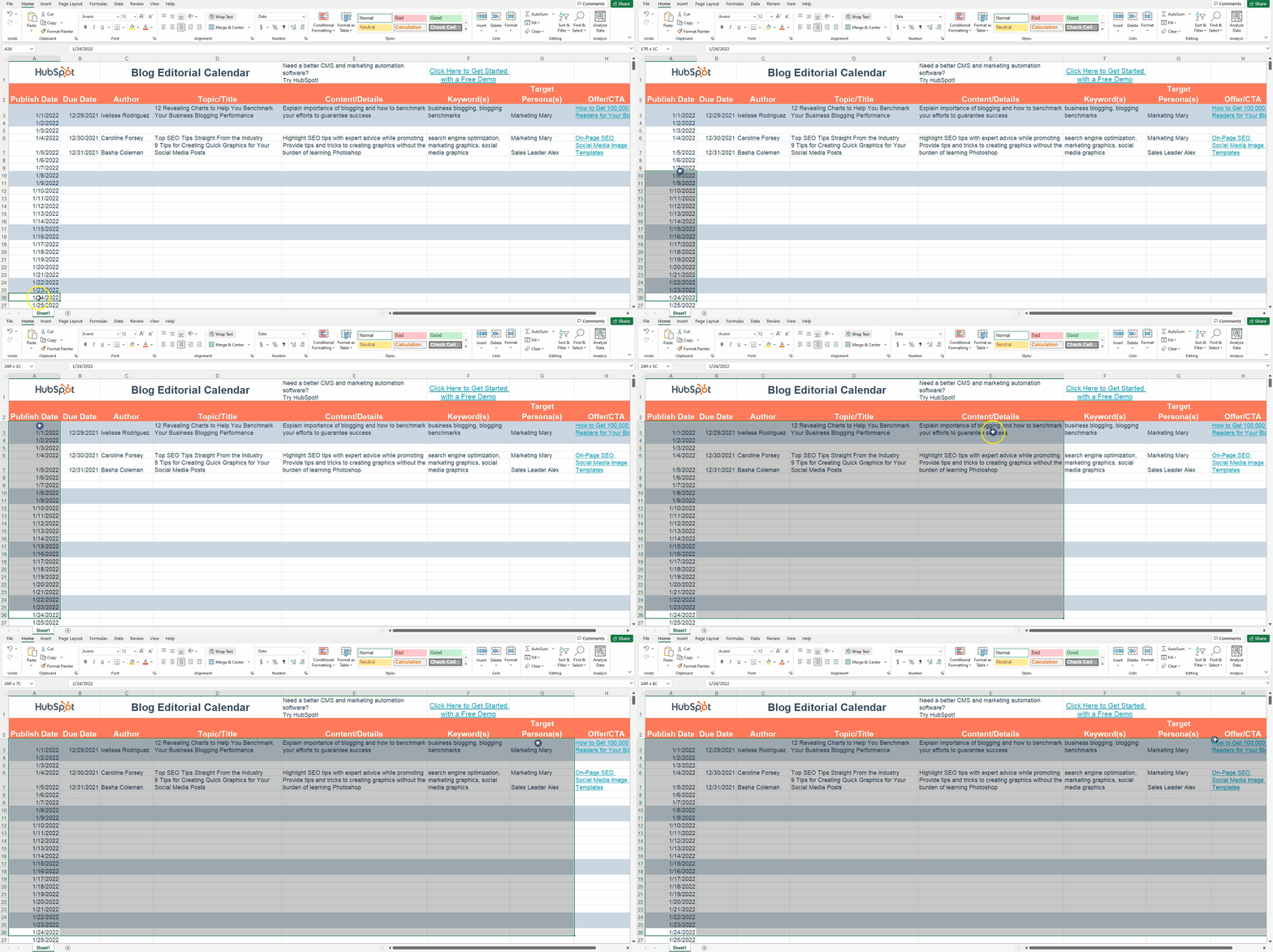
1. Select the cells you wish to remove duplicates from.

Click on a cell and hold down the left mouse button. Then drag the cursor over the other cells you want to select.

How to Remove Duplicates in Excel: to remove duplicates in excel, select all the cells you want

Or, use the Shift + arrow keyboard shortcut to select the range you want.

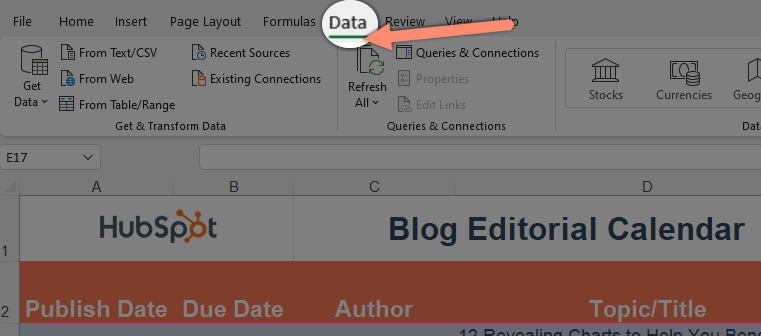
2. Click on the “Data” tab at the top.

click on dataHow to Remove Duplicates in Excel: t, step 2 to remove duplicates in excel

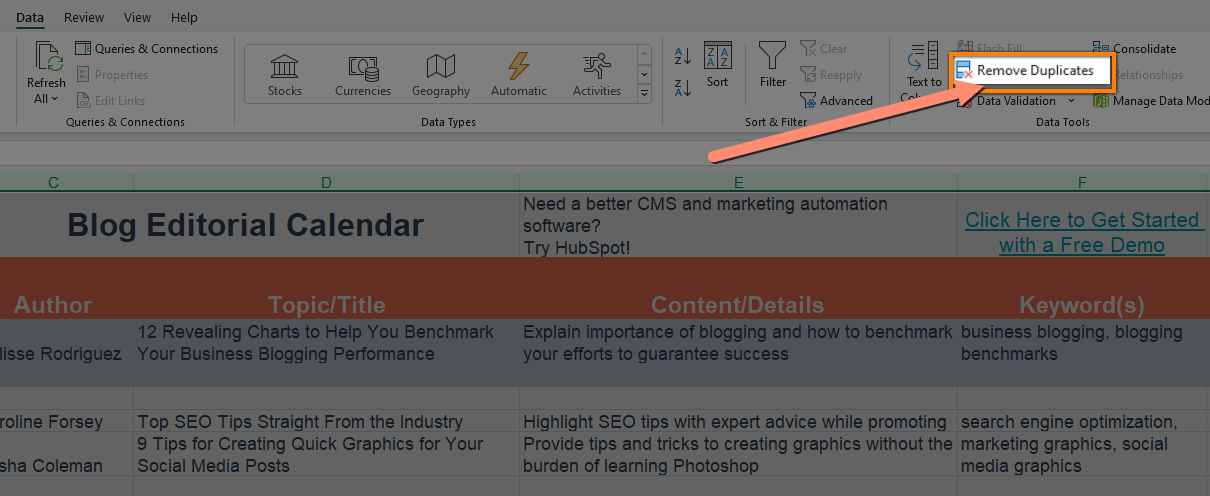
3. Click “Remove Duplicates” to reveal a pop-up.

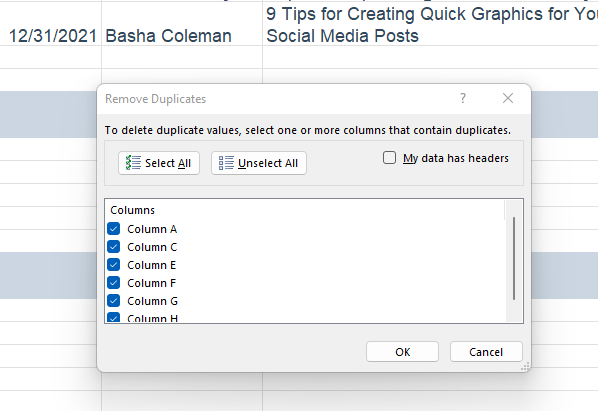
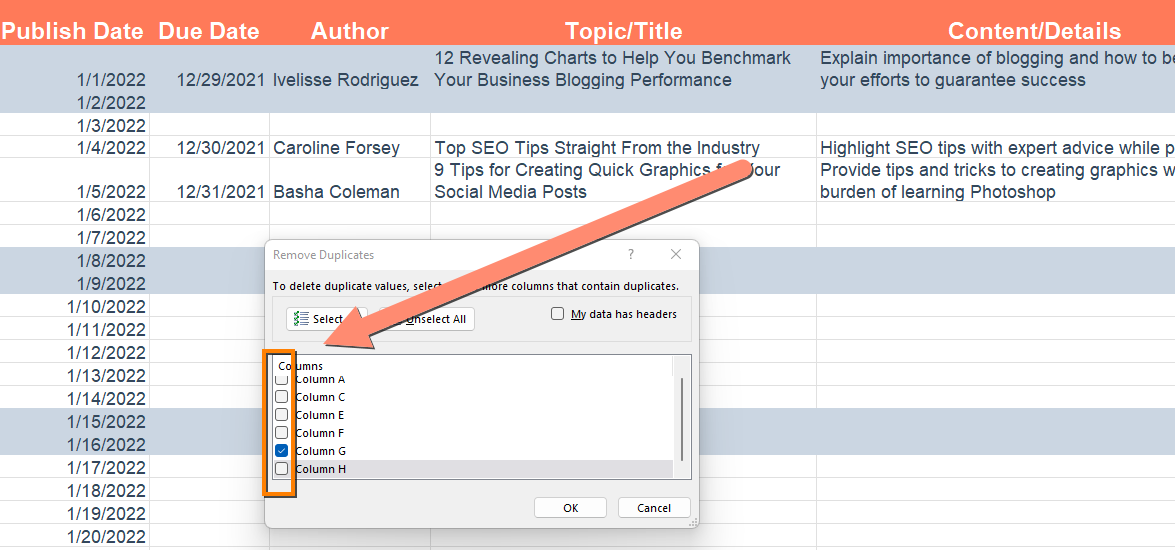
How to Remove Duplicates in Excel: tstep 3 to remove duplicates in excel, click on "remove duplicates"You should see a pop-up that looks like this:

How to Remove Duplicates in Excel: ta popup to remove duplicates in excel

4. Uncheck any columns with data you want to keep. 

How to Remove Duplicates in Excel: tuncheck colums with data you don't want to delete in excel

5. Click OK to delete the duplicates.

How to Remove Duplicates in Excel: tclick ok to delete duplicates

Excel will keep the first occurrence of the value by default.

How to Highlight Duplicates in Excel

Sometimes, you want to see the duplicate data before you delete it. Here’s how to find duplicate data in Excel:

1. Select the cells you wish to check for duplicates.

Click on a cell and hold down the left mouse button. Then drag the cursor over the other cells you want to select.

How to Highlight Duplicates in Excelto highlight duplicates in excel, select all the cells you want

Or, use the Shift + arrow keyboard shortcut to select the range you want.

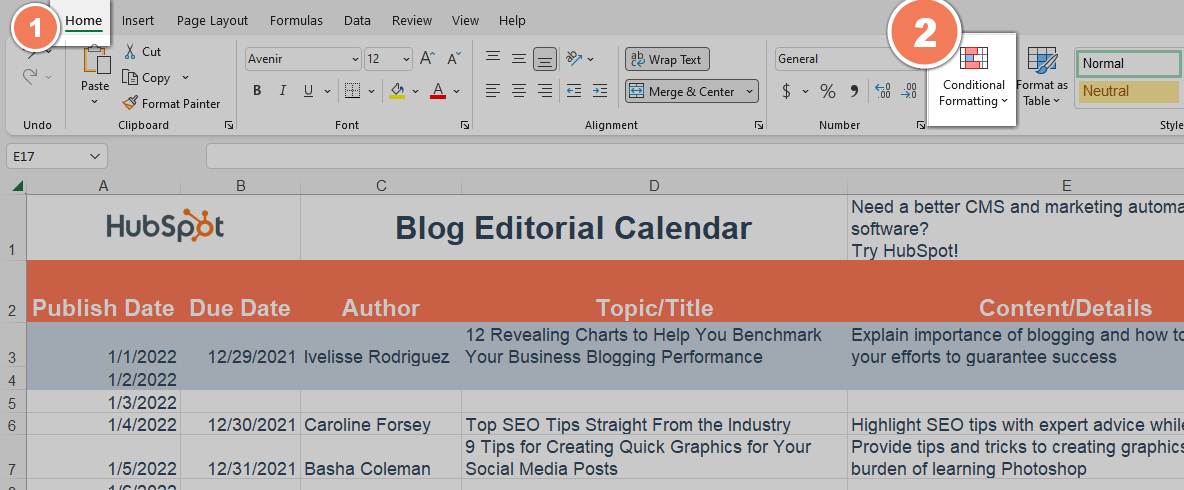
2. Click “Conditional Formatting” from the home tab to reveal a drop-down.

First, navigate to the home tab if you’re on a different tab.

How to Highlight Duplicates in Excelclick conditional formatting to find duplicates in excel

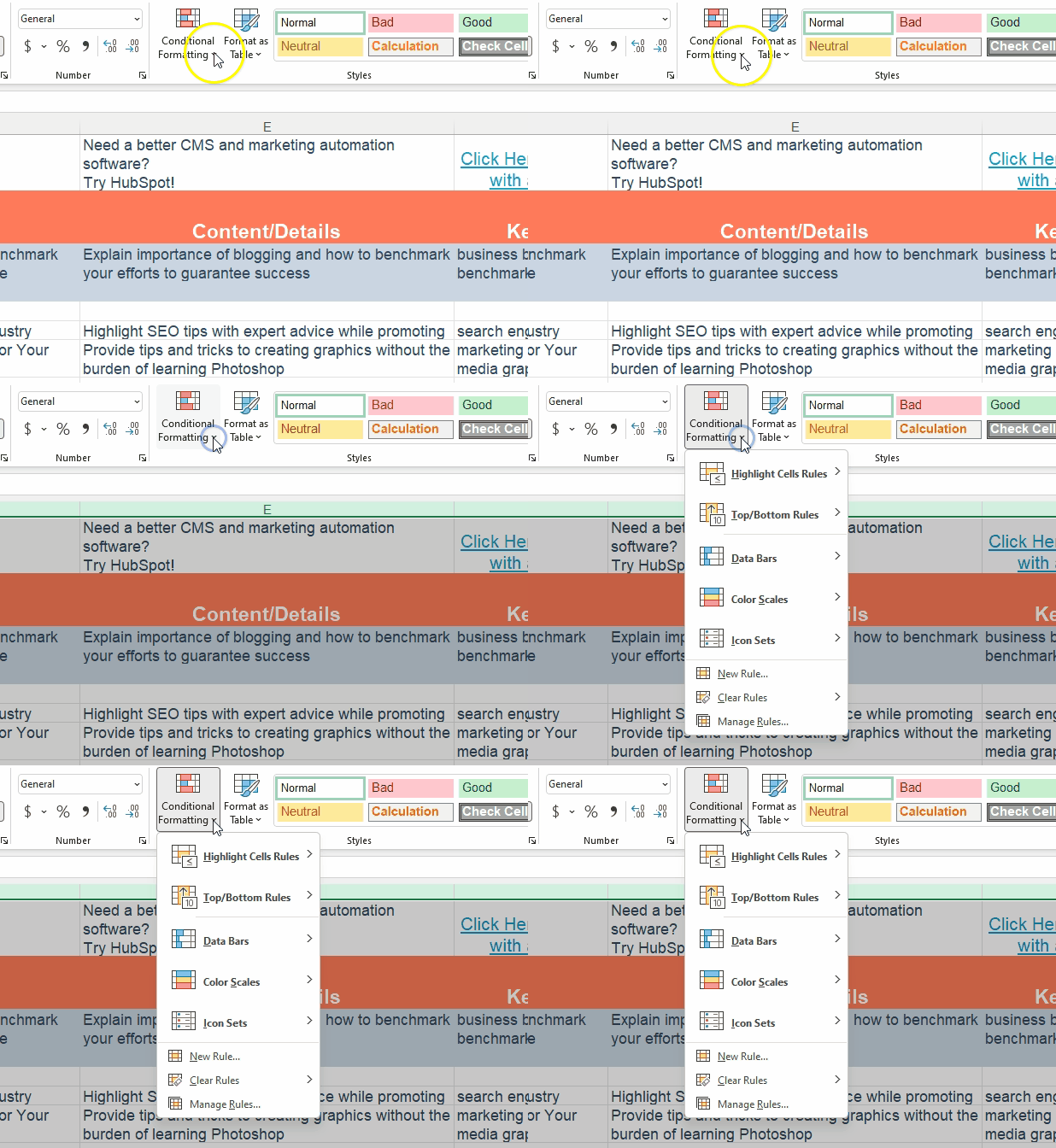
Click on “Conditional Formatting” to reveal a dropdown.

click on Conditional Formatting to find duplicates in excel

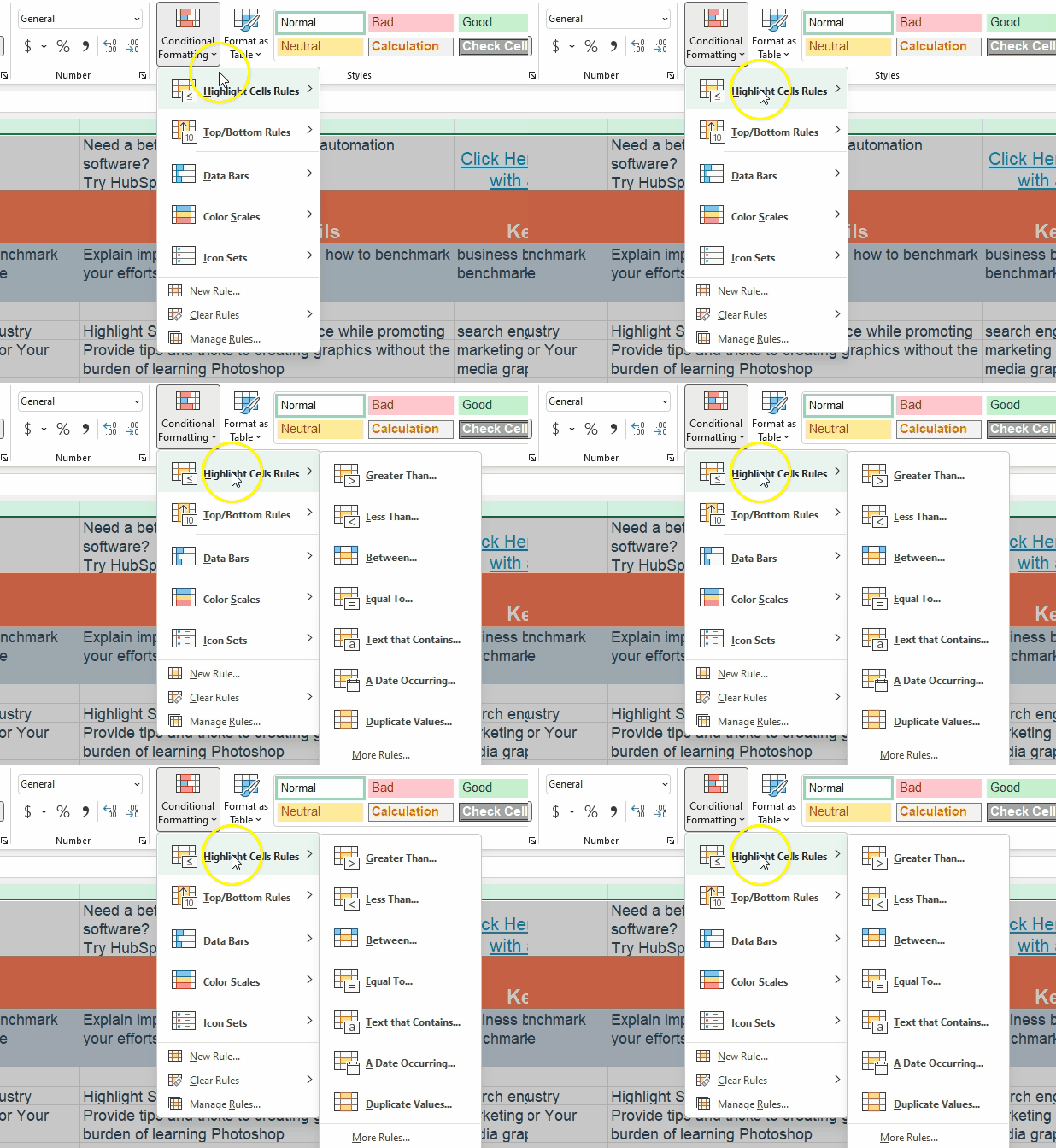
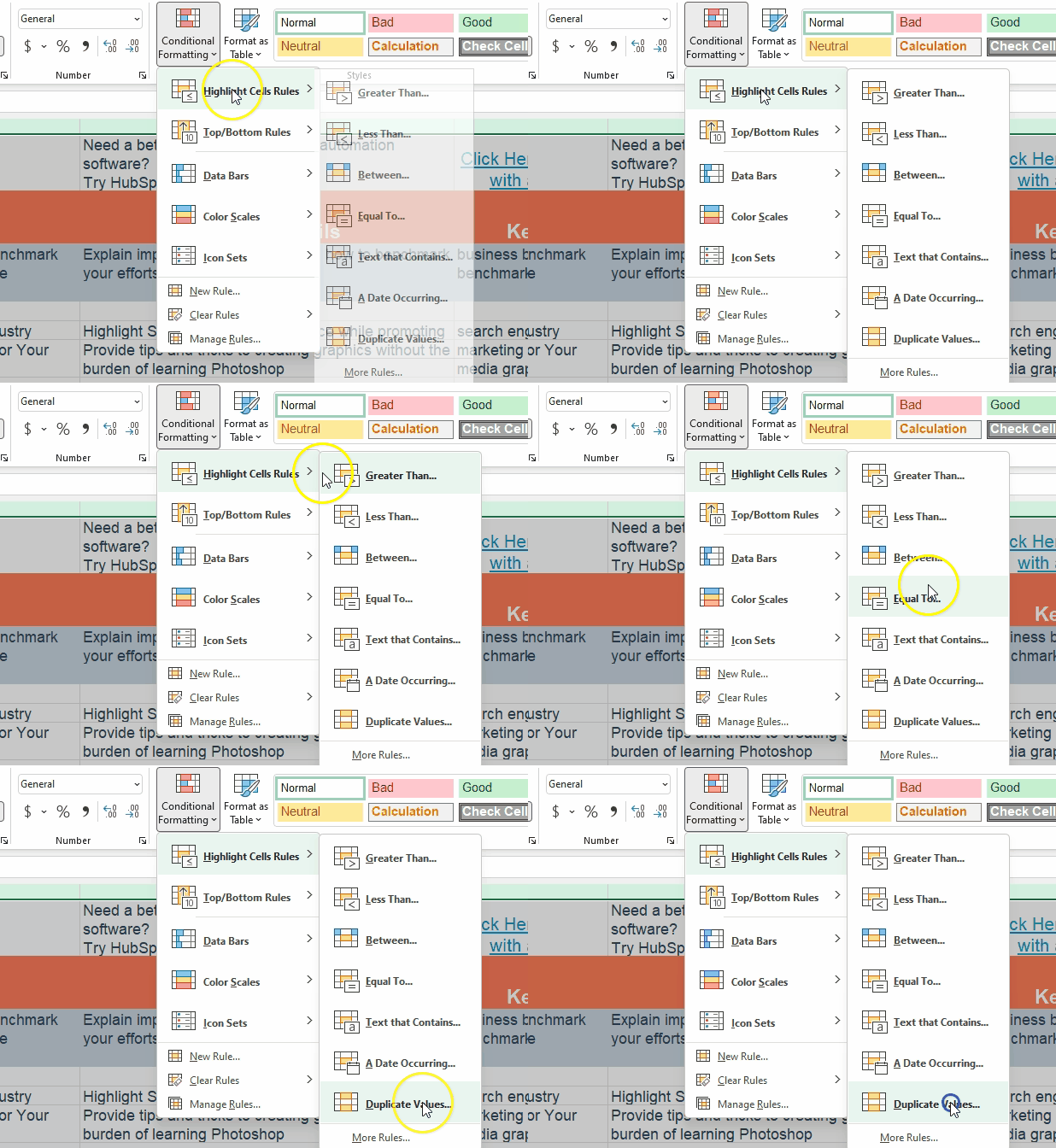
3. Hover over “Highlight Cell Rules”

How to Highlight Duplicates in Excelhover over highligh cell rules to find duplicates in excel

4. Choose “Duplicate Values” from the options.

choose duplicate values to highlight duplicate values

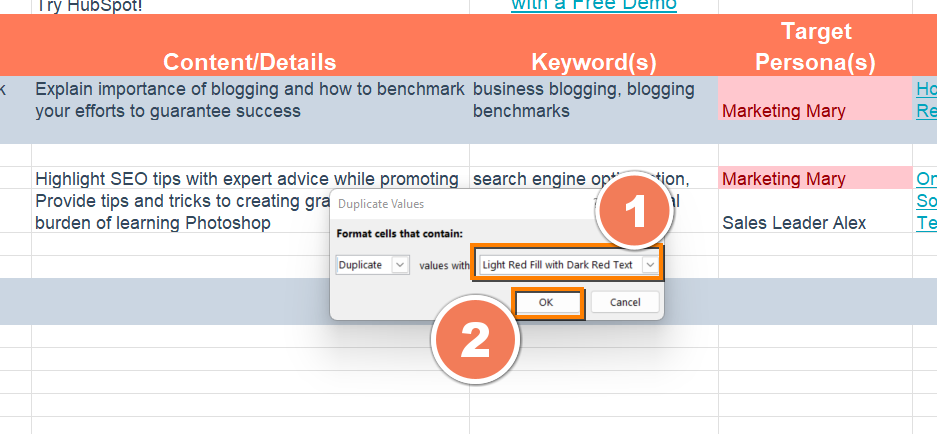
5. Pick the formatting option you want and click OK.

How to Highlight Duplicates in Excelchoose the formatting style you want to highlight your duplicate excel data with

You’ll find all duplicates highlighted in the formatting style you choose.

Now you know how to find and remove duplicates in Excel! 

Want more Excel automation hacks? Excel templates are a good place to start. They come pre-formatted with formulas that help you automate projections and more.

Editor’s note: This post was originally published in [Month Year] and has been updated for comprehensiveness.

excel marketing templates

Categories B2B

15 Cover Letter Templates to Perfect Your Next Job Application

Are cover letters necessary? I’m not in HR, but I’ve been approached by applicants who wondered whether their cover letter would actually be read. My answer is one not many of them wanted to hear: “sometimes.” Sometimes it will be read. Other times, you can get away with just sending in your resume — like when you network your way into applying for a position.

The truth is, you can’t really predict on a case-by-case basis — and you’re better safe than sorry. For the most part, having a cover letter will give you an upper hand in ways your resume doesn’t. It allows you to show off your writing skills, provide details that you couldn’t fit on your resume, demonstrate your passion, and show your willingness to put in as much time and effort as possible.

→ Click here to access 5 free cover letter templates [Free Download]

If you’ve ever rolled your eyes or balked at an application that required a cover letter, this guide is for you. We’ll go over how to write a cover letter and provide cover letter templates to help you perfect your own.

Seems fairly basic, right? Cover letters can hold different levels of importance to an employer depending on the industry you’re in and the job you’re applying for. According to a CareerBuilder survey, 49% of recruiters say sendign a cover letter along with your resume boosts your chance of landing the role.

If you do plan to write a cover letter, keep in mind there are certain qualities it should have that are not included in the definition above.

What to Include in a Cover Letter

So, what should you include? We’ll let the 11 templates below this list do most of the talking. No matter which one you download, pay attention to the following elements — all of which should shine through in the letter you send to your future manager.

1. Contact Information

Cover letters shouldn’t just carry your contact information, but also that of the company to which you’re applying. Contact info includes your phone number, email address, and any social media accounts you’re willing to share and receive connections to.

Home addresses aren’t required, but they can be a helpful reassurance to the employer that you already live nearby and would have no trouble coming into the office.

Avoid offering phone numbers, email addresses, or actual addresses that belong to your current employer. Using your personal Gmail address over your work email, for example, ensures your correspondence with recruiters remains separate from all of your current work communication.

2. A Personal Address Line

For as often as you see “to whom it may concern” at the top of cover letters today, do your best to avoid writing this exhausted line.

Address lines that specify a person or company grab your reader’s attention much more quickly, and show the employer that you’ve taken the time to tailor your application letter to them. Don’t have the name of the hiring manager? “Employers at [company name]” will do just fine.

3. A Hook

A “hook” is a clever introduction that “hooks” your reader into wanting to learn more. Think about yourself as a job candidate — what makes you unique? What about your career might a recruiter be intrigued by that you can package into an interesting first sentence?

4. Why You’re Qualified

It’s a no-brainer that you should summarize your professional experience in your cover letter. However, today’s best applications describe why this experience qualifies the applicant for the job they’re applying for. For example, don’t just state that you spent three years writing for a company blog. Explain that this type of work lends itself to managing your new potential employer’s content calendar every week.

5. General Knowledge of the Business

Grammatical errors could mean your application is thrown in the trash, but that’s not the only thing that could get your letter tossed aside. Using a generic “one-size-fits-all” cover letter — especially if you forget to change the name of the company — will also hurt your chances of landing an interview.

So, if you take the time to write a cover letter, take the time to comment on the business itself. Why are you applying to this company? What about their business stuck out to you as a professional?

Now, let’s take a look at an example cover letter, what makes it effective, along with 11 templates you can download or draw inspiration from.

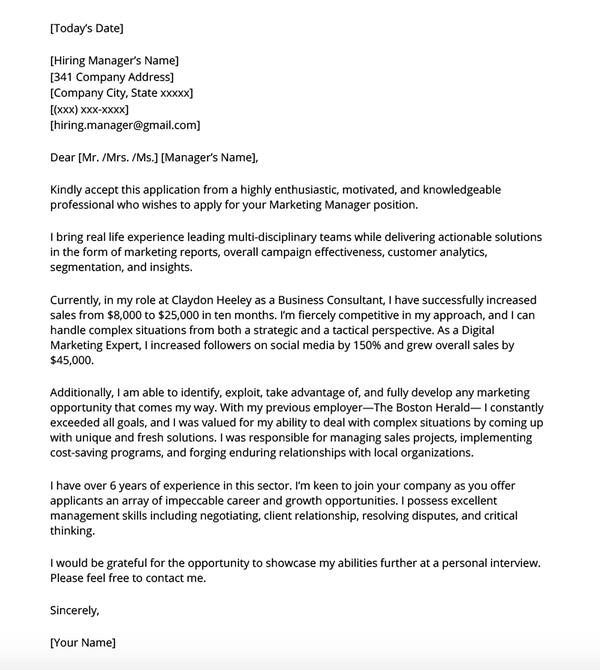
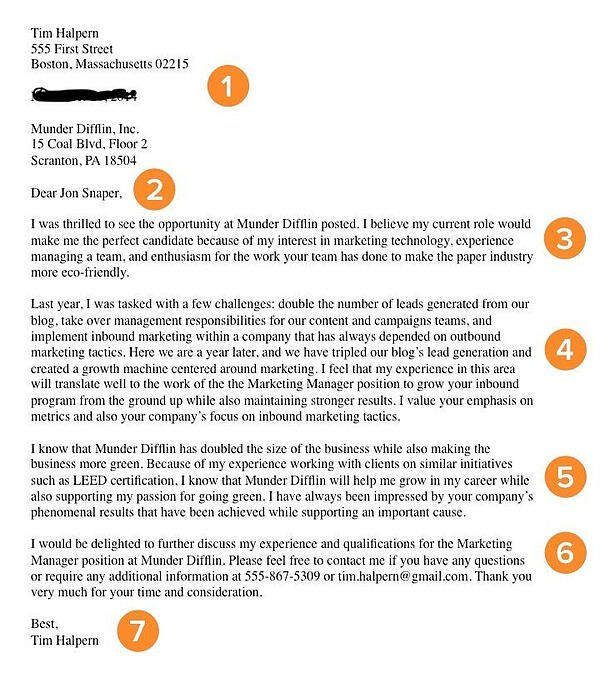
Cover Letter Example

Cover letter example.

Image Source

The example above illustrates how to write a marketing cover letter using the elements we listed.

Besides the contact information and the address line, the first few paragraphs explain why the candidate is qualified for the position. This example uses specific data to show why they would be a good fit.

Additionally, in the second to last paragraph, the candidate discusses why they’re interested in the specific company, demonstrating general knowledge of the business.

By combining all the elements to a cover letter, this is a great example to use for inspiration.

Featured Resource:5 Professional Cover Letter Templates

Cover Letter TemplatesDownload These Templates for Free

14 Free Cover Letter Templates for Your Next Job Application

Template 1: Basic

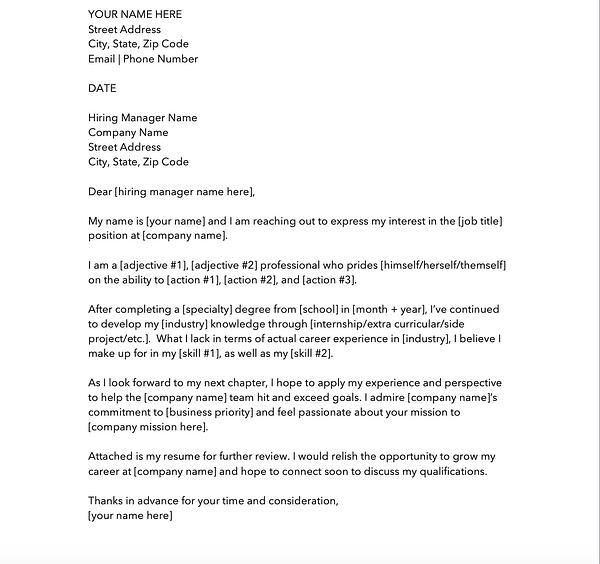
Basic cover letter template with 7 qualities to learn from.

Image Source

The example above is a basic (but great) cover letter. The numbered sections are explained in more detail below.

1. Header

The level of formality your header has will depend on the company to which you apply. If you’re applying to a formal business, it’s important to use a formal header to open your cover letter, like in the sample above. Put your address, the date, and the company’s address. But if you’re applying to a company that isn’t as formal, you don’t need to include yours and the company’s addresses. You can still include the date, though.

2. Greeting

Using “To Whom It May Concern” is okay, but you may want to take the time to research the name of the recruiter or hiring manager online. If you do your research and aren’t confident you found the right name, then you should definitely use the generic greeting — but if you are sure, then it shows you put in the effort to find their name and it will catch the recruiter’s eye.

If you have the recruiter’s name, do you greet them by their full name, or by their courtesy title (i.e. Mr., Ms., or Mrs.)? Similar to the header, it depends on the company’s level of formality. If you’re applying to a corporate business, you may want to consider using “Mr. Snaper” instead of “Jon Snaper.” If you’re applying to a start-up or a business with a more casual culture, you can use “Jon Snaper,” as shown in the example.

3. Introduction

Your opening paragraph should, in 1-3 sentences, state why you’re excited to apply and what makes you the perfect candidate. Get right to the point, and don’t worry about explaining where you found the posting or who you know at the company. This isn’t a place to go into detail about why you’re a great candidate — that’s for the second paragraph. Here, simply list a few key reasons in one sentence to set up the rest of your letter. Keep in mind that the recruiter may cross-reference your cover letter with your resume, so make sure the two sync up.

4. Paragraph 2: Why You’re a Great Fit for the Job

Next, sell yourself and your experience by choosing one or two concrete examples that show why you’re a great fit for the position. What did you do at a previous company that gave you relevant experience? Which projects have you worked on that would benefit the new company? How will your prior experience help this company grow? Stay humble in your explanation of credentials while still showing that you would be an asset to the team. Use this paragraph to show you’re genuinely excited and interested in the position.

5. Third Paragraph: Why the Company Is a Great Fit for You

While it’s certainly important you’re a good fit for the job, it’s also important that the company is a good fit for you. “A cover letter typically describes why you’re great for a company — but how will you benefit from getting hired?” asks former HubSpot Team Development Manager Emily MacIntyre. “We want to know why our company appeals to you, and how it will be a mutually beneficial working relationship.”

In the third paragraph, show you’re serious about growing and developing your career at this new company. What impresses and excites you about the company? Is there something that you feel strongly about that aligns with the company’s goals? For example, the candidate in the sample letter used this space to show his personal commitment to environmental causes aligns with the company’s green initiatives.

6. Strong Closer and Signature

Don’t get lazy in the final few sentences of your cover letter — it’s important to finish strong. Be straightforward about your interest and enthusiasm about the new position, and tell them you’re available to talk about the opportunity at any time. Be sure to include your phone number and email address. At this point, the ball is (rightly) in the recruiter’s court to decide how to follow up.

Last but certainly not least, thank them for their time and consideration. Use a formal sign-off like “Best,” “All the best,” or “Sincerely,” and finish by typing out your full name. You don’t need to sign it with a pen.

Template 2: Data-Driven Marketing Cover Letter

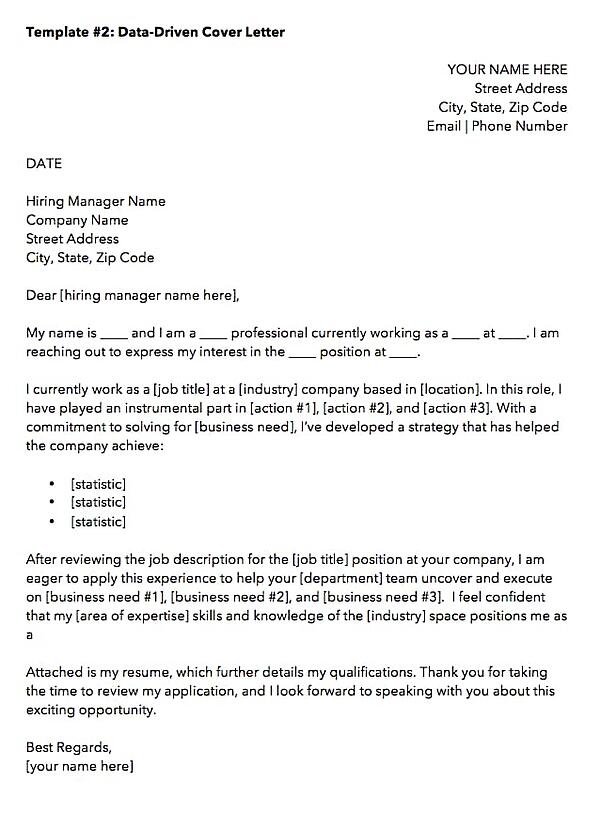
Get it here.

Data-driven marketing cover letter template

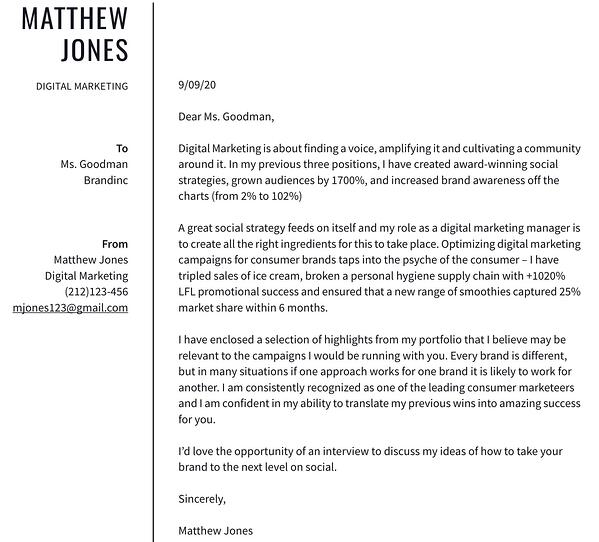
When applying to a data-driven position, it might be tempting to inject your cover letter with, well, the data to describe what you’ve done for other employers. But in an application letter — particularly for the marketing industry — how you convey this data is just as important as the data itself.

The cover letter template above, which we created here at HubSpot, can help you present the data that’s most important to you as a candidate such that it’ll matter to your future employer.

Notice the three bullet points near the center of the letter above, preceded by the statement: “… I’ve developed a strategy that has helped the company achieve …” This setup is important, because while you can add as many statistics as you want to this template, your data points should describe how your current/former business benefited from your work, rather than how you, yourself, benefited.

Template 3: Straight-to-the-Point Cover Letter

Get it here.

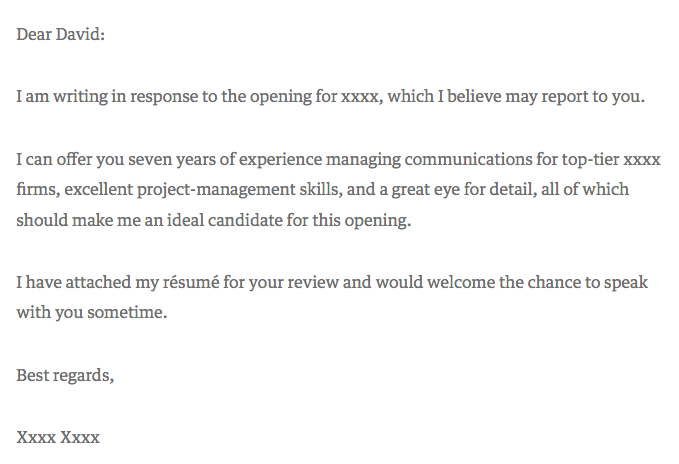
cover letter template: Straight-to-the-point

Harvard Business Review contributor David Silverman hailed the above cover letter example as “The Best Cover Letter I Ever Received.” For context, Silverman believes there are only a handful of times when writing a cover letter is actually necessary:

  1. When you know the name of the hiring manager.
  2. When you know something about what the job requires.
  3. When you’ve been referred to the job personally.

Under those three circumstances, a straight-to-the-point cover letter like the one above could be your best bet. Because it’s so concise, however, make a point to add your own letterhead above the message itself. It might be easy for a recruiter to sift through a short and sweet cover letter like the one above, but it’s just as easy for it to get lost in the shuffle of their application list without a unique design or format.

Template 4: Referral Cover Letter

Get it here.

cover letter template: Referral cover letter

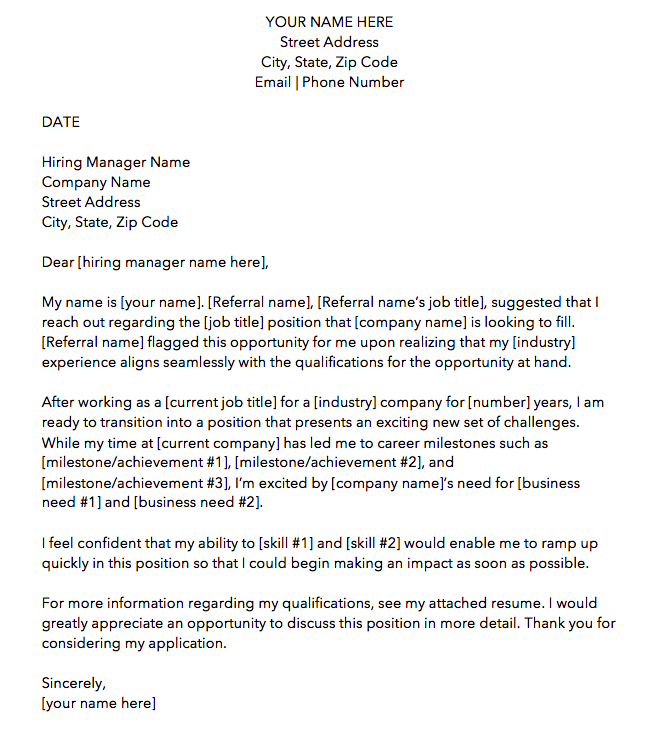
Just because a friend or colleague recommended you for a job doesn’t mean the company is all set to hire you. Therefore, the cover letter template above is written specifically for referrals. We made this one here at HubSpot. Download it here (it comes with four other cover letter templates, too).

As you can see in the picture above, the first paragraph of the cover letter is dedicated entirely to acknowledging the circumstances of your applying: You know someone who works there — no harm in that. But there might be harm in not mentioning it to the hiring manager. Telling the reader about your connection at the company shows you’re aware and confident of the actions you take to get the opportunities you’re interested in.

Ultimately, it’s better than the recruiter hearing about your employee connection from somebody else.

As for the rest of the cover letter, treat your message the same way you would if you had applied with no connection from within. Your skills and successes are no less important because of your internal referral.

Template 5: Photo Letterhead Cover Letter

Get it here.

cover letter template:Photo letterhead cover letter by Microsoft Office

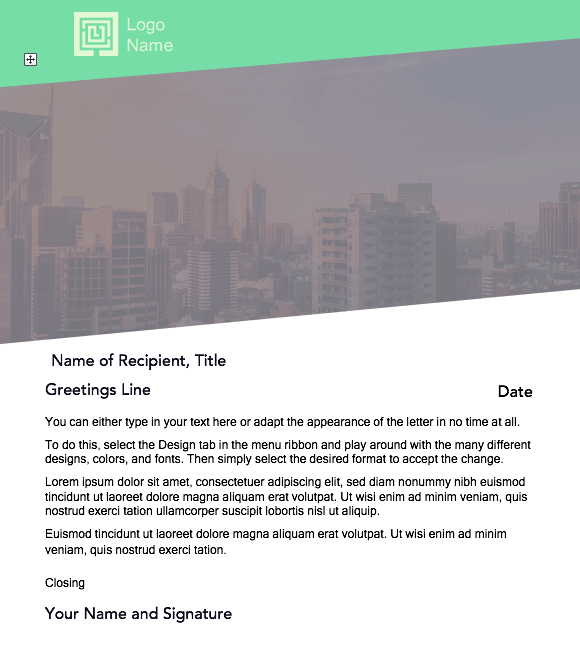
The cover letter template above was designed by Microsoft Office, and as comprehensive as it looks, it’s completely free to download and modify.

As it looks right now, this cover letter contains about half photo, half text. Feel free to shrink (and change) the image to give yourself more room to tell your story. Of course, a nice washed-out image that expresses who you are can be part of that story …

Template 6: Digital Creative Cover Letter

Get it here.

cover letter template: digital creative letter.

This sixth template is perfect for the applicant who wants to emphasize the many different digital channels they areon. This template goes well with a resume of the same format.

As you personalize this letter with your own experience, make note of the social networks and industry software included in this template. You’ll see there’s additional space along the top to add your LinkedIn and personal website to fill with your own information.

You can improve upon this template by formatting your most important highlights and accomplishments with bullet points. This will make the document easier to read for the hiring manager and emphasizes the value you provide.

Template 7: Marketing Manager Cover Letter

Get it here.

cover letter template: Marketing-specific cover letter

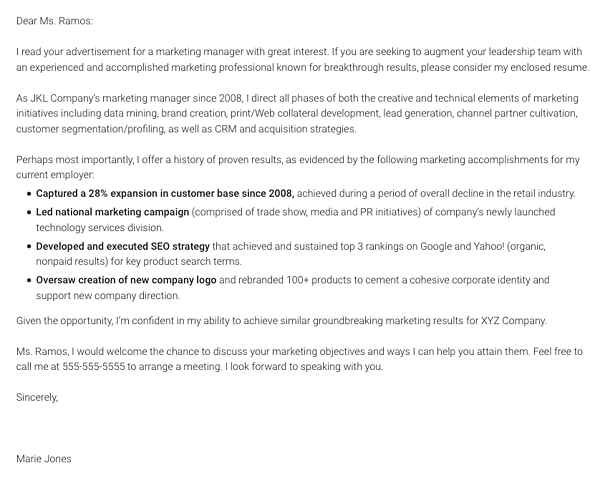
Our seventh cover letter comes from Monster.com. This cover letter, shown above, is focused specifically on a marketing role.

Notice how the writer includes references to important marketing metrics and terminology. If you’re applying to a data-driven role, you might not want to fill the page with a story of your experience in paragraph form, like Template 1 does at the beginning of this article. Instead, consider highlighting three (or four, or five) of your successes that you believe the hiring manager would resonate most with, in bulleted form.

As a marketing professional, breaking up your letter with bulleted details like the ones above shows a respect for the hiring manager’s limited time — a mentality that all marketers must understand when communicating with a brand’s audience.

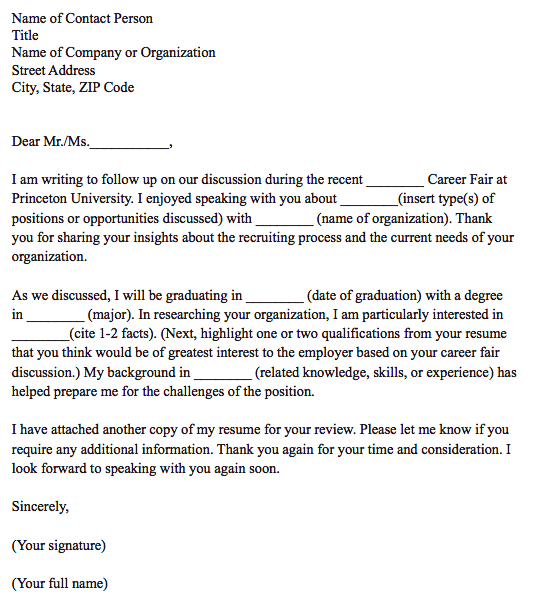
Template 8: Career Day Follow-Up Cover Letter

Get it here.

cover letter template: Career day follow-up cover letter

This is a unique kind of cover letter from Princeton University.

LinkedIn, Glassdoor, Monster, and Indeed might take the lion’s share of your job searches online, but still some employment opportunities come out of a trade show, job fair, or similar networking event. For those occurrences, you have the follow-up cover letter template above.

This cover letter has everything you need to help an employer recall a conversation you had with him/her at a career fair. As you can see in the second paragraph, the letter is particularly useful to people who are about to graduate college.

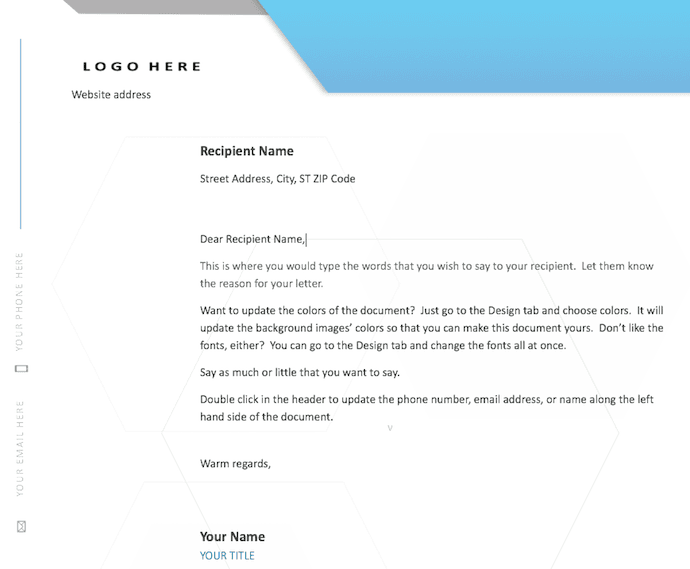
Template 9: Logo and Watermarked Cover Letter

Get it here.

cover letter template: Logo and watermarked cover letter by Microsoft Office

Here’s another cover letter template from Microsoft Office. This one has a light touch of color in the design just above the letterhead, but make no mistake — the template caters to any professional looking to make a good first impression on their future employer.

Don’t let the logo space on the top-right of the page confuse you. This can be the logo of the company to which you’re applying — to quickly get the attention of the recruiter — or your own logo. Perhaps you freelance on the side or simply like branding yourself. This cover letter template is meant for customization.

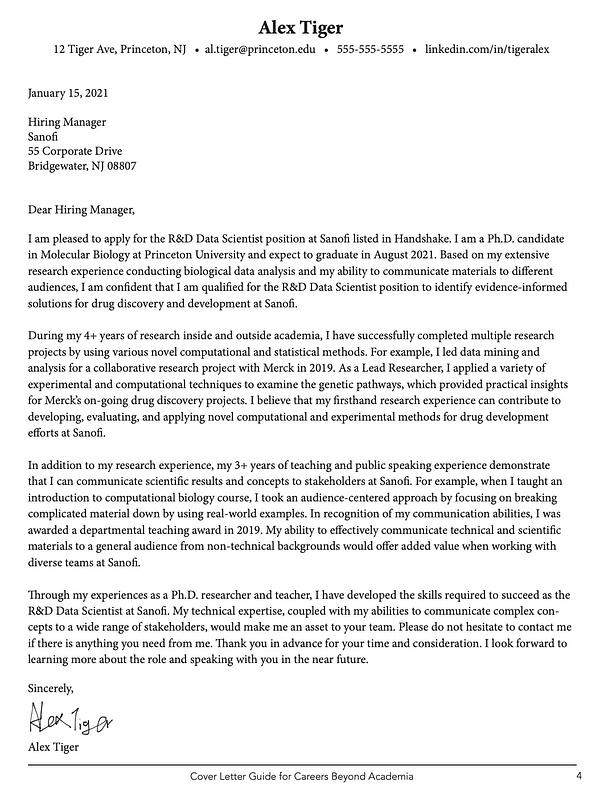
Template 10: Data Scientist Cover Letter

Get it here.

cover letter template: Princeton Data Science Cover LetterThis is our second template from Princeton University. While this is focused on a data scientist role, it is an excellent template to use for students applying to jobs prior to graduation.

The text emphasizes how the applicant’s academic research and projects makes them an ideal candidate for the position. The format is also simple enough to submit as a pdf, as text in an email message or an application text box.

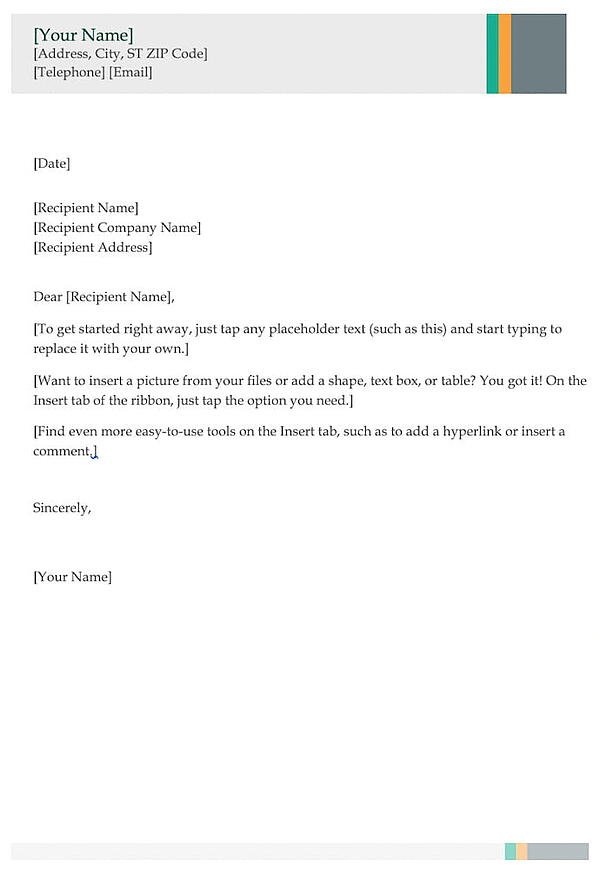
Template 11: Business Cover Letter

Get it here.

cover letter template: Business cover letter

The cover letter template above is perfect for entry- and mid-level marketers who want to show a little extra professionalism in their opening note to a potential employer.

The multi-colored header (you can change the color if you wish) shows just the right amount of creativity and can go quite well with a resume of the same style. If you don’t have enough experience to fill the entire page, don’t worry. Feel free to write to a length you think is representative of who you are and what the hiring manager wants to see.

No matter how long your final cover letter is, the above template is your opportunity to show your attention to detail — from your contact information in the top header, to the personalized address line where you can include the name of the hiring manager. Like we said, “to whom it may concern” is pretty outdated, anyway.

Template 12: Entry-Level Cover Letter

Get it here.

cover letter template: Entry level cover letter

The cover letter template above, written by HubSpot, is specifically designed for entry-level applicants.

When you only have a few years experience, it’s important to display how you gained your skills and what you learned from your education or internships. Additionally, it’s important to mention why you want to work at the company you’re applying to.

No matter your experience, the template above will help you decide what skills you want to highlight and flesh out in your cover letter.

You can download it here (it comes with four other cover letter templates, too).

Template 13: Healthcare Cover Letter

Get it here.

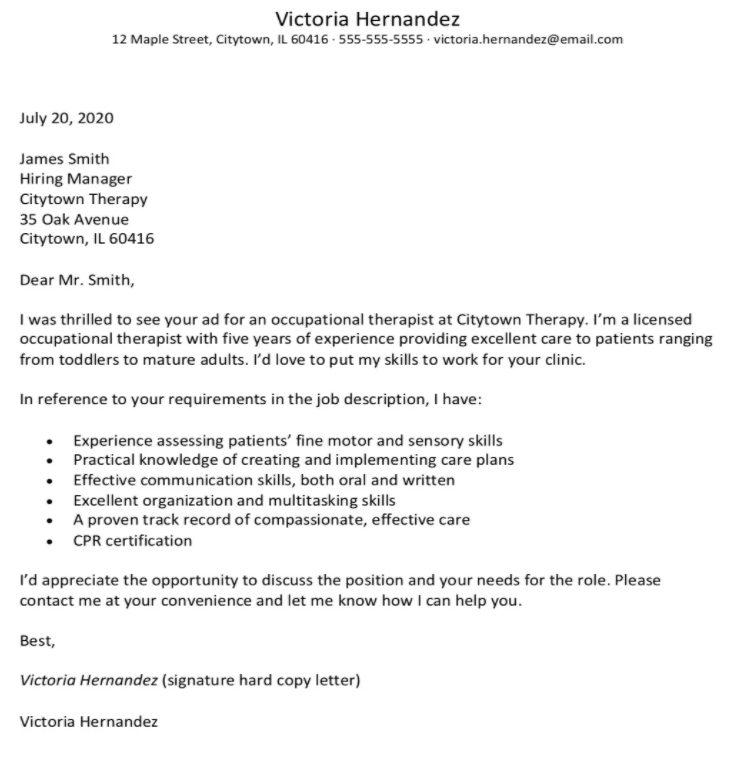
cover letter template: Healthcare cover letterWhat stands out to me in this cover letter is the direct, straight-to-the-point bullet points that reference the job posting. The cover letter, created by The Balance Careers, cuts down on repetition by following the “I have” statement with six bullet points that highlight the applicant’s strengths, including “I have … practical knowledge of creating and implementing care plans” and “I have … a proven track record of compassionate, effective care”.

Additionally, phrases like “I’d love to put my skills to work for your clinic” and “Please contact me at your convenience and let me know how I can help you” focus on what the business will gain as a result of hiring the applicant, rather than what the applicant is looking to gain.

Template 14: Freelance Cover Letter

Get it here.

cover letter template: freelance cover letter

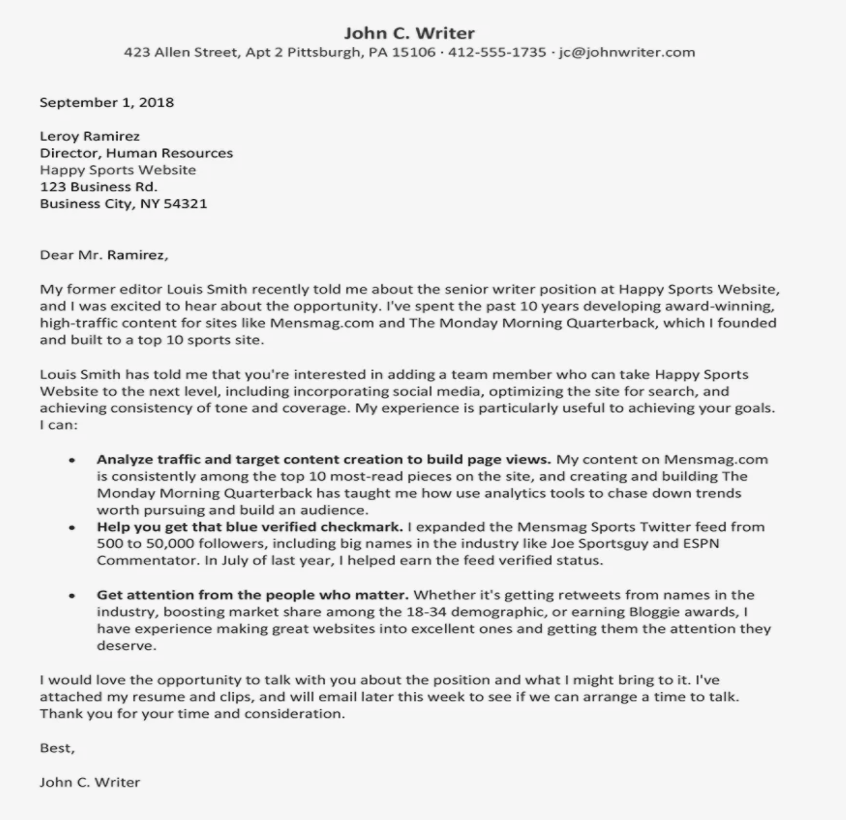
If you’re looking for freelance work, your biggest goal is to get your strengths across quickly, so busy clients won’t pass by your cover letter entirely. Additionally, if you’re sending out multiple cover letters to different clients, you’ll want to target each one to that client’s unique goals.

For instance, if one client is looking for SEO-optimized content related to marketing, you’ll want to highlight past experience writing marketing content; this will change if, for instance, the client is looking for fitness content.

For this reason, it’s a good idea to structure your cover letter so you start with a) past credentials or references, and b) bullet-point information related to the client’s goal, as shown in the cover letter above.

Template 15: Director Cover Letter

Get it here.

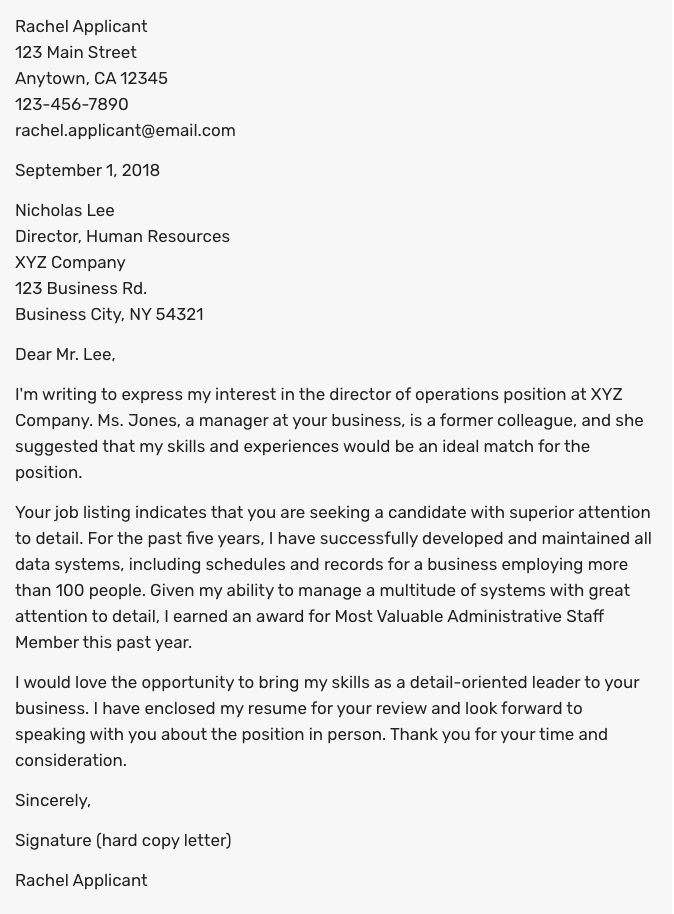
cover letter template: cover letter for directorIf you’re applying for a Director position, you’ll want to start by explaining how you’ve either successfully handled a similar role in the past, or why you believe you’re qualified and ready to handle new responsibilities for the first time.

In the cover letter above, the candidate does a good job outlining how she succeeded in a leadership role previously: “For the past five years, I have successfully developed and maintained all data systems, including schedules and records for a business employing more than 100 people.”

You’ll want to demonstrate how your skills align with a Director position — both through organization and leadership — and, when possible, where you received recognition for your hard work (i.e. “I earned an award for Most Valuable Administrative Staff Member”).

Write a Winning Cover Letter

Writing a cover letter is easier said than done. Don’t hesitate to spend a lot of time writing and editing it. Or, ask a friend or family member to read it over and give you feedback. If the recruiter does end up reading it, you’ll be thankful you did.

Editor’s note: This post was originally published in November 2014 and has been updated for comprehensiveness.

Professional Cover Letter Templates

Categories B2B

What Is Twitch? How Do Brands Use It?

Like many people, I discovered Twitch through my love for video games,watching YouTubers play and review some of my favorites. Most of the YouTubers I watched promoted their Twitch accounts where they would broadcast live play-throughs, and I eventually started to wonder — what is Twitch?

Ultimately, Twitch is a streaming platform, but is there more to it? In this post, we’ll explore what Twitch is and how you might use it to engage with prospects and increase brand awareness.

→ Access Now: Video Marketing Starter Pack [Free Kit]

When you visit Twitch, you’ll see a screen very similar to the image below. The homepage is curated based on previous activity, so while this screen is covered with gaming content, streamers don’t have a limit on what they produce.

Example of a Twitch homepage.

What is Twitch Used For?

Twitch is mainly a platform for gamers to watch and perform live play-throughs and commentary. However, there are other programs such as talk shows, cooking shows, sporting events, and gaming conventions that also pop up on the site. Twitch enables fans to connect with streamers, and it allows users to watch content they’re interested in on a platform that supports long-form, live broadcasts. In fact, it’s common for streams to last for an hour or two.

The platform also has its own convention called TwitchCon — a bi-annual event celebrating the streaming industry as well as a chance for the platform’s broadcasters to connect with their fans and peers in person.

Fans can attend sessions led by their favorite streamers and buy branded merchandise from a slew of vendors and event sponsors. For example, Doritos is a proud sponsor of TwitchCon.

Though the streamers produce the content, Twitch has a dedicated fanbase that expands across the globe. To get some perspective on Twitch’s users, we’ll take an in-depth look at Twitch’s primary audience.

Who uses Twitch?

According to research by SimilarWeb, 79.62%% of Twitch’s users are male as of May 2022, and the bulk of the platform’s audience (about 37.11%) are between the ages of 18 and 24 years old.

When SimilarWeb studied the web behavior of Twitch users, they found primary keywords this audience searched for were “video games consoles and accessories,” “games,” “software,” and “news.” From that information, we can infer that the majority of Twitch users are interested in games and the technology needed to play them.

In the same report, it was also noted that 21.41% of traffic comes from the U.S., making it the country with the most representation on the platform — with Germany, Korea, Russia, and France not too far behind.

Though the audience has a large young male presence, that demographic isn’t the entire platform’s user base.Twitch’s most popular female streamer, Pokimane, has 9.2 million followers — making her one of the platform’s top 10 most popular streamers.

Still, as marketers know, those numbers could be an essential part of your target audience.

If, by now, you are mulling over a few ideas about how you can fit Twitch into your marketing efforts, let’s talk about how brands are using Twitch, next.

11 Ways Brands Use Twitch

Brands use Twitch to increase brand awareness, target specific audiences, produce branded streams, and leverage influencer marketing. The site is powered by visual content, so let’s explore some examples to back up these goals.

1. PepsiCo

Tactic: Sponsorship Marketing

To promote a limited time Brisk product, PepsiCo sponsored an off-season video game tournament for the game Rocket League. Company-sponsored tournaments aren’t a new phenomenon, but PepsiCo’s sponsorship allowed the beverage company more control than most other sponsorships.

Ads for Brisk ran throughout the tournament and a Brisk-themed car was released into the game for players to use. Viewers could also cheer for the live commentators to drink Brisk, and the phrase “Take the risk, drink the Brisk” formed organically among participants and became a meme for the brand.

2. EA

Tactic: Micro-Influencer Marketing

Video game company EA teamed up with streamer RoryPlays to promote The Sims 4: Cats & Dogs. The campaign was pretty straightforward — RoryPlays played the game live on Twitch and included an EA logo overlay. She also promoted the game and brand verbally on her platform.

RoryPlays is a micro-influencer with a smaller following of about 14,000 people, but micro-influencers with a smaller following can still pose a huge advantage for brands. That’s because micro-influencers often have a closer relationship with their followers and a more dedicated fanbase. This makes promoting content to their audience much easier. Think about it — that’s 14,000 more people who are aware of the game and how it’s played.

3. The Hershey Company

Tactic: Influencer Marketing

To promote Reese’s Pieces chocolate bar, Hershey partnered with multiple influencers, like Ninja and DrLupo, who have millions of followers on Twitch. During the campaign, those influencers ran livestreams while tasting the new product.

Through the campaign, millions of people were introduced to the new candy bar via their favorite streamers enjoying the candy live.

4. Lexus

Tactic: Content Marketing

Luxury car maker Lexus partnered with popular video game streamer Fulsie for the company’s “All In” Twitch campaign. During the campaign, 23,000 Twitch users voted on how to modify and customize the 2021 Lexus IS sedan. Twitch users wound up designing the ultimate vehicle for gamers and included a 3D-printed controller inside the car as well as gaming consoles.

5. UberEats

Tactic: Influencer Marketing

UberEats partnered with Ninja to offer subscribers a 25% off coupon. The promotion came in the form of a challenge. Every time Ninja “killed” a character in Fortnite, he would win fans 1% off their UberEats order. The catch was that there was a time limit — Ninja could only take part in the challenge from the moment he ordered his food with UberEats until the food arrived at his door.

By the time the challenge was over, Ninja won his fans 25% off their order and the offer had been used to its maximum capacity.

6. 1,000 Dreams Fund

Tactic: Brand Awareness

The 1,000 Dreams Fund is a non-profit devoted to providing 1,000 university women with grants to help them achieve their dreams. The non-profit provides new grants every academic semester, and the people behind 1DF partnered with Twitch to bring the program to streamers.

Through the Twitch partnership, the fund provides financial assistance to female streamers currently attending college. The fund is meant to help with their school expenses. Twitch might provide financial aid for conventions like TwitchCon, conferences, new hardware, or educational programs that are devoted to creative pursuits.

During Women’s History Month, Twitch’s Facebook account ran an ad that supported the fund, bringing awareness to 1DF and what it does for women streamers.

This gave an entirely new audience an introduction to the non-profit. It also showed Twitch’s diverse user base and highlighted a cause the company supports.

7. WildEarth

Tactic: Target Specific Audiences

WildEarth (WE) is a broadcaster that shows the day-to-day lives of animals — led by expert zoologists in Johannesburg, Australia. Recently, the site’s leaders decided to expand their broadcast to Twitch in order to broaden their audience.

The streams are short, which is unusual for Twitch, but makes sense for WildEarth. Content includes a sunrise safari led by expert Lauren, in which she focuses on animals she sees on her drive and provides information about them.

Wild Earth's Lauren streaming a safari ride on Twitch.

Source

WE is aimed towards younger viewers, so it’s no surprise that broadcasts have expanded to Twitch and YouTube. Some clips even have kid-friendly titles with emojis and current slang to attract these younger viewers.

8. Nissin Noodles

Tactic: Lead Generation

Streamer Pokimane plays mostly role-playing fantasy games. Recently, she partnered with Nissin Foods to produce a branded League of Legends broadcast.

The broadcast featured her making the instant noodles during a stream. To keep the content fun and engaging, Pokimane added a ‘Slurp Meter’ graphic on-screen that measures the volume of her eating her meal.

Pokimane promoting Nissin Noodles on Twitch.

Source

Nissin’s branded stream has been seen by over 11,000 of Pokimane’s fans. This marketing technique cemented Nissin as a brand associated with her community, showing how their product fits into the gaming lifestyle.

9. PSD Underwear

Tactic: Influencer Marketing

Ninja is one of Twitch’s most-followed streamers with 18.3 million followers. To get those followers interested in their brand, and to celebrate TwitchCon 2018, athletic underwear brand PSD gave the streamer a bus:

PSD’s marketing campaign used TwitchCon to build brand awareness with its ‘Ninja Bus’ and corresponding Twitter post.

This partnership is a change for PSD, which usually partners with basketball, football, or wrestling athletes. A video game athlete partnership could be part of a strategy to attract audiences on a different platform. It also shows the flexibility of the product.

10. Indeed

Tactic: Paid Advertising

In a similar practice to Facebook and YouTube, Twitch plays video ads before their streams, also known as pre-roll ads.

This Indeed ad shows a case study about how a Twitch streamer and digital artist used Indeed to connect. The streamer was looking for a designer to make her streams more engaging and found her talent on Indeed, a career search engine.

Indeed commercial on Twitch.

Source

The ad paints a picture of how gamers, streamers, developers, and creatives can use Indeed to find support for their work on Twitch. It shows how a streamer can leverage Twitch to find talent — and how talent can find work.

11. Wendy’s

Tactic: Lead Generation

Animal Crossing: New Horizons came out in March 2020. Marketers at Wendy’s knew Twitch would be flooded with Animal Crossing streams upon the release, so they decided to capitalize on that.

The campaign is simple: a gameplay broadcast following the Animal Crossing adventures of the store’s mascot Wendy. There are several clips and streams on the account, and most of the titles include “Free Delivery” to remind Twitch users that they don’t have to leave the site to eat Wendy’s.

Wendy's branded stream on Twitch.

Source

Notice the extra steps the campaign takes for the branded stream. In the bottom left, there’s an advertisement for free delivery from Postmates and GrubHub. At the top is the title of the campaign, ‘Choppin’ Trees & Free Deliveries,’ as well as the logos of participating brands.

Should your brand leverage Twitch?

Multiple companies use Twitch to promote their brand by catering to a young audience. If your company has a similar goal, then Twitch might be a great asset to you. Twitch is especially useful if you’re looking to leverage influencer marketing. Influencers have a very loyal fanbase and can use their following to expand your audience by endorsing your brand. We saw this with Pokimane’s noodle stream as well as with the collaborations between Ninja and multiple companies.

Another benefit of leveraging Twitch is boosting leads with ads. For example, shampoo brand Head & Shoulders used Twitch to market its new men’s styling creams. This was achieved by partnering with the platform to run a contest in which Twitch users could win 100,000 Bits, which is the site’s virtual currency.

Head & Shoulders Ad on Twitch's homepage.

Source

The target audience for this campaign is men, so the team behind the campaign knew they would have an audience on Twitch thanks to its largely male demographic.

Alternatively, if your audience is using Twitch as part of their web behavior, you might look into investing in Twitch content. While you don’t have to create a Twitch account and start uploading numerous streams, you can go the Indeed route and use an ad that relates to Twitch’s users.

For instance, maybe the company you work for sells computers. A great way to leverage Twitch in a product marketing campaign is by making an ad that shows a popular PC game on the platform right now, like League of Legends, and how it works with the computer you’re aiming to sell.

Twitch is an expansive platform where creatives can engage with subjects that interest them. You can leverage Twitch in multiple ways and reach an expansive audience by doing so. As a casual Twitch user, I look forward to seeing what you come up with for your Twitch campaign.

Discover videos, templates, tips, and other resources dedicated to helping you  launch an effective video marketing strategy. 

Categories B2B

Facebook Business Manager: How to Use Meta Business Suite in 2022

You’ve likely heard of Meta Business Manager, formerly known as Facebook Business Manager. Meta describes this as their tool to “manage ad accounts, Pages, and the people who work on them — all in one place.”

Free Resource: How to Reach & Engage Your Audience on FacebookIf you haven’t heard of it, or if you don’t know much about it, Meta Business Manager is a valuable tool if you have more than one ad account, if you need to track separate clients’ ads or pages and create reports for them, or if your company uses Facebook for different services related to your business.

In this post, you’ll learn everything you need to know about Meta (Facebook) Business Manager and how to use it to generate brand awareness on Meta’s social platforms.

Essentially, Facebook Business Manager helps your team stay organized and focused while monitoring, creating, and publishing ads, pages, and other business assets on Facebook.

Here, we’ll delve into how to create a Meta Business Manager account; how to add your business pages, ads, and people; how to use the analytics tools in your account; and how to extract the most value from the ads manager tool.

For the purpose of keeping this article easy to follow, we’re going to assume your business is interested in using Business Manager for your own pages and ads rather than for your client’s pages and ads. We’ll also use the names “Meta Business Manager” and “Facebook Business Manager” interchangeably.

Is Meta Business Manager different from your Facebook account?

While Meta Business Manager isn’t tied to your personal account, you do need a personal Facebook account to use Facebook Business Manager.

Don’t worry. Your personal Facebook account won’t be visible. Facebook Business Manager only shows you your business assets, including ad accounts, pages related to your business, and advertising or social media analytics. It doesn’t have a newsfeed and won’t send you notifications from your personal account.

Setting up your Facebook Business Manager account is simple. The Facebook Business Manager account is a different set-up process than a personal Facebook account. The Business Manager set-up simply requires your business name and email to begin. It’s an easy four-step process that took me approximately two minutes.

Here’s what you do:

1. First, go to business.facebook.com and click the blue “Create Account” button.

To create a new Business Manager account, click the “Create Account” button next to or below the “Log In” button. If you have not already logged in to your Facebook account, you’ll be prompted to log in. You’ll also need your business information ready to enter in the next pop-up screen.how to use facebook meta business manager: open the business homepage

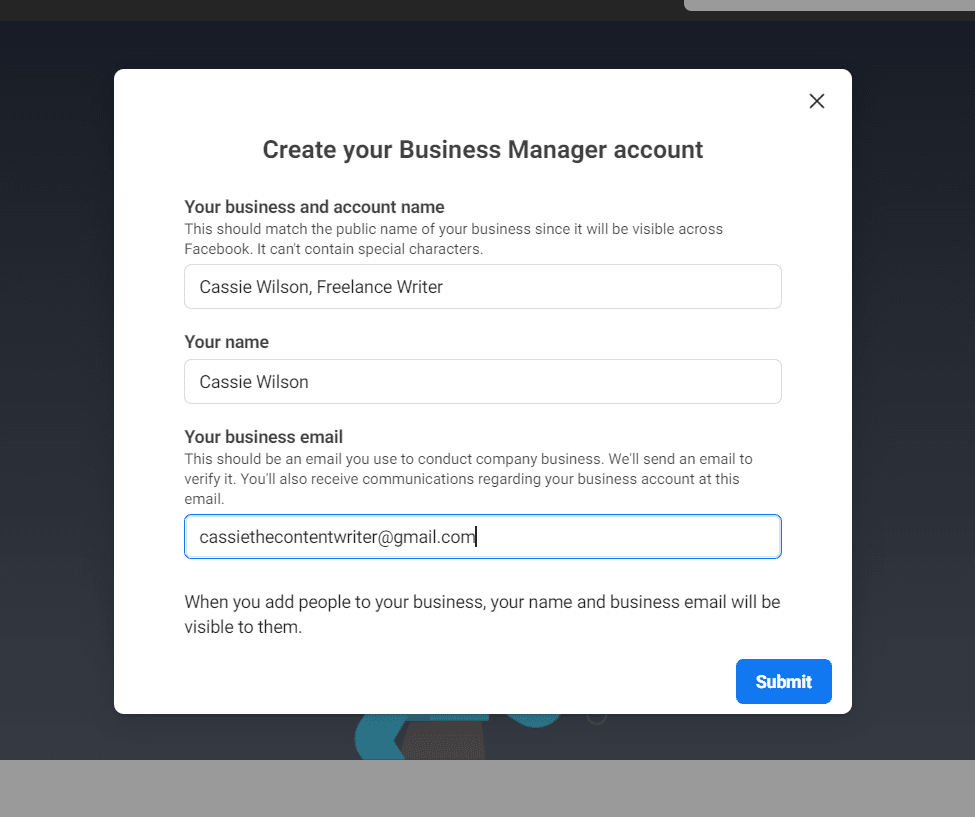
2. Next, fill in your business name and email in the pop-up, and click “Submit.”

You’ll be asked to enter your business name and email on this pop-up screen. Since you are logged in to Facebook already, your name will already be populated in the box.

You’ll want to make sure you are using a business email that your employees recognize, as this is the email you’ll use to invite and assign roles to your employees. Meta does not allow the use of special characters in the business name field, so you’ll want to leave those out.

how to use facebook meta business manager: enter business details

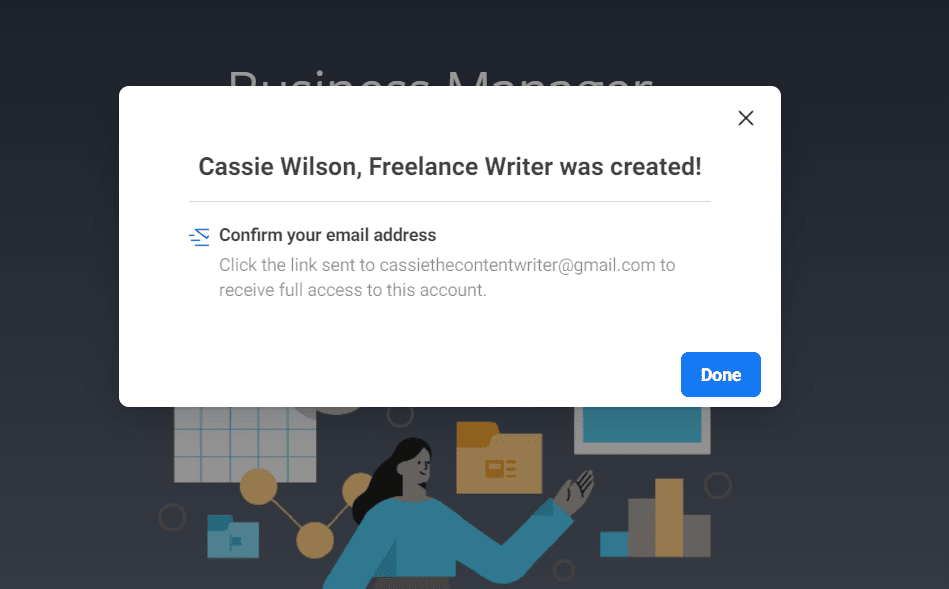
3. The pop-up screen will then ask you to confirm your email. Go to your inbox and open the email with the subject line, “Confirm your business email.”

After entering your information and submitting it, Meta will ask you to confirm your business email. The pop-up screen will direct you to check your email.

You will see an email that reads, “Confirm your business account.” If you don’t immediately see this email in your inbox, be sure to check your junk, spam, or social folders.

how to use facebook meta business manager: account creation confirmation

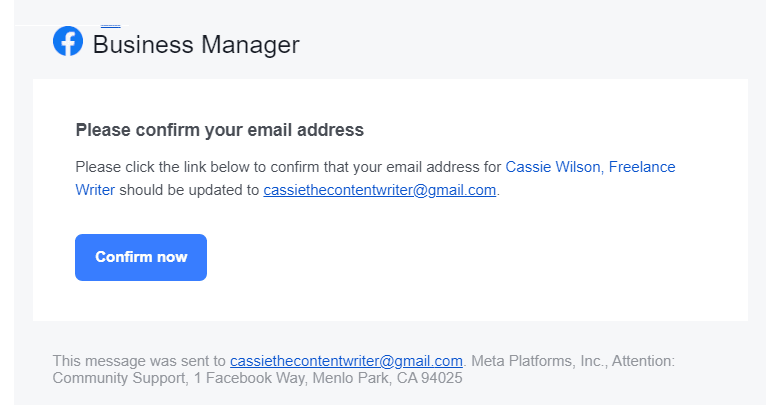
4. Open the email from Facebook and click “Confirm now.”

how to use facebook meta business manager: gmail confirmation

When you click the “Confirm now” button, a new Meta Business Manager window will open. This window will give you access to your Business Manager account. If it looks intimidating at first glance, don’t worry, Facebook Business Manager is actually pretty intuitive.

Let’s delve into how to add pages and ad accounts to your Business Manager account.

How to Add Facebook Business Pages to Your Meta Business Manager Account

On your Meta Business Manager homepage, you’ll immediately see an Ad Account Performance module. You may need to scroll down to see the Pages module in your Business Account.

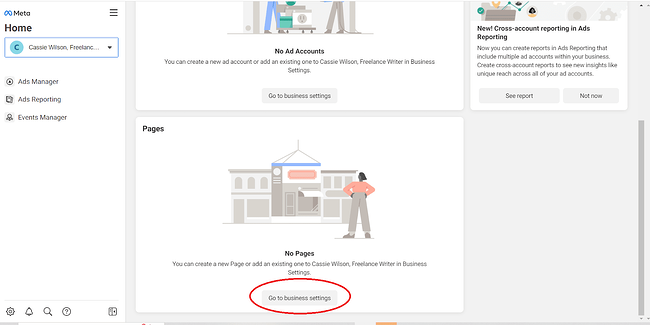
1. First, scroll to the Pages module and click “Go to business settings.”

Since your Meta Business Manager is new, you will have to connect your Facebook Pages to your account. To connect a Facebook page to your Meta Business Manager, scroll down to the Pages Module. Then, click the “Go to business settings” button.how to use facebook meta business manager: pages go to business settings

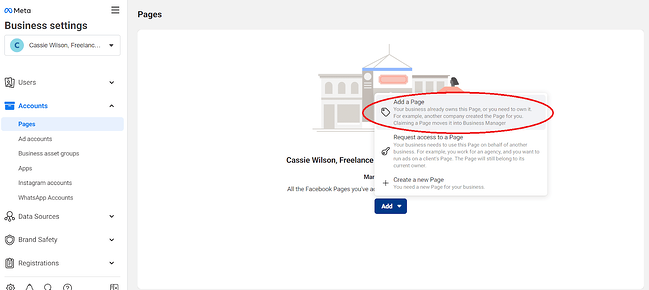
2. Click the “Add” button in the new window. In the menu, choose “Add a Page.”

When you click “Go to business settings,” a new window will open. In this window, you will be able to connect your Facebook pages to your Business Manager account. Click the “Add” button to connect a page.

how to use facebook meta business manager: add a page

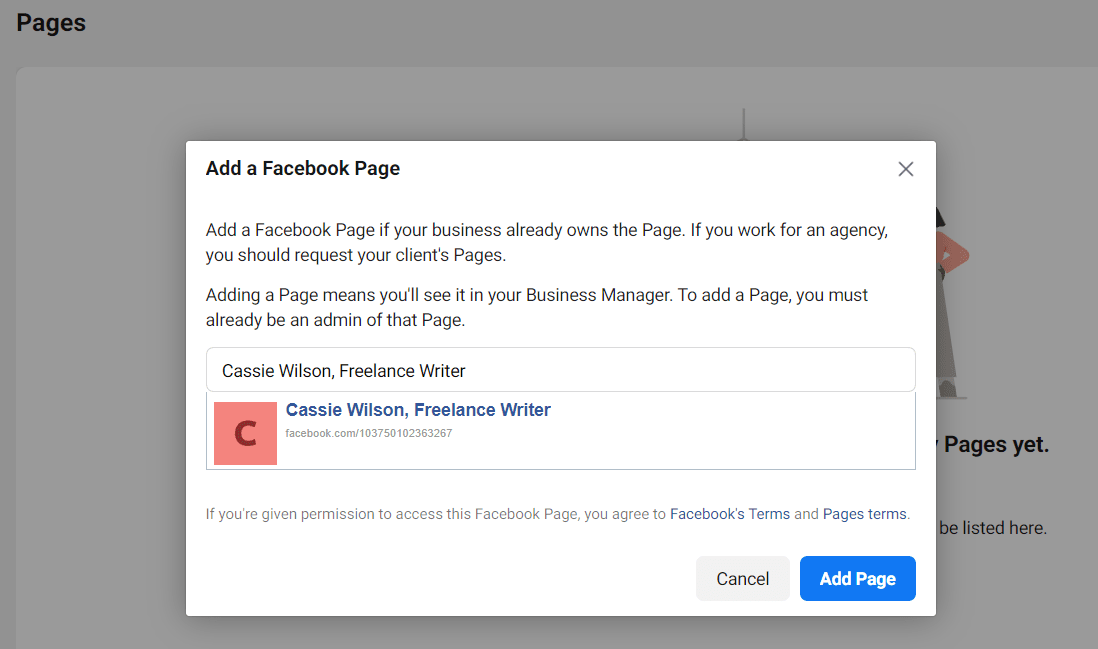
3. In the pop-up screen, type the name of your Facebook Page or enter your URL. Then click the “Add Page” button.

This pop-up screen will prompt you to type your Facebook Page in the bar or paste your Page’s URL. If you type your Page name in the bar, your Page should be the first available option. If not, paste the URL. Once you have selected your Page, click the “Add Page” button.

how to use facebook meta business manager: page search popup

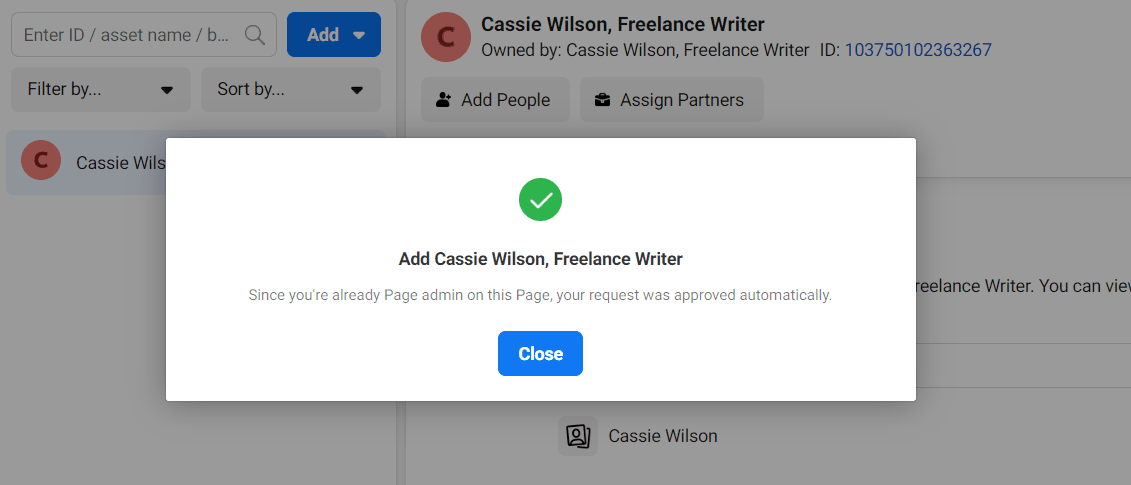
4. If you see this pop-up with a green checkmark, you’re all set! Your page is successfully added.

That’s it! Now that you’ve successfully added your Page, you’ll be able to see it in your Meta Business Suite portal.

how to use facebook meta business manager: page confirmation

How to Add Your Facebook Ad Accounts

Adding your Facebook ad account is an almost identical process to adding a page, but I’ll walk you through the steps here so you can see them in action.

It’s important to note you can only add one ad account at first, and then you’ll be able to add additional ad accounts once you start spending money in your first ad account.

However, you can’t host more than five ad accounts at any one time.

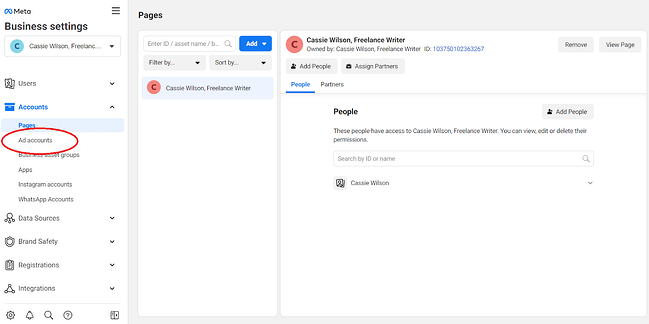
1. Click the “Ad accounts” link on the side panel of your homepage.

Underneath Business settings, you’ll see the side panel. Click on the “Ad accounts” link to connect your Ad account to your Meta Business Suite.

how to use facebook meta business manager: ad accounts sidebar

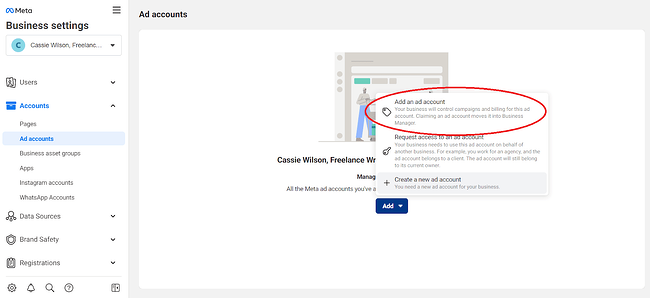
2. Click the “Add” button. In the pop-up menu, choose “Add an ad account.”

After you click “Add an ad account,” you’ll notice three options. You can add your own account, add someone else’s account, or create a new account. For the purpose of this post, we’ll assume you already have your own ad account for your Facebook Page. To add the ad account, click “Add an ad account.”

how to use facebook meta business manager: add an ad account

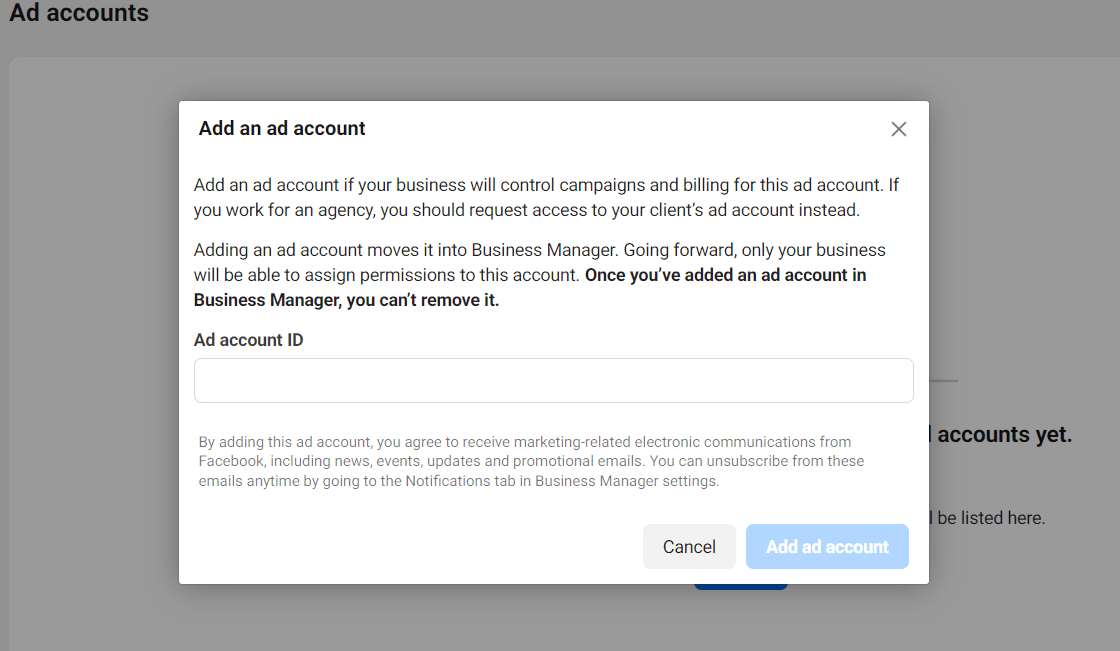
3. Enter your “Ad account ID” into the box. When you’re finished, click “Add Ad Account.”

To connect your ad account to your Meta Business Manager, you need your account ID. If you do not know your ID, log into your existing Ads Manager. You should see your ID in the dropdown menu of the search bar. This is the ID you’ll use to connect your account to the Business Manager.

Once you have your ad account ID, enter it into the ad account ID box. Double-check that your ad account ID is the correct account and number sequence. Once you enter your ID and connect it to your Business Manager, you cannot delete it.

how to use facebook meta business manager: add ad account id

How to Add People to Your Business Manager Account

For this example, we’ll focus on adding internal employees to your Business Manager Account, not clients or external advisors.

Adding people to your account is easy, and you can limit the amount of access each employee gets.

Limiting access to “employee only” is helpful if, for instance, you want to assign one employee to handle your Instagram account and monitor those analytics, but then you want another employee on the team to manage your ad accounts and those analytics.

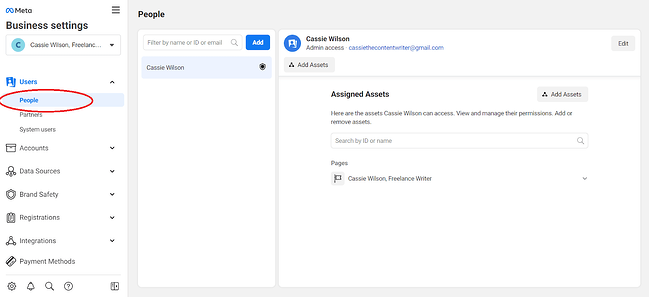
1. First, go to the side panel under Business settings and choose “Users.” In the dropdown menu, select “People.”

To add an employee to your Business Manager, locate the “Users” tab on the side panel of the main screen. Then, select “People.” This will open a new screen.

how to use facebook meta business manager: add people sidebar

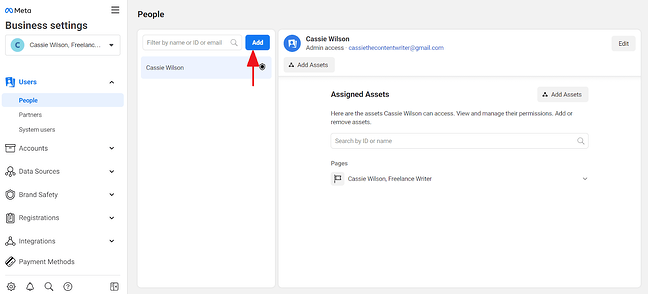
2. Next, click the blue “Add” button highlighted below.

Adding a user is simple. Click the blue “Add” button to start the process. You’ll need to know the email of the employee you are adding to your Business Manager.

how to use facebook meta business manager: add button

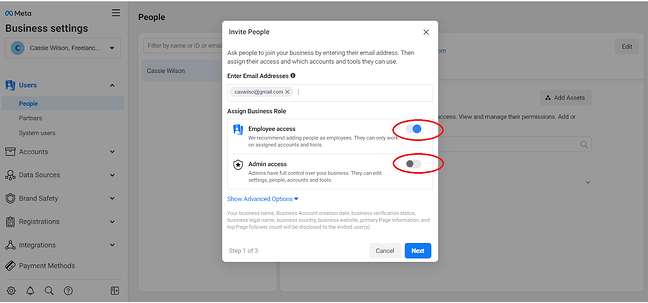
3. Type in an employee’s email address (so Facebook can send them an email with access permissions), and then select “on” for either “Employee access” or “Admin access.” Then, click “Next.”

To add an employee, you’ll need to enter their email address. Before clicking “Next,” decide if you will assign the user to “Employee access” or “Admin access.” Setting a user to “Admin access” will give them complete control of your Business Manager account. To assign additional roles, such as Finance Analyst, Finance Editor, or Developer, click the “Show Advanced Options” button.

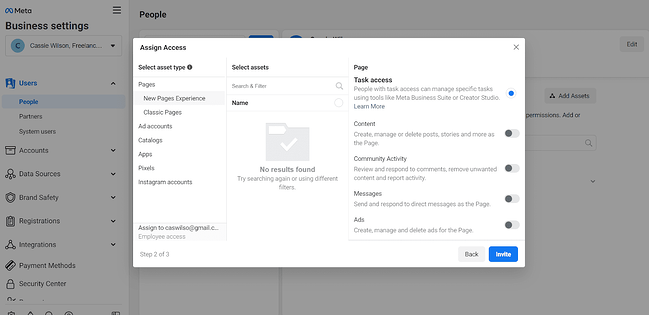
how to use facebook meta business manager: access toggles4. Assign your employee to any of the assets on the right of the pop-up screen. Click on each asset to assign roles and tasks. Once you are finished, click “Invite.”

Here, you have a couple of different options. You can assign your employee to any of the assets on the right of the pop-up screen (Pages, Ad Accounts, Catalogs, Apps, Pixels, and Instagram Account). If you click on each asset tab, you can assign different tasks and roles for the employee within the asset. For example, under the Pages asset, you may task your employee with content creation or task them with moderating comments.

Once you have assigned roles and tasks for your employee, click “Invite.”

how to use facebook meta business manager: assets assigning

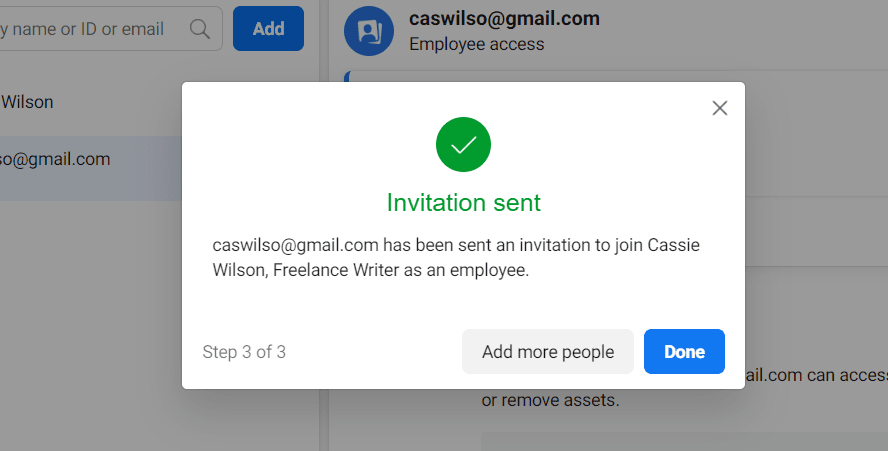
5. Now, your employee has been sent an invitation. Click “Done” or “Add more people.”

Great! You’ve added an employee to your Meta Business Manager account. Make sure your employee knows to check their email and follow the instructions in their email to finish confirming their account. If you are finished adding people to your Business Manager, click “Done.” If you have more employees to add to your account, click “Add more people.”

how to use facebook meta business manager: invitation confirmation

Ads Manager Tools

Now that we’re all set up, you might be curious about some of the additional benefits of creating an ad inside Business Manager.

When creating an ad in Ads Manager, one of the best advantages (as you’ll soon see) is the ability to create a highly-targeted core demographic group with the “create new audience” feature.

You can choose a gender, age, region, and language to reach and dive into the specific interests you want your audience to share.

Then you’re given estimates based on your audience and budget, like how many people you’re expected to reach daily and how many people will click your link. Those performance metrics are critical when deciding whether to increase or decrease audience size or whether your budget is big enough.

Here’s how to create an ad in Ad Manager:

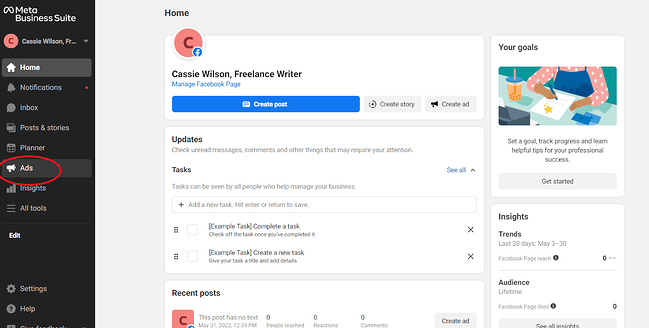
1. On the side panel of the homepage, click “Ads Manager.”

Under the Meta Business Suite logo, you’ll see the side panel. To access the Ads Manager, click the “Ads Manager” button.

how to use facebook meta business manager: ads manager sidebar

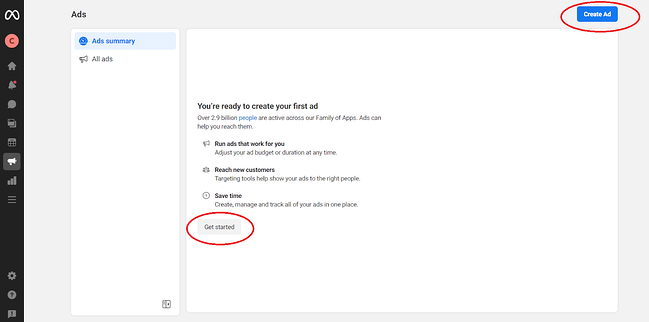
2. To create an ad, click “Create Ad” in the right corner of the screen. Or, click on “Get started.”

If you have not previously created Facebook ads, Facebook will prompt you to start. Click the “Get started” button at the bottom of the screen. Or click “Create Ad” in the right-hand corner of the screen. Both buttons will open the ad creation page.

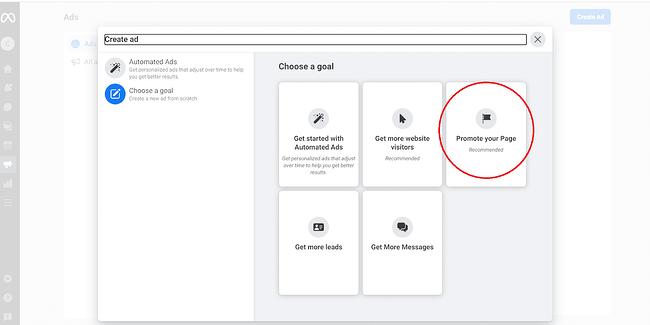
how to use facebook meta business manager: create ad button3. Select your goal.

When creating a Facebook ad, you need to choose a goal for your ad. You can create an automated advertisement, drive traffic to your website, promote your Facebook Page, generate more leads, or create an ad to generate inbound messages. For the purpose of this example, we will choose the goal “Promote your Page.”

how to use facebook meta business manager: set goal for ad

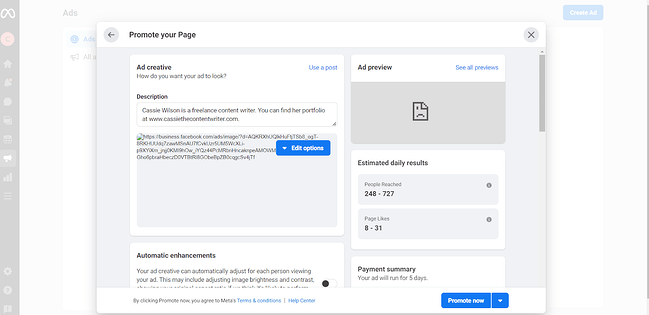
4. Next, fill in the details to design your Facebook ad.

To promote your Page with a Facebook ad, you need first to write a description for your ad. Next, click “Edit options” to choose a photo for your ad. You can upload an image or select a photo that you already have linked to your pages. The Ad box will give you an idea of what your ad will look like to your audience.

how to use facebook meta business manager: ad details

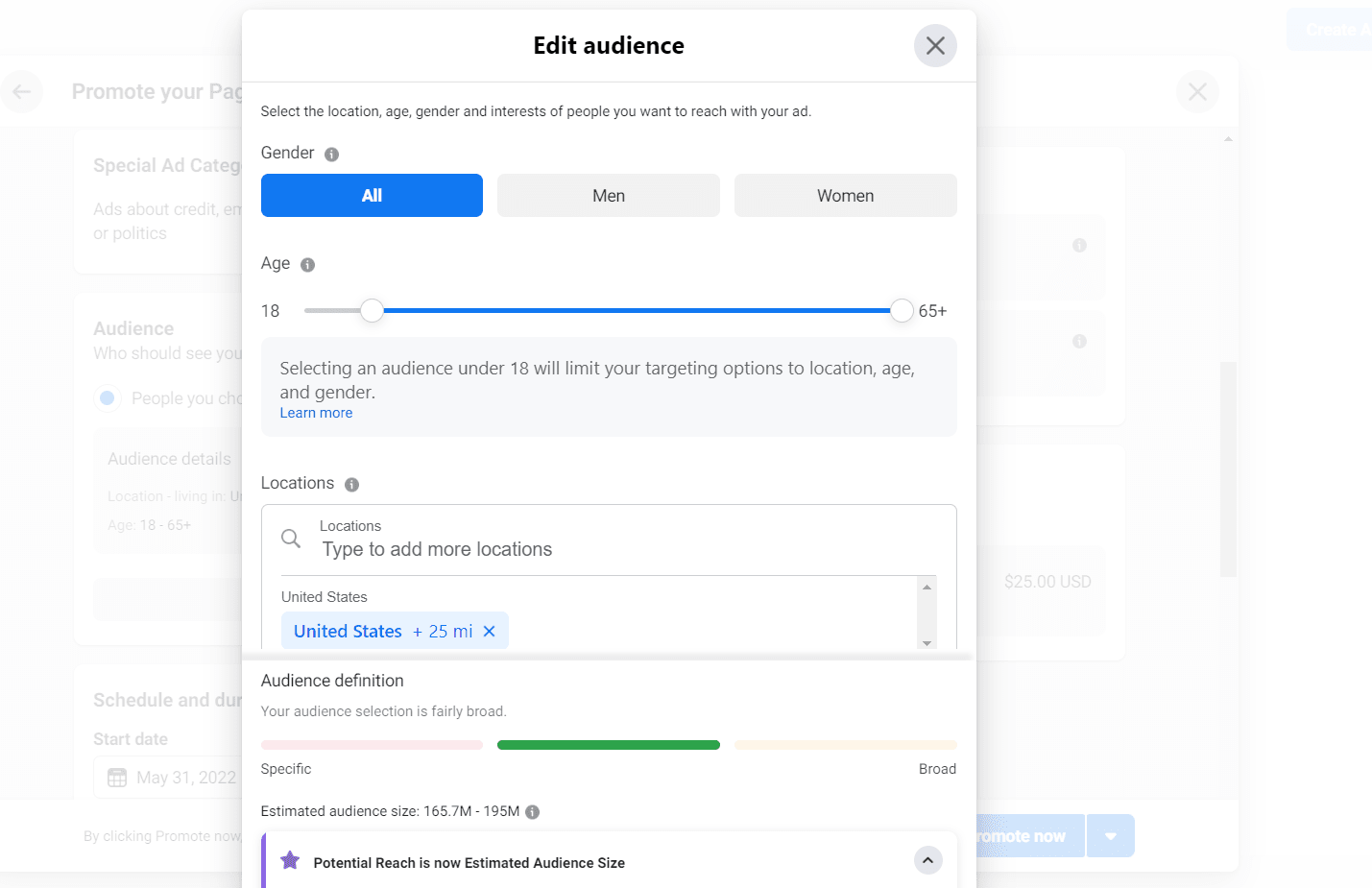
5. Then, scroll down to create your audience. Click the pencil icon to edit the audience description.

In the pop-up window, scroll down to the “Audience” module. Click the pencil icon in the corner of the module to edit the audience description. Fill out the information according to the audience that you wish to reach. You don’t need to fill out all of the information, but the more information you include, the more likely you’ll reach your target demographic.

how to use facebook meta business manager: edit audience

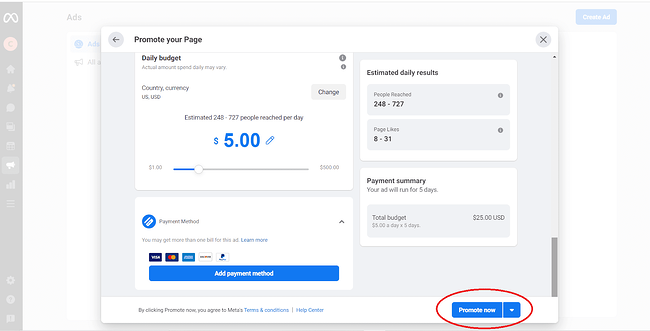
6. Once you are finished designing your Facebook ad, enter your payment information and click “Promote now.”

Before clicking “Promote now,” review your ad. If you are happy with your ad, you’ve selected your target audience, and you’ve decided on the timeframe to run your ad, enter your payment information in the Payment Method module. Click “Promote now” to finalize your ad.

how to use facebook meta business manager: promote now

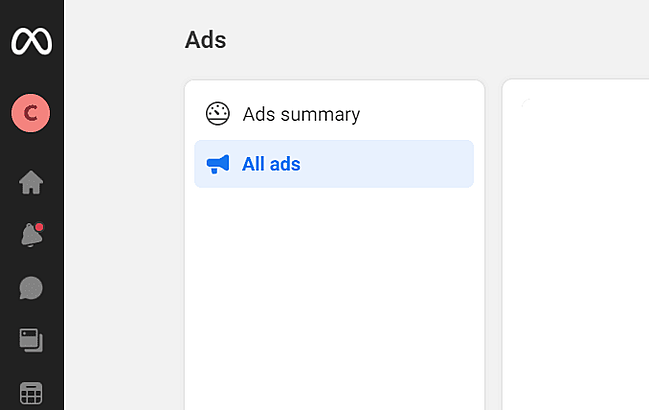
7. Congratulations! You have created your first Facebook Ad. To review your ad, click on the Ads Manager tab and click on “All ads.”

The Ads Manager tab is the easiest way to review your ads. Click on “All ads” to see a list of your ads. This tab will provide relevant information and analytics such as reach, impressions, cost per result, and relevance score.

how to use facebook meta business manager: all ads

Meta Business Manager Insights

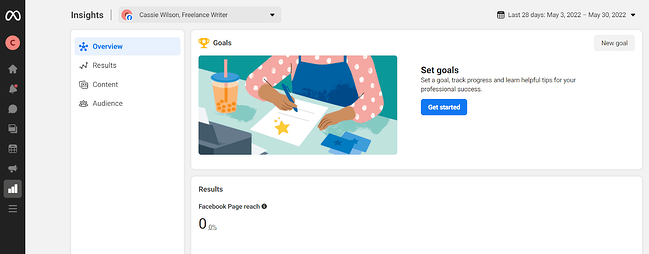
Lastly, here’s a general overview of your “Insights” tab and what the Insights page looks like:

how to use facebook meta business manager: insights

We won’t go too in-depth with analytics, or insights, since it’ll vary drastically depending on your business’s advertising goals, budget, and audience.

However, it’s important to note a few significant components of the Business Manager’s insights to ensure you understand the tool’s most impressive functions.

Hot tip: Check out Meta Business’s advertising information page to learn more about Facebook ad functions, read success stories for industry-specific businesses, and get inspiration and ideas to improve your own ads.

Business Manager Insights Functions You’ll Want to Know About

  • Facebook Pixel: If you install Facebook Pixel, your website can reach people with ads on Facebook after they’ve visited your site.
  • Split testing: Use A/B testing to figure out which ads lead to the highest conversion rate.
  • Conversion lift: Use this tool to ensure your ads are actually generating conversions and sales.
  • Mobile SDK: If your business has an app, use Mobile SDK to see what actions people are taking within your app and use that information to improve ad campaigns across devices.
  • Brand lift: Find out how your ads are impacting your brand image to optimize ads for better brand awareness.

Use Meta Business Manager to Improve Your Reach on Facebook

Meta Business Manager will help you manage your Facebook presence down to the team members who can access your account. Take advantage of this tool to launch effective ads on Facebook, examine your Facebook strategy, and boost your KPIs across Meta’s social platforms.

Editor’s note: This post was originally published in May 2018 and has been updated for comprehensiveness.

generate leads with facebook

Categories B2B

The Best Podcasts of 2022: What You Should be Listening to Now

32% of Americans participate in the same activity on a monthly basis. Any guesses what it could be?

The answer: People are listening to podcasts.

➝ Free Guide: How to Start a Podcast

But with thousands of podcasts available, which are worth a listen? And if you’re already a listener, what other shows should you add to your roster? It can be hard to find a podcast that really piques your interest, so we put together a list of suggestions to help — from business and tech to comedy and true crime.

Table of Contents

Business Podcasts

Comedy & Entertainment Podcasts

Educational Podcasts

Kid Podcasts

News and Politics Podcasts

Culture Podcasts

True Crime Podcasts

Personal & Health Podcasts

Technology Podcasts

Marketing Podcasts

Business

There are hundreds of business and management-related podcasts that will help you stay on top of the latest industry trends, lead in the most effective way possible, and keep your fellow employees excited about coming to work.
Planet Money

planet money1

It’s like sitting down with a friend who tells you everything you need to know about the economy… and you actually enjoy yourself.

CEO School

ceo schoolDid you know less than 2% of female founders break 1 million in revenue? Join host Suneera Madhani each week as she interviews incredible mentors and trailblazers who’ve made it to the 2% club, as well as women who are forging their own path. Class is officially in session.

My First Million

MFM Cover Art

This podcast is like one big brainstorming session. Follow along as hosts Sam Parr and Shaan Puri discuss new business ideas based on trends and opportunities that they see in the market.

Business Made Simple

business-made-simple1Tune in each week to learn tips and tricks from Donald Miller on how to optimize your business like an airplane — yes, really!

How I Built This

how i built thisGuy Raz discusses the story behind some of the top companies in the world and the entrepreneurs, businesspeople, risk-takers, and pioneers who made them so successful.

Business Wars

business wars

Ever heard the saying “business is war?” It certainly appears to be that way for some of the biggest competitors in the world, such as Google, Apple, and Samsung.

Host David Brown takes listeners through the ways these battles shape businesses, what they produce, and how consumers are impacted.

The Goal Digger Podcast

goal diggerBuilding a business from the ground up is a scary feat. You may ask yourself, can I really turn my passion into profits? Am I ready to leave my 9-to-5 for good? Jenny Kutcher explores these questions (and more) on the Goal Digger podcast — which never runs out of productivity tips, business hacks, and inspirational stories.

WorkLife with Adam Grant

worklife

Adam Grant, an organizational psychologist, helps listeners uncover the keys to success and happiness in the workplace through descriptions of some of the most unique and impactful businesses. Grant provides listeners with advice that encourages them to view their work in a new light.

Entrepreneurs On Fire

EOF

With over 100 million listens, host John Lee Dumas offers bite-sized episodes full of wisdom and inspiration for entrepreneurs on the go. JVD has interviewed thousands of entrepreneurs, including Tony Robbins, Gary Vaynerchuk, and Barbara Corcoran — so if you need inspiration to light your entrepreneurial spark, look no further.

Masters of Scale

Master of Scale

How do certain companies grow quickly and substantially? Host Reid Hoffman interviews some of the top CEOs today — such as Mark Zuckerberg, Sheryl Sandberg, and Eric Schmidt — on how their companies made it big.

Side Hustle School

Side Hustle School

Is there a product you’ve been thinking about creating? Or a passion project that will help you enter the career you actually want?

Side Hustle School gives entrepreneurs who have jobs — that they want to keep for the time being. The host interviews guests who successfully created their own side hustle to inspire listeners to make the leap.

For more on which business podcasts you should listen to, check out this blog.

Comedy & Entertainment

These humorous and engaging podcasts will make you laugh and smile wherever you are listening.

Conan O’Brien Needs a Friend

conanAfter 25 years on late night, comedy legend Conan O’Brien enters the podcast-sphere to chat with his friends, including fellow comedians, actors, and musicians. It takes an unpretentious and delightful spin on the typical celebrity interview. If you’re looking for laughs — without sacrificing substance — this podcast is for you.

Wait, Wait… Don’t Tell Me!

wwdtm

Are you up to speed on current events?

This podcast quizzes you on your news knowledge. With questions and statements that are both real and fake, it’s your job to determine what’s correct and what’s fake.

2 Dope Queens

2DQ

Hosts Phoebe Robinson and Jessica Williams perform a live comedy show in Brooklyn and talk about real issues, share humorous stories, and discuss their personal lives, as well as the lives of their fellow comedian guests.

SmartLess

SmartLess_cover

If you prefer A-list celebrity hosts, look no further than SmartLess — a podcast by Jason Bateman, Will Arnott and Sean Hayes. The premise is simple: each week, one of the three brings a surprise guest on the pod, leaving the other two to interview the guest without any prep. As you can imagine, hilarity and chaos quickly ensues. 

TigerBelly

tigerbellyStand-up comedian Bobby Lee — along with co-host Khalyla Kuhn — share unbelievable (and often absurd) stories about working the LA comedy circuit. Often joined by another comedy heavy hitter, such as David Spade, Bill Burr, and Theo Von, you quickly realize nothing is off limits — the funny, embarrassing, cringy, and personal tales always float to the surface.

The Dollop

DOLLOP_cover2

Are you a history buff? If so, you may love The Dollop. The entertaining, comedian-hosted podcast takes important moments in history and examines them in detail.

WTF with Marc Maron

WTF_with_Marc_Maron

Maron interviews other comedians, celebrities, and public figures about specific situations in their personal lives and their work. Maron is one of the best interviewers out there, and he always makes learning something new about his guests fun.

Comedy Bang Bang

comedy bang bang

Scott Aukerman chats with celebrities and some of the funniest comedians around in this weekly podcast. Guests answer fun interview questions, play games, and engage in comedic banter. Aukerman’s open door policy always allows for entertaining and eccentric guests to join the show.

You Made It Weird

You_Made_it_Weird_Logo

Everyone has that thing that makes them a little weird — a talent, interest, obsession, or hobby that they may keep secret from others. Host Pete Holmes invites other comedians and celebrities on his show to uncover their weirdness.

How Did This Get Made?

how did this get made podcast

Do you ever find yourself loving a movie even though you realize it’s actually a bad film? The three hosts of this podcast will watch these movies with some of their comedian friends and report back on how they felt about the flick.

Beautiful Stories from Anonymous People

Beautiful AnonymousHost Chris Gethard opens the phone line once a week and picks up for one anonymous caller. That person can talk for an hour about anything – embarrassing stories, self-promotion, family problems, serious personal issues, or a funny incident.

The best part: Gethard can’t hang up the phone first.
R U Talkin’ R.E.M. RE:ME?

RUTalkin

Any R.E.M. fans out there? How about Parks and Recreation fans? Adam Scott (of Parks and Rec) and co-host Scott Aukerman discuss the impact that the band R.E.M has had in the music industry through album and song analysis.

Educational

Looking to learn something new? Need some interesting trivia questions? Stump your family and friends with fun and important facts that you’ll learn from these educational podcasts.

Stuff You Should Know

stuff you should kno

This award winning podcast covers a wide variety of topics – pop culture, historical events, crime, and more. The SYSK hosts are a hilarious duo, keeping this education podcast light and entertaining.

TED Talks Daily

ted talks daily

This is the podcast version of the popular TED Talks, which are viewed by millions of people around the world and cover every topic — from science to creativity to psychology.

99% Invisible

99% InvisibleWhether we realize it or not, design is everywhere. This podcast brings forward the design and architecture that surround us all and explores the power behind their method, process, and form.

This American Life

this american life

This journalistic podcast stems from the This American Life weekly public radio program and features nonfiction reviews of essays, memoirs, historical content, and current events.

The show has won several of the top broadcasting awards and 2.5 million people download the podcast every week.

Lex Fridman Podcast

lex fridman podcastPraised as a sharp and insightful interviewer, Lex Fridman dives into complex issues about AI, consciousness, love, power, and philosophy with the brightest minds of today (think Sam Harris, Mark Zuckerberg, and Elon Musk — to name a few). It’s a thought-provoking experience that may change your entire world view.

Lexicon Valley

lexicon valleyLexicon Valley is about words, vocabulary, and language — as you may have guessed based on its name. Hosted by a linguist, topics covered include current and dead languages, syntax, meanings, and pet peeves.

Dan Carlin’s Hardcore History

hardcore history

Carlin — podcast host, journalist, and broadcaster — examines major historical events with his unique and often unorthodox way of thinking.

Every Little Thing

every little thing

This Gimlet-produced podcast will answer your most interesting, specific, and random questions such as, “do dogs have belly buttons?” and “how old is Winnie the Pooh?” Listen to ELT to get some of the best trivia questions to ask at your next family dinner.

Revisionist History

revisionist historyMalcolm Gladwell explores events, people, ideas, and more from the past to try and gauge whether or not people got it right the first time around. He takes listeners through moments in their pasts that may have been ignored or forgotten and highlights the decisions that were made around them.

Getting Curious with Jonathan Van Ness

getting curious with JVNThis podcast has one simple goal: review any topic that host Jonathan Van Ness is curious about in detail. All fields and subjects are up for discussion in the weekly show.

Invisibilia

Invisibilia

Invisibilia is Latin for “invisible things.”

The podcast reviews the invisible things, or unseeable forces, that drive human behavior and decisions. It gives listeners insight into how their brains work and why they feel tempted to act in certain ways or make specific decisions.

Kids

If you’re looking for some entertainment while you drive your kids to school in the mornings or if you’re heading out on a family vacation sometime soon, these educational podcasts may be of interest — and you might just learn something too!

Brain’s On! Science Podcast for Kids

Brains On

Both children and adults will love this science podcast fit for those with curious, wandering minds. Every week a new science-related question is asked and both kid scientists and adult radio hosts work their way through answers and conclusions together.
Storynory

storynory

Classic fairy tales, short stories, poems, myths, and more are read by Storynory’s narrators every week. These audio stories are great when traveling with children or for some simple, educational entertainment around the house.

Wow in the World

wowintheworld

Stories about some of the world’s most exciting places, people, events, and buildings are discussed in this fun podcast for inquisitive children. The two hosts make audio learning fun.

Dream Big

DreamBigPodcast

This family friendly podcast teaches children the importance of following their dreams and finding their passions at every point in their lives.

Eva Karpman — the 7-year-old host — along with her mother, Olga, interview some of the world’s best performers about what motivates them to stick with what they love and become successful.

What If World

what if world

Children and their parents are encouraged to use their imaginations to come up with the wackiest and most exciting questions for the hosts of What If World to discuss on their show. These can be unrealistic and fun questions such as, “What if there was never-ending recess?”

News and Politics

In a society where the news cycle runs 24/7, it is easy to miss important stories and breaking information. These podcasts will help you stay on top of the current news cycle so you never fall behind on the latest breaking news or political story.

The Daily by The New York Times

the-daily-podcast

The New York Times produces this 20-minute current events and news podcast five days a week. The shows are ready by 6 a.m. Monday through Friday so listeners are able to catch the biggest stories prior to or during their morning commutes.

Pod Save America

pod save america

Four of President Obama’s former aides discuss a wide range of political topics with journalists, comedians, and influencers about the current situation in Washington D.C.

BBC Global News Podcast

bbc global newsBBC is one of the most trusted news sources in the world. Their Global News Podcast provides listeners with coverage of the top current events around the globe.

Today, Explained

today explained

Do you ever feel overwhelmed by current events? Or that you’re not getting important the news-related information you want throughout the day?

This podcast is produced every evening for listeners to enjoy after a day of work and catch up on the news they may have missed or misunderstood.

Embedded

embedded

Embedded host Kelly McEvers takes specific news stories and dives into them one at a time. She goes into great detail about one recent event per show so listeners can get all of the facts they need.

Rough Translation

rough translation

Have you ever wondered how news stories are translated throughout the world? How is a story, conversation, or event being talked about in another country?

Rough Translation will walk listeners through these changes and renditions.

The Axe Files with David Axelrod

the axe files

David Axelrod is the founder of the University of Chicago Institute of Politics and his podcast is produced by CNN. He interviews important members of the political world and gets the details on newsworthy events.

Culture

Places, people, and jobs you know little to nothing about explained — these podcasts will make you smile, laugh, and cry.

Modern Love

modern loveModern Love gives listeners a quick glimpse into the complicated love lives of real people. Each episode brings stories about love in all of its messy, puzzling, agonizing, and beautiful glory.

Keep It

Keep It

Keep It host Ira Madison III discusses the importance of the intersection of politics and pop culture in today’s society. Madison invites journalists, politicians, celebrities, activists and more onto his show, which airs every Wednesday.

Ear Hustle

Ear Hustle

Have you ever wondered what it’s like living in prison?

Ear Hustle is created and produced by people actually living within the prison system. They share information about their lives, mistakes, and other personal stories to give listeners an accurate view into the American prison system and the humans who are living behind bars.

Weird Work

weird work

Another awesome podcast — if we do say so ourselves — produced by HubSpot. Not everyone sits at a desk from 9-5, five days a week. This show highlights some of the weirdest jobs people have, how they got started in the field, and what it’s like to have an unconventional career.

Song Exploder

song exploderIt’s no secret that every song has a meaning — that’s why people create and listen to music.

Song Exploder interviews musicians and has them explain one of their songs in detail. The artists give listeners background information on why they created their song, what went into the production, why certain decisions were made, and more.

True Crime

Do you like thrillers and scary movies? Spooky stories — both fiction and non-fiction? The following true crime podcasts will give you the chill you’re itching for.

In the Dark

in the dark

Have you ever heard the name Curtis Flowers?

Over the course of 21-years he has been tried six times for the same crime — the murders of four people in Mississippi — and has been found innocent every time. Reporter Madeleine Baran investigates the case and examines the reasons behind Flowers’ innocence.

Serial

serial

This podcast — which is part of the This American Life production — uncovers the truth behind one real crime story every season. The host of the podcast — Sarah Koenig — learns the details of the crime in real time, so listeners are able to follow along as the case unfolds.

My Favorite Murder

MFM

The two female hosts of this podcast have been fans of horror stories and true crime for as long as they can remember. During the show, they share their favorite thrillers along with stories of horror and crime from their friends, family, and fans of the podcast.

Death in Ice Valley

Death_in_Ice_Valley

As part of the BBC World Service, Death in Ice Valley brings listeners a crime that has been unsolved for nearly 50 years.

An unidentified woman’s body was found in Norway — but who was this woman? Why has no one come forward with information about her life or disappearance? How has no one ever reported her missing?

Lore

Lore podcast

This award-winning, bi-weekly podcast reviews non-fiction scary stories and thrillers that are perfect tales to share around the campfire or during the Halloween season. Superstitions, crime, unknown creatures, and haunted places are all talked about on this podcast.

Crimetown

crimetown

Organized crime has changed the way certain cities in America have grown and developed. Crimetown, another popular podcast produced by Gimlet, reviews the ways organized crime has left a mark on different cities throughout the U.S. A new city is discussed every season.

Criminal

Criminal_Vox_Media_Podcast

Criminal has been in production since 2014. With a new story every episode, the show tells listeners about people who have committed a crime, have been the victim of a crime, or are affiliated with a crime in some way.

Personal, Health, and Wellness

Whether you need help relaxing, motivation to stay active and healthy, or inspiration to find your next career move or hobby, there is a podcast to help you reach your goal.

Maintenance Phase

Maintenance phase

Here’s a not-so-shocking statement: the wellness industry is polluted with junk science, fad diets, and misinformation. Maintenance Phase takes a closer look at these misconceptions with revolutionary honesty (backed by science). No topic is safe — from celery juice cleanses to the problematic history of the Body Mass Index (BMI).

There’s a reason why it regularly earns the number 1 spot in the health and fitness category on Apple podcasts.

Ten Percent Happier

ten percent happier

After having a panic attack on live television, journalist Dan Harris found solace in an unexpected way: through meditation. Now, in his podcast Ten Percent Happier, Harris ruminates with prominent meditation teachers and top scientists on how people can achieve a greater sense of happiness.

The Art of Manliness

art of manliness

This podcast — which is targeted at men — was created to promote kindness, strength, love, and understanding in boys and men of all ages.

The show reviews studies on manliness and parenting, philosophy, biology, and more to explore ways that all men can become better men.

Sleep With Me: The Podcast That Puts You To Sleep

sleep with me-1

High strung or wound up? Thinking about a million things when you are trying to sleep?

This podcast will help you get the rest your body wants and needs. Listeners hop in bed, close their eyes, and listen to a story that gets progressively more boring with time so they can drift off and get to sleep faster.

Savage Lovecast

savage lovecast hd

Advice columnist Dan Savage answers fans questions about sex and politics. Listeners can also call in and ask Savage a question that he will answer on his show, so it’s about real people and real “love” problems.

Good Life Project

good life

Good Life Project will inspire you to live your best life, find what you’re passionate about, stay productive, and learn to be fully-engaged. The conversations between the podcast’s hosts and guests are relatable, touching, and honest.

Hidden Brain

hidden-brain-logo-2015

Whether or not we realize it, brain patterns drive the way each of us think, react, and behave every day.

Hidden Brain — produced by NPR — takes listeners through a multitude of reasons why they behave in certain ways. This podcast will help you better understand yourself and the people you interact with.

Technology

Learn about the newest developments and innovations happening every day in tech and media with these podcasts.

The Hustle Daily Show

hustle daily show

Introducing the perfect podcast to pair with your morning coffee. The Daily Hustle Show cuts through the noise to give you the top business and tech news you need to know. With funny-but-true insights delivered by hosts Zachary Crockett, Juliet Bennett Rylah, Jacob Cohen, and Rob Litterst, it’s dangerously addicting.

Recode Decode

recode_decode

Host Kara Swisher — a well-respected technology journalist — teaches listeners about the biggest names, developments, and innovations in tech and media. She interviews industry leaders about their experiences, plans, and achievements.

Crazy / Genius

crazy geniusThis podcast — produced by The Atlantic — poses questions, possible conclusions, and ideas regarding the culture and innovation happening in the tech world today.

Online dating, blockchain, Facebook, space, and smartphones — are human interactions with technology actually sustainable? Listen to find out.

Note to Self

note to self

The relationship between humans and technology these days is a complicated one. We rely on technology in so much of what we do — but when is it too much?

Note to Self looks into this situation and asks questions about the way technology fits in our lives today, and how that relationship may change in the future.

a16z

a16z-podcast

Experts in tech, business, media, and news discuss trends, developments, and cultural changes within their industries. This podcast — which is produced by a venture capital firm in Silicon Valley — includes interviews with some of the most prominent figures in the tech world.

Gadget Lab

Gadget Lab

This podcast covers the latest tech information about social networks, entertainment, mobile, services, and more.

The Vergecast

vergecast

The Vergecast provides listeners with an overview of what’s new and changing in the tech industry with a rundown of the week’s latest stories, developments, successes, and failures.

Marketing

The way companies market their products and services has changed dramatically in recent years — consumers have all of the resources they need to make an informed purchase at their fingertips.

The following podcasts will help you reach your target audience and keep up with the latest marketing trends.

Marketing Against the Grain

MATGHubSpot’s own CMO and SVP of Marketing, Kipp Bodnar and Kieran Flanagan, share their marketing expertise — and get in a few arguments — in order to give you the best game plan on how to move your business forward.

Call to Action

CTA pod

Online marketing successes are explained in this podcast so listeners can take the lessons and apply them to their own businesses.

Interviews with campaign managers and digital marketing professionals provide people with tactical advice on how they can improve their marketing campaigns and overall online presence.

Marketing Made Simple

MMS

Need a podcast that’s easy to digest, and even easier to implement? Look no further than Marketing Made Simple, a no-nonsense podcast packed with practical strategies and tips to hit the ground running.

Copyblogger FM

copyblogger fmContent marketing, copywriting, digital marketing, and lead and conversion optimization are only some of the topics discussed in this weekly podcast. Experts chat with host Sonia Simone and analyze the changes within the marketing industry.

Online Marketing Made Easy with Amy Porterfield

Online Marketing Made Easy

Whether you’re a seasoned entrepreneur or just getting started, host Amy Porterfield shares all things marketing to accelerate your business. The podcast is grounded with real life examples along with a healthy dose of inspiration.

Conclusion

 In a world where everything seems to be getting faster – and where more is expected from people in less time – it’s easy to fall behind on the book you’re reading or miss a story in the news.

Podcasts are a great solution for those looking to stay informed while on the go – or even those of you who would rather sit back, close your eyes, and listen to a story in bed rather than read a novel, watch TV, or listen to music.

Stay entertained, learn something new, keep your brain sharp, and remain informed with podcasts.

New Call-to-action{{slideInCta(‘2db7c926-76d8-4f74-8f7e-5a91efff9819’)}

Categories B2B

What NetLine’s Been Working On This Summer

Over the past few months, we’ve had the privilege to share our work through a few different outlets, including the world’s top blog for content marketing. 

While we’ve shared these publications and features across our social feeds, we wanted to give them some additional love and limelight on our own blog. 

NetLine’s Summer 2022 Content Round-Up

It’s always great whenever you’re given the opportunity to write for another platform. Getting the chance to write and/or be featured on these platforms? Most excellent.

Convince & Convert 

Convince & Convert is one of the top marketing blogs in the entire world, so any chance we have to contribute there is a welcome one. 

Here’s what we’ve shared there in recent weeks.

7 Content Marketing Takeaways From 4.6 Million B2B Downloads

Our annual Content Consumption Report is truly one of the best reports available to B2B marketers. There’s no shortage of behavior-based, buyer-level insights found inside its 60+ pages, and for Convince and Convert we chose seven of the most impactful we could find.

Inside this piece, we feature some of our favorite stats, including:

  • How B2B Content Demand Has Increased 9% YOY
  • That eBooks Accounted for Nearly Half (43.3%) of All Registrations
  • Content Consumption is Up…and So is the Time to Consume It
  • Long-form Content Registrations Indicate Greater Purchase Intent

Why You Should Read This Piece

If you’re interested in our annual report but don’t have an hour to dive into all of its nuances, this article is perfect for you and your colleagues. Perhaps the best part of this blog is how each stat flows to the next in a nice, neat narrative. Audiences loved it so much it was one of Convince & Convert’s best-performing pieces in Q2!

How to Inform Your B2B Content Strategy with Real-Time Buyer-Level Insights

When you have access to some of the best data on the web, you want to share it with the people. Powered by our Audience Explorer tool, that’s exactly what our latest Convince & Convert guest blog does. 

We’re all quite familiar with building personas that we believe encapsulate who our audiences are. Additionally, honing in on what your audience craves is critical to constructing any viable content strategy. However, while so many marketing departments have content marketing strategies (CMI reports this figure at 77%), not all strategies are created equal.

Inside this piece, go through, in detail, how to use Audience Explorer and how it can benefit your approach and how you can pinpoint what makes your buyers tick via real-time consumption insights reveal actionable behaviors. 

This is a great breakdown for any B2B marketer and you can expect to learn:

  • How to use Audience Explorer
  • The 7 key questions of content marketing
  • Which portions of your audience is most active
  • Which topics are most in demand across your segments
  • Which content formats are most likely to capture your audience’s attention

Why You Should Read This Piece

Think of this exercise as performing a modern content gap analysis. While content gap analysis typically surveys which keywords, phrases, and topics you’re missing out on, tools like Audience Explorer and Google Trends, when used together can grant you the kind of macro- and micro-trends occurring within your spheres of relevance.

DivvyHQ

Our friends at DivvyHQ have been quite good to us of late. In the past two weeks alone, their blog has referenced our annual report three separate times on some stellar blogs. 

We’ll also have a guest post being published on the DivvyHQ blog in mid-August!

How to Create a Social Media Content Strategy

When’s the last time you revisited your social strategy? Have you ever applied first-party consumption data to your 

“Like any part of your marketing strategy, your social media content strategy needs to start with your target customers. Creating social media posts that resonate and promise to meet their needs is the quickest way to build trust with likely buyers.

But as a new NetLine report discovered, today’s audiences are busier than ever. Your posts’ titles must cut to the chase, providing enough detail that makes reading your post worth their time. […] Chief among the NetLine report’s suggestions is its advice to simplify your content’s language and structure. When you shorten and tighten your copy, you’re more likely to hold onto your audience until the end.

Start with a title that delivers your post’s key information, the report advises. That information should answer these questions:

  • Who?
  • What?
  • When?
  • Where?
  • Why?
  • How?
  • How much?”

See? Those 7 key questions are quite trendy!

Integrated Marketing: How to Get Started (and Keep Going)

Your subject matter experts would be a natural fit for educational content, such as how-to videos and written guides, as well as walkthrough and explainer videos. A new NetLine report revealed that these types of content, along with “101 content,” ranked highest among B2B buyers.”

The people inside your organization that have expertise in a given area are your greatest assets. Take advantage of their knowledge and familiarity and make it easier for your audience to grasp and apply this information for themselves.

9 Content Marketing Stats That Really Matter in 2022

“7. Research Shows eBooks’ B2B Popularity Is 4.8x That of White Papers

A recent NetLine survey of B2B buyers revealed a surprising statistic. Decision-makers were nearly 5 times more likely to request eBooks than formal white papers. eBooks’ informality and accessibility are likely part of the reasons behind that number. For years, content marketers labored under the assumption that business buyers preferred hard facts over brand stories with some emotion mixed in.”

You’ve heard us discuss the importance of eBooks and White Papers for months now since we unveiled our 2022 report. While eBooks get the top-level attention (and boy do they), it’s important to have a breadth of content formats that can appeal to each job level, role, industry, and stage of the buyer’s journey.

Keep enjoying your summer and we’ll keep working in the background on original research and a number of exciting projects.

Categories B2B

Back to the Office? Remote and Hybrid Employees Would Rather Quit [Data from 1000 Consumers]

Remember when we used to wake up bright and early and commute to the office five days a week?

Thinking back, it feels like a distant memory of a time before Covid-19. But for some workers, the days of rolling out of bed and hopping on a computer from the comfort of home could be coming to an end.

With the pandemic winding down, many companies like Apple and Google are going for a hybrid model, asking employees to come in a few days a week. But others, notably Tesla and Goldman Sachs, are requiring workers to come back to the office full-time.

Despite studies showing that workers are happier — and more productive — when working from home, the possibility of a full return to the office looms over remote and hybrid workers.

But will those employees rush back into the office when asked to? We did our own consumer research to find out.

Download Now: 2022 State of U.S. Consumer Trends Report

Will In-Office Work be a Dealbreaker for Employees?

When we asked over 200 remote/hybrid workers if they’d consider leaving their job if forced to go back to the office full-time, 54% say they would look elsewhere.  

remote or hybrid employees who'd leave their job if they needed to go back to the office full timeWhy? Workers Crave Flexibility

We found that flexibility in working remotely, a flexible work schedule, and a healthy work/life balance are among the top reasons remote or hybrid workers stay in their jobs.

In fact, flexibility in working remotely is almost as important as pay:

work benefits employees want to see

Who’s Still Working Remotely?

You might also be wondering what percentage of workers are currently remote, fully in-office, or using a hybrid model.

where consumers are working pie chartWorking on-site is the dominant model, with 40% of employees in the office full-time, while 32% are fully remote and 28% are hybrid.

What Business Leaders and Managers Should Keep in Mind

Of course, some work simply can’t be done remotely, but the pandemic proved that even those jobs could have more flexibility than we thought.

While we can’t predict all the effects of making employees go back to the office full-time, it’s clear that doing so when unnecessary could make many employees consider their exit.

If you’re an employer thinking of requiring a full-time return to the office, make sure to proceed with empathy and patience, transparently explain to your team why the work must be done in office, and consider the possibility that some of your talent could move to another company if they prefer flexibility.

To help your employees transition back to the office, while still retaining a healthy level of work-life balance, you could also consider alternatives like:

  • Flexible office and home hours on light meeting weeks.
  • A company-wide meeting free day each week (Our HubSpotters love our Meeting-Free Fridays!)
  • A few more vacation days in summer or during the winter holidays.
  • Extra time off for work anniversaries. (An example of this would be HubSpot’s 5-Year Sabbatical Program)
  • Additional family, sickness, or mental health leave options when possible

Lastly, if remote and hybrid work are doable for your marketing department or business, but you or other managers on your team have less experience with a remote workforce — don’t let that hold you back from building great virtual strategies. To learn the ins and outs of remote or dispersed team management, with tips from HubSpot leaders who’ve mastered it, check out this ultimate guide

More Insights on Trends That Matter

The data in this article came from our bi-annual trends survey where we asked 1,000 people about topics ranging from the metaverse to shopping habits, online communities, and the great resignation.

To learn all about the key consumer trends that could impact your business or marketing strategy in the next six months, check out our upcoming State of Consumer Trends Report.

New Call-to-action

Categories B2B

The Best Video Marketing Channels to Grow Your Brand in 2022

Video marketing isn’t “quick.” On average, it takes 2 weeks to create a video from start to finish.

→ Access Now: Video Marketing Starter Pack [Free Kit]

To get the most traction out of your work, it’s essential to pick the best video marketing channels to leverage. However, since most social media channels are pivoting to video, it’s hard to know which ones are worth your time.

Here, we’ll list the best video marketing channels for your long-form, short-form, and live videos — based on ROI, engagement, and lead generation.

Best Channels for Long-Form Video

1. YouTube

In the social media sphere, YouTube feels like a steady ship in choppy water. In fact, it’s nearly impossible to talk about video marketing without mentioning the behemoth that is YouTube.

Launched more than a decade ago, YouTube has kept a competitive edge against new players in the field, like TikTok and Instagram. But it’s not just an entertainment hub — it’s a powerful marketing tool.

According to a HubSpot Blogs report of 500+ video marketers, almost half (48%) of marketers plan to increase their investment in YouTube this year.

YouTube: best video marketing channel in 2022

Participants also ranked YouTube as the second best platform for ROI. While many marketers find success on YouTube for different reasons, its large user base (2.6 billion active users, to be exact) and advanced ad targeting certainly help.

If you’re looking for the best place to host your long-form videos — like product demos, Q&As, behind-the-scenes content, and more – YouTube may fit the bill.

Check out this article to see how brands are getting creative on YouTube in 2022, plus this guide on YouTube marketing 101.

2. Instagram Video

Video marketing is no small feat — it’s an investment in time, money, and effort. So if you’re looking to get the most bang for your buck, here’s one stat you need to know: 65% of video marketers say Instagram has the best ROI of any other platform.

Here’s more good news: 64% of video marketers say Instagram also has the best engagement and lead generation out of any other social platform. 

Instagram: best video marketing channel in 2022

All this to say, if you’re looking to engage with your audience, build a community, and nurture brand loyalty with video, Instagram deserves a chance on your marketing roster.

Best Channels for Short-Form Video

1. TikTok

Since launching in 2016, TikTok has seen a meteoric rise, cementing itself as a powerhouse for short-form video while keeping more mature platforms, like YouTube and Facebook, on its toes.

Despite its popularity, some marketers initially dismissed TikTok as a platform for lighthearted dancing and lip-synching — and nothing more. But in 2022, things have changed.

According to a 2022 HubSpot Blogs report of 500+ video marketers, participants ranked short-form videos as the most engaging and effective type of content today — and TikTok is their platform of choice. In fact, 54% of marketers plan to increase their investment in TikTok this year.

When it comes to engagement, TikTok secures third place behind YouTube and Instagram — which is impressive considering its relative “newness.” Also impressive: the average user session on TikTok is 10.85 minutes — far exceeding any other social platform. In short, users are engaged.

TikTok: best video marketing channel in 2022

TikTok also falls into third place for ROI, closely trailing YouTube and Instagram.

Despite its quirkiness, TikTok has become a viable marketing option for those willing to get creative — and these stats prove it. To learn more about TikTok marketing, check out this helpful guide.

2. IG Reels

Instagram’s answer to TikTok is here, and it’s called Reels. Reels are short videos that users can film, edit, and share on the app.

While you can create short-form content on a number of platforms, Reels has one major advantage: its discoverability. They appear on the platform in various places, from the Explore page to a user’s feed.

Since Reels are heavily promoted on the platform, the feature is almost unavoidable — sometimes to the chagrin of users. In fact, 91% of active Instagram users say they watch videos on Instagram at least once a week.

Instagram Reels: best video marketing channel in 2022

For marketers, Instagram is a great option if you want to play with multiple content formats — like carousels, Reels, Lives, and Stories — while capturing the attention of an already engaged audience.

Best Channels for Live Video

1. YouTube Live

With its massive user base, reach, and diverse audience, YouTube Live is an appealing option for your streaming needs.

It’s also a great time to get started: YouTube is currently expanding its live stream features, including Super Chats and Super Stickers, membership gifting, and more. These features enable greater engagement with your audience and additional monetization avenues.

YouTube also provides powerful analytics on live videos. Check real-time analytics like concurrent viewers, likes, and chat rates, as well as post-stream stats like new subscribers, total watch time, and more.

2. Instagram Live

Did you know Instagram captures 13% of all live stream viewers on social media? 

With Instagram Live, you can stream from anywhere — and invite guests to join your stream. There’s plenty of opportunity for engagement: viewers can send emojis, write comments, and send donation badges.

Additionally, when you go live on Instagram, your followers receive a notification to tune in so your stream won’t get lost in the crowd — which is more likely to happen on YouTube or Twitch.

3. Facebook Live

Like YouTube, Facebook boasts a massive audience spanning multiple age groups, although Millennials take up the largest share.

Facebook Live is an excellent option if you’re already active on the platform and have a healthy following. But if you’re still growing an audience, fear not — you can go live from a personal profile, page, or even a group.

With Facebook Live, you can edit previously recorded streams, chat with users using the live chat feature, and schedule your streams in advance. However, keep in mind that Facebook limits your stream length, and your monetization options aren’t as robust as other platforms.

But what about Twitch?

It feels odd to exclude Twitch from a conversation about live streaming. That said, marketers report low engagement and ROI on the platform, and only 10% of marketers plan to leverage Twitch for the first time this year. Additionally, Twitch is highly saturated with gamers – so if that’s outside your niche, it’s worth exploring other options.

Back to You

It takes time, money, and energy to create videos — making it imperative to find the best home for your content. Start by defining your goals — such as lead generation, engagement, or brand awareness. Once you nail down your goals, it’s easier to pick the platform that can achieve them.

Discover videos, templates, tips, and other resources dedicated to helping you  launch an effective video marketing strategy. 

Categories B2B

50+ YouTube Stats Every Video Marketer Should Know in 2022

YouTube has experienced explosive growth since it was founded in an office garage in 2005 and has since opened up avenues for brands and content creators alike.

→ Free Templates: How to Use YouTube for Business [Download Now]

Check out these 2022 YouTube stats about the platform’s mobile usage, demographics, subscriber growth, ROI, and history.

YouTube Stats Every Video Marketer Should Know in 2022

General YouTube Stats

Youtube demographics: 81% of U.S. adults say they use YouTube in 2021, up 8% from 2019.

Image Source

  • Over 500 hours of video are uploaded to YouTube every minute. (Statista)
  • Over one billion hours of videos are watched on YouTube every day.
  • Baby Shark Dance” by Pinkfong Kids’ Songs & Stories is the most watched video on YouTube, with over 11 billion views since 2016.
  • YouTube has more than 2 billion users.
  • Based on a custom Nielsen meta-analysis, a full-funnel YouTube strategy drives 10% higher ROI compared to awareness advertising alone. (Think with Google)
  • A recent study shows that YouTube advertisers see Awareness formats driving 28% of their conversion assists. (Think with Google)
  • 75% of people surveyed say advertising in YouTube videos makes them more aware of new brands or products,1 while 70% of them say they bought a brand as a result of seeing it on YouTube (Think with Google)
  • A 2021 Google study found that on average, YouTube full-funnel advertisers see their awareness campaigns drive reach that is 75% more incremental than their action campaigns. (Think with Google)
  • 51% of U.S./UK consumers use YouTube to research or find products to buy. (GWI)

YouTube Content Stats

Youtube demographics: 83% of Gen Z have used YouTube to watch soothing content that helps them relax.

Image Source

  • 65% of Gen Z agree that content that’s personally relevant to them is more important than the content that lots of other people talk about. (YouTube)
  • There were more than 65 billion views of videos related to ASMR in 2021. (YouTube)
  • 76% of Gen Z agree that YouTube has the most content that lets them deeply explore topics they are interested in. (YouTube)
  • 82% of Gen Z have used YouTube to watch content in order to feel nostalgic. (YouTube)
  • 83% of Gen Z have used YouTube to watch soothing content that helps them relax. (YouTube)
  • 78% of people agree that they use YouTube because it serves them with content that’s personally relevant to them. (YouTube)

ROI and Usage by Marketers

video marketers report that Facebook, YouTube, and Twitter have the highest engagement levels

  • YouTube channels with 100K-1M followers have the highest engagement rate. (Influencer Marketing Hub)
  • On most social platforms, engagement rates usually trend down as follower count grows. On YouTube, the opposite is true. The average engagement rate on YouTube for content creators with over 1 million followers is 4.06% while the average rate for those with 1K to 5K followers is only 2.04%. (Influencer Marketing Hub)
  • 77% of video marketers use YouTube to host videos. (HubSpot Blog Research)
  • When asked which social media platform offered the highest engagement rate, 500+ marketers ranked YouTube second highest. (HubSpot Blog Research)
  • YouTube is the most widely-used platform among video marketers used by 88%. (Wyzowl)
  • 56% of marketers surveyed in 2022 say YouTube offers the biggest ROI, ranking #2 behind Instagram. (HubSpot Blog Research)
  • Marketers plan to invest the most in YouTube in 2022. (HubSpot Blog Research)
  • 27% of marketers surveyed in a Video Marketing Report say they plan on investing in sharing videos on YouTube more than any other platform. (HubSpot Blog Research)
  • YouTube ranks second highest in generating leads when sharing marketing videos behind Instagram. (HubSpot Blog Research)
  • 44% of influencers leveraged YouTube for their campaigns in 2021, up 8% from 2021. (Influencer Marketing Hub)

YouTube Mobile Stats

  • 21.2% of the global traffic on YouTube in 2021 came from mobile devices. (Statista)
  • More than 70% of YouTube watch time is generated from mobile devices.
  • In Q2 of 2021, mobile devices accounted for 63% of YouTube viewing time worldwide. (Statista)
  • In 2020, YouTube was the fourth most popular IOS app after ZOOM, TikTok, and Disney+.
  • in December 2021, 72% of respondents aged 18 to 34 years used their smartphones to watch online video content weekly. (Statista)

YouTube Demographics Stats

Youtube demographics: Millennials trust YouTube more than any other generation

Image Source

YouTube Subscriber Growth Stats

  • YouTubers collectively earned a record-breaking $300 million in 2021, up 40% from the previous year. (Forbes)
  • T-Series, a Hindi music channel, is the most popular YouTube channel with 171 million subscribers, followed by PewDiePie with 109 million subscribers.
  • The most popular branded YouTube channel is LEGO, which has over 10.04 billion views. (Statista)

YouTube Usage Stats

YouTube History Stats

Editor’s note: This post was originally published in February 2019 and has been updated for comprehensiveness.

New call-to-action