Categories B2B

How to rank in AI search results: Expert best practices

Knowing how to rank in search engines and how to rank in AI search results are two different games now.

Get Started with HubSpot's AEO Tool

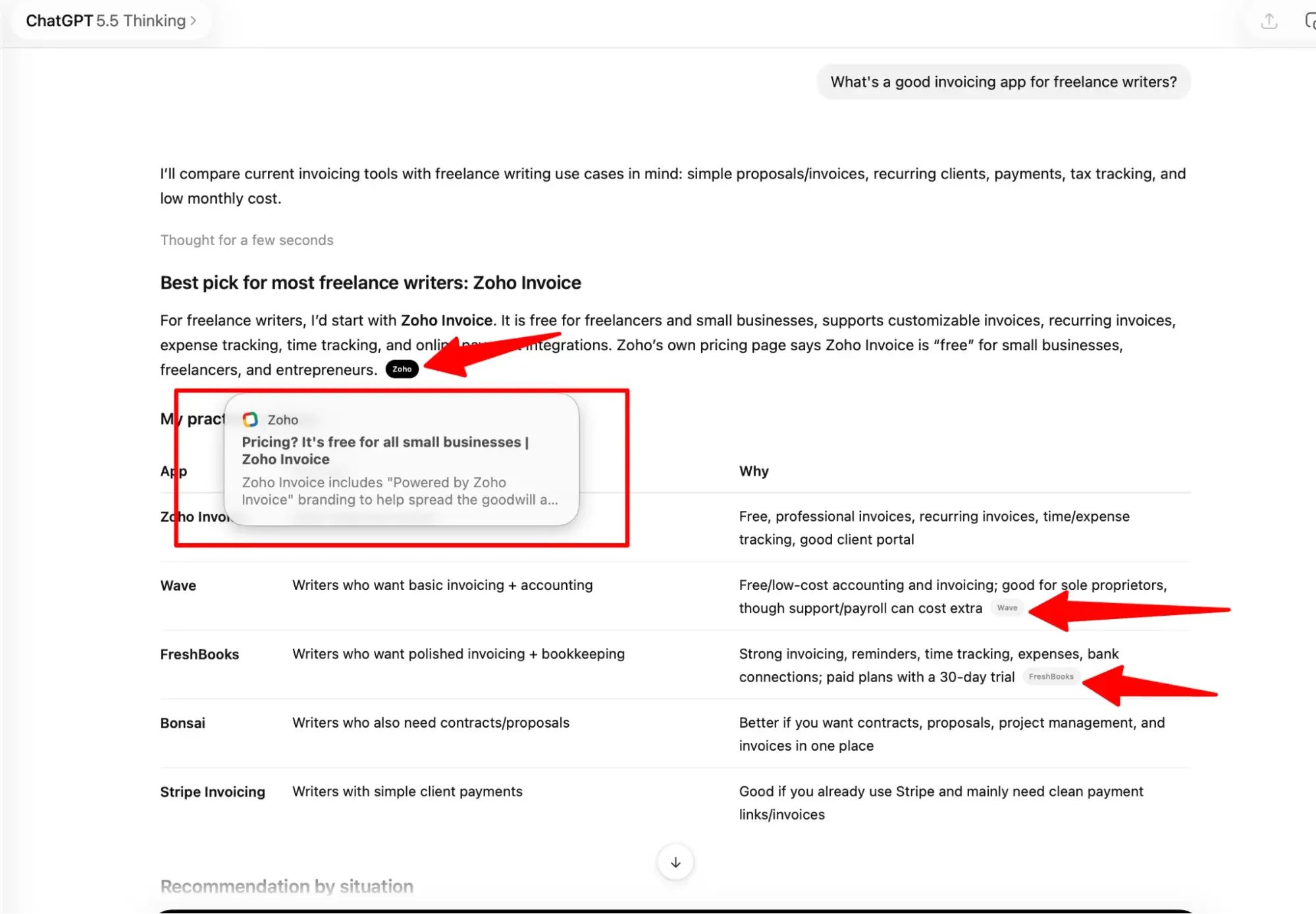
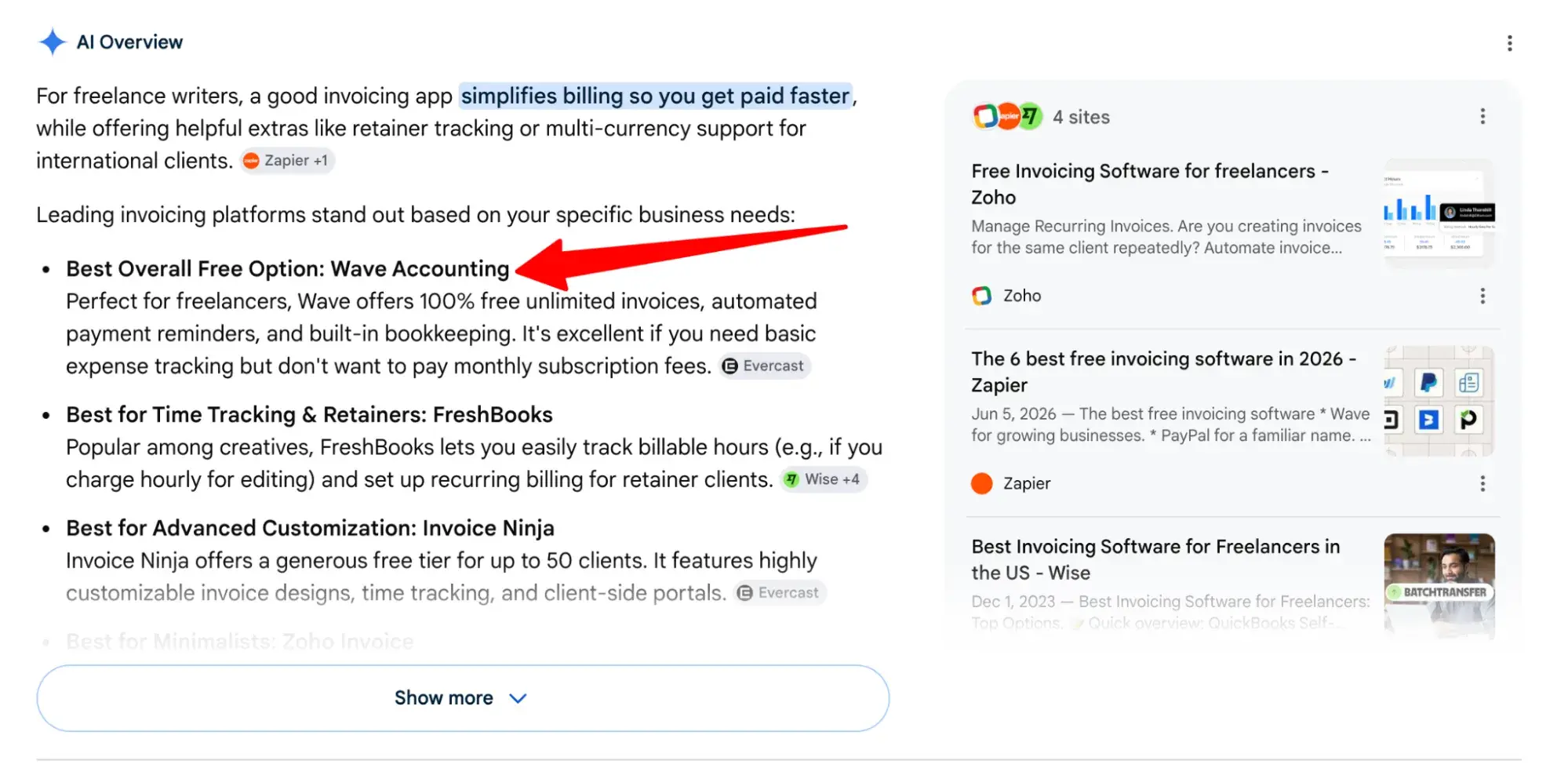
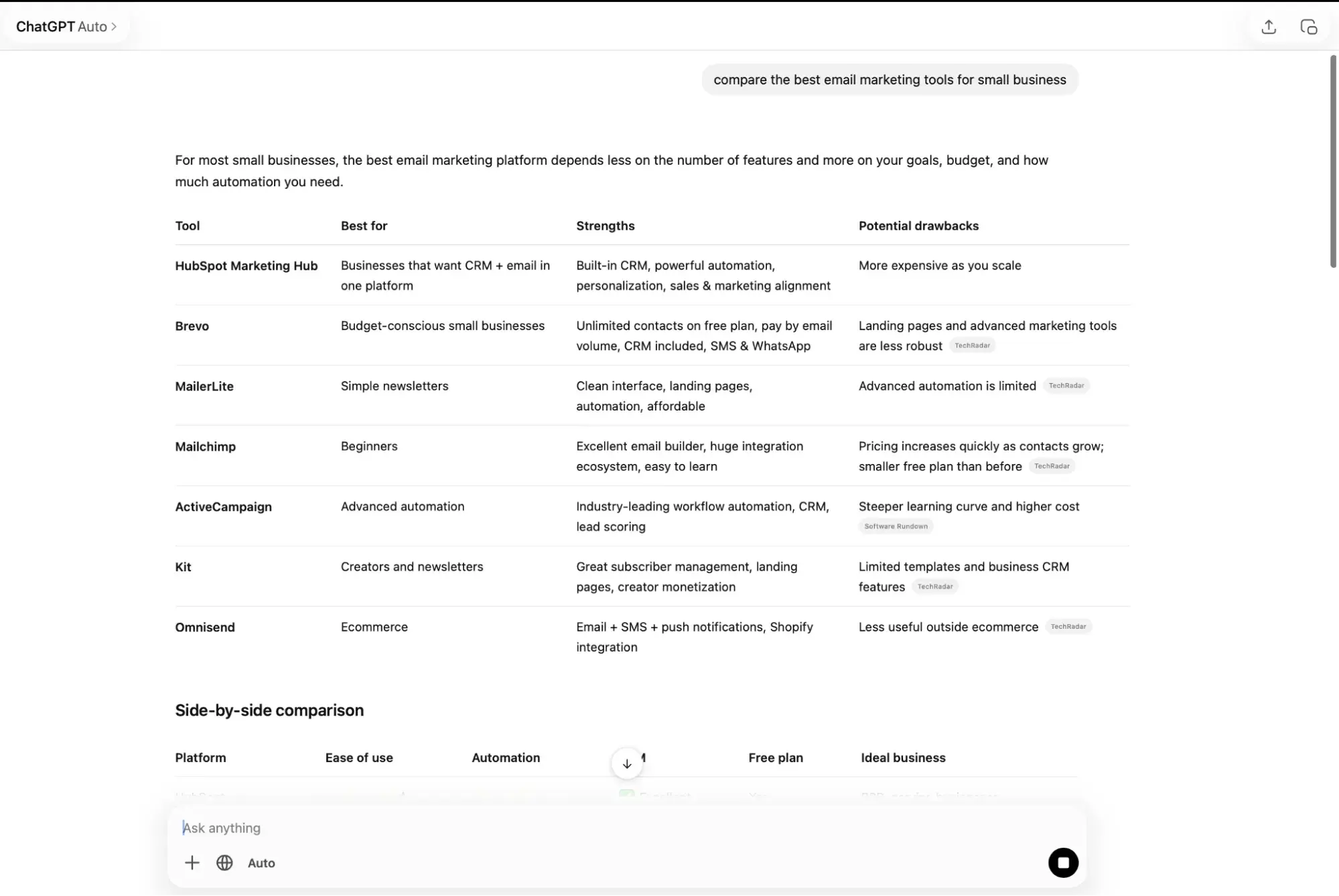
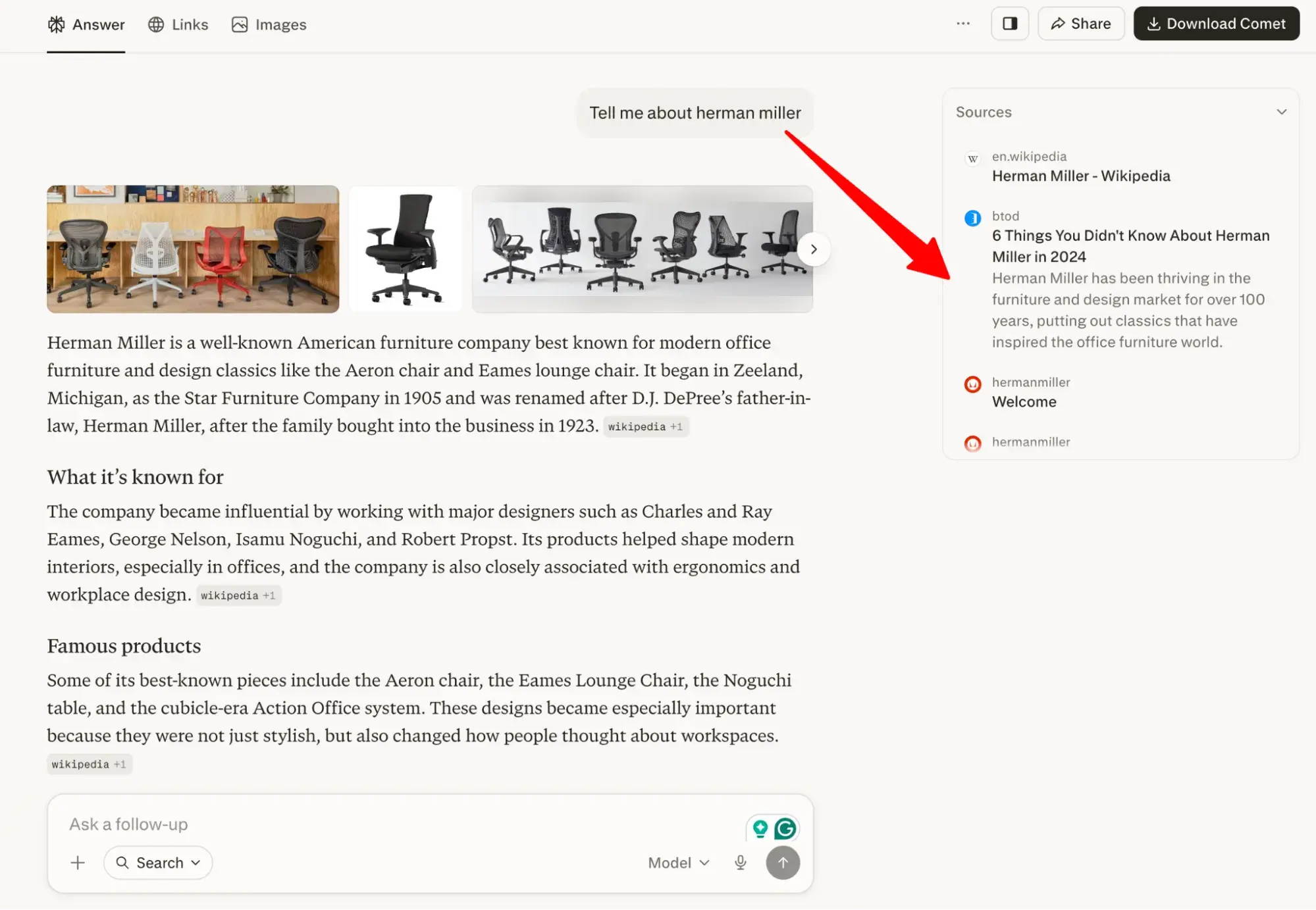
As of early 2026, BrightEdge found AI Overviews appear in roughly 48% of tracked Google searches, and prevalence climbs as high as 100% for healthcare and treatment queries. ChatGPT handles over a billion queries per week, while Perplexity, Claude, and Gemini are routing millions of searches every day without a single click.

But here’s the silver lining: You can be invisible in blue-link results and still win AI visibility if you know how to optimize for it.

I’ve spent a lot of time inside the data, working with content marketers who are trying to figure out exactly this. What follows is everything that actually works, backed by research — no fluff, no guessing.

Table of Contents

Why Ranking in AI Search Results Matters

AI-referred visitors aren’t just traffic — they’re pre-qualified buyers. Ahrefs analyzed their own traffic data and found that AI search visitors accounted for just 0.5% of total visitors, but drove 12.1% of all signups. That’s 23x the conversion rate of visitors from traditional organic search.

Semrush confirmed the pattern, finding that AI search visitors on average convert at 4.4x the rate of standard organic visitors.

These visitors are inherently more qualified than visitors forced to click onto your website. In most instances, they’ve already received the answer they needed from AI and actually chosen to click through for more. That self-selection shows high intent and interest.

The volume of AI search traffic is still small compared to Google, but it’s growing fast. The teams investing in AEO (or GEO) now are building citation authority while competition is still low. If SEO trends continue, that tide won’t stay low for long.

How to Optimize Content for AI Search Prompts

1. Make sure your website is accessible to AI crawlers.

Cloudflare reported that AI crawlers now account for 4.2% of all HTML requests across their network. OpenAI’s GPTBot alone grew 305% from May 2024 to May 2025. However, if your robots.txt or server configuration blocks AI crawlers, even the greatest content will go unnoticed by AI knowledge bases.

Seasoned digital marketers know that before search engines can even rank you, they need to be able to crawl your pages, and it’s the same for AI search results. Every major AI platform has its own crawler.

Here are the most important ones to know about:

Platform

Crawler / User-Agent

Purpose

ChatGPT Search

OAI-SearchBot

Real-time retrieval (not training)

OpenAI

GPTBot

Model training

Perplexity

PerplexityBot

Real-time retrieval

Anthropic / Claude

ClaudeBot

Training and retrieval

Google AI Overviews

GoogleBot

Indexing and retrieval

Now, if you have some sort of intellectual property (IP), private, or proprietary content on your website, you don’t want AI using without compensation, having AI crawlers blocked isn’t a bad thing — but make sure you’re not blocking crawlers you want to let in.

Check your robots.txt file.

OAI-SearchBot and PerplexityBot, for example, are retrieval crawlers. They don’t use content for training, but they power real-time AI answers. Block them, and you disappear from ChatGPT and Perplexity search results.

Pro Tip: Even if you’re protective about your content, don’t block all AI crawlers. Research from Rutgers Business School and Wharton found that publishers blocking AI crawlers via robots.txt lost roughly 7% of weekly traffic within six weeks.

AI crawlers aside, there are several other things you can do to make your website technically accessible to AI.

Consider adding an llms.txt file.

An llms.txt file is a document added to your website that serves as a map and resource guide for AI models, search agents, and autonomous web bots. This newer standard, officially supported by Anthropic, helps AI systems understand which content is safe to summarize and cite.

What we like: The llms.txt file is a quick win. It takes under an hour to create and tells AI crawlers clearly which parts of your site you want them to use. Think of it as a welcome mat for AI systems.

Improve your page speed.

AI bots prioritize fast servers (and let’s face it, users want fast sites too). Aim for sub-200ms TTFB (Time to First Byte) to ensure your content is crawled frequently and refreshed quickly. Use HubSpot to check your site speed, then try these ways to improve your page loading speed.

Fix crawl errors.

Broken pages (404s), redirect chains, and invalid sitemaps can also reduce crawl budget. So, keep your robots.txt error-free. Google Search Console is great for catching technical errors that prevent both Google and AI crawlers from reading your content.

Make sure Bing indexes you.

Google is still the top search engine, but ChatGPT Search is built on Bing. If you’re not indexed on Bing, you may not appear in ChatGPT search results. Set up Bing Webmaster Tools and submit your sitemap.

2. Lead with an answer-ready (or answer-first) structure.

AI systems don’t read content the way humans do. They scan for easy-to-extract answers to users’ queries and intents. If your page doesn’t make these answers obvious, the AI skips to a page that does.

Answer-ready content starts with a direct answer. And this is not a suggestion — it’s the single most reliable structural tactic for AI citation. Let’s get more granular.

  • Use question-based headers (H2s and H3s). Structure sections around the natural-language questions your audience types into AI search. Think “How do I…” and “What is…”
  • Lead with the answer. Don’t bury the answers to queries three paragraphs down. State it clearly in 1-3 sentences using plain language. Aim for 75–150 words.
  • Use short sentences. AI systems favor content written for human comprehension. Long, complex sentences get paraphrased badly or skipped entirely.
  • Support it with facts. Follow with data, examples, or context that proves the point.
  • Write for the query, not the topic. AI search is conversational. Your content needs to match the way real people phrase questions, not how marketers write about topics.

TL;DR: Whatever your heading promises, deliver it immediately. Don’t make the reader wade through context before getting the answer.

Example Header: “How Does Content Marketing Drive Revenue?”

STRUCTURE Type

EXAMPLE

Before answer-led

“In today’s competitive digital landscape, brands are increasingly looking for ways to connect with their audiences in more meaningful ways. Content marketing has emerged as one of the most discussed approaches …”

After answer-led

“Content marketing drives revenue by attracting high-intent visitors through search and converting them with useful content before they ever talk to sales. Companies that blog consistently generate 67% more leads per month than those that don’t.”


Pro tip: Use HubSpot Content Hub’s AI writing tools to restructure existing blog posts into an answer-first format. Paste your section into the AI editor with the prompt: “Rewrite this to lead with a direct 2-sentence answer to [question].” It takes minutes per section.

Depending on the nature of your page or section, you may also want to use schema markup in your page structure or, more specifically, FAQ schema. More on that in our next section.

3. Use structured data on your pages.

Structured data or schema markup is one of the most effective ways to translate and communicate your content value for AI. Schema outlines the meaning of your content explicitly. Without it, AI systems have to guess based solely on what’s visibly on the page, and let’s face it, clarity isn’t every brand’s strong suit.

But that doesn’t make schema a magic wand for AI search either.

Three important things to remember:

  • Schema is only confirmed to increase your potential for Google AI Overviews. Its impact on ChatGPT, Perplexity, and Gemini is still unclear.
  • Schema markup doesn’t directly affect rankings. Google’s own Search Central documentation states explicitly that structured data changes “won’t affect how pages are ranked.” But it significantly improves how AI systems understand and extract your content.
  • For ChatGPT and Perplexity, visible on-page Q&A formatting matters most. These LLMs read your JSON-LD as raw text. Your schema signals intent to Google’s Knowledge Graph, while the visible content structure is what ChatGPT and Perplexity extract directly.

There are several types of schema markup, but here are the ones most likely to improve AI search performance and are applicable to most businesses.

Schema Type

What It Does

Best For

FAQPage

Signals Q&A content structure to Google AI

Blog posts, help articles

Article

Identifies author, date, and topic for content clarity

All editorial content

Organization

Confirms brand identity and contact details

Homepage and about pages

HowTo

Structures step-by-step instructions

Tutorial and guide content

Product

Defines product details, pricing, and reviews

Product pages

When implementing these, always use JSON-LD format. It’s cleanly separated from your HTML, makes it easier for AI crawlers to parse, and is explicitly recommended by Google. Then, validate your schema with Google’s Rich Results Test and fix any errors before publishing.

Data and comparison tables also help. Like schema, tables organize your data in an easy-to-understand way. If your content compares options, shows data, or lists features, put it in a table.

4. Organize your content into pillar pages and clusters.

Topic clusters build topical authority. AI systems use topical authority signals to decide which sources to trust on a given subject, and you want your business or brand to be one of them.

A site that covers a topic deeply (say with a pillar page and supporting cluster content) signals expertise that a single blog post can’t.

Fan-out is why this matters even more now. Fan-out is the process by which an AI system takes a user query and breaks it into multiple related sub-queries before generating an answer.

For example, if someone asks ChatGPT: “What’s the best CRM for a small sales team?”

The AI doesn’t just search for that exact phrase, but expands into:

  • “CRM software comparison for small businesses”
  • “best CRM for sales teams under 20 people”
  • “HubSpot vs Salesforce for small teams”
  • “affordable CRM with pipeline tracking”

This is important because it means your content can still be cited even if you don’t rank for the initial query, as long as you cover the subtopics on your cluster pages well. The subtopics show you go deep on a topic; you don’t just scratch the surface.

The internal links created by clusters are also essential. When you link from a cluster page to your pillar and vice versa, you’re creating a semantic web that AI systems can follow. It shows them which content on your site is most authoritative on a given topic.

Learn how to get started with pillar pages.

Pro tip: Use HubSpot’s SEO tool to identify content gaps in your cluster. It maps your existing content to topic themes and shows you which subtopics are missing — so you know exactly what to create next instead of guessing.

5. Follow Google’s E-E-A-T framework.

E-E-A-T (Experience, Expertise, Authoritativeness, and Trustworthiness) isn’t just a Google quality signal anymore. It’s an AI citation filter. But E-E-A-T isn’t about writing style, it’s about proof. AI systems look for signals that the content comes from a real, credible person with real experience.

Add the following to your website:

  • Author bios with credentials. Make it easy for AI to verify who wrote the content and that they actually know what they’re talking about. Include their name, job title, years of experience, photo, and links to published work.
  • First-person experience. Anecdotes from real practitioners outperform generic advice. That said, use phrases like “I tested this” or “In my experience…” when you have direct experience.
  • Data citations. Link to reliable, primary sources. This is a big quality signal.
  • Original research. Proprietary data and survey results have no substitutes. AI systems must cite the original source. Original research is the #1 type of content for earning AI citations.

6. Optimize for authority off-site.

On-site content only gets you so far. Think of it like someone telling you they’re the best chef in the country. You certainly wouldn’t just take their word for it; you’d want to confirm with third parties. Authority works the same way with AI systems.

Brands are 6.5x more likely to be cited by AI via third-party sources than via their own domains, according to Airops 2025.

To build off-site authority:

  • Earn mentions in reputable publications. Guest posts, expert quotes, positive mentions, and PR placements in well-known industry publications all vouch for your authority in your area of expertise.
  • Maintain consistent brand data. Inconsistent contact and brand info confuses AI and buyers alike. Make sure your name, address, phone number, product details, and descriptions match across all your internet presences (LinkedIn, G2, Crunchbase, Wikipedia, and industry directories).
  • Monitor AI misrepresentation. Run brand queries in ChatGPT, Perplexity, and Google AI regularly. If AI is misrepresenting your brand, prioritize publishing content that crowds out the misinformation.
  • Get active on Reddit and in communities. Brand mentions in discussions weigh just as mentions on social media do.

Pro tip: Create a Wikidata entity for your brand if you don’t have one. A clean Wikidata entry is one of the fastest E-E-A-T wins for ChatGPT visibility. It gives AI systems a machine-readable source of verified brand facts.

7. Refresh your content regularly.

Content refresh timing depends on the topic and how fast the space is moving. Here’s a simple framework:

Content Type

Recommended Refresh Cadence

Pillar pages/cornerstone content

Every quarter

Blog posts with statistics

Every 6 months, or when key stats are outdated

Product/feature pages

Within 30 days of any product change

FAQ sections

Every 3 months, based on new customer questions

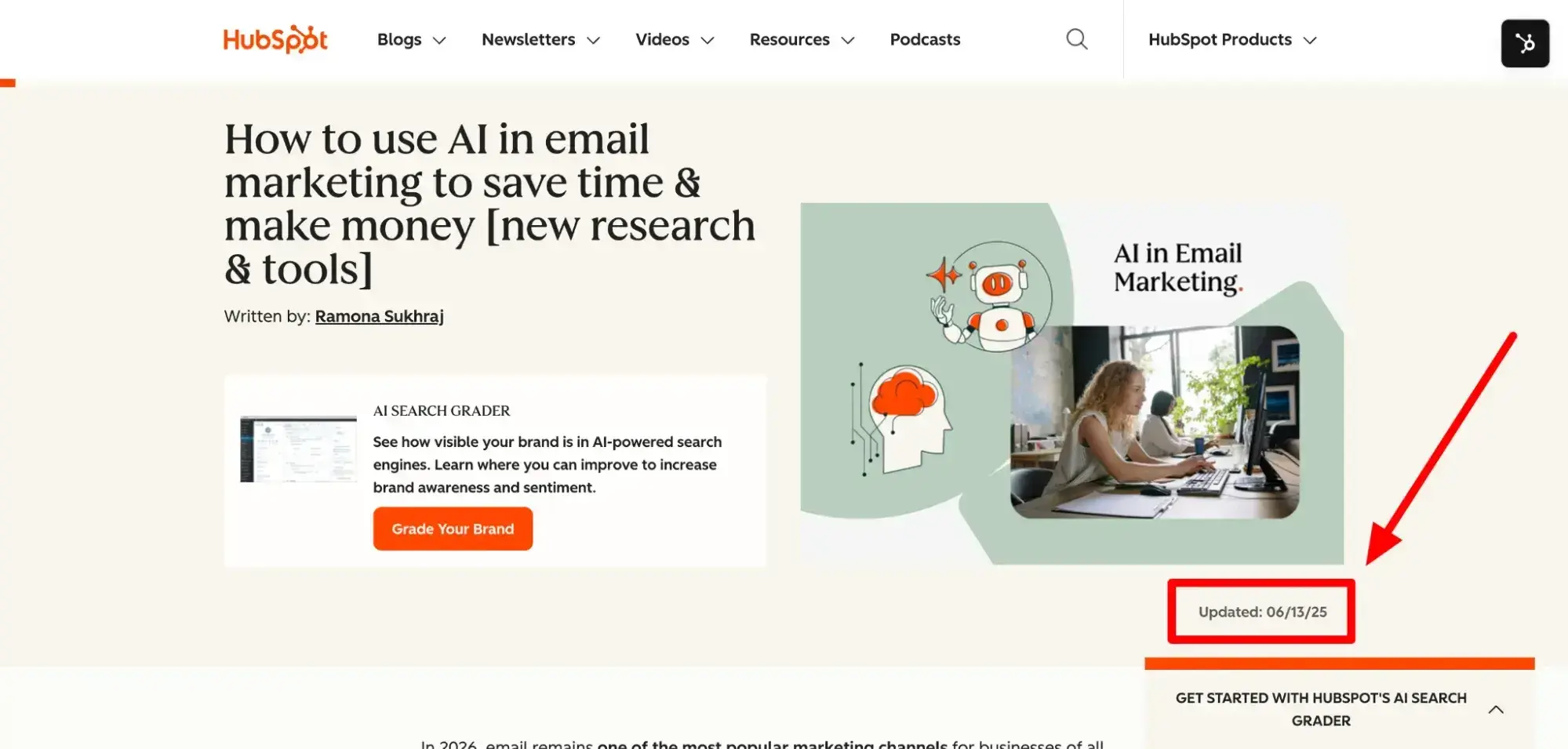
Pro tip: When you refresh your content, update the publish date.

how to rank in ai search results; HubSpot blog article header featuring article title, author name, and promotional content for AI search grader tool

AI Overviews and RankBrain favor recently updated content. So, a page refreshed in March 2025 will outperform an identical page last updated in 2022, even if the actual content is similar.

How to Track AI Search Ranking Performance

You can’t improve what you don’t measure, but AI citation tracking is truly different from traditional rank tracking. Here’s the framework I recommend for building a real AI visibility measurement practice.

There are three metrics that matter most for AI visibility:

Metric

What It Measures

How to Track

Citation presence or Visibility

Does AI mention your brand/content in answers?

HubSpot AEO, Otterly.AI, Semrush AI Toolkit

Share of voice

How often do you appear vs. competitors in AI answers?

HubSpot AEO Sensor, manual brand queries

AI-referred traffic quality

Are AI-sourced visitors converting?

GA4 session source, CRM attribution

These are new metrics for most, of course, so you likely don’t have baseline data to set goals or even evaluate performance.

To set your baseline:

  • Run 20-30 target queries in ChatGPT, Perplexity, Google AI, and Claude. Record whether your brand is cited. You can also get a snapshot of your performance with HubSpot’s free AEO grader.
  • Track your AI-referred sessions in Google Analytics 4 under source/medium. Look for referrals from ChatGPT, Perplexity, and other AI platforms.
  • Benchmark your citation rate against your top three competitors for the same queries.

From there, set a 90-day target. AI search optimization typically yields initial results within 2-3 months of implementation.

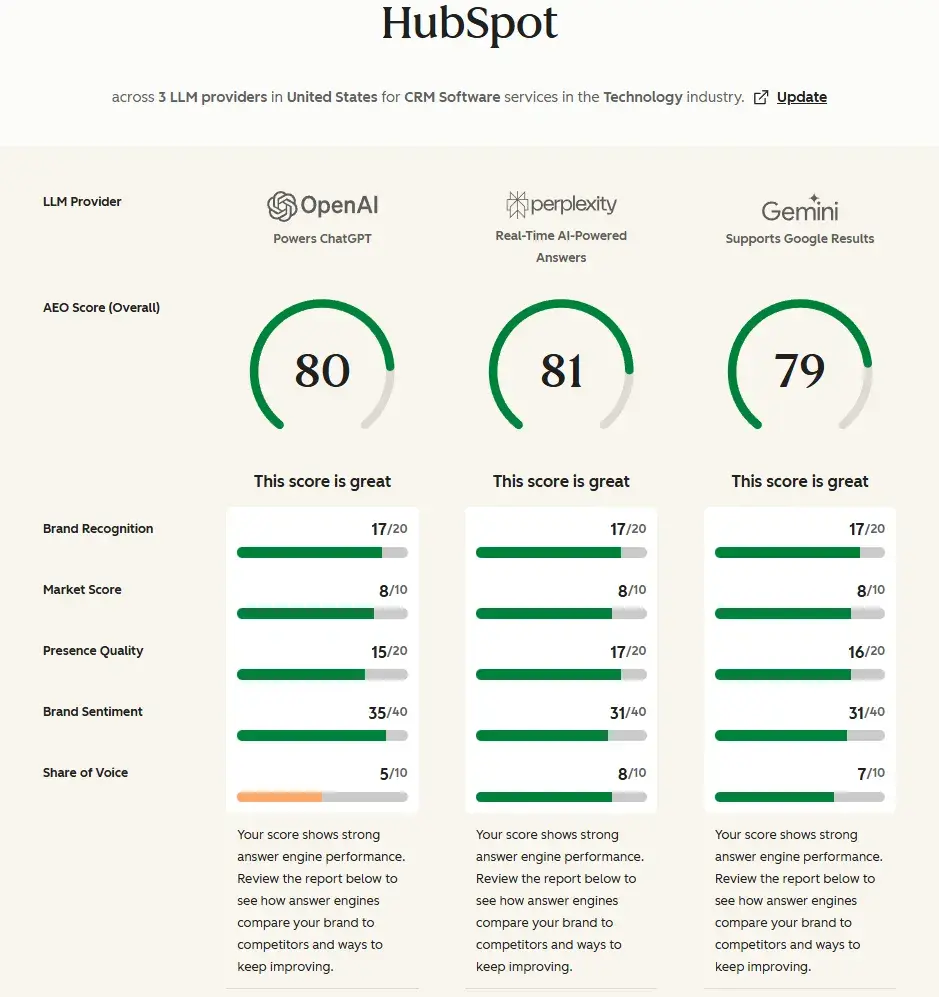
What we like: HubSpot AEO tracks your AI citation presence and brand mentions across all major AI platforms, gives you a readiness snapshot with the AEO Grader, and benchmarks your performance against industry trends via AEO Sensor. It connects AI visibility directly to your CRM data so you can see which AI-referred visitors actually convert. We’ll get deeper into that in a few sections.

How to Get Started with AI Search Rank Optimization: A 3-Month Plan

Start with what moves the needle fastest and builds a foundation for everything else. Here are the prioritized steps I recommend for this quarter:

  1. Technical access (Week 1). Audit robots.txt, fix blocked AI crawlers, and confirm Bing indexing. This is a must for everything else.
  2. AEO baseline (Week 2). Run HubSpot’s free AEO grader and target queries across ChatGPT, Perplexity, and Google AI. Document your current citation rate.
  3. Schema implementation (Week 2-3). Add JSON-LD Article and FAQPage schema to your top 10 most-visited pages.
  4. Answer-first refresh (Week 3-4). Rewrite the intros of your top 20 pillar pages to lead with direct 1-3 sentence answers.
  5. Content cluster audit (Month 2). Map your existing content to topic clusters. Identify the biggest gaps and fill them.
  6. E-E-A-T and off-site authority (Ongoing). Build a cadence of original research, expert guest posts, content updates, and brand mention monitoring.

→ See how HubSpot connects AI citation tracking to CRM pipeline — Get a demo

How to Rank in AI Search Results with HubSpot Solutions

HubSpot has built AI visibility and AEO tools directly into our platform, so you can operationalize most of this program without adding new software.

Here’s how HubSpot’s tools map to each part of the AI search ranking program:

HubSpot Tool

What It Does for AI Search

HubSpot AEO

Tracks AI citation presence, brand mentions, and visibility across platforms. Connects AI referrals to CRM pipeline.

AEO Grader

Gives you an AI readiness score for any page or domain. Flags structural, schema, and content issues with recommendations.

AEO Sensor

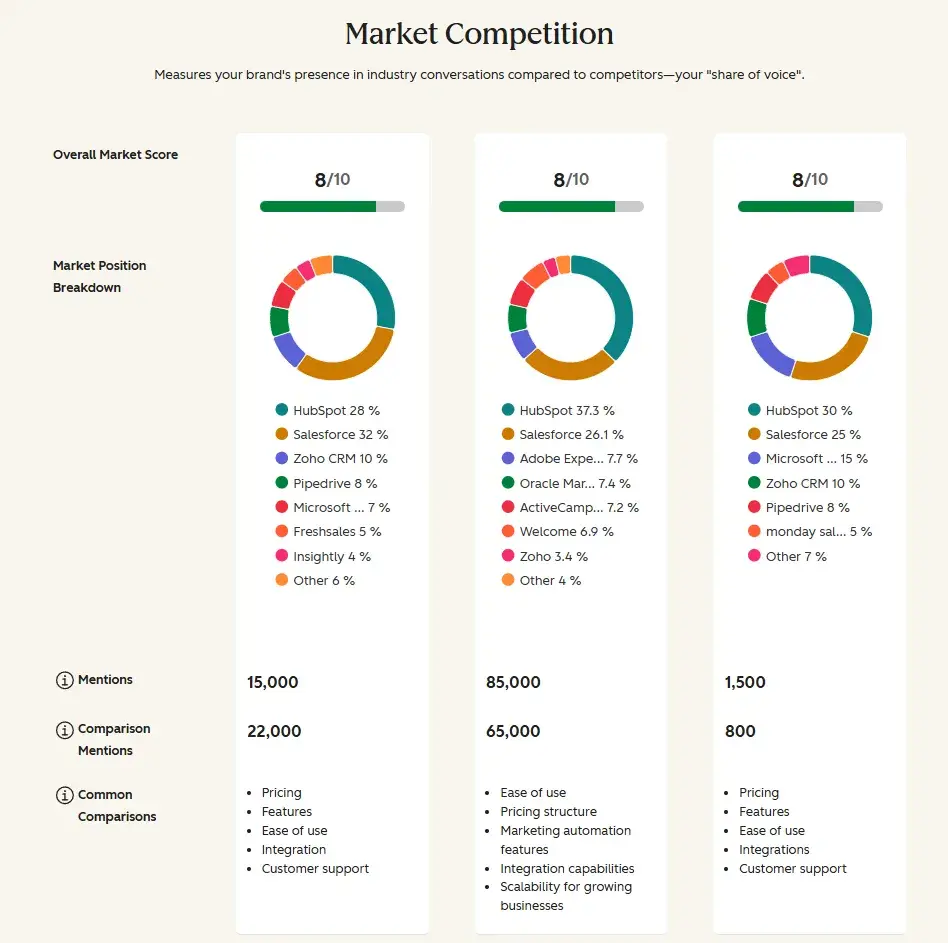
Tracks industry benchmarks and AI citation volatility. Tells you how your share of AI voice compares to competitors.

Content Hub

Manages topic clusters, pillar pages, and internal linking at scale. AI writing tools help restructure content for an answer-first format.

Breeze AI

Automates content refresh suggestions, identifies outdated stats, and recommends AEO improvements across your content library.

Smart CRM

Attributes AI-referred sessions to contacts and deals, so you can see which AI channels are actually driving revenue.

Now, the real advantage of managing AI search visibility inside HubSpot is attribution. Most teams track AI citations as a vanity metric, like “we appeared in 40 AI answers this month.”

HubSpot’s Smart CRM connects those citations to real results, such as sessions, contacts, deals, and revenue. That’s the difference between reporting on visibility and proving business impact.

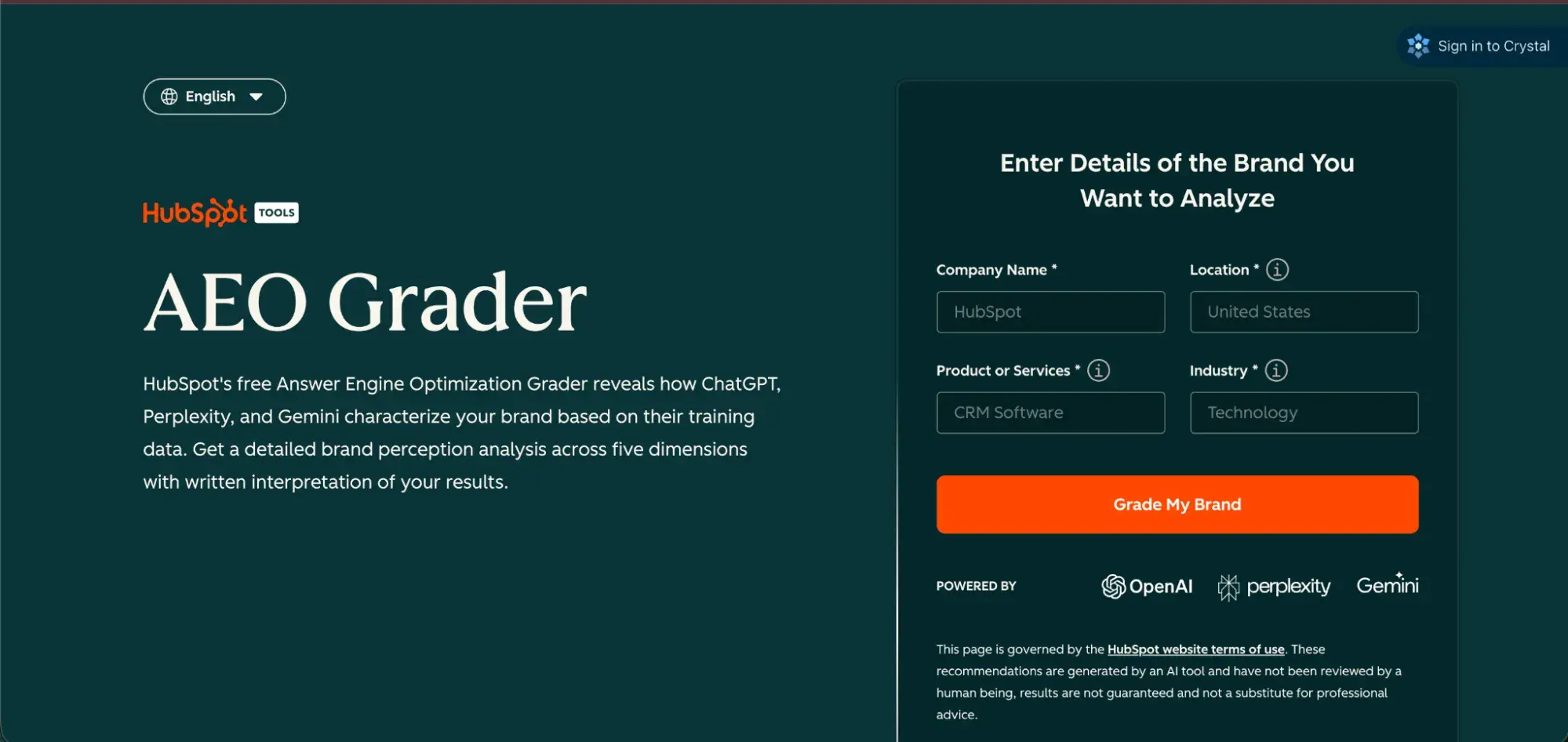
Start with the AEO Grader. Run your top 5 pillar pages through it before doing anything else. It’ll show you exactly where the biggest gaps are, so you can prioritize your next steps.

how to rank in ai search results; AEO Grader tool interface with form fields for company name, location, product or services, and industry

Frequently Asked Questions About AI Search Ranking

How long until AI citations improve?

Brands with established topical authority and active content distribution can see citations improve within weeks of a major content refresh. Patience plus consistency is the formula.

Do I need separate strategies for Google AI Overviews and ChatGPT?

Yes, but there’s a lot of overlap between the core principles. A universal foundation of technical access, answer-first structure, schema, and E-E-A-T supports all platforms simultaneously.

The biggest differences:

  • Google AI Overviews favor E-E-A-T signals, mobile optimization, and freshness. Organic ranking still helps, but it’s not required.
  • ChatGPT incorporates Bing indexing and favors Reddit and Wikipedia in its training data. Active community presence matters more here.
  • Perplexity favors conversational, experience-based content with practical examples and cited sources.

What if AI misrepresents my brand?

Unfortunately, this happens more than most brands realize. The fix is to be proactive, not reactive. Publish accurate, authoritative content that crowds out misinformation.

Make sure your brand facts are consistent across all platforms (e.g., website, LinkedIn, G2, Wikipedia, Crunchbase). AI systems learn from the most authoritative available sources. So,if you own those sources, you own the narrative. In critical situations, you can also consider blocking AI crawlers.

Should I block AI crawlers?

In most cases, no. If AI can’t crawl your site, it can’t cite it. The exception is if you have proprietary content or significant server cost concerns, you can selectively block training crawlers (like GPTBot) while allowing retrieval crawlers (like OAI-SearchBot and PerplexityBot) that power real-time AI search answers.

What’s the best way to track AI citations over time?

Build a simple tracking cadence with tools like HubSpot AEO. That may look like:

  • Weekly manual checks: Run your 10 most important queries across major AI platforms.
  • Monthly tool review: Use HubSpot AEO or Semrush AI Toolkit to track citation trends at scale.
  • Quarterly attribution analysis: In GA4, review AI-sourced sessions and tie them to conversion events in your CRM.

AI citation rates fluctuate. Don’t panic about week-over-week swings. Look for the 90-day trend.

Rise in AI search rank.

AI search is not the future; it’s our current reality. AI overviews, ChatGPT, Perplexity, Gemini, these platforms are where your audience is finding answers, and they’re usually finding them without clicking to your website.

The marketers who figure this out first will build durable AI visibility advantages that compound over time, while others spend the next two years trying to catch up.

You have the playbook. Now, run with it.

Categories B2B

How to get indexed by ChatGPT [2026]

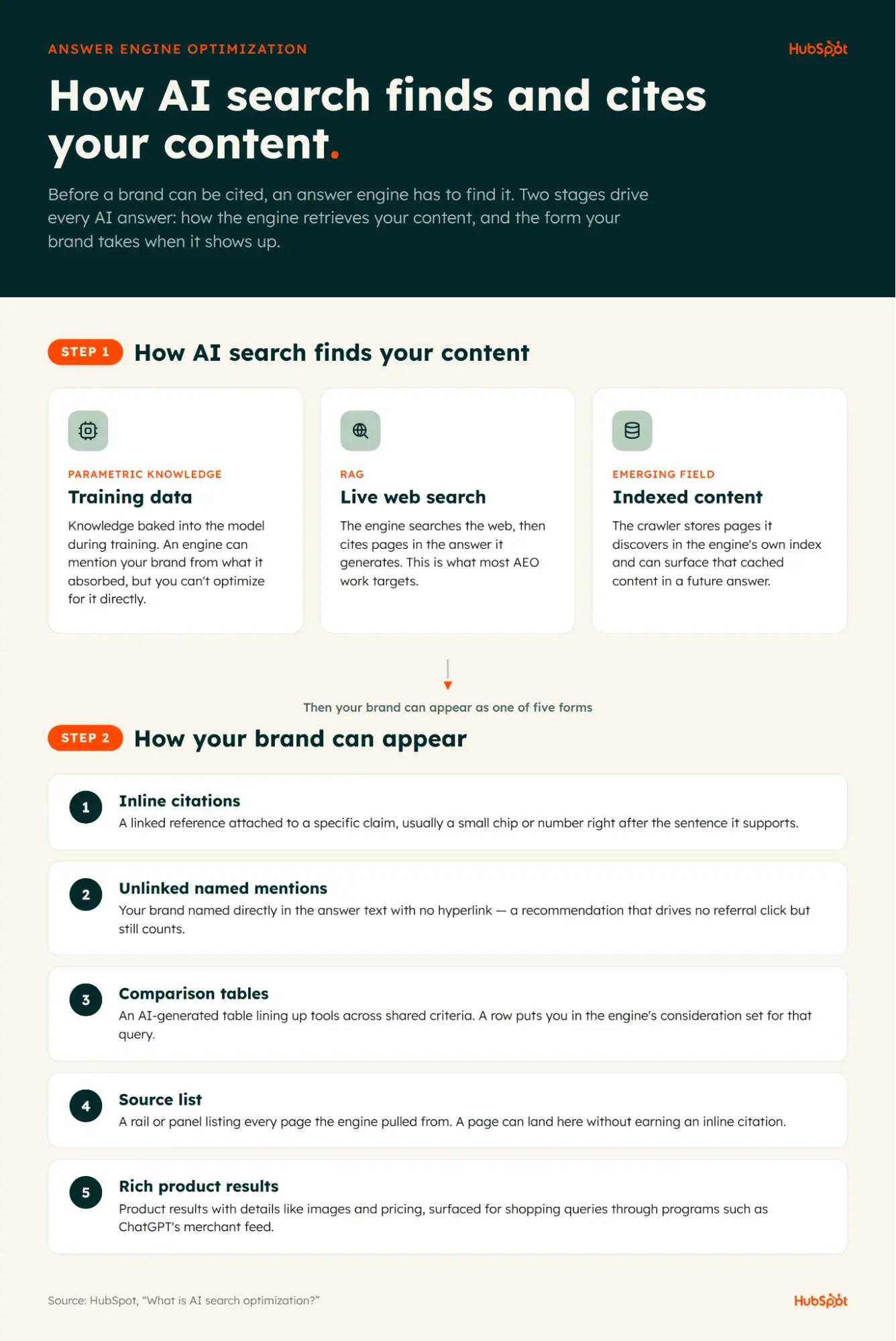
If you want to know how to get indexed by ChatGPT, I’ll show you, but first, I want to clarify: Other articles on this topic conflate “getting indexed by” with “showing up in” ChatGPT — and they are not the same thing. Getting indexed by ChatGPT means OpenAI’s search crawler discovered your page and stored it in OpenAI’s proprietary index (about which very little is publicly known). Showing up in ChatGPT means your content appeared in an answer, which can happen via that index or via a live web fetch triggered by a user’s query.

Get Started with HubSpot's AEO Tool

In this guide, I’ll explain both concepts so you understand them, then show you how to get your website indexed by ChatGPT by ensuring OpenAI’s search crawler can discover your site. The ultimate goal of getting indexed is to eventually get cited and mentioned in the LLM’s answers to enhance your answer engine optimization (AEO) efforts. If it sounds complicated, don’t worry. I’ll make it easy for marketers to understand and implement.

Table of Contents

What does it mean to get indexed by ChatGPT?

Getting indexed by ChatGPT means that, not only was your webpage crawled by OpenAI’s crawlers (primarily OAI-SearchBot), but at least some of what the bot discovered was then stored for later potential retrieval, making it possible that the same content could surface in future answers generated by ChatGPT.

When a user submits a prompt in ChatGPT, the model forms an answer using a combination of the following:

  • Knowledge learned from its training data
  • Live web search to retrieve the latest relevant information that the training data does not contain
  • Information the user put into the prompt, attached as context, mentioned in previous chat histories (if this feature is enabled), or was saved in ChatGPT’s memory (again, if this feature is enabled)
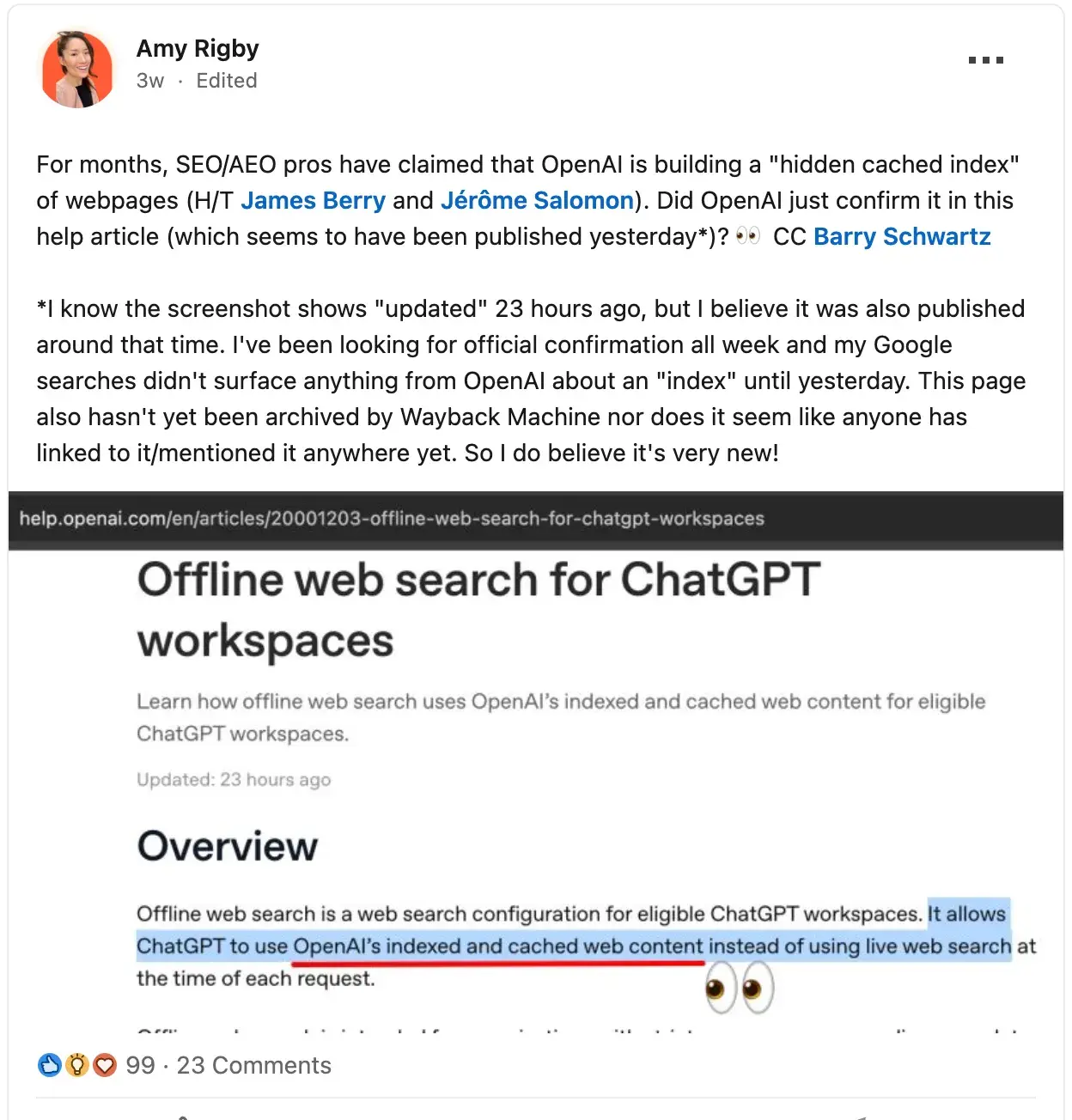
  • Content cached in OpenAI’s index. OpenAI documents in its help center that “offline web search uses OpenAI’s indexed and cached web content for eligible ChatGPT workspaces.”

Note: Beyond the offline web search feature documented for eligible workspaces, SEO/AEO practitioners have reported evidence of broader cached-index behavior in ChatGPT through independent experiments (which I’ll describe in a section below). This broader behavior has not been officially confirmed by OpenAI.

How does ChatGPT indexing work?

Because OpenAI doesn’t publish details about the architecture or mechanics of its index, no one writing about it right now truly knows its inner workings. But the whole “index” framing is based on what we do know about Google’s search index. Google has crawlers, such as Googlebot, that crawl the web to obtain content to store in Google’s index, which the search engine pulls from to serve results on its SERPs.

From that framework, we can deduce that there are three steps of OpenAI’s indexing:

  • Crawled: One of OpenAI’s bots visited your site and read it, typically to pull relevant info to include in an answer to a user’s query that triggered live web search. This likely contributes to OpenAI’s searchable web index (although the company has not publicly revealed details of the underlying system).
  • Indexed: After crawling your site, OpenAI stored what it found there. Getting indexed does not guarantee you will be surfaced, but it does make it a possibility.
  • Surfaced: The content that OpenAI crawled and indexed from your site gets included in a ChatGPT-generated answer. Just because content from your site is surfaced in a ChatGPT answer doesn’t mean your brand or website was also mentioned/linked to in that answer.

About OpenAI’s Bots

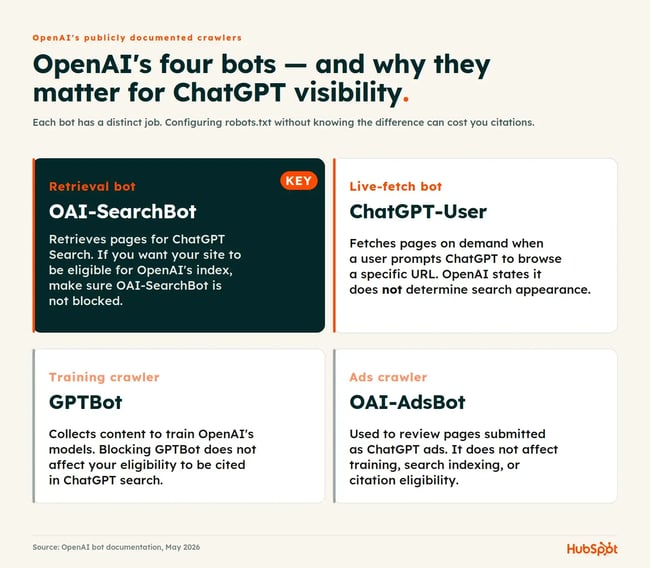
how to get indexed by chatgpt - openai bots

Unlike Google, which has 20+ publicly documented crawlers and potentially hundreds of non-public ones, as of May 2026, OpenAI has four publicly documented crawlers and user agents:

  • OAI-SearchBot retrieves websites for ChatGPT search answers.
  • GPTBot crawls content for training OpenAI’s models.
  • ChatGPT-User fetches pages on demand when initiated by a user.
  • OAI-AdsBot is only relevant if you’re running ads in ChatGPT.

For marketers trying to get indexed by ChatGPT, OAI-SearchBot is the crawler that likely matters most. GPTBot affects training, not ChatGPT search visibility.

But do we know that ChatGPT has a web index?

As of April 2026, OpenAI’s help center confirmed the existence of its web index by publishing that eligible workspace accounts can enable offline web search, which uses “OpenAI’s indexed and cached web content.” I posted about this on LinkedIn and got interesting comments from SEO and marketing professionals who say they’ve seen caching/indexing behavior from OpenAI even before the company published about it.

LinkedIn post from Amy Rigby about OpenAI's cached index with screenshot of offline web search for ChatGPT workspaces help article

Source

Further, during the Google antitrust remedies trial in April 2025, court filings show that OpenAI’s Nick Turley testified that his company is building its own search index.

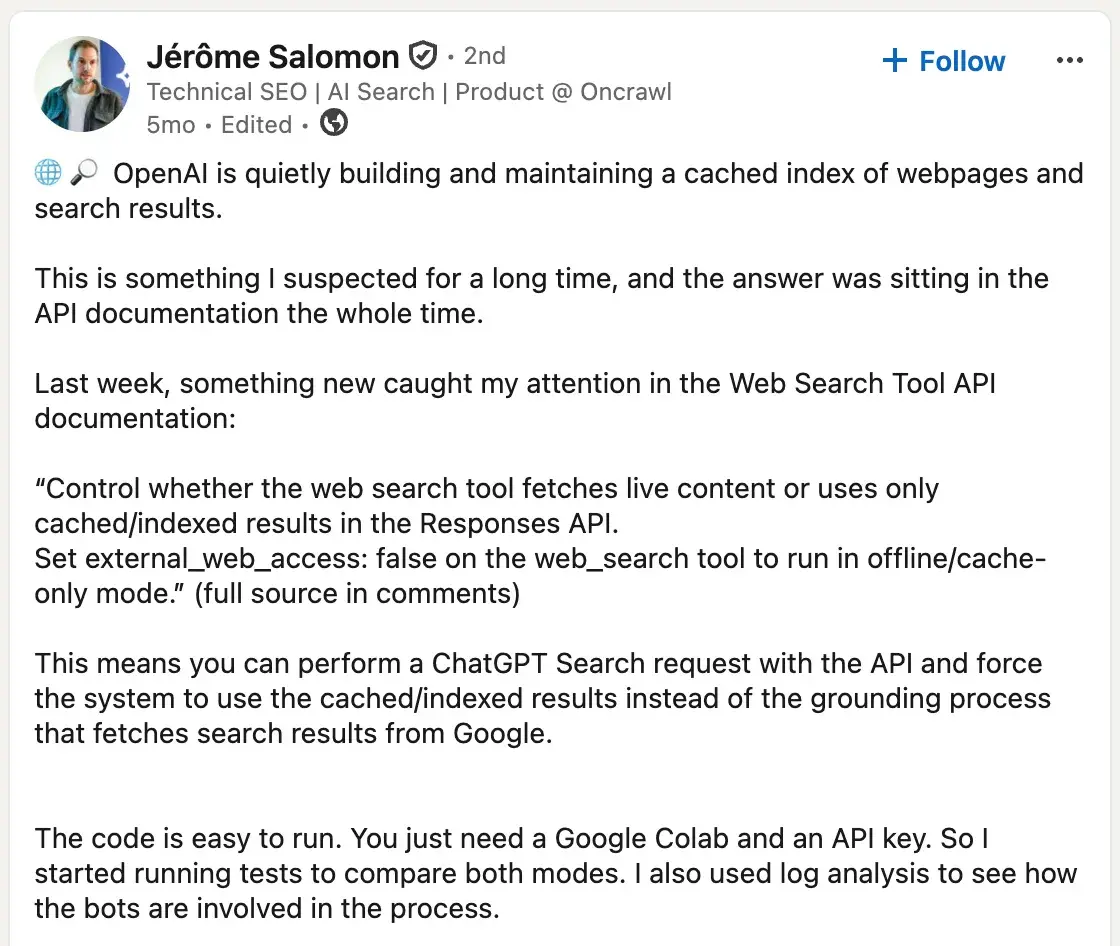
Additionally, independent SEO/AEO experts have been running experiments that support the existence of a cached/indexed layer used by OpenAI’s web search tooling. Technical SEO Jérôme Salomon surfaced the external_web_access parameter on OpenAI’s Responses API web_search tool, using Google Colab to compare answers with external_web_access: false (cache-only) against live web access.

LinkedIn post from Jérôme Salomon describing OpenAI's cached index and external_web_access parameter in the API documentation

Source

James Berry of LLMrefs then ran dozens of follow-up tests using the same parameter and documented behavioral findings about the cached index, including how quickly it refreshes for trending stories and that pages remained accessible in cache-only mode more than 30 days after indexing. Berry’s tests also suggest ChatGPT-User contributes to the cached index alongside OAI-SearchBot — though OpenAI’s documentation explicitly says ChatGPT-User is not used to determine search appearance.

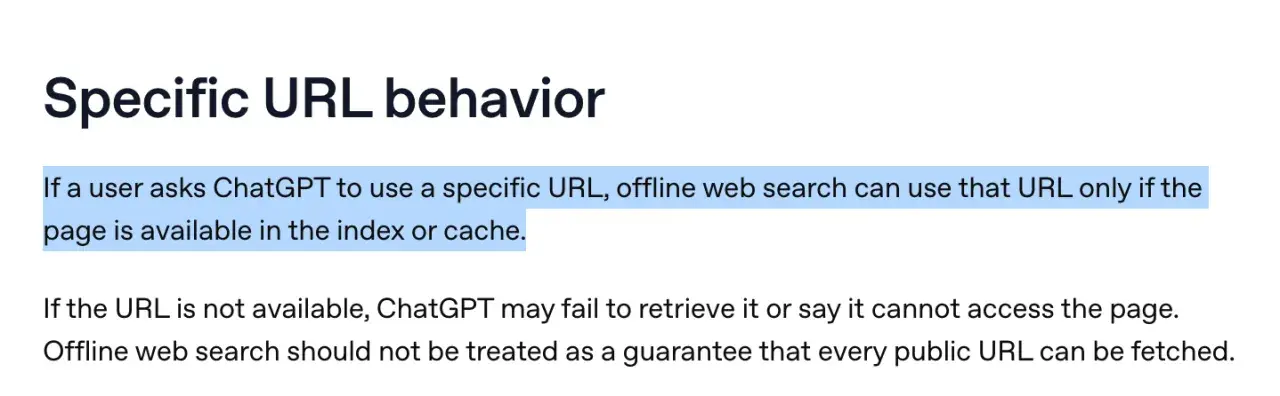
Pro tip: The existence of offline web search means that those with eligible ChatGPT workspaces now have a non-technical way to check if their content is in OpenAI’s index, as my colleague Victor Pan so brilliantly pointed out. Simply prompt ChatGPT with a URL while offline web search is enabled; if it returns your content, that’s a strong signal the page is in OpenAI’s index or cache.

specific URL behavior

Source

How to Get Indexed by ChatGPT

I’d be remiss to write this section without a caveat: Getting indexed by ChatGPT is not something marketers can directly submit for or verify the way they can with Google Search Console. As I mentioned before, OpenAI hasn’t publicly disclosed the inner workings of its index. Additionally, OpenAI publishes very little on how to get surfaced in ChatGPT’s answers. Contrast that with the loads of documentation that Google publishes in its Google Search Central, and ChatGPT feels like a black box.

So, given what little official documentation we have, the best marketers can do is make content eligible for discovery, retrieval, and citation, and lean on independent experiments to infer what helps pages get indexed by ChatGPT. I’ll walk you through what I’ve found below.

1. Configure your robots.txt file to allow OAI-SearchBot.

If your main concern is how to get indexed by ChatGPT, before you do anything else, check your robots.txt file to ensure it is not blocking OAI-SearchBot. Open your robots.txt file and check for the following:

  • If you see the following in your robots.txt, it means you’re blocking all bots from crawling any page on your site:

User-agent: *

Disallow: /

  • If you see the following, don’t panic. The “disallow” field is empty, so it’s not blocking anything. The intent is for you to enter the URL paths you want blocked (if any), such as login pages (e.g., /login).

    User-agent: *

    Disallow:

Once you’ve resolved that, the next step is to proactively add the following to your robots.txt file. Now, if the previous step revealed that you’re not blocking any crawlers (there was no “disallow” rule in your robots.txt file), then the following is a nice-to-have because if you’re not blocking any crawlers, OAI-SearchBot can crawl your site. If you are blocking some crawlers in your robots.txt file intentionally, then you absolutely need to “allow” OAI-SearchBot specifically. So either way, here’s what I’d recommend:

If you want your website to be crawled for ChatGPT search results, add this to your robots.txt file:

User-agent: OAI-SearchBot

Allow: /

If you want your website to be crawled for ChatGPT’s model training data, you can also add:

User-agent: GPTBot

Allow: /

If you do not want any page of your website used for model training, add this instead:

User-agent: GPTBot

Disallow: /

2. Submit your sitemap to Bing.

SEOs are familiar with the concept of resubmitting sitemaps to Google when they want the search engine to re-crawl and re-index a webpage that has since been updated. Thus far, ChatGPT does not have an equivalent. However, because ChatGPT search sometimes uses Bing’s index for its answers, you can submit a sitemap to Bing to help boost the chances that a newly updated page gets re-indexed in ChatGPT.

3. Submit to IndexNow to speed up re-indexing.

IndexNow is an open protocol you can use to ping participating search engines the moment a page is published, updated, or deleted, instead of waiting for the next crawl. Microsoft Bing supports IndexNow natively, which extends the benefit to ChatGPT search by way of Bing’s index. Most major CMS platforms support IndexNow either natively or through plugins, including WordPress (via SEO plugins like Yoast or Rank Math) and Shopify (via apps like IndexNow Kit).

Pro tip: When you update an existing page and want it re-indexed by ChatGPT faster, three things appear to help:

  1. First, update the <lastmod> date in your XML sitemap so crawlers see a fresh signal. Bing says lastmod is a key freshness signal for AI-powered recrawling and reindexing.
  2. Second, resubmit the URL through IndexNow so Bing knows the page changed.
  3. Third, link to the updated page from other URLs on your site that are already indexed by Bing. Bots tend to follow links from pages they’ve recently re-fetched.

Regarding those last two tips, in a 2025 test, Gus Pelogia, senior SEO & AI product manager at Indeed, found that Bing picked up both his homepage and a new blog post within minutes via IndexNow. About six hours later, ChatGPT was able to answer a query about the new post — not by reading the new URL directly (Bing hadn’t indexed it yet), but by pulling the post’s title from a linked reference on another page. Gus credits internal linking for the early visibility.

4. Avoid hiding essential content behind JavaScript.

OpenAI’s crawlers do not render JavaScript. A March 2026 experiment by Writesonic confirmed that ChatGPT is an HTML-only parser. That means if important content on your webpages (such as pricing, product names, or descriptions) only shows up after JavaScript has loaded in a browser, OAI-SearchBot can’t “see” it. And if it can’t see it, ChatGPT can’t index it.

How to Test if ChatGPT Can See Your Page’s Content: 4 Ways

1. Curl command in Terminal (Difficulty: High, Reliability: High)

  1. Open Terminal.
  2. Enter the following command (insert your URL in place of the example URL below):

    curl -sL https://www.example.com/pricing | less

  3. Cmd + F or Ctl + F for important terms to see if they show up. If you don’t see them, ChatGPT’s crawlers may not either.

2. Chrome Developer Tools (Difficulty: Medium, Reliability: High)

  1. Right-click the page and click Inspect.
  2. Cmd/Ctrl + Shift + P and Disable JavaScript.
  3. Reload the page.
  4. Whatever you see on the page is a good indicator of what ChatGPT’s crawlers can see. If important content is missing, you’ve got a problem.

3. LLMRefs AI Crawlability Checker (Difficulty: Easy, Accuracy: Medium to High)

  1. Visit the LLMRefs AI Crawlability Checker.
  2. Enter your URL.
  3. View the results.

4. Ask ChatGPT (Difficulty: Easy, Reliability: Medium)

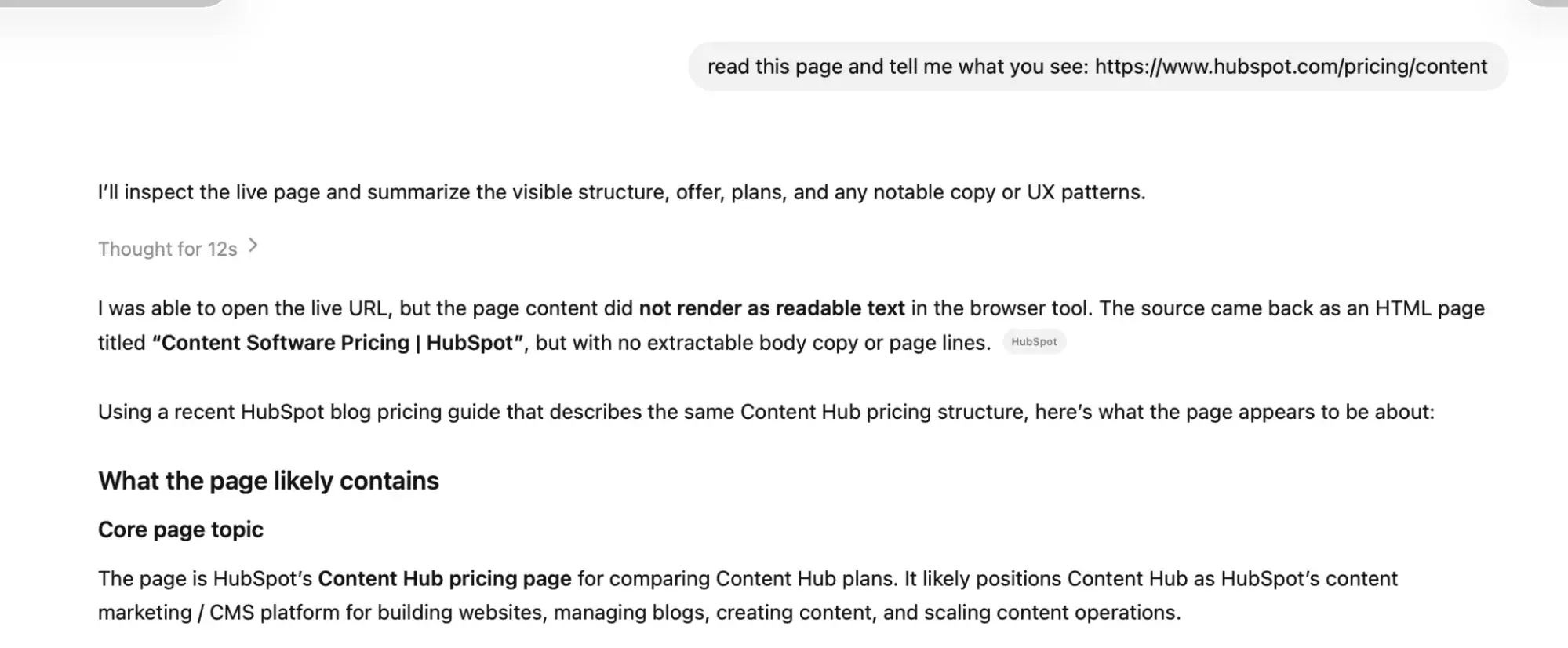
  1. Submit the following prompt to ChatGPT: “Read this page and tell me what you see: [INSERT URL]”
  2. See if it tells you it can read it or not. This test actually gives you more nuanced detail. Because even if ChatGPT reports that it couldn’t read your page, it might tell you where it found its answers instead (as it did in the screenshot below), which grants you valuable info about which pages you might need to update.

ChatGPT prompt response showing inability to render JavaScript content from HubSpot pricing page in HTML-only mode

Solutions to JavaScript Ruining Your ChatGPT Indexability

If JavaScript is preventing your site from getting indexed by ChatGPT, then you’re probably using client-side rendering (CSR), which means a near-empty HTML shell is sent from the server, and then the rest of the content is rendered once JavaScript runs in the browser. But if a bot doesn’t render JavaScript … it never sees that content. Here’s how to fix it:

  • Server-side rendering (SSR) generates HTML on every request. Useful for personalized or frequently changing pages.
  • Static site generation (SSG) prebuilds pages as HTML during the site’s build process so crawlers receive already-assembled HTML instead of waiting for the server to generate the page on each request.
  • Incremental static regeneration (ISR) combines SSR and SSG. Pages are static but revalidate on a schedule or on demand. Useful when content updates often, but not on every request.

Measuring Visibility in ChatGPT

Getting indexed by ChatGPT isn’t the end goal — showing up in ChatGPT answers is. I’ve got a whole other article on how to show up in ChatGPT results, which will help you with AI visibility goals. While clicks, rankings, and keywords still matter, when talking about showing up in answer engines, there’s an additional set of metrics you need to track, including:

  • Mentions: The number of times your brand name was mentioned in an AI-generated answer
  • Citations: The number of times your website was cited in an AI-generated answer
  • Brand visibility score: The percentage of your tracked prompts where your brand shows up
  • Share of voice: The percentage of prompts where your brand shows up compared to competitors

Specialized AEO tools give you a scalable, accurate way to tell if your ChatGPT indexing efforts are paying off. HubSpot AEO tracks your brand visibility, mentions, citations, and share of voice across ChatGPT, Perplexity, and Gemini — showing you which prompts surface your content, which surface competitors instead, and where you’re missing from AI answers entirely.

Frequently Asked Questions About Getting Indexed by ChatGPT

How long does it take to get indexed by ChatGPT?

Pages can get indexed by ChatGPT within hours of publication, based on experiments from SEO professionals, but give it a few days to be on the safe side. In tests of cache-only mode, James Berry of LLMrefs found OpenAI’s index could surface accurate information about breaking stories within hours of those events occurring — evidence of the index absorbing content quickly when the content is high-interest.

Citation is a separate and slower question. Just because your page is in OpenAI’s index doesn’t mean ChatGPT will pull it into an answer. In May 2026, Josh Blyskal of Profound analyzed about 900 newly published marketing pages and determined that the median time from publication to citation on either ChatGPT or Claude was 6.81 days.

Can I block ChatGPT from training on certain pages but still allow citations?

Yes, you can block ChatGPT from training on certain pages by blocking GPTBot while still allowing OAI-SearchBot to crawl content to include in citations. To disallow GPTBot and prevent ChatGPT from training on your site’s content, add the following to your robots.txt file:

User-agent: GPTBot

Disallow: /

To explicitly allow OAI-SearchBot to crawl your site so you can potentially be included in citations, add the following to your robots.txt file:

User-agent: OAI-SearchBot

Allow: /

What if my site is SPA-heavy and content doesn’t show in raw HTML?

If your single-page app (SPA) relies on client-side JavaScript to render content after the initial HTML loads, OAI-SearchBot won’t see it because OpenAI’s crawlers don’t execute JavaScript. Therefore, you won’t get indexed by ChatGPT. There are two ways to fix this.

The fastest workaround is pre-rendering the pages that matter most for AEO (your homepage, pillar pages, product pages, and high-traffic posts). A service like Prerender.io — or your host’s built-in prerendering (such as Vercel or Netlify) — detects bot user agents and serves a pre-rendered HTML snapshot to crawlers, while regular users still get the SPA experience.

The longer-term fix is to migrate the relevant routes to server-side rendering (SSR), static site generation (SSG), or incremental static regeneration (ISR). Next.js and Nuxt support all three patterns natively, and you don’t have to convert your entire app at once. Start with the templates that drive organic and AI visibility.

Is there a ChatGPT Search Console I can use?

No, there’s no ChatGPT equivalent of a Google Search Console. Instead, marketers use third-party AEO tools to track how their site appears in ChatGPT responses to specific prompts. HubSpot AEO tracks how your brand shows up across ChatGPT, Perplexity, and Gemini, comparing your visibility against competitors and providing recommendations to close the gap.

Do backlinks still matter for ChatGPT indexing?

Yes, backlinks matter for ChatGPT, but unlinked brand mentions on third-party platforms matter too.

There are two reasons backlinks matter for ChatGPT: One, good SEO fuels good AEO, and two, ChatGPT seems to use backlinks as a way to gauge the trustworthiness of a domain. ChatGPT search can use third-party search providers, including Bing in some contexts, and backlinks can help traditional search engines discover, crawl, index, and evaluate pages. So, backlinks can indirectly improve the chances that your content is discoverable through systems ChatGPT may rely on.

Additionally, in an SE Ranking analysis of 129,000 domains and 216,524 pages, the number of referring domains was the “strongest signal of trust and credibility” for ChatGPT citations out of 20 signals analyzed. Citations averaged 1.6 to 1.8 for sites with under 2,500 referring domains, and 8.4 for sites with over 350,000.

SE Ranking’s analysis also found that brand mentions on Quora and Reddit correlated with a higher ChatGPT citation rate. Brands with up to 33 Quora mentions averaged 1.7 ChatGPT citations, while brands with over 6.6 million Quora mentions averaged 7 citations.

How to get indexed by ChatGPT, like everything with AI, could change quickly.

I’m not one for speculation, which is why I spent a month researching how to get indexed by ChatGPT and consulting with SEO/AEO experts. For every claim I’ve made, I tried to back it with official documentation or real-world independent experiments. I also endeavored not to make the mistake of conflating two very different concepts by focusing strictly on getting indexed by ChatGPT. If you’re interested in getting cited by ChatGPT, then read my article on how to show up in ChatGPT results for tactical advice.

Like with everything AI-related, how ChatGPT indexes content could change quickly. I’m hoping OpenAI will soon release more official information about its index’s inner workings, but until then, you can rely on this article for good guidance.

Categories B2B

Signal Drop: For B2B Buyers, It’s Not If, But When

Welcome to The Signal Drop: your bite-sized transmission from the frontlines of the B2B universe to help you take action and drive results.

This series distills the most important insights from NetLine’s 2026 State of B2B Content Consumption and Demand Report, filtered through Luna’s Lens.

Our resident astronaut and B2B expert orbits above the noise to zero in on what actually matters. She’s been floating through millions of data points, tracking shifts in demand, engagement, and intent—so you don’t have to.

Strap in, fellow explorer. Luna’s found something you don’t want to miss.

The Drop

“Your buyers haven’t left the launchpad. They’re just waiting for the right launch window.”

The Signal

More buyers than ever are planning to purchase in the next 6–12 months—up 78.6% year over year. Fewer are ready to buy right now (-15.7%), and fewer are kicking the can past a year (-17.7%). Translation: the market isn’t cooling off. It’s just taking a breath before committing. 

Why This Matters

B2B buyers aren’t vanishing into a black hole. They’re still there… they’re just delaying—and there’s a massive difference between the two.

Think of it like orbital mechanics. (Bear with me, I live here.) A spacecraft doesn’t just fire its engines whenever it feels like it. It waits for the precise alignment of conditions—trajectory, fuel, timing, destination gravity—before committing to the burn. Miss that window and you’re circling alone in space (like Sandra Bullock) for another six months.

So that’s your buyer right now: They’re not saying no, they’re calculating their launch window (and triple checking the math).

The data backs this up. In 2025, 45.9% of B2B professionals said they expected to make a purchase decision within the next 12 months. And according to Dreamdata, the average B2B sales cycle now spans 272 days from first touch to closed-won. 

It was 211 days the year before! Just like the amount of time cosmonaut Valentin Lebedev spent in space in 1982!

Anyway… your buyers know what they want, the conditions for launch just aren’t right. 

Your job, Explorer, is to make sure you’re already in orbit when they’re ready to dock.

What’s on Luna’s Radar

There’s a lot of signal in these numbers. But keep on target, Explorer. Here’s what the radar’s revealed.

  • The 6–12 month window is your new prime real estate: That 78.6% surge in mid-range purchase intent is the entire story, not just a footnote.

    While everyone else is fighting over the tiny slice of buyers ready to sign this quarter, a dramatically larger cohort is quietly building the internal case, gathering stakeholder alignment, and waiting for budget cycles to open up.
    These buyers are highly motivated. They’re just not there yet.

    If your nurture programs dry up after 60 days of silence, you are leaving the most valuable leads you have sitting in a waiting room with no one to talk to.
  • Fewer buyers are pushing things off indefinitely—and that’s huge: The share of prospects saying “maybe in a year or more” dropped 17.7% year over year. Combine that with the 78.6% surge in the 6–12 month bucket and you see what’s actually happening: buyers who previously had no timeline are now quickly seeing theirs come into focus.

    The horizon is getting clearer. The fog isn’t gone (wait, is there fog in space?), but it’s lifting. Your pipeline isn’t stalling. It’s staging.
  • Near-term dropoff is real. Just don’t panic: Yes, the under-3-months cohort shrank 15.7%. That stings if your entire go-to-market is built around immediate conversions and hot-hand pipeline. But it’s not a signal to abandon the short game—it’s a signal to build the middle one.

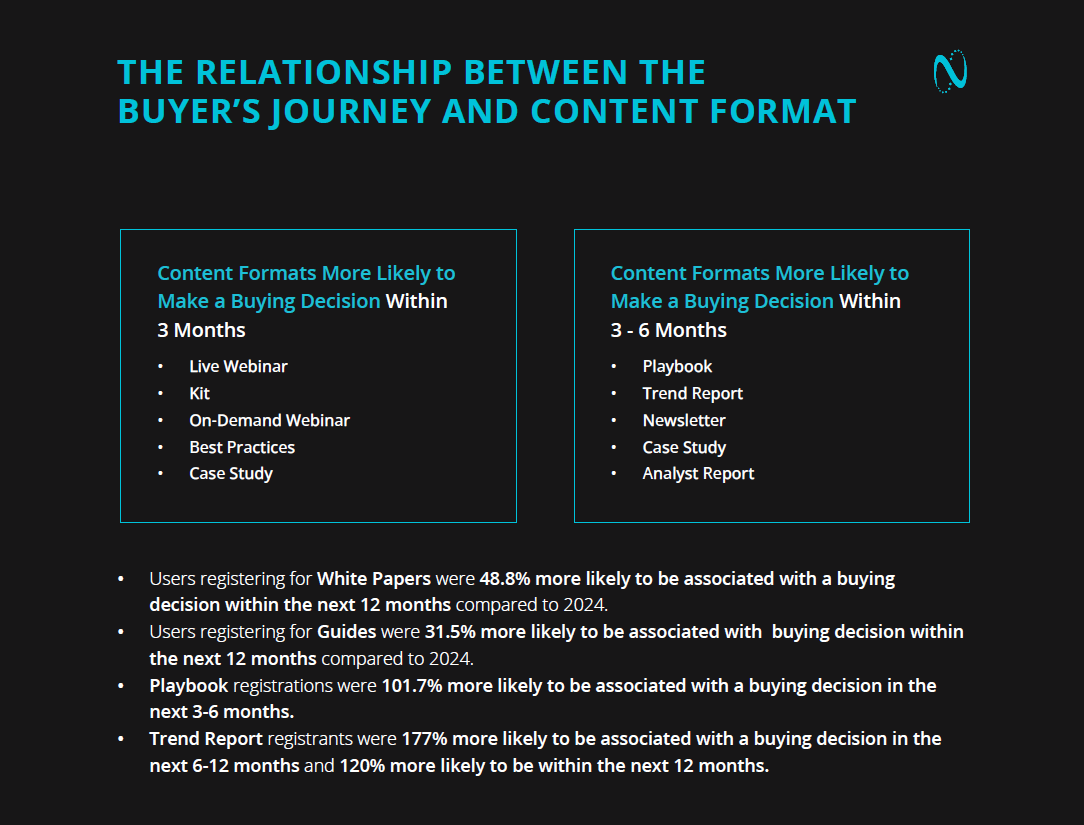
    The buyers who are ready right now are still there (hello, Live Webinar registrants, who are 81.3% more likely to purchase within 3 months than any other format). The mistake is treating everyone else like they don’t exist until they raise their hand.

Looking Through the Telescope

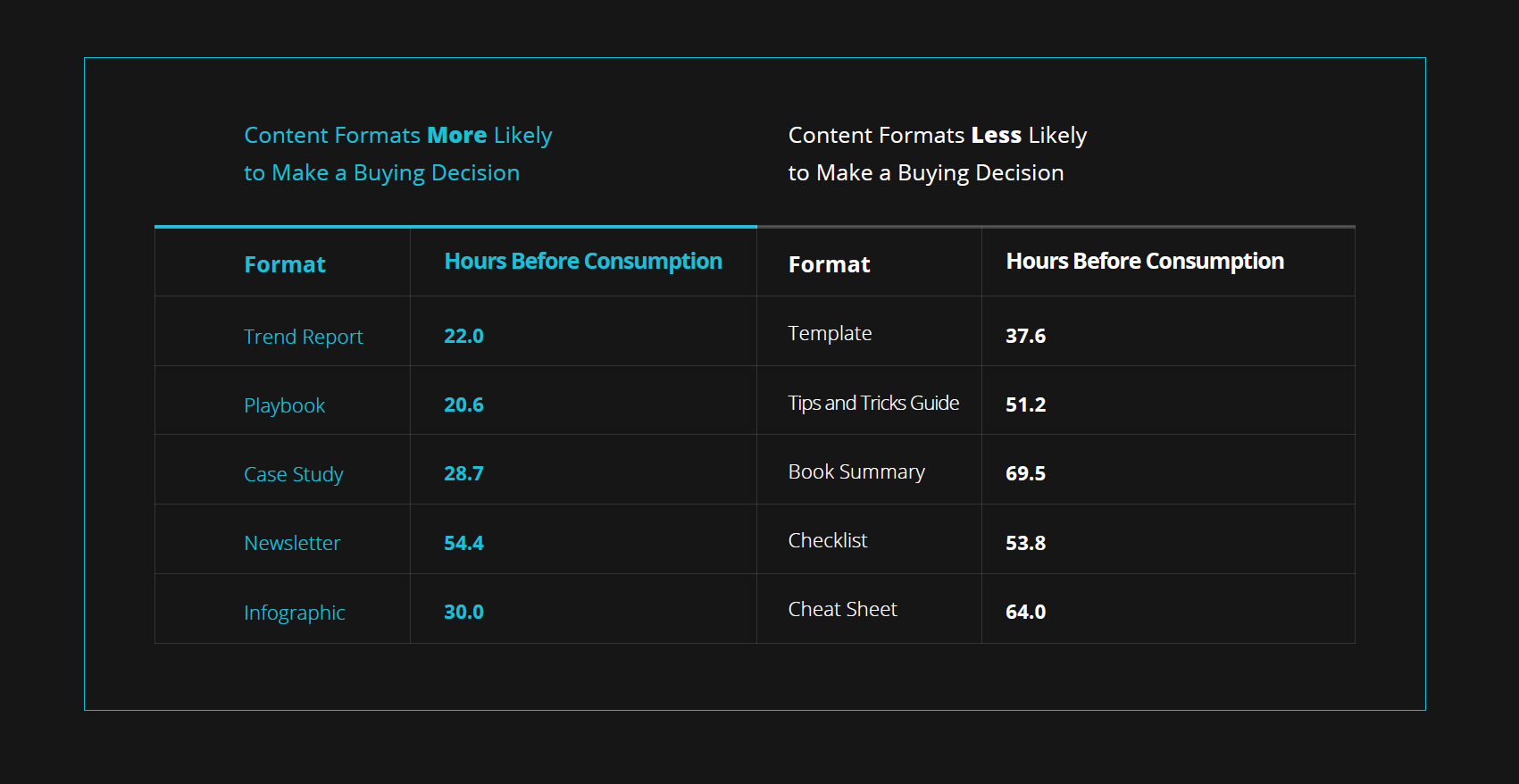
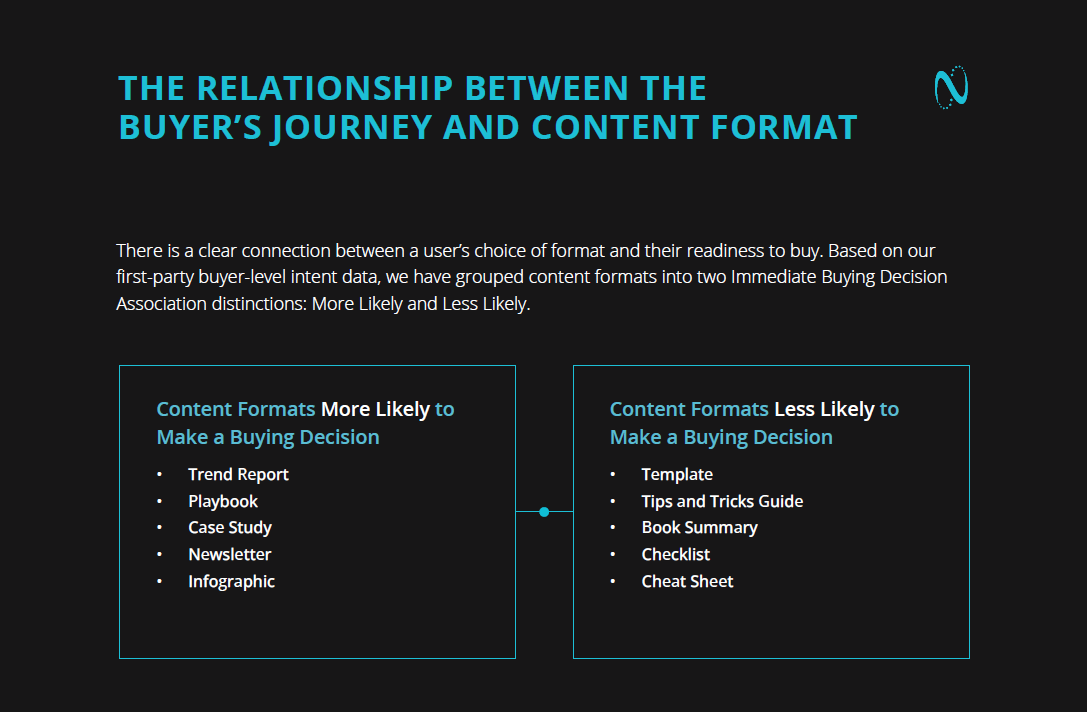
  • Your content has a timing job, not just an education job: Here’s a stat Luna wants you to tattoo on your helmet so you’ll see it every morning: Trend Report registrants are 177% more likely to be associated with a buying decision in the next 6–12 months.

    People registering for Trend Reports are actively building the internal case, benchmarking their thinking, and preparing recommendations for leadership reach for Trend Reports. If you want to be present in the 6–12 month buying window, that’s your format.

    Produce it. Syndicate it. Wait for the window.
  • C-suite engagement is growing. Nurture accordingly: C-level content consumption grew 3.8% YOY in 2025, accounting for 14.5% of total demand. C-suite professionals clocked a 48.3-hour Consumption Gap. They’re slower to open, but they’re opening more than ever.

    And here’s the thing about C-suite buyers: they’re more likely than nearly any other job level to make a buying decision. They just need the patience, proof points, and strategic framing to get there. Stop sending them the same nurture sequence you send an Individual Contributor. Give them the altitude-appropriate content they’re actually looking for.
  • Format and timing are inseparable: Playbook registrations were 101.7% more likely to be associated with a buying decision in the next 3–6 months. Case Studies show up in the top five for near-term, mid-term, and overall purchase associations.

    Newsletters—humble, reliable, always-on Newsletters—made the top five for formats most associated with a buying decision over the next 12 months. There is a content format for every stage of the buyer’s delay. The question is whether your program is intentional about it, or whether you’re just publishing and hoping someone lands.

Your Mission Checklist

  • Map your nurture programs explicitly to the 6–12 month window. If your sequences expire before a buyer’s launch window opens, you’ve already lost the deal without knowing it.
  • Build a Trend Report. Seriously. It’s the single highest-scoring format on NetLine’s Format Efficiency Matrix (60.1) and the format most correlated with mid-range purchase intent. That’s not a coincidence. That’s your assignment.
  • Stop scoring leads only on short-term intent signals. A buyer registering for a Playbook or a Case Study with a 6–12 month horizon is a highly qualified mid-funnel opportunity—not a cold lead to be recycled. Treat them accordingly.

The 2026 content universe is not waiting for anyone to catch up.

Your buyers are still buying. They’re just doing it on a longer runway. The programs that stay present, stay useful, and stay patient across that runway are the ones that close. Everything else is just noise between registration and revenue.

Don’t forget, cadet, there’s plenty more to be discovered amongst the stars…oh, and also, the 2026 State of B2B Content Consumption and Demand Report!

Categories B2B

FAQs for AEO: How to structure answers that rank in answer engines

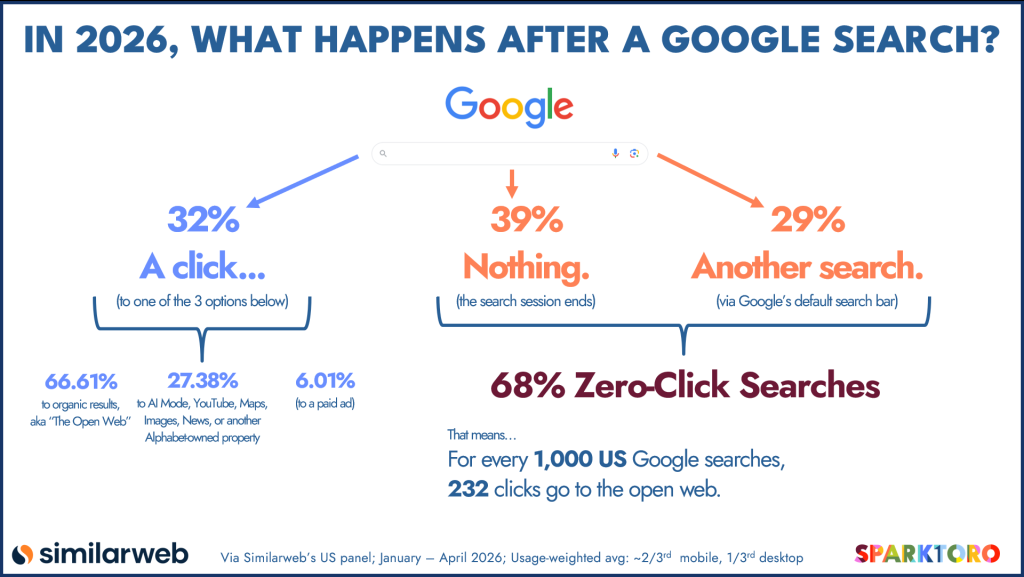
AI search interfaces are reshaping how content gets surfaced and cited. Pew Research data from 2025 found that around one in five Google searches produced an AI-generated summary, with 88% of those summaries citing three or more sources. Bain’s 2025 research found that roughly 80% of consumers rely on zero-click results in at least 40% of their searches.

Free AEO Grader: See Your Brand's Visibility in Answer Engines [Free Tool]

As answer engines compress results and bypass traditional links, visibility depends less on ranking position and more on whether content can be cleanly extracted and cited. FAQ sections built for Answer Engine Optimization (AEO) directly address that requirement. When structured for extraction rather than navigation, FAQs isolate discrete questions, deliver answer-first responses, and reinforce consistent terminology

This guide explains what FAQs for AEO are, why they matter, how to structure them for reliable extraction, and how to optimize them for measurable AI visibility.

Table of Contents

What are FAQs for AEO?

FAQs for AEO are structured question-and-answer sections designed to increase visibility inside AI-generated results, including Google AI Overviews and conversational search tools. Unlike traditional FAQ pages built primarily for navigation, FAQs for AEO are built for retrieval. They are answer-first, structured for extraction, entity-consistent, schema-supported, and aligned with natural-language query behavior.

Search behavior reinforces why this structure matters. In HubSpot’s 2025 AI Trends for Marketers report, 31% of Gen Z respondents indicated they begin queries in AI or chat-based tools rather than traditional search engines. FAQ sections mirror this conversational pattern by matching how prompts are phrased and resolved within AI environments.

Answer Engine Optimization focuses on making content quotable inside AI-generated responses, not just rankable in search results. Rather than presenting a list of links, answer engines synthesize information from multiple sources into a single response. If a passage cannot be cleanly extracted, it is less likely to be cited.

Modern AI SEO reflects this shift by prioritizing how machines interpret and reuse information rather than how pages rank for isolated keywords. In this context, structure becomes a visibility lever.

AEO-ready content must be easy to retrieve, summarize, attribute, and trust. FAQ sections support these conditions because they isolate intent and resolve it directly. A clearly defined question establishes topical relevance. A concise, self-contained answer forms a reusable retrieval unit. Together, they create structured passages that are useful to answer engines.

HubSpot AEO supports ongoing optimization by helping teams identify coverage gaps and refine FAQ structures in response to evolving AI search behavior.

Do FAQ sections improve AEO performance in LLMs?

FAQ sections improve AEO performance when they are implemented with structural discipline. They increase extractability, reduce ambiguity, and strengthen entity clarity, all of which influence whether a passage is selected and cited within AI-generated responses.

Large language models (LLMs) retrieve passages associated with defined entities and synthesize responses based on contextual alignment. When a section isolates a question and resolves it cleanly, it reduces interpretive effort during synthesis.

In practice, answer engines prioritize content that shows:

  • Clear subject–verb–object relationships.
  • Explicit entity definitions and consistent terminology.
  • Passage-level completeness without dependency on surrounding text.
  • Logical hierarchy through headings and formatting.
  • Verifiable claims supported by structured markup.

These structural signals align with patterns observed in AI-generated search features, where long-tail, instructional, and clearly organized content surfaces more frequently.

FAQ sections improve performance through three primary mechanisms:

  • Reduced ambiguity. When a question is written explicitly as a header, it defines the scope of the passage that follows. Clear scoping reduces topic drift and lowers the risk of rewrites during synthesis.
  • Improved summarization efficiency. Answer engines favor content where the resolution appears early and is structurally distinct from surrounding text. Answer-first formatting increases passage completeness and reuse stability.
  • Reinforced entity associations. Language models form associations between brands, categories, and defined concepts. FAQ sections strengthen these associations by consistently tying entities to definitions and use cases.

For example, the following definition establishes clear semantic relationships:

“AEO is the process of optimizing content so AI systems can extract, summarize, and cite it in answer-driven search environments.”

  • AEO → optimizes → content
  • AI systems → extract → content
  • AI systems → summarize → content
  • AI systems → cite → content

Repeating explicit entity relationships across multiple passages reduces ambiguity. FAQ sections formalize ‌repetition within a single URL, increasing citation reliability when answer engines produce responses.

Tools like HubSpot’s AEO Grader can be used to evaluate whether FAQ sections actually contribute to citation frequency in AI-generated responses, rather than simply increasing on-page content volume.

Why FAQs are important for AEO

FAQs are important for AEO because they create structured retrieval units within a broader content system. Understanding how FAQs support AEO requires examining how answer engines isolate and reuse structured content. Defined question–answer pairs allow answer engines to isolate, evaluate, and reuse specific passages without reinterpreting surrounding content.

As generative search environments mature, visibility increasingly depends on how clearly information is organized rather than how broadly keywords are targeted.

In answer-driven search, several measurable factors influence visibility:

  • Alignment with specific user micro-intents.
  • Formatting that supports clean citation.
  • Consistent entity definition and reinforcement.
  • Passage-level completeness.
  • Share of voice across prompts.

FAQ sections reinforce each of these variables by increasing the number of citation-eligible passages associated with a single thematic URL.

Micro-intent alignment is important. A micro-intent is a narrowly defined query tied to a specific stage or operational concern within the buyer journey. When a page resolves multiple related micro-intents within a coherent structure, it increases retrieval surface area without fragmenting authority across separate URLs. This approach strengthens topical depth while preserving structural cohesion.

FAQ sections also influence AI search visibility. In generative environments, visibility can be evaluated through brand mentions, citation frequency, sentiment framing, and share of voice across prompts. These indicators measure whether content is being selected and referenced within responses, not simply whether it ranks in traditional search results.

Teams can benchmark these signals using HubSpot’s AEO Grader, which surfaces how often and where a brand appears across LLM-driven search experiences. Establishing a baseline clarifies whether FAQ expansion improves citation presence or merely increases page count.

Importantly, citation patterns do not consistently align with traditional ranking positions. Recent BrightEdge AI Overview research found that over 80% of AI-generated citations originate from pages outside conventional top-ranking results. This divergence reinforces the importance of structural clarity over positional dominance.

When FAQ content is organized into discrete, well-scoped answers tied to measurable visibility signals, it contributes directly to sustained AEO performance. Its value lies not in volume, but in controlled expansion of citation-eligible passages anchored to a central topic. In practice, AEO FAQs improve visibility in answer engines and AI search by increasing the number of structured, citation-ready passages tied to a single topic.

How to Structure FAQ Pages So Answer Engines Can Read Them

Answer engines evaluate structure before prose. They scan for defined question patterns, extractable answers, and consistent hierarchies. This process helps them determine what a page covers and which passages they can reuse with minimal modification.

A disciplined FAQ system prevents structural drift as content scales. The following five steps establish repeatable standards that protect citation eligibility.

1. Choose one topic per FAQ page and define it clearly.

An FAQ page performs best when tightly scoped. When a single page attempts to cover unrelated product features, pricing policies, onboarding instructions, and compliance details, the thematic boundary weakens. Reduced topical clarity lowers selection confidence.

A focused FAQ page should:

  • Center on one primary theme (for example, “FAQs for AEO,” “AEO reporting,” or “AEO tools”).
  • Use an H1 that mirrors natural query phrasing.
  • Open with a brief introduction that defines the topic in one to three sentences.

Avoid generic FAQ collections without a defined subject boundary or catch-all pages that mix unrelated categories. Clear thematic ownership, as shown in this example from Amazon, increases retrieval precision and strengthens authority signals.

faqs for aeo example from Amazon web services FAQ with specific EC2 auto scaling category and consistent formatting

Source

2. Use a consistent question-and-answer pattern for every entry.

Answer engines favor a predictable hierarchy. Each FAQ entry should follow a repeatable structural pattern so that question boundaries and answer boundaries remain unambiguous.

Implementation standards include:

  • Place each question in an H2 or H3 tag.
  • Position the answer immediately beneath the corresponding header.
  • Maintain consistent spacing and formatting across entries.
  • Avoid inserting unrelated media, calls-to-action (CTAs), or narrative sections between the question and answer.

If FAQs are presented in accordions, ensure the answer text is rendered in the HTML on page load. Front-end decisions should not interfere with retrieval eligibility.

Structural consistency reduces interpretation overhead and improves passage-level reliability. HubSpot Content Hub enables scalable creation and management of AEO-friendly FAQ pages, helping teams maintain formatting consistency and reduce structural drift across large content libraries.

3. Write answer-first responses that can stand alone when quoted.

Answer engines frequently extract isolated snippets without surrounding context. Each FAQ response must function independently. Direct, answer-first responses increase the likelihood of being cited by AI systems because they reduce the amount of interpretation required during extraction.

Open each answer with a direct resolution of the question in approximately 40–60 words. The first one or two sentences should define, recommend, or resolve without requiring prior explanation. Follow with one to three supporting sentences that add operational clarity. When steps or criteria are involved, include a short list of three to five items to preserve scannable structure.

For better results, teams should avoid:

  • Lead-in phrases that delay resolution.
  • Marketing language that precedes the answer.
  • Answers that depend on another section for meaning.

Passage completeness increases citation stability and reduces rewrite risk.

4. Match question phrasing to real-world query language.

FAQ headers should reflect how buyers phrase questions in AI tools and search interfaces. Natural-language alignment improves retrieval matching and reduces semantic drift.

Effective question design includes:

  • Full interrogative phrasing (for example, “How often should AEO FAQs be updated?”).
  • Comparison and evaluation prompts (“AEO vs SEO,” “best tools,” “how to measure performance”).
  • Terminology that mirrors market language rather than internal vocabulary.

Avoid vague labels or fragmentary headers. Clear query phrasing strengthens alignment between buyer intent and page structure.

5. Add FAQ schema only after the content is structurally stable.

Schema markup reinforces structure; it does not compensate for weak formatting. Once the FAQ content is clearly organized and answer-first, the FAQPage schema clarifies which text represents the question and which text represents the answer. The FAQPage schema identifies a list of question–answer pairs for answer engines, helping systems clearly distinguish between prompts and their corresponding responses.

Implementation standards include:

  • Mark up only FAQs that are visible to users on the page.
  • Ensure the schema text matches the on-page wording exactly.
  • Avoid adding structured data that introduces content not displayed to users.
  • Update schema whenever FAQ content changes.

Schema functions as a structural verification layer. When implemented correctly, it formalizes the relationship between question and answer and reduces ambiguity during machine interpretation.

FAQ Optimization Tips for AEO

AEO AI FAQ page optimization focuses on refining structure, aligning intent, and improving extractability after foundational formatting is in place. Structuring an FAQ page establishes eligibility. Optimization determines competitive visibility. With structural clarity established, refinement should focus on intent alignment, extractability, entity precision, authority reinforcement, and measurement.

Align FAQ questions with commercial intent.

Many FAQ sections concentrate only on definitional queries. Definitions support awareness, but they rarely influence evaluation or purchase-stage visibility. Optimization requires expanding coverage to include decision-oriented micro-intents.

High-value FAQ questions often address:

  • Product comparisons.
  • Pricing considerations.
  • Implementation requirements.
  • Use-case qualification.
  • Industry-specific constraints.

Examples include:

  • “How does AEO differ from traditional SEO?”
  • “What tools support Answer Engine Optimization?”
  • “How much does implementing AI SEO cost?”

Questions tied to cost and implementation reflect evaluation-stage behavior. Including them increases the likelihood that FAQ content surfaces during commercially relevant prompts. For instance, cost considerations frequently shape AI adoption research patterns. Coverage at this stage improves alignment between visibility and pipeline impact.

Optimize for extractability across platforms.

Answer engines prioritize passage completeness and synthesis efficiency. Extractability depends on how easily a response can be quoted without structural reconstruction.

Optimization standards include:

  • Keep individual answers within 150–200 words when possible.
  • Use short paragraphs and structured lists for multi-part explanations.
  • Remove unnecessary qualifiers that introduce ambiguity.
  • Place the direct resolution in the first 40–60 words.

Content that can be reused with minimal rewriting is more likely to be cited. This principle underpins generative engine optimization frameworks, which emphasize clarity and structural coherence as citation drivers.

Dedicated platforms like HubSpot’s AEO tool are designed to help structure and evaluate content for extraction, particularly as FAQ libraries scale.

Operationally, implementing these standards requires disciplined outlining and question mapping. Tools like HubSpot’s Breeze Suite can speed up research and draft structured, extraction-ready outlines. Editorial review remains essential. Acceleration improves efficiency while structure determines eligibility. Internal links from FAQ answers help users and answer engines discover deeper content without interrupting the primary answer structure.

Reinforce entity clarity within each answer.

Entity consistency strengthens model confidence. When terminology shifts unnecessarily, it weakens semantic reinforcement.

LLMs associate entities across dimensions such as:

  • Brand and product names.
  • Category definitions.
  • Use cases.
  • Industry contexts.

If an FAQ references a product, use its official name consistently. If an FAQ defines a category, restate the core term rather than replacing it with stylistic synonyms. Clear entity framing supports association stability, particularly when explaining adjacent concepts such as AI agent types or related classifications.

Optimization at this level is not stylistic. It provides structural reinforcement of knowledge relationships. Consistent terminology supports entity recognition and E-E-A-T signals, reinforcing how models connect brands, categories, and concepts over time.

Include freshness and source signals.

Answer engines evaluate credibility alongside clarity. Content that appears outdated or unsourced introduces risk during synthesis.

Strengthen authority signals by:

  • Displaying a visible “Last updated” or “Last reviewed” date.
  • Citing primary sources when referencing statistics, regulations, or formal definitions.
  • Including an author attribution or subject-matter review line.
  • Stating the year directly when referencing time-sensitive data.

Temporal specificity reduces ambiguity. Attribution reduces rewrite risk. Both improve appearances within AI responses.

Connect FAQ optimization to visibility measurement.

Optimization without measurement limits strategic value. FAQ sections should support broader AI visibility objectives, including mentions, citation frequency, sentiment framing, and share of voice across prompts.

Operational measurement can include:

  • Monitoring which FAQs are cited in AI-generated responses.
  • Tracking brand mention frequency across priority queries.
  • Identifying topical gaps where competitors appear more frequently.

Benchmarking citation performance across AI platforms requires dedicated visibility tracking tools. HubSpot’s AEO Grader provides a practical way to evaluate LLM search results and identify which FAQ topics drive measurable citation gains.

Because citation visibility does not exist in isolation, marketing teams should evaluate AI performance alongside traditional search performance. Tools within HubSpot Marketing Hub can complement FAQ optimization by connecting structured content visibility with broader SEO reporting and cross-channel performance analysis.

FAQ optimization becomes sustainable when it operates within a monitored system rather than as a one-time formatting exercise.

Frequently Asked Questions About FAQs for AEO

How many questions should an AEO FAQ page include?

An AEO FAQ page should include enough questions to comprehensively cover one clearly defined topic. As a practical guideline, most well-scoped FAQ pages fall between 8 and 20 entries, though the right number depends on topic complexity rather than a fixed target.

Effective FAQ pages address the full decision arc related to a topic, including definition, implementation, measurement, comparison, and common objections. Adding repetitive or loosely related questions weakens topical clarity and reduces retrieval precision. Each entry should introduce a distinct micro-intent that expands coverage without diluting thematic focus.

Do I need a separate FAQ page, or can I embed FAQs on key pages?

Both standalone FAQ pages and embedded FAQs support AEO, but they serve different structural roles. A standalone FAQ page consolidates topical authority, while embedded FAQs strengthen passage-level visibility tied to specific commercial pages.

Standalone FAQ pages are useful for owning a category-level query like “FAQs for AEO.” Embedded FAQs on product or pillar pages reinforce evaluation-stage prompts and implementation questions. The strongest approach often combines both models while avoiding unnecessary duplication across URLs.

Can I use multiple schema types on a page with FAQs?

Yes. A page can use FAQPage schema alongside other structured data types, such as Organization, Product, or Article schema, provided each markup type accurately reflects visible content.

The critical requirement is consistency. Structured data must match the on-page wording exactly, and FAQPage schema should only mark up question-and-answer pairs users can see. Misaligned schema introduces ambiguity and weakens machine trust signals.

How often should I refresh my AEO FAQs?

AEO FAQs should be reviewed at least quarterly and updated whenever material changes occur in positioning, data, or buyer behavior. Regular reviews ensure answers remain citation-eligible and contextually accurate.

When an FAQ includes statistics or time-sensitive claims, include the year directly in the sentence to reduce ambiguity. Refreshing content maintains clarity and reinforces entity stability as AI systems incorporate additional sources.

Will duplicating the same FAQs across pages hurt AEO?

Duplicating identical FAQ content across multiple URLs can dilute topical authority and create ambiguity about page citation preferences. Answer engines favor pages with clear subject ownership.

If a question must appear in more than one location, tailor the answer to the context of that specific page. Contextual differentiation preserves semantic clarity while reinforcing expertise within distinct content clusters.

Designing FAQs for Sustainable AI Visibility

FAQs for AEO are structural assets. They improve citation eligibility by isolating intent, resolving it clearly, and reinforcing consistent terminology across related questions. When FAQ sections align with buyer-stage prompts and follow answer-first formatting, they expand retrieval surface area without fragmenting authority.

Thoughtful AI adoption remains essential. Expanding FAQ libraries or generating large volumes of AI-assisted pages does not, on its own, improve selection likelihood. Answer engines respond to clarity, specificity, and coherence. Sustainable AEO performance comes from being intentional about what you publish and how you structure it.

When content is genuinely useful and structurally precise, citation becomes a byproduct of quality.

Categories B2B

AI email marketing tools: Our top picks for 2026

Marketers are turning to AI-powered tools to scale relevance without increasing manual effort as inbox competition increases and performance expectations rise. AI email marketing tools are rapidly reshaping how teams execute and measure email campaigns. AI advances now support everything from subject line creation and personalization to send-time optimization and revenue attribution.

→ Download Now: The Beginner's Guide to Email Marketing [Free Ebook]

This guide breaks down what AI email marketing tools are, the features that drive measurable performance, and the best platforms by use case. It also explains how to evaluate tools based on integration, governance, and ROI, with a detailed look at how HubSpot’s AI-powered email capabilities compare to other leading options.

Table of Contents

What are AI email marketing tools?

AI email marketing tools are software platforms that apply machine learning, predictive analytics, and generative AI to execute email campaigns. These tools analyze customer data and campaign performance to automate decisions that traditionally required manual effort, like writing copy or choosing send times. The primary goal of AI email marketing tools is to improve relevance, efficiency, and measurable outcomes across the email lifecycle.

In practice, AI is used across six core areas of email marketing:

  1. Content generation
  2. Personalization
  3. Optimization
  4. Automation
  5. Deliverability
  6. Analytics

Generative AI models can draft subject lines and body copy based on campaign goals and historical engagement data. Personalization engines use data to tailor messaging, offers, and timing at the individual level rather than relying on static segments.

Predictive models determine the best time to send emails, how often to send them, and when to trigger them based on lifecycle stage or real-time behavior. Deliverability-focused AI tracks sender reputation and audience engagement to keep emails out of spam folders. On the measurement side, AI-driven analytics links email engagement to real outcomes such as conversions and revenue. This makes it easier to track what’s working and keep improving performance.

AI is especially effective for repeatable execution tasks such as:

  • Drafting first-pass copy
  • Scoring contacts
  • Triggering lifecycle emails
  • Monitoring deliverability signals
  • Updating performance dashboards based on live results

AI excels at analyzing large amounts of data and making fast, consistent decisions at scale. Human marketers are still essential for setting strategy, maintaining brand voice, ensuring compliance, and making judgment calls where nuance matters. The most effective email programs use AI to handle execution and optimization while people retain control over intent, governance, and creative direction.

HubSpot’s marketing email tools combine AI-powered content creation, audience segmentation, automation, and performance tracking within a single CRM-connected platform. HubSpot connects email campaigns to CRM data, so teams can create, personalize, and send emails while tracking how they affect engagement and revenue.

AI Email Marketing Features That Improve Performance

AI email marketing software features improve performance by increasing relevance, reducing manual effort, and optimizing campaigns based on real engagement data. These capabilities use machine learning and generative AI to automate key email decisions, from who to target and what to say to when to send and how to measure results. When integrated into a CRM-connected platform, AI features help teams scale email programs while maintaining consistency and accountability.

Personalization

AI-powered personalization uses contact-level data, behavioral signals, and predictive models to tailor emails to individual recipients. Instead of relying on static segments, AI evaluates attributes such as lifecycle stage and purchase history to customize emails dynamically. In HubSpot, this is achieved through Marketing Hub and its email marketing tools that use CRM data and personalization tokens to adjust messaging at scale.

AI-driven personalization increases message relevance and reduces reliance on one-size-fits-all campaigns. This approach saves time on manual segmentation while improving engagement metrics.

Send-time Optimization

AI models analyze historical open and click behavior across contacts and campaigns to determine the best time to send an email. HubSpot supports send-time optimization through its AI-powered email tools, which apply engagement data from the CRM to improve timing decisions.

Optimized send times improve visibility in crowded inboxes and reduce wasted sends. This feature helps teams improve engagement without increasing email volume or manual testing effort.

Content Generation

Generative AI creates email subject lines, body copy, and CTAs. These tools use campaign data and brand inputs to generate first drafts or variations for testing. HubSpot’s AI Email Writer supports content creation directly within the email editor, allowing teams to generate copy that aligns with campaign goals and CRM data.

AI-generated content reduces drafting time and enables faster campaign execution. It also makes it easier to test multiple creative approaches without increasing production workload.

Deliverability Optimization

AI-driven deliverability features monitor engagement signals, email list health, and sender behavior to reduce the risk of emails being filtered as spam. These systems analyze bounce rates, inactivity, and engagement trends to recommend or automate list hygiene and sending adjustments. HubSpot supports deliverability best practices through built-in email health monitoring and contact management tools within Marketing Hub.

Improved deliverability protects sender reputation and ensures emails reach intended inboxes. AI-based monitoring helps teams catch issues early and maintain long-term email performance.

Automation and Workflows

AI-powered automation uses behavioral triggers and predictive logic to send emails based on lifecycle stage, actions, or real-time events. These workflows adapt based on how recipients engage, rather than following a fixed sequence. HubSpot’s Marketing Hub includes automation and workflow tools that connect email actions directly to CRM activity.

Automation reduces manual campaign management and ensures timely, relevant communication. This capability allows teams to scale lifecycle and nurture programs without adding more manual work.

Attribution and Analytics

AI connects email engagement to real business outcomes — like form submissions, purchases, and revenue — by analyzing the full customer journey, not just the last click. HubSpot provides attribution and analytics through Marketing Hub and its connected CRM, tying email performance to contacts and revenue records.

AI-enhanced attribution and analytics helps teams see which emails drive pipeline and revenue, so they can focus on what works and prove ROI more accurately.

Best AI Email Marketing Tools by Use Case

AI Email Marketing Tools for Content Generation and Subject Lines

AI email marketing tools for content generation focus on drafting subject lines, body copy, newsletters, and CTAs based on prompts, performance patterns, or brand inputs. These tools reduce creative bottlenecks and make it easier to test multiple messaging approaches without increasing production time.

HubSpot AI Email Writer (Marketing Hub + Breeze AI)

ai email marketing tools: hubspot marketing hub

Source

HubSpot is an all-in-one platform where AI is built in across marketing, sales, and CRM. With HubSpot, teams can create, personalize, send, and measure emails all in one place. HubSpot’s Marketing Hub includes the AI Email Writer, powered by Breeze AI. This AI email marketing tool generates subject line and email copy that’s aligned with marketing objectives directly within the email editor. Because content creation happens inside the same platform used for segmentation, sending, and analytics, generated copy is immediately connected to contacts and reporting.

Key Features:

  • AI-generated subject lines and email copy within the email editor
  • Native CRM integration for personalization and targeting
  • Built-in A/B testing and performance analytics for optimization

Pricing: Included with paid Marketing Hub plans; availability varies by tier

Best for: Teams that want AI-assisted content creation tightly integrated with email execution, CRM data, and performance measurement.

What I like: The AI Email Writer keeps copy generation, personalization, and performance tracking in one workflow, simplifying iteration and reducing handoffs between tools.

ChatGPT (OpenAI)

ai email marketing tools: chatgpt

ChatGPT is a general-purpose generative AI tool that can draft subject lines, email body copy, rewrites, and tone variations. Marketers typically use it outside of their email platform for ideation or first drafts before moving content into an email service provider (ESP). The tool does not have native access to CRM data or campaign performance metrics.

Key Features:

  • Free-form generative AI for copy drafting and rewriting
  • Conversational prompting for iterative refinement and tone control
  • Multi-format content generation (emails, outlines, variations, rewrites)

Pricing: Free and paid plans available; pricing varies by model and usage

Best for: Rapid ideation, creative exploration, and generating multiple copy variations quickly.

What I like: ChatGPT is flexible and fast, making it useful for brainstorming and early-stage copy development.

Jasper

ai email marketing tools: jasper ai

Source

Jasper is an AI content generation platform designed specifically for marketing use cases, including email subject lines and campaign copy. The platform offers templates, brand voice controls, and marketing-focused workflows to guide copy creation. Jasper typically operates alongside an email service provider rather than replacing it.

Key Features:

  • AI-generated marketing copy and subject lines with brand voice support
  • Pre-built marketing templates for email and campaign content
  • Brand voice and style guide controls for consistency

Pricing: Subscription-based plans; pricing varies by tier and usage

Best for: Marketing teams that want a dedicated AI copy tool with structured templates and brand alignment features.

What I like: Jasper’s marketing-specific templates can help standardize copy quality and reduce ramp time for teams producing high volumes of email content.

AI Email Marketing Tools for Personalization and Segmentation

AI-powered personalization and segmentation tools use customer data and behavior to tailor email messaging to specific audiences or individuals. These tools keep audience segments up to date automatically, enabling more relevant and timely email communication.

HubSpot CRM and Marketing Hub Segmentation

ai email marketing tools: hubspot marketing hub

Source

HubSpot Marketing Hub uses CRM data like contact properties, behavioral data, and lifecycle stages to segment audiences and personalize emails at scale. Because everything occurs within the same system, contact updates are immediately reflected in email targeting and messaging.

Key Features:

  • CRM-driven segmentation using contact and lifecycle data
  • Dynamic personalization using behavioral and engagement signals
  • Real-time audience updates based on contact activity

Pricing: Included with paid Marketing Hub plans; availability varies by tier

Best for: Teams that want unified personalization powered by first-party CRM data across marketing, sales, and service.

What I like: HubSpot’s segmentation is tightly integrated with contact records and lifecycle data. This reduces data sync issues and supports consistent personalization across campaigns.

Klaviyo

ai email marketing tools: klaviyo

Klaviyo is a marketing automation platform built primarily for ecommerce. It combines email, SMS, customer data, and predictive analytics into a single system. Klaviyo helps brands personalize messaging based on real-time behavior and purchase history, making it particularly strong for lifecycle and retention marketing. The tool typically integrates with ecommerce platforms and operates alongside other CRM or ESP tools.

Key Features:

  • Predictive segmentation based on purchase and behavioral data
  • Lifecycle-based personalization across email and SMS
  • Revenue attribution tied to campaigns and segments

Pricing: Usage-based pricing; varies by contact volume and features

Best for: Ecommerce-focused teams that rely heavily on purchase and behavioral data for personalization.

What I like: Klaviyo’s predictive segments can help surface high-intent audiences without requiring extensive manual rules.

Customer.io

ai email marketing tools: customer.io

Customer.io is a customer engagement platform designed for event-driven messaging across email, push, SMS, and in-app channels. It is commonly used by product-led and SaaS teams that rely on real-time behavioral data and custom events to trigger highly targeted communication. AI-driven features help optimize how and when messages are triggered across email and other channels.

Key Features:

  • Event-based segmentation using real-time user behavior
  • Visual workflow builder for automated messaging journeys
  • Multi-channel messaging (email, push, SMS, in-app)

Pricing: Subscription-based pricing; varies by plan and data volume

Best for: Product-led and SaaS teams that want granular control over behavior-based personalization.

What I like: Customer.io’s event-based approach enables highly responsive messaging tied closely to user actions.

AI Email Marketing Tools for Send-time Optimization and Frequency Management

Send-time optimization and frequency management tools use engagement data and predictive models to determine when to send emails and how often to contact recipients. These tools aim to improve visibility and engagement by aligning email delivery with individual behavior patterns while preventing over-messaging that can lead to fatigue or unsubscribes.

HubSpot Marketing Hub Analytics

ai email marketing tools: hubspot

Source

HubSpot Marketing Hub uses engagement analytics and CRM-connected reporting to send emails at the right time. The platform analyzes historical open and click data to identify effective send windows and monitor engagement trends over time. Because timing insights are tied to campaign performance, teams can adjust scheduling and cadence based on real engagement signals rather than static assumptions.

Key Features:

  • Engagement-based send-time optimization using historical open and click data
  • CRM-connected reporting to inform timing and frequency decisions
  • Campaign-level performance tracking tied to contact behavior

Pricing: Included with paid Marketing Hub plans; availability varies by tier

Best for: Teams that want send-time decisions grounded in CRM and campaign performance data.

What I like: HubSpot keeps timing insights, audience data, and email execution in one system, which simplifies testing and reduces guesswork around scheduling.

Seventh Sense

ai email marketing tools: seventh sense

Seventh Sense is a specialized platform focused exclusively on AI-driven send-time optimization. The tool analyzes individual contact engagement patterns to determine the best time and day to send emails to each recipient. Seventh Sense integrates with select email and marketing platforms to apply individualized send times without changing campaign content.

Key Features:

  • Individual-level send-time optimization using engagement patterns
  • Machine learning models that adapt to changing recipient behavior
  • Native integrations with marketing automation platforms

Pricing: Subscription-based; pricing varies by contact volume and integration

Best for: Teams that want highly granular, recipient-level send-time optimization.

What I like: Seventh Sense’s singular focus on timing allows for precise optimization without adding complexity to email content or workflows.

ActiveCampaign

ai email marketing tools: active campaign

Source

ActiveCampaign is a marketing automation platform that combines email marketing, CRM functionality, and automation workflows. It’s built for teams running lifecycle campaigns that need behavioral targeting and smart send timing. It uses engagement history to recommend optimized sends and control how frequently contacts receive messages within automated workflows.

Key Features:

  • Predictive send-time optimization based on engagement history
  • Frequency and cadence controls within automated workflows
  • Split testing and optimization within automated email workflows

Pricing: Tiered subscription pricing; varies by features and contact count

Best for: Teams running automation-heavy programs that want timing optimization built into workflows.

What I like: ActiveCampaign combines send-time prediction with automation logic, which can help manage cadence across complex.

AI Email Marketing Tools for Deliverability and List Health

Deliverability and list health tools ensure emails reach inboxes and maintain a strong sender reputation over time. These tools analyze engagement signals, bounce behavior, spam complaints, and list quality to reduce the risk of filtering and support sustainable email performance. AI-assisted monitoring helps teams identify issues early and adjust sending practices before deliverability declines.

HubSpot Marketing Hub Analytics

ai email marketing tools: hubspot

Source

HubSpot features built-in email health monitoring, contact management, and engagement tracking within Marketing Hub. The platform tracks metrics such as bounces, unsubscribes, and engagement trends to help teams maintain clean lists and compliant sending practices. Because deliverability insights are connected to CRM contact records, teams can act on list quality issues directly within their email workflows.

Key Features:

  • Deliverability monitoring within a CRM-connected email platform
  • Email health monitoring with bounce and engagement tracking
  • Integrated list management and contact segmentation

Pricing: Included with paid Marketing Hub plans; availability varies by tier

Best for: Teams that want deliverability management embedded into their email and CRM workflows.

What I like: HubSpot’s native list management and engagement tracking make it easier to maintain healthy sending practices without relying on external tools.

SendGrid (Twilio)

ai email marketing tools: twilio sendgrid

Source

SendGrid is an email delivery platform focused on deliverability performance and sender reputation management. SendGrid is commonly used for transactional and high-volume email programs and integrates with a wide range of applications. The platform provides tools for monitoring inbox placement, engagement, and spam complaints.

Key Features:

  • Deliverability monitoring, including bounce and spam tracking
  • Sender reputation management for high-volume email programs
  • Scalable email delivery infrastructure for transactional and marketing emails

Pricing: Usage-based pricing; varies by email volume and features

Best for: Organizations sending large volumes of transactional or programmatic emails.

What I like: SendGrid’s deliverability-focused tooling provides detailed visibility into sending performance at scale.

Mailgun

ai email marketing tools: mailgun

Mailgun is an email delivery service designed for transactional messaging, validation, and inbox placement testing. The platform’s tools help maintain sender reputation and reduce bounce rates. Mailgun is typically used by technical teams managing infrastructure-level email delivery.

Key Features:

  • Email validation to reduce bounce rates and improve list quality
  • Deliverability monitoring and inbox placement testing
  • API-based infrastructure for transactional email delivery

Pricing: Usage-based pricing; varies by email volume and add-ons

Best for: Technical teams managing transactional or system-generated email.

What I like: Mailgun’s validation and monitoring features help identify deliverability risks before they impact inbox placement.

AI Email Marketing Tools for Testing, Optimization, and Experimentation

Testing and experimentation tools use AI and analytics to compare variations of email elements and identify which combinations drive stronger engagement. These platforms support structured experimentation across subject lines, content, timing, and audiences, helping teams optimize performance based on data rather than assumptions. AI-assisted insights accelerate learning by surfacing statistically meaningful results more quickly.

HubSpot A/B Testing

ai email marketing tools: hubspot

With HubSpot Marketing Hub, teams can test subject lines, content, and other email variables through native A/B testing while automatically tracking results at the contact and campaign level. Because testing is integrated with CRM data and reporting, insights from experiments can be tied directly to audience segments and downstream outcomes.

Key Features:

  • Native A/B testing for subject lines and email content
  • CRM-connected performance tracking at the contact level
  • Campaign analytics tied to downstream conversion and revenue data

Pricing: Included with paid Marketing Hub plans; availability varies by tier

Best for: Teams that want experimentation built directly into email execution and reporting.

What I like: HubSpot’s testing tools connect experimentation results to broader campaign and contact performance, making optimization insights easier to act on.

Mailchimp

ai email marketing tools: mailchimp

Mailchimp offers built-in testing tools with AI-informed suggestions for elements such as subject lines, content, and send times. The platform uses engagement data to recommend which variations are likely to perform better and helps teams compare results across campaigns. Testing features are typically used alongside Mailchimp’s email creation and audience management tools.

Key Features:

  • A/B testing for subject lines, content, and campaign variables
  • AI-driven recommendations for optimizing performance
  • Campaign performance comparison across audiences and sends

Pricing: Tiered subscription pricing; varies by features and audience size

Best for: Teams that want guided experimentation with AI-driven suggestions.

What I like: Mailchimp’s AI recommendations can help teams prioritize which elements to test without extensive manual analysis.

AI Email Marketing Tools for Lifecycle Automation and Workflows

Lifecycle automation tools use behavioral data to trigger email communications across onboarding, nurturing, retention, and renewal stages. AI-assisted automation adapts the timing and path of each message based on how contacts engage, so teams can deliver relevant emails without managing each send manually. These tools work best when connected to a central data source that reflects the full customer lifecycle.

HubSpot Marketing Hub Automation

ai email marketing tools: hubspot

HubSpot supports lifecycle automation through its visual workflow builder in Marketing Hub. The platform enables teams to design onboarding, nurture, re-engagement, and renewal email sequences. Workflows use CRM data and customer behavior to enroll contacts and adjust paths based on engagement automatically. Because automation is built into the CRM, email activity stays in sync with contact records and sales activity.

Key Features:

  • Visual workflow builder for lifecycle automation
  • CRM-driven triggers based on contact behavior and lifecycle stage
  • Automated branching logic based on engagement and outcomes

Pricing: Included with paid Marketing Hub plans; availability varies by tier

Best for: Teams that want lifecycle automation tightly integrated with CRM data and email execution.

What I like: HubSpot’s visual workflows make it easier to manage complex lifecycle programs while keeping automation logic and contact data in sync

Encharge

ai email marketing tools: encharge

Encharge is a marketing automation platform focused on behavioral, event-based lifecycle journeys. The tool allows teams to trigger emails and campaigns based on user actions, product events, or custom attributes. Encharge is often used by SaaS and subscription-based businesses to manage onboarding and retention workflows.

Key Features:

  • Event-based automation triggered by user behavior
  • Visual journey builder for lifecycle campaign orchestration
  • Segmentation based on product usage and custom attributes

Pricing: Subscription-based pricing; varies by plan and contact volume

Best for: SaaS teams that rely on product usage data to drive lifecycle messaging.

What I like: Encharge’s event-driven model supports highly responsive onboarding and engagement flows tied to real user behavior.

AI Email Marketing Tools Analytics and Revenue Attribution

Analytics and revenue attribution tools link email engagement data to real business outcomes such as conversions and revenue. These tools use AI-assisted models to measure how email contributes across the full customer journey rather than relying on single metrics like opens or clicks. Accurate attribution helps teams understand which campaigns drive impact and where to focus on optimization.

HubSpot Analytics

​​

ai email marketing tools: hubspot

Source

HubSpot provides analytics and revenue attribution through its CRM-linked reporting and attribution tools in Marketing Hub. Email engagement is tied directly to contact records, deals, and lifecycle stages, allowing teams to see how campaigns influence pipeline and revenue over time. Because analytics are native to the CRM, attribution models can evaluate email performance alongside other marketing and sales activities.

Key Features:

  • Multi-touch revenue attribution across campaigns and channels
  • CRM-linked reporting connecting email activity to deals and contacts
  • Custom dashboards for tracking performance and ROI

Pricing: Included with paid Marketing Hub plans; availability varies by tier

Best for: Teams that want clear visibility into how email influences deals and revenue across the full customer lifecycle.

What I like: HubSpot’s attribution connects email activity to actual revenue outcomes, not just engagement metrics.

Moosend

ai email marketing tools: moosend

Moosend offers AI-driven analytics that highlight campaign performance, segment engagement, and optimization opportunities. The platform provides insights into how different audiences and campaigns perform over time, with recommendations to improve results. Analytics are typically used alongside Moosend’s email and automation features.

Key Features:

  • AI-assisted campaign performance analysis
  • Segment-level engagement insights and reporting
  • Optimization recommendations based on campaign data

Pricing: Tiered subscription pricing; varies by features and list size

Best for: Teams that want accessible analytics with built-in optimization suggestions.

What I like: Moosend’s performance insights help surface optimization opportunities without requiring advanced analytics expertise.

How to Choose the Right AI Email Marketing Tools for Your Stack

Choosing the right AI email marketing tools depends on how well the platform aligns with existing systems, data maturity, and campaign goals. The most effective tools integrate with core data sources, support measurable outcomes, and balance automation with governance. The following criteria help teams evaluate options without adding unnecessary complexity.

  • Prioritize CRM integration over point solutions. AI email marketing tools perform best when connected to a centralized CRM. Native CRM integration ensures personalization, automation, and analytics are based on consistent, first-party data rather than disconnected lists.
  • Match the tool to a specific use case. Some platforms specialize in content generation, while others focus on deliverability, automation, or attribution. Selecting tools by primary use case reduces overlap and clarifies where AI delivers the most value.
  • Evaluate data requirements and readiness. AI features depend on data volume and quality. Tools that rely on predictive modeling or personalization perform better when historical engagement, lifecycle, or behavioral data is available and well-structured.
  • Assess governance and brand controls. AI-generated content and automation require guardrails. Features such as brand voice controls, approval workflows, and permissioning help maintain consistency and compliance as automation scales.
  • Consider operational complexity. Adding AI tools should reduce workload, not increase it. Platforms that combine content creation, sending, and analytics in one workflow typically require less maintenance than loosely connected point tools.
  • Look for measurable performance impact. AI capabilities should be tied to clear outcomes such as engagement lift, time savings, or revenue influence. Built-in reporting and attribution make it easier to evaluate ROI and justify continued investment.
  • Plan for scalability, not experimentation alone. Pilot-friendly tools are useful for testing, but long-term value comes from platforms that support ongoing campaigns, lifecycle programs, and cross-team collaboration.

Frequently Asked Questions About AI Email Marketing Tools

What is the best way to use AI for higher open rates?

The most effective way to use AI for higher open rates is to apply it to subject line generation, send-time optimization, and audience targeting simultaneously. AI models analyze historical engagement data to recommend subject line variations, predict the right time to send the email, and identify which contacts are most likely to engage. When these elements work together, emails are more likely to appear relevant and timely in the inbox.

AI performs best when paired with structured testing. Using AI to generate multiple subject line options and then validating performance through A/B testing helps teams improve open rates while avoiding overreliance on a single recommendation.

How is AI email automation different from traditional workflows?

Traditional email workflows rely on fixed rules and linear sequences that send messages based on predefined triggers. AI email automation introduces adaptive logic that adjusts timing, paths, or messaging based on real-time engagement and predictive insights. This allows campaigns to respond dynamically as contacts interact with emails.

AI-driven automation reduces manual work by continuously optimizing delivery and flow logic. Human oversight is still important for setting lifecycle strategy, defining success criteria, and keeping automation on track.

Can I use generative AI for email marketing without losing brand voice?

Generative AI can be used without losing brand voice when teams establish clear guidelines and review processes. Brand voice inputs, approved language patterns, and human editing help ensure AI-generated copy aligns with established standards. Many AI tools, like HubSpot’s AI Email Writer, also support iterative refinement rather than fully autonomous content creation.

AI is most effective as a drafting and variation tool rather than a final decision-maker. Human review ensures consistency, tone accuracy, and contextual relevance across campaigns.

Will AI email tools integrate with my CRM and ESP?

Most enterprise and mid-market AI email marketing tools are designed to integrate with CRM systems and email service providers, allowing features such as personalization, automation, and attribution to draw from centralized data. Tools with native CRM connectivity tend to deliver more reliable personalization and reporting than standalone solutions. Evaluating integration capabilities early helps prevent data silos and manual workarounds.

How do I keep emails compliant when using AI?

Email compliance with AI depends on maintaining human oversight and following established regulatory requirements such as CAN-SPAM, General Data Protection Regulation (GDPR), and consent management rules. AI-generated content should be reviewed for accuracy, disclosures, and appropriate use of personal data. Strong compliance practices include approval workflows, permission-based segmentation, and regular audits of automated campaigns. Compliance responsibility remains with the sending organization, not the AI tool.

Power your marketing emails with AI tools.

Email marketing with AI tools helps teams improve performance by applying machine learning and generative AI across content creation, personalization, timing, automation, deliverability, testing, and attribution. The most effective platforms connect these capabilities to a centralized CRM. This enables marketers to personalize at scale, optimize campaigns continuously, and tie email engagement to revenue outcomes. As the landscape continues to evolve, evaluating tools by use case rather than hype remains the most reliable way to select the right solution.

HubSpot stands out as a comprehensive option because it brings AI-powered email creation, automation, analytics, and CRM data together in a single platform. HubSpot’s AI Email Writer and Email Marketing tools support faster execution while keeping campaigns connected to data and performance reporting. That level of integration makes it easier to scale email programs without introducing data silos or operational friction.

In recent years, I’ve seen more and more clients adopt HubSpot for email marketing, and the reason is consistent: It’s powerful without being overwhelming. The interface is approachable, the workflows are intuitive, and the platform continues to expand with AI and automation features that solve real problems marketers face every day. That ongoing investment explains why many teams grow into HubSpot rather than out of it.

That said, there are plenty of strong email and AI marketing platforms on the market, and no single solution is the best fit for every organization. The right choice depends on your team’s specific goals, resources, and budget.

Categories B2B

Schema markup for AEO: How to implement it to boost answer engine visibility in 2026

Schema markup for AEO helps answer engines understand a website. Schema is readable by AI crawlers because it’s added to a site’s HTML. It allows SEO professionals to add additional context and map entities without overwhelming the website’s front end or users. This additional context provided by schema reduces ambiguity and increases the likelihood that the web content can be accurately cited in AI-generated answers.

Download Now: HubSpot's Free AEO Guide

For SEOs and technical marketers new to schema markup, it can feel overwhelming, but schema is a non-negotiable for those who want to follow AEO best practices. Adding schema is a low-risk, high-reward tactic because it undeniably strengthens SEO and, theoretically, directly supports how an Answer Engine Optimization (AEO) crawler understands sites.

This comprehensive guide covers what schema markup is, how it supports AEO, which schema types matter most for AI visibility, and how to implement structured data correctly. Teams will also learn how to avoid common schema pitfalls so they can get it right the first time.

Table of Contents

What is schema markup for AEO?

Answer engine optimization schema markup is an AEO strategy in which AEO specialists add additional information to content to help search engines better understand, extract, and confidently reuse information from a website when generating answers. This additional information is displayed using structured data and schema. Schema markup and structured data are terms that are often used interchangeably, but they’re not the same thing.

Structured data is data that’s been structured for a purpose. Search engines and websites use schema in JSON or microdata, but many technologies use structured data. Formatting data in databases or spreadsheets relies on structuring data.

Schema markup is used on the web. There are defined types and properties that search engines understand (covered below).

Schema Markup: AEO vs. Traditional SEO Schema

schema markup aeo versus traditional schema markup for seo

Traditional SEO schema is primarily used to help search engines generate rich results and enhanced SERP features, such as product snippets, ratings, and review snippets.

The role of schema broadened as the value of experience, expertise, authority, and trust (E-E-A-T) increased. E-E-A-T is a concept used by Google’s human Search Quality Raters. Therefore, E-E-A-T components may be used by algorithms to assess content’s credibility and reliability. As a result, publishers began using schema to describe authors, including credentials that indicated expertise. Authors were also connected to verifiable entities that indicated experience, such as social media profiles or certifications. Trust signals became clearer and more machine-readable.

As SEO specialists take on the AEO role, schema markup becomes even more prominent. Entities, attributes, and relationships are now critical because they help websites function as structured knowledge bases rather than isolated pages. This improves how clearly AI systems can understand and contextualize content. The role of schema has shifted from visual SERP enhancements to semantic clarity and further context.

Why Schema Markup Matters for AI Visibility

Recent testing has shown that pages with well-implemented schema appeared in the AI Overview and ranked highest in traditional SEO. Pages with poorly implemented schema or no schema did not appear in AI Overviews. This tells us that it isn’t just the presence of schema that matters, but the implementation.

In some cases, the value of schema markup for AI visibility is obvious. Rich snippets or knowledge panels can appear within hours of implementation. However, when schema is used for entity mapping or to reinforce E-E-A-T, the benefits are more subtle and long-term, without the instant feedback that rich results provide. SEO platforms like HubSpot’s SEO marketing tools can help bridge that gap by surfacing technical recommendations, tracking performance trends, and identifying opportunities to strengthen content for both search engines and answer engines.

As AI-driven discovery evolves, platforms like XFunnel (recently acquired by HubSpot) are emerging to help teams understand how content performs across the entire AI search journey from rankings to visibility within answer engines, copilots, and generative interfaces.

Featured Resource: How to Breathe New Life Into Your Google Search Results With Rich Snippets.

Which schema types are most important for AEO?

Organization

Organization schema is structured data used to describe a business or brand as a first-class entity. For most sites, it acts as the anchor entity that other schema types (Article, Person, Product, Service) connect back to. An organization schema plays a foundational role in E-E-A-T by helping crawlers clearly identify the content’s source. It strengthens authority, ownership, and attribution signals, which may support answer engines when “deciding” which brand to trust and cite. It defines things like:

  • Who the brand is
  • What it does
  • Where it operates
  • How it can be verified across the web (across social media, for example)
  • Other business details, such as founder names, founding dates, and so much more

For AEO, the organization schema helps ensure the content is consistently associated with the same entity across pages, datasets, and AI interpretations. Here’s an example of a simple organization schema AEO:

schema markup aeo, simple organization schema

At a minimum, for an organization schema to be valid, it needs:

  • @context
  • @type
  • @id
  • name
  • url

It’s also good to include things like:

  • logo
  • sameAs
  • Description
  • foundingDate
  • founders
  • contactPoint
  • address
  • keywords
  • knowsAbout
  • employees

Why I like Organization schema: I treat organization schema as a non-negotiable. It makes sense for sites to provide context to crawlers about who they are, what they do, and how their website works.

Pro tip: It can be challenging to identify the benefits of organization schema, but it may help businesses secure a knowledge panel. Brands can also benchmark brand perception in AI tools before and after adding it and see how it changes. For this, use HubSpot’s AEO Grader, a tool that allows AEO specialists to test their site’s AEO.

schema markup aeo, hubspot’s aeo grader

HubSpot’s AEO Grader evaluates entity clarity, content structure, and the likelihood that a page will be reused in AI-generated answers. It’s a practical way to benchmark the real impact of adding Organization schema.

Person

Person schema is used to describe an individual as an entity. It’s most commonly used to represent authors, founders, subject-matter experts, and spokespeople, and is often linked directly to Organization and Article schema to clarify authorship and expertise. For answer engines, Person schema helps resolve who is responsible for the information on a page and whether that person can be trusted to speak on the topic. It can include information like their:

  • Name
  • Role
  • Experience
  • Credentials
  • Presence across the web

Here’s an example of a simple Person schema:

schema markup aeo, example of simple person schema

At a minimum, for a person schema to be valid, it needs:

  • @context
  • @type
  • @id
  • name

Other things to include:

  • jobTitle
  • worksFor
  • url
  • sameAs
  • knowsAbout
  • alumniOf

Why I like Person schema: I’ve found person schema to be really impactful. I added it to my organization schema on my About page, linked my social profiles using the sameAs property, and highlighted my experience in the knowsAbout property. Days later, I received a knowledge panel for my name. There’s no doubt that Person schema helped my knowledge panel appear. I’ve been able to recreate this success on a few client projects, too, so it wasn’t a one-off.

Article

Article schema describes a piece of written content as a standalone entity. It’s most commonly used for blog posts, guides, news articles, and editorial content, and is typically linked to both the Person and Organization schema to define authorship and ownership clearly.

Article schema helps establish what the article is about. It marks up parts of the article, and shares who wrote the content, who published it, and when it was produced or updated. An article schema also helps AI systems understand a page’s scope and intent, reducing the risk of content being misattributed or ignored due to unclear ownership. It includes information like:

  • Headline
  • Author
  • Publication date
  • Publisher
  • Main topic or entity focus

Here’s an example of a simple Article schema:

schema markup aeo, simple article schema example

At a minimum, for an Article schema to be valid, it needs:

  • @context
  • @type
  • @id
  • headline
  • author

It can also include things like:

  • publisher
  • datePublished
  • dateModified
  • mainEntityOfPage
  • about or mentions

Why I like Article schema: When Article schema is linked to Person and Organization entities, it removes ambiguity around authorship and ownership. As the study mentioned above reveals, well-implemented schema aids rankings and visibility in AEO.

FAQPage

FAQPage schema is used to mark up a list of questions and answers that are fully visible on a page. It can include information like:

  • Questions users commonly ask
  • Clear, concise answers

Here’s an example of a simple FAQPage schema:

schema markup aeo, faqpage schema example

At a minimum, for an FAQPage schema to be valid, it needs:

  • @context
  • @type
  • mainEntity
  • Question with name
  • acceptedAnswer with text

Working with FAQ schema is pretty simple. There’s not much to add, but it can include:

  • Tightly scoped, intent-driven questions
  • Concise answers that mirror how users ask questions
  • Alignment between on-page copy and structured data

Why I like FAQPage schema: Many SEO specialists gave up on FAQPage schema when Google confirmed that FAQ rich results are now largely reserved for authoritative government and health websites and are not influenced by FAQ schema. FAQPage schema may still play a role in helping crawlers understand the content. It’s fairly easy to automate if SEO specialists work with good developers who can apply the schema automatically. We know AEO crawlers can read HTML, and there’s every chance that defining questions and answers may help the answer engines.

Product

Product schema is used to describe a product as an entity, including what it is, who it’s for, and how it can be purchased. It can include information like:

  • Product name and description
  • Brand or manufacturer
  • Pricing and availability
  • Reviews and ratings
  • Key attributes and identifiers

Here’s an example of a simple Product schema:

schema markup aeo, product schema example

At a minimum, for a Product schema to be valid, it needs:

  • @context
  • @type
  • @id
  • name
  • offers
  • image

It can also include things like:

  • description
  • brand
  • aggregateRating
  • review

Why I like Product schema: Product schema is one of those implementations that generally proves its value within a couple of days. After adding product schema, including product attributes such as reviews, five stars have appeared in the organic listing. From an AEO perspective, it provides AI systems with structured, factual data to work with. The information is easy to parse, and summarizing and controlling the facts about a product gives businesses the best chance of appearing accurately in AI search.

Service

Service schema describes a service offering as an entity, including what is provided, who provides it, and who it’s intended for. It can include information like:

  • Service name and description
  • The provider (Organization or Person)
  • Service area
  • Audience or industry focus
  • Related offers or pricing

Here’s an example of a simple Service schema:

schema markup aeo, simple service schema example

At a minimum, for a Service schema to be valid, it needs:

  • @context
  • @type
  • @id
  • name

It can also include things like:

  • description
  • provider
  • areaServed
  • audience
  • serviceType

Why I like Service schema: As with Product schema, it can’t help to share more about a service with AEO crawlers. Adding structured service information via schema only improves clarity. Service schema is well understood in traditional SEO and can support enhanced search results and clearer service classification.

BreadcrumbList

BreadcrumbList schema is used to describe a page’s position within a site’s hierarchy. It can include information like:

  • The page’s parent categories
  • The order of pages in the site structure
  • Canonical URLs for each level

Here’s an example of a simple breadcrumb schema:

schema markup aeo, breadcrumb schema example

At a minimum, for a BreadcrumbList schema to be valid, it needs:

  • @context
  • @type
  • itemListElement
  • position
  • name
  • Item

Why I like Breadcrumb list schema: Breadcrumbs are a quiet contributor to SEO. It rarely gets credit, but it consistently reinforces site structure for both search engines and AEO. I’ve found it especially useful on large or complex sites.

Pro tip: HubSpot’s Content Hub gives users schema-ready content out of the box. It applies structured data automatically where appropriate and surfaces SEO suggestions directly within the editor, helping teams align content structure, metadata, and markup as they write. When paired with its AI content generator, teams can also create well-structured, entity-rich drafts that already follow AEO best practices, reducing the need for heavy manual optimization later. Content Hub is a practical option for teams that want to implement schema consistently without relying on manual JSON-LD injections on every page.

How to Structure Your Entity Graph for AEO

A schema graph is like a connected map of a website’s information. It links related things together, like the business, services, articles, people, and locations, so search engines and AI search engines can clearly see how everything is related.

If a website doesn’t use an entity graph, then what remains are separate schema blocks that are more like individual sticky notes. Each one describes something (an article, a product, an organization), but search engines have to do more work to piece everything together.

Both methods can reference and link items using the “@id” property, but the schema graphs keep everything together, making those references much easier to process. It’s important to note that having an entity graph isn’t essential. Separate schema blocks will still be effective, but using entity graphs is a best practice.

What does a schema entity graph look like?

The table below shows two schema code examples:

  • Separate schema block: Each schema (breadcrumb, article, person, and organization) is enclosed within a <script> tag.
  • Schema graph: The whole schema graph is enclosed in one <script> tag.

Separate Schema Blocks

<script type=”application/ld+json”>

{

“@context”: “https://schema.org”,

“@type”: “BreadcrumbList”,

“@id”: “https://example.com/services/seo#breadcrumbs”,

“itemListElement”: [

{

“@type”: “ListItem”,

“position”: 1,

“name”: “Services”,

“item”: “https://example.com/”

}

]

}

</script>

<script type=”application/ld+json”>

{

“@context”: “https://schema.org”,

“@type”: “Article”,

“name”: “Example Article 1”,

“url”: “https://example.com/article-1/”,

“publisher”: {

“@id”: “https://example.com/#organization1”

},

“author” : {

“@id”: “https://example.com/#john-smith”

}

}

</script>

<script type=”application/ld+json”>

{

“@context”: “https://schema.org”,

“@type”: “Person”,

“@id”: “https://example.com/#john-smith”,

“name”: “John Smith”,

“url”: “https://johnsmith.com”,

“sameAs”: [

“https://linkedin.com/john-smith”

],

“worksFor”: {

“@id”: “https://example.com/#organization1”

}

}

</script>

<script type=”application/ld+json”>

{

“@context”: “https://schema.org”,

“@type”: “Organization”,

“@id”: “https://example.com/#organization1”,

“name”: “Example Org”,

“url”: “https://exampleorg.com”,

“foundingDate”: “01-01-2020”,

“email”: “[email protected]

}

</script>

Schema Graph

<script type=”application/ld+json”>

{

“@context”: “https://schema.org”,

“@graph”: [

{

“@context”: “https://schema.org”,

“@type”: “BreadcrumbList”,

“@id”: “https://example.com/#breadcrumbs”,

“itemListElement”: [

{

“@type”: “ListItem”,

“position”: 1,

“name”: “Services”,

“item”: “https://example.com/”

}

]

},

{

“@context”: “https://schema.org”,

“@type”: “Article”,

“name”: “Example Article 2”,

“url”: “https://example.com/article-2/”,

“publisher”: {

“@id”: “https://example.com/#organization2”

},

“author” : {

“@id”: “https://example.com/#john-doe”

}

},

{

“@type”: “Organization”,

“@id”: “https://example.com/#organization2”,

“name”: “Example Org 2”,

“url”: “https://exampleorgtwo.com”,

“foundingDate”: “01-01-2022”,

“email”: “[email protected]

},

{

“@context”: “https://schema.org”,

“@id”: “https://example.com/#john-doe”,

“@type”: “Person”,

“name”: “John Doe”,

“url”: “https://johndoe.com”,

“sameAs”: [

“https://linkedin.com/john-doe”

],

“worksFor”: {

“@id”: “https://example.com/#organization2”

}

}

]

}

</script>

Here’s how the schema graph makes crawling and context understanding better for AEO:

  • In the separate blocks, the entire page must be interpreted before the ID references can be understood.
  • In the graph, only the graph block needs to be read; then the crawlers have access to all the IDreferences.

@id: How to Link Schema Together

Schema entities should be linked together using the “@id” property. The @id property is a unique, persistent identifier for an entity that allows developers to reference existing data without duplicating it. @id keeps schema tidy and organized. It prevents developers and SEOs from having to create multiple schema for the same entity, which could result in confusion or errors.

For example, if a developer used the schema grab (see the table above), they may have a person affiliated with the organization as an employee. This person might also write articles on the website as a subject matter expert. Using the @id property allows them to mark that person as both the author and the employee without repeating that person.

AEO Schema Best Practices

sameAs: How to Showcase Your Experience and Expertise to Crawlers

The sameAs property links an on-site entity to authoritative external references, such as social profiles, Wikipedia, or relevant articles or pages on the web. Objectively, it serves as a corroboration mechanism, indicating to crawlers that two profiles describe the same entity.

Pro tip: I love sameAs schema because it’s nearly always helpful. I mostly use it within-person to link article authors to their social media accounts or other author pages, especially if it might help build E-E-A-T signals.

Entity Anchoring with Organization

In most cases, the Organization entity should act as the anchor for the entire schema implementation. People, Articles, Products, and Services should all reference the same Organization entity rather than existing independently of it.

Entity Graph Diagram Description

A clean entity graph typically looks like this: the Organization sits at the center, connected to one or more Person entities. Those Person entities are linked to Article entities as authors, while Articles reference Products, Services, or Topics. BreadcrumbList and internal linking reinforce hierarchy, while sameAs connects core entities to external sources.

JSON-LD Organization Pattern

A stable, reusable JSON-LD Organization pattern should be implemented once and referenced everywhere. This pattern typically includes a fixed @id, core business details, and sameAs links to authoritative profiles.

Using a consistent Organization schema pattern matters because it acts as the foundation of the entity graph. In my experience, once this pattern is locked in and reused correctly, it becomes much easier to scale schema across the site without introducing inconsistencies that undermine AEO performance.

How to Structure a Page for AEO

schema markup aeo, how to structure a page for aeo

Structuring a page for AEO is about making intent, ownership, and meaning explicit. SEO specialists and content marketers need to structure content clearly, define what the page is about, who it’s for, and how it connects to known entities. The steps below outline a practical, repeatable way to structure pages to make them easier for AI systems to understand and reuse.

1. Define a single primary intent for the page.

Every page should serve a clear purpose, whether that’s answering a question, explaining a concept, or describing a product or service. This intent should be obvious from the title, headings, and opening content. This matters because answer engines are far more likely to reuse content when the page has a narrow, well-defined scope.

In my experience, pages that try to satisfy multiple intents underperform because they’re less relevant, which doesn’t help AI and isn’t the best for SEO, either. Plus, pages serving multiple intents don’t convert as well because the focus is split. Pages with single intents also help with schema. It will be either an article OR a service page, and that schema type exists only on the relevant page.

2. Anchor the page to a primary entity.

Each page should clearly map to a primary entity, such as an Article, Service, Product, or Person. Explicitly anchoring pages to a single entity reduces ambiguity and improves consistency when content is summarized or cited.

3. Use clear, descriptive headings that reflect user questions.

Headings should mirror how users naturally ask questions or look for information, especially at the H2 and H3 levels. This matters because answer engines often rely on headings to understand content structure and extract relevant sections.

Don’t fall into the trap of using headings as just stylistic elements; they’re so much more! Headings help AI crawlers contextualize content. This is where tools like HubSpot’s Content Hub can be especially useful. Its AI content generator helps structure content around clear questions, concise answers, and logical hierarchy, all of which align closely with how answer engines extract and reuse information.

4. Place concise, factual answers near the top of sections.

Key answers should appear early in each section, followed by supporting explanation or detail. Answer engines favor content that surfaces direct answers without requiring interpretation.

I’ve consistently seen better AI reuse when pages lead with clarity and then elaborate, rather than building slowly to a conclusion.

Pro tip: If a web designer is burying content in elements like accordions or behind tabs, make sure it’s available in the HTML. If it’s not in the HTML, AI crawlers can’t access it.

5. Reinforce ownership and authorship signals.

Pages should clearly indicate who wrote the content and who published it, both on-page and through schema markup. This matters because attribution and trust are central to AEO. When authorship is unclear, answer engines have less confidence in reusing content, even if it’s accurate.

Pro tip: The data put in the schema (like authorship and published date) won’t be available to readers unless it is also added to the page itself.

6. Maintain clean internal linking and hierarchy.

Pages should be logically connected through internal links and breadcrumb navigation that reflect topical relationships, so that answer engines can understand how content fits into a broader knowledge framework.

In my experience, websites that have a range of content about a subject tend to perform better in SEO and AEO.

How to Implement Schema for AEO in Content Hub

SEO and AEO specialists may need to work with developers to implement schema on a page. While website administrators or AEO specialists can add schema manually by adding code to the HTML, automated schema injection is much more efficient and reduces inaccuracies.

Platforms like HubSpot’s Content Hub simplify this process by combining schema implementation with content creation. Instead of treating structured data as a separate task, teams can use built-in AI writing tools to produce content that is already aligned with schema types, entity relationships, and AEO-friendly formatting.

Here are some tips for implementing schema for AEO, with bonus tips for using HubSpot’s Content Hub.

  • Focus on schema that aligns with AEO goals (Organization, Person, Article, FAQPage, Product, Service).
  • Avoid trying to implement everything. Clarity and consistency matter more than volume. You can scale once the basics are in.
  • Choose an implementation method. A templateable schema per page type is best when all pages share the same schema (e.g., all blog posts use the Article schema and all product pages use the product schema). Module-based schema is better when content varies (e.g., mixing Articles, Events, or JobPostings) and editors need flexibility.
  • If using HubSpot’s Content Hub, use HubSpot’s require_head HubL tag to ensure JSON-LD is injected into the <head>, which is Google’s recommended placement.
  • Use HubSpot variables to populate schema dynamically. Pull data from the content object (e.g., title, publish date, author) so schema updates automatically when content changes. This reduces human error and keeps schema aligned with on-page content, which is critical for AEO trust.
  • Apply conditional logic where needed. Use HubL logic to include optional fields (like images) only when they exist. This prevents invalid or misleading structured data.
  • Validate the schema using schema validator and test pages using Google’s Rich Results Tester. If you’re not sure what Google needs, the Google Rich Results tester is the best structured data testing tool because it gives more information about what’s missing.

In addition to external validators, tools like HubSpot’s SEO recommendations and performance analytics can help identify missing schema opportunities, highlight technical issues, and monitor how optimizations impact organic visibility over time.

Common Schema Pitfalls That Block AEO

Adding AEO schema is probably easier than you think, but it’s also easy to add schema that doesn’t meet the criteria to validate or support AEO. Below are some of the most common pitfalls that block AEO performance.

Valid-but-meaningless Markup

Valid but meaningless markup occurs when schema is technically valid but adds little or no semantic value. Examples include generic schemas with missing relationships, placeholder values, or properties that don’t reflect the page’s actual content.

For example, if a product schema is added that includes the product name and type but no pricing, availability, brand, or offer information, the schema markup is valid and will show as valid in the schema validator, but that doesn’t make it useful. It doesn’t give the answer engine enough factual detail to understand what the product is, how it’s sold, or how it compares to alternatives. In practice, this kind of schema confirms that a product exists but provides no usable information for AI systems to reference in answers.

This is where ongoing auditing becomes critical. SEO tools that provide structured recommendations — like HubSpot’s SEO tools — can flag incomplete markup, missing relationships, or weak content signals before they limit AEO performance.

Pro tip: Use Google’s Rich Results Test as a validation method. Unlike the schema validator, the rich results test will show which fields Google requires.

Missing @id and sameAs

Without consistent @id values, entities cannot be reliably identified across pages. Similarly, missing sameAs links prevent entities from being connected with authoritative external sources.

Orphaned Person or Article Entities

Orphaned entities occur when Person or Article schema exists without being connected to an Organization entity. This often happens when schema is added page by page without a centralized entity strategy.

Misaligned or Incorrectly Formatted Dates

Inconsistent or incorrect publication and modification dates in Article schema are a common issue. For example, a page may display a clear “last updated” date to users, but the schema might omit dateModified, include an outdated value, or use an invalid format.

In schema markup, dates should be formatted using ISO 8601. The standard format looks like this:

  • Date only: YYYY-MM-DD (Example: 2025-01-20)
  • Date and time: YYYY-MM-DDThh:mm:ss (Example: 2025-01-20T14:30:00)
  • With timezone (recommended): Example: 2025-01-20T14:30:00+00:00

Frequently Asked Questions About Schema Markup AEO

Do I need unique @id values for every entity on a page?

Yes, each entity (Organization, Person, Article, Product, Service) should have a unique, stable @id. Reusing the same @id for different entities or changing IDs across pages fragments the entity graph and makes it harder for answer engines to recognize relationships.

Can I include both FAQPage and HowTo on the same page?

Yes, but only if both are genuinely present in the visible content and serve distinct purposes. From an AEO perspective, it’s usually better to focus on one primary schema type per page to avoid diluting intent and confusing extraction systems.

How often should I audit my schema across the site?

Once it’s in place, schema shouldn’t really break. Audit schema quarterly, or even twice a year, or after major site changes.

Can I implement schema without a developer?

Yes, SEO specialists often implement schema without a developer. Many CMS platforms and marketing tools, such as HubSpot Content Hub, allow website administrators to implement schema at the template or module level.

What breaks AEO even if my JSON-LD validates?

Valid schema can still fail AEO if it’s meaningless, inconsistent, or disconnected. Common issues include orphaned entities, missing ownership signals, mismatched content, reused IDs, and incorrect freshness signals. Validation checks syntax — AEO depends on semantic clarity and trust.

Implementing Schema Markup for AEO

When AEO schema is implemented with clear entities, consistent relationships, and accurate data, it helps answer engines understand who a business is, what its content represents, and why it can be trusted. This also strengthens traditional SEO.

From my experience, the easiest way to get this right is to treat schema as part of your workflow, not a one-off task. Tools like HubSpot’s Content Hub make it easier to create schema-ready content at scale, so you can avoid common mistakes and future-proof your site for AI-driven search.

As AEO matures, measurement becomes just as important as implementation. Using tools like HubSpot’s AEO Grader alongside traditional analytics helps teams understand not just rankings, but how often their content is being selected and reused by AI systems.

Categories B2B

Keyword research for AEO: A guide for winning answer engine traffic in 2026

Keyword research for AEO can feel overwhelming because audiences are searching for almost everything in AI search, and queries are nuanced and personalized.

The data isn’t as clear as it used to be. There are no accurate search volumes for AEO search prompts. Yet, it’s critical that search specialists, such as SEO and GEO/AEO professionals, know how to gain visibility in these tools.

Free AEO Grader: See Your Brand's Visibility in Answer Engines [Free Tool]

The good news? There’s an overlap between traditional keyword research and answer engine optimization keyword research.

This guide covers the core differences between SEO and AEO keyword research, the principles that underpin an effective AEO keyword strategy, the tools that support AEO workflows, and how to apply these approaches in practice.

Table of Contents

How is keyword research for AEO different from SEO?

Traditional keyword research underpins organic visibility, but it’s no longer enough to grab a list of keywords and drop them into content.

Here’s why:

Searchers are no longer typing one-word to five-word keywords into Google. Search is elaborate, nuanced, and personalized. One search can span multiple sentences — even a paragraph or three — with unprecedented detail.

Ofcom’s qualitative generative AI search study supports the idea that people use AI search for longer, more detailed searches. They found that AI search tools are most valued when users ask highly specific, detail-rich questions; the kind of answers that would require multiple queries and significant manual research in traditional search.

In traditional SEO, keyword research has focused on quantitative data like:

  • Search volume
  • Competitiveness
  • Keyword difficulty

Then, users sifted through blue-link listings until they found their answer on a website page. SEO specialists measured success by position on the search engine results pages (SERPs), impressions, and clicks.

In AI keyword research, the focus is mostly on qualitative data like:

  • Relevance
  • Audience intent
  • Problems and solutions

Users expect answers from a range of sources presented within the SERP. Consequently, users don’t click through to a website, so SEO and content pros don’t have the same visibility into how a page ranks. Instead of relying on search volume or clicks as a measure of success, GEO experts consider visibility a metric, qualitative data, such as clicks from AI sources, and, importantly, conversions.

Pro tip: I’m not going into great detail about the reporting side of things in this article, but if you’re interested in that, read this article on SEO reporting. It includes what to put in to demonstrate AI search success.

The table below compares AEO keyword research with traditional SEO keyword research:

HubSpot’s SEO tools within Marketing Hub help bridge this gap by surfacing optimization recommendations based on real content performance, not just keyword targets. This makes it easier to refine pages for clarity, structure, and intent — all critical for improving visibility in AI-generated answers.

Core Principles for AEO Keyword Research

What’s largely different about AEO keyword strategy is that websites don’t always earn visibility in AI tools by ranking the highest in traditional search. When websites create content that is relevant, easily parsed by AI crawlers, and easily synthesized, they earn visibility in AI search. Core principles include intent-first content, entity mapping, cross-engine, answerability, and conversational phrasing.

Intent-First (Including Search and Audience Intent)

Keyword research for AEO starts by understanding why someone is searching, not just what they type. In AI-driven search environments, answer engines prioritize content that clearly and completely resolves intent, especially when questions are complex, nuanced, or contextual (and we know from Ofcom’s research that this is where AI search shines).

Intent-first means that AEO marketers:

  • Know their target audience and what they’re looking for. Effective AEO research begins with a deep understanding of an audience’s needs, challenges, and goals. This includes the language they use, the problems they’re trying to solve, and the level of detail they expect in an answer.
  • Understand user intent in context. Go beyond static keyword intent labels, such as “Transactional,” “Informational,” or “Commercial.” Consider what prompted the question, what the user likely already knows, and what follow-up questions may come next in the same session. Content that anticipates and addresses this progression is more likely to be selected and synthesized by answer engines.
  • Resolve specific problems. AI systems favor content that solves real-world scenarios, not generic definitions. Consider different user contexts and edge cases. If users are searching for a nuanced problem and a brand can explain or resolve it better than anyone else, that site has the best chance of earning visibility.

I’d like to share a real-world example that shows how intent-first AEO and understanding target audiences are key. I searched “Accounting tools for lawyers” in private browsing on Google.

Here are the results:

screenshot shows how aeo is different from seo because sites ranking in ai are not in traditional search results.

In the top organic spots, big accounting businesses are present: Xero and Clio. Naturally, the AI Overview also features these brands.

What’s magic for small businesses is that relevancy in AI pays off. Brands such as CosmoLex, PC LawSoft, and LawPay are also featured.

These brands gain visibility through their targeting and relevance. CosmoLex ranked on page two; LawSoft and LawPay weren’t even in the top five organic search results for the search term.

The takeaway: SEO or GEO/AEO specialists must not be deterred by traditional SEO when trying to rank in AEO. If they focus on relevancy, their site can still get visibility, even if it’s not ranking well in traditional SERPs.

Entity Mapping

Entity mapping helps answer engines (and traditional search engines) understand what the content is about and how it relates to the broader knowledge graph.

Here’s an example of how entities are included in content, using this article. When optimizing for “keyword research for AEO,” an entity-based approach doesn’t stop at keywords alone. It connects that topic to related concepts such as:

  • AI search
  • Large language models (LLMs)
  • User intent
  • AI visibility measurement
  • And more

These are distinct entities that, together, form comprehensive topical knowledge that search engines use to understand, evaluate, and trust content.

The entities associated with the article go beyond the on-page topics listed above. HubSpot itself is a significant entity in the broader landscape of search and AI search. Writing articles like this ties HubSpot (the brand) and its products to the AEO keyword research entity. Later, in the tools section, the article specifically mentions HubSpot’s XFunnel as a keyword research tool for AEO and LLMs.

Pro tip: Entity SEO has been around a long time. To some, it may feel like the new buzzword, but I think it’s important to not get too lost in entity SEO. Most good search and content marketers will naturally weave in the right entities, because common sense goes a long way. For a sophisticated approach to entities, read about structured data and schema markup.

Here are some tips for entity mapping:

  • Map core and related entities. Start by identifying the primary topic entity for the content, then expand outward to include related tools, technologies, organizations, roles, and concepts. For example, a topic like “AEO keyword research” naturally connects to entities such as AI search, LLMs, content optimization, or a related product or service.
  • Strengthen contextual understanding. Strong entity coverage helps answer engines understand relationships between concepts, not just keyword proximity. When entities are clearly defined and consistently referenced, AI systems are better able to interpret meaning, relevance, and authority.

Cross-Engine

Generally, traditional SEO has had one primary focus: Google. SEO focused on Google because it held the largest search market share worldwide (over 88%). Traditionally, there was Google and a couple of other leaders, Bing or DuckDuckGo, with minimal share compared to Google.

However, in 2026 and beyond, search is changing, and it’s becoming more fragmented. There are Google and traditional SEO, AI Overviews, and multiple AI platforms like ChatGPT, Claude, and Perplexity that are gaining recognition and users.

FirstPageSage reports a growing number of ChatGPT users, with significant growth in Q2 and Q3 of 2025.

aeo keyword research: a graph showing chatgpt monthly users across 12 months.

And that’s just one search platform.

Here’s the challenge: SEO teams like SEO, AEO, or GEO experts can’t conduct keyword research for every search tool, yet they need to write and optimize content to help it rank across search engines.

Users discover information across a fragmented ecosystem that includes:

  • Traditional search
  • AI-powered SERP features
  • AI search tools like ChatGPT or Perplexity
  • Social media

A cross-engine approach ensures the keyword and entity strategy holds up wherever discovery happens.

Search specialists must:

  • Research beyond Google alone. While Google still matters significantly, relying solely on Google keyword data creates blind spots. Different answer engines surface different questions, follow-ups, and interpretations of intent. Cross-engine research seeks patterns that appear consistently across AI tools, not just in a single interface.
  • Validate visibility across multiple systems. AEO teams can’t measure success in AEO by a single ranking. Recurring mentions, citations, and visibility across multiple answer engines validate it. This makes cross-engine testing and monitoring a core part of the keyword research process, not a downstream activity.
  • Account for different algorithms. Some engines, like ChatGPT, summarize information without citations, while others, like AI Overviews, commonly cite sources. Others, like Sigma AI, guide users through follow-up questions.

Pro tip: Although meeting algorithm expectations is important, don’t lose the human you’re writing for in favor of the machine.

Answerability Over Volume

In AEO keyword research, the ability to answer a question that the ideal client is asking matters more than how often the audience searches for the question.

Why?

Because it’s more important to reach the audience, solve their problems, answer their questions, and convert them, rather than chasing vanity metrics like visibility alone. Plus, AEO focuses on answerability: how easily an answer engine can extract, understand, and trust the content.

A simple way to evaluate answerability is through an answerability score, based on three core factors:

  • Clarity. Is the answer direct, unambiguous, and easy to understand without additional context? Write a clear, concise explanation as succinctly as possible; elaborate later if needed.
  • Extractability. Can the answer be easily pulled from the page? Content structured with clear headings, short paragraphs, lists, and FAQs is far easier for answer engines to extract and reuse.
  • Entity coverage. Does the content clearly define and connect the key entities related to the question? Strong entity coverage helps AI systems validate accuracy and relevance against other trusted sources.

Equally important is identifying the questions people actually ask, which takes us almost full circle back to intent and to knowing what audiences search for.

Tools like HubSpot’s AEO Grader can help validate this by analyzing how well content aligns with answer engine expectations. It provides a practical way to assess clarity, structure, and overall AEO readiness.

Conversational Phrasing

Conversational phrasing mirrors how users interact with AI systems. People don’t prompt AI tools with fragments; they use full sentences, comparisons, examples, and scenario-based prompts. Optimizing for this conversational behavior increases the likelihood that content aligns with how answer engines interpret and respond to queries.

HubSpot’s Content Hub supports this by providing real-time SEO suggestions as marketers write, helping teams naturally incorporate conversational phrasing and structure. This makes it easier to create content that aligns with how users actually interact with AI tools.

Keyword Research for Answer Engine Optimization: Step by Step

Keyword research still plays an important role in AEO, but it’s a starting point.

Here are two things to be mindful of:

  1. Traditional keyword tools have never been accurate. Search volumes are based on historical data and are rarely accurate. We know this because SEO keyword research tools can show zero clicks, yet in reality, the keywords receive clicks and even conversions.
  2. A keyword was always the starting point. An SEO strategy built on keywords alone, without strategy, content clustering, business objectives, or topical depth, was always destined to fail.

AI-driven search has significantly widened the gap between keywords and actual search. As search becomes more conversational, personalized, and context-rich, no single tool can fully capture every phrase or question, or how answer engines interpret them.

That doesn’t mean keyword research is obsolete. It means it needs to expand if AEO is the focus. The next section provides some ways search specialists do keyword research for AEO.

1. Find conversational queries with autocomplete.

Autocomplete features remain one of the most reliable ways to understand how users naturally phrase questions. While volume data isn’t available, autocomplete surfaces real language patterns driven by actual searches.

Here’s how to do AEO keyword research using Google, but know that this method applies to other tools, particularly social media search.

Enter a seed keyword into a search engine, AI tool, or social media search.

I typed in “SEO keyword research for…”

Autocomplete opened as I typed and displayed a list of commonly searched queries.

answer engine optimization keyword research can be done using google’s autocorrect.

These queries can all inspire content or audiences.

Use this information to:

  • Discover full-sentence suggestions, comparisons, and scenario-based phrasing.
  • Capture follow-up-style prompts that suggest deeper or adjacent intent (Sigma AI is good for this).
  • Discover audiences that marketing should target.

Here’s what the follow-up section in Sigma AI looks like:

screenshot shows how follow-ups in ai tools can help with keyword research for answer engine optimization.

Autocomplete is especially useful for AEO because it reflects how users move beyond short keywords toward long-tail.

In practice, autocomplete provides strong directional insight, but it doesn’t capture the full picture. Speaking with customers helps uncover nuance, context, and problem framing that keyword tools alone can’t reveal.

Pro tip: For autocomplete AEO research, work in incognito so search history doesn’t influence what shows up.

2. Talk to customers and find specific problems your product or service can solve.

Some of the most valuable AEO keyword insights don’t come from tools at all; they come directly from customers. Customer interactions can refine a B2B SEO strategy, especially in niche B2B. Real conversations surface nuance that search data can’t fully capture.

Taking the autocomplete search from above. There are a few audiences there: beginners, YouTubers, and online advertisers.

As an SEO, if I wanted to help these audiences, I’d find customers or focus groups who fit these categories and ask them what they want from me.

This means:

  • Reviewing sales calls, support tickets, and onboarding questions to identify recurring problems and language patterns.
  • Listening for repeated phrasing, objections, and edge cases that don’t show up in keyword tools.
  • Documenting how customers describe their problems in their own words, not how marketers label them.
  • Noting the context behind questions, such as budget constraints, experience level, or technical limitations.
  • Identifying follow-up questions customers ask after an initial answer, which often map to multi-turn AI search behavior.
  • Spotting gaps between what customers ask and what existing content addresses, revealing high-value AEO opportunities.

These insights help transform keyword research from abstract search data into real, answerable problems — the exact type of content AI systems are designed to surface and cite. It’s only when marketing understands audiences and their problems that it can serve them.

Questions to Ask Your Audience (for AEO keyword research):

Understanding the problem

  • What problem were you trying to solve when you started looking for a solution?
  • What made this problem urgent or important for you?
  • What have you already tried, and why didn’t it work?
  • What would success look like if this problem were solved?

How they search and ask questions

  • How would you describe this problem in your own words?
  • What was the first question you asked when you started researching?
  • What follow-up questions did you have after getting an initial answer?
  • What confused you or felt unclear while searching?

Language and phrasing

  • What terms or phrases felt natural to you when searching?
  • Were there any words or explanations that felt too technical or unclear?
  • How would you ask this question out loud to a colleague or an AI tool?
  • Did you search using full questions, comparisons, or examples?

Evaluating existing answers

  • What answers did you find helpful, and why?
  • What answers felt incomplete or generic?
  • What information did you still need after reading existing content?
  • Was there anything you wished someone had explained more clearly?

Decision-making and trust

  • What made you trust one source over another?
  • Did brand reputation influence which answers you believed?
  • What proof or detail helped you feel confident in the answer?
  • What would have made an answer more useful or actionable?

Context and constraints

  • What constraints were you working within (budget, time, tools, experience)?
  • Did your role or level of experience affect how you searched?
  • How did your needs change as you learned more about the topic?

3. Use LLM query fan-outs to expand ideas.

A query fan-out is the process of taking a single question and expanding it into related follow-up questions, refinements, and edge cases. It mirrors how real users explore a topic in AI-powered search. Large language models (LLMs) are particularly effective at this because they simulate conversational discovery rather than linear keyword expansion.

Query fan outs help marketers understand the conversation space around a topic, not just the initial query.

Instead of focusing on one phrasing, query fan-outs reveal how a question evolves as users seek clarity, comparisons, and context. The system generates multiple smaller searches in parallel — follow-ups, clarifications, and comparisons — then synthesizes the results into one comprehensive answer. This covers not just what the user explicitly asked, but the implicit needs and related aspects behind the original query

This means the AI answer is richer, more complete, and better aligned with what users really want to know, not just the single sentence they typed.

This technique is useful for marketers to try, too.

It means:

  • Entering a core question into an LLM.
  • Asking it to generate follow-up questions, clarifications, and edge cases.
  • Identifying patterns in how problems are reframed or refined.

In practice, LLM fan-outs often reveal intent layers that traditional keyword tools miss, especially comparisons, constraints, and “what if” scenarios. These insights become powerful inputs for AEO-focused content that anticipates how conversations unfold.

4. Map entities and semantic variants.

Mapping entities and semantic search variants helps ensure the content builds contextual understanding that goes beyond the words that appear on the page.

This means:

  • Identifying the primary topic entity that the content covers, for example, answer engine optimization, keyword research, or AI search.
  • Expanding to related entities, such as concepts, tools, roles, industries, and use cases that naturally connect to the primary topic.
  • Mapping semantic variants, including synonyms, alternate phrasing, and commonly used industry terms that describe the same ideas in different ways.
  • Defining relationships between entities, rather than listing them in isolation.

When entity mapping is done well, content stops competing on phrasing alone and starts competing on understanding, which is exactly what answer engines are designed to reward.

This entity mapping will also help with traditional SEO. The more a website demonstrates depth of knowledge about what a business does, who it serves, and how it serves them, the better the chance of ranking.

With HubSpot’s Content Hub, marketers can build and optimize content with SEO recommendations baked in, helping ensure strong entity coverage and semantic depth. This supports content that’s easier for answer engines to interpret and trust.

5. Refer to Google Search Console for zero-search insights.

Google Search Console (GSC) is a powerful source for AEO keyword discovery, especially for surfacing niche, intent-rich queries that don’t show up reliably in keyword research tools.

Because GSC reflects real queries that already triggered content, it’s uniquely valuable for identifying how users phrase questions, explore nuance, and search beyond obvious keywords.

This means:

  • Analyzing the queries a site already appears for, not just the ones SEO intentionally targeted.
  • Identifying long-tail and conversational queries with impressions but limited coverage.
  • Spotting niche questions that indicate specific use cases, constraints, or audience segments.

These queries often represent AEO opportunities because they show interest, intent, and real language.

Finding opportunities like this is simple. Use the performance report and review ranking keywords. Tools that identify long-tail keywords lead to specific problems or audiences. For example, “[product] for [problem].”

Combining GSC with Search Analytics for Sheets makes reviewing keywords even easier.

Here’s how I use it:

Open Google Sheets > Open the extension in the menu > Extensions > Search Analytics for Sheets > Open Sidebar.

screenshot of google sheets showing how search engine marketers can open search analytics for sheets to conduct keyword research for answer engine optimization

Once the sidebar is open, customize the request by adding filters and dimensions.

screenshot of search analytics for sheets sidebar.

Once done, scroll down and click “Request Data.”

In this example, I filtered the keywords to those containing “SEO.” This is what the output looks like in Google Sheets:

screenshot of google search analytics for sheets shows how users can use tools to conduct answer engine optimization keyword research.

From here, I rely on formulas and conditional formatting to help me work.

Content strategists can pair these insights with HubSpot’s SEO tools to analyze performance and uncover optimization opportunities directly within content workflows. This helps teams turn long-tail, intent-rich queries into structured, answerable content that’s more likely to be surfaced by answer engines.

Pro tip: For niche queries or specific problems, try highlighting keywords containing words like “for,” “with,” “without,” “versus,” or “best.”

Keyword Research Tools for AEO

XFunnel

keyword research tools for aeo: xfunnel

Source

HubSpot’s XFunnel measures LLM visibility and AI search performance. XFunnel helps marketers understand how brands and content appear in AI-generated answers, not just whether pages rank in traditional search results.

It’s purpose-built for AEO and GEO and shows whether and how AI systems reference and cite a brand. XFunnel’s Research functionality is particularly valuable for shaping AEO keyword strategy.

How XFunnel helps AEO:

  • Explore which prompts and questions trigger AI responses on a topic.
  • Identify the brands, entities, and sources that LLMs already trust.
  • Compare how different queries surface different responses across answer engines.
  • Identify surface gaps and areas where entity coverage is thin, topic depth is lacking, or competitors are cited instead.

These insights can improve the keyword research process by guiding decisions on which questions to target, which entities to prioritize, and how to structure content to be more likely to be selected and synthesized by AI.

Semrush

keyword research tools for aeo: semrush

Source

Semrush is a comprehensive SEO platform that has AEO features.

How Semrush helps AEO:

  • Seed keyword and topic discovery help marketers identify topics.
  • Semrush AIO helps marketers track visibility in AI engines.

Starting price: $199/month, AI features are an extra $99.

What I like: Semrush has been in the SEO space for a long time and has been quick to integrate AI features. I’ve used the AI Visibility Plans, and the recommendations the tool provided were very good.

AlsoAsked

keyword research tools for aeo: alsoasked

Source

AlsoAsked is a question-based search tool that visualizes how people ask follow-up questions around a topic.

How AlsoAsked helps AEO keyword research:

  • Surface real question chains and follow-ups, which mirror how users interact with AI search and multi-turn conversations.
  • Helps marketers understand question depth and progression, rather than isolated keywords.

Starting price: Free, limited usage; then $12/month.

What I like: AlsoAsked is excellent for uncovering how questions naturally evolve. It’s easy to use and can inspire content strategy.

AnswerThePublic

keyword research tools for aeo: answerthepublic

Source

AnswerThePublic is a search listening tool that aggregates autocomplete data from search engines, social platforms, and AI tools to reveal how people actually phrase queries. It’s especially useful for AEO because it reflects real, conversational inputs rather than abstract keyword variations.

How AnswerThePublic helps AEO keyword research:

  • Surfaces real, conversational queries (most important for AEO). Pulls autocomplete data from platforms like Google, YouTube, and AI tools, giving marketers and SEOs the exact natural-language questions users ask — ideal for optimizing content for AI-generated answers.
  • Maps intent through structured question groupings. Organizes queries into categories like questions, comparisons, and prepositions, helping marketers structure content in formats that LLMs can easily parse and synthesize.
  • Identifies emerging questions with search listening. Tracks new and evolving queries over time through alerts, helping marketers target fresh topics before they become saturated in search or AI responses.

Starting price: Free (limited searches); paid plans start around $20/month or ~$13/month billed annually.

What I like: AnswerThePublic stands out for its ability to turn raw autocomplete data into structured, intent-driven question sets. It’s one of the fastest ways to translate a single topic into AEO-ready content angles that mirror how users actually interact with AI systems.

Frequently Asked Questions About Keyword Research for AEO

Is there a single keyword tool for AEO?

There isn’t a single keyword tool for AEO, and the available tools don’t work in the same way as SEO keyword research tools. The tools don’t expose consistent volume, rankings, or competitiveness data, so AEO keyword research requires a tool stack and some in-depth manual research to enhance what the tools surface.

How often should I refresh AEO content?

The refresh cadence for AEO content depends on the topic. The key is to keep content fresh, factually accurate, and up to date, especially for competitive or fast-moving topics.

AI answers evolve quickly as new sources are indexed and cited.

Which schema types matter most for AEO?

FAQPage, HowTo, Article, and Product schema matter for AEO because they help define content and provide context. These schema types make it explicit what a page is about, which questions it answers, and how concepts relate to one another. These are all the signals that answer engines use to validate their understanding.

The Product, Person, and Organization schemas are also helpful because they connect entities. These schema types tell answer engines who, what, and which brand the content refers to, or who wrote it.

How do I prove AEO impact to leadership?

The most important metrics that demonstrate AEO’s impact are conversion rate and revenue impact. These can be tracked in Google Analytics by analyzing how many conversions or how much revenue was generated by traffic from AI sources.

Once business impact is established, layer in visibility signals to show how those results are happening. AI mentions, citations, branded references, and presence in answer engines help validate that AEO efforts are influencing discovery, even when users don’t click immediately.

​​HubSpot’s AEO Grader can also support this by giving teams a benchmark for how well their content is optimized for AI visibility. This helps connect optimization efforts to measurable improvements in answer engine performance.

What if LLMs cite competitors instead of us?

Competitors may be cited for content that is clearer, more comprehensive, or better aligned with user intent and entity relationships.

Treat competitor citations as research inputs. Analyze what they’re being cited for, which entities they cover, and how they structure answers. Then improve the content by addressing gaps, expanding depth, and strengthening clarity. Over time, answer engines often adjust citations as higher-quality or more relevant sources emerge.

Use AEO keyword research and win visibility.

Keyword research for AEO isn’t about abandoning SEO fundamentals — it’s about evolving them. As AI-driven search becomes more nuanced, conversational, and fragmented across platforms, effective AEO keyword research shifts focus from volume and rankings to intent, entities, and answerability.

Platforms like HubSpot’s XFunnel bridge that gap by showing how brands and content appear in AI-generated answers, and which entities and questions are driving visibility. Used alongside traditional research methods, this makes AEO keyword strategy more measurable and more actionable.

HubSpot’s SEO tools can support this shift by helping teams continuously optimize content based on performance insights and on-page recommendations. This makes it easier to align content with intent, improve answerability, and increase the likelihood of being surfaced in AI-generated responses.

From my own experience, the teams that succeed with AEO are the ones that stop chasing keywords in isolation and start deeply understanding their audiences and the problems they’re trying to solve. When marketers and SEO specialists focus on relevance, clarity, and intent, earning visibility in answer engines becomes far more achievable.

Categories B2B

How to use your CRM for smarter email marketing campaigns

Customer relationship management (CRM) systems have become foundational to effective email marketing. For teams learning how to use a CRM for email marketing, the key is connecting contact data, segmentation, automation, and measurement into a single, cohesive workflow.

Learn more about why HubSpot's CRM platform has all the tools you need to grow  better.

As audiences expect more relevant, timely, and personalized communication, email campaigns can no longer rely on static lists or disconnected tools. Modern CRM platforms centralize contact data, engagement history, and lifecycle context in one place. That unified foundation enables intelligent audience segmentation, automated campaigns, and measurable business impact from email marketing

This guide covers how to use a CRM for smarter email marketing — from segmentation and automation to personalization, testing, and measurement. It also highlights how HubSpot CRM and HubSpot Email Marketing support these workflows using real customer data.

Table of Contents

Why a CRM Is So Important for Email Marketing

A CRM is important for email marketing because it centralizes contact data, engagement history, and lifecycle context in one place. That unified record enables more accurate segmentation, more relevant personalization, and more reliable automation than disconnected lists or spreadsheets. A CRM also improves measurement by tying email interactions to downstream outcomes such as pipeline activity and revenue.

A CRM improves segmentation because it stores structured data that can be used to build audiences based on real attributes and behaviors. Contact properties (industry, role, lifecycle stage), activity history (form submissions, page views), and relationship context (deal stage, customer status) make it easier to send the right message to the right group.

HubSpot CRM stores contact, company, and deal data in a single system, which allows Marketing Hub and HubSpot Email Marketing to target audiences using shared CRM properties.

A CRM strengthens personalization by providing the data needed to make emails feel more specific without adding manual work. Personalization tokens, dynamic content rules, and lifecycle-based messaging all depend on accurate customer data that updates over time. HubSpot Email Marketing uses CRM data for personalization tokens, and HubSpot’s AI Email Writer supports faster copy creation while keeping email activity connected to CRM records.

CRMs make email automation more effective by enabling trigger logic based on lifecycle changes, engagement signals, and sales outcomes. Workflow automation performs better when enrollment rules and branching decisions are grounded in a system of record rather than siloed email lists.

HubSpot CRM integrates with Marketing Hub workflows, which helps teams automate onboarding, nurturing, and re-engagement programs while keeping campaign data aligned with contact records and reporting.

A CRM doesn’t replace email marketing software — it makes it smarter. The CRM determines who should receive a message and why, while email software handles how that message is delivered and optimized. Email marketing CRM integration is key to successful email marketing.

How to Use a CRM for Email Marketing

Using a CRM for email marketing involves connecting contact data, segmentation, automation, and measurement into a single workflow. A CRM-based approach replaces static lists with dynamic audiences and enables more relevant, scalable email campaigns. The steps below outline how marketing teams typically use a CRM to power smarter email marketing programs.

Step 1: Set up a centralized CRM as the system of record.

The first step is establishing a CRM as the single source of truth for contact, company, and lifecycle data. A centralized CRM ensures that email targeting, personalization, and reporting are based on consistent, up-to-date information rather than fragmented lists. HubSpot CRM centralizes contact properties, engagement history, and lifecycle stages, which can be used directly by HubSpot Email Marketing.

I’ve found that email programs struggle most when data lives in too many places. When teams commit to a CRM as the system of record, email decisions become faster and far less error-prone.

Step 2: Connect email marketing tools to CRM data.

Email marketing tools should be natively connected to the CRM so that campaign activity updates contact records automatically. This connection allows opens, clicks, and conversions to enrich CRM profiles and inform future segmentation and automation. HubSpot Email Marketing is built on top of HubSpot CRM, which keeps email engagement data tied to each contact record.

In practice, native CRM email connections save hours of reconciliation work. When engagement data flows automatically, teams spend more time improving campaigns instead of fixing reports.

Step 3: Build CRM-based segments instead of static lists.

CRM-driven segmentation uses contact properties, behaviors, and lifecycle stages to create dynamic audiences that update automatically. Segments can be built using firmographic data, engagement history, deal status, or custom properties. HubSpot CRM enables dynamic lists that refresh in real time and can be used directly for email targeting in Marketing Hub.

I’ve seen engagement improve quickly when teams move away from static lists. Dynamic CRM segments remove the need for constant list rebuilding and reduce the risk of outdated targeting.

Step 4: Personalize emails using CRM properties and activity data.

CRM data enables personalization beyond first-name tokens by incorporating lifecycle stage, recent activity, and relationship context. Email personalization can include dynamic content blocks, conditional messaging, and property-based copy variations. HubSpot Email Marketing uses CRM properties for personalization tokens, and HubSpot’s AI Email Writer helps generate copy that aligns with campaign context and audience data.

The biggest shift I see is when teams realize personalization does not have to be manual. Once CRM data is trusted, personalization becomes repeatable rather than time-consuming.

Step 5: Automate email sends using CRM-triggered workflows.

CRM-based automation uses lifecycle changes, behavioral events, or data updates to trigger email workflows. These workflows replace one-off blasts with timely, contextual messaging tied to real actions. HubSpot Marketing Hub workflows use CRM data to automate onboarding, nurturing, re-engagement, and renewal emails while keeping logic visible and manageable.

Automation works best when it reflects how customers actually move through a lifecycle. CRM-triggered workflows make it easier to align email timing with real signals instead of assumptions.

Step 6: Test and optimize emails using CRM insights.

CRM data supports testing by enabling performance comparisons across segments, lifecycle stages, and behaviors. A/B testing and reporting can be layered on top of CRM audiences to understand what works for specific groups. HubSpot’s A/B testing and analytics tools connect test results to CRM records, making it easier to act on optimization insights.

I’ve found that testing becomes more meaningful when results are tied back to CRM segments. Knowing who responded is often more valuable than knowing what won.

Step 7: Measure impact by tying email engagement to outcomes.

The final step is measuring email performance using CRM-linked metrics such as conversions, pipeline influence, and revenue. Attribution works best when email engagement is evaluated alongside sales and lifecycle data. HubSpot CRM and Marketing Hub connect email activity to deals and revenue, providing a clearer picture of email marketing ROI.

When marketing teams can show how email influences the pipeline, email stops being viewed as a cost center and starts being treated as a growth lever.

How to Use CRM Data for Email Personalization That Feels 1:1

CRM data enables email personalization that feels one-to-one by using real attributes, behaviors, and lifecycle context instead of generic segments. The tactics below show how teams can apply CRM data to personalize emails at scale while maintaining consistency and accuracy.

  • Use lifecycle stage to tailor messaging context. Lifecycle stages stored in a CRM help align email content with where a contact is in their buying journey. HubSpot CRM lifecycle stages can be used directly in HubSpot Email Marketing to adjust messaging automatically.
  • Personalize content using contact and company properties. CRM properties such as role, industry, company size, or customer status enable targeted messaging without creating separate campaigns. HubSpot email tools support personalization tokens that pull directly from CRM contact and company records.
  • Trigger emails based on recent behaviors. Behavioral data such as page views, form submissions, or email engagement, creates timely personalization opportunities. HubSpot CRM captures these activities and makes them available for email targeting and workflows.
  • Use dynamic content rules instead of multiple versions. Dynamic content allows a single email to display different messaging based on CRM criteria. HubSpot Email Marketing uses CRM-based rules to swap content blocks without duplicating campaigns.
  • Reference relationship context in email copy. CRM data such as deal stage, product usage, or customer status adds situational relevance to emails. This context helps emails feel specific without relying on manual customization.
  • Generate personalized copy faster with AI connected to CRM data. AI tools perform best when they have access to campaign context and audience data. HubSpot’s AI Email Writer generates email copy within Marketing Hub while keeping personalization aligned with CRM records.

How to Test and Optimize Emails With CRM Data

Testing and optimization are more effective when email performance is evaluated using CRM data rather than isolated campaign metrics. CRM-connected testing allows teams to understand not only which emails perform better, but which audiences, lifecycle stages, and behaviors drive results. The following approaches show how CRM data improves email experimentation and optimization.

Test subject lines by CRM segment.

CRM segmentation enables subject line tests to be evaluated by audience context rather than aggregate performance alone. Instead of testing a subject line across an entire list, teams can compare results by lifecycle stage, industry, customer status, or engagement level. HubSpot CRM segments can be used directly in HubSpot Email Marketing A/B tests to analyze subject line performance across meaningful groups.

CRM-based subject line testing helps identify patterns that broad averages often hide. Results can inform future messaging strategies for specific audiences rather than producing one generalized winner.

Optimize email content using lifecycle and behavior data.

CRM data allows teams to test content variations based on lifecycle stage or recent activity. Email copy, offers, and calls-to-action (CTAs) can be adjusted for leads, opportunities, or customers, then measured separately using CRM-linked reporting. HubSpot Email Marketing connects email engagement data back to CRM lifecycle stages for more precise analysis.

Lifecycle-based testing clarifies which messages resonate at different points in the customer journey. This approach improves relevance without increasing the number of campaigns required.

Evaluate send timing using engagement history.

CRM engagement data supports testing send times based on how different audiences interact with emails. Opens and clicks can be compared across time windows, days of the week, or engagement tiers stored in the CRM. HubSpot Marketing Hub uses CRM-connected engagement data to inform send-time decisions and performance analysis.

Testing send timing with CRM data reduces reliance on assumptions or generic benchmarks. Optimization is grounded in actual audience behavior rather than industry averages.

Measure conversion impact beyond opens and clicks.

CRM-linked testing evaluates email success using downstream actions such as form submissions, deal creation, or revenue influence. Rather than stopping at engagement metrics, teams can assess how test variants contribute to pipeline outcomes. HubSpot CRM ties email interactions to contacts and deals, enabling attribution-based optimization.

Conversion-focused testing shifts optimization toward business impact. Campaigns can be refined based on outcomes that matter to revenue and growth, not just inbox activity.

Identify high-performing segments through comparative analysis.

CRM data enables comparisons across segments to identify where optimization efforts should be focused. Engagement trends can be analyzed by industry, company size, lifecycle stage, or customer status to uncover consistent winners and underperformers. HubSpot reporting tools use CRM properties to support this type of comparative analysis.

Segment-level insights help teams allocate testing resources more efficiently. Optimization efforts can be concentrated on audiences with the highest potential impact.

Frequently Asked Questions About Using a CRM for Email Marketing

Do I need a separate email tool if my CRM has email?

A separate email tool is not always necessary if the CRM includes robust email marketing capabilities. Many modern CRMs combine contact management, segmentation, automation, and email execution in a single platform. HubSpot CRM, for example, integrates directly with email marketing capabilities, allowing teams to manage campaigns, personalization, and reporting without switching tools.

Some organizations still use standalone email tools for specialized use cases or legacy workflows. The key factor is whether the CRM’s email functionality supports the required level of segmentation, automation, testing, and analytics.

How often should I update segments from my CRM?

CRM-based segments should update continuously rather than on a fixed schedule. Dynamic segmentation ensures audiences reflect the most current contact properties, behaviors, and lifecycle stages. This approach reduces manual list maintenance and improves targeting accuracy.

Platforms like HubSpot CRM support dynamic lists that refresh automatically as data changes. Continuous updates are especially important for lifecycle campaigns, onboarding, and behavior-triggered emails.

What CRM data is best for email personalization?

The most effective CRM data for email personalization includes lifecycle stage, engagement history, behavioral activity, and key contact or company properties. These data points provide context that supports relevant messaging without relying on manual customization. CRM activity data such as form submissions, page views, or deal status is especially useful for contextual personalization.

Email personalization performs best when data is accurate and consistently maintained. CRM platforms like HubSpot centralize these data sources, making them accessible for personalization in AI-powered email tools.

How do I avoid deliverability issues when using CRM data?

Deliverability issues are avoided by combining clean CRM data with responsible sending practices. Permission-based segmentation, regular list hygiene, and engagement monitoring reduce the risk of spam filtering and sender reputation damage. CRM data helps identify inactive or unengaged contacts that should be suppressed or requalified.

Platforms such as HubSpot CRM and Marketing Hub support deliverability best practices by tracking engagement signals and contact status. Human oversight remains essential to ensure automation and segmentation align with compliance requirements.

What’s the difference between CRM and email marketing software?

A CRM is a system for managing contact data, relationships, and lifecycle context, while email marketing software focuses on creating, sending, and measuring email campaigns. CRM systems provide the data foundation that email tools rely on for targeting, personalization, and attribution. When used together, the CRM informs who should receive emails and why.

CRM email marketing software combines contact management with campaign execution, allowing teams to manage audiences, personalization, and performance in one system. HubSpot’s CRM is designed to work with Marketing Hub email tools, reducing data silos and simplifying campaign execution and reporting.

How a CRM Powers Better Email Campaigns

Using a CRM for email marketing enables more accurate segmentation, stronger personalization, smarter automation, and more meaningful performance measurement. When email campaigns are powered by centralized CRM data, teams can replace static lists with dynamic audiences, automate lifecycle messaging, and optimize campaigns based on real customer behavior and outcomes. The result is email marketing that scales without sacrificing relevance or accountability.

That said, there is no one-size-fits-all solution. Any CRM can be used effectively for email marketing if it supports segmentation, automation, and reporting that align with the organization’s goals. Budget, team size, technical resources, and use cases all matter — the right CRM is the one that aligns with both the team’s needs and its reality.

HubSpot brings these capabilities together by combining its CRM, email marketing, and AI-powered tools like the AI Email Writer into a unified platform — making it easier to manage contact data, personalize at scale, automate workflows, and measure impact from a single system.

Categories B2B

On-page content formats answer engines actually favor [new research]

It seems like every brand is scrambling to get a piece of the pie in this new answer engine optimization (AEO) world. But what if you could get ahead of the curve by knowing the best on-page content formats for AI as verified by research? I pored over results from the new HubSpot State of AEO 2026 report and Wix Studio’s AI Search Lab research on most-cited content types to find out.

Get Started with HubSpot's AEO Tool

In this article, I’ll cover which formats earn the most citations across ChatGPT, Gemini, AI Overviews, and Perplexity, why LLMs favor them, and how to apply them to both new and existing pages on your site. You’ll also find format-by-format templates, a five-step audit for legacy content, a measurement framework for AI visibility, and a governance model for keeping cited pages fresh.

Table of Contents

TL;DR The Best On-Page Content Formats for AEO

The best on-page content formats for AI across the board are listicles, articles, product pages, and category pages, while comparison content tops ChatGPT specifically, at a 95% citation rate — the highest of any format on any engine. These conclusions come from two independent 2026 datasets — HubSpot’s State of AEO 2026 and Wix Studio’s AI Search Lab — which analyzed over a million AI citations between them.

Content type is one of the three layers that influence citations. Cited pages pair the format with an intent-matched title pattern (“What is X,” “X vs. Y,” “How to X,” “Best X”) and citation-correlated structural elements: statistics and data, visible last-updated dates, author bios, and FAQ sections with schema. Match the format to buyer intent, then layer the title pattern and structural signals on top.

What are the best on-page content formats for AEO?

Listicles, articles, product pages, and category pages are the four most-cited content types overall, and comparison content wins ChatGPT outright with the highest single-citation rate in either dataset. That’s the picture across two independent datasets: HubSpot’s State of AEO 2026, which analyzed thousands of citation themes between December 2025 and March 2026, and Wix Studio’s AI Search Lab, which indexed over a million citations across 75,000 AI answers.

A scope note: This article covers on-page content formats — the pages you publish on your own domain. Third-party discussion content (Reddit, G2, LinkedIn, Quora) sits outside that scope, but it’s worth flagging that discussions account for 17.35% of Perplexity citations in the Wix dataset, more than double the cross-engine average. If Perplexity matters to your buyers, an off-site discussion strategy is a parallel effort to the on-page work in this piece.

A taxonomy note: Both studies treat “blog posts/articles” and “listicles” as separate categories, even when the listicle lives on a blog. So throughout this article, “article” and “blog post” refer to informational long-form content (the “What is X” or explainer kind), and “listicle” is treated as its own format.

Content type is only one of three on-page layers that correlate with high AI citations:

  • Content type: What the page fundamentally is (listicle, article, product page, category page, comparison, how-to guide)
  • Title pattern: How the title is phrased (“What is [X],” “How-to,” “X vs. Y,” “Best [X]”)
  • Structural elements: What goes inside the page (FAQ sections, schema markup, statistics, last-updated dates, author bios, outbound links)

For the rest of this article, I’ll use “format” as the umbrella term under which all three sit.

Content Types AI Engines Cite Most

Both datasets from HubSpot and Wix agree on the same top three formats as cross-engine safe bets: listicles, articles, and product pages. Wix, in particular, found category pages as the fourth most-cited, and HubSpot discovered that comparison pages are favored by ChatGPT specifically. Here is the engine-by-engine breakdown from State of AEO:

AI engine citation rates by content type table comparing product listings, listicles, blog posts, and comparison formats across AI Overviews, Gemini, ChatGPT, and Perplexity

State of AEO 2026 measured citation rates — the share of queries where the answer engine cited at least one page of that content type — across eight content categories. The per-engine leaders:

  • Google AI Overviews: Blog posts (42% citation rate)
  • Gemini: Blog posts (76%)
  • ChatGPT: Comparison content (95%, narrowly edging out PR at 92%)
  • Perplexity: Product listings and landing pages (84%)

Caveat on ChatGPT: Every content type measured on this answer engine scored 69% or higher, with most clustered between 86% and 95%. ChatGPT is comparatively format-agnostic. Content type matters more in AI Overviews, where rates vary widely, from 5% (news) to 42% (blog posts).

State of AEO’s top-three claim rests on three layers of evidence in the report:

  1. Citation rate averages. Across the four engines measured (AI Overviews, Gemini, ChatGPT, Perplexity), only three content types clear a 65% average citation rate: product listings or landing pages (68.5%), blog posts (66.75%), and listicles (66%). Comparison content sits fourth at 62.75%, while documentation, PR, user reviews, and news all average below 60%.
  2. Brand-level confirmation. Every one of the top-cited B2B brands in the report has its most-cited page type inside the blog/product/listicle set. State of AEO reports a similar pattern in B2C, where blogs and product pages dominate among top performers. Microsoft’s “What is a CRM?” blog post was a standout, and NerdWallet’s top performer was a product page/listicle.
  3. The explicit recommendation. The report’s “Next steps” callout states: “Product pages, blogs, and listicles are the most cited across answer engines, so make sure yours are optimized and up to date.”

Wix Studio’s AI Search Lab, built with Peec AI, looked at the same question from the opposite angle: share of citations across all engines, not rate within each. Their top three:

  • Listicles (21.9% of all citations)
  • Articles (16.7%)
  • Product pages (13.7%)

Those three formats earned more than half of every citation Wix measured.

The practical takeaway: Listicles, articles, and product pages are the safe cross-engine bets. Comparison content earns its place by winning ChatGPT outright, and how-to earns its place by leading on title pattern in AI Mode and Perplexity and over-indexing on informational queries in the Wix data. Layer engine-specific tweaks on top: comparison framing for ChatGPT, informational depth for AIO and Gemini, and step-by-step structure for AI Mode.

Title Patterns That Get Cited

In State of AEO’s dataset, title pattern is the single most significant citation factor when writing meta titles. Here’s what it found:

Best title patterns for answer engines chart showing performance of What is, comparisons, how-to, and Best X formats across AI platforms

  • “What is [X]” tops both Google AI Overviews and Gemini.
  • “X vs. Y” comparison titles top both ChatGPT and SearchGPT.
  • “How-to” tops both Google AI Mode and Perplexity.

Including the year in the title and H1 correlates with higher citations in AI Overviews, according to State of AEO. My advice would be to only commit if you’ll genuinely refresh the post each year; a title that still says “2024” in 2026 might hurt your case.

Structural Elements That Correlate With More Citations on Any Content Type

Per HubSpot’s State of AEO 2026:

  • FAQ sections correlate with more citations in AI Overviews; pairing them with schema extends the correlation to Gemini, Google AI Mode, and Perplexity. Descriptive H2 phrasing (“Frequently Asked Questions About Content Hub Pricing”) paired with questions as H3s outperforms a bare “FAQ” heading.
  • Statistics and data correlate with citations across the board, strongest in AI Overviews and ChatGPT.
  • Outbound links, author bios, and visible “last updated” dates all correlate with higher citations, with the last-updated date a stronger predictor than the original publish date.
  • Heading depth (H3s and H4s) and more headings correlate with more citations, peaking on pages with seven to fifteen H2s.

Pro tip: HubSpot AEO tracks how your brand shows up across ChatGPT, Gemini, and Perplexity, surfaces which content types are getting cited in your category, and recommends where to invest next.

TL;DR — Which combination to use, by buyer intent

As the Wix Studio research notes, “User intent is the strongest predictor of which content types get cited.” A comparison summarizes differences. A best-of list ranks options. A step-by-step guide walks the reader through a procedure. An FAQ matches a natural-language question. Check out the table below to get suggestions on how to match user intent to content format.

Buyer intent

Content type

Title pattern

Structural must-haves

Engines you’re most likely to win

Informational (“What is X?”)

Article/blog post

“What is [X]?”

FAQ section + schema markup, statistics, author bio

AI Overviews, Gemini

Comparative (“X vs. Y”)

Comparison article

“X vs. Y”

Side-by-side table, statistics, last-updated date

ChatGPT, SearchGPT

Commercial (“Best X,” “X tools”)

Listicle

“Best [X]” or numbered list

Numbered H2s/H3s, last-updated date, FAQ section

AI Overviews, Gemini, Perplexity, ChatGPT

Procedural (“How to do X”)

Step-by-step guide

“How to [X]”

Numbered steps + HowTo schema, screenshots

Google AI Mode, Perplexity

Transactional/navigational (ready to buy)

Product listing, landing page, or category page

Product or feature name

ItemList or product schema, specs in tables

Perplexity, plus all engines for navigational queries

Why the Best On-Page Content Formats for AI Work for LLMs

The best content formats for AI search optimization have three things in common: They’re predictable to extract, they match patterns LLMs already produce, and they show citation signals to indicate they’re a trusted source.

Predictable Extraction

LLMs don’t read pages like humans do. They process tokenized chunks and weight information unevenly. Stanford research documented a U-shaped accuracy curve in which LLM performance drops when relevant information sits in the middle of long input contexts rather than at the start or end. Consistent headers, short sections, and front-loaded answers shift important content into the positions models actually use. A separate 2026 GEO-SFE preprint found that lists, tables, and similar structured formats had 43% better LLM extraction accuracy than similar prose.

Citation Signals

Schema markup (such as FAQPage, HowTo, ItemList, Article, etc.) tells crawlers what kind of page they’re on before they parse a word. Visible last-updated dates and author bios signal recency and authority. Declarative claims with named subjects and verifiable facts give models language they can lift directly. The same GEO-SFE preprint found that structural changes alone produced an average 17.3% citation lift across six generative engines, without changing the content’s actual meaning. None of these signals replaces good content, but they make good content easier to trust and easier to attribute.

How to Structure Pages Using the Best On-Page Content Formats for AI

Some structural elements are specific to certain formats. Numbered steps belong in how-to guides, for instance, while side-by-side product tables belong in comparison pages. But the structural elements below apply to almost every page, regardless of content type. They create a baseline structure that makes any format easier for answer engines to understand, extract, and summarize.

The universal structural elements:

  • H1 matching the title pattern for the intent (per the table above)
  • Intro TL;DR that delivers the direct answer in the first paragraph or a stand-alone summary box
  • H2/H3 hierarchy with a new heading every 150-200 words so each section reads as its own self-contained chunk
  • Tables for any facts that can be compared side by side (specs, pricing, study results, etc.)
  • A descriptive FAQ section near the bottom (e.g., “Frequently Asked Questions About [Topic]”) formatted as an H2, with questions formatted as H3s
  • Section takeaways at the end of long H2s, so models extracting from the tail of a chunk find a clean summary

Structured Data for AI

Map each schema type to the page that fits: Article for editorial posts, HowTo for procedural guides, FAQPage for Q&A sections, ItemList for listicles and ranked roundups. Include author and organization schema on every page so it declares who wrote it and which brand stands behind it.

A note on schema markup: It’s debated in the AEO field. I can’t guarantee that implementing it will magically boost your AI citation rates, but I can say that it’s good hygiene. Adding schema markup is an SEO best practice, and because answer engines use search indexes (such as those from Google and Bing) to help generate answers, it may indirectly influence how AI interprets your content.

Internal Links and Topic Clusters

A single page is one citation candidate; a topic cluster creates multiple connected entry points into the same subject. Build a pillar page that defines the topic broadly, link subtopic pages back to it, and cross-link related cluster pages where they share concepts, entities, or follow-up questions. Google’s own guidance treats internal links as a signal for both users and crawlers navigating between pages on a site, and its AI optimization guide confirms that generative AI features in Search pull from the same index — and the same ranking and quality systems — that traditional results do.

In AEO terms, that means a well-linked cluster can make your site easier to crawl, easier to understand, and more likely to surface across the fan-out queries answer engines use to assemble responses. It does not guarantee citations, but it gives answer systems more relevant, connected pages to choose from.

Templates for the Best On-Page Content Formats for AI

Five content format cards showing informational articles, comparative posts, commercial listicles, procedural how-to guides, and navigational product pages with their typical reader questions and title patterns

Five page types earn the bulk of AI citations across answer engines. Each maps to a different intent, takes a different shape, and rewards different structural choices on top of the universal structural elements from the previous section. The templates below assume you’ve already nailed the basics — H1 matching the intent, intro TL;DR, H2/H3 hierarchy every 150–200 words, descriptive FAQ section, last-updated date — and focus only on what’s distinctive about each format.

Note: The five formats come from the State of AEO and Wix data. The structural choices inside each template are part measured (statistics, schema, FAQ, title patterns) and part principle-led — drawn from research and my own AEO work, but not from studies isolating those exact choices.

Long-Form Articles and Explainer Blog Posts

Best for: Informational queries (“What is X,” “Why does X happen,” “How does X work” as a concept)

Blog posts and informative articles lead citations in AI Overviews (42% citation rate) and Gemini (76%) per State of AEO, and account for 45.48% of citations on informational queries in Wix Studio’s analysis — more than any other format on that intent. They’re the safest cross-engine bet when the searcher wants to understand a concept rather than buy something.

Template:

  • Title: “What is [X]?” or “What is [X], and why does it matter?”
  • Definition lead: a 1-2 sentence direct answer to the title question in the opening paragraph, before any context, history, or framing
  • Defined entities block near the top, declaring the adjacent terms the topic depends on (for “What is AEO,” that’s answer engines, citations, and share of voice)
  • Original statistics or first-party data in the article
  • Schema: Article

Listicles and Best-of Posts

Best for: Commercial queries (“Best [X],” “Top [N] [X],” “[X] tools”)

Listicles are the most-cited content type in Wix Studio’s cross-engine data, accounting for 21.9% of all citations and 40.86% of citations on commercial queries. In State of AEO, listicle title patterns (“Best [X],” numbered lists) work across AI Overviews, Gemini, Perplexity, ChatGPT, and SearchGPT.

Template:

  • Title: “Best [X] in [Year]” or “[N] best [X] for [audience]” — number-led and Best-led titles both perform; the year qualifier correlates with citation lifts when refreshed annually
  • Selection criteria stated explicitly in the intro: what made the list, what didn’t, who you wrote it for
  • Each item as its own H2 or H3 with the brand name in the heading (“2. Semrush AI Visibility Toolkit”), not generic positional headings (“2. Our second pick”)
  • Per-item callout showing the three or four facts buyers compare: pricing, key feature, best for
  • Comparison table consolidating those facts across every item, near the top or bottom of the post
  • Schema: ItemList, with each item’s name and position declared

Brand-name H2s make it clear which entity each section is about, while vague headings like “Our second pick” require LLMs to rely on surrounding text to identify the brand being discussed.

Comparison Posts (X vs. Y)

Best for: Comparative commercial queries (“[Brand A] vs. [Brand B],” “Is [X] better than [Y]?”)

Comparison content has the highest citation rate of any format in State of AEO at 95% in ChatGPT, and is the top title pattern for both ChatGPT and SearchGPT.

Template:

  • Title: “[Brand A] vs. [Brand B]” or “[Brand A] vs. [Brand B]: Which is better for [use case]?”
  • At-a-glance verdict in the first two sentences: who wins for what. Not buried below a 300-word intro.
  • Comparison table, with the same attributes for both products in clearly labeled columns (pricing, key features, integrations, target user, ratings)
  • One H2 per comparison criterion (not one H2 per product), so each section directly answers “which is better at [criterion]”
  • Mini-verdict at the end of each H2 stating which product wins that criterion and why
  • A final “which one should you pick” section mapping use cases to choice, not just summarizing
  • Schema: Article; there’s no native comparison schema.

Product and Landing Pages

Best for: Navigational and transactional queries where the searcher already knows the brand or product (“[Brand] [product name],” “[Brand] [feature name]”)

In Perplexity, product listings and landing pages earn an 84% citation rate per State of AEO — the highest of any format on that engine. Wix Studio’s analysis places product pages at 13.7% of all AI citations across engines, with the share concentrated where the buyer is closest to a decision — 24.88% of transactional citations and 21.95% of navigational citations. These pages aren’t where readers come to learn about a category; they’re where the searcher already knows the product and wants the specs or confirmation of a feature.

Template:

  • Title: Product or feature name as the primary anchor (“HubSpot AEO,” “Marketing Hub email automation”)
  • One-sentence product summary in the opening paragraph (what the product is, who it’s for, what category it belongs to)
  • Specs table listing key features, integrations, supported platforms, and plan availability
  • FAQ section answering the questions actually typed into answer engines about a known product (“Does [product] integrate with [tool]?” “Is [feature] available on the [tier] plan?”)
  • Schema: Product

Category Pages

Best for: Navigational and commercial-exploratory queries where the searcher wants to browse options in a category, not read editorial commentary on them (“[Category] tools,” “[Category] software,” “[Category] in [location]”)

Wix Studio treats category pages as a distinct content type from product pages, at 11.3% of all AI citations. The intent split is where they earn their place: 18.31% of navigational citations, 14.97% of transactional citations, and 12.42% on commercial queries. They’re even more visible in ecommerce (15.96%) and home repair (14.95%) than the cross-industry average. State of AEO doesn’t break category pages out separately from product listings and landing pages, so the segmentation here is Wix-only.

Template:

  • Title: The category name itself (“Email marketing software,” “BI consultants in Boston”) — no individual product brand in the title
  • One-paragraph scope statement at the top: What the category covers, who it’s for, and how the items on the page were grouped or filtered
  • Item list of the products in the category, each one linked, with a one-line description naming the product’s primary use case
  • Snapshot table comparing one or two attributes across every item (a starting price, a category-defining feature, or a “best for” use case)
  • Schema: ItemList or CollectionPage, with each item’s name and position declared

How to Optimize Existing Pages with the Best On-Page Content Formats for AI

Start optimizing content for AEO on pages that already earn organic traffic. Structural updates alone may compound on the SEO equity you’ve built. The audit below targets the highest-leverage changes first.

The 5-Step Quick Audit

  1. Pick candidate pages. Pull your top 25-50 organic pages by impressions, then prioritize the ones whose target queries you’d want to win in ChatGPT, Gemini, or Perplexity. Re-run those queries through the engines and note which pages get cited and which don’t.
  2. Standardize the heading hierarchy. Add an H2 roughly every 150-200 words and rewrite vague headings into descriptive, entity-anchored ones. For example, “Frequently Asked Questions About [Topic]” instead of “FAQ,” “Step 3: Add JSON-LD markup” instead of “Markup setup.”
  3. Insert a TL;DR. Put the direct answer to the page’s primary question in the opening sentences or a dedicated summary box, before any history or framing.
  4. Convert dense facts into tables and FAQs. Specs, pricing, study results, and side-by-side comparisons in tables are easier for AI to extract than if they’re buried in paragraphs. Move recurring reader questions into a descriptive FAQ section near the bottom of the page.
  5. Apply the schema that matches the format. If applicable to your content, apply Article, HowTo, FAQPage, or ItemList, plus Author and Organization.

Making Content More “Chunkable”

Long paragraphs are the best candidates for AEO optimization. When creating content for generative AI to extract from, restructure walls of text this way:

  • Break paragraphs over 100 words into shorter paragraphs or bullet lists. Make sure each key paragraph can stand on its own; in other words, if only that one paragraph were extracted from the page, would it contain a valuable answer? Would it make sense?
  • Lead each paragraph with a subject-verb-object claim, then support it.
  • Replace pronoun openers (“It also helps with … “) with named-entity openers (“Schema markup also helps with … “) to remove ambiguity over what the pronoun refers to.
  • Pull buried statistics and definitions into their own sentences.
  • Add a section takeaway at the end of long H2s to give readers and answer engines a clean summary of the section’s main point.

Bulk Updates and Governance

Updating pages by hand gets tedious and tough to track. HubSpot Content Hub gives teams one CMS to update and republish content at scale, with built-in SEO recommendations that flag on-page issues as you work through the audit list. Be sure to check out our guide on how to use AI in your SEO workflow, too.

The answer-engine-specific recommendations come from HubSpot AEO, which surfaces what to fix; Content Hub is where you fix it.

HubSpot AEO Recommendations tab showing suggested content types and priorities for boosting AI citation rates

Source

How to Measure Results from the Best On-Page Content Formats for AI

Content format changes only matter if you can prove they moved the metric. AEO-savvy marketers measure AI visibility alongside page-level performance and regularly pull reports to track the progress of both.

AI Visibility Tracking

Three metrics form the baseline across ChatGPT, Gemini, and Perplexity for a tracked set of prompts:

  • Brand visibility: The percentage of those prompts where your brand appears in the AI’s answer
  • Share of voice: Your brand mentions divided by total brand mentions across you and your competitors
  • Owned citations: When your website is cited in an AI answer

If you do it manually, you’ll have to run a pre/post comparison for every retrofitted page by sending its prompts through each engine before and after the update. But HubSpot AEO automates prompt tracking and provides brand visibility scores, share of voice scores, and information on citations.

Pro tip: AEO Grader is a free tool that gives marketers a scored snapshot of how answer engines represent their brand today. HubSpot AEO automates prompt tracking across answer engines and benchmarks competitor share for those prompts, helping marketers improve their brand’s AI visibility.

Page-Level Performance Mapping

Visibility doesn’t always translate to revenue, so map each optimized page to its conversion role — demo signups, content downloads, trial starts — and track the engagement and conversion delta after the update. Referrer data from ChatGPT, Gemini, and Perplexity is incomplete or missing in many analytics tools, so AI-sourced sessions often land in “direct” traffic. Branded search volume and direct-traffic shifts are useful proxy signals when referrer data falls short.

Reporting Cadence

Set a monthly baseline and a quarterly deeper review. At least monthly, re-run your tracked prompts across the engines and log changes against the baseline. Quarterly, audit which pages gained or lost citation share and decide what to update next. HubSpot AEO sends you weekly score tracking and trend alerts, saving you time and helping you quickly assess results.

How to Govern and Refresh Pages Built with the Best On-Page Content Formats for AI

Governance keeps every page updated and citable long after the first audit. Here’s a framework you can use to make sure your content stays fresh for your audience, search engines, and answer engines.

Governance Model

Assign one owner per content cluster. The owner runs the cluster’s review cadence and handles any updates triggered between reviews. Common update triggers worth noting:

  • A drop in citation share on any cluster page (caught in the monthly visibility re-check from the previous section)
  • A major model release from OpenAI, Google, Anthropic, or Perplexity
  • Pricing, feature, or product-name changes on a referenced product page
  • A new competitor or entity that’s started appearing in your category’s answers

The internal QA checklist a cluster owner can run before re-publishing:

Refresh Tactics

Refresh the parts of the page that most directly carry citation signals.

  • Update outdated statistics in tables and comparison sections to current numbers. A good rule of thumb is that if it’s more than two years old, you need to find newer research if possible.
  • Add or rewrite FAQs to better reflect the prompts customers might ask an answer engine. Marketers who use AEO in Marketing Hub Pro or Enterprise can get prompt recommendations informed by their business context in HubSpot Smart CRM.
  • Update screenshots and steps in how-to content when product UI changes.
  • Refresh case study results with the latest measurable outcomes.
  • Verify author bios, credentials, and outbound links to demonstrate ongoing E-E-A-T.

Audience Alignment and Tooling

The prompts you track should reflect the concerns your potential buyers have. AEO in Marketing Hub Pro+ uses your Smart CRM data to inform prompt suggestions, so what you’re monitoring stays anchored to your business context (not made up from scratch). Pair that with AI content optimization tools to make changes to your content that can help boost AI citation.

Frequently Asked Questions About On-Page Formats for AI

Do I need schema to rank in AI results?

No. Schema isn’t required for AI citations, but the State of AEO 2026 dataset flagged it as a structural element worth implementing, particularly schema markup paired with a properly formatted FAQ section, which lifted citation rates in Gemini, Google AI Mode, and Perplexity. Treat schema as a way to tell crawlers what each page is, not a cheat code for citations. Apply Article, HowTo, FAQPage, or ItemList only where they accurately reflect the content; marking up elements that don’t exist on the page violates Google’s structured data guidelines.

How often should I refresh AI-optimized content?

There’s no magic number for frequency of refreshing AI-optimized content, but there are some events that should trigger an update. Re-test a page’s target prompts as soon as you see a citation drop, a competitor enter the answer, or a major model release from OpenAI, Anthropic, Google, or Perplexity. Run monthly visibility re-checks across your tracked prompts, and quarterly audits of the pages that lost ground. HubSpot AEO automates the prompt-level tracking and flags trend shifts so you can act quickly.

Can I block AI crawlers while keeping search visibility?

Yes, major AI companies separate training crawlers from search crawlers, and the directives go in robots.txt. Block GPTBot to stop OpenAI from using your content for training while keeping OAI-SearchBot allowed so ChatGPT live web search citations remain possible. Block Google-Extended to opt out of Gemini training while leaving Googlebot — which is used for Google Search — able to crawl. Check each company’s bot documentation to confirm what each user-agent actually does before adding it to your robots.txt.

Which format should I start with first?

Start with the format that matches the dominant intent behind your buyers’ searches. If most of your high-value queries are informational (“What is X,” “How does X work”), articles are your best entry point; they lead citations in AI Overviews and Gemini per HubSpot’s State of AEO 2026. If they’re comparative (“X vs. Y”), prioritize comparison posts, which earn the highest citation rate in ChatGPT. If buyers come in through commercial queries (“Best X,” “Top N X”), listicles cover the broadest cross-engine range. From there, audit the pages already ranking for those intents and optimize them first. Building upon existing organic equity is the fastest path to citation wins.

Categories B2B

The Signal Drop: The 48-Hour Reality

Welcome to The Signal Drop: your bite-sized transmission from the frontlines of the B2B universe to help you take action and drive results.

This series distills the most important insights from NetLine’s 2026 State of B2B Content Consumption and Demand Report, filtered through Luna’s Lens.

Our resident astronaut and B2B expert orbits above the noise to zero in on what actually matters. She’s been floating through millions of data points, tracking shifts in demand, engagement, and intent—so you don’t have to.

Strap in, fellow explorer. Luna’s found something you don’t want to miss.

The Drop

“47.7 hours. The gap is real—and it’s never been wider.”

The Signal

Way back in 2017, NetLine’s GM David Fortino told the B2B world something it wasn’t ready to hear: Let your prospects actually read what they requested before your sales team starts knocking. How long did Dave suggest? 

48 hours.

He’s basically a prophet… like Galileo, but without the telescope.

Why This Matters

In 2025, the average B2B professional waited 47.7 hours between registering for content and actually opening it. That’s a 9.2-hour jump year over year—a 23.9% increase from 2024—and the widest Consumption Gap NetLine has measured in ten years of tracking. 

I checked the math. Then I checked it again, because #Science. It’s correct.

The market is recalibrating. Think of it like the reclassification of Pluto—hey, another great philosopher mentioned!—things shift, categories evolve, and what was once a simple solar system gets a little more complicated. (Sorry. I’ve had this helmet on too long.)

Here’s what I need you to hear, though: 47.7 hours is not a distress signal. It’s a delay signal. 

There’s a massive difference between a buyer who doesn’t care and a buyer who cares deeply but hasn’t gotten there yet. The Consumption Gap measures the second one.

Since 2021, the Gap has expanded 43.2%. Over that same period, demand for gated content grew 57.6%. Those aren’t opposing forces—they’re the same story. Buyers want the content. They’re just busier, more distracted, and more overwhelmed than ever. The culprit isn’t apathy. It’s a lack of urgency. And urgency, unlike interest, cannot be manufactured.

What your content can do is make sure that when urgency finally arrives—and it will—you’re already trusted and already in the room.

What’s on Luna’s Radar

There’s a lot of signal in these numbers. But keep on target, Explorer. Here’s what the radar’s revealed.

  • You have two clocks. Stop mixing them up. Clock One starts at registration—peak brand recall. They’ve seen your title and your logo (if it’s not on the cover of your gated content, that’s your next mission), and they cared enough to hit submit.

    This is not your moment to pitch. It’s your moment to say hello and nothing else. Acknowledge, wish them well, disappear. Then wait 48 hours.

    Clock Two begins when the download occurs—when they’ve actually decided it’s time to consume the content—and the conversation has context.

    So, what happens if you confuse these clocks? Well, you’ve surely seen a space movie or six, but confusing these clocks is a big problem big enough to tell Houston. You’ve either gone silent when a nudge would have landed, or you’ve pushed for a discovery call with someone still on the first paragraph. Neither outcome serves you. Neither moves the deal.
  • The format your buyer chose is a tell. Read it. I’m an astronaut, which means I know a thing or two about reading instrument panels.A Playbook registrant who opens in 20.6 hours? That’s urgency—a buyer with a problem to solve right now. A Cheat Sheet sitting unopened for 64 hours? Real interest, zero urgency.Don’t expect a purchase decision from that lead for at least two quarters. Treating both registrants the same way is like wearing the same spacesuit on Mars and the Moon. It fits neither mission.


  • The higher the title, the longer the wait—but don’t write them off. C-suite professionals clocked a 48.3-hour Consumption Gap in 2025. Owners hit 59.0 hours. VP and Senior Director gaps ballooned 43% and 50% year over year. But the fastest consumers? Executive VPs (31.4 hrs), Senior VPs (31.7 hrs), and Directors (39.5 hrs).

    These are the people building the internal case, vetting vendors, and preparing C-suite recommendations. They’re moving fast because the pressure is on them. Engage those fast movers quickly and substantively.

    Give the C-suite the patience and proof points they’ll need when their moment comes—because when it does, they won’t be slow at all.

Looking Through the Telescope

  • Buyers aren’t saying no. They’re saying not yet. Nearly half of B2B professionals (45.9%) expect to make a purchase decision within the next 12 months. But near-term intent (within 3 months) dropped 15.7% year over year, while mid-range intent—the 6–12 month window—surged 78.6%.

    The average B2B customer journey spans 211 days and 76 touches before a deal closes. No amount of AI-compressed research eliminates the stakeholders, politics, and competing priorities standing between a registration and a signature. Stop trying to rush it.
  • A registration is research in motion, not a transaction in progress. Your job isn’t to manufacture urgency. It’s to be so consistently present and genuinely useful that when the moment arrives, you’re the obvious choice.

    Ask yourself: which of your assets are pulling real qualified traffic, and which ones are just taking up space debris? Don’t be afraid to scrub the launch and begin again.

Your Mission Checklist

  • Audit your follow-up sequences. Are you reaching out at Clock One or Clock Two? Shift to Two—and make sure your Clock One message asks for absolutely nothing.
  • Let format dictate your follow-up timing. A Playbook registrant and a Checklist registrant are not on the same trajectory. Stop treating them like they are.
  • Build nurture programs for both fast movers and slow ones. EVPs and SVPs are doing the legwork—meet them with substance. C-suite needs patience and proof points. Give both what they actually need.
  • Stop trying to manufacture urgency. Start earning presence. The 48-Hour Rule is the first step. Wait for the gap to close before you try to bridge it.

The 2026 content universe is not waiting for anyone to catch up.

The Consumption Gap isn’t a crisis. It’s a reality—and the B2B programs that build around it, rather than fight it, are already light-years ahead of the competition.

Don’t forget, cadet, there’s plenty more to be discovered amongst the stars…oh, and also, the 2026 State of B2B Content Consumption and Demand Report!