Categories B2B

The HubSpot Blog’s 2023 Marketing Strategy & Trends Report: Data from 1,200+ Global Marketers

If the last few years taught us anything, the real test of a marketer’s skill is how well they adapt to change.

In fact, in our most recent research, nearly 80% of marketers say their industry changed more in the past three years than in the last 50. 

That also means consumer attitudes and preferences are changing just as quickly. And, it’s up to brands to keep up.

So, how can you succeed in a world where the unprecedented has become common?

Download Now: Free State of Marketing Report [Updated for 2022]

To help you answer that and other burning questions, we surveyed 1,200+ global B2B and B2C marketers on their goals, challenges, and strategies.

Before we dive into the sections of our survey, let’s quickly discuss the biggest theme we found across the results.

Our Biggest Finding: Agile, Data-Driven Marketers Will Win 2023

Overall, the survey results pointed to two tactics that will be vital in keeping up the pace in the coming year:

1. Use deeper data to know the ins and outs of your audience.

Go beyond basic demographic information – it’s crucial to know their interests and hobbies, how they like to shop, where they consume media, the online communities they are part of, the challenges they face, and the social causes they care about.

2. Always plan to pivot. 

From pandemics to political turmoil – and now a looming recession – the last few years have been a roller coaster for brands and consumers alike. Not only did over half of marketers pivot in 2021, 83% of those who pivoted changed course two to four times in one year.

We also found that 20% of marketers have already pivoted due to the potential recession. Chances are 2023 will continue to see shifts around this. 

Ultimately, you need a plan for when things go off course. Will you increase your marketing budget? Will you cut down on marketing channels? How will you adapt your messaging to resonate with consumers’ evolving experiences? Most importantly, do you have the data you need to guide your decisions?

While the two tactics above reflect the broad findings in this report, let’s dive more specifically into the biggest strategic changes marketers expect to see in 2023 and how that’s changed from our last 2022 survey.

While we discussed some of these strategies an trends in our 2022 Report,

it’s worth noting that we’re seeing more emphasis on data-based decision-making, agile marketing, as well as social media brand-building (which often majorly contributes to the fast-paced tactics and pivots needed in the marketing industry each day). All in all, more marketers are speeding up processes and tactics to meet the digital, hyper-connected world we’re existing in today. 

Below, we’ll discuss a few of these items in more depth. But, we’ll also continue to release more deep-dive data content to help you meet all of these changing strategies with success. 

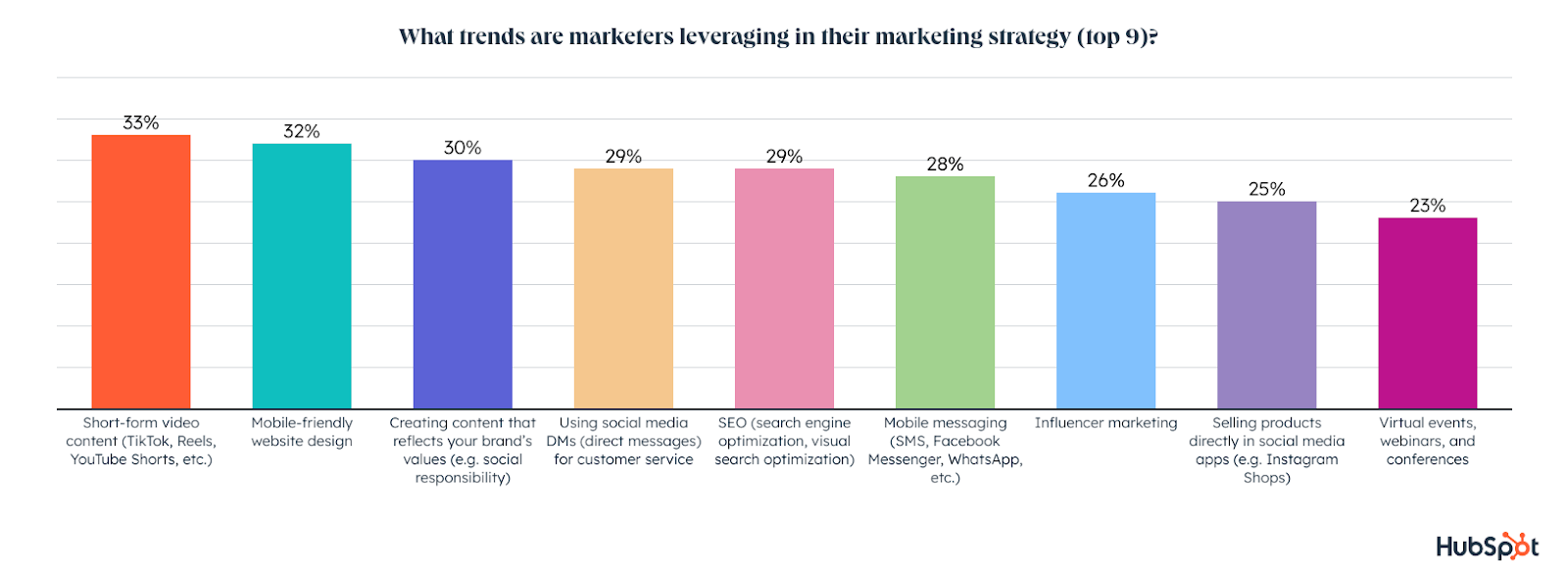
The top trends marketers are currently leveraging are short-form video, mobile-friendly web design, creating content that reflects their brand’s values, and using social media DMs for customer service. Not far behind are SEO, mobile messaging, influencer marketing, and selling products directly in social apps.

what trends are marketers leveraging

1. Short-form video will see the most growth in 2023

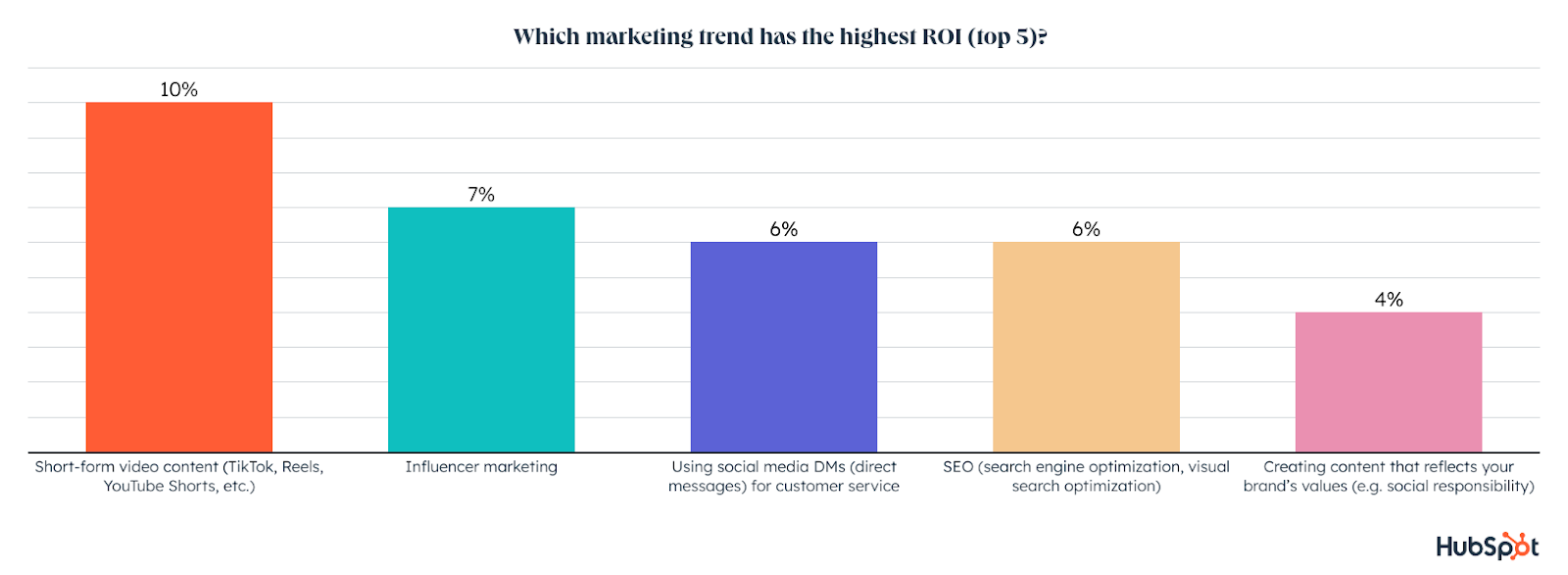
Not only is short-form video the most popular trend among marketers, with one-third using it, but it’s also the most effective and has the highest ROI. 

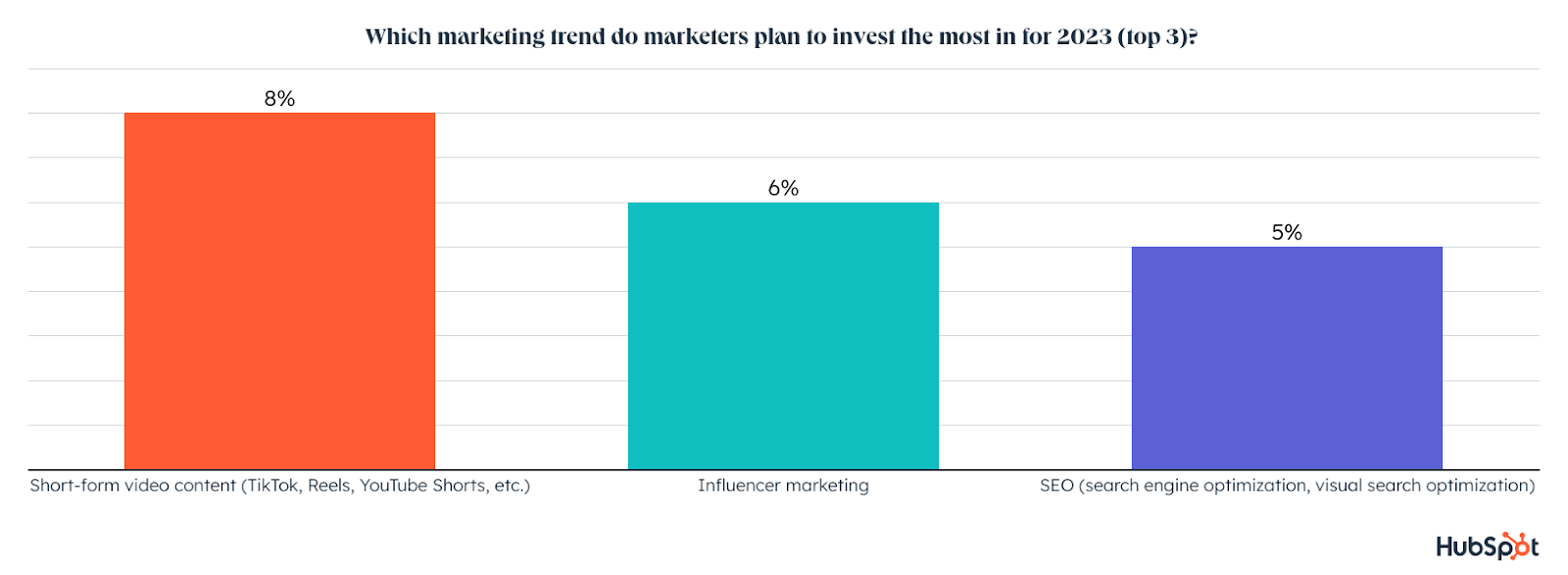
On top of all that, short-form video will see the most growth of any trend in 2023, with marketers planning to invest more in it than any other trend. 

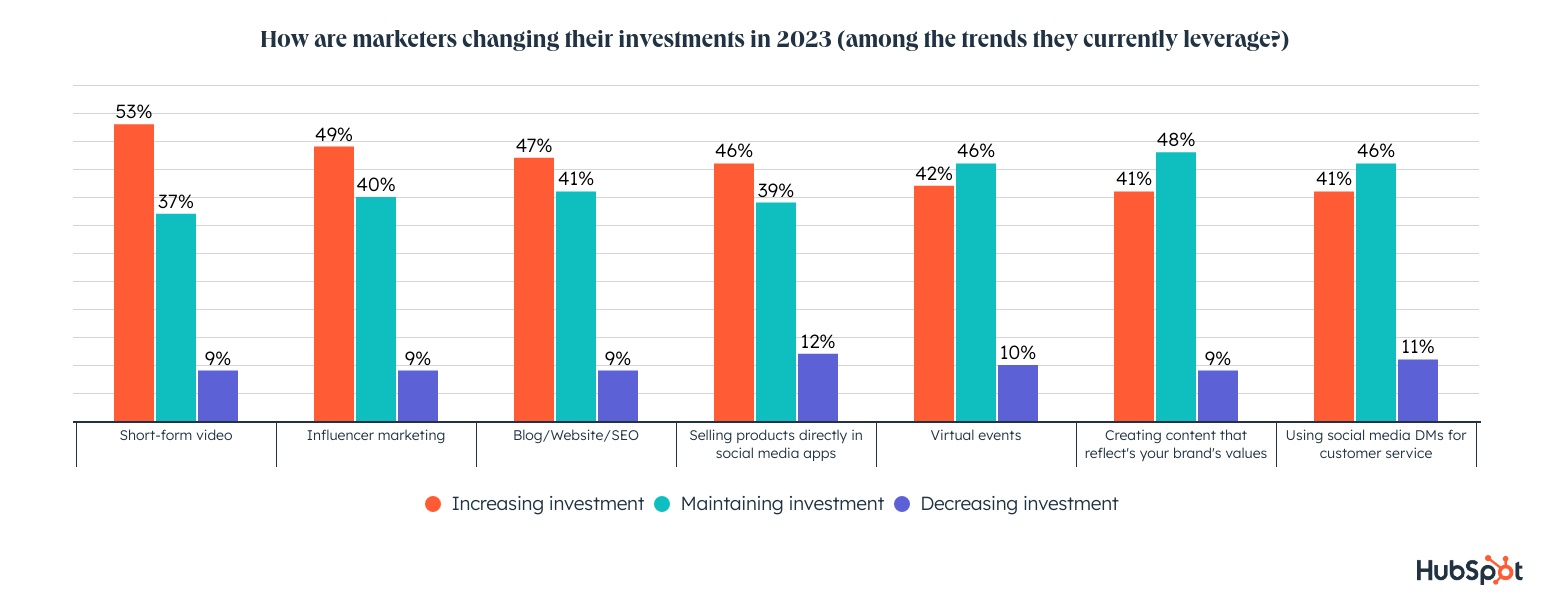
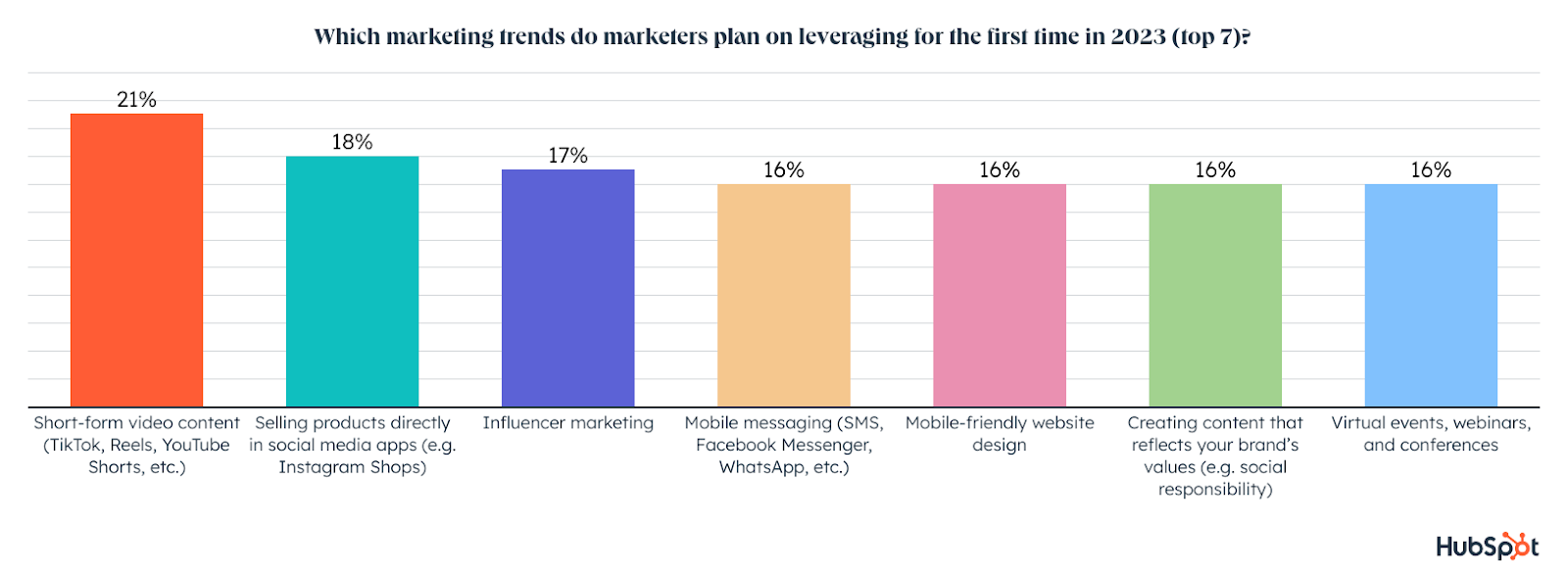
90% of marketers using short-form video will increase or maintain their investment next year, and 21% of marketers plan to leverage short-form video for the first time in 2023, also the highest of any trend.

which marketing trend has the highest ROI

2. Influencer marketing will continue to grow its high ROI.

Over 1 in 4 marketers currently leverage influencer marketing and it offers the 2nd highest ROI of any trend. Luckily it can be leveraged with short-form video to take advantage of both of the highest ROI trends at the same time!

Influencer marketing will also see significant growth in 2023 with 17% of marketers planning to invest in it for the first time, the 2nd highest of any trend. 

Influencer marketing also comes in second for the trend marketers plan to invest in more than any other in 2023 and 89% of marketers using it will increase or maintain their investment next year. 

which trend will marketers invest in

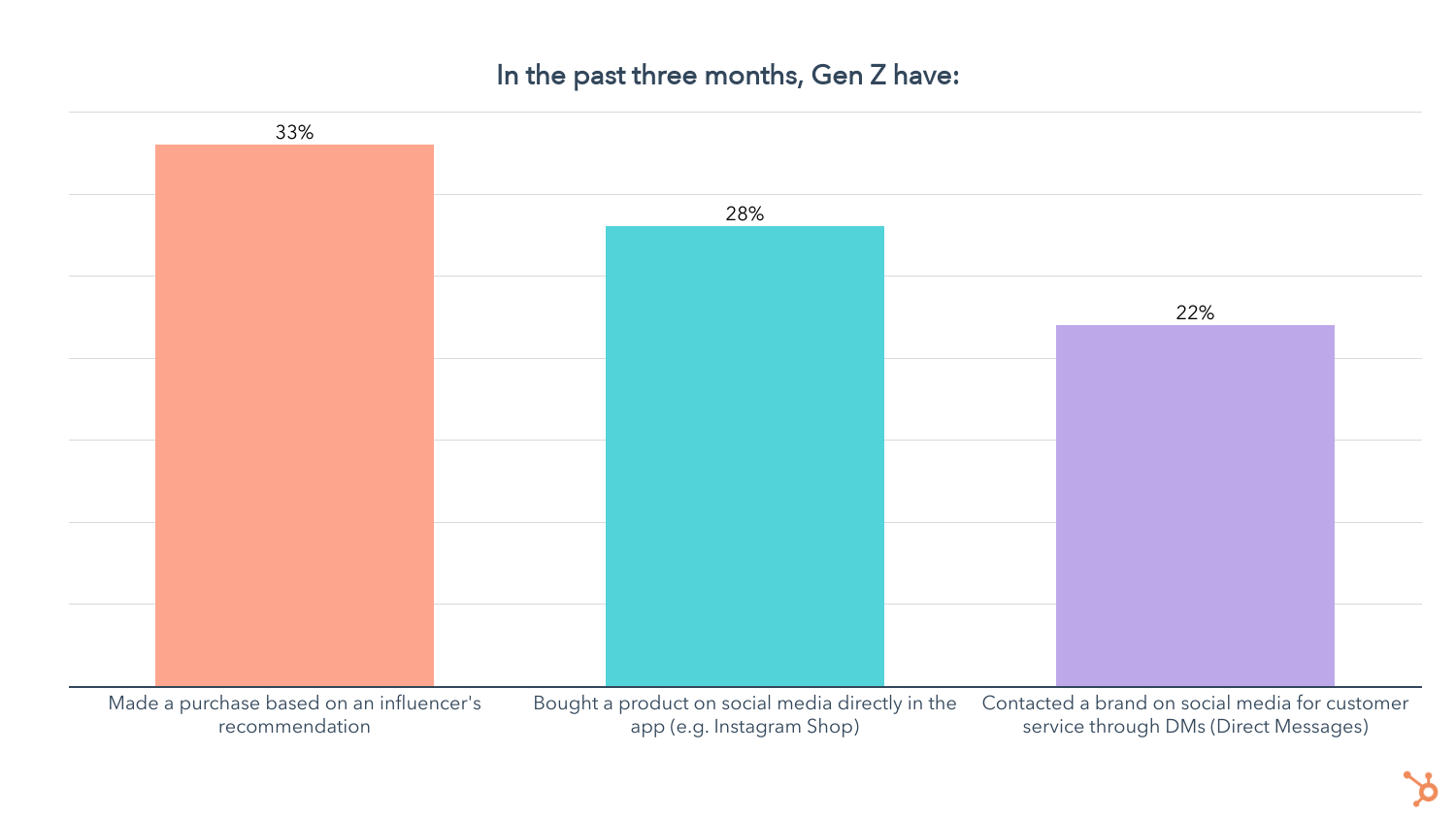
On top of all that, our consumer trends survey shows that 33% of Gen Zers have bought a product based on an influencer’s recommendation in the past three months. And when they’re making purchase decisions, Gen Z says influencer recommendations are more important than recs from their friends and family.

3. Branded social media DM tactics are growing.

Using social media DMs for customer service is relatively new, but already used by 29% of marketers. It has the 3rd highest ROI of any marketing trend and use will grow in 2023, with 15% of marketers planning to try it for the first time. 

On top of that, 87% of marketers using social media DMs for customer service will increase or maintain their investment in 2023.

As social media apps like Instagram, Twitter, and Facebook continue developing their e-commerce capabilities, providing customer service through DMs will only become more crucial.

Our Consumer Trends survey also found that over 1 in 5 Gen Zers and nearly 25% of Millennials have contacted a brand on social media for customer service in the past three months.actions gen z has done in the past 3 months

Using social media shopping tools is another growing, high ROI marketing trend that goes hand in hand with providing support through DMs, with almost 30% of Gen Z and Millennials having bought a product on social media in the past three months.

4. Website SEO continues to shine.

While not new, leveraging a blog with an effective SEO strategy continues to be a powerful tool, with 29% of marketers using a website to attract and convert leads. 

Leveraging SEO ranks #4 in terms of ROI and effectiveness and 88% of those who use it will increase or maintain their investment in 2023. 

When it comes to the trend marketers will invest the most money in for 2023, SEO ranks third behind short-form video and influencer marketing.

most effective marketing trends

5. Marketers will continue to humanize their brands.

30% of marketers are currently creating content that reflects their brand’s values, making it the third most popular trend right now.

It has the 5th biggest ROI of any trend and will see growth in 2023. 16% of marketers plan to leverage content that reflects their brand’s values for the first time in 2023, and 89% of those already investing in it plan to increase or maintain their investment.

6. Marketers will benefit from data in 2023.

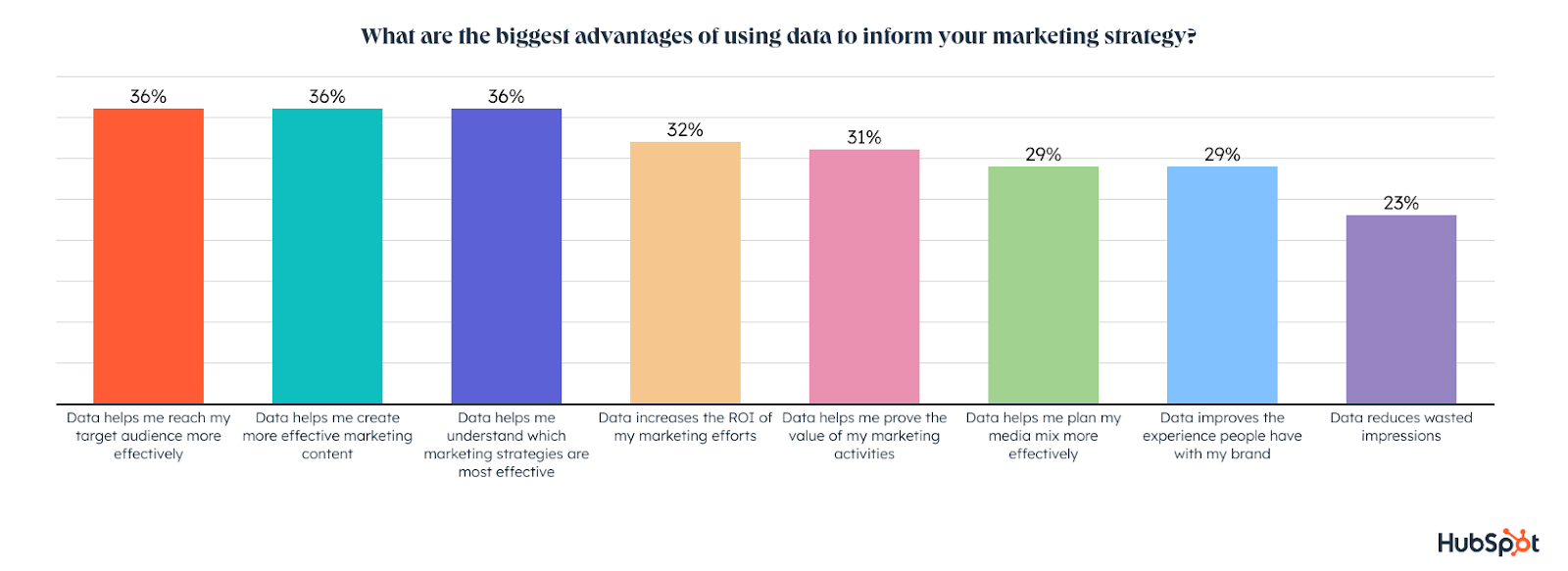
As we discussed above, we believe that data-driven marketers will win in 2023. After all, some of the biggest advantages marketers get from using data to inform their marketing strategy are that data helps them reach their target audience more effectively, create more effective marketing content, understand which marketing strategies are most effective, increase the ROI of their marketing efforts,  and prove the value of their marketing and activities.

biggest advantages of data-informed strategies

Which Marketing Trends Will Grow in 2023?

Short-form video, selling products directly in social apps, and influencer marketing will see the most first-time use by marketers in 2023.

first-time marketing trends

Which Trends Could Marketers Leave Behind?

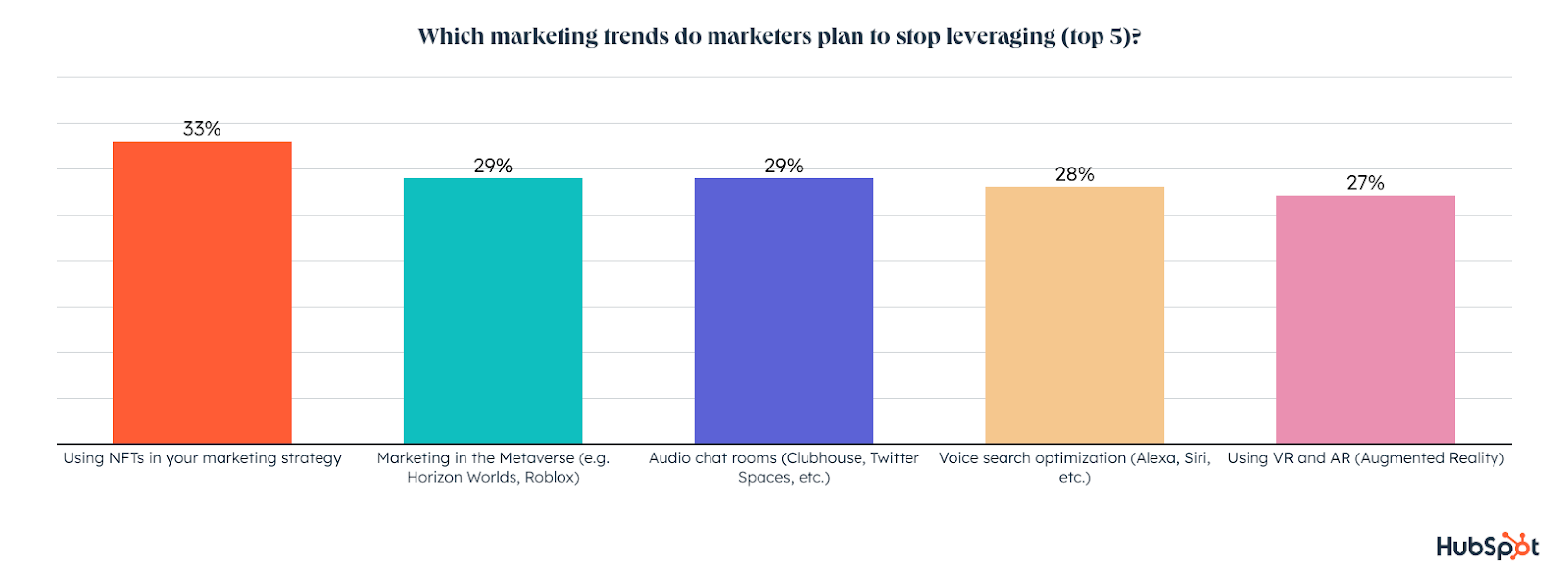
Now let’s take a look at the trends marketers are going to stop leveraging in 2023. 

One in three marketers plan to stop using NFTs and 29% plan to cut out marketing in the metaverse and audio chat rooms in 2023. Voice search optimization and VR/AR are also at the top of the list of trends marketers plan to stop using next year.

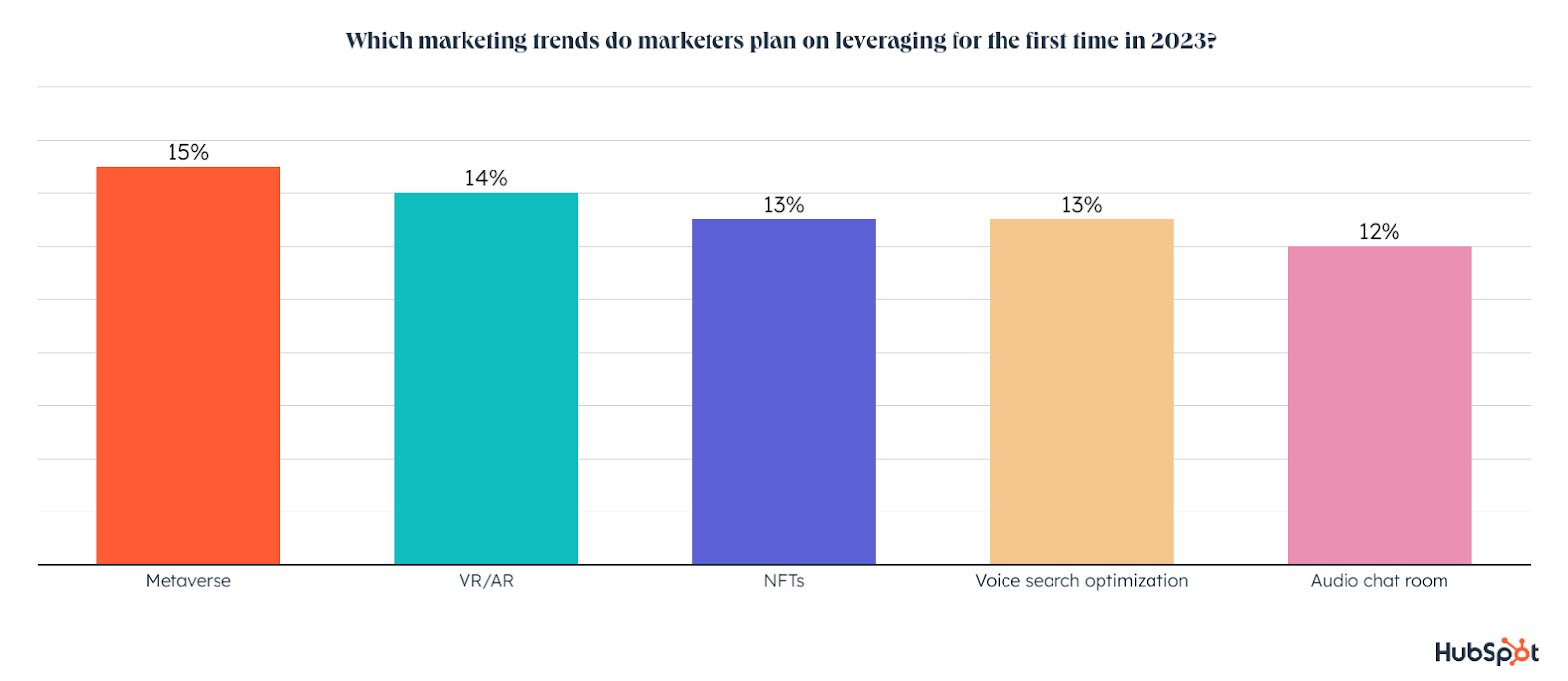
While that may seem bleak, there are plenty of marketers who plan on exploring these same trends for the first time in 2023:

For a breakdown of everything brands need to know about consumers and the metaverse, check out this report from our recent consumer trends survey.
Next, let’s look into the top marketing channels for this year and 2023.

The Top 3 Marketing Channels of 2023

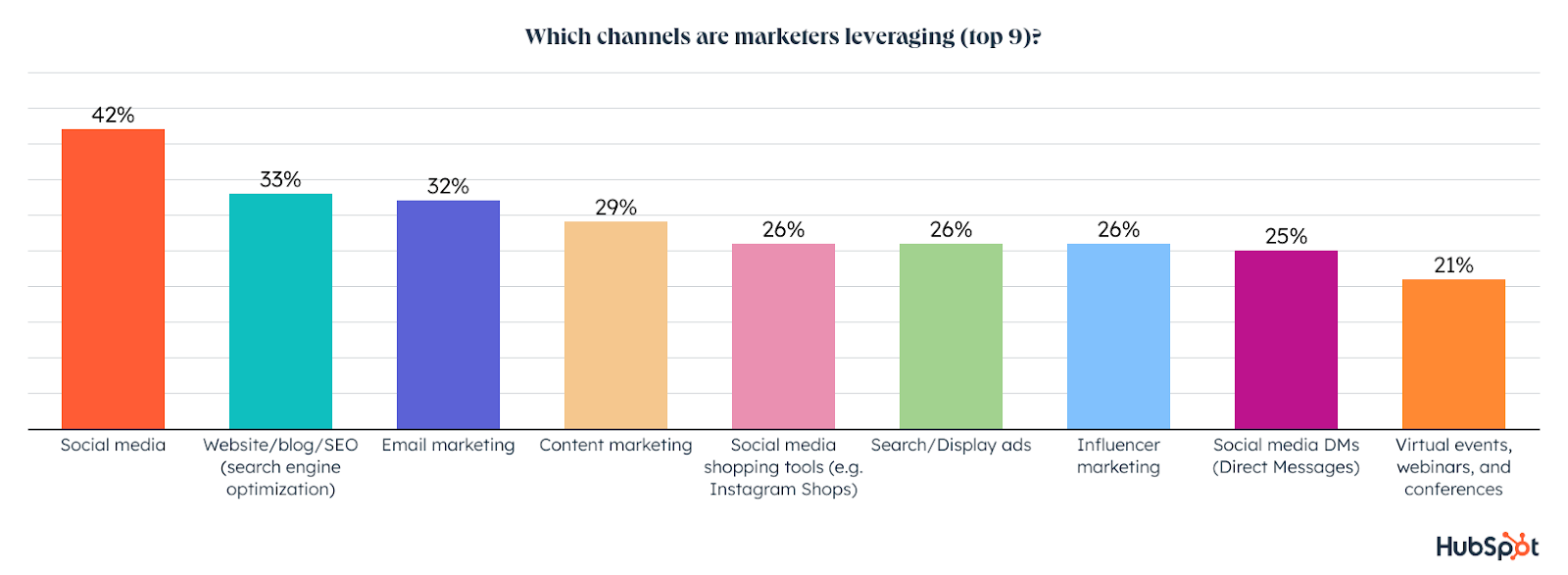
Marketers leverage an average of four different marketing channels in their role. Social media is used by over 42% of marketers, making it the #1 channel marketers are currently leveraging. It also has the highest ROI of any channel and will grow significantly in 2023. Additionally, one in four marketers say they use social media shopping tools.

top marketing channels

One in three marketers are leveraging their own blog or website, as well as SEO, to land on SERPs. Meanwhile, 32% use email marketing.

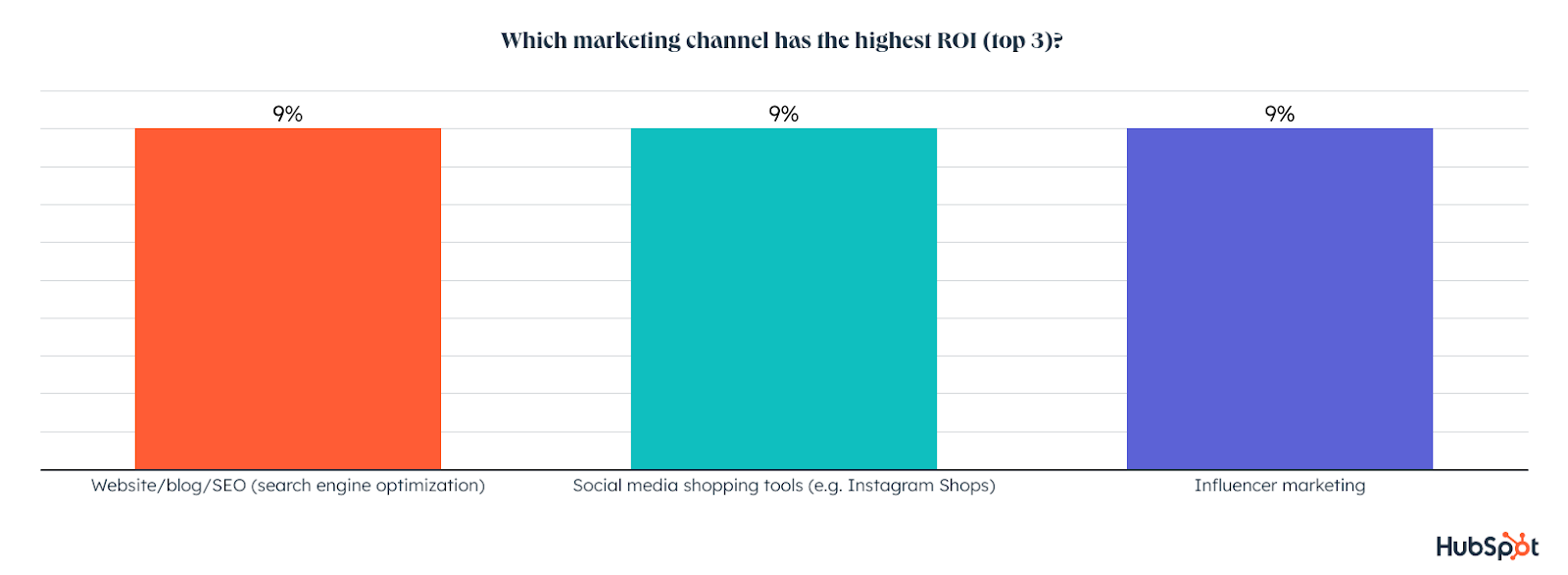
Blogs, social media shopping tools, and influencer marketing are neck and neck for the highest ROI of any marketing channel.

Since social media is far and above the top marketing channel, let’s dive into which social media platform is the most effective.

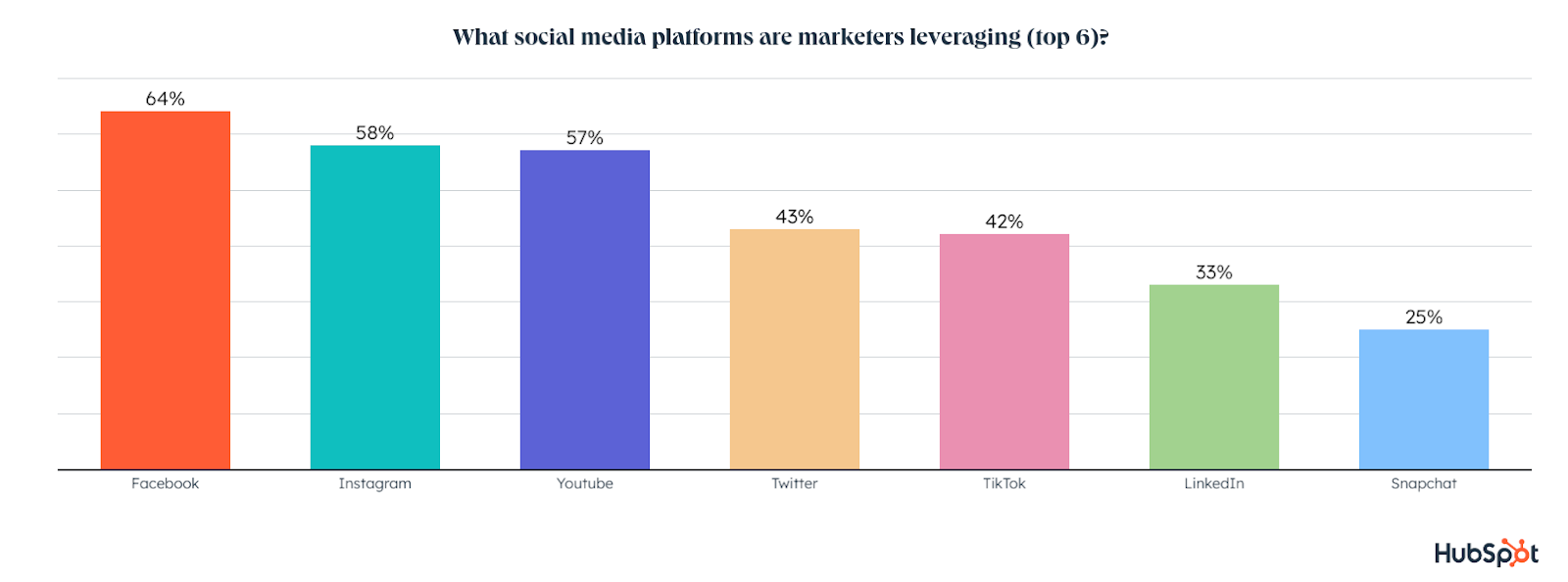
Marketers leverage an average of four social media platforms in their roles. Facebook is the most used social media platform, leveraged by 64% of marketers, followed by Instagram (58%), YouTube (57%), Twitter (43%), TikTok (42%), and LinkedIn (33%).

top social media marketing channels

Now that we’ve looked at what both general and B2B marketers use most often, let’s take a look at each platform more in-depth (in order of their general-marketer popularity) and see how they stack up against one another.

1. Facebook leads in ROI, though other apps will see more growth

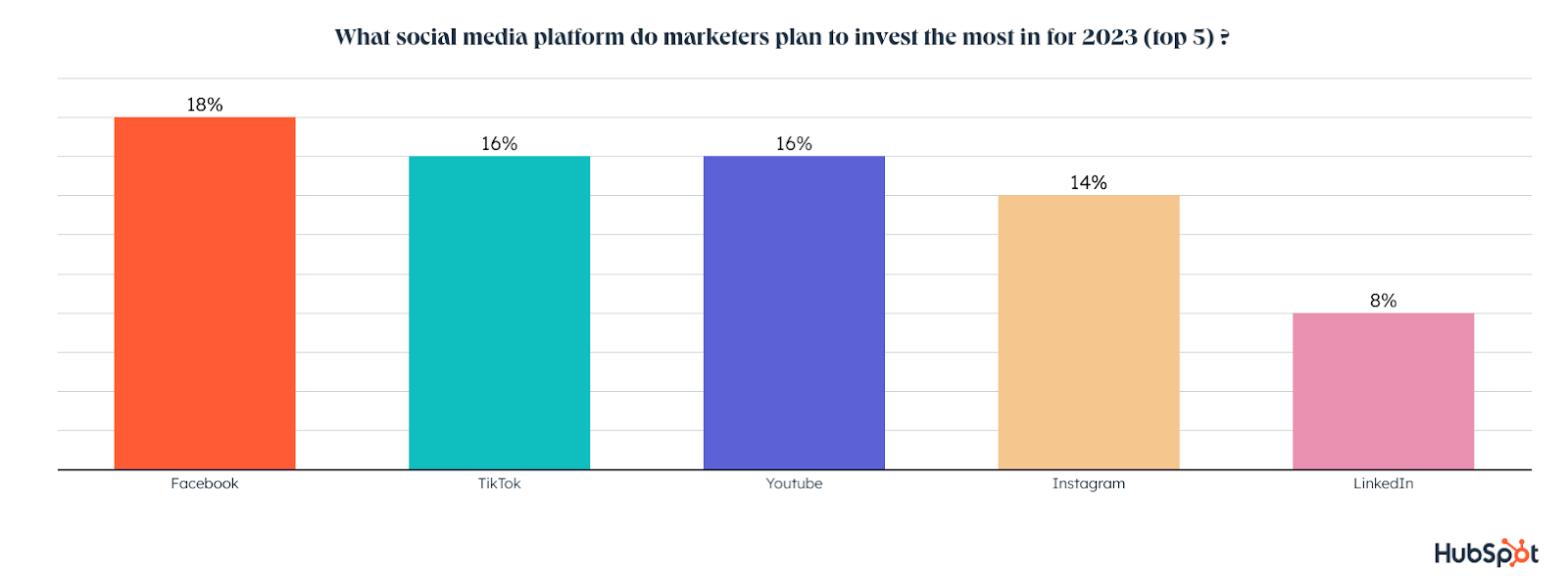
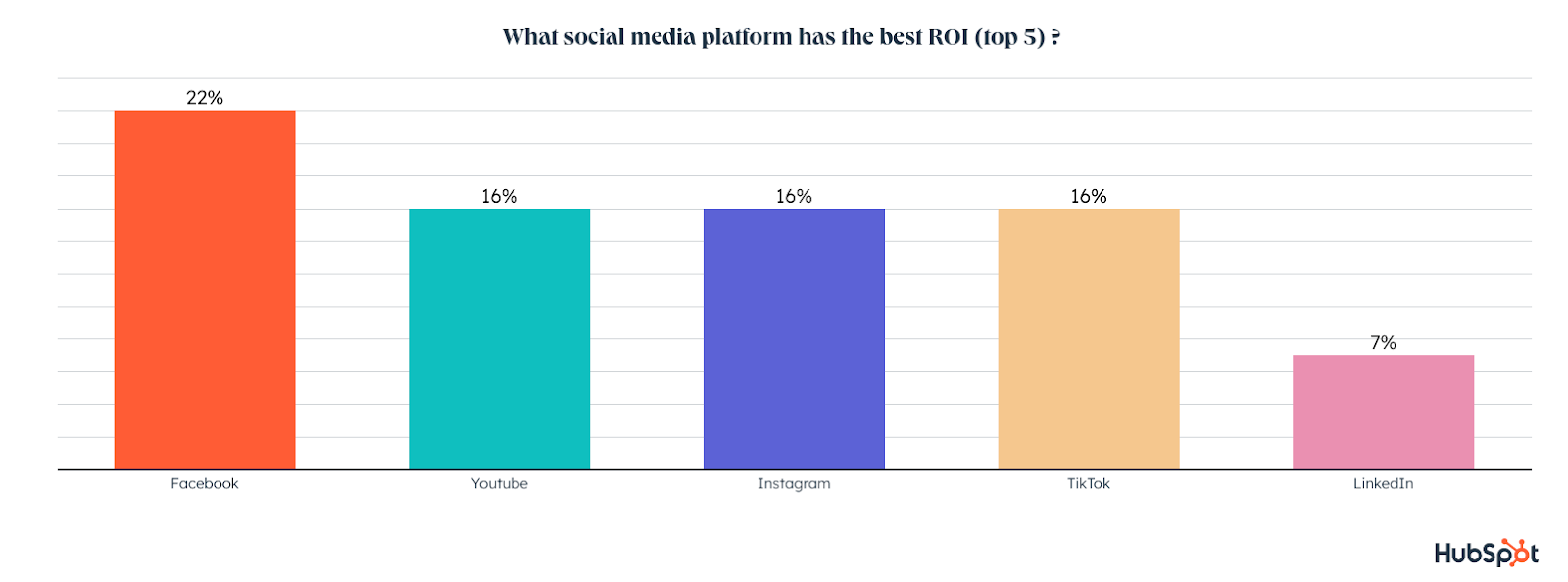
Facebook is not only the most used social media platform among marketers but also offers the highest ROI. Facebook is the channel marketers plan to invest the most in for 2023, higher than any other channel. 

While nearly 25% of marketers plan to invest in Facebook for the first time in 2023, this growth is slower than other apps like YouTube, Instagram, TikTok, and Twitter will see next year.

2. YouTube will see the most growth of any platform in 2023

YouTube’s currently used by 57% of marketers and ties for 2nd in ROI with YouTube and TikTok. 

YouTube will see the most growth of any platform in 2023, with 91% of those using it planning to increase or maintain their investment. At the same time, 29% of marketers plan to try YouTube for the first time, the highest of any social app. 

what social media platforms will marketers invest in

3. Instagram is #2 for ROI and will see high first-time use in 2023

Instagram is used by 58% of all marketers, the 2nd highest of any platform. It also ties in 2nd for ROI with YouTube and TikTok and will see significant growth in 2023.

14% of marketers will invest more in Instagram than any other platform in 2023, and 29% of marketers plan to try Instagram for the first time next year.

4. Over half of marketers eye TikTok for future investments.

TikTok has quickly become much more than just a trendy social app which was once primarily used by Gen Z, and marketers are taking heavy notice. 

TikTok is used by 42% of marketers and ties for 2nd with YouTube and Instagram as a top ROI-generating platform. 

TikTok will only continue to see growing brand interest in 2023, with 56% of those using it planning to increase their investment next year, the highest increase of any social media app, while 34% plan to maintain their current investment.

how are marketers changing their investments in 2023

On top of the points above, 26% of marketers plan to use TikTok for the first time in 2023, while 16% of marketers will invest more in the app than any other next year.

With TikTok, a solid B2C platform, seeing such high marketing growth, you might wonder how the top platforms compare when analyzing B2B and B2C markers. Let’s take a quick look.

B2B vs. B2C Social Media Marketing Data

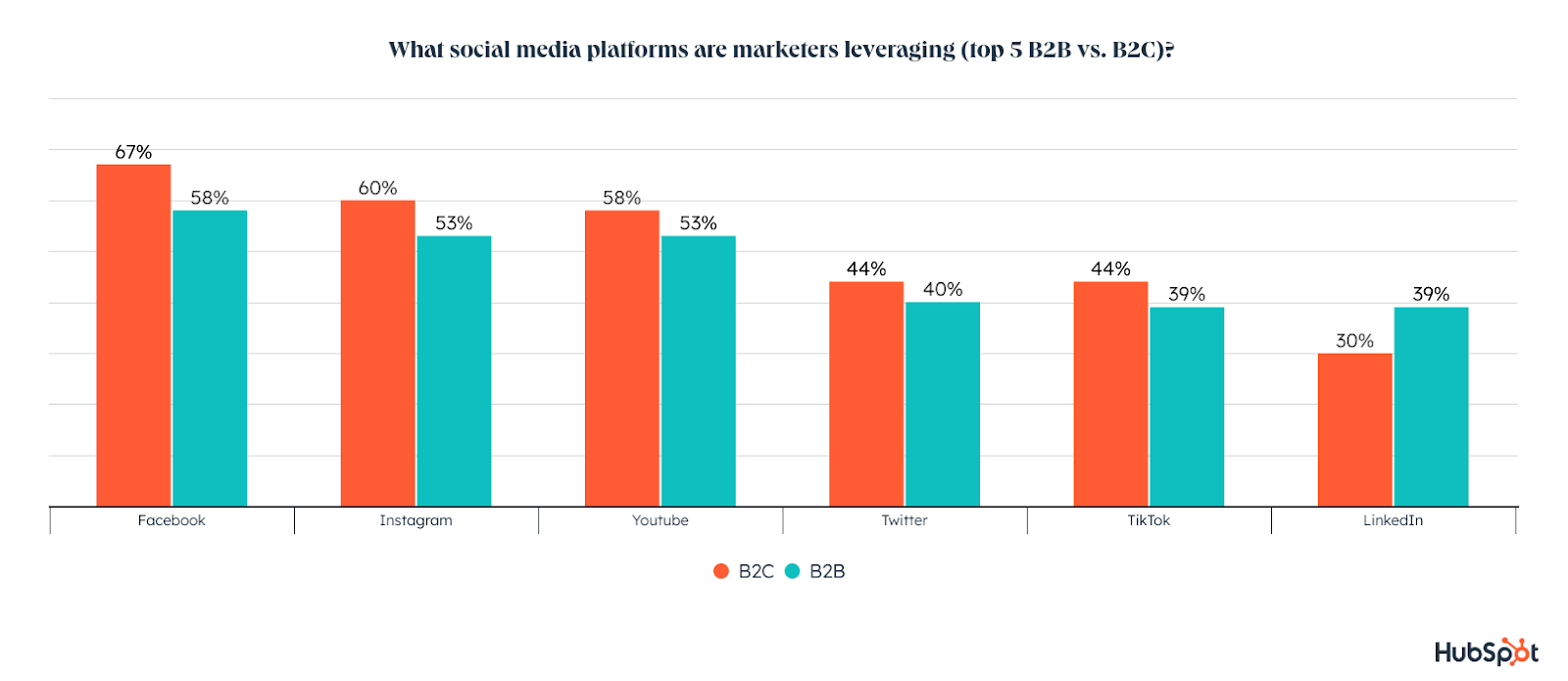
In terms of which platforms they use, both B2B and B2C marketers look very similar, with the biggest difference being that B2B marketers are more likely to use LinkedIn:

what social media platforms are marketers leveraging

That might not be surprising, but does LinkedIn actually offer B2B marketers a better ROI than other platforms? 

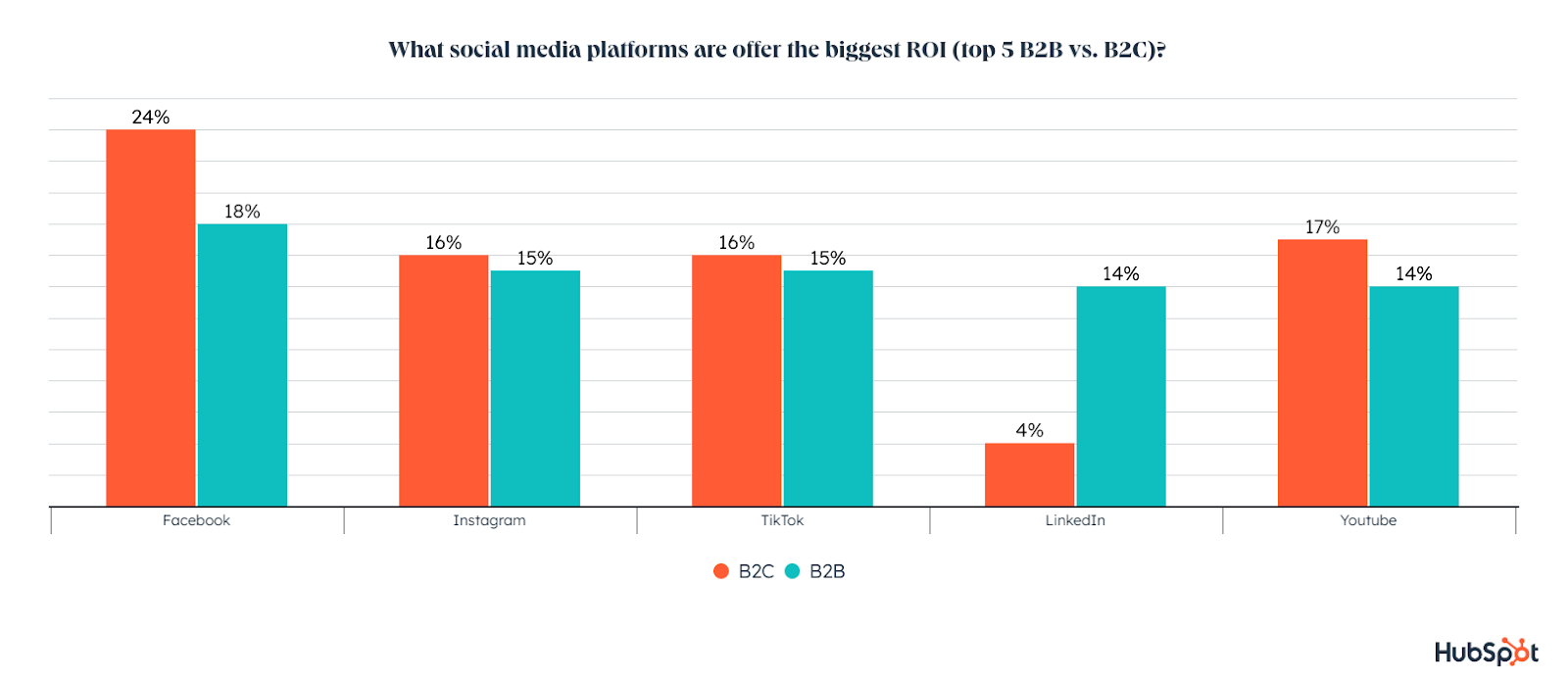
Just 14% of B2B marketers using LinkedIn say it gives them the highest ROI of any platform. That’s a lower percentage than Facebook, Instagram, and TikTok.

what social platforms have the biggest ROI

How Marketers Share Content on Social Media

Since marketers are using so many social media apps at once, you may be wondering if they are tailoring their content to each one, or just sharing the same content across the board. 

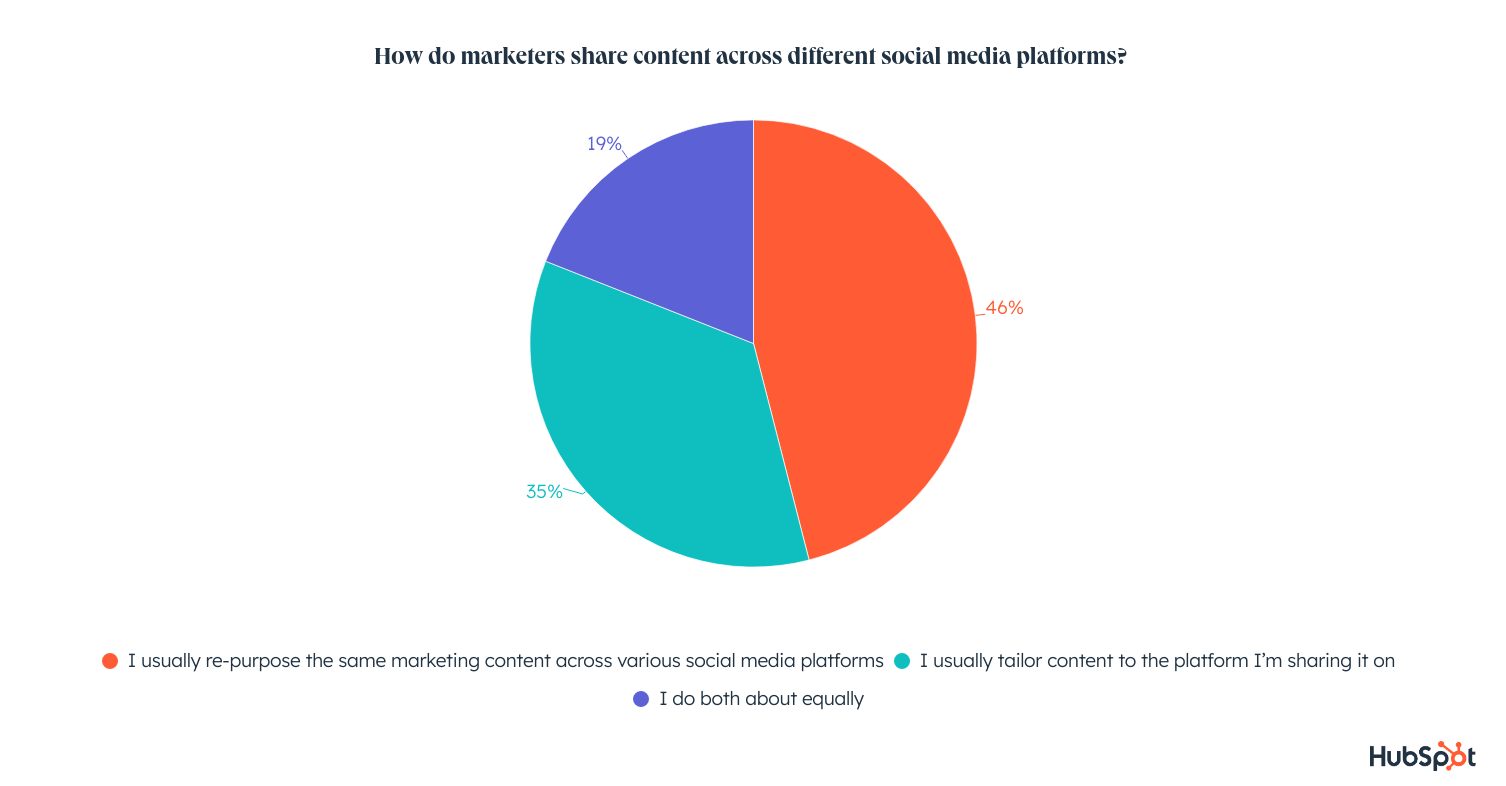
It turns out that almost half of marketers re-post the same exact content across various social media platforms, while 35% tailor it to fit each app and 19% do a bit of both. 

how marketers share content across different social media platforms

The Biggest Social Media Marketing Challenges

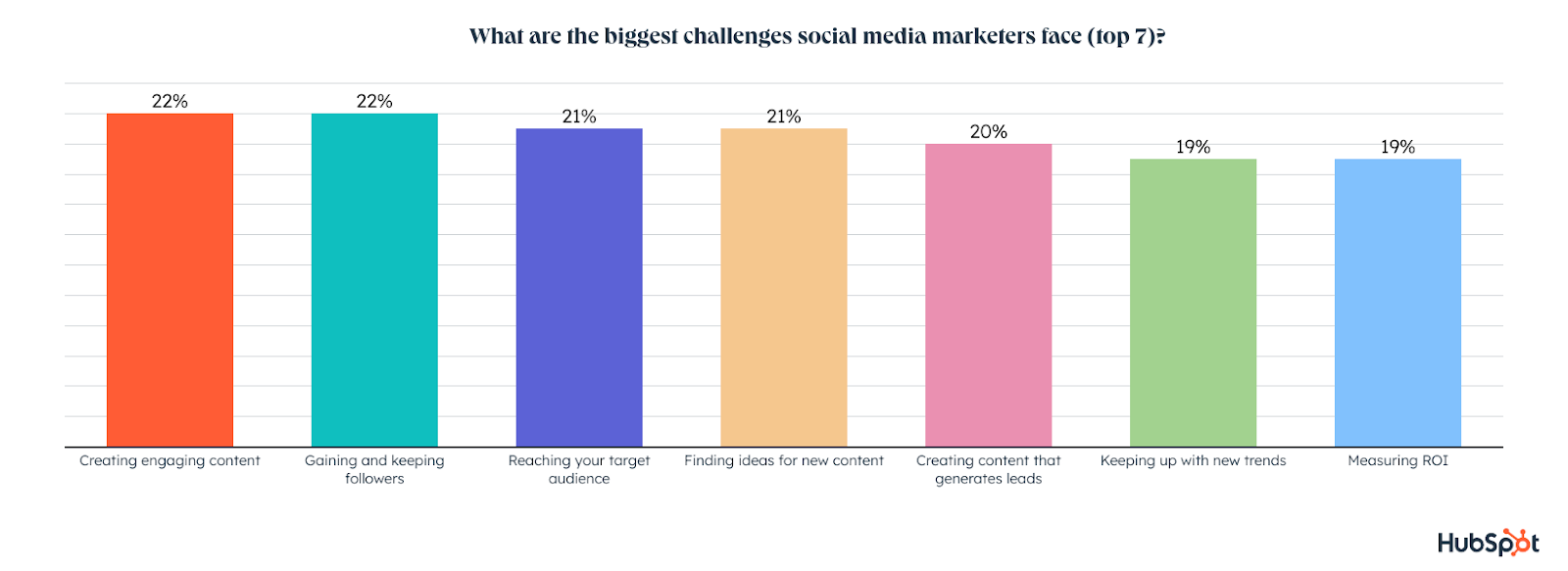
The top challenges social media marketers face are creating engaging content, gaining and keeping followers, reaching their target audience, finding ideas for new content, generating leads, keeping up with trends, and measuring ROI.

biggest social media marketing challenges

Now that we’ve talked all about the top trends, channels, and social platforms, we can take a look at which media formats marketers are most effective.

In the coming month, we’ll be diving deeper into these themes by surveying more global social media marketers about all the specifics related to their roles. Stay tuned as we’ll continue to publish findings from our additional research.

Which Media Formats are Marketers Leveraging?

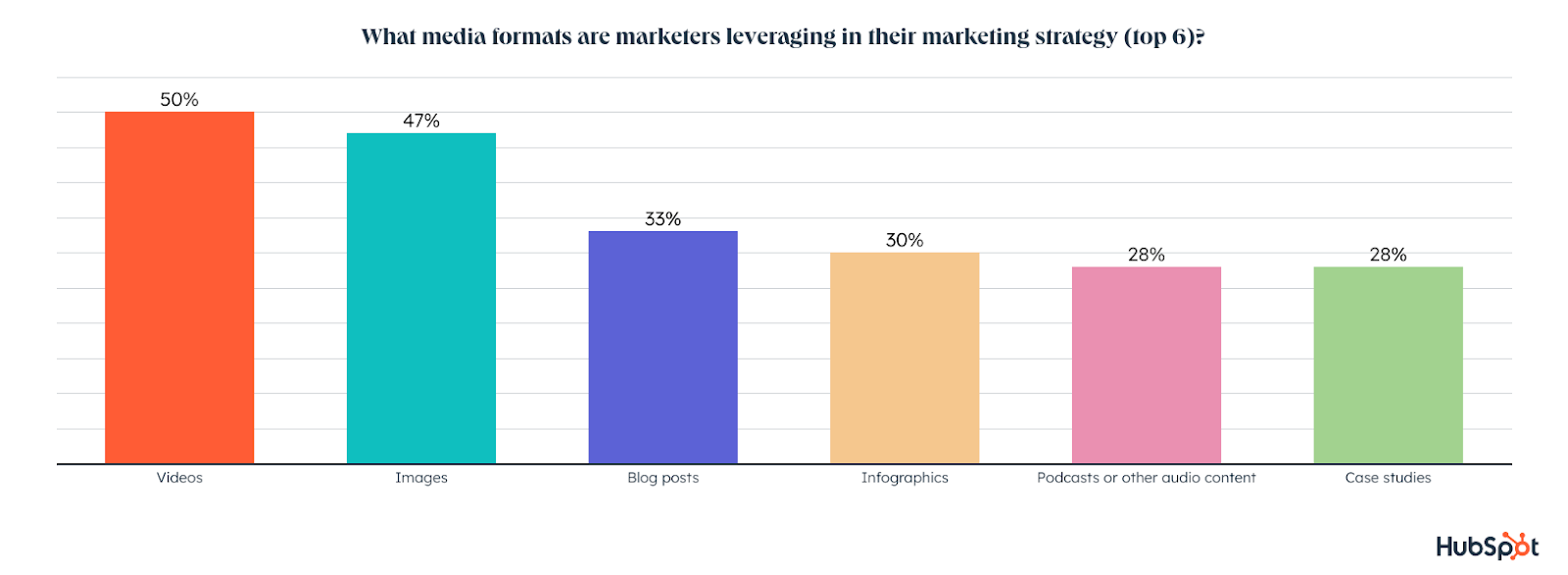
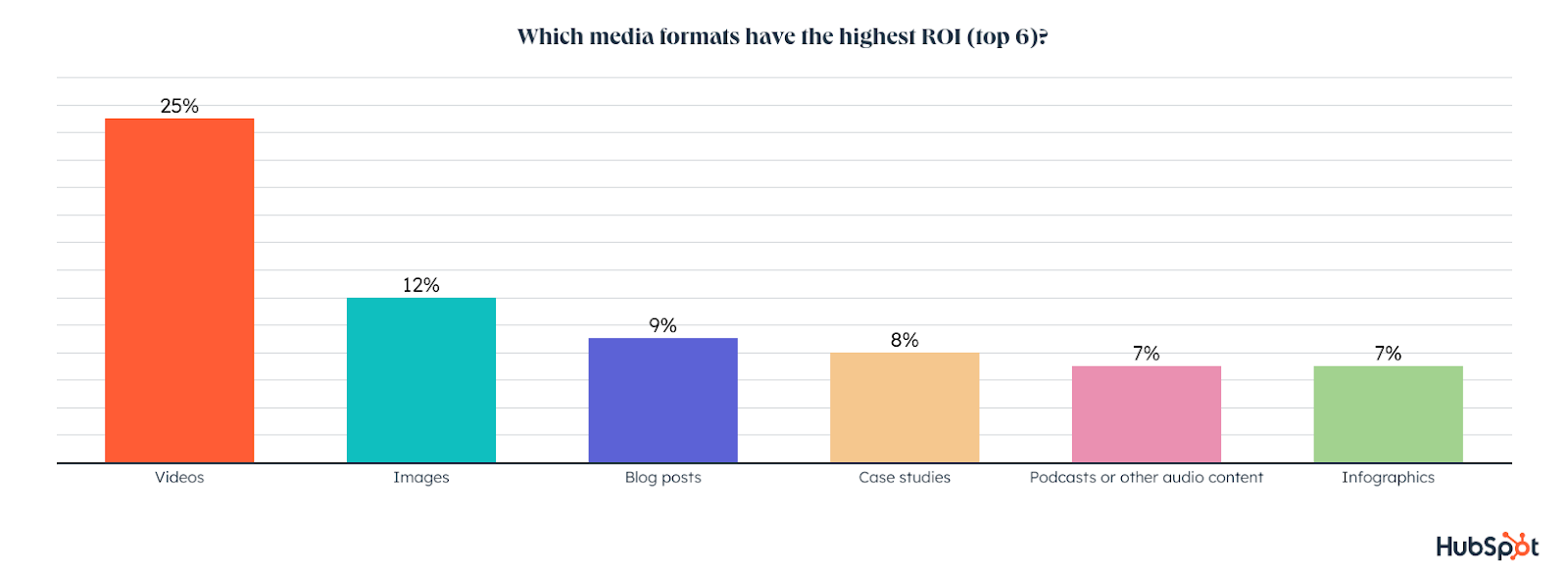
Half of marketers are using videos, with 47% leveraging images, followed by 33% posting blogs articles, infographics (30%) and podcasts or other audio content (28%).

Video has the highest ROI of any media format by far, followed by images, blog posts, and podcasts or other audio content.

which media formats have the highest ROI

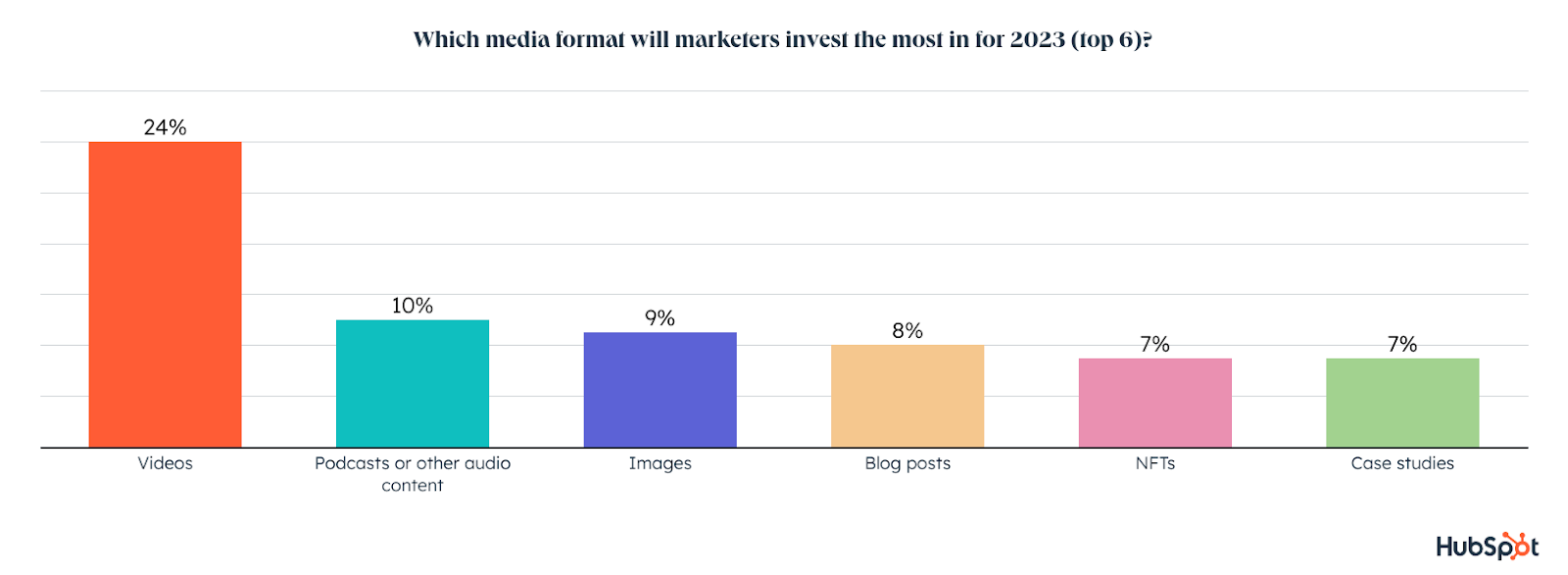
Use of video will grow significantly in 2023, with 24% of marketers planning to invest more in video than any other media format. Podcasts will see the 2nd highest investment, with 10% of marketers investing more in audio content than any other media format.

which media formats will marketers invest in in 2023

Video will also grow the most among first-time users in 2023, with 1 in 3 planning to try leveraging video next year. Images (29%), blog posts (26%), interview (25%), and podcasts (24%) will also see high first-time use among marketers in 2023. 

which media formats will marketers leverage for the first time

You might also be wondering how often marketers publish content across these formats. 

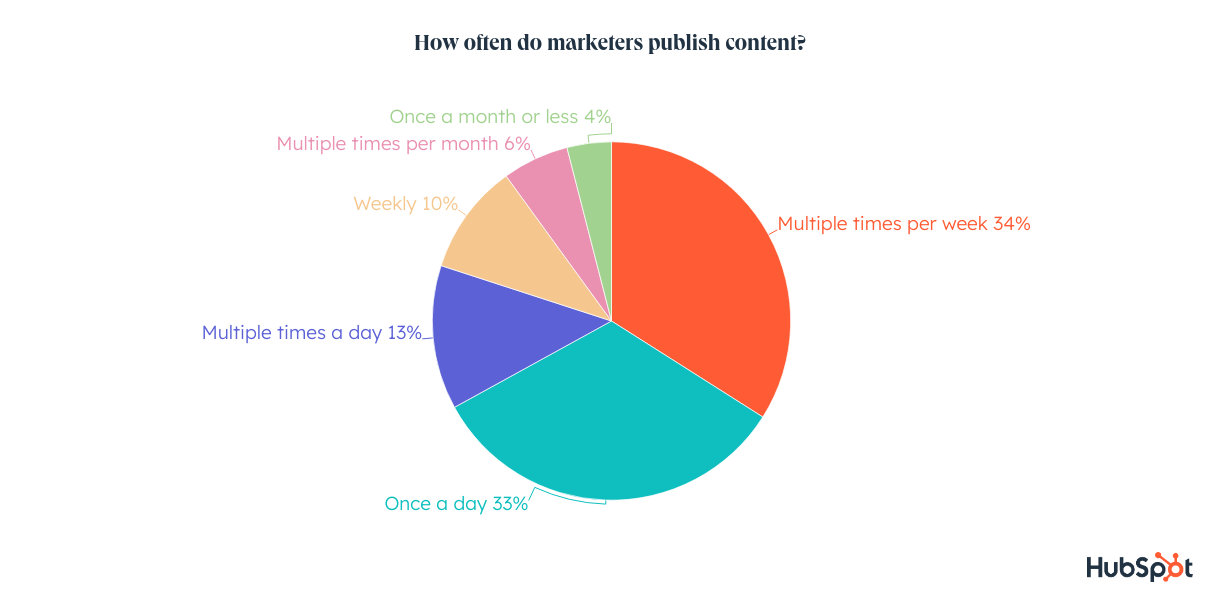
One-third of marketers publish content a few times a week, while another third publish daily. Just 13% of marketers put out content multiple times a day.

how often do marketers publish content

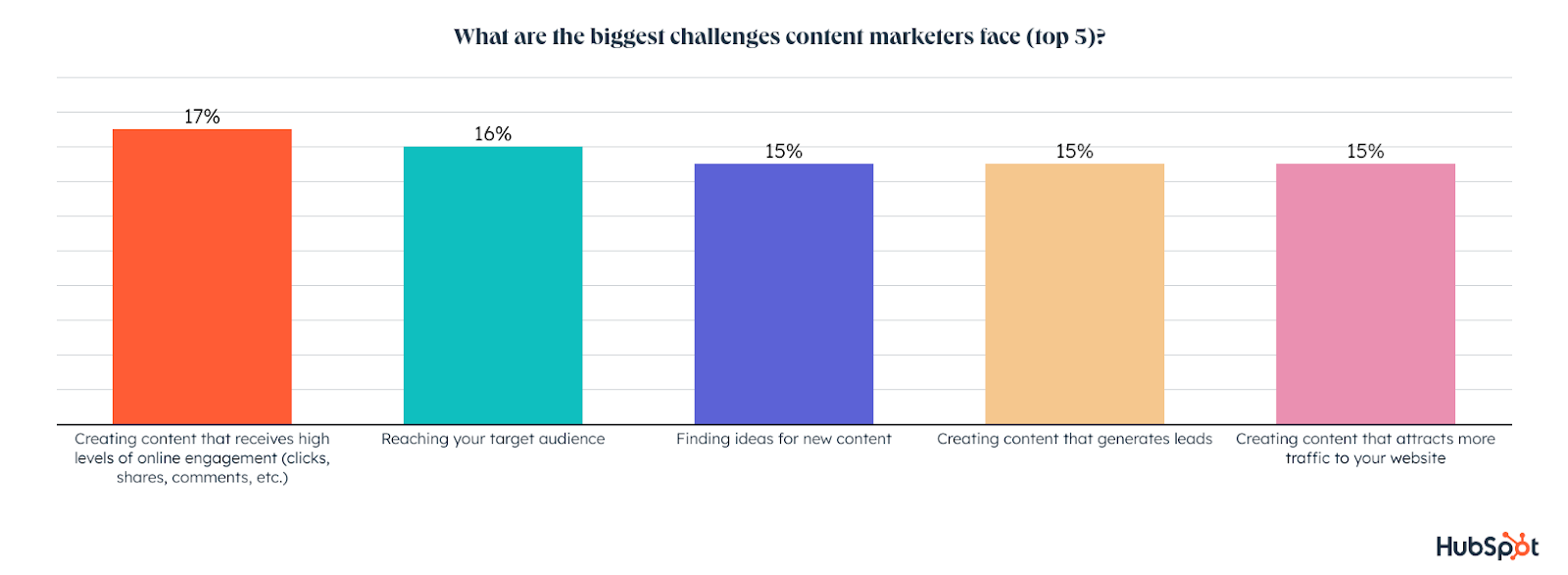
We also asked content marketers about the biggest challenges they face with their content strategy. Content marketers are currently struggling most with creating content that gets high levels of engagement, reaching their target audience, finding ideas for new content, creating content that generates leads, and creating content that attracts traffic to their website. 

What are the Top Challenges Marketers Face?

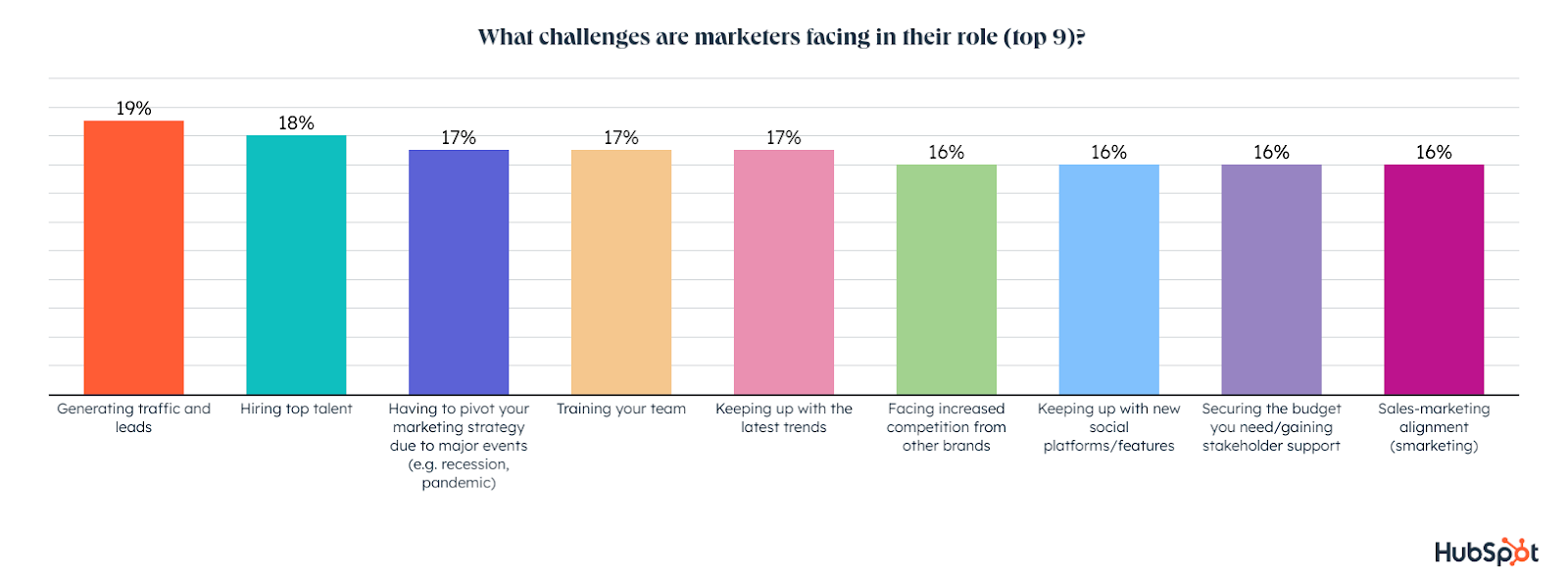
The top challenges marketers are facing are generating traffic and leads, hiring top talent, pivoting their marketing strategy, training their team, keeping up with the latest trends, and increasing competition with other brands. 

top marketing challenges

While we ran this survey in late 2022, these challenges are fairly consistent with what marketers cited in the research we did for our State of Marketing Report, which you can download for free here.

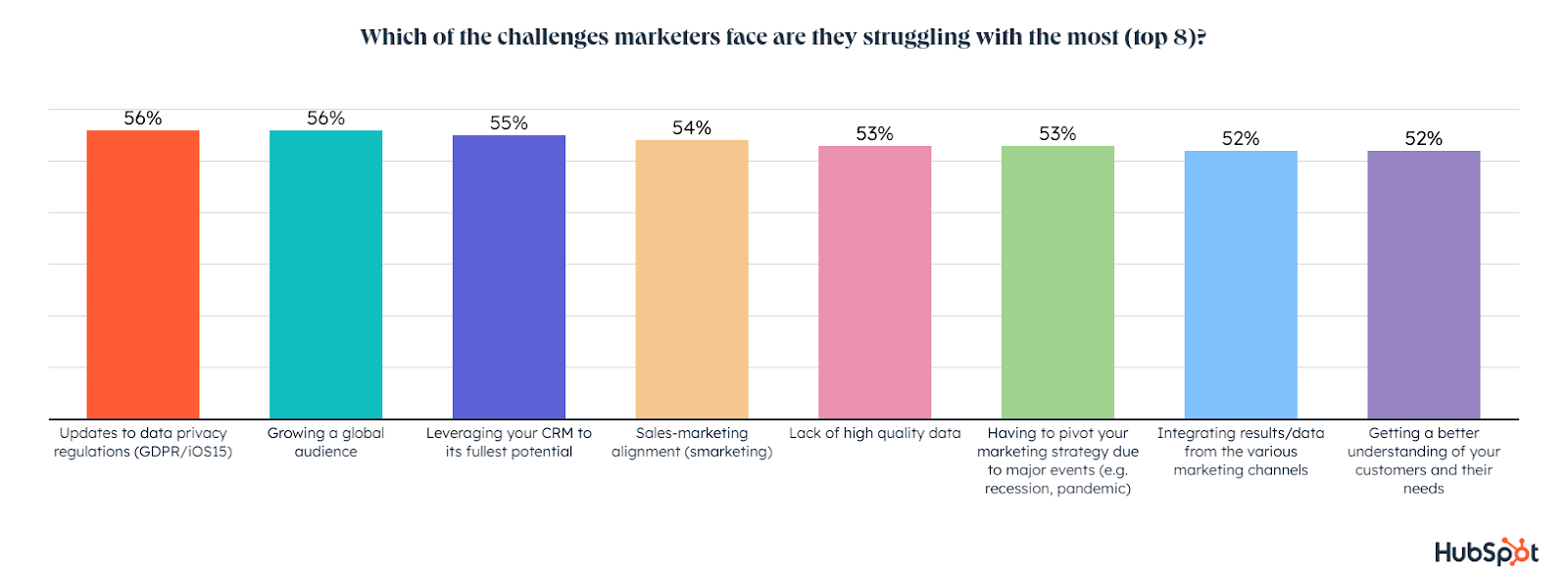
Of the challenges marketers face, those they struggle with most right now are:

  1. Updates to data privacy regulations, 
  2. Growing a global audience, 
  3. Using their CRM to its fullest potential
  4. Sales/marketing alignment
  5. A lack of high-quality data

challenges marketers struggle most with

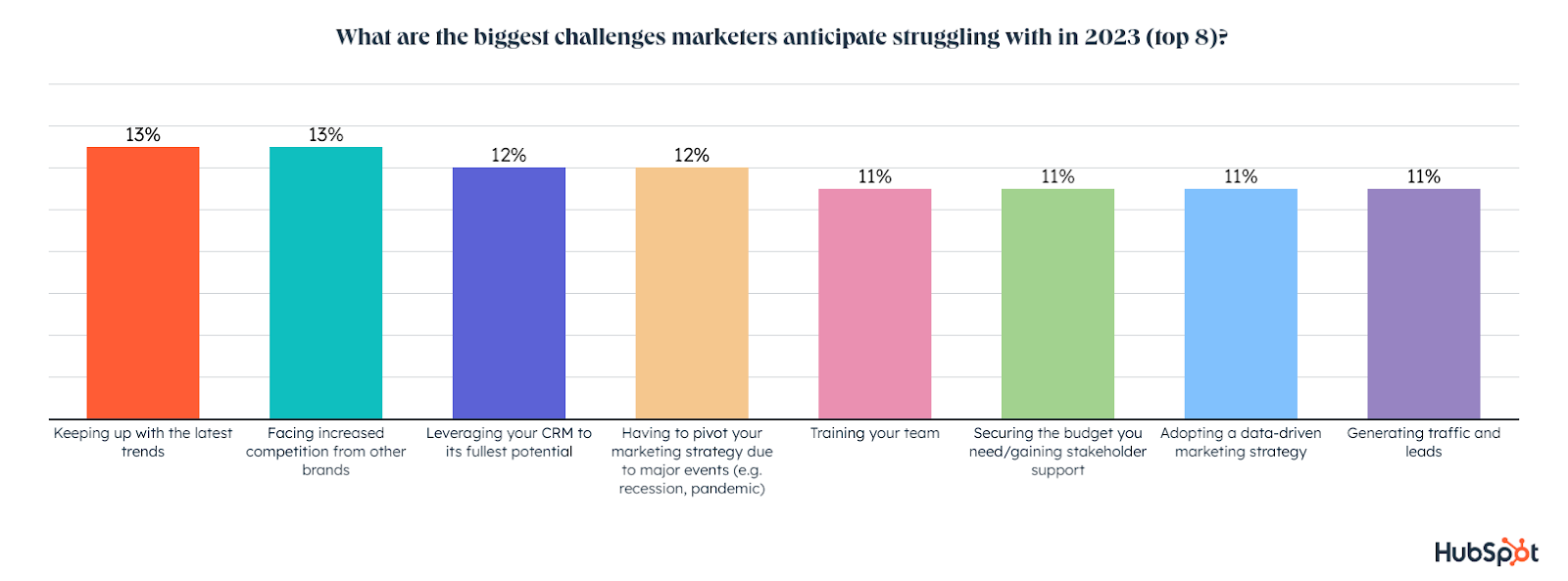
When it comes to the biggest challenges marketers anticipate in 2023, keeping up with the latest trend tops the list, followed by increased competition, leveraging their CRM to its fullest potential, and having to pivot their marketing strategy.

Key Theme: Marketers Still Struggle to Understand Target Audiences

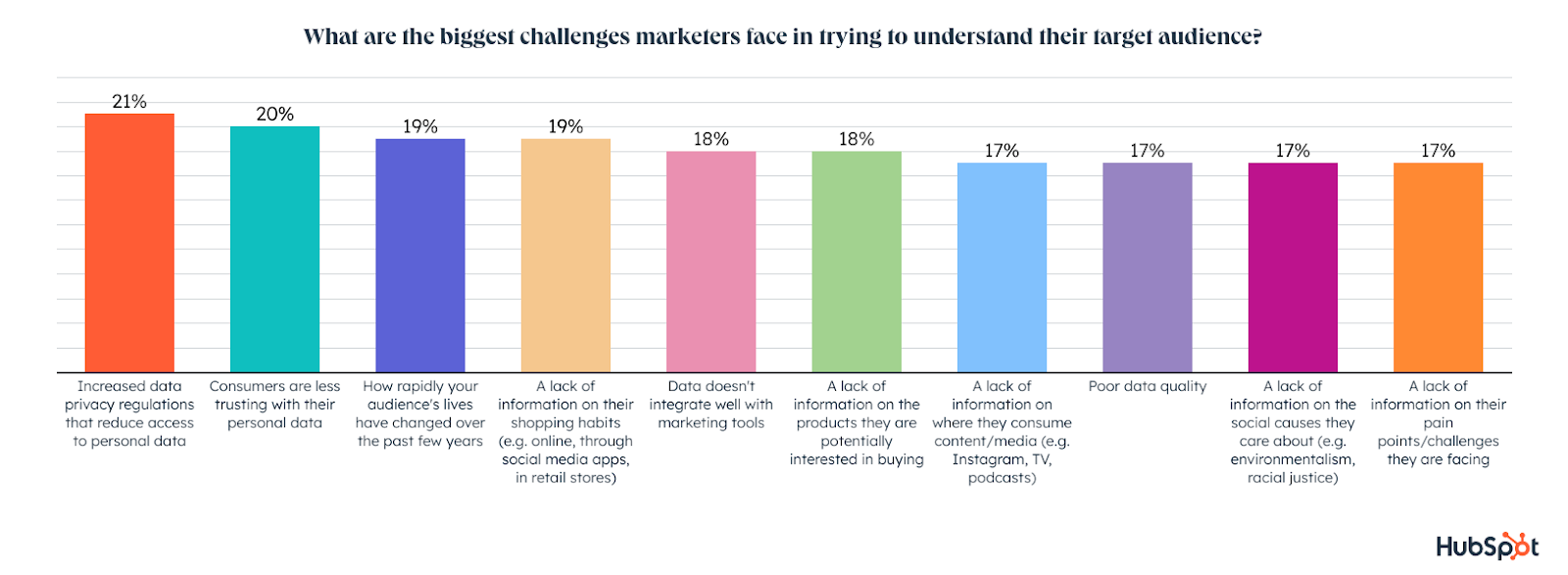
What’s stopping marketers from having the data they need on their target audience? 

The biggest challenges involve data privacy regulations, consumers being less trusting with their personal data, how fast their audiences evolve,, a lack of information on their shopping habits, and the technological issues and learning curves that come with collecting data.

biggest data-driven marketing challenges

If marketers are able to collect data with the tools and technology they have, data privacy regulations and consumer distrust in sharing personal data can cause marketers to miss critical information.  On top of that, poor data quality caused by these and other impacts noted above, can make it harder to keep up with the rapid changes happening in your targets’ lives.

While we surveyed general marketers for this portion of the report, we also did a follow up survey to learn about the key challenges and pain points executive and director+ marketing leaders are expecting to face. Check out this post, from our Act Like a Leader, Think Like a Leader blog series (fully launching Nov. 1), which includes tips from marketing execs and experts at companies like Microsoft, HubSpot, Help Scout, ZoomInfo, Sprout Social, and more.

Act Like a Leader, Think Like a Leader: Executive Data Blog Series

Let’s dive more into how they performed in 2022 and how it compares to the data we collected earlier for our State of Marketing Report.  If you want to dive deeper into the challenges we’ve discussed above, check out this post.
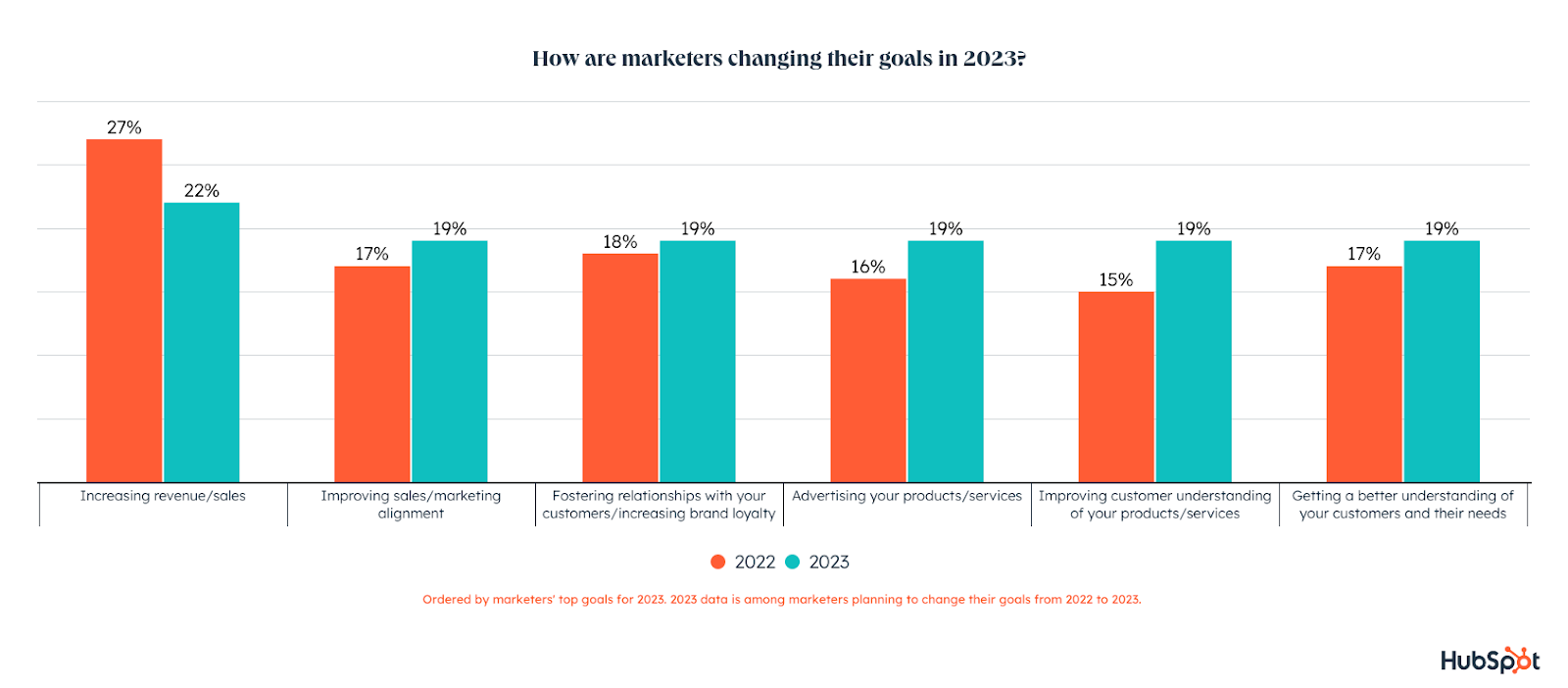
In 2022, marketing goals revolved around increasing revenue/sales (27%), improving the customer experience (22%), boosting brand awareness/reaching new audiences (20%), as well as increasing engagement, and strengthening brand loyalty through customer relationships (18%). 

Marketers also focused their 2022 strategy on better understanding their customers, growing their social media following or community, and improving sales-marketing alignment. 

But in 2023, half of marketers say these goals will change.

For those marketers making a pivot, increasing revenue/sales still tops the list, but the focus will shift to improving sales/marketing alignment, fostering relationships with customers to increase brand loyalty, revving up advertising, improving customer understanding of their products/services, and understanding audience targets better.top marketing goals 2022 vs. 2023Setting goals is one thing, but meeting them can be challenging. Let’s get into the biggest challenges marketers are facing right now and the blockers they expect in 2023.
How are Marketers Performing in 2022?

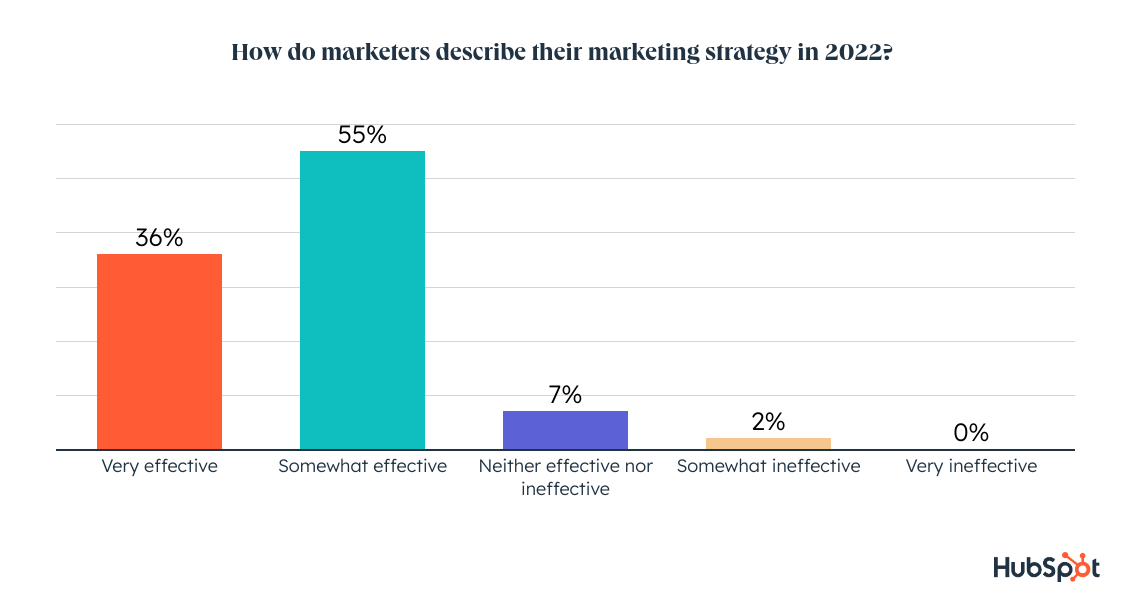
With the year nearly over, we asked marketers to reflect on their 2022 marketing strategy, and 91% say what they’re doing has been effective. 

Just 2% called their strategies ineffective while 7% say their marketing efforts made no major negative or positive impacts.

how marketers describe their 2022 performance

Most marketers see their strategy as effective, so let’s dive into the marketing metrics or KPIs they use to measure their success.

The Most Important Marketing Metrics and KPIs

When it comes to measuring the effectiveness of their content marketing strategy, marketers say sales, web traffic, and social engagement are the most important metrics, followed by conversion rate, follower/subscriber growth, and lead generation. 

the most important marketing metrics

When planning out the next year’s goals, strategies and KPIs, especially without knowing if we are or aren’t going into a recession, you might ask yourself, “How we’ll I pay for these things? And what are other marketing teams doing. 

Next, let’s take a look at how marketing budgets have recently changed and will continue to change in the coming months. 

How are Marketing Budgets Changing?

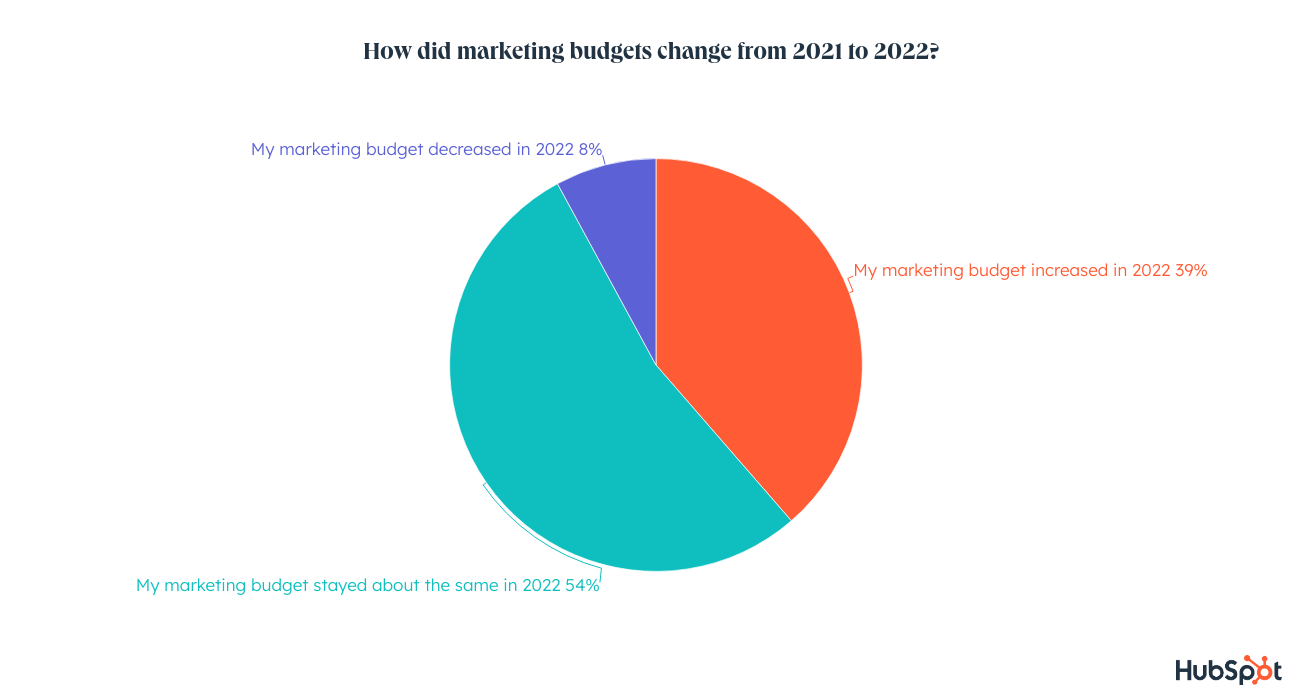
54% of marketers saw their budgets stay the same from 2021 to 2022, while 39% saw an increase and just 8% report a reduction in budget.

how marketing budgets could change in 2023

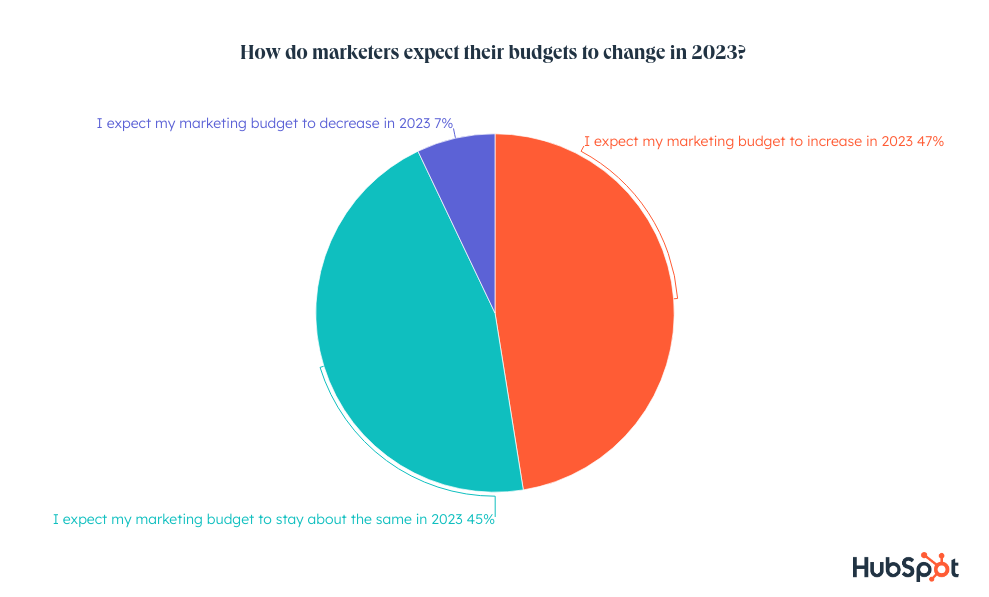
For 2023, 47% of marketers expect their budget to increase, while 45% expect it to stay the same, and 7% think it will decrease.

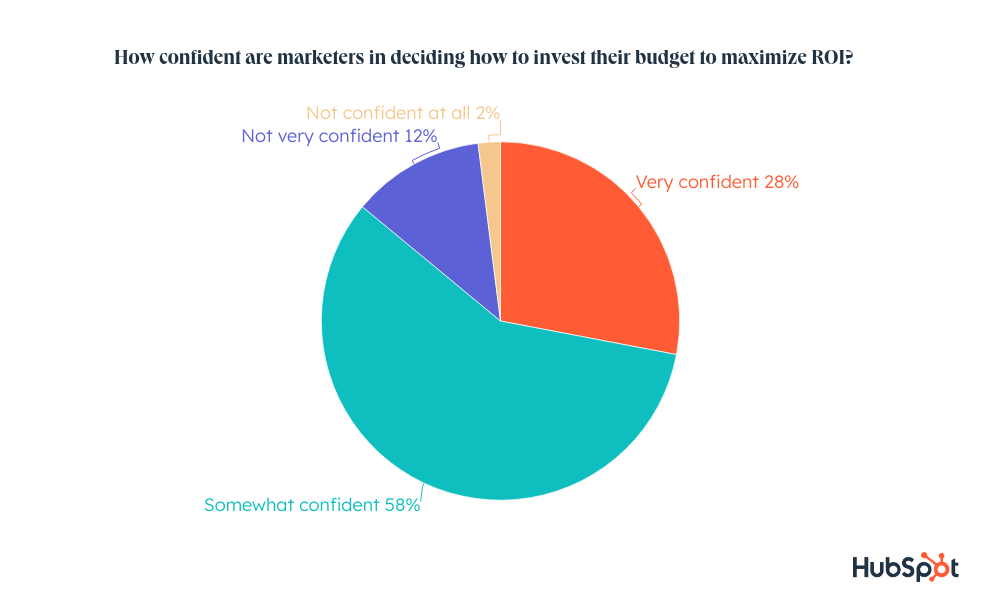
When it comes to how that budget is invested, most (58%) marketers are somewhat confident when deciding how to invest their budget to maximize ROI, while just 28% feel very confident. About 14% do not feel confident in how they invest their marketing budget.
marketing budgeting confidence

To round out the Marketing Trends 2023 report, we’ll dive into some work trends to understand how and where marketers are working this year.

Marketing Workplace Trends

In our State of Marketing Report published earlier this year, we revealed how marketers were thinking about their goals and what work they planned to do to get there. With this most recent survey, we dove into what that work and their work environment looks like.

Where Marketers Work

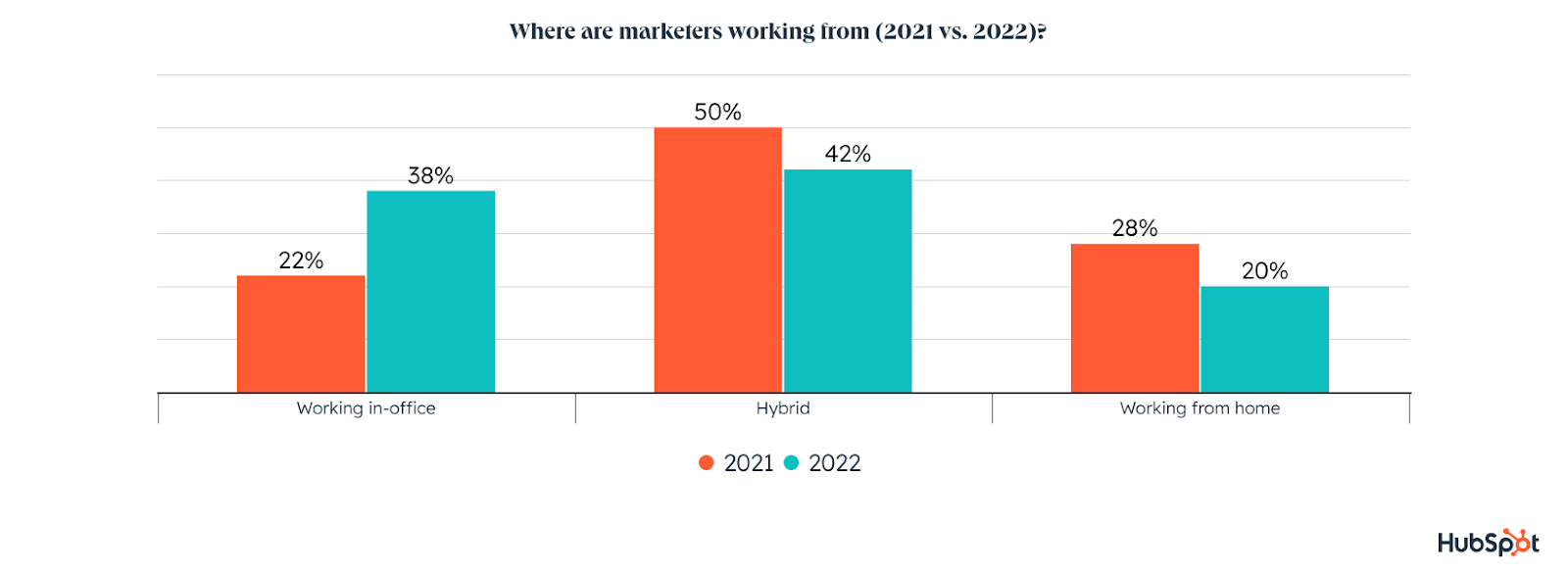
Whether by force or by choice, marketers are shifting back to the office in 2022. 80% of marketers are back in the office at least part-time, while just 20% are fully remote.

where do marketers work (remote or in office or hybrid)

  • 38% of marketers work in-office in 2022, a 73% YoY increase
  • 42% of marketers work in a hybrid model in 2022, a 16% YoY decrease
  • 20% of marketers work from home or remotely in 2022, a 29% YoY decrease

How Marketers Feel About There Workloads

When it comes to their workload, 70% of marketers describe their workload as high, while 26% say it is neither high nor low, and only 5% describe it as low. On top of that high workload, 46% of marketers say their workload increased from 2021 to 2022. 

how marketers describe their current workload

The average marketer works on five campaigns at a time and a total of seven campaigns per quarter. Additionally, 42% of marketers say the number of campaigns they work on each quarter increased from 2021 to 2022. Marketers think their workload will increase again in 2023, when they expect to be working on nine campaigns per quarter.

The Biggest Timesuck for Marketers

Needless to say, marketers are strapped for time and they only expect their workload to keep getting heavier. To make matters more difficult, marketers spend an average of six hours per day on manual, administrative, or operational tasks, leaving them less time to do more impactful work. 

Luckily, automation is here to help – our data shows that marketers who report an effective marketing strategy this year are more likely to use automation in their role than ineffective marketers.

Biggest Marketing Takeaways for 2023

While you might think so much change has happened that the industry could eventually slow down – think again. In the most recent months, 20% of marketers have already had to pivot their plans due to the potential recession. 

Ultimately, our data shows that marketers who invest in understanding their target audience, the latest trends, and how their audience is changing will be most prepared to pivot their strategy and beat out their competition in 2023.

To wrap up, here are some highlights from each section that you should take away with you when planning a new year of marketing strategies:

  • Short-form video, influencer marketing, and social shopping/using DMs for customer service were the top trends marketers used in 2022 and could continue to gain steam in 2023.
  • Facebook takes the throne as the highest-ROI social media platform, but YouTube, Instagram, and TikTok will see more growth than Facebook in 2023.
  • Marketing budgets aren’t shrinking. Despite the pandemic, recession, data-privacy changes, and whatever else 2023 will throw at us, it seems marketers are actually being given funding needed to step up in unexpected or difficult times.
  • Marketing roles are shifting back to in-person. A whopping 80% of marketers are at least partially back in the office in 2022, while only 20% are fully remote.
  • Marketers have a high workload with no relief in sight. They reported workload increases from 2021 to 2022, and expect to see more pile up in 2023. Leveling up your automation tools can help you and your team spend more time on high-impact tasks.

Like what you’ve read and want more? Keep following the blog for even more coverage of this report, and check out our 2022 State of Marketing Report below to compare the 2022 data with the 2023 predictions above.

New Call-to-action

Categories B2B

10 Creator Economy Startups Marketers Should Know

As the creator economy continues to expand, so do the needs of content creators. Whether it’s crowdfunding, financial guidance, or new ways to connect — there are many moving parts content creators must consider to be successful. Fortunately, new creator economy startups are providing the tools, resources, and platforms needed to make the business side of content creation easier for digital creatives.

From marketplaces to website building tools to fresh opportunities to connect with followers — let’s explore several of the creator economy startups that are game-changers for content creators.

Download Now: 150+ Content Creation Templates [Free Kit]

10 Startups Contributing to the Creator Economy

  1. Huddles
  2. Ko-fi
  3. Fanhouse
  4. Beacons
  5. Pearpop
  6. Buy Me a Coffee
  7. Cameo
  8. Passionfroot
  9. Karat
  10. Bildr

Top Creator Economy Startups

Here are 10 of the top creator economy startups boosting the creator economy:

1. Huddles

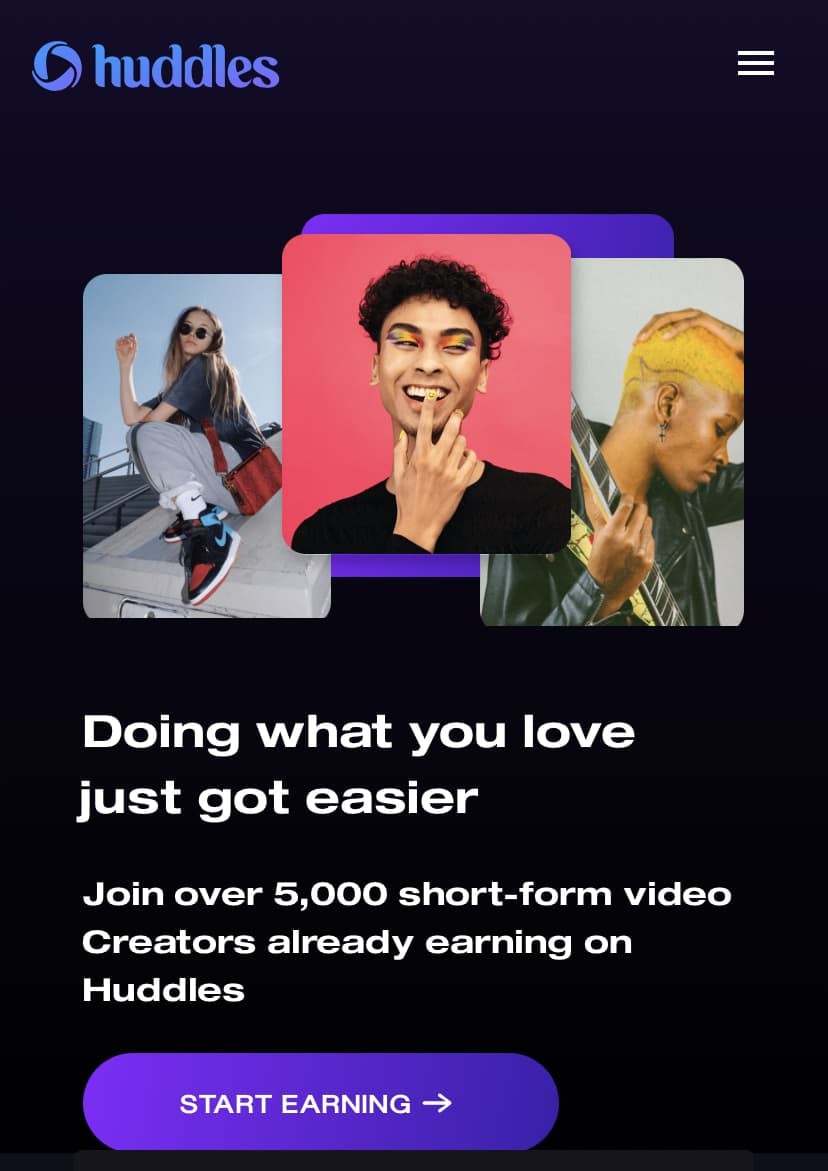
Originally called “Clash,” this video-hosting app was initially released in January 2020 as a successor to Vine. Like Vine, Clash allowed users to upload short-form videos between 2–16 seconds long. Clash rebranded to Huddles in August 2022 when the company decided it wanted to move away from “infinite scroll” feeds and avoid competition with TikTok.

Instead, Huddles allows content creators to upload short-form videos directly to their profiles or their Huddles group chats. Creators can also monetize their content on the platform by having fans pay monthly subscriptions to paywalled content or private conversations. The Huddles app is available on both iPhones and Androids.

Best for: Building a tight-knit community with followers and monetizing exclusive content.

IMG_8740

2. Ko-fi

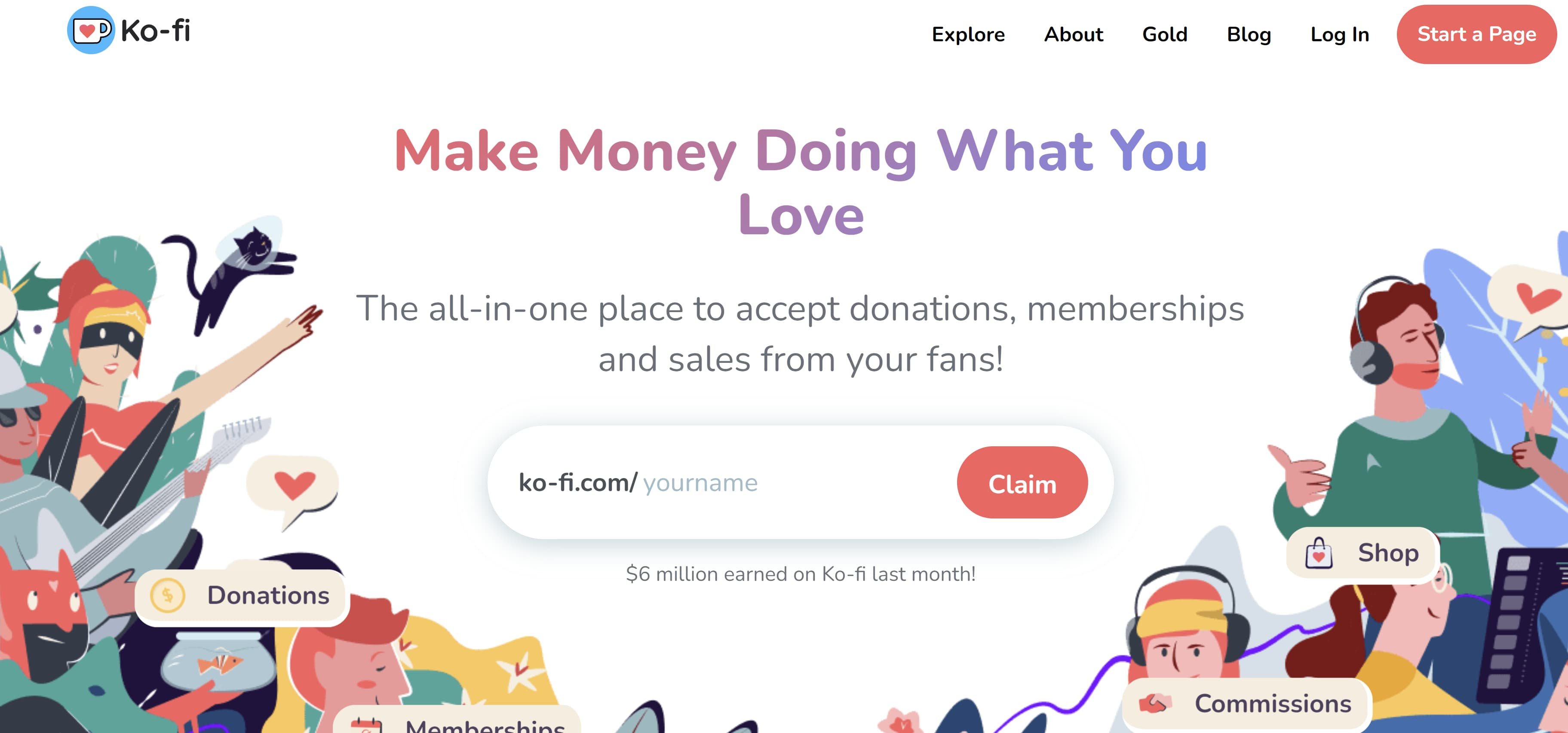
Ko-fi is a platform that allows people to make donations to its users, many of whom are creators. Creators often use the platform to supplement their income and fund upcoming projects. Ko-fi also features commissions and storefront options, which are popular features among artists looking to connect with their audience.

Speaking of connecting, Ko-fi can also function as a personal blog for creators to share updates with their fans and receive words of encouragement with donations. Also, creators aren’t required to post content regularly to get paid, allowing them to work and connect at their own pace.

Ko-fi doesn’t require subscription options, meaning it can act as a one-time digital tip jar. But perhaps the most popular aspect of Ko-fi is that it doesn’t charge fees, meaning the app doesn’t take a percentage of users’ donations.

Best for: Crowdfunding for projects, supplementing income, and keeping followers updated on the latest happenings involving their favorite creators.

ko-fiImage source

3. Fanhouse

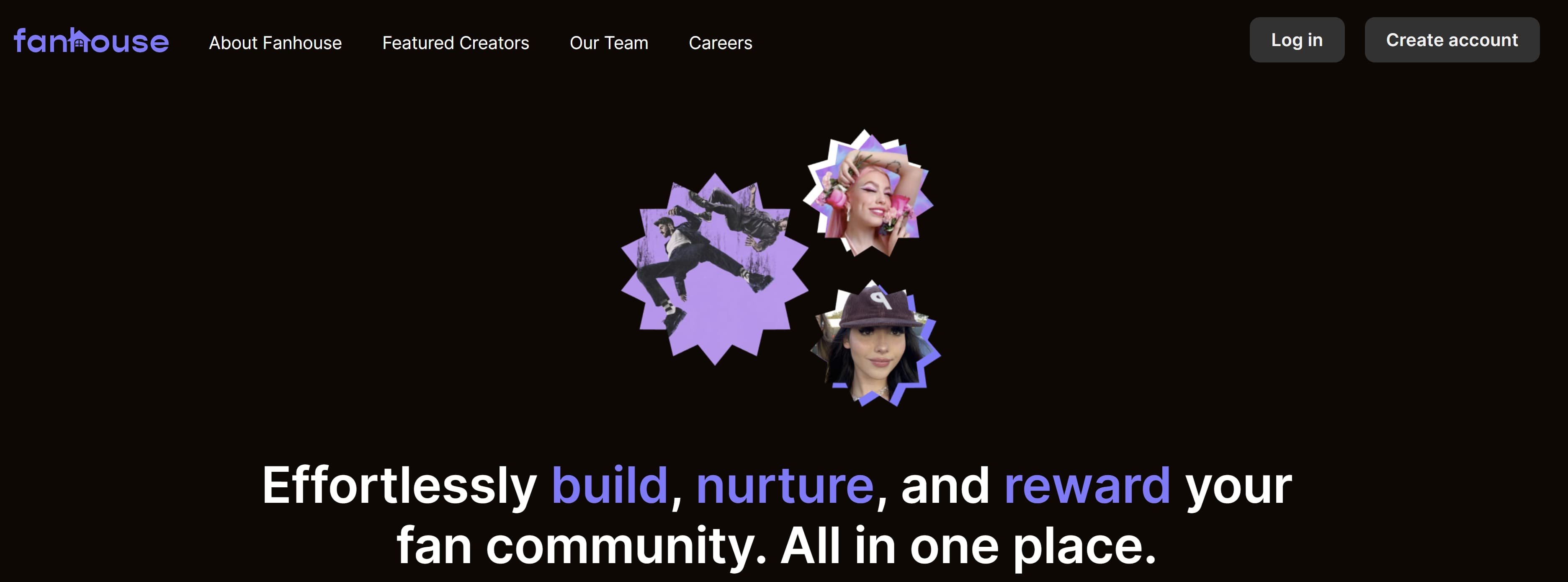
Fanhouse is a subscription-based platform where content creators can monetize their social media presence. Creators can post content like videos, photos, and status updates to followers subscribed to their Fanhouse account. The app was founded by social media personality Jasmine Rice and her Twitter mutuals Khoi Le and Jerry Meng as an alternative to OnlyFans.

OnlyFans is also a subscription-based platform, but it’s often associated with creators in the adult entertainment industry — though other kinds of creators like celebrities and fitness influencers also use it. Rice was uncomfortable with the adult content on Onlyfans, so she decided to create Fanhouse, which prohibits nudity and sexual content.

Instead, Fanhouse operates pretty much the same as Twitter or Instagram if those apps were to become solely subscription-based. Furthermore, creators keep 90% of every paid transaction on the platform. Fanhouse only takes 10% to cover the cost of operating the platform.

Best for: Monetizing your social media content and building community. If you tend to go viral on Twitter or people genuinely enjoy your online personality, this platform can be a great way to generate income.

fanhouseImage source


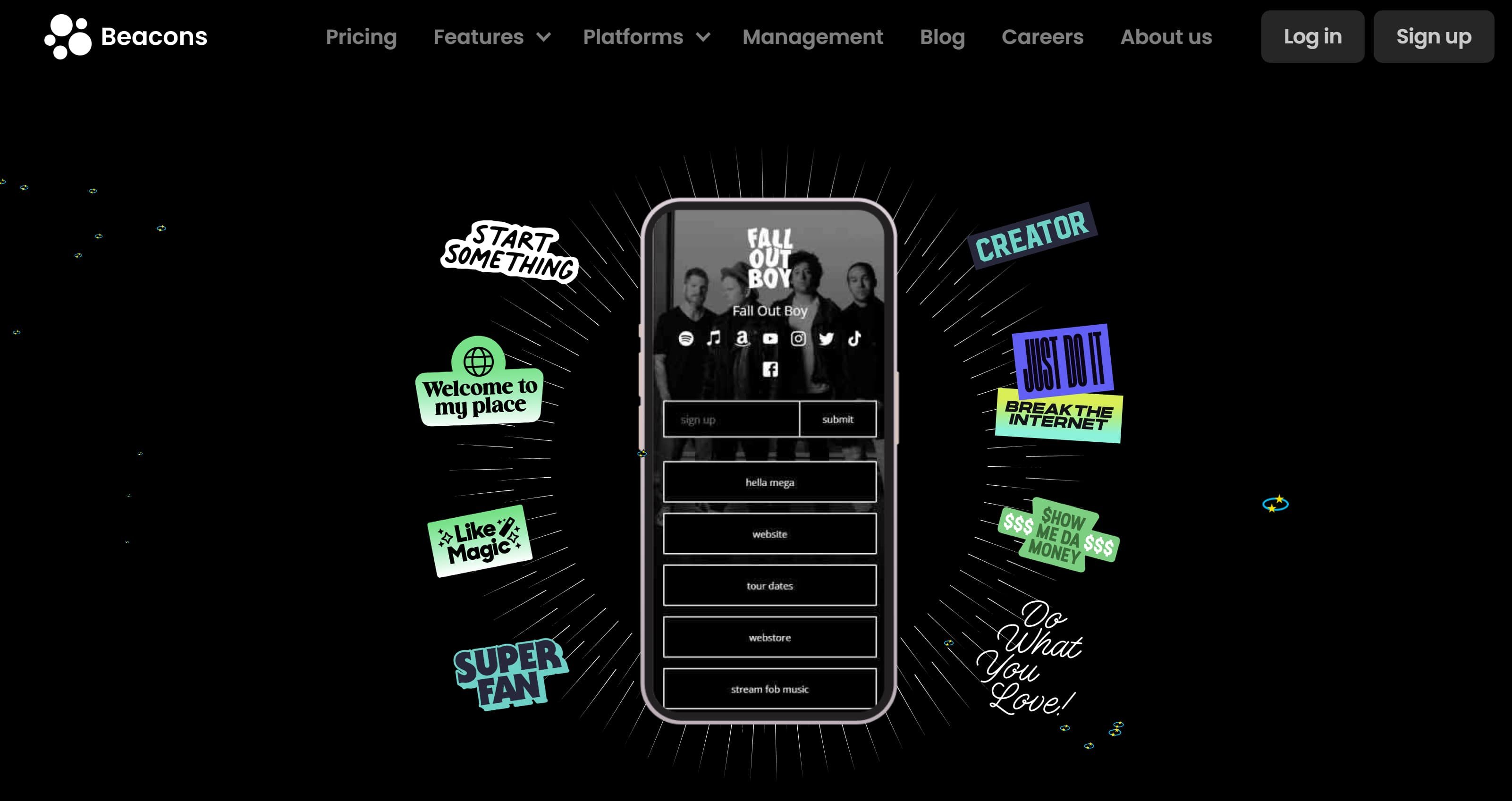
4. Beacons

Beacons is a “link-in-bio” platform — like Linktree — creators can use to point their followers to a landing page with all their relevant links, such as their social media accounts, online shops, and website. Like other link-in-bio platforms, Beacons allows users to build their profile and customize its appearance to their liking.

However, what separates Beacons from other similar platforms is its donations and e-commerce features. These features allow creators to raise money via donations or sell digital products like ebooks, artwork, and videos.

Best for: Keeping all of your online accounts in one place for your followers to access, and it’s a great place to raise money or sell digital items.

beaconsImage source

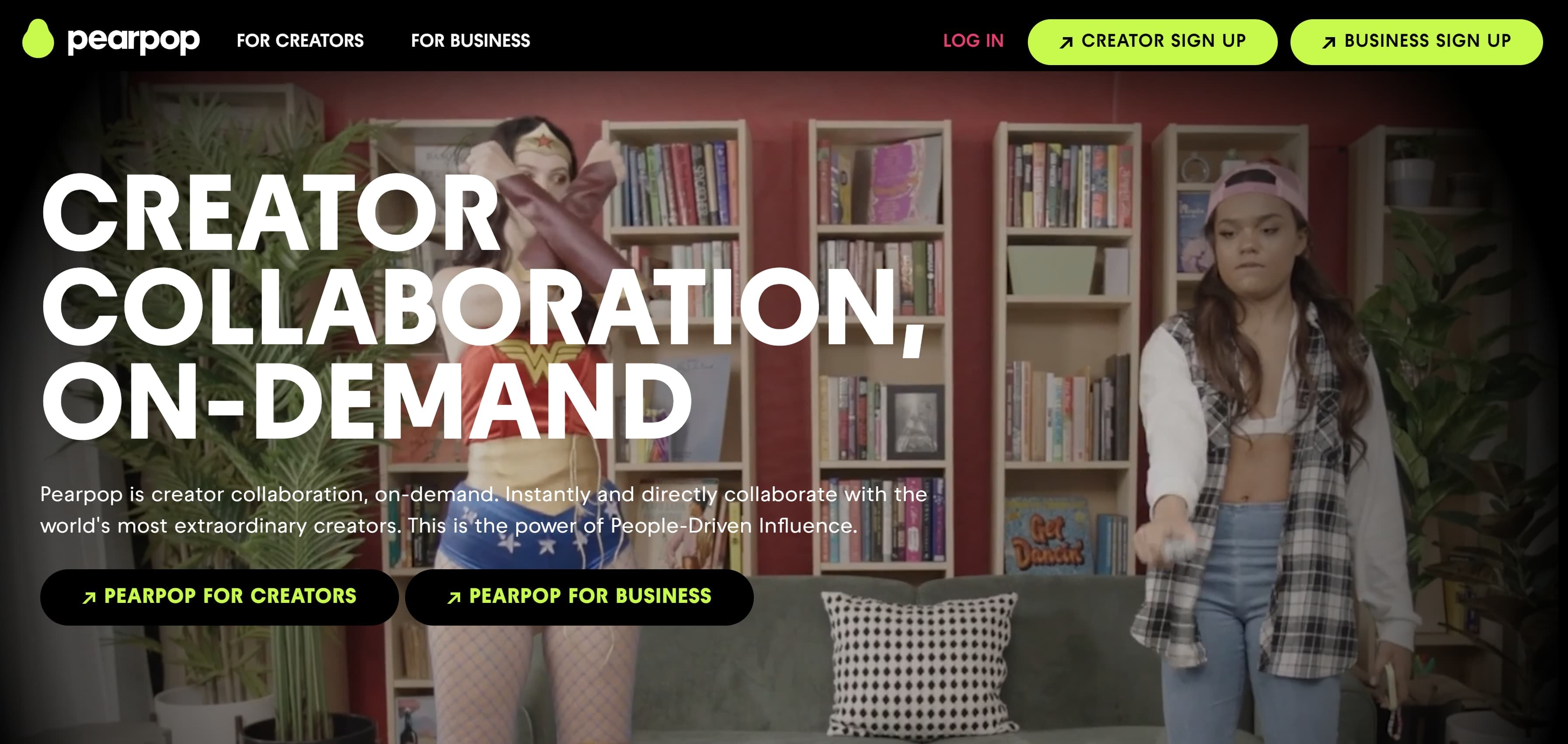
5. Pearpop

Pearpop is an online marketplace that connects brands and creators for projects like campaigns and brand deals. Its most notable feature is Pearpop Challenges, allowing brands to instantly launch creator campaigns on demand. Famous faces on Pearpop include Tony Hawk, Heidi Klum, and Snoop Dogg.

Best for: Content creators and brands looking for collaborators for campaigns and deals.

pearpopImage source

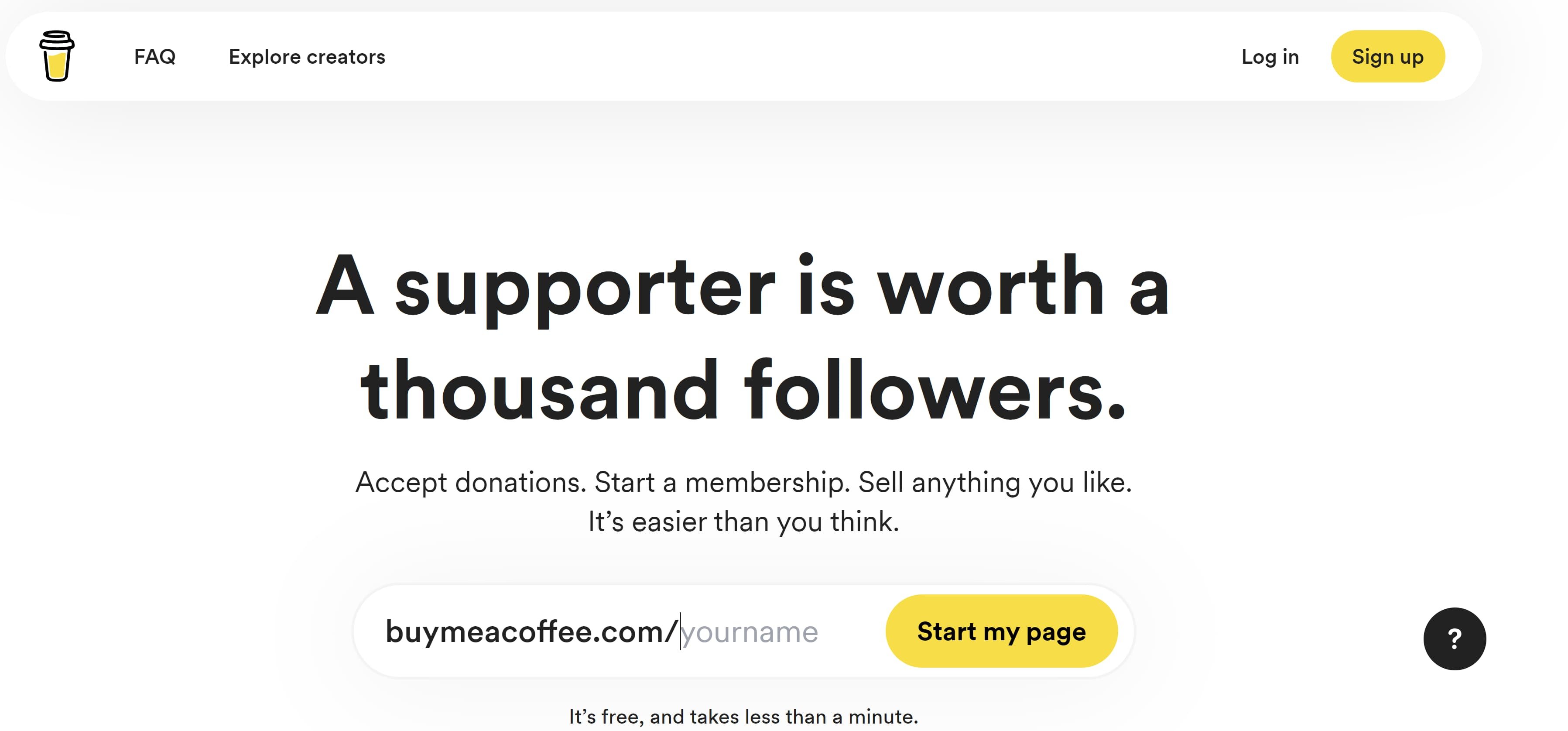
6. Buy Me a Coffee

Buy Me a Coffee is a crowdfunding company that allows creators to collect donations from supporters. Similar to Ko-fi, donators can also send encouraging messages along with donations. The company charges no monthly fees; however, it charges a transaction fee of 5 percent of any support a content creator receives.

Best for: Crowdfunding for projects and getting feedback from supporters.

buy me a coffeeImage source

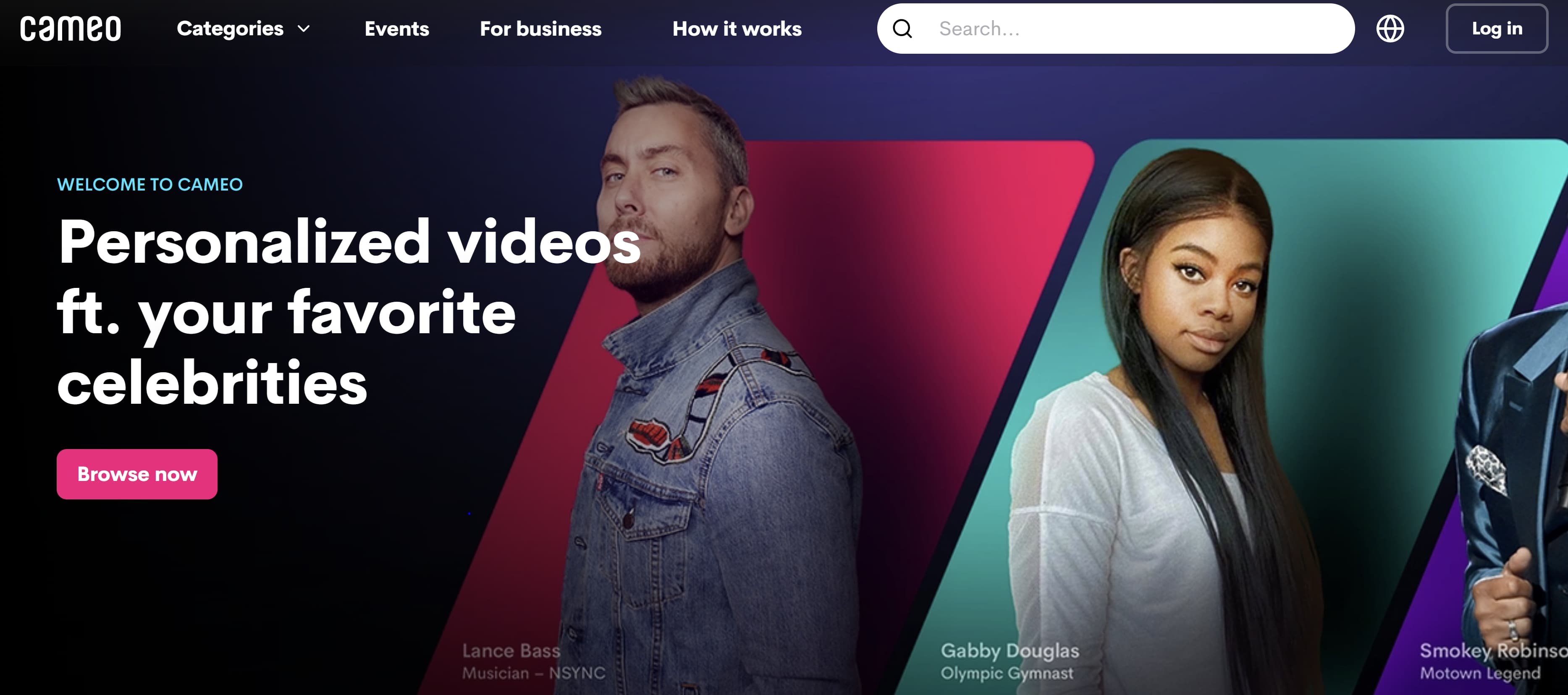
7. Cameo

Cameo is a unique app where content creators, influencers, and celebrities record personalized messages for fans upon request. Users can pay as little as $20 to have their requests accepted. The most popular requests are birthday shout-outs, catchphrases, and congratulations.

Best for: Connecting with fans and supplementing income.

cameoImage source

8. Passionfroot

Passionfroot is a digital workspace where creators can keep track of projects and clients and manage their finances. The platform is browser-based and a no-code tool. Passionfroot charges creators based on a three-tiered pricing structure for its software.

Creators can also open a digital storefront to field requests and manage operations like invoicing. Creators should note that the platform also takes a small percentage of every transaction.

Best for: Keeping organized and expanding your business.

passionfrootImage Source

9. Karat

Karat is a financial service for content creators. According to its website, “Karat provides customized financing, rewards, and support for creators so you can access more money as you grow.”

Karat offers bookkeeping services, tax preparation, business expense cards, and more geared toward the unique financial needs of content creators.

Best for: Managing finances and filing tax returns correctly because many content creators do not have the resources to file their income as an entrepreneur properly.

karatImage source

10. Bildr

Bildr is a no-code website and app builder with many tools creators can use to create their own digital space. Creators can use Bilder to make web apps, Saas products, and Chrome extensions.

Best for: Building and customizing your website and apps, especially if you don’t know how to code.

bildr

Image source

Now that you know the tools and resources available to creators via the above creator economy startups, you can find new ways to expand your business and reach your goals. Which of the above startups do you want to try out?

content templates

Categories B2B

How to Create a Social Media Report [Free Template]

Social media is an undeniably powerful channel for marketing in 2020.

In fact, social networks are the biggest source of inspiration for consumer purchases, with 37% of consumers finding purchase inspiration through social channels.

However, if you’re using social media as a tool for organic exposure and brand awareness, rather than just a channel for paid ads, it can be difficult to track the success of your efforts.

As any social media manager knows, successful implementation of a social media strategy is contingent on countless factors — and all companies prioritize different channels, metrics, and criteria for success.

Access Now: Social Media Report [Free Template]

For example, is paid more important than organic to your business, and if so, to what extent?

Is more importance placed on audience engagement, or audience growth?

Has a posting cadence been directly tied to revenue?

With so many areas of focus for social media marketers, it’s crucial to choose, analyze, and report on your key social media metrics with a social media report.

A social media report can help you clearly convey what factors your social media team prioritizes, why those factors matter, and how you’re performing against those goals.

In this post, we’ll highlight the importance of a social media report, list the metrics you should consider including in one, and walk through a step-by-step process for building a social media report yourself.

For a quick and easy solution to your reporting woes, click here to download HubSpot’s Free Social Media Reporting Template.

Why Use a Social Media Report?

A social media report is the best way to distill the key metrics your social media team is tracking on a daily, weekly, monthly, quarterly, and/or annual basis.

Since social media encompasses so much, gathering and reporting on the data and channels that you’ve determined are most important for your business provides a lens of focus for your social media marketing team, and delivers a necessary high-level overview for leadership.

Social media doesn’t just affect marketing. Prospects ask questions, customers write reviews, and thought leaders follow you for company news. Because social media coincides with nearly every aspect of your organization, gathering and distributing the state of your social media channels is a move that shows transparency and encourages cross-company alignment.

You can also use a social media report to report on campaign-level analytics. If your social media account is serving as a cog in a larger company initiative, this report shows to what extent social media contributed to the project’s success.

Featured Resource: Free Social Media Report Template

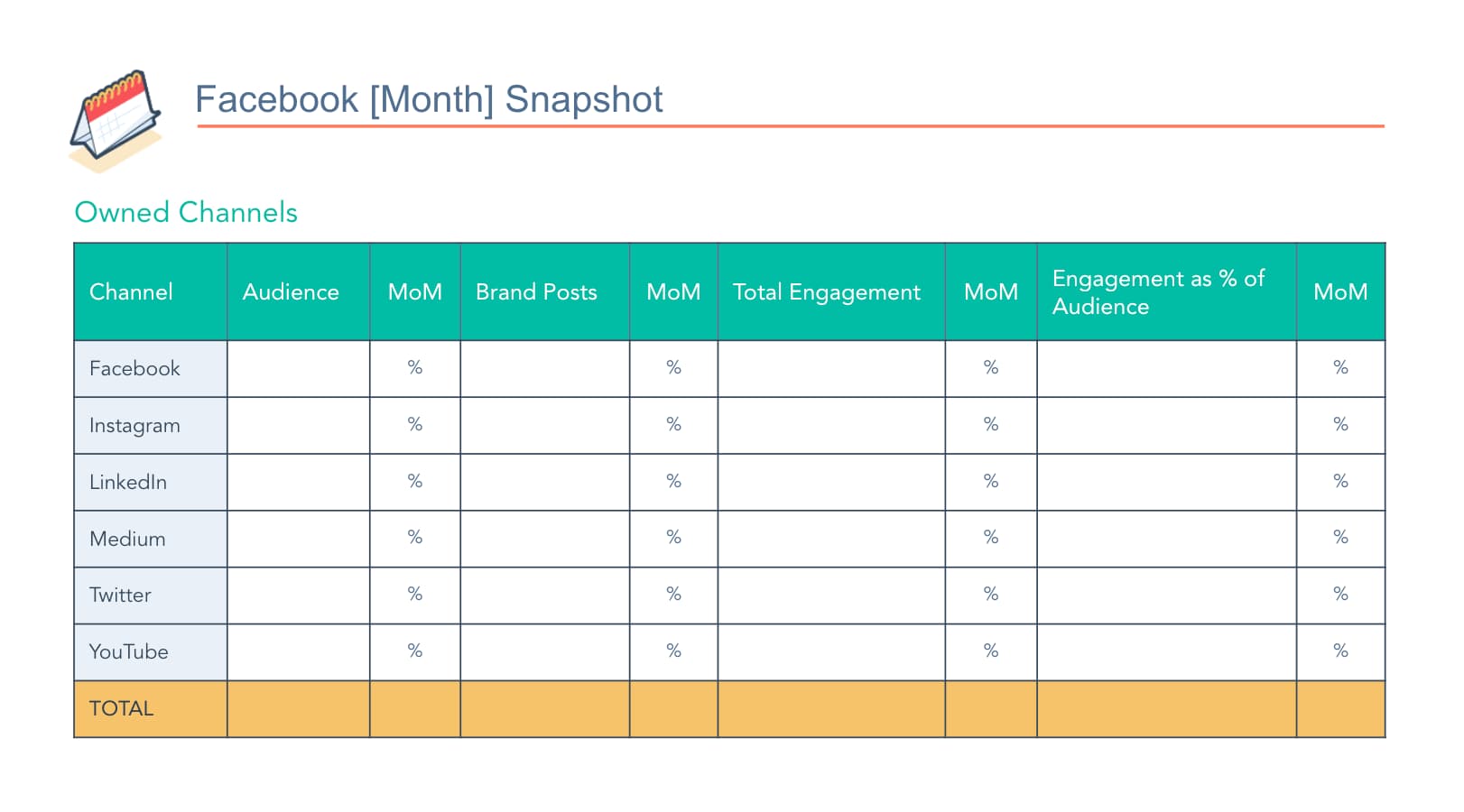
social-media-report-hubspot

HubSpot’s free social media report template has pre-made slides for you to report on all of your predominant social media metrics. Download the template today and simply plug in your own metrics to customize a social media report for your organization.

Social Media Metrics to Report On

Your business likely values some metrics over others when it comes to social media reporting. Likely, these metrics also vary between your channels — since LinkedIn doesn’t let you retweet, and Twitter doesn’t let you click a cry-face button.

Before you start reporting on your social media channels’ performance, read through this list of options of social media metrics so you can determine which ones you should include in your report.

1. Audience Size and Growth

This metric tells you how large your reach is and how quickly that reach is growing. This is typically seen as the core social media metric, as it shows how large of an audience you can leverage with your posts and content.

2. Cadence of Posts

A rather self-explanatory example, this metric represents how many times you posted in a given time period. This metric is usually compared alongside other metrics — such as engagement rates — to help you determine the right cadence for your audience.

This metric should also be channel-specific, because it makes sense to post more frequently on some channels than others.

3. Post Engagement

Post engagement measures how your fans and followers are reacting to your posts with likes, comments, and shares. A healthy post engagement suggests you have a loyal audience — and that your content is reaching them.

You can also track engagement as a percentage of your audience to determine engagement rate.

4. Mentions

One metric you have a little less control over is mentions. You can track mentions from customers, prospects, and even news outlets to gauge perception of your business and brand online.

5. Clickthrough Rate

When a post links to a page on your website, you can measure how many people and what percentage of your audience clicked through to the page. A strong clickthrough rate shows you’re sharing website pages that your audience finds relevant.

6. Conversions & New Contacts

Conversions comes into play if you’re using social media to generate leads, subscribers, or even customers. If you want to attribute contacts to your social media team’s efforts, make sure you’re using proper tracking and setting reasonable goals, as it’s rare in some industries to go straight from social media to becoming a customer.

7. ROI

Directly tracing ROI (return-on-investment) to social media efforts can be tricky. However, if you determine it’s worth reporting on this metric, make sure you have proper expectations set and attribution models established.

8. CPM / CPC

This metric is essential for monitoring the performance on your social media ads. If you’re solely reporting on organic social metrics, you can ignore this one.

9. Competitor Metrics

To provide a benchmark, consider analyzing the aforementioned metrics for your competitors. Obviously, these metrics can vary drastically based on publicity, paid budget, and the size of the company, but it’s still worthwhile to make the comparison.

How to Make a Social Media Report

Step 1: Choose Your Presentation Method

For consistency and clarity, make sure you’re using a social media report presentation, spreadsheet, or memo template. This way, each time you update your metrics, you’ll simply need to copy over your most up-to-date metrics onto that template rather than reinventing the wheel every time.

We suggest using a PowerPoint or Google Slide Deck template, because you can share it with your team via email, use it for an in-person meeting or presentation, or both.

Need a template to get started? Try this one.

Step 2: Determine the Metrics You’ll Be Reporting On

Like we’ve established, different companies and different social media teams value different social media metrics.

It’s your job to choose the metrics that matter most to your team and your organization.

Using the list from the section above, narrow down the essential metrics you believe are worth presenting to your team at large. Remember, you can change which metrics you report on for each of your organization’s social media platforms.

If your social media report is campaign-specific, reach out to the project stakeholders to see if they’re hoping to see reporting on any certain metrics in the social media report.

Pro Tip: For your first few ongoing social media reporting presentations, ask your peers which metrics they’d like to see, or which ones they need clarification on. Making these changes sooner rather than later helps you keep your team informed and engaged.

Step 3: Gather Your Data

Once you know what you’re reporting on and how you’re reporting it, it’s time to start collecting data.

When you’re first setting up your social media reports, create bookmarks for your data sources. Make a folder for the analytics page for each social media channel you’re analyzing and/or your social media reporting software for an all-encompassing view.

If you’re tracking click-throughs to your website, make sure you’re analyzing from a single master location, such as your tracking URL builder or your traffic tracking tool like HubSpot or Google Analytics.

Step 4: Add in Some Visuals

A chart of numbers on a slide deck is, well, pretty boring.

While a numerical chart is important for sharing as much info as possible in an organized way, using visuals is a better way to convey the growth and success metrics of your social media performance. Try incorporating one or all of the following into your social media reports:

  • Linear graphs to show followers over time.
  • Pie charts to show clicks to different pages of your website (blog pages vs. case studies, for example).
  • Bar graphs to show number of engagements on each platform.

These examples are more eye-catching than numbers on a slide and further illustrate what you want your team to walk away with. If data visualization is new to you, check out our Guide on Data Visualization for Marketers.

Step 5: Think of Your Story

A running social media report should always remind people about where you came from and where you plan on going. That said, make sure your reports make reference to how your numbers have changed since the last period of time on which you presented, in addition to why numbers have changed.

Did follower growth as a percent increase drop last month? Maybe that’s because one of your posts from the month before went viral and resulted in unprecedented growth that was impossible to match. Make that clear and add context to the numbers.

Additionally, each report should contain clear action items about how you plan to continuously improve your social media performance. Social media is constantly evolving, so your approach and strategy for it should, too.

Now that you’re equipped with the knowledge to build, design, and share your social media report, download your social media report template and get to work!

New Call-to-action

Categories B2B

How to Increase Email Sign-ups With Better Forms (+Examples)

In the last 12 months, 77% of marketers have seen an increase in email engagement. Cold prospects get to know and trust you, while you stay top of mind (or top of inbox). However, your team needs to drive signups to reap the benefits.

→ Download Now: The Beginner's Guide to Email Marketing [Free Ebook]

That all starts with your sign-up form. Better email sign-up forms can help grow your lists, increasing your brand’s engagement. See these email newsletter sign-up form examples for inspiration.

Table of Contents

What Is an Email Sign-up Form?

Ways to Increase Subscribers for Your Email List

Email Sign-up Form Best Practices

Great Email Newsletter Sign-up Form Examples

Building Better Sign-up Forms

The best thing about email opt-ins is that you can build a pipeline of leads to nurture. Over time, your email list can turn into a valuable source of revenue. Here are our tips for how to get more mailing list sign-ups.

1. Monitor your metrics.

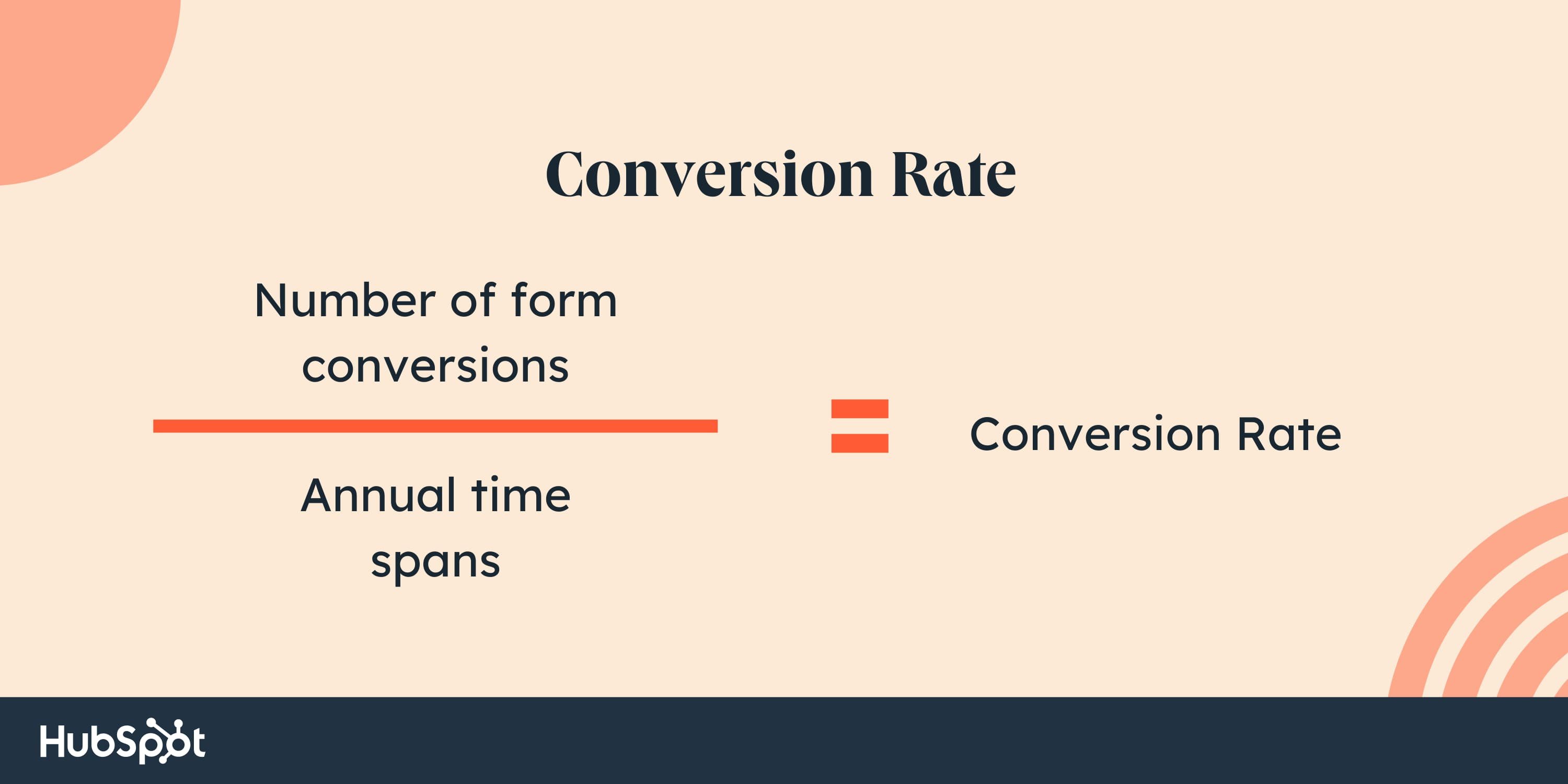
Your conversion rate refers to the percentage of website visitors who convert on your opt-in. To calculate your conversion rate, divide the number of conversions from that form or offer by the amount of traffic to the page or post it’s on.

Newsletter sign-up form examples, Conversion rate formula

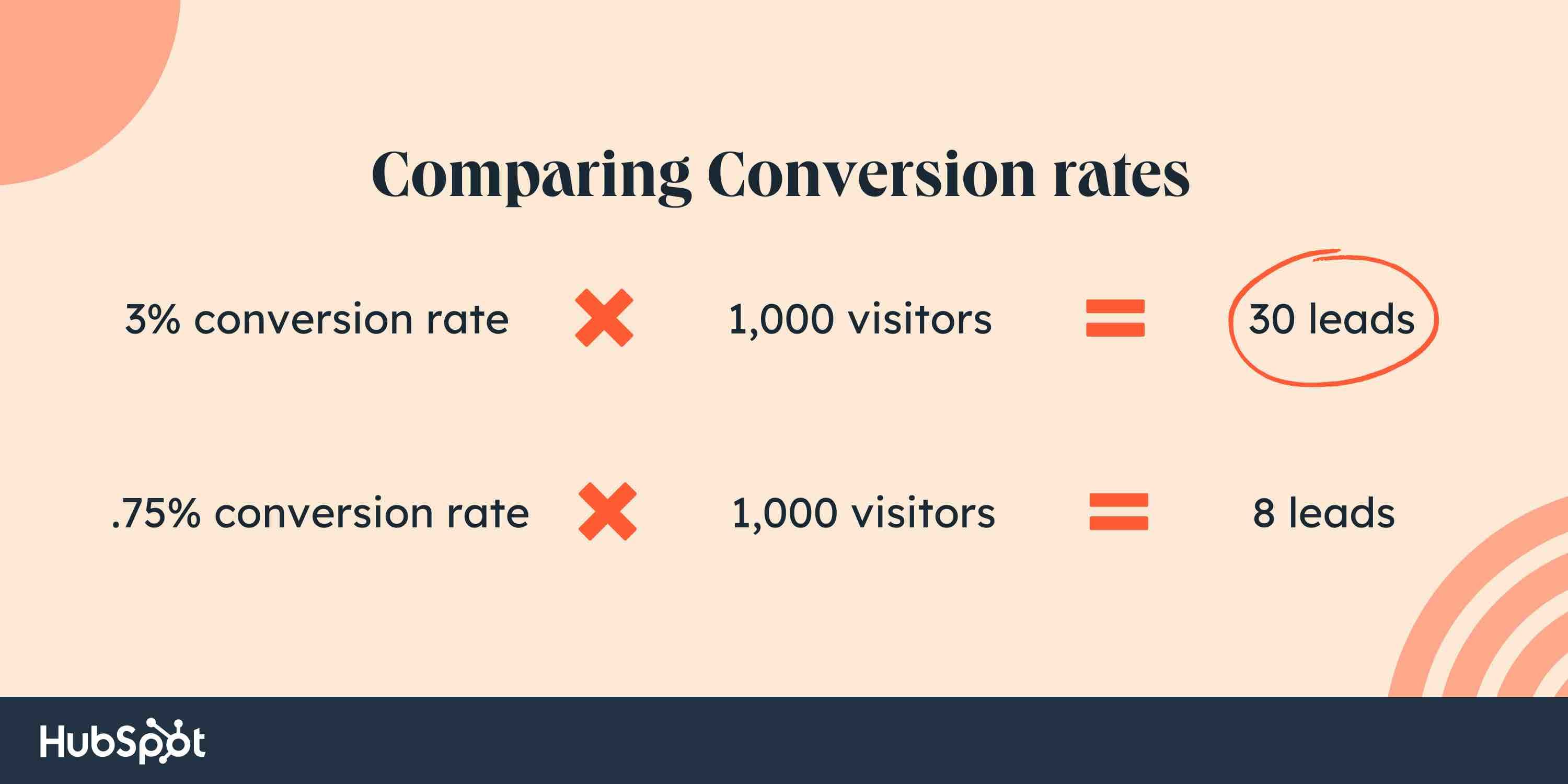
Let’s say you have two forms for the same newsletter. One form has a 3% conversion rate. The second converts .8% of page visitors. The form with the higher conversion rate generates more leads and produces more value for the sales team.

Newsletter sign-up form examples, Conversion rate comparisons

With 1000 website visitors, the first form would generate 22 more leads than the second. That’s why conversion rate optimization is so important.

2. Incorporate calls-to-action.

Conversions to your email sign-up form only happen if the form is seen. For this reason, you should be putting the opportunity in front of your website visitors.

Identify your highly visited pages and put your form or calls-to-action (CTA) on them to maximize visibility.

3. Investigate pipeline gaps.

If you don’t have a large amount of traffic, finding ways to increase it may be a more worthwhile activity. Conversions only happen when there’s an opportunity to convert. With no traffic, there’s no opportunity.

You won’t have the means to increase your conversion rate if the starting number is zero. If traffic is low, your conversion rates may not be statistically significant.

4. Use contrasting colors.

The last thing you want is for a potential subscriber to miss the opportunity to convert simply because they didn’t notice it was there. Use contrasting colors to make these conversion elements stand out.

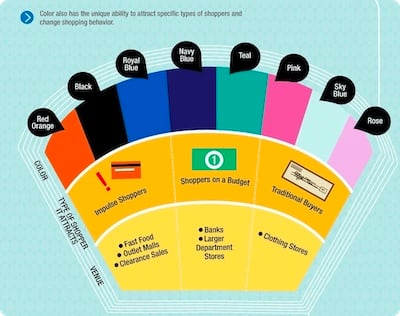
For instance, in the example below, Kiss Metrics has identified correlations between specific colors and shopper psychology. Specific hues and contrasts elicit specific responses. Using color theory can encourage prospects to act.

Newsletter sign-up form contrasting colors explanation to increase CTAs

Image Source

5. Consider placement.

Prominent page placement is a game-changer when it comes to increasing conversion rates on email sign-up forms. A form or call-to-action can go in many places, including:

  • The top of the page.
  • Within the text of the page.
  • In the sidebar.
  • At the bottom of the page.
  • As a pop-up generated from a user action.

You’ll want to test which placements work for your conversion rates. For example, if people aren’t making it to the bottom of a post, they may not see your call-to-action. Through testing, you’ll be able to determine the placements that work best for your audience.

6. Offer value and choice.

Today’s internet user knows handing over their email address may result in email solicitation or, in some cases, spam. That may not be your intention, but that doesn’t erase their caution. To overcome this caution, you must incentivize them to give it up.

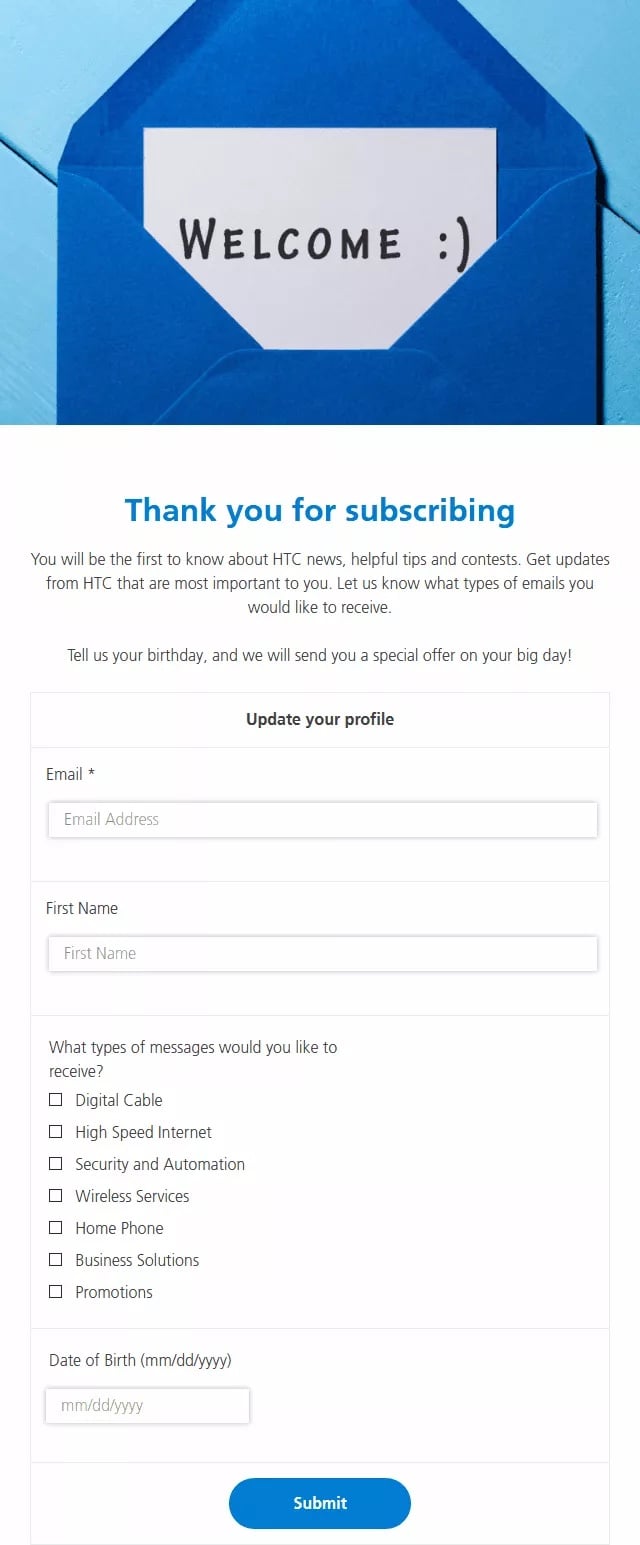
Newsletter sign-up form HTC email sign-up form example

Image Source

Promising high-value content that they want, providing social proof that your newsletter is valuable, holding giveaways or contests, and being transparent about what they can expect are all ways to provide the incentive.

Another option is to offer the user the choice of what type/category of content they’d like to receive. Nothing like autonomy to keep ’em coming back!

7. Reduce friction.

“Dollars flow where friction is low.”

— Brian Halligan, INBOUND 2019

The more friction that a visitor encounters, the less likely they’ll sign up.

One way that you can reduce friction is by removing form fields to make the process of signing up faster. The number of required form fields should be proportional to the amount of value you’re providing. Too many fields will cause the user to bounce. Instead, ask for less up front and have your team gather additional information after the individual has become a lead.

8. Try out different phrasing.

Don’t be afraid to scrap phrasing that is underperforming. Maybe the word “newsletter” fails to appeal to your specific audience. Switch it out with something different and monitor your metrics to see what happens.

9. Consider user intent.

Your website visitors landed on your page for a reason. If your offer doesn’t help them meet that need, they won’t be incentivized to convert.

For example, let’s say you have a blog post that compares your product or service to a competitor’s. The visitor arrived here because they want to see how well you match up with others in the industry.

If your on-page offer is an ebook with “Reasons Why You Should Buy [Product/Service],” you may fall flat. If the user is already comparing providers, they already know the value of the product or service. They’re just figuring out which provider to go with.

In this scenario, an offer suited to this intent, like a product demo, will work much better.

Consider the intent on your pages and craft offers that match up with that intent.

10. Minimize the number of forms and CTAs.

As the old saying goes, “A confused mind says no.” If you present website visitors with too many choices, you run the risk of driving them away completely.

Consider presenting one offer or conversion element per page. If that’s not possible, find other ways to reduce the confusion and make it clear exactly what you want the website visitor to do.

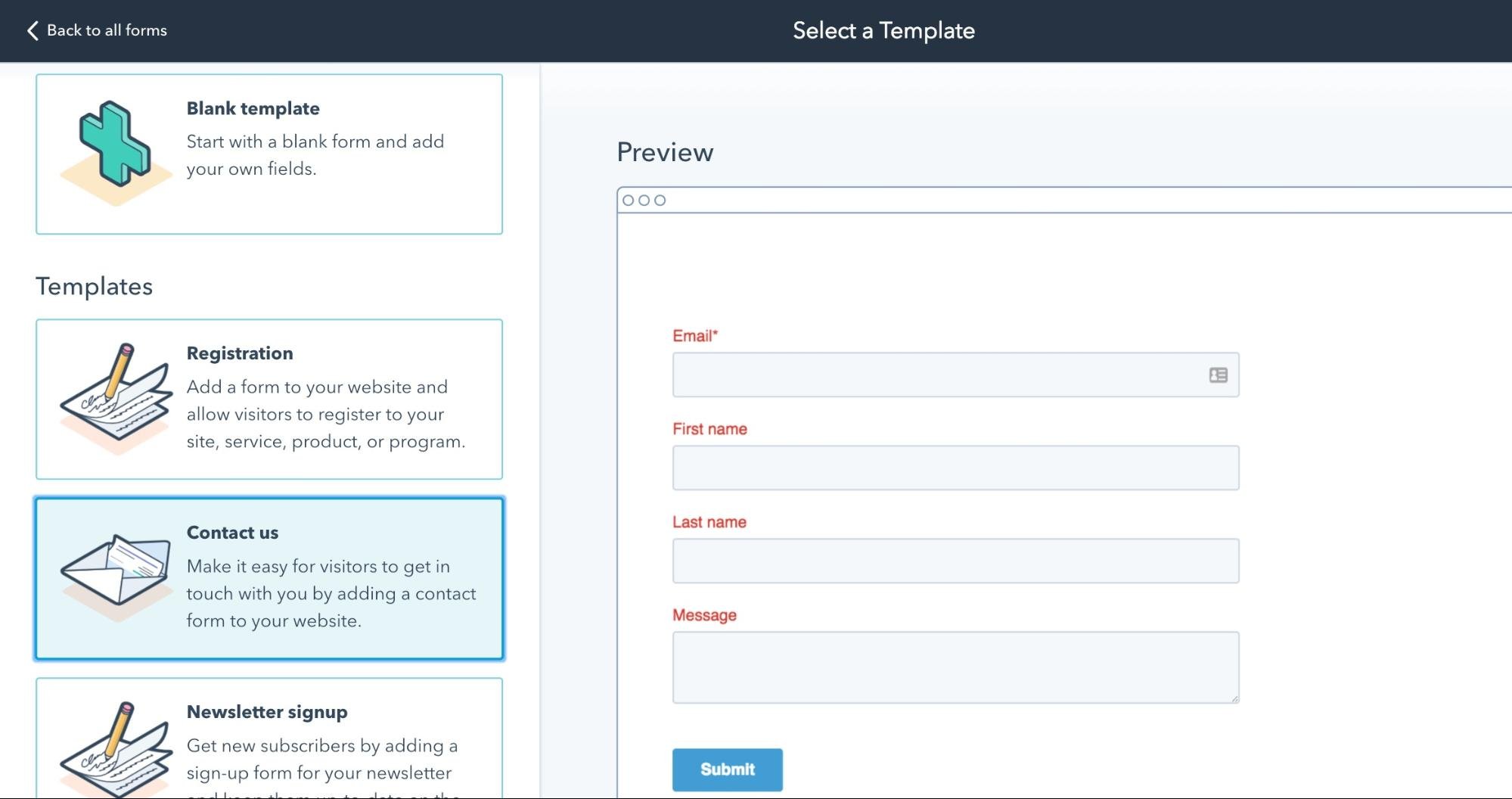
11. Use a form builder.

Some form builders (like HubSpot’s) can remove form fields if the CRM already knows the information. This clears the friction of the user typing that information again. Creating an easy user experience will increase your conversion.

Newsletter sign-up form template from HubSpot

Image Source

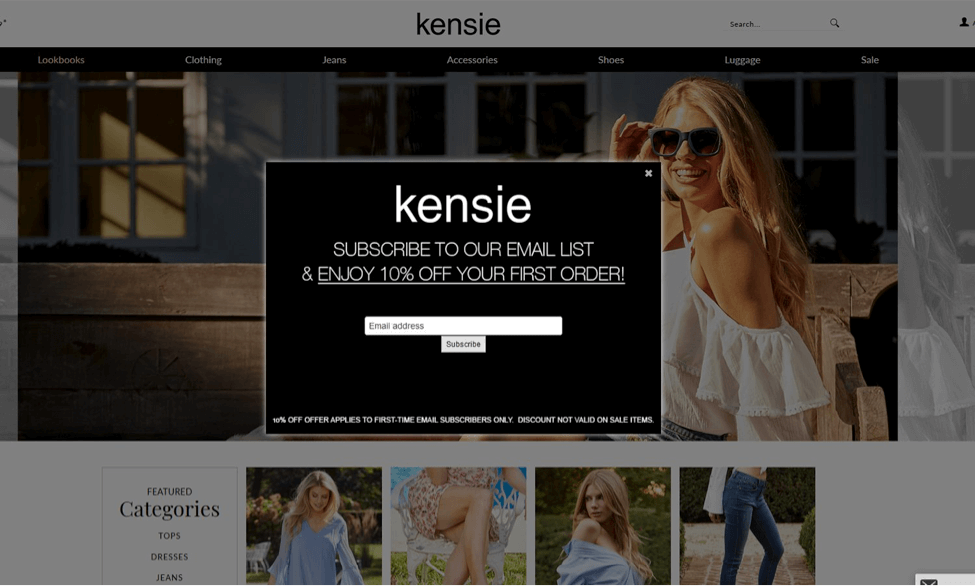
12. Use pop-ups.

Pop-ups may seem intrusive. However, when used correctly, they convert! By using a pop-up tool, offering something of value, and using specific triggers (such as exit intent), you can create a pop-up experience that isn’t annoying and generates leads.

Newsletter sign-up form, kensie popup email newsletter sign-up example

Image Source

13. Test everything.

Testing has been mentioned already in a few of the tips above, but it stands to get its own section. Improvement doesn’t happen in a vacuum. By testing hypotheses and continuing to iterate improvements, you’ll learn about your audience and increase email sign-ups as a result.

A lead might provide their email address for any number of reasons — to receive details about sales, blog post notifications, a discount code, or information about your business. In any case, that makes your email sign-up form one of the most important things on your site.

Let’s go over some ways to create a sign-up form that will get more leads on your email list.

Whether you’re looking to reach ten people or ten million, you’ll need to create a sign-up form that gets people excited to sign up. Here are some best practices that will help you create a high-converting email sign-up form.

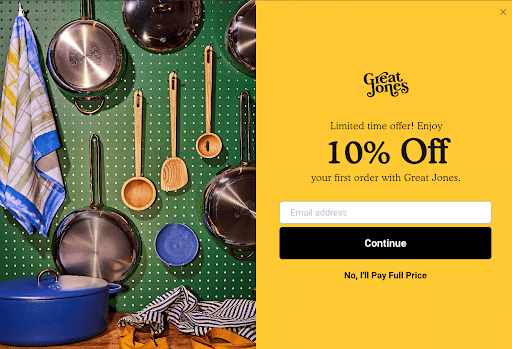
1. Clear Value Exchange

An email address is a valuable commodity. Your offering should be worth their while. Add a short description to the top of your email sign-up form that describes what your lead will get in return for signing up and make it good.

Newsletter sign-up form 10% off incentive example

For example, instead of saying ”Sign up for our weekly newsletter” you should say, “Sign up for our newsletter to receive exclusive deals.” A strong incentive means your website visitors are more likely to convert.

Pro tip: Your leads should be able to answer the question, “What’s in it for me?” when they complete your form.

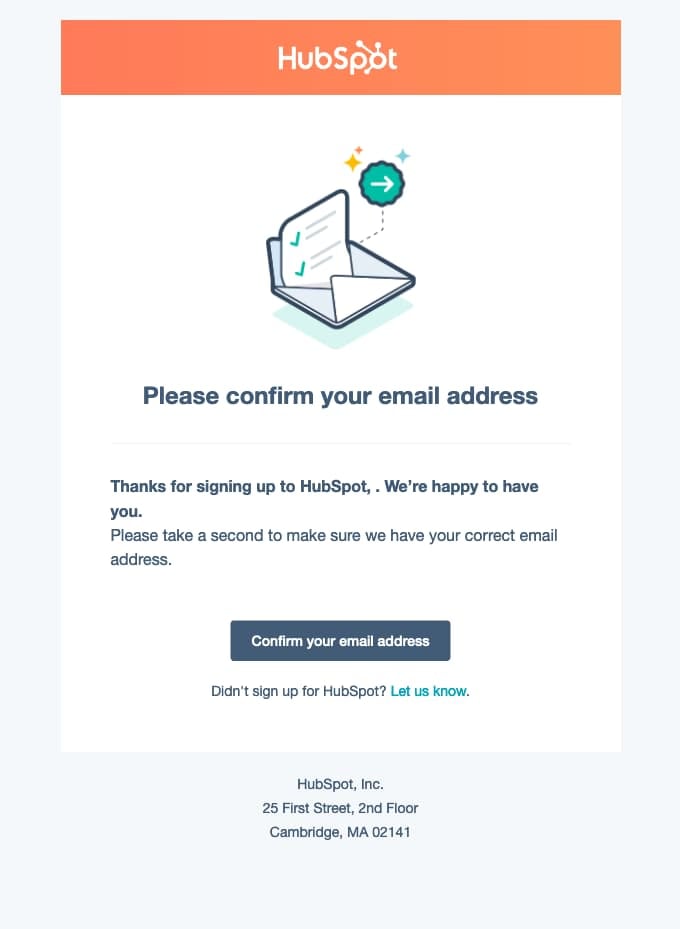
2. Double Opt-In

You don’t necessarily need more sign-ups. You need quality sign-ups. These quality sign-ups mean fewer fake leads wasting your time. Plus, there are fewer chances that you’ll end up in SPAM.

To ensure quality sign-ups on your form, consider using a double opt-in. This is the type of email subscription that confirms your lead wants to be added to your email list twice. The first time is when the lead enters and submits their information using your web form, and the second requires the lead to click an additional CTA (usually in their inbox) that confirms their submission.

Newsletter sign-up form example, email confirmation example from HubSpot

Image Source

A double confirmation means a high-quality relationship with your leads.

3. Simplicity

Successful email sign-up forms are straightforward and clear. A lead should be able to look at the form, enter their information, hit “submit”, and carry on with their lives within a matter of seconds. If your form is too complex, you risk losing the interest of your website visitors.

Remember: Your email sign-up form is just a way for visitors to sign up for emails. Your team can build from there.

4. Place and Time

The placement of your email sign-up form on your website matters. Think about how you want your website visitors to find your form. Do you want your form to pop up on the page the second someone lands on your website? Do you want them to scroll down to the bottom of your homepage to find your form? Or do they need to land on a specific page on your site?

Form placement isn’t one-size-fits-all. Think about where most visitors land on your site, how your buyer personas want to interact with your brand, and the overall user experience.

Consider questions like, “Will my target audience get frustrated with a pop-up the second they enter our site, or will they find it helpful?”

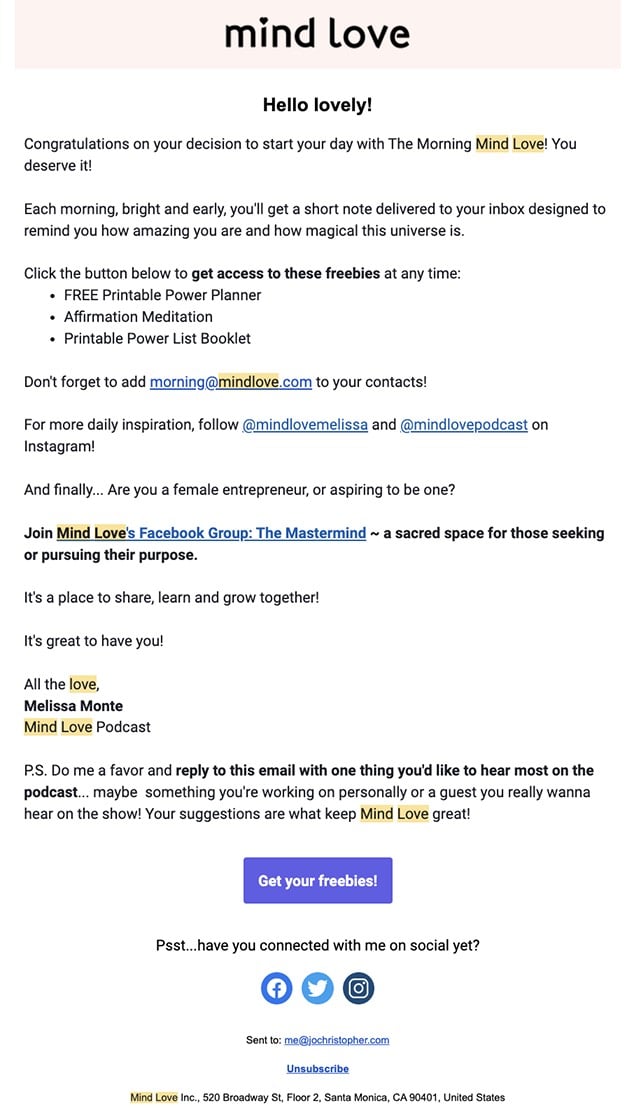
5. Kickback Emails

Once someone completes your form, thank and welcome them.

A kickback email gives your new lead something in return for their information. In the case of an email sign-up, you’ll want to welcome your new lead and perhaps offer them links to useful content. Get them excited about their decision to give you their personal information.

Newsletter sign-up form mind love kickback thank-you email example

Image Source

This is also where you can provide your new leads with their discount codes, details on future sales, access to exclusive communities, why you value their interest in your business, and how you will support them in the future.

Now that we’ve reviewed email sign-up form best practices, let’s dive into some examples. Here’s a collection of our favorite email newsletter forms and CTAs.

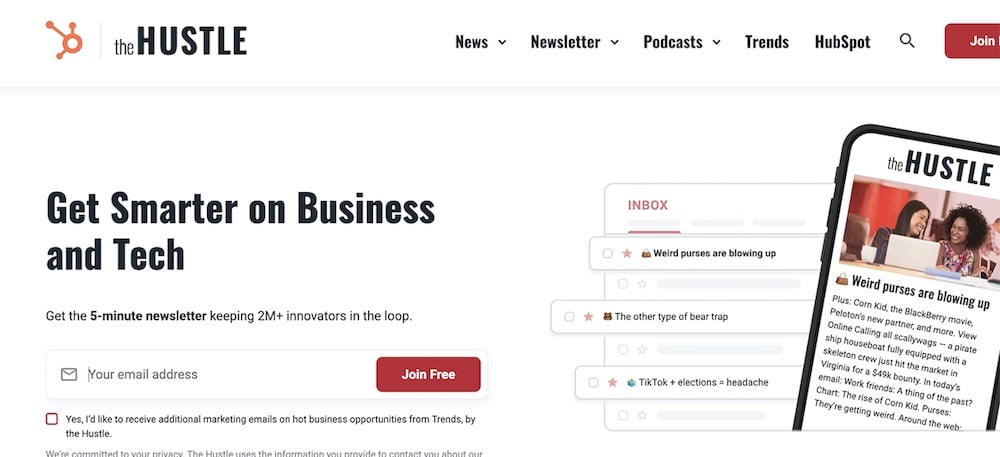
1. The Hustle

The Hustle website has an email sign-up form with a clear benefit statement. Any website visitor could look at this subscription landing page and understand what they will get from signing up in a matter of seconds.

Newsletter sign-up form for the Hustle example

Image Source

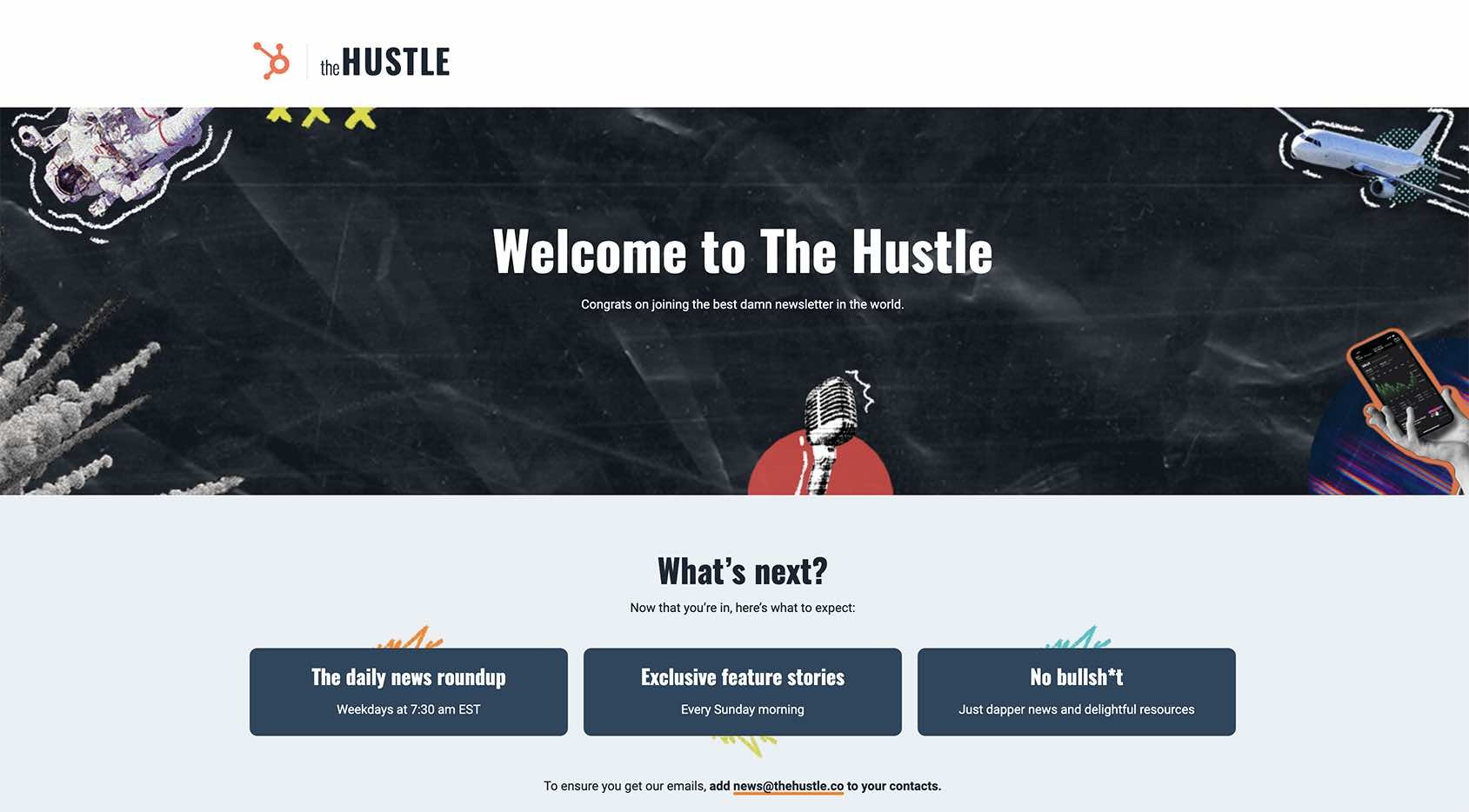
Newsletter sign-up form Welcome to the Hustle example page

Image Source

They also utilize the “Thank You” page to convey a direct statement of how the company values the subscriber’s time and will intentionally curate scheduled-themed content.

2. Blavity

When you head to Blavity’s website, the first thing you see is their email pop-up. That’s because their entire business revolves around a subscription. Blavity is an online publication that gathers top news stories from around the globe. The placement of their sign-up form fits with its offering.

Newsletter sign-up form example, Blavity Subscribe Call to Action pop-up

Image Source

Blavity also has a landing page specifically devoted to email sign-up.

Newsletter sign-up form example, landing page for Blavity online publication's newsletter

Image Source

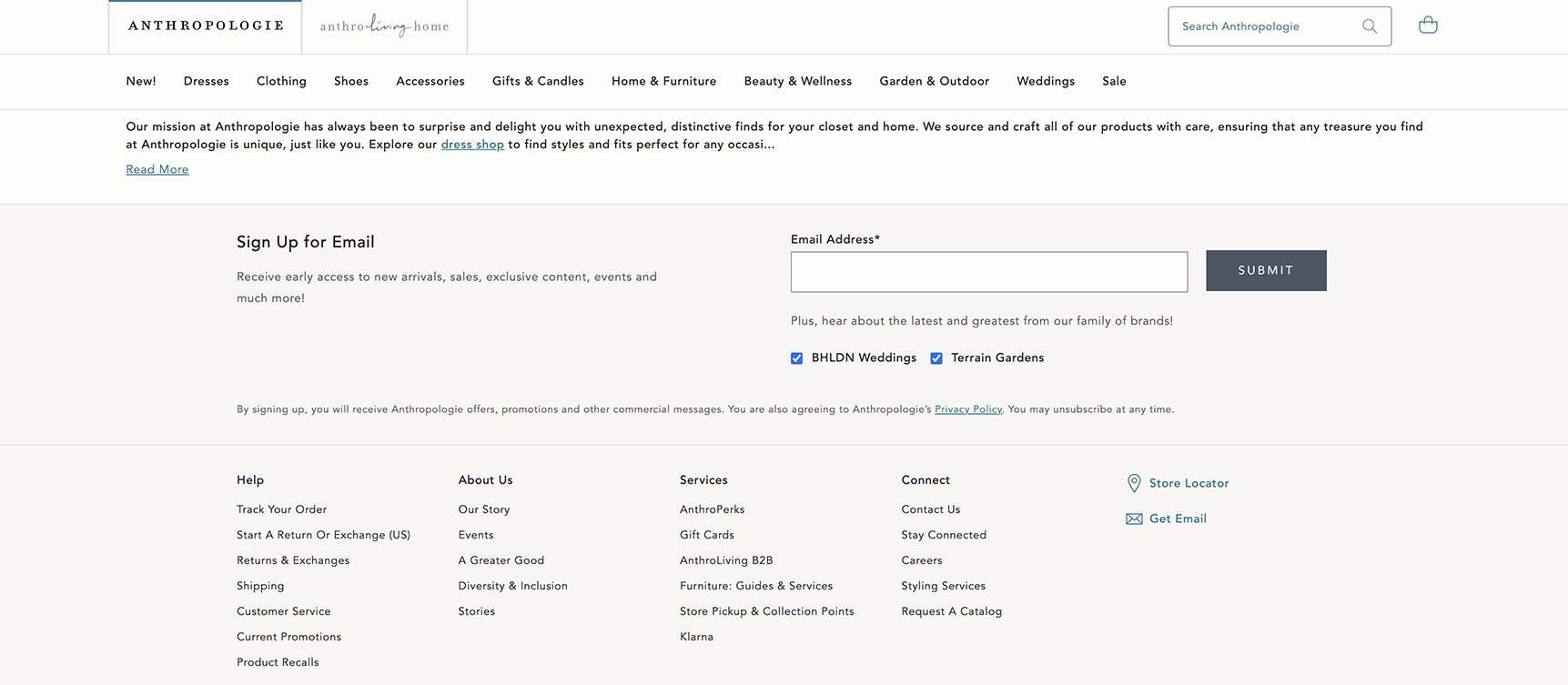
3. Anthropologie

Newsletter sign-up form example, anthropologie homepage with signup form at the bottom of the page above the footer

Image Source

Anthropologie places their email sign-up form towards the bottom of their homepage after users have had a chance to look around and become familiar with the site. Their sign-up form has a short description of what leads can expect once they sign up. Anthropologie also respects their visitors’ time by simply asking for an email address.

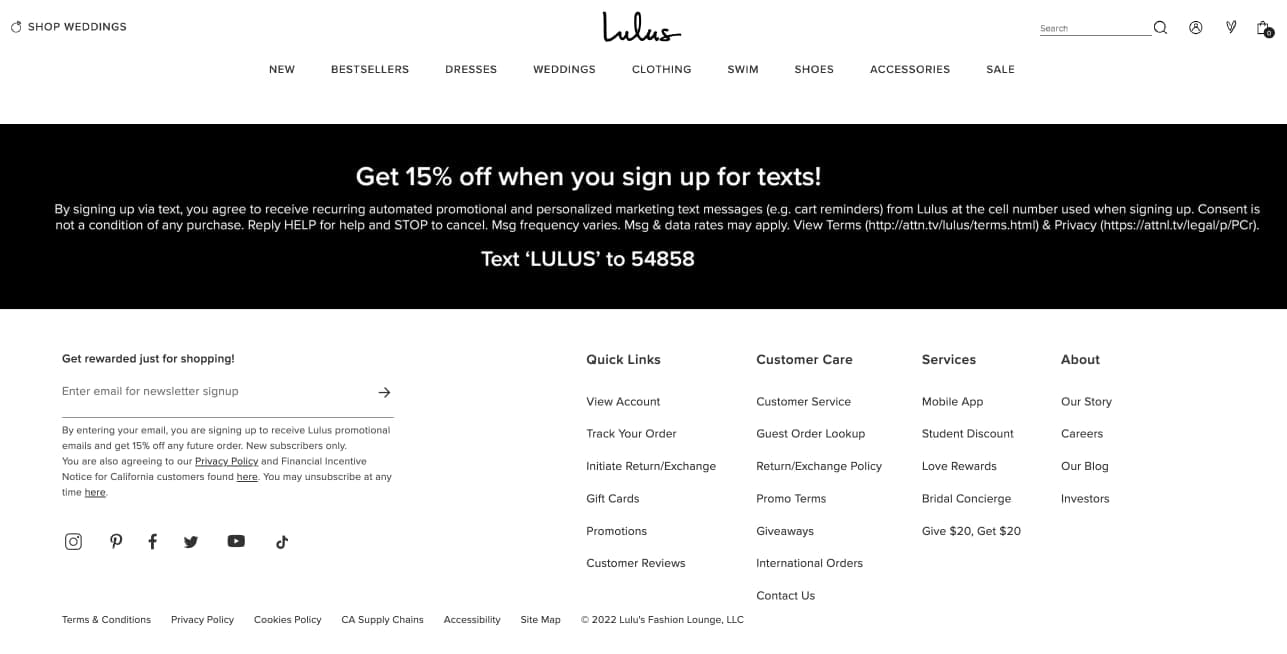
4. Lulus

Newsletter sign-up form example, lulus sign up form at the bottom of the homepage above the footer

Image Source

Lulus form is located towards the bottom of their homepage. Their email sign-up form gets website visitors excited about converting with an offer: a 10% discount code upon signing up.

The form is simple and only requires an email address. After form submission, new leads receive a kickback email that welcomes them and provides them with the code, as promised.

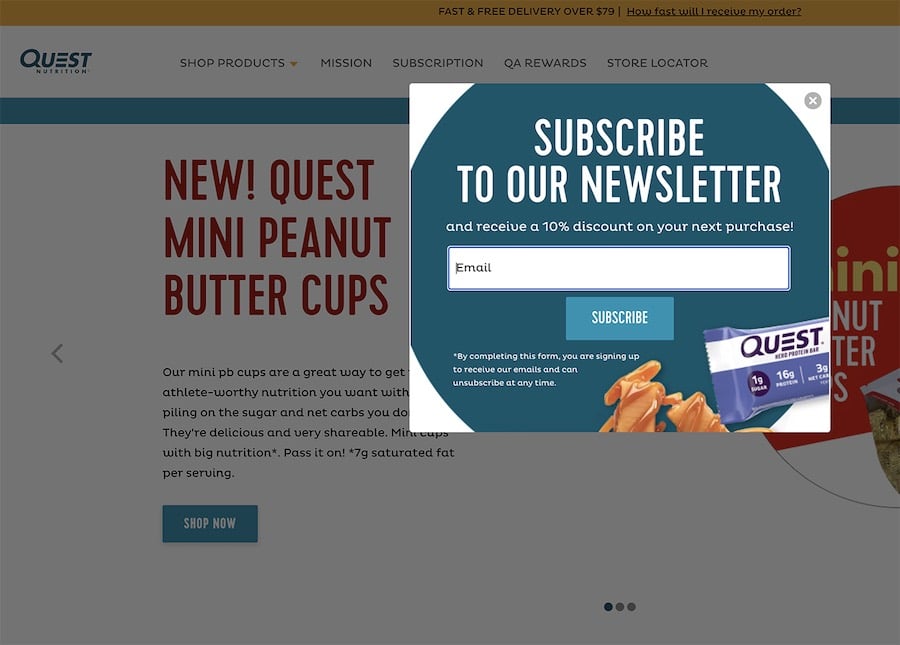
5. Quest Nutrition

Newsletter sign-up form example, quest nutrition pop-up window that says 'sign up now!' along with a subscription formImage Source

Quest Nutrition’s form is in a pop-up window that dims the background, eliminating any distractions. The form offers incentives like recipes, discounts, and surprises for visitors to sign up. Only an email address is required. Website visitors also have the option to bypass the pop-up and look around the site instead.

Email sign-up forms are a simple, efficient, and effective way to obtain leads, create more conversions, and increase your overall sales. You’ll reach your audience with email sign-up forms that are straightforward and embedded in a convenient location on your website.

So, take a few minutes to create your own email sign-up form and get started broadening your customer base, developing relationships with your potential customers, and increasing your number of leads today. From there, you can close the gap between lead and customer through email marketing.

Editor’s note: This post was originally published in October 2018 and has been updated for comprehensiveness.

New Call-to-action

Categories B2B

How to Promote Your Business on Facebook

I was only 12 years old when Facebook became available for anyone with a valid email address.

By the time I was 14, one of the top trends was to create a fan page that anyone could follow. I remember that feature being used by friends as a way to tell jokes and post funny content.

But things are a bit more sophisticated in the world of social media nowadays.

Now, Facebook is a great place to advertise your business and interact with prospective and current customers.

Below, let’s discuss how you can use Facebook to promote your business.

Free Guide: How to Market on Facebook & Instagram

1. Sign up for a business page.

The first thing you need to do is create a business page. This is a simple process. All you have to do is log on to Facebook, click “Pages” in the left sidebar, and then “Create New Page.”

To get started, you’ll upload a profile picture, a cover photo, and basic information about your business. This will include what type of business you run whether you run a B2B business, a local business, or an ecommerce site.

Once you sign up, it’s smart to start optimizing your page.

2. Optimize your profile.

Now that your profile is up and running, you’ll want to optimize your page. This means writing your About section, adding business information like your website and business hours, and including a call to action button such as “Book Now,” “Shop Now,” or “Sign Up.”

Additionally, you’ll want to draft several posts that will engage your audience. Think about what type of posts they might like on social media. How are they interacting with your competitors? What posts perform well for your competition? This is the type of content you’ll want to model yours after.

Now that you’ve built and optimized your business page, it’s time to engage with your community.

3. Be active in Facebook groups.

A great way to promote your business on Facebook is to participate in Facebook groups. You can engage with public groups or join private Facebook groups.

To get started with this, you’ll want to consider what type of groups your audience would be a part of. Once you’ve finished brainstorming, you can join the same communities that your audience is active in.

4. Create your own Facebook group.

While it’s important to engage with your audience where they’re at, it’s also important to attract your audience to your own pages. You can do this with your own Facebook group.

Krystal Wu, a social media community manager at HubSpot, says, “Facebook Groups allow our audience to connect with each other and have valuable discussions. Businesses who center a Group around their brand or industry can build a community around it — making our brand and products even more valuable to potential customers.”

5. Promote events.

Another way to promote your business on Facebook is to use the social media platform to promote your events. If you’re a local business, this is especially important.

Attracting people to an event can feel like an undertaking, and you need to use all the tools at your disposal to promote it. That’s why you should post your event on Facebook and also plan an ad campaign.

6. Interact with your followers.

This might seem like social media 101, but it’s important to interact with your followers. The best way to get engagement on social media is to make sure your posts show up for your followers. To do that, you need to create interaction. Make sure you answer questions, respond to comments, and participate in your online community.

7. Use live streaming.

Facebook live is an excellent tool to promote your business and provide valuable content to your audience. You can use this feature to showcase your company culture, host a panel discussion on industry topics, or even display your industry expertise.

Additionally, you can host events virtually on Facebook live as a way to interact with your audience that can’t be at an event in person. This is a great way to promote your business because going live will notify your followers and prompt them to engage with your page.

8. Run Facebook ads.

One of the best ways to promote your business with Facebook is to use Facebook ads. The social media giant has created one of the most popular ways to reach your audience with its advanced targeting options.

To get started with ads, you can review this lesson from Facebook directly. Make sure that you review the types of Facebook ads and various bidding strategies to help you succeed.

9. Talk about your company culture.

When you post on social media, your content should promote your overall brand messaging. A great way to do this is to talk about your company culture. Showcase your employees and their day-to-day tasks.

You can also use Facebook as a recruitment tool, hosting panels on what it’s like to work at your company, or posting jobs right on your business page.

10. Manage contests and giveaways.

Encouraging engagement is one of the main objectives of Facebook promotion. To do this, you can host contests and giveaways that your audience will want to participate in. This will help increase brand awareness and encourage interaction from your followers.

11. Have a customer service representative field comments and requests from customers.

Social media is a great way for your customers to get in touch with you. However, if they choose to reach out to you on Facebook, you need to be prepared to answer their questions and address their requests. To do this, consider having a few people from your customer service team answer messages or comments from your customers.

12. Post valuable content.

Ultimately, the best way to promote your business on Facebook is to provide valuable content for your audience. Content is what attracts people to your social media profile and is the way you’ll build an audience online. You’ll want to include different types of content including images, videos, text, Stories, or even polls.

Facebook is an essential part of your social media marketing. No matter what type of business you’re running, it’s important to develop both organic and paid social media strategies to promote your business on Facebook.

Free Resource: How to Reach & Engage Your Audience on Facebook

Categories B2B

How to Add Social Media Icons to Your Email Signature [+ Free Resources]

78% of consumers are willing to buy from a company after a positive experience on social media, according to a poll by Harris. But that can’t happen if they can’t find you. Adding social media icons to your email signature makes it easy for customers to connect with you on their terms.

Create a new, on-brand email signature in just a few clicks. Get started here.  (It's free.)

Today, we’ll cover the easiest ways to add social media icons to your email signature, plus offer a few free resources to get it done. After that, we’ll cover a few common questions, including:

Below, we’ll discuss how and when you’d use either method.

Use an email signature generator

We recommend using a signature generator, like HubSpot’s free signature generator, for a few reasons. A generator will:

  • Automatically size the social media icons properly.
  • Make sure your icons match your theme.
  • Align the icons properly with the rest of the signature.
  • Ensure your links are active.

Those tasks have to be done manually when using the other method, and messing up even one can make your email look unprofessional.

To add social icons with the generator:

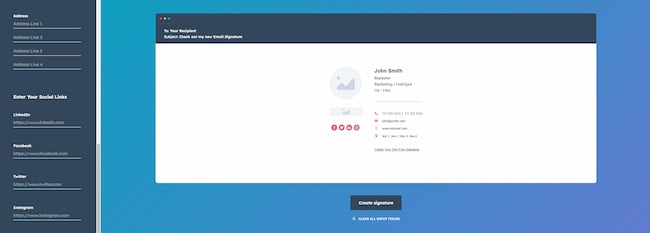
  1. Simply paste your social links into the right fields and the generator does the rest. (We’ll cover where to find your social links below.)
  2. Adjust the look to suit your brand or style.
  3. Copy the image or the source code and paste it into your email client.

Adding social media icons with an email signature generator

Make your email signature for free

Add an image within your email client

Maybe you’re already happy with your signature, and you just need to add social media icons. If that’s the case, most email clients (like Gmail, Outlook, etc.) will allow you to add them as an image to your signature.

One important note: You’ll want to add the icons using the image address or image URL, and not by uploading the images to your email client. That second method will add the images as an attachment to all your outgoing emails. Adding unnecessary attachments can potentially affect your delivery rates.

For each social media site you’ll need to:

  1. Find icons of the right size, shape, and color. (We’ve got some options below.)
  2. Right-click the image of the icon and select “copy image address” or “copy image URL”.
  3. In your email client’s signature editor, click on “insert image.”
  4. Paste the image URL into the field given.
  5. Adjust the placement and alignment of the icon if needed.
  6. Copy the social link that matches the icon you’re adding.
  7. Highlight the newly added icon image and click “insert link.”
  8. Paste the social link into the field.

Add Social Media Icons to my Gmail Signature

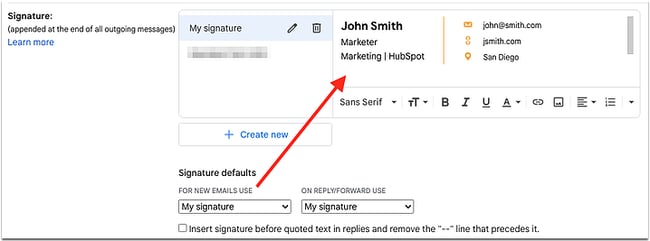
  1. Click on the cog in the top right corner.
  2. Click on “Settings”.
  3. Scroll down until you see the email signature editor.
  4. Click on “+ Create New”
  5. Paste in your email signature (or follow the instructions above to add images).
  6. Under “Signature defaults” select your new signature.
  7. Scroll to the bottom and click “Save changes”.

Add social media icons to your email signature in Gmail

See more detailed instructions on how to add a signature in Gmail.

Add Social Media Icons to my Outlook Signature

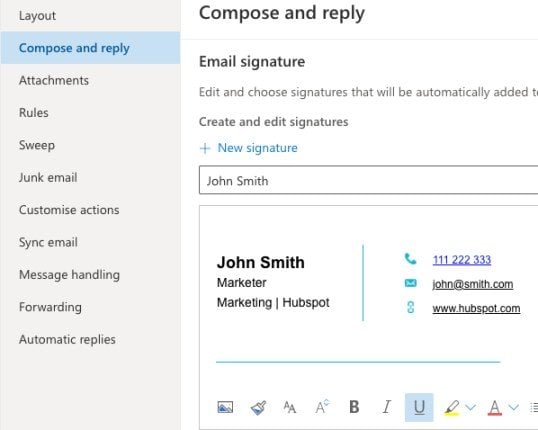
  1. Click on the gear icon in the top right corner.
  2. Click on “View all Outlook settings”.
  3. Select “Compose and reply”.
  4. Scroll down to the email signature section.
  5. Paste in your email signature (or follow the instructions above to add images).

Add social media icons to your email signature in Outlook

See more detailed instructions on how to add a signature in Outlook.

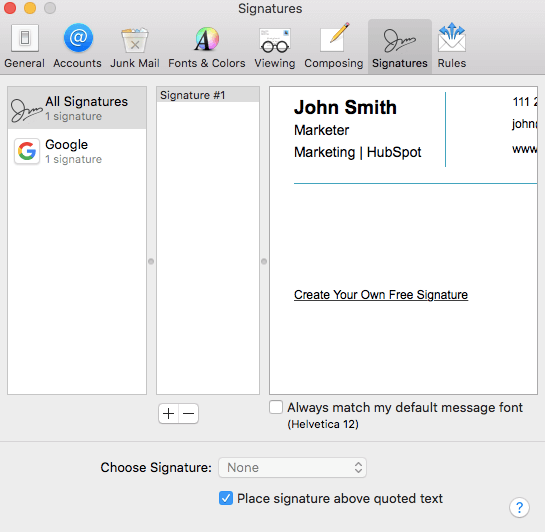
Add Social Media Icons to my Apple Mail Signature

  1. Click on “Mail” and then “Preferences” in the top left corner.
  2. Click on the “Signatures” tab.
  3. Click the + button underneath the middle column.
  4. Paste in your email signature (or follow the instructions above to add images)
  5. Uncheck the box that says “Always match my default message font.”
  6. Close the pop-up window.

Add social media icons to your email signature in Apple mail

Free Social Media Icons for Email Signatures

Feel free to use these social media icons in your signature, or add some automatically with HubSpot’s free email signature generator.

Social Media Icons_Facebook Social Media Icons_Twitter Social Media Icons_Instagram Buning Questions - elements_Linkedin

Still not finding what you’re looking for? Below, you’ll find links to each social media site’s brand kit. In each kit, you’ll find other sizes, shapes, colors, and file types.

Please note: By downloading the icons from a brand kit and uploading them to your email client, you’ll be adding them as an attachment to all your outgoing emails. Adding attachments could affect your delivery rate.

You can avoid this by adding them using the methods described earlier in the blog.

Should I put social media icons in my email signature?

Yes, you should put social media icons in your email signature. Consider that 20% of Millennial and Gen-Z consumers outright prefer to use social media for customer service, according to a study by ZenDesk.

But no matter what generation your customers are, giving them more options makes it easier for them to contact you.

What size should my social media icons be?

Your social media icons need to be large enough that your recipients can easily click or tap on them. But they still need to be small enough to not distract from the rest of your email signature.

If you’re adding them manually, start by looking for icons that are roughly 21px by 21px and adjust from there.

Otherwise, an email signature generator should automatically size them to fit your signature.

What social media sites should I include in my email signature?

Your email signature should include 3 to 5 links to the social media sites that are most relevant to your business.

For example, a freelance photographer would definitely want to include Instagram. On the other hand, a recruiting agency would want to be sure to include LinkedIn.

Whatever you decide, just be sure not to include any unused icons. Broken links of any kind can make your emails seem unprofessional.

Some popular social media sites to consider include:

  • TikTok
  • WhatsApp
  • Pinterest
  • YouTube
  • Facebook
  • Twitter
  • Instagram
  • LinkedIn

Should my social media icons link to my business or personal account?

In general, your social media icons should link to your business’s social media accounts. This creates a uniform customer experience, and it’s also a great way to boost your number of followers.

The exception to this rule is an employee who needs to be contacted directly. For example, a recruiter or sales rep may find it useful to link to their professional LinkedIn account.

You’ll want to avoid linking to personal accounts, even if you’re the sole owner of the business. Your private social media may not always reflect the image you want to convey to your customers.

Where do I find my social media links?

LinkedIn

  1. Click on the “Me” icon in the top right of the homepage.
  2. Click “View Profile”
  3. Click on the “Contact info” button below your profile picture.
  4. Your link will look like this: linkedin.com/in/[username]

Facebook

  1. Click on the icon of your profile picture in the top right corner.
  2. Click on “Settings & privacy”
  3. Click on “Settings”
  4. Your link will look like this: https://www.facebook.com/[username]

Twitter

  1. Click on your profile picture in the top left corner.
  2. Copy the URL from the URL bar of your browser.
  3. Your link will look like this: https://www.twitter.com/[username]

Instagram

  1. Click on your username in the top right corner.
  2. Copy the URL from the URL bar of your browser.
  3. Your link will look like this: https://www.instagram.com/[username]/

YouTube

  1. Open the left-side menu.
  2. Click “Customization”
  3. Click “Basic info”
  4. Your link will either look like: youtube.com/c/[username] or youtube.com/channel/[channel ID]

Be More Social

No matter which method you choose, adding social media icons to your email signature is a benefit to you and your customers. You’ll boost engagement with your brand, and your customers get to use the platforms they’re already comfortable with.

New Call-to-action

Categories B2B

The Best 17 Website Plugins in 2022

There may be a feature or experience you want to add to your website, but you don’t have the coding chops to build it yourself. A website plugin can help.

So what are website plug-ins? Plugins are extensions that expand the functionality of your website. All you have to do is hit “install.”

Learn More About Our WordPress Live Chat Plugin

In this post, you’ll learn the benefits of using website plugins. You’ll also see 17 website plugins that you can add to your site.

The beauty of website plugins is in their simplicity. All you have to do is download and install — or plug in the plugin!

How to Assess if a Plugin Is the Right Solution for You

When you don’t know how to choose, here are some general rules to find the best plugin for your needs.

1. Understand your website platform.

Plugins are developed for specific content management systems. When picking between plugins, make sure your options are compatible with your website.

For example. if you’re running your website on Shopify, then a WordPress plugin isn’t going to work. In that case, you’d want to look into Shopify apps.

For Wix, you’ll need Wix apps, while Webflow will require Webflow plugins and integrations.

2. Identify your website’s goal.

What are you trying to achieve?

Get specific and outline the issues people are facing on your site. Find out what actions you can take to fix the problem.

For example, “The messaging on the site is too general. If we personalize the messaging, we should see conversions increase by X% within [timeframe].”

3. Conduct research.

Once you’ve narrowed down your goal, conduct research to find a solution best that’s for your specific problem. For example, you may decide a permanent plugin isn’t what you need at all.

A good starting point is to assess your website’s current performance. Website Grader, a free tool by HubSpot, can help with this audit. Website Grader will show you exactly what your domain’s strengths and weaknesses are. Once you’ve eliminated what’s not a problem, you can start shopping for a solution that solves your actual challenges.

Ideally, you’ll want a plugin that has good reviews, is compatible with your site’s platform, and offers the actual features that can help you achieve your goal.

Additionally, check how often the plugin is updated. Old or outdated plugins may pose a security risk for your website. Active plugins that are frequently updated by their developers are always a safer choice.

Once you’ve found a good option, it’s time to get it onto your site for your first test.

Having trouble finding the best plugins? We’ve conducted some of the research for you. Keep reading to learn about our 17 favorite website plugins for the year.

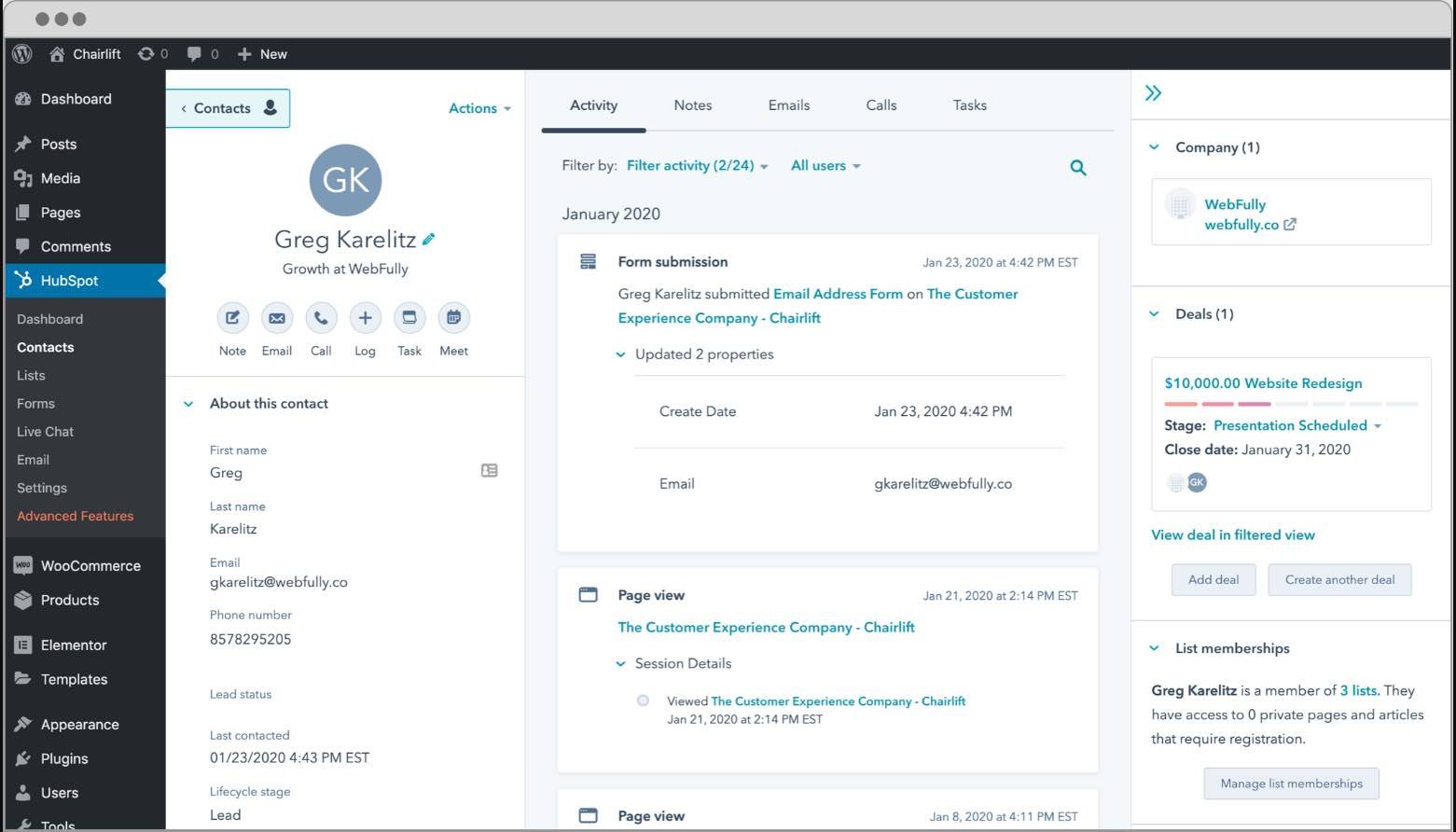
1. HubSpot: Lead Generation WordPress Plugin

HubSpot’s WordPress plugin is an all-in-one marketing and lead generation tool. This plugin can help you collect leads, create pop-up forms, and live chat with visitors. All that data you gather will then be sent to a free CRM to use for campaigns.

The HubSpot platform offers many other growth tools. Many of these tools are free. Premium options can help you accelerate your marketing, sales, and service operations.

Use case: Lead generation and customer relationship management.

website plugin example, HubSpot: Lead Generation WordPress Plugin

Image Source

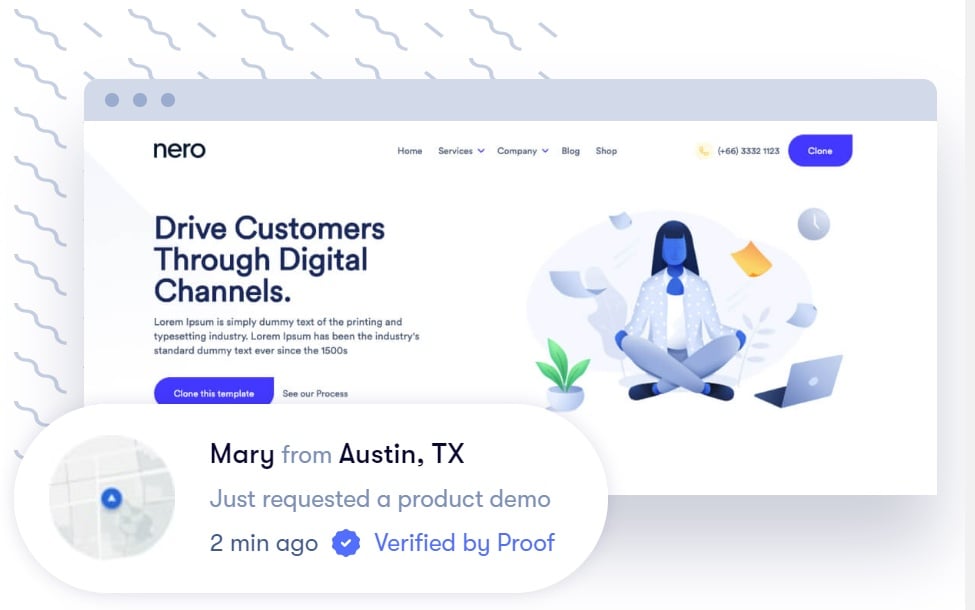
2. Proof: Social Proof Plugin for Websites

Social proof is the idea that consumers will adapt their behavior based on what other people are doing. Testimonials or data about how many people use your product are all social proof.

For example, if a customer sees a million people on your website, they’ll understand that your service is popular and helpful. This increases the likelihood that they will remain a visitor.

Good social proof elements can be the difference between a user committing to buy or exiting your site.

Proof allows you to add social proof in different forms across your site, including current live visitor numbers, notifications of current purchases, and reports of how many people have recently signed up.

Use case: Social proof to boost conversion on landing pages.

website plugin example, Proof: Social Proof Plugin for Websites

Image Source

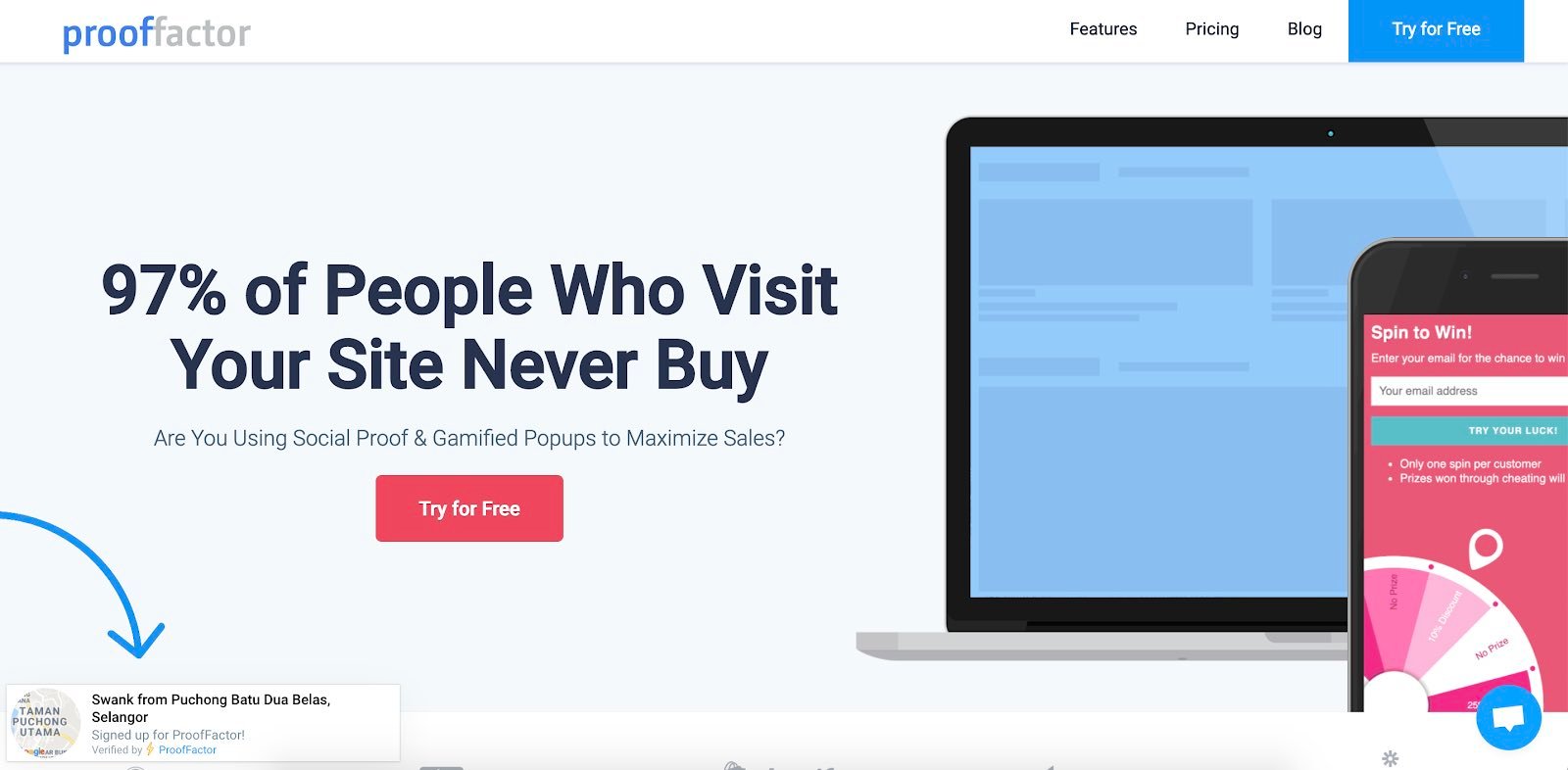
3. Proof Factor: Social Proof Plugin

Proof Factor is another plugin geared toward social proof elements. This plugin can show who recently bought a product and live visitor counts. This allows new visitors to quickly visualize the popularity of your products or services.

Best of all, Proof Factor also offers gamified pop-ups to add another lead generation element to your site and further engage new prospects.

Use case: Display social proof for increased conversion.

website plugin example, Proof Factor: Social Proof Plugin

Image Source

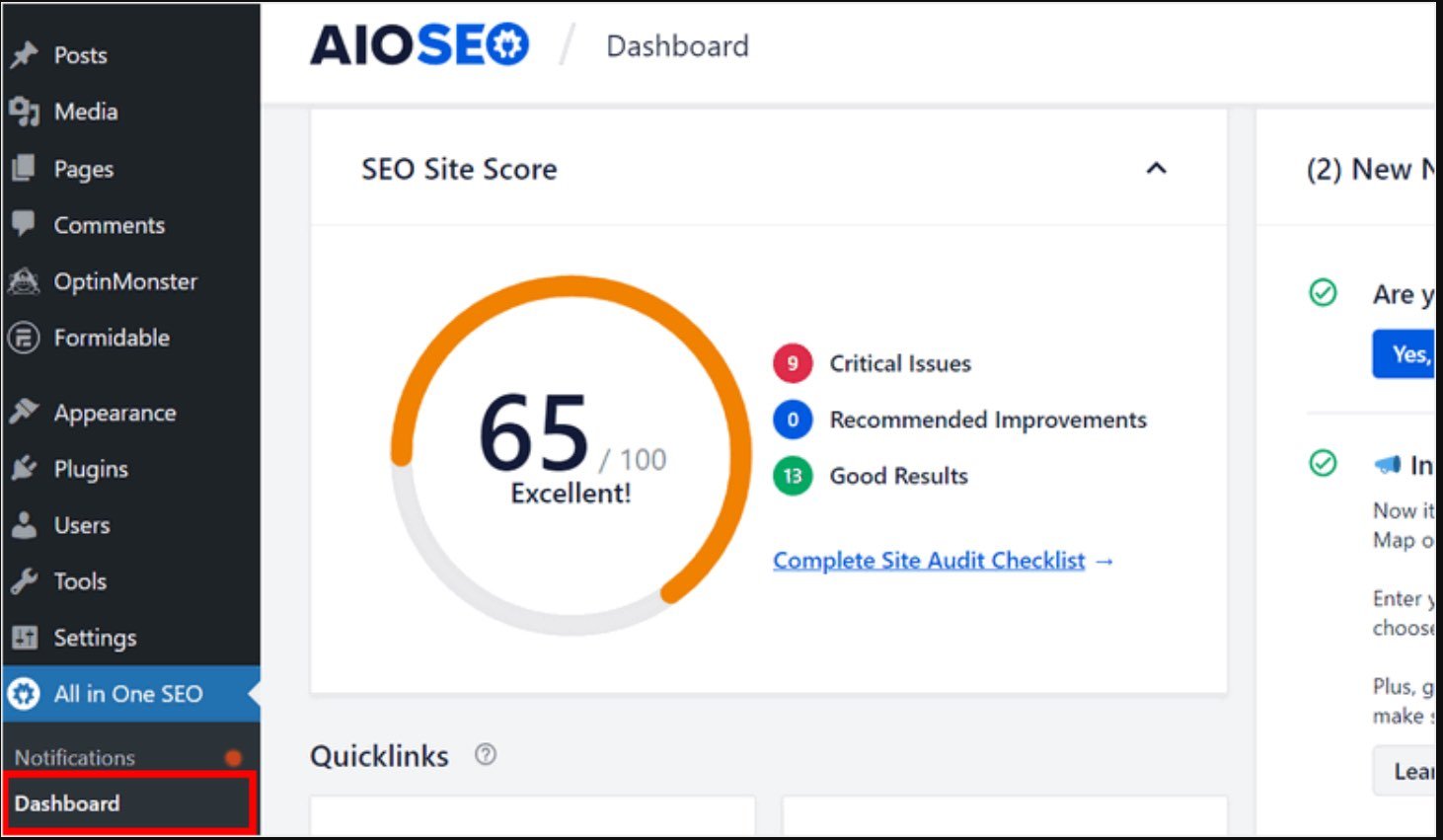
4. All in One SEO: Search Engine Optimization Plugin

All in One SEO (AIOSEO) is a WordPress plugin for managing your website’s SEO. It’s perfect for website owners looking to quickly analyze their site’s organic performance.

With this plugin, there’s a smart website wizard that lets you quickly optimize your settings based on your site’s profile. There’s also added functionality for local SEO and WooCommerce SEO.

Use case: Improving website traffic with SEO.

website plugin examples, All in One SEO: Search Engine Optimization Plugin

Image Source

5. WP Rocket: Caching Plugin for WordPress

If you care about traffic, user experience, and conversions, you shouldn’t overlook your website speed.

WP Rocket is one of the most powerful caching plugins for WordPress. This plugin helps you make your site faster in just a few clicks. Right upon activation, the plugin applies 80% of web performance best practices — simple as that.

Enable the advanced performance features to give your site an added boost. You can easily remove JS and CSS render-blocking resources, minify CSS and JS files, lazy load your images, and more. You’ll save time and optimize your loading time, Core Web Vitals, and PageSpeed Insights score.

Use case: Make your website load fast.

website plugin example, WP Rocket: Caching Plugin for WordPress

Image Source

6. Optimole: Image Optimization Plugin

Nothing slows a site down like large image files. Optimole processes your images and reduces their weight without sacrificing quality. This plugin will automatically take your images and process them in real time with lazy loading.

With Optimole, your images automatically get adjusted to the right image size for your visitor’s browser and device. If they’re on a low-quality internet connection, Optimole will downgrade the image quality accordingly so your user experience won’t be affected.

Use case: Reduce image weight without sacrificing quality.

website plugin example, Optimole: Image Optimization Plugin

Image Source

7. RightMessage: Conversion Rate Optimization Plugin for Websites

RightMessage helps you serve your customers through personalized content.

You’re able to segment users based on slide-in questionnaires, acquisition sources, or tags from your email service provider or CRM. Then, based on those segments, you can dynamically change messaging and CTAs to better appeal to that segment and increase conversion rates.

Additionally, the plugin integrates with a ton of site platforms including HubSpot, WordPress, and Squarespace.

Use case: Personalize calls to action to boost conversion.

website plugin example, RightMessage: Conversion Rate Optimization Plugin for Websites

Image Source

8. LimeSpot: E-commerce Personalization

LimeSpot is an e-commerce-specific plugin that’s available through the Shopify app directory.

It runs on powerful AI that analyzes user behavior as both an individual, and as part of a cohort to build out their user profile.

Once the AI’s analysis is complete, it makes dynamic product recommendations that are specific to each user. This massively increases relevancy and conversions.

Use case: Conversion optimization for e-commerce.

website plugin example, LimeSpot: Ecommerce Personalization

Image Source

9. Hotjar: Website Plugin for Behavior Monitoring

Knowing how your users are interacting with your site is key to identifying UX issues and design problems.

Hotjar’s heat maps provide you with an overview of user engagement. It can help highlight which CTAs and links are too vague, as well as where you’re losing people in long-form content. Hotjar even allows session recordings for real-time analysis.

As a bonus, Hotjar offers feedback polls for more explicit data collection.

Use case: Behavior monitoring to improve user experience.

website plugin example, Hotjar: Website Plugin for Behavior Monitoring

Image Source

10. Qualaroo: User Feedback Collection Plugin

Qualaroo takes the feedback element of Hotjar to the next level.

With Qualaroo you’re given a suite of features that automatically collect user data through more advanced targeting. You also have the option of including elements, like decision trees, to dig deeper into your questions.

Use case: Collect user feedback to improve products and experience.

website plugin example, Qualaroo: User Feedback Collection Plugin

Image Source

11. Jumper.ai: Conversation Checkout Plugin

Jumper.ai is best known as a social commerce tool, allowing brands to sell directly through their social media channels. However, Jumper.ai also offers a plugin that can help you make sales on your website.

This plugin takes Jumper.ai’s checkout bot and allows you to run it directly on your site. With Jumper, you can add this conversational checkout bot directly to your product or service landing pages.

For instance, here’s how it would look on a blog post.

website plugin example, Jumper.ai: Conversation Checkout Plugin

Image Source

Use case: Chatbot to help you increase conversions and improve your site’s user experience.

12. Intercom: Live Website Chat Plugin

Intercom allows you to install a small widget in the bottom right corner of your site to engage users with a live chat.

With Intercom, you can set up an automated chatbot and connect customers with live operators. Additionally, you can use the tool to offer in-app support if you’re running a SaaS solution.

Best of all, Intercom also comes with an email marketing solution to further meet your business needs.

Use case: Set up automated chatbots and live chats to walk users through challenges.

website plugin example, Intercom: Live Website Chat Plugin

Image Source

13. OptinMonster: Lead Generation Website Plugin

OptinMonster is a lead generation service that gives you the ability to target offers to specific user segments.

With OptinMonster, you can set offers to appear only after a visitor has been on your site for a set period, displays exit intent, or has visited certain pages. Ideally, this will help you guarantee your offers are reaching people once they’re eager to learn more.

Use case: Capture leads with exit intent pop-ups and other time-sensitive methods.

website plugin example, OptinMonster: Lead Generation Website Plugin

Image Source

14. Yoast SEO: Website Plugin for SEO

SEO is a complex discipline to master. Yoast can help your team follow best practices.

Yoast’s SEO plugin isn’t a perfect solution. However, this plugin works well for SEO beginners who need a good overview of their actions. Yoast’s plugin can help keep your website on track and ensure you’re truly optimizing your site for search.

For instance, the tool can amend meta descriptions for you. This ensures you’re only showing key information in search results and social shares. When you’re busy or don’t have the resources to dedicate to SEO, Yoast can help you level up.

Use case: Beginner-friendly tool to add meta tags without code.

website plugin example, Yoast SEO: Website Plugin for SEO

Image Source

15. WooCommerce: Ecommerce Plugin for WordPress

WooCommerce is one of the bigger e-commerce solutions out there. It extends WordPress sites into online stores.

It’s a perfect addition for WordPress users who want to start selling their own products.

Use case: Sell products on your WordPress site.

website plugin example, WooCommerce: Ecommerce Plugin for WordPress

Image Source

16. Drift: Conversational Marketing Platform

Drift has taken the concept of conversational marketing to the next level, and is a great addition to other marketing tools in your arsenal.

Drift offers chatbot services that can help make product suggestions or answer common questions. This plugin also allows you to segment messages based on your users’ accounts, creating a more personalized user experience.

Use case: Personalize marketing to boost conversions.

website plugin example, Drift: Conversational Marketing Platform

Image Source

17. VWO: A/B Testing Plugin

Testing different elements of your site, from headlines and images to CTAs and messaging, is key to improving your marketing results. However, running individual A/B tests can be time-consuming and difficult.

Fortunately, the VWO A/B testing tool is an all-in-one solution that automatically runs A/B tests on your pages. The results can help you improve the overall optimization of your website.

Use case: A/B testing to diagnose issues and increase conversions.

website plugin example, VWO: A/B Testing Plugin

Image Source

What website plugin will work for you?

There are countless website plugins out there, and each one aims to solve a unique website problem.

If your goal is to minimize friction in the purchase or sign-up journey for your users, for example, a behavior monitoring tool like Hotjar will help. Figure out your goal, then find a plugin that helps you achieve it.

And if you’re looking for a free website plugin that’ll help you generate more qualified leads, check out HubSpot’s free solution below.

Use HubSpot tools on your WordPress website and connect the two platforms  without dealing with code. Click here to learn more.

Categories B2B

Creating a Channel Strategy: The Complete Guide

Be honest. Do you know what your non-marketing colleagues do all day?

Sure, you might have a general idea of what your co-workers in sales, finance, and HR do, at least categorically. But it seems that many of us — myself included — have those days, weeks, and months when we’re so bogged down in our own daily hustle, that we become a bit oblivious to what everyone else around us is working on. After all, that’s probably why the phrase, “put your blinders on” exists.

But while a colleague’s job might look different from our own, there’s actually quite a bit that we, as marketers, can learn from them. One of those things is channel strategy.

→ Download Now: Free Marketing Plan Template

That’s why I recently sat down with my colleague, Adrianne Ober, a Channel Consultant here at HubSpot. After speaking with her about what she does every day — and about the most important knowledge she’s gained in this role — I’ve realized that there are a lot of channel strategy lessons that marketers can apply to their own work.

So, what did we learn? Read on to find out — or listen to our interview with Adrianne by pressing “play” below.

What Is Channel Strategy?

A channel strategy, according to TechTarget, “is a vendor’s plan for moving a product or a service through the chain of commerce to the end customer.”

In many environments, this kind of channel strategy takes the form of a reselling program — here at HubSpot, we work with Marketing Agency Partners who not only grow with HubSpot software but also, teach their clients how they, too, can be more successful with it.

That’s where channel consultants like Ober come in. “My role is a combination of an account manager and an implementation specialist,” Ober explains, but her day-to-day work encompasses much more than that. “Our focus is to work with our new Agency Partners, to onboard them to the program and support their reselling and delivery efforts.”

Reselling programs aren’t exactly uncommon, especially within tech companies, but what makes Ober’s job different is its true partnership nature. “We really do invest a ton more than other companies do in their partner programs,” she says, “to ensure they are getting the most out of it to help grow their businesses.”

What Can Marketers Learn From a Channel Consultant?

Building Your Own Channel Strategy

Not all marketers work for agencies, but many of us are responsible for positioning our respective products and services as solutions for our target audiences. For example, HubSpot’s Marketing Software provides automation solutions for marketers — what solutions does your organization offer?

In a way, channel strategy could be described as a formal approach to word-of-mouth marketing. How can you provide solutions to your customers that they, in turn, can share with and provide to their own networks? Ober challenges and encourages marketers to ask that question, find the best answer, and make it a reality.

There’s a “relationship-building aspect” of every marketer’s job, she explains, even for those who don’t work with customers directly. Chances are, you’re still responsible for crafting the messages and content that’s going to reach customers, and ultimately, that’s one way for brands to build a relationship with a target audience — by establishing themselves as a trustworthy, shareable resource for solving problems and meeting needs.

But where can marketers begin? “Product knowledge is … imperative,” Ober says. Start by becoming an expert in the solutions provided by your organization — not just the products and services you offer, but also, with the industry at-large. “We need to be comfortable with usage and training,” she explains, in order to establish that trust with both current and potential customers.

A Marketer’s Biggest Pain Points

The thing about HubSpot’s Agency Partner Program — one that even I’m guilty of forgetting — is that its channel consultants work with marketers, day in and day out. That means people in Ober’s position hear about the most common struggles faced by marketers every day and are tasked with proactively offering solutions.

So not only can marketers stand to benefit by implementing their own strategies — but speaking with people like Ober, it turns out, can help us to take a step back, examine our biggest pain points, and figure out how to efficiently tackle them.

“The biggest struggles I hear about are pricing, process, scaling, hiring, and time management,” she explains. In other words: growing pains. “In order for agencies to scale their businesses, they need to develop a repeatable process, which means they need to have a handle on time management for their team and make the right hires at the right time.”

Sound familiar? Maybe that’s why growth marketing is such a hot topic right now — no matter the size of the company they work for, it seems that these are pains experienced by a number of marketers. Those working in SMBs are often tasked with many of the responsibilities mentioned by Ober to help their employers grow. And those working for larger organizations, while not necessarily tasked with growing the business, are often tasked with building, executing, and growing new campaigns and initiatives.

That’s why it’s so important, Ober says, to make time for the learning process, no matter how “underwater” marketers tend to feel when they’re facing deadlines and other time-sensitive priorities.

“Our most successful partners make the time to build their process, invest in the education we provide for their team and take the time to price their services appropriately,” she says. “Marketers can and should make time to keep their finger on the pulse of the industry [they work in], connect with peers, and read up on trends.”

A Similar Skill Set

Finally, I asked Ober, “What else can marketers learn from a channel consultant?” To answer that, she pointed to many of the skills required of her job that overlap with those most crucial to a marketer’s success.

“This role requires us to confidently assess a marketing strategy as it relates to the overall goals,” she says, “whether it’s for a Partner Agency’s own marketing or one of their clients.”

And no matter what their industry, it seems that skill is highly valuable to all marketers — to be able to objectively measure their own strategies, and to figure out what is (not) working.

And “even more so,” Ober explains, is the shared, necessary ability of both marketers and channel consultants “to recommend the right tools and approach to go with the strategy.”

But doing that requires a high-level of communication skills, whether you’re making these recommendations to customers, your colleagues, or your boss. “We need to be able to [identify] not only where these gaps may be,” Ober points out, but also to align them with goals. Skilling up in those areas, she says, can ultimately help marketers accurately evaluate the feasibility of a situation, whether it’s marketing strategy or budget — or being able to predict how (and if) your brand will resonate with a given audience.

Looking Forward

With INBOUND on the horizon, Ober says she’s looking forward to discussing channel strategy and exchanging knowledge with industry professionals.

“I love seeing my Partners in person,” she shares. “I’m excited to talk with them about some products that were teased last year and are in beta now.”

But maybe even more than that, is how excited she is to hear about other marketers’ ideas.

“INBOUND is a place for peers to connect, and [we all] come away from the event with a ton of ideas,” she says, “and, as a result, a ton of motivation to dig in.”

Have you used channel strategy or consulting? Let us know in the comments.

New Call-to-action

Categories B2B

5 Networking Tips for Entrepreneurs with Disabilities

Running your own business can be a great career choice for people living with long-term disability or health condition.

This may relate, in part, to the increased flexibility around working hours that self-employment brings. Working for oneself can also promote a sense of being a master of one’s destiny and not having to contend with misconceptions and discriminatory attitudes from others that are often encountered while job hunting.

For entrepreneurs of any background, business networking, be this receiving the support and advice of others, identifying collaborative opportunities, or expanding the customer base, remains an essential undertaking.

Unfortunately, as in almost every other walk of life, networking is not without barriers for disabled entrepreneurs. In this post, we’ll discuss why networking can be a challenge and best practice approaches to networking that disabled entrepreneurs can put in place to stay on top of both the competition and their own health.

Free Download: 30 Follow-Up Email Templates

Why can networking be a challenge for disabled entrepreneurs?

As Bill Sahlman, a professor of Business Administration at Harvard Business School explained in the online course Entrepreneurship Essentials: “All great companies — even those with iconic entrepreneurs — had many other people who were involved and, without whom, the company might not have made it so big.”

Networking can be a challenge for disabled entrepreneurs for various reasons, ranging from needing to expend a great deal of time and effort performing in social scenarios when one’s energy is already compromised to facing unpredictable building access issues at venues.

At the same time, a legacy of the Covid-19 pandemic remains an increased openness within the mainstream business community to conducting meetings and events remotely – allowing disabled networkers to engage with new people from the comfort of home and extend well beyond the limits of their immediate geographic location.

So, within this new post-pandemic reality of hybrid online and in-person networking opportunities, what are some excellent networking tips? Below we’ll discuss them.

5 Networking Tips for Disabled Entrepreneurs

1. Research disability-entrepreneurship organizations that can help you.

As explained previously, entrepreneurship is a popular and well-trodden path for many people living with a disability. With this in mind, there are numerous organizations out there dedicated to providing support to disabled business owners.

One such organization is the American Association of People with Disabilities which provides entrepreneurial advice, scholarships, and internships to its members.

Disability:IN is another national body offering support and advice to disabled business owners. It offers an accreditation plan called Disability-Owned Business Enterprise (DOBE) certification, and it’s meant for businesses that are at least 51% owned, managed, and controlled by an individual with a disability.

Additionally, there are local and state-run resources available to disabled business owners, as well as those catering to specific groups such as veterans.

Thoroughly researching and identifying all such organizations should be part of the early-stage due diligence of any disabled entrepreneur, as this type of highly tailored resource is low-hanging fruit for disabled business owners looking to grow their network.

2. Be realistic about the impact of your disability.

Running your own business can be physically and mentally exhausting, regardless of whether someone has a disability or not.

As the meeting and greeting that accompanies in-person networking events can be particularly draining – it’s vital that disabled entrepreneurs set realistic goals around what they can manage and understand exactly how their disability might impact them in different situations.

Going to networking events can be a great way of meeting new business contacts, but if the price of attendance is having to spend the following day in bed, entrepreneurs must weigh these considerations carefully.

Diego Mariscal, who has cerebral palsy, is the founder and CEO of 2Gether-International – a community for disabled founders offering peer support and expert mentoring. “A lot of people will go to an in-person networking event and there’ll be this frenetic competition to see how many business cards everyone can collect,” remarks Mariscal.

“That just does a disservice to both yourself and the people you’re trying to meet because, realistically, you just can’t follow up with 20 different people in any kind of meaningful way,” he continues.

“Particularly for somebody living with an energy-limiting condition – a better approach would be to pick one or two people that are going to be in attendance that you want to connect with. Once you’ve met those people – just stop. Chill, relax, and decompress because it’s going to be much easier to follow up with two or three people and build meaningful relationships than trying to do that with twenty.”

3. Be confident enough to use your disability and personality as a positive differentiator.

People with disabilities can often feel self-conscious about standing out, particularly at public events common with in-person networking. Nonetheless, at events where everyone is competing for eyeballs and attention, standing out from the crowd is potentially no bad thing, especially if it is augmented by an engaging, self-confident introduction and a display of strong interpersonal skills.

Networkers with disabilities should not be ashamed of their impairments and seek to conceal them but instead explore ways in which their disability could be viewed by others as a positive differentiator.

Heather Lawver is the founder and CEO of Perfectly Pitched, which helps early-stage social entrepreneurs develop compelling pitch decks and advanced marketing strategies. She also lives with two rare genetic conditions that cause her to experience significant levels of pain throughout the day.

Recounting her experiences working in an incubator program in 2014, Lawver says, “It has to start with you as the entrepreneur and being comfortable enough with your disabilities and who you are to ask for accommodations.”

She continues, “When I was in the incubator program, I got it into my head that, if you were pitching, it had to be done standing up because, if you were sitting down, you weren’t commanding the room. This was a problem for me with my pain issues and someone from the program offered me a chair but, at the time, I didn’t feel comfortable accepting this accommodation because I didn’t want to stand out for the wrong reasons.”

She says doing so was a mistake, that she ended up in so much pain she couldn’t speak and had to force her way through the pitch. Looking back, she recounts that she should have spotted the opportunity that sitting down to pitch could be a differentiator in storytelling style.

“It’s all about being comfortable in who you are and working out how you can turn it into an advantage rather than a disadvantage,” she adds.

4. Fine-tune and personalize your communication strategy.

If you’ve concluded that in-person events pose too many obstacles and you might be better off with online networking – be sure to take the time to hone your online communications and make them stand out.

Platforms like LinkedIn provide a great system for growing your network of like-minded professionals, but it’s vital to ensure that your online communications are polished and personalized.

Business leaders receive multiple emails and social media introductions daily.

To make yours stand out, avoid spamming generic introductory message templates in the hope of gaining someone’s attention. Instead, focus on personalizing messages and honing in on how you think a business relationship might benefit both parties.

Take the time to read the person’s profile and background to identify where their expert knowledge lies. That way, you can demonstrate a genuine appreciation of their thought leadership and how it might relate to your particular area of business.

5. If your differences make you feel awkward about approaching people, practice makes perfect.

Whether online or in-person networking, one way to ease the nerves or any awkwardness about appearing different might be to practice introductions with friends, family, and colleagues before taking the plunge into higher-stakes official networking events.

This might be particularly useful if adaptive technologies, equipment, or other accommodations are used. For someone with hearing loss, this might be trying out Zoom calls with and without an interpreter.

Someone with mixed mobility needs, who may alternate between using a wheelchair and other walking supports, might consider experimenting with both and doing some trial runs to establish what feels most comfortable when interacting with others.

Over to You

Like most activities in business, effective networking is as much an art as it is a science.

To maximize opportunities, entrepreneurs with disabilities have to begin with an honest appraisal of their health condition.

Rather than just trying to slide into a preconceived profile of what a successful business networker looks like, embrace your uniqueness and diversity, as that will be the quickest shortcut to getting to grips with your strengths and weaknesses both in business and in life.

Free Resource: How to Reach & Engage Your Audience on Facebook

Categories B2B

How to Grow Your TikTok Following [Expert Insights + Data]

Growing followers on TikTok can seem like slow process. And if you’re putting in the hard work to create amazing content, it can feel extra frustrating.Free Ebook: The Marketer's Guide to TikTok for Business [Download Now]

To help speed things up, we’ve compiled a list of the best strategies to gain followers on TikTok — fast. Of course, nothing can replace good content, but there are a few tricks you can try to explode your engagement, visibility, and, most importantly, your follower count.

Let’s dive into the best tips and tricks to grow your TikTok.

1. Stop appealing to everyone.

When you try to appeal to everyone on TikTok, the opposite happens: you end up resonating with no one.

This may sound counterintuitive. After all, to get more followers, shouldn’t you appeal to more people? In reality, targeting a niche gives you a greater chance to be seen by a pool of engaged users.

For example, fashion is a popular category on TikTok. So much so, the hashtag #fashion has over 188 billion views on the platform. If you want to post fashion-related content, you might get lost in this competitive vertical. Instead, you could focus on a sub-niche like street style or mid-sized fashion, which has a fraction of the views but a more engaged audience.

The easiest way to niche down is by knowing your audience and what they want to see. Be specific. If you’re unsure, take a look at your competition. What do they do well? What videos get the most engagement? And, of course, use your buyer personas as a compass when brainstorming video ideas.

2. Post at the right time.

Sometimes, it’s not just what you post but when you post. This is especially true on TikTok.

A recent HubSpot Blogs survey of 300+ marketers identified the best and worst times to post on TikTok. Here are the results:

  • The best time of day: 3-6 PM and 6-9 PM
  • The best days of the week: Friday and Saturday
  • The worst time of day: 6-9 AM and 9-12 AM
  • The worst days of the week: Monday and Tuesday

Since TikTok is popular with the Gen Z crowd  — and they’re in school for a good part of the day — the morning and early afternoon “dead zone” makes sense.

When posting content on TikTok, stay clear of these slow hours, and try posting towards the end of the week or during the weekend.

3. Duet or Stitch top-performing videos.

TikTok offers a number of features to collaborate with others — which is key to getting more eyeballs on your content. Let’s talk about two features in particular: Duet and Stitch.

The Duet feature lets you play your video next to another user’s video. This is ideal if you want to add commentary or a funny reaction to the original video.

The Stitch feature enables you to play up to 5 seconds of someone else’s video as an intro to your own. 

How to grow on TikTok: Duet versus Stitch TikTokThe best way to leverage these features is by engaging with top-performing videos in your niche. You can do this by using the search bar and typing keywords relating to your brand. Then, once you’ve zeroed in on a video you like, tap the Stitch or Duet button and let your creativity fly.

But there’s more — you can also encourage others to Duet or Stitch your videos.

For example, Tesco, a British grocery chain, asks users to Duet the following video for a chance to become the new voice of their checkout machine:

@tesco Audition to become the new voice of Tesco checkouts by duetting with me & including
#TescoVoiceOfCheckout.
♬ original sound – Tesco

The result? Tesco’s original video scored 22 million views and thousands of Duet submissions.

4. Participate in a challenge (or create your own).

Challenges are infamous on TikTok, and they have the power to explode your follower count. The trick is finding the right one for your brand. After all, some challenges fizzle out before they hit the ground, while others spread like wildfire.

Once you find a challenge you can work with, it’s important to put your own spin on it. That’s how you’ll really stand out.

You can also create your own challenge — just make sure it’s relatively simple to do. For example, Chipotle started the #LidFlip challenge, which encouraged users to flip the lid of their burrito bowl with style:

In the first six days, the challenge generated over 100,000 video responses. Even more impressive, it created a record-breaking sales day for Chipotle.


5. Jump on trending sounds and songs.

88% of TikTok users say sound is essential to the TikTok experience. Thanks to the algorithm, it’s also critical for driving more engagement.

TikTok has an extensive library of sounds — but you should prioritize the ones that get a lot of love from the community. This is because the TikTok algorithm tends to favor videos that leverage trending sounds. Plus, 67% of TikTok users prefer branded videos that feature popular or trending songs.

How to Grow on TikTok: trending sounds

To get started, check out TikTok’s Creative Center which ranks the most popular sounds each day. You can also filter by region, which is helpful if your audience lives in a different location from you.

6. Cross-promote your TikTok.

Odds are, your audience is active on other social media besides TikTok. For this reason, it’s important to cross-promote your videos to other channels, such as Instagram or YouTube.

Remember that Instagram’s algorithm will not promote videos with a TikTok watermark, so you’ll need to upload the original video. YouTube, on the other hand, doesn’t have the same restriction.

It’s also worth noting that Reels cannot exceed 60 seconds, while TikTok videos can go for 10 minutes. So, you may need to trim your videos to adhere to Instagram’s time constraints.

Back to You

Ultimately, you’re only as good as the content you create. Although these tips can boost your visibility in the short run, it’s the quality of your content that influences people to hit “follow.” As a marketer, this means putting your audience at the heart of your strategy and creating content that speaks to them.

Blog - Content Mapping Template