Categories B2B

Celebrate! NetLine’s 6th Annual B2B Content Consumption Report Wins Award for Best Research

The Emmys. The Tonys. The Oscars. The Finnys.

It’s Award Season, friends (#AwardSzn), and NetLine has been included in the fun!

Our 6th Annual B2B Content Consumption Report Won a Finny Award

Recently, NetLine presented at B2BMX 2023 and was invited to attend The Killer Content Awards

Demand Gen Report, the host of the event, has held the KCAs since 2012. The event provides an opportunity to celebrate B2B brands that push the envelope, embrace new storytelling methods, formats, and campaign strategies to better engage audiences through their content. 

All-in-all, there were 29 winners in 14 categories…and NetLine happened to be one of these winners! 

Our 2022 State of B2B Content Consumption and Demand Report for Marketers won a Killer Content Award (better known as a Finny) in the Research-Based category. With more than 100 nominees in the field, NetLine won one of two awards being handed out in the category, with Splunk + TechTarget taking home the other prize. 

There to accept the Finny on NetLine’s behalf were Marissa Wolfgang, Senior Marketing Manager, and David Fortino, Chief Strategy Officer. After sharing a bit about our flagship report with those in attendance, David shared his humble thoughts.

“I’m just fortunate enough to represent the brand and run around the rest of the year talking about each report,” he said. “It’s truly our interest and passion turning first-party, buyer-level consumption data into something that helps inform marketers to make better decisions tomorrow.”

The Youtility of NetLine’s Annual Content Consumption Reports

Award aside, the recognition our flagship report received was tremendous. 

Some of the kindest words of congratulations, however, came from B2BMX keynote speaker and KCA Master of Ceremonies, Jay Baer.

“What I love about this Report,” Jay said, following the announcement of NetLine’s win,” and I know this work well (we’ve partnered with NetLine many times at my firm, Convince & Convert)—it’s this idea of generosity and bravery [which Jay spoke about during his B2BMX closing keynote]; I’ve done a lot of research reports in my career, but NetLine’s State of B2B Content Consumption and Demand Report is the Mack Daddy-Daddy Mack of research reports.”

“It’s gigantic. It is a big dog. It answers every question (a B2B marketer could wish to answer). It is the kind of research that people would expect to pay a whole bunch of money for. And NetLine just gives it away.”

Getting this kind of compliment from a marketing leader like Jay Baer is an incredible thing. Not only is it great hearing it directly from him, face-to-face, but he’s the guy who wrote a book all about this very subject: Youtilty.

As he defines it, “Youtility is massively useful information, provided for free, that creates long-term trust and kinship between your company and your customers.” 

This is precisely what we aspire our State of B2B Content Consumption and Demand Report for Marketers to be. Indeed, we’d call this a youtility and are pleased to know the man who coined the term agrees.

Reflecting on NetLine’s Award-Winning Consumption Report

After the event, David Fortino continued to reflect on the team’s achievements. 

“We started this report back in 2017 with a simple goal,” he said. “Allow the data to do the talking. As a result, we’d be investing in our future customers by arming them with data today that can be used to make more informed marketing decisions tomorrow. To say that a lot goes into, and rides on, our flagship report would be an understatement.”

Each year, we publish with the intention of making it better than the previous iteration. Our focus is to make the findings impactful, concise, and actionable. 

While earning the attention of our peers is something we hope to earn, certainly, we set out with the goal of improving the circumstances of B2B marketers and professionals across the world. 

We must also share our thanks with the folks who bring this report to life each year: Marissa Wolfgang, Bao Long Liu, Jon Steiert, David Fortino, Dan Frignito, and Chris Kohler. Each of these professionals plays a crucial role in the production of the report which cannot be overlooked. Thank you all so much!

Preparing for NetLine’s 2023 Content Consumption Report

As we prepare for the release of our 2023 Content Consumption Report, we wanted to pause and say thank you to the B2B community. 

Winning an award is fantastic, certainly, but we’re more appreciative that you find our work meaningful. 

We’re eager to get the 7th edition to you and hear what you find most impactful.

Categories B2B

20 Artificial Intelligence Statistics that Marketers Need to Know in 2023

The world of artificial intelligence and machine learning is expanding, and marketers should pay attention. AI is being implemented in nearly every industry to improve business processes, and the data surrounding this tech are staggering.

Free Guide: How to Use AI in Content Marketing [Download Now]

To help you better grasp AI’s most recent advancements, we’ve compiled a list of interesting AI statistics to consider before you use it for your own company strategy. And if you’re in a pinch, jump straight to the section that you need.

Interesting AI Statistics

To understand the importance of AI, you have to look at it from a broad perspective. Here are some stats about the global artificial intelligence market, and which companies are prioritizing the technology.

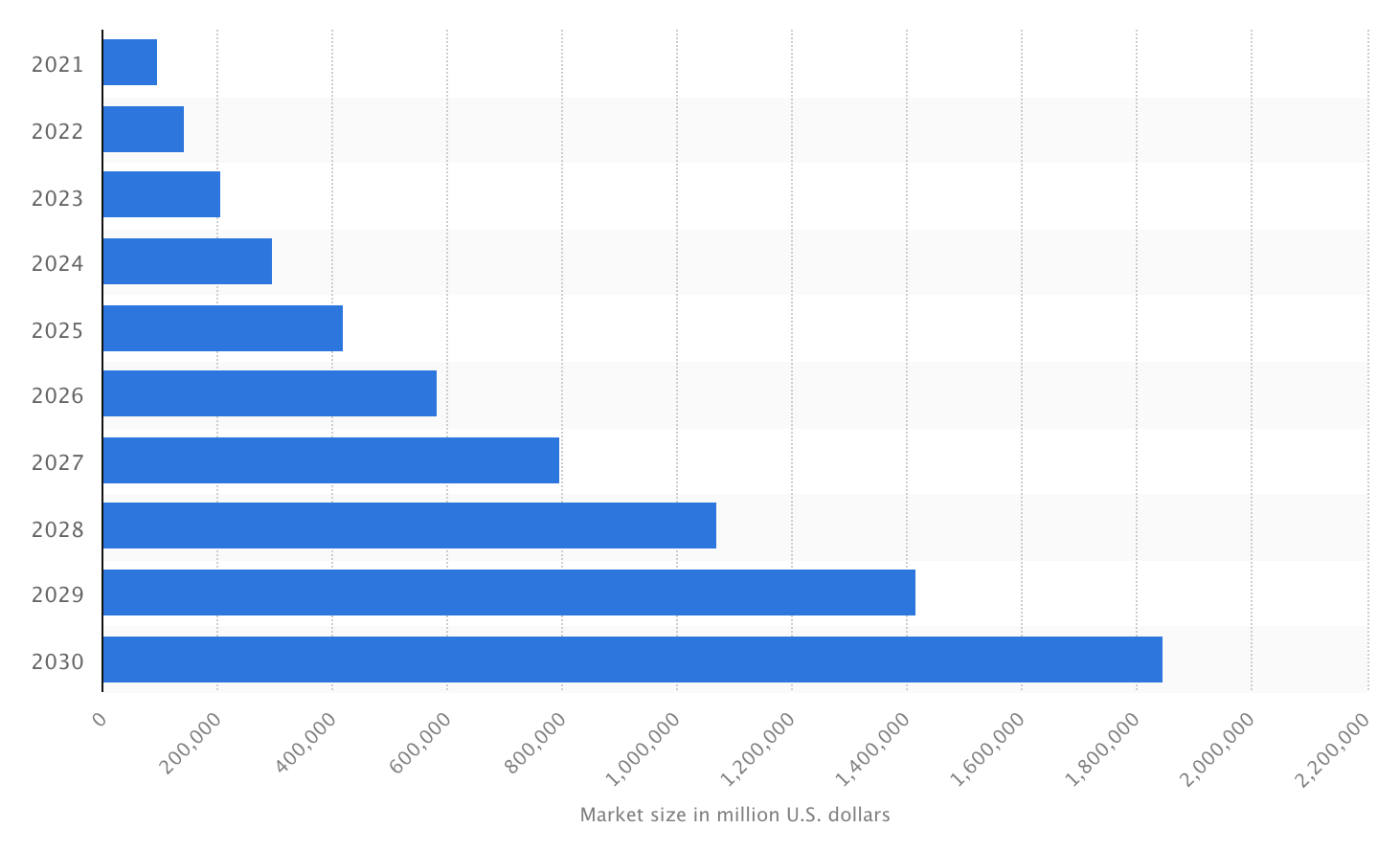
1. The market for artificial intelligence (AI) has a current market value of nearly 100 billion U.S. dollars and is expected to grow twentyfold by 2030, up to almost 2 trillion U.S. dollars.


Image Source

2. Artificial intelligence (AI) is heavily used for service operations and product & service development-related functions in the high-tech and telecom industry.

3. The current AI market race is led by IBM, which holds a more than nine percent global market share.

4. IBM is the leading company in active machine learning and AI patents worldwide, with over 5,500 patent families as of November 2020.

5. Next to IBM in the global AI patent race are Microsoft and Samsung, each within 500 patent families from IBM.

AI Adoption Statistics

Businesses are beginning to streamline processes using AI — just look at the significant increase in implementation over the last few years.

6. Artificial intelligence (AI) saw a staggering growth in adoption rates from 2017 to 2018, and it has leveled off significantly since 2019. It grew nearly 2.5 times in 2022 compared to its adoption rate in 2017.

7. In 2022, many companies are using AI to improve their hiring policies and needs, reduce the need for redundant hiring, and enable more efficient recruiting methods.

Marketing AI Statistics

Marketers are leveraging the technology for their own business strategy. Check out these stats to see how you can put AI to use in your company.

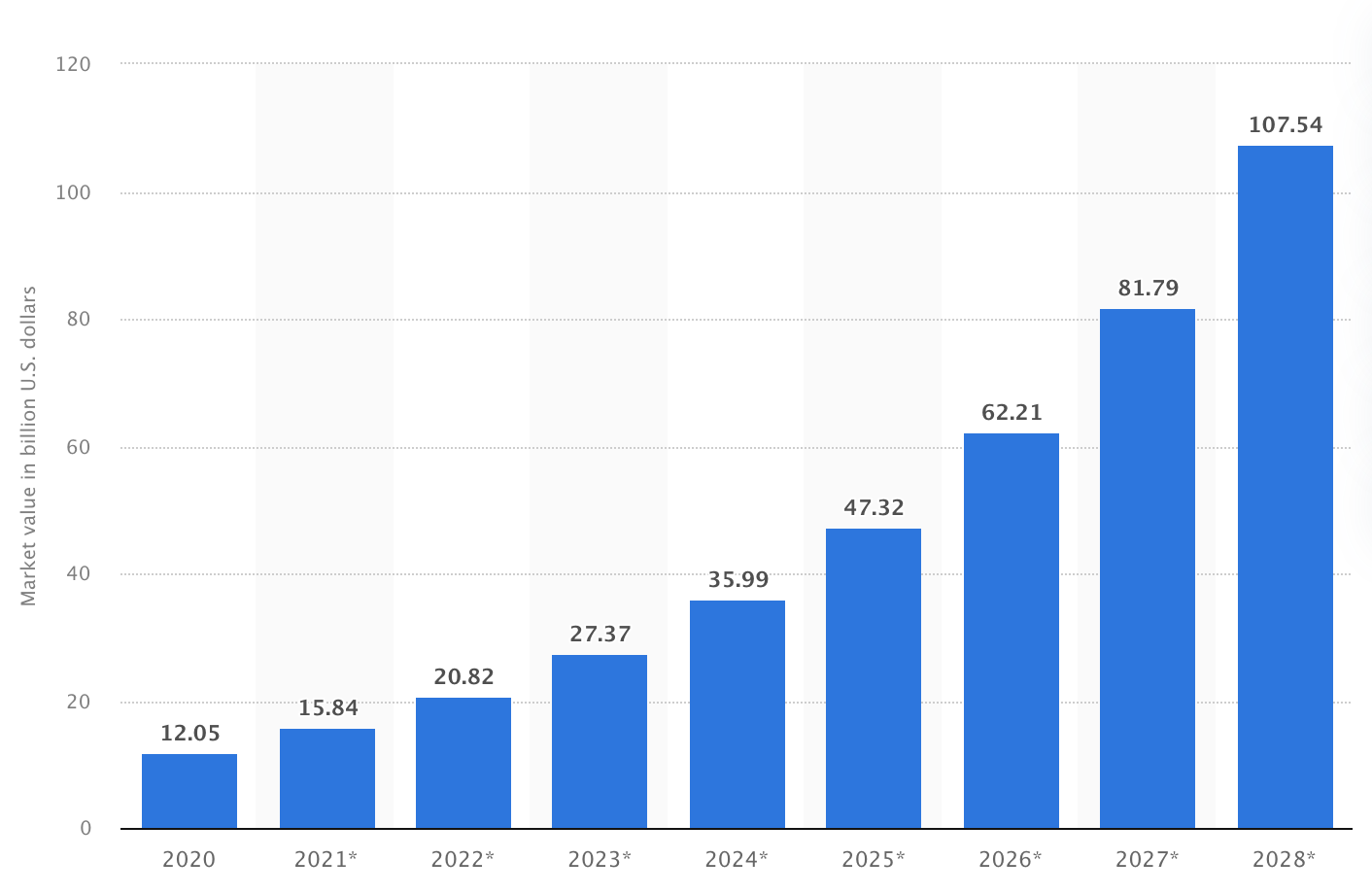
8. In 2021, the market for artificial intelligence (AI) in marketing was estimated at 15.84 billion U.S. dollars. The source projected that the value would increase to more than 107.5 billion by 2028.

Image Source

9. More than 80% of industry experts integrate some form of AI technology into their online marketing activities.

10. When asked about marketers’ main application areas of AI in a recent survey, roughly 50% of respondents from the U.S., Canada, the UK, and India mentioned ad targeting when asked about marketers’ main application areas of AI.

AI Chatbot Statistics

The customer service industry has changed with the introduction of AI chatbots. Whether used to improve customer service or auto-populate data for internal reporting, this tech yields some surprising statistics.

ai chatbotImage Source

11. The chatbot market is forecast to reach around 1.25 billion U.S. dollars in 2025, a significant increase from the market size in 2016, which stood at 190.8 million U.S. dollars.

12. 26% of business-to-business (B2B) marketers using chatbots in their marketing programs gained between ten and 20% more lead generation volumes.

13. A survey in October 2022 in the United States found that 57% of B2B marketers used chatbots in their demand generation programs to understand their audience better.

14. Another 55% said they did so to generate new leads.

15. An additional 43% of American marketers stated that chatbots helped educate prospects.

Attitudes Toward AI Statistics

So how is artificial intelligence being perceived by your average customer or prospect? Does the general public have reservations about the use of AI? These statistics may help you better grasp the most common perceptions of it.

16. In a 2023 survey conducted in the United States, 48% of respondents stated that neither Photoshop nor Generative artificial intelligence (AI) images of faces/people should be used in social media advertising.

17. Another 25% of respondents said both image software was acceptable for social media advertising.

18. 45% of responding consumers did not understand how artificial intelligence (AI) and machine learning (ML) technologies worked.

19. 73% of respondents said that they believed that AI and ML had the potential to impact customer experience (CX).

20. 48% of respondents stated they would interact with AI more frequently if it made their customer experience with a brand more seamless, consistent, and convenient.

Introduce AI into Your Marketing Strategy

Artificial intelligence will continue to grow more prevalent in the business world.

Its influence on our daily lives has shown us the potential to improve how we work — and how we can let technology work for us.

New Call-to-action

Categories B2B

The State of Content Marketing in 2023 [Stats & Trends to Watch]

As a marketer, leveraging Content marketing in your strategy means planning, creating, and sharing content to attract and delight your target audience.

An engaging content marketing strategy generates brand awareness, convinces customers to take action, and drives revenue.

Content marketing encompasses many types of platforms, channels, and types of media — such as social media, videos, and blogs. And as new content platforms emerge, so do new trends and techniques that change how businesses reach their consumers.

Keeping up with the latest changes in the content marketing landscape may seem daunting, but it’s essential to keeping your brand current and competitive. In this post, discover important stats about the state of content marketing in 2023 and trends to look out for throughout the year.

Download Now: Free Content Marketing Planning Templates

Content Marketing Statistics to Know

  • Marketers say sales, web traffic, and social engagement are the most critical metrics for measuring the effectiveness of their content marketing strategy.
  • 91% of businesses use video as a marketing tool.
  • Instagram is used by 65% of social media marketers, just behind Facebook at 67%.
  • Short articles/posts and videos are the top two content types that B2C marketers used in the last 12+ months.
  • 22% of marketers say Instagram has the most growth potential in 2023 than any other platform.
  • Gen Z ranked Instagram as their favorite social media app in 2022.
  • 50% of Millennials trust product recommendations from influencers.
  • 44% of marketers say the most significant benefit of working with small influencers is that it’s less expensive.

Content Marketing Trends to Watch in 2023

1. Short-form video takes center stage in 2023.

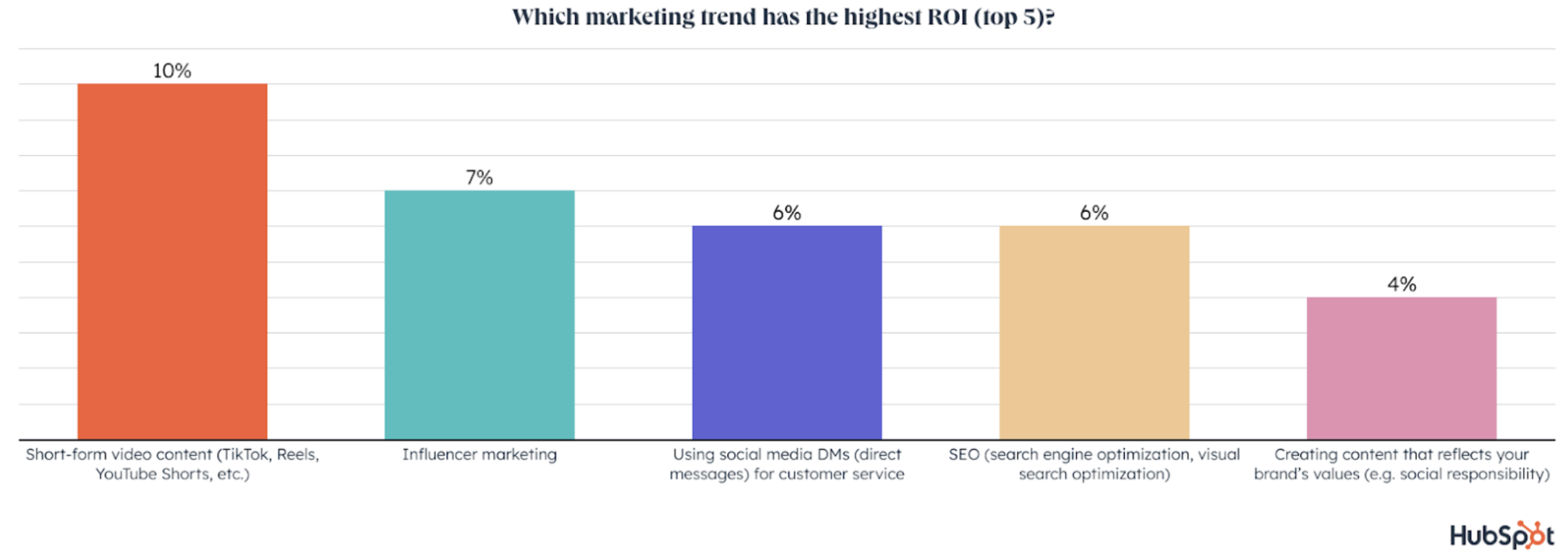
Short-form video is the most popular trend among marketers, has the highest ROI, and will see the most growth in 2023. Marketers plan to invest more in short-form videos than any other trend.

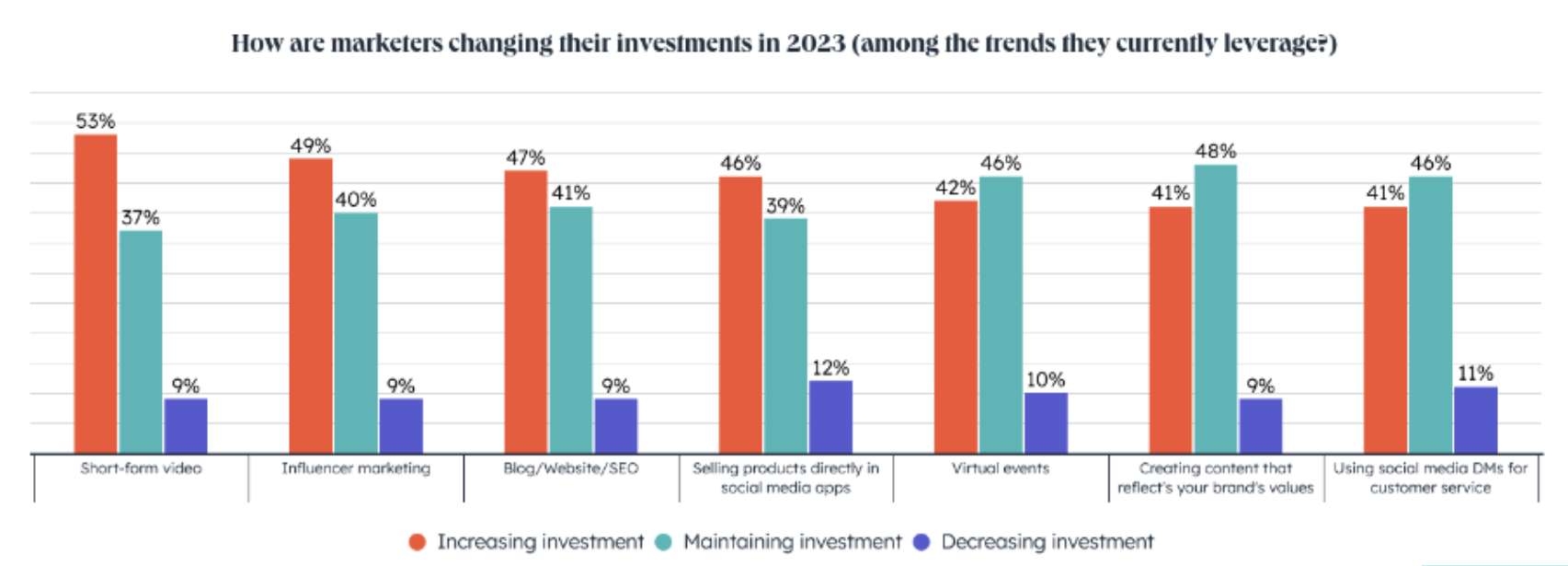
In fact, 90% of marketers using short-form videos will increase or maintain their investment in 2023, and 21% plan to leverage short-form videos for the first time in the same year.

Graph showing which marketing trends have the highest ROI with short-form video content at number one.

This coincides with the videos consumers prefer to watch, as 73% of consumers prefer to watch short-form videos to learn about a service or product.

This consumer behavior has made videos, short-form specifically, the primary form of media used within any content strategy for the fourth year.

2. More brands will emphasize their values in their marketing content.

A recent study commissioned by Google Cloud found 82% of shoppers want a brand’s values to align with theirs. Furthermore, the same study found 75% of consumers would part ways with a brand over conflicting values.

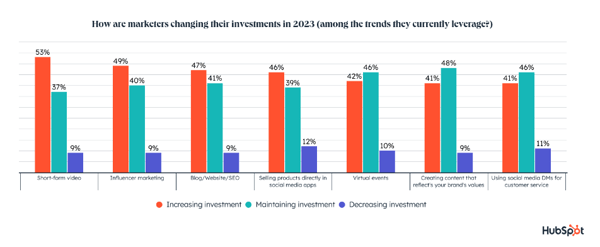
So, it’s no wonder 30% of marketers are creating content that reflects their brand’s values, making it one of the most popular trends in marketing. The trend has the 5th highest ROI and will see growth in 2023.

Graph showing how marketers are changing their investments in 2023, and creating content showcasing their values is among the investments.

The COVID-19 pandemic plays a role in the increased importance of values in marketing, according to Giusy Buonfantino, Vice President of Consumer Packaged Goods at Google Cloud.

“COVID-19 drove people to reflect on their priorities, elevating concepts like community service, equity, and sustainability,” Buonfantino said in a blog post sharing the above findings.

Buonfantino says today’s consumers aren’t just looking for savings or convenience; they also want to feel good about spending their money at a company whose values align with theirs.

According to Google Cloud’s study, sustainability is a value most consumers (52%) are interested in. Consumers want to know how companies manage their resources and whether their materials are sourced responsibly.

3. Influencer Marketing will remain vital to reaching audiences online.

According to the Digital Marketing Institute, almost half of consumers depend on recommendations from influencers to determine the products they want to purchase.

Furthermore, 1 in 4 marketers are leveraging influencer marketing and it offers the 2nd highest ROI of any trend.

Influencer marketing is expected to see significant growth in 2023 with 17% of marketers planning to invest in it for the first time. So, why is influencer marketing so beneficial?

According to Nielsen Scarborough, 42% of Americans seek the advice of others for purchase decisions and they want advice from relatable sources.

Influencers are seen as more relatable than brands and companies and use their relatability to form tight bonds with their audience.

So, if you’re looking to humanize your brand and create a deeper connection with consumers — influencer marketing is the way to go.

4. Funny, trendy, and relatable content is crucial in 2023.

Relatable content will grow significantly in 2023 as 46% of social media marketers will leverage it for the first time. Among those using it, 49% plan to increase their investment, and 43% keep investing the same amount.

Additionally, funny content will see the 2nd most investment of any content type in 2023, and 33% of social media marketers plan to use it for the first time next year.

If you’re not sure what’s trending with audiences or what’s getting the most laughs this year, don’t be afraid to lean on influencers.

In addition to being relatable, influencers are constantly tapping into what their audience cares about and what makes them laugh.

5. Social media remains the best way to reach Gen Z.

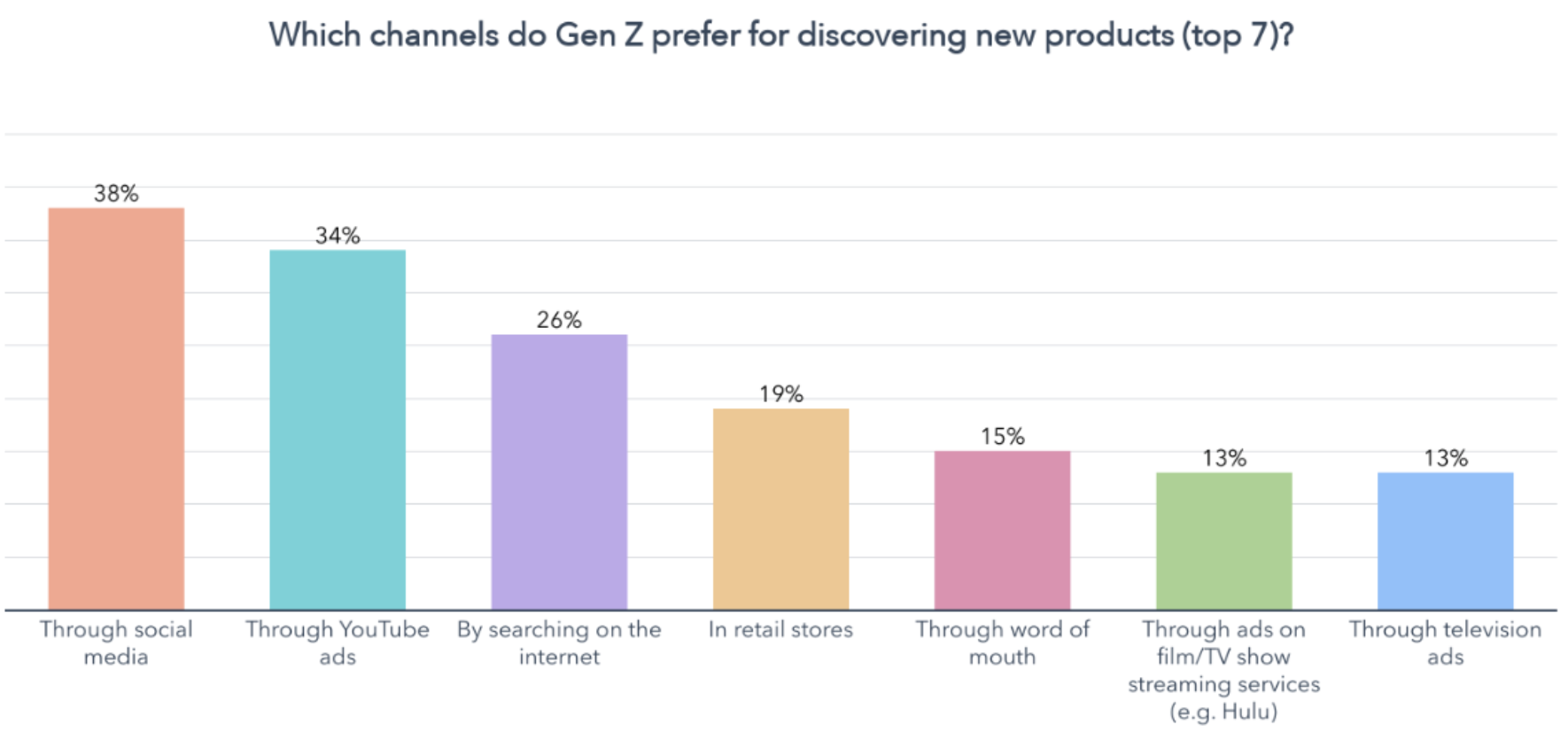
Social media is the #1 channel to reach Gen Z consumers. We found that 93% of Gen Z spend an average of four hours daily on social media, and 57% of Gen Z have discovered a new product on social media within the past three months.

Furthermore, 28% of Gen Z consumers bought a product through a social media app. Additionally, social media is the marketing channel Gen Z consumers discover new products on most often, and it’s their preferred channel for product discovery.

Graph showing the top 7 channels Gen Z prefer for discovering new products. So, what social media platforms do Gen Z use the most? According to our data, YouTube, Instagram, and TikTok are in the top 3.
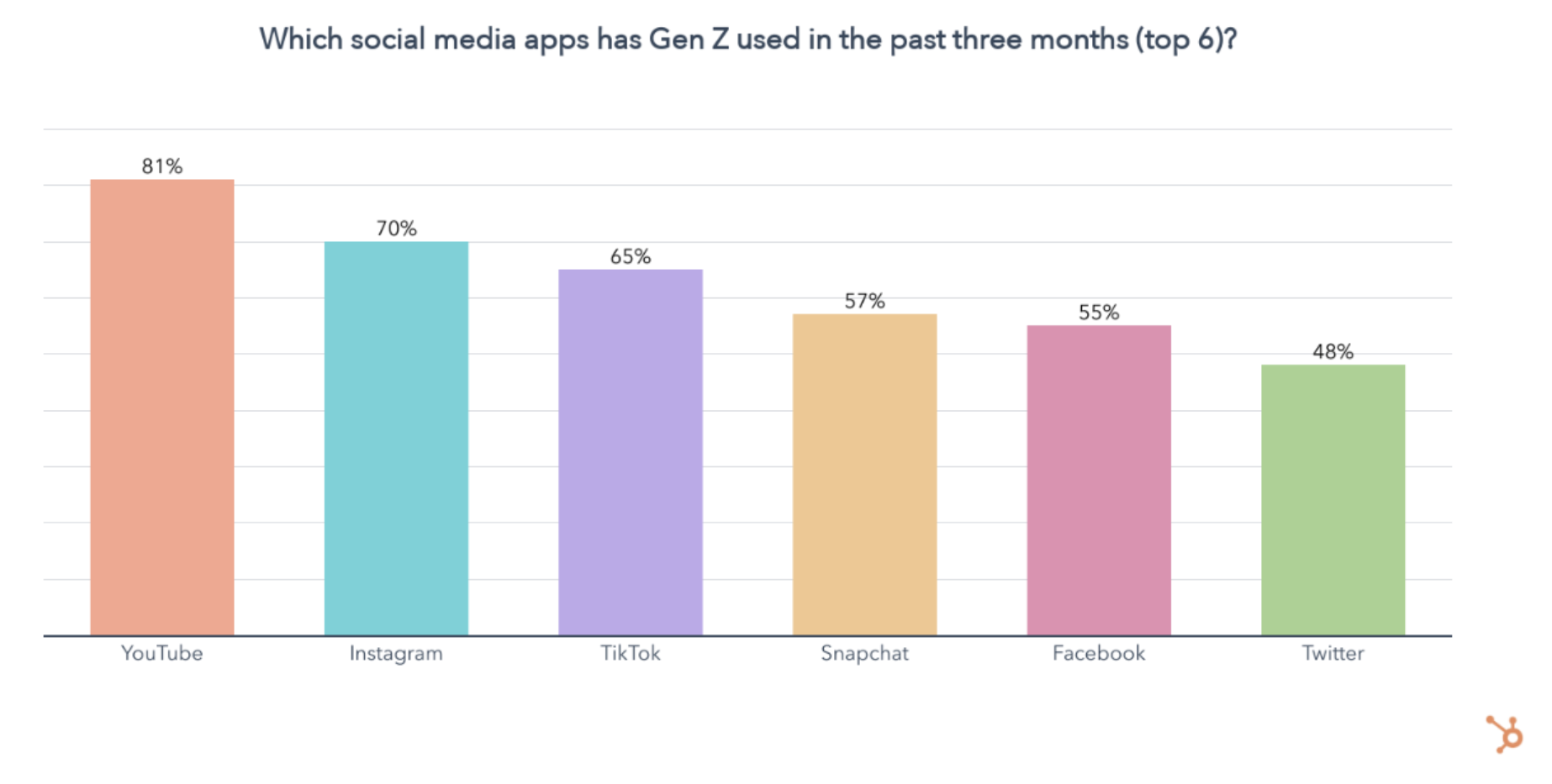

Graph showing YouTube as the social media app used most by Gen Z.

6. Strategic SEO tactics are a must-have.

SEO is far from new in marketing, but it still has a crucial place in content marketing strategies — especially for web content. 29% of marketers use a website to attract and convert leads.

SEO has the fourth largest ROI, and most marketers using it (88%) will increase or maintain their investment in 2023.

And SEO ranks third behind short-form videos and influencer marketing regarding where marketers invest the most money in 2023.

Stay Up-to-date On Your Industry

It’s always essential to stay up-to-date on what is happening in your industry; being aware of these trends is a way to do so.

Should you choose to leverage one of these trends in your marketing strategy, ensure that it’s relevant to your business needs and will help you achieve your goals.

Blog - Content Mapping Template


Categories B2B

7 Pieces of Content Your Audience Really Wants to See [New Data]

Consumer preferences are constantly evolving, which keeps things interesting.

Download Now: 2022 State of U.S. Consumer Trends Report

To help you prepare your strategies to meet audience needs, this post will dive deep into our State of Consumer Trends Report findings on consumer preferences, discuss how marketers currently measure up to those preferences and outline what you can do to better meet consumer needs.

What types of content are memorable to consumers?

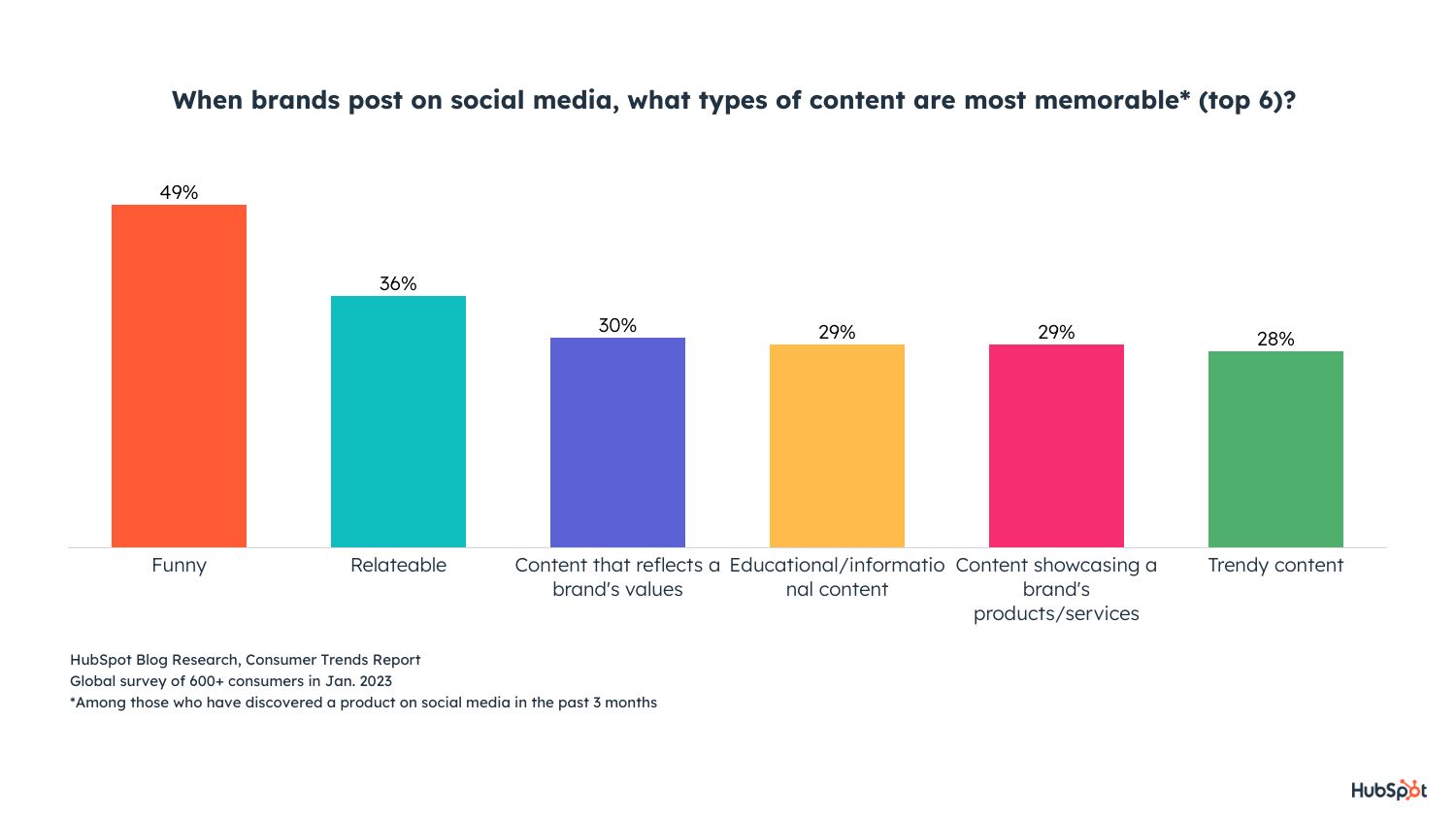
According to our Consumer Trends Survey, the most interesting and memorable content brands can share is funny content, relatable content, and content that reflects brand values.

1. Funny content

49% of consumers say that funny content is the most interesting and memorable.

most popular types of content: graph displaying that funny content is the most memorable

Image Source

How Marketers Measure Up

According to our 2023 Social Media Marketing Report, 36% of marketers already share funny content on social media. Half of those already leveraging it plan to increase their investments in it in 2023 (speaking directly to consumer interests), and it’ll be the second most invested in content type in 2023.

What can marketers do?

Funny content can be anything from sending emails with a witty subject line or using a trending meme format and relating it to your business.

For example, McDonald’s made a Tweet saying, “it’s easier to get these snack wraps than it is to get tickets,” during the rush of people trying to get tickets to Taylor Swift’s upcoming tour. The snack wrap is no longer available on the menu, so it was a lighthearted and funny contribution to a timely global conversation.

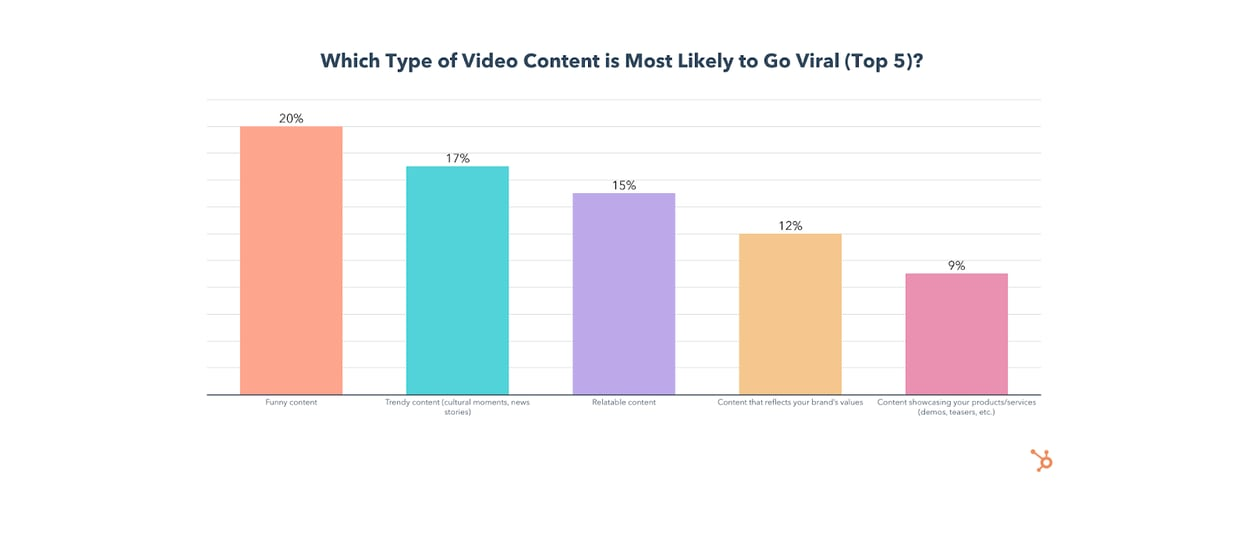
Another valuable opportunity is to create funny video content, which is actually the most likely to go viral.

most popular types of content: funny video content is more likely to go viral

Image Source

2. Relatable content

36% of consumers say relatable content is the second most interesting and memorable content brands can share on social media. Almost 70% of consumers also say that social media content being authentic and relatable is more important than polished, high-quality content.

How Marketers Measure Up:

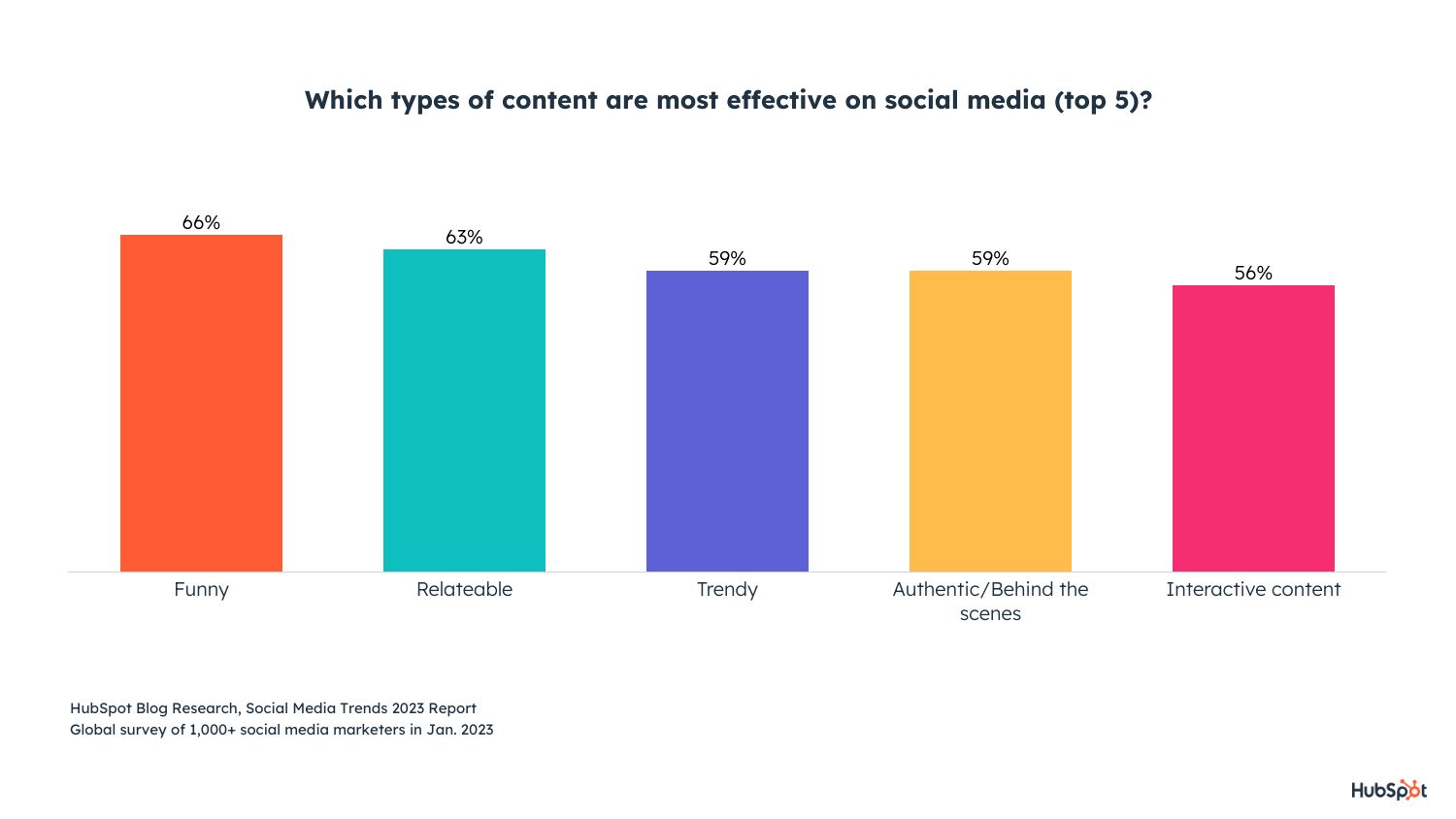
42% of marketers already share relatable content, and they say it is the second most effective type of content to share on social media.

most popular types of content: graph displaying the most effective social media content

Image Source

What can marketers do?

Relatable content reminds your audiences of their lives, experiences, and needs. To be relatable to your audience, you need to understand them. Who are they? What are their pain points? What are their preferences?

Knowing the ins and outs of who they help you create content that relates to them as individuals. Consumers also want to build relationships with their favorite brands, so feeling like they can relate to your business and your business’ story can foster the connection they’re looking for.

A great way to build relatability is content that expresses your brand values.

3. Content that reflects brand values.

Content that reflects your brand values is the third most interesting and memorable content to consumers. This makes sense as consumers, now more than ever, care about doing business with brands that share the same value systems and support the same causes that they do.

How Marketers Measure Up

30% of marketers are creating content that reflects their brand values, so there is room for improvement.

45% of marketers share this kind of content on social media, and 16% plan to leverage it for the first time in 2023. Of marketers that do share it, 89% plan to maintain or increase their investments in it and say it has the 5th highest ROI of any trend.

brand values increasing investment

What can marketers do?

48% of U.S. adults say brands need to do more about social advocacy, and the most important issues are racial justice, climate change, and LGBTQ+ rights.

With this in mind, share your brand’s values on social media — let them know what you care about and what you do to take a stand. Consumers will know what you care for, and you’ll draw in people who share similar interests and can turn curious browsers into paying customers if they find they truly relate to you.

It’s essential to be genuine in these efforts, as consumers aren’t shy to call out brands that they feel are making empty promises or untrue statements.

What types of content do consumers prefer for learning about products and services?

When learning about products and their features, consumers prefer searching the internet, retail stores and word-of-mouth tied for second place, and television ads in third place. Gen Z is the only generation with a different first preference, which is learning about a product and its features through social media.

With this in mind, marketers can do things like

  • Creating an effective SEO keyword strategy to reach users browsing the internet.
  • Using high-quality images and visuals for in-store advertisements to attract visitor attention.
  • Ask for customer reviews and make it easy for customers to leave reviews so they can learn from others’ opinions about your business.

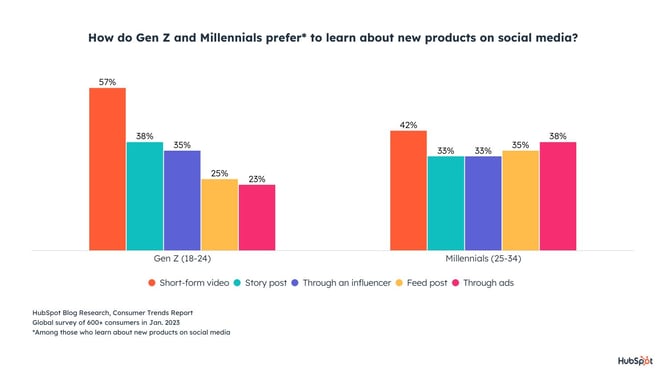
Under this same question, learning about a product and its features on social media came in fourth place. Among consumers with this preference, they like feed posts, ads or sponsored content, and short-form videos (like TikToks or Reels).

However, splitting these preferences up by generation paints a different picture.

  • Gen Z’s top preference for learning is short-form video, story posts, or from an influencer they follow.
  • Millennials prefer short-form video, ads or sponsored content, and feed posts.
  • Gen Xers prefer feed posts, online communities, and short-form video.
  • Baby Boomers prefer ads or sponsored content, feed posts, and online communities.

gen z and millenial learnImage Source

How do marketers measure up?

Here’s how marketers currently measure up to consumer preference:

  • Marketers most often leverage short-form video as part of their social media strategies (58%) — third place in general overall, but especially important to Gen Z and Millennials.
  • 1 in 4 marketers currently leverage influencer marketing, and 89% of marketers who currently use it will increase or maintain their investment — especially important to the second-place preference for ads and sponsored content and Gen Zs desire to learn from influencers.
  • 20% of social media marketers post daily, 22% a few times a day, and 34% post several times a week, ensuring that their content is seen when people browse their feeds — feed posts are the top way consumers want to learn on social media.

What can marketers do?

Pay attention to the top three preferences for learning about products, and go from there.

  • Consumers like to see feed posts, so create a consistent posting schedule to remain top of mind and increase the likelihood of your products being seen.
  • Consumers want to see ads or sponsored content, so you can run ads on your social profiles like paid partnerships, influencer campaigns, or paid ads (like a Facebook News Feed ad).
  • Consumers also want to see short-form videos, so create TikToks, YouTube Shorts, etc. — snackable content for any platform. (Wyzowl’s Video Marketing Report found that 93% of marketers say video increases user understanding, so it’ll pay off).

Also, be mindful of generational differences if your target audience is primarily part of a specific generation.

For example, if Gen Z and Millennials are your primary audiences, you could focus on short-form video and making a presence on platforms that cater to it. If your audience is Baby Boomers or Gen Xers, you could create online communities in the channels they’re already in to speak to their needs.

Data-Driven Marketers Stay Ahead of the Curve

Data-driven marketers will win in 2023, so compare the consumer preferences in this post against what your own business is doing, identify areas of opportunity, and solve for your customer.

New Call-to-action

Categories B2B

Responsive Emails: Designs, Templates, and Examples for 2023

Have you ever opened an email on your phone and the image was low-quality, the text was too small, and the call-to-action button was broken? Those are all flaws of static email design. Responsive emails are the answer.

→ Download Now: The Beginner's Guide to Email Marketing [Free Ebook]

Given that more than half of U.S. residents look at email marketing messages on their phones, you need to optimize your emails for multiple screens, including mobile and tablet.

Responsive emails use fluid images and tables to remain flexible across different screen sizes. Ultimately, they deliver content designed for each user’s optimal experience.

Though responsive emails can be designed using CSS media queries, you don’t need any coding experience to make one. Creating a responsive email isn’t just a job for coders.

Here, we’ve lined up some best practices and ready-to-use templates, as well as a quick tutorial about the fundamentals of responsive emails.

Responsive emails are also more accessible, as they allow subscribers to read on their preferred device.

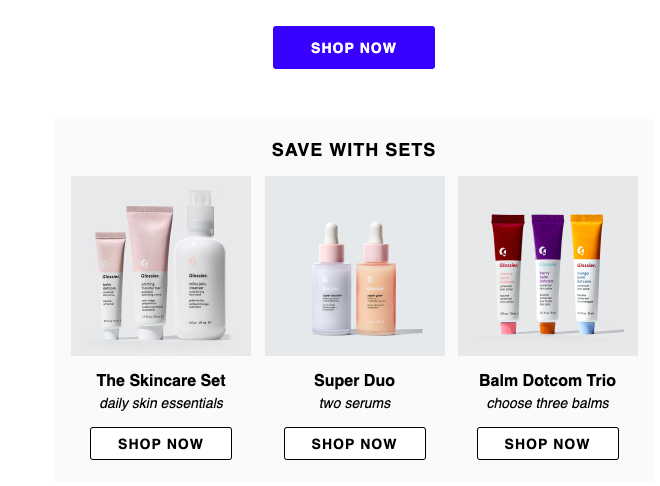
To illustrate, here is how a promotional email I received looked on desktop.

Glossier responsive email desktop example

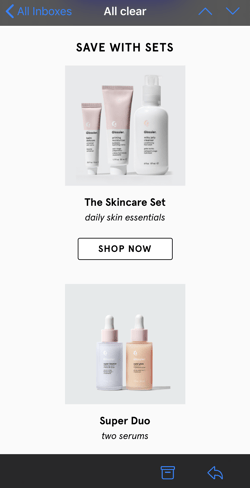
This email has awesome imagery, shoppable icons, and is nicely formatted. When I open the email on mobile, this is what I’m greeted with.

Glossier responsive email mobile example

I still have the same information and the same photos and shoppable icons. The only noticeable difference is the email format. It’s different to better fit the mobile experience.

Now, imagine if that same desktop layout was applied to mobile. I’d have to zoom in on my phone to see any of the pictures or text. Instead of doing that, I’d unsubscribe.

With responsive email, user experience can be enhanced, as well as campaign ROI.

Think about it: Subscribers satisfied with an optimized mobile email design will find themselves opening more marketing messages because they know it’ll be accessible and look good.

So, with all this talk about responsive emails, you must be itching to create your own. Next, we’ll look at some responsive email examples and templates.

Responsive Email Designs

There are many ways that you can design responsive emails.

If you have coding knowledge, you can code different email templates for different screen sizes. You can also use a pre-made template that works will all screen sizes.

No matter your approach, you’ll need your email marketing software. Here, you can design an email, and then preview that email on several devices. Most email software will show you how the design will look on multiple devices.

The video below will walk you through how to design an email with a template. In the video, the user is on Klaviyo, but the concepts hold true no matter what software you use.

Coding a Responsive Email

If you’re looking to make elements of your email responsive, you’ll need to work with media queries.

Media queries are a CSS technique. It allows you to set style rules that only appear if certain conditions are true. For example, you can specify what font sizes and image sizes to use when a screen is 600px wide or smaller.

When working with email, you can use media queries to specify what your design should look like on desktops, tablets, and mobile devices. To do so, you’ll need to specify the following:

  • Use the selector “@media” and specify “screen.” This indicates that the code will affect devices with a screen.
  • Set your “max-width” in pixels. This specifies the screen size where the code will take effect.
  • Specify any CSS style guides you want that specific screen to follow.

Let’s take a look at the code below.

@media screen and (max-width: 600px) {

body {

font-size: 30px;

}

}

When applied to the CSS of an email, body text will appear at a size of 30px for screens that are 600px wide or smaller.

While this approach can help you make certain elements of your email response, we recommend using a template if possible.

Unless you have comprehensive web design experience, coding several media screens can be time-consuming and frustrating.

If you aren’t technical or want an easier method, try using an email marketing tool with built-in responsive templates. HubSpot’s free email software, for instance, provides drag-and-drop templates that are responsive by default.

Responsive Email Design Examples

It’s time to explore examples. Start with this video, which goes over some of the best email marketing campaigns.

Then, you can read about some of our favorite responsive email designs.

1. TOMS Newsletter

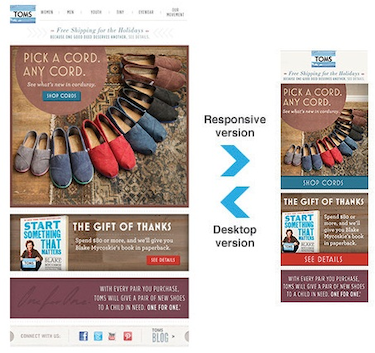
In TOMS’ newsletter, the main difference between the desktop version and the mobile version is the stacking and size of the display ads.

With responsive design, the mobile version doesn’t have cluttered navigation, and the image fits the screen nicely. The CTAs have also been moved for better visibility.

Responsive email design example from TOMS

Image Source

2. The Metropolitan Museum of Art

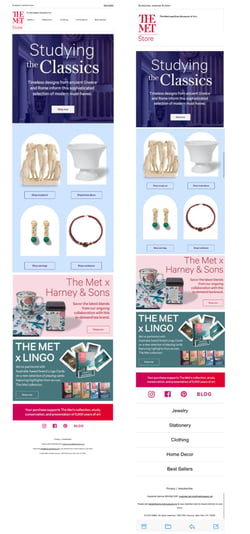
As seen in the TOMS newsletter, responsive email design helps stack the content in a way that’s visually appealing and easy to digest. This example from the MET is no different.

On mobile, the positioning of the menu changes. Links to different gift shop items fall at the bottom of the page. This keeps the images of available souvenirs front and center.

Responsive email design example from the MET

Image Source

3. Mulberry

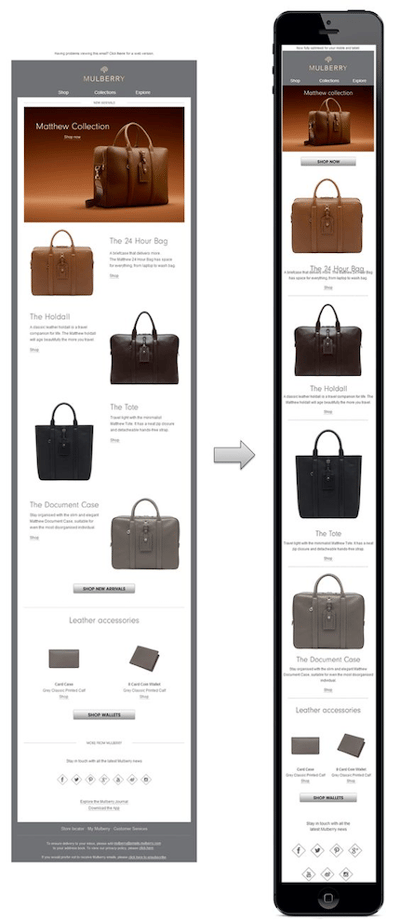
Again, with a responsive email design, the name of the game is stacking. It’s all about making the content easy to read and visually appealing, no matter how small the device is that someone is viewing the content on.

The alternating photos and text make sense for desktop, while the consistent stacking of photos over related text for mobile, along with the dividing lines, ensures the viewer won’t be confused.

Responsive email design example from Mulberry

Image Source

Responsive Email Templates

A responsive template will automatically adapt to any screen size, so whether the email is opened on a smartphone, tablet, or computer, it will look great and have complete functionality.

For those with less of a coding background or those looking to spend less time with design, my advice is to use a template. They’re a surefire way to make sure your email will look professional and be responsive.

Responsive email templates save you time in designing an email that could’ve been picked out from a selection. For example, HubSpot’s email marketing tool includes over 60 templates just for responsive emails.

Let’s take a look at some template options now.

1. HubSpot

HubSpot offers a couple of free responsive email templates. If you’re a HubSpot customer or a free user, you can download and try them out yourself.

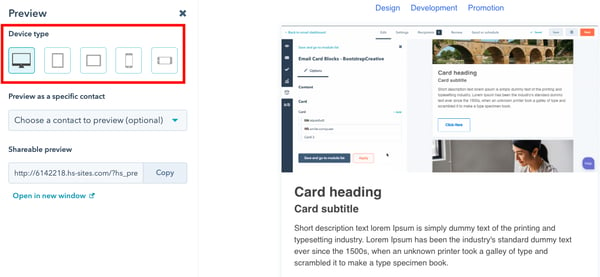
For instance, here’s one of the responsive email templates — notice the sidebar, where you can preview the template on multiple devices.

Responsive email template from HubSpot preview

Image Source

Clicking through device types and making sure your email is formatted accordingly is one of the final steps in the design process and is the only step in the responsive email process when you’re using software like HubSpot.

By clicking on the smartphone device for preview, for instance, you can see if your content — including font size and image resolution — is formatted in a way that’s pleasing for mobile.

2. CampaignMonitor

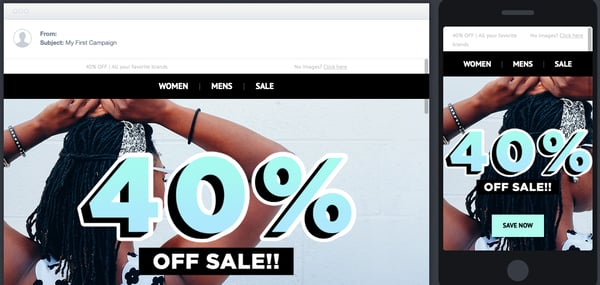
The templates offered by CampaignMonitor are similar to many others, in which responsive email results are shown in the preview tool. For example, here is a CampaignMonitor template:

Responsive email template from CampaignMonitor preview

Image Source

You can see the different devices side-by-side so you can compare design elements easily. Tiny edits can be made to create the best experience for all subscribers.

CampaignMonitor templates are often free, so it’s a good choice if you have a minimal budget.

3. Stripo

Stripo offers over 300 free HTML email templates. You can choose templates by industry, season, type, and feature. For instance, here’s a template from their business industry section.

Responsive email template from Stripo previewResponsive email template from Stripo preview

Image Source

A good sign of a solid responsive email template is the option to see the preview in both desktop and smartphone variations, as shown in Stripo’s preview mode.

Notice how a single column layout was adopted in the mobile preview to fit the specifications of phones.

Stripo is a website you can visit quickly to find a template that fits your goals. You might consider Stripo if you’re looking to try out responsive emails or want some design inspiration.

4. Constant Contact

Constant Contact offers over 200 professional email templates that are accessible after signing up. From looking at the example below, you can see that the platform offers responsive email templates.

Responsive email template from Constant Contact preview

Image Source

Constant Contact’s templates have drag-and-drop editing, the option to add surveys, ecommerce functions, and a photo library tool. These features can all help to create the email subscribers want to see.

It’s helpful to use a service like Constant Contact because the specific tools allow you to maintain consistency, like in the example above. You can tell that the responsive nature of the email doesn’t compromise any of the design elements.

Now that we’ve taken a look at some template options, let’s look at another way to make responsive emails work, along with best practices.

Responsive Email Best Practices

The exact design of your responsive email will vary based on the goals of your campaign. However, these tips can help you ensure the best experience for your readers.

  • Make sure your responsive email is scalable and flexible. Preview the email on different devices to ensure your message is responsive.
  • If you’re coding your own email, remember CSS media queries change fields that are fixed to fields that are fluid.
  • Use larger fonts that will be easy to read on smaller screens.
  • Single-column layouts are easier to scale. If simple layouts are good for your web pages, definitely consider them for responsive emails.

Be sure to test your emails before you hit “schedule.” Only finalize the designs once you see how they look across multiple screen resolutions. So many people access emails by mobile just for the ease of it.

A simple way to check the effectiveness of your email is to send it to yourself or your team as a test — does it stack up against the other responsive marketing emails in your inbox? If so, you’re ready to send.

Getting Started with Responsive Emails

Responsive emails create a better, more accessible experience for your customers. If you’re just making the transition, start by exploring pre-made responsive email templates. These will save you time while giving you design flexibility.

Then, get a second opinion. Ask a colleague to open an email on their desktop and phone. You can get their honest feedback on both experiences.

Lastly, don’t be afraid to experiment. You can A/B test different responsive designs until you find a layout that resonates most.

Soon, you’ll be sending out responsive emails and increasing your open rates.

New Call-to-action

Categories B2B

What is an Infographic Resume? Examples and Templates

When the modern job search is incredibly competitive, how can you ensure your resume stands out among hundreds of applications? An infographic resume could be just what you need.

→ Download Now: 15 Free Infographic Templates

Here, we’ll explore when to use an infographic resume, what hiring managers have to say about these types of resumes — and how to make one for yourself.

Table of Contents

What is an infographic resume?

An infographic resume is a visual representation of your job experience, skills, and qualifications.

Instead of being text-based like a traditional resume, an infographic resume uses graphic design elements such as icons, graphs, and timelines to present your information.

When to Use an Infographic Resume

While infographic resumes certainly stand out among a sea of submissions, this type of resume isn’t appropriate for all job applications.

If you submit a resume in this format through an applicant tracking system, you could disqualify yourself if the technology can’t read visual information — so it’s best to stick to the format prescribed by the job posting.

Additionally, while an infographic resume might be a good idea for a more design-related role, it’s likely not a good idea for most non-design roles.

Infographic Resume Templates

If you’re interested in creating your own infographic resume, let’s take a look at some templates you can use to get started.

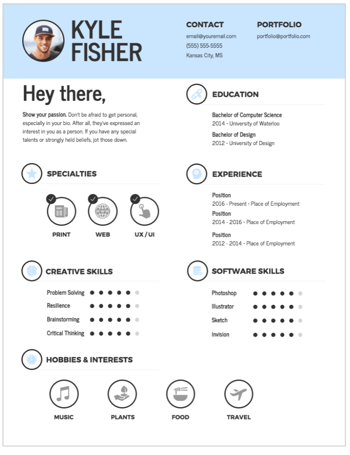
1. Simple infographic resume template.

This simple and minimal infographic resume template is from Venngage.

In this example, there’s plenty of white space. The resume also highlighted creative and software skills and left space for hobbies.

infographic resume templates, simple infographic resume template

Image Source

What we like: It’s clean and easy to follow. Each section is clearly defined and easy to scan. Plus, the round icons create a cohesive design element that brings the whole look together.

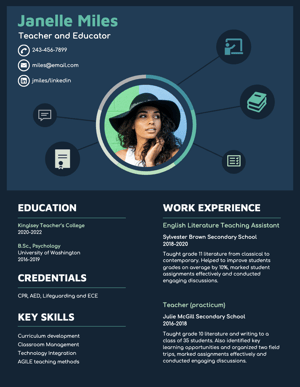
2. Graphic design infographic resume template.

This template is also from Venngage. This infographic template would be best for someone in a design role such as a graphic designer, or even a technical role.

infographic resume templates, A dark blue infographic resume template example from Venngage.

Image Source

What we like: The design feature at the top of the resume immediately grabs the attention of the viewer and offers a visual overview of the applicant’s skills.

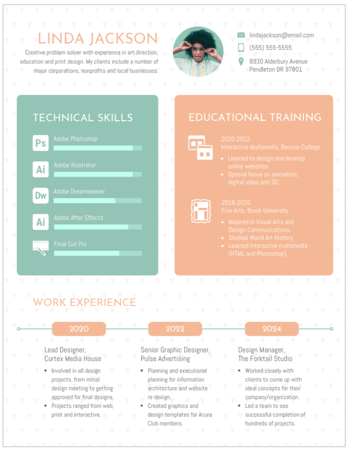
3. Marketing infographic resume template.

In this template from Venngage, you’ll see technical skills and educational training take up the majority of the space on the resume, signaling that this is the most important information.

nfographic resume, marketing template

Image Source

There’s also a timeline of work experience at the bottom, which is a creative way to showcase your career progression.

What we like: This template is best for a marketing role as it offers a balanced way to showcase both technical skills and creative elements.

How to Make an Infographic Resume

1. Start with a good structure.

Start by figuring out which tool you’re going to use to create your infographic. You might choose to create one in PowerPoint or use pre-made resume templates on a design website like Canva or Venngage.

Once you choose your tool, identify a good structure. Do you want your name and a brief opening description at the top? Would you prefer to put the education section at the beginning, or end? Are you going to include previous positions, or focus on just the current one?

Additionally, you might want to figure out whether you’re going to focus more on icons and images, or data.

“I love when candidates use infographics as an opportunity to highlight their creative or design abilities,” shares Devon Brown, Director of Global Executive Recruiting at HubSpot.

However, she urges candidates to ensure their design is clean and easily digestible.

“It has to be formatted in a way that makes it just as easy to read as a typical resume,” Brown advises. “The flow of information, and how it’s presented, is critically important if a candidate chooses to go this route.”

2. Take note of everything you want to include in your infographic resume.

Once you’ve chosen a structure, pull up an existing resume and take note of everything you want to transfer over to the infographic resume.

“I’ve had candidates share graphics on the types of roles they’ve supported, as well as metrics related to their current role,” says Kenny Nestle, HubSpot’s G&A recruiter.

For instance, if you want your infographic resume to be data-heavy, write down a few key metrics related to your current role, such as “43% YoY growth” or “12% increase in MRR.”

It’s easier to design your infographic resume once you know what you’ll need to include.

3. Choose a good color scheme.

A cohesive color scheme is a critical component of any good design, and this is no exception.

Consider using clean, complementary colors — like white, black, and orange, or yellow and teal — to help your resume stand out without becoming too distracting.

4. Have a strong opener.

This is a best practice for any resume, but particularly for an infographic, you’ll want to start with a good, powerful opener.

Tríona O’Sullivan, HubSpot’s former global marketing recruiter, shares how essential the opener is on any resume.

“Given how competitive and busy the job market is today,” O’Sullivan says, “it’s more important to ensure your resume is easy to review and states your experience and achievements clearly and quickly since that’s what someone is going to look for first when reviewing.”

Ultimately, your opener is your value proposition. What will you bring to the role that the hiring manager can’t find elsewhere?

5. Use good design principles.

If you want to create an infographic resume, it should use the same design principles as anything else you’d design.

These principles include:

  • Creating balance using either symmetrical or asymmetrical designs.
  • Leveraging contrast to highlight certain elements.
  • Using movement to create a narrative and provide a high-quality user experience.
  • Ensuring there’s unity in your design — i.e. your composition’s elements are in agreement.

Take a dive into design principles in this post to make sure your resume is top-notch.

But even if you’re making a design-forward resume, make the context a priority over everything else. Amelia Towle, HubSpot’s head of brand infrastructure and design team manager, spoke with her team on the potential merits of an infographic resume.

Keep your design simple.

“If I think about the purpose of a resume, it’s a document that your intended audience typically wants to scan as quickly as possible to glean information in an efficient way,” she says.

She continues, “If you drastically alter the format, you are perhaps forcing extra cognitive load on a busy recruiter who is just trying to narrow down a potentially vast pool of applicants.”

6. Make it actionable.

Even with additional design elements, there’s only so much information you can fit into an infographic resume.

To give recruiters another place to learn more about your work qualifications, make your resume actionable by including links to your portfolio, website, or LinkedIn.

“While I don’t love super creative infographic-style resumes, I love when someone hyperlinks to their portfolio or website, etc,” O’Sullivan adds. “That’s an amazing way to showcase both their experience and their thought process when it comes to applying for roles. If I see a hyperlink for one, 99% of the time, I will go and check that out.”

If you do choose to create an infographic resume, take a look at a few of these examples for inspiration.

Infographic Resume Examples

1. The colorful, graphic-heavy infographic resume.

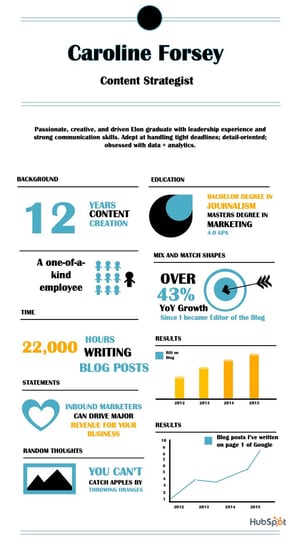
The resume below uses plenty of visuals and numbers to highlight relevant information. For instance, there’s a graph to showcase the blog posts Caroline has written that have earned a spot on the first page of Google.

There’s a large “12” to highlight the years of content creation under her belt. There’s even an image of 10 stick figures to demonstrate her individuality.

 infographic resume examples, colorful, graphic-heavy infographic resume template

Image Source

Consider how you might use one font, and a complementary color palette, to create a similar infographic.

Caroline designed this one using one of HubSpot’s free infographic templates, so feel free to create the same one using the templates, as well.

2. The data-heavy infographic resume.

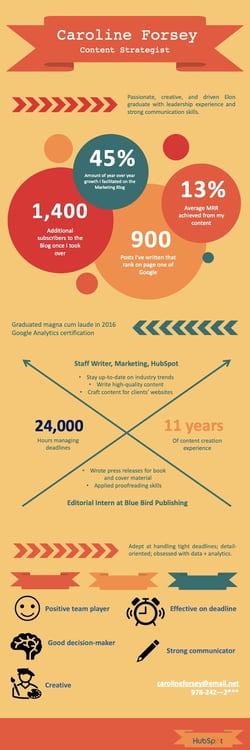
In the following infographic resume (also created using HubSpot’s templates), you’ll see Caroline highlighted most of her accomplishments using data — such as the 45% YoY growth, 1,400 additional subscribers, or 24,000 hours managing deadlines.

 infographic resume examples, Data-heavy infographic resume example

Image Source

She also used icons of a smiley face, pencil, and painter to demonstrate some of her skills in a more visual form.

3. The minimal infographic resume.

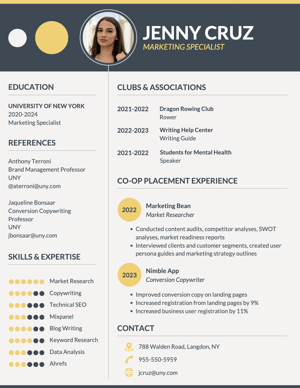
The infographic resume below more closely resembles a traditional resume but includes a few graphic design elements that help it stand out.

A gray infographic resume with pops of yellow design elements.

Image Source

This example is best for someone who wants to showcase both technical and creative skills in a professional format.

We could see this infographic resume being used by someone in marketing or sales.

4. The traditional infographic resume.

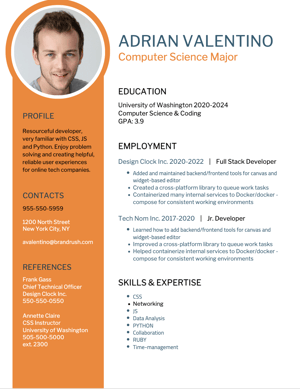
This infographic resume more closely resembles a traditional resume but includes a few graphic design elements that help it stand out.

An infographic resume on a white background with a bright orange left panel.

Image Source

This example is best for someone who wants to make their resume stand out but doesn’t want to stray too far away from the traditional format.

5. The professional infographic resume.

This resume also leans towards a traditional format but incorporates more graphic design elements than the previous example.

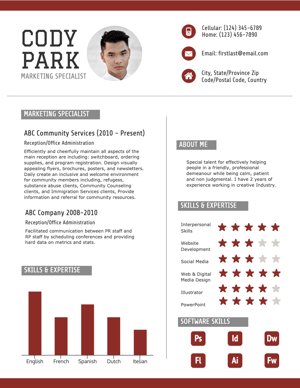
A white infographic resume with dark red accents used in icons and graphs

Image Source

With several icons and even a bar graph at the bottom, this resume is more design-friendly than a standard resume but is still professional. It leaves plenty of room for text to expand on work experience and achievements.

This infographic resume could be used for a variety of roles, from something technical like a software engineer to a more visual position like a social media strategist.

Ready to take your resume to the next level? Grab some starter templates below.

New Call-to-action

Categories B2B

How to Structure a Marketing Dream Team for Any Size Company

As industries prepare to make changes to marketing personnel in the coming months, marketing department restructures are on the horizon. If you’re facing the pressure to grow revenue through marketing while keeping headcount to a minimum, you’re in luck.

We’ve cracked the code on how to structure a high-performing marketing team, and now, I’m going to share those insights with you.

→ Click here to download our free guide to hiring and training a team of  all-stars [Free Ebook].

In this post, I’ll walk you through what a marketing team structure looks like for small, midsized, and enterprise businesses, which structure will work best for you, and how to make your first or next marketing hire.

Marketing Team Sizes

First, let’s define what we mean by different company sizes. You may not agree with all of them, and that’s OK; we’re only using these numbers to establish a common lexicon in this guide.

  • Small to Medium Sized Business (SMB): 5-100 Employees
  • Midsized Business: 101-1,000 Employees
  • Enterprise: 1,000+ employees (not including the massive Fortune 500 orgs)

Now that we’ve agreed on sizes, let’s talk about the marketing department structures you have to choose from.

How to Structure a Marketing Department

Here, I’m outlining three types of marketing department structures. These are dependent upon how large and how predictable your business is. Midsize companies with less predictable revenue forecasts may find a team structured by specific marketing disciplines will work better for them, while enterprise organizations with more predictable revenue forecasts can use a structure that has more opportunity for experimentation.

1. Marketing Department Structure by Discipline

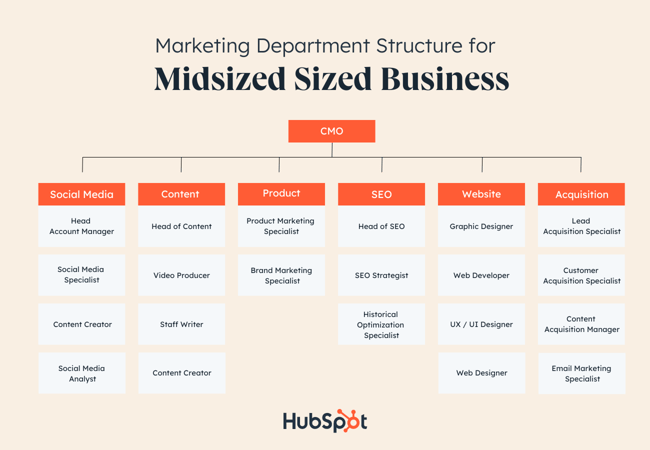
Marketing Department Structure example by Discipline for midsized businesses

Marketing departments that are structured by discipline are the most common. You’ll see these structures in midsized companies where marketing owns a revenue number and is responsible for driving leads and contributing to the pipeline of the business. These teams will collaborate to execute campaigns frequently throughout the year in order to hit the company’s revenue goals.

Here are some of the most common teams within the marketing department that are structured by discipline:

Social Media

Skills needed: Content creation, graphic design, social media management, project management, data analytics, and storytelling

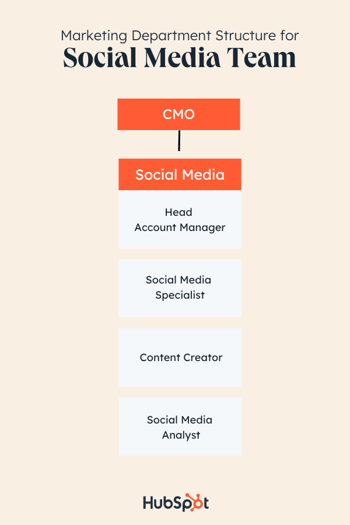
marketing team structure example: social media team

Your social media team will create and execute social media marketing efforts. This team will need to have knowledge of how to make engaging content to drive brand awareness, generate leads, and connect with audiences.

To properly perform these job functions, your social media team should have a working knowledge of creating, scheduling, and measuring the performance of social content.

Basic graphic design skills or knowledge of design tools like Canva or Adobe will be necessary for the content creation side, while social media management tools will help teams track performance, measure success, and schedule content.

Teams also need to be comfortable with customer service, as social media teams will be the ones responding to customers who engage through social media tags or posts. They will also be communicating to customers through content copy, blog posts, and comment sections, so an understanding of the company voice and ideal customer is key.

To help small teams, social media management software provides marketers with the tools they need to execute an entire social media strategy, such as the tools within HubSpot’s Marketing Hub.

Social media structure by team size:

SMBs with a team member dedicated to marketing should have a general comfortability with basic marketing practices and social media experience to build an online presence. If you can afford multiple marketing roles, start specializing in marketing functions like social media manager, which can be its own role.

Enterprise teams can structure their social media team by having specialists and managers to lead and oversee social media strategy, as well as roles for day-to-day social media activities, such as creating Instagram Stories and Posts, video editing for Facebook, and content management.

Potential roles:

  • Head Account Manager
  • Social Media Specialist
  • Content Creator
  • Social Media Analyst

Content Marketing

Skills needed: Writing, editing, organization, graphic design, project management, SEO, HTML, and storytelling

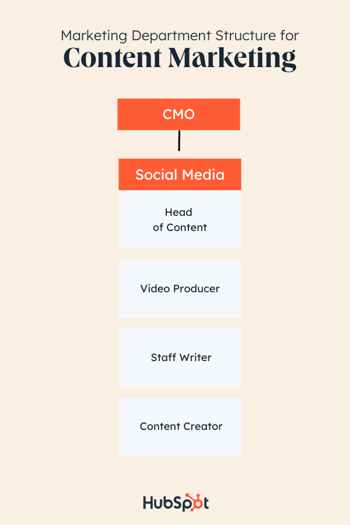
marketing team structure example: content marketing

Your content creators will be the ones making sure your brand has enough content to tell a cohesive, compelling story. The content they produce will be useful in every facet of your marketing functions, from video to blog posts.

Content creators are skilled writers; they usually know how to create a solid blog post or webinar. They also have to be keen on editing — their blogs, videos, and social media content depend on it.

This team will be the go-to for the production of high-quality multimedia assets for your business, including podcasts, videos, ebooks, or other materials as needed. They may have to work on projects with other teams to make sure the messaging is correct, so your content creators should be ready to collaborate with others.

When building this team, make sure that your content creators are familiar with online management software, like HubSpot’s Marketing Hub. This makes their job easier. Instead of having to analyze data from multiple different sources, online software keeps all of that data in one place.

Content structure by team size:

In a startup, your content creation team might also be your social media and product marketing team. Though the roles are similar, content marketers need to have good organization and time-management skills in a fast-paced environment, so make sure the person you hire can work autonomously and in a team setting.

Hire a content creator who understands the story of your brand and brand voice. Their methods of sharing your voice through video, podcast, or ebooks should ultimately incentivize prospects to learn more about your business.

Larger companies hiring for a content creation team can hire by skill or by the needs of other teams. For example, Social Media Agencies need content creators for every client or group of clients.

Potential roles:

  • Head of Content

  • Video Producer

  • Staff Writer

  • Content Creator

  • Jr. Content Creator

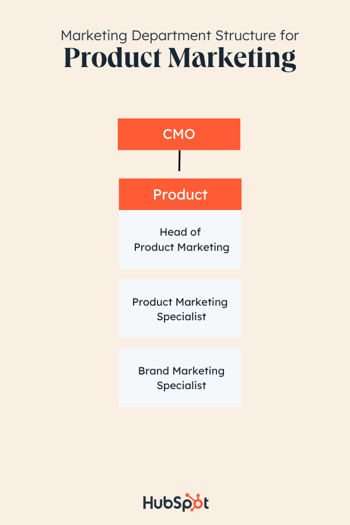
Product

Skills needed: Research, analysis, strategic planning, cross-functionality, writing, customer service, a creative problem-solving mindset, technical knowledge, pricing strategy, and solving for the customer

marketing team structure example: product marketing

This team is so important because they will communicate the features and benefits of your product to the customer. They’ll organize and drive the messages of a product and how it connects to your brand and the customer.

Product marketers identify target audiences to communicate with through product pages and ad copy. In addition, product marketers need to be star planners with keen attention to detail, as they will be planning campaigns for your products or services.

When you hire a product marketer, look for someone who demonstrates a deep understanding of overall marketing functions since, for start-ups, they might be your only marketer. They need to know how to research, analyze metrics, use that knowledge to plan future campaigns and target the customer’s needs in all of your business’s marketing materials.

In order to bring a product to life, a product marketer needs to know how to build an effective product page, and include content that will highlight that. They need to be able to present their strategies to other decision-makers and have plans for every strategy.

Product structure by team size:

The product marketer you hire as a small business owner is likely your only marketer, or the one leading marketing efforts with another team member. Hire someone with a background or demonstrated knowledge in writing, presenting marketing, and business.

Remember, the product marketer will communicate the product’s usefulness to customers, so the team member’s skills should be robust. If you are hiring for a larger team, then, you can have a little more flexibility. You can hire product marketers by product stack, so for instance, phones and personal laptops could be product stacks for a tech company.

You can structure your product marketing team by specialty, as well—a role based solely on developing copy or producing strategy, for example.

Potential roles:

  • Brand Specialist
  • Product Marketing Specialist

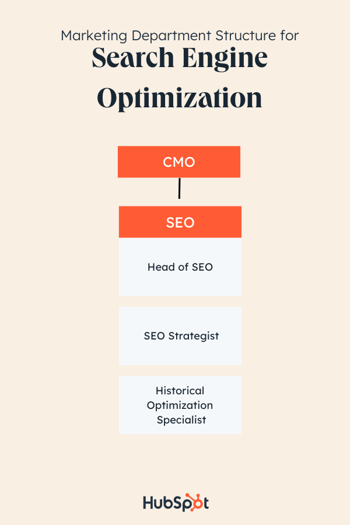
Search Engine Optimization

Skills needed: Writing, editing, problem-solving, experience with programming and technical thinking, analytics, spreadsheets, drive, and the ability to adapt

marketing team structure example: search engine optimization

The SEO team will mainly be driving traffic to your webpages by optimizing content and ensuring your brand is aware of the keywords necessary to rank on the SERPs for topics related to your product or service. Occasionally, they’re also required to lend expertise to make business decisions. To accomplish these goals, SEO teams need to be made up of individuals with strong technical, programming, and writing skills.

Some SEO functions require writing, editing, and proofreading content to optimize it for audiences. This is where having a strong writing background will come in handy. SEO teams should be excellent problem-solvers and think about how to optimize content specifically for search engines.

These hires should be comfortable finding and implementing keywords, which will improve how high your business ranks on Google. They will also have to develop strategies for link building and develop a basic SEO protocol for the company.

In addition, SEO specialists should be fluent in analytics software to ensure they’re able to incorporate the lessons from those metrics into their overall strategy.

SEO structure by team size:

If you work for a small company, your SEO strategist might be melded with another role. If that’s the case, make sure that the SEO functions are being carried out by someone who has an understanding of analytics and optimizing content for search engines, as well as conducting thorough keyword research..

In other words, if they can’t speak Google or Bing’s language, they probably aren’t the right fit.

Comprehending analytics and optimizing content for SEO purposes will help your business rank on search engines and reach new prospects, or nurture leads until they’re ready to purchase..

For businesses that are large enough to build a team, hire for different specialties within SEO. For instance, you can hire for historical optimization, link-building management, or raising webpage traffic.

From there, you can hire project managers and team managers who are experts in the field of SEO and can offer seasoned advice to other team members, as well as manage multiple SEO projects at once.

Potential roles:

  • SEO Strategist
  • Senior SEO Strategist
  • Historical Optimization Writer

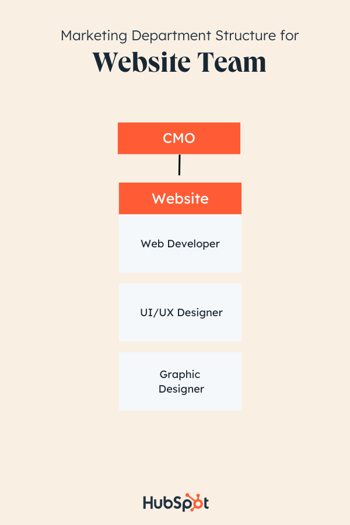
Website

Skills needed: Programming, Creative Suite programs, interpersonal communication, Website and email design, user-experience orientation, content management software, understanding of web standards and best practices, and SEO

marketing team structure example: website team

Of course, any business needs a website. And as your company grows, you may find the need to hire someone full-time to maintain your website. This team will be responsible for all things dot com, so you should hire a creative proficient in web design, web strategy, and optimization.

Your web design team will use their mastery of programming and web design tools to create and maintain the message your website is conveying. They will work closely with product marketing and content teams on web page execution, so the ability to collaborate across teams is essential.

They will be the point of contact for someone who runs into a problem on your website and should be able to fix any technical issues that may arise. You should trust your web design team to create a user experience that keeps customers coming back.

Website structure by team size:

The general function of a web designer is to make the web page experience seamless, optimized, and engaging for every visitor. They’ll use their expertise to deliver a delightful experience to customers who interact with your business’s web pages.

You can structure your web design by need, but if you can afford to build out an entire team, you can start hiring Senior Web Developers to bring your site up to current standards and maintain it, while Associate level hires can assist with those job duties as your design team grows.

Potential roles:

  • Web Developer
  • Senior Web Developer
  • UX / UI Designer
  • Front-end Web Developer
  • Web Designer
  • Visual UX Developer
  • Graphic Design Specialist

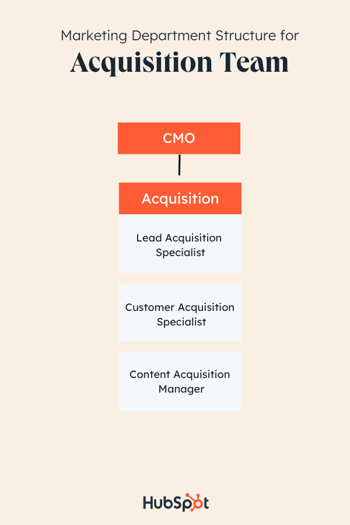
Acquisition

Skills needed: Customer centricity, written and verbal communication, solution-driven mindset, and attention to detail

marketing team structure example: acquisition team

Though the entire marketing team should be customer-obsessed, your Acquisition team will be made up of those who live and breathe methods for delighting the customer through every step of their buyer’s journey.

Acquisition hires are the first contact with customers — they will introduce audiences to your brand. Your acquisition team will communicate to the customer as a representative and advocate for the company, and need excellent customer-facing skills and company knowledge to do so.

Another skill valued in an acquisition team is attention to detail; these teams have to be experts in how products can help customers and capitalize on little moments that can enhance the customer experience.

The biggest question for an Acquisition team to answer is, “How can we delight the customer for every stage of the buyer’s journey?” and projects should reflect that. For instance, creating compelling content offers and tracking the performance of these CTAs will be essential for teams to make impactful strategies for driving growth.

Acquisition structure by team size:

For companies whose members don’t have the resources to build a full Acquisition team, make sure the team member you designate for acquisition can effectively communicate your brand. They should know how to delight customers every step of the way.

If you’re building a team for a larger company, hire for an Acquisition team with roles that are either exclusively customer-facing or exclusively non-customer-facing. Individual hires will be able to focus their job functions based on their interaction with customers.

For example, someone in a non-customer-facing acquisition role could have duties such as developing CTAs and content offers, so writing experience and an understanding of basic graphic design practices are critical. Customer-facing roles, then, will onboard customers, source and contact them, and identify and ease pain points they might have in their journey.

Potential roles:

  • Lead Acquisition Specialist
  • Customer Acquisition Specialist
  • Content Acquisition Manager

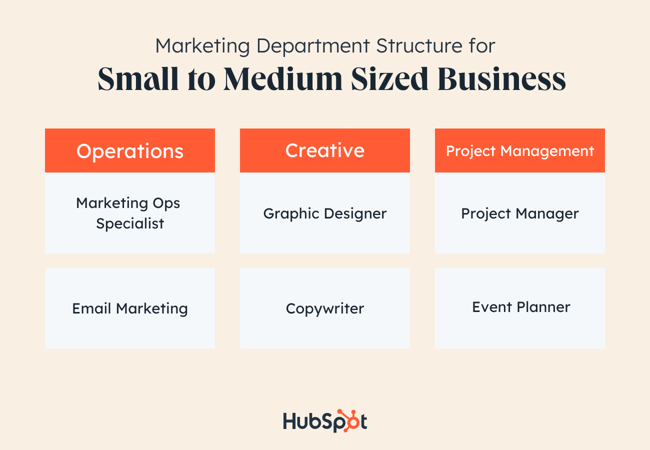
2. Marketing Department Structure by Function

Marketing Department Structure example by Function: small to medium size businesses

A slightly more traditional organization structure than the product structure above, the functional department structure leans heavily on the nuts and bolts of what makes great marketing work. This structure is similar to that of a bare-bones agency. It includes the pillars of taking a campaign from ideation to completion.

The functional marketing department structure works well for small teams that have limited headcount, resources, budget, and bandwidth. A team like this may be made up of a few full-time folks, part-time people, or it could be staffed completely by contractors.

For this structure, it’s common that your marketing department won’t own a revenue number and attribution won’t be too important (non-profits, very small service-based companies). If you’re a marketer who wears many hats and needs to hire folks with a similar work ethic, try this structure.

Operations

Skills needed: workflows, automation, written and verbal communication skills, problem-solving, team-building

Your operations team is responsible for managing the technical aspects of your marketing efforts. They’ll maintain the tech stack, handle marketing automation, manage email marketing workflows, and schedule and produce webinars.

Potential roles:

  • Marketing Ops Specialist
  • Email Marketer

Creative

Skills needed: graphic design, written communication, video production, photography, copywriting, front-end web design

The creative team is in charge of what your clients or customers see when they come across your brand. This team will take on graphic design, copywriting, video production, and some web design.

Potential roles:

  • Graphic design
  • Copywriter

Project Management

Skills needed: organization, project management, agile framework, budgeting, time management, written and verbal communication

To keep everything on schedule, within budget, and within scope, the project management team will step in. The individuals in this role will typically coordinate with both operations and creativity in order to keep things moving. They’ll manage vendors, contractors, and freelancers and also work as an event planner if needed.

Potential roles:

  • Project manager
  • Event planner
  • Vendor manager
  • Procurement specialist

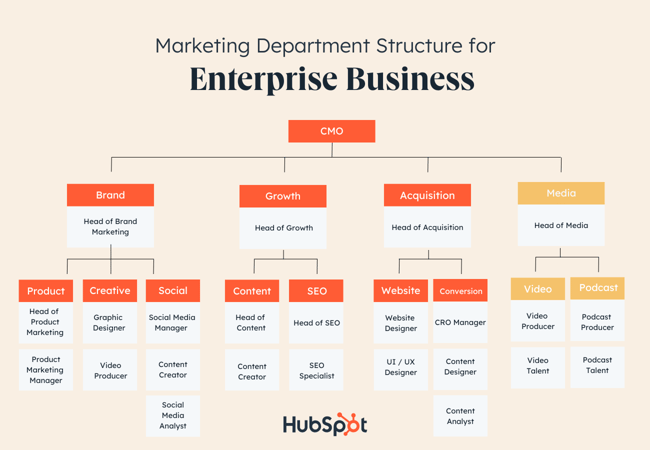
3. Marketing Department Structure by Product

Marketing Department Structure example by Product: Enterprise businesses

This marketing department structure organizes marketing teams by product. You might be thinking, “But marketing doesn’t own a product?” and that is true in the literal sense of the term, but when you think of marketing as a figurative product, you can better organize people around that product’s goals.

This approach works well for enterprise teams with predictable revenue patterns that don’t need to run frequent, stand-alone marketing campaigns to generate business. If there’s a proven marketing system in place to generate demand for the business, you can leverage a product-style marketing structure to grow in new, innovative ways. Global teams may also appreciate this structure because it reduces role redundancy across regions and gives hiring managers an opportunity to recruit talent globally.

There are three typical “products” within this type of marketing structure, plus one emerging “product” that can help differentiate your business if it makes sense within your industry.

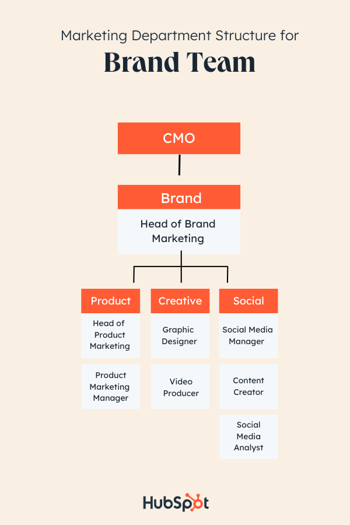
Brand Team

Skills needed: strategic thinking, written and verbal communication, creativity, copywriting, social media management, customer journey mapping, and buyer journey mapping

Marketing Department Structure example by Product: brand team

Brand includes everything about your business and distills it in such a way that potential, new, and existing customers can relate to it and external entities can appreciate it. When you’re thinking about building your marketing team around brand as a product, consider these ideas:

  • Who would be responsible for the brand strategy?
  • Who would be responsible for the way the brand looks, sounds, reacts, and shares ideas?
  • Who would be responsible for influencing the brand in other parts of the business?
  • Who would be responsible for the day-to-day championing of the brand?

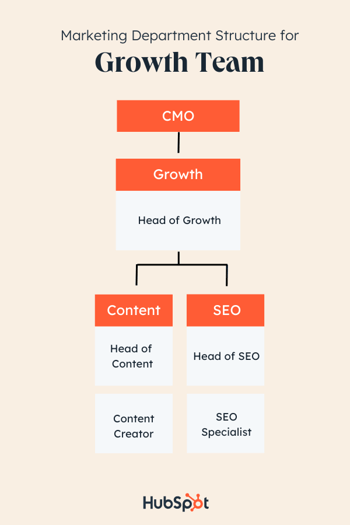
Growth Team

Skills needed: Content marketing, content strategy, SEO, copywriting, web design, UI/UX design, and HTML

Marketing Department Structure example by Product: growth team

Growth marketing is responsible for generating demand and leads for the business either in existing or new markets. When you’re thinking about building your marketing team around growth as a product, consider these ideas:

  • Who determines how much we grow, how fast we grow, and in which markets we grow?
  • In which channels do growth opportunities exist?
  • What is the short and long-term payoff of the growth strategy?

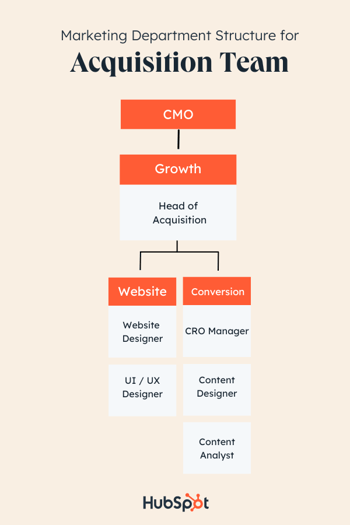
Acquisition Team

Skills needed: conversion rate optimization, UI / UX design, HTML, content development, content design, and data analysis

Marketing Department Structure example by Product: acquisition team

Once you’ve drawn the audience in and you’ve set growth goals, you’ll look to your acquisition “product” to secure leads and fill the pipeline for sales. When you’re thinking about building your marketing team around acquisition as a product, consider these ideas:

  • Who would be responsible for the acquisition strategy?
  • Who will be responsible for lead scoring and lead nurturing?
  • How will the team attribute success?

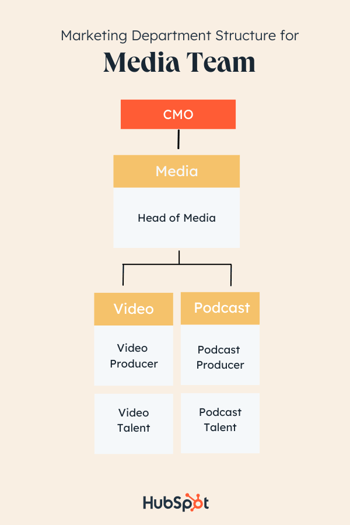
Media Team

Skills needed: Video production, video editing, public speaking, creative writing, research, data analysis, and journalism

Marketing Department Structure example by Product: media team

This emerging marketing “product” can and should encompass each of the three mentioned above, but it does so with an emphasis on the audience experience. Media products are best built when your brand product has a strong foothold in the market. When you’re thinking about building your marketing team around media as a product, consider these ideas:

  • Is my company’s brand well-respected and sought after for thought leadership, publishing opportunities with highly-respected institutions, and generally regarded for setting the industry standard?
  • Are both customers and non-customers engaging with existing marketing content from my company?
  • Do the decision-makers within my industry consume media regularly enough to make this “product” worthwhile?

Types of Marketing Team Roles & Positions

Any successful marketing department structure needs a leadership and individual contributor hierarchy. How deep or wide you choose to organize your team is up to you, but here are the primary roles (in total or in part) you can expect to see in any marketing team.

Use this list to ascertain which roles you already have on your team, who in your company you can prepare for these roles, and who you should hire next.

Marketing People Leader Roles

1. Chief Marketing Officer (CMO)

Decision-making, owning the vision, and championing the team culture is the job of the CMO. This role sets the tone and standard for the entire marketing team and makes the call when the structure needs to change. The CMO reports to the CEO of the company with regard to how marketing is contributing to the business’s bottom line.

2. Vice President of Marketing

Setting the strategy for the marketing department at a high level is the responsibility of the VP. VPs may have ownership of specific products, functions, or disciplines which shapes the details of what this role looks like. They’ll have directors as direct reports and will interface regularly with skip-level reports.

3. Director of Marketing

You may see this role called a “Head of” instead of a director. The director of marketing is closely tied to their specific team which could be the entire marketing department at smaller companies or a subteam, like social media, for larger orgs. Their duties consist of putting the strategy from the VP into an actionable plan that managers can rally their teams around.

4. Marketing Manager

Marketing managers are people leaders on the front lines who manage individual contributors. Their day-to-day consists of weekly check-ins with direct reports and the director of marketing. They’re responsible for guiding their team toward meeting the goals and KPIs of the strategy.

Marketing Individual Contributor Roles

1. Marketing Consultant

A marketing consultant is typically an expert in a specific discipline like SEO or content creation. They are hired as a freelancer, contractor, or even on a part-time basis to help marketing teams reach their goals. Marketing consultants are critical to the mission of the team, but their expertise is needed in a limited capacity. If you don’t need a full-time hire on your marketing team, but would like to explore new channels, strategies, and tactics, consider bringing on a marketing consultant.

2. Principal Marketer

This individual contributor role is one of the highest-level full-time roles an individual contributor can attain in their career. These individuals are masters of their discipline rather than a jack of all trades. Internal and external team members look to them for guidance and industry-standard best practices. They may have more than a decade of experience in their discipline, but oftentimes, they have even more experience in other areas of marketing under their belt.

3. Senior Marketer

A senior marketer is one step below the principal marketer. They’re honing their skills in a specific discipline, but they may take on projects with a wider scope to build other soft and hard skills. They’re savvy with the latest trends in the marketing space and can serve as a mentor to junior members of the team.

4. Marketing Specialist

A marketing specialist plays more of a generalist role on the team. If the principal marketer is a master of one, the marketing specialist is a jack of all trades. They’re encouraged to explore a wide variety of marketing disciplines to gain an understanding of how tactics work together to achieve the strategy. From there, they’ll develop their skill set in one area of marketing that they’ll use to guide the rest of their careers.

5. Marketing Coordinator/ Marketing Associate

A marketing associate is an entry level position for recent graduates or new marketing professionals who want to change careers. They’ll take on ad-hoc assignments in various marketing departments and begin to build relationships with more senior team members. They may have an interest in one area of marketing, but they’ll work on several projects to become familiar with marketing as a whole.

6. Marketing Intern

The marketing intern is a temporary employee that is completing a degree of some kind, usually in an area of marketing or communications. They’ll explore various disciplines during their time in the company and learn how to apply the marketing lessons they learn in class to real-world situations. They may be offered a full-time position as a marketing associate or coordinator upon graduation.

How to Build a Marketing Team

1. Create a hiring strategy.

Before you can hire anyone, you need to put a strategy in place for building your marketing team.

You’ll need a clear understanding of your organization’s hierarchy. Consider how the roles within these teams overlap. For example, think about how the Acquisition and Content teams will work together.

2. Write the job descriptions.

After that, you can start to write the job descriptions and begin recruiting.

You can post jobs on your website, or on job boards like Indeed. When the applications begin rolling in, you can start to interview and vet your candidates.

It’s important that the people you hire mesh well with your team, so don’t hesitate to ask marketing friends for referrals.

Additionally, pay attention to LinkedIn connections while you’re vetting potential candidates in case you have a mutual connection. Leadership skills and the ability to fit in with your company’s culture are key here.

Plus, keep in mind that you want to hire experts. Your team should have experience and know what they’re doing.

3. Source candidates.

Before you begin recruiting candidates from external sources, look to your current team to see if anyone is interested in a marketing career. Not only does an internal candidate give you an opportunity to help someone progress their career, it saves you time and resources that you’d otherwise spend looking for external talent and getting them up to speed on your business.

If you’ve exhausted your internal talent pool or you need a more specialized skill set, there are several resources available to make this happen. Look to recruiters, headhunters, and candidate sources to help with the search. You can also browse candidate collectives or private membership groups like Black Marketers Association of America to list your job posting.

4. Extend an offer.

There’s a lot of discourse about how to interview for top marketing talent. How many interviews are too many? How do you know which candidate is the right fit? How long should the process take? We know that can be a challenge for small and large companies alike, so use this free resource to understand what you need to ask to evaluate your candidates objectively.

Once you’re ready to extend an offer, consider all the variables: their experience, their interview performance, their formal marketing training (courses, degrees, certifications), and any special skills that will help round out your team.

Use this information to craft a fair offer that aligns what they bring to the table with what the market demands. Be prepared for negotiations and questions about commonly overlooked benefits like insurance, on-call responsibilities, and professional development allowances.

5. Onboard the team.

After you’ve hired your team, you aren’t done building a great team. Building a great team continues long after the hiring process. For example, your onboarding process should help your employees understand the team culture.

Over time, building a great team is about documenting your goals, identifying gaps, and iterating on your process.

Build Your Marketing Dream Team

Hiring the best talent will require knowing the best skills for each role. Even if you’re hiring for a startup or small business and only have resources for 1-2 marketing roles at the moment, it’s still helpful to know the most transferable skills that will help you hire people who can grow into new roles in the future.

When you start with the right structure for your business type, put the right steps in place for hiring, and get the team aligned on a common vision, you’ll have a marketing team that will make even some fortune 100 companies envious.

Editor’s note: This post was originally published in November 2014 and has been updated for comprehensiveness.

New Call-to-action

Categories B2B

Why the Sephora x TikTok Incubator Program Is A Smart Partnership

Welcome to HubSpot Marketing News! Tap in for campaign deep dives, the latest marketing industry news, and tried-and-true insights from HubSpot’s media team.

Earlier this week, Sephora and TikTok announced a new joint venture with agency Digitas: an incubator program to help new beauty brands leverage creator content.

As part of the Sephora x TikTok Incubator Program, TikTok creators will teach select brands how to implement creator-focused social media strategies to drive growth and engagement.  

The first round of participating brands includes Hyper Skin, Topicals, and Eadem, selected from Sephora’s Accelerate program. These BIPOC-owned brands will learn from popular TikTok creators including Amy Chang (@bondenavant), Nyma Tang (@nymatang), and Rocio Lopez-Jimenez (@rocio.roses).

Download Now: The 2023 State of Social Media Trends [Free Report]

Why the Sephora x TikTok Incubator Program Makes Sense

For years, users have acknowledged the persuasive power TikTok has on their purchasing choices through the hashtag #TikTokMadeMeBuyIt, and few spaces have been as influential or lucrative as #BeautyTok.

From 2020 to 2021 consumption of beauty-related content on TikTok grew by 1,000%, and beauty brands have benefitted from the surge.

Beauty retailer Ulta reported an 18.2% increase in sales from 2021 to 2022 with annual revenue exceeding $10 billion for the first time in the company’s history. During this same time period, Sephra saw a 23% increase in sales earning a record-breaking $82.6 billion in revenue.

Sephora acknowledges the success of its stores is dependent on the success of the brands it carries. And the success of those brands is deeply impacted by having strong relationships with creators.

“Brands that have a savvy understanding of creator led social media and creator relations have a clear advantage in not only conceptualizing beauty content that resonates with their audience, but also in building genuine connections,” says Brent Mitchell, VP of Marketing at Sephora.

With this program, Sephora is investing in the creator-focused social media strategies of up-and-coming brands. The return on this investment will ideally come from sales driven by creators.

Marketing Snippets

The latest marketing news and strategy insights.

Twitter announced 10K character tweets will soon be allowed on the app.

Meta is developing a decentralized messaging-based app.

TikTok is introducing a new “series” feature that will allow creators to monetize their content on the app.

Conversational AI: learn what it is and how to leverage it for your marketing strategy.

Spotify expanded its suite of podcaster tools and introduced new features including video, polls, and more in-depth analytics.

How pirating sites are impacting revenue for major advertisers.

New call-to-action

Categories B2B

How to Build a Product Ecosystem Buyers Will Want to Be In

A product ecosystem functions in a very similar way to an environmental ecosystem. Like the symbiotic relationship found in nature, a product ecosystem is when products can coexist in a way that’s beneficial for the customer (not to mention, brings in more revenue for the business).

→ Download Now: Free Product Marketing Kit [Free Templates]

In this post, we’ll take a look at how to build successful product ecosystems and why buyers want to be a part of them.

Skip to:


Why is a product ecosystem valuable?

The process of building a successful product ecosystem is valuable for businesses for numerous reasons — product ecosystems work …

  • To solve for all of the needs of your customers — which helps improve brand loyalty and advocacy.
  • To boost revenue by making it easy for customers to expand their library of your products.
  • To prevent your customers from having to invest in other products that are sold by your competitors and other brands.
  • To make the lives of your customers easier by solving for a wide array of challenges within the system they’re already a part of.
  • To create products that support each other and coexist in a way that makes them stronger and more useful for customers.
  • To support the development of your product line over time by making updates that improve their ability to connect and work in tandem with each other.
  • To offer a greater range of services for customers and, therefore, improve your chances of becoming known as an impactful player in your industry.

Let’s dive deeper into how you can create a product ecosystem of your own.

How to Build a Product Ecosystem

You can build your product ecosystem in a number of ways. Below, we’ll review four of the most common steps when doing so. These steps are all-encompassing so you can incorporate them into your process no matter the industry you’re in.

1. Listen to your customers.

For a product ecosystem to be beneficial to buyers, you need to ensure your products or services are effectively solve the challenges and pain points of your target audience. To do this, listen to your customers. Ask them what they’re missing in your current products and services; ask them about the work they do on a daily basis so you can determine the best ways to meet and exceed their needs with the support of your product ecosystem.

Here are some ways to develop a stronger understanding of your customers, and listen to their needs, to ensure your product ecosystem is valuable:

2. Simplify the connections within your product ecosystem.

Part of the reason buyers want to be in a product ecosystem is the ease that comes from using the products of a single brand. For example, as a HubSpot user, you can manage your entire business, across all departments, within the one system. As the businesses of HubSpot customers grow and their needs expand, they can easily purchase or connect to additional products, tools, or Hubs within the software in mere seconds.

By making connections and integrations simple, your product ecosystem becomes more valuable for customers. This also helps you improve your brand loyalty, as customers will be less likely to get frustrated and spend time identifying the product ecosystems of other businesses that are simpler and more efficient.

3. Consistently update and improve your product ecosystem.

As mentioned, your first step in creating a product ecosystem requires you to ask for, and listen to, customer feedback. Continue to do this as your ecosystem evolves and expands, not just as you make your initial plans to build it.

This way, you create products within the ecosystem that effectively solve the needs of your customers. It will also help you update and improve individual parts of your ecosystem as needed in a way that makes being a part of it valuable for customers.

4. Make joining your ecosystem valuable for customers.

By working through the above steps, you’ll likely have no issue achieving this final step — however, it’s still important to reiterate the need for your product ecosystem to be valuable for customers to join.

Think about it — your ecosystem won’t succeed among your target audience and customers if it includes products with functions and features that aren’t cohesive or powerful when grouped together. After all, this is how any ecosystem functions — through the collaboration of each piece and member.

Next, consider some examples of successful ecosystems to gain a better understanding of the way in which they function.

Product Ecosystem Examples

1. Hubspot

product ecosystem example: HubSpotImage Source

HubSpot’s product ecosystem enables users to connect external services to its platform, in addition to offering a suite of its own software solutions, to help customers grow better.

HubSpot’s CRM helps users track their contact and customer data all in one place. For developers, HubSpot’s API lets teams build their own custom integrations based on their brand’s needs. Websites and apps can be built within the platform, plus the ecosystem boasts numerous tools, apps, and vetted service providers to help your business scale.

From sales to marketing to service and development, the HubSpot ecosystem offers solutions that work together to remove friction so you can focus on what matters most to your business.

2. Apple

product ecosystem example: Apple Image Source

Apple has a host of products that connect with each other to effectively and easily meet the technological needs of its target audience. For example, you plug your iPhone into your MacBook Pro to view all details related to the phone including your storage, different aspects of your phone’s history, your music library, and more via your laptop. And speaking of your music, connect your AirPods in just seconds to your iPhone and your MacBook for seamless listening opportunities cross-device.

Then, lock your phone and close your MacBook Pro prior to heading out on a run. Throw on your Apple Watch so you can leave those larger devices at home while maintaining access to your music with your AirPods. Don’t worry, your Apple Watch will still notify you of your call, text, and email notifications while out on the running trail.

Meanwhile, your mileage, time, heart rate, and other workout details will also be recorded while you’re running. Then, when you return from your run, head into your home office and plug your Apple Watch into your iMac to view your workout summary on the easy-to-view display screen.

While we’ve only mentioned a few, all of the products within Apple’s ecosystem coexist to improve their value to and simplify the lives of its customers.

3. Square

product ecosystem example: Square Image Source

Square has long been a popular POS system for small businesses. From retail to restaurants to ecommerce, Square offered a simple solution for businesses to accept and process payments. Now, their offerings have expanded to a full service payment processing solution.

In addition to the POS systems available to businesses, they now have access to:

  • Square Appointments: Software that aids in scheduling and booking clients.
  • Online ordering and checkout: Use their platform or integrate it into your existing website.
  • Loyalty Program: Set up a customer loyalty program to reward existing customers and recruit new ones.
  • Staff solutions: Software to help you manage scheduling and payroll in one place.
  • Banking: Checking, Savings and loan offerings from Square that allow you to manage your cash flow in real time.

So business owners can not only use their POS system and inventory tools, but meet most of their operation needs in one place.

4. Adobe

product ecosystem example: Adobe Image Source

Most of us are familiar with Adobe Photoshop and Acrobat PDF reader. However, they have more products in their roster, the Creative Cloud. For those in creative fields, the Creative Cloud provides numerous apps to tackle all of your projects:

  • UX Design
  • Photography
  • Video Editing
  • Graphic Design

Whether you’re a student, running a business, or just like to dabble in different creative mediums, the Adobe Creative Suite offers a variety of programs to suit your needs. In addition to software, Adobe also offers a series of tools that make it easier for you to collaborate with others and manage your projects to provide a seamless experience for users.

5. Google

product ecosystem example: Google Image Source

We’re all familiar with Google’s search engine and their G-suite (Google Drive, photos, collaboration tools, and email), but the company is also pivoting to build an ecosystem similar to Apple’s.

Google’s ecosystem focuses on the Android OS, Android TV, Chrome OS, and smartwatch. With these product and software options, the brand can branch out to offer a variety of accessories and services connected to each. With the tagline “Better Together,” you can see that the brand has ramped up efforts to provide better connectivity and functionality across all of its products and services.

Build Your Product Ecosystem

Building a product ecosystem your buyers want to be a part of is how your business can improve loyalty among customers, boost revenue, improve retention rates, and become better known as an industry leader. So, think about the needs of your customers, the ways in which you can better serve them with your ecosystem, and how an ecosystem can make your product line more valuable.

Editor’s note: This article was originally published in January 2020 and has been updated for comprehensiveness.

Product Marketing Kit

Categories B2B

The Top 12 Paid & Free Alternatives to Adobe Illustrator of 2023

Adobe Illustrator is a popular tool for designing vector graphics, logos, icons, and more.

But when you’re a web or graphic designer with a small budget, you probably can’t afford Adobe Illustrator’s steep $239.88/yr pricing and want a cheaper or free alternative.

Luckily, there are plenty of top-notch free and low-cost options on the market, some of which offer features unparalleled by Illustrator. In this post, we’re sharing the top twelve alternatives to Adobe Illustrator so you can produce beautiful designs on a budget.

Download Now: 150+ Content Creation Templates [Free Kit]

If you’re shopping for a program that offers features comparable in quality to Adobe’s product, check out our list of the top free alternatives to Illustrator.

Best Free Adobe Illustrator Alternatives

1. Inkscape

Free Adobe Illustrator alternative: Inkscape

Image Source

Best for:

Pro and semi-pro illustrators and web designers

Platform:

Mac, Windows, Linux

One of the most comparable substitutes to Adobe Illustrator, Inkscape has plenty of similar sketching, illustrating, and editing tools, including keys to move and rotate by screen pixels, bitmap tracing, color painting over objects, and edit gradients with handles.

You can create complex textures and gradients in Inkscape, too. Unlike some free tools, this tool allows layering, grouping, and locking objects so you can completely customize the look and feel of a project while maintaining a streamlined workflow.

Inkscape is a quality product for pro- or semi-pro web designers working within SVG file format. It also offers an open source vector graphics package, so if you have the technical skills, you can incorporate Inkscape into your other software programs.

2. GIMP

Free Adobe Illustrator alternative: GIMP

Best for:

Advanced designers who need a custom tool to create illustrations and graphics

Platform:

Mac, Windows, Linux

GIMP, which stands for GNU Image Manipulation Program, has limited vector functions but has similar tools to Photoshop, making it an impressive image editor with powerful image manipulation options. Better still, GIMP provides options for customization and third party plug-ins, so if your image editing needs are somewhat unique, you might want to check this tool out.

GIMP is free and open source, so there is a market of third party plugins to enhance your productivity and design capabilities. If this sounds technically advanced, GIMP offers tutorials for newcomers to the tool so you get the most out of it.

3. Pixlr

pixlr-illustrator-alt

Image Source

Best for:

Individuals whose position requires them to work from different devices to create images

Platform:

Windows, Mac, Web Browser, Mobile

Pixlr offers plenty of features for editing, creating, and sharing creative images. While it’s less advanced in function than Illustrator, it’s cloud-based and supported on mobile, desktop, or the web.

Pixlr has two options: Pixlr E for photo editing and Pixlr X for graphic design. Pixlr X includes regularly updated templates for social media, presentations, resumes, business cards, newsletters, and event invitations. Pixlr E includes a photo collage maker that combines your favorite photos into a clean, cohesive design.

4. DesignEvo

Design Evo Free Adobe Illustrator Alternative

Image Source

Best for:

Individuals starting a business who need a logo and other assets

Platform:

Mac

Although this design tool is free, it brings a lot of value. With over 10,000 design templates to get you started, this app is ideal for the designer who’s just starting out. DesignEvo helps you perfect your style, develop your workflow, and build your portfolio — all without spending a penny on expensive software.

You’ll have access to royalty-free fonts, color schemes, and an easy-to-use logo editor (plus dozens of logo categories). When you’ve designed the perfect vector, logo, or icon, export it from DesignEvo and into your preferred storage cloud in the most popular high-resolution formats.

5. Vectornator

Free Adobe Illustrator alternative: Vectornator

Image Source

Best for:

Designers who want to a user-friendly tool that cuts down work time

Platform:

iPad app, Mac app, iPhone app

Vectonator has been downloaded from the App Store over 6 million times — and for good reason. Its intuitive and user-friendly features, like the auto trace tool, automate tedious tasks and allow you to get your best work done faster.

Vectonator also features unlimited artboards, a sophisticated text editor with custom font imports, PDF editor, and support for touch, pen, mouse, keyboard, and wacom pad. Plus, its multiple integrations and import/export features make it easy to switch between multiple design tools.

6. Figma

Free Adobe Illustrator alternative: Figma

Image Source

Best for:

Designers in need of an all-in-one tool

Platform:

Web Browser

From design features to prototyping, Figma is a free illustration app that has all the tools you need in just one platform. It allows you to install plugins and widgets that automate tasks and boost productivity. Plus, resizing and moving design elements are easier than ever with the auto layout tool.

With cloud-based software, you can work on your illustrations from anywhere with internet access and seamlessly share files with other team members.

While Figma’s free Starter plan has all the features an entry-level designer or small team would need to get started, more seasoned designers and larger teams may consider a Professional plan for access to features like unlimited version history, sharing permissions, team libraries, and more. Professional plans start at $12 per editor/month, and are free for students and teachers.

7. Vectr

Free Adobe Illustrator alternative: Vectr

Image Source

Best for:

New designers who want a powerful tool with a low learning curve

Platform:

Web Browser

Perfect for beginners, Vectr is a simple illustrator tool that makes designing and editing graphics a breeze with its intuitive technology and user tutorials.

Since Vectr is web-based, it is accessible to anyone with internet access. Collaborating is also super easy with its real-time sharing capabilities and chat features.

Best Paid Adobe Illustrator Alternatives

8. BoxySVG

BoxySVG Adobe Illustrator Alternative

Image Source

Best for:

Designers who produce a low volume of designs but still need a quality tool

Platform:

Mac app, Windows app, Chrome app, Web app

BoxySVG runs as an extension in Google Chrome, so it’s easy to store vector graphics including icons, charts, and illustrations on the web. It provides options for Google Fonts integration and has an Open Clip Art Library, as well as illustrator tools including pens, bezier curves, groups, shapes, text, and more.

Ultimately, BoxySVG is simpler than Illustrator, and while this means less advanced tools, it also means a quicker and easier process for creating vector graphic files.

The intuitive user interface gives you a clean workspace so you can complete your workflow without clutter or overlapping toolboxes. Keyboard shortcuts keep tools accessible without switching between tabs or searching through several icons.

The 15-day free trial includes these features. After that, you’ll have the option to purchase either the premium or standard plan.

9. Corel Vector

Corel Vector Adobe Illustrator alternative

Image Source

Best for:

Freelance illustrators and designers who need a robust design tool

Platform:

Mac, Linux, Windows, Chrome, Web Browser

You’ll find plenty of your basic vector-editing tools in Corel Vector, including pen, line, knife, slice, bezigon, gradient editor. It also has more advanced features, such as boolean operations, symbols, international text support, and more.

Plus, it’s designed in a user-friendly interface and offers video tutorials. Corel Vector works from right within any browser, which means you can edit and export your files anywhere with wifi. Even if you don’t have access to wifi, the tool allows users to work offline for up to 15 days at a time. It also supports CMYK rendering, so you can print quality images without downloading anything.

You can also import and export files in a variety of formats including pdf, png, jpg, svg, and sketch — which makes this option more flexible than Illustrator.

Corel Vector offers a free 15 day trial. After the trial period ends, users must purchase a subscription plan.

10. Affinity Designer

Affinity Designer Adobe Illustrator alternative

Image Source

Best for:

Experienced designers with a need for advanced vector and raster tools

Platform:

Mac, Windows, iPad

With rasterizing controls, infinite zooming, a precision-engineered pen tool, automatic snapping points, colors that pop, and an extensive array of vector editing tools, this system truly compares in design and function to Adobe Illustrator.

The price of a universal license is $99.99, but you can also purchase much cheaper individual licenses for MacOS, Windows, and iPad. The 30-day trial version is free and offers plenty of the full version tools.

What’s unique about this tool is that it supports vector and raster workspaces — with the click of a button you can switch between the two for a versatile design experience.

Your workflow is the foundation of a great design, so Affinity Designer gives you unlimited artboards, detailed version history, customizable keyboard shortcuts, and the ability to save your file in the most popular vector and raster formats.

11. Sketch

Adobe Illustrator alternative: Sketch

Image Source

Best for:

Collaborative design teams

Platform:

Mac app, Web Browser, iPhone app

For a design tool to keep your team organized and in sync, look no further than Sketch. Its Workspaces allow you to store and share files, manage your team, collaborate on projects in real time, and hand off designs to developers.

Other features include: vector editing, prototyping tools, artboard templates, customizable toolbar and shortcuts, offline work capabilities, and more.

Standard plans start at $9 per month. You can also try Sketch for free with a 30-day trial.

12. VectorStyler

Adobe Illustrator alternative: VectorStyler

Image Source

Best for:

Experienced designers who prefer to purchase a one-time license over a subscription plan

Platform:

Mac, Windows

For an advanced illustration software for a fraction of the cost of Adobe, check out VectorStyler. It has all the drawing tools you need to create stunning illustrations and designs, including vector brushes, shape effects, advanced typography, path sketching, text on path, open native AI, and more.

Designs can be imported and exported through common file formats: PSD, AI, SVG, PDF, Postscript, EPS, JPEG, BMP, GIF, PCX, PNG, TGA, and TIFF.

A free-trial for VectorStyler lasts for 42 days. After that, you’ll have to purchase a license for a flat rate of $95.

Adobe Alternatives for Any Budget

Creating professional vector graphics doesn’t have to be an expensive line item in your budget. If you’re just starting out in the graphic design field or if you’re an experienced designer looking for budget-friendly tools, one of these free alternatives is sure to work well for you.

Editor’s note: This post was originally published in June 2018 and has been updated for comprehensiveness.

content templates