Categories B2B

A Comprehensive Guide to LinkedIn Sponsored Updates

Although often underrated or reduced to a “networking platform,” LinkedIn has the potential to help you drive traffic to your website, increase brand awareness, and boost your revenue. How? Through LinkedIn sponsored updates or ads.

Download Now: How to Run LinkedIn Ads

In this comprehensive guide to LinkedIn sponsored updates, we’ll tackle the big questions — what are LinkedIn sponsored updates, how do they work, and how much do they cost?

We’ll also offer a list of sponsored updates best practices to help your brand make the most of this social content solution.

What are LinkedIn sponsored updates?

Also called sponsored content, the official LinkedIn help page says a sponsored update is “a LinkedIn Page update that is sponsored as an advertisement and is delivered to the LinkedIn feed of members beyond those who follow your company.”

LinkedIn sponsored updates are advertisements created by your company or marketing team. These are then served to LinkedIn users who either follow your page or follow pages in similar content space.

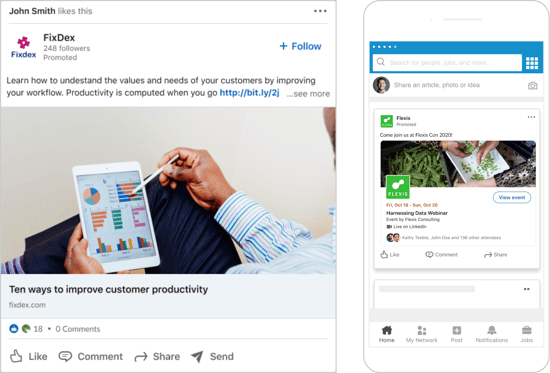
Users can find these ads on their native LinkedIn feed. The sponsored updates typically include a combination of relevant text and contextual images or videos. This helps them blend in with similar user content rather than standing out as paid-for advertisements.

When designed and deployed well, LinkedIn sponsored updates can help drive organic interest in your brand from current followers and a wider audience of LinkedIn members.

Worth noting? While these posts are designed to follow the format of familiar user updates, they’re always labeled as “sponsored content” to ensure there is no misleading or confusing users.

What types of sponsored updates are available?

Brands can create four types of direct sponsored updates.

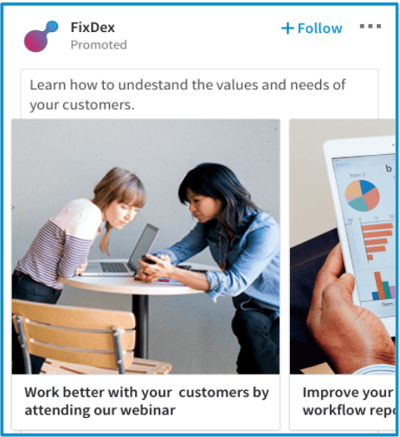
Single Image Ads

Single image ads include one image with text displayed directly in targeted members’ LinkedIn feeds.

LinkedIn sponsored update, single image adImage Source

Carousel Image Ads

Carousel ads contain multiple images in succession that users can scroll through to get a better sense of your products or services.

LinkedIn sponsored updates, carousel image ads

Image Source

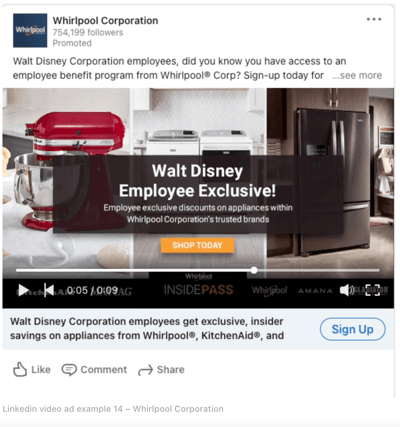
Video Ads

Video ads offer a way to include multimedia marketing with in-feed videos that users can watch on demand.

LinkedIn sponsored content, video ad example with a video ad campaign on screen

Image Source

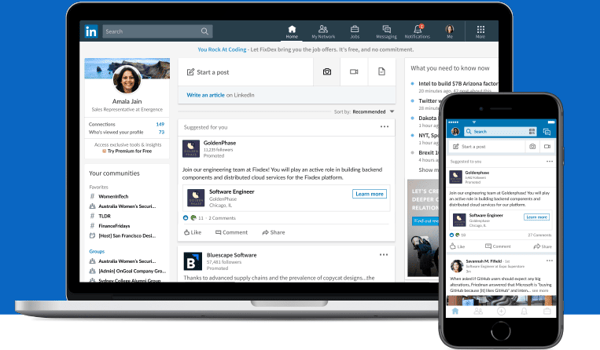
Single Job Ads

If you want to expand your team, you can create single job ads for your targeted audience. They must promote a single job opportunity and be linked to an active LinkedIn post.

LinkedIn sponsored content, single job ad example showing a single job ad on a computer screen and a mobile screenImage Source

Document Ads

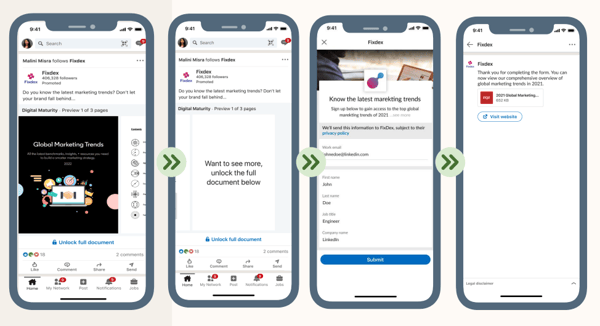
Use document ads to share relevant content with users in the form of ebooks, whitepapers, testimonials, or case studies.

You can collect lead information before they open or download your document, and you can track user engagement through the number of downloads and how much of your document is read.

LinkedIn sponsored updates, document ad with lead gen form example

Image Source

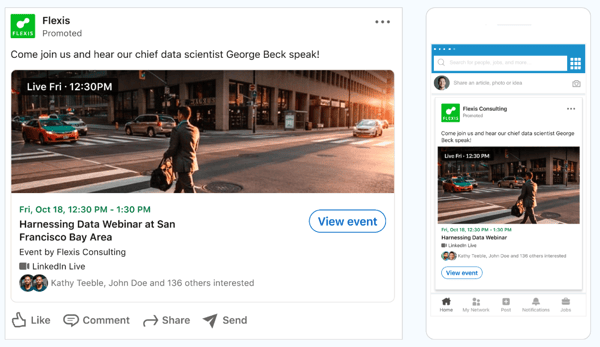
Event Ads

Event ads allow you to promote events you’re organizing through an ad campaign. You must create the event through LinkedIn first, then turn it into sponsored content to target your desired audience.

LinkedIn sponsored content, event ad

Image Source

You can also create what’s known as “direct sponsored content.” These ads won’t display on your LinkedIn Page or Showcase Page before being served as advertisements.

As a result, companies often use them to test several marketing approaches, see which one produces the best results, and use them as the basis for more robust sponsored content updates.

How much do LinkedIn sponsored updates cost?

The short answer is that more resource-intensive ads — such as videos or carousels — will cost more than their single-image counterparts.

The long answer is slightly more complicated.

First, it’s essential to understand that LinkedIn uses a bidding model for sponsored ads.

You select and create your ad type and then specify how much you’re willing to pay — a minimum price exists to ensure advertisers are fairly paid. Still, you’ll never be charged more than your maximum upper limit.

Differing ad providers then bid on the service, and the lowest price wins.

Your target audience and relevance score also determine ad price. For example, if your target audience is in high demand, you’ll be charged more because there’s greater competition to capture user interest.

You can also lower your ad costs by creating relevant ads. The more relevant and content-rich your ad, the less you’ll pay — because there’s a better chance of engaging LinkedIn users.

It’s also worth considering the best cost model for your ad: Cost-per-click (CPC) or cost-per-impression (CPM). CPC means you only pay when users click on your ad and visit your site, while CPM means you pay for every 1,000 views or “impressions” of your ad.

If your goal is generating brand awareness, opt for CPM. Choose CPC if you have an established audience and want to drive click-throughs and conversions.

LinkedIn Sponsored Updates Best Practices

Want to get the most from your LinkedIn sponsored updates? Keep these best practices in mind.

1. Follow LinkedIn sponsored update specs.

Each type of sponsored content comes with its own specifications.

Single image ads require the following:

  • Up to 255 characters for the ad name.
  • 150 characters of intro text to avoid truncation.
  • URLs with “http://” or “https://”.
  • JPG, GIF, or PNG files that are 5 MB or smaller.
  • Up to 255 characters for the ad name.
  • 150 characters of intro text to avoid truncation.
  • URLs with “http://” or “https://”.
  • JPG, GIF, or PNG files that are 5 MB or smaller.

Carousel ads require the following:

  • A minimum of two cards and a maximum of ten.
  • Each card has a maximum file size of 10 MB and dimensions of 6012 x 6012px.
  • JPG, PNG, and non-animated GIF files.

Video ads must be:

  • Between 3 seconds to 30 minutes long.
  • Between 75 KB and 200 MB.
  • In MP4 format.
  • Less than 30 frames per second (FPS).

Single job ads should be concise, relevant, and clear. They must have:

Document ads require the following formatting:

  • A PDF format under 100 MB.
  • Accessible fonts and colors are accessible.

When it comes to event ads, be sure to consider the following:

  • The ad image will be drawn from the LinkedIn event page with a 4:1 ratio.
  • Event names can use up to 255 characters with 600 characters of intro text.
  • Use URLs with “http://” or “https://” from LinkedIn events page.

Failure to follow these guidelines may result in ads being rejected. In addition, if ads contain misleading or inappropriate content, LinkedIn may choose to remove the ads or terminate your LinkedIn account.

The service also clarifies that “spam” posts are not permitted. According to their Best Practices for Sponsored Content page, “Businesses that post updates excessively are subject to review by LinkedIn and could risk having their LinkedIn Page deleted.”

2. Don’t overshare.

While targeted, relevant content can help drive user interest, too many ads too quickly can result in over-saturation.

LinkedIn recommends regularly tweaking your content strategy to deliver analysis rather than simply news, including curated content (with credit) from other sources and repurposing older content where applicable.

3. Test, test, test.

As noted above, direct sponsored content is a great way to try out new advertising efforts and see what sticks.

With the social media market continually evolving, it’s worth evaluating ad performance every few weeks to see what’s working, what isn’t, and where specific changes can help.

4. Spend wisely.

Sponsored updates can get expensive as you incorporate new advertisements and use multiple ad types.

Here, it’s worth tracking your ad spend and switching from CPC to CPM models once click-through rates start to rise. If ads lose steam, consider moving back to CPM to generate increased awareness.

5. Find new markets.

While engaging your target market is critical, diversifying ad objectives is also important to expand your overall impact. LinkedIn recommends using tools such as Lead Gen Forms to find better leads, assess ROI, and manage your advertisements at scale.

Start Creating LinkedIn Sponsored Updates

LinkedIn’s sponsored update model offers a streamlined solution to help brands reach their target market, expand brand awareness, and boost ROI.

Best bet? Start with direct sponsored content to see what sticks, then choose the cost model that makes the most sense — CPC or CPM — and adjust as needed to reach the largest LinkedIn audience.

New Call-to-action

Categories B2B

How to Craft a Brand Manifesto [Guide + 10 Examples]

To inspire your audience to be loyal to your brand, you need to have a core message that focuses on your brand’s purpose and shows why your brand is worth following. To do this, you’ll need to craft a brand manifesto that expresses your brand’s values.

A compelling brand manifesto will appeal to your audience’s emotions and show the “why” behind your organization.

But how do you discover the “why” behind your organization? How do you connect with an audience and inspire them to follow you? Here’s what you as a marketer need to know about brand manifestos, how to craft one, and examples of successful brand manifestos.

What is a brand manifesto?

Why a Brand Manifesto is Important to Your Business

10 of the Best Brand Manifesto Examples

How to Write a Brand Manifesto

Start with ‘Why.’

Free Download: How to Create a Style Guide [+ Free Templates]

Not only can it build a loyal customer base, but it can also attract top talent to your organization.

Why a Brand Manifesto is Important to Your Business

It’s not always enough to have quality products; consumers also care about a brand’s values. According to a 2022 study commissioned by Google Cloud, 82% of shoppers want a brand’s values to align with their own.

Furthermore, 75% of shoppers said they’ve parted ways with a brand over conflicting values.

A manifesto is an opportunity to assure your target audience that your values align with theirs, thus building trust and customer loyalty.

10 of the Best Brand Manifesto Examples

To give you some inspiration for your own brand manifesto, here are some examples to consider.

1. Poseidon Dive Systems

Screenshot of Poseidon Dive System's brand manifestoImage source

Poseidon Dive System’s manifesto appeals to its audience thirst for curiosity, freedom, and adventure.

Essentially, the company’s manifesto gives the impression that its products are designed to help consumers on their journey to explore and deeper understand the ocean.

What We Like: The manifesto uses descriptive language like “beneath the sea” and “incredible creatures” to paint the picture of an underwater world worth exploring.

In doing so, the brand describes an enticing world and tells its audience that it’s products can take them there.

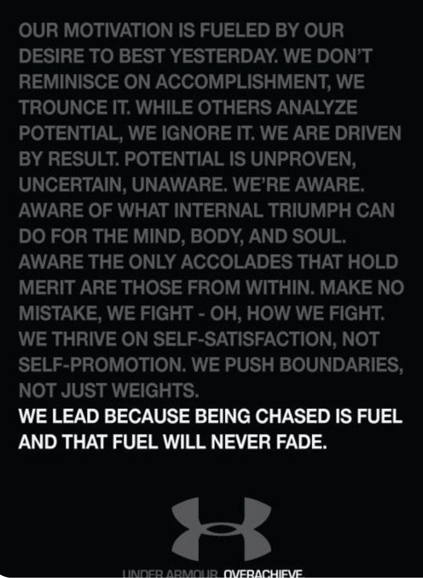
2. Under Armour

Screenshot of Under Armour's brand manifestoImage source

Sportswear company Under Armour’s manifesto speaks to the competitiveness of athletes or anyone on their fitness journey. However, instead of insinuating its audience competes against others, the manifesto explains the brand’s goal is to help consumers compete against themselves.

The idea is to help consumers push their own limits and become the best version of themselves.

What We Like: The manifesto adds context to Under Armour’s simple motto — overachieve.

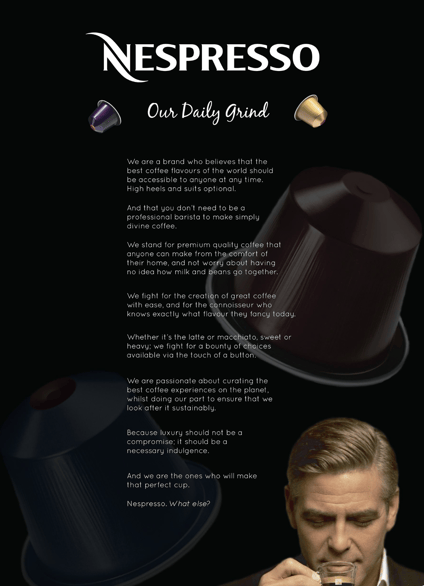
3. Nespresso

Screenshot of Nespresso's brand manifestoImage source

Nespresso’s manifesto makes its clear the brand believes everyone, regardless of status, should be able to enjoy premium coffee. The manifesto includes all the right words to set the tone for the brand — “premium,” “fancy,” and “luxury.”

However, the brand quickly establishes you don’t need to break out your best suit and tie or be a coffee connoisseur to enjoy its product.

What We Like: The manifesto gives the impression that Nespresso products are luxurious yet affordable and makes Nespresso’s values clear — the company isn’t elitist. It believes everyone should have access to superb coffee.

4. Moleskine

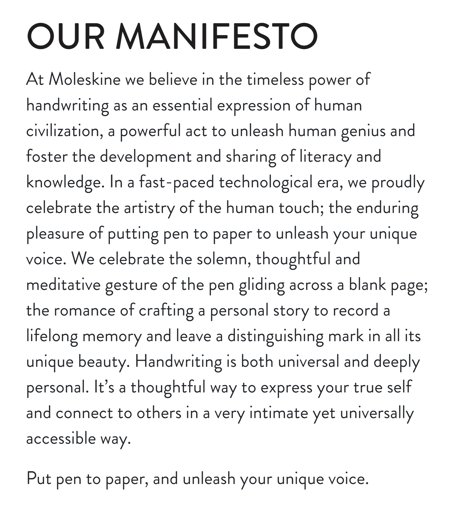
Screenshot of Moleskine's brand manifestoImage source


Moleskine’s manifesto captures the beauty and art of writing with phrases like “the solemn, thoughtful, and meditative gesture of the pen gelding across a blank page.”

Whether journaling, note-taking, or outlining — writing is a personal and artistic expression.

Highlighting this in its manifesto shows Moleskine is in tune with its audience.What

What We Like: Moleskine’s manifesto shows brand consistency. The company manufactures paper and writing products, and its manifesto reflects both its products and its consumers values.

5. KIA

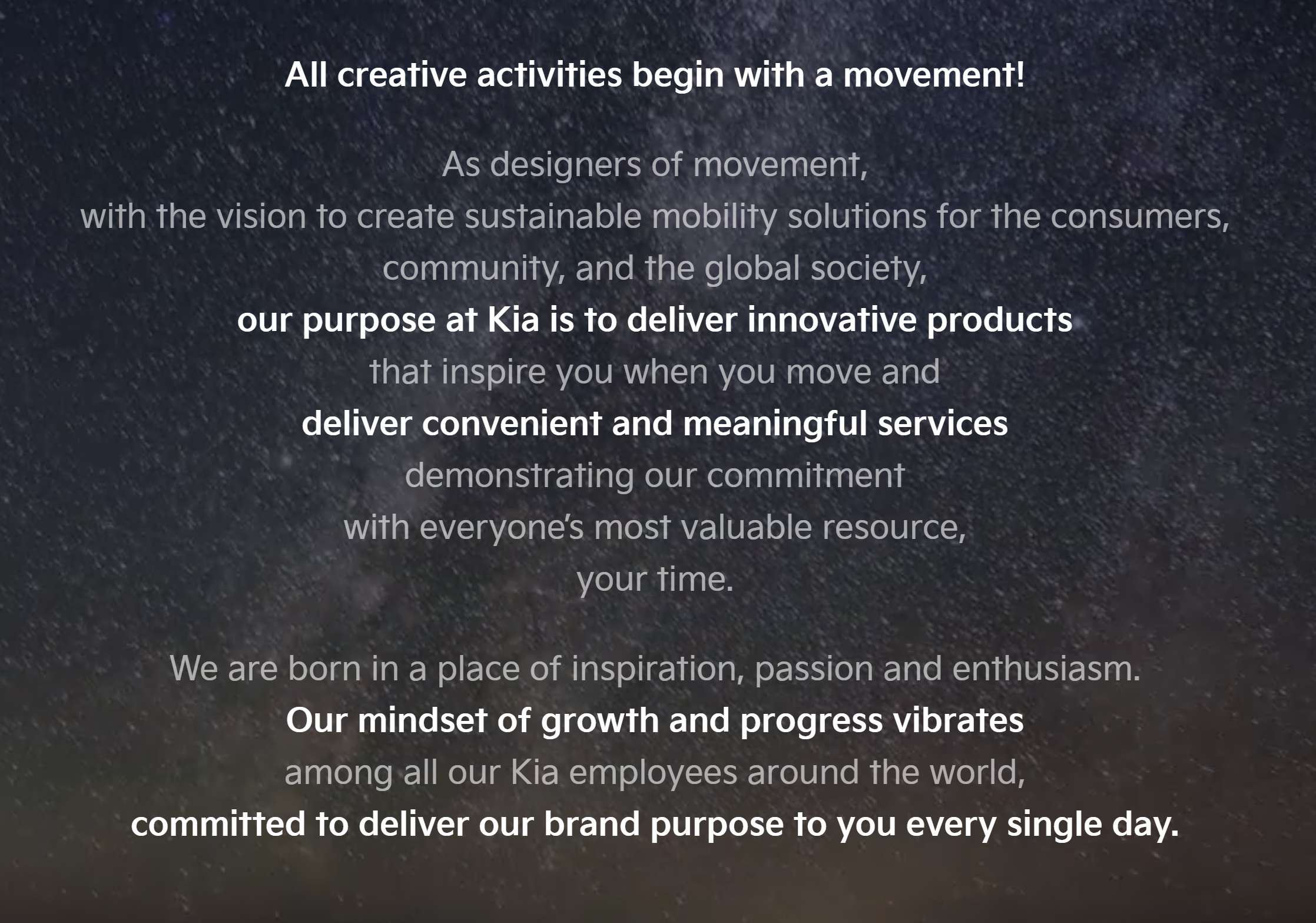
Screenshot of Kia's brand manifestoImage source

KIA’s manifesto doesn’t include much vivid imagery, but it lays out in plain language the company’s goal. KIA’s purpose is to deliver innovative products that are convenient and respects its consumers most valuable resource — their time.

What We Like: If you’re not one for flowery writing and overly descriptive language, this manifesto shows it’s possible to clarify your values with simple prose.

6. Nike

Screenshot of Nike's brand manifesto

Image source

Even though Nike endorses some of the biggest names in sports, like LeBron James, Cristiano Ronaldo, and Serena Williams, it never boasts about how the best athletes in the world use its equipment.

Instead, Nike sticks to what has skyrocketed the brand to the top of the sports equipment industry — emotional resonance.

Nike wants people to understand that success doesn’t mean becoming the greatest of all time. It means you did everything possible to become the best possible version of yourself.

What We Like: Nike’s manifesto perfectly expresses the “why” behind its brand — to empower every athlete, regardless of their talent or ability, to reach their potential and achieve their greatness.

7. Fiat

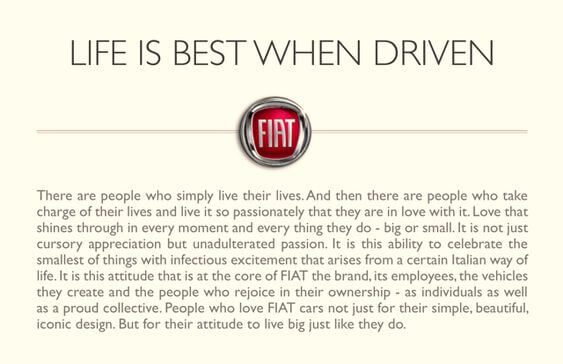
Fiat Brand Manifesto

Image source

Fiat isn’t just selling a sleek, Italian car. It’s selling a lifestyle. In its brand manifesto, you get a glimpse of the life it wants to offer customers — a life they can live with burning passion and thrilling excitement.

However, Fiat doesn’t want its customers to live recklessly. It wants them to treasure the little things in life just as much as the big things.

So the “why” behind Fiat’s brand isn’t really changing its customers’ lifestyle — it’s changing their attitude toward life. And that’s a compelling mission to have.

What We Like: The manifesto appeals to an emotion — love. The words “love” and “passion” are used multiple times throughout its manifesto.

8. The North Face

Screenshot of The North Face's brand manifesto

Image source

Most travel equipment brands focus on how its products can enable you to travel and explore your surroundings, which is engaging on the surface. But, in The North Face’s brand manifesto, it goes another layer deeper by diving into why we explore.

What We Like: By describing how exploring helps us understand ourselves better, The North Face’s purpose is crystal clear — it not only want to help us explore more and help us change for the better, lead more fulfilling lives, and cherish what we have.

9. Apple

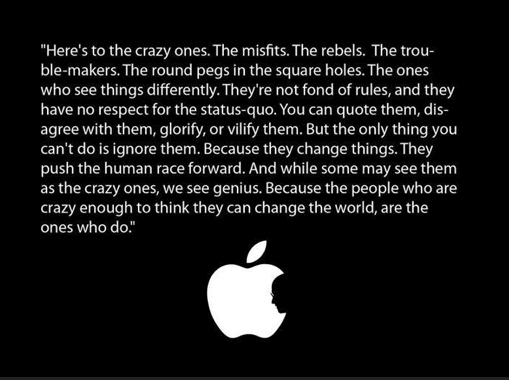
Screenshot of Apple's brand manifesto

Image source

Steve Jobs’ bitter disdain for the status quo compelled him to shatter conventional wisdom whenever he could, driving such a significant wedge between him and his colleagues that they forced him out of the company he founded.

Despite all his controversy, though, Steve Jobs’ ability to think differently fueled Apple’s innovation and transformed it into the most valuable brand in the world.

Steve Jobs’ story is the driving force behind Apple’s purpose. If Apple can inspire people to think differently and challenge the status quo, it can help propel society forward and change the world — just like he did.

What We Like: Apple’s manifesto tells a story of misfits and the hurdles they have to overcome due to their differences. Storytelling is an excellent way to appeal to emotion.

10. Levi’s

Screenshot of Levi's brand manifesto

Image source

No one wants to coast through life. But, often, we drift away — and we don’t even notice it happening.

To help catch yourself settling in life before it’s too late, Levi’s crafted a brand manifesto overflowing with so much purpose that it could convince Eeoyre from Winnie-the-Pooh to make his mark on the world.

Levi’s manifesto encourages its audience to make the world a better better place and says all they need is their gut instinct and the clothes on their back to make that impact.

What We Like: Levi’s conveys a brand purpose almost anyone would passionately follow for the rest of their lives — don’t ever settle.

1. Identify your organization’s “why.”

Your brand’s purpose drives your entire brand manifesto. Without a clear and convincing purpose, your manifesto will seem like an inauthentic, emotionally manipulative sales pitch.

Your audience wants to know why they should care about you — and your product’s “best-in-class” features have never been a compelling enough reason to support a business.

To uncover your organization’s “why,” ask your founders why they started the company. What problem were they trying to solve? Why did it bug them so much? And why do they want to keep growing the company?

You’ll most likely find your organization’s purpose within those answers.

2. Write in second or third-person to place your audience into your story.

In each of the brand manifestos above, you’ll notice that the copy pulls you in by including the words “we” or “people.” That’s because Nike, Fiat, and The North Face all know audiences primarily cares about how the brands can help them.

Using pronouns like “you,” “we,” and “them” (when referring to a customer base) can engage people on a personal level and place them in the narrative the brands are crafting.

3. Describe how your brand’s purpose will improve people’s lives.

Most people aspire to transcend their current identities and lives. Self-actualization is a universal goal that almost everyone wants to achieve. And the smartest brand marketers understand this about the human condition.

For instance, did you notice how each of the brand manifestos above is a life mantra that can improve your life? Nike — define and meet your greatness. Fiat — enjoy life to the fullest. The North Face — never stop exploring. Apple — think differently and challenge the status quo. Levi’s — don’t ever settle in life.

By describing each brand’s purpose in a genuinely selfless fashion, each company’s brand manifesto can prompt audiences to imagine a future with the brand’s product or service bettering their lives.

Start with ‘Why.’

Your brand’s purpose is one of the most challenging things to pinpoint and communicate. But if you want to craft a compelling brand manifesto that will engage an audience and persuade them to support your brand, you must be able to convey the reason you exist and why anyone should care.

Only then will you be able to build the loyal following that every brand craves.

brand style guide


Categories B2B

Microsoft Launched Its AI-Powered Bing Image Creator – What That Means for Marketers

Welcome to HubSpot Marketing News! Tap in for campaign deep dives, the latest marketing industry news, and tried-and-true insights from HubSpot’s media team. 

Microsoft is keeping generative AI front and center in its search products.

In January, the company extended its partnership with Open AI, the maker of ChatGPT with a multi-year investment believed to be worth $10 billion. The following month, Microsoft launched new AI-powered versions of its Bing search engine and Microsoft Edge web browser.

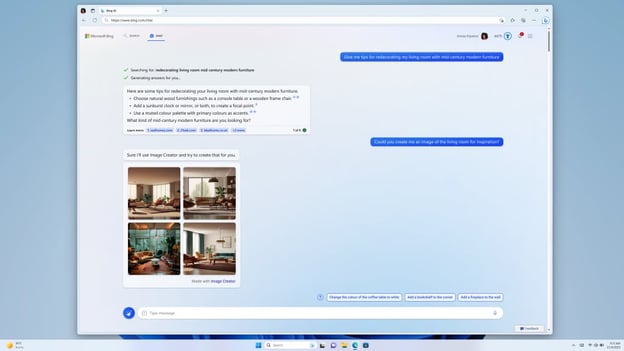
This week Microsoft announced the launch of Bing Image Creator — an AI-powered tool that allows users to create images at the click of a button (a major upgrade from WordArt).

Users can type a brief image description into the chat window on Bing or upon clicking the Image Creator icon within Microsoft Edge to get custom images generated by OpenAI’s DALL-E.

Microsoft Bing Image Creator

Image Source

The feature is currently available for Bing and Microsoft Edge preview users.

In addition to image generation, Microsoft is rolling out Visual Stories and Knowledge Cards 2.0 to aid Bing users in their visual searches. With Visual Stories, search results can include AI-generated video and audio clips. The Knowledge Card 2.0 update will include visual search results such as infographics generated by AI.

What does this mean for marketers?

It’s clear that AI has the potential to streamline and automate tasks for marketers. While it’s no replacement for skilled marketers, AI’s ability to automatically generate imagery and written content can be a big time-saver for scaling teams.

Additionally, with companies like Microsoft integrating AI into search engines, it’s worth noting the potential impacts this will have on search-driven content.

With search results generating elements such as charts and graphs, creating content that includes fresh research, data, and insights will be crucial for marketers looking to generate traffic from searches. As search engines continue to get smarter, marketers will be tasked with creating standout content that is distinctly different from competitors.

Elsewhere in Marketing

The latest marketing news and strategy insights.

Snap’s generous monetization program draws attention from creators.

Meta’s paid verification program is now available in the US.  

TikTok ban: understanding the social and political ramifications.

Google opened the waitlist for Bard, its AI-powered chatbot and ChatGPT competitor.

YouTube rolled out its podcast studio to help podcasters distribute their shows on the platform.

Twitter is testing a new verification system that requires a valid government ID.

New call-to-action

Categories B2B

Artifical Intelligence and Machine Learning: Whats the Difference?

Artificial intelligence and machine learning have been in the spotlight lately as businesses are becoming more familiar with and comfortable using them in business practices.

Although often discussed together, AI and machine learning are two different things and can have two separate applications. Here’s everything you need to know about the difference between artificial intelligence and machine learning and how it relates to your business.

Free Guide: How to Use AI in Content Marketing [Download Now]

Table of Contents:

What is artificial intelligence?

Artificial intelligence is programming computers to complete tasks that usually require human input. A computer system typically mimics human cognitive abilities of learning or problem-solving.

What is machine learning?

Machine learning is when computers sort through data sets (like numbers, photos, text, etc.) to learn about certain things and make predictions. The more data it has, the better and more accurate it gets at identifying distinctions in data.

Machine learning typically needs human input to begin learning, but this is as simple as a human supplying an initial data set.

AI and machine learning are terms used interchangeably, but they shouldn’t be.

All machine learning is artificial intelligence, but not all artificial intelligence is machine learning.

Capabilities of AI and Machine Learning

There are great opportunities for businesses to leverage AI and machine learning; we’ll discuss a few below.

1. Recommendations and Algorithms

Businesses can use AI and machine learning to build algorithms that recommend products or services to users and correctly recommend products a user would like.

A great example is a streaming service’s algorithm that suggests shows and movies based on viewing history and ratings. These recommendations improve over time as the machine has more viewing history to analyze.

2. Image Search

When a machine is fed data in the form of images, it learns key characteristics and distinguishing features. This type of machine learning helps people use devices for visual search, and Google Lens is a great example of this.

Say someone is out in public and sees someone wearing a pair of shoes they like. They can’t identify a brand name, so they take a picture of the shoe using Google Lens. It scans the image for recognizable features and characteristics and searches the internet for a match, eventually driving the searcher to the exact pair of shoes.

3. Sentiment Analysis

AI and machine learning can understand the sentiment behind statements and categorize them as positive, neutral, or negative.

Social listening tools are a popular marketing application of sentiment analysis, and the tools typically analyze online conversations about brands and use keywords to determine if people are positive or negative in their statements.

4. Speech Recognition

Machines can also learn to detect sounds and sound patterns, analyze them, and use the data to bring answers. For example, Shazam can process a sound and tell users the exact song playing, and Siri can surface answers to a user’s spoken question.

Benefits of AI and Machine Learning

Using AI and machine learning can bring a variety of benefits to a brand looking to leverage them:

  • Data Analysis: When systems become more efficient in processing data, teams have a useful and accurate source of information that can help drive business decisions.
  • Efficiency and Time Management: Machine learning and AI can take over everyday routine tasks and allow teams to focus on pressing issues that a computer can’t handle.
  • Fast Solutions: Intelligent machines can come to solutions faster than humans can. For example, a human could generate a list of reputable sources on a topic, but Google Search would do it faster.

All machine learning is AI, but not all AI is not machine learning.

Artificial intelligence is a broad term, but it includes machine learning. If your business is looking into leveraging machine learning, it’s not a question of either or because machine learning can’t exist without AI.

Regardless of the distinctions, one thing is evident; artificial intelligence benefits businesses, and adapting tools into your business strategy can give you a leg up against the competition.

New Call-to-action

Categories B2B

How Marketers Are Preparing for A Potential TikTok Ban

Welcome to HubSpot Marketing News! Tap in for campaign deep dives, the latest marketing industry news, and tried-and-true insights from HubSpot’s media team.

A potential TikTok ban is looming in the U.S.

After the app has been banned on government devices and some college campuses, the Biden Administration threatened a nationwide ban if ByteDance, the China-based company that owns TikTok, doesn’t sell its stakes in the platform.

If the app does get banned, it could have major repercussions for marketers who have invested heavily in the platform over the last three years.

Download Now: The 2023 State of Social Media Trends [Free Report]

Though overall social ad spend is trending downward due to economic uncertainty, TikTok saw a 20% increase in ad spend during the first three quarters of 2022 with some agencies reporting that 25% of their social spend is dedicated to TikTok ads alone.

While many companies are continuing to invest ad dollars in more established platforms, TikTok has untapped potential to reach new audiences that aren’t on other platforms. In January 2023 TikTok reached 850 million global users, though 40% of TikTok users aren’t on Facebook, and 63% aren’t on Twitter.

Some agencies and brands are pulling back their TikTok advertising spend to see how things shake out, while others are continuing to invest to continue getting reach on the platform while they still can.

In the meantime, TikTok is trying to ease the concerns of advertisers to keep the ad dollars rolling in.

It’s worth noting that advertising reach isn’t the only concern marketers have when it comes to a TikTok ban.

The app has been fruitful for organic marketing plays and viral moments, both of which could be limited if marketers are relying solely on platforms such as Instagram and Facebook, which limit organic reach to an account’s followers.

Marketing Snippets

The latest marketing news and strategy insights.

LinkedIn just launched its first podcast academy to connect podcast hosts to programming and coaching opportunities.

Most popular types of content: the seven pieces of content your audience really wants to see per new data from the HubSpot Blog.

YouTube just released its 2023 priorities which are centered around supporting creators, leveraging AI, and fostering community.

TikTok recently introduced a third feed dedicated to STEM content.

The FTC is probing major social media platforms for more information on how they handle misleading ads.

AI stats: 20 data points about artificial intelligence marketers need to know in 2023.

New call-to-action

Categories B2B

The Pros and Cons of AI-Generated Content

The race to create quality, insightful content is only becoming more difficult for marketers. It’s already a challenge to secure a high-ranking article on Google — and it’s even harder when your business is newer or lacks authority on the search engine.

In 2023, many businesses are looking to leverage more tools to increase content output and improve SEO, and AI-generated content is a popular solution.

In this post, we’ll discuss the pros and cons of AI-generated content. But before diving into them, let’s first define what it is.

Sign Up to Try HubSpot's AI Tools

Artificial intelligence software can pull pre-existing information from search engines and create unique content from people’s search queries on different keywords, phrases, or topics.

Our colleagues in the HubSpot Podcast Network dive into a popular AI tool, Chatgbt, and explain how you optimize it to improve your marketing efforts, click below to give it a listen.

How To Delegate Your Work To ChatGPT (Use These Prompts) with Rob Lennon

While it sounds like the perfect solution for your marketing plan, you should consider its pros and cons before using the software.

Pros and Cons of AI-Generated Content

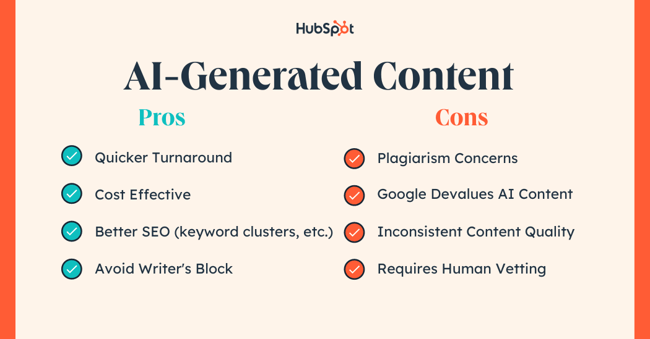
ai-generated content pros and cons

AI-Generated Content Pros

1. Quick Turnaround

AI provides almost immediate results for speedy content creation, no matter if the subject is simple or complicated.

Human writers — even at their most productive — can take hours to churn out quality blog posts or marketing materials. By contrast, your average AI tool will take under a minute to produce a similar product.

What We Like: Depending on the software you choose or pay for, there’s no cap on the amount of content you can request in a day. This can help marketers fill a backlog of content for an improved content marketing plan or social media content calendar.

2. Cost Effective

AI can make content at a fraction of the cost of a full-time writer or freelancer. Authors are paid hundreds for articles needing expertise and thousands in salary wages. AI subscriptions are usually under $100 for an annual subscription.

What We Like: Work done by a person is a well-worth investment for those looking for well-researched, quality content — but for a small business or startup, AI-generated content provides a great place to start for a relatively small subscription fee.

3. Better SEO

AI-generated content’s SEO-related capabilities are one of the software’s key selling points.

AI pulls from already popular and SEO-optimized content to address your desired topic. This is a major value-add, especially if you don’t know how to write about specific keywords or how to structure your page.

Pro Tip: AI could be a step in the right direction to help you get your blog going and become more familiar with SEO. By plugging in search queries, you can see examples of optimized keyword clusters and formatting that can help you gain visibility.

4. No Writer’s Block

There’s a lot of pressure to develop new ideas, and it becomes even more daunting with a deadline.

Using AI-generated content, writers don’t have to worry about burning out or getting behind as it can generate multiple ideas for you to work from one entry.

What We Like: Even if you’re solely using AI to look up content ideas and not write the entire article, you’ve already won half the battle. For many writers, their biggest hurdle is beginning, and if AI can help you overcome that step, then the rest will be much more manageable.

AI-Generated Content Cons

1. Plagiarism Concerns

AI pulls from multiple sources to create the content users search for, but you wouldn’t know that because it never provides citations.

The legal risk is that an author or artist can sue for blatant plagiarism of their original work if it’s too closely related.

Pro Tip: Reverse image search and fact-check your AI-generated content — you can’t trust all the information you receive as it may be coming from an unaccredited source.

2. Google Devalues AI Content

Google’s helpful content update outlines its mission to “help people see more original, helpful content written by people, for people, in search results.”

Amidst the rise of AI writing tools, search engines can recognize AI because it typically lacks human expertise, authoritativeness, and trustworthiness.

Pro Tip: You don’t need to forego AI in your content creation process altogether. Instead, use it wisely to help build on your own creativity — covering elements like grammar-checking, content ideation, or short-form content.

3. Inconsistent Quality

Those that begin using AI-generated content may receive a different level of quality each time. The amount of available information on topics will vary based on how much relevant content about each subject exists.

That means you won’t have a consistent output of informative content across all the subject matter you’re interested in.

Pro Tip: The more specific you get with AI content search queries, the less likely you will encounter this problem. If you need the results to mimic a particular visual style or reading level, include it in the search for a better chance of getting a more consistent result.

4. Requires Human Vetting

Uploading AI-generated content without proofreading or editing it beforehand isn’t in your best interest. Humans can identify cluttered, inaccurate, or offensive content that AI tech wouldn’t detect due to a lack of awareness.

Pro Tip: If you rely on AI-generated content, use it as a base for an idea instead of the finished product. Use the results you receive to adapt them into something original for that human aspect that Google is searching for.

AI Content Is An Imperfect Solution

Even the world’s best writers may find themselves needing a helping hand here and there. AI-generated content can help fill that need, but it has its drawbacks.

You shouldn’t entirely rely on AI for content — instead, use it to help your business grow in a way that still incorporates your own creativity, too.

New Call-to-action

Categories B2B

What is the Metaverse: What Marketers Need to Know

Throughout the COVID-19 pandemic, the internet and social media helped us connect with others during times of isolation. However, these digital spaces didn’t quell our desire to explore the world — that’s where the metaverse came in.

Soon, we started hearing more buzz than ever about futuristic virtual reality worlds that could allegedly supplement or expand on our own. As a marketer, you may wonder if this virtual world is worth leveraging.

In this post, I’ll walk you through what “the metaverse” really is, how you can access all sorts of virtual worlds, and where the brand potential lies in this emerging space.

What is the metaverse?

What is the purpose of the metaverse?

Metaverse Statistics Marketers Should Know

Does Meta own the metaverse?

What happens in the metaverse?

Metaverse Terms to Know

3 Popular Metaverses (And What You Can Do in Each)

5 Early Opportunities for Brands in the Metaverse [+Examples]

Should you invest in the metaverse?

Download Now: 2022 State of U.S. Consumer Trends Report


What is the purpose of the metaverse?

The metaverse aims to have a virtual world where users from all over can interact and do almost everything they can do in real life and then some.

Users can explore new worlds, shop, and trade. Metaverses like Roblox even allow users to build their own games within its world. Buying real estate within the metaverse is also possible— something companies like Gucci and Warner Music Group have already done.

Metaverse Statistics Marketers Should Know

Does Meta own the metaverse?

Because Facebook changed its name to Meta, and has a thriving virtual reality platform, you might think the company owns “the metaverse.” In reality –- and virtual reality — Meta owns one of many metaverses.

While Meta’s VR universe is called Meta Horizon Worlds, and is accessed through the company’s Meta VR headsets (formally titled Oculus), there are many other metaverses that early adopters have been using for years.

What happens in the metaverse?

To explain what happens in the metaverse, we’ll dive into a few types of metaverses and explain what you or your brand can do in each. But, before we dive deeper, here are some definitions you’ll want to remember (and links to more context, courtesy of the HubSpot Blogs and our partners at The Hustle):

Metaverse Terms to Know

  • NFT: The much-buzzed-aboutnon-fungible token is a finite or unique digital token, such as digital art, avatar clothing, or VR-based objects, that you can purchase ownership of or stake in.
    Deep in its blockchain-based coding, there’s a certificate saying that you own or have ownership in the item. (And, yes. There’s much more complexity herethan a quick definition can explain.)
  • NFT Real-Estate: A non-fungible digital house or piece of land in the metaverse that can be invested in, sold, or even rented out. Buyers get a digital deed or certificate saying they own the real estate.
  • Blockchain: A digital ledger of transactions, certificates, and contracts.
  • Cryptocurrency:Digital money that you can invest in, sell, or use to purchase products online or in a metaverse. Each type of digital coinage has different values. Popular examples include Bitcoin, Ether, and Dogecoin.
  • Open-source: Open to all users for editing and not usuallycontrolled by a brand or single entity.

Open-source metaverses can be founded by developers who market and do maintenance on the world, but might not have an obvious company owning them — or customer service when something goes wrong.

However, they often allow much more freedom to the users.

Now that you have those quick definitions, let’s take a look at some of the most discussed metaverses out there.

3 Popular Metaverses (And What You Can Do in Each)

While there are many metaverses out there, and we’d love to talk about them all, I’ve focused this post around the three metaverses that are most buzzed about today.

And, because many metaverses have a lot of similar opportunities for brands, I’ll break down brand opportunities (and show you examples of them) in the following section.

Meta Horizon Worlds

Meta’s universe can be accessed by Meta headsets sold by the company (which were previously called Oculus headsets).

While this universe can only be accessed by headsets at the moment, Mark Zuckerberg has already discussed trying to expand the experience to contact lenses and even holographic experiences in the far term.

Although this metaverse is potentially the most well-known to late adopters and marketers, it is one of the newest major metaverses.

Once you enter Horizon Worlds, you can do almost anything that all earlier metaverses allowed users to do, including:

  • Creating your avatar or virtual likeness.
  • Talking to other people in the Meta Horizons world.
  • Playing games with other Meta Horizons users.
  • Asking a Meta support rep (also in the metaverse) questions.
  • Teleporting to different locations and experiences within the universe.
  • Purchase digital products, such as virtual clothing, from the Horizons Marketplace.

Two key things that make Horizon Worlds different from other major metaverses we’ll discuss below are:

  1. That it’s centralized,which means it has a known owner, limitations of how the platform can be used, and rules that users must agree to. When you’re in Horizon Worlds, you agree to terms of use and must follow rules or you can be ejected.

    Meanwhile, other decentralized metaverses have minimal rules, management, and regulations since they usually have initial creators or developers, but tha owners step away from site on the platforms and give freedom to the users.

    In fact, to ensure that users are behaving and learning how to use the Horizon Worlds space, virtual Meta staffers are usually present in each public space:

  2. You can’t buy land or monetize your brand in Horizon Worlds just yet. While Horizon Worlds does offer a general marketplace, there are no other clear ways to generate revenue on the platform. Meanwhile, on other metaverses that we’ll discuss below, one major goal of users is to buy, sell, or monetize virtual real-estate.

The Sandbox

The Sandbox is one of the oldest decentralized gaming metaverses. Created as a video game in 2018, it has quickly evolved into the metaverse it is known as today and has gained interest from metaverse and NFT investors.

Once you enter this metaverse, your character can buy and build on land with crypto called SAND or LAND. From there, you can sell your land, rent it out, meet people, make connections, and even get paid and buy more land via Sandbox jobs — like architect or landlord.

Sandbox, which is desktop-based, reminds me of an extreme LEGO universe with Minecraft features. Here’s a quick preview reel to give you an idea of what it looks like.

Because of its age and credibility in the metaverse space, Sandbox is home to many affluent early adopters who already own real estate there. The adopters include major gaming companies like Attari, clothing companies like Adidas, and the rapper Snoop Dogg.

Additionally, because land plots and the number of SAND tokes that will be created in the game are considered “finite,” the price of the real estate and tokens in this metaverse have skyrocketed in recent years.
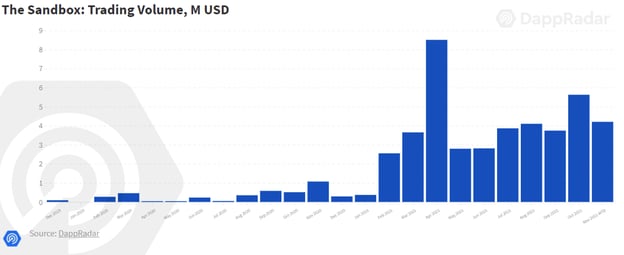
Image Source

Decentraland

One of the most popular metaverses that early adopters have explored and invested in is Decentraland.

Created in Argentina by developers Ari Meilich and Esteban Ordano, has been notable for its vast cities and millions of dollars in virtual land and NFT real estate.

As its title would hint, Decentraland is also decentralized, meaning that anyone can create in this virtual open platform. Unlike Horizon Worlds, it can only be accessed by personal computers.

A lot of information to consider and unsure where to start? Below is a comparison chart to help.

Metaverse Comparison Chart

Name

Meta Horizon Worlds

Decetraland

Sandbox

Years Active

Less than 2 years

6 years

10+ years (launched as a video game)

Estimated Number Users

100K reported users(unknown daily users)

300K reported users (8,000 reported daily users)

2 million+ reported users

Owner

Meta

Developers run the platform but it’s mostly decentralized.

Pixowl (Land ownership is decentralized)

Availability

US and Canada for 18+ users only

Global

Global

Equipment Needed to Access

A Meta or Oculus VR headset

Personal computer

Personal computer

Cost to Access

Accessed with an Oculus or Meta headset (prices vary)

Free to access, but users need a digital wallet with tokens called MANA and LAND to access most experiences.

Free to access with an account, but users need a digital wallet with tokens called SAND to access most experiences.

Gaming Opportunities

Various free team and individual games

Users can play and create games.

Users can play and create game.

Social interactions with other users

Yes

Yes

Yes

NFT Art/Product Shopping

Not yet.

Yes

Yes

NFT Real Estate

Not yet.

Yes

Yes

Virtual Events

Yes

Yes

Yes

Virtual customer service available?

Yes

No

No

Crypto-currency and USD conversion (as of March 2022)

You can’t make purchases in Horizon Worlds.

MANA (1 MANA = $2.69 USD at time of post

SAND (1 SAND = $3.49 USD at time of post

5 Early Opportunities for Brands in the Metaverse [+Examples]

While each virtual world has slightly different experiences, environments, and audience targets associated with it, many of them host a handful of opportunities for brands that want to embrace emerging marketing strategies.

Here are just a few ways brands can leverage some of the metaverses that exist today:

1. Virtual Events

While virtual events are still being developed for general businesses on Horizon Worlds, Decentraland, Sandbox, and other virtual worlds host many landowners that will to rent out their virtual space for events or virtual parties.

Similarly, some companies and entrepreneurs have also built their own lands with the goal of using them for events like NFT art shows, conferences, or meetups.

If you can afford to run, host, or even sponsor part of an event, you can gain crypto revenue or awareness from users who are interested in the topic, while also gaining awareness for your product or service.

For example, here’s a video of a TikTok user who attended an Afro Tech conference in a metaverse.

While INBOUND and HubSpot haven’t hosted a conference in a metaverse just yet, we too are embracing the possibility of virtual events by building out a similar platform for INBOUND 2023‘s hybrid attendees.

If you’d like to get a virtual conference experience without committing to a metaverses digital currency or platform, consider registering for our event.

If you don’t have the budget for creating virtual events just yet, you can still consider attending, buying a ticket for one, or even speaking at one.

While there, you can use it as a networking opportunity to get to know others in your industry or potential prospects who might even buy your product outside of VR.

2. Influencer and Community Marketing

In any metaverse, you could potentially talk to a handful of people at once, while casually mentioning your product or even wearing NFT clothes with your logo.

You could also pay people who are familiar with their metaverse or selling in the metaverse to continue to spread the word about your brand or services for you.

But, influencer and community marketing might not just stop there.

If you find that your metaverse has an audience of users that are interested in your product, service, or industry, you can work to bring them together – even if you can’t afford or figure out how to schedule a virtual event.

For example, you could host a meetup on your brand’s virtual land or in a free-to-access metaverse space for those who want to chat about topics rated to your industry or product.

And, while you’re there, you could just open the door to casual conversation. Or, you could all join a fun game and bond, then get to know each other in a less active space.

Not only will you network, show credibility, and spread the word about your product, but you’ll build a group of people that are interested in your industry, similar topics, or your brand.

3. Owning Branded Locations, Games, Avatar Fashion, and/or Shops

In many metaverses, including Decentraland and the Sandbox, brands with a solid budget can buy and brand real estate, such as art galleries or stores where you can purchase NFT products.

While Meta Horizon Worlds doesn’t allow this opportunity yet, it will no doubt be an expanded feature eventually, but might be more structured than decentralized worlds that have fewer limitations.

One experiential example is the prospect of Welmart stores in Meta Horizon Worlds.

In 2021, Walmart released a demonstration of how they envisioned a metaverse store that helps people in VR order physical Walmart products that would then be shipped to their actual home addresses:

Horizon Worlds is just exploring how to monetize experiences for businesses.

However, Decentraland and Sandbox, among other metaverses, have had digital shops (primarily for buying NFTs), car and teleportation device dealerships, art galleries, and paid brand experience locations for years.

4. Advertising on or Sponsoring Metaverse Content

While this might be more challenging and a tad riskier in decentralized metaverses, brands can provide money to creators, events, games, experiences, shops, and galleries to get their products, logos, or NFTs featured or mentioned.

One way to get started could be by researching NFT land owners with a history of advertising, which can be done on the web, as well as in VR. One business I came across while doing research for this piece was NFT Plazas.

The brand claims to own NFT real-estate and plazas where many avatars spend time and will project ads, QR codes, or special digital experiences on their buildings or plaza signs.

Here’s a reel that highlights some of its work in Decentraland:

This is a great way to spread the word about your brand if you need the means to build your virtual land.

However, you’ll ideally want to make sure you know who the creators are in the natural, non-virtual world, ensure you trust them, look out for scams, and use easy-to-understand paper trails or contracts whenever you can.

Remember, when you’re in a decentralized world, there won’t always be a customer service rep or legal entity to contact if you provide coinage to avatars that can’t be found later.

5. Inbound Sales and Networking

Today, many marketers and sales reps find ourselves messaging, zooming, and emailing prospects to tell them about our product or service. And, rarely, we might go to a networking event or meeting where we talk face-to-face.

Now, imagine doing all of this – but digitally with avatars. In almost all metaverses, you can explore a place and talk to other users for free.

If you sell or market a B2C product, you could casually discuss the product in conversation, as you would with anyone else you’re networking with, and then tell users where they can learn more.

While you still might not be able to send them to a branded experience, virtual shop, or have them click a link to your website just yet, you can still spread the word to multiple people on a more personal level than an email without leaving your seat.

If you work in the VR or metaverse space, you could also leverage sales more extremely by selling NFT items, like art, real estate, or virtual cars.

While it seems many virtual salespeople don’t record transactions and post them for the world, here’s a video of someone buying a car from a dealership salesperson. wrong in a metaverse.

If you’re wondering, “Where could I go to ensure I’m talking to the right people?” one opportunity is attending virtual events, which I’ll discuss next.

Should you invest in the metaverse?

Today, metaverse audiences are still growing, there’s still a learning curve for users, and some brands and audiences will only able to afford virtual world investments shortly.

But, it’s important to remember that the metaverse is getting the same skepticism as social media did when MySpace and Facebook began to launch.

In a world where technology is quickly evolving and improving, what’s not accessible to all today will be used by most people in the future.

If you’re an enterprise brand that can afford to take risks and explore emerging virtual worlds, it might be worth considering the marketing strategies above. You may even want to create a task force to determine if the metaverse is a worthy investment for you.

For other brands, it might be a while before you really need to start considering metaverse opportunities. But that doesn’t mean you should wipe it from your emerging trend radar completely.

In the coming year, a few things could really change the game for brands in the VR space, including:

  • New Meta Horizon Worlds Features. Every time Meta has launched or purchased a platform, its next major step has been figuring out how to monetize the content and build brand tools for it. Horizon Worlds could be no different.

    And, because Meta platforms have been a trusted source for ad revenue and brands for years, expect to see brands flocking here when and if monetization tools are launched.

  • Metaverse competition:Like social media platforms, there are also new metaverses popping up all the time, and their creators (even if we don’t know them) all want them to be superior to pull in more users.

    This could create metaverse competition and these worlds could see new features aimed to pull in more users and more monetization opportunities for all sorts of brands. Similarly, large companies that specialize in VR might opt out of using decentralized worlds and might follow-suit of Meta by developing their own worlds.

  • More accessible technology: Currently, VR users must have an incredibly strong internet connection and a computer, while Horizon Worlds users must have an Oculus or Meta headset (starting at $300).

    While most people around the globe can access the internet, millions still struggle to access high speeds that would allow for VR. But, as VR gains more interest and we see the launch of technology like 5G and Web3 in many global regions, these experiences could require less machinery and lower finances to access.

Ultimately, the metaverse is vast, complex, and growing. And although we’ll do our best to keep you up to date, you’ll need to do some digging and understand your persona to know if investing time, money, or crypto in it is right for your brand.
New Call-to-action


Categories B2B

Businesses Still Can’t Nail Effective Communication [New Data]

Whatever your niche or industry, there’s no debate: Effective communication —both internal and external — is critical to your company’s success. With more technology available than ever before, you’d think it would be easy to master.

Download Now: The Ultimate Guide to Business Communication [Free Guide]

But new data published by Project.co reveals that businesses in 2023 are still struggling to effectively communicate — with serious implications for the customer experience.

In this article, we’ll dive into the data.

Current State of Business Communication

While 99% of consumers say it’s important that a business communicates well with them as a customer, a mere 7% of businesses rate their communication as “excellent.”

project.co 2023 statistics: graph on how people rate their business in terms of communication

More than double this number rate themselves as “below average” or “poor.”

And the impact on the customer experience is clear: More than two-thirds of people say poor communication has led them to stop dealing with a company and jump ship to a competitor.

project.co 2023 statistics graph

Brands know they need to do better – and customers demand that they do better. But when it comes to brands actually doing better – it seems that’s far easier said than done.

So what’s going on?

What does great communication look like?

Perhaps the best place to start here is to look through the lens of the customer.

What is it that they want from companies? What does great communication actually look like?

For a start, customers want to be informed. In fact, 94% of customers surveyed say it’s important they know (or can find out) updates related to their purchase or project, such as its status and the next deliverable.

Customers also want companies to note and remember details so they don’t have to repeat themselves. 87% of people say they’ve had to repeat themselves to the businesses they buy from, and 79% find this annoying.

Full, thorough communication makes a big difference. We all know, from our own experiences as customers, that errors and delays can often be forgiven as long as they’re clearly communicated and explained.

Beyond this, there’s been plenty of research around response speed, particularly how quickly companies are able to go back to messages and what customers expect.

A SuperOffice study showed that nearly half of all customers (46%) expect companies to respond to their messages in less than four hours.

Yet, the average response time, based on a sample size of 1,000 companies, was more than three times this – and the slowest response time was eight days.

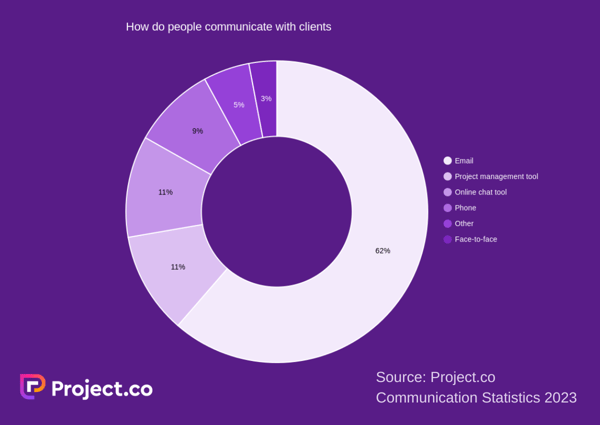
project.co 2023 statistics graph: how businesses communicate with clients

In essence, it seems that great communication boils down to:

  • Visibility: A thorough overview of where things are up to.
  • Organization: Information stored and distributed in an organized way, available to be called upon when needed, with no need for customer follow-up.
  • Attitude: Conscientious, thorough, and honest messaging.
  • Efficiency: Fast and timely responses.

The Impact of Poor Communication

Communication sound simple, but the price of not delivering on it is steep.

When businesses were asked how communication issues had affected their business, here’s what they said:

  • 68% said they’d wasted time.
  • 53% had missed messages.
  • 42% had experienced burnout, stress, or fatigue.
  • 35% had lost files.
  • 30% felt the customer experience had directly suffered.
  • 12% had lost customers to competitors.
  • 10% said they’d lost employees.

Clearly, that’s a broad spectrum of crucial metrics hampered by an inability to get communication right.

So why are brands getting it wrong?

If the core pillars of effective communication – visibility, organization, attitude, and efficiency – are so simple and there are more tools available than ever before to help, then why are so many companies still in such a mess?

The truth is, companies just haven’t found a way to adapt. The data suggests that they’re using technology – but often flawed technology with no central source of truth.

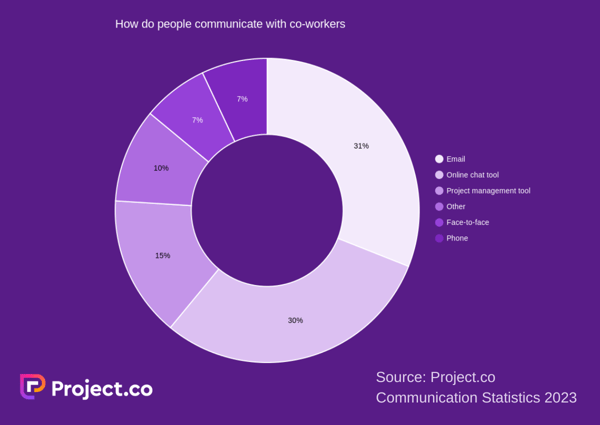
It suggests a particular over-reliance on email. When asked how they primarily communicate with their co-workers, 31% of people said email — the most commonly cited answer.

project.co 2023 statistics graph: how employees communicate with each other

For client communication, it’s even more dominant, being used by nearly two-thirds of businesses and dominating over every other channel.

Email has plenty of benefits, of course. It’s fast, easy, and simple. But when it comes to collaborating and trying to create in-sync teams, it can often make things more confusing and decrease opportunities for spontaneous brainstorming.

Communication inevitably becomes siloed, happening in private inboxes away from the rest of your team and beyond the view of management — which sometimes results in crossed wires, confusion, lost files, and wasted time.

What did Person A promise the client three weeks ago? What was that crucial note the client told Person B by email before the project got started? Where did Person C put the brand guidelines the client emailed over?

Information isn’t shared effectively – and that’s where problems begin.

And what about the impact on work-life balance?

With increasing access to work emails outside the office, there’s a pervasive sense for many that the work never really ends. For many, the temptation — or worse, requirement — to check email off-hours is eating into family and leisure time, resulting in stress and anxiety.

According to Teamstage, 40% of employees use their devices for work outside office hours, to do over a quarter of their work. This lack of division between work and leisure time can only hinder productivity, not to mention health and well-being.

Client and Customer Communication: Two Sides of the Same Coin

While we tend to treat client communication and internal team communication as entirely separate things, the reality is that they’re inextricably linked. Poor internal communication directly affects customer communication.

When team members don’t have the information they need, it’s impossible for them to share it with customers – leaving the customer uninformed and unhappy.

Poor organization, missed messages and lost files create additional work for team members – which creates unnecessary, avoidable delays for the customer.

When teams communicate poorly internally, they often spend huge amounts of time fixing problems, correcting mistakes, and looking for information.

And it all means a less efficient team, and less time to focus on the customer experience. In the end, no amount of relationship-building can make up for not delivering the basics.

The Changing World of Work

On the surface, it seems that many of these issues are exacerbated by the rise of remote work.

Business leaders and pundits have been quick to question the impact of working remotely on a business’s ability to communicate effectively.

Although hybrid working has established itself to some extent, 44% of people surveyed by Project.co are still working fully remotely, with less than one in five back in the office full-time.

The thing is, office-based working was never a solution for communication, and it still isn’t.

Project.co found that, when people use a project management tool to communicate with clients, customers, or both, they were significantly more effective.

project.co 2023 statistics: graph on the communication tools people use

What’s more, using a project management tool to communicate with clients is strongly associated with:

  • Better internal efficiency
  • Better customer experience
  • Increased rate of project success
  • Better employee wellbeing

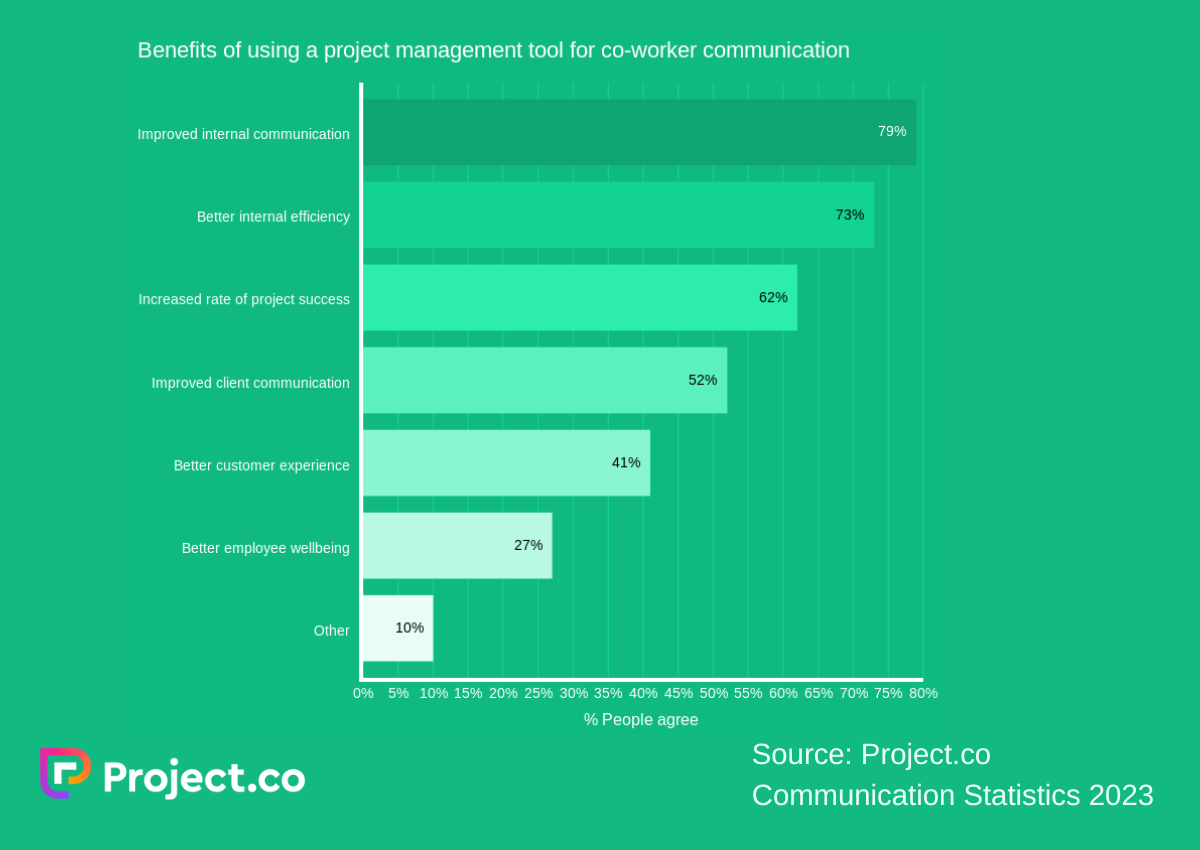
Using a project management tool for co-worker communication has a similar range of benefits with an even stronger correlation.

Across every data point, people find it easier to communicate effectively, measure project progress, and keep information organized and accessible when they use an online tool.

project.co 2023 statistics: graph on the benefits of using a project management tool

Click here to see all the data from the Project.co Communication Statistics 2023 survey.

Wrapping up

So, there’s good news and bad news.

The bad news is businesses have a lot of work to do. The numbers suggest they’re aware of this, but perhaps too overwhelmed by the task to take meaningful action.

These problems won’t simply resolve themselves, however, without positive action from managers and strong buy-in from teams.

It takes strong, decisive leadership to identify the need for change, explore to find the right systems, tools, and software, and then drive change throughout the organization.

But the good news — as this data shows — is that taking this action is the start of a road that leads to satisfied customers, reduced customer and employee churn, and a happier, healthier team.

Is it a challenge? Of course. But it’s one well worth facing down.

New call-to-action

Categories B2B

The 10 Best Content Management Software Tools in 2023

Running a website requires input and strategy from your whole business team (developers/engineers, marketers/UX, sales, etc.). Using Content Management Software (or CMS) helps you deliver a great product to your customers while granting easy code access for your developers/engineers.

Build your website with HubSpot's Free CMS Software

Without a good integration between your content management software and your other systems, something as simple as successfully sending a follow-up email after a form submission can become a massive time suck.

Let’s explore the characteristics you need for any content management software tool and the ten best content management software tools for marketers. Feel free to use the following jump links to navigate or just scroll.

Characteristics of the Best Content Management Software Tools

Here are some features marketers should feel good about in a content management software tool.

1. A powerful, flexible editor.

As marketers, we need to be able to do things like quickly produce a landing page for a Facebook campaign, make simple layout changes to a page (like adding a column or testimonials module), and easily edit the content on existing pages (like changing some of the text of your homepage to promote your upcoming annual conference).

A powerful WYSIWYG (“what you see is what you get”) editor is critical, so if you can, ensure you’re comfortable making changes within the content management software tool.

2. The ability to test.

It’s crucial you’re able to understand what’s working, so you can do more of the good stuff. You need to be able to efficiently run tests on outcomes for different headlines, layouts, and more. It’s especially critical when doing something like a paid campaign, where maximizing results is tied directly to spending.

3. The opportunity for increased collaboration.

Chances are, you have a team of people working on one website.

You may have a developer who works on complex design pieces and integrations, a marketer who runs the day-to-day and manages campaigns, and content creators who write blog posts.

The ability to collaborate within the content management software tool and set permissions makes life a lot easier — and ensures issues don’t arise like your social manager accidentally overwriting the developers’ code.

4. Accessibility to support.

Oftentimes, your developer can fill this need — but that can get expensive if you’re paying by the hour. It’s maybe not mission critical, but it sure is nice to have a support team you can call for help when you need it, especially when it’s halting your ability to launch a campaign.

5. Ability to integrate with the rest of your tools.

Last but probably most importantly, you need your content management software to integrate with the rest of your tech stack. Generally, the best choices here will be open platforms or all-in-one solutions.

Ideally, it should at least be able to integrate forms with a mailing tool (for lead/ mailing list collection), as well as your CRM or some kind of database, so you can personalize content. Additionally, you’ll want to integrate with your CRM to customize pages and add pages quickly and easily.

Now that we’ve explored five critical components of any content management software tool let’s explore our ten favorites.

1. CMS Hub

CMS Hub by HubSpot is more than just a content management software tool since it lives on your CRM.

HubSpot’s content management software tool has nice features like A/B testing, but it’s particularly powerful regarding features like personalized content and smart content. If you’re using HubSpot’s marketing platform, it also works seamlessly with forms, your email list, and database management.

For instance, you want a list of everyone in your database who visited your pricing page in the last 30 days. This is incredibly easy to do with HubSpot’s content management software and CRM.

It also scores well on the design side — like any content management software tool, it offers predesigned templates, a developer platform, and a network of partners certified in the content management software.

There are also some great out-of-the-box features designed to help with content creation — like the ability to natively host video and add forms and calls-to-action in the video using the native editor, along with video analytics and a YouTube analytics integration.

Some of the features marketers will love on a platform level are the ability to partition content, so it’s easier for teams to work together. Additionally, you can publish content behind passwords and easily personalize content. Best of all, its high-quality security and hosting take the worry out of the technical side. And, of course, you get top-notch analytics since everything works together.

a preview of the CMS Hub tool

2. Squarespace

Squarespace offers beautiful out-of-the-box designs with tons of customization options. You can easily download any theme and change colors, fonts, and other design elements. It seems geared more toward the end user than the developer, so most edits are made in a WYSIWYG design editor.

Behind the scenes, they boast high-quality, secure hosting — something that isn’t always top of mind when selecting a content management software tool but probably should be. It also allows for unlimited bandwidth and storage, which isn’t always the case if you’re buying hosting on its own.

It’s also nice to have a support team, and Squarespace has a team that answers support tickets, so you’re not totally on your own or stuck calling a developer for every question. Additionally, it offers incredibly useful help documentation.

Squarespace offers tons of modules and integrations, although you might want to check their built-in integrations to make sure the rest of your tech stack will play well with Squarespace.

Image Source

3. Wix

Wix has many templates and a free plan that gives you unlimited pages. If you need to get an online presence up and running right away, it’s a great choice.

They also have paid plans that give you additional features, including increased storage, the ability to add forms, a calendar, and access to VIP Support.

It’s important to note Wix is a bit tougher to customize — they don’t give access to CSS, although they do say you can “take full control of your website’s functionality with JavaScript and Wix Code API’s.”

Additionally, inserting third-party code (like tracking code) can be challenging, so eventually, as your business grows, you or your developer may want something with a bit more customization capability.

Image Source

4. WordPress

And next, we come to WordPress. WordPress is everywhere — it’s a popular platform and has a large ecosystem of developers, designers, and plenty of others who are familiar with it.

The content management software tool itself is free, although you’ll need to pay for hosting and probably a template at the very least, and more likely a developer or designer to help you get it up and running.

Your ease of use here will likely depend on how it’s set up and which theme you use — some have simple WYSIWYG editors, while others are more complex. You’ll want to discuss this with your developer since once it’s built, there isn’t much you can change.

It’s also incredibly customizable. There are a ton of plugins and add-ons you can use to help with anything from SEO, speed, automatic image resizing, and more.

WordPress also implements automatic background updates that help reduce any security issues that may arise.

On the hosting side, we recommend a hosting platform specializing in WordPress, like WP Engine, since the support teams are well-versed in WordPress — which means they can help with questions and offer additional resources. Using a popular theme with plenty of existing help documentation or a support team can make a huge difference.

It’s important to note the openness of the platform results in a vulnerability to hacking (this is another reason to get a good host). Be aware that addressing security should be part of the initial plan and not be an afterthought to design since security breaches are hard to fix and require technical expertise.

However, WordPress addresses this issue by having frequent, automatic background updates. Security issues are usually because hackers prey on old software. With automatic background updates, this is a significantly reduced issue.

5. Joomla

Joomla is great because it has a lot of built-in functionality that lets you fully customize your website (over 6,000+ extensions), tinker with SEO settings, easily change languages, and manage your webpages individually.

Image Source

Unlike WordPress, Joomla doesn’t have automatic background updates. So if you choose to use this software, you will have to take on the responsibility yourself. 

With Joomla, you can customize your website fully, but it depends on how much technical knowledge you have when it comes to web-building.

6. Drupal

Drupal is a great choice for developers technically familiar with HTML and CSS. You have complete control over your website, so if you have a team of developers ready to work on your website, this might be the best content management software tool for you.

Drupal also has tens of thousands of Modules and thousands of themes to increase customizability. These modules and themes also give you a lot of freedom, so those with a technical background can take full advantage of these features.

7. Sitecore

What sets Sitecore apart from the other CMS platforms on our list is the ability to reuse content and quickly work on a site across teams using Sitecore Experience Accelerator (SXA). This can speed up the process for developers. Here is what the toolbox looks like.

Sitecore is great if you have a team of experienced developers to fully use the team-building developing features. If you’re on your own or aren’t experienced with coding, you might be better off using a different CMS. 

8. Shopify

This is the best option for e-commerce retailers and first-time sellers. Shopify trades in versatility for ease of use and simplicity. If you’ve never created a website before and are still learning the ropes, this is one of the best content management software tools.

Shopify is on the pricier side, with its cheapest plan being $29/month, but you are paying for the ability to create a website with little to no hassle. Another bonus is that all Shopify websites are PCI compliant by default, meaning you can accept payments from Visa, MasterCard, American Express, and Discover.

You won’t have to worry about security as much with Shopify, as the platform regularly conducts automatic background updates, so your website will almost always be up to date.

9. Ghost

Ghost is best for users who want to build a website dedicated to blogging. They have a simple and intuitive interface that lets you quickly publish content to your users. Ghost also makes it easy to offer gated content so you can monetize your blog or other forms of content.

To use Ghost, you must pay for one of their subscription plans. You can try the CMS out for $9/month, but if you want to fully build a website, you must pay at least $25/month (billed yearly).  

10. Webflow

Webflow is a visual platform that lets you build websites using its intuitive drag-and-drop tool. It is a tool that is best for people who want something with little to no coding experience required and is low maintenance. Here is an example of what the site editor looks like.

You can try the website for free, but to get full use of the CMS, you will need to pay $23/month (billed yearly).

Getting Started With a Content Management Software Tool

While these are ten popular choices for marketers, many more are out there. The options are endless for content management software tools. Ultimately, you must consider your workflow, your team, and the workflows you have in place to help you make the best decision.

cms


Categories B2B

41 Instagram Features, Hacks, & Tips Everyone Should Know About

Did you know you could schedule your Instagram posts in advance? Or optimize your bio to appear in the Explore tab?

There are countless lesser-known Instagram features, settings, hacks, and search options to help take your Instagram game to the next level. And we’ve compiled them all, here.

Whether you’re a recruiter looking to showcase company culture, a eCommerce marketer, or just an individual looking to use Instagram in the best ways possible, here are Instagram tips and features for you to use.

New Data: Instagram Engagement Report [Free Download]

Note: Before getting started, make sure you’re operating on the latest version of Instagram. At the time of publishing this guide, the latest version is 273on iOS and on Android. Please also note that although this article might demonstrate each tip below using an iPhone or Android device, all items on this list are available for both operating systems and can be enjoyed using the same step-by-step instructions.

Table of Contents:

41 Hidden Instagram Hacks, Tips, and Features

Instagram Account Features

1. Add and manage multiple accounts from the same device.

Have a separate account for your dog? Don’t be embarrassed; stand by your puppy profile. In fact, whether it’s a pet account or a business account, you can add and manage this one right alongside your personal account.

Here’s how:

  1. From your profile, tap the gear icon. To find this icon on an Android device, you’ll first need to tap the three horizontal lines to the top right of your screen.
  2. Scroll to the very bottom and tap “Add Account.”
  3. Add your other account by username and password, and you’re all set.

To toggle between both profiles, hold down your profile picture in the navigation bar to view all connected accounts.

2. See all the posts you’ve liked.

Ever wanted to see the post you’ve liked all in one place? All you have to do is go to your profile, click the three lines on the top right (on Android and iOS), tap “Your Activity,” tap “Interactions,” and then click “Likes.”

screenshots of instagram profile showing how to view posts you've liked on instagram

With this, you can see 300 of the last posts you’ve liked.

To un-like any posts you’ve Liked, simply go to the post and deselect the “heart” icon below it. Don’t worry — the user won’t be notified that you’ve un-Liked the post.

3. Hide, delete, or disable comments and likes on your posts.

Twitter may carry a more “anything goes” culture of commentary, but your Instagram is your domain — and it’s much easier to control who says what on your content. This is especially important if you manage a business account.

To Filter Comments by Keyword:

Navigate to Settings and tap “Privacy,” then “Hidden Words.” You can toggle “Hide comments” to filter general offensive words or click “Manage custom words and phrases for messages, comments, and posts” to add custom filters.

To Delete Comments:

Tap the speech bubble icon below the comment you’d like to delete, and swipe lightly to the left over this text. Select the garbage can icon that appears to delete this post. You can also do this to your own comments.

To Disable Comments Entirely:

To clarify, you can’t turn off comments across your entire profile; you can only disable them for individual posts.

To do so, start posting an image on which you’d like nobody to comment. When you reach the page to add a caption, tags, and location, tap “Advanced Settings” at the very bottom. This will open a screen where you can easily switch on an option labeled “Turn Off Commenting.”

how to disable comments on your instagram posts

4. Clear your Instagram search history.

To clear your Instagram search history (on Android and iOS), go to your profile, tap Settings, then “Your activity.” Tap “Recent searches” and click “Clear all.”

showing in settings how to clear instagram search history

5. Add another Instagram account to your bio.

Perhaps your company has more than one Instagram account for different aspects of your brand. For instance, HubSpot has a verified HubSpot account, a HubSpot Life account, a HubSpot Academy account, and a HubSpot Partners account.

To draw awareness back to its main company page, then, HubSpot links to the @HubSpot account in its other account bios, like in @HubSpotLife’s account:

how to add an instagram account to your bio

Fortunately, you have the option to include another Instagram account in your Instagram bio. To do so, simply type the “@” sign into your Bio, and then select the account you’d like to tag. Then, click “Done.”

6. Communicate with your audience using Instagram Broadcast channels.

Broadcast Channels is Instagram’s newest feature, and it is a messaging tool for creators to engage directly with a large group of followers.

Creators can share updates and behind-the-scenes content as text, video, voice notes, and images. Followers can’t send messages but can enjoy the content, react to content, and vote in polls.

As of February 2023, the feature is currently in Beta mode for U.S. creators only.

Instagram Design Features

7. Add special fonts to your bio.

Here’s an Instagram bio hack that can truly make your profile stand out. You can already add emojis to the bio beneath your profile photo, but your keyboard limits your creativity right there.

Using a couple of basic third-party websites, you can copy over some more special fonts not often found in the Instagram community. Here’s how.

To Add a Special Font to Your Bio via Mobile:

Add a new font to your Instagram bio via your mobile device using a website like LingoJam. Open the site on your phone, type your desired bio text in the lefthand text box, and you’ll see the same bio text in different typefaces appear on the right.

how to add special font to bio with a tool like lingojam

Carry your chosen font over to your Instagram bio by tapping it and selecting “Copy.” Then, open your Instagram app, navigate to your profile, select “Edit Profile,” tap the “Bio” section and paste your chosen font into the empty field.

To Add a Special Font to Your Bio on Desktop:

If you’re editing your Instagram profile on your laptop or desktop, Font Space has a library of fonts you can download and copy into your bio in seconds. To do so, Find a font you like and select “Download” beneath the font’s sample image, as shown below.

cursive font of someone's name

Downloading this font will open a folder on your desktop where you can pull a “.ttf” file that carries the various versions of this font. The file will look something like the screenshot below.

copying special font to paste it into instagram

Once you have this font copied to your computer’s clipboard, open your internet browser and log onto Instagram.com. Select “Edit Profile” and paste your downloaded font into your bio field. You can then edit the sample text that came with your font to write your new bio as you see fit.

8. Add special characters to your bio.

Not only can you customize your bio with a special font, but you can also add atypical characters that distinguish you or your brand — but that you wouldn’t find on your smartphone’s normal keyboard. These include§,†, or even™ if your Instagram name features a trademarked product name.

To Add Special Characters From Mobile

Using your mobile device, install a free mobile app likeCharacter Pad, which catalogs nearly every character and symbol you might need but won’t find in the 26-letter English alphabet.

Open the app and find the character you want to add to your Instagram bio. In Character Pad, you’ll simply double-tap the picture of your chosen symbol to paste it into a text box, as shown below. Then, copy this character to your phone’s clipboard. (For our purposes, I double-tapped the half moon icon.)

special charactersOnce you have your symbol copied to your clipboard, open Instagram, navigate to your bio, and tap “Edit Profile.”
edit profile-1Hold down your finger on the field of your bio you want to insert your special character until “Paste” appears as an option, as shown below. Tap “Paste” and then “Done” you’ll be all set.

welcome to my page

To Add Special Characters From a PC

You can also insert special characters and symbols through Instagram’s web client on a desktop or laptop computer. The easiest way is to use Microsoft Word’s “Symbol” insertion icon, as shown below.

ms-word-insert-symbol

Select your desired symbol or character and copy it to your computer’s clipboard. Then, navigate to Instagram.com and follow the steps above to paste your character into a particular part of your bio.

You might be tempted to simply Google search the special character you want, and at times it might work just as well as the steps above. But keep in mind not all special characters you copy from the internet are “clean” when you paste them into Instagram — some of them might become corrupted or not show up correctly.

9. Reorder filters to set your favorite filters at the front.

If you use Instagram a lot, chances are, you have a few favorite go-to filters, and others you never touch. To make editing photos easier, you can reorder the filters in your editing window.

To reorder filters, add a new post and begin editing it. When you get to the filters page, hold down on a filter you’d like to move, and then drag it to your preferred location.

reorder instagram filters

10. Use Instagram as a photo editor (without having to post anything).

Perhaps you love Instagram’s filters and editing capabilities, but aren’t quite ready to post the photo to your account — right now, or ever. To use Instagram as a photo editor without posting anything, all you need to do is publish a picture while your phone is on airplane mode.

First, be sure you have “Save Original Photo” turned on in your Instagram settings.

IMG_8604

Next, follow the normal steps to post a photo to Instagram: Upload the photo, edit it, and press “Share.” An error message will appear saying the upload failed, but you’ll be able to find the edited image in your phone’s photo gallery.

use ig as photo editor

11. Insert line breaks into your bio and captions.

When you write a caption in Instagram, you’ll see the keyboard doesn’t give you an option to press “Enter” or “Return.” The same is true for your bio. So how do all those people put line breaks in there?

No return key.png

It turns out that all you have to do is press the “123” key in the bottom left corner of the keyboard, and the “Return” key will appear on the bottom right.

Return key.png

I know this tip sounds simple, but a lot of people miss it — myself included, until a colleague clued me in. We’ve seen some elaborate solutions out there for hacking through this problem, like writing the caption copy in another app, then copying and pasting it into Instagram. Thankfully, it’s much simpler than that.

Instagram Optimization Features

12. Pin important content to the top of your Instagram Grid.

f you have an Instagram post that you want to call attention to, you can pin it to the top of your profile grid.

To do this, pick the Reel or image post you want to pin.In the top right corner of the post, tap the three dots and click “Pin to your profile.”

The post will now show up at the top of your grid.

This is a valuable tool to share ongoing partnerships with your followers, draw attention to popular content, and make sure new followers or browsers can immediately see the most important content you want to share with them.

13. Optimize your Instagram bio to appear in the Explore tab.

Your friends, family, and coworkers might be your first group of Instagram followers, but growing your audience takes more than the people who already know you. One key way to do this is to get your profile to appear in Instagram’s Explore page.

explore tabThe Explore page, accessible using the magnifying glass icon shown above, is a browsing page that sorts the entire Instagram community by topic and keyword. These include “Fitness,” “Style,” “Science,” and more.

Hashtagging your posts with these words can expose your content to the people browsing these topics, but you can also use them in your Instagram name and bio to promote your profile.

If Jane Doe is a marketing consultant, for example, she might want to make her Instagram name “Jane Doe Marketing,” rather than simply “Jane Doe.” Then, in her bio, she can include all of her specialties, such as “SEO,” “blogging,” “email marketing,” etc.

14. Drive traffic to an external website.

One of the biggest frustrations people have with marketing on Instagram is that clickable URLs aren’t allowed anywhere except the single “website” box in your bio. If you put a URL in a photo caption it’ll appear as plain text, meaning users would have to painstakingly copy the URL, open a web browser, and paste or type it in there.

One sneaky way to get people to visit your Instagram profile, which is where that one clickable URL is allowed, is to use your photo captions to encourage people to visit your profile for a link. Then, update that URL frequently to point to your latest blog content, YouTube video, product, or offer.

Check out the example below from the food magazine Bon Appétit, where it includes a link in its bio that draws people to external Bon Appétit content.

add link to your instagram bioImage Source

If you have a verified Instagram account, you can also add links to your Story. Read more about this feature here.

15. Sell products from Instagram using Shoppable Posts.

You might already know you can tag people in your Instagram posts as (or after) you post new content. Now, you can tag products — and direct your viewers to a product page to buy what they saw.

To Add an Instagram Business Account

You’ll need an Instagram Business account to publish shoppable posts. You can get one by selecting “Edit Profile” on your Instagram profile and tapping “Try Instagram Business Tools,” as shown below.

switch to professional account button on instagram

To Tag a Post With Products

Once you’ve launched an Instagram Business account, you’ll need to enable product tags to use them on a post that depicts a product. Navigate to your settings using the gear icon from your profile page, and select “Products.” Tap “Continue” and follow the prompts to connect a “product catalog” to your business profile.

With product tags enabled on your Instagram Business account, you can now upload new posts and tag your photo with products you find from your product catalog. Here’s what a shoppable post can look like:

example of a shoppable post on Instagram from sephoraImage Source

16. Create an auto-complete quick reply for standard responses.

Responding to user comments and questions is incredibly timely, but fortunately, there’s a hack to streamline the process and make it more efficient. (Note: This only works on Instagram Business accounts.)

You can simply create a one-to-two word phrase that can act as your shortcut to a longer standard response you might send often. To do this, click “Business” in your Settings, and then “Quick Replies” — or, click the three-dot chat bubble icon on bottom of screen, and then click “New Quick Reply”.

Add a shortcut you can enter for the response. For instance, you might type “returnpolicy” as the shortcut for a longer response, i.e.: “Hey there. We’re sorry you don’t love your purchase. Fortunately, we permit 30-day returns, no questions asked. Please send us your order confirmation number to get the process started.”

Once you’ve added a shortcut, you can either type the shortcut “returnpolicy” into the comment box when you want it to auto-generate, or you can tap the three-dot chat Quick Replies bubble icon at the bottom of your screen to choose from a response you’ve created. (Read more about Quick Replies here.)

0bbb2a75b44c18506923b75ffceb2a1a

Image Source

17. Pin your Instagram post to Pinterest.

Instagram doesn’t have a natural integration with many social networks (except Facebook, its parent company) for publishing Instagram posts to other social accounts.

But with respect to Pinterest, image-loving platforms stick together. Here’s a backdoor way to Pin your latest Instagram Story to Pinterest:

On the Instagram mobile app, tap a post to view it in full, then tap the three dots to the top-right of the image. Select “Copy Share URL” to attach the picture’s link to your clipboard.

copy an instagram post's link

Open the Pinterest mobile app — or download it; you’ll need it for this step — and navigate to your profile page. If you have the latest version of Pinterest downloaded, it might ask you as soon as you open the app if you’d like to produce the image from your clipboard.

If not, select the “+” icon to the top right to add a new pin, and you’ll see a menu of options where you can add your “Copied Link” to a new Pin or board on your profile.

Instagram Reels Features

18. Upload and browse video content on Instagram Reels.

Instagram Reels is one of the biggest new features of Instagram to date.

You can find Instagram Reels by opening the app and tapping the TV icon in the bottom navigation bar. You’ll land on a gallery of Reels to watch, including those from people you follow, trending videos, and the most popular creators on the app.

As you view more videos, the algorithm will adapt to your interests and show you Reels relevant to your likes. And naturally, the same goes for your target audience.

The Reels you create are visible on your Profile under the Reels icon. When you want to upload a new Reel, follow the steps to upload an image but click Reels instead.

19. Easily create Reels using the template feature.

Instagram’s native Reels template helps anyone quickly and easily make a Reel. To create a Reel using a template, you can either:

Find a Reel you like that someone has created, tap on the three dots on the bottom right corner of the real, tap “Use as template,” and follow the steps. Note that the only Reels you can use as a template have the Use as a template button.

Or,

Click on the Reels tab, swipe left to access the “Templates” option, and select the template you want to use. Then, follow the steps on screen.

how to create an instagram reels using the reels template20. Automatically add captions to your Reels and Stories.

The auto-caption feature automatically converts speech into captions for your Reels and Stories. This feature is incredibly important for increasing accessibility for your content and also for allowing people to consume your content without sound.

21. Remix Reels to engage with other users.

Remixing a Reel means creating one that includes content from someone else’s Reel. It’s a great way to engage with other users and create side-by-side interaction.

To Remix a real (on Android and iOS), tap the three dots on the Reel you want to remix. Tap “Remix” and choose whether to play your video side-by-side the original video or after it ends.

Next, record your Reel and share it to your profile.

If you remix a Reel using side-by-side video, you can mix the audio and add voiceovers, text, and stickers to your Reel and the original Reel.

If you remix a Reel and add your video after the original, you can’t change the audio from the original post, but you can adjust the volume level of the original Reel and add a voiceover.

22. Reply to a comment on your Reel with a Reel.

Instagram now allows people to create Reels to reply to comments on Reels. It’s an engaging way to interact with followers and build connections.

To do this (on Android and iOS), tap “Reply” underneath a comment and click the camera icon.

Record your Reel or upload a pre-recorded video from your camera roll.

Click on the comment sticker to update the background color or change its position in the frame.

Edit your Reel, then click “Share.”

Instagram Stories Features

23. Use Notes to share status updates.

Notes are 60-character max posts next to profile images in the messages inbox.

Notes will appear in your followers’ inboxes, and you can choose to share them with all of your followers or your selected Close Friends list. They last 24 hours, and Notes replies appear as DMs.

The new feature is a great way to share your timely thoughts, engage with people, and see what others are saying.

instagram stories notes feature

Image Source

24. Create a collection of saved posts.

In addition to being able to view all of the posts you’ve liked, Instagram also has an option to save or bookmark certain posts in collections that you create.

Start by going to your profile, and tapping the “Settings” icon at the top-right of your screen, and then select “Saved”:

someone's instagram settings to find saved posts

Next, press the “+” button and name your new Collection. someone's instagram settings to find saved posts

Click “Next”, and select images from your “Saved” section.

someone's instagram settings to find saved posts

To save photos for future collections, tap the bookmark icon below the post you want to add, as shown below:

save for future collectionsThen, go back to your saved photos by following the previous steps.

You’ll see the photos you’ve saved — to add them to your Collection, select the Collection you want to add to, and tap “Add to Collection.” From there, you can add any of your saved photos.

add to new instagram collection

25. Create Stories Highlights to show Stories for longer than a day.

Like in Snapchat, posts to your story only stick around for your followers to see for 24 hours. But sometimes, you have a story that deserves more daylight to be told.

That’s where Stories Highlights comes in, a feature by Instagram that allows you to save stories together in the same space on your profile page. If you ever wondered what that “New” button with the “+” icon was below your profile image, this explains it.

To make a Stories Highlight, tap this New option and select any number of past stories in your album:

create stories highlights

Image Source

Then, give it a cover photo and a name to display as its own Instagram Story on your profile page. You can remove Stories Highlights at any time by tapping and holding down this story.

26. Reorder Instagram Stories highlights.

The Highlights on your Instagram feed act as your brand’s portfolio — you can use Highlights to demonstrate your company’s values, showcase new products or services, or categorize various topics you post about frequently.

For instance, The North Face uses its Highlights section to highlight various initiatives that are important to the brand, including a section labeled “Summit Series,” “Explore Fund,” “XPLR Pass,” “Pride,” and “Athletes.”

change order instagram highlights

Image Source

Since a user can only see the first five highlights when they come across your profile, you’ll want to ensure your first highlights are the ones you’re most proud of. To do this, simply follow this trick:

1. Hold down the highlight you’d like moved to the front of this list and click “Edit Highlight” when the slide-up appears.

editing a highlight on instagram

2. Next, find an image or video you’d like to add to the highlight. (Don’t worry — you’ll be able to delete this within 30 seconds, so you don’t need to choose one that will stay on the highlight.)

edit highlight3. Click “Done” in the top right corner.

4. Now, your Highlight will be first in the list. To remove the image or video you just added, follow the above instructions and simply un-check the image you added. Your highlight will remain at the beginning of the Highlight reel.

27. Change your Instagram Highlights Icon without publishing it to your feed.

The image you choose for each Highlight should accurately depict what type of content users can expect to see if they tap the Highlight, so you’ll want to choose a compelling, engaging image.

However, if you have a design, logo, or image you’d like to use that isn’t in your Instagram feed, it’s still possible to make it the Highlight Icon.

To do this, click “Edit Highlight” (same as the step above):

clicking on edit highlight button on instagramNext, click “Edit Cover,” and scroll through your camera roll to find an image you like.

edit highlight cover photo

new photo for highlightOnce you choose an image from your camera roll, click “Done.” Your Highlight cover image is now an image you’ve never posted on your Instagram account:

new image for highlights

28. Schedule posts in advance.

Instagram being a mobile app, you’re probably in a routine of taking photos and posting them to your Instagram Story on the fly. But, you can also pre-post them from your computer for a set day and time in the future.

This feature is available with a social media scheduling tool, as well as HubSpot if you have an Instagram business account. If you have this business profile, switch to it via the Instagram mobile app and follow the prompts to connect it to Facebook.

how to switch to instagram professional account

Depending on the social scheduling tool you use, you might not include this step. Once you’ve toggled to the right account, however, you’ll launch your scheduling tool, navigate to your current connected profiles, and see Instagram as an available integration.

29. Use ‘Type Mode’ to enhance your Instagram Stories.

Since its launch, Stories have become quite creative, and it takes more than a pretty filter to stand out to your audience. Enter “Type Mode,” an option similar to Snapchat that gives you the power to caption Stories that need extra context to resonate with someone. Here’s how to use it:

1. Open Instagram Stories by swiping right from your Instagram feed. This will launch your smartphone camera. Then, take a photo or video and press the “Aa” icon to the top-right of your screen, as shown below:

the text button on an instagram story to add text

The “Aa” icon will open Type Mode, where you have eight fonts to choose from. Here’s what a sample Story looks like with Modern font:

adding text to instagram story

30. Post content from other users to your Instagram Story.

Although Instagram Stories are a great way to give your content exposure on your followers’ homepages, you might not always have something Story-worthy. In those times, you can share an inspiring post from someone else through your Instagram Stories. Here’s how:

1. Find a post you want to share in your Instagram Stories and tap the paper airplane icon, as shown below.

post content from other users

Instagram Account: @Freddysusa

This icon will open a screen allowing you to send this post to specific followers, or add to your Story. Tap the latter option, as shown below.

adding someone's post to my instagram story

Tapping this option will automatically turn the post into an Instagram Story, which you can edit and design to your liking the same way you would any other Instagram Story.

31. Share candid Stories with your followers.

Instagram Candid Stories lets you share in-the-moment updates with friends to let them know what you’re up to. A unique feature is that each Story is only visible to others who have posted their own Candid Stories.

To share a Candid Story, use the stories camera and select Candid Story, or wait for the daily Candid Story notification.

Instagram candid storiesImage Source

Note that the Candid Story feature is not yet available to all users.

Instagram User Preferences Features

32. Mute Instagram notifications using Quiet Mode.

Quiet Mode turns off all app notifications and adds a badge to your profile, so people know you’re taking a break. When you turn Quiet Mode off, you’ll get a roundup of notifications of things you’ve missed.

To use Quiet Mode on Instagram, Navigate to your profile page. Click “Settings,” then “Notifications,” and then “Quiet mode.”

Toggle the “Quiet mode” button to enable it and turn it off when you’re ready to receive notifications again.

You can also set a designated time to trigger Quiet Mode every day, so you don’t have to remember to turn it off and on.

how to turn on quiet mode on Instagram

Quiet Mode is currently available in the U.S., UK, Ireland, Canada, Australia, and New Zealand.

33. Create a Favorites list to see your favorite accounts first.

If you have favorite accounts on Instagram or friends whose content you want to see more often, you can select up to 50 accounts to add to your Favorites list.

You’ll see their posts higher up and more often in your Feed, and you can even swipe to a separate favorites-only feed to see what people are up to. Every Favorites feed is free of ads and suggested posts, and nobody else knows who you’ve added to the list.

To choose your favorites, tap the Instagram logo on the top left corner, and select your favorite accounts to add.

favorites feed

34. Get notifications when your favorite people post.

Never want to miss an Instagram post from your favorite influencers again? You can choose to get a notification every time a specific user posts a new photo. All you have to do is turn on notifications for each user individually.

To turn on these notifications, visit a user’s profile, click the bell icon in the upper right corner, and choose what type of post you want a notification for: Posts, Stories, Reels, Videos, or Live Videos.

Get notifications when your favorite people post

Image Source

Want to turn post notifications off? Just follow the same steps. It’s important to note that you must enable notifications from the Instagram app in your phone’s settings — here’s how.

  • To allow notifications on iPhone/iPad: Go to “Settings,” then “Notifications.” Choose “Instagram” and then turn on the setting to “Allow Notifications.”
  • To allow notifications on Android: Go to “Settings,” then choose “Apps,” then “Instagram.” Select the option to show notifications.

35. Hide Photos You’ve Been Tagged In

When someone tags you in a photo or video on Instagram, it’s automatically added to your profile under “Photos of You,” unless you opt to add tagged photos manually (see the next tip).

To see the posts you’ve been tagged in, go to your own profile and click the person icon below your bio.

Next, click on an individual post (in your tagged photos) and click the three dots in the top right. Tap “Post options,” then tap “Remove me from post” or “Hide from my profile.”

The first removes your tag, and the second removes it from your tagged photos.

36. Adjust your settings to approve tagged photos before they show up in your profile.

As we mentioned in the previous step, when someone tags a photo or video of you on Instagram, it’s automatically added to your profile. But you can change your Instagram settings to enable manually selecting which photos you’re tagged in that show up on your profile.

To manually approve tagged posts, navigate to “Settings,” tap “Privacy,” “Posts,” then “Manually approve tags,” and toggle the on button. Now you’ll be notified when you’ve been tagged in a post, and you can approve it to show up on your profile.

37. Hide ads you don’t find relevant.

Instagram tries to show you ads that are interesting and relevant to you. You might see ads based on people you follow and things you Like on Instagram, or the third-party websites and apps you visit.

If you see sponsored posts you don’t find relevant, though, you can let Instagram know and slowly teach its algorithm what you like and don’t like to see.

To hide ads on Instagram, tap on the three dots to the right of a post labeled “Sponsored,” and choose “Hide ad.”

hiding an ad on instagram

From there, it’ll ask you to share why you don’t want to see the ad anymore.

You can also opt out of seeing ads based on sites and apps off of Instagram and Facebook from your device’s settings. Note that even if you choose to opt out of seeing these types of ads, you’ll still see ads based on your Instagram and Facebook activity.

  • To limit ad tracking on an iPhone/iPad: Go to “Settings” and choose “Privacy & Security,” then “Apple Advertising.” From there, choose the option to turn off personalized ads.
  • To turn off interest-based ads on Android: Go to “Google Settings,” then “Ads.” From there, choose the option to “Turn off interest-based ads.”

38. Send photos privately to your friends.

Posting photos with all of your followers or with the public isn’t the only way to share content on Instagram. You can also share them with individual or multiple users, kind of like a Facebook message or group text message.

You can either send a new photo to friends, or send a photo that you or someone else has already posted.

To send a new photo privately, upload a photo and begin editing it, as you would when editing a new post. When you get to the “Share” page, tap the top where it automatically says “New Post,” but when prompted, select “Direct Message.” From there, you can pick and choose whom you’d like to send the photo to.

You can access your direct messages at any time by clicking the mailbox icon at the top right of your homepage.

To send an existing photo privately, start by opening the post you want to share — it can be your own or someone else’s, as long as the latter has a public account. Next, click the paper-airplane-like icon below the post, then select who you want to receive it when the “Send to” box appears.

User Search Features

39. Search Instagram users without an account.

As much as Instagram would like to see you ultimately create an account for yourself or your business, you can peruse the beautiful brands, people, and dogs that are waiting for you without an account to see if it’s worth signing up.

There are two ways to search for people on Instagram without logging in:

Entering a Username at the End of the Instagram URL

The first way to search users without an account is by using an Instagram username you already know, and adding it to the end of “www.instagram.com/.”

For example, if you were to start with our Instagram username — which is simply “HubSpot” — you can enter the following into your browser’s address bar: www.instagram.com/hubspot. This will bring you to our Instagram profile as well as the elusive search bar at the top of the page:

search users without an account

Once you’ve reached this page, you can use the search bar to the left of the “Sign Up” button to browse users who are already active on the platform.

Googling Them in an Instagram Site Search

A slightly “hackier” way of looking up users without an Instagram account of your own is to simply search their name in a Google site search. This means telling Google to only look up search terms on a website of your choice (in this case, Instagram).

To site search a user, open a Google search and type the following: “site:instagram.com [name of user].”

By keeping all the text prior to the brackets in your search bar, you can shuffle through names of people and businesses and Google will produce results that live only on Instagram. Here’s what a site search looks like for HubSpot, below. As you can see, Google produces our main profile, our culture-focused HubSpot Life profile, Instagram posts that include the #hubspot hashtag, and our HubSpot Academy Page.

Google site search for HubSpot, allowing you to search Instagram users without an account

40. Look through pictures without accidentally liking them.

It’s pretty easy to learn how to like something on Instagram — so easy, in fact, that people do it accidentally: It’s just a quick double tap of the photo once you’ve entered its full view.

The thing is, it’s so easy to do quickly by mistake.

So, here’s a quick Instagram cheat for you: To look through someone’s photos without “double-tap paranoia,” scroll through Instagram feeds with your phone set to airplane mode. Without internet access, you won’t be able to Like a photo, even if you accidentally double-tap it.

The pictures won’t load in the first place if you start on airplane mode, though. You’ll have to go to the feed first to load the posts, then turn on airplane mode, then start scrolling.

When you reach the end of the first rows of posts and want to load more, simply turn airplane mode off, let more load, and then turn it on again. Cumbersome? Maybe a little, but it could be worth the paranoia mitigation.

  • To turn on airplane mode on an iPhone/iPad: Swipe up from the bottom of the screen and click the airplane icon. Or, go to “Settings” and then “Wi-Fi,” and switch “Airplane Mode” on.
  • To turn on airplane mode on an Android device: Swipe down from the top of the screen. Then, swipe from right to left until you see “Settings,” and then touch it. Touch “Airplane Mode” to turn it on.

41. Browse posts from certain locations.

One fun thing you can do on Instagram is browse photos and videos from a specific location, or taken near your current location. I like to do that when I’m planning a trip somewhere, or want to check out a new restaurant and scroll through the pictures taken there.

Here’s how to do both of these things.

To Browse Posts From at a Specific Location:

You can either search for a specific place, or you can click into a geotag on an existing photo.

To search for a specific place: Tap the magnifying glass icon at the bottom of your home screen, which will bring you to the general search page. Type in a place you’d like to search for, and you’ll see content most relevant to the place you searched, including the most popular Reels, accounts, audios, tagged photos, and locations.

search for location on ig

specific location on ig

How to Get Verified on Instagram

A verified badge (the blue check beside a celebrity or brand account name) tells users that you’re, in Instagram’s words, “the authentic presence of a notable public figure, celebrity, global brand or entity it represents”.

For instance, there are plenty of “Reese Witherspoon” fan pages on Instagram, but there’s only one real Reese Witherspoon account, as verified by the blue badge:

verify account reese witherspoon

To request a verified badge, you must be a public figure, celebrity, or brand and meet certain requirements. If you’ve determined you fit Instagram’s criteria for verification, follow these steps to request a badge:

  1. Go to your profile (the person icon in bottom left corner).
  2. Tap the three lines in the top right corner.
  3. Click “Settings,” “Account,” “Request Verification.”
  4. Fill out the form, including username, Full Name, Document type (like government issued photo ID), Category, Country/Region, and Audience.
  5. When you’ve filled out all form fields, click “Send.”

It’s important to note, you won’t necessarily receive a verified badge if you request one. Learn more about what happens after you request a verified badge.

Instagram Features & Hacks

I might be biased, but Instagram is one of the most fun (and visually appealing) social apps around. And now, with these tricks, you can use it to an even fuller extent.

Plus, many of these features can help to enhance your brand’s presence on Instagram. Now, you know how to use the app more efficiently, to make sure you’re only tagged in photos you want to appear on your profile, and have even more ways to engage with the people by whom you’d like to be discovered.

instagram-engagement-report