Categories B2B

Which Social Media Channels Do Consumers Spend the Most Time On? [New Data]

Every day there’s something new on social media.

Recently, Twitter introduced Twitter Blue, a premium subscription-based version of its platform.

Download Now: Social Media Trends in 2021 [Free Report]

TikTok took the social media world by storm back in 2020 and still remains the most downloaded app of 2021, according to Social Media Today. Instagram is regularly adding new features to its platform, recently testing a new affiliate tool for influencers.

The question is, how are these changes impacting how consumers behave online? Are users moving away from Facebook?

Let’s see what the data says and what it means for brands.

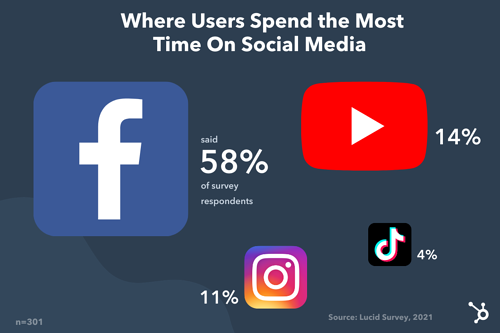
We surveyed 301 people and asked, “Which social media platform do you spend the most time on each week?” The response was kind of surprising.

Where users spend the most time on social media

Despite YouTube’s steady growth over the past year and the rise of TikTok and Clubhouse, Facebook remains the top social media platform. YouTube follows, with the gap between the platform and Facebook much smaller in larger surveys.

So, what does this information really mean?

Well, in a broad sense, it means you should consider having a presence on these platforms. However, don’t delete your Instagram account just yet – better yet, don’t delete it at all.

I’ll explain why in the next section.

Should brands limit their efforts to the most popular platforms?

There’s no single, clear-cut answer to this… but typically, no.

While most consumers may spend most of their time on Facebook and YouTube, that doesn’t mean you should dedicate all your efforts entirely to those platforms.

Why? That may not be where your audience lives.

Generality is the enemy of marketing. Imagine running a social media ad that targets everyone. Or having a target audience comprising all of Gen Z.

This sort of one-size-fits-all isn’t conducive to your brand’s growth. In fact, it is likely keeping you from making progress, as you waste time and resources on broad strategies that may not work for your specific market.

It’s like going to a party and only getting an address for the neighborhood. Sure, you could drive around and knock on every door until you find the right one, but by that point, you might be tired, hungry, and out of gas.

When you zero in on a specific audience and strategy, you can gain more valuable insights and get a higher return on investment.

Data, just like the one above, should be used as a general guide to understand consumer behavior. However, it shouldn’t dictate your entire strategy. Your own consumer data and user persona(s) should.

For instance, let’s say you’ve discovered through market research that your audience enjoys consuming information mostly through blogs and podcasts. That’s a good indicator of where you should focus your efforts. In a few years, that data may change, in which case, your team should be flexible and move to where your audience is going.

Here’s what you should consider when determining where to direct your efforts:

  • Where your audience lives
  • The type of content you’ll be creating
  • The channel that converts the best

There are a few ways to figure out where your audience “hangs out” online. First, you can check the demographics by platform – this will give you a general idea of the audience.

For instance, TikTok mostly caters to a younger audience between 10 to 29 years old while most Instagram users are between 18 to 34 years old.

You can also reach out to your target audience directly through polls and survey to find out where they spend their time. In addition, look to your competitors.

See where they’re focusing their efforts and if they are successful, that may be a good indication of where you should be. Like when you’re not sure you went to the right place but see someone you know parking and you can let out a sigh of relief.

Next is the type of content you’ll be creating.

Say your audience enjoys video content the most (think webinars, lives, video tutorials). In this case, your audience would be well suited for YouTube, Instagram, and TikTok, all of which have video editing and publishing features. You can then repurpose your content for each platform.

Another factor to consider is how each channel is contributing to your goals. This is where the importance of data comes in.

You may be posting every day on TikTok and find that the rare times you post on Facebook, you get much higher engagement and conversion rates. While there could be several reasons for this, you may want to redirect your attention to Facebook as it is providing the best return on investment.

Next, we’ll cover what software can help you keep track of your social media data.

Top Social Media Analytics Software

1. HubSpot

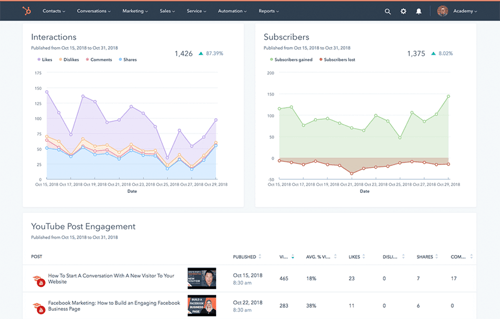
With HubSpot’s social media management software, you can track your social strategy from beginning to end.

HubSpot social media software

Image Source

With a user-friendly dashboard, you can see exactly how your published posts are performing, which channels are bringing traffic to your website and generating leads, and more.

You can also filter your reports by campaign, account, and date range so you can narrow down the exact information you’re looking for.

In addition, HubSpot’s social media software allows you to:

  • Schedule posts.
  • See how your competitors measure up.
  • Track and monitor conversations surrounding your brand on every platform.
  • Export and analyze relevant reports.

The social media tool is available within HubSpot’s all-in-one CRM platform for mid- to large-size businesses.

2. HootSuite

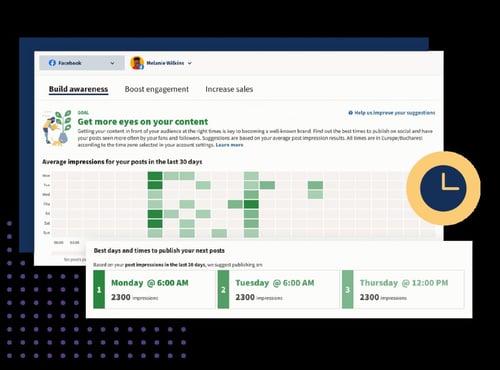
HootSuite empowers your team to make decisions quickly with real-time data on your social strategy.

Hootsuite social media software

Image Source

The social media software takes some of the guesswork out so that you can focus on the most important insights. With customizable dashboards, you can also get a quick overview of your key metrics and identify what’s driving traffic and sales.

Ranging from $49/month to custom pricing for enterprise-level businesses, you can find a plan that meets your needs and is scalable.

3. Sprout Social

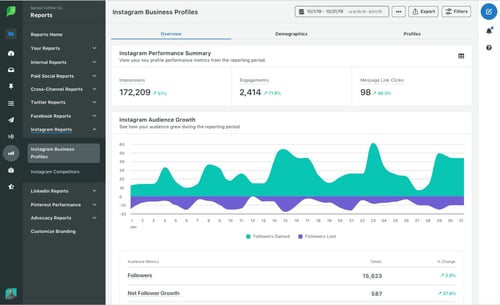
If you have multiple social channels running at full speed and you’re overwhelmed with the data, Sprout Social can help.

Sprout Social social media software

Image Source

The platform helps you manage your data and create ready-to-go reports to share with stakeholders.

In addition, you can use competitive intelligence to benchmark your performance and make informed decisions that will promote your brand’s growth.

Sprout Social’s pricing is based on a subscription model and ranges from $99 to $249 a month.

Now that you know where consumers spend their time online, the real work begins. Experiment with various strategies to see what resonates best with your audience, always using data and your user personas to inform your decisions.

New call-to-action

Categories B2B

How to Be a Good Manager [Data + Expert Tips]

Why do people really quit their jobs?

Before you say “salary,” “benefits,” or “workload,” take a second to think about the worst boss you’ve ever had.

Were they bad at giving feedback, not helpful, or just plain mean? Did they have you feeling unmotivated, too nervous to offer ideas, or fearing that you’d lose your job with the slightest miss-step?

Once you let those memories sink in, you probably won’t second guess the statement: “People quit their managers, not their jobs.”

Over the years, this fact hasn’t changed. Study after study has emphasized that companies need good managers to retain good employees.

But what makes for a good manager? And what skills or strategies can you develop to ensure you’re considered a good one? 

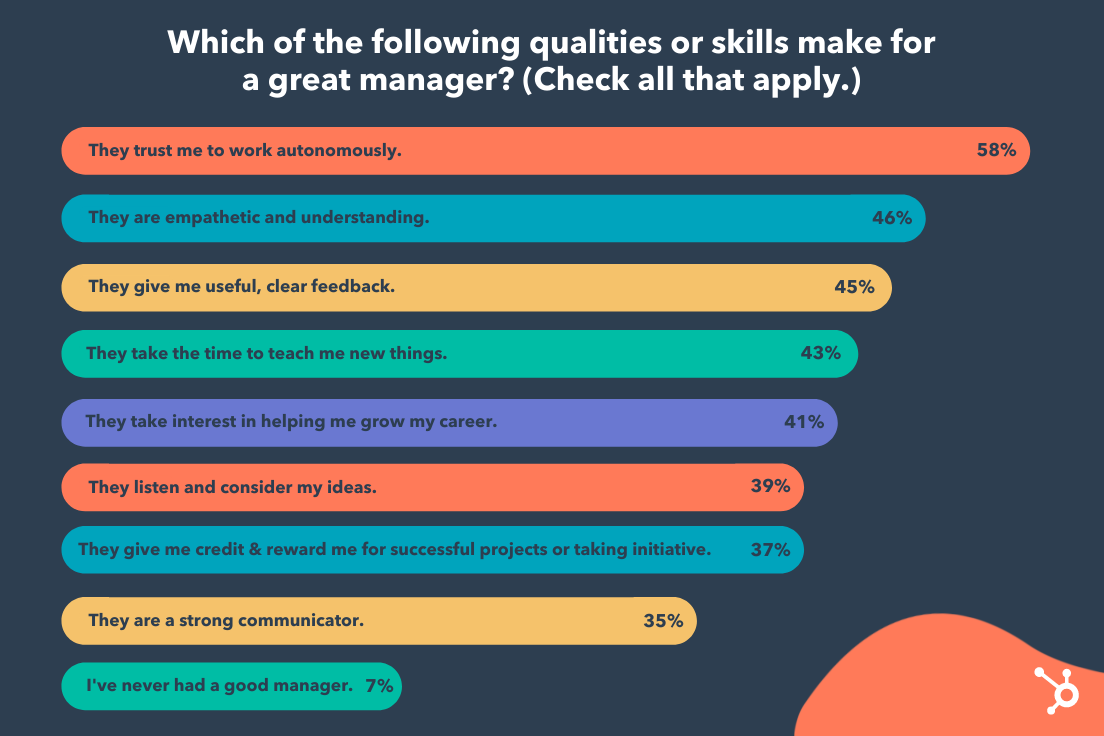
To explore this issue, we polled people and asked them to check off all the qualities they felt were most important for a great manager. 

great manager skillsRecipients listed “they trust me to work autonomously”, “They are empathetic and understanding”, and “They give me useful, clear feedback”, as the three most important qualities a good manager needs to have. 

Along with this data, I consulted my colleagues to get their thoughts on what makes a people manager effective. Regardless of whether you’re interested in managing a team, or just want to know if a prospective boss is actually a good manager, here are 7 crucial qualities of a great team leader.

→ Click here to download leadership lessons from HubSpot founder, Dharmesh  Shah [Free Guide].

7 Skills People Managers Must Master, According to HubSpot Employees

1. Good managers help employees navigate change.

Consider the last time you experienced change within your organization. Maybe a beloved leader retired, or perhaps your team experienced a reorg. Maybe you even acquired a new company. 

Whatever the reason, I’m willing to bet the change felt daunting at times. Fortunately, good managers can mitigate the negative or ambivalent emotions that arise from change. 

For instance, Christine McLaughlin, a Senior Project Manager on HubSpot’s Sales Leadership Enablement team, told me: “The strongest managers are ones who can help their teams navigate change in a very personal way. I’m a firm believer that every challenge presents an opportunity. But, because we’re human, we can’t always see the opportunity from the start.” 

McLaughlin adds, “Our personal life, mental health, physical health, the last meeting we had, the next meeting we’re preparing for, all play a role in influencing how we perceive change. Do we view it as a challenge? An opportunity? A setback? A relief?”

“Strong managers can translate change for each individual on their team. They meet their teammate where they’re at and help to answer their questions and concerns to bring them to where they need to go.”

So … how can you do this? Start by fostering psychological safety, so your employees feel comfortable mentioning how they feel about a certain business change. Then, listen carefully to their concerns and work on providing solutions for those issues. 

For instance, let’s say your team has experienced a reorg and one of your direct reports is concerned her role is going to change as a result. 

To mitigate those concerns, consider creating a document that outlines which (if any) of her responsibilities might change as a result of the reorg — along with some new opportunities she can pursue to continue developing her professional skills. 

2. Good managers are open and transparent.

Trust and transparency are undeniably critical components of good leaders — and, post-pandemic, this is continuing to rise in importance. In fact, Edelman’s most recent 2021 benchmark barometer on trust in leaders found employees ranked “good employee communication” 44 points higher than in the previous year. 

Keri Polmonari, HubSpot’s Manager of Customer Success on the SMB team, believes transparency to be one of the most important attributes a good leader can possess. 

She says, “Being transparent and forthcoming with your team creates an open and honest dialogue and ensures everyone is on the same page. Business changes — like changes in department goals, processes, or personnel — can be difficult and overwhelming. [But] when everyone understands the why behind these business changes, they are more open and understanding of implications this could have on their jobs, both positive and negative.”

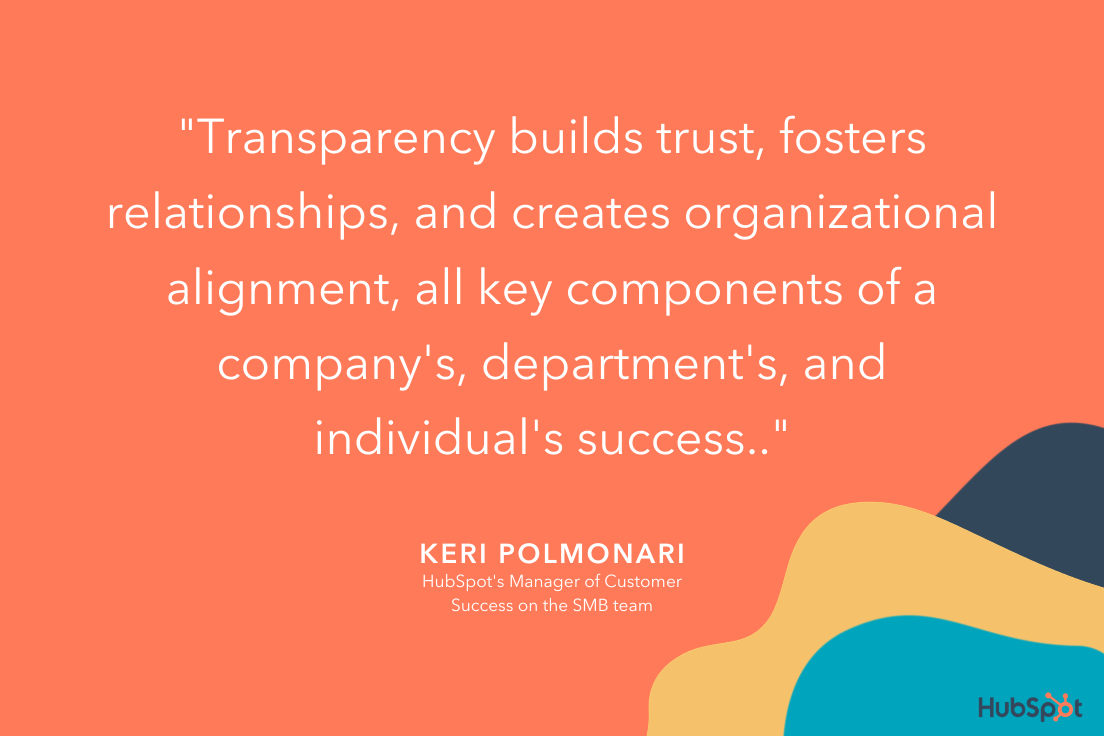
Polmonari says,”Transparency builds trust, fosters relationships, and creates organizational alignment, all key components of a company’s, department’s, and individual’s success.”

what does it mean to be a good manager? Keri's quote on the importance of transparency.

3. Good managers encourage vulnerability.

Consider the last time your manager started your 1:1 with a slightly more personal question, like, “How was your birthday this past weekend?” or “Read any good books lately?” 

These questions ultimately help encourage vulnerability by creating space for you to share information about your life outside of work — and they can go a long way towards creating stronger bonds. 

As Jill Callan, VP of Marketing at Trusted Health, told me, “Whenever I start a new role or inherit a new team, I begin by enabling and encouraging vulnerability. This helps me forge strong bonds with my direct reports and allows them to be comfortable to share ideas and admit weaknesses.”

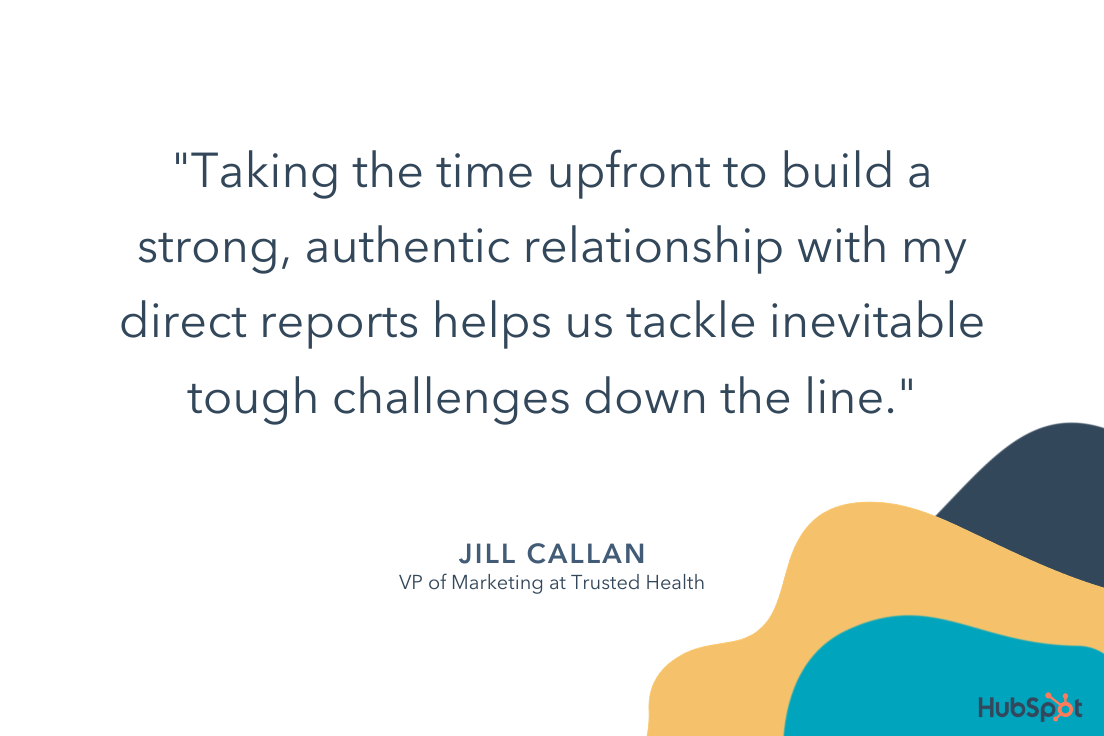
Callan adds, “I’m also very intentional about getting to know my team as individuals, and learn about their lives outside of work. Taking the time upfront to build a strong, authentic relationship with my direct reports helps us tackle inevitable tough challenges down the line.” 

To encourage vulnerability, consider how you might increase your own openness with your team. For instance, perhaps you admit when you’re feeling overwhelmed with childcare duties, mention a Netflix show you’ve been binging, or simply chat about the gardening hobby you’ve picked up. 

And embrace vulnerability by admitting when you’ve made a mistake or you’re feeling overwhelmed — it will help your employees feel comfortable admitting the same.

what does it mean to be a good manager? Jill's quote on the importance of building authentic relationships.

4. Good managers find ways to supplement their team member’s weaknesses.

I once had a manager who repeatedly sought out learning and development opportunities for the areas we’d determined as weaknesses of mine. She would often email me public speaking courses, or data & analytics workshops. 

As a result, I continued to grow professionally, and I felt challenged. This is what a good manager does: Continues to keep a direct report’s weaknesses in-mind, and provides guidance to help that employee improve. 

HubSpot Senior Manager Christina Perricone concurs, telling me, “Good managers find ways to supplement their team member’s weaknesses. Each of us has skills that come naturally to us, as well as skills we’re not so great at.”

“An attuned manager can identify an individual’s weak areas and will surface resources or offer guidance to assist in those areas.”

Consider how you might similarly foster growth by taking stock of your team’s weaknesses, and actively pursuing resources that can help your team develop their weaker skills. 

Additionally, use the hiring process to create a more well-rounded team by identifying strengths and weaknesses of existing employees.

As Perricone says, “Good managers are skilled at balancing out their teams by recruiting talent that can fill in the skill and experience gaps, thereby creating a more well-rounded unit.”

5. Good managers work for their employees — not above them.

You might be thinking, “Managers work for their employees? Isn’t it the other way around?”

Actually, a manager, like an employee, is more effective when they’re an active team player.

But, while an employee’s job is to fulfill tasks within a job description, a manager’s job is to make his or her team successful. To do this, a manager shouldn’t be afraid to chime in during meetings, assist on projects, or help their team grow or succeed in other ways.

For instance, consider asking your direct reports during a 1:1, “Is there anything you need me to do?” 

This question can be translated in multiple positive ways, including, “Are there any blockers I can remove for you?”, “Are you waiting on a decision from me on anything?”, “Are you working on an idea that you want to share with me?” or even, “Is there something going on in your world outside of work that’s competing for your time and attention?”

Ultimately, a good manager considers it her primary job to make her employees successful in their projects and careers.

6. Good managers are always aiming to improve their emotional intelligence.

Emotional intelligence — or the skill that requires you to understand your own emotions, learn how to manage them, and know how to respond to the emotions of others on your team — is a vital component of good leadership. 

Emotional intelligence can help you ensure you’re giving clear directions, and allows you to be empathetic to the needs of others. In short, it can help you foster stronger professional relationships and communicate effectively. 

Most importantly, emotional intelligence enables you to stay calm during high-stress or unexpected situations — which can prevent you from making rash decisions as a leader, or stressing your team out unnecessarily.

7. Good managers can establish and promote psychologically-safe environments.

The ability to cultivate psychological safety is a critical asset that Jennifer Stefancik, a HubSpot Academy Marketing Manager, values in her own people manager.

“Feeling supported, heard, and understood is the foundation I need to be able to come to work every day with the right mindset to do good work,” Stefancik says. 

Stefancik adds, “Genuine empathy and psychological safety are hard to fake, and it’s something that I think everyone should master before they consider the people management path.”

Psychological safety fosters innovative thinking and the ability to adapt well to change — and yet, according to a 2020 McKinsey Global Survey, only a handful of business leaders often demonstrate the behaviors associated with psychological safety. 

If you’re a manager or hoping to be a better leader, it’s important you take time to identify aspects of your management style or overall office culture that could benefit from psychological safety.

For example, rather than using language that makes your team members feel scared of missing deadlines or goals, keep an open and supportive dialogue with them so they can confidently come to you with successes, learnings from failure, or concerns while they’re working on high-pressure projects.

how to be a good manager, quote from Jennifer on the importance of feeling supported by managers

Alternatively, if a team member is having trouble with a project, you should offer advice or assistance to help them remove blockers, rather than telling them to just get it done.

Supportive communication with team members allows them to learn from mistakes and grow as employees, rather than work tirelessly on projects because they fear that they’ll lose their jobs.

How to Be a Good Manager 

As outlined in the data above, there are a few key traits required of any good manager. These include:

  • Providing coaching and mentoring when necessary, but enabling your team to work autonomously and trusting them to get the job done.
  • Showing empathy towards your direct reports as people with lives outside of work, and creating a sense of psychological safety for your employees to feel comfortable admitting when they’re struggling or need help.
  • Being clear and direct with feedback.
  • Taking the time to go the extra mile to help foster your employees’ professional growth through trainings, learning & development opportunities, or 1:1 sessions in which you coach them on certain skills. 

However, a good manager looks different depending on the department or role — a good sales manager, for instance, requires different skills than that of a good marketing manager. Let’s dive into those, now. 

How to Be a Good Sales Manager

Being a good sales manager requires a few unique skills outside of those listed above.

Along with setting clear expectations, communicating effectively, and inspiring your sales reps to perform at their best, a good sales manager needs to demonstrate a positive mindset, build team unity, and learn how to best support each sales rep in the unique way that will serve him or her best. 

A few other notes on being a good sales manager: 

  • Use a dashboard or task management tool to easily track metrics for each sales rep. This enables you to avoid taking up too much time in your meetings discussing metrics — instead, you can now use that time to identify how you can best help, support, and coach your reps. 
  • Plan team outings or events that allow your team to build relationships with one another. Sales can be high-pressure and stressful, so it’s important you provide dedicated time to enable your sales reps to connect with one another and feel that they’re part of a support system. 
  • Look for trainings and development opportunities so your sales reps can continue to improve. In 1:1 meetings, focus on how you can help them achieve their goals; in team meetings, figure out what types of trainings can help the entire team perform better. 
  • Motivate your team by focusing on the ‘bigger purpose’ to ensure they feel intrinsically motivated. Sales isn’t just about hitting quota and making money — it’s also (oftentimes) about selling a product or service that can help people in large or small ways. Remind your team of your company’s bigger purpose to ensure they feel fulfilled and motivated. 

Looking for more sales manager tips? Take a look at Here’s What Sales Leaders Should Prioritize in 2021 According to a Sandler Expert or 10 Things I Wish I Knew Before Becoming a Sales Manager.

How to Be a Good Marketing Manager

Marketing managers are often in-charge of leading a team, but they’re typically also responsible for a content property or program, which means their tasks can vary greatly. 

Here are a few skills of a good marketing manager: 

  • The ability to think big-picture; using metrics and data to create a strong long-term strategy, and knowing when to pivot when an existing strategy isn’t working out as expected.
  • Communicating effectively with various stakeholders — this includes inspiring and motivating your direct reports, communicating team goals cross-functionally and to leadership, and creating clear external communications, as well. 
  • Delegating and organizing tasks effectively. Learn about your direct report’s strengths, interests, and areas for growth, and facilitate that growth by giving them projects when they align with their interests. This doesn’t mean handing off any unwanted tasks from your to-do list — if you find a project that aligns with your direct report’s interests and you feel it’s mutually beneficial with team goals, then you’ll want to shuffle some of their existing tasks to ensure you don’t burn your team out. 

To learn more about managing a marketing team, take a look at What Is a Marketing Manager?

How to Be a Good Project Manager

To be a good project manager, you need a few additional technical skills compared to the other managers in this list. Project managers need a deep technical understanding of the project at-hand in order to understand which tasks need to be assigned to whom, and to keep the process running smoothly. 

A few other project manager skills and responsibilities include: 

  • Being able to set realistic goals, and understanding what resources are required. A project manager needs to be able to set timelines on certain aspects of a project, and she also needs to understand what resources — including employees, external consultants, tools, or budgeting — are required to make it happen. 
  • Having good organization and communication skills. A good project manager needs to remain organized and detail-oriented in order to effectively delegate tasks to the right teams, and stay on-top of identifying what needs to happen next for the project to go smoothly. A good project manager also needs to be able to clearly articulate the full scope of a project to various stakeholders to ensure each team is aligned on bigger-picture strategy. 
  • Analyzing and determining potential risks. A good project manager needs to be able to foresee potential roadblocks in any given project, and analyze either internal metrics or industry data to determine the best way to mitigate those risks. 

A good project manager also uses the best tools at his or her disposal to create a streamlined process, keep track of responsibilities and timeline, and delegate effectively. Take a look at 16 Free Project Management Software Options to Keep Your Team On Track to choose the best tool for your needs. 

And that’s it! You’re well on your way to become a better manager yourself. Remember, like any other role, becoming a good manager requires time, patience, dedication, and a consistent desire for feedback from your direct reports to iterate and grow over time. 

New Call-to-action

Categories B2B

6 Steps to Build a Single Customer View & Improve Customer Experience

Ever see those cool 360-degree cameras on red carpets at award shows?

Someone famous will stand in the middle and several cameras positioned all around will simultaneously capture pictures of the star, creating a spectacular image that gives you a 360 view of the person.

→ Download Now: Free Marketing Plan Template

Now, imagine if you could do that with your target audience? Capture them from all angles as they interact with your brand. With a single customer view, you can.

The issue is, many businesses struggle to know where to start.

At the end of this article, you’ll understand what a single customer view is and how to create one for your brand.

A single customer view combines data from a consumer’s behavior on web and email, social media activity, demographics, interactions with customer service, and purchase history.

Let’s go through an example of an interaction between a consumer and a brand.

A consumer, let’s call her Jazmyn, discovers a brand on Instagram. Jazmyn visits the brand’s website through Instagram and downloads a free offer. Said brand adds Jazmyn to an email list and she starts receiving nurturing emails.

After months of no interactions, Jazmyn rediscovers the brand and makes a purchase. A month after that, she calls customer service regarding an issue with her product.

In just a few months, Jazmyn has interacted with at least three departments within the company: marketing, sales, and customer service. In many businesses, every department tracks data using its own system.

For instance, sales teams often use customer relationship management (CRM) software to track their interactions with clients and prospects while marketing teams use marketing platforms and automation tools to generate leads.

This creates huge data gaps, making it difficult to understand how a user is behaving over an extended period of time beyond a single vertical. It can also lead to duplicate information, leading to dirty data.

For instance, Jazmyn might receive ads for products she’s already purchased. Or she may get a call from customer service asking about a product she’s already reviewed via email.

Having a single customer view allows organizations to build personalized interactions with consumers, based on their current stage in the customer lifecycle. This creates a better customer experience, stronger brand loyalty, and better retention rates.

When you know where your target audience is, you can make enticing offers based on their current needs. It’s personalization at its best.

Benefits of a Single Customer View

When you invest in a platform with a single customer view, you:

  • Have cleaner data – With an integrated system, you remove information silos, which often cause data duplication.
  • Gather better insights – When you have an accurate map of the customer journey, you can better understand how your campaigns are performing and identify areas of improvement.
  • Assign proper credit to the right channels – Proper attribution is a major issue when it comes to audience tracking. With an SCV, you can identify the best and worst-performing channels for future campaigns.

1. Align your data owners and your KPIs.

The first step in creating an SCV is aligning all your data owners across your organization.

It’s important to align your teams early on key targets and key progress indicators. This keeps everyone on the same page and striving toward the same goal.

So, although everyone will be working on different sections, they’ll all be contributing to the same objective. This is key in keeping everyone in the same mindset and easing the transition to a data-driven approach.

Your data owners will serve as liaisons between IT and your team, enforcing governance standards and supplying IT with the access they need.

During this process, your IT team will be instrumental, as they will need to consolidate data from multiple systems and sources.

2. Find the right tech.

The next step is finding a platform with the capabilities to support your company’s needs.

Key features to consider when searching for a platform include:

  • Usability and accessibility of software
  • CRM Integration
  • Data quality tools
  • Automation

You’ll also want to consider the size of your company and the scalability of the software. all-in-one CRM platform like HubSpot, which combines sales, marketing, customer service data to support a holistic customer experience.

3. Hire data managers.

Depending on your company size, you may want to onboard roles dedicated to data, such as data miners, data analysts, and data migration specialists.

The process of migrating data is a costly and time-consuming one that you may not be equipped for. Instead, hire experts with the knowledge and experience to do it right.

They will be essential not only during the initial building phase but also as you grow your customer base.

4. Sort and integrate all data from your legacy systems.

If you’re an established brand with a ton of scattered data, you’ll need to sort through your systems.

Start by conducting an audit of your data quality. From there, clean your data so you can start integrating it with your other systems, including:

  • Your data warehouse
  • Your point-of-sale systems
  • Your marketing automation systems
  • Your call center systems

5. Set your data governance strategy.

As you’re in the process of cleaning out old data, you’ll need a new system for new, incoming data.

This is where your data governance standards come into play. They serve as operating guidelines for retrieving, storing, and processing data.

You may wonder, what’s the difference between a data management strategy and a data governance strategy? The former refers to the actions you take to fulfill the guidelines outlined in your governance strategy.

To learn about how to develop a governance strategy, click here.

6. Test your processes.

The last step in this process is testing your new centralized system.

To ensure that your new environment works (i.e., that the data linkage is complete), some test data will need to be used to ensure the data is gathered, stored, and reported correctly on your platform.

This will likely be an ongoing process as your business scales and you implement new touchpoints.

The earlier your team can implement a single customer view framework, the better equipped you will be to serve your target audience. While the process can be expensive and time-consuming, it’s a worthwhile investment that will be instrumental in making strategic business decisions.

Marketing Plan Template

Categories B2B

The Ultimate Guide to Instagram Stories Ads in 2021 [+ New Data]

Ah, Instagram Stories — the one-stop-shop to find short, engaging content from high school friends, celebrities, and major brands alike.

With over 500 million daily active users, Instagram Stories is an undeniably powerful opportunity to connect with new audiences.

And, if you’re not using Instagram Stories as a marketing tool, you should be. In fact, Instagram reports that of the 500 million accounts using Instagram Stories, one-third of the most viewed stories come from businesses.

I can personally attest to the power of Instagram Stories to incentivize purchasing decisions. For instance, the other day I was mindlessly scrolling through Stories when I came across an ad for Crest 3D whitestrips — with a $50 off coupon attached. I swiped up to purchase without ever leaving the app itself.

Here, let’s dive into what Instagram Story ads are, and how you can run Instagram Story ads for your own business. Plus, we’ll explore examples of Instagram Story ads and best practices to ensure your ads are as powerful as they can be.

→ Download Now: How to Advertise on Instagram [Free Guide]

What are Instagram Story ads?

Instagram Story ads are vertical ads you can run on Instagram’s Stories feature. (To recap, Instagram Stories are photos and videos visible to an Instagram account’s audience for 24-hours, and is published separately from the content found on your Instagram profile.)

Instagram allows you to target your ads by reach, video views, traffic, conversions, app installs, and brand awareness. Additionally, unlike an organic Instagram Story, an Instagram Story ad doesn’t disappear after 24-hours — instead, you can choose the length of the campaign and frequency of ads on Facebook’s ad platform, like any other ad created for Instagram or Facebook.

An Instagram Story ad is immersed seamlessly into a user’s Stories viewing experience. Additionally, a user doesn’t have to follow your account to see an ad from your brand. For instance, I don’t follow Crest on Instagram, but I was still shown a Crest ad.

You have a few different options for ad formatting, including video, photo, or carousel. A video ad plays for up to 15 seconds, an image ad will play for five seconds, and a carousel ad lets brands play three separate pieces of content (video, photos, or both) within one ad.

If you aren’t sold on running ads on Instagram Stories yet, consider these facts:

If you’re convinced Instagram ads could be a good platform for you, let’s dive into how you can run your own Instagram Story ads, next.

For the full rundown on all things Instagram advertising, make sure to check out our guide below:

How to Run Instagram Story Ads

1. Go to your Ads Manager, and click “Create”, which will bring you to “Quick Creation”. If you’d prefer, you can switch to “Guided Creation”, instead.

In your Ads Manager, click "Quick Creation" to run an Instagram Story ad.

2. Next, select a marketing objective — your options for Instagram Stories include “Brand Awareness”, “Reach”, “Video views”, “Conversions”, “App installs”, “Lead Generation”, or “Traffic”.

Select a marketing objective in your Ad Manager tool to run an Instagram Story ad.

3. In the Placements section, you’ll want to select “Automatic Placements”, where Instagram Stories is selected by default. However, if you choose “Manual Placements”, check the box for “Stories” under Instagram.

Choose whether you want to manually place your Instagram Story ads in front of audiences, or automatic placement.

4. Next, set your ad’s budget and schedule. 

Set a budget and schedule for your Instagram ad.

5. Next, you’ll want to choose “Single Image or Video” or “Carousel” as your ad’s format.

Choose Single Image or Video, or Carousel, for your Instagram Story ad.

6. Add videos or images to your ad, and finish including any other details, including headline and description. If you’d prefer, you can use Stories Templates, which will transform your image into an ad automatically, and add movement to grab a viewer’s attention.

Add videos or images to your Instagram Story ad in your Media section.

7. Once you’re happy with your ad, select “Confirm” to finish the process.

When you're ready to run your Instagram Story ad, click "Confirm".

Instagram Story Ads: Cost, Specs, & Length

There are three separate areas you can place an ad on Instagram: Stories, Feed, and Explore.

For the purposes of this post, we’ll focus on the cost, specs, and length of an Instagram Stories ad.

First, all feed photo and video dimensions are supported in Stories (anywhere from 1:91 to 4:5). However, 9:16 ratio is encouraged to fit the full-screen, vertical format of Stories.

Additionally, .mp4 or .mov is recommended for video ads, and .jpg or .png file type is recommended for photo ads.

If you’re creating a video ad, 4GB file size is encouraged — and, for a photo, 30MG file size is suggested.

If you’re creating a video ad, the length can’t surpass 120 seconds. For a photo ad, five seconds is the default for how long the image will be shown.

Finally, the recommended resolution is 1080 x 1920, with a minimum dimension of 600 x 1067.

Design requirements for instagram story ads.Instagram ads, including Instagram Story ads, cost between $0.70 to $1.00 per-click on average — although cost varies depending on industry, days of the week, time of year, targeted ages and sexes, ad placement, and plenty of other factors. In some cases, Instagram ads can exceed $5.00 per-click.

Fortunately, you have plenty of control over how much your ads cost by setting a pre-determined budget. You can choose your budget based on how much your company is willing to spend daily, or the total cost you’re willing to spend over a campaign’s lifecycle.

What Consumers Want to See in Instagram Story Ads [New Data]

It’s important to note — if you’re planning your own Instagram advertising campaign, you’ll want to consider the type(s) of ads that perform best on the platform.

For instance, in a recent survey HubSpot conducted, we found 50% of Instagram users prefer image-based ads that show product shots and light text — which is followed by 31% who prefer video-based ads that showcase real customers.

instagram ad preferences

Perhaps most intriguing, the majority of people (80%) don’t necessarily care if an ad includes a discount or coupon. This suggests that Instagram users are more interested in appealing, engaging content that highlight a product’s benefits. 

User preferences will vary depending on your audience, industry, and message, but consider keeping this data in-mind when preparing your own Story ad. When in doubt, try A/B testing to figure out which types of ads your own audience prefers.

Let’s dive into some other best practices, now. 

Instagram Story Ads Best Practices

With four million active advertisers on Stories as of January 2020, it’s going to take a lot to ensure you’re able to stand out and drive results.

Here, let’s dive into a few best practices to follow when designing your own Instagram Story ad.  

1. Pay attention to speed.

Facebook reports that Instagram Stories are consumed faster “than any other mobile format”. People’s attention is severely limited when perusing Stories, especially since the content has a 24-hour time limit before disappearing forever.

For that reason, you’ll want to ensure you get straight to the point and capture a viewer’s attention from the first frame. Unlike other forms of content, suspense isn’t usually effective here, especially since images can’t surpass five seconds, and videos have a 120-second limit. You’ll want to jump the viewer right into the message you’re hoping to deliver.

2. Include motion in your ad.

Facebook reports that “ads that use motion perform better.” Motion captivates the viewers’ attention and can help you tell a story faster than you could with a static image. Even if you’re using animation, consider how you might add motion to create more engaging content.

3. Ensure you’re using sound in your ad.

60% of Stories are viewed with the sound on, so you’ll want to ensure you use sound in your ad to provide optimal value to your audience. Consider how you might use music, sound effects, or voice-over to capture viewers’ attention in a new way. If you’re unsure which types of sound work best in your ad, try A/B testing to conclude what your audience prefers.

4. Create your ad for Stories first — rather than attempting to repurpose an existing ad made for another vertical.

It can be tempting to simply copy-and-paste the ad you’ve already created for Facebook or Instagram news feed, but that could result in a less-than-ideal experience for those viewing your ad in Instagram Stories. For one, your ad might not follow Instagram Story sizing best practices, resulting in key parts of your ad being cropped out. Additionally, you’ll want to play around with features exclusive to Stories to ensure your ad is as effective as possible.

5. Use your call-to-action wisely.

Ultimately, your Instagram Stories ad won’t be effective if you don’t include a clear call-to-action you want viewers to follow. You might use language like “Learn More”, “Shop Now”, or “Swipe Up” to encourage viewers to take action, depending on your goal — for instance, if your goal is brand awareness, “Learn More” tells viewers you simply want to educate them about your brand’s offerings, which is a very different CTA from “Shop Now”.

Take a look at the examples, mentioned above, for more CTA inspiration.

6. Include text to emphasize key message.

Including text is a best practice for accessibility in general, as it helps viewers’ who are hard-of-hearing decipher your ad’s message. Additionally, text can help emphasize your key points — for instance, Aveeno’s “Get Healthy Looking Skin Every Day” text illustrated their main point, and convinced me to purchase.

7. Test out mobile shots.

Facebook reports, “Mobile shots outperform studio shots for ad recall and intent, while studio shots tend to drive higher brand awareness.” For this reason, consider forgoing fancy studio equipment for video shot and edited straight from a mobile phone.

The majority of users consume Instagram’s content from their own smartphones, so you might as well try creating content on the same device. And, when in doubt, don’t be afraid to A/B test this theory for your own brand, as well.

For more best practices related to advertising in general, take a look at The Ultimate Guide to Mastering the Basics of Effective Social Media Advertising.

Examples of Instagram Story Ads

Below, I’ve collected a few impressive examples I found on my own Instagram Story feed. While most of these examples are bigger brand names, there are plenty of small-to-medium sized businesses using Instagram

1. Aveeno

Aveeno’s Instagram ads are clean and simple, with neutral colors — apart from the brand’s signature green — drawing attention to the brand’s daily moisturizer. The ad features a short clip of a hand pointing to a shopping cart, with a “Shop Now” swipe-up link. The ad focuses on the brand’s product and doesn’t distract with people, making it effective for anyone scrolling who’s in the mood to refill their moisturizer.

Aveeno Instagram Story ad example

2. Miller Lite

This is an example of an ad that felt tailored towards me, a 27-year-old female in the Boston area. First, the ad features a call-out to the Boston Celtics, immediately capturing my attention. Once I’m intrigued, the ad segues into a picture of their Lite drink, with the text, “Great taste, only 96 calories, 3.2G carbs”. In this example, the ad does a good job drawing my attention to the things I care about most: namely, low-calorie alternatives to beer (and Celtics).

Miller Lite Instagram Story ad example

3. Trunk Club

This engaging, fast-moving ad shows a few different outfit options on the screen with the text, “Keep what you love, send the rest back”. The ad shows a few different outfits, ranging from dresses and cardigans to dress pants and heels, to capture the attention of a wider range of people than it could if it featured only one style. With the plain white background and easy-to-read black text, it’s simple, clean, and hard to miss.

Trunk Club Instagram Story ad example

4. Febreze

I mean, come on … who doesn’t love a puppy? This fun, clever Febreze ad shows an adorable puppy on a couch with the text, “Refresh wherever they roam”, with their Febreze product at the bottom of the screen. While most of the other ads in this list featured subdued, plain colors, Febreze goes all out with light blues, greens, and purples, inviting a sense of playfulness and fun into the user’s feed.

Febreze Instagram Story ad example

5. Tractor Beverage Co.

What I love most about Tractor Beverage Co.’s Instagram video is the end, which features a different call-to-action from most of the others in this list. Rather than “Shop Now,” this ad reads, “Now Available at Chipotle” with a “Learn More” swipe-up function. As a lesser-known brand, Tractor Beverage Co. wisely aims to use their ad space to increase brand awareness, so that next time you’re at your favorite nearby Chipotle, you might give their drink a try.

Drink Tractor and Chipotle Instagram Story ad example

6. Crest

If you have the means, it makes a lot of sense to include a coupon or discount in your Instagram Story ad, like Crest does in its 3D Whitestrips ad. The $50 off encourages viewers to purchase immediately so they don’t miss out on the deal, and the fun, bright colors effectively capture viewers attention. With the limited time allotted in an Instagram Story, it makes sense for these brands to get straight to the point.

Crest Instagram Story ad example

7. Kayak

Kayak, a travel search engine, created this impressive, engaging Instagram Story video ad to demonstrate how easy it is for Kayak users to filter flights depending on airline, price, cabin seating, and destination. Kayak served the ads to lookalike audiences based on the characteristics of its current website customers, and saw 5X increase in sales conversions, as well as a 50% increase in overall ROI, with combined ad placements on Instagram Stories, Instagram’s news feed, and Facebook’s news feed.

Kayak Instagram Story ad example

And there you have it! You’re all ready to begin creating an inspiring Instagram Story ad of your own. Just remember — you know your brand, and your audience, better than anyone. Use these best practices and examples as inspiration, but feel free to A/B test to figure out what works best for your unique business goals and social media objectives. Good luck!

New Call-to-action

Categories B2B

Everything You Need to Know About Marketing Operations in One Place

One of my favorite movies is “School of Rock,” which also happens to be one of 2003’s best films. In the movie, Jack Black poses as a substitute teacher at a private school, and, after noticing the students are musically talented, he turns the 10-year-olds into a fully-fledged rock band.

When assigning roles to the students, he approaches the class president and deems her band manager because she had the organizational skills needed to help the band run smoothly. “Summer,” he says, “You’re in charge of the whole thing.”

When I think about marketing operations, I think of this quote — without a team, businesses that depend on technology would have a less-than-seamless experience carrying out their duties. In this post, learn more about marketing operations and why these teams are essential to a business.

→ Download Now: Free Marketing Plan Template

What is marketing operations?

Marketing ops enable the greater marketing team to run efficiently. They also can scale their operations as the company grows larger.

The people involved in marketing operations align and optimize all processes, from data reporting to strategy implementation, to build a foundation that reinforces and supports marketing efforts, and makes it easier to achieve goals by implementing systems to ensure marketers are best equipped to succeed at their jobs. 

Marketing ops can be considered a crucial element of your business, and below we’ll discuss why.

Why is marketing operations important?

Without marketing operations, it would be tough for marketing teams to complete essential activities effectively. 

For example, as technology is necessary to carry out most marketing tasks, a team to manage the complexity of that technology and ensure it works as it should is also necessary — which is exactly what marketing ops is

Here are some examples of situations that can be rectified by having a marketing operations team: 

  • Your investments in marketing technology don’t provide the solutions you thought they would.
  • You want to streamline data reporting and metrics tracking to understand ROI.
  • Strategy execution is a timely process, and you want to lower the amount of time it takes from start to finish. 

At HubSpot, the marketing ops team is responsible for supporting the systems and processes that enable the marketing team to perform optimally in their roles. This includes everything from permissions, conversational marketing, user data, forms, and email operations. 

An essential function of how well a marketing ops team works is proper management. So, in the next section, we’re going to talk about marketing ops management and what it entails.

Marketing Operations Management

Marketing operations management creates the framework for how marketing ops and teams do their jobs. This management will make strategic decisions on marketing activities and develop an optimized strategy that dictates beginning to end systems that will contribute to success. 

As a point of reference, marketing operations is the process of strategizing and optimizing, while marketing ops management defines how that strategizing and optimizing will happen. 

Since marketing operations management aims to increase efficiency, ops teams often have a hand in content planning and campaign analysis. Now that we understand what marketing ops is and what they do let’s talk about the details of a marketing ops strategy.

Marketing Operations Strategy

Marketing ops team members need to have an expansive skill set. Some of the typical activities this department deals with are email operations, systems analysis, customer data and marketing, user operations, and lead rotation. 

All of these roles come together to align the process and platforms needed to carry out marketing tasks for the greater marketing team.

When thinking about a marketing ops strategy, think about the problems the marketing ops team needs to solve. For instance, it’s common for marketing operations strategies to solve the needs of customers, stakeholders, and the employees of your company.

Below we’ll go over how to create a marketing operations strategy for your own business.

To understand what a marketing operations strategy is, we’ll start with an example: Let’s say a marketing ops team wanted to make email marketing a more valuable process for both parties involved (customers and marketers).

1. Identify what you want your operations strategy to accomplish for stakeholders.

The first step in defining a marketing ops strategy is outlining significant goals. For instance, your marketing ops team might decide to send email marketing messages, enabling sales to source quality leads, and identifying key marketers to execute that process are three goals they have for quarter one.

When you identify those major goals, make sure you also determine which stakeholders you are targeting. You might be targeting one group or many, but being clear about who you’re planning for will make sure your plan is actionable and valuable.

2. Determine actionable steps in your plan that will help you reach your goals.

Then, the team would look at how these tasks would help them complete their goals. For instance, the team would ask themselves, “How will enabling teams to effectively send email marketing help us reach our goals?” and estimate with an answer such as, “We should see a decrease in email churn rate.”

Determining these steps will help your marketing ops team stay organized as they work through their tasks. Additionally, by outlining these steps, your team can figure out what needs to be done and the resources required to see success.

3. Figure out a measurable metric to determine the success of your strategy.

The next step in strategizing is to identify how the team would measure the success of the project. In this example, the team might conclude, “We will calculate churn by dividing the number of contacts who unsubscribed from emails in a month by the number of unique email recipients in a month.”

When you figure out a measurable metric, you’ll be able to keep track of the strategy’s success as your team works through the plan. The metric will remind your team of the goal you want to accomplish and what stakeholders want to see as a result of your plan.

4. If needed, communicate how colleagues can take part in refining your strategy.

With the goal and measuring metric identified, your next step is to outline what this change would mean for affected colleagues, such as the team members who create and distribute email marketing messages.

The team might conclude that “Marketers can expect an easier email guideline process, a more effective format and to receive a form to offer input about how to make that happen.”

5. Assign team members to specific tasks that will contribute to the completion of your goals.

Having that set in place, what’s next for the marketing ops team is to assign team members specific tasks to help them achieve their goals. For instance, one team member might be in charge of redefining email marketing contact lists. Another might be in charge of auditing the current workflows in place for email marketing.

As team members complete these tasks, they would check them off in a centralized space so the entire team can stay updated on the project’s status.

Marketing operations teams are equally effective with their strategies and management capabilities as Summer’s character in “School of Rock.” With her processes, the group was able to obtain their own rehearsal space and offer music classes.

Marketing ops can come up with ways to increase customer satisfaction and ease the job of marketers. Their strategies make marketing activities and duties accessible to all, and because of that, are an essential part of a business.

Marketing Plan Template

Categories B2B

Permalinks: What They Are & How to Structure Them for Max SEO Value

What comes to mind when you think of SEO?

“Permalink” probably isn’t the first or second thing, maybe not even the 10th thing.

→ Download Now: SEO Starter Pack [Free Kit]

The truth is, though, permalinks and SEO have a lot more in common than you may realize, and — when done correctly — can play an important role in improving your website’s ranking. Luckily, they are also simple to master.

Let’s get into how permalinks work, how to create them, and set them on WordPress.

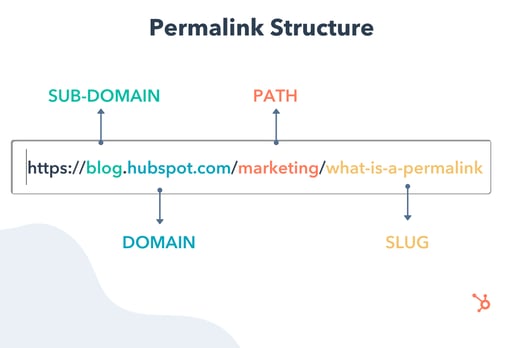
Let’s break down this post’s permalink.

Permalink structure example

You first have your domain (and subdomain in some cases) which is where your website lives. It’s followed by the path, which indicates the location of the page. In this example, the article is located under the “Marketing” category.

The last part of your URL is the slug – an essential part of your permalink and vital for SEO because it tells search engines how to index your site.

Each component creates a permanent link leading to a specific page on your website that is unlikely to change, hence the name “permanent.”

When you don’t customize your URLs using permalinks, you get a randomized ID. The problem is that this isn’t attractive to site visitors and isn’t optimized for search engines.

Let’s say you’re blogging about sponsored tweets and their value. Would you rather have the URL look like this:

yourdomain.com/sponsored-tweets-guide

Or like this:

yourdomain.com/post-id?=5726fjwenfkd

Probably the first one, right?

Great slugs should include the keywords targeted in the post. Take our example above: “sponsored-tweets-guide.”

From this permalink, the reader (and Google) know the page houses a guide to sponsored tweets and is targeting the keyword “sponsored tweets.” This makes it easier for readers to find and share your content.

In addition, using keywords with high monthly search volume (MSV) in your slug can help you increase your ranking.

That’s why when using a content management system (CMS) like CMS Hub or WordPress, you want to think about your permalink structure early on in your web development process.

What’s the difference between a permalink and a URL?

A URL is a web address that directs a web browser to the location of a page or file. It can include a domain name only, or also include the path, slug, and other information depending on the page you are accessing.

A permalink, on the other hand, refers to a specific URL structure, a tool made popular by bloggers for sharing and SEO purposes. While every permalink is a URL, not every URL is a permalink.

The Best Permalink Structures

With several permalink structures to choose from, think about your content and your audience to determine what format will work best.

For instance, a news site can greatly benefit from having a slug that includes a date and title. This lets readers know quickly by scanning what the post is about and when it was written.

On the flip side, if you manage a blog that prioritizes evergreen content and has pages that get constantly updated, you’ll likely want to avoid having any dates in your titles.

That can signal to readers that your content is old and therefore, irrelevant. Instead, have a simple slug that only includes your article title.

It’s all about using a structure that will benefit you (and your users) in the long run. Once you decide on a permalink structure, you can set it up in your CMS.

How to Make a Permalink

To make a permalink, all you need is:

  • Your domain name
  • Your slug
  • Your path (if you have several topic categories and want to organize your content)

Then, there are a few best practices to keep in mind when deciding on your permalink structure:

  • Keep it short – Avoid articles like “the,” “a,” “an” and create a slug that’s a shorter version of your title. E.g.: If your article is titled, “How to Create an Instagram Story,” your slug can simply be /Instagram-story.
  • Include your main keywords – Optimize your slug by including your keywords. Make sure the keyword you use directly relates to the content on the page.

Now, in terms of where you go to create your permalink, that’s typically on your CMS. The ideal time to set your permalink structure is shortly after developing your site but before any posts go live. However, you can also do this at any point.

If you decide to change old URLs to reflect your new structure, be sure to update all backlinks or set up redirects for those pages.

So, you’re probably wondering how to optimize a permalink for WordPress. We’ll cover that next.

Using Permalinks with WordPress

When you create a post in WordPress, the permalink will not be optimized unless you have already set the structure. Otherwise, it will look like a random ID.

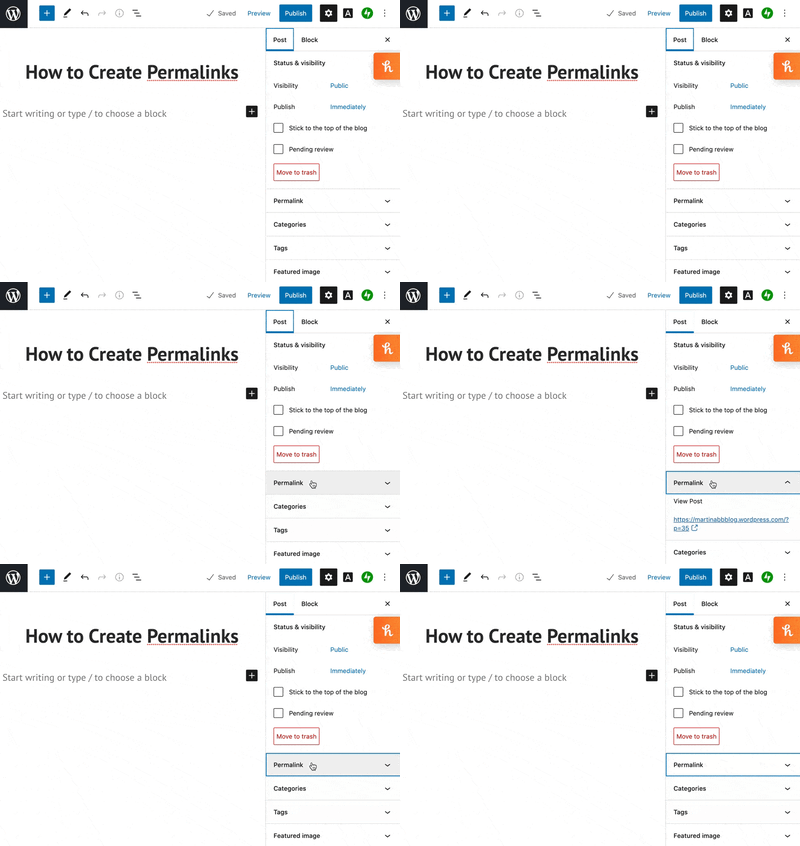
You can find the permalink on the page post while you’re editing, as seen in the example below.Permalink in WordPress blog post editing

Changing permalinks is a fairly simple process, and you won’t need to install plugins to do so. You can select from a few structures or customize your own.

More on this in the next section.

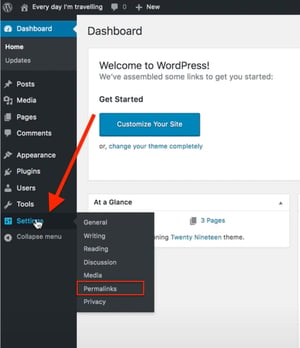
1. Open “Settings” and click on ‘Permalinks.”

How to change permalink structure on WordPress

Image Source

The first step in structuring your permalink is to open the “Settings” section of your WordPress dashboard. This should bring you to a list of options with various subheadings.

Once you click on this option, you’ll be taken to a screen with a variety of options to choose from. Depending on your preference of how you want your post to be archived and searched, you can pick the one that most aligns with your goal.

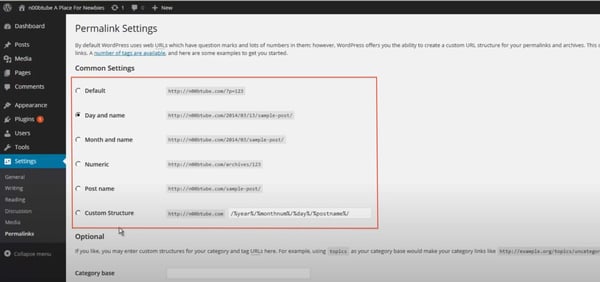
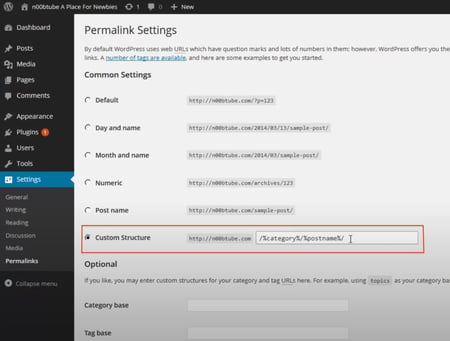
2. Choose a permalink structure option.

WordPress permalink settings

Image Source

Here are the different choices you’ll have and what they mean:

  • Default — Avoid this default option if you’re looking for maximum SEO value. It’s the post identification number, with no other information.
  • Day and name — This option sets up the slug to be the day the post went live and the name of your post. A good reason to use this is if you have multiple posts of the same name but want the differentiator to be the date it was posted.
  • Month and name — The same as the previous option, this time with the month being displayed. If you have a monthly column, such as a “Favorites” or “Best Of”, this is a great option.
  • Numeric — Numeric is another choice that’s safe to ignore, as this structure is all numbers and provides little SEO value. If you’re archiving posts numerically, as a way to look back and see previous posts, numeric is the choice for you.
  • Post name — Choosing this route is an okay method for SEO, but not the best, as Google likes to focus strictly on keywords when ranking posts.

Learn more about that “custom structure” option next.

3. Consider creating a custom permalink structure.

If you’re not too excited about the structures WordPress offers, you can create your own permalink structure in minutes.

You’ll create a formula for your permalink structure, and every time a post goes live, it will follow that formula.

For example, let’s say you have a lifestyle blog and a travel category (i.e., path) under which you post about your latest vacations.

If you wanted to set the structure to be the category followed by the year and post name, here’s what you would put in the box:

/%category%/%year%postname%/

Permalink custom structure settings in WordPress

Image Source

Each custom structure is separated by a backslash, and each tag starts with the percent sign.

You can find all of the structure tag options available to you on WordPress here.

When creating permalinks, the main thing to keep in mind is focusing on SEO (i.e., keywords) and user experience. They’re the virtual key (pun intended) to making sure your content is found by the people you want to reach.

Editor’s Note: This post was originally published in October of 2019 and has been updated for comprehensiveness.

marketing

Categories B2B

Infographic Resumes: 6 Hiring Managers Weigh In

The modern job search is incredibly competitive, and technology has made it easier for your resume and job application to be overlooked and discarded before you even make it to the interview.

Luckily, technology is also here to help. There’s no longer a template for how to apply for a job — you can use social media, websites, and even interactive campaigns to get your name noticed by a recruiter.

One resume format you may not have considered? Infographics. A highly engaging and visually appealing infographic that explains your skills and qualifications might help you stand out in the crowd and serve as a work sample when applying for a job.→ Download Now: 15 Free Infographic Templates

It’s important to note that an infographic resume won’t be appropriate for all job applications. If you submit a resume in this format through an automated system, you could disqualify yourself if the technology can’t read visual information, so it’s best to stick to the format prescribed by the job posting.

Additionally, while an infographic resume might be a good idea for a more design-related role, it’s likely not a good idea for most non-design roles. Here, we’ll explore what six hiring managers have to say about infographic resumes — plus, how to make one for yourself.

How to Make an Infographic Resume

1. Start with a good structure. 

You’ll want to start by figuring out which tool you’re going to use to create your infographic. You might choose to create one in Powerpoint, or use pre-made infographic resume templates on a design website like Canva or Venngage

Once you choose your tool, you’ll want to identify a good structure. Do you want your name and a brief opening description at the top? Would you prefer to put the Education section at the beginning, or end? Are you going to include previous positions, or focus on just the current one? 

Additionally, you might want to figure out whether you’re going to focus more on icons and images, or data. 

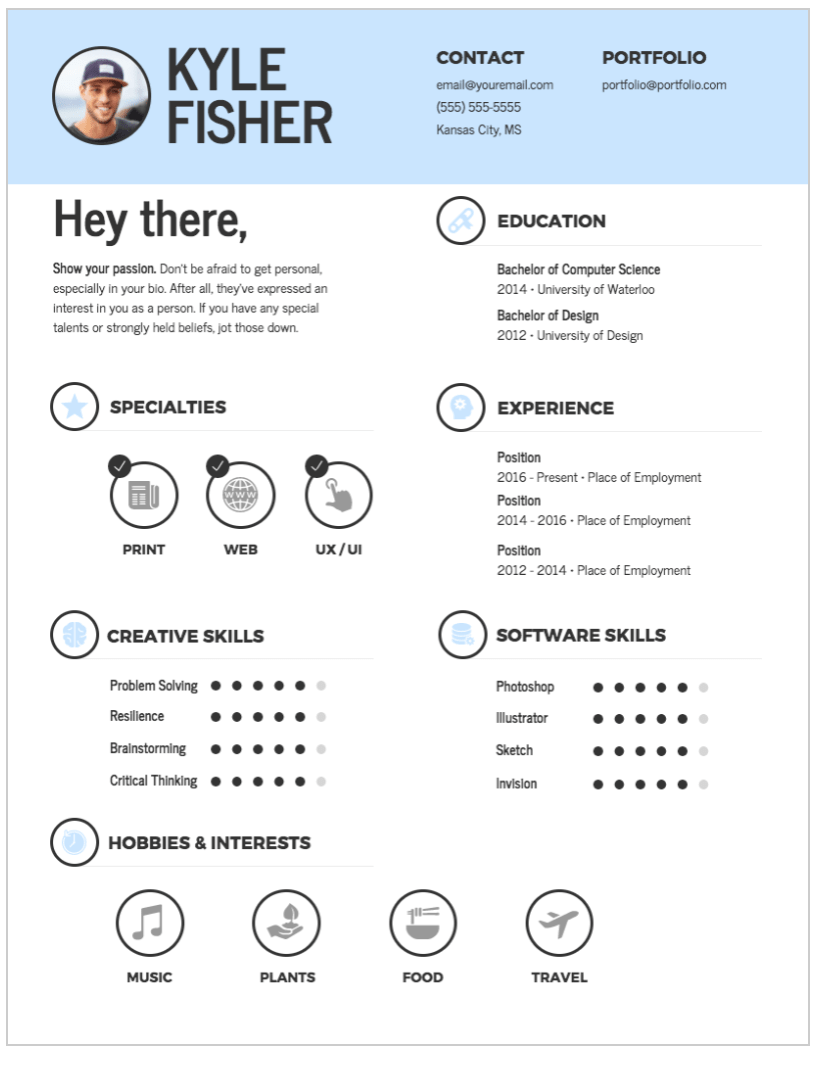
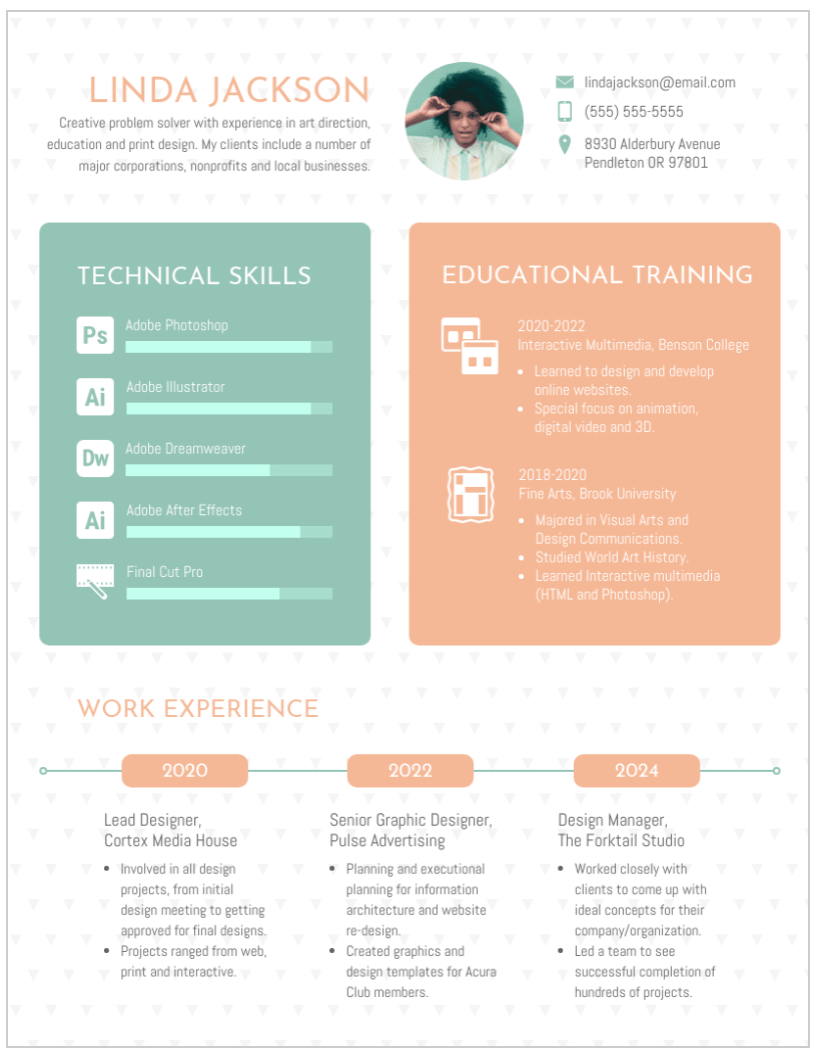
For instance, take a look at the differences between these two Venngage infographic resume templates

Template for an infographic resumeTemplate for an infographic resume

In the first Kyle Fisher example, you’ll see he’s structured it so there’s plenty of white space; he’s also highlighted creative and software skills, and left space for hobbies. 

In the second Linda Jackson example, on the other hand, you’ll see technical skills and educational training take up the majority of the space on the resume, along with work experience at the bottom. 

When comparing these two infographic resumes, you’ll see the structure is vastly different. Similarly, consider the role for which you’re applying and which information is critical to demonstrate on your resume as it relates to the role — and which you can skip. 

2. Take note of everything you want to include in your infographic resume. 

Once you’ve chosen a structure, pull up an existing resume and take note of everything you want to transfer over to the infographic resume. 

For instance, if you want your infographic resume to be data-heavy, write down a few key metrics related to your current role, such as “43% YoY growth” or “12% increase in MRR”. It’s easier to design your infographic resume once you know what you’ll need to include. 

3. Choose a good color scheme. 

A cohesive color scheme is a critical component of any good design, and this is no exception. Consider using clean, complementary colors — like white, black, and orange, or yellow and teal — to help your resume stand out without becoming too distracting. 

4. Have a strong opener. 

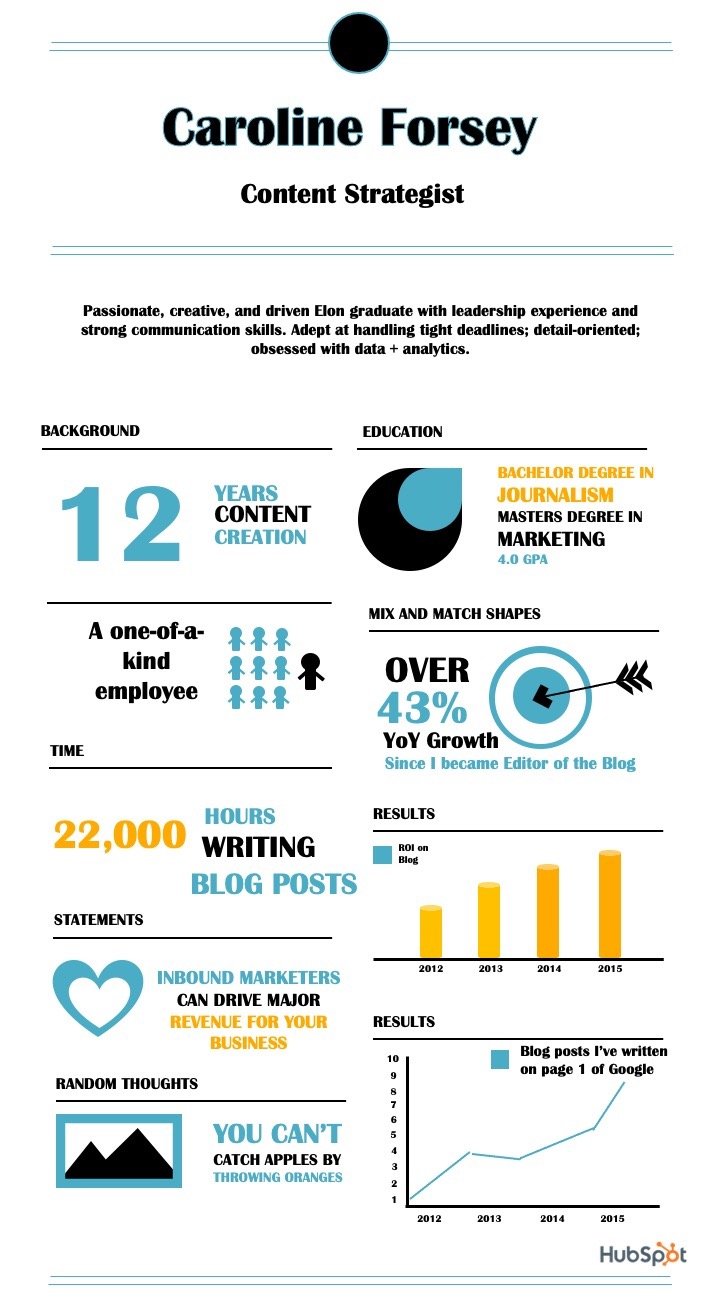
This is a best practice for any resume, but particularly for an infographic, you’ll want to start with a good, powerful opener. In the examples below, for instance, I put: “Passionate, creative, and driven Elon graduate with leadership experience and strong communication skills.” 

Ultimately, your opener is your value proposition — what will you bring to the role that the hiring manager can’t find elsewhere? 

5. Use good design principles. 

Finally, an infographic resume should use the same design principles as anything else. 

These include: 

  • Creating balance, using either symmetrical or asymmetrical designs. 
  • Leveraging contrast to highlight certain elements. 
  • Using movement to create a narrative and provide a high-quality user experience. 
  • Ensure there’s unity in your design — i.e. your composition’s elements are in agreement. 

Take a look at Everything You Need to Know About the Principles and Types of Design for additional information regarding design principles.

6 Hiring Managers’ Opinions on the Infographic Resume

To explore when — if ever — infographic resumes are a good idea, I reached out to a few HubSpot recruiters to get their take. 

Kenny Nestle, a HubSpot G&A Recruiter, told me: “I personally love infographic resumes. It’s different and stands out from your typical resume, and it’s easy on the eyes.”

Nestle adds, “I’ve had candidate share graphics on the types of roles they’ve supported, as well as metrics related to their current role.”

Devon Brown, an Executive Recruiting Manager at HubSpot, echoes Nestle’s perspective, telling me, “I love when candidates use infographics as an opportunity to highlight their creative or design abilities.”

However, she urges candidates to ensure their design is clean and easily digestible. “It has to be formatted in a way that makes it just as easy to read as a typical resume,” Brown advises. “The flow of information, and how it’s presented, is critically important if a candidate chooses to go this route.”

Not every recruiter feels that infographics are a good idea. Technical Recruiter Sarah Magner, for instance, says, “I could see why people applying for design, marketing, or branding roles might use an infographic to set themselves apart, but I’ve always found them to be a bit distracting. Plus, the graphics can take away from the actual content on the resume.”

“I’d prefer an easy-to-read resume over a pretty one,” Magner adds. 

Tríona O’Sullivan, HubSpot’s Global Marketing Recruiter, agrees with Magner that infographic resumes are typically not a good idea. She told me, “It can be great to see the creative side, but sometimes a candidate can spend so much time designing the template that they miss out on key information, details aren’t aligned, or there are really obvious spelling and grammar issues in the mix.”

O’Sullivan adds, “Given how competitive and busy the job market is today, it’s more important to ensure your resume is easy to review, and states your experience and achievements clearly and quickly, since that’s what someone is going to look for first when reviewing.”

Amelia Towle, HubSpot’s Head of Brand Infrastructure & Design Team Manager, spoke with her Design team on the potential merits of an infographic resume, but agrees that it’s typically not a good idea. Towle told me, “If I think about the purpose of a resume, it’s a document that your intended audience typically wants to scan as quickly as possible to glean information in an efficient way. If you drastically alter the format, you are perhaps forcing extra cognitive load on a busy recruiter who is just trying to narrow down a potentially vast pool of applicants.”

Additionally, Towle told me that if a big company is using software to scan resumes, changing the layout might result in the resume being impossible for the scanner to interpret. 

Ultimately, she believes infographics are typically unwise, unless it fits the business for which you’re applying: “If it’s a huge HubSpot-sized organization, you might be shooting yourself in the foot by altering format beyond what is expected. But if it’s a tiny agency that is solely design-focused, it might be helpful to stand out.”

Towle adds, “Infographics-for-the-sake-of-infographics has arguably had its day, so in that case, you might want to conceive of something new.”

Finally, there are some recruiters who don’t necessarily care one way or the other. As HubSpot Marketing Recruiter Erica Matos told me, “I don’t really care about what a resume looks like — instead, I look at the content and make sure they have experience that aligns with what I’m looking for. I’d always love something visually appealing, but if I can’t clearly gauge the candidate’s actual experience, it’s not going to help them get the job.”

You’ll only want to create an infographic resume if it makes sense for the role. If the role is design-related, then an infographic resume can help you display some of your skills.

However, even if the role is design-related, there are some risks associated with infographic resumes — including difficulty downloading or viewing across devices, and the design elements detracting from the resume itself. 

For this reason, you might consider alternative methods to showcase your skills.

For instance, O’Sullivan told me, “While I don’t love super creative infographic style resumes, I love when someone hyperlinks to their portfolio or website, etc. That’s an amazing way to showcase both their experience and their thought process when it comes to applying for roles. If I see a hyperlink for one, 99% of the time, I will go and check that out.”

If you do choose to create an infographic resume, take a look at a few of these examples for inspiration. 

Infographic Resume Examples

1. The colorful, graphic-heavy infographic resume. 

The resume I created below uses plenty of visuals and numbers to highlight relevant information. For instance, there’s a graph to showcase the blog posts I’ve written that have earned a spot on the first page of Google; there’s a large “12” to highlight the years of content creation under my belt; and there’s even an image of 10 stick figures to demonstrate my individuality. 

Example 1 for an infographic resumeConsider how you might use one font, and a complementary color palette, to create a similar infographic. I designed this one using one of HubSpot’s free infographic templates, so feel free to create the same one using the templates, as well. 

2. The data-heavy infographic resume. 

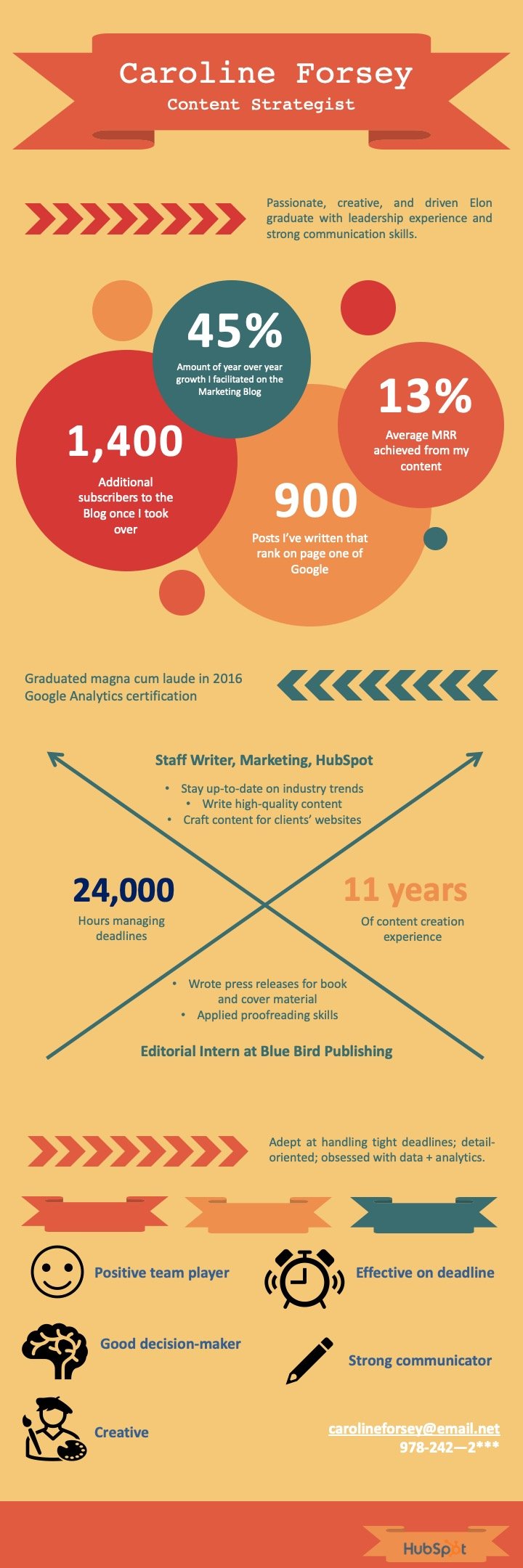
In the following infographic resume (also created using HubSpot’s templates), you’ll see I’ve highlighted most of my accomplishments using data — such as the 45% YoY growth, 1,400 additional subscribers, or 24,000 hours managing deadlines. 

I also used icons of a smiley-face, pencil, and painter to demonstrate some of my skills in more visual form. 

Example 2 for an infographic resume

What do you think? Ready to take your resume to the next level? Grab some starter templates below.

New Call-to-action

Categories B2B

9 Breadcrumb Tips to Make Your Site Easier to Navigate [+ Examples]

In the fairy tale Hansel and Gretel, two children drop breadcrumbs in the woods to find their way home. Nowadays, you probably don’t experience too many lost-in-the-wood experiences, but I’m willing to bet you’ve felt disoriented on a poorly designed website.

In web design, breadcrumb navigation is a way to show your users their location and how they got there. Like Hansel’s breadcrumbs, it helps users retrace their path and see where they are in the greater scheme of your site.

Download Our Free UX Research & Testing Kit

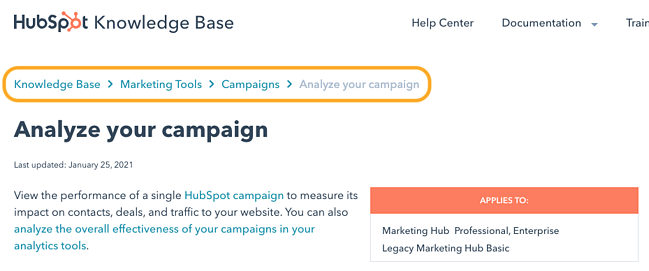
While you can style breadcrumbs however you’d like, they tend to look the same across websites that use them. Here’s a simple example of breadcrumbs from the HubSpot Knowledge Base:

an example of breadcrumb navigation on the hubsot knowledge base website

Jakob Nielsen, co-founder of the acclaimed Nielsen Norman Group, has been recommending breadcrumb navigation since 1995, and makes a strong point for their usefulness and efficiency: “All that breadcrumbs do is make it easier for users to move around the site, assuming its content and overall structure make sense. That’s sufficient contribution for something that takes up only one line in the design.”

If your business’s website is multi-layered, you might consider implementing breadcrumb navigation to make your site easier to navigate. However, like any design element, there’s a right and wrong way of doing it. Here, we’ll explore nine tips and examples to ensure you’re creating the most effective breadcrumb navigation for your users.

Breadcrumb Navigation Tips and Examples

1. Only use breadcrumb navigation if it makes sense for your site’s structure.

Breadcrumb navigation has a linear structure, so you only want to use it if it makes sense with your website’s hierarchy. If you have lower-level pages that are accessible from different landing pages, using breadcrumb navigation will only confuse readers who keep accessing the same pages from different starting points. Additionally, if your site is relatively simple, with only a few pages, you probably don’t need breadcrumb navigation.

2. Don’t make your breadcrumb navigation too large.

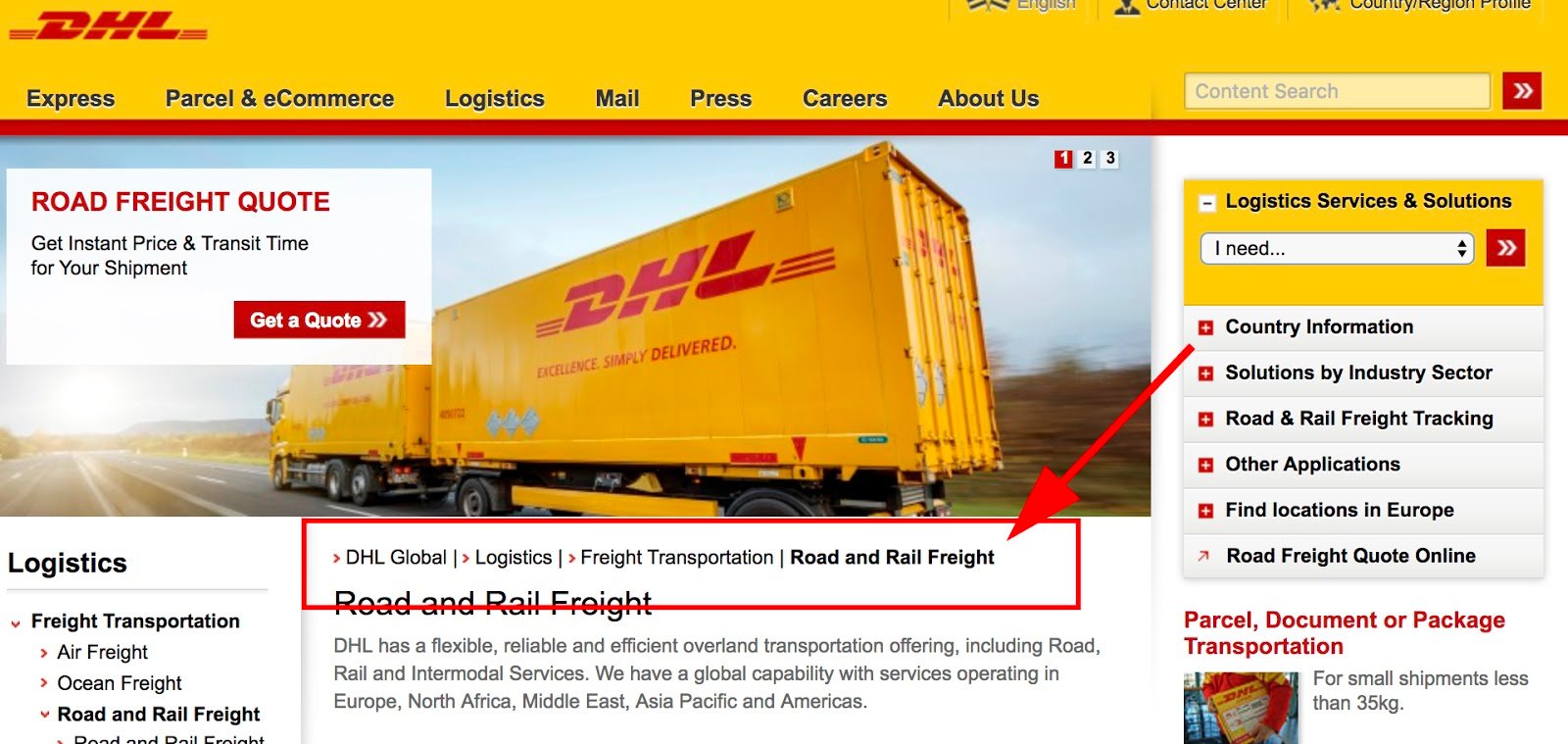
Your breadcrumb navigation is a secondary tool to your primary navigation bar, so it shouldn’t be too large or prominent on the page. For instance, on DHL’s website, their primary navigation bar is large and recognizable, with columns like “Express” “Parcel & eCommerce” “Logistics”, etc. Their breadcrumb navigation is the smaller section below that reads, “DHL Global | > Logistics | > Freight Transportation”. You don’t want your users to mistake your breadcrumb navigation as the primary navigation bar.

an example of breadcrumb navigation on the DHL website

3. Include the full navigational path in your breadcrumb navigation.

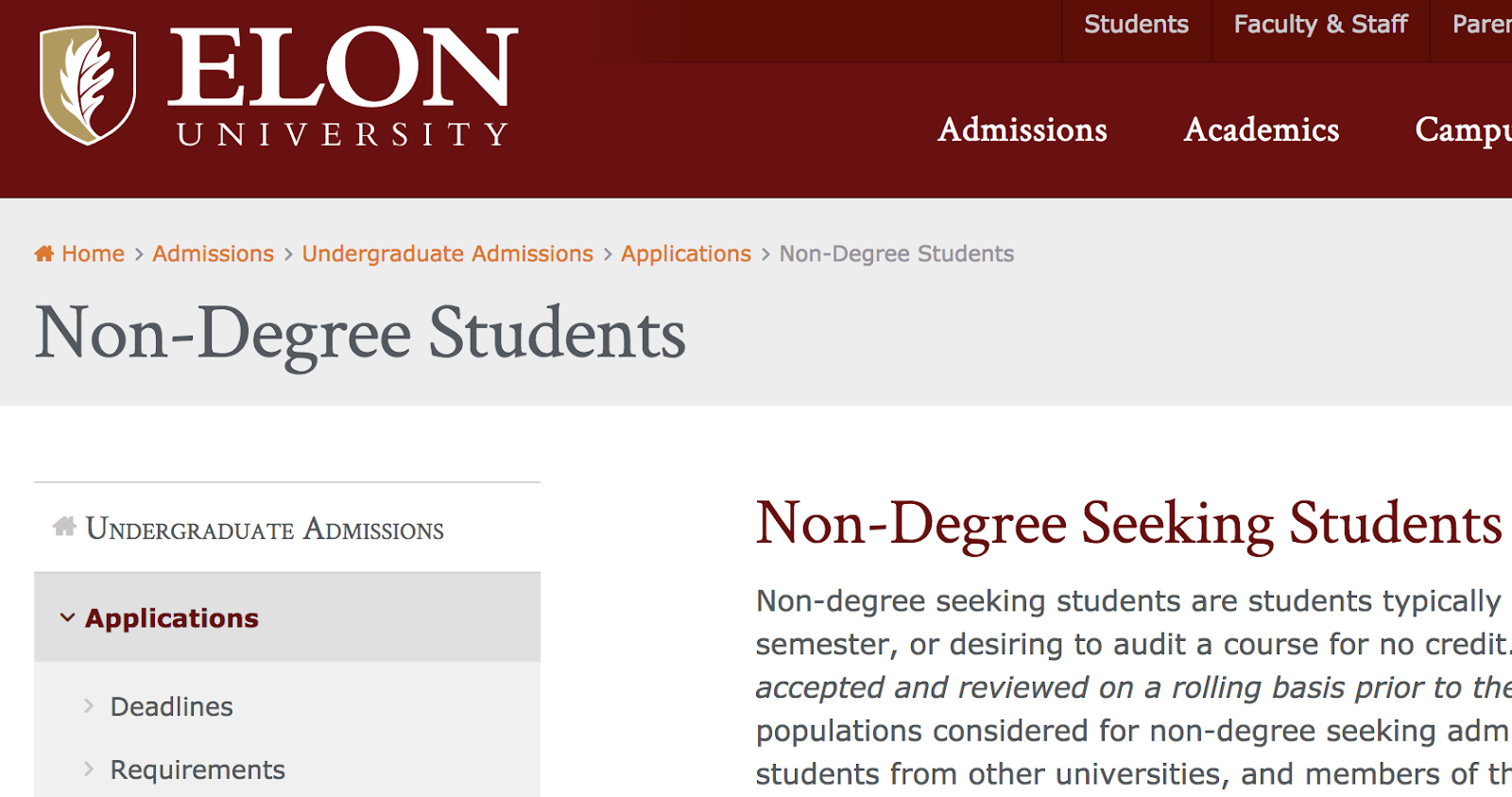
I Googled “Elon University Non-Degree Students” to reach this landing page, but Elon is smart to include the full navigational path, including “Home” and “Admissions”. If you leave out certain levels, you’ll confuse users and the breadcrumb path won’t feel as helpful. Even if users didn’t begin on the homepage, you want to give them an easy way to explore your site from the beginning.

an example of breadcrumb navigation on the elon university website

4. Progress from highest level to lowest.

It’s important your breadcrumb navigation reads left to right, with the closest link to the left being your homepage, and the closest link to the right being the user’s current page. A study by Nielsen Norman Group found users spend 80% of their time viewing the left half of a page and 20% viewing the right half, making a strong case for left-to-right design. Plus, the link closest to the left will appear as the beginning of the chain, so you want it to be your highest-level page.

5. Keep your breadcrumb titles consistent with your page titles.

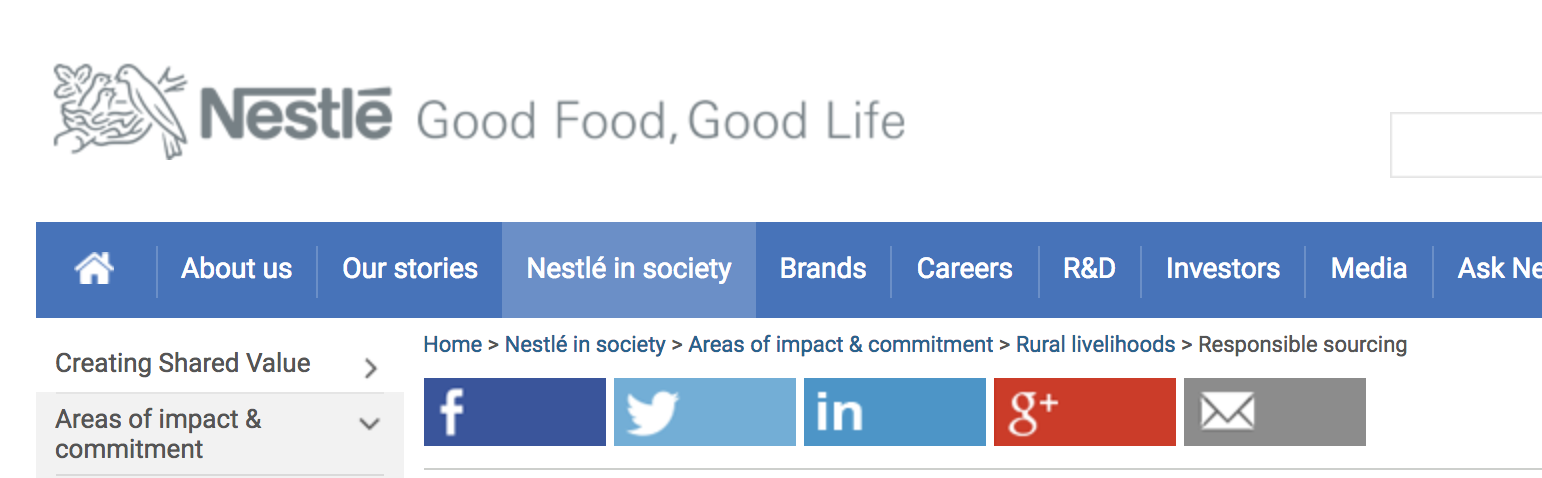
To avoid confusion, you’ll want to remain consistent with your page and breadcrumb titles, particularly if you’re targeting certain keywords in those titles. You also want to clearly link your breadcrumb titles to the page. If the breadcrumb title doesn’t have a link, make it clear. Nestle effectively labels its breadcrumb titles to match the page titles. “Areas of impact & commitment”, for instance, reads the same in the breadcrumb navigation as it does on the page.

Nestle also does a good job differentiating links from non-links with different colors — the links are blue, while the non-links remain gray.

example of breadcrumb navigation on the nestle website

6. Get creative with design.

The traditional breadcrumb navigation looks like this: Home > About Us > Careers. However, you don’t need to follow the traditional path if you feel a different design could appeal more to your audience, or look better on your site.

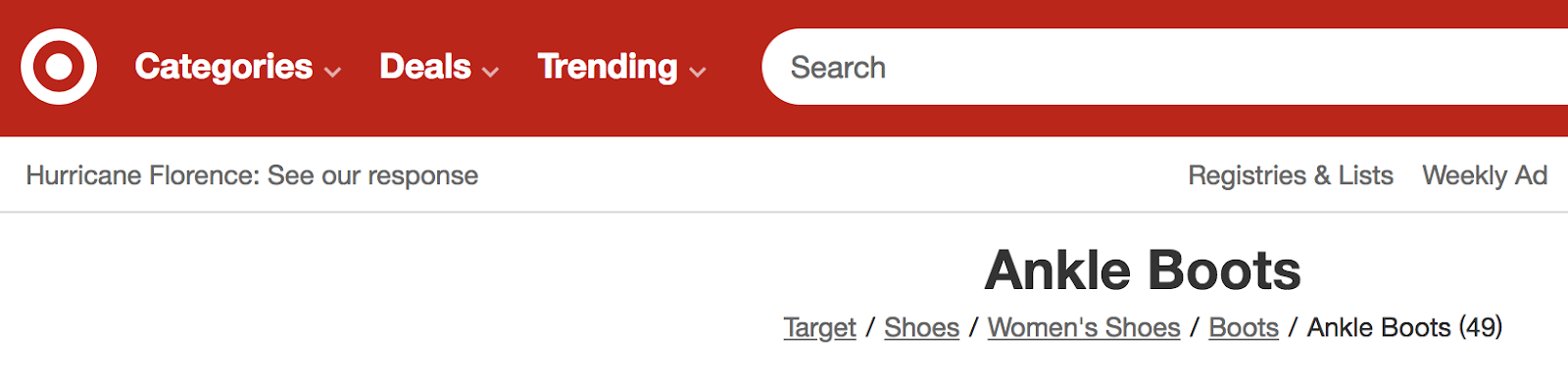
For instance, Target uses breadcrumb navigation in their product pages (because who wouldn’t get lost in the virtual shoe section?), but uses “/” symbols and simple black and grey text. In this case, the subtle design variation makes sense for their site’s aesthetic.

an example of breadcrumb navigation on the target website

7. Keep it clean and uncluttered.

Your breadcrumb navigation is simply an aid for the user, and ideally shouldn’t be noticed unless the user is looking for it. For this reason, you don’t want to clutter your breadcrumb navigation with unnecessary text.

Eionet, for instance, could do without their “You are here” text. While meant to be helpful, the text clutters the page. With the right design, a breadcrumb navigation should be noticeable enough without an introduction.

an example of breadcrumb navigation on the eionet website

8. Consider which type of breadcrumb navigation makes the most sense for your site.

There are a few different types of breadcrumbs you might use — location-based, attribute-based, and history-based. Location-based breadcrumbs show the user where they are in the site’s hierarchy. Attribute-based breadcrumbs show users which category their page falls into. Finally, history-based breadcrumbs show users the specific path they took to arrive at the current page.

Bed Bath & Beyond uses attribute-based breadcrumb navigation to show users which category their product page falls under, so users can click back to “Kitchen” or “Small Appliances” to peruse similar items. This type of breadcrumb navigation is most effective for Bed Bath & Beyond customers. When you’re creating a breadcrumb navigation, consider what’s most useful for your site’s visitors.

an example of breadcrumb navigation on the bed bath and beyond website

9. Know your audience.

Best practices in breadcrumb navigation urge web designers to place the navigation at the top of the page — but Apple, one of the most valuable companies of all time, defies this logic by putting their breadcrumb navigation at the bottom of their site. Ultimately, it’s critical you know your audience. Apple’s customers are typically tech-savvy, and would likely find the navigation if they needed it. Consider your customers’ needs, and implement A/B testing if you’re unsure.

an example of breadcrumb navigation on the apple iphone x website

Breadcrumb Navigation in HTML and CSS

Not only are breadcrumbs useful — they’re also easy to add to your website with a bit of HTML and CSS code.

Let’s start with the HTML, which we’ll use to make the links themselves. The easiest way to do this is to organize your links in an unordered list (<ul>) element, with each list item (<li>) comprising a link in the breadcrumb series until the final item, which denotes the current page.

Here’s an HTML template for breadcrumbs that you can use:

Notice how I’ve also enclosed the unordered list in an HTML <nav> (navigation) element, and added a class and an ARIA label to its opening tag. This is optional, but helps make your page more accessible to screen readers and search engines.

Of course, this HTML alone isn’t enough — right now, we just have a bulleted list of links. By adding CSS, we can achieve the breadcrumb look that we’re looking for. Apply the following CSS to the HTML above:

Together, this code generates a basic breadcrumb navigation area that can be used on any site — see the final result below. I’ve also added some additional styling for a cleaner look. To see how the breadcrumbs look without this styling, comment out the code at the bottom of the CSS tab.

See the Pen Breadcrumbs in HTML and CSS by Christina Perricone (@hubspot) on CodePen.


Breadcrumb Navigation in Bootstrap CSS

Bootstrap CSS also offers a way to create breadcrumbs without needing to add custom CSS. To do this, use the Breadcrumb component like so. Here’s an example from the Bootstrap 5 documentation:

See the Pen Breadcrumbs in Bootstrap CSS by Christina Perricone (@hubspot) on CodePen.

This is just the basics of breadcrumb navigation in Bootstrap — see the Bootstrap breadcrumb documentation to learn all the details.

Design to Help Users Navigate Your Site

Ultimately, breadcrumb navigation is an effective tool to make your site easier to navigate, but you want to follow design best practices to ensure you’re leveraging the tool’s helpfulness. For additional UX advice, check out our Ultimate Guide to UX Design.

Editor’s note: This post was originally published in September 2018 and has been updated for comprehensiveness.

ux templates

Categories B2B

The Beginner’s Guide to Brand Pillars

Although the practices of marketing and branding have been around for centuries, the industries started to shift in the 1990s.

The digital age came about and companies began to market their brands more than their products with the goal of giving their company a personality.

As a millennial born in the early 90s, I grew up at the same time as the digital revolution. In fact, millennials have a reputation for spending all day on their phones and being lazy.

However, I’d argue that as the digital age and technology began to evolve, so did society’s work expectations. Businesses, and even employees, are expected to be a brand in and of themselves that has value and positively impacts society (instead of just selling products).

As a marketer or business owner, you might be wondering, “How can I create a brand that my audience connects with?”

In this post, we’ll discuss how to create brand pillars that clearly communicate your brand identity to your audience.

For example, brand pillars can be core values, important strengths, or aspects of a brand that support or add dimension to the core idea of “Who are you?”

Essentially, these brand pillars can be anything that your customers find important — perhaps it’s innovation, reliability, on-time delivery, etc.

Brand pillars are meant to differentiate your brand and should be valued and endorsed by your customers. When someone asks why your customers like your brand, they’ll probably be able to list off your brand pillars if you’re clearly communicating your brand well.

These pillars should be decided on strategically to provide better products or services to your customers.

I know this might sound slightly conceptual. Brand pillars can be easier to understand when we break them down into categories.

Below, let’s learn about the five brand pillar categories you can use to determine your own brand pillars.

What are the five brand pillars?

The main brand pillars are purpose, perception, identity, values, and brand experience.

1. Purpose

Purpose can be described as the mission and foundation of your company. It will answer questions like “Why did you start your company?” and “What are you hoping to achieve?”

Think about this strategically. What do you want to communicate to your audience as your purpose? What do you want to communicate to employees or potential employees? Knowing your purpose will help you hire employees who align with your mission and correctly target your audience.

Purpose can even be described as the culture of your company. For example, at HubSpot, our culture is about growth-minded individuals who have HEART (they are humble, empathetic, adaptable, remarkable, and transparent). The acronym HEART is one of our brand pillars as a company.

2. Perception

Perception is about how your customers perceive your company/brand. You’ll want to either evaluate how current customers view your brand, or if you’re a new company, write down some characteristics that you’d like customers to associate with your brand.

This could be something like hospitality or leadership. If these are your perception brand pillars, then you want customers to view you as a leader in your industry that is a trusted, good host (this makes sense for a hotel, for example).

3. Identity

This brand pillar is about who you are as a brand. A brand is something you are, it’s not something you have. It’s all about your personality as a company.

For example, an identity brand pillar could be something like “cheeky” or “bold.” This means that you want customers to see you like a cheeky personality. The reason to define this brand pillar is so you have a guiding light for how to be human and interact with your customers.

4. Values

Your values are about communicating your overall position to your audience. What’s important to you as a company? How do you want to make a difference? This could be something like valuing integrity and ownership.

5. Brand Experience

Lastly, brand experience is a pillar that will help you promote your products and services. People use products and services when they like a brand. When there are so many options to choose from these days, customers will choose to buy from companies they like. This means you need to create a positive customer experience and association with your overall brand.

By using these brand pillars as a basis, you can create a brand identity that sets you apart from your competition. Companies that fail most likely haven’t considered what their brand pillars are and how they align.

If you have a robust strategy, but you don’t have a purpose or identity, people won’t feel compelled to purchase from you. On the other hand, if you promise that you value user experience, but the perception is off, then you also won’t find success.

In the next section, let’s review how you can use these categories to define your brand pillars.

How to Determine Your Brand Pillars

To determine your brand pillars, you should ask yourself a series of questions to come up with the top characteristics that you want to communicate to your audience.

Purpose

  • Why did you/are you starting your company?
  • What do you want to accomplish?
  • How do you want to serve your customers?
  • What value do you offer to customers that support your mission and vision?

Your purpose should serve as a magnet for employees and customers who share similar values. It will also provide a hook to tell your company’s story and differentiate yourself from your competition.

Perception

  • What role do you play in your customer’s mind?
  • What do they perceive your value to be?

This pillar could be something like education. Perhaps people view you as a place they go to learn about your industry. This is completely owned by your audience and how they interpret your brand through messaging and reputation and management.

Identity

  • What’s your culture like?
  • What’s your point of view?
  • What kind of tone of voice do you use in communication?
  • What are your convictions and behaviors that define your brand?

Defining your voice and brand is about strategizing how you want to speak to your audience on several platforms. The brand personality signals what employees might be like, how they behave, who your customers are, etc.

Values

  • What’s important to you in your interaction with your audience?
  • What do you value above all else, even before your own financial interests?

Again, this pillar will help define what you care about as a company.

Brand Experience

  • How do customers interact with you at each touchpoint?
  • What kind of experience do you want customers to have?
  • What makes your customer experience better than your competitors?

This pillar will define much of your perceived personality and reputation.

When creating your brand pillars, think about what your customers get from you. Do they get convenience, higher quality, time savings, etc.?

To determine your brand pillars, think about your brand strategy and come up with things that clearly define your personality, voice, customer experience, your purpose, and how people will perceive your brand.

Brand Pillar Examples

1. Hilton Brand Pillars

Hilton’s brand pillars are very clearly stated on its website. They value hospitality, integrity, leadership, teamwork, ownership, and now (sense of urgency).

These are stated as their values, but they’re really brand pillars that showcase how the company wants to be perceived, what their identity is, what the customer experience is like, and what they value.

2. Patagonia Brand Pillars

Patagonia is a brand that has personality and purpose. Their mission is to inspire and implement solutions to the environmental crisis (this is their purpose). Additionally, Patagonia offers a minimalistic style and values simplicity and utility (this is their personality and values).

3. Nike Brand Pillars

Since it was founded, Nike has been consistent in its brand pillars. They are all about competition and surpassing one’s limits. All the company’s advertising, messaging, and investment decisions support that personality and value.

Brand pillars are a great way to define and differentiate your company from the competition. It’s not just about making products anymore — it’s about having a voice and point of view that offers value to its customers.

New Call-to-action

Categories B2B

How to Build a Marketing Technology (Martech) Stack That’ll Grow With You

What will your marketing team look like six months from now? Or a year from now? How many people will you add? What new tools, systems, and data will you need?

There are a lot of potential questions you can ask about the future of your business, but there is one certainty: you’ll deal with more data, more people, more processes, and more complex problems as you grow.

But how do you deal with that in your marketing team? That’s where marketing technology, or martech, comes in. By automating tasks and removing obstacles from your team’s workflows, marketing tech empowers your team to waste less time on menial tasks, allowing your business to grow more efficiently.

Download Now: HubSpot's Annual State of Marketing Report

When you put it all together, you get a marketing technology stack: a collection of tools that your team uses to do their best work every day.

As your team and business scales, it’s important to create a martech stack that streamlines your day-to-day processes. In this post, we’ll go over everything you need to know about martech and how to build a marketing tech stack that will stay with you as you grow your business.

Marketing technology can be used by any type of marketer — even non-digital marketers. One martech tool is typically used for a different marketing discipline.

Here are a few examples of disciplines and a martech tool that can be used for them.

Instead of adopting a plethora of different tools, some marketers choose to adopt an all-in-one solution such as Marketing Hub.

How is technology used in marketing?

Technology is used by marketers to execute their marketing campaigns. Marketers use software to automate marketing tasks and collect data so they can get insights related to campaign activity and their impact on customers.

For example, say that your team spends a significant amount of time emailing customers. The action feels repetitive, and it’s keeping people away from more pressing assignments. You may choose to use an email automation software, so less time is spent sending emails.

You also want the software you use to track data related to those emails, so you gain an understanding of how your users interact with them.

In brief, marketers use technology to make their jobs easier and understand their levels of success. The technology that marketers use in their campaigns is known as their marketing tech stack.

Let’s say that you primarily focus on SEO and paid ads on social media. You would add the following tools to your marketing tech stack: Moz for SEO and HootSuite for social media management.

Alternatively, you can adopt an all-in-one solution such as Marketing Hub to take care of both your SEO and social media marketing strategies.

For instance, Marketing Hub’s SEO tool will assist you in optimizing your site with its built-in keyword research tools, as well as as-you-type optimization advice while you’re creating content.
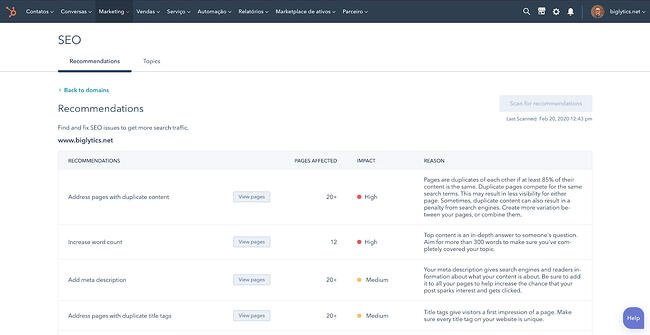
Marketing tech SEO tool from HubSpot

Its social media management tool will take care of everything related to social media — including post creation and audience engagement analytics. You can even reply directly to comments from the tool.
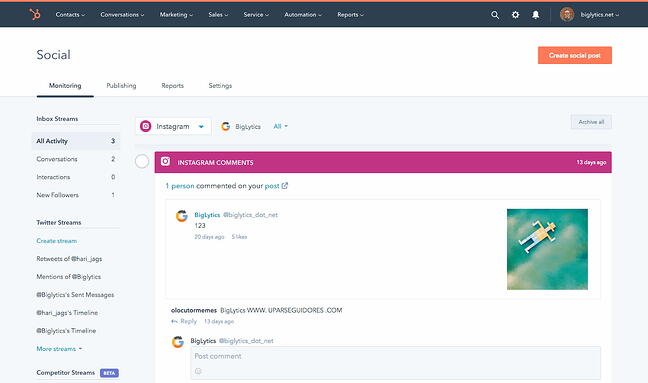
Marketing tech social media management tool from HubSpot

Overall, the technology you choose will help you execute your campaigns from start to finish.

But with so many to choose from, it can be difficult to build a martech stack that works for your team. Let’s go over how you can build an effective stack.

How to Build a Marketing Tech Stack

There is no out-of-the-box method for building your martech stack. Your company is unique, and your perfect marketing stack is not going to look exactly like anyone else’s.

This is the time for choosing the right tech tools for your team and setting them up in a way that your future team can use and understand. To do so, take the following steps.

1. Identify your primary marketing strategies and goals.

Before ever choosing a martech tool, you’ll need to outline your marketing strategies. It doesn’t have to be complicated, either: you simply need to have an idea of the basic strategies that you want to implement.

If you already have an established marketing team, take a look at the strategies that are currently in place. This will help you gauge, from the get-go, the types of tools you need.

Here’s an example. Let’s say that you want to increase organic traffic to your website. The strategy for that would be SEO. Next, you want to capture leads. So you would invest in a website redesign strategy that highlights your calls-to-actions more efficiently.

Jot these strategies down in a document, then include ideas for possible tools you can use to implement the strategies. If you don’t know which tools you use, simply write that you’ll list them after further research.

Example 1

  • Goal: Increase organic traffic
  • Strategy: SEO
  • Tools: To be determined

Example 2

  • Goal: Get more visitors to convert
  • Strategy: Redesign the website
  • Tools: To be determined

2. Survey your team to find out their challenges.

Next, sit down with your team and find out the challenges they encounter when trying to execute their day-to-day duties.

What adds more time to their workflow? What makes their job harder?

While the conversation should be open-ended, try to connect their challenges to your marketing goals. For instance, if you want to increase organic traffic, ask what specifically your team finds challenging when trying to optimize the website. If they say keyword research takes too much time, then you’d know that you’ll need a keyword research tool specifically.

Jot these challenges down in the same document you’ve already started. Keep it simple — just a sentence or a few bullet points will do.

Example 1

  • Goal: Increase organic traffic
  • Strategy: SEO
  • Challenges: Keyword research takes too much time
  • Tools: Keyword research tool that quickens the process

Example 2

  • Goal: Get more visitors to convert
  • Strategy: Redesigned website
  • Challenges: Unable to add CTAs because of the outdated backend system
  • Tools: A new content management system that allows the team to add CTAs to any page

3. Establish an estimated budget.

Building your dream martech stack means nothing if you can’t afford it. As you begin to determine the types of tools you’ll need, think about the funds you’ll allot for them.

You can go several ways about this. You can determine a budget per tool or per strategy. Alternatively, you can choose a budget overall for the entire team in a yearly, quarterly, or monthly basis.

Choosing a monthly budget is the best choice for small businesses without a dedicated finance team. Most tools are available on a monthly subscription basis, which makes it easier to drop one if it doesn’t work for the team.

You can also choose a budget per strategy. For instance, you can decide you’ll invest $200 a month in SEO tools.

Be sure to take into account the amount of seats you’ll need for the tool, or ensure the team is open to sharing one subscription. Most times, sharing a single subscription will work without a problem, and you can save a significant amount of money.

4. Research the tools you’ll consider for your martech stack.

Now that you have your strategies, your tool ideas, and your budget, it’s time to research the actual products you’ll add to your martech stack. If you’re a marketing leader, you can leave this task to individual team members, because they’ll be the ones using the tools.

It’s helpful to look at product curation posts to get a general idea of the offerings that are out there. For the keyword research challenges in your team, for example, you can look at a list of keyword research tools. If you’re looking for a new CMS, you should look at a list of the best CMS systems.

From there, you can investigate pricing, product reviews, and general fit for your team.

Make a list of the tech tools in a spreadsheet and include pricing and a general description of the product. From there, refine the list until you’ve decided on the tools you want to try out, and be sure to specify whether the tool needs a monthly or yearly subscription.

5. Consider non-marketing tools to add to your tech stack.

When we talk about the martech stack, we’re often caught up in marketing-specific tools. But there are a wide range of “general” tools that are useful for a marketing team.

Project management tools, collaboration platforms, and data sync software solutions are just a few of the products you can consider. Anything that cuts time from a complicated workflow is worth exploring. Google Drive would be an example, and so would Asana.

Add these products to your martech list, including the pricing and a brief description.

6. Compile the data that you’ll transfer into the tools.

After you’ve purchased the tools, it’s time to transfer the data. Already have a list of leads? How about Microsoft Word documents you’d like to import into Google Drive for collaborative editing?

Compile all of them in folders. Assign a type of data to each team member. For instance, one team member can compile the contacts from a conference. Another team member can compile the current templates you use for your social media posts. Another can compile all of the copy from the website for the website redesign.

When it’s time to sign up for the tools and adopt them, you can transfer these files and data and more easily pick up where you left off.

7. Assign one team member to create a workflow per tool.

Now that it’s time to adopt the martech tools, you don’t want to throw it out to your team without a workflow. That’s an easy way to end up with a subscription that no one is using.

Assign one team member to explore one specific tool. This team member will jot down workflow steps for using the tool effectively and write a step-by-step tutorial with screenshots. After, schedule a meeting for the team member to carry out a live tutorial.

Why? You can establish the best way to use the tool without a lot of guesswork. The process will be scattered and haphazard if everyone starts using the tool at once. By having a single uniform process, you can guarantee that every team member is using the tool to its fullest extent.

8. Analyze the tools’ success and switch solutions if necessary.

You don’t want to end up with an unused martech stack. Always audit your tools for their success — whether they effectively streamline workflows, automate tasks, and help your team do their work in a better way.

If not, there’s no shame in cancelling your subscription and going for another solution. Take a look at product curation posts, or research individual tools you may have heard of from other marketing leaders.

Let’s go over a few tips you should apply when building your martech stack.

Martech Stack Tips

As you build your marketing tech stack, you’ll be pulled in all sorts of different directions. When your business is growing, you’ll be tempted to add more complexity to address urgent gaps.

We’ve been there. HubSpot’s marketing operations team is all too familiar with the challenge of dealing with more and more as our team grows.

We’ve learned a lot along the way — so we gathered insights from HubSpot’s resident operations experts to ask what they wish they would have known when growing HubSpot’s own marketing tech stack.

1. Strategy first, technology second.

As companies grow, it can be tempting to rely on technology to support processes that are still evolving. Usually, this happens when a team adopts powerful tools that have a lot of potential, and they try to mold their systems around it.

HubSpot’s marketing operations team has made this mistake, too, and with an important takeaway: What sets apart truly powerful tech stacks isn’t just about the technology.

“The tools themselves won’t make you successful but rather how you use them,” explains Kerri Harrington, Marketing Ops Analyst here at HubSpot.

Harrington has worked closely with HubSpot Partners, consulting many who were in the midst of building their tech stacks. She taught them to think about their tech stack not as the powerhouse behind their systems, but a vehicle to efficiently and effectively execute their strategy.

If you are still developing your strategy, she says, try drawing out and visualizing your tech stack. This gives you an opportunity to think critically about each tool, the purpose it serves, and where there is any overlap or duplication in your tools.

2. Keep systems simple.

Have you heard of the “keep it simple, silly” (KISS) principle? The term, originally coined by an aeronautical engineer in the US Navy, states that simplicity guarantees the greatest levels of user acceptance and interaction.

The term is used often in software design, for example, where function and instruction creep can make products unmanageable over time.

How do you prevent this happening in your own company as it continues to grow? Put your current strategy down on paper, and review the value of every stage of your process with your leadership team. Consider what processes could be done more efficiently, and what could be eliminated altogether.

“The #1 driver of complex business systems is complex business rules,” says Mark Metcoff, Director of Marketing Technology at HubSpot. “If you can simplify your go-to-market strategy as much as possible, then regardless of how you structure your systems, you’ll be heading in the right direction.”

3. Aim for medium-term solutions.

In an ideal world, every decision you make about your tech stack today will work seamlessly for your team for years to come.

In reality, though, you are probably going to change systems a dozen times over the next few years if you continue to scale. You shouldn’t worry about picking your forever tech, but do not settle for a tool that will become obsolete in 6 months, either.

“Aim for the medium-term,” Metcoff suggests. “The costs of switching systems has never been lower, thanks to the emergence of more persistent datastores like customer data platforms that can underlie front-office facing systems, and iPaaS solutions that allow you to integrate front-office providers for easy data transfer.”

4. Document everything, and document it well.

Imagine opening your spice cabinet, ready to cook up a chicken curry, to find that nothing in the cabinet is labeled. Every spice and herb is in the same colored jar, with no ingredient label or expiration date.

Unless you have a noteworthy sense of smell, this project would not be very easy or enjoyable.

This is what it’s like to step into a new role only to realize that your new team’s processes and database have not been properly documented. This is common among growing companies, because as your database grows and your systems evolve, it’s easy to end up with a lot of clutter, data integrity issues, and confusion.

Many will skip right over this — who likes to document? Who has the time to ‘waste’ a day of innovation to do seemingly admin work? We get it — But for the sake of your future team, make sure you take the time to lay down the right foundation for data architecture.

“I can’t tell you how many times we have to review the history of a change or ‘walk through’ the last couple of years on a topic,” says Maggie Butler, Builder Marketing Team Manager at HubSpot. “It gets really, really hard if no one has documented anything.”

One incredibly valuable resource HubSpot had during one of its growth spurts, she says, was the documentation built by our engineers that detailed in simple language how the logic and code worked. Aim for this level of documentation to be comprehensive across all applications, and easily accessible for everyone on your team.

In terms of marketing tools, our Lead Management tool embodies the ‘document everything’ mantra. The tool can be used to create a database of all customer information, where you can view chronological timelines of every interaction customers have had with you.

5. Choose point solutions that serve a single purpose.

A point solution is a product or service that addresses one very specific need in a marketing organization. Sometimes, you just need a piece of software to do a specific thing really, really well. There’s no shame in it.

The data sync software included in Operations Hub is a great example of this. If you use multiple different apps to execute your marketing strategy, keeping track of customer data from each app can be a tedious process. The data sync tool can integrate with your CRM to streamline this process by syncing customer data from your favorite apps into one up-to-date database.

But keep in mind that every piece you do add to your infrastructure comes with its own compliance risks, technical challenges, maintenance and upkeep, and general administration.

“Also look closely at whether or not it needs to be integrated into your tech stack,” explains Metcoff. “Sometimes point solutions work just fine in a silo.”

If you have any point solutions in your current stack, think about how it fits into the bigger picture: how does it interact with the rest of your technologies, and what do you need to do to keep it running?

6. Aim for ease of use, but don’t sacrifice the necessities.

There are a lot of options out there — so don’t settle for less than what you need. At the end of the day, you need to choose a system that’s easy for your team to pick up and use, but still has the power and flexibility you need to get things done.

The challenge with today’s marketing automation tools is that they offer either enterprise-grade power or consumer-grade ease-of-use, but never both. As a result, many still go with the safe bet — overpriced, overly complicated, and under-utilized tools — which translates to spending more time on systems than on your customers.

Best Marketing Tech Stack

The best marketing tech stack for your business is entirely tailored to your needs, but there are a few tools we recommend — especially if you’re just building out your marketing team.

Let’s take a look at a martech stack for general use, attracting site visitors, converting site visitors, and engaging leads. These martech tools are essential for running a high-performing marketing team.

Collaboration: Google Drive

Google Drive allows your team to collaborate on documents, spreadsheets, and folders — all on the cloud. There’s no need for anyone to download any software on their laptop. The best part is that losing work is nearly impossible with Google Drive.

Pricing: Free

Alternatives: OneDrive, Dropbox

Communication: Slack

Slack is an instant messaging platform that’s specifically designed for work (and not leisure chatting). This tool makes it easy for your marketing team to share quick updates, send files, and communicate live if necessary. With Slack, there’s no need to send emails that can be covered in a quick conversation.

Pricing: Free; $6.67/user/month (Pro); $12.50/user/month (Business +); Custom (Enterprise Grid)

Alternatives: Google Chat, Microsoft Teams

Project Management: Asana

Project management is the heart and soul of marketing. Whether your team is scheduling campaigns, managing complicated workflows, or working on a project-to-project basis, you don’t want anything to fall through the cracks. Asana makes it easy by providing a collaborative space for your team to check off tasks and share project updates.

Pricing: Free; $10.99/user/month (Premium); $24.99/user/month (Business)

Alternatives: Trello, Freedcamp, Project.co

Asset Creation: Canva

Canva offers a wide range of helpful templates to help your marketing team create assets for anything. Social media posts, Facebook banners, posters, infographics, presentations, flyers, and brochures can all be created with Canva. The best part is that you can start for free, and there’s virtually no learning curve. You can sign up and start using it right away.

Pricing: Free; $199.99/year (Pro); $30/user/month (Enterprise)

Alternatives: Visme, Snappa, Adobe Creative Cloud (recommended for advanced users)

Stock Images: Unsplash

Stock images are used in any type of marketing material, such as blog posts, banners, flyers, and brochures. It’s illegal to use images you find online unless they’re under a Creative Commons license. Some of these images are also not of professional quality. Unsplash is a great option for getting access to and downloading high-quality stock photos for free.

Pricing: Free

Alternatives: Pexels, Shutterstock (Paid), Getty Images (Paid), iStock Photos (Paid)

Image Optimization: Toolur

After you download stock images, it’s important to compress them so that they don’t slow down your website. There are many image compression tools out there, but Toolur is one of the best. You can upload up to 25 images at a time, choose different compression methods, set image quality, and resize them all to a preset width. Competitors only allow you to upload an image at a time or try to upsell you by restricting compression options.

If you’re optimizing GIFs, we recommend Ezgif.com.

Pricing: Free

Alternatives: Squoosh.app, TinyJPG

Grammar Checker: Grammarly

Publishing error-free copy is paramount to presenting your business professionally online. With Grammarly, you can take all the manual work out of copy-editing your work. Although it’s still recommended to give your pieces one final read-through before publication, Grammarly will catch most errors.

Pricing: Free; $12/month (Premium); $12.50/user/month (Business)

Alternatives: ProWritingAid, Hemingway App

Content Management and Blogging: CMS Hub

If you don’t yet have a website or blog and need to create one, you’ll need a scalable CMS system to power your website. If you already have a website but the CMS is clunky and hard-to-use, you’ll also need to seek a replacement that makes it easier to publish and update content.

CMS Hub is one of the best options in the business. You can build landing pages, create forms, add pop-up CTAs, publish blog posts, and see all of your performance metrics in one easy-to-use platform. It’s integrated with Marketing Hub, allowing you to seamlessly connect your other marketing initiatives to your website. Because it’s an all-in-one solution, there’s no need to pay for plugins and add-ons that slow down your site.

Pricing: $270/month (Professional); $900/month (Enterprise)

Alternatives: WordPress, Joomla, Drupal

Website Visitor Analytics: Google Analytics

Knowing who’s visiting your site, when they’re visiting, where they’re visiting from, and whether they bounce off is critical to understanding and improving your overall website performance. Google Analytics also helps you measure your organic traffic, see top landing pages, and see top exit pages.

Pricing: Free

Alternatives: StatCounter (Paid), Simple Analytics (Paid)

Web Page Analytics: Google Search Console

While Google Analytics is an excellent way to measure overall website performance, Google Search Console takes it a step further by providing analytics page-by-page. You can use it to see your top queries for either the whole site or a specific page, compare time periods, and compare two or more URLs on your site.

Pricing: Free

Alternatives: Ahrefs (Paid), Moz (Paid)

Website Analytics Dashboard: Google Data Studio

You’d create a dashboard for nearly anything in marketing: email marketing performance, landing page performance, user acquisition stats, and more. For those, you’d be better off with a dedicated reporting dashboard software.

For creating dashboards on website analytics, however, Google Data Studio is a budget-friendly tool that automatically imports data from Google Analytics. This makes it an easy choice for current Google Analytics users. Simply choose the data you want to show and configure it using the drag-and-drop dashboard editor.

Pricing: Free

Alternatives: HubSpot’s Dashboard and Reporting Software (included in Marketing Hub), Databox (Paid)

Email Marketing: Marketing Hub’s Email Marketing Tool

Marketing Hub’s free email marketing tool allows you to create rich HTML emails without writing a single line of code. You can also personalize the emails using smart rules and A/B test campaigns to increase click-through-rates. The tool is integrated with all of Marketing Hub’s features — so a lead from any form on your website automatically turns into a subscriber.

Pricing: Free

Alternatives: Constant Contact (Paid), MailChimp (Paid)

Marketing Automation: Marketing Hub

Marketing automation allows you to nurture leads with drip campaigns that are triggered based on a lead’s specific action. Marketing Hub allows you to automate campaigns and personalize workflows with segmentation logic. You can also score leads, send leads to sales, and trigger internal notifications.

The workflows feature is included in the Professional and Enterprise subscription tiers.

Pricing: $800/month (Professional); $3,200/month (Enterprise)

Alternatives: Marketo

SEO: Ahrefs

SEO has many facets: keyword research, backlink-building, competitive research, and rank tracking. But you don’t want to pay for different tools to do each one of those things. Ahrefs has a keyword explorer, rack tracker, and site explorer where you can audit the inbound links pointing to your competitors.

Pricing: $99/month (Lite); $179/month (Standard); $399/month (Advanced); $999/month (Agency)

Alternatives: Moz, SEMRush

Technical SEO: Screaming Frog

A robust technical infrastructure can take your website from serviceable to outstanding. Screaming Frog is an essential tool for finding 404 errors, identifying broken links, generating sitemaps, finding duplicate content (which can greatly harm your rankings), and analyzing your pages’ metadata.

Pricing: Free; $211 USD/year

Alternatives: DeepCrawl, Ahrefs, Moz

SEM (Paid Ads): Google Ads

When considering an SEM tool to add to your martech stack, there’s no better option than Google Ads. This tool allows you to place sponsored results on the search engine results pages (SERPs), and also allows you to display ads on Google’s display partners.

Pricing: Varies (Pay-Per-Click)

Alternatives: Media.net, AdRoll

Social Media Marketing: Marketing Hub’s Social Inbox

Social media marketing is critical for growing your follower base and increasing lead generation. It’s important to use a tool that allows you to post, comment, and manage your brand across multiple platforms.

Marketing Hub’s social media tool empowers your team to do all of this and more. You can schedule posts up to three years in advance, analyze your performance on social platforms, monitor brand mentions, and participate in the conversations that most matter to you. It’s included in the Professional and Enterprise subscription tiers.

Pricing: $800/month (Professional); $3,200/month (Enterprise)

Alternatives: HootSuite, SproutSocial

Video Marketing: Wyzowl

If your team does any video marketing, you’ll need a video marketing tool to help you create engaging videos that increase brand awareness and effectively explain your product. Wyzowl makes it easy because you don’t have to hire a videographer, animator, script writer, and voiceover actor to create polished, shareable videos.

Pricing: Available upon request

Alternatives: Testimonial Hero, Content Beta

Webinars: ON24

Webinars are an important tool for B2B marketers and an effective way to generate leads. If your team runs webinars or is planning to, ON24 is a top option for creating engaging webinars, gauging your event’s performance, and identifying potential leads.

Pricing: Available on request

Alternatives: GoToWebinar, Zoho Meeting

Conversion Rate Optimization: Optimizely

A conversion rate optimization tool will help your team ensure that your CTAs are designed to drive conversions. The Optimizely Digital Experience Platform allows you to experiment with colors, placement, and design of your CTAs. You can also test your website’s personalization options and deliver highly tailored recommendations to your website users.

Pricing: Available on request

Alternatives: Google Optimize, Crazy Egg

Build a Martech Stack that Helps You Grow Better

With all of the tools available these days, there is no need to use clunky, complex, and time-consuming legacy software. We believe you shouldn’t have to sacrifice productivity to get power, because the best tools combine both power and ease-of-use. When you focus on delighting your customers and creating great experiences instead of managing your software, you will grow better.

Editor’s note: This post was originally published in December 2019 and has been updated for comprehensiveness.
state of marketing