Categories B2B

15 Stunning Examples of Small Business Website Design

If you’re a small business, your website has a big impact on your success. Research shows that roughly a third of people use the web to find local businesses. Honestly, I’m surprised that number isn’t higher.

As a small business, you might not have the budget to hire a designer, bring in a development team, or pay for a suite of design tools for your new site. A basic brochure site will probably have to do for now, right?

But here’s the thing: You don’t need a design portfolio or a branding team to make an effective website. A lot of what makes websites work boils down to clear and intuitive navigation, well-written copy, and tasteful use of color, typography, and images — no design degree necessary.

Still, it’s one thing to talk about good design, and another to actually build a website that delivers on all design fronts. Lucky for us, there are many fascinating websites that have figured out what works. So, for help in your design journey, we’ve compiled our favorite examples of excellent small business websites to inspire your own.

Free Download: 77 Examples of Brilliant Web Design 

Small Business Website Design Examples

There are, of course, thousands of small business websites you can draw from, but we think these 15 serve as a good starting point whether you’re planning a redesign or wireframing your first iteration. By the way, these are all real businesses, so you can click each link to explore the website yourself. Let’s dive in.

1. Bennett Tea

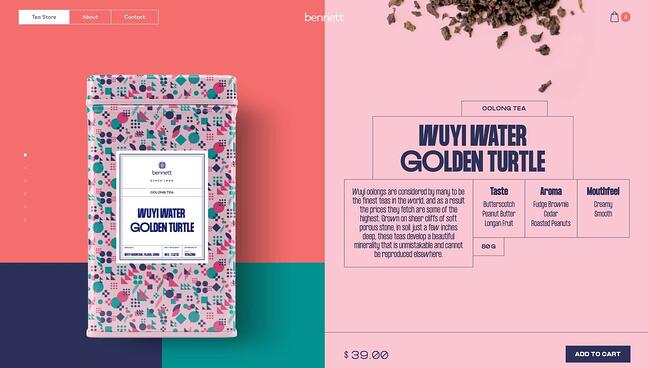
Starting off our list is a gorgeous example of what you can accomplish with color palettes, animated page transitions, scrolling effects, and creative layouts. The Bennett Tea shop offers just a handful of premium tea options, but each is presented elegantly through this online store’s unconventional format.

Typically, stores display their products as grids with links to product pages. On the Bennett Tea website, however, users scroll down to explore each offering, with a life-sized image of the tea box and descriptions of the taste, aroma, and mouthfeel. It’s the perfect visual palette to complement the company’s variety of tastes.

Also notable is the site’s navigation experience. Upon landing on the website, visitors are shown a splash page stating the company’s mission. They then have the option to continue to the store or go to the About or Contact pages. It may require one additional click to get to the store page, but this choice puts the branding front and center for potential customers.

homepage for the small business website design example bennett tea

2. Aroz Jewelry

Belgium-based jeweler Aroz has constructed an immaculate website to showcase and sell their items. Offering a variety of accessories, Aroz first greets visitors with a full-width image, below which they present their pieces in a grid slider.

As users continue scrolling, the website makes frequent use of zoom-in animation, slide-in animation, and fade-in effects for greater visual impact. Each text section establishes the store’s offerings, capped off with a contact form and a social media CTA.

For those looking to learn more about Aroz, the website also includes a blog featuring new collections as well as customer and designer stories. All of these components work to conjure a professional, sophisticated, and unique brand image — a great example of what an ecommerce site can be.

homepage for the small business website design example aroz jewelry

3. Chicago French Press

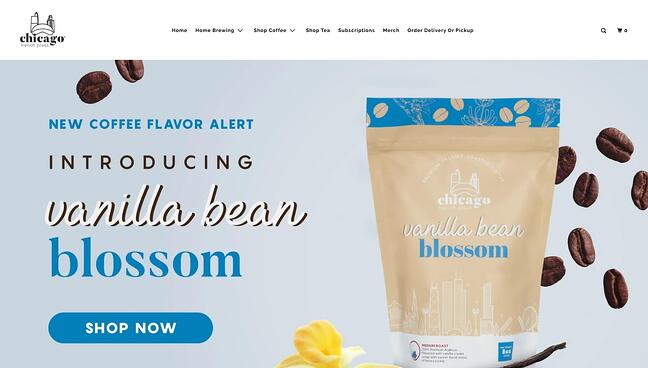
If a tea shop can have a fantastic website, why not a coffee roaster? Chicago French Press sells a variety of rotating flavors while donating a portion of its proceeds to nonprofits and charitable organizations.

Like Bennett Tea, this website emphasizes the aesthetics of the product packaging. It also implements color backgrounds to distinguish between flavors, as seen in the full-width image slider on the homepage.

The Chicago French Press store is easy to navigate, as visitors can search by different criteria including flavor, brewing method, and bag size. And, if you want to incorporate their flavors with food, the website’s blog includes recipe posts too.

homepage for the small business website design example chicago french press

4. Wildwood Bakery

Wildwood Bakery’s website incorporates illustrations in small but stunning ways. The Australian bakery has made a simple but captivating website with little more than some delicate illustrations, a nice orange-and-green color palette, and mouth-watering close-ups of their creations.

On the homepage, visitors can learn about the bakery and click away to the website’s online store or sourdough subscription service. The bottom of the page sports a footer with social links and other useful resources. Note that the footer is more prominent than usual — the large text draws the eye to other important aspects of the business like sustainability and wholesale.

Wildwood’s store page is also worth checking out. Customers can filter products by flavors and quickly add anything to the cart. It’s clear that the designers considered everything, as even the card icon itself is a custom illustration. It’s these details that make this site exceptional.

homepage for the small business website design example wildwood bakery

5. AÃRK Collective

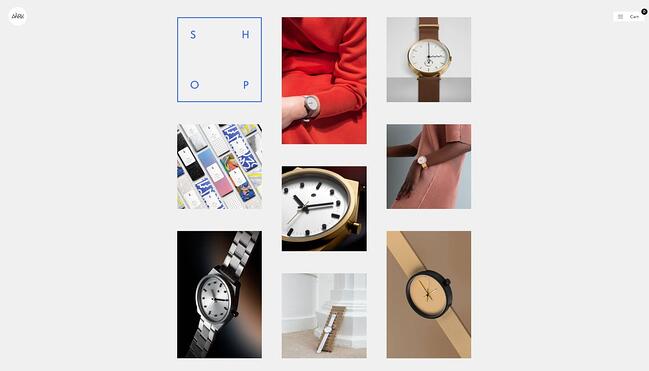
The website for watchmaker AÃRK Collective leaves no question as to what it does — from the start, its timepieces are displayed in full-page, aesthetically pleasing images. The whole thing resembles more of a gallery than an ecommerce site and establishes the brand’s commitment to simple and elegant designs.

But, this is ultimately an online store, and scrolling down reveals AÃRK’s product lines in a masonry grid style. The presentation is quite minimal, but this lets visitors focus solely on the designs themselves. There’s no other information until you click on an item, which sends you to a product page with all the relevant information, plus many more images to be sure you’re making the right watch purchase.

homepage for the small business website design example aark collective

6. Cleenland

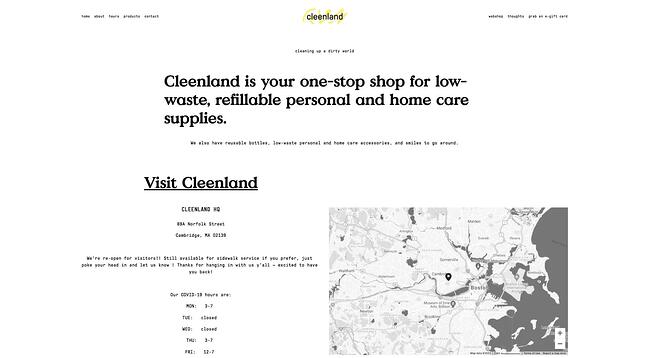
Not all websites have to be visually elaborate — this is proven with Cleenland’s online store. The Boston-based company sells low-waste home care and personal hygiene products, and the site wastes no time nudging visitors to visit the physical location.

Visitors can also shop online in Cleenland’s online store, which lists its product categories with images of each product and information about the supplier. This way, you know products are sourced sustainably. There’s even a “popular products” category serving up the best this store has to offer.

homepage for the small business website design example cleenland

7. Ladies Get Paid

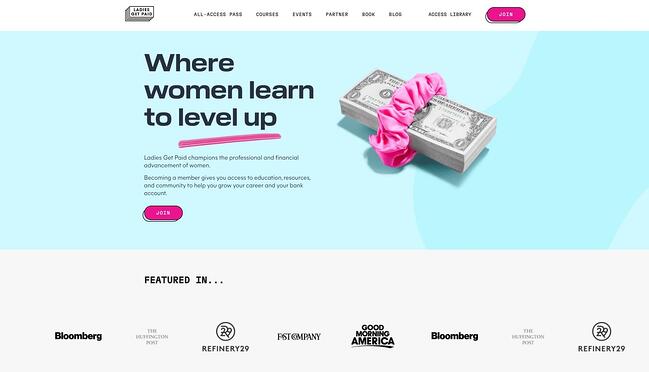
Ladies Get Paid is a membership website that offers financial and professional education courses for women. There are online classes, speaker events, and networking events, as well as job postings and online communities, all to fuel career advancement and financial confidence.

From a visual perspective, Ladies Get Paid does a fantastic job of presenting its variety of benefits in a straightforward manner. Its mission is clear from the start, and the page header lets guests view each offering in more detail.

The website also effectively incorporates hints of color in its interactive items. Its cards and buttons match each other for a cohesive feel and incorporate subtle hover effects for a pleasing user experience. Overall, the website is bold but inviting, a difficult but certainly achievable balance.

homepage for the small business website design example ladies get paid

8. Good Vibes All Purpose Cleaner

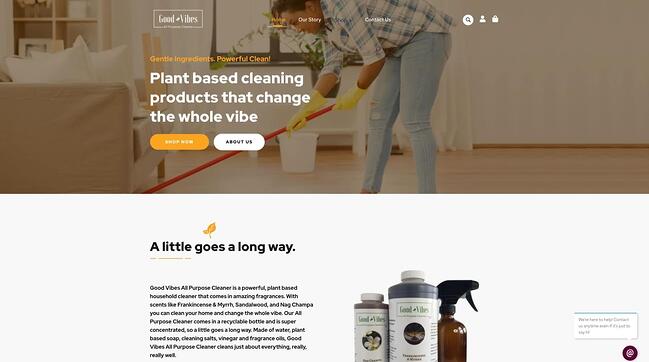
Maybe I’m just biased toward sustainable cleaning products, but Good Vibes All Purpose Cleaner presents a simple, effective ecommerce site that manages to convey its philosophy and offerings seamlessly.

Good Vibes has no frill with its product displays — products are shown in a grid format as you might expect. However, the website also prominently features reviews and testimonials from customers below to instill confidence in new buyers.

Each product page includes a description as well as cleaning instructions, ingredients, reviews, and recommended products. It’s enough to make a positive impression without relying on visual gimmicks.

homepage for the small business website design example good vibes all purpose cleaner

9. Wisr

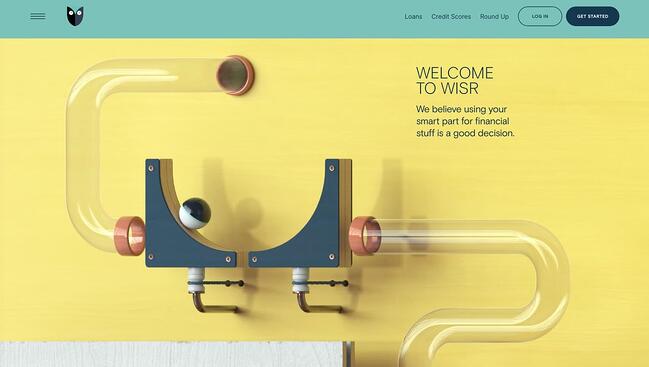
I never expected to have this much fun on a financial services website, but here we are — Wisr offers personal loans, financial planning, and, above all, an incredibly amusing homepage. As you scroll, you follow the path of a simulated marble course from start to end. With each obstacle, you learn more about what Wisr does.

Whether you think this design choice serves as a metaphor for the often unpredictable financial road ahead, or just a cool thing to look at, this website definitely stands out among the rest.

As another cool secondary feature, the website remembers what page you exit from. So, upon a return visit, you’ll see a prompt inviting you back to the page where you left off. It’s a clever use of cookies that can help get prospects back on the conversion path.

homepage for the small business website design example wisr

10. Cafe con Libros

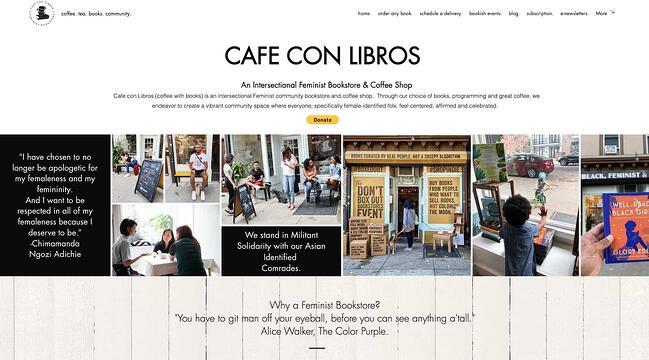
Intersectional Feminist bookstore Cafe con Libros (Coffee with Books) not only offers espressos with your purchase — it also boasts a fantastic website with everything you need under one domain name.

This site manages to pack its book inventory, merch store, event calendar, and mission onto the homepage alone without overcomplicating things. Visitors can also order any book from the store — physical, e-book, or audiobook — for pickup or delivery through the site.

As if that weren’t enough, the website also maintains an active blog with reflections and book reviews, a newsletter, a monthly book subscription service, and a podcast with an on-site player. It’s an excellent balance of quantity of offerings with quality of design.

homepage for the small business website design example cafe con libros

11. Reform Collective

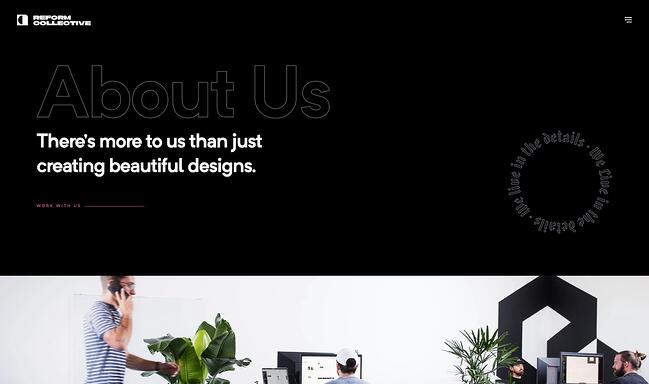
Design agency Reform collective features one of the most cinematic scrolling experiences I’ve seen on a website. It combines fixed scrolling with horizontal scrolling to showcase each section in chunks while keeping visitors on the same page.

Each individual section mentions some piece of the company, be it their design style and philosophy, a case study, testimonials, or a contact form. If you’re looking for a long-scrolling website that presents information to visitors in a specific linear sequence, try emulating this trick — it ensures users see what you want them to and in what order.

homepage for the small business website design example reform collective

12. Sweet Dreams

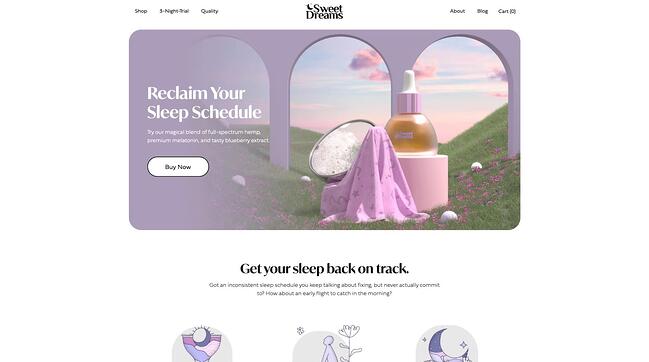
Sweet Dreams may create CBD and melatonin products for better rest, but don’t sleep on this website. Combining 2D and 3D illustrations, scrolling animation effects, customer reviews, and even interactive graphics, the homepage for this small business does a great job getting visitors in the mindset of their product before promoting the products themselves.

Informational sections are interspersed with product links so that new customers, whether sold or skeptical, know what they’re buying and how these products work. To learn more, the About page includes masterful visuals and copy to put visitors at ease. Given what they’re selling, that seems like the right approach.

homepage for the small business website design example sweet dreams

13. Panache

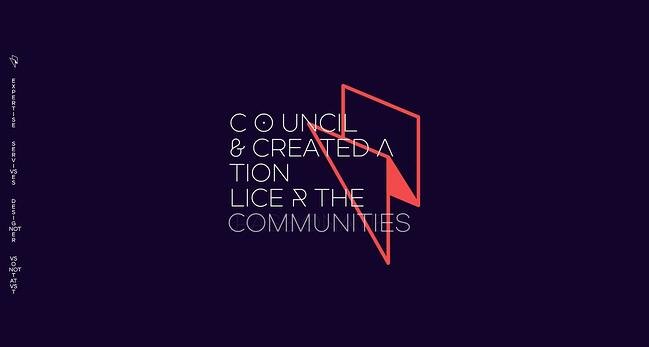
The graphic design and branding experts and Panache have proven their abilities with their one-page informational website. This is another example of how scrolling can be much more than a way to traverse the page — here, it triggers colorful transitions and animations that leave a strong impression.

Panache makes this list because, rather than including a separate gallery for showcasing the work, it blends its aesthetic approach into the construction of the site itself. This ultimately gets potential clients down to the contact form more quickly. There are also navigational links along the left side of the page in case visitors wish to return to a particular section.

homepage for the small business website design example panache

14. Scott’s Cheap Flights

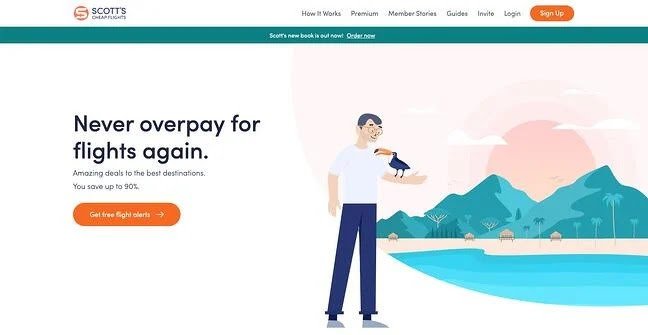
The goal of Scott’s Cheap Flights is to help U.S. travelers easily and cheaply book vacations to domestic and international destinations. Its membership website is suitably simple: Just sign up and start getting daily emails with the latest discounted flight offerings.

Once signed in, the website places its offers front-and-center — each one occupies a card with a colorful image of the destination. Clicking a card takes you to a page with information about the destination, instructions on how to book, and ticket prices by airport. Some cards are premium, and the “Upgrade” button lingers in the top right tempting users to subscribe.

Additionally, this website also provides a ton of extra value to free and premium users in its blog section. In it, there are tips for booking flights, travel advice, and guides for exploring new cities.

homepage for the small business website design example scott's cheap flights

15. Music Audience Exchange

Finally, Music Audience Exchange (MAX) creates partnerships between brands and musical artists for promotional purposes, with a website that conveys class and professionalism.

Since it caters to both artists and companies, it features two pages for both types of clients, with step-by-step guides explaining how the process works. It’s an efficient means to channel both brands and musicians alike toward an application form and a conversion.

homepage for the small business website design example music audience exchange

Big Design Ideas for Small Businesses

Designing a website is, without a doubt, a challenge for small businesses. But after some perusing, you can come up with a list of your favorite inspiration sites and what makes them pop, then incorporate these features into your own site. Plus, you probably spend a good deal of time on sleek sites already and have a good sense of what you’ll want.

Looking for more inspo? Check out all of our website design resources, including our Website Design lookbook — just click below.

examples of brilliant homepage, blog, and landing page design

Categories B2B

Best Goal Setting Worksheet to Help You Plan & Achieve

Accomplishing your goals is an incredibly gratifying feeling.

However, it can sometimes be challenging to get that feeling, as achieving your goals takes time, effort, and a structured process. This is why it’s important to create plans of action for meeting the goals that will help you stay motivated and ensure you’re on the right path.

In this post, we’ll go over a goal-setting worksheet created by HubSpot to help you outline your goals with the SMART framework and create a plan for achieving them. The template is broken down into relevant sections to help you through the process, and if you download it, you can follow along throughout the post.

Download your free marketing goal-setting template here. 

Goal Setting Steps

1. Identify your initial goal.

The first step of the process is to simply identify what your goal is. It doesn’t have to be convoluted, just merely the objective you’re hoping to achieve. For example, if you’re hoping to grow your website, your baseline goal could be “I want to generate more site traffic.”

2.Define your SMART goals.

The second step in the process is to use the SMART framework to elaborate your goals to ensure that they’re clear, measurable and that the process will help you get there. Here are is what each of the element in the acronym stands for:

  • Specific: A specific goal clearly outlines what you’re hoping to improve. If you share your specific goals with your team, it should be clear what your intention is.
  • Measurable: Making your goal measurable means attaching numbers to your objective that will help you understand what you have to meet, track your progress, and see how long it will take you to reach your end goal.
  • Attainable: Making sure that your goals are attainable means that they are realistic and that you have a chance of achieving them. Your goal is not too out of left field or so unrelated to your current practices that you wouldn’t be able to succeed.
  • Relevant: Ensuring that your goal is relevant involves answering the question of “Why are you setting the goal that you’re setting?” Your goal should directly relate to your business’ needs and help your business grow.
  • Time-Bound: The final aspect of your goal-setting process is to set a timeline. It helps you understand what your schedule should be and stay on track in terms of achieving your ultimate goal.

Goal Setting Template

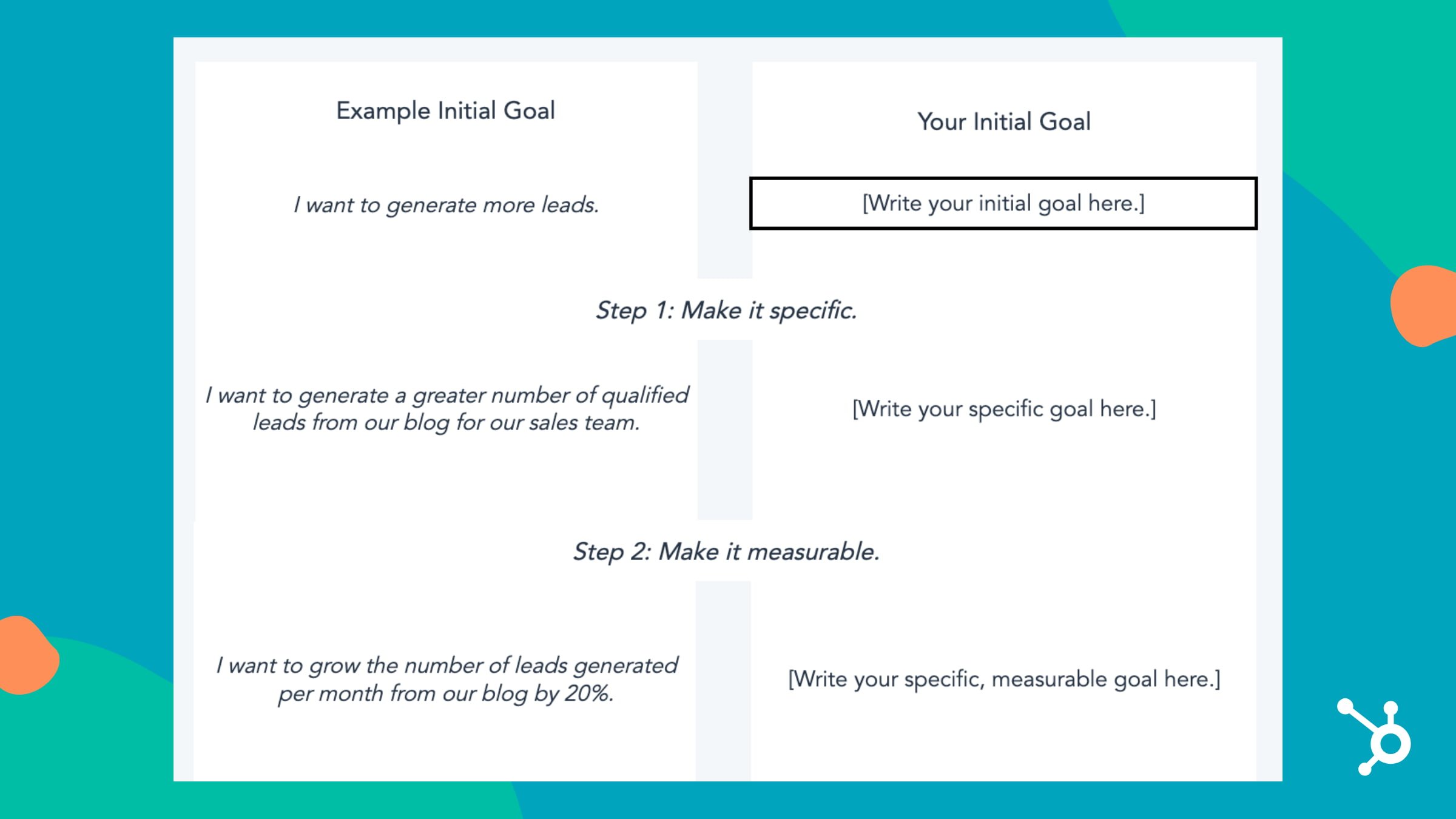
It’s always helpful to have a worksheet guide you through your process, and the image below is an example.

sample goal setting template section for outlining initial goalsDownload Template Here

Once you’ve finished defining your goals, the next step is to calculate your targets so you know what your final numbers should be and so you can plan your process accordingly, so you’re able to meet those final numbers.

2. Calculate your goal outcomes.

The most challenging part of your plan might be coming up with numerical targets that coincide with achieving your goals. You can just say, “We want to increase blog leads by 25%,” but what would the 25% increase be in numerical form?

When you have these numbers, you can set milestones for yourself and monitor your progress and make changes along the way if necessary.

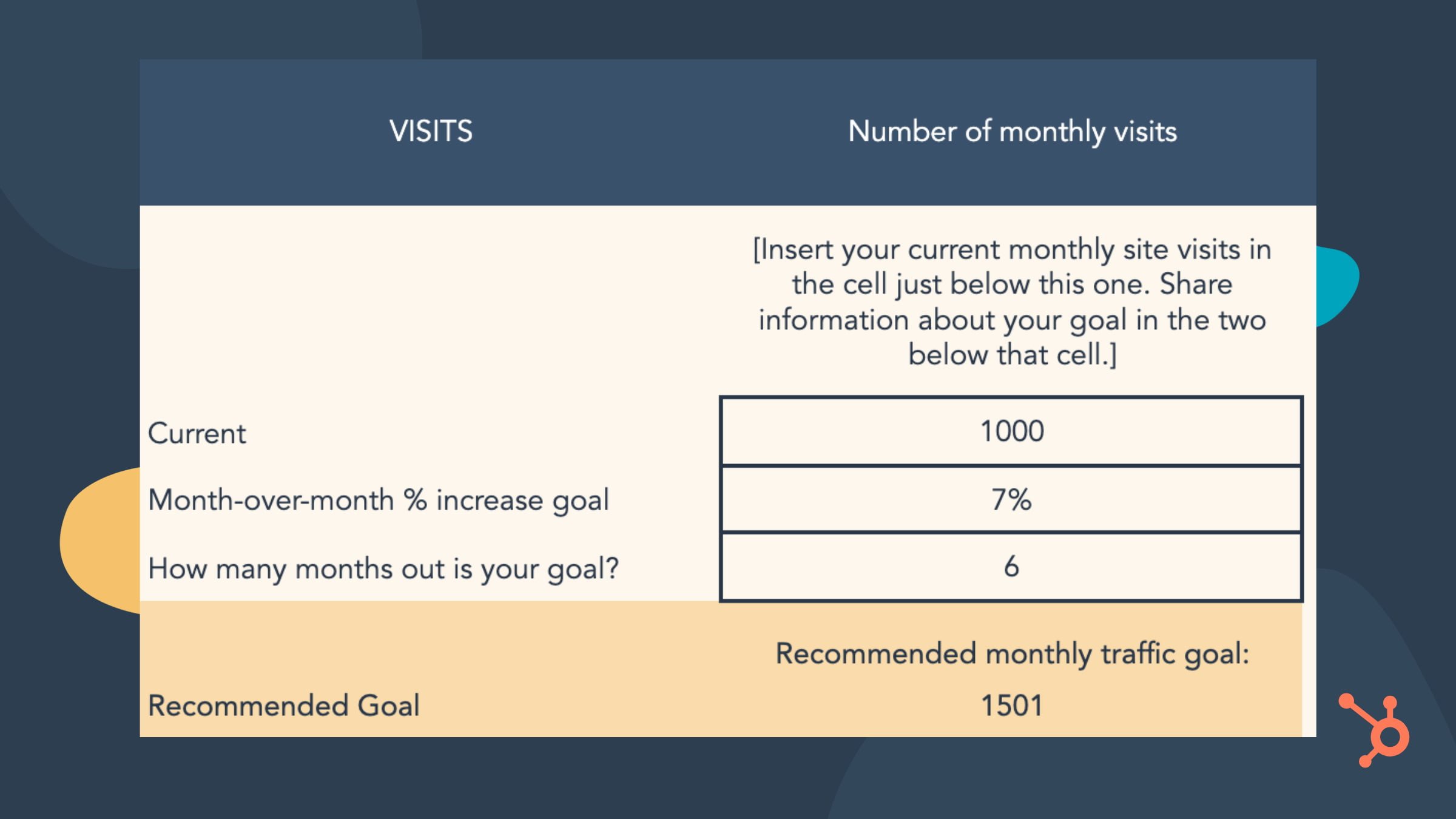
The image below is an example of a SMART goal calculation.

example template for applying numerical values to your SMART goalsImage Source

3. Evaluate your SMART goals.

The template’s final step is to evaluate your goals, which helps you anticipate possible roadblocks and develop action plans for dealing with them. If you have multiple goals, aim to ask these questions for each one that you have:

  1. What is your SMART marketing goal?
  2. Do you feel that this goal is realistically attainable in the time frame you’ve set?
  3. How many hours per week can you dedicate to achieving your goal/your goal process?
  4. What is the biggest challenge preventing you from achieving this goal? What are possible challenges you may face in achieving this goal? What is the biggest roadblock(s) to achieving this goal?
  5. What three steps can you take to reduce or remove that challenge and succeed in reaching this goal?

All in all, following this framework makes your goals explicitly clear for yourself and helps you communicate their importance to all necessary stakeholders, so everyone is on the same page. To get started, download our template for free and start achieving your goals.

New Call to action

Categories B2B

21 of the Best Brands on Instagram Right Now

Contrary to what your friends’ photos suggest, Instagram isn’t just a social network for selfies and brunch pics. In fact, Instagram has over 200 million businesses that use its platform and 90% of users follow at least one of them, according to 2019 data.

New Data: Instagram Engagement Report [2021 Version]

In a time when visual content remains a crucial part of any brand’s marketing strategy, Instagram marketing presents a unique opportunity to showcase your brand identity.

Ready to get inspired? Check out this list of brands that are thriving on Instagram right now, and why their posts set them apart.

Best Brands on Instagram

What makes a brand great on Instagram?

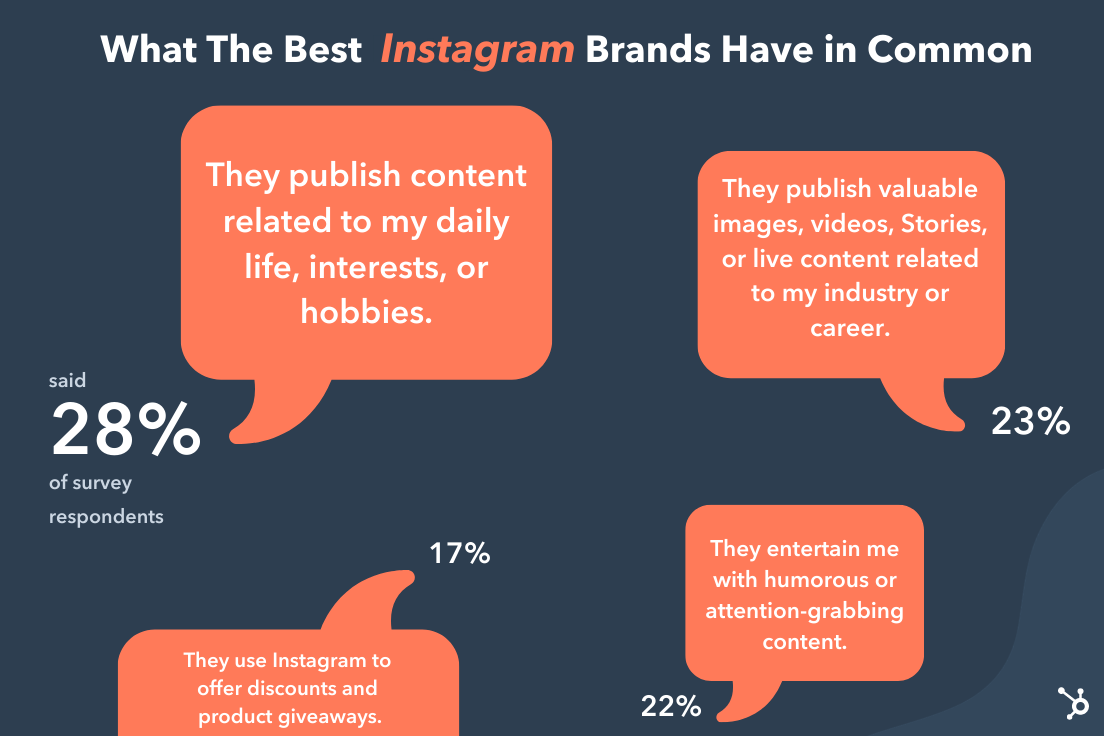
We polled 301 users across the United States, and asked “Which of the following describes the brands you follow and enjoy on Instagram?”

These were their top answers:

What the best Instagram brands have in commonData Source

While this data is from a small sample, it does highlight what we already know about Instagram audiences. They look for:

  • Content that relates to their lives: both personal and professional.
  • Eye-catching, fun content.
  • Product promotions

What you’ll see in the next section is that every brand featured meets these needs, earning them high follower counts and high engagement rates.

Psst Want to get a stunning Instagram Story auto-magically created for your brand? Check out StoriesAds.com, a free Story generator from HubSpot and Shakr. Click here to get started.

1. Netflix’s Strong Black Lead

Followers: 682k

Here is an example of a brand that has mastered the art of having its own identity while remaining connected to its parent brand.

Strong Black Lead is a sub-brand under Netflix dedicated to amplifying Black stories in media.

The brand’s Instagram page mainly features screen grabs and short clips from TV shows, movies, and documentaries available on Netflix that feature Black actors and/or directors. They stay on-trend, posting relevant content based on current events, holidays, and buzzy topics.

In addition to its appreciation posts for widely loved TV characters, Strong Black Lead also promotes content the brand hosts on other platforms, such as podcasts and YouTube content.

2. Califia Farms

Followers: 303k

Warning: If you’re hungry, don’t head to Califia Farms’ Instagram page.

The brand’s food photography makes it stand out among the rest, showing users how Califia Farms’ products can be used to create dishes ranging from pancakes and nice cream to artichoke dip and fettuccine alfredo. Califia farms instagram page

The brand doesn’t shy away from featuring its product in the images either. You can usually find it somewhere in its visual content, whether it’s the main subject of the photo or more in the background.

3. Anima Iris

Followers: 33.4k

You probably thought this list would only feature enterprise-level brands, huh?

Well, there are a ton of brands that have found the magic recipe on Instagram and Anima Iris is one of them.

Anima Iris instagram page

What sets this brand apart is the transparency of its CEO.

If you watch one of Anima Iris’ Instagram Stories, you’ll probably see its CEO, Wilglory Tanjong, showing the behind the scenes of running a luxury purse brand, which helps its audience feel more connected.

You’ll probably also see Q&As, surveys, and user-generated content – all strategies that have helped the company build a strong online community and gain brand loyalists.

4. Lorna Jane

Followers: 1M

Lorna Jane instagram page

If your brand were a person, how would you describe its personality? Australian activewear company Lorna Jane has done an awesome job answering this important branding question with its Instagram content.

Spend just a few seconds scrolling through these photos, and you’ll quickly be able to name the target Lorna Jane buyer: a young, sporty, twenty- or thirty-something woman who values looking good while maintaining an active lifestyle.

The images posted by Lorna Jane, which often show the brand’s clothing and accessories, as well as images of women who embody its target buyer persona, are colorful, playful, and inspirational, which is a perfect representation of the brand’s essence.

5. Letterfolk

Followers: 353k

Letterfolk is a small business run by a couple who create and sell beautiful, handcrafted felt letterboards. Each letterboard comes with a full set of characters so people can personalize the walls of their homes, which means endless room for creativity.

Instagram is the perfect platform for them to inspire customers and aspiring customers with real customers’ boards, as well as ideas they’ve come up with and staged themselves. Their Instagram content is funny and relatable – a great recipe for shareability.

Not only is this photo showing a funny and clever message, but it’s also very relatable. That’s why the comment section is rife with Instagram users saying things like, “No truer words have been said” and “The struggle is real.

6. Apartment Therapy

Followers: 3.1M

Apartment Therapy’s Instagram account really is a source of therapy, if you love the sight of cozy homes.

Here are a few recent posts to Apartment Therapy’s Instagram feed. Apartment therapy instagram feed

From home decor inspiration to fun challenges like their #SmallCoolChallenge contest and trendy user-generated content (UGC), this brand gives its followers plenty of inspiration to personalize their own space and “live happy, healthy lives at home,” as written in their profile bio.

7. Sunday II Sunday

Followers: 20.1k

Sunday II Sunday is another small business with a robust social media presence.

The brand describes itself as “haircare for active women.” As such, its content revolves around having and managing an active lifestyle.

Sunday II Sunday also does a great job of engaging its followers, asking them questions about their routines, workouts, and hair care habits.

8. Tentsile

Followers: 203k

Tentsile instagram feed

“Stunning” is the first word that comes to mind when I scroll through Tentsile’s Instagram photos.

Tentsile sells tree tents, what they call “portable treehouses” to elevate your camping experience. Its Instagram page is full of beautiful lifestyle images of their products in just about anywhere in the world: rainforests, mountains, beaches… you name it.

What the brand does well is leveraging its UGC. This saves time and resources, plus giving the brand some social proof.

9. Desenio

Followers: 1.8M

Desenio instagram feed

The first thing you’ll notice when you land on Swedish online art print company Desenio’s Instagram page is color blocking.

Every image blends beautifully with the one next to it, creating a cohesive, visually appealing page you never want to leave.

Even when using user-generated content, the brand ensures it fits within its aesthetic. Establishing consistency in your creative assets is key in ensuring brand recognition (i.e., when people see your image anywhere, they know it’s you.)

However, from time to time, Desenio will stray away from its usual look, which creates even more intrigue.

The post above was a simple holiday card from Desenio, but it was so dramatically different from the look and feel of the business’s usual interior design, followers just had to click through to see more.

Many of the comments included exclamations of how beautiful and evocative the post is. One commenter was inspired enough to describe what winters are like where they live.

10. Bolden USA

Followers: 32.1k

Instagram is all about visuals. This means that within minutes of being on Instagram, a user can be bombarded with images.

So, the question is: How do you make sure your brand stands out and is memorable?

One way is by developing a unique aesthetic and remaining consistent. Bolden USA has done just that.

Bolden USA instagram page

To mirror its green logo, the theme of Bolden USA’s Instagram is green. While the brand features other colors in its images, green is always the primary, standout color – an effective tactic to aid brand recall and recognition.

11. Vans

Followers: 17.4M

Vans is known for its stylish shoes and its Instagram business account is no exception.

The maker of the classic checkered slip-on sneakers has a flashy Instagram feed, featuring both standalone product shots and action photos of people expressing themselves in their favorite Vans gear.

One thing that’s clear by looking at Vans’ Instagram account is that its identity is no longer tied solely to skateboarding. While you’ll still see lifestyle images with skateboarders, you’ll also see surfers, cyclists, and other young, fashionable kids.

So, as your brand identity and messaging evolve, your content should also follow suit.

One of Vans’ most interesting posts was this.

Just because you’re promoting an ordinary product launch doesn’t mean the social media post supporting the launch should be equally ordinary.

Vans’ recent video, above, endorses a line of shoes called ComfyCush, but the video itself is a little, well, weirder. And for a business so dependent on style, the right amount of weird can give Vans an awesome amount of engagement.

12. Grass-Fields

Now, here’s a brand that knows how to show its personality.

This Cameroon-based clothing brand isn’t playing it safe on Instagram with static model shots and sale promotions.

Instead, Grass-Fields showcases its products through fun, vibrant dance videos, and behind-the-scenes content.

The brand also highlights Black business owners, creators, and artists on its page, which caters to Black women.

The key takeaway here is: Don’t be afraid to do things differently than it has been done if that’s what your audience responds to.

13. Finfolk Productions

Followers: 316k

Ever wanted to be a mermaid? You can come pretty close, thanks to companies like FinFolk Productions. Believe it or not, silicone mermaid tails you can put on and swim around in are quite trendy.

Finfolk Productions’ Instagram feed is full of beautifully shot photos that play into the mermaid fantasy by looking more like mythical art than real people.

One of the brand’s most engaging posts had a personal touch.

The post above is two things in one: a new product and a sentimental announcement by the company founder, Bryn Roberts.

For most of Finfolk’s followers, the white mermaid fin above isn’t just a different color from the typical fins made by the company. It’s also emblematic of Bryn’s recent wedding, for which she wanted to make a bridal-style mermaid fin that all of Finfolk’s customers would appreciate.

14. Shiseido

Followers: 660k

Shiseido started as Japan’s first Western-style pharmacy 140 years ago and has since developed into selling high-quality brightening and anti-aging skincare, makeup, and fragrance products.

Its mission is to inspire a life of beauty and culture – a mission it portrays beautifully through Instagram content.

Shiseido instagra, brand

Back in late March 2016, Instagram started rolling out the ability to upload 60-second videos – and we’ve seen some amazing Instagram videos from brands ever since, like the one below from Shiseido.

The one above lasts nearly all 60 seconds and its product demo is curiously satisfying to watch.

Hot tip: Posts featuring faces, especially for a skincare brand, are ideal for boosting social media engagement.

Don’t be intimidated by highly professional Instagram videos like theirs. You can post highly engaging videos on Instagram without a huge video team or a bottomless budget. Here’s a step-by-step guide for making great videos on Instagram without breaking the bank.

15. Sephora Collections

Followers: 835k

Sephora Collections’ brand personality is playful, colorful, and feminine. It does a wonderful job of characterizing this personality in its Instagram content, using bright colors, patterns, and fun captions.

In addition to partnering with beauty influencers, the brand also promotes content from everyday makeup users, featuring their tutorials and looks on its feed.

16. Clare

Followers: 93.1k

If you’re renovating or simply moving into a new home, you’re likely looking for inspiration on social media sites like Instagram and Pinterest.

Clare Instagram page

Clare’s Instagram features a collection of carefully curated images that meet that exact need. You’ll find everything from new product promotions to home decor tips – everything in between.

There’s also a beautiful balance of colors on Clare’s Instagram page, creating a cohesive profile that’s s inviting, warm, and inspiring.

17. HoneyBook

Followers: 82.9k

What we love about HoneyBook is how accessible its content is.

Instagram, like many social media platforms, has been slow to develop and promote its accessibility features.

Thankfully, brands like HoneyBook have taken an active approach to make their content accessible by adding captions to their videos and adding image IDs that describe every image the company posts.

For deaf, hard of hearing, and visually impaired users, these extra steps go a long way.

18. Design Essentials

Followers: 139k

Design Essentials knows that hair is more than just something that grows on your body. It can speak to a community, a culture.

That’s why the brand does more than just promote products on its Instagram page. In addition to product shots, you’ll find inspirational quotes about hair, playful memes about everyday life, and fun reposts from Design Essentials’ audience.

19. Flodesk

Followers: 36.5k

Flodesk’s Instagram is everything you want to see on social from an email marketing platform: beautiful designs and inviting content.

When you land on Flodesk’s page, you’ll gain tips on how to use its platform as well as general tips to optimize your email marketing strategy. With the use of vibrant colors and playful designs, every post is an attention grabber.

What’s more, almost every post includes a call-to-action that invites the audience to engage. Whether it’s to drop an emoji in the comments or answer a question – engagement done right.

20. Omsom

Followers: 35k

Omsom is another small business that has leveraged its CEOs, two first-generation Vietnamese sisters, to build a community on Instagram.

As you scroll through Omsom’s Instagram, yes, you’ll find beautifully crafted images showcasing the dishes you can make using the brand’s food products. However, that’s only one piece of the puzzle.

You’ll also see many posts celebrating Vietnamese culture, and debunking Asian-American stereotypes and biases.

This strategy helps consumers connect with the Omsom beyond the delicious food and understand its broader mission and purpose.

21. Chipotle

Followers: 1.1M

Instead of reeling in consumers with food pictures, Chipotle has chosen another route: hilarious memes.  

While you may find the occasional food post, the brand has focused its Instagram strategy on showing its personality. 

Here’s why it works: Memes are shareable and tag-friendly, which helps Chipotle reach new consumers as people tag their friends in funny, relatable posts. 

The common thread in all the brands featured is that they had a consistent brand identity that was reflected in their visuals and a deep understanding of what resonated with their audience.

Ready to populate your Instagram timeline with pics and videos that are as captivating as the content above? We believe in you!

instagram statistics

Categories B2B

38 Fun Corporate Team-Building Activities & Outing Ideas Everyone Will Enjoy

Are you starting to notice some droopy shoulders around the office? It sounds like it’s time to plan a team outing.

Team outings are a great way to facilitate bonding with your team members, reduce employee stress, and give them the chance to get to know one another outside of the office.

And, you know, they’re entertaining.

But how do you find ideas for a great team outing? Maybe you start with a Google search for “team outing ideas” and stumble upon an article that suggests “field trips” and “professional development activities.” It sounds like a starting point, but where’s the real excitement?

Download Now: Free Company Culture Code Template 

Next time you plan an outing for your team, cut the trust-falls and get one of these ideas on the calendar instead. We have something for everyone — from perfect activities for remote teams to large or small in-house groups to events that enhance teamwork and events that all team members can enjoy outdoors.

Why should you do team-building activities for work?

Team building activities can be embarrassing for coworkers, and some don’t even add anything that relates to the workplace. For example, while ‘trust falls’ seems like an excellent idea, forcing it doesn’t improve trust among coworkers, and what is worse, it can result in injuries when pairings are not even.

However, not all team-building activities are detrimental to your workers, as you would see from the ideas we highlight in this post.

One of the most significant advantages of the right team-building activities is that it boosts morale among your workforce. Team members get to work together on exciting and challenging activities and can display their skills and talents.

Team-building activities and games that boost morale can break down barriers among employees and create an environment that is nice to work in, which is vital to a successful and well-functioning business.

The ultimate goal of team-building activities is to get your team members to bond and build trust with each other. People with different backgrounds, needs, ambitions, and personalities make up teams.

By engaging in the right team-building activities, you can bring these different people together to build a bonded, trusting team.

When your team bonds, it results in several benefits for the company. Some of these benefits include:

1. Improved Communication Skills

Communication between staff and departments is essential to a company’s success. Team-building exercises put people in a relaxed environment and encourage them to communicate while completing tasks.

2. Improved Productivity

Better communication skills will have a domino effect on productivity levels. When your employees work together and communicate, there is less work duplication and less friction between workers.

3. Identifies Leaders

Another benefit from team-building exercises is that managers can discover leaders within the workforce while engaging in team-building activities.

Regardless of the type of event that you want to enjoy, here are eight essential things to consider:

1. Define your goals.

You must determine clear areas of focus that you want to enhance during team-building events. Only after selecting the activity’s goals can you successfully choose the activities and challenges that would best fit the occasion.

2. Set a budget.

A budget needs to be determined after you have decided on your priorities. With a realistic budget, you can ensure that the price of the event doesn’t run out of control.

3. Set up a planning team.

As you begin planning, you will discover how difficult it can be for one person to organize a team-building event. There are so many things you need to prepare for, and the best way to deal with these things is to delegate responsibilities.

4. Invite and involve the right people.

Sometimes, it is easy to determine who to invite. Some other times, it can be challenging choosing who to invite. To help you, ask yourself (or the planning team these questions):

  • Is it a compulsory event?
  • What is the maximum number of people that the budget and venue can accommodate?
  • Will remote employees be invited?
  • Can anyone attend the event?

Answering these questions can make it easier for you to invite the right people.

5. Select the right activities.

After determining the goals of the team-building event, you should have a clear idea of activities that will align with these goals.

It is best to choose activities that are interactive, engaging and that build collaboration among employees.

6. Choose a great time.

The best time for a team-building event depends on the schedule and personal lives of those you plan to invite. Ensure that invitees are free before you commit to a day and time. You also need to take the weather and season into account when choosing a date – especially if organizing an outdoor activity.

7. Choose a good location.

The location is one of the factors that can make or mar your event. You need to avoid places that’ll not accommodate enough people or that aren’t suitable for the activities you’ve planned.

8. Market the event internally.

Marketing the event internally will likely build excitement among employees. Developing and distributing an “Event Day Agenda” that highlights all the activities employees will enjoy will increase expectations for the day and get folks excited.

Remote Team Building Activities

1. Virtual Break Room

The simple chats that happen on the office floor are sorely missed. Since most members of your team still work remotely, a virtual break room is an excellent team-building activity.

You can create this via Zoom or some other platform where staff can log in and join over their lunch or break – allowing them to catch up with coworkers as they would in a physical office.

You can also keep water cooler moments alive by encouraging workers to share interesting photos or videos.

2. Virtual Escape Room

Since the pandemic made physical escape rooms impossible to visit, a Virtual Escape Room brings the mystery to your workers right in their homes!

Depending on the Escape Room you choose, team members have to pass through different rooms, solve the puzzles they encounter, solve a murder, and so much more!. It is just as fun as it sounds, and what is more, it builds collaboration and communication among staff.

3. Beer Making

In this team-building exercise, team members become brewers for a day right from their homes. The process does not require prior knowledge as Beer Making Experience walks participants through each step of the journey. Kits are also delivered to interested staff.

4. Virtual Scavenger Hunt

You can quickly organize this team-building activity over a Zoom call. On the call, challenge team members to collect different items from around their homes.

The first person to show all the required items wins the hunt!
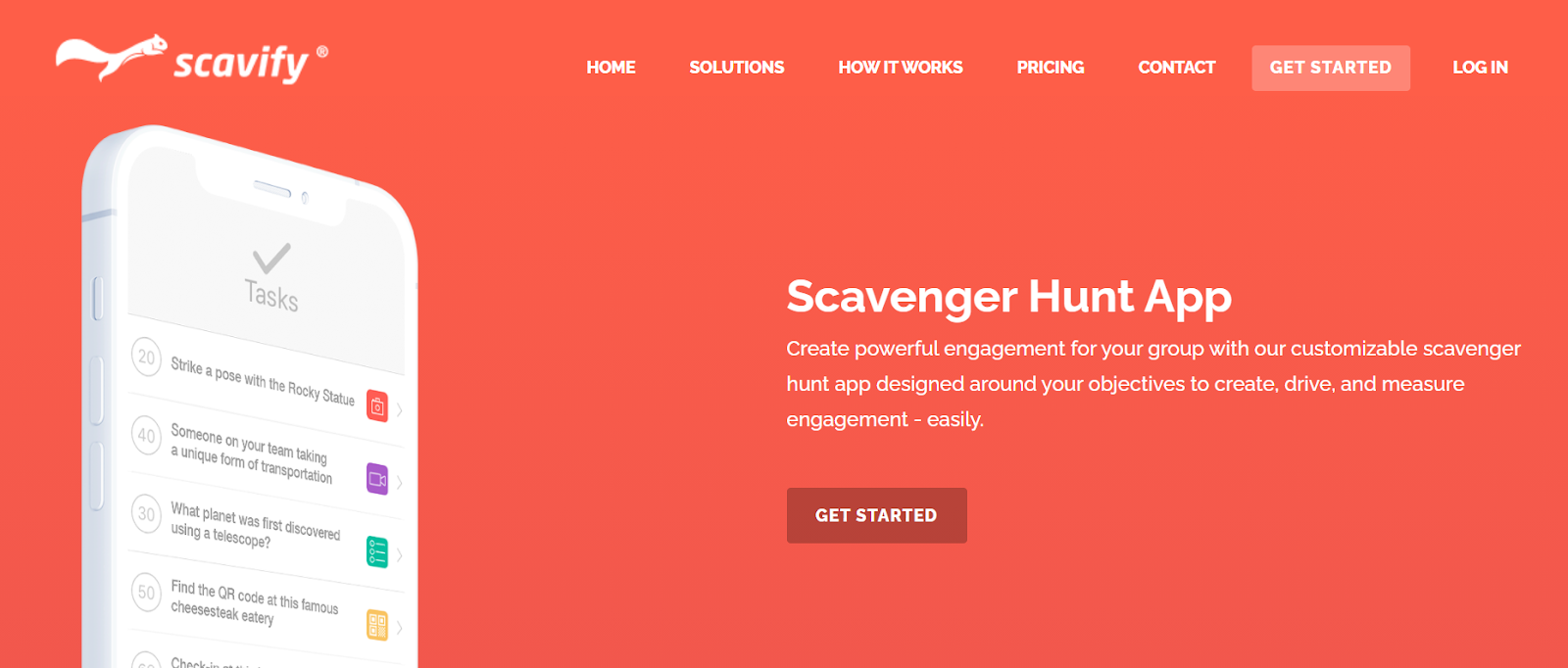
host a virtual scavenger hunt for a corporate team-building activitySource: Scavify

5. Set Competitive Challenges

A little friendly competition never hurts any team – on the contrary, it can strengthen the bonds of unity.

Setting up challenges for your teams can give them a goal to work towards. One popular challenge is the fitness challenge. It provides healthy competition between teams and improves their health.

6. Icebreaker Quizzes

These quizzes are an exciting and safe way to do team-building weekly. You can choose an online ice-breaker quiz like Quizbreaker, which sends out a new round of quizzes weekly to the team. It can work wonders to bringing remote teams closer as they learn more about each other while having loads of fun.

7. Visit Paris Virtually

One challenge many HR departments face is onboarding new hires. Virtually visiting new places with tools like Woyago is a unique and exciting ice-breaker. The virtual tour offered by Woyago has real-life Parisian guiding participants while throwing challenges along the way.

visit paris virtually for a corporate team-building activitySource: Woyago

Large Group Team Building Activities

8. Scavenger Hunt

Find a beautiful day, break everyone out into groups, and have a scavenger hunt around the city. You can organize one yourself or use a creative service like The Go Game (which lists companies like Netflix, Facebook, and HBO among clients) or Stray Boots.

Your team members will feel nice and rejuvenated after some fresh air and fun challenges. Be sure to take plenty of silly pictures — you can even have a slideshow when everyone regroups at the end.

Alternatively, you might try a “Random Acts of Kindness” hunt. For instance, Outback Team Building & Training offers this team building activity, which requires teams to split up into groups, download Outback’s app, and complete a series of challenges to benefit strangers in the community.

host a scavenger hunt for a corporate team-building activity

Image credit: The Go Game

9. What’s My Name?

You might have seen this game played before. It goes by different names, and the more people who play, the better it is.

What’s My Name is an activity where each player is assigned the name of a person — dead or alive — and displays that name on their back, head, or part of their body such that only the other players can read the name. You can write these names on index cards or Post-it notes.

Once team members have been assigned a name, the players mingle with one another, treating their coworkers the way they’d treat the person listed on that coworker’s card. They can also ask questions about their own hidden identity until they correctly guess who they are.

What’s My Name has no complicated rules or potential for competitiveness. It’s simply an empathy-builder — a critical ingredient of good company culture — allowing team members to find out what it would be like to be treated the way someone very different from them might be treated every day.

10. Cook-Off

Here’s a culinary team-building activity that could end in dessert or disaster — in a fun way. Creating new dishes together requires creativity and will require everyone to put their team and leadership skills into action.

Divide your team into smaller teams, pick a food category, and challenge each team to whip up something delicious. The category could be anything from ice cream, to salsa, to pizza.

One fun twist you could add? Pick a single ingredient that all teams must use, like maple syrup or Oreos. Or, have each team get creative thinking caps on with the shape of its food — you can make pizzas into almost any shape.

11. Sneak a Peek

What do you get when you add a test of memory to a game of Pictionary? Sneak a Peek. In this game, team members break off into groups of at least four and take turns recreating objects from memory.

Using LEGOs, clay, building blocks, or a similar set of construction items, one game leader will craft an object or structure for every group to recreate. A member of each group then has 10 seconds to “sneak a peek” at the structure (which is hidden), return to their groups, and describe what they saw to the rest of the group so they can recreate it.

Each group has its LEGOs, clay, or building blocks. If it isn’t complete after a minute of recreating the structure, another member of each group sneaks a 10-second peek at the game leader’s object and comes back to instruct the group further.

This rotation continues until a group is confident they have recreated the item. The object of the game? Be the first group to recreate it.

Not only does this game help team members practice project management, but it shows you how to accomplish tasks using input from a variety of sources. It’s also just a fun way to see how good your coworkers are at retaining information.

12. Board Game Tournament

Here’s one way to spark your team members’ competitive sides without having to leave the office. Organize a team-wide board game tournament.

Especially if your team is pretty big, it might be easiest to pick a single game, then have one team member sign up for specific time slots when they’re free to leave their desks and spend some time playing the game.

Some great games with reasonable play times include Boggle, Jenga, or even games using good ol’ playing cards. Don’t forget to incentivize with prizes for first, second, and third place.

13. Office Trivia

Who says trivia night only takes place at the bar? Office trivia is the perfect way to bring a large group of colleagues together and challenge the brain in areas that don’t necessarily apply to their daily jobs. Break the company into teams of four or more and offer small prizes for the teams who score the most points.

Want to write your own trivia questions? For reference, trivia questions are generally sorted into categories — four or five trivia questions per category — with optional bonus questions at the end of the game.

While you can give each question a point value, you can also assign each team a certain amount of points per category that they can bet, instead. Each team can then bet as many or as few points as they want per question until they’ve used all their points for that category.

Not prepared to create your own trivia questions? Hire a trivia organization to host a trivia night at your office. There are tons of national trivia companies who’d be happy to host an event right on site — District Trivia, The Trivia Factory, and the Big Quiz Thing are just a few of them.

14. 4-Question Mingle

This activity has each team member moving around and meeting each person individually. It is excellent for teams that have spent some time apart or groups that have just been formed. Armed with four questions, each person gets to know coworkers better.

Small-Group Team Building Events

15. Improv Workshop

Comedy and improv events are fun, interactive experiences that’ll have your employees roaring with laughter while teaching them useful communication and soft skills, like focus and trust.

Depending on your budget, you could do anything from simply playing improv games with your employees to bringing in professionals to run competitive, fast-paced activities.

16. Two Truths and One Lie

This is a classic house party fun activity, but it’s also an excellent ice-breaker when integrating coworkers who don’t yet know one another.

Two Truths and a Lie is simple: Start by organizing the entire group into a circle and give each person the floor to introduce themselves. In addition to providing their name, however, every team member also says three things about themselves —only two of which are true. It’s up to the rest of the group to guess which statement is the lie.

17. Karaoke Night

What better way to get your employees to break out of their shells than to have them get up and sing some karaoke? You can even have a contest for the best group karaoke performance.

Bonus points if there are feather boas and cowboy hats involved. This activity works best for a more extroverted group, so if your team isn’t into strutting their stuff on stage, consider an idea on this list that caters more to those personalities.

go to karaoke for a corporate team-building activity

Source: derekgavey

18. The “Suddenly” Story

If you’ve ever told stories around a campfire, you might have narrated a variation of The “Suddenly” Story. This activity is the choose-your-own-adventure book of team-building.

However, putting activities. You’re not just telling a story — you’re piecing a story together using the (often hilarious) imaginations of your coworkers.

To tell The “Suddenly” Story, gather your team in a circle, and offer the opening three sentences to a story about anything. At the end of the three sentences, say “Suddenly …” and pass the story onto the person next to you.

It’s their job to take your three sentences and build on the story with another three sentences, followed by “Suddenly …” Each mention of “Suddenly” allows the story to take a turn. What that turn looks like is up to the next person in the circle.

The “Suddenly” Story helps people find ways of building on existing content while also being creative when all ears are on them. Try it the next time you want to get your department together for a break, and you’re sure to get everyone laughing.

19. Go-Kart Racing

There’s nothing like a bit of competition to bond a group together. An adrenaline-pumping activity like kart racing is a great way to get employees to interact with one another in a totally new and fun way. Just make sure everyone pays attention during the safety lecture.

20. Concentration (Marketing Edition)

Here’s a professional spin on the 1960s game show. The original game show, called Concentration, put 30 numbered tiles up on a board, each tile with an identical tile somewhere else on the board. What made them similar? They had matching prizes on the back.

Over time, as contestants opened up more tiles, they had the opportunity to select tiles they knew would match up and win the prize written on the back.

Businesses — especially marketing departments — can have a field day putting logos, slogans, and company names on the back of their own tiles and having players match up every piece of the brand.

As your business grows, you can even put the names of your products, employees, and job titles on the backs of your tiles to see how well your coworkers know the company they work for.

21. Sales Exercise

This activity is perfect for your marketing team but can still be enjoyed by all types of teams and encourages creative thinking. In this building exercise, each group is given an item, from the mundane to the strange. The teams each have five minutes to come up with a creative advert. The team with the most creative advert wins each round.

Teamwork Team Building Activities

22. Professional Development Workshop

Want to encourage team bonding while providing each team member with an opportunity to learn and further their career?

Offer a shared learning experience either at your office or at an off-site workshop or conference. The activity could be specifically related to your employees’ jobs, or it could be something broader, like a negotiation or leadership skills workshop.

23. Jigsaw Puzzle Race

Jigsaw puzzles can be a tedious thing to put together alone. Maybe you have one set up at home and make progress on it for a couple of hours every weekend.

However, putting your numerous brilliant colleagues on the case makes a jigsaw puzzle an enjoyable problem-solving activity. Break the company into teams for a multi-puzzle race, and suddenly you have a test of teamwork that electrifies the entire office.

Grab several copies of the same puzzle and turn your weekend activity into a contest to see which team can complete the puzzle first. Offer prizes just like you would in a game of office trivia.

Just be sure each team has the same number of people and choose your puzzle size wisely. A 1000-piece puzzle, for example, might be a bit time-consuming for a team of just five or six people.

24. Room Escape Games

Here’s a great bonding activity that requires leadership skills, teamwork, logic, and patience. Room escape games — Escape the Room, Puzzle Break, AdventureRooms, etc. — have become a wildly popular team-building exercise for groups around the globe.

Here’s how it works: A group of people gets “locked” in a room for one hour. During that time limit, they have to find hidden objects, solve puzzles, and figure out clues to locate the key that will set them free. And it’s not easy: Only 20% of players actually make it out before the hour is up.

If you’re not sure how to convert your office space into an escape room, you can always hire a service to do it for you. Companies like Outback Team Building & Training host events that turn your office into a team-building escape challenge. And, this can invoke some great, positive memories into a space where your team works every day.

25. The Egg Drop Challenge

Chances are, you played this in school or summer camp. The Egg Drop Challenge is a beloved tradition that challenges teams of kids to create small structures around an uncooked egg to protect the egg from a high fall onto hard ground.

Each group is given specific items to build the structure that protects the egg, but nothing more. So, why not offer the same challenge to your coworkers?

Straws, newspaper, tape, and cardboard are just some everyday items provided during the Egg Drop Challenge — as you can see in the sample egg fortress below. However, consider making it even more challenging for your coworkers and allow them to use simply anything available in the office.

The height of the fall is up to you. But ensure to set an altitude that’s consistent with the materials each team has to work with.

egg drop challenge for a corporate team-building activity

Source: Buggy and Buddy

26. Laser Tag

Another great way to get your adrenaline pumping? A good old game of laser tag. Not only is it great fun, it’s also an opportunity for employees to exercise their strategy and logic skills, as well as teamwork skills. Bonus: Determine teams ahead of time and have people dress up.

27. Catch Phrase

In this classic party game, players team up and take turns describing words and phrases to their teammates without saying the word or phrase itself. Phrases can include celebrities, expressions, or just simple things found around the house.

If my phrase is “needle in a haystack,” for example, a clue I might give to my teammates could be “a pointy object buried inside farm equipment.”

Catch Phrase is the perfect way to get your employees together and teach them how to communicate with one another. (Don’t worry, everyone will be having so much fun, they won’t realize that’s what you’re doing.)

This game is often played with a basket of phrases on slips of paper, but it became so popular, Hasbro made an electronic version.

28. Game of Possibilities

To play this game, give an object to anyone in each group. Then ask each person to demonstrate in front of their group — without talking — what the object is used for. The rest of the team has to guess what object the person is demonstrating. Demonstrations must be creative and original. It can be played in small groups and only requires random objects.

Outings and Events Team Building Activities

29. Volunteer

Giving time to support a good cause isn’t just good for the soul; it’s also an excellent way for your team members to bond. Place-based volunteering ideas include volunteering at a local soup kitchen, helping build a Habitat for Humanity house, or delivering gifts to children’s hospitals during the holidays.

Skill-based volunteering is a terrific way to stretch your employees’ expertise: It’s when your team volunteers its time and uses its professional skills — anything from marketing to app development to writing — to help a nonprofit.

Try VolunteerMatch.org for either type of volunteering opportunity and Catchafire.org for skill-based volunteering opportunities.

30. Mystery Dinner

Mystery dinners are one of the most beloved traditions here at HubSpot. On a single night, you send a group of folks from different teams within your company to dinner somewhere in your city (or at someone’s house).

The dinner is hosted by one of your company’s leaders and paid for by the company. These dinners allow random groups of people from the same company to spend an evening chock full of good food and conversation together.

What makes them a mystery dinner? The only thing participants should know about the dinner ahead of time is the date and time. Send each group an email with the name of the restaurant they’re going to and who they’ll be going with, so they can arrange transportation together.

Optional: Give every dinner host the name of a restaurant or bar to invite everyone to congregate once the dinners are over.

host a mystery dinner for a corporate team-building activity

31. Kayaking/Canoeing

Nothing says “let’s work together,” quite like trying not to end up in the water. Want to take advantage of the outdoors? Grab a paddle and head down to the closest river for a great spring or summer outing.

Many public rivers and ponds have boat houses where you can rent kayaks and canoes — and you can encourage folks to rent multi-person ones and pair up with people they don’t usually work with.

go kayaking or canoeing for a corporate team-building activity

32. Trampoline Park

Hey, who says trampolines are just for kids? Take your team to a trampoline park for some jumping fun and a chance to work off the day’s stress. Many cities have local places with trampoline activities — if you’re in the Boston area, check out Skyzone for trampoline dodgeball and basketball games.

33. Something Touristy

Embrace your city! Pick a hot tourist destination and go as a team. You can even do a Segway tour. (Fanny packs: optional.) It’ll be nice to laugh at how silly it feels to be a tourist in your own city, and you might even learn something new.

34. Painting Class

If you’re looking for a slightly more relaxing activity, take a group painting class. Paint Nite hosts painting classes by local artists at various bars throughout major cities for painting on canvases, wine glasses (like in the picture below), and so on. It’s a great way to let your team members unwind, catch up over some drinks, and express their creativity.

go to a painting class for a corporate team-building activity

35. Cooking Class

In the mood for something a little more culinary? Change up the usual outing to a bar or your local restaurant, and try a cooking class. Through a service such as Kitchensurfing, you can hire a professional chef to cook a fancy meal for you in your home or office kitchen.

Between the multiple courses prepared before your eyes, your team will have plenty of time to strike up a conversation and enjoy the delicious aromas.

go to a cooking class for a corporate team-building activity

36. Explore a New Place

Few things are more fun than getting out of the city and exploring for a day. So, why not do it with your team?

For bigger events — maybe every quarter, when you have more budget to use for outings — charter a bus and take your team to a new place. You can all take a historical tour of the new place, grab lunch at a restaurant serving the town’s finest, or take in a local attraction together.

explore a new place for a corporate team-building activity

37. Sports Game

Round up the team and head out to a sports game. What a fantastic way to rev up team spirit while combining both competition and camaraderie.

38. Go Camping

Get away from the hustle and bustle of work and city life by heading out to a camping site in your area.

Bond with your coworkers over camp stories, marshmallows, and campfires. Walk into the woods as coworkers and come out as friends!

Bring Fun To The Workplace!

These are just some fun team-building activities that you can use to get the best out of your team. Be sure to use any of the activities listed above to build a firm foundation of trust and purpose between your employees.

Now you’re ready to show your team a great time while increasing their happiness and creating a great company culture. And hey, you might just be the “cool boss” now. How cool would that be?

Editor’s note: This post was originally published in August 2018 and has been updated for comprehensiveness.
company culture template

Categories B2B

Variable Cost Explained in 200 Words (& How to Calculate It)

There’s a frustrating truth that every business deals with early into its growth: More money, more problems.

It seems counterintuitive — if sales and revenue are up, isn’t that a good thing? How are bigger profits a potential problem?

Put simply, it all comes down to the fact that the more you sell, the more money you need to spend. This includes marketing and sales campaigns to reach more customers, the production costs of more goods, and the time and money required for new product development.

Known as variable cost, this sales/spend ratio is something every business owner should understand, but online advice listicles and action plans often assume readers have an intrinsic knowledge of this concept rather than providing a working definition.

In this piece, we’ll clear up variable cost confusion: Here’s what you need to know about variable costs, how to calculate them, and why they matter.

Click here to download 8 free marketing budget templates.

Let’s examine each of these components in more detail.

Variable Cost Per Unit

The variable cost per unit is the amount of labor, materials, and other resources required to produce your product. For example, if your company sells sets of kitchen knives for $300 but each set requires $200 to create, test, package, and market, your variable cost per unit is $200.

Number of Units Produced

The number of units produced is exactly what you might expect — it’s the total number of items produced by your company. So in our knife example above,if you’ve made and sold 100 knife sets your total number of units produced is 100, each of which carries a $200 variable cost and a $100 potential profit.

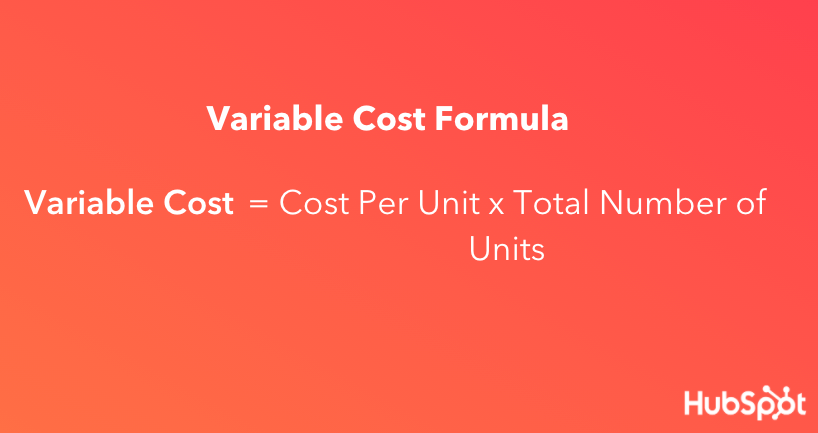
Variable costs earn the name because they can increase and decrease as you make more or less of your product. The more units you sell, the more money you’ll make, but some of this money will need to pay for the production of more units. So, you’ll need to produce more units to actually turn a profit.

Variable Cost Formula

And, because each unit requires a certain amount of resources, a higher number of units will raise the variable costs needed to produce them.

Variable costs aren’t a “problem,” though — they’re more of a necessary evil. They play a role in several bookkeeping tasks, and both your total variable cost and average variable cost are calculated separately.

Total Variable Cost

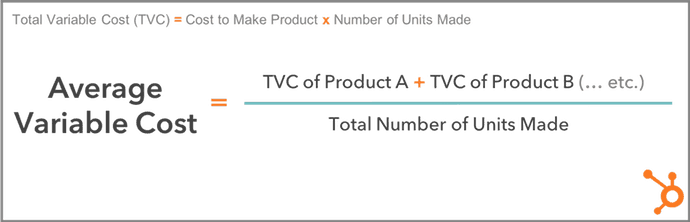
Your total variable cost is the sum of all variable costs associated with each individual product you’ve developed. Calculate total variable cost by multiplying the cost to make one unit of your product by the number of products you’ve developed.

Total Variable Cost

For example, if it costs $60 to make one unit of your product and you’ve made 20 units, your total variable cost is $60 x 20, or $1,200.

Average Variable Cost

Your average variable cost uses your total variable cost to determine how much, on average, it costs to produce one unit of your product. You can calculate it with the formula below.

Formula for average variable cost

Total Variable Cost vs. Average Variable Cost

If the average variable cost of one unit is found using your total variable cost, don’t you already know how much one unit of your product costs to develop? Can’t you work backward, and simply divide your total variable cost by the number of units you have? Not necessarily.

While total variable cost shows how much you’re paying to develop every unit of your product, you might also have to account for products that have different variable costs per unit. That’s where average variable cost comes in.

For example, if you have 10 units of Product A at a variable cost of $60/unit, and 15 units of Product B at a variable cost of $30/unit, you have two different variable costs — $60 and $30. Your average variable cost crunches these two variable costs down to one manageable figure.

In the above example, you can find your average variable cost by adding the total variable cost of Product A ($60 x 10 units, or $600) and the total variable cost of Product B ($30 x 15 units, or $450), then dividing this sum by the total number of units produced (10 + 15, or 25).

Your average variable cost is ($600 + $450) ÷ 25, or $42 per unit.

Variable vs. Fixed Cost

The opposite of variable cost? Fixed cost. Fixed costs are costs that don’t change in response to the number of products you’re producing.

Some common fixed costs include renting or leasing a building, utility bills, website hosting, business loan repayments, and property taxes.

Worth noting? These costs aren’t static — meaning, your rent may increase year over year. Instead, they remain fixed only in reference to product production.

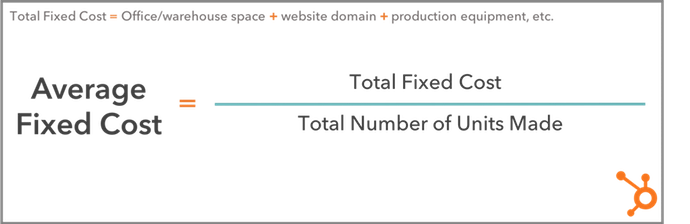
To calculate the average fixed cost, use this formula:

Average Fixed Cost formula

Both variable and fixed costs are essential to getting a complete picture of how much it costs to produce an item — and how much profit remains after each sale.

To calculate variable cost ratio, use this formula:

Variable Cost Ratio Formula

Let’s put it into practice. If you’re selling an item for $200 (Net Sales) but it costs $20 to produce (Variable Costs), you divide $20 by $200 to get 0.1. Multiply by 100 and your variable cost ratio is 10%. This means that for every sale of an item you’re getting a 90% return with 10% going toward variable costs.

Combining variable and fixed costs, meanwhile, can help you calculate your break-even point — the point at which producing and selling goods is zeroed out by the combination of variable and fixed costs.

Consider our example above again. If your variable costs are $20 on a $200 item and your fixed costs account for $100, your total costs now account for 60% of the item’s sale value, leaving you with 40%.

Put simply? The higher your total cost ratio, the lower your potential profit. If this number becomes negative, you’ve passed the break-even point and will start losing money on every sale.

So, what’s considered a variable cost to the business?

Some of the most common variable costs include physical materials, production equipment, sales commissions, staff wages, credit card fees, online payment partners, and packaging/shipping costs.

Let’s examine each in more detail.

Physical Materials

These can include parts, cloth, and even food ingredients required to make your final product.

Production Equipment

If you automate certain parts of your product’s development, you might need to invest in more automation equipment or software as your product line gets bigger.

Sales Commissions

The more products your company sells, the more you might pay in commission to your salespeople as they win customers.

Staff Wages

The more products you create, the more employees you might need, which means a bigger payroll, too.

Credit Card Fees

Businesses that receive credit card payments from their customers will incur higher transaction fees as they deliver more services.

Online Payment Partners

Apps like PayPal typically charge businesses per transaction so customers can check out purchases through the app. The more orders you receive, the more you’ll pay to the app.

Packaging and Shipping Costs

You might pay to package and ship your product by the unit, and therefore more or fewer shipped units will cause these costs to vary.

Expect the Unexpected

While variable costs, total variable costs, average variable costs, and the variable cost ratio often seem complicated on the surface, these terms are simply ways to represent the changing nature of costs to produce new items as your business grows.

By understanding the nature of these costs and how they impact your current and projected revenue, it’s possible to better prepare for evolving market forces and reduce the impact of variable costs on your bottom line.Business Plan Template

Categories B2B

Facebook Analytics is Going Away: Should Marketers Really Worry?

As marketers, we crave data.

Each day, our analytics platforms help us define who our audience is, measure how well we’re tracking them, and determine what strategies we should take on next.

And, if an analytics platform is free or affordable to use, that’s an even bigger bonus to teams in SMBs or startups.

That’s why many marketers were caught off-guard when Facebook announced that it will be sunsetting its free Facebook Analytics tool on June 30th.

But, while Facebook’s announcement might seem a bit scary, it might only impact a small number of businesses.

“Even though this tool is going away, we continue to invest in measurement products that provide insights and data analysis capabilities,” the short Facebook announcement said. 

Below, we’ll explain why Facebook’s removing its Analytics feature, why you might not need to panic, and alternatives you can use to get similar data about your audiences.

Do you know which inbound marketing metrics you should be tracking? Click here  for a free guide.

Why Facebook is Sunsetting Analytics

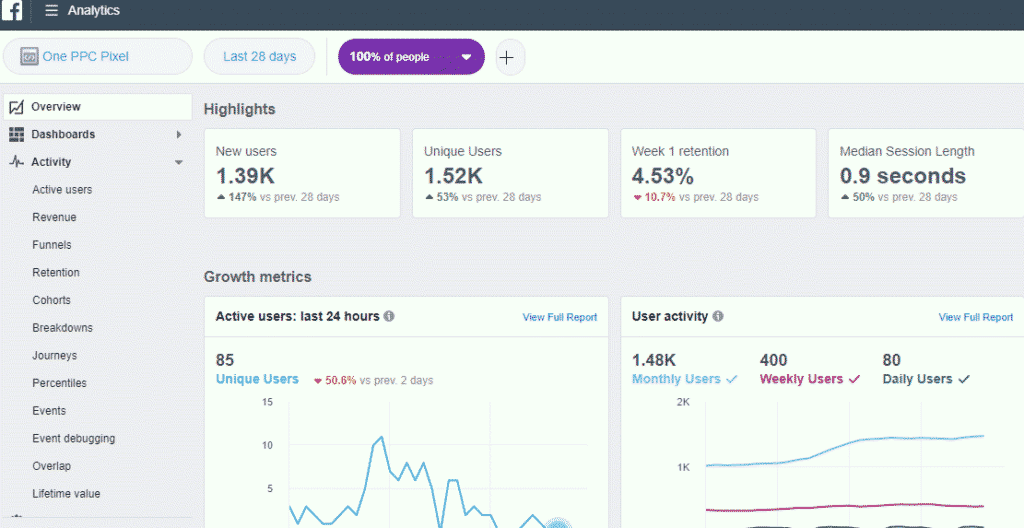
Facebook Analytics launched in 2018 as a free alternative to platforms like Google Analytics (GA). On top of tracking all your Facebook Business Page data in one place, users could also create and embed Facebook tracking pixels on their websites to see how audiences behaved and what their customer journey looked like.

Facebook Analytics UI

Image Source

Facebook Analytics could also give brands a look at your Facebook page’s details and audience demographics to help brands better inform their strategies.

Because much of the information shown on Facebook Analytics can now be found through other competitive and affordable data platforms — as well as Facebook’s Insights, Business Suite, Ads Manager, and Events Manager — Facebook decided to discontinue Analytics in an effort to consolidate its tools.

While Facebook hasn’t said if online privacy trends were a factor in its decision, the pivot comes at a time when Google and Apple have already begun to limit data tracking through the planned phase-out of third-party cookies and Apple’s recent IOS 14.5 opt-in requirements for mobile app tracking.

Because of the ongoing moves towards data privacy, it seems that Facebook could also prevent future data concerns with the streamlining of nearly extraneous Analytics tools.

How Marketers Can Prepare

Until June 30, brands can still access Facebook Analytics and download reports of all the data they might need.

To export data into a CSV file from Facebook Analytics on your desktop, click the [share icon] in the top-right corner of each chart or table,” Facebook advises

Aside from downloading data, brands that used the tool should also consider alternatives that can highlight similar data. Although Facebook Analytics was a helpful tool for some businesses looking for free or cheap platforms, there are affordable alternatives that can help you track your customer’s journey from social media to on-site conversion.

Below is just a quick list of Facebook Analytics alternatives to consider.

Facebook Analytics Alternatives

Free Tools

Facebook Business Suite

Once Facebook Analytics is no more, Facebook will encourage Business Page admins to use its Business Suite, which allows users to connect and track multiple Instagram and Facebook Business Pages at once.

Facebook Business Suite dashboard

Image Source

At the moment, Facebook Business Suite is still rolling out and might not be available for some admins just yet. However, the tools below can help you fill your data gaps as you wait.

Facebook Insights

Facebook Insights is an analytics dashboard where you can track business page user behavior and post performance. You can also see insights like page views, post reach for paid and organic posts, and competitor page data.

Facebook Insights Dashboard

If you have a Facebook Business Page, you’ve probably used Facebook Insights to gather data that can fuel your social media tactics. Luckily, Facebook says Insights won’t be impacted by the removal of Facebook Analytics.

To learn more about Facebook Insights if you’ve never used it before, check out this blog post.

Facebook Ads and Events Managers

Facebook Ads Manager and Facebook Events Manager help you launch and track ads and website conversion events attached to your Facebook Business Page.

While Ads Manager lets you view, edit, and track your Facebook campaigns, ads, and ad sets, Events Manager lets you use Facebook’s pixel and Conversions API to track and report on actions visitors take on your website, app, or even in your physical store. To use Events Manager, you’ll need to add the Facebook Pixel code to your website to make it trackable. Instructions for this can be found on Facebook’s business knowledge base.

Paid Tools

HubSpot

HubSpot’s Social Media Management Software not only enables you to link and share posts on your Facebook account, but you can also track conversions and other engagements.

HubSpot’s social media tools can help you understand which of your marketing tactics are working best among your audience, determine how your marketing efforts are impacting your bottom line, see if your campaigns result in more paid or organic social media sessions, and learn about your search engine optimization (SEO)-related ROI.

social media post analytics

Additionally, if your website is built on HubSpot’s CMS or has a HubSpot tracking code installed, you can track site conversions, traffic, and traffic sources to learn more about where your audiences are coming from and what they engage with.

page analytics and traffic sources on HubSpot analytics

Google Analytics

While Google Analytics is often seen as a high-end analytics tool, it certainly has a lot of great features that have helped marketers around the globe to transform their strategy.

While it will likely take a bit of onboarding and training for your team GA allows you to see traffic patterns, traffic sources, visitor demographics, and visitor behavior among a plethora of other helpful insights.

Google analytics panel showing traffic to a page

For a crash course on Google Analytics with photos, check out this Ultimate Guide.

Navigating Data Software Shifts

As the world evolves towards more online privacy and streamlined technology, Facebook probably isn’t the only platform that will change or evolve in years to come.

As a modern marketer, it’s important to know when to invest in new analytics platforms, alternatives, or workarounds if the tools you use are no longer relevant.

For tips on developing effective data-driven strategies, download the free resource below.

Inbound Marketing Analytics

Categories B2B

20 of the Best Free Google Sheets Templates for 2021

Whether your marketing position requires you to send invoices to clients, track website analytics, or create budget and expense reports, you’ve undoubtedly found yourself working with spreadsheets in some form.

And if you’re anything like me, those spreadsheets can feel frustratingly tedious when you’re under a time crunch.

Fortunately, Google Sheets offers 26 pre-built templates, allowing you to create reports and analyze data in spreadsheets faster and more effectively.

Best of all, Google Sheets templates cater to specific categories. For instance, if you click the Paid Traffic Report template, your spreadsheet is already organized into Overview, 12-month Trends, and Medium Breakdown categories. It knows what you need and offers it without any manual input.

Free Download: Marketing Editorial Calendar Template

Here, we’ll dive into 20 of the best free Google Sheets templates for any marketing role in 2021, so you can create better spreadsheets while saving valuable time to focus on more important things — like making sense of the data itself.

Before we properly delve into the templates, let’s see why Google Sheets is an excellent choice for free templates and how you can find these templates.

Why use Google Sheets?

Google Sheets is part of Google’s G Suite of software that has over 6 million users. Here are some reasons why you should consider using it too:

1. It’s free.

Even if you don’t pay for Google’s G Suite, you can still use Google Sheets and its templates for free.

2. It’s easy to use.

You don’t need to pick up a manual or guide before you can start using and enjoying the features of Google Sheets and its free templates.

Since Google Sheets is cloud-based, you can work on them wherever you are or on whatever device you own as long as you have an internet connection and can access the Google account where the Google Sheet is.

3. It encourages collaboration.

Unlike with Microsoft tools, it’s easier to collaborate with Google tools like Docs and Sheets.

With a few button clicks, you can share a template or Google Sheet with other members of your team wherever they might be in the world. You can also leave comments as you and your teammates work on the same sheet in real-time.

You can also download your sheets or templates if you like.

How to Find Templates In Google Sheets

There are two common ways you can find and use free Google Sheets templates.

1. Google’s In-Built Template Gallery

On your browser, go to Google Sheets. Click “Template Gallery” at the top right. Explore the templates to find the right one for you.

Google’s In-Built Template Gallery

You’ll find different templates for your personal, work, and project management needs. Here’s an example of what the Personal template library looks like:

Google’s In-Built Template Gallery for personal templates

2. Add-Ons

Another way to find free templates in Google Sheets is to download and install the Vertex42 add-on. Here’s how:

Open an existing Google sheet, or type “
sheets.new” to create a new one. Then, find and click the “Add-ons” button on the top left menu.

use add ons to find free templates in google sheets

Type “Vertex42” into the search bar, and click enter. Install the add-on.

using add ons to get templates in google sheets

To access the templates, click on “Add-ons,” then “Template Gallery for Sheets,” then “Browse Templates.”

using add ons to browse templates in google sheets

Here you would find templates that can help with almost everything you need — whether you need to create an invoice, income/expense tracker, or a dashboard to manage your projects.

add ons for finding templates in google sheets

Let’s now look at some of the free Google Sheets templates you would find useful as you run your business.

20 Google Sheets Templates

Google Sheets Templates for Finances

1. Invoices

If you’re a freelancer or work for a small business, you probably use invoices to bill clients for services. This invoice template makes the process simple — it provides space for all the necessary information and looks more professional than a plain spreadsheet. Plus, the template is customizable, so you can create a theme that aligns well with your brand image.

Click here to use this Google Sheets template.

invoice google sheets template

2. Annual Business Budget

This template is more in-depth than it initially appears. There are tabs at the bottom — setup, income, expenses, summary — and each one includes several subcategories. “Expenses,” for instance, covers everything from taxes and insurance to travel and customer acquisition.

The final tab, “summary,” takes your income, subtracts your expenses, and automatically updates to display your ending balance each month. This template is a good option if your budget requires a lot of customization and many moving parts.

Click here to use this Google Sheets template.

annual business budget google sheets template

3. Financial Statements

The financial statements template truly is an all-in-one resource to keep track of business transactions, profits, and losses. The “profit & loss” tab automatically summarizes revenue, costs, and expenses for the year and can display your growth rate percentage.

If you work for a small business and need to manage much of your finances, this template offers resources and guidance to make the process easier and less prone to human error.

Click here to use this Google Sheets template.

financial statement google sheets template

4. Expense Report

Knowing how much you spend is an essential part of running a successful business. But it’s often easy to forget to record these expenses with the amount of work you have to do every day. This simple expense report template makes it super easy to record all of your expenses and those of your employees.

Click here to use this Google Sheets template.

expense report google sheets template

5. Purchase Order

You’d find this template to be a life-saver if tracking the orders or supplies your office/department makes is part of your job. With this sheet, you can save time and avoid the headaches that come with monitoring orders or shipments.

Click here to use this Google Sheets template.

purchase order google sheets template

Google Sheet Templates for Reporting and Analytics

6. Website Traffic Dashboard

Suppose your role requires you to analyze website traffic using Google Analytics. In that case, this template is a fantastic supplemental tool to pull that data into an organized report, saving you tons of time. Better still, you can use the dashboard template with Supermetrics Google Sheets add-on to monitor and analyze data from PPC, SEO, social media, and website analytics.

Click here to use this Google Sheets template.

website traffic google sheets template

7. Website Paid Traffic Report

This template makes the process of analyzing and reporting on paid traffic relatively seamless. It automatically collects data on your paid sources from Google Analytics and provides a clean chart with important information, including PPC’s percentage of goal conversions, total traffic, and bounce rate.

You can also adjust it to compare different periods or different channels or segments. If you’re looking for a way to demonstrate paid’s influence on your business, this is the tool to do it.

Click here to use this Google Sheets template.

paid traffic report google sheets template

Google Sheet Templates for Customers

8. CRM

To organize your contacts and automate an effective sales and marketing process, you must have a CRM — but if you’re a small company just starting, you might not feel ready to implement a fully established CRM with all the features.

This CRM template is a great place to get your feet wet. It saves automatically, so you never lose data. The share feature allows you to work with coworkers within the CRM, which helps encourage collaboration between your sales and marketing departments.

Click here to use this Google Sheets template.

9. Sales Dashboard

This template helps salespeople manage their leads, sales, and revenue all in one place. At the bottom of the template are different tabs where you can easily input your data that eventually shows up on the main dashboard. There’s also an “instructions” tab to get you up to speed with using the sheet.

Click here to use this Google Sheets template.

sales dashboard google sheets template

Google Sheet Templates for Project Management

10. Project Timeline

Whether this is your first significant project or you’ve been managing projects for years, the project timeline template is a valuable tool for organizing and implementing each project step. The template helps you visually break up a daunting project into smaller pieces, ideally making it easier and less stressful to manage and delegate tasks.

Click here to use this Google Sheets template.

project timeline google sheets template

11. Project Tracking

If you’re juggling many projects simultaneously, this project tracking template could become your new best friend. This template takes project management to the next level by enabling you to organize your tasks into categories by date, deliverables, status, cost, and hours — best of all, it lets you prioritize your projects. Hopefully, simply visualizing what needs to get done first will alleviate time-management stress.

Click here to use this Google Sheets template.

project tracking google sheets template

12. Event Marketing Timeline

The event marketing template offers organization and structure if you’re implementing an upcoming business event or campaign. It provides categories you might’ve forgotten to consider, including local and national marketing, PR, and web, with subcategories ranging from an email newsletter to impact studies.

The template is already organized with all necessary categories for planning an event, reducing the time you spend on tedious manual input.

Click here to use this Google Sheets template.

event marketing timeline google sheets template

13. Gantt Chart Template

The Gantt chart template helps you alleviate any concern you might have over timing — and, when you’ve got a complex project with overlapping components, I’m willing to bet timing is one of your primary concerns.

Using the Gantt chart template helps you visualize all steps and delegate essential tasks more efficiently — labeling the task with an owner on one chart is undoubtedly easier than individually following up via email. And by sharing the template with coworkers, everyone is on the same page.

Click here to use this Google Sheets template.

gantt chart google sheets template

14. Product Roadmap

Without a product roadmap, it’s easy for your team to misunderstand the direction you want a project to take. With this template, you can solve that problem. The template provides a calendar summary of a project and the milestones and deliverables as you go through the product development process.

Click here to use this Google Sheets template.

product roadmap google sheets template

15. Product Launch Plan

This template has everything you need to organize the best product launch you’ve ever had. It has fields to help you outline your market and competitive analysis, project strategy, key messaging, and who your target audience is.

If you’re in charge of managing a product launch and want to organize the best launch ever, then this is the project management template for you.

Click here to use this Google Sheets template.

project launch google sheets template

16. Action List With Ranking

Managing a project requires that you track daily actions to ensure you don’t lose focus. But sometimes, you’ll have some tasks on your list that are more important than others. You can easily arrange these tasks based on their importance with this action list template. You can also share this sheet with others if you’re working as a team.

Click here to use this Google Sheets template.

action list with ranking google sheets template

17. Project Budget

Away from the general business budget, most managers create budgets for each of their projects. This project budget template is for you if you’re looking for a simple yet effective template that lets you quickly estimate how much revenue a project would generate r how much it would cost.

Click here to use this Google Sheets template.

project budget google sheets template

Google Sheet Templates for Leading a Team

18. Employee Shift Schedule

Keeping track of who works what hours, and how much each employee gets paid, can feel confusing, especially if you lead a team of part-time contractors or seasonal interns. This template includes slots for employee’s names, hours worked, and monthly wages, making your paycheck process straightforward and organized.

Click here to use this Google Sheets template.

employee shift schedule google sheets template

19. Weekly Timesheet

Like the employee shift schedule, the weekly timesheet helps you track time and know how much to pay employees or subcontractors. However, the weekly timesheet template works better if you want to quickly find out how much time each employee spends on a project.

Click here to use this Google Sheets template.

weekly timesheet google sheets template

20. Contact List

This template comes in handy if you want to create a contact list database. You can easily use the template to store your contact information (say, phone number and email address), your employees’ contact, and those of emergency services like the ambulance or fire department.

Click here to use this Google Sheets template.

Contact List Google Sheets Template

Start Using These Free Google Sheets Templates

No matter what your job is, using a suitable spreadsheet would make it easier and more enjoyable.

So what are you waiting for? Get started with using these 20 free Google Sheets templates to save time, effort and improve your productivity.

Editor’s note: This post was originally published in January 2018 and has been updated for comprehensiveness.

editorial calendar

Categories B2B

8 of the Top Marketing Challenges Faced Globally [New Data + Expert Tips]

Every marketer faces different challenges. Although we typically share similar goals, some teams are stuck on hiring top talent, while others are having trouble finding the right technology for their needs.

Whatever the case may be, there’s always at least one area you can improve to turn your marketing into an even more effective revenue generator. 

But marketing is often fast-paced, so it can be difficult to identify which areas you’ll want to develop to facilitate stronger growth in 2021 and beyond. For that reason, it’s important to pause for a moment and reflect on the biggest challenges marketers feel they’re going to face this year.

Why? Because problems are much easier to tackle once you’ve correctly identified them. 

So … what’s happening in 2021?

Below, let’s review the current global marketing issues impacting the industry, according to marketing experts.

Biggest Marketing Challenges [New Data]

To start, I surveyed over 120 marketers to gauge the biggest challenges affecting the industry as a whole. 

biggest challenges for marketers 2021By far, “Generating traffic and leads” was marked by nearly half as the biggest challenge marketers are facing this year. 

This challenge was followed by 21% who said “providing ROI for your marketing activities” was their biggest challenge. 

“Delivering an account-based marketing strategy” (8%), “securing enough budget” (6%), and “managing your website” (5%) were the other three notable challenges marketers feel they’re facing in 2021. 

It’s important to note, a few other marketers marked “targeting content for an international audience”, “training your team”, and “hiring top talent” as their top challenge … but these three challenges were marked by less than 3% of the respondent pool, so they’re less statistically significant. 

Let’s dive into these in more detail, along with expert tips to combat these challenges, next. 

1. Generating Traffic and Leads

Generating enough traffic and leads is the top global marketing challenge in 2021, according to the data mentioned above.

HubSpot’s new State of Marketing report supports this — in fact, “Generating more leads” is the top priority of marketers in 2021. 

Why It’s a Challenge

John Lee, Head of Evangelism at Microsoft Advertising, believes that generating leads will be a particularly big challenge for marketers in 2021. He told me, “Getting quality traffic isn’t a challenge today, and likely won’t be tomorrow. There has been growth in search and content marketing in 2021. New channels continue to surface and show promise, too (TikTok or audio chat rooms anyone?).”

“Through the 2nd half of 2021 and beyond, the challenges will lie elsewhere – maintain and growing leads or sales, tracking and scaling, etc.”

Lee adds, “‘Sea change’ is the phrase that comes to mind for the state of digital marketing today. Change in the realm of privacy, identity, and changes to cookies. Change in the form of lost data clarity (will cookie-based conversion tracking continue to work, GA4, access to search queries, etc.). And all of this sits within the context of change to how and where we work and economies in flux as the world continues to move through the pandemic.”

Fortunately, privacy changes doesn’t mean the end of generating leads — it simply means learning how to re-think strategy. As Lee told me, “To weather this storm of change, marketers need to be vigilant in monitoring and understanding industry-wide acceptance of privacy protocols and updates to search, social, and display/native platforms (consumer-side and marketing/advertising-side). And last, but not least — lean into the power of peer support and networking for sharing best practices and learning.”

Additionally, marketers are struggling with producing enough demand for their content. And as the years progress and competition stiffens, this will only become truer. With so many options of platforms for marketers to publish their content and even more ways to promote it, it’s hard to know where to focus your efforts.

What Can You Do?

When it comes to creating content that produces enough traffic and leads, marketers should ask themselves two questions: Are you truly creating high-quality content — the type of content people would pay for? And, do you know the type of content your audience actually wants?

For instance, when asked how they’d most like to learn about a product or service in 2021, 69% said they’d prefer to watch a short video over a text-based article, infographic, or ebook. This means, if most of your product-related content is in ebook format, you could be missing out on the majority of consumers who prefer video.

Additionally, the length of videos produced by businesses is increasing. In fact, the number of videos in the 30-60 minute category grew 140% in 2021, compared to 2019 — suggesting that long-form video content is becoming a more popular option for companies. 

To ensure you’re creating content that resonates best with your audience, you’ll want to refer to analytics often. Use effective tools to properly track the types of content that performs best with your audience to generate more leads in 2021. 

Additionally, once you know you’re creating the type of content your audience wants, the focus shifts to promoting it in a way that makes your audience take notice.

More than ever before, people are being flooded with content. Consumers don’t have to use a search engine to find answers. Instead, articles fill their news feed or buzz in their pocket via mobile notifications. To keep up, consider exploring alternate distribution methods — like social media or podcasting — to increase brand awareness. 

2. Providing the ROI of Your Marketing Activities

Measuring the ROI (return on investment) of your marketing activities has remained a top marketing challenge globally year-over-year.

In fact, when asked how confident marketers are when making budgeting decisions to invest in programs that influence revenue, roughly half (48%) said they were only somewhat confident.

It continues to be a vital way for marketers to understand the effectiveness of each particular marketing campaign or piece of content.

Plus, proving ROI often goes hand-in-hand with making an argument to increase budget: No ROI tracking, no demonstrable ROI. No ROI, no budget.

Why It’s a Challenge

Although return on investment is a crucial stat that shows your campaigns success or progress, tracking the ROI of every single marketing activity isn’t always easy, especially if you don’t have two-way communication between your marketing activities and sales reports.

What Can You Do?

Providing ROI often comes down to using effective analytics measurement tools. For instance, Beautiful.ai Director of Marketing Kim Giroux told me, “Marketers are constantly challenged to illustrate the ROI of their efforts and 2021 is no exception. Proving ROI doesn’t always have to mean extra work or effort though. In fact, certain technologies bake ROI into existing work processes.”

Giroux adds, “Take presentation software, for instance. Savvy marketers today can create and use pitch decks with built-in presentation analytics that offer real-time data — such as how much time was spent viewing individual slides. Armed with these insights, marketers can better gauge stakeholder interest, inform their strategies, and adjust their campaigns.”

Christina Mautz, CMO of Moz, believes measuring ROI comes down to redefining the marketing process as a whole. She told me, “My biggest challenge, and one all marketers face in providing ROI, is the prospect of meeting traditional KPIs in the modern workspace.”

Mautz says, “Instead of leads and trade show success, marketing wins are now largely digital: engaging prospects and generating more clicks, downloads, and page visits.”

CMO of Moz Christina Mautz says, “To better measure marketing progress, we have to redefine the marketing process, encouraging collaboration with sales and reaching KPIs together.”

“For example, statistics such as page visits per sale or rising higher in the search engine results page (SERP) give marketers and SEOs tangible evidence as to how their work is meeting their ROI. New buying patterns and a customer-centric world require a divergence from the old, but measuring ROI will look far different than it did before and some leaders may not understand how or why.”

When it comes to providing ROI, there’s a strong case to be made for dedicating time and resources to establishing links between marketing activities and sales results. This means using both marketing software (like HubSpot) and a CRM solution (like HubSpot’s free CRM), and then tying them together to close the loop between your marketing and sales efforts with a service-level agreement (SLA). That way, you can directly see how many leads and customers are generated through your marketing activities.

3. Securing Enough Budget

How can you create a winning marketing campaign without a budget? The truth is, it’s pretty hard. But, even when you have a great, revenue-generating idea, you still usually need to get your budget approved by a higher-up.

Particularly in the aftermath of the global pandemic, some companies don’t have the means to increase marketing budgets in 2021. As a result, marketers are faced with the challenge of achieving high levels of growth with minimal financial support. 

Why It’s a Challenge

Securing more budget is a pressing challenge for marketing globally. And often, getting more budget is easier said than done — especially for smaller organizations that aren’t working with sizable or flexible marketing spend.

But the key to securing more money for your team might not be that complex. Here’s what you can do.

What Can You Do?

The key to unlocking budget lies in being able to prove the ROI of your marketing efforts. According to our report, organizations that can calculate ROI are more likely to receive higher budgets.

Again, success with inbound marketing also plays a large role in driving higher budgets. Effective strategies obviously produce results and make a strong case for increasing budget. But remember, inbound marketing is a long game. If you get off to a slow start, you shouldn’t back off — in fact, you might consider doubling down.

To learn more about how to understand and leverage marketing ROI, check out this simple guide.

4. Managing Your Website

In 2021, 64% of companies are investing in website upgrades. 

Although managing a website is consistently a challenge to marketers, it seems to be growing less threatening. In the data mentioned above, only 5% of marketers listed “managing your website” as a top challenge. 

Why It’s Still a Challenge

Chances are, your website’s performance is high on your list of priorities — particularly since website speed and performance plays a major role in your website’s SEO ranking. It’s an asset that works around the clock to draw in visitors, convert them, and help you hit your goals.

Issues with website management include a variety of different factors, from writing and optimizing the content to designing beautiful webpages. Here are a few things marketers can do to deal with this challenge.

What Can You Do?

First, try HubSpot’s free website grader to determine how your website stacks up on key metrics including SEO, mobile, and security performance — and how you can improve it. 

If your primary challenge with managing a website has to do with the skills and resources you have available, you aren’t alone. This is especially true for small companies who don’t have all the talent in-house required to cover content, optimization, design, and back-end website management.

One solution? Hire freelancers and agency partners. To find freelancers, we recommend:

  • Tapping into your personal and professional network by posting on LinkedIn, Facebook, and other social networks with a description of what you’re looking for.
  • Browsing freelance writers and designers based on their portfolios and areas of interest. For writers, check out Zerys and Contently. For designers, check out Behance & Elance.
  • Browsing HubSpot’s Services Marketplace, which lists a wide variety of designers from partner companies and agencies we’ve deemed credible.

Overall, you can make website management easier on your team by hosting your website on a platform that integrates all your marketing channels like HubSpot’s COS.

Finally, for the projects you want to keep in-house, here is a list of ebooks and guides that might be helpful to your team:

5. Targeting Content for an International Audience

Targeting is a key component of all aspects of marketing.

With 65% of marketers currently marketing internationally, and at least one-third of marketers planning to initiate an international strategy in 2021, it’s important to have an international strategy.

To be more effective at targeting, one of the first things any marketer needs do is identify their buyer personas to determine to whom they should be marketing.

Why It’s a Challenge

If you’re expanding internationally, it can be a big challenge not only to figure out the best ways to market to an international audience, but also how to to organize and optimize your site for different countries.

Here are a few other top challenges when marketing internationally: 

challenges marketers face with international marketingImage Source

What Can You Do?

Download our free ebook, The Global Marketing Playbook. There are some really helpful tips in there that’ll help give you some direction on global marketing, including how to identify your top three growth markets, how to explore local trends, and tips on choosing the best localization providers.

Additionally, when marketing to a new region, the most common tactic marketers use is to shift their product offering.

Remember, your website visitors might speak a plethora of different languages and live in totally different time zones.

To make your content appealing to a wide audience, you’ll need to keep your global visitors top-of-mind when creating all your content. This means being aware of seasonal references, translating units of measure and monetary references, and giving translators the tools and permissions to customize and adapt content for a specific audience when they need to.

When in doubt, solve for local or cultural challenges by hiring locally. With a newly hybrid workforce, physical location is no longer a limit to who you can hire. 

Finally, be sure you’re optimizing your website for international visitors, too. For more SEO-related tips and resources on global marketing expansion, take a look at How SEO is Different Around the World, According to HubSpot Content Strategists.

6. Training Your Team

As companies scale and technologies continue to evolve, training your team will become a greater challenge for marketers.

Why It’s a Challenge

Whether it’s training them on the concepts and tools they’ll be using every day or making sure they’re achieving their full potential, the struggle is real across the board.

To combat this, I’ll share some tips I’ve used during my trainings to make sure the concepts and tool tips stick and have a lasting effect on your team and your marketing.

What Can You Do?

To get an overall idea of where your team stands, take a few minutes to assess each of your team members’ marketing strengths and weaknesses, levels of expertise, and passion/commitment to your company.

Then, objectively rate the priority (or level of importance) of their expertise and their contribution to bottom line objectives (ROI) to date. Here’s a simple assessment tool from Lean Labs to help you evaluate your team so you can figure out who needs recognition and who needs coaching.

You also might consider requiring your team members to rack up some online marketing certification. HubSpot Academy, for example, offers certifications, documentation, and training programs to help people master the basics of inbound marketing. Google also offers training and certifications on analytics with their online Analytics Academy.

What about new hire training, specifically? We recommend creating a training plan for new team members. Here at HubSpot, each new marketer is given a document to lay out specific goals and help new hires demonstrate their effectiveness. To create your own 30, 60, or 90 day plan for new hires, take a look at The 30-60-90 Day Plan: Your Guide for Mastering a New Job [Template + Example]

7. Hiring Top Talent

Hiring top talent is another challenge marketers commonly report experiencing.

Why It’s a Challenge

Many companies are shifting more resources to inbound marketing, which means higher and higher demand for top marketing talent. But supply simply isn’t keeping up. From sourcing the right candidates to evaluating for the right skills, finding the perfect person could take months … or more.

What’s more, the type of marketing talent companies are looking for is changing, too. According to a 2020 report from LinkedIn, employers are seeking marketers with soft creative skill sets as well as hard technical skills. And the quick rate at which the demand for these jobs are rising has caused a marketing skills gap, “making it difficult to find candidates with the technical, creative, and business proficiencies needed to succeed in digital marketing.”

What Can You Do?

Stefanie Grieser, co-founder of Shine Bootcamp, a professional speaker accelerator for women, understands the challenge of hiring top talent.

She told me, “When I talk to high-growth companies or marketing agencies (and the marketers running those teams), I’ve found that hiring not only top talent, but diverse top talent is extremely challenging. In fact, I was just having a conversation with an agency owner who hires SEO and paid marketers, and he told me, ‘Hiring is still the biggest challenge we face.'”

In 2021, hiring talent can be incredibly difficult — particularly as more companies become competitive with 4-day work weeks, transparent salaries on job descriptions, and the adoption of remote work, which enables companies to hire anywhere.

Fortunately, Grieser provided me with a few tips for employers to stand out from the crowd. She told me, “My suggestion here is for marketers to invest heavily in their employer brand for the long-term. Just like you need to market your product, you also need to dedicate resources, time and energy into marketing your company as an employer.”

biggest marketing challenges 2021 is hiring top talentGrieser adds, “I would suggest Diversity Tech Co, Tech Ladies, and Girlboss as go-to resources to post jobs. These organizations are run by incredible individuals who really care about diversity, equity, inclusion and intersectionality. I’m also seeing niche communities and job boards pop up. For marketers specifically, I would post your open roles here: Dave Gerhardt Marketing Group, Hey Marketers, and Superpath (which is focused on content marketers specifically).”

While it might seem random to discuss employer branding in a post about marketing challenges, it isn’t — since it’s often the marketing team that cultivates a strong employer brand.

As Grieser points out, “Airbnb has an Engineering and Data Science blog, Intercom has an Instagram dedicated to their design team, and Dooly posts short, LinkedIn posts (see an example here) interviewing their fun team with a few fun hashtags #doolydreamteam and #meetadooligan.”

“Guess who leads this initiative? The marketing team. Think about how you and your team can showcase your work and your team’s work. I won’t try to assume that employer brand falls solely in your court, but as a marketer, you have natural skills that will lend themselves to marketing the company as whole.”

LinkedIn data from 2020 shows that 87% of active and passive job candidates will consider new job opportunities. Additionally, the number one reason candidates will consider or accept a job is career growth. This means that job listings and a company culture that offers employees a plan for growth will see the most interest from talent.

8. Delivering an Account-Based Marketing Strategy

Account-based marketing (ABM) is a new trend, which is a growth strategy in which marketing and sales collaborate to create a personalized buying experience for an identified set of accounts.

However, interestingly, the most common challenge with ABM is delivering a personalized experience.

Why It’s a Challenge

Currently, there isn’t a lot of software that’s focused on account-based marketing. Many companies that are implementing ABM strategies are using manual methods, which means some accounts are getting lost in the cracks.

However, marketers strongly agree that personalized content (56%) and advanced data management (43%) are keys to ABM’s success.

challenges marketers face with ABM

What Can You Do?

To deliver a more personalized experience, you should use a software that helps you combine your sales and marketing information.

For example, HubSpot’s ABM software help unite your marketing and sales teams with collaborative, intuitive ABM tools that create seamless buying experiences for your highest-value accounts.

This software can enable collaboration among teams and personalize content.

Additionally, HubSpot’s software has account-level targeting added to the LinkedIn Ads integration, giving you the ability to target companies by target account status or tier, and contacts or subsets of contacts at target accounts.

The account overview sidebar, the ABM playbook for sales reps, and a native integration to link your HubSpot and LinkedIn Sales Navigator accounts, help further deepen your relationships with people over time, helping build more authentic connections with stakeholders within each account.

Does your company face any of these marketing issues?

A thorough analysis of your marketing strategy and its current performance will help you discover where your biggest marketing opportunity lies. This will allow you to focus on improving the areas that need the most attention, so you can start making your marketing far more effective.

If you’re faced with a challenge and want ideas on how to best tackle it, you can always consider getting some help by any of the various types of marketing training that are available.

Editor’s Note: This post was originally published in November 2012 and has been updated for freshness and comprehensiveness.

state of marketing

Categories B2B

39 Simple Ways to Grow Your Email List

I have some bad news — your email marketing contact database degrades over time.

Your contacts’ email addresses change as they move from one company to another, opt-out of your email communication, or abandon an address they only used to fill out forms on websites.

As a marketer, it’s your job to make sure you’re constantly adding fresh contacts to your email lists so you can continue generating growth. While purchasing emails is an option, it’s not always the best way to go about this.

In this post, discover high-quality strategies to help you grow your email list to ensure that you have a large audience of subscribers eager to hear what you have to say and likely to make purchases and contribute to your business growth.

→ Download Now: The Beginner's Guide to Email Marketing [Free Ebook]

Sometimes called subscriber lists, email lists can get smaller if members unsubscribe and grow as you continue to collect more and more addresses through lead generation.

If you’re not working on building your email list already, or you’ve run out of ideas on how to do so, here are 39 simple ways to grow your email list. Please note that, with these methods, it’s essential to allow people to opt-in to receiving additional emails from your company, as some may not be interested.

39 Creative List Building Techniques

How To Grow Your Email List Using Email

1. Create unique email content.

Want to retain your current subscribers and have them help you grow your list? Create unique email content. If your emails are entertaining, informative, and valuable, recipients will always look forward to receiving them and will be more likely to forward them to their networks. This helps you gain exposure and obtain additional subscribers.

2. Encourage subscribers to share and forward your emails.

Include social sharing buttons and an “Email to a Friend” button on your marketing emails. By doing this, you’ll gain access to recipients’ friends, colleagues, and networks to expand your contact list. At the bottom of your emails, include a “Subscribe” CTA as a simple text-based link so that the people receiving the forwarded emails can easily opt-in too.

3. Segment your email lists by buyer persona.

Email recipients are more likely to click through emails that cater to their specific interests, so using varying types of email subscriptions to send targeted content to different segments of your audience is worth considering.

If you create multiple targeted subscriber types, you’ll increase the chance that visitors will subscribe to one of them. In fact, marketers who used segmented campaigns noted as much as a 760% increase in revenue.

4. Reinvigorate a stale email list with an opt-in campaign.

Do you have an older list that you suspect is mostly decayed? Create an engaging opt-in message and send it to your old list and encourage contacts to re-opt in if they’d like to, but also promising to remove all contacts who don’t respond.

Though it may seem counterintuitive to remove folks from your email list to grow them, emailing contacts that you know are engaged can improve your deliverability and increase the odds of your email being shared with those outside your current database.

5. Add an opt-in link to your employees’ signatures.

Hyperlinked email signatures can lead people to a landing page where they can sign up for your mailing list. Plus, if you’re already in a natural email conversation with them, subscribing to more emails can be a natural next step.

How To Grow Your Email List With New Content

6. Create a new lead-generation offer.

Create a new gated lead-generation offer, like a free ebook, and host it on a landing page that asks visitors to provide their email to download it.

7. Create a free online tool or resource that requires sign-up.

Free online tools make your users’ lives easier, especially if all they have to do is sign up with their email address. For example, we’ve created quite a few free tools, like Website Grader, to gather email addresses.

8. Create additional bonus content.

Not all gated content is worth it to a website visitor. Sometimes, to gain their interest, you need to give them free content first. You can begin with a blog post that offers beginner advice on a subject, then offer additional bonus content with more advanced tips that they can access by submitting their email address via a landing page.

How To Grow Your Email List Using Social Media

9. Promote an online contest.

Use your social media accounts to host a free giveaway that requires contact information to enter. You can encourage your followers to click through to your website and sign up using their email addresses.

10. Promote a lead gen offer on Twitter.

Create a Twitter campaign to promote an ebook or free resource to your followers that requires using an email address to redeem.

11. Use Pinterest to promote gated visual content.

Pinterest plays host to visual content that encourages visitors to sign up to see more content. Use this to your advantage, and promote your gated visual content on the platform, so users are eager to learn more from you and submit their email to get more high-quality information.

Featured Resource: 12 Pinterest Templates for Business

Pinterest-Templates-Cover

Download These Templates for Free

How To Grow Your Email List Using Facebook

12. Make your email newsletter the theme of your profile cover photo.

Your Facebook profile cover photos are a great place to call attention to something specific, especially your email newsletter. If you create a high-quality graphic that highlights and calls attention to its value, you can entice users to submit their email to gain further benefit from the content you offer.

Featured Resource: Five Free Facebook Cover Photo Templates


social-templates-1Get These Customizable Templates

If you do this, you should also consider leveraging our next tip, making it easy for users to seamlessly submit their emails once you’ve attracted their attention.

13. Add a call-to-action button to the top of your Business’s Facebook page.

The value of this list-building technique is in the destination: add a CTA button to your Facebook page that links users to your sign-up landing page or a gated featured resource that requires email access. We added CTAs to our HubSpot Academy Facebook page, as displayed in the image below.

hubspot academy facebook profile page with sign up CTA buttonImage Source

In addition, placing a sign-up CTA button within your profile makes it easier for users, as they won’t need to leave Facebook and go to your site — they simply click the link, and you take them there.

Here’s a guide from Facebook on how to add one to your profile.

14. Share newsletter previews on your profile.

Creating a Facebook post that showcases a snippet of your email newsletter is a great way to attract your audiences and entice them to join your email list. They’ll get a preview of what you have to offer, become eager to learn more, and sign up to continue generating value from your business. Within this post, you can include a link to your sign-up page for easy and quick sign-up.

15. Promote content through Facebook that requires an email address to access.

Promote content in your Facebook posts that encourage email submission to access. This content can be something like a gated ebook, joining a giveaway or contest, or even saying that email subscribers get early access to new products.

Be sure to add social sharing buttons to your landing and thank-you pages to encourage your leads to share within their networks.

How To Grow Your Email List Using YouTube

16. Add engagement features to your YouTube videos.

End screens, also called video outros, are a tool that YouTube offers creators to direct viewers to take additional action after finishing a video, like clicking on a link to your website or watching another video on your channel. As they are used to generate further engagement from your viewers, it’s worth considering adding hyperlinks to your sign-up landing page in your end cards to grow your email list.

This tip is beneficial if you have created an informative video with mostly surface-level content. A more advanced view is provided in a gated offer or your email newsletter.

17. Use your header and images to promote your email newsletter.

Capture leads by placing a link to your sign-up landing page in your channel header. This image is front and center on your profile, and if your banner is eye-catching, well designed, and calls attention to your content offer, users will be drawn to it, which places the CTA link in their direct line of sight.

The red arrow in the image below points to a CTA on the HubSpot Academy YouTube page that leads users to a course enrollment offer that requires an email to sign up.

hubspot academy youtube channel sign up link CTA

18. Promote your emails in your video descriptions.

Your YouTube video descriptions talk about the content within your videos, so viewers know what they’re about to watch. Each of your descriptions will likely contain unique elements, but it’s worth plugging your email sign-up landing page link within each of them.

This tip can be especially useful if you create how-to style videos, and you can entice users to sign up for more informative content and instruction by clicking the link in your description.

Featured Resource: 7 YouTube Description Templates [Free Prompts]free youtube description template

Download These Customizable Prompts

How To Grow Your Email List Using Instagram

19. Add a call to action to your Instagram bio.

Your Instagram bio is a great place to share information with your audience, like a CTA that calls attention to your email list and a link to your sign-up form.

Your CTA text should entice users by explaining the benefit they get from signing up, like obtaining bonus info, access to exclusive offers, or a general business newsletter. Placing the link directly in your bio also reduces customer effort, as they can simply click and sign up in a pop-up window within the app.

20. Share posts that lead users to click the call-to-action email link in your bio.

While you may not share posts that outright say “Give us your email,” you can certainly see success from sharing posts that entice users to share their contact info.

For example, you can advertise a giveaway and let users know that they can enter by clicking the link in your bio and submitting their email addresses. In another case, if you post an informative video about how to use your products, you can entice users to sign up because your emails will offer more informational content about how to use your products.

21. Use the swipe-up feature to share your landing page.

If you have an Instagram Business profile and more than 10k followers, you can add a clickable link to your Stories that users can access by swiping up on the story.

This feature is an excellent opportunity to share a link to your sign-up page or another offer on your site that collects email addresses in exchange for value, like a free trial. You can also use this feature to link to something like an informative blog post with a lead generation offer that your audience will be excited to sign up for.

Featured Resource: 8 Instagram Story Templates

sample instagram story swipe up template

Download These Free Templates

22. Add an email button to your business profile.

A more direct way to get user emails is to add an email button to your business page. This tool is primarily used for service needs so that customers can reach out to you for support inquiries. Still, it gives you the opportunity for further lead nurturing by asking if customers want to opt-in to receiving more emails.

Here’s a guide on how to add one to your profile.

How To Grow Your Email List Using LinkedIn

23. Send readers to a landing page for email sign-up.

After having conversations on LinkedIn, you can share links to your sign-up pages. You’re allowing users to continue the interaction you’ve just had, as your email will provide them with further high-quality information and content related to your business.  

You can send these links in InMail messages, comment threads, and personal 1:1 direct messages.

24. Post about your email newsletter.

If you have an email newsletter, you can post snippets of its content on LinkedIn and let users know that, if they sign up, they’ll get access to the entire piece and every newsletter from there on out.

25. Publish links to gated offers.

When you share a post on LinkedIn that contains high-quality information your audience can benefit from, round it out by encouraging users to sign up for your email list. If what you’ve said has resonated with them, they’ll recognize that receiving emails from you will give them additional access to the high-quality content you offer.

You can also do this in appropriate and relevant LinkedIn group discussions — just be mindful of the topic being discussed to ensure your offer is a welcome addition to the conversation.

How To Grow Your Email List On Your Website

26. Ask website visitors for feedback

People enjoy offering feedback on information that pertains to them. On your site pages, include a form that asks visitors what questions they might have about your business, and collect email addresses to follow up with them.

27. Shorten the length of your lead-capturing forms

It’s tempting to collect as much information on a user as possible right away, but adding too many fields to your landing pages and lead-capturing forms can drive people away. Reduce the length of your forms to just two to three fields — you can collect more information from them once you start a conversation.

28. Link to offers across your website that capture email signups

Create CTAs that link to your offers across your website that captures email sign-ups. Some key places to consider include your website’s homepage, your ‘About Us’ page, and your ‘Contact Us’ page.

29. A/B test different campaign copy

You might be doing all the right things to generate leads — landing pages, gated content, contests, and more, but not seeing the success you’re looking for. The problem may be that the design or copy itself isn’t driving the engagement you need.

A/B test different aspects of your list-building campaigns with different versions of the same content. This includes the call-to-action text, the color of the gated offer, and even where these sign-up forms are placed on your website. Sometimes a small change can drive hundreds more conversions.  

Featured Resource: The Complete A/B Testing Kit

free A/B testing kit cover page

Download the Free Kit

30. Create a blog that readers can subscribe to.

If you don’t already blog, you should. Blog posts help you increase your ranking on search engines and generate blog subscribers to upgrade to more actionable email campaigns over time.

31. Guest blog for other websites and share a call-to-action.

There are many websites and publishers out there that cater to your audience — and larger portions of it. Guest blogging for these websites helps you expand your contact list through exposure to a new audience.

When you create guest blogging content, include a CTA for readers to subscribe to your sites’ blog or email newsletter.

32. Include customer reviews on your sign-up landing pages.

It’s one thing for you to tell people to sign up for a campaign, but it’s another thing for your happiest customers to say it too. Customer reviews are the social proof that encourages people to join in on something, and you should publish these reviews on your website, especially landing pages with sign-up forms. Including reviews will add genuine value to your content when people are on the fence about submitting contact information.

How To Grow Your Email List With a Partner

33. Run a promotion on a partner website or email newsletter.

Similar to guest blogging, partner websites can help you target a new audience. Use this partner source to direct visitors to your website, where you’re already sharing sign-up forms.

34. Host a co-marketing offer with a partner.

Creating an ebook or webinar with a partner can split up the work of content creation and allow you to share the audience of a similar business. After you release your content, split the leads you generate with your partner.

Creating an ebook or webinar with a partner can split up the work of content creation and allow you to share the audience of a similar business. If the content is gated, you’ll collect email addresses from a new audience for nurturing.

How To Grow Your Email List With Traditional Marketing

35. Collect email addresses at a trade show.

Offline events like trade shows are highly anticipated growth opportunities for professionals in your industry. Demo your latest product at an appropriate conference and collect signups in person.

Once you’re back at the office, import these signups into your contact database, and be sure to send a welcome email that confirms their opt-in to your list.

36. Host your own offline, in-person events.

Meetups, seminars, hackathons, educational panels, and your conferences place you front and center of a networking event. Those who attend are often more qualified to be contacted because they came to your event. Take the opportunity to collect email addresses from attendees, and send a welcome email and encourage opt-in.

37. Host an online webinar.

Webinars are the perfect opportunity to talk about your industry and access the audience of thought leaders that you may want to present with. The best part? Webinars are normally registered for via email, so you have audience emails to add to your list for further nurturing upon registration.

38. Add QR codes to your display ad.

Incorporate a QR code into your print marketing collateral that people can scan for more information on the printer content. You can set it so that your codes require email addresses to access additional content so that you can grow your list.

39. Collect emails in-store.

If you have a brick-and-mortar store where you interact with customers face-to-face, launch a store membership that they can sign up for via email at the register. You can create an email campaign designated to walk-in customers, which can help you keep in touch and reward loyalty to your product.

The examples above are all things you can do to increase your business’s email list. The best way to do so is to leverage multiple strategies on this list, helping you reach your audiences from a wide variety of angles and increase the chances of growing your list.

As you grow your email list with fresh, opt-in contacts, you’ll be able to nurture them with middle-of-the-funnel offers that allow you to convert early-stage leads into sales-ready leads.

New Call-to-action

Categories B2B

Color Theory 101: A Complete Guide to Color Wheels & Color Schemes

When you’re sifting through your News Feed, what tends to catch your attention? More likely than not, it’s YouTube videos, pictures, animated GIFs, and other visual content, right?

While text-based content is always important when seeking answers to a question, creating visuals such as infographics, charts, graphs, animated GIFs, and other shareable images can do wonders for catching your readers’ attention and enhancing your article or report.

I know what you might be thinking: “I don’t know how to design awesome visuals. I’m not creative.”

Hi. I’m Bethany, and I will be the first to tell you that I’m not naturally artistic. And yet, I found a strength in data visualization at HubSpot, where I’ve spent most of my days creating infographics and other visuals for blog posts.

So, while I wouldn’t say I’m naturally artistic, I have learned how to create compelling visual content. So can you.

Access 195+ Marketing Design Templates

And you can do this by learning color theory. Consider this your introductory course, and we’ll be covering the following topics:

What is color theory?

Color theory is the basis for the primary rules and guidelines that surround color and its use in creating aesthetically pleasing visuals. By understanding color theory basics, you can begin to parse the logical structure of color for yourself to create and use color palettes more strategically. The result means evoking a particular emotion, vibe, or aesthetic.

While there are many tools out there to help even the most inartistic of us to create compelling visuals, graphic design tasks require a little more background knowledge on design principles.

Take selecting the right color combination, for instance. It’s something that might seem easy at first but when you’re staring down a color wheel, you’re going to wish you had some information on what you’re looking at. Understanding how colors work together, the impact they can have on mood and emotion, and how they change the look and feel of your website is critical to help you stand out from the crowd — for the right reasons.

From effective CTAs to sales conversions and marketing efforts, the right color choice can highlight specific sections of your website, make it easier for users to navigate, or give them a sense of familiarity from the first moment they click through.

But it’s not enough to simply select colors and hope for the best — from color theory to moods and schemes, finding the right HTML color codes, and identifying web-accessible colors for products and websites, the more you know about using color, the better your chances are for success.

Read on for our designer’s guide to color theory, color wheels, and color schemes for your site.

Color Theory 101

Let’s first go back to high school art class to discuss the basics of color.

Remember hearing about primary, secondary, and tertiary colors? They’re pretty important if you want to understand, well, everything else about color.

Circular color theory model with labels for primary colors, secondary colors, and tertiary colors

Primary Colors

Primary colors are those you can’t create by combining two or more other colors together. They’re a lot like prime numbers, which can’t be created by multiplying two other numbers together.

There are three primary colors:

  • Red
  • Yellow
  • Blue

Think of primary colors as your parent colors, anchoring your design in a general color scheme. Any one or combination of these colors can give your brand guardrails when you move to explore other shades, tones, and tints (we’ll talk about those in just a minute).

When designing or even painting with primary colors, don’t feel restricted to just the three primary colors listed above. Orange isn’t a primary color, for example, but brands can certainly use orange as their dominant color (as we at HubSpot know this quite well).

Knowing which primary colors create orange is your ticket to identifying colors that might go well with orange — given the right shade, tone, or tint. This brings us to our next type of color …

Secondary Colors

Secondary colors are the colors that are formed by combining any two of the three primary colors listed above. Check out the color theory model above — see how each secondary color is supported by two of the three primary colors?

There are three secondary colors: orange, purple, and green. You can create each one using two of the three primary colors. Here are the general rules of secondary color creation:

  • Red + Yellow = Orange
  • Blue + Red = Purple
  • Yellow + Blue = Green

Keep in mind that the color mixtures above only work if you use the purest form of each primary color. This pure form is known as a color’s hue, and you’ll see how these hues compare to the variants underneath each color in the color wheel below.

Tertiary Colors

Tertiary colors are created when you mix a primary color with a secondary color.

From here, color gets a little more complicated, and if you want to learn how the experts choose color in their design, you’ve got to first understand all the other components of color.

The most important component of tertiary colors is that not every primary color can match with a secondary color to create a tertiary color. For example, red can’t mix in harmony with green, and blue can’t mix in harmony with orange — both mixtures would result in a slightly brown color (unless of course, that’s what you’re looking for).

Instead, tertiary colors are created when a primary color mixes with a secondary color that comes next to it on the color wheel below. There are six tertiary colors that fit this requirement:

  • Red + Purple = Red-Purple (magenta)
  • Red + Orange = Red-Orange (vermillion)
  • Blue + Purple = Blue-Purple (violet)
  • Blue + Green = Blue-Green (teal)
  • Yellow + Orange = Yellow-Orange (amber)
  • Yellow + Green = Yellow-Green (chartreuse)

The Color Theory Wheel

Okay, great. So now you know what the “main” colors are, but you and I both know that choosing color combinations, especially on a computer, involves a much wider range than 12 basic colors.

This is the impetus behind the color wheel, a circle graph that charts each primary, secondary, and tertiary color — as well as their respective hues, tints, tones, and shades. Visualizing colors in this way helps you choose color schemes by showing you how each color relates to the color that comes next to it on a rainbow color scale. (As you probably know, the colors of a rainbow, in order, are red, orange, yellow, green, blue, indigo, and violet.)

Color theory wheel with labels for each color's hue, tint, tone, and shade

When choosing colors for a color scheme, the color wheel gives you opportunities to create brighter, lighter, softer, and darker colors by mixing white, black, and gray with the original colors. These mixes create the color variants described below:

Hue

Hue is pretty much synonymous with what we actually mean when we said the word “color.” All of the primary and secondary colors, for instance, are “hues.”

Hues are important to remember when combining two primary colors to create a secondary color. If you don’t use the hues of the two primary colors you’re mixing together, you won’t generate the hue of the secondary color. This is because a hue has the fewest other colors inside it. By mixing two primary colors that carry other tints, tones, and shades inside them, you’re technically adding more than two colors to the mixture — making your final color dependent on the compatibility of more than two colors.

If you were to mix the hues of red and blue together, for instance, you’d get purple, right? But mix a tint of red with the hue of blue, and you’ll get a slightly tinted purple in return.

Shade

You may recognize the term “shade” because it’s used quite often to refer to light and dark versions of the same hue. But actually, a shade is technically the color that you get when you add black to any given hue. The various “shades” just refer to how much black you’re adding.

Tint

A tint is the opposite of a shade, but people don’t often distinguish between a color’s shade and a color’s tint. You get a different tint when you add white to a color. So, a color can have a range of both shades and tints.

Tone (or Saturation)

You can also add both white and black to a color to create a tone. Tone and saturation essentially mean the same thing, but most people will use saturation if they’re talking about colors being created for digital images. Tone will be used more often for painting.

With the basics covered, let’s dive into something a little more complicated — like additive and subtractive color theory.

Additive & Subtractive Color Theory

If you’ve ever played around with color on any computer program, you’ve probably seen a module that listed RGB or CMYK colors with some numbers next to the letters.

Ever wondered what those letters mean?

CMYK

CMYK stands for Cyan, Magenta, Yellow, Key (Black). Those also happen to be the colors listed on your ink cartridges for your printer. That’s no coincidence.

CMYK is the subtractive color model. It’s called that because you have to subtract colors to get to white. That means the opposite is true — the more colors you add, the closer you get to black. Confusing, right?

Subtractive color diagram with CMYK in the center

Think about printing on a piece of paper. When you first put a sheet in the printer, you’re typically printing on a white piece of paper. By adding color, you’re blocking the white wavelengths from getting through.

Then, let’s say you were to put that printed piece of paper back into the printer, and print something on it again. You’ll notice the areas that have been printed on twice will have colors closer to black.

I find it easier to think about CMYK in terms of its corresponding numbers. CMYK works on a scale of 0 to 100. If C=100, M=100, Y=100, and K=100, you end up with black. But, if all four colors equal 0, you end up with true white.

RGB

RGB color models, on the other hand, are designed for electronic displays, including computers.

RGB stands for Red, Green, Blue, and is based on the additive color model of light waves. This means, the more color you add, the closer you get to white. For computers, RGB is created using scales from 0 to 255. So, black would be R=0, G=0, and B=0. White would be R=255, G=255, and B=255.

Additive color model with RGB in the center

When you’re creating color on a computer, your color module will usually list both RGB and CMYK numbers. In practice, you can use either one to find colors, and the other color model will adjust accordingly.

However, many web programs will only give you the RGB values or a HEX code (the code assigned to color for CSS and HTML). So, if you’re designing digital images or for web design, RGB is probably your best bet for choosing colors.

You can always convert the design to CMYK and make adjustments should you ever need it for printed materials.

The Meaning of Color

Along with varying visual impact, different colors also carry different emotional symbolism.

  • Red — typically associated with power, passion, or energy, and can help encourage action on your site
  • Orange — joy and enthusiasm, making it a good choice for positive messaging
  • Yellow — happiness and intellect, but be wary of overuse
  • Green — often connected to growth or ambition, green can help give the sense that your brand is on the rise
  • Blue — tranquility and confidence, depending on the shade — lighter shades provide a sense of peace, darker colors are more confident
  • Purple — luxury or creativity, especially when used deliberately and sparingly on your site
  • Black — power and mystery, and using this color can help create necessary negative space
  • White — safety and innocence, making it a great choice to help streamline your site

Worth noting? Different audiences may perceive colors differently. The meanings listed above are common for North American audiences, but if your brand moves into other parts of the world, it’s a good idea to research how users will perceive particular colors. For example, while red typically symbolizes passion or power in the United States, it’s considered a color of mourning in South Africa.

While it’s possible to create your website using a combination of every color under the rainbow, chances are the final product won’t look great. Thankfully, color experts and designers have identified seven common color schemes to help jumpstart your creative process.

Let’s examine each in more detail.

1. Monochromatic

Monochromatic color schemes use a single color with varying shades and tints to produce a consistent look and feel. Although it lacks color contrast, it often ends up looking very clean and polished. It also allows you to easily change the darkness and lightness of your colors.

Color wheel with two monochromatic colors plotted along the red hue

Monochromatic color schemes are often used for charts and graphs when creating high contrast isn’t necessary.

Check out all the monochromatic colors that fall under the red hue, a primary color.

Red color scheme example with red hue, tint, tone, and shade

2. Analogous

Analogous color schemes are formed by pairing one main color with the two colors directly next to it on the color wheel. You can also add two additional colors (which are found next to the two outside colors) if you want to use a five-color scheme instead of just three colors.

Color wheel with five analogous colors plotted between blue and yellow

Analogous structures do not create themes with high contrasting colors, so they’re typically used to create a softer, less contrasting design. For example, you could use an analogous structure to create a color scheme with autumn or spring colors.

This color scheme is great for creating warmer (red, oranges, and yellows) or cooler (purples, blues, and greens) color palettes like the one below.

Analogous color scheme pallette

Analogous schemes are often used to design images rather than infographics or bar charts as all of the elements blend together nicely.

3. Complementary

You may have guessed it, but a complementary color scheme is based on the use of two colors directly across from each other on the color wheel and relevant tints of those colors.

color wheel showing complementary colors on opposite sides of the wheel

The complementary color scheme provides the greatest amount of color contrast. Because of this, you should be careful about how you use the complementary colors in a scheme.

It’s best to use one color predominantly and use the second color as accents in your design. The complementary color scheme is also great for charts and graphs. High contrast helps you highlight important points and takeaways.

complementary color sceme example with oranges and blues

4. Split Complementary

A split complementary scheme includes one dominant color and the two colors directly adjacent to the dominant color’s complement. This creates a more nuanced color palette than a complementary color scheme while still retaining the benefits of contrasting colors.

color wheel with split complementary color scheme values plotted

The split complementary color scheme can be difficult to balance because unlike analogous or monochromatic color schemes, the colors used all provide contrast (similar to the complementary scheme).

The positive and negative aspect of the split complementary color model is that you can use any two colors in the scheme and get great contrast … but that also means it can also be tricky to find the right balance between the colors. As a result, you may end up playing around with this one a bit more to find the right combination of contrast.

split complementary color scheme example with pale blue, peach, blue, and red

5. Triadic

Triadic color schemes offer high contrasting color schemes while retaining the same tone. Triadic color schemes are created by choosing three colors that are equally placed in lines around the color wheel.

Color wheel with three triadic colors plotted between purple, green, and orange

Triad color schemes are useful for creating high contrast between each color in a design, but they can also seem overpowering if all of your colors are chosen on the same point in a line around the color wheel.

To subdue some of your colors in a triadic scheme, you can choose one dominant color and use the others sparingly, or simply subdue the other two colors by choosing a softer tint.

The triadic color scheme looks great in graphics like bar or pie charts because it offers the contrast you need to create comparisons.

Color scheme example with purple, green, and orange triadic colors

6. Square

The square color scheme uses four colors equidistant from each other on the color wheel to create a square or diamond shape. While this evenly-spaced color scheme provides substantial contrast to your design, it’s a good idea to select one dominant color rather than trying to balance all four.

Square color scheme

Image Source

Square color schemes are great for creating interest across your web designs. Not sure where to start? Pick your favorite color and work from there to see if this scheme suits your brand or website. It’s also a good idea to try square schemes against both black and white backgrounds to find the best fit.

Capital Square Color PaletteImage Source

7. Rectangle

Also called the tetradic color scheme, the rectangle approach is similar to its square counterpart but offers a more subtle approach to color selection. 

Rectangle color Schme

Image Source

As you can see in the diagram above, while the blue and red shades are quite bold, the green and orange on the other side of the rectangle are more muted, in turn helping the bolder shades stand out.

tetradic Color Palette

Image Source

No matter which color scheme you choose, keep in mind what your graphic needs. If you need to create contrast, then choose a color scheme that gives you that. On the other hand, if you just need to find the best “versions” of certain colors, then play around with the monochromatic color scheme to find the perfect shades and tints.

Remember, if you build a color scheme with five colors, that doesn’t mean you have to use all five. Sometimes just choosing two colors from a color scheme looks much better than cramming all five colors together in one graphic.

1. Prioritize the user experience, first.

Before you add color to your website, app, product, or packaging, get the basic design downpat in greyscale.

This lets you focus on what matters most: User experience. Instead of focusing on the color scheme of your overall site or the hue of specific buttons or links, make sure everything works like it’s supposed to. Make sure links aren’t broken, product pages are up-to-date and email opt-ins are ready to go.

Here’s why: Even the best-looking website or product with perfect color selection won’t be enough to keep visitors if they can’t find what they’re looking for.

2. Leverage natural inspiration.

Once your site operations are solid, it’s time to start selecting colors.

Not sure what looks good? Take a look outside. Nature is the best example of colors that complement each other — from the green stems and bright blooms of flowering plants to azure skies and white clouds, you can’t go wrong pulling context from natural colors and combinations.

3. Set a mood for your color scheme.

With a few color choices in mind, consider the mood you want your color scheme to set. If passion and energy are your priorities, lean more toward red or brighter yellows. If you’re looking to create a feeling of peace or tranquility, trend toward lighter blues and greens.

It’s also worth thinking negatively. This is because negative space — in either black or white — can help keep your design from feeling too cluttered with color.

4. Consider color context.

It’s also worth considering how colors are perceived in contrast.

In the image below, the middle of each of the circles is the same size, shape, and color. The only thing that changes is the background color.

Yet, the middle circles appear softer or brighter depending on the contrasting color behind it. You may even notice movement or depth changes just based on one color change.

Color Context with backgrounds

This is because the way in which we use two colors together changes how we perceive it. So, when you’re choosing colors for your graphic designs, think about how much contrast you want throughout the design.

For instance, if you were creating a simple bar chart, would you want a dark background with dark bars? Probably not. You’d most likely want to create a contrast between your bars and the background itself since you want your viewers to focus on the bars, not the background.

5. Refer to your color wheel.

Next, consider your color wheel and the schemes mentioned above. Select a few different color combinations using schemes such as monochrome, complementary, and triad to see what stands out.

Here, the goal isn’t to find exactly the right colors on the first try and create the perfect design, but rather to get a sense of which scheme naturally resonates with your personal perception and the look of your site.

You may also find that schemes you select that look good in theory don’t work with your site design. This is part of the process — trial and error will help you find the color palette that both highlights your content and improves the user experience.

6. Use the 60-30-10 rule.

Often used in home design, the 60-30-10 rule is also useful for website or app design. The idea here is to use three colors: A main color for 60% of your design, a secondary color for 30% of your design and an accent color for the last 10%.

While these aren’t hard-and-fast numbers, they help give a sense of proportion and balance to your site by providing a primary color with secondary and accent colors that all work together.

7. Draft multiple designs.

Draft and apply multiple color designs to your website and see which one(s) stand out. Then, take a step back, wait a few days and check again to see if your favorites have changed.

Here’s why: While many designers go in with a vision of what they want to see and what looks good, the finished product often differs on digital screens that physical color wheels — what seemed like a perfect complement or an ideal color pop may end up looking drab or dated.

Don’t be afraid to draft, review, draft again and throw out what doesn’t work — color, like website creation, is a constantly-evolving art form.

Put simply? Practice makes perfect. The more you play with color and practice design, the better you get. No one creates their masterpiece the first time around.

Color Tools

There’s been a lot of theory and practical information for actually understanding which colors go best together and why. But when it comes down to the actual task of choosing colors while you’re designing, it’s always a great idea to have tools to help you actually do the work quickly and easily.

Luckily, there are a number of tools to help you find and choose colors for your designs.

Adobe Color

One of my favorite color tools to use while I’m designing anything — whether it’s an infographic or just a pie chart — is Adobe Color (previously Adobe Kuler).

This free online tool allows you to quickly build color schemes based on the color structures that were explained earlier in this post. Once you’ve chosen the colors in the scheme you’d like, you can copy and paste the HEX or RGB codes into whatever program you’re using.

It also features hundreds of premade color schemes for you to explore and use in your own designs. If you’re an Adobe user, you can easily save your themes to your account.

Color wheel on dashboard of Adobe Color

Illustrator Color Guide

I spend a lot of time in Adobe Illustrator, and one of my most-used features is the color guide. The color guide allows you to choose one color, and it will automatically generate a five-color scheme for you. It will also give you a range of tints and shades for each color in the scheme.

If you switch your main color, the color guide will switch the corresponding colors in that scheme. So if you’ve chosen a complementary color scheme with the main color of blue, once you switch your main color to red, the complementary color will also switch from orange to green.

Like Adobe Color, the color guide has a number of preset modes to choose the kind of color scheme you want. This helps you pick the right color scheme style within the program you’re already using.

After you’ve created the color scheme that you want, you can save that scheme in the “Color Themes” module for you to use throughout your project or in the future.

Color options on Illustrator Color Guide tool

Preset Color Guides

If you’re not an Adobe user, you’ve probably used Microsoft Office products at least once. All of the Office products have preset colors that you can use and play around with to create color schemes. PowerPoint also has a number of color scheme presets that you can use to draw inspiration for your designs.

Where the color schemes are located in PowerPoint will depend on which version you use, but once you find the color “themes” of your document, you can open up the preferences and locate the RGB and HEX codes for the colors used.

You can then copy and paste those codes to be used in whatever program you’re using to do your design work.

Color swatches and meters in PowerPoint

Finding the Right Color Scheme

There’s a lot of theory in this post, I know. But when it comes to choosing colors, understanding the theory behind color can do wonders for how you actually use color. This can make creating branded visuals easy, especially when using design templates where you can customize colors.

download 195+ free design templates

Editor’s note: This post was originally published in October 2018 and has been updated for comprehensiveness.

 
195 free visual design templates