Categories B2B

Instagram’s New Algorithm Update Prioritizes Original Content: What Marketers Need to Know

Consistently creating high-quality, engaging, and relevant content across social channels can be incredibly difficult and time-consuming for marketers.

To combat those challenges, most marketers have relied on reposting content from other creators and brands as an opportunity to fill in their social calendars and provide valuable content on a more consistent basis.

In fact, reposting is an incredibly popular option for sharing information, funny memes, or interesting trends with your own audiences without needing to re-create the wheel — consider, for instance, how Instagram’s #repost hashtag has over 560 million posts.

But as of April 20, 2022, reposted content will no longer be rewarded. Here’s what Instagram’s new algorithm update means for marketers.

New Data: Instagram Engagement Report [2022 Version]

What Instagram’s New Algorithm Update Means for Marketers and Creators Alike

Original Content Will Be Prioritized

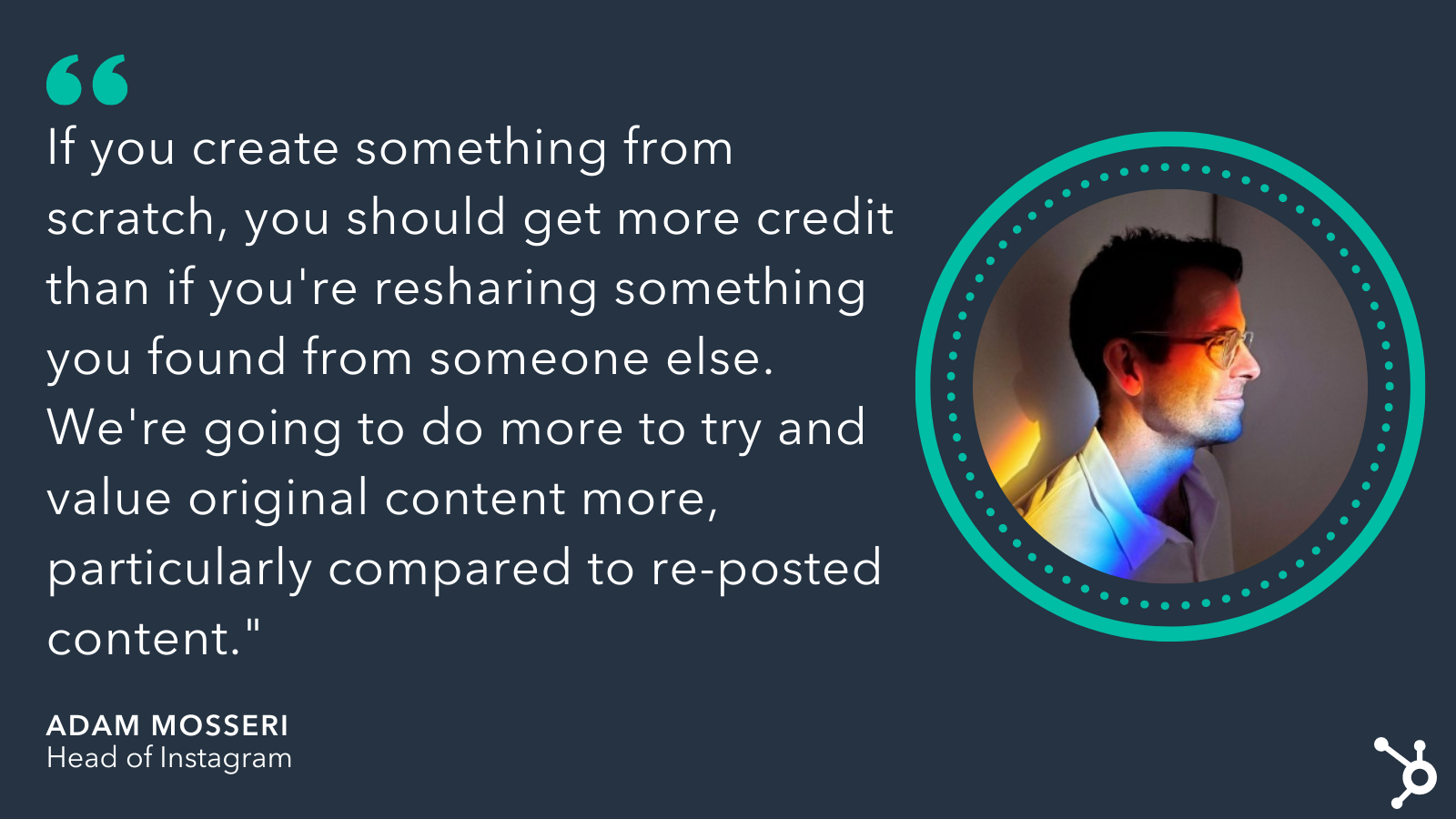
On April 20, Adam Mosseri, Head of Instagram, tweeted an announcement that Instagram is now ranking based off originality.

As he puts it, “If you create something from scratch, you should get more credit than if you’re re-sharing something you found from someone else. We’re going to do more to try and value original content more, particularly compared to re-posted content.”

On the surface, this seems like a fair deal. If a marketer goes through the trouble to create a unique, original infographic, for instance, she should be rewarded by getting her post ranked higher in the algorithm than someone who is re-posting her same infographic.

Additionally, this is a good experience for users. Instagram users don’t want their feeds to be cluttered with all the same content, reposted again and again. Each time they scroll, they want to see fresh, new posts.

However, ‘originality’ can be a difficult thing to define. For instance: Is it still considered original if it’s a branded video that was first posted on your YouTube account, and then re-posted to your Instagram Stories?

Or — what if your CEO is mentioned in another brand’s post, and you want to re-share with your own audience?

As Mosseri said on Twitter in response to one question, “The idea is if you made it, it’s original. It’s okay if you edited it outside of Instagram and then bring it in via the gallery. Identifying ‘originality’ is hard though, so we will iterate over time.”

It’s looking like this decision is primarily designed to decrease the amount of aggregator accounts on the social platform — accounts which are focused on compilations of other creators’ content, like @HilariousYouTubeVids or @CelebFashionInspo.

Which isn’t necessarily a bad thing for marketers. It can be incredibly difficult to get your content in front of new audiences, particularly when you’re competing against the same re-posted TikTok video from 50 different accounts.

It’s equally exciting for content creators. In the past, if you created a funny Instagram Stories video and someone re-posted it to their Instagram feed where it gained a ton of traction, you wouldn’t necessarily reap the benefits from that – the re-poster would get the views, likes, and shares.

Now, Instagram is rewarding originality, so if you’re the first one to create and share a piece of content, this new algorithm update should help you remain the sole beneficiary.

Adam Mosseri on Instagrams New Update in 2022Plus, as Mosseri disclosed in response to another tweet, Instagram’s algorithm already prioritizes original content, so this is nothing new. The photo-sharing app is simply leaning more heavily in this direction and re-evaluating the AI systems they currently use to detect original content.

To recap, Instagram’s new shift towards rewarding original content will:

  • Largely penalize aggregator sites. So if your entire account is based off posting funny videos from other people’s accounts, you could see a decrease in ranking. If your account is mostly filled with original content, you shouldn’t be impacted.
  • Be iterated on over time. Instagram is still working to define what ‘originality’ means, and as Mosseri puts it, it will take time to get it right when it comes to identifying what’s truly original.
  • Allow you to post content you’ve created and edited outside the app. Feel comfortable posting your own content that you’ve already posted on your other social channels, as well as any content you’ve edited outside of Instagram. Since you made it, it’s still original.
  • Reconsider your strategy if you primarily post user-generated content. There’s plenty of proof that user-generated content (UGC) is an effective marketing strategy, and it’s not going anywhere. However, if your entire feed is made up of re-posted content from your customers, you might want to reconsider the ratio of UGC to original content. To get around this, consider creating original branded content with quotes or short videos from your customers and advocates.

Instagram’s Algorithm Update Will Also Offer Product Tags and Enhanced People Tags

This is part of a larger Instagram algorithm update, which will also now offer product tags to everyone (they were previously only given to select accounts), as well as enhanced people tags (which allows you to provide a short description beneath your name that will show up when users click on the tags in a post, like ‘Caroline Forsey: Writer’).

In response to the question, Why now?, Mosseri says, “As we lean more into recommendations it’s becoming increasingly important that [we] don’t overvalue aggregators, as that would be bad for creators, and therefore bad for Instagram long term.”

Ultimately, Instagram’s goal here is to ensure its users’ feeds don’t just become one big replica of the same few messages. And that’s a good thing: It means there will be more space, moving forward, for your branded content to reach new audiences, and you’ll see a reward for the hard work of creating unique, one-of-a-kind content.

Improve your website with effective technical SEO. Start by conducting this  audit.  

Categories B2B

12 of the Best Programming Languages to Learn in 2022

So, you want to learn how to program. Honestly, great choice — pursuing software or website development is a challenging but highly rewarding career path.

Now, for your next big decision: Which programming language should you start with? It can feel like a daunting choice, since your first language is your first exposure to the world of programming can set the tone for your learning experience.

If you pick one that’s too challenging, you might get discouraged and lose interest early on. Pick one that’s too simple and you may miss out on fundamental concepts you’ll need to lock down an entry-level development job. Plus, with hundreds of programming languages being used today, where do you even begin to look?

Fortunately, you don’t have to learn every language under the sun to break into the field. Many developers before you have come to a general consensus about which programming languages are best for newcomers.

To get you started coding as soon as possible, we’ve compiled 12 excellent beginner options you can pick from depending on your interests and desired career path.

Download Now: Free Intro Guide to HTML & CSS

If you’re a beginner, most software engineers recommend learning Python, Java, or C first. Below, we’ll give you a rundown of each of these programming languages and others, while describing what they’re used for and why you might want to try each one.

1. Python

Many new programmers will gravitate to Python as their first language. It has many qualities that make it perfect all-around for beginners.

Python is a high-level, general-purpose scripting language with syntax that is very simple and digestible compared to other programming languages. This makes it easy to learn relatively quickly and start building simple projects without sweating the details.

Python is also known for its broad range of libraries that allow you to extend the language to do just about anything, including software development, data analysis, machine learning, server-side web development, and a ton more.

2. Java

Java is another widely used general-purpose programming language that’s excellent for beginners. Not only is it a great introduction to the art and science of programming — it’s also one of the most sought-after languages at companies of all sizes (including HubSpot!), making it a solid foundation for a career.

The Java Virtual Machine lets Java run on virtually any hardware and operating system, making it among the most widely used programming languages in the world. It’s most commonly on the back ends of software applications, from large-scale enterprise applications to mobile apps. Notably, the Android OS is based on Java.

While Java does have a bit steeper of a learning curve than Python, it’s definitely manageable and one of the best options for first-time programmers.

3. JavaScript

JavaScript (no relation to Java, despite their similar names) is the de facto programming language of the web. It’s primarily used on the front end of websites and applications to make them dynamic and interactive. It can also be used server-side with frameworks like Node.js.

It’s also the most popular programming language according to Stack Overflow, used by 68% of professional developers. It’s also used on over 98% of all websites. With those numbers, it’s safe to say that anyone who wants to learn web development should make JavaScript one of the first languages they learn.

JavaScript is somewhat notorious in the developer community for its complexity, but that’s only if you dig into the advanced stuff. For beginners, JavaScript is intuitive, flexible, and easy to pick up. Plus, you don’t need to install another application or compile your code to see your code work — just run it in your browser.

4. HTML and CSS

Okay, HTML and CSS aren’t technically programming languages. However, if you’re interested in web development, these should be the first two languages you learn besides JavaScript. You can’t really build anything web-based without at least some HTML knowledge, anyway.

HTML is the language that defines the content and structure of web pages. When you view a web page, you’re looking at your browser’s interpretation of an HTML file. CSS is an accompanying language that defines the style of the page — it’s what makes websites look nice, basically.

The good news is that, since HTML and CSS steer clear of the programming part of web development, they’re both pretty straightforward and a great way to get a sense of what coding a website feels like without committing to a whole programming language. Take a few days to get comfortable with these two and, if you like them, consider an introductory JavaScript course.

5. C

Some programming languages, like Python, are ideal for new programmers because their syntax is simple and human-readable. Essentially, you can write programs that do a lot of things with less code. On the other hand, some other languages are more challenging because their syntax is closer to machine code (a very low-level, entirely numerical language that computers process). If you hadn’t already guessed, C is one of these languages.

So, why would anyone start with a lower-level language? Ultimately, starting with C can be more rewarding in the long run because it helps you build a better foundation of knowledge. So much of learning how to program involves problem-solving, rather than just learning syntax. For anyone who wants to dive into the technical side of things and really understand how their programs work, C is your best bet.

For this reason, C is widely taught in introductory college computer science courses. However, it also involves more complex syntax than some other programming languages — you need to write more code to get things done. But, if you want to be challenged, learning C will help you ultimately become a more well-rounded programmer.

A very influential language, C also forms the foundation for most modern programming syntax, so learning will give you key skills you can then apply to other languages. In terms of applications, C is most commonly used for desktop applications, operating systems, and databases.

6. C++

A successor of C, C++ is also popular among programmers. The name comes from the “++” operator in C, which adds a value of one to an integer. (Yes, even developers like to have fun sometimes.)

C++ builds on C by including classes and objects, which allow you to represent real-life objects in the code. This added sophistication opens many more possibilities to the language and makes it much better equipped for developing sophisticated applications, like system or application software, drivers, client-server applications, embedded firmware, and video games.

And, fun side note, C++ was also my first programming language. 🎉 🎉

7. C#

Another popular offshoot of C, C# (pronounced “C sharp”) was developed by Microsoft to run on its .NET platform for Windows applications. C# is still very common in desktop applications, it’s also known it for being the language of the Unity game engine. This means that those interested in video game development will likely need to learn C# at some point.

Once you’ve learned the basics of C, consider taking on C# next, as it will be easier to pick up once you’re familiar with the syntax of the C family of programming languages.

8. Ruby

For you aspiring web developers, this is another popular choice for beginners. Ruby is a server-side scripting language that’s one of the easier ones to read and pick up as a first language.

A big reason for Ruby’s popularity is the open-source web application framework Ruby on Rails, which has been widely adopted by startups and large tech companies like Square, Shopify, Airbnb, and Hulu, making it a valuable skill career-wise.

A main philosophy of Ruby on Rails is convention over configuration. In other words, it trades flexibility for convenience, and a lot of programming decisions are already made for you. While learning Ruby on Rails will be a heavier lift than the basics of Ruby, you’ll eventually be able to help build impressive web applications as a result.

Still, we recommend learning the basics of the Ruby programming language first, before diving into the Rails framework that goes on top of it.

9. PHP

Here’s one more popular server-side scripting language that’s valuable to know if you’re interested in web development. PHP is an open-source language that’s used to build dynamic web pages on-the-fly, making for a more personalized browsing experience. Highly flexible, beginner-friendly, and with tons of frameworks, PHP tops the list for most-used languages by beginners and professionals alike.

PHP is also the core language for the WordPress content management system and is a staple in the WordPress developer’s toolkit. Since WordPress is free and open-source, peeking at its core files is a good way to get some exposure to how PHP powers websites.

10. SQL

Are you interested in working with databases, or any kind of job that involves storing, fetching, and analyzing data? In that case, it’s definitely worth your time to pick up SQL at some point.

SQL, which stands for Structured Query Language (and is often pronounced “sequel”) is the standard programming language for managing relational databases. A relational database is one in which data points are related to each other, organized in tables of columns and rows.

SQL allows you to add data to, extract data from, and change data inside relational databases, making it most useful for data analysts and scientists, as well as product experts, business analysts, and marketers who wish to factor business data into their decision-making.

You can’t exactly “build” things with SQL in the same sense as other languages here — it has a much more specific purpose. But, if you aspire to work with data in any capacity, SQL is a must-know.

11. Swift

Swift is a newer programming language created by Apple to develop iOS and macOS applications. If you think building apps is something you’d want to do, learn Swift — you’ll need to know it eventually to make a career in iOS and macOS development.

Like other languages we’ve discussed here, Swift has relatively straightforward, human-readable syntax and is a pretty forgiving language when it comes to mistakes. It’s also a very scalable language that makes it easy to translate your projects from small experiments to full-blown app pursuits.

12. Go

To close out our list, we have Go (also known as Golang), a general-purpose. Go was created by Google to support software development projects. It’s similar to C, but with easier syntax and some added functionality to support more efficient building and more scalable projects. Some people see Go as combining the more user-friendly aspects of several programming languages into one.

Go has gained traction among developers of cloud-based applications, AI and machine learning, web servers, data tools, and command-line tools.

For more general advice on how to pick which language to learn first, check out this great video from Codecademy.

Learn to code.

As I said, picking a first programming language is intimidating. But, the good news is that once you get a feel for one language, it’s easier to transfer your knowledge to other similar programming languages. For example, if you started with C, you can take on C++, JavaScript, or PHP without having to relearn a ton of new concepts.

Whichever language you choose, the most important thing isn’t the exact syntax of the language you’re writing (though, yes, that is important). Rather, it’s the fundamental concepts of computer science, the problem-solving skills you pick up along the way, and, eventually, the ability to think computationally as second-nature.

That might all seem far off to you right now. But, with diligent practice and dedication to the languages you’re learning, a new career can be closer than you think.

Editor’s note: This post was originally published in January 2019 and has been updated for comprehensiveness.
New Call-to-action

Categories B2B

The HubSpot Blog’s Instagram Shopping Report: Data from 500+ Instagram Marketers

In 2022, it’s clear that Instagram is no longer just a photo-sharing app.

Not only has Instagram become a thriving social media channel with all sorts of video, Story, and even live stream features, but it’s even evolving into a shopping platform that fuses e-commerce and social media together.

And, our recent survey of 580 Instagram marketers found that using the app’s shopping tools enables the highest ROI of any Instagram strategy.

But with a wide variety of shopping tools popping up in feed-based posts, Reels, Live video, Stories, Guides, and the dedicated Shop tab, it can be challenging to figure out where to start.

To help marketers and business professionals like you, let’s take a deep dive into Instagram’s shopping tools to find out:

New Data: Instagram Engagement Report [2022 Version]

Which Instagram Shopping Tools Perform Best?

Using Instagram shopping tools is the strategy with the highest ROI and also the strategy used most by Instagram marketers. Most importantly, it’s just getting started.

While just 37% currently use the app’s shopping tools, 94% of them will increase or maintain their investment this year. On top of that, 1 in 3 plan to use Instagram shopping tools for the first time this year.

Which instagram shopping tools do brands use

Also, marketers who leverage Instagram’s shopping tools are 15% more likely to say their Instagram strategy was effective last year than those who don’t. So which tools perform best?

Of the shopping tools, Instagram Live Shopping and Instagram Shops have the highest ROI and are the most leveraged.

which instagram tool has highest ROI

Additionally, the use of both live shopping and shops will grow significantly in 2022, with 55% planning to try Instagram Shops and 48% planning to use Instagram live Shopping for the first time.

which tools do instagram marketers plan to leverage for the first time

Instagram Feed Post Shopping, Instagram Stories Shopping, and Instagram Guides Shopping are all used by over 1 in 3 marketers and also lead in terms of ROI.

Reels Shopping has the lowest use and ROI, however, 42% of Instagram marketers plan to use Reels Shopping this year, the 3rd highest of any Instagram shopping tool.

Should You Sell or Launch Products Exclusively Through Instagram Shopping?

Using Instagram Shopping tools is a powerful marketing opportunity, but should you also have an external website to sell your goods and services?

41% of Instagram marketers say most of the brands they work with use Instagram shopping tools exclusively and don’t have a separate website, while 59% use a mix of both.

83% of Instagram marketers say they have worked with a brand that launched a product exclusively on Instagram and 59% of them say launching exclusively on Instagram is better than launching elsewhere.

brands say launching products on instagram is more effective than just on ecommerce

Launching a product exclusively to your Instagram audience can also be a great way to boost brand loyalty and reward your followers.

This is just one of the many benefits marketers are seeing from using Instagram’s shopping tools. Let’s take a look at what other benefits marketers are getting from social shopping.

The Biggest Benefits of Instagram’s Shopping Tools

Leveraging Instagram shopping tools comes with a wide range of benefits, most notably increased product discoverability, a simplified shopping experience for your customers, ease of partnering with influencers, and the ability to integrate your products into content, making it look more authentic.

Biggest benefits of using Instagram Shopping

I mentioned how Instagram is focused on helping creators monetize their content, and one way to accomplish all of the above is to leverage Shopping from Creators.

While not exactly new, this feature was initially rolled out only to a select few influencers in 2019. It took until March 2022 for Instagram to officially announce that it would be expanded to all users in the U.S.

Shopping from Creators allows influencers to tag your brand’s products directly in their posts, so users can find and purchase products without leaving Instagram. This combines all the benefits listed above, and excels at making partnering with creators easy and look authentic.

Despite all the benefits selling on Instagram offers, there are also challenges. Let’s dive into the top struggles marketers face with Instagram’s shopping tools.

The Biggest Challenges of Instagram Shopping Tools

The top two challenges marketers face with Instagram shopping tools seem to contradict each other – while 38% of those who use Instagram shopping tools struggle with making sales, 45% are having problems due to too many sales and supply chain issues.biggest challenges of instagram shopping

Another 37% complain about selling fees, which are currently at 5% per shipment, with shipments under $8 racking up a flat fee of 40 cents. However, fees are being waved through June 30, 2022, to help small businesses recover from the pandemic.

36% of Instagram sellers also take issue with the fact that they don’t have full access to the shopping tools the app has to offer. As the app fully embraces social shopping in 2022, you can expect access to open up to more users.

Social Shopping Is The Future

There’s never been a better time to start selling on social media, and Instagram is the best place to do it.

If you’re ready to get started, take a look at our 2022 Instagram Marketing Report for a detailed breakdown of which strategies, features, and formats are most effective on the app. For a few examples of how brands leverage Instagram Shopping, check out this post or this detailed ultimate guide.

Curious about your overall Instagram strategy, beyond Shopping? Check out our Instagram Engagement Report for even more data.

Improve your website with effective technical SEO. Start by conducting this  audit.  

Categories B2B

How to Get Followers on Pinterest: 25 Tips for 2022

Equal parts social media platform and search engine, Pinterest had over 431 million active monthly users in early 2022. But the popularity of the platform means it’s a crowded space, and the task of getting followers on Pinterest can feel daunting.

Fortunately, there are tactics you can implement right now to increase your real follower count on Pinterest to increase web traffic, drive sales, and help your grand gain authority.

Here, we’re going to dive into everything you need to know to grow your Pinterest audience today.

Free Resource: 12 Pinterest Templates for Business

1. Use a Pinterest business account.

On Pinterest, business accounts have access to tools such as unique content formats, advanced analytics, shopping features, and the ability to create an ad account to promote your content. 

When creating a new account, you can opt to turn it into a business account during the setup process. If you have an existing account, you can convert it to a business account to maintain authority.

2. Optimize your username and Pinterest bio.

Your username and bio are completely searchable. Make sure you include search terms related to your niche that your customers may be looking for on Pinterest to increase profile visibility. 

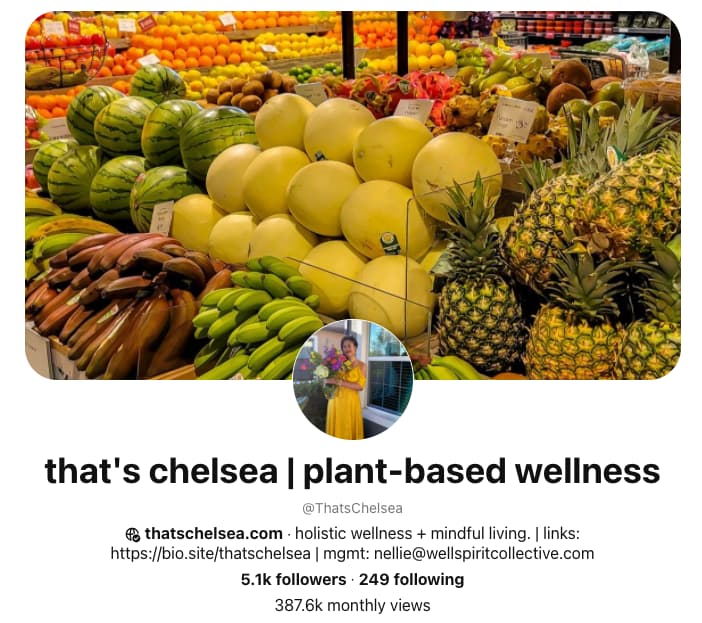
For example, content creator Chelsea Clark added the keyword “plant-based wellness” to her Pinterest profile, making her content more likely to show up for users who include the term “plant-based” in their Pinterest search.

How to Get Pinterest Followers: Optimize your Pinterest bio and name with keywords

Image Source

3. Post Idea Pins.

Idea Pins are a multi-page video-based format that Pinterest rolled out globally in 2021. The beta version of this feature rolled out in 2020 and was called Story Pins, and was initially used similarly to Instagram Stories. 

Now, the Idea Pin feature allows creators and businesses to record, edit, and share up to 20 pages of content within one post. Notable Idea Pin features include the ability to record voiceovers, add transitions, tag other accounts, and add music. 

Because Idea Pins don’t expire after 24 hours like story features on other social media platforms, creators can use the feature to grow their reach and engagement. 

4. Include text on your Idea Pins. 

Once you get the hang of creating Idea Pins, try including text overlays to make your content more accessible, and easy to understand. Text on Idea Pins is also searchable within Pinterest, so make sure you include keywords potential followers are searching for.

5. Focus on a specific audience. 

Even if your products or services could, in theory, be purchased by anyone, you should laser focus your Pinterest marketing strategy. You’ll find that as you narrow your target, the better you’ll be able to create content that actually resonates with them. By identifying a niche and dominating it, you can expand your reach as your content is consumed, shared, and recognized. 

Creating a buyer persona is the first step to defining your audience, humanizing them, and understanding their needs.

6. Post original images.

84% of Pinners use Pinterest to decide what to buy — which means it’s critical you position yourself in front of them by creating original content for your brand. Try posting original infographics, graphics, or photos that reflect your brand’s message. Additionally, when you do re-pin, make sure you’re re-pinning content that aligns well with your own brand.

7. Include relevant topic tags to increase video reach.

Pinterest is no longer encouraging the use of hashtags and instead recommends creators use topic tags to categorize their content and improve reach. Here’s how you can use the topic tag feature:

8. Create a cohesive brand for recognition on the platform.

People do business with those they like, know, and trust, so the goal is to go from a stranger in your prospects’ eyes to being known and trusted. On Pinterest, that means increasing the number of impressions your content earns from your target audience. An “impression” refers to any time a prospect “sees” you or your brand. If you don’t have a consistent look and feel, your content won’t be recognized as being related, which means you never build that trust. 

According to Forbes, color improves brand recognition by up to 80%, and consistent brand presentation across platforms increases revenue by up to 23%. The big takeaway is that a consistent (and recognizable) brand identity is paramount to increasing ROI for your Pinterest marketing efforts. By building a brand identity, your target audience will start to recognize you in the niche, which is the first step to building trust.

9. Post infographics to promote proprietary data for your company.

Infographics are a perfect mix of data, visual, and written content, making them extremely shareable. For this reason, 40% of marketers reported that infographics were the type of visual content that helped them reach their marketing goals in 2021 according to Venngage

Infographics do well on Pinterest, particularly, as it’s a visual platform with the capability of displaying long, vertical images. By creating a custom-branded infographic and sharing it on Pinterest, you’re establishing credibility by educating your audience. It also gives another opportunity for “impressions” to increase your brand recognition if the infographic is branded properly.

10. Use keywords in your board names and pin descriptions.

Pinterest users typically find brands through hashtags and searches, so it’s important you include both in your descriptions and images.

When writing your pin description, it’s critical you remain specific and descriptive. This ensures the highest chance that your pin will match a user’s true search intent. For instance, let’s say you have a pin for healthy dinner recipes. You’re more likely to have users find and engage with your pin if it’s saved to a board titled “Healthy Recipes” (which is what they are likely searching for) than something vague like “Healthy.”

11. Include relevant keywords in your Pinterest name, too.

Pinterest marketing doesn’t just come down to the shareability of individual posts but also discoverability. You’ll want to position your brand in front of Pinterest users who are actually searching for your content. By including a couple of relevant keywords into your Pinterest name, your account is more likely to show up for interested searchers.

12. Use Pinterest Trends to plan your content.

Those using Pinterest business accounts have access to a tool called Pinterest Trends, which shows which keywords and topics are trending across various niche areas. Use the trends tool to find what your potential customers are searching for and let these results inform what content you share.

Pinterest also creates an annual report called Pinterest Predicts, which outlines which topics will likely trend on Pinterest for the upcoming year based on search patterns and unique data.

13. Share new content weekly.

According to Pinterest, the recommended posting cadence is at least one original pin per week. To get the most out of your Pinterest traffic, make sure your pins lead back to your website (or that you’re linking your Idea Pins to your products).

14. Be active and engaged on Pinterest.

Like any social media site, Pinterest favors active accounts. This includes ensuring you pin on a regular basis, manually pin others’ pins, and follow other boards. If you have trouble keeping up with your Pinterest activity, create a social media calendar to have a more focused and organized publishing strategy. You can also try using a tool like Tailwind, which allows you to schedule your Pinterest pins ahead of time.

It’s vital you re-pin often. Consider going to the “Explore” and “Trending” pages and re-pinning from there. The more you re-pin and engage with other boards, the more likely you are to increase your reach.

15. Follow other users.

If someone is following a business with similar content to yours, chances are they’d be a good follower for you as well. Take some time to research competitors’ and follow their followers — if your content is up-to-par, they’ll more than likely follow you back.

Alternatively, perhaps there are businesses with products or services that work well in conjunction with your own. For instance, let’s say you’re an interior designer, and you find a company that sells handmade furniture on Pinterest. You might follow some of their followers since their followers are likely interested in either decorating or sprucing up their home.

16. Add a Pinterest follow button to your newsletter or website.

You can likely increase traffic to your Pinterest account if you embed a Pinterest follow button in an email newsletter or on your website. Since traffic to your site, or subscribers to your newsletter, are probably already interested in your product or services, they’re a strong audience to target.

Plus, depending on where they are in their buyer’s journey, your Pinterest account might actually help them decide whether your business is the right fit for them.

17. Use Pinterest sections to organize your boards.

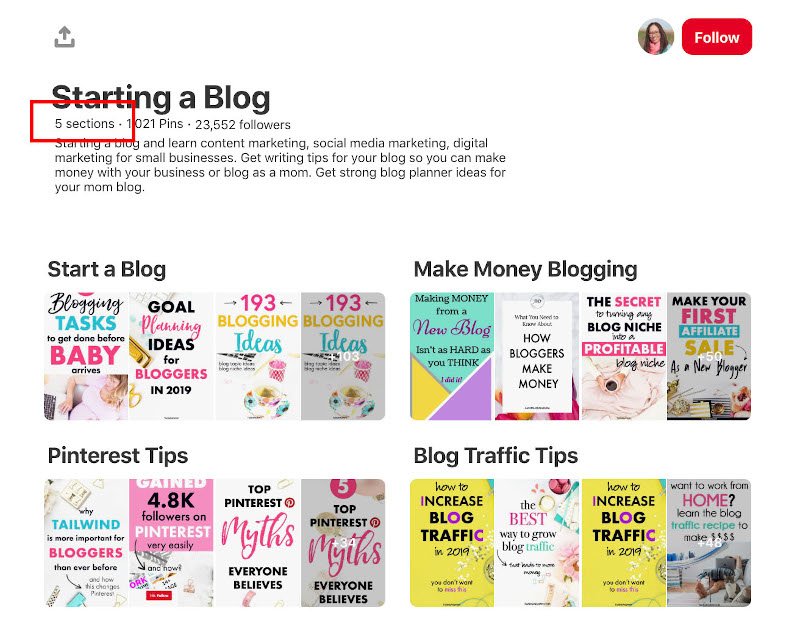
Pinterest sections are similar to H2 sections of your blog posts — they enable you to organize your full Pinterest board into categories, so users can more easily find exactly what they’re looking for.

For instance, take a look at Twins Mommy Blog’s board:

page displaying pinterest sections
 
While the full board is about “Starting a Blog,” it’s then divided into five sections, including how to make money blogging and blog traffic tips. A user might only check out the make money section and re-pin that content without needing to see or re-pin the rest of the board.

Sections, then, make your individual content more likely to be found and re-pinned.

18. Promote your pins.

If you have a business account on Pinterest, you could consider putting money behind a pin to increase visibility and reach — similar to paying for an ad on Facebook.

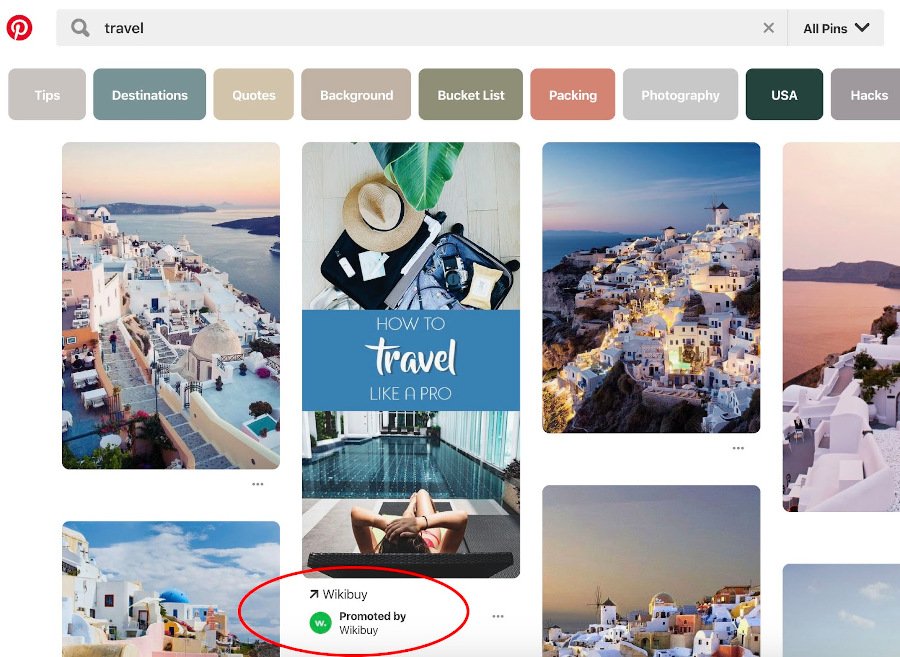
For instance, take a look at what I see when I type “travel” into Pinterest:

page displaying Pinterest Promoted pin
 
One of the first pins, prominently displayed under the search term “Travel,” is Wikibuy’s promoted “How to Travel Like a Pro” pin. Promoted pins have been proven successful — in fact,
50% of Pinterest users have made a purchase after seeing a Promoted pin, and Promoted pins are re-pinned an
average of 11 times.

For increased visibility and reach, then, why not?

19. A/B test your pins to see what works.

You don’t have to throw spaghetti against the wall to see what sticks. By testing different variables with your audience, you can continually improve your campaigns as you learn more about what resonates with them. 

Here are some different variables to compare on Pinterest: 

  • Alternate headlines for your pin title
  • Alternate thumbnail images for your pin
  • Alternate post copy for your pin’s description

Just be sure to only test one variable at a time. Set a time period to run the test, and then compare each post’s performance using Pinterest analytics. Just make sure your A/B test’s results are statistically significant before you make any decisions on future runs.

20. Use Pinterest’s free shopping tools.

If you’re looking to drive traffic to specific products, you can create Product Pins that have additional metadata to make them even more searchable which increases your chances of being found by users on the platform. 

21. Join the verified merchant program.

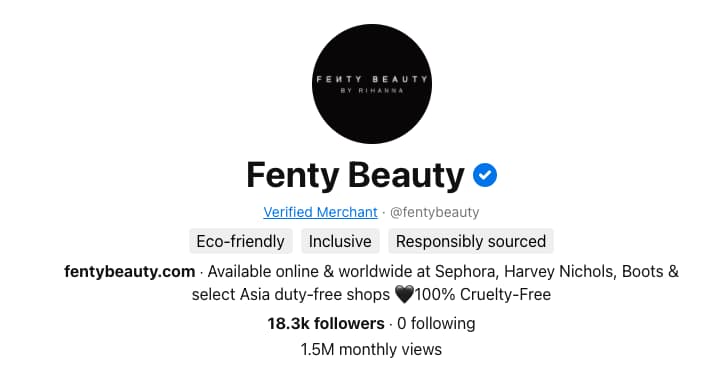
Increase your company’s credibility by becoming a verified merchant on Pinterest. Accounts that are a part of the program receive a coveted verified check mark confirming the account has been vetted by Pinterest, have products show up under related search terms, can activate a profile “shop” tab, and are able to access unique insights to see conversion data.

How to Get Followers on Pinterest: Join the Verified Merchant program, like Fenty BeautyImage Source

22. Apply for Rich Pins.

If you anticipate users pinning content directly from your website, you may want to consider applying for Rich Pins.

Rich pins automatically pull in key data from your website when Pinterest Pins are created, and allow existing pins to remain up-to-date with what’s listed on your website. There are three types of rich pins:

  1. Product Rich Pins pull accurate inventory and product availability information from your website. 
  2. Recipe Rich Pins which include a recipe name, list of ingredients, and pertinent cooking information pulled from blog posts that feature recipes. 
  3. Article Rich Pins that include the title of an article, meta description, and author information. 

Rich Pins are free to use. To get started, add the necessary meta tags provided by Pinterest to your website, then submit an application. 

23. Re-pin older content.

Pinterest Pins have a lifespan of about four months, which is significantly longer than other social media platforms such as the 15-minute span of a tweet, or the 48-hour span of an Instagram post.

With this in mind, don’t be afraid to pin older content to new boards to continue its lifespan even further and engage with a whole new audience. 

If you do decide to create pins from older content, make sure you refresh the images for better engagement. 

24. Claim your website on Pinterest.

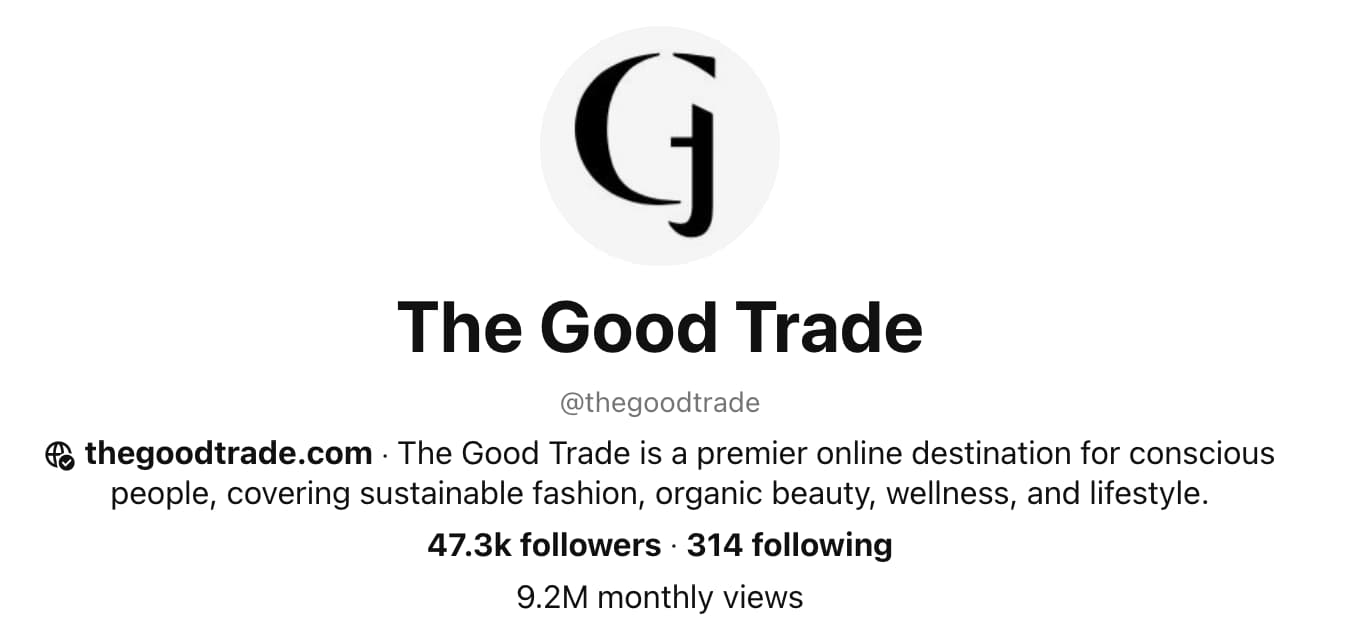
If you haven’t already, make sure your company’s website is claimed by the official Pinterest account. According to Tailwind, 80% of Pinterest accounts with high engagement have claimed their websites on Pinterest. 

In the image below, you can see the publication The Good Trade has claimed its website with the globe and checkmark symbol next to the company’s URL.

How to get Followers on Pinterest: claim your website to improve engagement

Image Source

25. Schedule your pins.

Like most social media platforms, the key to success on Pinterest is consistency. To make sharing to Pinterest simple and easy, consider scheduling your pins in advance so they can go live when your audience is most likely to engage. 

You can use popular software such as Tailwind to schedule your pins or use the scheduling tool within the Pinterest platform. 

Reasons to Avoid Buying Pinterest Followers

Sure, there are tools you can use to buy Pinterest followers but this method is not in your best interest.

Buying Pinterest followers essentially means you’re buying fake accounts to increase the number of followers you have, which will make it look like your business is popular on Pinterest. This can be tempting — why do the hard work of cultivating a following, when you can pay less than $20 for 1,000 followers, instantly?

Unfortunately, buying followers does more harm than good. Here’s why.

1. It’s against Pinterest guidelines.

In fact, your company could be banned from the site if Pinterest figures out you’ve bought followers according to their guidelines.

2. You’ll tank your engagement (and overall performance, too).

Increasing your follower count can actually harm your success on Pinterest since Pinterest’s algorithm doesn’t just measure follower count — it also measures engagement metrics.

For instance, let’s say you have 100 real followers and 1,000 fake ones. You post a pin that is re-pinned 10 times. Out of your real followers, that’s 10% — an incredibly good engagement number. But Pinterest calculates 10 re-pins out of 1,100, which is less than one percent.

Ultimately, more followers could decrease your engagement metrics, which will make both Pinterest and your real followers believe your content isn’t actually that good.

3. Buying followers doesn’t result in ROI. 

Those fake followers will never become real customers. You will become much more successful on the platform if you take the time and resources you would’ve dedicated to buying followers and use it instead to implement some of the strategies listed above.

It’s critical you work diligently to find and engage with real people — because only real people can help you figure out what your potential future customers expect and prefer from their online content.

Now that you know how to increase your number of real Pinterest followers, it’s time for the most time-consuming but most fun part of Pinterest marketing: creating and implementing a content strategy for your business.

Editor note: This post was originally published on March 25, 2019 but was updated for comprehensiveness.

Pinterest Templates 

Categories B2B

SEO Glossary: 100+ Essential SEO Terms Marketers Should Know in 2022

Do you want to optimize your website but have trouble communicating with the technical folks running it? Then, you need an SEO glossary.

Jargon alone shouldn’t stop you from making your site the powerful marketing tool it can be.

→ Download Now: SEO Starter Pack [Free Kit]

This is a list of the most essential search engine optimization (SEO) terms to help marketers communicate with developers and understand how to optimize their websites.

# | A | B | C | D | E | F | G | H | I | J | K | L | M | N | O | P | Q | R | S | T | U | W | X |

40 SEO Terms You Must Know!

Numbers

2xx status codes – Code sent by the server to say that the request was successful.

301 Redirect – The process of permanently redirecting a webpage from one URL to another.

302 Redirect – The process of temporarily redirecting a webpage from one URL to another.

4xx status codes – Code sent by the server to say that the request was unsuccessful and the information was not found.

5xx status codes – Code sent by the server to say that there was a problem with the server.

A

Accelerated Mobile Pages (AMP) – An open source project by Google to help publishers create webpages and content that are optimize for all devices.

ALT Text/Alt Attribute – A description of an image in your site’s HTML. Unlike humans, search engines read only the ALT text of images, not the images themselves. Add ALT text to images whenever possible.

Anchor Text – The actual text of a link to a web page. On most websites, this text is usually dark blue and underlined, or purple if you’ve visited the link in the past. Anchor text helps search engines understand what the destination page is about, it describes what you will see if you click through.

Authority – How reliable a website is based on search engine’s algorithm.

B

Backlink – A link pointing to an external webpage.

Black Hat – Practices that go against Google’s webmaster guidelines.

Blog – A webpage that includes blog posts related to specific topics and/or industry.

Bookmark – A link to a website saved for later reference in your web browser or computer.

Bot – A software application that is programmed to complete specific tasks.

Bounce Rate – The amount of users who leave a webpage after only viewing one page.

Branded Keyword – A search query (keyword) that refers to a specific brand. E.g.: “Nike shoes”

Breadcrumb – A web link that lets you know where you are on a website and how far you are from the homepage.

Broken Link – A link that leads to a 404 error page. This can happen if a webpage is removed without a redirect. (See 4xx status codes)

Browser – Software that allows you to access information and data on the internet. The most common browsers include Google Chrome, Safari, and FireFox.

C

Cache – A storage location that collects temporary data to help websites, apps, and browsers load faster.

Canonical URL – The canonical URL is the best address on which a user can find a piece of information. Sometimes you might have a situation where the same page content can be accessed at more than one address. Specifying the canonical URL helps search engines understand which address for a piece of content is the best one.

ccTLD – Stands for country-code top-level domain and is used to define the domain for a specific country or region. E.g. www.mysite.co.uk

Cloaking – A black hat practice used to display different information on a webpage than what was expected.

Conversion Form – A form through which you collect information about your site visitor. Conversion forms convert traffic into leads. Collecting contact information helps you follow up with these leads.

Crawler – A program used by search engines to gather information on websites and accurately index them.

CSS (Cascading Style Sheets) – The part of your code that defines how different elements of your site look (examples: headers, links).

D

Deep Link – This can refer to two things: A link pointing to content on a mobile application or a link pointing a webpage other than a homepage.

De-Index – When a search engine removes a website or webpage from search results.

Disavow – When you tell Google to ignore links because they’re low-quality, spam, or artificial.

Do-follow – A hyperlink that instructs search engines to follow the link instead of the “nofollow” attribute. (See nofollow)

Domain – The main web address of your site (example: www.yoursite.com).

E

External link – A hyperlink that points to a webpage on another domain. This is also known as a backlink. (See backlink).

F

Featured Snippet – Highlighted excerpts that appear at the top of some Google search results, known as position 0.

The Fold – The “fold” is the point on your website where the page gets cut off by the bottom of a user’s monitor or browser window. Anything below the fold can be scrolled to but isn’t seen right away. Search engines place some priority on content above the fold since it will be seen right away by new visitors.

G

Google My Business – A local business directory from Google.

Google Search Console – A free Google tool that allows you to monitor how a website is performing.

Guest Blogging – The practice of publishing a blog post on a website owned by someone else.

H

Header tag – Code used to designate headings and subheadings from paragraphs.

Headings – Section headers on your website that are placed inside of a header tag, such as an H1 or H2. This text is often presented in a larger and stronger font than other text on the page.

HTML – The code part of your website that search engines read. Keep your HTML as clean as possible so that search engines read your site easily and often. Put as much layout-related code as possible in your CSS instead of your HTML.

I

Image Compression – The practice of reduce an image’s file size to speed up a web page.

Indexing – A process used by search engines to analyze the content of website and catalog files.

Inbound Link – A link from another website to yours.

Internal Link – A link from one page to another on the same website, such as from your homepage to your products page.

Indexed Pages – The pages of your website that are stored by search engines.

J

Javascript – A scripting language that allows website administrators to apply various effects or changes to the content of their website as users browse it.

K

Keyword – A word that a user enters in search. Each web page should be optimized with the goal of drawing in visitors who have searched specific keywords.

Keyword Difficulty – Refers to how competitive a keyword is and how difficult it will be to rank for it.

Keyword Research – The process of searching for keywords to target in your content based on volume, keyword difficulty, and other factors.

Keyword Stuffing – The overuse of keywords in your content in an attempt to rank higher.

L

Lazy Loading – A method used to improve page speed by deferring the loading of an object until it’s needed. An example of this is the infinite scroll on websites.

Link Building – The activity and process of getting more inbound links to your website for improved search engine rankings.

Link Juice – The value or authority a website gains when receiving a backlink from a high-authority website. (See backlink.)

Link Schemes – What Google defines as spammy tactics used to trick Google’s PageRank and increase search rankings by buying or selling links, excessive cross-linking, or other manipulative tactics.

Long Tail Keyword – Longer, more specific queries that include more than three words.

M

Metadata – Data that tells search engines what your website is about.

Meta Description – A brief description of fewer than 160 characters of the contents of a page and why someone would want to visit it. This is displayed on search engine results pages below the page title as a sample of the content on the page.

Meta Keywords – Previously used by search engines in the 90s and early 00s to help determine what a web page was about, the meta keywords tag is no longer used by any major search engines.

Minification – The practice of removing unnecessary characters in the source code to help a page load faster without affecting functionality.

Mobile-first Indexing – This refers to Google primarily using the mobile version of a webpage for indexing and ranking. In the past, desktop was the go-to.

N

Nofollow – When a link from one site does not pass SEO credit to another.

O

Organic traffic – Refers to visitors who discover your website on the SERPs instead of a paid ad.

P

Page Speed – Refers to how quickly a webpage loads. Influencing factors include file sizes, the source code, and the web server.

Page Title – The name you give your web page, which is seen at the top your browser window. Page titles should contain keywords related to your business. Words at the beginning of your page title are more highly weighted than words at the end.

PageRank – A number from 0-10, assigned by Google, indicating how good your overall SEO is. It is technically known as ‘Toolbar PageRank.’

Pagination – When a series of content is broken up into a multi-page list. Think of category pages on e-commerce sites.

Panda – Was previously a separate Google algorithm to track down black hat tactics but now is part of Google’s core algorithm.

People Also Ask – A feature that can show up on the SERP to show related questions and answers to a query.

PPC (Pay-Per-Click) – Advertising method in which an advertiser puts an ad in an online advertising venue and pays that venue each time a visitor clicks on his/her ad. Google AdWords is the classic example of this.

Q

Query – The words or phrases a user enters into a search engine.

R

Rank Brain – Machine learning component of Google’s algorithm which works to understand queries and deliver the best results.

Ranking Factor – The factors that influence a website’s ranking on search engines.

Redirection – When a URL is moved from one location to another. (See 301 and 302 Redirect).

Referrer String – A piece of information sent by a user’s browser when they navigate from page to page on the web. It includes information on where they came from previously, which helps webmasters understand how users are finding their website.

Rel=canonical – An HTML tag that tells search engines which version of a webpage is original and which is duplicate when there are multiple pages with similar content. (See canonical)

Responsive design – A design practice that allows a website to adapt to any device it’s viewed on, making it a better user experience.

Robots.txt – A text file that tells search engine crawlers which areas of your website are accessible and which ones they should ignore.

RSS Feed – RSS stands for ‘really simple syndication.’ It is a subscription-based way to get updates on new content from a web source. Set up an RSS feed for your website or blog to help your followers stay updated when you release new content.

S

Search Intent – Refers to the reason why a user conducts a search.

Search Volume – The number of times a keyword is searched in a given period, usually a month.

Seasonal Trends – Natural increase and decrease of keywords during specific times of the year. E.g.: The keyword “Halloween costume” sees an increase in the fall months and a dip in the spring and summer.

Seed Keyword – Short-tail keyword, also known as a root keyword, which is the primary keyword you want to rank for and considered the umbrella term.

SEO – Stands for search engine optimization and refers to the tactics used to optimize your website page to reach and maintain a high ranking on search engines for particular keywords.

SERP (Search Engine Ranking Page) – The page that you are sent to after you run a query in a search engine. It typically has 10 results on it, but this may vary depending on the query and search engine in question.

Sitemap – A special document created by a webmaster or a piece of software that provides a map of all the pages on a website to make it easier for a search engine to index that website.

Social Media – Online social networks used to create online communities.

Spider – Also known as a web crawler, it’s a computer program that browses the internet and collects information about websites. (See crawler)

SSL Certificate – Stands for “Secure Sockets Layer” and is used to encrypt data that passes between a web server and the browser. A website without an SSL certificate is vulnerable to hackers who may gain access to confidential information.

Status Code – The response code sent by a server following a request. (See common status codes)

Structured Data – Any set of data that is organized and tagged to help search engines understand the information.

Subdomain
A subsection of a primary domain used to better organize your website and allow easier navigation.

T

Traffic – The amount of visits to your website.

Title Tag – The title of a page on your website, which is enclosed in a <title> HTML tag, inside of the head section of the page. It appears in search engine results and at the top of a user’s web browser when they are on that page.

Traffic Rank – The ranking of how much traffic your site gets compared to all other sites on the internet.

U

Unnatural Links – What Google describes as creating links that a site owner doesn’t vouch for or place for editorial reasons. (See link schemes).

URL – The web address of a page on your site (example: www.yoursite.com/contact).

User Experience (UX) – Refers to the feeling users have when interacting with a product, service, or (in the context of SEO) a website or mobile application.

W

White Hat – SEO tactics that comply with best practices and don’t manipulate search engines.

Website Navigation – The elements and components on a page that allow you to easily access the various webpages on a website.

X

XML – Stands for extensible markup language which is used by search engines to understand website data.

XML Sitemap – A file that lists a website’s important pages so that search engines can easily find and crawl them.

Editor’s Note: This post was originally published in Dec. 2011 and has been updated for comprehensiveness. 

marketing

Categories B2B

Where Are These Viral Social Media Platforms Now?

From TikTok to Clubhouse to Lasso, it seems like new viral social media platforms are popping up every day. Furthermore, many of the ones that were once en vogue have suddenly waned in popularity. If you’re a marketer, keeping up with these trends can be difficult but necessary in building and maintaining a strong audience.

Over the years, we’ve kept you up-to-date about the social media platforms you should care about. But you may be wondering, where are these viral social media platforms now? And which ones are still worth investing in? Here’s what you need to know.

Download Now: Social Media Trends in 2022 [Free Report]

Viral social media platforms: Where are they now?

  1. TikTok

We first pointed out TikTok as the app marketers should watch back in 2019. At the time, the app had over 500 million monthly active users. Since then, that number has doubled to over 1 billion monthly active users.

In 2019, we saw brands like Guess experimenting with TikTok by creating their own unique viral video challenges. We predicted more industries and brands would start getting creative with their marketing tactics and dabble with TikTok over time.

However, in 2022, brands are still struggling to find their place on TikTok. In 2022, InVideo reported 50% of top brands do not have a presence on TikTok. This includes billion-dollar brands like Google, Ikea, and YouTube.

But this doesn’t mean businesses are counting the app out — far from it, actually. Through our own surveys, we found that 65% of social media marketers who leverage TikTok plan on increasing their investment in 2022.

Leveraging TikTok Influencer Marketing

If you’re a marketer looking to start leveraging the app, or increase your investment, a great way to do so is via influencer marketing. While many brands are still floundering to fit in on the app, TikTok influencers are popping every day and seeing huge success.

One example of this would be Drew Afualo (@drewafualo on TiKTok). The Los Angeles-based content creator rose to fame on TikTok by calling out misogynistic creators and users on the app.

In January, Afualo saw her account grow from 1.5 million followers to 4 million in just two months, according to Buzzfeed. As of April 2022, the account has 6.9 million followers.

Since gaining popularity on the app, Afualo has been tapped to promote films like “The Lost City,” starring Sandra Bullock and Channing Tatum.


@drewafualo
#ad Make sure you check out The Lost City out 3/25 😎 Sandra Bullock is the baddest period @Paramount Pictures
#fyp
#xyzbca
#girls
#men
#funny
#college
#embarrassing
#OscarsAtHome
#WomenOwnedBusiness
♬ Joy (30 seconds) – TimTaj


She has also partnered with the online fashion retailer Shein to promote their SheinX collection.


@drewafualo Lmk which outfit is your fave 🤓 Shop the
#SHEINX Collection & use my code “DREW” to save 15% off the entire @SHEIN US site!
#SHEINpartner
#fyp
#xyzbca
#girls
#men
#funny
#college
♬ original sound – Drew Afualo


TikTok content creators like Afualo create meaningful connections with their audience and understand the app in ways that many brands do not. This makes influencer marketing a great method for brands or businesses looking to market themselves on TikTok.

In our survey, we found that 57% of influencer marketers reported influencer marketing as one of the most effective trends they leverage. We also found that 86% of marketers plan to continue investing the same amount or increase their investment in influencer marketing.

2. Clubhouse

I remember when Clubhouse was launched in 2020. It felt like an exclusive club where you had to know someone who could get you in. And in a way, it was. Clubhouse is an audio chat-based app. When it launched, users had to receive an invitation from another user to join.

In July 2021, app developers removed Clubhouse’s invite-only system, allowing anyone to join the platform.

When we first mentioned Clubhouse back in February 2021, the app was only available on iOS devices. However, the following May, it became available on Android devices as well.

In our initial reports, we said we weren’t quite sure whether Clubhouse could work for brands and marketers. And, in the last year, Clubhouse’s popularity has started to wane as other platforms, like Twitter via Twitter Spaces, dabble with audio chats.

Is Marketing on Clubhouse Valuable?

In February 2021, Clubhouse peaked at nearly 10 million monthly downloads. Just two months later, in April 2021, that number plummeted to just 900,000 downloads, according to Forbes. But don’t let that dissuade you from leveraging the audio app. Numbers suggest Clubhouse could be experiencing a resurgence in 2022.

In December 2021, the app was downloaded 1.3 million times and, as of the start of 2022, Clubhouse is ranked number 12 in social networking on the app store, according to InfluencerMarketing Hub.

So, is there value in marketing on Clubhouse? It depends on your approach. A huge draw for Clubhouse was its association with celebrities like Drake, Kevin Hart, and Tiffany Haddish. With that in mind, utilizing well-known influencers or industry micro-influencers to promote your brand on Clubhouse could be a worthy investment.

Clubhouse can also be a useful platform to host focus groups and to create personal connections with your audience.

However, if you find yourself struggling to find an influencer big enough to draw your audience to Clubhouse, or your audience doesn’t seem to frequent the app, it may be best to invest elsewhere.

3. Twitter Spaces

Launched in 2020, Twitter Spaces is Twitter’s answer to Clubhouse. It’s a feature that allows users to join and host live audio discussions on the Twitter app.

We predicted that Twitter Spaces would be a great feature because Twitter is already a dialogue-friendly platform with very little focus on visuals.

Though there aren’t any statistics regarding Twitter Spaces popularity among users, Twitter itself is a hugely successful app. Twitter reported its annual revenue in 2021 was $5 billion, a 37% increase in its year-over-year revenue.

In a recent HubSpot survey, we also discovered that just 14% of social media marketers leverage audio chat rooms like Clubhouse and Twitter Spaces, however, 68% of those who do say it is the most effective social media marketing strategy they use.

Knowing the popularity of Twitter, and that your competitors are likely to increase their investment in audio chats, Twitter Spaces is definitely a feature you should consider in your marketing strategy.

Your brand can use Twitter Spaces to create meaningful engagement with its audience, connect during over trending topics and cultural moments, or hold large-scale focus groups to gain feedback on a product or service.

4. Houseparty

Launched in 2016, Houseparty was a group-messaging app that allowed video chats and could host up to eight users at a time. For added fun, participants could use unique filters, stickers, and other features to keep the party going. Two years after its founding, the app launched an in-chat gaming feature so users could play games with friends.

In 2019, we wrote, “For example, a small makeup company might sponsor a ‘houseparty’ where an influencer can answer beauty questions and show attendees how to use one of their new beauty products.”

However, Houseparty was shut down in September 2021 after being acquired by Fortnite developer Epic Games. The game developer said, “The team behind Houseparty is working on creating new ways to have meaningful and authentic social interactions at metaverse scale across the Epic Games family.”

5. Lasso

We first pointed to Lasso as a social media platform marketers should watch back in 2019. Launched by Facebook in 2018, Lasso was a short video platform meant to compete with TikTok.

We stared into our crystal ball in 2019 and wrote, “While Lasso is just getting started, it might be a promising platform in the future because it’s owned by Facebook. This could mean the app might benefit from Facebook’s user base, technological resources, and financing.”

Unfortunately, Lasso never really tapped into the Gen Z audience Facebook was trying to attain, and the app was shut down in July 2020. The platform was scrapped as Facebook began testing Instagrams TikTok-like feature, Reels.

Trying to promote your brand on an app that isn’t as popular as it once was can feel like showing up to a party after almost everyone’s gone home. Fortunately, new platforms are always on the rise, so there will always be new and creative ways to tap into your audience. And you can trust us to share what’s next.

New call-to-action

Categories B2B

The Ultimate Guide to Internet Marketing [Data + Expert Tips]

Internet use is still increasing worldwide every day — in fact, over 4.95 billion people around the world use the internet, as of 2022.

Marketing is, and always has been, about reaching customers where they are. TV commercials, print advertisements, and billboards all attempt to do just that.

The internet offers unique benefits other marketing mediums can’t offer — scope of reach, the option to personalize content, and the opportunity to build far-reaching relationships with customers, being just a few.

Download Now: Free Content Marketing Planning Templates

But the internet can be an overwhelming and all-encompassing entity, filled with videos and recipes and news articles and e-commerce sites. In the crowded space of the internet, how are you supposed to differentiate your business to reach the right audience?

The answer is internet marketing.

Internet marketing leverages digital channels, including email, social media, websites, and search engines, to reach your ideal audience.

Unlike more traditional advertising mediums, such as print, the internet encourages two-way conversations between your business and your customer, ideally creating better long-term customer retention.

There’s no avoiding it: internet marketing is critical for the success of your business in 2022 and beyond.

But with all the gimmicks and tricks, it can be difficult to distinguish short-term wins from effective long-term strategies, which is why we’ve created an ultimate guide.

Here, we’ll cover everything from marketing strategies to real-world examples, to ensure your business reaches the right people out of that four billion.

What is Internet/Online Marketing?

Online marketing, also known as internet marketing or web advertising, is a form of marketing that uses the internet to deliver promotional messages to customers through digital channels such as search engines, email, websites, and social media.

Online marketing strategies include web design, SEO, email, social media, PPC, and other internet-related methods.

What’s the role of internet marketing?

Simply put, the role of internet marketing is to help your business reach, attract, and convert online audiences.

Let’s dive into two separate goals you’ll have with internet marketing, as well as the necessary methods you’ll want to take to achieve those goals.

Internet Marketing to Attract New Customers

You can use online marketing strategies to attract new customers. To do this, you’ll want to focus primarily on paid social media ads, search engines, and web design.

For instance, you might use Facebook’s Lookalike Audiences to get your message in front of an audience similar to your core demographic. Or, you could pay a social media influencer to share images of your products to her already well-established community.

Paid social media can attract new customers to your brand or product, but you’ll want to conduct market research and A/B testing before investing too much in one social media channel.

To attract new customers, you also need to maintain a powerful SEO presence. With 81% of shoppers using the internet for research before making purchasing decisions, it’s imperative your business is at the forefront of search for related keywords.

Having a strong SEO presence also translates to more in-store purchases, as well — in fact, 78% of local mobile searches result in an offline purchase.

Finally, it’s critical you spend time and resources on your business’s website design.

When these aforementioned customers find your website, they’ll likely feel deterred from trusting your brand and purchasing your product if they find your site confusing or unhelpful. For this reason, it’s important you take the time to create a user-friendly (and mobile-friendly) website.

Internet Marketing to Cultivate Brand Loyalists

Internet marketing is for more than just attracting new customers — it’s also critical for maintaining a loyal, long-term customer base.

You’ll want to use email, blogging, and social media tactics to increase brand awareness, cultivate a strong online community, and retain customer loyalty.

Consider sending personalized emails to past customers to impress or inspire them — for instance, you might send discounts based off what they’ve previously purchased, wish them a happy birthday, or remind them of upcoming events.

To properly employ email campaigns, you’ll need an email list. Here’s how to build an email list from scratch.

Additionally, you might use social media to showcase your brand’s personality and hear directly from your customers. Consider hosting a Twitter chat, posting surveys on Instagram, or creating fun contests on Facebook.

If you don’t feel like you have the bandwidth to create all social media content internally, consider using a third-party service like UpContent, which sends you compelling, curated content that you can share with your audiences for increased engagement.

Internet Marketing vs. Content Marketing

Content marketing and internet marketing are incredibly similar strategies used to attract leads and prospects to your site, and ultimately convert web traffic into customers. However, there are a few slight differences between the two.

Content marketing lives under the roof of online/internet marketing — which means online/internet marketing is the more broad, overarching strategy, and content marketing is one process within that strategy.

Content marketing applies only to the process of creating and distributing content to reach audiences.

Online marketing, on the other hand, encompasses sharing that content through email, search engines, and social media — it also includes paid advertising, retargeting, and a wide range of strategies you might use to reach audiences online.

While most of the strategies that fall under online marketing have to do with content creation, online marketing also pertains to the non-content creation tasks of internet marketing: such as PPC bidding, or website design.

We surveyed 1,067 global marketing professionals working in B2B and B2C companies to find out which trends they leverage, the channels they use, and the challenges they face, as well as their plans and expectations going into 2022.

Based on our research, there are 16 strategies you’ll want to employ to ensure you’re successful at internet marketing.

  1. Keep TikTok in mind.

Without question, TikTok’s popularity soared as the pandemic kept many people at home and in need of connection and entertainment. And that popularity isn’t expected to wane anytime soon.

While LinkedIn, Facebook, and Instagram have the highest ROI for B2B businesses, TikTok is quickly becoming the app to invest in.

Through our research, we found that while just 40% of B2B social media marketers leverage TikTok, 65% of those who do plan on increasing their investment in 2022, the highest increase of any social platform.

2. Consider podcasts and audio chat rooms to make connections.

Podcasts are gaining more attention as influencers, celebrities, and comedians continue to step into the medium. Despite low ROI, investment in podcasts or other audio content is expected to grow in 2022.

Our research shows that just 14% of social media marketers leverage audio chat rooms like Clubhouse and Twitter Spaces, but 68% of those who do say they are the most effective social media marketing platforms they leverage.

51% of those who already leverage podcasts or other audio content will invest more in 2022, and 43% plan to continue investing the same amount. Additionally, 26% of content marketers plan to leverage podcasts or other audio content for the first time in 2022.

Essentially, if you’re not leveraging podcasts and audio chats in your marketing strategy, your competition most likely will.


3. Lean into short-form video content.

With the enduring popularity of TikTok, audiences are gravitating more and more toward short-form videos. Short-form videos continue to be the norm as Instagram and YouTube push similar short-form video features such as Reels and Shorts, respectively.

We’ve found 31% of marketers are currently leveraging short-form video and 29% plan to leverage it for the first time in 2022. In this survey, we specified short-form videos like TikTok and Instagram Reels. Yet another reason to keep an eye on TikTok.

4. Repurpose content across various channels.

Repurposing content means re-using your existing content and presenting it in a fresh format that extends its lifespan and audience reach.

Our survey found that 32% of marketers who repurpose content say this method is among their most effective marketing strategies. Examples of repurposing content include:

  • Sharing old blog posts you’ve updated with new information, fresh data, and video content (Hint: The piece you’re currently reading is an update).
  • Using video clips of podcast recordings sessions on Instagram to create intrigue and excitement over an upcoming episode.

If you’d like to learn more about repurposing content, here are 20 methods you should know about.

5. Invest in Permanent Social Media Content.

Permanent social media content is content that won’t disappear after a set amount of time, unlike Instagram Stories or SnapChat photos and videos.

We found 33% of marketers are currently leveraging permanent social media content. Our surveys also showed 85% of marketers plan to continue investing the same amount or increase their investment in permanent social media content.

6. Design a user-friendly website.

First, you want to create a user-friendly, and mobile-friendly, website. The design of your site will showcase your brand’s personality and differentiate your business from every other online business. But it’s more than just looking good — a cleaner, more well-organized site structure can affect how you rank in the SERPS.

For help designing your website or ensuring it’s up-to-par, check out 8 Guidelines for Exceptional Web Design, Usability, and User Experience.

7. Optimize your site for search engines.

Next, you’ll need to keyword optimize your site for search engines. Essentially, this means you’ll choose keyword(s) that relate to your business, and incorporate those keywords into the URL, body text, image text, headers, and navigation bar.

For tips on keyword optimizing your entire site, check out On-Page SEO 101: Tips for Keyword Optimizing the Most Critical Parts of Your Website.

If you’re interested in focusing on keyword optimizing your blog posts, consider reading Blog SEO: How to Search Engine Optimize Your Blog Content.

For a real-life example on how to successfully implement SEO into your digital marketing strategy, check out our case study on Canva here:


8. Use email marketing or opt-in email campaigns.

Email marketing and opt-in marketing campaigns are one of the most effective long-term strategies to connect with potential customers and cultivate brand loyalty.

For everything from getting started with email marketing, to email marketing best practices and lead magnets, check out The Ultimate Guide to Email Marketing.


9. Write online press releases.

Writing online press releases is an additional way to increase online coverage of your business from other sources, which will also positively affect your ranking in the SERPs. Plus, if a local news outlet covers your business, you’ll receive their audience, which you otherwise might not have reached.

To get started writing a press release for your business, consider How to Write a Press Release [Free Press Release Template + Example].

10. Create a blog.

I might be biased, but blogging is one of the best ways to attract a large audience to your site, establish your business as a thought leader in your industry, and prove your brand to be both useful and current.

Writing blog posts is especially effective for providing different opportunities to land on page one of search engines — for instance, maybe your eyeglass store’s website is on page three of Google for “eyeglasses,” but your “Best Sunglasses of 2018” blog post is on page one, pulling in an impressive amount of traffic (over time, that blog post could also boost your overall website to page one).

To learn everything from choosing a domain name to writing your first blog post, check out How to Start a Blog: A Step-by-Step Guide [+ Free Blog Post Templates].

11. Develop social media contests and campaigns.

Social media contests and campaigns are exceptional opportunities to engage with your online audience, form relationships with customers, and learn about your buyer’s persona.

For an overarching compilation on everything you need to know about social media campaigns — from how to craft perfect posts on Facebook to the most shared phrases on LinkedIn — take a look at Everything You Need to Know about Social Media Campaigns.

12. Leverage pay-per-click advertising.

Pay-per-click advertising, or PPC, is an advertising model in which advertisers only pay when someone interacts with their ad through impressions or clicks.

PPC is most commonly used on search engines, and can help your business appear for searches related to your products or services. This is particularly important for more competitive keywords, when it’s difficult to rank on page one against websites with higher domain authority.

It’s important to note — PPC doesn’t replace your SEO strategy, it simply complements it. For instance, if you’re trying to rank for “website builder”, you’ll see the keyword difficulty is “super hard (95)”, according to Ahrefs. However, there are some long-form keywords you might have success ranking for, including “what is a website builder? (52)” or “best website builders for ecommerce (57)”.

If you do want to target “website builders”, you’ll want to bid for an ad and use PPC to stand out against competitors.

13. Optimize your site for conversions.

Okay, you got readers to your blog or homepage … now what?

Ultimately, you’ll want to invest in resources for conversion rate optimization (CRO). If you don’t, you risk not being able to convert any of your traffic into qualified leads and, ultimately, customers.

There are four areas of your website that can benefit from CRO. These include the homepage, pricing page, blog, and landing pages.

Within a blog, a CRO strategy might include adding relevant calls-to-action throughout the text, or inviting readers to submit their emails in exchange for an ebook. On a pricing page, a CRO strategy might include a slide-out that invites viewers to book time with a sales rep or watch a demo.

Optimizing your site for conversions is a critical component of any strong internet marketing strategy.

14. Post videos on YouTube or other social networks.

Video marketing is an undeniably powerful opportunity to reach new audiences and convert leads into customers. In fact, 86% of video marketers say video has helped them generate leads, and 88% of people say that they’ve been convinced to buy a product or service by watching a brand’s video.

Convinced yet? If not, simply consider the fact that YouTube is used by 88% of video marketers — which means, even if you’re not posting videos on the channel, your competitors most likely are.
You’ll want to diversify the type(s) of content you produce to attract audiences who prefer video over text, or YouTube over Twitter.

Consider how you might implement your own video strategy to reach and convert new audiences. If you’re not sure where to start, check out HubSpot’s Ultimate Guide to YouTube Marketing.

15. Find influencers to work with your brand.

I’m currently wearing a watch I found on Amazon. I’m sitting on a couch from Wayfair, with a candle from Anthropology on the table in front of me.

Where did I hear about all these products? Influencers.

Social media influencers have cultivated strong, meaningful relationships with their followers. Their followers typically trust them to provide true, reliable guidance on a range of topics related to the influencers’ expertise. Which is why influencer marketing can be an effective opportunity to spread brand awareness to new audiences.

If you think influencer marketing could be a good choice for your business, consider micro-influencers as a more effective (and oftentimes more cost-efficient) option. Micro-influencers often experience higher engagement rates than mega-influencers, and we predict micro-influencers will likely have more influence than celebrities in 2022.

Additionally, it can be expensive and time-consuming to find the right influencer(s) for your brand. If you’re going to invest in the strategy, consider working with the same few influencers for the long-term — which enables your company to build stronger relationships with their social followers.

16. Create a Facebook group.

A Facebook group — unlike a Facebook page — is an exclusive, private group that enables you to facilitate a sense of community surrounding your brand.

A Facebook group isn’t a necessity for every business, but when done properly, it can go a long way towards creating a stronger relationship between you and your customers. Best of all, it can help foster connections between your customers.

Since having a strong community can help you build brand loyalty, it’s important to seek out unique opportunities to engage directly with your customers. If a Facebook group doesn’t seem like a good fit for your business, however, there are other ways to create a sense of community — including via social media, or through a branded newsletter.

Finally, take a look at our Essential Step-by-Step Guide to Internet Marketing to dive deeper into the six essential steps of internet marketing.

There are many different methods to online marketing you can try to boost engagement for your brand, such as:

1. Repurpose your high-quality content across multiple channels.

Like we said earlier, repurposing your content simply means reusing content you already have but in a fresh format. That reaction video you created on TikTok could be repurposed as a Reel on Instagram. If you change the caption on Reels, you can use the video to react to something else.

2. Lean into permanent social media content that doesn’t have a time limit.

Examples of permanent social media content include tweets, YouTube videos, and TikTok videos. Content such as Snapchat videos or Instagram stories are note permanent and disappear after a period of time.

3. Choose the right keywords and optimize your site for search.

Using keywords helps search engines, especially Google, categorize your content and ensure it reaches the right audience. It also helps your target audience find your website and services. To optimize your site with the right keywords, use applications like Ahrefs that are designed to help you find the right keywords your audience is searching for.

4. Create a mobile-optimized site.

There are many ways to better optimize your website for mobile users, such as compressing images to reduce page load time, mapping your customers’ journey, or creating a mobile app.

5. Publish blog posts regularly.

Blogging consistently has many benefits. It keeps your website up to date with fresh content, maintaining the interest of your audience. It’s also an effective way to get your website to pop up on the first page of search engines. The more you post, the more content you’ll have for the search engine to rank.

6. Conduct email marketing campaigns.

In our recent survey to predict 2022 marketing trends, we found that email marketing is still a helpful approach to marketing your business online. According to our survey, the three most effective email marketing strategies are subscriber segmentation, message personalization, and email automation campaigns.

7. Encourage conversation on social media accounts.

Social media is the place where connections are made and conversations happen. Social media users don’t want to just interact with brands, they want to see the humanity behind the big name and logo.

A great way to create meaningful connections with the humans that make up your audience is to facilitate conversations. Ways to do this include conducting social media polls or hosting Spaces on Twitter.

8. Publish online press releases.

Like blogging, publishing online press releases will increase your presence on search engines and raise awareness of your brand. When writing press releases, remember to answer the “who,” “what,” “where,” and “why” of your brand. And make sure to use simple, understandable language as well as a quote.

9. Cultivate paid social media campaigns.

The idea of paying for advertising may seem a bit daunting, but paid social media advertising is one of the least expensive types of advertising. Paid social media ads can start as low as one dollar thanks to the bidding model and lottery system some platforms use to push ads to users’ news feeds and timelines.

Platforms that allow for paid advertisements are:

  • Facebook
  • Twitter
  • Instagram
  • TikTok

10. Leverage pay-per-click advertising for competitive keywords.

Pay-per-click advertising (PPC) and SEO go hand-in-hand like peanut butter and jelly. Optimizing your website for keywords can definitely help your brand appear at the top of search engine results pages. However, it requires patience, and you may not see results for weeks or months if you’re optimizing for highly competitive words.

But by leveraging PPC, you’ll be able to stand out among competitors by bidding for an ad.

11. Post videos on YouTube or other social channels.

YouTube is the second largest search engine on the internet, and 81% of Americans used YouTube in 2021. So, you can bet your audience frequently visits the site. When creating content for YouTube, be sure to diversify your content in order to attract audiences who prefer video over text. You’ll also want to research keywords you can optimize your content for and use in your video’s title, description, and tags.

12. Work with micro-influencers to reach new audiences.

On apps like TikTok, brands are still struggling to find their place. However, influencer marketing has proven to be a helpful tool in helping brands elevate their online presence and find their target audience.

In our survey, we found that 57% of influencer marketers cited influencer marketing as one of the most effective trends they leverage. We also found that 86% of marketers plan to continue investing the same amount or increase their investment in influencer marketing.

Online Marketing Examples

There are hundreds, if not thousands, of online marketing examples to inspire your next internet marketing campaign.

Here, I’ll dive into five real world examples of social media, email, SEO, and website marketing methods. I’ll also include links to additional blog resources at the bottom, for even more exceptional ideas.

1. Social Media: HubSpot’s “Set Sail With HubSpot CRM” Campaign with Kathryn Hahn

In 2022 we kicked off our “Set Sail” campaign with award-winning actress and comedian Kathryn Hahn. In the campaign, Hahn plays a pirate using HubSpot’s CRM to expand her reach across the seven seas.

“As CEO of my own pirate enterprise, I chose HubSpot as our CRM platform,” Hahn says as she tours a busy office-like pirate ship. “Because it helps us treat customers like people, not conquests. Plus it enables my teams to work together seamlessly as we expand.”

Hahn’s comedic timing and stage presence helped highlight the many tools we provide to help businesses achieve their goals, but our approach to social media is what helped the campaign be a success.

Our first social post announcing the campaign was promoting Kathryn Hahn’s Fast company cover, we positioned her as our newest ambassador and let her be the hero of the story—not us to start,” said Hubspot’s Senior Social Strategy Manager Leslie Green. “The positioning of her success as our success leans into our humble voice and tone.”

When it came to Instagram, there was a particular feature on the app that played a key role in spreading our message on the platform.

“We utilized a collab post feature on Instagram which allowed this post to be delivered to both ours (and Fast Company’s) followers,” Green said. “The reach and engagement on this announcement was incredible for this reason. Across channels, we shared our 30 second spot to showcase how Kathryn was making waves as a disrupting Pirate CEO.”

In 2022 we kicked off our “Set Sail” campaign with award-winning actress and comedian Kathryn Hahn. In the campaign, Hahn plays a pirate using HubSpot’s CRM to expand her reach across the seven seas.

“As CEO of my own pirate enterprise, I chose HubSpot as our CRM platform,” Hahn says as she tours a busy office-like pirate ship. “Because it helps us treat customers like people, not conquests. Plus it enables my teams to work together seamlessly as we expand.”

Hahn’s comedic timing and stage presence helped highlight the many tools we provide to help businesses achieve their goals, but our approach to social media is what helped the campaign be a success.

Our first social post announcing the campaign was promoting Kathryn Hahn’s Fast company cover, we positioned her as our newest ambassador and let her be the hero of the story—not us to start,” said Hubspot’s Senior Social Strategy Manager Leslie Green. “The positioning of her success as our success leans into our humble voice and tone.”

When it came to Instagram, there was a particular feature on the app that played a key role in spreading our message on the platform.

“We utilized a collab post feature on Instagram which allowed this post to be delivered to both ours (and Fast Company’s) followers,” Green said. “The reach and engagement on this announcement was incredible for this reason. Across channels, we shared our 30 second spot to showcase how Kathryn was making waves as a disrupting Pirate CEO.”

When promoting the campaign on Twitter, Green said it was important to engage and interact to build intrigue.

“On Twitter, along with sharing campaign assets in clever & social-first ways, we made sure to highlight and retweet notable media mentions from publications like Entertainment Weekly to drum up excitement about this partnership and give our audience social proof,” Green said.&

She continued, “In order to encourage our audience to feel included in our fantastical founder’s journey and be inspired to share their own, we repurposed UGC to go with CTAs for the audience to share their own #HubSpotSuccessStory on Instagram and LinkedIn.”

2. Social Media: Under Armour’s “I Will What I Want” Campaign

Under Armour came up with the hashtag “I Will What I Want” to encourage powerful athletic women to achieve their dreams despite any opposition they might face. The hashtag, first used by American Ballet Theatre ballerina soloist Misty Copeland, blew up on Facebook after supermodel Gisele Bündchen used it in one of her Facebook posts. Many other female athletes have also used the hashtag.

The campaign spreads a positive message of female empowerment, while also highlighting Under Armour’s women apparel. The campaign reached five billion media impressions, increased Under Armour’s women’s sales by 28 percent, and pulled in an additional 42 percent of traffic to their website.

under armour's instagram campaign, an example of internet marketing

3. Email: JetBlue

Companies often use email marketing to re-engage past customers, but a “Where’d You Go? Want To Buy This?,” message can come across as aggressive, and you want to be careful with your wording to cultivate a long-term email subscriber.

This is why JetBlue’s one-year re-engagement email works so well — it uses humor to convey a sense of friendliness and fun, while simultaneously reminding an old email subscriber they might want to check out some of JetBlue’s new flight deals.

jetblue re-engagement email as an example of internet marketing

4. SEO: Moz’s case study for Pipedrive, a sales CRM

Using a content marketing strategy that included content creation, outreach, and guest posting, Pipedrive, a sales CRM, was able to rank #1 for a high-volume keyword — “sales management” (9,900 search volume). They were able to outrank many competitors and even US News and Wikipedia. They published their strategy on Moz.

Moz's case study for pipedrive as an example of internet marketing

5. SEO: Brian Dean’s YouTube strategy

Brian Dean, an SEO expert and the creator of BackLinko, uses SEO tactics to rank #1 on YouTube for keywords like “on page SEO” and “video SEO”. Initially, Dean admits his YouTube account struggled to get any views.

Employing SEO methods like keyword optimization has enabled Dean to rise to #1 on YouTube for search results related to his business. He published his full strategy on Backlinko.

brian dean's video, which ranks first on YouTube for 'on page SEO', as an example of internet marketing

6. Web Design: AccessAble

AccessAble, an information provider for people with disabilities in the UK and Ireland, hired Agency51 to implement an SEO migration strategy to move AccessAble from an old platform to a new one.

By applying 301 redirects to old URLS, transferring metadata, setting up Google webmaster tools, and creating a new sitemap, Agency 51 was able to successfully transfer AccessAble to a new platform while keeping their previous SEO power alive.

Additionally, they were able to boost visitor numbers by 21% year over year, and the site restructuring allowed AccessAble to rank higher than competitors. Their case study is available on SingleGrain.com.

AccessAble's website Image Source

More Internet Marketing Examples:

Whether you’re a seasoned marketer, or just starting out, there are plenty of tools available to help build your brand’s audience, including:

1. HubSpot

Ultimately, your internet marketing strategies will work best if you incorporate inbound marketing methodology. First and foremost, you want all your online content to add value to your customers”s lives. This is the only way you’ll attract quality leads and build deep relationships with your online community for the long-term.

2. Buzzsumo

We love Buzzsumo because it can help you analyze what content performs best for any topic or competitor. Buzzsumo can report important metrics such as social shares, backlinks, and which influencers are sharing certain pieces of content.

You can also find influencer reports that give insight if you’re looking for a micro influencer to promote your brand.

3. Canva

Canva makes designing infographics and materials for print, blogs, and social media simple, even if you don’t have much experience with graphic design. Its user interface is easy to navigate and includes thousands of customizable templates you can redesign to fit your brand’s aesthetic.

4. GTMetrix

This application tests your website’s performance, particularly its speed. If your website takes too long to load, you run the risk of deterring potential customers or clients from your brand. With GTMetrix, you can measure how long your website takes to load and what areas of performance need to be improved.

5. Ahrefs

Ahrefs is my favorite tool for finding the right keywords for optimizing my content. They offer tools for tracking keyword performance, analyzing your competitor’s keywords, web traffic, and more. One of my favorite features has been the “content gap” tool, which shows the keywords our competitors rank for that we don’t.

6. Buffer

Posting multiple pieces of content across several different platforms can be overwhelming. Fortunately, applications like Buffer allow you to draft and schedule posts across multiple social media channels, such as Facebook, Instagram, Twitter, and Pinterest.

Furthermore, Buffer also offers social media reporting and functionality monitoring so you can track how your content is performing.

7. Facebook Insights

When I was a journalist, Facebook Insights played a key role in tracking how my articles performed. With a Facebook Insights dashboard, you’ll be able track user behavior and post performance on your Facebook Business Page.

This tool also reports important metrics like page views and post reach for paid and organic posts. It even recommends competitor pages to monitor.

8. SocialRank

SocialRank is an online tool that helps you manage your followers on Twitter and Instagram. SocialRank offers a range of filters to better analyze your follower count. It can also search for new followers, get leads, and more.

9. Trello

As your business grows, so will its output and the projects it takes on. Therefore you’re going to need a tool like Trello that will help you manage it all.

With Trello, a project management tool, you can put all your team’s projects in one customizable space that can grow as your company grows. You can use Trello to conduct growth experiments, sales pipelines, and product feature road maps.

10. Crazy Egg

Crazy Egg is a website optimization software that offers A/B testing, heat mapping, and usability testing tools. We love its A/B testing tool because it allows you to test variations of every page on your website. All you have to do is copy one snippet of code to the pages you want to test.

You don’t need coding experience to use Crazy Egg, as the software is user friendly to marketers at all levels.

11. Google Keywords Planner

If you struggle with finding the best keywords for your website, Google Keywords Planner is an excellent tool for you.

By putting in one keyword, multiple keywords, or even your website address into Keyword Planner, Google will show a list of related keywords along with simple metrics.

These metrics will gauge the competition around each keyword and how many searches it gets on both a global and local search level.

Ultimately, your internet marketing strategies will work best if you incorporate inbound marketing methodology. First and foremost, you want all your online content to add value to your customers’ lives. This is the only way you’ll attract quality leads and build deep relationships with your online community for the long-term.

New Call-to-action

Categories B2B

11 Conversion Copywriting Tips that Grew Our Revenue by 240%, According to Lately’s CEO

As marketers, we write copy daily: For landing pages, social media posts, email newsletters, you name it.

And this content isn’t just supposed to sound pretty — it’s also supposed to be powerful enough to convert visitors into sales. In fact, as of 2022, over 60% of marketers measure the success of their content through sales. That’s no small feat.

If you’re stuck in a writing rut or unsure how to use conversion copywriting to increase sales, you’re in luck. Here, I sat down with Lately’s CEO, Kate Bradley Chernis, to discuss the 11 tips that enabled her and her team to grow monthly recurring revenue by 240%.  

But first — what is conversion copywriting, anyway?

Free Guide: How to Build & Optimize Landing Pages

What is conversion copywriting?

Simply put, conversion copywriting is copy with the ultimate goal of converting readers into buyers.

Conversion copywriting uses engaging and persuasive language to motivate readers to take a specific action.

Typically, the goal with conversion copywriting is to encourage readers to purchase a product or service. However, conversion copy can be used at all stages of the buyer’s journey, so conversion copywriting might be leveraged to inform buyers’ of their pain points, encourage them to sign-up for newsletters or future offers, or simply increase brand awareness.

Conversion copywriting ultimately falls under the broader topic of website conversion rate optimization (CRO) — or leveraging your website to effectively convert users across your homepage, blog, pricing page, and more. 

There’s a difference between conversion copywriting and SEO copywriting. As Chernis puts it, “As a startup founder, I’m in the business of turning customers into evangelists — because evangelists work for you for free. SEO is never going to get me there. Besides, SEO is reliant on you, the search engine user, to take all the action. But with conversion copywriting, I’m driving the conversation and have complete control over where it goes.”

SEO and conversion copywriting can coincide, but the biggest distinction is the goal you’ll have in-mind when creating the content: SEO copy is copy written with the intent of getting on page one of Google. Conversion copy, on the other hand, is written with the intent of keeping readers’ on-page once they find your content.

Consider, for instance, the following LinkedIn post by Chernis:

The piece uses engaging and active language to encourage viewers to join one of Lately’s live video Office Hours. While the content might not pass an ‘SEO-optimized’ test, it doesn’t need to — on social media, it’s more about standing out from the crowd through authentic, creative content.

Next, let’s dive into some of Chernis’ favorite copywriting tips, followed by a few impressive examples of conversion copywriting for inspiration.

11 Conversion Copywriting Tips, According to Lately’s CEO

1. Write like a boss.

The first – and perhaps most important — rule Chernis told me is to write with confidence.

She encourages writers to avoid words like need, think, just, probably, maybe, and possibly. Instead, be direct with your writing and ensure you’re getting your point across without superfluous details.

In the examples below, you’ll notice that the brands and influencers we’ve highlighted do a fantastic job of writing with confidence. Consider Uber, for instance — the car-sharing app’s homepage reads: “Get in the driver’s seat and get paid.” It doesn’t read, “Consider getting into the driver’s seat, and you just might get paid.” It’s direct, firm, and assured.

Confidence is key to making you feel empowered to write directly to your readers and encourage them to take action, without offering apologies or excuses.

2. Remove the phrase ‘check out’ from your vocabulary.

I’ll admit: I’m as guilty of this as anyone.

It can be incredibly easy to write ‘Check out’ when you’re encouraging readers to click on a link or read a blog post, but Chernis suggests using stronger action verbs instead to communicate the value of what someone will get by completing your CTA.

For instance, consider the difference between the CTA link “Check out how to optimize your landing pages here” and “Optimize your landing pages here”. The second one is much stronger, and likely more effective. 

3. Don’t bury the lede.

As writers, it can be tempting to create beautiful, long-winded introductions full of humor and imagery and metaphors. But as conversion writers, it’s best to get to the point.

Chernis told me, “There’s something about this ‘warming up to the point’ that we all suffer from, an incessant over-intro’ing. Some of it is out of politeness, but ultimately, you want to be direct and get to that point, lickety split.”  

4. Use negative calls-to-action instead of positive ones.

Chernis says, “The bad kid in all of us responds to this tactic.”

Consider how you might leverage negative calls-to-action instead of positive ones — for instance, rather than writing, “Remember to follow these rules”, try “Don’t forget to follow these rules.”

Negative calls-to-action work particularly well for B2C brands. As an avid online shopper myself, I can attest: Seeing ‘Don’t miss out on 10% off’ or ‘Don’t forget to purchase’ is often all the encouragement I need to buy.

5. Leverage ‘why’ and ‘because’.

Whenever possible, aim to use ‘why’ and ‘because’ to posit interesting, thought-provoking, open-ended questions and encourage your viewers to keep reading to find out the answer. 

As Chernis explains in her copywriting course with HubSpot:

  • ‘Why’ wants to be resolved; the reader expects ‘because’.
  • ‘Because’ resolves the ‘why’ and triggers reason, which is an ingrained cue for trust — key for compelling CTAs.
  • ‘Because’ at the start of the sentence creates pause.
  • ‘Why?’ gets the bonus visual of a question mark.

Consider the HubSpot blog post title, ‘Why your brand needs a strong visual identity’ — for some, this unresolved question will be enough to get them to click.

6. Use the royal we/you.

As Chernis told me, using ‘I’ too often can signify selfishness in a brand. By contrast, using ‘we’ and ‘our’ implies inclusivity and trust, and ‘you’ signifies empathy.

Take a look at the difference between “In this post, I am going to demonstrate five examples of copywriting” versus “In this post, let’s explore five examples of copywriting” or “In this post, we’ll explore five examples of copywriting.”

Feel the difference?

7. Read what you write out loud.

Oftentimes, one of the easiest ways to catch awkward or cumbersome writing is by reading it out loud. Reading your content out loud can help ensure you sound authentic, natural, and human.

Additionally, Chernis encourages writers to seek out different ways to say the same thing by leveraging synonyms. She says, “How can you say the same thing differently and do it in a way that cuts through the noise? We all get lazy, but as conversation copywriters, this is our challenge. Find a more interesting way. Open the thesaurus. And don’t just pick any other word; it has to be the right word.”

8. Write with your eyeballs.

When writing for conversion, consider how your writing looks on the page. Many prospects and visitors will skim through your content, so you want to make that easy for them to do.

Leverage spacing, numbers, exclamation points, question marks, percent signs, emojis, and more to make your content as digestible as possible.

9. Do unto others.

As Chernis puts it, “Having compassion is key. Don’t forget that the person on the other end is a busy, stressed human like you. Take the time to ensure that what you want to communicate will be understood as you intend it.”

Reading out loud is one effective strategy to ensuring your writing conveys empathy. Additionally, put yourself in the reader’s shoes often and ask yourself, ‘Would I click this link?’ ‘Would I find this helpful?’ ‘Would I enjoy this content?’

If you’re not passionate about it, your readers won’t be, either.

10. Write with a clear objective.

Conversion copywriting is different from other types of writing in one key way: You want people to take action as a result of your writing.

Which is why Chernis encourages writers to identify what action you want readers to take, and then work backwards from it.

For instance, on social media, Chernis says there are only two objectives: conversion (click) and reach (share). She says to get readers to share your content, you’ll want to appeal to their ego.

As she puts it, “Reshares are all about ego and the person sharing that content — so make those people look smart and interesting, and they’ll share your content; that’s why Gary V. will write ‘Be nice to others’ and everyone shares it … you want to give people something that will make them look cool to others.”

Additionally, Chernis told me the second action — click — always works with How-Tos and tactical content.

11. Dog-food your own marketing.

Finally, Chernis says successful conversion copywriting is about encouraging employees to share your message on social.

She says, “First and foremost, all of my employees are social beasts. That is a must. We also broadcast all of our Lately branded content on each of their personal social channels, because together, we’re stronger. We even have a Slack channel called #sharingiscaring, where every time someone evangelizes us on social, we drop the link in that Slack channel and my entire team is expected to boost it with likes, comments and re-shares. I might even share those links with other Slack groups or with my investors … because I’m an army of one. I rely on the help of other people.”

Chernis adds, “If your employees aren’t following and sharing your message, you’ve got bigger problems. They should be your biggest fans.”

How Lately Achieved 240% Monthly Recurring Revenue Increase from Copywriting Alone

When I spoke with Chernis about her copywriting tips, I was also curious about the results of her conversion copywriting efforts. Does conversion copywriting actually matter all that much to a business’ bottom line?

Turns out, it does. For Lately, conversion copywriting alone led to a 240% increase in monthly recurring revenue, and a 98% sales conversion rate.

Wondering how?

Chernis told me she does one public speaking or guest post every single day. When she’s done, she asks for the file and uploads the file into Lately, which uses artificial intelligence to transcribe the text and pull out one-liners that the AI knows will get the highest re-shares, likes, and comments.

Chernis says, “We don’t do any paid ads, cold calls, or cold emails. Instead, we repurpose all our content to the nth degree. Lately’s AI picks out which bits will get us the most likes, shares, and comments — it knows what our targets want to read, watch, or hear. We then consider those folks ‘warm leads,’ we either qualify or disqualify, and by the time we get them into a demo, we have that 98% sales conversion rate because those leads are hot.”

Ultimately, she told me you can do something similar even without the use of AI. It would just take longer, and you’d have to guess which bits to highlight.

The key is persistency and amplification of each branded message. 

kate bradley chernis on marketing with AINext, let’s dive into some conversion copywriting examples.

Conversion Copywriting Examples

1. Spotify

Direct, and to the point.

Spotify sure doesn’t bury the lede with this one: “Get 3 months of Premium for free.” You know exactly what they want you to do (sign-up) and you know exactly what you’ll get for completing the request (3-months free). The focus is on you, the reader. This is an actionable, assertive, powerful example of strong copywriting.

2. Black Girl Sunscreen 

Start-to-finish, this caption is fun, engaging, and personal. It’s concise, but uses playful phrases (i.e. “no mess, no stress”) to connect with Instagram followers.

Additionally, this is an effective example of ‘writing with your eyeballs’. The caption is easily digestible, using sun emojis as bullet points and an arrow to draw attention to the “Available Now” CTA. 

3. Ann Handley

Master-marketer/writer Ann Handley is no stranger to strong conversion copywriting. For instance, her newsletter subscription page is concise and informative: Telling you exactly what you’ll get in her newsletter, and even offering an empathetic “Unsubscribe whenever you want” — signaling Handley took the time to understand any concerns her readers might have when signing up.

4. Uber 

I love this conversion path from Uber’s homepage: “Get in the driver’s seat and get paid.” The content doesn’t waste time on any benefits beyond the major one: financial gains as a result of signing up to drive for Uber.

Plus, Uber is smart enough to know why most prospects visit their website — to become a driver, explore Uber Eats, or get a ride – so they don’t waste their readers’ time on superfluous content.

5. Kate Bradley Chernis

Here, Chernis shows an authentic, human side while asking her LinkedIn followers to take action. In particular, notice how Chernis uses negative calls-to-action, i.e. “Learn what not to do” and “Plus all the reasons not doing it are costing you” to effectively convey her message and convince followers to join the live webinar. 

Now, it’s your turn.

It’s time for you to take these tips to bring your conversion copy to the next level. The end result is glorious: higher sales, better revenue, more customers, and through-the-roof conversions. It’s up to you to produce the content that will make this happen.

New Call-to-action


New Call-to-action

Categories B2B

Learning What B2B Buyers Want Through Content Consumption Data

For the second year in a row, content consumption increased in a big way. In total, since the beginning of 2020, NetLine has seen reported growth of 33% – a remarkable rise in overall demand. While we’ve detailed this in great length in our annual 2022 Content Consumption Report, we know there are still considerable hurdles for Marketers to navigate. 

As B2B organizations continue to face new challenges created by the pandemic, they’re also hyper-aware of the need to rapidly adapt in order to grow. To do this effectively, you need to understand not only who your buyers are but what they want.

Digging Into What B2B Buyers Want 

Marketers are spinning a lot of plates. 

The more consumption rises, the more your content needs to be simplified without losing substance. 

Your library needs to contain content for multiple audiences at every stage of the funnel, while simultaneously keeping the type of content prospects consume (and the rate at which they consume it) top of mind.

And that’s not even to mention how you should begin to fold in buyer-level intent data on top of all this. What’s a modern Marketer to do?

In an upcoming webinar with Iron Horse, we’ll detail exactly what to look for in your data and how to leverage it properly.

Join us on April 28th at 11am PT for a coffee break discussion between Amber Keller, Associate Content Director at IronHorse, and David Fortino, Chief Strategy Officer at NetLine. Together, they’ll be digging into our first-party data findings inside the 2022 Report, including:

  • Who to target with your content
  • Which content formats generate the most interest
  • How to understand intent from content consumption
  • How to address the need for “more” without overwhelming your audience

Register for Understanding What Buyers Want: Digging into B2B Content Consumption Data.

Here’s a sample of what to expect on the 28th.

Addressing the Need for More

One of the key findings in our sixth annual consumption report states that as content demand volume increases, so too does the total time to consume. This uptick in demand is directly connected with the needs of the Buyer Committee and how much information it requires to be satisfied. Research from FocusVision further supports our findings, stating that professionals seek out as many as 13 pieces of content before arriving at a purchase decision. Clearly, the need for more has never been greater.

Why is this significant? Well, not only because it has a direct impact on the number of assets needed in any content library, but because of the amount of time each asset will require. 

For example, eBooks are the most popular content format across our platform. Not only did they represent more than ⅖ of all registrations, eBooks were 4.8x more likely to be requested compared to White Papers. Knowing this, one might say they should focus all their content production efforts on eBooks. While this would be a wrong move for a multitude of reasons, here’s the one that matters most: eBook requests aren’t the best indicator of purchase intent.

eBook requests certainly can indicate a level of interest in a given product, they pale in comparison to White Papers. While eBooks can take just about any form and vary in length, they’re often more casual and communicate visually. White Papers, however, are traditionally weightier, lengthier, and require a true commitment from the consumer to dive into what’s being presented to them. Considering these factors, it should be a lot clearer why a White Paper registration should raise the purchase intent flags.

Content Formats More Likely Associated with Immediate Buying Decision Content Formats Less Likely Associated with Immediate Buying Decision
White Papers Tips and Tricks Guide
Survey Report eKit
Tool Course
Research Report Newsletter
Analyst Report eBook
On-Demand Webinar Book Summary
Live Webcast Cheat Sheet


But this is just the tip of the iceberg! David will be going into much greater detail in this webinar and will aim to get you ready to understand buyer behavior like never before. 

Register for Understanding What Buyers Want: Digging into B2B Content Consumption Data.

Save your spot now!

Categories B2B

How to Use the Weighted Average Formula in Excel

When you’re calculating the average for a set of values, you’re generally working with values that have the same weight and importance.


But what happens if some values weigh more than others? This is where the weighted average formula comes in.

Download 10 Excel Templates for Marketers [Free Kit]

In this article, we will break down how to use this formula in Excel, plus provide some examples.

How to Calculate Weighted Average in Excel

sumproduct weighted average formula

To calculate the weighted average in Excel, you must use the SUMPRODUCT and SUM functions using the following formula:

=SUMPRODUCT(X:X,X:X)/SUM(X:X)

This formula works by multiplying each value by its weight and combining the values. Then, you divide the SUMPRODUCT but the sum of the weights for your weighted average.

Still confused? Let’s go over the steps in the next section.

Using SUMPRODUCT to Calculate Weighted Average in Excel

1. Enter your data into a spreadsheet then add a column containing the weight for each data point.

sumproduct to calculate weighted average in excel step 1

2. Type =SUMPRODUCT to start the formula and enter the values. sumproduct to calculate weighted average in excel step 2

3. Click enter to get your results.

sumproduct to calculate weighted average in excel step 3

How to Find Weighted Moving Averages in Excel

A weighted moving average is a technique used to keep the time period of the average the same as you add new data or give more weight to certain time periods. This can allow you to identify trends and patterns more easily.

For instance, say you have the number of views your website got in the last five days, you can easily determine the average views in a five-day period.

Now, say the next week, I ask for the five-day average, you would use data from the last five days, not the original five days from the previous week.

As such, you’re still relying on the same time period but updating the data to generate the moving average.

For a weighted moving average, you give more weight to certain time periods than others. You may say that day 5 weights 60% with the remaining percentages decreasing by day.

As such, you’ll need to manually calculate this formula.

WMA = [value 1 x (weight)] + [value 2 x (weight)] + [value 3 x (weight)] + [value 4 x (weight)]

Once you get the hang of it, using the weighted average formula is easy. All it takes is a little practice.

excel marketing templates