Categories B2B

B2B & B2C Instagram Marketing Trends of 2022 [Data from 500 Marketers]

When it comes to social media, there are a lot of differences in which channels B2C and B2B brands prioritize.

According to HubSpot Blog Research surveying 500+ marketers in 2021, 75% of B2B businesses currently leverage Facebook compared to only 66% of B2C.

New Data: Instagram Engagement Report [2022 Version]

60% of B2C businesses leverage YouTube, 24% more than B2B businesses. For Twitter, the same is true – it’s more popular among B2C brands than B2B businesses.

When we narrow it down to Instagram, how do they compare? Let’s dive into the key differences between B2C and B2B brands on the social platform.

B2B Trends and Tactics

Better Success with Influencer Marketing

When it comes to influencer marketing, B2B companies are reporting much higher return on investment than B2C companies. In fact, 25% of B2B marketers say it’s the marketing strategy they plan to leverage the most in 2022, compared to only 10% of B2C marketers.

When asked to rank the ROI of partnering with influencers, 70% of B2B marketers say it offers high ROI compared to only 51% of B2C marketers. Most B2C brands report average ROI from this strategy.

As a result of this, 68% of B2B marketers plan to increase their investment in influencer marketing in 2022.

However, when we look at partnering with brands and accounts with similar audiences, things shift.

B2C marketers are having better luck – 51% report high ROI, 12% more than B2B marketers.

More Branded Hashtag Trends and Challenges

While the research shows that both B2C and B2B brands are leveraging hashtags at the same rate, B2B brands seem to be getting better results.

12% of B2B marketers say this strategy has resulted in the biggest ROI, compared to only 7% of B2C marketers.

In addition, roughly 96% of B2B marketers plan to continue or increase their investment in branded hashtag trends and challenges.

A Focus on Educational and Authentic Content

When asked to rank their top-performing strategies on Instagram, most B2B brands ranked educational content pretty low. It fell behind most strategies including IG shopping tools, creating engaging content, audience interaction, and ad campaigns.

Only 4% of B2B marketers say it offered the highest ROI.

Despite this, 68% plan to increase their investment in creating educational or informative content.

Meanwhile, 46% of B2C marketers plan to do the same. This is likely because, for many B2C brands (27% specifically), 2022 will be the first time they leverage this strategy.

Authentic, behind-the-scenes content is another big play for B2B brands. They plan to leverage this content type 16% more than B2C brands, according to our research.

We know why – 16% of B2B marketers say this content type has resulted in the biggest ROI in 2021, compared to only 6% of B2C marketers.

So, while most B2B marketers (63%) plan to increase their investment in this content type, 10% of B2C will be decreasing it. In fact, it’s the content type with the highest divestment percentage for B2C brands.

B2C Trends and Tactics

Higher Priority on Customer Service

B2C brands are leveraging Instagram for customer service more than B2B brands – 14% more to be exact.

Wondering why? Two reasons.

The first is that it aligns with their business goals. Roughly 27% of B2C marketers say improving customer service and retention is one of their primary goals on Instagram and will continue to be in 2022.

The second reason is that this strategy is paying off.

44% of B2C marketers say leveraging IG for customer service offers high ROI and 51% say average ROI.

More Use of Shopping Tools

In 2022, 34% of B2C brands are focused on advertising their products and services, compared to only 22% of B2B brands.

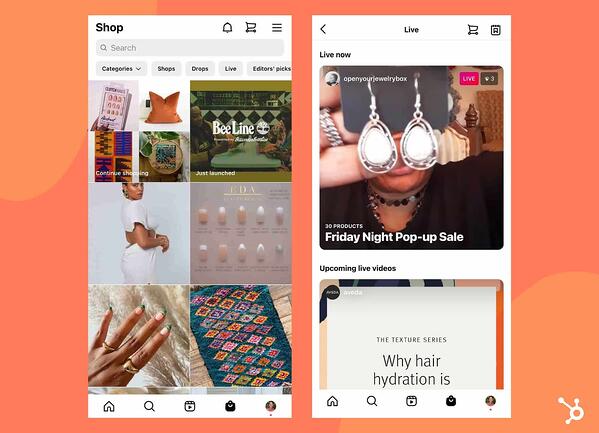
Knowing this data, it makes sense that Instagram’s shopping tools are more popular among B2C brands.

instagram shopping tools

Image Source

In addition to aligning with their goals, 48% of B2C marketers say it offers a high ROI. In fact, y it’s their best performing Instagram strategy along with leveraging the platform for customer service.

Despite these promising numbers, not all B2C brands have been trying out this strategy. For 37% of B2C marketers, 2022 will be their first time doing so.

Another reason why these shopping tools aren’t more popular with B2B brands is the revenue. 48% of B2B marketers say the biggest challenge they face is that it doesn’t generate enough sales.

An Emphasis on a Consistent Brand Voice

Thirty-six percent of B2C brands say a lack of a consistent aesthetic or voice has caused them to lose followers – 10% higher than for B2B brands.

42% plan to leverage this for the first time in 2022. However, those who use it say it’s the second-highest performing marketing investment behind creating content that encourages engagement.

In addition, 16% of B2C marketers say it’s the marketing strategy they’ll invest the most in, compared to only 9% of B2B brands.

Although B2B and B2C brands mostly intersect in their top goals, how they use the platform differs greatly.

Improve your website with effective technical SEO. Start by conducting this  audit.  

Categories B2B

8 Virtual Interview Tips to Help You Get The Job

If you’ve landed on this post, it’s likely that your resume has impressed the hiring manager(s) at the company you’re applying to work for, and you’ve now been invited to a virtual interview. That’s a huge accomplishment.

Free Kit: Everything You Need for Your Job SearchIf you’re looking for video interview tips, tricks, and best practices — or just want to know what in the world an automated interview is — you’ve come to the right place.

How to Prepare For Virtual Video Interviews

There’s something about remote interviews that can make the interview process more daunting. For some, it’s the risk of technical difficulties. For others, it’s the inability to read full body language.

However, virtual interviews can actually be better than face-to-face meetings. For one, you don’t have to travel, giving you more time to prepare and get yourself ready. Secondly, you can have some notes on your screen to help you hit some key points during your conversations.

Just like a traditional interview, a video interview is your moment to sell yourself to the interviewer and put a personality behind your amazing resume.

In fact, it’s what Shavon Bell, former executive recruiter at HubSpot, looks for when speaking with candidates.

“I recognize it can be challenging for a senior leader to fit all of their experience into a two-page document, so don’t leave anything to be assumed during exploratory conversations or an interview, tell your story the way you want it to be told — transparency is key,” she says.

Telling your story is what will set you apart from others – but that’s not all. It’s also important to know the story behind the company you’re interviewing with.

For Kate Kearns, one of HubSpot’s campus recruiters, showing that you’ve done your research on the company will make you stand out.

“Take some time to make sure you are prepared to answer questions testing your knowledge of the company and role,” she says.

Think about what hiring managers want to know about you during your short time talking. It’s not as easy to make a connection virtual, so finding ways to do so naturally will likely raise your interview score.

For example, explain how the role will help you reach your professional and personal goals. Identify what you can add to the company, and mention those superstar qualities about your talent that will make the hiring manager go to bat for you.

Next, we’re going to go over some tips you can follow for video interviews, but if you would like more information about preparing for an interview, check out this interview kit.

8 Virtual Video Interview Tips

It’s the big day. Or, as those in the theater call it, opening night.

The task at hand: sell yourself. Don’t let the screen interrupt the purpose of the interview. You know you have what it takes to land that role, and with these tips, you’ll knock that interview out of the park.

1. Dress to impress your interviewer.

As The Office character Michael Scott says, “I’m not superstitious, but I am a little stitious.”

That’s where my lucky interview blazer comes in. Every time I have a video interview so does my blazer: I never start one without it.

Even though your interview will be through a screen, dressing for the interview communicates to the interviewer that you still know how to maintain professionalism in a virtual setting.

So, even though you might be in your bedroom, or sitting at your kitchen table, make sure you’re in your business best. This can be a button-down shirt, a blazer, a suit, or simple jewelry.

2. Keep your notes accessible.

If you’re someone who finds it helpful to refer to notes when interviewing, keep them in front of you.

For me, it’s helpful to have my LinkedIn profile and resume open in another window, with sections I know I want to mention highlighted or bolded. This helps to make a quick reference.

Why it works: By already having those reference points accessible, you won’t forget anything important.

3. Test your technology beforehand.

You will be notified of the software you need to have in order to successfully complete your interview well in advance. Maximize this time, download the software if you haven’t already, and make sure you understand the basics of how it works.

This is also a great time to test how your webcam interacts with the software. No two video technology services are the same. So, you’ll want to test:

  • Microphone
  • Lighting
  • Camera

Pro-tip: Frame your camera so that the interviewer can see your face down to your shoulders and that there are a few inches of room above your head.

4. Maintain eye contact with your interviewer.

Remember: The only difference between a video interview and a traditional interview is that you aren’t in the same room as your interviewer. That said, be sure to maintain eye contact with your interviewer.

You might have other distractions, things that are unavoidable when working from home, such as family or roommates. The best way to maintain professionalism regardless of the outside environment is to keep eye contact and make sure the interviewer knows you are engaged. After all, they will be keeping eye contact with you.

Pro-tip: If you’re using two monitors, be sure to talk and look at the screen with the camera. Otherwise, the interviewer will look at your profile and be wondering what else you’re looking at.

5. Minimize possible distractions.

Even though there might be uncontrollable distractions, there are distractions that you can control. For instance, keep your phone away from you. Turn it over and put it on silent or in another room.

Additionally, if you plan to conduct your interview outside of an office setting, like a kitchen or a bedroom, be sure there’s nothing distracting in the background like a mess or people walking by.

Be sure to clean up your background so that the focus stays on you or use a background blur filter if your software allows.

Lastly, inform any roommates that you will be in a meeting during the time so that you’re not interrupted.

6. Set up proper lighting.

Because you won’t be meeting your interview in person, it’s important that they can clearly see you on video.

When you’re testing your technology, this is the perfect time to also test your lighting. Ideally, you can sit in front of a window to benefit from natural lighting.

If that’s not possible, you may need to buy a desk lamp to help illuminate your full face.

Pro-tip: When using a desk lamp, don’t aim the lamp right on your face. Instead, direct it to the wall and let the light reflect back to your face. This will give you more natural, diffused light instead of a harsh light with hot spots.

7. Be early to each round.

This is a chance to go over notes and take a few deep breaths to stay calm and motivated. It makes a big difference to go into an interview calmly and composed, rather than rushing to join the video call after a quick bathroom break.

This doesn’t mean that you have to sit around on Zoom or Skype 20 minutes prior to your interview start time. However, do try to be five minutes early for each interview round.

8. Speak loudly and clearly.

If you have a soft voice, be mindful of speaking loudly enough so your microphone will pick up your voice. Video interviewers have a little less to go from, and if they can’t hear you, they won’t be able to assess your answers.

To prepare for this, record yourself saying the lyrics to your favorite song with the video software you will be using. Take time to separate the words, and listen back for volume control.

In essence, a traditional video interview is one that you can complete from your own space. Fixing up this space to be interview-ready can be a challenge, but you don’t have to completely alter the functionality of the room. Just be sure you’re communicating yourself and your professionalism.

Now, what if your interview doesn’t include an interviewer? That means it will likely be automated. Let’s go over what that means, and provide tips on how to master them.

These interviews take an in-person interviewer out of the equation. Instead, your interviewer will be a series of questions that you’ll have an allotted amount of time to read and comprehend. Then, you will record your responses via video or text, depending on the instructions.

How do you successfully complete one? Let’s cover some best practices.

When the interviewer is merely represented by words on a screen, it can be an unnerving experience trying to prepare for the interview questions. But don’t fear, these tips will help you make sure you have all your bases covered to ace your automated interview.

1. Test your technology in advance.

When you receive your automated interview invitation, make sure you have the correct software needed. For instance, if your automated video is hosted using a third-party app that you have to download, make sure you have it beforehand.

Additionally, test your tools:

  • Is your webcam working?
  • Is your microphone turned on?
  • Is your keyboard properly working?
  • Is your face illuminated or do you need better lighting?

All of these questions will be imperative to your success in an automated interview — there’s nothing worse than realizing something’s wrong once the timer starts.

2. Do a trial run beforehand.

Think about the questions you might be asked during the interview. Then, record yourself answering them on a time limit. Note: this will feel weird and unnatural.

However, timing your answers and analyzing your body language will help avoid those intrusive interview thoughts of, “Will I have enough time?” and “How am I coming across?”

Treat the trial as if it’s a real interview: dress for the occasion and rehearse earnestly.

3. Speak steadily and concisely.

My biggest fear when I was interacting with my first automated video interview was having enough time to get all of my thoughts out. My advice is to trust the time limit. Chances are, most of your in-person interview responses take the same amount of time the automation allows.

That said, you’ll have more than enough time to speak steadily. When you practice, take note of your sentence flow and be mindful of how fast you’re speaking.

On the other hand, your answers should get to the point — avoid fluff so you can get to all the points of the question.

4. Be cognizant of body language.

During in-person interviews, you’re likely hyper-focused on body language. Automated interviews should be no different, especially if you are recording your answers with video.

Remember to treat these interviews as if they’re with another person (More often than not, real people will be assessing your answers.)

Make eye contact with the web camera or the screen in front of you and maintain a professional posture.

5. Don’t overthink the interview.

Automated interviews usually provide clear instructions and more than enough time to answer the question.

In fact, automated interviews can be quite fun; you’ll have the opportunity to present yourself in a new way, and to do so within the comfort of your own space.

6. Make sure you understand the prompts.

Once you receive your prompts, take the time to read, comprehend, and form your answer before you record.

You won’t be able to ask the prompt for clarification and you may not be able to re-record your answer once you send it in. With this in mind, don’t rush into recording. Take the time to ensure you understand the question and know how you will deliver your answer.

However, just like in in-person interviews, mistakes happen. If you flub a word, misspeak, or want to change your answer mid-way, it’s not the end of the world. Continue on confidently.

You’re human and the person reviewing your interview is too.

7. Give it your best shot.

One of the biggest mistakes you can make during an automated interview is not answering a question. Even if you are unsure of what the question is asking, take your best shot. You can always restate what you believe the question is asking in the interview to clear up confusion.

If the prompt asks you to detail a situation you’ve never been in before, instead of leaving the answer field blank, or answering the question by saying, “I don’t know, I’ve never encountered that,” explain how you would approach the situation instead.

It looks way better hiring managers for an answer to start with, “I’ve never come across this situation in particular, but if I had, this is how I would approach it,” other than no answer at all. Remember, these situational questions are to demonstrate your problem-solving skills in a work environment.

Overall, take a deep breath. Your resume has already impressed the company, and the purpose of the interview is to make sure you can back up your experience. Give the interviewer, whether automated or in-person, a chance to get to know you, your personality, and your professionalism.

Good luck!

Editor’s Note: This post was originally published in May 2020 and has been updated for comprehensiveness.
Apply for a job, keep track of important information, and prepare for an  interview with the help of this free job seekers kit.

Categories B2B

Send Your Clients A Birthday Email That’s Sure to Get Engagement

Birthdays can be fun to celebrate. They’re like our own personal holidays where people wish us a happy birthday, wait staff sings and brings us free desserts, and our social media feeds are filled with best wishes and adorable memes. It’s also fun to watch the birthday offers roll in

Download Now: 25 Proven Sales Email Templates [Free Access]

Free dinner at our favorite restaurant? Yes, please.

Free ice cream at the best ice cream shop in the city? Don’t mind if I do.

25% discount on our preferred brand of makeup or beer? Where do I pay?

Thankfully, receiving a birthday wishes email from your favorite businesses isn’t just good for the consumer. It’s also great for the business.

Happy Birthday Emails

A happy birthday email is an automated marketing email that is sent out on or near a customer’s birthday. While these emails celebrate the “personal holiday” and give the customer a special offer to help sweeten their day, they are actually designed to increase customer sales and retention.

Benefits of Sending a Birthday Wishes Email

As we mentioned earlier, birthday emails benefit the business as well as the customer. There are a variety of reasons to send a birthday email including:

  • Staying top of mind with your customers
  • Reminding potential customers that you exist and likely have the solution they need
  • Showing loyalty to existing customers and subscribers
  • Garnering goodwill that will likely lead to word-of-mouth marketing and referrals
  • Increasing sales (the birthday holder may get a free meal, but they’re probably not dining alone)
  • Increasing retention (80% of retail professionals indicate that email marketing is their greatest driver of customer retention)
  • Improving customer engagement
  • Creating a sense of community

According to Experian, birthday emails can be a powerful play for businesses. Their survey found that birthday emails had a 481% higher transaction rate, resulted in 342% higher revenue, and had a 179% higher unique click rate when compared to other promotional emails.

Ready to start celebrating your customer’s birthdays with them? Check out the format below to get started.

Happy Birthday Email Template

When it comes to designing your birthday emails, creativity counts. Your email service provider should have multiple templates to choose from that can be customized to better reflect your brand.

A birthday email should be friendly and fun and provide something (besides well wishes) to the customer. You can offer a discount, special offer, or a free gift with purchase.

Include your customer’s name in the email or subject line to make the email feel more personal. If you collect any information about your customers’ geographic area, hobbies, interests, or family, you can add this to the email to personalize it further.

Keep the email brief and highlight what you’re offering them to help their celebration. You can send these emails out before or on their birthday. However, you’ll need to make sure that your copy reflects the option you choose. Include all the promotion details so customers know exactly what they’ll get if there are any requirements (like a purchase) to receive it, and the expiration date so they don’t miss out.

Here’s a sample template you can follow when crafting a birthday email for your customers:

Subject Line: Happy Birthday, [Customer Name]

Happy birthday to you! We’d love to treat you for your special day. Celebrate with a [XYZ special offer] the next time you order.*

*Offer expires on [Expiration Date].

Need some more inspiration? Check out these birthday email examples.

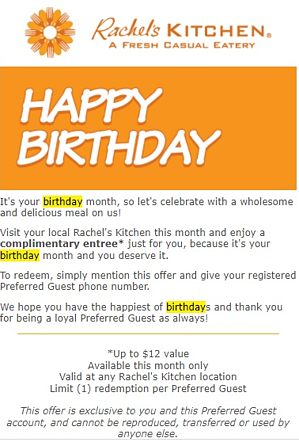
Madewell happy birthday email

Rachels-kitchen-birthday-email

Sweetgreen happy birthday email

If you don’t want to send a happy birthday email from scratch, there are a number of tools you can use to send digital e-cards and gifts. Rybbon integrates directly with your CRM to send e-gift cards and offers to your contact list. 

For more personalized gifts, Sendoso can help companies send direct mail, and physical gifts within one easy-to-use platform.

Birthday Email Subject Lines

A birthday email is only as powerful as its subject line. Why? Because if you don’t catch their attention the moment they see it in their inbox, they won’t bother opening the email and all of your work will be a moot point.

There are a variety of email subject lines that will pique your customer’s interest. Here are a few to consider:

  • It’s your birthday! (We want to help you celebrate)
  • A special gift for your birthday
  • Make a wish
  • A special gift of $10 off for your birthday
  • Have your birthday dinner on us
  • An important birthday is coming up
  • A little bird told us it’s your birthday

Whether you choose to go with one of these options or construct your own, you’ll want to include:

  • What your email is about
  • What you are offering them
  • A catchy or intriguing sentence to catch their attention
  • An expiration date to express urgency

Remember that the average person’s inbox is flooded with marketing emails on a daily basis. Make sure your subject line is able to capture their attention.

Sending happy birthday emails to those on your email list (whether they’ve purchased from you in the past, or not), is a great way to help your contact celebrate their birthday, and for your company to build a stronger relationship with its audience.

New Call-to-Action

Categories B2B

Formula Parse Errors: What They Are & How to Fix Them

You’re working in a spreadsheet and you want to use a function.

→ Access Now: Google Sheets Templates [Free Kit]

You write the formula, excited to get the results, then you see “Formula parse error” leaving you feeling confused and a little defeated.

Let’s cover what that actually means and what probably lead to that error message.

It’s like trying to speak a different language without taking the time to learn it first.

The software can kind of make out what you’re saying, but not well enough to give you an accurate result.formula parse error warning message

There are two likely causes for this error: There’s a typo in your formula, or the order of operations is unclear.

We’ll go over some examples of each so that you can identify and fix them in your own formulas.

Common Formula Parse Errors

Usually, a formula parse error happens because of:

Incorrect syntax
– E.g.: Typing =+ instead of =, forgetting to put quotation marks around text values, putting two operators next to each other without anything in between them


Incomplete syntax
– E.g. Leaving out a parentheses.

Another reason why you may be getting these errors is that you’re trying to use text values where numbers are expected.

Let’s dive into the specific types of errors you may encounter:

#N/A Error

One of the most common errors is the #N/A error. It occurs when a formula can’t find what it’s looking for.

For example, if you’re using the VLOOKUP function to find a value in a table, and the value you’re looking for isn’t in the table, you’ll get the #N/A error.

#DIV/0 Error

This happens when you try to divide a number by zero.

For example, if you have a formula =A17/B17 and the value in B17 is 0, you’ll get the #DIV/0! error.

#REF! Error

When a formula contains an invalid cell reference, you will get this error message.

For example, if you have a formula that references cells A17:A22 and you delete row 21, the formula will return the #REF! error because it no longer has a valid reference.

#VALUE Error

The #VALUE! error occurs when a formula contains an invalid value.

For example, if you have a formula that multiplies two cells and one of the cells contains text instead of a number, you’ll get this error.

#NAME Error

This error occurs when a formula contains an invalid name.

For example, if you have a named range called ” Prices” and you accidentally type “price” in your formula, you’ll get the #NAME? error.

#NUM Error

The #NUM! error occurs when a formula contains an invalid number.

Say you have a formula that divides two cells and the result is too large to be displayed, you’ll get this error.

Now that we know what can cause a formula parse error, let’s look at how we can fix them.

How to Fix Formula Parse Errors

The best way to avoid getting formula parse errors is to carefully check your syntax as you type it out. If you’re not sure what order the operations should go in, refer back to the order of operations suggested by the software you’re using.

If you’re getting formula parse errors, here are some steps you can take to fix them:

  • Check your formula inputs and make sure they’re correct.
  • Use the IFERROR function and display a different result if an error occurs. E.g. “Not found.”
  • Check your spelling and make sure all the parentheses are in the right places.
  • Make sure you’re using the correct operators.
  • Use cell references instead of hard coding values into your formulas.
  • If you’re using text values, make sure they’re enclosed in quotation marks.

By following these steps, you can avoid formula parse errors and get accurate results from your formulas.

business google sheets templates

Categories B2B

How to Sort in Google Sheets

Google Sheets is a great tool for tracking, analyzing, and organizing data for your company or business.

While the application is user-friendly, it can be a bit tricky if you’re new to organizing data in a digital spreadsheet. But, don’t worry! Read on for an easy introduction to sorting in Google Sheets.

First, know that there are many ways to sort data in Google Sheets. Some of the most common features marketers like you will use when working in Google Sheets are:

  • Pivot tables – Useful for gathering data from a large database
  • What-If analysis – Allows you to experiment with different scenarios for values and formulas to understand possible outcomes
  • Charts – A simple way to visualize data in the form of a graph, diagram, or table

While these features can also be found in Microsoft Excel, Google Sheets may be the better option for you. Unlike Excel, Google Sheets doesn’t require a paid subscription.

The tool is free for anyone with a Google account or Google Workspace account. Many users also find Sheets a more optimal tool for collaborative projects when compared to Excel.

So, how do we get started sorting in Google Sheets? Let’s dive in.

→ Access Now: Google Sheets Templates [Free Kit]

Sorting by Sheet Vs. Sorting by Range in Google Sheets

The latter is especially helpful if your spreadsheet contains multiple tables and you want to organize one table without disrupting the others.

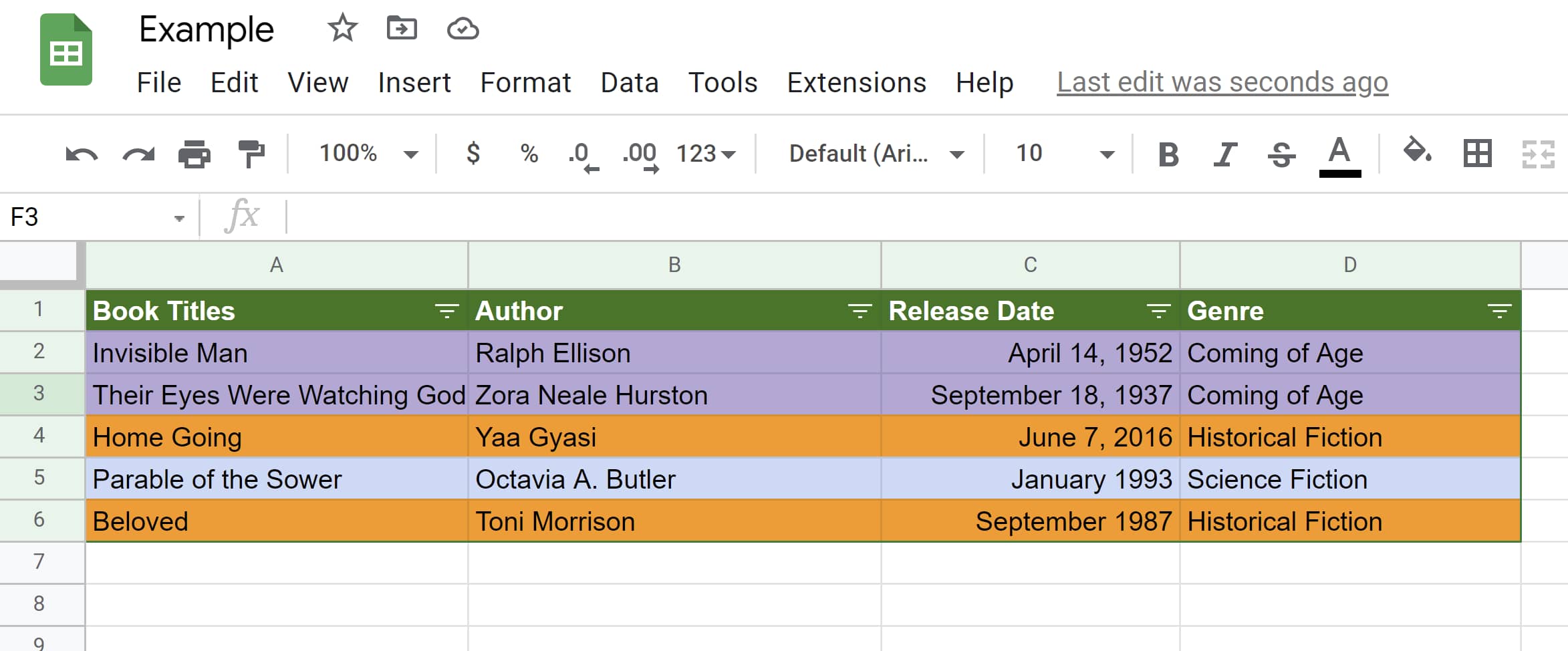
For example, the spreadsheet below is sorted by sheet. The titles of the books (column A) have been sorted into alphabetical order.

In the second example, the titles are sorted in reverse alphabetical order. In both cases, each book’s author, publishing date, and genre remain with the corresponding title.

Titles sorted alphabetically in Google SheetsData sorted in reverse-alphabetical order in Google SheetsThe example below has two separate graphs on one sheet. Notice the graph containing book titles, authors, release date, etc … is organized by alphabetical order, while the book log below it is not.

That’s because the graph of book titles was sorted by range so it wouldn’t disrupt the book log below it.

Two graphs shown on one Google sheet, one is sorted alphabetically and the other is not

How to Sort Columns and Rows in Google Sheets

Knowing how to sort rows and columns in Google Sheets is key to organizing your data. Here’s a step-by-step guide:

Alphabetical or Numerical Order

Step 1: Open a spreadsheet in Google Sheets and highlight the group of cells you’d like to sort. In this example, we’ll use the graph of book titles.

Range of cells selected to be sorted in Google SheetsIf your sheet has a header row (like the green header row in the example), you’re going to want to freeze that row so it stays in place as you sort.

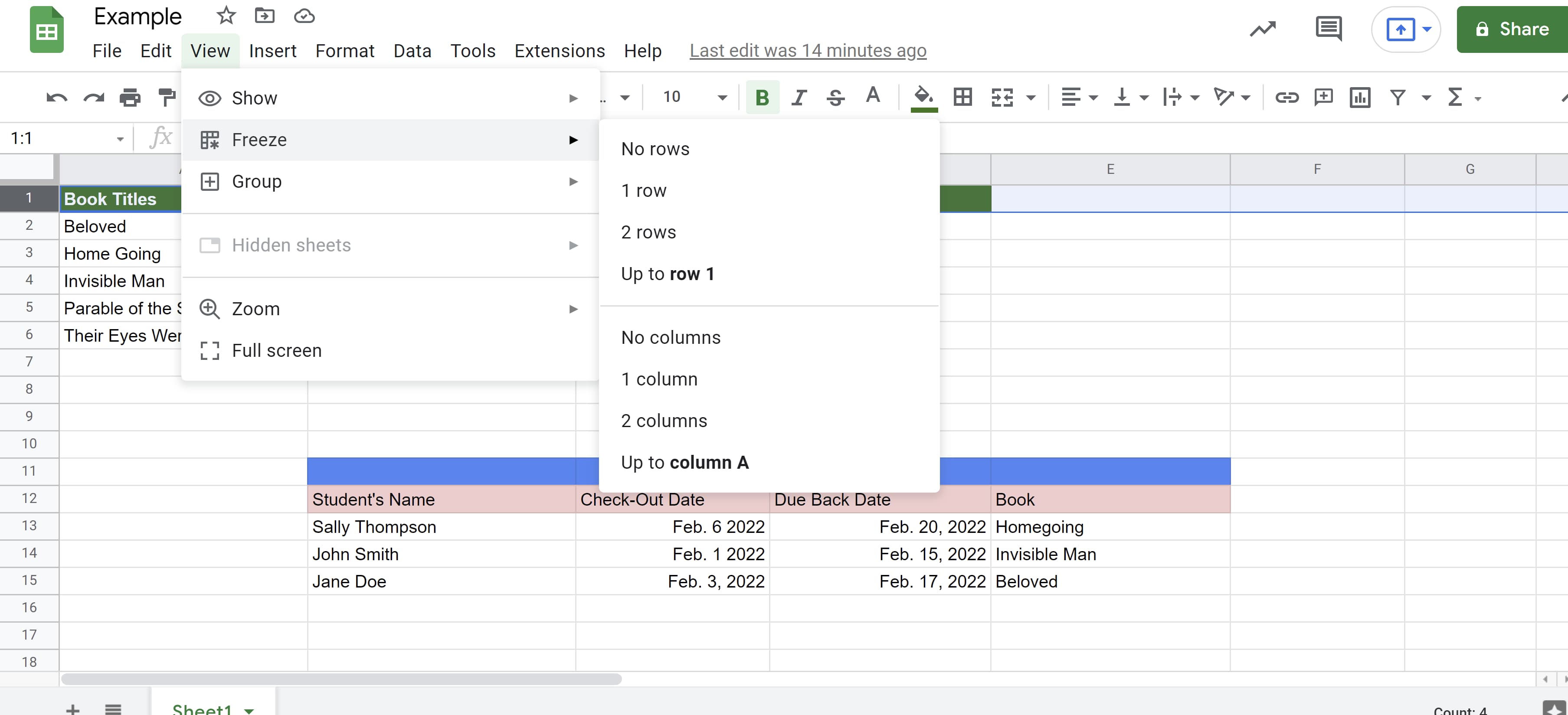
To do this, select the header row, click the “View” tab, click “Freeze,” then click “1 row.” If you do not have a header row, then you can move on to the next step.

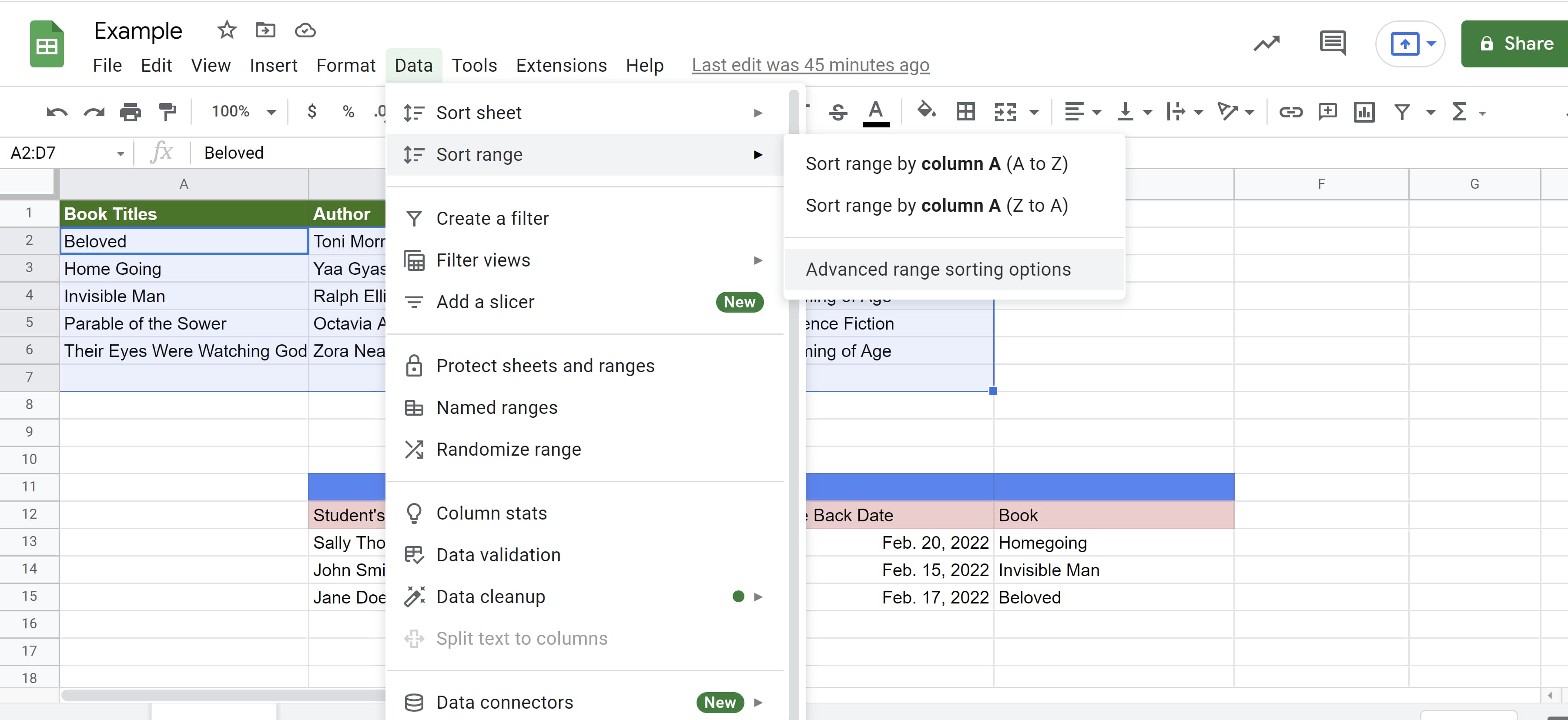
Header row frozen in Google SheetsStep 2: Click the “Data” tab then “Sort Range” then “Advanced range sorting options.”

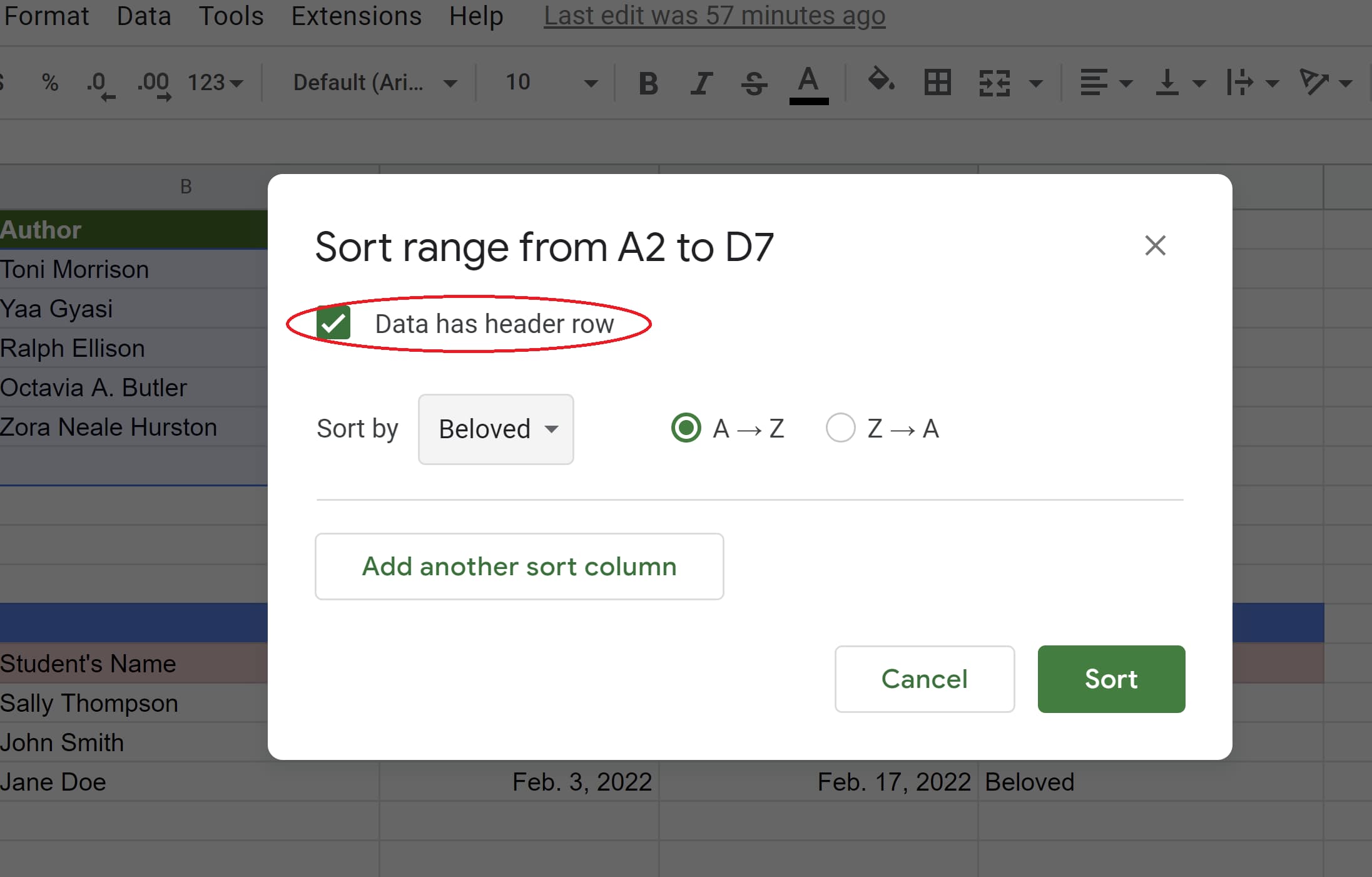
Data and Sort range tabs open to reveal Advanced range sorting options in Google SheetsStep 3: If your columns have titles, click “Data has header row.”

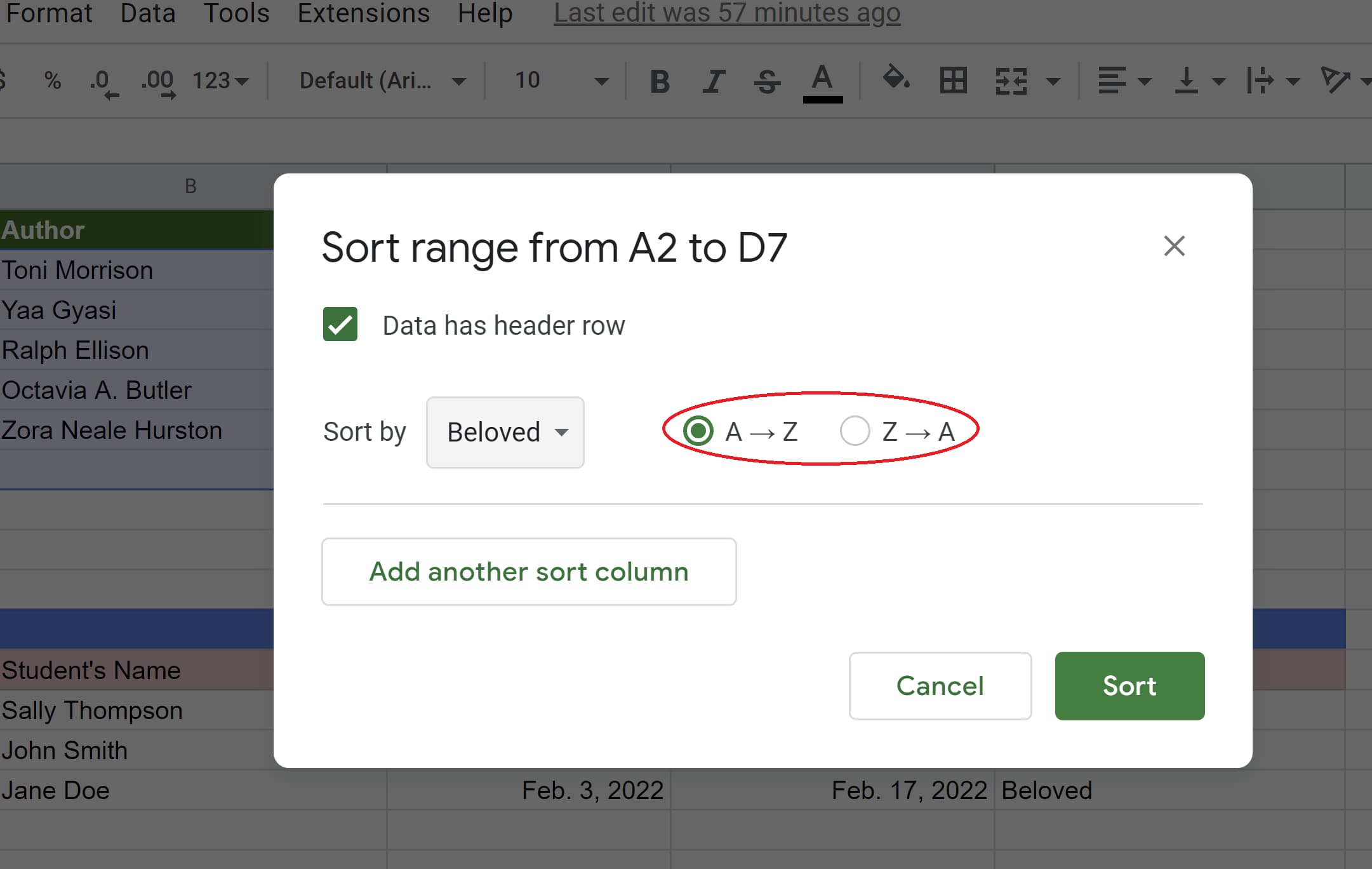
Data has header row option selected in Google SheetsStep 4: Select the column you want to sort first then choose the sorting order. A-Z and Z-A will put your data in alphabetical and reverse alphabetical order respectively.

If you’re working with numbers, A-Z will organize the data in ascending order and Z-A will organize it in descending order.

A-Z option selected to sort data in ascending order in Google Sheets

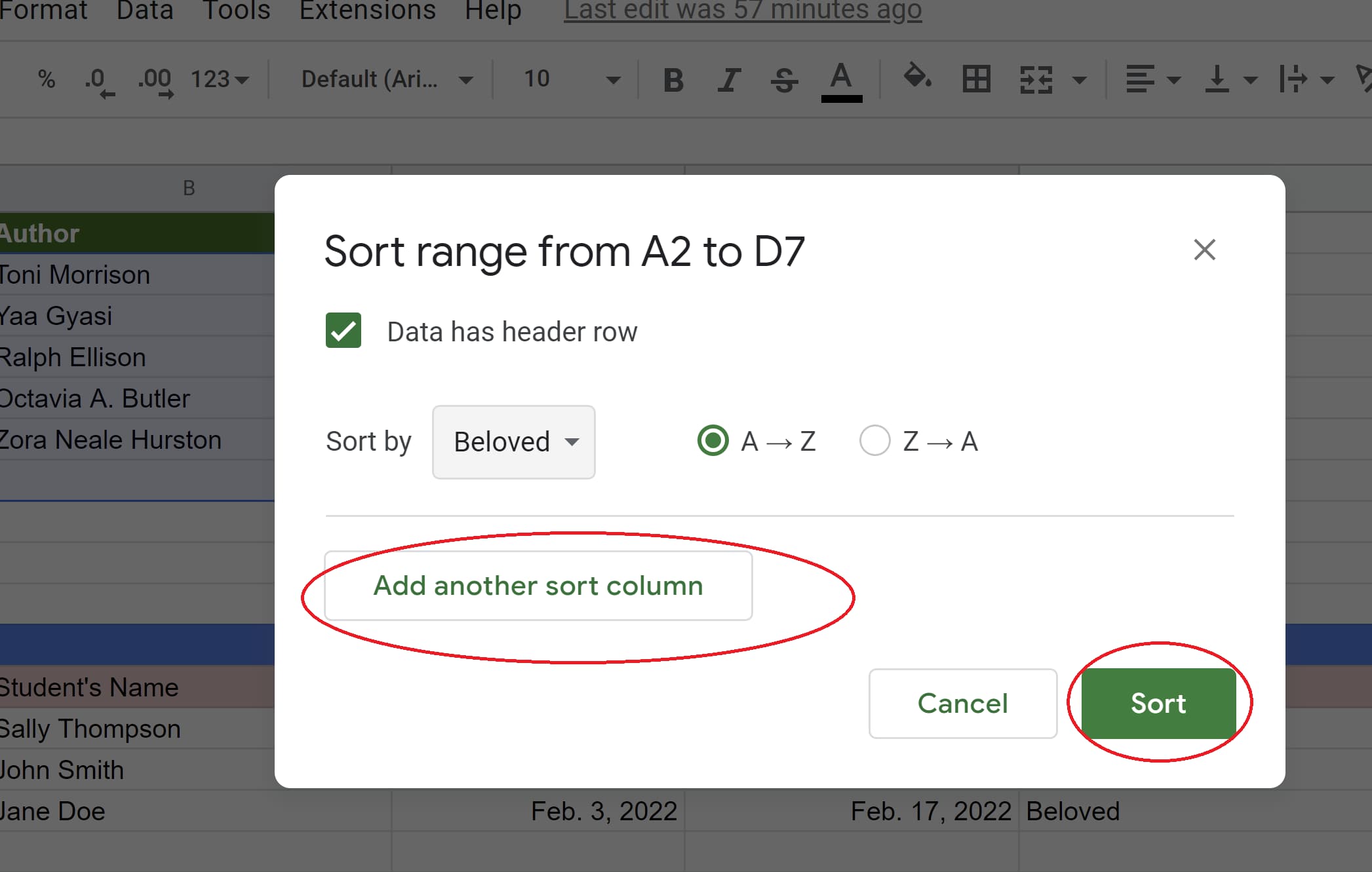
Step 5: To add another sorting rule, click “Add another sort column.” Then click the green “Sort” button.

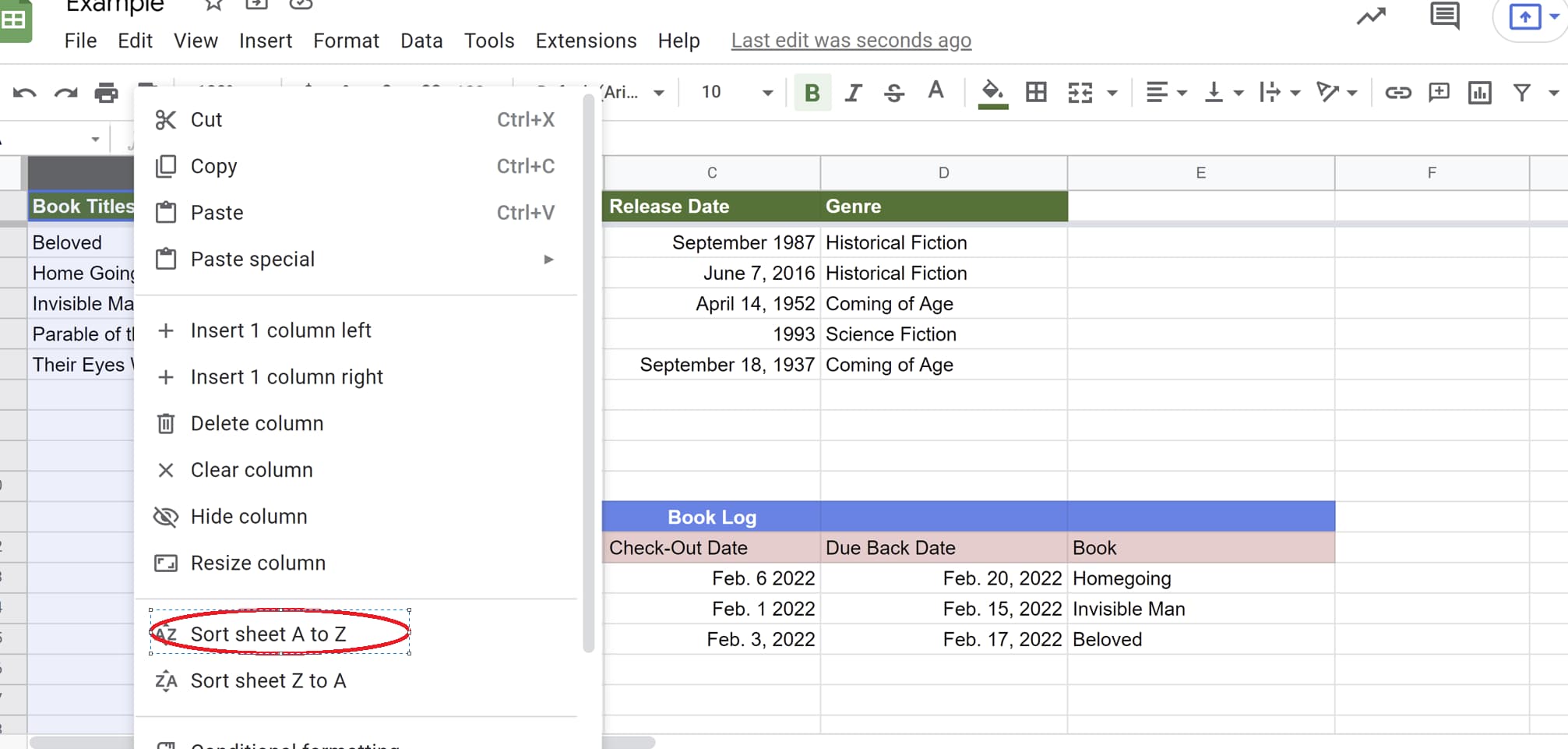
Add another sort column and Sort button pictured in Google SheetsStep 6: To sort an entire sheet, right-click the letter of the column you want to sort by, then click sort A-Z or Z-A.

Sort sheet A to Z tab circled

How to Filter Your Data

Filtering your data is especially helpful if you want to hone in on specific information from a large data set. It’s also great if you only want certain information displayed when people first open your spreadsheet.

Step 1: Select the range of cells you want to filter.

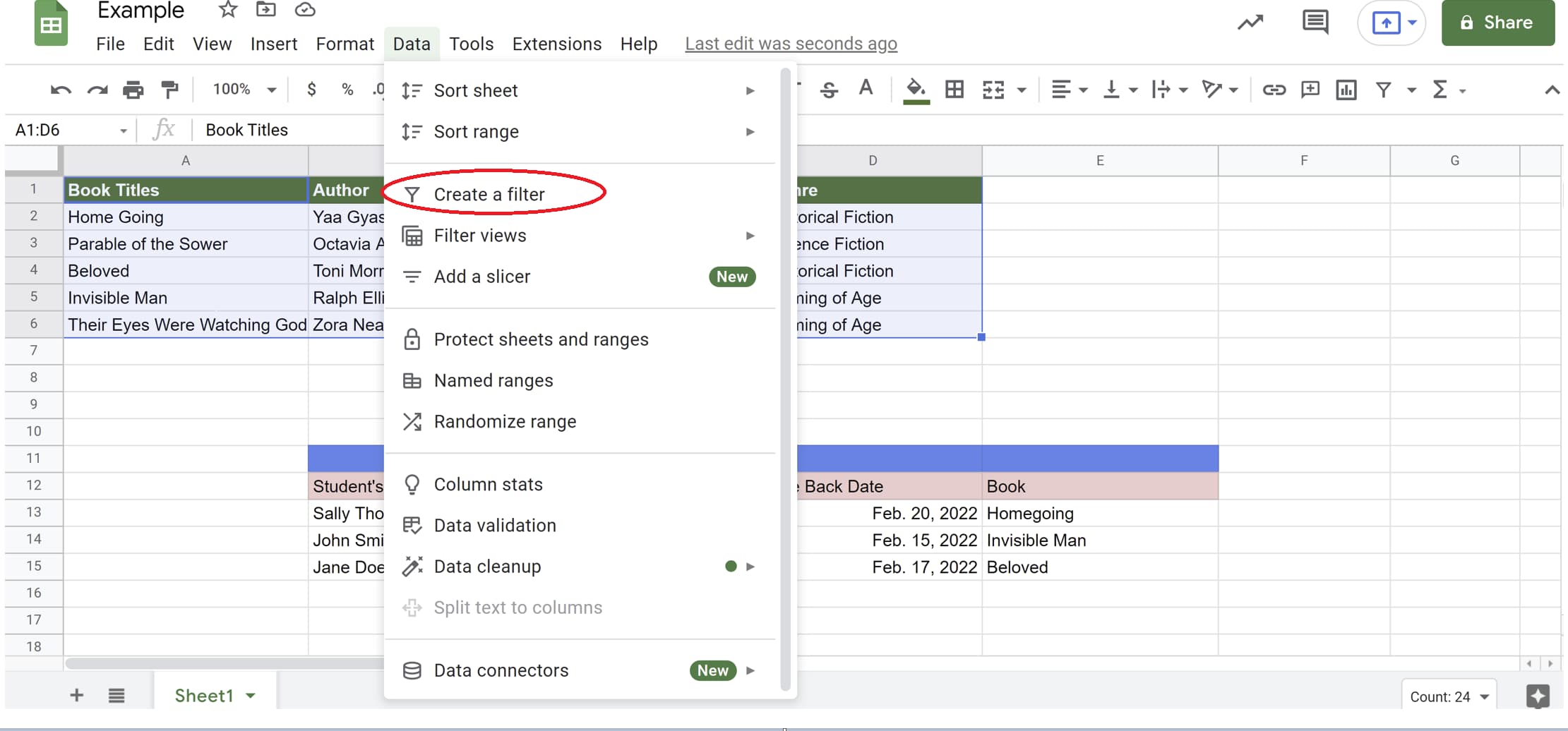
Range of cells selected for sorting in Google SheetsStep 2: Click the “Data” tab then click “Create a filter.”

Create a filter tab selected in Google SheetsAfter clicking “Create a filter,” your graph should look like the example below. Notice the filter icons next to each column header name and the new border around the graph.

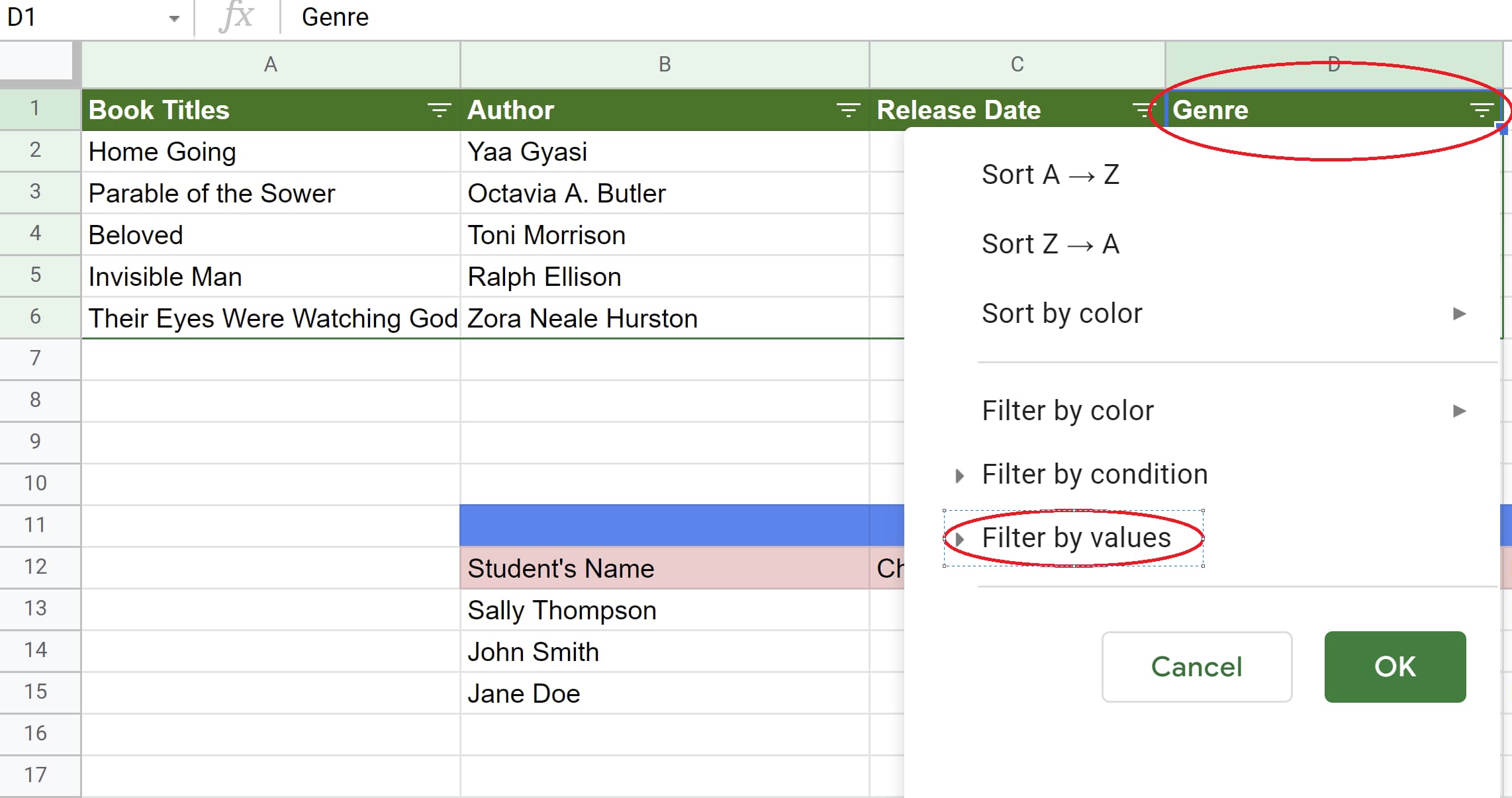
Filters created for columns within Google Sheet graphStep 3: Let’s say we only want to see book titles that are historical fiction. To do this, we’d click on the filter icon next to “Genre,” then click “Filter by values.”

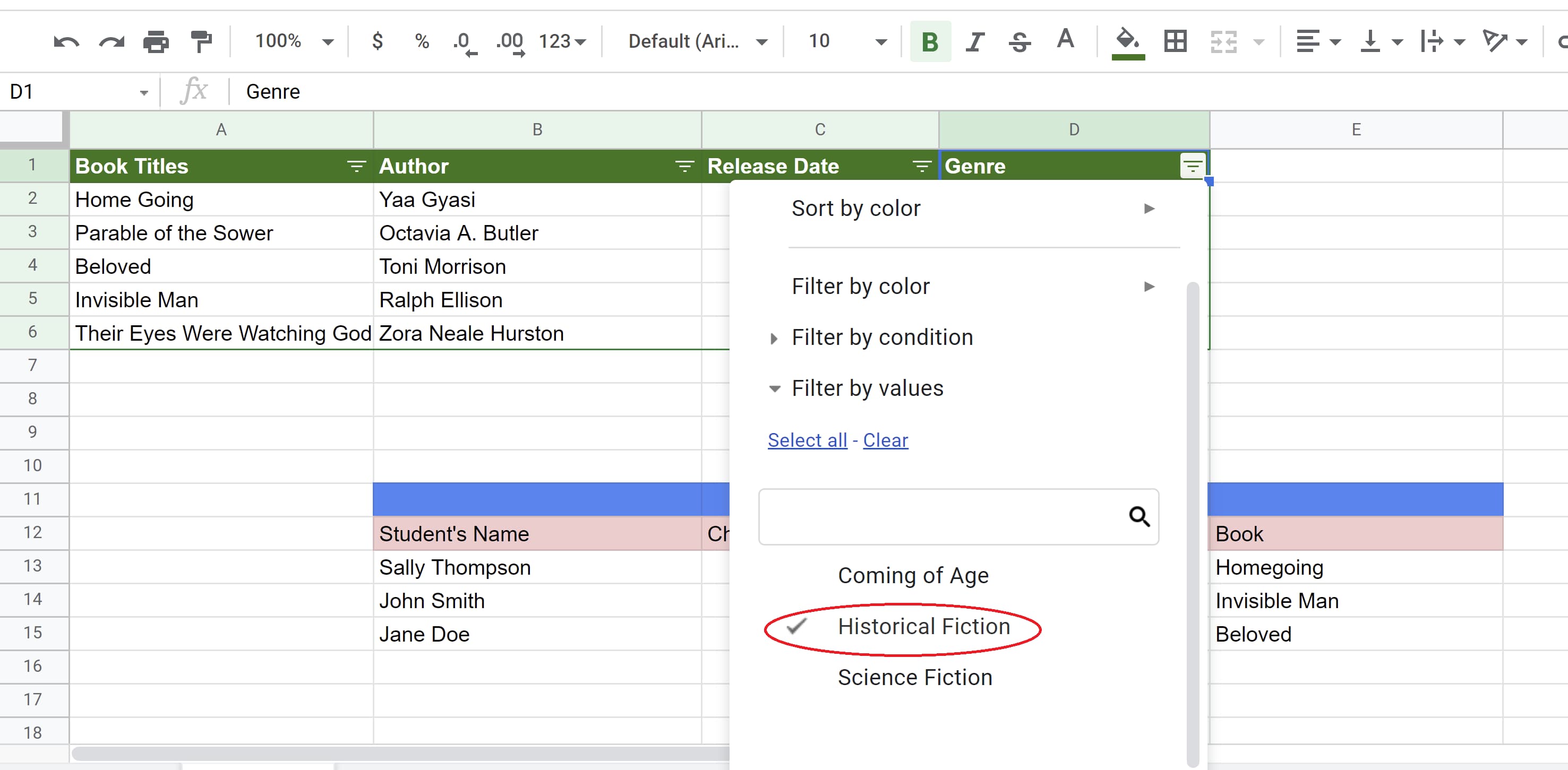
Filter icon in genre column is opened and Filter by values tab is selected in Google SheetsStep 4: Then, we’d uncheck everything but “Historical Fiction,” and click “OK.”

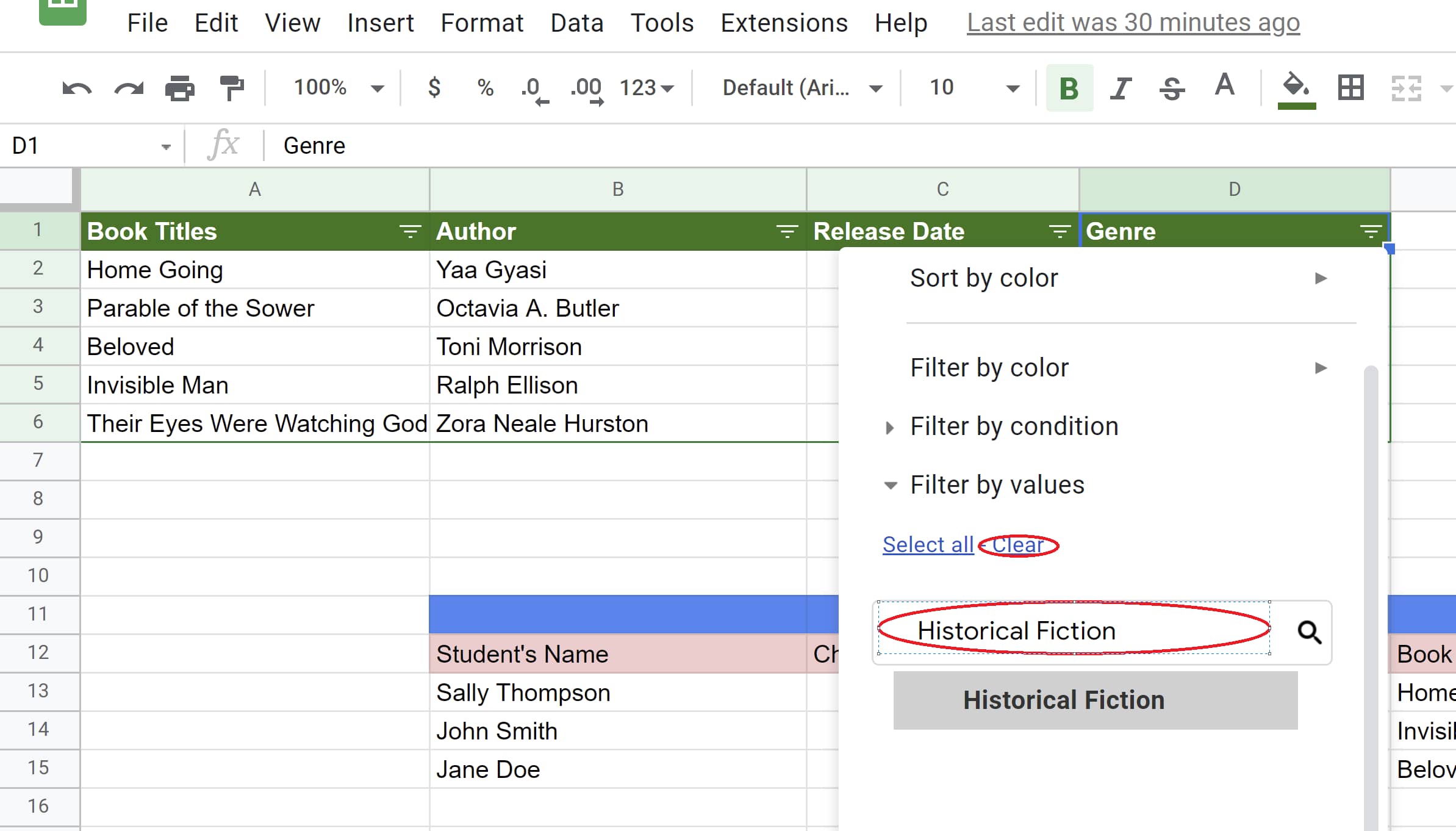
Historical Fiction data value is selected while other values are de-selected in Google SheetsThis can also be done by clicking “Clear” and typing in “Historical Fiction.” The latter method is great if the value you want to sort by isn’t listed and you want to add your own.

Historical Fiction data value is selected while other values are de-selected in Google SheetsNo matter which method you choose, the end result should look like this:

Google Sheets graph filtered to only show historical fiction titles

How to Sort Your Data by Color

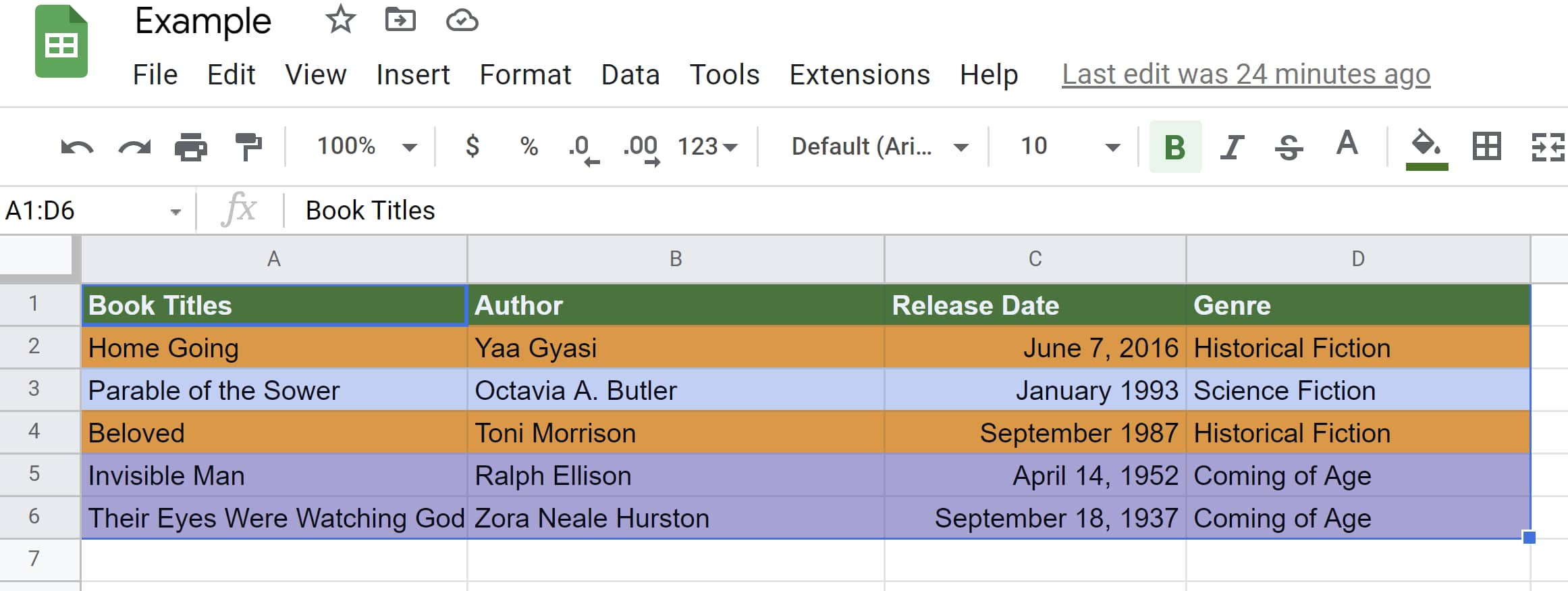
Let’s say the book titles are all color-coded by genre with historical fiction being orange, science fiction being blue, and coming of age being purple.

To sort these color-coded titles so that coming-of-age books are at the top, do the following:

Color-coded data to be sorted in Google SheetsStep 1: Select the range of cells.

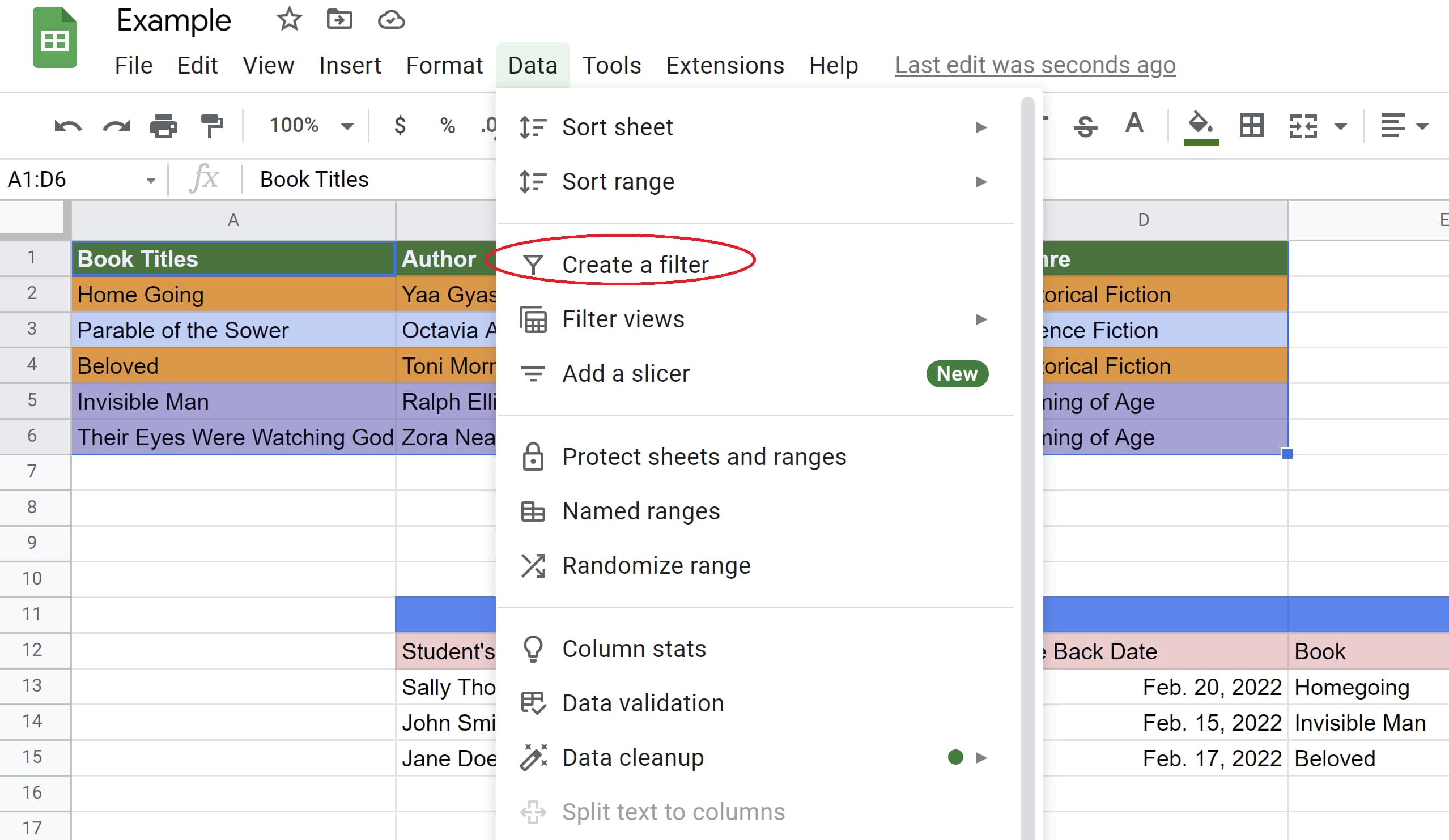
Range of cells selected for sorting in Google SheetsStep 2: Click the “Data” tab then click “Create a filter.”

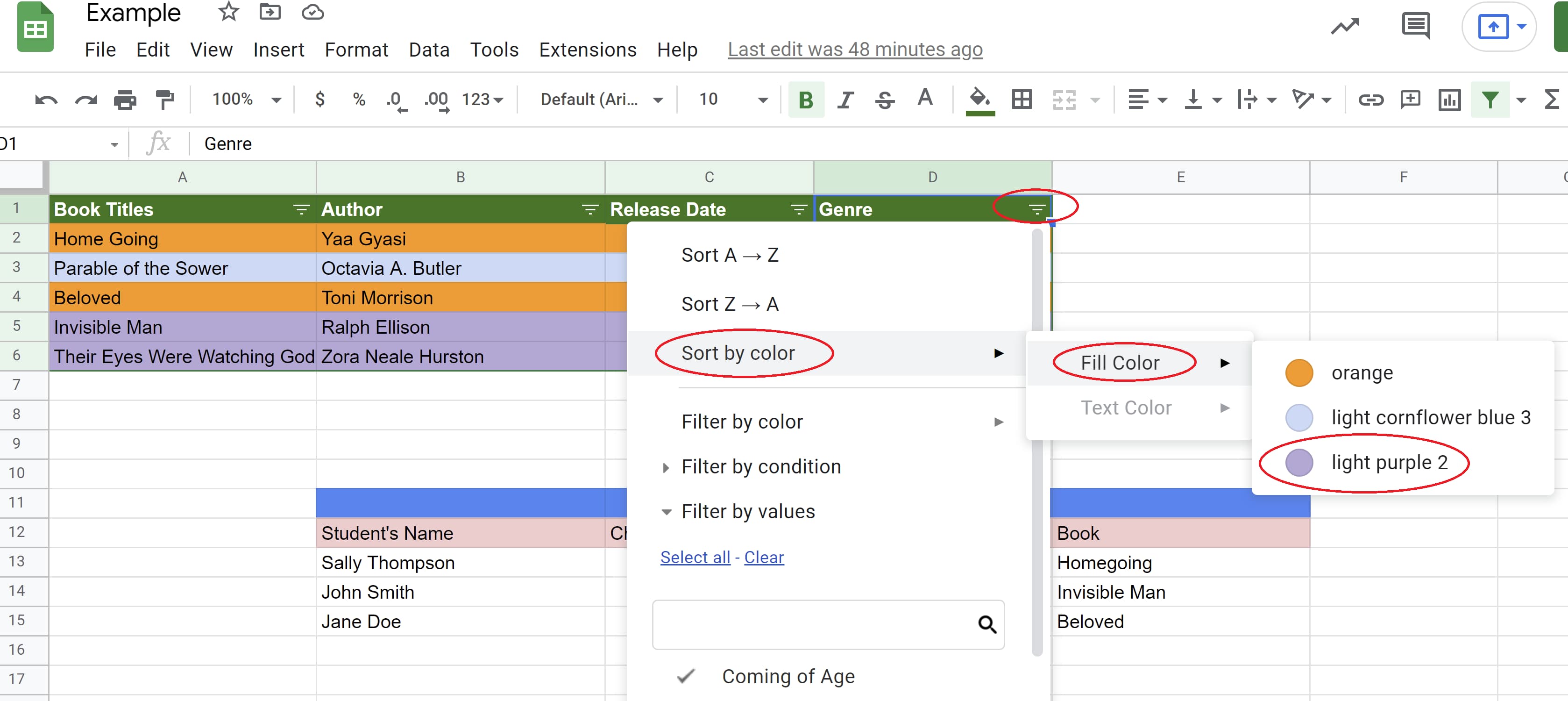
Data tab opened and Create filter tab selectedFilter created in Google SheetsStep 3: Click the filter symbol in the genre column, then sort by color, fill color, then purple.

Filter in genre column selected, Sort by color tab opened, followed by Fill Color tab, followed by purple valueAfter doing so, all coming-of-age titles will appear at the top of the graph.

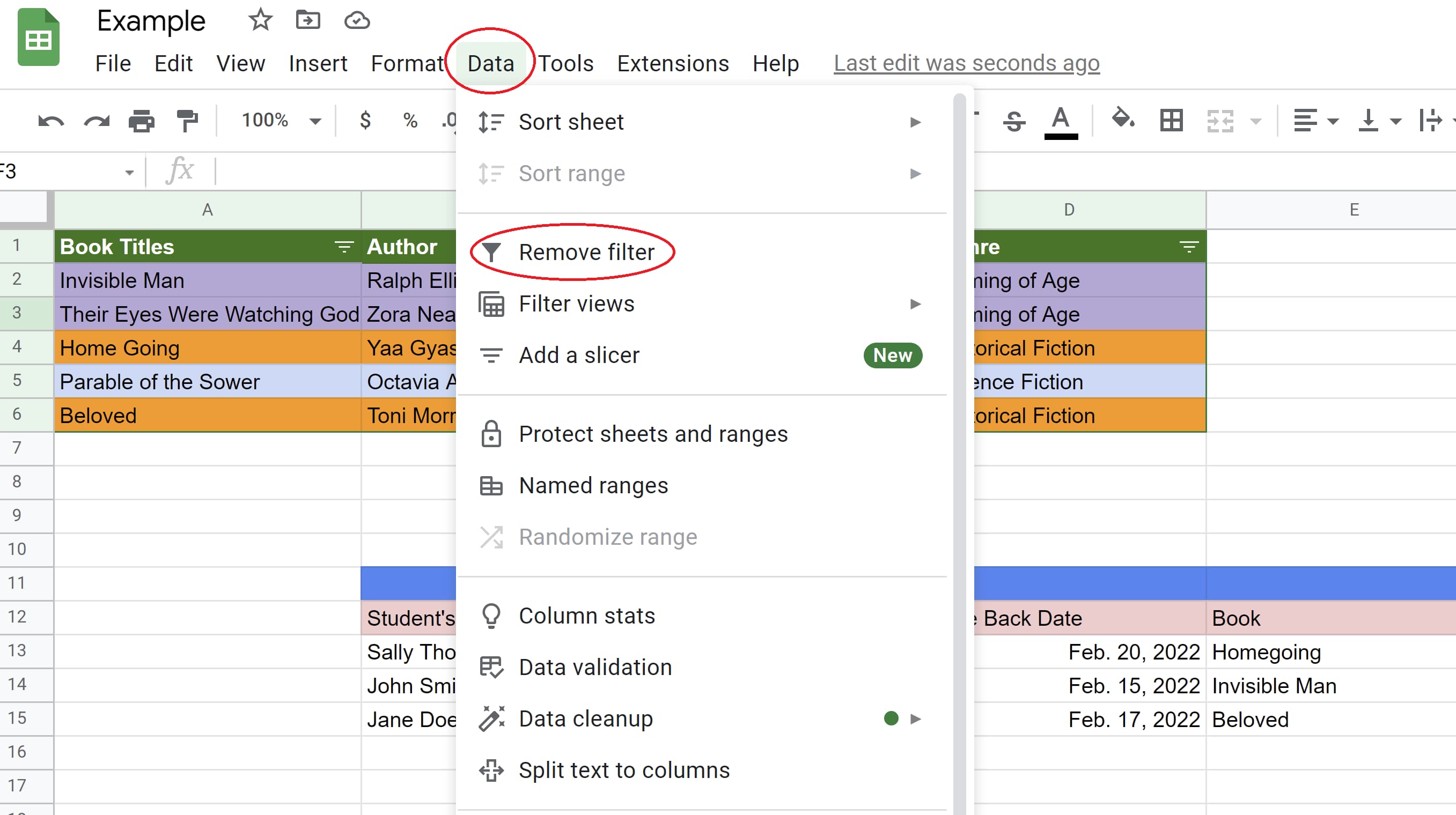
Purple-coded data are sorted to the top in Google SheetsIf you’d like to turn the filter off, simply click “Data” then “Remove filter.”

Data tab selected followed by Remove filter option to remove the filters in Google Sheets

Remember that your filter will be visible to anyone with access to the spreadsheet. If someone has permission to edit your spreadsheet, that person can also change the filter.

And that’s how you can sort and filter your data in Google Sheets. Now you’ll be able to organize your data digitally in one application.

Remember, Google Sheets is available for free to anyone with a Google account or Google Workspace account. It’s also ideal for collaborative projects thanks to Google’s sharing and editing features. Happy sorting!

business google sheets templates

Categories B2B

Quora Ads: Are They Right For Your Business?

When you think of online advertising, what’s the first thing that pops into your mind? Google? Facebook? YouTube?

Download Now: Free Ad Campaign Planning Kit

If you limit yourself to those digital media giants, you could be missing out on a more targeted market that is reaching 300 million users every month.

What Is Quora? And Who Uses It?

Quora is a social question-and-answer website, founded in 2009. Over the years, Quora has earned a reputation for crowd-sourcing the best responses to questions based on a Q&A engine of curious and highly engaged users.

In June 2017, Quora launched its advertising services, and businesses are seeing significant ROI from advertising on Quora. Why? Quora users are 20% more likely to have authorized a business purchase. They’re 65% more likely to report a college degree. They’re also 37% more likely to be a manager. And they’re 54% more likely to report an annual household income of more than $100K.

Even more interesting? 63% of Quora users conduct research before major online purchases. In the United States, Quora users are highly educated and primarily live in West and East Coast metropolitan areas.* With demographics like that, Quora Ads might be the perfect way to connect with your target market.

Let’s dig deeper into why Quora makes sense for advertising, explore what advertising options are available, and delve into best practices for running ads on Quora.

Quora Ads

When you’re ready to launch your first Quora Ad campaign, you’ll be pleasantly surprised by how easy it is, which makes it an ideal platform for beginners. You only need two lines of text and a landing page to get started.

While it’s quick and simple to launch your ads on Quora, don’t underestimate the platform’s power. Being able to pinpoint users who are interested in specific topics and/or questions means that Quora Ads provide a level of niche targeting that most other ad platforms can’t deliver.

There are several objectives to choose from, including conversions, traffic, awareness, app installs, and lead generation. And you can target your ads based on users’ interests, behavior, location, what they’re reading, and more.

If, for some reason, you get stuck as you set up your first Quora advertising campaign, you can always get help by clicking the ‘Talk to an Expert’ button at the bottom of the Quora for Business page.

How much does it cost to advertise on Quora?

You can start advertising on Quora’s self-serve platform for just $5 a day, which makes it almost risk-free to experiment and discover what advertising tactics work best for your organization.

Quora Ads uses a live auction system. In the way auctions commonly work, buyers — in this case, advertisers — offer a bid for the items being auctioned (i.e., ad placements). Final costs vary depending on the competitive landscape and your targeting selections.

Major debit and credit cards are accepted, and you’re only charged when your spend meets specific billing thresholds. The first threshold is $25 USD, and the threshold rises with each successful charge to $50, $250, $500, and $750. You are charged either when you hit your current billing threshold, or on the first week of the month, whichever comes first.

Types of Quora Ads and Where They Appear

Choose from text ads, image ads, or promoted answers to launch your campaign. Quora ads can appear on a user’s personal feed, topic feeds, and question pages. You can also opt-in for placements in the Quora Digest e-newsletter. (To subscribe to the Digest, go to ‘Settings’ and then select ‘Email and Notifications’. There, adjust your ‘Digest’ settings to your preferences.)

There are 10 targeting types available on Quora Ads, giving you several options to match your targeting to your advertising goals. Businesses are encouraged to utilize two or more targeting methods for a balance of contextual, behavioral, and audience targeting.

The Quora Pixel is required if you intend to run Conversion campaigns, or if you want to attribute conversions to specific campaigns, ad sets, or ads. Quora’s pixel not only allows you to track multiple conversion events, but also allows you to utilize Website Traffic Targeting, Lookalike Audience Targeting, and Conversion Optimized bidding. To install the pixel, visit the “Pixel & Events” tab in your Ads Manager and click “Setup Pixel.” A prompt with instructions will appear. You have the option of installing the pixel directly to your website, or through Google Tag Manager.

Quora Ads Best Practices

The key to success in advertising on Quora is to focus on answering questions, rather than being overly salesy. People come to the site to get their questions answered. Giving them what they want is the best way to showcase how your business is a good fit for them. This also makes Quora an ideal place to establish brand leadership.

As with any advertising option, there’s no “one size fits all” strategy when using Quora Ads. What works for one business, may not work for yours. The best practice is to test each targeting type or retest them with different groups of topics, interests, or keywords.

Not sure where to start? See what other businesses have done by studying Quora’s Success Stories.

And be sure to review Quora’s Ads Success Checklist before going live with your first campaign. To facilitate your onboarding, they’ve compiled a checklist of key steps to guide your campaigns. While completing each step doesn’t necessarily equate to success on Quora Ads, checking off each action item will help ensure your campaigns are optimized for scalability, measurement, and long-term success.

Is Quora advertising worth it?

While the answer to that question will vary depending on your organization’s priorities, Quora’s team has found key differentiators between successful and unsuccessful ad campaigns. Those differentiators can be found on Quora’s blog.

Speaking with one of Quora’s Ad Experts is another great way to determine if advertising on Quora is right for you. Their experts work on understanding your brand’s funnel, potential limitations, and even your team’s structure.

Advertising on Quora offers both advantages and disadvantages.

First, Quora features a high-quality audience. Unlike other online environments, Quora’s user base is overwhelmingly positive and informative. An internal team of moderators, along with the Quora community, ensure there’s very little negativity or name-calling. Answers are generally well crafted and carefully thought out. That means your ads are getting in front of a high-quality audience there to solve problems, not make them.

Second, the community on Quora is generally safe and constructive. The Quora community is positive by design. A team of human moderators oversees content, and posts must be attributed to verified real names. Advertiser controls are robust with exclusion capabilities. Only high-quality pages are eligible to run ads.

Finally, Quora’s Advertising dashboard is similar to Facebook’s and Google Ads’, making it very familiar. If you’ve used either of those platforms, you won’t be starting from scratch when creating and analyzing your campaigns.

No platform is perfect, and there are a few disadvantages to advertising on Quora.

First, Quora does not offer video ads. Video content, as opposed to text-based or image-based content, tends to draw in more viewers, but it’s not an option with Quora Ads.

Second, Quora metrics and customization are not as dynamic as those you may be used to with Facebook or Google.

Facebook Ads and Google Ads are currently the two largest digital advertising platforms in terms of ad spend, and they’re likely to remain so for a long time to come. So, it makes sense to continue to use them as the foundation of your online advertising strategy. But supplementing with Quora Ads might be the perfect way to boost your sales and brand authority.

Improve your website with effective technical SEO. Start by conducting this  audit.  

Categories B2B

The Ultimate Guide to SEO in 2022

What is the first thing you do when you need new marketing ideas? What about when you decide it’s time to find a new accounting software? Or even when you notice a flat tire in the car?

My guess is you turn to Google.

Impact Plus reported that 61% of marketers named SEO as a top marketing priority in 2021. And so, it’s a cold, harsh truth that without at least some presence on Google, your business faces a digital uphill battle. In this guide, you’ll discover a strategy to build your online presence — Search Engine Optimization (SEO). You’ll learn what SEO is, how it works, and what you must do to position your site in search engine results.

→ Download Now: SEO Starter Pack [Free Kit]

But before we begin, I want to reassure you of something.

So many resources make SEO complex. They scare readers with technical jargon, advanced elements, and rarely explain anything beyond theory.

I promise you, this guide isn’t like that.

I’m going to break SEO into its most basic parts and show you how to use all its elements to construct a successful SEO strategy. (And to stay up-to-date on SEO strategy and trends, check out HubSpot’s Skill Up podcast.)

Keep on reading to understand SEO, or jump ahead to the section that interests you most.

When asked to explain what SEO is, I often choose to call it a strategy to ensure that when someone Googles your product or service category, they find your website.

But this simplifies the discipline a bit.

There are a ton of ways to improve the SEO of your site pages. Search engines look for elements including title tags, keywords, image tags, internal link structure, and inbound links (also known as backlinks). Search engines also look at site structure and design, visitor behavior, and other external, off-site factors to determine how highly ranked your site should be in their SERPs.

With all of these factors taken into account, SEO primarily drives two things — rankings and visibility.

Rankings

This is what search engines use to determine where to place a particular web page in the SERP. Rankings start at position number zero through the final number of search engine results for the query, and a web page can rank for one position at a time. As time passes, a web page’s ranking might change due to age, competition in the SERP, or algorithm changes by the search engine itself.

Visibility

This term describes how prominent a particular domain is in the search engine results. Lower search visibility occurs when a domain isn’t visible for many relevant search queries whereas with higher search visibility, the opposite is true.

Both are responsible for delivering the main SEO objectives – traffic and domain authority.

What’s the importance of SEO?

Why do seo? Four benefits of SEO in 2022

There is one more important reason why you should be using SEO: The strategy virtually helps you position your brand throughout the entire buying journey.

In turn, SEO can ensure that your marketing strategies match the new buying behavior.

Because, as Google admitted, customer behavior has changed for good.

As of June 2021, 92% of internet searches happen on a Google property.

What’s more, they prefer going through the majority of the buying process on their own.

For example, Ststista found that 60% of people research a brand online before making a purchase. What’s more, this process has never been more complicated.

Finally, DemandGen’s 2022 B2B Buyer’s Survey found that 67% of B2B buyers start the buying process with a broad web search.

But how do they use search engines during the process?

Early in the process, they use Google to find information about their problem. Some also inquire about potential solutions.

Then, they evaluate available alternatives based on reviews or social media hype before inquiring with a company. But this happens after they’ve exhausted all information sources.

And so, the only chance for customers to notice and consider you is by showing up in their search results.

Featured Resource

How does Google know how to rank a page?

Search engines have a single goal only. They aim to provide users with the most relevant answers or information.

Every time you use them, their algorithms choose pages that are the most relevant to your query. And then, rank them, displaying the most authoritative or popular ones first.

To deliver the right information to users, search engines analyze two factors:

  • Relevancy between the search query and the content on a page. Search engines assess it by various factors like topic or keywords.
  • Authority, which is measured by a website’s popularity on the Internet. Google assumes that the more popular a page or resource is, the more valuable its content is to readers.

And to analyze all this information they use complex equations called search algorithms.

Search engines keep their algorithms secret. But over time, SEOs have identified some of the factors they consider when ranking a page. We refer to them as ranking factors, and they are the focus of an SEO strategy.

When determining relevance and authority, following the E-A-T framework can help tremendously. E-A-T in SEO stands for “expertise”, authoritativeness”, and “trustworthiness”. And although these are not direct ranking factors, they can improve your SEO content which can impact direct ranking factors.

As you’ll shortly see, adding more content, optimizing image filenames, or improving internal links can affect your rankings and search visibility. And that’s because each of those actions improves a ranking factor.

What is SEO strategy?

An SEO marketing strategy is a comprehensive plan to get more visitors to your website through search engines. Successful SEO includes on-page strategies, which use intent-based keywords; and off-page strategies, which earn inbound links from other websites.


Three Core Components of a Strong SEO Strategy

To optimize a site, you need to improve ranking factors in three areas — technical website setup, content, and links. So, let’s go through them in turn.

1. Technical Setup

For your website to rank, three things must happen:

First, a search engine needs to find your pages on the web.

Then, it must scan them to understand their topics and identify their keywords.

And finally, it needs to add them to its index — a database of all the content it has found on the web. This way, its algorithm can consider displaying your website for relevant queries.

Seems simple, doesn’t it? Certainly, nothing to worry about. After all, since you can visit your site without any problem, so should Google, right?

Unfortunately, there is a catch. A web page looks different for you and the search engine. You see it as a collection of graphics, colors, text with its formatting, and links.

To a search engine, it’s nothing but text.

As a result, any elements it cannot render this way remain invisible to the search engine. And so, in spite of your website looking fine to you, Google might find its content inaccessible.

Let me show you an example. Here’s how a typical search engine sees one of our articles. It’s this one, by the way, if you want to compare it with the original.

The ultimate guide to marketing statistics in 2021 as a plain text version of the site that Google sees when crawling the site for SEO

Notice some things about it:

  • The page is just text. Although we carefully designed it, the only elements a search engine sees are text and links.
  • As a result, it cannot see an image on the page (note the element marked with an arrow.) It only recognizes its name. If that image contained an important keyword we’d want the page to rank for, it would be invisible to the search engine.

That’s where technical setup, also called on-site optimization, comes in. It ensures that your website and pages allow Google to scan and index them without any problems. The most important factors affecting it include:

Website navigation and links

Search engines crawl sites just like you would. They follow links. Search engine crawlers land on a page and use links to find other content to analyze. But as you’ve seen above, they cannot see images. So, set the navigation and links as text-only.

Simple URL structure

Search engines don’t like reading lengthy strings of words with complex structure. So, if possible, keep your URLs short. Set them up to include as little beyond the main keyword for which you want to optimize the page, as possible.

Page speed

Search engines use the load time — the time it takes for a user to be able to read the page — as an indicator of quality. Many website elements can affect it. Image size, for example. Use Google’s Page Speed Insights Tool for suggestions on how to improve your pages.


Dead links or broken redirects

A dead link sends a visitor to a nonexistent page. A broken redirect points to a resource that might no longer be there. Both provide poor user experience but also, prevent search engines from indexing your content.

Sitemap and Robots.txt files

A sitemap is a simple file that lists all URLs on your site. Search engines use it to identify what pages to crawl and index. A robots.txt file, on the other hand, tells search engines what content not to index (for example, specific policy pages you don’t want to appear in search.) Create both to speed up crawling and indexing of your content.

Duplicate content

Pages containing identical or quite similar content confuse search engines. They often find it to be nearly impossible to display any of those pages at all. If search engines do find them, your website can be penalized. For that reason, search engines consider duplicate content as a negative factor.

Featured Resource

2. Content

Every time you use a search engine, you’re looking for content — information on a particular issue or problem, for example.

True, this content might come in different formats. It could be text, like a blog post or a web page. But it could also be a video, product recommendation, and even a business listing.

It’s all content.

And for SEO, it’s what helps gain greater search visibility.

Here are two reasons why:

  • First, content is what customers want when searching. Regardless of what they’re looking for, it’s content that provides it. And the more of it you publish, the higher your chance for greater search visibility.
  • Also, search engines use content to determine how to rank a page. It’s the idea of relevance between a page and a person’s search query that we talked about earlier.

While crawling a page, they determine its topic. Analyzing elements like page length or its structure helps them assess its quality. Based on this information, search algorithms can match a person’s query with pages they consider the most relevant to it.

The process of optimizing content begins with keyword research.

Keyword Research

SEO is not about getting any visitors to the site. You want to attract people who need what you sell and can become leads, and later, customers.

However, that’s possible only if it ranks for the keywords those people would use when searching. Otherwise, there’s no chance they’d ever find you. And that’s even if your website appeared at the top of the search results.

That’s why SEO work starts with discovering what phrases potential buyers enter into search engines.

The process typically involves identifying terms and topics relevant to your business. Then, converting them into initial keywords. And finally, conducting extensive research to uncover related terms your audience would use.

We’ve published a thorough guide to keyword research for beginners. It lays out the keyword research process in detail. Use it to identify search terms you should be targeting.

With a list of keywords at hand, the next step is to optimize your content. SEOs refer to this process as on-page optimization.

On-Page Optimization

On-page optimization, also called on-page SEO, ensures that search engines a.) understand a page’s topic and keywords, and b.) can match it to relevant searches.

Note, I said “page” not content. That’s because, although the bulk of on-page SEO work focuses on the words you use, it extends to optimizing some elements in the code.

You may have heard about some of them — meta-tags like title or description are two most popular ones. But there are more. So, here’s a list of the most crucial on-page optimization actions to take.

Note: Since blog content prevails on most websites, when speaking of those factors, I’ll focus on blog SEO — optimizing blog posts for relevant keywords. However, all this advice is equally valid for other page types too.

Featured Resource

a) Keyword Optimization

First, ensure that Google understands what keywords you want this page to rank. To achieve that, make sure you include at least the main keyword in the following:

  • Post’s title: Ideally, place it as close to the start of the title. Google is known to put more value on words at the start of the headline.
  • URL: Your page’s web address should also include the keyword. Ideally, including nothing else. Also, remove any stop word.
  • H1 Tag: In most content management systems, this tag displays the title of the page by default. However, make sure that your platform doesn’t use a different setting
  • The first 100 words (or the first paragraph) of content: Finding the keyword at the start of your blog post will reassure Google that this is, in fact, the page’s topic.
  • Meta-title and meta-description tags: Search engines use these two code elements to display their listings. They display the meta-title as the search listing’s title while the meta-description provides content for the little blurb below it. But above that, they use both to understand the page’s topic further.
  • Image file names and ALT tags: Remember how search engines see graphics on a page? They can only see their file names. So, make sure that at least one of the images contains the keyword in the file name.

The alt tag, on the other hand, is text browsers display instead of an image (for visually impaired visitors.) However, since ALT tag resides in the image code, search engines use it as a relevancy signal as well.

Also, add semantic keywords — variations or synonyms of your keyword. Google and other search engines use them to determine a page’s relevancy better.

Let me illustrate this with a quick example. Let’s pretend that your main keyword is “Apple.” But do you mean the fruit or the tech giant behind the iPhone?

Now, imagine what happens when Google finds terms like sugar, orchard, or cider in the copy? The choice of what queries to rank it for would immediately become obvious, right?

That’s what semantic keywords do. Add them to ensure that your page doesn’t start showing up for irrelevant searches.

b) Non-Keyword-Related On-Page Optimization Factors

On-page SEO is not just about sprinkling keywords across the page. The factors below help confirm a page’s credibility and authority too:

  • External links: Linking out to other, relevant pages on the topic helps Google determine its topic further. Plus, it provides a good user experience. How? By positioning your content as a valuable resource.
  • Internal links: Those links help you boost rankings in two ways. One, they allow search engines to find and crawl other pages on the site. And two, they show semantic relations between various pages, helping to determine its relevance to the search query better. As a rule, you should include at least 2-4 internal links per blog post
  • Content’s length: Long content typically ranks better. That’s because, if done well, a longer blog post will always contain more exhaustive information on the topic, thus keeping a reader on your site longer. That’s called dwell time, and it’s an important ranking factor for the search engines
  • Multimedia: Although not a requirement, multimedia elements like videos, diagrams, audio players can signal a page’s quality. It keeps readers on a page for longer just like longer content does. And in turn, it signals that they find the content valuable and worth pursuing.

3. Links

From what you’ve read in this guide so far, you know that no page will rank without two factors — relevance and authority.

In their quest to provide users with the most accurate answers, Google and other search engines prioritize pages they consider the most relevant to their queries but also, popular.

The first two areas — technical setup and content — focused on increasing relevance (though I admit, some of their elements can also help highlight the authority.)

Links, however, are responsible for popularity.

But before we talk more about how they work, here’s what SEOs mean when talking about links.

What is a backlink?

Links, also called backlinks, are references to your content on other websites. Every time another website mentions and points their readers to your content, you gain a backlink to your site.

For example, this article in Entrepreneur.co mentions our Not Another State of Marketing Report page. It also links to it allowing their readers to see other stats than the one quoted.

An example of a backlink from entrepreneur.com to HubSpot's Not Another State of Marketing Report

Google uses the quantity and quality of links like this as a signal of a website’s authority. Its logic behind it is that webmasters would reference a popular and high-quality website more often than a mediocre one.

But note that I mentioned link quality as well. That’s because not all links are the same. Some — low-quality ones — can impact your rankings negatively.

Links Quality Factors

Low quality or suspicious links — for example, ones that Google would consider as built deliberately to make it consider a site as more authoritative — might reduce your rankings.

That’s why, when building links, SEOs focus not on building any links. They aim to generate the highest quality references possible.

Naturally, just like with the search algorithm, we don’t know what factors determine a link’s quality, specifically. However, over time, SEOs discovered some of them:

  • The popularity of a linking site: Any link from a domain that search engines consider an authority will naturally have high quality. In other words, links from websites that have good quality links pointing to them will yield better results.
  • Topic relevance: Links from domains on a topic similar to yours will carry more authority than those from random websites.
  • Trust in a domain: Just like with popularity, search engines also assess a website’s trust. Links from more trustworthy sites will always impact rankings better.

Link Building

In SEO, we refer to the process of acquiring new backlinks as link building. And as many practitioners admit, it can be a challenging activity.

Link building, if you want to do it well, requires creativity, strategic thinking, and patience. To generate quality links, you need to come up with a link building strategy. And that’s no small feat.

Remember, your links must pass various quality criteria. Plus, it can’t be obvious to search engines that you’ve built them deliberately.

Here are some strategies to do it:

  • Editorial, organic links: These backlinks come from websites that reference your content on their own.
  • Outreach: In this strategy, you contact other websites for links. This can happen in many ways. You could create an amazing piece of content, and email them to tell them about it. In turn, if they find it valuable, they’ll reference it. You can also suggest where they could link to it.
  • Guest posting: Guest posts are blog articles that you publish on third-party websites. In turn, those companies often allow including one or two links to your site in the content and author bio.
  • Profile links: Finally, many websites offer an opportunity to create a link. Online profiles are a good example. Often, when setting up such a profile, you can also list your website there as well. Not all such links carry strong authority, but some might. And given the ease of creating them, they’re worth pursuing.
  • Competitive analysis: Finally, many SEOs regularly analyze their competitors’ backlinks to identify those they could recreate for their sites too.

Now, if you’re still here with me, then you’ve just discovered what’s responsible for your site’s success in search.

The next step, then, is figuring out whether your efforts are working.

How to Monitor & Track SEO Results

Technical setup, content, and links are critical to getting a website into the search results. Monitoring your efforts helps improve your strategy further.

Measuring SEO success means tracking data about traffic, engagement, and links. And though, most companies develop their own sets of SEO KPIs (key performance indicators), here are the most common ones:

  • Organic traffic growth
  • Keyword rankings (split into branded and non-branded terms)
  • Conversions from organic traffic
  • Average time on page and the bounce rate
  • Top landing pages attracting organic traffic
  • Number of indexed pages
  • Links growth (including new and lost links)

Local SEO

Up until now, we focused on getting a site rank in search results in general. If you run a local business, however, Google also lets you position it in front of potential customers in your area, specifically. But for that, you use local SEO.

And it’s well worth it.

46% of Google searches are for local businesses. They look for vendor suggestions, and even specific business addresses.

What’s more, they act on this information: 72% of searchers visit a local store or company’s premises within 24 hours of the search.

But hold on, is local SEO different from what we’ve been talking about all along?

Yes and no.

Search engines follow similar principles for both local and global rankings. But given that they position a site for specific, location-based results, they need to analyze some other ranking factors too.

Even local search results look different:

  • They appear only for searches with a local intent (for example, “restaurant near me” or when a person clearly defined the location.)
  • They contain results specific to a relevant location.
  • They concentrate on delivering specific information to users that they don’t need to go anywhere else to find.
  • They target smartphone users primarily as local searches occur more often on mobile devices.

For example, a localpack, the most prominent element of local results, includes almost all information a person would need to choose a business. Here are local results Google displays for the phrase “best restaurant in Boston.”

Local SEO example of a localpack featured snippet in the SERP

Note that these results contain no links to any content. Instead, they include a list of restaurants in the area, a map to show their locations, and additional information about each:

  • Business name
  • Description
  • Image
  • Opening hours
  • Star Reviews
  • Address

Often, they also include a company’s phone number or website address.

All this information combined helps customers choose which business to engage. But it also allows Google to determine how to rank it.

Local Search Ranking Factors

When analyzing local websites, Google looks at the proximity to a searcher’s location. With the rise of local searches containing the phrase, “near me,” it’s only fair that Google will try to present the closest businesses first.

Keywords are essential for local SEO too. However, one additional element of on-page optimization is the presence of a company’s name, address, and phone number of a page. In local SEO, we refer to it as the NAP.

Again, it makes sense, as the search engine needs a way to assess the company’s location.

Google assesses authority in local search not just by links. Reviews and citations (references of a business’s address or a phone number online) highlight its authority too.

Finally, the information a business includes in Google My Business — the search engine’s platform for managing local business listings — plays a huge part in its rankings.

The above is just the tip of the iceberg. But they are the ones to get right first if you want your business to rank well in local search.

What is black hat SEO?

The final aspect of SEO I want to highlight to you is something I also hope you’ll never get tempted to use. I mean it.

Because, although it might have its lure, using black hat SEO typically ends in a penalty from search listings.

Black hat practices aim at manipulating search engine algorithms using strategies against search engine guidelines. The most common black hat techniques include keyword stuffing, cloaking (hiding keywords in code so that users don’t see them, but search engines do), and buying links.

So, why would someone use black hat SEO? For one, because, often, ranking a site following Google’s guidelines takes time. Long time, in fact.

Black hat strategies let you cut down the complexity of link building, for example. Keyword stuffing helps users to rank one page for many keywords, without having to create more content.

But as said, getting caught often results in a site being completely wiped out from search listings.

And the reason I mention it here is that I want you to realize that there are no shortcuts in SEO. And be aware of anyone suggesting strategies that might seem too good to be true.

Doing SEO Yourself

Be honest with yourself — are you interested in learning SEO? Do you have time to learn the basics? Do you have the resources to bring in help if you redesign your website and accidentally deindex several pages? If the answer to any of these questions is “no,” then you might not want to take on the responsibility of SEO yourself. SEO is a long term play, and just like a muscle, you have to work at it consistently to see results. That can take a substantial amount of commitment. If you have any doubts, try the next best thing — delegating the work.

Delegate SEO to a Team Member

If you’re not quite sure about taking on SEO yourself, consider delegating the work to a team member. If you have a person who’s interested in growth marketing, development, or even web design, this would be a valuable skill to help grow their career. You could also hire a full-time search engine optimization specialist if you have the budget.

The person in this role can report to the marketing team, development team, or even design team. Because SEO touches nearly every function of a business while maintaining a unique set of skill requirements, this position won’t be subject to frequent changes if departments need to be restructured later on. The person you delegate to this job will contribute cross functionally more often than not, so you’ll have some liberty with managing them.

Outsource SEO to an Agency

You don’t have the interest in SEO, your team’s at full capacity, and you can’t spare the budget to fill a full time SEO role. Now what? The best bang for your buck is to outsource SEO to a reputable consultant. Why? First, a well-respected SEO consultant is highly skilled in bringing organic traffic, leads, and conversions to businesses. They do this day in and day out, so they won’t need the ramp up time that you or a member of your team would need in order to learn the basics.

Second, a consultant can be less expensive than hiring someone full-time for the role because they don’t require insurance benefits, payroll taxes, etc. But how much exactly would you be looking at for outsourcing your SEO?

SEO can cost between $100 and $500 per month if you do it yourself with a keyword research tool. It can cost between $75 and $150 per hour for a consultant, and up to $10,000 per month if you hire a full-service marketing agency. Small businesses generally spend less on SEO than big brands, so be sure to take that into account.

Incurring SEO costs can mean one of two things: the investment in your organic search strategy, or how much you pay for paid search engine marketing (SEM) services like Google Ads. If you’re paying for a tool, consultant, or marketing agency to help you optimize your web content, your bill can vary wildly with the depth of the services you’re receiving.

SEO Resources & Training

This guide is just a starting point for discovering SEO. But there’s much more to learn.

Here are online training resources to try next if your or someone on your team wants to take on this skill:

You can also pick SEO knowledge from industry experts and their blogs. Here are some worth reading:

Over To You

Without actively positioning its content in search results, no business can survive long.

By increasing your search visibility, you can bring more visitors, and in turn, conversions and sales. And that’s well worth the time spent becoming an expert in SEO.

Editor’s note: This post was originally published in November 2019 and has been updated for comprehensiveness.

marketing

Categories B2B

The Ultimate Guide to Service Level Agreements (SLAs)

At many companies, it can feel as if there are 100 miles between sales and marketing. In a recent LinkedIn survey, 60% of global respondents believed that misalignment between sales and marketing could damage financial performance, yet there are a number of disconnects between the teams from strategy to process.

One of the most critical steps for aligning your sales and marketing efforts is creating a service level agreement (SLA). Traditionally, an SLA serves to define exactly what a customer will receive from a service provider. But SLAs serve internal operations as well, and sales and marketing agreements are among the most crucial.Access Now: Sales & Marketing SLA Template

.

Ultimately, a service level agreement is designed to create alignment between two parties by setting clear expectations and mitigating any issues before they happen. With that in mind, there are multiple types of SLA depending on your use case.

1. Customer Service Level Agreement

A customer SLA is just what it sounds like: an agreement by a vendor to deliver a certain level of service to a particular customer. Here’s a fun example:

In the TV show The Office, the company, Dunder Mifflin, supplies paper to various organizations. They might have a customer SLA stipulating that Dunder Mifflin will supply [Company X] with 50 reams of paper per month, shipped every Monday to [Address 1] and [Address 2] by Darryl Philbin — with a confirmation of delivery sent to Jim Halpert. (Sorry, we had a little too much fun with the references in that one.)

2. Internal Service Level Agreement

An internal SLA only concerns parties from within the company. While a business might have an SLA open with each of its clients, it can also have a separate SLA between its sales and marketing departments.

Let’s say Company X’s sales department has to close $5,000 worth of sales per month in total, and each sale is worth $100. If the sales team’s average win rate for the leads they engage with is 50%, Company X’s marketing director, Amir, can work with the sales team on an SLA, stipulating that Marketing will deliver 100 qualified leads to sales director, Kendra, by a certain date every month. This might include four weekly status reports per month, sent back to Amir by Kendra, to ensure the leads Kendra’s team is receiving are helping them keep pace with their monthly sales goal.

3. Multilevel Service Level Agreement

Multilevel SLAs can support a business’s customers or the business’s various internal departments. The point of this type of SLA is to outline what is expected of each party if there’s more than just one service provider and one end user. Here’s an example of a multi-level SLA in an internal situation:

Company X’s sales and marketing teams partner up on an internal SLA that delivers leads from Marketing to Sales every month. But what if they wanted to incorporate a customer retention strategy into this contract, making it an SLA between Sales, Marketing, and Customer Service?

After sales closes 50 new deals for the month, it’s Customer Service’s job to keep these customers happy and successful while using the product. In a multi level SLA, Company X can have sales director, Kendra, send monthly “customer friction” reports to Joan, the VP of service, based on dialogue the sales team has regularly with its clients. This helps the customer service team build a knowledge base that better prepares them for the pain points customers call them about.

You can learn more about customer service’s increasing role to business growth in the HubSpot Academy.

Learn how to go from funnel to flywheel in a free HubSpot Academy video  tutorial.

What does an SLA include?

The details of an SLA will differ among internal and external agreements. Nonetheless, there are common building blocks that each SLA should include, whether the recipient of the service is your customer or your sales team.

Featured Resource: Free Marketing & Sales SLA Template

HubSpot's Free marketing and sales SLA TemplateDownload this Template

HubSpot’s Sales & Marketing SLA Template is the ideal resource for outlining your company’s goals and reaching an agreement between these two crucial teams. Download it now for free.

1. A Summary of the Agreement

The first item on your SLA should be an overview of the agreement. What service have you agreed to deliver to the other party? Summarize the service, to whom it’s being delivered, and how the success of that service will be measured.

2. The Goals of Both Parties

In external SLAs — those between a business and its customers — the goals stated in the agreement are primarily those of the customer. If this is your intention, work with your client to marry their needs with the abilities of your product, and come up with a measurable goal that your company can feasibly meet for the client on a regular basis.

Is this an internal SLA between your sales and marketing departments? Both teams should have their goals outlined in this section of the contract, while making sure that when Marketing hits its goal, Sales can reach its own goal as a result.

3. The Requirements of Both Parties

SLAs should include what each party needs in order to reach their goals. In agreements that serve a customer, keep in mind their needs might go beyond simply “the product.” They might need more than that to reach their goals — such as weekly consulting, reporting, and technical maintenance from you.

SLAs between sales and marketing teams should describe what they might need from the opposite department in order to help them hit their targets. Marketing, for example, might need weekly status reports on Sales’ pipeline so the marketers can adjust their lead-generating campaigns accordingly.

4. The Points of Contact

Who’s in charge of making sure each party’s goals are met? Sort out which team does what, and who talks to whom, in this section of your SLA. Is there a separate employee using the services, in relation to the employee who reports on performance every week? Make it clear who’s involved in the SLA, and how.

5. A Plan if Goals Aren’t Met

You might not want to think about it, but there should be formal consequences when a goal isn’t met as part of an SLA. Don’t freak out, though — these consequences aren’t always business-ending situations. Include a form of compensation to the service’s end user for when the service doesn’t meet their agreed-upon goals. In external SLAs, according to PandaDoc, this compensation can come in the form of “service credits.” Grab PandaDoc’s free SLA template here to find out more.

For Sales and Marketing SLAs, work with your sales team to establish a plan for how any lost revenue is to be made up as a result of an unreached sales quota. You might settle on a strike system that holds certain employees — in both Sales and Marketing — accountable for diagnosing and resolving issues of low performance.

6. The Conditions of Cancellation

Under what circumstances will your SLA be terminated? Whether your contract serves a customer or two internal departments, you’ll typically find yourself putting the SLA on the chopping block when it’s just not working. Maybe your goals have gone unmet for the last three months, or the current agreement simply doesn’t have buy-in from everyone involved.

Come up with formal conditions under which you’d cancel the current SLA in pursuit of, hopefully, a better SLA.

Examples of SLAs

While an SLA will be unique to your needs, here are some examples and templates that can give you an idea of what an SLA may look like.

1. HubSpot’s Marketing & Sales SLA Template

Example SLA: Service-Level Agreement Example: HubSpot's Marketing & Sales SLA Template

As previously mentioned, HubSpot has a template for marketing and sales service level agreements. Instead of being overly complicated, the template provides straightforward, no-nonsense sections so that any party can skim at a glance.

What we like best: It’s laid out in a two-column style to easily denote which team is responsible for which activities and metrics. Having them side-by-side like this further underscores the goals of partnership and alignment.

How to Implement This in Your SLA

Simplicity is the key to recreating this SLA template. Whether you use HubSpot’s offering or create your own, effectively implementing this type of SLA means resisting the temptation to list out every possible outcome and instead focus on the big picture of goals, initiatives, and accountability.

2. Hivehouse Digital’s Marketing & Sales SLA Template

Example SLA: Service-Level Agreement Example: Hivehouse Digital's Marketing & Sales SLA Template

Image Source

This sales and marketing SLA template focuses heavily on metrics, making it a great choice for high-performance teams. The design relies on tables for easy information input and even comes with prompts/examples to help you define the agreement.

What we like best: The document is organized step-by-step, making it a great choice for teams without a formalized SLA process (yet).

How to Implement This in Your SLA

Implementing the Hivehouse model for your SLA means leaning into its step-by-step strengths. By breaking down SLAs into smaller and more manageable steps, there’s less chance of you and your team getting overwhelmed.

3. Lucidchart’s Marketing and Sales SLA Template With Examples

Example SLA: Service-Level Agreement Example: Lucidchart's Marketing and Sales SLA Template

Image Source

Instead of going through the process of creating an SLA, this template organizes sections by the marketing and sales process itself, from goals to lead qualification, handoff, and nurturing.

What we like best: The template takes a visual approach with columns for marketing, sales, and shared goals. This makes ownership of deliverables crystal clear throughout the process.

How to Implement This in Your SLA

Seeing is believing in this type of SLA template. While the nitty-gritty details are there, this approach uses color and shape to highlight important categories and actions. If you’re planning to take this approach to your SLA, use color psychology and graphic design principles to create a visually appealing SLA.

4. AT&T’s Small Business Service Agreement Example

Here’s a real-world example in the wild. Not all SLAs are between marketing and sales teams or even other internal departments. Here’s an SLA that lays out a service agreement between AT&T and its customers, setting expectations for the engagement. They make this SLA publicly accessible for all their users.

What we like best: The agreement is plain and simple, leveraging bullet points to make each detail clear and understandable.

How to Implement This in Your SLA

AT&T’s real-world example highlights the importance of calling out what matters — in this case, by using bullet points. Applying the same approach to your SLA means distilling larger and more complicated outcomes into easily-understood snippets that don’t leave room for confusion.

Example SLA: Service-Level Agreement Examples: AT&T's Small Business Service Agreement

Image Source

5. Microsoft Azure SLA Example for Cloud Services

As a service provider, Microsoft Azure also makes its SLA for customers public. The SLA uses bullet points to clearly identify its offerings and customer promises, which are unique depending on the plan and services rendered.

What we like best: The SLA is organized with headings for quick navigation to the offerings that are most pertinent, and information is kept concise with an optional “View full details” link.

How to Implement This in Your SLA

In-depth SLAs are naturally complicated, making it easy to get bogged down in the details despite best efforts to keep things simple. Microsoft’s example offers a streamlined approach to implementation: Call out the key details and then provide links to the full SLA text.

Example SLA: Service-Level Agreement Examples: Microsoft Azure SLA for Cloud Services

Image Source

6. PandaDoc’s Multi-Page SLA Template

PandaDoc provides another option for provider/client agreements and is a great choice for more formal arrangements.

What we like best: This template makes for a clear and concise SLA with times, dates, and solid expectations.

How to Implement This in Your SLA

While this type of SLA leans more toward legalese with language like “whereas” and “therefore”, it has the advantage of a solid narrative structure to describe expectations. If you’re planning to implement something similar, consider using a template to speed up the process rather than starting from scratch.

Example SLA: Service-Level Agreement Example: PandaDoc SLA template

How to Make an SLA for Marketing and Sales Alignment

While SLAs are common between businesses and new customers, they can also improve internal alignment. When one exists between sales and marketing departments in particular, this agreement details marketing goals (like number of leads or revenue pipeline) and the sales activities that’ll follow and support them (like engaging leads that were qualified by the marketing team).

Both the sales and marketing departments use this document as a commitment to support each other based on concrete, numerical goals. And guess what? 87% of sales and marketing leaders say collaboration between sales and marketing enables critical business growth.

Now, if you don’t have a Sales and Marketing SLA in place, fear not: We’ve outlined how to create one below so that you can easily start aligning your sales and marketing teams.

To draft your SLA, you first need to align your Sales and Marketing teams around a shared set of goals — or, as we put it before, the harmonious “Smarketing.” This alignment can then dictate the creation of a written SLA that reflects these goals. Here’s how to create an SLA with “Smarketing” in mind:

1. Calculate a numerical marketing goal based on the sales team’s quotas.

As a marketing department, not only should you have a concrete goal for each campaign you run, but you also should have a high-level numerical goal that aligns with the sales team’s operations. At the end of the day, that’ll mean qualified leads and actual sales from those leads.

Salespeople are driven almost entirely by their sales quotas — the numerical goals that correlate with their compensation and job security. If Marketing commits to a similar, related numerical goal, it shows that the team is being held accountable in a manner similar to Sales. The trick, however, is to make sure your numerical goal can effectively power the sales team’s numerical goal.

In order to calculate the marketing side of your SLA, you’ll need the following four metrics:

  • Total sales goal (in terms of revenue quota)
  • % revenue that comes from marketing-generated leads (as opposed to sales-generated ones)
  • Average sales deal size
  • Average lead-to-customer close %

Then, it’s time to do some calculations:

  • Sales quota x % revenue from marketing-generated leads = Marketing-sourced revenue goal
  • Marketing-sourced revenue goal ÷ Average sales deal size = # of customers needed
  • Customers ÷ Average lead-to-customer close % = # of leads needed

2. Segment your goals by specific intervals during the year.

It might also be a good idea to reevaluate the marketing side of the SLA each month, as a variety of factors can change the numbers used in your calculations over time. To do so, create a document that tracks your SLA calculations by month, which should include the following metrics:

  • # of marketing-generated leads
  • # of those leads that became customers
  • Revenue from those closed customers
  • Total revenue closed that month from marketing-generated leads only
  • Total revenue closed that month

You will also need:

  • The average sales cycle length

With the figures above, you can re-calculate the metrics you started with on a monthly basis, or at whichever interval suits your business — quarter, year, etc. Just make sure the same measure of time is used for both Sales and Marketing to maintain alignment. Have a look:

  • # marketing-generated leads that became customers ÷ # marketing-generated leads = lead-to-customer close %
  • Revenue from closed customers ÷ # of marketing-generated leads that became customers = sales deal size
  • Total revenue closed from marketing-generated leads / total revenue closed = % revenue from marketing-generated leads

You could also take it one step further, and incorporate quantity and quality into these metrics. The above calculations provide you with a quantitative volume goal of marketing-generated leads. However, we know that not all leads are created equal, and as a result, some may be considered higher- or lower-quality than others.

For example, a decision-making executive might be a more valuable contact than an intern. If that’s the case, you can do the above analysis for each subset of leads, and set up separate goals for each type/quality level.

Want to take it even further? Measure in terms of value, instead of volume. For example, a CEO may be worth $100, for instance, while a director is $50, a manager is $40, and so on.

3. Calculate sales’ figures and their goals.

The sales side of the SLA should detail the speed and depth to which a salesperson should follow up with marketing-generated leads. When establishing this end of the SLA, consider these two sales statistics:

  • Salespeople who follow up with leads within an hour are nearly seven times more likely to have meaningful conversations with a decision maker on the other end.
  • However, only 7% of leads respond to a follow-up contact within five minutes after filling out a form.

Bottom line? Not all leads may be fit to send to sales immediately. They often need to meet some minimum level of quality, like reaching a certain activity level, which can only take place after being nurtured by Marketing.

Nonetheless, engaging a lead the short time after he/she converts is critical to maintaining a relationship with them — the question you have to answer is what that engagement should look like. Either sales or marketing should take action to start building that relationship, make nurturing easier, and set up the sales rep for success when she eventually does reach out.

Keep in mind this advice is futile if you don’t consider the bandwidth of your sales reps. Sure, in a perfect world, they’d make six follow-up attempts for each lead — in reality, though, they may simply not have enough hours in the day to do that. For that reason, you’ll also need to factor in the number of leads each rep is getting (based on the marketing SLA), how much time they spend on marketing-generated leads versus sales-generated leads, and how much time they have to spend on each one. If you’re looking to conserve time, some of the follow-up — email, in particular — could be automated, so look into options there.

4. Set up marketing SLA reporting.

Now that you have your SLA goals, it’s time to track your progress against that goal — daily.

To start, graph the goal line using this formula:

(1÷n x g)

Where n is the number of days in the month and g is your monthly goal.

That should determine what portion of your monthly goal you need to achieve each day. You’ll want to graph that cumulatively throughout the month and mark your cumulative actual results on the same chart. We call that a waterfall graph, and it looks something like this:

Graph showing Marketing qualified leads on track to fulfill sales quotas

5. Set up sales SLA reporting.

For the sales SLA reporting, you’ll have two graphs — one monitoring the speed of follow-up, and the other monitoring the depth of follow-up.

To graph the speed of follow up, you’ll need the date/time the lead was presented to sales, and the date/time the lead received her first follow-up. The difference between those two times equals the time it took for sales to follow up with that particular lead.

Take the averages of lengths of time it took for sales to follow up with all leads within a particular timeframe — day, week, month — and chart it against the SLA goal.

Bar graph of monthly sales lead follow-up performance, as part of sales & marketing SLA

To graph the depth of follow-up — e.g., the number of attempts — look specifically at leads that have not been connected with, since the goal of the follow-up is to get a connection. For leads over a certain timeframe that have not received outreach, look at the average number of follow-up attempts made, and graph that against the SLA goal.

Lead Attempts and Leads Worked Graphs

6. Communicate, celebrate, and address the achievement (or lack thereof).

Maintaining strong communication regarding how each team is performing on goals boosts transparency. If either team isn’t reaching their goals, addressing that confirms their importance, while celebrating hitting those goals can aid motivation.

If you’re not sure where to begin when it comes to setting these goals, check out our free Marketing & Sales Lead Goal Calculator, designed to help you determine and track the goals that will eventually become part of your SLA.

To ensure you’re getting the most from SLA creation, implementation and management, it’s worth aligning your efforts with industry best practices. Some of the most common include:

Define Realistic Goals

While promising the moon might seem like a good idea, things can quickly go off track when SLA outcomes aren’t met. As a result, it’s worth starting SLA creation with a brainstorming session that includes relevant stakeholders. Here, the goal is to define what you want to do, what you can do, and what you can reasonably offer.

Ensure Everyone is On Board

Next, make sure all relevant parties feel like their needs are being met with your draft SLA. Better to find out up-front that there are potential problems — and make proactive changes — than face pressure to scrap in-place service level agreements and start over.

Get Specific

Specificity is what makes SLAs work. For example, if you’re an IT service company drafting an SLA about uptime, the number of “nines” — 99.999 percent, 99.9999 percent, etc. — defines exactly how much uptime you’re agreeing to provide. Using specific terminology reduces the risk of conflict around SLA expectations by removing ambiguity.

Pinpoint Key Metrics

While specific SLAs are a solid starting point, you also need ways to effectively measure the success of your agreement. In the uptime example above, minutes of downtime per year are often used to determine if goals are being met. When it comes to marketing or sales, meanwhile, metrics could include leads generated, deals closed, or any other measurement that makes sense under your SLA structure.

Account for the Unexpected

Unexpected events — such as severe weather, staffing challenges, or sudden IT failures — can make SLA goals challenging to reach. As a result, it’s worth creating clauses that account for unexpected events. While there’s no way to predict exactly what will happen, and obligations remain to meet at least minimum standards, building in some breathing room for the unexpected is well worth the effort.

Double-Check the Details

Even small details matter. Consider the example above: While 99.999 percent uptime works out to just over 5 minutes of downtime per year, 99.9999 percent is 31 seconds. Here, a misplaced 9 could put your company on the hook for providing service levels that are almost impossible to reach. As a result, it’s worth getting your SLA double-checked by a fresh pair of eyes before moving forward.

Review and Revise as Needed

Service level agreements aren’t static documents. While they cover a set period and describe a specific set of actions, both provider and partner needs can change during that time. As a result, it’s worth building in the option for review part way through the SLA agreement period and conducting a full review when the contract is up to determine if changes are required.

One Last Step When It Comes to SLAs

When it comes to what should be in your service level agreement, there’s one final piece: Review these metrics on a regular basis to monitor your progress, and make sure both Sales and Marketing have access to the reports for both sides of the SLA.

This step helps to maintain accountability and transparency and allows for both teams to address issues — or congratulate each other on productive results.

Editor’s Note: The post was originally published in January 2019, but was updated in December 2019 for comprehensiveness.

sla template

Categories B2B

How 4.6 Million First-Party Registrations Produced 72k Buyer-Level Intent Insights

Since 2016, we’ve published our annual content consumption report with a few core pieces of information with the goal of improving upon the prior year’s efforts.

This year, in our sixth edition, we’ve not only raised the bar, but we’ve also delivered an entirely new set of must-see data points to the party.

Introducing the 2022 State of B2B Content Consumption and Demand Report for Marketers

Inside these 65 pages (which makes this report our grandest by more than 10 pages), we analyzed more than 23 petabytes worth of content, resulting in 4.6 million first-party registrations—a 9% increase YOY.

NetLine’s research unearthed dozens of incredible insights into the behaviors of B2B buyers.

Here are a few key highlights from this volume:

  • Professionals registering for webinars are 29% more likely to make a purchase decision within 6 months.
  • Consumption within the Information Technology industry—the largest audience across NetLine’s platform—increased 7.1%.
  • Even though eBooks were the most in-demand format for users (representing 43.3% of all registrations), B2B Marketers promoted 20% more White Papers than eBooks.
  • 15.2% of B2B professionals expect to invest within the next 6 months.

That last bullet is quite weighty, no?

In analyzing these 4.6 million first-party registrations, we discovered a number of intriguing facts: Interest in content regarding remote work was threaded throughout many content assets; professionals were searching for peace within their work and personal lives; simultaneously, our peers were doing our best to keep up with the ever-shifting sands of the digital workplace through B2B content.

However, there was one thing we uncovered in producing this report that we’d never included or had access to before: Buyer-level intent data.

~31% of B2B Buyers Are Investing Within the Next 12 Months

The competition in the B2B Marketing space is quite fierce, as strategies and tactics once thought of as solely for B2C business have crept into its brethren’s side of things. With all of these campaigns and ad budgets to compete against, how great would it be to actually know “Who” you should be reaching? Buyer-Level Intent Discovery solves that conundrum.

With access to the largest B2B content library on the web, we were able to analyze nearly 25k individual responses from the past year, yielding 72k first-party buyer-level intent insights revealing where B2B professionals actually reside within the buying cycle.

Aside from the report’s worth of takeaways we detail in the report (which is essentially a report within a report), the biggest takeaway is this: 

Content consumption is directly connected to investment within the next 12 months. The more your audience consumes, the more likely they are to be closing in on a purchase decision. 

Now that we’ve established the baseline, we want to share two key observations.

eBooks Were Requested 484% More Than White Papers

For years now, eBooks have been the top dog in terms of user registrations. In 2021, overall eBook registration volume grew 15.5%, accounting for 43.3% of all downloads.

To emphasize just how dominating the eBook format is across the B2B content ecosystem among users, Guides, Cheat Sheets, Tips & Tricks Guides, White Papers, Research Reports, Kits, Webinars, and Checklists combined still represent a smaller number of registrations than eBooks.

However, while eBooks were the most popular format for users—eBooks were 4.8x more likely to be downloaded in 2021 compared to White Papers—Marketers were smitten by White Papers once again, promoting 20% more White Papers. Quite the major difference in supply and demand, no?

But knowing that Marketers strive to make data-based decisions whenever they can, why would content creators focus on a medium that doesn’t yield as many registrations?

The Relationship Between Buying Journey and Content Format

Simply knowing that eBooks are the most popular content type doesn’t shed light on whether eBook registrations (or any other format) directly correlate with greater buying intent.

By overlaying consumption data and intent signals, we were able to identify behaviors that allowed us to make a rather significant statement:

If a certain format is being requested within an immediate buying window (anywhere between 0-6 months) while concurrently being ignored by those who aren’t looking to make an investment within the next 12 months, chances are that requests of said content format is a strong indicator of buying intent.

Based on this data, we can suggest that White Paper registrations are a greater indication that a user is in the later stages of a purchasing decision.

This is a major discovery for B2B Marketers and Sales pros alike. Truly, this information is what Content Marketers and decision-makers are most interested in.

From this correlation, we’ve categorized 14 unique content formats with two distinctions of Immediate Buying Decision Association: More Likely and Less Likely.

Content Formats More Likely Associated with Immediate Buying Decision Content Formats Less Likely Associated with Immediate Buying Decision
White Papers Tips and Tricks Guide
Survey Report eKit
Tool Course
Research Report Newsletter
Analyst Report eBook
On-Demand Webinar Book Summary
Live Webcast Cheat Sheet

It’s also worth commenting on the connection between format “weight” and purchase intent. Take a look at the formats in the More Likely column and note how information-rich they are. No one is expecting a Research Report, Webinar, or White Paper to be something consumed casually. Conversely, the Less Likely column features the opposing format styles, meant to be consumed and absorbed quickly.

Therefore, the longer a piece of content is (or is perceived to be), the more likely it is to be requested by a user trending towards a purchase decision.

Webinar Promotion Increased 69.8%

Speaking of long-form content, Webinar registrations (+63% YOY) nearly matched Webinar promotions (+69.8% YOY), meaning there’s a healthy supply of demand for the medium. On-Demand Webinar registrations increased by 45%, generating 40.75% more requests than Live Webinars. Virtual Event registrations were the big winner, however, seeing a 139% YOY increase. With the world trending more and more towards hybrid events and strategies, this is a terrific sign that the webinar medium is sustainable. Events hold an important place in the Marketing landscape, but when we’re looking at the return on your time, quality of data, and pipeline generation, Webinars hold the upper hand.

What should further excite B2B Marketers is that our buyer-level intent data showed that professionals who register for Webinars are 29% more likely to have a purchase decision within six months of registering for the content vs. any other content format. Webinar attendees are definitely prospects you need to keep a very close eye on!

Learn More About 2022 B2B Content Marketing Trends

The work that goes into our annual report is an effort that is unmatched across the rest of the calendar year. For the past four months, we’ve been working each day to uncover the best insights available within our vault of first-party consumption data. It’s our distinct pleasure to share this work with you.

We promise you that there are insights and stats within this report that will change how you market in 2022.

NetLine’s 2022 Content Consumption Report is now available for download. We hope you learn a thing or two.

Categories B2B

Integrated Media Planning: What It Is and How to Adopt it In Your Marketing Strategy

A few months ago, while I was driving to the airport, I saw a billboard for Kim Kardashian’s company, SKIMS. A week later, I saw ads on Instagram, then a SKIMS segment on “Keeping Up With the Kardashians.” 

I had one of those moments where I thought “SKIMS is showing up everywhere!” That’s because the company has an integrated media planning strategy.

A few months after these events, when I was shopping for shapewear for my wedding, guess what brand I thought of? (Spoiler alert: it was SKIMS.) That’s why, as a marketer, having an integrated media plan is important for your marketing strategy — below, we’ll dive into what it is, and how to adopt it in your marketing strategy. 

Already know what you need? Jump there with this table of contents:

Access Now: Free Media Planning Template

Using integrated media essentially ensures that all of a businesses’ different audience segments can encounter its ads, and likely encounter them on various channels. The decision about which specific channels to use is the task of an integrated media planner. 


Integrated Media Planner

An integrated media planner makes all media planning decisions based on buyer personas, competitor analysis, reviews, and social listening. From this, the planner learns the best course of action that will help their marketing meet business goals. 

They choose the most effective channels, types of media (paid, owned, earned, etc.), and consider when and how frequently content will show up depending on the platform. 

For example, perhaps you’ll post Instagram stories around 5-7 p.m. when your audience is home from work and you’ll plan a radio spot for the morning, around 6-9 a.m., to reach your audience that is commuting.

Either way, deciding when and how often a piece of content will appear is an important aspect of an integrated media planner’s job, and ‌this happens during integrated media planning.


Integrated Media Planning

Integrated media planning is the process you’ll go through when you’re considering various media platforms you want to use in a marketing campaign. 

An integrated media plan answers questions like “Who is the target audience?” and “What medium will reach this audience?” For example, if you’re targeting millennials, you might consider Instagram and Twitter for your media plan. However, if you’re targeting Gen X, maybe you’re thinking that a combination of radio and Facebook might work best.

Integrated marketing plans also ensure that the ads you create across your different channels are consistent and cohesive for what you’re offering. As in, when you advertise something on one channel, you advertise it the same way on another channel so audiences can see a cohesive campaign regardless of how they come across your ad. 

Ultimately, an integrated media plan will use a multichannel approach with a mix of traditional and digital methods, such as radio, TV, billboards, social media, streaming commercials, search engine marketing, email marketing, events, or partnerships.

Below, we’ve outlined five steps to creating an integrated media plan:

1. Figure out your goals.

Before you can start planning your integrated media approach, you have to know your goals.

Just like any marketing campaign, you should have SMART goals written down so you can develop a strategy.

For example, perhaps you want to reach a certain amount of people in a certain amount of time. Or maybe you’re just looking to increase brand awareness among a new market.

No matter what it is, write down your goals and objectives so you can track your performance.

2. Decide your target market.

If your company has a buyer persona, or perhaps even a few, then this might be easy for you. Or maybe you’re deciding between which persona you’re going to target for a certain campaign. Either way, your personas should guide your media plan.

However, if you don’t have a target buyer persona, then now is the time to create one. Your buyer persona will include demographic information such as income, education, and gender. But it should also include pain points and goals.

Understanding your target market means knowing what’s important to your audience, what their life is like, and what problems they have.

Ultimately, you should know who you want to purchase your product so you can deliver personalized content.

Also, your buyer persona might tell you what type of media your audience likes to consume and the type of content they like.

To make this process easier, think about your customer journey. What are the touchpoints? Figuring out this information should help you develop your integrated media plan.

3. Choose various media platforms to disseminate your campaign.

This is the bread and butter of integrated media planning as its when you’ll decide where to distribute your marketing campaign.

Do you want to include social media, TV, radio, organic search, and blogging in your strategy?

Ultimately, you should make this decision based on research on your target market. You should have answered questions such as “Where does my audience want to consume content?” and “What type of content do they want to consume?”

For example, your audience might prefer short-form videos to long-form videos. Or perhaps they like reading a blog more than seeing a picture on Instagram. Either way, you should strike a balance between traditional and digital methods.

Ultimately, your integrated media plan should be audience-centric.

4. Produce the creative.

Once you know your goals, your target market, and most importantly, what type of content you’re going to create, it’s time to produce the creative for your campaign.

Write the copy, design the graphics, and take the pictures. Your creative elements should follow your brand guidelines and tell a story about who you are as a company.

To keep your workload easy, you might consider creating adaptable marketing assets that can be used for several channels.

5. Execute and analyze.

Now that it’s all said and done, it’s time to analyze your approach. Answer questions like, “Which channels worked best?” and “Did I strike the right balance between various media platforms?”

Once you’re armed with this information, you can incorporate it into your future campaigns.

However, don’t forget to let your strategy play out. Don’t switch it up so quickly that you don’t know how it will perform over time. Some campaigns include both short-term and long-term strategies and goals, so it’s important to see the impact before changing it out.


Integrated Media Plan Examples

1. Baboon to the Moon

Baboon to the Moon sells bags for people to use on their adventures, from small weekend getaways to intense backpacking trips. It used integrated marketing to advertise one of its limited-run lines that pays homage to CDMX (Mexico City). 

integrated media plan examples: baboon to the moon

It created marketing assets for three different marketing channels (email, Instagram, and website, respectively) that are cohesive in images, copywriting, and editing style. Regardless of the channel audiences are reached on, every single ad tells a story about the same thing — the CDMX collection. 

2. NPR Music Tiny Desk 

NPR runs a segment on NPR Music called Tiny Desk, where artists perform a live, acoustic set. It recently launched a Tiny Desk contest for the ‌public, where undiscovered artists can submit an original song for a chance to win a Tiny Desk concert. To advertise the contest, it created an integrated media campaign on Instagram Story and Twitter (pictured below),

integrated media plan examples: npr tiny desk


And a humorous YouTube video ad. 


Video Source

3. GrubHub and Seamless 

Delivery service GrubHub absorbed delivery service Seamless in 2021 and launched an integrated marketing campaign to make users aware of the acquisition. Seamless created an Instagram post, shown below, that lets customers know with a unique and catchy slogan that “Seamless is GrubHub.” 

integrated media plan examples: seamless and grubhub

Image Source

The companies also advertised the new acquisition in New York City subways, creating an integrated marketing campaign using traditional forms of advertisements (physical ads) and digital ads (Instagram). 

subway

Image Source

Over to You

The best marketing campaigns almost always include an integrated media plan. You should have a balance between digital and traditional marketing tactics. After all, the omnichannel experience is what customers expect and want. Marketing is all about delivering the right message, to the right people, at the right time, and that’s what integrated media planning is all about.

paid media template