Categories B2B

How to Do PR: The Ultimate Guide to Public Relations in 2022

Public relations walks a tightrope between creativity, persuasion, and strategy. If you know how to do PR you can impact every part of a business or brand.

Are you looking to expand your brand’s reach? Would you like to expose your business to new people who might want to try your product or service?

Welcome to the world of public relations.

Download Now: Free Press Release Template

What is public relations?

Public relations (PR) is the practice of using media channels to promote your organization and cultivate a positive public perception. PR is also the process of managing your organization’s brand and communications — especially in times of crisis.

PR is how brands manage the spread of their information, so it’s similar to branding. The main difference is that PR focuses on communication and reputation, while branding relies on visual elements like logos, websites, and marketing materials.

Why is public relations important?

Public relations defines how a company communicates with people — customers, partners, journalists, philanthropists, politicians, and the general public.

All businesses need public relations, regardless of their size or industry.

According to the Pew Research Center, only 27% of U.S. adults trust the information they find on social media. But 56% trust national news media, and 75% trust local news outlets.

Public relations professionals are expert storytellers. They find strategies for how to get your story out in front of the people you want to see it, in media outlets that build trust.

Why? Because, nowadays, customers want to trust the brands they do business with — and nothing builds and fosters trust like public relations.

A public relations strategy may cover a full year of campaigns or address a single goal, like a product launch.

Developing an authentic PR strategy requires a collaborative approach to communication. Sharing a point of view about climate change, diversity, equity, and inclusion is no longer optional for brands.

Internal and employee communications also play a more important role. 46% of PR professionals in 2021 report directly to their CEO, up from 34% in 2014. This figure speaks to the increasing importance of PR in business operations and brand perception.

It can be easy to jump on one-time opportunities for media attention. But if you want to know how to do PR right, start with a public relations strategy.

How to Build a PR Strategy

1. Research internal and external brand factors.

Start with what has gone well in the past for your business, and what efforts didn’t work out. This could include:

  • Tracking media mentions
  • Reviewing influencer relationships and results
  • Evaluating social media engagement and traffic KPIs
  • Review buyer personas and customer insights

Next, do some competitive analysis to figure out what is working best for other businesses in your industry. Social listening tools can help speed up this process.

As you close out your research, list any internal or external factors that could have had an impact on your brand. These might include:

  • Feature, product, or pricing changes
  • Distribution shifts
  • Stakeholders and leadership changes
  • Employee sentiment
  • Legal factors
  • Political climate
  • Economic shifts
  • Trends
  • Tech advances

2. Outline your goals.

It can be tempting to jump on tactics you notice during research, but first, decide on goals. Whether you’re addressing a local crisis or planning a year of public relations image-building, this step is critical.

Even a short outline of goals can be enough to steer you and your team toward the right tactics.

There are a few things that every PR plan should include. First, decide who your target audience is for each campaign. Next, choose the key messages you want to communicate to that audience.

Finally, don’t forget to include the metrics you plan to track. Analytics tracking should be part of campaign set-up, not something you add on after a campaign launches.

Forming a strong foundation for your public relations will better enable your success than one-off efforts. Try to make each goal a SMART goal.

This PR plan template can help you make sure that your strategy covers your key messaging and other goals.

3. Create a timeline for your PR campaigns.

Public relations success relies on the right message at the right time. So, create a clear calendar for both short and long-term initiatives.

Be sure to note public holidays and important industry dates. For example, the end of November is an important time of year for most ecommerce businesses.

4. Select the right public relations tactics.

Once you know when and why, it’s time to nail down which tactics will be the best to deliver on your strategy. This comprehensive list breaks down useful public relations tactics. It might also help to look at some PR examples for inspiration.

5. Track your results.

Once you decide on tactics, decide on how you will measure outcomes. Public relations isn’t an exact science, and measuring perception can be tricky. Whenever possible, align your PR metrics with business goals. This can help you draw a clear connection between public relations efforts and ROI.

An important note: A public relations manager often guides strategy around earned media. But they can be more effective with a multichannel strategy, connecting the right topic to the right audience.

Brands manage their PR — or communication and reputation — through various media channels. A great public relations strategy usually includes three types of media.

Media: Owned vs. Paid vs. Earned

The types of public relations, which we’ll review shortly, fall into three main categories: owned, paid, and earned media. Each type works towards the same goal of building a positive brand reputation, but they use different strategies to get there.

Your PR strategies should include all three, as they all provide different ways of reaching, engaging, and building trust with your audience.

Owned media

Owned media is any content that your business controls. It’s often the go-to strategy for businesses looking to build a PR campaign.
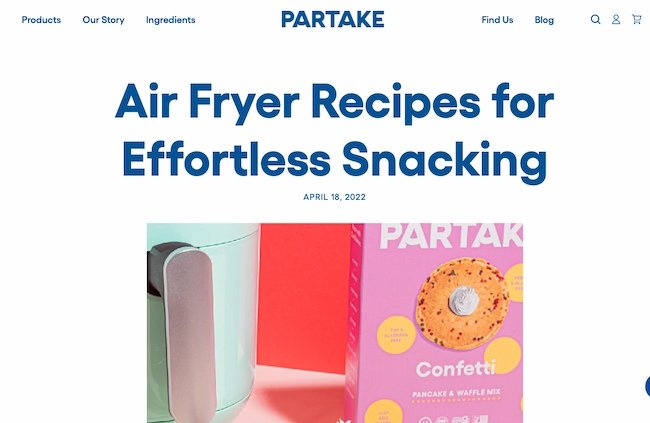
What is PR? Using owned media like this blog example to promote your brand.

Image Source

Rightly so, as it’s arguably the most important type of PR-related media that you should be focusing on. This is because you have total control — unlike the other two media tactics.

Owned media includes:

  • Social media posts
  • Blog content
  • Website copy
  • Email newsletters

Owned media acts as a “home base” for your PR activity. When people write about your brand or products, they’ll likely reference (i.e. link to) your owned media in their coverage.

Paid media

It’s not uncommon to pay to promote your content in the marketing world,and it’s no different when it comes to PR.
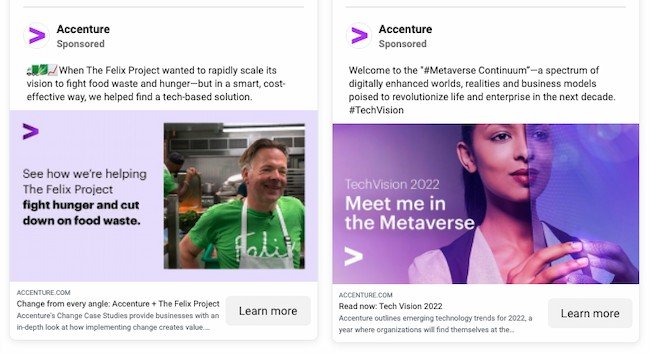
What is PR? Promotion on paid media, like this ad on Facebook.

Image Source

Paid media refers to paying to make your content visible. It’s standard practice to promote owned media.

Paid media includes:

  • Social media advertising
  • Influencer marketing
  • Pay-per-click (PPC)

Putting some funds toward boosting PR content is becoming increasingly popular. Since the majority of social platforms are reducing organic reach for business accounts, paid media is a fantastic way to make sure your content gets in front of the people you want to see it.

Earned media

Earned media is the tactic used to boost conversation around your brand. It’s essentially word-of-mouth and is arguably the best PR tactic to build your reputation.

Earned media example: Cosmopolitan Magazine for Barkal.

Image Source

Earned media is the hardest type of PR media to obtain. It takes a lot of effort, consistency, and hard work to establish it — that’s why it’s “earned.”

Earned media includes:

  • Mentions in industry news and reviews
  • Praise from customers on social media
  • High rankings on search engines

All of these media avenues provide ways to use PR to build brand awareness, generate leads, and convert those leads into paying customers — similar to your marketing. Now, let’s discuss the difference.

Unlike marketing, PR doesn’t always have an impact on sales. It typically indirectly promotes your products or services through activities like press release distribution and speaking at industry events. Alternatively, instead of improving the perception of your business, marketing campaigns focus on driving revenue and boosting profits.

People don’t buy products, they buy brands. For this reason, using PR and marketing in tandem drives the best results: typically, someone connects with your brand as a result of your PR efforts and converts into a customer as a result of your marketing tactics.

For example, 33% of marketers used paid media in 2021 to improve brand awareness.

Now, let’s discuss the types of PR you may use as you promote your organization and build and manage your reputation.

1. Business Events

Business events are opportunities to market your products or services and gain exposure for your brand.
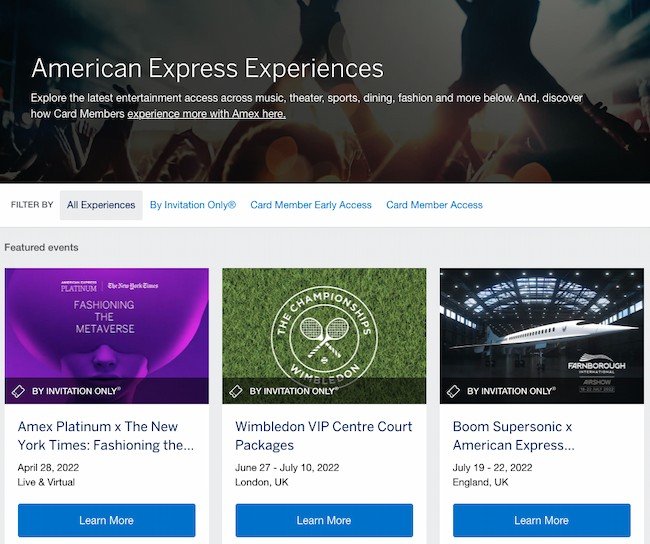
Public relations tactic example: American Express

Image Source

Whether hosted or attended by your company, events are also important sales opportunities. Events give you a chance to meet prospective customers and delight current ones face-to-face.

Speaking engagements at events are also helpful for boosting brand awareness and sharing unique thought leadership or data-driven information that can help elevate your brand.

2. Community Relations

Community relations refers to building positive relationships with the local community around your business.
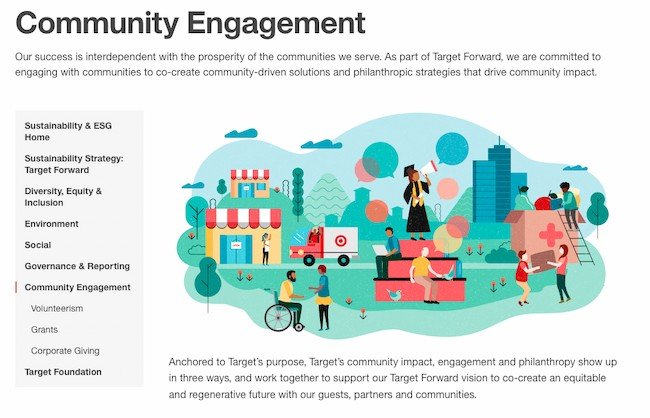
Public relations tactic example: Target

Image Source

This could include charity work, donations, special discounts, or anything that builds a strong relationship with the community and strengthens customer loyalty.

3. Corporate and Social Responsibility
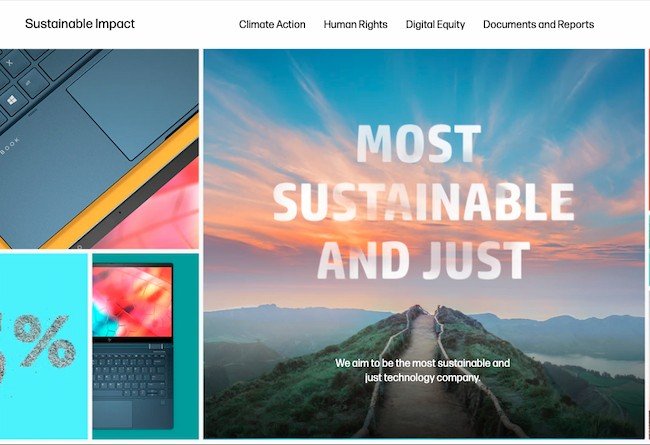
Public relations tactic example: Hewlett Packard

Image Source

Corporate and social responsibility is similar to community relations, but it places a greater emphasis on ethical business practices, environmental responsibility, and philanthropy — locally, regionally, and globally. This is a critical area of PR as it directly affects the public perception of your brand.

4. Crisis Management

Public relations tactic example: Burger King

Image Source

Crisis management is the practice of acknowledging, managing, and working to reverse negative communication and perception surrounding a business crisis. PR usually handles anything that could jeopardize or ruin your brand’s reputation.

Manage, plan for, and communicate during your corporate crises with this free crisis management communication kit.

Crisis management is an important function of PR and should be handled quickly, consistently, and strategically. With certain PR tools, you can avert crises through monitoring online chatter and quality-checking any marketing or promotional material that may be misunderstood or misconstrued.

5. Cyber Threat Intelligence
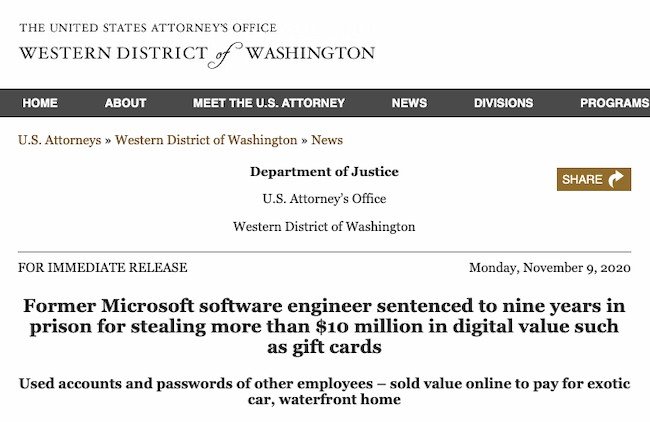
Public relations tactic example: Microsoft

Image Source

Only 41% of US businesses have an active plan for threat intelligence. But cyber security is in the top five global risks in the World Economic Forum‘s 2021 Risk Report.

Besides the financial challenges that cyberattacks create, there is also a perception challenge. This can be devastating to a brand’s reputation if it’s not handled skillfully.

These issues will call on PR’s crisis management expertise. It’s also a good idea to build relationships with tech experts and thought leaders in the industry. This can give you the expertise you need to limit the reputation impact of these increasingly frequent attacks.

6. Employee Relations

Employee relations, also known as internal PR, is the practice of communicating with and cultivating a positive employee perception of your company.

Public relations tactic example: French Open

Image Source

This process may include dedicated employee newsletters or communications, employee perks and benefits, free training and skill-boosting opportunities, employee appreciation events, and working with unions or employee groups.

Employee relations not only keeps your employees motivated, hard-working, and loyal, but it also encourages them to advocate for your business — which can bring in both customers and more high-quality employees.

7. Influencer relations

Public relations tactic example: Dior

Image Source

Influencers play a powerful role in PR and marketing. According to Statista, the influencer market was worth 13.8 billion in 2021, more than double its value in 2019. That includes micro-and nano-influencers, who represent over 60% of Instagram influencers.

In many businesses, the public relations team also manages influencer relationships. Sometimes marketing, social media, and PR teams share these responsibilities. It will take hard work and experience to creatively collaborate with each influencer to make sure your brand gets the results it wants from its authority.

8. Media Relations

Media relations refers to building positive relationships with journalists, publications, and other news outlets.
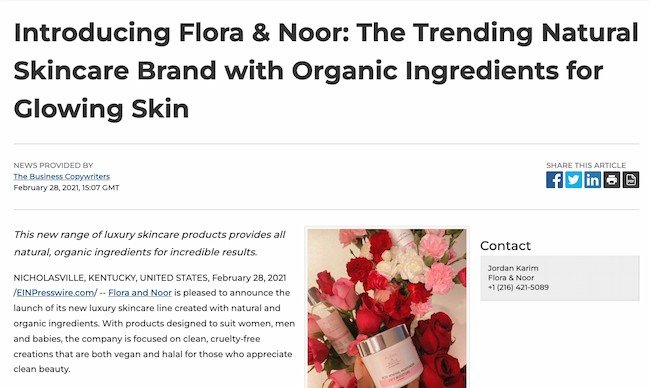
Public relations tactic example: Flora & Noor

Image Source

This process typically includes writing press releases, organizing press releases, and scheduling interviews. Not only does this gain exposure for your business and products but it also encourages the media to market your brand for free.

Download our free Inbound Press Release Kit to access step-by-step templates to build press releases and a promotion plan.

9. Social Media Marketing

Social media can be both an earned and paid PR tactic.

Public relations tactic example: Chrissy Teigen

Image Source

For most companies, social media can be a helpful PR (and marketing) tool —it’s an effective way to amass followers, convert customers, share your content, and resolve crises.

Whether you’re sharing a post with your audience or interacting with a single customer, your social media activity is open to the public. That’s why it’s critical to have a social media strategy that keeps your communications consistent, positive, and accurate.

Now, let’s talk about who’s responsible for these different types of PR: your public relations manager.

What does a public relations manager do?

PR managers are responsible for building, executing, and monitoring your PR strategies and tactics. They typically handle crisis communications, write press releases, and lead a team of other PR professionals who manage your brand’s public presence. You might hire a public relations manager to handle PR for your business, or work with a PR Agency.

Let’s discuss the skills and tasks your public relations manager will know inside out.

PR Manager Skills

Successful public relations managers have a particular set of skills. Besides being flexible and open to change, these are some of the most important skills.

Great Communication

One primary focus of public relations is building your business’s reputation. To do this, public relations managers spend a lot of their time building and sustaining relationships.

Besides speaking about your company at public functions, press conferences, and other events, your public relations team is also connecting with reporters, influencers, and other stakeholders.

For this reason, excellent communication is a key skill for PR managers.

Writing Skills

Public relations managers should also be able to communicate well in written form.

Since PR managers are responsible for writing press releases and company-related news, strong writing skills will help convey the right message to promote your company. This is especially useful for online PR where you’ll need to create blog posts, website content, and press releases to gain coverage.

Creativity

Like marketing, creativity goes a long way in the public relations world. Great PR managers are creative and know how to create a strategy that stands out from the crowd, which is important because a unique story or perspective will drive PR coverage.

Strong Research Skills

Public relations is a social industry, and people might be talking about your brand without directly mentioning it. Good research skills will help public relations managers find and use these opportunities.

A public relations manager must stay up on trends and digital marketing updates. PR professionals can’t operate in a bubble and must stay aware of search and social media changes for their strategies to succeed.

They offer expert knowledge and a fresh perspective to maintain a presence in competitive media outlets.

Public relations managers will also need to do research when planning a PR strategy. Because they might need additional information, statistics, and data points to boost the power of their owned media, strong research skills are essential.

PR Manager Tasks

The day-to-day tasks of your PR manager can vary depending on your industry, active PR campaigns, PR team size, and other factors. However, here’s what they often include:

  • Writing press releases to announce company-related news
  • Creating fact sheets and media kits about the company to send to media teams for brand-building
  • Giving media training to both in-house and external teams
  • Attending and speaking at industry events and representing the brand at trade shows, recruiting events, etc.
  • Finding and analyzing media coverage and promoting that content through owned and paid media channels

Public relations managers are also responsible for tracking and measuring their PR efforts. The following key performance indicators (KPIs) can help your public relations manager analyze and improve your PR strategies.

Clear measurable goals are the only way to ensure that your PR strategy is effective. In a business world that is increasingly focused on data-driven outcomes, the right KPIs can make or break your public relations programming.

Most PR metrics gauge perception, so it can be difficult to connect company wins directly to public relations campaigns. For this reason, you should select a range of KPIs that align directly with your business goals.

For example, let’s say your business wants to improve brand awareness. KPIs like increased share of voice and website traffic alongside recent brand mentions can show a more direct connection between PR efforts and business goals.

These KPIs will help you track your PR efforts and determine the effectiveness of your PR strategy.

1. Media Coverage and Brand Mentions

Brand mentions occur when someone mentions your brand. Media coverage tracks the number of earned media stories that went live. These metrics are important because they help you measure awareness of your brand and its stories.

You might see brand mentions in traditional news coverage, on other business or personal blogs, in reviews, or on social media. Some media outlets may tag or hyperlink their sources. Others may not link back to your brand or website, which means you have to go looking for them. Check out the PR tools section for some helpful software tools.

Note:It’s important to read brand mentions and media coverage for context. Remember, you want people to be saying good things about your brand, and it’s not always easy to understand the value of coverage until you read the entire piece.

2. Share of Voice

This is an essential KPI for PR. Share of voice measures competitive brand awareness. This metric helps your business understand the scale of customers in your industry and where your brand fits within it. It also tracks your brand reputation.

3. Pitch Interactions

Pitches are another important metric for PR. It can sometimes take longer than expected for a piece to go live. So, track the number of pitches you send and reply to. You’ll also want to track how many email opens and clicks you get from a pitch. These PR metrics can help you create a funnel for earned media mentions.

This can help you better understand which efforts are pulling in the most value, as well as the best ways to scale your strategy.

4. Sentiment

Sentiment, which is a synonym for viewpoint or opinion, measures the attitudes in brand mentions. While brand mentions and backlinks typically improve your brand awareness and SEO, sentiment is what sets apart the positive mentions from the negative ones.

You’ve probably heard the saying, “There’s no such thing as bad publicity.” Whether you agree or disagree, it is good practice to be aware of negative press.

Tracking sentiment can help you understand what your audience is saying about your brand and whether or not you need to address any problems or concerns.

5. Social Media Engagement

Social media engagement encompasses a few types of activity: views, impressions, likes, shares, and comments.

This information shows the level of brand awareness and engagement among your audience members. It also tells you when your audience is most active, i.e. when you should be posting and interacting with your followers.

6. Social Shares

Social shares are different from social media engagement. Social shares refer to when your audience shares something from your website or blog on their social media.

This is a critical metric because it tells you that your audience enjoys your content enough to vouch for it on their social channels. It’s a very clear measure of your brand reputation among your audience.

When looking at social shares, pay attention to what types of content people share most frequently. This will give you an idea of what your audience enjoys the most and what kind of content to create more of.

7. Site Traffic

Site traffic is a sign of successful PR efforts. If people are hearing about your brand through earned media and heading to your site, your PR efforts are reaching your audience.

As you run PR campaigns, track your site traffic once press releases and other efforts go live. Use your site analytics to check your visitors’ referral sources (how they made their way to your website) and aim to replicate this in the future.

8. SEO Metrics

There are a few SEO metrics that can also help you with PR measurement.

Domain authority refers to your website’s SEO ranking and how it performs in search results.

It’s ranked from 1 to 100 (with 100 being the highest) and is a valuable measure of how your website compares to your competitors. The higher your domain authority is, the better your website will rank in search results.

Domain authority is made up of three main factors: links to your site (backlinks), links from your site to other well-ranked websites, and the age of your site. While you can’t magically make your website older, you can use PR to attract backlinks and place links in your content.

Moz offers a free tool to check your domain authority, page rank, and other important website measures.

Backlinks help you find brand mentions. With backlinks, sites that’ve mentioned your brand have linked to your website, making it easy for readers to click through and visit your website.

And it’s not just new traffic you’ll benefit from when collecting backlinks — you could see a rise in your SEO rankings, too.

9. Conversions

While the volume of new customers coming directly from your PR activity isn’t easy to measure, it’s definitely worth investigating.

You can discover where your customers came from by either surveying customers after they purchase and asking how they heard of you or by using a tool like Google Analytics to learn about your customers’ conversion paths (a.k.a. their route to purchase).

Note: While this is an exciting metric to track, don’t feel disheartened if you don’t see an influx of conversion-ready site traffic. Remember, the goal of public relations is to raise brand awareness, spread the ideas of your internal thought leaders, and communicate the ideas of your brand. Those new site visitors could always return and make a purchase in the future now that they know about your brand because of your PR.

10. Advertising Value Equivalent (AVE)

AVE equals what it would cost to buy the space for an earned media placement if it was an ad. At one point this was the only KPI for public relations. But many industry professionals feel that this is an outdated KPI and an inaccurate way to measure PR.

Depending on your business, you may still want to track this KPI. In 2021 41% of PR professionals track AVE for planning, and 34% use this metric to justify fees and budgets.

Now, let’s review a handful of PR SaaS tools that can help you implement your PR strategies and track these KPIs.

Public Relations Tools

We’ve rounded up a handful of helpful PR tools to help you execute your public relations campaigns and measure your impact and performance.

1. Brand24

Brand24 helps you monitor online mentions about your brand, product, or service, and measure the results of your PR campaigns. Slack integrations and a notifications system will help you react in time to prevent a PR crisis.

2. Agility PR Solutions

Agility PR Solutions is a paid tool that provides powerful yet easy-to-use solutions for your media database, monitoring, and analytics. These solutions help identify and connect with influencers, capture coverage, and measure impact.

3. Anewstip

Anewstip is a media search, monitoring, and relationship management tool. You can use it to search media mentions by keyword or handle, reach out to journalists and influencers all over the world, and create a media database of important PR campaign contacts. It offers both paid and free plan options.

4. CoverageBook

CoverageBook is a paid tool that helps you find and collect any coverage of your PR content. It’s a great tool for PR agencies who are building coverage reports for their clients.

5. Covered Press

Covered Press is a paid tool that streamlines press tracking, reporting, and analytics, combining three important tools into a single, all-in-one PR platform. It also offers white-label reporting so publicists can brand their own analytics portals and reports for clients.

6. Flaunter

Flaunter is a paid tool that gives you media access to brand content and PR samples. As a business, it’s a place to publish high-quality brand and product imagery so journalists, influencers, and bloggers can share it.

7. Google Alerts

Google Alerts is an easy-to-use, free tool that allows you to set up email alerts for certain keyword mentions. When a name, keyword, or link is mentioned online, Google sends you a digest email alerting you of the mention.

8. Mention

Mention helps you track who’s mentioned your brand in media and on social media. You can also use this tool to publish on your social media and manage crisis communications. It offers both free and paid plan options.

9. Monitor Backlinks

Monitor Backlinks is a free tool that helps you track who’s mentioned your brand in coverage and added a backlink to your site. It’s also valuable for monitoring and disavowing bad backlinks and keeping your website’s SEO and domain authority at their peak.

10. Muck Rack

Muck Rack is a paid tool that allows you to discover and contact members of the media who might want to cover your PR story.

11. PR Fire

PR Fire is a paid tool that helps you distribute your press release to journalists and receive a report of their performance and reach. It’s ideal for in-house teams who’re doing their own PR.

12. SharedCount

SharedCount shows you engagement data for any social media, blog, or website URL. Once you input a URL, the tool will tally its likes, shares, comments, and other engagement measures. It offers both free and paid plan options.

13. TweetDeck

TweetDeck is a free tool (created by Twitter) that monitors Twitter activity. You can set up Twitter streams that track certain keywords, accounts, trends, or other filters.

These are just a few useful PR tools, and if you don’t see what you’re looking for here, there are more great PR tools to consider.

Start Building Your Public Relations Strategy

With all these tactics, tools, and strategy-building tips, are you ready to start your new PR strategy? As you dig in, remember that public relations is an ongoing, iterative strategy — not a one-off task. Like marketing, it can take a while to see results.

But with a solid strategy and a commitment to spreading the word about your company, you’ll soon see more mentions, backlinks, and general buzz. Then you’ll be ready for the next step to grow your business better.

Editor’s note: This post was originally published in August 2019 and has been updated for comprehensiveness.

New Call-to-action

Categories B2B

Watermarks: Why You Need Them + 6 Easy Steps to Create One

Imagine you spend hours working on a cool graphic for a social media post. You finally get it just right and post it on social media. The next day, you log on and see that someone else has posted your image without your authorization and is purporting your work as their own.

Free Resource: 12 Pinterest Templates for Business

Creating a watermark would help protect you against this common issue and help you with your brand recognition. In this article, you’ll learn about the type of watermarks that exist and how to create your own.

Typically, a watermark has its opacity set to 50% or less. If it’s too bold and opaque, it can distract viewers from noticing other details in the content. However, if it’s too transparent, it will easily be ignored.

The opacity will depend on the type of image you have and its purpose. For instance, photographers and videographers will go for a higher lower opacity because every detail of their image matters. They’re also more likely to place the watermark at the bottom of the corner of an image.

For a brand sharing content marketing tips, the watermark will likely be very opaque and placed prominently on the asset for easy recognition.

Types of Watermarks

There are two types of watermarks: visible and digital. They’re used for different purposes by different users.

A visible watermark is what most people think of when we use the term. It refers to a visible stamp, usually a logo, phrase, or pattern, that has been superimposed on an image. Content creators use this type most frequently to prevent theft and help their brand recognition.

A digital watermark, on the other hand, isn’t visible to the naked eye. Instead, the watermark is embedded into the data of the image. While this can also be used by content creators, it’s used more often by banking institutions and news organizations to authenticate media and identify its source.

Why are watermarks important?

Online, particularly on social media, content creators and brands don’t have many reliable resources to protect them against theft. Someone can easily take a screenshot or screenshot work from another user and post it as their own.

While most social media sites do offer reporting tools, there is still a lot of work to be done to protect users online against copyright infringement. One of the few social channels where repercussions are seemingly swift is YouTube, where the use of music and videos is closely moderated.

watermark example

Image Source

As a result, a watermark can help you protect your work. It’s not foolproof but it does offer a layer of security.

Brand Recognition

On social media, content can take off at any time.

If you’re lucky enough to go viral, it’s likely that other pages will repost your content. You want to make sure your content has something identifiable to lead users back to your page.

Reaching a larger audience is also a great opportunity to get your brand out there and build your brand recognition.

Watermark Examples

Adobe

To prevent the illegal download of its creative assets, Adobe adds watermarks to every image a user previews. adobe watermark example

Notice that they use two types of watermarks: One located across the entire image in gray with the words “Adobe Stock” and another on the bottom left corner in black.

This allows users to easily preview the image without using it before purchase.

Buzz Media Agency

This media agency uses watermarks in an Instagram post to share their work without the risk of another user stealing it without proper attribution.

buzz media agency watermark example

Image Source

You’ll notice that their watermark is their logo, which makes it easy for users to find them if the image is shared on the platform or anywhere else.

In addition, it’s noticeable without taking the attention away from the other elements in the image.

PR Girl Manifesto

This brand uses a more modern approach to watermarking, one that many companies leverage when posting engaging, shareable content on social media.

watermark example pr girl manifesto

Image Source

In this case, there are a few things that are different from your average watermark:

  • The opacity is at 100%, making it very visible. However, it’s balanced by small font size.
  • It’s not a logo or pattern, it’s the page’s Instagram handle instead.

When marketing content on social media, watermarking this way is always a good idea. It keeps your brand at the center and makes it easy for users to find your profile.

How to Create a Watermark

There are many ways to create a watermark. As such, the method you use will depend on the tools you have available and the type of asset you want to watermark.

The most popular tools to create a watermark are:

Because Canva is the most accessible option, let’s cover how to make a watermark with this tool.

  1. Visit Canva.com and create an account.

  2. Select a template type or create a custom template.

    how to create a watermark on Canva step 2: Canva homepage

  3. Create your watermark and select your desired opacity.

    how to create a watermark on Canva step 3: watermark creation

  4. Once you’re done creating your watermark, click “Share” on the top right corner. Then, select “Download.”

    how to create a watermark on Canva step 4: Menu sidebar with download button

  5. Check “transparent background” and download your watermark.

    how to create a watermark on Canva step 5: Menu sidebar with "transparent background" selected
    Note: This feature is only available on Canva Pro. To complete this step for free, download the image then visit removebg.com to upload your image and remove the background for free.

  6. Use your watermark on videos, images, and other content.

watermark added to a video

There you have it! Creating a watermark is a preventative measure that can help you both protect your creative assets and help you build brand recognition.

Pinterest Templates

Categories B2B

Hreflang Tags: The SEO Attribute for Content in Multiple Languages

Have you ever visited a webpage that was in a different language, and your browser asked you if you wanted to change it to your first language?

It’s a life-saver, right?

This is possible due to language tags or hreflang tags, which are used to let search engines know what language the content is in.

Free Guide: How to Run a Technical SEO Audit

Now think about whether you’ve provided the functionality so your own webpages are ready for a global audience. If you haven’t properly tagged or re-directed your content to be optimized in different languages, it may not be gaining the traffic it could be. Let’s take a look at how hreflang tags can help serve the correct results to your visitors.

Jump To

Hreflang tags (also known as rel=”alternate” hreflang=”x”) allow you to show Google and other search engines the relationship between webpages that are in different languages. For instance, if your tag needs to link to an English-language blog, you’d use the following tag: hreflang=”en”.

What do hreflang tags look like?

Hreflang tags have an established syntax. Here’s an example of how hreflang tags are written.

Syntax

<link rel=”alternate” hreflang=”x” href=”https://example.com/alternate-page”/>

The tag is broken down into three parts:

  • link rel=“alternate”: Tells the search engine that this is an alternate version of he page.
  • hreflang=“x”: Specifies the language.
  • href=“https://example.com/alternate-page”: The alternate page is at this URL.

Example

This is a sample of what a webpage will look like when it’s tagged with an hreflang attribute:

<link rel=”alternate” hreflang=”en-us” href=”https://blog.hubspot.com/marketing/hreflang-tags”/>

The “en” in the first part of the tag refers to the language code, English, and the “US” refers to the country code, for the United States.

Let’s say we wanted this same page in Spanish for customers in Mexico. The hreflag tag would be:

<link rel=”alternate” hreflang=”es-mx” href=”https://blog.hubspot.com/marketing/hreflang-tags”/>

Users with an IP address that notifies which language is being used will automatically see a properly tagged webpage, so a hreflang tag is especially helpful if you have a global audience and want to make their user experience delightful.

Hreflang Tags vs. HTML Lang Tags

There are two different types of language tags: HTML lang tags and hreflang tags.

While both HTML and hreflang tags are intended to optimize content in multiple languages, they have a couple of differences.

Simply put, language (or lang) tag attributes on an HTML tag tells your browser the language of the current document or webpage, while the hreflang tag attribute tells your browser the language of the webpage that’s being linked — for instance, a lang tag on HubSpot.com tells your browser the language of HubSpot.com, but a hreflang tag attribute tells a search engine the language of HubSpot.com when a user searches for HubSpot.

If a user searches for HubSpot.com from Germany, a hreflang tag is responsible for changing the link available in the search engines. However, when someone lands on HubSpot.com in Germany, a lang tag changes the language on the page itself.

Examples

It might be easier to visualize, so here’s a sample lang tag:

<html lang=”en”>

Alternatively, here’s a sample hreflang tag:

<link rel=”alternate” href=”http://example.com/”hreflang=”en”/>

Google recommends using hreflang when indexing websites that are in different languages.

You might also want to use HTML language tags in conjunction with an hreflang tag — they can work together to inform search engines about the content on your webpages. Having both tags tells search engines what language a webpage is in, while directing users from other countries to the appropriate webpage.

Next, let’s explore what hreflang tags are used for and how you can use them for your own webpages.

Why do you need hreflang tags?

Ultimately, it’s helpful to use hfreflang tags so you can create a better user experience. If a user in Germany searches for HubSpot, we want to make sure the result in the search engine shows our site in German and not in English. Besides a better user experience, this can also help reduce bounce rate and increase conversion rates because you’re showing the best version of your site to the right audience.

Another benefit of using hreflang tags is that they prevent duplicate content. Let’s say you have the same content on different URLs aimed at Spanish speakers in Mexico, Spain, and Chile but with slight differences depending on the target audience, like currency. Without an hreflang tag, Google may just see this as duplicate content.

Hreflang tags tell search engines that while the content may look similar, it is directed at different audiences.

How do hreflang tags work?

To illustrate how hreflang works, let’s consider an example. Let’s say you make two homepages that are the same, but one is in English (hreflang=”en”), and the other’s in Spanish (hreflang=”es”).

When a user searches for your homepage in Spanish or from a Spanish-language browser, they’ll receive the Spanish version of your homepage, as long as it’s properly tagged.

Each language and country has its own hreflang tag. Here’s a list of common ones:

  • German/Germany: de-de
  • English/USA: en-us
  • Irish/Ireland: ga-ie
  • Hindi/India: hi-in
  • Italian/Italy: it-it
  • Japanese/Japan: ja-jp
  • Korean/Korea: ko-kp
  • Portuguese/Brazil: pt-br
  • Russian/Russain Federation: ru-ru
  • Chinese (simplified for Chinese Mainland)/China: zh-hans-cn
  • Thai/Thailand: th-th

If you are sharing the same page in different regions, note that it is possible to have multiple tags on the same page. For instance, if your French website sells to customers in Germany and Spain too, you’ll be able to tag your page accordingly in HTML.

Hreflang tags are bidirectional and work in pairs. If you add a tag to an English page pointing to the Spanish version, then the Spanish version of the page must also have an hreflang tag pointing to the English page.

Keep in mind that because hreflang tags are able to be overridden by other SEO options, your page may rank higher in a different language. To avoid this, make sure search engines are equipped with the correct attributes, so they know which language to present your page in.

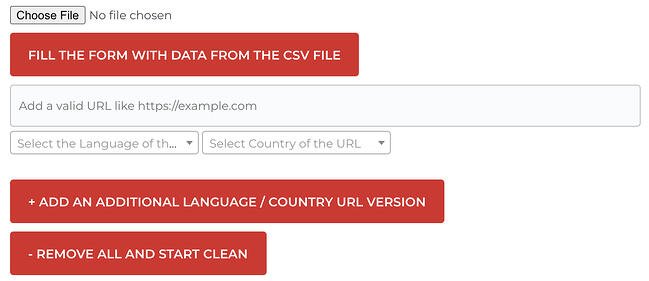
If all of this is a little confusing, don’t worry. You can use a free Hreflang tag generator so all you need to do is copy and paste the code. Let’s look at a few examples below.

Hreflang Tags Generator Tools

1. The Hreflang Tags Generator Tool

Hreflang Tags Generator Tools: Hreflang Generator Tool

Image Source

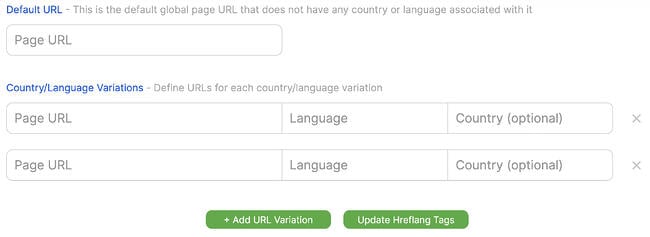
With this tool, you can generate hreflang tags for your multi-language site. All you need to do is add the URL to your site and choose which language it’s in.

This is a great tool because you can even upload a CSV with up to 50 URLs and can generate the hreflang tag for 50 sites at once.

What We Like

Their ability to bulk upload 50 URLs at once to generate 50 hreflang tags will save you time.

2. Geo Targetly

Hreflang Tags Generator Tools: Geo TargetlyImage Source

Geo Targetly is another great hreflang generator tool. It’s easy and free to use. All you need to do is input your URL and the language, and then voila.

While you can’t upload 50 sites at once, this is still a quick, easy-to-use option.

What We Like

Geo Targely’s tool is simple and user-friendly, making it a great choice for beginners or those with smaller sites.

3. Sistrix

Hreflang Tags Generator Tools: SistrixImage Source

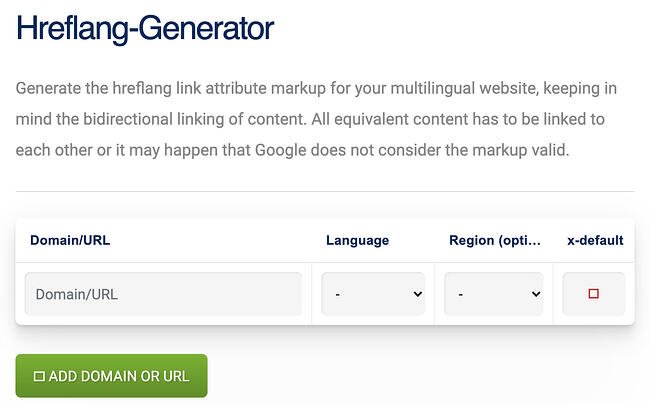
The Sistrix tool is similar to the other two tools above. All you need to do is input your URL and language and then the tool will generate the code for you.

While you can’t import a list from a CSV, you can enter multiple domains at once to generate the tags you need.

What We Like

This generator from Sistrix allows you to input several domains at once to generate hreflang tags, plus has a fee tag validation tool if you want to make sure existing tags on your site are correct.

Use Hreflang Tags for a Better User Experience

When you’re optimizing your content for search engines, it’s important to do everything you can to rank on the SERPs. This helps people across the globe find your business.

Ultimately, the point of hreflang tags is to give customers who speak different languages, or who live in different regions of the world, content meant for them.

This article was originally published in March 2021 and has been updated for comprehensiveness.

seo audit

Categories B2B

KPI Dashboards & How to Use Them in Your Marketing

As a business leader, a big part of your responsibilities involves ensuring existing projects and initiatives within your organization are on track while creating space for smart new strategies.

But with a million and one other things fighting for your attention, it can sometimes be challenging to stay up to date.

Fortunately, there’s a tool to help you succeed: KPI dashboards.

KPI dashboards can help you check in with various aspects of your business and make sure everything’s running smoothly.

Let’s take a closer look at what KPI dashboards are and what they can do to help your marketing team succeed in 2022 and beyond.

→ Free Download: Free Marketing Reporting Templates [Access Now]

Every department from sales to operations needs a dashboard, and dashboards are especially helpful for marketing. Between about a dozen online channels to consider (plus offline marketing efforts), numerous elements go into creating and sustaining a healthy marketing ecosystem.

A KPI dashboard helps marketers and business executives identify what’s going on with the elements of their marketing strategy that matter most, where to make changes if things start to go awry, and how to identify opportunities for new initiatives that can spur even greater success.

Getting your dashboard right takes time, but the pay-off is immense. Executives who successfully implement an effective dashboard can get better results and create a more rewarding, enjoyable work atmosphere in which the team has more room for creativity and experimentation.

The KPIs you choose should be related to your strategy and include a mix of forward-looking and backward-looking variables.

While it’s tempting to cram every metric you can think of into these reports, that’s a big mistake. When you’re confronted with a mountain of data, it’s nearly impossible to give the most critical numbers the level of scrutiny they deserve.

What should a KPI Dashboard include?

The best dashboards include only five to nine KPIs. These should, after all, be the key performance indicators behind your business playbook.

If you’re not sure which data points to focus on, think of it this way: what handful of things could totally tank your business if they went south?

Framing it that way can help you sort the vanity metrics, like the number of monthly social media impressions, from the things that matter, like cost-per-acquisition.

Benefits of a KPI Dashboard

KPI dashboards are great because they make it easy to track progress towards goals. Here are some other reasons why you might want to have one.

1. Detailed Overview

KPI dashboards offer viewers a detailed dive into the progress of an organization. Because they are highly visual, it’s possible to organize, analyze, and filter the most important metrics for any business.

Instead of wading through loads of complex data, KPI dashboards break data down in a simple, easy-to-understand form.

2. Better Decision Making

You need the ability to use accurate, up-to-date data if you want to make good business decisions — and KPI dashboards help you with that.

They show the vital operational data of an organization in one place, so KPIs are more visible. By eliminating data silos, this tool increases analytical efficiency and the ability to make the right data-driven decisions.

3. Real-time Analysis

KPI dashboards allow you to monitor the crucial performance metrics in real-time.

With this information available, decision-makers can make proactive moves and drive better business outcomes.

5 Best KPI Dashboard Software to Use

You’ll need a KPI dashboard software before creating a KPI dashboard. Here are 5 of the best around today.

1. Hubspot

Best KPI Dashboard Software: HubSpot

Hubspot has a free KPI software you can use to quickly create visually appealing KPI dashboards that are easy to understand.

With Hubspot’s KPI dashboard software, you can also pull data from different departments to overview your organization’s performance. You’ll also not have to worry about data breaches as you can control who can access your dashboards.

2. Geckoboard

Best KPI Dashboard Software: Geckoboard

Geckoboard’s KPI dashboard software allows you to focus on the metrics that matter in your business. It’s easy to build and allows you to pull data from different sources like spreadsheets, databases, and even Zapier integrations.

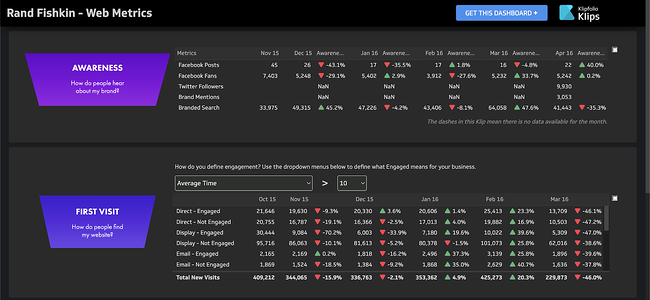
3. Klipfolio

Best KPI Dashboard Software: Klipfolio

Klipfolio helps business owners visualize their data to understand how well they’re performing and make informed decisions about the future.

Kilpfolio also stores historical data so that business owners can compare performance over different time periods.

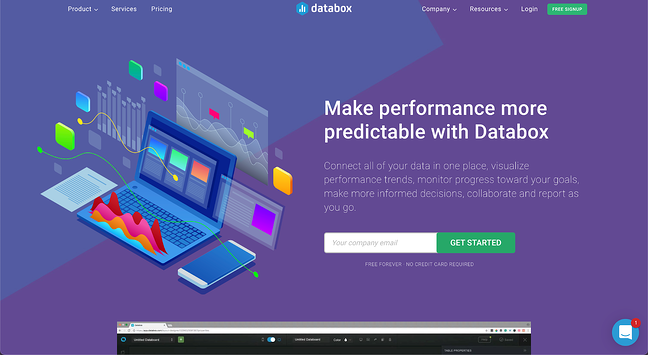
4. Databox

Best KPI Dashboard Software: Databox

Like Geckoboard, Databox also pulls data from different sources to help teams monitor trends, collaborate better, and make more informed decisions that drive business growth.

Even if you have zero coding skills, you can quickly learn how to use Databox to create great KPI dashboards. Thanks to the over 70 integrations Databox has, you can also easily connect it to other platforms to collect more data.

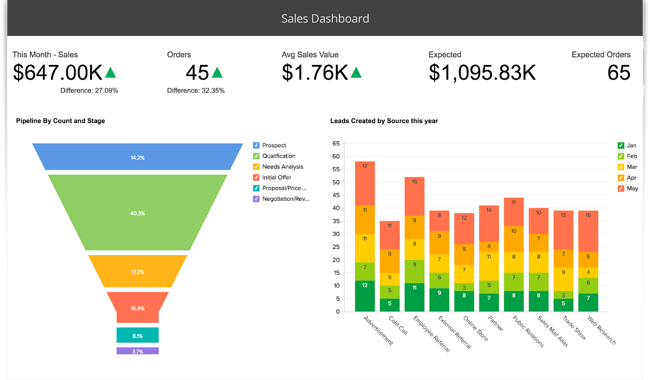
5. Zoho

Best KPI Dashboard Software: Zoho

Zoho is another fantastic business intelligence (BI) and analytics platform you can use to create KPI dashboards.

The drag-and-drop dashboard builder makes the platform super intuitive even if you have no prior training. You can also access the report you create on Zoho from your phones and tablets, making it great for mobility.

Once you’ve chosen the software you want, here are some of the best tips and practices to help you create an excellent KPI dashboard.

1. Know your audience

Knowing your audience is essential to any marketing endeavor, and the same is true of creating a KPI dashboard.

Therefore, you must know who’ll work with the KPIs and the kind of information they’ll need to design the KPI dashboard correctly. For example, you can’t expect the same dashboard you create for an executive audience to work for a sales team.

2. Keep it relatively simple

Whether you’re creating a dashboard for busy managers with only minutes to spare or for a team with time to spare to delve into details, your dashboard needs to provide critical information in a simple, easy-to-understand format.

3. Include only what is needed

The heart of any KPI dashboard is brevity and utility. Therefore, stick to including only the most critical and insightful KPIs needed for meeting business and organizational goals.

4. Draft your design

The design of the KPI dashboard will depend on the composition, distribution, comparison, or relationship of the metrics.

For example, a dashboard for analyzing trends will comprise column or line charts. On the other hand, a dashboard for data composition will give the best benefits if you make it with maps or stacked charts.

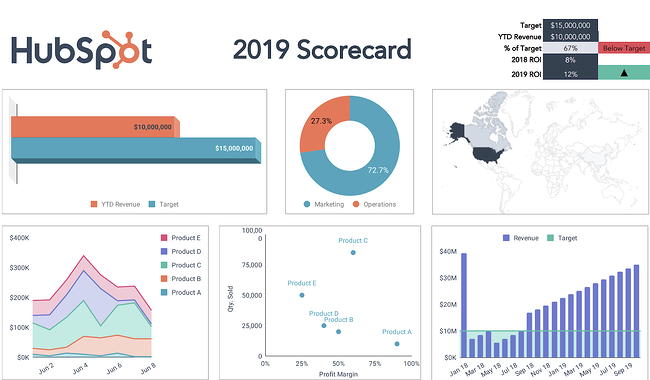
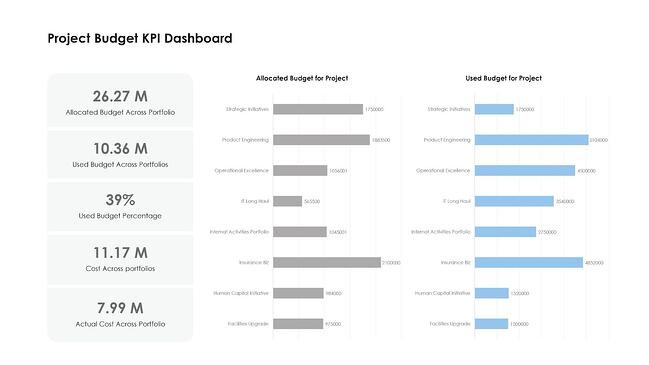
Here are a few KPI dashboards examples. Notice that they’ve honed in on only the most critical metrics and display the information in clear, concise, easy-to-digest visual formats.

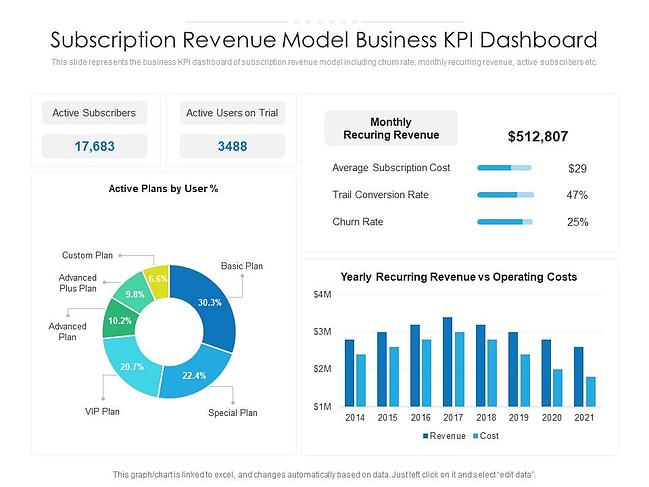
1. Subscription Model Dashboard

Subscription-based businesses are cropping up all over the place. From razors to clothes to meal prep kits, just about anything you could want or need in your daily life can be delivered to your doorstep regularly.

The subscription model is great because it guarantees businesses recurring revenue — a subscriber locks into your service for a set period, meaning regular monthly income for the term of service.

In this example, the leadership team has chosen to focus on metrics that give them a sense of how much monthly and yearly revenue they expect to make and their churn rate.

With this dashboard, the leadership team can quickly identify any potential issues from that handful of data points before those issues become mission-critical.

For example, let’s say the leadership team notices a steady rise in the churn rate, which isn’t ideal.

From there, they could start digging deeper, asking questions about what changes they could make to entice more of their existing customers to renew their membership.

KPI Dashboard Example: Subscription Model

Image Source

2. Large Ticket Item Dashboard

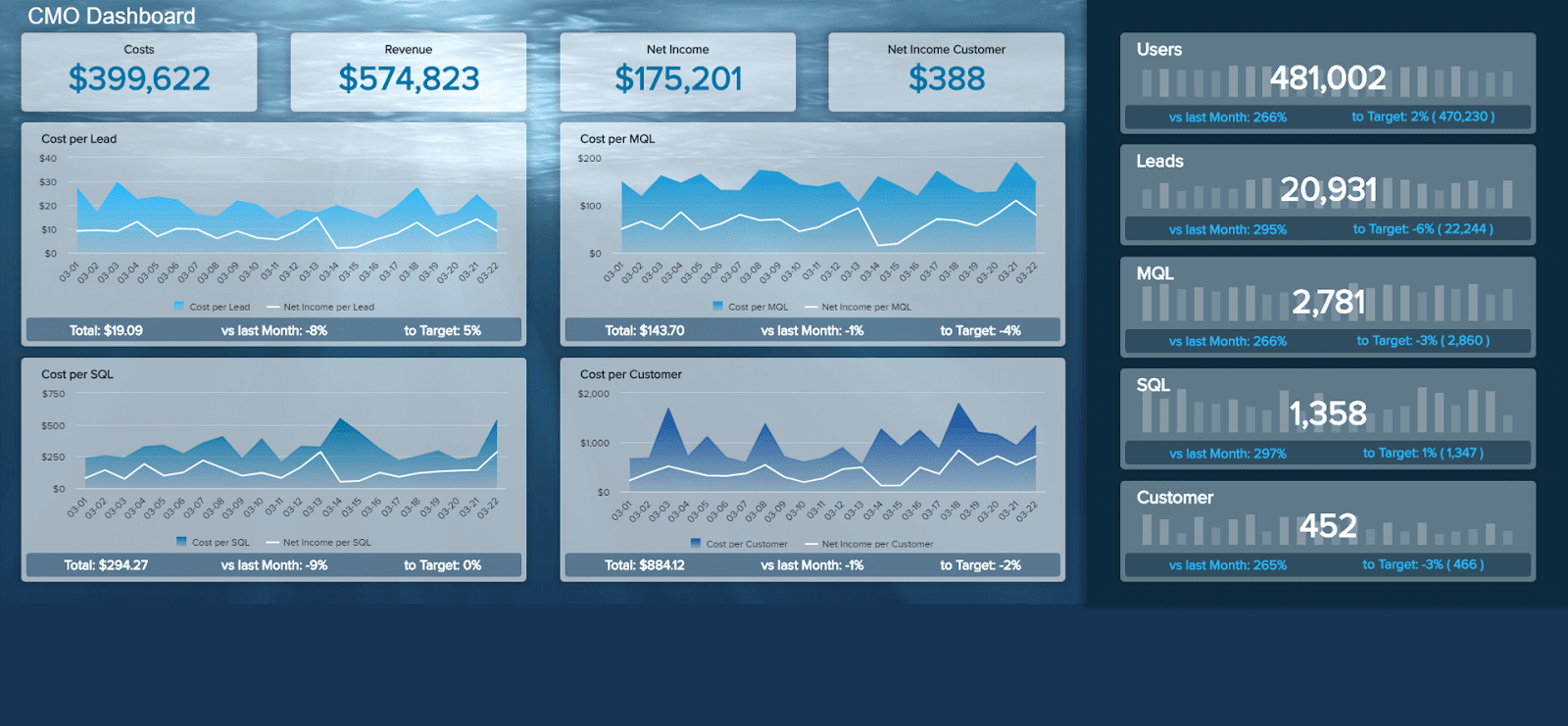
This dashboard from DataPine is the kind that could be useful to a marketing team in just about any industry that has a high price point — and, therefore, a high customer acquisition cost. Their focus is on nine of the biggest metrics that give them insight into their strategy’s success.

Rather than focusing on granular numbers, like Twitter followers gained or the number of likes on each piece of content shared on Facebook, they’re measuring numbers linked directly to their budget and tie in with the sales team’s efforts.

Understanding acquisition numbers and cost-per-acquisition provides valuable insight far beyond the reach of the marketing department.

Issues with poor cost-per-acquisition can indicate a need to cut ad spend, but they might also be hinting at a need to change the pricing structure for your offerings. Or they might mean that the sales team needs to shorten lead time to increase the number of acquisitions per month.

No matter what is ultimately identified as the source of the problem, having a dashboard empowers all of your teams to have informed, collaborative discussions about challenges facing your business that are backed up by actual data and numbers.

KPI Dashboard Example: Large Ticket Item

Image Source

3. Deals Closed Dashboard

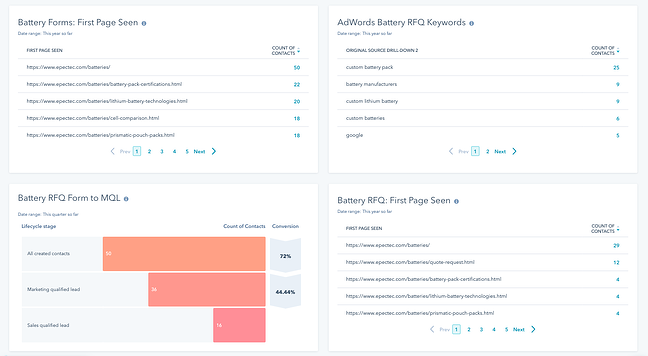
Epec Engineered Technologies uses HubSpot’s reporting features to create a sleek KPI dashboard with all the most critical information, including “Form to MQL” and “First Page Seen.”

This is an undeniably helpful KPI dashboard to see whether your marketing strategy aligns with your goals. The “First Page Seen” section shows you which pages your visitors initially interact with — if that page hasn’t been updated in a while, consider optimizing it for higher conversions.

Additionally, the “Marketing qualified lead” vs. “Sales qualified lead” categories, shown in chart-form under “RFQ to MQL,” will help you tailor your strategy and determine which leads convert at the highest percentage and what you might do to even out any disparities.

KPI Dashboard Example: Deals Closed

4. Marketing Leads Dashboard

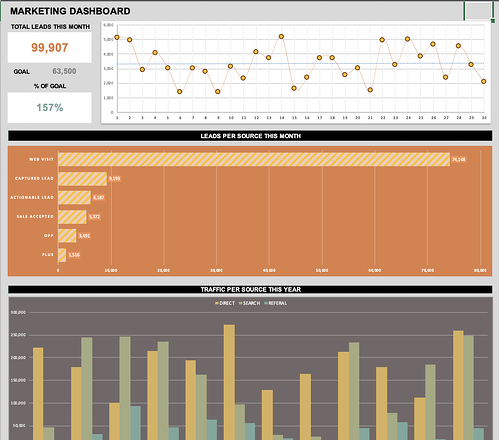
This dashboard made by Geek Dashboard is a fantastic example of how your marketing team can use a KPI dashboard to measure your team’s performance, particularly through leads and conversions.

It’s clear and concise, focusing on the significant factors for marketing — leads, and percent of conversions compared to goal. Additionally, the visuals help your team stay focused on the most critical aspects of your strategy to ensure you’re on track to hit your monthly or yearly goals.

KPI Dashboard Example: Marketing Leads Template

KPI Dashboard Excel Templates

If you’re ready to start creating your own KPI dashboard, the good news is that there are tons of resources out there to help you get it done.

1. HubSpot

HubSpot offers dashboard templates that integrate with Excel, Google Drive, and PowerPoint, so you can easily track those all-important metrics within the program that works best for you and your team.

KPI Dashboard Excel Templates: HubSpot

2. Smartsheet

Smartsheet provides Excel templates for a variety of marketing dashboards.

So whether you’re looking for a broad template for tracking big KPIs to more specific templates for social media marketing, Smartsheet has you covered.

Best of all, the templates are free to download on their website.

KPI Dashboard Excel Templates: Smartsheet

Image Source

3. Eloquens

Eloquens offers a marketing dashboard template with metrics that they’ve broken down into seven major categories. These categories include sales effectiveness, customer metrics, and budget metrics, and each category has several KPIs that you can choose to track.

KPI Dashboard Excel Templates: EloquensImage Source

You’ve Created a Dashboard, Now What?

Once you’ve gotten your first marketing dashboard up and running, the real fun begins! Start pulling the numbers regularly — weekly or monthly, depending on how quickly things move in your business. Then, review it regularly and start to look for patterns.

When a number crops up that surprises you, it’s time to examine the cause.

Having all of your marketing information displayed in this simple dashboard makes it easier to identify the source of the potential issue and get feedback from the most relevant parties about what could be behind the startling data point.

Once you think you’ve identified the source of the change, it’s time to do some experimenting. If you missed your goal, try a new approach. If your numbers exceeded expectations, tweak things to lean into whichever existing strategies are most responsible for the high numbers.

Make changes slowly so that you can see how every shift in approach influences your results. Additionally, keep tracking those KPIs regularly so that you can understand the effects of each new tactic.

No matter what, you want to keep returning to your dashboard. This document should become your North Star, guiding your shifts in strategy and providing you with the information you need to understand which strategies drive the best results.

Editor’s note: This post was originally published in October 2019 and has been updated for comprehensiveness.

 marketing reporting templates

Categories B2B

What Are Keywords? (and Why You Need to Know How to Find Them)

What do you do when you have a question or want to find something? Quickly.

If you’re like most, you open your laptop or unlock your phone, pull up a web browser, and head for the search bar. Once you say or type a few words and hit “enter,” you browse the results until you click on a page that looks promising. After the page loads, lo and behold: the answer you need.

The words you type into search engines play a role in how easily you find a blog or web page- and the same goes for the way people find your website. If you want people to find your website, you must understand what keywords are, why they matter, and best practices for how to find them. In this post, you will learn how to do so successfully and strengthen your content strategy on your own (search) terms.

→ Download Now: SEO Starter Pack [Free Kit]

Navigate to what you need to know first about keywords:

What are keywords?

Why are keywords important?

What are good keywords?

Considerations for Choosing a Keyword

How many keywords should I use?

How to Find Keywords the Right Way

How to Create Unique Content Through Niche Keywords

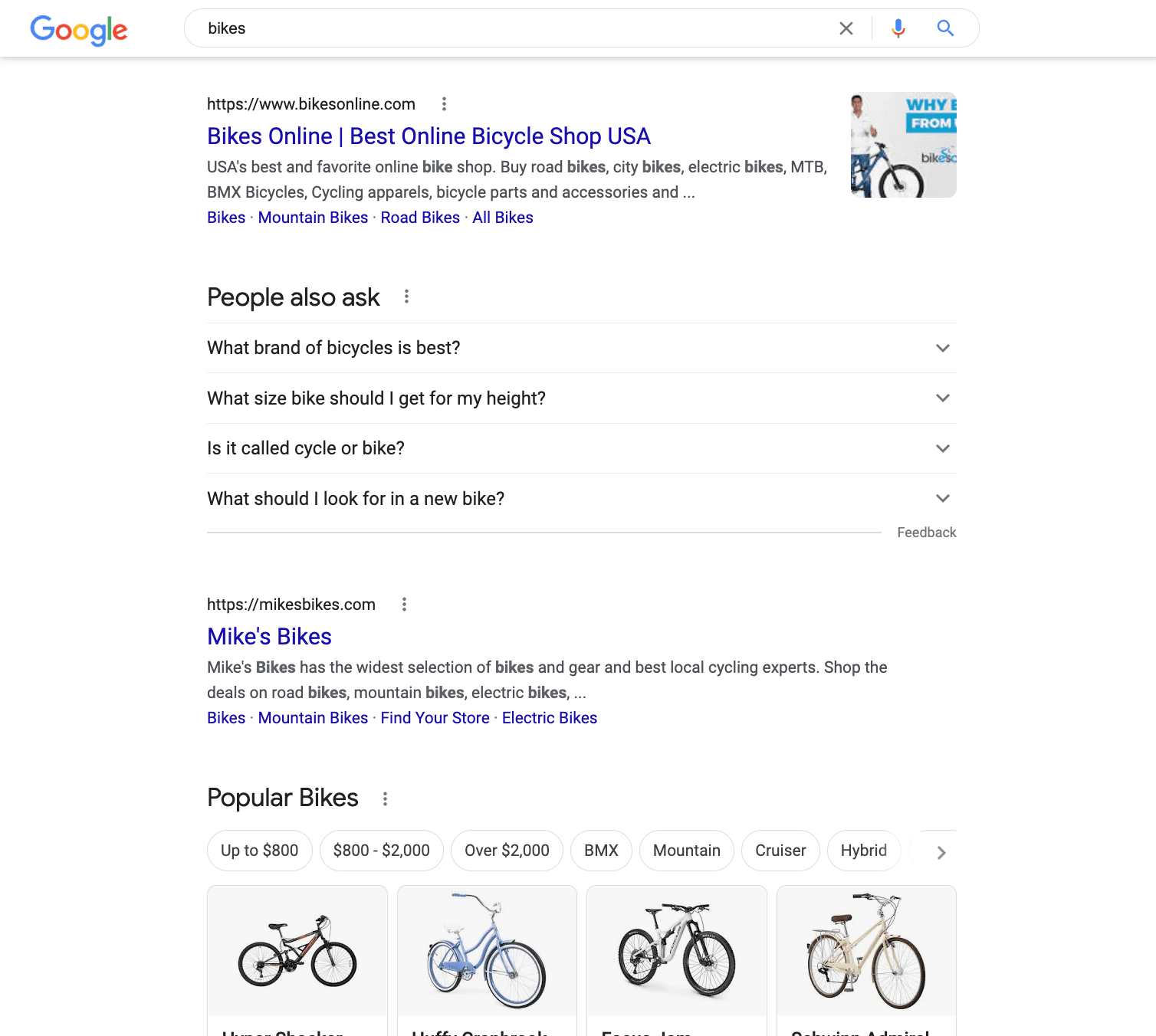
For instance, if you were to type “bikes” into a search engine, the results would show a variety of results that correlate with those keywords:

Results for short keywords on the serp

Here, the term “bikes” is an example of a short keyword; you can count on keyword lengths to fall into two categories:

  1. Short keywords that contain one or two terms
  2. Long-tail keywords that contain typically three or more terms

As a result, short keywords are generally on broad topics, while long-tail keywords are all about specificity. Take a look at what a long-tail version of “bikes” would look like if you search “mountain bikes for beginners”:

Results for long tail keywords on the serp

Therefore, understanding which type of keywords to use on your website or blog requires performing some investigation. As you begin your keyword research, you will start to discern the difference between picking a related keyword and writing for a user’s intent.

The 3 Common Types of Search Intent

Behind every keyword is the reason the user makes the search query in the first place. This is known as search intent which falls into 3 categories: informational, navigational, and transactional.

Take a look at your keyword and think about what the user is really asking by making their query:

  • If they were to search, “what are nfts” they are feasibly looking for informational content that will explain this topic in detail.
  • If they look up “nft marketplace” they are likely searching for navigational content to take them to NFT platforms.
  • If they type “best nfts to buy now” they are probably trying to find transactional content that will help them complete a purchase decision.

By speaking to the “why” of the search query, you can tailor each content page to fully provide value to the user and deliver the best possible experience. But to fully grasp how to provide this value, you need to know the impact of keywords and why they matter to your website in the first place.

Now, while keywords are still useful tools for conceptualizing and planning your content strategy, their effectiveness is entirely rooted in context.

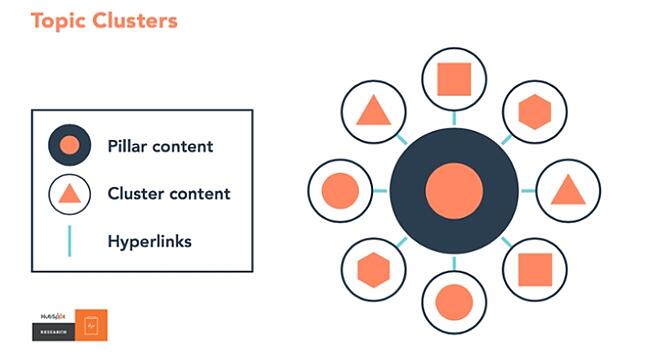
For instance, say you’ve written SEO blogs about the various aspects of software. If you have been fleshing out a topic cluster to demonstrate your content authority, Google will have the context it needs when ranking websites like yours.

Pillar content connecting with cluster content through hyperlinks to create topic clusters

The keywords you include on your pillar and cluster pages will guide you to produce content on a range of user interests. But with the paradox of choice, how do you choose a good keyword? Your decision will depend on the marketing channel you’re writing for and your short or long-term goals.

Let’s dive into how to define good keywords across SEO and PPC channels to put you in the best position to benefit from your content.

What are good keywords?

What qualifies as a good keyword in SEO is different from what makes for the right target in PPC. But how do SEO keywords differ from keywords for PPC on the SERP?

Understanding this difference takes learning how to use SEO and PPC keywords to your website’s advantage.

Using Keywords in SEO

A good SEO keyword strikes the ideal balance between keyword volume, competition, relevance, and intent based on your website’s authority. Therefore, adding keywords that encompass these factors, will allow you to rank and drive traffic long-term.

Plus, because SEO keywords are free- to rank for and when users click on your content- you can receive high value from the content you produce.

While the roster ranges both on and off the page, SEO content includes:

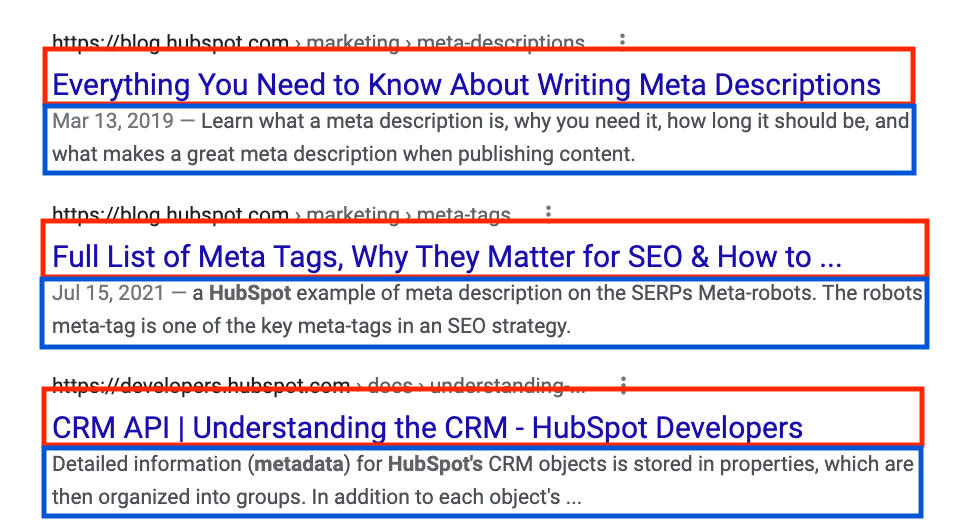
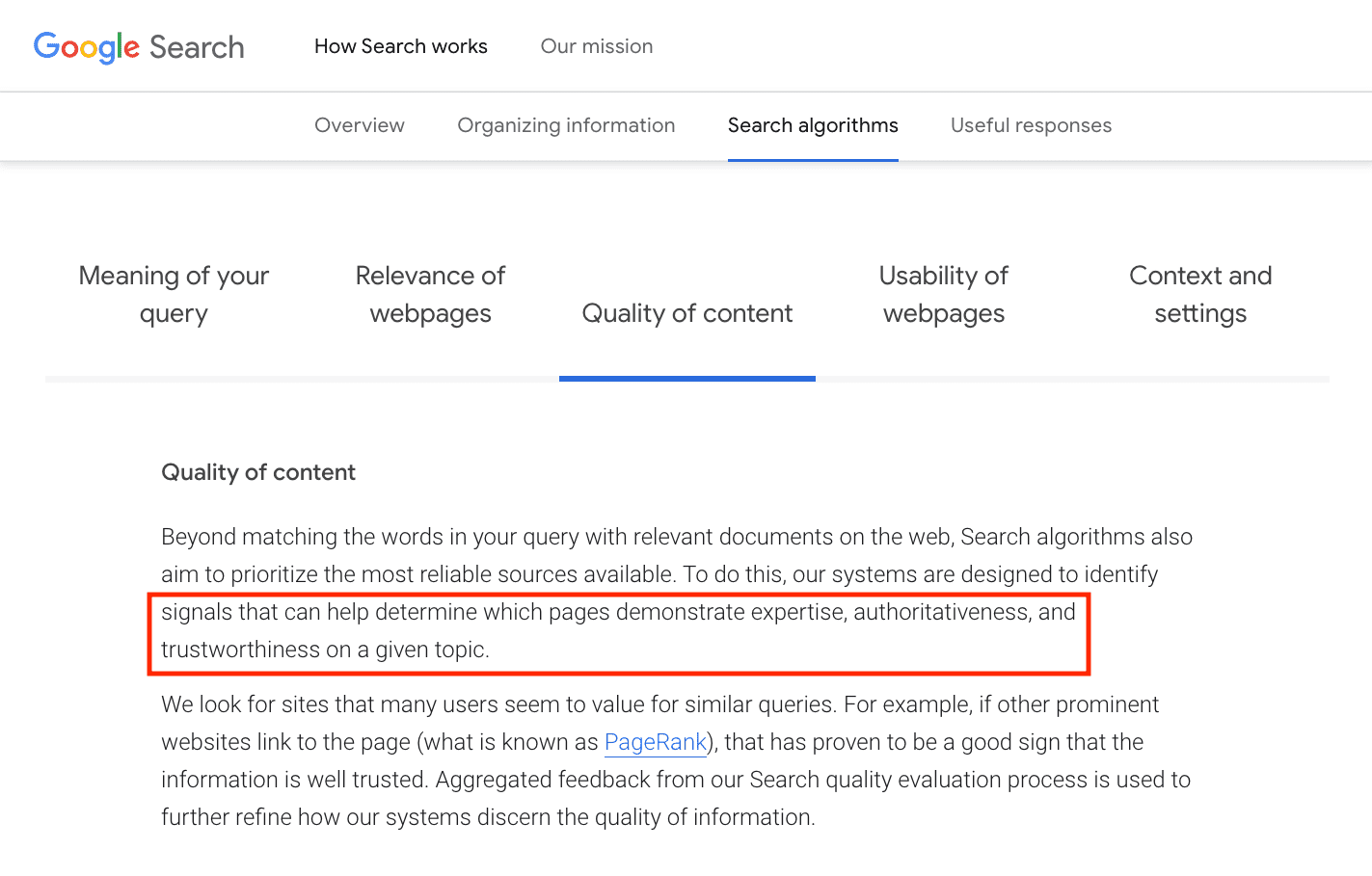
Unlike the other forms, the keywords in metadata aren’t ranking factors. But best practices are to include your targeted keyword in the title tag and description. Take a look at how metadata appears on the SERP with the title tags outlined in red and descriptions in blue below:Characteristics of metadata on the serp What’s special about finding the right keywords, is that it allows you to write rich content around what people are interested in and satisfy Google’s E.A.T. principle — a major Google core update from 2019. Your keywords will be your guide to writing a piece that meets a search engine like Google’s expectations of:

  • Expertise
  • Authoritativeness
  • Trustworthiness

So before you dive into finding keywords, start by thinking about the topics that matter to your website. What are some things your audience may be searching for that would lead them to you? Have some ideas in mind? Start there.

Using Keywords in PPC

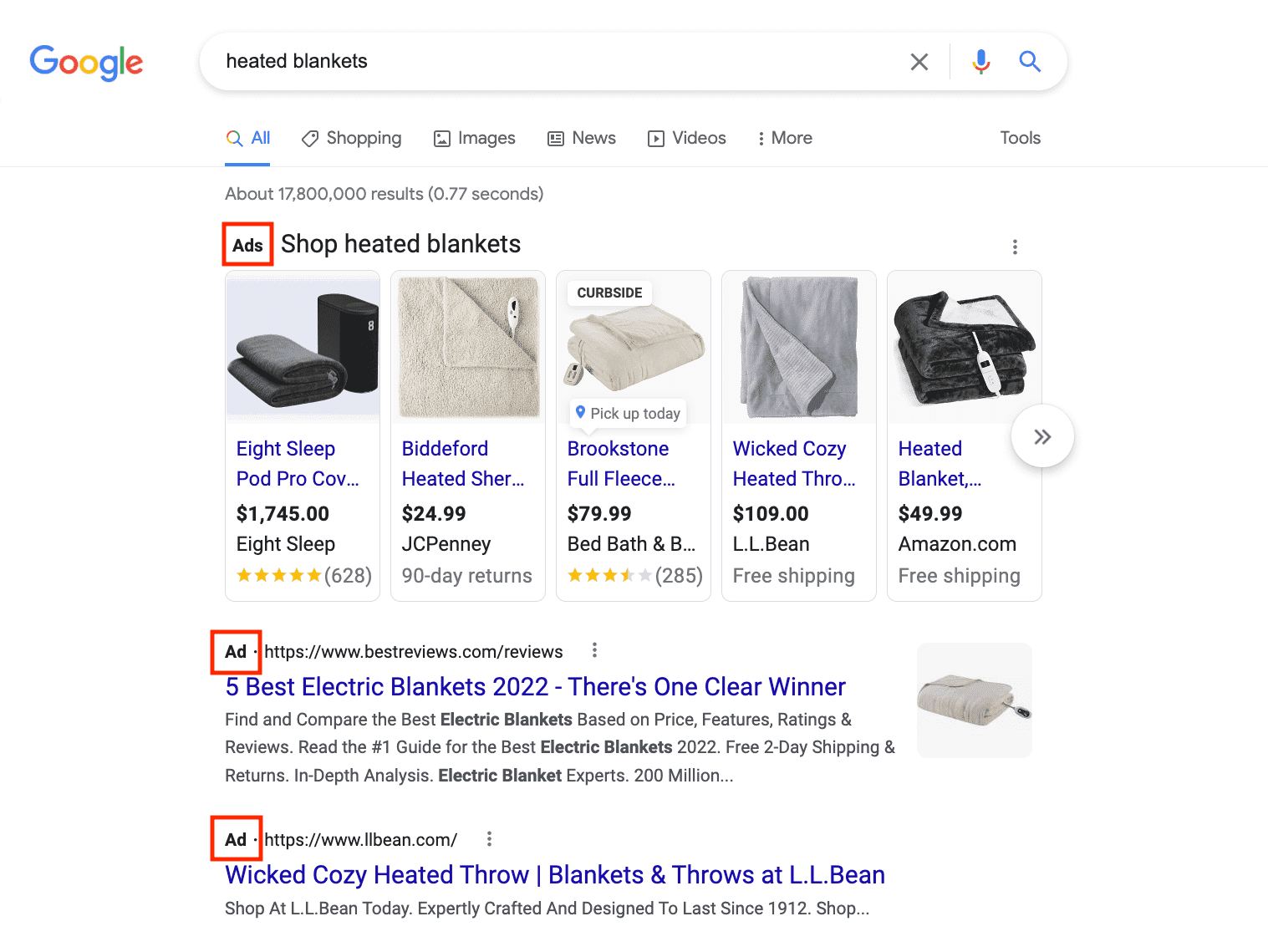
On the other side of Search are PPC keywords. PPC keywords are terms you choose to rank for in order to increase brand visibility and foster website growth. You can bid on your keyword choices, and when you win your bids, you will rank at the top of the SERP like these businesses below:

Paid search ads on the search engines results page

So, you can use keywords to create PPC ads promoting your products or services through platforms like Google Ads and Microsoft Ads. Then, when users select your ad, you pay for every click you receive.

Now, there are two main types of PPC keywords:

  • Branded keywords are words and phrases that include your brand’s name. Their purpose is to attract customers in your audience that are near a purchase decision.
  • Non-branded keywords are words or phrases that do not include your brand name. They help you gain new customers who may be searching for what you offer but do not know it yet.

Essentially, pay-per-click advertising generates immediate traffic that can convert into leads or sales. Subsequently, these conversions deliver a faster return on investment for the money and time you put into your ads. You will use PPC keywords to tailor your content to the audiences you decide to target.

When it comes down to when to apply SEO versus PPC advertising, it depends on your business goals. Will your business benefit from the long-term impact of Organic Search or the short-term results of Paid Search? While you contemplate this, remember SEO content concentrates on providing value to the reader, while PPC content focuses on promoting your products or services.

Still, the tricky part is that the internet is a busy place — making it virtually impossible to be the only person writing about any given topic. So even if you create rich content with keywords and provide the context for search engines to understand it, how do you stand out from the crowd?

Well, this is where the following keyword considerations come into play.

Considerations for Choosing a Keyword

Monthly Search Volume

Monthly search volume (MSV) is the number of times people search for a particular keyword in a month. By considering the popularity of a keyword, you can tailor your content strategy and write about new content opportunities.

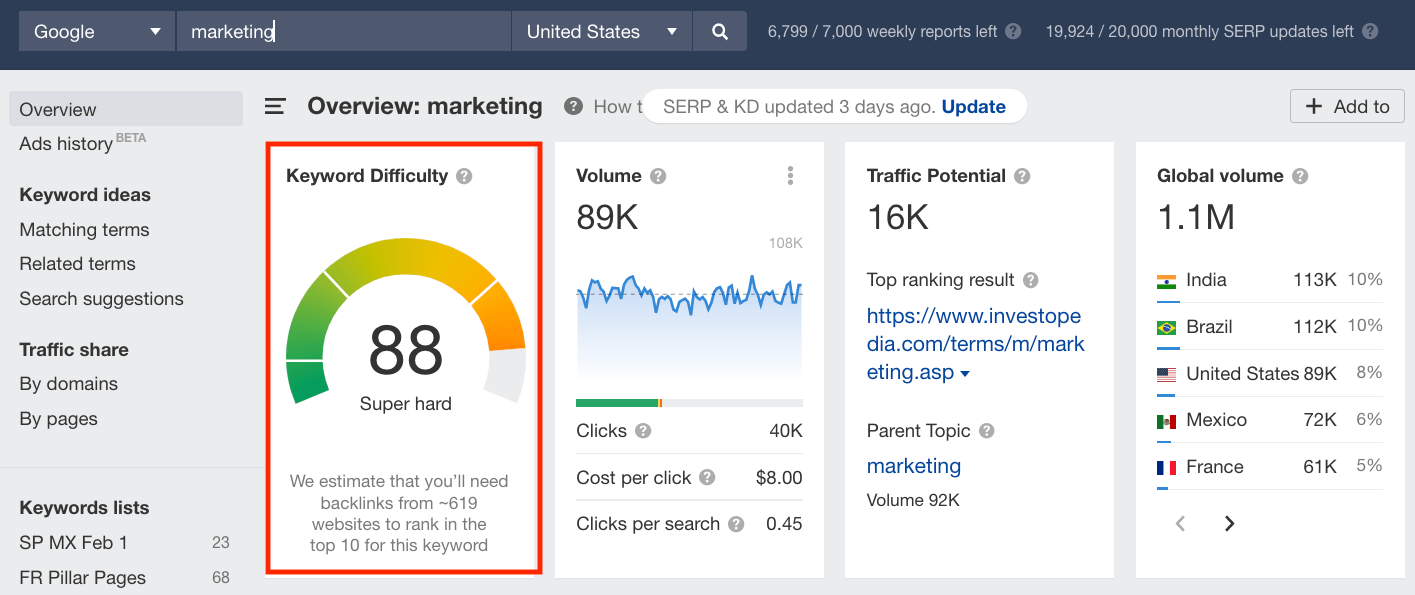
To find out how many people are searching for a particular keyword, you can use keyword research tools like the one below from Ahrefs. For instance, when you type in the word “insurance” the tool provides the following MSV estimate outlined in red:

The monthly search volume of keywords in ahrefs

Oftentimes, competitive keywords with higher difficulties are the ones in which everyone in an industry wants to rank. For example, broad keywords like “insurance,” “marketing,” or “technology” are all going to be highly competitive because they have a high volume of monthly searches. There is also a bevy of written content on these topics vying for a keyword ranking.

The monthly search volume of keywords in ahrefsThe market for these and similar broad search terms is completely saturated. So getting a foothold for a search term like “marketing” would be like constructing a generic coffee shop between a Starbucks and a Dunkin’ Donuts — you may get a bit of business if a customer notices you in your area, but they’re more likely going to go to one of the established businesses they know.

For your business to truly gain SEO ranking, it’s important to consider less competitive keywords. Focusing on less keyword competition lets you demonstrate what makes you different and reach the best audience for your business.

If we return to our coffee shop example, concentrating on less competitive keywords is like branding yourself as the only ‘specialty cat cafe’ in the city. In this situation, it’s easier to stand out because you’re focusing on what makes you unique to your target buyer persona.

After all, the person looking for a cat cafe to sit in and relax is probably not the same person wanting a quick cup of coffee on their way to work — just like someone searching for “technology” is not the same person searching for “small business technology setup service.”

Intent & Relevance

We’ve established that search intent is the “why” behind the terms users search, but did you know that search engines use this intent to rank content? This relationship is called keyword relevance: how closely related a keyword or phrase is to a piece of content.

For example, say you own a website about baking and you want to target the keyword “easy cake recipes” in your content. But instead of writing a thorough article on these recipes, you write more about the history of cake. Even though this article may be intriguing, it’s not relevant to your primary keyword— and you’re unlikely to rank for your target. So be sure to keep keyword intent and relevance top of mind as you research.

How many keywords should I use?

It’s a question that has withstood the tests of time (spent on digital marketing): what are the optimal number of keywords for SEO content?

Well, for a long time digital marketers organized their entire content calendar around specific keywords — and the number of times to include these keywords on the page. They’d work with their teams to brainstorm focus keywords relevant to their products or services using keyword research tools. Then analyze all the variations of that keyword most likely to be a source of website traffic.

Unfortunately, as time went on, publications began keyword stuffing; publishing irrelevant, poorly-written content with specific keywords just to drive traffic. Eventually, search engines — largely led by Google, and the constantly-changing Google search algorithm — became more advanced. Instead, a more contextual-based approach to digital content was favored over simply keyword count.The details of Google ranking factors for content on the search engines results pageSo as the power of keywords continues to shift, so does the importance of how often you use them. Yet, deciding how many keywords you should use is

still worth the consideration because it is a matter of keyword density: the ratio of keywords on your page versus the overall word count of the piece.

Aside from using a formula to calculate this ratio, you can also conduct a competitive analysis to examine the keyword density for specific keywords your competitors target.

There’s no magic trick to how to get on the first page of Google when it comes to SEO. To rank well on search engines, you need to consistently create rich SEO content and think about how it fits together in the long term. You must also be clear about your content strategy and the keywords you use to guide it.

Leveraging keywords to build your content foundation enriches your content marketing strategy and teaches you how to get traffic to your website — now, we’re going to tell you how to find them.

How to find keywords for content strategy in Google keyword planner1. Clearly define your target buyer persona.

Having a clear understanding of your ideal audience is the key to any marketing endeavor. With keyword research, you must understand what questions you can answer or problems you can solve for this target buyer persona. At this point, it’s okay to think in broad search terms regarding what those problems or questions are.

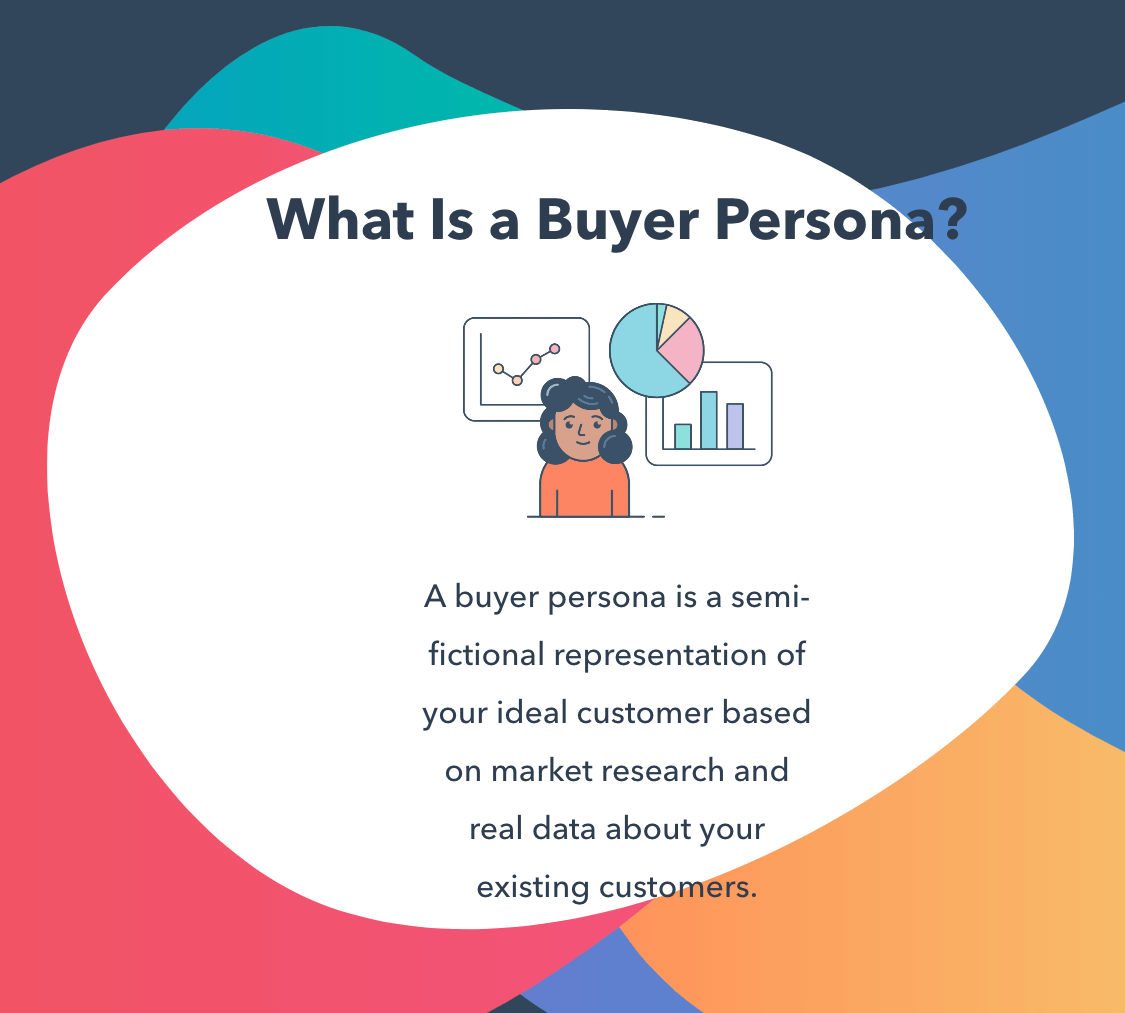
Buyer persona as defined as a representation of your ideal customer based on market research and real data

For instance, if you’re a PR agency, you need to find leads who are interested in hiring a third party to help them run a PR campaign. To do this, perhaps you begin by writing digital content that answers the question “How to run a successful PR campaign”.

A broader content topic is a good starting point for building a pillar page for your topic cluster.

2. Narrow your focus and investigate keyword competition.

Once you determine the overarching question or problem to address, it’s time to get more specific. Getting more specific allows you to cater your content to your target audience, and it helps you leverage less competitive keywords.

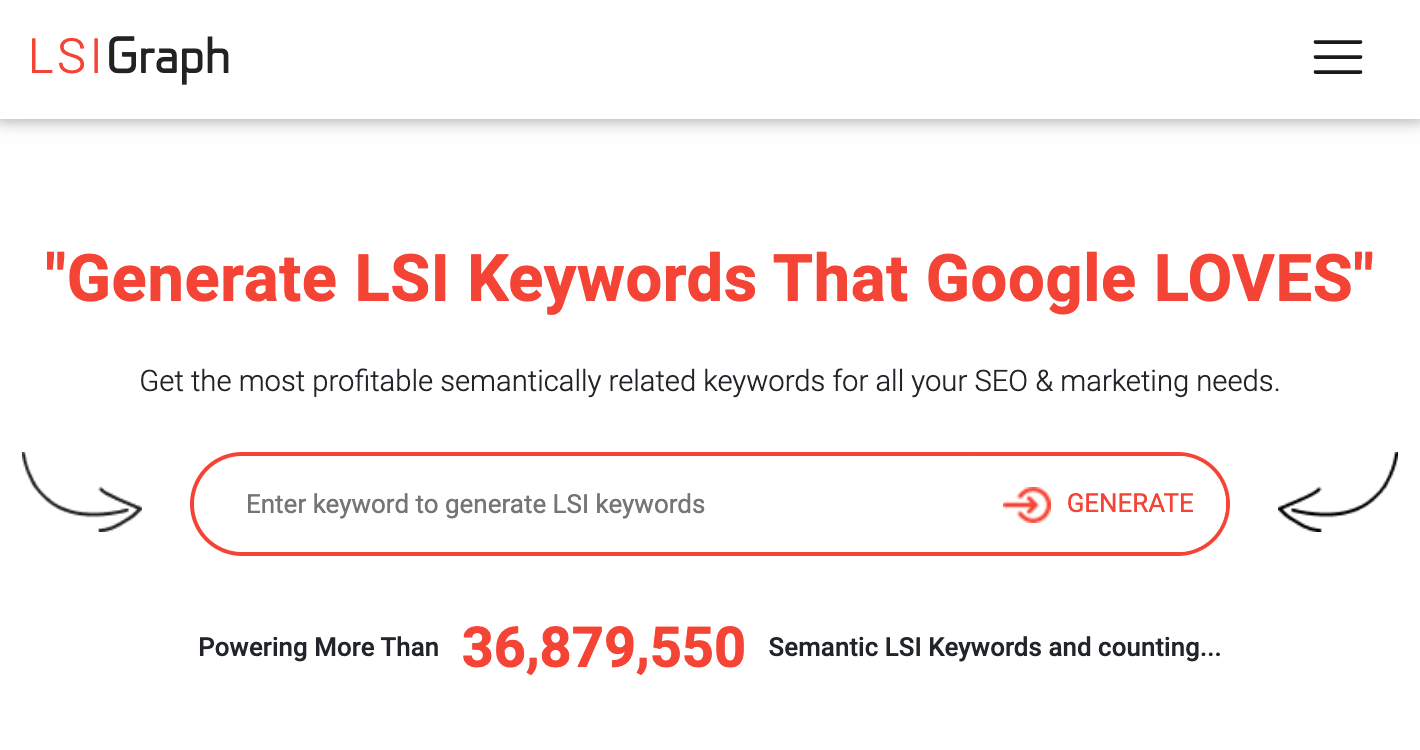
I like to narrow my focus keyword by using lsigraph.com. LSI, or latent semantic indexing, is a process of generating search query variations by determining how closely a given search term relates to other search terms. Think of latent semantic indexing tools as a way of brainstorming and generating a lot of keyword ideas quickly and easily.

Latent semantic indexing keyword research tool LSIGraph for idea brainstorming and generating

From there, use keyword tools like Google’s Keyword Planner to analyze a competitive keyword. This analysis allows you to determine which keywords have the most potential for your business.

 Keyword research tool Google Keyword Planner for analyzing keyword competition

3. Collect data, analyze keyword research results, and repeat.

As you create content around specific keywords, keep in mind that a great content strategist doesn’t just throw content out randomly to see what sticks. Consider using a tool like Google Search Console to track how your website is performing for your keywords.

Search traffic and keyword analysis tool Google Search Console on the platform

Google Search Console can also help you see whether your traffic is increasing from keywords you hadn’t planned on ranking for and this informs your future digital content strategy. Having this knowledge is crucial to further refining your keyword planning and identifying content gaps that have significant potential to bring you new customers.

How to Create Unique Content Through Niche Keywords

What’s great about leaning into less competitive keywords is that it will allow you to build your brand authority within a specific field through clearly defined niche content. Niche content is a specialized writing topic that engages a specific audience’s interests to make a viable impact in your industry’s content market.

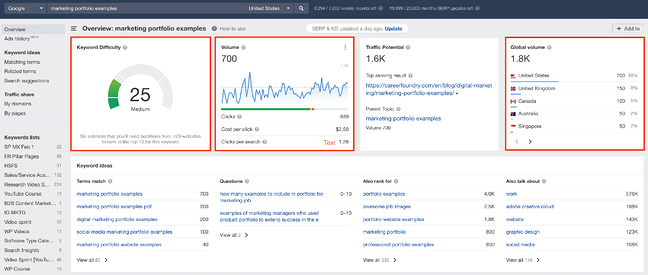
If we reexamine our “marketing” example above, we see how difficult it is to make an impact by writing general content on “marketing” in such a saturated market. But what if your content targets a longer, more specific keyphrase like “marketing portfolio examples” and an audience of marketers trying to build or bolster their marketing portfolio?

Creating niche content by researching  less competitive keywordsAs you can see, although the monthly search volume for this keyword is significantly lower, it would be easier for you to get a foothold in the market thanks to this phrase’s lower keyword difficulty. To become more authoritative in your space, you need to incorporate long-tail keywords into your content strategy.

Because these keywords have less SEO competition, it’s easier to establish yourself as a content authority on a given subject — which is invaluable in SEO.

Whether you’re just getting started with keyword planning or looking to amplify your current content efforts, keep your customer persona at the front of your mind, and don’t be afraid to recalibrate your content strategy as you collect more data. Great inbound marketing is about having the right content reach your ideal potential customers when they need it, and getting smart with your keyword approach is a fantastic way to do that.

Editor’s note: This post was originally published in April 2019 and has been updated for comprehensiveness.

SEO Starter Pack

Categories B2B

Data-Backed Tips for Successful Hybrid Team Leadership in 2022

According to Microsoft’s 2022 Annual Work Trend Index Report, 53% of employees are considering transitioning to a hybrid work setup in the next year and hybrid work is up seven points from 2021.

→ Click here to download leadership lessons from HubSpot founder, Dharmesh  Shah [Free Guide].

So, what does it take to lead a hybrid team? We’ve got a few tips.

1. Set rules of engagement.

When everyone’s in the office, many rules and behaviors go unsaid. After all, everyone is in the same space, so it’s easier to pick up on cues. However, when everyone is scattered, it changes how you approach them.

Microsoft’s report found that following the pandemic, few companies (only 28%) have met with their teams to define their new normal since switching to a hybrid or remote model.

This can lead to confusion, unmet expectations, and high attrition rates. Setting a structure around communication and collaboration allows the team to work more efficiently as it promotes cohesion among all members, despite the physical distance.

2. Leverage asynchronous communication.

Speaking of distance, it can be nearly impossible to get everyone on a call at the same time depending on where your team is.

For instance, say you have some team members in California, others in New York, and some overseas in Kenya. Those are three time zones, meaning three different work schedules.

One way to keep your team connected is to leverage asynchronous tools.

For instance, you can utilize bots within your messaging system, whether it’s Slack, Teams, or another platform, to invite your team to share updates, check-ins, etc.

geekbot asynchronous communication tool

With Geekbot, the software can be programmed to ask your team specific questions, then share their answers.

So, if your team is unable to sync up for daily meetings, you can still get progress updates from everyone in a channel of your choosing.

3. Have a robust onboarding process.

Having a strong onboarding process is more important than ever.

Data from the Microsoft report shows that employees onboarded during the last two years are at greater risk for attrition, are less likely to feel included within their teams, and tend to have weaker relationships with their direct teams.

Since the pandemic, new hires are relying more on their managers for onboarding – and that’s a good thing for the company.

The study found that new hires whose managers played an active role in their onboarding process were 3.5 times more likely to be satisfied with their experience.

Here are some tips to optimize your onboarding process:

  • Prepare training materials and create an onboarding guide.
  • Launch an internal mentorship program to guide new hires within the first few months.
  • Have a welcome chat to introduce the new hire to the team.
  • Send your new hire a survey about their onboarding experience to assess gaps in the process.

4. Trust your team.

Trust is the number one component of a successful hybrid or remote team. Without it, neither party is able to successfully respond to their responsibilities.

In the office, you can always keep an eye on your team. Walking by their desk to check in on a project, peeking to see if they’re actively working. When your team is hybrid, you lose that level of visibility.

As such, you’re forced to trust your team. How do you build trust? Well, it’s a two-way street and it starts with you.

Firstly, be transparent. This encompasses everything from sharing feedback on performance to sharing resources to sharing team and company-wide updates.

Secondly, create a space where your team feels psychologically safe – safe to share ideas, be themselves, learn, and challenge the status quo.

Lastly, find out what matters to each person on your team. What do they value? What are their goals? How do they like to be celebrated? How do they learn best?

Trust also extends to their work. Even though 80% of employees say they are just as productive since going hybrid or remote, most leaders (54%) fear productivity has or will negatively impact their teams, according to the Microsoft report.

Avoid the temptation to micromanage your team. Instead, set the parameters for their tasks, check in with their progress, provide resources when needed, and offer feedback. This will empower your team to do their best work knowing that they have the full support and trust of their manager.

5. Prioritize team culture.

According to the 2022 Microsoft report, the top aspect of work employees views as important – other than money – is a positive culture.

Even though your team is hybrid, you still have to work hard to build its culture. If anything, it’s even more important since you don’t have the physical environment to rely on.

When you have a hybrid team, you have to be intentional about everything – particularly connecting on a non-work level.

43% of leaders surveyed in the Microsoft report say relationship-building is the number one challenge in remote and hybrid work.

After all, you can’t just invite your team to a happy hour at a local restaurant or have an impromptu group lunch.

What you want to avoid is an imbalance where some members feel disconnected from the team because of their distance, which is pretty common. In fact, 44% of hybrid employees surveyed said they do not feel included in meetings.

Here are a few ways to make sure your team feels connected:

  • Host virtual events, such as escape rooms, magic shows, and cooking classes, that your team can enjoy as a group.
  • Have regular “watercooler” meetings that allow your team to gather and talk about anything non-work related.
  • Create non-work-related messaging channels based on your team’s interests, like cooking, TV shows, home renovation projects, pets, etc.
  • Plan annual or quarterly meetups with your team, if your budget allows.

This is your opportunity to shape it into one that fosters inclusion, collaboration, and trust.

6. Invest in your team’s equipment.

When your team works in an office, there are certain things you don’t need to account for, such as Wi-Fi, computer, headset, desk, etc.

However, if you have some people from your team working from home, they will need to have access to the same equipment to succeed in their role.

There are also nice-to-have items that aren’t needed to complete the job but can make your team happier and more productive. Think headphones and ergonomic equipment.

Instead of seeing it as an additional expense, consider it an investment into your team that will pay off tenfold.

There you have it – whether your team is newly hybrid or has always been, there’s always room for improvement. With these tips, your team will work as seamlessly as you would in person.

New Call-to-action

Categories B2B

How to Make Money on Pinterest: 9 Ways to Monetize Your Pinterest Account

Home to countless cookie recipes, laughable memes, and perfect last-minute gift ideas, there’s certainly already a lot to love about Pinterest. But what if we told you that it’s possible to make money on Pinterest?

Free Resource: 12 Pinterest Templates for Business

The simple truth is this: Amidst the ab workouts and IKEA furniture hacks, there lies a huge opportunity for businesses to use Pinterest to drive revenue. And with 31% of online American adults using Pinterest, this isn’t an opportunity you’ll want to leave on the table.

Can you make money on Pinterest?

Whether you are a content creator, have an eCommerce business, or are trying to drive traffic to your blog, Pinterest can be a key tool for monetization.

If your target customers are on Pinterest, they’re likely ready to buy. According to demographic data from Pinterest, 45% of adults in the U.S. with a household income over $100K per year are active on the platform. Additionally, 83% of Pinterest users make purchases based on what they see on the platform.

If you aren’t monetizing through Pinterest, now is a great time to start. To help you get a handle on how to make Pinterest work better for your business, check out the tips below.

How to Make Money on Pinterest

1. Generate traffic to your eCommerce products.

Best for: eCommerce businesses.

If you sell products online, one of the simplest ways to drive more sales is to pin your product pages directly to Pinterest. Creating pins that are linked directly to your online shop can generate meaningful traffic when paired with the keywords your ideal customers are searching for.

Before you start sharing your products on Pinterest, make sure you’ve enabled Rich Pins, which sync the latest information from your website into any pins created from your site. Product Rich Pins are able to pull the most up-to-date price, inventory, and product description from your website so you don’t need to worry about manually updating existing pins.

Rich Pins are free to use and only require adding a bit of code to your website. New websites requesting Rich Pins are typically approved within 24 hours.

2. Create pins for your affiliate partnerships.

Best for: Users with strong relationships with their affiliate partners.

Affiliate marketing is a popular tactic for marketers and entrepreneurs looking to build passive income. As an affiliate, you can receive a commission anytime someone makes a purchase from your unique link to a product or service.

To leverage Pinterest for your affiliate marketing efforts, consider creating pins that link directly to your affiliate links or to blog posts or YouTube videos that incorporate your affiliate links. By sharing your affiliate links on Pinterest, they can be found by anyone searching for that particular product, earning you a commission if they make a purchase.

Here are a few best practices to keep in mind when using Pinterest to make affiliate sales:

  • Disclose when affiliate links are present. Per FTC guidelines, clearly state when affiliate links are being shared within a piece of content.
  • Only share direct links. Pinterest discourages the use of link shorteners or tools that disguise the final URL when sharing affiliate links.
  • Optimize your pins for keywords related to affiliate products. The beauty of Pinterest is that it operates as a search engine. When your content features keywords users are searching for, the content is more likely to generate clicks and engagement which could lead to increased sales.

3. Send traffic to your blog.

Best for: Inbound marketers and bloggers.

Whether you rely on web traffic for advertising revenue, or as part of an inbound marketing approach, you can incorporate Pinterest into your traffic-building strategy to drive revenue. Ranking for keywords on Google can be a complex, time-consuming endeavor. However, ranking for keywords on Pinterest can be more straightforward, and can lead to meaningful traffic gains.

According to Pinterest, 85% of users turn to Pinterest to start a new project or learn something new. If you’re creating helpful content that aligns with the keywords your potential audience is searching for, you can potentially capture some of this search traffic through Pinterest.

Here are some tips to help you grow your web traffic through Pinterest:

  • Use Pinterest Trends to discover which keywords are trending with Pinterest users.
  • Create multiple pins for each blog post that have an optimized title, description, and image that align with the keywords users are searching for.
  • Save your pins to boards that have optimized titles and descriptions incorporating the keywords users are searching for.
  • Create article Rich Pins from your website to incorporate the blog post title, description, and author information in your pins.

4. Join the Pinterest Creator Fund.

Best for: Creators who want to grow and monetize their Pinterest account.

In 2021, Pinterest launched the Creator Fund to help creators grow and monetize their content on the platform. These cohorts open quarterly and participants have access to unique brand partnerships and tools and resources from the Pinterest team to help them grow their reach.

This year, Pinterest announced an expansion of the program’s fund to support a wider range of creators.

How to make money on Pinterest: Content created from participants of the Pinterest Creator Fund

Image Source

5. Share shoppable pins for your products.

Best for: Online shops and eCommerce businesses.

If you sell products online, creating shoppable pins for your products can be an effective way to increase sales. According to Pinterest, engagement with shoppable pins increased by 20% in 2021. One way to drive conversion from Pinterest is to enable Product Pins on your account.

Product pins allow online merchants to list their products on Pinterest so customers can make a purchase without leaving the platform. To set up shoppable pins, start by applying to be a Verified Merchant on Pinterest.

Below, you can see an example of shoppable pins by the skincare brand, Summer Fridays.

How to make money on Pinterest: Skincare brand Summer Fridays shares shoppable Pins on Pinterest

6. Create sponsored content.

Best for: Content creators and influencers.

Pinterest can be a lucrative space for influencer marketing. Content creators can work with brands to create sponsored content specifically for Pinterest or can negotiate a higher rate for sharing their sponsored blog and social content from other platforms with their Pinterest audience as well.

7. Manage Pinterest accounts for other businesses.

Best for: Virtual assistants, social media managers, and administrative professionals.

If you have the skills to manage and grow a Pinterest account, consider lending your services to other businesses. Many busy entrepreneurs don’t have time to manage their own Pinterest accounts despite the benefits of remaining active on the platform.

In this role, you could develop a Pinterest strategy for your client’s primary business objectives (such as growing web traffic or increasing conversions of shoppable pins), do keyword research to determine what their audience is searching for, and create and upload pins to their account.

It helps to have demonstrated experience in this area. Try creating a portfolio outlining the results you’ve gotten from growing your own or other businesses’ Pinterest accounts to share with potential clients.

8. Use Pinterest Ads to reach new users.

Best for: People selling digital and physical products online.

If you have an online business, consider running ads on Pinterest to get your offerings in front of potential buyers. Pinterest ads look like regular pins but can be strategically placed where your audience is most likely to see them including on the home feed and in search results.

To start running ads on Pinterest, make sure you have a business account. After you have your business account created, visit the Ads Manager to create a campaign and ad group.

Lastly, you’ll have the option to create new pins or select the existing pins you want to promote. Here’s how the company Daily Harvest uses paid ads on Pinterest to reach new customers.

How to make money on Pinterest: How Daily Harvest uses paid ads on Pinterest to acquire new customers

9. Showcase your products with video content.

Best for: eCommerce businesses.

Idea Pins are multi-page video posts that are quickly gaining popularity on Pinterest. Though Idea Pins can’t link directly to web pages like standard pins can, users can tag specific products featured in their Idea Pins to make them shoppable. Cosmetics company Fenty Beauty frequently features video tutorials on Pinterest to promote key products.

Users can tag products using affiliate links, and merchants can tag products from their own businesses to drive sales. By sharing Idea Pins that feature video clips of your products in action, you can help expose new buyers to the features of your products.

With over 400 million users who are looking for inspiration and are ready to buy, incorporating Pinterest into your business strategy is a great way to engage with your audience and drive potential revenue.

Pinterest Templates

Categories B2B

How to Find a Job After College: The Ultimate Guide

College graduation is just around the corner, which means it’s almost speech season. Don’t get me wrong, I love a good graduation speech and all the platitudes that come along with it, but very few of them give guidance on how to find a job after college. 

We want to help. At HubSpot, we’re lucky enough to interview and hire a lot of recent graduates, so I’ve rounded up some advice below based on interviews, applications, and feedback we hear from hiring managers, recruiters, and job candidates alike. And for free templates and tools you can use to put the advice below into practice download this post’s complementary guide here.

But before we dive into how to find a job after college, let’s first shed some light on why the job searching process is so difficult for college graduates. 

Free Kit: Everything You Need for Your Job Search

Why is it hard to find a job after college?

One of the leading factors that make finding a job after college difficult is fierce competition.

According to Statista, the percentage of the U.S. population that have a 4-year college degree has steadily increased since the 1940s. As of 2020, 38.3% of women and 36.7% of men have completed four years of college or more.

With college degrees becoming more and more common, graduates are finding it difficult to stand out to employers. The competition can be even more intense for college students who either did not complete an internship in their field studies while pursuing their education. 

With that said, here is some advice to make finding a job after college less daunting. 

12 Tips for Finding a Job After College

1. Narrow down your search.

I asked a recent college graduate how many applications he submitted to companies each week as part of his job search. His response was, “As many as I need to get my parents off my back.”

Unfortunately, sending out countless applications isn’t strategic and is typically unsuccessful because:

  • It’s hard to stick out from the pack of other applicants when you’re trying to be all things to all people. 
  • You can’t properly research and follow up with hundreds of job applications. 
  • Juggling too many applications can increase the likelihood of spelling mistakes, misstating goals, or missing scheduled phone screens. 

Instead, I recommend doing enough homework to reasonably target 10-12 companies. This way you’ll have the time and energy to give each application the attention necessary to ensure they’re filled out properly. And you’ll be able to better hone in on the unique skills you’d bring to the job and really stand out to employers.  

2. Talk to 10 people about their jobs.

I recommend scheduling a 30-minute, well-organized and orchestrated phone interview with someone familiar with the company or its field.  

Ask a friend who graduated recently, a neighbor from your hometown, or check in with your career services office to ask for some input. If your immediate network isn’t a great resource, get to work on LinkedIn — identify individuals with job titles that interest you and ask if they would be open to a quick conversation.

Regardless of the field you choose, you are going to spend a lot of time at work, so it’s worth investing the time beforehand to understand what roles will actually be like after you secure the job.

3. Reach out to entry level employees.

You’ll want to focus on selecting people at or close to entry level jobs as they’ll give a much more realistic sense of what your day would be like and what skills you would need to succeed. This step can help you significantly refine your search and align your applications accordingly. 

While it may be tempting to reach out to senior leaders, it would be better to wait until after you have clear context on the types of roles you’re most interested in pursuing.

4. Ask Good Questions. 

Focus on asking questions about what their average day looks like:

  • What do they work on?
  • Are they mostly working alone at a computer or in meetings with other people?
  • How (if at all) do they interact with their boss?
  • What’s the culture at their organization like?
  • What do they like about it and what do they wish they could change?
  • What’s the most important skill to succeed in the job they have, and why?

These types of questions are specific and give you a real sense for what it’s like to actually do a given job.

5. Listen.

Active listening can be the single most effective tool in identifying the right company and role for your skill set.

Ask your professors and advisors if they know alumni working at companies where you could be a good fit. Ask your previous employers for feedback on what you’re best at and what you can do better. The answers to these questions should help inform your job search, but you need to actively listen to make their advice actionable.

Moreover, take good notes during these conversations. I’d recommend creating a Google doc with:

  • The name of the person you’re talking with
  • The company they work for
  • Key takeaways from the call
  • Next steps

After these conversations, make clear follow-ups and carve out time after every informational conversation to thank the person who gave you their time.

6. Identify three job tracks and create a playbook for each one.

After your phone calls and interviews help you identify a few roles that really interest you, visit the career site for a few of the companies in your preferred geography that offer the roles you’re seeking. Take note of the specific skills the position demands. 

Many applicants skip this step entirely, but it’s imperative to understand what the hiring managers are seeking and what experience is most relevant to the career paths you’re targeting.

Recognizing that the best hiring managers can screen for potential and skill, you need to craft a compelling narrative for why you are positioned to succeed in a role. Does that mean you need to check every single box? Absolutely not, but you do need a compelling story for why you are uniquely suited to the position.

Far too many people send the same resume for multiple positions that require very different skills and experiences. 

To avoid this, my recommendation is to fill in the blanks of this sentence before you start on a resume or cover letter: “I would be a great (_______________) because I have _________, ________, and _______ skills as evidenced by my work with ___________ and _____________.” 

This may seem elementary, but when you’re in the thick of a job search it’s easy to get lazy and ship the same materials to everyone. Creating a clear, concise summary of why you are positioned to succeed in a given role is a great foundation for the materials you’ll create next before applying.

7. Craft compelling application materials that tell your story.

Far too many people treat creating their resume, cover letter, and any other necessary application materials as a chore to be completed or a checklist to be generated. In reality, recruiters and hiring managers scan through hundreds if not thousands of resumes on a weekly basis, so make their lives easier by creating a truly compelling narrative on your interest in the role. 

Telling a great story doesn’t mean filling every square inch of space on a page. In fact, the best resumes and cover letters use spacing, italics, and bold text to make the materials more readily digestible and enjoyable to read for the hiring manager.

When it comes to crafting your narrative for applications, don’t underestimate the role of activities outside of work: You don’t need a formal internship or summer job to show that you’re interested in and capable of blogging, or a seasoned job in sales to show that you’re passionate about engaging people.

Did you blog for your college admissions office to help recruit incoming students? You should include that experience if you’re applying for a marketing, recruiting, or human resources position.

Did you use iMovie to create videos for your university’s theater program? Learn enough code to launch a website for your parents’ restaurant? If you’re applying for any role in technical support, design, or engineering, incorporate it.

Far too many people underestimate the role activities outside the classroom can play in demonstrating your potential and drive, so don’t overlook these experiences when you’re crafting your story.

8. Google yourself.

Most hiring managers will run a quick Google search before reaching out to you for a phone screen, so Google yourself before you start applying for jobs and ask yourself what story your online presence tells. If it doesn’t align with the narrative you’re using in your job applications, invest the time and energy to change it. 

Your online presence should reflect your personal and professional interests, and with the proliferation of free publishing forums (from LinkedIn to Medium to About.me), you have no excuse not to put them to work on your behalf in the job search process.

For example, let’s say you are interested in applying to Wistia, an online video hosting platform and one of our neighboring companies here in Boston. How could you convey a passion for video if you’re not an editor, producer, or director? 

You could share remarkable videos you see online as a consumer, or blog about how video marketing can influence the sales process. You can also incorporate your previous experience with video on your LinkedIn profile, or tweet articles covering recent brand video launches, among other things.

Be honest about what your current digital footprint says about your candidacy, and then invest some time and energy to change it from a liability to an asset before you start sending your resume out.

9. Apply thoughtfully.

Before you hit submit, triple-check everything for spelling, syntax, and grammar. Everyone knows someone with a particularly good eye for catching mistakes — pay them in lunch or coffee to help you do a final check of your materials before you ship them. Don’t let a spelling or grammatical mistake be the reason you don’t land a job. 

Also, be sure that you have the right details in the right applications. Create separate folders on your computer for each company so that you don’t proudly state how excited you are to work at Company X when your application is for Company Y.

Once you hit submit, you’re not done yet. I recommend creating a Google spreadsheet with tabs for each of the job types you’re applying for, along with the name of the company you applied to, the date you applied, a link to the job on the careers site (so you can reference it easily if asked down the line), as well as the name of the hiring manager or recruiter if available.

This quick exercise makes follow-up a breeze. If you haven’t heard back within a week, sending an email to your contact to politely check in and ask if there is anything you can do to support your candidacy is a great way to show interest without being overbearing. 

Logging everything (including return phone calls, informational screens, and rejection emails alike) in one document will also minimize embarrassing gaffes such as applying for multiple positions at the same company or missing a scheduled informational interview. Plus, having a centralized location means it’ll be much easier for you to react if something unexpected comes up, such as if a hiring manager calls you to discuss the role in depth.

10. Respect the process.

Treat every element of the entire candidate experience like a formal interview. A recruiter calling you to role-play what it’s like to work on our services team? That’s part of the job audition. The emails the hiring manager sends you with details on what to expect in the interview? Your response and timeliness are part of the interview process as well. 

If you’re taking a phone call from the company, find a quiet place to talk, answer the phone appropriately, and thank the hiring manager or recruiting coordinator for making the time to connect with you.

Part of respecting the process is really doing your homework. Here’s a checklist to consider when you’re doing your research:

  • Can you describe, clearly and concisely, what the company does to make money and the problem they are solving in the market?
  • Have you visited their leadership page to understand the backgrounds of people running the company and how the organization is organized?
  • Did you check out interview questions along with recent candidate experience reviews on Glassdoor to check out what people are saying about the company so you can ask better questions when you meet with current employees?
  • Can you reference any recent news the company announced on its company news page, investor relations site, or blog?
  • Have you followed the company on one or more social media channels so you can see how the organization positions itself in the market?
  • If you’re lucky enough to get an interview, have you checked out the LinkedIn profiles of everyone you’re meeting with so you know their role and tenure at the company?

It’s important to treat every interaction with the company and its hiring team with the highest degree of professionalism and consideration. Visiting a company’s website on the train en route to the interview does not constitute research. 

If you expect an organization to invest in you, invest two hours to properly understand its products, people, and value proposition so you can tailor your approach and responses accordingly.

11. Pass the receptionist test with flying colors.

No one wants to work with a jerk, and if you’re rude or dismissive of the person who greets you upon arrival for an interview, chances are you’re not the type of person I want to be in the trenches with on a daily basis. Plus, receptionists usually have the ear of top executives, so if you underestimate them, it could cost you.

Treat everyone you interact with at the company as though they are your interviewer. People don’t want to work with anyone who can’t make time for general pleasantries. 

In fact, when the co-founder of Warby Parker, Neil Blumenthal, appeared on The Growth Show, he said their entire organization screens heavily for empathy and humility in the hiring process. As Blumenthal correctly pointed out, you spend most of your waking life with coworkers, so hiring people who are jerks just creates “culture debt” — a huge price that your organization has to repay for years to come.

So be nice and gracious to everyone you meet: It will pay off for many years to come.

12. Know how to accept and negotiate an offer.

If you make it through the interview experience and are lucky enough to be offered a job, don’t botch your hard work at the one-yard line.

Instead, start off by thanking the company for the offer and asking clarifying questions to better understand the role you’re being offered, the team you’ll be joining, and the salary and benefits associated with the job. Typically, you’ll receive a call from a hiring manager or recruiter with this information, and then ask for the offer to be sent in writing. 

I generally recommend that people profusely thank their interviewer, then ask for a day to review the offer in detail and return with any questions you may have. Doing so ensures they know you are interested and gives you time to pour over the materials in depth to formulate good questions to ask of your potential employer.

For an entry-level position, you have to strike a balance between negotiating a fair deal and being a high-maintenance hire. I recommend formulating a list of your questions then reviewing the materials a second time to ensure that the answers aren’t contained in the information they sent for you. 

You want to ask questions that are thoughtful, insightful, and reflect what matters most to you. In other words, if your base salary is the most important factor in your job decision, invest most of your time on the phone asking clarifying questions — not on how much vacation time you will have.

There is no better time than the present to pursue the job and career track you love, but it’s not going to fall in your lap. Follow the guide above to narrow your search, target your prospects, and prepare yourself for the application and interview process. It’s an investment of time and energy well worth making — one that will pay dividends for your entire career. 

Apply for a job, keep track of important information, and prepare for an  interview with the help of this free job seekers kit.

Categories B2B

How Brands Use NFTs for Marketing: Are They Really Worth The Hype?

According to Hubspot Blog Research on content and media planning, 14% of media planners currently leverage non-fungible tokens (NFTs).

→ Download Now: Free Marketing Plan Template

Conversations surrounding NFTs and Web3 have risen in the past year and continue to pique marketers’ interest. In this article, we’ll cover what NFTs are, how brands are using it, and if it’s worth the investment.

So, how exactly do they work? Well, when an NFT is created, also known as “minted,” it can represent tangible items like art and clothing and non-tangibles like music, videos, and images.

For instance, Twitter’s founder, Jack Dorsey sold his first tweet for $2.9 million in 2021. Who determines the value of the item in question? The community. Unlike real-world or cryptocurrency, an NFT’s value is speculative.

What makes NFTs so popular is that they represent the decentralization of power from the few to the many. This is particularly valuable for creators who have historically relied on third-party platforms like Spotify, YouTube, and Instagram to share their content and gain from it.

NFTs put the power back in the hands of the community by letting them decide what’s popular and incentivizing them to support what they like.

They’re so popular in fact that Open Sea’s Alex Atallah, the cofounder of the largest NFT marketplace, recently shared on Twitter that there are more NFTs on the platform than there were internet pages in 2010.

For context, the platform houses over 250 million searchable NFTs. In 2010, there were roughly 200 million websites.

Let’s see what this means from a marketing perspective.

How Brands Use NFTs for Marketing [+ Examples]

Lomit Patel, senior vice president of growth at Together Labs, recently shared on LinkedIn that he believes NFTs are doing today what social media did in 2010 – drastically improve their potential for brand awareness and audience reach.

NFTs are disrupting the current marketing landscape and prompting brands to find innovative ways to incentivize their audience to engage.

“We’re moving to a market-based society where everything is going to be ownable, priceable, traceable — everything — and NFTs is just a fancy way to do that and create the marketplace around it,” said HubSpot’s CMO Kipp Bodnar on an episode of the Marketing Against the Grain podcast.

Because it’s so new, it’s a way to build buzz around your brand.

Let’s look at one brand that’s already doing this: Norwegian Cruise Line.

To celebrate the launch of Norwegian Prima Class, a new class of vessels, the brand collaborated with an artist to create six NFT art pieces. Each piece has been put up for auction, with the first starting at $2,500 and the proceeds will be donated to Teach For America.

NFT created by norwegian cruise line

Image Source

In a press release, the brand shared that they chose to celebrate the launch using NFTs because it’s cutting-edge technology, which reflects how they approach their products and services.

By doing this, Norwegian leveraged the buzz surrounding NFTs (basically newsjacking) to create buzz surrounding its launch.

NFTs also allow brands to better incentivize their audience through exclusive content and shift the focus to community building.

In March 2022, beverage company Anheuser-Busch hosted an #NFTBeerFest event at its flagship brewery reserved for holders of specific NFTs from Budweiser, its child company.

Those who bought either a Budweiser Heritage Can NFT or Royalty Collection NFT reportedly enjoyed free beer, tours, giveaways, and performances at the event.

Having access to exclusive content is exactly the sort of incentive that marketers can leverage. They already do so through gated, premium offers, this is just another version of it.

“In the future, really understanding incentives is going to be a marketer’s core skillset to acquire customers,” said HubSpot’s SVP of Marketing Kieran Flanagan on an episode of the Marketing Against the Grain podcast.

(Check out this roundup for a detailed list of how brands have leveraged NFTs.)

Cons of Using NFTs

The biggest drawback of minting and using NFTs is the environmental impact.

You may be thinking, “It’s a digital asset, how does that affect the environment?” Well, the creation of an NFT consumes a great deal of energy (electricity) – depending on how complex it is – and can emit devastating amounts of greenhouse gas emissions.

Some creators are finding more sustainably conscious and less energy-intensive ways of minting NFTs. However, there is still limited data to validate these efforts.

Another con of using NFTs is that there’s still so much we don’t know. Similar to cryptocurrency, it’s subject to a lot of volatility as it is not regulated by any particular entity.

In addition, they don’t hold specific value, leaving you at risk to lose your entire investment.

From a marketing perspective, many consumers are still confused and skeptical about it, making it difficult to entice them. This is usually what happens with any new technology – early adopters face the brunt of the impact while late adopters learn from their predecessors’ mistakes.

Are NFTs Worth Your Marketing Investment?

NFTs can be a difficult sell to brands because they’re risky. It’s unclear what the future holds and it’s a bit too early to judge their impact on a large scale.

What we do know is that many of those who do use it have seen a lot of success.

In fact, 39% of those who use NFTs say they have the best ROI of any channel in their media mix, according to HubSpot Blog Research.

For many marketers, it’s still an undiscovered territory, with 16% surveyed saying they plan to use NFTs for the first time in 2022.

“How you think about acquiring customers and the cost of doing that is greatly changed when you’re using different incentives through tokens to build your business,” said Flanagan.

He adds that through Web3 and NFTs, brands get more trackable incentives. So, whether this holds value will depend on the brand and goals.

However, one thing is for sure: It’s definitely worth keeping an eye on.

New Call-to-action

Categories B2B

How Social Apps Like BeReal., Poparazzi & VSCO Can Help Marketers Learn About Gen Z

In April, BeReal – a social media app that hosts many Gen Z users, saw 315% YoY daily download growth. Meanwhile, another popular Gen Z app called Poparazzi is seeing 96,100 downloads per month (just from the Apple App Store.).

And, these apps – which both encourage “authentic” photo-sharing, come a few years after VSCO – another image-sharing app – went viral (particularly among Gen Z demographics).

Haven’t heard of any of these apps? Don’t panic.

Ultimately, we haven’t written much about them for a reason: Because these apps aim to offer safe spaces for users to share their most authentic selves, we don’t really think there’s a place for brands or marketing on them just yet.

So, why are we discussing them now?

At this point, we’ve continued to watch as multiple apps that encourage minimal filtering, authenticity, and unedited content go viral with an influx of Gen Z users. And although marketers might not be a great fit for many of these apps, the trends themselves ultimately bring up themes about Gen Z that marketers will need to know as the group reaches full buying power.

In this post, we’ll discuss some of the newer social platforms used by Gen Z, if you should even be on them, and what to do to continue reaching this group in alternative areas of the web.

Download Now: Social Media Trends in 2022 [Free Report]

3 Newer Social Media Platforms With Large Gen Z Audiences

BeReal.

BeReal. has a perfect 5-star rating in the Apple Store with over 20,000 reviews. The app aims to fight materialism, social media insecurity, and false narratives users of Instagram or other social media platforms might run into by forcing users to publish a photo within a certain time limit and with minimal editing tools each day.

When you create an account on the app, you’re asked to enable your notifications, permit both front and back cameras, and create a username.

Each day at a random time, BeReal will send a notification saying you have 2 minutes to take a photo exactly where you are. You’ll open the app to a camera screen with a ticking timer at the top.

When you press the capture button, the camera will take a picture of what your back camera is facing and a picture of you (or whatever your front camera is facing). You can then add a caption and a location, but you cannot remove either of the images captured or add filters.

image posting settings on BeReal app

Once your image is published either with the “Only Friends” or “Discovery” privacy settings, you’ll either see it in a feed with all of your friends’ photos taken at that relative time – or see it on a public Discovery feed with photos from all other users taken at that same relative time.

a feed showing an image of people on their phones on BeReal

After publishing, you can edit your captions or post the photo after the 2-minute time period (if you want to wait til you’re in a more aesthetically pleasing location), but then, the app will show that your photo was published late and/or that your caption was edited for added user transparency.

A photo location and the time period of hours a photo was published late on bereal

Does BeReal. have brand potential?

At the moment, BeReal. is quite interesting for consumers and demonstrates a lot of the things Gen Z enjoys on one platform.

Here’s what our very own Gen Z social media manager, Kelsi Yamada says about it:

“It’s almost like a game. You get one notification per day, and can mentally check off a box after you’ve posted. It allows users to connect on one common thing at one time, which is what allowed games like Wordle to absolutely blow up.”

Yamada adds, “In addition to wanting more authenticity on social, I think Gen Z is attracted to these unique ways of connecting and being ‘in’ on the action of getting the notification, getting their post in, and seeing what everyone else posted. It’s a fun thing to look forward to, and there’s an instant gratification element to it, too, since your friends will post within the same 2-minute time window.”

Despite how interesting the platform is for users, we’ll still need to watch it for a bit more time before determining if it will ever be a great place for brands.

From browsing the app, it looks like there are minimal options for marketing offered by the platform itself – which makes sense due to the platform’s authentic, consumer-facing mission. While you could hypothetically create an account for yourself and use your BeReal images to chronicle work at your brand, this could come off as advertorial or over-promotional if done too often.  

However, BeReal. is still worth knowing about and even exploring to get insight into the minds and day-to-day lives of Gen Z.

Poparazzi

Another platform that’s been discussed in the news lately is Poparazzi. A social media app where your friends build your profile. With Poparazzi, you get to create a username and follow your friends or contacts. But, you can’t edit or manipulate your profile or the pictures on it either way.

The platform which aims to discourage selfies, relies on your friends (those who have permission, of course) to post images of you – similarly to how paparazzi photographers capture and publish photos of celebrities. Additionally, as a user, you are also encouraged and able to post pictures of your friends right back.

Once your profile’s created by your friends, it’s easy to find and follow it via the app’s search and contact matching functions. Profiles look very similar to Instagram’s layout, but they’ll contain one feed with photos – called Pops – of you, and one feed of Pops you’ve taken of others.

Does Poparazzi have brand potential?

While this is an interesting social media app, you don’t need to rush to it yet. While you could hypothetically ask fans to Pop influencers, experts affiliated with your brand, or one of your products or store locations, but this might be considered annoying rather than clever on an app like this.

Additionally, despite thousands of positive Apple Store reviews and downloads, Poparazzi isn’t available for Android – meaning millions of people can’t access it yet. While swiping through Poparazzi, or even making your own personal account, could help you get some great insights on the daily lives of Gen Z, there’s no need to pivot your marketing strategy over to this app.

VSCO

In 2019 and 2020, millions of people began posting photos on VSCO instead of Instagram. The low-pressure app, which still claims to be a photo-sharing and editing tool, evolved into an unexpected form of social media with Gen Z usage.

VSCOprovides a low-pressure sharing experience primarily because it allows users to publish images with no caption, like or comment capabilities. All you see when a photo is published is the image, a follow button, the date, and the name of the filter used on the photo.

A VSCO image post from Tess Bump showing her painted nails while sitting in a carWith no fear of negative conversation, criticism, low like-counts, many users felt VSCO allowed them to explore a creative or more personal side of themselves that they couldn’t show on other mainstream platforms.

Does VSCO have brand potential?

While everyone was buzzing about it years ago, it seems you don’t hear about the platform as much anymore as Gen Z has begun to move on to the next one.

But, the same no-comment, no-text features that made VSCO interesting has also stagnated it’s growth and caused some members of Gen Z to put attention back on Instagram.

My Gen Z sister, Tess, who joined VSCO early on, says the app is “still a thing”, but it’s stayed “more photo editing-focused rather than becoming an actual social media channel.” She adds that the lack of captions, which initially interested her caused VSCO to lose out against social media competitors.

“With Instagram, you give feedback and VSCO lacks that,” she adds.

What Gen Z Social Media Preferences Mean for Marketers

As a marketer who’s probably auditing which platforms will be most effective for you as they evolve daily, we can safely say you don’t need to rush on to any of these yet – even if you are marketing to Gen Z.

However, there are a few themes that you need to recognize if Gen Z will be a future or upcoming audience target.

1. Gen Z craves realness over brand promotion online.

Unlike millennials who struggle with FOMO, material concerns, and can be persuaded to buy products due to brand loyalty, high-budget marketing campaigns, and other factors, Gen Z wants to engage in authentic interactions.

“Social media is like a second language to Gen Z. We grew up with the Internet and social media has pretty much become a primary way of connecting or keeping up with friends,” says Yamada. “Because of that, Gen Z is also great at spotting when a brand is trying too hard, being inauthentic, or just doesn’t get it. I feel like I see a lot of brands fall flat when they try to copy trending content.”

“I would advise brands to either completely commit to going with trends if they fit the brand, or just letting go of the pressure of following trends altogether if it isn’t the right fit.”

Although your marketing campaigns might not a good fit for BeReal, Poparazzi, or other authentic or community-led platforms, you can still leverage the generation’s craving for authenticity to grow a fanbase in this target.

Why? Because this craving for authenticity, realness, and transparency sticks with Gen Z in their product discovery and purchasing behaviors.

While many millennials grew up in long lines waiting for the launch of iPhones, Xbox 360s, or major store brand grand openings, Gen Z members are more likely to research a product, consider word of mouth recommendations, and look at how it compares to cheaper competitors before making large purchases.

Tactics like having customers share reviews or testimonials on social platforms, opening your brand up to honest unboxing or review videos, and offering the most up to date and transparent content about your brand or offerings, as well as your mission, can help Gen Z to realize your brand is worth considering.

2. Gen Z wants new, niche, and more personal experiences.

If you go on TikTok and see hundreds of ads for new, gimmicky products, you might actually be shocked by the subhead above. But, many data points back this up

As Gen Z began to reach buying power in the teens and early 20s, research suggested that they’d be more niche, thrifty, and creative. Today, their interest in less mainstream, but more creative and transparent apps like BeReal, Poparazzi, VSCO, and the rise of TikTok prove these theories.

Even before these platforms came to fruition, we saw Gen Z begin to embrace their personal and creative sides with fake Instagram accounts (or Finstas) that aimed to show another side of them to just a few close friends rather than public followers.

3. Gen Z will almost always experiment with new digital platforms.

Gen Z is the most hyper-connected generation yet – aside from Gen Alpa which will likely beat them in a decade or so. Because of this, when a new social media platform launches or gets even slight popularity, they might try it just to stay in the know.

However, their eagerness in new social media platforms doesn’t mean that every app will become TikTok. And, unfortunately, most brands can’t easily exist or thrive on every single app.

Even on the HubSpot Blog, we take time to think about and strongly vet the opportunities a social app or new platform can provide to brands before we give our time to writing about them.

Ultimately, we’re writing about these apps not because we think everyone should use them, but because they signify shifts from generation to generation. And, while you might not be able to leverage these channels in your marketing campaign, you can leverage authenticity, creative features, transparency, and maybe even the sense of trust that Gen Z is craving from companies (like these platform owners) today.

Which Gen Z Platforms (If Any) are Right for You?

As marketers or business owners, you should vet the opportunities, audiences, and consumer behaviors from platform to platform to determine which social media channels you really need to spend time on. But, you can still take time to learn about the platforms you aren’t going to use by asking yourself:

  • Why is our target audience interested or not at all interested in this platform?
  • What does it have that other platforms don’t?
  • Is there a way we can embrace their needs or preferences in our products, offerings, or campaigns (even if they don’t launch on this social media channel)?

Remember, you can learn a great deal from both platforms you do use (like Instagram, Facebook, Twitter, or even TikTok) — as well as the platforms you decide not to publish on.  

New call-to-action