Categories B2B

How to Use Pinterest Advertising to Promote Products and Attract Customers

Pinterest is often undervalued by social media marketers and considered an unnecessary component of a marketing strategy — unfortunately, if this isn’t the case for your team, you could be missing out on a major source of traffic and income.

Pinterest offers plenty of unique opportunities for marketers to reach leads and influence consumer purchasing behavior. In fact, Pinners are 7x more influential than any other platform along their purchasing journey.

Free Resource: 12 Pinterest Templates for Business

If you’re interested in exploring how Pinterest advertising can help you attract customers, keep reading.

Pinterest Advertising

With over 442 million monthly active users, Pinterest is a great place for businesses to advertise products. Ads show up on users’ feeds and searches in the same format as a regular Pin, making the experience unobtrusive for users while putting your content right in front of them.

There is a large potential reach when you create ads for Pinterest audiences — and, best of all, users are also actively searching the site for products like yours to buy.

Why Advertise on Pinterest

  • The reach can be incredible. If your content is engaging and valuable, it can be re-pinned again and again to different users’ boards and continue to drive consumers back to your website.

  • Pins have a much longer lifespan than Tweets or Instagram posts. This longevity makes them a particularly powerful asset. Pins can show up in a user’s feed months after initially posted.

  • Pinterest drives purchases. According to Pinterest’s Feed Optimization Playbook, 83% of weekly “Pinners” have made a purchase based on content they saw from brands on Pinterest.

All of which is to say — a paid advertising strategy for Pinterest isn’t such a bad idea, and could help bolster your organic presence by gaining traction with potential buyers, and improving brand recognition.

Pinterest Ad Types

There are a few ways to promote your content on Pinterest. To determine which ad format is best for your business, it’s important to know the goals of your campaign and the attributes of each Pinterest promotion format.

1. Try On Product Pins

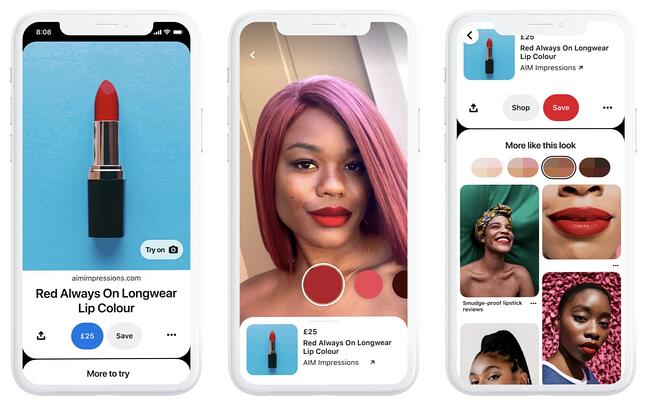
Accessory and beauty businesses have a new way to interact with users through Ads. Pinterest’s Try on feature uses augmented reality to enable users on the app to virtually try on products using Pinterest Lens. This feature will combine your content with their technology to create a virtual fitting room for users.

Types of Pinterest Ads: Pinterest Try on Image Source

Businesses will need to go through their Pinterest account manager to get set up and must already have a product catalog uploaded.

2. Idea Pins

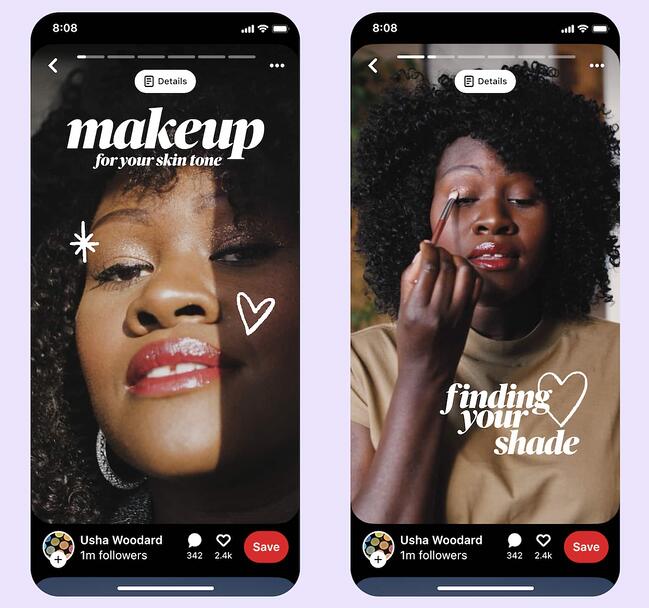
Idea Pins are Pinterest’s multi-page video format that allows creators to make their video content shoppable. Creators can partner with brands to utilize affiliate links and sponsored content.

Types of Pinterest Ads: Idea PinImage Source

These are similar to Instagram Stories, but with a bevy of publishing tools. Ideal Pins come with:

  • Video recording and editing for up to 20 pages of content

  • Voice over recording so creators can add their own personal voice

  • Ghost mode transition tools (for before & after videos)

  • Detail pages for instructions or ingredients

  • Multi-draft save feature

  • Topic and user tagging

The new feature has already proven to be a standout for Pinners garnering 9x more comments than traditional pins. Pinners are 89% more likely to exhibit shopping intent on products tagged in Idea Pins than on standalone Product Pins.

3. Promoted Pins

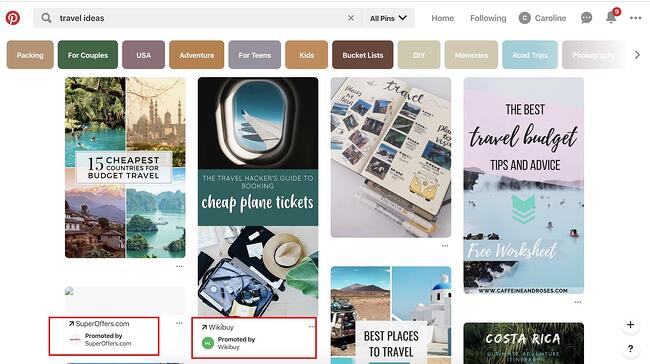
At first glance, Promoted Pins look and act just like a regular static Pin, but they have a small “Promoted” label to set them apart. Promoted Pins are boosted and targeted to reach more people. Users can even pin your Promoted Pins to their boards, share them, and comment on them.

Once a user shares a Promoted Pin, the “Promoted” label disappears, and subsequent re-pins are considered earned media — meaning, after the first pin, organic exposure to the content is free.

Here are some guidelines to follow when creating a Promoted Pin advertisement:

  • The file has to be PNG or JPEG.
  • Your content cannot go over 10 MB.
  • There is a description copy limit of 500 characters.
  • Your aspect ratio must be 2:3 and should be vertically oriented.
Pinterest Ad Types: Promoted Pins

Image Source

4. Video Pins

Promoted Video Pins are exactly like Promoted Pins — except the static image is replaced with a video.

Seven out of 10 Pinners say Pinterest is where they go to find new products, making video a great medium to reach and engage potential customers. Therefore, just as with Idea Pins, Pinterest and video advertising go hand-in-hand.

Pinterest offers two options for video sizing: max-width, or standard. Standard videos are the same size as regular Pins and cost less than a max-width Pin, which spreads across a user’s entire feed.

No matter what size you choose, Pinterest videos auto-play once they’re 50 percent in view. Plus, the Promoted Video Pins have a conversion optimization option to better serve advertisers with traffic or conversion goals. This new option brings the user to a landing page on the advertiser’s website, as well as a close-up of the video.

Here are some guidelines to follow when creating a Promoted Video Pin advertisement:

  • The file has to be either an MP4 or MOV.
  • Your video cannot exceed 2 GB.
  • The video must meet a minimum of four seconds, and cannot go over 15 minutes.
  • Your aspect ratio must fall between 1:91:1 and 1:2.
  • There is a description copy limit of 500 characters.
  • Make sure to create a video that’s not dependent on audio for greater accessibility and for those who scroll with sound off.

5. Carousels

Promoted Carousels contain up to five images that users can swipe through. Carousels are used to give a deeper brand story within one Pin.

This feature behaves the same as other Pins, except it will have dots beneath the images that signal additional content. Each carousel image can be different and have a different title, description, and link to another landing page.

Here are some guidelines to follow when creating a Promoted Carousel advertisement:

  • File type: PNG or JPEG
  • Ideal aspect ratio: 1:1 or 2:3
  • File size: Max 10 MB
  • Title copy: Max 100 characters
  • Description copy: Max 500 characters

6. Collections

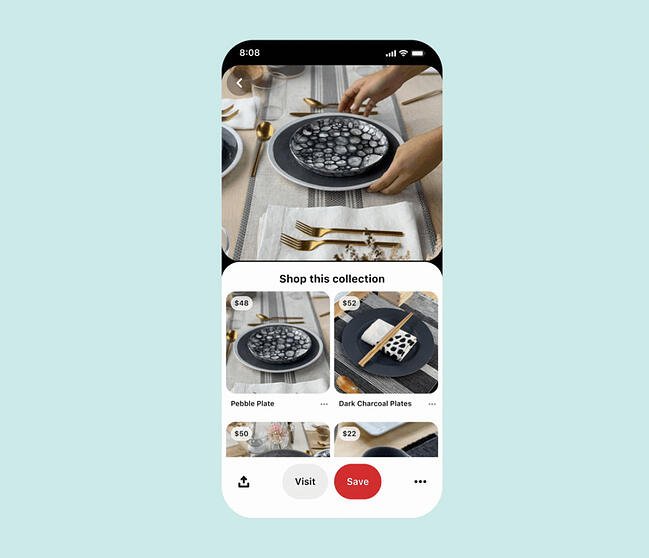
Collection ads appear as a combination of one larger, hero image (or video) followed by three smaller, secondary photos. When a user taps on a collection ad, they’re taken to a full-screen experience where they can view the hero image and up to 24 secondary images.

Types of Pinterest Ads: Collection Image Source

They’re a great way to showcase a variety of products in one ad. Plus, they are easy to create using the catalog feature. Just select the product groups you’d like to feature from your catalog and Pinterest create an ad that displays the most relevant products for the user from your product feed.

Currently, collections ads can only be created on desktop and are targeted to users on the mobile app.

7. Shopping

Pinterest shopping ads let you target customers early while they’re just browsing. Like Collections, these ads are created by pulling from your product catalog. When a user clicks on your image or video, it takes them directly to a link where they can purchase the product.

Simply set up your product groups in catalog and Pinterest will use your product data to show relevant products to users. With this feature, there’s no need to set up any additional targeting.

Curious about how to advertise on Pinterest? We’ll walk through all the steps next.

1. Create a business account.

First you’ll need to create a Pinterest business account. This will give you access to all of their ad tools and features. You also have the option to convert your personal account to a business one once you’ve logged in.

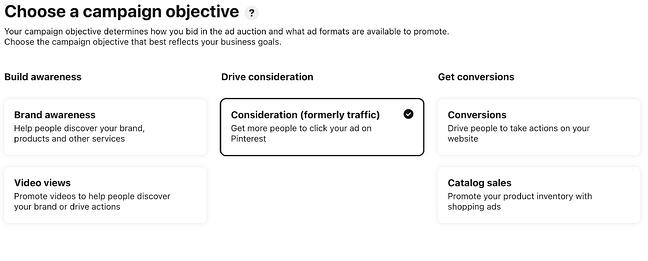
2. Choose your campaign objective.

Each of your Pinterest campaigns starts with an objective. Choosing your campaign goal is what determines what ad formats are available to you. There are several categories to choose from — Build Awareness, Consideration, Conversions, and more.

If you’re not sure what you need, you can select one of the goals listed in the short questionnaire pictured below to get started.

How to advertise on pinterest: set objectiveConversion optimization is a campaign objective that optimizes your advertisements for specific actions outside of clicks. Now, advertisers have a way to directly inspire people to take action — like leading a user to an online checkout or newsletter sign-up with no extra steps.

If you want people to discover your business, choose Brand awareness for standard Pins or Video views for Promoted Video Pins as your campaign objective. For these two objectives, you can set a maximum cost for every 1,000 impressions your ad receives.

If your Pinterest goals are to drive qualified leads to your website or improve traffic, choose Traffic or App install for your campaign objective.

For these campaigns, you set a maximum cost-per-click — which means you are only charged when people click through your Promoted Pin to visit your website.

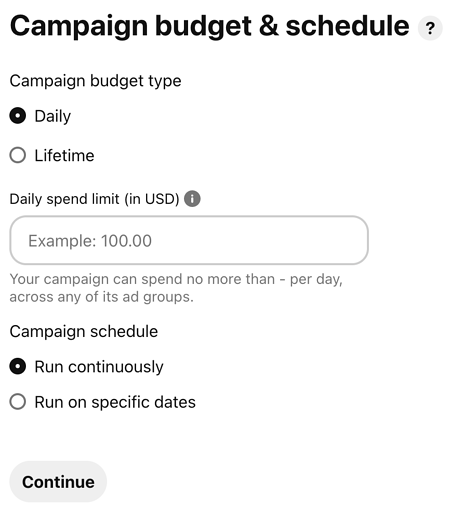
3. Set your campaign budget.

If you want to spend your campaign money evenly over a specific time period, select lifetime. Select daily to choose the amount spent each day. You’ll have to automatically adjust the budgets based on how long you want your ad to deliver.

How to advertise on pinterest: set budget

Next, you’ll set a maximum bid. A bid determines the highest amount of money you’d like to pay for an action, like an engagement or click, on Pinterest. Pinterest will recommend an amount for you depending on your target audience, and what competitors are spending.

Make sure your budget for Pinterest ads reflect your overall marketing goals and the importance of the platform for your business.

4. Create an Ad group.

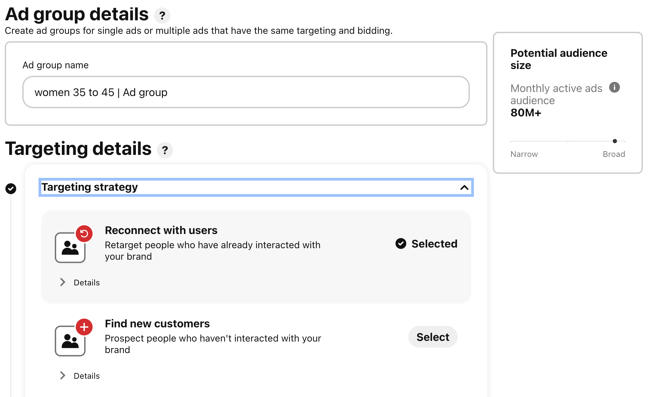
With Ad groups you can lump together related ads within the same campaign and track them.

how to advertise on pinterest: set ad groupFor example you could create a beauty campaign with one ad group for “women 35 to 45” and another for “women under 30” and see which performs better.

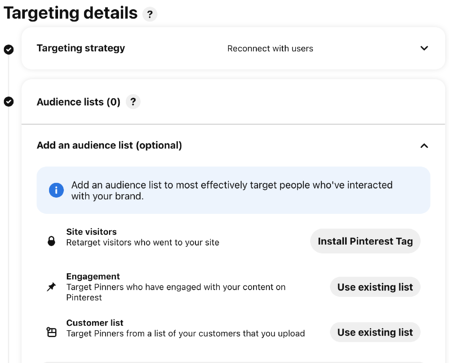
5. Choose your target audience.

Targeting allows you to reach people who are searching for your content and who are ready to actively engage. Targeting is an important part of promoted ads because, without it, you’ll have less interest.

How to advertise on pinterest: choose audience

Pinterest has several targeting options that you can use singularly or combine together for a unique targeting approach.

  • Audiences combine your customer knowledge with behavioral insights from Pinterest. If someone has recently bought something from your site or engaged with your Pinterest content, this allows you to target that person for an ad.
  • Keywords show your ad to someone who is searching for that kind of content. If you set specific keywords like “tropical vacation” or “apple pie recipes”, your ads will target people searching for those things.
  • Interests target people based on the types of content they regularly engage with. Your apple pie recipe ads would most likely be served to people who have an interest in baking or preparing for Thanksgiving.
  • Expanded will provide you with additional interest and keywords based on your ad’s content and who you’re trying to reach.
  • Demographics allows you to select a specific location, language, device, or gender.
  • Placements gives you the option to choose where your ad is delivered. If you don’t want your promoted Pins to show up when someone is browsing, and only appear in search results, you can specify that here.

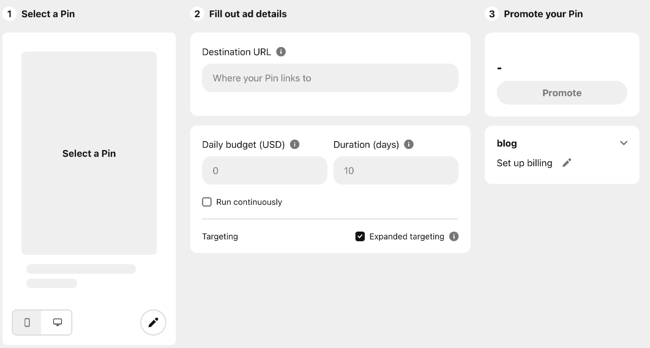
6. Design your ad.

Now it’s time to create an ad. For this you can use an image that you have already pinned or start with the template below.

How to advertise on pinterest: Design Ad

7. Maximize your SEO efforts.

By adding an interest and keywords to your descriptions, they become more relevant to people who are actively searching for that content. Keep in mind that hashtags don’t add any ranking value.

On Pinterest, categories of interest are already sorted and categorized. You should explore the available topics that are relevant to your business and target those queries — if you need inspiration, check out the seven categories that do exceptionally well on Pinterest.

Your boards also provide an opportunity for SEO. Boards inform Pinterest’s search engine on how to categorize your Pins, which improves visibility. Focusing on both will support your SEO efforts.

8. Add value.

Endless product promotions on a Pinterest feed aren’t the best way to get an audience’s attention — and keep it. More than likely, you’ll just become a disruption and get unfollowed. You have to add value to every touchpoint with your customer for them to engage with your content.

To add value on Pinterest, try adding Pins that your audience will want to engage with that don’t include your product or business. You might offer added value by showcasing services or interests that compliment your own.

For example, if you sell cars, share content about upkeep or car accessories. Alternatively, if you’re running a Pinterest page for a coffee shop, try Pinning playlist ideas for people to listen to while they work. There is plenty of content available to curate for your audience’s benefit.

9. Mix up your content.

If you’re busy targeting your content to a persona, you’ll miss out on the organic connections and interests of your audience. While helpful for first steps, personas don’t give you everything you need to know about the people who are interacting with your ads.

Keep your content seasonal and relevant. Yes, it is good to make evergreen content — but don’t miss out on pop culture or holiday opportunities to spark interest.

10. Monitor campaign performance.

Finally, you need to keep an eye on your campaign performance to determine the success of your ads, or why they didn’t perform as you expected.

When you’re in Pinterest Ads Manager, click on Analytics and you’ll be shown an overview of all your campaigns and key metrics. These metrics include impressions, total clicks, earned cost-per-impression, effective cost-per-click, and more.

Every campaign has the opportunity to increase brand awareness or inspire purchases. After looking at your analytics, you can determine whether or not you need to widen your audience, increase your budget, or try a different ad format. Pinterest advertisements are not an exact science, so experiments are key to being successful on the platform.

Now that the logistics are out of the way, check out the Pinterest ad examples below for inspiration.

Pinterest Ad Examples

Each of these ads is an example of Pinterest advertising done right with actionable tips that you can take away as you create your own:

1. Ulta

Pinterest Ad Example: Ulta Image Source

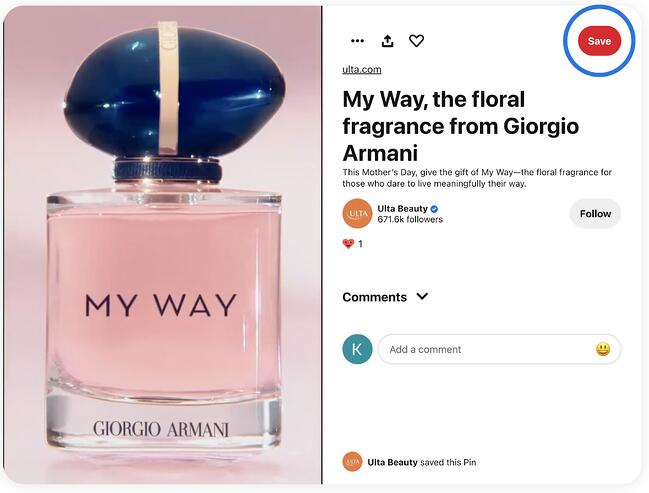
Pinterest is an excellent platform for beauty brands to showcase their products. This video ad from Ulta takes advantage of seasonality in the weeks leading up to Mother’s Day, creating an ad that is captivating and timely.

2. Ruggable

Pinterest Ad Example: ruggable

Image Source

In this ad, the image speaks for itself, which lends well to the visual nature of the Pinterest platform. The rug is front and center in an attractive home space that draws the eye (and probably triggers the shopping tendencies of those who like decorating). It does come with a catchy tagline: “Back to Homeschool.” Because who needs a back-to-school sale to buy cool stuff?

3. Love Sweat Fitness

Pinterest Ad Example: love sweat fitness

Image Source

A big audience on Pinterest is the foodies who love to find and share recipes. Love Sweat Fitness, a fitness brand, is appealing to that crowd with easy and healthy holiday sides. The best part of the ad is how it combines high-quality imagery with attractive typography.

4. Acuity Scheduling

Pinterest Ad Example: acuity scheduling

Image Source

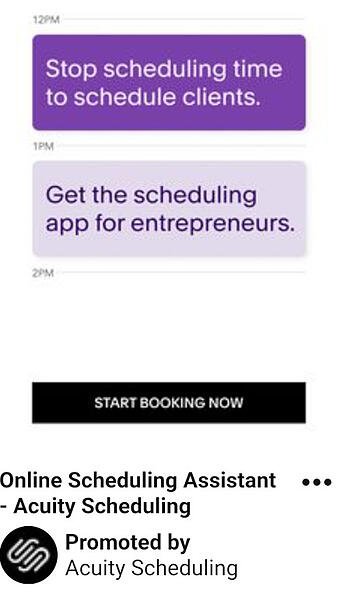
One thing to take away from this ad is that Pinterest advertising isn’t just for home goods, recipes, and ecommerce. Those in the B2B space can definitely take advantage of the advertising opportunities… and who knows, your audience might be browsing for home goods, too.

This ad sets up the value proposition in a text format and gets right at the heart of the audience’s pains: “Stop scheduling time to schedule clients.” They then pair it with a call-to-action: “Start Booking Now.”

5. Torrid

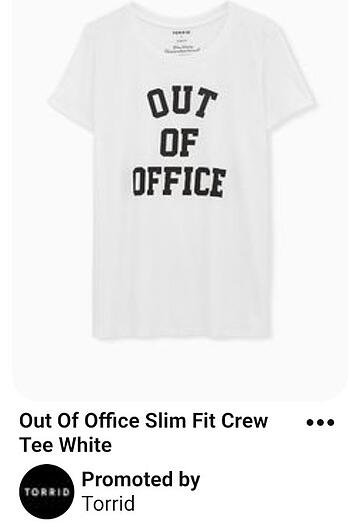
Pinterest Ad Example: torrid

Image Source

In this Pinterest ad, Torrid is using retargeting options to put their products in front of people who already visited the Torrid website. After visiting this product’s page on torrid.com, the ad “followed” me to Pinterest to stay top of mind and earn the sale.

Create Your Pinterest Campaign

Now that you have seen what Pinterest ads can look like, take the inspiration from the examples above and put it to action on your own advertising efforts.

Editor’s note: This post was originally published in April 2019 and has been updated for comprehensiveness.

Pinterest Templates

Categories B2B

How to Find your Dream Job in 2022

Finding a new job is a job in itself. It takes time and effort to apply, interview, and eventually land a position — even when you’re completely qualified.

It took me close to nine months from the moment I decided it was time to start searching for a new role to my first day at HubSpot.

Free Kit: Everything You Need for Your Job Search

Long story short, searching for a new job or finding your dream career isn’t always an easy process. It can be stressful, time-consuming, and difficult. But, no fear — that’s why we’ve created this guide. Follow along, and the process will feel significantly less intimidating no matter your industry, job experience, or career goals.

Depending on your specific situation, you may not need to walk through each of the following steps. This list is here to simply guide you through the beginning stages of your job hunt, so feel free to modify it as needed.

1. Consider your personality.

Your personality reveals a lot about yourself, such as what you enjoy doing, what makes you happy, and how you like to communicate — even the types of jobs you’d likely succeed in. There are a number of ways to incorporate your personality traits and characteristics in your job search.

Take one of the many online personality tests to learn more about your specific traits and discover the types of roles those traits would make you an ideal fit for. This is also helpful when thinking about the type of work environment you’d be most productive in.

Your personality helps you narrow your search in other ways, too — for example, if your results come back with details about you being shy, introspective, and reserved, research ideal jobs for introverts.

2. Think about your skills.

Your skill set is a list of your abilities — such as problem-solving, decision-making, and the ability to work under pressure. In addition to using your skillset to help you determine the type of job you’d be good at, it’s often something listed on a resume — so, listing your skills is a useful exercise for that reason as well.

Also, consider your transferable skills. These are skills that can be transferred from one role to the next, even if they aren’t in the same field. If you are switching industries or roles figuring out how your transferable skills would apply to a new position is key. Some transferable skills include:

  • Project management
  • Public speaking
  • Relationship building
  • Analytics and reporting

If you need more guidance, you can learn more about your specific skill set and how it plays a part in the type of career you’d be an ideal fit for by taking a career aptitude test.

3. Reflect on your background.

Your previous work experience and education — or your background — can also help you determine a career path you’d be suited for.

For example, I studied journalism in college and worked at a local news station after graduation. However, after a year, I decided I wanted to leave the industry. My background — which was writing and content-focused — made me an ideal candidate for a position on the HubSpot Blog.

If your background doesn’t align with your newfound career interests, that’s OK, too! However, this may require a little more research on your end about how you can transition to a new career. You may need to go back to school for a master’s degree, get a certification of some kind, or work in an entry-level position in your new field of interest.

4. Brainstorm your career goals.

Brainstorm your personal and career goals to help you determine the ideal next step for you. Think about things like work-life balance, salary, and your goals for the next 5-10 years. This will help you narrow down your search — different industries and positions have a range of standards when it comes to factors like flexibility, culture, and career growth.

5. Create a list of your dream companies.

Whether or not you’re sure about a specific opportunity, create a list of your dream companies you think you’d enjoy working for. This is a great way to keep track of opportunities at the companies you’re most interested in and remain goal-oriented.

You can then tailor your cover letter as well as career highlights and skillset on your resume to fit the requirements and expectations of specific opportunities at your top-choice companies.

6. Consider companies similar to your dream companies.

Consider companies comparable to those on your list of top picks, too. For example, if your goal is to work in marketing at Nike, consider applying for a similar position at a newer, growing company in the same industry like NOBULL.

By being open-minded and realistic about how you’re going to reach your end goal (such as working at Nike), you’ll avoid locking yourself into one, narrow career path option all while gaining valuable experience along the way.

7. Network professionally.

Whether you’re looking to stay in your current industry or pave a completely new path in another, professional networking is critical. These days, many of the offers job seekers receive are a result of networking.

Networking can help you get your foot in the door at a company of interest, gain a new and valuable reference in the industry, and determine whether or not you really want to move into a specific role.

8. Clean up your social media accounts.

Today, recruiters, hiring teams, and department leaders at virtually every company will take the time to research candidates online, including on social media platforms, prior to determining whether or not they want to request an interview.

This means you’ll want to ensure your social media accounts are private or remove pictures, videos, and/or comments that may lead a hiring manager to believe you aren’t a good fit for outreach. After all, the last thing you’d want is for the hiring manager at your dream company to disregard your experience due to something they find on your Instagram or Facebook profile.

9. Update your LinkedIn profile.

Did you know there are over 800 million LinkedIn users? Included in that impressive number are job seekers, businesses, and recruiters looking to fill positions, as well as people who are content with their current roles.

With all of this exposure, it’s important to make sure your LinkedIn profile is up-to-date and accurately represents your current and past experiences. Be sure to describe — in detail — information about your current and past roles, promotions, notable mentions, education, awards, and anything else you feel is worth sharing. Initiate and accept connections to expand your network to receive endorsements for your skills, experiences, and traits.

No matter if you’re in need of a new role, members of your professional network as well as recruiters, hiring managers, and employers will be able to view your LinkedIn profile and reach out to you if they choose. Who knows — maybe you didn’t even realize you were missing out on applying to your dream job.

Learn how to use LinkedIn for professional networking, business, and marketing.

10. Prepare your resume.

Once you’ve narrowed down the type of role you want, be sure that the skills on your resume mirror what companies are asking for and tailor each resume you submit to their specific needs. Focus not only on listing your job duties but the results achieved thanks to your actions. Let’s say you were a call center representative in a previous role. You could say:

“Answered 50+ calls per shift.”

A more effective statement would be:

“Answered 50+ calls per shift, decreasing customer hold times by 30% and improving overall customer satisfaction.”

The second statement has more impact because it details exactly how your actions improved company operations and provided benefits to customers.

Prepare your resume at the beginning of your job search to ensure your latest and most relevant work experience is available to recruiters and hiring managers for review.

Without a strong and recently updated resume, the companies you apply to won’t have reason to take you seriously. Additionally, pay attention to the details when it comes to your resume including font and which skills of yours you choose to share with specific companies — this is how you’re going to make an impactful first impression that sticks with hiring managers as they review the resumes of other applicants.

Note: When in doubt, try updating your resume with a template to achieve a professional look and feel sure to blow hiring managers away.

How to Find a Job You Love

Now that we’ve reviewed which steps to take in the first stages of your job search, you might be wondering how to find a job you’re truly passionate about — one you love. That’s why we’ve compiled this collection of tips and tricks to help you find your dream career.

1. Get specific about what you want.

In order to find your dream career, you’ll need to get very specific about what that looks like. Ask yourself:

  • What is my ideal role? Name it if you already have that nailed down.
  • Do I prefer a company that is environmentally or socially responsible?
  • Is there a particular company, or company size I prefer?
  • What are my work/life balance requirements?
  • What is my ideal salary?
  • What is my ideal career progression?
  • Do I already possess the skills I need for this role or do I need to skill up?

Aim high. You are trying to find your dream career, after all. Once you’ve made a list of all the attributes you’re looking for in your next role, you’ll be able to filter out anything that doesn’t fall within those requirements.

2. Use job search sites.

Today, job search sites, or job search engines, are one of the most common ways to find a new position. These sites provide you with valuable information about companies and positions including location, industry, salary, necessary qualifications, culture, and more.

Other benefits to using a job search site include the ability to upload your resume and cover letter for quick and easy application submission. They also provide you with the option to receive an alert when a new opportunity, that fits the criteria you share, becomes available.

There are a number of popular job search sites, used by millions of people around the world, with these capabilities (and more). Here are six of the most common to get you started:

  • LinkedIn isn’t just a professional networking site — it’s also a job search site. The platform will take you through a series of steps to help you begin and narrow your job hunt. You can view position openings while employers can read your resume, view your LinkedIn profile, and Connect.
  • Tech Ladies is a free job board and supportive online community dedicated to helping women learn, grow, and extend opportunities in the tech industry. Simply upload your resume to their job board and apply directly through the site.
  • Glassdoor gives you access to job listings, employee reviews, interview tips, salary information, and more. You can post your resume so hiring managers can contact you directly and the site includes a feature in which you can view interview questions specific companies tend to ask — which is a great interview prep technique.
  • Indeed provides you with access to new job listings, company reviews, and accurate salary information. The site also allows you to post your resume so recruiters and employers can easily reach out.
  • CareerBuilder gives you the opportunity to search for a new job based on specific criteria including your experience, location, or skill set. Upload your resume so employers can recruit you. The site will also review your profile and recommend jobs to help you find the right match.
  • Monster allows you to upload your resume for a free assessment to ensure everything looks perfect. The site has a variety of other resources such as opportunities to receive professional interview advice as well as access to the latest — and most popular — job listings, salary information, and company reviews.
  • Craigslist is a straightforward and simplistic job search site. Employers post their latest job listings and you can sift through them by location and/or one of the site’s 20+ industry types.

3. Check company websites for openings of interest.

Maybe you heard about an opening at your dream company or an opportunity at a specific business of interest that you want to learn more about. If this is the case, go directly to the website of the given company you’re interested in to review their career opportunities and job descriptions. If they provide a career newsletter that sends new job openings, subscribe to that, too.

Rather than looking for positions that meet more general criteria, this is a great option for those who know they want a specific company’s name on their resume or culture to be a part of.

4. Craft unique cover letters.

Your cover letter accompanies your resume to persuade employers into believing you’re worth their time and consideration so they bring you in for an interview. Your cover letters should describe why you’re a great fit for the position you apply for. And when paired with your resume, a recruiter should understand why you’re qualified for the opportunity.

Save time and use templates to craft your perfect cover letter.

Now, you may be thinking: Not all companies require cover letters.

And that’s true — some companies openly say cover letters are your choice. If this is the case, it’s up to your discretion as to whether or not you want to send one in. (Personally, I always choose to take the time to tell potential employers about the reasons why I am taking their hiring process and a specific opportunity seriously, but that’s just my prerogative.) If you send in a cover letter, ensure it’s concise, well-written, and helps you stand out among other applicants.

5. Prepare for every interview.

Needless to say, nailing your interview is a critical component to receiving a job offer. Although interviews are often high-pressure experiences for job-seekers, thoroughly preparing for them is a great way to relieve some of the stress.

Practice answering interview questions using the STAR method. STAR stands for Situation, Task, Action, and Results. The method works by having candidates craft their answers to describe a situation, the required task, their chosen action, and the result of that action, putting their past work experience into context.

To help you prepare, review the following commonly-asked interview questions and consider your responses.

You can also use other resources for interview prep like the Search Interview Questions feature on Glassdoor or blogs about the job search process in a specific industry.

6. Determine the most important parts of a position to you and look for them in your search.

What’s important to you in a company and position?

Is it flexibility in terms of work hours?

Do you require the ability to work remotely full or part-time, or do you want to go into an office every day? Refer back to your dream career must-haves list.

Do you care about the size of the team you’ll be on?

Think about these types of questions when determining which opportunities to apply for so you can ensure the company and position are right for you — and vice versa — before spending time on the application.

For example, if a top-rated workplace culture is important to your application process, review the websites of the companies you’re considering to learn about their culture-related initiatives. Take a look at HubSpot to understand what I mean — HubSpot’s unique Culture Code is explained on their career page as well as in many other locations throughout the company website and Blog. This allows applicants to learn about the importance of workplace culture to the company and its employees as well as how it plays a part in the interview and hiring processes.

7. Think about how you’ll manage an offer.

The final part of your hunt for the perfect position is also the most exciting — accepting an offer!

Once you receive a job offer, be sure to get all of the details about the position, including salary, benefits, and expected start date (along with any other important details).

Remember, it’s normal — and often expected — to ask for some time to consider an offer upon receipt so you have the opportunity to think about and review it in detail before officially accepting it. If you ask, a hiring manager may give you a day, two days, or even a full work week to make a decision.

Don’t be afraid to decline an offer if the specific opportunity isn’t the right fit for you. Other offers will come around — be patient and wait for the one that makes you excited.

Also, you may choose to negotiate your starting salary upon receiving your offer. There are professional and realistic ways to negotiate your salary that you can follow to ensure the process goes smoothly.

Lastly, give your current employer two weeks’ notice — this will allow them to begin searching for your replacement if necessary or at least provide them with a cushion in terms of time to make any necessary adjustments.

How to Find a Remote Job

Today, remote work has become increasingly popular. With technology that allows you to collaborate with team members in real-time from anywhere in the world, instant message, and meet via video chat, remote work has become a more common perk offered by businesses across all industries.

Whether you’d like to become a digital nomad, or you’re looking for a position that’s part-time or full-time remote, there’s an option for you. So, let’s take a look at how you can find your dream remote position.

Note: When searching for a remote job, you can follow most of the same steps that you would if you were looking for a non-remote job — as we reviewed above. However, instead of using the job sites we mentioned earlier, you’ll want to use job sites specifically created for posting and identifying remote opportunities.

But before you review those sites, take some time to think about the pros and cons of a remote position.

Pros and Cons of Remote Work

Now, it’s important to remember that depending on your point of view, work style, career goals, and preferences, you may find some of the following points to be under the incorrect column in your eyes — that’s totally fine … it’s all a matter of perspective.

Pros of Remote Work

Cons of Remote Work

Flexible hours

Lack of office space or work-related events to attend with colleagues

Ability to work from anywhere

More distractions

No commute

Possibility of feeling lonely or unmotivated

Increases employee retention and loyalty (by providing this option for employees upon being hired or later in one’s career)

Little work-day structure

Increases size of talent pool which is a positive for businesses looking for the best possible candidates

Can make team communication difficult

Remote Job Search Sites

Now, back to those job search sites specific for remote opportunities we mentioned — here are a few of the most popular options for you to pull from.

Note: If you’re looking for a part-time remote position, you might want to focus on applying for freelance opportunities.

  • AngelList is a startup community. The site includes a job finder in which users can search specifically for remote work in the world of startups. There are also a number of articles published on AngelList’s Blog which provide insight into remote work, remote culture, and related opportunities for users to learn from and use for inspiration.
  • FlexJobs lists a wide range of flexible (hence their name) opportunities on their site including part and full-time positions that are either partially or completely remote. As a job seeker, you have the support of the company’s trained researchers who work to identify and screen these positions to ensure they’re legitimate and worthwhile (no matter if you are entry-level or an executive).
  • WeWorkRemotely offers a wide range of categories and industries for job seekers to browse and learn about remote opportunities. They have a number of resources on their site for users to educate themselves with as well as determine which specific type of remote positions would be ideal for their career goals.

Begin Your Job Search

Starting the job search process can be overwhelming at times. So, remember to use job search sites to narrow your search and take advantage of the wide array of resources available to job seekers today to help identify the right opportunities for you. Then, prepare for your interviews and remember to be patient — that dream job of yours might just be around the corner.

Editor’s note: This post was originally published in February 2019 and has been updated for comprehensiveness.

Apply for a job, keep track of important information, and prepare for an  interview with the help of this free job seekers kit.

Categories B2B

How to Create a 5-Year Plan You’ll Actually Stick To [In 4 Steps]

One common question you’ll get asked in an interview is, “Where do you see yourself in five years?

When it’s coming from a hiring manager, we usually have an answer ready. When it comes to your personal life, do you have a five-year plan?

Download Now: 5 Free Skill Development Templates

In the most stressful times in my life, planning brings me great joy and peace. But who says you have to wait for the stress to come? In this article, we’ll outline why you should create a five-year plan and how to build one you’ll follow through with.

Benefits of a 5-Year Plan

Whether professional or personal, a five-year plan can serve as a reset for your life. Who doesn’t like a fresh start?

After all, that’s why New Year’s resolutions are so popular. They give us something to look forward to. There’s also something to be said about writing out a detailed plan. It can be a great motivator to put something in motion.

Personally, I’ve said countless times that I want to be fluent in Spanish. However, it’s not until I write a detailed plan for how that it will become real. 

This brings us to our next point: clarity. Sometimes, a path seems scarier than it actually is because we don’t actually know what it looks like.

Creating a plan is like pointing a flashlight in a dark road. A more accurate description is that it turns that dark, twisty road into a clear path forward. Doesn’t mean there won’t be any bumps in the road but at least you’ll know exactly where you’ll land and how to get there.

Lastly, a five-year plan can serve as a reminder of what’s at stake. In your daily life, it can be easy to forget that every day, we’re shaping our future.

The decisions we make today affect what our life will look like years from now. Having a visual reminder of this can keep you focused on your goals.

5-Year Plan Example

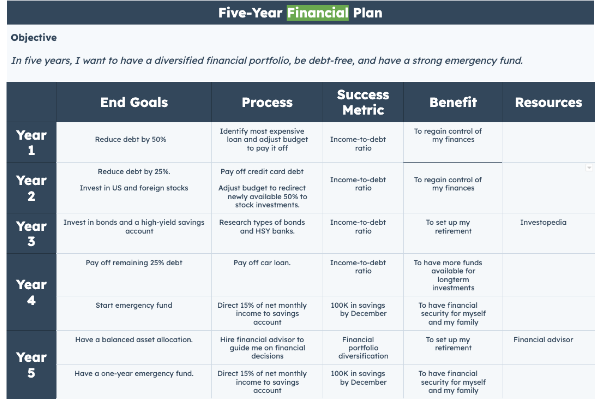
Using our downloadable five-year plan template, we were able to create a detailed five-year plan, broken down by year, process, success metric, benefit, and resources. 

five year plan example financial

How to Make a 5-Year Plan

1. Know your “why.”

This is singlehandedly the most important step in creating a plan.

A clear “why” is your North star. It’s what will guide you throughout your journey and motivate you to keep moving forward.

It can take a while to narrow this down. You’ll know you have the answer when it’s linked to a core value or belief. Otherwise, you have to keep digging.

One way to get to this is by just asking the question over and over again. For instance:

  • I want to learn American Sign Language. Why?
  • To become more connected to another culture. Why?
  • To broaden my perspective. Why?
  • To be a more understanding, tolerant, and inclusive person.

Now, we’ve taken something at surface level and brought it down to a personal, human level.

2. Consider every aspect of your life.

When creating a five-year plan, you want to review your life as a whole and plan accordingly.

It’s not enough to plan for your professional career and not your personal one. After all, one impacts the other.

There are the core four that you should always have:

  • Career
  • Health (physical and mental)
  • Finances
  • Relationships

Depending on your goals, you can also add categories for religious or spiritual development, recreation, and service.

Don’t forget bucket-list items – have you been wanting to learn a new language? Or perhaps you want to visit every country in the world. Bucket list items are perfect for five-year plans because you can spread them out over a long period of time and have fun tracking your progress.

3. Make it S.M.A.R.T.

To give you the best chances of success, every goal should pass the SMART test. That means being:

  • Specific – The vaguer your goal, the harder it will be to reach.
  • Measurable – You must be able to quantify your goals because otherwise, how will you know you’ve reached it? This doesn’t always mean assigning a figure to it, it can also be a feeling.
  • Achievable – While it’s good to push yourself beyond your limits, your goal should be attainable and realistic based on where you stand currently.
  • Relevant – How does this goal fit within the bigger picture? Does it align with your personal values? What’s the impact on your life?
  • Time-bound It’s not enough to say it’s a five-year plan, you have to create a timeline and set milestones at specific points within your journey.

4. Start with the big ideas then narrow your focus.

When you’re first writing your five-year plan, start with the big idea from each category.

If you don’t know where to start, use this: “In five years, I want to be [fill in the blank].” This will help you figure out goals that you may not have vocalized before.

From there, break it down into bite-size pieces.

This means turning your ideas into action items that can be executed over a certain period of time, specifically from five years to monthly milestones.

Research will play a big role in this, as you will need to learn how to achieve some of your goals. For instance, say your five-year financial plan is to be debt-free.

That’s the big idea but you need to dive deeper. How exactly will you achieve that? Your research will likely suggest setting a budget, paying off your most expensive loan first, consolidating your debts, and more.

Once you know the key action items, you can break them down by year, month, and even week.

This is a S.M.A.R.T. goal in action. The more specific you are, the better you will be at fulfilling your five-year plan.

If you want to add more structure to your life and play a more active role in shaping your future, consider creating a five-year plan. While things may not pan out exactly as you’ve expected, you’ll be surprised at how close you’ll get to what you wished for.

New Call-to-action 

Categories B2B

The Ultimate Guide to Pinterest Marketing

Pinterest marketing is incredibly effective. 

Marketers target Pinterest users by sharing content that’s too irresistible for us to pass up. And with over 433 million people on Pinterest, why wouldn’t marketers want to be on the platform? Not to mention 83% of users have made a purchase from content they’ve seen on Pinterest. So, how can your business use Pinterest as a marketing tactic to help improve your brand awareness and conversions?

Free Resource: 12 Pinterest Templates for Business

In this guide, we’ll cover the answer to that question as well as how Pinterest works, which Pinterest marketing strategies you should implement, how small businesses can benefit from the platform, and which tools you can use to ensure your Pinterest marketing strategy works for your business. But first, we’ll review what the platform is and how it works — let’s get started.


Users add, or Pin, their chosen content to boards with a common theme to keep it organized so other users can discover new content related to their interests.

If you haven’t yet opened a Pinterest account, learn more about that process here. Once you sign up, you can begin sharing content and, therefore, social media marketing on the platform.

To make the most of the platform, upload your business’s content from your computer or mobile device, Pin content you find on the platform, and add content you find on the web using the Pinterest browser button.

Engagement is key. Follow the boards of your friends and competitors, “Like,” and comment on others’ Pins, re-Pin (or repost) content, and share links to your website and blog in your Pins.

It’s important to note there are personal and business accounts on Pinterest. Choosing a business account will allow you to gain access to Pinterest Analytics and other features including a visual search tool, a native video player, and the ability to run Pinterest ads if you choose — making the platform ideal for marketers.

Now, let’s review some Pinterest marketing strategies to help you improve your influence and impact on your audience.


These strategies represent ways to add Pinterest to your greater marketing efforts. Here are a few benefits of using Pinterest for marketing.

1. Distribute your content.

85% of Pinners search for and prefer visual content. This makes Pinterest a uniquely strong place to distribute all types of content, including written blog content. Unlike Instagram, users can click-through live links.

On Pinterest, you share content on Pinterest boards. Boards save all of your Pins and distribute your content for your followers to explore. You can have as many boards as you want, and they can be organized into themes, ideas, plans, or types of inspiration to make it easy for your audience to find the content they’re looking for.

You can also invite people to join your boards — which would make your board a “group board” — if you want other contributors to add content they believe works with your board’s theme. This is a great way to increase engagement and interaction on your profile.

2. Build a community.

Online communities bring together like-minded people and serve as helpful hubs for businesses.

With a Pinterest community, you can count on your followers and fans to interact with your boards, consume your content, and make their way to your website — driving traffic in the process.

There are millions of people who use Pinterest every month. By treating your Pinterest board as a two-way street through which you can interact with and engage users (not like a one-way billboard), you can build a loyal community of Pinterest users who may become customers, too.

How to Build Your Pinterest Following

Although you can search for and add specific friends via their name, Facebook account, and other identifiers, this is time-consuming and would make it nearly impossible to substantially grow your following.

Instead, consider the following methods to build out your base of fans and followers on Pinterest.

  • Promote your Pinterest account via your other social networks.
  • Follow accounts you believe would want to follow you back.
  • Watch what your competitors are doing to increase their base of followers and learn from their techniques.
  • Use keywords in your posts (we’ll discuss these tactics in more detail later).
  • Ask influencers to re-post some of your content to gain the attention of their followers.
  • Pay for a Pinterest ads account to run ads on the platform.

3. Educate customers.

Pinterest is rife with tutorials, infographics, how-tos, and links to additional educational content. Given its propensity for visual content, it’s a powerful channel to educate and engage customers.

While creating and sharing content for your Pinterest profile and marketing to users, be sure to keep your target audience in mind.

Similar to the way you would when creating new products, developing your branding, or posting to other social networks, you want to ensure you’re pushing out content that appeals to your target audience, current customers, and buyer personas on Pinterest.

You can do this in a few different ways:

  • Research your buyer personas to determine what type of content would be most helpful and appealing to them.
  • Survey and ask your current followers and customers for feedback on what they want from your company on Pinterest.
  • Look at what your competitors are doing well (or not) to help you think about new ways to push out your content and make it unique.
  • View the boards of your current followers and customers to aid in your understanding of who your audience is and what they’re most interested in.

4. Drive website traffic and boost online sales.

Pinterest, unlike Instagram, allows you to link your visual content to another website — namely, your website. This feature allows you to share both written and visual content and direct users back to your website in the process. 

This is a powerful addition to your marketing as it can boost online sales, too. Many brands use Pinterest to showcase product images while sharing content.

For example, this board, created by the clothing company Madewell, serves as a source of travel inspiration and is paired with real products they sell to get their audience excited about their brand, the lifestyle they promote, and the idea of purchasing some clothing.

Pinterest Marketing: inspirational board from MadewellSource

By integrating Pinterest on your website, you’ll be able to easily drive traffic from one of your web pages directly to your Pinterest profile so your leads and customers can begin viewing your content in seconds (and hopefully follow you!).

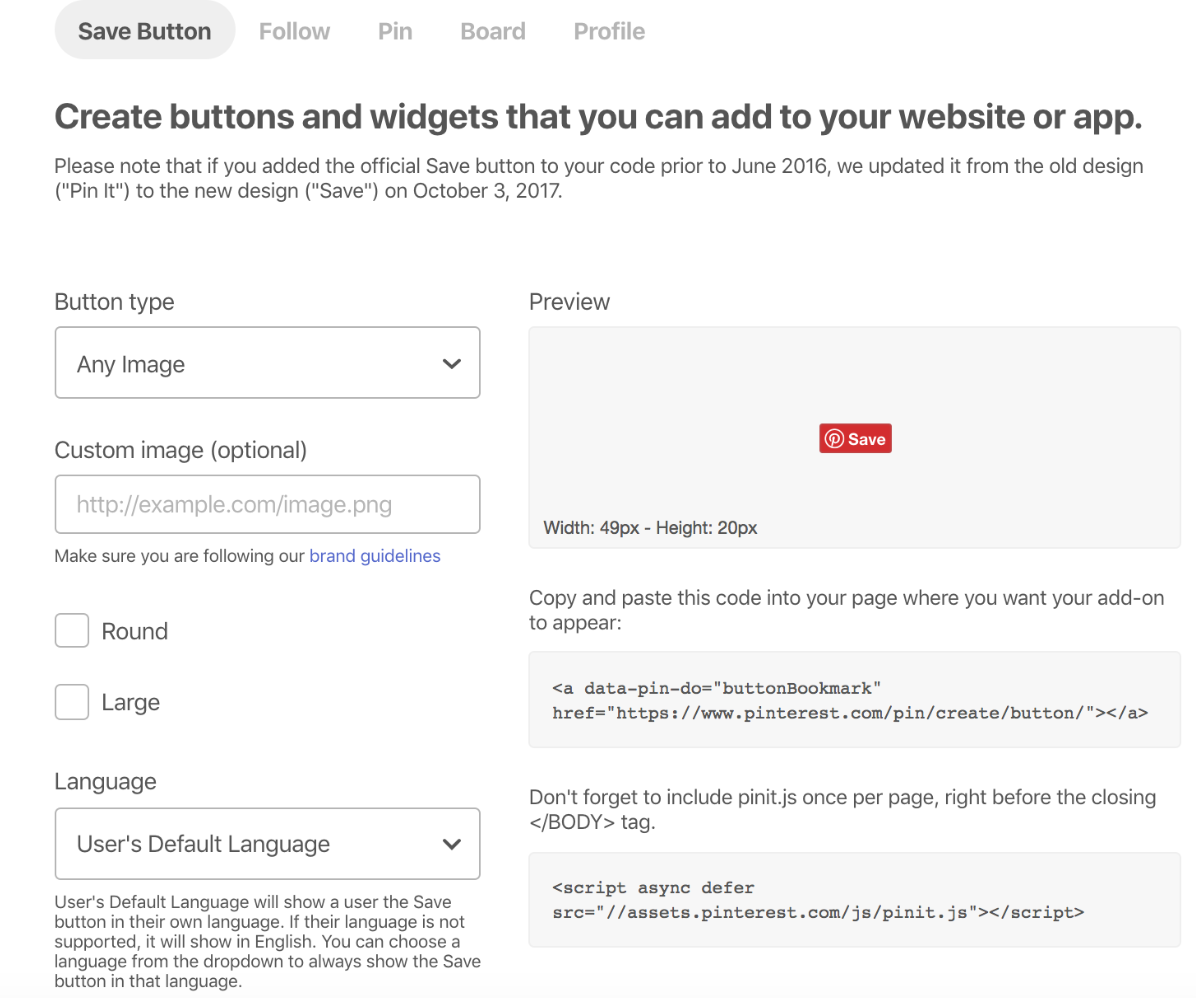
These Pinterest widgets and buttons allow your website visitors to interact with your Pinterest page via your website and give them the ability to view and follow your profile or go directly to a specific Pin or board. The network’s widget builder helps you quickly customize, create, and add this feature to your site.

pinterest button and widget

Source

These 9 Pinterest marketing strategies hold value for businesses of any size, in any industry. This universal approach to marketing is one reason Pinterest is such a valuable social media tool.

1. Sign up for a business account.

To market to your target audience, you should create a Pinterest business account. As mentioned, this free account provides you with access to Pinterest Analytics (which we’ll review in more detail shortly) and other handy marketing features such as a profile that clearly states you’re a business, Pinterest widgets, and Pinterest tag. If you already have a Pinterest account and want to convert it into a Pinterest business account, you can also do that without losing any of your content or work.

Note: If you’re looking to enhance your business account and run ads on Pinterest, you can do so by upgrading your account — and setting up your method of payment because this part of Pinterest is not free — to target your audience more aggressively with the help of the platform’s Ads Manager.

2. Choose the right categories for your content.

By choosing the right category for your content to be shared in, your Pins and boards will become more searchable for users looking to discover content similar to that of your business. Users can search for specific categories on Pinterest or simply go to the “Categories” section of any profile on the platform to view all content related to the topic they’re searching for.

Pinterest Marketing: looking for popular categories on Pinterest

Source

Some of the most popular Pinterest categories include travel, health and wellness, and beauty.

3. Use unique images and videos.

Similar to other social networks, Pinterest contains a plethora of images and videos. Not only do you want to ensure you’re posting images and videos that will help you promote your brand and market your products/ services, but you’ll also want to ensure they stand out against all of the others on the platform. Otherwise, why would a user choose to follow you over your competition?

Here are some ways to ensure you’re sharing great and unique visual content on Pinterest:

  • Create and share branded videos to promote your products and company. Pinterest users watch nearly 1 billion videos per day on the platform.
  • Share images and videos that show your products in action so viewers can more easily envision themselves using them.
  • Avoid excessive blank (or white) space in your images — images with 30% less blank space in the background are pinned most.
  • Create videos between 30-90 seconds long because they’re proven to have the highest performance.
  • Create specific boards to share images of your company’s most helpful data visualizations and infographics if you have them for your audience to use as resources for their businesses.

4. Leverage keywords.

By using keywords throughout your profile, posts, Pins, and boards, you’ll be more likely to organically appear in users’ feeds and searches. Keywords and phrases on Pinterest are related to specific niches being searched by users.

For example, if you sell suitcases, you might use keywords and phrases like “vacation” or “going on a trip” throughout your profile and Pins. This way, when a user searches one of those terms, your profile and images of your suitcases will appear on their feeds.

When performing keyword research on Pinterest, start by searching terms related to your niche within the platform itself.

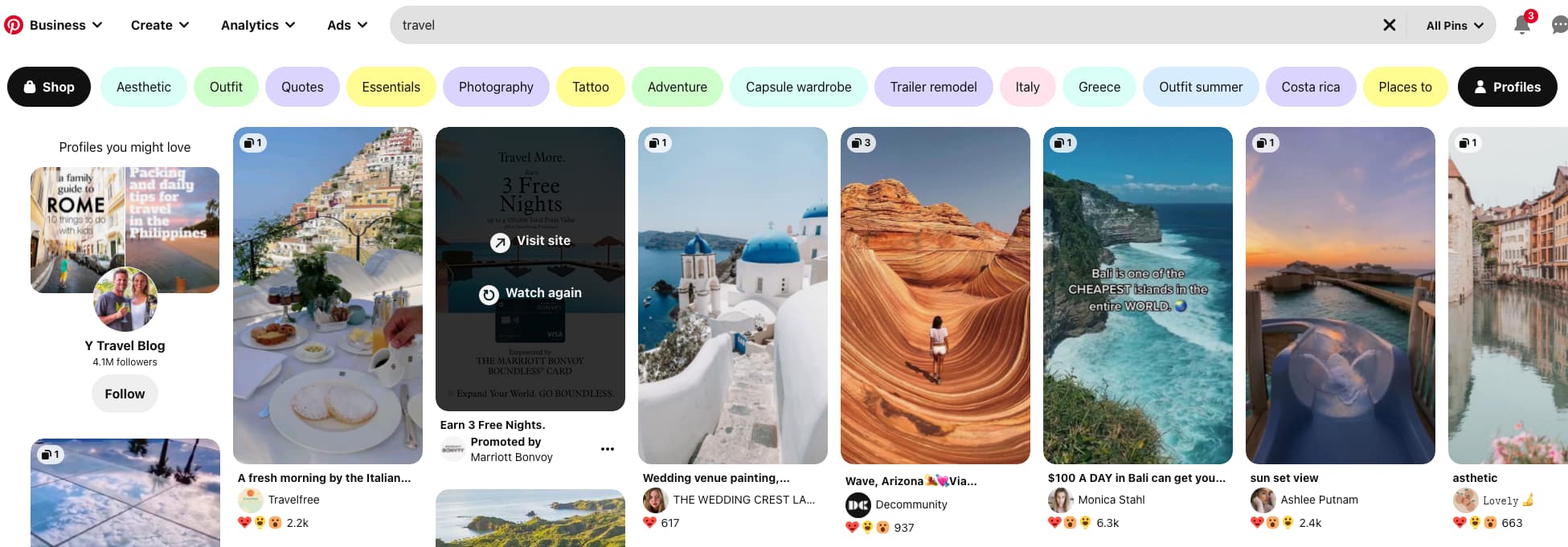
In the image below, I searched for the term “travel” and not only found content related to that niche, but Pinterest also provided a number of related keywords at the top of the screen. This tells you what other related terms users are searching for to support your research.

Pinterest Marketing: how to perform keyword research on PinterestYou can also use the plugin Keywords Everywhere to see the search volume for terms on Pinterest. This helps you understand the level of demand for the keywords you’re using.

Here are some locations in which you can insert keywords on Pinterest to improve your chances of organically ranking through search:

  • Bio and profile
  • Pin descriptions
  • Board titles
  • Board descriptions
  • Image-Alt-Text

For those of you who choose to pay for Pinterest ads, there’s also an option to use the platform’s keyword targeting tool to help you reach your audience through your ads.

5. Share your content on other social networks.

To promote your Pinterest account and content, you should share your Pins, images, and videos in other areas to improve your chances of being seen and followed. For example, you can claim your business’ Pinterest account on Etsy and YouTube so your followers can easily learn about the other platforms you’re on and how they can view more of your content. Additionally, claiming your account will provide access to analytics and data on all of these Pins so you can see the other networks your audience is most interested in.

You can also link your Pinterest profile to your Facebook and Google accounts so you can easily add and find friends, share content across networks, speed up your login on all accounts, and backup your profile in case you lose or forget your password details.

6. Follow, engage, and interact with other accounts.

When you follow and interact with other Pinterest users and their accounts, you’re able to initiate and maintain personal relationships between them and your business. This type of engagement has the potential to make your followers feel a level of loyalty towards your brand that keeps them coming back to your profile for inspiration, ideas, and to buy products.

Here are four ways you can build strong and lasting relationships with your target audience through your marketing tactics on Pinterest:

  • Follow new accounts of users who state or show they have interests related to the work your business does and the content you post (you can do this by searching keywords and hashtags or reviewing the people who follow your current audience members).
  • Re-Pin, Like, and comment on the content your followers and fans share.
  • Respond to the messages your followers write on your content to personalize their experience on your profile and make them feel heard.
  • Create engaging posts that showcase your expertise in your industry, teach your followers how to do something, or get them involved (in a giveaway or contest for example).

7. Use social media best practices.

When using Pinterest, be sure to follow the same social media practices you would on other social networks. Examples of this include remembering to interact and engage with your followers, regularly post to (and update) your account, and avoid blatant self-promotion that feels pushy and forced to your audience.

Additionally, you can focus on the following five best practices to boost engagement on Pinterest.

  • Encourage your followers to feature your brand in their content (and maybe offer to repost them or re-Pin their content if they do).
  • Provide your audience with an incentive — such as a prize — for choosing to follow and interact with you as well as create posts featuring your products and branding.
  • Offer your audience discount codes, coupons, as well as details about your latest products, and updates to existing products to keep them coming back to your profile.
  • Ensure your content is helpful and useful for your audience members — all content should have a purpose and/ or meaning.

8. Analyze your results.

If you’re putting all of this effort into marketing on Pinterest, it’s probably safe to assume you’re going to want to ensure the work you’re doing improves your business’ conversions and brand awareness.

So, you’ll need to analyze the results of your Pinterest marketing efforts to keep track of your referral traffic, number of engagements, leads generated, and anything else you’re interested in learning more about. The easiest way to do this is through Pinterest Analytics.

Pinterest Analytics provides you with four major types of information including:

  • Metrics about your profile as a whole.
  • Insights about the number of people who save and re-Pin your content.
  • Platform metrics to understand how people interact with your content via both desktop or mobile.
  • Data about your most popular Pins.

Pinterest for Small Businesses

If you have a small business, you may be wondering whether or not putting all of this effort and time into implementing Pinterest marketing strategies is actually worth it.

Short answer? Yes, it is.

Pinterest is one of the more versatile, affordable, and impactful marketing tools for businesses that are looking to convert more leads, drive traffic to their websites, and increase brand awareness to use.

Plus, Pinterest users have the highest purchase intent of any other social media users. Let’s discuss some more ways small businesses, like yours, can benefit from creating a presence on Pinterest.

Tell a visual story.

Pinterest helps you tell a visual story about your brand. Through pictures and videos, you’re able to show — rather than tell — your audience what you’re about as a company, the things you value, what and who you support, and the types of products and services you sell.

Pinterest provides you with a unique and engaging way to introduce your small business to platform users.

Humanize your brand.

Social media of any kind can help you humanize your brand and give it some personality — Pinterest is no exception. On the platform, you’re able to reach out directly to your audience members, chat with them one-on-one or as a group, and assist them through any difficulties or roadblocks they encounter while doing business with you.

You’re also able to show your audience and followers how much their support and business mean to you through giveaways, videos of your behind the scenes work, latest company news, product information, promotions, and discount codes.

Creating and maintaining these business-to-customer routines early on humanizes your brand, sets the tone for what your company will be known for, and shows customers how you intend to grow with them in mind.

Feature your blog posts.

You can use Pinterest to feature your inbound marketing efforts such as your blog posts or content offers. For example, you can Pin a photo or video to a board and include a link to blog post about that visual content. This not only promotes your blog posts but it also drives traffic directly to your website.

link to blog on pinterest

Source

Display your work and showcase your expertise.

Pinterest is a great way for your small business to display your work and showcase your expertise in your industry. Examples include Pins with images and videos of your work, infographics, data visualizations, and blog posts.

Due to the fact you might not be a recognized brand yet, doing this is important. That’s because as your business grows and you become more well-known, you’ll be more likely to be recognized as an industry leader and a business with helpful and applicable content for audience members.

Drive traffic to your website.

Pinterest is a great way to drive traffic to your business’ website — this will help your small business generate leads and conversions. You can share URLs in your profile as well as on your Pins and boards. For example, you may choose to post content with a link to your email sign up page, “About Us” page, or blog.

Conduct market research.

Pinterest is a great resource for conducting market research. It’s especially helpful for small businesses that may not have a large following quite yet or the experience to know exactly what their audience members expect and want in terms of content.

With Pinterest, you can easily review what your competitors — and the companies in your industry that are more established than yours — are doing. This will allow you to discover which tactics they’re using on the platform and see what’s working for their audience members. You can also look at the content your audience Pins as well as who they’re following and interacting with.

Pinterest Marketing Tools

There are a number of tools you can use to help you reach your target audience and engage users on Pinterest. There are three major types of resources to help you accomplish this — account management tools, image design and creation tools, and follower count and community growth tools.

1. Social Media Management Tools

Social media management tools help you schedule posts and organize your content on any social network, including Pinterest, prior to actually posting it.

This way, you can ensure everything is shared and pushed out as planned. Social media management tools often have analytics capabilities as well, which you can use in tandem with Pinterest Analytics.

Some popular social media and Pinterest management tools include:

  • Hootsuite gives you the ability to schedule your Pins in advance, gain insights into your data and analytics, and measure your results on Pinterest.
  • Tailwind provides you with analytics about your Pinterest profile, a data reporting system to help you determine what’s doing well with your audience members, and advice about the best days and times to share your Pins.
  • Sprout Social allows you to take advantage of a range of features to help you reach your target audience and buyer personas through Pinterest. These include platform analytics, engagement tools, post-scheduling capabilities, and details about the type of content your audience wants.

Pinterest has also launched its own scheduling tool, allowing Business users to pre-schedule their content within the platform.

2. Pinterest Image Design and Creation Tools

Pinterest image design and creation tools allow you to design, edit, create and publish professional-looking photos and images for the platform (along with any other social media site and your website).

Considering Pinterest is a visual social network where users discover eye-catching, beautiful, and creative images and videos, it’s important your content looks perfect so you can attract more followers and engagement on your profile.

The following three tools are great for anyone who doesn’t necessarily have a background in fields like graphic design or art but still wants to share unique and polished content on their profile.

  • Canva allows you to create professional images for Pinterest with over 1 million images, graphics, templates, and icons available to choose from.
  • Pablo provides you with a way to create beautiful images for Pinterest in under 30 seconds with easy-to-use effects and templates.
  • PicMonkey gives you the ability to create and edit images and has advanced image editing tools such as masking, mirroring, and double exposure.
  • AdobeExpress offers intuitive tools and templates, and Photoshop-quality effects to create expertly-designed images for users of all skill levels.

3. Follower Count and Community Growth Tools

Follower count and community growth tools on Pinterest are available to help you promote your profile and content as well as increase your number of followers and engagements. The following three tools were created to help you accomplish this specifically on Pinterest.

  • PINGROUPIE provides you with the number of Pins, users, and followers on different group boards on the platform so you can determine whether or not you want to join and Pin your content on it.
  • Loop88 helps you to create shareable content they’ve determined is ideal for Pinterest to help you attract your target audience and grow your following.

Start Marketing On Pinterest

Pinterest is a powerful marketing tool with the ability to help you organically increase brand awareness, boost conversions, increase sales, and create long-lasting relationships with your target audience and buyer personas.

You can achieve all of these things for your business by following the Pinterest marketing strategies we reviewed and incorporating the available tools and resources to help you succeed as a business on the platform.

So, sign up for a business account and begin creating unique and engaging content to market to your customers and followers on Pinterest.

Editor’s note: This post was originally published in January 2012 and has been updated for comprehensiveness.

Pinterest Templates

Categories B2B

How to Build and Maintain Workforce Resilience, According to Experts

To understand the importance of resilience in the workplace, let’s start with an example.

Let’s say your company has just been acquired by a major corporation. This means your organization is about to undergo some major changes — including your workplace culture, leadership structure, and even your team’s goals and objectives.

When it comes time to deliver the message to your marketing team, however, you’re surprised by their reactions. While there is some trepidation, most of your employees are upbeat, positive, and excited about the new opportunities and challenges ahead of them.

Their reaction doesn’t mean they aren’t also hesitant, nervous, or unsure of the future. It simply means that your team feels secure, confident, and capable of taking on those new challenges, whatever they may be.

This is the power of workforce resiliency.

Here, we’ll dive into why workforce resiliency is one of the strongest predictors of long-term employee satisfaction and retention. Plus, how to build a more resilient workforce, according to leaders who’ve done it.

Download Now: Free Company Culture Code Template 

What is workforce resilience?

To understand workforce resiliency, we first need to define what resiliency is.

As Merriam-Webster defines it, resiliency is “an ability to recover from or adjust easily to adversity or change”.

Essentially, a resilient person is someone who can adapt well to life’s unexpected challenges, stresses, and uncertainties.

Birdeye’s Head of People & Culture Camille Boothe told me, “When I think about resilience, certain thoughts come to mind — like adaptability, the ability to recover quickly, inner strength, and the ability to navigate challenges with a positive state of mind.”

So … what does resiliency matter for the workplace?

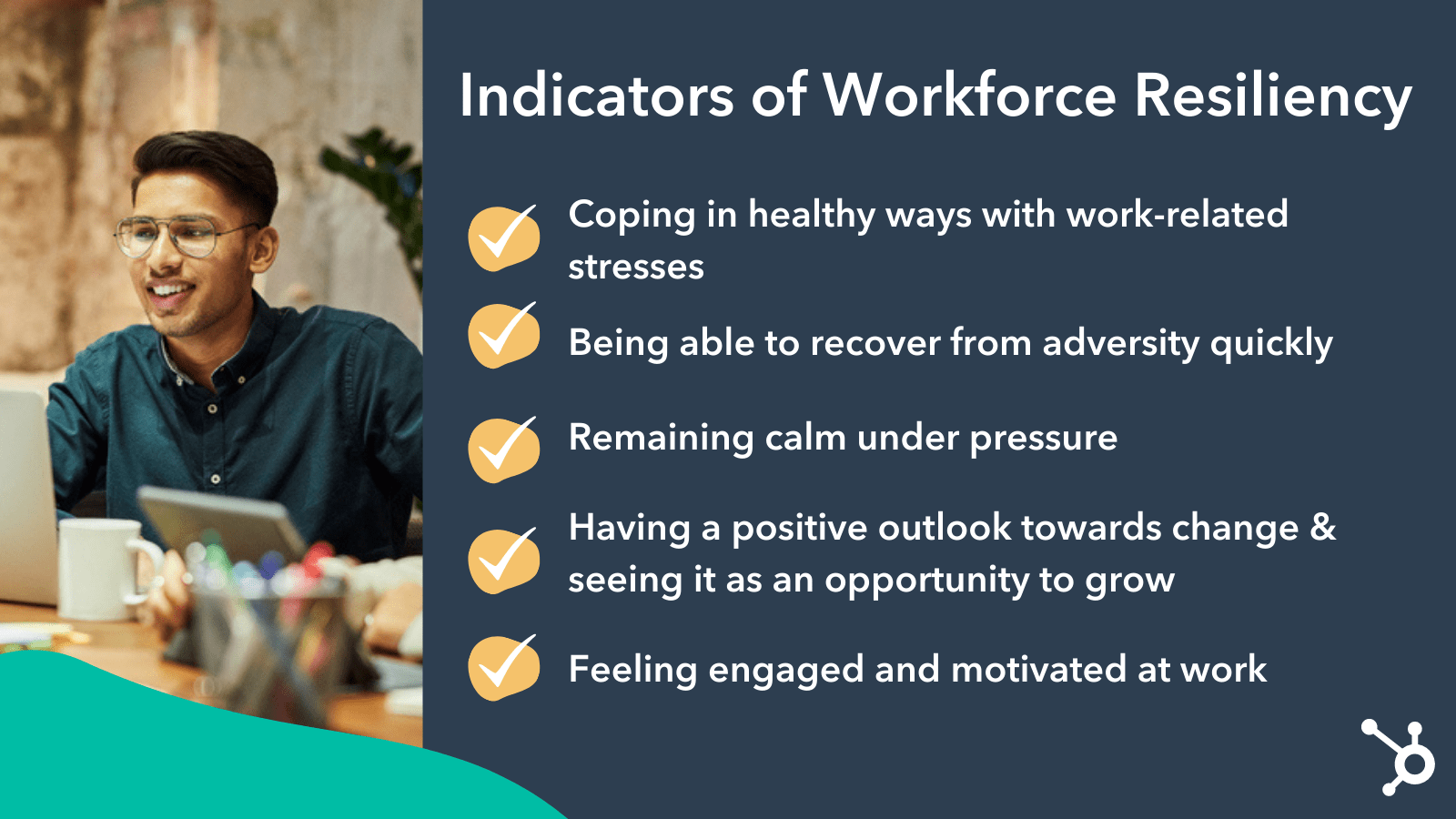
Workforce resiliency is, simply put, a group of employees who feel stable, secure, and capable of handling a workplace’s challenges, daily stresses, and organizational changes without losing engagement or motivation.

As Boothe puts it, “Why is resiliency important in the workplace? Because many employees cite workplace stress as the #1 stressor in their lives. That is why building a strong culture of resilience is essential for the success and well-being of employees.”

To put workforce resiliency into context, consider the past two years: Most businesses have made large-scale changes as a result of the pandemic.

Many companies shifted to an entirely remote lifestyle, and then shifted again towards hybrid or in-person once restrictions had been lifted.

Some leaders quit; while others made drastic changes to their strategies, goals, and future vision.

And yet … some businesses saw much higher turnover rates than others. Why is that?

Ultimately, the more resilient your workforce is, the more adept they are at handling business changes and industry shifts without feeling too much frustration, distrust, or uncertainty over how those changes will impact their livelihood.

Essentially, resiliency builds the opportunity for flexibility.

On the flip side, a non-resilient workforce is one that feels vulnerable, mistrustful of leadership, or tired and de-motivated. These are the workers who are most likely to quit, or who feel incapable of handling workplace changes with any sense of confidence or security.

Workforce resiliency is a strong component of long-term employee retention, and can help you build and maintain an effective and engaging workplace culture even when difficult situations arise. It’s important to consider workforce resiliency as the necessary backbone of any effective, strong company culture. Without resiliency, all the beer-on-tap and ping pong tables in the world can’t deter your employees from leaving.
Benefits of Workforce Resilience

If you’re still unsure of the benefits of workforce resiliency, let’s consider the data:

All of which is to say: Work can be hard, and it can be particularly difficult to remain productive at work when an employee’s life is shifting dramatically as a result of unforeseen circumstances (like, say, a pandemic).

Resiliency, then, can help mitigate these stresses by providing a ‘safety net’ around the employee and helping them remain focused, positive, and engaged even during stressful times.

So — that’s all well and good. But, as a leader, how do you build resiliency? And, perhaps even more importantly, how do you maintain it?

How do you build workforce resilience? 

1. Bake it into your employee initiatives. 

To start, I spoke with leaders across organizations at Birdeye, Plecto, Alyce, Casted, and HubSpot to uncover tactical methods for developing resiliency in your workforce.

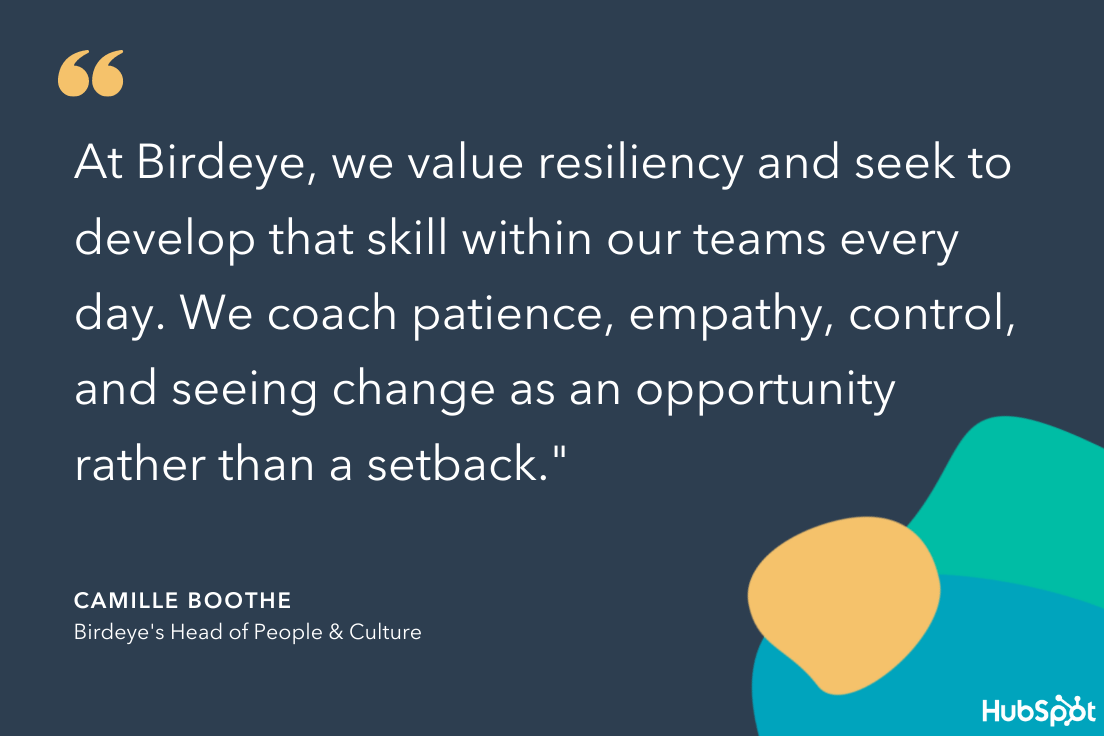
Boothe told me, “At Birdeye, we value resiliency and seek to develop that skill within our teams every day. We coach patience, empathy, control, and seeing change as an opportunity rather than a setback.”

She adds, “We recognize the factors that lead to resilience include optimism, balancing difficult emotions, and a sense of safety in a strong support system,” Boothe told me, adding that they’ve focused on three key initiatives at Birdeye to strengthen resiliency.

These include: 

  • Focusing on physical and mental health. Birdeye provides unlimited PTO and mental health days companywide for employees to rest and rejuvenate as needed. This gives employees a mindset to stay relaxed, even in the face of stressful situations.
  • Flexible work schedules. Birdeye is in a primary work-from-home mode which allows employees to gain better work-life balance and stress management.
  • Employee Resource Groups (ERG)/Social Connections. Birdeye builds relationships and connections for employees to leverage for support, as well as participate in forums and discussions on Mindfulness and Meditation.

Boothe adds, “We see resiliency as a competitive advantage and feel that building resilience is just good business sense.”

Along with employee resource groups, you might consider looking into trainings specifically focused on building resilience.
Birdeye Head of People on Workforce Resilience

Additionally, you might consider offering your employees the chance to choose which employee benefits matter most to them, and enabling them to invest in whichever perks would best suit their lifestyles. 

As Alyce’s VP of People, Tori Oellers, told me, “The ‘power of choice’ is a core tenant of our platform. and we see first-hand how successful campaigns can be when you put the choice in the hands of recipients. We take that same philosophy with many of our benefits.”

She adds, “Rather than carving out various specialized programs and partnerships, we have made it simple by allocating budget to various stipends that provide our team the power of choice to utilize the benefits in a way that is supportive for them as an individual.”

Oellers told me, “Recognizing and operationalizing ways to recognize your people as individuals ensures that each person is getting what they need to be successful and foster resiliency.”

Finally, providing educational resources for your leaders to train themselves on building agility in the face of adversity can help you effectively strengthen resiliency from the top-down. The Agility Factor, by Christopher G. Worley, Thomas Williams, Edward E. Lawler III is a good option for helping your leaders’ uncover how to build agility — and thus resilience — within an organization.

2. Emulate resiliency as a leader.

To build resilience in your workforce, you’ll want to emulate it as a leader. For instance, let’s say you’re delivering the difficult news that leadership has decided to cut budgeting for a marketing project that’s already in-the-works.

As Jordan DiPietro, VP of HubSpot Media, told me, “Your team is always looking to you as their leader for guidance, strategic direction, and advice — and they’re also looking to you as an emotional compass. If you get way too high, or way too low, they will ride those waves with you.”

He adds, “As someone leading a massive team, I’ve needed to figure out a way to stay more even-keeled. For some people that’s easy because they are naturally steady and composed. However, I tend to be less equable — so I have to work hard to not let that reflect in my leadership.”

To remain steady during stressful or tumultuous times, DiPietro recommends leaders aim to minimize meetings and outward communication on days when they’re feeling overly stressed. On the flip side, he suggests leaders also attempt to curtail too much excitement — while it’s important to celebrate your team’s successes, you don’t want to go overboard with your emotions in either direction. 

DiPietro adds, “The one thing you can count on is that business will ebb and flow, and there will always be peaks and valleys. The more you can smooth those out for your team, the more resilient they will act throughout those times.”

Additionally, as a leader you can emulate resiliency by modeling flexibility. As Lindsay Tjepkema, CEO and co-founder of Casted, told me, “At Casted, we prioritize flexibility and allowing team members to choose what a flexible workday looks like to them — whether that’s working the conventional 9 a.m to 5 p.m., taking long lunches to attend a favorite workout class, logging off earlier some days to spend time with kids before they go to bed, or whatever suits each individual.”

Tjepkema adds, “If we want our teams to believe that we value flexibility, we have to model it. I share my own needs for flexibility openly with the team. They know if I have a hair appointment or a family event. When they see me or another leader communicating our availability and using that flexibility, it empowers them to do the same.”

Ultimately, your resilience as a leader is contagious. In fact, highly-resilient team leaders have direct reports who experience 52% less burnout, and have roughly 80% lower intention of leaving the organization.
jordan dipietro on workforce resilience

3. Focus on the physical and mental health aspects of resiliency.

Did you know people are 3.5X more likely to be resilient if they have good physical health?

Providing your employees with the resources necessary to remain strong phsyically — including fitness reimbursements, flexible work schedules to go on walks or runs during lunch, and even fun workplace fitness competitions — is vital for ensuring long-term resiliency.

For instance, as CEO and Co-founder of Plecto, Kristian Øllegaard, told me, “We’re an ambitious company and thrive on striving to be the best, so contests are a natural fit for the team. Most recently, we challenged the whole company to a push-up competition! The motivation to get involved and outperform colleagues was felt company-wide. This kind of fun-loving team spirit is what makes Plecto the place to be, where we build resilience and genuine relationships.”

If your workers are burnt out, exhausted, and depleted, they won’t have the energy to take care of their physical health, and it will ultimately take its toll on your employees, and your bottom-line.

Additionally, mental health is just as important as physical. Resiliency requires a healthy mindset where people are open to change and don’t dwell on the potential negative outcomes. This can only happen through practice.

Mindfulness and yoga are two effective opportunities to practice building resiliency, so consider how you might provide these options through a discounted mindfulness app subscription, or by bringing yoga to the office.

Additionally, therapy can be incredibly helpful for those who struggle to adjust to change, so perhaps you can try offering services such as Modern Health to your team for further mental health consultations.

Finally — encourage your team to take time off. As DiPietro puts it, “People are more resilient when they have had time to relax and reset! Nobody is meant to grind and not take breaks. The mind needs to untether from work and people need to feel like it’s okay to completely unplug without their team or performance suffering.”

He adds, “Leading by example isn’t enough here. Instead, every few months I ask each of my direct reports, ‘Hey, when is your next vacation?‘ If they don’t have one planned, I follow up in each one-on-one until they make plans. I have found that the directness of my approach gives my reports the feeling of freedom to actually take time off — because if they don’t, I’m going to keep bothering them about it. Force your employees to take time off. You will be rewarded for it!”

4. Practice transparency within your organization as a whole.

No matter how resilient your workforce is, they won’t feel comfortable or optimistic about company-wide or team-wide changes if they don’t understand the why behind the change.

This is where transparency comes into play. While you don’t have to over-explain, divulge confidential information, or apologize for your decisions, your team does deserve to understand the background context of the change and how leadership hopes it will impact the future of the company.

Øllegaard adds, “Since the beginning, business transparency and celebrating success have been at the heart of the Plecto culture. It’s no secret when it’s a record-breaking (or slower) month at Plecto. It’s hard to ignore the TVs around the office with dashboards of each team’s key performance metrics, which are broadcasted for everyone to see. What’s important is being completely transparent about how the company is performing.”

For instance, let’s say your CMO has issued a re-org — and, as part of the change, your social media team will move from under the Content Team VP to under the Brand Strategy VP.

When you deliver this news to your team, you’ll want to explain the context behind the decision.

For instance, you might say, “We’ve decided it makes more sense to have the social team live under Brand Strategy, since the Brand Strategy teams share a common goal of brand awareness. By contrast, most other Content teams share the goal of lead generation, which doesn’t make as much sense for our team’s purpose.”

Ultimately, transparency can build trust, which goes a long way towards making your employees comfortable, and even excited, about upcoming workplace events.

Workforce Resilience Examples

Finally, let’s dive into a few examples of workplace resilience to see how this looks in practice.

1. Staying calm with last-minute requests.

Your SEO team is getting ready for the holiday season when your VP tasks you with a major request: Please put together a memo of your 2023 vision, including areas of opportunity and pre-existing at-risk content, within one week.

When you tell your team, they immediately jump into action. They decide to stay after work, order takeout, and prep the doc together. Your employees are energized and confident that they can meet the deadline, and they’re excited about the challenge. By the end of the week they’ve created a flashy, engaging, compelling 2023 vision, and they can’t wait to hear the VP’s thoughts.

Why This Exemplifies Resilience

Even though the request is last-minute, your team feels comfortable handling the shift in priorities. A low-resilience team would’ve felt discouraged, frustrated, or uninterested in working on the task so close to the holidays, but this high-resilience team was able to shift their mindset quickly and look at the task from a more positive perspective: as a chance to impress leadership and get excited about the year ahead.

2. Taking risks and seeking out new challenges.

On Tuesday, your direct report comes to you with a pitch deck she’s put together in which she’s outlined why it’s a good idea to embed YouTube videos into existing blog posts.

It’s risky — your blog team hasn’t tried incorporating videos before, so there’s no prior evidence that it will be successful. However, your direct report has data from other brands to showcase how videos can increase blog traffic and time-on-page.

Why This Exemplifies Resilience

Risk-taking is all about willingly venturing into unknown territory … something a low-resilience person is unlikely to do. In this case, your employee is demonstrating resilience by showcasing her open-mindedness to test out new ideas and innovate, as well as her engagement and commitment to your team’s success. A low-resilient employee would likely feel less engaged and less willing to take risks.

3. Remaining positive and upbeat.

When you tell your employees your director is leaving your company for another role, they are saddened by the news. She has been an effective leader for the team for a number of years.

However, they are not fearful, mistrustful, or anxious. Instead, they understand this is the best next step for the director, and suggest ideas for a goodbye party. The vibe is ultimately positive and optimistic.

Why This Exemplifies Resilience

When a beloved leader leaves the company, it’s always a sad experience, but high-resilience employees can see the bright side of the situation and don’t dwell on the potential negative outcomes they could experience in their own roles as a result of the director’s departure. Instead, they trust your leadership and the organization at-large will continue to meet their expectations.

4. Handling constructive feedback well.

In a recent performance review, you tell your employee that he’s been underperforming. He’s missed a few deadlines, and recently arrived unprepared to a meeting with a client.

Your employee is unsurprised by this information, and responds calmly: “I really appreciate you taking the time to talk about this with me. I will give what you’ve said serious consideration, and reach out next week to plan a follow-up where we can discuss how I can improve my performance.”

Why This Exemplifies Resilience

A highly-resilient employee is likely effective at positive self-talk and harnessing optimism in the face of adversity. Additionally, resiliency enables people to handle rejection more smoothly by seeing it as an opportunity to grow.

Ultimately, you can’t always control the situations that arise in your workplace. But what you can control, if you’ve laid a foundation of resilience, is how your team reacts to those changes. The more resilient your employees are, the more likely they are to be happy, engaged, and motivated at work.

Taking the time to teach and foster resilience in your workforce isn’t easy, but in the long run, it will enable your team to more efficiently and willingly handle all the challenges thrown their way.
company culture template

Categories B2B

Why Every Company Needs to Know Its Core Competencies

Every resume has a skills section. It’s an opportunity to highlight your top professional attributes to attract employers. Core competencies serve the same purpose for brands and their customers.

Download Now: 5 Free Skill Development Templates

Let’s dive into what exactly a core competency is, why you need it, and how to find it in your brand.

You might be wondering, “Isn’t this a value proposition? ” Not exactly. While both are used to differentiate you from your competitors, competencies are what you leverage to support your value proposition.

For instance, at Uber, their value proposition is “Always on, always available.” What’s their core competency? An easy-to-use app and reliable access to its services at any time of the day.

Establishing your core competencies early on is incredibly valuable, as it can inform your marketing strategy moving forward. You can use them in your messaging to attract your target audience and stand out among your competitors.

If you’re a trailblazing company with a fresh product in an underserved market, then finding your core competency will be easy to spell out.

However, if you’re in a saturated market and struggling to distinguish your brand, working on your core competencies will be key to your success.

The sooner you discover what they are, the quicker you can implement them in your marketing and sales strategies.

From an individual standpoint, everyone has core competencies that they leverage in their professional lives. When you want to land a new job, you list those competencies as skills in your resume, embed them in your LinkedIn bio, and mention them during interviews.

If you don’t know what makes you a valuable asset, you’ll be hard-pressed to convince an organization of that. With this in mind, competencies are valuable both from a personal and broader perspective.

Core Competencies Examples

Clever Marketing from Oatly

There are hundreds of vegan milk options out there. What makes Oatly stand out is its marketing.

core competency example from oatly

Image Source

The brand specializes in self-referential marketing campaigns that make its target audience laugh. Their ads rarely focus on the products and instead poke fun at the ads themselves.

In contrast, one of Oatly’s competitors, Planet Oat, launched a #WeSolvedMilk campaign back in 2021 and released this ad.

Unlike Oatly, they focused on product features – specifically their oat milk’s superior creaminess, then centered the commercial around that.

In a world where most ads take a product-focused approach, companies like Oatly stand out.

Incredible Value from Canva

For many years, those of us who wanted to build brand assets had to rely on products like Adobe InDesign and Sketch.

Not only did they come at a cost but they were also notoriously complex, as they were made with advanced professionals in mind. Then came Canva, a graphic design platform with thousands of free templates made for the everyday user.

Offering high-quality designs at little to no cost became one of their core competencies, stemming from their mission to make graphic design accessible to everyone.

An Innovative User-First Approach from Google

Google might have started as a search engine but it’s evolved into a one-stop-shop to meet all your digital needs – for individuals and businesses alike. From cloud storage and password management to email service and advertising, this is only a sliver of what Google has to offer.

Google’s value proposition is innovation, as evidenced by its wealth of services. Some of their core competencies include inventive products and a dedication to a user-first approach.

How can you determine a core competency?

1. Start with what you already know.

The first place to look when establishing your core competencies is your value proposition. As we mentioned before, that’s the overarching idea from which your competencies will emerge.

It’s also worth reviewing your mission statement. What does your company care about? What are its core values? From there, you can ask yourself, “How does that translate into what we offer our customers?

2. Look at your competition.

When you’re struggling to figure something out within your brand, it’s always helpful to look across the aisle and see what your competitors are doing.

They’re a great source of information and inspiration. In this case, the question you want to ask is “What do they lack that we offer?

It can be anything from a personalized customer experience to one-of-a-kind product features. Once you make a list of the differentiators, you’ll get a clearer picture of what

3. Reach out to your customers.

Who better to learn from than your customers?

If you’re unsure what sets you apart from your competitors, ask your customers. You can create a survey and ask questions that get to the bottom of why they chose you.

Questions like “What comes to mind when you think of our brand?” and “What do you love about our brand?” will help you get the answers you’re looking for.

Core competencies are brand differentiators that will help you create a marketing strategy that caters to your target audience and separates you from the rest.

New Call-to-action

Categories B2B

How Your Audience Could Shift in Web 3 [Executive Insights + Podcast Episode]

If you work in tech, media, or even marketing, you’ve likely heard a lot of buzz around Web 3.

And, when filtering through all the noise about future versions of the internet, you might find it hard to differentiate all of the predictions from myths and reality. And, more importantly, if you’re likely asking questions like, “How could Web 3 impact my business?”, “Will I fall behind if I don’t get in on Web 3 now?”, and “Is Web 3 just built on hype?”

“When you’re listening to the news, or you’re on Twitter, and people are talking about NFTs and Web 3, it seems really abstract and futuristic and stupid. It’s really easy to naysay all of it. I get that,” says Kipp Bodnar, HubSpot CMO. “A lot of it is going to be crap. And a lot of it’s going to fall away.”

Download Now: Free State of Marketing Report

But, Bodnar adds, “In the last version of the internet, your whole job was to make a product or value proposition 10 times better than it was before. In the next generation, the internet, it’s making something somebody thought was impossible possible.”

“And if you can’t pull that magic trick out as a business over the next 10, 20, or 30 years, you’re not going to exist. Because that is the game that’s going to change. Don’t think about the technology, think about the changing customer experience and that move from impossible to possible,” Bodnar says.

In this post, we’ll dive into the questions businesses are starting to ask about Web 3 and how it could impact the changing landscape.

To hear more about Web 3 from our very own CMO Kipp Bodnar, and our SVP of Marketing, Kieran Flanagan, you can also check out this episode of their podcast, Marketing Against the Grain (plus other episodes and interviews coming soon). 

Editor’s Note: This post goes more into detail on the impacts of Web 3. For a foundational post explaining what Web 3 is, check out our first piece on Web 3 here.

A Brief History of the Internet

When explaining the possible impacts of Web 3, it’s helpful to go back and look at how the previous evolutions of the internet impacted consumers and businesses. The graph below highlights just a few high-level characteristics of Web1, Web2, and Web 3 without getting overly technical.

Web 1 (1983 to Early 2000s)

Web 2 (Early 2000s to Today)

Web 3 (The Next Internet Evolution)

Low-Speed

Enabled basic messaging, email, search queries, and PC-based web surfing.

High-Speed

Offers advanced messaging/communication, video calling, streaming, social media, and early AR/VR.

Highest Speed

Decentralized on the blockchain. Could Enable extended reality, user-built platforms, coin/token incentives, and other experiences.

When the internet launched, it was essentially decentralized and many companies that focused on internet services had a slight leg up as many tech firms began to invest in it and learn what it could do. Today, the internet has become drastically centralized with companies like Google and Meta owning many of the platforms we visit each day.

Because consumers want growing control over their experience and are more hyper-connected to technology than ever, some describe Web 3 as “giving the internet back to the people”, as blockchain-built web experiences are often decentralized.

The image below shows how Web 3 infrastructure could compare to that of our current internet. While business owners and marketers that aren’t goaled around Web 3 investments don’t necessarily need to know all the technical lingo in the images below, this graphic essentially shows a more streamlined, centralized path from user to internet access while Web 3 will host a more complex, decentralized path that leverages blockchain technology.

image comparing web 2 and web 3 framework

Source: Coinbase

While we won’t go too deep into the technology behind Web 3, you can find some great resources on the technical side of things with online courses – like this one from Coursera or this content from Reforge.

At this point, it’s still a bit too early to know how many of the predictions we’re seeing will come to light. And, if they do become a reality, they’ll likely require a learning curve and a long adoption lifecycle. Because of this, the move from Web 2 to Web 3 might be much slower and more gradual than some would expect.

But, even though we likely won’t see the entire internet change in one day, week, or year, we’ll still watch some Web 3 concepts, companies, and technology grow in the coming years — which could enable us to adopt it at a quicker pace.

Ultimately, you don’t need to ditch your current business plan to focus on major Web 3 investments just yet. But, there are concepts, consumer behaviors, and tech you might want to keep on your radar so your company can adapt if and when a wide-scale evolution happens.

Web 3 Concepts & Audience Shifts You Could See Soon

Full Web 3 implementation is far off, and we know a lot of SMB marketers don’t have any interest, technical bandwidth, or budget to dive into Web 3 complexities yet. And, that’s okay.

But, if you put overwhelming technical lingo and wild predictions aside, the way consumers have optimistically buzzed-about Web 3’s potential shows just how much they’re ready to see the internet, businesses, and society evolve. And, even if your business plans to stay in the Web 2 world for the foreseeable future, you should still make note of how these shifts and growing web technology could impact your business.

Here are a few business shifts we’ll see soon, in part because of Web 3 development.

1. Consumers will want more say in the online products and platforms they use.

Right now, the platforms we use daily, like Google and Facebook are centralized. When you log on to a platform like Facebook, you’re exchanging web data with its Meta servers.

This means that Meta and its biggest stakeholders ultimately determine how Facebook works, user rules, how it uses your data, and how the UX changes over time. And, if Meta were to pull the plug on Facebook servers, it would disable usage for everyone.

Because of this, just a few key tech companies and big-name investment firms have a solid hold over many of the things we do and see online. And, in certain areas – as with data usage, social media feeds, search engines, or web experience – many users wish they had more say.

But, what if users were treated more like shareholders and could give input on how a platform worked, used their data, or built experiences for them? In a decentralized Web 3 world, some believe this could be possible.

For example, some platforms, like metaverses will allow you to trade crypto, NFTs, non-crypto currency, or other items of value for a plot of land (or a stake in the platform). While large brands and investment firms would still likely own a majority stake in their platforms and serve as decision-makers for terms of use, users could at least personalize their experiences a bit more, or have more control over how the platform works for them.

While not all businesses will lean into decentralized platforms, those who do could put some key developments of their online products into the hands of loyal users or customers.

Giving users the ability to play a role in the evolution of platforms they use not only allows them to feel linked to a brand through a sense of ownership and trust, but it also allows you as a business owner to benefit from the ROI of user experience improvements the users themselves are making.

How Businesses Can Respond

Even if you aren’t ready for Web 3 investments, or never plan to invest in it at all, you can still take steps to make your audiences or customers feel like they have an impact on your business’s evolution. Here are a few smaller-scale ideas.

  • Introducing Product Developers to Customers: Oftentimes, sales and service are the only ones who talk to customers. But, product developers can learn a lot from meeting with a few loyal customers, listening to feedback, and learning about their pain points. In turn, the customer feels like their actionable and constructive feedback has been heard.
  • Customer Feedback Research: If your product development team prefers to look at more quantitative data, consider running a survey about your product and returning that feedback to marketing, sales, service, and product teams.
  • Report on Your Progress: After customers or prospects give you feedback, create a marketing plan highlighting the improvements you’ve made around your product after receiving feedback. This will show customers and prospects that you are acting on their needs and that they have a voice when they’d like to request changing something.
  • Customizable Features: Customization might not make your customers feel like stakeholders, but it does have similar benefits. When users can customize how online products look, feel, and work around their preferences and goals, they might feel more attachment to your product than one that allows no customization. Ask yourself, “Are there ways I can better help my customers make their own great experience with my offerings?”

Internet Users Will be Motivated by Incentives

While incentivization has been around for quite some time, blockchain technology will make it easier for brands to track and incentivize usership and community engagement in Web 3.

Imagine going on a website and being paid to spend time there, or logging into an app and receiving points that you can trade for something of value later – like cryptocurrency or even NFTs. These are the types of tactics that brands could potentially leverage to gain solid growth.

“When you think about the difference between the last generation, the internet and the next generation the internet – understand that it is a massive change in incentives and the ability to incentivize,” says Bodnar.

Kieran Flanagan, HubSpot SVP of Marketing also explains, “In Web 2, for [gaining] leads and things like that, we had a cost per acquisition and freemium. You make the product free, so your cost per acquisition goes down.”

“In Web 3, I think your incentives drastically change that, again, because you have a flywheel effect through your incentives. I don’t know how it changes. … But I do think how you think about acquiring customers and the cost to doing that is greatly changed when you’re using these different incentives or tokens to build your business,” Flanagan adds.

Meanwhile, Bodnar added that incentivization will become more of an economic proposition in Web 3.

“While the cost of the old way of doing [acquisitions] is getting so high that you can take more risks to do the new way (because the old way is becoming untenable). And then, can I take that same amount of money, incentivize my community to drive referrals, and be advocates to spread word of mouth to drive the brand? And can I factor in customer acquisition cost on top of that?” Bodnar says.  

“We’re not going to give up customer acquisition cost,” Bodnar explains. “What we’re saying is, community acquisition cost is going to be the precursor. We’re going to figure out the economics of acquiring people through communities, and that customer acquisition cost is going to be basically an output metric of how effective our community strategy is.”

One example of a startup that’s already using digital incentivization (and is currently used by Flanagan) is STEPN, an app that rewards you in NFTs as you make running accomplishments with the app turned on.

“STEPN is a Web 3 lifestyle app with Social-Fi and Game-Fi elements. Users equipped with NFT Sneakers – walk, jog or run outdoors to earn GST, which can be used to level up and mint new Sneakers,” notes the website, adding that players can “choose to lease or sell their NFT Sneakers on the in-app Marketplace; users’ GST earnings are stored in the in-app Wallet, which has a built-in Swap function.”

While people are earning NFTs by running with the app on, STEPN benefits from data collection agreed upon when first using the app, transaction fees from buying and selling NFT products, and fees consumers pay to lease NFT sneakers.

To learn more about STEPN, check out this demo which STEPN features on its official website.

Ultimately, the business model is simple: Users pay to buy a product to join the app, they are treated to coinage or NFTs for spending time on the app, and the business makes money from the trades, transactions, and purchases made in the app once the user loyalty model has brought them in.

Embracing Incentivization Ahead of Web 3

Want to leverage incentivization without building a Web 3 experience? There are plenty of ways to do this.

One example of a Web2 incentivization is our HubFans platform. With the platform, HubSpot customers and partners can assist HubSpot in some way by completing “Challenges” for rewards and digital badges.

HubFans challenges that help HubSpot, could include a mix of small and larger asks, like promoting our brand, filling our feedback surveys, or meeting with teams looking to chat with customers. As you complete more challenges, you move into higher tiers of HubFans status and can start to access rewards like event invitations, networking sessions, and potentially an invite to join the HubFans council.

Hubfans page highlights benefits of hubfans tiers

While HubFans doesn’t involve Web 3, it is a great example of a digital incentive-based opportunity that can both help a brand gain insights from its partners and customers on various initiatives, build a strong fan-based community, and – most importantly – reward great customers and partners for their loyalty to the brand.

Crypto, NFT, and Blockchain Tech Will Gain More Interest

While you shouldn’t just change your whole business model or payment features to accommodate crypto, the growing interest in this currency is worth keeping on your radar if your business appeals to audiences that have invested in digital coinage.

As interest in cryptocurrency and blockchain-based transactions grows, many brands – including B2B companies have embraced crypto-based payment features on their websites or platforms for quite some time – and not just for NFT purchases. Among them are Overstock.com, Home Depot, Starbucks, and Whole Foods. Additionally, payment platforms – such as PayPal – have adapted to accept crypto-based payments.

If you think it makes sense for your brand to start accepting cryptocurrency pay, it couldn’t hurt to start looking at credible companies that offer website plugins for this, as well as platforms that can help you manage and monitor your company’s cryptocurrency. You’ll also need to read up on any laws and regulations your company or state might have about crypto usage and taxation for businesses.

If you live in the United States, you can find a list of state-based legislation for the United States here. However, you should also keep in mind that regulations might vary when doing transactions with customers in countries outside of the U.S.

Consumers Will Crave Experiences, Not Just Content

Over the past five years or so, experiential marketing and product experiences have gained steam. And when the COVID-19 pandemic kept any of us on lockdown, millions turned to remote experiential content with VR and AR platforms.

In the marketing and sales realm, brands like Walmart and BestBuy are already identifying ways that they can sell products through VR stores (complete with sales reps who are also logged in to a VR metaverse.

Meanwhile, companies like Mercedes already leverage AR with virtual assistant platforms. Through platforms like these, customers can scan an element of their vehicle or product and have its functionality explained to them. They can also ask questions about any problems or faults in its operation. Combined with an AI chatbot, the AR element of the assistant makes it much more user-friendly.

mercedes app allows you to scan parts of your car and learn about it.

Source: PTC

With the connectivity, speed, and advancements of Web 3, interest, and engagement in virtual experiential content could only grow.

How to Prepare for a More Experiential Internet

While most businesses can’t affordably build VR or AR experiences or even physical experiential events just yet, there might be more accessible opportunities to advertise, build communities, talk to your customers, or even offer services in a more experiential environment that arise for you as technology develops.

For example, brands can already work with businesses like Snap, tech agencies, or software companies to have AR/VR experiences created for them.

To learn more about experiential or VR marketing specifically, check out this post and this post, respectively.

Customers Could Yearn For Community Belonging

With Web 1, we still focused on building communities through word of mouth within the limits of the internet. In Web 2, we discovered the impact of community building on major social media platforms like Facebook, Reddit, Discord, and Twitter.

Now, many community managers and company leaders are just waiting with bated breath to see how they’ll be able to invest in community building in Web 3.

“The convergence of brand and community is going to be one of the biggest trends in marketing over the next decade,” says Bodnar.

“The reason communities are becoming more important is because going through intermediaries to reach people directly like Google and Facebook is getting way more expensive,” Bodnar explains.

Additionally, with Web 3’s blockchain-based incentivization opportunities, “you can now properly incentivize your community members to share in the success of your business with you in a way that you couldn’t before – through the use of tokens, NFTs, and a whole host of things.”

Building Communities (Even in Web 2)

While you don’t necessarily have to be a Web 3 expert, coder, or developer to win over audiences in the new era, building out an active and effective web community could be a key priority for your brand in the coming years.

If you have a base following and even a few channels now, you can already get started in using tactics like these to build an engaged online community and network that you could carry over into the Web 3 era.

Here are a few quick ways to start developing a sense of community.

  • Meet your targets where they are: Are your audiences, customers, or targets spending time on one social media channel or platform over another? Focus on growing your community and building engagement there first.
  • Create great content: “The core object of most communities is content. It’s some type of story, some type of exchange of ideas. If you’re going to build a remarkable brand through community, you first have to have remarkable content and remarkable stories.  In your community,” says Bodnar.  
  • Don’t be afraid of long-term bets: Communities don’t just appear overnight and take time and energy to build out. “I think these bets are long-term. They’re not for the next six months. They’re for the next 12, 24, 36 months,” Bodnar advises.

Want to learn more about community marketing or building a community that can boost business? Check out this guide.

When to Start Thinking About Web 3

Many tech lovers will often tell you, “the Web 3 era is coming, whether we’re ready or not.”

And while a new iteration of the internet is coming, evolutions take years or even decades before a new era is clear.

Like any new technology, this rollout will be fast for businesses that love to embrace the latest trends, but will happen over a longer period for others.

Do you have incredibly tech-savvy customers that are interested in crypto and blockchain tech? Or, do your offerings already include user-built platforms, token incentivization, blockchain services, metaverse offerings, tech security, or something that’s strongly associated with Web 3? if not, you don’t necessarily need to transform your whole business plan or take other big bets on future predictions.

But, if so, you can check out publications like Trends.co to learn more about how to leverage these technologies to boost your audience’s experience.

In any era, the best thing you can do is think about your customer or target buyer and their experience and identify what you need to do to meet them where they are.

Ultimately, when you’re responding to your customer and creating experiences for them that competitors can’t – you’ll still be ahead of the curve.

To learn more about all the latest emerging trends and how they’ll impact marketing as well as the bigger business, check out Marketing Against the Grain, HubSpot’s newest podcast hosted by Kipp Bodnar and Kieran Flanagan.

Want to learn even more about how your business or team can embrace Web 3. or even get business ideas related to emerging trends like these? Subscribe to Trends.co, a weekly trends update for business professionals with all the info you need to know about leveraging trends in today’s landscape. 

state of marketing

Categories B2B

A Marketer’s Guide To Video Codecs

Streaming is ubiquitous. From from services like Netflix to user-generated content on YouTube, we’re all streaming video online. As customers are consuming more video content, video marketing has become an integral part of marketing strategies. All of this is made possible by codecs.

Download Now: Social Media Trends in 2022 [Free Report]

We’ll explain what codecs are, why you need them, and how they make streaming high quality content possible.

What is a codec?

A codec is a term used to describe a computer program that can encode and decode data. Their main purpose is to compress data, particularly media. Without them, audio and video files would be too large to transfer over the internet.

A combination of “encoder” and “decoder,” a codec is used to encode data into a format that can be stored or transmitted and viewed later with its corresponding decoder. Essentially you won’t be able to play audio or video files unless they are paired with their corresponding decoder.

What is a video codec?

A video codec compresses and decompresses digital video files. The software takes large video files and compresses them so they take up less space on your computer or device. A popular video codec is MPEG, which was established by the Moving Picture Experts Group. The MPEG suite of codecs is a popular choice due to its high quality video display with relatively low data rates.

Other Common Types of Codecs

1. MP3

Most of us are familiar with MP3s. This popular audio codec changed the music industry, allowing people to listen to and share music online, store it on their phones, and computers. 

2. WAV

Created by IBM and Microsoft, Waveform (WAV) is an uncompressed audio format. Unlike MP3s it’s not meant for sharing audio files online since it takes up too much space. Instead WAV is best used in areas that need higher quality audio like radio, television, and editing music.

3. HEVC

High Efficiency Video Coding (HEVC) is a popular compressed video format. In fact, many phones and smart TVs already have built-in hardware to support HEVC playback. Since it doesn’t require much bandwidth, HEVC has become the go-to format for streaming. The H.264 codec is used by Vimeo and YouTube.

Lossy vs. Lossless Compression

An important distinction between codecs is whether they use lossless or lossy compression. With lossy compression, some of the visual data is left out in order to reduce the size of the video or audio data. This loss is typically minor and worth the tradeoff for the smaller size.

Media files using lossy compression are very common; an MP3 is a great example of lossy compression as they can be compressed at a number of different bitrates depending on your desired file size.

Lossless compression reduces file size by identifying redundant patterns in video or audio, which ensures no data is lost. Lossless files maintain the bit rate of the original data stream creating a large, high quality file. A WAV file is an example of a lossless audio file. Use lossless video when quality matters above all else, like a final copy of a video piece you’ve created for broadcast purposes.

Why do marketers need codecs?

Working with video is becoming a must-have skill rather than nice-to-have for marketers. While you won’t necessarily have to shoot the video content, you’ll most certainly need to share and store it.

When getting started with online video you might consider using an inexpensive camera, doing some minor edits, and posting the video on your blog or social media. As quality and production value have become more important, it is critical to understand codecs.

You’ll need to ensure you’re using the proper format to compress and share video marketing content. However, the amount of codec options can be overwhelming if you’re just getting familiar. Luckily there are codec packs, which come with a variety of codecs, that allow you to simply download the pack and go.

codec pack tools: K-Lite Codec PackImage Source

  • K-Lite: K-Lite comes in either Basic, Standard, Full, or Mega versions. This bundle is a good choice for newbies since the Basic tier covers most video and audio formats.
  • Media Player: This pack supports most video and audio formats, plus offers installation options for both novices and those who need more advanced options. It supports standard definition up to 4K.
  • Wonderfox HD Video Converter Factory Pro: While this isn’t a codec pack, it’s an excellent option for most of your audio and video needs. This tool can be used for video editing in addition to converting video formats.

Why Codecs Matter

While online video is fun to watch and an important part of your inbound marketing content strategy, it does require some technical knowledge to execute well. Codecs are involved in many stages of video production and distribution, working behind the scenes to provide a better visual experience for your audience.

This article was originallypublished in February 2011 and has been updated for comprehensiveness.

New call-to-action

Categories B2B

How to Create an Amazing Webinar in 2022

Creating and conducting webinars is one of the best ways to engage with potential customers in an increasingly remote world.

Since the rise of remote work, people rely on technology for education and social interaction more than ever. This means more Zoom meetings instead of in-person meetings, more walks to a home office instead of commutes to a high-rise, and more webinars instead of live events.

Download Now: Free Webinar Planning Kit

The B2B webinar platform BrightTalk reported a 76% increase in video, webinar, and virtual events uploaded to their platform from March to June 2020. From April 2019 to April 2020, ON24 saw a 167% increase in monthly usage of its webinar platform. If there was ever a time to create a webinar, it’s now.

Are webinars dead?

In a word: no. While webinars may seem outdated, they have proven to be invaluable during social distancing. Most companies are moving toward a telecommuting model, and the trend shows no sign of slowing down. The new “working from home economy” guarantees that webinars remain a cornerstone of companies’ marketing and sales strategies.

Because companies are turning to webinars to replace their live events, the market is experiencing an over-saturation. As a result, it’s even more challenging to make your virtual event stand out from the pack. Luckily, HubSpot and GoToWebinar teamed up to bring you the ultimate webinar planning kit that can help you create a compelling, effective webinar that will engage potential customers and drive lead generation.

1. Brainstorm webinar ideas.

Before you can start making your webinar, you’ll have to decide on the topic.

The topic you choose should answer questions that your audience typically asks and preferably be highly specific. For example, if you’re hosting a webinar on email marketing, you can choose to focus on subject lines in particular.

Overall, your webinar should provide value to your audience. Think about your company as a whole and your unique value proposition. What topics do you have expertise in and can provide value on? Consider choosing an educational topic, as this content performs well.

Align the topic with the goal of your sales team. A successful webinar hinges on sales and marketing alignment. If the marketing team creates content that isn’t helping their sales conversations, it won’t successfully drive high-quality leads to sales.

Luckily, you have experts at your disposal who can come up with content ideas that will complement and aid the sales conversation: the representatives themselves.

Ask your sales team what they might want a webinar’s focus to be. Get the representatives’ buy-in for a webinar before you plan it. Set up a meeting to discover new content ideas and find out what pain points they need to help solve. This will go a long way toward ensuring the sales’ follow-up with registrants is seamless once the webinar is over.

2. Choose a webinar format.

When considering how to structure your webinar, you have countless options. The four most common types are panel discussions, Q&A, single-speaker presentations, and interviews.

Panel Discussions

For panel discussions, you can invite industry experts to discuss a niche, current topic within your industry. They encourage roundtable conversations, focus on building a dialog around the topic, and offer various viewpoints. The experts’ differing perspectives can expand your attendees’ understanding of the topic in ways that wouldn’t be possible with one speaker’s input.

Because panelists will be speaking to each other rather than directly to the audience, panel discussions may encourage speakers who are camera shy to participate in your webinar.

When you organize a panel discussion webinar, it’s important to choose the best moderator for your topic. Your moderator is responsible for establishing the rules of the discussion, keeping track of time, and keeping the panel on topic.

Choosing the most engaging panelists to present your topic is also important. Panelists must be able to volunteer key points and concrete examples during discussions. Your panel needs to represent the demographic of your audience and offer different perspectives to encourage interesting discussion. At least one of your panelists should be an authority on the webinar topic who can establish credibility with the audience.

Q&As

For Q&As, you only need your team’s product experts to answer your customers’ questions. Q&A webinars allow attendees to participate in the webinar, help you to learn more about the attendees’ needs, and enable your team to showcase your knowledge about the topic.

Live Q&As can be unpredictable. Your attendees may be hesitant to ask questions or may ask questions your team is not prepared to answer, so it may be helpful to develop a list of potential questions. Rock Content recommends making a list of doubts and curiosities that your audience may have and using it as a guide for the Q&A.

Single-speaker Presentations

Single-speaker presentations involve one presenter delivering the webinar and answering attendees’ questions. We recommend holding a single-speaker presentation if you plan to have a small audience for your webinar.

Interviews

Interviews are also a great choice. You can either interview an industry expert or a current customer about their experience with your company. Interviewing someone who has a large following may encourage people to sign up for your webinar and help you reach a new audience.

Before your webinar, prepare a strong portfolio of interview questions to keep the conversation flowing and ensure that your interview runs smoothly.

3. Pick a webinar tool.

There are many webinar hosting platforms you can use to create your webinar. Popular platforms include ClickMeeting, GoToWebinar, and Zoom.

When you’re researching a tool to use, consider your objectives. For example, how many people do you think will attend? Do you need a tool that could allow over 1,000 attendees? How much does it cost? How easy is it to use? You should look into these questions when deciding what webinar tool to use.

Additionally, you’ll want to make sure the tool can handle the type of webinar you want to host — can it handle video chatting for panels or Q&A webinars? The right tool for you will depend on the overall objectives of your event.

4. Assign roles to your team members.

After choosing the platform, assign roles in your team. Typically, you’d need to choose four people:

The organizer handles all facets of planning, from ideation to content creation. They are usually the primary contact in the webinar platform.

The presenter is the subject matter expert, either on your team or in the industry, who will present on the topic you’ve chosen.

The moderator is required for panel discussions but not for single-speaker presentations. This person will help stimulate conversation among panel participants. You can also assign a moderator if you expect to receive a lot of questions from attendees.

Assistants are the team members at hand in case of emergencies. For example, if there’s no sound, an assistant can step in to resolve this problem. Like moderators, assistants can also manage the chat box during the event.

5. Produce the content.

Once you find a tool and know the topic you want to present, it’s time to create the content, depending on the type of webinar you want to host. For example, will it be a PowerPoint and talking head presentation? Or perhaps you want to do a live panel Q&A? Either way, you’ll have to produce the content and prepare for the big day.

For example, if you’re creating a PowerPoint, you’ll need to create your slide deck. Make sure that the slides emphasize your points, but don’t include a script. These slides should be visually appealing and include interesting graphics, such as images or GIFs.

If you’re hosting a discussion-style webinar, plan out your speakers, gather audience questions, and prepare any other questions you might have so you can prioritize your time during the webinar.

6. Choose the best time for the webinar.

To select a time and date for your webinar, you’ll want to consider where your audience lives. Use tools like Google Analytics to see where people are so that you can choose a convenient day and time zone.

ON24 reports that Wednesdays and Thursdays are the best days to host webinars, with 11 a.m. being the best time. Another popular time is 10 a.m.. Both are great for a wide range of time zones and should avoid most commute times or work hours. Typically, these times prevent conflicts for the greatest number of people.

However, if your audience is solely in the United States, you won’t need to worry about global time zones. Instead, you can focus on planning a time when most people aren’t commuting. For example, early afternoon or after work hours are generally good times.

7. Create a contingency plan for your webinar presentation.

When hosting a live webinar, it’s crucial to have a contingency plan. Setting up a backup internet connection, prerecording content, and printing out a copy of your presentation can save your webinar in case of outages, interruptions, or other unforeseen circumstances.

If you lose your internet connection while hosting a webinar, a wired internet connection or wireless hotspot can be used as a backup.

Prerecording content for your webinar ensures that your attendees have something to watch while you troubleshoot technical issues that may arise.

You may not be able to view your notes on screen while presenting your webinar, so you should consider printing out a hard copy of your slides and notes. That allows you to continue presenting if your computer screen freezes or you lose your video connection.

Additionally, emailing your attendees a printout of your slides before the webinar can help them stay engaged if they have technical issues while viewing the presentation.

8. Practice your webinar before the event.

Practice is essential for a successful webinar, and it can help you get acquainted with the platform if you’ve never used it before.

We highly encourage creating a fake event on your webinar platform. Publish it, send a link to another one of your team members, and practice as if you were presenting a real webinar. Your team member would watch it as an attendee and should tell you what the presentation looks like on the other end.

9. Promote your webinar.

Now that you’ve done the backend work, it’s time to ensure you have people who want to attend.

To promote your webinar, you can create a landing page where people can sign up and then distribute and promote that link in several ways.

For example, consider running ads through social media and search engines. Additionally, you’ll want to use free promotion tactics — you can post on your accounts and website, and send an email to your subscribers. It’s important to use your follower base to get people interested.

Reminder emails are also helpful. Consider sending “Don’t Miss Out” or “Seats Are Filling Up” emails as the day gets closer.

When people do sign up, you’ll want to remind them leading up to the day of the webinar. You should send them the webinar link about an hour before, so it’s top of mind, and they don’t have to go looking for the link in their registration email.

10. Follow up with your audience.

Webinars are a great sales opportunity, and you don’t want people to leave your webinar and never think of you again.

That’s why you’ll want to send them a thank you email and gather feedback from attendees so you can plan better webinars in the future.

Remember that attendees generally like to have a recording. If you send them a link to the recording afterward, they don’t have to take vigorous notes during the webinar. This also means you can send it to registrants who weren’t able to attend.

Once you’ve come up with relevant content topics for your webinar and set up the event, it’s time to get that webinar in front of as many eyes as possible.

With webinars, it’s not just about generating initial excitement. You have to build excitement and encourage engagement once the webinar goes live.

1. Set up a landing page that is optimized for search engines.

The first step in your webinar promotion strategy is to create an optimized landing page that can organically jumpstart registrations.

According to Karthik Shetty, a field and performance marketing specialist, you have only seven seconds to convert a prospect who has visited your landing page, so you must strategically structure the landing page for your webinar.

Your landing page should have a target keyword in the title, a sign-up form, and optimized copy. Ideally, the form should integrate with your other marketing and sales tools, automatically turning registrants into contacts or prospects.

2. Promote your webinar to current subscribers and contacts via email.

Now that you have a landing page to direct users to, it’s time to target your first attendees: people who already know about your company and customers who have previously engaged with you.

After sending a personalized email to your contacts, take the following steps:

  • Create automated email reminders that will be sent to prospects who have been invited but not yet registered.
  • Create manual email templates reps can send in their one-on-one communication with prospects.
  • Set up an automated email to notify reps when one of their prospects has registered for your webinar. This will help them engage and close those prospects down the road.

3. Promote your webinar via LinkedIn and other social media platforms.

LinkedIn is an excellent platform to promote webinars. They’re usually created for other businesses, and LinkedIn is the ultimate B2B marketing platform.

LinkedIn now has an option for virtual events, which allows you to add the webinar access link. Registrants can also jumpstart discussions on the event page, giving you potential topics to address during the presentation or Q&A.

You can also advertise the webinar through display ads on Google, Instagram, and Facebook, though we encourage keeping the bulk of your investment on LinkedIn.

4. Send reminder emails to registrants.

Even though you’ve gotten registrants, that doesn’t mean they’ll show up. After all, if you promote a webinar one to two weeks in advance, some of your registrants are likely to forget when the live date comes around.

Remember to send out reminder emails the day before and the day of the live event to ensure a high live attendance rate.

Adding an “add to calendar” button to your emails will encourage registrants to block out time in their busy calendar, making them more likely to attend.

5. Offer a certificate of completion, professional development hours, or continuing education credits.

An easy way to entice registrations is to offer something in return. Certificates of completion, PDHs, and CEUs are credentials attendees will want to receive after the webinar. This also entices people to stay until the end.

Services like Certifier can be used to create certificates of completion for your webinar attendees. They can be offered to virtually any professional. Industries such as engineering, architecture, software engineering, and marketing require professionals to continue their training after starting their careers.

6. Consider co-marketing the webinar.

Try your hand at co-marketing. One of the best ways to get new expertise, generate interest for a piece of content, and expand the reach of a campaign is to run a co-marketed webinar.

Instead of running a webinar with speakers internally, try working with another company that’s going after a similar buyer persona and can bring their expertise into the conversation. Doing so creates more interesting content and gives you the opportunity to get your webinar in front of another company’s established audience.

7. Survey participants after the webinar.

The only way to get better is to know how you can improve. By sending an after-event survey, you can refine your next webinar. Hosting a better event can help you confidently market it to prospects.

You can schedule a survey in Zoom that will appear to attendees at the end of the webinar. This survey can include a link to the next webinar you’re hosting, driving registrations for that event.

8. Deliver necessary information to sales.

A considerable part of the pre-webinar and post-webinar process is ensuring the right information gets delivered to sales. That’s why GoToWebinar and HubSpot recommend creating one webinar hub that’s easily accessible by sales with the following information:

  • On-demand recordings of all webinars.
  • A calendar with past and future webinars.
  • Documentation that details the webinar’s goals, title, target persona, funnel stage, key points, speakers, and logistics.
  • Promotional and follow-up emails.
  • Collection of graphic and text CTAs sales reps can drop into their communications.
  • Mechanism to collect suggestions from sales reps for new topic suggestions and general feedback.

However, once the webinar has concluded, it’s time to ensure the sales reps are ready to close those leads. Send a follow-up email to your representatives and include the following information:

  • Leads who registered
  • Leads who attended
  • Leads who registered but didn’t attend
  • Leads who never registered
  • New SQL leads from post-webinar lead scores
  • Any other relevant webinar data
  • Send email templates sales can use to send to leads based on their webinar behavior. Include other relevant content they can use to continue to nurture leads in the coming weeks.

Putting the extra effort in will go a long way toward ensuring the webinar is a success from both a sales and marketing standpoint.

Webinar Examples

1. Western Forestry Conservation Association’s “Benefits and Drawbacks of Hot Planting, Summer Planting, and Fall Planting” Panel Discussion

Webinar Examples: The Western Forestry Conservation Association’s “Benefits and Drawbacks of Hot Planting, Summer Planting, and Fall Planting” panel discussion.

Image Source

In the Western Forestry Conservation Association’s “Benefits and Drawbacks of Hot Planting, Summer Planting, and Fall Planting” webinar, a tribal nursery specialist moderates a panel discussion among fellow nursery specialists. The panelists discuss the effects of hot planting, summer planting, and fall planting on nurseries and reforestation efforts.

Each panelist is given an equal amount of time to present their research and views on the discussion topic. This webinar handles a large audience well by enabling a setting that automatically mutes attendees’ microphones and turns off their cameras to limit distractions and interruptions. While the panelists give their presentations, the moderator answers the attendees’ questions via chat.

2. ActualTech Media’s “Mitigating Ransomware in 2021” Live Q&A Webinar

Webinar Examples: ActualTech Media’s “Mitigating Ransomware in 2021” live Q&A webinar.

Image Source

In ActualTech Media’s “Mitigating Ransomware in 2021” webinar, David M. Davis of ActualTech Media moderates a live Q&A with Roger Grimes, a security expert and data-driven defense evangelist from KnowBe4. The webinar focuses on the latest ransomware threats, the signs of a ransomware infection, and the best ways to prevent the spread of ransomware.

ActualTech Media designed a landing page where registrants could submit their questions in preparation for the webinar. Attendees were also encouraged to ask questions during the webinar.

It provided value to the attendees after the webinar concluded by offering them a handout and links to free ransomware mitigation tools.

3. Vanessa Van Edwards’ “2022 Goal Setting” webinar

Webinar Examples: Vanessa Van Edwards’ “2022 Goal Setting” webinar.

Image Source

In her “2022 Goal Setting” webinar, behavioral investigator and author Vanessa Van Edwards breaks down the science of goal setting and offers tips for setting and achieving goals in the new year.

At the end of the webinar, Van Edwards encourages attendees to enroll in a monthly workshop that expands on the webinar’s topics, allows attendees to practice the concepts, and includes a live Q&A session.

Useful Webinar Creation Tips

Not sure how to set your webinar apart from the rest? No worries.

Single-speaker presentations are admittedly overdone. In a time when webinars are commonplace, it’s even more important to use different tactics to engage your viewers.

Think about ways to mix up how the information in your webinar is presented. Here are some tips:

Try a discussion-style webinar.

We’ve found unscripted, discussion-style webinars effectively engage our audience. In many of our live events, we’ve foregone the slides completely and instead brought two speakers together and had a host ask live questions on air. It’s effective for encouraging Twitter participation via a hashtag and keeping the content conversational but informative.

Answer your customers’ questions throughout the event.

Try building a webinar around your prospects’ questions. Send a call for questions to be answered live on-air. This will help build engagement and excitement for what’s to come. Hopefully, the people asking questions will be more likely to show up on the day of the webinar.

Engage prospects beforehand by adding interactive features to the webinar sign-up page.

You can also use a landing page like this that includes a voting feature for people to upvote their top questions. This will also help you prioritize the material your audience is most interested in.

Webinar Statistics

According to ON24, 68% of marketers say webinars are one of the best ways to tie marketing activity to revenue. Webinars can also help generate quality leads. Why?

Webinar Engagement Statistics

According to GoToWebinar, the average webinar attendee viewing time is 57 minutes. However, the attention spans of webinar attendees differ depending on the webinar’s length and topic. For example, attendees view marketing webinars for 52 minutes and training webinars for 61 minutes on average.

They work across the entire customer journey.

From thought-leadership panel discussions to weekly live demos, webinars are a dynamic and effective way to move prospects down the funnel from awareness to closed deals and beyond.

Webinar Lead Generation Statistics

Webinars come with a ton of information about your prospects you can use to identify high-quality, sales-ready leads. With each webinar registrant, you can collect lead and engagement data that your sales team can use to initiate personalized outreach.

Webinar Consumption Statistics

Twenty-seven percent of consumers watch a webinar that teaches them more about a passion or a hobby, while 24% reported watching webinars for the entertainment value. Eighteen percent of consumers watch webinars to further their knowledge about their profession. Nearly a quarter reported watching webinars for all of the above.

Webinar Thought Leadership Statistics

Thirty percent of consumers report feeling more engaged when a webinar teaches them something new. And when it’s about your product, it’s safe to assume that they’re highly interested in converting.

Webinar Lead Conversion Statistics

According to ON24, a good registrant-to-attendee conversion rate falls between 35% and 45%. ON24 reported a 61% increase in registrant-to-attendee conversion in April 2020. In 2019, it was 55%. For events with over 100 attendees, the average conversion rate was 53% in 2020, up from 43% in 2019.

Featured Resource: Free Webinar Planning Kit

Webinar planning kit

Download Now

We know planning and promoting a webinar can be difficult if you’ve never done it before. So we’ve compiled a guide, template, and checklist for you to get your webinar off the ground — whether it’s your first or 40th. Click here to download the kit for free.

It’s All About Alignment

Webinars are seeing a timely resurgence. They’re not just an effective marketing tool. They’re also effective sales tools — but only if your sales team has the information, content, and tools to use them to move prospects down the funnel and close deals.

Creating the kind of alignment you need to make this all a success isn’t easy. So HubSpot and GotoWebinar made this ultimate guide for creating a successful webinar and included a checklist to guide you through pre-, ongoing, and post-webinar communications.

Editor’s note: This post was originally published in February 2018 and was updated in January 2021 for comprehensiveness.

New Call-to-action

Categories B2B

29 Exit Intent Popup Examples and What Makes them Effective

The average time a person spends on a web page is 54 seconds. That’s not a lot of time, but you may be able to entice them to stay with an exit intent popup.

The longer they stay on your website, the better chances are that they’ll convert. If they miss the other calls to action on your site, an exit popup can capture some of your site visitors. Then they might keep reading, subscribe to your email newsletter, or even make a purchase.

Download Now: Free 8-Week Conversion Rate Optimization Planner

The cost of attracting new leads is growing. In fact, more than 60% of marketers say that their customer acquisition cost has gone up in the last three years.

With the right timing and message, exit intent popups are a cost-effective lead generation tool. They can help you:

  • Keep visitors on your site for longer periods
  • Increase conversions
  • Decrease cart abandonment rates
  • Grow your email subscriber list

In other words, exit intent pop-ups know when one of your visitors is about to close their browser window. They serve a visitor a valuable offer or message that’s designed to keep them on the page and hopefully convert.

How do exit intent pop-ups work?

Imagine a visitor is on your ecommerce site browsing your product line. They then decide they want to exit the web page they’re on and they move their cursor off of your website page. But a pop-up appears with an offer like a coupon code or free trial that entices them to stay on the page. They click your CTA and convert instead of leaving your site.

What about exit intent pop-ups on mobile sites?

Over half of website traffic happens on mobile devices. However, there isn’t a reliable way to track exit intention on mobile. But if exit intent pop-ups work by tracking cursor movements, then how does this strategy work on mobile devices?

The triggers that popup tools use to gauge exit intent on mobile vary. If a user is viewing your site from a mobile device, a popup could trigger when they:

  • Press the back button
  • Scroll a percentage of a page
  • Scroll up instead of down
  • Switch between tabs in a browser
  • Stay on a page for a set amount of time
  • Leave a page idle
  • Trigger a JavaScript element

In 2016 there was a lot of buzz around Google’s approach to interstitials like popups. The update said that intrusive interstitials would impact page experience scores on mobile.

With the February 2022 Google update, interstitials will also be part of the desktop experience evaluation. This means that creating a great user experience for your exit intent popup is essential.

It’s best practice to create separate exit intent popups for desktop and mobile devices. This way you can create the best experience for your audience no matter how they choose to browse.

Why would you use an exit intent popup?

Exit intent popups work by providing your website visitors with immediate and easy-to-understand value.

The right exit intent popup can help you keep visitors on your site for longer periods of time. When they’re used and shared on the right web pages at the right time, exit intent popups are also an effective strategy for increasing revenue.

An important note: Try to use exit intent popups only when people haven’t already taken action. A popup that triggers at the wrong time can feel irritating and impersonal to your audience.

Creating a Great Exit Intent Popup

Not everyone is a fan of popups. But a great exit intent popup can be like a jump scare in a horror movie. When they’re used thoughtfully, they can have a powerful impact.

If a site has too many popups or they’re poorly designed, that special offer can get annoying fast.

Let’s talk about what makes an exit intent popup great.

Copy

An exit intent popup should communicate a bold and simple message. So, craft a powerful headline and make your description short and easy to read.

Think about how your popup can solve a problem or offer a useful solution to your visitors.

CTA

Make your call-to-action clear and simple to understand. Motivational words and phrases are key. Your offer should also be unique and align with your brand.

Choose the Right Image

The right exit-intent image should relate to your offer. It should also connect with your target audience. The best images are attention-grabbing, but not so loud that they distract from your offer.

Design

Your popup should be clear, easy to scan, and look great on mobile devices. It should also match the design and vibe of your website.

You’ll also want to think about the user experience. Some users are fine with a popup that fills an entire window. But others might find this overwhelming and prefer a smaller popup to the side or on the bottom of the screen.

Testing

Running A/B tests can help you improve your popup placement and messaging. For example, using exit intent popups to segment your email list is a good idea, but it can take time to get it right.

You may need to do several tests to make sure your popups are targeting prospects and customers at the right moments in the buyer journey.

How to Make an Exit Intent Popup

The easiest way to add popups on your web pages is with an exit intent software tool.

Let’s take a look at the features and benefits you can get from one of these tools by looking at an example.

Exit Intent Popup Software: HubSpot Exit Intent Forms

Exit intent popup form in the HubSpot dashboard.

Price: Free forever, $45/mo (Starter), $800/mo (Professional), $3,200/mo (Enterprise)

HubSpot’s Popup Forms can display when site visitors appear to be leaving.

After showing your custom exit intent form, you can display a thank you message or send automated emails to your new contacts. You can also choose to target specific contacts based on data about their past visits and behavior with your popup forms.

Adding an exit intent form with HubSpot is simple and quick. This tool also allows you to customize your message, theme, and pop-up timing.

Other tools on the market to help with exit intent pop-ups include Optinmonster, Sleeknote, and Informizely.

Creating popups is like writing headlines. They both look simple but are hard to do well. In the next section, we’ll review some of the best exit intent pop-up examples.

Best Exit Intent Popup Examples for Driving Lead Generation

Over 77% of marketers in 2021 saw an increase in email engagement. But you can’t engage customers with email unless you have a robust subscriber list.

Here are some of the best exit intent pop-up examples for lead generation to inspire and guide your exit intent pop-up creation.

Email or Newsletter Subscription Exit Intent Popup Examples

1. Push Living

Exit intent popup example: Push Living

Why this example works: The text on this popup tells you who this newsletter is for and what you’ll get when you subscribe in a way that’s easy to understand. The subscribe button is big and bold, making the action they want you to take clear.

2. Omsom

Exit intent popup example: Omsom

Why this popup works: This example is well-timed, on-brand, and eye-catching. It clearly states the value you can get out of their email marketing — great food, culture, and exclusives from their founder.

Resource Offer Exit Intent Popup Examples

3. ActiveCampaign

 Exit intent popup example: ActiveCampaign

Why popups like this work: This example offers six free email templates.

ActiveCampaign is offering value with helpful information for its target audience. The company is also positioning itself as a thought leader in the industry.

4. Tim Ferriss

Exit intent popup example: Tim Ferriss

Why examples like this work: This popup includes a powerful headline and a simple download offer. The image highlights Tim Ferriss, a well-known influencer. It teases that he will share some of the questions that have made him successful.

Exit Popup Examples With a Course or Lesson

5. General Assembly

Exit intent popup example: General Assembly

Why this popup works: General Assembly uses a smart headline to pull you into this popup form. There are only three things to fill out, and they’ve limited your choices so you can complete the form fast.

The checkboxes for the topics at the bottom of the popup also highlight what General Assembly offers in case you didn’t get this from scanning the website.

Exit Intent Popup Examples for Segmenting Your Email List

Personalization is the top way marketers improve their email results. There is a lot you can do to segment your current subscribers. But why wait to personalize when you can segment from day one?

These exit intent popup examples give you a chance to segment leads when they subscribe. This makes it easier for you to give them the email content they’ll love from the very beginning.

Exit Popup Examples of Yes/No Forms

6. Coursera

Exit intent popup example: Coursera

Why this exit popup works: This bottom-of-screen popup uses your exit to signal a quick request. Coursera wants your help to learn how you heard about it. The writing is direct, quickly covering how long the survey will take and what it will ask.

Exit Intent Popups to Collect Feedback

7. Everlane

Exit intent popup example: Everlane

Why this example works: This form offers a discount to attract subscribers. The addition of a simple form also helps them send you emails with the products you’re most likely to shop for.

8. thredUp

Exit intent popup example: thredUp

Why popups like this work: As you navigate this site there are many popups that aid in the buying process. Before you leave, they continue to personalize the website experience with a signup offer. The form is a simple way to save the information you’ve already shared.

Instead of intruding, this example feels like a natural part of the shopping process. It’s also a way to make it easier to shop with them in the future.

9. HEYMAEVE

 Exit intent popup example: HEYMAEVE

Why examples like this work: This form includes terms that fashion-savvy readers use. This helps HEYMAEVE give subscribers the looks they crave and also shows you the range of jewelry they offer.

These are the types of customer experiences that leave a good impression on leads, even if they don’t make a purchase. You’re offering them a personal experience. This may lead them to come back in the future or promote your business in their networks by word-of-mouth.

Customized Offer Exit Popup Examples

10. GQ

Exit intent popup example: GQ

Why this popup works: GQ uses the path you follow through their website to serve a custom offer based on what you seem most interested in. For example, clicking on Recommended and scanning the trends pulled up this GQ Daily form.

The colors on the form highlight the choice they want you to choose.

11. Patagonia

Exit intent popup example: Patagonia

Why examples like this work: This exit example doesn’t segment users. But it improves the user experience by offering quick insights on sustainable clothing. Then they direct potential customers to a new and valuable resource.

The text also reassures you that you can keep shopping in their online store when you come back to the main site.

Contest Exit Popup Example

12. JewelScent

Exit intent popup example: JewelScent

Why this example works: JewelScent offers a contest that feels bright and fun because of the colors in the example. The directions are simple and to the point. It gives new customers a short game they weren’t expecting.

13. West Elm

Exit intent popup example: West Elm

Why popups like this work: This contest offer from West Elm makes your rest and relaxation the focus. It’s also time-specific, offering a way to soothe tired moms just a few weeks before Mother’s Day.

Exit Intent Popup Offer to Chat

14. M.M.LaFleur

 Exit intent popup example: M.M.LaFleur

Why examples like this work: This chat example offers you hints about how their stylists can help you find the right size and style for you. With this popup, they are anticipating a common barrier to buying online and showing you how to solve it.

Exit Popup Examples for Closing Sales

You’re spending time and resources driving traffic to your site. But the average online shopping cart abandonment rate is 69.82%.

It can be tough to accept that most of your visitors get so close to making a purchase and then take off just before they cross the finish line.

These exit popups are prime examples of how to keep an attracted buyer on your site until they convert.

Cart Abandonment Exit Intent Popup Example

15. Rothy’s

Exit intent popup example: Rothy’s

Why this popup works: This cart abandonment exit popup is effective because it shows on the page the moment someone who has an item in their cart moves their mouse away from the site.

Not only does it remind visitors that they are leaving items in their shopping cart, but it offers an immediate discount and gives shoppers a chance to subscribe to the content they most want to see.

This is powerful because it shows you that the company values your opinions and feedback.

Discount on Purchase Exit Intent Popup Example

16. Elaluz

Exit intent popup example: Elaluz

Why examples like this work: If you go to leave the Elaluz landing page an offer appears on the screen with a 15% off discount.

The coupon code influences purchase behavior. This example also requires an email address. This means that anyone who wants the code will share their email, whether they use the code that day or not.

17. Mochi Kids

Exit intent popup example: Mochi Kids

Why this exit popup works: This bold design uses fun typography, colors, and graphics to get your attention. With this example Mochi Kids isn’t just offering a discount, it’s showing you the kind of world their products can create for your kids.

18. The Sill

Exit intent popup example: The Sill

Why this popup example works: The image of healthy plants and the offer to “get the dirt” make sure that this example aligns with The Sill’s brand and products. It also offers an attractive discount.

19. CURLS

Exit intent popup example: CURLS

Why exit popups like this work: In addition to effective timing, this popup is located in an ideal spot — the center of the page, where a visitor on the page naturally has to move their cursor. The term “CURLista” in this example tells you that when you sign up you’ll be joining a community that cares about hair as much as you do.

20. Skullcandy

Exit intent popup example: Skullcandy

Why this popup works: It’s unique because it offers a surprise contest entry. Visitors know they’ll get 20% off if they subscribe, but they don’t know whether they’ll also win a special bicycle, which is exciting and enticing.

21. Nguyen Coffee Supply

Exit intent popup example: Nguyen Coffee Supply

Why this popup works: This example doesn’t offer a discount in exchange for an email address. Instead, they make it clear that they want to offer you a discount before you leave their site. Then, they need your email address to give you the discount code.

This approach makes this example feel like it’s more about your needs than joining a mailing list.

Exclusive Offer Exit Intent Popup Example

22. Madewell

Exit intent popup example: Madewell

Why this example works: This example includes smart illustrations and eye-catching design. These additions make this form feel easy to read and fill out instead of overwhelming. The left column outlines the benefits of signing up, while also teasing the potential for more.

23. Mimochai

Exit intent popup example: Mimochai

Why popups like this work: Design details like the heart on the envelope make this example feel like a welcome surprise. The design stands out on the page but doesn’t feel intrusive.

Product Demo Exit Intent Popup Examples

24. Zendesk

Exit intent popup example: Zendesk

Why popups like this work: This example doesn’t waste any time. Instead, it covers everything their product offers in a quick snapshot to entice product demos. The headline tells you what you can do, then the supporting text tells you what problem their product solves.

The image shows the Zendesk dashboard. This makes it easy for a user to compare their dashboard to what they’re already using. All a prospect needs to do is click the button at the bottom to schedule a demo.

Popup Examples That Add Urgency

25. Flamingo

Exit intent popup example: Flamingo

Why this popup works: This example does a great job of covering what you’ll need to know if you want to attend this valuable event. Besides making the deadline clear, the text and design show you exactly what you’ll save if you act quickly.

26. Codeacademy

Exit intent popup example: Codeacademy

Why this popup example works: This example uses different text sizes to emphasize what’s most important for you to read. It starts with a deadline, then tells you what you’ll get if you act soon. Next, it offers instructions so you don’t have any blockers that could stop you from signing up after you click the bright yellow button.

Exit Intent Popups That Suggest Related or Popular Products

27. Blavity

Exit intent popup example: Blavity

Why this exit popup works: This example uses a striking image and bold type to attract attention. The message boosts their brand. Plus the contrasting pink on the button with bold text clearly states what you should do if you want mobile content from Blavity.

Popup Examples for Overcoming Objections

28. TOMS

Exit intent popup example: Toms

Why this example works: Besides tackling shipping costs, which are the top reason that shoppers abandon online shopping carts, the image Toms uses in this example highlights their top product. This helps entice curious shoppers to keep looking.

29. Quince

Exit intent popup example: Quince

Why this popup works: This example makes a bold statement that you can’t ignore. Not just free shipping once, but free shipping on every order.

Free shipping is an important offer for online shoppers. But you don’t usually see anything about shipping until it’s time to check out. This makes it a smart thing to share in a popup.

Increase Conversions With Exit Intent Pop-Ups

Exit intent pop-ups are a simple yet powerful marketing and lead generation strategy. Once you put them into action, you’ll be able to keep more readers on your website and increase conversions and revenue.

Your next step? Learning how to analyze and improve your results.

Editor’s note: This post was originally published in November 2021 and has been updated for comprehensiveness.

Get the 8-Week CRO Planner