Categories B2B

The Best Marketing Jobs and Careers for You to Pursue in 2022

Marketing seems simple, but it gets more complex as you break it down. If you don’t already know about marketing careers, scanning jobs online could convince you that this isn’t your dream job.

But marketing is fun. Marketing a company is essentially grabbing a bullhorn and saying, “Hey! We love this company, and here’s why you should, too.”

Free Kit: Everything You Need for Your Job Search

Marketing is also incredibly dynamic and diverse. It offers positions for people of all strengths. Whether you’re equipped with creative ability or analytical prowess, marketing’s got a spot for you.

In this article, we’ll break down what marketers do. We’ll show you how you can get into marketing and the different marketing jobs that are out there. We’ll give you what you need to map out your marketing career and pinpoint your goals. Let’s get started.

According to Merriam-Webster, marketing is “the process or technique of promoting, selling, and distributing a product or service.” But the job involves much, much more than that.

The day-to-day activities of a marketer depend on what they’re marketing, whom they’re targeting, and what platforms they use to promote products or services. There are too many marketing roles and functions to provide a single definition applicable to everyone in this field.

Before we dive into the various positions you can find within a marketing department, let’s discuss tools and education necessary to become a marketer.

What You Need to Be a Marketer

There’s not a single, definitive path to any job field. Marketing comes from people with all kinds of backgrounds — journalism, psychology, and more. I’ve mapped out a career path as it’s the most straightforward way to jump into a marketing job. Later in this article, I’ll dive into how to get a marketing job.

Education

If you’re serious about a long-term marketing career primed for growth and variety, a bachelor’s degree is the way to go. Four-year programs teach you the skills and competencies needed to join and excel in the competitive, fast-paced landscape that is the marketing world. They can help with public speaking, creative problem-solving, logistics, sales, and analytics.

The following degree programs can lead to a career in marketing:

  • Marketing
  • Management
  • Business
  • Economics
  • Psychology
  • Communications
  • Public Relations
  • Journalism

Nowadays, it doesn’t matter as much what you major in as it does where you go to school or what you get involved in. Organizations like the American Marketing Association, National Association of Sales Professionals, or Pi Sigma Epsilon (a co-ed marketing fraternity) can help you get connected outside the classroom and off-campus.

Some marketers choose to extend (or return to) their schooling by pursuing a Master of Business Administration (MBA) or graduate degree in marketing. Both programs offer in-depth studies of marketing, but they differ in education specifics and structure.

MBA programs focus on the humanity of business, such as people management, organizational behavior, and leadership. Graduate marketing programs study consumer behavior, changes in the domestic and international marketplace, and growing digital trends.

You can combine these programs, of course, but their cost and completion time can be an issue for most students.

While we can’t tell you if graduate school is the right choice for you, we can encourage you to research your options for career success. Here’s a great article from U.S. News to help you figure out if an MBA or master’s program is for you.

Internships and Co-ops

While a degree (or three) may not be in the cards for you, an internship or co-op most certainly should. There’s no better education than real-life experience, and internships allow you to learn on the go while you’re still learning in the classroom.

Marketing internships are valuable because they help you determine what kind of marketing you want to do. Do you like the creative side of marketing, or do you like working with numbers and analytics? Does promoting a single product excite you, or would you prefer to work on overall brand awareness?

Marketing departments have lots of moving parts, and internships and co-ops help you determine exactly which projects and promotions you’d like to join.

Lastly, internships are valuable currency in today’s job market. Think about it: Thousands of students graduate each year and enter the workforce. That’s not even considering how many workers are changing their minds and careers to pursue marketing jobs.

With some real-life experience under your belt, you automatically become a highly desirable candidate to employers. Some internships can lead to full-time jobs, too.

Many educational institutions offer internships through their business or communications departments, so if you’re still in college, start there. Universities worldwide hold valuable relationships with local businesses that will hire students while still in school.

If going through your college or university isn’t an option, sites like WayUp and Chegg Internships can help you find open positions. Idealist is an internship site that focuses on nonprofit roles, and Global Experiences helps you find international opportunities.

And, of course, you can always find open internships through LinkedIn, Glassdoor, and Indeed.

Skills and Aptitudes

Surgeons possess incredible patience and stability, psychologists are fantastic listeners, and chefs have excellent memory. Like any other professional role, great marketers tend to carry a particular set of skills. These can be skills you’re born with or skills you develop and fine-tune through schooling and real-life practice.

Either way, the following skills and aptitudes are typically required to excel in any marketing role:

  • Creativity. Whether you’re writing a business plan or a campaign brief, being able to creatively spell out your vision is a must in the marketing field. In today’s world, grabbing consumers’ attention isn’t easy. Marketers have to constantly think up new ways to attract their audience and entice them to make a purchase — great marketers are creative.
  • Problem-solving. Imagine the conundrum marketers faced when DVR came out and commercials became futile. What about the overwhelming switch to mobile versus desktop? These trends in the marketplace forever changed the way businesses sell, and marketers were on the front lines of those shifts, huddling and figuring out how to solve new problems that came their way. Great marketers are problem-solvers.
  • Passion for numbers. Even the most right-brained marketers have a passion for numbers and ROI. How else do companies know that their promotional efforts are working? Whether they’re tracking retweets, click-throughs, or video views, marketers live and breathe metrics. Great marketers are analytical so they can prove the value of their work.
  • Curiosity. The marketing landscape is ever-changing, and opportunities arise every day for businesses to promote their products in new and exciting ways. But marketers wouldn’t be able to seize these opportunities if they don’t continually ask, “What if?” Great marketers stay curious and are lifelong learners.

Now that you know what’s recommended (if not required) to thrive in a marketing role, let’s take a look at the job market for marketers. How many people are looking for marketing jobs, and what companies are looking for them? Is there room for growth and innovation?

The Marketing Job Market

According to Statista, marketing jobs are expected to grow 10% from 2020 to 2030 — a faster rate than average for all other jobs, and likely not stopping any time soon.

Marketing and promotional campaigns are essential to every company, regardless of industry, as organizations seek to grow and maintain their market share.

That’s why marketing jobs are available at all kinds of organizations — large firms, startups, small businesses, and nonprofits. Do some companies offer better marketing jobs than others? No, not really. But there are some companies that excel at different types of marketing and offer opportunities for different kinds of employees.

Marketing is also a great career if you’re looking for a remote job. 35% of full-time employees in the United States have the option to work remotely. Another 23% have the option to work remotely part-time. And according to LinkedIn, remote jobs in marketing increased by 177% in 2021.

Here are some places to start your research on companies for marketers, based on a variety of factors:

Today’s job market is thriving, and there’s more opportunity than ever to dip your toe into the proverbial marketing waters. But what are these specific opportunities, you ask? Below we’ll break down the various marketing jobs and marketing career paths available.

Any given marketing department manages a variety of positions, projects, and goals. The difference between these roles can be minute or major — it all depends on what medium they’re working with, what they’re promoting, and who they’re promoting to.

1. Digital Marketing

Digital marketing refers to marketing through digital channels like search engines, websites, email, and mobile apps. In the last 30 years, the rise of the internet, smartphones, and big data has completely changed the way companies market and promote their products and services. In turn, these shifts create many new marketing careers.

Search Engine Optimization (SEO) / Search Engine Marketing (SEM)

Search engine optimization refers to organically optimizing web content. This helps search engines index your content, which makes it easier for your audience to find.

Search engine marketing is paying for advertising space on said search engines. SEO, SEM, and their ever-changing trends have become such an influential part of online marketing that people are specializing in it — and companies are hiring for it, too.

Email Marketing

Email as a marketing medium may seem more traditional, but email’s impact is still strong. Email marketing uses a single channel to reach current and potential customers through creatively-written emails and digital promotions.

Growth Marketing

Growth marketing (or hacking) is a relatively new term and refers to marketing that targets the entire funnel — not just the top few tiers. Growth marketing takes into account the fact that retention is a major factor of growth and so it prioritizes both customer success and customer acquisition.

2. Content Marketing

Content marketing, since it’s mainly executed online, could be considered a segment of digital marketing. But the career path has become so impactful that we believe it deserves its own section.

Content like blogs, ebooks, white papers, and guides are critical components of a solid inbound marketing strategy, and content marketers are the people who create them. Content marketing refers to marketing via long-form content, websites, blogs, and even audio and video content.

Marketing Copywriting

Copywriting is a foundational part of marketing and advertising. Content and copywriters create copy for:

  • Blogs
  • Websites
  • Ads
  • Email
  • Landing pages
  • Social media

They use language to encourage, educate, and inform. In the process, they entice customers to buy, stakeholders to engage, and leaders to support the business.

Graphic Design

Graphic design is a subset of content marketing that focuses more on the visual appeal of web and print content. Graphic designers typically work on:

  • Website design
  • Ad designs
  • Infographics
  • Images used in marketing or promotions

Content Creation

30% of social media marketers are investing more in short-form video in 2022, while 29% are trying it for the first time.

To keep up with this kind of trend, businesses are investing in content creation. Content creation focuses on digital content like video, podcasting, and other new media. This focus gives brands an opportunity to connect with customers where they spend the most time online. This strategy can speed up business growth.

Social Media Marketing

Social media marketing leverages social platforms to promote a company and its products. Some specialize in one or two platforms, while others manage multi-channel promotion.

Social media marketing also helps brands connect and engage with audiences in new and authentic ways.

Community Management

Community management focuses on community-building for businesses. This role helps to connect customers, employees, and stakeholders.

Adding a community manager for engagement can help a brand:

  • Improve brand reputation
  • Share updates
  • Grow with customer needs in mind

Conversion Rate Optimization (CRO)

The main goal of content marketing is to use content to educate, interest, and convert readers into customers. But content can’t always do that on its own. That’s where conversion rate optimization comes into play.

3. Product Marketing

Product marketing is all about setting the tone for how, where, when, and why a company promotes its products and services. Product marketers are typically assigned to one product or product line. They act as chief advocate and strategist for that product.

4. Brand Marketing

In today’s economy, a company’s brand plays a major role in how consumers shop. According to a 2022 survey of U.S. consumers from Salsify, 46% of shoppers will pay more for a brand they trust. This consumer behavior has paved the way for roles in brand management and public relations.

5. Event Marketing

Company-run events are a popular way to interact with and entertain potential customers and clients. Event marketing brings together your community, delights your customers, and puts a friendly face to your brand name — especially for B2B marketers. For this reason, companies need event marketers.

6. Niche Marketing

As online shopping and social media expand the reach of big brands, it’s become more important than ever to stand out. Niche marketing focuses promotional efforts on small defined segments.

Niche marketers use their personal knowledge to target the unique needs of a specific audience. Whether your focus is health and wellness or travel, your niche could be your path to a career in marketing.

7. Marketing Analysis

In the marketing world, numbers are king. No other factor has the power to shift campaigns, change budgets, hire and fire employees, and draw investors.

Marketing analysis is a unique role. While most companies hire internal analysts, third-party consultants and agencies also exist to help businesses interpret and apply data findings. Regardless of whom they work for, data scientists — specifically marketing analysts — read and interpret digital data to help businesses and marketing departments make better business decisions.

8. Marketing Strategy

While many careers in marketing focus on tactics, as you advance you may develop an interest in strategy. Marketing strategy involves creating long-term plans that connect business goals to customer needs. Strategists create the playbook for how you can find the right prospects and make them loyal customers for your brand and products.

As you review these choices, it’s important to note that different marketing positions can have the same or similar titles. Job titles are often less important than job descriptions in marketing. The same can be true about whether an open role is at the entry, mid, or leadership level.

So, when searching for marketing jobs, look at and assess each job description individually.

1. Digital Marketing Manager

Career path: Digital Marketing

Responsibilities

Digital marketing managers develop and support the online identity and sales for a brand. This is often a multi-dimensional role that could include:

  • Data analysis
  • Paid ad placement
  • Email marketing
  • Content marketing
  • SEO
  • Social media management

Responsibilities for this role might also include presentations, and developing and executing marketing campaigns.

Skills

To succeed in this role, you will need to be a flexible and strategic thinker. Skills in a range of marketing tactics, including copywriting, research, and design, are useful. It’s also important to have skills in building and maintaining professional relationships.

Income

Digital marketing managers make $47,000 to $101,000 per year.

2. Search Engine Optimization (SEO) / Search Engine Marketing (SEM) Specialist

Career path: Digital Marketing

Responsibilities

SEO specialist responsibilities include:

  • Improving the ranking of a website on a search engine results page (SERP)
  • Conducting keyword research
  • Making technical SEO recommendations
  • Designing site architecture
  • Analyzing and applying metrics on website and keyword performance

SEM specialists use search engines like Google and Bing to increase website visits, conversions, and revenue through paid ads.

Skills

The skills and qualifications for both SEO and SEM specialists include experience interpreting and applying analytics. They also need to be able to manage a marketing budget and read and apply website and search analytics. Google Ads and Google Analytics experience and knowledge of search engine trends and news are also important skills.

Income

SEO specialists make between $52,000 and $105,000. SEM specialists make between $64,000 and $176,000.

3. Email Marketer

Career path: Digital Marketing

Responsibilities

The responsibilities of an email marketer include:

  • Creating emails that recipients not only open but also engage with
  • Increasing revenue and sales
  • Growing and segmenting email lists
  • Reading and analyzing data
  • Optimizing promotions and open rates

Skills

The skills and qualifications required of email marketers include proficiency in email marketing and tracking programs, excellent creative communication and design skills, HTML, and data analysis and interpretation.

Income

Email marketers make between $43,000 and $70,000.

4. Growth Marketer

Career path: Digital Marketing

Responsibilities

Growth marketers work with a variety of media and teams, including but not limited to SEO and SEM, social media, PR, and email.

Because of this, the responsibilities of growth marketers can range from A/B testing to conversion funnel optimization to content creation and user experience design.

Skills

The skills and qualifications required of growth marketers include innovative and creative mindsets, quantitative and qualitative problem-solving skills, knowledge of a variety of digital marketing systems, and experience interpreting and applying data.

Income

Growth marketers make between $41,000 and $165,000.

5. Content Marketer

Career path: Content Marketing

Responsibilities

The responsibilities of a content marketer include:

  • Strategizing and executing content creation and delivery
  • Tracking metrics that influence content strategy
  • Managing a team of writers, designers, and strategists

Skills

The skills and qualifications required of a content marketer include strong writing and editing skills, proficiency with content creation and management tools, project management, and experience in online audience growth.

Income

Content marketers make between $37,000 and $82,000.

6. Marketing Copywriter / Content Writer

Career path: Content Marketing

Responsibilities

A copywriter creates clear and useful written content for a business. Their writing encourages customers to purchase products and services. They might also:

  • Write instructional content
  • Develop blogs, website copy, and print ads
  • Draft emails
  • Develop video scripts
  • Research keywords
  • Proofread or edit written content

Skills

Marketing copywriters need to have strong writing skills. Many pursue a degree in marketing, writing, or advertising. Others come to marketing from other fields, including psychology, journalism, or literature.

Income

Salaries for marketing copywriters usually range from $45,000 – $59,000 per year.

7. Graphic Designer

Career path: Content Marketing

Responsibilities

The responsibilities of a graphic designer include creating any visuals used in marketing materials or campaigns, both print and digital. Some graphic designers work on corporate identity and establish how a company will visually communicate its overall message and brand.

Skills

The skills and qualifications required of graphic designers include proficiency in graphic design programs like Photoshop, Illustrator, and InDesign, knowledge of design elements, excellent verbal and visual communication skills, and experience creating visual art for marketing purposes.

Income

Graphic designers make between $35,000 and $66,000.

8. Content Creator

Career path: Content Marketing

Responsibilities

A content creator works individually or as part of a team to create

content for a range of media and channels.

Content creators include:

  • Podcasters
  • Social media influencers
  • Video content creators
  • Blog writers
  • Newsletter authors
  • Video game streamers

Skills

Successful content creators balance creative skills with the ability to research and analyze data and consumer habits. Depending on their target audience, a content creator might need skills in SEO, promotion, or production to thrive in this role.

While some content creators work independently as freelancers, others work full-time for brands. Independent content creators also need to develop entrepreneurial skills.

Income

Content creators earn $17,500 to $83,500 per year.

9. Social Media Marketer

Career path: Content Marketing

Responsibilities

The responsibilities of social media marketers include:

  • Managing a company’s social presence
  • Monitoring online conversation
  • Organizing customer service through social media
  • Creating content for social channels
  • Staying up-to-date on social media trends and news

Skills

The skills and qualifications required of a social media marketer include excellent verbal and digital communication skills, a creative and innovative approach to digital marketing, proficiency in all social channels, and experience in public relations or public brand management.

Income

Social media marketers make between $37,000 and $86,000.

10. Community Manager

Career path: Content Marketing

Responsibilities

Community manager responsibilities vary widely depending on the business goals. Usually, their ultimate goal is community-building. Many manage communications in online groups and communities, including social media, for a brand. Some also represent the brand at online and in-person events.

Skills

The ability to multitask and organize is essential for community managers. This is because this position requires communication on many platforms at a fast pace. Other valuable skills for this marketing role include:

  • Patience
  • Enthusiasm
  • Empathy
  • Data analysis
  • Flexibility

This role offers support and clarity to audiences that include business leaders and new customers. This means that a top skill for this role is staying informed and positive as needs change.

Income

Community managers make $52,000 to $64,000 per year.

11. Conversion Rate Optimization (CRO) Specialist

Career path: Content Marketing

Responsibilities

CRO specialists focus on optimizing websites, user flows, and content offers to drive the most conversions — whether a conversion means making a sale, securing a lead, or getting a subscriber. The responsibilities of a CRO marketer include:

  • Auditing content to measure effectiveness and ROI
  • Influencing content creation to ensure impact
  • Measuring how visitors and readers interact with your content
  • Using data to optimize for improved performance

Skills

The skills and qualifications required of CRO specialists include experience auditing and creating digital content, ability to A/B test and measure content impact, and proficiency in online content platforms and analysis tools.

Income

CRO specialists make between $30,000 and $96,000.

12. Product Marketer

Career path: Product Marketing

Responsibilities

The responsibilities of a product marketer include:

  • Determining overall messaging and positioning of the product
  • Mapping the buyer’s journey to purchase the product
  • Collaborating with the product creators, designers, and other marketers

Skills

The skills and qualifications required of product marketers include excellent verbal and written communication skills, collaborative working style, prior experience strategizing and analyzing marketing campaigns, and competitive intelligence skills.

Income

Product marketers make between $64,000 and $134,000.

13. PR Manager

Career path: Brand Marketing

Responsibilities

The responsibilities of a public relations (PR) manager include creating and maintaining a company’s public image, working with other teams to ensure content and messaging are consistent, and contributing to campaigns to promote and boost the business.

Skills

The skills and qualifications required of a PR manager include excellent written and verbal communication skills, experience with brand and crisis management, proficiency with email and social media marketing, and ability to manage projects and people.

Income

PR managers make between $48,000 and $104,000.

14. Brand Marketer

Career path: Brand Marketing

Responsibilities

Brand marketers create a distinct identity for a brand. Instead of promoting a specific product or campaign, brand marketers focus on the overall brand. This includes making sure that any new products or marketing aligns with the brand. It may also involve creating and analyzing assets or campaigns.

Skills

Brand marketers often have extensive experience in marketing and may have advanced degrees, like an MBA.

Income

Brand marketers make $62,000 to $136,000 per year.

15. Event Marketer

Career path: Event Marketing

Responsibilities

The responsibilities of an event marketer/manager include organizing and promoting events, creating messaging, designing and organizing marketing campaigns, connecting with audience members, and managing a team of marketers.

Skills

The skills and qualifications required of event marketers/managers include excellent digital and written communication skills, willingness to work under pressure and on deadlines, and high-level negotiation and organizational skills.

Income

Event marketers make between $40,000 and $82,000.

16. Ecommerce Marketing Specialist

Career path: Niche Marketing

Responsibilities

Ecommerce marketing specialists develop and maintain online stores. They also create and execute marketing strategies for online businesses based on data analysis. They are responsible for both online sales and brand awareness for online brands.

Skills

Besides the marketing skills listed above, ecommerce specialists may also need skills in:

  • User experience
  • Web design
  • Coding

The ability to work with different teams is also important.

Income

Ecommerce marketing specialists make between $34,000 and $78,000 per year.

17. Marketing Analyst

Career path: Marketing Analysis

Responsibilities

The responsibilities of a marketing analyst include:

Using data to influence campaign impact, allocate funds, determine how to design and optimize a website, set the prices of products and services, and more.

Analysts also identify new opportunities and initiatives as well as develop metrics, benchmarks, and standards for future performance.

Skills

The skills and qualifications required of a marketing analyst include data analysis and management, fluency with programs like Microsoft Excel, SPSS Statistics, and SAS, and knowledge and experience with trends in big data.

Income

Marketing analysts make between $43,000 and $80,000.

18. Marketing Strategist

Career path: Marketing Strategy

Responsibilities

A marketing strategist develops and communicates strategic plans to meet business goals. They also pull together the efforts of different teams to execute those strategies.

Besides broad marketing strategist positions, there are also roles for:

  • SEO strategists
  • Content strategists
  • Social marketing strategists

Strategists sometimes cover the day-to-day tasks for their area of expertise, but they are usually focused only on strategy. For example, a social media manager will design and publish posts on social media. But a social media strategist will develop and research the targeted campaigns and customer targets that inform those daily posts.

Skills

Advanced experience and technical knowledge. Awareness of SEO, SEM, and marketing news and trends is also important. Besides bringing knowledge and experience, strategists should also have strong skills in:

  • Time management
  • Communication
  • Presentation
  • Management

Income

Salaries for marketing strategists range from $51,000 to $152,000 per year.

The outlines above are only a partial list of popular marketing jobs and career paths. It’s clear that there’s a lot of opportunity. But that doesn’t mean that marketing isn’t a highly competitive field.

With ever-changing trends and consumers, marketers must be at the top of their game when applying to and thriving within their roles. Next, we’ll dive into how to find, apply for, and get a marketing job in your chosen field.

How to Get a Marketing Job

Getting a marketing job might feel complicated, but it’s not impossible. There are a few things you can do to ensure you’re applying for the right jobs and promoting the best version of yourself in the process.

1. Figure out what type of role you want.

Before opening a job application, you must figure out what type of marketing job you want. As we explained above, there are plenty of marketing jobs available — and we hardly scratched the surface.

Do yourself (and your potential employers) a favor and perform some self-analysis before deciding which jobs to pursue. Review the jobs we’ve described above and research others that spark your interest. Take a look at how marketing impacts your day-to-day life and see which components intrigue you.

Do you find yourself gravitating towards the creative parts of marketing, or are you excited by the analytical side? Both play an important role in marketing, but the jobs for each will differ.

Make a list of what you’d like to do in your role. If I were building a list of “wants,” I’d say:

  • I like writing and telling stories.
  • I like research.
  • I like working with analytics only to help me create better content.
  • I like working with a team.

Determining what kind of marketing jobs interest you will give you much more clarity in your job search and will help you decipher which specific roles best match your interests and skills.

2. Find jobs matching your interests.

There are a few ways to go about finding marketing jobs. First, throw your search query in Google. If you’ve decided you’d like to design marketing materials for a company, search “marketing design jobs” or “graphic design marketing jobs” and see what comes up.

Second, check out job board sites like Indeed, Glassdoor, and SimplyHired. These sites aggregate available jobs and make it easy to set filters for salary, location, company size, and more. They also include suggested jobs in the search results so you can easily discover related roles.

Lastly, check out available jobs on company websites. If you’ve discovered a few companies for which you’d love to work, go to their websites directly and see what kind of roles they have listed.

Also, some roles might have different names at different companies and might not come up in common search results on job boards. For example, one company’s “blogger” might be another company’s “content creator.”

3. Review job descriptions.

Once you’ve found a few open jobs to which you’d like to apply, take a close look at the job descriptions. This is when you’ll compare your list of “likes” from earlier to the terms in the job descriptions.

From my list above, I’d look for words like “writing,” “editing,” “content creation,” “research,” and more. This process will help you find the best-fit roles, which will, in turn, increase the likelihood of securing an interview — and the job.

4. Market yourself.

Outside of a job application, cover letter, and interview, there are other ways to boost your chances as an applicant. As a marketing candidate, you must be able to market yourself. In fact, your “marketability” speaks volumes to companies and managers, sometimes more so than your application material.

As you search for and apply to jobs, make sure your digital presence is spotless. Review your LinkedIn, Twitter, and other social channels and ensure they all promote the same message and self-image. Google your own name and make sure all results reflect positively on you.

Also, depending on what role(s) you’re pursuing, consider creating a portfolio or sample of your marketing chops. If you’d like to find a position in social media, create some sample posts to include in your application. If you’re pursuing a public relations role, build a contingency plan to discuss in your interview.

These steps will help you stand out from the crowd of marketing applicants and will skyrocket your chances of landing the job.

Example Marketing Career Path

Each career in marketing is as unique as the person pursuing that career. Besides being a great career for creative people, marketing is also a popular choice for remote work.

That said, marketers that begin their careers right after college have many options for advancement. The outline below will give you some ideas of what your career path could look like in marketing.

Entry-Level

There are entry-level marketing jobs for every career path in marketing. These roles are a great way for recent graduates and those who are new to marketing.

Entry-level marketing jobs cover a wide range of skills, but most will include:

  • Research
  • Administrative work
  • Customer service
  • Helping with creative work

These roles can help you learn the basics of marketing, and help you decide where you want your career to go. They’re also a good time to develop professional soft skills.

If you’re just starting out, this post offers more advice on how to secure a job in marketing.

Mid-Level Marketing Careers

Once you’ve been working in an entry-level role for some time, there are a few different paths you can follow in marketing. Sometimes your next step will depend on the company you’re working for. Other times it’s a decision you’ll need to make for yourself.

Marketing strategy, freelance marketing, and marketing management are all great next steps. Let’s talk about each one of these choices.

Marketing Strategy

If you enjoy the day-to-day work, you may want to deepen your knowledge and responsibilities by taking on a strategist role. These careers may include some leadership. But the focus is on marketing and connecting tactics to business results.

Freelance Marketing

Another option is to develop your own business as a freelance marketer. This will give you a chance to expand your knowledge and skills. It’s also a chance to experiment with new approaches to marketing.

If you’re curious and want to learn more, this resource for marketing freelancers can help you get started.

Marketing Management

Marketing managers also take on new know-how and responsibilities. Besides the day-to-day work of marketing, managers are leaders. Depending on your company, this role might involve strategy, budgeting, or data analysis.

Marketing management also might include training and managing other people on your team.

Marketing Leadership

After 10-20 years of work experience in marketing, you may be looking for a leadership role. In your path toward leadership, you may also pursue additional studies. Many marketing leaders pursue MBAs or certifications over time.

Again, leadership role specifics will vary by company and industry. But, these are some positions that you may seek out as a marketing leader.

Director of Marketing

The director of marketing is a multifaceted role. Besides developing and executing marketing strategies, it might include:

  • Evaluating research and reports
  • Overseeing promotion and advertising
  • ROI analysis
  • Assessing market conditions
  • Reviewing customer data
  • Competitor analysis

Some marketing directors will report to a VP or CMO. Others will lead marketing for their organization and manage a team of mid-level marketers.

Vice President of Marketing

The VP of Marketing is responsible for a company’s marketing results. This role works across departments within a business to improve and support its teams and the business. Besides managing a team of marketers, VPs may also take an active role in:

  • Hiring
  • High-level project management
  • Market research
  • Campaign and strategy innovation

Chief Marketing Officer

Chief Marketing Officer, or CMO, is usually the most senior marketing role. The modern-day CMO doesn’t have a generic, one-size-fits-all background. Their primary responsibility is the return on investment from marketing activities.

There are many similarities between the vice president of marketing and CMO roles. In cases where a business has both a CMO and one or more VPs of marketing, the CMO will usually focus on high-level strategy while the VP works on tactics.

The CMO may also be responsible for managing teams across different company branches and locations. They build and develop teams and networks to execute on top organizational goals.

Marketing Job Resources

You don’t have to pursue a marketing job on your own. Looking for some resources to help you better understand specific marketing components or brush up on your skills? Check out the communities and courses below. Bonus: Some of these certifications can make you a more desirable marketing candidate, too.

Courses and Communities

Find a Career in Marketing That Works for You

Marketing is a career path that’s going to last because it’s part of every business. As businesses grow and change, their approach to marketing gets more competitive and complex.

As digital advances and new roles change the face of marketing, you need to develop new skills and get specific about the roles you want.

Whether you’re creative or analytical, a leader or a tactician, there’s a job for you. As you keep learning, the right opportunity will appear. What you do with that opportunity is up to you.

Editor’s note: This post was originally published in August 2018 and has been updated for comprehensiveness.

Apply for a job, keep track of important information, and prepare for an  interview with the help of this free job seekers kit.

Categories B2B

The Ultimate Timeline of Google Algorithm Updates (+ Recommendations)

Google is a fickle beast. Many businesses rely on their search engine for traffic, leads, and customers, so Google updates can break or boost a company’s success.

Google’s search engine is ever-changing. It’s the number one search engine in the world because it prioritizes user experience. This means that every one of the latest Google algorithm updates aims to meet its users’ needs and deliver the best possible results.

And as important as this search engine is, no one knows how the Google algorithm works (except for the Google search-quality team, of course).

→ Download Now: SEO Starter Pack [Free Kit]

In this guide, we’ve covered everything you need to know about the Google algorithm. We talk about essential updates throughout their history, and how your company can boost your search results.

Keep reading, or jump to the section you’re looking for.

While the exact number isn’t certain, SEOs believe there are certain ranking signals that Google considers when displaying results. These include factors like keyword usage, domain history, site usability, and more.

This is why, as businesses and marketers, we must optimize our on-page SEO, off-page SEO, and technical SEO to make it easier for our pages to rank and so consumers can find our content.

Did you know people make over 4.7 billion Google searches every day? The search engine is by far the most popular among its competitors, which means the vast majority of your audience (and potential audience) is actively searching Google for information your website or blog can deliver.

How can you ensure your content ranks high enough on the SERPs to get your audience’s attention? By adhering to the latest Google algorithm updates.

Google Updates 2022

Helpful Content Update (August 25, 2022)

This update aims to improve the user experience. The goal of this content update is to increase the visibility of original helpful content in the search results. At the same time, it limits the results of content created solely to rank well on search engines.

Resources to help with the latest Google update:

Core Update (May 25, 2022)

Core updates are general updates. Their purpose is to make search results more useful and correct. This is a constant process because of changes in current events and the way people use the web.

Google makes thousands of updates to its search algorithm each year. They confirm core updates because these updates usually have some impact on search results. Some users notice changes within 24 hours of an update. Read here to learn more about core updates.

Most core updates address issues of quality and relevancy. This is the most recent core update, but the list below includes past core updates:

  • Core Update (November 17, 2021)
  • Core Update (July 1, 2021)
  • Core Algorithm Update (June 2, 2021)
  • Core Update (December 3, 2020)
  • Core Update (May 4, 2020)
  • Core Update (January 13, 2020)
  • Core Algorithm Update (September 24, 2019)
  • Core Update (June 2, 2019)
  • Core Algorithm Update (April 16, 2018)
  • Core Algorithm Update (March 9, 2018)

Product Algorithm Update (March 23, 2022)

This was the latest product review update. This update makes it easier to find high-quality reviews through search. Google’s team shared the reasoning behind these updates, “We’ve regularly heard through user feedback that people prefer detailed reviews with evidence of products actually being tested.”

For more details on product updates, see Product Reviews Update (April 8, 2021). There was also a product review update on December 1, 2021.

Page Experience Update (February 22, 2022)

This is the latest google update for page experience on desktop devices. For more on-page experience updates, see Page Experience Update (June 15, 2021).

Resources to help with the latest Google algorithm updates:

Google Updates 2021

Local Search Update (November 30, 2021)

This was an update to the way that the search engine finds and displays local search results.

Google Spam Update (November 3, 2021)

The spam updates helped the search engine recognize and filter out websites that:

  • Contain harmful or questionable content
  • Don’t add value
  • Use black hat SEO techniques

These updates help protect users from spammy sites and unwanted ads.

Other spam updates include:

  • Google Spam Update (November 3, 2021)
  • Google Link Spam Algorithm Update (July 26, 2021)

Page Experience Update (June 15, 2021)

This update aims to improve the user experience. It aspires to give priority to web pages with quick load times that stay stable as users scroll. These links from Google can help you learn more about how you can update your site for a better page experience.

Known Victims Protection (June 10, 2021)

For years, sites have attacked individuals with false, offensive, or damaging content. These sites are sometimes the top search result for these individuals. As a result, websites that post explicit images, mug shots, and other slanders often profit by charging victims to remove this content.

With this update, individuals can report these offending sites to Google. Then the search engine will lower the ranking for these searches.

Product Reviews Update (April 8, 2021)

This was the first of several product review updates. Before these updates, many product reviews on the internet were thin. Many came from templates or users with limited experience with the product.

This update focuses on finding quality product reviews that add value for users. Criteria for product review quality include:

  • Depth of analysis
  • Actual product use
  • Distinct information
  • Competitive product analysis

Passage Ranking (February 10, 2021)

The passage ranking update made it so that a section within a web page could be an extra ranking factor. This helps search engines better understand the content and serve better search results.

This update hoped to help users find better answers to very specific searches that can sometimes be hard to find. Instead of scanning the full web page, this update isolates passages on a page that can answer a user’s query.

Resources to help with the latest Google updates:

Google Updates 2020

Featured Snippet Update, also called Featured Snippet Deduplication (January 22, 2020)

Before this update, a website that had a featured snippet at the top of the search results could also appear in the organic listings following that snippet. After this change, a website could appear only once per search page.

The intent of this update was to make search results less cluttered and to make it easier for users to find an answer to their queries.

Resources to help with the latest Google algorithm updates:

Google Updates 2019

BERT Update (October 25, 2019)

The Google BERT (Bidirectional Encoder Representations from Transformers) update was an effort by Google to better understand the language in which people search. It’s like RankBrain and is an extra effort to understand searches; it didn’t replace it.

BERT was a significant search algorithm update. As reported by Google: “With the latest advancements from our research team in the science of language understanding … we’re making a significant improvement to how we understand queries, representing the biggest leap forward in the past five years, and one of the biggest leaps forward in the history of Search.”

In short, BERT helps Google users find useful and accurate information. The update allows Google to capture more of the nuance and context in queries and not lean so heavily on the use of prepositions or phrasing to clarify questions. (Check out some live examples of BERT here.)

BERT was also applied to featured snippets in over two dozen countries and languages.

Featured Snippets Update (August 1, 2019)

This update aimed to improve featured snippets. It was an update to surface snippets that would be better with frequent refreshes. It also helped to remove outdated snippets.

These three examples from Google can make it clear what snippets were the target of this update:

  • Regularly updated information, like a blog with new posts each week
  • Time-based information, like events or TV programming
  • News and current events

Core Update, also called Florida 2 (March 12, 2019)

This was a big core update. SEO experts didn’t notice anything unique about this core update, but its timing and scale prompted its alternate name.

Google Updates 2018

Core Algorithm Update, also called Medic (August 1, 2018)

The Google Medic Update was the third broad core algorithm update of 2018. The disproportionate impact it has on sites in the health and wellness industries is how it received its nickname. But it didn’t target those industries; it also had a large impact on websites in all other industries.

In general, SEO specialists theorized that the Medic Update was another update that targeted quality issues like:

Mobile-First Indexing (March 26, 2018)

The Mobile-First Indexing Update was another nod from Google to websites that are mobile-friendly.

Here’s how Google explains: “[Historically,] our crawling, indexing, and ranking systems have typically used the desktop version of a page’s content, which may cause issues for mobile searchers when that version is vastly different from the mobile version. Mobile-first indexing means that we’ll use the mobile version of the page for indexing and ranking, to better help our – primarily mobile – users find what they’re looking for.”

Core Algorithm Update (March 9, 2018)

Google put out this core update to better judge which sites were relevant for specific queries. This update was to help improve rankings for sites with useful content.

Google Updates 2017

Fred (March 7, 2017)

The Fred update targeted thin, ad-focused content. It used data from quality raters at Google to cut low-quality results from SERPs.

Intrusive Interstitials Update (January 10, 2017)

Technical SEO defines interstitials as “content that gets between the user and the content they’re looking for.” This might include:

  • Popups that mask other page content
  • Web pages that users need to dismiss to access content
  • Website layouts with interstitials above the fold

This Google update lowered the rankings of websites with mobile pages that had intrusive interstitials. This update did not penalize interstitials for cookies, legal verification, logins, or banners.

Google Updates 2015

RankBrain (October 26, 2015)

The Google RankBrain Update was part of Hummingbird. RankBrain is a machine-learning-powered component of Google’s algorithm that works to better understand searcher intent and deliver the most accurate, relevant SERP results.

Many SEO strategists believe it serves to measure how searchers interact with search results and then ranks the results accordingly. (This could explain why your SERP looks different when you search for the same thing multiple times.)

It has also been theorized that the RankBrain algorithm identifies relevance features for the websites that rank for a given query, establishing query-specific ranking factors and signals.

Mobile-Friendly Update, also called Mobilegeddon (April 21, 2015)

The Google Mobile Update (nicknamed “Mobilegeddon”) officially incorporated mobile-friendliness as a ranking signal. The update prioritized mobile-friendly websites on mobile SERPs, and the sites that weren’t mobile-friendly were either penalized or removed from the SERPs altogether.

Mobilegeddon was another effort to provide the best possible search experience for users. Google said at the time of release, “When it comes to search on mobile devices, users should get the most relevant and timely results, no matter if the information lives on mobile-friendly web pages or apps.”

Mobilegeddon initially penalized websites that weren’t mobile-responsive and rewarded those that were. Google moved to mobile-first indexing in 2019, so the mobile-friendliness of your site now impacts how you rank for every query.

Google Updates 2014

Pigeon Update (July 24, 2014)

Google released the Pigeon Update to better calibrate the local algorithms with the core algorithm. The goal of this update was to reward local businesses that have a strong organic presence with better SERP visibility. It was also to answer user search queries with accurate local results influenced by traditional web search ranking signals.

Pigeon treats local search the same as traditional organic search, just with local cues. It considers searcher location when displaying SERP results, and allows searchers to treat Google Search and Google Maps the same. For example, you can search “best accountant near me” in both engines, and the results should be similar.

Google Updates 2013

Hummingbird Update (September 26, 2013)

Google released the Hummingbird Update to provide a more conversational, human search experience. Google wanted to better understand the context of what people were searching for — versus the specific terms within their search query.

The Knowledge Graph came out a year before, but Hummingbird improved upon this feature.

Hummingbird uses natural language processing that includes semantic indexing, synonyms, and other features to interpret queries and produce results. It weeds out keyword-stuffed, low-quality content to create a more personalized, exact search process and show SERP results that matched searcher intent.

Payday Loan Update (June 11, 2013)

The goal of the Payday Loan Update was to find and further lessen the impact of spammy queries and websites. It had a bigger impact in countries where webspam was more common.

Spammy sites are those that:

Other updates like this one include:

  • Payday Loan Update 3.0 June 12, 2014
  • Payday Loan Update 2.0 May 16, 2014

Google Updates 2012

Page Layout Update (October 9, 2012)

Page layout updates focused on websites that display ads above the fold or show content lower on the page due to ads. This practice can be distracting and impact the user experience. Because of this concern, this update lowered the rankings for ad-heavy sites.

Other updates like this one include:

  • Page Layout Update, also known as Top Heavy (January 19, 2012)

Penguin Update 1.2 (October 5, 2012)

The Google Penguin Update was released to combat black-hat link-building techniques, such as spammy links, link directories, and keyword-stuffed anchor text.

Google calls them “black hat web spam” and defines them as “techniques that don’t benefit users, where the intent is to look for shortcuts or loopholes that would rank pages higher than they deserve to be ranked.”

Prior to the Penguin Update, link volume — regardless of quality — was a heavy influence on how pages ranked on the SERPs. Penguin attempts to better understand how websites were earning their links. It also made sure that only high-quality trustworthy links were rewarding the sites they led to.

Google Penguin only affects inbound links — the links leading to a site, not away from it. Penguin monitors for black-hat link-building techniques and over-optimized anchor link text. This is when too many inbound links for one website contain the same anchor text, which can alert Google that the links aren’t natural or earned.

Other Penguin updates include:

  • Penguin Update 3.0 (October 17, 2014)
  • Penguin Update 2.1 (October 4, 2013)
  • Penguin Update 2.0 (May 22, 2013)
  • Penguin Update 1.2 (October 5, 2012)

Penguin was also added to the core algorithm in late 2016.

Exact Match Domain Update (September 28, 2012)

This update targeted websites with domains that exactly matched competitive keywords. Some sites used this practice to improve their search placement but had poor quality or thin content. This update lowered the value of these sites dramatically.

Venice Update (February 27, 2012)

This update pulled search results based on the user’s IP address or physical location. It also increased Google Maps (then Google Places) appearances in organic search results. This made it easier for users to search for local resources online.

Google Updates 2011

Freshness Update November 3, 2011

The Freshness update’s intent was to give users the most recent search results. For this update, Google narrowed its definition of freshness to figure out time-related searches like:

  • Recent events, like new or trending events
  • Regularly recurring events, like elections or sports scores
  • Frequent updates, like product searches on store websites

Panda Update February 23, 2011

Google released the Panda Update to combat:

  • Thin, duplicate, or plagiarized content
  • Keyword stuffing
  • Content farms
  • Websites with high ratios of ad-to-content
  • Other quality issues

It was also released to reward unique, high-quality content.

Google Panda gives every web page an internal quality score that attempts to mimic how a human might respond to and rank a piece of content. Then this score is factored into how each website ranks on the SERPs.

Other Panda updates include:

  • Panda Update 4.2 (July 17, 2015)
  • Panda Update 4.1 (September 23, 2014)
  • Panda Update 4.0 (May 20, 2014)
  • Panda Update (January 22, 2013)
  • Panda Update (December 21, 2012)
  • Panda Update (November 21, 2012)
  • Panda Update (November 5, 2012)
  • Panda Update (September 27, 2012)
  • Panda Update 3.9.2 (September 18, 2012)
  • Panda Update 3.9.1 (August 20, 2012)
  • Panda Update 3.9 (July 24, 2012)

Panda was originally introduced as a filter for search engine results, but in January 2016, it was added to the core algorithm.

Google Updates 2010

Caffeine Update June 8, 2010

Caffeine was a new system for indexing the web that made it more efficient to crawl and store data. This update also improved the freshness of search results.

Google developers shared at the time of release, “Caffeine provides 50 percent fresher results for web searches than our last index, and it’s the largest collection of web content we’ve offered.”

Google Updates 2009

Vince Update (January 18, 2009)

This update equated trust with established brand names. This made it easier for mostly offline big brands to compete with new online-focused brands.

A famous quote for this update from Google’s then-CEO, Eric Schmidt, is “Brands are how you sort out the cesspool.”

Google Updates 2005

Big Daddy Update, also called Bigdaddy (December 15, 2005)

The Bigdaddy update aligned with an upgrade to Google’s data center. It aimed to improve the quality and technical issues for improved search results. It also filtered out some websites with spammy practices like unnatural link building.

Jagger Update (September 1, 2005)

This update expanded the options for search to new documents and file types. Google’s main crawler at the time was Googlebot, and with this update, it expanded the way it scanned sites.

The Jagger update also looked at link quality. It penalized sites with:

  • Paid backlinks
  • Unnatural link building
  • Linking schemes
  • Scraped content

Google Updates 2003

Florida Update (November 16, 2003)

Among other things, the Florida update changed the way that Google weighed the value of backlinks. It was important because of the timing and impact it had on search results.

This update most affected retail sites using spammy SEO techniques like:

  • Keyword stuffing
  • Hidden links
  • Invisible text

This update was especially hard for these sites because it launched during the holiday season. This timing directly influences annual sales in retail.

How to Prepare Your Site for the Latest Google Updates

While every one of the latest Google updates is unique, the goal of every update is to create a great user experience for Google users. With this in mind, there are many approaches you can take to prepare your site for updates.

1. Create clear, useful content for your site.

  • Focus on creating genuinely unique content that provides value to your visitors and customers. Google provides 20+ questions to help you determine quality and value.
  • Use a site crawler like Botify or Screaming Frog to identify thin content on your website and blog. If you find any, consider combining or archiving those pages.
  • Remove or rework any low-quality or underperforming content. (You can identify this content based on low traffic and/or low conversion rates.)
  • Avoid writing for machines and create conceptual content, not just keyword-driven content. Expand your keyword research to include different phrasing, commonly asked questions, and similar terms.
  • Conduct competitive analysis by searching your keywords on a new Google SERP and see what related content and SERP features (like Knowledge Graphs or featured snippets) pop up.
  • Consistently update your content to reflect better grammar, syntax, and language.

2. Check your technical SEO.

  • Make sure to use structured data and metadata on both your desktop and mobile versions.
  • Rewrite duplicate content. Ecommerce sites are especially vulnerable to duplicative content. In these cases, use canonical URLs to show Google which version of each page to rank in the SERPs.
  • Make sure your off-page SEO and technical SEO are intact and that there are no underlying issues.

3. Create a great mobile experience.

  • Confirm your website is mobile-optimized. Here’s a blog post on how to do this.
  • Use Google’s Mobile-Friendly Test tool to see how your website performs. This tool will show you how your site looks on a mobile device and alert you to any loading or processing problems.
  • If you have separate URLs for your mobile site (an m-dot site), confirm that your mobile page reflects the same content as your desktop site. (Google prefers to index your mobile URL.)
  • Read through Google’s best practices for mobile-first indexing.

4. Build quality backlinks.

  • Follow white-hat link-building techniques to build high-quality, relevant backlinks.
  • Don’t take part in Private Blog Network (PBN) link schemes, which often lead to site penalties.
  • If you hire an agency or freelancer for link-building, make sure you ask how they’re building links. There should be no exchange of money between the agency and the person or organization linking to your site.

5. Think locally.

  • Leverage on-page SEO and other tactics to ensure Google recognizes your business’s location and other local ranking factors.
  • Create content and media that associates your business with a specific location, such as a neighborhood, town, or city. This will help improve your local SEO.
  • Register with Google My Business to manage how your business information appears on Google SERPs. Create and manage profiles on other important directories. Check out this post for a full list of online business directories.
  • Make sure your location information is consistent across all your web properties, like your website, social media, and Yelp listings.

Grow Better with Google Updates

As a business owner and marketer, the latest Google updates may seem like a lot of detail and work. You’re not wrong. These updates and the changes you might need to make can be overwhelming.

But it’s important to remember that Google wants to create a fantastic user experience, just like you do. These algorithm updates prune out lazy, low-quality, and illegal content. That content isn’t just filling up your search queries, it’s competing with your business and marketing content.

In short, these Google updates are good things. It’s up to you to keep learning and use them to your advantage.

Editor’s note: This post was originally published in August 2019 and has been updated for comprehensiveness.

SEO Starter Pack

Categories B2B

How to Make a Chart or Graph in Excel [With Video Tutorial]

Building charts and graphs are one of the best ways to visualize data in a clear and comprehensible way.

However, it’s no surprise that some people get a little intimidated by the prospect of poking around in Microsoft Excel.

Download Now: Free Excel Graph Generators

I thought I’d share a helpful video tutorial as well as some step-by-step instructions for anyone out there who cringes at the thought of organizing a spreadsheet full of data into a chart that actually, you know, means something. But before diving in, we should go over the different types of charts you can create in the software.

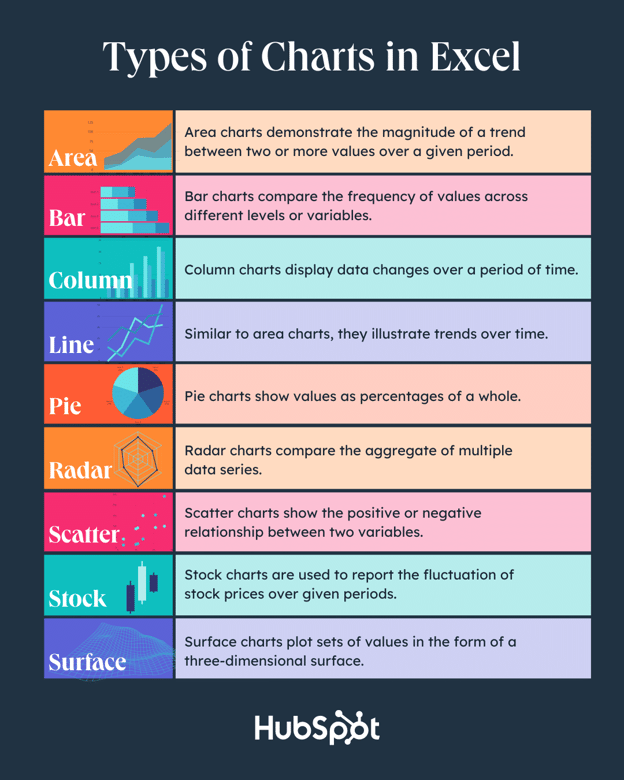
Types of Charts in Excel

You can make more than just bar or line charts in Microsoft Excel, and when you understand the uses for each, you can draw more insightful information for your or your team’s projects.

Type of Chart

Use

Area

Area charts demonstrate the magnitude of a trend between two or more values over a given period.

Bar

Bar charts compare the frequency of values across different levels or variables.

Column

Column charts display data changes or a period of time.

Line

Similar to bar charts, they illustrate trends over time.

Pie

Pie charts show values as percentages of a whole.

Radar

Radar charts compare the aggregate of multiple data series.

Scatter

Scatter charts show the positive or negative relationship between two variables.

Stock

Stock charts are used to report the fluctuation of stock prices over given periods.

Surface

Surface charts plot sets of values in the form of a three-dimensional surface.

The steps you need to build a chart or graph in Excel are simple, and here’s a quick walkthrough on how to make them.

Keep in mind there are many different versions of Excel, so what you see in the video above might not always match up exactly with what you’ll see in your version. In the video, I used Excel 2021 version 16.49 for Mac OS X.

To get the most updated instructions, I encourage you to follow the written instructions below (or download them as PDFs). Most of the buttons and functions you’ll see and read are very similar across all versions of Excel.

Download Demo Data | Download Instructions (Mac) | Download Instructions (PC)

1. Enter your data into Excel.

First, you need to input your data into Excel. You might have exported the data from elsewhere, like a piece of marketing software or a survey tool. Or maybe you’re inputting it manually.

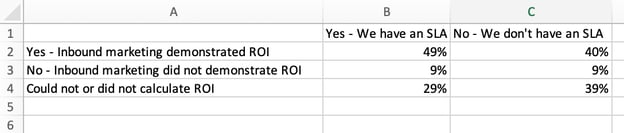
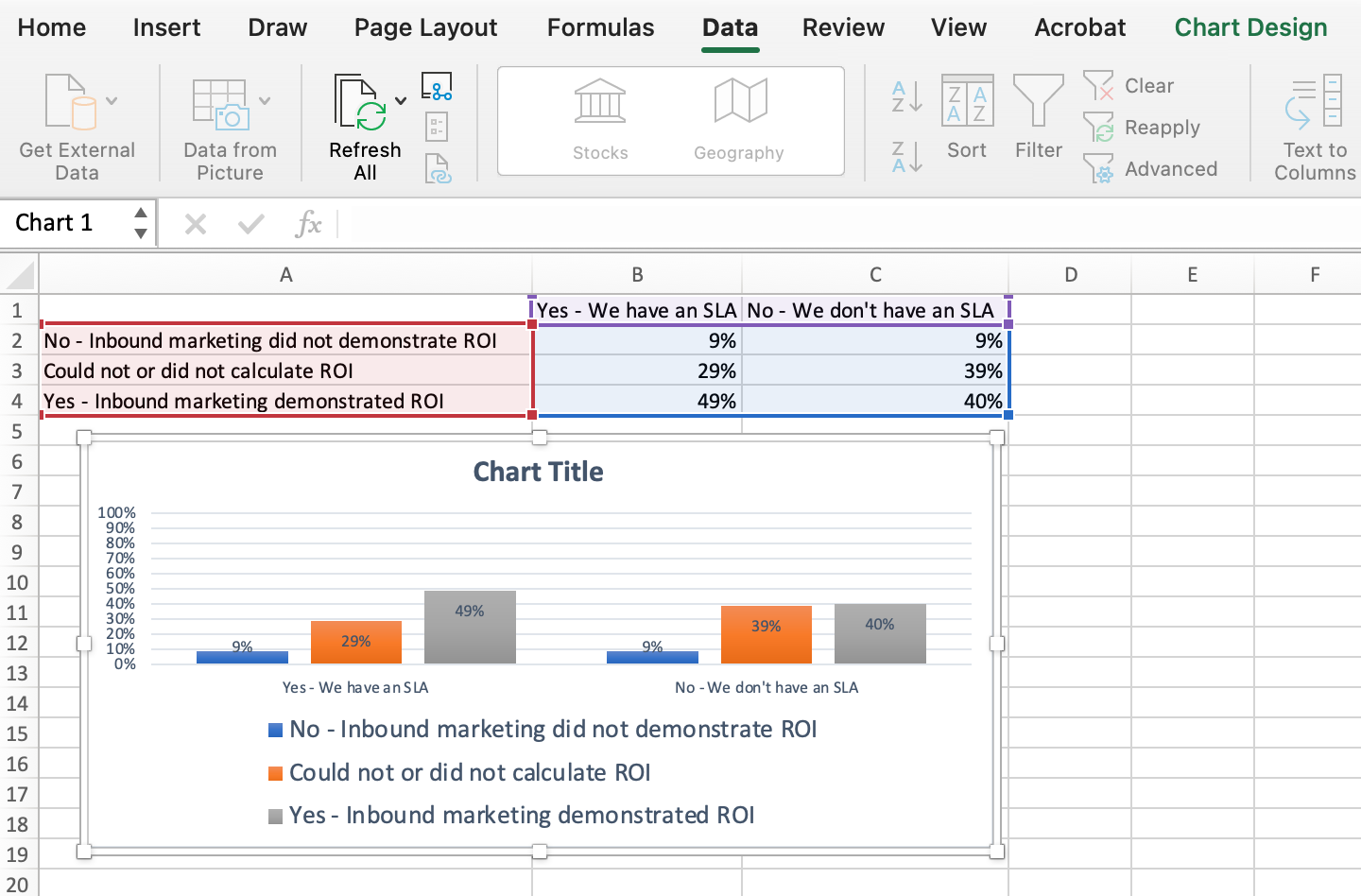
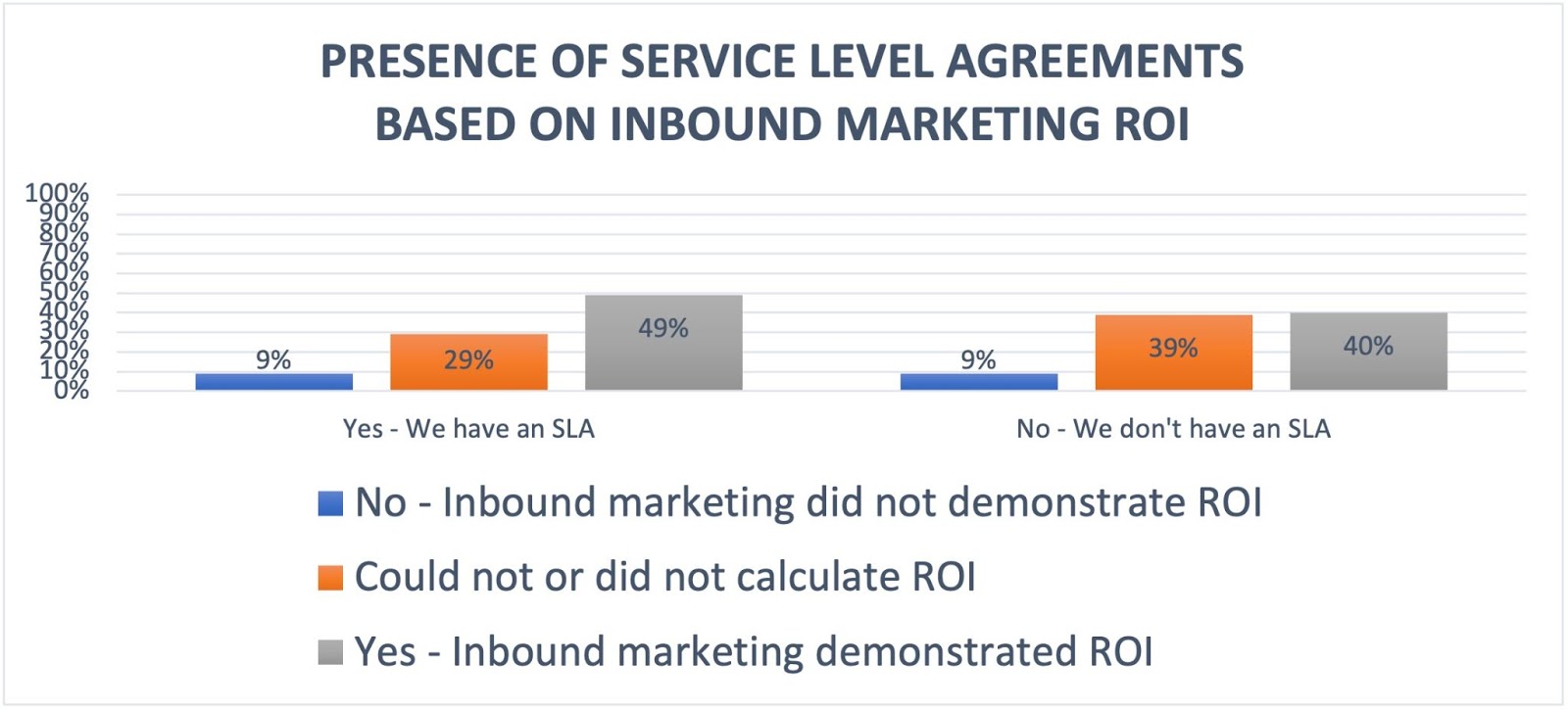
In the example below, in Column A, I have a list of responses to the question, “Did inbound marketing demonstrate ROI?”, and in Columns B, C, and D, I have the responses to the question, “Does your company have a formal sales-marketing agreement?” For example, Column C, Row 2 illustrates that 49% of people with a service level agreement (SLA) also say that inbound marketing demonstrated ROI.

How to enter data into an excel spreadsheet

2. Choose from the graph and chart options.

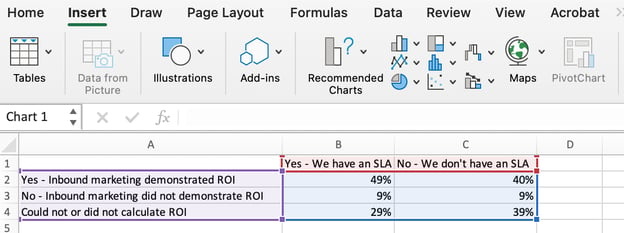
In Excel, your options for charts and graphs include column (or bar) graphs, line graphs, pie graphs, scatter plots, and more. See how Excel identifies each one in the top navigation bar, as depicted below:

The types of graphs and charts in excel

To find the chart and graph options, select Insert.

(For help figuring out which type of chart/graph is best for visualizing your data, check out our free ebook, How to Use Data Visualization to Win Over Your Audience.)

3. Highlight your data and insert your desired graph into the spreadsheet.

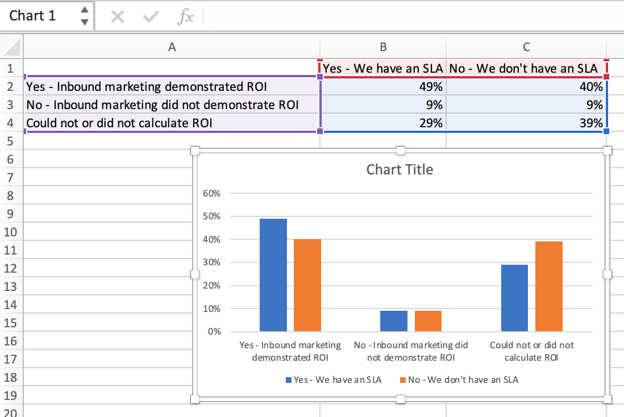
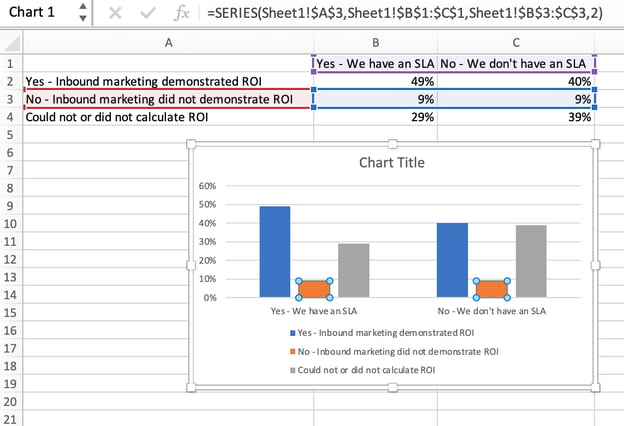
In this example, a bar graph presents the data visually. To make a bar graph, highlight the data and include the titles of the X and Y-axis. Then, go to the Insert tab and click the column icon in the charts section. Choose the graph you wish from the dropdown window that appears.

How to highlight your data and insert your desired graph into the spreadsheet

I picked the first two dimensional column option because I prefer the flat bar graphic over the three dimensional look. See the resulting bar graph below.

A 2-dimensional chart of data in an excel spreadsheet

4. Switch the data on each axis, if necessary.

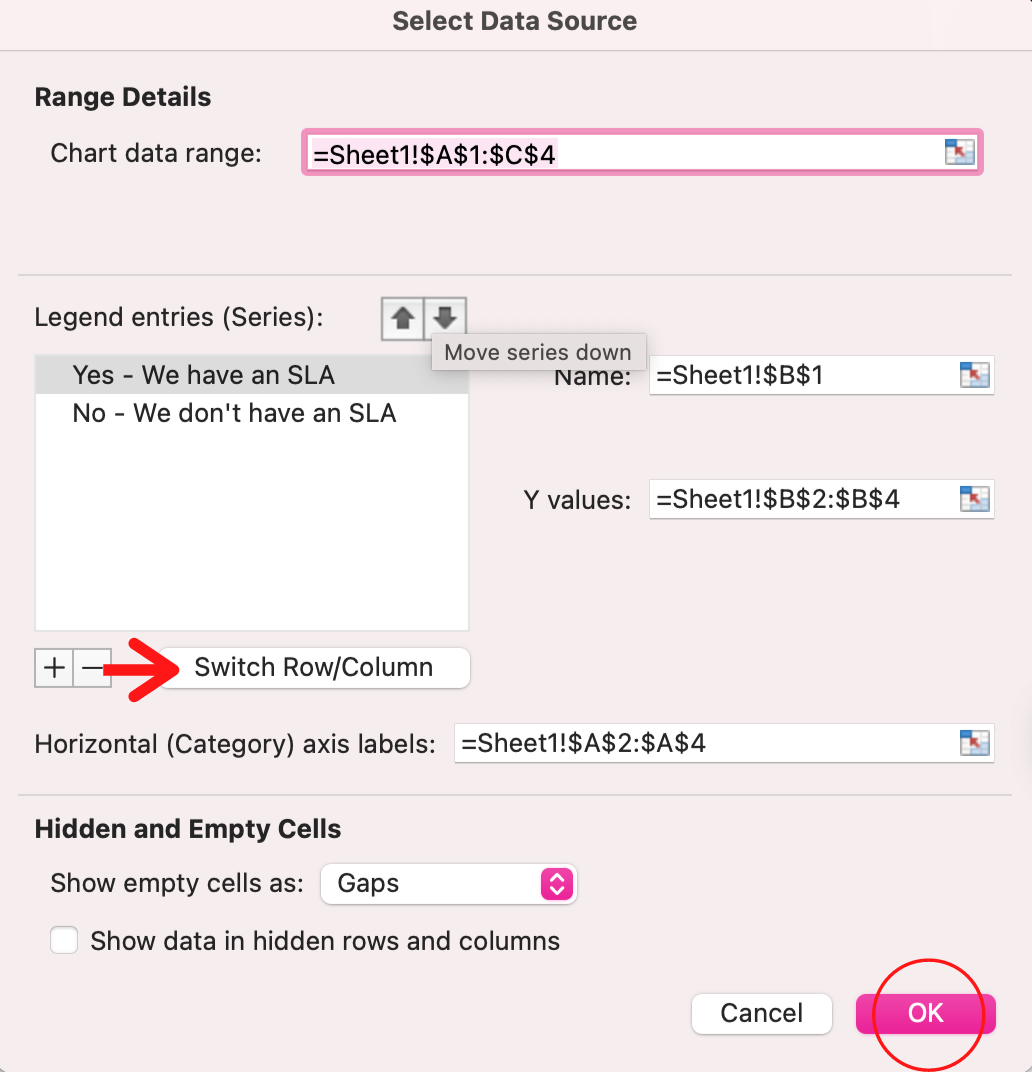
If you want to switch what appears on the X and Y axis, right-click on the bar graph, click Select Data, and click Switch Row/Column. This will rearrange which axes carry which pieces of data in the list shown below. When finished, click OK at the bottom.

how to make an excel graph steps: switch the data if necessary

The resulting graph would look like this:

A chart with swapped data on the x and y-axis

5. Adjust your data’s layout and colors.

To change the labeling layout and legend, click on the bar graph, then click the Chart Design tab. Here, you can choose which layout you prefer for the chart title, axis titles, and legend. In my example below, I clicked on the option that displayed softer bar colors and legends below the chart.

how to make an excel graph steps: adjust your data's layout and colors

To further format the legend, click on it to reveal the Format Legend Entry sidebar, as shown below. Here, you can change the fill color of the legend, which will change the color of the columns themselves. To format other parts of your chart, click on them individually to reveal a corresponding Format window.

How to use the format legend entry tool to format the legend of an excel chart or graph

6. Change the size of your chart’s legend and axis labels.

When you first make a graph in Excel, the size of your axis and legend labels might be small, depending on the graph or chart you choose (bar, pie, line, etc.) Once you’ve created your chart, you’ll want to beef up those labels so they’re legible.

To increase the size of your graph’s labels, click on them individually and, instead of revealing a new Format window, click back into the Home tab in the top navigation bar of Excel. Then, use the font type and size dropdown fields to expand or shrink your chart’s legend and axis labels to your liking.

how to make an excel graph steps: change the size of your chart's legend

7. Change the Y-axis measurement options if desired.

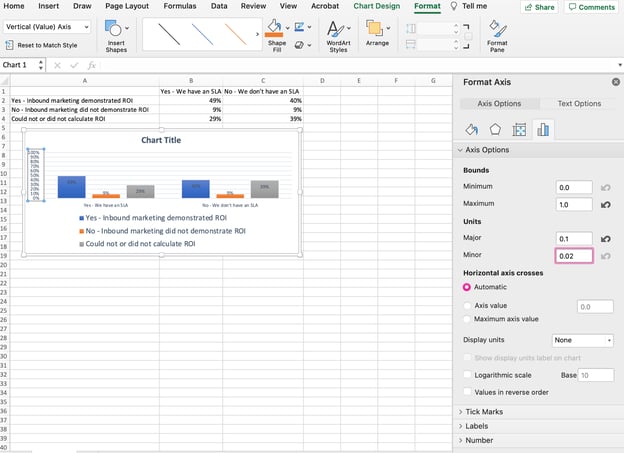
To change the type of measurement shown on the Y axis, click on the Y-axis percentages in your chart to reveal the Format Axis window. Here, you can decide if you want to display units located on the Axis Options tab, or if you want to change whether the Y-axis shows percentages to two decimal places or no decimal places.

how to make an excel graph steps: change the y axis measurement options

Because my graph automatically sets the Y axis’s maximum percentage to 60%, you might want to change it manually to 100% to represent my data on a universal scale. To do so, you can select the Maximum option — two fields down under Bounds in the Format Axis window — and change the value from 0.6 to one.

The resulting graph will look like the one below (In this example, the font size of the Y-axis has been increased via the Home tab so that you can see the difference):

How to change the Y-axis measurements in an excel spreadsheet in the minor field

8. Reorder your data, if desired.

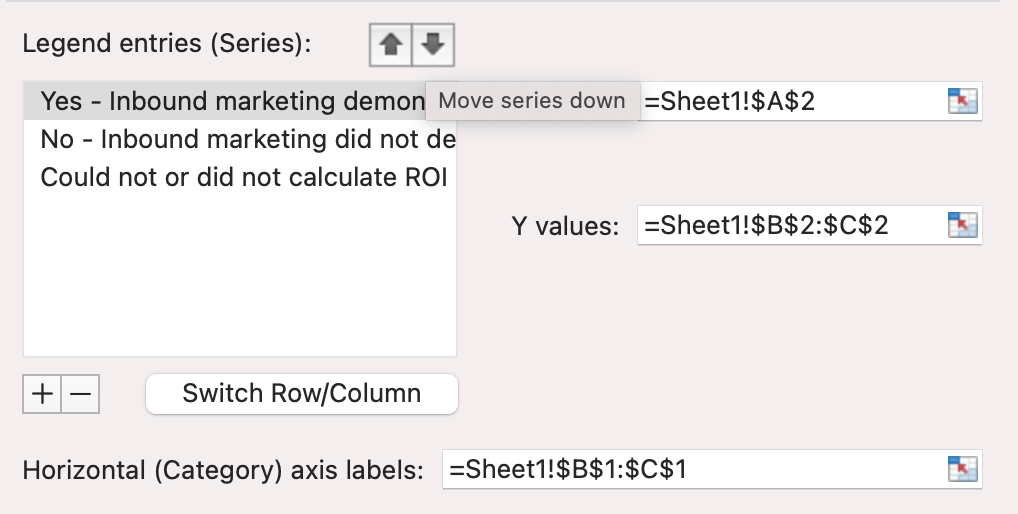
To sort the data so the respondents’ answers appear in reverse order, right-click on your graph and click Select Data to reveal the same options window you called up in Step 3 above. This time, arrow up and down to reverse the order of your data on the chart.

how to make an excel graph steps: reorder your data

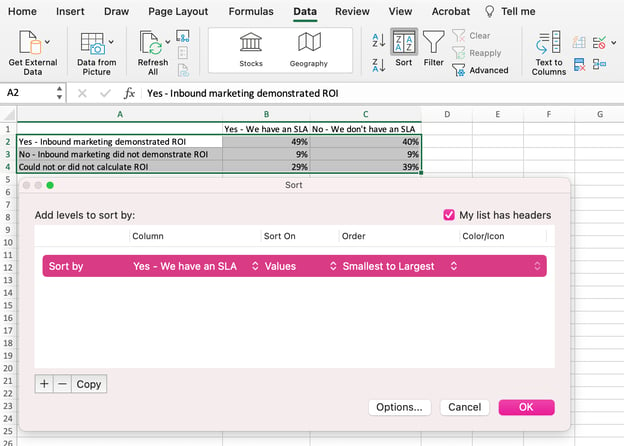
If you have more than two lines of data to adjust, you can also rearrange them in ascending or descending order. To do this, highlight all of your data in the cells above your chart, click Data and select Sort, as shown below. Depending on your preference, you can choose to sort based on smallest to largest, or vice versa.

How to reorder data from smallest to largest for a chart or graph in an excel spreadsheet

The resulting graph would look like this:

how to make an excel graph steps: reordered data

9. Title your graph.

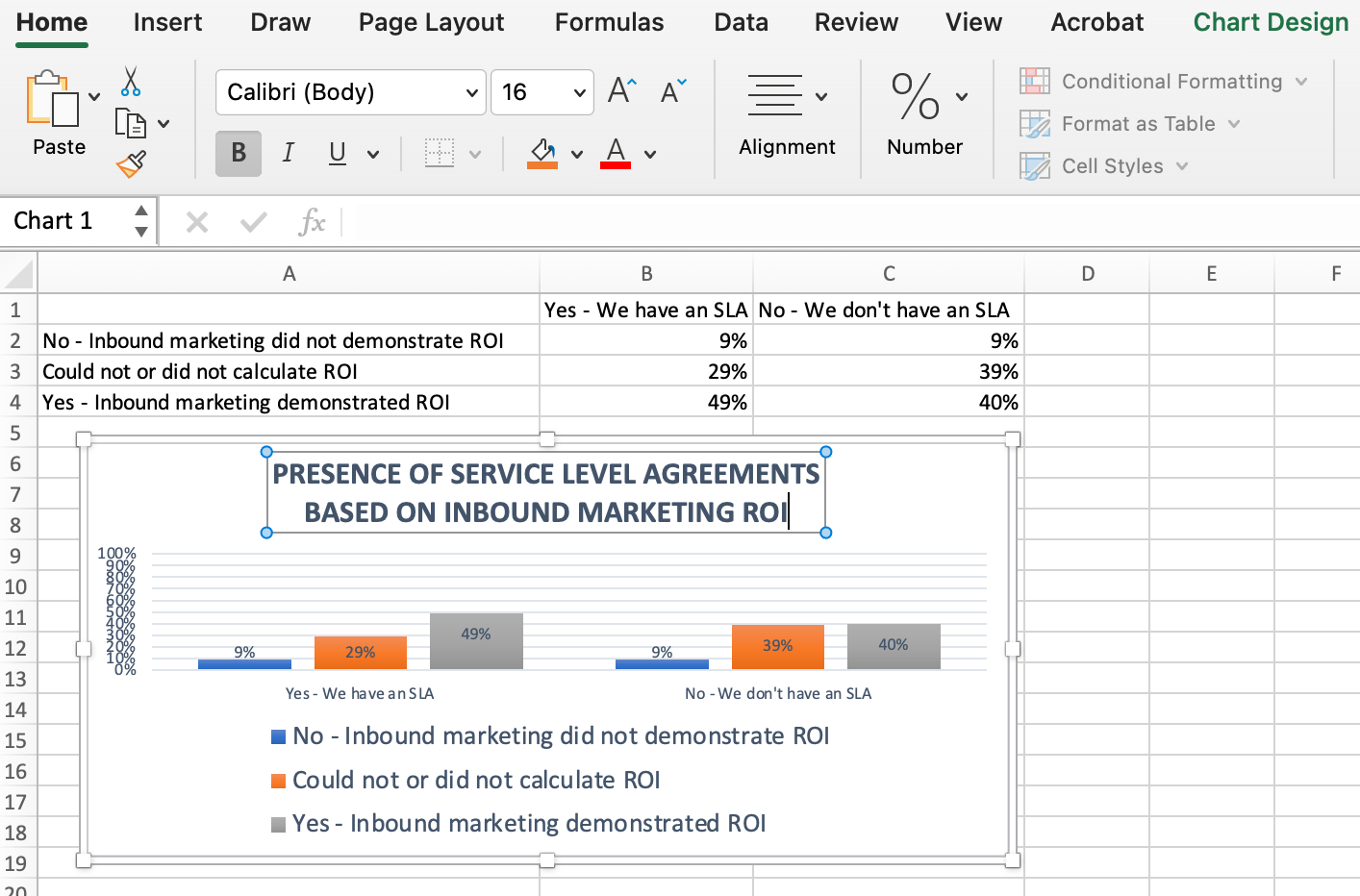
Now comes the fun and easy part: naming your graph. By now, you might have already figured out how to do this. Here’s a simple clarifier.

Right after making your chart, the title that appears will likely be “Chart Title,” or something similar depending on the version of Excel you’re using. To change this label, click on “Chart Title” to reveal a typing cursor. You can then freely customize your chart’s title.

When you have a title you like, click Home on the top navigation bar, and use the font formatting options to give your title the emphasis it deserves. See these options and my final graph below:

how to make an excel graph steps: title your graph or chart

10. Export your graph or chart.

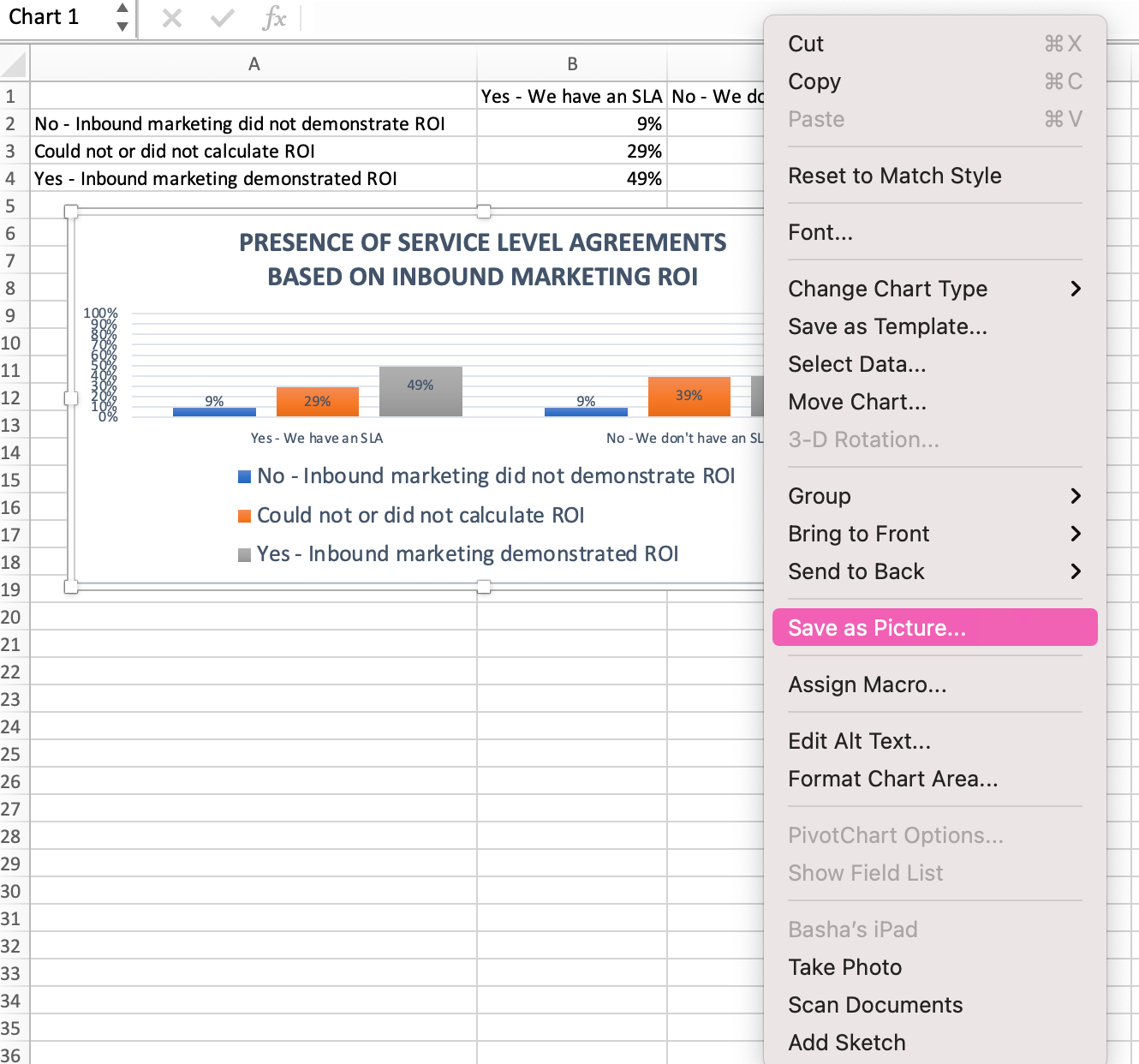
Once your chart or graph is exactly the way you want it, you can save it as an image without screenshotting it in the spreadsheet. This method will give you a clean image of your chart that can be inserted into a PowerPoint presentation, Canva document, or any other visual template.

To save your Excel graph as a photo, right-click on the graph and select Save as Picture.

how to make an excel graph steps: export your graph or chart

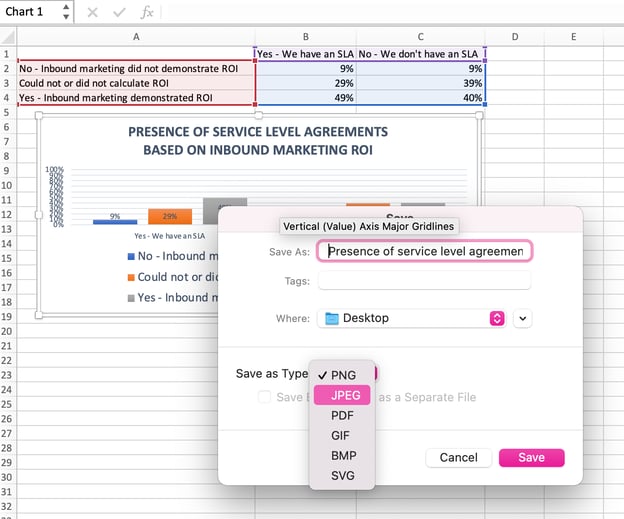
In the dialogue box, name the photo of your graph, choose where to save it on your computer, and choose the file type you’d like to save it as. In this example, it’s saved as a JPEG to a desktop folder. Finally, click Save.

How to name a graph or chart in excel using the dialogue box

You’ll have a clear photo of your graph or chart that you can add to any visual design.

how to make an excel graph steps: add any additional visual design enhancements to finish

Visualize Data Like A Pro

That was pretty easy, right? With this step-by-step tutorial, you’ll be able to quickly create charts and graphs that visualize the most complicated data. Try using this same tutorial with different graph types like a pie chart or line graph to see what format tells the story of your data best.

Editor’s note: This post was originally published in June 2018 and has been updated for comprehensiveness.

excel graph templates

Categories B2B

9 Great Ways to Use Data in Content Creation

Creating content that works requires you to make informed decisions as opposed to relying on guesswork or throwing spaghetti at the wall to see what sticks.

To make these informed decisions, you need to focus on data-driven marketing and how it can help you collect, analyze, and apply data to your content.Download Now: The State of Media & Content Planning in 2022 [Free Data Report]

If you’re running out of blog ideas and unsure how to use data in your content, keep reading to learn the best ways to use data before, during, and after the content creation process.

How to Use Data in Content Creation

Let’s consider how to use data properly at different stages of the content creation process: before, during, and after.

1. Using Data Before Content Creation

Just as no one sets out to build a house without first calculating the cost, so too should marketers not create content without looking at what the data says first.

Insights from data can help you know what type of content to create, who to create it for, and the best format to present such content.

Here are some specific ways to use data before you start creating.

Conduct Keyword ResearchHow to Use Data in Content Creation: conduct keyword research

Before creating any piece of content, the first step is to know the topics you want to talk about or the keywords you want to target.

Since one of the primary goals of content creation is to engage with an audience, it’s crucial to uncover the queries they’re searching for online. Keyword research is how you get valuable insights (data) into these queries.

While conducting keyword research, it’s crucial to analyze the intent behind a search — whether it’s informational, navigational, transactional, or something else.

Some of the best tools you can use for keyword research include HubSpot’s SEO Marketing Software, Arel=”noopener” target=”_blank” hrefs, SemRush, etc.

Identify Your AudienceHow to Use Data in Content Creation: Identify your audience

Imagine making the best steaks in town but then trying to sell them to a vegan audience – surely you won’t make any sales. Similarly, even your best pieces of content can have mediocre results if you don’t put them in front of the right people.

Data can help you identify the right people.

Using data, you can remove assumptions about your audience and who reads your content.

Data can tell you things about your target audience, like their age range, interests, emotional triggers, and social media platform where they hang out.

You can use Google Analytics, customer surveys, or some other social media analytics tool to uncover data insights about your audience.

Choose the Right Content FormatHow to Use Data in Content Creation: choose the right content format

After uncovering who your audience is and what they search for online, you can also use data to discover their most preferred content format.

Do they want to read a blog post? Twitter thread? Or see video content like TikTok videos? Instagram Reels?

What the data shows will determine where to spend most of your content creation efforts to generate the highest return on investment.

BuzzSumo and Sparktoro are excellent examples of tools you can use to find the right content format your target audience loves.

2. Using Data During Content Creation

Let’s now consider how to use data while creating content.

Data can breathe life and new significance into your posts when leveraged well. This doesn’t mean threading spreadsheets directly into your posts. Instead, you should think about how to responsibly frame the data in a way that will advance your narrative.

By putting data into context and using it to strengthen your point, you can give readers a post that will stay with them long after they’ve left the page. Here are a few narrative techniques to consider when using data in your posts.

Demonstrate Change

There is no more powerful narrative technique than using data to demonstrate change over time.

In the example below, The Zebra uses data and maps to demonstrate the changing cost of car insurance in the United States over the last few years.

The darker areas on the map indicate areas with the highest car insurance rates.

How to Use Data in Content Creation: demonstrate change using a map

You can see the cost changes over time as you click the slider button.

Why It Works

Showing a striking change trend (whether it be deterioration or dramatic improvement) not only brings weight to the discussion but can also evoke an emotional response from your readers.

Show Discrepancy

Isolated on its own, data can fall flat. But put a set of data into context to highlight discrepancies, and you have a strong narrative.

In the example below, The Atlantic highlights the discrepancy between the many COVID predictions (and other economic issues) and the reality.

How to Use Data in Content Creation: The Atlantic showing discrepancy in dataWhy It Works

By showing discrepancies between perception and reality or between two sets of data, you can highlight gaps that lead to clear calls to action.

Show Connection or Correlation

In this article, the British Heart Foundation (BHF) used data to show the correlation between watching TV and the risk of having coronary heart disease. Although the original data is from a third source, BHF does well to show the effect of a sedentary lifestyle.

Note: When showing the correlation between two things, be careful that you don’t imply causation. Be clear that you’re only showing that two things are connected somehow, not that one directly leads to the other.

How to Use Data in Content Creation: BHF showing connection and correlation between TV and heart disease

Why It Works

Using data to show the connection between two or more different things helps readers make better decisions concerning future actions.

Give Scale

Another excellent way to use data in content creation is to demonstrate scale.

In this chart, New York Post uses a visual representation of data to demonstrate the scale of the tallest buildings in the world.

How to Use Data in Content Creation: New York post showing the scale of tallest buildings in the world

Why It Works

Scale can help you add context to your posts. What data do you have that can lend itself to this type of visualization? For example, did you serve more customers last year than the average number of attendees at a Red Sox game? How can you show the scope of your impact?

3. Using Data After Content Creation

You’ve seen how data can work before and during content creation. Let’s now consider how you can still use data even after you’ve hit publish on your post.

Optimize Published Content

One excellent way to use data “post-content creation” is to find opportunities for content refreshing.

Data from a tool like Google Analytics and Google Search Console can show you content that has been consistently losing traffic over time, allowing you to identify content needing an update or refresh.

You can also run a content audit to identify the best performers from the existing content that can be leveraged or repurposed for other marketing channels.

Analyze Audience Engagement

There are a ton of metrics you can track after publishing a piece of content to see how your audience interacts or engages with said content.

For instance, you can use Google Analytics to check how long readers stay on specific pieces. You can also use other tools to track your audience’s interaction in terms of clicks and cursor movements on a webpage.

Final Thoughts

There you have it — nine simple but effective ways to use data in different phases of your content creation process.

Even if you’ve never used data in your process before, the strategies mentioned in this article are easy to follow, and there are many tools you can use to make data work for you.

Editor’s note: This post was originally published in September 2011 and has been updated for comprehensiveness.
content planning in 2022

Categories B2B

The Age of the Connected Customer

Growing a business has never been easy. But these days, it feels impossible.

Companies are trying to predict growth in an unpredictable macro environment. The economy is down, the market is volatile, socio-political issues are raging, and the dust is still settling on hybrid work. Every week, there’s a new twist or turn.

In case navigating all this uncertainty isn’t hard enough, companies are dealing with another major shift. Over the past year, the strategies that businesses rely on to attract, engage, and delight customers have started to break. It’s harder to generate demand, drive leads, reach prospects, and meet customers’ high expectations. At the height of the pandemic, many businesses thrived in a digital-first world, but now that momentum is slowing and it’s harder than ever to connect with customers.

The flywheel feels frozen. But why?

This question keeps me up at night. Helping organizations grow better is our mission at HubSpot. We’re passionate about helping scaling companies get ahead and navigate periods of uncertainty. That’s why we went on a listening tour to understand what’s standing in the way of our customers’ growth, and how we can help solve it.

Across hundreds of conversations with customers, there was one word that kept coming up: disconnected. We discovered that companies are in a crisis of disconnection today, caused by three major disconnects. They’re struggling with disconnected systems, disconnected people, and disconnected customers. I want to share what we’ve learned about each disconnect, and how we believe companies can solve this crisis.

Systems Are Disconnected

The first theme we heard loud and clear is that companies are struggling with disconnected systems. This has always been a problem, but it’s gotten worse over the past few years. We recently ran a pulse survey to understand the biggest challenges businesses are facing, and the number one pain point was disconnected systems (HubSpot Market Research, 2022).

It makes sense when you think about it. During the pandemic, companies shifted to fully-digital overnight and there was a frenzy of buying point solutions. They bought a tool for every task, every team, and every department. As a result, the average scaling company has 242 SaaS tools today. The problem isn’t that companies have a lot of tools, though — it’s that too few are connected. Each has its own data and processes but there’s no one place tying it all together.

As a result, companies are spending more time connecting data than connecting with their customers. They have to spend hours cleaning data and trying to cobble insights together from different systems. What’s worse is that their go-to-market teams don’t have a unified view of the customer’s journey, so they’re working in silos and their customer experience is suffering.

It’s a total mess.

That’s why, when it comes to growth, it’s time to accept that disconnected point solutions are not the solution.

People Are Disconnected

The second disconnect is that people have become more disconnected from each other. From quarantining, to social distancing, to working remotely, isolation has become part of our daily lives. The problem is, we’re human. We rely on each other for support and connection.

When I need advice at work, do you know what I do first? I lean on my peers. I reach out to a mentor, a co-worker, or my network for support. But it’s become harder to tap into one another; we aren’t bumping into each other at the office or meeting up at networking events like we used to.

In fact, 45% of workers say that the number of people they interact with at work decreased, and 57% of people say that they engage in fewer social activities these days. No wonder Peloton became so popular during the pandemic. For me, it wasn’t just about exercise, it was about being part of a community.

And I know I’m not alone. When I talk to our customers, I hear the same theme loud and clear: They crave community. They want to build deeper relationships with their co-workers, their customers, and their network, but it’s not as easy as it once was.

Companies Are Disconnected from Customers

The third and final disconnect is that companies are more disconnected from their customers than ever. They’re writing blogs at a frenzied pace but still can’t drive traffic. They’re emailing prospects but can’t get a response. The channels and strategies that used to work for companies now seem to be working against them. So, what changed?

We dug into this and found that there are two major shifts happening. The first is that people are digitally drained. From our social feeds, to our inboxes, to our text messages, we are bombarded at every turn. As a result, buyers aren’t engaging with companies like they used to, and you can see it in the data.

In 2020, 65% of Google searches ended without a click, and the average blog shrunk by -1.64% in 2021. According to HubSpot data, sales email response rates have plummeted by 40% compared to pre-pandemic rates. The channels companies have relied on to attract and engage customers are now overly saturated, pushing people out and ad costs up.

The second change is that we are now living in a privacy-first world. People are more protective of their data than ever. Apple’s recent ad campaign is a great example of this shift; they’re positioning privacy as the iPhone’s core value proposition. When one of the most valuable companies on the planet comes out that strongly on a value, we should all take notice. What this means for businesses is that the cookies, tracking, and consent they’ve depended on are now being cut off in a privacy-first world.

Buyers today are digitally drained and distrusting of companies with their data. Both of these shifts lead to companies being more disconnected from their customers than ever. And that’s exactly what I hear from our customers. They’re struggling to cut through the noise, to reach prospects, and to build relationships with customers the same way they used to. They’re coming to terms with a hard truth which is that old go-to-market strategies won’t work in this new world.

Based on our research and conversations with customers, these three disconnects are clear. Systems are disconnected. People are disconnected. Companies and customers are disconnected.

This all leads to a crisis of disconnection.

Companies are struggling with unprecedented disconnection from their customers and each other, compounded by disconnected systems. They’re grasping for growth. Their revenue is unpredictable. Their flywheel is stalled. Their teams are burnt out.

That’s why it’s time to evolve. Companies can’t continue relying on broken data, broken processes, and broken strategies. The only way to solve this crisis is to adapt and find new ways to grow in the Age of the Connected Customer.

Introducing the Age of the Connected Customer

For years, companies have relied on legacy CRMs to ‘manage’ their customer relationships. But that won’t cut it in this new world. We believe the companies that will win in the future are the ones that focus on customer connection, not customer management. That means you need more than data, you need context. You need more than leads, you need connection. You need more than contacts, you need community.

You need a connected customer growth strategy. Connected customer growth is about optimizing every stage of your customer’s journey to boost connection. It’s about evolving your Attract, Engage, and Delight strategies to provide more value and relevance. You can start by asking yourself questions like: What 20% of content creates 80% of value for our customers? How can I use data to bring more context to my customer conversations? How can I make it easier for customers to buy? These types of questions will help you identify easy ways to optimize your flywheel for customer connection.

But evolving your strategy alone isn’t enough. You need the right technology to make connection possible — connection with your data, your teams, and your community. That’s why we’re bringing three powerful parts of HubSpot’s solution together:

  • Connected Applications: Our Hubs — Marketing, Sales, Service, CMS, and Operations — are designed to connect your entire front-office. They give go-to-market teams a single, unified view of the customer journey.
  • Connected Platform: Our CRM platform powers the Hubs with connected data — including commerce data — and extensibility. The platform is customizable and has over 1,100 app integration partners to give companies flexibility at scale.
  • Connected Community: Companies need more than software to grow, so we’re bringing together educational content through our Academy, as well as assets and expertise through our partner networks.

The combination of all three is our connected customer platform. To learn more about what we’re building at HubSpot and some exciting new features to help boost connection, visit hubspot.com/new.

You can expect to learn much more from us over the next year on how to put customer connection into action, optimize your strategies, and how HubSpot’s platform is evolving to connect data, strategies, and people. As we step into the Age of the Connected Customer, I am confident that scaling companies can emerge stronger from this crisis.

And we’re here to help you grow better, connected.

Categories B2B

Instagram Cancels Plans for TikTok-Like Full-Screen Video Feed: What Brands Can Learn

Gone almost as fast as it was introduced — Instagram’s full-screen video feed proposal has been retired.

Earlier this summer, Instagram revealed plans to test out a new full-screen mode for its feed and an updated navigation bar, hoping to make content on the platform more immersive than its signature, scrollable picture feed.

New Data: Instagram Engagement Report [2022 Version]

This decision was congruent with the company’s stated goal of making its competition with TikTok a major priority, as the appeal of TikTok lies within its fullscreen randomized video feed, intuitive algorithm, and easy to navigate UX.

Instagram's plans for TikTok-like full screen video feed example

Image Source

To rival their competitor in the form of mimicry entailed putting more reels and suggested content into the feeds of Instagram users, and to put more an emphasis on video content as opposed to stills.

Michael Sayman, a former software engineer with experience working in Facebook, Google and Twitter says, “Everyone’s eyes are glued to TikTok and the way it works right now,” in regard to the way it’s won over younger age demographics.

Instagram knew their target demographic was primarily Millennials; roughly 31% of global Instagram audiences were aged between 25 and 34 years.

TikTok, on the other hand, has amassed a massive following of Gen X and Gen Z; 25% aged between 10 to 19 years, and 22% to users aged between 20 and 29. Instagram wanted to tap into the success garnered from younger audiences as TikTok grew exponentially in 2021, generating $4.6 billion, a 142% increase year-on-year.

Why did Instagram walk back its plans?

Any social media marketer can tell you that a successful brand needs to be adaptable and reflect changes in user behavior, but this constant need for innovation can be met with huge success, or a PR blunder. Instagram experienced the latter.

Outcry of dismay came from viral infographics in the Instagram app and seeped out into competitor platforms from users upset at the announcement.

The most viral calls for Instagram to cancel its plans were in the form of a Change.org petition titled, “MAKE INSTAGRAM INSTAGRAM AGAIN.” That was even endorsed by the likes of celebrities such as Kylie Jenner who’ve amassed over 300 million followers on the platform.

make instagram instagram again change.org petition

Image Source

I can only imagine the panic that Instagram’s marketing team had gone through after the announcement as a marketer myself, but I can see why it played out the way it did. There were many factors that could have led to this eruption of emotion at the company’s announcement.

Why Instagrammers Don’t Want the Full Screen

Social media users don’t necessarily dislike viewing fullscreen content. If that was the case then TikTok wouldn’t have amounted to over one billion monthly active users.

What really makes people dislike the full-screen UX change is that it takes away what they enjoy most from the app — its originality and the nostalgia its user base loves is something that they don’t want to fade away.

Instagram’s current feed draws in consumers differently from competitors because it’s:

  • More intimate and than fleeting or short tweets on Twitter
  • A “cooler” social space to connect with friends, family and creators than Facebook
  • More diverse active users with longer-lasting content than Snapchat
  • Isn’t exclusionary like Clubhouse

The further it strays from its original mission and vision, especially with previous editions like shopping features and reels, the less users will actually derive value or emotional attachment to the platform they know and love.

What Brands Can Learn

The fact that Instagram learned from its mistake and rolled back its planned feed changes is a teachable moment for marketers and brands looking to avoid this type of uproar.

1. Run major UX changes by your audiences.

Your biggest asset as a social media channel is your users. They’re the ones that drive your relevance, produce content that reel in more sign-ups, and make your platform worth visiting — so why would you exclude them from the conversation?

Your audience knows and uses your platform on a daily basis, so when you prepare soft-launch UX changes, let them know. Notify your audience of what’s to come and give them the ability to chime in, this is known as social listening and has the potential to increase your company’s longevity if you can keep them satisfied.

2. Understand what your audience wants from you.

One of the most prevalent complaints I’ve seen through the past few years on social media channels like Twitter, TikTok, and Instagram is that the new updates in UX/UI are usually never the ones users are actively asking for.

Coming from my own experience online, I’ve found that the most common gripes social media users have shared is their disinterest in changes that no one’s really asked for.

For years, the two most talked about demands have been for Instagram to:

  • Prioritize chronological timelines over suggested feed
  • Revert the algorithm to prioritize photos

And while not every request is feasible, or necessarily in the vision of the brand’s future, understanding the want and needs of the people using your product or service is necessary for continued growth and improvement.

3. Identify where to innovate rather than compete.

Brands have to learn how to do more than just mimic to establish market dominance, and that can manifest from refocusing on innovation.

Re-centering strategy on more in-depth market research and exploring ideas that haven’t already been done can be a challenge, especially when the dta isn’t already there to back up on its success, but it’s worth trying if you invest the time and effort to figure out what’ll take the digital world by storm.

4. Learn when and how to pivot.

Effective and organized change management is an important part of any growing or evolving company.

As marketers, our job is to make the brand image shine with each and every addition, change or innovation your brand executes. But in the case of an abandoned idea, you’ve got to work against the clock to refocus on the next best thing.

Marketing is a constant experiment with never ending variables, so prioritize on adapting with those variables as they come.

What’s Next For Instagram?

In July, Instagram Head Adam Mosseri wrote, Now, I want to be clear: We’re going to continue to support photos—it’s part of our heritage, you know, I love photos; I know a lot of you out there love photos too. That said, I need to be honest—I do believe that more and more of Instagram is going to become video over time.”

“We see this even if we change nothing. We see this even if you just look at the chronological feed,” he added. “If you look at what people share on Instagram, that’s shifting more and more to videos overtime. If you look at what people like and consume and view on Instagram, that’s also shifting more and more to video over time, even when we stop changing anything. So, we’re going to have to lean into that shift while continuing to support photos.”

From this message alone — it’s safe to say that Instagram isn’t going to shy away from change. As one of the largest social media platforms, it has a lot at stake if it becomes too stale or stagnant, but also has just as much to lose if it fails to keep its charm.

And as fast as the company was to implement and cancel TikTok-like video feed plans, it seems they’re already in the works of adding new challenge-like features against even newer competitors like BeReal.

Wherever Instagram’s headed, I hope its team takes heed from users and keeps a healthy balance between active listening and innovating.

Improve your website with effective technical SEO. Start by conducting this  audit.  

Categories B2B

How to Grow Your Podcast

Podcasts have become increasingly popular over the years for a variety of reasons. As more people work from home, listening to podcasts helps them feel like they’re a part of a discussion among friends. Podcasts are also easily accessible and can be listened to anywhere, whether you’re on a long commute or a quick jog.

As podcasts become more relevant, more seem to be published every day — so if you’re interested in starting one, you’re probably wondering how to grow your podcast audience and stand out above the rest.

Fortunately, there are many simple steps you can take to expand your podcast’s reach. From leveraging email marketing to networking with other podcasters, growing your podcast doesn’t have to be a challenge. Let’s explore several different tasks you can do to find your audience.

➝ Free Guide: How to Start a Podcast

  1. Submit your content to every podcast app and directory.
  2. Have a target audience.
  3. Add video to your podcast.
  4. Be active on social media.
  5. Network within the podcast community.
  6. Share older podcast episodes.
  7. Create a podcast trailer.
  8. Host a contest or giveaway.
  9. Set up and organize a website.
  10. Leverage email marketing.
  11. Invite guests.
  12. Become a guest yourself.
  13. Invest money in ads.
  14. Use podcast SEO.
  15. Build a marketing workflow.
  16. Include a Call-to-Action.

How to Grow Your Podcast Audience in 16 Steps

Whether you’re a new podcaster building an audience from scratch or a more established podcaster trying to expand your reach, here are some methods you should include in your marketing strategy:

1. Submit your content to every podcast app and directory.

In order to grow your audience, your podcast needs to be available wherever the listeners are. To get that kind of exposure, submit your podcast’s RSS Feed to every podcast directory you can find.

Start with platforms like Apple Podcasts, Spotify, and Google Podcasts since they are the most popular platforms — but don’t stop there. There are plenty of smaller podcast platforms listeners use every day, so you need to submit your RSS Feed to those places as well to attract as many listeners as possible.

Though submitting your podcast to all these different places might sound overwhelming, it’s actually very simple. Just open an account and submit your podcast to each show by completing a form. Once you’ve done that, your show will automatically update on each platform every time you post a new episode.

2. Have a target audience.

Creating a podcast you think everyone can enjoy may sound like a good idea, but podcasts without a niche are very difficult to market — especially if they’re brand new. Instead of trying to have mass appeal, find a clear focus for your podcast.

For example, For Colored Nerds is a weekly podcast that uses pop culture as a way to dissect different aspects of Black culture. The podcast was so successful it led to the hosts being picked up for another podcast called The Nod, which was adapted into a TV show on Quibi.

3. Add video to your podcast.

Video is still a preferred format for many consumers, so you should find ways to incorporate video into your podcast. One way to do this is to simply add a static image to your audio file so you can convert it to a video file.

Another way is to film yourself recording the podcast with your guests and co-hosts. You can also create short video clips of standout moments from your episodes. No matter what you decide, always post video content to YouTube and apps like Instagram and TikTok.

4. Be active on social media.

Attract and engage with your audience online by responding to comments on apps like Twitter, Instagram, TikTok, and Facebook. For example, Crissle West is one of the hosts of a podcast called The Read.

In between episodes she can be found on Twitter interacting with her followers, posting about her favorite artists, and answering questions about episodes. The Read also has a segment that focuses on mental health, and Crissle will sometimes post mental health advice on Twitter as well.

5. Network within the podcast community.

Join Facebook groups, Reddit forums, and other online podcaster communities to network. In these digital spaces, you can answer questions, get useful tips, contribute to discussion topics, and showcase your personality.

Another way to get involved in the podcast community is to attend conferences, exhibitions, and meetups geared towards podcasters and content creators in your niche. Networking within the community will open doors to new opportunities, help you find great guest speakers, and will help you guest on other podcasts.

6. Share older podcast episodes.

Promoting your latest episode is important, but you shouldn’t stop there. Give your older episodes a second life online by sharing older clips whenever possible.

For example, if there is a topic trending on social media that you’ve covered in an old episode, share a clip from that episode that coincides with the trending discussion. You can also make a compilation video of some of your favorite moments from past episodes and post it on YouTube.

7. Create a podcast trailer.

In the same way movie trailers can entice viewers to watch a new film, podcast trailers can entice listeners to tune in. For the trailer, avoid just using a snippet from a previous episode.

Instead, get creative and craft something that perfectly captures your podcast’s value. You can do this by compiling a montage of clips or using narration. Be sure to showcase your best moments and the biggest guests you’ve had on the show.

Once you’ve created your custom trailer, post it on all platforms — and pin the trailer to the top of your profiles so it’s the first thing potential listeners see.

8. Host a contest or giveaway.

Few people can resist the allure of free stuff, so contests and giveaways are one of the easiest ways to attract an audience to your podcast —but be aware that some people will only engage with your podcast for the chance to win something and won’t stick around after the contest or giveaway is over.

To make the contest work in your favor, have listeners leave reviews or generate buzz about your podcast for a chance to win.

For example, announce the giveaway on your show and on social media. Tell your listeners to leave reviews about your podcast on platforms like Apple Podcasts and Google Podcasts, — then you can pick a random reviewer to win. Even if that person never tunes in again after winning the prize, their favorable review will last forever.

9. Set up and organize a website.

Your listeners will likely only listen to your podcast on their favorite platforms, but having a website can still help your podcast grow its audience. A website will give potential listeners the opportunity to find your site, listen to a sample of an episode or two, and read what your podcast is about before deciding to commit to listening fully.

Make sure to use SEO to boost your website in search results. To do this, create a unique page on your website for every new episode. Then add notes and a complete transcript of your episode to the page. Use keywords in the notes, descriptions, and wherever appropriate.

10. Leverage email marketing.

Another perk to having a website is that it can collect email addresses you can send marketing content to. Add sign up boxes at the end of each blog post and to your social media profiles, or you can overlay the entire website to get your fans email addresses.

Once you have that information, you can send email notifications whenever a new episode drops or send a weekly newsletter. Don’t be afraid to get creative. For example, if you run a podcast about comic books, you can send listeners an email recommending a new Marvel film hitting theaters.

11. Invite guests.

Interview guests who are within your niche so that you can expose your content to their audience. Your guest will likely take to social media to promote their appearance on your podcast, resulting in free marketing.

You also don’t have to invite famous celebrities or high-profile influencers. Though guests with a large fanbase are valuable, anyone with a good story that fits within your topic can make your podcast stand out. Just make sure you’re prepared with good questions and a topic of discussion.

12. Become a guest yourself.

You’ve networked within the podcast community and have had guests on your platform, so why not use the connections you’ve made to become a guest yourself? If you’re not being invited organically then reach out to shows you think you can add value to.

When you do this, prepare an elevator pitch that explains who you are, what you do, and why you’d be an excellent guest. And once you’re a guest, don’t forget to promote your podcast, social media, and website.

13. Invest money in ads.

The strategies I’ve listed all have the potential to grow your channel over time, but if you want quicker results you should also leverage paid advertising. For example, you can purchase ad space on another podcast that is similar to yours.

If you go this route, purchase space on about four episodes to get enough exposure. You can also purchase Google and Facebook Ads to boost visibility.

14. Use podcast SEO.

I mentioned using SEO for your podcast’s website, but podcast SEO is just as important. Since podcasts are an audio medium, there aren’t a whole lot of SEO opportunities — but there are still a few to take advantage of.

Include the names of any guests, topics, or events in your episode that can grab listeners’ attention when they’re searching podcast directories. You should also include words and phrases in your description and headlines that listeners would type into search engines.

15. Build a marketing workflow.

Create a checklist to follow each time you publish a new episode. This will help you stay consistent in your marketing efforts and ensure every episode is getting the same chance to flourish online.

Over time, you can refine your marketing flow as you figure out what works and what doesn’t. Here are some tasks to include in your workflow:

  • Craft promotional posts, graphics, and videos for TikTok, Twitter, Instagram, and Facebook.
  • Deliver media kits with social media posts and copy to guests so they can easily promote the episode.
  • Publish a blog post to the website with the episode’s description and transcription.
  • Add the latest episode to your email signature.

16. Include a Call-to-Action.

At some point in every podcast episode you need to include a call to action. A CTA is a request for listeners to do something. Most podcasts typically have them at the beginning and end of each episode. Your CTA should be attention-grabbing but also short and simple. Here are a few examples:

  • “Remember to follow [Podcast Name] on Instagram, Twitter, and TikTok for the latest news regarding episodes and contests.”
  • “Make sure to hit the subscribe button if you haven’t already so you’ll never miss an episode.”
  • “Visit our website so you can subscribe to our newsletter and get the latest updates on our show straight to your email.”

Once again, always include a CTA in every podcast episode, in fact — make it a part of your marketing workflow.

It seems like a new podcast is airing every day, but these tips will help your podcast stand apart from the competition. Now that you know what you need to do, you’re ready to start promoting your podcast and growing your audience.

New Call-to-action

Categories B2B

10 Ways to Monetize a Podcast (+ Examples)

82% of marketers planned to continue investing the same amount or increase their investments in podcasts and other audio content for 2022.

This means that all marketers, from those just getting started to those with established shows, are likely looking for ways to monetize their content. In this post, we’ll cover 10 strategies that will help you monetize your podcasts and achieve high ROI.

➝ Free Guide: How to Start a Podcast

How to Monetize a Podcast

1. Find sponsorship deals.

Finding sponsorship deals involves finding brands or businesses that want to take advantage of your listenership and giving them space and time to run an ad on your show. Costs depend on the advertiser and your show statistics, but the average cost is $10 to $50 CPM (cost per thousand impressions), and higher prices go to shows with higher listenership.

Dax Shepherd, the host of Armchair Expert, uses this strategy and features ads from sponsors in his show. Some ads are host-read, meaning Shepherd reads them himself, and others are advertiser made. The podcast snippet below is an ad from a recent episode.


You can also sell advertising space to other podcasts.

2. Become a sponsor for another podcast.

Becoming a sponsor for another show is the same as finding sponsorship deals, except you’re promoting another show rather than a brand or business. You can record these promotions yourself, or the podcast can submit its own pre-recorded ad.

3. Join an advertising network.

Joining an advertising network helps you monetize your podcast as you would with finding sponsorships, but the network does the work for you as it helps you find sponsors in exchange for a cut of your ad revenue.

4. Sell show merchandise.

Listeners that love your show are probably interested in buying merchandise related to your show, like t-shirts, stickers, and other novelty items. Doing this is a great way to monetize your podcast with merch sales and give your listeners an additional way to connect with you and your show.

The CEO School podcast, hosted by Suneera Madhani, sells show merch, from candles to planners to mystery boxes.

how to monetize a podcast: sell merch

Image Source 

5. Offer premium paid content.

If you have an established audience, chances are that many are willing to pay for additional opportunities to hear from you. As such, a great way to monetize your podcasts is by offering exclusive premium content that requires payment to access.

Some ways to leverage this strategy are to sell access to exclusive Q&Q episodes, ad-free episodes, extended cuts, exclusive interviews, or even early access to scheduled episodes. Many podcasters use Patreon and Stitcher Premium to create exclusive opportunities.

6. Create tiered premium content.

Another option when creating paid content is to create tiered membership or content tiers, where listener access becomes more exclusive in higher-paid tears.

For example, maybe your lowest tier gets early access to episodes and merch, the second tier gets the same plus one bonus episode per month, and the highest level gets everything in addition to monthly Q&As and exclusive merch.

Last Podcast On The Left has a tiered membership program on Patreon, where listeners subscribe to their preferred tier for exclusive content like extra episodes, access to presale tickets, and discount codes.

how to monetize a podcast: offer tiered membership subscriptions

Image Source

7. Accept donations.

Accepting donations is a way to monetize your podcasts with audience support. This is a valuable strategy for podcasts just getting started, as audiences that like what you offer and want to continue hearing more might be eager to support you to ensure they can still listen to your show.

Patreon is commonly used to accept donations.

8. Use affiliate marketing.

Affiliate marketing is promoting products or services on your show in exchange for a commission. The end payout is tracked through an affiliate link or code unique to your podcast, so the receiving business knows when a customer has come from your show.

Ear Biscuits, hosted by comedy duo Rhett and Link, uses affiliate marketing to monetize their podcast. In a recent episode, they plugged a company called Sike, and interested listeners would receive 10% off of purchase if they used Ear Biscuit’s unique code EBMADEYOULOOK.

how to monetize a podcast: use affiliate marketing

Image Source

9. Share video or audio recordings of your show on YouTube.

An easy way to monetize your show with few additional steps is to record your podcast sessions on video, upload them to YouTube, and monetize them with YouTube Ads. Some people might prefer to watch and listen, so you’re also providing your audience an additional way to engage with your content.

If you don’t want to record video, the strategy still works for audio recordings.

10. Host live podcast recording events.

A live event for your show can be an in-person recording session that listeners attend and watch in real-time. You can generate revenue by selling tickets to the event and then monetize your episodes with ads and sponsorships when you upload them for regular listening.

Podcast But Outside, a popular interview-based podcast, goes on tour and hosts live events, where listeners can buy a ticket and experience the show in real life.

how to monetize a podcast: host live events

Image Source

Ready to record?

All the strategies on this list will help you monetize your podcasts, regardless of whether you have an established show or are just getting started.

Pick a method that works for you, plan it out, and click record — your audience will love to listen.

New Call-to-action

Categories B2B

8 Steps to Launching an Online Learning Academy Your Customers Will Love

73% of people say customer experience impacts their purchasing decisions.

Which means, nowadays, companies are looking for fresh ways to keep their customers happy.

Many companies are doing this by launching customer education programs and online learning academies that give their customers access to resources, blog posts, webinars, knowledge centers, and certification courses that help them learn about their product, troubleshoot problems, and ultimately realize product value.

The HubSpot Academy is an excellent example of this. Launched in 2012 as a way to help its customers learn and apply new marketing skills to grow their business, The HubSpot Academy has evolved into the go-to destination for hundreds of thousands of people looking to improve their skills related to inbound marketing, sales, and customer service/support.  

Among other things, a strong learning academy can help you provide helpful resources to your customers, increase customer retention, engage with new prospects, and build domain authority. 

From the outside looking in, creating an online learning academy on this scale may seem intimidating, if not impossible. But launching one isn’t as out of reach as you might think. Let’s walk through the necessary steps to launch an online learning academy your customers will love.

Download Now: Free Content Marketing Planning Templates

How to Launch a Successful Online Academy in 8 Steps

1. Set a specific goal.

When you’re starting your online-learning journey, it can be easy to get lost in the possibilities.

For instance, maybe you want to help your Customer Success (CS) team speed up onboarding.

You also want to reduce the number of support tickets and issues for your Customer Services team. And you want to increase product adoption for your Product team.

And you want to boost lifetime value (LTV) for your Leadership team.

All of these outcomes are possible with an online learning academy, but at this point in your journey, pick one.  

To help you decide, identify your ideal learner persona and their biggest challenge. Ask yourself:

  • Are you struggling to get them using a new feature?
  • Does engagement decline after onboarding?
  • Are your Customer Success Managers (CSMs) overwhelmed by support tickets and requests?

Figure out what’s pressing right now and start there.

Then, solve that challenge, prove the value to internal stakeholders, especially your leadership team, and start solving more company and customer challenges.

2. Build your team.

One could argue that building a team should come before you set your goals, or at least in tandem with it, but for the sake of this article, I put it here — look at goal setting and team building as steps 1a and 1b.

Just like you don’t want to spread your resources too thin by setting too many goals at the beginning, don’t bring too many cooks into the kitchen.

Instead, have one person lead the charge who’s passionate about online learning and aligned with your goal.

Building Your Team

  • Subject Matter Expert (SME): The SME understands your customers, their challenges and what they’ll need from the content to realize product value.  
  • Instructional Designer (ID): The ID is someone who has design expertise and training in developing content to achieve specific learning outcomes.
  • Technical Expert: The technical expert ensures that the learning management system (LMS) or other learning technology works properly, including integrations and data collection. They can also lead the changeover from legacy learning technology.
  • Executive Sponsor: An executive sponsor ensures you have a line of sight into the boardroom and maintain alignment. An executive sponsor is a “must-have” for even the newest teams.

In a perfect world, you’d build a cross-functional team that has all of these roles filled.

In reality, that’s probably not going to happen at this point.

So, if you’re embarking on this adventure, know that you don’t need a formal team to get started. You only need someone passionate about learning, some content, and customers excited to learn.

3. Consider an LMS.

Most, if not all, established online learning academies ride on the back of an LMS due to their ability to help teams create, manage, deliver, track and optimize content at scale.

Consider this scenario: You’re using blog posts, videos, quizzes and certifications to train 150 customers — but you’re not using an LMS.

In turn, CSMs, Support, and Service teams pull the necessary levers manually to keep customers happy and realizing value. For instance, they might need to send onboarding documentation when a new customer signs the dotted line.

For newer companies dipping their toes into online learning, these teams might be able to keep pace with this demand without sacrificing the white-glove service customers demand.  

That said, as the product evolves, and the customer base grows, content creation accelerates and customer demands will intensify, making it harder for your team’s to keep up manually.  

An LMS automates these tedious and time-consuming tasks and ensures you’re providing the best learning experience without drowning your Service and Support teams.

With an always-on learning academy, you also allow your customers to learn whenever and wherever they want. Not only does this make sense for a remote world, but it reduces the strain on your teams by giving customers the chance to solve their own problems without submitting a ticket or emailing their CSM.

Pro Tip: When you’re looking for an LMS, prioritize mobile-friendliness and cloud-based software. With a mobile LMS, you can deliver flexible and accessible learning to the devices your customers actively use. A cloud-based LMS allows you to scale and localize content without disrupting the learning experience.

4. Create content.

When you’re just getting into online learning and ready to start creating content, you’ll fall into one of two groups:

  • Group #1: You have content (a lot or a little)
  • Group #2: You don’t have content

If you’re in the first group, major props — your launch date just got closer. The only step you’ll want to take now is to make sure the content aligns with your persona and achieves the right outcome (e.g., helps your customers activate their account or use an advanced feature).

If you’re in the second group, I still give you props — you just have a little more work to do. Luckily, content creation isn’t as complex or laborious as you’d think.

If starting from scratch, be strategic and ask yourself what you absolutely need to get your minimum viable product (MVP) off the ground.

Then, outline that content, including the description, objectives, titles, and content types. From there, work with your team to create content or a course (whatever you have the time for).

Pro Tip: If you’re struggling to create content due to a lack of resources, see if other teams have some. For example, the Marketing team might have an overview deck. Similarly, your Support team might have a document of common challenges.

As you’re creating content, keep scale in mind. You’ll want to consider:

  • How will you create content to speak to different cultures and languages as you grow?
  • What happens when you grow your team and more people are involved in content creation?
  • How will you know what to update and when?
  • How will you create content to meet different learning styles?

The sooner you answer these questions, the better. While it may seem fruitless to address them now given the scope of your online learning academy, a time will come when you’re ready to scale.

By thinking about scale now, you’ll be able to grow without disrupting the learning experience for your customers.

HubSpot Academy

5. Put everything under a microscope.

Before you launch, examine all parts of your online learning academy, from your processes, team and the LMS (if you’re using one).  

  • Content: Does your content do its job and lead to the intended learning outcomes?
  • Team: Is your team ready to go? Does everyone understand their roles and responsibilities? Do they have a good understanding of the academy’s goal and what they have to do to ensure your customers succeed?
  • LMS: Is the data you’ll need to prove ROI flowing between systems? How about the integrations, like one with your CRM? Are automated emails going out as intended? You should also have your technical expert look at the backend of the LMS. First impressions matter, so ensure everything is working and primed to deliver a seamless learning experience.

You can take it one step further by asking a small group of customers to go through the process. Then, take their feedback and make adjustments before launching to everyone.  

Finally, before you officially launch, communicate with the rest of the company, especially the leadership team, and let them know what you’re doing.

While your success ultimately hinges on your customers buying into online learning, company-wide support will go a long way, too.

6. Let it fly.

It’s time to launch.

Remember: This is the beginning of your journey — think of this as V1 or your MVP. Your learning academy will evolve, but your focus now needs to be on getting your customers engaged.

Then, once you start tracking performance and sourcing feedback, you can iterate (step #7).

Pro Tip: This version of your online learning academy will almost certainly lack some features and capabilities you’ve been thinking about from the start. That’s great. Keep this “wishlist” in your back pocket and cross features and capabilities off as you grow and the resources become available.

7. Shout it from the mountain tops.

In tandem with your launch — if not leading up to it — hit up Slack, email, the breakroom, Zoom or any other way you connect with people and let them know what you’re doing.

Do this from two angles:

  • Internal: Tell as many people and teams as possible about your academy and how it can help them. For example, show the Support team how it can help reduce support tickets. Tell your Sales team how it can help them close deals faster. Your goal is to get people excited and show them how the academy helps them look like rockstars. The more buy-in you have from people inside your company, the easier it’ll be to maintain buy-in and budget.
  • External: Let your customers know what’s coming. Show them why you’ve launched your academy and how it’ll help them. Then, show them how to navigate it, access content and reach out for additional support. Your goal is to get them inside and engaged; you want to start creating a sticky environment they’ll rely on far into the future.

As you go, keep the communication going by celebrating wins, sharing resources on new features, and more to keep your company and customers engaged.

Online learning is a marathon, not a sprint. If people peter out after a few weeks, the time you spent up until now will be largely for naught.

8. Make it even better.

I said it once, but it begs repeating: The online learning academy you launch is not in its final form.

As everyone gets used to online learning, start sourcing feedback to get a clear vantage point into how things are going.

Is your team operating smoothly?

Is your content effective?

Are videos the right length?

Do your quizzes miss the mark because they require customers to answer short-form questions?

Are certain content formats working better than others?

Is the LMS working properly?

As you gather these insights, make improvements to enhance the learning experience and ensure you’re still delivering an experience that delights — and helps retains — your customers.

Launch an Online Learning Academy Your Customers Will Love

Don’t let a lack of bandwidth, resources or experience stop you from launching an online learning academy — launching one your customers will love is only 8 steps away.

In 2022 and beyond, these 8 steps are some of the most important ones you can make.

Your customers (and your bottom line) will thank you.

Blog - Content Mapping Template

Categories B2B

How to Network Effectively: 10 Tips You Can Start Using Today

“Networking” is a buzzword that many of us have a serious love/hate relationship with.

Whether you’re trying to develop your personal career or forge new business relationships, making offline, personal connections has become even more critical as online social networking becomes the norm.

This guide will help you navigate those uncomfortable face-to-face networking situations, so the next time you step into a room of potential connections, you’ll feel ready to dive right into relationship-building conversations.

→ Download Now: 80 Professional Bio Examples [Free Templates]

1. Network before job searching.

As anyone who has ever looked for a job can attest, the process can be daunting. Knowing who to reach out to can make all the difference.

One way to make the process a little easier is to start networking with people before you even begin looking for a job. That way, when the time comes, you will already have contacts to leverage.

Building relationships with people in your industry can help you to get your foot in the door, and it can also give you an inside look at what companies are hiring.

In addition, you can identify mentors who can provide guidance and support throughout your career.

2. Come prepared with a clear goal in mind.

Next time you’re going to an event, ask yourself: “Who do I want to meet, and why?

Certain event registration platforms will share attendee lists on the registration page. If a guest list like this is available, take a moment to scan it.

You might discover potential clients, mentors, or employees you want to connect with.

For instance, let’s say you’re the CMO of a successful lawn-mowing business and your goal is to leave the event with 10 leads.

Having a specific goal in mind will allow you to prepare effectively and keep you focused during networking events.

It will make your conversations less ambiguous and lead to better alignment with your connections.

3. Have some conversation starters ready.

Approaching a big or small group can be intimidating. With the right approach, you can join an existing conversation or start your own successfully.

Ease into the evening by introducing yourself to one person who is also flying solo and looking for someone to talk to.

Ahead of time, read up on industry news and trends so you’ll be prepared to spark conversation and ask for other people’s thoughts on topics that are interesting to both of you.

Other great conversation starters include:

  • What do you do for work?
  • What brought you to this event?
  • What do you think about the event so far?
  • Are you familiar with any of the speakers?

Your first connection at an event is your gateway to meeting more people. Maybe they came with friends they can introduce you to, or maybe you’ll decide to break into bigger groups together.

Whoever you approach first, relieve some of the awkwardness with informed, relevant conversation starters to get in the swing of things together.

Once your first conversation goes smoothly, it’ll give you the confidence to interact with others.

4. Introduce yourself to someone more experienced.

We sometimes walk into networking events with high hopes of meeting the CEO of a company we admire, or the author of a book that kickstarted our career.

We’re so thrilled to be in the same place as them, but suddenly, you spot them across the room and become nervous, awkward, and maybe a little bit sweaty.

So how can you successfully strike up a conversation?

First and foremost, make sure you have a purpose. Butting into their conversation to tell them you love their work or admire their approach will not invite stimulating conversation. It’s more likely to evoke a simple “thank you.”

Consider what it is about this person that resonated with you, and tie it into your work, projects, or philosophy.

Approach them with confidence, and introduce yourself not as a fan, but as an equal – because you are – and say something thought-provoking that they can relate to.

Like this: “Your application of inbound marketing for nonprofits was helpful for me at my last job, but I’m transitioning into a job in the pharmaceutical industry. Would you change your inbound marketing approach if you were me?

Remember that you admire this person because you respect their thought leadership. Give them a chance to admire you, too, by sparking an interesting and relevant conversation.

5. Ask people questions about themselves.

Often, we meet someone and exchange our names, company, job title, and where we grew up in about three minutes. Then we smile, look at the ground, and say something like “I love your shirt.”

When the small talk is up, it’s easy for the conversation to go south.

I’ve learned to avoid this by making them the topic of conversation.

You may be thinking, how can I make connections if we just talk about them the whole time? Well, showing genuine interest in another person can say more about you than talking about yourself could.

Besides, if a person doesn’t reciprocate the behavior and encourage you to tell them about yourself afterward, then they probably weren’t a valuable connection to begin with.

Next time a conversation is flailing, ask for them to elaborate or tell you more about themselves and you’ll find talking points you’ll be able to expand on.

6. Practice active listening.

One of the biggest challenges of networking is learning how to actively listen to others.

When we’re networking, we’re often so focused on sharing that we might not take the time to really listen to the other person.

This is essential for building strong relationships – it shows that we’re interested in what the other person has to say and that we’re paying attention.

One way to practice active listening is to paraphrase the other person’s statement. This signals to the other person that we understand them and shows that we’re engaged in the conversation.

Another technique is asking questions, which shows a genuine interest in others and invites them to keep engaging in conversation.

Active listening is a key skill for networking and will build the foundation for strong and productive relationships.

7. Write notes after each meaningful conversation.

Have you ever been in a situation where you meet someone new, have a great conversation, and then forget their name when you go to follow up?

It happens to the best of us, but there is a solution: write a personal note after each meaningful conversation.

This doesn’t have to be anything formal, just a few quick sentences about who the person is and what you talked about. That way, when you go to follow up, you’ll have all the information you need right at your fingertips.

Not only will this make you look more professional, but it will also help you build stronger relationships with the people you meet.

8. Ask for what you want.

The highlight of networking events we all fantasize about is leaving with a concrete exchange that will move our business or career forward. Maybe it’s a job offer, getting an investor on board, locking down a recommendation letter, or landing a client you’ve been after for months.

Whatever the highlight, it isn’t going to fall in our lap. We can play all the right cards to set us up for the big moment, but a time will come when we need to put ourselves out there and firmly express what we want.

The question is, how should you do this without coming across as aggressive?

Consider your answer to the classic job interview question “Why should we hire you over the other candidates?” You come up with a true, succinct, humble, and exemplary answer of why you’re the right person for the job.

Your approach to getting what you want from networking isn’t all that different, except it’s important to express your flexibility.

This combination of flexibility and confidence in getting the job done is a brilliant way to frame your next big ask: Be firm on what you want, but present it in a way that highlights the benefits for your listener.

9. Exit a conversation gracefully.

It’s important to remember that networking isn’t like speed-dating. The goal isn’t to meet as many people as you can – it’s to make valuable connections.

While it’s important not to rush through conversations for this reason, there are times when we need to jump ship. Whether you’re chatting with someone who won’t let you get a word in, or someone who is wasting time whining about their boss, you should still be polite when ending the conversation.

If there’s a lull in the conversation, say “Please let me know how that project goes, I’d love to see it and hear how it turns out.” This will show you were engaged, and though it ends the conversation in the moment, they won’t feel offended.

Alternatively, consider asking them “Have you seen anyone from [company name] tonight? I’ve been meaning to chat with them.” This will kindly express that it’s important to you to expand your network.

10. Follow up every time.

Networking can be a great way to make professional connections, but it’s only effective if you follow up. After all, exchanging business cards is only the first step in building a relationship.

If you want to make a lasting impression, you need to take the time to follow up with the people you meet.

So how do you follow up effectively? First, send a personalized email or LinkedIn message within 24 hours of meeting someone. This shows that you’re interested in keeping in touch.

Second, invite the person you met to coffee or lunch so you can further connect. After that, it’s just a matter of staying in touch by sending occasional emails, reaching out via social media, or meeting up.

Plan on attending a networking event soon? Leave awkwardness at the door by walking in with full confidence. Use the tips and remember: The outcome of the evening is up to you.

Editor’s Note: This post was originally published in Aug. 2019 and has been updated for comprehensiveness.

New Call-to-action