Categories B2B

How to Create a YouTube Channel Step-by-Step

Video content accounts for over 82% of all online traffic — and YouTube is the most popular video platform with more than two billion active users.

Because video is an essential channel for marketers, it’s important to know how to leverage YouTube for your own business.

→ Free Templates: How to Use YouTube for Business [Download Now]

This article will cover everything you need to know about creating a YouTube channel so you can start uploading your own videos and growing your audience today.

Can’t create a new channel?

If you’re seeing a “This action isn’t allowed” message when you try to create your channel, you may be using an outdated version of the YouTube app.

Here are your options to move forward:

  1. Update the YouTube app on your device.
  2. Create your YouTube channel using a browser on your computer (following the steps outlined in more detail below).

How to Create a YouTube Channel

Creating a well-managed YouTube channel with consistent content can help businesses grow better, but doing it right is just as important. Here’s how to do it step-by-step.

1. Sign in to your Google account.

You’ll need a Google account to watch, share, create, and comment on YouTube content. Go to youtube.com and click “Sign In” in the upper right-hand corner. From there, you’ll be taken to a Google sign-in page.

  1. If you have a Google account, you’ll be prompted to sign in.
  2. If you have multiple Google accounts, be sure to select the one you want to be associated with the YouTube channel.
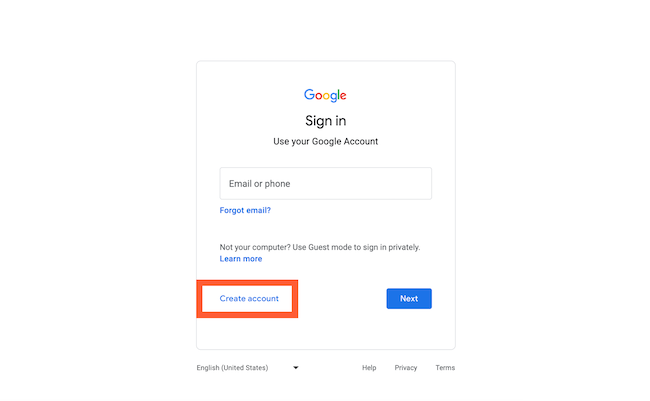
  3. If you do not have a Google account, click “Create Account” and follow the prompts to register for one.

How to create a YouTube channel step one: sign into Google2. Create a new YouTube channel using your Google account.

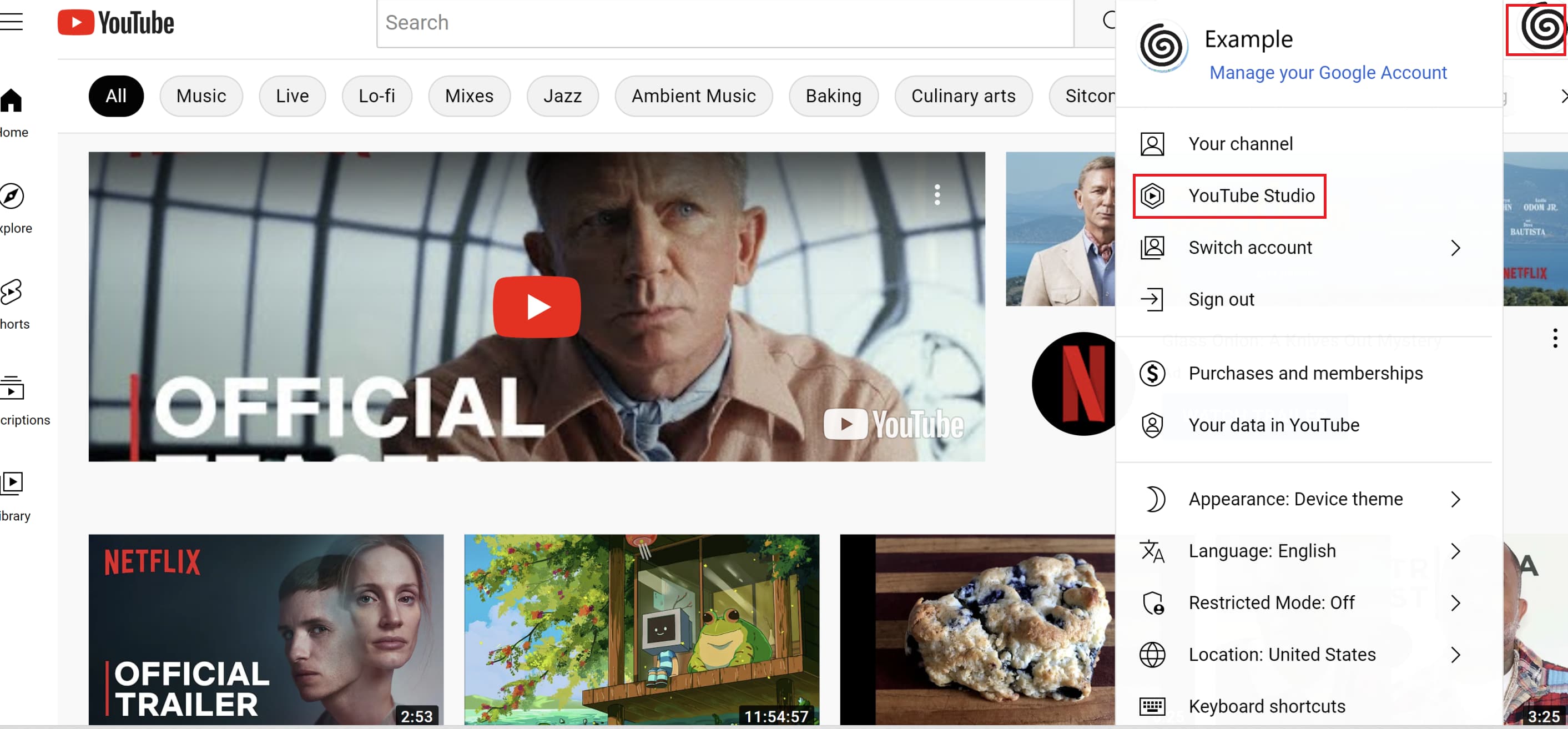
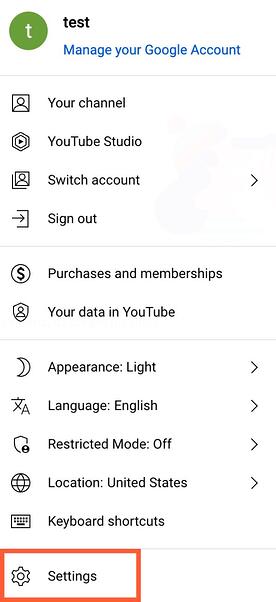
Once you’re set up with and signed into your Google account, it’s time to create a channel. Click your user icon in the upper right-hand corner. This represents both your Google account and your YouTube account (as YouTube is owned by Google). You’ll see a drop-down menu, where you’ll want to click “Settings.”

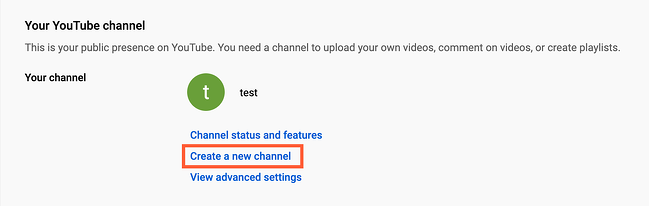
How to create a YouTube channel step two: navigate to YouTube settingsFrom there, you’ll be taken to your account overview. Click “Create a new channel” under “Your channel.”

How to create a YouTube channel step three: click "create a new channel"

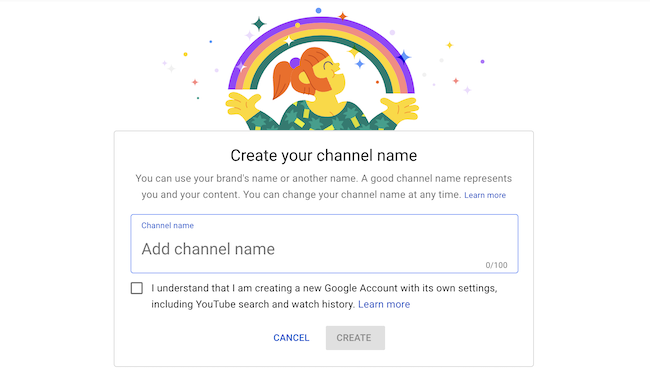
The first step is to create your new channel name. It can be whatever you want, and doesn’t have to be the same name that you used to create your Google account — but we do recommend that it reflects the brand the YouTube Channel will represent.

Create your channel name on YouTubeAfter you enter the channel name, you might be asked to verify the account via text message or voice call. If that happens, enter the code you receive from the option you choose.

Once you’ve verified your account, you’ll be taken to the dashboard for your channel. Now, it’s time to start customizing it.

3. Navigate to the Customize Channel page.

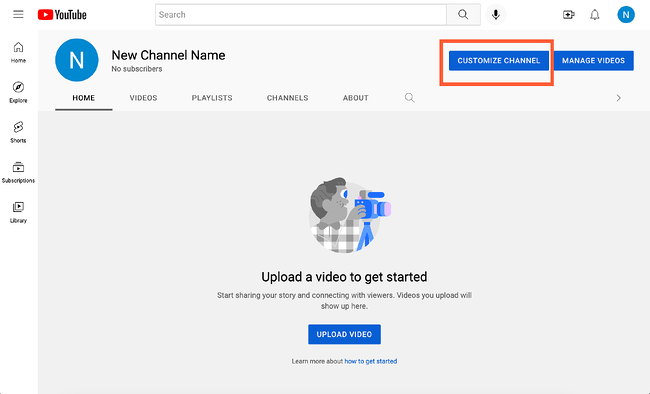
We’ll start with the fundamental details about your channel. From your channel dashboard, click “Customize channel.”

How to customize basic info on YouTube channelFrom there, you’ll be taken to the channel customization page.

You’ll notice three tabs: “Layout,” “Branding,” and “Basic info.” These three tabs will help you optimize your channel for viewers.

4. Add Basic Info to your channel for discoverability.

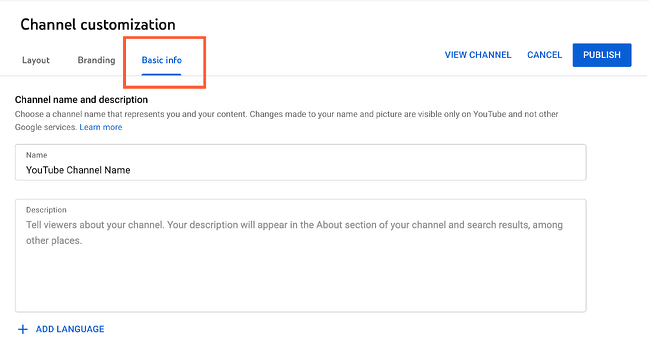
Start by clicking “Basic info.”

basic-infoHere’s where you’ll enter some basic information about your channel, like the language your videos are in, as well as a description that helps people discover your channel when they enter search terms that describe what videos they’re looking for. These keywords can include what your channel is about, the problems it helps solve, the people and products featured, your industry, and more.

You’ll also be able to add links to sites you want to share with your viewers. These links will be displayed over your banner image (more on this later) like so:

YouTube banner image link5. Upload branding elements to your channel.

In addition to the descriptive details you’ve added, there’s another element of customization for a new YouTube channel: The visuals.

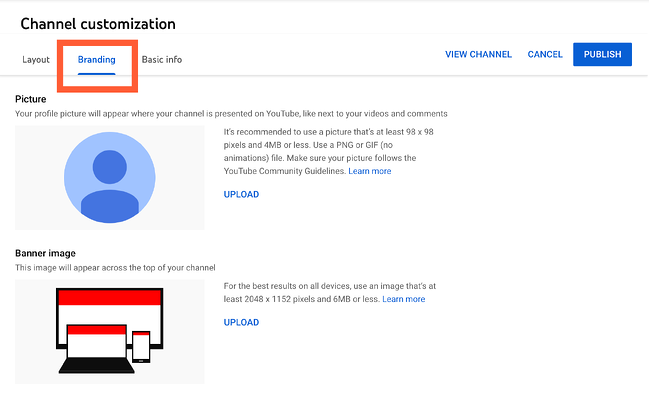
How to customize branding on YouTube channelUnder the “Branding” tab, you’ll be able to add your profile picture, banner image, and video watermark.

Profile Picture

Profile pictures help YouTube users identify the creator of a video when browsing video content. You’ll see this image appear beneath YouTube videos on the play page, as shown below. YouTube recommends using a picture with dimensions of at least 98 x 98 pixels.

YouTube profile picture shown under YouTube videoBanner Image

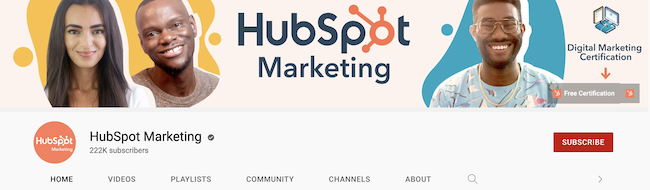
The banner image is a large banner displayed at the top of your channel page, and it’s a big opportunity to convey your brand to your viewers. YouTube recommends using an image that’s at least 2048 x 1152 px and 6MB or less. Banner image on YouTube profile

Video Watermark

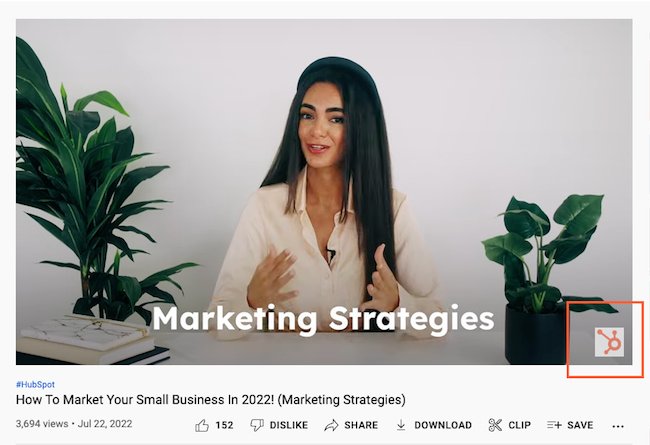
The video watermark is displayed at the bottom right of every video you post (see below). You’ll want to choose a logo that best represents you sized at 150 x 150 px.

Branded watermark on YouTube video6. Customize your more advanced layout options.

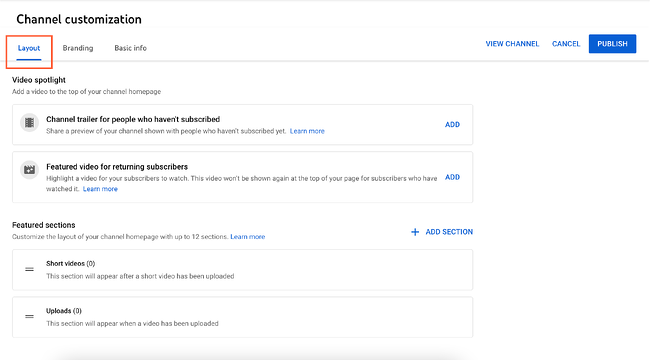
Click the “Layout” tab.

How to customize layout on YouTube channel

From here, you’ll be able to specify certain details about how you want your content presented on your channel’s page. You’ll have the option to designate a video spotlight and organize your channel page with featured sections.

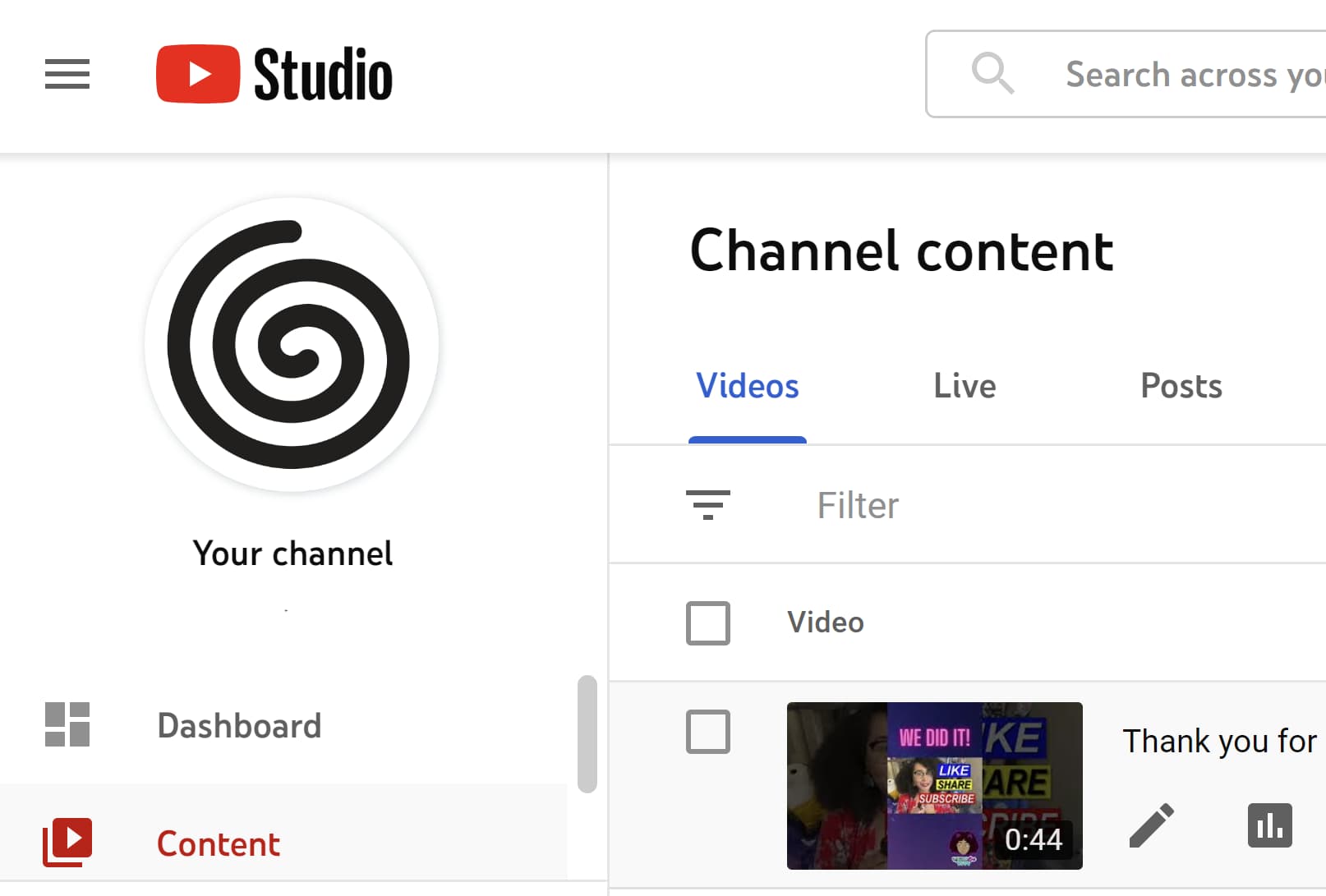
7. Add videos and optimize them for search.

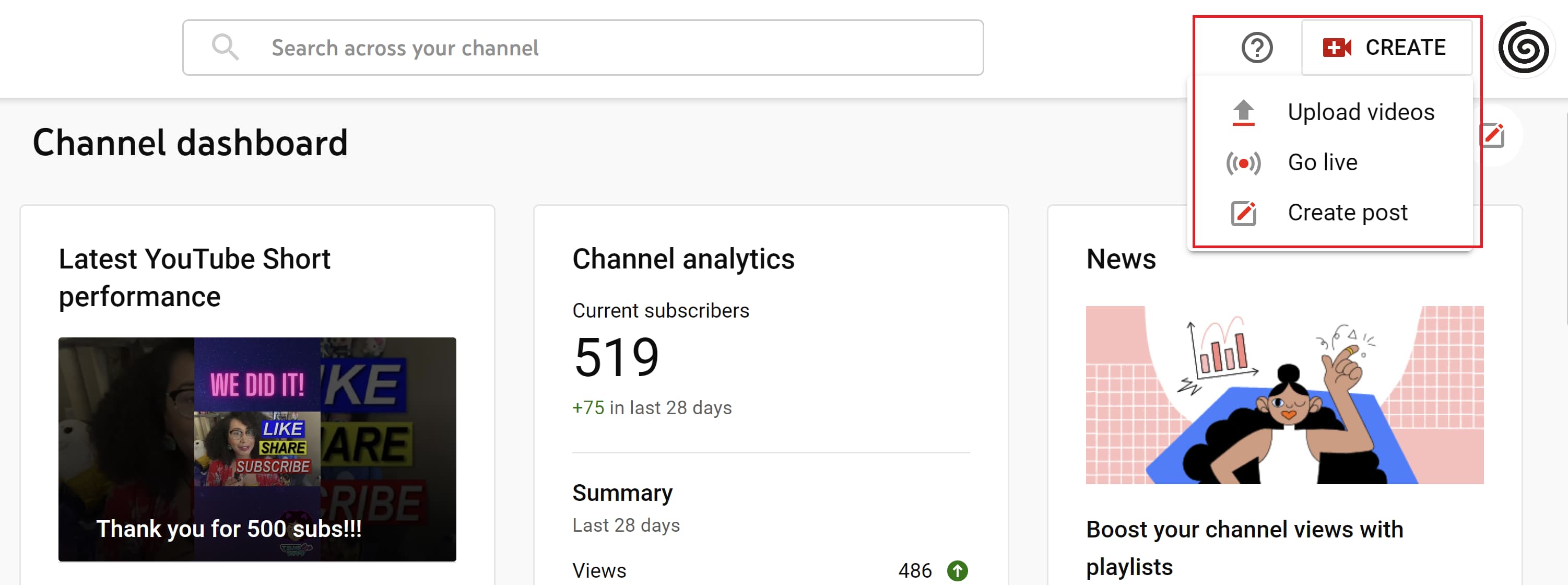
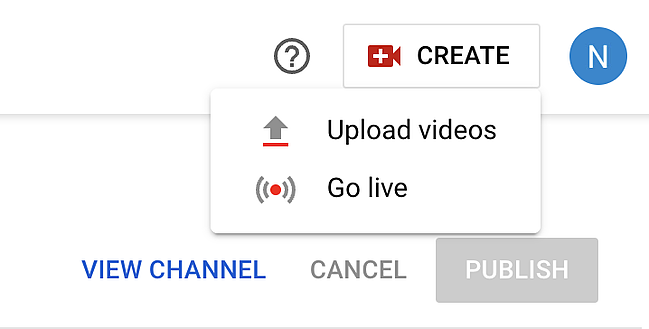
To upload your first video to YouTube, click the “Create” button in the top-right corner and follow the prompts.

How to upload and create videos on YouTube channel

Optimizing your channel for discoverability is just the beginning. Once you start adding videos, you’ll want to optimize them for search, which in turn helps users discover your video.

But this goes beyond giving your videos accurate, clear, and concise titles — though that is important. Below, we describe some of the most important things to optimize on YouTube.

Title

When we search for videos, one of the first things that our eyes are drawn to is the title. That’s often what determines whether or not the viewer will click to watch your video, so the title should not only be compelling but also clear and concise.

Description

This should be limited to 1,000 characters — and remember that your viewer came here to watch a video, not to read a lot of text. Plus, YouTube only displays the first two or three lines of text, which comes to about 100 characters, so front-load the description with the most important information.

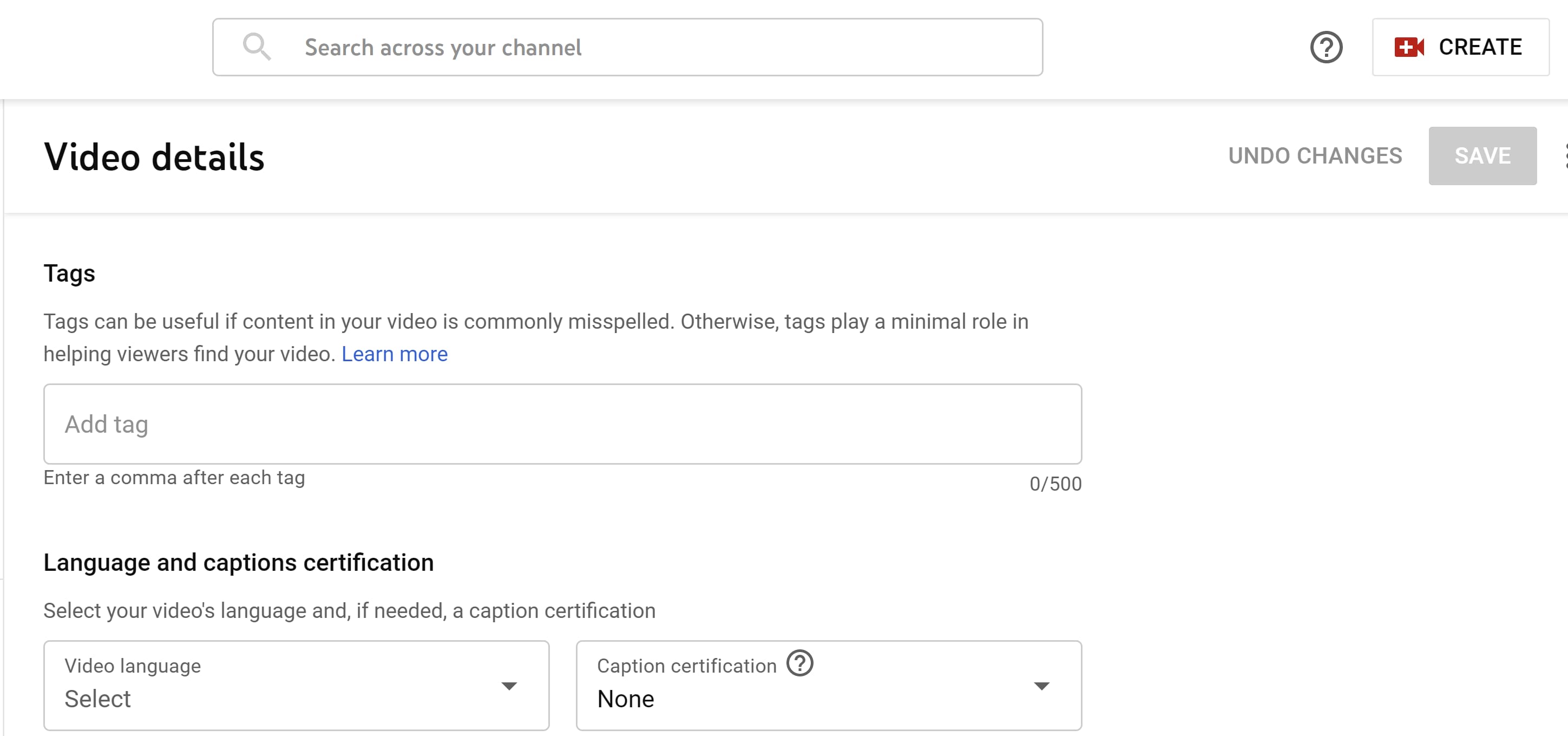
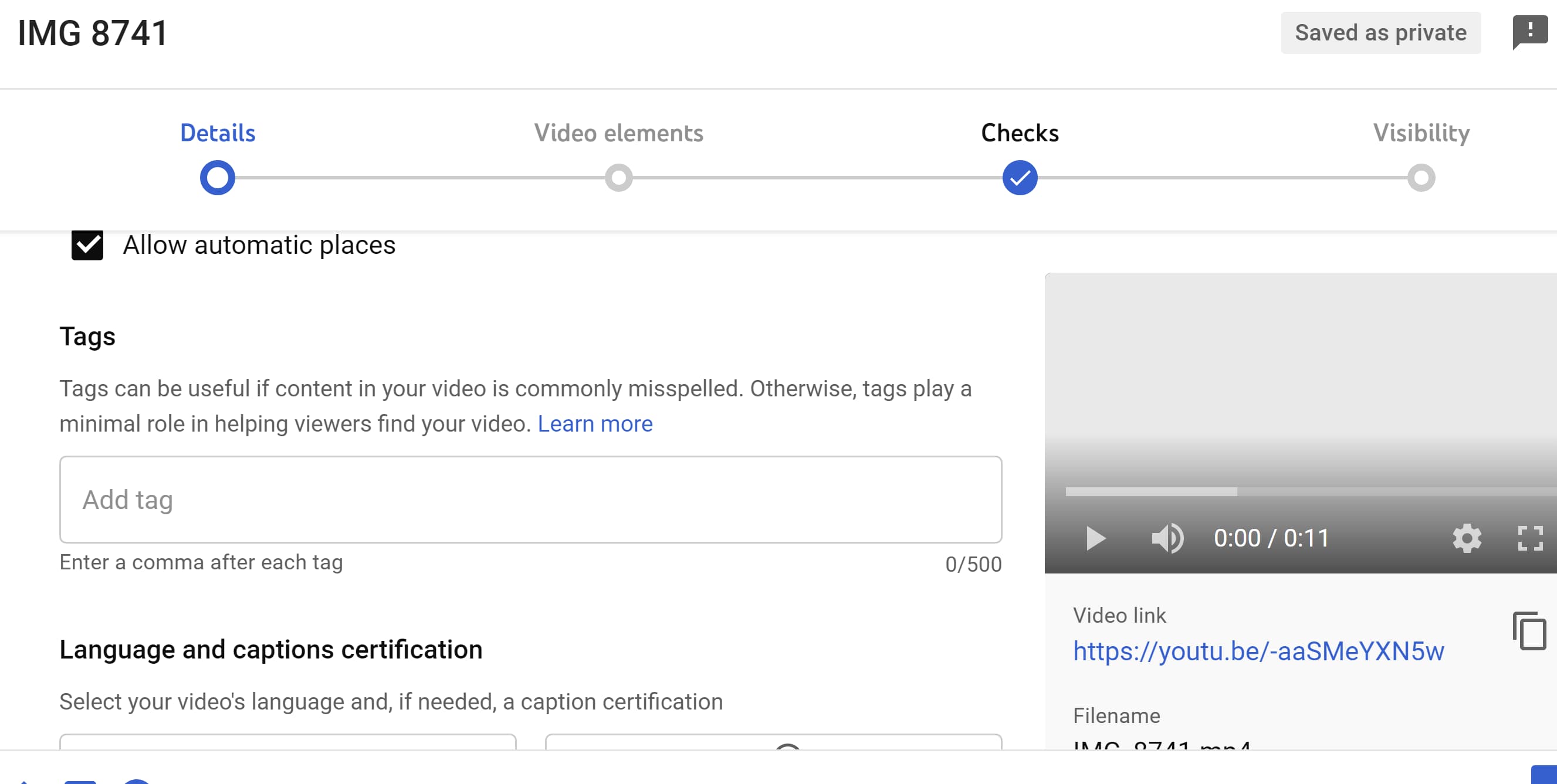
Tags

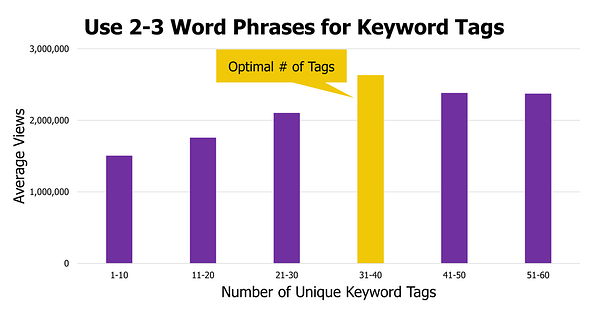
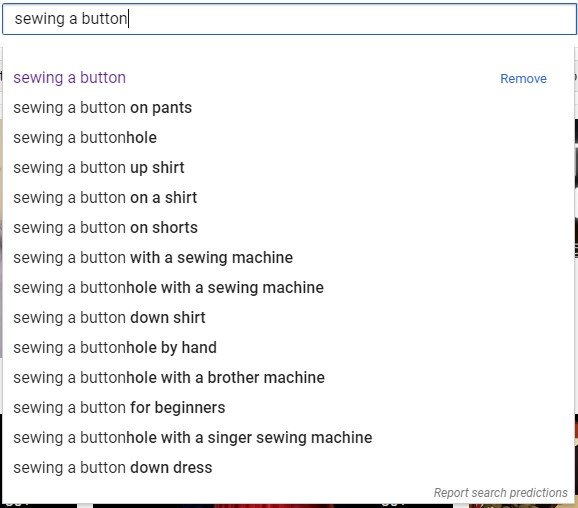
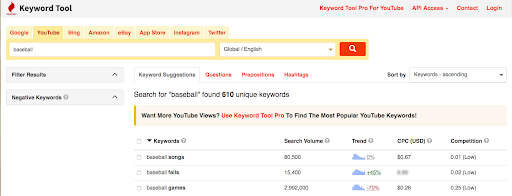
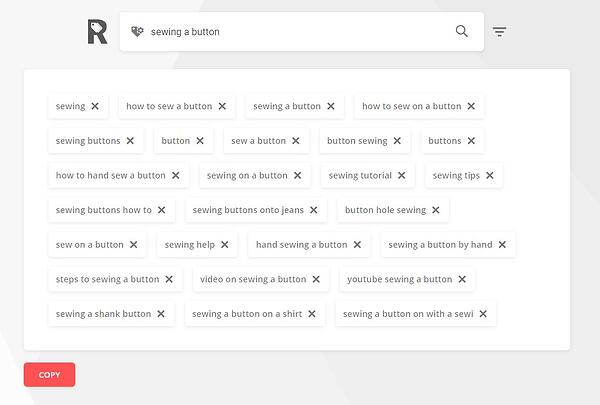
Using tags doesn’t just let viewers know what your video is about — they also help YouTube understand your video’s content and context. That way, YouTube can associate your video with similar videos, broadening your content’s reach. But approach with caution: just as with your title, don’t use misleading tags because they might get you more views. In fact, Google might penalize you for that.

Category

Choosing a category is another way to group your video with similar content on YouTube — but that might not be as simple as it sounds. YouTube’s Creator Academy suggests that marketers “think about what is working well for each category” you’re considering by answering questions like:

  • Who are the top creators within the category? What are they known for, and what do they do well?
  • Are there any patterns between the audiences of similar channels within a given category?
  • Do the videos within a similar category share qualities like production value, length, or format?

That’s it — you’ve officially not only created a YouTube channel but now also know how to optimize its content for discoverability. For more information on how to best leverage YouTube for marketing, check our entire collection of resources.

Editor’s note: This post was originally published in November 2019 and has been updated for comprehensiveness.

New call-to-action

Categories B2B

What is a KPI? How To Choose the Best KPIs for Your Business

The question “what is a KPI?” comes up at many meetings. If you want to scale your company, you might be wondering about KPIs and how they can help your business grow.

Reviewing performance through key performance indicators (KPIs), tells your team when you’ve met the mark or fallen short. But how do you pick the right KPIs for your business?

→ Download Now: Free Marketing Plan Template

In this post, we’ll walk you through what a KPI is, which KPIs you should focus on, and how you can hone in on the metrics that matter most for your business.

Keep reading, or jump to the section you’re looking for:

  • What is a KPI?
  • Why are KPIs important?
  • Types of Key Performance Indicators
  • KPIs vs. Metrics
  • OKR vs. KPI
  • How To Determine KPIs
  • KPI Examples
  • How To Measure KPIs

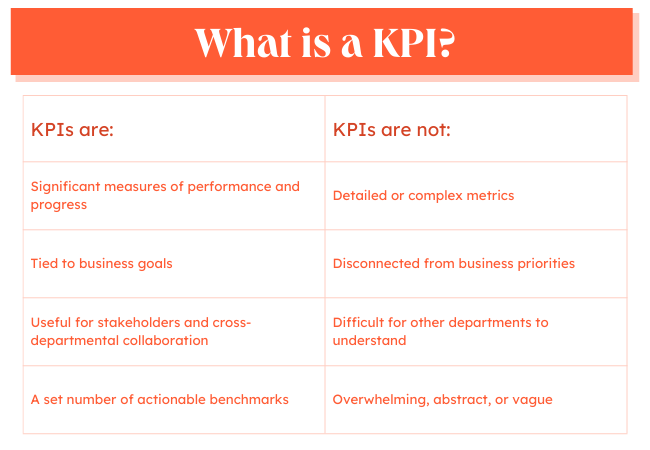
What is a KPI and what is not a KPI graphic

Whether a KPI is for a one-off campaign or a long-term initiative, it can help teams track their progress, improve results, and stay on track.

Businesses use KPIs to figure out whether they are reaching their top goals. These KPIs usually track the overall health and performance of the organization.

Departments use KPIs to show the value of their efforts to the business. These performance indicators help teams work toward set outcomes and solve issues that stand in the way of those goals.

And employees use KPIs to understand how their individual efforts contribute to project, team, and organizational goals.

KPIs can also help track the effectiveness of:

  • Projects
  • Processes
  • Campaigns
  • Strategic changes

A KPI is also useful for cross-departmental collaboration, as it makes it simple to see what other teams are working toward at a glance. KPIs tell companies if their hunches are right and if what they are doing is working.

Important note: KPIs should measure your most essential indicators.

For instance, your social media team may have a ton of data points that can serve as KPIs. However, they should only choose the ones that align with the broader business goals. Let’s say it’s brand awareness. In this case, follower count, post reach, and impressions will likely be the social media KPI metrics to measure.

With that in mind, having KPIs means narrowing your focus to a few vital metrics that will influence your business the most.

Why are KPIs important?

People around the world generated and consumed 64.2 zettabytes in 2020. And according to Statista, that number should reach 181 zettabytes by 2025.

How much is a zettabyte? One billion terabytes. And how much is a terabyte? About one trillion bytes. That’s a lot of information. That means that your business is processing more information than ever before.

As you process that ever-growing mass of data, it can start to feel overwhelming. For example, this post on sales metrics outlines over 140 metrics that one sales manager might track in a month. These are valuable metrics that can help salespeople excel. But add in weekly metrics, and it’s no surprise that 80% of workers are suffering from information overload.
Why are KPIs important graphic

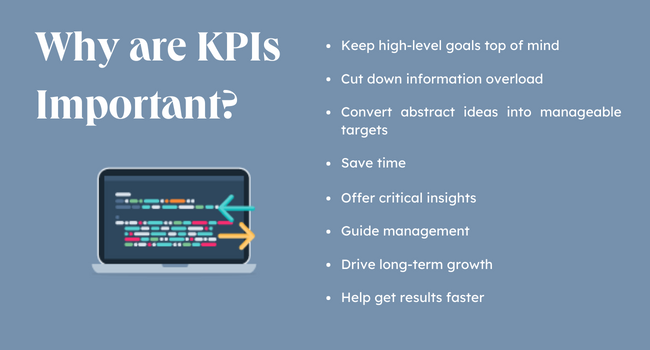
Enter the KPI. When you select a KPI for your business or team, it narrows the focus of your efforts. This one strategy can help your team rally around what’s most meaningful. It can push teams to get results faster, be more productive, and make useful changes when they’re needed.

A KPI is more than a number. It’s a message, a story that quickly shows your team whether you are moving toward the goals you’ve set together. Key performance indicators can help:

  • Keep high-level goals top of mind
  • Convert abstract ideas into manageable targets
  • Cut down on data overload

Strong KPIs can help your business save time, get critical insights, guide management, and keep your business on a long-term path of growth.

Because KPIs are so critical, it’s essential to set the right KPIs for your business. The wrong KPI can disrupt even the strongest team.

For example, say your marketing team is selecting a KPI for its growth goals. Ranking in search engine results is important for a blog, so the amount of #1 keyword rankings could seem like a good KPI.

But what if your blog’s top-ranking keywords don’t relate to your business goals? What if those keywords have low traffic volume or don’t connect to qualified leads? In this situation, organic traffic is probably a better KPI.

Choosing the right KPI might take some extra research, so let’s talk about the different types of KPIs.

Types of Key Performance Indicators

While there are many different indicators of performance that a business can measure, most fall under two categories:

Quantitative KPIs

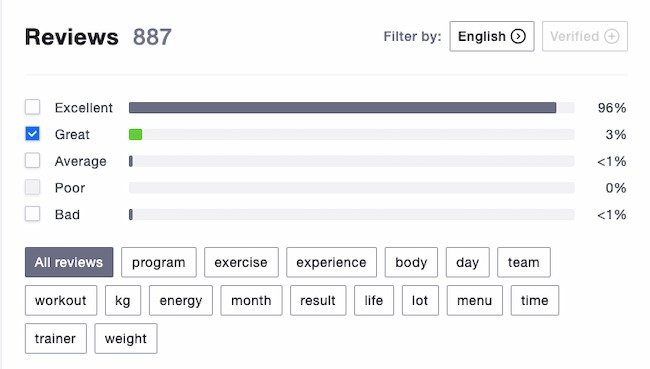
A quantitative KPI uses numbers to measure progress toward a goal. The majority of KPIs are quantitative, like the number of closed sales, customer service tickets, or annual revenue.
Quantitative KPI example

Image Source

Qualitative KPIs

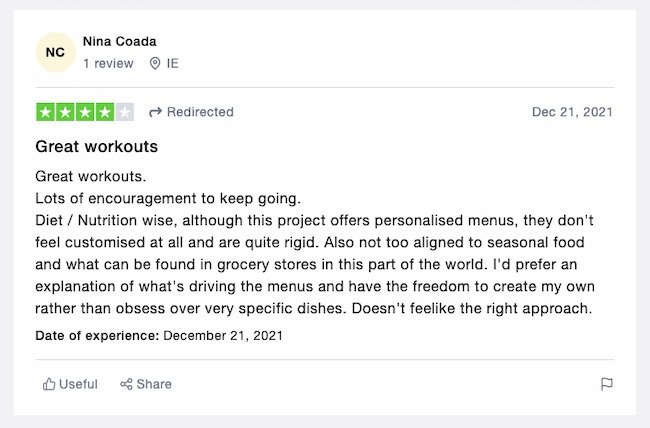
A qualitative KPI tracks non-numerical data, like customer comments or employee engagement. While there are ways to get quantitative data from qualitative research, these KPIs focus on non-numerical data.

For example, say a company just released a new product online. As soon as the product listing goes live they’ll track quantitative metrics like:

  • Product sales
  • Abandoned carts
  • Product page views

At the same time, the company would also track qualitative data like product reviews and customer surveys. This can help the team figure out how people are responding to the product and how to keep improving it.
Qualitative KPI example

Image Source

Most businesses use more than one KPI to track performance and may combine KPIs to reach a set goal.

There are other measures that companies use to hone in on their business goals.

Other Key Performance Indicators

Leading KPIs: This is quantitative data that helps a business measure potential responses to a change. For example, if a SaaS business plans to launch a new feature, leading indicators can help it project future results.

Lagging KPIs: These measure results after a change to track whether that change is meeting expectations. These are sometimes also called output indicators. For example, after the SaaS business launch above, lagging indicators will show the actual outcomes of the release.

Leading and lagging KPIs can help teams make corrections early. This can save the business time, effort, and investment over time.

Input KPIs: These track the resources a business needs for a campaign, project, or process.

Process KPIs: Process KPIs track how well a new process is working and help target potential changes. For example, a common process KPI is the time it takes to close a support ticket.

Practical KPIs: These track current internal company processes and how they impact other parts of the business.

Directional KPIs: These KPIs look at overall company performance. They may focus on trends within the company or in comparison to competitors.

Actionable KPIs: Indicators like this track how well a company commits to and carries out internal business changes. Examples include KPIs that track culture changes, employee sentiment, or DEI initiatives. These often measure progress within a set period of time.

KPIs vs. Metrics

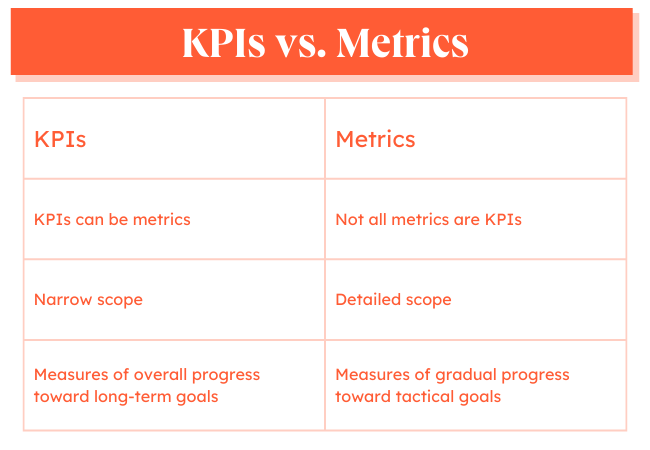
When you were in school, you might have learned that a square can be a parallelogram, but not every parallelogram is a square. The same is true of KPIs and metrics.
What are KPI metrics graphic

While a KPI can be a metric, not every metric is a KPI. This is because KPIs track progress toward a specific goal. A KPI is a significant measure of performance.

When your team selects a KPI, they commit to a specific metric and how meeting that goal can lead to business growth. KPIs also narrow the scope of information to data that everyone needs to know — from interns to stakeholders.

This doesn’t mean that metrics aren’t impactful. As your team solves specific problems and creates processes, there are many metrics you will track. In turn, these metrics can help your team meet your KPIs.

KPI Metrics Example

Here’s an example. Say that your team is creating a blog for your sales team to generate more qualified leads. The KPIs for this project are:

  • Traffic
  • New users
  • Leads

Those are the key performance indicators that your team believes will show that the time and effort of launching a new blog is worth it to the business.

At the same time, if you’ve ever started a blog, you know that there are many other metrics to track like:

  • Engagement time
  • Bounce rate
  • Views per user
  • Backlinks
  • Domain authority

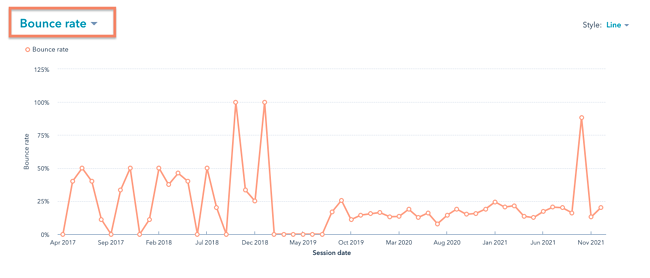
KPI Metrics example: Bounce rate, HubSpot

These metrics will help your team solve problems, choose the right blog topics, and make changes that improve the user experience.

Metrics are essential to the team that works on the blog so they can make it better. At the same time, metrics are often too much detail for every stakeholder. In this example, your blog team needs other metrics to help meet its KPIs.

OKR vs. KPI

Objectives and Key Results (OKR) and KPIs are often used interchangeably because both terms refer to goals that are tracked and measured. However, they differ in intention.

Put simply, KPIs show whether your business is hitting its targets. They are often called health metrics as they tell you how the company is doing to meet an objective that’s already set.

OKRs, on the other hand, are broad objectives for your business with the key results that will signify achievement in meeting those objectives. They are aggressive and ambitious goals that speak to the business’s big-picture vision.

For instance, let’s say a technology company has the objective of becoming one of the top 10 providers in their industry in 2021. Their key results could be:

  • Acquire 1,000 new customers by Q3.
  • Generate 3,000 leads every month.
  • Increase annual membership sales by 30%.

While KPIs are ideal for scaling, OKRs are designed for dramatic growth. They’re more ambitious and push teams to stretch their capabilities.

It’s also important to note that while KPIs can be the key results in your OKR, the opposite is generally not true.

For example, your marketing team could have a KPI of 3,000 leads as mentioned in the example above. However, it’s unlikely that any department would list the “Top 10” goal as their KPI as that speaks to a broader vision and has a more flexible timeline.

Before you can measure your KPIs, you’ll need to determine which metrics to track. This will greatly depend on your goals and your team.

Once you narrow that down, set your targets. They’re usually based on a combination of factors, including historical performance and industry standards.

You’ll also have to answer the who, when, and why. Who is responsible for this KPI? Identify the person on your team who is managing this KPI, so they can be the go-to when addressing roadblocks that may affect performance. They will also be responsible for reporting on progress.

As for the “when,” you’ll need to know the timeline to reach these targets. Many businesses set them on a monthly or quarterly basis, but your timeline can be shorter or longer depending on your team.

Lastly: the why. It’s the most important thing to keep in mind when measuring your KPIs. Having your goals clearly identified can help motivate your team and make sure everyone is aligned on the direction you’re going in.

Let’s go over a few steps that can help make this process more simple.

1. Choose KPIs directly related to your business goals.

KPIs are quantifiable measurements or data points used to gauge your company’s performance relative to a goal. For instance, a KPI could be related to your goal of increasing sales, improving the return on investment of your marketing efforts, or improving customer service.

What are your company goals? Have you identified any major areas for improvement or optimization? What are the biggest priorities for your management team?

Answering these questions will bring you one step closer to identifying the right KPIs for your brand.

2. Consider your company’s stage of growth.

Depending on the stage of your company – startup vs. enterprise – certain metrics will be more critical than others.

Early-stage companies typically focus on data related to business model validation while more established organizations focus on metrics like cost per acquisition and customer lifetime value.

Here are a few examples of potential key performance indicators for companies in various stages of growth:
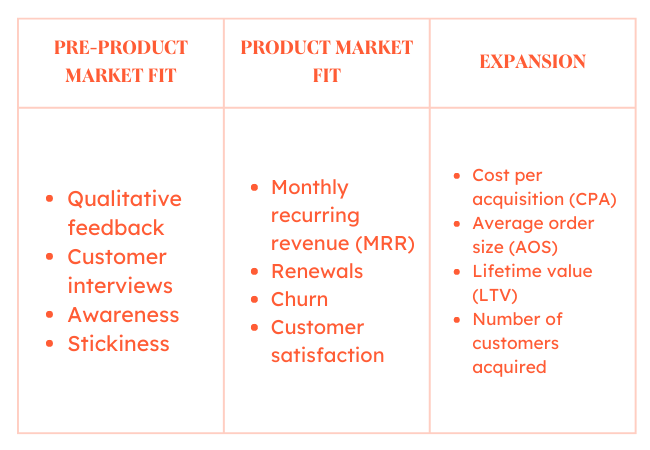
KPI examples: KPIs for different stages of business growth

3. Identify both lagging and leading performance indicators.

The difference between lagging and leading indicators is essentially knowing how you did, versus how you are doing. Leading indicators aren’t necessarily better than lagging indicators, or vice versa. You should just be aware of the differences between the two.

Lagging indicators measure the output of something that has already happened. Total sales last month, or the number of new customers or hours of professional services delivered, are examples of lagging indicators. These types of metrics are good for purely measuring results, as they focus on outputs.

On the other hand, leading indicators measure your likelihood of achieving a goal in the future. These serve as predictors of what’s to come. Conversion rates, sales opportunity age, and sales rep activity are just a few examples of leading indicators.

Traditionally most organizations have solely focused on lagging indicators. One of the main reasons for this is they tend to be easy to measure since the events have already happened. For instance, it’s easy to pull a report of the number of customers acquired last quarter.

But measuring what happened in the past can only be so helpful.

You can think of leading indicators as business drivers because they come before trends emerge, which can help you identify whether or not you are on track to reaching your goals. If you can identify which leading indicators will impact your future performance you will have a much better shot at success.

With every business, growth is the goal. KPIs help you track your progress and scale progressively to grow in whichever way that matters to your company.

4. Focus on a few key metrics, rather than a slew of data.

As you begin to identify KPIs for your business, less is worth more. Rather than choosing dozens of metrics to measure and report on you should focus on just a few key ones.

If you track too many KPIs, you might become overwhelmed with the data and lose focus.

As you can imagine, every company, industry, and business model is different so it’s difficult to pinpoint an exact number for the amount of KPIs you should have. However, a good number to aim for is somewhere between two to four KPIs per goal. Enough to get a good sense of where you stand but not too many where there’s no priority.

KPI Examples

Your organization’s business model and the industry in which you operate will influence the KPIs you choose.

For example, a B2B software-as-a-service (SaaS) company might choose to focus on customer acquisition and churn, whereas a brick-and-mortar retail company might focus on sales per square foot or average customer spend.

Here are a few examples of some industry-standard KPIs:
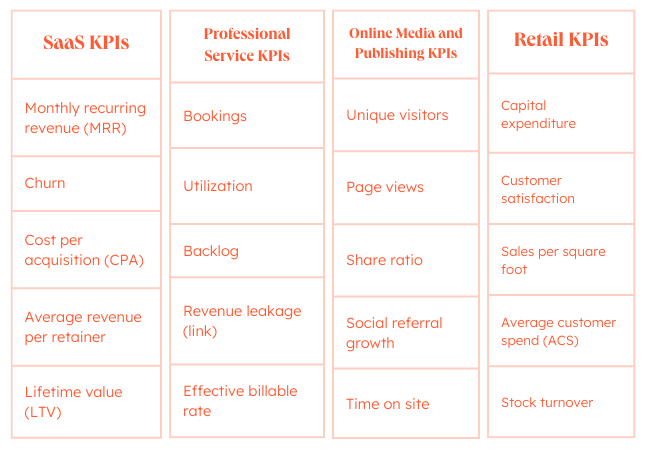
KPI examples: Industry-standard KPIs for SaaS, professional service, retail, and online publishing

While some KPIs are simple, KPIs that can help your business target specific goals can be tougher to create. These examples of key performance indicators for businesses can inspire the right KPI for your business.

Marketing KPIs

KPIs for marketing can help you track the effectiveness of marketing efforts. It can help you figure out the value of specific campaigns and initiatives, and assess different media channels.

For example, this video outlines how to set KPIs for social media:

These are some of the top marketing KPIs:

  • Return on Investment (ROI)
  • Lifetime Value of a Customer (LTV)
  • Customer Acquisition Cost (CAC)
  • Conversion Rate

For more KPI ideas, check out these resources:

Sales KPIs

Sales is a numbers-driven activity and this makes KPI selection even more important. Sales KPIs can measure individual, team, departmental, or organizational efforts. They can also help sales teams make shifts and respond to goal and priority changes.

These are some common sales KPIs:

  • Monthly sales growth
  • Monthly calls (or emails) per rep
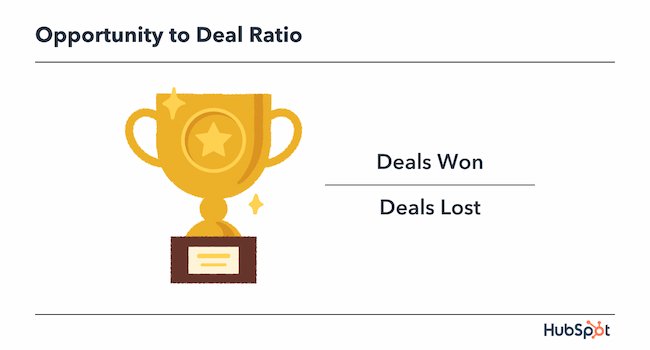
  • Opportunity to deal ratio
  • Average purchase value

KPI examples: Sales KPI, Opportunity to deal ratio

For more KPI ideas, check out these resources:

Service KPIs

Customer service KPIs can track the performance of support teams. They also help service managers understand, analyze and optimize the customer experience.

Here are some of the top service KPIs:

  • Number of resolved tickets
  • Customer satisfaction score (CSAT)
  • First response time
  • Net promoter score (NPS)

For more KPI ideas, check out these resources:

Website KPIs

A website KPI can connect the performance of your website to marketing, sales, and service goals. Website data can help businesses understand how to connect siloed departments and fix gaps in the buyer journey. This type of KPI is especially useful for ecommerce sites.

Here are some common website KPIs:

  • Traffic
  • Traffic sources
  • Number of sessions
  • Number of transactions

This post also has some great suggestions for website engagement metrics.

Now that you know what a KPI is and how to choose the right KPIs for your business, it’s time to act. Measuring a KPI can be simple or complex depending on your KPIs, your tech stack, and the way your team works.

Some companies end up tracking the wrong KPI because it’s the easiest data to track. This isn’t a satisfying solution, and it can lead to bigger business challenges long term.

Let’s walk through the best practices for measuring your KPIs.

1. Identify the tools or software you need to measure your KPIs.

KPI measurement starts with your data sources and the tools your business uses to track data. There are a few things you’ll want to look for in the right software.

Integrations

According to 2021 research from Productiv, the average company uses over 200 apps. This means that you’ll need a software solution that connects to a range of tools to pull together accurate data.

Dashboards

Dashboards are also useful for tracking KPIs because they make it easy to visualize insights. Visualization can make complicated information simpler and quicker to understand and act on.

Custom and standard reports

It’s also helpful to use KPI software with both standard and custom reporting. While some KPIs are effective alone, others may need supporting metrics to clarify the story of the data. For example, say your KPI is social media engagement. You may also want to present data on every social media tool your team is using.
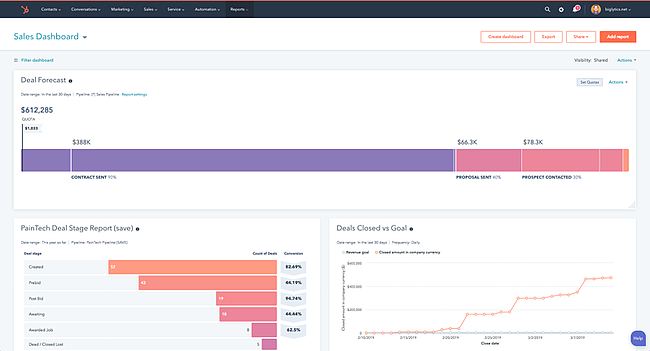
How to measure KPIs example: Sales metrics dashboard, HubSpot

Read here if you’re looking for the right data tracking software.

2. Narrow down your final list of KPIs.

Focus is the top reason to limit the number of KPIs you track. If KPIs are the most critical measure of business success, you want to track just two or three KPIs, not 10-20.

First, make sure there is a clear separation of KPIs from metrics. Next, revisit your goals to make sure that the KPIs you’ve selected show clear progress toward that goal.

As you research software you might notice that some KPIs are easier to track than others.

For example, tracking customer lifetime value by marketing channel is easy if your revenue and marketing systems connect. But what if these are two different systems? Maybe your marketing platform shows that most of your leads come from the blog. At the same time, your customer platform analytics show that most of your leads come from a landing page.

This kind of issue leads to a lot of manual work, and a KPI your team can’t trust. Until you can unify your systems, you may want to choose a KPI that you can measure accurately.

Be sure to watch your KPIs in the first few months and take note of how often you check each KPI. Sometimes you’ll need real data to figure out if that performance indicator is useful.

For example, say at the beginning of a co-marketing partnership, you and your partner set a KPI for shared leads. But in the first two months, the only shared leads come from a webinar that your companies host together. At the same time, you both notice increased lead volumes from referral links.

If you want your KPIs to measure the effectiveness of your partnership, you may want to change this KPI.

3. Create standard reports and timing for reporting.

One way to help stakeholders invest in KPIs is to create a consistent reporting schedule and format. You can measure and report on KPIs each week, month, quarter, or year depending on your business needs.

For example, if you have a monthly lead goal, it’s a good idea to track your KPIs weekly. If performance tracks with expectations, you can gather insights into what your team is doing well. If not, you have a chance to ask for resources, troubleshoot, and make changes.

A standard report has the same structure every time. You can often automate these reports and they usually don’t need much manual data analysis. Depending on your industry and KPIs you may want to customize your standard reports. This can help you make sure that your reports clearly show the most useful information.

4. Design visualizations in your dashboard for your most important KPIs.

Scanning numbers is satisfying for some. But most people process and retain visuals best. So, you’ll want to make the most of your data with a visual dashboard that makes your KPIs easier for stakeholders to understand and remember.

As you build your dashboards, there are a few helpful things to think about. First, try to group your KPIs to create audience-specific dashboards. For example, you might want to build one KPI dashboard for C-suite presentations and another for meetings with your team.

Next, keep your visuals simple. Choose the best chart for the information you’re presenting and don’t add small text or extra graphics that could distract from your data.

5. Share KPIs reports with other teams for quality checks.

It may take some time before your KPIs are a reliable source of information. There is a lot that you can do with digital tools, but don’t forget another crucial resource for making sure your KPIs are accurate — your team.

Whether you check in with your friends in Accounting every other day or hold weekly check-ins with people in your department, it’s smart to reach out. Even small issues can lead to big errors over time.

For example, do you want to base your KPI on the average daily call volume of customer service seven days a week or just Monday through Friday? If you don’t talk to your CS team about their structure and schedule, you might pull the wrong data. This can lead to skewed numbers, poor strategic decisions, and more.

The more your business can trust your KPIs, the more benefits they’ll get from them.

6. Choose a reporting cadence for stakeholders.

Most decision-makers in business organize reporting around the business calendar. But you’ll still want to think about the right reporting cadence for your specific KPIs.

For example, a monthly cadence might not be frequent enough to troubleshoot problems. At the same time, a weekly cadence might create information overload. Too frequent meetings can also lead to conversations about metrics instead. This takes the focus away from your key performance indicators.

If you are new to this process, it may make sense to meet more frequently in the beginning, then create more space between meetings later.

You want to build a culture and structure around support for your KPIs. Remember that it’s about the business using this tool to reach your goals.

7. Set new goals and KPIs based on your results.

Some KPIs are forever, but you’ll want to continue to review and update your KPIs based on results. So, schedule time at least once a year to review your KPIs.

As you make updates, organize your data in a way that makes it easy to compare useful KPIs with indicators that aren’t helping.

Next, make some time to plan and research the changes you might want to make. Changing KPIs can sometimes create unintended issues. For example, a slack KPI can show consistent strong results, even if performance isn’t in line with growth goals.

As you make adjustments, keep in mind that KPIs should come from business goals, not the other way around.

Use Your KPIs to Fuel Growth

With every business, growth is the goal. KPIs help you track your progress and scale progressively to grow in whichever way that matters to your company.

Powerful KPI creation and tracking can give you and your business a strategic advantage. They can help you prioritize, focus, and scale processes toward your goals.

Some KPIs are easy. But if you want to push to the next level, you may need to take some extra time to find the exact KPIs that your company needs.

This post was originally published in March 2021 and has been updated for comprehensiveness.
New Call-to-action

Categories B2B

YouTube Hashtags: What Marketers Need to Know

When I first noticed YouTube hashtags being featured in videos, I thought they looked silly. At the time, I thought hashtags were only useful for platforms like Twitter or Instagram. It wasn’t until I clicked on a hashtag under an anime clip I was watching that I realized how useful the tags were.

Clicking on the hashtag helped me easily find other anime-related videos and content creators. And when I started my own channel, hashtags helped users find and engage with my own videos.

YouTube hashtags are a simple but effective way to bring more attention to your videos and boost your channel’s viewership. Here’s everything marketers need to know about YouTube hashtags.

What are YouTube hashtags?

How to Add Hashtags to a YouTube Video

Best YouTube Hashtags for Your Video

Popular YouTube Hashtags

Hashtags for Gaming Videos

Hashtags for Food Videos

Hashtags for Beauty and Fashion Videos

Hashtags for Entertainment Videos

Hashtags for Educational Videos

Top YouTube Hashtags

→ Free Templates: How to Use YouTube for Business [Download Now]

What are YouTube hashtags?

YouTube hashtags are keywords preceded by the # symbol. The hashtags are clickable and allow users to easily find related videos sharing the same hashtag. Using a hashtag also allows YouTube creators to categorize their videos with other content that includes the hashtag. Hashtags can also be used to conduct a search in the YouTube search bar.

Ultimately, hashtags make videos more discoverable — benefiting both users and content creators.

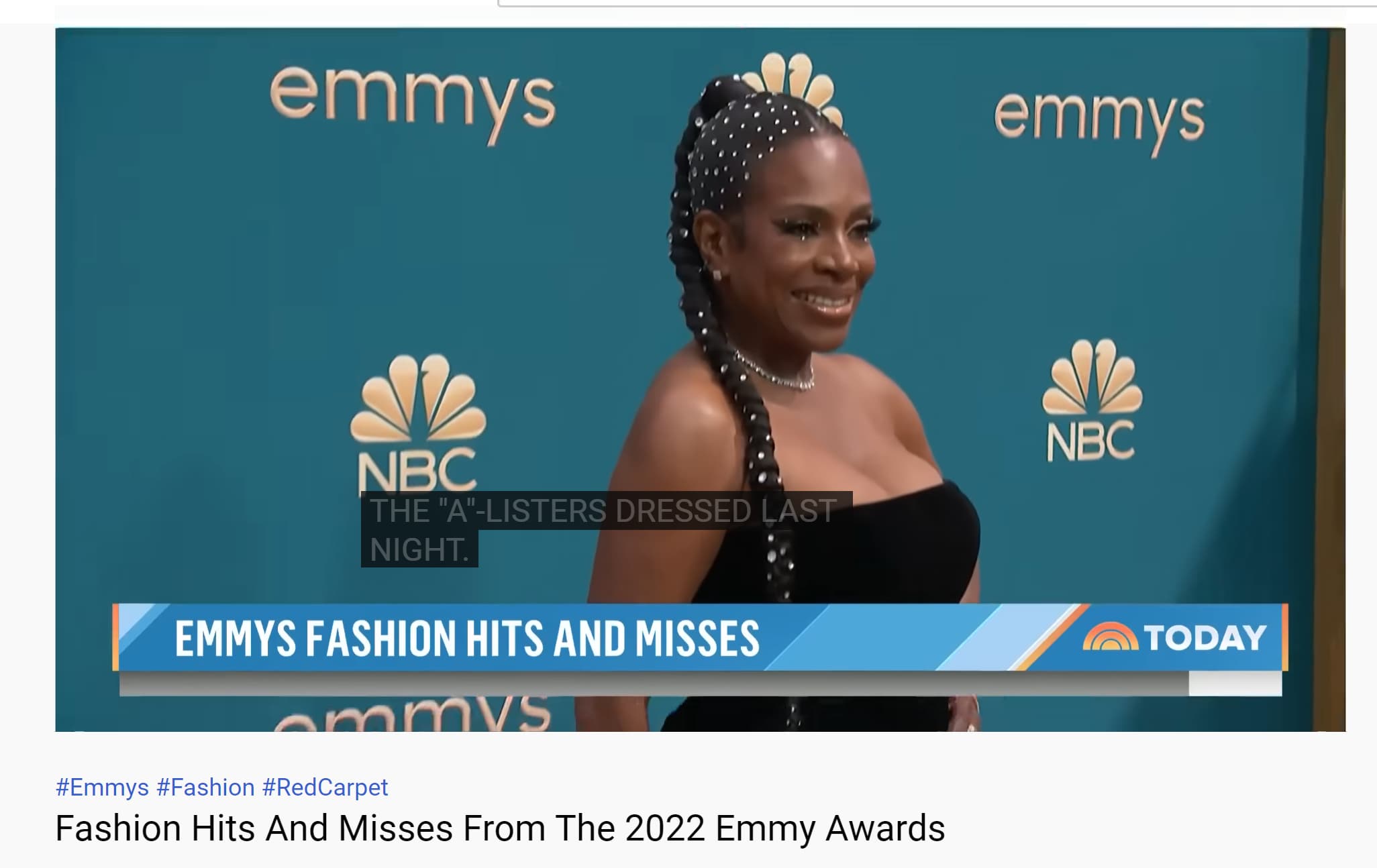
In the example below, Today includes #Emmys #Fashion and #RedCarpet for its video “Fashion Hits and Misses From the 2022 Emmy Awards.”

A YouTube video posted Today uses YouTube hashtags in its description.Image source

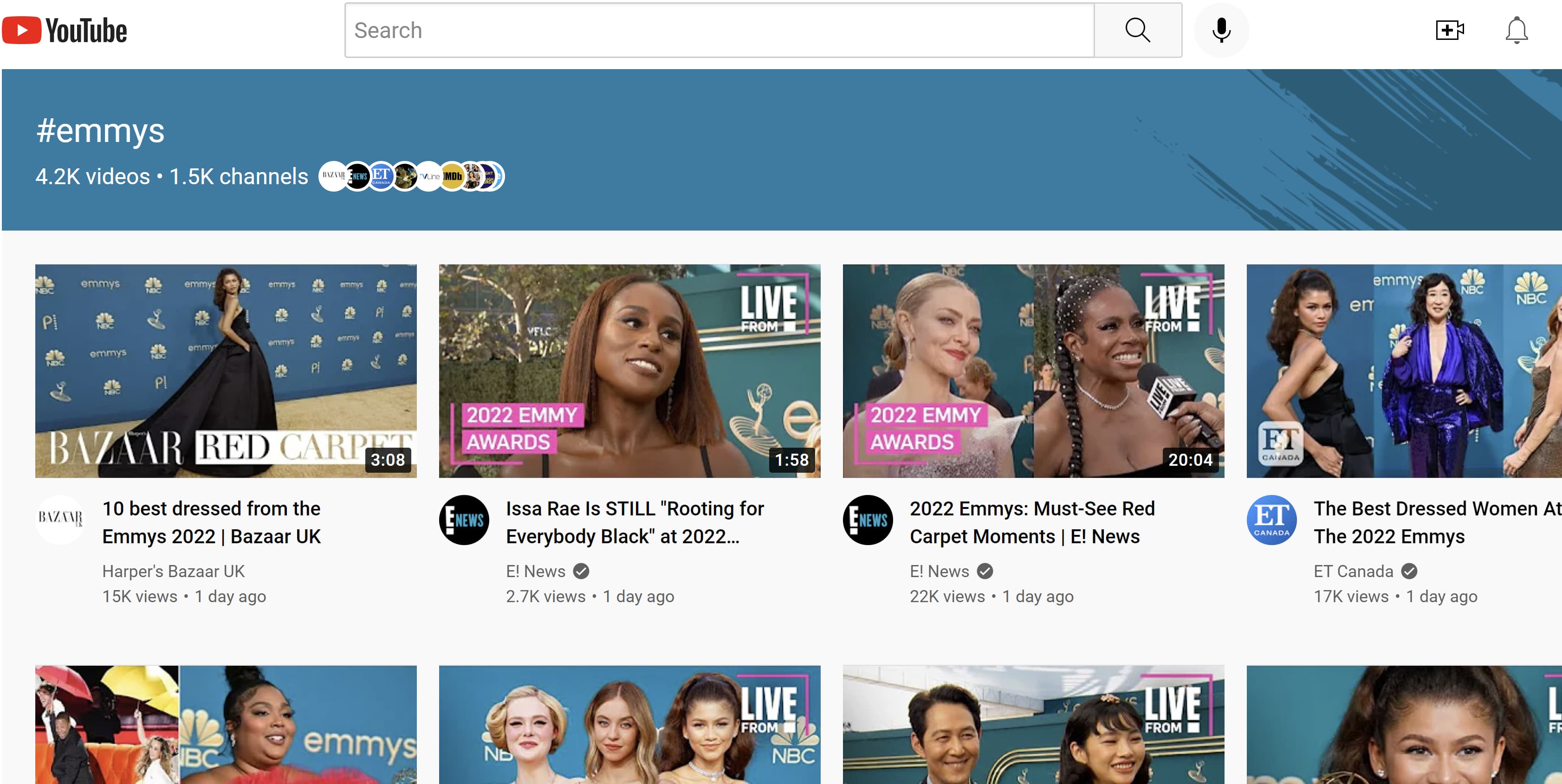
If you click on #Emmys, you’ll be taken to a page featuring other YouTube videos using the same hashtag.

The hashtag #Emmys takes users to a page filled with other videos using the same hashtagImage source

Now you can easily find and click through other videos covering the award show.

How to Add Hashtags to a YouTube Video

Hashtags can be added to a YouTube video’s title or description. Just type the # symbol into the title or description then begin to add the topic or keyword you want to be associated with your video. YouTube will then suggest popular hashtags based on what you typed in. From there, choose a recommended hashtag to promote your video with others using the same hashtag, or create one of your own that fits your content.

The hashtags you used will then link to a results page featuring other videos sharing the hashtag.

Best YouTube Hashtags for Your Video

The best YouTube hashtags for your video will depend on its content. For example, if your video features a celebrity, influencer, or public figure, you can use their name as a hashtag. If your video is part of an ongoing series or playlist on your channel, you can include the title of the series or playlist as a hashtag as well.

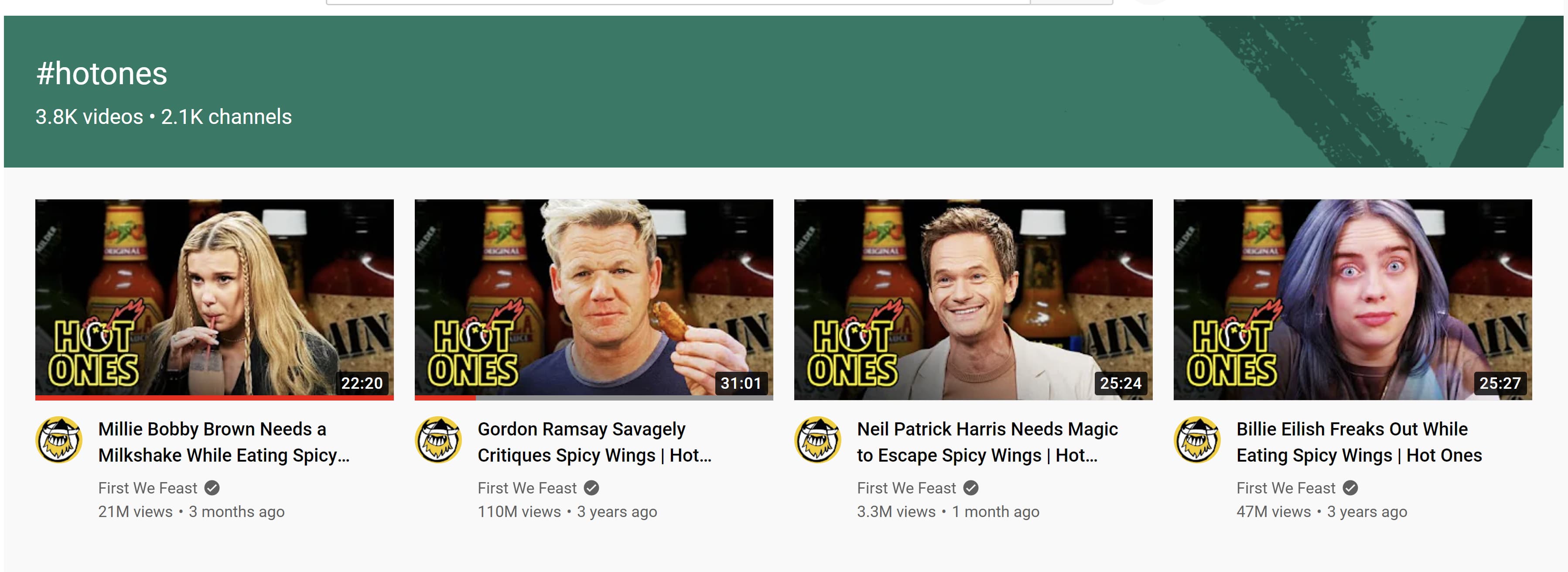
In the example below, First We Feast uses the hashtags #Hotones, #Lizzo, and #SeanEvans. Hot Ones is the name of the series on the channel, Lizzo is the celebrity being interviewed, and Sean Evans is the host.

YouTube hashtags are used to promote this YouTube video about the singer LizzoImage source

In this example, using #Hotones in the video is great for the channel because clicking on it takes the viewer to a page showing other videos in the web series.

The YouTube hashtag #hotones takes users to a page of videos all using the tagImage source

Hashtags that align with your niche are also best for your videos. For example, if you’re a fashion YouTuber then hashtags like #fashion, #outfitideas, or #styleinspo will be most helpful for your videos. If your videos are funny then hashtags like #comedy, #lol, or #comedyskit are solid choices.

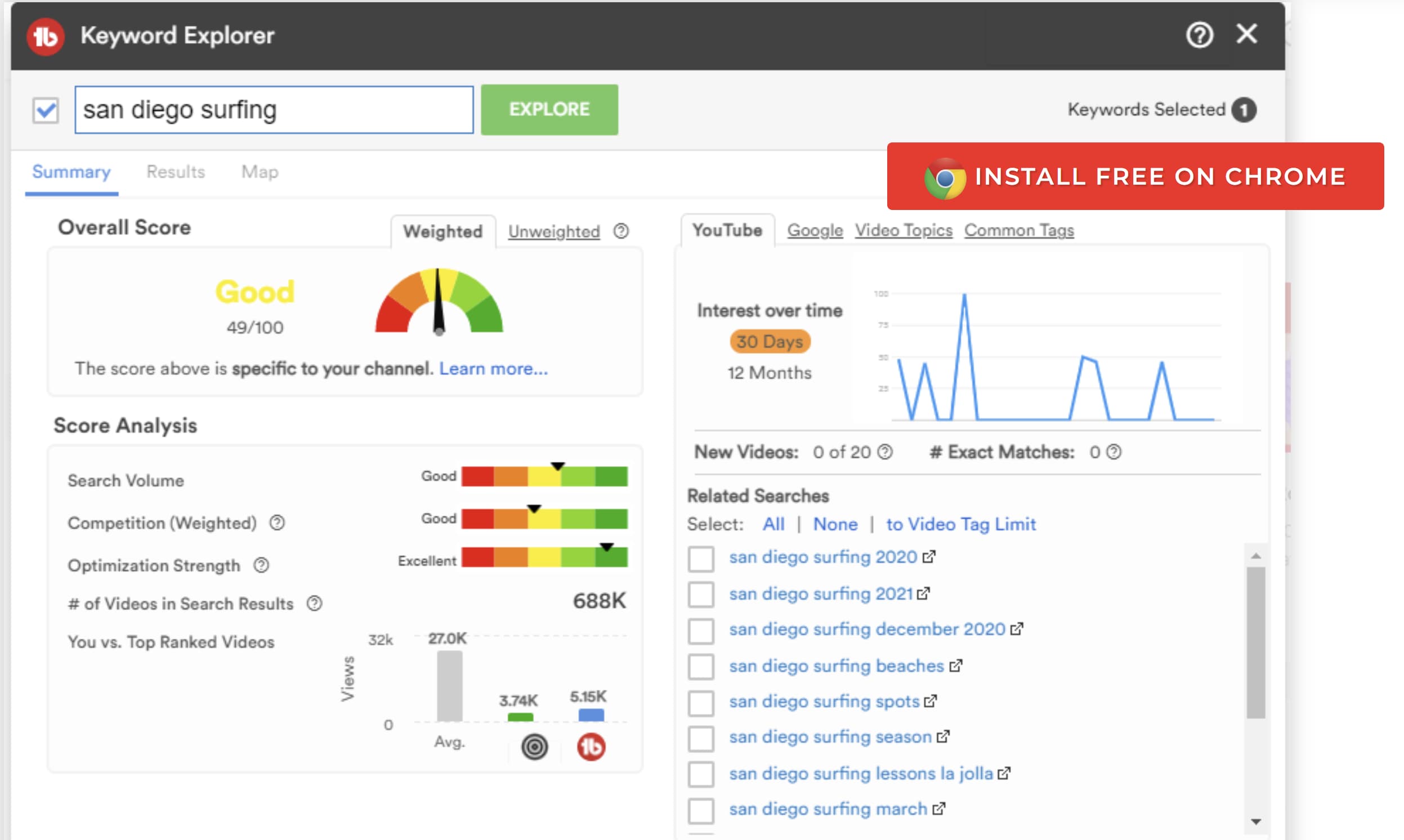
To find the best hashtags for your video, look up videos of other creators in your niche to see what tags they are using. Or search words in the YouTube search bar to see what other popular words and phrases come up. TubeBuddy is also a great tool for YouTube content creators and has a feature that allows creators to find keywords and phrases that can be turned into hashtags.

Screenshot of TubeBuddy's keyword explorer feature which can be used to find YouTube hashtagsImage source

Make sure you don’t use too many hashtags in your videos. According to Google, the more hashtags you use, the less relevant your video becomes. Try to stick to no more than three hashtags per video. If your video contains more than 60 hashtags, YouTube will ignore every single hashtag, and your video may be removed from your uploads or search results.

Your video may also be removed if you’re using irrelevant or misleading hashtags. So, remember — not all trending hashtags will guarantee success for your video. If you see a hashtag trending on YouTube, but it’s not relevant to your video — just leave it alone.

Popular YouTube Hashtags

Here are some popular hashtags for different kinds of YouTube content.

Hashtags for Gaming Videos

#gamers

#games

#live

#gaming

#gameplay

#youtubegamer

#gamereview

#gamer

#livestream

#gamecommentary

Hashtags for Food Videos

#food

#foodie

#cook

#tastyrecipes

#tasty

#healthyfood

#healthydinner

#yummy

#recipes

#homemadecooking

Hashtags for Beauty and Fashion Videos

#beautyhacks

#skincare

#fashion

#grwm (get ready with me)

#fashiontrends

#makeup

#modeling

#ootd (outfit of the day)

#makeuptutorial

#makeuphacks

Hashtags for Entertainment Videos

#funny

#comedy

#lol

#shorts (for YouTube Shorts)

#live

#skit

#music

#comics

#film

Hashtags for Educational Videos

#teaching

#learning

#education

#funfacts

#science

#technology

#literature

#theory

#school

#videoessay

Top YouTube Hashtags

These are some of the top YouTube hashtags that can be applied to most kinds of videos.

#youtube

#youtubers

#viral

#subscribe

#video

#youtubemusic

#youtubechannel

#youtubevideos

#youtubeshorts

#youtubecreator

Using YouTube hashtags will help your videos find the right audience — leading to growth for your channel. Just remember to always use relevant hashtags and not over-tag your content. If you remember these rules, you’ll be able to use YouTube hashtags to your advantage.

New call-to-action

Categories B2B

100 of the Best Hashtags for TikTok

TikTok has over 1 billion active users a month, making it one of the most popular social media platforms to date. With so many users, there are plenty of opportunities for brands to create viral content that captures the attention of their target audiences. But a billion monthly users also leads to stiff competition, so it’s important to use hashtags to bolster your content and help it stand out.

If you’re worried about finding the right hashtag for your content, don’t worry! I’ve put together a list of 100 of the best hashtags for TikTok videos. No matter the kind of content you’re creating, these will help guide you in the right direction.

What are the best hashtags for TikTok?

The Best Hashtags for TikTok to Go Viral

Hashtags for Funny Content

Hashtags for Relationship Content

Hashtags for Family Content

Hashtags for Entertainment Content

Hashtags for Pet Content

Hashtags for Food Content

Hashtags for Motivational Content

Hashtags for Beauty Content

Hashtags for Health and Wellness Content

Free Ebook: The Marketer's Guide to TikTok for Business [Download Now]

What are the best hashtags for TikTok?

The best hashtags for your soon-to-be viral TikTok video depend largely on the kind of content you’re uploading. However, there are some general hashtags that generate millions (even billions) of views and are vague enough to work with almost any kind of video. The hashtags are:

#viral

#fyp (short for For You Page)

#tiktok

#viraltiktok

#trending

#trendchallenge

#trend

#follow

#viralsound

#repost

Pro Tip: General hashtags like the ones above are great for most videos and topics, but you should also use more specific hashtags that correspond with the content you’re putting out.

The Best Hashtags for TikTok to Go Viral

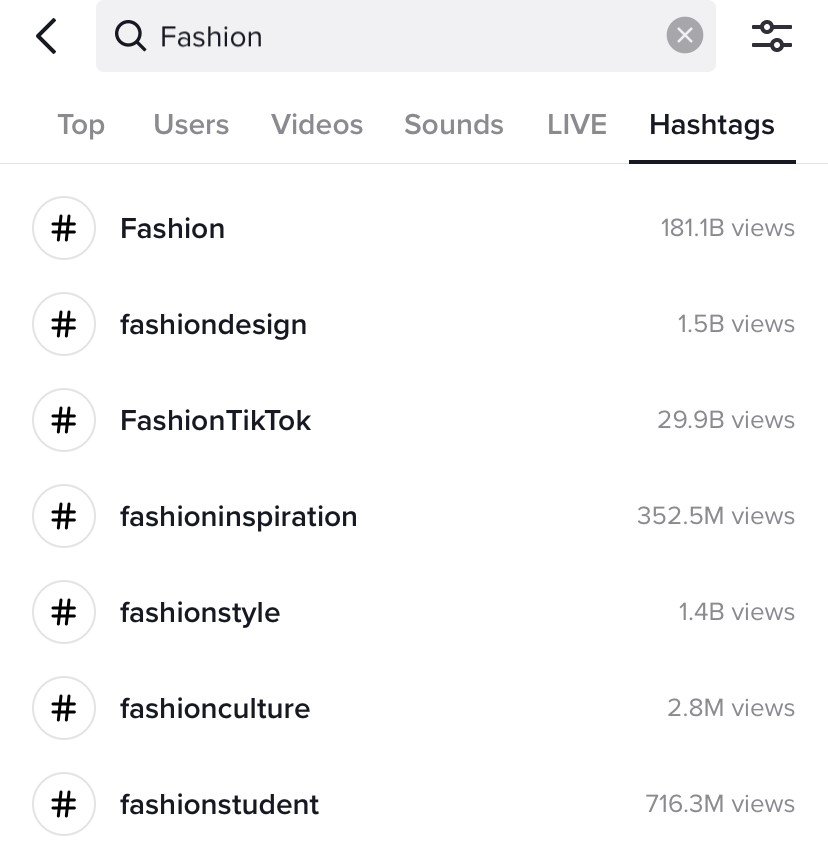
To find the best hashtags to make your video go viral, check out content from other TikTok creators in your niche to see what they’re using. You can also search keywords and hashtags in the app’s search bar to find hashtags with the most views.

Best TikTok hashtags for fashion

To make finding the right hashtag easier, here are hashtags that gain up to billions of views. Even better — they’re divided by category

Hashtags for Funny Content

#standup (meaning standup comedy)

#standupcomedy

#meme

#memes

#fun

#comedy

#lol

#humor

#funny

#satire

Pro Tip: Use your name as a hashtag and use other hashtags that correspond with the topic of your comedy. For example, the comedy page @donttellcomedy posted a clip of standup comedian Amy Silverberg sharing a story about teaching poetry to her students. Her name is included in the hashtags as #amysilverberg, and other hashtags include #poetry, #englishteacher, and #education.

Using your name as a hashtag, regardless of the content you post, can make it easier for people to find your work on TikTok.

Hashtags for Relationship Content

#relationships

#relationshipgoals

#relationshiptiktok

#dating

#datingtips

#friendshipgoal

#friendship

#couple

#couplesgoals

#couplesoftiktok

Pro Tip: If you and your loved ones go to an event or famous place, include that in your hashtags. For example, the video below says a trip to the zoo is an excellent idea for a first date, and it includes #zoo among other hashtags like #relationship and #date.

Hashtags for Family Content

#family

#familygoals

#familyfun

#familyfitness

#familydinner

#parenting

#parentinghumor

#parentingtips

#parentinghacks

#gentleparenting

Pro Tip: Many famous families on TikTok will create hashtags with their last names. For instance, @nnatalieaguilar is a popular TikTok content creator with 5 million followers on the app. She regularly posts videos about her family and always includes #theaguilars in all of her family-related posts.

@nnatalieaguilar little sister has no chill 😂 she really called her out 🤦🏽‍♀️
#theaguilars
#relatable
#sister
♬ Quirky – Oleg Kirilkov


Hashtags for Entertainment Content

#entertainment

#popculture

#popculturenews

#music

#comics

#booktok

#books

#film

#filmtok

#anime

Pro Tip: Entertainment is a broad niche ranging from books to films to music to comics to anime. The above hashtags are great starters that get up to billions of views, but to hit your target audience you should research other hashtags that are more specific to your niche. For example, many comic book-related content creators on the app use hashtags like #dccomics or #marvel to reach comic book fans.

Hashtags for Pet Content

#pet

#PetsOfTikTok

#pets

#petchallenge

#CatsofTikTok

#DogsofTikTok

#furbabies

#catmom

#dogmom

#animals

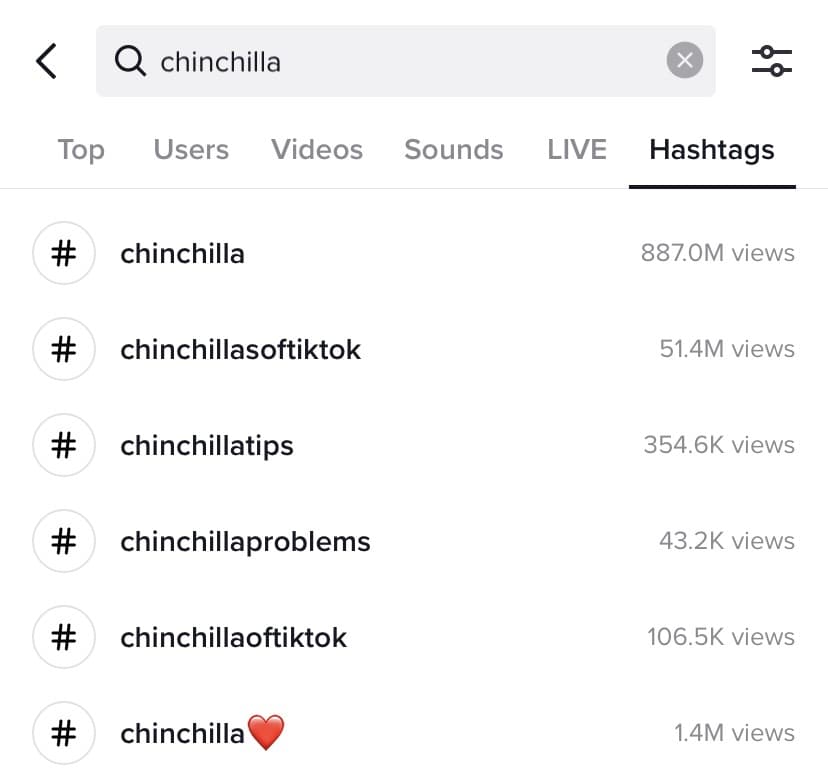
Pro Tip: If you have an unconventional pet, like a chinchilla, for example, look for other quirky pet owners on TikTok and see what hashtags they are using. Those hashtags may not be as popular as #PetsofTikTok, but they will help you find your niche on the app and connect with viewers looking for your kind of video.

For example, #chinchillasoftiktok doesn’t get as many views as other pet hashtags. However, it still has over 51.4 million views on the app and is widely used by chinchilla owners and enthusiasts.

Best TikTok hashtags for chinchillas


Hashtags for Food Content

#Food

#FoodTok

#foodchallenge

#foodlovers

#FoodHacks

#Foodie

#Foodies

#tiktokfoodie

#foodietiktok

#yum

Pro Tip: Be sure to tag any restaurants or brands behind the food you’re showing in your content. This can encourage the restaurant or brand to repost your TikTok, leading to more views. If you’re cooking a particular dish, make that into a hashtag as well. For example, if you’re making sushi, include #sushi in your post.

Hashtags for Motivational Content

#Motivation

#motivationalquotes

#motivational

#motivationalvideo

#motivationalspeech

#motivationalclip

#mondaymotivation

#MotivationMonday

#motivationmusic

#motivationalbooks

Pro Tip: If you’re sharing a clip of someone else’s motivational video, speech, or content, make sure to tag that person. It’s good manners (you should always give people proper credit), and that person will be more likely to share or bring attention to the video.

Hashtags for Beauty Content

#beauty

#BeautyTutorial

#BeautyHacks

#BeautyRoutine

#BeautyTips

#Makeup

#MakeupTutorial

#MakeupHacks

#MakeupRoutine

#SkinCare

Pro Tip: Tag the brands you’re using in your beauty content and include them in hashtags as well.

Hashtags for Health and Wellness Content

#health

#Healthy

#HealthyLiving

#healthtips

#healthfood

#healthandwellness

#FitnessMotivation

#Fitness

#MentalHealth

#MentalHealthMatters

Pro Tip: Create a health or fitness challenge and a hashtag to promote it. For example, if your challenge is to do 50 squats a day, a good hashtag could be #50SquatsaDayChallenge.

It seems like there’s a new viral TikTok video popping up almost every day, so there’s no reason your video can’t be the next one. Now that you know the best hashtags to use and how to find the right ones for your video, you’re one step closer to going viral on TikTok.

Blog - Content Mapping Template

Categories B2B

Instagram is Taking on BeReal: Do Marketers Need to Care?

Remember a few years ago when Instagram launched a Snapchat-like feature to its app? More recently, the brand announced that it will shift to a video-first approach, presumably to compete against short-form video platform TikTok.

Download Now: Free Instagram for Business Kit + Templates

Well, today, Instagram is reportedly testing a feature that’s eerily close to the trending platform BeReal. In this article, we’ll talk about what this could mean for marketers.

Is Instagram Becoming a BeReal Copycat?

Before we get into Instagram, here’s a quick refresher on BeReal.

This social media app has been around for a few years but it only took off this year. The app has been labeled the anti-Instagram – encouraging users to strip away the filters and the glitz, and be more authentic.

Here’s how it works: The app uses a dual camera feature – front and back cameras – and at a random time throughout the day, users will be prompted to take a photo in their current environment within two minutes. They can’t upload a picture, it has to be taken from the camera.

Then, once you’ve shared, you’re able to see your friends’ posts who were prompted at the same time.

BeReal’s ad reads “No filters. No likes. No followers. No bullsh*t. No ads. Just your friends, for real.”

The shade toward Instagram isn’t exactly subtle but it does reflect a critique many users have made, including influencers like Kylie Jenner.

There’s even a change.org petition with over 300,000 signatures titled “Make Instagram Instagram Again.”

Instagram has seemingly responded by testing a BeReal-like feature – among other ones. In July, the platform introduced “Dual,” which allows users to post content using both the front and back cameras.

At this point, the only similarity was the camera aspect.

However, a few weeks later, developer Alessandro Paluzzi discovered that Instagram was testing “Candid Challenges,” a feature using Dual that would also have a timed component prompting users to share on their Story. Sound familiar?

Instagram confirmed this in a brief statement, saying that it’s an internal prototype with no external testing currently.

Should marketers care about Instagram taking on BeReal?

The short answer is it’s still too early to tell.

The first reason is that it’s still not clear whether BeReal is a suitable platform for brands. As it stands, BeReal doesn’t have many (if any) brand-friendly tools.

With Instagram potentially adopting BeReal features, this could give the app the freshness and authenticity it’s been missing lately.

This is good news for brands, as they could continue building on Instagram without having to adjust to and grow on a new platform.

One TechCrunch article suggests that BeReal is still very much in its infancy phase, struggling with glitches that impact the user experience.

While BeReal could threaten Instagram’s dominance, it’s not quite there yet.

For now, it’s worth keeping an eye on both platforms to see how their features evolve and user sentiment along with them.

New Call-to-action

Categories B2B

Creator Economy: Everything Marketers Need to Know

The media landscape has changed significantly over the years thanks to the rise of the internet and social media. With platforms like YouTube and TikTok, anyone can go online, create content, and find their niche audience. As a result, media has become more decentralized than ever, and millions of content creators have created a new space in the entertainment industry — the creator economy.

But what exactly is the creator economy, and why should marketers care? Here’s everything marketers need to know:

What is the creator economy?

Social Media’s Role in the Creator Economy

Platforms with Content Creator Funds and Programs

How Brands Should Use the Creator Economy

Download Now: 150+ Content Creation Templates [Free Kit]

What is the creator economy?

The creator economy is an online-facilitated economy comprised of millions of content creators, such as social media influencers, videographers, bloggers, and other digital creatives. The creator economy also includes software and tools designed to help these creators grow and profit from their content.

The creator economy is a relatively new addition to the media and entertainment industry, and it’s something that anyone from any generation can be a part of. Whether you’re a millennial with a true crime podcast or a Gen Z fashionista with a style blog — you can be a part of the creator economy in whatever niche you choose.

Think about it — if a TikTok account rating bathroom sinks around New York City can go viral, then there really is no limit to what’s possible in the content creation business.

Social Media’s Role in the Creator Economy

The rise of social media has fueled growth in the creator economy. According to Forbes, there are about 50 million content creators across multiple platforms, including YouTube, TikTok, Instagram, and Twitch. That’s about 50 million people participating in the creator economy.

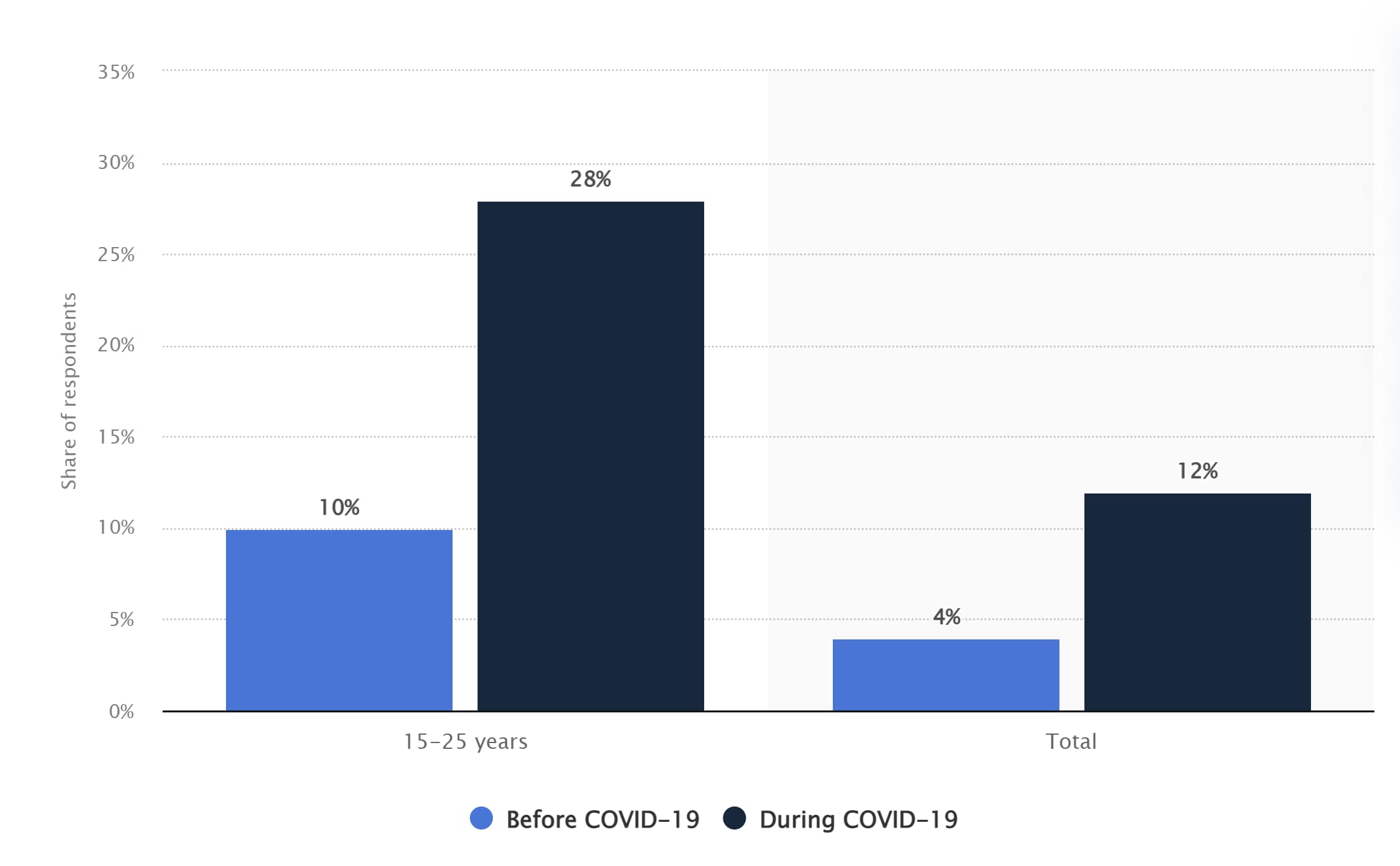
The creator economy saw significant growth during the start of the COVID-19 pandemic. During this time, many people found themselves working from home or looking for new income streams due to budget cuts and layoffs. This resulted in more people having more time or incentives to create content on platforms like TikTok, Twitch, and YouTube.

In fact, TikTok saw a significant increase in users during the height of the pandemic, which directly contributed to a boom in the content creator economy. According to Statista, TikTok experienced a growth of 180% among users ages 15-25 after the pandemic broke out in the U.S. in 2020.

Graph showing how TikTok experienced a large boom in users at the start of the COVID-19 pandemicImage source

Aside from financial opportunities (and an escape from boredom), social media provides a digital space for almost anyone to post their content, promote their work, and build a loyal fanbase. In the creator economy, you can be a creator without investing in expensive equipment or getting the backing of major studios.

For example, Kyle Prue rose to fame on TikTok with videos showcasing his dry humor. All his videos are shot from his apartment using his iPhone and the mic on his Apple headphones. Despite his simple setup, Prue has over 1 million followers on TikTok and 32.5 million likes.

@kyleprue Reply to @turbo_queen.hm they expelled me on the ides of March actually
#fyp
#friendship
#polyamory
#genevaconvention
♬ original sound – Kyle Prue

He also wrote and starred in his dark comedy-drama web series, “The Rabbit,” which he posted to YouTube for viewers to watch for free. Prue put the series together with his own money and without the help of any major studios or production companies. Each episode has between 20,000 to 71,000 views.

Platforms with Content Creator Funds and Programs

As I mentioned, many people turned to the creator economy to earn money — especially at the start of the pandemic when companies were experiencing hiring freezes and layoffs. Many digital platforms contribute to this economy via their creator funds and programs, including:

YouTube

For years, content creators on YouTube have made money via ad revenue from video advertisements. YouTube also has the YouTube Partner Programs, which gives creators access to exclusive features and various monetization opportunities. To compete with TikTok, YouTube also launched the YouTube Shorts Fund, dedicating a total of $100 million to creators from 2021 to 2022.

Instagram

To keep up with the growing creator economy, Instagram has rolled out many new opportunities for creators to earn money off their posts to the app. One opportunity is the Instagram Live Badges, which allows users to send monetary tips to their favorite creators during live streams. Another opportunity is the Instagram Reels Play Bonus Program, where creators earn money based on the performance of their Reel.

Other monetary opportunities include:

  • Branded content
  • Shops for creators to sell directly to their followers
  • In-stream video ads
  • Affiliate programs

TikTok

TikTok’s Creator Next Program includes its $200 million creator fund, tipping and gifting opportunities, and a creator marketplace to connect creators with brands. The creator fund is accessible to many creators, including those with only 10,000 followers — so long as they have at least 100,000 video views within 30 days.

Twitch

Streaming platform Twitch has its Twitch Partner Program, where creators can earn income in multiple ways. One way is through channel subscriptions. With channel subscriptions, streamers earn revenue when their viewers subscribe via the following options: Tier 1, Tier 2, Tier 3, or Prime.

Bits is another feature of the program, allowing viewers to purchase virtual goods to “cheer” on streamers. Streamers get a percentage of the revenue Twitch receives from these purchases. And finally, Twitch streams can earn money via ad revenue from ads run during their streams.

Other Ways Content Creators Make Money

Though many social media platforms provide creators opportunities to make money through creator funds and programs, content creator earnings typically aren’t very high.

According to a survey by NeoReach and Influencer Marketing Hub, only 1.4% of the 2,000 content creators surveyed earn over $1.4 million annually. Only a little over 20% make a livable wage of $50K or more a year. To combat this issue, content creators will often supplement their income by other means, such as:

  • Brand deals and partnerships
  • Sponsored content
  • Paid subscriptions
  • VIP meet-ups
  • Event hosting
  • Merchandise
  • Live and virtual events

Some content creators may also use their online presence as a stepping stone toward more lucrative ventures. For instance, Tabitha Brown is a social media personality and actress who became famous on TikTok for her calming videos of affirmations and recipes.

Her fame on social media led her to being cast in popular television shows like Showtime’s “The Chi.” Brown also has her own show, “All Love,” on Ellen DeGeneres’ digital platform EllenTube as well as a bestselling cookbook and an ongoing partnership with Target.

How Brands Should Use the Creator Economy

Viewers tend to care more about people and personalities than brands in the creator economy. As a result, many major brands have struggled to find their footing on platforms like TikTok or Twitch. However, there is still a way brands should tap into the creator economy to grow their audience and gain revenue — influencer marketing.

Brands should reach out to influencers with a loyal social media following to spread the word about their products or services. A great example of influencer marketing would be the work of TikTok personality Drew Afualo. Afualo is famous on TikTok for creating videos that poke fun at misogynists and uplift women.

Since gaining millions of followers on the app, Afualo has been tapped to promote films like “The Lost City,” starring Sandra Bullock and Channing Tatum.

@drewafualo
#ad Make sure you check out The Lost City out 3/25 😎 Sandra Bullock is the baddest period @Paramount Pictures
#fyp
#xyzbca
#girls
#men
#funny
#college
#embarrassing
#OscarsAtHome
#WomenOwnedBusiness
♬ Joy (30 seconds) – TimTaj

Online fashion retailer Shein has also worked with Afualo to promote the company’s SheinX collection.

@drewafualo Lmk which outfit is your fave 🤓 Shop the
#SHEINX Collection & use my code “DREW” to save 15% off the entire @SHEIN US site!
#SHEINpartner
#fyp
#xyzbca
#girls
#men
#funny
#college
♬ original sound – Drew Afualo

There are many ways to leverage Influencer marketing. Popular tactics include social media takeovers in which an influencer “takes over” a brand’s social media account for a day. Some brands like Genius will host live Q&As with influencers or celebrities on platforms like Instagram Live or Twitter Spaces. Additionally, paid partnerships, product placement, and sponsorships are considered tried and true methods.

Just remember — if you’re leveraging influencer marketing, you’ll need to ensure the influencer’s content and image align with that of your brand. After all, you should always practice discernment with who or what is associated with your brand or organization.

The creator economy is how influencers and creatives earn income by creating content that is unique to them and taps into their niche audience. However, it’s also an excellent avenue for brands to generate awareness and remain relevant in an ever-changing media landscape. Now that you know about this growing economy, you can find new and innovative ways to incorporate it into your marketing strategy.

content templates

Categories B2B

8 Networking Tips for LGBTQ+ Professionals at Conferences and Events

Welcome to Breaking the Blueprint — a blog series that dives into the unique business challenges and opportunities of underrepresented business owners and entrepreneurs. Learn how they’ve grown or scaled their businesses, explored entrepreneurial ventures within their companies, or created side hustles, and how their stories can inspire and inform your own success.

Networking is connecting with other business professionals, building relationships within and outside your field, and diving into your story to establish the “why” behind your work.

Effective networking highlights your expertise and that of your peers so that you can find a middle ground of opportunity, collaboration, and collective problem-solving. Because of the power of networking, professionals are often told to focus on building their networks.

That is easier said than done, though, because people from marginalized communities — specifically individuals who are Lesbian, Gay, Bisexual, Transgender, and Queer (LGBTQ+) — have historically been underrepresented and left out of the very spaces that are necessary to be in to make those valuable connections.

In this post, we’ll discuss why networking can be a challenge for LGBTQ+ professionals, where LGBTQ+ professionals can network, and tips for successful networking.

Free Download: 30 Follow-Up Email Templates

Why is networking a challenge for LGBTQ+ professionals?

The lack of access and representation in leadership roles at organizations can make networking a uniquely arduous task for LGBTQ+ people.

A June 2020 report from McKinsey & Company found that openly LGBTQ+ women comprise only 1.6 percent of managers and an even smaller share of more senior levels within organizations. LGBTQ+ men make up 3% of senior managers/directors, 1.9% of vice presidents, and 2.9% of senior vice presidents.  The same report found that transgender people face exceptionally sharp barriers to advancement in the workplace, and their experience is distinct from that of cisgender people who also identify as lesbian, gay, bisexual, or queer.

As a result, finding people to network with that share common values and experiences can be challenging, which is why events specifically for LGBTQ+ professionals are a valuable place to develop relationships.

Where can LGBTQ+ people network?

Professional conferences and events are an excellent opportunity to shift the narrative on representation as they provide opportunities for LGBTQ+ people to network and build connections. And, a beneficial aspect of networking at conferences is that they typically have a sense of community built in via curated programming and central themes.

For LGBTQ+ people, the built-in community environment of conferences can be particularly helpful because research shows that LGBTQ+ people are more likely to feel isolated and less supported by their peers, and management, in workplaces. In addition, conferences also give attendees access to industry leaders they otherwise might not meet to share their stories, experiences, and expertise with.


So how can LGBTQ+ people harness the power of networking at conferences? This is an especially important question to answer in 2022 as events return in full force since being largely halted due to the COVID-19 pandemic.  

8 Networking Tips for LGBTQ+ Professionals

Returning to in-person or hybrid networking across virtual and in-person spaces can feel awkward after being out of practice for several years. Here are eight tips to get you started to maximize your opportunities as an LGBTQ+ professional.

1. Find the conference or event’s target audience.

The first step before entering any new situation is to know who your audience is, aka who will be there. Are you attending a primarily or exclusively LGBTQ+ professional conference such as Lesbians Who Tech & Allies and The Out & Equal Workplace Summit, or is it a general industry-wide conference?

When you have this information, it becomes easier to create a plan of action for establishing goals and how you’ll approach people at the event.

2. Create a 360 plan.

Once you know your audience, you can make a 360 plan, meaning what you need to do before the conference, during, and afterward. Yes, any good networking plan involves a post-conference plan, like establishing the tools you’ll use to follow up after meeting new contacts (or reconnecting with former contacts).

A great strategy is to develop a post-conference spreadsheet of the contacts you met,  organize the spreadsheet by industry or company, and include notes about your interactions, talking points or questions you have, etc.

Here are some other questions to take into consideration as you develop your 360 conference networking plan:

  • Who do you want to connect with? — Are there specific individuals, people from specific organizations, companies, or industries?
  • What do you want to know? — Are you interested in exploring current industry trends, challenges that people in similar roles to you are having, or any new projects people are working on?

3. Establish clear expectations and goals.

Part of developing your plan is establishing clear expectations and goals. Doing this helps you manage your time better and avoid the sense of overwhelm that can be common at conferences from the pressure to connect with as many people as possible.  

Be specific and clear in these goals and expectations. Most importantly, be realistic. For example,

  • “I want to walk away with x number of new contacts” — If you are going to use #’s as metrics, be realistic about this. Bigger/more is NOT always better.
  • “I want to connect with people from x organization or company.”
  • “I want to share my experiences doing x with x people.”

4. Set personal boundaries.

Along with setting clear goals and expectations, you should also be setting clear boundaries.  

We don’t often discuss or think about boundaries regarding networking because the old adage is “More is better.”

Still, setting boundaries can mean not accepting people misgendering you or disrespecting your identity, carefully considering offers for connection to see if they’re relevant to you, asking questions to ensure your expertise is not being taken advantage of, and honoring yourself and your needs as you meet new people.

5. Take advantage of tech tools for connecting.

An integral part of developing your networking plan should be taking advantage of tech tools for connecting.

Many conferences use apps that allow attendees to make profiles, share contact information, make virtual business cards, and more. Take advantage of these tech tools to build your profile and identify people you want to connect with beforehand.

Additionally, ensure your LinkedIn or other profiles are up to date before attending the event. LinkedIn can be a major tool to drive engagement and new connections, especially during and post-conference.

6. Connect for community, not clout (and appreciate the slow build).

Focus on making genuine connections and building community versus falling into the trap of quid pro quo networking “I can do this for you if you can do this for me.” Avoid transactional relationships, and focus on building genuine relationships.

Additionally, appreciate the slow build, especially coming out of the COVID-19 pandemic — people are getting used to reconnecting and networking. It takes more time than it used to to establish those connections, especially if you are trying to break into a new industry or field.

7. Share your unique story.

Your story is the heart of who you are and, in many cases, the “why” behind your work. Come up with 3-4 core talking points of who you are and your why that you will be able to share with folks in conversation as you meet them.

You can even take the next step by having materials ready to showcase who you are, examples of your work, and how to get in touch with you.

8. Take breaks.

Take breaks throughout the conference day. Build them into your schedule, even if they aren’t built into the event schedule itself. You do not have to attend every session, plenary, or talk to maximize your networking capabilities at conferences and events.

Free Resource: How to Reach & Engage Your Audience on Facebook

Categories B2B

10 Best TikTok Tricks to Go Viral in 2022 [+ Examples]

On TikTok, anyone can go viral. But due to its quirky nature, it’s often the most creative or silly videos that skyrocket.

Of course, it also helps that TikTok has a massive audience who are super engaged. To increase your chances of being seen, there are a few tips and tricks we recommend you try. 

Free Ebook: The Marketer's Guide to TikTok for Business [Download Now]

From leveraging trending audio to green screen effects, read on to discover the 10 best TikTok tricks.

1. Stitch top-performing or relevant videos.

Stitch is a tool that enables you to combine another video on TikTok with one you’re creating. It’s yet another way to collaborate with other TikTokers, leverage user-generated content, and expand your reach.

Start by looking for top-performing videos in your niche. You can do this by using the search bar and typing keywords relating to your brand. Or, check if any videos directly mention your brand.

Once you find a video to stitch, tap the Share icon on the right-hand side.

TikTok tricks: stich toolThen, tap Stitch. This will open an editing tool where you can select five seconds of the video to use in yours.

TikTok tricks: stiching

Let’s look at stitching in action with an example from Puma.

Example: Puma

In case you’re out of the loop, latte art is a huge deal on TikTok — amassing over 2.4 billion views. When one user put the Puma logo on top of a steaming cup of coffee, the brand decided to join the action by “stitching” the original video and attempting to recreate it.

This is a great example of a brand collaborating with its audience and leveraging user-generated content.

@puma 🚨BAKERS, ARTISTS, & BARISTAS🚨 Can you recreate the PUMA logo like @1leogonzalez
♬ TWINS – Kaygon

2. Use the green screen effect.

TikTok has many filters and effects, but one stands out from the crowd: the green screen effect.

Like a traditional green screen, this effect lets you stay on-screen while different images appear in the background. It adds a whole new level of storytelling by incorporating visual aids.

TikTok trick: green screen effect

This filter is ideal for explaining topics, providing recommendations, or whenever visuals could complement your story.

For instance, suppose you’re a fitness influencer. You could explain the proper form of an exercise by referencing photos in the background. In this case, the background visuals enhance your commentary rather than distract from it.

Example: Levi’s

Using the green screen effect, Levi’s recommends different jeans using product photos in the background. Viewers can easily follow along, and seeing pictures of the jeans may pique their interest.

3. Leverage trending audio.

88% of TikTok users say sound is essential to the TikTok experience. It grabs people’s attention and adds flavor to your content. And for many users, it’s the starting point for creating a great video.

TikTok trick: Creative Center

Not sure what sounds are trending right now? TikTok’s Creative Center ranks the most popular music and audio clips each day. You can even filter the results by region, which is helpful if your audience is in a different location from yours.

Example: Duolingo

Duolingo is a fan favorite on the platform, especially for its funny, trendy, and sometimes chaotic videos featuring its mascot, Duo the Owl. Duo can be seen dancing to popular songs and acting in skits that incorporate popular audio clips, like in the example below.

4. Try vlog-style videos.

Vlog-style videos feel more personal and intimate — which might explain why they’re so popular on TikTok.

These videos typically include multiple clips tied together with a voiceover describing the series of events. It’s highly engaging and lets viewers feel like they’re living in your shoes.

Example: Netflix

This example shows Netflix using the vlog style to take its audience on a journey. While most of us won’t walk a red carpet in our lifetime, we can still get a peak of what the experience entails — and how our favorite actors behave off-screen. It’s also a great way to showcase “behind the scenes” content.

@netflix mini vlog of the premiere for @lilireinhart’s new movie on Netflix
#lookbothways
♬ original sound – Netflix

5. Incorporate both niche and trending hashtags.

Making a TikTok is half the battle — you also need to ensure it lands in front of your audience. Hashtags are one way to get there.

Adding hashtags in your description gives your videos a better chance of being seen, allowing you to drive discoverability, build brand awareness, and extend your reach. But how can you do it?

This may sound counterintuitive, but only targeting popular hashtags is ineffective. While they command a larger audience, they’re also highly competitive. On the other hand, niche hashtags have fewer people searching for them, but those who do are highly engaged and interested.

For example, #workout is a popular hashtag with over 95 billion views, but #coreworkout is more niche with a fraction of the audience.

TikTok Hashtags (1)A well-rounded hashtag strategy should include both niche and popular hashtags. Take a look at the example below.

Example: Dunkin’

Fall is just around the corner, and Dunkin’ is getting everyone hyped for its seasonal menu. To get the word out, the brand incorporates a variety of hashtags to reach more people.

For instance, the video below uses #fall, a trending hashtag (15+ billion views), and #pumpkinszn, a more niche hashtag with fewer views (40+ million). By including #pumpkinszn, Dunkin’ can tap into a smaller, more engaged audience.

@dunkin Let’s give them PUMPKIN to talk about🙌🎃 @Zachariah
#pumpkin
#pumpkinszn
#fall
♬ original sound – Dunkin’

6. Reply to comments with video.

On TikTok, almost every brand has the same goal: to connect with its audience. So often, that connection forms in the comment section. It’s where viewers go to ask questions and share opinions.

Before, creators were stuck replying to comments with text, but now they can reply with video. This feature allows you to dive deeper into topics, answer questions, and keep your audience coming back for more. 

Example: Glossier

When a TikTok user asked Glossier how to use one of its products, the brand didn’t miss the opportunity to reply with a video explaining all the ways to use it. In doing so, the brand adds value while highlighting the product’s versatility.

@glossier Replying to @robertpattinsonwife The limit does not exisit! How do you Futuredew?
#glossier
#futuredew
♬ original sound – Variations Everything

7. Add value with “How To” TikToks.

“How To” videos and tutorials are an easy way to provide value to TikTok viewers without sounding overly promotional. Plus, positing yourself as an expert or authority in your niche keeps your brand, products, and/or services top-of-mind for viewers.

For instance, if you’re a travel brand, you could film videos of must-see attractions, restaurant recommendations, and travel tips — like the example below.

Example: Travel + Leisure

Travel + Leisure provides all the content you need to “kick your wanderlust into high gear.” From hotel recommendations to photography tips, the brand has you covered, positioning itself as a gold mine of advice for the travel obsessed.

8. Leave a CTA in your description and/or comments.

Need more engagement? Sometimes, it’s as simple as asking for it.

The ultimate goal of a CTA is to persuade users to do something — follow your TikTok page, visit your website, leave a comment, and so on. So ask yourself, what do I want my viewers to do? Whatever you choose, it should help you move closer to your primary goal (i.e., drive website traffic, increase brand awareness, etc.).

Your description and comment section are prime real estate f9=or CTAs. Use this area to ask questions, encourage users to follow you, or drive traffic to your website, blog, or other social channels (ex., “More tips on my blog, link in bio!”). 

On top of that, if you’re running ads, we recommend using a marketing integration tool, such as LeadsBridge, to sync all your lead data to your CRM.

Example: Fenty Beauty

In this TikTok, Fenty Beauty shows different ways to use one of its products. Then, to encourage engagement, they add a relevant question in the description that also incorporates a brand-specific hashtag (“Which #POUTSICLE look was ya fave?”).

@fentybeauty Which
#POUTSICLE lewk was ya fave?? Let us know below, besties!👇🏼💋✨
#fentybeauty
#lipstain
#beautytutorial
#makeuphacks
♬ Instrumental R&b – Teaga

9. Add subtitles to your videos.

In 2021, TikTok became more accessible with the introduction of auto captions. Although you can manually add captions — which allows for greater flexibility to play around with text color and font — you can also use the Captions tool. With just a click, you can generate subtitles for your videos, allowing others to read or listen to your content.

TikTok captionsImage Source

By adding subtitles, you make your videos fully accessible, which means you can reach an even wider audience. Plus, it also helps viewers who want to browse TikTok but can’t turn the sound on.

Example: Formula 1

If you’re into car racing, there’s a good chance Formula 1’s TikTok is on your radar. 
But have you ever noticed how often they add subtitles to their videos?

Take the example below, which uses colorful captions and emojis to add an extra layer of interest to the video. And if you mute your phone, you can still follow along without skipping a beat.

@f1 yuki really struggled with the food question 🥹
#f1
#yuki
#sports
#food
♬ Aesthetic – Tollan Kim

10. Explore top-performing videos in your niche for inspiration.

The most successful videos on TikTok are creative, out-of-the-box, and often quirky by nature. That’s a tall order — which is why every brand should explore the top-performing videos in its niche for inspiration.

Start by typing keywords relating to your brand in the search bar. Then, click the filter icon and select “Most liked.” This will populate TikTok videos that have gone viral using that specific keyword.

TikTok trick: Stitch

Once you’ve identified some top-performing videos, brainstorm ways to recreate them while adding your own spin. 

Back to You

TikTok is a quirky platform, and brands willing to get creative see the most success. If you’re new to TikTok, start with the tips in this article — and give yourself room to experiment with different videos, filters, and concepts.

Blog - Content Mapping Template

Categories B2B

Why Consumers Participate in Online Communities [Data & Expert Insight]

Online communities are internet groups where people with shared interests interact, have discussions, and form relationships.

According to HubSpot’s State of Consumer Trends Report, 24% of social media users have actively participated in an online community in the last three months.

24% of consumers have actively participated in an online communityThis post will delve into why consumers join online communities, the benefits they get from participating in them, and what this means for marketers.

Download Now: 2022 State of U.S. Consumer Trends Report

Why Consumers Participate in Online Communities

The HubSpot Blog’s Consumer Trends Report surveyed over 1000+ consumers and asked them why they join online communities. The top reasons were for fun, to share their same interests with others, and to stay connected with their communities.

graphic displaying the top three reasons why consumers join online communitiesOnline communities are especially impactful for Gen Z, who value in-the-moment connection. In the past three months, 22% of Gen Z have joined an online community, and 36% of Gen Z actively participated in an online community (higher than any other generation).

Christina Garnett, Senior Marketing Manager, Offline Community & Advocacy, says a draw to online communities is that they remove the friction that can come from in-person communities, as people around the world can connect with others without needing to travel to different locations.

She says that with the advent of smartphones, online communities become “‘In your pocket’ or ‘turn on your laptop’ communities where the only thing you need to feel connected to others is an internet connection.” Access can be as simple as tapping an app on a phone or clicking on a bookmarked website instead of traveling elsewhere, so the appeal increases.

The HubSpot report also asked consumers the most significant benefits they get from participating in online communities, and they said learning new things, gaining new ideas and inspiration, and being able to meet and interact with others with similar interests.

bar graph that displays the top seven benefits consumers get from online communities

Image Source

Garnett adds, “The ability to connect without travel or without a sense of forced communication means that not only can people around the world connect with others, but that those who are more introverted are able to participate in the ways where they are most comfortable instead of feeling forced to go to events and have small talk in order to feel like a member.”

Takeaways for Marketers

There are two types of communities consumers can join: user-built communities, where a consumer creates or joins a community around an interest, like a Reddit board or subreddit, or a community built by a brand or business, like a branded Discord server or Facebook Group.

Even though businesses can only own one type of community, you can leverage both to understand your audience’s likes and dislikes, what they talk about, and even how they talk about your business.

For example, you can use social listening to see how consumers are talking about a new product you’ve launched, or you can ask consumers a question and create an interactive poll in your YouTube Community tab.

Regardless, online communities allow businesses to interact with customers, have conversations, and develop engaging relationships that build a connection — a critical pillar of customer loyalty.

New Call-to-action

Categories B2B

Why B2B Companies are Entering the Editorial Space [& What You Can Learn From Them]

What do HubSpot, Mailchimp, and Wistia have in common? They’re all B2B companies with high-traffic, lead-generating media engines that support their products.

→ Download Now: Free Marketing Plan Template

Wondering why so many companies are entering the editorial space? Industry experts cover that and more below.

1. The B2B marketing industry is shifting.

Marketing SVP at HubSpot Kieran Flanagan says the B2B marketing industry has gone through four major phases in the last decade.

What started as a focus on decision-makers has now evolved into a community-led approach that leverages media and publishing.

Many brands follow a product-led growth approach, in which the product itself attracts consumers and drives retention.

Any Atluru, former head of community at Clubhouse, says that this works great for utility-based products that have already been validated socially or don’t require a network of users to thrive. Think Slack and Calendly.

She highlights that a community-led model may be more conducive to brands whose products aren’t particularly unique and gain value through community. Think Peloton and Figma.

In this case, entering the editorial space will be a key part of your success.

2. The ad space is oversaturated.

On an episode of Marketing Against the Grain, CEO and co-founder of Notus, Yuliya Bel argues that ads no longer have the impact they used to.

“Like anything in marketing, there comes a point where it becomes saturated. Where people start to be like ‘Ok, we’ve seen this before, it’s no longer authentic or really speaking to us,’” she said.

She references an eBay study that revealed that brand search ad effectiveness was overestimated by over 4,000%.

With the incredibly high costs of running ads and rampant competition, this begs the question: Is the focus on ads for customer acquisition and engagement the best play?

She argues that investing in producing high-quality content and distribution tactics is the only way to ensure longevity in the online space.

Think about it this way: You could invest $100K into an advertising campaign but once it ends, so does your lead generation. Instead, you could invest that money into building a content team that will produce evergreen content that will bring in leads long after they’re published.

3. You meet your audience where they’re at.

Every brand wants to attract its audience organically.

While social media is the most popular way to achieve this – and the strategy that offers the quickest response – building a media engine is by far the most reliable and sustainable.

Why? The first is that it removes the reliance on third-party applications to reach your audience. If you’re solely relying on TikTok and Facebook, what happens if they are down for a few days? Or do consumers lose interest and transition to a new app?

You’ll constantly be adjusting your strategy based on the platform and trying to hit a moving target.

When you build your own engine, your audience comes to you.

The second reason is that you’re able to attract several personas using varying mediums.

For instance, those who listen to your podcast may have different needs and challenges from those who read your blog posts.

When you’re in the editorial space, you can tailor your content to each user type and where they are in the buyer’s journey. Whereas on social media, you’re throwing out content and hoping that it reaches the audience that will resonate with it the most.

The issue is that the editorial space is a long-term play whereas social media is a quicker turnaround. When building a media arm, you won’t see results overnight – it can take months to years to see the impact of your work so for many businesses, the wait can seem like a waste of time.

However, in the long run, attracting your audience organically through thoughtful content will be the most cost-effective and sustainable method for audience growth.

4. You establish yourself as an industry thought leader.

One of the best ways to stand out in the B2B space is to become a thought leader, a brand others go to for guidance on trends, innovative strategies, and more.

HubSpot CMO Kipp Bodnar way to differentiate yourself from the competition.

“There are a lot of technology industries where the pace of being able to innovate and create technologies is actually very fast,” he said on the Marketing Against the Grain podcast, “so, you need content and storytelling to differentiate.”

For HubSpot, media has been integral to our success – with our blog being a common first point of contact for many of our leads. Now, we’ve expanded to podcasts, videos, and newsletters.

Flanagan believes it’s crucial when growing your B2B brand.

“The most underrated skill in B2B tech in the future is editorial taste,” he says.

This refers to the ability to know what will resonate with your audience and how to execute it.

Once you’ve gained your audience’s attention and added value to their lives, they will trust the products you recommend to them – even if it’s your own. That’s reason enough for any company to enter the editorial space.

New Call-to-action