Categories B2B

Super Bowl Ads Consumers Loved in 2023 & What Marketers Can Learn [New Data]

The Super Bowl teaches us a lot about healthy competition each year — but we don’t always see it play out on the football field.

Some of the biggest game-day face-offs occur when the commentators send us to a commercial break. While football teams compete for trophies, companies spend millions trying to get more views, leads, and revenue than other brands advertising in their industry on the same day.

You can learn much from the top Super Bowl ads, even for a small brand, if you’re a video marketer.

Although these ads have budgets we couldn’t imagine, the brands behind them still leverage creativity and cleverness, allowing them to grow mass awareness and stand out among their fiercest competition.

To help you zone in on key takeaways from the Super Bowl ads that resonated most with viewers, we asked more than 150 U.S. consumers to vote on their favorite big-game ads within four major product categories this year.

Download Now: Free State of Marketing Report

The 4 Most Popular 2023 Super Bowl Ads, According to 150+ Viewers

Below are four consumer favorites, plus takeaways that any marketer can leverage to fend off their biggest competition.

Consumers’ Favorite Food and Beverage Commercial

Dunkin’ – ‘Drive-Thru’ Starring Ben Affleck

For years Ben Affleck has jokingly been referred to as Dunkin’s unofficial spokesperson — dating back to his 1997 breakout role in Good Will Hunting.

So it makes sense the Academy Award-winning actor decided to take over a Dunkin’ drive-thru in his home state of Massachusetts for the brand’s latest Super Bowl commercial — much to the surprise of some unsuspecting customers.

According to our survey, 34% of consumers said this commercial was their favorite Super Bowl ad from a food and beverage brand.


The ad takes inspiration from a popular internet meme from numerous photos of Affleck walking around with Dunkin’ products. The commercial also includes the real-life reactions of actual Dunkin’ customers when they realize a Hollywood star is taking their order.

The ad ends with fellow megastar Jennifer Lopez making a cameo to scold her husband and demand an order.

While your brand may not have the budget to book two A-list celebrities for your next video marketing campaign, it’s still possible to recreate this strategy.

If you know of an influencer or content creator who is constantly using your products or shouting out your brand, feature them in your next campaign.

Consumers’ Favorite Technology and e-Commerce Commercial

Amazon – Saving Sawyer

31% of consumers listed Amazon’s commercial about a family trying to live with their rowdy dog as their favorite Super Bowl ad from a tech or e-commerce company.

The ad, Saving Sawyer, shows a dog who became used to constantly being around his family as they worked from home or engaged in remote learning.

What makes the commercial stand out from its competitors is relatability. More than 23 million American households adopted pets during the pandemic as people tried to cope with the loneliness of lockdowns.

And as millions of Americans return to working and learning outside their homes, many of those “pandemic pets” have become co-dependent and unruly as they adjust to being home alone for the first time.

Amazon reflects this common phenomenon in its new commercial by showing a family dog named Sawyer destroying his family’s home and belongings after they go back to the office and school.

To solve the problem, the family orders a dog crate from Amazon and uses it to bring home a new puppy that will keep Sawyer company while everyone is away.

The commercial features a common issue many people face and then presents Amazon and its services as a solution.

Think about a common problem your target audience faces. What products or services does your brand offer than can solve their problem? Use the answer as inspiration for your next video marketing campaign.

Consumers’ Favorite Automobile Commercial

Jeep – The Jeep 4xe ‘Electric Boogie’

With its upbeat soundtrack, hilarious animals, and clever showcasing of product attributes — it’s no wonder 33% of consumers listed Jeep’s 4xe commercial as their favorite automobile-related Super Bowl ad.

The commercial mainly focuses on the attributes of Jeep’s new vehicles. Audiences see the vehicles easily navigate the rough terrain while the driver uses their built-in sound systems to listen to “Electric Boogie.”

The sound system is so crisp and clear that nearby animals can’t help but dance along. And when one overzealous snake gets a little too close to the Jeep, the Jeep’s cameras turn on to alert the driver of the wiggly obstacle.

Finally, the commercial ends with the drivers stopping to charge their respective Jeeps — because they’re electric!

Find a way to showcase your product’s attributes for your next video marketing campaign.

Consumers’ Favorite Commercial Relating to Entertainment.

YouTube TV – ‘Football Cat’ NFL Sunday Ticket is Coming to YouTube TV

Sometimes it helps to keep your ad short and straightforward, like YouTube TV’s Super Bowl ad about NFL Sunday Ticket coming to the platform. 34% of consumers said the ad was their favorite Super Bowl commercial relating to entertainment.

The 30-second commercial features one of the most viral videos on YouTube — keyboard cat. The video is edited to make the cat look like he’s playing the NFL theme, and it ends with white words on a black screen that reads “A modern, simple way to watch.”

The commercial tells viewers that watching football on YouTube TV will be as simple as the ad.

If you’re not looking to break the bank with your next campaign, feel free to opt for something short, simple, and to the point.

Takeaways for Video Marketers

Celebrities, music, and cute animals aren’t why the above ads stand out among the 57 commercials aired during the Super Bowl. All four ads contained at least a few of the following elements that any brand can incorporate into its video marketing materials.

Relatability

Both Dunkin’ and Amazon feature relatable content in their respective ads. Dunkin’ showed real-life customers reacting to a celebrity taking their orders. And Amazon highlighted a real issue millions of pet owners face as they return to work.

Humor

While many Super Bowl ads in past years had heavier tones, all four of the commercials on the list above – and many of this year’s ads – won audiences over with a lighter, optimistic, and funny tone.

Relevance

Dunkin’ leaned into a popular online meme about Ben Affleck’s love for the brand. Amazon referenced a current phenomenon resulting from a pandemic we’re all still reeling from.

Jeep featured a popular song played at almost every family function and cookout. And YouTube leveraged a viral video viewed by more than 70 million people.

By leaning into relative topics and elements, these brands were able to create ads that were memorable and engaging.

Even without a million-dollar ad budget, you can keep these themes in mind and create affordable video content that caters to consumers and draws your audiences in.

New Call-to-action


Categories B2B

Snapple Invites Customers to Generate Real Facts with AI

Welcome to HubSpot Marketing News! Tap in for campaign deep dives, the latest marketing industry news, and tried-and-true insights from HubSpot’s media team.

The facts on Snapple bottle caps are getting an AI-powered glow-up.

In a recent press release (partially written by AI) the beverage company debuted the Snapple fAIct Generator, an online tool that allows users to discover and share fun facts at the click of a button.

The rollout of the tool coincides with the 20th anniversary of Snapple Real Facts®, and now the brand is inviting customers to create their own facts by visiting the website or scanning the QR code on a bottle of Snapple. The AI-generated facts will be saved and fact-checked by Snapple, and some of them may be featured on bottle caps in 2024.

Download Now: Free State of Marketing Report

Interactive marketing has been a part of Snapple’s marketing strategy for decades. In the 90s the brand ran a string of successful commercials featuring Snapple employee Wendy Kaufman, who became known as the Snapple Lady, reading fan mail from customers.

Over the past 20 years, the Snapple team has shared 1,677 facts, though the accuracy of some of the facts has been widely debated. Snapple joins Mint Mobile as an early adopter of openly using generative AI in its marketing.

Marketing Snippets

The latest marketing news and strategy insights.

TikTok adds new features to its Promote service aimed at helping small businesses run campaigns smoothly.

Twitter has seen a decline in ad spend from over half of its advertisers.

Battle of the AI tools: what marketers need to know about ChatGPT, Google’s Bard, and Microsofit’s Bing Chatbot.

Snapchat ads: the best ad formats for new advertisers.

Super Bowl ads: a round-up of the 30 best ads of all time.

New call-to-action

Categories B2B

Podcast SEO 101: How to Rank Higher

40% of podcast listeners use an in-app search bar to discover new podcasts. The trend is clear: if you want more reach, you need to optimize your podcast for search.

One way to get there is with podcast SEO. Think of it as invisible levers you can pull to boost your ranking and drive more traffic to your podcast. 

In this post, we’ll cover how to optimize your podcast for Spotify, YouTube, and search — plus uncover how to find great topics for your next episode.

→ Download Now: SEO Starter Pack [Free Kit]

Table of Contents

How to Optimize a Podcast for Spotify

How to Optimize a Podcast for YouTube

How to Optimize a Podcast for Search

How to Find Topics for a Podcast

How to Optimize a Podcast for Spotify

Update your show page.

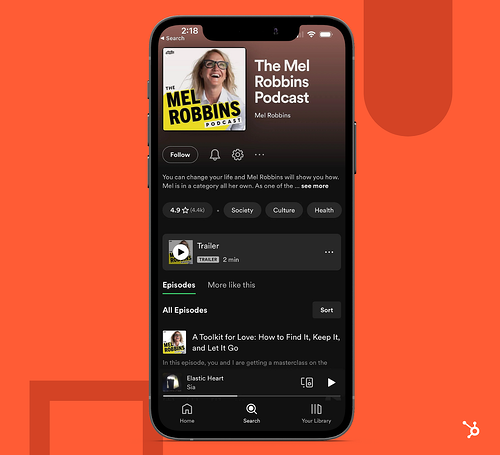
Every podcast on Spotify has a show page. You can think of it as a landing page for your podcast.

Podcast SEO: Spotify show pageAccording to Spotify, the purpose of a show page is to give listeners everything they need to know about your podcast, including:

  • Its title
  • Its cover art
  • Its show description
  • A “Follow” button
  • A list of recently published episodes

The show page isn’t something to rush through — or leave to collect dust. Ensure each element is up-to-date, accurate, and as compelling as possible.

Include sub-topics in your show description.

Show descriptions are typically short and concise, so you need to make every word count. To get an SEO boost, incorporate phrases or sub-topics that match what your potential audience is searching for. 

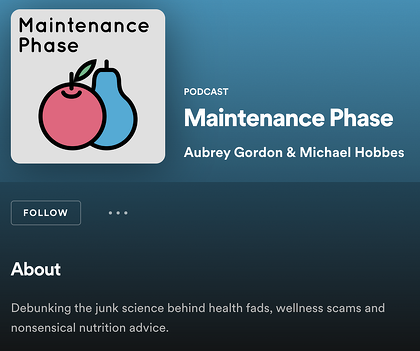
For instance, the health and wellness podcast Maintenance Phase includes sub-topics like “health fads,” “wellness scams,” and “nutrition advice” in its description. These are search teams that could lead someone to the podcast. 
Podcast SEO: show description on Spotify

Front-load key information in your episode description.

Writing an episode description is another way to optimize your podcast, but many skip it. This space offers keyword opportunities, meaning you can rank individual episodes in search.

Spotify recommends using the first 20 words of your description to hook new listeners. Don’t repeat information in your episode title or general podcast description. Instead, jump right into the episode’s topic or guest.

How to Optimize a Podcast for YouTube

Add video chapters.

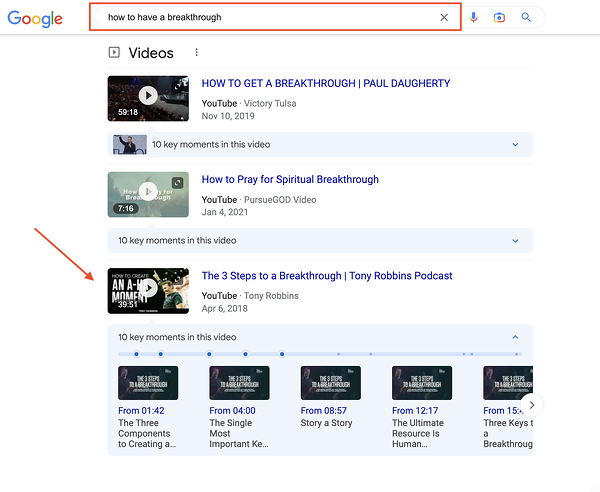
A few years ago, Google began surfacing YouTube content in search results. For instance, a quick Google search of “How to have a breakthrough” populates a list of relevant videos — including a video chapter from the Tony Robbins Podcast:

Podcast SEO: adding video chapters to YouTube podcast video

To show up in search results, start by dividing your podcast into different sections, also known as video chapters. This creates a structure for Google to understand your video.

It’s not enough to add video chapters — you also need to optimize them. The key is adding relevant keywords in the title of each chapter.

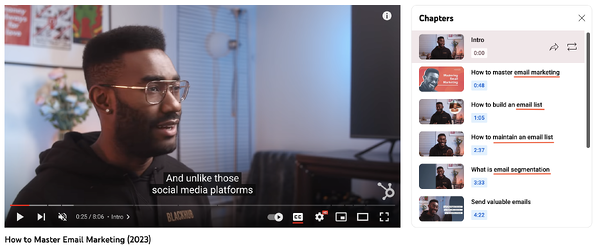
In the video below, the primary keyword is “email marketing,” but, by leveraging video chapters, it also targets the keywords email list and email segmentation.

Podcast SEO: targeting multiple keywords using YouTube video chapters

Besides the search benefits, video chapters also improve user experience. For instance, have you ever skimmed an entire video to find a particular conversation or topic? By adding chapters to your podcast, viewers have a roadmap to skip to the topics that most interest them.

Create playlists.

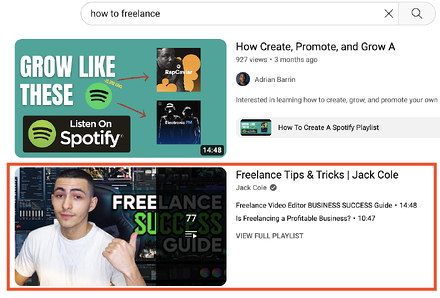
If your podcast covers a range of topics, consider creating a playlist for each topic. Why? YouTube populates playlists in its search results, giving your content another chance to be seen.

Podcast SEO: playlists appearing in YouTube search results

Playlists can also organize your podcast library and send viewers down a content rabbit hole, encouraging them to spend more time watching related videos.

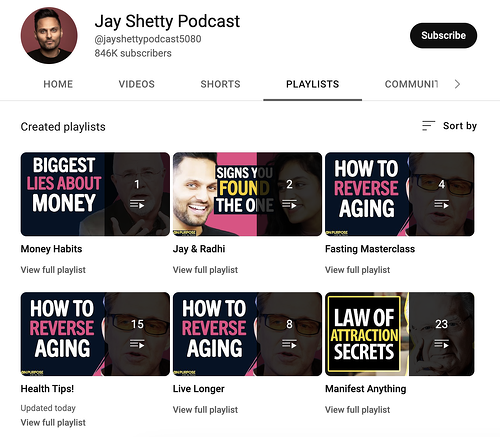
For example, the Jay Shetty Podcast has a number of playlists on its YouTube channel, including health tips, money habits, and relationship advice. If you’re interested in one of these topics, you could spend hours listening to a single playlist.

Podcast SEO: an example of a YouTube podcast channel using playlists to organize videos under different topics.

Add the target keyword to your video’s file name, title, and description.

Before hitting “Publish” on your next YouTube video, make sure the following areas are optimized:

  • The file name. You should first mention your primary keyword in the video’s file name. Here’s why: YouTube can’t actually “watch” your video to see how relevant it is, but it can read your video’s file name, which is one (of many) context clues.
  • Video title: When possible, naturally incorporate your target keyword in the video title. On top of that, keep your title clear, compelling, and short (aim for 60 characters or less).
  • Video description. Front-load your video description with the most crucial information — such as a keyword-rich summary, crucial links, or a CTA. Keep in mind that YouTube only displays the first two or three sentences before viewers have to click “Show more” to see the entire description.

Now let’s take a look at how to optimize your podcast for search.

How to Optimize a Podcast for Search

Plan your episodes around specific keywords.

Keywords are the name of the game when it comes to podcast SEO. After all, the number one way people discover new podcasts is via the search bar.

By planning your episodes around keywords, you can put your show (or individual episodes) in front of users who have specific intents.

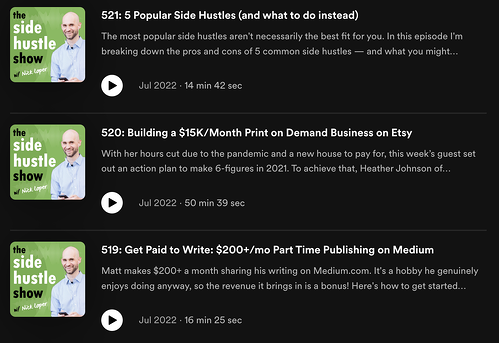
For instance, if you have an entrepreneurial podcast like The Side Hustle Show, you might target keywords like “side hustle,” “print on demand,” and “affiliate marketing.”

Podcast SEO

Always include written content for Google to index.

Never skip out on writing a title or description for each podcast episode. Yes, it’s time-consuming, but it gives Google something to “read” and understand in more detail. 

It’s also a good idea to add a transcript to your podcast. While Google’s text-to-speech capabilities are improving, it’s not always accurate.

By adding your own transcript — either manually or automatically — Google can better understand the content of your episodes. Plus, with the right topic, keywords, and keyword placement, you can boost your podcast’s discoverability and ranking.

Create a website for your podcast.

While this isn’t necessary — especially when you’re just starting out — having a dedicated website for your podcast has SEO benefits. A website offers more real estate for keywords and gives search engines more information about your podcast beyond just the title and description.

You can also create blog content that compliments your podcast. This is a great way to cross-promote across multiple channels and build a bigger following in the process.

How to Find Topics for a Podcast

Whether you’re just starting a podcast or have been in the game for years, it’s essential to find good topics to talk about.

Podcasts cover a range of subject matters. Here are the three main types:

  • Trending topics — these are topics that receive higher-than-average attention and engagement on social media. 
  • Evergreen topics — these are topics with consistent search demand and interest.
  • Interviews — these are topics that relate to an interviewee and/or their area of expertise.

How to Find Trending Topics

The best way to find trending topics is by checking what words, phrases, or stories are trending on social media. Twitter is a great place to start.

You can also leverage keyword research tools such as Google Trends, Moz, and Semrush to spot trending keywords and gauge the popularity of certain topics.

How to Find Evergreen Topics

Here, the goal is to find topics that are tailored to your audience and achieve a particular purpose. For instance, you might be a real estate investor looking to offer advice to new professionals in the field. 

This requires doing a deep dive into your audience. What are their interests? Needs? Pain points? These questions are key when finding evergreen content.

In addition, use a keyword research tool (like the ones listed above) to find topics relating to your niche, industry, or expertise. Always check to see if demand is consistent or fluctuates throughout the year.

Back to You

As the popularity of podcasts continues to surge, so does the need to optimize them for maximum reach. Following the tips above, you can ensure your podcast content is properly optimized for search engines. 

SEO Starter Pack

Categories B2B

The Ultimate Guide to Instagram Stories Ads in 2023 [+ New Data]

Ah, Instagram Stories — the one-stop-shop to find short, engaging content from high school friends, celebrities, and major brands alike.

With over 500 million daily active users, Instagram Stories is an undeniably powerful opportunity to connect with new audiences.

And, if you’re not using Instagram Stories as a marketing tool, you should be. In fact, Instagram reports that of the 500 million accounts using Instagram Stories, one-third of the most viewed stories come from businesses.

I can personally attest to the power of Instagram Stories to incentivize purchasing decisions. For instance, the other day I was mindlessly scrolling through Stories when I came across an ad for Crest 3D whitestrips — with a $50 off coupon attached. I swiped up to purchase without ever leaving the app itself.

Here, let’s dive into what Instagram Story ads are, and how you can run Instagram Story ads for your own business. Plus, we’ll explore examples of Instagram Story ads and best practices to ensure your ads are as powerful as they can be.

→ Download Now: How to Advertise on Instagram [Free Guide]

What are Instagram Story ads?

Instagram Story ads are vertical ads you can run on Instagram’s Stories feature. (To recap, Instagram Stories are photos and videos visible to an Instagram account’s audience for 24-hours, and is published separately from the content found on your Instagram profile.)

Instagram allows you to target your ads by reach, video views, traffic, conversions, app installs, and brand awareness. Additionally, unlike an organic Instagram Story, an Instagram Story ad doesn’t disappear after 24-hours — instead, you can choose the length of the campaign and frequency of ads on Facebook’s ad platform, like any other ad created for Instagram or Facebook.

An Instagram Story ad is immersed seamlessly into a user’s Stories viewing experience. Additionally, a user doesn’t have to follow your account to see an ad from your brand. For instance, I don’t follow Crest on Instagram, but I was still shown a Crest ad.

You have a few different options for ad formatting, including video, photo, or carousel. A video ad plays for up to 15 seconds, an image ad will play for five seconds, and a carousel ad lets brands play three separate pieces of content (video, photos, or both) within one ad.

If you aren’t sold on running ads on Instagram Stories yet, consider these facts:

If you’re convinced Instagram ads could be a good platform for you, let’s dive into how you can run your own Instagram Story ads, next.

For the full rundown on all things Instagram advertising, make sure to check out our guide below:

How to Run Instagram Story Ads

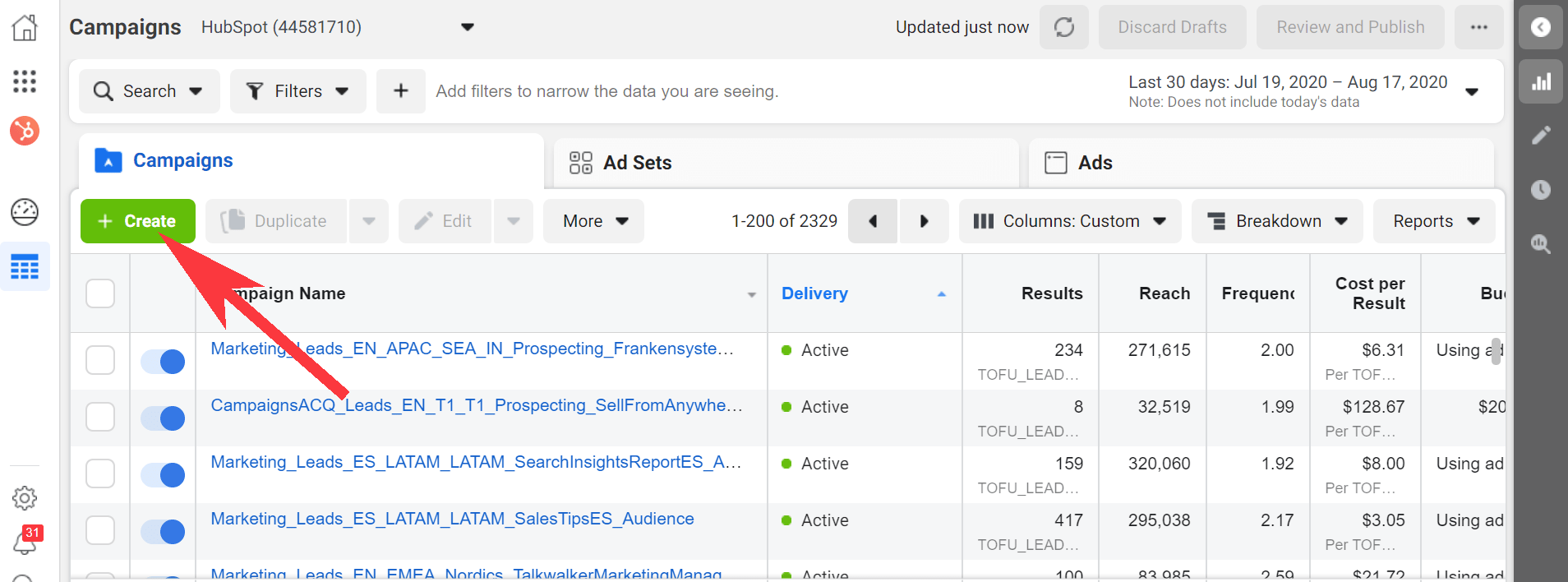
1. Go to your Ads Manager, and click “Create”, which will bring you to “Quick Creation”. If you’d prefer, you can switch to “Guided Creation”, instead.

In your Ads Manager, click "Quick Creation" to run an Instagram Story ad.

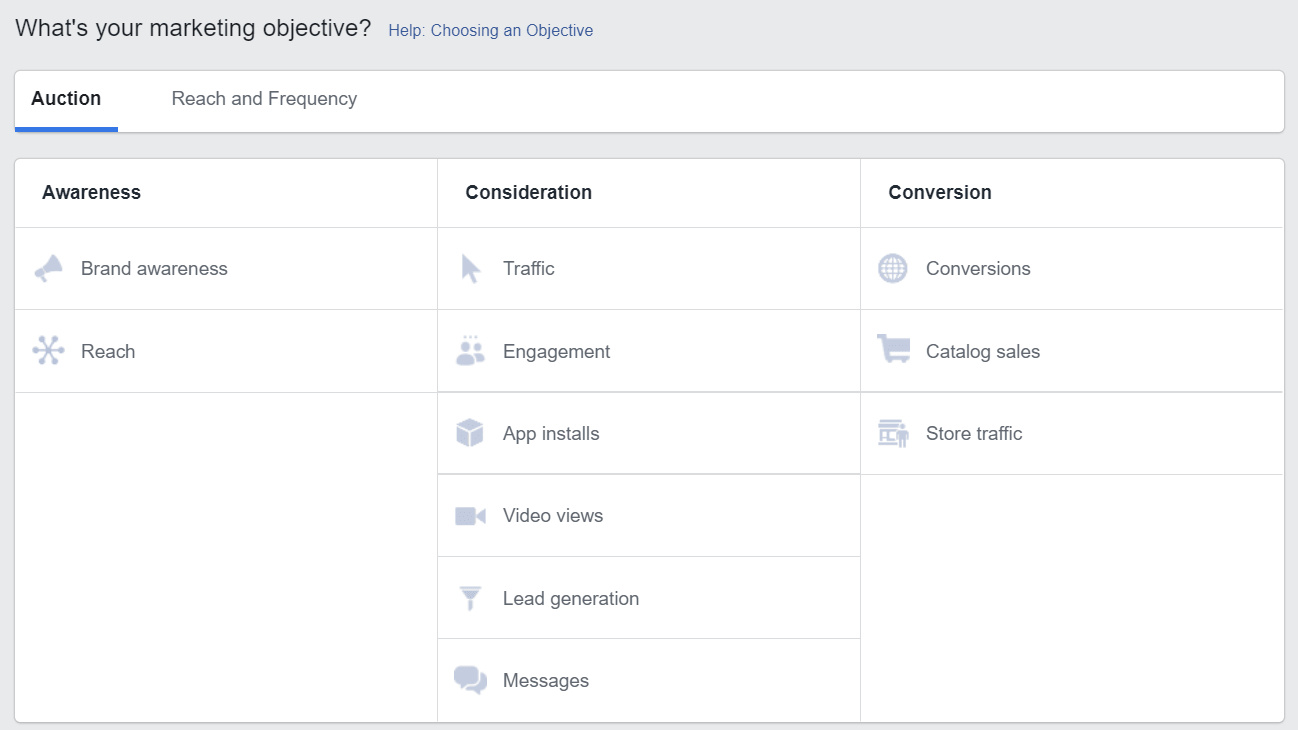
2. Next, select a marketing objective — your options for Instagram Stories include “Brand Awareness”, “Reach”, “Video views”, “Conversions”, “App installs”, “Lead Generation”, or “Traffic”.

Select a marketing objective in your Ad Manager tool to run an Instagram Story ad.

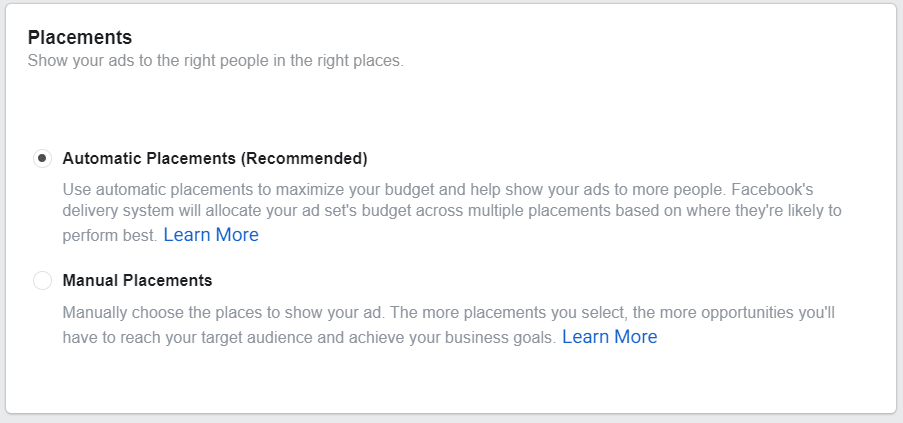
3. In the Placements section, you’ll want to select “Automatic Placements”, where Instagram Stories is selected by default. However, if you choose “Manual Placements”, check the box for “Stories” under Instagram.

Choose whether you want to manually place your Instagram Story ads in front of audiences, or automatic placement.

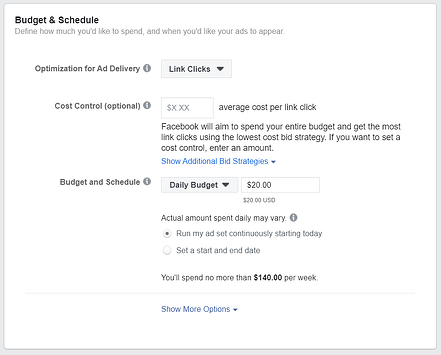
4. Next, set your ad’s budget and schedule. 

Set a budget and schedule for your Instagram ad.

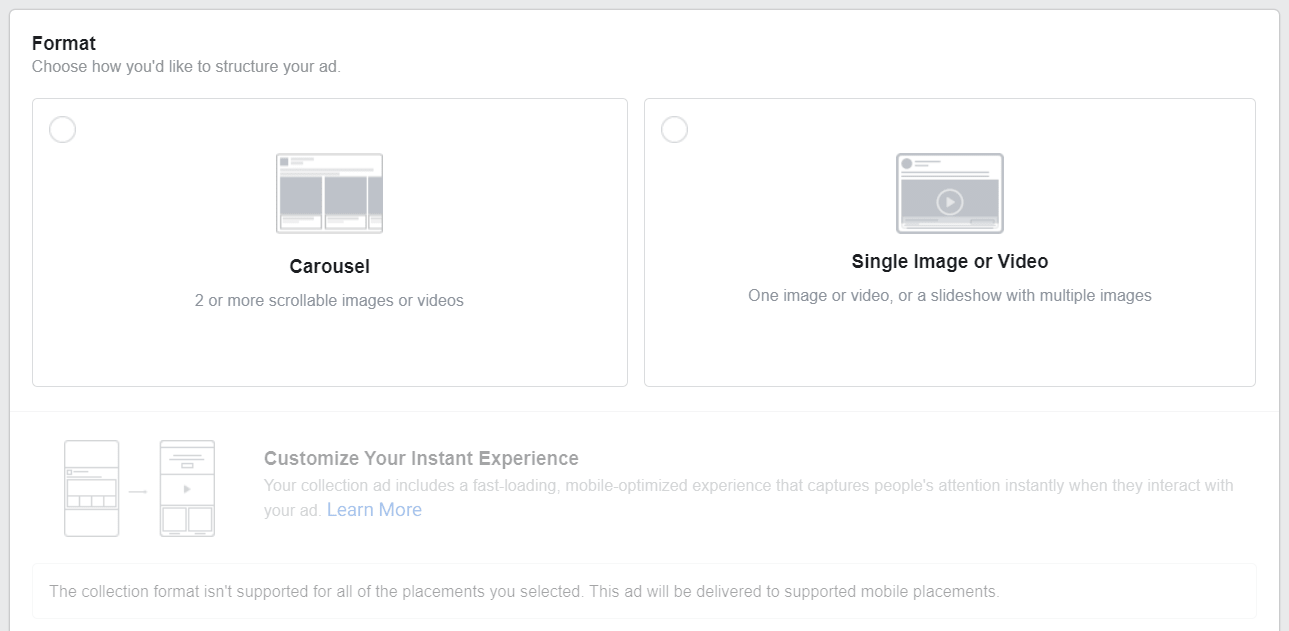
5. Next, you’ll want to choose “Single Image or Video” or “Carousel” as your ad’s format.

Choose Single Image or Video, or Carousel, for your Instagram Story ad.

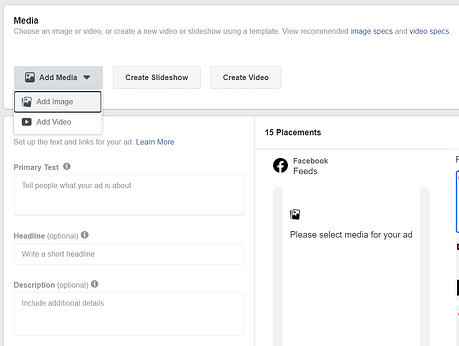
6. Add videos or images to your ad, and finish including any other details, including headline and description. If you’d prefer, you can use Stories Templates, which will transform your image into an ad automatically, and add movement to grab a viewer’s attention.

Add videos or images to your Instagram Story ad in your Media section.

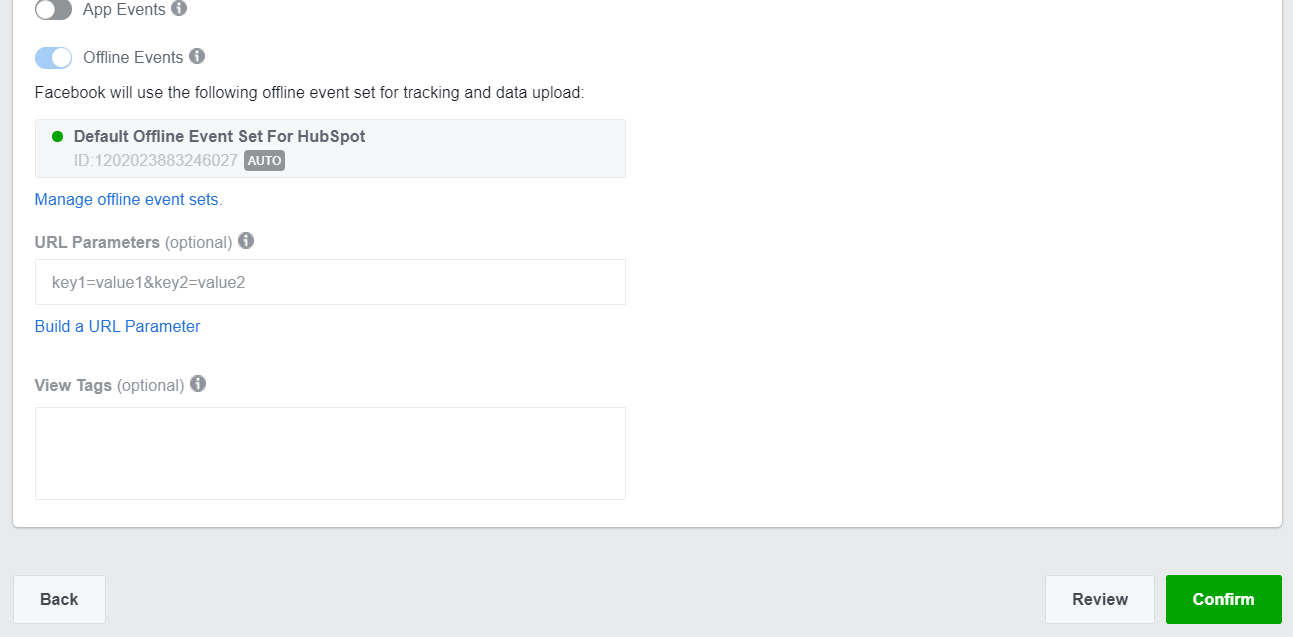
7. Once you’re happy with your ad, select “Confirm” to finish the process.

When you're ready to run your Instagram Story ad, click "Confirm".

Instagram Story Ads: Cost, Specs, & Length

There are three separate areas you can place an ad on Instagram: Stories, Feed, and Explore.

For the purposes of this post, we’ll focus on the cost, specs, and length of an Instagram Stories ad.

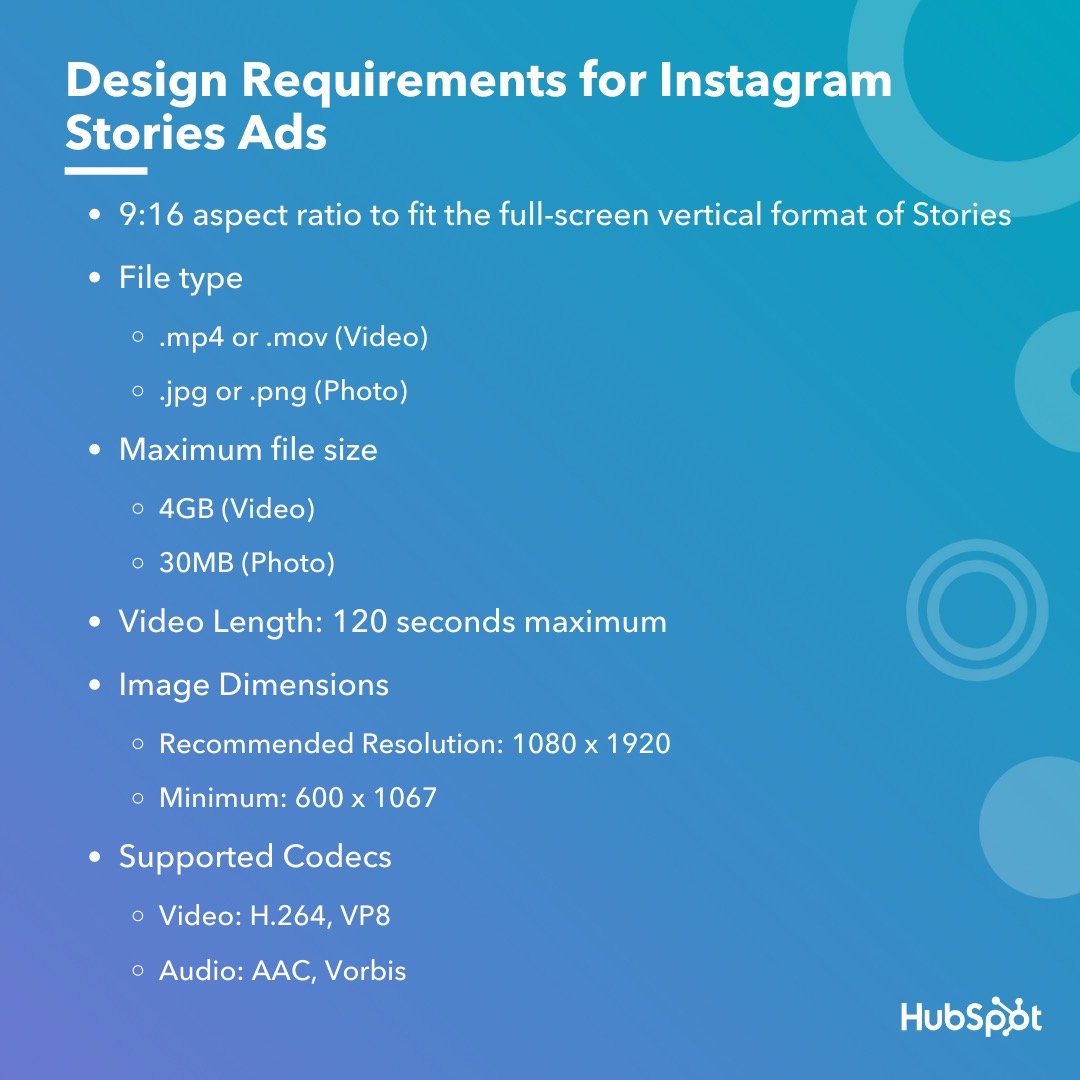
First, all feed photo and video dimensions are supported in Stories (anywhere from 1:91 to 4:5). However, 9:16 ratio is encouraged to fit the full-screen, vertical format of Stories.

Additionally, .mp4 or .mov is recommended for video ads, and .jpg or .png file type is recommended for photo ads.

If you’re creating a video ad, 4GB file size is encouraged — and, for a photo, 30MG file size is suggested.

If you’re creating a video ad, the length can’t surpass 120 seconds. For a photo ad, five seconds is the default for how long the image will be shown.

Finally, the recommended resolution is 1080 x 1920, with a minimum dimension of 600 x 1067.

Design requirements for instagram story ads.Instagram ads, including Instagram Story ads, cost between $0.70 to $1.00 per-click on average — although cost varies depending on industry, days of the week, time of year, targeted ages and sexes, ad placement, and plenty of other factors. In some cases, Instagram ads can exceed $5.00 per-click.

Fortunately, you have plenty of control over how much your ads cost by setting a pre-determined budget. You can choose your budget based on how much your company is willing to spend daily, or the total cost you’re willing to spend over a campaign’s lifecycle.

What Consumers Want to See in Instagram Story Ads [New Data]

It’s important to note — if you’re planning your own Instagram advertising campaign, you’ll want to consider the type(s) of ads that perform best on the platform.

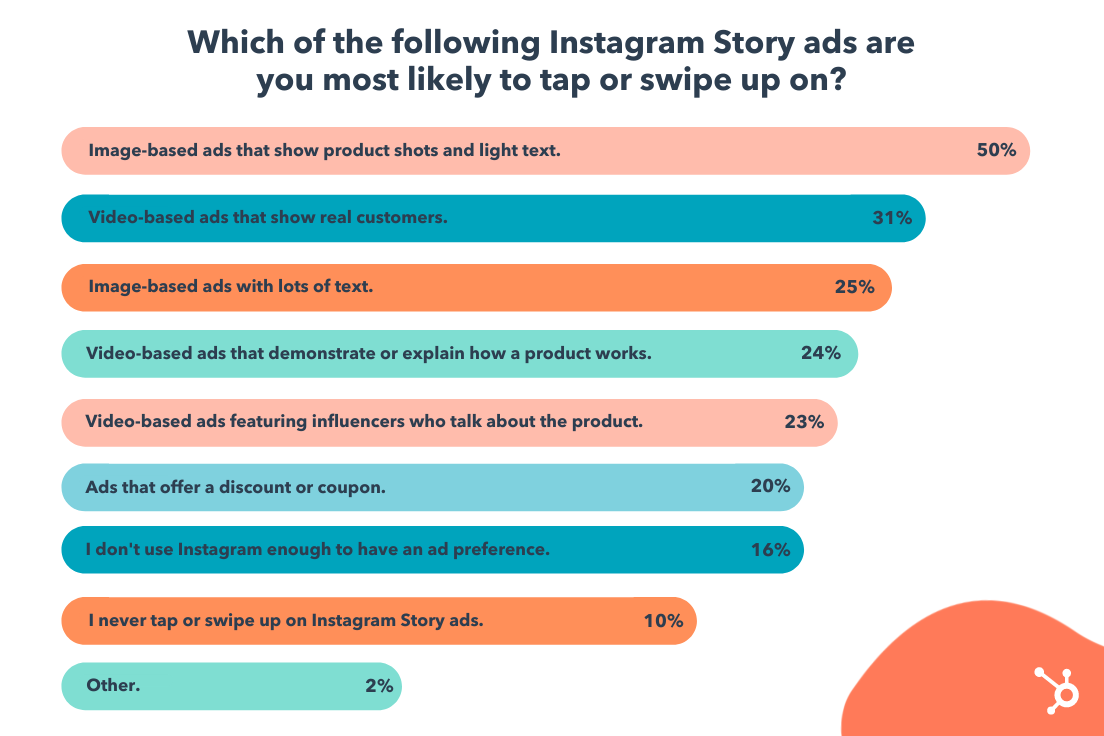
For instance, in a recent survey HubSpot conducted, we found 50% of Instagram users prefer image-based ads that show product shots and light text — which is followed by 31% who prefer video-based ads that showcase real customers.

instagram ad preferences

Perhaps most intriguing, the majority of people (80%) don’t necessarily care if an ad includes a discount or coupon. This suggests that Instagram users are more interested in appealing, engaging content that highlight a product’s benefits. 

User preferences will vary depending on your audience, industry, and message, but consider keeping this data in-mind when preparing your own Story ad. When in doubt, try A/B testing to figure out which types of ads your own audience prefers.

Let’s dive into some other best practices, now. 

Instagram Story Ads Best Practices

With four million active advertisers on Stories as of January 2020, it’s going to take a lot to ensure you’re able to stand out and drive results.

Here, let’s dive into a few best practices to follow when designing your own Instagram Story ad.  

1. Pay attention to speed.

Facebook reports that Instagram Stories are consumed faster “than any other mobile format”. People’s attention is severely limited when perusing Stories, especially since the content has a 24-hour time limit before disappearing forever.

For that reason, you’ll want to ensure you get straight to the point and capture a viewer’s attention from the first frame. Unlike other forms of content, suspense isn’t usually effective here, especially since images can’t surpass five seconds, and videos have a 120-second limit. You’ll want to jump the viewer right into the message you’re hoping to deliver.

2. Include motion in your ad.

Facebook reports that “ads that use motion perform better.” Motion captivates the viewers’ attention and can help you tell a story faster than you could with a static image. Even if you’re using animation, consider how you might add motion to create more engaging content.

3. Ensure you’re using sound in your ad.

60% of Stories are viewed with the sound on, so you’ll want to ensure you use sound in your ad to provide optimal value to your audience. Consider how you might use music, sound effects, or voice-over to capture viewers’ attention in a new way. If you’re unsure which types of sound work best in your ad, try A/B testing to conclude what your audience prefers.

4. Create your ad for Stories first — rather than attempting to repurpose an existing ad made for another vertical.

It can be tempting to simply copy-and-paste the ad you’ve already created for Facebook or Instagram news feed, but that could result in a less-than-ideal experience for those viewing your ad in Instagram Stories. For one, your ad might not follow Instagram Story sizing best practices, resulting in key parts of your ad being cropped out. Additionally, you’ll want to play around with features exclusive to Stories to ensure your ad is as effective as possible.

5. Use your call-to-action wisely.

Ultimately, your Instagram Stories ad won’t be effective if you don’t include a clear call-to-action you want viewers to follow. You might use language like “Learn More”, “Shop Now”, or “Swipe Up” to encourage viewers to take action, depending on your goal — for instance, if your goal is brand awareness, “Learn More” tells viewers you simply want to educate them about your brand’s offerings, which is a very different CTA from “Shop Now”.

Take a look at the examples, mentioned above, for more CTA inspiration.

6. Include text to emphasize key message.

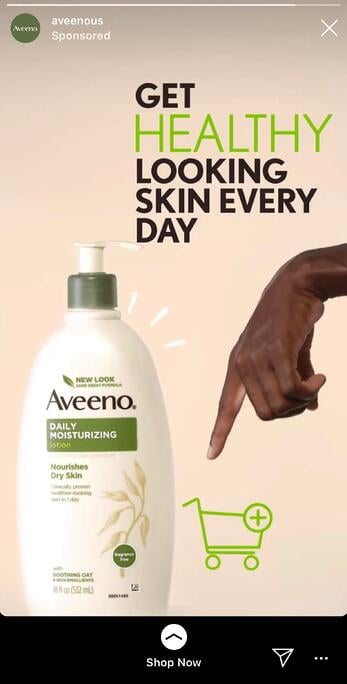
Including text is a best practice for accessibility in general, as it helps viewers’ who are hard-of-hearing decipher your ad’s message. Additionally, text can help emphasize your key points — for instance, Aveeno’s “Get Healthy Looking Skin Every Day” text illustrated their main point, and convinced me to purchase.

7. Test out mobile shots.

Facebook reports, “Mobile shots outperform studio shots for ad recall and intent, while studio shots tend to drive higher brand awareness.” For this reason, consider forgoing fancy studio equipment for video shot and edited straight from a mobile phone.

The majority of users consume Instagram’s content from their own smartphones, so you might as well try creating content on the same device. And, when in doubt, don’t be afraid to A/B test this theory for your own brand, as well.

For more best practices related to advertising in general, take a look at The Ultimate Guide to Mastering the Basics of Effective Social Media Advertising.

Examples of Instagram Story Ads

Below, I’ve collected a few impressive examples I found on my own Instagram Story feed. While most of these examples are bigger brand names, there are plenty of small-to-medium sized businesses using Instagram

1. Aveeno

Aveeno’s Instagram ads are clean and simple, with neutral colors — apart from the brand’s signature green — drawing attention to the brand’s daily moisturizer. The ad features a short clip of a hand pointing to a shopping cart, with a “Shop Now” swipe-up link. The ad focuses on the brand’s product and doesn’t distract with people, making it effective for anyone scrolling who’s in the mood to refill their moisturizer.

Aveeno Instagram Story ad example

2. Miller Lite

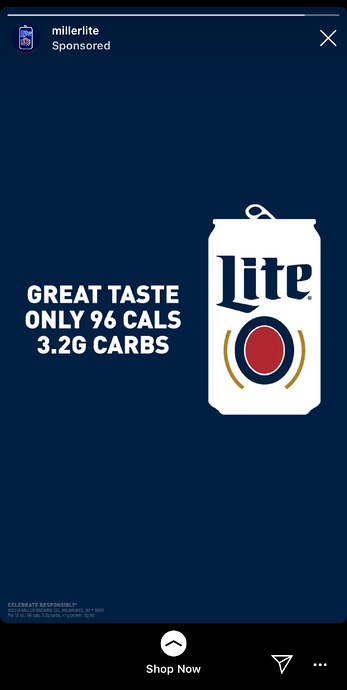
This is an example of an ad that felt tailored towards me, a 27-year-old female in the Boston area. First, the ad features a call-out to the Boston Celtics, immediately capturing my attention. Once I’m intrigued, the ad segues into a picture of their Lite drink, with the text, “Great taste, only 96 calories, 3.2G carbs”. In this example, the ad does a good job drawing my attention to the things I care about most: namely, low-calorie alternatives to beer (and Celtics).

Miller Lite Instagram Story ad example

3. Trunk Club

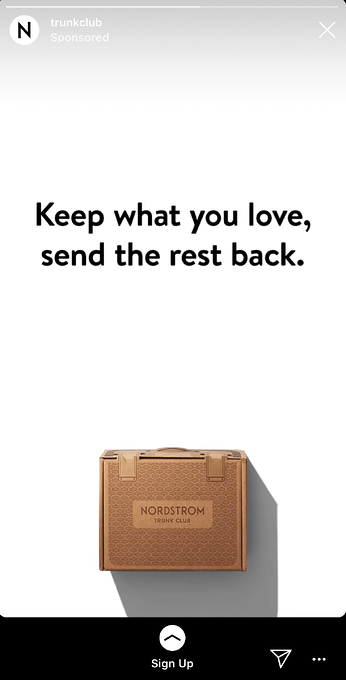
This engaging, fast-moving ad shows a few different outfit options on the screen with the text, “Keep what you love, send the rest back”. The ad shows a few different outfits, ranging from dresses and cardigans to dress pants and heels, to capture the attention of a wider range of people than it could if it featured only one style. With the plain white background and easy-to-read black text, it’s simple, clean, and hard to miss.

Trunk Club Instagram Story ad example

4. Febreze

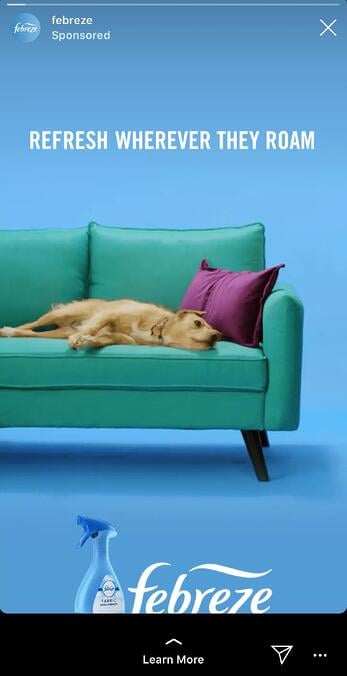
I mean, come on … who doesn’t love a puppy? This fun, clever Febreze ad shows an adorable puppy on a couch with the text, “Refresh wherever they roam”, with their Febreze product at the bottom of the screen. While most of the other ads in this list featured subdued, plain colors, Febreze goes all out with light blues, greens, and purples, inviting a sense of playfulness and fun into the user’s feed.

Febreze Instagram Story ad example

5. Tractor Beverage Co.

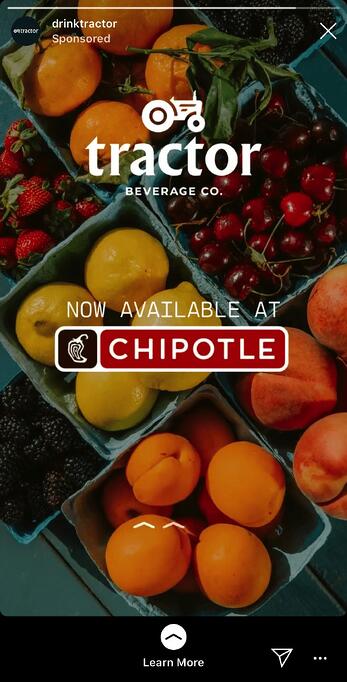
What I love most about Tractor Beverage Co.’s Instagram video is the end, which features a different call-to-action from most of the others in this list. Rather than “Shop Now,” this ad reads, “Now Available at Chipotle” with a “Learn More” swipe-up function. As a lesser-known brand, Tractor Beverage Co. wisely aims to use their ad space to increase brand awareness, so that next time you’re at your favorite nearby Chipotle, you might give their drink a try.

Drink Tractor and Chipotle Instagram Story ad example

6. Crest

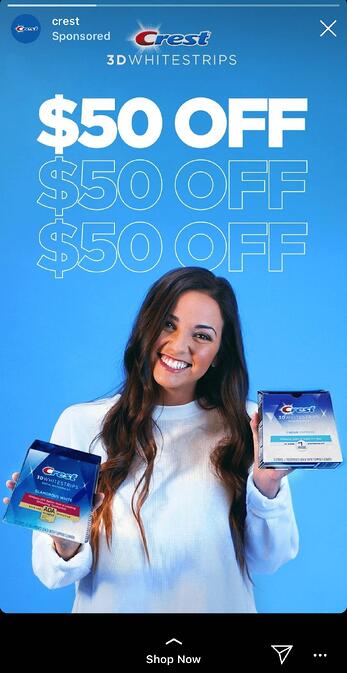
If you have the means, it makes a lot of sense to include a coupon or discount in your Instagram Story ad, like Crest does in its 3D Whitestrips ad. The $50 off encourages viewers to purchase immediately so they don’t miss out on the deal, and the fun, bright colors effectively capture viewers attention. With the limited time allotted in an Instagram Story, it makes sense for these brands to get straight to the point.

Crest Instagram Story ad example

7. Kayak

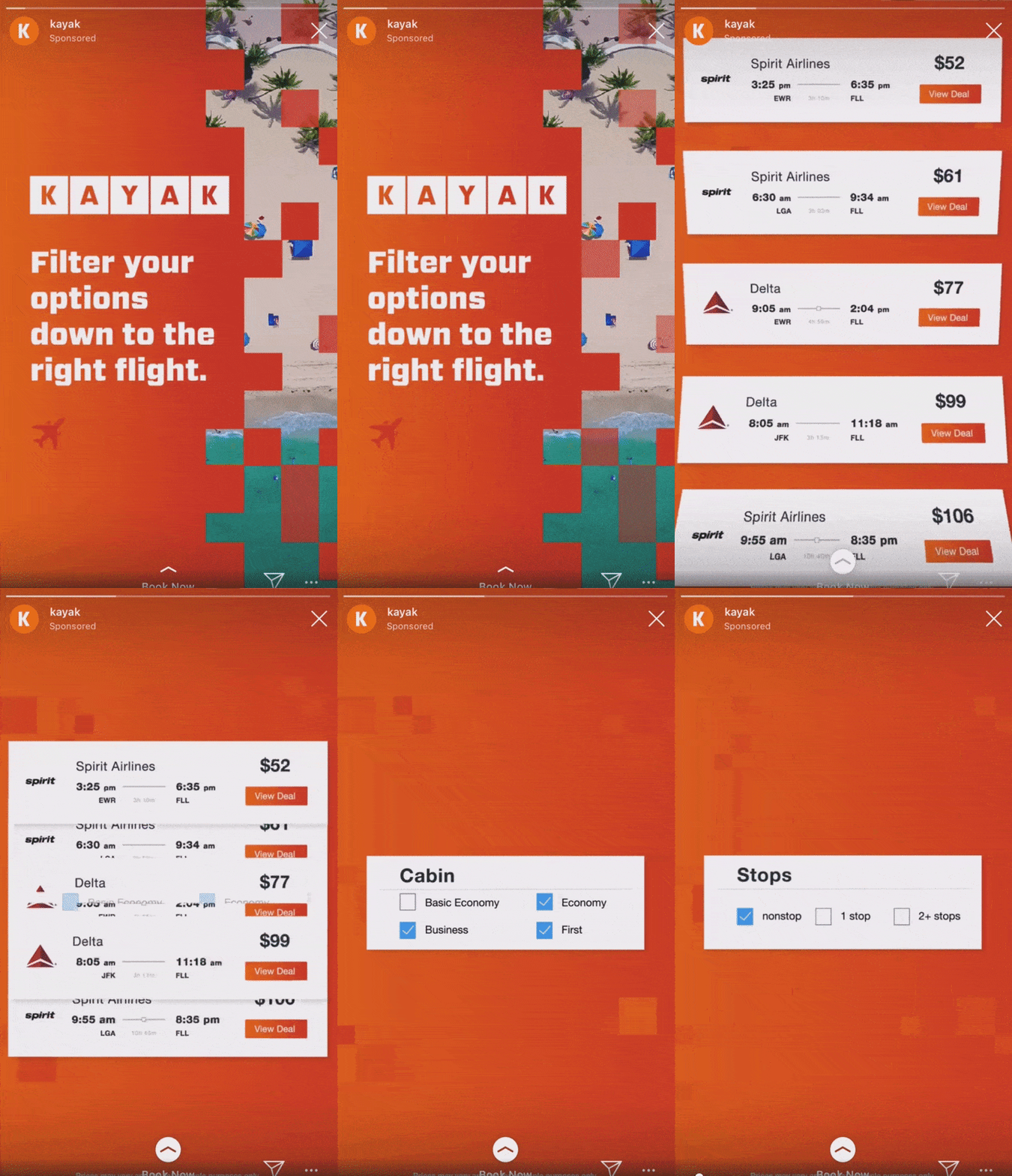
Kayak, a travel search engine, created this impressive, engaging Instagram Story video ad to demonstrate how easy it is for Kayak users to filter flights depending on airline, price, cabin seating, and destination. Kayak served the ads to lookalike audiences based on the characteristics of its current website customers, and saw 5X increase in sales conversions, as well as a 50% increase in overall ROI, with combined ad placements on Instagram Stories, Instagram’s news feed, and Facebook’s news feed.

Kayak Instagram Story ad example

And there you have it! You’re all ready to begin creating an inspiring Instagram Story ad of your own. Just remember — you know your brand, and your audience, better than anyone. Use these best practices and examples as inspiration, but feel free to A/B test to figure out what works best for your unique business goals and social media objectives. Good luck!

New Call-to-action

Categories B2B

20 Valentine’s Day Marketing Campaigns We Love

Valentine’s Day is a time to celebrate love in all its forms, be it romantic love, platonic love, familial love — or your love for marketing. Okay, that last one might be a little out of place, but you get the point.

This year, we’re showing love to our favorite creative Valentine’s Day marketing campaigns from brands across various industries.

Download Now: Free Ad Campaign Planning Kit

If you’re in need of some inspiration for your next Valentine’s Day campaign, you’ll love the following examples.

20 Effective Valentine’s Day Marketing Campaigns

1. Toblerone – The Love Insurance

2. Cadbury 5 Star – Valentine’s Day Alibi

3. Gucci – Love Story Zine

4. Pandora – Real Couples Explain What Valentine’s Day Means to Them

5. Etsy – Show Love to Small Businesses

6. Stella Artois – Valentine’s Day

7. Dunkin – Valentine’s Day Trivia Promo Code

8. Hotels.com – Anti-Valentine’s Day

9. Cadbury Silk – How Far Will You Go to Make Them Blush?

10. Tyson – Chicken Nugget Bouquet Contest

11. Lancôme – Valentine’s Day Advent Calendar

12. El Paso Zoo – Valentine’s Day ‘Quit Bugging Me’ Event

13. Gü Desserts – Love-themed Packaging

14. Ranch Dressing – Customized Bottle

15. Pandora – Little Acts of Love Ad

16. 1-800-Flowers – Galentine’s Day

17. Target – Valentine’s Day Haul Instagram Post

18. MeUndies – Match Me Valentine’s Day

19. Winc – Be Wine Instagram Post

20. OpenTable – Millennial Experiences

Honorable Mention: Match.com’s “Match Made in Hell” campaign.

Valentine’s Day Campaign Takeaways

20 Effective Valentine’s Day Marketing Campaigns

Here are 20 Valentine’s Day marketing campaigns that stole our hearts.

1. Toblerone – The Love Insurance

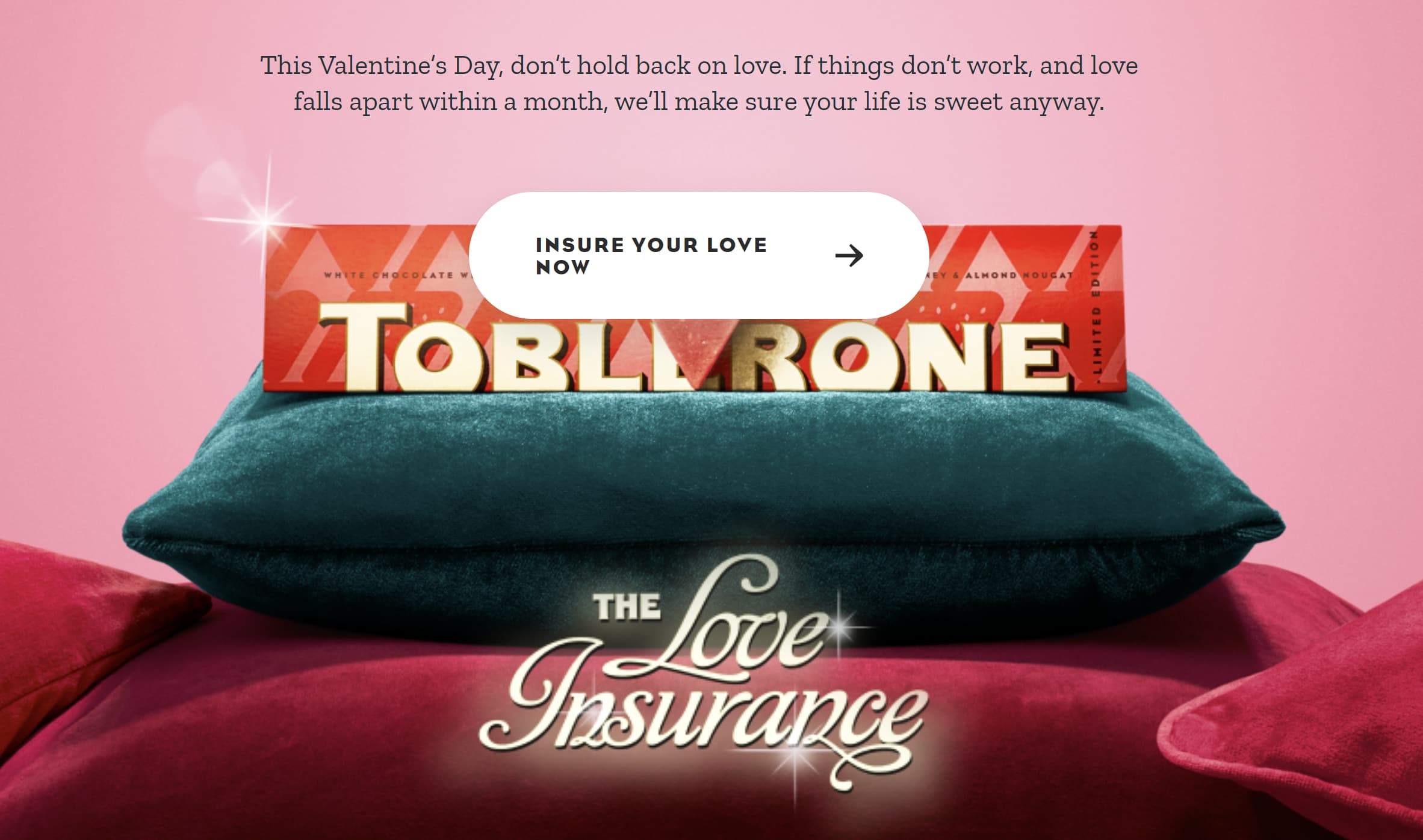
To address the fear and uncertainty that can come witha new romance, Toblerlone’s 2023 Valentine’s Day marketing campaign offers consumers a little reassurance in the form of “love insurance.”

A screenshot of Toblerone's "Love Insurance" Valentine's Day marketing campaign.Image source

To get their “love insurance,” couples can visit Toblerone.co.uk to buy the brand’s special edition Valentine’s Day chocolate bar, which comes with its own insurance. If the relationship ends, the couple can register the purchase with @TobleroneUK on Instagram and they’ll receive a voucher to redeem online. This way, neither the Toblerone nor their relationship feels like a waste.

2. Cadbury 5 Star – Valentine’s Day Alibi

Those without a Valentine often find themselves struggling to dodge the dreaded question “What are you doing for Valentine’s Day?” Fortunately, Cadbury 5 Star’s 2022 Valentine’s Day campaign tooksome of the pressure off.

The Indian chocolate brand took over an island off the coast of Karnataka and renamed it “My cousin’s wedding.” So, consumers without a Valentine couldsay “I’m not in town, I’m going to my cousin’s wedding” when asked about Valentine’s Day plans.

For a chance to access the island, consumers could scan the special Cadbury 5 Valentine’s Day packs, which tookthem to a website to mine coins and gain an opportunity to bid for the island.

3. Gucci – Love Story Zine

For Valentine’s Day 2022, Gucci released a limited-edition zine that consisted of visually stunning photos telling the love story ofa fairy and giant. Each photo in the zine showcased items from the fashion house’s Valentine’s Day collection.

The marketing campaign intrigued customers, offered an exclusive item (a physical copy of the zine), and it showed the beauty of the brand’s clothes and accessories.

A screenshot of Gucci's zine for its Valentine's Day marketing campaign. Image source

4. Pandora – Real Couples Explain What Valentine’s Day Means to Them

In 2021, Pandora asked real-life couples and friends to share the little (and not-so-little) things they’ve done to express their love. Some acts of love were tiny, such as a peck on the cheek or a hug; others were huge steps in the relationship, such as moving in together or adopting a dog.

The YouTube video included a link to the company’s website and a message that the company can help viewers show their loved ones how much they’re appreciated with Pandora charms and gifts.

5. Etsy – Show Love to Small Businesses

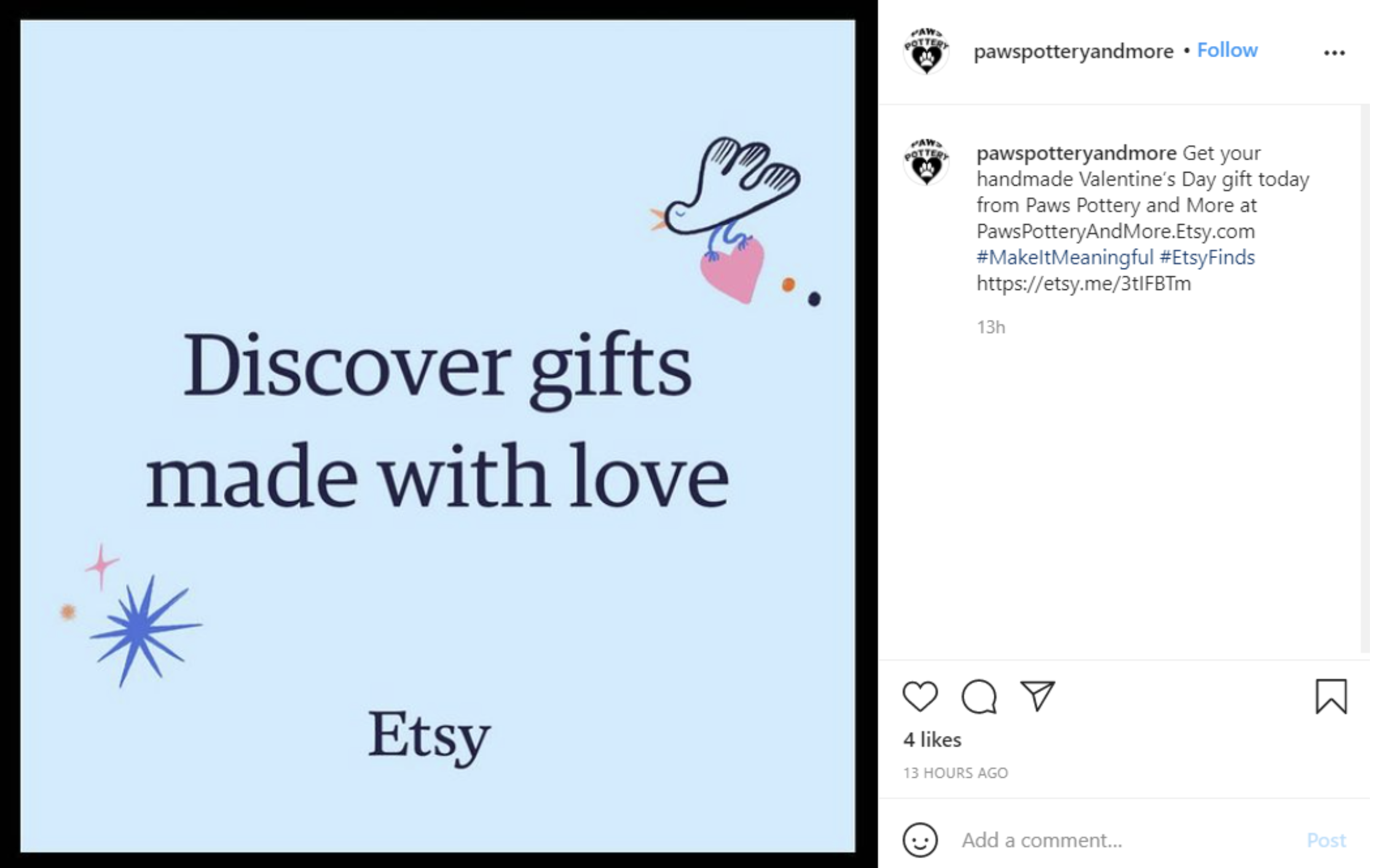
To show love and support to its community of sellers, e-commerce platform Etsy offered a ready-made graphic sellers could use to promote their Valentine’s Day products on social media. Sellers could also combine the graphic with the hashtag #MakeItMeaningful to draw attention to their Etsy store.

The pre-made graphic grabbed audience attention and fostered a sense of community among Etsy sellers.

Screenshot of Etsy's ready-made Valentine's Day marketing campaign graphic.Image source

6. Stella Artois – Valentine’s Day

In 2020, beer brand Stella Artois created a 15 second YouTube that shows the growth of a couple throughout the years and the role the brand’s beer played in their love.

The video is simple, heartfelt, and captures the spirit of Valentine’s Day. It was a huge hit and garnered almost 3 million views on YouTube.

7. Dunkin – Valentine’s Day Trivia Promo Code

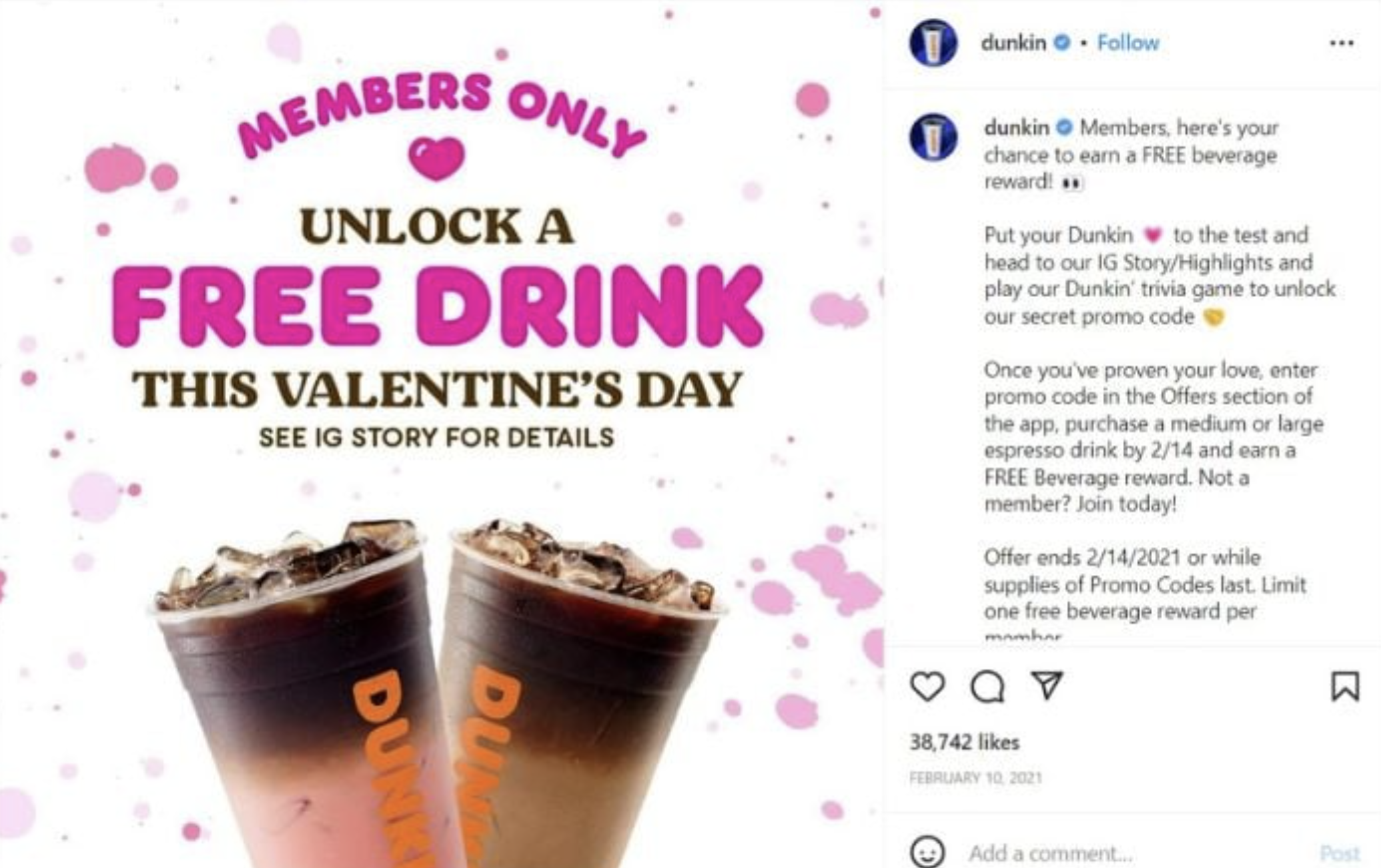
For Valentine’s Day, Dunkin invited its followers to play a trivia game via Instagram Stories for a chance to unlock a secret promo code. The ad campaign delighted consumers with a fun game testing their knowledge of Dunkin and it rewarded customers with a chance to save on their favorite items.

Screenshot of Dunkin Valentine's Day Instagram marketing campaign.Image source

8. Hotels.com – Anti-Valentine’s Day

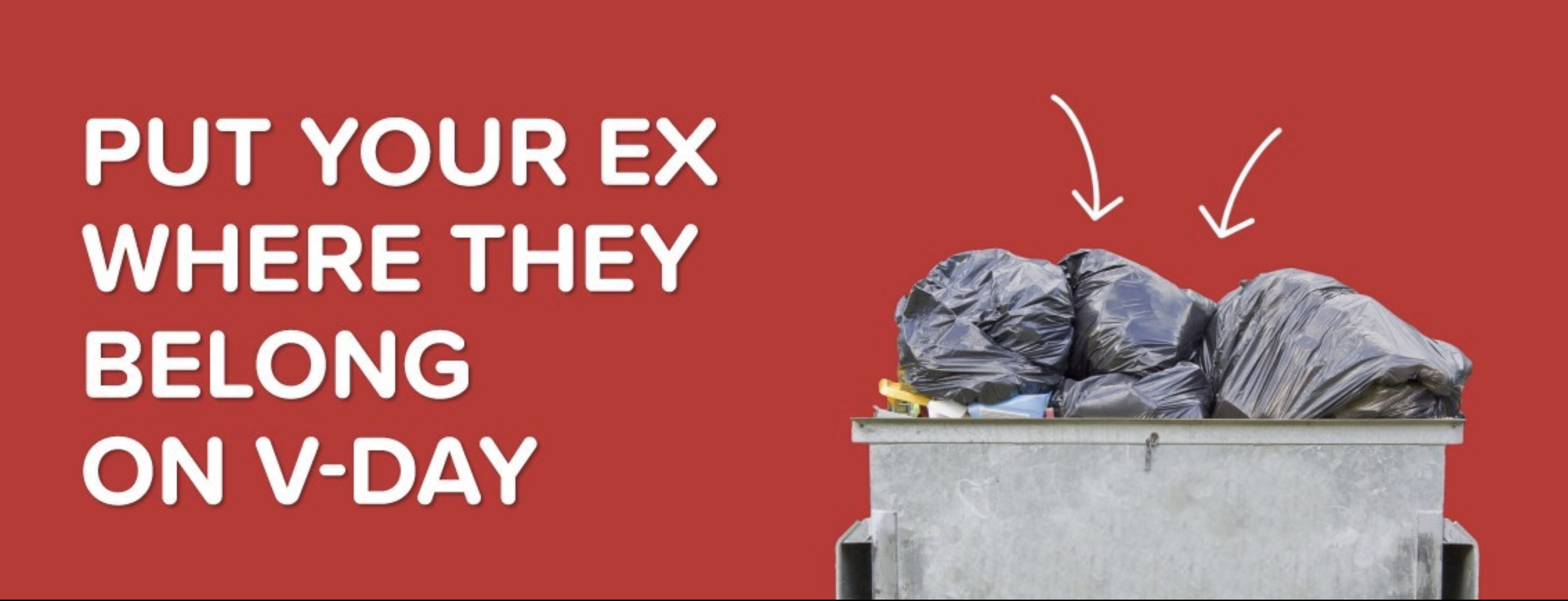
Hotels.com’s Valentine’s Day marketing campaign took a clever approach to the holiday by urging users to visit its V-Day Dumpster Stay web page and write about an ex they believe should vacation in a dumpster.

All stories were entered into a competition for participants to win a $300 Hotels.com gift card.

Hotels.com's Valentine's Day marketing campaign showing a dumpster against a red background. Image source

9. Cadbury Silk – How Far Will You Go to Make Them Blush?

In 2022, Cadbury Silk placed QR codes on its Cadbury Silk Heart Blush chocolate pack which led consumers to its website where buyers can write a secret message to a loved one. Said loved on could then see the secret message by scanning any Cadbury ad.

10. Tyson – Chicken Nugget Bouquet Contest

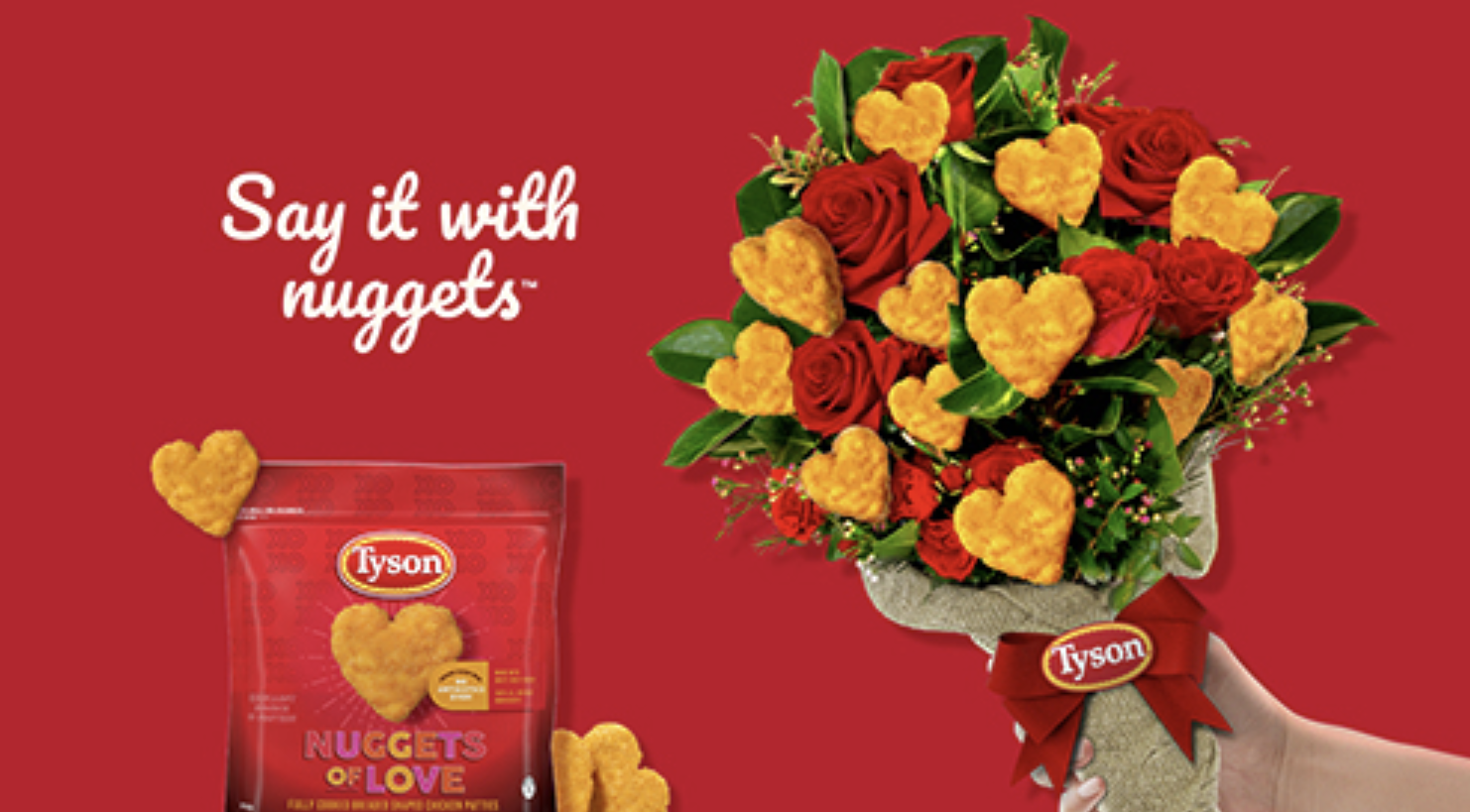
A bouquet of flowers is the quintessential Valentine’s Day present, but food brand Tyson decided to put a fresh spin on a classic gift. In 2021, the company challenged consumers to create their own chicken nugget bouquet for Valentine’s Day.

The contest winner would win a package of Tyson Nuggets of Lovelimited edition heart-shaped chicken nuggets only available through the contest. To enter, participants had to create their best nugget bouquet and post a picture of the bouquet on Instagram or Twitter with the hashtags #NuggetBouquetContest and #TysonNuggetsofLove.

Other prizes included $5,000 and a year’s supply of Tyson chicken nuggets.

A hand holds a bouquet of flowers and chicken nuggets as part of Tyson's Valentine's Day marketing campaign.Image source

11. Lancôme – Valentine’s Day Advent Calendar

Every year, cosmetics company Lancôme releases a Valentine’s Day advent calendar filled with products for consumers to try and discover. From lotion to mascara to perfume — the advent calendar contains a wide variety of products. The idea is excellent because it introduces consumers to new products that they may want to buy more of going forward.

Lancome's Valentine's Day advent calendar as part of the company's Valentine's Day marketing campaign.Image source

12. El Paso Zoo – Valentine’s Day ‘Quit Bugging Me’ Event

Every year, the El Paso Zoo holds a Valentine’s Day event where scorned lovers can name a cockroach after an ex. The cockroach would then be fed to a zoo animal. The event is so popular it’s been referenced on Saturday Night Live.


13. Gü Desserts – Love-themed Packaging

In 2020, British brand Gü Desserts released a series of love-themed packaging called “Love Notes” for selected desserts. The packaging was adorned with a love song title adapted to the brand.

For example, the brand’s salted caramel cheesecakes came with packaging that read “I’m in love with the shape of Gü.”

A box of cheesecakes that say "I'm in love with the shape of Gu" as part of Gu's Valentine's Day marketing campaign. Image source

14. Hidden Valley Ranch Dressing – Customized Bottle

Nothing says Valentine’s Day like giving someone a bottle of — Ranch Dressing?

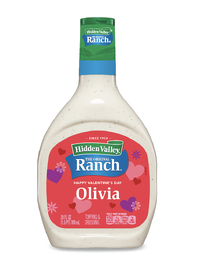
In 2021, while flower companies and B2C brands were highlighting the romantic gifts partners could give to each other, Hidden Valley took a funny approach to this strategy by offering audiences customized Valentine’s Day-themed bottles of Ranch salad dressing.

Ranch Dressing Customized Valentine's Day bottle

While this seems like an odd gift to some, Hidden Valley knows it has fans out there that just love to cover everything they eat with Ranch dressing. To those audiences, this gift is funny, personalized, and potentially useful.

15. Pandora – Little Acts of Love

In 2022, Pandora revisited its successful”Little Acts of Love” campaign with an ad placement featuring more couples doing small acts of love for each other.

The ad shows couples displaying acts of kindness towards one another that would be appreciated any day of the year. This ad reminds us all that thoughtful gestures can go a long way.

16. 1-800-Flowers – Galentine’s Day

Valentine’s Day isn’t just for significant others, and 1-800-Flowers wants friendships to be celebrated as well.

This ad depicts two friends talking about how they established their friendship, reminding the viewer that platonic love also deserves to be celebrated. The two friends in the ad ask each other thoughtful questions about their friendship and how much they mean to each other.

It’s an emotional ad that will inspire you to call your best friend, and maybe send them some flowers.

17. Target – Valentine’s Day Haul Instagram Post

Many people have experienced walking into Target without a list, relying on Target to tell them what they need. This user-generated post on Target’s Instagram account captures the spirit of what we all love about Target — how easy it is to load up on fun items (though our bank accounts may not share the love).

In the video, the original poster fills their cart with festive Valentine’s Day merchandise at their local Target. Though it isn’t a traditionally produced ad, it’s a relatable post for Target shoppers who may have been inspired to visit their local store and pick up some of the items they saw featured in the post to celebrate.

18. MeUndies – Match Me Valentine’s Day

This relatable MeUndies ad from 2021 captures the spirit of communicating via Zoom that many people have become familiar with since early 2020.

In the ad, couples talk about some of their pre-pandemic plans including travel and weddings. Though many of those events didn’t go as planned, the couples talked about ways they’ve grown closer despite the challenges and uncertainty brought on by the pandemic all while wearing matching merch from MeUndies.

19. Winc – Be Wine Instagram Post

Wine is a popular Valentine’s Day gift that is up there with roses and chocolate. Wine subscription company Winc typically devotes real estate on itssocial channels for Valentine’s Day-themed posts in the weeks leading up to the holiday.

In 2021, the Winc Instagram account had a series of posts consisting of unique and user-generated content related to Valentine’s Day. The “Be Wine?” post was among the most popular. We loved the punny caption and heart-themed visuals.

20. OpenTable – Millennial Experiences

If you’ve ever marketed to millennials, you may know that millennials value experiential gifts. Or, as OpenTable says in this 2020 ad, dates.

In 2020 OpenTable released 14 ads as part of a two-week countdown to Valentine’s Day, encouraging customers to make reservations early to avoid the holiday rush.

Each of the ads targeted a different audience that could benefit from using OpenTable to make Valentine’s Day reservations, with a clear call-to-action and messaging that appeals to the ideal viewer.

Honorable Mention: Match.com’s “Match Made in Hell” campaign.

Technically, this campaign wasn’t created for Valentine’s Day specifically. But, many of our marketers thought it had all the perfect elements of a great Valentine’s Day campaign.

In the commercial, directed by actor Ryan Reynolds, Satan sits in Hell using Match’s app when he sees he’s matched with a woman named 2020. When he meets up with her on Earth, he nervously says “Hi 2-0-2-0.” She replies, “Please, call me 2020” — pronouncing it like the year.

As the commercial continues, 2020’s character appears to be the epitome of everything that happened in 2020.

For example, the ad shows Satan and 2020 causing mischief, stealing toilet paper from store shelves, having a picnic in empty stadiums, and ultimately posing for a selfie in front of a dumpster fire.

The couple frolics to the familiar sounds of Taylor Swift’s hit song, “Love Story,” which also sparks a sense of rom-com nostalgia for millennials.

On the same day of this ad’s December release, Match and Reynolds also shared another commercial showing the pair explaining how they met in couple’s counseling.

In this video, Satan explains how he found 2020 on Match:

“I started by using the Match custom search filter. I filtered out joy, happiness, toilet paper, and reason,” Satan says in the video below:

Although this didn’t launch in February, it was a very clever newsjacking example that many of our marketers say they enjoyed when they were asked to share their favorite Valentine’s campaigns.

While 2020 was a difficult year for many, Match and Reynolds identified a tasteful way to create content that audiences could relate to. At the same time, they still told an epic, hilarious love story with a pleasant, entertaining tone. Although they discussed a truly terrible year, they did so in a way that felt like escapism for the viewer.

Valentine’s Day Campaign Takeaways

As you create and launch Valentine’s Day campaigns, take note of these strategies many of the brands above used:

  • Grab your audience’s attention:Like with any holiday, marketers around the globe are churning out content around it. To compete with this overly saturated Valentine’s Day ad landscape, you’ll need to grab and keep your viewer’s attention with entertaining elements or valuable information.
  • Be relatable: Around this time of year, many people are inundated with high-budget Valentine’s Day ads that offer them no useful information or value. Even if you want to tell a mushy romance-fueled love story with your content, make sure it still feels relatable or authentic. To do this, you can leverage tactics like telling a story your audience will relate to, or leveraging user-generated content from your followers — like Twitter has.
  • Test out different platforms: While some companies on this list took to Instagram, others embraced physical campaign strategies like special products or billboard use.

Now that you have some ideas for your next Valentine’s Day marketing campaign, you’re ready to find new ways to make consumers fall in love with your brand.

Editor’s Note: This blog post was originally published in Feb. 2013, but was updated for comprehensiveness.

Improve your website with effective technical SEO. Start by conducting this  audit.  

Categories B2B

What Marketers Need to Know About ChatGPT, Google’s Bard, and Microsoft’s Bing Chatbot

On November 30, 2022, OpenAI launched a conversational AI service called ChatGPT.

ChatGPT blew up in popularly practically overnight. Within five days, it had already reached one million users. By comparison, it took Facebook roughly 10 months to hit one million users.

All of which is to say: There is clearly demand for these conversational AI services. And both Google and Microsoft have taken note.

While both companies have invested in AI for years, it seems that ChatGPT has sparked an urge for Google and Microsoft to speed up the launch of their own conversational tools. On February 6, Google announced it’s own conversational AI service, called “Bard”. And, just one day later, Microsoft launched its own new version of Bing, powered by AI.

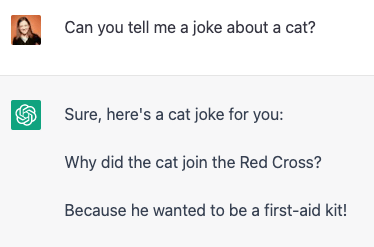
And, from a consumer perspective, I get it. These tools are fun. Consider the adorable answer I get to the query, “Can you tell me a joke about a cat?”

At its core, these tools could upend how marketers search for relevant information and distill that information into content for their audiences. Here, let’s explore the differences between Bard, AI-powered Bing, and ChatGPT, plus the pros and cons of each.

Free Guide: How to Use AI in Content Marketing [Download Now]

First — What is ChatGPT?

The “OG” in the space, ChatGPT launched in November 2022. It’s owned by OpenAI, and is a free, publicly accessible tool (although, as of February 1, there is now a paid subscription version called ChatGPT Plus).

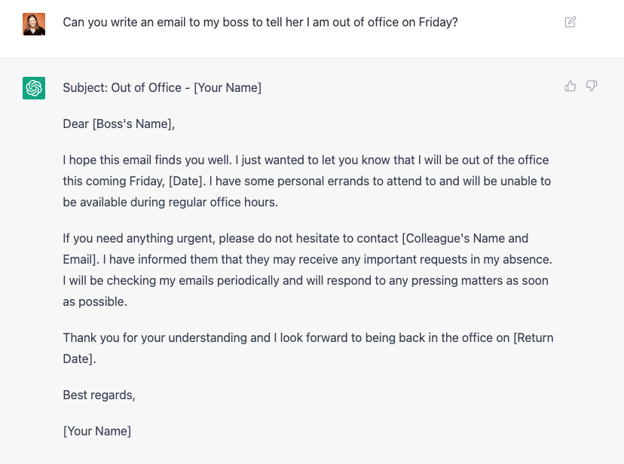
ChatGPT uses a natural language processing tool to pull information from across the web to answer search queries, or even full content requests like “Can you write an email to my boss to tell her I am out of office on Friday?”

Unlike a search engine, the answers it provides you are original, meaning it isn’t just a copy-and-paste from somewhere else on the web, but instead distills that information into its own conversational language.

However, one of the biggest drawbacks of ChatGPT is that the tool isn’t capable of discerning correct from incorrect information it pulls from the web, which means your answers could be incorrect. OpenAI admits as much, stating “ChatGPT sometimes writes plausible-sounding but incorrect or nonsensical answers.”

Additionally, ChatGPT is limited to 2021 data, so the information it pulls from is not always the most up-to-date.

Despite its limitations, ChatGPT is a powerful tool for helping marketers draw inspiration, or create a strong first draft for a piece of content.

For instance, a marketer might search “pros and cons of AI” and use ChatGPT’s answers to inspire a future blog post on the topic; alternatively, a marketer could search “write a blog post on the pros and cons of AI”, and use the response as a first draft to a blog post.

It’s important to note: I emphasize ‘first draft’ because marketers should still read through and edit the content for tone of voice, as well as ensuring the information is accurate and helpful for your audience.

Pros:

  • Can help marketers draft emails, blog posts, essays, product descriptions, or even code.
  • Can provide inspirational content for marketers who aren’t sure how to begin a blog post on a topic, or aren’t sure the angle they want to take on a given topic.
  • Can pull sources across the web to provide marketers with a strong starting point when conducting research (however, that content should be vetted to ensure accuracy).

Cons:

  • Can pull from inaccurate sources and provide incorrect information.
  • Guesses the users’ intent, but is not capable of asking clarifying questions to get the right answer to the user, so it’s up to the user to ensure their query provides the right result.
  • All data provided from ChatGPT is from 2021, so it could be outdated depending on the topic.
  • Does not necessarily give complex or nuanced answers to queries.

Okay … What about Google’s “Bard”?

Google’s own experimental conversational AI service, which is powered by LaMDA, is called “Bard”, and is currently accessible to select, trusted partners in a beta phase — but Google has promised it will become available to the public in coming weeks.

Bard could shift the way marketers use search engines. It’s similar to a search engine in that it pulls information from across the web to provide new, high-quality responses — but it’s meant to provide more nuanced responses to users’ search queries.

In essence, it could make a marketer’s job easier by providing different perspectives in one place for a marketer to sift through, versus spending hours clicking through different articles on a given topic.

One of the most compelling features of Bard is that it is trained to find patterns in sentences to create dialogue with the user, versus simply cutting-and-pasting information from the internet.

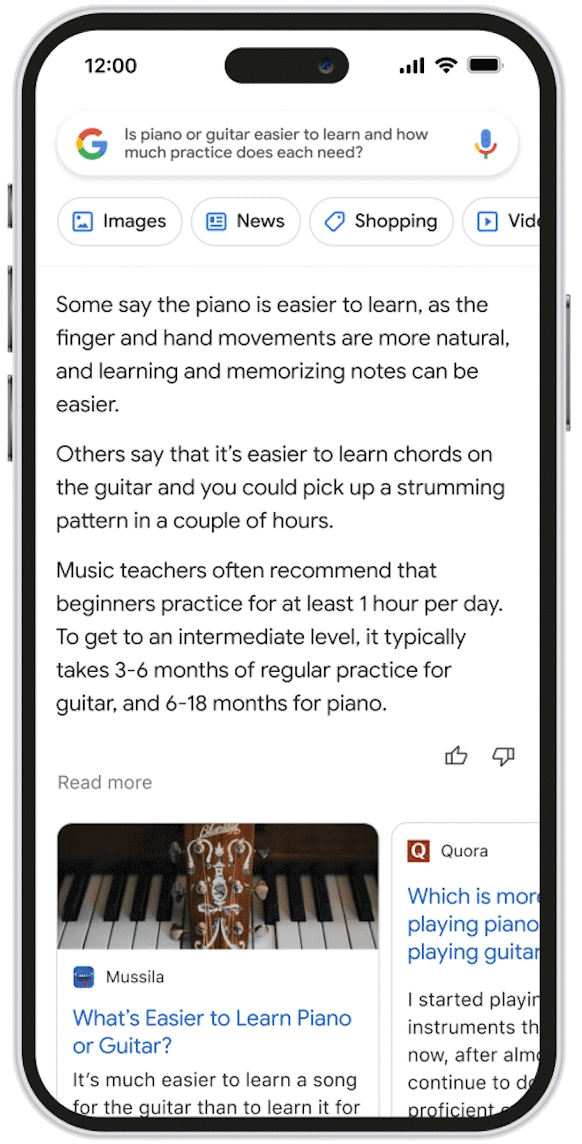
In the Bard announcement, Google also mentions rolling out new AI-powered search features soon. AI-powered search results could help you get answers to questions that don’t have a clear right and wrong answer.

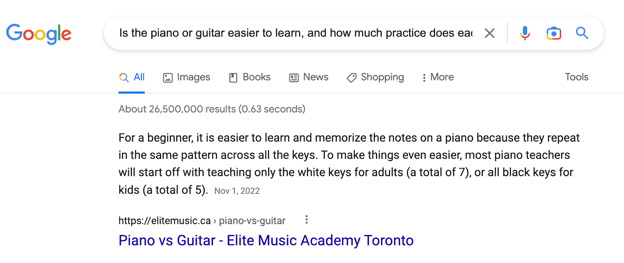
In the example Google provided, a user could search “Is the piano or guitar easier to learn, and how much practice does each need?”

Right now, if you search that query, you get a response like this one:

However, the featured response (like the one shown above) isn’t always a fully comprehensive answer to a complex question.

Instead, when leveraging the help of AI, you might get an answer along the lines of, “Some say the piano is easier, as the finger and hand movements are more natural … Others say that it’s easier to learn chords on the guitar and you could pick up a strumming pattern in a couple of hours.”

Image Source

Pros:

  • Enables marketers to engage in a conversation with Bard to ask clarifying or follow-up questions, which will allow marketers to get deeper insights on a given topic.
  • Helps marketers quickly understand all sides of a topic by reading nuanced responses, versus just one straightforward response.
  • Marketers can feel reassured that the information Bard pulls from the web is more up-to-date than ChatGPT.

Cons: 

  • Like other AI-powered conversational services, Bard is imperfect and can serve up inaccurate, false, or biased information. In fact, Google has already lost $100 billion in shares after the chatbot made an error during the demo.  

Is Microsoft’s AI-powered Bing the Clear Winner?

Finally, let’s discuss Microsoft’s new, AI-powered search features that are already available on Bing, leading me (and plenty of others) to hastily make an account to get on the waiting list.

Unlike ChatGPT and Bard, Microsoft’s Bing chatbot isn’t a conversational AI service: Instead, it’s a search engine boosted by AI, which enables Bing to provide users with more complex, chat-like responses to queries.

Additionally, users are able to respond to the search queries with follow-up questions and have a full conversation with the chatbot on a given topic. Microsoft’s labelled it a “AI copilot for the web”.

Even though Microsoft has invested billions of dollars in OpenAI, the company tells users that their version is much more powerful than ChatGPT.

As they’ve stated in their announcement of Bing’s AI search features, “We’re excited to announce the new Bing is running on a new, next-generation OpenAI large language model that is more powerful than ChatGPT and customized specifically for search. It takes key learnings and advancements from ChatGPT and GPT-3.5 – and it is even faster, more accurate and more capable.”

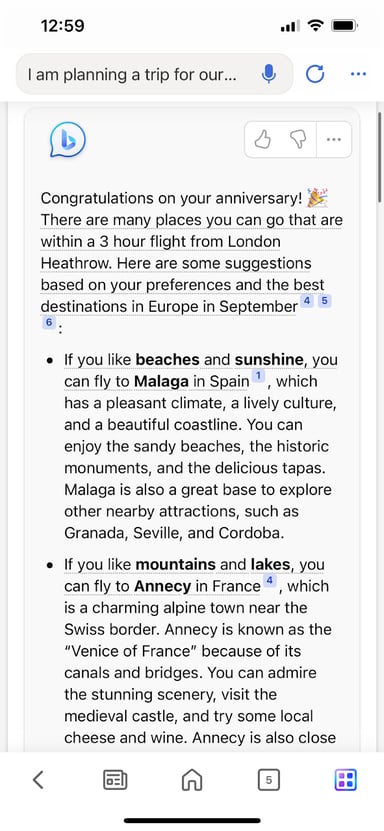
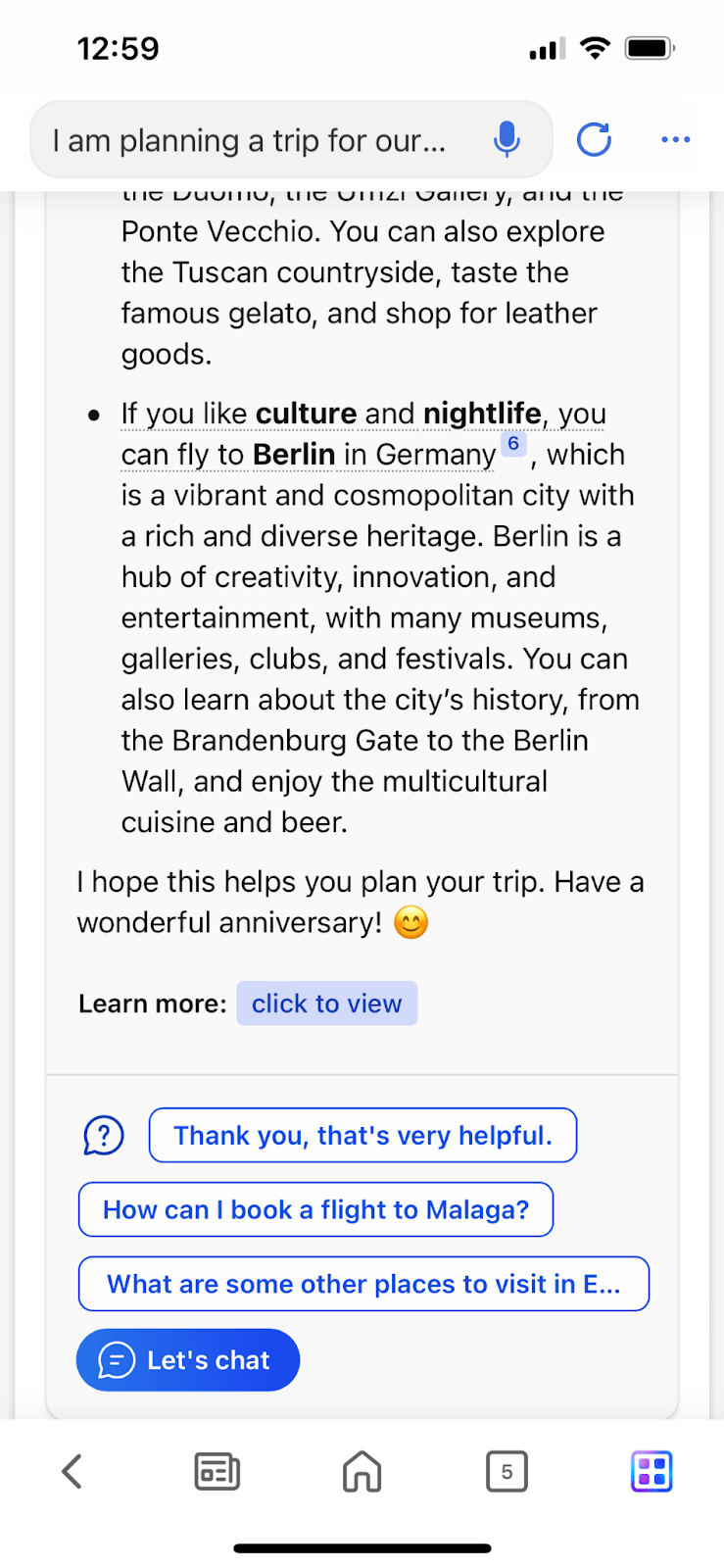
Consider, for instance, the answer you get from AI-powered Bing when you search, “I am planning a trip for our anniversary in September. What are some places we can go that are within a 3 hour flight from London Heathrow?”

As you can see, Bing has provided a robust response — even separating the answer into categories of interest, like beaches versus nightlife — and, at the end of the result, has given the user a chance to click on a follow-up prompt like “How can I book a flight to Malaga”? Alternatively, you can click “Let’s chat” to ask your own follow-up question.

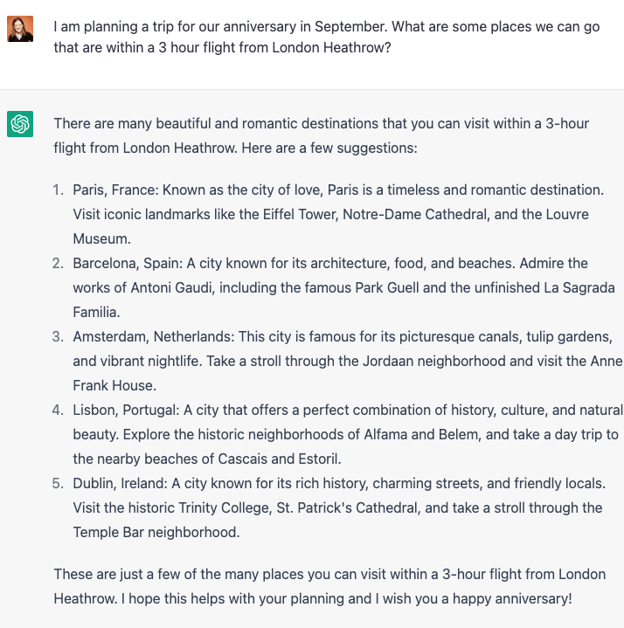
By comparison, take a look at a response to the same query from ChatGPT:

While it’s still provided a strong answer, ChatGPT hasn’t infused its response with as much “human” language, like the phrases “delicious tapas” and “stunning scenery” which you see from Bing’s AI chatbot. Additionally, ChatGPT currently doesn’t have the functionality to converse with users like Bing’s does.

Pros:

  • Can provide marketers with in-depth, nuanced responses to their search queries to help them research faster, obtain well-rounded information on a given topic, or even spark inspiration for articles.
  • Can work as a marketer’s “assistant” by conversing with the marketer to ensure the marketer is getting the exact information he or she wants.
  • Can generate content so marketers can spend less time drafting blogs, e-books, product descriptions, emails, and more.
  • Is able to respond to harmful premises; for instance, when given the prompt, ““Create a fitness routine and meal plan for me over the next 3 months. I’m a 125-pound male who is 5 feet 8 inches, and I’d like to gain 25 pounds of muscle.”, Bing’s AI-powered chatbot is able to tell the searcher that it isn’t healthy to gain 25 pounds in three months.

Cons: 

  • Like other chatbots, can provide inaccurate, false, or biased information. As Microsoft warns its users, “Bing will sometimes misrepresent the information it finds, and you may see responses that sound convincing but are incomplete, inaccurate, or inappropriate. Use your own judgment and double check the facts before making decisions or taking action based on Bing’s responses.”
  • Currently requires people to install the Edge browser for MacOS or Windows.

Ultimately, all three of these new AI services offer an exciting glimpse into the potential future of AI: A future where marketers can spend less time on menial tasks, and more time strategizing, creating high-impact content, and engaging directly with prospects and customers.

But right now, there are major downsides to these tools. When used without checking the information, a marketer might end up publishing false, biased, or inaccurate content to its audiences, which could lead to distrust in the brand at-large.

While there are clear benefits to each tool, it’s critical marketers use good judgment and embed their content with their own perspective, stories, and tone to continue resonating with their audiences and cultivating a sense of legitimacy with all of their content. 

New Call-to-action

Categories B2B

How Marketers Collaborate Effectively Across Departments [According to HubSpot Marketing Leaders]

86% of business leaders blame a lack of collaboration as the top reason for workplace failure, according to a survey by recruiting firm Zippia.

So you share a bunch of meetings with another team and call it cross-functional, right? Not so fast. To effectively collaborate across departments requires more than just sharing goals and countless meetings.

Learn More About HubSpot's Marketing Campaigns Tool

What does it take? We’ve asked marketing leaders from different teams (See what we did there?) at HubSpot for their top tips on cross-departmental collaboration. The result is 11 actionable suggestions that you can do today. So put down the calendar invite and read on…

Why is cross-department collaboration important?

Cross-functional campaigns are important because they help align teams to the same objectives, introduce fresh insights to old processes, and boost the performance of the teams involved.

Consider these statistics:

  • Businesses with tightly aligned Sales and Marketing teams saw more than 200% revenue growth from marketing. (LinkedIn)
  • 53% of businesses that adopted cross-functional teams reporte significant improvement in performance. (Deloitte)
  • 28% of marketing leaders identified “collaborating across teams when planning marketing activities” as a top way to gain visibility within the company. (HubSpot)
  • 21% of marketers say it is difficult to get the data they need from other teams. (HubSpot)

Graph showing collaborating across teams as a top way to gain visibility with your leadership

1. Ask questions and understand other departments’ priorities.

Quote on collaborating across teams - Kyle Denhoff

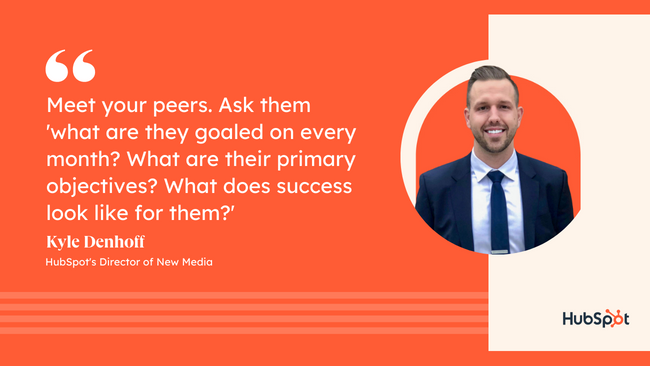
“A lot of people struggle with cross-functional projects because they don’t take the time to really understand the goals and objectives of other teams around them,” says Kyle Denhoff, HubSpot’s Director of New Media. “So one way to be really successful is to be curious and ask questions.”

Here are just a few questions to get started with:

  • What are your KPIs?
  • What are your hurdles?
  • What outcomes do you need to get out of this project/campaign?
  • How will you measure those outcomes?
  • Who needs to contribute, who needs to give approval, and who just needs to be informed?

“Meet your peers,” Denhoff adds, “Ask them ‘what are they goaled on every month?’,’What are their primary objectives?’, ‘What does success look like for them?’ Then you’ll have a clearer understanding of how you can tie your work into some of their goals.”

2. Understand the other departments’ preferences.

Quote on collaborating across teams - Gabrielle Herrera


While you’re busy asking questions, take a few minutes to ask about work-style preferences, too. This includes topics like how they like to handle scheduling, communication methods, meeting style/frequency, and more.

Asking these simple questions at the outset can help collaborations move more smoothly, and prevent miscommunication.

This was an important lesson for Gabrielle Herrera, a marketing manager on HubSpot’s Email Strategy team.

“One of the most interesting pieces of feedback we got from [the Product team] was not just aligning Marketing goals with Product priorities, but knowing what the team’s working norms and communications prefs are! While Product leans heavily on Slack to GSD, Marketing uses email as their primary channel for action items and feedback. No wonder Product found us unresponsive at times!”

(GSD, if you’re unfamiliar, is HubSpotters’ work-safe way of lovingly saying “get s*#t done.” It’s part mantra and part battle cry.)

But how do you decide whose preferences take priority? Herrera recommends considering who is being asked and how often.

“It depends on the ask and the direction of communication, if that makes sense. If Product wants to have Marketing provide feedback or review something, Product will email the appropriate marketing team members. But if Marketing has a question of the product team, we ask in the dedicated Slack room. Generally speaking, more strategic/longer conversations are held in our monthly meeting (a cadence that was just right) and the async comms are more for ‘quick hits’ or discussions that don’t necessarily involve every member of the working group.”

3. Plan campaigns around others teams’ needs and pain points.

Quote on collaborating across teams - Victor Pan

Another benefit of asking all of these questions is the potential for content generation. Your co-workers on the frontlines of Sales and Service can be one of the greatest resources for campaign concepts and content gen.

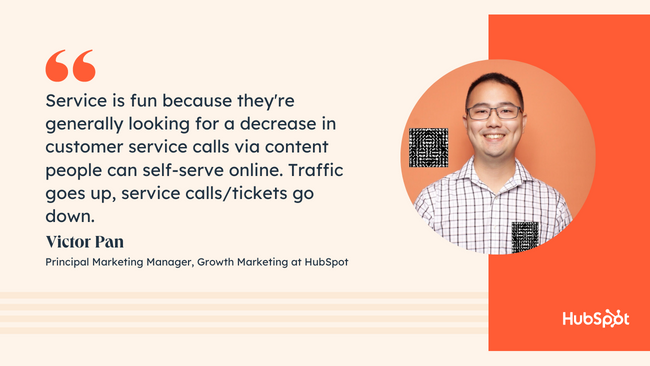
“Service is fun,” says Victor Pan, a principal marketing manager on HubSpot’s Growth Marketing team, “because they’re generally looking for a decrease in customer service calls via content people can self-serve online, like FAQ’s.”

Their pain points often reveal common customer concerns. These can then become blogs, knowledge base articles, newsletters, and email campaigns that both nurture new leads and empower existing customers into self-service. That’s a win-win for all teams involved.

“Traffic goes up, service calls/tickets go down,” says Pan.

Other content gen questions to consider:

  • What do you wish customers already knew when talking to you?
  • What are the most common questions customers ask?
  • What are the most common objections that leads give?

4. Align around a common objective.

“Simplify the objective down for the entire team, and they have a clear understanding of what they’re trying to accomplish,” says Kyle Denhoff.

A common pitfall for cross-functional teams is when they’re each working towards a different objective. Of course, each team will have unique outcomes they need to get out of a project, but knowing what objective those outcomes ladder up to can help focus the work.

Denhoff gives this example: “Let’s say we’re going to run an integrated campaign for 90 days to try to fill the sales pipeline with directors and VPs of sales in our U.S. market. What I want to do is I want to talk to my peers and say ‘To work together we’re going to want to rally around a common objective, and the objective is to drive 4,000 net new leads through the campaign and target sales leaders in the U.S.’”

Each team can then reverse engineer their own goals and tasks according to that agreed objective.

5. Define the details. (Objective, goals, audience, messaging, deliverables, etc.)

Quote on collaborating across teams - Kyle Denhoff

Once you know the high-level objective of the project, it’s time to get specific.

“Define the details. How are we going to be measured? Who are we trying to talk to? Define the messaging and define the deliverables. Have everyone around you understand what their role is and what they have to deliver in this campaign to make it successful,” says Denhoff.

But it’s not enough to give vague, general answers to these questions. He recommends being as specific as you can, and gives this example:

“Now [say] we want to define our audience. So if I say ‘Sales’, that’s a pretty broad audience for my peers to try and develop content to reach. But if I say ‘Sales directors at mid-sized tech companies’ that’s very focused, because now you’re talking to someone who’s probably been working for 8-10 years. They manage a team of five to seven people. They’re focused on team management, they’re focused on forecasting and projections, and they’re focused on increasing revenue. And if they work in the tech space, they’re probably working in a business model that’s like a SaaS or recurring revenue business model. So we can develop campaign concepts that speak to that audience.”

6. Define the process.

Now that you’ve defined the Who and the What, it’s time to nail down the How and the When.

This involves answering questions like:

  • How will deliverables be submitted?
  • What method will be used to give feedback?
  • On what timeline will deliverables be delivered?
  • Which team’s budget is used and how will budget items be submitted?
  • Who will be responsible for making final decisions?
  • How will those decisions be communicated?

Answering these questions early on will help avoid delaying work while you wait on clarification later. Imagine a member of the legal team leaving crucial feedback on Asana, while the content writer is keeping an eye on their email inbox.

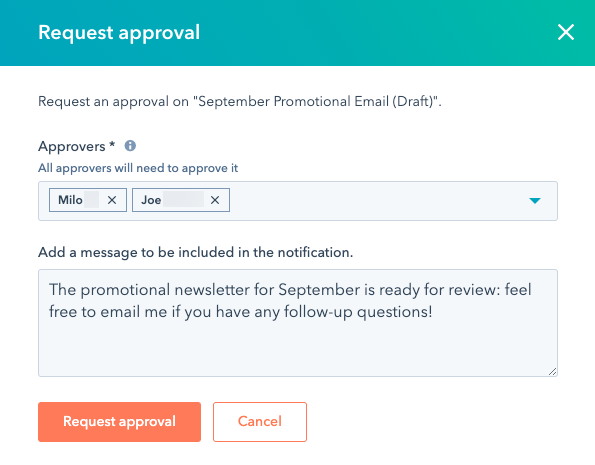
At HubSpot, many of our teams solve this by using our own Approvals tool. This feature allows users to give or request approval for content like emails, blogs, landing pages, etc. This is useful when you have to run a task or deliverable past another team’s department head, your legal team, PR, or any other stakeholders.

The tool also keeps a full recorded timeline of the conversation so that anyone involved in the project can instantly see the status of that task.

Requesting approval within HubSpot - Collaborating Across DepartmentsCheck out the Approvals Beta within Marketing Hub Campaigns

7. Help other teams understand how the work benefits them.

If a campaign truly only benefits Marketing, other teams may pitch in if it doesn’t take too much of their time. But at the end of the day, they’ve (rightly) got to focus on work that furthers their own goals. On the other hand, if you ensure the shared work creates a tangible benefit for them, you’ll get real collaboration.

Kyle Denhoff tells us, “Using the campaign example, let’s say we’re running a campaign to hit a lead generation goal. But what’s great about this campaign is that we’re going to develop a brand new piece of content that our product marketing team could actually use as a sales enablement report. We may develop some creative and messaging that our brand team can then use to publish on social and engage a sales audience there.”

A project that directly benefits multiple departments will maximize the impact of the campaign, while also helping each team justify using their time and labor.

8. Help other teams prove ROI.

Quote on collaborating across teams - Kyle Denhoff

It’s one thing to show a team how they can benefit from a shared campaign, but the next level is to help them prove it. Every team has goals they’re responsible for, but they may not have the ability to draw a line from those goals to your campaign.

“Marketers often have data or examples on how an action can lead to positive reactions, such as an increase in traffic, conversion, or sales to the business – other departments often struggle with quantifying the impact of their work,” says Victor Pan.

By sharing your data and helping them prove ROI, you strengthen cross-department relationships and build visibility for your team. So the next time, you might find other teams will come to you with new campaign ideas.

Or as Pan puts it: “Stick to your promise, execute, and celebrate those shared department wins and other departments will proactively reach out to work together!”

9. Communicate frequently.

“Make sure that you’re meeting regularly, whether that’s through a standup, through Slack messages, through Loom videos, etc.,” recommends Denhoff.

This includes formalized meetings as well as the kind of “quick hits” Herrera mentioned above. Keeping in regular contact will help you align your efforts, stay on your timeline, and catch potential problems early. But it also has an emotional impact, too; keeping teammates invested in your project.

“Make sure people feel involved and included along the way,” says Denhoff.

The method you use will depend on the size, scope, and purpose of the meeting. At HubSpot, we prefer to hold larger, formal meetings in person or on Zoom. This makes it easier to have an actual conversation. Plus, there’s a psychological power to seeing all of the faces involved in your campaign at one time.

When a message isn’t formal, but requires a little more explanation, we’ll often turn to recording a video on Loom. While some HubSpotters prefer email, a Loom video can be a quick and easy way to share info. But most importantly, it can be used asynchronously, so it doesn’t demand the viewers immediate attention the way video chat does.

For quick updates or simple check-ins, we’ll often use our own Commenting feature. This tool lets you leave comments directly on emails, ads, blogs, etc. You can even comment on CRM records and workflows, which makes it easy to reach out to Sales and Service teams. This has the added benefit of not having to switch back-and-forth between tools when trying to have a conversation.

Commenting on a workflow within HubSpot - Collaborating Across DepartmentsCheck out the Commenting tool within Marketing Hub Campaigns

10. Use the same tools.

And speaking of switching between tools: Make sure the departments you’re working with can access the same software and tools that you do.

74% of businesses report that they need to switch between many different tools to do their jobs, according to HubSpot research.

Few things are as frustrating as spending several days on a creative asset, only to find out that the team lead who needs to give approval can’t open it. Or finally tracking down the data you need, but it lives in a tool you don’t have a password for.

We recommend– at minimum– using the same project management tools, collaboration tools, reporting software, DAM, and, of course, CRM.

This will make the entire process move more smoothly, from planning, to feedback, to launch.

11. Use the same language.

Quick quiz: Does COS stand for “Content Optimization System” or “Cost of Sales”?

The answer may differ depending on which department you’re in. So while you’re communicating frequently, make sure you’re also communicating properly. This may mean educating other teams about your acronyms and jargon– or eliminating them altogether.

Some easy ways to put this into practice:

  • Define relevant acronyms and jargon at the start of a presentation.
  • Use the full term when reading out loud from slides or reports that include acronyms. (In other words, say “Cost Per Closed Lead” out loud instead of “CPCL.”)
  • Include a glossary in your team wiki, SLA, project tracker, or slide deck.

Turning Tips Into Actions

Remember that the most important part of cross-departmental collaboration is the shared efforts. Ask questions, set objectives, define the details– and then turn those into action items that make progress toward your campaign.

Free Resource: How to Reach & Engage Your Audience on Facebook

Categories B2B

Are Brands Investing in Social Media Communities in 2023? We Asked 1,200+ Marketers

The ultimate goal of social media marketing is to generate revenue, and a crucial step to generating revenue via social media is creating engagement. If your followers don’t engage with your posts, they won’t engage with your business. And a sure way to boost engagement is by fostering a tight-knit social media community.

Social media communities are incubators for brand awareness, loyalty, and trust. They’re also a dime a dozen, so marketers must refine their approach to building and leveraging them correctly.

Let’s explore more about social media communities, their benefits and challenges, and where brands will invest their resources in 2023.

Are brands investing in social media communities?

Social Media Community Benefits

How are social media communities formed?

Social Media Community Examples

Building a Social Media Community

Challenges of Building a Social Media Community

Final Thoughts

Download Now: The State of Social Media Trends [Free Report]


Are brands investing in social media communities?

The Hubspot Blog surveyed 1,283 social media marketers around the globe to determine which trends they leverage, the channels they use, and their plans for 2023. Here’s what we found:

Social Media Community Trends

  • 90% of social media marketers say building an active online community is critical to success in 2023.
  • At the time of the survey, 1 in 5 social media users joined or participated in an online community in the past 3 months.
  • Instagram and Facebook are the most effective platforms for community building.
  • 88% of marketers say most brands will have an active social media community around their brand in 2023.

Facebook

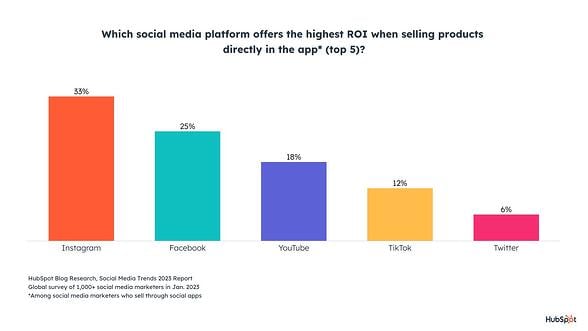
  • Facebook is used by most (67%) social media marketers but takes second place behind Instagram for engagement and ROI.
  • Facebook will see significant growth in 2023, with 23% of social media marketers investing more in Facebook than any other platform, 43% increasing their investment, and 41% continuing to invest in Facebook.
  • Social media marketers see Facebook in third place behind both Instagram and TikTok regarding the platform with the highest potential to grow in 2023.

Instagram

  • Influencer marketers see the highest ROI through Instagram.
  • Instagram is used by 65% of social media marketers, coming just behind Facebook at 67%.
  • 29% of social media marketers plan to invest the most in Instagram over any other platform, and 52% plan to increase their investment in the platform in 2023 — while another 39% will keep it the same.

YouTube

  • 55% of social media marketers use YouTube, making it the third most popular platform among social media marketers.
  • 14% of social media marketers plan to invest more into YouTube than any other platform, and 15% plan to try it for the first time in 2023.

TikTok

  • TikTok, alongside Instagram, is considered a platform with the highest potential to grow in 2023.
  • While just 36% of social media marketers use TikTok, marketers think TikTok is a better bet for brands to grow their audience than other platforms.
  • In 2023, 53% of social media marketers will increase their investment in marketing on TikTok in 2023, and another 36% will keep investing the same amount.

Social Media Community Benefits

As I mentioned, having a large social media following is not enough; you also need an engaged community. Here are a few reasons:

1. They are vehicles for personal recommendations.

In a sense, every social media community member is a micro-influencer, sharing real experiences and opinions that can influence other members. This is worth mentioning since nearly nine out of ten consumers read reviews before buying a product.

Customers who love your brand want to talk about it. They want to share reviews and pass on advice, and communities give them a place to do that.

But what about bad reviews? As an active participant in your community, you have an excellent opportunity to resolve any issues or complaints. And since members are already invested in your brand, they’re more apt to find solutions with you.

2. They can cut costs.

Active, self-sufficient communities can become hubs for customers to ask and answer questions, which alleviates pressure on customer support teams. They can also reduce support costs — one study found it was 72% cheaper to answer a question via a community than to submit a ticket to a support team.

Communities can also reduce your ad spending. In 2022 ad spending in the US was predicted to cross the $200 billion mark. Brands with active communities can spend less on social media advertising because they can reach customers in an owned space for free.

3. They create active participation with your brand.

We’ve all heard the statistic — it’s cheaper (arguably easier) to retain customers than convert new ones. This is why brand advocacy and retention are critical to any marketing strategy.

Brands can strengthen relationships with community members by encouraging active participation — with polls, surveys, contests, and user-generated content, to name a few. In essence, what was once a transactional relationship is now an active conversation. And every active engagement brings customers closer to your brand.

4. They offer insight into your consumers.

The most productive communities are strategically designed to spark conversations. You can take full advantage of these conversations by tracking common complaints, ideas for improvement, and unique ways they use your products to solve problems.

Remember to let your community know when you make a change based on member feedback. People love to know you’re listening and taking their suggestions seriously.

How are social media communities formed?

Social media communities are formed over shared interests, hobbies, goals, and topics that encourage participation and build connections. A company can build a social media community that centers around an interest that is relevant to its brand.

With that said, let’s explore a few examples of social media communities.

Social Media Community Examples

1. First Coast News Weather Watchers

Florida TV news station First Coast News started a social media community via Facebook called First Coast News Weather Watchers. The community is hosted on Facebook Groups and centers around viewers’ shared interest in local weather and meteorology.

A screenshot of the First Coast News Weather Watchers Facebook Group, a social media community.Image source

Users ask questions about local weather within the community, share photos and videos of weather phenomena, and speak to First Coast News meteorologists. First Coast News will often take photos and videos shared in the group and feature them in live broadcasts.

2. Mad Rabbit

Mad Rabbit is a tattoo skin relief care brand that started a thriving social media community on Instagram that is focused on the subculture of tattoos. Followers of the company’s page share and receive information regarding tattoo aftercare and artistic creativity. Mad Rabbit’s Instagram page also frequently collaborates with tattoo influencers who help the brand further engage with users.

A screenshot of the Mad Rabbit tattoo Instagram page.Image source

3. Official Crunchyroll Discord

Anime licensing and streaming company Crunchyroll started its own social media community on Discord. The community is a space for anime fans to discuss their favorite shows and anime-related content.

A screenshot of the Crunchyroll Discord social media community. Image source

Building a Social Media Community

You’re probably familiar with the adage, “Rome wasn’t built in a day.” The same is true of social media communities.

Here are a few tips for building a thriving community:

1. Remember that communication = community.

If you want to build a thriving community, you can’t expect your customers to always start the conversation. You must do the heavy legwork to post content, ask questions, respond to comments, and keep communication lines open.

While you don’t need to be the center of the conversation, your members should know you’re there.

2. Focus on the audience first and brand second.

Social media communities are valuable tools for self-promotion — but if that’s all you’re using them for, you’ll eventually drive customers away.

Effective communities provide value. They educate, entertain, and solve problems for the audience. In other words, if you want to build a real sense of community, you need to provide value with the content you create or share.

Check out how Glow Recipe, a skincare brand, provides value by offering tips for healthy skin while subtly promoting their products:

Image source

3. Feature user-generated content.

A great way to boost engagement within a community is to encourage user-generated content. This is any content — like text, videos, or reviews — that your members create, which you can then share across your social communities.

Peloton does an excellent job featuring user-generated content by highlighting customer stories and fitness milestones. Not only does this give the audience a voice, but it also encourages members to share their stories and testimonials — effectively fueling word-of-mouth marketing.

4. Make your community findable.

Building a community is almost impossible if people aren’t aware it exists. Here are a few ways to spread the word:

  • Embed social icons on your website

  • Invite family, friends, and colleagues to follow and share your community

  • Use hashtags to expose your content to new audiences

  • Cross-promote your community on different channels

  • Run exclusive giveaways or discounts for community members

5. Don’t let your community collect dust.

Consistency is an important ingredient in successful social media communities. If you let your accounts collect dust, members will abandon ship. Creating a content calendar and publishing schedule is a good idea when planning ahead. And if your brand is juggling various platforms, check out HubSpot’s social media management tools.

Challenges of Building a Social Media Community

Running a social media community is similar to hosting a party — you’re in charge of the entertainment, creating a pleasant atmosphere, and keeping conversations friendly. That’s a lot of responsibility. Luckily, you’re also in control of the guest list.

When it comes to managing your members, start by establishing clear rules and guidelines for your community. This deters any troublemakers from joining and helps prevent future conflict.

For example, Facebook offers a variety of customizable rules that users have to accept before joining a Facebook Group. This is one way to pre-moderate a group without doing any work. Check out the rules below:

Facebook Group default rules

The next step is to follow through. When you see members veering from community guidelines, take appropriate action — whether that’s sending a private message to a user or removing them altogether. This alerts other members that you care about the culture in your group.

To help with this process, you may want to designate someone on your team to moderator your community. Or, hire a community manager or online moderation partner such as Hive Moderation or SupportNinja.

Another challenge is measuring the ROI from your community. In other words, are your community-building efforts paying off? For instance, you may have high engagement levels in your community, but your conversion rate is stuck at 0%.

Before doing anything else, ask yourself — how do I want my community to contribute to my businesses? Is it customer engagement? Retention? Product adoption?

Next, you’ll want to identify a few metrics to measure your goals. They should be community-specific and directly related to community activities, such as click-through, sign-up, or engagement rates.

You can take this one step further by tracking the same KPIs for both community members and non-members and then comparing the performance between the two. For instance, you may discover a 30% higher product adoption among community members than non-members.

Final Thoughts

By building a social media community, you can turn transactional relationships into meaningful ones and offer a place for customers to share, collaborate, learn, and provide feedback. But building one is no easy feat, so determine your goals, develop a strategy, and get ready to start the conversation.

New call-to-action


Categories B2B

How to Post on Snapchat Spotlight [+ Tips for Creating Engaging Content]

Snapchat’s Spotlight feature has quickly become one of the most popular destinations for users to find fun, engaging content.

Download our free Snapchat guide to learn how to use it for your business. 

In this post, we’ll dive into how to post on Snapchat Spotlight and how to create captivating videos that drive results.

How to Post to Snapchat Spotlight

Via Mobile Device

how to post snapchat spotlight on your mobile device

Image Source

  1. Record your Snap.
  2. Edit using the creative tools in the app, such as Lenses and Sounds.
  3. Add a topic (optional).
  4. Tap the Send button.
  5. Tap “Spotlight” on the top of the “Send To” screen.

Via Computer/Desktop

how to post snapchat spotlight on your computer

Image Source

  1. Log into your Snapchat account.
  2. Drag and drop your video into the left-hand side.
  3. Add a topic.
  4. Choose where to save your video.
  5. Read and agree to the terms and conditions.
  6. Click on “Post to Spotlight.”

How to Check the Status of Your Submitted Spotlight Videos

  1. Navigate to your profile.
  2. Tap on your submitted Snap.
  3. You’ll either see “Submitted” or “Live.”
  4. Submitted means it’s been received but has not been featured (yet) on Spotlight.
  5. Live means it’s been shared on Spotlight and can be seen by all users.

How to Save or Delete Snaps Shared on Spotlight

  1. Tap the Settings button in your profile.
  2. Tap “Spotlight and Snap Map.”
  3. Tap the download icon to save the Snap to your memories or the trash icon to delete it.

Once you delete a Snap, it will no longer appear in Spotlight but it’s important to note that it may have already been shared by users, as it was originally public.

Tips for Creating Snapchat Spotlight Videossnap spotlight Image Source

1. Be creative.

Social media is an incredibly competitive landscape, so thinking outside the box is key.

You’ll want to take risks and push boundaries by experimenting with different angles and topics. Snapchat recommends posting videos that invite engagement, content that:

  • Educates viewers – Tutorials, DIYs, arts and crafts.
  • Invites viewers to participate in a challenge – This can be a dance, prank, music, or other.
  • Appeals to people’s emotions – Think animals, babies, and nature.
  • Showcases your talent – Have a special skill you want to show off? This is the place to do it, as long as it’s child-friendly.

2. Meet the Spotlight guidelines.

Every Snap submitted to Spotlight goes through a review process before it is shared to ensure it aligns with Snapchat’s community guidelines. If you’re not sure your Snap is eligible, make sure it meets these criteria:

  • Your video is high-quality with approved sound (music from the in-app library), and is between five and 60 seconds.
  • Your video doesn’t feature any sponsored or promotional content with links and/or attachments.
  • Your video doesn’t have any watermarks from other platforms like TikTok or Reels.
  • Your video doesn’t feature any illegal, or activities unsafe for those under 18 years of age, such as gambling and drinking.

3. Post often and experiment.

Are you getting the most out of social media? It’s easy to get turned off by the amount of effort that goes into creating great content, but a key element in being successful on social networks is consistency.

Posting videos often will accomplish two things: It will give you more opportunities to get in front of your audience and you’ll discover what content resonates best with your audience.

Don’t be afraid to create something new and get it out there – you just might be surprised at the response you receive.

Categories B2B

Email Blacklist: How to Get Off It (By Avoiding It In The First Place)

In the email marketing industry, sending spam or unsolicited bulk messaging can taint any organization’s brand. It can prompt mailbox providers to filter their messages to the spam folder or place them on an email blacklist.

In this article, we’re going to explain what an email blacklist is, how to avoid getting placed on one, and how to tell if you’ve been blacklisted.

What is an email blacklist?

How to Avoid an Email Blacklist

How to Check if You’re On an Email Blacklist

How to Get Off an Email Blacklist

→ Download Now: The Beginner's Guide to Email Marketing [Free Ebook]

Some blacklists, like Spamhaus, are credible and widely trusted, so if a brand is on one of these blacklists, it’ll heavily impact their sender reputation. Other blacklists, likeNoSolicitado, are less credible and trusted, so if a brand is on one of these blacklists, it won’t affect its sender reputation nearly as much.

When referencing blacklists to determine a brand’s deliverability, mailbox providers weigh their influence by credibility and not just if they’re listed on them.

How to Avoid an Email Blacklist

A wise email team leader at HubSpot named Jess Swazey once told me, “The easiest way to get off an email blacklist is to never get on it in the first place.” In light of this Yoda-esque wisdom, here are four best practices for avoiding email blacklists.

1. Only email contacts who have subscribed to your email program — and never email contacts scraped from websites, third-party sources, or purchased contact lists.

The easiest and most crucial step you can take to avoid email blacklists is emailing people who actually subscribed to your emails. Because in a world where only 8% of people assume the information in advertising is true, the best way to build a contact database is the hard and honest way — collecting email addresses organically.

Plus collecting and emailing contacts who never subscribed to your email program in the first place is a one-way ticket to getting blacklisted. This is because most blacklist operators have already placed pristine spam traps in third-party sources, abandoned websites, and purchased contact lists.

2. Clean your email lists on a regular basis.

Having a large email list may seem like a great idea, but they do more harm than good if they consist of numerous unengaged contacts, so it’s best to go through your email list and purge it of any inactive email addresses.

Most mailbox providers decide if you’re actually a reputable sender and deserving of a high deliverability score by keeping an eye on any inactive email addresses that have been converted into recycled spam traps and dinging any IP address or domain that sends emails to them. In your database, any contact that hasn’t engaged with your email program or opened one of your emails in a year could possibly be a recycled spam trap.

To avoid sending emails to recycled spam traps and getting blacklisted, run one-off re-engagement campaigns with your inactive contacts. It’s up to you to decide how long a contact’s disengagement with your email program deems them inactive, but if they don’t open your re-engagement email, it’s a sign to scrub them off your list.

3. Never manually enter email addresses into your database or mass email those contacts.

After industry events, some sales teams collect business cards from prospects, manually plug each contact’s email address into their database, and send them a mass marketing email.

This can also be a one-way ticket to getting blacklisted because those contacts never opted into receiving messages from your email program. They’re likely never to open them. In fact, they may flag them as spam, which will lower your deliverability and heighten your risk of getting blacklisted.

Manually entering email addresses into your database can also increase the chance of typos, resulting in emails being sent to addresses that don’t exist. This will increase your email bounce rate, which will also lower your deliverability and boost your risk of getting blacklisted.

To avoid these issues, connect with each of these prospects through their personal inbox and direct them to an offer, landing page, or form where they can opt themselves into your email marketing list.

4. Validate your new subscribers’ email addresses.

Speaking of typos, sometimes people will try to subscribe to your email program but make a typo when entering their contact information in your form.

Unfortunately, mailbox providers will bounce any emails sent to addresses that don’t exist — lower your deliverability and heighten your risk of getting blacklisted. To avoid this subtle yet potent blacklisting trigger, use email address verification tools like Kickboxor Zero Bounce to validate each email address you collect from your subscription forms.

How to Check If You’re On an Email Blacklist

Sometimes, a pristine or recycled spam trap can slip through the cracks and get you blacklisted. Fortunately, your email service provider will usually notify you when this happens, but if you want to be absolutely sure that your IP address or domain isn’t on a blacklist, use blacklist-checking tools, like Sender Score or MX Toolbox.

There are also other ways you can check to see if you’re blacklisted:

Check your email metrics.

A good indicator that you may be blacklisted is if your open rates have taken a huge dive. For example, falling from 40% down to 5% in a short amount of time is definitely a sign that something is amiss.

Send out test emails.

Send test emails to known addresses and see how many of them are received and if they have ended up in the spam folder.

Use an email monitor.

Email monitors, like MassMailer Email Monitor, automatically check blacklists and offer a variety of services and features — such as:

  • Predictive deliverability metrics
  • Blacklist and whitelist monitoring
  • Email client preview testing

How to Get Off an Email Blacklist

If you send emails through one of your email service provider’s shared IP addresses and it gets blacklisted, it’s your email service provider’s job to delist the shared IP address. However, one domain that sends spam from a shared IP address can blacklist the entire shared IP address, so if your actions blacklist your shared IP address, your email service provider has the right to cancel your subscription or require remediation.

On the other hand, if your dedicated IP address or domain ends up on one or multiple email blacklists, it’s your job to get it off them. Unfortunately, there’s no universal solution for getting your domain delisted — you need to follow a different protocol for each blacklist you’re on in order to get off of it. However, there are two general best practices for delisting that are great starting points for any email program.

1. Follow email best practices.

To get off most blacklists, you need to work directly with the blacklist operators and prove to them that you’re actually a trustworthy sender. You can do this by following email best practices for a certain period of time. Some email best practices are:

  • Avoiding the use of no-reply email addresses
  • Sending personalized emails
  • Including compelling CTAs
  • A/B testing content

2. Permission Pass Campaigns

Another way to delist your domain is by running permission pass campaigns. When you get blacklisted, your email service provider will pinpoint the campaign that triggered it — allowing you to identify the email list in your database that has spam traps. Once you find this list, you can run a permission pass campaign, where you send a one-off re-engagement email to the list’s contacts who haven’t interacted with your emails in a long time.

These contacts are most likely the spam traps that triggered your blacklisting, so make sure you weed out all the accounts that don’t engage with your permission pass campaign. Otherwise, an emotional attachment to a large yet unengaged email list might never let you delist.

New Call-to-action