Categories B2B

Modern workflow automation explained & 6 best workflow software

In today’s fast-moving go-to-market environment, workflow automation is about removing friction, reducing human error, and scaling personalized customer journeys across your revenue functions, from marketing and sales to service and operations.

Get Started with HubSpot's Marketing Software for Free

In my experience leading demand gen and marketing ops teams, I’ve seen the biggest performance lifts come from automating the invisible work: lead handoffs, data enrichment, routing, follow-ups, and reporting. When automation is thoughtfully designed and built with AI-augmented workflows embedded in your systems, your teams make better decisions with fewer resources and in less time.

So let’s explore how workflow automation works, where it applies, and which tools are best-in-class.

Table of Contents

In today’s AI-powered marketing environment, that definition expands. It’s not just about removing repetitive tasks from marketers’ daily workloads. It’s about augmenting your workflows with AI to make them more predictive and personalized.

What does that mean in practice?

Instead of relying solely on rules-based logic, modern automation uses AI to understand context (e.g., buyer behavior, persona, funnel stage) and adjust the next best action dynamically.

Think of examples such as:

  • Generating contextualized personalized nurture emails based on CRM activity.
  • Dynamically prioritizing leads or accounts based on signals and scoring models.
  • Triggering personalized follow-ups with context-aware content.
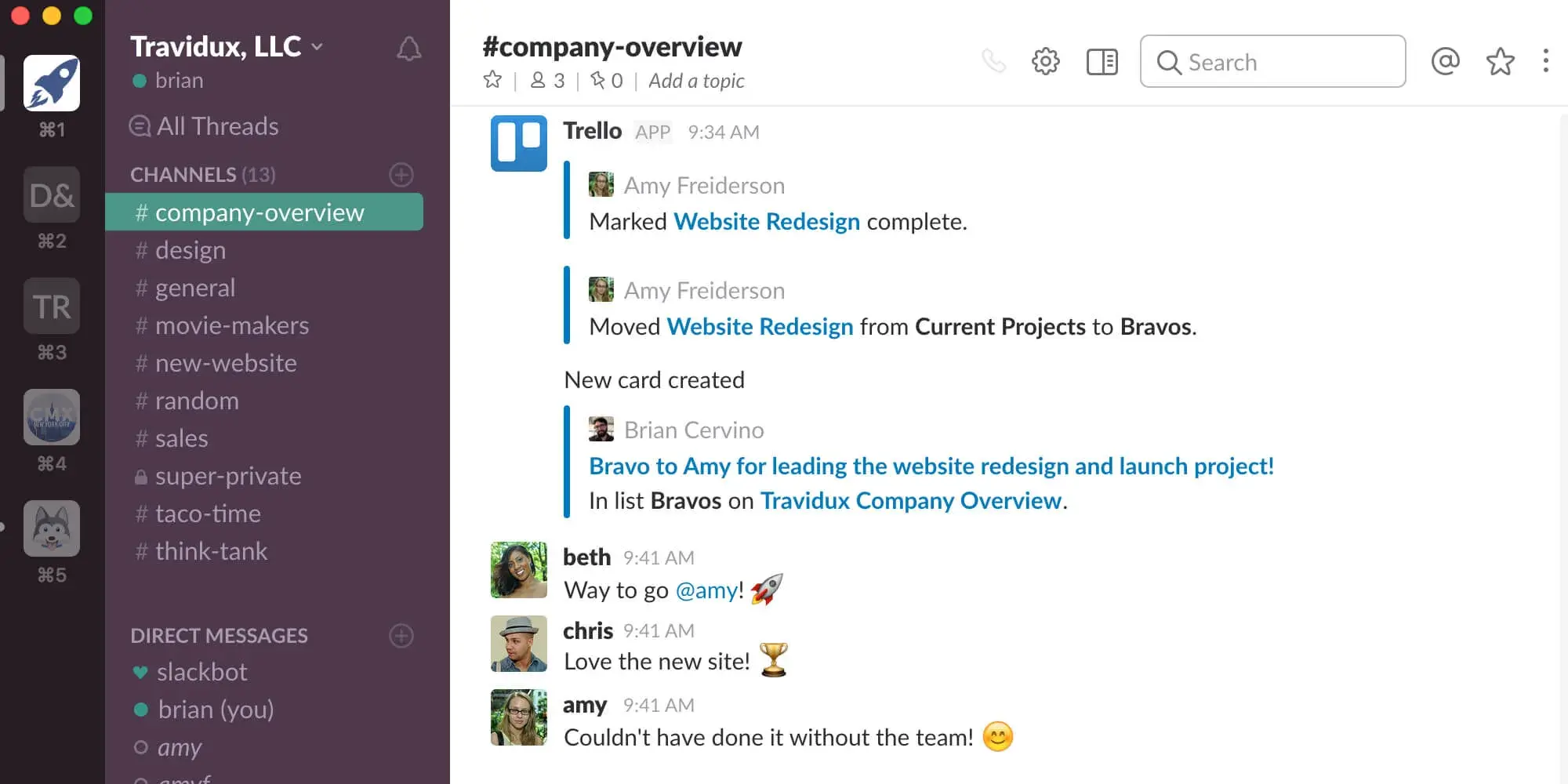
  • Coordinating tasks across apps like Slack, HubSpot, Salesforce, Zoom, and Asana.
  • Keeping your CRM clean and up to date with automated deduplication, enrichment, and sync.

In this sense, AI-augmented workflow automation is bringing workflow automation from a backend ops function to a frontline growth lever, enabling marketing teams to do more with less.

How does workflow automation work?

Traditionally, workflow automation is done through a series of if/then statements that trigger specific actions based on behavior.

Let’s walk through a classic example: A website visitor submits a form.

  • That action automatically enrolls them in a drip campaign and updates their lifecycle stage as “lead.”
  • The emails are triggered in this drip campaign, gradually nurturing the lead and prompting them to book a meeting.
  • The lead clicks through and schedules a time.
  • A confirmation email is sent automatically.
  • The CRM creates a task for the assigned sales rep.
  • The rep reaches out personally, ending the automated sequence.

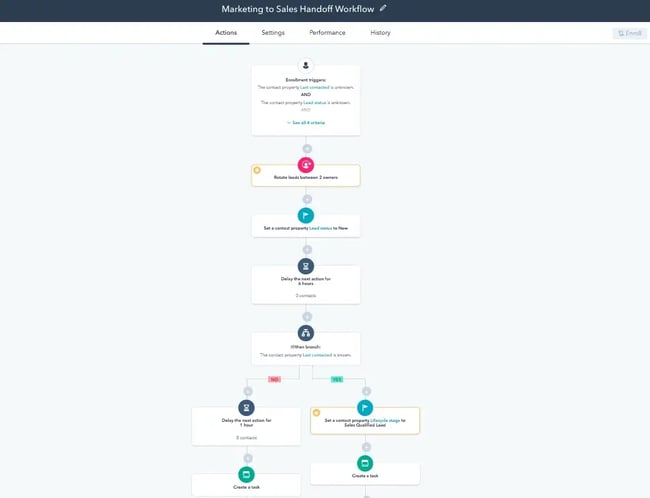
Here’s what a classic workflow can look like from start to finish in HubSpot automation.

classic automated workflow diagram illustrating marketing to sales handoff

This type of linear, rules-based flow is still foundational, but it’s no longer the ceiling.

In today’s modern B2B marketing, AI-augmented workflows that can adapt in real time are increasingly taking center stage in workflow automation.

In practice, that means:

  • Detect and prioritize intent signals even without form fills (e.g., repeat visits to pricing pages, email opens combined with ad engagement).
  • Dynamically personalize the next step based on persona, lifecycle stage, and previous engagement.
  • Pace the journey by adjusting timing dynamically.

Almost every department can benefit from this shift. Marketing can use automation to nurture leads and hand off clean data to sales; sales accelerates follow-up and prioritizes better; customer success stays ahead of renewal; even finance and HR use it to streamline internal approvals and onboarding.

In the next section, we’ll explore real-world examples of how teams use workflow automation.

Workflow automation can be used in virtually any team and in any business scenario. While it’s mostly related to marketing and sales, it can also be used in customer service, operations, human resources, and finance.

Marketing Workflow Automation

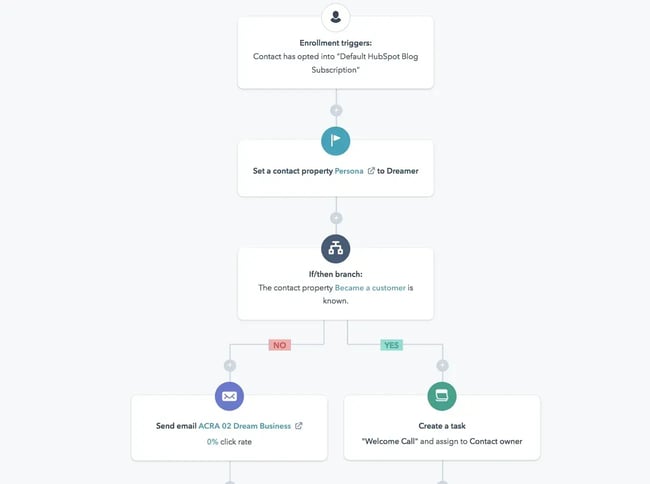
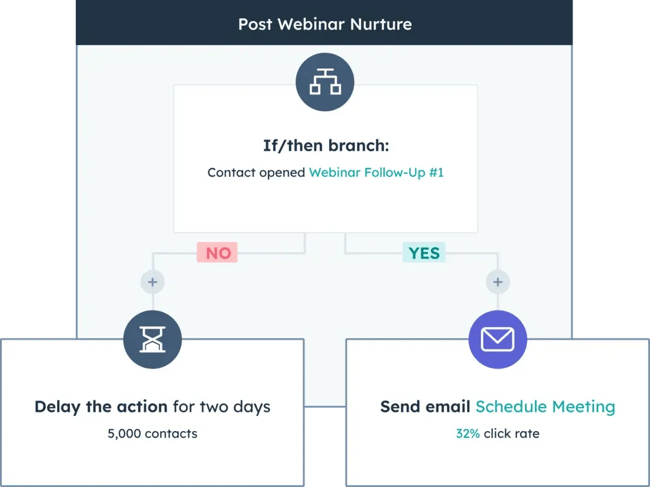
marketing workflow automation example

Some of the most repetitive tasks in marketing, such as sending emails and posting social media updates, can be automated with workflow automation. With marketing automation software, you can schedule your entire social media calendar and set up workflows that nurture certain types of prospects with email offers.

Automated workflows in marketing include:

  • Subscribing a user to a drip campaign when they download a resource from your website.
  • Welcoming a user to your company after they purchase a product.
  • Reminding a user to check out after they’ve added various items to their cart.
  • Scheduling social media posts across multiple platforms.
  • Distributing marketing tasks across team members.

Additional Reading

Sales Workflow Automation

sales workflow automation example

Source

Sales workflow automation streamlines tedious lead and prospect management tasks, so that reps can focus on selling, not entering data. Aside from taking leads automatically through the pipeline based on their actions, an automated sales workflow can enroll prospects in drip campaigns and update deal stages as the deal moves forward.

Automated tasks in sales include:

  • Placing each lead at a different stage of the pipeline when they take a certain action.
  • Moving a lead out of the pipeline if they’ve stopped responding to emails.
  • Sending an introduction email from a sales rep to a lead after they download an ebook.
  • Updating the deal stage once the lead has scheduled an appointment or meeting.
  • Creating tasks for sales reps once a lead has scheduled a meeting.

Additional Reading

Customer Service Workflow Automation

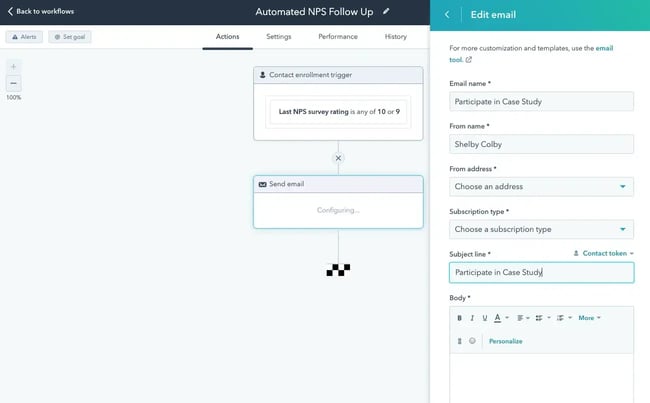
using service hub for customer service workflow automation

Source

Workflow automation is incredibly useful in customer service. Aside from launching surveys, workflow automation can take care of tickets, cases, and common questions by sending a series of emails or creating tasks.

Automated tasks in customer service include:

  • Creating a new ticket in the system when someone reaches out through social media or email.
  • Onboarding customers with a series of helpful emails.
  • Sending NPS® surveys and enrolling them in different email campaigns depending on their rating.
  • Assigning tickets a priority label depending on the tone of the message or email.
  • Resolving and archiving tickets once a resolution has been reached.

Additional Reading

Operations Workflow Automation

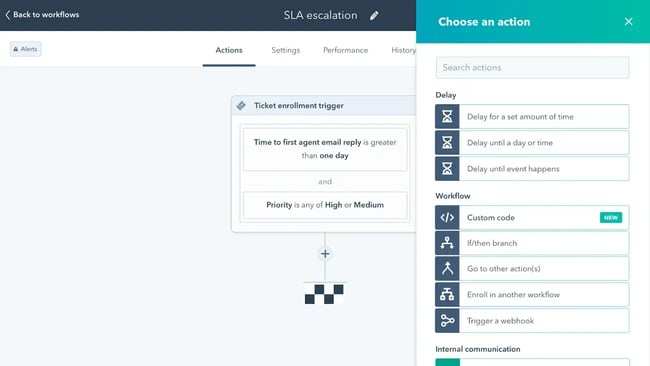
operations workflow automation

Source

Operations is the lifeblood of any organization, and it, too, can be automated to reduce instances of manual data entry.

Automated tasks in operations include:

  • Deleting duplicates once they have been detected or merging two properties if they’re the same.
  • Managing team permissions for new team members.
  • Establishing priorities for different business processes.
  • Automatically compiling reports at the end of every quarter.
  • Creating tasks in third-party tools such as Asana, Slack, or Zoom.

Additional Reading

Human Resources Workflow Automation

Instead of having to manually enter all your new hires’ personal information — like addresses, social security numbers, and other employee information into payroll, expense, and insurance systems — HR automation software can do it for you in minutes.

Automated tasks in human resources include:

  • Removing candidates from the database if they’ve been inactive for a period of time.
  • Sending emails to candidates who haven’t made it to the final round.
  • Filtering candidates with certain keywords in their job history.
  • Sending W-2s to current employees.
  • Collecting employees’ feedback after they’ve been at the company for a period of time.

Finance Workflow Automation

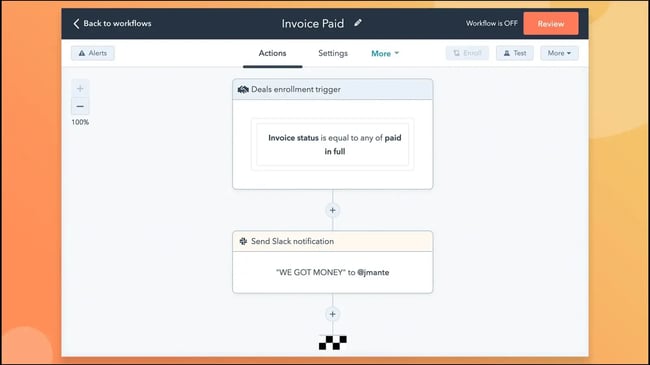
finance automation workflow

Source

By allowing you to build forms, design workflows, and track processes, finance process automation software can streamline all of your travel requests, reimbursements, and budget approvals.

Automated tasks in finance include:

  • Taking an expense approval process from start to finish.
  • Managing vendor and contract approvals.
  • Assigning priorities to ACH and wire requests.
  • Managing travel expense requests depending on location and activity.
  • Approving budgets based on a predetermined set of parameters.

Now that you know everything about using automated workflows, let’s take a look at the top tools you can use.

For more practical examples, I shared some tactical ways marketers can use to build smarter workflows. From setting up smart lists to building lead recycling logic, small wins today often become big lifts tomorrow.

Best Workflow Automation Software

1. HubSpot: Best All-in-One Workflow Automation Software

operations workflow automation; hubspot user interface

Get started with HubSpot now.

HubSpot’s marketing, sales, service, and operations software operates on a single platform, making it one of the best choices for all-in-one workflow automation. Everything is linked together, allowing you to align all of your teams’ processes and to reduce friction from task to task.

You can easily hand leads from marketing to sales, connect a service ticket with an existing contact record, and clean up customer data — all in one user-friendly platform. And you can connect HubSpot CRM with over 50 different workflow integrations available within the HubSpot App Marketplace.

Best for: I highly recommend HubSpot for growing businesses that have yet to try workflow automation and for enterprise businesses with established processes. You can begin with a Starter subscription, then upgrade as you require more functionalities. Especially recommended for marketing, sales, service, and operations departments.

Pricing for Marketing Hub: Free; $9 per month/seat (Starter); $800/month (Professional); $3,600/month (Enterprise).

Pricing for Sales Hub: Free; $9 per month/seat (Starter); $90 per month/seat (Professional); $150/month/seat (Enterprise).

Pricing for Service Hub: Free; $9 per month/seat (Starter); $90 per month/seat (Professional); $150 per month/seat (Enterprise).

Pricing for Data Hub (previously Operations Hub): Free; $9 per month/seat (Starter); $720/month (Professional); $2,000/month (Enterprise).

2. Zapier

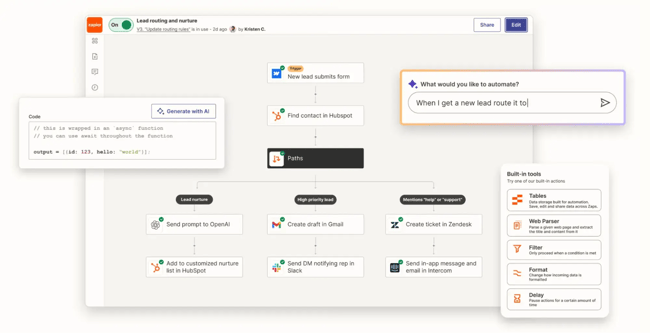
Zapier remains one of the most accessible no-code automation platforms for connecting disparate systems. According to Zapier’s own stats, users have created over 25 million “Zaps,” and it boasts tens of thousands of app integrations.

best workflow automation tools, zapier

Source

More recently, Zapier has positioned itself as a Gen AI orchestration engine via features like “AI Actions” or “Zapier Agents,” enabling workflows to auto‑summarize, classify, and trigger follow‑ups using LLMs.

Best for: Perfect for scrappy or experimental teams who want to quickly spin up AI-enhanced workflows without heavy engineering, especially when you have multiple tools already and need to “connect the dots.”

Why I recommend it: In my experience working with growth‑stage SaaS companies, Zapier has been invaluable for experimentation before migrating critical workflows into the MAP/CRM. For example, I once built a workflow where inbound leads were enriched, scored, and routed within 30 minutes of submission using Zapier linked with LLM for persona classification.

Pricing: Free Forever. Paid plans start at $19.99/month (Professional); $69/month (Team); custom pricing for Enterprise.

3. Make

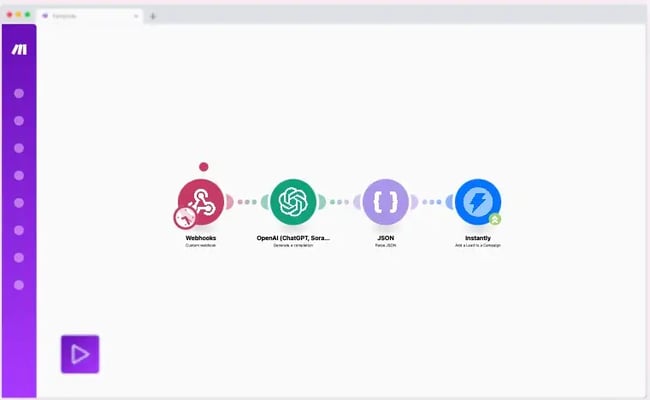
Make offers a visual automation canvas that supports multi‑step workflows, complex branching logic, and recently added AI agent capabilities, making it a robust choice when “if/then” logic isn’t enough.

best workflow automation tools, make

Source

Why I recommend it: I used Make to automate a lead‑nurture campaign across personas. The logic required multiple branches and timed waits that Make handled smoothly.

Pricing: Free (1,000 credits for the month). Paid plans start at $9 per month. Core costs $16 per month for Pro and $29 per month for teams, with custom pricing available for Enterprise.

4. Clay

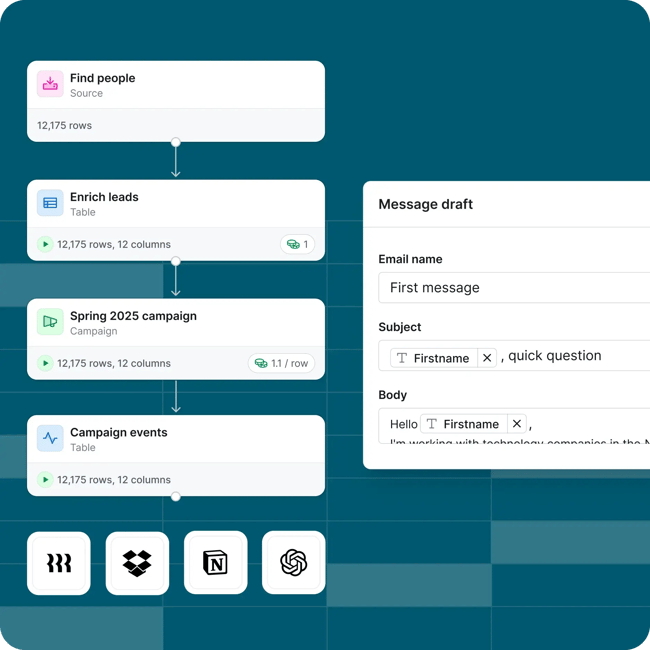
Clay is a Gen AI‑native workflow builder designed for account‑based enrichment, outbound personalization, and signal‑driven orchestration. It can connect to your CRM, enrichment providers (e.g., Apollo), and intent databases. Clay also applies AI to dynamically trigger outreach.

One distinctive advantage of Clay is that it ties signal detection, enrichment, and personalization into one flow, which improves the ROI in GTM teams tremendously.

best workflow automation tools, clay

Best for: GTM teams focus on outbound and need a strong layer of buying signals, like “job opening in target account,” “funding event,” or “tech stack change.” Clay is great for teams who want to use those signals to automate personalized outreach across multiple personas.

Pricing: Free; $134/month (Starter); $314/month (Explorer); $720/month (Pro); custom pricing for Enterprise.

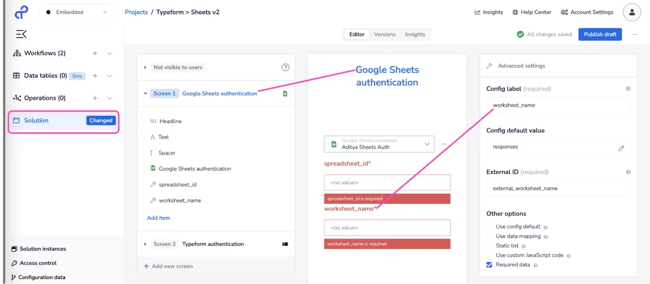
5. Tray

Tray is an enterprise‑grade workflow and automation platform built for highly technical users. Unlike no‑code tools, Tray offers deep integration, complex loops, nested logic, and full visibility into data models.

best workflow automation software, tray

Source

Best for: Organizations with complex needs: many systems, regulatory requirements, multiple workflows, and a full dev team. Ideal when you need detailed control over data flows, custom ETL, or integrations that go beyond typical SaaS connectors.

Why I recommend it: I implemented workflows in Tray.ai for an enterprise GTM stack. Despite the initial steeper learning curve, it handles scenarios such as multi‑region and multi-business units data routing, heavy volume processing, and orchestration smoothly.

Pricing: They offer three tiers — Pro, Team, and Enterprise. Call sales for details.

6. OpenAI Agent Builder

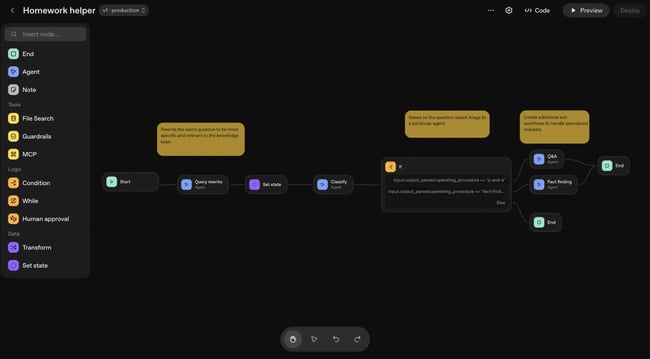
OpenAI Agent Builder is a visual drag‑and‑drop interface from OpenAI that lets you build custom AI agents combining logic nodes, data connectors, and workflow steps. While it’s still evolving, it represents a next‑gen frontier of “automation + intelligence” that is worth marketers keeping an eye on.

best ai workflow automation tools, agent builder from openai

Best for: Organizations with established automation footprints and internal resources that can invest in AI workflow design.

Pricing: Contact sales.

Workflow automation will help you grow better.

There’s no one workflow automation tool that fits everything. You should choose based on your stage, stack, and GTM complexity. Whichever you choose, always remember to pair it with solid data management practice and clearly defined business rules.

As AI becomes more embedded in marketing, the most effective marketing teams will be those who treat automation as an always-on co-pilot.

Whether you’re using powerful tools like HubSpot to build no-code workflows or leveraging customized AI agents to manage highly advanced flows at scale, here are some strategy tips:

  • Start small.
  • Crawl → walk → run: Tackle one key conversion bottleneck at each stage (like TOFU form fills, MOFU nurture drop-off, or BOFU rep follow-up delays), then layer on intelligence, and iterate.
  • Over time, your automated systems will become a competitive advantage that can compound.

Want to explore how AI-powered workflows can power your GTM orchestration? Check out HubSpot’s free workflow automation library to get inspired.

Editor’s note: This post was originally published in January 2019 and has been updated for comprehensiveness.

Categories B2B

4 marketing takeaways from Taylor Swift

Perhaps you’ve heard that Taylor Swift recently released a new album, The Life of a Showgirl.

Not only did the full-length smash sales records, but it also spawned endless musical analysis (Who exactly is “Father Figure” about?) and viral moments (Is the mystery of the orange door actually solved?).

Click Here to Subscribe to Masters in Marketing

Of course, Swift’s marketing savvy is as impressive as her musical talent. The album rollout also illustrated Swift’s knack for promotion — and underscored why she’s a once-in-a-generation pop star.

Although not everyone can land a No. 1 album or launch a sold-out stadium tour, all is not lost: You can still keep it 100 in your own business with these marketing lessons gleaned from Taylor Swift.

illustration of a marketing content calendar and taylor swift albums.

Illustration by Olivia Heller

Reward your most loyal customers.

Swift is known for her loyalty to her devoted fans, the Swifties. Years ago, she randomly showed up at a wedding shower she was invited to, and bought Christmas gifts for other followers. Before releasing her reputation and Lover albums, she held Secret Sessions, where she premiered the record (and ate homemade goodies) with hand-picked groups of uber-fans.

These experiences made her followers feel unique and special — and cemented their fandom for life.

Make an effort to know your audience. Knowing who your customers are will make your marketing better.

  • Send a brief survey to your email list in exchange for a discount.
  • Hold an online conversation and take questions from followers.
  • Earlier this year, we surveyed Masters in Marketing readers, and you told us that you wanted to see even more tactical content!

Hold a customer appreciation event.

  • If you have a brick-and-mortar store, earmark a certain day to celebrate your customers with a festive event.
  • Smaller (or virtual) businesses might run a sale or special to reward customers.
  • Take a page from The Hustle’s playbook: Our sister newsletter gives you a unique link to share with friends and colleagues. You start to earn prizes — like notebooks, mugs, or a backpack — when at least three of those people subscribe.

Start a membership club.

  • Who doesn’t like to be part of a special club, especially if it offers discounts, members-only events, or exclusive news?
  • Consider free or low-cost membership to make this accessible to more people.

Keep things fresh — but consistent.

With each Swift album era, fans can expect certain things: exclusive vinyl variants, a different color scheme (The Life of a Showgirl is dazzling orange and cool mint green) and special merch options (including a unique cardigan and snow globe). This method appeals to collectors, sure — but also shows the ways Swift’s career builds on itself over time.

Have a regular marketing cadence.

Customers appreciate a business that’s predictable and reliable.

  • Send a newsletter on the same day of the week or share a video every two weeks.

Build a content marketing strategy.

It’s easy to lose track of what content you have (or want) to share. A structured content marketing strategy, which could include things such as a content calendar, can help you see what’s missing and what’s successful.

Cultivate a brand that shows off your personality.

As a true millennial, Swift was quite active on MySpace and loved to share her life via video blogs or diary entries. Once her career took off, she didn’t use social media as much, but when she did, her personality shone through. After all, only Taylor would accidentally take her parents to a Las Vegas club.

Don’t feel pressure to market everywhere.

  • It’s tempting to hop on every viral trend or new social media platform; after all, FOMO is real. Focus your marketing on the channels with the most potential (or the most followers) for better results.
  • The HubSpot Marketing YouTube channel has been running the same playbook for three years, and it’s a workhorse for us, getting nearly 425k views every month. HubSpot marketer Nelson Chacón Guzman says the secret is how focused it stays: one channel (YouTube), one format (how-to explainers), and one strategy (search-informed).

Mix your sales messaging with personal insights.

  • Customers respond to marketing that sounds human. Share things about your life alongside news about your business; for example, perhaps you ate an amazing dessert, read a great book, or saw a beautiful sunset.
  • Focus on your strengths. Not everyone loves being on video or is an award-winning photographer. But maybe you’re an ace copywriter or can make an Instagram caption sing.
  • Lean into the areas where you feel most comfortable; your marketing will thank you later.

Be welcoming.

Swift’s fandom is rife with lore. (Exhibit A: The “No, it’s Becky” meme.)

But even if you’re not an OG fan who saw her open for Rascal Flatts in 2006, you’re not excluded from the fandom. If anything, long-time loyalists want to bring everyone into the fold, whether it’s Taylor Tots (the term for adorable toddler Swifties) or recent converts.

Swift is clearly the same way: For example, the viral TikTok dance for “The Fate of Ophelia” isn’t overly complicated — and you can even do it sitting down!

Occasionally reintroduce yourself.

With the way algorithms work today, it’s easy to miss out on an important event or cool business.

  • Don’t shy away from saying hello to your followers every so often. After all, before every Eras Tour show, even Swift did this, exclaiming, “Hi, my name is Taylor — and I was born in 1989!”

Be authoritative, but not exclusive.

  • Use inside jokes or niche colloquialisms sparingly, as these phrases might alienate potential customers. Instead, talk about your business using language that everyone can relate to.

Click Here to Subscribe to Masters in Marketing

Categories B2B

How my divorce at 29 changed how I think about contracts and run my business as a creator

At 29, I wasn’t just finalizing a divorce. I was entering a new era of contractual self-protection. That meant completely rewiring how I think about partnership, boundaries, and my own value.

Download Now: Free State of Marketing Report [Updated for 2025]When you go through something like marriage fraud, you learn firsthand that love without legal protection can cost you more than heartbreak. It can cost you your peace, your assets, and your sense of control. That experience completely changed how I approach contracts, not just in relationships, but in business.

Today, as a content creator, marketer, and former Wall Street professional, I review contracts the same way I now view marriage: No partnership should begin without clarity, accountability, and protection.

Table of Contents

From prenups to creator partnerships, contracts should protect you.

When I got married, I didn’t have a prenup. Like many women, I thought that asking for one would make me look pessimistic or distrustful. But here’s the truth: Contracts aren’t about distrust. They’re about discipline.

A prenup outlines the terms of a partnership. That includes financial commitments, responsibility, and potential dissolution. It’s not romantic, but it’s real. Looking back, I wish I had included certain clauses, specifically an infidelity clause that would have created financial accountability for betrayal and a reputational protection clause that safeguarded my public image in the event of deceit.

My divorce didn’t just teach me about love. It taught me about leverage. What I learned transformed how I now approach my brand partnerships. When someone lies in a marriage, you realize how much damage can happen when transparency is missing. When a brand violates a contract or delays payment, the principle is the same: Integrity without enforcement means nothing.

Today, I’m more intentional with every collaboration. I’m involved in every step — from legal review to creative concept. I’ve learned that being hands-on isn’t controlling. It’s conscious.

My credibility has only grown since I adopted this approach. Brands trust me because I’m direct. My audience trusts me because I’m transparent. And I trust myself because I now know how to protect my name, my likeness, and my work. That approach has landed me authentic brand deals that align with my story.

Almost poetically, my recent partnership with Hulu for their show All’s Fair, which follows powerful female divorce attorneys, brought everything full circle. I broke down three prenup clauses that I would never let love talk me out of again: an infidelity clause, a financial infidelity clause, and a reputational protection clause.

Those clauses weren’t hypothetical. They were lessons I earned the hard way. And the irony is, the same protections that would have safeguarded me in marriage are the same protections every creator needs in business.

Infidelity clauses mirror exclusivity clauses. Financial infidelity parallels late-payment and transparency clauses. And, reputational protection is the exact kind of clause that keeps creators safe if a brand missteps. The overlap is real, and it’s why I take contracts so seriously across every area of my life now.

Because at the end of the day, both marriage and marketing rely on the same thing: trust backed by terms.

The Clauses Creators Need to Know

the clauses creators need to know

In the social media industry, creators often jump into partnerships based on opportunity and excitement. But just like in relationships, emotion without structure is dangerous. I’ve learned that a well-written contract is an act of self-respect. It says, I value my work enough to protect it.

When I negotiate with brands now, I think of it as a business marriage — one that should be clear about expectations, timelines, and boundaries. That means my contracts have clauses to keep me protected. These clauses aren’t just about money. They’re about protecting the value I bring to the table.

Here are a few clauses I always pay attention to.

Payment Terms & Late Fees

The creative industry is notorious for late payments. So, I include a late payment clause that ensures compensation for every day past the agreed-upon date. It’s not about greed. I want to make sure that partners are accountable and uphold their end of the bargain.

Usage Rights

Usage rights spell out how the content I make will be used by the brand I’m partnering with. I always make sure to ask:

  • How long a brand will use my content.
  • If they’ll be running paid ads behind it.
  • Where the content will ultimately be published and live.

These details determine the value of the partnership. A one-time Instagram post is not the same as perpetual paid usage across global channels.

Exclusivity Clauses

Exclusivity clauses are the business version of fidelity. If a skincare brand pays me to represent them exclusively, that means I can’t promote other skincare brands during that term. And if I did, there would be a financial consequence.

It’s no different from an infidelity clause in a marriage contract. I like to say, “If he breaks the vows, he should break bread.” Likewise, in business, if you break your promise, you should pay the penalty.

Liability & Reputation Clauses

Liability and reputation clauses are the parts of a contract that protect creators from being blamed, sued, or financially harmed because of something a brand does. You’ll usually see this language appear as

  • Limitation of Liability, Indemnification, or Hold Harmless clauses. They are all designed to set clear boundaries around what you are and are not responsible for.
  • A limitation of liability clause restricts how much responsibility the creator holds if something goes wrong on the brand’s side, such as product issues, misleading claims, or legal trouble.
  • An indemnification clause determines who is financially accountable if damages occur. Ideally, creators should look for mutual protection so that each party is responsible for their own actions.
  • A reputation clause is equally important, even though it may not appear under that exact name. It typically shows up as language that allows the creator to pause, suspend, or terminate the partnership if the brand becomes involved in scandal, controversy, discrimination claims, or anything that could harm the creator’s public image.

As a creator, your image is your asset. You can’t afford to be collateral damage in someone else’s downfall.

Why Every Creator Should Know Their Contracts Clause by Clause

The biggest misconception I see in the creator industry is that your lawyer should handle everything. Yes, you need legal representation, but you also need literacy.

As a woman in business, I never want to sign something I don’t understand. I want to know every clause, every term, and every implication. I want to know what happens if a brand doesn’t pay on time, if content is repurposed without approval, or if a campaign gets canceled after deliverables are completed.

When I worked on Wall Street, I had to analyze market data and client mandates in meticulous detail before moving forward on any transaction. I bring that same rigor and attention to detail to my work as a creator. Whether it’s a Wall Street firm or a beauty campaign, the foundation is the same: Protect your interests, define your obligations, and anchor your worth in clear terms.

In reality, social media marketing is still a young industry. It hasn’t yet survived a full economic cycle or a recession. The lack of structure and precedent makes contracts even more critical. You can’t afford to assume “things will just work out.” Hope is not a legal strategy.

Here are the lessons I carry with me:

  1. Clarity is compassion. Contracts protect both parties. The clearer the terms, the fewer the misunderstandings.
  2. Fidelity isn’t just romantic. It’s professional. Honor your agreements and expect your partners to do the same.
  3. Never outsource your understanding. Lawyers are vital, but your literacy is your responsibility.
  4. Add the clauses that protect your peace. Late payment, liability, and reputational clauses aren’t optional. They’re essentials.
  5. Value yourself enough to negotiate. If a brand wants exclusivity, there’s a price for that. Don’t be afraid to ask for it.
  6. Treat your name like an LLC. Protect it, trademark it, and never let anyone misuse it.

Boundaries Win

My divorce at 29 forced me to rethink not just how I love, but how I lead. It taught me that contracts, whether personal or professional, are not about expecting failure. They’re about creating safety, clarity, and respect.

In both business and life, people will test boundaries. But when your terms are clear, your protections are in place, and your value is documented, you don’t just preserve your peace. You protect your power.

Categories B2B

C-Level Executives Are Now 2x More Likely to Engage in Q4 than the Average Buyer

The sun is setting at 4:45 PM (for now), and Vince Guaraldi season is fully upon us

This can only mean one thing: B2B marketing is over for 2025!

I’m kidding, of course. (Seriously, don’t stop your marketing efforts.)

B2B marketers love a good excuse to go dark in December. I can think of three excuses off the top of my head:

    • “We don’t want to waste money.”
    • Everyone is getting ready to check out for the Holidays mentally.”
    • “No one is engaging with serious content this time of year; they’ve moved on to 2026.”

If you’re not careful, Q4 can feel like the Bermuda Triangle of buyer attention. But as we shared this time last year, our data says otherwise.

Q4 Consumption Has Risen 67% Since 2020

For five years running, the fourth quarter hasn’t experienced a slowdown in the slightest. In fact, the people who matter most in B2B are consuming a significant amount of Q4 content: decision-makers.

Since 2020, the overall increase in Q4 content consumption across these 10 Job Levels has risen 67.1%.

If your team is still treating December like a marketing dead zone, you’re not just missing the moment; you’re leaving high-intent, late-stage demand on the table.

Job Level Ups and Downs

Every Job Level has seen its content demand increase since 2020. That’s no surprise, considering that total consumption grew 83% during this same timeframe. Also qualifying for the no surprise category are Individual Contributors, with a Combined Growth of 173.7%. 

Now, let’s get into the good stuff.

Job Level Combined Growth
Individual Contributor 173.7%
Director 92.5%
C-Level 79.9%
Manager 71.2%
Consultant 66.8%
Senior Employee 64.2%
VP 54.7%
Owner 38.9%
Senior Manager 20.6%
Supervisor 6.1%
  • Directors, C-Level, and Managers all saw Combined Growth well above 70%, with Directors requesting 92.5% more content in 2024 than in 2020.  
  • Supervisor consumption plateaued, if not decreased, relative to the growth of other Job Levels.
  • Consultants and Owners were the only Job Levels to consume more in December than in November. 
  • Directors and Managers saw significant decreases from November to December, lending to the idea that these Job Levels conclude the majority of their research prior to the end of the year.
Rank Job Level Nov Growth Job Level Dec Growth
1 Individual Contributor 180.8% Individual Contributor 166.6%
2 Director 122.1% C-Level 75.1%
3 Manager 88.1% Consultant 69.5%
4 C-Level 84.7% Director 66.2%
5 Senior Employee 69.0% Senior Employee 59.4%
6 VP 68.9% Manager 55.0%
7 Consultant 64.3% Owner 46.6%
8 Owner 31.6% VP 41.5%
9 Senior Manager 24.2% Senior Manager 17.0%
10 Supervisor 9.7% Supervisor 2.5%

December is a Decision-Maker Month

While no one would have blamed you for wanting to write off November and December 2020, it was during this time period that C-Level engagement began to swell. 

In the five years since, C-Suite consumption has grown 85% in November and 71% in December, respectively. Combined, that’s an 80% increase.

Compared to other professional buyers, C-Level professionals (minus Individual Contributors) consistently lead all other roles in average content request volume:

  • In November 2024, C-Level professionals were 107% more likely to request content than the average of all other job levels (Manager through Supervisor).
  • In December 2024, this likelihood grew even further, with C-Level professionals being 113% more likely to request content than the average of all other job levels.

The C-Suite, rightly or wrongly, is the crown jewel of B2B campaign targeting. Considering this fact and the data provided here, all of this should be music to your ears.

Doubling Down on Decision-ber

While everyone wants to reach the executives, your next-best prospects might be sitting just one rung below. And they’ve been heating up year after year.

Director-level registrations in November jumped 122% from 2020 to 2024, while December rose 66%

While November is the better month to reach Directors, these aren’t casual browsers looking for fluffy content to fill the gaps between PTO days. These are mid- to senior-level decision-makers actively planning, approving, and investing as the year winds down.

VPs saw strong momentum in both months, with December engagement increasing consistently for four years straight before a minor dip in 2024.

These positions are often the first lieutenants of the C-Suite, and while their consumption patterns are historically less predictable, these are the players evaluating tools, setting team agendas, and building plans for next year. The ideal audience for strategic content, late-funnel offers, and gated assets built for buy-in.

Finally, while Owners are not seen as a role charged with leading an enterprise-sized business, these SMB proprietors are acting similarly to their CEO peers.

Timing is Everything — And It’s Role-Based

When we broke the data down by job level and month, a clear pattern emerged.

Use the chart below to take steps for your December campaigns.

Role November Behavior December Behavior Takeaway
C-Level High & rising Still strong (slight dip) Plan big bets for early December
VPs Steady rise Often peaked in December Prime audience for late Q4 campaigns
Directors The apex Definite decline Front-load content in early Q4
Managers & ICs Peak in Oct–Nov Sharp drop in Dec Wrap campaigns for them by Thanksgiving


Don’t Get Caught Flatfooted

If you’re waiting until January to re-engage your buying committees, you’re already behind. 

The data from 2020–2024 proves that December (Decision-ber!) is a decision-maker month. These aren’t prospects on autopilot — they’re leaders with deadlines, budgets, and a clear mandate to move.

The holiday hustle is real, so keep your foot on the gas.

And the opportunity is right in front of you.

Categories B2B

“You need to be an event business”

“It’s not enough to be a hospitality business anymore,” small-business owner Shelley Pippin says. “You need to be an event business.”

Click Here to Subscribe to Masters in Marketing

Here’s why Brewnuts has been so successful at using events to carve out a niche for themselves, and what small- and medium-sized business marketers can learn from “Ohio’s first and only doughnut bar,” regardless of your industry.

Meet the Mastershelley pippin

Shelley Pippin

Founder and co-owner, Brewnuts

When you think of bar food, you probably think of things like burgers and sandwiches.

But Cleveland-based Brewnuts has a different vision: As Brewnuts’ “Ohio’s first and only doughnut bar,” as co-owner and founder Shelley Pippin puts it, the business pairs a carefully curated selection of beer and coffee drinks with a rotating selection of homemade doughnuts.

For Brewnuts, their menu is just the (sweet) start, however. “It’s not enough to be a hospitality business anymore,” Pippin says. “You need to be an event business.”

“it’s not enough to be a hospitality business anymore. you need to be an event business.”

In addition to a menu of brews and dones, Brewnuts books weekends celebrating holidays (Halloween), pop culture (Twilight) and fandom lore (an annual December toast to Taylor Swift’s birthday called “Taylor Fest”). These special events often come with unique coffee drinks or theme-specific doughnuts; for example, a “Boston Scream!” for spooky season.

black doughnut with red plastic spider on top and the words “boston scream!” across the bottom.

Photo credit: Emily Drapp

“I love creating things, and I see my job as being responsible for surprising and delighting people,” Pippin says. “That’s why I love the hospitality industry. It’s a place where you have the opportunity to create experiences for people. It really is about providing that little slice of escape and joy.

Takeaway: Don’t underestimate the power of surprise, delight, and joy. Whether you’re selling doughnuts or databases, think about what experiences you can create for people.

Divide and Conquer

Pippin cut her teeth working in partnership marketing, sponsorships, and client work, so she excels at handling the creative ideation side of Brewnuts — a job that encompasses things such as menu development, event planning, and social media content creation.

team edward drink with cold brew, cheesecake syrup, and red velvet cold foam.

Photo credit: Shelley Pippin

“I love the inspiration part,” she says. “Those things tend to just pop into my brain, and I‘m like, ‘Yep, and here’s 25 ideas about how I want to do that.’”

But from a business standpoint, Brewnuts is well balanced because co-founder (and Pippin’s husband) John has a background in accounting and finance.

“He handles a lot more of our operations,” she says. “It‘s great to have all the ideas in the world. But if you don’t understand how to run a functional business in terms of making the numbers work, it’s all for naught.”

Takeaway: Even the scrappiest marketing team can’t do it all. Lean into your strengths, and join forces with co-workers (or co-founders) who will provide some balance.

Sometimes Excitement is Enough

Pippin will work with one of the doughnut decorators (who happens to be a talented photographer) on graphics and promotional materials. Otherwise, she doesn’t outsource the marketing activities because she has a specific vision for Brewnuts’ brand voice — and knows it works.

“When I want to hype something, I want to hype it in a certain way, and I want people to feel a certain amount of energy about it,” she says. “At this point, I haven’t found a way to communicate that to someone else.”

This confidence translates to event planning. For instance, although the annual Taylor Fests have become bigger and bigger each year (just like Swift’s career!) Pippin wrote the 2025 iteration of the menu in August in about half an hour.

“the life of a showgirl,” with a green doughnut with orange sprinkles.

Photo credit: Shelley Pippin

“If I‘m getting that excited about it, I don’t second guess it,” she says of planning these larger-scale events. “If it‘s something that I’m having a whole lot of creativity around, that tends to tell me everything I need to know, because I know there’s probably other people out there that are going to feel that same way.”

Takeaway: Data is important, but it’s not everything. Sometimes you gotta go with your gut. If you’re having a hard time persuading your boss that your excitement merits a budget, follow Pippin’s lead and start small. Pilot your idea, measure the ROI, and grow a little bigger each year.

“if it's something that i'm having a whole lot of creativity around, that tends to tell me everything i need to know, because i know there's probably other people out there that are going to feel that same way.”—shelley pippin, co-owner and founder, brewnuts

Cater to Your Community

Brewnuts incorporates customer passions into their marketing strategy. Over the years, they’ve planned events centered around The Office, Star Wars, and Home Alone. However, Brewnuts’ events and marketing come from a place of sincerity — and inclusion.

We really made a point to plant our flag and say what we’re about, and be clear about our values, and [that we’re] about being a space for the whole community,” Pippin says.

vegan doughnut decorated like a werewolf.

Photo credit: Emily Drapp

This mindset also explains why Brewnuts is thoughtful (and deliberate) about the events they plan, including by making sure their interests and passions align with what guests want.

“We‘ve had things come up where people say, ‘Why don’t you do an XYZ weekend?’” Pippin says. “I don‘t necessarily want to do that if it’s something that we don’t have a true fans’ perspective on.”

Takeaway: You don’t have to jump on every trend. As tempting as it might be to do a Star Wars tie-in for your tech company, if it doesn’t reflect your values or build community, it’s okay to skip this one.

A Hospitality Mindset

Pippin and her husband are hands-on owners who stay connected to guests via many different channels. For example, Brewnuts sends out a monthly newsletter and maintains a robust social media presence.

“We‘re definitely not absentee owners,” Pippin says. “We’re very much present in our space and in our social media.”

By staying so connected, Brewnuts has a deeper understanding of their audience — and how to reach new customers.

“In a lot of ways, we try to throw events that are for groups of people that maybe don’t feel like they have a home base,” Pippin says. “I like trying to spot niche groups that maybe feel, like, ‘Hey, nobody throws an event for us.’”

At the end of the day, Pippin stresses the importance of gratitude and shares that she never takes any support for granted.

“It is never lost on me that someone is choosing to spend their hard-earned money at my place,” she says. “[This] is really important to keep in the forefront at all times.”

“it is never lost on me that someone is choosing to spend their hard-earned money at my place. [this] is really important to keep in the forefront at all times.”—shelley pippin, co-owner and founder, brewnuts

Takeaway: Maintain a hospitality mindset. Brewnuts doesn’t throw events just for the sake of having a Halloween tie-in; it uses newsletters, social media, and customer interactions to segment its consumers and make them feel welcome.

Click Here to Subscribe to Masters in Marketing

Categories B2B

Generative AI tools every marketing team should use

When I first started at HubSpot, I needed a new headshot fast. So, I turned to generative AI tools — and no one had any idea, at least not initially. Love ‘em or hate ‘em, generative AI tools are impressive.

Access Now: Free AI Content Creator [Free Tool]

From text and data analysis to uncanny photos and celebrity videos, AI’s ability to imitate human voices and forms has improved dramatically in the past year. While they raise a lot of ethical questions, they can also help increase productivity and amplify marketing results when used strategically.

Manufacturer Cold Jet, for instance, cut lead response time by 66% using HubSpot’s Smart CRM and Breeze. But what generative AI tools should your team use? In this article, we’ll discuss:

Table of Contents

TL;DR

Generative AI tools for marketing are software solutions that create content (i.e. videos, images, text, graphs), campaigns, and insights using artificial intelligence. Marketers use these tools to speed up content creation, personalize messaging, and improve campaign results across email, ads, social, SEO, and analytics.

To choose the right tools, look for options that integrate with your CRM, support brand voice controls, and offer strong data privacy. Start with a shortlist, run pilot tests, and roll out gradually.

Want to see how AI can work for your team? Get a demo or start free with HubSpot’s AI-powered marketing tools.

What are generative AI tools for marketing?

Generative AI tools are software solutions that use large-language models (LLMs) or multimodal AI to create new content based on prompts, inputs, or data. Finished products can include text, imagery, video, audio, reports, code, or even ideas.

But how can marketers make use of this?

Generative AI is useful across numerous marketing channels:

  • Content creation (i.e, blog posts, social media captions, email copy, landing pages, images, videos, and video scripts)
  • Campaign planning (i.e, audience research, competitive analysis, messaging frameworks, and creative briefs)
  • Email marketing (i.e, subject lines, body copy, A/B test variants, and personalization at scale)
  • Paid advertising (i.e., ad headlines, descriptions, image generation, and targeting recommendations)
  • Social media (i.e., post ideation, caption writing, hashtag research, and community responses)
  • SEO optimization (i.e, keyword research, content briefs, meta descriptions, and internal linking suggestions)
  • Analytics and reporting (i.e, performance summaries, insight synthesis, and strategic recommendations)

Thanks to generative AI tools, marketing teams report reducing content creation time by three hours per piece without sacrificing quality standards. (The most important thing to me.)

The shift from hours to minutes for first drafts means marketers spend more time on strategy and less on production. Here at HubSpot, this idea is at the heart of Loop Marketing

How to Evaluate Generative AI Tools for Your Team

Not every AI tool fits every team or task. Before adopting new platforms, evaluate them against these practical criteria to figure out if it’s really what you need, 

Step 1: Map out your goals.

List your top marketing objectives. What exactly are you trying to achieve? This will help you understand what areas you want to focus on improving and where AI may be able to help.

For example, when I needed a headshot, I knew I had to focus on tools that had the best reputation for creating realistic photos.

Step 2: Verify integration with existing tools.

Does this tool connect to your CRM, marketing automation platform, and content management system? Can it pull data from your existing tools to make informed suggestions?

Even the best AI needs this data to create the most effective and relevant content. HubSpot has its own AI, Breeze, but it also offers integrations with other tools, such as Claude. This enables not just data access but also automation.

Step 3: Evaluate specific features.

Does this generative AI tool have everything you need? With your goals, industry, and workflow in mind, here are some specifics to pay attention to:

  • Governance, privacy, & compliance: Where is customer data stored and processed? Does the vendor train models on your proprietary content? Can you restrict what data the AI accesses? Does it comply with GDPR, CCPA, and industry regulations? Look for things like demand encryption, SSO/SCIM, role-based permissions, audit trails, prompt logs, data-residency options, and an “allow-list” of fields approved for AI use.
  • Brand voice & quality controls: Can you upload style guides, brand documents, and example content? Does the tool learn and maintain your organization’s tone across outputs? Can you create multiple brand voices for different audiences or products? Look for tools that have brand profiles/style guides, tone controls, blocked phrases, and human-in-the-loop approval flows. This is the best way to build and maintain your branding.
  • Prompt management: Can you save and share effective prompts across your team? Does it provide templates for common marketing tasks? Can you build reusable workflows that chain multiple prompts together? Ensure the tool has reusable, parameterized prompt templates, libraries, and usage analytics to help maintain a consistent experience and level of quality.
  • Analytics & attribution: Does the tool track which AI-generated content performs best? Can you measure time savings and productivity gains? Does it integrate with your attribution tools to show ROI? Without this data, you’ll have no definitive way of knowing if your generated content is effective and worth investing in.
  • User permissions & security: Can you control who accesses which features? Does it offer role-based permissions for different team members? Are enterprise security standards (SSO, audit logs) available? With data privacy being a very real concern with AI, these features are crucial to keeping your information and that of your contacts secure.

HubSpot’s Breeze does all of these things.

Step 4: Evaluate scalability.

Will this tool grow with your organization (aka does it have what you need right now and more)? And if so, will you still be able to afford it then?

Many platforms appear affordable at low contact or usage volumes but become expensive as usage increases. Ensure that the tool you’re considering will remain realistic and useful in the future.

Step 5: Test your tools.

Everything can look great on paper, but you won’t truly know until it’s in practice. So, take some time (2-4 weeks) to pilot or demo different generative AI tools to make sure they work and fit into your processes as expected.

During this time, run these three marketing fit pilots:

  1. Cycle time reduction: Marketing teams using AI report 68% faster campaign launch times. Track how long it takes to complete a task without AI, then with AI.
  2. Personalization improvement: 72% of marketers who use AI improve customer experience through personalization. Knowing that, compare engagement rates on AI-assisted personalized content versus manual approaches.
  3. Reporting integration: Verify that AI outputs feed into your existing reporting dashboards and attribution models. Without measurement, you can’t prove value.

Where Generative AI Tools Deliver the Most Value in Marketing

Different AI tools solve different problems. Here’s how to match your goals to high-impact use cases:

  • Increase content output → AI content tools for ideation, drafting, and repurposing
  • Improve email performance → AI email writers for subject lines and personalization
  • Scale paid campaigns → Generative AI for ad copy and creative variants
  • Boost social engagement → AI tools for post ideas, captions, and scheduling
  • Rank higher in search → AI for keyword research, content briefs, and optimization
  • Understand performance faster → AI analytics for insights and recommendations

Generative AI Content Tools for Content Operations

Marketing teams juggle multiple responsibilities across multiple channels: ideation, production, approval, and distribution. Generative AI and content operations platforms can help streamline every step of this workflow.

This is what that can look like at a high level:

  • Ideation and outlines: Generate dozens of article topics, headlines, and structured outlines in minutes. This is something I often turn to ChatGPT for before I start writing.
  • First draft creation: Produce blog drafts, white papers, and guides that editors refine and expand.
  • Content repurposing: It’s hard to find new ways to deliver the same message. With generative AI, you can transform one piece into multiple formats (i.e. turn a blog post into social posts, email copy, and video scripts with HubSpot’s Content Remix.)
  • Editorial calendars: AI can suggest publishing schedules based on trending topics and audience behavior patterns
  • Asset variants: Create multiple versions of headlines, CTAs, and descriptions for testing

Generative AI Writing Tools for Email and Lifecycle Marketing

hubspot ai email writer form fields

Source

Email remains one of marketing’s highest-ROI channels, and AI makes it even more powerful. Marketing automation platforms with built-in AI capabilities help teams personalize at scale.

Core email AI use cases:

  • Subject line generation: Test dozens of variations optimized for open rates
  • Dynamic copy personalization: Adjust messaging based on recipient behavior, lifecycle stage, and demographics
  • Segmentation prompts: AI suggests audience segments based on engagement patterns
  • Testing workflows: Automatically A/B test content variants and route winners to larger audiences
  • Lifecycle integration: Connect AI email tools to your lifecycle stages and suppression logic. AI can suggest content appropriate for each stage—awareness, consideration, decision, retention—and automatically exclude recent purchasers, unsubscribes, and hard bounces.

HubSpot’s AI Email Writer provides practical next steps for marketers looking to streamline email creation while maintaining brand consistency across campaigns.

Generative AI Tools for Paid Ads and Creative Assets

Paid advertising (or PPC) demands constant testing and iteration, but thankfully, AI can speed up creative production and optimization.

Advertising applications:

  • Ad copy variants: Generate multiple headlines, descriptions, and CTAs for testing
  • Audience-specific messaging: Tailor copy to different personas, industries, or regions
  • Visual asset creation: Quickly produce image and video variants that match brand guidelines
  • Placement optimization: AI suggests format adjustments for different platforms and placements

Pro tip: Establish clear approval workflows before AI-generated ads go live. Review outputs for brand safety, compliance, and accuracy. Add assets that you like or have worked in the past that AI can reference, reducing the need for manual oversight on every asset.

Generative AI Tools for Social Content and Community

Social media managers need consistent, engaging content across multiple platforms. AI helps maintain presence without burnout.

Social media AI capabilities include:

  • Post brainstorming: AI can generate content calendars with ideas specific to the platforms you choose.
  • Caption variants: Create multiple versions optimized for different networks
  • Video script writing: Draft talking points and scripts for short-form video content
  • Moderation templates: Standardize responses to common comments and questions

Pro tip: Maintain your brand voice by providing AI with examples of your best-performing posts. This helps train models to match your tone, style, and values.

For deeper insights into what resonates with audiences, check out HubSpot’s latest social media trends report.

Generative AI Tools for SEO and Search Visibility

Search engine optimization can be very monotonous and meticulous. AI tools help by handling repetitive SEO tasks so humans can focus elsewhere. Some of the areas it excels include:

  • Keyword research: Identify search terms, analyze difficulty, and find content gaps
  • Content clustering: Group related topics for pillar pages and content hubs
  • SEO briefs: Generate detailed briefs with keywords, structure, and competitive insights
  • On-page optimization: Suggest titles, headers, meta descriptions, and internal links
  • E-E-A-T alignment: Ensure content demonstrates experience, expertise, authoritativeness, and trustworthiness

Pro tip: Don’t slack on quality by neglecting review. AI should enhance your human efforts, not replace them. Editorial teams must verify claims, add original insights, refine brand voice, and ensure content serves user intent rather than just algorithm requirements.

Read: How to Humanize AI Content So It Will Rank, Engage, and Get Shared in 2025

Curious how you’re doing with AEO currently? Use HubSpot’s AI Search Grader to audit how well your brand shows up in AI-powered search results and answer engines like ChatGPT, Perplexity, and Google’s AI Overviews.

HubSpot AEO Grader

Generative AI for Analytics and Insights

Marketing leaders drown in data but starve for insights. AI synthesizes performance metrics into actionable recommendations.

Analytics AI capabilities:

  • Campaign performance summaries: Automatically generate reports highlighting key trends and anomalies
  • Feedback synthesis: Analyze customer comments, reviews, and support tickets for patterns
  • Strategic recommendations: Suggest next actions based on historical performance and industry benchmarks
  • Dashboard automation: Create custom reports that update in real-time

Pro tip: Always validate AI insights against source data. Effective AI analytics tools show their work—citing specific data points and explaining reasoning. Integrate insights with unified reporting in your CRM to close the loop between marketing actions and revenue outcomes.

How to Select the Right Gen AI Tools

Use this framework and selection scorecard to objectively evaluate and compare generative AI tools.

Criterion

Weight

How to Evaluate

Integrations

20%

Does it connect to your existing marketing stack?

Data privacy

20%

Where is data processed? Who has access?

Usability

15%

Can your team use it without extensive training?

Output quality

15%

Does it produce brand-appropriate content?

ROI potential

15%

Will time savings justify the cost?

Learning curve

10%

How quickly can the team become productive?

Pricing structure

5%

Is pricing transparent and predictable?

Quick Decision Guide

Start with tools that integrate with your existing platforms. HubSpot’s marketing automation features are built into the platform, for example, eliminating integration headaches and providing a unified experience.

For standalone tools, prioritize those with:

  • Free trials or freemium tiers for testing
  • Clear documentation and training resources
  • Active user communities for troubleshooting
  • Transparent pricing without hidden fees

The Best Generative AI Tools

Here are eight powerful generative AI tools, each solving specific marketing challenges. Every tool includes pricing, key features, best use cases, and integration details.

1. HubSpot Breeze AI

Best for: Marketing teams seeking end-to-end AI automation integrated with their CRM and marketing platform.

Breeze is a comprehensive suite of AI-powered tools built directly into the HubSpot platform. Unlike standalone tools requiring integration work, Breeze operates natively within your existing HubSpot workflows, from content creation to customer service.

Marketing teams report reducing campaign launch time by 68% after implementation with Breeze.

Key HubSpot Breeze AI Features:

  • Breeze Assistant – An AI companion that helps marketers draft content, generate images, summarize meetings, and automate tasks across HubSpot. Think of it as ChatGPT, but with direct access to your CRM data and marketing campaigns.
  • Breeze Agents – Specialized AI workers that handle specific jobs autonomously: Content Agent creates blog posts and landing pages, Social Media Agent schedules posts, Prospecting Agent finds leads, and Customer Agent handles support conversations.
  • Breeze Intelligence – Enriches contact and company records with over 200 million buyer profiles, identifies high-intent prospects, and shortens forms dynamically to improve conversion rates.

Agicap saved 750 hours per week and increased deal velocity by 20% using Breeze, while Sandler drove 25% more engagement and 4x sales leads by creating personalized experiences with the platform.

When to Use HubSpot Breeze AI:

Use Breeze when your team needs AI to understand your business context or that of your customers. Because it enables access to your CRM data, past campaigns, and customer interactions, Breeze can make contextually relevant suggestions rather than generic outputs.

HubSpot Breeze AI Integration Fit:

breeze assistant shown in hubspot crm, generative ai tools

Source

Breeze integrates seamlessly with HubSpot‘s Marketing Hub, Sales Hub, Service Hub, Content Hub, and Operations Hub. It also connects to thousands of third-party apps through HubSpot’s marketplace.

The platform works particularly well for teams consolidating their marketing technology stack.

HubSpot Breeze AI Pricing:

Basic Breeze features (Assistant and select Intelligence capabilities) are available in HubSpot’s free CRM. Full Breeze capabilities, including Agents and advanced Intelligence features, require Started, Professional, or Enterprise subscriptions:

  • Starter (with limited Breeze features): $42/month
  • Professional Customer Platform: Starting at $800/month
  • Enterprise Customer Platform: Starting at $3600/month

Advanced AI features consume HubSpot Credits, where each credit equals $0.01 USD. For example, the Customer Agent costs 100 credits per conversation ($1), and the Data Agent costs 10 credits per research prompt ($0.10). Professional plans include monthly credit allotments, with options to purchase additional capacity.

Learn more about HubSpot Breeze AI.

2. ChatGPT (OpenAI)

generative ai tools, chatgpt’s conversational interface

Best for: Marketers needing versatile content creation, brainstorming, and conversational AI across all marketing tasks.

ChatGPT is the most widely recognized AI tool, known for its versatility in answering questions, generating copy, brainstorming ideas, and handling diverse content formats from emails and blog posts to photos.

Key ChatGPT Features:

  • Conversational interface – This makes it accessible to non-technical marketers, unlike formats like Midjourney’s chatbot.
  • DALL-E 3 integration – This can produce marketing visuals, social media graphics, and ad creative directly within ChatGPT.
  • Custom GPTs – With this feature, you can create specialized AI assistants trained on your brand guidelines, product information, and style preferences
  • Memory functionality – Unlike some AI tools, ChatGPT remembers past conversations and preferences, providing more personalized assistance over time. It learns and improves.
  • Code Interpreter – While you don’t need to know code to use ChatGPT, ChatGPT can create code for you. It also can analyze data, create charts, and process files for marketing analytics.

When to Use ChatGPT:

Many writers and marketers turn to ChatGPT, praising its ability to produce creative and engaging copy quickly. That said, use it for rapid ideation (i.e., generating topics), drafting initial content (i.e., outlines, blog articles, social media posts), and creative problem-solving. In fact, we do this here on the HubSpot blog.

It excels at adapting tone and style based on prompts, making it ideal for teams producing varied content types.

ChatGPT Integration Fit:

ChatGPT offers API access for custom integrations and connects with thousands of apps through Zapier. The tool works well with most marketing platforms, though it requires manual copying or API development for deeper integrations.

HubSpot users can leverage the Claude <> HubSpot connector for similar functionality with even tighter CRM integration.

ChatGPT Pricing:

  • Free: Limited GPT-3.5 access with basic features
  • ChatGPT Plus: $20/month for GPT-4o access, DALL-E 3, priority support, and custom GPTs
  • ChatGPT Business: $30/user/month for team collaboration features
  • ChatGPT Pro: $200/month
  • ChatGPT Enterprise: Custom pricing for advanced security, unlimited usage, and deeper integrations

Learn more about ChatGPT.

3. Jasper AI

templates shown in jasper ai, generative ai tools

Best for: Enterprise marketing teams requiring brand-consistent content at scale with advanced collaboration features. It’s also ideal for agencies managing multiple client brands.

Jasper AI focuses specifically on marketing content creation, offering templates, brand voice management, and team collaboration tools purpose-built for marketing departments. It can also generate graphics, but, in my experience, this feature still has some room for improvement.

Key Jasper AI Features:

  • Brand Voice AI – Upload brand documentation and sample content; Jasper analyzes and maintains your style, tone, and terminology across all outputs
  • Marketing templates – 50+ pre-built templates for blog posts, sales copy, social media, email campaigns, and product descriptions
  • Jasper Canvas – Collaborative workspace where teams can plan entire campaigns, organize assets, and provide feedback in real-time
  • SEO Mode – Integrates with Surfer SEO for content optimization and search visibility
  • Multi-language support – Generate content in 30+ languages for global marketing campaigns

Jasper’s brand voice features are particularly valuable for teams struggling with inconsistent messaging.

When to Use Jasper AI:

Deploy Jasper when brand consistency across content is of the utmost importance (i.e., a multi-channel campaign), as brand voice controls ensure regulatory requirements are met.

Jasper AI Integration Fit:

Jasper integrates with HubSpot, Marketo, Salesforce, and 5,000+ other platforms. The Chrome extension allows content generation within your existing tools, while API access enables custom workflow automation.

Jasper AI Pricing:

  • Pro plan: $59/month (1 seat, 1 Brand Voice, 50 Knowledge Assets, SEO mode, Chrome extension)
  • Business plan: Custom pricing (unlimited seats, unlimited Brand Voices, advanced security, API access, dedicated support)

All plans include a 7-day free trial. Learn more about Jasper AI.

4. Copy.ai

copy.ai interface, generative ai tools

Source

Best for: Sales and marketing teams needing AI-powered workflows for lead research, outreach, and content distribution.

Copy.ai has evolved beyond simple copywriting into a comprehensive Go-to-Market platform with powerful workflow automation capabilities that extend far beyond content creation.

Key Copy.ai Features:

  • Workflow automation – Chain multiple AI tasks together: research leads, generate personalized outreach, distribute content, and track results
  • Multi-model access – Choose from GPT-4, Claude 3.5, Gemini, and 85+ other AI models for specific tasks
  • Sales automation – Handle lead research, account discovery, and personalized outreach sequences automatically
  • Content distribution – Push generated content directly to social media, email platforms, and content management systems
  • Data enrichment – Scrape web data, enrich lead information, and integrate with CRM systems

Copy.ai’s Workflow automation is particularly powerful for technical marketing teams who want to automate entire processes rather than just generate individual pieces of content.

When to Use Copy.ai:

Use Copy.ai when your team includes technically proficient users who are comfortable building custom workflows. If they are, the platform excels at automating repetitive marketing and sales tasks.

Copy.ai Integration Fit:

Copy.ai offers 7,000+ integrations spanning CRM, project management, analytics, and marketing platforms.

The API enables custom implementations, and pre-built workflows connect to major tools like HubSpot, Salesforce, Marketo, and Google Workspace. More flexible than Jasper for custom technical integrations.

Copy.ai Pricing:

  • Chat: $29/month, for up to 5 seats
  • Agent: $249/month, up to 10 seats plus workflows and training for content agents
  • Enterprise: Custom pricing

Learn more about Copy.ai.

5. Canva AI (Magic Studio)

canva’s magic studio interface, generative ai tools

Source

Best for: Social media managers, small business owners, and non-designers creating visual content quickly.

Canva has integrated AI throughout its design platform, making professional-quality visual creation accessible to marketers without design backgrounds.

Key Canva AI Features:

  • Magic Write – Generate copy for social posts, presentations, and marketing materials
  • Text to Image – Create custom images from text descriptions without leaving Canva (though this still needs some work)
  • Magic Design – AI suggests layouts, color schemes, and design elements based on your content
  • Background Remover – Instantly remove backgrounds from images for product shots and composite graphics
  • Magic Edit – Modify specific elements within images using text prompts

When to Use Canva AI:

Canva AI shines in its convenience and ease more so than being groundbreaking. For social media managers creating posts, Canva AI handles everything in one place with platform specs and plenty of templates ready to go. Use it when speed and ease matter more than advanced customization.

Canva AI Integration Fit:

Canva connects to major social media platforms for direct publishing, integrates with Google Drive and Dropbox for asset management, and offers API access for custom workflows. The platform works well as a standalone tool that doesn’t require deep technical integration.

Canva AI Pricing:

  • Free plan: 50 monthly AI image generations, basic features
  • Canva Pro: $120/year (unlimited AI generations, brand kits, premium templates, content scheduler)
  • Canva Business: $200/person/year (team collaboration, brand controls, advanced features)
  • Canva Enterprise: Custom pricing

Learn more about Canva AI.

6. Midjourney

midjourney’s interface in discord, generative ai tools

Source

Best for: Marketing teams creating high-quality, artistic visual content for campaigns and brand materials.

Midjourney produces the most aesthetically stunning AI-generated images, favored by creative professionals for advertising campaigns, concept art, and premium brand visuals.

Key Midjourney Features:

  • Artistic quality – In blind tests with 100 designers, Midjourney images were preferred 74% of the time over DALL-E 3
  • Style reference – Upload an image to define artistic style, then apply that aesthetic consistently across new generations
  • Character reference – Maintain consistent characters across multiple images for brand mascots and campaigns
  • Advanced customization – Control aspect ratios, stylization levels, and “weirdness” parameters for fine-tuned results
  • Community inspiration – Explore millions of user-created images for prompt ideas and creative direction

When to Use Midjourney:

Deploy Midjourney for your most creative campaigns. The generative AI tool nails fantasy landscapes and cinematic scenes but struggles with simple product photography. This makes it ideal for conceptual work, advertisements, and social media content, but not e-commerce product shots or mockups.

Midjourney can also get pretty technical, so it’s better to save it when you have a longer timeline.

Midjourney Integration Fit:

Midjourney operates exclusively through Discord, which means it doesn’t integrate with other tools. Third-party tools can interface with Midjourney, but the lack of official API access that helps data sync effortlessly. It’s best used as a standalone creative tool.

Midjourney Pricing:

  • Basic plan: $10/month (200 image generations)
  • Standard plan: $30/month (unlimited relaxed generations, 15 hours fast)
  • Pro plan: $60/month (unlimited relaxed, 30 hours fast, stealth mode)
  • Mega plan: $120/month (unlimited relaxed, 60 hours fast, stealth mode)

Annual billing provides a 20% discount.

Learn more about Midjourney.

7. Claude (Anthropic)

claude’s interface, generative ai tools

Best for: Marketing teams requiring detailed analysis, long-form content, and nuanced writing.

Claude, developed by Anthropic, emphasizes safety, accuracy, and thoughtful responses. It excels at complex analytical tasks, technical documentation, and maintaining high standards for factual accuracy.

Key Claude Features:

  • Extended context windows – Handle extremely long documents (200,000+ tokens) for comprehensive analysis of research reports, white papers, and competitive intelligence
  • Document analysis – Upload PDFs, presentations, and reports for AI-powered summarization and insight extraction. This helps ensure the information Claude works off of and includes is accurate.
  • Code generation – Strong technical capabilities make Claude valuable for marketing technology teams.
  • Ethical guardrails – Built-in safety measures reduce inappropriate or biased outputs.

When to Use Claude:

Use Claude for high-stakes content, technical documentation, and analytical work where accuracy is paramount. It’s also wise to use it for internal products as it’s known for being more secure than other options.

Claude Integration Fit:

Claude offers API access with competitive pricing and aggressive prompt caching that reduces costs by up to 90% for high-volume usage. The platform integrates well with custom applications and development environments.

HubSpot users can access Claude directly through the Claude <> HubSpot connector.

Claude Pricing:

  • Free plan: Basic Claude access via web and mobile apps
  • Claude Pro: $20/month ($18/month if billed annually, enhanced features for power users)
  • Claude Max: Starting at $100/month/person (5x-20x more usage than Pro)
  • Claude Team: $30/user/month ($25/month annually, 5-user minimum, collaborative features)
  • Claude Enterprise: Custom pricing (advanced features, enhanced security, dedicated support)

Learn more about Claude.

8. DALL-E 3 (OpenAI)

dalle-e 3’s interface, generative ai tools

Source

Best for: Marketers creating product visuals, marketing materials, and images requiring accurate text integration.

DALL-E 3, integrated into ChatGPT, excels at creating photorealistic images with proper text rendering—a persistent challenge for most AI image generators.

Key DALL-E 3 Features:

  • Text integration mastery – DALL-E 3 is one of the only AI image generator that consistently renders readable text within images. This is a big plus, making it perfect for logos, posters, and advertisements.
  • Photorealistic outputs – Produces images that look like professional photography or realistic illustrations
  • ChatGPT integration – Natural language refinement allows iterative improvement through conversation
  • Image editing – Modify specific elements without regenerating entire images
  • Commercial licensing – Clear terms grant full commercial rights to generated images

When to Use DALL-E 3:

Use DALL-E 3 for graphic marketing materials, product visualizations, and business presentations. It produces exceptional quality for realistic scenes but creates less artistic, mood-driven imagery than Midjourney.

DALL-E 3 Integration Fit:

DALL-E 3 API access enables seamless integration into custom applications and automated workflows. Developers can build sophisticated image generation pipelines, while businesses can incorporate AI image creation directly into existing tools. The ChatGPT integration makes it accessible to non-technical users.

DALL-E 3 Pricing:

  • Free tier: 3 images daily within free ChatGPT
  • ChatGPT Plus: $20/month (significantly higher daily image limits, access to GPT-4)
  • API pricing: $0.040 per standard quality image, higher rates for enhanced resolution

Learn more about DALL-E 3.

How to Integrate AI Tools with Your CRM and Automation Stack

AI tools deliver maximum value when integrated with your existing marketing technology. Standalone tools create silos. With that in mind, ideally your data would flow something like this:

  1. CRM → AI accesses customer data, purchase history, and engagement patterns
  2. Segmentation → AI suggests audience segments based on behavior and attributes
  3. Content/Prompting → AI generates personalized content for each segment
  4. Channel execution → Outputs flow directly to email, social, ads, and website
  5. Reporting → Performance data feeds back into CRM for closed-loop attribution
  6. CRM → AI learns from results and refines future recommendations

Using HubSpot Marketing Hub and Claude as an example, here’s how a marketing team would integrate a generative AI tool.

Step 1: Connect AI tools to CRM data

Grant AI access to your contact properties, company information, and lifecycle stages. Make sure to configure the permissions so AI sees relevant data without exposing sensitive information.

Step 2: Build AI-powered workflows

Next, create any essential workflows that trigger AI content generation based on user actions. For example, when a lead downloads a whitepaper, AI can generate a personalized follow-up email based on their industry and company size.

Step 3: Optimize with personalized content at scale

By pulling CRM data, generative AI can personalize subject lines, body copy, and even calls to action. With it, each recipient receives messaging relevant to their stage, interests, and behavior. In HubSpot, this can be accomplished using personalization tokens and smart content among other things.

Step 4: Execute across channels

AI allows you to automate workflows to publish blog articles, send emails, schedule social posts, and trigger ad campaigns. It can even generate the content is ultimately distributes as we discussed earlier.

Step 5: Measure and optimize

You can’t know if your marketing is actually working if you don’t measure it. So, track open rates, click-through rates, and conversions for your AI-generated content. Compare performance against manually created content to evaluate ROI and feed winning formulas back into AI prompts for reuse.

Claude <> HubSpot connector:

HubSpot offers a native Claude connector that brings Claude‘s advanced reasoning and writing capabilities directly into your HubSpot workflows. This integration allows marketers to leverage Claude’s superior analytical abilities while maintaining all data within the HubSpot ecosystem.

Frequently Asked Questions About Generative AI Tools for Marketing

How do I keep our brand voice consistent across all AI outputs?

Consistency requires three elements: documentation, examples, and review processes. Here’s what I recommend:

  • Create comprehensive brand voice guides that define your tone (professional, casual, authoritative), style preferences (active vs. passive voice, sentence length, vocabulary), and brand-specific terminology. Don’t just describe your voice—show it. Include 5-10 examples of excellent on-brand content alongside explanations of what makes them work. HubSpot actually has an AI tool that can help you document your brand voice.
  • Upload this documentation to your AI tools. Most platforms (HubSpot Breeze, Jasper, Claude, Copy.ai) allow you to create knowledge bases or brand profiles that inform all outputs. The more context you provide, the better AI can capture your voice.
  • Build prompt templates for common content types. Rather than starting from scratch each time, create reusable prompts that include brand voice instructions, target audience details, and desired outcomes. Share these across your team so everyone has the tools to execute and deliver the right content.
  • Establish human review checkpoints. AI accelerates creation but shouldn’t bypass quality control. Implement a simple review process where human editors verify brand alignment before content is published. Over time, you should be able to identify patterns in what needs editing, allowing you to refine prompts and improve AI outputs.

What about data privacy and customer consent?

Responsible AI use needs clear policies about data handling, restricted inputs, and tool selection. Do your due diligence by:

  • Understanding where your data goes. Different AI tools handle data differently. Some vendors (like OpenAI‘s enterprise offerings and Anthropic’s Claude) explicitly state they don’t train models on customer data. Others use inputs to improve their systems. Read the terms of service carefully.
  • Restricting what data AI accesses. Don‘t input personally identifiable information (PII), sensitive customer data, or confidential business information into AI tools unless they’re specifically designed for enterprise use with appropriate security guarantees. Configure CRM integrations to expose only non-sensitive fields.
  • Using tools connected to governed data. Platforms like HubSpot Breeze AI operate within your CRM’s existing data governance framework. This means they access information already in your system under your established security and privacy policies; they don’t transmit data to third parties.
  • Working with approved models. If your industry requires specific compliance standards (HIPAA, GDPR, SOC 2), choose AI platforms that meet those certifications. Enterprise-grade tools offer business associate agreements, data processing agreements, and compliance documentation.
  • Auditing regularly. Review which team members have access to AI tools, what data they’re inputting, and whether outputs expose sensitive information. Make data privacy part of your AI governance framework.

Do I need developer resources to get started?

Most modern AI tools are designed for marketers, not developers. You can start immediately with no-code options, then scale to deeper integrations as needs grow.

For instance, web-based AI platforms (ChatGPT, Claude, Jasper, Copy.ai, HubSpot’s Breeze) offer point-and-click interfaces. You simply type prompts, get outputs, and integrate through simple copy-paste or built-in publishing features. No coding required.

As you mature, tools like Zapier and Make allow you to connect AI platforms to other apps through visual workflow builders. You can automate processes like “when lead fills form, use AI to generate a follow-up email, send via marketing automation” without writing code.

Eventually, you may want custom integrations using API connections. This does require developer resources but unlocks powerful automation. Start small with built-in features. As you prove value, invest in more sophisticated implementations.

How do I measure the impact of AI on marketing performance?

Measuring AI impact requires establishing baselines, defining clear metrics, and closing the attribution loop. You need to:

Define baselines before implementing AI. Ask yourself:

  • How long does it currently take to create a blog article, email, or social media post?
  • What are your current conversion rates on landing pages and email campaigns?
  • How much does your team spend on content creation, measured in hours and costs?

Track AI-specific metrics. Some common metrics include:

Connect AI outputs to revenue:

This is the critical step most teams miss. Use your CRM to track which AI-generated content drives conversions by:

  • Tagging AI-generated emails, landing pages, and social posts in your marketing automation platform
  • Building reports showing conversion rates for AI versus non-AI content
  • Calculating revenue influenced by AI-generated campaigns
  • Comparing customer acquisition costs for campaigns using AI versus traditional methods

HubSpot customers can leverage the platform’s unified reporting to connect AI-generated content directly to revenue outcomes. Moreover, according to International Data Corporation, most companies achieve 505% ROI within three years of implementing Marketing Hub.

How fast can a team adopt these tools?

AI adoption speed varies by team size, technical comfort, and implementation approach, but most teams see productivity gains within a few weeks. Here’s an example of what a gradual rollout may look like:

Week 1-2: Individual Experimentation

  • Have team members test AI tools on low-stakes tasks (brainstorming, draft creation)
  • Collect feedback on which use cases provide immediate value
  • Identify early adopters who can champion broader adoption

Week 3-4: Pilot Projects

  • Select 2-3 specific use cases (e.g., email subject lines, social media captions)
  • Define success metrics before starting
  • Compare AI-assisted results to traditional methods

Month 2: Process Integration

  • Build AI into existing workflows for proven use cases
  • Create shared prompt libraries so the entire team benefits from best practices
  • Establish review and approval processes

Month 3+: Scale and Optimize

  • Expand to additional use cases based on pilot results
  • Invest in training for advanced features
  • Measure ROI and refine implementation

Want to move faster?

  • Build a shared prompt library: Document effective prompts and make them accessible to the entire team. This prevents everyone from starting from zero and accelerates learning. Store prompts in a shared document or knowledge base tool.
  • Schedule training sessions: Bring team members together to share discoveries, troubleshoot challenges, and learn from each other’s successes. Peer learning accelerates adoption faster than top-down training.
  • Start with AI-assisted, not AI-only: Let AI handle first drafts while humans edit and refine. This builds confidence in outputs and helps teams understand AI’s strengths and limitations without risking brand reputation.
  • Focus on quick wins first: Tackle time-consuming, repetitive tasks where AI shows immediate value. Early successes build momentum for tackling more complex use cases.

Teams that follow structured adoption frameworks typically achieve full productivity within 60-90 days. Marketing departments using HubSpot report a 68% reduction in campaign launch time after integrating AI into their workflows.

Generating Marketing Success Faster Than Ever

Listen, generative AI is like a hammer, or any other tool. It doesn’t do the work for you, but it does make the work easier to do. The marketers that win in 2026 won’t be the ones using the most tools; they’ll be the ones using the right tools, connected to their CRM, measured against goals, and overall, reviewed and guided by a human.

So, don’t wait. Pick a high-priority use case and pilot a few tools to see how they work. Then expand to other areas as you find those you like.

Bottom line: the generative AI tools every marketing team should use are the ones that help you create faster, personalize deeper, and prove impact — without compromising brand, privacy, or data integrity.

If you want to see how this works end-to-end, explore HubSpot’s Breeze or connect a model like Claude to your existing HubSpot workflows to keep creation and measurement in one place.

Categories B2B

GTM Survivor Island | Part 2: How to Forge the GTM Alliance That Wins

Welcome to GTM Survivor Island—where only the qualified survive.

This 3-part blog series is adapted from our webinar, GTM Survivor Island: 3 Lead Gen Plays to Win the Pipeline Game for Good.” Over the course of 39 days and 3 key plays, we’ll show you how to:

  • Outplay the chaos by separating real buyer signals from noise.
  • Outqualify the noise by forging an unshakable Sales–Marketing alliance.
  • Outconvert the competition by building a GTM system that scales like a loop, not a lottery.

“Wanna Know What You’re Playing For?”

Each part of this series builds on the last—walking you through the same strategies that hundreds of demand gen leaders are using to turn clicks into credibility, and credibility into pipeline that wins.

Ready to go deeper? Download the playbook: More Than MQLs: The HQL Playbook for Modern B2B Lead Gen and get 12 proven plays to turn buyer signals into real pipeline.

In this series, we’re exploring how B2B marketers can outplay the chaos, outqualify the noise, and outconvert the competition—drawing from the same strategies shared live with hundreds of demand gen leaders.

In Part 1, we explored how to light the signal fire by qualifying leads with timeline, pain, and urgency, so Sales gets fire, not smoke.

Now, it’s time to jump forward in the game to Day 20, where we learn how to Forge the GTM Alliance.

“In This Game, Fire Represents Your Life”

Photo by Aleksandr Khomenko on Unsplash

Just like in the game of Survivor, fire alone won’t keep you alive.

To win, Sales and Marketing must merge into one tribe, aligning on what “qualified” really means, and building a system of trust that turns signals into action. By Day 20 on GTM Island, fire alone won’t keep you alive.

You’ve sparked a signal, but now comes the real test: can you align with Sales and move as one?

In the game, Day 20 typically marks the merge—when old tribes collide, alliances are tested, and trust decides who lasts. In B2B, it’s no different. Your leads are flowing, but if Sales doesn’t trust what you’re handing over, your fire burns out fast.

This is where most marketing teams stumble.

They generate leads but deliver them without clarity or urgency. Sales looks at the handoff, shrugs, and moves on. Now, instead of an ally you can rely on, you’ve potentially created an apathetic (or worse) collaborator who isn’t interested in working with you moving forward.

The question isn’t: Did you generate enough leads?
It’s, “Can Sales and Marketing win this game together?”

Why Most Alliances Collapse

For all the energy that may surround it, the unfortunate reality is that most GTM alliances break down before they even start.

The tribes that grow apart tend to:

  • Define “qualified” in a vacuum, without Sales input.
  • Toss raw leads over the fence with zero signals.
  • Blame the rep when conversion stalls, instead of fixing the system.

But the tribes that grow as one?  They work in concert. They don’t merely hand things off and forget about it. They have trust because it’s been established, nurture, and paid off before.

Winning tribes:

  • Co-build qualification rules.
  • Route leads with full buyer context, mapped directly into the CRM.
  • Align on SLAs, so everyone knows what happens next.

Again, it’s not about more leads. It’s about shared trust and execution.

The Alliance Framework: Growing Together

So how do you turn finger-pointing into partnership?

Think of your GTM system like an epiphytic plant. These plants thrive not by competing for soil, but by growing with their environment—sharing light, sharing structure, scaling through support.

That’s what a real Sales–Marketing alliance looks like.

Here’s the framework that keeps the alliance alive:

  1. Shared Language: Define “sales-ready” together. Not just job titles, but declared pain, buying stage, and urgency.
  2. Signal-Based Routing: Let buyer behavior—not department ownership—decide who moves next.
  3. SLAs That Stick: Set the rhythm for follow-up. When do we respond? How? Track it.
  4. CRM Activation: Make signals visible in the CRM. Push pain, urgency, and timeline directly into the rep’s workflow.
  5. Coordinated Execution: Joint plays, joint visibility, seamless buyer experience. You don’t just pass the torch—you run the relay together.

This is how Sales stops asking “Are these leads any good?”—and starts saying, “Send me ten more just like that.”

Three Traps That Break Alliances

Even with the right framework, bad habits can ruin everything. Watch out for:

  1. Scoring in a silo. If Sales wasn’t in the room when scoring rules were built, your score doesn’t matter.
  2. Burying buyer signals. If Sales can’t see timeline or pain, they’re flying blind.
  3. Blaming Sales for broken flow. If leads stall, the problem is usually the system—not the rep.

Most blindsides aren’t betrayal. They’re miscommunication.

Day 20 Checklist: What Real Alignment Looks Like

Here’s how you know your alliance is actually working:

  • ✅ You’ve agreed on sales-ready criteria together.
  • ✅ Leads are routed based on urgency, not job title.
  • ✅ CRM shows the full buyer picture—timeline, pain, urgency.
  • ✅ SLAs are defined, enforced, and on the clock.

This isn’t a handoff. It’s a handshake.

The Day 20 Readiness Scorecard

Before you move into endgame mode, pressure-test your alliance:

  • Have you defined sales-ready criteria together?
  • Are you routing based on signal strength?
  • Are SLAs active, tracked, and visible?

If you can’t answer “yes” across the board, your alliance is fragile. And fragile alliances don’t survive Day 39.

The Merge Is Your Turning Point

Photo by Aidan Smith on Unsplash

On Survivor, the merge changes everything—alliances are tested, and only the most strategic survive. In GTM, Day 20 is your merge.

You’ve built the fire. Now you need to build trust. Without it, pipeline slows. With it, you accelerate toward the win.

Day 20 is about alignment, not lead volume. And alignment is the only way to make it to the Final Tribal.

You can view the full GTM Survivor Island: 3 Lead Gen Plays to Win the Pipeline Game for Good on-demand webinar above.

Categories B2B

Loop marketing for B2B: Building your first B2B loop marketing strategy

Building a B2B Loop Marketing strategy represents more than adopting new tactics — it’s about architecting a self-reinforcing system that transforms every customer interaction into compound growth, from initial B2B lead generation through long-term customer expansion.

Download Now: Free Loop Marketing Prompt Library

The challenge? B2B organizations must:

  • Orchestrate complex buying committees, navigate multi-stakeholder decisions
  • Manage extended sales cycles spanning months
  • Deliver hyper-personalized experiences through B2B marketing automation at scale
  • Optimize for AI-driven discovery platforms, and continuously learn from post-purchase behaviors tracked by B2B marketing analytics

That’s where Loop Marketing becomes transformational. Loop Marketing differs from traditional funnels by enabling continuous learning and optimization through four interconnected stages:

  • Express (defining your unique perspective)
  • Tailor (personalizing at scale with B2B marketing automation)
  • Amplify (distributing across all buyer channels)
  • Evolve (learning and improving in real-time using B2B marketing KPIs)

In this article, you’ll learn how to build your first B2B loop marketing strategy with practical frameworks, real-world examples, and step-by-step implementation guidance for each stage.

Let’s jump in.

Table of Contents

What is loop marketing for B2B?

Loop marketing represents a fundamental shift from the traditional linear sales funnel to a continuous, self-reinforcing cycle that compounds learning and results across:

  • Marketing
  • Sales
  • Service

Unlike the one-directional funnel that ends at the sale, loop marketing creates an endless cycle where every customer interaction feeds back into the system, making your entire go-to-market approach more innovative and more effective with each rotation.

Think of loop marketing as a growth engine that continually learns and evolves. Where traditional B2B marketing pushed prospects down a funnel from awareness to purchase, loop marketing recognizes that modern B2B buyers no longer follow a straight line.

Instead, they’re:

  • Asking ChatGPT for recommendations
  • Watching YouTube demos
  • Reading Reddit threads
  • Checking G2 reviews
  • Texting colleagues for advice

Therefore, the loop framework transforms this chaotic reality into a strategic advantage by creating a continuous cycle that:

  • Captures insights from every customer touchpoint
  • Uses AI to personalize messages at scale while maintaining human authenticity
  • Distributes content across all the channels where buyers actually spend time
  • Learns from each interaction to make the next one better

The Four Stages of Loop Marketing

The Loop Marketing Playbook operates through four interconnected stages that create a self-reinforcing growth system:

a hubspot-branded image with a deep burgundy background and light pink squares showcasing a loop marketing diagram

1. Express: Define your unique perspective.

The “Express” stage, also known as the foundational stage of Loop Marketing, establishes your brand’s distinctive voice and viewpoint before bringing AI into the mix.

Key “Express” activities within Loop Marketing include:

  • Creating an AI-ready brand style guide informed by your ideal customer profile
  • Defining your taste, tone, and point of view that separates you from competitors
  • Documenting your unique value proposition and brand narrative
  • Building campaign concepts that reflect your authentic perspective

2. Tailor: Personalize at scale.

The “Tailor” stage utilizes unified customer data — encompassing everything from CRM records to call transcripts and website behavior — to craft personalized messages for prospects.

Implementation of the “Tailor” stage in Loop Marketing involves:

  • Leveraging AI to make messaging personal, contextual, and relevant for each buyer
  • Building audience segments based on intent signals and behavioral data
  • Creating dynamic content that adapts to individual buyer needs
  • Enriching contact data with company news, industry trends, and buying signals

3. Amplify: Meet buyers everywhere.

The “Amplify” stage ensures you’re discoverable across channels and recommended by the voices your buyers trust.

The strategic priorities of the “Amplify” stage of Loop Marketing include:

  • Optimizing content for AI discovery platforms like ChatGPT, Claude, and Perplexity
  • Remixing content into format-appropriate versions for each channel
  • Building presence in communities, forums, and peer networks
  • Creating AEO-ready (AI Engine Optimization) content that AI tools will reference

4. Evolve: Learn and improve continuously.

The Evolve stage turns every campaign into a learning experiment that feeds insights back into the loop.

The core components of the “Evolve” stage in Loop Marketing are as follows:

  • Running rapid experiments with AI-powered predictive analytics
  • Monitoring performance in real-time to identify optimization opportunities
  • Using AI to analyze results and refine future strategies
  • Creating feedback loops between sales, marketing, and service teams

Why Loop Marketing Fits Today’s Non-Linear B2B Buying Journey

Whether we want them to or not, the times have changed. Recent data tells a compelling story about why B2B companies need a new approach. According to HubSpot’s 2025 State of Marketing Report, 47% of B2B marketers admit that consumers who are using AI to answer their questions have entirely impacted web traffic.

Additionally, according to GWI’s 2025 Gen Z Report, 31% of Gen Z consumers use AI platforms/chatbots (e.g., ChatGPT, Claude) to find information on the internet.

Moreover, today’s B2B buying committees commonly exhibit these behaviors:

  • Multi-channel discovery: Decision-makers gather information from AI tools, peer communities, social platforms, and industry forums simultaneously.
  • Non-sequential research: Buyers jump between evaluation stages, revisiting earlier considerations as new stakeholders join the process.
  • Continuous learning: Even after a purchase, customers continue to research competitors and alternatives, making retention an ongoing challenge.
  • Trust-based validation: Recommendations from peers and authentic user experiences outweigh vendor marketing messages.

Thus, what are the results of these behaviors? Traditional funnels built for linear journeys can’t capture value from these chaotic, multi-directional buying patterns — leaving revenue on the table and competitors to fill the gaps. Loop marketing addresses these realities by meeting buyers wherever they are, not forcing them into predetermined paths.

Ready to build your first growth loop? Start free with HubSpot’s Loop Marketing Prompt Library or get a free demo of HubSpot today.

How B2B Loop Marketing is Different From the B2B Funnel

The B2B marketing funnel has served us well for decades, but it was built for a different era — one where buyers followed predictable paths and vendors controlled the flow of information. Today’s reality demands a new model.

Thus, loop marketing has emerged, transforming the one-way funnel into a continuous cycle that turns every customer interaction into fuel for growth, fundamentally changing how B2B companies approach customer acquisition, retention, and expansion.

The Linear Funnel vs. The Continuous Loop

The classic B2B funnel operates like a factory assembly line with distinct stages:

a hubspot-branded image with a deep burgundy background and lavender-colored squares showcasing the traditional b2b marketing funnel stages

  • Top of Funnel (Awareness): Cast a wide net to capture attention through content marketing, ads, and SEO
  • Middle of Funnel (Consideration): Nurture leads with educational content, demos, and case studies
  • Bottom of Funnel (Decision): Push for conversion with sales calls, proposals, and closing tactics
  • Post-Purchase: Hand off to customer success and hope for renewals

This linear model assumes buyers move predictably downward, treats each stage as separate, and essentially “ends” at the sale — restarting from scratch with each new prospect.

Now, the traditional B2B marketing cycle produces predictable but increasingly insufficient outcomes. While these outcomes are circumstantial, often based on industry complexity, buyer committee size, and market maturity, they present limitations, such as:

a hubspot-branded image with a deep burgundy background and lavender-colored squares showcasing the limitations of the b2b marketing funnel

  • High-Volume, Low-Quality Pipeline: Generates thousands of MQLs through broad campaigns, but only a few typically convert to opportunities, as most aren’t ready to buy
  • Extended Sales Cycles: Creates 6 to 2-month journeys filled with repetitive nurture sequences that buyers often abandon for self-directed research
  • Siloed Team Performance: Delivers isolated wins (i.e., marketing hits MQL targets, sales achieves quota, customer success manages churn) without connecting insights across departments
  • Diminishing Channel Returns: Experiences declining organic traffic, rising CAC on paid channels, and email engagement rates
  • One-Time Value Extraction: Closes initial deals but misses expansion opportunities, treats renewals as separate campaigns, and loses customers annually to competitors

Loop Marketing: Self-Reinforcing Cycle

As previously mentioned, Loop Marketing works through continuous four-step cycles:

loop marketing self-reinforcing cycle

  • Express your message
  • Tailor it to your audience
  • Amplify it across channels
  • Evolve it in real time

Unlike the funnel’s one-way flow, each loop rotation strengthens the entire system:

  • Express: Define your brand’s unique perspective informed by actual customer insights
  • Tailor: Use unified data to personalize every interaction based on individual buyer needs
  • Amplify: Distribute content across all channels where buyers research, not just your website
  • Evolve: Analyze performance to refine messaging and feed learnings back into the next cycle

The critical difference: Unlike a traditional funnel that moves customers down a one-way path, the loop is a continuous cycle that learns and gets sharper every time you use it.

Loop Marketing Strategies for B2B

Implementing loop marketing requires specific strategies for each stage of the continuous cycle. While the framework provides structure, success comes from executing practical tactics that transform theory into measurable results.

Below are proven strategies for each loop stage, along with step-by-step implementation guidance to help B2B companies build their own self-reinforcing growth engine:

Express stage strategies: Define your unique perspective.

Strategy 1: AI-powered Brand Voice Blueprint

Your brand voice must be distinctive enough for humans to recognize and structured enough for AI to replicate. Utilize Breeze and HubSpot Connectors for ChatGPT and Claude to analyze your high-value customers and create a brand style guide that speaks to them.

Here’s how you’ll implement this strategic approach for the “Express” stage of Loop Marketing:

  • Audit your top 20% customers: Extract common language patterns, pain points, and value drivers from CRM notes, call recordings, and support tickets
  • Create voice parameters: Document specific guidelines for tone (professional yet approachable), vocabulary (industry terms to use/avoid), and perspective (challenger vs. advisor)
  • Build your AI style guide: Include example transformations showing generic content versus your branded version
  • Test with AI tools: Run sample content through AI platforms to ensure consistent voice replication.

Pro tip: Create a “voice bank” with 10 to 15 sample responses to common customer questions. This becomes your training data for AI tools and a reference for human writers.

Strategy 2: Perspective-driven Content Pillars

Rather than chasing trending topics, establish content pillars that reflect your unique market position and expertise.

Here’s a breakdown of how you’ll approach this strategy for the “Express” stage of Loop Marketing:

  • Identify your contrarian beliefs: What does your company believe that competitors don’t? Document 3 to 5 core perspectives that differentiate your approach.
  • Map perspectives to customer challenges: Connect each belief to specific customer pain points and outcomes.
  • Create pillar templates: Build frameworks for how each perspective translates into different content formats.
  • Establish proof points: Gather data, case studies, and examples that validate your perspective.

Pro tip: Use HubSpot’s AEO grader to get a better understanding of how AI tools like ChatGPT, Perplexity, and Gemini interpret your brand.

a screenshot of hubspot’s AEO grader tool

Tailor stage strategies: Personalize at scale.

Strategy 1: Intent-Based Dynamic Personalization

Move beyond basic demographic personalization to real-time adaptation based on behavioral signals.

Here’s how you’ll want to implement this particular strategic approach for the “Tailor” stage of Loop Marketing:

  • Set up intent tracking: Use smart properties to generate custom, business-specific data points (like content consumption patterns, feature usage, and engagement frequency).
  • Create behavioral cohorts: Group contacts by intent signals (research phase, vendor comparison, business case building).
  • Build dynamic content libraries: Develop modular content blocks that combine based on visitor behavior.
  • Implement progressive personalization: Start with one personalized element, then expand as you gather more data.

Pro tip: Begin with email subject lines and test personalized versions tailored to industry, role, and recent behavior.

Strategy 2: Predictive Content Sequencing

Use AI to predict and deliver the next best piece of content for each prospect.

Here’s how implementing this strategic approach would look in the context of the “Tailor” stage of Loop Marketing:

  • Map content to outcomes: Tag all content with the intended result (awareness, education, validation, decision support).
  • Track consumption patterns: Monitor which content sequences lead to progression versus drop-off.
  • Build predictive models: Use machine learning to identify optimal content paths by persona and industry.
  • Create adaptive workflows: Design campaigns that adjust based on engagement patterns.

Amplify stage strategies: Maximize multi-channel presence.

Strategy 1: AI Engine Optimization (AEO)

Ensure your content appears in AI-generated responses across ChatGPT, Claude, and other platforms where buyers seek information.

Here’s how you can make this happen within the “Amplify” stage of Loop Marketing:

  • Structure content for AI consumption: Use clear headers, bullet points, and FAQ formats that AI can easily parse.
  • Create semantic triple content: Write in subject-predicate-object structures that AI systems prefer.
  • Build topical authority: Optimize for LLMs, including ChatGPT and Claude, as well as YouTube, community platforms, forums, and LinkedIn.
  • Monitor AI citations: Track when and how AI platforms reference your content.

Pro tip: Test your content’s AI visibility by asking ChatGPT and Claude questions your buyers would ask. If your content doesn’t appear, revise its structure and clarity until it does.

Strategy 2: Channel-Native Content Atomization

Remix every piece of content into different formats for each stage and channel — an AEO-ready article for ChatGPT, a vertical demo for TikTok, a carousel for LinkedIn.

Here’s what you’ll do to maximize content reach within the “Amplify” stage of Loop Marketing:

  • Create a content matrix: Map each core piece to 5 to 7 derivative formats.
  • Develop channel playbooks: Document optimal formats, lengths, and styles for each platform.
  • Build creation templates: Standardize how pillar content transforms for each channel.
  • Establish remix workflows: Automate the process from pillar content to channel-specific versions.

Evolve stage strategies: Learn and optimize continuously.

Strategy 1: Rapid Experiment Frameworks

Teams launch campaigns in days instead of months using the Loop Marketing framework through systematic experimentation.

Take a look at the tips outlined below to implement this strategic approach within the “Evolve” stage of Loop Marketing:

  • Design experiment sprints: Run 2-week cycles, testing single variables.
  • Create hypothesis templates: Standardize the documentation of expected outcomes and success metrics.
  • Build testing infrastructure: Set up tools for A/B testing, multivariate testing, and cohort analysis.
  • Establish learning rituals: Weekly reviews to extract insights and plan the following experiments.

Strategy 2: Predictive Performance Modeling

Simulate campaign outcomes prior to launch using predictive AI tools to optimize before spending the budget.

Here’s what you’ll want to do to successfully do this within the “Evolve” stage of Loop Marketing:

  • Gather historical performance data: Compile results from past campaigns by type, channel, and audience.
  • Build predictive models: Use AI to identify patterns and predict likely outcomes.
  • Create scenario planning tools: Model different budget allocations and channel mixes.
  • Establish kill criteria: Define metrics that trigger campaign pivots or stops.

B2B Loop Marketing Examples

Although the formal Loop Marketing framework is relatively new, several B2B companies have been implementing loop-like strategies that demonstrate the power of continuous, self-reinforcing growth systems.

It’s also important to note: HubSpot’s Loop Marketing Playbook is already driving measurable results for B2B companies — Kelly Services achieved a 32% increase in site users and 26% increase in sessions through loop implementation. Additionally, Morehouse College optimized 900+ pages with Breeze Studio and a loop marketing approach while maintaining an authentic brand voice.

These organizations connect customer insights to content creation, personalize at scale, amplify across multiple channels, and continuously evolve based on performance data, creating compound value with each cycle.

Next, let’s take a look at some B2B-specific examples of loop marketing in action:

1. Klarna

a screenshot of klarna’s user interface

Source

Klarna transformed from a Swedish payment provider into a global commerce enabler by creating sophisticated loops between consumer shopping behavior, merchant success data, and B2B product development.

Here’s how they did it with Loop Marketing as their B2B secret weapon:

  • Klarna analyzes billions of transactions to identify purchasing patterns, payment preferences, and conversion blockers, then feeds these insights directly into merchant tools, marketing recommendations, and product features. This approach creates a system where every transaction makes the next merchant more successful; it also functions as the “Evolve” stage of Loop Marketing.
  • Klarna’s approach to its “Merchant Success Loop” reflects the Loop Marketing system by connecting post-purchase consumer behavior to pre-sale merchant strategies. Klarna tracks how payment options influence repeat purchases, analyzes which messaging drives the highest conversion, and identifies optimal placement for payment widgets, then packages these insights into personalized merchant dashboards that update in real-time. (This demonstrates the “Tailor” stage of Loop.)

2. Drift (by Salesloft)

a screenshot of drift’s user interface

Source

Drift transformed B2B buying by creating continuous feedback loops between website visitors, sales conversations, and content optimization, enabling more informed decisions.

Check out the breakdown below to get a better look at how they’ve implemented Loop Marketing into their B2B approach:

  • Their conversational marketing platform captures every chat interaction, analyzes common questions and objections, then feeds these insights back into content creation and bot refinement. When prospects ask similar questions repeatedly, Drift automatically generates new content addressing those topics, updates their chatbot flows to provide immediate answers, and arms sales teams with battle-tested responses. With this continuous feedback loop, Drift creates a self-improving system where each conversation makes the next one more effective (further exemplifying the “Evolve” stage of Loop Marketing).
  • Drift amplifies learnings across channels by transforming successful chat interactions into blog posts, LinkedIn content, and email sequences — ensuring consistent messaging wherever buyers engage.
  • Their “Drift Insider” community serves as another loop input, with customer feedback directly influencing product roadmap and go-to-market messaging. By treating every touchpoint as both a conversion opportunity and a learning moment, Drift created loops that compound knowledge across marketing, sales, and product teams. (This approach from Drift absolutely demonstrates the “Amplify” stage of Loop.)

3. Gong

a screenshot of gong’s user interface

Source

Gong built their entire growth engine on continuous loops between sales call recordings, content marketing, and product positioning.

Here’s a brief overview of how Gong integrates Loop Marketing into their B2B strategy:

  • Gong’s Revenue AI analyzes millions of sales conversations to identify winning talk tracks, common objections, and deal progression patterns, then transforms these insights into data-driven content that resonates with their ICP. More poignantly, this data-to-content transformation exemplifies the “Amplify” stage of Loop Marketing.
  • Their “Gong Labs” series, comprising of long-form blog content, exemplifies Loop Marketing by publishing research from aggregated customer data, which generates engagement from prospects, creates sales conversations that generate more data, and perpetuates the cycle. This personalization strategy best reflects the “Tailor” stage of Loop Marketing.
  • Gong’s loop extends through their customer base — successful customers become case studies, case studies drive new pipeline, new customers contribute data that improves the product, creating an endless cycle of value creation.

4. Canva

a screenshot of canva’s user interface

Source

While known as a design platform, Canva’s B2B division demonstrates sophisticated Loop Marketing by connecting user behavior, template creation, and enterprise adoption.

Here’s a closer look at how they adopt Loop Marketing (without even telling their customers) to make B2B marketing easier:

  • Every design created on their platform generates data about what businesses need. When thousands of users create similar sales presentations, Canva develops enterprise templates addressing that specific need, markets those templates to comparable companies, and monitors usage to identify the next opportunity. This user-driven loop ensures their B2B offering evolves with actual customer needs rather than assumed requirements.
  • Canva amplifies successful designs by featuring them in their template marketplace, transforming customer creations into acquisition tools that attract similar businesses. Their “Canva for Teams” product utilizes organizational data to personalize the experience, suggesting templates based on industry, recommending designs based on past creations, and automatically maintaining brand consistency across users. (This is a more-than-great example of the “Tailor” stage of Loop.)
  • Like Breeze’s ability to maintain a brand voice across AI-generated content, Canva’s Brand Kit ensures that every piece of content reinforces the company’s identity while enabling individual creativity, creating loops where brand consistency improves with scale rather than degrading.

Frequently Asked Questions About Loop Marketing for B2B

How do I start loop marketing with a small team?

Begin with a minimal viable loop, focusing on your highest-converting customer segment and two proven channels where that segment actively engages — typically LinkedIn for professional content and email for direct nurturing.

Then, structure your week with this cadence:

  • Monday for Express activities (refining one piece of perspective content using Breeze to maintain brand voice)
  • Tuesday through Wednesday for Tailor work (personalizing that content for your single segment using Breeze’s AI-powered personalization)
  • Thursday for Amplify efforts (distributing across both channels)
  • Friday for Evolve analysis (reviewing metrics and plan next week’s single experiment)

This focused approach generates compound learning without overwhelming resources; each week’s insights directly improve the performance of the following week.

However, scale only after achieving consistent results: when your two-channel loop generates a predictable pipeline, add a third channel; when personalization lifts engagement by 20%, expand to a second segment.

Pro tip: Breeze accelerates the Loop Marketing foundation by automating content variations, analyzing performance patterns, and suggesting optimization opportunities.

What’s the best way to personalize content if my data isn’t perfect?

Start personalization with the data you trust most — typically job title, company size, and industry from your CRM — before attempting behavioral or intent-based customization.

Then, implement a graduated enrichment approach:

  • Level 1 uses only verified CRM fields for basic personalization (industry-specific examples, role-relevant pain points)
  • Level 2 adds Breeze-powered company intelligence (recent news, growth signals, technology stack)
  • Level 3 incorporates behavioral data (content consumption, email engagement)
  • Level 4 layers in predictive intent scoring

This progression ensures message relevance while building data confidence. You’re personalizing with accurate information rather than risking irrelevance with questionable data.

Once you’ve done this, focus initial personalization on high-impact elements that don’t require perfect data, such as:

  • Email subject lines based on industry
  • First paragraph customization using the company size context
  • Call-to-action variations aligned with job function

Pro tip: Breeze’s data enrichment capabilities can fill critical gaps by scanning public sources to verify and expand contact records, while always prioritizing message relevance over personalization complexity. A perfectly targeted message, utilizing three accurate data points, outperforms a heavily personalized message built on unreliable information.

When should I add new channels or creator partnerships to my loop?

Add creator partnerships when three signals align:

  • Your ICP actively follows and engages with specific thought leaders in your space (verified through social listening or customer surveys)
  • You have at least six months of consistent content demonstrating your unique perspective
  • Your current amplification channels are generating predictable results, but growth is plateauing

Next, structure creator partnerships using this ICP-tied framework:

  • Identify 5 to 10 creators whose audiences match your ICP’s demographics and psychographics
  • Develop co-creation opportunities that blend your product expertise with their audience trust (social media campaigns, podcast appearances, collaborative research)
  • Establish value exchange beyond payment (exclusive data, product access, strategic insights)
  • Start with micro-influencers (10K to 50K followers), who have higher engagement rates and more accessible partnership terms
  • Focus on pipeline influence and customer acquisition cost rather than just reach or impressions

Pro tip: Before reaching out, use Breeze to analyze which creators your best customers follow, what content themes generate their highest engagement, and where your perspectives complement rather than compete with theirs. This intelligence transforms cold outreach into strategic alignment conversations.

How can I make my content visible in AI search quickly?

Implement this AEO quick-wins checklist for immediate AI visibility:

  • Structure every piece of content with clear headers and subheaders that directly answer buyer questions
  • Write opening paragraphs that provide complete answers within 150 words (AI often truncates after this)
  • Use bullet points and numbered lists for easy parsing, incorporate semantic triples naturally throughout (subject-predicate-object constructions like “HubSpot’s Breeze enables personalization through AI-powered data enrichment”)
  • Create comprehensive FAQ sections addressing variations of core questions

Apply these optimizations first to your highest-traffic pillar pages and product documentation. These foundational pieces compound in value as AI systems continually reference them.

Say Goodbye to Your Old Funnel Strategy, Say Hello to Loop Marketing

The shift from funnel to loop marketing isn’t just a tactical upgrade — it’s a fundamental reimagining of how B2B growth compounds over time. Where funnels create linear journeys that end at purchase and restart with each prospect, loops build self-reinforcing systems where every interaction strengthens the whole.

Loop Marketing’s four-stage framework — Express, Tailor, Amplify, and Evolve — transforms marketing from a cost center that burns through budget to a compound asset that appreciates with use. Every customer interaction feeds insights that improve acquisition; every piece of content becomes smarter through performance data; every experiment accelerates learning that benefits all future campaigns. This isn’t theoretical — it’s happening now, with early adopters pulling further ahead while traditional marketers debate whether AI will matter.

Unlike point solutions that perpetuate silos, HubSpot and Breeze create a continuous data flow and AI-powered automation that makes loops possible for teams of any size. Start your Loop Marketing transformation by identifying your most significant growth constraint — whether it’s differentiation (Express), relevance (Tailor), reach (Amplify), or learning speed (Evolve) — and implement your first loop strategy there.

Ready to enter your Loop Marketing era? Access the complete Loop Marketing Playbook and see how Breeze AI can accelerate your journey from linear funnels to compound growth loops.

Categories B2B

5 best email marketing tools for healthcare businesses in 2025

Healthcare businesses vary in scope, from wellness centers to doctors’ offices to hospitals. But they share one important need: They all must safeguard any protected health information (PHI) they possess, especially when doing email marketing.

Boost Opens & CTRs with HubSpot’s Free Email Marketing Software

Email marketing tools for healthcare help keep patients informed of promotions, upcoming appointments, and ways to stay healthy. But not all are created equal. How do you balance feature richness with HIPAA compliance needs? This article will help you choose the best email marketing software for your healthcare business, complete with a comparison table, feature breakdowns, a how-to guide, and FAQs. We used AI for research and drafting, and a HubSpot staff writer reviewed and revised this article before publication.

The stakes are high — three-quarters of patients want more personalized healthcare experiences, according to a Redpoint Global survey. Email marketing software that connects with a CRM delivers exactly that, helping healthcare organizations personalize their marketing to build stronger patient connections. For example, medical simulation company VirtaMed improved email interaction rates significantly by centralizing lead nurturing with HubSpot Marketing Hub, showing how the right platform drives measurable results for healthcare businesses.

Table of Contents

What is email marketing for healthcare?

Email marketing for healthcare enables medical practices, hospitals, clinics, and wellness centers to communicate with patients through targeted email campaigns. Healthcare email marketing software helps organizations send appointment reminders, share health education content, promote wellness programs, and maintain patient engagement while adhering to strict privacy requirements. HubSpot’s Marketing Hub supports healthcare organizations with tools that help providers personalize patient communications at scale, all connected to a Smart CRM.

Comparison Table: Email Marketing Software for Healthcare

Email Marketing Tool

Best For

Key Features

Pricing

HubSpot Marketing Hub

Growth-focused healthcare businesses needing an all-in-one platform that unifies email marketing with sales and service in a Smart CRM

Features that support HIPAA compliance, advanced marketing automation, unified customer platform

Free plan available, but to store sensitive information and enable HIPAA-supporting features, you need the Enterprise plan, which starts at $3,600/mo (billed annually) and includes 5 core seats

Paubox Marketing

Security-focused organizations looking for a purpose-built HIPAA-compliant email marketing solution

Built for HIPAA compliance and PHI content, visual workflow builder, syncs with your EHR/EMR

Free for up to 100 contacts. Paid plans start at $259/mo billed monthly.

Weave

Small healthcare practices, especially optometry and dental, looking for email marketing that connects to a broader patient communication platform

Features that support HIPAA compliance, all-in-one patient communication platform, integrations with healthcare software

Plans start at $249/mo.

LuxSci

Healthcare providers, payers, and suppliers seeking a HIPAA-compliant platform for email, text, and web hosting

Features that support HIPAA compliance, automated marketing workflows, REST-based API integration

Contact LuxSci for pricing.

Zoho Campaigns

Healthcare companies wanting email marketing with built-in ecommerce features

Features that support HIPAA compliance, automated appointment reminders and personalized health tips, integrations with other Zoho apps and external apps

Free plan for up to 2,000 contacts. Paid plans start at $4/mo billed monthly.

Best Email Marketing Software for Healthcare Businesses

Healthcare organizations need email marketing tools that balance powerful automation features with strict privacy features. The best email marketing software for healthcare helps you personalize patient communications, automate appointment workflows, and measure campaign effectiveness while supporting HIPAA compliance requirements. We evaluated email marketing platforms based on their security features, healthcare-specific functionality, ease of use, and integration capabilities to identify the top solutions for medical practices, hospitals, clinics, and wellness centers.

1. HubSpot Marketing Hub

email marketing for healthcare: hubspot marketing hub

Source

Best For: Growth-focused healthcare businesses needing an all-in-one platform that unifies email marketing with sales and service in a Smart CRM

Key HubSpot Features:

  • Features that support HIPAA compliance – As of October 2024, HubSpot supports HIPAA compliance when you enable the Sensitive Data functionality in your Enterprise account. This secure data storage is crucial for powering personalized nurture campaigns while protecting patient privacy.
  • Advanced marketing automation – HubSpot Marketing Hub allows you to build automated workflows triggered by certain behaviors or events. For example, a doctor’s office can set up a workflow that sends automated email reminders to patients the day before their appointment.
  • Unified customer platform – HubSpot has native sales, marketing, service, and operations tools that are all built on the same CRM. Healthcare businesses use HubSpot to gain a 360-view of their patients’ non-clinical data to drive better business decisions and personalized experiences in their email marketing and beyond.

HubSpot Marketing Hub Pricing:

It‘s important to note that HubSpot’s HIPAA-related security features are available only on Enterprise plans. Below is the pricing for Marketing Hub, based on monthly billing, current as of this blog’s first publishing date.

  • Free plan available for up to two users, no credit card required.
  • Marketing Hub Starter: $15/mo/seat for up to 1,000 marketing contacts.
  • Marketing Hub Professional: $890/mo. Includes three core seats and up to 2,000 marketing contacts.
  • Marketing Hub Enterprise: $3,600/mo (annual billing only). Includes five core seats and up to 10,000 marketing contacts

2. Paubox Marketing

email marketing for healthcare: paubox marketing

Source

Best For: Security-focused organizations looking for a purpose-built HIPAA-compliant email marketing solution

Key Paubox Marketing Features:

  • Built for HIPAA compliance and PHI content – This email marketing software was specifically built for healthcare companies to ensure their marketing emails are HIPAA compliant. BAAs are included with all accounts. This tool allows marketing teams to send personalized emails that can include PHI, ensuring high levels of protection through HITRUST certification and third-party audits.
  • Visual workflow builder – This tool has an easy-to-use visual workflow builder, allowing marketers to build advanced drip campaigns triggered by user actions.
  • Syncs with your EHR/EMR – Sync contact data by using an API to connect with your EHR or EMR.

Paubox Marketing Pricing:

Paubox Marketing’s pricing is based on the number of contacts you have. All plans have access to the same features. Paubox Marketing is free for up to 100 contacts. Paid plans start at $259/mo billed monthly.

3. Weave

email marketing for healthcare: weave

Source

Best For: Small healthcare practices, especially optometry and dental, looking for email marketing that connects to a broader patient communication platform

Key Weave Features:

  • Features that support HIPAA compliance – Weave has a standard BAA that is an addendum to its Terms of Service. It also provides data encryption in transit and at rest.
  • All-in-one patient communication platform – In addition to email marketing, this software has insurance verification, phone calls, online scheduling, and billing & payments all on one platform.
  • Integrations with healthcare software – This tool integrates with popular healthcare software, including AthenaHealth, Ortho2 Edge, Advanced MD, and Mindbody.

Weave Pricing:

Weave has three plans, starting at $249/mo. It also has separate Enterprise pricing. You must contact Weave for pricing details.

4. LuxSci

email marketing for healthcare: luxsci

Source

Best For: Healthcare providers, payers, and suppliers seeking a HIPAA-compliant platform for email, text, and web hosting

Key LuxSci Features:

  • Features that support HIPAA compliance – This company provides a BAA to customers with HIPAA accounts. It also has a HITRUST CSF certification, and annual reviews for risk analysis and HIPAA.
  • Automated marketing workflows – Create automated workflows that adapt based on user behavior.
  • REST-based API integration – Connect email marketing data with your existing software, such as EMRs and EHRs.

LuxSci Pricing:

LuxSci doesn’t publish pricing on its website. Contact LuxSci for pricing.

5. Zoho Campaigns

email marketing for healthcare: zoho campaigns

Source

Best For: Healthcare companies wanting email marketing with built-in ecommerce features

Key Zoho Campaigns Features:

  • Features that support HIPAA compliance – You can toggle on HIPAA settings in your Zoho Campaigns Settings. You can request a BAA template from Zoho. It also provides audit logs and user roles and permissions. To help protect PHI, you can restrict data access via API or restrict data export. You can also mark fields that contain PHI.
  • Automated appointment reminders and personalized health tips – Reduce no-shows by setting up automated reminder emails. Educate patients by creating segments to automate personalized health guidance emails as well.
  • Integrations with other Zoho apps and external apps – Integrate with Zoho CRM or Zoho Survey, or external apps like HubSpot and SurveyMonkey.

Zoho Campaigns Pricing:

Zoho Campaigns offers a 14-day free trial. It also has a Forever Free plan ($0) for up to 2,000 contacts and 6,000 emails/month. Paid plans start at $4/mo billed monthly and go up based on how many contacts you manage.

Benefits of Email Marketing Software for Healthcare

Reduces Patient No-shows

Automated email reminders help ensure that your patients never forget an appointment, while saving your team time.

Provides Better Personalization

Segmentation helps you group recipients based on their interests. Additionally, an email marketing tool that connects to a CRM, like HubSpot’s all-in-one platform, ensures that you can personalize your emails with patient preferences.

Improves Patient Satisfaction

Email marketing can create trust and rapport with patients, providing them with helpful tips, reminders, and relationship-building content.

Proves ROI

The right email marketing tool not only boosts ROI — it helps you prove it. For example, HubSpot Marketing Hub has an analytics dashboard that helps you connect email marketing campaigns with revenue outcomes. HubSpot enables tracking opens, clicks, conversions, and revenue attribution on the same platform, eliminating disjointed systems.

4 Important Features for Healthcare Email Marketing Software

  1. Security. For healthcare companies, security features are paramount to help ensure you use your email marketing tool in a HIPAA-compliant way. Check for features that help you protect PHI, such as sensitive data settings, encryption in transit and at rest, user roles and permissions, and audit logs. Additionally, it’s crucial that you ensure the vendor will sign a Business Associate Agreement (BAA).
  2. Automations. Help your healthcare marketing team save time with automations, including automated appointment reminders. It’s even better if they can build these automations without needing to use code. HubSpot helps marketers create workflows with an easy-to-use visual editor.
  3. Integrations with existing healthcare software. When you’re looking for an email marketing tool, make sure it’ll integrate well with your existing tech stack. Check for integrations with your healthcare software, including EHR/EMR integrations. HubSpot customers have access to over 1,900 apps in the HubSpot Marketplace, and for custom integrations, they can work with HubSpot partners.
  4. Analytics and reporting. Boosting the bottom line means you need to identify which campaigns are actually performing well. The right email marketing software helps you track opens, clicks, conversions, and revenue per campaign. HubSpot Marketing Hub makes it easy for marketers to identify key trends and see how interactions contribute to revenue.

How to Choose an Email Marketing Tool for Healthcare (Step-by-Step)

Step 1: Audit your current email marketing process.

Talk to your marketing team and evaluate your existing marketing software. What is the current process for sending email marketing messages? What does your marketing team wish they could do? What problems are they running into? An audit will unearth the unique needs that’ll shape your must-have features, which we’ll identify in our next step.

Step 2: Identify must-have features.

As we went over in the section above, security features that help you meet HIPAA requirements are a must-have for healthcare companies. But your specific business might have additional needs. If your team is on the go a lot, for example, a mobile-friendly email marketing tool might be top of mind.

Step 3: Research.

Search Google, read reviews, and talk to fellow healthcare marketers to find recommended email marketing tools. You’ll also need to review each vendor’s product pages and documentation to make sure their solutions can actually meet the needs you identified in step two.

Step 4: Demo solutions.

Once you have your shortlist of tools for email marketing for healthcare, it’s time to put them to the test. Sign up for free trials or demos to get a better feel for how the tools work and if they meet your needs.

Step 5: Choose a unified customer platform — like HubSpot.

A major pain point for many marketers is having disconnected tools that fail to give them a 360-degree view of their customers. HubSpot is an all-in-one platform that connects email marketing to its Smart CRM so you can spot trends, connect campaigns to results, and power your campaigns with customer insights.

MedicAlert replaced its disconnected systems with HubSpot’s all-in-one platform to successfully track KPIs across marketing, finance, sales, and service.

How to Create Email Marketing Campaigns for Healthcare

Creating effective email marketing campaigns for healthcare requires you to balance patient engagement with regulatory compliance. Below are some suggested steps to take.

1. Define your goals.

Establish clear objectives for your healthcare email campaigns before launching. Healthcare organizations use email marketing to achieve multiple goals, including reducing no-shows, educating patients, and making service announcements. HubSpot helps healthcare teams set campaign goals and track performance against marketing outcomes.

2. Ensure compliance.

Healthcare email marketing must meet regulatory requirements to protect patient information. Three key considerations guide healthcare email campaigns:

HubSpot’s Marketing Hub can be configured to support compliant email workflows when used appropriately by healthcare organizations.

3. Create segments based on goals.

Segment your email list into targeted groups that align with campaign objectives. Ensure each segment includes only contacts who opted into that specific communication category — for example, contacts in a healthy eating tips segment must have explicitly consented to receive that content.

4. Tailor content based on segments.

Develop personalized email content that addresses each segment‘s specific needs and interests. Healthcare email content performs best when it provides value through patient education, wellness tips, or timely service information. HubSpot’s Marketing Hub offers personalization tokens and dynamic content that allow healthcare marketers to customize messages.

5. Set up your email marketing tool.

Configure your email marketing platform with proper safeguards and compliance considerations in place. Healthcare organizations should work with their legal and compliance teams to establish appropriate processes.

6. Measure results.

Track key performance metrics to evaluate campaign effectiveness and patient engagement. Healthcare email marketers monitor open rates, click-through rates, appointment bookings, and unsubscribe rates to understand campaign performance. HubSpot’s reporting dashboard shows email performance metrics that help healthcare teams assess campaigns against their goals.

7. Refine and iterate.

Continuously improve email campaigns based on performance data and patient feedback. Regularly test subject lines, content formats, and send times to optimize engagement rates. HubSpot’s A/B testing tools allow healthcare marketers to test different email variations to identify what resonates with patients.

Frequently Asked Questions: Email Marketing for Healthcare

What is the best email marketing tool for healthcare?

The best email marketing tool for healthcare depends on your organization’s specific needs and size. HubSpot Marketing Hub is the top choice for growth-focused healthcare businesses that need an all-in-one platform with features that support HIPAA compliance, advanced marketing automation, and a unified customer platform. For organizations specifically prioritizing HIPAA compliance features, Paubox Marketing offers a purpose-built solution and includes a BAA with all of its accounts. Small practices, especially in dental and optometry, may prefer Weave’s patient communication platform that includes email marketing alongside scheduling and billing.

What features should I look for in email marketing tools for healthcare?

When evaluating email marketing tools for healthcare, look for features that support HIPAA compliance, including a Business Associate Agreement (BAA), data encryption in transit and at rest, and audit logs. Additionally, prioritize marketing automation capabilities for appointment reminders and patient nurture campaigns, integrations with your existing healthcare software like EHR/EMR systems, and robust measurement tools that show how your campaigns perform and contribute to your bottom line. A visual workflow builder makes it easier for marketing teams to create automated campaigns without coding knowledge.

Is HubSpot good for healthcare?

HubSpot is a good option for companies looking for email marketing tools for healthcare professionals. As of October 2024, you can enable the Sensitive Data functionality in your Enterprise account and use the tool in a HIPAA-compliant way. HubSpot stands out because its email marketing is built into its Smart CRM, enabling healthcare organizations to personalize patient communications using CRM data while tracking email performance alongside revenue outcomes. Healthcare companies like Santagostino and MedicAlert have successfully used HubSpot Marketing Hub to grow their patient base and improve marketing effectiveness.

How much does email marketing software for healthcare cost?

Email marketing software for healthcare varies widely in cost depending on features and contact list size. Paubox Marketing is free for up to 100 contacts. Paid plans for email marketing software for healthcare typically start between $4-$259 per month (billed monthly) for small contact lists. Weave starts at $249/month for its all-in-one patient communication platform. Most healthcare email marketing tools are priced based on contact count or feature tier. HubSpot’s CRM is free, but its Sensitive Data functionality is available only on Enterprise plans, so a business seeking to achieve HIPAA compliance will need an Enterprise plan.

Meet HubSpot, the Top Email Marketing Choice for Healthcare Companies

Marketing Hub is built on the all-in-one HubSpot customer platform, so you can connect your email marketing, sales, and operations, plus power your marketing efforts with your CRM data.

  • Features that support HIPAA compliance: When you activate the Sensitive Data functionality in your Enterprise account, HubSpot Marketing Hub can be configured to support HIPAA-compliant workflows, helping healthcare organizations protect patient information while executing effective email campaigns.
  • Advanced marketing automations: Enhance the patient experience by creating automated workflows with helpful email content targeted for specific segments, such as healthy eating tips for those who opted into receiving them. Build appointment reminder sequences, new patient onboarding journeys, and seasonal health campaigns without writing code.
  • Email marketing natively connected to Smart CRM: HubSpot stands out because its email marketing is built into its Smart CRM, meaning your CRM data can power more personalized emails and connect campaigns to revenue results. Track which email campaigns drive appointments, measure patient engagement over time, and prove marketing ROI on a single platform.

Healthcare company Santagostino grew its customer base over 9x larger using HubSpot Marketing Hub. Childcare marketplace Winnie used HubSpot Marketing Hub to optimize its email program, increasing active suppliers by 32% in the first month.

Ready to see how HubSpot can work for your healthcare business? Get started with HubSpot today.

Disclaimer: This blog post is not legal advice. Instead, it provides background information to help you better understand various healthcare email marketing tools and HIPAA compliance. This information is not the same as legal advice, where an attorney applies the law to your specific circumstances, so we insist that you consult an attorney if you’d like advice on your interpretation of this information or its accuracy.

Categories B2B

The tactical shift that led to 35,000% higher visibility on LinkedIn

Sam Meller is the Head of Social for The Hustle, but we briefly got to borrow her for Masters in Marketing, because she makes everything she touches better.

That’s how I got a chance to hear about a tactical content shift that led to a startling 35,000% increase in visibility on LinkedIn.

When I heard this story, y’all, I threw an Asana card on our editorial calendar so fast I nearly broke my clickin’ finger.

Click Here to Subscribe to Masters in Marketing

In short, it’s the cautionary tale of how even good content may not be the right content for your audience. And how, even in this data-soaked paradigm, sometimes you still need good ol’ human instinct.

Sam Meller, Head of Social for The Hustle

A Tale of Two Targets

When Sam first stepped into her role at The Hustle, she started with an audit of all its various social media channels.

“I wanted to really get a sense of what was working, what wasn’t working, and where we had opportunities to grow.”

She quickly noticed a disconnect: The Hustle was killing it on Instagram, but on LinkedIn? They weren’t feeling the love.

At the time, both channels were using the same content strategy: Daily recap videos where the host of The Hustle Daily Show would do a rundown of the headlines of the day. But while these videos were popular on Instagram, they just didn’t seem to land with The Hustle’s LinkedIn audience.

This is where a lot of marketers would simply assume that LinkedIn just wasn’t the right channel for their brand. But with over a decade in content marketing, Sam has learned to trust her gut.

“LinkedIn should be a really strong platform for us,” she explained. “Given that our whole brand is about business, careers, and entrepreneurship technology, it’s a natural fit. But we weren’t really getting any traction.”

A Tactical Twist of Topics

Around this time, Sam noticed that LinkedIn had launched a (then new) short-form video feature, similar to Instagram Reels.

“I’m just exploring [on LinkedIn] and starting to see a lot of these vertical videos of podcasts or explainer videos, and I think, ‘We have that! Let’s try that out!’”

But making unique, tailored content for each channel would simply take too much bandwidth and budget.

“I had the idea to test out podcast clips from My First Million with Sam Parr, who was the founder of The Hustle.” And, while sharing the same name didn’t hurt (Sam-ple bias? Wakka wakka), her thought process was more about aligning topically-relevant content to the expectations of the platform.

The results were nearly immediate.

“[Before the test] we had 71,000 total impressions in the month of August, and in September we had to the tune of 25 million impressions just from LinkedIn alone.”

"People want to follow people. They don’t want to follow a brand. They want to see personality.”

Takeaways

Now, featuring a well-known media figure certainly played a part, but before you dismiss this as simply face recognition, consider that The Hustle found similar success with less recognizable hosts.

Following this test, Sam (Meller, not Parr) reached out to the podcast and YouTube teams to gather their most successful content to turn into clips that matched this audience’s vibe. The numbers didn’t drop.

“One of them got over a million views alone, compared to the 400 we were getting prior.”

Here’s what Sam says you should take away:

1. Don’t assume your brand has the same audience on every channel.

Which stands to reason, right? How often do you like a company so much that you’ll follow them on Instagram and LinkedIn?

And, even if you did, would you want to watch the same video twice?

2. Audiences want to see human beings, not brands.

Sam attributes a large part of the success to showing off the people behind the content.

“It’s really important to us that we’re showing our talent, our people, because I strongly believe that people want to follow people. They don’t want to follow a brand. They want to see personality.”

And this starts as early as your thumbnails.

“In pretty much all cases, the best performing videos start off with someone’s face. Even if it’s for two seconds, you see a person, and they hook you.”

“I still need a little more data before I say that’s 100% the reason. But I’ve been doing this for long enough that my spidey senses are tingling.”

3. Sometimes you just gotta go with your gut.

If Sam had blindly followed the data, she might have de-prioritized LinkedIn or abandoned it completely. And The Hustle would have lost out on millions of views and untold brand equity.

“I respect the data. I use the data. I think it’s a fantastic tool, but I will be the first person to tell you that I do not live and die by the data.”

Instead, think of your data as a guidepost instead of the end-all-be-all of your strategy.

When asked for the moral of the story, Sam sums it up: “It’s really important that you’re trusting yourself and trying out new things. Not thinking ‘Oh, this worked for us six months ago.’ The internet moves too fast to stay in one lane.

Click Here to Subscribe to Masters in Marketing