Without a content governance model in place, your content marketing efforts can seem scattered and chaotic, opening the opportunity for your audience to replace you with a competitor.
Content governance keeps your relationship with your customers thriving, and allows you and your team to more effectively focus on your content goals.
In this post, we’ll cover the topic of content governance — what it is, why it’s important, and how you can create a model for your business.
The goal of a content strategy is for your company to create meaningful and engaging content that aligns with your business objectives and drives consumers to a particular action. Content governance ensures that you have a definitive way for this content to reach them. Who creates the content? On what platform is it published? How will it be updated in the future? While these questions and their answers help shape content governance, its framework involves more.
Content governance is more than consumer-facing content. It requires preliminary and behind-the-scenes work seen in an asset like an editorial content calendar. Consumers don’t have access to your company’s content calendar; however, this is an irreplaceable tool to keep your company on track with its strategy. Style guides and content audits are other tools that assist with content governance but are unseen by consumers.
Content governance encompasses content sent to consumers and content that waits for them. It is not only reserved for social media posts that land on their feed or emails sent to their inbox. It includes banner ads or frequently asked questions on your website. It’s your Instagram bio or the answering message you have for phone calls. In a business, content is everywhere, and content governance allows your business to manage all of its avenues.
Why is content governance important?
To illustrate the importance of content governance, let’s look at an analogy.
Content marketing is like a first date. You wine and dine with visuals and information and hope it builds a budding relationship. If it does, how do you move forward and keep building?
After that initial interaction, you publish two emails, one blog post, and four social media posts during week one. You drop the ball in week two. The amount of content decreases to one email and two social media posts. Week three is worse, but during week four, you’re able to publish three emails, two blog posts, and five social media posts. While the increase in content seems remarkable, your potential long-term customer has unsubscribed from your content after a month. Why?
Content needs to be governed by procedures and systems. Procedures mean consistency, and consistency is key to the success of any business. It shows effort and demonstrates to customers that you care.
Content works as a cycle. Although the number of steps might differ for each organization, content life cycles typically follow this process:
Develop a strategy.
Create the content.
Store the content.
Edit.
Publish.
Analyze.
Update or repurpose content.
The content cycle never ends. There is always work to do. Use the steps above. If you finish strategizing, focus on content creation. If you’re not creating, your company can work on storing, editing, publishing, and more.
Content governance is important because it ensures that your company maintains an efficient process in its continuous content cycle. It can prevent delays, inconsistent messaging, or even legal issues. Content governance helps:
Provide structure
Establish clear roles and responsibilities
Create detailed processes and workflows
Outline company standards and policies
A comprehensive content governance model creates a standard for effective, consistent content, resulting in continued success.
The online world is fast-paced, and to keep up, businesses need to make sure that they’re covering all avenues. It used to mean website and email content; however, the growth of social media has expanded the number of channels businesses need to account for. Companies have had to shift gears and adjust their content strategies to accommodate social platforms like Facebook, Instagram, and LinkedIn.
While content grows and changes, its governance models help companies scale, sustain, and recreate their content.
Creating a Content Governance Model
You’re ready to create your content governance model. While each step might require extensive work, the process isn’t complicated. Building your content governance model requires four steps.
Establish and define the roles and responsibilities of the content team.
Design content workflows.
Create policies, standards, and procedures for content.
Document guidelines and ensure company-wide compliance.
Let’s go over these one-by-one.
1. Establish and define the roles and responsibilities of the content team.
Good content doesn’t exist without people. While you could argue that the most vital person in the content experience is the consumer, you could also contend that content would not exist without the team.
To create a content governance model, decide on the roles and responsibilities of those within the company. Content roles include strategists, writers, editors, and analysts. When defining the obligations of the people in these roles, think about their function. Team members typically have a strategic, operational, or specialist function.
A strategic function, usually seen in roles like a content strategist, is for those who plan long-term strategy. Staff, who are operational, implement the content strategy daily. This work is carried out by writers, editors, photographers, and more. Lastly, members of the specialist function provide expert data to other team members. This could be an SEO specialist providing analytical information to strategists or writers that shape how they fulfill their role.
When establishing the roles and responsibilities for your team, you might find it necessary to create an overlap in function. For example, it could be beneficial to have your content writers specialize in SEO. As long as there is a clear distinction in role and responsibility, there should be no issue in team management.
2. Design content workflows.
How does your content go from Point A to Point B? Point A is an idea while Point B is publication. Consumers cannot see this process, but multiple steps are necessary to reach publication.
While the list is short, the process isn’t. Content takes time. Once you’re aware of what it takes to create your content, use this to shape your policies, standards, and procedures.
3. Create policies, standards, and procedures for content.
Once you have the proper people in place, it is time to focus on your policies, standards, and procedures. Content policies are the values and goals of a company. Standards are targets used to make sure that a company upholds its policies. Procedures are a step-by-step breakdown of who is involved and what steps are needed to achieve the ultimate goal.
Consider this example. An online company has the policy to be a leading source of global news. The company enforces this policy by setting a standard for publishing at least 10 daily articles. Members of the content team, like the writers, editors, and publishers, have procedures to guide them through the content process and ensure that 10 articles are shared with the public every day.
Once your company creates policies, standards, and procedures for content, finish the process with documentation and compliance.
4. Document guidelines and ensure company-wide compliance.
There is no use in creating a content governance model if no one knows about it. The most significant element of content governance is ensuring that the entire company has access to it and complies with it.
Create documents for your company policies, standards, and procedures, and put them in a central location. Hold a meeting to walk through content processes and workflows. And lastly, regularly review and update your content governance models.
Content never ends.
Content lives on a lifecycle. You might think a blog post is complete after it is published and distributed, but its cycle continues with updates and redistribution. Managing one blog post without a system is most likely doable, but imagine an additional 20 content assets in one week. Scary, right?
Without any checks and balances, creating and managing your content can become chaotic. Content governance prevents this. With a content governance model in place, your company will have the framework and processes in place to successfully execute your content strategy.
Finding qualified candidates to fill your open positions can be challenging. Job posting sites claim to make the process easy by connecting you with hundreds if not thousands of potential employees. But having such a large pool of candidates can be overwhelming.
Just thinking about the sheer volume of work involved in reviewing applications, narrowing them down to good fits, and then vetting those potential candidates is enough to make anyone’s head explode.
You work with or run a solid organization with wonderful employees. How do you make sure that you don’t get a bevy of potential candidates, but rather the right candidate?
Look at this like finding the perfect place to take your significant other on a special occasion. Sure, you could do a Google search for random restaurants in your neighborhood. You could even check a review site for recommendations.
However, you don’t know any of those people, so how much weight does their opinion really carry? Instead of taking a risk on a very special evening, why not reach out to the people you trust? Asking friends and family for a recommendation is a much safer avenue to finding the perfect date night experience.
What if we applied this type of thinking to your search for the perfect employee? Rather than leave it up to a random internet search, ask the people you already know, like, and trust… your employees.
What is an employee referral program?
An employee referral program is a structured system by which you ask existing employees to recommend people they know for open positions within your organization. Employees often receive some sort of incentive for their assistance.
An employee referral program leverages the power of your employees’ networks and can save you time, money, and a huge headache when it comes to hiring the best talent for your business.
Benefits of an Employee Referral Program
There are many benefits to utilizing an employee referral program as part of your hiring strategy. These include:
1. High Quality Hires
Good employees know what skills are necessary to excel in a position and understand the workplace culture. When they recommend someone for the job, there’s a good chance they have the qualifications necessary to successfully perform in the role.
2. Decreased Turnover Rates
With employee turnover rates on the rise, you’ll want to keep it front of mind when you’re making hiring decisions. According to ERIN, 45% of referred employees stay with a company longer compared to 22% from job boards and 33% from career sites.
3. Less Time and Lower Cost Per Hire
According to LinkedIn, employees hired through referrals take an average of 29 days to hire and onboard, whereas job boards can take 39 days and a career site can take upwards of 55 days. The less time it takes to hire and onboard means less revenue lost, fewer employees stressed because they are handling multiple jobs, and more productivity from your new hire.
Using a headhunter? According to Jobvite, you can expect to pay between 15% and 25% of the gross annual salary of the candidate. If you’re hiring an employee at $100k per year, that’s $15k to $25k in headhunting fees. The cost to reward an employee for an amazing referral? Around $2,000.
4. Increase Employee Satisfaction and Loyalty
Doesn’t it feel nice when you have a hand in the decision-making process? Employees that refer candidates feel like they’ve contributed to the company, making them more engaged and more likely to stay.
Employee Referral Program Ideas
Now that you see the benefit to you as the employer or hiring manager, how do you create an employee referral program that encourages your existing employees to introduce you to their quality contacts? There are a number of ways to do this and best practices that you can adopt to get the most out of your program.
Make it Clear What You’re Looking For
In a mid-sized to a large company, one department may have no idea what another one is working on. In order for employees to make connections, they need to know what your expectations are for the new position. When you reach out to employees looking for suggestions, provide them with all the details you can. This should include:
Consider the referral experience from your employees’ point of view. Is there a simple form for them to submit when they recommend someone, or do they have to jump through a variety of complicated hoops to pass along their referrals? Some companies even host recruitment happy hours where existing employees can invite friends who might be a good fit.
The easier you make it for your employees to refer their contacts, the more quality candidates will be presented to you.
Keep Your Employees Updated on Referral Status
It’s frustrating to make a suggestion or an introduction and not know if it’s been acted upon. When your employee recommends a colleague, keep them updated as to the steps of the hiring process. Some times to check-in include:
When you receive an application
When you make contact
When an interview is scheduled
When a position has been offered to their contact
When the position has been given to someone else (after the candidate has been contacted)
Provide a Juicy Incentive
Surprisingly, this may not always be a monetary reward. While money is always appreciated, you can offer a combination of “cash” and experiences, time off, gifts, etc. For some, these may be even more desired than a financial incentive. One great option is to give your employees the choice. That way, you know they’ll be motivated to help. A few employee referral incentive ideas to get your creative juices flowing:
Cash bonuses
Gift certificates to their favorite restaurants and local establishments
Weekend getaways or week-long excursions for frequent referrers
VIP parking
Show tickets
Physical gifts (it’s important to let them choose so they don’t end up with something they can’t use)
Perks like a gym membership or massage
The sky’s the limit when it comes to thanking your employees for their referrals. You can also consider using a platform like XoxoDay to make distributing employee referral perks as easy and streamlined as possible.
Show Appreciation for “Frequent Referrers”
If you’ve got employees that consistently send you quality employee candidates, acknowledge them publicly. This shows your amazing team members that they are appreciated and motivates other employees to step up their referral game.
Employee Referral Program Examples
Looking for real-world examples of these programs in action? We’ve compiled a few employee referral program samples to introduce you to some of the possibilities.
Inmobi, a mobile advertising company offers referring employees the choice of a bike or a trip to Bali. They park the vehicles in front of the company headquarters to motivate employees to participate.
Accenture, a consulting and IT company encourages philanthropy and community involvement by letting their employees donate a part of their referral bonus to a charity of their choice.
Distillery, an American software development company gifts their employees new tech gadgets for every referral they make.
Atlassian software company encourages employees to “Refer-a-Mate” and offers them $2,000 in cash bonuses.
Intel tech company takes financial incentives one step further by doubling their employee referral reward for women, minorities, and veterans that are referred to the company.
If you’d like to tap into a pool of qualified, trustworthy, easy-to-hire (and onboard) candidates, an employee referral program can help. Instituting this type of hiring process in your organization can save you money, time, headaches, and the pain of having to repeatedly hire for the same position when your first employee doesn’t work out well. In addition, you’ll improve your workplace culture and enhance your brand.
An employee referral program is the best thing you can do to improve the quality of your incoming employees. Choose your incentives wisely and then watch the quality candidates roll on in.
It doesn’t matter how awesome your e-book is if no one can download it.
And you might have the perfect agenda for your webinar, but if your customers can’t sign up, it’ll all be for nothing.
That’s why you need an effective landing page. They’re simple pages — often with just a few lines of text and a form — to drive conversions and turn visitors into leads.
When done correctly, a landing page can help you generate leads and pass off those qualified leads to your sales team.
Here, we’ll break down seven landing page builders and outline their costs, benefits, and drawbacks.
What is Leadpages?
One of the most popular tools for creating landing pages is Leadpages.
Leadpages offers a variety of tools that can help you create compelling landing pages — including pop-ups, a drag-and-drop page editor with a seemingly endless list of pre-made templates, and more.
But Leadpages doesn’t have a free version to help you get started, and doesn’t offer many marketing tools beyond landing pages.
If you’re looking for an alternative to Leadpages, there are a number of different tools that you can explore.
Let’s take a look at the seven best Leadpages alternatives.
HubSpot’s landing page builder helps you build beautiful landing pages that fit seamlessly into your marketing campaigns.
The drag-and-drop page editor is easy to use, and comes with a variety of templates for a number of different content offer types.
It includes all of the modules you’d expect, like a rich text module and a forms module, but it also has a video module and a meetings module, so your prospects can book meetings with your sales team directly on your landing pages.
Price: Free
Pros: HubSpot’s landing page builder is available for free and comes with the HubSpot CRM.
With the CRM, you can track every interaction your prospects have with your brand, allowing you to create marketing campaigns that focus on the end-to-end customer experience. And with HubSpot Academy, you’ll be able to learn how to effectively run a marketing campaign and easily apply those learnings to the next campaign you run.
As you grow your business, HubSpot’s landing page builder grows with you. You’ll be able to run machine-learning powered tests on your landing pages to ensure you’re constantly optimizing your pages for conversions, and revenue attribution reporting shows you exactly which offers are impacting your bottom line.
Cons: If you’re looking for more advanced features to help scale your marketing operations, you may need to upgrade to HubSpot’s Starter, Professional, and Enterprise plans of Marketing Hub.
Unbounce is one of the most popular landing page builders on the market today.
They provide landing pages and pop-ups geared at turning traffic into revenue for your business. Unbounce comes with over 100 templates that you can easily customize in their drag-and-drop editor. All their templates also work with WordPress.
Pros: With Unbounce, you never start from a blank page. Powered by AI, its Smart Builder pulls data from over 1.5 billion conversions — helping you to predict which layouts and headlines will work best for your target audience.
Cons: Although powerful, Unbounce charges you based on the number of conversions you receive on your pages. For growing companies, this can add up quickly as you generate more leads from your content offers.
Like the other landing page builders on this list, Instapage offers an easy-to-use content editor, and a number of templates to create your pages.
Instapage also includes a feature called AdMap. With AdMap, you’ll be able to visualize how your ads match your landing pages, and report on the effectiveness of your ad campaigns personalization.
Their landing page solution also lets you leave comments on different elements of a landing page and @mention team members of yours, making it easy to collaborate on your marketing campaigns.
Pros: Instapages is one of the few landing page builders with built-in collaboration. We also like its 500+ layouts and near-instant page loads — with or without AMP.
Cons: Instapages limits the number of pages you can create, how many users you have, and the number of unique visitors to your pages.
They’ve built out a full suite of marketing tools that helps small businesses get up and running with their digital marketing efforts. Their landing page builder works alongside their ads, email, and social media tools.
Price: Free — to a point. Paid plans start at $11/month
Pros: Their drag-and-drop editor is easy to use and lets you create beautiful on-brand landing pages in minutes.
Cons: You may need to upgrade to their paid tier to start collaborating with your teammates, get access to more templates, or start optimizing your campaigns.
Clickfunnels is a landing page builder and marketing automation tool focused on the sales audience.
Clickfunnels believes that your content should produce results just like your best sales reps would, and it’s a solution aimed at moving prospects through a sales funnel into becoming customers.
Clickfunnels has a number of templates to choose from based on intent — such as up-sell or webinar event pages. To edit these templates, you can use their drag-and-drop page editor to create a page that works for you and your business.
Pros: They have pre-built “funnels” that you can use to visualize your customer’s journey with your brand — including follow-up funnels that will help you cultivate relationships with users who’ve converted on your content.
Cons: An important limitation to Clickfunnels is its lack of email marketing capabilities. Of course, you can integrate Clickfunnels with an email marketing tool, but this requires an additional fee on top of the $97/month starter plan.
Pros: Their suite of tools includes an intuitive and straightforward landing page builder with pre-built templates you can choose from.
Cons: Although intuitive, their landing page builder is not included in their free product offering. However, other free offerings like their email marketing and SMS features are a great way to see if Sendinblue is right for you.
Like other landing page builders on this list, GetResponse comes with a variety of tools that can help you build amazing marketing campaigns.
With email marketing and pre-built sales funnels, you can quickly begin marketing to the leads that you generate on your landing pages. You can create your own design or choose from over 200 templates.
They also include a mobile-first editor in case you want to enhance your mobile-visitors experience.
Price: Create one landing page for free, then $12/month
Pros: What sets GetResponse apart are its features they provide to help you design your pages. For instance, they have built-in integrations with Shutterstock and Giphy to help you add compelling visuals to your landing pages.
Additionally, its drag-and-drop builder is incredibly flexible, allowing you to place content blocks wherever you want on the landing page (rather than designated placeholders).
Cons: GetResponse is primarily an email marketing tool, not a landing page builder. So if you’re looking to get advanced with your landing pages, it’s a good idea to test it out first.
Choosing the Best LeadPages Alternative
Ultimately, deciding what landing page builder you go with will depend on your business’ needs.
For instance, if you’re looking for a point solution, tools like Unbounce or Instapage will be great for you — alternatively, if you’re looking for a platform that you can use across all your marketing efforts, other tools like Mailchimp or GetResponse will be better suited for your needs.
And, for growing teams looking to align their marketing efforts around the customer experience, HubSpot’s landing page builder is a powerful choice for you. You can get started for free, and track your customers’ journey with your brand through the HubSpot CRM.
Plus, as you grow, you not only avoid having to rip out other tools, but you gain access to more advanced solutions that will help you unlock even more insights into your customers’ experience.
Since launching in 2016, the Stories feature alone has made Instagram more popular than other Story and mobile video platform competitors including Snapchat, TikTok, and its owner’s own platform: Facebook Stories.
Despite the growing number of benefits that Instagram Stories offers brands, crafting good content still takes time, energy, and brainstorming. Even when you put your best efforts into creating a Story, you might still find that it falls flat, sees a high drop-off, or shows other signs of low engagement.
As you build your social media content strategy for 2022, you might be asking yourself, “What type of Instagram Story format do people actually engage with?”
In this post, I’ll highlight what consumers said about their favorite Instagram Story formats, the trends marketers are noticing, and show you examples along the way.
Which Formats Marketers Are Leveraging [HubSpot Blog Data]
The HubSpot Blog surveyed over 1,000 marketers to learn more about their marketing strategies in 2022. According to this survey, 78% of marketers leverage Instagram Stories in their roles. Of those who use Instagram Stories, 43% post on behalf of their brand multiple times per week. The marketers in this survey note audience viewership of Instagram Stories declines after four to six Instagram Story pages.
According to the marketers we surveyed, here are the most common Instagram Story types subjects that result in the greatest ROI.
Content That Reflects Brand Values
Per the HubSpot Blog survey, 18% of marketers indicated Instagram Story content that reflected their brand’s values produced the greatest ROI. Considering 71% of consumers want to buy from brands that align with their personal values, this piece of data isn’t surprising.
When companies are upfront about their core values related to topics such as diversity, inclusion, sustainability, and human rights, buyers are able to quickly determine a brand’s stance on a particular topic.
Similarly, it’s important that consumers know why your brand exists, and how you can serve them. Regularly incorporating your company’s mission and vision into your content can also help your audience feel more connected to your brand.
Product-Focused Content
Consumers want to see your product in action! Whether it is through regular demonstrations by your team, user-generated content from other happy customers, or positive reviews, product-related content can deliver positive results. When crafting Instagram Stories, find creative ways to present your products that appeal to your audience.
Interactive Content
On Instagram Stories, interactive frames have a specific call-to-action or way viewers can get involved from within the app. This often includes using Instagram’s Poll or Quiz sticker, inviting users to share a specific piece of content themselves, or a game. Here’s an example from @fentybeauty, who used Instagram’s slide feature to poll their audience.
Trendy Content
Trend-related content entails coverage of a recent cultural moment or news story. This type of content can range from informative (breaking news) to humorous (posting a meme related to a recent event). Trendy content is well-suited for Instagram Stories because of it is best consumed quickly and while relevant. Unlike a feed post that can take days to reach an audience, the 24-hour period an Instagram Story is live can be a great place to share content that is only relevant for a short period of time.
Now that we know what content marketers are prioritizing in Instagram Stories, let’s look at what formats consumers prefer and engage with most often.
Which Format Consumers Are Actually Watching
While some brands and users post Stories focused purely on interactive features, others might post visual storytelling content such as short narratives or longer video stories that feel more like documentaries.
But, which one of the many Instagram Story formats is most intriguing to people? To get to the bottom of which Story style is most engaging, I surveyed 350 people using Lucid software to learn more about their favorite Story formats, sound preferences, and ideal Story length.
I asked consumers, “Which Instagram Story are you most likely to tap all the way through until the end?”
At this point, you may have your own predictions of how people might have voted. While research says that interactive stickers, such as Quizzes, Polls, or Questions are highly engaging, you might also be thinking about the times you’ve tapped through an influencer or brand’s behind-the-scenes videos via their Story. So which, ultimately did people choose?
Stories centered around Quiz or Poll stickers were one of the most popular formats with 15% of the votes. However, 35% of consumers actually prefer short narratives with a mix of photos, text, and videos.
Short narratives are basically articles translated for a more visual audience. They rely on brief paragraphs and bullet points of text, accompanied by related visuals, to tell a story in a few cohesive short slides. Here’s a great example of a short story that swipes up to a longer piece of web content from Harvard Business Review:
This strategy is a great way to get more eyes on your blog content without asking people to leave the Instagram app.
Aside from informing your audience of a topic related to your industry, you can also take a note from HBR and other publishers by using Stories as a traffic generator. In the example above, HBR — which has a verified account — has adapted a long-form article into a short Story and included the full post at the end as a swipe-up link.
With this tactic, the Instagram Story serves as a teaser as viewers who are very interested in the topic can swipe up to read more about it on HBR.org.
Quiz or Poll-Centered Stories
Another strong Story format uses Quiz or Poll stickers. Essentially, these Stories feel like they are just created to quiz the viewer by including the Quiz sticker on most pages, or brands can leverage Stories with polls primarily on each page to get their audience’s insights on a topic.
These Stories are intriguing and entertaining to viewers because it allows them to test themselves and learn about a new topic interactively, or vote in a poll and see what other audiences think about a certain topic or theme. Here’s an example of an interactive Story from HubSpot which centered around a Poll-styled quiz and revealed the answers at the end.
While you can also use an actual Quiz sticker, which will immediately tell viewers quiz questions, HubSpot’s strategy also works as it allows viewers to get a glimpse at what others guessed and see a rundown of the actual answers at the end. This might keep viewers engaged, entertained, and in the Story for longer if they know that there will be a payoff on the last page.
While fewer people voted for Stories centered around Question stickers, this feature could still be a great feature to experiment with as it can help you interact with and learn more about your audience in a more open-ended way that Polls.
Here’s an example of a Question sticker in a HubSpot Story. After this page, the Story went on to share the answers that viewers submitted.
Although open-ended questions seem like a great way to learn about and interact with your audience, keep in mind that viewers will need to take time to fill out answers rather than simply tapping on a Poll or Quiz sticker. This means that if your audience isn’t as interested in the topic or question, you might run into issues getting responses.
If you’d like to learn more about how to use and leverage the Instagram Questions sticker in your Stories, check out this helpful guide which includes examples of brands that used the feature successfully.
Story formats that include demos or tutorials can be advantageous to brands because it allows them to show off how their products work. Additionally, if you have over 10,000 followers or are a verified user, you can link these Stories to your ecommerce site or a purchasing page for the products shown. This way, if a viewer is impressed by a tutorial or demo, they can simply swipe up to learn more about or purchase the product.
A Mix of Content
Because many people don’t have a preference or prefer a mix of multiple elements in Instagram Stories, be sure to add a bit of variation to your content strategy. For example, brainstorm ways to add interactive features, such as Quiz or Poll stickers to narratives, tutorials, or other types of Story content. This will add an extra layer of engaging content to a Story that might already be interesting to viewers.
Here’s an example of a Story from Starbucks that mixes in storytelling and interactive stickers to announce the return of a popular seasonal beverage:
Other Instagram Story Formats
When it came to the Story styles with lower rankings, consumers were actually less interested in behind-the-scenes content, mini-documentaries, and Stories that center around customer testimonials.
This might hint that marketers on these platforms might want to be thinking more creatively when launching content on Instagram Stories. Rather than just focusing on your product or customer testimonials, you might want to test out creating informative short narratives or interactive Stories that relate strongly to your brand. While this will engage Instagram audiences, it might also show off your company’s expertise in its industry.
While this poll deemed a few Story formats less engaging, I still encourage you to mix things up and experiment with some of these styles just in case they work for you. Here are a few to try.
Customer Testimonials
Although customer testimonials aren’t as interesting to consumers, this doesn’t mean that you should scratch them entirely. In fact, they’re still a commonly used tactic in many brands and industries, despite consumer preferences. For example, a number of companies, like Planet Fitness, have built their strategy around testimonials. Here’s an example:
In the above scenario, the customer testimonial strategy works for Planet Fitness because it helps gym prospects feel less intimidated and more motivated to take on physical fitness after seeing a customer’s success story.
Behind-the-Scenes Stories
No, behind-the-scenes Stories don’t necessarily talk about your product front and center, but they can give prospects an idea of what your company is like, the inner workings of your industry, and a look at the staff that customers could work with.
Behind-the-scenes videos allow you to show off how hardworking or relatable your business might be, which might make viewers feel more comfortable working with you.
One example of a brand that uses this technique is the NBA. The basketball league regularly shares videos of professional basketball players behind the scenes at games or celebrations. In the image below, they shared an Instagram Story video of basketball players taking a photo with the rapper Drake:
Mini-Documentaries
Like narrative-style Instagram content, mini-documentaries tell journalistic stories that are slightly more complex and primarily centered on video — like a documentary that you tap through.
These are often higher-quality and incredibly informative, so they are more prominently used by publishers such as National Geographic. Here’s just the beginning of a long documentary-styled Story where NatGeo visits NASA’s offices to uncover facts about the first moon landing:
If you’re a small to medium-sized business that’s just ramping up your Instagram strategy, you might want to stick to a short narrative Story, like the ones noted at the beginning of this post. These will allow you to similarly show a combination of videos, photos, and text without as much production time and effort. However, if you’re a content creator or feel like covering an event or newsworthy topic in your industry might boost brand awareness, you might want to experiment with this longer-form, in-depth visual storytelling style.
Ideal Story Length
For years, social media managers have been trying to determine how long the perfect Instagram Story should be. This has been such a major question that marketing blogs and publications have done further research on the matter.
If you’re a small to medium-sized business marketer, Story length is a valid thing to consider, especially if you have low time or resources. While you ideally want to engage people with low dropoff throughout your entire Story, you might not want to spend time making incredibly long pieces of content with multiple pages if you know people in your industry usually only tap through a small number of pages.
So, what exactly is a good Story length? To get some added insight on this, I surveyed the 350 consumers and asked them, “On average, how many pages of an Instagram Story will you tap through before swiping out?”
Before looking at the results, you might think “The ideal Story should be as short as possible,” simply because it’s content on a fast-paced social media platform. But, then, you might also remember that a number of publications, like Harvard Business Publishing and The Washington Post have leveraged Stories as a way to share long-form content.
So, which approach is right and which is wrong?’
It seems that there are solid themes in ideal Story length, however, there still might not be an ideal number of pages in this type of content.
According to the poll, 63% of consumers will tap through six pages or less, with 34% saying they tap through four to six pages on average. This data aligns with the feedback we got from marketers through our HubSpot Blog survey. However, more than one-third of consumers will tap through stories with more than seven pages, with 20% saying they’ll tap through 10 or more.
The results above are similar to research published by Buffer which noted that Stories made up of seven or fewer pages are the most engaging. However, the fact that a large chunk of Lucid respondents will watch beyond seven pages hints that you might not need to shrink down your content to ensure that it’s seen.
When determining the best Story length for your audience, we encourage you to consider the age group of your audience, the type of topics they engage with, and how fast-paced their lifestyles might be. If you have an idea for a great topic that your audience will love and is compatible with interactive Story features, you might be able to get away with a longer Story.
If you have a topic that you worry might feel dry or too complex to explain on Stories, you might want to format this as a smaller Story with a sticker linked to longer-form content.
As you start posting regular Instagram Stories, you should also experiment with both long and short Stories. Then, look at the drop-off rate of each Story. If many people seem to drop out of one long story but not another, this might be due to the topic or the writing rather than the length. However, if people regularly drop out of your longer-form Stories around a certain page number, you might want to limit your Story content to that number of pages.
Telling an Engaging Visual Story
Regardless of what topic you’re publishing a Story about, or which format you decide on using, make sure it informs the audience about something they care about, provides entertainment value, and highlights your brand’s credibility in your industry.
If you’re unsure about how you can leverage Instagram Stories to better market your brand, it can be helpful to look at examples from similar companies in your industry.
While YouTube is obviously the largest video hosting platform on the web, it might not be the best choice for every business.
There are other factors to consider when choosing a home for your video marketing — such as cost, tech support, and video and audio quality — to name a few.
To help you find the best fit for your company’s unique needs, we compared YouTube directly against the smaller, more niche platform Vimeo across a number of factors. Read on to see the results, and decide for yourself.
YouTube leaves Vimeo in the dust here. YouTube is the second largest search engine on the internet, right after parent company Google. If you’re planning to create a video tailored to a specific search query, (e.g., how to pick a font for your website), your video belongs on YouTube. Not only will it appear in search results directly on YouTube, but Google also seems to favor videos from YouTube over those posted on other platforms.
Videos uploaded to Vimeo and YouTube are both optimized automatically for mobile, but YouTube offers more opportunities for mobile discovery and reach.
Cost
Winner: YouTube
YouTube is free — even for businesses. But you might be wondering if Vimeo is as well.
While Vimeo does have a free basic plan, it limits you to 500MB maximum storage per week.
If you’re okay with paying some money, you can get a Vimeo Pro plan. With Vimeo Pro, you’ll have access to support, advanced analytics, and professional privacy.
On the other hand, you can have unlimited storage for free on YouTube.
Support
Winner: Vimeo
With their paid packages, Vimeo offers several levels of technical support that could be a game-changer for businesses with little video expertise. YouTube offers plenty of free help documentation and access to a (rather crowded) support community. Still, if you’re seeking higher-touch, personalized support on-demand, a paid Vimeo account is the better option.
Storage
Winner: YouTube
YouTube offers unlimited, free storage for all accounts, while Vimeo charges for storage on a tiered basis. The basic, free Vimeo account option gives you 500MB of storage per week. With their highest level, $75/month package, you can store 7TB total with no weekly limits.
No Pre-Roll Ads
Winner: Vimeo
If you upload your videos to YouTube, there’s a good chance a pre-roll ad will play before it, which has the potential to deter some viewers from sticking around. Vimeo currently doesn’t allow ads, and it doesn’t look like they’ll be changing this policy anytime soon.
Running Ad Campaigns
Winner: YouTube
If you’re thinking of running your own ads on a video platform, you can’t beat YouTube (You also can’t purchase ad space on Vimeo, even if you wanted to, because they don’t allow it.)
User numbers don’t tell the entire story. With such a massive audience on YouTube, the environment is naturally more competitive. It’s easier for your video to get drowned out by thousands of others if you aren’t planning to feature it somewhere off YouTube. Vimeo’s smaller, more community-driven platform might be a better option if you’re hoping to tap into an existing creative niche, or get featured on their hand-curated staff picks page.
Advanced Privacy Options
Winner: Vimeo
Both YouTube and Vimeo give you the option to set videos to private or public (the default setting on YouTube is public), but Vimeo offers a handful of more nuanced, specific privacy options if that serves your interests. You can add a password protection option to videos, share a video only with people who follow your account, or even hide it from the Vimeo community — which could be useful if you plan on embedding the video on your website and want it to be viewable in only one place.
Customizable Player
Winner: Vimeo
Vimeo’s sleek embedded player offers a number of useful customization options that YouTube can’t match, including hex color customization and the ability to include a custom player logo (on Business and PRO accounts). Plus, when you change the default customization options on your account, all previously embedded videos will update to reflect the changes automatically, with no need to go back and tinker with any code.
Analytics
Winner: YouTube
YouTube takes the win here because all their analytics — ranging from basic statistics like views to more advanced options — are completely free. Vimeo also offers powerful analytics tools to evaluate performance, but you’ll have to pay to access everything but basic stats.
Video Quality
Winner: Vimeo
When it comes to video quality, Vimeo beats out YouTube. In a test done by Medium, Vimeo’s video quality was crisp, clean, and easier to read. On the other hand, the same video on YouTube was blurry, making it much harder to follow.
Audio Quality
Winner: Vimeo
Again, when it comes to quality, Vimeo comes out on top. Sound quality is higher on Vimeo because the platform supports 320Kbps. However, to enjoy higher-quality videos and audio, you’ll need to be subscribed to one of the paid plans.
Live Streaming
Winner: YouTube
Both Vimeo and YouTube have live streaming options, however, YouTube is the clear winner here because it’s free. Vimeo offers live streaming with a paid plan. However, with Vimeo, you can upload new versions of the video and keep on using the same URL and upload higher quality recorded versions of a live stream, which you can edit before posting.
It depends on what exactly you want to accomplish with your videos. If you’re looking for a creative community where you can connect with other video creators and gain some exposure in a specific niche, Vimeo is a better place to start sharing your content. If you have business goals that revolve heavily around search optimization and ads, YouTube is your best bet.
INBOUND is a key milestone for professionals in industries spanning across marketing, sales, customer success, revenue operations, and more.
For Women’s History Month, the INBOUND team is excited to highlight some of the most impactful quotes from the incredibly talented women who have graced our stages over the past 10 years.
Providing opportunities that go beyond having a seat at the table to actually having a voice is how we will continue to transform the future of business.
15 Inspirational Quotes from Past INBOUND Women Speakers
1. “Fail is the F word for business. If failure is not an option, neither is success.” — Beth Comstock, Advisor & Author
2. “It is human emotion that drives all of our decision making. It’s what drives us to be our best selves.” — Bozoma St. John, Chief Marketing Officer, Netflix
3. “Vulnerability is the birthplace of innovation, creativity, and change.” — Brené Brown, Professor, Author, Podcast Host
4. “Maybe it’s not about getting the part. It’s about forging your own path through the wilderness. You chart a different course.” — Brit Marling, Actress
5. “I define talent in a particular way, I don’t look for polish as much as I look for promise.” — Chimamanda Ngozi Adichie, Writer
6. “Ignorance, at this point, can only be willful.” — Emily Chang, Executive Producer, Bloomberg Technology
7. “It is the quality of our relationships that determines the quality of our lives.”— Esther Perel, Psychotherapist
8. “Your best mentors are your peers, because you will rise together.” — Joanna Coles, Former Chief Content Officer, Hearst Magazines
9. “Nothing great has ever come out of a lot of easy days.” — Leila Janah, CEO of Samasource
10. “Don’t ask if your dream is crazy, ask if it’s crazy enough.” — Lena Waithe, Actress
11. “Time is the most important thing we have. Every minute of your life should be spent doing what you want to.” — Payal Kadakia, Entrepreneur
12. “What’s the point of being a woman in power if you can’t help women in power?” — Shonda Rhimes, Television Producer, Screenwriter, Author
13. “You don’t have to lower your standards. There are people who share your values and have the skills to do the job well, you just need to take the time to look for them.” — Tarana Burke, American Activist
14. “If I were to give one piece of business advice to my younger self it would be respect your workers and fight for change.” — Judith Heumann, American Disability Rights Activist
15. “Start before you’re ready. No idea is ever going to be 100% perfect, the timing is never going to be 100% right, I’m a big believer that if you jump in and get started, you’ll find your way and if you start today, imagine where you could be in just one year.” — Sarah Paiji Yoo, Founder/CEO of Blueland
According to Hubspot Blog Research, 44% of marketers currently leverage TikTok.
As the short-form video platform continues to grow, some brands are struggling to figure out where they fit in. In fact, a 2022 report by InVideo shows that around 50% of brands like Google and IKEA still aren’t leveraging the platform.
In this article, we’ll cover the top TikTok trends at a brand marketing level, how to find trends on the platform, and tips for joining them.
Top TikTok Trends
1. More businesses are exploring the platform.
According to HubSpot Blog Research, TikTok is the number one platform marketers are increasing their investments in for 2022.
For a long time, businesses didn’t take TikTok seriously. They saw it as a platform for Gen-Z to make short, funny videos.
However, when its popularity (and user growth) peaked in 2020, businesses gave it a second look.
Today, marketers say it’s the fourth most effective social media platform behind Instagram, FB, and YouTube. That puts it ahead of established platforms like Twitter and Pinterest.
What makes TikTok special is its ability to build community. In fact, 78% of users agree that the best brands on TikTok are ones that work together with users, according to TikTok’s 2021 “What’s Next” report.
The report also found 67% of users feel inspired to shop even when they weren’t originally planning to.
Brands are starting to realize that while users may first go on the platform for funny videos, they stay for the authenticity and community building – which are great pillars for brand loyalty.
2. TikTok users are consuming less of other content.
What would you do with your audience’s undivided attention?
More specifically, 41% of Gen Z TikTok users say they listen to fewer podcasts after joining TikTok and 33% say they watch less TV.
This is an incredible opportunity for social media marketers to capitalize on this attention to reel in their audience and drive more engagement.
3. Sounds are more important than hashtags.
On no other social media platform does sound play such a pivotal role.
88% of people on TikTok report that the sound on the platform is central to the overall app experience, according to TikTok’s “What’s Next” report.
The report also revealed that sounds saw 47% higher video view rates on 2021 from the “For You” page when compared to hashtags.
Furthermore, Invideo’s TikTok Brand Marketing Report found that 80% of the top videos had music, with upbeat songs being the most popular TikTok music choice by far.
With this in mind, brands should prioritize the use of sounds when posting on the platform. While hashtags are effective in helping you reach your target audience, choosing the right sound will likely be more effective.
How to Find TikTok Trends
1. The “Discover” Tab
One of the best ways to find trends on Tiktok is through the “Discover” tab.
On this tab, you can scroll through popular sounds, hashtags, and topics along with a preview of the top videos within the category.
You can also see how many videos fall within that category, which gives you an insight into which trends are rising and which ones have already blown up.
2. The “For You” Page
TikTok’s “For You” page is like Instagram’s Explore page. It looks different for every user based on the content they engage with the most.
With that said, it’s also where trending topics make their rounds.
If a video has hundreds of thousands of likes or views, it’s worth digging a bit to see if it’s related to a particular trend. Your first step should be checking the sound, located on the bottom left corner of the video.
Once you click on it, you’ll see the name of the song, the number of videos that use it, and scroll to see the videos that feature it. With all this information, you’ll know how popular a sound is and how other users are leveraging it.
3. The “Search” Tab
TikTok’s search tab is another great way to discover new trends.
Before you start typing in the search bar, TikTok auto-populates suggested searches based on trending topics.
All you have to do is then click on relevant searches and see what videos have been created surrounding these topics.
4. The #TrendAlert Hashtag
Now, let’s say you leverage all the strategies mentioned above and you’re still struggling to identify trends.
Well, there are a ton of users on TikTok who are already on top of it. All you have to do is follow them or the hashtag #TrendAlert.
As shown in the video, you can leverage this hashtag to discover new trends and how to use them.
How to Do TikTok Trends
1. Jump in early.
The thing about trends is that they come and go very quickly. If you don’t jump in early, you might miss the boat altogether.
So, as soon as you identify a TikTok trend you want to participate in, start brainstorming some ideas.
Keep in mind that you don’t need fancy videography to succeed on the platform. Often, all it takes is some creative thinking, good lighting, some lip-syncing skills, and a phone.
Authenticity is essential on a platform like TikTok. If you keep that at the forefront, your odds of success are that much higher.
2. Find a relatable angle.
On TikTok, you only have up to three minutes to make an impression but a good chunk of videos that go viral are 30 seconds or less.
This means you have a short ramp-up period to get viewers to stop and watch your video. One way to do this? Create relatable content.
Think about the challenges your audience faces on a day-to-day. That’s a great place to get inspiration from.
You can also get inspired by your competitors and the content they’re creating.
3. Know when to bow out.
Every day, there’s a new TikTok trend.
With this in mind, not every trend is worth joining in. This could be because it doesn’t align with your brand voice and values, or because you missed the boat.
Whatever the reason, avoid joining trends long after they’ve peaked. At that point, users may be over the trend and actively avoid it. It can also make your brand seem out of touch.
TikTok trends are always evolving. If you leverage the tools mentioned here, you can join the trends as they happen and reach an ever-growing audience.
Meanwhile, 33% said posting too much can have the same impact.
When it comes to posting, it’s all about striking the right balance. You want to post enough to make sure you’re reaching your target audience and not disappearing in a sea of posts.
However, you don’t want to post too much that your audience is getting flooded with your posts all over their timeline.
Here are a few guidelines: First, post at least once a day on the platform – whether it’s on Instagram Stories, Reels, or in-feed. If you have to choose, Stories is probably the best option as marketers surveyed say it’s the second-best way to gain followers behind going live.
Second, share an in-feed post two to three times a week. You can increase this cadence based on how your audience responds but you probably shouldn’t lower it.
2. You’re being too sales-y.
The second most popular reason why your brand is losing followers is that your content is too focused on selling, according to 39% of Instagram marketers surveyed.
Our survey found that content centered around a brand’s products/services is leveraged by 39% of IG marketers and has the second-highest ROI.
However, if it’s the only type of content you post, you might alienate your audience.
Again, balance is the keyword here.
In addition to posts that highlight your products and/or services, you should also post content that:
Reflects your brand values.
Invites conversation.
Builds community.
Another effective content strategy? Make your audience laugh.
Our survey revealed that funny content is the most effective for getting followers, shares, and engagement on Instagram.
3. You had bot followers.
If you purchased bot followers, you’ll be in for a rude awakening when they all disappear and your follower list tanks.
39% of Instagram marketers surveyed say this is the third most popular reason why brands lose followers.
While it’s tempting to buy bots to give the semblance of a strong follower base, this practice will only hurt you in the long run.
Instead, focus on building a follower list organically through a consistent posting schedule, sharing valuable content, following trends, and listening to your data.
It doesn’t have to take long either. Only 1% of marketers we surveyed say it took over a year to grow their followers by 1K. Most marketers (65%) said it took anywhere from one to six months.
And 13% actually did it in less than a month.
This is all to say that see this loss in followers as an opportunity to rebuild your Instagram page and get more reliable data on your audience.
4. You don’t have a consistent aesthetic and voice.
One thing audiences love is consistency.
Consistency in your branding and your creative assets is key in building strong brand recognition. In addition, consistency also helps build a visually appealing profile.
If a user visits your profile and every post looks like it was created by a different brand, they’ll have a hard time understanding what your brand is all about and choose to unfollow you.
Personally, if I’m scrolling and I notice a brand I don’t recognize on my timeline, I’ll visit their profile and if I don’t recognize their last few posts, I’ll likely unfollow them. I imagine many users behave the same way.
With this in mind, figure out what your brand identity and visual aesthetic are early on in your branding process.
From there, you can leverage tools like Canva to build a visual profile that stays consistent across all platforms.
5. Your audience has evolved and you’re not keeping up.
It would be so easy to market to our audiences if their interests and behaviors always stayed the same.
Unfortunately, that isn’t the case.
This requires marketers to stay on top of what attracts and retains their audiences. One of the most effective ways to do this is by relying on your data. What is it telling you?
Say you’re HubSpot and our feed consists of customer success stories, product highlights, company values, and industry trends.
Perhaps content surrounding industry trends used to perform very well but you’ve noticed a slow decline over the past six months. Perhaps your audience is not as interested in this content or the format in which it’s being presented.
Maybe if you used to leverage images, you should consider switching to video.
Your Instagram strategy should be steered by what your data is telling you. If you don’t use it, you will quickly lose touch with your audience and slowly see your follower list decrease.
Losing Instagram followers can be a scary reality to face. However, once you identify the reason behind the decline, you can address it and regain them.
Practicing good inbound marketing means sending emails to people who actually want to hear from you.
But oftentimes, your emails still end up getting lost in your customers’ inbox clutter — or worse, their spam folder. And then, when someone actually opens your email, they don’t actually click through.
You might think to yourself, “Ugh, I just can’t win.”
Don’t worry, I’ve got your back. Here are 23 tips that are perfect for small and growing businesses, but anyone can embrace right now to improve their emails’ open rates, clickthrough rates, and lead generation potential.
Email Marketing Tips for Small Businesses
Do not buy email addresses.
Abide by CAN-SPAM rules.
Ensure your opt-in process complies with GDPR.
Email new contacts within 24 hours.
Send your emails from a real person, not your company.
Pre-set the preview text.
Write clear and clickable subject lines.
Keep your emails concise.
Include one call-to-action button per email.
Add alt text to your CTA image.
Hyperlink your emails’ images.
Include noticeable text links.
Place at least one clickable item above the fold.
Add alt text to all of your images.
Avoid background images.
Add social sharing buttons.
Simplify sharing with ready-made tweets.
Add an email forwarding option.
Clean up the plain text version of your emails.
Optimize your emails for mobile users.
Preview and test your emails before sending them.
Don’t be afraid to ‘clean up’ your contact list.
Monitor each email’s performance.
1. Do not buy email addresses.
I know what you’re thinking: In the early stages of an email marketing newsletter, you want to do whatever it takes to kickstart the campaign and get eyeballs on your business. I get it. Whatever options you see online, however, you should resist the urge to purchase an email list.
There are lots of ways to buy an email list, but none of them will actually benefit your campaign. Why? Since the owners of these email addresses didn’t explicitly agree to receive content from you, there’s no telling how interested they are — or if they’re even a fit for what you have to offer. A bought email list is also in violation of GDPR (we’ll talk more about this in just a minute).
Purchasing email lists is always a bad idea. Get more reasons why in this blog post.
2. Abide by CAN-SPAM rules.
CAN-SPAM (Controlling the Assault of Non-Solicited Pornography And Marketing) is an act that was passed in 2003. Essentially, it’s a law that establishes the rules for commercial email and commercial messages, gives recipients the right to have a business stop emailing them, and outlines the penalties incurred for those who violate the law.
In order to be CAN-SPAM compliant, it’s important that your email messages follow these rules, which are available on the FTC’s website.
A few highlights:
Include your valid physical postal address in every email you send out.
Give recipients a clear and obvious way to opt out (i.e., unsubscribe) of every email you send. (HubSpot customers: Don’t worry — you can’t save an email template unless it includes this element.)
Use clear “From,” “To,” and “Reply to” language that accurately reflects who you are.
Avoid “no-reply” or similar sender names, which prevent recipients from opting out of an email newsletter if they’d like to.
Avoid selling or transferring any email addresses to another list.
Note: Because I am not a lawyer, please do not construe the contents of this article as official legal advice. Check out the FTC’s website for extensive advice on this subject, and read this blog post for more tips on improving email deliverability.
3. Ensure your opt-in process complies with GDPR.
You’ve probably heard of the General Data Protection Regulation (GDPR), a new law enacted across Europe in May 2018 to better protect internet users’ personal data.
We don’t expect you to have this long piece of legislation memorized. However, if some of your email recipients live in Europe, there is one key guideline by which you should develop your email marketing campaigns:
When your website users land on a page that solicits their personal information, tradition might tell you to include a pre-checked box that opts the user into an email campaign so they can receive updates and special offers related to your business. Today, having this box pre-checked is in violation of GDPR. So, to comply with GDPR, make sure your European users and customers are given the clear option to opt into your email newsletter themselves — don’t make the decision for them.
This rule might sound like bad news for your email marketing campaign, but it can actually improve your open and clickthrough rates. Limiting your subscriber list to just those who specifically asked to join you will ensure only the most interested people are receiving your messages. This maximizes the chances that you’ll convert readers to qualified leads as a result of an email send.
4. Email new contacts within 24 hours.
It’s important to take advantage of the window of opportunity when your company or brand is at the top of your prospects’ minds. You can really get a pulse of what future engagement will look like by what people do when you email then within 24 hours of their subscribing to your newsletter, signing up for an offer, and so on. Plus, it’s a great opportunity for branding and setting expectations.
If you don’t have any automated email workflows set up, you’re likely missing out on some major opportunities to nurture and engage your existing contacts.
(HubSpot customers: Use HubSpot’s Workflows App to create personalized, automated email workflows that can get triggered in a number of different ways: when a contact gets added to a list, submits a form on your website, clicks a link in an email, views a page on your blog, clicks on one of your AdWords ads, or becomes a marketing qualified lead.)
5. Send your emails from a real person, not your company.
When you send email from a real person, your email open rate increases. Plain and simple. This is because — based on past tests we’ve conducted — recipients are typically more likely to trust a personalized sender name and email address than a generic one. People are so inundated with spam nowadays, they often hesitate to open email from unfamiliar senders — and they’re more likely to trust a personalized sender name and email address than a generic one.
At HubSpot, we found that that emails sent from “Maggie Georgieva, HubSpot” perform better in terms of open and clickthrough rate than emails sent from just “HubSpot.” So, it may be best to do this …
(HubSpot customers:Click here to learn how to personalize the “From” name and email address.)
Note: Our tests showed personalization works, but we’ve also found that a combination of a person’s name and a company name together in the sender name works well, too. You’ve just got to A/B test what works best for your particular company, brand, and industry as well as what’s ideal based on to whom you’re sending emails.
6. Pre-set the preview text.
Email clients like the iPhone Mail app, Gmail, and Outlook will display the first few lines of text from the body of your email alongside the subject line. In other words, it’s a text preview of the content inside the email. The exact amount of text shown depends on the email client and user settings.
Use it to provide a short, to-the-point synopsis of what you’re offering — and keep it to 50 characters or less.
When you don’t set the preview text, the client will automatically pull from the body of your email, which not only looks messy, but is also a wasted opportunity to engage your audience. (HubSpot customers:Click here to learn how to set the preview text of your emails.)
7. Write clear and clickable subject lines.
Speaking of the subject line … your marketing emails have a lot to compete with in recipients’ inboxes. The best way to stand out is to write compelling, “can’t-help-but-click-on-this” subject lines.
To entice readers to click, be sure your subject lines:
Are super clear and understandable.
Are fewer than 50 characters so they don’t get cut off, particularly by mobile devices.
Are timely, if applicable. (One of my favorite subject lines came from Warby Parker and read: “Uh-oh, your prescription is expiring”.)
Include their first names sometimes (it could increase clickthrough rates), or even add something about their specific location. (You’ll want to do this sparingly, like for your most important offers, rather than over-doing it and being repetitive or intrusive.)
Read this blog post for more tips on writing clickable, delightful subject lines.
8. Keep your emails concise.
Everyone’s busy and their inbox is already full. Why add to the problem with a longwinded email? People generally like short, concise emails better than long ones because concise emails have an obvious focus. Plus, when your users are scanning through all their emails in a short amount of time, they’re more likely to find the overall message before deciding to take any action.
Another reason to keep your emails short? Too much copy is actually a red flag for spam filters, too.
To keep your emails short and compelling, write your email like you were talking to someone in real life. If your email has to be on the long side, break it up into multiple paragraphs to provide visual breaks. This’ll make skimming it much easier on your reader. (Read this blog post on how to write compelling emails for more tips.)
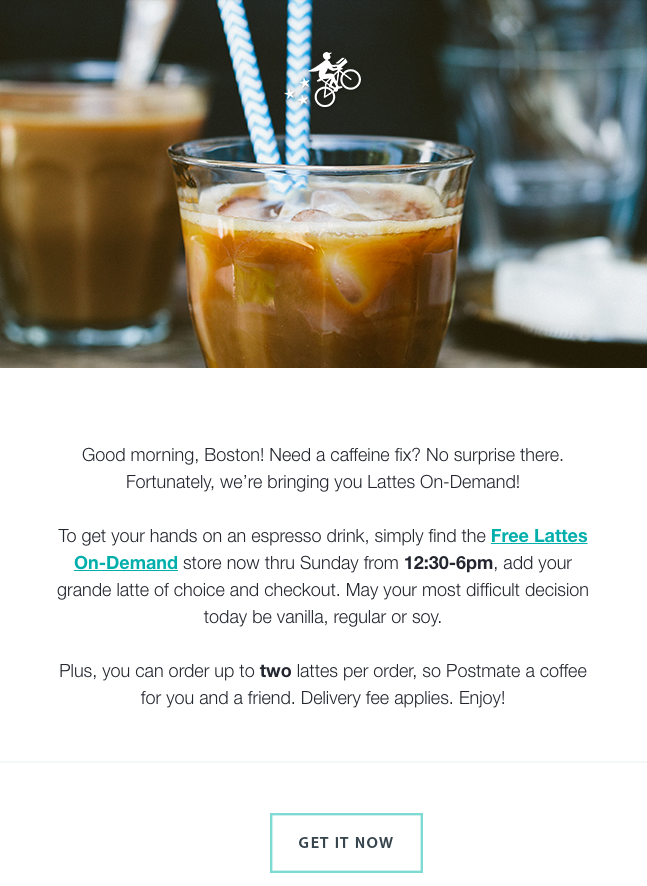
Here’s a great example of a concise email:
9. Include one call-to-action button per email.
Remember when I said a lot of your email recipients will scan your email without reading all the copy? That’s why you want to have a clear call-to-action (CTA) button that’s easy to spot for even the quickest of email scanners. Without a CTA button, you won’t be calling on your recipients to take any action that actually benefits them — and the growth of your business.
You’ll want to place your CTA in a location where it’s easily visible and where it makes sense for someone to click on it. For example, you might put a CTA to download a free ebook in an email that describes new strategies for using your product.
Once you’ve determined where you want to put your CTA, it’s time to create the button itself. Click here to download 50 free CTA button templates to get you started. (HubSpot customers: Learn how to add CTA buttons to emails in HubSpot here.)
10. Add alt text to your CTA image.
Many email clients block images — including your CTA buttons — by default. That means a good chunk of your audience may not see your beautiful, optimized CTA. Instead, they see this:
When you set an image’s alt text, though, you let recipients who can’t view images in their email know exactly where to click to complete the action:
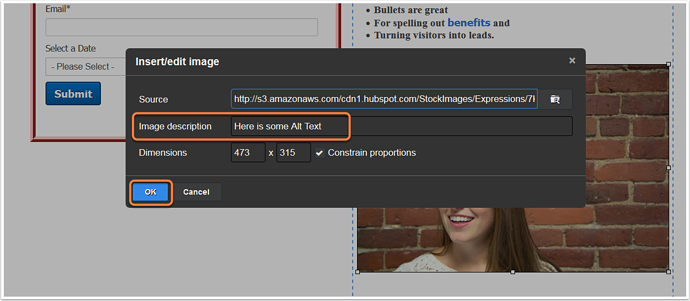
You can either edit the alt text in your email tool’s rich text editor (just right-click the image and edit away), or you can manually enter it in the HTML editor of your email tool like this:
Your ultimate goal in email marketing is to get people to click through to a web page. One way to increase the clickthrough rate without littering the copy with links is to hyperlink the images in your email to the webpage that corresponds with the content of the image.
If you’re inviting readers to download an ebook, for example, and you have a picture of the ebook included in the email, don’t just hyperlink the text next to the image telling people to “download it here.” Hyperlink the ebook’s picture, too. People are drawn to images much more commonly than text, and you want to give your email subscribers as many options to get your ebook as you can.
You can simply click on the image and then use your email tool’s “Insert/Edit Link” option, or you can link an image in the HTML editor using the following code:
In general, it’s a good idea to link to your featured offer in multiple places in addition to the clear and focused call-to-action button. In addition to your main CTAs and images, consider including a noticeable text link (or two) when applicable, as having more links increases the opportunity for engagement.
13. Place at least one clickable item above the fold.
One way to make your emails more clickable? Place one or more of your clickable elements — whether it’s a CTA button, a text link, or a clickable image — near the beginning of your email.
This is especially useful for mobile users. Mobile tends to require a lot of scrolling, and sometimes squinting, pinching, and zooming. Giving a recipient something actionable that is seen upon opening can lead to more clicks in this environment.
14. Add alt text to all of your images.
Again, a lot of email clients out there block images by default. (Here’s the full list from Campaign Monitor.) In those cases, images won’t load unless the recipient clicks a button to show them or change their default settings.
Adding alt text to your email images helps recipients understand your message — even if they can’t see the images right away. (HubSpot customers:Click here to learn how to add alt text to your email images in HubSpot.)
You might consider making the language in your alt text actionable, such as “Click here to download the ultimate content creation kit.” Actionable alt text will essentially turn every linked image into another CTA. So, even if someone doesn’t see the snazzy GIF of my latest offer (or if they hover their mouse over an image that does show up), the alt text will beckon them to click.
15. Avoid background images.
This is especially important if your target buyers tend to use Outlook as an email client.
Microsoft Outlook doesn’t recognize background images, period. Given that Outlook is the fifth most-used email client with 7% of the market share — and that’s in total; your industry might have a lot more — it’s best to avoid using background images altogether.
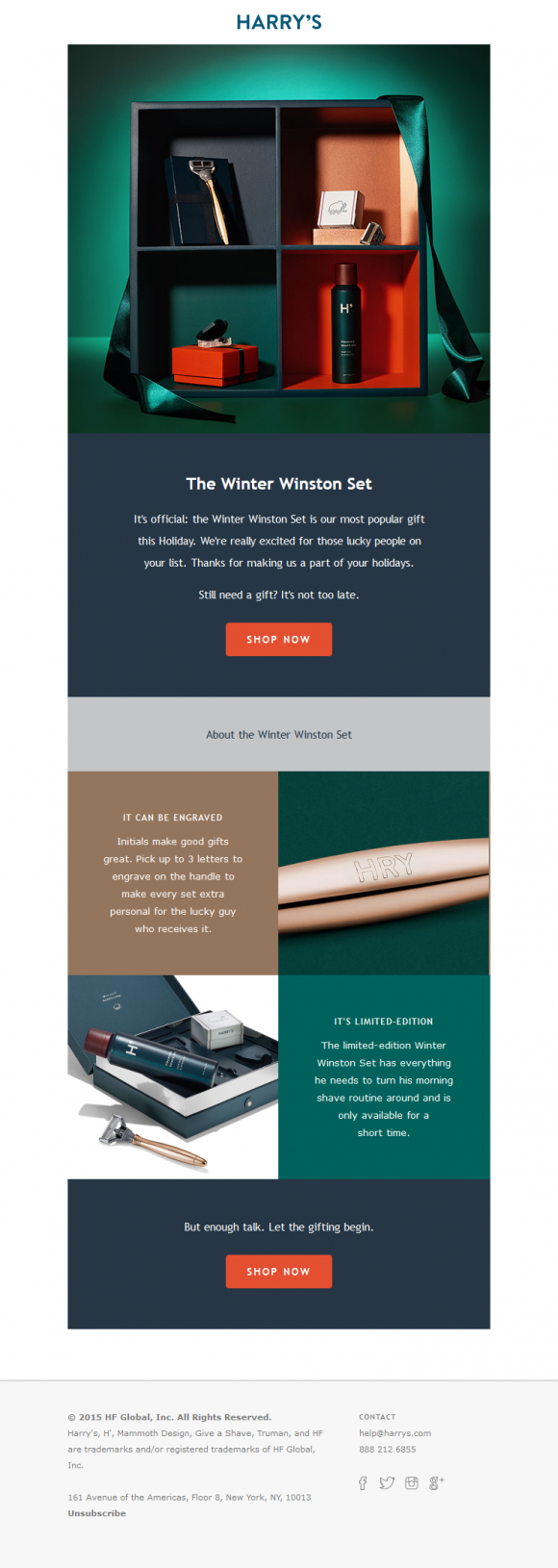
Instead, use a background color and use images in other ways in your email, like Harry’s did in their email below:
Increasing the number of people who see your link will increase the number of people who click on it. So, be sure to extend the life of your email by adding social sharing buttons.
Important Note: If you want to increase clicks, you want to add sharing buttons, not follow buttons. The former will allow your email recipients to pass along the offer URL in your email to their followers. The latter will prompt them to Like, follow, or add your company social media channels.
17. Simplify sharing with ready-made tweets.
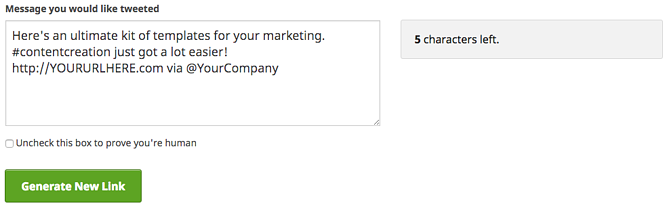
People are far more likely to take an action if you make it really, really easy for them. For recipients out there who are too lazy to tweet the wonderful content you sent them via email, you can make it easy for them by creating what we call a “lazy tweet.”
One simple way to do this? Using ClickToTweet, a free custom tweet link generator. First, go to ClickToTweet’s basic tweet generator. Then, type in your tweet, desired (trackable) destination URL, and hashtags:
Click “Generate New Link,” and then grab that link. Then you can link it to your Twitter sharing button. Or, if you’re segmenting your list by attributes such as “has Twitter” or “topic of recent conversion: social media” (you’ll need marketing intelligence software like HubSpot for this), you can even include it in your main email copy, like this:
18. Add an email forwarding option.
Another way to extend the clicks on your email beyond its shelf life is to prompt your audience to forward the offer. The folks at Litmus found thatthe most forwarded emails were 13X more likely than the typical email to include “Share With Your Network” calls-to-action. By including forward-to-a-friend (or social sharing links, as we discussed above), you put it in recipients’ minds to share.
You can add a little post-script to the end of your email copy, such as “Not responsible for your company’s social media? Feel free to forward this ebook to a friend or colleague using social media marketing.” Link the call-to-action to a pre-made email, complete with subject and body text. That way, all someone has to do is enter their associates’ email addresses and hit “Send.”
You can highlight text or an image and add the URL via your email tool’s rich text editor and then enter a mailto:? link. Here’s what this looks like:
Just make sure you use the “%20” tag to separate words! Otherwise, your message willreadlikethis (not too appealing, right?).
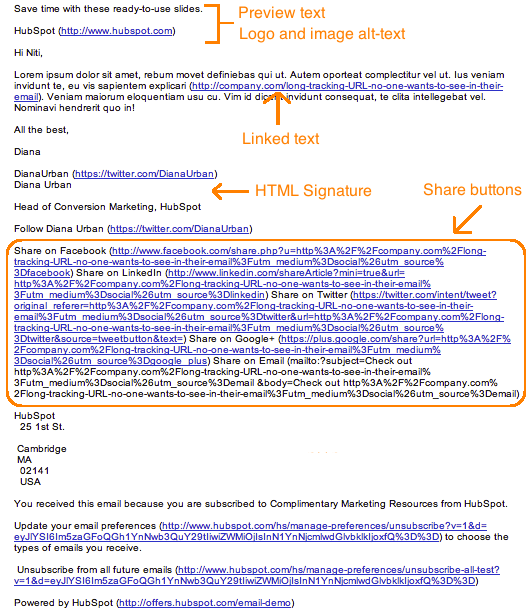
19. Clean up the plain-text version of your emails.
Not every recipient is going to see the beautiful, HTML, rich-text version of your email. Some clients don’t support HTML-rich emails, while other times, a person may simply choose to only view messages in plain text.
When you don’t optimize the plain-text version of your email, this is what happens when someone views it:
Scary, isn’t it? I don’t think many people are going to bother to read through this garbled mess.
So, cut out the extra text, replace long tracking URLs with shortened ones, and keep the body simple. Taking the five extra minutes to optimize your email’s plain-text version could help you reach more of your target segment and keep you out of the spam folder.
Note: When you’re cleaning up your plain-text emails, don’t change the actual copy much at all or you’ll risk it getting marked as spam.
20. Optimize your emails for mobile users.
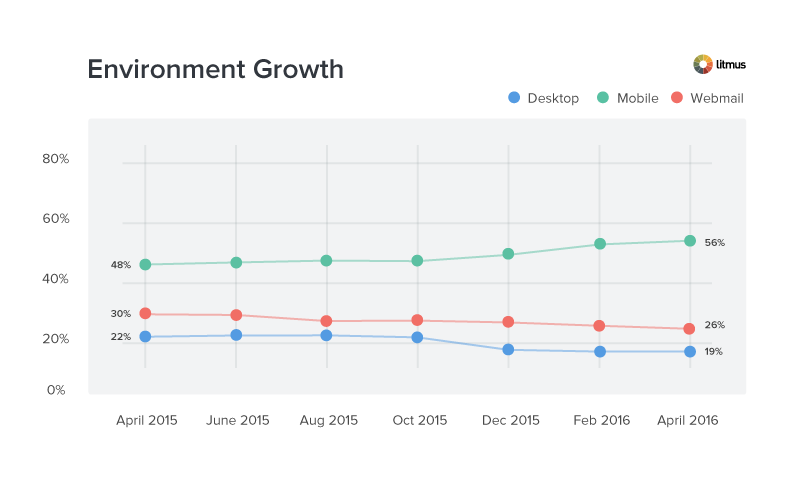
In Litmus’ analysis of over a billion email opens, they reported that 56% of opened emails were opened on mobile devices in April 2016. This figure represents an 8% increase in mobile opens in the past year.
“This represents a peak for mobile market share,” they wrote, “and the longest sustained growth we’ve seen after the holiday season.”
As more and more people use their mobile devices to read email and surf the web, it’s more important than ever that marketers design their emails with mobile users in mind. Otherwise, their user base will be significantly affected.
How? Here’s a visual example of what happens when images aren’t optimized for mobile (first) versus when images are optimized for mobile (second):
Isn’t the second image a much better user experience?
Reduce your images’ file sizes to make up for mobile devices’ generally slower download speeds. (HubSpot customers don’t need to worry about it — images uploaded to HubSpot’s software are automatically compressed. Otherwise, tools like TinyPNG will help you reduce file size.)
Ensure the CTA buttons and links are larger than 45-57 pixels for the best user experience. Why? According to an MIT study, the average size of an adult index finger is 1.6-2 cm, which translates to 45-57 pixels on a mobile device.
Invest in responsive email templates. Creating your own responsive template may be beyond your particular skill set or bandwidth. Sometimes, the most economical solution is to just license or buy email templates from the people who do it best.
HubSpot customers: HubSpot’s default email templates are all optimized for mobile using responsive design. To access these templates, create a new email and look for the responsive option in the “folders” drop-down in the top left.
21. Preview and test your emails before sending them.
When you’re finally ready to hit “Send” on your email, make a habit of double-checking one last time whether your emails look as good as you think they do. If your email marketing tool lets you, go ahead and preview what your email looks like in different email clients and devices that are popular with your audience.
(HubSpot customers: You can preview what your emails look like in 30+ email clients right in the HubSpot Email App, as well as preview what your emails will look like on any device — including desktop, tablet, or mobile devices. Click here to learn how.)
You should also send out a test version of your email before you send out the real deal to ensure it’s working properly for everyone on your email list. Start incorporating these as final steps in your email review process. (HubSpot customers:Learn how to test your emails here.)
22. Don’t be afraid to ‘clean up’ your contact list.
It’s tempting to keep every subscriber you win on an email campaign until they personally choose to opt out. But just because they haven’t opted out of an email newsletter doesn’t mean they’re still interested, and subscribers who have become inactive can kill your emails’ open and clickthrough rates.
To make sure you’re only sending emails to the people who want to read them, clean up your email list so that it excludes recipients who haven’t opened a certain amount of emails in the campaign’s recent history. This makes sure your emails’ open and clickthrough rates reflect only your most interested readers, allowing you to collect more effective data on what is and isn’t working in each email you send.
On top of that, a good email list cleaning service removes other email addresses that pose a risk to your inbox placement. “Invalid, abuse, and temporary emails will affect your sender reputation, so it’s best to weed them out,” says Liviu Tanase, CEO of ZeroBounce. “Your desire to grow your list is only natural, but you can’t afford to expand it at all costs. Emailing only valid and active addresses allows you to connect with people who care about your brand, and that’s what every email marketer wants,” Tanase adds.
(HubSpot customers: Lists that add and remove members based on their email behavior are called smart or “active” lists. Learn how to create them in HubSpot Academy.)
23. Monitor each email’s performance.
What’s working in your email campaign this month might not work quite as well next month, and it’s imperative that you check in on your emails’ open and clickthrough rates for opportunities to improve your copy (to do this, of course, you’ll need a tool to track your email analytics).
If after a month of email sends, for instance, you find 10 messages are getting double the engagement as the other 20, analyze them. What did you do differently in the higher performers? Was it the imagery? The subject line? Maybe you have more than one audience segment and one of them just isn’t as interested in your current email content.
Use your email performance data to run A/B tests that are designed to show you what your email recipients really want out of your newsletters, and steer into the trends that you see to make your email campaigns more desirable.
Email marketing can be tough at times — I’m right there with you. But by sending compelling offers to the right target segments and paying attention to the little details that go into an email, you can increase the opens clicks in your emails and generate more leads. (And learn more about which email marketing metrics to track — and how — here.)
Intent data is one of the hottest topics in the marketing world.
As COVID-19 forced us apart, employees dispersed from centralized offices, creating a new type of challenge for businesses: How do we reach buyers when they’re not gathered in one location?
Fortunately, we know the solution: Studying and understanding buyer-level intent data.
NetLine’s Intent Discovery capabilities package all of this data into actionable insights for B2B Marketing and Sales teams.
What is Intent Discovery?
NetLine’s Intent Discovery is a sales acceleration tool designed to capture first-party intent data at the buyer-level generated by the collective consumption behavior occurring across 13k+ pieces of gated content.
Intent Discovery delivers actionable insights into your target accounts, providing Marketers with dramatic scale beyond the limitations of their own content—delivering first-party sourced intent-rich data to accelerate sales outcomes.
Through Buyer-Level Intent Discovery, you can tap into our networks’ entire universe:
Access to each one of our 13k+ content assets
35,925,120 different ways of filtering buyers actively performing research
Billions of data points
Answering the question of “who” a given prospect has long been an obstacle for Marketers. Sales, understandably, wants as much data as possible on each lead. However, getting this type of granular information has long been a challenge for Marketers.
To better understand the kind of insights NetLine’s Intent Discovery delivers, let’s further define buyer-level intent.
What is Buyer-Level Intent?
Buyer-level intent, or buyer intent data, is the measure of an individual prospect’s readiness to make a purchase within a given timeframe.
This measurement is based on a group of signals presented by a prospect over the course of their digital buying journey.
What’s the Difference Between Buyer-Level Intent and Company-Level Intent?
If buyer-level intent is based on an individual prospect’s readiness to make a purchase in a given timeframe (which it is), then company-level intent, or account-level intent, is the measurement of a group of prospects working within the same organization.
For years, we have had visibility into company-level intent data, thanks to IP address information and the social web. Today, there is a much greater emphasis on knowing who a buyer is versus knowing which company is interested. The reason for this shift is simple: Businesses don’t make decisions—people do.
Ahrefs reports that in the past five years web pages focused on intent data rose by 2,739.1%. Despite this staggering figure, the attention placed on buyer-level intent data dwarfs its parent topic, increasing 13,609.7% over the same time frame (and 1365.5% since March 2020).
Google Trends highlights this shift, as well, as searches for buyer intent have become far more frequent since March 2020.
With the shift towards remote work, Sales teams aren’t interested in guessing which contact is interested in their products or services—and it’s on Marketing to deliver.
How NetLine’s Always-On Intent Discovery Delivers Actionable Insights
NetLine’s Intent Discovery product features an Always-On segment that gives us visibility into the changing needs of a given customer profile. For this example, we analyzed responses from our Human Resources and Project Management segments to highlight the unparalleled insights Intent Discovery offers.
Human Resources
The majority of respondents (77.82%) were looking to make a decision regarding additional investment in HR-related software beyond the next 12 months. However, that still leaves more than 20% of an entire market that’s looking to make a buying decision in the next 12 months:
Human Resources
What’s your timeline to make additional investment in HR-related software within the next 12 months?
Respondent’s Investment Timeline
Percentage of Respondents
0-3 Months
4.7%
3-6 Months
5.14%
6-12 Months
12.34%
When asked about which top HR priorities respondents were allocating resources towards, 34.8% said Performance Management, making respondents 56.8% more likely to say it was their top priority over the second most popular answer, Talent Management Systems.
Respondents in the Healthcare/Medical field were the most likely to state that Performance Management was their top priority (36.56%), which is essentially identical to the response rate of Senior Human Resources Directors in the same industry (36.55%), enough to make this group 5.1% more likely to prioritize Performance Management than any other Job Function, Job Level, and Industry combination.
Responses from professionals in the field of Agriculture and Education also highlight the benefits of knowing who isn’t in-market, as they were the least likely to respond to any of these questions.
Project Management
Similar to the responses seen within our HR Intent campaign, most of the respondents (67.73%) were looking to make a decision regarding additional investment in HR-related software beyond the next 12 months. Unlike the HR respondents, however, there was a greater share of professionals looking to make additional investments within the next 12 months:
Project Management
What’s your timeline to make additional investment in Project Management-related software within the next 12 months?
Respondent’s Investment Timeline
Percentage of Respondents
0-3 Months
8.67%
3-6 Months
8.51%
6-12 Months
15.08%
So what were the top Project Management priorities respondents were allocating resources towards? Would it surprise you that 25.65% (including 38.9% of Agriculture professionals) said Project Planning was their top priority in Project Management? It certainly shouldn’t!
Respondents were 300% more likely to select Project Planning as their top priority compared to Budgeting and Expense Reporting, the least popular choice.
28.26% of respondents said Organizational Adoption was their top challenge when it came to managing and using Project Management Software, making this the top selection.
Senior Management professionals (represented mostly by the Non-Profit/Organizations, Information Technology, Finance, and Manufacturing trades) accounted for 32.9% of all responses.
75% of C-Level professionals leading Information Technology organizations of 1,000 – 2,499 employees were 579% more likely to state that Project Planning was their organization’s top challenge in managing and using Project Management Software.
C-Level Information Technology professionals operating organizations of between 25 – 49 employees were the most likely to say their timeline for additional investment extended beyond the next 12 months—making them 77.42% more likely to make this statement compared to the rest of their Senior Management peers.
How to Follow-up on Intent-Rich Leads
Once you’ve added buyer-level intent data to your repertoire, understanding how to take the next step is critical. Remember: Intent Discovery is not a traditional lead generation vehicle. Instead, Intent Discovery is focused on delivering insights beyond first-party data captured from a client’s content.
This means that Marketing and Sales teams need to be keenly aware of how to best utilize and leverage these insights for your (and your prospect’s) benefit.
How Marketing Can Best Put Buyer-Level Intent Insights to Use
Thanks to buyer-level intent data, Marketers have a multiplier to the intent use cases marketers know and love…only better. By knowing “Who” their target audiences and buyers are more completely now than ever before, Marketers have significant opportunities in front of them.
Here are a few:
Personalize Dialogue in Sales and Marketing Outreach How often have you responded to an email that began with, “Hey COMPANY NAME,”? If the answer is any higher than zero times, I’d be stunned. Buyer-level intent data allows you to go beyond company-level personalization and embrace the knowledge of truly knowing who is actively exhibiting intent within the account. While intent data is not exclusively the same as a lead, it should be treated with the same reverence Tailor Campaign and Content Messaging If you knew that a Project Marketing Manager was struggling with keeping their projects organized, you wouldn’t subject them to messaging that focused on an entirely different project management software solution. Once you know about a prospect’s needs, you need to immediately pivot and consider the additional variables your prospect will need: What type of unique content is needed to move them closer to a buying decision? Who else is involved in the buying committee? Who is the ultimate decision-maker?
Identify Likely-to-Buy Accounts Buyer-level intent information is chock full of data your Marketing and Sales colleagues can seize on. However, just because you have additional intent data at your disposal doesn’t automatically mean these are the best buyers for you.
Matrix buyer-level intent data against existing internal signals to identify which accounts are not only actively exhibiting first-party intent but also align with your core buying indicators.
Inform and Augment Content-Centric Lead Generation Campaign Targets Sometimes, no matter how hard we work on our content, it’s just not what our ideal buyers are looking for.
As we learned in our 2022 State of B2B Content Consumption and Demand Report for Marketers, while eBooks are the most popular content format by registration volume, White Papers and Webinars registrations are far better at suggesting a buyer is preparing to make a purchase decision. By using Buyer-Level intent, you can close the loop on your content syndication campaigns and gain increased levels of refinement.
How Sales Can Best Put Buyer-Level Intent Insights to Use
Intent Discovery offers Sales organizations the ability to prioritize efforts based on responses captured vs. randomly tossing onto the pile.
Perhaps the best way Sales can leverage buyer-level intent data is by focusing on one word: Who.
Knowing “Who” you’re reaching out to certainly eliminates guesswork and therefore streamlines your engagement process. Intent Discovery exposes the “Who” within given accounts and, as we’ve shown in the examples above, simultaneously delivers real-time insights into their intent, pain points, and needs. Knowing “Who” is in-market is the ultimate ace in the hole for Sales professionals.
By acting upon these insights, Sales can fast-track its dialogue with prospects, much like a leading Revenue Growth Platform did.
When our client was looking to improve the success rates of their demos, they initially used NetLine’s leveraged lead gen offerings. However, by leveraging NetLine’s Always-On Buyer Level intent program to their online registration forms, registration and in-person demos rose dramatically, resulting in a 71% increase in demo attendance and a 20% lift in won business.
Seeing success from Intent Discovery means having process and personnel responsible for the duty of follow-up action after lead retrieval. The vendor was able to capitalize on signals real users were sharing across NetLine’s vast content library by having a member on their team actively following up with leads, When the platform found an ideal, in-market buyer, they were ready to seize the opportunity to engage and nurture their newest (and possibly best) lead.
Getting the Most Out of Buyer-Intent Data
Buyer-level intent data is one of the best resources B2B organizations now have at their disposal. By using it strategically, you can enhance your lead generation program and become the efficient machine you’ve always aspired to be.
Remove the guesswork and find out “Who” your in-market buyers are by leveraging buyer-level intent data!
We use cookies on our website to give you the most relevant experience by remembering your preferences and repeat visits. By clicking “Accept”, you consent to the use of ALL the cookies.
This website uses cookies to improve your experience while you navigate through the website. Out of these, the cookies that are categorized as necessary are stored on your browser as they are essential for the working of basic functionalities of the website. We also use third-party cookies that help us analyze and understand how you use this website. These cookies will be stored in your browser only with your consent. You also have the option to opt-out of these cookies. But opting out of some of these cookies may affect your browsing experience.
Necessary cookies are absolutely essential for the website to function properly. These cookies ensure basic functionalities and security features of the website, anonymously.
Cookie
Duration
Description
cookielawinfo-checbox-analytics
11 months
This cookie is set by GDPR Cookie Consent plugin. The cookie is used to store the user consent for the cookies in the category "Analytics".
cookielawinfo-checbox-functional
11 months
The cookie is set by GDPR cookie consent to record the user consent for the cookies in the category "Functional".
cookielawinfo-checbox-others
11 months
This cookie is set by GDPR Cookie Consent plugin. The cookie is used to store the user consent for the cookies in the category "Other.
cookielawinfo-checkbox-necessary
11 months
This cookie is set by GDPR Cookie Consent plugin. The cookies is used to store the user consent for the cookies in the category "Necessary".
cookielawinfo-checkbox-performance
11 months
This cookie is set by GDPR Cookie Consent plugin. The cookie is used to store the user consent for the cookies in the category "Performance".
viewed_cookie_policy
11 months
The cookie is set by the GDPR Cookie Consent plugin and is used to store whether or not user has consented to the use of cookies. It does not store any personal data.
Functional cookies help to perform certain functionalities like sharing the content of the website on social media platforms, collect feedbacks, and other third-party features.
Performance cookies are used to understand and analyze the key performance indexes of the website which helps in delivering a better user experience for the visitors.
Analytical cookies are used to understand how visitors interact with the website. These cookies help provide information on metrics the number of visitors, bounce rate, traffic source, etc.
Advertisement cookies are used to provide visitors with relevant ads and marketing campaigns. These cookies track visitors across websites and collect information to provide customized ads.


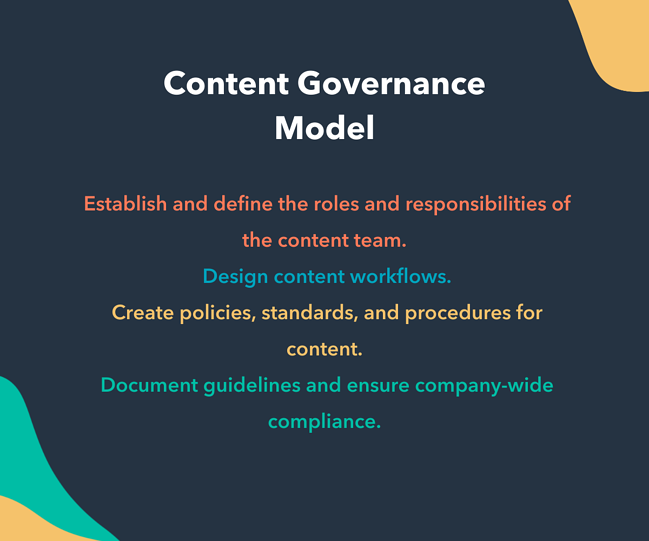




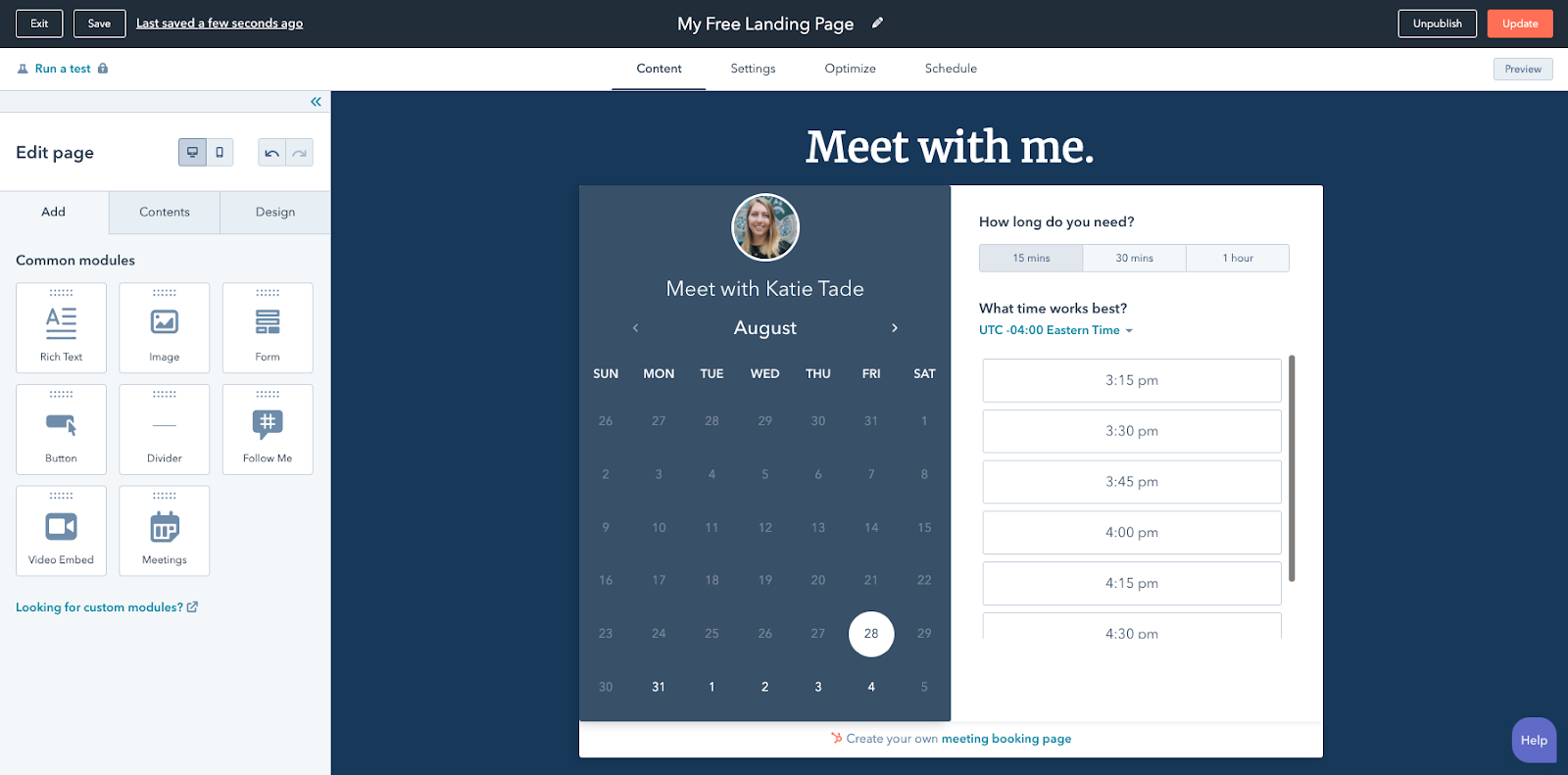
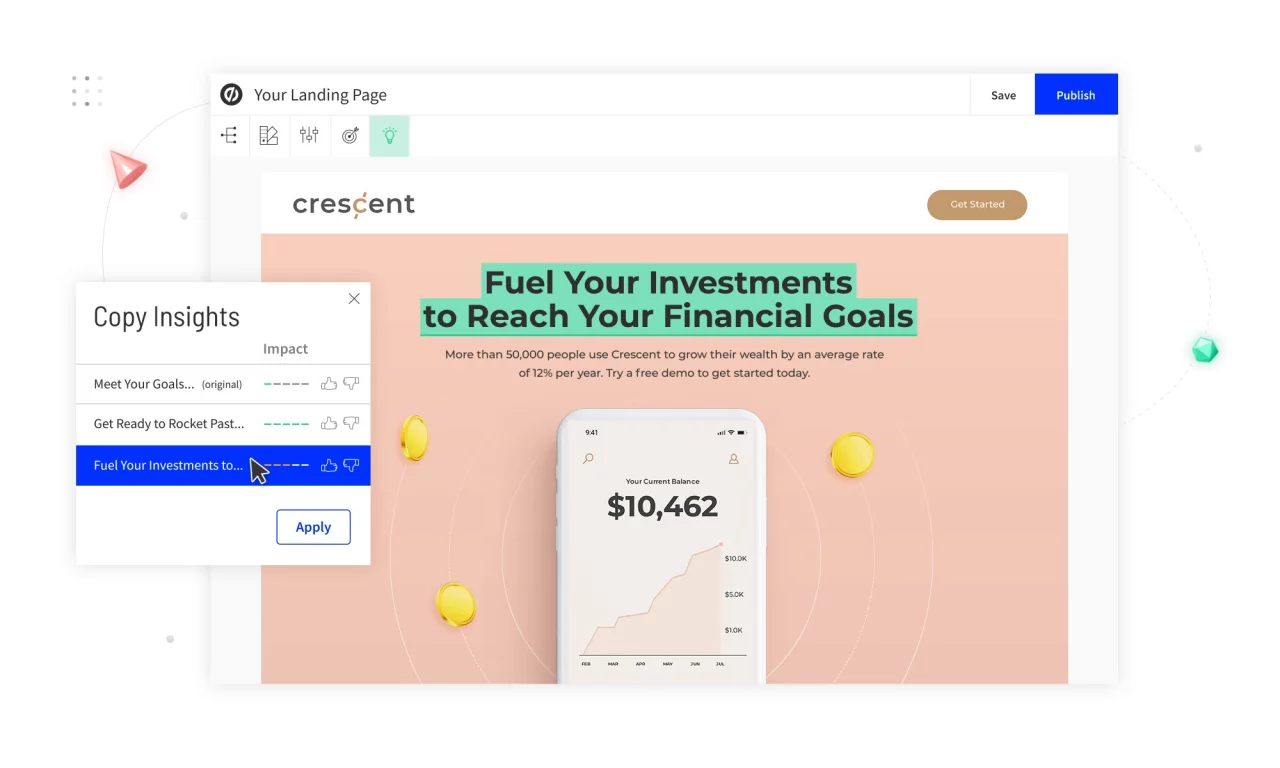
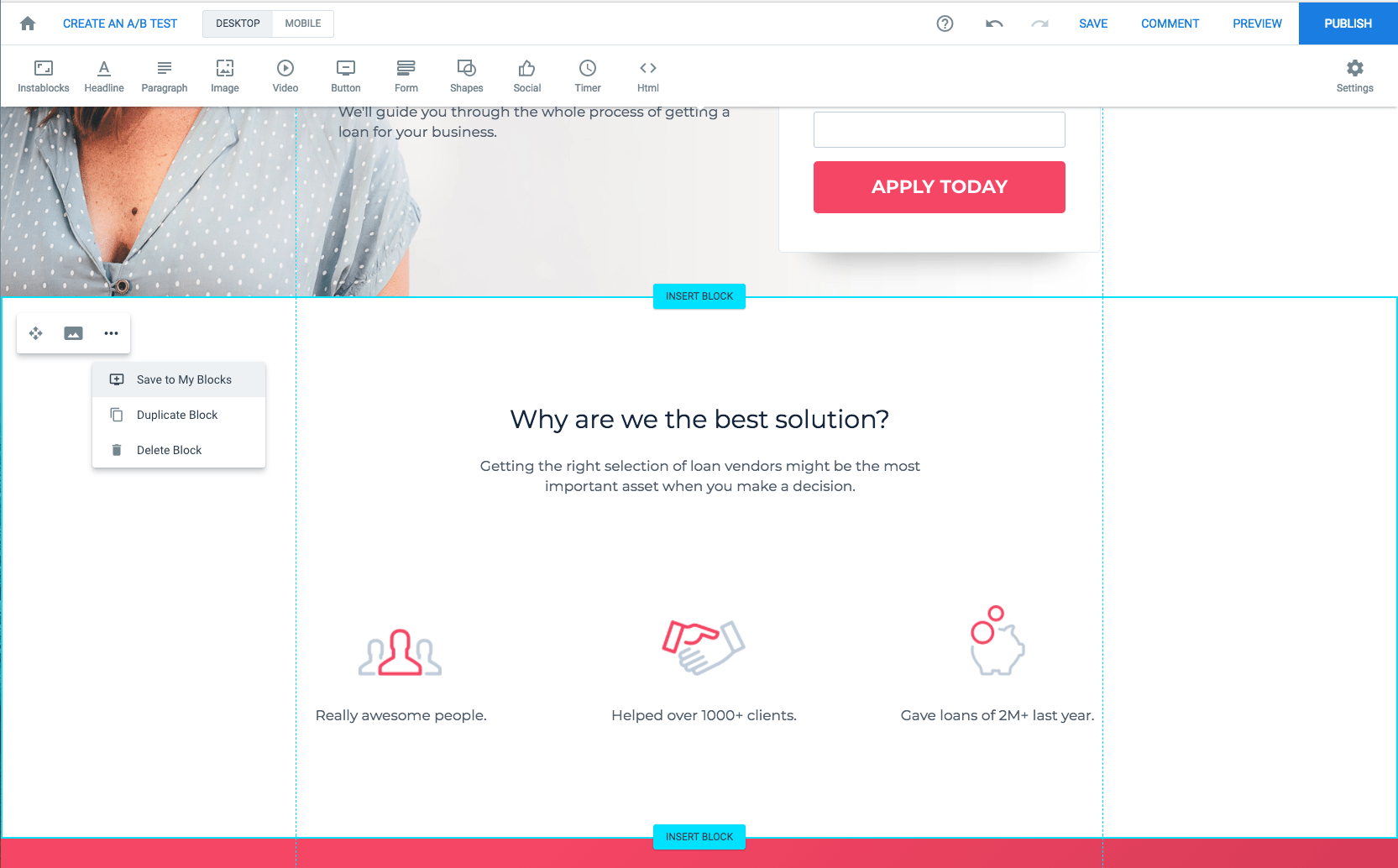
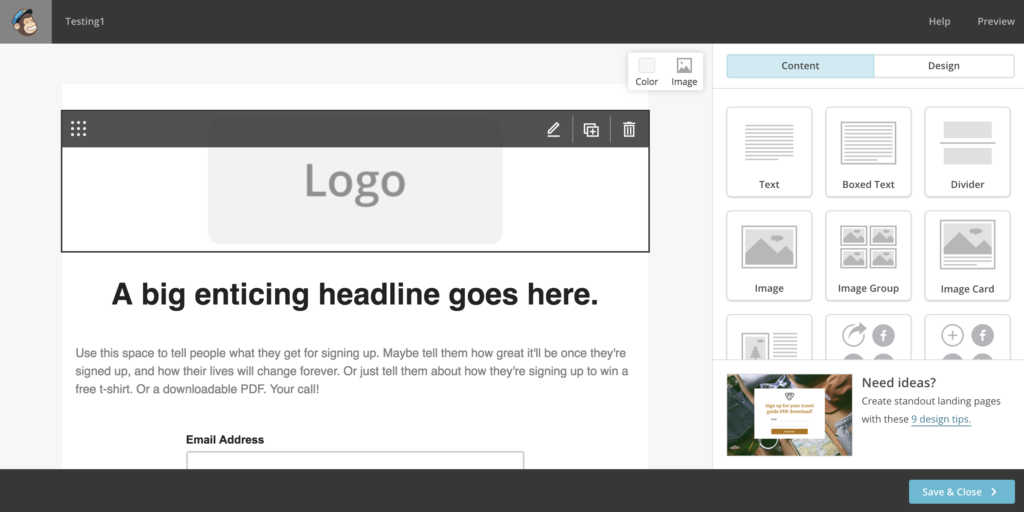
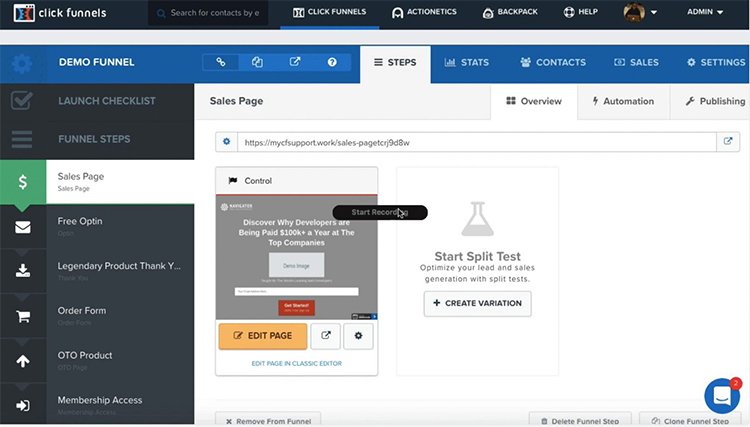
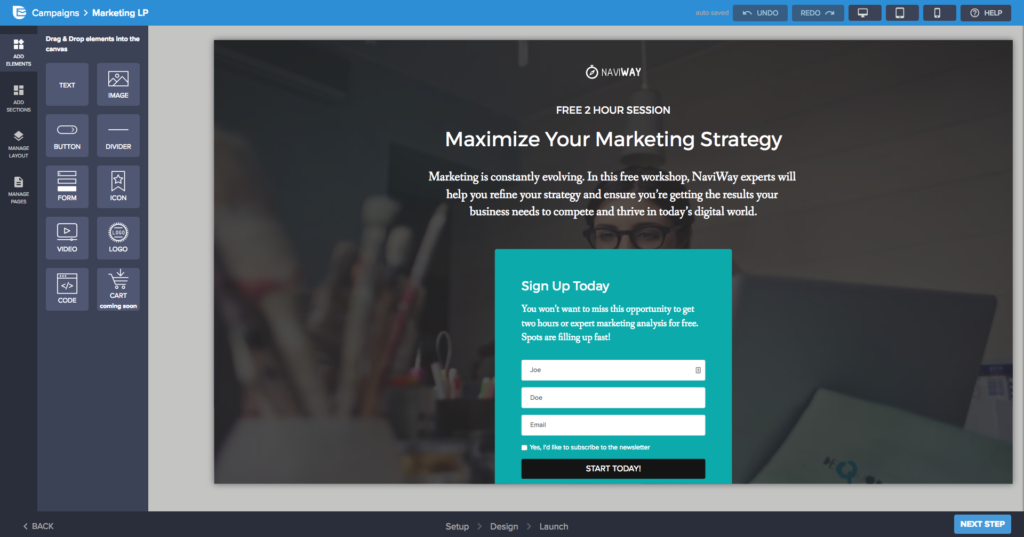
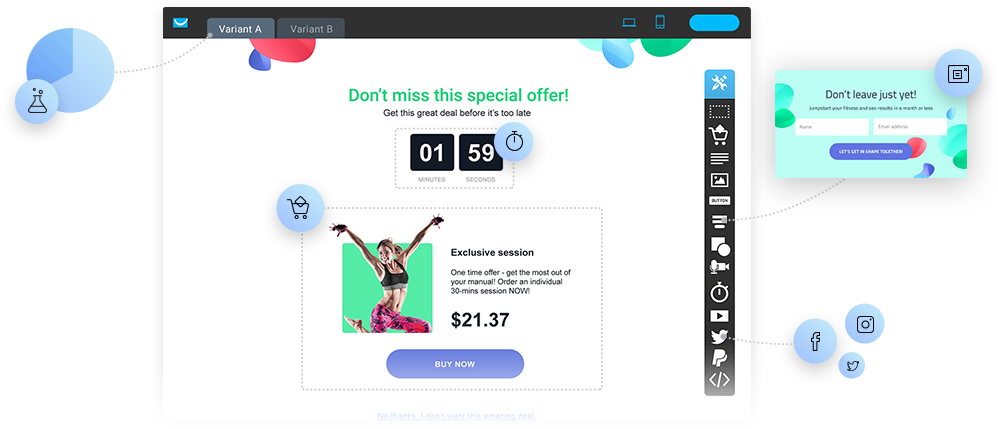



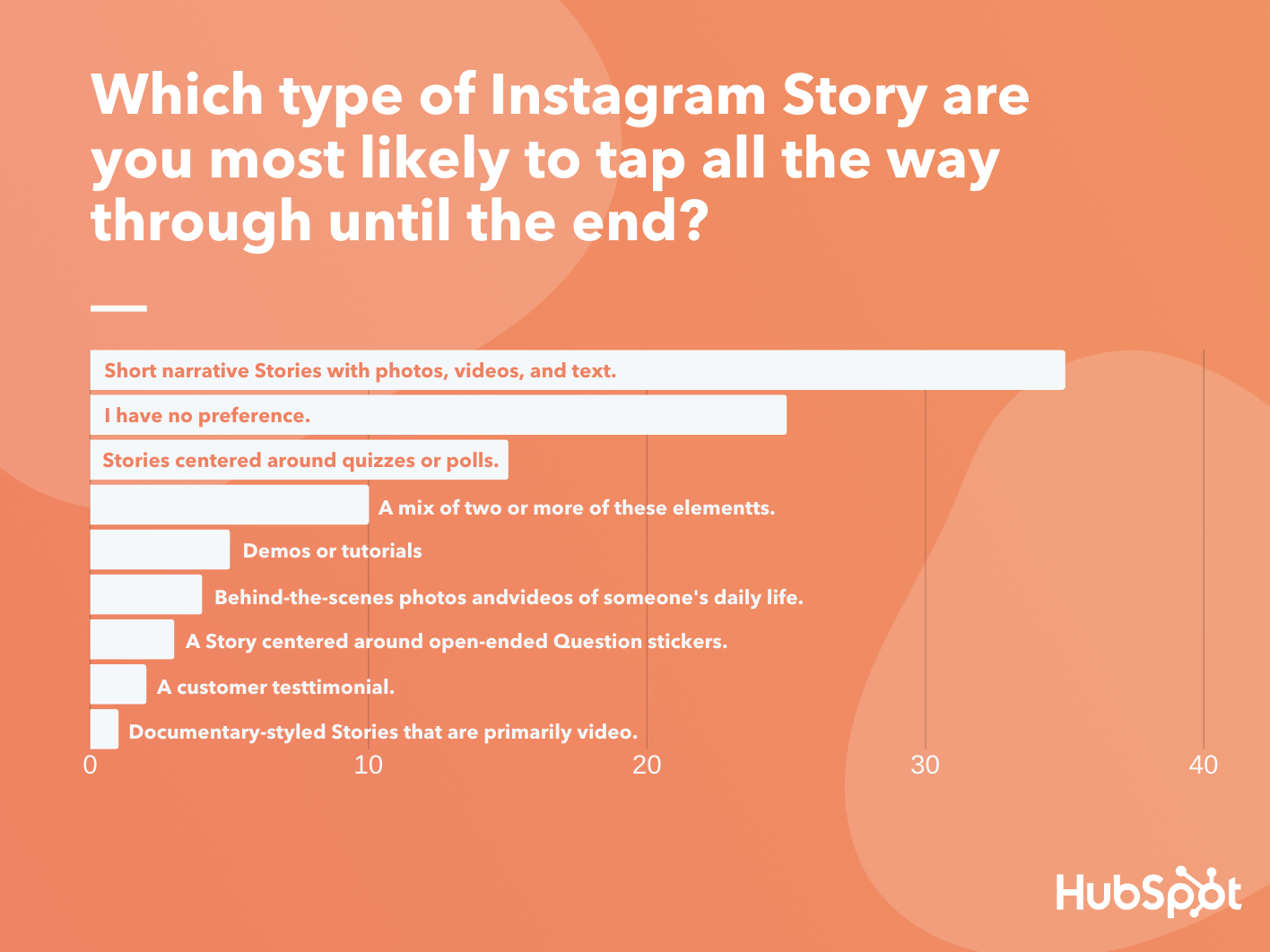
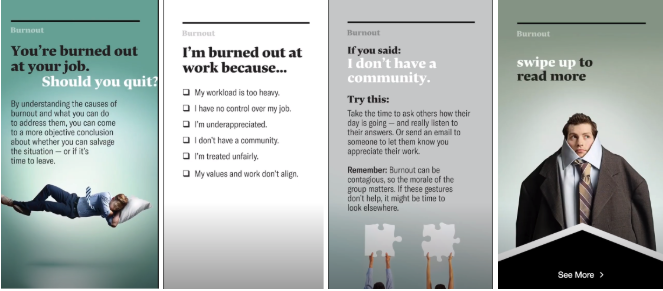
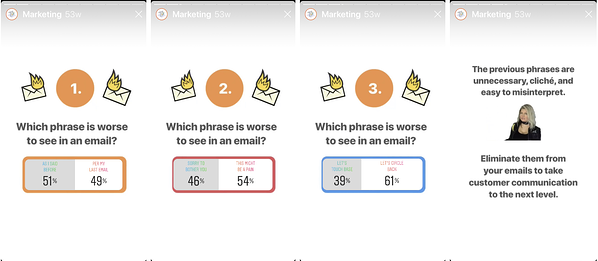
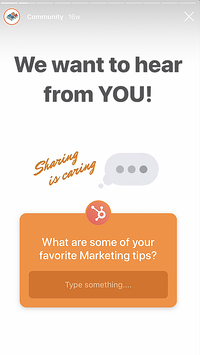

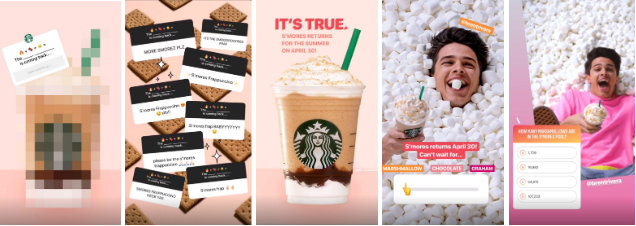
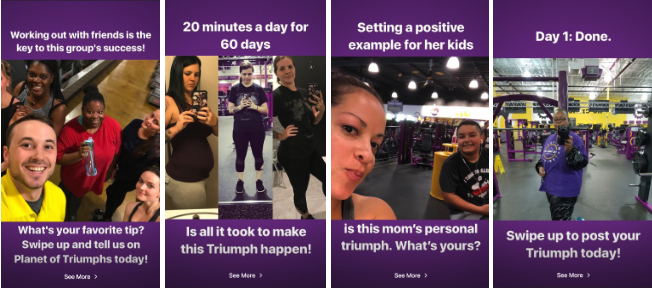

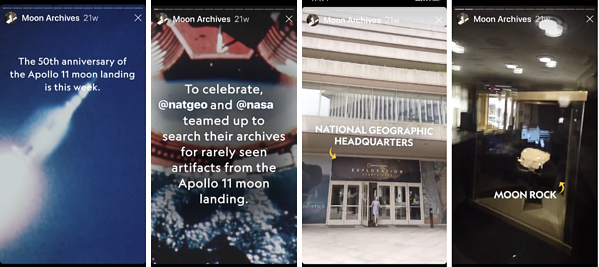
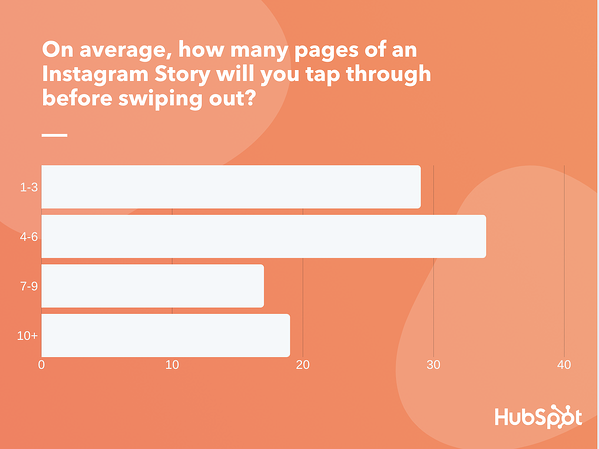

![→ Free Templates: How to Use YouTube for Business [Download Now]](https://i4lead.com/wp-content/uploads/2022/03/b33cfd44-133a-49e3-a943-086c5679d485.png)
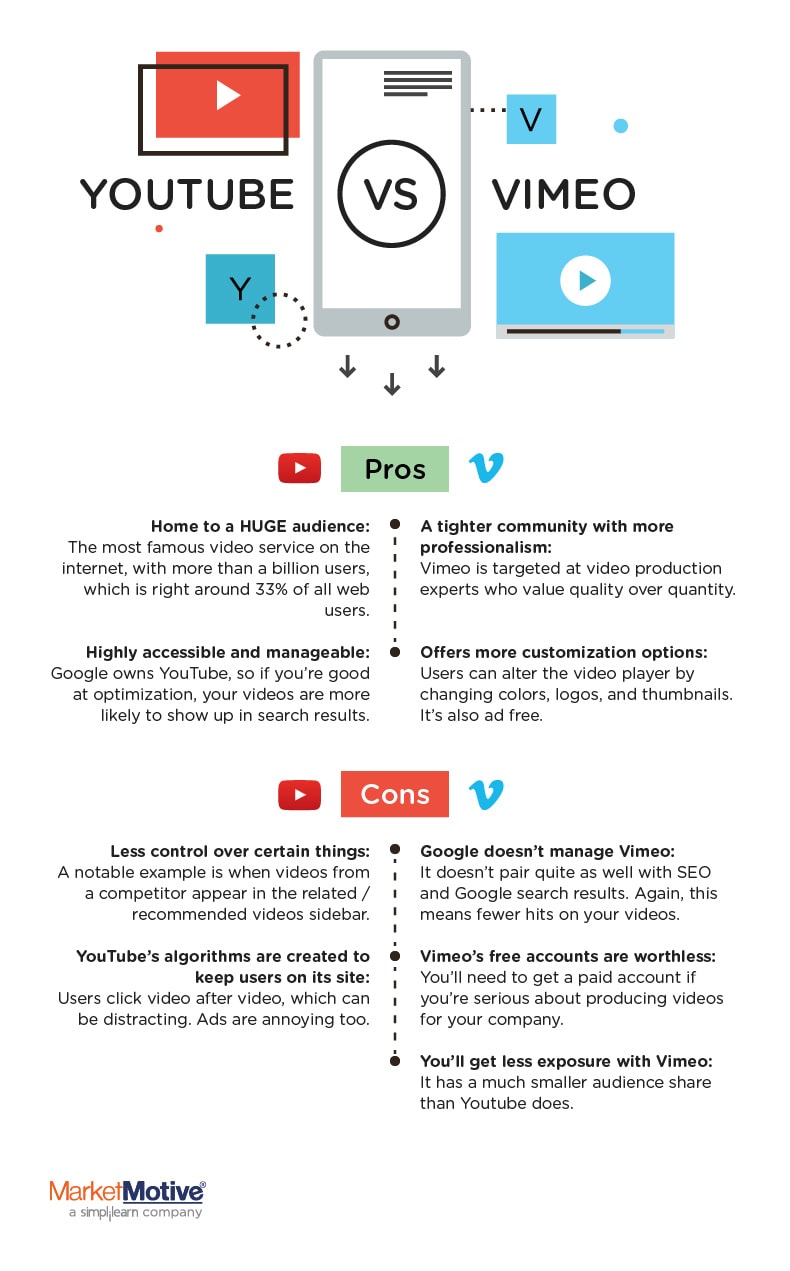

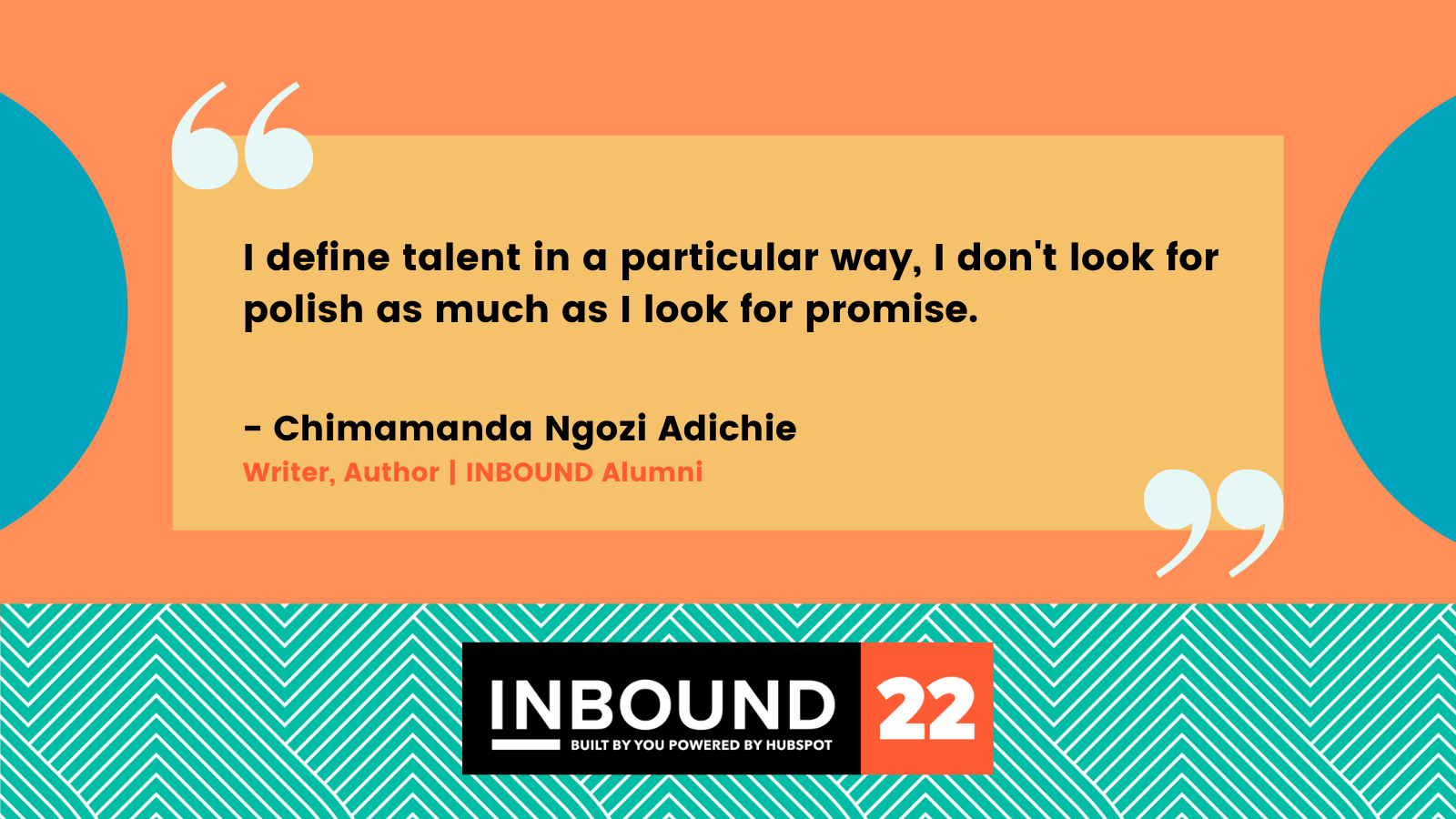
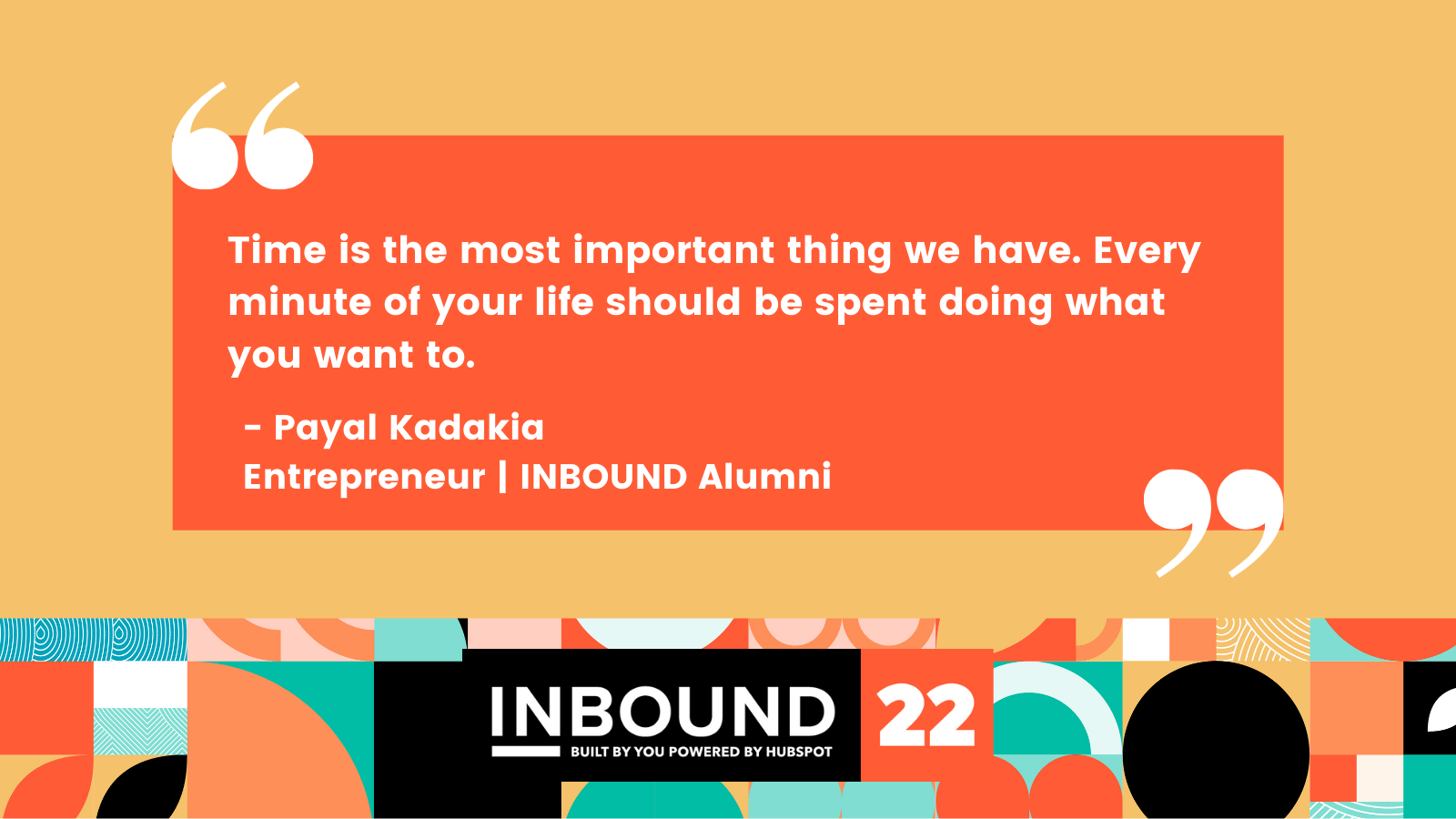

![Free Ebook: The Marketer's Guide to TikTok for Business [Download Now]](https://i4lead.com/wp-content/uploads/2022/03/2c7242e4-ad54-4f63-8627-a15aa6a2ea50.png)
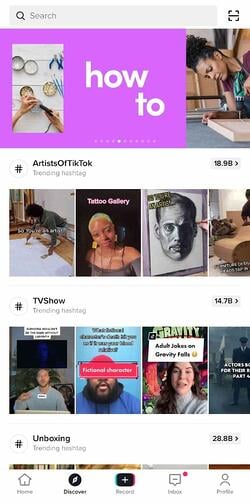
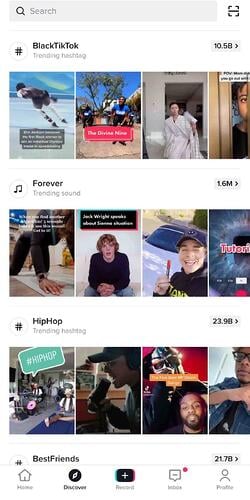


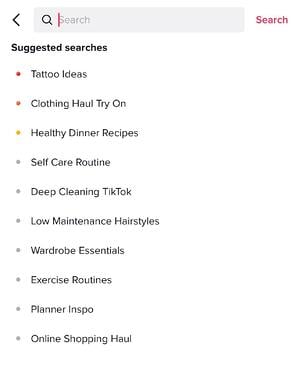

![New Data: Instagram Engagement Report [2022 Version]](https://i4lead.com/wp-content/uploads/2022/03/9294dd33-9827-4b39-8fc2-b7fbece7fdb9-2.png)