Categories B2B

What Will Content Planners Budget For in 2022 [HubSpot Blog Research]

If you ask marketers about their 2020 content plans, most will tell you they had to pivot because of the pandemic. In 2021, many said the same thing, as the world adjusted to this new normal.

Click here to download 8 free marketing budget templates.

We surveyed over 600 media planners this year and 99% of marketers who have ever pivoted their content plan did so in 2021, with 39% of them pivoting three times that year.

So how are they budgeting in 2022? Let’s find out.

How much are marketers spending on content marketing?

According to HubSpot Blog Research, 39% of marketers surveyed say they allocate 31-50% of their total marketing budget to content marketing.

This tells us that brands are leveraging content marketing above many other marketing strategies, as they put at least a third of their funding in it.

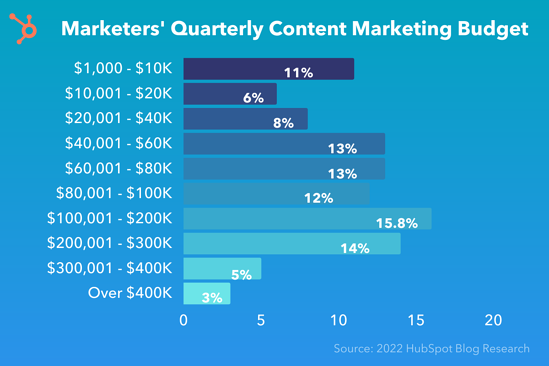
marketers' quarterly content marketing budget in 2022

Wondering exactly how much? Most marketers surveyed (26%) said their quarterly content marketing budget ranged between $40K to $80K.

The second-highest figure was $100K-200K, reported by 16% of marketers surveyed, then $201K to $300K by 14% of respondents.

The specific amount tells us less about how much importance brands place on content marketing and more about the cost of this strategy.

It would be easy to think that all you need to do is write a few blog posts and that’s it. The truth is there’s so much that goes into content marketing, from copywriting and designing to research and media buying.

If you don’t invest time and money into it, you won’t get much back.

What Content Planners are Budgeting For in 2022

Before we can understand where marketers’ content budgets are going, it’s important to first review their goals.

When asked their top goals for their media planning strategies, 33% said it was to engage and grow new audiences.

The second highest answer was maximizing the return on investment (ROI) of their content.

The remaining goals are as follows:

  • Understanding which channels/platforms their audience spends the most time on (30%)
  • Analyzing the effectiveness of their content marketing strategy (29%)
  • Measuring KPIs across media channels (28%)
  • Understanding which channels or platforms are most effective for sharing their content (27%)

With this in mind, it makes sense that roughly 53% of content planners said conducting market research was their number one media planning investment in 2022 – either to find the most effective channel to reach their target audience or understand the demographics of their target audience.

Because so many marketers want to expand their audience base, conducting market research is the most fitting strategy. How can you market to an audience if you don’t know them?

Running an audit of their content to inform their media planning strategy is another popular investment for this year, revealed in our HubSpot Blog Research. One of the biggest challenges marketers face is understanding the impact of their content marketing efforts.

An audit allows a marketer to review their content, analyze performance, and determine high and low performers.

Which media channels are content marketing focusing on?

With so many channels and channels to consider, marketers say the biggest challenge of media planning is determining the most effective media mix.

Based on HubSpot Blog Research, we know that 84% of media planners leverage a mix of organic and paid media.

In the past year, many marketers have also dipped their toes in new social media platforms and features when pivoting their strategy – two in three media planners specifically.

Instagram Shops and Facebook Shops were the top platforms they tried. With Meta adding so many advanced shopping features to these popular social media platforms, it’s no wonder marketers want to leverage them and increase their revenue.

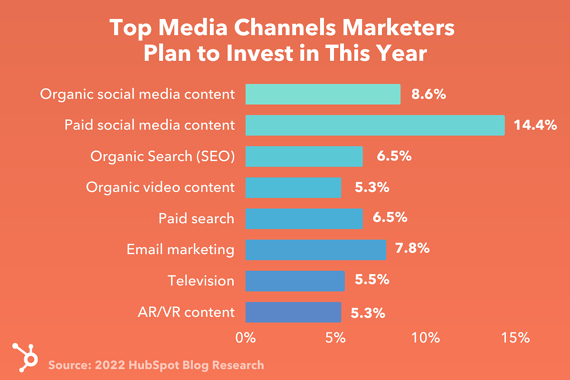
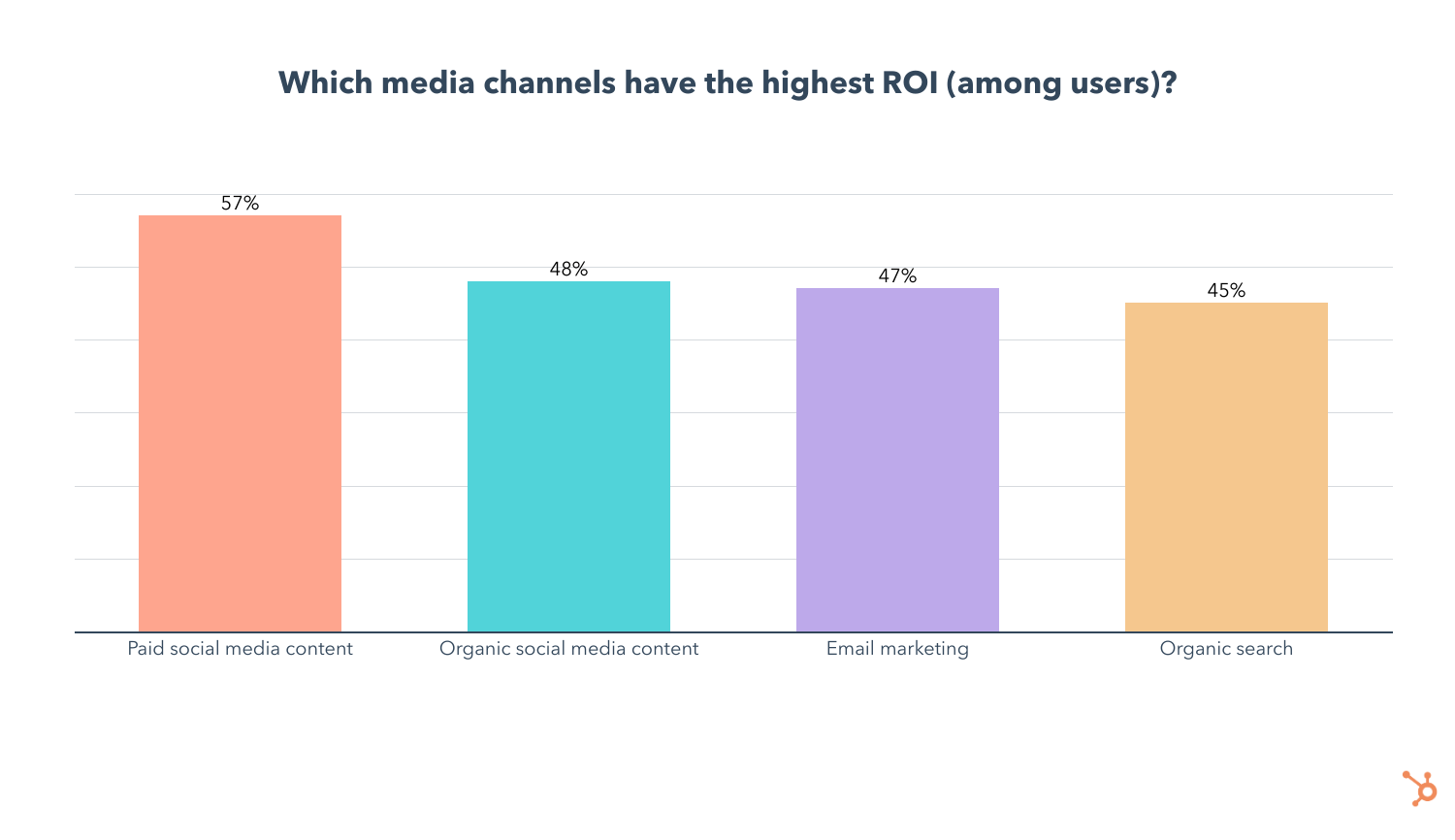
When asked “Which media channels do you plan to invest the most in this year? ” 14% said paid social media content, which marketers surveyed say, offers the highest ROI and the best engagement of any channel.

Top media channels marketers plan to invest in this year

The second biggest investment in terms of media channels is organic social content, which is used by 43% of media planners. In addition, 9% plan to invest in it more than any other channel in 2022.

Email marketing came out on top as the most leveraged media channel, used by one in two media planners, and offers the third-highest ROI. Its use is also forecasted to grow this year, with 22% of content planners planning to use it for the first time this year.

In the past two years, we’ve faced so much unpredictability, which has kept marketers on their toes, to say the least. This year, it seems content planners are cautiously optimistic and equipped with strategies that will help them grow their audience.

New Call-to-action

Categories B2B

The State of Content Marketing in 2022 [Stats & Trends to Watch]

Content marketing is the process of planning, creating, and sharing content with your target audience. It helps you generate brand awareness, convince customers to take action, and drive revenue.

There are various types of content marketing, like social media and blogs, but new trends and techniques emerge every year that change the ways businesses reach their audiences.

As a marketer, it’s essential to know what your competitors are focusing on, so you can create a strategy and stand out from the crowd. In this post, discover important stats to know about the state of content marketing in 2022 and trends to look out for throughout the year.

Download Now: HubSpot's Annual State of Marketing  [Free Data Report]

Content Marketing Stats to Know

  • 90% of marketers using content marketing plan to continue investing the same amount in the channel in 2022.
  • 66% of marketers expect their 2022 content marketing budget to increase more than their 2021 budget. 
  • Over 60% of marketers measure the success of their content marketing strategy through sales.
  • Marketers’ primary goals for running marketing campaigns are brand awareness, increasing sales, and increasing engagement.
  • The top three goals marketers achieve through successful content marketing are generating brand awareness, building credibility and trust, and educating audiences. 
  • The top challenges marketers face with content marketing are creating content that generates leads, finding ideas for new content, and creating content that receives high levels of online engagement.
  • Google’s search algorithms are trying to transcend text to images, voice/podcasts, and videos.
  • Video is the number one format marketers used in their content strategy in 2021. 
  • The top four formats marketers leverage in their content strategy are videos, blogs, images, and infographics.
  • The top technologies B2B organizations use to supplement content marketing are analytics tools, social media publishing, and email marketing software.
  • The top three owned mediacontent distribution channels for B2B marketers are a personal website, blog, and email newsletter..

Content Marketing Trends to Watch in 2022

1. Short-form video takes center stage.

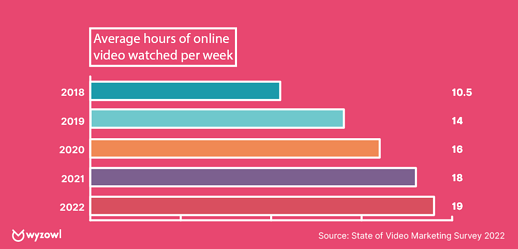
The amount of online video watched per person per week has almost doubled since 2018, according to Wistia. As of 2021, it’s at 18 hours per week

graph displaying that the average hours of video watched online per week is 18 hours

Image Source

This consumer behavior has made video, short-form specifically, the primary form of media used within any content strategy for the third year in a row. As such, 89% of marketers plan to continue investing the same amount in the channel or increase their investments in 2022.

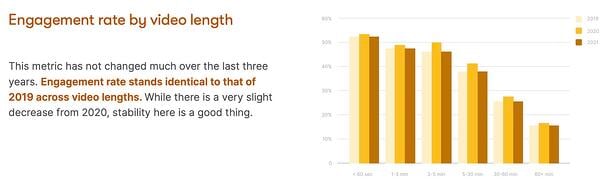
The videos you decide to create and the places you choose to share them depends entirely on your individual business needs, but your efforts will be worthwhile, as Wistia found that shorter videos have the highest engagement rates. 

Engagement rate by video length copyImage Source

2. Strategic SEO tactics.

In 2020, HubSpot VP of Marketing Matthew Howells-Barby said he wanted to see the number of marketers actively investing in SEO go up. His wish came true — 69% of marketers reported investing in SEO in 2021, a 5% increase from 2020. Marketers are continuing to make SEO investments in 2022 to create tailored experiences for website users. 

However, content marketers are moving away from SEO optimization in general, as 83% of marketers say that their main area of focus is the use of strategic keywords in their content. Businesses are looking for a way to simply appear in SERPs and create in-depth content that is unique, valuable, and different from what competitors offer on those same result pages. 

Marketers also report that their SEO content marketing efforts will involve optimizing for mobile (64%), and backlinking and link building (64%). 

3. Podcasting upholds its reign.

Podcasts continue to hold court in content marketing strategies in 2022. This is not surprising, considering that U.S. consumers alone listened to 15 billion hours of podcasts in 2021

As a result, 

  • 51% of content marketers who already leverage podcasts or other audio content will invest more in 2022, and 43% plan to continue investing the same amount.
  • 53% of content marketers who do leverage podcasts and other audio content say it’s the most effective format they use, despite low ROI.

So, why are podcasts so popular? On the consumer side, there is something for everyone. With 72,000 new episodes per day (as shown in the graph below), the likelihood of finding a show that appeals to their interests is incredibly high, whether it’s a mystery tale or a real-life story about how their favorite business was built.

Businesses are investing in podcasts because they bring significant benefits: “Podcasts have the ability to drive real results and pay off in terms of leads and revenue,” says Zachary Bellinger, CRO at Casted. 60% of podcast listeners searched for a product after hearing about it in a podcast. 

It’s also worth noting that 44% of content marketers are branching out into a new form of audio in their content marketing strategies in 2022 — audio chat rooms. 

While a newer concept, the investment in audio chat rooms makes sense, as they create a space for businesses to connect with audiences for genuine conversation and engagement. You can read this article about Clubhouse and this one about Twitter Spaces to learn more about the emerging channel and how other brands are using them in 2022. 

4. Championing social responsibility.

Social responsibility will become a critical priority for content marketers in 2022, as customers care now, more than ever, about brands sharing their same values and speaking authentically and empathetically about things like social justice issues or the fair treatment of their employees. 

Marketers are recognizing how much customers care, and 82% are investing the same or increasing their investment in social responsibility in 2022. 

It’s important to be aware, though, that if you leverage social responsibility in your content marketing efforts, your entire business must champion social responsibility as well, and be genuine about it. 

Take Glossier, for example. In June of 2020, the company regularly shared content on its Instagram page that centered people from different communities. However, in August of 2020, an Instagram account called Outta The Gloss posted an open letter to Glossier from former employees that made light of instances of unfair treatment while working at Glossier’s flagship store. 

glossier

Image Source

The former employees weren’t hoping to drag Glossier through the mud, but more so call attention to the fact that, if it champions social responsibility in its content, it must also uphold similar values in its business practices. 

It boils down to this: consumers want businesses to be socially responsible, but they want the social responsibility reflected in all areas of business, from the content you post on social media to the ways you support and uplift your employees.

5. Virtual and hybrid events.

A webinar is a video presentation, seminar, lecture, or workshop delivered to an audience digitally. Despite once being declared outdated, webinars and virtual events have become extremely popular over the last three years, and, as COVID-19 restrictions cease, they welcome hybrid models into the mix. 

Attending events digitally allows consumers to continue to interact with their favorite businesses and derive value from presents and industry leaders. Hybrid offers the same benefit, as consumers can pick what works best for their needs, and businesses can ensure that all of their audiences can participate in what they offer. 30% of Content Marketing Institute survey respondents say that their investment in hybrid events is expected to increase, and 40% of marketers plan to increase their investment in virtual events, webinars, and conferences in general in 2022. 

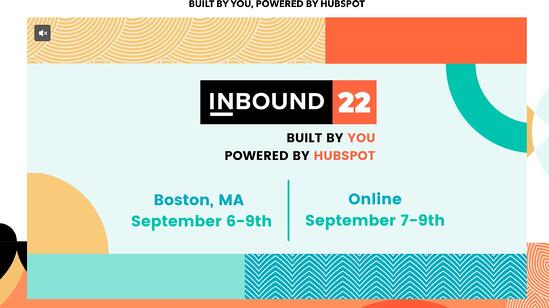
HubSpot’s annual INBOUND conference is a great example of a hybrid-modeled event, offering the option for attendees to attend in-person, or online. 

inbound 2022

Image Source

6. Infographics.

Infographics are graphics that explain a concept or provide a visual for a piece of data. Marketers typically use them to quickly communicate important, stand-out information, and 45% of marketers who leverage content marketing use it. The image below is an example of an infographic used within a blog post. 

infographic-1

Image Source

Here are some additional stats from recent HubSpot Blog Research:

  • 56% of content marketers who use it say that it is their most effective marketing content type
  • 52% of marketers plan to invest the same amount in infographics throughout the next year
  • 38% of marketers plan to increase their infographic investments within the next year. 

Its popularity is because infographics are shareable, are visually appealing, informative, and provide beneficial information to the reader. As they say, a picture is worth a thousand words, so it makes sense that infographics are significant for content marketing. 

Stay Up-to-date On Your Industry

It’s always important to stay up-to-date on what is happening in your industry, and being aware of these trends is a way to do so. Should you choose to leverage one of these trends in your marketing strategy, ensure that it’s relevant to your business needs and will help you achieve your goals.

state of marketing

Categories B2B

How Apple iOS 15 is Impacting Email Marketers [New Data]

Back in September 2021, the announcement of Apple’s iOS 15 data privacy changes triggered a mass hysteria among email marketers, with some even proclaiming that email marketing as we know it could come to an end. 

Considering that Apple Mail and Apple mobile devices make up over 35% of the global email provider market share, those fears didn’t seem too far-fetched.

But the question remains – were these fears well-founded or were they false alarms? 

Now that enough time has passed to see the impact of data privacy changes, I surveyed 300 email marketers to understand how iOS 15 and GDPR changes have affected their marketing strategies and the steps they took to adapt.

Get Started with HubSpot's Email Marketing Software for Free

The Impact of Data Privacy Changes

Change can be scary for all of us, but when that change includes reduced visibility into email analytics, it’s no surprise that email marketers were shaking in their boots when iOS15 was announced.

Surprisingly, my survey shows that the changes, while definitely impactful, were not all bad.

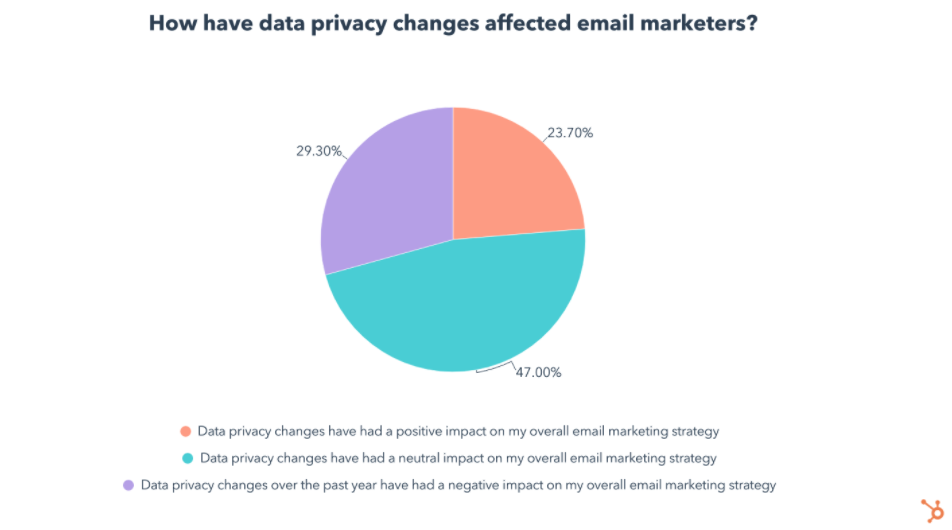
While two-thirds of email marketers surveyed report a moderate-to-significant impact on their email marketing strategy, whether the impact was positive, neutral, or negative, is not as clear-cut as you might assume.

Screen Shot 2022-03-28 at 12.38.03 PMFor starters, 47% of email marketers say the impact of data privacy changes was neutral on their email marketing strategy. Admittedly, 29% said the changes had a negative impact, but 24% said the contrary, claiming data privacy changes had a positive impact on their marketing strategy.
How is this possible?

To answer this, let’s break down our survey data on the specific ways data privacy changes affected email marketers, and the strategies they took to adapt. 

This will help us understand how some marketers made the most out of the situation and came out on top, while others weren’t able to keep up.

How Are Data Privacy Changes Affecting Email Marketing Strategies?

In the survey, I found that 65% of email marketers say they’ve been impacted by both Apple’s iOS 15 updates and GDPR. 

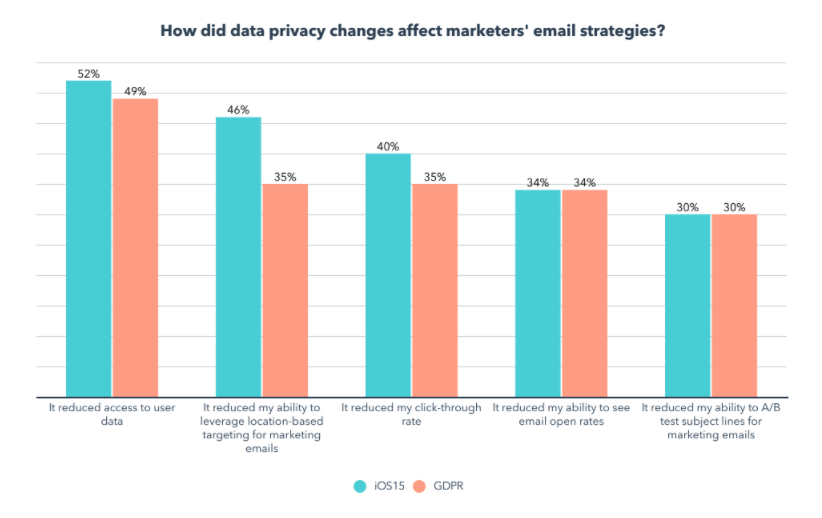
I also asked them to share how their email marketing strategy has been affected by each, and interestingly enough, the results were very similar.

Email marketers in both camps were most impacted by the same factors, in the same order:

Screen Shot 2022-03-28 at 12.39.37 PMSo what can we take away from this?

For one, these changes have a similar impact whether you are affected by Apple iOS15, GDPR, or both. 

More importantly, data privacy changes clearly have a meaningful impact on certain functions that have been core to email marketers’ jobs. 

With location-based targeting, click-through rates, open rates, and A/B testing taking a hit, many email marketers have no choice but to adapt. So let’s explore how exactly they did that.

4 Ways Email Marketers Are Adapting to Data Privacy Changes

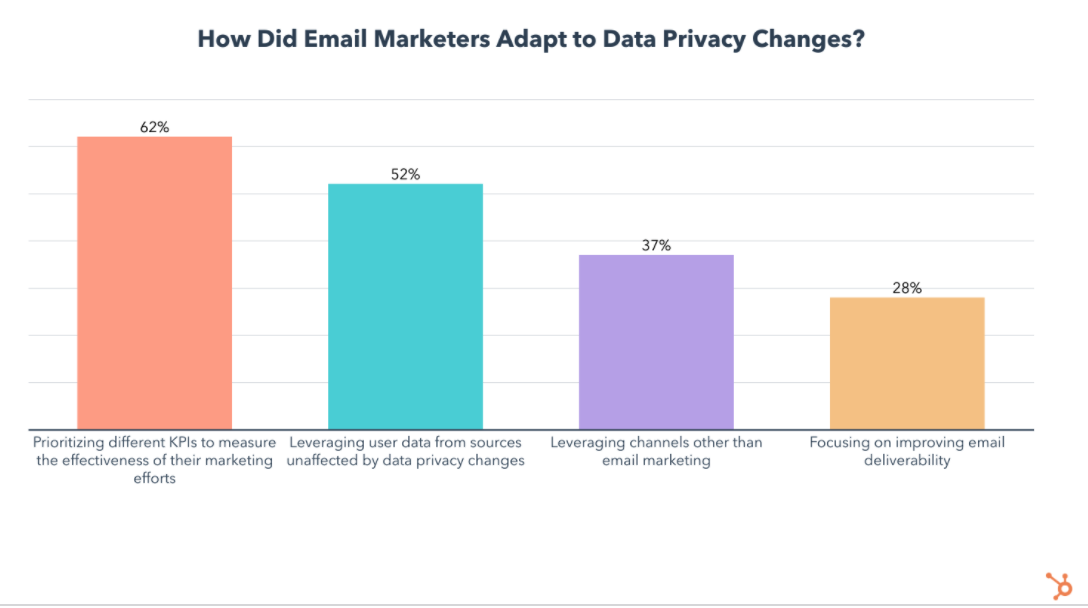
After the initial panic, email marketers began finding creative ways to reach their target audience and measure the impact of their marketing efforts. These are the most popular strategies they used:

Screen Shot 2022-03-28 at 12.40.44 PM

1. Prioritizing Different KPIs

At #1, 62% of impacted email marketers started prioritizing different KPIs to measure the effectiveness of their marketing efforts. 

To HubSpotters, this isn’t surprising. In fact, it’s one of the first strategies our own email team used when navigating the changes.

So let’s take a closer look at which KPIs became more and less important in a post-iOS15 and GDPR world.

The KPI hit the hardest by iOS 15 is email open rates. With the update, users can prevent email marketers from seeing when and if they opened a marketing email.

But don’t worry, this just means it’s time to turn to other KPIs like clicks, click-through rates, web traffic, click maps, unsubscribe rates, and audience surveys:

Clicks, Click Rate, and Clickthrough Rate

Ultimately, KPIs like clicks and click-through rates can tell you how engaging your content is. And, aside from those metrics, features like click maps, let you see exactly where people are clicking in your email, offering you a glimpse of what portions of your email are most (and least) engaging.

In a previous blog post, Jordan Pritikin, who leads HubSpot’s Email and Growth Marketing teams, similarly explained, “[Focusing on clicks, click rates, and conversions] is the right course of action. Looking at clicks and conversions is much more closely tied to how your database is engaging with your email programs,” 

Website Traffic and Leads

For email marketers, engagement isn’t their only goal. For example, while HubSpot’s acquisition team might send emails with goals of landing page conversion, our Blog team sends emails filled with blog posts to encourage traffic to our blog. 

That’s why website traffic and even conversions from your marketing emails can be tracked when sending through software like HubSpot. High email traffic indicates your email content is succeeding at getting recipients to visit your site. Meanwhile, high lead counts from emails indicate that you’ve successfully nurtured contacts to a landing page. 

Unsubscribe and Spam Rates 

Spiking unsubscribe rates can indicate that the content you are sending, or the frequency, has caused you to lose more of your audience than usual. On the other hand, a low unsubscribe rate means you are retaining your readers.

Similarly, getting one spam report here and there doesn’t necessarily mean everyone dislikes your content – but seeing a rise in spam rates could mean that subscribers suddenly see no value in your content, find it annoying, or aren’t getting what they signed up for. 

Open Rates (with a Grain of Salt)

As Pritikin wrote, “Open rates will not be going away. They will just be — different.” 

And, while you could say, “We will never look at open rates again,” you could still be doing yourself a disservice by ignoring them completely. At this point, you should continue to monitor your average open rate (and how it changes). This way, you can create a new Open Rate benchmark for your team that’s adjusted to meet new tracking standards. 

While an adjusted open rate benchmark won’t be 100% accurate, it will still tell you when you’ve successfully gotten a large chunk of subscribers to open an email, and when your subject line might need work. It can also be used as backup evidence if you’re using all of your KPIs to determine the success of a new strategy or email campaign. 

Surveys or Feedback Forms

Each time the HubSpot Blog tests a major email experiment or a new type of content in our emails, we try to include a feedback survey where readers can let us know what they thought. Meanwhile, The Hustle and other HubSpot emails offer a rating scale where you can rate your email experience and give feedback. 

While this doesn’t always lead to make-or-break data, surveying, polling, or seeking feedback from your audience can also be a great way to understand their interests and what they want to see more or less of in the future.

2. Gaining User Data From Other Sources

The second most popular strategy is leveraging user data from sources unaffected by data privacy changes, used by 52% of impacted email marketers.

An example of this would be analyzing email data coming from non-Apple users, which can still give you a clear idea of an email’s open rate, among other metrics.

3. Expanding on Messaging Channels

Coming in at #3, 37% of impacted email marketers started leveraging channels other than email marketing, like SMS.

Before you scoff at the idea, consider these facts. 3.8 billion people currently carry a cell phone with them everywhere they go and 48 million opted in to receive marketing messages over text in 2020. 

Still not convinced? Here’s the kicker – SMS has a 98% open rate, while our survey shows that only 3% of marketing emails have an open rate above 50%. Furthermore, 65% of marketing emails have an open rate that falls in the 16-35% range, significantly lower than the open rate of SMS correspondences.

If you’re ready to add SMS to your marketing strategy, you can find 30 SMS templates here

But there are plenty of channels marketers can lean on. In our recent media planning survey, we found that while email marketing is the most popular channel marketers leverage, it comes in #3 for ROI, and doesn’t see high engagement.

Paid social media content, however, has the highest ROI and engagement of any marketing channel, followed by organic social media content at #2 for both ROI and engagement. Organic search (SEO) also has comparable ROI and engagement levels when compared to email marketing.

which media channels have highest ROI

4. Improving Email Deliverability

Lastly, 28% of email marketers responded to privacy changes by focusing on improving email deliverability. 

That means leveraging strategies like maintaining a healthy email list, providing easy unsubscribe options, personalizing emails, using engaging subject lines and preview text, and making sure your emails and mailing list are GDPR compliant.

While this data on how email marketers adapted to privacy changes tells us which strategies are most popular, we also want to know which are most effective. 

The Email Strategy Pivots That Help Most

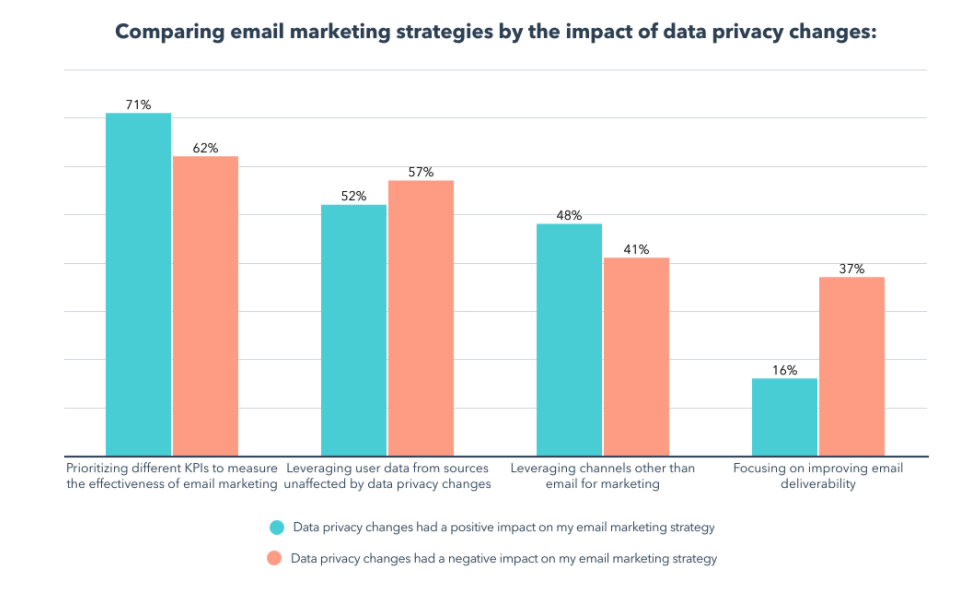
So let’s compare these strategies by splitting our data by those who say privacy changes had a positive impact on their email marketing strategy vs. those who report a negative impact:

Screen Shot 2022-03-28 at 12.41.42 PMLooking at the data above, we can see that those who say the data privacy changes had a positive impact on their email marketing strategy are:

  • 9% more likely to prioritize different KPIs to measure the effectiveness of email marketing
  • 7% more likely to leverage channels other than email for marketing
  • 21% less likely to focus on improving email deliverability
  • 5% less likely to leverage user data from sources unaffected by data privacy changes.

While the differences between these groups can give you an idea of where to get started, remember that these strategies can all be effective, and every situation is unique. 

For example, if a majority of your customers use Apple mail, it may not be as effective to study email data of the handful of your clients who use Gmail or Outlook. 

Navigating Email Privacy Impacts

All in all, email privacy protection is not even close to “the end of the world” for email marketers. That said, it does and will continue to require some creative pivoting. 

Like any major online marketing strategy, email marketers must learn how to adapt to a changing world that continues to prioritize consumer privacy. And, although privacy features will continue to evolve and pose new challenges for brands, companies that navigate them successfully will still be able to create experiences that feel personalized, memorable, and – importantly – secure for online audiences. 

Ultimately, that’s good for everyone.

Want to learn more about Apple iOS 15’s email privacy protection updates? Get the backstory here, learn how HubSpot’s email team has responded, or this Community thread if you’re a HubSpot user.

Looking to find a tool that offers transparent email data estimates and can help you optimize your messaging for the most engagement possible? Check out HubSpot’s own Email tools

email marketing free

Categories B2B

The Content Marketer’s Guide to Thought Leadership

Oprah. Dave Ramsey. Seth Godin.

Besides being highly successful in business, these people are considered thought-leaders – or experts — in their industry.

Download Now: Free Content Marketing Planning Templates

Similarly, as a marketer, being an expert in your field is crucial. To do that, you have to drive traffic to your site, nurture and convert leads, and build brand authority and reputation. That’s where thought leadership comes in.

Below, let’s review what thought leadership is and how to use it in your marketing strategy. We’ll also explore the best examples and types of content you can consider creating.

A person or company might use thought leadership as a content marketing strategy because providing value to your audience demonstrates your brand helpfulness. Then, down the road when someone is seeking a product or service like the ones you provide, they’ll turn to you first.

If you’re good at it, you’ll increase awareness among your target audience, generate more leads, improve social proof, and boost engagement online.

For instance, Brian Dean is a thought leader in the SEO space. By regularly posting content related to his expertise, he’s proven his value as a content marketer worth following. More on him later.

But first, how do you incorporate thought leadership into your marketing strategy? Here, we’ll analyze the top thought leadership marketing tips.

Thought Leadership Marketing

Now that we’ve covered what thought leadership is, let’s review some best practices before you get started.

1. Know your audience and continue learning about them.

Knowing your audience is the key to succeeding with any marketing strategy, and thought leadership is no different. It starts with your buyer persona. What motivates or inspires your audience? What are their pain points? What questions are they asking? 

To figure this out, look on social media or conduct customer interviews. Once you know these things, you can begin answering their questions with thought leadership content.

Additionally, it’s important to continuously check-in and reevaluate your buyer personas. Are your customer’s questions changing over time? Do their pain points look the same today as they did when you first began as a company? People evolve, and so will your audience.

2. Be active on social media.

Social media is an effective vehicle to build your brand and authority. First, social media keeps you active and engaged with your community. Second, you can use it to comment on industry news and ensure your brand voice is heard in conversations regarding relevant industry trends.

Plus, you can use social media to promote thought leadership content in an organic way without seeming too promotional.

3. Publish a variety of content — in a variety of places.

Creating thought leadership content doesn’t just mean posting on your blog. It also means being active on social media, guest posting on other sites, and speaking at events or on podcasts.

It’s important to mix it up with owned media versus other media sources. Consider having a combination of written, video, and audio content, like podcasts.

Ultimately, thought leadership content should show up wherever your audience is.

4. Analyze what your competitors are doing.

If your competitors are creating thought leadership content, analyze what they’re doing. How often are they posting? Where are they posting? Don’t be afraid to get inspiration from your competitors.

On the flip side, you can also look and see what your competitors are missing. Perhaps you can fill in gaps in the content they’re putting out.

5. Create valuable content.

In order to truly succeed at thought leadership, you need to create valuable content. Show that you’re an expert in the industry by speaking intelligently on specific issues in the industry. It’s important to dig deep and show off your expertise in one subject area at a time.

For instance, it can be tricky to prove yourself an expert in marketing as a whole (at least in the beginning), but you can have the director of SEO at your company create content for your blog or LinkedIn to demonstrate your brand’s specific expertise in SEO.

6. Be genuine.

We can’t say it enough, but being too promotional doesn’t connect with your audience. In fact, it’ll probably annoy them. You should produce content that is genuine and authentic to your brand.

Additionally, you want to make sure your content makes sense to everyone, offers perspective, and is supported with market-backed research that’ll help inform your audience’s opinions or decisions. Using examples, facts, and quotes will go a long way.

Once you’ve thought about adding thought leadership to your marketing strategy, it’s time to dive into the type of content you’ll want to create.

So, how do you come up with content ideas to talk or write about?

To start, you could do some keyword research to see what people are asking. This goes back to understanding your audience so you can create content that answers their questions.

You’ll also want to keep in mind industry news. Is there anything pressing going on? Are there any issues being discussed in your field? If so, address those and forecast the future of your industry.

Additionally, you can’t go wrong with articles using formats like tips, how-tos, or best practices. You’ll just want to ensure you’re producing long-form, educational content that your audience wants to read.

After you’ve considered the format and type of content you want to produce, it’s time to dive deep into the strategy.

Thought Leadership Strategy

Before you jump into thought leadership, you’ll want to have a strategy and a game plan for how you’re going to move forward.

Here’s a simple step-by-step process you can use as a starting point:

Step 1: Set a SMART goal. SMART goals are specific, measurable, attainable, relevant, and timely goals. Before you begin working on thought leadership, have a goal for what you want to get out of it, whether it’s increased traffic to your site or lead generation.

Step 2: Brainstorm content ideas. Think about your personas. Is your content focused and strategic to what they want to read or watch? What are they searching for and asking on social media? Answer these questions during your brainstorming session.

Step 3: Analyze competitors. To kickstart more brainstorming ideas, answer questions like, “Who is my audience currently going to for answers?” Again, you’ll want to fill in the gaps in their content and talk about what they aren’t.

Step 4: Create and distribute content. Once you’ve decided what content to create, make sure you have a point of view and personality. Your content should be easy to consume and easy to share.

Step 5: Measure results. Track your results in order to see if your thought leadership content has been effective. Use your SMART goals to determine what metrics you’re tracking.

1. Oprah Winfrey

Oprah Winfrey, former talk show host and media mogul, spoke at the USC Annenberg School for Communication and Journalism commencement ceremony in 2018.

She took some of her time to speak on the role of journalists today. She said, “You will become the new editorial gatekeepers, an ambitious army of truth-seekers who will arm yourselves with the intelligence, with the insight and with the facts necessary to strike down deceit. You’re in a position to keep all of those who now disparage real news — you all are the ones who are going to keep those people in check.”

Throughout the years, Oprah has earned her title as a media expert. Her advice and opinions on the industry are considered thought leadership because of her expertise, which she spent her career cultivating.

2. Dave Ramsey

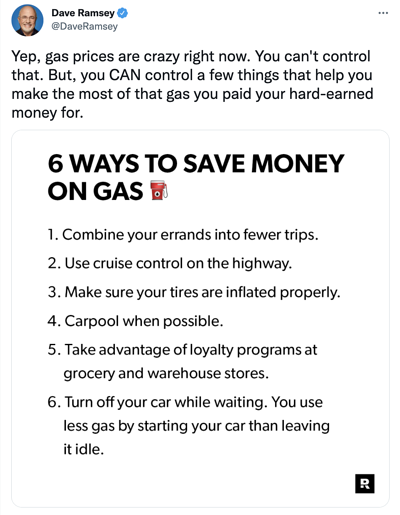
Dave Ramsey is a personal finance expert. He has a degree in Finance and Real Estate, and is known for counseling people on paying off their debts. Ramsey became a thought leader when he continued to produce content in the industry, including hosting a radio show, writing books, and podcasting.

One of the best examples of his thought leadership content is his podcast, the Ramsey Show. He posts episodes almost every day on topics such as personal finance, leadership, and career growth.”

You can also follow his Twitter where he shares bite-size financial tips and advice. 

Dave Ramsey TwitterImage Source

3. Seth Godin

Seth Godin is an entrepreneur turned business mogul. He’s written books addressing marketing, advertising, and leadership. He’s also in the Marketing Hall of Fame, launched by the American Marketing Association of New York. He became a thought leader because of the successful content he delivers, including speaking engagements, books, and his blog.

Let’s do a deep-dive on his blog. Here, he regularly writes about his areas of expertise, including marketing and business. For instance, in this blog post, he writes about the difference between reassurance and encouragement. He says, “Reassurance always runs out. Reassurance implies that the only reason to go forward is because it’s certain to work. Encouragement means that someone sees us, understands us and believes in us. Even (especially) when things don’t turn out as we hoped.

4. Marie Forleo

Marie Forleo is a life coach, speaker, author, and host of her own YouTube channel She is known for creating and selling online courses, especially in regards to entrepreneurship. She became a thought leader because of her expertise in business coaching.

One example of thought leadership content she’s produced is this video on her YouTube channel:

Here, she speaks on her expertise in content by discussing how to find fresh content ideas every week. She delivers three strategies her viewers can use to generate content ideas for their blog, podcast, or videos.

5. Brian Dean

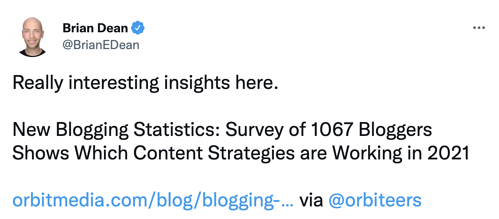
Brian Dean is an SEO expert. After he created a successful online business, he decided to create a blog – Backlinko — that chronicled the lessons he learned along the way. Essentially, he created a thought leadership site meant to boost his credibility.

He uses long-form content that is educational and valuable to his audience, such as “17 Untapped Ways to Find New Content Ideas.”

Additionally, he also uses social media to share articles and comment on SEO trends.

Brian Dean TwitterImage Source

6. Sallie L. Krawcheck

Sallie L. Krawcheck, CEO and co-founder of Ellevest, a digital advisor for women, is an expert in finance. Before she started her company, she was the president of Global Wealth and Investment Management at Bank of America.

Throughout her career she’s become a thought leader because she is widely published both on social media and traditional media such as television shows.

One example of thought leadership content she’s created is on LinkedIn. Here, Krawcheck proves her expertise in finance by publishing articles and organic posts about finance. This boosts her company’s value and brand awareness.

Thought leadership is a great strategy that every content marketer should be thinking about, particularly since it allows you to prove expertise in your industry while simultaneously expanding your reach and helping your readers and customers grow.

Blog - Content Mapping Template

Categories B2B

45 Quotes That Celebrate Teamwork, Hard Work, and Collaboration

Henry Ford’s quote, “If everyone is moving forward together, then success takes care of itself,” is one of my personal favorite quotes on teamwork. 

Because it’s true: Teamwork has the incredible power to increase productivity, job satisfaction, and even each person’s individual performance. 

To inspire your team to band together and celebrate collaboration, we’ve gathered some of our favorite quotes on the power of teamwork. Check out the full list of inspirational quotes below,  including some remarks about hard work to keep your collaborative juices flowing.

Download Now: 250+ Famous Quotes [Free Kit]

Teamwork Quotes to Inspire Collaboration

1. “Alone we can do so little; together we can do so much.” – Helen Keller (Click to Tweet!)

2. “If everyone is moving forward together, then success takes care of itself.” – Henry Ford (Click to Tweet!)

3. “Many ideas grow better when transplanted into another mind than the one where they sprang up.” – Oliver Wendell Holmes (Click to Tweet!)

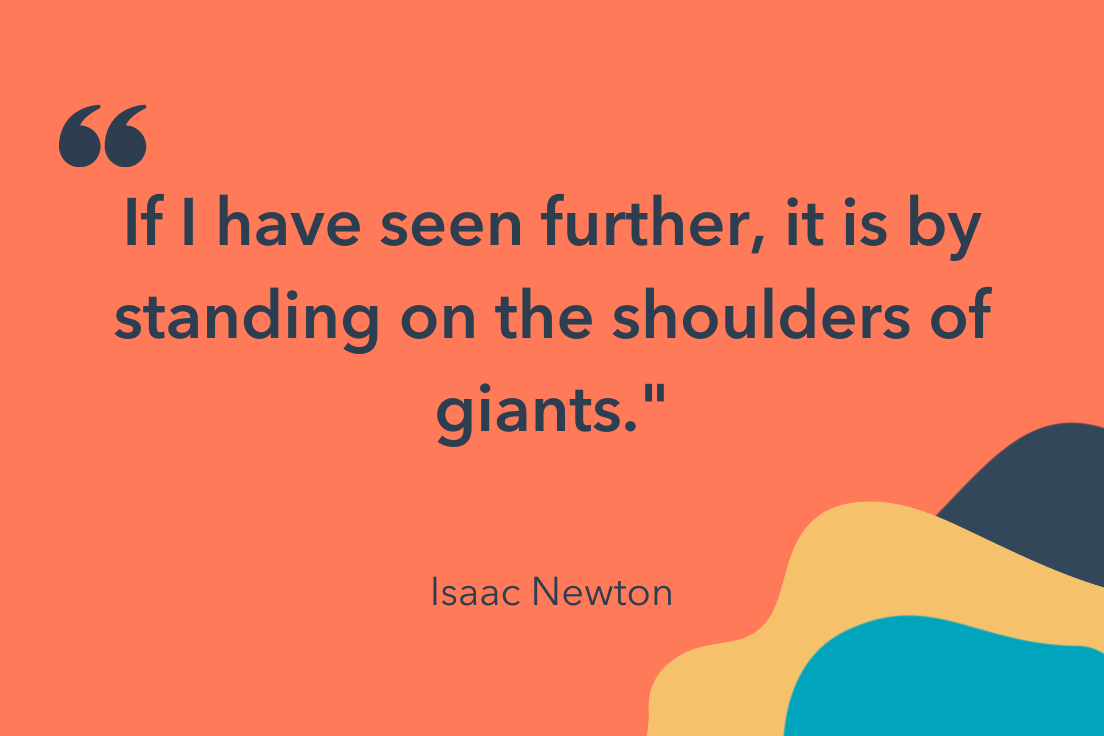
4. “If I have seen further, it is by standing on the shoulders of giants.” – Isaac Newton (Click to Tweet!)

5. “No one can whistle a symphony. It takes a whole orchestra to play it.” – H.E. Luccock (Click to Tweet!)

6. “Teamwork is the ability to work together toward a common vision. The ability to direct individual accomplishments toward organizational objectives. It is the fuel that allows common people to attain uncommon results.” – Andrew Carnegie (Click to Tweet!)

teamwork quote by isaac newton7. “It is the long history of humankind (and animal kind, too) that those who learned to collaborate and improvise most effectively have prevailed.” – Charles Darwin (Click to Tweet!)
8. “Coming together is a beginning, staying together is progress, and working together is success.” – Henry Ford (Click to Tweet!)

9. “Talent wins games, but teamwork and intelligence win championships.” – Michael Jordan (Click to Tweet!)

10. “The strength of the team is each individual member. The strength of each member is the team.” – Phil Jackson (Click to Tweet!)


11. “The best teamwork comes from men who are working independently toward one goal in unison.” – James Cash Penney (Click to Tweet!)

12. “Politeness is the poison of collaboration.” – Edwin Land (Click to Tweet!)

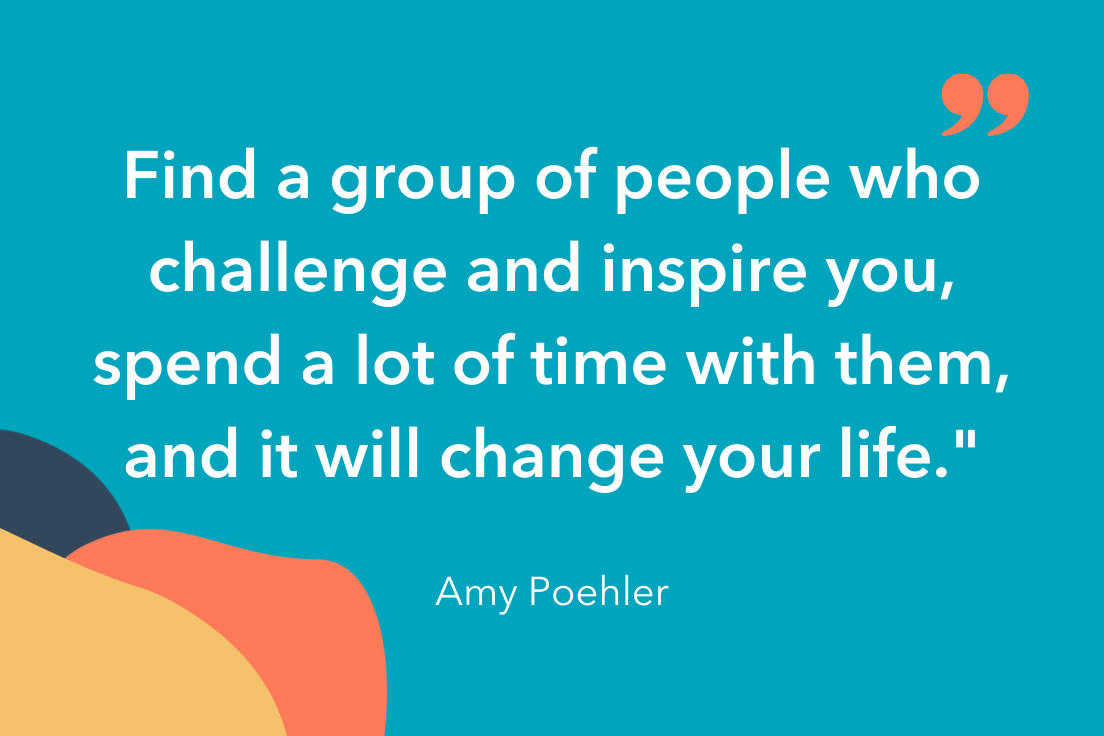
13. “Find a group of people who challenge and inspire you, spend a lot of time with them, and it will change your life.” – Amy Poehler (Click to Tweet!)

14. “Effectively, change is almost impossible without industry-wide collaboration, cooperation, and consensus.” – Simon Mainwaring (Click to Tweet!)

Want more? Read about Fun Corporate Team-Building Activities & Outing Ideas Everyone Will Enjoy.

teamwork quote by amy poehler15. “Teamwork begins by building trust. And the only way to do that is to overcome our need for invulnerability.” – Patrick Lencioni (Click to Tweet!)
16. “You need to be aware of what others are doing, applaud their efforts, acknowledge their successes, and encourage them in their pursuits. When we all help one another, everybody wins.” – Jim Stovall (Click to Tweet!)

17. “The way a team plays as a whole determines its success. You may have the greatest bunch of individual stars in the world, but if they don’t play together, the club won’t be worth a dime.” – Babe Ruth (Click to Tweet!)

18. “There is no such thing as a self-made man. You will reach your goals only with the help of others.” – George Shinn (Click to Tweet!)

19. “It is literally true that you can succeed best and quickest by helping others to succeed.” –Napolean Hill (Click to Tweet!)

20. “The whole is other than the sum of the parts.” – Kurt Koffka (Click to Tweet!)

21. “A group becomes a team when each member is sure enough of himself and his contribution to praise the skills of others.” – Norman Shidle (Click to Tweet!)

teamwork quote by howard schultz22. “The ratio of We’s to I’s is the best indicator of the development of a team.” – Lewis B. Ergen (Click to Tweet!)
23. “Individual commitment to a group effort — that is what makes a team work, a company work, a society work, a civilization work.” – Vince Lombardi (Click to Tweet!)

24. “One piece of log creates a small fire, adequate to warm you up, add just a few more pieces to blast an immense bonfire, large enough to warm up your entire circle of friends; needless to say that individuality counts but teamwork dynamites.” – Jin Kwon (Click to Tweet!)

25. “No matter how brilliant your mind or strategy, if you’re playing a solo game, you’ll always lose out to a team.” – Reid Hoffman (Click to Tweet!)


26. “Keep away from people who try to belittle your ambitions. Small people always do that, but the really great make you feel that you, too, can become great.” – Mark Twain (Click to Tweet!)

27. “If you want to lift yourself up, lift up someone else.” – Booker T. Washington (Click to Tweet!)

28. “Great things in business are never done by one person; they’re done by a team of people.” – Steve Jobs (Click to Tweet!)

29. “Individually, we are one drop. Together, we are an ocean.” – Ryunosuke Satoro (Click to Tweet!)

teamwork quote by iyanla vanzant30. “Cooperation is the thorough conviction that nobody can get there unless everybody gets there.” – Virginia Burden (Click to Tweet!)
31. “None of us, including me, ever do great things. But we can all do small things, with great love, and together we can do something wonderful.” – Mother Teresa (Click to Tweet!)

32. “It is amazing what you can accomplish if you do not care who gets the credit.” – Harry Truman (Click to Tweet!)

33. “It takes two flints to make a fire.” – Louisa May Alcott (Click to Tweet!)

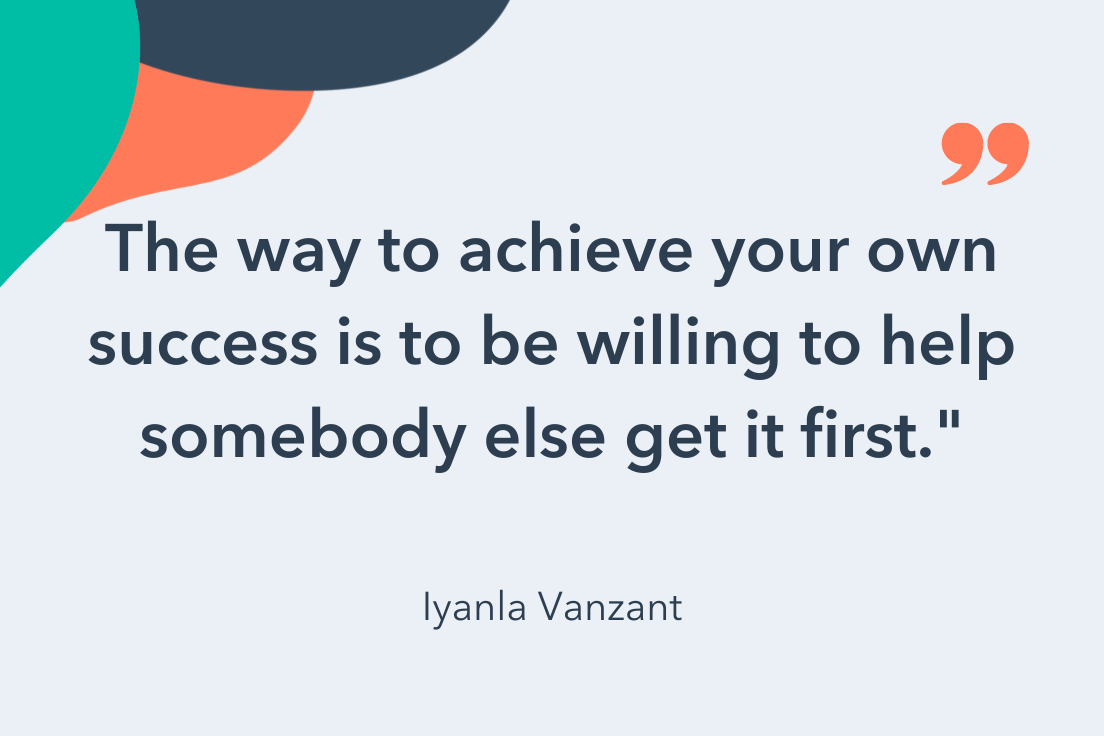
34. “The way to achieve your own success is to be willing to help somebody else get it first.” – Iyanla Vanzant (Click to Tweet!)

35. “If you want to go fast, go alone. If you want to go far, go together.” – African Proverb (Click to Tweet!)

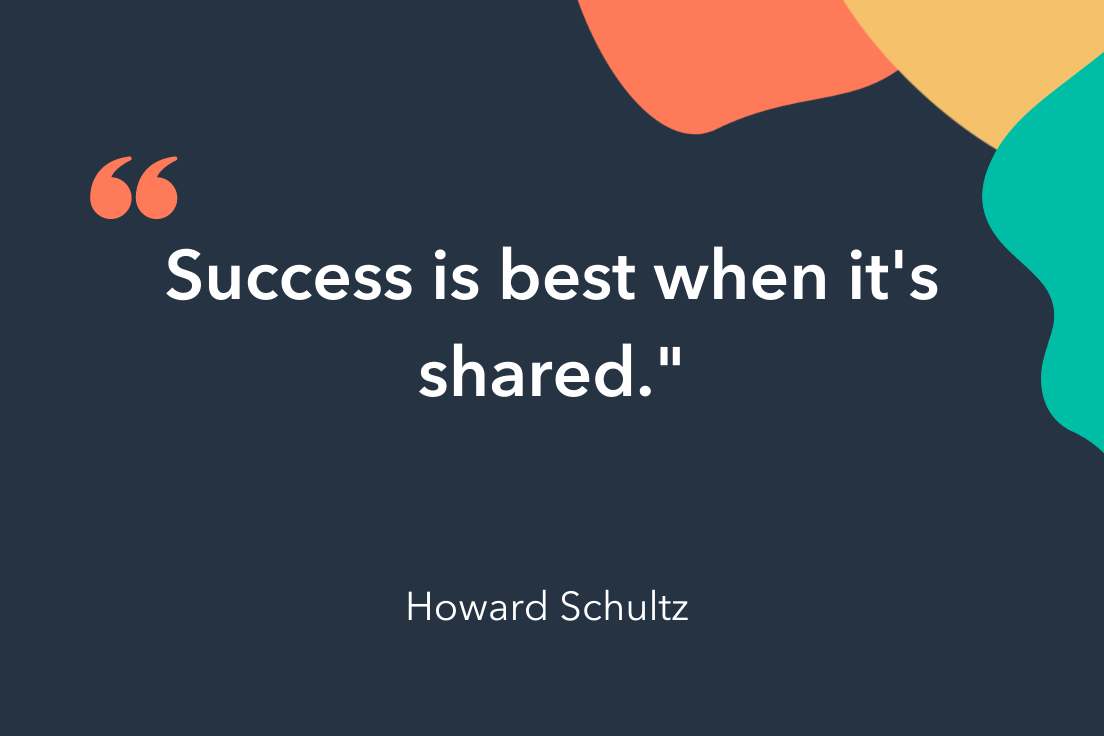
36. “Success is best when it’s shared.” – Howard Schultz (Click to Tweet!)

Need help collaborating effectively? Take a look at 21 Marketing Collaboration Tools to Improve Productivity and Teamwork.

Hard Work Quotes to Inspire Determination

37. “Hard work beats talent if talent doesn’t work hard.” – Tim Notke (Click to Tweet!)

38. “We think, mistakenly, that success is the result of the amount of time we put in at work, instead of the quality of time we put in.” – Ariana Huffington (Click to Tweet!)

39. “When the ideas are coming, I don’t stop until the ideas stop because that train doesn’t come along all the time.” – Dr. Dre (Click to Tweet!)

teamwork quote by mahatma gandhi40. “Someone once told me growth and comfort do not coexist. And I think it’s a really good thing to remember.” – Ginni Rometty (Click to Tweet!)
41.Hard work keeps the wrinkles out of the mind and spirit.” – Helena Rubinstein (Click to Tweet!)

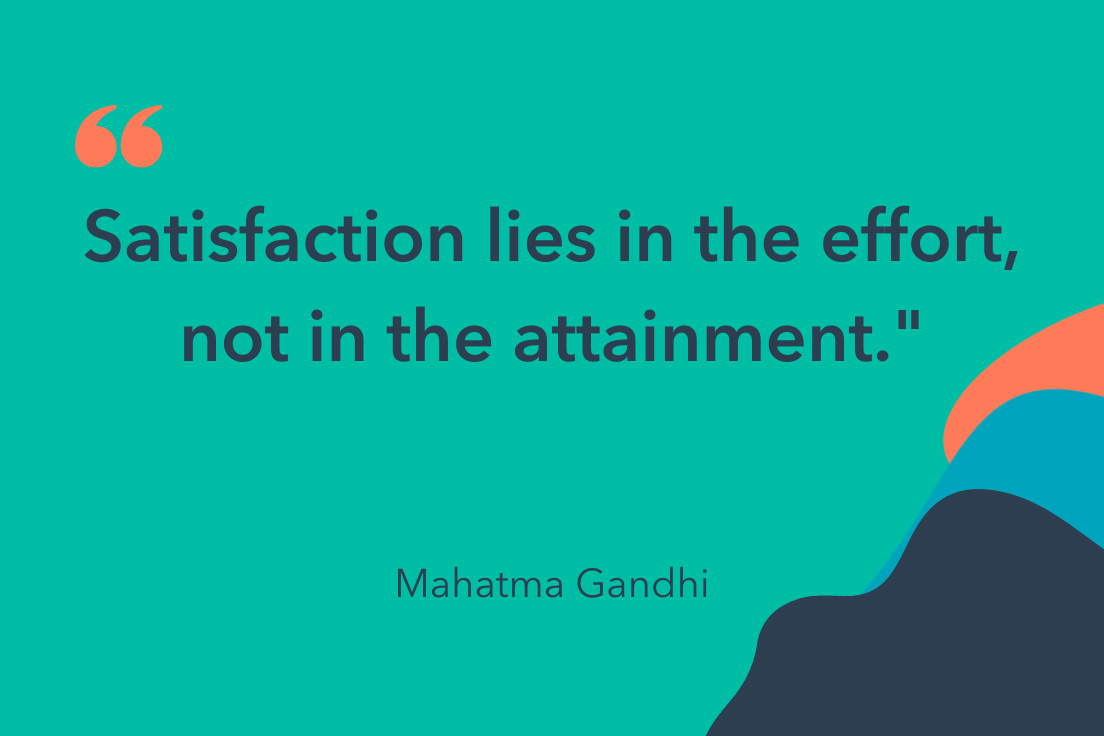
42. “Satisfaction lies in the effort, not in the attainment.” – Mahatma Gandhi (Click to Tweet!)

43. “I’m a greater believer in luck, and I find the harder I work, the more I have of it.” – Thomas Jefferson (Click to Tweet!)

44. “Diamonds are nothing more than chunks of coal that stuck to their jobs.” – Malcolm Forbes (Click to Tweet!)

45.The dictionary is the only place that success comes before work.” – Vince Lombardi Jr. (Click to Tweet!)

I hope these quotes have inspired you to work better with your teams. Remember — teamwork isn’t just about the people, it’s about the tools and processes that will help you minimize redundancies and maximize output. For tools that help you work better, not harder, learn about how HubSpot can help you

quote

Categories B2B

How To Add a Sparkline in Excel

Excel is a great tool for all of your marketing needs. You can create graphs to visualize your data, use formulas to calculate conversion rates, or even create social media calendars.

You can also monitor trends in your marketing campaign data and, in this post, we’ll explain how to do so with the sparklines tool.

Already know what you need? Jump there with our Table of Contents.

Download 10 Excel Templates for Marketers [Free Kit]

What are sparklines in Excel?

Sparklines are charts in individual cells that provide visual representations of trends in your sheet data. For example, if you track month-over-month progress, a sparkline can show you how each month compares to the other.

There are three different ‌sparklines you can add to your Excel spreadsheets: line, column, and win-loss. The image below is an example of a line.

excel chart with sparkline

For this walkthrough, we’ll use a sample data table (shown below) that tracks views, conversions, and leads generated from a marketing campaign‌.

excel sparkline sample data set

Let’s go over how to add your own.

How to Add a Sparkline in Excel

1. Select the cells you want represented in your sparkline chart. In this example, I’ve selected all the cells between B2 and I2.

step 1

2. In the header toolbar, select Insert, then Sparklines.

step 2-Mar-11-2022-07-58-56-52-PM

3. You should then see a dropdown menu where you can select the type of sparkline chart you want: line, column, or win-loss. I selected a line for this example.

image 3-Mar-11-2022-07-59-20-85-PM

4. After you select your preferred chart, you’ll see a dialogue box appear (as shown below). In the Select where you want to place the sparkline box text field, enter the cell that you want the sparkline chart in.

image 4

It’s best practice to have the sparkline immediately next to the string of cells you’re creating the chart for so you can get a full visualization and quickly refer back to your data.

For this example, I selected cell J2.

5. Your sparkline chart should appear in the cell you selected. The image below is the sparkline for my sample data set, and it shows the trend in views over time for my marketing campaign.

image 5-Mar-11-2022-08-00-13-53-PMBelow we’ll go over the steps to creating a different type of sparkline.

Create a Column Sparkline in Excel

If you want to use a column sparkline in Excel, repeat steps one and two from above. When the sparkline selection box opens, select column instead of line. The image below is a column sparkline.

excel column sparklineFollow the same process if you want a win-loss sparkline. The image below is an example of what this chart looks like.

win-loss sparkline chart excel

How to Ungroup Sparklines in Excel

You’d want to ungroup sparklines in Excel if you want each of your rows to have a different sparkline. For example, if you want rows two and four to have a line chart, but row three to have a column. Let’s go over the steps.

1. Right-click on the sparkline you want ungrouped. For this example, I right-clicked on column J3.

2. In the popup menu, select Sparklines, then Ungroup.

3. Click on the sparkline you want to change, navigate to the Sparkline header toolbar, and make your chart selection.

The image below is an example of what it looks like when you ungroup sparklines and use different charts.

ungroup sparkline in excel

Format a Sparkline Chart in Excel

A benefit to using Excel is that you can always format your spreadsheets to your liking, and this goes for Sparklines too. Let’s go over some formatting changes you can make.

How to Mark Data Points in Sparkline Charts

1. Select the sparkline you want to edit and navigate to the Sparkline header toolbar and select your preferred data marker, as shown in the image below.

mark data point in excel sparkline chart

If I select High Point, my corresponding sparkline chart will have a marker displaying the month with the highest view count.

image 8.2

How to Color Code Excel Sparkline

Select the sparkline you want to edit and navigate to the right-hand side of the Sparkline header toolbar, as shown in the image below.

color code excel sparklineYou have the option to change the color of your sparkline, the color of your markers, and the weight of your sparkline.

Over To You

Now that you know how to create a sparkline chart, you can expertly monitor trends in your marketing campaigns that will help you quickly view the success of your processes.

excel marketing templates

Categories B2B

50 Call-to-Action Examples You Can’t Help But Click

Think about all the times you’ve signed up for things in your life. Did you once download Evernote? Dropbox? Spotify? Maybe you’ve even taken a class on General Assembly.

Each one of these signups is likely a result of an effective call-to-action (CTA).

Think about it: If you hadn’t been drawn in by the copy or design of the CTA, or been guided so eloquently through your sign-up process, you would probably use a lot fewer apps and websites than you do now.

It’s really important to guide your visitors through the buying journey using strategic CTAs.

Download Now: 28 Free CTA Templates

What is a CTA in Marketing?

As a marketer, CTAs are relevant because they encourage your audience to take action on a marketing campaign.

Ultimately, the goal of any marketing campaign is to guide your audience in the buyer’s journey so they eventually make a purchase.

However, each marketing campaign might have a different action for the audience to carry out because there are several tactics you can use to guide your audience in their journey.

Below are a few examples of the types of CTA button copy you might use in marketing:

Chart displaying types of common CTAsThe above types of CTAs all serve a designated purpose, but keep in mind the language they use can vary. And today, marketers everywhere have put some creative spins on their calls to action to generate the leads their businesses depend on.

To help you identify what’s effective and what’s not, we’ve listed out examples of CTAs that totally rock. These call-to-action examples are broken out into three categories:

  • Simple and effective CTAs
  • CTAs with great call-to-action phrases
  • CTAs that balance multiple buttons on one page

Best Call to Action Examples of 2022

1. HubSpot

best call to action examples 2022: HubSpot Image Source

One of the perks of using HubSpot is the wealth of free resources they offer. This slide-in CTA found in an article discussing marketing intelligence, demonstrates how a well-placed CTA can improve user experience.

It’s unobtrusive and comes in midway through the article, not only prompting readers to “download now” but offering a useful and free resource. The marketing kit offers an out-of-the-box solution for those who may not know where to start.

Why this CTA Works

This slide-in CTA offers a free resource that is directly related to the topic of the article it appears on. Readers can finish the article and then download the guide with templates to get started making a marketing kit of their own. (Click here to learn how to add slide-in CTAs to your blog posts.)

2. The Budgetnista

best call to action examples 2022: Budgetnista Image Source

Run by personal financial educator and author Tiffany Aliche, The Budgetnista is a one stop shop for personal finance. In addition to providing content that delights her audience, she’s also a pro at creating inviting CTAs.

Instead of simply putting a sign up CTA to promote her newsletter, she uses language that entices the reader to click. “Sign Up For Weekly Goodies” sounds a whole lot more interesting than “sign up for my newsletter.” Who doesn’t want weekly goodies?

Why this CTA Works

The friendly and creative use of language encourages visitors to take the desired action. It also mirrors Aliche’s personality, which is a nice touch and helps personalize the interaction.

3. Glossier

best call to action examples 2022: GlossierImage Source

Beauty brand Glossier has its marketing image down, showcasing realistic images of women with a variety of skin types. Who can forget their boy brow campaign? Their website is clean with lots of white space that make the photos of the models and makeup pop.

Their CTA is an overlay that appears when you start scrolling down their site. While many would quickly click out of the pop up, the language Glossier chooses makes you want to stick around. “Let’s take this to your inbox” is a clever way to ask folks to sign up for your newsletter. If you’re down to join simply click “i’m in” and you’re done.

Why this CTA Works

Like The Budgetnista, Glossier uses clever phrasing that makes the brand more relatable and entices people to take action. The image of a model with great Glossier makeup and the illustrations included also aid in making this CTA appealing.

4. 310 Creative

best call to action examples 2022: 310 creativeImage Source

Growth agency and HubSpot partner 310 Creative aims to help B2B companies scale and refine the buyer’s journey to increase sales. Knowing that visitors to the site may not quite know what specific services they need, 310 Creative makes use of a CTA that removes confusion.

The slide-in CTA solicits visitors to book a free assessment to get some clarity on where their business may be falling short and discover why these outcomes are happening.

Why this CTA Works

Not only does it remove barriers by explicitly stating the service is free, this CTA also demonstrates empathy for the visitor. By describing an issue followed by “If this sounds familiar, let’s talk” it demonstrates that 310 Creative is here to help and understands the user’s frustration.

5. Heyday

best call to action examples 2022: HeyDay Image Source

Heyday is a bit of a rebel in the facial industry. Its minimalist, no-frills approach has made it a favorite among those who just want to see an aesthetician without the fuss and upselling.

That minimalist, but friendly approach shows up in their CTA too. Making great use of some models with glowing skin, this CTA entices viewers to sign up for their newsletter with a discount. The “sign up and save” button is persuasive, along with the humorous “No thanks, I prefer full-price skincare” hyperlink to opt out.

Why this CTA Works

Heyday employed beautiful aesthetics, a discount, and humor to encourage visitors to take the desired action.

6. VRBO

best call to action examples 2022: VRBOImage Source

If you love browsing beautiful vacation homes in your spare time, VRBO is a great place to do it. The brand makes great use of aspirational aesthetics and gorgeous locales.

The dark blue CTA pops against VRBO’s white background, drawing the reader in. Then the “discover your escape” button adds a touch of adventure for those who may be interested in renting a vacation home.

Why this CTA Works

VRBO makes great use of color and phrasing. It’s not a vacation, but rather an adventure where they can serve as your trusted guide.

7. Hulu

best call to action examples 2022: Hulu Image Source

Streaming giant Hulu went for a dramatic approach with this CTA. The dimmed background shows off all its television and movie offerings, while the green and white text of the CTA draws your attention to the promotion.

It’s a sign-up and upsell in one, informing users that they can get a discount add-on with Disney+ and ESPN+.

Why this CTA Works

This CTA entices visitors with the impression they’re getting a deal with the bundle. Instead of just having a sign up button, it’s “get the disney bundle.” It puts the emphasis on providing value to get visitors to take action.

8. Hija De Tu Madre

best call to action examples 2022: Hija de tu Madre

Image Source

Apparel company Hija De Tu Madre, keeps it fresh with a clean, pink and white color scheme that exudes youthfulness and freshness. Most of what makes their CTAs so appealing is the clever play on words, mixing both spanish and english, an ode to their target audience.

best call to action examples 2022: Hija de tu Madre Image Source

Because they’re so dialed into their audience, Hija De Tu Madre can extract more information from their visiors. Instead of just having a CTA that requests an email (first image), they’ve introduced a mobile phone request in a second CTA. How do they persuade folks to hand over their digits? By offering them a chance to win merch — specifically their popular denim jackets.

Why this CTA Works

Offering something visitors consider valuable in return for their personal information — in this instance a coveted denim jacket, will make people more likely to share more information. The key is to know your audience and tap into their interests.

9. Wool and the Gang

best call to action examples 2022: Wool and the Gang Image Source

This CTA from Wool and the Gang will make you feel all fuzzy on the inside. The collage background of customers donning their Wool and the Gang garments plus a cute pup really draws the reader in and fits with the brand’s audience.

The CTA button states “share your knits #woolandthegang” which encourages customers to share what they’ve made using Wool and the Gang products, working as both brand promotion and customer engagement.

Why this CTA Works

This CTA not only grabs the visitor’s attention, it creates a sense of community and entices visitors to join. This particular CTA also doubles as brand promotion as more customers share their kits across social media.

10. Tweak It Studio

best call to action examples 2022: Tweak It StudioImage Source

Home decor and design company Tweak It Studio showcases the importance of having fun, but clear CTAs.

They get the visitor’s attention with “Just Dropped” in big bold letters to inform readers on new products on offer, then combine it with a CTA button that states exactly what the item is — in this case “personalized wood names.” It’s much more effective than just having a button that simply states “buy now.”

Why this CTA Works

This CTA uses urgency with “just dropped” to get visitors to check out new items in the store and also communicates clearly in the button where the visitor is headed next after clicking.

Want more CTA design inspiration? Check out some of our favorite call-to-action examples below.

1. HubSpot CTAs [Free Templates]

HubSpot call to action templates

Looking for inspiration to help build better CTAs? Use our professionally designed CTA templates to generate more clicks, submissions, and leads from your content.

2. Evernote

CTA: Sign Up

CTA example: Evernote

Image Source

“Remember Everything.” Visitors can immediately understand that message the moment they land on this page. The design on Evernote’s website makes it super simple for users to see quick benefits of using the app and how to actually sign up to use it. Plus, the green color of the main and secondary CTA buttons is the same green as the headline and the Evernote logo, all of which jump off the page.

How to Replicate this CTA

Consider using a bright color that contrasts well with the elements on your web page to make your CTA stand out.

3. Dropbox

CTA: Sign up for free

CTA example: Dropbox

Image Source

Dropbox has always embraced simple design with a lot of negative space. Even the graphics on their homepage are subtle and simple.

Thanks to that simple design and negative space, the blue “Sign up for free” call-to-action button stands out from everything else on the page. Since the CTA and the Dropbox logo are the same color, it’s easy for the visitor to interpret this CTA as “Sign up for Dropbox.” That’s one effective call-to-action.

How to Replicate this CTA

Negative space can work in your favor if used correctly. Use it to your advantage by allowing your CTA to stand out using your bold, brand colors

4. OfficeVibe

CTA: Subscribe

CTA example: OfficeVibe

Image Source

Here’s a slide-in call-to-action that caught my attention from OfficeVibe. While scrolling through a post on their blog, a banner slid in from the bottom of the page with a call-to-action to subscribe to their blog. The best part? The copy on the slide-in told me I’d be getting tips about how to become a better manager — and the post it appeared on was a post about how to become a better manager. In other words, the offer was something I was already interested in.

Plus, I like how unobtrusive slide-in CTAs are — as opposed to what my colleague Rachel Sprung calls the “stop-everything-and-click-here-pop-up-CTA.” I find these CTAs offer a more lovable experience because they provide more information while still allowing me to continue reading the blog post.

How to Replicate this CTA

You can create your own slide-in CTA using HubSpot’s marketing tools. After designing your CTA using our templates, and create a HubSpot account. Go to Marketing > Lead Capture > CTAs in your HubSpot account and follow the CTA instructions here.

5. Netflix

CTA: Join Free for a Month

CTA example: Netflix

Image Source

One big fear users have before committing to sign up for something? That it’ll be a pain to cancel their subscription if they end up not liking it. Netflix nips that fear in the bud with the “Cancel anytime” copy right above the “Join Free for a Month” CTA. I’d venture a guess that reassurance alone has boosted signups. Also, you’ll notice again that the red color of the primary and secondary CTAs here match Netflix’s logo color.

How to Replicate this CTA

Not only can you get a visitor’s attention with a stark contrast in color, but you can use language in your CTA that entices them to click. Consider using “Try for Free,” or something similar in your CTA that removes the risk for potential customers.

6. Square

CTA: Get Started

CTA Example: Square

Image Source

To achieve effective CTA design, you need to consider more than just the button itself. It’s also super important to consider elements like background color, surrounding images, and surrounding text.

Mindful of these additional design components, the folks at Square used a single image to showcase the simplicity of using their product, where the hovering “Get Started” CTA awaits your click. If you look closely, the color of the credit card in the image and the color of the CTA button match, which helps the viewer connect the dots of what to expect if/when they click.

How to Replicate this CTA

You can use color to help visitors connect the dots whether it’s coordinating similar tones like in this image, or by using brand colors like the Dropbox example.

7. Prezi

CTA: Give Prezi a try

CTA example: Prezi

Image Source

The folks at Prezi are also into the minimalist design look on their website. Other than the green dinosaur and the dark brown coffee, the only other color accompanying the predominantly black-and-white design is a bright blue — the same blue from their main logo. That bright blue is strategically placed on the homepage: the main “Give Prezi a try” CTA, and the secondary “Get Started” CTA, both of which take users to the same pricing page.

How to Replicate this CTA

This page took a minimalist color scheme, but incorporated two CTAs with the same color button that direct visitors to the same landing page. If your page has a clean, minimalist design consider trying two CTAs with different text to draw visitors in.

8. Full Bundle

CTA: Our Work

CTA Example: Full Bundle

Image Source

Full Bundle is another company that uses negative space to make their primary CTA pop. The white “Our Work” call-to-action stands out against the dark greys of the background. Their choice of CTA is strategic, too. Given that they primarily exist to build out clients’ online presences, it’s important for them to showcase their work — and that’s what most folks are going to their website for.

How to Replicate this CTA

Make creative use of negative space like Full Bundle’s gray tones. As you can see, the different shades of gray make triangles, adding a subtle design element that makes their white CTA pop out at the bottom.

9. Panthera

CTA: Join

CTA example: Panthera

Image Source

The folks at Panthera are looking for users who really care about wild cats around the world and want to join a group of people who feel the same way. To target those people in particular, we love how they use language that would speak to big cat-lovers: “Join the pride today.” The page itself is super simple: an on-page form with two, simple fields, and a button asking folks to (again) “Join.”

How to Replicate this CTA

Establish a connection with your target audience by using vernacular related to your brand that would appeal to them in your CTA.

10. EPIC

CTA: Let’s start a new project together

CTA example: EPIC

Image Source

The folks at the agency EPIC use their homepage primarily to showcase their work. When you arrive on the page, you’re greeted with animated videos showing some of the work they’ve done for clients, which rotate on a carousel. While there are plenty of other places users might click on their site — including their clients’ websites — the main call-to-action stands out and always contrasts with the video that’s playing in the background.

I love that it features friendly, inclusive language —”Let’s start a new project together” — which gives a hint to users looking for a creative partner that they’re an especially great team to work for.

How to Replicate this CTA

Use inviting language. It’s easy to make a button that just says “join us,” but that’s not very convincing. Consider something friendlier like “let’s work together” or something specific to the service you offer.

11. Aquaspresso

CTA: Send Me Specials Now!

CTA Example:  Aquaspresso

Image Source

The whole point of a call-to-action is to direct your site visitors to a desired course of action — and the best CTAs do so in a way that’s helpful to their visitors. The folks at coffee company Aquaspresso really nailed that balance here with the pop-up CTA on their main blog page.

Here, the desired course of action is for their blog readers to check out what they’re actually selling (and hopefully buy from them). There are many ways they could have done this, including putting out a CTA that urges people to “Check out our most popular products!” or something very direct. But we love what they’ve done instead: Their CTA offers blog readers something much more helpful and subtle — an offer for “today’s specials” in exchange for the reader’s email address.

Adding that the specials are for today only is a great example of a psychological tactic called scarcity, which causes us to assign more value to things we think are scarce. The fear that today’s specials are better than tomorrow’s might make people want to fill it out and claim their offer while they can.

How to Replicate this CTA

The call-to-action above was created using HubSpot’s templates. Consider introducing a sense of urgency for website visitors by using scarcity in your CTA. You can use phrases like “limited time offer” or “get today’s deals” to motivate visitors to take the desired action.

12. QuickSprout

CTA: Are you doing your SEO wrong? Enter your URL to find out

CTA Example: QuickSprout

Image Source

No one wants to be wrong. That’s why a call-to-action button like QuickSprout’s slide-in CTA on their blog is so clickworthy. It asks the reader, “Are you doing your SEO wrong?” Well, am I? All I have to do is enter my URL to find out — seems easy enough. It’s language like that that can really entice visitors to click through.

Plus, having the CTA slide in mid-blog post is a great tactic for catching readers before they bounce off the page. Traditionally, many blogs have CTAs at the very bottom of each blog post, but research shows most readers only get 60% of the way through an article.

How to Replicate this CTA

Use language in your CTA that grabs the visitor’s attention or speaks to a pain point they may be having. The case above uses SEO, but you could use something like “Having trouble converting leads?” and then position your service as the remedy. (Click here to learn how to add slide-in CTAs to your blog posts.)

13. Grey Goose

CTA: Discover a cocktail tailored to your taste

CTA example: Grey Goose

Image Source

Here’s a fun, unique call-to-action that can get people clicking. Whereas site visitors might have expected to be directed to product pages or press releases from the homepage, a CTA to “Discover a Cocktail Tailored to Your Taste” is a pleasantly surprising ask. People love personalization, and this CTA kind of feels like an enticing game. The play button icon next to the copy gives a hint that visitors will be taken to a video so they have a better idea of what to expect when they click.

How to Replicate this CTA

Personalization works wonders for establishing a connection with visitors. Consider implementing a CTA that suggests a personalized experience for visitors based on the product or service you offer. For example, you could say “Explore plans that fit your budget,” or “choose a design tailored to your brand.”

14. Treehouse

CTA: Claim Your Free Trial

CTA Example: Treehouse

Image Source

A lot of company websites out there offer users the opportunity to start a free trial. But the CTA on Treehouse’s website doesn’t just say “Start a Free Trial”; it says “Claim Your Free Trial.”

The difference in wording may seem subtle, but think about how much more personal “Claim Your Free Trial” is. Plus, the word “claim” suggests it may not be available for long, giving users a sense of urgency to get that free trial while they can.

How to Replicate this CTA

If you offer a free trial for your service, instead of just using a button that says “free trial,” personalize the experience by using “start your free trial.”

15. OKCupid

CTA: Continue

CTA example: OKCupid

Image Source

OKCupid’s CTA doesn’t seem that impressive at first glance, but its brilliance is in the small details.

The call-to-action button, which is bright green and stands out well on a dark blue background, says, “Continue.” The simplicity of this term gives hope that the signup process is short and casual. To me, this CTA feels more like I’m playing a fun game than filling out a boring form or committing to something that might make me nervous. And it’s all due to the copy.

How to Replicate this CTA

People enjoy games so if it works for your produt or service, try to gamify your CTA to spark interest.

16. Blogging.org

CTA: Countdown Clock

CTA example: Blogging.org

Image Source

Nothing like a ticking timer to make someone want to take action. After spending a short amount of time on blogging.org’s homepage, new visitors are greeted with a pop-up CTA with a “limited time offer,” accompanied by a timer that counts down from two minutes.

As with Aquaspresso’s example in #10, this is a classic use of the psychological tactic called scarcity, which causes us to assign more value to things we think are scarce. Limiting the time someone has to fill out a form makes people want to fill it out and claim their offer while they can.

Curious, what happens when time runs out? So was I. Hilariously, nothing happens. The pop-up CTA remains on the page when the timer gets to zero.

How to Replicate this CTA

Similar to Aquaespresso, consider using scarcity to give visitors to your site a sense of urgency to take action.

17. IMPACT Branding & Design

CTA: What We Do

CTA example: Impact

Image Source

CTAs can feel really pushy and salesy (yes, that’s a word…) if the wrong language is used. I like IMPACT‘s educational approach, where they challenge visitors to learn what the company does before pushing them to take any further action. This call-to-action is especially intriguing to me because they don’t even use an action verb, yet they still manage to entice people to click.

How to Replicate this CTA

Entice visitors to learn more about your business by using language in your CTA that persuades them to see what you do. Use something like “see our past projects,” “what we do,” or “view our work.”

18. Huemor

CTA: Launch (Do Not Press)

CTA Example: Huemor

Image Source

If you went to a website and saw a “Launch” CTA accompanied by the copy “Do Not Press” … what would you do? Let’s be honest: You’d be dying to press it. The use of harmless reverse psychology here is playful, which is very much in keeping with Huemor’s brand voice.

How to Replicate this CTA

If your brand is more playful or in the creative industry, you can use that to your advantange in a CTA using gamification or reverse psychology like Huemor’s example.

19. Brooks Running

CTA: Find out when we have more

CTA example: Brooks Running shoe product availability

Image Source

How many times have you hotly pursued a product you love, only to discover it’s sold out? Well, as you might know, it’s no picnic for the seller either. But just because you’ve run out of an item doesn’t mean you should stop promoting it.

Brooks Running uses a clever call to action to ensure their customers don’t bounce from their website just because their favorite shoe is out of stock. In the screenshot above, you can see Brooks touting an awesome-looking shoe with the CTA, “Find out when we have more.” I love how this button turns bad news into an opportunity to retain customers. Without it, Brooks’ customers would likely forget about the shoe and look elsewhere.

When you click on the blue CTA button depicted below, Brooks directs you to a page with a simple code you can text the company. This code prompts Brooks to automatically alert the visitor when the shoe they want is available again.

How to Replicate this CTA

For ecommerce businesses, sending customers to a page that states the item is out of stock can be a turn off for customers and cause them to bounce. Consider adding a CTA that says “notify me when restocked,” or “find out when we have more” to keep them engaged and gain their email information.

20. Humboldt County

CTA: Follow the Magic

CTA example: Humboldt County

Image Source

Humboldt County’s website is gorgeous on its own: It greets you with a full-screen video of shockingly beautiful footage. But what I really love is the unconventional call-to-action button placed in the bottom center, which features a bunny icon and the words “Follow the Magic.”

It enhances the sort of fantastical feel of the footage, making you feel like you’re about to step into a fairytale.

What’s more, once you click into that CTA, the website turns into a sort of choose-your-own-adventure game, which is a fun call-to-action path for users and encourages them to spend more time on the site.

CTA example: Humboldt County adventure

Image Source

How to Replicate this CTA

Great for travel companies and creative firms, CTAs like Humbolt’s lure reader in. If your brand has some creative leeway, use it. You could try a phrase like “find your next adventure,” or “plan your trip.”

21. Uber

CTA: Sign up to drive | Start riding with Uber

CTA examples: Uber

Image Source

Uber’s looking for two, very distinct types of people to sign up on their website: riders and drivers. Both personas are looking for totally different things, and yet, the website ties them together really well with the large video playing in the background showing Uber riders and drivers having a good time in locations all over the world.

I love the copy of the driver CTA at the top, too: It doesn’t get much more straightforward than, “Make money driving your car.” Now that’s speaking people’s language.

How to Replicate this CTA

Targeting two types of customers? You can create CTAs for each of their personas similarly to Uber.

22. Spotify

CTA: Go Premium | Play Free

CTA example: Spotify

Image Source

As soon as you reach Spotify’s homepage, it’s pretty clear that their main goal is to attract customers who are willing to pay for a premium account, while the CTA for users to sign up for free is very much secondary.

It’s not just the headline that gives this away; it’s also the coloring of their CTA buttons. The “Go Premium” CTA is lime green, making it pop off the page, while the “Play Free” CTA is plain white and blends in with the rest of the copy on the page. This contrast ensures that visitors are drawn to the premium CTA.

How to Replicate this CTA

If you offer both a paid and free version of a service, consider using two separate CTAs, choosing a color that pops for the paid option versus something more understated for the free version.

23. Ugmonk

CTA: Send me the coupons | I’m not interested

CTA example: Ugmonk

Image Source

Exit CTAs, also known as exit intent pop-ups, are different than normal pop-ups. They detect your users’ behavior and only appear when it seems as though they’re about to leave your site. By intervening in a timely way, these pop-ups serve as a fantastic way of getting your reader’s attention while offering them a reason to stay.

Ugmonk has a great exit CTA, offering two options for users as a final plea before they leave the site. First, they offer a 15% discount on their products, followed by two options: “Yes Please: Send me the coupon” and “No Thanks: I’m not interested.” It’s super helpful that each CTA clarifies what “Yes” and “No” actually mean, and I also like that they didn’t use guilt-tripping language like “No Thanks: I hate nature” like I’ve seen on other websites. Finally, notice that the “Yes Please” button is much brighter and inviting in color than the other option.

How to Replicate this CTA

Exit intent CTAs are extremely useful for ecommerce. You can offer a discount on services or something else of value to entice visitors to convert.

24. Pinterest

CTA: Continue with Facebook | Sign Up

CTA example: Pinterest signup call to action button

Image Source

Want to sign up for Pinterest? You have a couple of options: sign up via Facebook or via email. If you have a Facebook account, Pinterest wants you to do that first. How do I know? Aesthetically, I know because the blue Facebook CTA comes first and is much more prominent, colorful, and recognizable due to the branded logo and color. Logically, I know because if you log in through Facebook, Pinterest can pull in Facebook’s API data and get more information about you than if you log in through your email address.

Although this homepage is optimized to bring in new members, you’ll notice a very subtle CTA for folks with Pinterest accounts to log in on the top right.

How to Replicate this CTA

Allow users to sign up with Facebook or Google in your CTA. This saves visitors time signing up and you’ll be able to gain more information about them.

25. Madewell

CTA: Take me there | What’s next?

CTA example: Madewell

Image Source

Madewell (owned by J.Crew) has always had standout website design, taking what could be a typical ecommerce website to the next level. Their use of CTAs on their homepage is no exception.

When you first arrive on the page, you’re greeted with the headline “I’m Looking For …” followed by a category, like “Clothes That’ll Travel Anywhere.” Below this copy are two options: “Yes, Take Me There” or “Hmm… What’s Next?” The user can choose between the two CTAs to either browse clothes that are good for travel, or be taken to the next type of clothing, where they can play again.

This gamification is a great way to make your site more interesting for users who come across it without having a specific idea of where they want to look.

How to Replicate this CTA

Use gamification in your CTA to persuade visitors to explore your site further. They may not know specifically what they are looking for or how your company can help. Creating fun prompts can help visitors find what they are looking for.

26. Instagram

CTA: Download on the App Store | Get it on Google Play

CTA example: Instagram

Image Source

Since Instagram is a mainly mobile app, you’ll see two black CTAs of equal size: one to download Instagram in Apple’s App Store, and another to download it on Google Play. The reason these CTAs are of equal caliber is because it doesn’t matter if someone downloads the app in the App Store or on Google Play … a download is a download, which is exactly what Instagram is optimizing for. If you already have Instagram, you can also click the CTA to “Log In” if you’d prefer that option, too.

How to Replicate this CTA

If you have an app, consider adding a CTA for each platform visitors can download it from. This remove friction and makes it easier for visitors to download your app without having to search.

27. Barkbox

CTA: Get Started | Give a Gift

CTA example: Barkbox

Image Source

The two CTAs on Barkbox’s homepage show that the team there knows their customers: While many people visiting their site are signing up for themselves, there are a lot of people out there who want to give Barkbox as a gift. To give those people an easy path to purchase, there are two, equally sized CTAs on the page: “Get Started” and “Give a Gift.”

As an added bonus, there’s an adorable, pop-up call-to-action on the right-hand side of the screen prompting users to leave a message if they’d like. Click into it, and a small dialogue box pops up that reads, “Woof! I’m afraid our pack is not online. Please leave us a message and we’ll bark at you as soon as pawsible.” Talk about delightful copy.

How to Replicate this CTA

Similar to Uber, you can use multiple CTAs to serve different audiences. Play with language and come up with phrases that work best for your brand voice.

28. t.c. pharma

CTA: Find out more | View products

CTA example: t.c. pharma

Image Source

Turns out Red Bull isn’t its own parent company: It’s owned by Thailand-based t.c. pharma, a company that makes popular energy drinks, electrolyte beverages, and functional drinks and snacks.

Its homepage features two call-to-action buttons of equal size: “Find out more” and “View products” — but it’s clear by the bright yellow color of the first button that they’d rather direct folks to “Find out more.”

How to Replicate this CTA

Use color to persuade visitors to take a desired action. If you have a preferred button that you’d like people to click, make it the more prominent of the two.

29. General Assembly

CTA: View Full-Time Courses | Subscribe

CTA example: General Assembly

Image Source

As you scroll through the General Assembly website, you’ll see CTAs for various courses you may or may not want to sign up for. I’d like to point your attention to the CTA that slides in from the bottom of the page as you’re scrolling, though, which suggests that you subscribe to email updates.

Although this feels like a secondary CTA due to its location and manner, I actually think they try to sneak this in to become more of a primary CTA because it’s so much more colorful and noticeable than the CTAs for individual classes.

How to Replicate this CTA

When you create your own CTAs, try using bolder colors — even ones that clash with your regular stylings — to see if it’s effective at getting people’s attention. (Click here for a tutorial on how to add slide-in CTAs to your webpages.)

30. charity: water

CTA: Give by Credit Card | Give by PayPal

CTA examples: Charity Water

Image Source

Charity: water’s main goal is to get people to donate money for clean water — but they can’t assume that everyone wants to pay the same way.

The CTAs featured on their homepage take a really unique approach to offering up different payment methods by pre-filling $60 into a single line form and including two equally important CTAs to pay via credit card or PayPal. Notice how both CTAs are the same size and design — this is because charity: water likely doesn’t care how you donate, as long as you’re donating.

How to Replicate this CTA

For payment CTAs, consider giving visitors options for how to pay. What matters most is that they make the purchase.

31. Hipmunk

CTA: Flights | Hotels | Cars | Packages

CTA example: Hipmunk

Image Source

When you land on the Hipmunk site, your main option is to search flights. But notice there are four tabs you can flip through: flights, hotels, cars, and packages.

When you click into one of these options, the form changes so you can fill out more information. To be 100% sure you know what you’re searching for, Hipmunk placed a bright orange CTA at the far right-hand side of the form. On this CTA, you’ll see a recognizable icon of a plane next to the word “Search,” so you know for sure that you’re searching for flights, not hotels. When you’re on the hotels tab, that icon changes to a hotel icon. Same goes with cars and packages.

How to Replicate this CTA

Use icons to provide further explanation of your CTA to users.

32. MakeMyPersona

CTA: Grab the template! | No thanks

CTA example: MakeMyPersona

Image Source

Here’s another example of a great pop-up with multiple calls-to-action — except in this case, you’ll notice the size, color, and design of the users’ two options are very different from one another. In this case, the folks at MakeMyPersona are making the “Grab the template!” CTA much more attractive and clickable than the “No, I’m OK for now, thanks” CTA — which doesn’t even look like a clickable button.

I also like how the “no” option uses polite language. I find brands that don’t guilt-trip users who don’t want to take action to be much, much more lovable.

How to Replicate this CTA

Being friendly shouldn’t just be for getting visitors to take the desired action. Using friendly language is just as important in CTAs for those who would like to opt out. Consider using a phrase like “no thanks” or something similar to what MakeMyPersona used to keep it cordial even if customers aren’t ready to make a purchase yet.

33. TeuxDeux

CTA: Get Started for Free | Try for Free

CTA example: TeuxDeux

Image Source

Another example of simplistic design, TeuxDeux’s main website features one phrase and two CTA buttons.

That’s it.

Using the company’s colors, the background is just a splash of red and some black.

The CTA buttons stand out against the color and emphasize that you can try the product for free.

I like these CTAs because they show that the company understands its audience. Whenever I’m researching to-do list apps, I always want to try it before I buy it. It’s something that people are very particular about and want to test-drive. TeuxDeux’s CTAs shows that they understand this about their audience.

How to Replicate this CTA

Know your audience and allow them to test drive your service. Tap into their needs and interests and include them in a CTA to help them navigate to what they need faster, risk-free. It could be something like “get started for free,” “download templates for free,” or “try for free.”

34. Betabrand

CTA: Get involved

CTA example: Betabrand

Image Source

Betabrand is a clothing company that sells yoga/dress pants for women. Usually, clothing brands tend to use similar CTAs such as “Shop Now.”

However, Betabrand’s homepage CTA is unique in that it involves the audience. Here, users can vote and impact the design of new products.

This is a fun way to get the audience involved and do something different.

How to Replicate this CTA

Encourage visitor participation by using a voting or survey type CTA when appropriate. It helps customers develop a personal relationship to the brand because they are contributing to the decision making process.

35. Fabletics

CTA: Limited Edition

CTA example: Fabletics

Image Source

This Fabletics CTA uses several marketing tactics: scarcity and a holiday.

On the homepage, the brand announces a limited edition collection that’s tied to a holiday (Mother’s Day).

Additionally, the CTA uses a bright color so the CTA stands out on the simple homepage.

How to Replicate this CTA

Combine CTA types when it makes sense. For example you could use scarcity with a limited time only promotion for a grand opening, holiday, or to celebrate a new product launch.

36. Ashley Stewart

CTA: Shop the Lookbook

CTA example: Ashley Stewart

Image Source

Ashley Stewart is a clothing brand catered to plus-sized women. In this CTA, the company uses a fun design to entice website visitors. The entire collage of images looks like a behind-the-scenes camera roll, which is interesting to look at.

Additionally, the CTA copy is straight to the point, which is helpful for visitors who are looking to browse.

How to Replicate this CTA

Sometimes short and sweet is the best approach. Use your CTAs to get to the point and get visitors what they want. You could use something like “shop this look,” or “download the guide now.”

37. Amazon Music

CTA: 3 months free

CTA example: Amazon Music

Image Source

This is a great example of several of the elements we’ve talked about in one CTA.

Amazon uses two strategically placed CTAs, colorful, yet simple design, and offers the product for free.

With this CTA, Amazon is promoting one of its own products and services on its homepage instead of other products listed for sale on the site.

The only message they want to get across? That you can try their product, Amazon Music, for free for three whole months. This CTA accomplishes that goal with a simple design.

How to Replicate this CTA

Offering a free trial? Make it known by using a prominent CTA that pops and eliminating unnecessary features that clutter the landing page.

38. Barnes and Noble

CTA: Shop Now

CTA example: barnes and noble

Image Source

Barnes and Noble uses a simple CTA to entice visitors to shop a limited collection during the Mother’s Day holiday.

I like this CTA because the landing page design is so cohesive with the branding of the overall company.

Additionally, the graphics and the fonts are all interesting and match the brand’s messaging.

How to Replicate this CTA

Create a cohesive look that appeals to your audience and aligns with your brand voice. Play with fonts and colors that compliment each other and are pleasing to the eye. Keep the CTA simple with a “shop now,” or “download now” button.

39. Slack

CTA: Learn More | Contact Us

slack-example

Image Source

Slack uses beautiful, simple design on its homepage to entice visitors to click on one of the two CTA buttons.

I like this example because Slack has two CTA buttons for two different audiences. If you’re just getting started in your research, you can click “Learn More.” However, if you’re a repeat visitor and know that you want to talk to a sales person, you can click “Contact Us.”

This is a great example of serving two audiences with your CTAs on your homepage.

How to Replicate this CTA

Serve two audiences with separate CTAs on the same landing page. You can make them distinct using color to contrast the two buttons or draw more attention to the desired choice.

40. Nintendo

CTA: Compare Features

CTA Example: Nintendo

Image Source

On Nintendo’s website, the company is focused on answering any questions a visitor might have.

In fact, one of the main CTAs is “Compare Features.” With this CTA, Nintendo answers one of their most popular questions because they understand that many visitors are still doing their research before purchasing a product.

How to Replicate this CTA

Have multiple pricing or feature options? Consider using a CTA that helps users compare their choices so they can make a more informed decision.

Create Your Own CTAs

There you have it. Now you can see just how important a few small CTA tweaks can be. Take inspiration from the examples above and create CTAs that convert.

Full Disclosure: We don’t have data to know if these are all scientifically successful, but these examples all follow our best practices. If you decide to recreate these CTAs on your site, please remember to test to see if they work for your audience.

Editor’s note: This post was originally published in June 2014 and has been updated for comprehensiveness.

New Call to action

Categories B2B

How to Create an Infographic in Under an Hour [+ Free Templates]

Wouldn’t it be great if creating infographics was as simple as writing text-based blog posts? Usually, it would take a lot of time, effort, and skill to make them — but that doesn’t have to be the case.

Considering the popularity and effectiveness of visual content in marketing today, you shouldn’t throw in the towel just yet.

That’s why we decided to do most of the work for you. With HubSpot’s Free Infographic Templates in PowerPoint, you can create high-quality, professional infographics in under an hour. Feel free to take a look at the resource below:

→ Download Now: 15 Free Infographic Templates

You can add your own content to premade outlines in a cinch, and if you need a helping hand, we’ll demonstrate how to personalize your infographic in PowerPoint in this post. Keep reading to learn how to make a memorable infographic with ease.

1. Choose your desired infographic template.

First things first, you have to choose an infographic template appropriate for representing that data. The important thing is to choose a template that specifically works for the type of data set/content you want to present. As you saw pictured above, you can download our 15 infographic templates in PowerPoint and choose whichever template you’d like.

HubSpot 15 free infographic templates resource

Download for Free

Some of your template options in the offer linked above include a timeline, flowchart, side-by-side comparison, and a data-driven infographic. Here are some basic ideas for choosing an infographic template that suits the story you want your data to tell:

  • Side-by-side comparison infographic: This infographic design can help prove the advantage of one concept over another, or simply explain the differences between two competing entities.
  • Flowchart infographic: This design is perfect for presenting a new workflow for your organization, or how a linear or cyclical process works across your industry.
  • Timeline infographic: This design can tell a chronological story, or history, of a business, industry, product, or concept.
  • Graph-based infographic: This design is suitable for content creators publishing a high volume of data and statistical information, making it a good fit for expert-level audiences, too.
  • Image-heavy infographic: This design caters to content creators who are trying to reveal trends and information from shapes, designs, or photography — rather than just numbers and figures.

2. Identify the audience for your infographic.

Infographics don’t sell themselves on design alone. You need to deliver “info” that’s just as compelling as the “graphic,” and to do that, you need to know the audience your infographic intends to reach.

According to Harvard Business Review, five possible audiences can change how you choose and visualize your data: novice, generalist, managerial, expert, and executive. Start by comparing your infographic’s ideal reader with one of these five audiences — which one applies to your reader?

When thinking about the data you want to visualize, let the five audiences above dictate how advanced your data will be. For example:

  • A novice audience might need data whose meaning is more obvious at first blush.
  • A generalist may want to better understand the big picture of a concept.
  • A managerial audience might need to see how different groups or actions affect one another.
  • An expert might be more interested in getting into the weeds of your numbers and posing theories around them.
  • An executive has more in common with a novice audience in that they only have time for the simplest or most critical information, and the effect it’ll have on the business.

3. Collect your content and relevant data.

Using the audience you’ve chosen above, your next step is to organize all the content and data you’ll use in the infographic. You can either collect third-party data or use your own original data. If you use third-party data, just be sure you properly cite your sources — just like in any other good piece of content.

  • Choosing your data: Compelling data needs to be “comprehensive” enough to give your readers proper context around the data you’re presenting. For example, a spike in website traffic from one month to the next doesn’t mean much — until, say, you reveal that traffic was on a steady decline over the previous three months. Suddenly you have a story of how you were able to reverse a downward trend.
  • Organizing your data: When collecting your data, make sure you know what story you want to tell through this information. Data for the sake of data won’t add value to your infographic at all.
  • Citing your sources: To keep your infographic uncluttered by a ton of different source URLs, a great way to cite your sources is to include a simple URL at the bottom of your infographic that links to a page on your site. You can also list the individual stats used in your infographic, and their sources — such as the landing page to the full offer on which you’re basing this free infographic.

That way, your infographic looks clean and professional, and people will still be able to access the sources no matter where the infographic gets shared or embedded. It may also even drive visitors back to your site.

4. Download your template to PowerPoint.

For the sake of time (remember, our mission is to create an infographic in under an hour), I’m going to create an infographic based on a compilation of steps and best practices we put together in our guide, How to Run an Inbound Marketing Campaign.

For this, I’ve picked the “World’s Greatest Timeline” infographic template from our collection of infographic templates, which is best suited for my data set since it will allow me to outline each step of the campaign creation process in chronological order.

worlds greatest timeline infographic template example5. Customize your infographic.

This is the most time-consuming part — plugging in the content you already have.

Come up with a catchy title, plug in your data/content, and adjust your font sizes and formatting. Feel free to switch up the graphics and colors, too, so they’re relevant to your brand and the data you’re providing. To customize the look of the infographic even more, you might add or change the colors or font styles to your liking.

In this example, you’ll notice that I’ve inputted my text and changed the font colors to HubSpot’s signature orange and dark blue:

running an inbound marketing campaign infographic example

You’re not limited by what the template includes, either. You can use the tools in PowerPoint’s software to create bar graphs, pie charts, and other visuals to support your data. (Note: Download our free infographic templates for a cheat sheet for using PowerPoint’s various features and tools.)

6. Include a footer with your sources and logo.

Finally, I included a link to my source (which can be found here) and the company logo so people recognize branded content from HubSpot if it gets shared in social media or embedded on other websites. After all, one of the main benefits of creating infographics is their shareability.

infographic header and footer example

7. Add embed code and a Pinterest button, and publish it.

The only thing left to do is to publish and promote your awesome new infographic. As I mentioned earlier, we recommend using your blog to publish it (including your list of sources), including a
Pinterest button for visitors to easily “pin” your infographic on Pinterest, and create and add an embed code for visitors to share it on their own websites and blogs, as we did above.

running an inbound marketing campaign infographic made in under an hour

Share This Image On Your Site

<p><strong>Please include attribution to blog.hubspot.com with this graphic.</strong><br /><br /><a href=’https://blog.hubspot.com/marketing/create-infographics-with-free-powerpoint-templates’><img src=’https://blog.hubspot.com/hs-fs/hubfs/free_infographic_template_custom-1.png?t=1519094621186&width=1138&height=3412&name=free_infographic_template_custom-1.png’ alt=’free_infographic_template_custom-1′ width=’660px’ border=’0′ /></a></p>

With the infographic complete and published, that’s a wrap. It won’t take you long to create some impressive infographics of your own once you get started — but before you begin, there’s some guidelines you should keep in mind.

Tips for Creating a Great Infographic

1. The information you communicate matters more than its design.

You can make the most visually appealing infographic of the year, but if it doesn’t clearly communicate a purpose or message, then what’s the point?

Not to say that the infographic’s design is unimportant, but the information available on it should always be the priority. A good infographic tells the audience what they need to know, and is given adds more depth or dimension when coupled with a good design.

2. Know who you’re making the infographic for.

Speaking of the audience, you have to know the type of reader that’s looking for the information you have to offer. We already discussed the different types of audiences you write for, but we just wanted to reiterate it once more.

3. Avoid adding clutter to your infographic.

It’s easy to get carried away with icons, graphics, and word art, but if it’s becoming distracting to the reader, then it’s defeating the purpose of the infographic in the first place.

Keep your infographic looking clear and skimmable, the reader shouldn’t have to navigate it like a puzzle to find the information they need.

4. Ensure the visuals add value to your data.

Echoing our last point, the visuals that do make it to your infographic should be there to add value to the data beside it — this is the concept behind information design.

Whether it’s graphs, diagrams, icons, or real-life imagery, it should take the numerical value of information shared and contextualize it. This way there’s an emotional element behind the messaging than just bolding percentages.

Share Your Professional Infographic Today

This whole thing took me under an hour to put together — much less time (not to mention more professional looking) than it would’ve taken me if I’d started from scratch. Plus, it’s less expensive than hiring a designer and using the resources you might want to save for larger campaigns.

Editor’s note: This post was originally published in May 2020 and has been updated for comprehensiveness.

New Call-to-action

Categories B2B

Best Social Media Management Tools

In the world of social media marketing, there are hundreds of tools and software with features capable of helping you with different aspects of your social media strategy. These tools — also known as social media management tools — can assist with social media creation, collaboration, planning, scheduling , sharing, analysis, and more.

In this blog post, we’ll cover what social media management tools are, how your team can benefit from them, and 12 of the best options available today.

Let’s get started.

→ Free Download: Social Media Calendar Template [Access Now]

Get certified in social media strategy with a free social media marketing course.

Social Media Management Tools

As mentioned above, there are a plethora of social media management tools available today. Some are meant to help with a wide array of social media management needs. Meanwhile, other tools are meant for specific types of social media management (e.g. tools for agencies) or facets of social media management (e.g. social listening or analytics). No matter your needs, goals, or industry, there’s a social media management tool for you.


Why use social media management tools?

Social media management tools assist with your social media strategy — typically, they have scheduling, publishing, collaborating, listening, and/or reporting capabilities. They also often have the ability to streamline interactions with followers cross-platform, offer access to all of your social accounts via a single dashboard, and analyze your success. They may also integrate with other tools your team uses such as your Marketing Software or CRM.

The 12 tools below are separated into categories based on what they’re meant for — as you read their descriptions, keep in mind that some of them overlap categories. For example, many of the general tools are great for small businesses — and many of the free tools are too.

Best General Social Media Management Tools

The following tools are ideal for all social media management teams — you can customize them to help you meet your specific needs and goals.

1.HubSpot Social Media Management Software

Key Feature: Manage your entire social media marketing strategy on one platform.

best social media management tools: hubspot social index

HubSpot monitors all interactions, conversations, and audiences on your Facebook, Instagram, Twitter, and LinkedIn profiles. It allows you to effectively target specific audiences with personalized messaging using context from the contact database in your CRM as well as data from your Marketing Software. Meaning, with HubSpot, you can manage your entire social media strategy — from planning to sharing to analysis — from a single and central location.

You can also use HubSpot’s Social Media Management software to turn your content offers into social posts, schedule posts weeks in advance, and monitor trending keywords that are relevant to your brand and audience. 

2. Sprout Social

Key Feature: Social listening tools that help you learn more about your audiences behavior on the platforms you use.

sproutsocial social media management tool

SproutSocial is a social media management tool that assists with social listening, publishing, engagement, and analysis. The tool streamlines the processes of sharing relevant content on social platforms as well as creating and sending personalized messages to prospects, customers, and followers — all of this support frees up valuable time for social media managers.

Customer service features exist to help you offer assistance to customers on social when they want and need it. With Sprout Social you’ll be able to develop a better understanding of who your audience members are and what they want from you on social as well as how you can improve upon your current strategy.

(Note: Sprout Social’s customer care functionality integrates with HubSpot.)

3. Falcon.io

Key Feature:: Customer service dashboard helps you respond to and stay on top of all customer queries.

"best social media management tools: falcon.io

Falcon.io is a social media marketing platform with a social media management solution that saves you time by helping you maximize reach, impact, and engagement among your audience.

The software has social listening capabilities to help you identify target audience members and prospects, understand what people are saying about your brand on social media, identify opportunities for engagement, and efficiently respond to any customer comments or concerns.

There’s also a content calendar that makes cross-platform social media planning easy and quick. Plus, you can view and respond to all customer messages and questions on one dashboard so no queries go unresolved.

(Note: Falcon.io integrates with HubSpot so you can easily sync customer data for campaigns, create custom audiences, and offer effective customer service via social media.)

Best Free Social Media Management Tools

Here are some effective free social media management tools. It’s not uncommon for tools to have a free version as well as paid plans that you can upgrade to as you grow and require greater functionality from your tool.

1. Hootsuite

Key Feature:Social media scheduling for up to 30 social posts, for free.

Hootsuite is a social media marketing and management tool. It has a dashboard through which you can manage all aspects of your social media strategy. Although there are paid plans with more capabilities, Hootsuite offers a free plan that works well if you’re a small business. With the free plan, you can schedule up to 30 social posts in advance.

You’ll also be able to manage three different social profiles from your dashboard with Hootsuite’s free plan. Lastly, this option works for small businesses because only one person has access to the account.

2. TweetDeck

Key Feature:Manage all of your business’ different Twitter accounts in one dashboard.

best social media management tools: tweetdeck

Although TweetDeck is just for Twitter users, it’s a powerful social media management tool if you’re on the platform. This free tool allows you to simultaneously manage multiple Twitter profiles via a central dashboard.

Schedule Tweets ahead, monitor your competition, set alerts for your most important Tweets and Twitter activity, and manage your lists with ease. You can also customize your timelines as well as view and respond to conversations and Tweets in real-time via your dashboard.

3. Buffer

Key Feature:Create a custom posting schedule for each of your business’ platforms.

best social media management tools: buffer

Buffer has a free plan that you can move to once you’ve completed your free trial with the software. Similar to Hootsuite, Buffer’s free plan works well if you have a small business with a small social media presence. This plan offers the ability to manage three social channels. You can schedule 10 posts in advance and only one user has access to your Buffer dashboard.

Best Social Media Management Tools for Small Businesses

Here are some social media management tools meant for small businesses.

1. Everypost

Key Feature:Cross-post social media content on all of your profiles for maximum reach and impact.

best social media management tool: everypost

Everypost is a social media tool that allows you to manage multiple profiles and accounts at once. Customize your social posts, schedule them in advance, and share them all via a single platform.

Tailor social content for different platforms and then cross-post it from Everypost to streamline the process of sharing content across profiles. Use the tool to collaborate internally and manage roles — this way, you can delegate content to certain people on your team as needed.

2. Agorapulse

Key Feature:Access to metrics that help you understand the ROI of your social media tactics.

best social media management tools: agorapulse

Agorapulse is a social media management platform that helps you improve social engagement and relationship building across your social profiles.

With this tool, you can schedule your content, interact with followers, and get reports to determine the success of your strategy and ROI of your engagement. There’s also a single inbox through which you can view, share, and respond to customer comments and questions.

Real-time collaboration makes it easy to send different team members customer inquiries and work on content together. Take advantage of the flexible scheduling features to either schedule individual posts or bulk schedule posts.

Additionally, the Agorapulse CRM that this tool automatically comes with tracks followers and their interactions with your brand so you can learn from those engagements now and reference them in the future.

3. ContentCal

Key Feature:Pull content from your other marketing tools to share on social media.

best social media management tools: contentcal

ContentCal is a social media management tool meant for planning and publishing content. There’s an easy-to-use visual calendar you can pair with approval flows to ensure specific posts are shared at the right time.

Pull in content from other tools — such as Facebook, Slack, Google Drive, or Dropbox — to share on social. You can also collaborate with team members and ask for their feedback easily using the tool’s comments feature.

Best Social Media Management Tools for Agencies

The following social media management tools are ideal for agencies.

1. Sendible

Key Feature:Content suggestion feature gives new ideas for content that is sure to resonate with your clients audience. 

best social media management tools: sendible

Sendible is a social media management platform specifically designed for agencies. The tool has an interactive and customizable content calendar so you and your team can view and collaborate on all social posts that are created, planned, and shared.

Use the content suggestion feature to get new ideas for content that’s likely to resonate with your client’s audience. There’s also a single-view inbox so you can look at all client messages at once — plus a priority filter option which allows you to filter and prioritize chats.

Lastly, set up user hierarchies and workflows to set permissions for certain team members — this way, certain people have to sign off on client content prior to it going live.

2. Nuvi

Key Feature:Workflows allow for easy collaboration between agencies and clients.

best social media management tools: nuvi

Nuvi is a social media management, marketing, and customer experience (CX) platform. It includes management tools for social listening, planning, publishing, engaging, reporting, and more — all with an end goal of creating an excellent experience for your customers and clients. Add permissions to your workflows so team members at your agency can collaborate and ensure all content is reviewed by the necessary people prior to it going live.

Create, plan, and schedule your content so it goes live when it needs to. Then, measure performance and keep an eye on competitors to understand what social media strategies are working best for them.

The engagement feature will make it easy to prioritize social media engagement and allow you to organize, prioritize, and share those engagements internally with the correct team members. Plus social listening features will ensure you don’t miss a beat across any of your accounts.

3. HeyOrca!

Key Feature:Create content mock-ups so clients can seamlessly give approval and feedback before publishing.

best social media management tools: heyorca
 

HeyOrca! is a social media management tool for agencies. The platform allows you to manage all of your social content and clients in a central location so you can offer a seamless and memorable customer experience.

The content calendar allows you to share your plans for scheduled content easily with team members and/or clients. Create multiple content calendars — each with unique team members and social profiles — for each of your clients to keep things organized.

Create mock ups of all content you plan to share on social so your team members and clients can give the go-ahead prior to it being shared. You can also easily share your content with clients via HeyOrca! to get their feedback (and you can choose which versions of that content you want your clients to be able to see or not see).

Lastly, offer clients easy-to-understand reports to show them how successful the content you’re creating for their social media profiles is.

The management tools we reviewed above have the power to help you reach (and exceed) your social media goals. Determine what you need out of a tool to help you identify which option has the capabilities and features needed to help you achieve those goals.

free social media content calendar

Categories B2B

The Ultimate Guide to Email Marketing

The first marketing email was sent in 1978, resulted in $13 million in sales, and kicked off what has become one of the most highly used marketing channels even to this day.

Given its early beginnings, email isn’t as shiny as some newer channels like messaging and social, but it is an effective way to build an owned audience that gets results.

Download Now: Email Marketing Planning Template 
Your customers don’t give their information lightly, and — if used right — email marketing can be both a relationship-building and profit-building tool.

So, how does email marketing actually work anyway?

Now let’s review when you should use email marketing and some benefits and statistics that support the reason why email marketing is so valuable.

Master the fundamentals of email marketing with a free online course.

When to Use Email Marketing

There are many ways to use email marketing — some of the most common including using the tactic to:

  • Build relationships: Build connections through personalized engagement.
  • Boost brand awareness: Keep your company and your services top-of-mind for the moment when your prospects are ready to engage.
  • Promote your content: Use email to share relevant blog content or useful assets with your prospects.
  • Generate leads: Entice subscribers to provide their personal information in exchange for an asset that they’d find valuable.
  • Market your products: Promote your products and services.
  • Nurture leads: Delight your customers with content that can help them succeed in their goals.

Email Marketing Benefits

Email Marketing Stats by Industry

Email marketing rules change based on your industry and who you’re marketing to. Below are some email marketing trends for B2B, B2C, ecommerce, and real estate companies that can inform your email marketing strategy.

Email Marketing Stats for B2B

Email Marketing Stats for B2C

Email Marketing Stats for Ecommerce

  • 57.2% of marketers say the ecommerce brands they manage have 1,000 to 10,000 contacts on their email lists.
  • 85.7% of ecommerce marketers say the primary business objective of their email strategy is increasing brand awareness.
  • Roughly 72% of ecommerce marketers say the biggest challenge they face with email is low open rates.

Getting Started with Email Marketing

Before you get overwhelmed with the vast possibilities of email marketing, let’s break down a few key steps to get you started building a strong email campaign that will delight your customers.

You can think of these steps as the way to create a successful email marketing strategy.

Create an Email Marketing Strategy

You can learn how to build an effective email strategy and send emails that people actually want to read. It just takes a plan (one that can be broken down into a few key steps).

Think of the following five steps as an outline for your email strategy. We’ll dive deeper into some of these in a moment.

Featured Resource

1. Define your audience.

An effective email is a relevant email. Like everything else in marketing, start with your buyer persona, understand what they want, and tailor your email campaign to your audience’s needs.

2. Establish your goals.

Before you come up with your campaign goals, gather some context.

You’ll want to know the average email stats for your industry and use them as benchmarks for your goals.

email benchmarks by industry 2021: open, clickthrough, click-to-open, unsubscribe

Image Source

As you can see, these benchmarks vary greatly by industry. Using this guide will help you create realistic goals for your team.

3. Build your email list.

You need people to email, right? An email list (we’ll cover how to build your email list in the next section) is a group of users who have given you permission to send them relevant content.

To build that list, you need several ways for prospects to opt-in to receive your emails.

Don’t be discouraged if you only have a few people on your list to start. It can take some time to build. In the meantime, treat every single subscriber and lead like gold, and you’ll start to see your email list grow organically.

4. Choose an email campaign type.

Email campaigns vary and trying to decide between them can be overwhelming. Do you send a weekly newsletter? Should you send out new product announcements? Which blog posts are worth sharing?

These questions plague every marketer. The answer is subjective.

You can start by learning about the types of email campaigns that exist, then decide which is best for your audience.

You should also set up different lists for different types of emails, so customers and prospects can sign up for only the emails that are relevant to them.

5. Make a schedule.

Decide how often you plan to contact your list and inform your audience upfront.

This way, they’ll know exactly what to expect ahead of time. Forgetting to do this can lead to high unsubscribe lists and can even get you in their spam.

In addition, once you set a schedule, be consistent. It will build trust and ensure you stay top of mind for your audience.

6. Measure your results.

This should come as no surprise. As marketers, we measure everything. Being meticulous about every key metric will help you make small changes to your emails that will yield large results.

We’re going to touch on the exact KPIs to monitor in a bit (or you can jump ahead).

Now that you understand the steps to creating an email marketing strategy, we’ll look at what’s involved in building your email list.

How to Build Your Email List

Now to the fun part: filling your email list with eager prospects that are excited to hear from you.

There are many creative ways to build your email list (and, no, purchasing emails ain’t one). Tactically speaking, list building comes down to two key elements that work cohesively to grow your subscriber numbers: lead magnets and opt-in forms.

Featured Resources

Here’s how to get started building and growing your email list.

1. Use lead magnets.

Your lead magnet is exactly as it sounds: something that attracts prospects to your email list, usually in the form of a free offer. The offer can take a number of formats, should be valuable to your prospects, and is given away for free in exchange for an email address.

There’s just one problem: People have become hyper-protective of their personal information. You can’t expect to receive an email address without exchanging it for something valuable.

Think about a lead magnet that is relevant, useful, and makes your prospects’ lives easier.

Here are a few types of lead magnets you could create:

  • Ebook
  • Whitepaper
  • Infographic
  • Report or Study
  • Checklist
  • Template
  • Webinar or Course
  • Tool

If you’re short on resources, you can even repurpose your existing content to create lead magnets.

How to Create a Great Lead Magnet

Remember that your lead magnet should be relevant to your prospects. Here are a few guidelines to ensure you’re creating a valuable asset for your potential list.

Make your offer solution-oriented and actionable.

Provide practical information that solves a problem and creates a realistic way to achieve the solution.

Ensure that the asset is easy to consume.

Lead magnets should be delivered in a digital format. Whether it’s a PDF, a webpage, a video, or some other format, make it easy for your new lead to obtain and consume it.

Create your offer with future content in mind.

There’s nothing worse than signing up for a great offer only to be disappointed by the content that follows. Make sure your offer is aligned with the value that you will provide throughout your relationship, otherwise you risk damaging trust.

Treat your lead magnet as a stepping stone to your paid solution.

The point of your email list is to eventually guide subscribers to a paid offer. You offer free content to demonstrate the value that you provide as a company, and those free offers should eventually lead to your product or service.

Create offers that are relevant to each stage of the buyer’s journey.

Every new lead will be at a different stage of the buyer’s journey, and it’s your responsibility to know which.

Segment your list from the beginning by providing separate opt-in offers that pertain to each stage of the buyer’s journey. You can tell a lot about a prospect’s mindset by the content they consume.

2. Create an enticing opt-in form.

Your opt-in form is how you get a prospect’s information to add them to your list. It’s the gate between your future leads and the incredible asset that you created with them in mind.

Here are some tips for creating an enticing opt-in form:

Create an attractive design and attention-grabbing header.

Your form should be branded, stand out from the page, and entice people to sign up. You want to excite readers with the offer.

Make the copy relevant to the offer.

While your goal is to get people to enter their information, it isn’t to deceive them. Any information on your form should be a truthful representation of the offer.

Keep the form simple.

This could be one of your first interactions with your prospect. Don’t scare them away with a long form with several fields.

Ask for only the most essential information: first name and email is a good place to start.

Set your opt-in form for double confirmation.

It may seem counterproductive to ask your subscribers to opt in to your emails twice, but some research on open rates suggests that customers may prefer a confirmed opt-in (COI) email more than a welcome email.

Ensure that the flow works.

Take yourself through the user experience before you go live. Double-check that the form works as intended, the thank you page is live, and your offer is delivered as promised.

This is one of your first impressions of your new lead — make it a professional and positive one.

Next, let’s take a moment to cover some universally-accepted email marketing best practices regarding how to send marketing emails.

If all goes well, you’ll have built a robust list of subscribers and leads that are waiting to hear from you. But you can’t start emailing just yet unless you want to end up in a spam folder, or worse, a blocked list.

Here are a few extremely important things to keep in mind before you start emailing your list that you worked so hard to build.

1. Choose an email marketing service.

An email marketing provider (ESP) is a great resource if you’re looking for any level of support while fine-tuning your email marketing efforts.

For example, HubSpot’s Email Marketing tool allows you to efficiently create, personalize, and optimize marketing emails that feel and look professional without designers or IT.

There are a variety of features to help you create the best email marketing campaigns and support all of your email marketing goals.

Additionally, you can analyze the success of your email marketing so you can share the data that matters most to your business with your team. The best part? You can use HubSpot’s Email Marketing service for free.

Here are examples of features services like HubSpot offer to consider when choosing an email service provider:

  • CRM platform with segmentation capabilities
  • Good standing with Internet Service Providers
  • A positive reputation as an email service provider (ESP)
  • Easy-to-build forms, landing pages, and CTAs
  • Automation
  • Simple ways to comply with email regulations
  • Ability to split test your emails
  • Built-in analytics
  • Downloadable reports

2. Use email marketing tips.

While you probably don’t think twice about the formatting or subject line of an email you send to a friend, email marketing requires a lot more consideration. Everything from the time you send your email to the devices on which your email could be opened matters.

Your goal with every email is to generate more leads, which makes crafting a marketing email a more involved process than other emails you’ve written.

Let’s touch on the components of a successful marketing email:

Copy: The copy in the body of your email should be consistent with your voice and stick to only one topic.

Images: Choose images that are optimized for all devices, eye-catching, and relevant.

CTA: Your call-to-action should lead to a relevant offer and stand out from the rest of the email.

Timing: Based on a study that observed response rates of 20 million emails, Tuesday at 11 AM ET is the best day and time to send your email.

Responsiveness: 55% of emails are opened on mobile. Your email should, therefore, be optimized for this as well as all other devices.

Personalization: Write every email like you’re sending it to a friend. Be personable and address your reader in a familiar tone.

Subject Line: Use clear, actionable, enticing language that is personalized and aligned with the body of the email.

Featured Resource

3. Implement email segmentation.

Segmentation is breaking up your large email list into sub-categories that pertain to your subscribers’ unique characteristics, interests, and preferences.

Our subscribers are humans, after all, and we should do our best to treat them as such. That means, not sending generic email blasts.

We talked about segmentation briefly above. The reason why this topic is important enough to mention twice is that, without it, you run the risk of sending the wrong content to the wrong people and losing subscribers.

Why should you segment your email list?

Each person who signs up to receive your emails is at a different level of readiness to convert into a customer (which is the ultimate goal of all this).

If you send a discount coupon for your product to subscribers that don’t even know how to diagnose their problem, you’ll probably lose them. That’s because you’re skipping the part where you build trust and develop the relationship.

Every email you send should treat your subscribers like humans that you want to connect with, as opposed to a herd of leads that you’re trying to corral into one-size-fits-all box.

The more you segment your list, the more trust you build with your leads and the easier it’ll be to convert them later.

How to Segment Email Lists

The first step in segmentation is creating separate lead magnets and opt-in forms for each part of the buyer’s journey. That way, your contacts are automatically divided into separate lists.

Beyond that, email marketing platforms allow you to segment your email list by contact data and behavior to help you send the right emails to the right people.

Here are some ways you could break up your list:

  • Geographical location
  • Lifecycle stage
  • Awareness, consideration, decision stage
  • Industry
  • Previous engagement with your brand
  • Language
  • Job Title

In reality, you can segment your list any way that you want. Just make sure to be as exclusive as possible when sending emails to each subgroup.

4. Personalize your email marketing.

Now that you know who you’re emailing and what’s important to them, it will be much easier to send emails with personalized touches.

Sure, you’re speaking to 100+ people at one time, but your leads don’t need to know it.

A 2021 report by Litmus revealed that 80% of customers are more likely to make a purchase from a brand that provides personalized experiences.

To really drive this point home, consider this: Personalized emails have higher open rates. In addition, 83% of customers are willing to share their data to create a more personalized experience.

You’ve gathered all this unique data. Your email marketing software allows for personalization tokens. You have no excuse for sending generic emails that don’t make your leads feel special.

Here are a few ways to personalize your emails:

  • Add a first name field in your subject line and/or greeting.
  • Include region-specific information when appropriate.
  • Send content that is relevant to your lead’s lifecycle stage.
  • Only send emails that pertain to the last engagement a lead has had with your brand.
  • Write about relevant and/or personal events, like region-specific holidays or birthdays.
  • End your emails with a personal signature from a human (not your company).
  • Use a relevant call-to-action to an offer that the reader will find useful.

5. Incorporate email marketing automation.

Automation is putting your list segmentation to use.

Once you’ve created specific subgroups, you can send automated emails that are highly targeted. There are a couple of ways to do this.

Autoresponders

An autoresponder, also known as a drip campaign, is a series of emails that is sent out automatically once triggered by a certain action. For instance, when someone downloads your ebook.

You’ll use the same guidelines for writing your emails that we discussed previously to ensure that your readers find your emails useful and interesting. You should decide how far apart you’d like your emails to be sent, say every few days or weeks or even months.

The great thing about autoresponders is that you can set it and forget it. Every user that is part of your autoresponder will receive each email that you’ve added to the series.

Workflows

Workflows take autoresponders a step further. Think of Workflows like a flow tree with yes/no branches that will execute actions based on the criteria that you set.

Workflows have two key components:

  • The enrollment criteria, or the action that would qualify a user for the workflow.
  • The goal, or the action that would take a user out of the workflow.

Workflow tools are smart enough to know if a user opened an email or downloaded an offer, and it will set off a series of actions based on that behavior. That means, it can send an email series, or even change a prospect’s lifecycle stage based on what a user does.

Here’s an example of how a workflow could be set up:

email marketing workflow

HubSpot

The key difference from an autoresponder is that workflows are smart: They can change the course of your automated series based on what your prospect will find useful.

For instance, if a new subscriber receives a welcome email and the subsequent email is set up to send them an offer that they already found and downloaded on your site, the workflow tool will know and adapt. In an autoresponder, a user receives a specific set of emails at specific time intervals no matter what action they take.

Why is this important? Sending the right email at the wrong time is detrimental to your bottom line.

6. Use email marketing templates.

Email marketing templates — like these ones from HubSpot — are another great resource to help you with your email marketing.

Unless you’re a designer and developer on top of being a skilled marketer, templates will save you a ton of time — they take the design, coding, and UX-definition work out of crafting your emails.

Just one caveat: when making your selection, choose email templates that are proven to be effective.

The highest-quality templates come from the most reputable ESPs that have tested them against thousands of alternatives. So, stick with the professionals.

And speaking of things like quality work and great reputation, there are some email regulations to be aware of when crafting emails and developing your marketing strategy.

Email Regulations

Email regulations are consistent with consumers’ desires to know how and why their information is being used. If there’s anything we care about, it’s complying with what our customers—or potential customers—want.

1. CAN-SPAM Compliance

Technically, CAN-SPAM is an acronym for Controlling the Assault of Non-Solicited Pornography and Marketing (because sometimes the two go together).

In practice, it’s a way to protect your subscribers’ right to only receive emails that they’ve requested.

The law was passed in 2003 and applies to any commercial emails used for business purposes.

Here are the ways to ensure that your emails are CAN-SPAM compliant:

  • Include your company name and address in every email.
  • Place visible unsubscribe links within your emails.
  • Use real email addresses in the “From” and “Reply to” fields.
  • Write subject lines that indicate the contents of the email.

Please note: This is not to be confused for legal advice. See the FTC’s site for more specific legal information regarding CAN-SPAM laws.

2. GDPR Compliance

While some may view these newly implemented email regulations as burdensome and unnecessary, General Data Protection Regulation (GDPR) actually moves us closer to building long-lasting and trusting relationships with our customers.

GDPR is about giving your customers the right to choose. They choose your emails. They choose to hear from you. They choose your products. And that is exactly what inbound marketing is about.

Something important to note about GDPR is that it only applies to businesses that operate in the European Union and businesses that market to EU citizens. Noncompliance will result in significant fees that aren’t worth the risk, so make sure to read the GDPR guidelines entirely.

Here’s an overview of how you can comply with GDPR laws:

  • Use clear language when requesting consent to store personal information.
  • Only collect contact data that is necessary for and relevant to your business.
  • Store contact data in a secure manner and only use it for the agreed-upon purpose.
  • Retain data for justifiable business purposes only.
  • Delete contact data on request.
  • Make it easy for contacts to unsubscribe from your list or update their preferences.
  • Comply promptly to a contact’s request for access to their data.
  • Keep company records to prove GDPR compliance.

These regulations will be taken seriously (as they should), so it’s a good idea to create a GDPR strategy for your business before you start sending out emails.


3. Avoid Spam Filters

You spend time creating the perfect email and adhering to regulations, so the last thing you want is to end up in a spam folder.

You’ll want to avoid the spam folder because:

  • It hurts your deliverability rates across the board.
  • Your contacts will likely miss all of your emails.
  • You won’t be able to accurately measure your email marketing effectiveness.
  • Your analytics will be skewed.

You can avoid being deduced to spam by:

Getting whitelisted.

A whitelist is the opposite of a blacklist, meaning it’s a list of approved senders that are allowed to reach the subscriber’s inbox. The easiest way to accomplish this is to have your new subscriber add your email address to their address book. Include directions on how to do this in your welcome email.

Minding your copy.

Avoid using all caps and multiple exclamation points, as well as spam trigger words, like “opt in”, “click below”, and “order”, that are easily detected and marked down by Internet Service Providers (ISPs).

Using a reliable email service provider.

Your email service provider’s reputation affects your deliverability, so stick to established, well-known companies.

Implementing a double opt-in.

Once someone opts in to your email list, send an email asking them to confirm. This ensures that your new subscriber is genuinely interested in your emails and will likely be more engaged.

(Check out more ways you can avoid the spam filter.)

And last but certainly not least, you need to consistently measure the success of your email marketing efforts. There are a number of options you can choose from when it comes to your business’s email marketing analytics.

Email Marketing Analysis

By diving into your email marketing analytics, you’ll be able to make better decisions that are sure to positively impact your business’s bottom line, resonate with your subscribers, readers, and customers, and justify your work to the rest of your company.

Here are the best ways to analyze the effectiveness of your email marketing campaigns.

1. A/B test your marketing emails.

Not all email lists are created equal. Some audiences prefer personalization and others will think it’s spammy. Some audiences will like bright, eye-catching CTA buttons, and others will prefer a more subtle call-to-action.

You’ll never know what type of people make up your email list until you test the variables. That’s where A/B testing comes in handy.

Surprisingly, not many brands leverage it. A 2021 Litmus study found that 44% of marketers rarely A/B or multivariate test their emails. Only 19% do it often or always.

A/B testing, or split testing, is a way to see what type of email performs best with your audience by analyzing the results of email A against email B.

Here’s the step-by-step process for A/B testing your emails:

  • Select one variable to test at a time, e.g., subject line, CTA, images.
  • Create two versions of the email: one with and one without the variable.
  • Allow your emails to be sent out simultaneously for a period of time.
  • Analyze your results and keep only the version that performed better.
  • Test a new variable and repeat the process.

Most email service providers will have A/B testing built into their software, which will make it easy for you to compare email results without much manual work.

Featured Resource

2. Set email marketing KPIs.

There are four key metrics to pay attention to when evaluating the effectiveness of your email marketing campaign.

  • Deliverability measures the rate at which emails reach your intended subscribers’ inboxes.
  • Open rate is the percentage of people that open your email once it reaches their inbox.
  • Clickthrough rate (CTR) is the percentage of people that click on your CTAs.
  • Unsubscribes measures the number of people who opt out of your email list once they receive an email from you.

3. Adjust email components to improve results.

Many factors impact your KPIs, and it’s going to take some experimentation and guesswork to figure out which tweaks to your emails will yield the biggest changes.

If you aren’t getting the numbers you want, try playing with these variables to improve your email results.

Deliverability

  • Ensure that you’re following best practices when it comes to avoiding spam filters.
  • Remove inactive people from your email list to keep only engaged subscribers.
  • Check which emails hard bounced and remove those email addresses from your list.

Open Rate

  • Play with the language in your subject line to entice people to click on your email.
  • Adjust the time and day that you send your email to see what works best.

Clickthrough Rate (CTR)

  • Evaluate your offer to ensure that it provides value to your segmented list.
  • Rewrite your copy to make sure that it’s clear what you want the reader to do.
  • Try different CTAs, e.g., graphic versus Inline copy, bold versus subtle.

Unsubscribes

  • First, consider if this is a blessing in disguise, as uninterested parties are removing themselves from your list.
  • Evaluate whether the email you sent is aligned with your brand.
  • Ensure you haven’t performed a bait-and-switch by promising one thing and delivering another.
  • Make sure your emails are providing value to your audience before trying to upsell.

4. Use an email marketing report template.

Your data does no good if you can’t report it in an organized fashion.

An email marketing report is a spreadsheet where you can record your results in one place to help you make inferences from your KPIs and take action to improve them.

Here’s how you should organize your report:

Metrics:

  • Total number of emails sent
  • Number of emails delivered
  • Deliverability Rate
  • Bounce Rate
  • Open Rate
  • Clickthrough Rate
  • Unsubscribe Rate

Data:

  • Subject line
  • Length of the email body
  • Offer
  • CTA (inline or graphic)
  • List segment

Questions To Ask:

  • Was your deliverability rate high in comparison to previous periods?
  • How did your CTR compare to your open rate?
  • Were your unsubscribe numbers consistent with other emails?
  • Did a certain subject line perform better than others?
  • Does the length of email make a difference in CTR?
  • Could another style of CTA perform better?
  • Was the offer appropriate for the list segment?

Beginning Email Marketing

While there are many rules to sending a marketing email, the most important is this: Treat your subscribers like humans.

You can achieve all of your email marketing goals if you keep this golden rule top-of-mind in every autoresponder, lead magnet, and subject line.

When in doubt or if you’re ever in need of inspiration, turn to some of the greatest email marketing examples. You can also take a look at some quick additional tips in this video by HubSpot Academy:

And remember, your subscribers want to hear from you and they want to relate to you. Be a genuine resource, and they will look forward to opening an email from you just like they would any friend of theirs.

Editor’s note: This post was originally published in 2019 and has been updated for comprehensiveness.

New Call-to-action