Categories B2B

8 Discontinued Social Media Channels and Features (+Why They Never Took Off)

What was the first social network you ever joined?

While many people will recall it being Facebook or Twitter, others might remember some of the earlier, less popular social networks. You know, like Friendster, Open Diary, and Orkut?

A lot of these original social networks go forgotten, but that doesn’t make their stories any less important. After all, these networks laid the groundwork for the social media giants we use today.

Download Now: Social Media Trends in 2022 [Free Report]

In this blog post, we’ll dive into the stories of some of the earliest social networks — and why they didn’t stick around.

From Six Degrees to Snapchat: A Brief History of Social Media

One of the first versions of a modern social network is Classmates.com, which launched in 1995 and allowed users to share messages and photos with their childhood and college classmates.

In 1997, SixDegrees was founded based on the theory that people are only separated by six levels of friends and family members. It was the first social platform that allowed users to create and curate profiles and laid the groundwork for online social networking.

Blogging (once called weblogs) came to the scene in 1998 with Open Diary, which included a social networking feature where users in groups could read each other’s writing. Open Diary laid the groundwork for later blogging sites like Xanga and LiveJournal in 1999.

In 2002, Friendster was launched to help circles of friends find one another and communicate online. It paved the way for other sites like LinkedIn (2002), Myspace (2003), and Facebook (2004) to launch networks with similar features, such as Myspace’s Top Eight friends, Facebook friend groups, and LinkedIn connections.

In the late 2000s and early 2010s came Twitter, Tumblr, Pinterest, and Google+, which experimented with short-form and visual content, as well as aggregating and saving content for later consumption. Some of the latest social networks on the scene include Snapchat, Instagram, and TikTok — platforms based on sharing authentic, ephemeral, visual content that requires as few words as possible.

Of course, this is a very brief history — and several social networks were launched and forgotten during this timeline. Needless to say, those networks still played a role in the development of the bigger social landscape we know and use today. Let’s discuss some of the networks we’ve forgotten and why they didn’t stick around.

8 Dead Social Networks You Might Not Remember

1. Vine

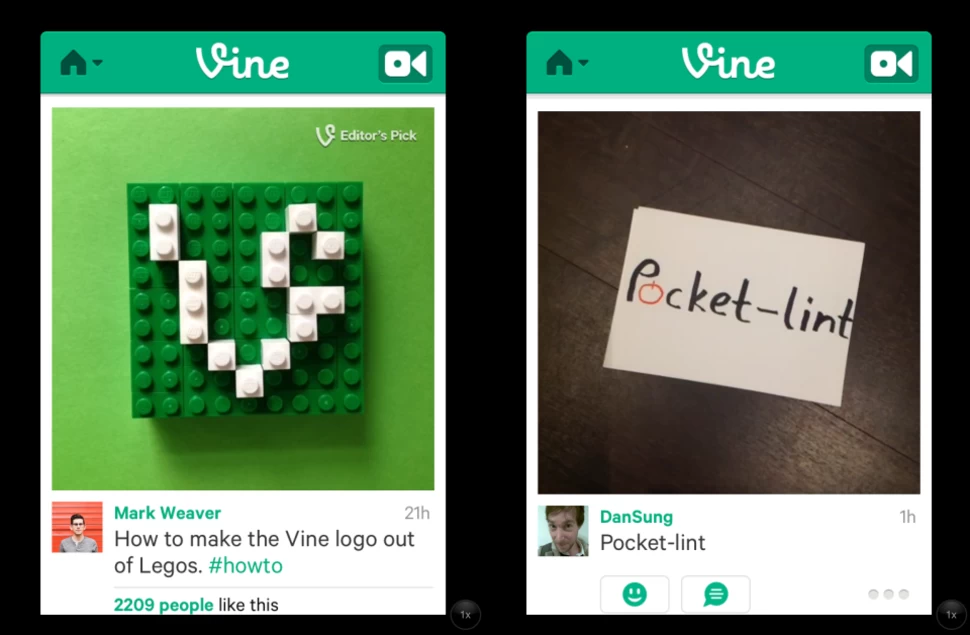
Launched in 2013, Vine was a popular video app where users created six-second looped videos. Users could make their content, follow friends and popular creators, and browse trending videos. It dominated social media networks from 2013-to 2016, and many of the popular videos remain relevant in pop culture and memes to this day.

discontinued social media channel: vine

Image Source

When Did It Fall?

Vine was discontinued in October of 2016.

Why Did It Fail?

Vine ultimately failed because it could not keep up with other growing networks of its day that championed video, like Instagram. Many Vine executives and co-founders were also against monetization and did not want to take sponsors from brands, so creators and marketers moved to platforms like YouTube where they could monetize their content.

2. MySpace

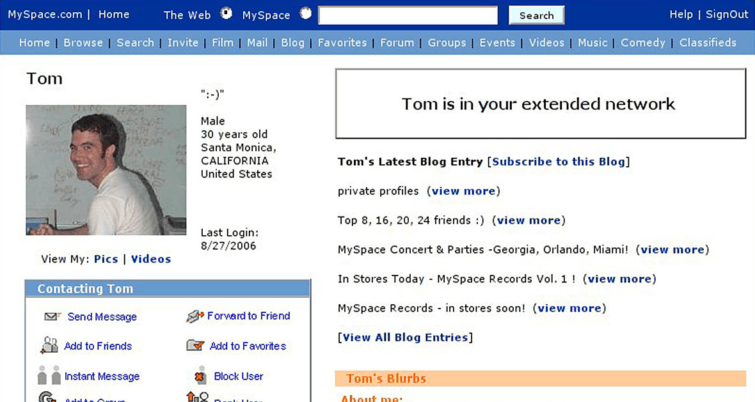
Myspace is a social networking site where users could create a profile page to share their interests, photos, and connect with friends. It also appreciated music, so users could set a song that would play every time a friend visited their profile.

In its prime, Myspace was the most popular social networking site, even surpassing Google as the most visited website in the United States.

discontinued social media channel: myspace

Image Source

When Did It Fall?

In 2011, Myspace’s CEO Mike Jones announced that the platform would no longer try to rival Facebook. It would instead pivot to a social entertainment style site and, while it still exists today, does not remain a fraction as popular as it did in its prime.

Why Did It Fail?

The New York Times cites Myspace’s decline as result of consumers and changing tastes, coupled with the rise and popularity of Facebook.

Myspace also had a change of leadership when bought by News Corporation, and Tom Standage, Deputy Editor of The Economist, said “Its new owner treated it as a media outlet rather than a technology platform and seemed more interested in maximizing advertising revenue than fixing or improving the sites underlying technology.” The site soon became inundated with advertisements, affecting usability.

The site ultimately fell because of a failure to focus on site users and their experience, but instead on monetization and advertisers, which sent consumers elsewhere.

3. Friendster

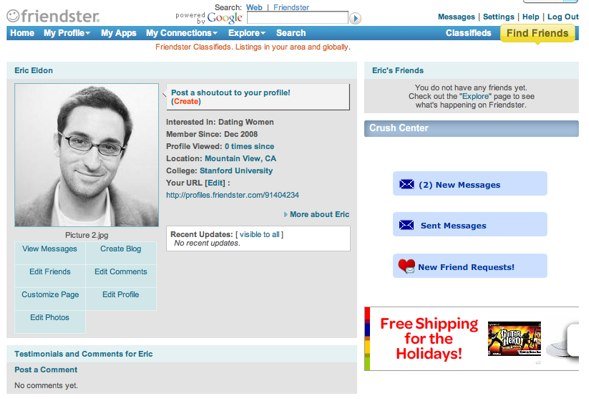
Friendster, launched in 2002, was the first social network to allow users to create profiles and share content with their contacts. It was also used to learn about local events, pop culture news, and to connect with brands. At its peak, Friendster had roughly 115 million users around the world. The website currently ranks 2,949,342 in global internet traffic and engagement over the past 90 days, according to Alexa.

discontinued social media channel: friendster

Image Source

When Did It Fall?

Friendster rebranded as a social gaming website in 2011. It closed for good in 2015 after Mark Zuckerberg bought Friendster’s suite of social networking patents for $40 million.

Why Did It Fail?

Jonathan Abrams, Friendster’s founder, says “The problem was that Friendster was having a lot of technology problems,” and people could barely log into the website for two years. He adds, “By the time Facebook and MySpace were doing those things, Friendster had lost a lot of market share in the U.S. for stability issues.”

Computer scientists at the Swiss Federal Institute of Technology conducted an “autopsy” on Friendster to uncover its demise, and they cited a disastrous site redesign in 2009 that caused traffic and users to plummet. They also determined that it took much more effort to navigate the platform than the benefits that came from using it.

Friendster also wasn’t widely adopted by users’ friends and families, so their time was better spent on other networks where more of their real-world network was online — namely, on Facebook and Myspace.

4. Google+

Google+, launched in 2011, was a social network owned and operated by Google. It was essentially a way for all Google users to have a central location for all of the actions they took across all of the different Google platforms and services.

discontinued social media channel: google+

Image Source

When Did It Fall?

The Google+ developer API was discontinued in March of 2019, and the site was shut down for business and personal use in April 2019.

Why Did It Fail?

Low user engagement was a significant factor in Google+’s demise, and the company reported having difficulty “Creating and maintaining a successful Google+ that meets customer expectations,” and said that 90% of user sessions lasted less than five seconds.

In addition, an API update in 2018 potentially exposed the personal information of 52.5 million users to outside developers, and this occurred for six days before being discovered. The Wall Street Journal reported that “The move effectively puts the final nail in the coffin of a product that was launched in 2011 to challenge Facebook Inc. and is widely seen as one of Google’s biggest failures.”

5. Open Diary

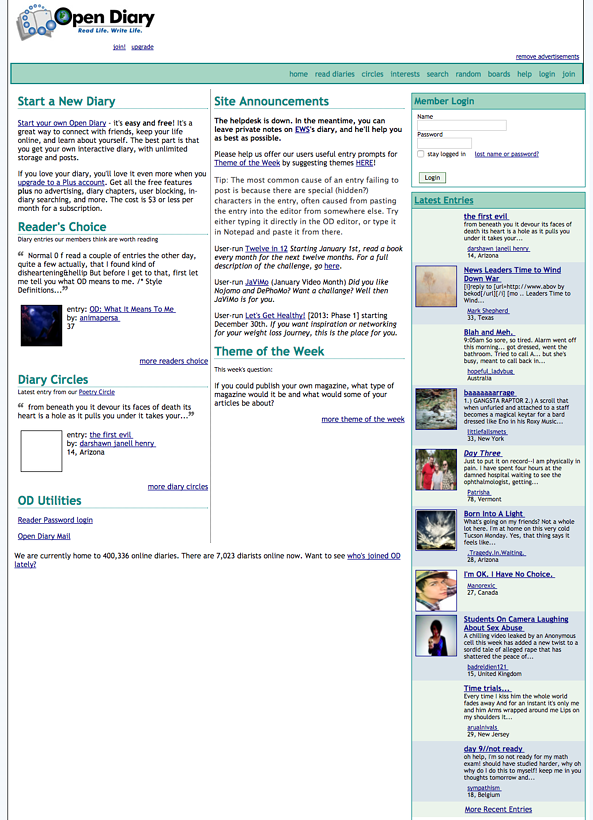
Open Diary, founded in 1997, was an online blogging and journaling website that laid the groundwork for features we see on modern blogs, like comments. Writers could add friends and change privacy settings so only specific people would see what they were writing, and it eventually expanded to different topic areas so users could write about a variety of themes.

dscontinued social media channel: open diaryry_example.png

Image Source

When Did It Fall?

Open Diary closed in 2014.

Why Did It Fail?

After two major security breaches, falling subscription revenue led the Open Diary team to offer more expensive paid subscription options to recoup its losses. This move instead drove users away towards free alternative blogging sites, like Xanga and LiveJournal.

6. Ping

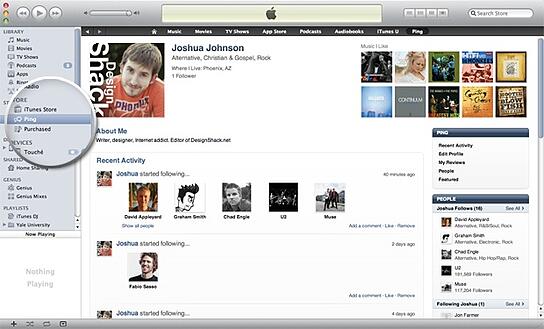
When he launched Ping in 2010, Steve Jobs referred to it as “Facebook and Twitter meets iTunes.” Ping was a social networking feature within iTunes where users could add friends, follow artists, and look up local concerts. Friends could also preview songs their friends were downloading and listening to.

discontinued social media channel: ping

Image Source

When Did It Fall?

Ping was terminated in 2012.

Why Did It Fail?

Ping was originally meant to feature an integration with Facebook that would allow users to easily connect with friends and artists they already followed on Facebook, but the partnership fell through. Users were then left with a blank slate on which to build another social network of people to follow.

Additionally, Ping only allowed users to listen to 90-second previews of songs on its network — any longer and they had to buy the song. Since Ping was part of iTunes, it became redundant instead of an enhanced experience. Apple replaced Ping with a better integration with Facebook and Twitter that allowed for easy music sharing.

Many of the features meant to make Ping stand out from the crowd can now be seen on Spotify, where users can connect their Facebook and follow friends, see what they’re listening to, and learn more about their favorite artists.

7. Orkut

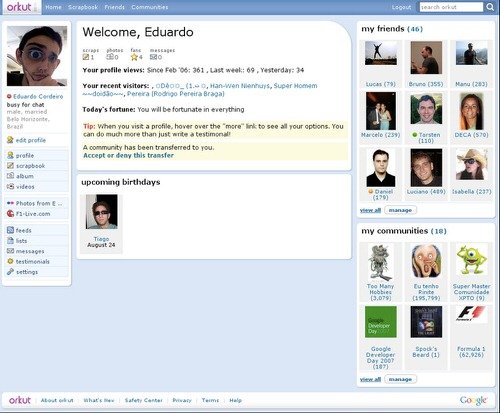
After a failed attempt to purchase Friendster, Google launched Orkut in 2004 as a place for people to add friends and share content. Users could view profiles, rate friends, add them to lists, and like their friends posts. At its peak, Orkut had 300 million users around the world.

discontinued social media channel: orkut

Image Source

When Did It Fall:

Google shut Orkut down in 2014.

Why It Failed:

Orkut took hold in a few countries, primarily India and Brazil, but never achieved widespread international popularity. At the time, YouTube and Google+ were outpacing Orkut’s growth, so Google refocused on these platforms in an attempt to compete against Facebook and social media. As such, the Orkut team cited the growth of Google’s other social media assets as a reason to shutter the site.

8. Eons

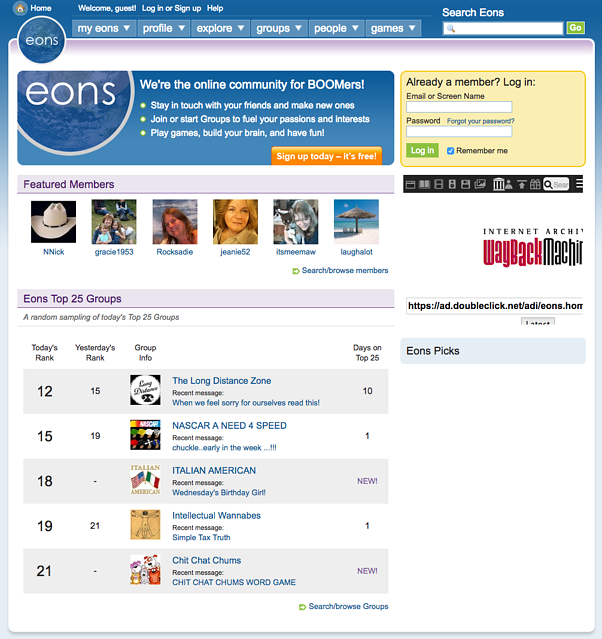
Eons, launched in 2006, was touted as “Myspace for boomers,” and set age restrictions that prevented anyone under the age of 50 from joining, which was later lowered to 40 in 2008. The site never experienced a huge boom in popularity around its launch and, at its peak, had roughly 800,000 users.

discontinued social media channel: eons

Image Source

When Did It Fall:

Eons.com shut down in 2012.

Why It Failed:

The age targeting was restrictive for a reason, but this had detrimental effects as the user base was rather limited. It also prevented the site from being widely popularized and, as social media was just coming onto the horizon and wasn’t yet widely adopted, the platform was unable to build a successful network out of such a small user group.

Lessons for Marketers From Failed Social Media Networks

There are several lessons for modern marketers in the stories of these fallen social networks. We’re not saying that you’re always at risk of killing your brand, but keeping these tips in mind may help you maintain and grow your followers and engage with them authentically.

1. Understand your audience.

The most significant factor of success when creating a social media network is creating for the audience that you want to have. For example, you wouldn’t create a text-based blogging site if you’re hoping to attract multimedia creators.

As with all marketing practices, make sure that you have a solid understanding of your audience, who they are, and what they want, so you can create a platform that will meet their needs and keep them on the platform.

2. Meet your audience where they already are.

Many social networks fail because brands try to reinvent something that already works well, or requires extra work for users to be able to participate. For example, Ping wasn’t able to integrate with Facebook, so users had to recreate social networks that likely already existed for them on an entirely new platform.

Instead, meet your audiences where they already are and supplement their experience. Part of Facebook’s success and longevity is due to its creation of an infrastructure where users don’t need to leave Facebook to get things done. It’s grown beyond just a social network into a destination for news, commerce, and content consumption.

Marketers should experiment with new technologies and offerings to keep followers interacting with their brand more, such as creating helpful chatbots, publishing on new forms of media, and trying new strategies like virtual reality or experiential marketing to keep audiences engaged and on a website or social platform for as long as possible.

3. Borrow from your competitors.

Borrow a page from the Facebook playbook and be aware of what your competitors are doing. For example, Vine was forced to shut down because other networks were offering similar features, but did it better and provided more opportunities, like creators who could monetize their content. A recent example

4. Be authentic and not overly self-promotional.

A common thread between Ping and Open Diary’s downfall was the brand’s attempt to monetize. Users didn’t like Ping advertising iTunes music that they could only listen to for 90 seconds, and Open Diary users didn’t want to pay for something that was free on other sites.

Users want an authentic experience on social media to interact with friends, family, and their networks, not logging on to a site and being bombarded with advertisements.

The next time a new social network comes onto the scene, we’ll be here to tell you the story — and predict if it will be here to stay. 

New call-to-action

Categories B2B

23 Conversion Rate Optimization Tools for Research, Feedback, Analytics & More

Believe it or not, driving traffic to your website — albeit challenging — isn’t enough to sustain your business. To truly leverage that investment in traffic, marketers must use conversion rate optimization, or CRO, to convince said traffic to complete the desired action.

The list below outlines many helpful tools for marketers looking to optimize their conversion rates. From high-level changes like landing page and email design and inspiration to in-depth insights on how your visitors navigate through your content, these tools will help you improve your site’s performance.

Get Started with HubSpot's Lead Capture Software for Free

To help you understand the tools and their uses, we’ve also broken this list into a few major categories:

Ready? Let’s start converting.

Lead Capture Tools

These are the tools you will use to capture more leads on your site, thus improving your CRO analytics . While most conversion-focused content has a built-in form or CTA, these tools act as additional lead capture mechanisms to boost the number of leads that convert on your content.

1. HubSpot

Price: Free

It’s Google Analytics meets SumoMe meets a CRM. Sounds cool, right? It starts with an exit intent popup CTA, then syncs with your website’s existing forms to learn about your site visitors and their path through your pages.

Best Conversion Rate Optimization Tools for lead capture: HubSpot

HubSpot’s tools give you in-depth contact insights on prospects and current contacts in your database. It also pairs its contacts database with a dashboard that shows you a high-level view of which marketing efforts are paying off and converting and which ones aren’t.

2. HelloBar

Price: Free plan or $29/month to $49/month

HelloBar is a lead capture tool that allows you to add a popup form to your website to grow your email list, promote your social pages, showcase a sale, or other lead generation strategies. The free version allows you to create one modal that’s shown to every 10th visitor. However, premium plans offer more advanced call to action (CTA) options.

Best Conversion Rate Optimization Tools for lead capture: Hello bar

3. Sumo

Price: Free plan or $49/month

Sumo offers a suite of free tools to help you increase your site conversions. For lead capture, it offers a “Welcome Mat” popup CTA, a “Smart Bar” to increase email subscribers, a scroll-triggered box, and a “Contact Us” form.

Best Conversion Rate Optimization Tools for lead capture: Sumo

Along with their Google Analytics research tools, the Sumo suite helps you gain on-page insights and increase your email list.

Research Tools

Before you create any content, call upon these tools to draw inspiration and check out what other smart marketers have seen success with in the past.

4. BuzzSumo

Price: $99/month to $499/month

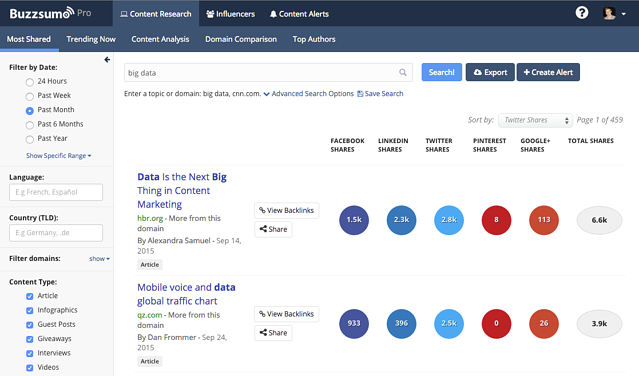
The best content gets shared and linked the most. So what better way to gain preliminary insights than to compile all of the most shared content on your particular topic?

With BuzzSumo, all you have to do is enter the keyword or topic. Then, it’ll pull together the most shared and linked content on that topic. Time frames range from the last day, week, month, or year.

Best Conversion Rate Optimization Tools for research: BuzzSumo

So if you’re trying to optimize the landing page for your new webinar on cat fashion, all you have to do is enter “cat fashion.” BuzzSumo will then give you the best articles, resources, videos, and more on the fascinating topic of cat couture.

You’ll then be able to dig in and explore some of the key elements that made these pages popular. With that, you can go back and incorporate them into your own content.

5. SimilarWeb

Price: Contact for pricing

Knowing where your website visitors came from can (and should) have a big impact on the type of content you create. With SimilarWeb, you can see where your traffic is coming from, which keywords are fueling your organic traffic, and what other sites are considered most similar to yours. You can also compare analytics to find out the website conversion optimization by looking over data.

Best Conversion Rate Optimization Tools for research: SimilarWeb

With this information, you’ll be able to optimize content for your biggest traffic sources and dig in to see what competitor sites are doing to drive conversions.

6. Land-book

Price: Free

If you’re creating a landing page from scratch, getting started can be difficult. Luckily there’s Land-book, a free collection of the web’s best-designed landing pages.

Best Conversion Rate Optimization Tools for research: Land-book

With Land-book, you can explore how top companies use elements like copy, positioning, layout, and design to drive conversions. Pick and choose your favorite elements from the Land-book database, and then incorporate them into your own landing page.

7. Really Good Emails

Price: Free

In today’s marketing landscape, if you want to get your message across, you’d better know a thing or two about visual communication and design.

Don’t know a thing or two about either? Enter Really Good Emails.

Best Conversion Rate Optimization Tools for research: Really Good Emails

Similar to Land-book, Really Good Emails is a database of the web’s best-designed emails from the world’s most innovative companies. Use this as a resource to see how you can design your email to get your message across in the best way possible, as fast as possible.

(Check out this post for even more resources where you can find great marketing examples.)

8. SubjectLine.com

Price: Free

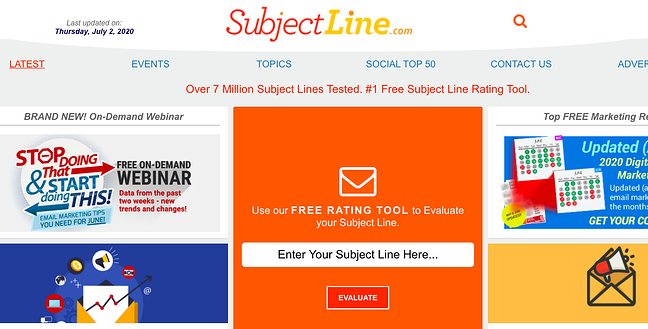
When sending an email, the subject line can either make or break your performance. Before you choose which ones to send, check them out using this awesome resource.

Best Conversion Rate Optimization Tools for research: Subjectline.com

SubjectLine.com has tested over three million subject lines and has a tool to evaluate your potential options. It gives a deliverability and marketing score, plus advice on improving.

9. Headline Analyzer

Price: Free

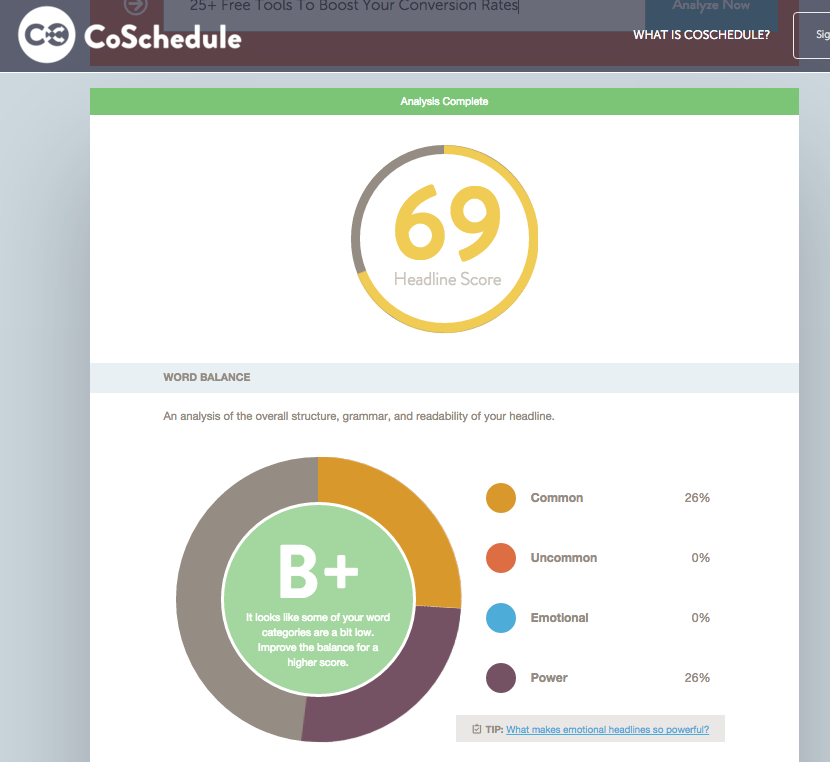
CoSchedule’s headline analyzer gives a score of 1–100 to gauge the effectiveness of titles. The score is calculated based on word usage, grammar, vocabulary, type of headline, character, and word count.

Best Conversion Rate Optimization Tools for research: Headline Analyzer

The tool shows you what your headline looks like on Google and in an email subject line. This tool serves as a great litmus test to generally know how well your headline will perform.

CRO Analytics Tools

These are the tools you will use to measure and track your content’s performance. You can use the CRO analytics to fully analyze the dips, jumps, and fluctuations in your conversion rate.

10. Kissmetrics

Price: Contact for pricing

Kissmetrics is a complex tool that integrates with your email service provider to make it easy to analyze your audience and email them in specific cohorts.

Best Conversion Rate Optimization Tools for CRO Analytics: Kissmetrics

With Kissmetrics, you can learn the path that your customers have taken through your website. You can also conduct A/B tests, build data sets (without SQL), perform website conversion optimization, and assess the ROI from your campaigns.

11. Google Analytics

Price: Free for basic, contact sales for premium

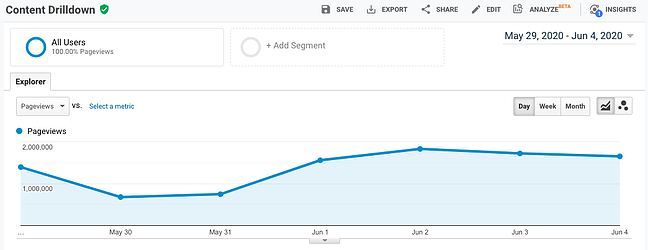
Google Analytics is a free way to track your website visitors. You can see how long it takes visitors to bounce from your pages, if visitors complete goals from a certain path, and which sources bring people to your website.

Best Conversion Rate Optimization Tools for CRO Analytics: Google Analytics

What’s great about Google Analytics is that it allows you to see which keywords people are using to find your page, devices they’re searching on, and uncover demographic data. However, there are no specific emails or contact information associated with your site visitors.

12. HubSpot Website Grader

Price: Free

Website Grader is a great way to get a quick snapshot of a website’s overall performance. It gives insights on performance factors (including speed, page size, and page requests), mobile responsiveness and appearance, SEO (page titles, meta descriptions, headings, and site map), and security. It’s great for website conversion optimization.

Best Conversion Rate Optimization Tools for CRO Analytics: HubSpot website grader

From there, the tool devises a grade and provides suggestions on how to improve, which makes it easy to come up with some quick wins that’ll help you boost conversions.

Mouse Tracking and Heat Mapping Tools

These are the tools you will use to see how people interact with your content, including how they scroll and where they click.

13. Hotjar

Price: Free for Basic, $29/month

Once you’ve nailed the basics like landing pages, CTAs, pop ups, and content, you’re ready for some more advanced conversion rate optimization. Hotjar offers heat maps and screen recordings. They enable you to track how much your page is being viewed and how visitors navigate your website.

Best Conversion Rate Optimization Tools for Heatmapping:  Hotjar

Hotjar also offers analytics, so you can see how well your pages are performing. This is helpful to see what’s working and what you can change to increase conversion.

14. Clicktale

Price: Contact for pricing

Clicktale is similar to Hotjar, as it also offers heat maps to help you determine the most valuable real estate on your pages, scroll depth (where is the “fold” on your website?), click tracking, and link analysis.

Best Conversion Rate Optimization Tools for Heatmapping:  Clicktail

Using these tools, you’ll have the information you need to organize content, CTAs, and page design in a way that makes the most sense for engagement.

15. Clicky

Price: Free plan, or $9.99/month to $149/month

Clicky gives you real-time analytics on the visitors to your website. It tells you where people are accessing your site, how long they’ve stayed on each page, and how many visitors are actively online. The resource also offers heat maps and scroll tracking.

Best Conversion Rate Optimization Tools for Heatmapping:  Clicky

Clicky is an excellent one-stop-shop for customer behavior. You’ll have multiple formats at your disposal to leverage for optimizing the performance of your website — so you can convert as many leads as possible.

16. Crazy Egg

Price: $24/month to $249/month

Crazy Egg offers a full suite of heat maps and click tracking, with the additional functionality segment clicks by source and evaluating link effectiveness. The basic package is fairly inexpensive and gives great insights into how effective each website page is.

Best Conversion Rate Optimization Tools for Heatmapping: Crazy Egg

17. Heatmap.me

Price: Free plan or up to $100/month

Heatmap.me is a great free option for anyone looking to start exploring heat maps, responsive web design tests, and real-time page statistics. Heatmap.me can also track dynamic elements on your site in the heat map tool. Think slider bars, photo galleries, and other interactive sections.

Best Conversion Rate Optimization Tools for Heatmapping: Heatmap.me

When you use the tool, you’ll see real-time analytics. It gives you important data you want to see, such as CTR and page performance. They’re easy to analyze for beginners and provide the numbers you need to enhance success.

Feedback Tools

These are the tools you’ll use to engage and receive feedback from your visitors. Feedback tools include surveys, polls, messaging, and user testing programs.

18. Intercom

Price: $87/month to $153/month

You can use chat tools to acquire new customers and chat with existing customers.

Best Conversion Rate Optimization Tools for Feedback: Intercom

As a CRO analytics tool, you can use Intercom to communicate with website prospects to learn if they need additional help, find out how their experience is going, and learn how you can improve. It also allows you to track leads and use a shared inbox with your team.

19. Qualaroo

Price: $149/month to $499/month

Using chat windows doesn’t have to be limited to just being live. In fact, Qualaroo proves that. It offers popups to collect live feedback from website viewers.

Best Conversion Rate Optimization Tools for Feedback: Qualaroo

With this information, you can tailor a site experience, target specific customers, and learn what issues people may be experiencing. This tool is extremely helpful at all stages of the funnel, and is frequently utilized in the e-commerce space.

20. SurveyMonkey

Price: $25/month to $99/month

SurveyMonkey has a free option for those just starting with survey research. You can use this tool to learn demographic information, discover which types of content your prospects and blog subscribers prefer, and get product feedback.

Best Conversion Rate Optimization Tools for Feedback: Survey Monkey

Survey your customers about their satisfaction. You’ll get great insight straight from the source about what draws your audience to your company. From these results, you can work on improving conversion methods.

21. Five Second Test

Price: $50/month to $100/month

UsabilityHub has an awesome community-fueled tool called Five Second Test that allows users to upload a product, app experience, or design and have the community test it before launch. For example, one of the tests you can run is a click test, which will give you a heat map of page performance.

Best Conversion Rate Optimization Tools for Feedback: Five Second Test

You get responses about recall, general feedback, and UI thoughts. This is a great way to have opinions. Five Second Test also offers click, preference, question, and navflow tests for other website and UI questions. You can also design surveys with the tool.

Experiment Tools

These are the tools you’ll use to manage, plan, and execute A/B and multivariate tests. Some of these tools will help you turn ideas into experiments, while others will help you create the variations and run the actual tests on your site.

22. Optimizely

Price: Contact for pricing

Testing is hard. It’s hard to come up with a good control group, find a large sample, and determine if your experiment is statistically significant. Luckily, Optimizely helps a lot with all of that – and then some. With Optimizely, you conduct tests across all devices and platforms, then figure out if it’s significant. The software offers A/B, multiple page, and multivariate tests.

Best Conversion Rate Optimization Tools for Experiments: Optimizely

Optimizely’s tool gives you a full, robust report of test results (example shown above). You’ll see interactions and, best of all, sign up clicks. Your report will tell you how many leads each test variant earned, so you can choose the best.

23. Effective Experiments

Price: Contact for pricing

Effective Experiments is a concise way to track all of your experiments. If you have tons of Excel spreadsheets cross-referenced with Google Analytics data, you are probably going crazy trying to keep track of everything. This tool puts it all in one place and helps you determine statistical significance.

Best Conversion Rate Optimization Tools for Experiments: Effective experiments

How to Shop for Conversion Rate Optimization Tools

It can be hard to shop for the best conversion rate optimization tools, so we gathered together these five tips to keep in mind:

  1. Sign up for trials before making a decision.
  2. Be thorough when searching for reviews.
  3. Go for quality, not quantity, when it comes to price.
  4. Ask other marketers what they are using.
  5. Read reports from other companies about CRO.

The Benefits of CRO Analytics Tools

There are several benefits of selecting CRO analytics tools. Some include:

  • Being able to effectively track ROI.
  • Using tools to create an engaging headline.
  • Capture customer leads.
  • Collect marketing research data.

Now, you’re armed and ready to start improving conversion rates across your website conversion optimization and marketing efforts. These tools range from free and for beginners to robust and more advanced. Feel out which options seem right for you, and soon you’ll be upgrading to the more complex tools when you’ve mastered the basics.

Editor’s note: This post was originally published in July 2020 and has been updated for comprehensiveness.
lead capture

Categories B2B

The HubSpot Blog’s 2022 Content & Media Strategy Report [Data]

Benjamin Franklin once said “Failing to plan is planning to fail,” and when it comes to content and media, truer words have never been spoken.

Until 2020, that is.

But, although 2020 saw some of the most unprecedented global events, 2021 continued to put content and media teams to the test.

In fact, 99% of content planners, strategists, or marketers who have ever pivoted their strategy say some of their pivots happened in 2021.

Download Now: The State of Media & Content Planning in 2022 [Free Data Report]

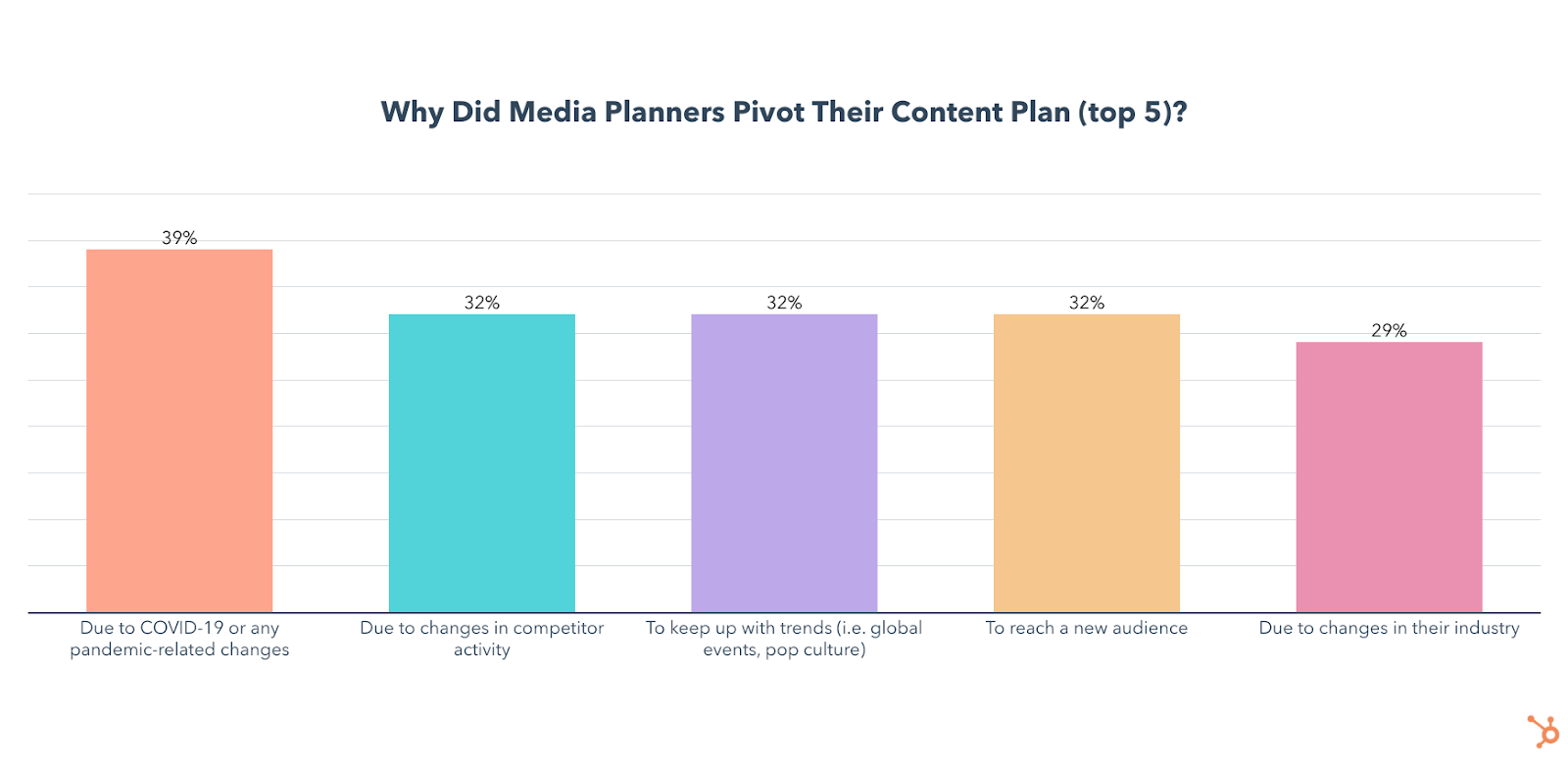
Unsurprisingly, the #1 reason they gave for this was the global pandemic.

why did media and content planners change their plans

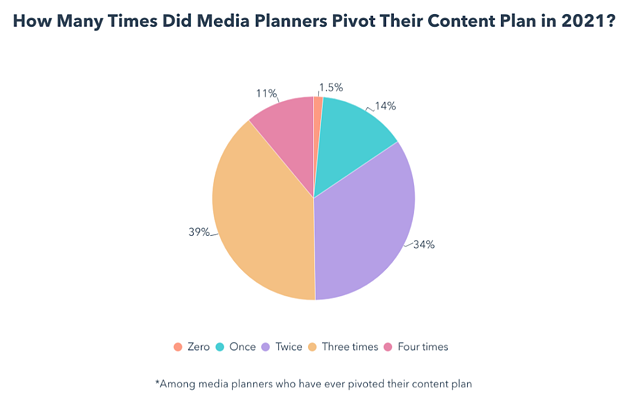
To make matters more complicated, 39% of those who pivoted in 2021 changed their content plan a whopping three times throughout the year.

the number of times media planners pivoted contentDespite all that turbulence, 62% of media planners say their content performed better than their goals in 2021. And, if anything, 2020 and 2021 taught marketing teams how important content planning and re-planning is.

To get a sense of how marketers planned or pivoted their way through such an unpredictable year and how they will approach media planning in 2022, we surveyed 600+ media planners to gather data on their goals, strategies, the tools they use, and how they met the unique challenges of 2021.

Curious about some strategies and insights specifically? Click below to jump to the section you’d like to read first.

Top Goals of Media and Content Planning

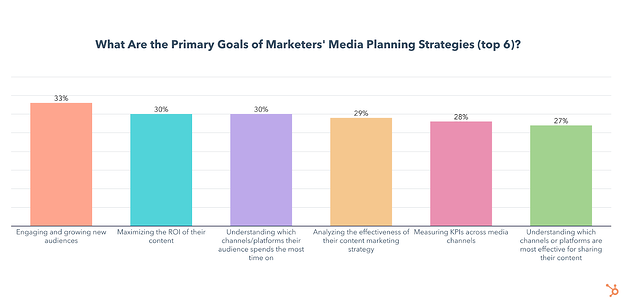
As you can see below, engaging and growing new audiences, maximizing the ROI of their content, and understanding which channels or platforms their audience spends the most time on are top priorities for media planners and content marketers in 2022.

But which strategies are most effective to achieve these goals?

Media and Content Planning Strategies

The Most Effective Media Planning Strategies

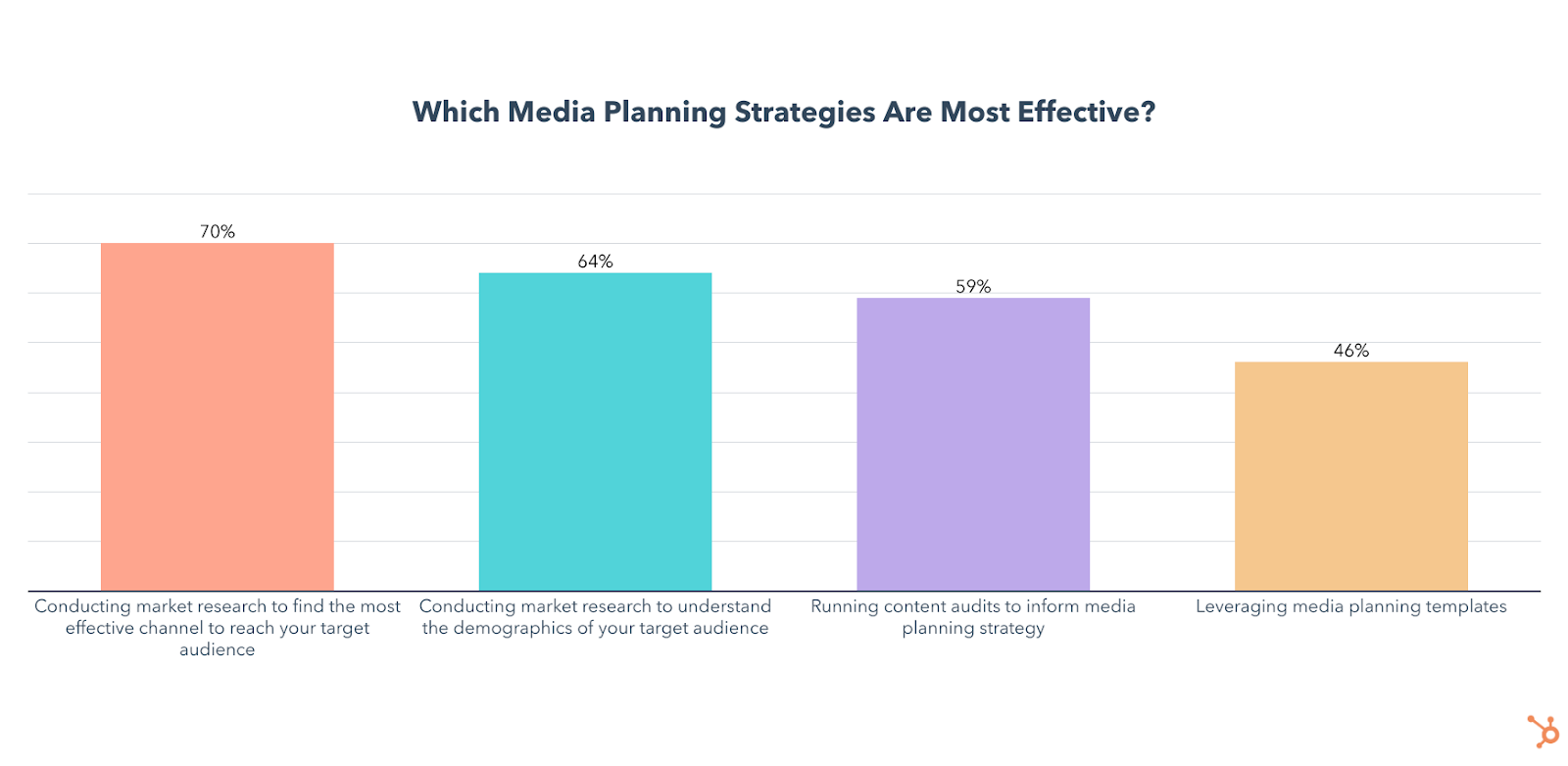
The top strategies media planners and content marketers charged with planning use are conducting market research to understand their target demographic and find the most effective channels to reach them, leveraging media planning templates, and running content audits.

Unsurprisingly, these tactics line up fairly well with the top goals, which include growing audiences with content and targeting the right marketing channels.

top media planning strategies

Media planners also rated setting a clearly defined budget (57%), analyzing the results of your content strategy (57%), clearly defining goals/KPIs (55%), and using a calendar to schedule content (48%) as the most effective media planning strategies they use.

To accomplish most of these, marketers can leverage media planning templates, a strategy I’ll talk about in more detail later.

Ultimately, all of the above strategies are highly effective and will see significantly increased use and investment in 2022. As you move forward in planning, you’ll want to consider a mix of them rather than just running with one or two tactics.

Next, let’s dive a litter deeper into each major planning strategy and opportunity.

Market and Demographic Research

Market research is leveraged by 43% of media planners and will grow significantly in 2022, with 45% planning to leverage it for the first time.

  • 64% of media planners who use it say it is the most effective media planning strategy they leverage.
  • 16% of all media planners will invest more in this than any other strategy in 2022.
  • 70% of media planners who do channel research say it is the most effective media planning strategy they leverage (the highest of any strategy.)
  • 22% of all media planners will invest more in it than any other strategy in 2022.

While technically the second-most-effective strategy, I decided to bring this one up first because understanding the demographics of your target audience isn’t just critical for proper media planning, but essential for any marketing strategy to succeed.

You can examine a wide range of data including age, location, education, and income to start building buyer personas, which are fictional representations of your ideal customers that you can cater your content towards. And here’s the best part – you likely already have most of this data available to you for free.

Of course, you could also conduct market research studies of your own, or go through an outside agency for a more holistic view of your industry.

But in terms of media planning, I’d argue that knowing which channels your audience is spending their time on is just as important as knowing who your audience is.

Channel and Platform Research

Learning about your audience doesn’t just stop at personas or demographics.

In 2021, 43% of media planners conducted market research to find the most effective channels for reaching their targets. This percentage will grow significantly in 2022, with 53% planning to leverage it for the first time.

The data above isn’t too shocking. Before you know how much of your budget to invest in each area of your media mix, you’ll want to get an idea of which channels your target audience spends their time on.

You can also benefit from using your own data by looking at which channels are most effective at helping you meet your specific goals. But, you should also leverage outside research as it can provide crucial demographic data on the specific channels you use.

For example, in our 2022 Social Media Report and survey, we found that younger audiences like Millennials and Gen Z prefer shorter video content that is funny, trendy, and reflects a brand’s values – on platforms like TikTok and Instagram.

Meanwhile, Baby Boomers prefer interactive/educational content such as interviews/podcasts/expert discussions, and live videos, with Facebook being their platform of choice.

These facts will help you plan out your media mix by giving you insight on critical questions, such as whether your demographic is embracing social shopping tools on platforms like Instagram or other platforms.

Once the research is complete, media planners are using templates to help allocate and organize their media mix with maximum efficiency.

Media Planning Templates

Media planning templates are leveraged by 40% of media planners and 46% of them say it is the most effective strategy they use to reach their business goals.

The use of media planning templates will see significant growth in 2022 as 39% plan to leverage them for the first time and 11% of all media planners will invest more in templates than any other strategy.

There are a wide variety of media planning templates to choose from, all designed with a different purpose, but ultimately they exist to help you track, plan, organize, distribute, and analyze all your media content.

which media planning templates are commonly use

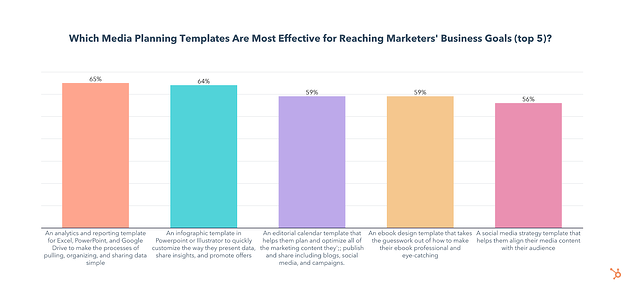
The most popular templates are social media strategy templates that help you align your media content with your audience and analytics and reporting templates for Excel, PowerPoint, and Google Drive that make the processes of pulling, organizing, and sharing data simple.

Luckily, HubSpot has both of those templates available for you to download right now, with a handful of others that may also come in handy.

Once their media plans are fully organized and executed, marketers are leveraging content audits to analyze their performance and inform their future content plans.

Content Audits

Running content audits to inform media planning strategy is used by 37% of media planners and is the third-most-effective tactic for media planners to reach their business goals.

  • A whopping 81% of media planners who run audits say they have been effective for reaching their business goals and 67% say the results of their content audits have had a moderate to significant impact on their media planning strategy.
  • The use of content audits will grow significantly in 2022 as 37% plan to leverage them for the first time and 15% of all media planners will invest more in content audits than any other strategy.

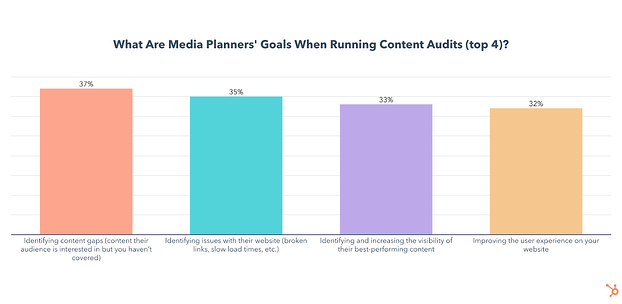
So what are the goals of a content audit?

By analyzing the performance of the content you create, you get insights on what exceeded expectations, what falls flat, and why

content audit goals

Identifying content gaps is the #1 objective of content audits, but that doesn’t mean it has to be hard. Here’s a guide on how to run a simple content audit specifically to find and fill those content gaps.

Identifying issues with your website and improving the user experience is another highly effective strategy for driving traffic to your web content, improving SERP ranking, and increasing engagement. In our survey of 400 web traffic analysts, we found that web analysts who reported an effective website strategy in 2021 were 25% more likely to optimize their website for loading speed.

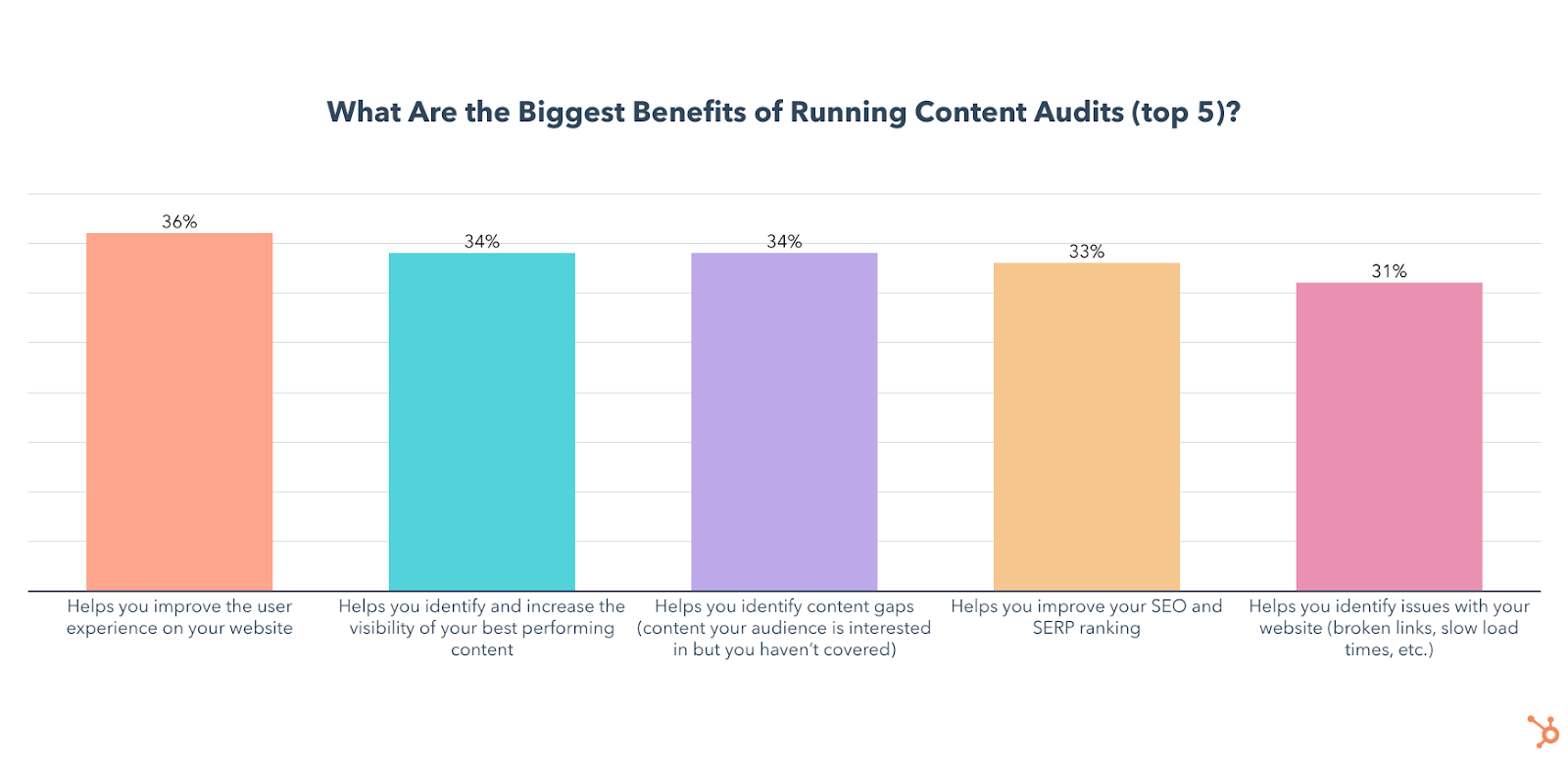
If you’re still not convinced to audit your content, we also asked media planners about the biggest benefits they’ve seen from auditing. Here’s a graph with the results:

content audit benefits

How often should you run a content audit?

Most media planners who run content audits do so on a monthly or quarterly basis. If you’re ready to start auditing your content, you can either create your own template or use this one from HubSpot.

Not only did we craft it ourselves, but 46% of media planners who use templates for content audits use it, making it the most popular third-party template. Our data also shows that 86% of those who use HubSpot’s template say content audits have been effective for reaching their overall business goals, so you should give it a shot.

Which Channels Marketers Use in Their Media Mix

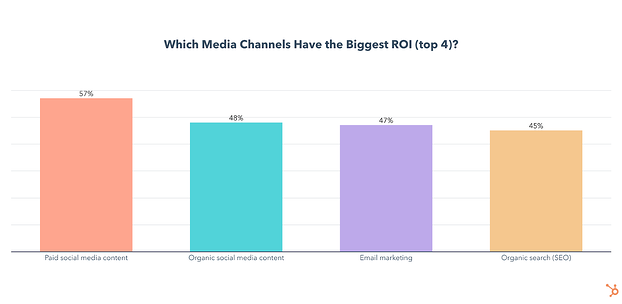
The top channels media planners leverage are paid and organic social media content, email marketing, and organic search.

top channels in media mixes

As this data is directly in line with our previous marketing research, here are a few quick bullets on each:

  • Email marketing is the most leveraged media channel used by 1 in 2 media planners and will continue to grow this year with 22% planning to leverage it for the first time. Email marketing has the 3rd highest ROI of any channel.
  • Paid social media content is used by 47% of media planners and has the highest ROI and highest engagement of any channel. Channel usage will grow significantly in 2022 as 14% of all media planners plan to invest more in it than any other channel and 25% plan on leveraging it for the first time this year.
  • Organic social media content is used by 43% of media planners and will continue to grow this year with 22% planning to leverage it for the first time and 9% planning to invest more in it than any other channel in 2022. Organic social has the 2nd highest ROI and 2nd highest engagement levels of any channel.
  • Organic search is leveraged by 36% of media planners and 45% of them say it has the highest ROI of any channel they use. It will grow in 2022 with 23% of media planners planning to leverage organic search for the first time.
  • 84% of media planners leverage a mix of organic and paid media.

But, what’s the ideal media mix look like? Check out this helpful guide with even more data

The Benefits and Challenges of Media Planning

The Benefits of Content and Media Planning

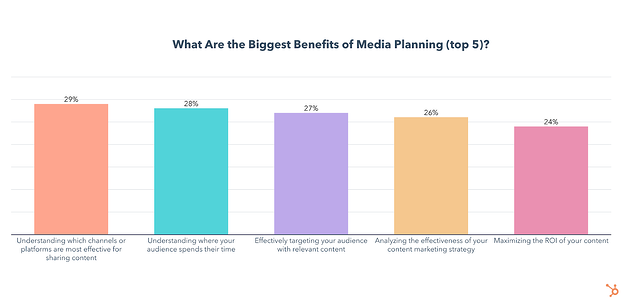
Media planning can help you organize, plan, and analyze your content, but what are the biggest benefits marketers get from having a dedicated content plan? Here’s a breakdown of our survey results:

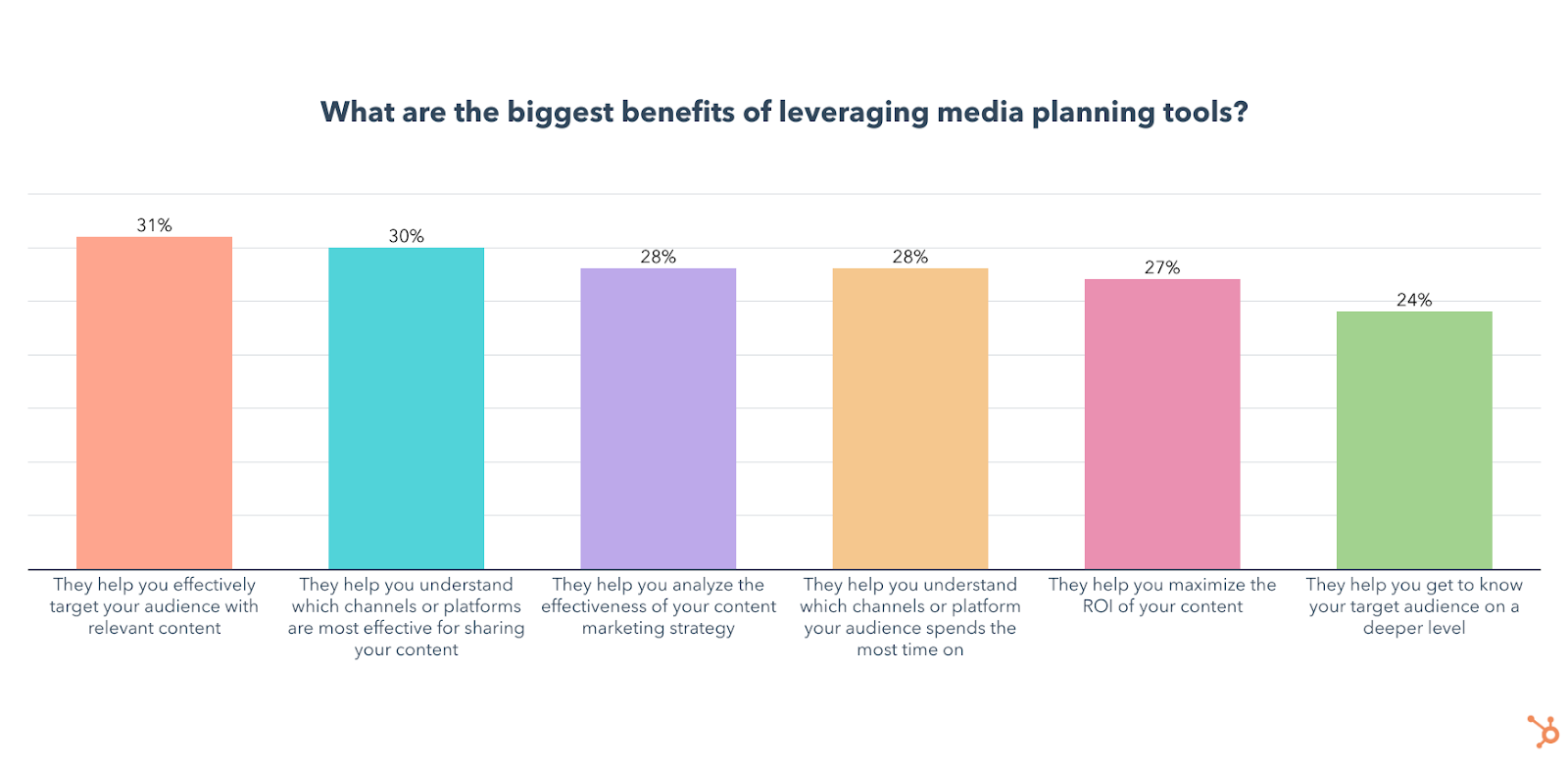
One interesting theme to note above is that the top three benefits relate to understanding channels, where your audience is, or where and how to target them. From what we’ve seen over the past decade, the secret to effective, ROI-generating marketing or content is understanding and knowing where to meet your targets.

So, while the idea of media planning might seem daunting in times when plans constantly change – it’s still incredibly valuable, worth your time, and is likely to return on its investment.

Ultimately, the work you do as a media or content planner will teach you how and when to create new content, when to pivot, or how to effectively change course in times where competitors are struggling to understand changing consumer thoughts and behaviors.

Media Planning Challenges

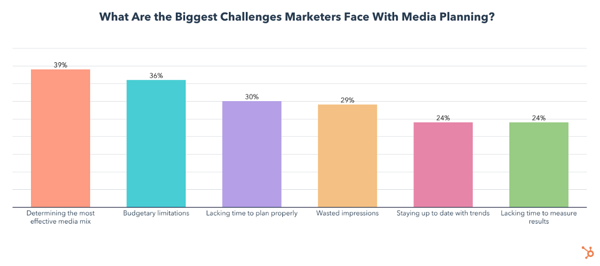
For all its benefits, media planning also comes with some challenges. Here are the biggest challenges marketers face with media planning:

the biggest challenges of media planningDetermining the most effective media mix is an incredibly important aspect of media planning, but also the one media planners struggle with the most. Check out this article for tips on optimizing your media mix.

Aside from finding the most effective media mix, a limited budget is the second biggest challenge media planners face, so let’s take a look at some data on content marketing budgets.

Budgeting Your Content Marketing Efforts

How Much of Your Budget Should Go to Content Marketing?

Chances are you already have a budget dedicated to content marketing, but if you don’t, it may be a good idea to join the 94% of media planners who do.

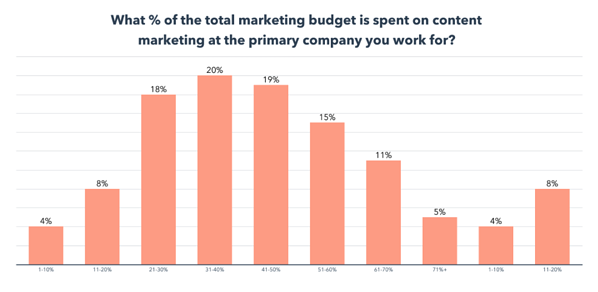
The real question is how much of your total marketing budget should go to content marketing, so here’s a look at our results:

how much do marketers budget on content strategyHalf of brands spend under 50% of their marketing budget on content, with 72% of media planners saying the primary brand they work with spends between 20%-60% of their total marketing budget on content marketing.

Where Marketers Invest Their Content Marketing Budget

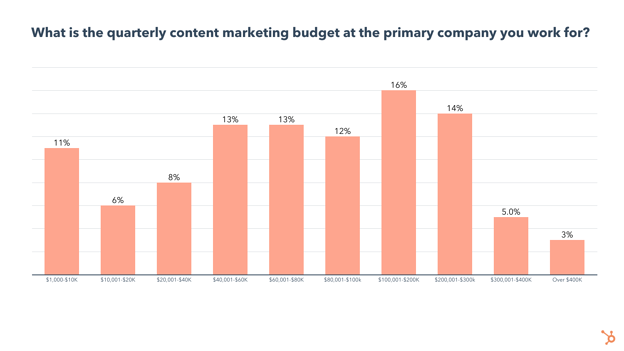
So, how much is that content budget we just discussed above? Here’s a look at how much marketing departments delegate to content. 

quarterly content marketing udget

  • 1 in 4 brands have a quarterly content marketing budget under $40K
  • 38% of brands have a quarterly content marketing budget between $40K-$100K, while 35% have a budget over $100K.

With your budget in mind, let’s take a look at how often you should be creating a media plan and how far in advance to start laying the groundwork for your content strategy.

Timing Your Media Plan

How Often Should You Create A Media Plan?

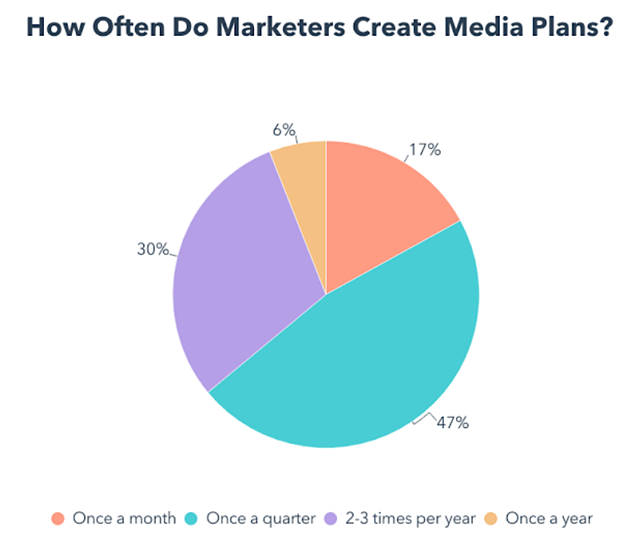
Nearly half of media planners create a media plan for their primary brand once per quarter:

Whichever cadence works best for you, you’ll also need to start your planning process ahead of time. Let’s find out how far in advance marketers are creating their media plans.

how often do content planners make plans

How Far in Advance Should You Start Formulating Your Media Plan?

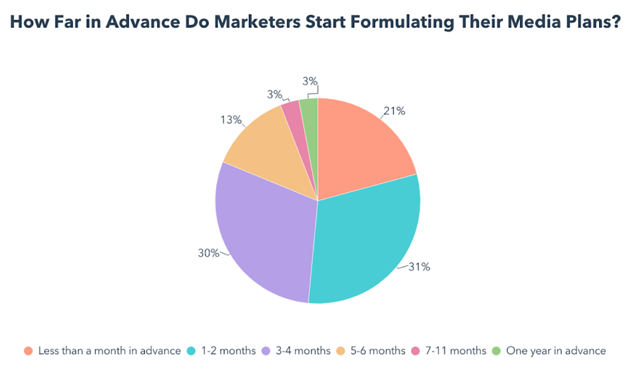
According to our survey, 41% of media planners will change their media mix in 2022, but how far ahead will they start planning?

how far in advance do marketers make media plans

Over 80% of media planners formulate their strategies less than 4 months ahead of time.

Another crucial piece of formulating your media plan will be the tools you use, so let’s look at which tools marketers find the most effective.

Content Planning & Marketing Tools

The top two tools media planners use are HubSpot Marketing Hub (38%) and HubSpot Media Planning Templates (34%).

Here’s a chart showing the biggest benefits of leveraging media planning tools:

top media marketing tools

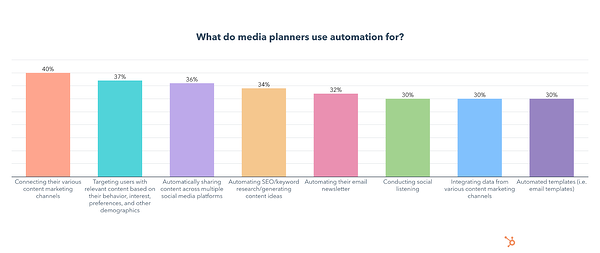
Another tool leveraged by 78% of media planners is automation, here’s what content strategists and media planners use it for:

content automation use cases chart

Pivoting Your Content Plan

Pivoting can be intimidating due to the uncertainty of abruptly switching up your content plan, so here’s a high-level look at our survey data on the topic. You can also find a deeper dive into our data and tips in this post.

Is Pivoting Your Content Plan Effective?

Whether you had every marketing campaign for 2020 and 2021 fully planned out or were just winging it, the pandemic forced us to toss whatever plans we had out the window and adapt in real-time.

As we mentioned above, most marketers who pivoted their content plan in 2021 did so because of the COVID-19 pandemic. 

The good news? A whopping 74% of media planners say their most recent pivot was effective for reaching their overall goals and 78% of media planners say their content plan changed a moderate to significant amount the last time they pivoted.

When do brands pivot a content plan?

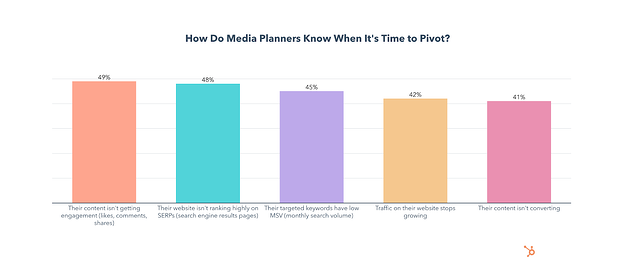
Here’s how media planners knew it was time to pivot. Spoiler! It’s not always due to global events. 

Of the media planners who have ever pivoted, over two-thirds did so to try a new social media platform, and 77% pivoted to try a new feature.

reasons its time to pivot a content plan chart

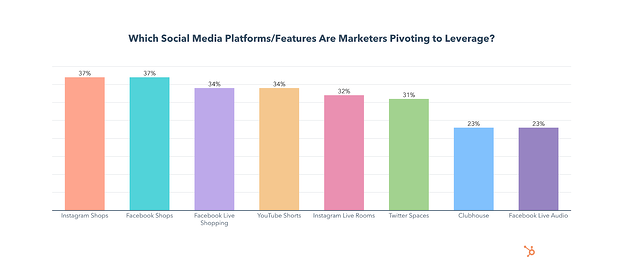
Which platforms or features have media or content planners pivoted to?

Facebook and Instagram Shopping platforms; YouTube Shorts; and live chat rooms like Instagram Live Spaces, Clubhouse, and Twitter Spaces have been receiving high interest from strategists lately. 

What’s more, our survey discovered that:

  • Marketers who say their last pivot was effective are 10% more likely to have pivoted to use Twitter Spaces.
  • Marketers who say their last pivot was effective are 10% more likely to have pivoted to use Facebook Live Shopping.
  • Marketers who say their last pivot was effective are 8% more likely to have pivoted to use YouTube Shorts.
  • Marketers who say their last pivot was ineffective are 9% more likely to have pivoted to use Spotify Green Room and 8% more likely to have pivoted to use Spoon.

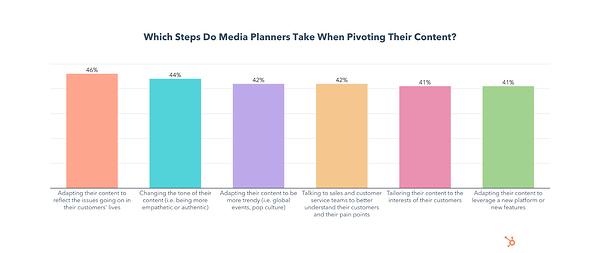
What should be your first steps to pivoting a content plan?

Switching up your content plan can feel like going into uncharted territory. To help you, here’s how the media and content planners we surveyed take on the challenge. 

steps media planners take when pivoting a content plan

I found that marketers who talk to sales and customer service teams to better understand their customers and their pain points have more effective pivots than those who don’t. They’re 16% more likely to say pivoting was effective.

Also, those who adjust their media mix to reflect changing consumer habits have more effective pivots. They’re 9% more likely to say pivoting was effective.

To get a more detailed step-by-step guide on how to pivot, check out this post.

How often should you pivot your content plan?

While, most brands that pivoted did so at least three times in 2021, this doesn’t necessarily mean you have to make big changes once a quarter.

However, it’s smart to have flexible aspects of your planning that can change if external factors, like world events, arise.

And, if and when the unprecedented does happen, you’ll want to take a stp back and ask yourself what adjustment or strategy is right for your brand. 

Although consumers care about responsive content, they also care about ethical marketing and social responsibility of the brands they follow. Because of this, they’ll be quick to spot (and call out) inauthentic and opportunistic behavior, which could damage a company’s image.

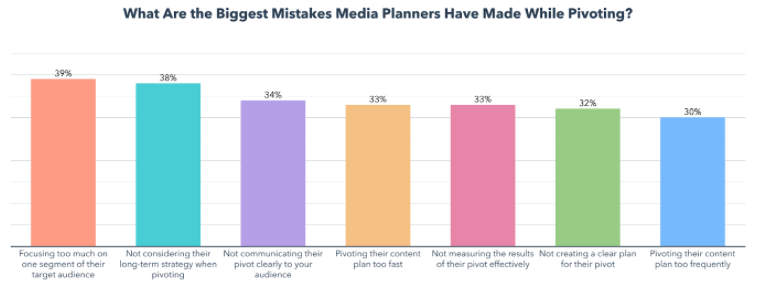
And while we’re on the topic of avoiding mistakes, I also asked media planners about the biggest mistakes they’ve made when changing their content plan. Let’s take a look at where they’ve gone wrong.

Mistakes to Avoid When Pivoting Your Content Plan

Pivoting your content plan is effective, but also has its pitfalls. These are the top mistakes media planners have made when switching things up:

media planning mistakes

As you can see above, changing your content strategy drastically to cater to just one segment of your audience isn’t recommended.

And to reiterate the advice of Karla Hesterberg, the Sr. Manager of Content Growth Strategy at HubSpot, “Remember that content strategy is always a long game —your short-term strategy can’t compromise your ability to solve for the ongoing, long-term needs of your content property.”

Speaking of long-term goals, switching up your media plan on the go could wind up being expensive. Here’s how much of their budget media planners are spending when they pivot.

Key Takeaways for Content & Media Strategists

Content and media planning can get complex and complicated in today’s world where everything – including your target buyer – is constantly changing.

Ultimately, strong preparation will help you be ready to create and optimize your content strategy to cater to your evolving target audience.

Although we went over a handful of different strategies and data points above, here are three key themes that you can take away from this post.

  • Understanding your audience is vital: As a marketer, creator, and media planner, you need to know your audience to know what they’ll respond to, what will motivate them to engage with you, and where they’ll go to consume content. You’ll also have to know where your audience spends the most time. With this knowledge, you’ll be able to create campaigns that meet them where they are and nurture them into buying your product.
  • Plan to re-plan: The world is always changing. An effective media planner creates a plan, but also prepares for things to change and identifies ways they can optimize, shift, or pivot it when something unexpected happens.
  • Always be auditing: One strategy won’t work forever, in any field of marketing. So, it’s important to continue to track and audit your efforts. That way if something stops working or needs to be fixed, you can optimize it or shift away from it promptly without losing time or money.

Want to see even more data on this topic? Check out the free, downloadable resource below which highlights the bulk of the data from our survey all in one place. 

content planning in 2022

Categories B2B

Partnering with Kanarys to Support the Future of Diversity, Equity and Belonging

HubSpot’s commitment to diversity, equity, and inclusion (DEI) best practices has played an essential role in our success and we know that it can for all companies in the HubSpot community. We’re seeking to help our customers achieve their best performance through adopting these practices too.

Our commitment to DEI helped us foster a culture that prizes a range of ideas from people with an array of experiences and backgrounds. We invested innumerable people hours, hired professionals, and sought world-class expertise to identify the DEI best practices, implement them and measure their success.

Although there’s no finish line for this work, that massive effort has supported our company’s growth trajectory through talent acquisition, employee retention, and workplace culture. We recognize that not all companies have the resources to make an equivalent investment, but all companies in the HubSpot community can make DEI a sustained advantage. We asked, shouldn’t it be easier for companies to identify and adopt DEI best practices and measure their success?

This increasingly common challenge faced by companies of all sizes is why HubSpot Ventures is excited to announce our investment in and partnership with Kanarys, a DEI technology company focused on providing the tools that organizations need to create long-term systemic change around DEI.

Kanarys utilizes human resource information systems integrations and artificial intelligence (AI) powered assessments to gather the data organizations need to meet DEI challenges head-on. Knowing where to start is important, which is why Kanarys is now partnering with HubSpot to offer HubSpot customers access to its DEI Maturity Quiz

This DEI Maturity Quiz identifies where companies are on their DEI journey, and ways they can grow their DEI strategy for long-term success. It analyzes and assesses best practices for critical DEI components, such as DEI Councils, employee resource groups, unconscious bias training, paid apprenticeship programs, supplier diversity programs, and more. In addition, HubSpot customers will now have access to Kanarys’ comprehensive library of guides and toolkits developed by subject matter experts in DEI, available here (invitation code is HUBKAN@2022).

Kanarys co-founders Mandy Price, Star Carter, and Bennie King all grew up in the Dallas area and attended The University of Texas at Austin where they became friends, yet twenty years later the three would come to call each other co-founders of Kanarys after experiencing inequities in the corporate workplace. Guided by data, the Kanarys co-founders are now on a mission to help companies identify opportunities to avoid common mistakes when implementing and measuring DEI initiatives.


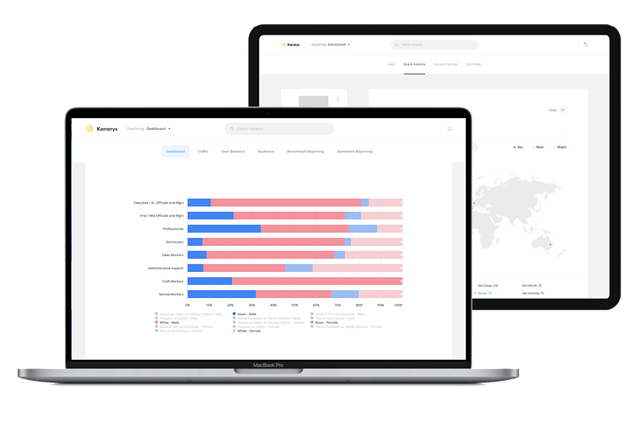
Kanarys DEI technology dashboard

While many companies approach diversity through quarterly trainings or specially organized committees, these initiatives often lack measurement of how inclusion and equity are being addressed and truly impact the business model. HubSpot has taken a detailed, fact-based approach to assess the performance of its efforts.

Kanarys makes it easy for all companies to take an innovative data-informed approach by bringing together cutting-edge technologies like AI, machine learning, and natural language processing to better understand the effectiveness of DEI initiatives based on employee sentiment and an organization’s systems, policies, procedures, and practices.

Kanarys’ intelligent platform allows companies to uncover DEI stumbling blocks and develop proactive strategies to implement instead of being reactive under pressure. The opportunities for companies are that they can now retain employees longer, build a healthier culture, develop more innovative products and solutions, and serve their customers more empathetically.

Joining Kanarys on their journey to build more equitable workplaces was a natural fit for HubSpot. Diversity, inclusion, and belonging are mission-critical for us, and we believe they are crucial to helping our community grow. By using Kanarys, HubSpot customers will be able to jumpstart or assess their own DEI initiatives to identify areas of growth and put DEI programs in place that foster growth and innovation. 

Learn more about Kanarys here, and HubSpot Ventures here.

Categories B2B

What are Instagram Guides? [+ How to Create One]

If you’re on Spotify, chances are you’ve curated a playlist with all your favorite songs — and rearranged them in a specific order. But did you know you can do something similar on Instagram?

Download Now: Free Instagram for Business Kit + Templates

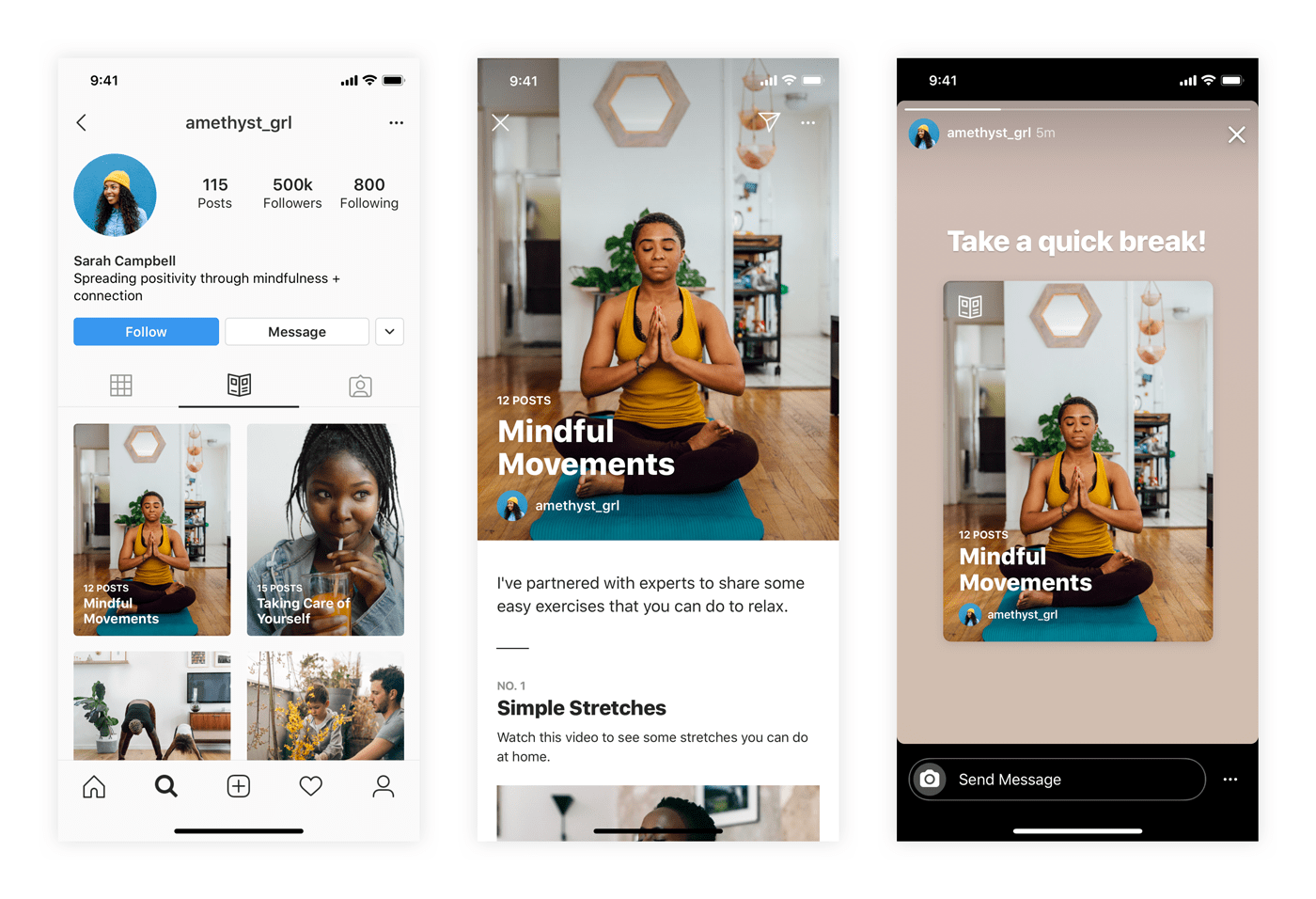
Enter the Instagram Guide — a tool that allows you to curate your favorite Instagram posts, Reels, or Lives in one location, which you can share with your community. For marketers, it’s a great way to revive old content, promote products, and introduce your brand.

Let’s take a closer look at Instagram Guides, how you can leverage them in your marketing strategy, and how to make one in six steps.

What is an Instagram Guide?

In short, an Instagram Guide is a collection of posts, Reels, or Lives — either from your own feed or from others.

Instagram-guides

Image Source

All guides revolve around a single topic, story, or idea. For instance, you could create a gift guide, product round-up, or exercise routine — but more on that later.

Once you create a guide, it will live under a public tab in your profile that users can visit anytime. You can also share it to your Instagram Story for more visibility.

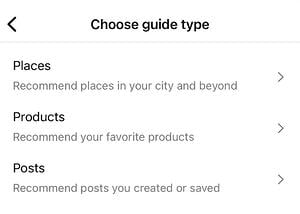
There are three types of guides on Instagram — places, products, and posts.

  • Places is for sharing travel-related or location-specific content. For instance, you could share your road trip itinerary or your favorite coffee shops in X location.

    Example: The Most Instagrammable Places in Phoenix.

  • Products is for showcasing products from Instagram Shops. You could create anything from product tutorials to listicles of your favorite products or brands.

    Example: My 8 Must-Have Products for Sensitive Skin.

  • Posts is for articles, commentary, or anything interesting you’ve shared or saved from others. This type focuses less on visuals and more on your storytelling abilities.

    Example: How to Build a Healthy Morning Routine.

With a solid understanding of Guides, let’s discuss the benefits of using them in your Instagram marketing.

Instagram Guides for Marketing

Instagram has countless features for marketers — but what makes guides stand out from the crowd?

Check out the top benefits of using Instagram Guides in your marketing:

1. Revive your old content

Content on Instagram has a short lifecycle. After hitting the “Post” button — and watching the likes pour in for a day or two — your content sits on your feed, collecting dust.

With guides, you can shine a spotlight on your past content. When a user clicks on an individual post in your guide, it directs them to the original post — giving it a new lease on life.

2. Drive traffic to your blog or website.

Guides are a great way to share your tips, tricks, advice, and recommendations on specific topics — but you shouldn’t reveal everything.

Instead, use the guide to summarizing one or two points from your blog posts — then encourage users to visit your blog for more details (or more tips). That way, you can drive traffic to your other channels.

3. Introduce your brand.

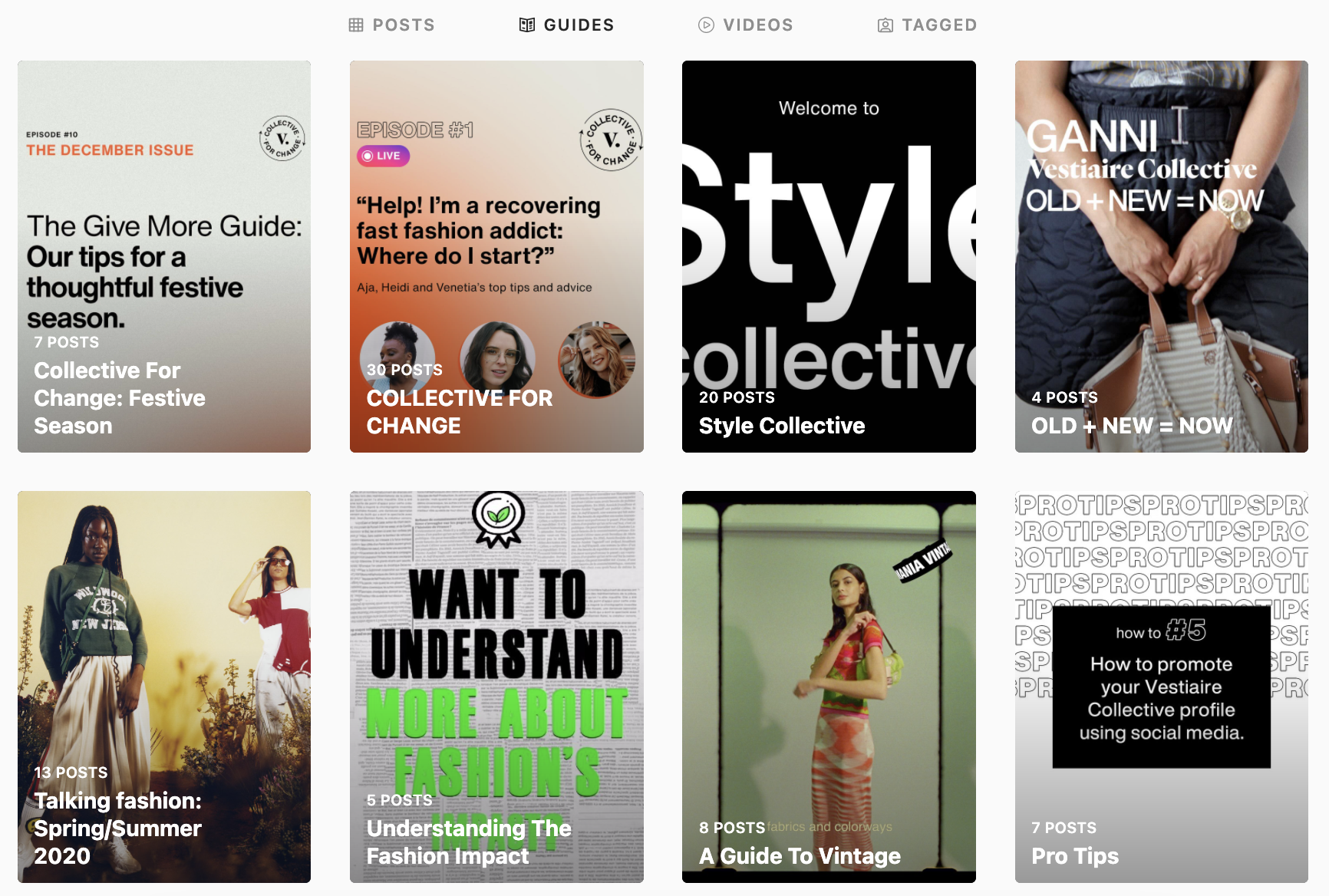
Instagram Guides are a great way to introduce both new and current customers to your brands and its values. Use them to highlight social responsibility work, new milestones, behind-the-scenes content, or new initiatives.

For example, fashion marketplace Vestiaire Collective highlights its brand values by posting guides on building a more sustainable wardrobe and the power of upcycling.

vestiaireco

4. Leverage user-generated content.

With Guides, you can combine content from other users with your own — which presents an opportunity to leverage user-generated content.

For example, suppose you run a sunglass brand. You could create a guide titled, say, “The Trendiest Sunglasses of 2022” that contains photos of your customers wearing your products. What better way to leverage UGC, promote your products, and attract new customers — all at the same time.

5. Promote your products — without being too sales-y.

If you struggle with promoting your products without sounding like an infomercial, Instagram Guides are a great way to strike that balance.

Back to the sunglass example above — if you were to create a guide for your new collection, you could add value to the reader by including advice, tips, or tricks within the guide. Then, title your guide in a way that puts the value front-and-center, such as “How to Style Oversized Sunglasses.”

This is one way to subtly promote your products without it being the center of attention.

How to Make a Guide on Instagram

Creating a guide is relatively simple, but you’ll need the latest version of Instagram before you can start. It’s also a good idea to brainstorm what type of guide you want to create — and take note of the content you want to include. Then, follow these steps:

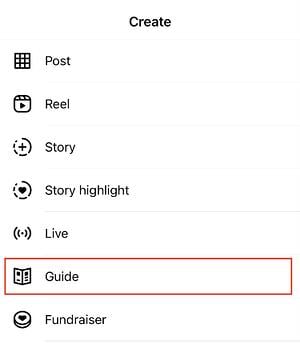
1. Navigate to your Instagram profile and tap the plus (+) button. This opens a menu with options of what you can post on Instagram. Tap “Guide.”

IMG-3564

2. Next, tap on the type of Instagram guide you want to create. You can choose from Places, Products, or Posts.

IMG-3565

3. Select the content you want to add to your guide. This can be content you’ve shared or saved from others.

IMG-3567

4. From here, you’ll need to write a few details about your guide — namely the title and summary. You’ll also need to upload a cover photo if you want to change the one Instagram provides.

IMG-3570

5. As you scroll through the guide, add titles and descriptions, commentary, or thoughts to each post.

IMG-3569

6. Once you’re happy with the guide, click Share.

Instagram Guides are all about repurposing content. So take a look at your feed and find new stories you can tell. Leverage the tips in this article to make your guides an effective top-of-funnel marketing strategy to engage users, promote your products, and introduce your brand.

New Call-to-action

Categories B2B

How Does the TikTok Algorithm Work In 2022?

As a platform with high engagement and growth potential, TikTok is a favorable app for businesses that want to get their solutions in front of more people.

According to TikTok, 49% of users (over 490 million people) seek and discover something new on the app each month. TikTok’s highly personalized algorithm delivers relevant content to users through the For You feed, keeping users engaged.

Free Ebook: The Marketer's Guide to TikTok for Business [Download Now]

Here’s what brands need to know about TikTok’s algorithm and the unique path to purchase on the app.

TikTok Retail Path to PurchaseImage Source

TikTok is revamping the outdated linear sales process and is focusing on driving growth at scale. The smoother and more seamless customer experience from their unique path to purchase is described as an “infinite loop.” Rather than a sales funnel with a defined start and endpoint, TikTok users enter, exit, and re-enter the buyer’s journey at the stage that best matches their needs and wants.

TikTok’s massive success is due to following its user’s lead, building around their behavior, and providing them with the right content based on which stage they are at in the customer journey.

Why Brands Need to Be on TikTok in 2022

Let’s be honest. Putting together a whole strategy for each social platform, monitoring the results, and optimizing performance is a lot of work. And brands have been hesitant to adopt TikTok into their existing social strategy.

Whether this is because of limited internal bandwidth, it being considered a “Gen Z” app, or nobody in the office wanting to be behind the camera — there is no denying the potential of TikTok when you look at the numbers.

Let’s dive into the top TikTok statistics brands need to know:

  • TikTok monthly active users: There are 1 billion monthly active users on TikTok.
  • Number of App Installs: TikTok has been downloaded 3 billion times and had the most non-game app installs for 6 months in 2021, achieving 383 million downloads from January to June 2021.
  • Surpassing competition: In 2021, TikTok was the 7th ranked social media app. Surpassing Pinterest, Twitter, Snapchat, Reddit for monthly active users is impressive considering it was only launched in 2016.
  • Engagement Rate: With a session duration of 10.85 minutes, TikTok has been recognized as the top social media platform for engagement. This is twice Pinterest at rank #2 with 5.06 minutes.
  • Growth rate: In the U.S., TikTok had a 787.86% user growth rate and a 1157.76% increase in its user base worldwide.
  • Influencer earnings: TikTok influencers and creators can earn up to $5 million a year if they have up to 100 million followers. The most popular categories for influencer content are beauty, fitness, dance, pranks, and entertainment.

This rapidly growing social media app’s innovative and unique algorithm allows users to reach more people based on how they interact with your content.

TikTok’s key differentiator is the sense of community on the app. TikTok’s niche communities provide a place for everyone to connect, and new communities are continually emerging as more people join the app.

If you’re new to TikTok, check out #BusinessTok or #BrandTok. These niche communities provide content for marketers, entrepreneurs, and business owners on tips, real-life experiences, and live streams of their networking events.

Gina Nacnac, manager of brand partnerships at HireInfluence, shared with us the importance of TikTok marketing for brands in 2022:

In 2022, we’re going to see a rise in Content Creators on TikTok that create content specifically for the brand’s owned channel appearing as the face of the brand for a contracted period of time, like quarterly or every six months. This is going to provide more opportunities for smaller creators to monetize and will provide ways for brands to connect with consumers authentically through relatable creator content.


TikTok’s Unique Path to Purchase

TikTok transforms how brands connect with their audiences, drive purchases and find success. The platform recently conducted a global research study to understand TikTok’s role in and perceptions across the retail consumer journey. Here is what they found:

  • People on TikTok are 1.5x more likely to instantly purchase something they discovered on the platform than other platforms’ users.
  • TikTok is 1.7x more likely to be the source for product discovery compared to other social platforms.
  • TikTokers are 1.4x more likely than the other platform users to research products/brands they find on the platform.
  • TikTok users are 1.5x more likely than other platform users to persuade friends or family to purchase a product or service they’ve come across on the app.
  • TikTok users are 2.4x more likely than other platform users to create a post and tag a brand after buying a product.
  • TikTok users are more than twice as likely to comment or D.M. a brand after purchasing a product compared to other platform users.

Brands that see massive success on TikTok aren’t just pushing products and creating content when it’s time to sell. Instead, they develop a consistent presence by using a TikTok scheduling tool and focusing on their brand’s role as a creator of entertainment. Successful brands leverage their TikTok Business Account to create a home on the platform, establish their unique brand voice, and build a community.

TikTok Algorithm: which social media platforms marketers plan to increase investments in

TikTok is revolutionizing the social media marketing landscape through its infinite loop buyer’s journey. Compared to other platforms, TikTok is leading the way at each stage of the customer journey — awareness, consideration, and decision.

How The TikTok Algorithm Works in 2022

One of the key ranking signals on the TikTok algorithm is video completion. Each time a user watches a video in full, that video will be more likely to be suggested to other users’ feeds.

Another major influence on the TikTok algorithm is hashtags and user-viewing habits. TikTok will take note of the type of videos you’re watching and which niche communities they are coming from. It will then suggest similar videos to you based on your content consumption.

For example, if you can’t get enough of DanceTok, good news — the algorithm will keep suggesting related videos. Brands looking to increase the reach of their videos should use trending songs, hashtags, and dances.

This is how TikTok has defined their For You page algorithm:

“This feed is powered by a recommendation system that delivers content to each user that is likely to be of interest to that particular user. Part of the magic of TikTok is that there’s no one For You feed – while different people may come upon some of the same standout videos, each person’s feed is unique and tailored to that specific individual.”

Key Components of the TikTok Algorithm:

  • Video Information: video information signals are based on the content you seek out on the Discover tab (i.e., captions, sounds, hashtags).
  • User Interactions: as mentioned above, the TikTok algorithm is influenced by a user’s content consumption and interactions on the app.
  • Device and Account Settings: although these do not have as strong of an influence on the TikTok algorithm, it’s still worth mentioning. These are settings (i.e., language, country, device type) a user chooses on their account that TikTok considers when optimizing content.

What Engagements Are Not Important to the TikTok Algorithm

As we covered, the TikTok algorithm considers a few key ranking signals when suggesting videos to your feed. But what are the least important metrics of engagement?

  • Content already viewed
  • Duplicated content
  • Potentially upsetting content (TikTok provides examples of “legal consumption of regulated goods” or “graphic medical procedures”)
  • Content that gets flagged as spam

And the best news yet? For new users or TikTokers with a low following, the TikTok algorithm doesn’t use follower count as a ranking signal. Meaning small accounts still have the potential for high reach.

Want to see what other businesses are doing on TikTok? Check out this roundup of TikTok marketing examples to inspire your brand.

Wrapping Up

Incorporating the latest platform trends into a brand’s marketing strategy can help them to more effectively engage, educate, and sustain their audience seamlessly into the TikTok community. Don’t know where to start? We’ve got you covered! Check out the Trend Discovery Tool to uncover what’s trending in your vertical, what’s on consumers’ minds, and what’s viral on TikTok in real-time.

In 2022, businesses need to stay on top of new marketing techniques, trends, and rising platforms to drive key growth and better connect with their audience. One of them is TikTok, and there’s no sign of it slowing down. There is a huge opportunity for businesses to take advantage of the viral nature of the app and allow it to take their digital campaigns to the next level.

Blog - Content Mapping Template

Categories B2B

How to Build Your Brand With Instagram: 11 Tried-and-True Strategies

Instagram has demonstrated tremendous growth, with its community reaching over 2 billion monthly users in 2021.

Despite its impressive reach, many business owners are still overlooking its marketing potential. As a result, they’re leaving high levels of engagement, brand awareness, and even profit on the table. But why?

New Data: Instagram Engagement Report [2022 Version]

In just 12 months, we used Instagram to gain 400,000 followers for Foundr — which translated to over 70,000 email subscribers. At the end of that period, we were averaging 30,000 call-to-action clicks per month from Instagram, and converting 30% of the users who landed on our website from our Instagram page into email subscribers.

We’ve seen it work, now it’s time for you to get in on the action. In this article, we’ll show you how to build your brand with Instagram. (If you’re looking for more marketing tools and resources for your new business, check out our comprehensive guide on how to start a business.)

1. Build an Instagram strategy.

We listed this as the first step because it is the most crucial step in building a brand on Instagram.

If you lack a clear strategy, you’ll end up with low-performing content and a scattered feed as you struggle to brainstorm new ideas.

To build your Instagram strategy, you’ll need to do four things:

    • Determine your goals.
    • Narrow down your target audience.
    • Research your competition.
    • Develop your content plan.

2. Experiment with the platform’s features.

Instagram is constantly evolving. In fact, every week, the Head of Instagram shares a video discussing new features and product updates on the platform.

In one of his latest videos, he announced that they were testing a subscription feature that would allow people to subscribe to their favorite creators and get access to exclusive Lives and Stories.

In addition to all the new features the social platform tests, there are a lot of established tools, such as Live Rooms, shoppable posts, scheduled Lives, and hashtags – just to name a few.

Our advice is to choose one to two features to test out every month. This will prevent you from getting overwhelmed and allow you to measure the impact of each feature.

For instance, hashtags can help you reach users who don’t follow you but could be interested in your products and services.

Don’t know how many to use? Data from our latest Instagram Engagement Report suggests brands should only use one hashtag per post.

Having 8 or more hashtags reduced engagement by 70% compared to the optimal number of hashtags: one.

Another reason to test Instagram features is that it can help you reach more users. The platform has admitted to prioritizing accounts that use features the brand wants to highlight, such as Reels.

It’s a win all around: You stay ahead of the curve, discover which features work for you, and you can expand your reach in the process.

3. Jump on trends.

On social media, all it takes is one person’s video or sound to go viral for the rest of the world to join in with their own version.

Most of these trends are fun and harmless with a lifespan of about three weeks or less.

Why should you join in? Well, it’s an opportunity to connect with your audience in a creative and fun way. If you jump in as the trend is rising, it can also give you a quick boost in engagement and reach.

When considering joining any trend, there are two things you want to ask:

      • How can I bring this back to my business and/or industry to make it relatable to my audience?
      • What is the origin of this trend and could it go against our company values?

4. Invest in high-quality creative assets.

A great Instagram post can be boiled down to a formula and requires two elements: beautiful imagery and engaging text.

Beautiful Imagery

Choose images that tell a story or elicit emotion. This image we shared is not only compelling and interesting, but it also elicits emotion and therefore drives engagement from our followers.

What this will look like for your business will depend on your industry, but think outside of posting images of your own products and services.

Posting about yourself repeatedly on social media is like being that person at a party who talks constantly about themselves. Also, beware of copyright issues.

If the image is not your own, request permission to use it or source non-attribution-required photos. (Check out this awesome list of royalty-free stock photos here.)

Engaging Copy

While you don’t have to add text to your Instagram posts, doing so packs a punch that just an image won’t provide.

the sweet spot for caption lengths to get the most engagement are in the 500-1,000 and 1,000-2,000 characters range

Think of your caption as an additional way to reel in your followers and keep them engaged. It’s a place to add context, share more information, ask a question, and invite comments.

5. Leverage strategic partnerships.

One of the biggest frustrations for most marketers delving into Instagram is that they don’t know how to build a following. After all, without a large number of followers, how can it possibly be an effective marketing channel?

There’s one tactic in particular that we used to quickly grow our Instagram following to 10,000 in just a couple of weeks: partnering with other Instagram accounts.

Are we talking about co-marketing or influencer marketing? Both because they lead to the same result: Expanding your reach.

In addition, both require you to:

      • Conduct research to see if their audience aligns with yours.
      • Review your business goals and determine the KPIs for the partnership.
      • Collaborate on a content strategy.

For example. HubSpot recently teamed up with @ntwrkto celebrate Women’s History Month and promote the Grow Better mission.

Image Source

Now that Instagram allows the same post to be shared by two profiles, brands can co-market easily on the platform. Followers from both accounts will view the post, increasing each one’s reach and engagement.

6. Foster a community of highly engaged followers.

Engagement on Instagram comes in many forms, including followers sharing your content, liking and commenting, tagging their friends, and clicking on your calls to action. In this section, we’ll go over some of our tactics for fostering a community.

Post When Your Followers Will Actually See Your Content

Have you ever posted something to social media that you think will do really well, only to be met with crickets? Low likes, low shares, and the only comments you landed were from spambots.

While it’s easy to assume you miscalculated the potential of the post, it could just be that you posted the update at the wrong time.

The easiest way to know when your followers will be active on the app is to head over to your insights dashboard. If you have a business account (you should), you can learn valuable insights about your audience’s demographics and behavior on the app, including location, age, gender, and activity.

instagram insights dashboard showing follower activity

From there, you can schedule your posts based on your audience’s most active days and times.

Invite the Engagement

A lot of brands will start Instagram accounts and become frustrated when people aren’t engaging with their content.

It seems so obvious and simple, but sometimes actually asking for your audience to engage makes all the difference. You can either include the action you want your followers to take as part of the image itself, or include it in the caption.

Take a look at this example from clothing brand Grass Fields.

Image Source

In their post, they share design images and ask their followers to name their favorites in the comments. Not only do they get real-time feedback on their product, but they also get great engagement on the post.

7. Post regularly.

When a user is scrolling on the app, you are competing for their attention along with millions of other brands.

Because of this, visibility is key. With so many ways to share content, from Reels to Stories to Lives, there are a lot of opportunities to reach your audience – each demanding a different level of effort and preparation.

This is good news for brands, especially small ones. While it’s recommended that you share on the platform every day, you can choose how you share based on your bandwidth and which methods are offering the beinstst ROI.

For instance, an in-feed post likely requires more work than a Story since it will live on your profile.

With a Story, you can quickly engage your audience through a quick poll, a question, a reshared post knowing that it will disappear after 24 hours.

A good rule of thumb: Publish an in-feed post three to four times a week and share on Stories every day.

8. Review your data and optimize your approach.

If you’re already following all the tips we’ve outlined above and you’re still struggling to get meaningful traction on the app, the answer could be in your data.

Too often, brands get stuck in one approach and don’t review their data to see if it’s actually working.

Your Instagram Insights dashboard offers a wealth of information on how each post performed, including impressions, accounts reached, content interactions, and profile activity.

carousel posts overtook both single image and video posts as the most engaging type of post this year, with 62 likes and five comments as the norm.

For instance, say you’ve been posting images for the past month, then you post one video and it outperforms 60% of your previous posts. That’s an indication that your audience may respond better to video content. It’s worth experimenting with more videos.

If you don’t analyze your performance and look for optimization opportunities, there’s a good chance you’ll reach a plateau with no idea how to get out of it.

9. Share your Instagram profile on other channels.

As you work to grow your following on Instagram, you can also drive traffic to your profile externally.

One way to entice users to follow your page on that platform is by hosting a giveaway or sharing exclusive content.

In addition, don’t be afraid to promote your Instagram on other social platforms. For instance, your website could include a section with your Instagram feed along with a call-to-action to follow your page. You can also include a link to your Instagram profile in your email marketing campaigns.

Wherever you have an online presence, be sure to share the link to your profile so that your audience knows where to find you.

10. Convert your followers into subscribers.

As you know, email marketing is crucial to a thriving business.

Instagram has been an important driver of email subscribers for Foundr, converting around 15,000–30,000 followers into subscribers each month, depending on our promotions.

If you’re familiar with Instagram’s limitations, you may be wondering how this is possible. After all, Instagram doesn’t allow links in photo descriptions.

That’s where a well-crafted bio comes into play.

Many businesses find it difficult to get followers to click the links in their bios because the tendency is to overload bios with … well, junk. Break that pattern by writing your bio like you’d write a Tweet: short, useful, and packed with intention.

Here’s what we’ve chosen as our bio:

In your bio, you can include a URL that takes users to a link tree or a direct link to your subscription landing page.

Once you’ve put the systems into place, start driving followers to your bio by including calls-to-action in your content.

11. Optimize your bio.

When it comes to Instagram, many overlook the bios and focus on having great content. But your bio is a key point of discoverability so it’s essential you give it some love too.

Say someone is looking for something specific on the platform, with an optimized bio, you’ll make sure your profile shows up in the search results. This means including a business category, a short description of your brand, and a few keywords related to your brand or industry.

How many followers do you need to build a brand on Instagram?

The beauty of social media is that there’s no minimum requirement to get started. This means that you don’t need any followers to get started building your brand.

In fact, that’s how most brands start. Unless you’re launching a sub-brand or using your personal brand to promote your new brand, you will have to organically grow your followers by using the strategies outlined above.

The key to success is consistency. Nothing will work if you do it for a month and give up. By remaining consistent, you increase your chances of reaching your audience and building a community.

Best Way to Build a Brand on Instagram

Instagram is a social platform with tremendous potential for businesses in almost any industry.

All it takes is a robust strategy, high-quality content, and the ability to pivot when needed.

It won’t happen overnight, but as long as you stay consistent, you’ll start to see your following grow and your community building.

This can have a significant impact on your reach, brand awareness, and ultimately the revenue of your company.

Editor’s Note: This post was originally published in Dec 2015 and has been updated for comprehensiveness.

Improve your website with effective technical SEO. Start by conducting this  audit.  

Categories B2B

The Ultimate Guide to Building a Website Redesign Strategy

So, you want to start a website redesign. Maybe you just finished a brand overhaul or your product was recently updated. Whatever your reason, a redesign can be a huge success — or not. It can also be a long and tedious undertaking, which is why every redesign needs to start with a clear vision and/or problem to solve.

The better you are at defining that vision at the very beginning, the more successful your redesign will be — and the smoother the entire process will be as well.

Free Workbook: How to Plan a Successful Website Redesign

Whether you’re working with an agency, redesigning your site in-house, or proposing a redesign to company stakeholders, this guide has tips to help you strategize your website redesign and ensure it turns out to be a huge success — not a flop.

Many organizations opt to redesign their website to welcome more traffic as their business grows. Others invest in a website redesign as part of a larger rebranding initiative. Regardless of why your company is interested in a website redesign plan, the project itself is a massive undertaking, not to mention an important one to get right considering the critical role your website plays in your marketing and brand image.

In fact, new research has found that 50% of consumers think website design is crucial to a business’s overall brand. To many visitors, the website you publish is just as important as the products you sell.

How Often Should You Redesign Your Website?

According to Business 2 Community, the average lifespan for a website is 1.5 to 2.5 years. Because design trends change and technology advances, this is the average amount of time that a redesign will feel “fresh” and competitive. However, that timeframe is only a benchmark, so you will need to determine what works best for your unique organization.

The following factors can determine how often you should redesign your website:

  • How often your brand or goals change. When you’re itching for a new site, first ask yourself, “Does this website still represent who we are as a company?”
  • How much budget you allot to design and development. Ask yourself, “Can a site design wait, or do I have reasons to use the budget on our site now?”
  • How long your website stays functional and fast. Step into your customers’ shoes and see if you can navigate the site well and find everything you want to find without encountering errors or long page load times. Almost 50% of websites get between four and six page views per visit — all that browsing means that your site’s navigation and speed really do matter.
  • The performance of your website. Ask yourself, “Is this site converting a reasonable amount of traffic? Do people stay on the page for a reasonable amount of time, or do they bounce?”
  • Changes in the industry. For example, when Google announced that it would be changing to mobile-first indexing, it necessitated that websites be mobile-friendly, or they’d lose organic traffic from Google.

Your website is where visitors and customers go when they want to ask questions, read content, or purchase products or services. For that reason, it’s best to be extra prepared when committing to a website redesign.

You may spend more time building your website redesign plan than you will on the redesign itself. If you’re wondering what should go into your website redesign strategy, start with the steps below.

Let’s unpack eight critical website redesign tips to think about when planning and completing your redesign.

1. Benchmark your current performance metrics.

Before you begin planning your website redesign, document your current performance metrics. This will give you a good idea of where your current website stands and what metrics you can improve upon through your redesign.

Analyze your existing website’s monthly performance in the following areas. The importance and relevance of each may vary depending on your website redesign goals, but it’s helpful to pull each metric before you dive into your redesign.

  • Number of visits, visitors, and unique visitors
  • Bounce rate
  • Time on site
  • Top-performing keywords in terms of rank, traffic, and lead generation
  • Number of inbound linking domains
  • Total new leads and form submissions
  • Total sales generated (in dollars)
  • Total pages indexed
  • Total pages that receive traffic

If you don’t have access to this information, I recommend tools like Google Analytics and HubSpot’s Marketing Analytics for better tracking and visibility into your website’s performance.

an analytics dashboard in hubspot to help your website redesign

Furthermore, make note of which tools you used to measure each of these benchmarks in the past. Ideally, you’ll want to use those same tools when collecting your post-redesign metrics. Otherwise, you’ll be comparing apples to oranges.

2. Determine your website redesign goals.

What’s the “why” behind your website redesign? When considering a redesign, there should always be a good reason behind it.

If you’re answering with “well, it’s been a while since we’ve done one” or “my competitor just did a redesign,” those reasons aren’t good enough on their own.

Remember: It’s not just about how your site looks, but rather how it works. Be crystal clear about why you’re doing a website redesign, and tie those goals to measurable results. Then, communicate your goals with your team, designer, or agency.

Consider the following data-driven objectives for your own website:

  • To increase the number of visits and visitors (both are important as one visitor could visit more than once)
  • To reduce bounce rate
  • To increase time on site
  • To improve domain authority
  • To increase the total new leads and form submissions
  • To increase the total sales generated
  • To enhance current SEO rankings for important keywords

Many of these goals are dependent on one another. For example, in order to generate more conversions, you may also need to increase traffic while decreasing your site’s bounce rate.

Also, take a look at the metrics you pulled out in the previous step. Are there any metrics you can improve upon with your new website? Perhaps you use your old website metrics to inspire new goals, too.

3. Define your branding and messaging.

Before crafting your new website design and content, be crystal clear about your desired branding, messaging, and unique value proposition. Doing so will ensure consistency across your entire website.

Anyone who visits your website for the first time should immediately understand what you do, how it may benefit them, and why they should stay onyour site, so they don’t flee to competitors.

Take our homepage as an example: It’s immediately clear what we do, what we offer, and how any visitor can get started.example of a website redesign on hubspot's homepage

Think about whether you plan to change your branding and/or messaging, or if it will stay the same. If you plan to change it, what needs to change? Keep these changes top-of-mind as you redesign your website.

Download this free workbook for guidance and templates to simplify your next website redesign project.

As you develop your messaging, use clear, concise language. Avoid industry jargon that may alienate parts of your audience and make you sound more like a business-babbling robot than a human.

Consider the following example of how we could describe HubSpot in a “gobbledygook” way:

HubSpot helps companies across multiple countries reduce churn by backfilling the sales pipeline with highly qualified traffic that generates leads that convert into customers with high lifetime value. We achieve this by providing leading-edge software that integrates all marketing channels for a synergistic view of the data that determines and prioritizes high-value marketing activities.

Say what? Let’s translate that into the way people actually speak:

HubSpot’s all-in-one marketing software helps over 100,000 businesses in more than120 countries attract leads and convert them into customers. A pioneer in inbound marketing, HubSpot aims to help its customers make marketing that people actually love.

Much clearer!

Additionally, as you develop your company branding, consider what visual aspects of your website need to be redesigned and what can stay the same. Have you created a new logo, style guide, or color palette? Make sure these are applied to your new website so it remains consistent with other parts of your brand.

For some more inspiration, check out our roundup of our favorite B2B website examples:


4. Define your buyer persona(s).

Your website is not just about you. Actually, it’s hardly about you.

When your visitors land on your website, they’re asking themselves, “What’s in it for me? How could this help me?”

Speak to your visitors in their language by crafting your website design and content around your buyer personas.

For instance, if you’re a marketing manager at a hotel looking to bring in new business, you might target five different buyer personas: an independent business traveler, a corporate travel manager, an event planner, a vacationing family, and a couple planning their wedding reception.

as part of a website redesign plan, a buyer persona from the hubspot make my persona tool

Make sure you clearly identify your buyer personas so you can shape your website redesign strategy around the website visitors that matter most to you.

Check out our handy buyer persona builder to help you create detailed buyer personas.

Is your target audience changing as part of your website redesign? Do your branding and content align with this audience? Answer these questions as you’re strategizing your website redesign.

5. Protect your search engine optimized pages.

Getting discovered online is also essential to improving your website’s metrics. If no one is able to find and visit your site, how can you increase new leads, conversions, or sales? Here are some tips for designing your new website with search engine optimization (SEO) in mind:

Document your most search-valued pages.

Use your marketing analytics to figure out which pages receive the most traffic and inbound links, convert the most leads, and ultimately cover the most influential topics in your industry. If you plan to move any of these highly valuable pages, make sure you create the proper 301 redirects.

Create a 301 redirect strategy.

Speaking of 301 redirects, these are extremely important in terms of retaining the traffic and link value associated with a given page. Create a spreadsheet to record and map out your 301 redirects (old URLs vs. new URLs). Then hand this document over to someone technical for proper implementation.

Do your keyword research.

For every page on your newly designed website, pick one keyword/topic each page will focus on. Once you determine the keyword(s), use on-page SEO best practices to optimize your website pages. Furthermore, consider adding new content and pages to your website that address those particular keywords and topics that may be neglected on your current site.

Save time and rank higher on Google with our free on-page SEO template.

6. Analyze the competition.

While we don’t recommend obsessing over your competitors, it can help to know how you compare. First, run your website through HubSpot’s free Website Grader tool to generate a report card of how well your website is performing. You can also use this diagnostic tool to evaluate your competitors’ websites, so you’re aware of their strengths and weaknesses.

website-redesign-website-grader

Next, take a look at your competitors’ websites, and take note of what you like — and what you don’t. This process is to help you realize what you can do better on your website. Once you conduct your competitive analysis, put together a list of action items highlighting some areas for improvement and how you can set yourself apart from your competitors.

7. Take inventory of your high-performing content.

While a redesign is a great way to improve the performance of your website, there are unfortunately countless ways in which it can hurt you. Your existing website likely contains many high-performing content assets that you’ve already built up, and losing their effectiveness because of a redesign can severely damage your marketing results.

For instance, such assets might include your:

  • Most-shared or viewed content
  • High-traffic pages
  • Best performing or ranking keywords and associated pages
  • Number of inbound links to individual pages

For example, if you end up removing a page from your site that has accumulated a high number of inbound links, you could potentially lose a lot of SEO credit, which would make it increasingly difficult for you to get found on search engine results pages (SERPs).

Keep in mind that many web designers don’t consider this step because they are neither marketers nor SEO specialists. Don’t hesitate to remind them about this, and help them along by auditing your site and providing them with a list for maintaining or updating critical pages on your site.

8. Choose the right software.

The final (but arguably most important) step of the website redesign process is choosing the right software with which to create and host your website. This software is typically called a content management system (CMS), and it’s used to develop, design, and publish your website for the world to see.

CMS software is beneficial for a few reasons. Whether you’re a novice digital marketer or a master web developer, a CMS can easily help you create a gorgeous, functional website. Choosing the right CMS depends on your business, such as what CMSs you’re already familiar with and what features your website redesign requires.

There are hundreds of CMSs to choose from, including CMS Hub — the only combined CMS and CRM. Or you can review some of the best CMS platforms to learn about your options.

Get Started on Your Website Redesign Today

Whew! Now you’re ready to plan, design, build, optimize, launch, and analyze your new website. Apply these seven steps to redesign a website that attracts more consumers, wows more visitors, and converts more customers.

Editor’s note: This post was originally published in January 2013 and has been updated for comprehensiveness.

Blog - Website Redesign Workbook Guide [List-Based]

Categories B2B

How to Share Your Strengths and Weaknesses During A Job Interview

You’re sitting across from a hiring manager, or even worse, a group of people interviewing you for a role, and the dreaded question comes up…

“What are your weaknesses?”

You spend what seems like an eternity battling inside your own head, “Do I tell them I’m occasionally late or that I take things too personally?” before settling on a response that makes you groan: “I just care too much and I work too hard.”

Download Now: 4 Free Skill Development Templates

While that question isn’t likely to be left off the interview checklist anytime soon, you know it’s likely coming and can spend some time in self-reflection before your next interview, so you can answer it truthfully and respectfully. Its sister question, “What are your strengths” is coming as well, so it’s best to be prepared ahead of time.

What are strengths and weaknesses?

Strengths are a set of skills or character traits you possess that assist you in carrying out your duties in a productive and efficient manner and make you an excellent candidate for a job. Weaknesses are characteristics or shortcomings that when left unchecked, may hamper your ability to do your job well.

It can be difficult to toot your own horn during an interview. Even more challenging, is finding a balance between being honest about some of your shortcomings, without turning the hiring manager off to the idea of hiring you.

Take some time before each interview (and ideally before you apply) to determine what your strengths are and weaknesses are. This is best done in the beginning as self-reflection, however, you may at some point want to enlist the help of people close to you. This can be asking friends, family, or someone you’ve worked with in the past for feedback.

You can create a list of your strengths and weaknesses, and, when it’s time to apply for a job, tailor your responses to its specific qualifications. You can also spend some time researching the company itself, understanding its culture, and determining which of your strengths would be most highly valued.

Thankfully, you don’t have to reinvent the wheel when it comes to your strengths and weaknesses. There are a number of common (and relatable) characteristics that you can share with potential employers.

Strengths and Weaknesses List

Don’t know where to start? Take a look at these strengths and weaknesses examples, and determine which best describes you. Keep in mind that this is a list of “soft skills” which can pertain to any industry and role. Depending on what position you’re applying for, you may also need to share your knowledge of specific software programs and on-the-job experience.

Strengths

  1. Accuracy
  2. Attentive
  3. Clarity
  4. Conciseness
  5. Creativity
  6. Determination
  7. Discipline
  8. Dedication
  9. Empathetic
  10. Enthusiasm
  11. Flexibility
  12. Great listener
  13. Honesty
  14. Hard-working
  15. Innovative
  16. Negotiation Skills
  17. Optimistic
  18. Organization Skills
  19. Patient
  20. Quick learner
  21. Respectful
  22. Trustworthy
  23. Time-management
  24. Team player
  25. Versatility

Strengths and weaknesses list

Weaknesses

  1. Blunt and brazen communicator which can turn some people off
  2. Extremely critical of self
  3. Need time to adjust to change
  4. Perfectionist (which sometimes make it hard to delegate responsibilities)
  5. Procrastinator
  6. Slow to develop rapport with coworkers or subordinates
  7. Shy in new situations
  8. Stressed under pressure
  9. Too sensitive to the needs of others which sometimes allows others to manipulate you

strengths and weaknesses examples

Leadership Strengths and Weaknesses

While there are many similarities, leadership strengths and weaknesses cover a wide range of skills. Consider the different responsibilities you will have as a leader, mainly motivating and managing employees on a daily basis, rather than being responsible for just your own work. Consider some of these common strengths and weaknesses examples for leaders and managers.

Leadership Strengths

  1. Passionate about their work.
  2. Able to understand the needs and emotions of others.
  3. Excellent self-management skills.
  4. Top-notch communication skills (including listening).
  5. Able to motivate and inspire others to do their best work.
  6. Comfortable making decisions quickly.
  7. Willing to be held accountable for their decisions and their actions.

Leadership Weakness

  1. Taking feedback personally.
  2. Too focused on the end goal that employees’ needs go unheard.
  3. Overly concerned with being liked.
  4. Unable to delegate responsibility which leads to burnout.
  5. Disrespectful attitude towards employees.
  6. Poor communication skills.
  7. Afraid of making the wrong decision, which leads to making no decisions at all.

If you see yourself in any of these weakness examples, it may be time to seek mentorship or training, and do some soul searching to determine why you lack in these areas.

How to Share Your Strengths and Weaknesses During a Job Interview

Now that you’ve reviewed many popular characteristics and decided which ones best reflect who you are, it’s time to dig deeper. Ask yourself a very important question… “Why?”

Potential employers don’t want a list of fancy words, they want to get to know you by understanding how these characteristics have served you in your previous work experience. For example, instead of saying, “I have excellent negotiation skills,” say, “I’ve used my excellent negotiation skills to work with new and existing vendors to cut our raw material costs by 52%.”

Paint them a picture of your skills in action and tell them a (true) story they’ll remember well past the last interviewee has left the building. When telling a story, remember to include:

  1. What “life” looked like before the inciting incident.
  2. The problem you faced.
  3. Different attempts you made to fix the problem.
  4. What eventually worked.
  5. How life looks after the incident.

This doesn’t have to be an epic novel, just a quick description of what was going on and how you had the strengths to persevere.

Of course for some, you may be reaching for a new role with new responsibilities. If you know you possess the strengths they are looking for, but haven’t had the opportunity to use them in your current job, be honest. You could say, “I haven’t been able to use this skill in my previous employment, however, I look forward to using it more if you decide to hire me.”

You also have the option of sharing a story from your personal life in which you used this skill. Just make sure to keep it professional, appropriate, and relevant to your desired position.

When it comes to communicating your weaknesses, potential employers want to know that you recognize your shortcomings and are actively working to become a better version of yourself. You’ll want to be honest and forthcoming while creating context around your weaknesses and showing:

  1. How you are working to improve in this area.
  2. How this weakness will not impact your performance in the proposed job.

Like we discussed earlier, you’ll also want to avoid stating a humble brag rather than a weakness. “I’m just so fast at my job that it makes others feel intimidated around me and so it’s difficult for me to connect.” This is false modesty and you won’t be doing yourself any favors.

So there you are, face-to-face with an interviewer and being asked, “What are your strengths and weaknesses?” Rather than panic, know that you’ve taken the time necessary to provide a solid answer (with supporting evidence) to this question.

skill improvement template

Categories B2B

How to Use the If Function in Google Sheets

One of the most valuable functions in Google Sheets is the “IF” functions.

Imagine you want to be able to quickly scan your spreadsheet and answer some key questions. This function will help you do that.

→ Access Now: Google Sheets Templates [Free Kit]

Let’s jump into how it works and see some real-life examples.

What does the if function do in Google Sheets?

In Google Sheets, the if function allows you to check a condition and return a specific value if it’s TRUE.

For instance, say you have three columns in a spreadsheet: channel, target, and profit. You want to know which channels hit a profit higher than the target.

You can use the IF function to do so – the formula logic would look like this: If the target is higher than the profit, it will return “YES.” If not, it will return a “NO.” You can then track that data in another column titled “Goal Met.”

How to Use If Function in Google Sheets

When using the if function in Google Sheets, you must use the following syntax:

IF(logical_expression, value_if_true,value_if_false)

Let’s break down what each one means:

  • Logical expression refers to the condition you’re checking in the function.
  • Value if true is the value the function will return if the logical expression is true.
  • Value if false is the value the function will return if the logical expression is false.

To do this, you’ll need to use the following logical expression symbols:

  • > to denote greater than
  • >= to denote equal or greater than
  • < to denote greater than
  • <= to denote equal or less than
  • <> to denote not equal
  • = to denote equal

Let’s see a real-life example.

Excel spreadsheet showing four columns: channel, target, profit, goal reached with rows of data

Here, we have a spreadsheet with data on how each marketing channel performed. Each channel had a target revenue next to the actual profit. The last column, “goal reached” will be used to quickly answer which channels met the goal.

  1. Select the cell in which the formula will be applied.

  2. Write out the formula following this syntax:how to write the if function formula in your cell: Write out the formula following this syntax:

  3. Drag the mouse to apply the formula to relevant cells.

Scared you’ll forget it? Don’t worry. Google Sheets has an autofill feature that will show you the formula as you type it out.

how to write the if function formula in your cell: Drag the mouse to apply the formula into relevant cells.

In this case, the formula will be: =if (C2 > B2, “YES” , “NO”). To break that down further, the formula states if the profit from the email channel is higher than the targeted profit, then write “YES.” If it’s lower, then write “NO.”

breaking down the if function formula

Keep in mind that the value if true can be whatever you choose. However, in this example, the simple option was choosing the words “YES” or “NO.”

Because the formula includes words, you must use apostrophes so that Google Sheets reads the formula correctly.

If/Then vs. If/And vs. If/Or Functions

In the simplest terms, with “If-Then” you’re checking that one condition is met. In the example above, it was that one value would be higher than the other. Based on that data, the return value would be “YES” or “NO.”

With “If And,” you’re checking multiple conditions for a “TRUE” value. They all have to be “TRUE” for the return value to be “TRUE.”

“If Or” is the exact opposite to “If and.” It also checks multiple conditions but if any one is true, it will return a “TRUE” value.

Here’s a real-world example:

  • If then I am going to the store. If you go to the store, the statement is true.
  • If and I am going to the store and filling up my tank. You must go to the store and fill up your tank for the statement to be true. Otherwise, it will be false.
  • If orI am going to the store and filling up my tank. You could complete either task and the statement will be true. The only time it will be false if you complete neither one.

How to Use If Function with Multiple Conditions

Say you’re running a survey and you want to easily categorize your respondents into two age buckets. You could write a formula that states if respondents are 25 or younger, they’ll be in group “A”. If they’re 26 or older, they’ll be in group B.

This creates multiple conditions under which the value can be written. The formula checks the first condition, if it doesn’t apply, it moves on to the next to find the appropriate value.

Let’s see this in action.

nested if function google spreadsheet

Using the example above, your formula would be as follows:

= IF(A2 < = 25, “A”, IF(A2 >= 25, “B”))

nested if function example on google sheets

Nested If Function in Google Sheets

In Google Sheets, “nesting” simply refers to placing the “if” function within its own formula to test multiple conditions and return different results based on those tests.

The formula syntax is as follows:

=IF(first_statement,value_if_true,IF(second_statement,value_if_true,value_if_false))

It’s as easy as that.

So, here’s another function you can use to speed up your process when using Google Sheets.

business google sheets templates