Categories B2B

How to Connect the NetLine Portal to Zoho CRM

Zoho CRM is one of the more popular CRMs across the world—especially in India, where the company’s headquarters and the majority of its 250,000+ customers reside. 

With so many users entrusting Zoho CRM to house their leads, we wanted to make sure it was easy for NetLine Portal users to pass their lead data automatically.

Connecting the NetLine Portal to Zoho via Zapier

Linking the NetLine Portal over to Zoho CRM is simple and straightforward.

For our purposes, we’re going to start at step nine (Fulfillment) of the Campaign Setup as you’ve likely already completed steps one through eight.

(If you’d rather watch the video to learn how to connect the portal to Zoho, you can do so below.)

1. Connect Your NetLine Account to the Zoho CRM

Currently, there’s no direct API that directly connects NetLine to Zoho CRM. This could certainly change in the future, but in the meantime, this is why the internet invented Zapier! (If you don’t already have a Zapier account, you can create one for free.)

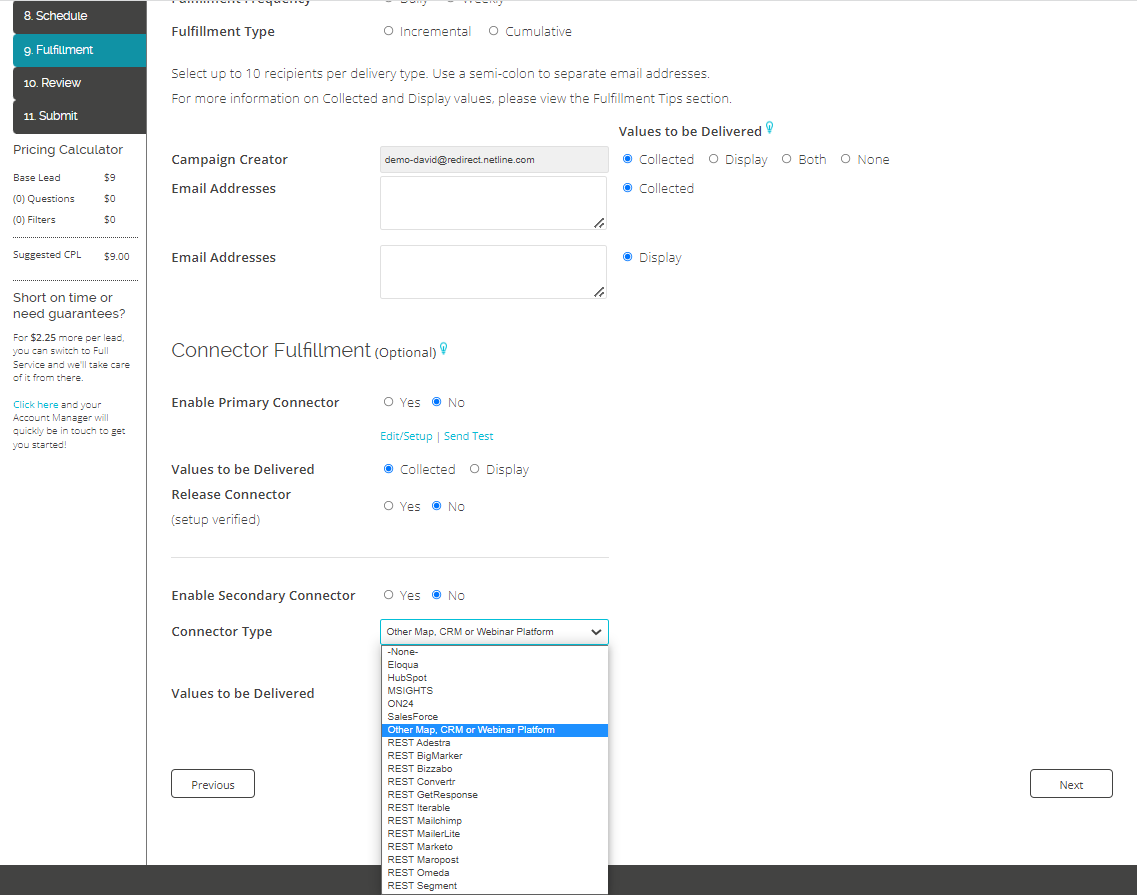
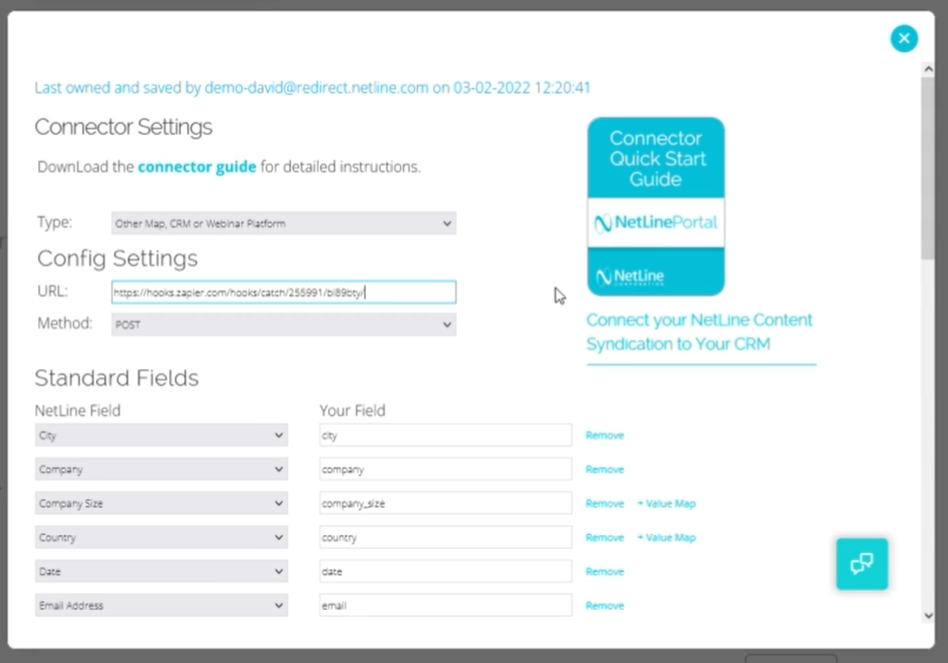
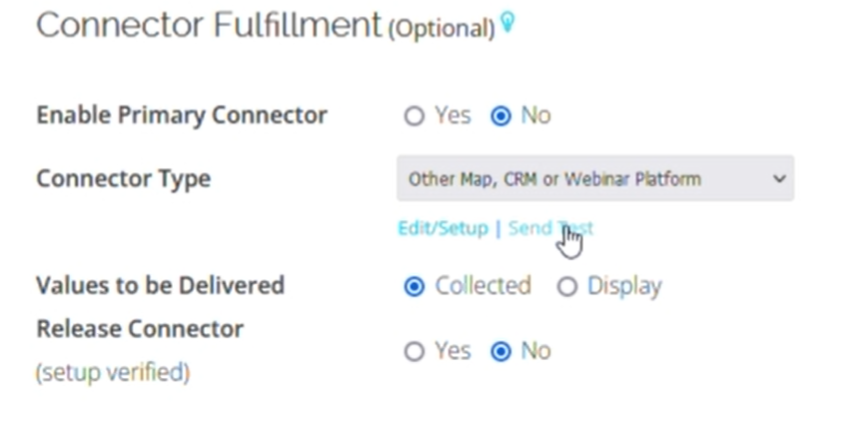
Starting at the Fulfillment step within the NetLine Portal, scroll down to the Connector Fulfillment section and select ‘Other’ from the Connector Type dropdown menu.

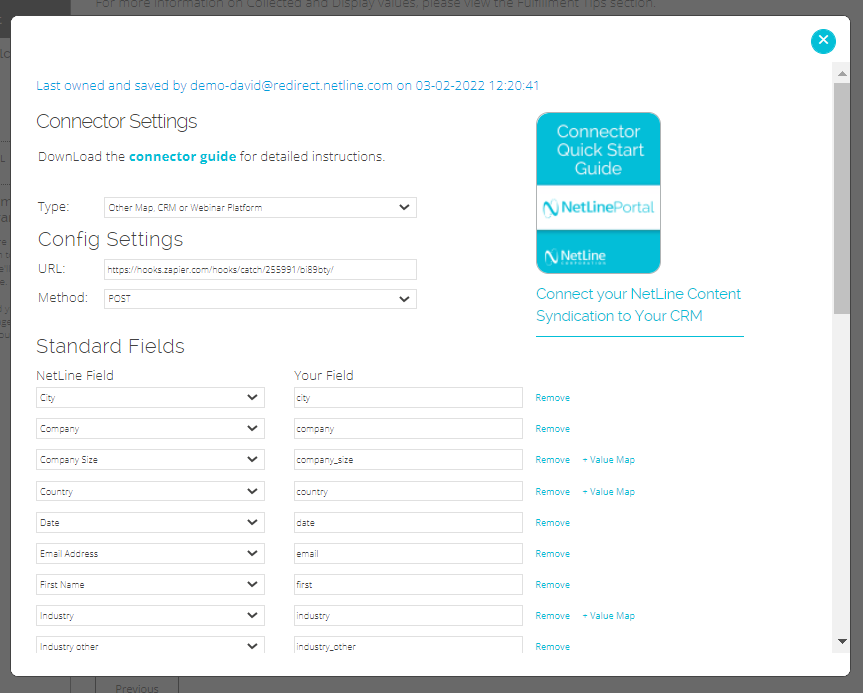
Next, we’ll hit, Edit/Setup. You’ll see here is a quick API key, which will allow NetLine to speak to Zoho CRM.

From here, we’ll need to figure out a few things: 

  • Where are we sending the data?
  • Which fields are important to us?
  • Are there any constant fields? 

Of course, these fields will be determined by the needs and goals of our lead gen program.

2. Establish Your Zapier to Zoho CRM Webhook

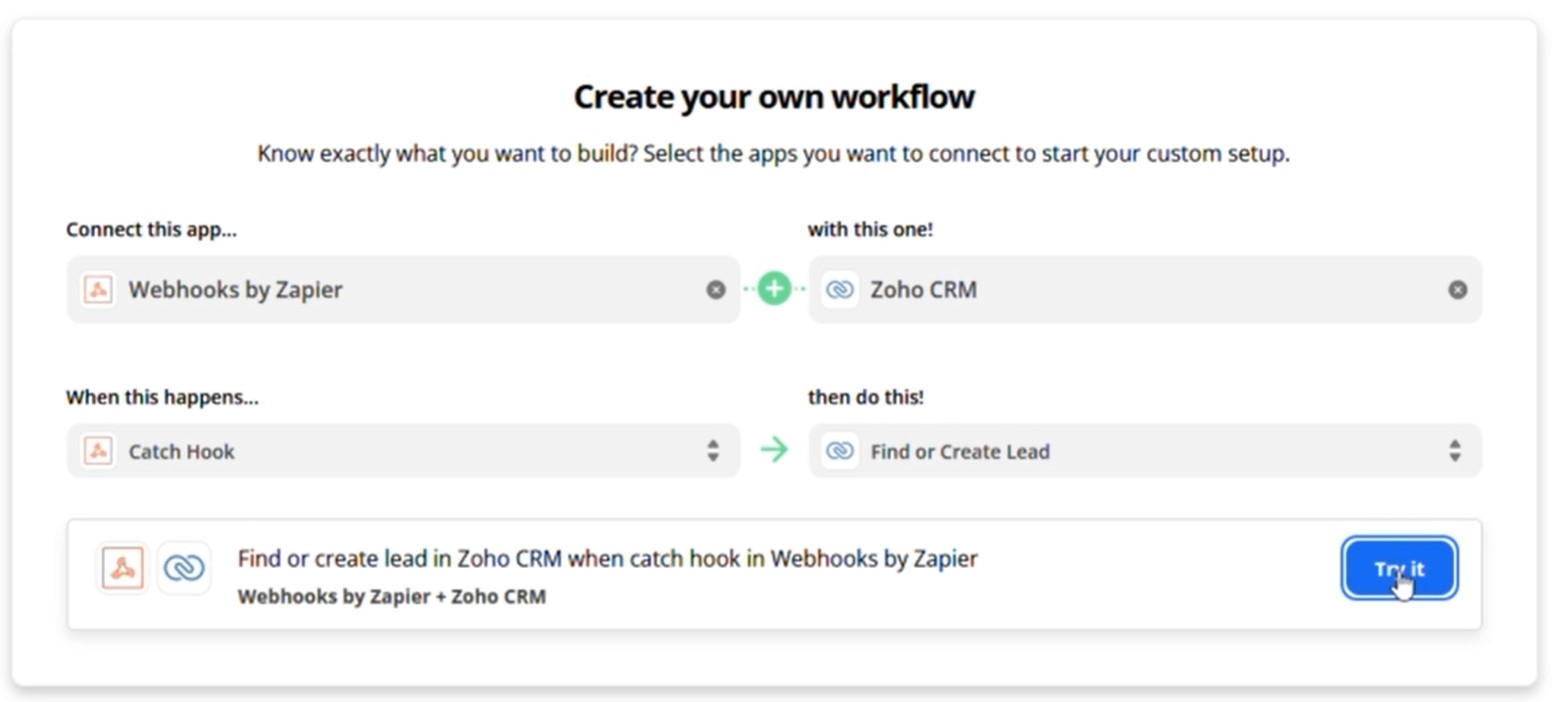
In order to catch data being sent to Zapier, we’ll use a webhook; specifically a Webhook by Zapier, which we’ll want to connect to Zoho CRM.

Next, we’ll want to Catch Hook (which means we’re catching the data from NetLine) and instruct Zapier to Find or Create a New Lead. There are few different options available to you here, but based on the use case, our educated guess is that we’ll to want to find or create a lead.

Once all of these fields are complete, hit Try it.

3. Test Your Trigger

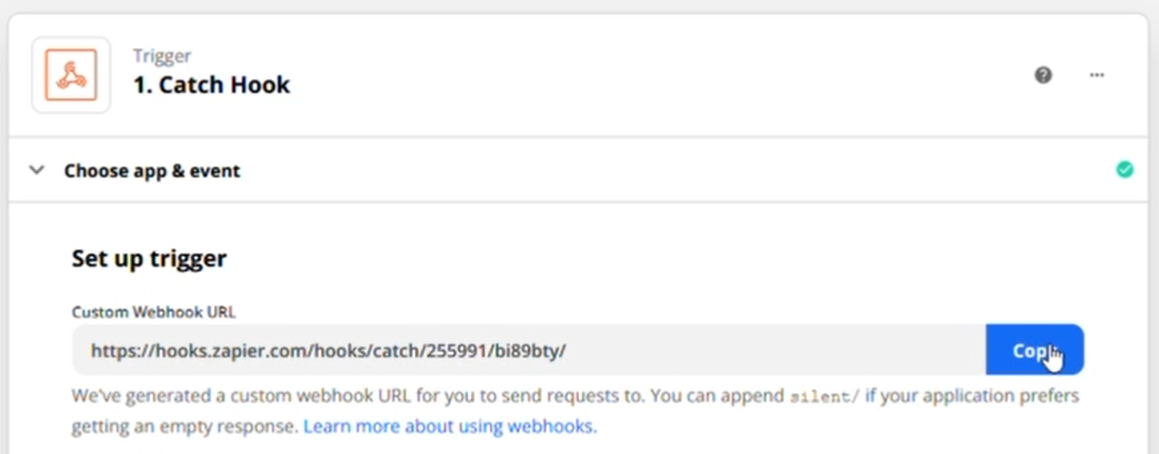
In Zapier, you’ll be greeted by a multi-step page. The first thing you should see under Choose app & event is Set up trigger. Copy this URL. With this URL copied, we’ll jump back to the Portal. 

Under Config Settings, paste the URL into the empty URL field. Hit Submit. We’ll come back to this page in a moment.

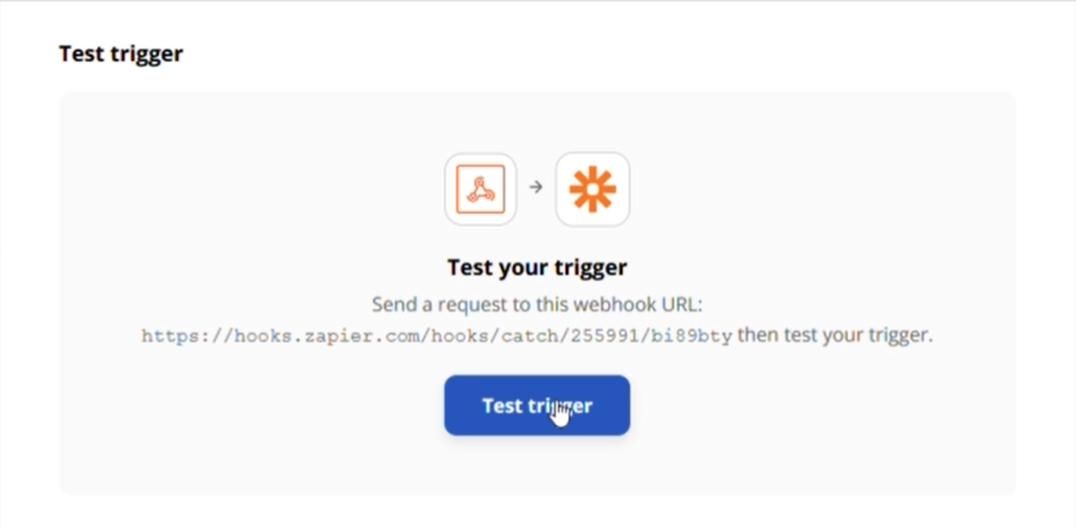
Now, we’ll return to Zapier and hit continue. When presented with the option to Test Trigger, click the blue button. You will get a message saying Zapier didn’t find anything. We’ll need to send a test via the NetLine Portal.

Returning to the Portal, you should see a new option under Connector Fulfillment and directly next to Connector Type to select Send Test. Click this link.

Clicking Send Test will pull up a number of test records which will be sent over directly to Zapier through the connector. After hitting Submit in the pop-up window, the system will take a second and confirm that those test records have been sent. 

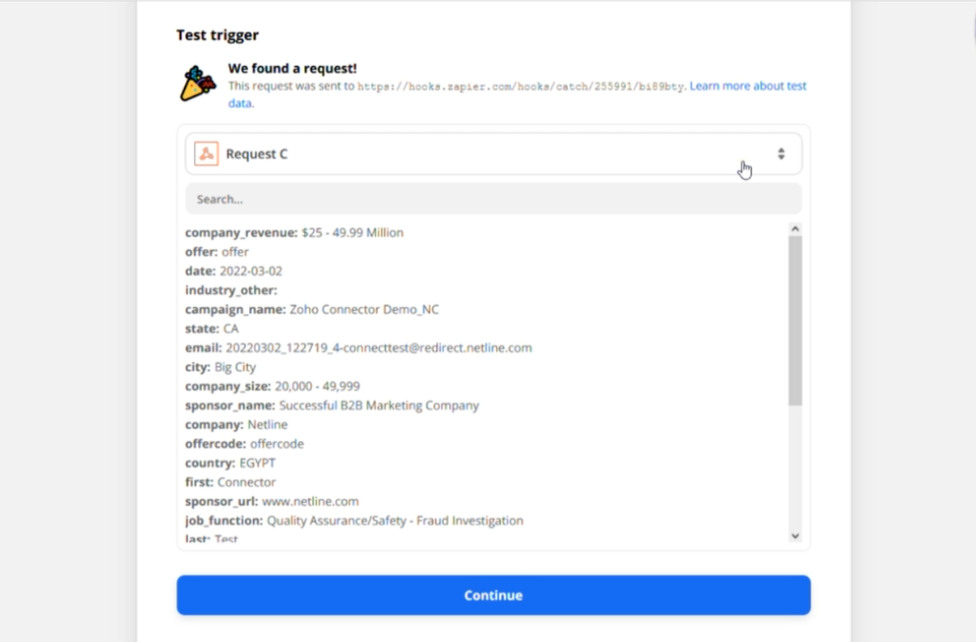
Next, we’ll tab back over into Zapier and once again hit Test trigger. Now the data should be found within Zapier. 

If you see this screen above, hooray! It worked! Hit Continue.

4. Connecting Zapier’s Webhook to Zoho CRM

At this point, technically, we’ve already confirmed that NetLine has sent data in real-time to Zapier. Now what you need to do is connect Zapier to Zoho. To complete this step, you will need to be a Zoho CRM paying customer.

Within the Action step in Zapier (Find or Create Lead in Zoho CRM), you’ll choose “Converted Lead” from the Action Event dropdown menu. Hit continue.

5. Sign in to Zoho CRM

Under Choose Account, you’ll hit, “Sign Into Zoho CRM,” where you’ll be met with a pop-up OAuth to login. Effectively, this connects Zoho to Zapier, and Zapier is then connected to NetLine from there. 

The only other things that you’ll need to consider is going back into this and looking at the fields that we’re delivering and first figuring out are these fields and the naming conventions that Zoho is receiving them as meaning that like is city or, or lowercase.

You may be required to add some constant fields like an API key, but this will all be addressed in Zapier’s setup flow. You can pass in campaign names and tracking codes and even UTM parameters, if you so choose. If there are fields that you don’t even want to receive, you can simply remove those, which means we won’t be sending that data to Zapier, which means that most certainly won’t go into Zoho.

Successfully Connecting NetLine to Zoho CRM in a Matter of Minutes

That’s it! 

Zapier does continue forward with that progression a bit more, as there are little tools and tips to help connect the dots for you.

We hope this was helpful and kind of getting you on your way to passing along your leads! If you need any further assistance or want to walk us through some additional screenshots of the Zoho side, feel free to reach out to our Portal Support is always eager to help and provide solutions and guidance.

Categories B2B

Visual Identity Systems: What They Are & Why They Matter

When we build a brand, we build an experience that reflects a purpose. Visual identity is a huge part of this brand experience. Colors, graphics, and fonts turn brand concepts into visual identities that can be recognized.

Once a brand is established, it needs to become a recognizable identity that the external world can perceive. This recognition comes with consistency, and achieving that consistency requires a strong visual identity system.

Download Now: Free Brand Building Guide

To create a visual identity system, you need all the visual elements that the brand has. The visual identity system’s basics are a strong brand guide and its implementation tasks. The ultimate goal of this system is to turn all the brand assets into principles that all the content team can follow to make sure that the online presence is aligned with the original brand concept.

Visual Identity System Benefits

A visual identity system is a way to make things easier, help people achieve a manageable and effective workload, and avoid mistakes. These mistakes can take place when there is no clear guidance about how to achieve excellent work results.

Putting systems in place turns complex processes into easy-to-understand steps that increase efficiency.

An effective visual identity system will help an organization:

  • Improve the outcome of their content creation process.
  • Avoid mistakes related to misunderstanding what the brand entails.
  • Make collaboration between teams easy.
  • Create complex strategies with a strong foundation that can help implement them.

How To Create a Visual Identity System

Step 1: Develop the Brand Identity

A visual identity system starts with what we know as the brand image. This includes the logo, fonts, and brand colors. Ideally, you’ll have these in a brand guide already, but if you don’t you should develop them in this step.

Step 2: Create a Mood Board

Mood boards are similar to visual identity systems in the sense that they depict far more than a logo and color scheme. Mood boards go a step further in displaying photographs, video, and even audio or scents to get a well-rounded feel for a brand.

Mood boards are curated content (i.e. not developed in house at a company or organization) and are not public. They’re strictly helpful in gaining inspiration and feedback from stakeholders about what the official visual identity system might look like once it’s finished.

Step 3: Get Feedback

Sounds simple enough, right? But this can be a step in the process that you revisit several times before settling on the perfect draft of your visual identity system.

Rather than creating proprietary content for your visual identity system every time you get new feedback, use your modo board from the step above to relay your vision. Once you get buy-in, you’re ready to put together your own visual identity system.

Step 4: Include Guidelines

In order for a visual identity system to work well, it’s important to include guidelines for using each element. These guidelines answer specific questions “How do designers create new content without breaking the consistency?” and “How does a website developer understand what the website should look like?”

There are, for example, types of content where a logo is not the best option to add, so designers can opt for a word mark or simplified logo instead.

It’s important to be very specific and particular with the guidelines so that there is little confusion and designers can develop discernment about best practices for using the visual identity system.

Once you have them in place, it’s time to add guidelines for each element. There are several ways you can structure this, but here are a couple of common ones:

  • Dedicate a page to each element and include guidelines on the same page as the element.
  • Include your brand guide at the beginning of the visual identity system document and add guidelines toward the end.
  • Add an FAQ sheet explaining the guidelines for each element.
  • Add samples of do’s and don’ts so the team sees real-world examples of the guidelines in action.

Visual Identity System Basics

If you want to build your visual identity system to make your brand stand out from the crowd, here are some best practices that can help you avoid common mistakes and achieve great results.

Know your message.

Know your message, purpose, and how you want to talk to your audience. Visual identity system basics need a strong foundation to succeed. Think about those values you want to share and the misconceptions you want to avoid at all costs. Create a schedule that prioritizes your main goals and allows you to create results aligned with your values.

Knowing what you want to communicate will help you build a message that is not only profitable but also aligns with your values.

Have a strong theoretical background.

Do you know that psychology studies the foundations of the relationship between colors and feelings? Have you noticed that a message can be read as scary or romantic based on your font? If you have this information, you can shape how people visually perceive your brand.

Psychology tells us a lot about colors and how they can affect people’s perception of our brands. If you don’t know much about this, maybe it is time for you to start diving into some research work.

Create an effective system.

Create an effective but scalable system so it can be upgraded based on your brand and business needs. The main goal of any system is to make things easier. That should be on top of every requirement that comes along the way.

Visual identity system examples are successful if they show the potential to scale without losing their efficiency.

Be specific.

Be as specific as possible, as this will make you avoid mistakes and the unnecessary back and forth between team members. Choosing details like the stock photos that suit the brand can make the difference.

Making things clear can be incredibly helpful for new team members who don’t have the brand background needed to understand the virtual identity system basics by themselves.

Create an Amazing Visual Identity System

Building a system is a concept that sounds more technical and specialized, which makes it hard to start. But, the truth is, even if you have just a bunch of tasks together, you’re already building the first steps towards your system creation. You’re close to the goal.

Systems can make everything easier, even if you start small with many questions. You will learn the details along the way.

Have you created a strong visual identity system? If you haven’t, today is the day to start.

brand consistency

Categories B2B

How Consumers Prefer to Interact With Brands [HubSpot Blog Survey]

All customers have different communication preferences regarding the brands they like. Some may want to call a company to learn more about what it offers, while others may initiate a conversation with a chatbot. 

As your goal is to create a customer experience that speaks to customer needs, you want to know which channels they prefer. Find out how to be really good at Marketing in 2020 here.

Read on to discover new HubSpot Blog insight about customer communication preferences with their favorite businesses. 

Customer Communication Preference Statistics

How Customers Prefer to Learn About Products

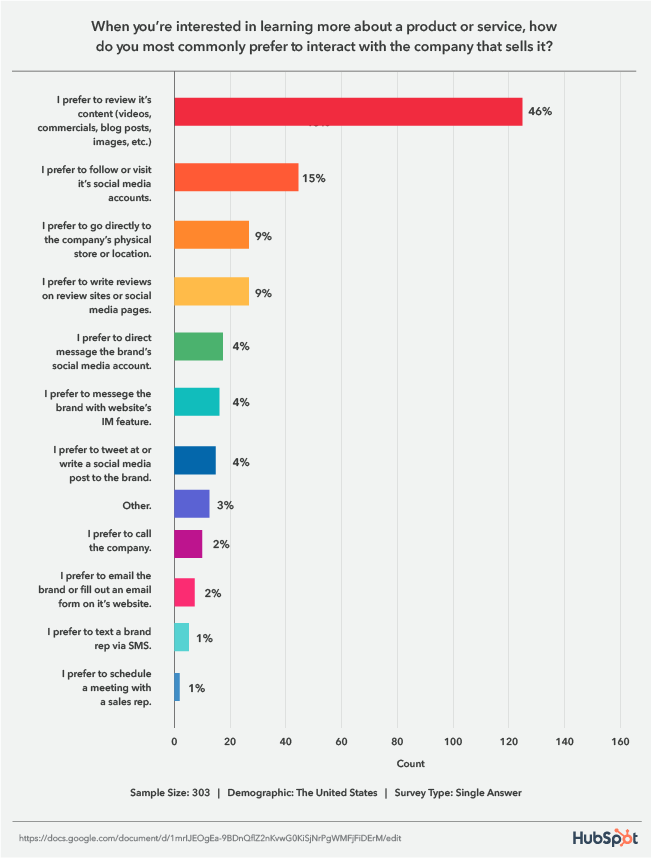
A HubSpot Blog survey asked respondents how they prefer to interact with companies when looking for information about a product or service. 

46% said they prefer to review its content (videos, commercials, blog posts, images, etc.), 15% follow or visit its social media accounts, and 9% go to the company’s physical store and read reviews on review sites or social media pages. 

graph displaying customer communication preferences for learning about businesses

Data Source

1. Reviewing Content

Audiences overwhelmingly prefer to review the content your business puts out, so it’s essential to speak to this desire in your marketing strategy by creating the useful content your audiences are looking for. 

With this tip, it’s important to also be aware of the channels your audiences use the most so you can meet them on their preferred mediums. For example, Gen Z spends most of their time on YouTube, and 47% research products they’re interested in on the platform, followed by Instagram, Snapchat, then TikTok. 

2. Social Media

When it comes to social media, 56% of consumers are influenced by posts shared by friends and family for sourcing ideas. In addition, 54% of Gen Z shoppers and 58% of millennials agree that social platforms are better than online searches for finding new products. 

3. Reading Reviews

When it comes to reading reviews, a 2021 Stackla report found that UGC, which reviews are a type of, is 8.7 times more impactful than influencer content and 6.6 times more than branded content. 56% of people have also reported leaving an eCommerce store without purchasing because the site didn’t contain any customer reviews or photos. 

How Customers Prefer to Communicate with a Company

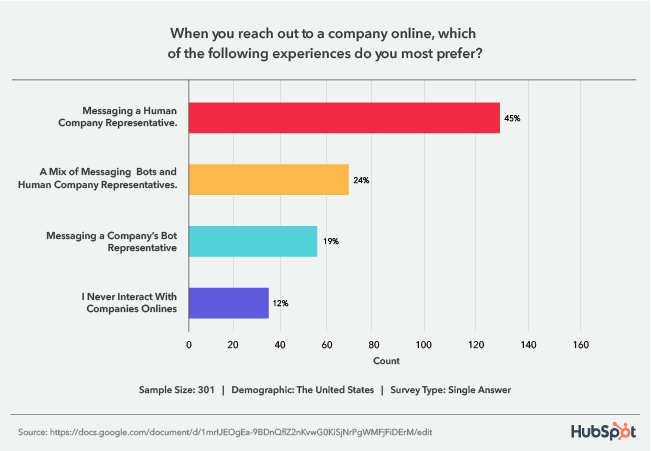
When reaching out to a company online, survey respondents preferred to message a human representative from your business (45%). 

graph displaying customer preferences for reaching out to a business online

Data Source

This is a crucial statistic to be aware of considering the rise of chatbots. While the AI-powered tool is undoubtedly helpful, customers are letting us know that they don’t want you to shift your entire messaging strategy to revolve around an automated tool.

However, the second-highest preference is for a mix of chatbots and human representatives. So, even though customers want to talk to a person, you can combine both tools in your strategy. When you leverage a mix of the two, aim to have bots complement the human experience. For example, a bot can initiate a conversation and collect information to transfer the customer to an agent most equipped to provide a solution. 

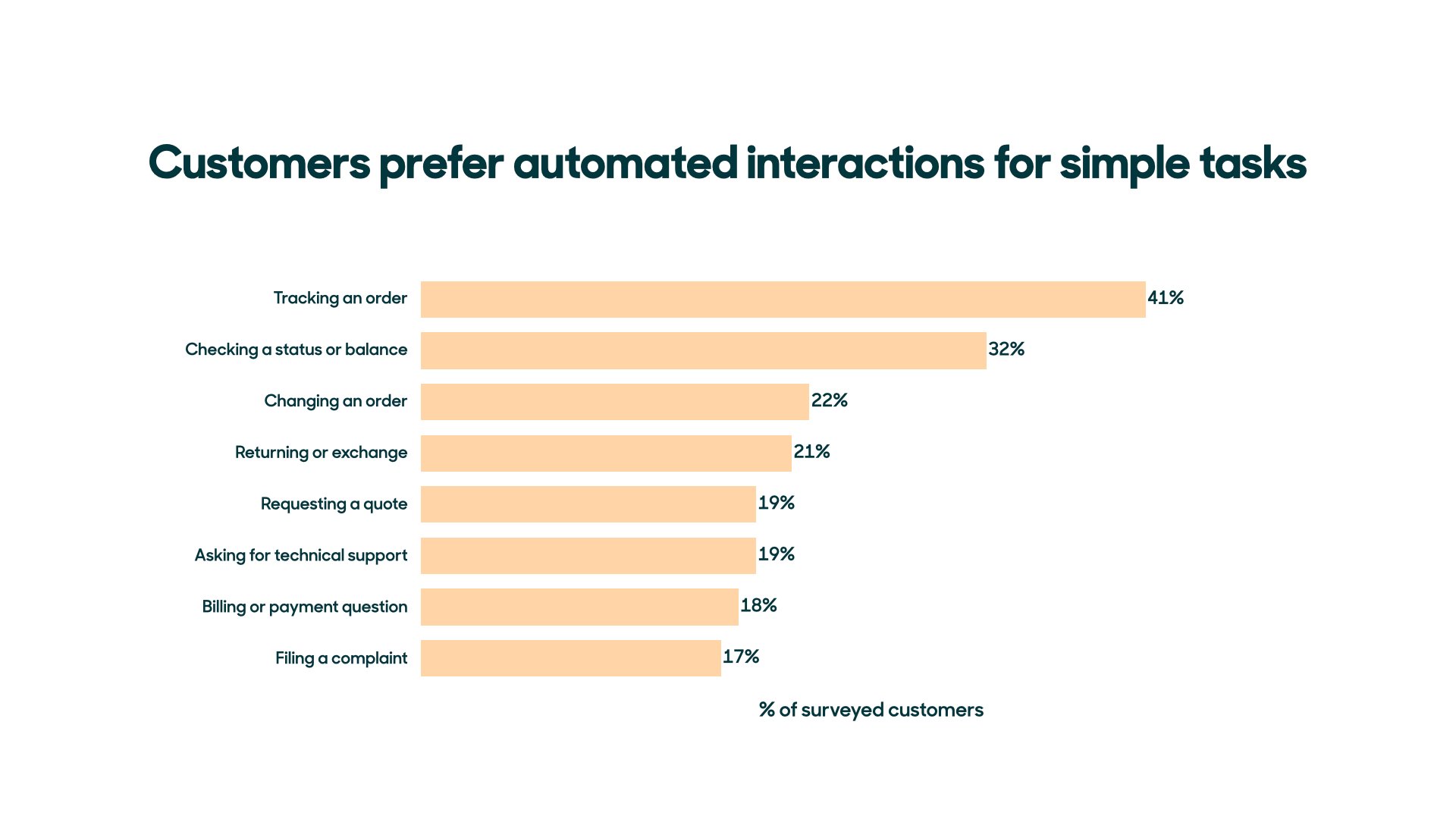
Customers are also okay with simply using chatbots for routine and simple tasks, like order tracking, checking status or balance, or changing an order. 

Customers prefer automated interactions for simple tasks-1

Image Source

Looking Ahead

As a business, it’s important to match the ways you sell with the ways people want to buy. Leverage the insight from this HubSpot Blog survey to ensure you’re speaking to current customer desires and meeting them on their preferred channels.

How to Be Really Good at Marketing in 2020

 
Hi there! Want to be really good at marketing in 2020? Start here.

Categories B2B

8 Easy Social Media Marketing Tips for Introverts [+Best Apps]

Social media marketing isn’t easy, and it’s even more challenging for introverts.

Up to 50 percent of people consider themselves introverts. Sometimes considered antisocial, the truth is that many introverts enjoy social activities but find them exhausting — where an extrovert might gain energy from being in a big crowd, introverts need time to recover and recharge.

→ Free Download: Social Media Calendar Template [Access Now]

For introverted entrepreneurs and small business owners, this poses a challenge: With social media a key component in brand building, how do they manage the demands of social interaction with the need to take care of their own mental health?

In this piece, we’ll offer eight easy tips to help improve your social media marketing (without losing your sanity) and four great apps to help you get the job done.

Social Media Tips for Introverts

1. Create a social calendar.

It’s easy for introverts to get overwhelmed with the sheer number of social posts, replies, and activities required to build a personal or business brand. But given that these connections are critical to boost your public profile and help drive new career opportunities, they can’t be ignored.

Best bet? Start by creating a social calendar that maps out what you’re going to post, where, and when to help make sense of social media efforts. Using a calendar also gives you more opportunity to be socially spontaneous if you’ve got the energy, since your posts are already penciled into your calendar.

Not sure where to get started? Check out HubSpot’s Social Media Content Calendar Template.

2. Pick and choose your people.

The great thing about social media is how it offers connections to so many people — and the terrible thing about social media is that it offers connections to so many people.

This is the case for many introverts; what starts as a great way to connect turns into a continual avalanche of opinions and ideas that’s hard to navigate and even harder to manage. As a result, it’s worth regularly assessing your social media feeds and curating who you follow. While you don’t want to create an echo chamber that cuts off your ability to build brands outside narrow circles, there’s nothing wrong with being choosy about who you follow and why.

3. Schedule social posts.

Despite best efforts, you’ll still get overwhelmed from time to time. That’s OK — and it’s important to take a break and recharge your batteries. The challenge? While introverts are resting up, they’re often still worried about what they’re missing on social media.

To help solve this problem, opt for an app that lets you schedule social posts at the time of your choosing. That way, you can confidently take breaks knowing that you’re still delivering content.

4. Find a matching platform.

Facebook is great for larger conversations, LinkedIn works well to connect with specific people, Twitter offers space for quick-fire interactions, and Instagram is all about images.

Chances are, you have a preference: Maybe you like the quieter atmosphere of LinkedIn, or maybe posting pictures makes it easier to feel connected with your audience. While it’s important to keep your social avenues open, there’s nothing wrong with investing more time in the platform that best suits your style, since you’ll be more productive over time.

5. Curate your content.

Not everything needs to be posted on social media. While sharing details about yourself and your life can help grow a social following and in turn bolster your business efforts, you need to draw a line between personal and professional posting.

In practice, this means deciding what content you post and what you keep private. There’s no right answer here — the key is setting boundaries that work for you so that you feel comfortable about what you’re sharing and secure in what you keep to yourself.

6. Track your social media metrics.

Social media metrics help you see what’s working and what isn’t, and come with the benefit of letting you take a break from people. Rather than reaching out to see why connections haven’t engaged with your brand or aren’t viewing your content, leverage data tracking and analytics tools to see where you’re losing interest. These metrics help you build out a better strategy and let you do it in peace and quiet.

7. Opt for one-on-one interactions.

Introverts are often incredibly engaging and social — when it comes to one-on-one interactions. Consider a party with hundreds of people all having a good time. Many introverts will seek out a single individual or small group and set up camp, rather than trying to mingle.

This approach also works for social media. As people make comments on your posts, consider reaching out with a direct message to strike up a conversation. These one-on-one conversations can let you shine socially without the need to navigate multiple interactions simultaneously.

8. Hire help as needed.

If social media marketing simply isn’t in your wheelhouse, consider hiring help. The complex and evolving nature of social platforms has created a market for social specialists capable of directly targeting your key audience segments and curating your social calendar. In much the same way that you might hire an accountant to manage your business finances, you can now tap social media expertise to streamline the process.

Best Social Media Apps for Introverts

1. Google Analytics

best social apps for introverts: google analytics

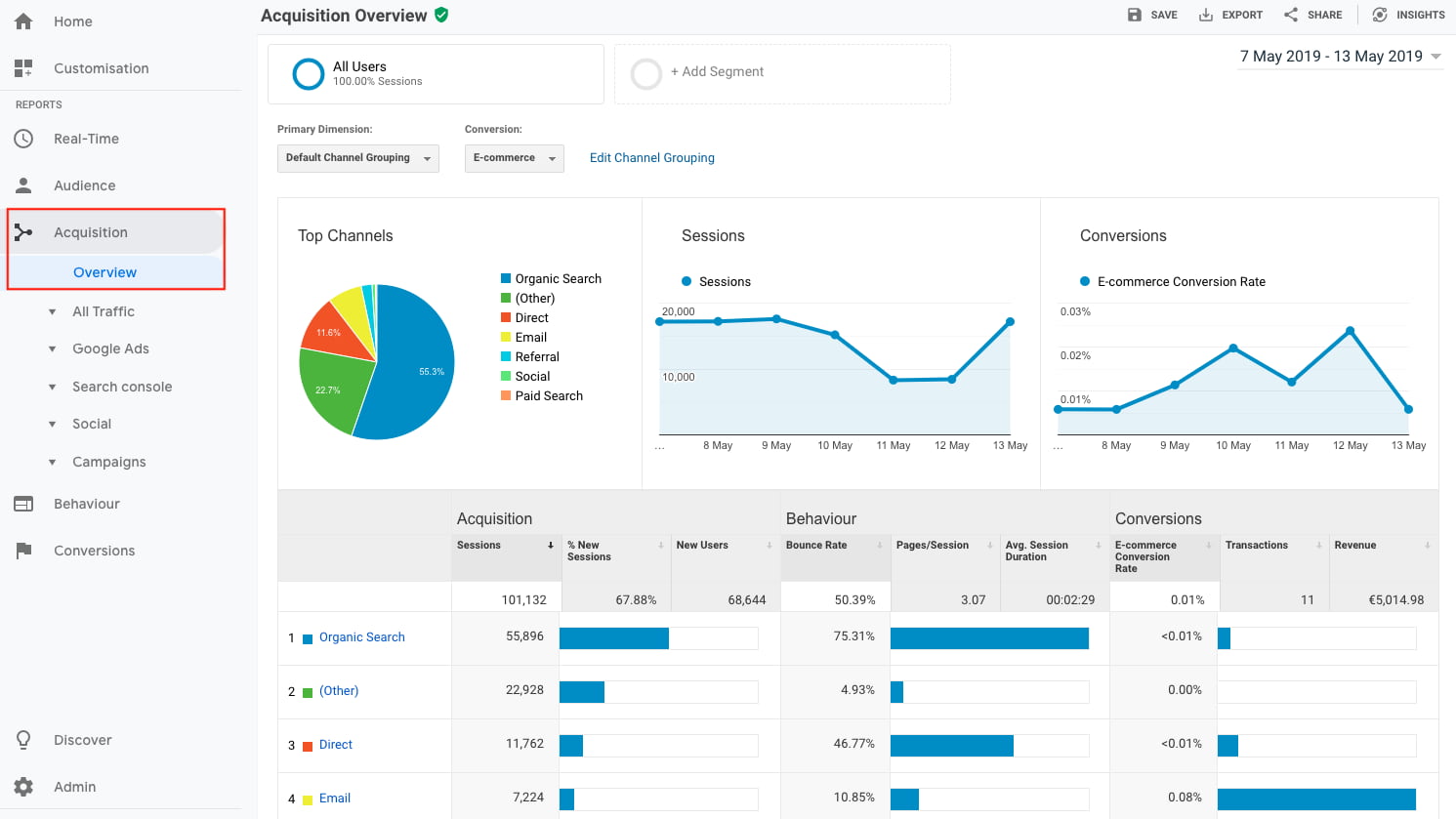
When it comes to metrics, you can’t go wrong with Google Analytics. The app lets you track which of your posts have been shared and on which platform, in turn helping you develop a more focused social media strategy.

You can also use Google Analytics to identify potential weak points in your current efforts. Are there certain platforms where you’re not reaching engagement goals? Are specific post types outperforming others? This data sets the stage for better interactions.

2. Bufferbest social apps for introverts: buffer

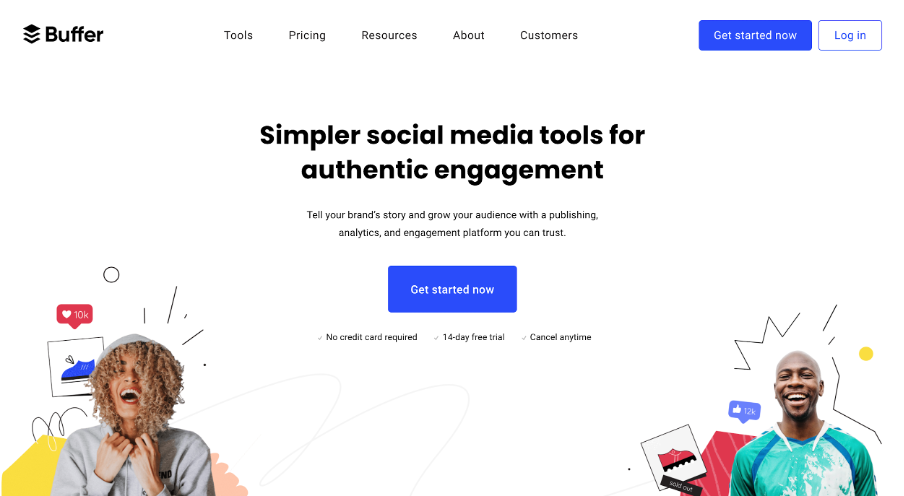
Buffer lets you easily evaluate social media performance, schedule posts, and respond to comments ASAP.

With just a few clicks, you can schedule posts on the platform you prefer at the time of your choosing, freeing up your time to create new campaigns or build new content. Using labels and hotkeys, meanwhile, you can quickly pinpoint comments on your posts that need immediate attention so you don’t miss a customer concern or a new connection opportunity.

3. Adobe Creative Cloud Express

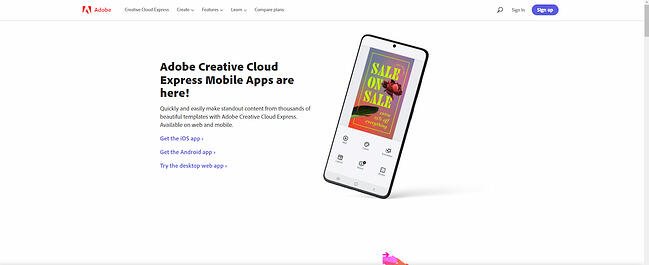
best social apps for introverts: adobe creative cloud expressFormerly Adobe Spark, Creative Cloud Express provides the power of pictures with thousands of pre-built content templates. Easily make standout graphics, logos, and photo collages to showcase your brand or highlight your mission, and then posts these images on the platform of your choice.

Available for iOS, Android, and for desktops, you get full access to the app for 14 days for free — after that, you’ll need a Creative Cloud subscription.

5. REP

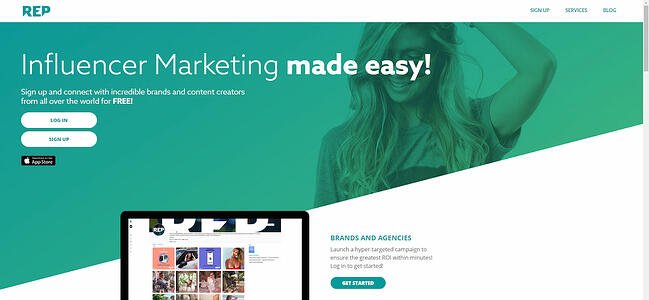
best social apps for introverts: rep influencer marketingLove the impact of influencer marketing, but don’t like the idea of cold-calling influencers to work with you? REP has you covered. This influencer marketplace lets you post job opportunities, connect with potential influencers, and negotiate terms, all from the app.

It’s a great choice for introverts who want to leverage the power of social media but want to keep the number of uncomfortable interactions to a minimum.

Solving for Social Media Marketing Stress

There’s no way around it: Introverts will always find social media stressful. But it’s still a powerful tool in your arsenal, and with the right approach, it’s possible to strike a balance between building a public presence and protecting your private life.

Best bet? Prioritize where and what you want to post, and make sure to take regular breaks. Push yourself to do better, but recognize that introversion isn’t a problem to solve but rather a different approach that lets you cultivate more direct and in-depth, one-on-one connections.

Editor’s note: This post was originally published in April 2009 and has been updated for comprehensiveness.
social media content calendar

Categories B2B

The Best Fonts for Your Resume in 2022, According to HubSpot Recruiters

Studies have shown recruiters typically scan a resume for only about six seconds before making a decision on whether an applicant is fit for a role.

With only six seconds to demonstrate your qualifications for a position, every detail counts – including the font you use. The question is, what are the best resume fonts to pass the six-second scan?

→ Download Now: 12 Resume Templates [Free Download]

We asked HubSpot recruiters to reveal the seven best fonts for your resume as well as what they consider in terms of design in general, so your resume can stand out in the pile.

Featured Resource: 12 Free Resume Templates

resume-cover

Download Now

With only six seconds to demonstrate your qualifications for a position, every detail counts. To evoke a sense of style, professionalism, and uniqueness, it’s critical you put effort and consideration into your font choice.

When speaking with recruiters, it quickly became clear that classic fonts are still the best options.

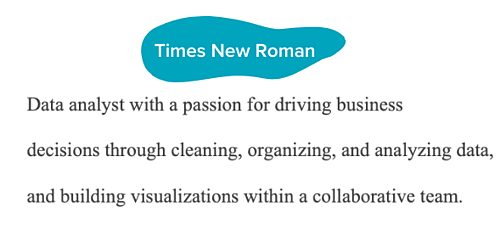
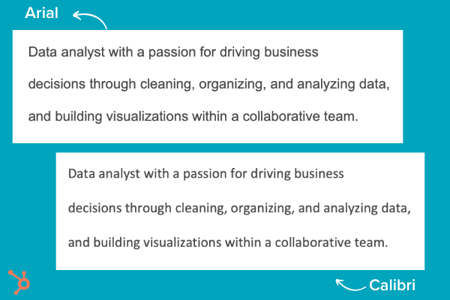
“I’m a big fan of the ‘classics’ for resumes – Times New Roman, Arial, Calibri, Helvetica, and Cambria. I’m a little old school, but I think they are the cleanest and exude professionalism,” said Johanna Fleming, a former senior recruiter at HubSpot.

best resume font: times new roman

Riley Kundtz, former senior MBA campus recruiter at HubSpot, agreed.

“I find the classic formatting and Times font to be helpful when reading a dense resume from an experienced MBA candidate.”

Times New Roman has become a bit controversial lately. It was the go-to font for many years, but lately, some are opting against it.

“For me, it’s all about legibility and cleanliness – I prefer sans-serif fonts like Helvetica over serif fonts like Times New Roman,” said technical recruiter at HubSpot, Glory Montes. “Overall, I would just stay away from a font like Times New Roman, it’s overused and reminds me of long nights writing course papers in college.”

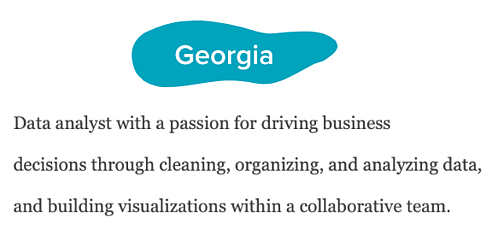
One font that’s similar to Times is Georgia, it’s a bit wider making it easier to read. In fact, it’s the font used by The New York Times.

best resume font: georgia

Paulina Valdez Franco, executive recruiter at HubSpot, agrees with this take.

“My two favorite fonts are Helvetica, if you’re looking for a clean and classic look, and Georgia, if you’re going after a more modern and fun look,” she said. “The latter is also designed to read well on screens.”

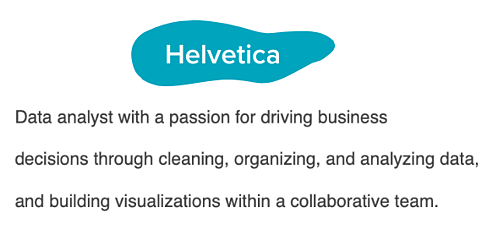
best resume font: helvetica

Helvetica is widely used in the advertising industry and works equally well for text-heavy pages and documents.

A lesser-known font that’s a great option for your resume is Garamond, recommended by our current team lead of engineering recruiting at HubSpot, Rich Lapham.

“Recruiters have an idea of the skills they are looking for on a resume, so if you try a new style or format, it can be tougher for recruiters to find the information they are looking for,” he said. “Keep it clean and simple.”

Franco added that Arial and Calibri are great choices if you want to play it safe.

Bridget LeMon, global emerging talent and university recruiting manager at HubSpot, echoes this.

“It’s totally acceptable – and becoming more common – for candidates to stray away from the resume norms of Times New Roman and Calibri,” she said. “Avenir Next and Muna are two great options if you are looking to break the status quo.”

best resume fonts: arial and calibri

Ultimately, you’ll want to consider the position for which you’re applying when you’re choosing a font. To Montes’ point, certain more creative roles might benefit from a more unique font than Times New Roman.

Does your resume font even matter?

Most recruiters I spoke with were hesitant to even offer a font at all. Instead, they focus on the content.

“I typically don’t pay too much attention to font,” said Heta Patel former HubSpot recruiter. “I’m more concerned about whether the resume is formatted in a clean way – submitting a PDF is helpful with this, so your formatting doesn’t shift.”

Sales Recruiting Manager Kelsey Freedman agreed.

“Honestly, I don’t care much about the font of a resume, as long as it’s clear and in PDF format. I typically only review a resume for 20 to 30 seconds, so a traditional font is good. I would advise avoiding script font or bubble font, or something distracting like that.”

Ultimately, and as expected, your content still matters most. However, a clean, clear font will help avoid any irritability you might cause a recruiter with a distracting, messy design.

“What I get most excited about is the content. Depending on the role, I look to see that candidates are sharing direct and compelling snapshots of their work,” said Ashley Hodder, a global recruiting manager at HubSpot. “I look for indicators that show data orientation, autonomy, and thoughtfulness about business impact.”

Worst Resume Fonts

While some recruiters may not have suggestions for the best fonts to use, many can agree on some of the worst ones.

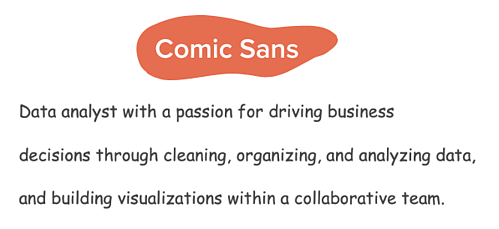
“Anything that is cursive, or too bubbly, is too hard to read. For instance, I’d stay clear of Comic Sans,” says Holly Peterson, team lead for UX recruiting HubSpot.

worst resume fonts: comic sans

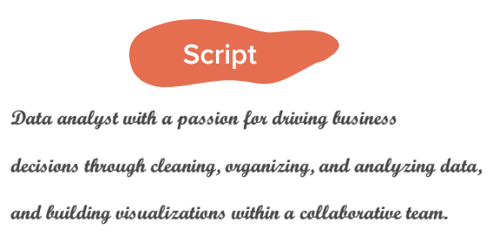
Another font type to avoid is Script.

With text-heavy documents, Script and any of its derivatives make things hard to read because they’re meant to look like they’re written by hand. worst resume font: script

They’re generally used in hand lettering and calligraphy for artistic projects and shouldn’t be present anywhere near your resume.

Ideal Resume Font Size

When asked about which font size is best, Fleming said 12 is ideal. Most recruiters would agree.

Your text should be large enough to read comfortably without straining but small enough that there’s space to include all the key elements, such as an objective, contact information, skills, and experience.

Where you can go larger are for headings for your name and section titles.

If the font you chose is particularly wide, you can scale down to 10.5 – never going below it.

The key takeaway is that make your resume as clear and easy-to-read as possible, which means keeping the font size around 12, sticking to classic fonts with modern twists, and forsaking your favorite script font.

Editor’s note: This post was originally published in November 2018 and has been updated for comprehensiveness.

New Call-to-action

Categories B2B

18 Best Free Microsoft Excel Templates for Marketing & Sales

Many of us can recall a time in high school when we were sitting in math class and thinking, “When am I ever going to use this stuff in the real world?” And then we suddenly find ourselves in the real world, only to realize that numbers do play a pivotal role in what we do — especially in digital marketing.

Download 10 Excel Templates for Marketers [Free Kit]

The trouble is, many Excel templates and spreadsheets are riddled with numbers and formulas that aren’t all that inviting. Making them from scratch can be especially intimidating. While we won’t argue with that, we will say that the advantages of leveraging Excel’s functionality to organize information and streamline tasks are unparalleled.

To help those of you looking for a way to sharpen your skills, we’ve put together a detailed list of ways you can start using Excel to simplify your marketing tasks. Complete with templates, these suggestions will have you making strides in no time. Know what’s even better? You can download a kit of Excel templates in one fell swoop.

Microsoft Excel has many capabilities. It stores data and has tools for data analysis. It performs calculations and allows you to use code for automation. And while many recognize it as a tool for calculating numbers and figures, it’s more than that.

There is a learning curve when using Excel, and it takes time to master its many uses. Outside of calculations, the spreadsheet allows you to create social media schedules, editorial calendars, campaign trackers, and more. And instead of subjecting yourself to trial-and-error processes that would certainly waste time, you can use the following marketing templates to expedite your company’s success in marketing, sales, and project management.

Marketing Excel Templates

1. Marketing Budget Template

marketing budget template in excel showing monthly spend

While marketing budgets vary from business to business, the need for structure and a clear sense of alignment between your goals and your spending is critical across the board. To ensure your preparedness for unanticipated costs, you must allocate your budget thoughtfully and correctly. You will also need to keep tabs on how closely you’re sticking to your projected expenses.

If you want to avoid a mess at the end of the month or quarter, take a look at this collection of 8 marketing budget templates designed to help you better organize your marketing spend. From product marketing and website redesign to content marketing and events, these templates serve as a guide for marketers to visualize and track their expenses to avoid overspending.

The collection also contains a master marketing budget template that will help you generate a high-level visualization of your marketing budget on a month-by-month and quarterly basis.

2. Marketing Dashboard for Excel

marketing dashboard with performance metrics and colorful bar and line graphs

There is no shortage of data to monitor when it comes to marketing, and if it feels like you’re getting too far in the weeds or missing essential details when it gets too granular, a marketing tracker like the above dashboard can help.

This particular tool allows you to enter metrics by campaign to auto-populate visual and easy-to-read charts. As a result, you can visualize the effectiveness of spending and activity across multiple initiatives.

3. Monthly Marketing Reporting Template

monthly marketing metrics template in excel that includes rows for direct traffic, email marketing, and other channels to calculate month over month growth

Is there a feeling sweeter than hitting all of your goals for the month? How about communicating your success to your boss? Excel spreadsheets can prepare comprehensive reports of your marketing metrics to send to your boss. There’s no need to work from scratch. (After all, you’ve already worked so hard this month.)

To simplify your reporting, check out these monthly marketing metrics templates and the corresponding PowerPoint template. Each month, you can update them quickly and easily to reflect your monthly visits, leads, customers, and conversion rates. From there, you’ll have everything you need to track and report on which channels are performing best. Every boss loves to see ROI, so you can’t go wrong with these templates.

4. SMART Goal Matrix

smart marketing goals template in excel that includes slots for time period and numerical metric

Whether you’re planning for a new year, quarter, or month, defining a clear set of goals is critical for driving the direction of your marketing efforts and priorities.

Sometimes, you might need help not only setting marketing objectives but achieving them. Start with these SMART goal planning templates. Rooted in specificity, measurability, attainability, relevancy, and timeliness, these templates will help you set your team up for success. They will also provide you with a tool for identifying your most prominent marketing needs.

5. On-Page SEO Template

on-page seo template in excel with URL, social media details, and calls to action

When it comes to SEO, there’s a lot for marketers to remember to see results. In other words, there is a lot for marketers to forget. With search engines evolving and algorithm changes turning your existing strategy on its head, it’s easy to feel overwhelmed and push off revamping your SEO strategy. However, SEO should never be an afterthought.

If you’re looking for the light at the end of the tunnel, pull up this handy SEO template created in Excel. Designed to make the process of managing your SEO efforts a whole lot easier, marketers can use this template to guide their strategy step-by-step or pass it off to their webmaster to serve as a helpful guide. It focuses on keywords and SEO best practices, while providing tips and tricks to identify nuances and increase productivity.

6. Google Ads Campaign Tracker

google ads campaign tracker in excel that includes ad variations and formats

If you’re doing your Google Ads campaigns right, they probably aren’t “walks in the park.” That’s because, to get the most bang for your buck, you set up multiple campaigns with multiple ad groups. You also have variations of your campaigns — all with different content. Not only that, but you’re (hopefully) also keeping track of those campaigns to determine which ones to shut off, add more money to, or tweak.

Sounds like a lot to keep track of, right? But take a deep breath. This Google Ads tracking template is a marketing campaign template that can keep you on top of your Google Ads game. It’ll help you catch mistakes and implement best practices across all the different campaigns and ad groups you’re running — for the top, middle, and bottom of the funnel. It’s a perfect complement to that SEO template you’ve started using.

7. Lead Scoring & Tracking Template

sla template in excel that shows cumulative goal tracking over the course of a year

It’s no secret that sales and marketing have a pretty rocky relationship history. Sales might think marketing isn’t generating enough leads, while marketing might think their sales representatives aren’t capitalizing on the leads they’re sending over. When it comes down to it, finger-pointing doesn’t grow a business.

To better align your sales and marketing teams, turn to this template for creating a service-level agreement (SLA). Generally speaking, an SLA is a contract that defines the sales department’s expectations for marketing leads (both quantity and quality), and the expectations marketing has for how sales will act on qualified leads.

With this customizable SLA template in your toolbox, you’ll have the information you need to reduce tension and define a concrete monthly lead generation goal. You’ll also be able to track and measure the success of specific lead generation channels and keep close tabs on your current sales close rates.

8. Leads and Traffic Goal Calculator

leads and traffic goal calculator in excel that includes new revenue and percentage revenue needed to make goal

You have to set a leads goal, but you don’t know where to start. Once you finally figure that out, you have to determine how much traffic you need to hit that goal, but you’re not sure what approach to take there, either.

It sounds like you could use a hand in calculating your leads and traffic goals. Luckily, there’s an Excel template for that. You won’t have to sort through these numbers on your own. This template will take care of the math and give you a clear picture of what you need to accomplish to achieve your traffic and leads goals. It will also ensure the health of your inbound marketing strategy.

9. Essential KPI Tracker

essential kpi tracker template in excel that tracks measurement frequency and grades performance by green, yellow, and red

If you’re a fan of the monthly metrics template (item #3 on this list), you might want to grab a copy of this template as well. The essential KPI tracker, shown above, takes the metrics your marketing team has agreed to track and describes them in more detail.

KPI stands for “key performance indicator.” They’re your most important metrics, each with a unique purpose and place in your marketing strategy. Using this template, you can assign specific employees to each KPI, define the frequency at which you’ll monitor each KPI’s performance, and assign each KPI a color that reflects the quality of that KPI’s performance.

If one of your KPIs is organic traffic, for example, you can set up your template such that 100 page views per month are red (poor performance), 500 page views per month are yellow (stable performance), and 1000 page views per month are green (great performance).

Sales Excel Templates

1. eCommerce Planning Kit

ecommerce planning kit with tables, pie charts, and line graphs

E-commerce stores come with many moving parts. Planning ahead can save you time and heartache later.

This kit includes a marketing plan that guides you through market research, target market, channels and vendors, and more. Once your e-commerce store is live and running, you can use the conversion template to track performance across vendors and platforms where products are listed to give you a holistic view of your efforts.

2. Prospect List Template

microsoft excel templates: prospectsIn a business, the most important people are your customer or client base. Although your current customers constantly need to be nurtured, focusing on your prospect list is also essential.

A prospect is a person, business, or organization that might be interested in your products or services. It could be someone who has shown interest or someone who could benefit from your company. A prospect list allows you to focus on the potential customers that you should nurture similarly to your current customers.

The information needed to build a prospect list is elementary. Start building this list with the person’s name, title and company, location, and contact information. Additional information could include their industry, employee size, company description, and pain points.

Once you’ve used a template like this one, you’re ready to upgrade to a CRM, which stores the same information in a more user-friendly format.

3. Sales Forecasting Template

free microsoft excel templates: sales forecasting

Sales forecasting is similar to weather forecasting. Without the proper tools, it’s impossible to get an accurate idea of what’s ahead. While a meteorologist might use Doppler radars and satellite data for their predictions, your business can use the above sales forecasting template.

Sales forecasting helps with business planning, budgeting, and risk management. Overall, it helps strengthen the strategy that you build for your company. Using this template will help you track business sales, accurately predict your sales revenue, and plan for future growth.

Sales forecasting is challenging, but this spreadsheet formula makes the process easier.

3. Sales Metrics Calculator Template

free microsoft excel templates: sales metrics

Sales are complex. Once you add sales metrics into the picture, the complications increase. There are many numbers and figures to calculate, track, record, and document. This interactive Excel spreadsheet will help you get the job done.

Not only does this template help you keep track of sales, but it keeps track of your salespeople as well. With the sales metrics calculator template, you can calculate customer retention rate, win rates, product revenue, employee turnover rate, and more.

Project Management Excel Templates

1. Social Media Posting Schedule

social media posting schedule in excel with days and times of the week

You might already use a social media scheduler to manage and publish your posts every week, but you still need a place to draft your social copy and decide which posts will go to which social networks.

And because most social media schedulers allow you to upload social post copy in bulk from a spreadsheet, it’s best if you have an Excel template designed for this purpose. With that in mind, we created the Excel template shown above.

This social media posting schedule allows you to draft each social post — the time it will post, the message you want to publish, and any link you want to accompany your message (blog post, registration page, an ebook landing page, etc).

Once you’ve drafted all of your social posts for the week, month, or quarter, you can sort them by social network and upload your Excel file into your social media platform of choice.

2. Blog Editorial Calendar

blog editorial calendar in excel for topic planning

Blogging plays a significant role in your ability to attract visitors and leads to your website. But managing a blog is one of those responsibilities that’s easier said than done.

Whether you’re struggling with ideation, consistency, or simply just lacking organization, an editorial calendar can often serve as the solution you need to refocus your blogging efforts and generate even more traffic and leads from your content. Visualizing the blog posts you plan to publish in a given week or month makes it easier to define overarching themes, keep track of ideas, manage contributions, and prioritize strategic distribution.

Use this editorial calendar template as the starting point for keeping track of all of your business’ content. It’ll help you be more mindful of topic selection, buyer personas, keyword inclusions, and CTA alignment.

3. WIP Template

wip-excel-templateHow do you keep track of the day-to-day progress of your company, especially when there are people, tasks, and timelines to monitor? A WIP (work-in-progress) template is essential to keeping track. If you’re not ready to commit to a project management software like HubSpot Projects, you can still manage your projects and processes with a spreadsheet.

This template provides you with a project overview that makes tracking easier than ever. The WIP template from Project Manager tracks tasks, time, costs, and workload. It also allows your team to change the work view (task list, spreadsheet, calendar) based on preference. With this template, you get all the data you need to monitor the life cycle and progress of your projects.

4. Social Media Content Calendar

social media content calendar in excel with color coding for type and slots for each day

Since you’re probably generating tons of clicks from your Google Ads campaigns and writing amazing content thanks to your blogging editorial calendar, you’ll need some help figuring out how to spread the love on social media. We’ve got just the thing.

The social media calendar template is the perfect resource for helping you scale and streamline your social media marketing. When you use Excel to break out separate worksheets for each social network you’re using, you’ll be able to keep a repository of content ideas, so you’re never struck by writer’s block and always have something to post.

It’s also worth mentioning that marketing calendar Excel templates come in handy when using Twitter, as it can count your characters to help you write tweets that stay within the 280-character limit.

5. Product Launch Plan

product launch plan with a table format laying out product, positioning, analysis, strategy, and more

A well-executed product launch can be a key differentiator for successful marketing and early adoption. The right plan can give you clarity and purpose as you move forward and announce the new product’s existence to your customers and prospects.

This product launch plan can help you organize your thoughts around competitive analysis, positioning, and product strategy. It even goes so far as to help you brainstorm pains, proof points, and key messaging for campaigns.

Excel your marketing process.

Data is any marketer’s friend. Even though spreadsheets seem like they’ve been around forever, Microsoft Excel has so many capabilities that still make it an amazing resource for displaying, organizing, analyzing, and parsing data. With a little bit of Excel magic, you can streamline your workflow and arrive at some a-ha moments from data insights.

Editor’s note: This post was originally published in March 2019 and has been updated for comprehensiveness.

excel marketing templates

Categories B2B

10 Signs It’s Time to Pull the Plug on Your Marketing Campaign

Have you ever gone to see a movie that got worse as you watched it, but you couldn’t leave because of the money you paid to see it? Or have you ever worked on a project that was clearly not going to solve your problem, but you just continued working on it?

Psychology refers to these examples as escalation of commitment and sunk cost theory, where we continue to do something without value because of the effort or cost we’ve already put into them.

Learn how to run more impactful, measurable marketing campaigns.

In the marketing world, pulling the plug on a campaign can be extremely difficult, especially when you and your team have put a lot of work into it. But sometimes, it’s for the best. In this post, we explain 10 signs it might be time to pull the plug on your marketing campaign.

10 Signs It’s Time to Stop Your Marketing Campaign

No two campaigns are the same, but these ten signs indicate that it’s time to stop a marketing campaign.

1. If you’re not getting enough value

How do you know whether a marketing campaign is giving you enough value? Well, ask yourself:

  • Are you going to break even on the money you’ve spent?
  • Does the cost far exceed the value you’ll get?

If the numbers don’t add up, it might be time to stop the campaign.

2. If you’ve given enough time

Marketing campaigns require patience. Sometimes, you might not even see the results from certain campaigns in months.

However, if your marketing campaign takes way longer to generate positive results when compared to other campaigns of its kind, then it’s time to pull the plug.

3. Your optimizations don’t change anything

Suppose, in a bid to save a campaign, you begin to optimize different elements but still don’t notice any improvements; then, you should end the campaign.

You’d be better off spending your time and resources on other campaigns or revenue-generating activities.

4. It’s cheaper to stop now

If you’ll save more time and money by pulling the plug now rather than later, then that’s a sign the campaign needs to end right away!

5. When you’ve tried your best

If you and the team have tried all methods and tricks in the book to no avail, then it might be time to resign and move on with some pride left.

6. If you’re getting negative results

You know it’s time to pull the plug on your campaign if your weekly reports mostly contain red downward arrows instead of the green upward arrows

7. If other campaigns are working

You’re likely running more than one campaign at the same time. If you notice that all of your other campaigns generate the results you want, it’d be smart to drop the underperforming campaigns.

8. When your campaign sends the wrong message

Even the most well-meaning marketing campaign can get a ton of backlash from the public. Whenever a campaign is met with such a negative response, it’s best to unplug the campaign and go back to the drawing board to whip up a new one.

9. You’re getting the wrong clients

You should consider stopping your campaign if you’re engaging the wrong audience and attracting not-so-ideal clients.

For instance, if your goal is to get giant corporations, but you’re inundated with SMEs, then you should have a hard look at your campaign.

10. You’re missing timelines

When creating a campaign, you should tie results to a specific timeline. If you find that you and your team are consistently having difficulties sticking to a campaign’s timeline, then you might need to pull the plug.

What to Expect When Your Marketing Campaign Ends

Here are some things a business should expect when it stops an effective marketing campaign:

  • A drop in the number of leads and acquisitions
  • Lower impressions on social media
  • A decrease in search traffic
  • Inability to maintain growth

Therefore, if you have to stop a marketing campaign, you should have a backup plan in place. Have another campaign ready to go as soon as you stop an unsuccessful campaign.

Ready to Pull the Plug?

Although successful marketing campaigns usually take time to mature, it’s essential to know when you’re wasting valuable time and resources.

If the campaign’s cost exceeds its value, attracting the wrong clientele, or downright losing money you’ll never recoup, then it’s time to stop the marketing campaign. With the insights provided in this article, you should be able to determine whether to pull the plug or not.

Editor’s note: This post was originally published in June 2011 and has been updated for comprehensiveness.

New Call-to-action

Categories B2B

The Ultimate Guide to Human Resources

Remarkable Human Resources (HR) employees are critical at every company. They handle all employee relations so you can focus on your side of the business.

Before we discuss more reasons why your company needs an impactful HR department and how you can go about building one, let’s talk more about what human resources actually means.

Based on this definition alone, you can see how it would be difficult to run your operation successfully without the assistance HR provides. That’s why even small and medium-sized businesses (SMBs) have HR departments with employees who oversee all management, engagement, and development between the company and its employees. HR departments exist to support you and your employees so you can continue doing your jobs successfully.

The work and responsibilities of a human resources employee will touch a large portion of your business every day. So what does that mean for you? Let’s review some of the most common responsibilities these employees have so you can better understand the impact HR will have on your company.

Download Now: Free Company Culture Code Template 

HR Responsibilities

Handle employee relations

HR handles the employee-to-employee relationships as well as the employee-to-company relationship. This means they work to develop positive interactions and treatment among all employees within your company so they feel good about coming to work, are committed to their jobs, and are invested in the growth of the business.

Whether it’s a personal matter or a work-related issue, human resources will handle all issues with care and keep the best interest of both your company and employee in mind.

Create an employment structure

Your HR department will handle your entire staffing plan — meaning they’ll identify the gaps in your current employee structure and fill them by acquiring new talent. They’re also in charge of firing any existing talent that isn’t meeting company standards. Your company’s HR team will ensure you have the right people to help you grow your business.

Manage employee job satisfaction

Once your employees have begun work, you’ll want to make sure they’re excited to come to the office every day and add value to your company — their excitement is directly related to their level of job satisfaction. If your employees are happy in their roles, feel as though they can grow at your company, and can change departments down the road if they choose to, they’re more likely to be productive team members. Your HR team ensures your employees really do feel satisfied in their roles and will work with them if they feel unhappy or unsatisfied at any point in time.

Manage employee benefits

Your HR department will handle the amount and type of employee benefits your company offers. Providing good employee benefits is critical to the success of your business because they’re proven to attract and retain talent and increase employee productivity. Benefits keep employees satisfied by giving them a variety of perks and making them feel secure in their roles.

Handle compensation

HR manages all payroll and compensation work, including employee salaries, payment schedules, W2s, and all other tax-related paperwork. If an employee is offered a promotion — or awarded a bonus — HR will handle all changes in their regular payment schedules.

Maintain the company business plan

Your HR department will help you create, distribute, and maintain your company’s business plan — this serves as an overview of your company’s organizational structure. It covers your company’s philosophy and culture code, how you manage your employees, and how you’ll distribute your resources.

Handle new hire training

When an employee is hired, HR will often take them through the necessary training they need before diving into their everyday tasks. Whether one day or six weeks, new hire training is critical to making that person feel comfortable in their new role. It’s also a great way to set expectations early on and get them prepared so they can make an impact as quickly as possible.

Screen job candidates

In the beginning of the hiring process, you may be tasked with screening job candidates. In this initial screening, you have the opportunity to ask candidates about their previous roles, core qualifications, and salary expectations.

Keep in mind that as you evaluate each job candidate, they’re also evaluating you. Presenting yourself — and your company — in a good light is crucial, especially considering that 67% of job seekers have had at least one negative experience in the hiring process, and more than half have declined an offer because of a poor experience.

Create company culture standards

HR is in charge of helping you create and maintain your company culture — this includes your philosophy, mission statement, and work environment. It also includes your company’s ethical standards, values, goals, and expectations. HR may implement programming, activities, check-ins, or events at your office so your employees can learn and develop a better understanding of the culture.

Maintain a healthy work environment

Your HR team will assist you in creating a healthy and safe work environment for all employees. Their role includes setting health and safety standards in the office, communicating these standards to all employees, and upholding them as the business grows. These standards should be written so they can reference them at any point in someone’s time at your company.

Handle necessary administrative work

A lot of your company’s administrative work is handled by HR. This includes paperwork related to federal and state tax laws, job applications, time-keeping and payroll information, and employee contracts.

We’ve put together a list of 10 steps — not listed in any specific order — you should take to build a successful HR department. Whether you begin working through this list with or without your company’s first (or first few) human resources employee(s), all 10 items on this list should be thoughtfully considered.

1. Create a company-wide staffing plan

Create a company-wide staffing plan so you can identify all positions you’ll need to fill with your new hires. This may also include moving current employees into new roles or even removing employees and/ or their roles entirely from the company.

2. Set an HR budget

You’ll need a budget for your human resources department to cover the costs of building the department and hiring your HR team. The budget will also go to company-wide programming, and culture and team building activities HR may organize. 

3. Make a payroll and compensation system

You’ll need to ensure you have payroll and compensation plans in place for all types and levels of employees. Your employees will want to know how, when, and the frequency in which they’re going to be paid the moment they receive their job offer. You’ll also need this information to determine salary ranges for all of your employees.

4. Write job descriptions

Job descriptions posted on your website and job sites such as LinkedIn and Glassdoor are how you’ll attract applicants. You’ll want to create job descriptions for all of the HR roles you need to hire for. Then, as you fill some of these HR openings, those new hires should be able to assist you in creating all other job descriptions for your growing company.


5. Lay out a clear benefits plans

A clear and thorough benefits plan is crucial for attracting and retaining talent. You’ll want to lay out all of the benefits you offer to your new hires so they can feel good about their decision to join your team as well as secure and supported in their roles.

6. Create an employee handbook

An employee handbook (whether print or digital) is a great way to set clear expectations from day one about workplace behavior, safety, health, and culture. Your handbook should include answers to all the questions your employees may have about these topics — and any others you see fit — as they go through training and begin work at your company.

7. Set safety procedures

Your employees are most likely in the office for approximately eight hours per day — meaning it needs to be a healthy and safe place for them to spend large amounts of time. If one of your employees ever felt unsafe or at risk of mental or physical harm at the office, it’d be very difficult to expect them to be productive.

To avoid this, you should set workplace health and safety standards, which you can include in your employee handbook. State your safety procedures for different types of personal altercations and procedures for emergencies and other potential unexpected or dangerous situations so everyone can handle them appropriately.

8. Collect administrative records

Although you may have an executive assistant who collects and organizes a lot of your company’s administrative records, plenty of documentation should be collected, organized, and managed separately by your HR department. These items may include job applications, benefit plans, tax documents, and compensation and payroll details.

9. Display necessary employment posters

State and federal laws require companies and their HR teams to hang specific employment posters around their offices so they’re visible to everyone who enters the space. Some of these required posters change over time, so be sure to keep up with the laws and requirements of your state and country.

10. Create performance and feedback processes

Employee success and satisfaction are major components of a prosperous company — without these two things, it’d be challenging to retain your best talent. In fact, companies that implement regular employee feedback have turnover rates that are 14.9% lower than companies who do not.

You’ll want to create company-wide performance and feedback processes to ensure everyone is held to a specific standard that you and your HR team set and maintain.

Employee performance evaluations ensure all employees are working up to their full potential. This time should also be spent making sure your employees are satisfied with their jobs, feel as though they can grow with your company, and enjoy being a member of your team.

What to Look For in an HR Candidate

Now that you have a better understanding of HR’s responsibilities and how you can start building your own department, let’s review some of the things you should identify in potential HR candidates, including education type and work experience.

HR candidate

Human Resources Candidate Education and Background

It’s no secret that many people often “fall” into the human resources field. By this I mean a lot of people who end up in the field don’t necessarily go into their undergraduate education thinking they want a career in HR. If this is the case for some of your HR applicants, there are a few indicators that you’ve found a great candidate despite their educational background.

  • HR certifications, such as the Society for Human Resource Management (SHRM) certification or one of the various others offered by the HR Certification Institute.
  • Great work ethic, personality, and ability to be strategic. It’s key to find a candidate that will represent your company well and has the adaptability to grow into their role. If you see promise, you might also provide this type of candidate with the opportunity to earn a certification and/or postgraduate education in the field as they begin work at your company.

If you’re considering slightly more experienced candidates for your HR department, here are some indicators to look for:

      • Bachelor’s degree in Human Resources Management, Business Administration, or a closely related field.
      • Master’s degree in Human Resources or Human Resources and Employee Relations (HRER), or a closely related field such as Business Administration.
      • Prior HR experience, whether it’s an internship or job(s) at another company.

Roles in Your Human Resources Department

Now that we’ve covered general requirements and characteristics that you should consider looking for in your HR candidates, let’s dive into some of the actual roles you’ll need to fill within the department. 

We’ll start with your HR department structure. Depending on the size of your company, you may or may not need all of these positions and levels in your own HR department. Another important thing to note is that the titles of these roles and the level in which they’re placed also vary based on the company, but this diagram will provide you with a general idea of an HR department structure.

human-resources-department-structure

Source

So what do HR employees in these roles actually do? And what are the differences between each position? We’ll cover the answers to these questions below.

Entry-Level Human Resources Roles

Entry-level HR jobs are fit for people in school, have recently graduated, or are entering the field for the first time. Their roles may include assistants and HR interns, specialists, generalists, or recruiters.

HR Assistant/ Intern

HR assistants and HR interns are typically in charge of the administrative work — such as organizing paperwork, completing the employer portions of new hire information, and other work their higher-ups ask of them — that needs to be done so everyone else in the department can remain productive and focus on more complex tasks.

HR Specialist

HR specialists focus on one specific department or discipline within human resources. These specialties include HR development, HR management, and organizational development. Their goal is to become an expert in their chosen specialty. For example, a benefits specialist would be required to know and understand the intimate details of a company’s benefits plan and be able to explain that information to new hires and current employees.

HR Generalist

HR generalists have knowledge that covers multiple different areas of the department and its needs. People in this type of role will work on the more typical tasks you may think of regarding HR, such as compensation, employee relations, and workplace environment.

Recruiter

The sole job of a recruiter is to bring in impressive talent for the company. They find new people to fill the gaps in the company’s staffing plan so the business can continue to grow and remain as productive as possible.

Mid-Level Human Resources Roles

As those in HR work their way up the ranks and acquire more experience, they’ll likely move into a mid-level HR role. Examples of these jobs include advanced specialists, HR managers, and senior recruiters.

Advanced Specialist

An advanced specialist is typically someone who was promoted from an HR specialist role. Their work might include developing job descriptions for specific, technical roles within their specialty and training entry-level specialists  in their chosen discipline. Advanced specialists serve as a company’s high-level experts regarding their specific topic within HR.

HR Manager

An HR manager might oversee a group of entry or even mid-level HR employees. They’ll typically handle more of the complex HR tasks such as creating and managing company-wide policies, values, and culture.

Senior Recruiter

Senior recruiters function as your very own staffing service. They may oversee a team of entry-level recruiters who work to identify ideal candidates for open positions at your company. Senior recruiters may work for your company, or you might hire them as a third-party service depending on your budget and resources.

High-Level Human Resources Roles

If someone ends up staying in the HR field for most of their career, they may move into a high-level position at your company. These roles may include an HR consultant, HR director, recruiting manager, or vice president of HR chief of human resources officer (CHRO).

HR Consultant

An HR consultant typically oversees all HR administrative work and makes sure you’re meeting all company, state, and federal policies and laws. They can be subject matter experts on a particular HR-related policy. People in this role may be hired as third-party help depending on your budget and resources.

HR Director

If an HR manager is promoted, that person might move into an HR Director role. In most SMBs, the HR Director typically oversees all departmental activities and reports directly to the CEO.

Recruiting Manager

Recruiting managers oversee your company’s recruiting teams. They sign off on your staffing plan and ensure all of your role gaps are filled and talent needs are met.

Vice President of HR or Chief Human Resources Officer (CHRO)

In a larger company, you may have a vice president of human resources or a chief human resources officer. This person reports directly to the CEO, oversees the entire HR operation, and creates overarching department goals.

Back To You

Having a fantastic human resources team is essential to the success of your business. Your HR department will manage your employee relations, hiring, training, career development, benefits, and company culture. Without HR, your employees simply wouldn’t be able to do their jobs. Start by thinking about the number and type of HR employees you’ll need and start building your department so your company can continue growing.

Click me

Categories B2B

How to Write a Request for Proposal with Template and Sample

Whether you’re working for a small agency or a major marketing firm, you’re probably eventually going to need to fill out a Request for Proposal, or RFP.

Your company can’t do everything internally, and when your business needs to purchase a product or service from elsewhere, you might need to shop around. An RFP allows you to collect offers from various vendors and select the vendor that best meets your criteria, both in regards to skill and budget.

Download Now: Free RFP Templates

Any time you outsource work to a supplier, there’s a potential for issues such as miscommunication around the scope of the work and the compensation. What a good RFP does is eliminate gray areas so that both parties understand what needs to be delivered, when, and for how much.

RFP Template

Here, we’ve provided an RFP template you can follow for initial structure, as well as a sample RFP for further inspiration. But it isn’t one-size-fits-all — you’ll need to tailor your RFP to best articulate your company’s needs.

Free editable rfp request for proposal pdf template

Download a free, editable RFP template.

Not that you’ve seen the template, how do you actually write an RFP? We’ve got you covered.

1. Define your project, scope, and budget.

Before issuing your RFP, take the time to define the project you’re looking to complete, its scope, and how much you can afford to spend. This information provides the framework for your RFP and helps ensure that it strikes a balance between too general and overly detailed.

2. Provide background and introductory information.

With budget and scope in hand, you can start crafting your RFP. While it’s tempting to dive right into the details, it’s a good idea to provide some background and introductory data about your company. This helps set the stage for potential partners by giving them a sense of your current market, business goals, and current challenges.

3. Describe the services you’re looking for.

Now it’s time to get specific about the services you’re looking for to help achieve your goals. For example, if you’re building a website, you might look for a company with both front-end and back-end development experience. If you’re creating a mobile app, highlight the need for specific skills in that area, such as expertise in responsive design and building applications for multiple mobile platforms.

4. Detail your selection criteria and timelines.

Next up are the selection criteria and the timelines for your project. Here, you can highlight what skills, services, and market expertise are required for consideration. This is the time to get specific: Clear descriptions of selection criteria will help reduce the risk of sorting through multiple RFPs that don’t meet your needs.

It’s also important to be up-front about your timelines. Give potential partners an end date for RFP submission, a date for final selection, and a clear start-to-finish project timeline so companies making a proposal can fine-tune their bid.

5. Proofread your RFP and go live.

Last but never least? Proofread your RFP — then proofread it again. Why? Because even small mistakes could derail project timelines. Consider a zero missing in your budget details, or a miscommunication about the dates that proposals are due and selections are made; both could force a restart of the entire RFP process and waste precious time.

Once you’re satisfied that everything on your RFP is accurate and complete, it’s time to go live. Send out emails and post links on your site to start the process of finding your best-fit provider. To streamline this process, consider proposal software to publish and manage responses to your RFP.

Now that you understand the basics of writing an RFP, you can build your own template and then fill it out so that you can start accepting bids. We’ll use a fictitious company, Caroline’s Websites, Inc., to illustrate exactly how each section should be executed.

RFP Sample

rfp sample template with tables and headingsProject Name or Description: Marketing Services

Company Name: Caroline’s Websites, Inc.

Address: 302 Inbound Ave.

City, State, Zip Code: Boston, MA 29814

Procurement Contact Person: Caroline Forsey

Telephone Number of PCP: 227-124-2481

Email Address of PCP: [email protected]

Fax Number: N/A

Next, we’ll go into each of the elements of the RFP with information using the same fictitious company.

1. Write your background and introduction.

In your introductory paragraph, you’ll want to include useful background information about your company — who founded it, what product or service your company offers, what sets you apart from competitors, and where you’re located. If any vendor is serious about working with you, they’ll want this information before moving forward.

Example

Caroline’s Websites, Inc. is a web design firm created by Caroline Forsey in 2010. Caroline’s Websites, Inc. prides itself on a team-oriented, solutions-based approach to web design. We provide our clients with web design services including coding, development, and branding. Our staff is located in two offices in Massachusetts.

2. Define your project goals and scope of services.

Next, you’ll want to outline the project you need completed, and the goals you expect to accomplish from the project. It’s important you get as specific as possible — even outlining individual tasks and criteria involved. You’ll want to include phrases such as “The award will be given to X firm,” with the “X” establishing how you’ll determine the best candidate.

Example

Caroline’s Websites, Inc. is seeking the services of a full-service communications and marketing firm to develop and execute a comprehensive integrated marketing plan that increases our SEO presence; attracts more social media followers; and effectively completes a lead generation campaign. The award will be made to a responsive and responsible firm based on the best value and professional capability.

The selected firm will be responsible for the development and implementation of a comprehensive and cost-effective marketing plan.

Tasks include but may not be limited to the following criteria:

  • Lead generation campaign
  • Paid media strategy
  • Production of creative material including collateral and direct mail
  • Online marketing campaign
  • Website enhancement
  • Search engine optimization
  • General account management
  • Other communications and/or marketing-related assistance as required

3. Detail your anticipated selection schedule.

It’s crucial you include a detailed schedule so vendors know if they can meet your deadlines. You’ll also need to give vendors a window for when they can ask questions regarding your project.

Example

The Request for Proposal timeline is as follows:

Request for RFP: June 1, 20XX

Deadline for Bidders to Submit Questions: July 5, 20XX

[Company Name] Responds to Bidder Questions: July 20, 20XX

Selection of Top Bidders / Notification to Unsuccessful Bidders: July 31, 20XX

Start of Negotiation: August 5, 20XX

Contract Award / Notification to Unsuccessful Bidders: August 31, 20XX

4. Describe the time and place for the submission of proposals.

Similar to paragraph #3, this is important information you’ll want to clearly present, so vendors know how and where to submit themselves for consideration.

Example

The RFP will be posted on our website, Carolinewebsites.com, and can be downloaded from there directly as of 10 a.m. on June 1, 20XX.

Respondents to this RFP must submit one original and five copies of their proposal. Responses must be received no later than July 25, 20XX. Responses should be clearly marked “RFP-MarketingServices” and mailed or delivered to the contact person listed above.

5. Clearly define your timeline.

By including a time frame in your RFP, you’re able to eliminate any vendor who can’t work within your time constraints. If you’re flexible on your time, you can write something like, “Our company hopes to finish the project within six months, but we’re open to negotiation for the right candidate.”

Example

Caroline’s Websites, Inc. needs the project completed within 8 months.

6. Specify the key elements of a proposal.

If you don’t outline clearly and specifically what you expect bidders to include in their proposal, you can’t necessarily fault them if they don’t include it. It’s critical you outline a checklist so vendors know which elements you’re expecting to receive. It’s also a good test for who’s capable of handling your demands — if a vendor can’t complete all elements of your proposal, you probably can’t trust them to finish your project, either.

Example

A submission must, at a minimum, include the following elements:

  • Description of the firm that includes a general overview, names and credentials of creative team, number of full-time employees.
  • A one-page narrative outlining the firm’s strengths and distinguishing skills or capabilities as they might relate to Caroline’s Websites, Inc.
  • A representative selection of social media ads, direct response material, collateral, and website development created for current and past clients.

7. Make your evaluation criteria clear.

Outlining your expectations will help eliminate vendors who don’t meet them. For this section, you’ll want to do some brainstorming with your team to come up with a mandatory list of items you feel are the best indicators of impressive candidates. Your list could include samples of past work, a proven success record with companies in similar industries, the expertise and technical skills to meet your demands, and a cost of services within your price range.

Example

The successful respondent will have:

  • Experience working as a marketing agency for a minimum of 24 months and possess full-service, in-house capabilities for marketing, creative services, production, media planning and placement, direct response, and research.
  • The education, experience, knowledge, skills, and qualifications of the firm and the individuals who will be available to provide these services.
  • The competitive cost of services.
  • The expertise of the firm in working with similar customers.

8. Describe any possible roadblocks.

Here, you’ll want to outline any roadblocks, such as limited resources or a custom website, that might prevent certain vendors from successfully completing the project. This allows you to eliminate unsatisfactory bidders, and it will also help you determine which vendors have the skills and expertise to tackle those challenges.

Example

At this time, Caroline’s Websites, Inc. currently has custom coding on our website, of which bidders should be aware.

9. State your budget for the project.

Any vendor needs to know how much you’re able to pay them for their services before they’ll move forward with their bid.

Example

Caroline’s Websites, Inc.’s budget for the project is $8,750.00.

These elements were written in a way to clarify the scope of the project that Caroline’s Websites, Inc. wants completed so that suppliers know whether or not to make a bid. Defining the project allows the bidder to determine if they’re a good fit and how much they’d likely charge. Being as transparent as possible serves to benefit (and even protect) both parties in the long run.

As the name makes clear, RFIs are about collecting information. They’re used by companies to get a sense of what solutions are on the market and how the companies that offer these solutions could help solve a key problem or complete a key task. RFIs ask companies to submit data about what they do, what they offer, and how they can help achieve specific goals.

RFPs, meanwhile, follow RFIs. Using the information obtained from RFIs, companies build RFPs that detail exactly what they’re looking for, how much they’re planning to spend, and how vendors will be selected. In effect, RFIs help narrow the scope of RFPs to help streamline the selection process.

Worth noting? There’s also another option if you know exactly what product or service you’re looking for: Request for quote (RFQ). Unlike an RFP, which asks potential partners to submit a proposal based on their expertise and experience, an RFQ is about cost: You’re asking a specific vendor what it would cost to deliver “X” service or solution in “Y” timeframe under “Z” conditions.

Realizing Best Results for Your RPF

Your RPF sets the stage for companies to bid on projects that are outside the scope of your internal expertise — but are still critical for your business to succeed.

As a result, it’s worth making sure your RFP is clear, concise, and captures the key details about your needs to help find the best-fit partner for your project. Not sure where to start? Grab a copy of HubSpot’s free RFP template, follow the steps above, and get your projects underway.

Editor’s note: This post was originally published in June 2018 and has been updated for comprehensiveness.

rfp templates

Categories B2B

10 Best Free Project Management Budget Templates for Marketers

Let’s face it: Executing a successful marketing project requires time, energy, and money.

And with so many different facets of marketing to consider — branding and creative, product marketing, event hosting, and so forth — your marketing project management budget can disappear fast.

Ever found yourself scratching your head with a depleted budget at the end of the month, quarter, or year? Ready to leave behind the days of ambiguous spending and vanishing budgets? We’ve got you covered with a look at the top essential project management budget templates for marketing plans — plus a free download.

Click here to download 8 free marketing budget templates.

What makes a good project management budget template for marketing?

Before we dig into the details, it’s worth taking a minute to talk about how we selected our top choices. With so many marketing budget templates now available, this wasn’t an easy task — and when it comes to what we’ve picked, you may have a favorite that’s not listed.

Given the number of options, this list could be 20, 30, or 50 templates long, but in the interests of getting you the information you need to find a best-fit template ASAP, we’re keeping our list to only the best options out there.

As for criteria, we went with characteristics such as usability, simplicity, and adaptability. It’s our goal to provide a list that gives you multiple options with similar value — all you have to do is pick the one that best suits your marketing needs.

With that out of the way, let’s get started.

1. HubSpot [Excel, Google Sheets]

project management budget template for marketing: hubspot

HubSpot’s set of eight free budget templates offers everything you need to get started, from a master marketing template to more specific spreadsheets for content, products, and paid advertising. Available as both Microsoft Excel files and Google Sheets, HubSpot has you covered no matter how you choose to handle your marketing budget.

What we like: The simple, streamlined, and colorful design makes these templates easy to use without sacrificing the detail you need.

2. Spendesk [Excel]

project management budget template for marketing: spendesk

Spendesk offers marketing budget templates for growing businesses to help manage the complexity that comes with annual marketing, subscriptions, one-off events, and upcoming expenses. The templates are designed to scale with your team, making them a great choice for companies just getting off the ground and more experienced marketers looking to streamline their budgets.

What we like: Spendesk’s free templates do the math for you across both Excel and Google Sheets.

3. Smartsheet [Excel]

project management budget template for marketing: smartsheetSmartsheet offers 12 free marketing budget templates for social media efforts, product marketing, quarterly marketing, and annual marketing. While they’re only available as Excel files, they’re a great starting point if you’re looking to consolidate spending sources and streamline marketing budgets.

What we like: Smartsheet’s templates include itemized categories along with estimated costs for each item, subtotals, and totals paired with an easy-to-read pie chart.

4. Capterra [PDF]

project management budget template for marketing: capterra

Capterra’s marketing budget template is all about simplicity. The free framework lets you easily map out hard costs, campaign costs, and unexpected expenditures to give you an approximate total that can help inform more specific budgeting efforts. Oh, and ignore the “2019” in the title — the template is still just as applicable in 2022.

What we like: Simple is the name of the game here, making Capterra a great choice for initial budgeting efforts.

5. Smart Insights [Google Sheets]

project management budget template for marketing: smartinsightsSmart Insights also offers a template octet with options for spend summaries, acquisition marketing costs, creative spend, and SEO activities that clearly lay out where you’re spending money, how often, and what it costs you over a specified period. While there’s no Excel option, these templates are still a good choice to help simplify budget management.

What we like: The Smart Insights templates make it easy to specify your level of spend thanks to a simple and streamlined design.

6. Monday [Built-In Template]

project management budget template for marketing: monday

The Monday template offers a high-level overview of your current marketing budget within Monday’s user interface. Each quarter includes information about the owner of the projects, target goal, level of priority, type of action taken, total budget, and remaining budget. Just like the day of the week, Monday makes it possible to start your quarterly budgeting on solid ground.

What we like: Simple and high–level are the watchwords here. Marketers can get the information they need at-a-glance to drive budget decision-making. If you already use Monday for project management, this is an excellent fit.

7. SwagDrop [Google Sheets]

project management budget template for marketing: swagdropSwagDrop offers a quartet of budget templates to help balance marketing costs and revenues. They include an investment report, salaries report, revenue report, and monthly balance report. Make no mistake — they’re not the prettiest templates on the market, but they’re free, functional, and offer a solid foundation for marketing budget frameworks.

What we like: The SwagDrop page also includes sample budgets on their template examples to help businesses get their budgets up and running ASAP.

8. ProjectManager [Excel]

project management budget template for marketing: projectmanager

This free template is a simple Excel spreadsheet that provides a quick overview of relevant budget data to help marketers see what they’re spending, where they’re spending it, and if budgets are staying on track. While it’s best supported by other, more in-depth options, the straightforward layout is worth a download.

What we like: The template integrates with ProjectManager’s larger suite of paid project management software, which is designed to manage hybrid teams across multiple locations.

9. Demand Metric [Excel]

project management budget template for marketing: demand metric

The Demand Metric marketing budget is all about content. It makes sense: To capture customer interest, companies are well-served by spending on blog posts, video production, and graphic design. This template helps track the cost of these content initiatives over time to see how they stack up against returns.

What we like: Content is king in getting your brand noticed. Demand Metric makes it simple to see what you spend on this critical function.

10. Score [Excel]

project management budget template for marketing: score

The Score annual marketing budget template is designed to help marketers estimate their annual expenses and align them with campaign goals. Easy to modify and simple to use, this template is a great starting point for marketers looking to pinpoint where they can save — and where they need to spend.

What we like: Simple budget estimation is worth the download for this marketing template.

Making the Most of Your Project Management Budget

The better your budget management, the better your marketing outcomes. But as marketing efforts become more complex and far-reaching, it’s easy for spending specifics to get lost in the shuffle.

Don’t get caught with cost overruns — tap one of our top templates to make the most of your marketing budget, and download additional ones below.

Editor’s note: This post was originally published in November 2014 and has been updated for comprehensiveness.

New Call-to-action