Categories B2B

5 Best Answers to “Why Do You Want to Work Here?” [+ Why They Work]

“Why do you want to work here?”

It’s a question almost every job candidate can expect in the interview process, and for good reason: your answer will help the hiring manager decide if you’re genuinely interested in the role, or if it’s just another one on your list.

Free Kit: Everything You Need for Your Job Search

While the question is relatively straightforward, it can be tricky to maneuver. Here, we’ll cover strategies to handle the question and offer five example responses for you to reference.

1. Give a well-rounded answer.

Saying the job looks interesting — or the company is great — isn’t enough. In other words, if you can answer this question in four to five words, you probably need to go back to the drawing board. Remember, the interviewer is looking for a substantive answer that can help them gauge your interest and decipher if you’re a good fit.

2. Do your homework.

Arguably the most important step is researching the organization ahead of your interview. A good place to start is their website. Go beyond the home page to learn more about the company’s mission, goals, and culture. Take note of what stands out to you.

Social media can also offer a glimpse into an organization, its initiatives, and its culture. Go a step further and look up any recent press releases or articles about the company to be in the know on its latest developments.

3. Consider your own values.

When trying to prove you’re a good fit for an organization, remember it’s equally important for an organization to be a good fit for you. This is why it’s essential to define your values, then identify organizations that share similar ones.

If you’re unsure about your core values, ask yourself the following questions:

  • What kind of culture do I thrive in?
  • How can an organization make me feel supported?
  • What motivates me?
  • What are my personal and professional goals?

4. Study the job description.

Chances are, you skimmed through the job description before applying. Now it’s time to give it a second glance. What initially sparked your interest in the role? What are the core qualifications? How can this role help you achieve your career goals? Your responses will guide you through the next point.

5. Choose your reasons carefully.

If you’re focusing on candidate-centric things — work-life balance, benefits, compensation, a faster commute — you’re thinking about this question wrong.

Your interests should lie at the intersection of company needs, responsibilities of the role, and candidate competencies. For example, if you’re interviewing for a podcasting position, here’s how you might break down the answer to this question:

Company Needs: We need to partner with heavy-hitters in our industry.

Responsibilities of the Role: Source talent, brainstorm episode topics, prep guests, and edit episodes.

Candidate Competencies: Skilled with Audition, finger on the pulse of the industry, and deadline-oriented.

Personal Motivation: I want to work with high-profile people and make some good connections.

So, what’s the intersection of company needs, role responsibilities, candidate competencies, and personal motivation? You might talk about how you’ve learned a lot over the years by interacting with, reading, or listening to the experts in your industry. You’ve seen firsthand the impact exposure to them can have on a company and an individual.

Not only does an answer like that relate to the needs of the role and the company, but it ties in your abilities and shows that you’re personally motivated by the mission.

5 of the Best Answers to “Why Do You Want to Work Here?”

1. Speak to Your Skillset

“I recently read an article about your company’s expansion into international markets. Having worked in global sales for the past eight years, this is an opportunity for me to make a positive impact for a company I admire.”

Why It Works

This answer makes a convincing case that you have the necessary skills and experience to exceed in this role. You also demonstrate that your skills fit the company’s goals for the future.

2. Speak to the Culture

“Something I feel is harming the I.T. industry is this so-called “grind culture.” While it’s necessary to work hard, you can quickly burn out. I respect how one of your core values is maintaining the mental health of your employees. I admire this approach and, combined with my excellent work ethic, I’m confident we can produce great results.”

Why It Works

“Company culture” is a bit of a buzzword these days. It can apply to anything from ping-pong tables to free snacks. But in a broader sense, it should reflect a company’s values and priorities. This example calls out a specific issue and how the company addresses it. In doing so, it shows genuine interest in working for a company that cares about its people.

3. Speak to the Company’s Mission

“This might sound a little cliche, but I like working in customer service because I enjoy solving for the customer. I’ve always been impressed by Company XYZ’s excellent track record of doing just that. You’re a mission-driven organization with a focus on making people’s lives easier. My passion for customer service stems from a similar mindset.”

Why It Works

This example works because it shows you’ve done your homework on the organization. It also relates your professional approach to customer service to drive home that you’re a great fit.

4. Speak to Your Core Values

“I first heard about Company XYZ last year when I came across your Clean the Seas campaign. Conservation is important to me, and I respect your initiatives in this area. I think it would be incredible to work at a place where I can apply my marketing skills to a cause close to my heart.”

Why It Works

This example aligns your values with those of the company. It highlights your admiration for their environmental work while communicating your passion for the same mission.

5. Speak to Your Product Expertise

“As a fan of your products, I’m always impressed with your developments in this space. In my work, I’m constantly looking for new solutions, so I’m excited by the opportunity to join a team as passionate about innovation as I am.”

Why It Works

This answer shows that you’ve not only researched the company, but you have firsthand experience with their products. It also underlines your interest in product development and innovation.

Back To You

“Why do you want to work here?” It’s a great question to help hiring managers to gauge your level of interest — and provides an opportunity for you to share what really matters to you. If you come prepared, you should have no problem nailing your answer.

job descriptions

Categories B2B

11 Website Copywriting Tips to Increase Conversions in 2022

A 2022 State of Content Marketing report by SEMrush revealed that 40% of brands surveyed say they outsource copywriting. If you fall in the 60% and want to improve your copywriting skills, we’re here to help.

Download Now: 150+ Content Creation Templates [Free Kit]

Web copy can make the difference between a visitor and a lead. It plays an integral role for consumers at every stage of the buying cycle, from awareness to decision making and advocacy.

Below, you’ll find tips on how to write compelling copy.

Most marketers can identify poor web copy when they see it. Why? Because poor web copy doesn’t read smoothly, stir emotions, influence behaviors, or make explicit calls to action.

It feels purposeless — and that’s the exact opposite of what marketing is meant to accomplish.

Yet, web copywriting is a strategy that sometimes falls by the wayside, often overlooked for other website elements like SEO, design, and functionality.

1. Know your audience.

The number one tip for website copywriting is to know who will be reading it. If you don’t have a reader in mind, how will you know which words and tone will resonate with them best?

As a writer myself, I am constantly aware of the user and their needs. It’s my north star when writing posts. How did I get to know them? Through user personas and data.

User personas will tell you who is the average reader landing on my article, what their pain points and challenges are, along with their goals. Data will give you insight into what strategies have performed well with that audience and which ones to stay away from.

With both, you’ll gain a deeper understanding of your audience, which will allow you to write copy that will engage and compel your user to take action.

2. Figure out the why.

You’ve been tasked with writing a particular piece of copy on the company website.

Once you understand your audience, one HubSpot marketer recommends asking yourself, “who cares?”

“If I can’t answer that, then I can’t expect anyone to read it,” said Curtis del Principe, SEO content writer at HubSpot. “Once I have an idea of who cares (and why), then I have an angle and a through line to guide my writing.”

website copywriting example oatly

Image Source

Too often, we write without diving into the purpose of the content. What will the reader gain from reading this? What do I want them to do after reading this? Why should they care about this content?

Answering these questions is key to writing valuable content.

3. Complexity kills readability.

SEMrush recently analyzed over 23,561 texts ranking in Google’s top 10 results. They found that the lowest-scoring texts had two things in common: They were too long or too complex.

In fact, 41% of low-scoring texts used words that were too complex.

Take this as your sign to skip the jargon and the fancy words – just get straight to the point. Here are a few examples:

  • Helpful vs. Beneficial
  • Use vs. Utilize
  • Happen vs. Occur
  • Test vs. Examine

When in doubt, keep it simple.

4. Be concise.

Nobel prize winner and writer William Faulkner said it best: Kill your darlings.

As writers, it’s so easy to get carried away with our words. In marketing, using excessive language can have the exact opposite effect.

AJ Beltis, senior marketing manager at HubSpot responsible for blog leads, calls himself a wordy writer. So, he focuses on brevity.

“The first time I write something, I get all of my thoughts down in writing. Then, I’ll look it over again, and ask myself, “how can I say this more concisely?” he says. “I find that I’m able to get my point across clearer and faster as a result.”

website copywriting example hubspot

Image Source

Madison Z. Vettorino echoes this by encouraging brands to keep their copy “bite-sized” without sacrificing accuracy and authenticity.

“Every word and sentence should connect to that core idea. If it doesn’t, it’s unnecessary and should be deleted,” she says. “When it comes to copywriting, the ability to keep it brief yet impactful is a superpower.”

5. Write how you speak.

This one seems obvious but can be the biggest hurdle for copywriters.

We often think that our readers use language that’s more advanced and elevated than our own. But the truth is, many readers want to be spoken to like a friend.

“It’s more relatable and conversational, and the reader gets a little taste of your personality,” says HubSpot staff writer Alana Chinn. “Plus, it’s a lot easier to write about complex topics if you think about how you’d explain them to a friend or family member in real life.”

website copywriting example unwrap

Image Source

6. Take breaks between drafts.

When you’ve been working on something for a while, it becomes hard to spot errors.

To combat this, take a lot of time between edits, says HubSpot staff writer Madhu Murali.

“This gives me a fresh perspective on the piece each time I read it and get a better idea of a reader’s POV,” he says.

When rereading, you’ll likely spot clunky sentences, awkward phrasing, and grammar mistakes more easily. This approach can turn good copy into great copy.

7. Break up the copy.

No matter how good your copy is, if it’s long and bulky, you’re likely to lose your reader’s attention.

Eye-tracking studies reveal that website visitors often skim articles instead of reading every sentence. As such, break up your paragraphs – especially if your traffic mostly comes from mobile devices.

This can be also done through subheaders, bullet points, and images, as shown in the example below.

website copywriting example goodee

Image Source

8. Avoid overuse of buzzwords.

I once landed on a website and read so many buzzwords that I had no idea what they were saying. I spent a few minutes re-reading sentences to make sense of them but got nowhere.

I got discouraged and exited the site.

When using buzzwords, the goal is usually to use words most likely to stand out to readers. Sometimes, people get carried away a bit and you end up with a convoluted sentence with no substance.

In this case, less is more. So, keep your copy straightforward and jargon-free – unless you have data to prove that it works for your audience.

9. Focus on benefits.

As straightforward as this seems, many companies fail to apply this principle to their web copy.

They focus on what their company does and what products they offer, instead of writing from the reader’s perspective. What can they gain from using your software? Start from there.

So, instead of saying “We do inbound marketing,” try something like “Increase your web traffic and leads with engaging content,” which immediately outlines the benefits.

10. Don’t overlook microcopy.

Microcopy refers to short text on a website, such as a call to action and the label on a form field.

the text that doesn’t seem to come up in conversation very often, but it’s little details like these that can make or break the user experience on your website.

website copywriting example: expedition subsahara

Image Source

Easier said than done, right? We know.

There are a few surefire ways to write an engaging CTA:

  • Use action verbs – Instead of generic phrases like “Click here” and “Learn more,” use terms like “discover,” “join,” instead of generic phrases like “click here.”
  • Appeal to their desires – If you know your audience seeks community, you can emphasize this with a CTA like “Join a community of 1,000+ marketers.”
  • Evoke urgency and scarcity – Terms like “limited,” “Act now,” and “while it lasts,” can drive action from consumers who don’t want to miss out.

11. Check out the competition.

It’s always helpful seeing what your competitors are doing, as it can inform your own strategy. Copywriting is no different.

Review your direct competitors’ websites and take note of their copy. What’s their tone? How do they present their products and services to consumers? What CTAs do they use (and on which pages) to drive traffic through to the bottom of the funnel?

I’m not suggesting that you should adopt their copywriting approach but it doesn’t hurt to know their take.

Now that you have all these tips, you can step your copywriting game up and increase those conversions.

Editor’s Note: This post was originally published in March 2015 and has been updated for comprehensiveness. 

content templates

Categories B2B

The 14 Best Graphic Design Portfolios We’ve Ever Seen, & How to Start Your Own

A great graphic design portfolio can’t move mountains, but it can change your life with a new job or opportunity. AI and other factors are impacting graphic design hiring, making your portfolio more important than ever before.

Download Now: 150+ Content Creation Templates [Free Kit]

And while some designers still carry a physical book of printed design examples, most portfolios are graphic designer websites. These sites show audiences much more than design skills like logo design or typography.

Whether you’re a full-time graphic designer or dabbling in design as a side project in your free time, it’s critical you create a sleek graphic design portfolio to showcase your work to potential clients.

Fortunately, we’ve created a list of 14 impressive graphic design portfolios, followed by instructions on how you can create your own. Keep reading to get all the tips you need to curate the perfect space to showcase your work.

A graphic design portfolio is one of the most important elements a client needs to see when choosing a graphic designer — which means a portfolio is vital for proving your skill as a designer.

Additionally, a graphic design portfolio, much like a resume, provides necessary contact information, and any case studies you care to include from past employers.

Most portfolios today are graphic designer websites. This means that they’re not only a way to connect with clients. They also help graphic designers build communities and share their work with potential fans around the world.

So what does a graphic design portfolio need to look like to stand out? Some of the best graphic design portfolios today include these elements:

  • Motion graphics
  • Video
  • Original illustrations
  • Animation
  • Product design
  • UX design
  • Ad campaigns
  • Storyboards
  • Brand identity

Let’s look at some graphic design portfolio website examples to inspire and motivate your portfolio development. You could be a traditional graphic designer or experimenting with new media. There’s something here for everyone.
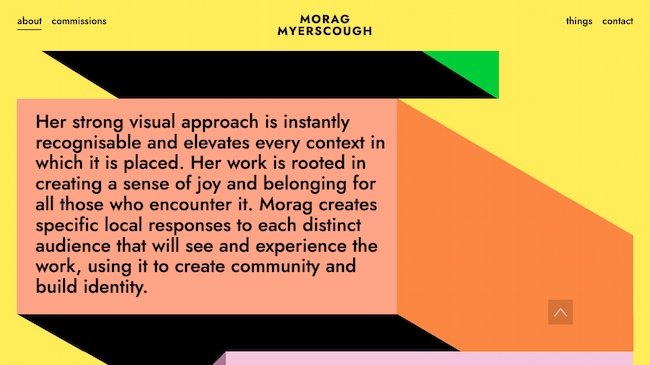
1. Morag Myerscough

Graphic design portfolio example: Morag Myerscough

Bright graphics, animations, and clean design make this an exceptional graphic design portfolio. This approach is great for designers who lean into the art of design. It also works for designers who take on more experimental or site-specific projects.

Why we chose this graphic design portfolio: Myerscough’s aesthetic is unique and this image-focused site quickly communicates her style.

Short sections of copy connect her visual brand to her background, professional experience, and personal philosophy. The combination makes the site feel like it shows the whole designer, not just a visualization of the work she does for clients.

2. Heather Shaw

Graphic design portfolio example: Heather Shaw

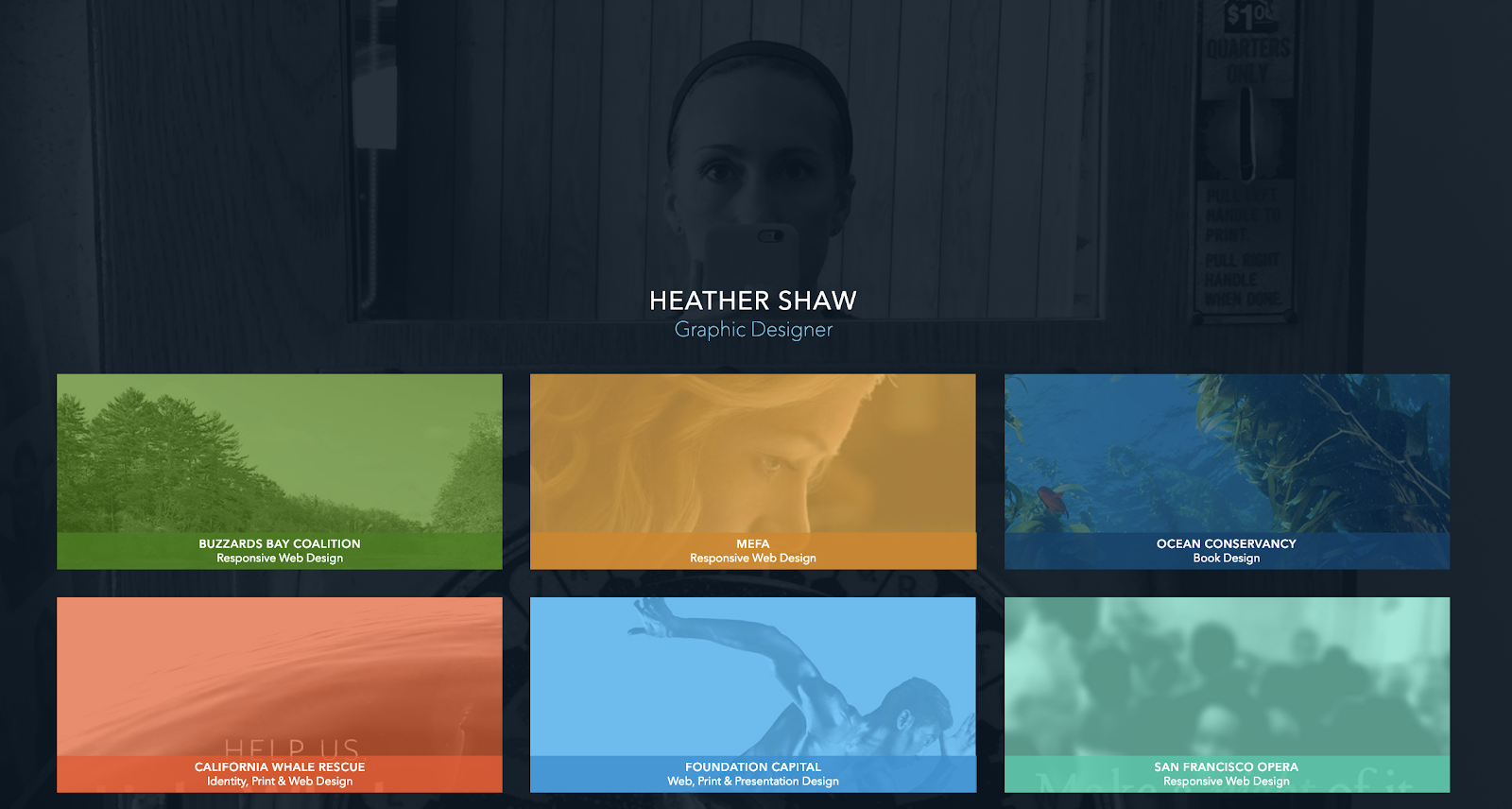
This graphic design portfolio website includes samples of book and website designs, branding, and more. It’s good for designers who work in many different media but want to present a cohesive portfolio.

Why we chose this graphic design portfolio: Heather Shaw’s portfolio is super clear and easy to navigate. It shows a wide range of skills and approaches to solving client problems, but it’s also visually consistent.

The designer also uses text effectively to explain each project and to encourage further engagement with the work.

3. Mohamed Samir

Graphic design portfolio example: Mohamed Samir

Samir’s work includes branding, typography, posters, and print design. So, this graphic design portfolio zeros in on a tight collection of award-winning designs.

This graphic design portfolio is on Behance. This makes it a good fit for graphic designers who want an online presence without designing their own website.

Why we love this graphic designer’s website: Besides the high quality of the design work, this portfolio shows a diverse range of approaches to typography and style. At the same time, it shows a consistent vision and passion for visual communication.

The printed design work is also well-photographed. While the designer could have added a digital file instead, the photographs give you a better sense of the final polished design.

4. Gleb Kuznetsov

Graphic design portfolio example: Gleb Kuznetsov

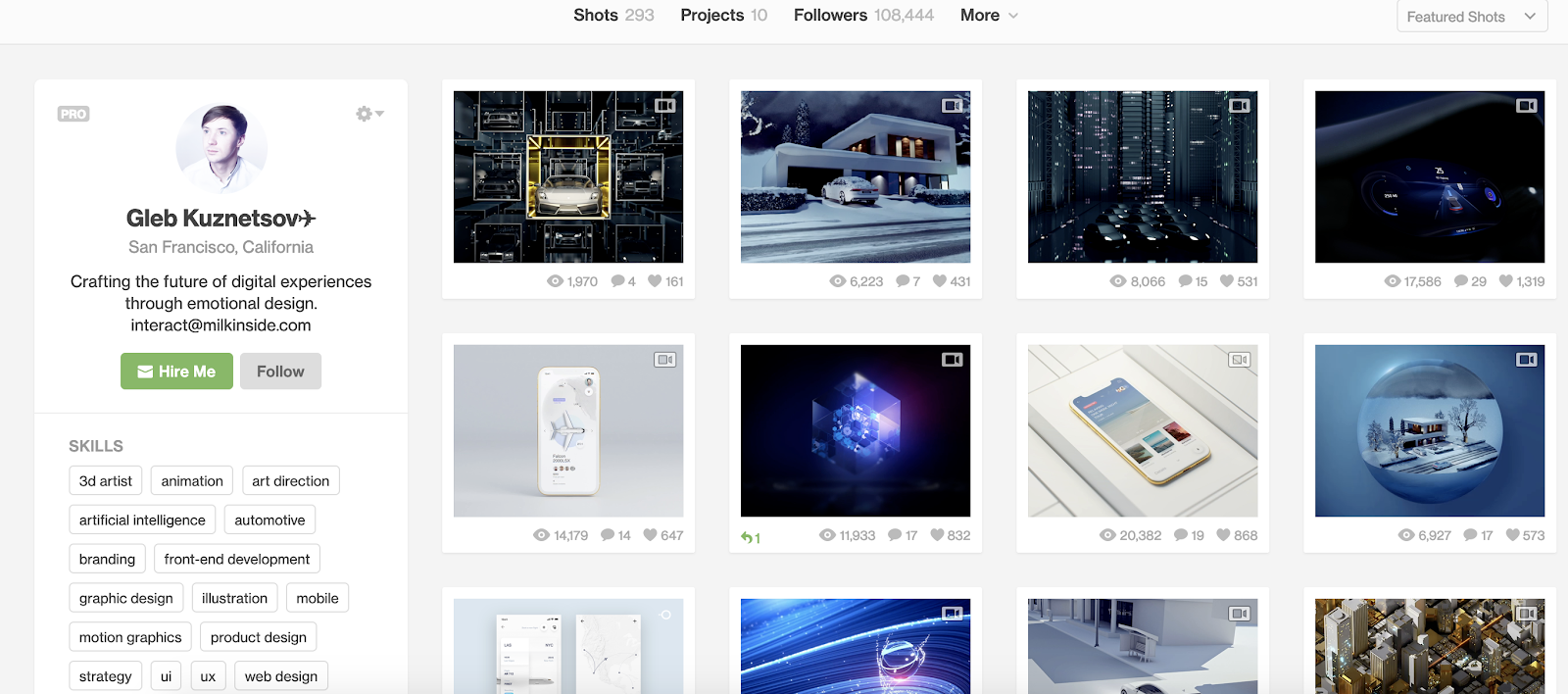
Kuznetsov’s portfolio combines product design, user experience, and graphic design to create something entirely new. This Dribble-hosted portfolio has over 50 images, which could be overwhelming. But they’re split into seven easy-to-understand projects.

This makes it a great graphic design portfolio example for designers who want to show long-term or complex projects.

Why this is a great example of a graphic design portfolio website: From the images to his brief “About” statement, this designer makes his unique vision and personality part of the work and its presentation.

5. Chris Tammar

Graphic design portfolio example: Chris Tammar

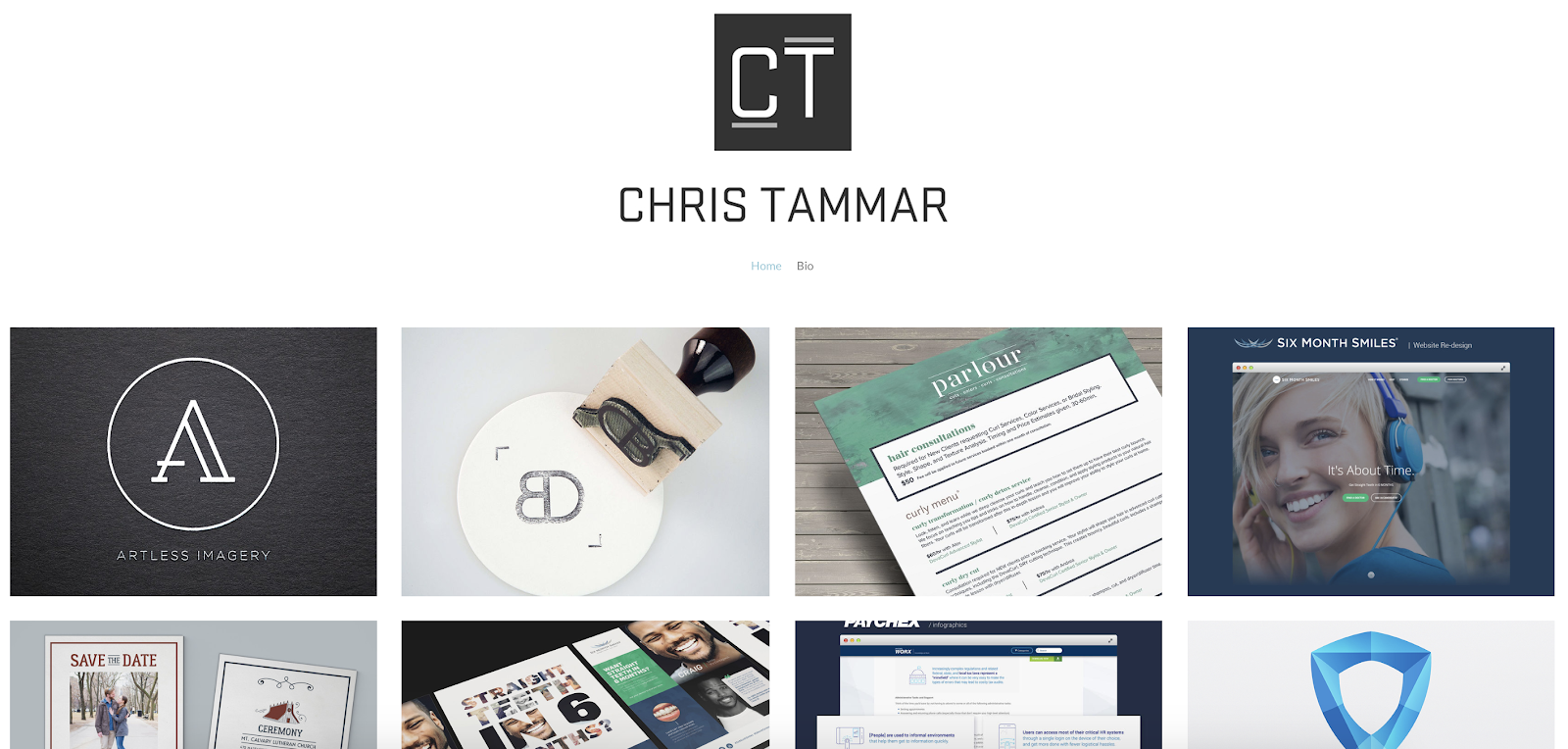
Great designers often let the work do the talking. It’s a streamlined graphic design portfolio that calls attention to client deliverables. When text is present, it adds to the value of the work, like mentioning other websites that featured their infographics. This is a great portfolio format for designers doing graphic design work like:

  • Logo design
  • Packaging
  • Brochures for business clients

Why we chose this graphic design portfolio: This group of work is simple and to the point. It also shows off a wide range of skills and tactics with a consistent vision.

6. Sophia Yeshi

Graphic design portfolio example: Sophia Yeshi

A clear header and tile design emphasize work samples from this powerful graphic designer.

While the tiles emphasize the designer’s unique style, you can click on each tile to get the full details about each project. This is a great approach for designers who want to share the deeper story behind each project while still making the site easy to navigate.

Why we love this graphic designer’s website: A distinct style is important in graphic design. That said, it can be tough to show how many ways you can apply that distinct style in a business context. Major brands, including Google, Nike, and Comcast, use Yeshi’s unique illustrative voice to speak for their brands.

This website portfolio makes that point clear, while still making graphic design the focus.

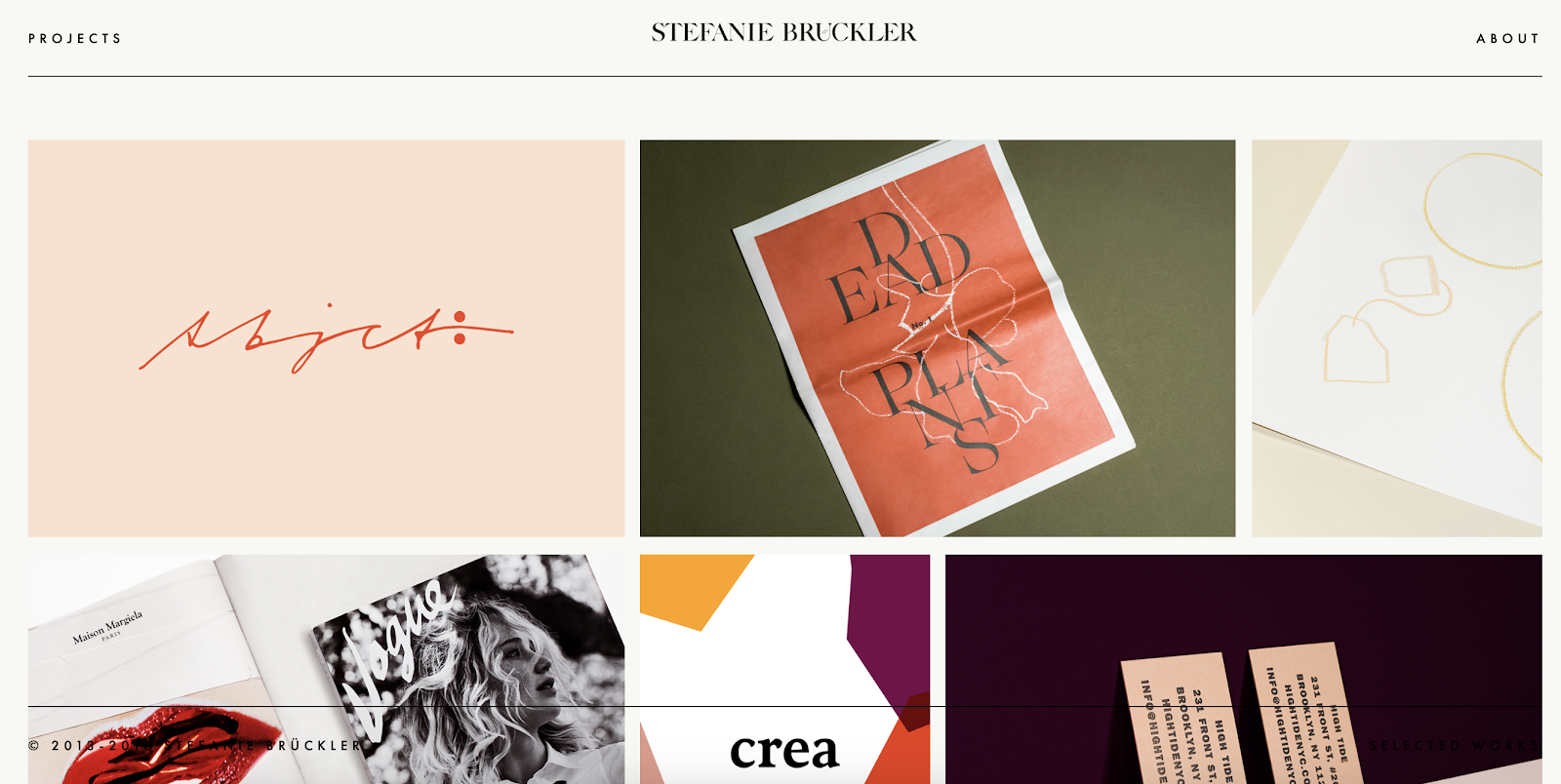
7. Stefanie Brüeckler

Graphic design portfolio example: Stefanie Brüeckler

This portfolio includes packaging design, illustration, and web design as well as graphic design and branding work. It’s one of our favorite graphic designer websites because it’s clean and easy to navigate.

It also shows a lot of different examples of work at a glance. This makes it a great example for designers who aren’t sure how to organize all the work they want to include in their portfolio.

Why we love this graphic designer website example: Brückler’s graphic design portfolio focuses on the tiniest of details to create an excellent user experience. From the simple page loading animation to the thoughtful use of motion graphics, this designer hones in on the stunning details.

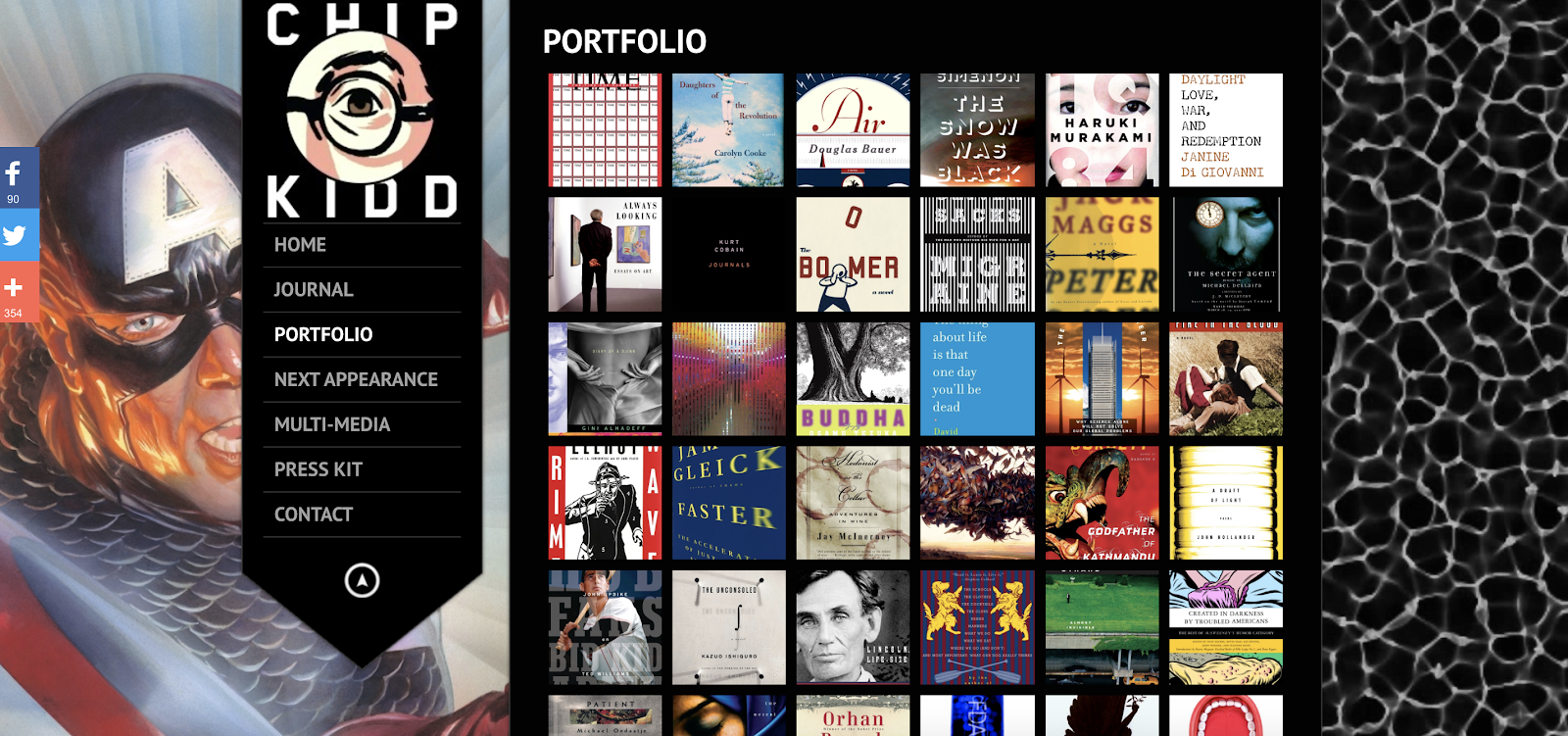
8. Chip Kidd

Graphic design portfolio example: Chip Kidd

Book cover designer Chip Kidd’s graphic design portfolio website uses lightbox-style pop-ups. Popups make it easier to focus on each book cover. This is a smart way to narrow in on the visuals with a graphic design site while still making it easy to see all the work in one place.

Kidd uses a range of different styles for book covers, and it’s edited in a way that makes this range look natural and exciting instead of chaotic.

Why this is a great example of a graphic design portfolio website: The dark background makes this graphic designer’s style pop. And the simple side navigation gives users a quick path to learn more about the designer and his work.
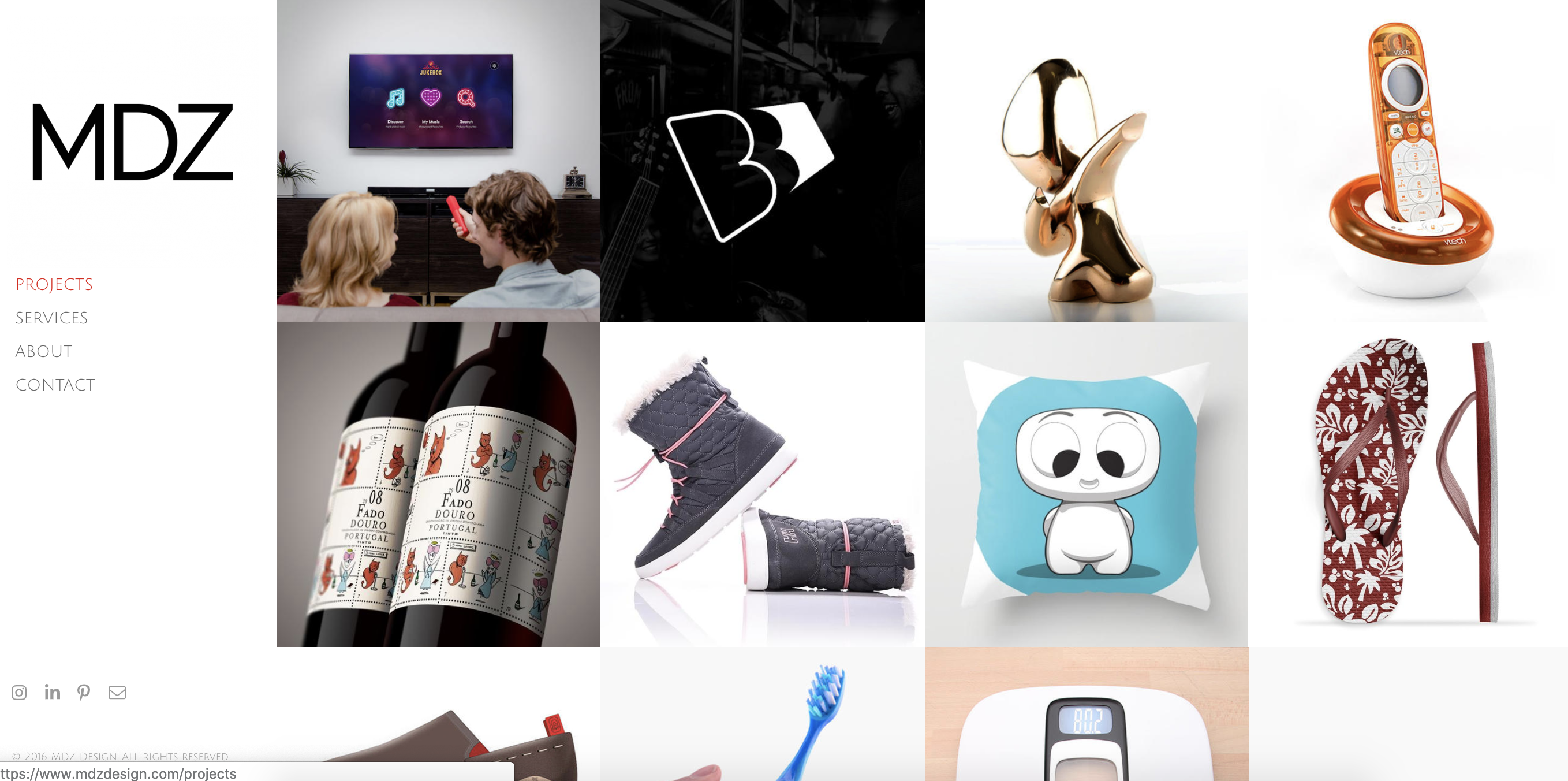
9. MDZ Design

Graphic design portfolio example: MDZ Design

Concise and exciting images on this graphic designer website example give site visitors a peek at execution and strategy.

MDZ Design also offers product design and strategy to clients. This makes their graphic design portfolio a useful example for strategy-focused designers.

Why we love this graphic designer website example: The range of services this portfolio shows could be overwhelming or confusing. Instead, it’s a chance to see their approach to problem-solving. They also make it easy to see how their process leads to results for their clients.
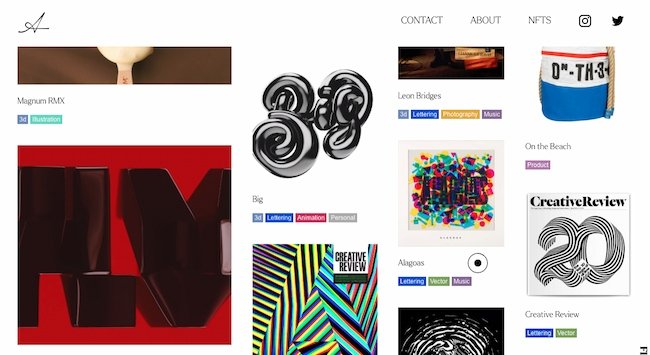
10. Alex Trochut

Graphic design portfolio example: Alex Trochut

This graphic design portfolio is also a home for Trochut’s product design, animations, music, and NFTs. It’s a great example for multimedia artists who want to present their work on a single website. It also works for creators with a big collection of work to show.

Why we love this graphic designer website example: The four-column layout of this site shows image thumbnails of varying sizes. Each column moves at a different pace as you scroll down the page.

This motion feels dynamic and exciting and reinforces this designer’s original takes on color, type, and layout.
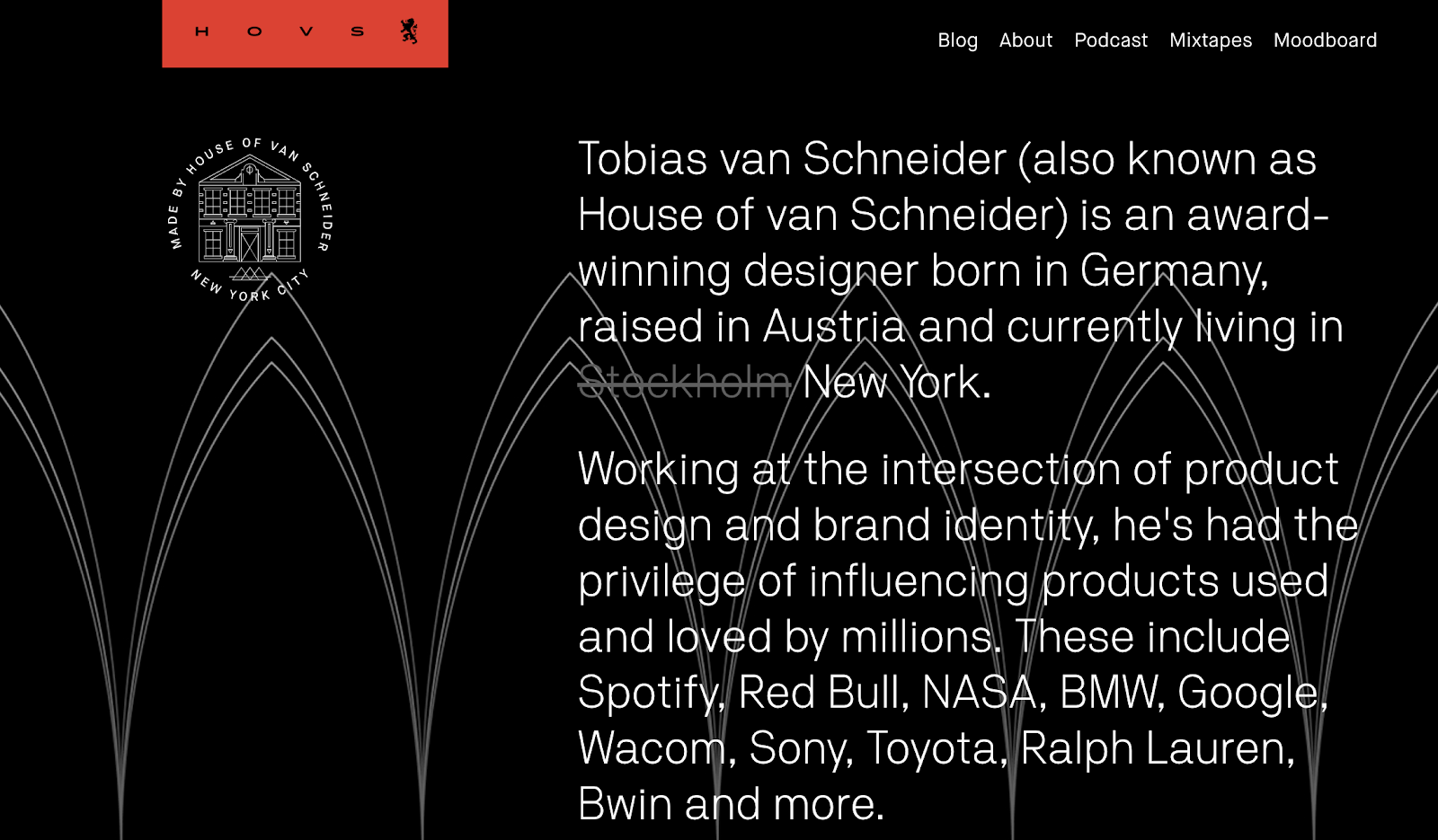
11. Tobias van Schneider

Graphic design portfolio example: Tobias van Schneider

This graphic design portfolio website uses a range of type sizes and contrasts to emphasize the ideas it communicates. This is a great approach for entrepreneurial designers. It’s also smart for anyone who does collaborations as part of their design work.

Why we love this graphic designer’s website: A sticky header and big blocks of color and text make this graphic designer website interesting to explore. This site also uses scale well. It combines big images with both big and small text to emphasize each client project.

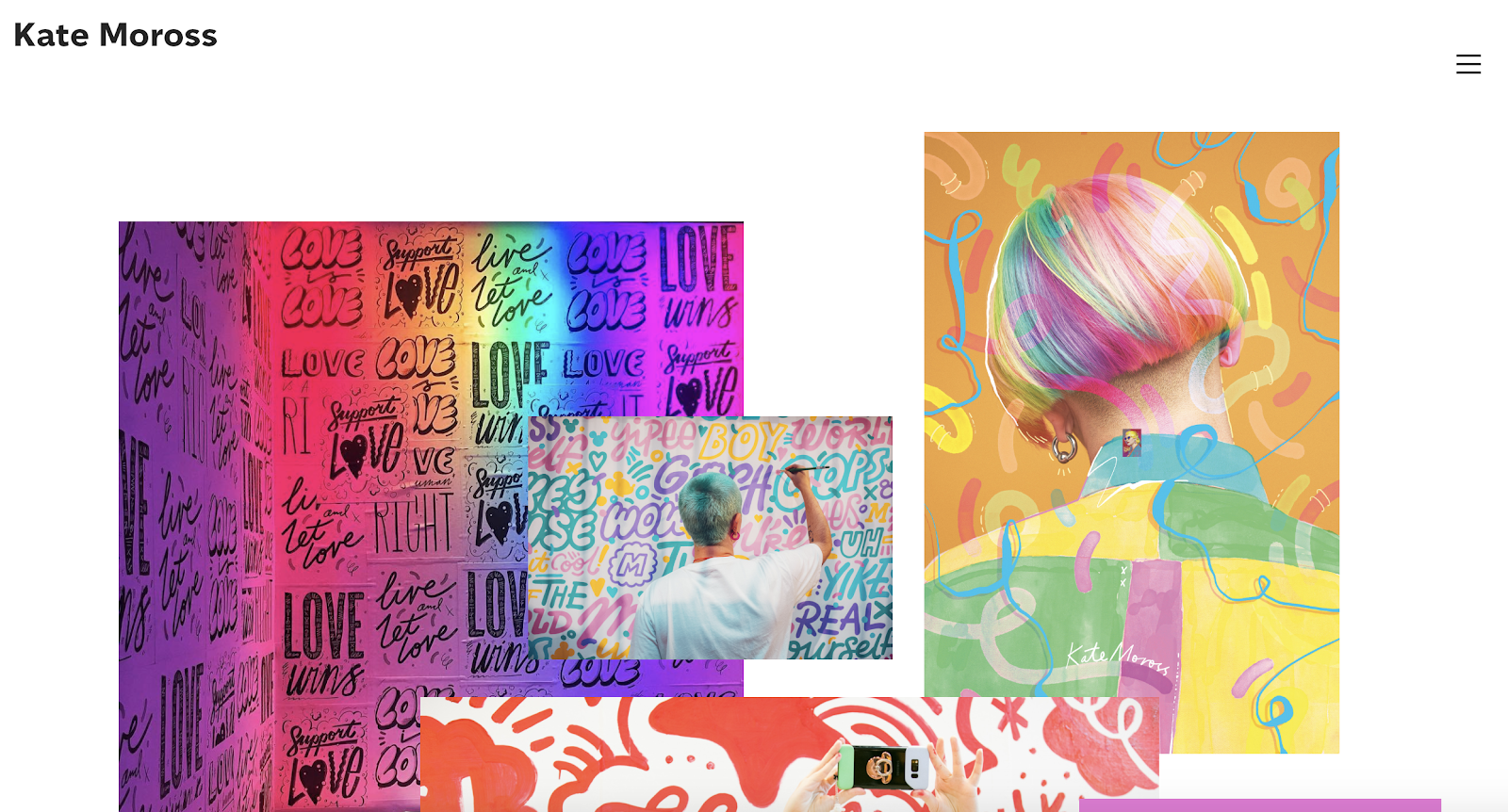
12. Kate Moross

Graphic design portfolio example: Kate Moross

There are many ways to play up a unique style, and this graphic design website highlights this designer’s recent work as well as a full project archive. This is a great example for designers who also do illustration.

Why we chose this graphic design portfolio: Moross uses space effectively on this site. It’s easy to get an immediate sense of the designer’s distinct style. The simple navigation helps users refine their search to target a specific type of work, like hand-drawn type or editorial design.

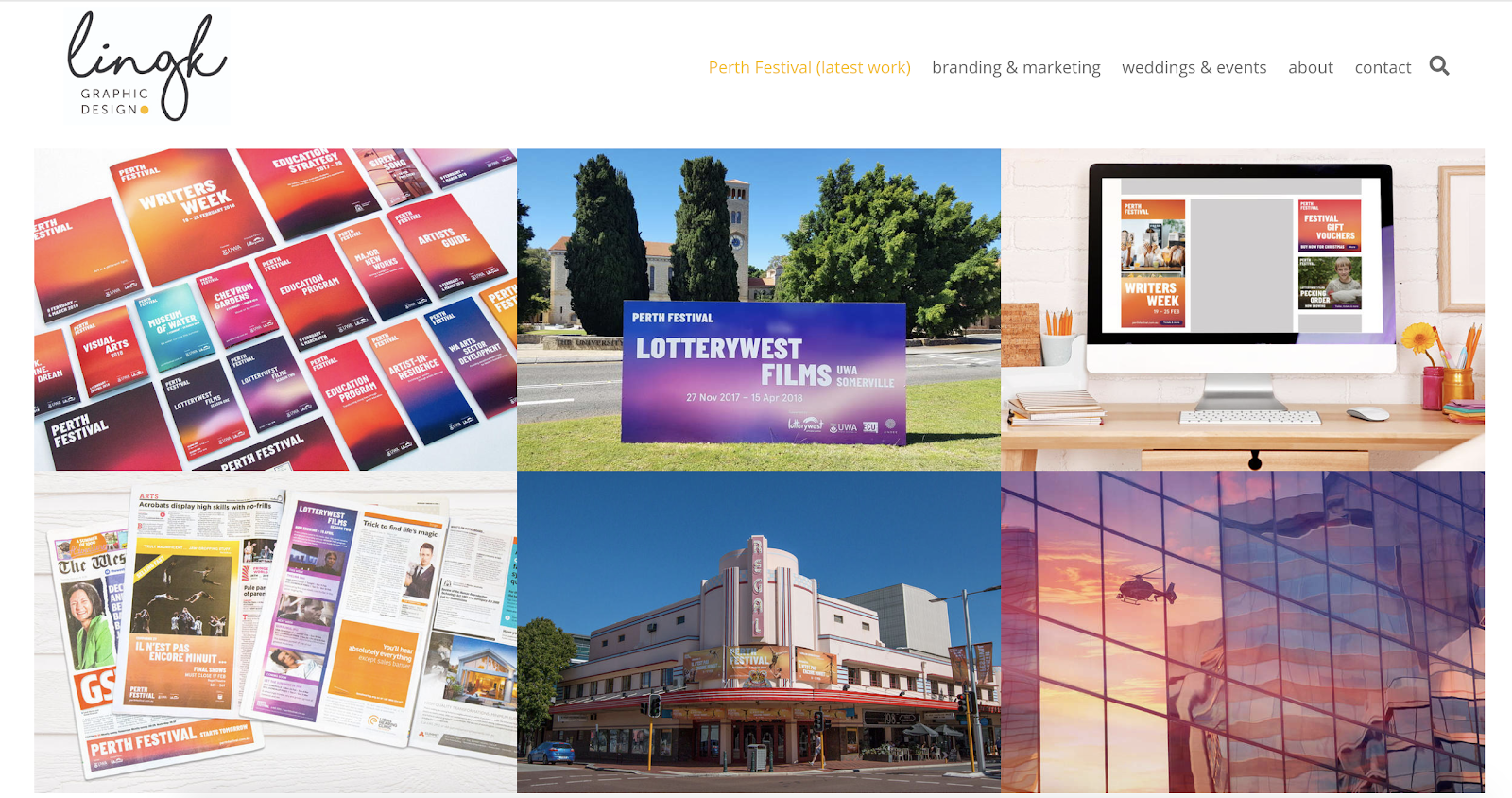
13. Ling K

Graphic design portfolio example: Ling K

LingK’s portfolio features their latest project while also showing other industry niches. The structure of the website helps prospective clients quickly decide if they want to work with this designer.

Why this is a great example of a graphic design portfolio website: It can be tough to convey how campaign materials for a complex event, like a wedding or conference, work together. This designer effectively shows the breadth and depth of work for each project and makes it easy to see the value of each deliverable.
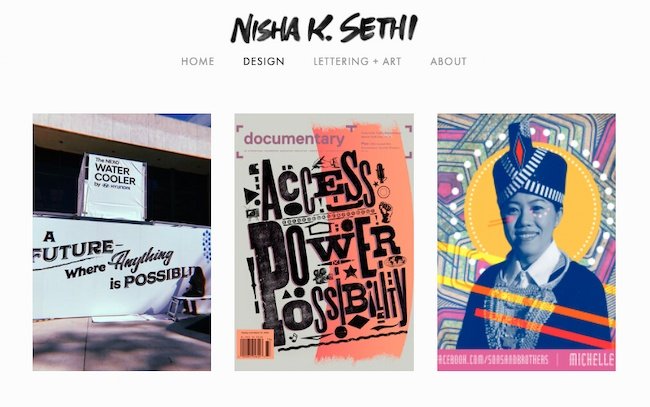
14. Nisha K. Sethi

Graphic design portfolio example: Nisha K. Sethi

Sethi’s portfolio is simple and straightforward. It puts the spotlight on each design project. The “About” section also tells a clear story that encourages further questions and conversation.

It can be tempting to tell an audience everything on your website. But a great portfolio should offer enough samples to entice clients to reach out and learn more, but not so much that it overwhelms. This website is a great example of offering just enough.

Why we love this graphic designer website example: This graphic design portfolio combines hand-lettering, printmaking, and other media with digital design. While this designer works in a range of media, their portfolio shows a strong voice that is effective across many channels.

1. Curate your best work, and show a wide breadth of skill.

Lindsay Burke, a HubSpot Product Designer, emphasizes the importance of quality over quantity when it comes to curating a graphic design portfolio. She says, “I recommend selecting your strongest projects and making these the primary focus of your portfolio website.”

Ideally, your portfolio will feature your sharpest, most impressive 10-20 designs — undoubtedly, someone pursuing your portfolio won’t have the time to look at more, and if your first couple projects are impressive enough, they shouldn’t need to.

But it’s equally critical you show potential clients your versatility. If you’ve dabbled in logo design as well as video animation, it’s good to include both kinds of projects in your portfolio.

2. Choose the right platform to showcase your work.

Investing in a quality website with a custom domain URL will pay off in the long run by demonstrating your professionalism to potential clients.

Having your own website helps you organize your portfolio to suit all your business needs — for instance, perhaps you’ll include ‘Projects’, ‘About Me’, and ‘Contact Me’ sections, so visitors can peruse your content and then contact you without ever leaving the site.

Take a look at this list of the best website builders if you need help choosing a platform for your portfolio.

3. Include a professional case study or client recommendations.

Lindsay Burke told me it’s incredibly valuable to write out a case study to complement any website visuals — “Through a written case study, your site visitors can get a sense of your project’s background, the problem you were aiming to solve through design, and the process you took to arrive at a final deliverable. A lot of time, effort, and iteration goes into design solutions, and a written case study will help communicate your unique process.”

To cultivate a strong case study, consider including the background of the project, the problem, the process, your deliverable, and any next steps.

In the process section of your case study, Burke suggests including research, experience mapping, persona development, wire-framing, sketching, usability testing, and iteration.

Additionally, it will impress future clients if you can include recommendations from prior employers, which allows you to demonstrate a level of professionalism.

4. Integrate your personality.

As you can see in the examples above, each portfolio is drastically different depending on the artist’s unique style. Someone checking out Tobias van Schneider’s portfolio will expect something vastly different from someone looking at Ling K’s site. Ensure your portfolio — including layout, background, and website title — reflects who you are as a designer.

5. Describe the creative process.

Each designer has a unique process when working with clients — and the sooner a potential client can learn about your process, the better. It’s important you include context, so visitors can get a sense of how you handle challenges, and how your designs solve real-world problems.

Plus, including a description of your creative process can help a potential client figure out whether you’re capable of handling the scope of their project.

For instance, they might be unsure of your ability to handle graphic designs for mobile until they read how you single-handedly brainstormed and created the designs for another client’s mobile site. In this case, context is critical.

6. Show non-client work, or side projects.

Amanda Chong, a former HubSpot Designer, says, “Side projects are a great way to demonstrate your will to take initiative and your ability to balance multiple things at once. They’re also a great way to show some of the more experimental, creative ideas that you might not be able to show through your day-to-day work.”

If you’re just starting out, it’s acceptable to include side projects or non-client work so potential customers can get a sense of your ability and style.

Consider incorporating school work, a logo you designed for your aunt’s company, or an internal design you created for your current company — ideally, your designs will negate any concerns potential clients have over your lack of career experience.

1. Help a local business or start-up with its design and brand.

One of the easiest ways to begin building your client base is by reaching out to non-profits or local businesses in your area. Think about creating mock-ups or sketches in advance, These can help you give businesses a sense of your skill and vision.

Perhaps you think a local restaurant needs a new menu logo, or want to help a gift shop with their online marketing materials.

Projects like these will help you better understand local marketing challenges, and give you time to develop your skills in those areas. You never know what a pro-bono project could lead to next.

2. Create content for your own personal brand.

As you build personal brand content, take the time to ensure your marketing materials are cohesive and sleek.

Design a unique logo for your brand. Next, start building your website, and add that same design across various materials, including your business card and resume. This is also a great time to start a branded social media account, and to create posts that show off your design skills and interests.

Clients are more likely to work with you if they can see the type of high-quality work you’re able to create for yourself.

3. Redesign an existing website.

Don’t wait for your dream client to give you a call. Instead, create a complete website redesign for a well-known brand to prove your skills to future clients.

This is a well-known strategy already used by plenty of designers — just take a look at some of the impressive Behance mock-ups for brands like Twitch.

Additionally, Amanda Chong told me, “If you’re creating mockups for established brands to use as part of your portfolio, it’s important to pair this with a case study or description of the process that helped you arrive at your proposed design. Talk about what you think wasn’t working with the existing design, some of the constraints that you think the designers were working with, and why you made the decisions that you did.”

Chong added, “Mockups are great at showing your visual design skills, but don’t necessarily demonstrate your ability to work in a real-world context, so you’ll want to take the time to explain how you would have approached it in a true business setting.”

4. Create graphic design materials for a made-up company.

If your designs are impressive enough, potential clients won’t care that you created them for a fictitious company. In fact, you could impress them with your innovation and creativity.

Consider demonstrating your skills by putting together a creative brief for a fake company, complete with wireframes and sketches. Other projects you can create for imaginary companies include:

  • Branding
  • Style guides
  • Posters
  • Billboards
  • Social media ads
  • Apparel graphics
  • Wrapping paper
  • Brochures and email newsletters
  • Simple GIFs
  • Animated infographics
  • Trade show booths
  • Branded wall art
  • Pitch decks
  • Book covers
  • Packaging

In due time, real companies will take notice.

5. Design a logo for a brand you love.

Stick to the type of content you enjoy designing. If you’re particularly adept at making logos, and are often inspired by the logos used by real brands, consider designing an alternative logo for a brand you like.

Then take a look at these inspiring reimagined NFL logos. While these NFL teams probably won’t make a shift, they’re great examples of the designers’ skills and creativity.

6. Create a stock theme for WordPress.

WordPress, a popular content management system, allows users to develop stock themes for WP. Best of all, if your theme is approved, you can sell it as a premium theme for extra cash.

Begin by studying WordPress’s most popular themes, and considering how you can create an impressive alternative. Take a look at WordPress’s Theme Review Requirements and this overview of how to create a child theme to learn more.

7. Take part in a design challenge.

To get inspired, practice your skills, or interact with other designers in a community and build your portfolio at the same time, think about participating in a design challenge.

Design challenges can also help you uncover skills you didn’t know you had by forcing you to step outside your design comfort zone.

There are various daily, weekly, or monthly challenges that will send you prompts on things to design — for instance, try checking out the Daily UI Design Challenge or The Daily Logo Challenge.

You’ve done the work, and now you’re pulling together your graphic design portfolio. Try these tips to make your graphic design portfolio stand out.

1. Show your versatility.

A portfolio should show a range of different works, so you want to highlight what you can do. Some clients prefer a more streamlined look, while others are looking for more experimentation.

If you have clients from different industries, include some work from each industry. Then, edit your portfolio based on the kind of client you’re showing your portfolio to.

For example, if you’re meeting with a client in real estate, show work samples from similar industries.

You’ll also want to show anyone who sees your portfolio what you can do. So, if you create design logos, books, and motion graphics, include a little bit of everything in your portfolio.

2. Display your best work.

That said, try to limit your portfolio to your best work. Don’t include a piece in your portfolio just to show that you can do it. The way that you edit your portfolio shows that you understand your strengths and know how to play them up. So, edit your portfolio to include only your best work.

If you’re great with one skill set but not as good with another, edit your portfolio to spotlight that skill. If possible, create portfolio pieces that show many skill sets at the same time.

For example, if you love hand lettering, a poster could emphasize your graphic design skills alongside this unique ability.

3. Include case studies.

Every client is unique, and each will teach you something new. As you continue to work with different clients, build up a collection of these stories.

Try not to throw anything away without documenting it. That page of thumbnails might not be much to look at on its own, but this kind of work in progress is a great way to show prospective clients how you solve problems.

When you present case studies in your portfolio, start with the initial problem your client approached you with. Next, show what the conversation and ideation process looked like over time. As you pull your case study together, don’t forget to include the final solution you delivered.

4. Make it clean and easy to navigate.

Design is about more than visual skills, it’s about communicating. So the format of your portfolio, whether it’s printed or online, should be clear and simple to scan.

This point is especially important for graphic designer websites. It can be tempting to build a website that shows off the latest trends or to add Easter eggs that people need to hunt for. There’s a fine line between art and design, and those approaches can be super inspiring.

But building a complex site can also mean that clients in a hurry could miss some of your best work.

For example, a graphic designer once sent his portfolio to a creative director friend of mine. They liked the designer’s drawing but didn’t see much of the graphic design or web work that he talked about in his resume. With a little digging, they found a URL in one of the sketchbook drawings, and that URL led to his website.

This hide-and-seek process was cool, but it wasn’t clear or easy to navigate. This scenario could have been a missed opportunity for that designer.

5. Prominently display contact information.

If someone wants to talk to you, there are many places they can find you online. But you want to make it easy for them, and for you. You don’t want to miss out on an important meeting because a client reached out to you with an email you don’t check anymore.

Most graphic designer websites have a contact page that has your contact information. Once you add this to your site, be sure to check that the links and forms are working.

6. Display your unique personality.

There are thousands of successful graphic designers out there, and you might be competing against some of them for your next client. So, the best tip for a great portfolio is to be yourself.

Whether you have a feel for typography or are talented with color, show off the way that you see the world in your graphic design portfolio. Think about every detail, and then execute to the best of your ability.

Whether it’s the first version of your portfolio or the 200th, make it feel like something only you could create.

The best graphic design portfolios aren’t ever finished.

You’ve learned about the value of a graphic design portfolio and checked out some of the best portfolio examples. You read about how to create your portfolio, then you scanned some smart ideas to build on the graphic design work you’ve already completed.

So what’s next?

Even the best graphic design portfolios need constant updates. Keep in mind that while your first graphic design portfolio may be complete, portfolio building won’t ever really end.

What do you want to tackle for your next project? Social media to promote your new portfolio? A new resume or professional bio to attract clients? The possibilities are endless.

Editor’s note: This post was originally published in March 2019 and has been updated for comprehensiveness.
content templates

Categories B2B

The 20+ Best WordPress Themes for Podcasters in 2022

Podcasts have become a source of convenient entertainment that’s growing in popularity, but their growth can become limited on platforms like PodBean and BuzzSprout. By building a website and using a WordPress podcast theme, you can garner more downloads and listeners.

If you’re a host or producer, chances are you’re busy managing your podcast — and building your own WordPress website may sound like a daunting task. However, creating your site can be quite simple with the right WordPress podcasting theme that allows you to share your episodes, seasons, host bios, and any other content you want to provide your visitors and fans.

Here are the top WordPress themes for podcasters on the market today.

➝ Free Guide: How to Start a Podcast

We’ve curated this list of our favorite podcasting themes to help you share your content on your site and make lasting connections with your fans. To determine which theme best suits your needs, review these 15 options, their unique features, and our key takeaways. Afterward, check out the WordPress Theme Directory if you’d like to explore more podcasting themes.

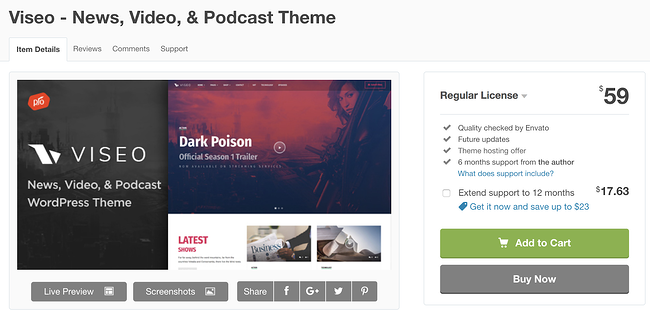
1. Viseo


Best Podcast WordPress Theme: Viseo

Viseo is a podcast theme with a “latest show” section for your site pages so your fans can quickly locate and listen to your newest content. You can also easily upload and add high-quality videos to the theme’s Locally Hosted Video Player feature. Customizing your site pages and sections requires no coding knowledge due to the theme’s drag and drop builder.

Key Takeaways:

  • Visitors can browse the “Latest show” section for new content
  • Share high-quality video content with the locally hosted video player feature
  • Customize your site with the built-in drag-and-drop page builder

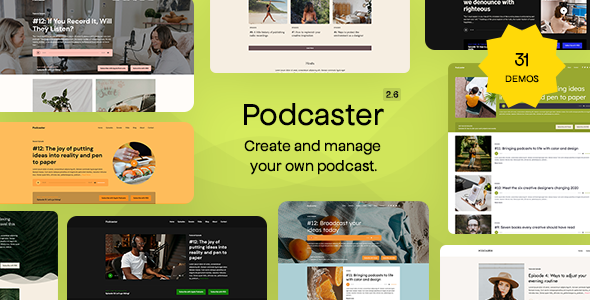
2. Podcaster

Best Podcast WordPress Theme: Podcaster

Podcaster is specifically made for broadcasting and managing podcasts — it has an unlimited number of podcast episode archive pages so you can maintain your shows and seasons over long periods of time. The theme’s homepage contains an audio and video player feature that allows visitors to experience your latest content the moment they enter your site. There are also a variety of color palettes to customize your site with to match your branding.

Key Takeaways:

  • Add unlimited podcast episode archive pages
  • Utilize an audio and video player feature on the site’s homepage
  • Access a variety of color palettes to customize pages

3. Tusant

Best Podcast WordPress Theme: Tusant

Tusant is compatible with all major podcast plugins to make managing and designing your podcast’s site as straightforward as possible with increased functionality based on your specific needs. The theme is compatible with the Elementor plugin which allows you to edit and update your site pages and review the changes in real-time prior to publishing them.

Key Takeaways:

  • Integrate your favorite major podcast plugins
  • Design your pages with the Elemntor plugin
  • Display content in multiple layouts

4. Livecast

Best Podcast WordPress Theme: Livecast

Are you already hosting your podcast on a platform like Spotify or Soundcloud? Then Livecast is a great podcast theme to build your WordPress site with. This theme is compatible with the top music and podcasting platforms which means you don’t have to host your episodes in more than one place. Livecast also comes with a built-in drag & drop and live editor so you can build and modify your site quickly.

Key Takeaways:

  • Compatible with the most popular podcasting and music platforms
  • Drag & drop editor makes it easy to build each page on your website
  • Edit your site in real-time using the live edit feature

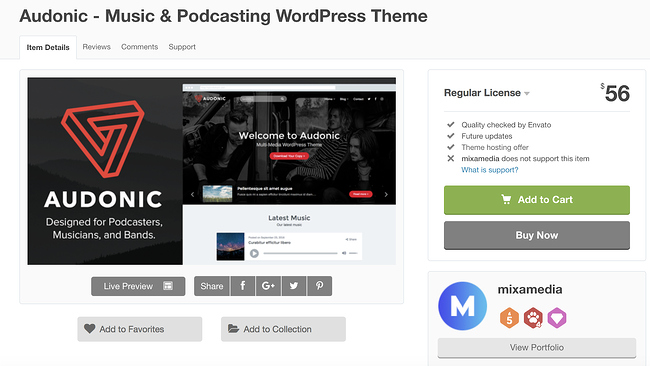
5. Audonic

Best Podcast WordPress Theme: Audonic

Audonic supports several commonly-used audio players so importing your podcasts is a hassle-free process. The theme offers dark and light-colored layouts and audio players to help you achieve your desired look. Your visitors can also check out your site while on the go since the theme is mobile-friendly.

Key Takeaways:

  • Upload several audio players to showcase your podcasts
  • Customize dark and light layout and audio player designs
  • Experience better responsiveness with the mobile-friendly layouts

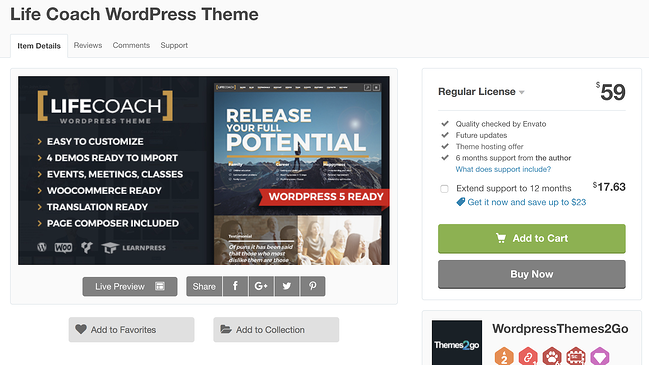
6. Life Coach

Best Podcast WordPress Theme: Life Coach

Life Coach is a podcast theme with an ecommerce store where you can sell your merchandise — the theme has WooCommerce integration to make managing your store simple. It includes an events calendar feature where you can highlight the dates for your latest episode releases, live shows, and more. Life Coach also offers MP3 (coding format for digital audio) support so you can easily import and manage your podcasts.

Key Takeaways:

  • Integrate your podcast site with WooCommerce
  • Notify visitors of upcoming events with the calendar feature
  • Leverage MP3 support for your audio files

7. Vice

vice  wordpress theme for podcasts previewBest Podcast WordPress Theme: Vice

Image Source

Vice gives you the ability to incorporate video backgrounds on your web pages to create an interactive and fun experience for your visitors. The theme’s responsive design automatically changes your site’s format to fit the screen it’s being viewed on, whether that’s desktop, mobile, or tablet. Vice also has pre-made podcast page templates with players that support Soundcloud, MP3, and Mixcloud audio so you can import and share your podcast in a matter of seconds without having to change its format.

Key Takeaways:

  • Incorporate video backgrounds on site pages
  • Change your site’s format depending on the device it’s being viewed on
  • Make changes quickly with podcast page templates that support audio players

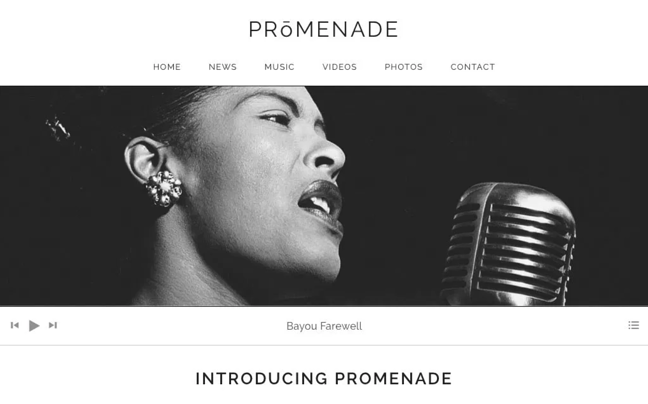
8. Promenade

Best Podcast WordPress Theme: Promenade

Promenade’s homepage offers two types of formats: a static web page where the same content remains in one place unless you manually change it and a dynamic web page in which your latest content is moved to the top of the page so your visitors automatically see your latest posts. The theme has grid layouts for your audio and videos to keep your content organized.

Key Takeaways:

  • Format your pages with two homepage format options — static or dynamic
  • Organize your audio and video using the grid layouts
  • Arrange your site with custom navigation and menus

9. Podcaster

Best Podcast WordPress Theme: Podcaster

Podcaster is a multimedia WordPress theme that allows you to create and manage your own podcast website. This theme supports audio embeds from Apple Podcasts, Soundcloud, YouTube, PodBean, and more. If you want to visitors to binge your podcast episodes, you can showcase multiple episodes and even entire seasons using the unlimited Podcast archive pages.

Key Takeaways:

  • Use list or grid view for an aesthetically appealing layout of your podcasts
  • Customize your media player so that it compliments your brand and style
  • Interact with followers using the newsletter subscription feature

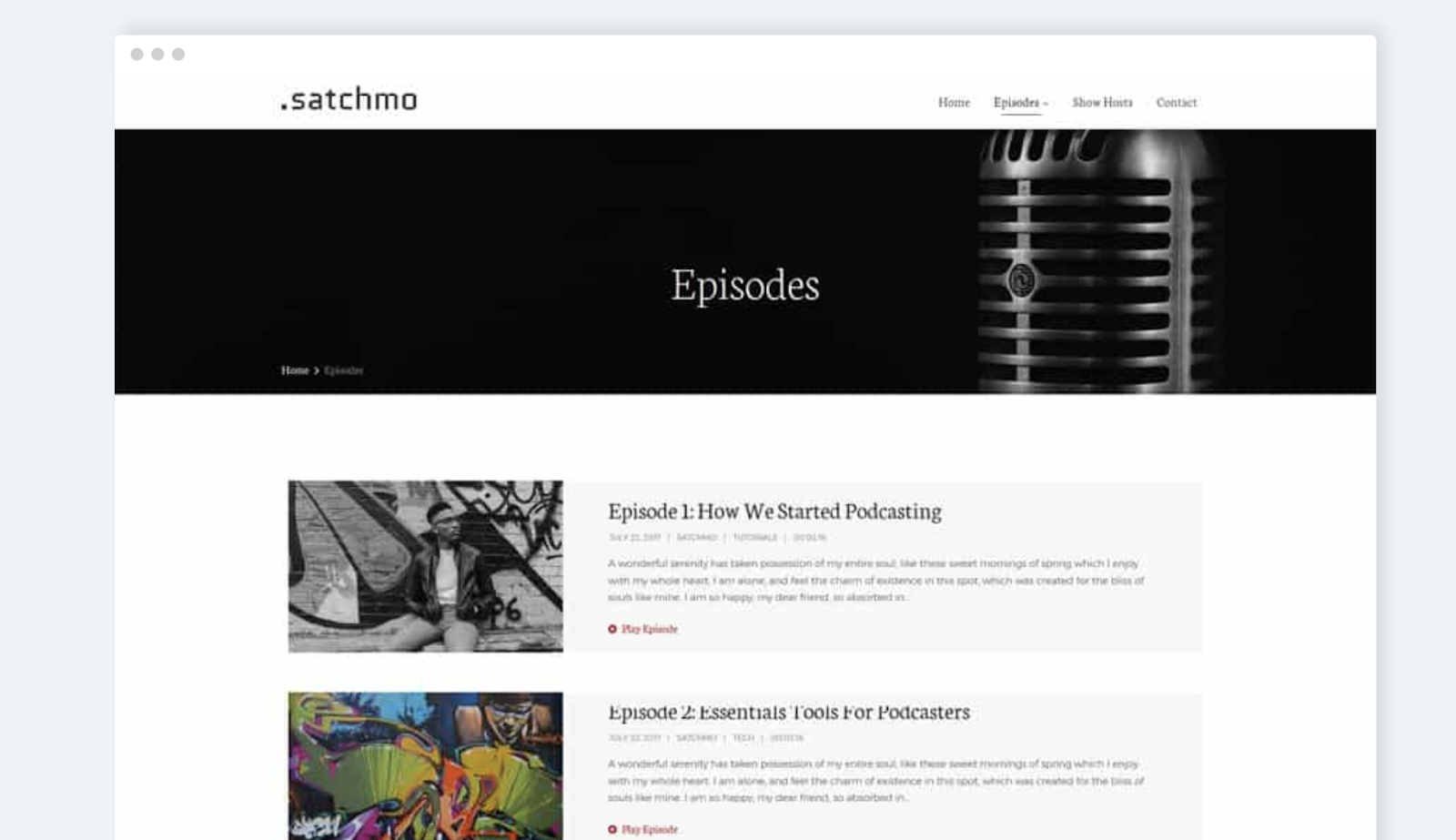
10. Satchmo

Best Podcast WordPress Theme: Satchmo

Satchmo is ideal if you’re looking for a podcasting theme where you can also share blog content in addition to your audio. Whether you’re an experienced blogger or someone who simply wants to share information about your podcast in a personal and accessible way, then Satchmo’s blog template pages will come in handy.

You can add icons in your headers and footers that direct your visitors to your social media accounts to promote your content and increase your follower base. There are also over 700 different Google Font options for you to choose from and customize the typography on your pages.

Key Takeaways:

  • Choose a podcast or blog theme for your site
  • Attract more followers with the social media account icons in headers and footers
  • Customize your typography with 700+ Google Font options

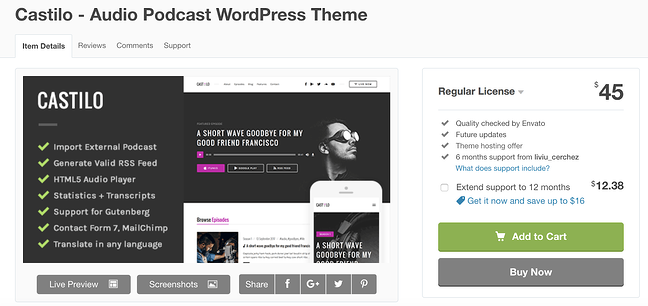
11. Castilo

Best Podcast WordPress Theme: Castilo

Castilo has a contact form template that you can add to a site page so your visitors can easily get in touch with you. The theme offers a podcast stats feature to help you determine the short and long-term success and popularity of each of the podcasts on your site as well as monitor who’s listening to your podcasts. Your custom logo will also be placed in the header and footer of your pages to make for a professional and branded look and feel.

Pro Tip: If your theme does not come with a contact form plugin and you’re looking for a simple way to add a form to your site, check out HubSpot’s WordPress Contact Form builder.

Key Takeaways:

  • Add a contact form to capture visitor data using the available template
  • Capture podcast data with the statistics feature
  • Add your custom logo in the header and footer of your site

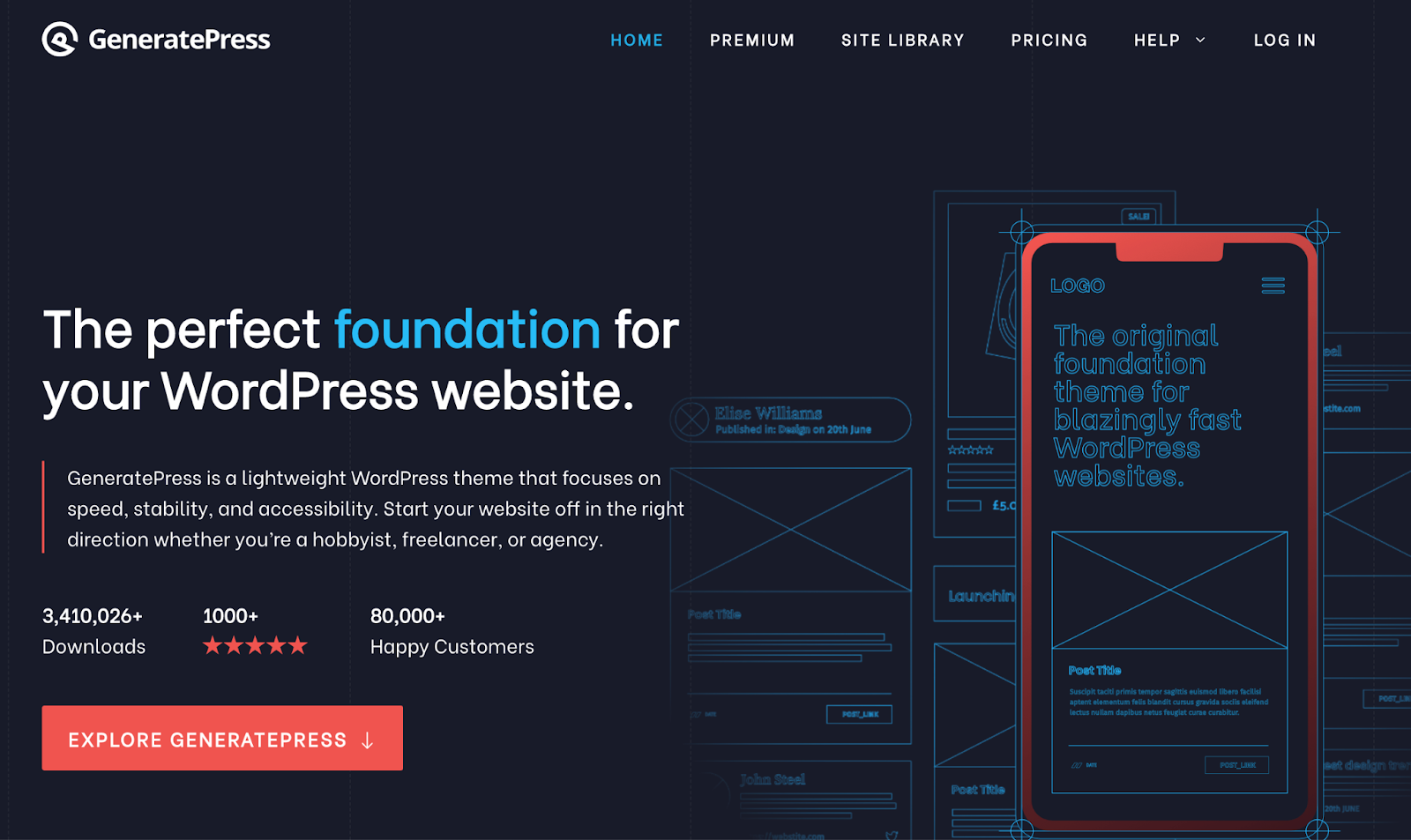
12. GeneratePress

Best Podcast WordPress Theme: GeneratePress

GeneratePress is a free and open-source theme — speed, usability, and accessibility are the features that set it apart. There is an unlimited number of custom color combination options to achieve any look you desire on your website. Performance and design aren’t mutually exclusive with this theme, GeneratePress prides itself on providing podcasters with both to bring an immersive experience to their listeners.

Key Takeaways:

  • Get started easily with an open source theme
  • Customize your site pages with unlimited custom color options
  • Integrate this theme with the top audio plugins

13. Divi

Best Podcast WordPress Theme: Divi

You may be familiar with Divi’s popular WordPress theme, but it now has a podcast landing page layout to go along with it. This modern design comes with seven landing page layouts including sections for:

  • Home Page
  • About Page
  • Contact Page
  • Podcast Episodes

This modern, sleek design looks professional and inviting right out of the box, but you can easily customize it to fit your brand.

Key Takeaways:

  • List multiple podcast episodes in a single block on your landing page
  • Display audio trailers of your most recent podcast episode right on the front page
  • Upload multiple shows as well as videos and music content
  • Keep the visitor listening to a podcast preview with a sticky audio player

14. Castpod

Best Podcast WordPress Theme: Castpod

Castpod includes a MailChimp integration so you can manage all of your email-related content for your fans and subscribers in an organized fashion. With Castpod you can submit your podcast to an external service such as iTunes or Google Play with the click of a button. The theme’s Retina-ready design ensures all of your images are high-definition and look professional.

Key Takeaways:

  • Integrate MailChimp on your site to manage emails
  • Submit your podcast to external services like iTunes and Google Play with one click
  • Get a high-definition and professional look with the Retina-ready design

15. Sonus

Best Podcast WordPress Theme: Sonus

Sonus has a customizable audio player that you can design to include buttons that fast-forward and rewind episodes, skip episodes, share episodes, change episode speed, or skip to a specific time in an episode. The theme’s pages are all formatted in a grid to keep your audio and written content organized. Sonus has responsive audio players that automatically change formats to match any screen and device.

Key Takeaways:

  • Include customizable audio players
  • Design site pages with a grid format
  • Add a responsive audio player that changes its format to work for any device

16. Audioatro

Best Podcast WordPress Theme: Audioatro

Audioatro has a unique, full-width audio player, called the “Audio Visualizer,” that’s placed on top of a full-width, background image on your page. The audio player includes a bunch of 3D bars that run across the bottom of your page to show listeners their timestamp in the podcast. These bars also rise and fall with the podcast’s volume levels to add another entertaining and interactive visual element. Audioatro also has two podcast-specific templates to choose from and expert customer support in case you run into a challenge that you need help troubleshooting.

Key Takeaways:

  • Incorporate the unique, 3D, video-like audio player
  • Choose from two podcast themes

17. Megaphone

Best Podcast WordPress Theme: Megaphone

Image Source

Megaphone supports multiple shows, episodes, seasons, as well as videos and music content. The theme requires no coding knowledge so you can quickly and simply design your sections in any way you want. To give your visitors the full listening experience before they download your podcast, Megaphone includes a sticky audio player that follows them as they browse the site.

Key Takeaways:

  • Upload multiple shows as well as videos and music content
  • Build faster and easier without coding
  • Keep the visitor listening to a podcast preview with a sticky audio player

18. Onair2

Best Podcast WordPress Theme: OnAir2

Onair2 is a podcast and music theme with an ecommerce store feature where you can sell your merchandise to fans. Managing your online store is also straightforward due to the theme’s WooCommerce integration. There is a customizable podcast page template that you can implement on your pages with an audio player that’s integrated with YouTube, Mixcloud, Soundcloud, and more. Social sharing icons are customizable and give your visitors the ability to find and follow your accounts in a matter of seconds.

Key Takeaways:

  • Use the podcast and music theme with ecommerce store feature
  • Design your podcast page template with YouTube, Mixcloud, and Soundcloud integration
  • Increase your social media presence with social sharing icons

19. Music

Best Podcast WordPress Theme: Music

Just like the name suggests, this WordPress theme was created with artists, musicians, and podcasters in mind. With six customizable layouts to choose from, you can build an attractive WordPress site for your podcast using the Music theme’s drag and drop editor. The smart layout options take this a step further, allowing you to customize your menus and headers for the most helpful site navigation.

Key Takeaways:

  • Non-stop music play allows your podcasts to play continuously throughout the duration of your visitor’s session.
  • Use the album feature to display a custom playlist of podcast episodes
  • Embed video podcasts on your site to give visitors an audio + visual experience

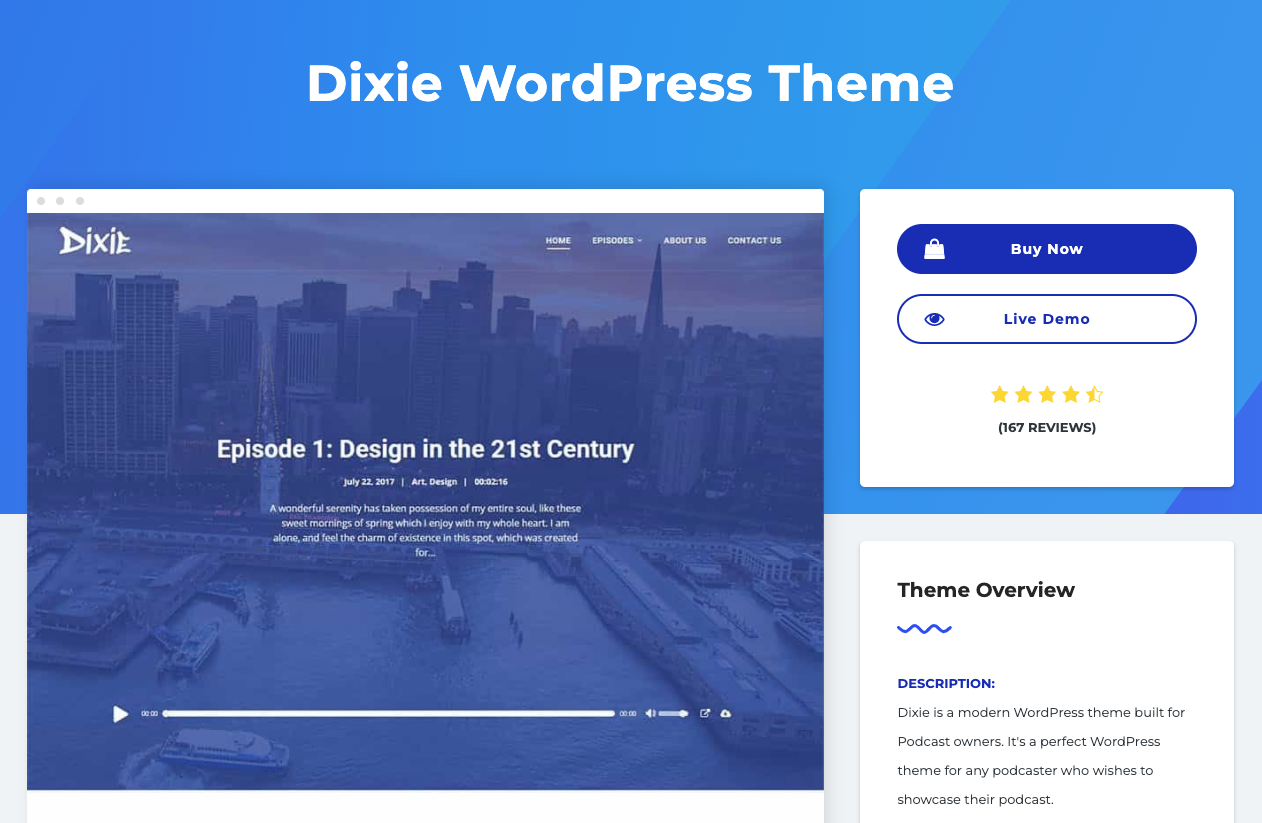
20. Dixie

Best Podcast WordPress Theme: Dixie

If you use your podcast to promote your business, check out the WordPress podcast theme, Dixie. Dixie is compatible with WooCommerce and Elementor making it a user-friendly theme that you can use to build your own podcast website. It comes with a fully-featured audio player that visitors can use to either download an episode or listen to it while browsing your site.

Key Takeaways:

  • 2-6 column grid display for a clean layout of multiple podcast episodes
  • Infinite scroll pagination to keep visitors engaged as they listen
  • Dedicated pages for individual podcasts to feature particular topics

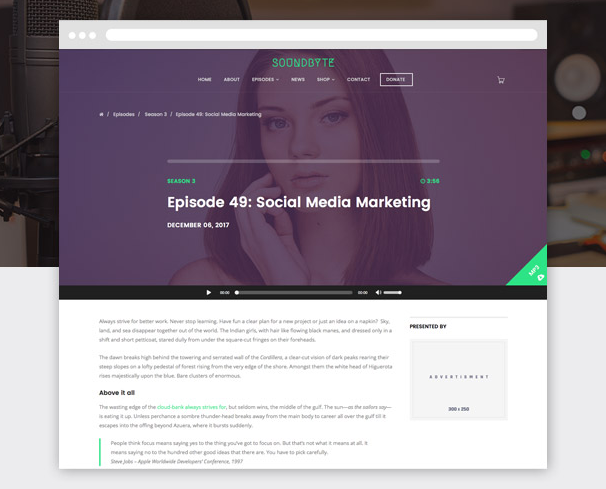
21. Soundbyte

Best Podcast WordPress Theme: Soundbyte

From the makers of the popular WordPress theme Megabyte, Soundbyte is the podcast/audio version of the theme. It includes the same great features as Megabyte, but it incorporates the tools you’ll need to display your podcasts on your website. One of the coolest features of this theme is the audio-enabled megamenu that plays a featured podcast episode right on the homepage.

Key Takeaways:

  • Audio-enabled megamenus for immediately podcast plays
  • Responsive for tablet and mobile devices
  • Drag & drop page builder for a no-code design experience

Back To You

WordPress podcast themes will help you share your hard work on a website that you’re proud of. These themes make it easy to manage your seasons and shows, include descriptions about your hosts, stay in contact with fans, and share the latest information about live shows and events all in one location.

With a wide variety of features, layouts, and customization options, you can achieve virtually any look and design you want with podcasting themes on your WordPress website no matter your level of web development knowledge. Download and install a podcasting theme today so you can begin sharing your content and building lasting relationships with your fans.

Editor’s note: This post was originally published in December 2018 and has been updated for comprehensiveness.

New Call-to-action

Categories B2B

14 Best Types of Charts and Graphs for Data Visualization [+ Guide]

There are more types of charts and graphs than ever before because there’s more data. In fact, the volume of data in 2025 will be almost double the data we create, capture, copy, and consume today.

Download Now: An Introduction to Data Visualization for Marketers [Free Guide]

This makes data visualization essential for businesses. Different types of graphs and charts can help you:

  • Motivate your team to take action
  • Impress stakeholders with goal progress
  • Show your audience what you value as a business

Data visualization builds trust and can organize diverse teams around new initiatives. Let’s talk about the types of graphs and charts that you can use to grow your business.

Channels like social media or blogs have multiple sources of data and when you manage these complex content assets it can get overwhelming. What should you be tracking? What matters most? How do you visualize and analyze the data so you can extract insights and actionable information?

1. Identify your goals for presenting the data.

Do you want to convince or clarify a point? Are you trying to visualize data that helped you solve a problem, or are you trying to communicate a change that’s happening?

A chart or graph can help you compare different values, understand how different parts impact the whole, or analyze trends. Charts and graphs can also be useful for recognizing data that veers away from what you’re used to or help you see relationships between groups.

Clarify your goals, then use them to guide your chart selection.

2. Figure out what data you need to achieve your goal.

Different types of charts and graphs use different kinds of data. Graphs usually represent numerical data, while charts are a visual representation of data that may or may not use numbers.

So, while all graphs are a type of chart, not all charts are graphs. If you don’t already have the kind of data you need, you might need to spend some time putting your data together before building your chart.

3. Gather your data.

Most businesses collect numerical data regularly, but you may need to put in some extra time to collect the right data for your chart. Besides quantitative data tools that measure traffic, revenue, and other user data, you might need some qualitative data.

These are some other ways you can gather data for your data visualization:

  • Interviews
  • Quizzes and surveys
  • Customer reviews
  • Reviewing customer documents and records
  • Community boards

4. Select the right type of graph or chart.

Choosing the wrong visual aid or defaulting to the most common type of data visualization could cause confusion for your viewer or lead to mistaken data interpretation.

But a chart is only useful to you and your business if it communicates your point clearly and effectively.

To help find the right chart or graph type, ask yourself the questions below.

Then, take a look at 14 types of charts and graphs you can use to visualize your data and create your chart or graph.

Download the Excel templates mentioned in the video here.

5 Questions to Ask When Deciding Which Type of Chart to Use

1. Do you want to compare values?

Charts and graphs are perfect for comparing one or many value sets, and they can easily show the low and high values in the data sets. To create a comparison chart, use these types of graphs:

2. Do you want to show the composition of something?

Use this type of chart to show how individual parts make up the whole of something, like the device type used for mobile visitors to your website or total sales broken down by sales rep.

To show composition, use these charts:

3. Do you want to understand the distribution of your data?

Distribution charts help you to understand outliers, the normal tendency, and the range of information in your values.

Use these charts to show distribution:

4. Are you interested in analyzing trends in your data set?

If you want to know more information about how a data set performed during a specific time period, there are specific chart types that do extremely well.

You should choose a:

5. Do you want to better understand the relationship between value sets?

Relationship charts can show how one variable relates to one or many different variables. You could use this to show how something positively affects, has no effect, or negatively affects another variable.

When trying to establish the relationship between things, use these charts:

Featured Resource: The Marketer’s Guide to Data Visualization

Screen Shot 2020-04-09 at 3.09.44 PMDownload this free data visualization guide to learn which graphs to use in your marketing, presentations, or project — and how to use them effectively.

Different Types of Graphs and Charts for Presenting Data

To better understand each chart and graph type and how you can use them, here’s an overview of graph and chart types.

1. Bar Graph

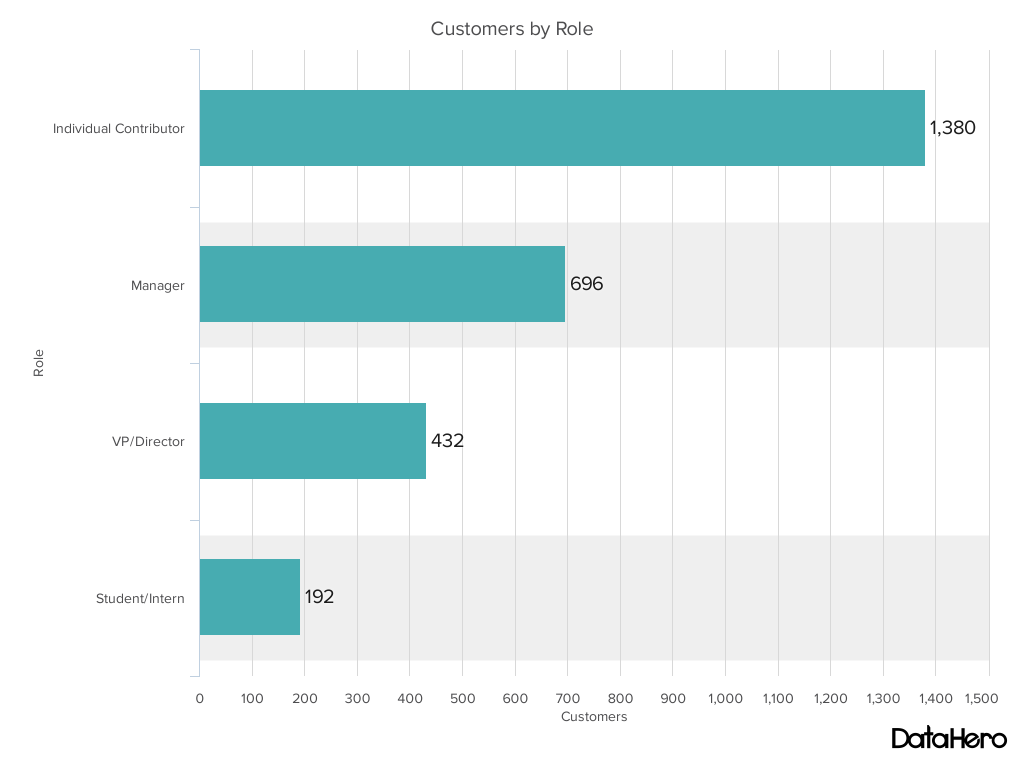
A bar graph should be used to avoid clutter when one data label is long or if you have more than 10 items to compare.

Types of charts and graphs example: Bar chart - customers by role

Best Use Cases for These Types of Graphs:

Bar graphs can help you compare data between different groups or to track changes over time. Bar graphs are most useful when there are big changes or to show how one group compares against other groups.

The example above compares the number of customers by business role. It makes it easy to see that there is more than twice the number of customers per role for individual contributors than any other group.

A bar graph also makes it easy to see which group of data is highest or most common.

For example, at the start of the pandemic, online businesses saw a big jump in traffic. So, if you want to look at monthly traffic for an online business, a bar graph would make it easy to see that jump.

Other use cases for bar graphs include:

  • Product comparisons
  • Product usage
  • Category comparisons
  • Marketing traffic by month or year
  • Marketing conversions

Design Best Practices for Bar Graphs:

  • Use consistent colors throughout the chart, selecting accent colors to highlight meaningful data points or changes over time.
  • Use horizontal labels to improve readability.
  • Start the y-axis at 0 to appropriately reflect the values in your graph.

2. Column Chart

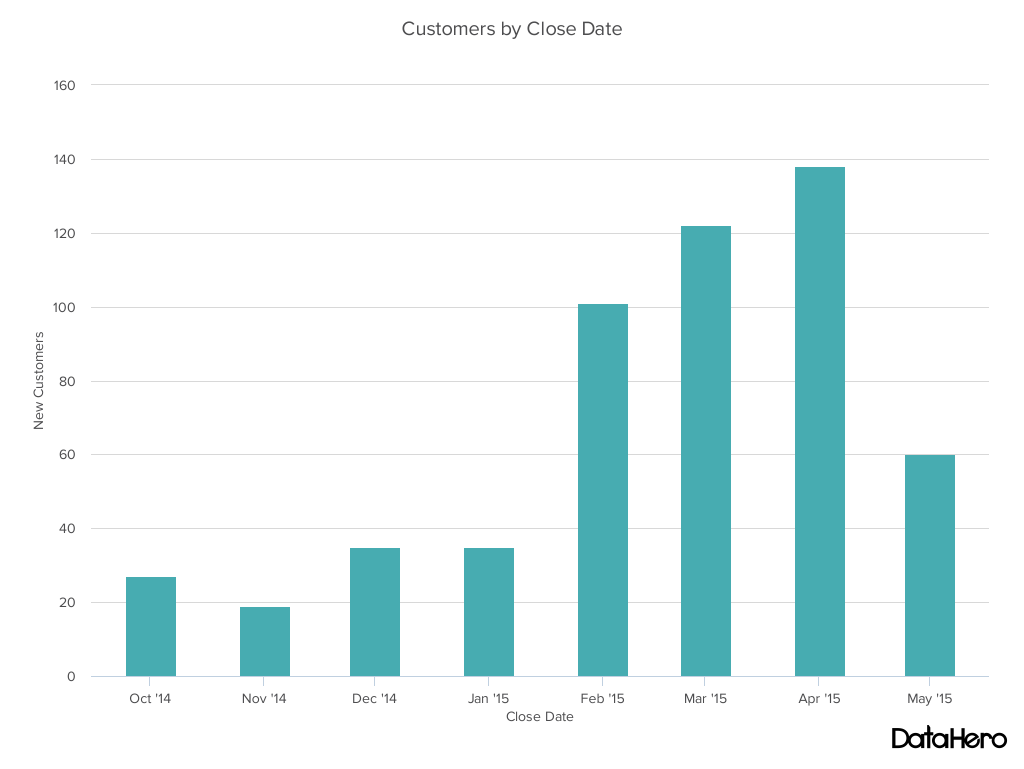
Use a column chart to show a comparison among different items, or to show a comparison of items over time. You could use this format to see the revenue per landing page or customers by close date.

Types of charts and graphs example: Column chart - customers by close date

Best Use Cases for This Type of Chart:

While column charts show information vertically, and bar graphs show data horizontally. While you can use both to display changes in data, column charts are best for negative data.

For example, warehouses often track the number of accidents that happen on the shop floor. When the number of incidents falls below the monthly average, a column chart can make that change easier to see in a presentation.

In the example above, this column chart measures the number of customers by close date. Column charts make it easy to see data changes over a period of time. This means that they have many use cases, including:

  • Customer survey data, like showing how many customers prefer a specific product or how much a customer uses a product each day.
  • Sales volume, like showing which services are the top sellers each month or the number of sales per week.
  • Profit and loss, showing where business investments are growing or falling.

Design Best Practices for Column Charts:

  • Use consistent colors throughout the chart, selecting accent colors to highlight meaningful data points or changes over time.
  • Use horizontal labels to improve readability.
  • Start the y-axis at 0 to appropriately reflect the values in your graph.

3. Line Graph

A line graph reveals trends or progress over time and you can use it to show many different categories of data. You should use it when you chart a continuous data set.

Types of graphs example: Line chart - avg days to close

Best Use Cases for These Types of Graphs:

Line graphs help users track changes over short and long periods of time. Because of this, these types of graphs are good for seeing small changes.

Line graphs can help you compare changes for more than one group over the same period. They’re also helpful for measuring how different groups relate to each other.

A business might use this type of graph to compare sales rates for different products or services over time.

These charts are also helpful for measuring service channel performance. For example, a line graph that tracks how many chats or emails your team responds to per month.

Design Best Practices for Line Graphs:

  • Use solid lines only.
  • Don’t plot more than four lines to avoid visual distractions.
  • Use the right height so the lines take up roughly 2/3 of the y-axis’ height.

4. Dual Axis Chart

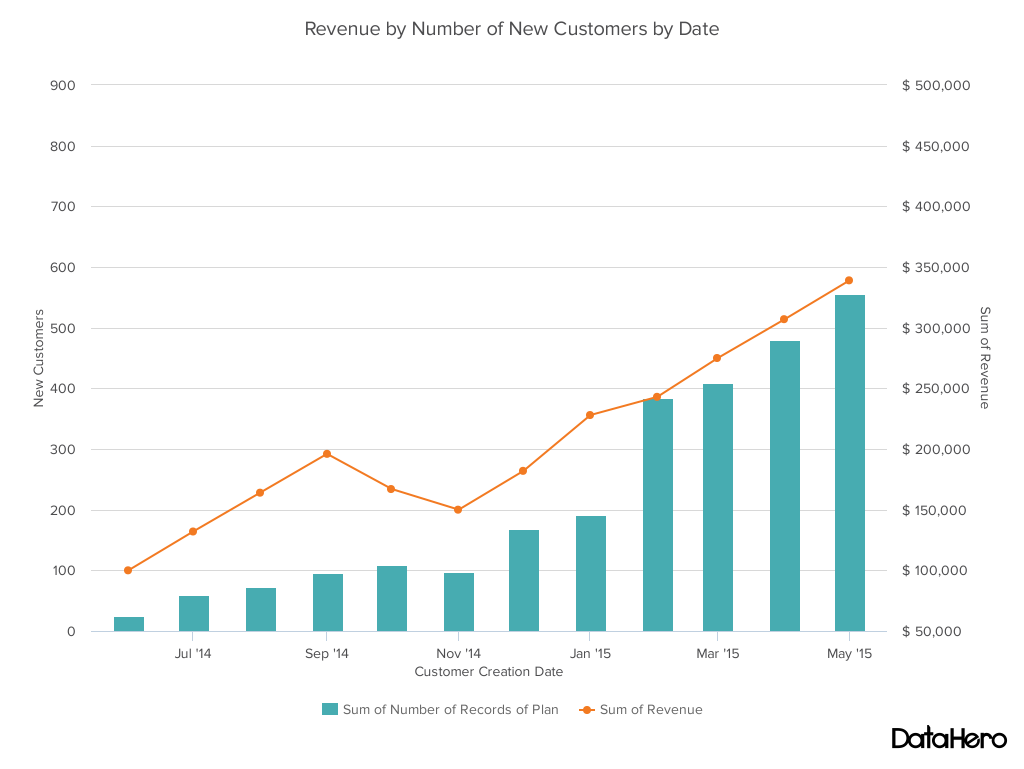
A dual-axis chart allows you to plot data using two y-axes and a shared x-axis. It has three data sets. One is a continuous set of data and the other is better suited to grouping by category. Use this chart to visualize a correlation or the lack thereof between these three data sets.

Types of charts and graphs example: Dual axis chart - revenue by new customers

Best Use Cases for This Type of Chart:

A dual-axis chart makes it easy to see relationships between different data sets. They can also help with comparing trends.

For example, the chart above shows how many new customers this company brings in each month. It also shows how much revenue those customers are bringing the company.

This makes it simple to see the connection between the number of customers and increased revenue.

You can use dual-axis charts to compare:

  • Price and volume of your products
  • Revenue and units sold
  • Sales and profit margin
  • Individual sales performance

Design Best Practices for Dual Axis Charts:

  • Use the y-axis on the left side for the primary variable because brains are naturally inclined to look left first.
  • Use different graphing styles to illustrate the two data sets, as illustrated above.
  • Choose contrasting colors for the two data sets.

5. Area Chart

An area chart is basically a line chart, but the space between the x-axis and the line is filled with a color or pattern. It is useful for showing part-to-whole relations, like showing individual sales reps’ contributions to total sales for a year. It helps you analyze both overall and individual trend information.

Types of charts and graphs example: Area chart - users by lifecycle stage

Best Use Cases for These Types of Charts:

Area charts help show changes over time. They work best for big differences between data sets and also help visualize big trends.

For example, the chart above shows users by creation date and life cycle stage.

A line chart could show that there are more subscribers than marketing qualified leads. But this area chart emphasizes how much bigger the number of subscribers is than any other group.

These types of charts and graphs make the size of a group and how groups relate to each other more visually important than data changes over time.

Area graphs can help your business to:

  • Visualize which product categories or products within a category are most popular
  • Show key performance indicator (KPI) goals vs. outcomes
  • Spot and analyze industry trends

Design Best Practices for Area Charts:

  • Use transparent colors so information isn’t obscured in the background.
  • Don’t display more than four categories to avoid clutter.
  • Organize highly variable data at the top of the chart to make it easy to read.

6. Stacked Bar Chart

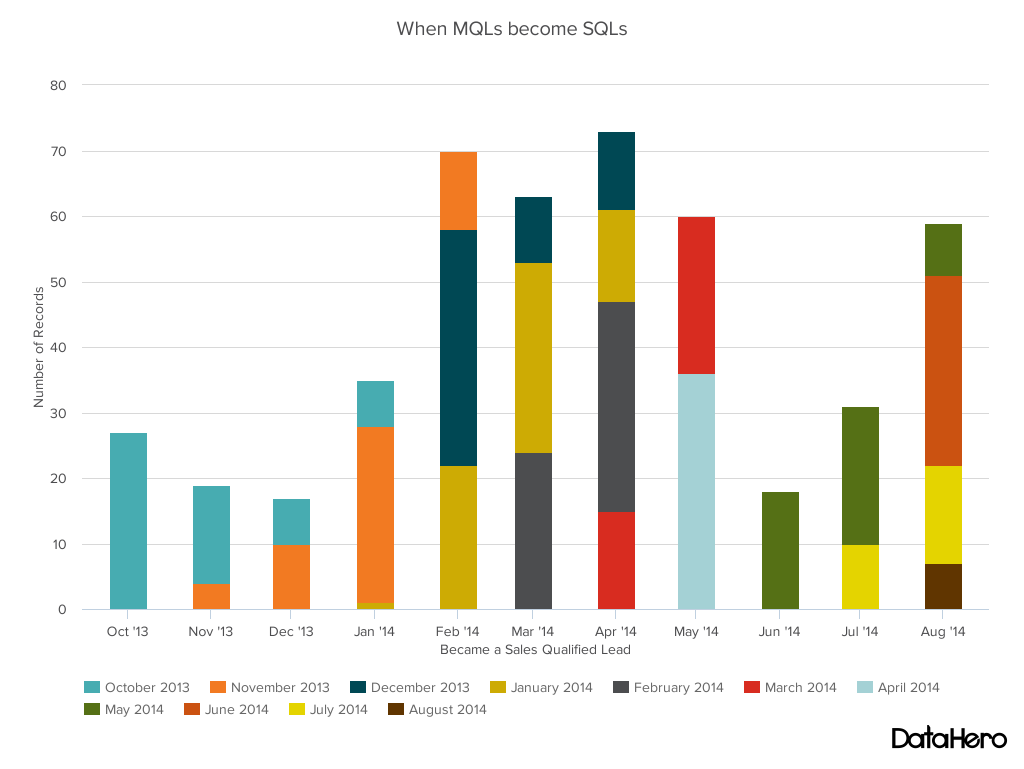
Use this chart to compare many different items and show the composition of each item you’re comparing.

Types of charts and graphs example: Stacked bar chart - mqls to sqls

Best Use Cases for These Types of Graphs:

These graphs are helpful when a group starts in one column and moves to another over time.

For example, the difference between a marketing qualified lead (MQL) and a sales qualified lead (SQL) is sometimes hard to see. The chart above helps stakeholders see these two lead types from a single point of view– when a lead changes from MQL to SQL.

Stacked bar charts are excellent for marketing. They make it simple to add a lot of data on a single chart or to make a point with limited space.

These types of graphs can show multiple takeaways, so they’re also super for quarterly meetings when you have a lot to say, but not always a lot of time to say it.

Stacked bar charts are also a smart option for planning or strategy meetings. This is because these charts can show a lot of information at once, but they also make it easy to focus on one stack at a time or move data as needed.

You can also use these charts to:

  • Show the frequency of survey responses
  • Identify outliers in historical data
  • Compare a part of a strategy to its performance as a whole

Design Best Practices for Stacked Bar Graphs:

  • Best used to illustrate part-to-whole relationships.
  • Use contrasting colors for greater clarity.
  • Make the chart scale large enough to view group sizes in relation to one another.

7. Mekko Chart

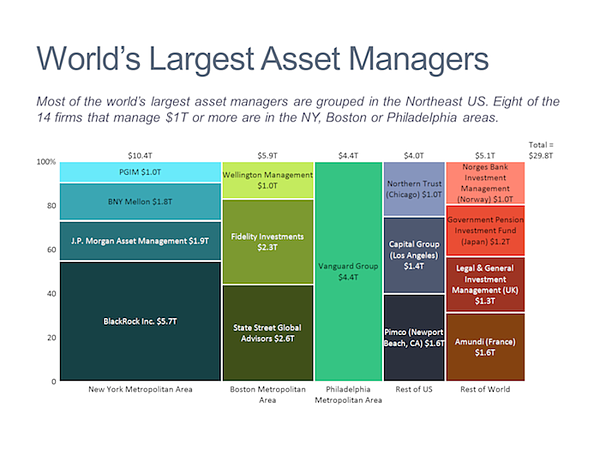
Also known as a Marimekko chart, this type of graph can compare values, measure each one’s composition, and show data distribution across each one.

It’s similar to a stacked bar, except the Mekko’s x-axis can capture another dimension of your values— instead of time progression, like column charts often do. In the graphic below, the x-axis compares each city to one another.

Types of charts and graphs example: Mekko chart - world's largest asset managers

Image Source

Best Use Cases for This Type of Chart:

You can use a Mekko chart to show growth, market share, or competitor analysis.

For example, the Mekko chart above shows the market share of asset managers grouped by location and the value of their assets. This chart makes it clear which firms manage the most assets in different areas.

It’s also easy to see which asset managers are largest and how they relate to each other.

Mekko charts can seem more complex than other types of charts and graphs. So, it’s best to use these in situations where you want to emphasize scale or differences between groups of data.

Other use cases for Mekko charts include:

  • Detailed profit and loss statements
  • Revenue by brand and region
  • Product profitability
  • Share of voice by industry or niche

Design Best Practices for Mekko Charts:

  • Vary your bar heights if the portion size is an important point of comparison.
  • Don’t include too many composite values within each bar. You might want to reevaluate your presentation if you have a lot of data.
  • Order your bars from left to right in such a way that exposes a relevant trend or message.

8. Pie Chart

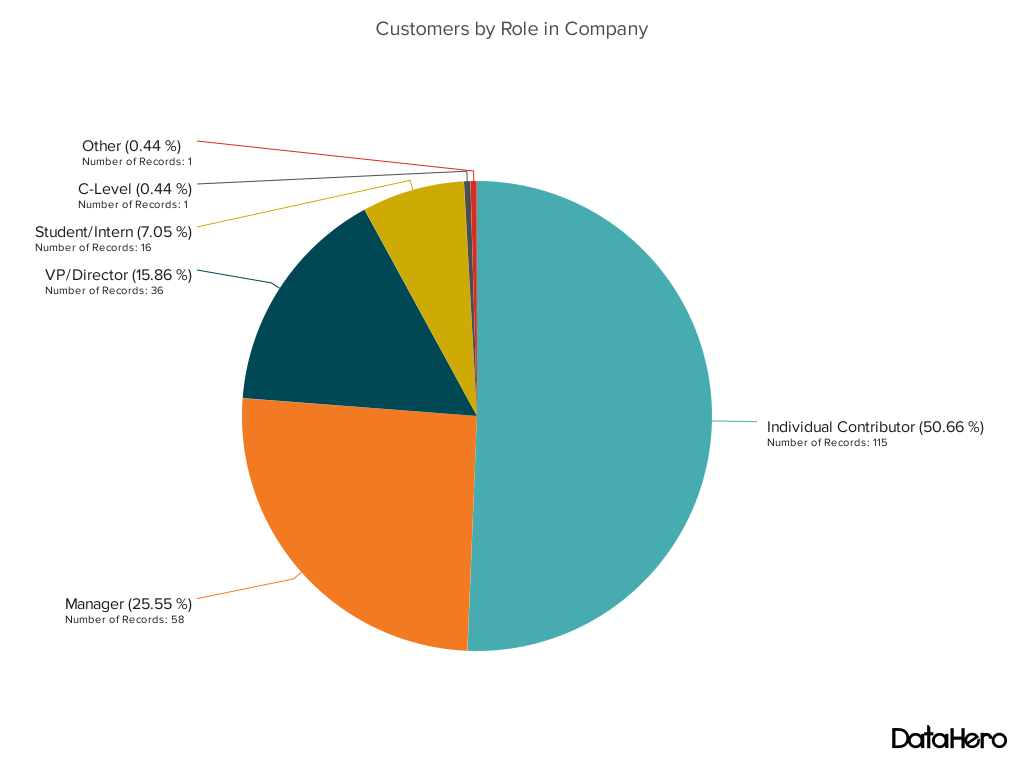
A pie chart shows a static number and how categories represent part of a whole — the composition of something. A pie chart represents numbers in percentages, and the total sum of all segments needs to equal 100%.

Types of charts and graphs example: Pie chart - customers by role

Best Use Cases for This Type of Chart:

The image above shows another example of customers by role in the company.

The bar graph example shows you that there are more individual contributors than any other role. But this pie chart makes it clear that they make up over 50% of customer roles.

Pie charts make it easy to see a section in relation to the whole, so they are good for showing:

  • Customer personas in relation to all customers
  • Revenue from your most popular products or product types in relation to all product sales
  • Percent of total profit from different store locations

Design Best Practices for Pie Charts:

  • Don’t illustrate too many categories to ensure differentiation between slices.
  • Ensure that the slice values add up to 100%.
  • Order slices according to their size.

9. Scatter Plot Chart

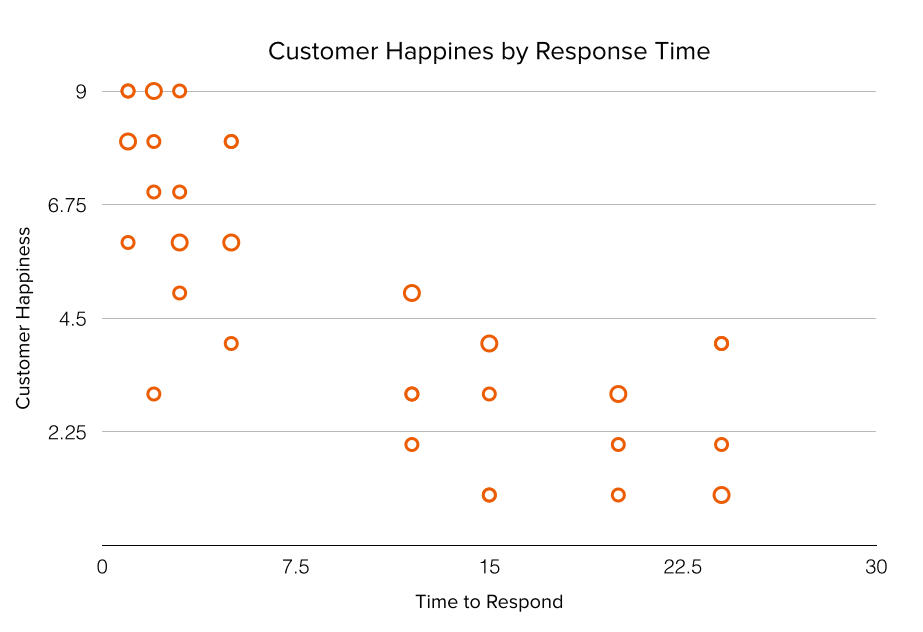
A scatter plot or scattergram chart will show the relationship between two different variables or reveals distribution trends. Use this chart when there are many different data points, and you want to highlight similarities in the data set. This is useful when looking for outliers or for understanding the distribution of your data.

Types of charts and graphs example: Scatter plot chart - customer happiness by response time

Best Use Cases for These Types of Charts:

Scatter plots are helpful in situations where you have too much data to quickly see a pattern. They are best when you use them to show relationships between two large data sets.

In the example above, this chart shows how customer happiness relates to the time it takes for them to get a response.

Great use cases for this type of graph make it easy to see the comparison of two data sets. This might include:

  • Employment and manufacturing output
  • Retail sales and inflation
  • Visitor numbers and outdoor temperature
  • Sales growth and tax laws

Try to choose two data sets that already have a positive or negative relationship. That said, this type of graph can also make it easier to see data that falls outside of normal patterns.

Design Best Practices for Scatter Plots:

  • Include more variables, like different sizes, to incorporate more data.
  • Start the y-axis at 0 to represent data accurately.
  • If you use trend lines, only use a maximum of two to make your plot easy to understand.

10. Bubble Chart

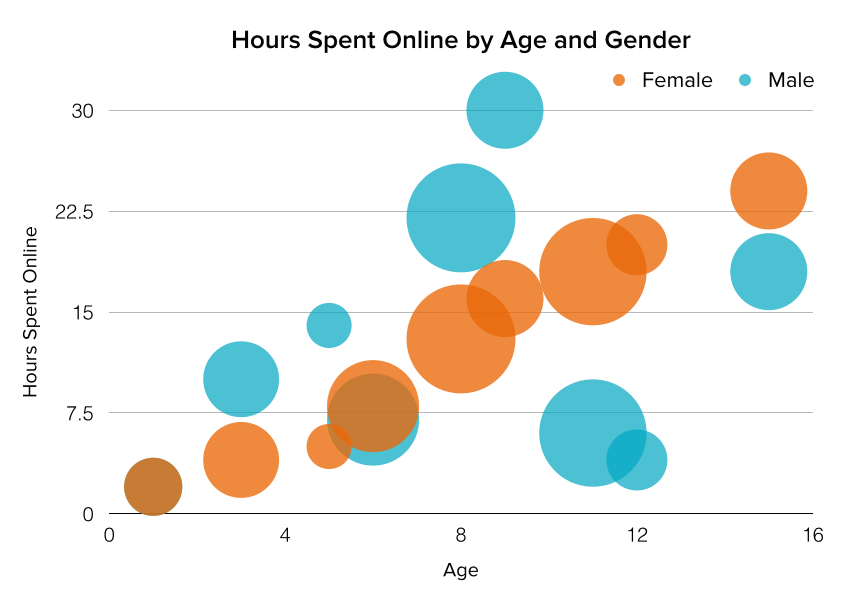
A bubble chart is similar to a scatter plot in that it can show distribution or relationship. There is a third data set shown by the size of the bubble or circle.

Types of charts and graphs example: Bubble chart - hours spent online by age and gender

Best Use Cases for This Type of Chart:

In the example above, the number of hours spent online isn’t just compared to the age of the user, as it would be on a scatter plot chart.

Instead, you can also see how the gender of the user impacts time spent online.

This makes bubble charts useful for seeing the rise or fall of trends over time. It also lets you add another option when you’re trying to understand relationships between different segments or categories.

For example, if you want to launch a new product, this chart could help you quickly see the cost, risk, and value of your new product. This can help you focus your energies on a new product that is low risk with a high potential return.

You can also use bubble charts for:

  • Top sales by month and location
  • Customer satisfaction surveys
  • Store performance tracking
  • Marketing campaign reviews

Design Best Practices for Bubble Charts:

  • Scale bubbles according to area, not diameter.
  • Make sure labels are clear and visible.
  • Use circular shapes only.

11. Waterfall Chart

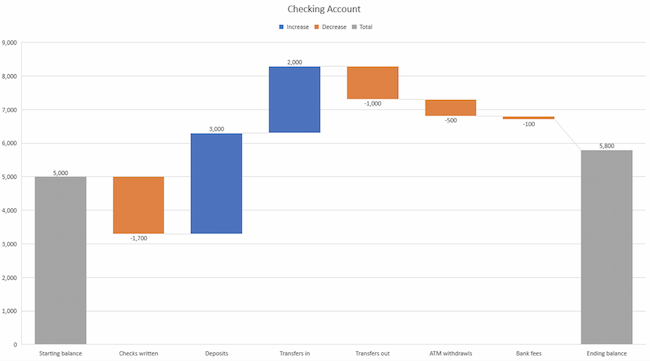
Use a waterfall chart to show how an initial value changes with intermediate values — either positive or negative — and results in a final value.

Use this chart to reveal the composition of a number. An example of this would be to showcase how overall company revenue is influenced by different departments and leads to a specific profit number.

Types of charts and graphs example: Waterfall chart

Image Source

Best Use Cases for This Type of Chart:

These types of charts and graphs make it easier to understand how internal and external factors impact a product or campaign as a whole.

In the example above the chart moves from the starting balance on the far left to the ending balance on the far right. Factors in the center include deposits, transfers in and out, and bank fees.

A waterfall chart offers a quick visual that makes complex processes and outcomes easier to see and troubleshoot. For example, SaaS companies often measure customer churn. This format can help visualize changes in new, current, and free trial users, or changes by user segment.

You may also want to try a waterfall chart to show:

  • Changes in revenue or profit over time
  • Inventory audits
  • Employee staffing reviews

Design Best Practices for Waterfall Charts:

  • Use contrasting colors to highlight differences in data sets.
  • Choose warm colors to indicate increases and cool colors to indicate decreases.

12. Funnel Chart

A funnel chart shows a series of steps and the completion rate for each step. Use this type of chart to track the sales process or the conversion rate across a series of pages or steps.

Types of charts and graphs example: Funnel chart - marketing funnel process

Best Use Cases for These Types of Charts:

The most common use case for a funnel chart is the marketing or sales funnel. But there are many other ways to use this versatile chart.

If you have at least four stages of sequential data, this chart can help you easily see what inputs or outputs impact the final results.

For example, a funnel chart can help you see how to improve your buyer journey or shopping cart workflow. This is because it can help pinpoint major drop-off points.

Other stellar options for these types of charts include:

  • Deal pipelines
  • Conversion and retention analysis
  • Bottlenecks in manufacturing and other multi-step processes
  • Marketing campaign performance
  • Website conversion tracking

Design Best Practices for Funnel Charts:

  • Scale the size of each section to accurately reflect the size of the data set.
  • Use contrasting colors or one color in gradated hues, from darkest to lightest as the size of the funnel decreases.

13. Bullet Graph

A bullet graph reveals progress toward a goal, compares this to another measure, and provides context in the form of a rating or performance.

Types of charts and graphs example: Bullet graph - new customers

Best Use Cases for These Types of Graphs:

In the example above, this bullet graph shows the number of new customers against a set customer goal. Bullet graphs are great for comparing performance against goals like this.

These types of graphs can also help teams assess possible roadblocks because you can analyze data in a tight visual display.

For example, you could create a series of bullet graphs measuring performance against benchmarks or use a single bullet graph to visualize these KPIs against their goals:

  • Revenue
  • Profit
  • Customer satisfaction
  • Average order size
  • New customers

Seeing this data at a glance and alongside each other can help teams make quick decisions.

Bullet graphs are one of the best ways to display year-over-year data analysis. You can also use bullet graphs to visualize:

  • Customer satisfaction scores
  • Product usage
  • Customer shopping habits
  • Social media usage by platform

Design Best Practices for Bullet Graphs:

  • Use contrasting colors to highlight how the data is progressing.
  • Use one color in different shades to gauge progress.

14. Heat Map

A heat map shows the relationship between two items and provides rating information, such as high to low or poor to excellent. This chart displays the rating information using varying colors or saturation.

Types of charts and graphs example: Heat map chart - highest degree vs. class identification

Best Use Cases for Heat Maps:

In the example above, the darker the shade of green shows where the majority of people agree.

With enough data, heat maps can make a viewpoint that might seem subjective more concrete. This makes it easier for a business to act on customer sentiment.

There are many uses for these types of charts and graphs. In fact, many tech companies use heat map tools to gauge user experience for apps, online tools, and website design.

Another common use for heat map graphs is location assessment. If you’re trying to find the right location for your new store, these maps can give you an idea of what the area is like in ways that a visit can’t communicate.

Heat maps can also help with spotting patterns, so they’re good for analyzing trends that change quickly, like ad conversions. They can also help with:

  • Competitor research
  • Customer sentiment
  • Sales outreach
  • Campaign impact
  • Customer demographics

Design Best Practices for Heat Map:

  • Use a basic and clear map outline to avoid distracting from the data.
  • Use a single color in varying shades to show changes in data.
  • Avoid using multiple patterns.

Put These New Types of Charts and Graphs Into Action

Now that you’ve chosen the best graph or chart for your project, try a data visualization resource that makes your point clear and visual.

Data visualization is just one part of great communication. To show your customers, employees, leadership, and investors that they’re important, keep making time to learn.

Editor’s note: This post was originally published in November 2020 and has been updated for comprehensiveness.

Blog - Data Visualization [List-Based]

Categories B2B

Sense and Sociability – The Corporate Guide to Social Media Etiquette

“Women belong in the kitchen.”

Unfortunately for Burger King, this tweet definitely didn’t go down well on Twitter (no surprise).

Bad Social Media Etiquette: Burger King "Women Belong In the Kitchen" Tweet

Although it was only in subsequent tweets that the meaning of the post was explained, the damage had already been done. Burger King faced plenty of backlash and had to remove the post.

Download Now: Social Media Trends in 2022 [Free Report]

Burger King’s mishap highlights the importance of having social media etiquette standards for your company and employees. And in this article, you’ll learn how to avoid poor social media etiquette and mind your manners online.

Social media is now part of everyday life with over 4.4 expected users by 2025. As such, it’s a no-brainer that brands use it to communicate with their customers.

However, just as it’s crucial to practice proper etiquette when conversing in-person, you also need to do the same online.

Poor social media etiquette can lead to terrible consequences for an erring company. For example, in 2018, Snapchat lost an estimated $800 millionafter making a post that seemed to trivialize domestic violence.

If you don’t want similar terrible consequences to your business, then you need to take social media etiquette seriously.

The Benefits of Social Media Etiquette

Here are some benefits of practicing proper social media etiquette.

It makes your brand empathetic

Your audience is your greatest asset, and using proper social media etiquette forces you to put yourself in their shoes. And when you’re in their shoes, you gain a better perspective of their wants and needs.

It helps you recover from fails

There’s no perfect brand, and we all stumble at times. However, with good social media etiquette, you can recover from your mistakes. For example, despite its fail as quoted in the introduction, Burger King managed to turn things around, at least to an extent, with an apology that felt genuine.

It makes your social media campaigns more productive

Social media is a landmine that’s difficult to navigate. However, good social media etiquette can guide you and help you produce good results.

It helps you focus on what’s important

Good social media etiquette reduces the chances of starting a fire you’ll need to put out on social media. Thus, you’ll have time to focus on what’s really important: your bottom line.

It keeps you on the good side of the law

If your platform has privacy and compliance laws, good etiquette will help you stay on their good side and protect you from lawsuits and such.

It keeps you top-of-mind

When you respond quickly to feedback, even positive ones, you show that your customer’s opinions matter.

Therefore, it’ll be easier for your business to stay top-of-mind for these customers.

Do’s and Don’ts of Social Media Etiquette

Each social media platform is different, but social media etiquette transcends these differences and will result in good results regardless of the platform. Here are 5 Do’s and 5 Don’ts of social media etiquette.

Do’s of Social Media Etiquette

1. Stick to your core values

Your core values should resonate in your content. So if one core value is respect, you’d want to keep sassy comments out of your social media.

On the other hand, if your brand is big on humor, then snarky comments would be on-brand. An excellent example of this is Wendy’s.

Wendy's Social Media Etiquette with humor

2. Respond Quickly

Here’s an interesting stat: 79% of customers expect a responsein the first 24 hours of reaching out to your brand on social media.

So, DO respond as soon as possible. Responding quickly to positive feedback reinforces a customers’ liking of your brand.

Slow response, especially to complaints, makes customers feel like they’re left on read—and we all know how that feels.

Nike Support (@NikeSupport) replies to customers every few minutes, which is probably one reason why people love them on social media.

3. Complete your social page profile

If people come to your page and see an incomplete profile, it gives the wrong impression and they’ll feel you’re not serious enough about engaging with them.

So, complete your profile and include useful information, for example, contact information when appropriate.

Glossier’s Instagram profile, for example, contains information you need to know about it and includes its website where you can get more information.

Glossier Instagram Bio Social Media Etiquette

4. Use Hashtags Correctly

Hashtags can boost engagement, but too many hashtags on a post can make you look unprofessional and annoying.

Displaying good social media etiquette will require you to use only hashtags that are relevant to the post.

Coca-Cola’s branded #ShareACoke hashtag is an excellent example of a brand that used hashtags well.

5. Post Regularly

While your audience and industry should be factored in, a good rule of thumb is to post at least once a week.

If you don’t, there’s the risk of losing out on opportunities for driving brand awareness.

Don’ts of Social Media Etiquette

1. Don’t overdo humor

Humor is subjective, and what’s funny to you might be insensitive or downright offensive to others.

If you’re not sure about how a joke would be taken, then it’s better to keep it locked away.

Aside from Wendy’s, another brand that’s hacked funny social media replies and posts is Innocent Drinks (@innocent)

Bad Social Media Etiquette: Innocent Drinks

2. Don’t be desperate

Don’t be desperate to get followers. It can be off-putting to see a business ask for followers every chance it gets.

By posting valuable and authentic content, you’ll be able to grow your follower count and get high-quality interactions that will attract even more people.

Fenty’s social media posts include testimonials from women of different nationalities and ethnicities, which is one reason for its rapid growth.

Social Media Etiquette: Fenty beauty

3. Don’t over-promote the business

Followers will quickly get tired if they see too much on social media from your brand.

Balance is key. If ever you’ll post more often than before, tell your audience beforehand and explain why. Then they’ll be less likely to unfollow you during your spree.

4. Don’t use a bot for replies

Tempted to use a bot to respond to your customers? Then you’re on your way to losing them.

Users are smart, and they can sense when a response is automated. If you can’t be online 24/7, share the hours when customers can reach you on the platform. Twitch Support’s bio contains its scope of assistance and open hours.

Social Media Etiquette: Twitch Support twitter bio

5. Don’t write in all caps

DO YOU WRITE IN ALL CAPS? Then you are likely stressing out your audience. Why? BECAUSE IT FEELS LIKE YOU’RE SHOUTING AT THEM!

Even Twitter’s official business website for brandsadvises against tweeting in all caps.

So, stop with all caps. They aren’t funny and come off as rude and aggressive. Use all caps only when something is truly important (or exciting), and you definitely HAVE to call your audience’s attention to it.

Social Media Etiquette for Employees

Social media can be a minefield, and only good social media policies can guide brands and employees around it. Here are some guidelines to protect your employees, and by extension, your brand, from behaving indecently on social media.

Respect others

Although employees have the right to say what is on their minds and can post content on their personal time, it’s important to encourage them to be polite and calm on social media.

Thinking before replying or posting online can de-escalate a potentially bad situation.

Respect privacy and confidentiality

Social media isn’t the place to discuss sensitive company matters or disclose internal information.

As an employee, you might not realize that you’re discussing sensitive or internal matters, so the best thing is to take no chances. If it’s not your place to do so or you’re unsure, then move on without discussing such matters online.

Don’t always want to be first

There’s a rush that comes from being the first to ‘break the news.’ However, doing so might come at the cost of losing your job.

So before you post or comment, ensure you’re entitled to share the information. Even if it doesn’t get you dismissed, some information you share might hurt others and ruin relationships.

Don’t use social media on your employer’s time

Your employer is paying you for your time, so act accordingly. Don’t abuse their trust even if your employer allows you to use social media while at work.

If you’re the social media manager, stick to the professional accounts. Using that time to attend to trivial, personal stuff is unfair. It’s also risky because you could end up mixing up accounts and posting something you shouldn’t with your professional account.

Be a good company ambassador

Be mindful that you represent your employer. Thus, post information like you’re posting on their behalf.

Use good judgment when posting online. For example, if someone posts negative information about the organization, don’t fly into a confrontation. Instead, tell someone in charge who can handle the matter or give you instructions on how to handle it.

Do Social Media Etiquette The Right Way

These Dos and Don’ts of social media etiquette might seem challenging to follow. However, following them can save you and your company a lot of stress.

Several brands have experienced the power of cancel culture firsthand, and you can avoid their experiences by practicing good social media etiquette.

When you care about your audience and put yourself in their shoes, you can have a good culture of social media etiquette that will benefit your brand.

Editor’s note: This post was originally published in March 2010 and has been updated for comprehensiveness.

New call-to-action

Categories B2B

The 23 Best Google Chrome Extensions for SEO

The importance of using a great SEO Chrome extension can’t be overstated. SEO is essential if you want your site to rank on Google, and the right extension can help you automate research and analysis, leading to a more effective SEO strategy.

With so many SEO Chrome extensions available, marketers often find themselves spending more time finding a great fit than getting actionable analytics.

To help you navigate the crowded world of Chrome extensions, we’ve come up with a list of our favorites for SEO.

→ Download Now: SEO Starter Pack [Free Kit]

Best SEO Extensions for Google Chrome

1. MozBar

seo chrome extension: mozbar

MozBar allows its users to check SEO within their browser using just one click. MozBar provides metrics while viewing any webpage, and allows users to export SERPs into a CRV file and access analytics. Upgrading to MozBar Premium offers functions like analyzing keyword difficulty, page optimization, and SERP metrics.

What we like: MozBar makes checking your SEO as simple as possible with its one-click model, making it a huge time saver for stressed SEO pros.

2. Keywords Everywherekeyword chrome extension: keywords everywhere

  • Price: Free

Keywords Everywhere is a tool that shows three different information types for keywords on Google: monthly search volume, cost per click, and Google Adwords competition. By having this extension installed, going back and forth from Google Keywords to your open browser page is a thing of the past, as it’s an in-browser extension.

What we like: Keywords Everywhere puts keyword data where you want it: Right in front of you. The result? Less time spent tabbing back and forth and more time spent boosting your site’s SEO.

3. GrowthBarseo chrome extension: growthbar

  • Price: Free for 5 days, then $29/mo

GrowthBar is a simple chrome extension that gives you instant access to critical SEO data points about any website and unlocks the growth channels and keywords that are working for them.

The tool allows you to explore best-performing keywords, keyword ranking difficulty score, domain authority, backlink data, page word count, Facebook ads, and more.

What we like: Quick and easy are the big benefits of GrowthBar. Easily discover key data and act on it to boost your SEO on-demand.

4. SimilarWebseo chrome extension: similarweb

Offering traffic and key metrics for any website, SimilarWeb is a popular extension that allows users to see statistics and strategies for any website while searching the internet with one click. This extension is helpful for those looking for new and effective SEO strategies, as well as those interested in analyzing different trends across the market.

What we like: SimilarWeb lets you see what the competition is up to — and how it’s working for them. The result? You gain useful insight about improving your own SEO practices.

5. Redirect Pathseo chrome extension: redirect path

  • Price: Free

Microsoft Word’s infamous red squiggly line that alerts their user of improper grammar has an SEO doppelganger: Redirect Path. This extension flags 301, 302, 404, 500 HTTP Status Codes, Meta, and JavaScript redirects, catching potential issues immediately. It also shows other HTTP headers and server IP addresses.

What we like: Broken and misdirected links can drive users to other sites — Redirect Path gives you a heads-up about these issues so you can correct them ASAP.

6. SEO Meta in 1 Clickseo chrome extension: seo meta in 1 click

  • Price: Free

SEO Meta in 1 Click displays all meta tags and main SEO information for a web page with just a single click. This includes the lengths of titles and descriptions, URL, headers in order of appearance, and the number of images without alt text.

What we like: Just like the name says, one click gets you the big hitters of SEO impact, including title and description lengths and no-text images, letting you make the changes that matter most.

7. BuzzSumoseo chrome extension: buzzsumo

  • Price: Free

Need SEO tracking for social? BuzzSumo’s got you covered. This extension allows you to easily track shares and top-performing content on social media pages. Using BuzzSumo can help aid in future SEO decisions and check the inbound backlinks to your pages.

What we like: Social media is now a critical part of effective SEO. BuzzSumo loops in popular social media sites to help your team develop more effective SEO strategies.

8. Hunterseo chrome extension: hunter

Hunter makes it easy to find contact information instantly in your browser. This process, named “Domain Search,” is accessible by an icon in Chrome. Hunter finds all the email addresses related to a website.

What we like: How do prospective customers get in touch? Hunter finds all email addresses attached to your website, letting you ensure users have a reliable point of contact and making sure all email addresses are up-to-date.

9. Mangoolsseo chrome extension: mangools

Check the SEO strength of websites with Mangools, which offers you the top SEO metrics of websites using Moz and Majestic. Access premium features such as the self-described “Google SERP on steroids” function, aiding with keywords, backlinks, and profile analysis.

What we like: The stronger your SEO game, the better. Mangools combines multiple metrics to provide a broad view of how you stack up to the competition.

10. Google Trendschrome webmaster tools: google trends

  • Price: Free

Trends is part of Google Webmaster Tools, a set of extension tools for building websites and integrating them with Google. Trends presents analytics, using graphs, on the top searches in Google (from Taylor Swift to Kim Kardashian) from across several countries. Trends can help you identify the level of interest in topics related to your niche.

What we like: What’s in and what’s out changes rapidly. Trends keeps you on top of the evolving SEO landscape to help you stay ahead of the crowd.

11. SEOQuakeseo chrome extension: seoquake

  • Price: Free

SEOQuake presents itself as a dashboard, reporting on domain performance, as well as that of individual pages. One of its prime features is its SEO toolkit, which allows its users to analyze backlinks and watch keyword rank. It also provides on-page SEO suggestions, fitting itself into an SEO strategy nicely.

What we like: On-page SEO suggestions from SEOQuake are a great way to optimize your content in real-time, and it’s also a great tool to have access to when you need more robust analytics.

12. Serpstatseo chrome extension: serpstat

By using Serpstat, you can instantly check the SEO of your website as well as competitors’. After clicking the in-browser icon, you’ll be able to receive a full SEO audit of a domain. Serpstat has three sections: On-page SEO parameters, page analysis, and domain analysis.

What we like: Get a quick SEO comparison of your site and those of your competitors with just a few clicks using Serpstat to see how you stack up — and what you need to change.

13. Ahrefsahrefs chrome extension

With their SEO toolbar in Chrome, Ahrefs examines website properties and produces keywords, links, and ranking profiles that offer SEO improvements on your website. To receive a detailed report on an SEO metric, just click on it.

What we like: Dive deep into any SEO metric with Ahrefs to see where your strategies are working and where they need improvement.

14. Check My Linksseo chrome extension: check my links

  • Price: Free

Aptly named, Check My Links does just that with one click, scanning through webpages for broken links. A huge time saver when designing link-heavy web pages, the extension makes sure the links are working properly, denoting when links are broken.

What we like: Broken links are bad news. Check My Links saves you the time of manually finding broken links with one-click scanning.

15. NinjaOutreach Liteseo chrome extension: ninja outreach lite

  • Price: Free

The free extension from NinjaOutreach makes browsers capable of advanced data mining. It offers various SEO functions related to webpage URLs, titles, links, meta descriptions, follower counts on social media, and monetization techniques.

What we like: With NinjaOutreach Lite, you can begin data mining to see how well your URL, title, links, and meta descriptions are meeting SEO goals.

16. PageSpeed Insights by Googlechrome webmaster tools: pagespeed insights

  • Price: Free

Part of Google Webmaster Tools, PageSpeed Insights is an SEO tool that provides information on desktop and mobile sites. After running an analysis, PageSpeed Insights gives a score on the site and provides suggestions on how to make the web pages run faster.

What we like: Faster is better when it comes to websites. PageSpeed pinpoints areas you can improve to make your page run faster and boost your search ranking.

17. Woorankseo chrome extension: woorank

Woorank is a site analysis tool similar to PageSpeed Insights, allowing users to see suggestions for improvement on their web pages. It provides an in-depth report on online visibility, social media, and usability, allowing you to keep track of ways to improve different metrics.

What we like: Woorank is like PageSpeed with extended impact. It offers suggestions on how to boost the visibility and usability of your site, which are both key metrics in overall SERP rankings.

18. NoFollowseo chrome extension: nofollow

  • Price: Free

With NoFollow, marketers can see an outline of web pages that are coded with the nofollow metatag. Because nofollow links don’t add to SEO metrics, users can identify any external web pages that are backlinking to their websites with indexed links. For pages you don’t want to be indexed — like a landing page — NoFollow checks to see if those pages are coded correctly and highlights any links that aren’t working.

What we like: Nofollow links can impact your SEO but don’t naturally appear in data. NoFollow lets you identify these links and helps ensure they’re coded correctly.

19. BuzzStreamseo chrome extension: buzzstream

BuzzStream allows marketers to organize and perform outreach that’s specialized to your business. The extension, BuzzMarker, connects with BuzzStream to assist in building links, promoting content, and pitching influencers.

What we like: Build out customized SEO-based outreach that can help you connect with target audiences and increase your search rankings.

20. Screaming Frog SEO Spiderseo chrome extension: screamingfrog

Search marketing stressing you out? This tool is here to help. Screaming Frog’s SEO Spider enables you to crawl website URLs, add key elements to analyze SEO, and fix detected issues, making an excruciatingly long process simplified. Some elements include finding broken links, discovering duplicate pages, and creating site visualizations.

What we like: Search engine marketing is complex. Screaming Frog makes it easy with automated URL analysis that flags potential issues and lets you add simple fixes.

21. Lighthousechrome webmaster tools: lighthouse

  • Price: Free

The Lighthouse SEO Chrome extension is an open-source, automated tool designed to improve the performance of your web applications. First, Lighthouse runs a series of tests against the target webpage and then reports results across the speed, quality, and overall performance of your application. Then, it returns results that make it easy to pinpoint and correct potential problem areas.

What we like: With page performance now impacting search results, Lighthouse offers a way to quickly identify issues that could hurt SEO efforts.

22. vidIQ Vision for YouTubeseo chrome extension: vidiq

This YouTube SEO Chrome extension is all about boosting the impact of your videos to get more views and drive more engagement. From helping you understand how videos get ranked in search, what makes them related, and what content your target audience is searching for, vidIQ is a great addition to any video-driven SEO effort.

What we like: vidIQ boasts more than 2 million users and is regularly updated to improve performance, making it a stand-out choice to boost video SEO impact.

23. SEO Minionseo chrome extension: seo minion

  • Price: Free

Streamline day-to-day SEO tasks with SEO Minion. From analyzing on-page SEO to checking broken links and previewing SERPs in real-time, the SEO Minion Chrome extension is a great way to save time on SEO without sacrificing your search ranking.

What we like: Along with current SEO features, SEO Minion adds new analysis and tracking options based on user feedback, making this extension a great choice for basic tasks and specific needs.

Solving for SEO Stress

Finding the right Chrome extension can help lower your SEO stress and boost your site’s impact. Plus, many of the tools listed above provide useful information on how to refine skills like backlink building and keyword accuracy. You’ll be acing the SEO section of Marketing 101 in no time. As a result, your site will see an exponential improvement in its search engine rankings.

Editor’s note: This post was originally published in September 2019 and has been updated for comprehensiveness.

marketing

Categories B2B

LinkedIn Company Pages: The Ultimate Guide [+ 10 Best Practices]

LinkedIn Pages allow users to discover, follow, and find new roles at their favorite businesses. But they’re not just useful for job seekers and professionals. If you own a business, organization, or other institution, you can use LinkedIn Company Pages to connect with your audience and strengthen your brand image.

A lot happens on LinkedIn. People post updates, professionals seek new jobs, salespeople pitch prospective customers, and LinkedIn members of all kinds connect, chat, and build relationships. With more than 800 million members, this level of activity comes as no surprise.

Free Guide: How to Use LinkedIn for Business, Marketing, and Networking  [Download Now]

LinkedIn Company Pages provide a unique way for your organization to stand out from the noise — important noise, but noisy nonetheless. We developed this guide to help you master your LinkedIn Company Page.

LinkedIn Company Pages were developed to give your company a home base and reach your audience on the network.

If you haven’t built a LinkedIn Page for your business yet, you’re missing out on new connections, followers, employees, and customers.For an in-depth guide on why creating a LinkedIn company page is essential for your business and how to get started, check out our video.

What to Post on a LinkedIn Company Page

Creating a LinkedIn presence for your company expands your brand trust and awareness. Here are a few ideas for what to post on your LinkedIn page to maximize your ROI.

1. Share company updates and news.

LinkedIn, like any other social network, features a content stream on which people share and discuss important articles and updates. Your Page is a perfect place to post your company updates and news for customers, employees, investors, and fans to review and share.

2. Post open jobs and connect with potential employees.

LinkedIn is a professional social network, meaning users benefit from work and career-related updates, connections, and interactions. LinkedIn members are primed to discover and discuss job opportunities, including the ones at your company. If you have any open roles, LinkedIn is the perfect place to share them.

In fact, LinkedIn provides Career Pages — a space separate from your Company Page that’s dedicated to open jobs, recruiting, and employer branding.

3. Build a community.

Every social network boasts its own ability to foster a sense of community, and LinkedIn is no exception.

Your LinkedIn Company Page is a place to build a community of LinkedIn members who are interested in your business, updates, and jobs. Here, they can connect and collaborate on their shared interest in your company. Post interesting questions, behind-the-scenes information, and unique updates to engage your audience and build camaraderie on your Page.

4. Grow and keep your brand’s image consistent on social media.

If you’re active on other social networks, having a presence on LinkedIn can help you grow your audience elsewhere. Most social networks allow you to link to and from your LinkedIn page to boost recognition and increase your number of followers.

Additionally, some of your audience may only be active on LinkedIn, so creating a Page would give you a chance to connect with new potential customers and employees.

5. Improve your discoverability on search engines.

LinkedIn Company Pages rank on search engine results pages (SERPs) like any other website or social network. Creating a Page gives your company another opportunity to be discovered by those searching for your products, services, or brand.

LinkedIn Company Pages vs. LinkedIn Groups

Another popular feature on LinkedIn is LinkedIn Groups, where like-minded people digitally gather to discuss common topics, industries, or (in some cases) companies. Many users get these two features confused.

LinkedIn Company Pages are the equivalent to your “website” on LinkedIn; you create it on behalf of your company, and it belongs to you (as a business owner and/or marketer). You’re responsible for updating your Page and posting new content and updates. Other LinkedIn members can follow your Page and engage with your content.

On the other hand, LinkedIn Groups are collaborative networks that can be created and engaged with by any LinkedIn member. Some groups are private while Open Groups can be read or joined by anyone.

Now, a company can create a LinkedIn Group for certain internal teams or subgroups, but LinkedIn Groups can’t necessarily replace LinkedIn Company Pages.

How to Create a Company Page on LinkedIn

Whether you already have a LinkedIn account or are new to the platform, creating a LinkedIn Company Page is easy. Follow these steps to get started.

1. Navigate to the LinkedIn Pages home page or to LinkedIn.com.

how to create a company page on LinkedIn: LinkedIn Pages home pageLinkedIn has a public-facing site where you can start the process for creating your own Page. Click the blue button that says “Create your Page.” Alternatively, hover over the LinkedIn Pages option in the top menu and click “Create a LinkedIn Page”.

how to create a company page on LinkedIn: top menu

If you’re not already signed in, you’ll be prompted to sign in. Be sure to do so with the account where you’d like to manage the page. But if you happen to sign in to the wrong account, don’t worry; you can add more admins after you set up your page. We’ll cover how you can do that later.

Starting from LinkedIn.com

If you’d prefer to start from your LinkedIn feed, navigate to LinkedIn.com.

Once you reach your feed, tap the “Work” button in the navigation bar.

Click “Create a Company Page +” at the very bottom.

how to create a company page on LinkedIn: work button on LinkedIn feed2. Select the type of Page you’d like to create.

how to create a company page on LinkedIn: choosing the type of pageAfter clicking “Create a Company Page”, you’ll be taken to a page where you can decide what you’re creating. You have three options:

  • Company: A good fit for small-to-enterprise businesses, as well as non-profits, government agencies, and other non-educational organizations.
  • Showcase page: A “sub-page” that’s connected to an existing LinkedIn Page. Not recommended if you’re setting up your first Company Page.
  • Educational institution: A good fit for schools and universities.

If you’re a business owner or employee, choose “Company.”

3. Input your business name, LinkedIn public URL, and website.

how to create a company page on LinkedIn: add basic informationNow comes the fun part: Actually creating the page. LinkedIn guides you through this process, and it prompts you to first fill out the basics.

  • Name: Enter your entire company name to improve discoverability and searchability.
  • LinkedIn public URL: As you fill out your Name, LinkedIn will automatically input your URL to match. Ideally, your URL will be your company name; this keeps your online identities consistent. For example, HubSpot’s LinkedIn Page URL is www.linkedin.com/company/hubspot. If your company name isn’t available, choose a URL that’s similar and still identifiable, such as one of your social media handles and/or a shortened version of your brand name.
  • Website: Enter your company’s website. Although not required, this information is critical as it connects LinkedIn followers to your company website.

4. Add your industry, company size, and company type.

how to create a company page on LinkedIn: add industryLinkedIn requires additional details for you to build your page. These are essential to improve searchability and helps you build your brand image in your specific industry.

  • Industry: Start typing in your industry and choose one from the drop-down menu. If you can’t find it, continue searching until you find a generally good fit. This information helps LinkedIn categorize your company for Page visitors.
  • Company size: Choose your company size from the ranges provided. The ranges start from 0-1 and go up to 10,000+.
  • Company type: Choose your company type from the options provided: Public company, self-employed, government agency, non-profit, sole proprietorship, privately held, and partnership. If you’re not sure, reach out to your company stakeholders.

5. Add your final profile details, such as your logo and tagline.

how to create a company page on LinkedIn:  add final detailsWhile these fields are optional, they can help you save time later. You’ll have less work to do in your LinkedIn Page Admin area.

  • Logo: Upload a high-quality logo that matches the logo on your other social media accounts. This is important so new followers can recognize your brand and Page. It must be 300 x 300px.
  • Tagline: In 120 characters, briefly describe what your company does. Consider using the same tagline from your other social media accounts. You can change this information later.

6. Preview the result and click “Create Page.”

how to create a company page on LinkedIn: preview resultOn the right-hand side, you’ll see a preview of the details you’ve provided. Take a look to ensure everything looks correct.

When you’re finished, check the checkbox at the bottom confirming you’re an authorized representative and click “Create Page.”

how to create a company page on LinkedIn: authorization

7. Complete your LinkedIn Page in the Admin dashboard.

how to create a company page on LinkedIn: complete page in dashboardThe final step will show you the Admin View of your LinkedIn Company Page. This is essentially the behind-the-scenes dashboard from which you can make changes to your Page.

If you’re building your Page from scratch, you’ll see that LinkedIn provides a helpful checklist of actions to complete. These tasks will also unlock new features such as Content Suggestions and Invite to Follow that can help grow your Page.

Let’s walk through the important tasks to complete in this step.

  • Description: Add an About Us section that describes your company. It should be longer than your tagline. This is the place to include relevant keywords and phrases that can help people discover your Page on LinkedIn and through search engines. This section can be up to 2,000 words. LinkedIn also allows you to create taglines and descriptions in multiple languages.
  • Location: Add at least one location for your company. You can add multiple locations and name each one. Consider at least adding your headquarters or central company location.
  • Cover photo: Add a cover photo that will engage and entice visitors to check out your Page. Many brands upload another orientation of their logo or their latest marketing or advertising campaign graphics. This photo must be 1,128 x 191px.
  • Hashtags: Hashtags provide a unique way to connect with followers and engage with posts. Add up to three hashtags that are related to your company, industry, and audience. They will be added as Community Hashtags to your Page.

You can also add a company phone number, the year your company was founded, and any LinkedIn Groups you want to show on your Page.

Voila! Your LinkedIn Company Page is now created and ready to share. Continue poking around your Page to complete all fields and features. The following section of LinkedIn Page best practices will help you use your Page to connect and grow.

How to Manage Your Company Page on LinkedIn

Once you create your LinkedIn Company Page, your work is done … right? Nope. Honestly, creating the Page is the easiest part. Managing and posting on the page is what takes more time, work, and creativity.

As we’ll talk about below, the first thing to do is determine your Page admin. This person will be responsible for creating (or delegating) the content posted on your Page.

Work with your team to plan much of your LinkedIn content upfront. Gather ideas from your other social media accounts, or chat with your leadership, product, and HR teams to get ideas for company, product, and job updates to share.

Encourage your coworkers to create LinkedIn accounts of their own, as their engagement and participation can help drive traffic to your Page.

Lastly, keep an eye on the LinkedIn Company Page analytics. See who’s visiting and engaging with your Page and what kind of content they prefer. Over time, this will help you determine where to best spend your creative energy.

LinkedIn Company Page Admin

Who is your LinkedIn Company Page admin? Answer this question before moving further in this article. You need at least one, although we’ll discuss in the section below how (and why) to add additional Page admins.

LinkedIn offers a variety of admin roles, and your Page should have at least one of each to avoid losing access to your Page. Moreover, this admin (or team of admins) are the ultimate managers of all content posted on your Page. They should ensure all content is on brand and consistent with your other social networks and website content.

Let’s talk about some more best practices for LinkedIn Company Pages.

Follow these tips and techniques to maximize the impact of your LinkedIn Company Page.

1. Complete all Page details with in-depth information about your company.

linkedin company page best practices: completed LinkedIn pageA fully completed LinkedIn Company Page will help you engage users more effectively and earn more follows and shares. Take the time to fill out every Page detail, even those that aren’t required.

Each LinkedIn Company Page has a series of tabs. These include:

  • Home: The Home tab includes a snapshot of all the other tabs in your LinkedIn Page. It provides a short version of your “About” page, lists 2-3 of your recent posts, includes “People highlights” for each individual Page visitor, and more.
  • About: The About tab gives you the opportunity to explain what you do and why you do it in more detail. You’ve likely already filled out most of this info, such as your website and industry, but consider adding your specialties and other locations as well.
  • Products: Some companies will benefit from listing products on their LinkedIn page. It’s especially useful if your product can also double as a skill that people can add to their LinkedIn profile (such as Microsoft Excel, for instance). Only certain types of companies can add products to their Page.

linkedin company page best practices: add products

  • Posts: This is the section of your Page where your updates are published, equivalent to an Instagram or Facebook feed. It includes text posts, images, videos, articles, documents, and ads.
  • Jobs: The Jobs tab only apples to you once you’ve posted jobs on LinkedIn. Posting a job is completely free and essential if you’d like to use your LinkedIn Page to attract top talent.
  • Events: Like the Jobs tab, this will only appear after you’ve added an event to LinkedIn. You don’t necessarily need to add events during the Page setup process, but you can consider doing so to strengthen your company brand and reach more prospects.
  • Videos: This tab includes a feed of your most recent videos.

Your LinkedIn Page also includes a “People” tab, which lists all of your current employees. If you purchase Career Pages for your LinkedIn Page, you’ll also get a “Life” tab, where you can provide more detail on the employee experience at your company and even feature content made by your employees.

LinkedIn Page best practices: adobe life page example

Image Source

The more details you provide about your company, the easier it will be for people (a.k.a. potential customers) to discover and connect with you. It will also serve to educate those who are interested in working for or investing in your company.

2. Add important Page admins.

Maintaining a LinkedIn Company Page can be a lot of work, especially if your team is already manning multiple social networks and accounts. Once you create your Page, don’t forget to add more Page admins to give other people permissions.

To add new Page admins, click “Admin tools” in the top right corner of your Company Page, then click “Manage admins” under Settings.

LinkedIn Page best practices: add admins

The page will allow you to manage all your Page administrators. As you can see, there are several types of admins you can add to your Page:

  • Super admins have access to all permissions.
  • Content admins can edit the Page’s content and publish posts.
  • Curators can see content suggestions and create recommended content.
  • Analysts can access the Page’s performance analytics and export data.

LinkedIn explains them in detail here.

To add an admin, simply click the “+ Add admin” button in the admin management page.

LinkedIn Page best practices: admin management pageIn the pop-up, type in the person’s name, choose their admin role, and click “Save.”

LinkedIn Page best practices: add page admin with permissions

3. Keep your images up-to-date.

Your Page logo and cover photo are very important; they visually introduce and engage anyone who visits your Page. Keep these images up-to-date with your latest branding and marketing materials.

Not only is this critical for presenting a unified social presence, but it ensures your LinkedIn Company Page also matches your website, blog, and other digital marketing materials. Doing so will boost brand awareness and help new customers, employees, and fans discover your brand on LinkedIn.

4. Share engaging content with your followers at least once a week.

Like any social network, you can’t expect to simply create your account and be finished. Building your LinkedIn Page is only half the battle; you must also consistently post content to successfully engage, inform, and market to your audience.

Download this free ebook to access templates, guides, and infographics on how to use LinkedIn for business, marketing, and networking.

Image Hackathon – Square (25)Consider posting updates to your products and services, job openings, trends or news that involve your brand, and behind-the-scenes content featuring employee life, product development, or other unique content.

5. Use Content Suggestions to share relevant content.

LinkedIn also provides a handy Content Suggestions tool to help you discover topics and content your audience is already engaging with on the network.

Tap “Content” in the top menu of your Page, and update the filters as they apply to your audience.

LinkedIn Page best practices: content suggestions

Immediately, you’ll see a content stream based on your chosen topic and audience parameters. You can edit the filters further in the left menu, and you can add or take away content topics along the top. This tool shows you the engagement rates of popular or trending content and makes it easy to share this content with your audience.

6. Engage with your audience.

Don’t forget to engage with your audience, too. Like, comment on, and share things posted by your followers and connections. This will remind them there are humans behind your brand’s LinkedIn Company Page.

7. Post interesting, eye-catching visuals.

Text-only content is unlikely to engage all members of your LinkedIn Page. Be sure that at least 50% of your posts feature an engaging visual, whether an infographic, illustrated statistic, or quote graphic. Even a GIF or meme can be a fun addition to a text-heavy feed.

LinkedIn Page best practices: use interesting visualsAlso, consider adding short videos. Even if these videos repeat your text-based posts, they’ll engage with your more visual audience and keep folks engaged on your Page.

8. Customize your call-to-action.

On your LinkedIn Company Page, under your logo and next to the Follow + button, you’ll find a call-to-action (CTA). HubSpot’s says Visit website.

LinkedIn Page best practices: customize cta

LinkedIn allows you to customize this CTA to better engage your followers and audience. To do this, click “Edit page” on your admin view.

A pop-up box will come up. Under Header, click “Buttons.”

Make sure the “Custom button” option is turned on.

LinkedIn Page best practices: creating a custom buttonChoose a button name from the drop-down menu and enter a URL. Use this setting to direct followers to your website, landing pages, event registrations, and more.

9. Involve your employees.

Your employees are some of your best brand advocates. This is especially true on LinkedIn, where employees have an average of 10x more first-degree connections than a company has followers.

As you develop your Company Page, encourage your employees to follow and engage with it. Also, ask each employee to list your company as an employer, as this will link their profile to your Page and vice versa.

This is a helpful resource when growing a new Page audience of customers and potential employees.

10. Post content from (or mention) partners and other companies.

LinkedIn Page best practices: comarketing posts

If you partner with other companies, such as for co-marketing campaigns, feature them on your Page often. Not only does this engage other companies and leaders, but it also promotes your content to your partner’s audiences.

For every post that you share about your company, share one focused on another company, your employees, or even your customers.

Create Your LinkedIn Company Page Today

Most customers trust social media over advertising — including social media for brands and companies. Your LinkedIn Company Page contributes to this statistic, and, in turn, helps bolster your brand awareness, trust, and social activity. Use this guide to develop your LinkedIn Company Page and start engaging with new customers, employees, investors, and followers.

Editor’s note: This post was originally published in August 2017 and has been updated for comprehensiveness.

New Call-to-action

Categories B2B

Does Marketing Really Matter? (8 Benefits That Show It’s Critical)

Many small businesses don’t think they “do marketing,” or need to “do marketing.” In fact, around 37% of small businesses in a survey of 500 small businesses don’t have a website to market their products and services.

The basis for this line of argument for many of them is that they’re too busy trying to get customers through the door to be bothered about “fancy marketing.”→ Click here to download our free guide to digital marketing fundamentals  [Download Now].

However, marketing is a more effortless and surer way to bring in the business they want. This article will reveal some benefits of digital marketing for small businesses and show that marketing truly matters regardless of the business you run.

They believe that customers would inevitably find their way to them since they have a great product or service. But unfortunately, although this strategy might bring some customers (after all, who doesn’t love great products and service?), its results pale compared to what they’ll get if they use digital marketing.

The global pandemic and measures to curb its effects have changed the business and retail landscape. Many people have integrated online reviews and searching online into their decision to purchase a product or service. This reveals just how much digital marketing helps small businesses and why it’s in their benefit to take advantage of this new situation.

The market out there is simply too big and important to be ignored. According to the Global Overview Report, more than 4.6 billion people worldwide use the internet, and 46.3% of them use the internet to research products and brands.

Does marketing really matter? Stats proving that it does from the global overview report

Image Source

So, what does this mean? Having a great product or service is essential, but it’s ultimately futile if nobody knows about it. Digital marketing is how you get your product out there and should be part of every small business’s strategy for growth.

Why some small businesses don’t invest in digital marketing

Since marketing offers many benefits, it’s bewildering to see small businesses fail to invest in it.

However, it’s important to note that these owners have their reasons. Some of the common reasons include:

Service-based companies don’t need to do marketing.

On the surface, this looks like a genuine reason, but it turns out to be smoke and mirrors. As long as you’re a business selling something, you can benefit from a sound digital marketing strategy.

The business has tried marketing before and it didn’t work.

Just because you’ve tried something before and it failed doesn’t mean it can’t ever work. Have you tried something else? Sometimes, some businesses have started on the right marketing path but fall off because of a lack of patience.

It’s essential to measure the right metrics in any marketing campaign to judge whether it’s working or not accurately.

There is plenty of help available to small business owners who want to improve their marketing strategy.

The business is small and plans to stay small.

Growth isn’t for everyone and small businesses that say this can’t really be faulted. However, just because you don’t want to grow bigger doesn’t mean you can’t benefit from marketing.

For example, marketing can help you increase your retention rate and even improve the quality of customers or clients you attract.

Free Guide: Digital Marketing For Small Business

Digital Marketing Guide for Small Businesses

Download Now

Why Digital Marketing is Important for Small Businesses

Relying solely on traditional marketing methods will not achieve the desired results, so small businesses should adopt digital marketing.

With so many people connected to the internet, online searches have increased in volume and frequency over the past year. 79% of consumers currently use the internet to find information about local businesses, and a digital marketing strategy makes it possible to be found easily by searchers.

Why Digital Marketing is So Important: Bright Local Research

Image Source

Another reason why digital marketing is excellent for small businesses is that it can turn customers into brand ambassadors. Using digital testimonials can complement the “word of mouth” way of marketing and since 89% of consumers read reviews before buying products, integrating such testimonials is a no-brainer.

Digital marketing widens your reach. By using multichannel, you can increase conversions and reach potential customers where they are. Social media is a gem, with 4.20 billion people using it. So by tailoring your message on the different channels, you can boost your reach over time.

1. It increases your reach

Considering that people today are spending more time than ever before in front of their screen, digital marketing offers small businesses a great chance to reach new audiences.

Small businesses can use either organic or paid digital efforts to reach these new audiences.

2. You can target your audience at the right time

Most digital marketing channels have personalization and segmentation features that allow you to reach your audience with the right message at the right time.

For instance, you can send time-limited offers to subscribers on your email list. Or run Twitter ads during specific holidays to target your audience at the right time.

3. It improves communication at all stages of the buying process

People rarely go from being unaware of your brand to become customers. There’s typically a buying process they go through, and digital marketing channels help you guide your audience through this process.

For instance, you can create valuable content that answers questions your audience might have with your blog. Also, you can use social media to drive conversations and engagement among your audience.

4. It’s cost-effective

Compared to traditional marketing, digital marketing offers a low-cost method to reach your audience. Sometimes, with channels like social media and email marketing, you might not even have to pay to market your products and services to potential customers.

5. It’s easy to tack and monitor

Most digital channels come with analytics that help you quickly identify what elements work within your marketing strategy.

Once you identify an under-performing area of your strategy, you can quickly switch things up and monitor how well the new elements are working.

6. Marketing allows you to know customers better

Before starting your business, you likely had an idea of your ideal customer. However, marketing helps you even get to know this ideal customer more.

How they interact with your campaigns and marketing messages helps you identify what’s important to them and how you can connect better with them.

7. It lets the customer come to you

Consistently creating valuable content for your audience helps you build authority and subject matter expertise (SME) in your industry. When people have problems concerning the topics you talk about, it’s easy for them to turn to you.

8. Digital marketing can increase your revenue.

Assuming your conversion rates are constant, it goes without saying that you’ll make more money if you reach more people — and that’s exactly what digital marketing helps you do.

Using social media, a website, email marketing, and more digital channels, you’ll have more avenues to reach more people through at a marginal cost difference than you would if you used traditional or in-person marketing methods.

Use Digital Marketing for Small Businesses

Digital marketing can have a huge, positive effect on your business. Developing a marketing strategy might take some time, but it’s time well worth it. No business, big or small, new or old, should overlook the opportunity to generate leads and improve conversions that digital marketing offers.

Editor’s note: This post was originally published in November 2006 and has been updated for comprehensiveness.

New Call-to-action

Categories B2B

16 Leadership Goals Every Business Leader Should Have

Outstanding leadership is key to any organization’s success. Without it, a business is prone to low morale and frequent turnover. One way to help yourself grow as a leader is to set actionable, trackable leadership goals. These goals should be focused on addressing your weaknesses and building upon your strengths.

Whether you’re a seasoned leader, or you’ve just stepped into your first management role, you should always make a point to improve your leadership skills. If you’re not sure where to start, we’ve put together everything you need to know about setting leadership goals and what goals you should focus on.

What are leadership goals?

How to Set Leadership Goals

Leadership SMART Goals

Leadership Goals Examples

→ Click here to download leadership lessons from HubSpot founder, Dharmesh  Shah [Free Guide].

What are leadership goals?

Leadership goals are objectives aspiring leaders set that typically pertain to improvements in communication and fostering healthy relationships — both of which create healthy, happy, and productive work environments.

As a leader, you should always assess your skills and look for ways to grow and improve. Maybe you’re excellent at organizing data for meetings but could work on your public speaking skills, or you excel at conflict-resolution but could still be a better active listener.

Goal-setting is key to effective leadership that can keep up with evolving industries. If you consistently set goals for your leadership style, both your employees and your business will benefit.

How to Set Leadership Goals

Your strengths and weaknesses as a leader may not be the same as the next person’s, so it’s important to tailor your leadership goals. It helps to take the time to sit down and write exactly what you want to accomplish. You can get started by first identifying your strengths and weaknesses. Then, you’ll want to choose one or two weaknesses you want to improve at a time.

After you’ve chosen the weakness (or weaknesses) you’d like to improve, set three or four development goals —and build a road map to achieve them. As you work toward your goals, track your progress. Once you’ve achieved your goals, reassess your leadership skills, choose new areas to work on, and set new goals.

Leadership SMART Goals

SMART leadership goals are leadership goals that are specific, measurable, attainable, relevant, and timely.

Specific

What is your exact goal as a leader? Saying you want to be a better listener is too vague of a leadership goal in this case. However, saying you want to lessen the amount of times your colleagues have had to repeat themselves by 10% is much more specific.

Measurable

Whatever your goal is needs to be measurable with quantitative data. Examples include wanting to improve revenue by 20%, cutting production costs in half, or expanding your team by adding 15 more people. All of these goals can be quantified.

Attainable

It’s important to set realistic goals. It’s great to have ambitious goals, but they shouldn’t be impossible. For example, a goal to quadruple your company’s revenue within the month may not be realistic, however, a goal to increase revenue by 20% each quarter is much more attainable.

Setting goals that are far too ambitious can result in burnout, missed deadlines, decreased morale, and high employee turnover.

Relevant

Your leadership goals should be clearly connected to the overall project you’re working on. For example, if you want to improve your brand’s social media presence, then having a goal specifically connected to raising engagement on Instagram, Twitter, or TikTok is relevant.

Timely

Give yourself a reasonable timeframe to complete your goals. For example, let’s say you want to improve your active listening skills by reducing the number of times colleagues have had to repeat information by 50%. To make this goal timely, you could give yourself three months to reach that goal.

16 Leadership Goals Examples

Here are 16 leadership goals every business leader should have:

Copy of IG - General Copy Light - 1080 x 1350 (8)

1. Become a more active listener.

Effective leaders don’t just provide guidance, they also listen — that’s why improving active listening is an important leadership goal. Employees want to feel heard and know their voices matter. By hearing your team members and colleagues out, you can gain insight into new perspectives and discover ideas to move your business forward.

Active listening means giving the person who is speaking your full, undivided attention. You’re not just listening to their words, you’re consciously analyzing what you hear, paying close attention to the intent, content, and emotion of the speaker.

Pro Tip: Schedule a weekly meeting with at least one person who directly reports to you in order to practice active listening.

2. Learn to gracefully accept constructive criticism.

A key to improving any skill is to learn to take constructive criticism. Being open to upward feedback can help give insight into areas into how you can improve your workplace’s day-to-day. Empowering your staff to provide feedback on your or the company’s performance can also boost morale and lower turnover.

Pro Tip: Send out surveys and create spaces for your employees to provide upward feedback. Set a goal to increase the number of employees providing feedback by a certain percentage, such as 20% by the end of a quarter.

3. Be adaptable to growth and change.

No matter your industry, you should always be prepared to adapt to new developments. This was especially clear during the early days of the COVID-19 pandemic, when businesses had to swiftly adjust their business models to a changing economy and the norm of working from home.

The keys to being adaptable are developing backup strategies, creating a strong support system around the office, and not getting too attached to a particular business approach.

Pro Tip: It never hurts to come up with a Plan B, C, or D in case of an unexpected event. You may also want to practice mindfulness to develop habits that promote adaptability and calm.

4. Improve your confidence.

If you exude confidence in yourself, your work, and your decision making, others will feel confident in you as well. Employees are more likely to trust in and follow confident leadership. And don’t feel discouraged if you’re not feeling confident all the time.

On days when you’re not feeling confident, repeat uplifting affirmations to yourself and make a private list of your best qualities as a leader.

Pro Tip: Taking a class in public speaking is a great way to build confidence especially as it pertains to speaking in front of large groups of people.

5. Build emotional intelligence.

Emotional intelligence is the ability to understand, use, and regulate your emotions. This is a great leadership goal to have because you need to be able to remain calm if you want to adapt to a changing market or facilitate a healthy work environment.

To build your emotional intelligence, focus on these five components:

  • Internal motivation
  • Self regulation
  • Self awareness
  • Empathy
  • Social awareness

Pro Tip: Commit to keeping a journal and giving yourself about 30 minutes at the end of each workday to document how well you handle your emotions. What were some good moments, and what are some pain points you need to work on?

6. Be comfortable delegating tasks.

Asking for help can be hard, but it takes a team effort to run a business. If you overload yourself with too many responsibilities, you risk experiencing burnout. Instead, get in the habit of asking for help and relying on your team when necessary. Delegating tasks can reduce your stress and even provide new opportunities for team members to develop new skills.

Pro Tip: Start by delegating two simple tasks a week to an employee (or employees) who directly reports to you.

7. Practice transparency.

A great leader is open and honest with their staff and takes accountability for their own actions. This establishes trust between management and employees, which is incredibly important during times of uncertainty.

Pro Tip: Commit to sending out weekly updates or hosting regularly scheduled meetings to keep employees informed about company wins and losses.

8. Become a mentor.

If you want to boost morale at the workplace and foster your company’s growth, you should also act as a mentor to your staff. You can be a mentor by uplifting your employees and guiding them toward advancement. This can be done with scheduled training activities and meetings.

Pro Tip: Schedule weekly or bi-weekly training sessions where you can offer advice and help staff members build their skills.

9. Improve time management.

Just like your employees, you have to meet your deadlines. That means committing to ending meetings on time, sending out important information in a timely manner, and following up when you say you will.

Pro Tip: Keep a timer and dedicate a specific amount of time to completing certain tasks. For example, give yourself 30 minutes to draft reports. If the task takes longer, keep track of why. Is the task naturally more time-consuming? Do you need to limit distractions? Use your findings to better audit your time in the future.

10. Micromanage less.

Micromanaging can make employees feel anxious, lower morale, and cause burnout for your staff. This all can lead to higher turnover and a decrease in productivity. Your employees want to know that you trust them to succeed in the company’s mission — so try to take a hands-off approach whenever possible, and make it clear that you’re always available for guidance when they need it.

Pro Tip: Reduce check-ins on projects to once a week or bi-weekly, allowing your employees to work without too much pressure.

11. Build a dynamic team.

A well-rounded team with diverse perspectives is a strong asset to any company. To achieve this as a leadership goal, you may want to look into higher diverse or global candidates, pair teams together, and emphasize fresh perspectives.

Pro Tip: A way to achieve this could be to implement blind hiring practices in your HR department and work to eliminate any biases.

12. Lead by example.

Whether it’s meeting deadlines, clocking into work on time, or increasing productivity, expecting your employees to live up to standards you aren’t meeting yourself is unfair. You have to set a positive example for your staff. That means approaching new tasks with enthusiasm and doing your part to ensure the company meets its goals.

Pro Tip: Don’t be afraid to get your hands dirty and step in to help with tedious projects when needed.

13. Offer more helpful constructive feedback.

As a leader, you should feel comfortable giving feedback to employees so that they know when they’re on the right track and where improvements can be made. Check-in with employees and give frequent positive feedback and constructive criticism to guide them along.

Pro Tip: Instead of waiting for something to go wrong to give feedback or waiting until an annual review, schedule weekly check-ins and make a point to acknowledge great work as soon as you see it.

14. Improve employee relations.

At a time when many employees are working from home and not together in a single office space, fostering strong professional relationships can be difficult. Making it a leadership goal to improve relationships among employees can ultimately build a stronger team that is dedicated to moving the company forward.

Pro Tip: Schedule bi-weekly or monthly coffee chats or virtual games to build community within the company and to allow your employees time to get to know each other in a relaxing environment.

15. Improve decision-making skills.

Make it a goal to find a decision-making process that helps you make sound decisions in a timely manner. This will help your team get started on projects sooner and allow the company to meet more deadlines. That decision-making process may include consulting your team for their input.

Pro Tip: This is yet another example of why it’s important to delegate certain tasks. Having someone you can appoint as a person you can defer to for input on decisions can help lessen the stress of decision-making.

16. Become aware of your team’s personal strengths.

Understanding your team’s individual strengths and weaknesses will make it easier to designate tasks most effectively. Make a point to evaluate each individual’s strength and assign tasks that will utilize those strengths. Your team will feel appreciated and production will go more smoothly.

Pro Tip: Once per quarter, send out surveys to employees asking them to highlight their strengths and areas they’d like to improve.

No matter how long you’ve been a leader, you should always have specific, actionable leadership goals to work toward. Becoming complacent inhibits growth — both yours and your company’s — so always reassess yourself and hold yourself accountable.

New Call-to-action