Categories B2B

5 Questions to Ask Yourself Before Launching a Digital Advocacy Campaign

Digital advocacy efforts are vital for enabling nonprofit organizations to cut through the noise and win campaigns.

Without digital advocacy, it can be difficult to measure the success of your campaigns — or even know if you’re winning, at all. In fact, 94% of advocacy campaigners believe the opposing side is winning, and 86% believe they should embrace more impactful tactics.

It is time we step up our digital advocacy efforts.

Whether you’re a seasoned campaigner looking to go back to basics or are completely new to digital organizing and don’t know where to start — you’re in the right place.

Here, let’s explore five questions you’ll want to ask when starting a digital advocacy campaign.

Download Now: Nonprofit Marketing & Fundraising  Trends for 2022 [Free Report]

5 Questions to Ask for a Successful Digital Advocacy Campaign

1. What is your goal?

Before starting any digital campaign, it’s important to understand what you’re trying to achieve. 

Think about what you want to accomplish. Do you want to turn the tides on a policy decision currently on the table? Do you want to help de-stigmatize an issue in your community? Do you want to mobilize your supporters to publicly support your issue ahead of an upcoming election?

Marshall Ganz is a scholar at Harvard and activist who has studied powerful movements and what led to their success. Through his research he found a framework for setting goals.

Ganz determined that effective campaign goals should:

  • Be measurable and tangible to improve the lives of your supporters. You should be able to clearly measure the incremental progress towards the goal.
  • Focus resources strategically to achieve your goal. Consider what you have in your back pocket– can you put your organization’s skills and strengths to use to achieve a single outcome?
  • Build capacity for your organization internally. For example, when working towards this goal will you recruit and engage volunteers? Will you gain valuable experience or resources, exposure and clout that will help you with your next goal?
  • Use points of leverage where you can use your communities strengths and/or capitalize off of your opposition’s weakness
  • Focus on a single motivational issue that has a direct impact on your supporters’ lives.

2. What is your theory of change?

It is incredibly important to show your supporters that their actions can have an enormous impact.  

In our research report on Full Spectrum Engagement, we found that it’s essential to show how change is possible. Providing a blueprint for that path — and showing how you get from A to B — will help supporters understand the steps it takes to win, and they’ll directly see their role in that change. 

Google’s research into civic engagement attitudes shows that those who do not take action are held back in part because they didn’t believe their actions would have an impact. When people see how their small action plays into a larger strategic plan, they will be more likely to join.

Here is how the #StopAdani illustrated their theory of change:

#stopadani campaignThe giant #StopAdani campaign used this graphic to illustrate the theory of  change of their campaign to stop a new coal mine in Australia.

3. Who are your targets?

Now that you have a goal, ask yourself, who are the key decision-makers in charge of making your goal become a reality? Who do you need on your side to make it happen? A good exercise for narrowing in on decision-makers is called power mapping.

To conduct power mapping, follow these steps:

  • Brainstorm: List all of the people involved in your campaign, including stakeholders, influencers, decision-makers, and constituents who are directly affected by the issue.
  • Power Map: Next, place them on a grid and map them based on how much power they have over your issue, and how sympathetic they are to your cause.
  • Pick a Target: Once everything is on the grid, you can see who might be the best person to target in your campaign. Remember — it doesn’t have to be the most powerful person. Depending on how long you have, you may go for a more sympathetic person first, or even do an assessment of the most powerful person’s network. You need to analyze the pathways and relationships that can get you access to these decision-makers, and how to put pressure on them through a larger network.

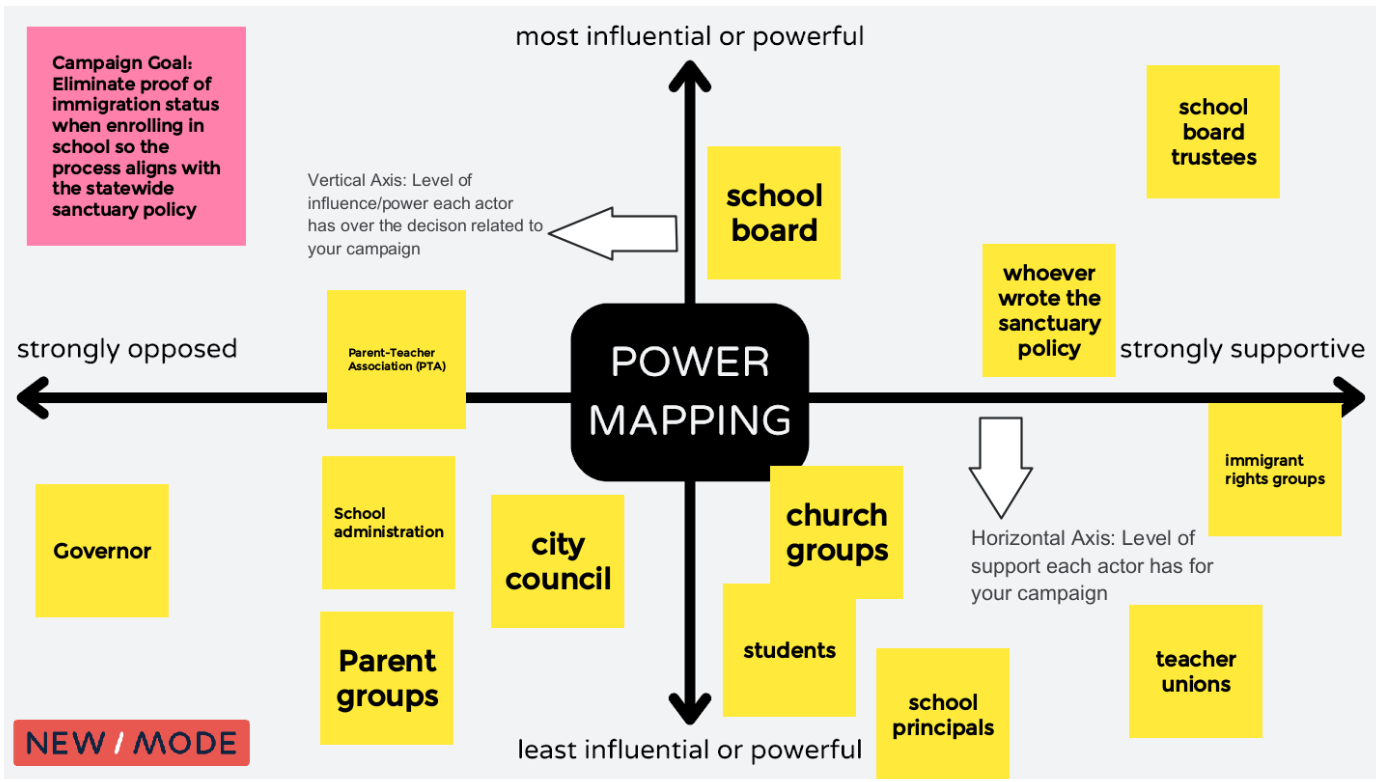
Here is an example of a power mapping brainstorm. The goal is in the pink sticky note, and all of the actors related to the goal are in yellow sticky notes and have been mapped:

power mappingA Screenshot of a power mapping board. The campaign goal is to eliminate proof of immigration status when enrolling in school so they process aligns with the statewide sanctuary policy. The vertical axis maps the level of influence/power each actor has over the decision related to the campaign. The horizontal axis maps the level of support each actor has for your campaign. Template inspired by Anita Tang’s work at The Commons 

To get more in depth instructions on power mapping please check out our Advocacy Targeting with Intention Manual to give you step-by-step instructions and great prompting questions for your brainstorming.

4. How will you reach your goal?

You have determined your goal and your theory of change … but how will you put this plan into action?

New/Mode provides a platform for supporters to reach decision-makers and for their voices to be heard. We offer multiple avenues and channels to reach decision-makers.

Reaching a CEO or a bank? Perhaps they would be more receptive to the public and a hashtag on Twitter calling them out.

Need to reach a local representative? They have staff dedicated to opening, reading, and responding to their constituents. New/Mode has built-in datasets that automatically match supporters with their elected officials so none of the manual work falls on your shoulders.

Check out the types of digital advocacy tools you can use to achieve your goals:

Tweet Storm

Use Tweets to build a powerful public narrative, grow support, and make your campaign go viral.

Learn how the Regional Transportation Authority used the tweet storm to win funding for transit.

Letters to the Editor

Make the headlines! Encourage supporters to write letters to local publications and provide a platform for your collective story… decision-makers will be sure to notice!

Learn how organizations such as the Warren Democrats, Stand Up America, and New Hampshire Democratic Party have used this great tool.

Targeted Emails

Input multiple email subject lines and messages into the system to increase deliverability and open rates. Create conditional messages that are dependent on the decision-maker’s current vote or position. Give your supporters an appropriate script for the given situation.

Learn how Defund the Police campaigns all over North

America used email actions to give their supporters a strong voice.

Personalized Calls

Call your local, state/provincial, and federal officials, and candidates and tell them what matters most.

Learn how BattleForTheNet used the call tool to advocate for open internet for all.

Petitions

Give your supporters something to believe in! Provide an easy way for them to take action and get in touch with local decision-makers.

Learn how Safe Passage used a combination of the petition, tweet and letter to the editor tool to reunite families.

5. What is your follow-up plan?

Campaigning is a long and dedicated effort. In your digital advocacy campaign you are developing and furthering a relationship with both your supporters and decision-makers. You must have a plan for both of these relationships.

How to Nurture your Relationships with Supporters

You will have a list of supporters who take part in your advocacy campaign and you will have an opportunity to deepen your relationship with them.

Using New/Mode in tandem with a customer relationship management software is really effective to keep track of and nurture relationships. Once an action-taker uses New/Mode, their contact information will sync to HubSpot. In HubSpot you can see who has taken an action, and how many actions they’ve taken.

With this information you can start to follow-up with those people every couple of months and ask them to participate in an action they’re ready to take. For example, if someone starts with a low-barrier action such as a petition, you could ask them to do another simple action like sending an email to a representative or ask them to escalate their action and ask them to Tweet at their representative.

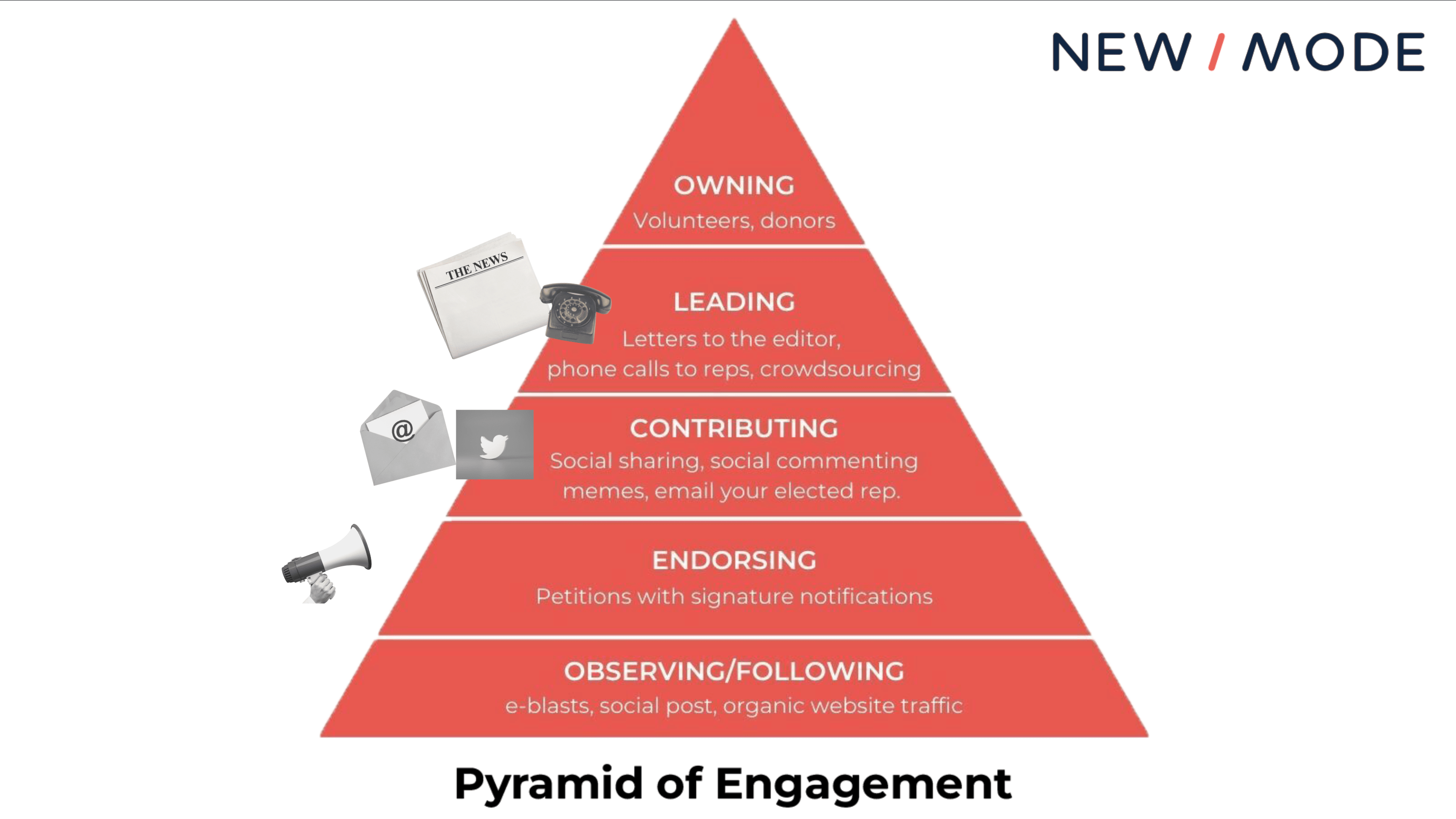
A helpful way to visualize this is a pyramid of engagement/ladder of engagement which is used by campaigners and organizers to define a series of tasks for supporters, usually escalating in difficulty or commitment required.

Different advocacy tools might be better depending on which level a supporter is at, as shown in this picture:

pyramid of engagementFor more tips on how to engage your supporter base, check out this Campaign Engagement Checklist, developed from decades of experience leading advocacy campaigns across the globe.

How to Nurture your Relationship with Decision-Makers

Once your supporters contact their decision-makers you need to be ready to follow-up with them, make your ask again, and/or hold them accountable. You should ask supporters to notify you of the response they get so you can keep track of how receptive the decision-maker is.

Depending on how responsive the decision-maker is you may want to ask them for a meeting and invite supporters along so you can make your asks and demands face-to-face. If they’re not responsive, perhaps it’s time to try another communications channel if they are not receptive to the first request.

If they are not responding to emails, would they be more attentive if they saw their name in thousands of tweets or in the newspaper? If you do receive a commitment from a decision-maker, make note of this and come up with a plan to check in and hold them accountable.

Time to Get Started

You are officially set up for success because you now have a goal in mind, a plan to get there, targets to reach, a way to reach them and a plan to follow up on your efforts.

Good luck, and happy campaigning.

At New/Mode we are providing technology to help leading social good organizations cut through the noise and win campaigns. We provide digital advocacy software that is designed to turn engaged supporters into advocates that achieve tangible wins for our communities.

We support hundreds of cause-based organizations and so far have facilitated over 17,000 campaigns and 60 million civic messages to decision-makers with our software– we know what works and want to share the top five questions you should ask before launching your campaign to ensure you have a successful one.

nonprofit trends

Categories B2B

TikTok Brands That are Winning at Marketing in 2022

It’s getting difficult for marketers to ignore the popularity and influence of TikTok. Brands on TikTok are reaching younger audiences, increasing brand awareness, and going viral — all by leveraging the power of short-form video.

Of course, it also helps that TikTok has over 1 billion active users and a fantastic engagement rate — far exceeding any other social platform today.

Free Ebook: The Marketer's Guide to TikTok for Business [Download Now]

In this post, we’ll discuss why you should leverage TikTok marketing in 2022 and how smaller companies can build a scalable, fun, and creative strategy on the platform. We’ll also cover eleven brands that have gone viral on TikTok.

Table of Contents

What is TikTok Marketing?

Why Brands Should Leverage TikTok Marketing in 2022

11 TikTok Brands That are Winning at Marketing

TikTok Marketing Tips

What is TikTok Marketing?

Although TikTok might feel like a hub of strange posts, its popularity and video-driven content provide a variety of unique marketing opportunities.

Marketers can leverage TikTok in three main areas:

1. Influencer Marketing

A great way to leverage TikTok is by engaging with the influencer community. Because influencers have a solid understanding of the platform, they can transform stiff brand messages into fun and creative videos. This type of marketing is particularly effective at opening your content to a new audience and boosting brand awareness.

2. Original Content

Although fans of TikTok love original content, you don’t need to spend hours coming up with the next viral trend. Often, the best performing TikToks are ones that replicate or recreate a current trend. Start by exploring the app, its trends, and where your brand can join the fun.

3. Paid Ads

TikTok ads are a relatively new addition to the platform. Powered by their own advertising platform, TikTok For Business, brands can run in-feed ads or create branded hashtags and video effects.

Although many of the first brands to join TikTok were large, well-known companies, it can still be helpful for small businesses to look at why brands of all sizes are joining the platform.

Why Brands Should Leverage TikTok Marketing in 2022

Short-form video is dominating the social media landscape — and TikTok is the leading platform for it. It’s no surprise that more than half of marketers (52%) who use TikTok plan to increase their investment in 2022, which is one of the highest jumps of any platform.

While TikTok is relatively new compared to other social giants like YouTube and Instagram, it’s seeing stellar growth year-over-year. In fact, it was the most downloaded app in 2019 and 2020, racking up over three billion downloads so far. It also boasts 1.2 billion monthly users which experts predict will reach 1.5 billion by the end of 2022.

Additionally, TikTok is the most engaging of all social media apps with an average user session of 10.85 minutes. Its viral nature also deserves a shout out. Unlike other social platforms, even accounts with a handful of followers can spark millions of views on a great video.

If you think TikTok is only for the Gen-Z crowd, think again. While over half of Gen-Z consumers are on TikTok, it’s picking up steam with other age groups. In 2021, 36% of TikTok users were between 35 and 54 years old, a 10% increase from the year before.

That said, since TikTok is quirky by nature, brands need to get creative to gain their audience’s attention. In other words, a simple ad or sponsored influencer endorsement might not cut it on this fast-paced app.

Let’s look at eleven brands who nail TikTok marketing with creative content that draws attention.

1. The NBA

Unlike its Instagram channel, which focuses purely on basketball games and highlights, the NBA’s TikTok posts show a lighter side of the organization. For example, they’ll often post videos of players working out to music, dancing on the court, or answering fan questions.

In this video, Steph Curry of the Golden State Warriors busts a move from the sidelines after his teammate scores:

@nba

Get you a friend like Steph 🤣 @warriors #nba #friendship #celebrate

♬ Nobodys Fool – Seven11

And check out this funny montage of Chris Bosh photo-bombing his teammates (including LeBron James) throughout his career:

@nba

The video bomb king, Chris Bosh, will be enshrined in the Basketball HOF this Saturday, September 11 🏀 🤣#21HoopClass #MiamiHeat #Basketball #Hoops

♬ ALL FALL DOWN – Turreekk

Making your brand feel more personal can have a great effect on TikTok. For example, if your restaurant’s TikTok account posts funny videos of waiters dancing, viewers might think the restaurant has pleasant and happy staff. This might make them want to eat there because they can picture themselves having a fun dining experience.

What we like:

While you might expect the NBA to focus more seriously on stats and games, it uses the app to lighten up the branding and make its athletes look more relatable. While the videos still promote basketball, they also fit with other funny posts on TikTok feeds.

2. Fenty Beauty

One of the most popular types of content on TikTok is tutorials. Some brands lend themselves to this more than others, but a great example is Fenty Beauty, which uses TikTok to show makeup tutorials, wear-tests, and product launches.

@fentybeauty

How to #Contour a Soft Baby Face ✍🏽 @kali.ledger KILLIN the assignment w Truffle Match Stix 🤌🏼✨ #fentybeauty #beautyhacks #makeuptutorial #makeup

♬ original sound – Fenty Beauty

What we like:

Tutorial-based videos can fit a variety of brands. For example, a clothing store can show how to style certain pieces of clothing. A hardware store can show how to build, restore, or paint something using its tools. Even a gym can offer a demonstration on how to use different equipment.

Start by brainstorming all the ways someone could use your products or services. If you can break a task into steps that last no more than 60 seconds, it may make for a great TikTok video tutorial.

3. Dunkin’

Dunkin’ was one of the first brands to employ influencer marketing on the platform by partnering with TikTok megastar Charli D’Amelio.

Together, they launched new menu items at Dunkin and collaborated on several videos.

@dunkin

So official, we put it in writing @charlidamelio. Order ‘The Charli’ on the Dunkin’ app!🙌 #CharliRunsOnDunkin #TheCharli #Dunkin

♬ original sound – Dunkin’

After posting content about the partnership, Dunkin saw a 57% spike in app downloads and a 20% sales boost for all cold brew coffees.

However, if you believe you need to partner with a famous TikToker for it to work, think again.

When it comes to influencer marketing, relevance is more important than reach. Rather than partnering with an influencer based solely on vanity metrics (such as follower count), look for micro-influencers who have a niche audience that aligns with your own. Research shows that influencers with less than 1,000 followers receive more engagement than their more popular counterparts.

What we like:

This example highlights the power of influencer marketing on TikTok. By partnering with influencers, Dunkin’ benefits from word-of-mouth marketing while building social proof.

4. Milk Bar

TikTok videos thrive with music, and Milk Bar knows this too well. The bakery chain does an exceptional job at capitalizing on popular TikTok memes, formats, and audio.

Here’s Milk Bar putting a spin on the “Have you ever been in love?” video trend:


TikTok makes it easy to add music to video clips, which could result from having made legal arrangements with major music companies. Maybe this is why it’s nearly impossible to scroll through TikTok without seeing users dancing or lip-syncing to music.

What we like:

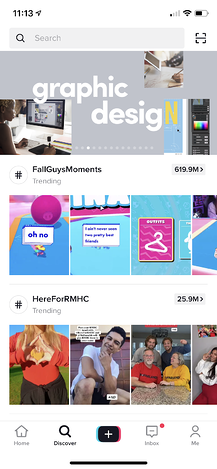
Viewers like to see brands joining in on current trends or putting a unique spin on an existing one. When brands take the time to understand TikTok and keep a finger on the pulse of the platform, it becomes easier to join trending topics, challenges, and memes. And if you’re not sure where to start, check out TikTok’s Discovery Page for inspiration.

5. Chipotle

Since joining TikTok in 2018, Chipotle has set the standard for how brands can grow their brand presence while engaging the TikTok community in a fun and authentic way.

Chipotle opts for a more casual vibe, often posting dance challenges and fan-made content, such as videos of people sharing their favorite Chipotle recipes and hacks.

Chipotle also showcases behind-the-scenes footage from real crew members in real Chipotle kitchens. Check out this “vlog style” video of a former Chipotle employee revisiting her job and interviewing her coworkers:

@chipotle

If you’re into taste testing guac, join the team! You can now use #TikTokResumes to start applying to Chipotle. Link in bio. (via @muslimthicc) 🥑

♬ original sound – Chipotle

What we like:

If you need a creative way to spread brand awareness quickly, taking a note from Chipotle and sharing personable behind-the-scenes footage might be a great experiment. Also, lean into your brand advocates who may be willing to share their experiences on social media.

6. Gymshark

Gymshark is one of the leading fitness brands on TikTok, reaching 2 million followers in only six months. Gymshark caters to fitness fanatics by posting workout challenges, inspirational health journeys, and relatable fitness humor that makes the gym feel less intimidating.

Here’s one of those relatable fitness videos:

@gymshark

Expectation vs reality 😂 @jonnyhammond__ #gymshark #running #runningmeme

♬ original sound – Gymshark

One of the brand’s most notable TikTok campaigns was the 66 Days: Change Your Life challenge, which highlights the fact that it takes 66 days to form a habit. TikTokers submitted videos of their own workout journey in hopes of winning a Gymshark membership.

The campaign was an overwhelming success, with the hashtag #gymshark66 generating 193 million views.

What we like:

Gymshark leverages the power of challenges. Challenges are one of the biggest trends on TikTok, and innovative brands are using them to fast-track their growth and connect with millions of users on the app. Consider creating your own challenge or putting a unique spin on an already existing one.

7. The Washington Post

The Washington Post was one of TikTok’s earliest brand adopters. Those who haven’t seen their videos might be anticipating investigative or serious content. Surprisingly, the newspaper actually uses its account to post comedic skits about the latest breaking news.

These videos fit in perfectly with the platform because they’re funny, timely, and embrace some of TikTok’s weirdest special effects. Check out this skit about Delta Airlines’ PR department struggling to write a press release about the COVID-19 delta variant:

@washingtonpost

Delta Air Lines will require employees to be vaccinated or face weekly testing and a $200 monthly surcharge for health insurance.

♬ original sound – We are a newspaper.

The Washington Post displays how brands can succeed on TikTok by talking directly to its specific audience — young viewers who want to laugh.

Because The Post has a long history of groundbreaking, award-winning, and intellectual journalism, this comedic approach might also attract young readers who want to follow the news but used to worry that content from a newspaper would be too advanced or out of touch for them.

What we like:

Despite its reputation for “serious journalism,” the Washington Post did not shy away from TikTok. If your brand is in publishing, academia, or similar industries, testing out a video strategy that shows off your lighter side could be an interesting experiment. It might make your content and brand feel less intimidating and help you gain attention from newer audiences.

8. San Diego Zoo

Everyone loves a cute animal video. The San Diego Zoo’s TikTok account pleasantly takes advantage of this well-known fact.

The zoo’s strategy is simple: Post videos of cute animals with fun music. And with over 2 million fans, it seems to be working. How could anyone not want to follow them after seeing this video of an adorable red panda?

If that cuteness wasn’t enough, the zoo has also dueted with other animal-friendly accounts, like the Monterey Aquarium:

What we like:

This is a great example of how two similar brands can cross-promote using TikTok features. Because of the zoo’s tagging strategy, this video might be seen by fans of the aquarium and the zoo. This way, zoo followers might gain more interest in the aquarium and vice versa.

9. Duolingo

TikTok is known for its quirky “unhinged” content, and Duolingo has effectively carved out a space in this landscape.

The brand continues to go viral for its funny, trendy, and often chaotic videos featuring its mascot, Duo the owl. Duo can be seen dancing to popular audio, adding sassy commentary to pop culture news, and jumping on the latest trends.

Duo’s antics have successfully humanized the brand and epitomizes their witty brand voice — which also comes in handy when responding to TikTok comments.

What we like:

Your brand voice shapes every interaction you have online — from the videos you create to how you respond to comments. Duolingo has molded a strong brand voice which it uses to tell memorable and entertaining stories.

10. Crocs

While the love-hate relationship with crocs is very real, it’s all love for the brand on TikTok. Its winning strategy includes original music, brand-specific hashtags (like #CrocTok), and colorful, entertaining content.

@crocs Matching Crocs? ✅ Sport Mode? ✅ Time to do a little dancey dance? ✅ by @Thewilliamsfam
#Croctober21
#CrocTok
#SportMode
♬ original sound – Crocs

That said, Crocs really shines at poking fun of itself and the perceived “ugliness” of their shoes. They lean into this by posting outfit of the day (OOTD) videos and tutorials on how to style their shoes with accessories and a great sense of humor.

What we like:

No one likes a brand that takes itself too seriously. At the end of the day, your buyers are people — not robots with credit cards. Humility and humor are two ingredients that can humanize your brand, cut through the noise, and build a connection with your audience.

11. Planet Money

Planet Money is a podcast by the National Public Radio (NPR) with the tagline — “The economy explained.”

It’s hard to imagine a brand covering such a serious (and complex) topic on a platform that’s synonymous with silly, snackable content. But Planet Money manages to infuse educational videos with an entertaining spin.

From inflation to rent control, no topic is too challenging for Planet Money to chip away at in an innovative and humorous way. Don’t believe me? Just take a look at this skit explaining how banks make billions from overdraft fees, which starts with a man trying to buy a burrito:


What we like:

If you feel your brand is too “serious” for TikTok, take a note from Planet Money and approach your brand — or your content — from a different angle. You may find that adding a dash of humor is just what you need to skyrocket on the platform.

TikTok Marketing Tips

While it might be challenging to get your content to go viral like the bigger brands, TikTok could be a great tool for getting in sync with younger audiences.

If you think TikTok might be part of your marketing strategy soon or in the future, now would be a great time to get ahead of your competitors by downloading the app and investigating what similar brands or potential audiences are doing there.

If you’re raring to go on a TikTok strategy, here are a few tips and takeaways that we’ve gained from looking at the brands that have already done well on the app.

  • Show a different side of your company. The app is a hub for creativity and humor. Embracing a more personal tone or a behind-the-scenes approach could make your company appear more relatable or trustworthy to potential customers.
  • Don’t be afraid to experiment. Unlike platforms like Facebook and LinkedIn, there aren’t as many norms, best practices, or rules about what works and what doesn’t. If you think something might be interesting or funny, try it and see if it gets any likes, comments, or shares.
  • Engage with your audience. Between challenges, duets, likes, comments, and shares, there are plenty of ways to engage with other TikTok users — even if you don’t know them. Try to come up with videos, challenges, or duets that aim to interact with others. As with other platforms, the more you engage with people, the more your fan base could grow.
  • Don’t shy away from marketing your products, but make sure you do it in a creative way. Try your hand at tutorials, demonstrations, and how-to content that showcase the best parts of your products or services.
  • Tap into the power of word-of-mouth marketing with influencers. But remember that relevance is more important than reach, so partner with niche micro-influencers who share a similar audience.

For brands, joining TikTok offers an opportunity to reach younger audiences and increase brand awareness in a highly playful environment. But succeeding on the platform relies on creating exciting content — so prepare to put your creative hat on and experiment with new formats.

Editor’s note: This post was originally published in September 2019 and has been updated for comprehensiveness.
Blog - Content Mapping Template

Categories B2B

How to Create a Great Social Media Strategy Plan in 2022

Many businesses find creating a social media strategy overwhelming. There are so many networks available, and they’re constantly adding new features to learn and integrate into your plan.

If you don’t have a full-time team of social media experts at your disposal, it’s even harder. But the fact is that your success depends on having a sensible and straightforward strategy that fits your resources and goals.

By the end of this guide, you’ll know how to develop a social media strategy that will drive traffic and quell that overwhelming feeling you get whenever you open Instagram or Twitter.

Download Now: Social Media Trends in 2022 [Free Report]

Your social media strategy is your master plan for how you create, post, and engage with your social media content. It encompasses your social content guidelines, posting cadence, social media marketing campaigns, creative plans, and engagement strategy.

Many companies use social media to connect with their customers, provide support, advertise new products and features, and promote special offers.

Social media strategies differ depending on the brand’s voice and positioning, target audience demographics, and social media platform limitations. When you develop your business’ social media strategy, considering these factors will help your message reach the right audiences in the right format.

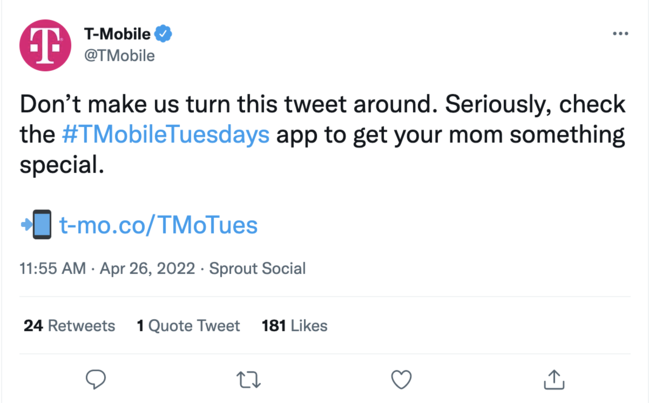
social media strategy example: tweet from t-mobile

Image Source

For example, T-Mobile’s social media team capitalized on the Mother’s Day holiday to promote their T-Mobile Tuesdays app. The tweet uses humor to gain users’ attention and includes a timely promotion to appeal to Twitter users who haven’t bought a gift for Mother’s Day.

social media strategy example: instagram post from hershey

Image Source

You can also use social media as part of a larger marketing campaign. For example, Hershey’s posted a short video on Instagram featuring Mindy Kaling, the spokesperson for their “Celebrate SHE” campaign.

Why You Need a Social Media Strategy

The top three challenges that social media marketers face include reaching their audience, measuring ROI, and reaching business goals.

Crafting a social media strategy can help you tackle these challenges and more. Social media strategies also equip you to set goals and guardrails, track performance, and tweak your benchmarks over time. Without a starting point, you can’t measure what’s working and how to shift your activity to hit your goals.

Creating a strategy:

1. Helps you set goals and guardrails.

A social media strategy establishes clear expectations and goals for your business’ social media marketing efforts. Whether you aim to increase brand awareness, create buzz around a promotional event, or launch a rebranding campaign for your business, a social media strategy provides a blueprint that your team can follow to keep your marketing consistent, on task, and relevant to your target audience.

2. Allows you to track goal performance.

It’s not enough to simply have a goal for your business’ social media marketing; you also need to keep track of how you are progressing toward the goal. A social media strategy establishes
key performance indicators that you can analyze to monitor your business’ progress toward its social media goals.

3. Helps you tweak your benchmarks over time.

Benchmarking your social media marketing strategy allows you to track social media metrics and analyze your business’ current social media performance compared to industry standards, your competitors’ performance, and your past performance.

Evaluating your performance against benchmarks helps you determine elements of your social media marketing that need improvement to reach your marketing goals.

A social media strategy also helps you set expectations for broader team involvement and get everyone aligned on what they should and shouldn’t do on your social networks.

Let’s unpack how to start building a social media strategy from scratch.

1. Define your target audience.

If you haven’t already identified and documented your buyer personas, start by defining the key demographics of the audience you’re trying to reach, such as age, gender, occupation, income, hobbies and interests, etc.

Defining your target audience helps you create focused advertising that addresses your ideal consumer’s specific needs.

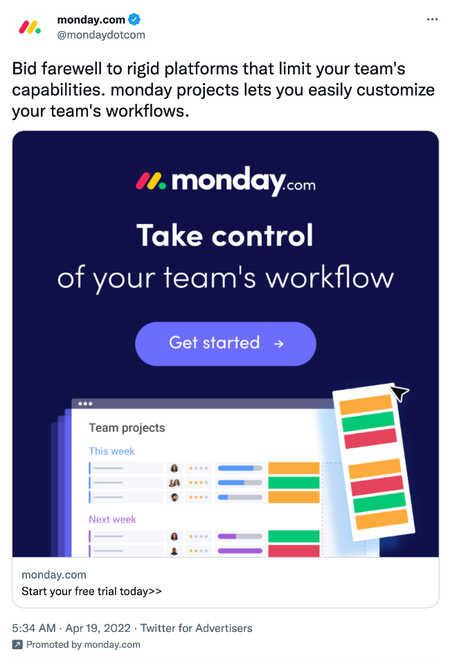
For instance, the below sponsored tweet by monday.com, a project management platform, highlights the platform’s flexibility and workflow customization feature. The tweet targets business owners and project managers who may feel limited by other project management software.

social media strategy example: tweet from monday.com

Image Source

Consider your ideal consumer’s challenges and what problems they’re solving daily. Focus on no more than four types of people that represent the majority of your buyers. Don’t get hung up on the exceptions or outliers, or you’ll never get started!

2. Start blogging.

Fresh content is the linchpin of a successful social strategy, so commit to consistently creating new, quality content. Compile a list of common questions from prospects and commit to addressing these questions with at least one new blog post per week.

Combining your blogging and social media strategies can help your content reach a larger audience. For example, you can create a social media post that includes a tip for your followers and a link to a blog post that expands upon the post. The social media post will drive traffic to your blog, making it easy for readers to share the blog post with their followers and expand the blog’s reach.

social media strategy example: sellersfundingcorp tweet

Image Source

This tweet by SellersFunding highlights the main points discussed in the linked blog post. The tweet provides enough detail to pique the reader’s interest and convince them to read the full blog post.

3. Create educational content.

Create downloadable content like ebooks, checklists, videos, and infographics that address your buyer’s pains. If your content is beneficial, people will likely share it on social media and extend your reach.

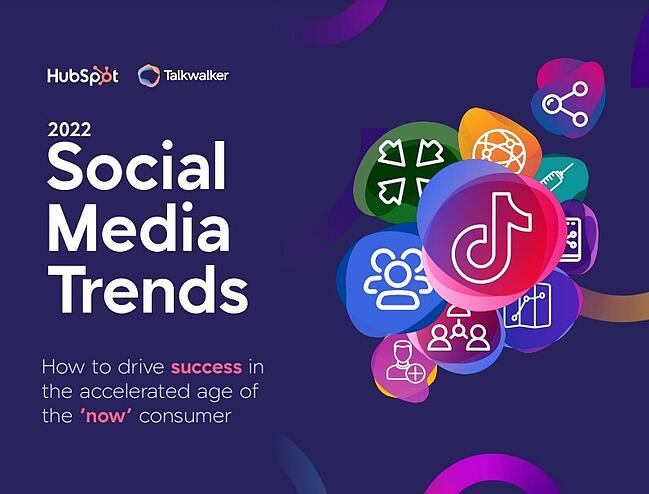
One example would be HubSpot’s social media trends report, which we offer for free:

ebook social media strategy example: social media trends from hubspot

4. Focus on a few key social channels.

Most startups and small businesses don’t have the bandwidth to establish and sustain a quality social media presence on every single channel. It’s also overwhelming to learn the rules of engagement on multiple networks simultaneously.

Here’s a video by HubSpot Academy explaining the social channels where you can post content for your business.

Start small. Research key networks to learn where your target audience is spending time. For instance, if your ideal consumers are business professionals, it may be beneficial to post on LinkedIn rather than Instagram.

Focus your effort on building, nurturing, and sustaining a community on the social channels where your target audience spends most of their time before moving on to another channel.

5. Develop a recipe card to guide you.

Social media isn’t an exact science. It doesn’t work the same for every business or industry. To see results for your business, create a recipe card. A recipe card is a posting and engagement schedule that keeps your team on track and helps you post content consistently. HubSpot has a list of 13 social media tools and templates that you can use to plan your content and create a posting schedule.

Develop a reasonable recipe card, one you can stick to and get your team to follow. Set goals for your posting and engagement frequency, and hold yourself accountable for following your recipe.

6. Measure your results.

There are countless things to track on your social media channels. Start by looking at how much traffic your social accounts drive to your website or blog.

Social media platforms offer tools to help businesses track analytics. For example, you can use Facebook’s Page Insights, Instagram’s Account Insights, and LinkedIn’s Visitor Analytics to see what people are responding to and look for trends related to particular topics or keywords that generate more interest than others. Once you get an idea of your average traffic and post performance, set goals for key metrics, and keep a scorecard to measure your progress.

Be sure to choose metrics that are easy to gather, because if it’s too time-consuming to track, you’ll fall off the wagon! Examples of simple metrics include net new fans and followers, number of interactions, and visits to your website from social.

7. Adjust your tactics.

Social media won’t start working overnight. Establishing a following, stabilizing your brand, and seeing the results of your efforts takes time. So experiment to find the right combination of channels, content, and messaging that works for your audience.

Keep track of changes in your post views, audience demographics, and post interactions, and make changes as needed.

Over time, you’ll be able to adjust your recipe card, content, and personas based on the information you’re gathering, which will help you fine-tune your strategy and generate more consistent results.

Social Media Marketing Strategy

Social media is a multipurpose business asset. It connects you with your audience and promotes your products, services, and brand. Both functions are equally important.

Building a social media strategy for marketing is different from the process we discussed above. How so? For example, your benchmarks and goals may be more specific to metrics you track for other marketing efforts.

When using social media to market your business, ensure the experience on your social networks is positive and consistent. All imagery and content on your social media accounts should be consistent with those on your website, blog, and any other digital real estate.

Pay close attention to any questions or comments your audience posts, and be quick to address them, as that engagement could make or break a conversion or purchase.

Take a look at these examples of what to stop, start, and keep doing to help your business’ social media marketing succeed.

Lastly, align the content you post and how you post it with marketing campaigns you’re running on other channels (e.g., email or ads).

Social Media Content Strategy

Content is the crux of any social media strategy. Without content, you can’t engage with your audience, promote your products, or measure performance.

The fleeting nature of social media may lead you to believe that you don’t have to plan its content as much as you do for your emails or blogs. That’s not true. Social media content may not be as static as your landing pages or blog content, but it’s still equally important for engaging your audience and representing your brand as a whole.

For that reason, you should also have a social media content strategy. This should include:

  • Posting guidelines and specs for each network on which you’re active (e.g., share GIFs on Twitter but avoid them on Facebook)
  • Determining the target audience nuances per network (e.g., the younger segment of your audience is more active on Instagram than on LinkedIn)
  • Repurposing plans for long-form content from your blog, podcast, e-books, etc.
  • Identifying who on your team is allowed to post, and who’s responsible for engaging followers
  • Naming the companies, publications, and individuals you’ll repost (and those who you won’t/can’t)

HubSpot’s Aja Frost offers more tips for creating a social media content strategy in this video.

Social Media Strategy Templates

Social media is overwhelming; I get it. Starting your strategy from scratch is even more overwhelming, so we developed 10 free social media templates to help.

social media strategy templates from hubspot

In the free download, you’ll receive:

  • Scheduling templates for every channel, since social media channels aren’t one-size-fits-all
  • A complete calendar of hashtag holidays, so you never forget to participate with new, fun content
  • Social auditing template to track your followers, engagement rates, and more
  • A social media content calendar to organize campaigns across every channel
  • A social reporting template to track your monthly social successes
  • A paid social template to help you manage and optimize your paid budget

Download our free social media template bundle to manage, optimize, and create more social content without sacrificing quality.

Time to Get Social

Do you still feel like social media is overwhelming? That’s okay. Although I’m not sure that feeling ever fully fades, you can diminish it by leveraging the tips in this guide and the free templates above. Remember: Tackle one social network at a time, prioritize your audience, and focus on the content that works. You’ll see results and traffic in no time.

Editor’s note: This post was originally published in February 2016 and has been updated for comprehensiveness.

New call-to-action

Categories B2B

32 of the Best Office Pranks & Practical Jokes to Use at Work

We asked our friends and combed the internet for examples of some of the funniest office pranks, and pulled together this list virtual April Fool’s pranks and in office pranks to serve as inspiration for your own.

Download Now: Free Company Culture Code Template

Every company has a story about that funny office prank of yore. Whether you’re doing some early April Fool’s Day research, or just feeling a little tricksy, it’s time to get a prank of your own in the books. Here are some ideas.

Remote Pranks for Virtual Teams

The above pranks are awesome, but what about pranks that are inclusive for remote employees or teams that are 100% virtual? These pranks are ideal for the digital office:

1. Flash Mob

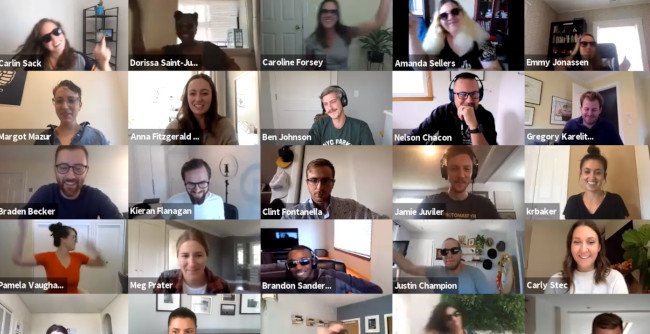
Here at HubSpot, we love flash mobs. That’s why Head of SEO Aja Frost and Blog Manager Christina Perricone jumped at the chance of organizing a virtual flash mob for one of our quarterly meetings.

This is a perfect prank for a large gathering but requires a bit of prep — from choosing a song, selecting the dancers, and teaching the choreography. However, the end result is worth it for the shocked and delighted expressions on coworkers’ faces alone.

HubSpot's virtual flash mob on Zoom

2. Virtual Background Shenanigans

There’s a lot of pranking potential using the virtual background feature in Zoom and other video conferencing platforms. For example, one Twitter user creates a virtual background with the shocking appearance of a doppelgänger… or maybe a time warp?

virtual april fools pranks: Zoom doppelgangerImage Source

3. Jump Scare

One way to take the virtual background prank to another level is by impersonating a horror movie director and relying on one of the oldest scary movie tricks in the book: the unexpected jump scare. The video below walks through the steps for executing this prank successfully:

Just make sure that you know who you’re presenting to. The wrong audience may not appreciate the humor in this one!

4. You’re Not on Mute

We’ve all heard the horror stories of users who thought they were on mute and went on to say something embarrassing. One prank would be to stage this situation and make your coworkers think that you think you’re on mute. You could enlist someone in your household to say really embarrassing or completely outrageous, the goal being to see how long your coworkers will watch in horror before letting you know you’re on mute.

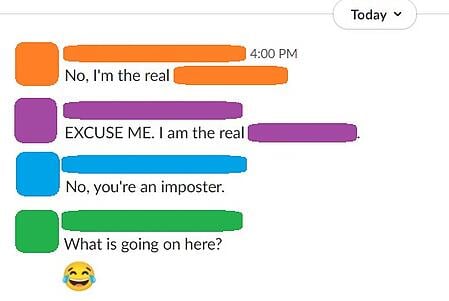
5. Stolen Identity

If you have a workplace chat system, a simple and effective prank is to “steal” someone’s identity by changing your display name and picture to match theirs. The more coworkers you get to follow suit, the more effective, hilarious, and chaotic this prank becomes. Best of all, it’s easy to reverse at the end of the day: Just revert back to your original display name and photo.

virtual april fools pranks: stolen identity

6. Think Outside the Box

With video conferencing apps, we’re limited to our own little square of digital real estate… or are we? This Twitter user subverts expectation by dumping water on a coworker in another square, surprising all the other meeting attendees:

virtual april fools pranks: Zoom water prankImage Source

Funny Office Pranks to Pull on Your Coworkers

7. Caramel Onions

When Halloween is around the corner, these caramel onions are no match for other tricks (or treats). Dip each onion in caramel — maybe some red food coloring first, if you need to further disguise them — and stick popsicle sticks down the center. Your colleagues won’t know the difference, but they will wonder why these caramel apples are making them cry so much…

Caramel onions office prankImage Source

8. Nicolas Cage Toilet Seat

Speaking of Halloween, here’s what nightmares are truly made of. Nicolas Cage is easy to come by in the meme community. Print a picture of him at his most, well, enthusiastic — and allow him to greet everyone who takes a bathroom break.

Office prank with picture of Nicolas Cage on toilet seatImage Source

9. Fish Drawer

There’s something fishy about this office prank… Just be sure to include fish food; experts suggest you should feed this prank twice a day.

Office prank with desk drawer filled with water and fishImage Source

10. Pants in the Stall

Usually, when you see feet underneath the stall, you just have to wait your turn. In this case, you might be waiting forever. Set this guy up in your office bathroom and see how long it takes for people to start talking. We just hope nobody called the paramedics on this poor, empty suit.

Office prank with empty pants and shoes in bathroom stall
Image Source

11. Febreze for Days

Tighten the zip-tie, throw it, and run for your life. Or, leave it in your coworker’s office when they’re on break. They’re sure to return to a potent workspace.

Febreze office prank
Image Source

12. Vehicular Sticky Notes

This is the perfect use for those sticky notes that keep piling up — especially if they’re all for someone who just won’t finish his or her tasks. The prank below is a wonderful way to remind them before they take off for the day.

Office Prank: Sticky note covered car
Image Source

13. Foghorn Entrance

Haven’t you ever wanted to get a room’s attention the second you walk through the door? Well, the prank below will even get the person entering to stand up straight. This is certainly one way to make sure everyone’s alert before a meeting.

Office prank with foghorn on door bumper
Image Source

14. Ballooned Conference Room or Hallway

Hey, at least it’s not glitter? This prank works two ways: You can either surprise the next team who reserves this room, or have a day-long meeting in here without anyone knowing your business. You will of course have some static electricity when you exit the room.

office prank:  ballon filled conference room
Image Source

15. Desk Trolls

For trolls, by trolls. Luckily, you can buy many of these trolls in bulk. Click here if you’re serious about trolling your coworker’s workstation — just keep in mind you will have to buy more than one pack of trolls to make this stunt worth it.

Office desk full of pink troll dolls
Image Source

16. Water Works

Oh look, a budget trip to the beach. This prank gives a whole new meeting to the term, “staycation.” Surprise your coworker when he/she comes back from a beach getaway with, well, another beach getaway. The downside is it’ll be nothing like where they were. The upside is they won’t need a towel.

office prank: water themed cubicle
Image Source

17. Tiki Desk

Sick of those open office layouts? Create a tiki-themed hut for jokes and a bit of privacy.

Office Prank: Tiki desk
Image Source

18. Nailed the Cake

Hey everyone, there’s cake up for grabs in the kitchen! The prank, however, is written in frosting. This is a good gesture to someone who loves the expression, “needle in a haystack.” Happy hunting.

Office Prank: Find the toenail cake
Image Source

19. Psychedelic Supervision

“I don’t know, I feel like my boss is always watching me,” your coworker might say. Change their perception of micromanagement when this colorful prank. Suddenly a “quick check-in” doesn’t seem all that bad.

pictures of the boss papered all around the office in different colors
Image Source

20. Voice Toast

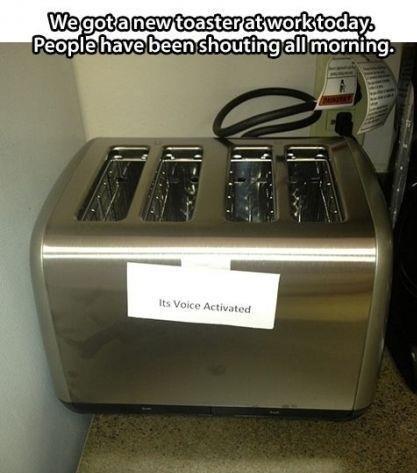
Simple, yet brilliant. Change the terms of breakfast ever so slightly, and the kitchen becomes the most confusing room in the office. This little note pranks the entire office — a true masterpiece of prank-dom.

toaster with label that says "it's voice activated"

Image Source

21. Work From Home

As Ron Burgundy from Anchorman says, “I’m not even mad. I’m just impressed.” Help your coworker who loves taking his/her work home, take their home to work instead. As you can tell, you might need to stay late the night before to get this prank just right.

paper mache house covering coworkers cubicle
Image Source

22. You’ve Been ‘Felined’

This could actually make your cat-loving coworker’s day. Or, it could make for the greatest prank of all time against the coworker who’s violently allergic to cats (that is, as long as they’re not allergic to photos of cats, too).

pictures of cats on computer desktop and papered across desk
Image Source

23. The Seedboard

Work with your IT department to fertilize this prank perfectly. Soon enough, its user will wonder why their keyboard is growing. We suggest targeting someone who sits close to the window — some pranks just need some sunlight. “You said you wanted to spend more time with nature,” you might say in your defense.

adding seeds underneath keyboard
sprouts growing from between keyboard keys
Image Source

24. The Ceilings Have Eyes

You could freak out just looking at the photo of this horrifying prank. It might be a little too much for your jumpiest colleague, but for the person who can’t stop talking about scary movies, it’s just the revenge you deserve. (Hint: paper mache, white paint, and a black wig. Done.)

horror movie photo hidden in drop ceilingImage Source

25. Chair Scare

Similar to the Entrance Foghorn, this prank will probably scare more than just the person who sits down. Of course, it’ll be a lesson to anyone who, I suppose, tries to sit too low at their desk.

office pranks: chair airhorn prank
Image Source

Funny Pranks to Pull on Your Boss

26. No Stalling

For the employee who never has enough time. Or, for the coworker who takes way too many bathroom breaks during the day. Prank them with their very own throne the next time nature calls.

bathroom cubicle prank
Image Source

27. Glitter Bomb

About that whole, “At least it’s not glitter” thing in prank #9? Well, this prank can’t make that promise. For the coworkers who don’t yet know the permanence of getting glitter on yourself, this prank is sure to set them straight.

28. Substitute Worker

Sometimes, you’re not sure how to ask for another day off. For those days where you simply can’t come into work, but don’t have the heart to call out again, the cardboard cut out who looks just like you is the perfect substitute. Or, just put ’em at your colleague’s desk and give them a much-needed identity crisis.

April fools office prank: Cardboard twin Image Source

29. Crushed It

When you finally learn about your colleague’s celebrity crush, make sure they know how much you care.

April fools office prank: Celebrity Crush Image Source

30. World’s ‘Best’ Boss

When words just aren’t enough to express your sentiment, give your manager the perfect way to say “thank you” every time they go to take a sip of coffee.

April fools prank: best boss ever mug prankImage Source

31. Cup o’ Spiders

“Hey chief, I found a spider on your desk, but don’t worry, it’s been handled.” This prank doesn’t have to have an actual spider in it — the mystery, alone, is all you need to prank your employee.

Spider office prank

Image Source

32. That’s a Wrap

For the boss who has everything, it’s the gift that keeps on giving.

Dwight Schrute from The Office sitting on gift wrapped chair only for it to collapse

Image Source

Show Off Your Prank Skills

All you have to do is find someone who will be in on the joke with you.

Pranking can be extremely good for morale and company culture. After all, why not have a little fun to break up the workday?

Editor’s note: This post was originally published in October 2018 and has been updated for comprehensiveness.

company culture template

Categories B2B

36 Beautiful New Ebook Templates [Free Download]

Did you know that landing pages have the highest conversion rate at 23% than other types of signup forms? It’s true, but landing pages don’t convert visitors to leads all by themselves. If they don’t have attractive and compelling offers behind them, they won’t generate the leads your sales team is looking for.

That’s why it’s so important to create valuable content people want to download, and then package it in a way that’s visually appealing to your readers. An ebook is a practical content choice that delivers so much value to your audience that they won’t mind submitting a lead form to download it.

WP Forms reports that ebooks are the most popular lead magnet amongst subscribers, with 27.7% of marketers using them.

Click here to download our collection of customizable ebook templates.

Adding ebooks to your content archive can be a worthwhile effort, but it’ll take work. While every step of creating an ebook is critical, a substantial step of the ebook development process is creating a design that helps tell the story in the copy. A professional and functional design makes the copy more readable to your audience, thus making it more likely that they’ll refer back to it and maybe even share it with a friend.

We know not every team has someone in-house who can (or has time to) whip up a slick, shareable ebook design. But we have good news: You don’t need to be a designer by trade to design beautiful ebooks yourself. With the right resources and approach, you can deliver valuable content to your audience in a fraction of the time.

A few years ago, we created ebook templates to help make this process easier for you. They were so popular that we decided to revamp the offer and include PowerPoint, Adobe Indesign, and Google Slides formats. We hope these templates minimize the time you spend on the details of design, allowing you to concentrate on writing valuable, lead-generating content your readers will love.

Three Free ebook templates by HubSpot

Download the Templates Now

Start With One of These Free Ebook Templates

Each of these templates is sure to organize your content into a readable, shareable ebook that your readers will enjoy. Each one is complete with a table of contents, chapter page, copy pages, and a call-to-action page at the end. Here is a preview of some of the ebooks you’ll find in the template bundle:

1. Process Improvement Theme

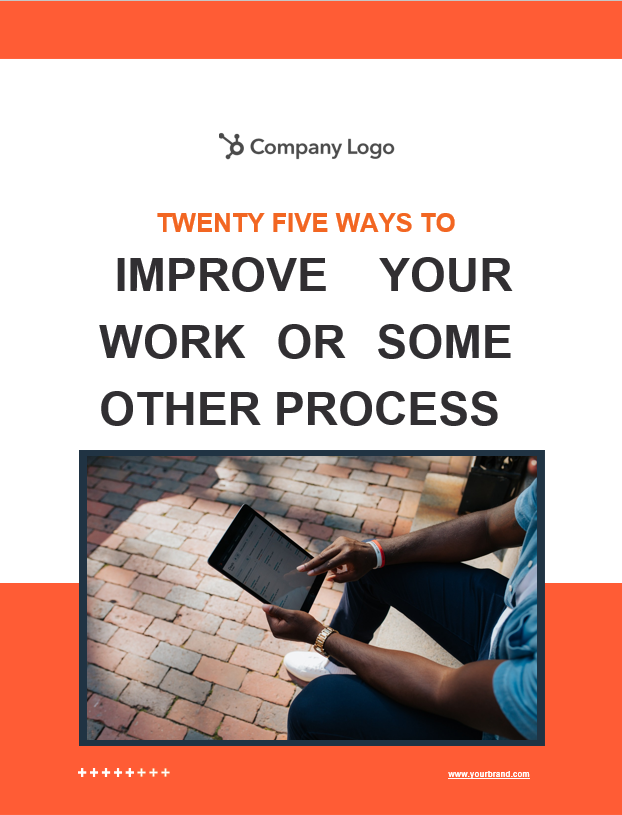
Ebook Template: Process Improvement Theme

Download This Template

The Process Improvement theme is longer and more involved than most of those listed above — it could contain 10, 20, or even more chapters to help describe the specific actions needed to complete a process or achieve an outcome. By combining text blocks with summary sections and detailed highlight pages, this theme is a great way to break down a complex task or process into manageable, repeatable steps.

The Process Improvement Theme Ebook Template is best for:

  • In-depth guides to multi-step processes
  • Employee handbooks
  • Training manuals

2. Conversational Theme

Ebook Template: Conversational Theme

Download This Template

This theme trends slightly more casual with a conversational approach that helps you connect with readers. For example, the author introduction page starts with a familiar “Hello!”, an image of the author, and a brief description of their expertise. The following pages include plenty of room for author and other expert quotes to help establish your mastery of the topic at hand, without seeming stuffy or distant. This theme breaks up each page with differing text and image placement to help keep user interest high throughout.

The Conversational Theme Ebook Template is best for:

  • Social media marketing and campaign guides
  • Providing advice or guidance to repeat customers
  • Brand storytelling

3. Artistic ThemeEbook Template: Artsitic Theme

Download This Template

For the marketer, salesperson, or designer who needs to communicate a vision from high-level strategy to detail, the Artistic theme template is a smart choice. This template uses white space to set boundaries between sections, giving your ebook a clean, uncluttered charm. Colorful headers with serif fonts, eye-catching graphics, and stunning images will make your ebook come to life. The Artistic theme includes several unique layout options including light and heavy text pages, photo layouts, and more so that the design is fresh from one page to another.

The Artistic Theme Ebook Template is best for:

  • Marketing Content
  • Target Audience Personas
  • Sales Tips and Tricks

4. Professional Theme

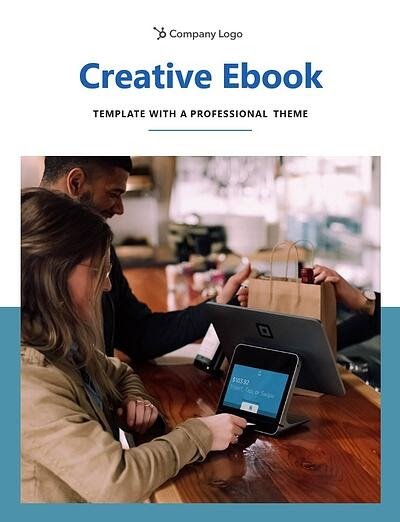
Ebook Template: Professional Theme

Download This Template

Appeal to the professional yet bold aesthetic, the Professional theme ebook template. Image-based title pages and thick, bold fonts draw attention to headlines and big ideas while body pages with room for photos make it perfect for a showcase or inspiration guide. The Professional template is made with the visual communicator in mind. Social media experts, event planners, and web designers — this one is for you!

The Professional Theme Ebook Template is best for:

  • Social Media Guidelines
  • Event Planning
  • Web Design Content

5. Honeycomb Theme

Ebook Template: Honeycomb Theme

Download This Template

Your ebook is sure to get the crowd buzzing with this honeycomb-inspired design. The hexagonal shapes in the background are neutral-colored in the original ebook template, but adding in your brand colors can make these hives look sweet. Inside, you’ll find page layouts for quotes and captioned photos, making it a good choice for ebooks with a healthy balance of imagery and copy.

The Honeycomb Theme Ebook template is best for:

  • Recipe Books
  • Customer Service Guidelines
  • Technology Best Practices

6. Triad Theme

Ebook Template: Triad Theme

Download This Template

Great for educational workbooks that include heavy visual designs, the Triad theme provides plenty of space to organize your content on every page. The triangular shapes in this template give your ebook a sense of direction that keeps the reader moving forward. The bold complementary colors jump right off the page and grab your attention, but this template can be edited to incorporate your brand colors.

The Triad Theme Ebook Template is best for:

  • Educational Workbooks
  • Educational Presentations
  • Seminar Courses

With these polished templates, you’ll be able to:

  • Create beautifully designed ebooks without either the cost of a designer or experience with InDesign/Illustrator/Photoshop.
  • Choose from six different ebook designs across three different platforms (Adobe InDesign, PowerPoint, and Google Slides), and even add your own brand colors for a custom look.
  • Spend more time writing awesome content and less time getting the layout right.
  • Use all of the stock images provided in the templates, free of charge.
  • Save your ebooks as professional and attractive PDF files that are ready for download.

Start Creating Your Ebook For Free

Ebooks are one of the most popular content offerings available to consumers, but the effort required to make them can deter content creators from starting the process. These templates make designing your ebook simple so you can spend more time sharing your big ideas with the world.

Editor’s note: This post was originally published in January 2021 and has been updated for comprehensiveness.

New Call-to-action

Categories B2B

Calculating Correlation in Excel: Your How-To Guide

Microsoft Excel lets you do more than simply create spreadsheets — you can also use the software to calculate key functions, such as the relationship between two variables. Known as the correlation coefficient, this metric is useful for measuring the impact of one operation on another to inform business operations.

Not confident in your Excel skills? No problem. Here’s how to calculate — and understand — the correlation coefficient in Excel.

Download 10 Excel Templates for Marketers [Free Kit]

A correlation coefficient of +1 indicates a “perfect positive correlation”, which means that as variable X increases, variable Y increases at the same rate. A correlation value of -1, meanwhile, is a “perfect negative correlation”, which means that as variable X increases, variable Y decreases at the same rate. Correlation analysis may also return results anywhere between -1 and +1, which indicates that variables change at similar but not identical rates.

Correlation values can help businesses evaluate the impact of specific actions on other actions. For example, companies may find that as spending on social media marketing increases, so does customer engagement, indicating that more spending might make sense.

Or they may find that specific advertising campaigns result in a correlated decrease of customer engagement, in turn suggesting the need for a reevaluation of current efforts. The discovery that variables do not correlate can also be valuable; while common sense might suggest that a new function or feature in your product would correlate with increased engagement, it might have no measurable impact. Correlation analysis allows companies to view this relationship (or lack thereof) and make sound strategic decisions.

So how do you calculate the correction coefficient in Excel? Simple! Follow these steps:

1. Open Excel.

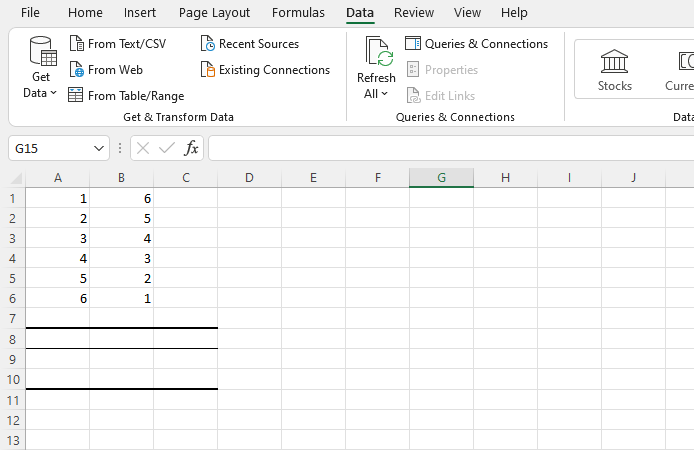
Step one: Open Excel and start a new worksheet for your correlated variable data. Enter the data points of your first variable in column A and your second variable in column B. You can add additional variables as well in columns C, D, E, etc. — Excel will provide a correlation coefficient for each one.

In the example below, we’ve entered six rows of data in column A and six in column B.

how to calculate correlation coefficient in excel: open excel

2. Install the Analysis Toolpak.

Next up? If you don’t have it, install the Excel Analysis Toolpak.

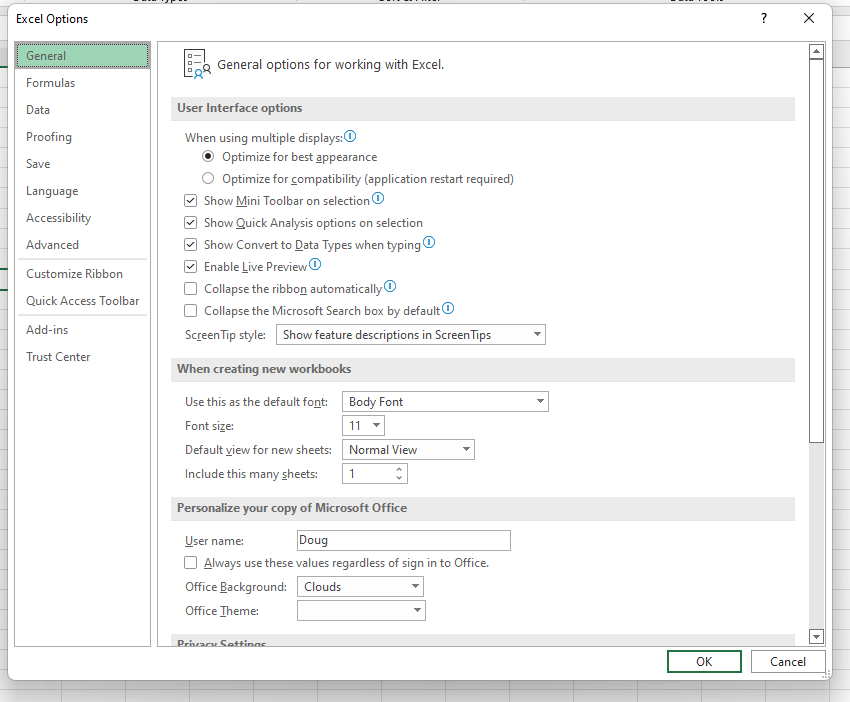
Select “File”, then “Options,” and you’ll see this screen:

how to calculate correlation coefficient in excel: install toolpak

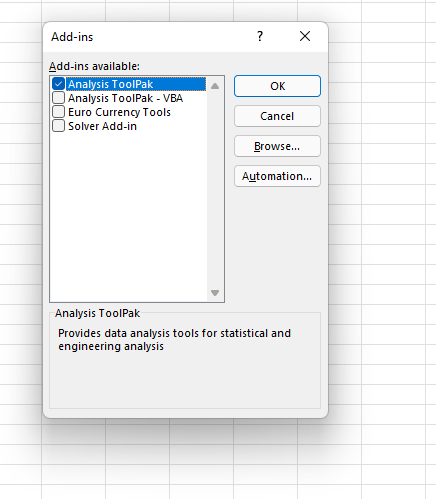
Select “Add-Ins” and then click on “Go”.

how to calculate correlation coefficient in excel: analysis toolpak addin popup

Now, check the box that says “Analysis ToolPak” and click “Ok”.

3. Select “Data” from the top bar menu.

Once you have the ToolPak installed, select “Data” from the top Excel bar menu. This provides you with a submenu that contains a variety of analysis options for your data.

4. Select “Data Analysis” in the top right-hand corner.

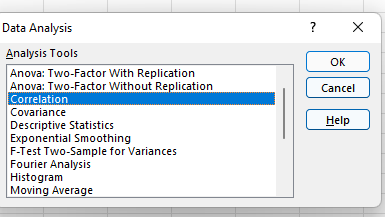
Now, look for “Data Analysis” in the top right-hand corner and click on it to get this screen:

how to calculate correlation coefficient in excel: correlation option

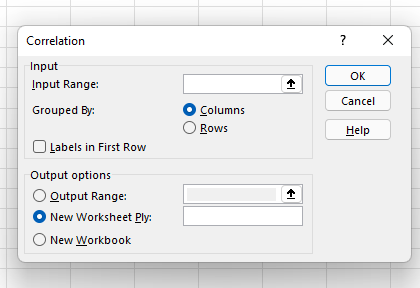
5. Select Correlation.

Select Correlation from the menu and click “OK.”

how to calculate correlation coefficient in excel: correlation popup

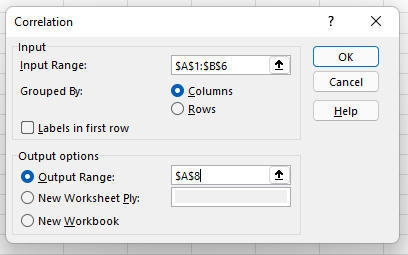
6. Define your data range and output.

Now define your data range and output. You can simply left-click and drag your cursor across the data you want to select, and it will auto-populate in the Correlation box. Finally, select an output range for your correlation data — we’ve chosen A8. Then, click “Ok”.

how to calculate correlation coefficient in excel: correlation popup options

7. Evaluate your correlation coefficient.

Your correlation results will now be displayed. In our example, values in column 1 and column 2 have a perfect negative correlation; as one goes up, the other goes down at the same rate.

how to calculate correlation coefficient in excel: result

The Excel Correlation Matrix

Excel correlation results are also known as an Excel correlation matrix. In the example above, our two columns of data produced a perfect correction matrix of 1 and -1. But what happens if we produce a correlation matrix with a less ideal data set?

Here’s our data:

excel correlation matrix: data

And here’s the matrix:

excel correlation matrix: result

Cell C4 in the matrix gives us the correlation between Column 3 and Column 2, which is a very weak 0.01025, while Column 1 and Column 3 yield a stronger negative correlation of -0.17851. By far the strongest correlation, however, is between Column 1 and Column 2 at -0.66891.

So what does this mean in practice? Let’s say we were examining the impact of specific actions on the efficacy of a social media campaign, where Column 1 represents the number of visitors who click through on social advertisements and Columns 2 and 3 represent two different marketing taglines. The correlation matrix shows a strong negative correlation between Columns 1 and 2, which suggests that the Column 2 version of the tagline significantly decreased overall user engagement, while Column 3 drove only a slight decrease.

Regularly creating Excel matrices can help companies better understand the impact of one variable on another and determine what (if any) negative or positive effects may exist.

The Excel Correlation Formula

If you prefer to enter the correlation formula yourself, that’s also an option. Here’s what it looks like:

excel correlation formula

X and Y are your measurements, ∑ is the sum, and the X and Y with the bars over them indicate the mean value of the measurements. You would calculate it as follows:

  • Calculate the sum of variable X minus the mean of X.
  • Calculate the sum of variable Y minus the mean of Y.
  • Multiply those two results and set that number aside (this is the first result).
  • Square the sum of X minus the mean of X. Square the sum of Y minus the mean of Y. Multiply those two numbers.
  • Take the square root (this is the second result).
  • Divide the first result by the second result.
  • You get the correlation coefficient.

Easy, right? Yes and no. While plugging in the numbers isn’t complicated, it’s often more trouble than it’s worth to create and manage this formula. The built-in Excel Toolpak is often a simpler (and faster) way to pinpoint coefficients and discover key relationships.

Correlation ≠ Not Causation

No article about correlation is complete without a mention that it does not equal causation. In other words, just because two variables rise or fall together doesn’t mean that one variable is the cause of the other variable’s increase or decrease.

Consider a few very strange examples.

excel correlation matrix: correlation not causation

This image shows a near-perfect negative correlation between the number of pirates and the global average temperature — as pirates became more scarce, the average temperature increased.

The problem? While these two variables are correlated, there’s no causal link between the two; higher temperatures did not reduce the pirate population and fewer pirates did not cause global warming.

While correlation is a powerful tool, it only indicates the direction of increase or decrease between two variables — not the cause of this increase or decrease. To discover causal links, companies must increase or decrease one variable and observe the impact. For example, if correlation shows that customer engagement goes up with social media spending, it’s worth opting for a slight increase in spending followed by a measurement of results. If more spending leads directly to increased engagement, the link is both correlated and causal. If not, there may be one (or more) factors that underpin the increase of both variables.

Keeping Up with the Correlations

Excel correlations offer a solid starting point for marketing, sales, and spending strategy development, but they don’t tell the whole story. As a result, it’s worth using Excel’s built-in data analysis options to quickly evaluate the correlation between two variables and use this data as a jumping-off point for more in-depth analysis.

excel marketing templates

Categories B2B

How to Increase Your Instagram Engagement Rate in 2022

With the potential to increase your brand awareness and build a reputable brand being so high on Instagram, understanding how to use it is essential.

While there are various ways to market yourself or your business on Instagram, it’s impossible to do so without first understanding your Instagram engagement rate.

New Data: Instagram Engagement Report [2022 Version]

Discover below ways to increase your engagement rate and the industry benchmarks to measure yourself against.

Why does your Instagram engagement rate matter?

Instagram engagement rates are significant because they measure an audience’s interest, brand relevance, and social authority.

Audience Interest

If your content appeals to your target audience, your engagement rate will be higher.

If you take the time to review your best-performing content — i.e., posts with the most likes, shares, saves, and comments — you’ll get a feel for what your users want to see.

It’s important to note high impressions may indicate that your content has been viewed a lot, but engagement is typically defined as concrete interactions with your posts.

Relevance

If you have a high engagement rate, it’s likely your audience sees you as a relevant source of information.

They may favor your content over competitors because your content sets you apart. However, if you have a high engagement rate now, will it stay the same in three months? Is it higher than it was last year?

If you aren’t monitoring your engagement rate and using it as a benchmark for relevance, your score can decline.

Social Authority

While you’ve probably already identified your target Instagram audience, it’s never bad to add new followers and fans to the list.

These new users will take notice of your engagement — your followers, likes, comments, etc. — to decide whether or not to follow you.

They’re likely to move on to your competitors if they notice your brand’s engagement, a.k.a. social authority is not strong.

What is the average Instagram engagement rate?

There is no one-size-fits-all definition of a “good” engagement rate. It can vary by industry, B2B vs. B2C, and a series of other factors.

However, Instagram does have higher engagement rates than other social media networks.

According to the HubSpot Instagram Engagement Report, posts on the platform generate 23% more engagement than Facebook, even though Facebook has 2x more monthly users.

If you want a numerical value to compare your score to, Rival IQ found that the median engagement rate across all industries is 0.064%, in a 2022 report.

The highest engagement levels are reported in the sporting industry (0.27%) and by influencers (0.23).

Because of this, it’s safe to assume that an engagement rate of around 1% is a good engagement rate.

If you’ve already run the numbers and found that your engagement rate is significantly lower than average, don’t fret. There’s room for improvement — but maintain a healthy perspective.

Assess how your engagement rate has changed over time and begin devising strategies to raise your score.

Start this process by calculating your engagement rate, outlined in the next section.

How To Calculate Your Engagement Rate On Instagram

There is debate among marketers on the best way to calculate your Instagram engagement rate, as different industries define success in different ways.

Your preferred method depends on your goals as a brand or influencer.

Calculating Instagram Engagement Rate for Brands

This formula is best for brands on Instagram because it considers the number of people who have seen a piece of content (impressions) rather than the total number of followers.
 
formula to calculate brand instagram engagement rate
 
Brands typically convert more leads via exposure first, rather than follower count.
 
When branded advertisements get viewed, engagement rates go up, especially if they follow the advertisements on Instagram profiles and become followers.
Note that Instagram accounts need to be public
Business Profiles to see impressions.

Calculating the Instagram engagement Rate for Influencers

Since sponsors often recruit influencers on Instagram based on their likes and follower count, their engagement rates incorporate these two factors.

Since this metric doesn’t require any personal data, it’s possible to compare your engagement rates to competitors.

formula to calculate influencer instagram engagement rate

No matter your engagement rate, there are always steps to be taken to raise your score.

1. Maintain consistent branding.

Maintaining consistency with your content is extremely important, and there are a variety of actions you can take to do so.

Firstly, your username should be similar or the same to your other social media usernames. For example, if your Twitter handle is @greenbookworm, your Instagram handle should be the same if it’s available (or something very similar).

You should also make sure that your content is visually consistent as well, and you should have a format that you use for all of your posts. Take a look at Nike’s Instagram, for example. nike instagram profile

Image Source

Whenever they post content that includes typography, they use the same backgrounds and font. When they post photos, they’re high quality and use the same filter.

nike instagram text post brand consistency

Image Source

When your content has a similar look, your profile becomes aesthetically pleasing, and users can recognize your photos as a consistent brand. If they come across your content on another social media site and can realize that it’s yours, they may follow you there as well.

There’s data to back this up — WebDam found that 60% of the best-performing brands on Instagram used the same filter every time they post.

2. Understand your audience.

You can’t begin creating content without knowing your intended audience. Developing Instagram personas is a helpful tool for increasing your engagement rate.

If you know who your followers are, creating content that they want makes them more likely to engage with you. Take the time to monitor your audience statistics, and update your personas accordingly.

You can use Instagram insights to get a demographic understanding of your followers. If you have an Instagram business account, navigate to the audience tab from the Insights menu.

instagram audience insights to increase instagram engagement scoreFrom here, you can see the top locations your users are in, your users’ age ranges, and their gender. All this information will give you an understanding of your users.
instagram insights for followers gender, age range, and top locations If you’re a HubSpot user, you can utilize the Social Reports data to find these same insights.

Regardless of your target audience, your content needs to be accessible. Utilizing Instagram’s accessibility tools is crucial, and you can use it to add image alt text, subtitles, and captions to your content.

3. Post regularly.

Once you know your target audience, post content they’ll enjoy and do it regularly.

The number of times you post depends on your marketing strategy, but the average brand posts four to six times a week on social media, according to a 2021 HubSpot Blog survey.

Again, this metric is an average and it may not work for everyone.

Posting too much content can overwhelm your users, and they won’t hesitate to unfollow if their feed is clogged.

It’s also important to know the best times to post for your followers. Instagram insights will also tell you the best days and hours to post.

instagram insights for best time and day to post on instagram to increase engagement rate

Do keep in mind that quantity doesn’t equal quality, which brings us to the next engagement-raising strategy.

4. Create better captions.

Unless you’re @world_record_egg, who posted a photo of an egg with no caption that has generated over 12 million likes, you need to focus on your captions.

Use the brand voice you’ve developed to sound consistent and keep your intended audience in mind. You can create short captions that are serious or light-hearted.

You can also create longer captions that tell stories and take your users on a journey. Take the Instagram account @humansofny as an example. They regularly feature the personal stories of people around the world.

humansofny long instagram caption

Since engagement metrics factor in the length of time users spend on your posts, consider alternating shorter and longer captions.

Hand-in-hand with writing better captions is using quality hashtags — Instagram was built on them, after all. It’s still the algorithm’s primary method of filtering through content. If you’re unfamiliar with hashtags, here’s a summary.

Captions can hold up to 30 hashtags per post, but there must be a balance.

Hashtag dumping, which is similar to keyword stuffing, may make the algorithm think you’re spamming for engagement, and you can be shadowbanned. The goal is to figure out what works for you and stick to it.

Your hashtags should be a mix of popular and specific, long-tailed keywords. For example, if you’re running an Instagram for your hotel, you’ll want to use common hashtags like #hotel and #travel.

However, those are also very broad, as a search for the #hotel tag has 31 million posts. Be more specific and targeted towards your needs, and maybe say #hotel, #travel, and #hotel + your hotel name + the name of the city you’re in. So, for example, #hotellisamiami.

You can discover the best hashtags to use by doing keyword research and categorizing those that work best for you and your brand. You may also want to consider coming up with a brand-specific hashtag that users can recognize as yours.

5. Engage with your followers.

After you post, engage with your followers. While Instagram has the ‘Turn off comments’ feature, opt to keep them on.

Reply to comments that your followers make. Maybe they’re asking questions or proclaiming their excitement for your product. Paula’s Choice, a beauty brand, is an excellent example of this.

paula's choice replying to follower instagram comment

Source

They regularly host Instagram Q&A’s, where users ask questions and they answer them on their Instagram stories.

They’re taking actions that they know will entice their audience into interacting with their Instagram content, which factors into engagement rates.

Engaging with your followers also entails sharing their content on your site, known as user-generated content (UGC). Surfing through your brand-specific hashtags can help you find users that are posting about you. You can screenshot their content to share on your story, and even post on your feed.

Your followers will be excited that you interact with them, as engagement may signify a personal relationship with your brand. Here’s an example of Paula’s Choice posting UGC.

paula's choice instgram user generated content post to increase instagram engagement rate

Image Source

6. Engage with similar accounts.

There wouldn’t be a point to using Instagram if you’re not following and interacting with other accounts.

Using the platform to engage with accounts similar to yours is extremely important. If you’re a brand, this can mean partnering with influencers in the same industry.

If you share products with them, they’ll post content wearing your brands. If they tag you, their followers will see your account, and many may follow you — all of these metrics factor into your engagement rate.

Emma Chamberlain is a popular YouTuber, holding almost 10.4 million Instagram followers at only 19 years old. She regularly posts sponsored content, and her sponsors post her. She entices her followers to interact with those brands, and vice versa.

emma chamberlain sponsored content instagram postImage Source

This establishes trust between brands, influencers, and their followers, which paints a picture of ‘high engagement’ to those browsing Instagram, and they’ll follow you in return.
 
In addition to influencers, simply engaging with brands within your industry is essential as well. Commenting on industry-standard accounts can give you exposure to users in that same comment section, and they may click your profile and become new followers.

7. Create mixed content.

When the app was first launched, all you could do was post photos. Now, there are five types of content posts supported on Instagram: photos, videos, Instagram TV (IGTV), Instagram Reels, and Instagram Stories.

It’s no longer enough to just post photos; you need to do all of it.

Videos

Zenith Media estimated that the average person would spend 84 minutes a day watching videos in 2020. That’s a significant amount of time spent watching videos, so use it to your advantage.

There are five video options within Instagram: Reels, IGTV, Story videos, Instagram Live, and video posts. You’ll need to decide which method is best for you, but a well-rounded Instagram strategy will include all. If people are watching content on your page, they’re spending more time on your site, factoring into your impressions rate.

If you’re a sports brand, post enticing videos of recognized athletes using your equipment to practice their sport.

Stories

Instagram Stories are essentially the same as Snapchat stories. HubSpot’s Instagram engagement report found 22% of users watched branded content Stories from a company, business, or brand more than once a week, and 36% liked, commented, or shared branded Stores.

You can take advantage of these numbers and use this feature to draw attention to your new posts by sharing them on your Story or simply posting Story exclusive content.

This feature can also be used to engage with your audience. Post quizzes and questions and make them shareable for other users. Stories can also be used to get feedback from customers, asking them to submit experiences with your products and services.

Circling back to influencer sponsorships, having them go live on your account via Instagram Live is a great strategy. Instagram Live’s can also be saved to your account, so new users can watch them even if they occurred three months before.

8. Use calls-to-action (CTAs).

A CTA is an image, line of text, hashtag, or swipe-up link that is meant to entice your audience to take action — hence the call to action.

The specific action you’re asking users to take should be decided based on your brand, service, or influencers’ needs. This may mean notifying them of a sale by including a swipe up link in your Instagram story, asking them to tag a friend in the comment section, or sharing links to partner-posted content.

While links to other sites don’t directly impact your Instagram engagement rate, they still require users to spend more time on your profile, and you can convert them into leads on other platforms. Here’s an example of National Geographic advertising a new product on their story using a swipe-up CTA.

national geographic instagram story swipe up call to action

Image Source

9. Track your statistics.

Why would you bother taking action to improve your engagement rate if you’re not taking the time to understand if it’s working? Tracking your progress is extremely important, and it should be something you focus on.

Trial and error is expected, and it should be used to inform your current and future strategies. Use your preferred CRM to find your most effective posts or pieces of content, and use the strategy employed in those for your next content posts.

After you’ve calculated your engagement rate for the first time, you should devise a timeline in which you’ll recalculate it again. Maybe you’ll set a goal of raising your score by .10% in a year, so you may plan to re-calculate the numbers every three months.

This can also help you understand what isn’t working — if your numbers haven’t budged, something needs to change.

All in all, Instagram engagement rate is a measure of how your audience interacts with your content. Your rate is an indication of your Instagram profiles’ social authority, relevancy, and audience interest.

If your content is good and your followers are engaging, your engagement rate will demonstrate that. When you spend time working on your engagement rate, you collect valuable data to inform your entire Instagram marketing strategy.

You should see your engagement rate as a benchmark for customer loyalty and satisfaction.

If your users like you, it’ll show.

Editor’s note: This post was originally published in October 2020 and has been updated for comprehensiveness.

Improve your website with effective technical SEO. Start by conducting this  audit.  

Categories B2B

A Comprehensive Guide to Local SEO in 2022

Local search is powerful for small businesses: 46% of all Google searches are looking for local information. If your business isn’t optimized for local search, you could miss out on potential customers ready to shop in your area. In short, local SEO is critical if you want your business to stay relevant.

To help you optimize your business for local SEO, we’ve created a comprehensive guide covering local SEO tips and tools.

By the end of the guide, you’ll have a firm understanding on how to optimize your business to reach potential consumers who use local search to choose which products or services they’re going to buy.

→ Download Now: SEO Starter Pack [Free Kit]

Search engines rely on signals such as local content, social profile pages, links, and citations to provide the most relevant local results to the user to gather information for local search.

With local SEO, businesses can use this to position their products and services to local prospects and customers searching for them.

1. Optimize for Google My Business.

Google My Business has become the creme de la creme of local search. Since Google supports, verifies, and shares its own content generously, Google My Business is an ideal tool to help your business meet Google’s needs.

To ensure you’re optimized for Google My Business, you’ll want to:

  1. Create and verify a Google My Business page.
  2. Use Google Posts within your account.
  3. Encourage your customers to share reviews online.
  4. Respond authentically to reviews, specifying location. For example, “We appreciate your feedback on [product/service] in [city, state]. We value your input and look forward to working with you again. Thank you from the [full company name] team.”

If Google can verify your business as authentic, the search engine could potentially reward your business with a coveted sidebar space in Google’s local search.

local SEO tips: optimize Google My Business with Google local search sidebar

Don’t just do this for the SEO, either. By having reviews and keeping your contact information and operating hours up-to-date, you’re improving the experience for potential customers to find you. Finding current data is essential to consumers, now more than ever, due to 2020’s disruption in consumer shopping behavior and business operation.

2. Engage on social media and add posts to Google My Business.

Google considers content shared on social media more important now than ever before.

Now that you’ve carved out a beautiful Google My Business page, share it on social media, further aligning social and search.

3. Ensure your name, address, and phone number are consistent online.

You’ve got to make it easy for people and search engines to find you, and to do this you have to set up your NAP.

What does NAP mean in local SEO?

The acronym, NAP, stands for the name, address, and phone number (with area code) of a business. Your NAP should be considered crawlable HTML text on your site for Google to display it better according to location-based search results.

Local SEO tips: have your NAP consistent for local SEO

Pro Tip: Avoid the common mistake of only including the NAP within an image — images can’t be crawled from search engines like HTML text.

The most common location for the NAP is in the footer or header of the site. Additionally, you should include your NAP on a “Contact Us” page, too.

4. Optimize online directories and citations.

For United States companies, these four map data aggregators provide many map data for Apple, Yelp, Bing, Google, Trip Advisor, and more:

Consistency is key: verify that your citations are consistent and complete across these four data aggregators.

Discrepancies like misspellings, abbreviations, lack of suite number, or wrong phone number can be problematic.

If Google can’t determine which information about your business is correct, it may not show your business at all in search results.

Pro Tip: Remove any duplicate listings you find in online directories. And while you’re at it, get a Chamber of Commerce membership in your community to gain an external inbound link specific to your area.

5. Perform a local SEO audit.

Once you have the fundamentals down, it may be tempting to put your foot on the brake. However, SEO is an ongoing and intuitive process. Instead of stopping there or simply making changes and seeing what sticks, it helps to perform a comprehensive audit to see where your website stands and what you need to work on to achieve your goals. A local SEO audit may include the following:

  • Google My Business Audit – How does your Google My Business appear in the SERPs? Is the information accurate?
  • Google Search Console Audit – Is your site crawlable? Does it have any errors that would hinder indexing?
  • On-Page SEO Audit – Does your site accommodate all the on-page SEO elements that help ranking?
  • Citation Audit – Are all of your citations correct in the top business directories?
  • Competitor Analysis – How does your site match up with your competition’s? Are there any gaps that you need to close? How do you match up in terms of inbound links, content, design, and positioning?
  • Website Audit – How well is your website performing?

6. Improve your internal linking structure.

Although external links pointing to your site are ideal (which I’ll discuss soon), adjusting your internal linking structure will also boost your SEO rankings.

Why does internal linking matter? It does the following:

  • Supports website navigation
  • Assists with information architecture and website hierarchy
  • Distributes page authority and ranking power among pages

If you want to improve your internal linking structure but aren’t sure where to start, check out Kissmetrics’ The Seven Commandments of Internal Linking for Top-Notch SEO.

7. Optimize URL, title tags, headers, meta description, and content.

When it comes to content, every new blog post is a new indexed page for your site, a new page on which to target a geographic search phrase, and a new opportunity to get found in the search engine results pages (SERPs).

Every time you write a piece of content, you need to optimize the content for search engines by using high-volume keywords in the URL, title, header, meta description, and body. If you’re having trouble coming up with geo-targeted content, consider highlighting customer success stories and case studies.

Pro Tip: The more specifications you add to these assets (especially for each location of your business), the better you’ll be able to optimize “near me” local searches.

8. Add location pages to your website.

If you have more than one brick-and-mortar location, create location pages. Location pages provide readers with your name, address, phone number, store hours, unique store descriptions, parking/transit information, promotions, and testimonials from happy customers.

Local SEO tips: add location to your website restaurant example

Image Source

It’s also important you avoid duplicating content across multiple location pages. For single-location businesses, create a locally descriptive About Us page. You can even get bonus points if you add a Google Map to your website on your respective location page(s).

9. Create local content.

Google continues to get smarter, which means content creators can now write more for users and less to appease search engines. And while writing about general topics will attract a vast crowd, sometimes it’s more important to hone your focus and write about local or industry news to attract a local audience.

Be the local authority for your industry by promoting local industry gatherings, news, employees, and other educational content on your blog. Think of top-of-the-funnel content that goes beyond what your business sells.

For example, if you’re a local security company and trying to attract businesses new to the area, create a helpful resource to get these businesses well-acquainted with your city. A map of local service providers or a calendar of city-wide events could both provide value for your persona and contain highly relevant on-page local signals.

10. Ensure your website is mobile-friendly.

Local and mobile search go hand in hand (61% of all Google searches are performed on mobile).

Some of the most common ways people will use your site in a mobile environment are to look up reviews, find directions to your location, and search for contact information. In fact, “near me” searches on mobile have increased 250% since 2017.

Make it easy for your prospects and customers by making your site mobile-friendly.

11. Get inbound links with relevance and authority.

Inbound links are compelling opportunities to boost your local SEO — every inbound link tells Google you’re a legitimate company, and inbound links can also raise your domain authority. Here are a few ways to get inbound links:

Start with your network, including the Chamber of Commerce, business improvement districts, licensing bureaus, trade associations, resellers, vendors, manufacturers, and other affiliates.

Consider sponsoring a webinar or meet-up, hosting a community event, promoting something local you love, and building relationships with prominent people and influencers. Additionally, learn to feel comfortable reaching out to partners to see if they can feature you on their partner directory.

Also, being a guest blogger can help attract links. Positively talk to or about other people in your industry, and act as a resource provider for the community. If you’re an active participant in community conversations, the buzz around you grows in the form of inbound links, social media growth, and media coverage.

12. Participate in your local community.

The more you participate in the local community, the more digital PR you’ll receive. Partnering with a nonprofit on a campaign, having a volunteer day in your organization, sponsoring an event (even an online one!), or appearing in the local media as an authority in your industry are all ways to earn press, brand awareness, and inbound links.

For example, given that .edu links are the bee’s knees for domain authority, why not earn some links by featuring a scholarship in your geographic region? It should be relevant to your industry, send the right signals to your domain (given the backlinks from schools) and make you feel good, too! Moz built a solid guide on the steps to success for effective scholarship outreach.

Local SEO Tools

Now that we’ve covered how to optimize your business for local SEO, let’s explore some practical tools you can leverage to improve your ranking in the areas where it matters most.

1. Whitespark Local Citation Finder

Pricing: Small Business Plan; $25/month, Specialist Plan; $50/month, Agency Plan; $100/month, Enterprise Plan; $200/month

local SEO tools: whitespark local citation finder

Image Source

A local citation is any online mention of a local business’s name, address, and phone number.

Citations matter because they help surface local businesses in online search, and when local businesses actively manage its sources to ensure data accuracy, it promotes trust in these online listings.

Whitespark knows this realm well — really well. Whitespark offers local listing management, recommends where to list your business, examines your competition, and robustly builds and monitors your citation growth for better local search rankings.

2. Screaming Frog

Pricing: Free Basic Version, Paid Version; $209/yearlocal SEO tools: screaming frog

Image Source

This desktop program crawls websites’ links, images, CSS, script, and apps from an SEO perspective. Curious if you have any 404’s? Or wondering about missing meta descriptions or H1s? Screaming Frog will analyze up to 500 URLs for free and unlimited URL analysis in its paid version.

3. Moz Local

Pricing: Lite Plan; $14/month, Preferred Plan; $20/month, Elite Plan; $33/month

local SEO tools: Moz Local

Less expensive than most of its counterparts, Moz Local will ensure your business listing has been verified on Google and Facebook and distribute your listing across the search ecosystem.

Additionally, Moz Local will collaborate with data aggregators to help push listings, ensuring your business gains visibility.

4. Arel=”noopener” target=”_blank” hrefs

Pricing: Lite Plan; $99/month, Standard Plan; $199/month, Advanced Plan; $399/month, Enterprise Plan; $999/month

local SEO tools: arel=

Arel=”noopener” target=”_blank” hrefs helps with backlink checking, which is essential as these links (directed toward your website) indicate website authority.

Arel=”noopener” target=”_blank” hrefs also offers competitor analysis, keyword research, and insight into other websites’ anchor text when backlinking to your site.

5. Buzzstream

Pricing: Starter Plan; $24/month, Growth Plan; $124/month, Professional Plan; $299/month, Custom Plan; $999/month

local SEO tools: buzzstream

BuzzStream facilitates earning local backlinks, which helps you identify and build relationships with local influencers by researching influencers, tracking conversations, and providing reporting insights into your outreach campaigns, team performance, and link placements.

6. BrightLocal

Pricing: Single Business Plan; $29/month, Multi Business Plan; $49/month, SEO Pro Plan; $79/month

local SEO tools: brightlocal

BrightLocal is a comprehensive SEO tool suite built explicitly for local business marketing needs.

The tool can help you generate and monitor reviews on local sites, understand your local search performance, and analyze nearby competitors.

BrightLocal also offers client access and white-labeled reporting — making it a solid fit for agencies and brands alike.

Improve Your Business Visibility with Local SEO

Local SEO is an integral part of any SEO strategy for local businesses. Local SEO will help your audience find you when they search online if you have a storefront or service area. We hope you find this article helpful in your journey to gain brand recognition and authority on the net.

Editor’s note: This post was originally published in April 2018 and has been updated for comprehensiveness.

SEO Starter Pack

Categories B2B

How to Highlight Duplicates in Google Sheets [Step-by-Step]

Duplicate data is the bane of spreadsheet solutions, especially at scale. Given the volume and variety of data now entered by teams, it’s possible that duplicate data in tools like Google Sheets may be relevant and necessary, or it could be a frustrating distraction from the primary purpose of spreadsheet efforts.

The potential problem raises a good question: How do you highlight duplicates in Google Sheets?

We’ve got you covered with a step-by-step look at how to highlight duplicates in Google Sheets, complete with images to make sure you’re on the right track when it comes to de-duplicating your data.

→ Access Now: Google Sheets Templates [Free Kit]

Highlighting Duplicate Data in Google Sheets

Google Sheets is a free, cloud-based alternative to proprietary spreadsheet programs and — no surprise, since it’s Google we’re dealing with — offers a host of great features to help streamline data entry, formatting, and calculations.

blank google sheets for highlighting duplicate data

Google Sheets has all the familiar functions: File, Edit, View, Format, Data, Tools, etc. and makes it easy to quickly enter your data, add formulas for calculations, and discover key relationships. What Sheets doesn’t have, however, is an easy way to find and highlight duplicates.

While other spreadsheet tools, such as Excel, have built-in conditional formatting tools that can pinpoint duplicate data in your sheet, Google’s solution requires a little more manual effort.

Step-by-Step: How to Highlight Duplicates in Google Sheets (With Pictures)

So how do you automatically highlight duplicates in Google Sheets? While there’s no built-in tool for this purpose, you can leverage some built-in functions to highlight duplicate data.

Here’s a step-by-step guide:

Step 1: Open your spreadsheet.

Step 2: Highlight the data you want to check.

Step 3: Under “Format”, select “Conditional Formatting.”

Step 4: Select “Custom formula is.”

Step 5: Enter the custom duplicate checking formula.

Step 6: Click “Done” to see the results.

Step 1: Open your spreadsheet.

First, head to Google Sheets and open the spreadsheet you want to check for duplicate data.

how to highlight duplicate data in google sheets: open spreadsheet

Step 2: Highlight the data you want to check.

Next, left-click and drag your cursor over the data you want to check to highlight it.

how to highlight duplicate data in google sheets:  select data

Step 3: Under “Format”, select “Conditional Formatting.”

Now, head to “Format” in the top menu row and select “Conditional Formatting”. You may get a notification that says “cell is not empty” — if so, click on it, and you should see this:

how to highlight duplicate data in google sheets: open conditional formatting options

Step 4: Select “Custom formula is.”

Next, we need to create a custom formula. Under “Format cells if”, select the drop-down menu and scroll down to “Custom formula is”.

how to highlight duplicate data in google sheets: select custom formula is

Step 5: Enter the custom duplicate checking formula.

To search for duplicate data, we need to enter the custom duplicate checking formula, which for our column of data looks like this:

=COUNTIF(A:A,A1)>1

This formula searches for any text string that appears more than once in our selected data set, and by default will highlight it in green. If you prefer a different color, click on the small paint pot icon in the formatting style bar and select the color you prefer.

how to highlight duplicate data in google sheets: insert formula

Step 6: Click “Done” to see the results.

And voilà — we’ve highlighted the duplicate data in Google Sheets.

how to highlight duplicate data in google sheets: result

How to Highlight Duplicates in Multiple Rows and Columns

If you’ve got a larger data set to check, it’s also possible to highlight data duplicates in multiple columns or rows.

This starts the same way as the duplicate checking process above — the only difference is that you change the data range to include all the cells you want to compare.

In practice, this means entering an expanded data range in the Conditional format rules menu and the custom format box. Let’s use the example above as a starting point, but instead of just searching column A for duplicates, we’re going to search across three columns: A, B, and C, and also across rows 1-10.

how to highlight duplicate data in google sheets: data with multiple rows

When we enter our conditional format rules, Apply to Range becomes A1:C10 and our custom formula becomes:

=COUNTIF($A$2:G,Indirect(Address(Row(),Column(),)))>1

This will highlight all duplicates across all three columns and all 10 rows, making it easy to spot data doppelgangers:

how to highlight duplicate data in google sheets in multiple rows and columns: result

Dealing With Duplicates in Duplicates in Google Sheets

Can you highlight duplicates in Google Sheets? Absolutely. While the process takes more effort than some other spreadsheet solutions, it’s easy to replicate once you’ve done it once or twice, and once you’re comfortable with the process you can scale up to find duplicates across rows, columns, and even much larger data sets.

business google sheets templates

Categories B2B

A Quick Guide to Nonprofit Website Redesigns [+Best Practices]

It’s hard to overstate the importance of having a quality website for nonprofit organizations. All of an organization’s outreach, marketing, and ads need to drive an audience to take action like donating, finding out about services, or signing up for information.

An effective website allows these actions to happen quickly and seamlessly, making the path to conversion for any of these actions feel effortless.

On the other hand, subpar websites actually distract audiences from the goals you want them to accomplish, confusing visitors with navigation that obscures the most relevant information or overloading them with too many calls-to-action.

As digital marketing experts, we have a basic process we use as a guide when we start new nonprofit website projects, ensuring that the end product is clear, easy-to-use, and ultimately, effective.

Let’s dive in.

Download Now: Nonprofit Marketing & Fundraising  Trends for 2022 [Free Report]

The 6 Phases of a Successful Nonprofit Website Project

1. Discovery

During the discovery phase, your project team will define its goals and understand existing strengths, opportunities for growth, and audiences.

Identify Your Goals

The first step in building a better website is recognizing that you need one, and determining goals for redesign efforts. Sometimes you can look at data to determine if your current site is meeting your expectations.

Understand Audiences

Tools such as Google Analytics can help you determine which actions or content are getting more or less traction with audiences to optimize accordingly. Implementing audience surveys can also provide insight into what parts of your website may be resonating better or worse with your key groups.

Evaluate Content

Sometimes the issue may have to do with the visual presentation of your brand elements –– your site may just need a general facelift or improved accessibility. Marketing agencies can help audit and review your current site in more detail to provide you with specific recommendations to guide and prioritize your goals for your new website.

Site Audit

In a full site redesign, research may be required as a first step to inform strategy and design. This might involve doing an in-depth audit of all of the existing content for your current site, as well as research and documentation about any other technical platforms (like CRM systems or fundraising platforms at your organization). This also might entail doing deeper research into your audience groups and mapping their specific needs at various stages of their journey interacting with your organization.

SEO Audit

An SEO audit is an important step to capture insights for your site rebuild, ensuring audiences can easily find it via search. An SEO audit involves taking an in-depth analysis of all the factors that affect a website’s visibility in search engines. Doing this audit gives complete insights into the website, overall traffic, and individual pages in regards to site health and overall domain authority.

Here are just a few things to consider during an SEO audit:

  • Does your site support a breadcrumb structure?
  • Does your navigation make sense?
  • Is it easy for users to find important and relevant content on your site?
  • Does the content reach the right audience and target important keywords?
  • Is there correct metadata throughout the site? Title tags?
  • Are there server errors on your site?

While these may seem like simple and mundane tasks, they are crucial steps in ensuring your site and brand increase organic visibility. Overall, completing this task can help assure that you are reaching your traffic goals and can make any changes necessary in the website redesign.

2. Strategy

Once your discovery is complete, you can move to your strategy phase. Here, you and your team will dive into planning how all of your content, including copy, images, videos, and any other assets, will be presented across the new website.

Content Strategy

Once you have a handle on who your audiences are, and how you’d like them to engage with your information, you can dive into your content strategy — or the way you’ll organize and develop content for visitors to engage with on your site. This might include revising your site map (otherwise known as a list of pages in a hierarchical order for your website), and navigation so content that’s relevant to a particular audience is grouped together, and in a way that will make it easy for them to find the right piece of content at the right point of their journey.

During your content strategy exploration, considering all stages of an audience’s user journey is critical. How are people new to your site engaging, and how can you make life easier for return visitors?

As a nonprofit, you’ll want to share different pieces of your story with new versus existing supporters — for instance, with new visitors, you can share background on your nonprofit, and with existing supporters, you can show them the impact and results of your nonprofit so they can see how their contributions matter.

Information Architecture

Once the overall content strategy is in place, you can start to solidify the role, or story, each individual page will play. Bringing the most important messages to the top, and allowing for less urgent pieces to cascade down the page, builds your loose information architecture that will help UXers and designers bring your story to life.

3. UX and Design

As you move into your user experience (UX) and design phase, you’ll bring all of your discovery and strategy to life with visuals. By keeping your audiences top of mind during this phase, you’ll be able to meet their needs in the most effective way possible.

User experience (UX) design comes next, often in the form of prototypes or wireframes, to provide visual structure for each page. Sometimes these wireframes also include notional copy, which are brief bits of text to indicate things like ‘Headline about our giving program goes here.’ This can be helpful to guide later copywriting efforts for site content.

Things get more interesting and fun as the new website’s visual and creative direction gets established. Designers can recommend a new visual approach to your brand elements, colors, fonts, and other style elements. When approved, this visual approach gets applied to page designs and layouts to arrive at finalized page designs.

4. Implementation

In your implementation phase, you’ll notice that the development processes vary a bit depending on the platform. As you and your team work through implementing your work, you’ll make some decisions that’ll impact how easy your site will be to maintain (through no/low-code platforms versus code-driven products).

Designs, requirements, specifications, and copy come together with development efforts to bring a new website to life. Today, organizations have a lot of great options to consider: No-code platforms such as Squarespace or Wix can make many parts of the development process so simple that developers aren’t needed and maintenance costs are greatly reduced, at the cost of some flexibility about what types of technical integrations they can work well with and how much customization can occur. 

Some solutions such as Hubspot’s CMS are tailored for HubSpot’s CRM tools and offer an out-of-the-box solution for organizations that want a powerful but easy-to-use interface. HubSpot offers more than two dozen themes for nonprofits to choose from, making customization and a sleek design and user experience available within minutes.

More development-intensive platforms like WordPress come with higher investment needed in the building process and long-term maintenance costs for things like plugins and hosting, but offer endless opportunities to realize a custom website vision.

no code and low code

5. Quality Assurance Testing

Once final content is entered or migrated into your new site, and an approach to blog posts and SEO considerations have been addressed, quality assurance (QA) testing can happen.

QA testing can check that the site presents well across all devices, meets accessibility standards, is optimized for speed, and is functioning according to requirements.

6. Accessibility

Creating a website that’s not only functional and well-organized but also accessible to all is becoming the standard. As nonprofit organizations, it’s even more important to be catering to all audiences, especially those you may be serving.

Remember that accessibility means accommodating for all disabilities, not just ones that are readily apparent. Over 13% of the U.S. population has a visual impairment. Making the mindful shift to ensuring your site is accessible consists of small changes, like using proper colors, H1/H2 tagging for screen readers, and providing alt text on all images and graphics. Checking these boxes goes a long way in helping everyone have a positive experience on your site.

Once your QA testing is complete, including your accessibility checks, you can make changes and find solutions, and then the site is ready for final approval to release.

Regardless of your platform, there are a few details (that are often forgotten) to always keep in mind.

Here are a few examples of great no-code and low-code nonprofit websites.

No-Code Nonprofit Website Examples

1. 50 States, 50 Grants

 It Gets Better: 50 States. 50 Grants. 5000 voices campaign was built using webflow. Although built on a template, the website still has great movement and engagement, and portrays a more custom website.

Issue Area: LGBTQIA+

Website Platform: Webflow

Website: https://www.50states50grants.com/ 

2. RiseUP Marketing Fellowship

RiseUP Marketing Fellowship is a purpose-driven marketing fellowship that works to increase diversity, access, and tangible social impact across the marketing and advertising industries.

Issue Area: Employment

Website Platform: Squarespace

Website: https://www.riseupfellows.com/

Code-driven Nonprofit Website Examples

1. OPS

OPS inspires, empowers, and connects a global community using high-impact films and visual storytelling to expose the most critical issues facing our planet.

Issue Area: Environment

Website Platform: WordPress

Website: https://www.opsociety.org/

2. Outward Bound USA

Outward Bound USA is the leading provider of outdoor education programs that allows young people to explore their personal potential, since 1962.

Issue Area: Education

Website Platform: WordPress

Website: https://www.outwardbound.org/

3. The Gerson Mission

The Gerson Institute’s mission is anchored in the education of food as medicine, reducing toxic exposure and creating a healthier world where Gerson Therapy is not just a viable option, but a pillar of treating chronic illness.

Issue Area: Health

Website Platform: WordPress

Website: https://gerson.org/

Common Nonprofit Website Pitfalls

1. Tracking and Conversions

All too often, organizations forget to transfer and/or set up their tracking on a new website. At the very least, make sure your Google Tag Manager and Google Analytics are published when the website is released.

Chances are with most website rebuilds, elements and forms on the website have shifted. Buttons may have changed colors or placements and new pages may have been added. Any custom event or conversion tracking on your existing website will need to be recreated for the next website so that you don’t lose out on any of your tracking.

There’s nothing worse than realizing a pixel isn’t firing correctly mid-campaign. Make sure you take the time to QA your site, test forms and buttons, and run reports the second the website is live.

2. SEO

Every company needs a strong marketing strategy, even nonprofits! However, most nonprofits don’t know or haven’t considered investing in search engine optimization (SEO) even though it can have one of the highest returns on investment.

How do you expect your supporters, volunteers, and advocates to find you if you don’t invest in your SEO and content strategy? Roughly, 53% of individuals say they always do research before they buy something to ensure they are making the best possible choice. This is no different for nonprofits.

Strong SEO is more vital for nonprofits than ever with the accelerated digital transformation due to COVID and the overall political climate within the United States. Many Americans are looking for ways to support organizations of specific social issues — highlighting the greater need for strong SEO.

3. Accessibility

According to the World Health Organization, one billion people — approximately 15% of the world’s population — live with some form of disability. And, roughly 75% of Americans with disabilities report using the internet on a daily basis.

It’s important to keep in mind accessibility in web design is best when planned ahead, but can be remedied in meaningful ways at any stage in a website’s lifecycle.

As mentioned above, there are small changes that can go a long way in helping everyone engage with your website, but a few of the most critical are as follows:

  • Ensure the colors of your text/backgrounds are friendly for those experiencing visual disabilities, including color blindness
  • When available, draft specific copy for alt texts on images and graphics to verbally describe what someone else would see
    • This also helps with folks who use screen readers, having a voice to describe what they’re seeing adds context and color to their experience online
  • Using the tab key to navigate your site to see how folks who are unable to mouse around will engage with your content can illuminate any areas where more work may need to be done.
  • And lastly, checking for discrepancies between a mobile and desktop experience can be a great last pass to ensure you’re up to par with accessibility needs

Ultimately, a website redesign isn’t easy, but it’s a smart and lucrative business decision when it comes to helping your nonprofit reach new audiences and increase impact. A strong website is critical for any brand, but particularly vital for nonprofits that are goaled on reaching and inspiring interested audiences.

nonprofit trends