Categories B2B

The Creator Economy Market Size is Growing: How Brands Can Leverage It

The creator economy has seen exceptional growth over the last few years and will only grow more in the future. So, what does that mean for brands, and how can marketers leverage this booming economy? To answer this question, I spoke to a couple of HubSpot’s marketing experts and researched the creator economy’s size, growth, and the changes we can expect down the line.

Here’s everything marketers need to know, starting with how the creator economy has grown over time.

Download Now: 150+ Content Creation Templates [Free Kit]

How the Creator Economy Has Grown Over the Years

The exact size of the creator economy can vary, depending on who you ask. While statistics show 50 million people are contributing to the creator economy, a recent report by Linktree said there are about 200 million people as of 2022. One reason for the discrepancy could be how the numbers are calculated.

For example, there may only be 50 million content creators contributing to the creator economy. Still, the economy also consists of consumers, entrepreneurs, companies, platforms, and advertisers who keep the economy growing.

Either way, there is no doubt the creator economy is incredibly profitable. As of 2022, the creator economy market size is estimated at $104.2 billion, more than double its value since 2019.

Here are some other interesting facts about the creator economy’s size:

So now you know how massive the creator economy is, but how much has it grown over the last few years? Let’s explore.

How the Creator Economy Has Grown Over the Years

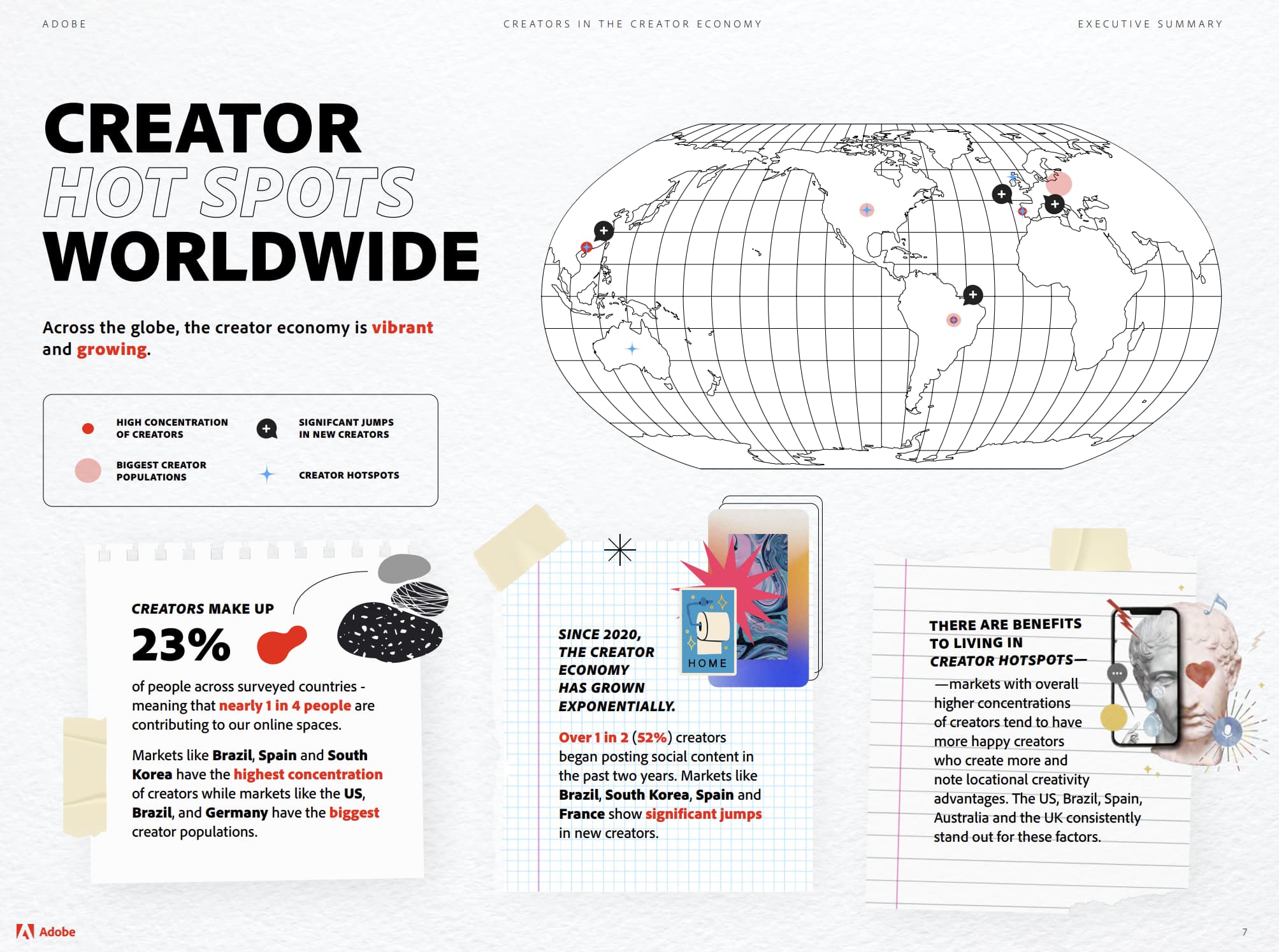
In a study published in August 2022, Adobe found the creator economy has grown by over 165 million people globally in the last two years — an increase of 119%. According to the study, creators make up about 23% of people, meaning almost 1 in 4 people worldwide are contributing to the creator economy.

Adobe notes the creator economy saw significant growth in 2020 — the year over 1 in 2 creators (52%) began posting social content, according to the study.

Adobe creator growth

Image source: Adobe

The creator economy has grown, but how has that contributed to change? To get more insight, I spoke to Senior Marketing Manager at HubSpot Creators Andrèa Hudson. Hudson says the key chain she has noticed over the last five years is that brands are now focusing on the power of creators to drive impact.

“We’ve gone from an ‘influencer’ strategy to a ‘creator’ strategy, which means that the creator is actually a part of the marketing mix,” Hudson said. “This requires a significant amount of understanding what motivates creators, how omnichannel campaigns can bring creators even further into the fold, and why creators are an integral piece of the puzzle.”

Another significant change in the creator economy is its accessibility, according to HubSpot Director of New Media Kyle Denhoff.

“The barriers to creating a media product have dropped significantly,” Denhoff said. “When we talk about creators, obviously there are folks that can produce something right from their phone and post it on social media — but we’re also talking to independent writers, podcasters, and YouTubers who are building digital media products.”

Denhoff said, “It’s much easier for them to set up a home studio with lighting, audio, and great camera quality — and the tools and cost of those tools have gone down in the last couple of years. So it’s easier than ever for folks to create these independent media products and get up and running.”

Denhoff also says creators who may typically work for larger companies can now branch out and carve their niche in the creator economy.

“So, they were writers for The Atlantic or writers for Digiday,” Denhoff said. “They had built up a profile as an expert … at that media company, and because they were already so good at their job, they had an existing audience — and now they’ve branched off to create their own independent media products and generate revenue as a solo entrepreneur.”

An example of this phenomenon, according to Denhoff, would be The Atlantic writer Derrick Thompson who went on to host his podcast, Plain English.

Why the Creator Economy is Growing

A massive boost to the creator economy came at the start of the COVID-19 pandemic when many people found themselves stuck at home or needing more income due to budget cuts and layoffs. People turned to platforms like TikTok and Twitch to ease their cabin fever during a lockdown or to earn extra income after layoffs.

However, both Denhoff and Hudson say other factors contribute to the creator economy’s growth.

Aside from increased affordability, Denhoff also said another reason the creator economy is growing is how platforms cater to creators.

“The platforms where people post their content have built more tools and functionality capabilities for creators,” he said. “So, YouTube, Facebook, TikTok, etc., are offering them more options.”

Many of those options include opportunities to make more money.

“Twitter is starting to test a little bit with offering a newsletter option, and I think there is a ‘super follower’ option to monetize,” Denhoff said. “On YouTube, YouTubers can set up paid subscriptions … there are opportunities for people to go on these channels, product the content for the audience, and make money off that.”

Speaking of money, Hudson said one of the main factors contributing to growth is “the investment dollars from companies to creators.”

“Whether this is an indirect play or a direct play, the Creator economy market has reached over $104 billion in revenue in 2022, and brands will be forced to allocate spending to this sector if they plan to evolve with the future of business media,” Hudson said. “Creators are operating businesses; they are finding multiple ways to generate revenue by diversifying their distribution channels.”

Another factor, Hudson said, is that the pandemic forced media outlets to take on a creator-first approach and adapt marketing campaigns to a new landscape.

“Even large-scale media networks were made to report live from wherever they were, mostly their homes, and most community-focused platforms introduced a live option to tune in,” Hudson recalled. “During this time, you’d be hard-pressed to find a social media platform that wasn’t creator-first with their focus on driving engagement through live feeds and social media. The only place to go was to the internet; everything else was closed with no open date in sight.”

How the Creator Economy Could Change in the Future

So what does the future hold for the creator economy? As the creator economy continues to expand, I believe the following will happen:

Niche content will continue to thrive.

I’ll never forget when a content creator went viral on TikTok for reviewing bathroom sinks around New York City. That’s when I realized today’s consumers love niche content specifically tailored to their interests. And with content creation becoming more accessible, content creators with unique stories will continue to crop up.

This will also allow brands to find creators and micro-influencers who can introduce them to a new audience.

Community-centric marketing will grow.

Niche content goes hand-in-hand with community-based platforms like Twitch, Discord, and Reddit because audiences want to connect with other people who share their interests — and community-based platforms allow for connection.

As a result, the creator economy will likely focus more on establishing and maintaining a sense of community in the future.

Influencers will become more integral to businesses.

As the creator economy continues to focus on niche content and community engagement, brands will have difficulty connecting with audiences within digital spaces — because people want to communicate with other people, not brands.

To combat this, brands must collaborate with influencers with an established and engaged audience. Denhoff said brands should look to invest in long-term partnerships with creators — going beyond one-time paid advertisements on a creator’s platform.

“One of the things [HubSpot] has started to do is invest in independent creators to help them do what they do well,” he said.

Denhoff says that investment includes providing creators with financial value, distributing their content across HubSpot’s brand channels, and cross-promoting their content across HubSpot networks. He says this partnership will allow creators to grow and reach stability while introducing brands to a new audience.

“I think marketers just have to start to think through how they can partner with creators and how they can provide more value to creators to have a true partnership instead of just a paid transaction,” Denhoff said.

In summary, the creator economy isn’t going away anytime soon, and it will continue to amass more revenue while focusing on creators and their niche communities. Suppose marketers want to leverage this economy to their advantage (and they should!). In that case, they will need to form long-term, mutually beneficial partnerships with influencers and creators to reach their audience.

content templates

Categories B2B

How to Write a Blog Post Outline: A Simple Formula to Follow [+Tips from Our Blog Team]

What makes a blog post bad? The most pervasive problem we find is poor flow. The post jumps from one idea to the next or the post reads like a stream of consciousness – except it’s not a stylistic choice.

One way to prevent this is by creating an outline for your blog post.

Below is my method for outlining posts and organizing my thoughts to create a cohesive, logical piece.

Table of Contents

Start a Blog with HubSpot's Free Blog Maker

1. Write down as many distinct takeaways from the article as you can.

Start with a brain dump.

Write down all the things you want your readers to get out of the article. These won’t always be the main sections of your article – it’s just all the things you want your readers to know by the end of reading your post.

This is the only time in the whole process you’re not worried about organization – just let your ideas flow naturally. You need to get out all of your wild and crazy ideas now so they won’t muck up your post later in the process.

For example, say my article is on using images to generate leaders on Twitter, I’d probably want readers to know:

  • What sets a good image apart from a bad one on Twitter
  • Where they can find images to use legally
  • How they can create images on their own
  • What sizes they need to make images
  • How often they should tweet images
  • How to actually upload an image to Twitter
  • How they can generate a lead on Twitter
  • How long their tweet should be with the image in it
  • What results they should expect to get

Notice how these are really unfiltered and all over the place. That’s OK. We’ll rein it all in in the next step.

2. Break up those takeaways into larger sections.

Now, we’ll take that jumble of ideas and place them into overarching sections.

Think of it like sorting laundry – each thought belongs to a different pile. From your brainstorm, you should come up with a few big themes.

Sometimes, one of your brainstorming bullets will be a theme in itself, but usually, several bullets will fall under one overarching theme. You may also realize that there’s a theme that you may not have any bullets for, but the post definitely calls for it.

Many recommend sticking to three or four large sections, but it really depends on what type of post you’re writing. If you’re writing a comprehensive guide, you might need more.

If it’s a quick how-to post, fewer sections would be ideal.

Using the same example, here’s how I’d bucket my ideas into the following buckets:

  1. Intro
  2. Crafting a Twitter Image Lead Gen Strategy
    • How they can generate a lead on Twitter
    •  
    • How often they should tweet images
  3. How to Create the Perfect Lead Gen Tweet
    • How long their tweet should be with the image in it
    • How to actually upload an image to Twitter
    • What sizes they need to make images
    • How they can create images on their own
    • Where they can find images to use legally
    • What sets a good image apart from a bad one on Twitter
  4. Measuring Your Strategy’s Success
    • What results they should expect to get

3. Fill out the remaining sections.

At this point, your outline may still look bare in some areas.

You may have some sections with multiple bullet points and some without any. Now’s the time to fill in those gaps.

What did you miss in your initial brainstorm? Thinking about what’s missing is always hard, but it will help improve your final post significantly.

During this step, conduct some competitive research to see what other publications have covered on the topic and what readers are responding to.

Below shows how my outline evolved. I italicized all the things I added, and the outline is becoming closer and closer to being a post:

  1. Intro
    • Images work really well on Twitter (find study)
  2. Crafting a Twitter Image Lead Gen Strategy
    • How they can generate a lead on Twitter
    • How often they should tweet images
  3. How to Create the Perfect Lead Gen Tweet
    • How long their tweet should be with the image in it
    • How to actually upload an image to Twitter
    • What sizes they need to make images
    • How they can create images on their own
    • Where they can find images to use legally
    • What sets a good image apart from a bad one on Twitter
    • Should you tag people in images
    • Should you use photo collages
    • What colors you should use to stand out
  4. Measuring Your Strategy’s Success
    • What results they should expect to get
    • Which metrics to look at
    • How to find them in your analytics
    • How to adjust the above to get better results

Essentially, you’re re-doing the second step, but in a more focused manner.

4. Revise, remove, and reorganize details in each section.

Now comes the fun part: editing your outline.

You’ve already done the hard part of actually thinking of your ideas. Now, you’re tightening up your outline to include only the most relevant information, revising the sub-bullets to actually make sense, and reorganizing the sub-bullets to tell the most logical story.

First, let me show you what I’d cut – shown in bold.

  1. Intro
    • Images work really well on Twitter (find study)
  2. Crafting a Twitter Image Lead Gen Strategy
      • How to generate a lead on Twitter
      • How often they should tweet images
  •  
  1. How to Create the Perfect Lead Gen Tweet
    • How long their tweet should be with the image in it
    • How to actually upload an image to Twitter (This is a pretty basic step that someone would already know if they’re reading this post.)
    • What sizes they need to make images
    • How they can create images on their own
    • Where they can find images to use legally 
    • What sets a good image apart from a bad one on Twitter
    • Should you tag people in images
    • Should you use photo collages
    • What colors you should use to stand out (Don’t believe there’s hard data on this, just speculation. Let’s cut it.)
  2. Measuring Your Strategy’s Success
    • What results they should expect to get (The study in the first part should cover this bullet point.)
    • Which metrics to look at
    • How to find them in your analytics
    • How to adjust the above to get better results

Next, we’ll reorganize the remainder of the sub-bullets and rework them to sound like actual takeaways. We’ll also turn some of the sub-bullets into sub-sub-bullets. Here’s what this outline looks like now:

  1. Intro
      • Images tend to work really well on Twitter (find study)
  2. Crafting a Twitter Image Lead Gen Strategy
    • How to generate a lead on Twitter
    • How lead generation fits in with the rest of your Twitter strategy
  3. How to Create the Perfect Lead Gen Tweet
    • Creating it on your own
    • Finding images to use legally
    • Sizing images for Twitter
    • Tagging people in images
    • Using Photo Collages
    • How long the tweet should be with the image in
    • How to choose the right image
    • Optimizing the image for Twitter
    • Optimizing the rest of your tweet
  4. Measuring Your Strategy’s Success
    • Which metrics to look at
    • How to find them in your analytics
    • How to adjust your strategy to get better results

Ta-da! A much more comprehensive outline that makes your post easy to write.

5. Include links to your examples and/or data.

This is purely a time-saving trick.

After you’ve fully fleshed out and then trimmed your outline, you should look for examples and data to support these claims.

Once you find a source to support your arguments, just add them as a note underneath the section. That way, when you go to write it, you don’t have to go digging.

6. Nail your working title.

Now that your outline is fleshed out, you can create a headline that summarizes the purpose of your article into something action-driven and eye-catching.

Some components of a great title include:

  • Numbers
  • Action verbs
  • Descriptive adjectives

The goal here is to have a title that gives you a very clear idea of what the whole piece is about. You can make it sound catchy later.  

Review my final outline in the next section.

Blog Post Outline Example

  1. Intro
      • Images tend to work really well on Twitter
  2. Crafting a Twitter Image Lead Gen Strategy
    • Reference Anchorman line: “Come and see how good I look.”
    • How to generate a lead on Twitter
    • How lead generation fits in with the rest of your Twitter strategy
  3. How to Create the Perfect Lead Gen Tweet
    • Creating it on your own
    • Finding images to use legally
    • Sizing images for Twitter
    • Tagging people in images
    • Using Photo Collages
    • How long the tweet should be with the image in
    • How to choose the right image
    • Optimizing the image for Twitter
    • Optimizing the rest of your tweet
  4. Measuring Your Strategy’s Success
    • Which metrics to look at
    • How to find them in your analytics
    • How to adjust your strategy to get better results

Outlining Tips from HubSpot Bloggers

In addition to the steps outlined above, our HubSpot writers are sharing additional tips they’ve collected over the years.

If you’re struggling to think of sections for your blog posts, Senior Marketing Manager Basha Coleman suggests checking the “People Also Ask” section on the Google SERPS.

This section will have questions related to your initial search query. Take our example article. When you Google “using images to generate leads on twitter,” these are the questions that come up in the People Also Ask search feature.

people also ask: do tweets with images get more engagement, how do i get lead generation ads on twitter, can you use images in twitter

After a quick search, you learn more about common questions from readers and can include them in your article.

Karla Cook Hesterberg, senior marketing manager of the HubSpot Blog Network, recommends putting yourself in the reader’s shoes.

“Organize your structure based on what you think that person is going to be scrolling to find and put the most important/relevant info up front,” she said.

By leveraging these solid tips, writing your actual post should be a breeze.

Editor’s note: This post was originally published in May 2014 and has been updated for comprehensiveness.

New Call-to-action


Categories B2B

The Crisis of Disconnection: Why It’s Time to Rethink Your Growth Strategy [HubSpot Data]

This post is a part of The Crisis of Disconnection, a thought leadership series examining the latest research and insights to uncover how businesses can meet their growth goals, even amidst unprecedented changes to the way we work.

If there’s a topline takeaway from the research that prompted us to call The Crisis of Disconnection by name, it’s this. The growth challenges you faced in the last decade won’t be the growth challenges you face in the next decade.

Start building your audience, for free, with Marketing Hub.

If you’ve been following along, we’re glad you’re back. If you’re just joining us now, we’re glad you’re here.

To recap, here are four things keeping the savviest leaders we know up at night:

  • Businesses once in hyper-growth mode are now struggling to grow. One in three businesses are already citing “slowed growth” as a top challenge going forward.
  • Painfully high expenses and increasing costs are leading businesses to re-evaluate their software spend, the tools in their tech stack, and how that impacts their bottom line
  • Tried-and-true methods for generating demand are becoming less reliable and more expensive. Nearly two-thirds of businesses agree that sales engagement is struggling more now than pre-pandemic.
  • 81% of businesses agree that COVID-19 has fundamentally changed the way we live, work, and connect — and “the new normal” is still largely TBD.

You’ve seen the data. You’re tracking the trends. But how will The Crisis of Disconnection manifest in your business?

Disconnection in Context: Challenges for Go-to-Market Teams

Let’s take a closer look at the three overarching disconnects with material impact on scaling companies:

Broken links and numbered points describing workplace challenges causing disconnection

What’s not pictured, and adding a sense of urgency to it all? The macroeconomic fluctuations that seem here to stay. Oscillations in supply and demand, rumors about an impending recession, and decreased access to capital are causing leaders across industries and functions to re-evaluate how to invest in growth.

Let’s consider each core complexity — and its consequences.

1. Disconnected Data and Systems Leads to Decreased Efficiency and Value to Your Business

If having a streamlined tech stack with clean, connected data feels like an increasingly pressing priority, you’re one of many re-examining their CRM solutions (for good reason).

One in four businesses today say disconnected data and systems are among their chief concerns as they grow. And the ever-popular point solution approach isn’t without problems.

Consider the Impacts to Your People

Impact 1: Proliferating tools are creating complex, bloated tech stacks that are increasingly hard to use, integrate, and maintain.

The number of martech solutions is up 24% from 2020. Additionally, new sales productivity research shows:

  • Sales reps use just 62% of their tech stack.
  • Sales reps spend 41% of their average workday not selling, costing companies approximately 38% in revenue per quarter.
  • 74% of CRM buyers feel their teams have to switch between too many tools to get the job done, and 76% are using 3 or more applications to manage their relationships with customers
  • Only 27% of marketers say their marketing data is fully integrated with the tools they use, and 22% of them find it difficult to share data across teams.
  • Marketers spend an average of 3.55 hours each week collecting, organizing, and analyzing marketing data from separate sources.
  • Psychologists have found that switching gears and logging into disparate tools can eat up as much as 40% of an employee’s productive time.
  • A lack of unified data can block progress for individual contributors and make reporting an all-day affair for managers.
  • It’s harder for both individual contributors and team leads to deliver tangible ROI.

Impact 2: Disconnected systems lead to decentralized data, which causes teams to spend more time searching for answers and less time focusing on high-value activities.

Impact 3: Frequent context-switching results in productivity loss at every level.

Consider the Impacts to Your Bottom Line

According to our research, companies with less connected data & systems are seriously disappointed in the ROI of their tech stacks:

On the flip side, companies see greater ROI when data and systems are more connected and CRM tools are all on one platform:

Statistics proving the importance of integrated technology in the workplace

But why does connection & integration of your tech stack make such a difference to ROI? To answer that question, let’s take a look at how ROI is calculated:

 ROI formula depicting the pieces of an ROI calculation

As you can see in the equation above, total cost of ownership is one of the major factors in ROI  — as TCO increases, ROI decreases, fast.

And, as we’ve learned in our research,  having more point solutions leads to significantly higher cost of ownership, primarily driven by the increased personnel costs associated with using multiple tools.

So, even if a business is getting the same gains from their tech stack, using too many point solutions is likely going to decrease their ROI compared to a company that has consolidated more of its tools on a single platform.

As you can see, streamlining your tech stack does more than reduce friction between your systems and data. It reduces your total cost of ownership. It makes you more likely to weather the volatility ahead, with 52% of businesses with excellent data connectedness reporting they feel well-equipped to grow and thrive, despite the current state of the economy. And it connects your sales, marketing, and service teams (the importance of which we’ll talk more about below).

2. Disconnected People Leads to Decreased Sense of Community and Satisfaction

As you may have guessed, disconnected systems don’t just lead to disconnected data — they also contribute to feelings of disconnection between teams.

At the risk of stating the obvious: the way many of us work took a 180 in 2020. No fewer than 80% of U.S. employees say the crisis materially affected their daily work lives. Within a year, Zoom generated a mere $4 billion in revenue (a 53% increase year-on-year), with meeting participants increasing by 2900%.  Many of us had to learn — and are still learning — how to collaborate digitally instead of in-person.

There have been some upsides (access to more diverse talent, time saved commuting, meetings attended in pajama pants), along with some challenges.

Statistics describing current workplace challenges employees are struggling with

What does this mean? The playbook for attracting, supporting, and retaining employees is — you guessed it — changing.

Statistics describing current workplace challenges causing disconnection

Employees clearly crave connection and are more likely to feel dissatisfied without it. What’s equally true? Creating moments of connection is more challenging in an increasingly remote world run on siloed systems and partially accessible information. And as The Great Resignation is already showing, the consequences of ignoring how employees feel — inside and outside of work — won’t be insignificant.

3. Disconnected Customers Leads to Decreased Interactions and Opportunities to Delight

If you’re getting the sense that these disconnection challenges are compounding, you aren’t wrong. Disconnected systems, data, and people are all contributing to another problem — brands are facing more hurdles as they try to connect with their customer base.

Before we double-click on the data and what it means for you, here’s a high-level summary (with a spoiler: what worked then won’t work now):

Chart showing current workplace challenges that are causes of disconnectivity

In case you don’t want to take our word for it:

  • Customer acquisition cost (CAC) is up. 49% of those who track CAC say it has increased in the past year.
  • 42% of businesses cite increasing costs to reach prospects/customers as the main obstacle standing between them and continued growth.
  • Organic growth is diminishing. The average SaaS blog grew -1.6% last year and Google takes more than 65% of clicks.
  • More than 30% of marketers say that they are experiencing average-to-no returns on their digital marketing investments.
  • 80% of marketers report that getting rid of cookies will have a mild to major impact on their advertising strategy, and just 36% of marketers overall feel completely ready for impending data privacy changes.
  • Businesses have already spent an average of $1.3 million on General Data Protection Regulation (GDPR) compliance and are expected to spend $1.8 million more.

What does this mean for your business? It’s getting harder (read: less effective and more expensive) to reach potential customers. And if/when you do reach them, it’s getting harder to exceed their expectations (with fewer insights about their personal preferences than ever). Without a single source of truth about customers, it’s harder for teams to deliver personalized, connected customer experiences. Although 80% of marketers consider personalization the key to increasing revenue and enhancing customer experiences, HubSpot’s research shows that over half of marketers are missing critical data on their target audience that prevents them from delivering that personalized experience. 

So where does that leave today’s go-to-market teams?

Next Steps

So far, we’ve covered the “what” and “so what” associated with The Crisis of Disconnection.

In the final installment of this series, we’ll cover the most important question of all. Now what?

Stay tuned for our next post, and in the meantime, learn how HubSpot can help you connect all the dots.

enterprise marketing software

Categories B2B

8 Best Project Management Podcasts to Listen to in 2022

The project management field is growing. By 2027, employers will have 88 million PM roles, according to the Project Management Institute. To capitalize on new opportunities, PMs must keep up-to-date with industry trends and insights.

Click Here to Get HubSpot's Project Management Tool

Whether you’re an industry professional or just starting your career, we’ve gathered 8 of the best project management podcasts to help you on your journey. These podcasts cover a wide variety of topics, from company culture to organizational leadership.

Take a deep dive below.

1. Manage This — The Project Management Podcast

best project management podcast, manage this

This podcast offers an inside look into every aspect of project management. In each episode, Crowe and Yates share insider intelligence and actionable tips. Recent discussion topics include the challenges of management remotely, reshaping project innovation, and building culture.

What we like: Crowe and Yates invite a variety of subject matter experts onto the show. Conversations range from advice for someone just starting in project management to leadership tips – including how to manage uncertainty.

2. PM Point Of View

best project management podcast, pm point of view

  • Host: Kendall Lott, President at OSP International LLC
  • Length: 1 hour
  • Where to listen: Apple Podcasts and Stitcher

This podcast comes from the Project Management Institute of Washington, D.C. Plus, you’ll gather a wide range of perspectives on project management. Host Kendall Lott brings experience from roles in project management and within the C-suite. Guests also come from a variety of backgrounds and industires.

What we like: This podcast offers a wealth of knowledge. Each episode includes actionable tips and advice for PMs of all skill levels.

3. Project Management Happy Hour

project management podcast, PM happy hour

In each episode, Essendrup and Anderson cover a common problem in project management today. They then dive into practical advice and real-life examples. In addition to industry insights and tips, the hosts offer thoughtful case studies.

What we like: Each episode feels like a casual discussion with your friends. If you’re looking for a podcast that offers honest conversations about real-world issues in project management, then this is the podcast for you.

4. The Digital Project Manager Podcast

best project management podcast, The Digital Project Manager Podcast

The Digital Project Manager Podcast provides inspiration, how-to guides, tips, tricks, tools, actionable advice, and thoughtful stories. Episodes cover everything under the project management umbrella — including managing budgets and expectations, setting benchmarks, and the factors driving digital transformation.

What we like: Host Galen Low goes beyond just discussing industry trends. He connects with guests and offers actionable advice that will help you through every aspect of project management.

5. The Biker PM

project management podcast, The Biker PM

The Biker PM is the perfect project management podcast for small businesses. Host Anthoney Pavelich brings on entrepreneurs and small business owners to discuss the project management challenges they face. Here, they dissect what worked, what didn’t work, and how to navigate new startups.

What we like: Discussions on The Biker PM can benefit any small business owner or entrepreneur who needs guidance on how to avoid project management pitfalls.

6. Projectified

best bproject management podcast, Projectified

Created by the Project Management Institute, this podcast is for people who lead strategic initiatives that deliver value to their organizations. Guests include both senior and rising project managers, business leaders in Fortune 500 companies and startups, best-selling authors, top researchers, and a wide range of leading-edge thinkers.

What we like: Projectified is produced by the Project Management Institute, a for-purpose professional membership organization for project management. You can trust the podcast’s content to be accurate and in line with industry standards.

7. People and Projects Podcast

project management podcast, People and Projects Podcast

This podcast focuses on the intersection of people and projects — where work gets done in the real world. Here you’ll learn management tips that can help your team stay on track and collaborate on big-ticket items.

What we like: If you want a fresh take on project management, this is the podcast for you. Host Andy Kaufman and his guests cover various topics, from skill development to surprising ways you already use project management in your daily life.

8. Project Management Paradise

project management podcast, Project Management Paradise

This podcast delivers real project management tips and tricks from experts around the world. Host Aaron Murphy talks with business leaders, entrepreneurs, and project managers to offer thoughtful insights.

What we like: After each episode, you’ll walk away with solid guidance and understanding to help you conquer real-world challenges. That includes change management, shifting organizational behavior, and creating a project management style that aligns with your company’s culture.

Choosing the Right Podcast

If you’re looking to gain more actionable insights or expand your skills as a project manager, consider adding these podcasts to your rotation.

Both industry newcomers to long-standing project managers can learn something new from these shows. Plus, you’ll gather tips that can take your project management skills to the next level.

New Call-to-action

Categories B2B

How the Potential Recession is Already Impacting Hiring Plans in Marketing [New Data]

Early this year, conversations surrounding an upcoming recession started making headlines. Then, we saw mass layoffs and hiring freezes happening, particularly in the tech world.

Download Now: Free State of Marketing Report [Updated for 2022]

According to our 2023 Marketing Strategy Report, 48% of global marketers say the potential for an economic downturn or recession has affected their company’s hiring plans in 2022.

The report also suggests that this impact will continue into 2023. In this article, we’ll cover:

How The Recession Has Impacted Hiring So Far

Based on our report, we know that nearly half of marketers globally say the current economy has impacted their hiring plans for the year. The question is how.

The report suggests that marketers already struggle with hiring top talent, with 47% of respondents saying it’s one of their biggest challenges. More specifically, respondents say the biggest roadblocks are finding candidates with the right skill set and meeting salary expectations.

26% of respondents said their company had to rescind offers made to prospective employees in 2022.

The recession has only exacerbated an existing issue. Here are some standout figures:

  • 35% of respondents say they had to slow down or pause hiring efforts.
  • 27% of respondents say their company had to fire or lay off employees.
  • 26% of respondents say their company had to rescind offers made to prospective employees.

When asked in the Fall of 2022, “How long do you expect hiring efforts to be slowed or paused at your company?” 43% estimated four to six months while 27% said over seven months.

This indicates that many companies will be experiencing hiring freezes well into the new year.

It’s worth noting though that the recession hasn’t impacted all companies in the same way. The report shows that some companies actually increased hiring, according to 34% of marketers surveyed.

One interesting finding is that companies that describe their marketing strategy as effective are nearly 20% more likely to increase their hiring efforts in 2023.

How The Recession Will Impact Hiring in 2023

According to our report, 10% of marketers still anticipate struggling with hiring top talent in 2023. And 42% of respondents say the recession will affect their hiring plans next year.

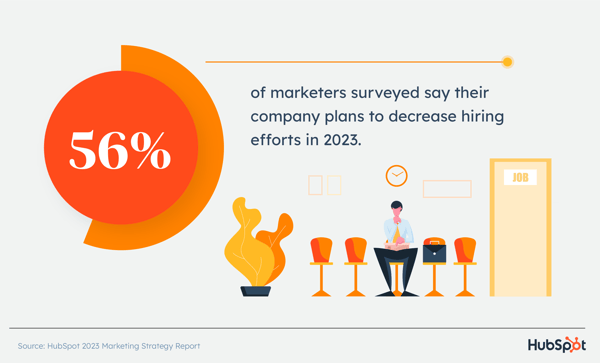
56% of marketers surveyed say their company plans to decrease hiring efforts in 2023

How exactly? 35% say they will have to slow or pause hiring efforts. In addition, 24% of respondents say their companies plan to fire or lay off employees.

However, mirroring the 2022 outlook, many companies – 48% –plan on increasing hiring efforts, suggesting that not all industries are being impacted negatively by the economic downturn.

24% of marketers surveyed say their company will fire or lay off employees in 2023.

Which marketing roles will be impacted by a potential recession in 2023?

Every company weighs roles differently. Depending on their business goals, companies will place more importance on some roles versus others.

We were interested in finding out if there was a lot of overlap across industries with the roles they chose to invest in most or least in 2023.

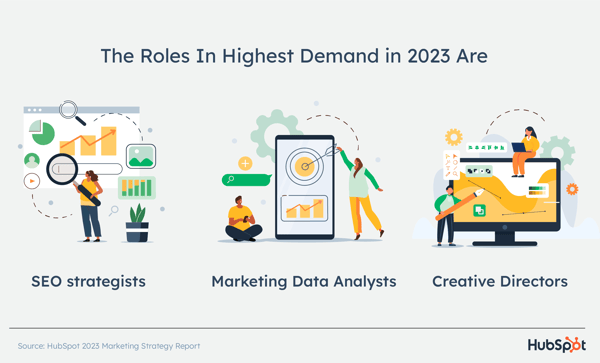
the roles in highest demand in 2023 are seo strategists, marketing data analysts, and creative directors.

Here’s what we found out: Two roles for which companies plan to decrease their recruitment efforts the most are: General marketing managers and acquisition marketing managers.

Given the economic climate, companies may be focused more on retention rather than acquisition, explaining the shift away from this role. As for the general marketing manager role, one theory is that companies rather invest in specialized roles that can offer quicker results.

The roles with the highest decrease in demand in 2023 are general marketing managers and acquisition marketing managers

Conversely, when asked about which roles they plan to increase their increase efforts, the top three were:

  • SEO strategist
  • Marketing data analyst
  • Creative director

Which companies and industries will be most impacted?

We’ve mentioned throughout this article that no two companies are impacted the same way during an economic downturn.

Our report shows that companies in the Media and Entertainment industry are most likely to decrease hiring efforts in 2023, 13% more than other industries.

83% of respondents in that category say that the potential for an economic downturn or recession will lead to a decrease in hiring efforts in 2023. Among those surveyed, those working in government and ecommerce show the lowest potential for a decrease in hiring efforts.

83% of marketers in the Media and Entertainment industry say that the potential for an economic downturn or recession will lead to a decrease in hiring efforts at their companies in 2023.

Meanwhile, we’re seeing the highest numbers for increases in hiring efforts in these five industries:

  • Defense and aeronautics
  • Government
  • eCommerce
  • Chemicals and metals
  • Advertising or marketing

There also seems to be a correlation between a company’s size and its hiring plans. According to our report, companies with large marketing teams (201 to 500 marketers) are 20% more likely to increase their hiring efforts in 2023.

There’s still so much unknown surrounding the current economy. However, our report suggests that many companies are taking a conservative approach to hiring in 2023 in preparation for difficult financial times.

New Call-to-action

Categories B2B

Why We Focus So Much on Client Services and Customer Experience

Customer service is important. 

Depending on which side of the spectrum your business resides in, customer service can either lift you to new heights up or sink your business straight to the bottom of the sea. 

The statement, however, is also one of the biggest understatements in business.

No one wants to be bad at customer service on purpose. It’s simply that not every business makes a conscious commitment to their customers before they ever even meet them. 

Knowing that customer service can make or break you is one of many reasons NetLine has made customer support such a main pillar of our company’s identity and culture.

It’s because of this focus that’s allowed NetLine to be a G2 Leader in the Lead Capture category for the last five consecutive years—and we’d like to talk a bit about why it’s so important to us.

NetLine Named a G2 Fall Leader

Here are some of the results from G2’s Fall 2022 Report, specifically in the Lead Capture category: 

  • This is the 20th quarter in a row the company has been named a Leader in the Lead Capture cohort
    • The Lead Capture class consists of 35 demand-centric businesses
  • Overall, NetLine outperformed group averages in seven of G2 Grid® Report’s eight categories in the Lead Capture field
  • NetLine finished the Fall 2022 review period with a 98% rating in the Quality of Support category
    • This score bested the average score by 6%—and 11% higher than ZoomInfo
  • Thanks to our wonderful clients, NetLine’s scores in the Ease of Admin and Ease of Setup categories improved from the previous quarter

Even our Net Promoter Score rose! It’s terrific to see how consistent this industry recognition has been, but who are we kidding?

We know who the real stars are.

Thank You (Thank You, Very, Very Much)

We’ve said it numerous times, but it can never be said enough. We’re so grateful for our clients. 

It goes without saying, but without them, NetLine wouldn’t be here and any G2 Leader status would be a pipedream. 

For 28 years, we’ve made it a point to dedicate ourselves to the service of our clients and their goals. Regardless of how long they’ve worked with us, how much they choose to spend, or their level of understanding of the platform, we make it a point to deliver each and every time. 

Clearly, this has resonated with our customers, as they’ve consistently rated us as the top of G2’s Quality of Support category in our field for 20 straight quarters. 

To get a better idea of why service is part of the fabric of NetLine, we asked the brains behind the heart of the operation, Melissa Becht, our VP of client services.

“It’s always been a main philosophy”

When I asked our CEO, Robert Alvin, about how and why service came to be one of NetLine’s pillars, he was quick to point out he wasn’t the catalyst. “It was always Melissa,” he said.

Melissa Becht has seen a lot in her time at NetLine. Over the course of 17 years with the company, she’s held nearly every position within the Client Services team she now leads.

“Ensuring customer satisfaction has always been at the forefront of our core business initiatives,” Becht said. “It’s always been a main philosophy of mine and always at top of mind.”

We pay close attention to our G2 ratings and reviews. Whenever we get a new review, Melissa’s the first one the entire team hears it from. she said. “This is validated within our customer satisfaction rating.”

The way Melissa sees It, it’s vital to ensure the account management teams are monitoring and calibrating customer service quality as well as recommending campaign optimization ideas to clients on an ongoing basis. 

Having a commitment to quality across the Client Services organizations has been proven time and again by the dedication the team has to client needs and dynamic approach to problem-solving. “Without happy clients we wouldn’t have the campaigns and business we have today,” Melissa said.

A Commitment to Service

Client Services is forever focused on improving customer satisfaction and being a strategic partner to our clients. But it’s not just client services. It’s all of us.

NetLine as a whole is focused on supporting and growing relationships with clients.

As we move into 2023, we have a lot of exciting plans in the works. The entire company is eager to share all of it with you.

Until then, we’ll keep our heads down and keep working toward the same common goals we share with our clients: Doing good work that benefits everyone. 

Thank you for trusting NetLine. Here’s to another five straight years!

Categories B2B

Instagram Marketing for Small Businesses: The Complete Guide

Seventy-one percent of US businesses use Instagram to market their products, services, and brand to more than one billion users on the app. With a variety of interactive features, Instagram marketing has become essential for small businesses.

Your team needs need to have an Instagram marketing strategy in place to harness the platform’s power. Read this guide to help you tackle the platform.

Download Now: Free Instagram for Business Kit + Templates

Table of Contents:

Why Instagram Marketing Matters for Small Businesses

In our digital-first world, Instagram is one of the first places people go to learn about a small business. Today, 90% of people follow at least one business on Instagram. Further, 1 in 2 people use the app to discover new brands, products, and services.

As a small business owner, you need to use Instagram to get your business in front of customers and build brand loyalty. But without a clear Instagram marketing strategy in place, you may find yourself struggling to grow your audience, post content consistently, or generate quality engagement. If this sounds familiar, you’re not alone. Over 90% of small businesses struggle with these common social media challenges.

Here’s the good news: Even if you have a small budget, limited resources, or a one-person team, there are several Instagram marketing strategies that small businesses can use to grow their presence and find success on the platform. Let’s dive in.


15 Instagram Marketing Strategies for Small Businesses

1. Start with a goal.

There’s no doubt that Instagram is a powerful tool for small businesses. To get the most out of your Instagram marketing, there needs to be a clear goal in place for what you want to achieve on the platform.

Here are a few examples of goals you might choose for your Instagram marketing strategy:

  • Increase sales.
  • Drive website traffic.
  • Generate brand awareness.
  • Boost customer engagement.  

Once you have a goal in place, you can use that to guide the type of content you post, the people you want to reach, and the general messaging to use on your page.

2. Set up the basics of your profile.

A few basic elements of an Instagram business profile are a profile picture, business name, and business category. Your page should also include contact information like a phone number, email, and address (if you have a physical location).

Clothing brand Quince includes a contact email in its bio so customers can easily reach out to the brand for support.

instagram marketing for small business, the Instagram bio for small business Quince is an important element of its Instagram marketing strategy.

Image Source

Another way to get the most out of your Instagram profile is to make sure it’s search-friendly. Create a searchable username so people can easily find your business.

Your profile image should also be something recognizable like your logo so new followers instantly recognize your brand’s thumbnail as they scroll.

3. Optimize your bio.

Your Instagram bio is the first thing people see when they visit your profile — think of it like the homepage of your website.

If you only have a few seconds to capture a visitor’s attention, what are the main elements or pieces of information you want them to take away?

Use your bio to let new followers know who you are and what you do. Include your company’s tagline or put together a sentence or two that sum up the type of content people can expect to see by giving you a follow.  

You can also use your bio as an opportunity to share announcements, promotions, or product launches. Pet brand Wild One includes special offers in their bio.

instagram marketing for small business, pet brand Wild One uses its Instagram bio to promote its small business promotions.

Image Source

4. Be intentional with your bio link.

If one of your Instagram marketing goals is to drive more traffic to your small business’ website, then spend a little extra time optimizing the link section of your bio.

Because you can’t include clickable links in Instagram captions, the link in your bio is what users will click on to learn more about your brand, shop your products, or sign up for an email list.

Use the link section to direct people where you want them to go next.

If you have multiple pages or products you want to promote at once, use a tool like Linktree or Later’s Link in Bio. These tools turn your main link into a mini website, giving users multiple options to click on within one link.

Newsletter brand Girls’ Night In uses a link tool to make it easy for its followers to find and visit links for products and articles that were mentioned in their posts.

instagram marketing for small business, the link section from Girls’ Night In Club’s Instagram profile directs followers to several links in one place.

Image Source

5. Host a giveaway

Want to grow your audience on Instagram? Host a giveaway.

According to one study, giveaways help Instagram accounts grow 70% faster in just three months.

And it’s easy to see why. Instagram giveaways increase brand awareness, boost organic engagement, and drive more people to your profile by encouraging likes, comments, and shares for a chance to win.

To generate even more engagement for your giveaway, team up with another brand for a joint prize like Oat Haus and Califia Farms did below.

instagram marketing for small business, Califia Farms and Oat Haus collaborate on a giveaway as part of their Instagram marketing strategies.

Image Source

Not only does more than one prize incentivize people to enter, but teaming up with another brand doubles the audience that will see your content or be introduced to your brand for the first time.

6. Geotag your posts.

If you have a physical location for your small business, be sure to create a geotag so you can include it in your Instagram posts. A geotag provides location data which helps users pinpoint exactly where to find your small business.

Not only that, but Instagram also organizes posts that use a certain geotag under one searchable tab so users can see all of the posts from that location.

By contributing to the tag, you can show people what they can expect when visiting your business. For instance, if you have a restaurant, use your geotag to show off menu items or give people a glimpse at what the dining atmosphere is like.

instagram marketing for small business, the Instagram geotag results for Austin-based food truck small business, Patrizi’s

Image Source

7. Tap into user-generated content.

Content creation is at the heart of Instagram marketing, but it’s no small feat. From brainstorming creative ideas to shooting images or taking videos, there’s a lot that goes into a single post.

This is where user-generated content (UGC) comes in handy.

UGC is content that’s been created and posted by Instagram users. It’s usually in the form of an image or video of someone using your product or visiting your business.

You can scope out UGC by checking out posts that you’re tagged in or browsing through content that uses your geotag.

Self-care brand Chillhouse regularly reposts customer photos that align with the rest of its Instagram content.

instagram marketing for small business, user-generated content is a part of Chillhouse’s Instagram marketing strategy for their small business.

Image Source

Not only is UGC a time-saver when it comes to content creation, but it also helps build social proof and brand credibility by showing followers authentic content from real people.

8. Offer exclusive promotions.

If you want to give people a reason to follow you on Instagram, offer exclusive promotions for followers.

Share a discount code that followers can mention if they visit your business in person or use at checkout when shopping online. To make the promotion even more exclusive, use Stories to share discount codes. Because Stories disappear after 24 hours, followers may feel a sense of FOMO if they don’t act on it quickly.

Promotions give your followers a reason to stay engaged and look forward to what and when you’ll post next, which helps build brand loyalty for your small business.

9.  Take advantage of hashtags.

Hashtags are essential for your small business’s Instagram marketing strategy. Hashtags can help you join in on a conversation or topic that’s relevant to your brand. They also help Instagram categorize your content. When users search or browse a hashtag they’re interested in, they may see your posts.

Not only are hashtags a tool for users to discover new brands and content on the platform, but they also allow your small business to build brand awareness and recognition.

Consider creating a branded hashtag and encourage followers to use it when they post about your brand. This helps build brand recognition and encourages people to share UGC.

Shoe brand Tecovas created a branded hashtag for an Instagram campaign that encouraged followers to share their game-day outfits using the hashtag #TecovasTailgate.
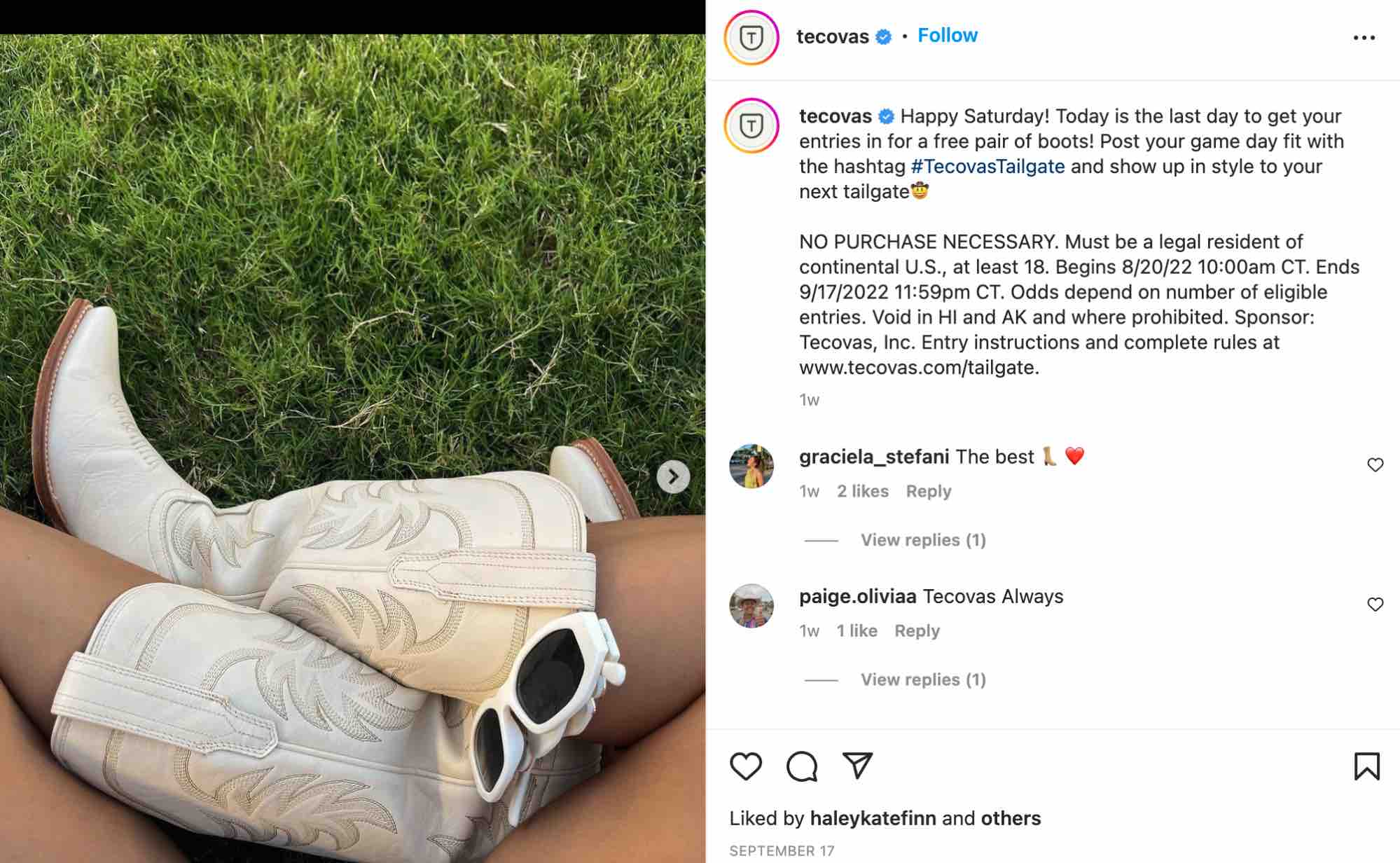
instagram marketing for small business, an Instagram post from boot brand Tecovas demonstrates how branded hashtags can be effective for Instagram marketing strategy for a small business.

Image Source

10. Engage with influencers.

Every industry has its influencers, from food to beauty to business. Influencers are highly effective at connecting with an audience and building trust with their followers. In fact, 37% of consumers trust social media influencers over brands.

If you have extra room in your marketing budget, consider partnering with an influencer for sponsored content.

As a small business, micro-influencers (influencers with around 10,000 followers or less) may be best to collaborate with or form a partnership with. Not only are they more relatable to your audience than a mega influencer or celebrity, but micro-influencers tend to generate more engagement than those with hundreds of thousands of followers.

11. Make your posts shoppable.

Each month, 130 million people use Instagram’s shopping features. If you operate an e-commerce business and want to reach even a fraction of these engaged shoppers, take advantage of Instagram’s commerce tools.

Instagram Shopping makes it easy for your followers to browse and purchase products directly through the app. After setting up your shop on your profile, you can add product tags to your posts like the outdoor brand Kammok does below.

instagram marketing for small business, a shoppable Instagram post from small business Kammok.

Image Source

12. Talk to your followers.

With all of the features that are available on Instagram these days, it can be easy to overlook one of the foundational elements of the platform: being social.

Engage with your audience wherever and whenever you can – in the comments section, in Stories replies, or even in DMs. By connecting with your audience on a personal level, you humanize your small business and build strong customer relationships.

You can start the conversation by directly asking for follower input. Use the interactive features on Stories, like polls and questions, to gather feedback and generate ideas from your audience.

Encouraging participation is another way to connect on a more personal level. Your followers will feel like they’re part of your community.

13. Experiment with Reels.

Instagram has rolled out several new features over the years including Stories, Lives, and now Reels.

Reels are short-form videos that can be creatively edited to form a compilation of clips that tell a story.

Here are a few ideas for Instagram Reels:

  • Show a day in the life of a small business owner.
  • Share a behind-the-scenes look at your process.
  • Tell the story behind the brand.
  • Introduce team members.
  • Give a tour of your space (office, storefront, restaurant, etc.).

Small businesses can also use Reels to share how-to videos that educate their followers. In the Reels below, P.F. Candle Co. demonstrates how to safely relight one of their candles.

instagram marketing for small business, an Instagram Reels from P.F. Candle Co. features a candle and text overlay that says “we’re going to show you how to safely relight your candle.”

Image Source 

14. Get creative with your captions.

For small businesses, your Instagram captions are an opportunity to add personality to the brand.

Rather than directly promoting your product or service, you can use your captions to spark conversations with your audience, encourage engagement, or show off the human side of your business. Waterloo Sparkling Water keeps its tone fun and human in the post below.

instagram marketing for small business, an Instagram post from Waterloo Sparkling Water that uses a creative caption to humanize its small business as part of its Instagram marketing strategy.

Image Source

15. Analyze your metrics.

To understand how well your Instagram marketing strategy is performing, it’s essential to track and measure your metrics.

You can use Instagram’s native insights or one of the many free and paid Instagram analytics tools. Make sure you have a set of metrics you want to track and a process to evaluate their success.

The metrics you choose to measure should tie back to your goals. If the goal of your Instagram marketing strategy is to drive more people to your website, then you’ll want to track your Instagram link clicks to see how they correlate to your site traffic.

Getting Started

Instagram continues to be a powerful and effective way for small businesses to grow their brand. With a strong Instagram marketing strategy in place, small businesses can reach new customers, increase sales, and build loyal customer relationships through the app for years to come.
New Call-to-action

Categories B2B

Best Signature Fonts for Emails and Documents

If the subject line of an email is the attention getter, then the signature is the lasting impression you make on the reader. 

Email signature fonts play an important role in shaping your tone as a professional and showcasing your personality. With so many other components in an email, both in terms of content and design, it can be easy to overlook the sendoff.

Fonts matter. As you take a look at this blog post on your screen, are you thinking about the font used? If this blog post were written in Papyrus, that might make for a distracting read. For email signatures, the font you choose is even more pertinent because it is your sign off. If you sign off an email using Comic Sans, the impression you leave might be childish and unprofessional. 

However, you can set the optimal tone in your email by selecting the best signature font.

Create a new, on-brand email signature in just a few clicks. Get started here.  (It's free.)

That’s why in this blog post, we’ll cover:

Why an Email Signature Matters

Your email signature is the impression you make — it is the closure of your email. People read emails on an array of devices, so it is imperative that your email signature is compatible with different devices. In addition to the font, the email signature font size should also be taken into consideration. Readability is key.

When you sign off from a professional email account, you are also representing the company or organization you work for. Choosing a professional signature font shows you and the place you work for in a positive light.

How to Choose a Signature Font

While an email signature may seem straightforward, there are many factors to consider when choosing a signature font: the size, color, and font itself. In this section, I will cover what to look for.

Size

Size matters for readability. Too small, and the reader won’t be able to see it. At the same time, you don’t want your font to be so large that it becomes obtrusive. You most certainly don’t want the font size of your signature to overpower the body text. The recommended font size for your email signature is 11 to 13.

Color

When it comes to color, aim for legibility. Colors too light like yellow or too bright like red make your email signature hard to read. Choose classic colors like black or navy blue. It also helps to make your email signature the same color as the email body for consistency. Try not to use too many colors — it is best to use 2 to 3 at most to avoid overwhelming the reader.

Font

The wrong font can leave a negative impression on the reader. Using a heavily stylized font can hinder legibility. Custom fonts may not be compatible across different platforms. 

Web safe fonts, also known as “sans serif” fonts, are used for digital platforms. These fonts are readable since they aren’t complicated or ornate. Devices like Windows and Mac come pre-installed with web safe fonts. 

Additionally, web safe fonts are compatible with different browsers like Chrome, Firefox, and Safari. These fonts include: Arial, Arial Black, Calibri, Courier New, Georgia, Helvetica, Lucida, Tahoma, Times New Roman, Trebuchet, and Verdana.

For a detailed guide of how to pick and choose the best fonts for marketing, including emails, check out this post.

15 Best Fonts for Email Signatures

The following fonts meet the requirements for legibility and compatibility across different platforms. 

Arial

Arial

Calibri

Calibri

Courier New

Courier New

Garamond

Garamond

Georgia

Georgia

Helvetica

Helvetica

Lato

Lato


Lucida Sans

Lucida Sans

Open Sans 

Open Sans

Oswald

Oswald

Roboto 

Roboto

Poppins 

Poppins

Tahoma

Tahoma

Times New Roman

Times New Roman

Trebuchet MS

Trebuchet MS

You need to choose an ideal email signature font.

An email signature may be the last part of your email, but that doesn’t mean it should be an afterthought. Your attention to detail will pay off. Selecting the right font can help you convey your personality and professionalism, leaving a lasting impression.

Need help figuring out the right email style for you? Elevate your emails with  HubSpot’s email marketing tools including our Email Signature Generator.

New Call-to-action

Categories B2B

When Is the Best Time to Post on Instagram in 2022? [Cheat Sheet]

If you want to find the best time to post on Instagram, you’re probably trying to reach a specific goal. Maybe you want to maximize the number of likes you get on each post. Or you hope to improve brand awareness by getting new followers.

If you’re new to social media you might start posting as often as you can and see what happens. But what if you add some scientific thinking to the process? For example, you could try posting at different times of day and jotting down the likes per minute for each post.

New Data: Instagram Engagement Report [2022 Version]

That experiment could have value over time, but it’s also pretty intense and time-consuming. Is there an easier way to figure out when to post on Instagram?

In this post, you’ll find everything you need to start posting at the best times on this popular social media platform. Keep reading, or jump to the section you’re looking for with the links below:

The times above are for Instagram engagement in local time — meaning that your audience is in the same time zone as you are when you post. So, if you live in Los Angeles and your primary audience is also in Los Angeles you would post at the times above. If you live in Los Angeles and your target audience is in New York, you’ll want to shift these posting times three hours forward.

Best Time to Post to Instagram Cheatsheet

Best time to post on Instagram cheatsheet

How We Found the Best Instagram Posting Times

This data comes from two sources. First is HubSpot’s 2022 Instagram Engagement report. This extensive report reviewed 110M posts across 1M Instagram users. The report also has several sections specific to English-speaking countries. They analyzed data from close to 85M posts from North America alone.

This post also contains more original research from the HubSpot team. They surveyed 300 professionals from 16+ industries about their preferred days and times to post on Instagram.

Why post on Instagram at a certain time?

According to global Statista data, mobile users spend an average of 11.2 hours a month on Instagram. That’s about 1% of their time each month, or one in a hundred chances that you will catch your users when they’re on the platform.

So, posting when your top users are online will make a difference. It will give you more time to connect with your most important followers.

But for many marketers, social media posting is just one more thing to do on a busy day. It can be tempting to post whenever it’s convenient or to schedule posts for a time that feels logical, even if there isn’t any data to back it up.

These are a few reasons why it’s important to post to Instagram at specific and consistent times.

Increasing Reach

Some users on Instagram focus their feeds on the friends, businesses, and influencers they already follow. But many others use Instagram for inspiration and discovery. This post from a machine learning engineer outlines some of the factors in helping new users discover your posts.

Best time to post on Instagram insights: Instagram connected recommendations graphic

One of those factors is recent engagement. This post from the Instagram blog also outlines how important fresh and recent content is.

So, if you post when your top users are online, your new content is more likely to be one of the first things they see. This can also boost engagement, another ranking factor. This combination increases the chances that new users will discover your account and posts on the platform.

Check out this post for more tips on how to grow your reach on Instagram.

Building a Loyal Audience

Loyalty takes time and effort to build. It’s especially tough for small businesses that have to compete with big brands on social media.

Posting during peak times on Instagram helps you connect with more of your followers at once. It shows your audience that you want to engage with them and keeps your brand top of mind.

It also helps set expectations. Building loyalty is about more than great products and customer service. It’s about being a consistent presence in their feeds that helps you build relationships.

For example, say you run your media business in the Pacific time zone, but a third of your customers are in the Australian Eastern time zone. If you post all your content from 9 a.m-5 p.m. PST, those posts will appear between 3-11 a.m for your Australian customers. Chances are your Australian audience won’t see many posts from your brand.

And what if an unhappy customer in Australia posts a story about your brand? That one post could shape that entire audience’s perception of your brand.

To build a loyal audience, it’s important to understand when your audience is online and to use that information to choose the best time to post.

Increasing Engagement

According to 2022 HubSpot research, the global average Instagram engagement rate is almost 6%. That’s more than double the average engagement rate in 2021.

Instagram engagement creates a ripple effect, like throwing a rock in a still pool. The first ripple is obvious — if you get immediate likes, comments, and saves after posting, it’s more likely that your post will show up in more feeds.

Instagram features that can impact the best time to post: Following and Favorites

The next ripples come from other Instagram features like Favorites, Search, and videos. Each feature has an independent algorithm. And each feature weighs engagement differently. For example, becoming a favorite for your followers means your posts will show up at the top of their feeds every time they log in. Engagement rates factor into which posts get bumped to the top of Search pages.

So, posting at the right time doesn’t just mean more comments, messages, and saves. It creates more opportunities for engagement too.

Testing New Algorithms

Like most online tools, Instagram launches constant updates to shape the user experience. As a business, your team needs to quickly understand how each update could impact your users and strategy.

Algorithms are complex. Instagram leaders say that each part of the app uses an independent algorithm.

So, one day your latest videos might show up in the feed but not surface on Discover, and it may be tough to figure out why. This can have an immediate impact on your business.

There are a few ways that you can manage these updates. For example, you can keep up with the latest social media news. But the best way to understand the latest algorithm changes is to run tests with your own posts.

So, what do you need to run reliable and useful tests that can help you understand which content your users see after an update? Number one is a consistent posting schedule. The fewer variables your test has, the more trustworthy your results will be.

Better yet, you should post at the best times for your audience on Instagram. This way, you’ll have consistent timing and a wider test group. That strategy can help you get more reliable results.

Understanding New Features

Your posting schedule can also help you understand new Instagram features. Carousels, Stories, and Reels are all unique parts of Instagram. And depending on your content and industry, they’ll each have different rates of engagement.

If your business is investing time and resources into Instagram, it’s important to have a strategy. Strategies usually include different types of content. Whether you want your posts to show up as suggested content or to boost your shoppable stories, you want useful eye-catching content.

When Instagram releases new features, it can take time to understand:

  • What the new feature does
  • When users see new features
  • How they interact with each new feature
  • Resources needed for feature content

The sooner you understand a new feature, the more likely it is that you’ll make the most of that feature before your competitors. For example, this post on the Instagram blog tells users how to see more of what they want on their feeds.

Like testing an algorithm update, knowing the top posting times for your niche can help you test new features for your users faster. Social testing is most useful when you know your test audience, which makes posting time important.

Streamlining Your Posting Schedule

Choosing the right times for your audience can make it much easier to schedule your posts. Many social media and marketing managers take advantage of social scheduling tools. While these tools can make the process of social media posting much easier, it can be tough to get results if you’re not posting at the right times.

It’s all about creating the right content at the right time for your audience. And set posting times can also help you create a more personalized social media calendar for your ideal buyer personas.

Here are a few more ways that choosing the best posting times for Instagram can help you simplify your posting schedule:

  • Creates focused times for content planning and tracking
  • Limits the need for “always on” social media management
  • Offers opportunities to batch-create targeted post content

Finding Your Best Customers

A 2020 Instagram Trends research study says that 44% of people surveyed use Instagram to shop weekly.

That’s an incredible incentive to connect with your best customers on Instagram right away. But how can the best posting times help you find those shoppers?

You may be new to your industry. If that’s the case, the industry-specific posting times below can help you understand when your users are online. This can help you start seeing from their perspective and you can use those insights to improve your content.

For example, people in financial services are easiest to reach on Instagram on Sunday nights. This is just before the next work week begins. It may be a way to wind down the weekend and prepare for what the next week will bring.

But workers in agriculture are easier to reach on Saturday mornings, and mostly skip Instagram during the week. These professionals might be in spots with limited service during the week. Safety is also a concern, so it may be difficult for them to use mobile devices while on the job.

You can also block out these times on your schedule to engage with users who follow your business. Comment on posts, ask authentic questions, and watch videos from your target audience.

These times are when the biggest pool of your users is active online, so it’s the best time to start a conversation. It’s easy to send a message on Instagram, but not every message gets a response. If you can be there to engage in real time, you’ll get much more value from the time you spend on the platform. You’ll also have a better chance of connecting with top customers.

Is there really a best time to post to Instagram?

It’s clear that posting time matters on Instagram. But is there really a best time to post to get the results you’re looking for? To answer this question, let’s hear from some members of the HubSpot social media team.

Content Quality

It can be tempting to churn out content to meet ambitious deadlines in the hopes that the right customers see your posts. But content quality is what creates the most value for your audience.

Community Management & Growth Specialist Mathew Cruz says,

“It sounds obvious, but making your content as engaging and optimized as possible for the platform it’s being published on is key. “

So, begin each post with the best possible content, then optimize to make sure that followers get to feel the impact of your efforts.

“Start with your target audience, and what types of content and information is most useful to them. What kind of content might they save for later? What might they share with a friend? What might incentivize them to comment on your content? Start with these questions and work backwards in order to improve your reach and performance.”

Annabelle Nyst, Senior Content Manager, Social Media

Best time to post to Instagram example: Choosing the right trending conversations to respond to

You can also get some inspiration from top influencers and brands on the platform.

Another way to create quality content is to line up with recent trends and news. But this strategy isn’t the right fit for everyone. Here’s more useful advice from Annabelle Nyst:

“When it comes to posting around tentpole moments, events, and trending conversations, you should ask yourself: Does this make sense for my brand to be a part of this conversation? Are we adding value here?”

Instagram’s Algorithm

The best posting time isn’t really about when you post, it’s about when you want users to see your content. But that’s up to the algorithms that are unique to each part of Instagram.

So, the care you put into posting time is only one part of a more complex system that delivers your content to people on the platform.

According to Mathew Cruz: “Instagram’s algorithm and UX changes have made an impact on the effectiveness of posting at specific times. Unless your users are consuming their content in the “following” view, the time your audience will see your content can vary.”

To optimize the chances that people will see and engage with your content, check out these tips:

“Look at what the Instagram algorithm appears to be prioritizing at any given moment – for example, Reels. We know that Instagram has been leaning into Reels as a format in order to compete with TikTok, so how can you incorporate Reels into your strategy?

The more you adhere to what Instagram wants to see, the more the algorithm will favor you. Also, always optimize for value and engagement first.” – Annabelle Nyst

Best time to post to Instagram example: Instagram features

“With Instagram, understanding the UX and algorithm changes can be more effective in strategizing content publishing rather than simply timing.

For example, with Instagram’s shift to pushing video over images, the types of content you choose to create and publish may impact the chances of it being pushed out to users.

Additionally, feeding the algorithm with what your content is about helps it know where it should go. For example, adding relevant captions, hashtags, and sounds can help increase chances of it appearing on the feeds of users that enjoy specific types of content.” – Mathew Cruz

Content Consistency

Social Strategist Erin McCool says: “Quality and consistency of content is more important than timing.”

Consistency is key to taking advantage of social media opportunities. Whether you’re amplifying your stories at the same time each week or posting with branded hashtags, a steady schedule is essential.

If you don’t have a clear brand voice on Instagram, it won’t help you to reach more audience members. Without consistency, it’s unlikely that users will recognize and connect your content to your brand no matter how many times they see it.

So, don’t just post at the best times. Use the best times to post as a guide for a consistent posting schedule. This strategy can help you reach the right audience at the right time with the right content.

Best Time to Post on Instagram by Time Zone

Your location can heavily influence the success of your social media marketing strategy. Audiences behave differently depending on where they are in the world, and you can benefit from knowing when they’re most active on Instagram.

You know that evenings tend to be the best time to post to Instagram for engagement. But how do you make that happen if your audience lives in multiple time zones?

This is where you need to make some decisions about the best posting times on Instagram for your audience. To help you make these choices, here’s more compelling data from the 2022 Instagram Engagement report.

United States and Canada

The report breaks down data by region in North America and highlights five top cities.

Miami

Best Times: 8-9 a.m.

Best Day: Sunday

Atlanta

Best Times: 11 p.m.-12 a.m.

Best Days: Saturday through Monday

Kensington-Chinatown, Toronto, Canada

Best Times: 4-10 p.m.-12 a.m.

Best Days: Sunday and Monday

Houston

Best Times: 10 a.m., 1-2 a.m.

Best Day: Saturday and Sunday

Los Angeles

Best Times: 5-8 p.m., 3 a.m.

Best Days: Monday through Wednesday, Saturday

Best Time Each Day to Post on Instagram

Every day of the week is a good day to post on Instagram, but you’re likely to get the best engagement on weekends.

The chart below shows the average engagement of each day of the week. As you can see, even though weekends are when you’ll see the most engagements, the data is pretty steady throughout the week.

The best day to post to Instagram chart, HubSpot Research

This means that you’ll want to do deeper research to figure out which days are best for you to post. This is where industry-specific data can help.

For example, if your followers work at a desk job with regular hours, they might be taking a lunch break around noon. This would mean that they could be more likely to scroll through Instagram during that time to catch up on the latest from their friends, favorite brands, and influencers.

But what if they work in an industry with a less consistent schedule? For example, real estate agents often work around their clients’ schedules, showing homes on the weekend or after work hours.

This means that their scrolling time will be different from other users. You’ll want to track their behavior or use industry benchmarks to find the best day to post.

Best Time to Post Reels on Instagram

Instagram CEO Adam Mosseri actively shares Instagram updates on Twitter. Many of his recent posts highlight new Reels features and emphasize the importance of Reels.

At the same time, HubSpot research shows that only one in four Instagram marketers are using Instagram Reels. That said, 29% plan to use Reels for the first time in 2022.

Trusted resources offer the same tips for the best time to post Reels as they do for other types of content on Instagram.

The top tip for Reels timing: Be sure to post consistently. If the uploading days or times you post are sporadic, the algorithm won’t prioritize your account visibility.

Best Time to Post on Instagram by Industry

General data about optimal post timing is a great starting point. But if you want to get more granular, HubSpot research surveyed over 300 professionals to help you engage with your top audience. Here are the best times to post on Instagram for over 16 popular industries.

Education

Best Time to Post on Instagram by Industry graphic, Education

Best Times: 9 p.m.-12 a.m.

Best Day: Monday

Worst Days: Wednesday through Sunday

Healthcare Companies

Best Time to Post on Instagram by Industry graphic, Healthcare

Best Times: 6-9 p.m.

Best Day: Saturday

Worst Days: Tuesday through Friday

Financial Services

Best Time to Post on Instagram by Industry graphic, Finance

Best Times: 9 p.m.-12 a.m.

Best Day: Sunday

Worst Days: Wednesday and Thursday

Retail

Best Time to Post on Instagram by Industry graphic, Retail

Best Times: 3-6 p.m.

Best Day: Sunday

Worst Day: Tuesday

Ecommerce

Best Time to Post on Instagram by Industry graphic, Ecommerce

Best Times: 9 p.m.-12 a.m.

Best Day: Saturday

Worst Days: Monday, Tuesday, and Thursday

Business Services

Best Time to Post on Instagram by Industry graphic, Business

Best Times: 9 a.m.-12 p.m., 6-9 p.m.

Best Day: Friday

Worst Days: Tuesday, Wednesday, and Sunday

Consumer Manufacturing

Best Time to Post on Instagram by Industry graphic, Consumer manufacturing

Best Times: 9 a.m.-12 p.m.

Best Days: Wednesday and Friday

Worst Days: Monday, Tuesday, and Sunday

Manufacturing and Materials

Best Time to Post on Instagram by Industry graphic, Manufacturing and materials

Best Times: 12-6 p.m.

Best Day: Friday and Sunday

Worst Days: Monday through Thursday, Saturday

Construction Companies

Best Time to Post on Instagram by Industry graphic, Construction

Best Times: 6-9 p.m.

Best Days: Thursday and Sunday

Worst Days: Monday and Saturday

Agricultural Organizations

Best Time to Post on Instagram by Industry graphic, Agriculture

Best Times: 9 a.m.-12 p.m.

Best Day: Saturday

Worst Days: Weekdays

Electronics Organizations

Best Time to Post on Instagram by Industry graphic, Electronics

Best Times: 3-6 p.m.

Best Day: Thursday

Worst Days: Monday, Wednesday, Friday, and Saturday

Energy, Utilities, and Waste Management

Best Time to Post on Instagram by Industry graphic, Energy, Utilities, and Waste Management

Best Times: 6-9 p.m.

Best Day: Saturday

Worst Days: Sunday through Friday

Information Technology

Best Time to Post on Instagram by Industry graphic, IT

Best Times: 6-9 p.m.

Best Day: Saturday

Worst Days: Monday and Thursday

Media and Entertainment

Best Time to Post on Instagram by Industry graphic, Media and Entertainment

Best Times: 3-6 p.m., 9 p.m.-12 a.m.

Best Day: Friday

Worst Days: Sunday and Monday

Transportation and Logistics

Best Time to Post on Instagram by Industry graphic, Transportation and Logistics

Best Times: 9 a.m.-12 p.m.

Best Day: Saturday

Worst Days: Sunday, Monday, Thursday, and Friday

Advertising and Marketing Organizations

Best Time to Post on Instagram by Industry graphic, Advertising and Marketing

Best Times: 9 a.m.-3 p.m.

Best Days: Monday, Thursday, Saturday, Sunday

Worst Days: Tuesday and Friday

How to Find the Right Time to Post to Instagram for Reach

Data on the best posting times for Instagram is incredibly useful. That said, it’s often most effective when you’re just starting out.

As you continue to develop your presence on the platform, you might want to boost your results and do some posting time research on your own. The tips below are useful places to start.

1. Check Your Top Posts

Tracking your top posts can help you understand what posts are most popular and which topics draw the most engagement. It can also help you see how posting time impacts those factors.

For example, is that recent post about company events the most exciting content for an online beauty company? Or did it generate the most likes last month because it was posted on Saturday evening, a top time for ecommerce engagement?

You can use Instagram Insights to check out your top-performing posts, as well as factors like:

  • Engaged audience
  • Total followers
  • Most active times

HubSpot customers: You can check the Top Posts report for a quick list of your top ten posts. You can also check interactions, clicks, shares, and impressions for each post.

As you start to look at your social analytics, it can be tempting to focus on the numbers. But when you’re looking at top posts, it’s important to stick with your creative side and to look at your numbers from your customer’s point of view. As you check your top posts, ask yourself:

  • What is special about this post?
  • What kind of content is it?
  • If it’s a video, what makes this video stand out?
  • If it’s a photograph, how is this photo different from the others you’ve posted?
  • Did you edit the post?
  • Did you add text or design elements to the post?
  • Is there something that ties the people who’ve liked this post together?
  • Does this post connect to a current trend or event?

You may want to gather top post insights for a few months before you dig into analyzing your post content. This can help you see the top content your users respond to and when they want to see that type of content.

2. Track Competitor Posting Times

Another way to choose the right time to post for your audience is to figure out who else has their attention. Starting with your top competitors helps you figure out when to post and what content works on different days and times. Competitive analysis can also help you:

  • Learn about trends and benchmarks in your niche
  • Update your social strategy
  • Pinpoint new opportunities

There are a few ways to begin this research.

First, just scrolling through Instagram can give you a wealth of competitor insights. Take a look at a brand’s likes, hashtag copy, and how many hashtags they use. This can give you a quick profile of who follows that brand and what keywords they use, so it can hint at that competitor’s strategy.

If you want to do more detailed research, there are many great tools to help you track your competition. For example, you can create competitor streams with HubSpot’s social media software.

Best time to post on Instagram example, Competitor streams, HubSpotWith this feature, you can track multiple competitors at once and filter your results by social network or time period.

3. Focus On Engagement

Strong engagement on Instagram is between 1-5%. According to HubSpot research, the average engagement in 2021 was 5.86%. The average engagement rate for 2020 was just 2.26%, so these rates can change quickly.

If you want to improve engagement, start by calculating your Instagram engagement rate. You can measure your rate with your all-time numbers, but it can be helpful to break this data into smaller sections, like months or weeks. That way you can see engagement patterns for your account over time. It can also make it easier to see how the times you post on Instagram could impact your engagement rate.

Engagement rates show how people are reacting to your content. So, whether you’re sharing Reels, going live on Stories, or posting polls, questions, and quizzes, you can measure your impact. Engagement rates can sway based on:

  • Audience interest
  • Relevance
  • Social authority

It’s also important to remember that your most engaging content may not be as sticky at the same hours each day. Some content takes time to pick up views and shares before it makes an impact during peak engagement hours. Other content is like a firework — exploding quickly and disappearing just as fast.

To optimize your post timing for engagement, you need to get organized. The best way to find an ideal posting time is by testing the timing of your posts to see which post time generates the most audience engagement.

For example, what if you want to figure out when you get the most likes and comments on your Instagram carousels?

Say you create and post five different carousels a week and post them at random times. That approach will make it tough to get data that shows you the best times to post carousels for engagement.

But what if you post five similar carousels at a slightly different time each day? Then you can compare your engagement rates with the time you posted each carousel. This can show you the best time to post carousels for engagement so you can plan future carousels with those times in mind.

4. Use Your Data

When you’re new to Instagram, follower and engagement numbers are often low. Numbers for posting time, content type, hashtags, and more can be so similar that you may not spot the patterns that can help you grow.

Social media analytics can make these patterns easier to see and experiment with.

For example, the audience section in Instagram Insights can show you the days and hours when your followers are active. You can use that information to create a posting schedule. This can help you see whether posting during peak hours improves your reach.

At the same time, it’s important to remember that anyone with an account has access to Instagram Insights. And according to HubSpot research, 52% of Instagram accounts have 1,000-10,000 followers.

So, there’s a good chance that other brands are showing up in your followers’ feeds during that active time. You may want to post outside of active hours to see if your account draws more attention when there’s less competition.

It’s great to have the best times on Instagram available when planning your strategy. But tracking your own data can give you the personalized insights you need to stand out.

Boost Instagram Engagement on Your Schedule

Organic Instagram engagement and a consistent posting schedule go hand in hand. Each industry has natural peaks and valleys of activity each day. This means that your Instagram strategy should flow with them. Use helpful resources, like this cheat sheet, to plan your social media calendar and watch your engagement rate soar.

Editor’s note: This post was originally published in February 2021 and has been updated for comprehensiveness.

Improve your website with effective technical SEO. Start by conducting this  audit.  

Categories B2B

Is IGTV Gone?

I remember recording a 20-minute video I intended to upload to Instagram as IGTV content. The video was a collaboration with a few of my content creator friends, and I was so excited to share it. Imagine my surprise — and confusion — when I logged into Instagram and couldn’t find the IGTV feature! I remember thinking, “Is IGTV gone?”

The simple answer is yes, but don’t worry — there are still ways to share long-form content on Instagram. Here’s what you need to know about the fate of IGTV and video sharing on the app.

New Data: Instagram Engagement Report [2022 Version]

What happened to IGTV on Instagram?

In October 2021, Instagram scrapped IGTV as the social network shifted its focus toward video content. IGTV was combined with in-feed videos, forming the new Instagram Video feature. In July 2022, the Instagram Video and Instagram Reels tabs were consolidated to create a singular space for all video content, and all videos will be shared as Reels.

Instagram announces all videos are being uploaded as ReelImage source: Instagram

So, if Instagram wants to pivot more toward videos, why would it do away with IGTV? Well, IGTV focused on long-form videos in the hopes that it could compete with YouTube. However, TikTok soon rose in popularity, and TikTok’s short-form videos became more popular among social media users.

To remain competitive, Instagram discontinued IGTV and launched Instagram Reels before launching Instagram Video.

How Instagram Video is Different from IGTV

For starters, Instagram TV was a standalone app dedicated to long-form Instagram videos, though the feature’s basic functionality was available on the main Instagram app and website. In contrast, Instagram Video houses all video content in a tab on the user’s profile and feed within the Instagram app, so there’s no need for a separate application.

Another difference is that a video uploaded via mobile to IGTV can be up to 15 minutes, while desktop uploads can be up to 60 minutes. However, all video content uploaded to Instagram Video can be up to 60 minutes long, regardless of how it’s uploaded.

Any video uploaded to Instagram less than 15 minutes long will be displayed as a Reel as of July 2022.

To compete with TikTok, Instagram Video features include different tools, such as trimming, filters, and the ability to tag people and locations.

Screenshot of Instagram Reel and its features

Instagram also changed IGTV ads to “in-stream video ads” that are no longer than 60 seconds.

Where to Find Instagram Videos on Your Profile

The Instagram Video tab, now merged with the Reels tab, can be found under a user’s bio between the tabs for the user’s grid and tagged content. Before, video content could be found in different areas around the app instead of in one dedicated place.

Screenshot of Instagram gridImage source: Instagram

Instagram is constantly evolving to compete with new social networks like TikTok and to keep its place as a fixture in the creator economy. So, users can expect even more changes in the future as Instagram continues to prioritize videos over photos.

Improve your website with effective technical SEO. Start by conducting this  audit.