Categories B2B

10 Affordable AI Tools for Businesses (+ How to Implement Affordable AI)

Our recent State of AI 28% of marketers who don’t use AI in their roles say it’s because generative AI tools are too expensive. This makes sense because, as a good marketer, you should be skeptical about high-priced tech, especially with emerging technology. 

But, at the same time, there are many affordable AI tools that can help you save time and meet your marketing goals. And, for what it’s worth, 60% of marketers in the same survey also reported that AI/automation tools are important in their day-to-day roles.

Sign Up to Try HubSpot's AI Tools

In this piece, we’ll share a list of free AI tools, outline the three-step process for implementing AI on a budget, and share how marketers currently leverage AI tools in their roles. 

Table of Contents

Affordable AI Tools for Business

Even though marketers who responded to our survey say that they’ve not yet adopted AI because of the price, also consider that all survey respondents who use AI/automation tools say it saves an average of two hours and 24 minutes per day. 

Watch on YouTube

Here’s a list of affordable and free AI tools to consider adopting into your marketing processes. 

1. HubSpot

Price: Free CRM; Plans start at $50 per month and vary based on team size and tier subscription tier.

affordable marketing automation: hubspot social media management

HubSpot incorporates AI in a number of ways. Here are just a few:

  • Content Creation: Content Assistant uses generative AI to help you create outlines, emails, and even blog ideas so you can share high-quality content with your audiences. 
  • SEO: HubSpot’s COS and CMS use algorithms to scour your posts for search optimization suggestions before you post.
  • Emails and Workflows: When a customer does something such as engage with an email or landing page, this will trigger a canned email to be sent to them with their name and other personalizations in it.
  • Social Media: HubSpot’s social media platform allows you to autogenerate post caption copy using machine learning. This technology recognizes sentences that you might regularly tweet or meta descriptions in a link you’re sharing, then crafts a caption that you can then edit or tweak.
  • Deduplication features: If you upload a new list into a HubSpot CRM, or a pre-existing contact subscribes to your marketing newsletter, HubSpot will search the CRM to find matching contacts and prevent any duplicates from being added.

2. Grammarly

Price: Free; Paid plans $12/mo – $15/mo per member

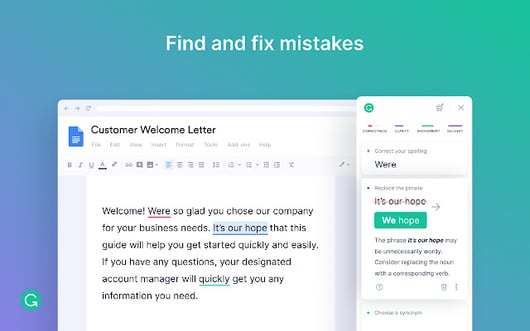
Grammarly is an intuitive copy-editing tool that uses machine learning to recognize and highlight spelling, grammar, and other phrasing errors on platforms like Google Docs, email, and social media sites.affordable marketing automation: grammarly

Image Source

As an individual user, Grammarly tracks your writing performance, gives edit suggestions based on your writing experience, and sends you emails that show where you’re excelling and areas for improvement.

Grammarly’s tone detection tool is a high-quality feature that recognizes the tone of your writing For example, if you’re writing an email with “Thank you” in it, Grammarly will note that your message sounds “appreciative,” or “optimistic.”

Grammarly gives email suggestions with AI

Pro Tip

Grammarly’s team version unlocks customizable editing features that allow the software to make suggestions with your company’s writing styles and branded words in mind.

To learn more about Grammarly and other productivity tools, check out this blog post.

3. ChatGPT

Price: Free; ChatGPT Plus $20/month

ChatGPT is OpenAI’s conversational chatbot, meaning you can reply to its responses and have a conversation to get all the information you need. It uses natural language processing (GPT-3, GPT-3.5, and GPT-4 Beta language models) to understand prompts and provide original, detailed, and accurate responses. 

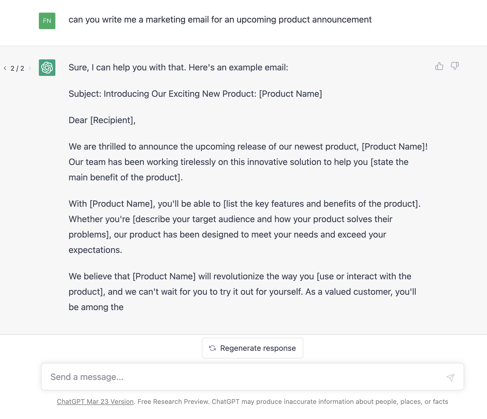
You can use the tool to get inspiration or produce content like blog posts or marketing emails. The image below is an example of a marketing email I asked it to create for a product announcement. 

chatgpt

You can also use ChatGPT Plugins (waitlist here) that connect to third-party applications to help you get the best use of the tool for your needs.

Pro Tip

OpenAI’s Chat API lets you build applications using GPT-3.5-turbo and GPT-4 or integrate the tools with your existing applications and products. You can find API pricing here. It also hosts two plugins for web browsing (in beta), a code interpreter for Python, and a knowledge-base retrieval plugin available through open-source code. 

4. Frase.io

Price: $14.99/mo (solo) – $114.99/mo for 3 seats

Frase.io is an AI-powered research assistant and question-answering bot helps you optimize articles and other content for SEO by reading your text, comparing it with similar online content, and offering search and keyword-based suggestions.

affordable marketing automation: Frase.io

Image Source

Frase.io also has a bot feature that site visitors can use to locate content on your site by simply typing a question into the message box.It uses machine learning to understand phrases and match the words with content or pages related to those words.

Frase.io website

Image Source


Pro Tip

Battling writer’s block? Frase.io can help with that. It offers a number of tools that create content automatically — such as its Blog Introduction Tool, which automatically generates a 100-word introduction for your blog title.

5. DALL-E 2

Price: $15 for 115 credits (requires account)

DALL-E 2 is OpenAI’s advanced image generator that creates original, detailed, realistic images based on an input prompt. Simply describe what you want to create or upload an existing image, and you’ll get a batch to choose from. 

It can also expand on existing images, like in the example below, where it added a background of the same style and construction to the famous Girl with a Pearl Earring by Johannes Vermeer. 

dall-e-introducing-outpainting

Image Source

Pro Tip

DALL-E API is available in public beta, so developers can integrate the tool directly into your apps and products for easy and seamless use.

6. Google Analytics

Price: Free; contact sales for Analytics 360 enterprise pricing

You’ve probably heard of or already use Google Analytics. Its machine learning capabilities will answer questions about your website data, give in-depth insights into your site performance, and view the data you need to inform your strategies. 

affordable marketing automation: google analytics

To learn more about this platform and how to get started on it, check out this ultimate guide.

Pro Tip

On top of giving you detailed insights into how your website is doing, GA also integrates with all of Google’s marketing products — including Google Ads, Search Console, and Data Studio.

6. Bing Chat

Price: Free (Bing Chat requires Microsoft Edge)

Microsoft’s Bing Chat is a conversational tool that responds to prompts with accurate answers. It offers two high-quality options for marketers: image creation and content composer. 

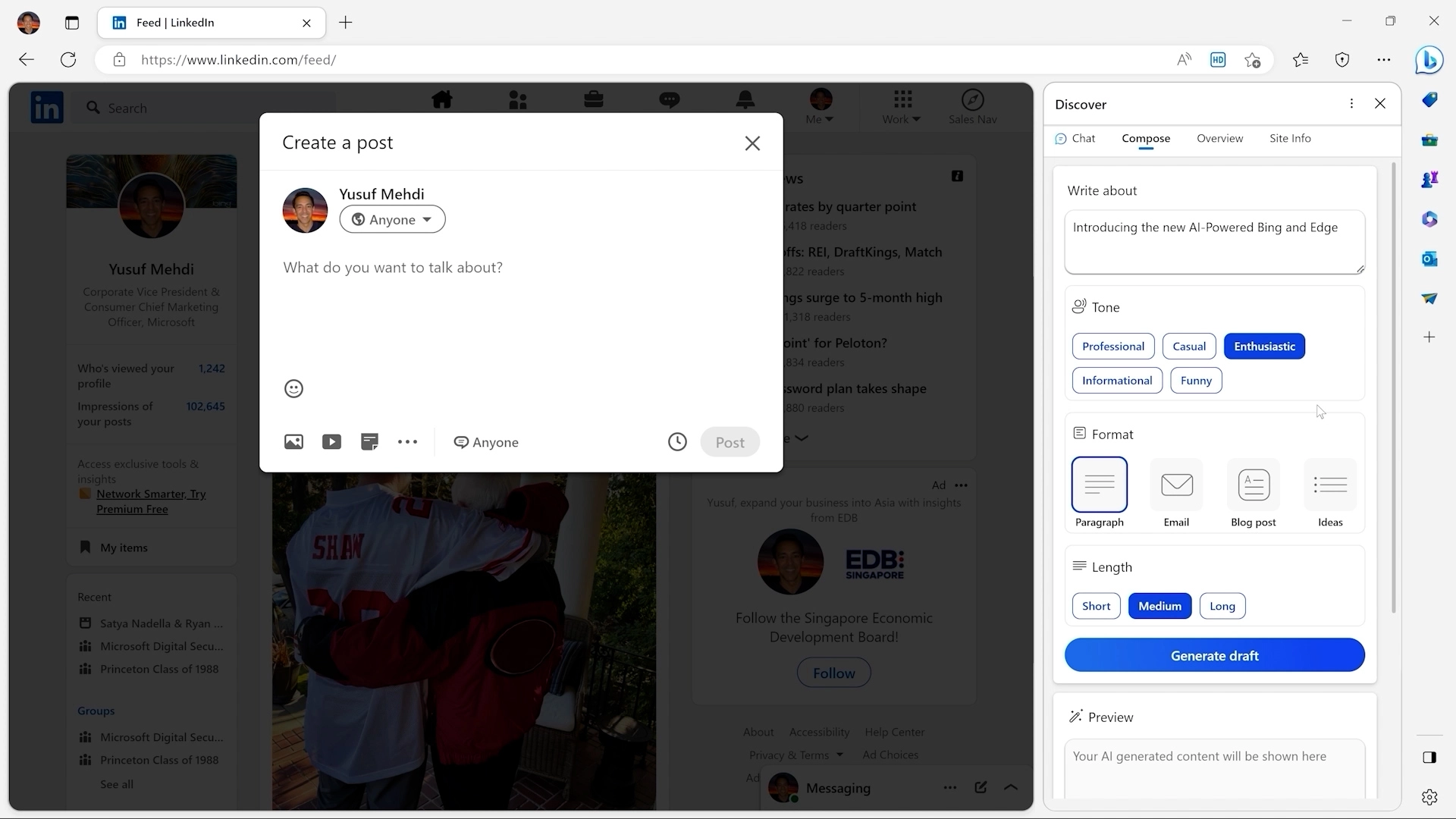
The compose feature can create entire blog posts or single paragraphs, emails, social media captions, or simply give you content inspiration. You can select your preferred tone, send a prompt, and get started easily. 

bing

Image Source

With Bing Image Creator, simply type a brief image description of what you want to create, and you’ll get a custom image to use. It uses OpenAI’s DALL-E, and the recommended prompt format is adjective + noun + verb + style, and it’s accessible in creative mode.

Pro Tip

You can get even more use out of the tool using Microsoft Edge Sidebar because it recognizes the web pages you’re on and helps you create content without navigating elsewhere.

7. Ahrefs

Price: $99/month (lite) -$999/month (Enterprise)

Ahrefs uses data from Google and other search engines to show you how your web pages rank for certain keywords. You can also query words or phrases to see how people look them up on search engines so you can develop an SEO strategy to meet consumer needs.

To give you more of an idea of how the software works, here’s a demo that walks you through how to do keyword research with Ahrefs:

If you’d like to better your keyword research strategies, but can’t afford something as intuitive as Ahrefs, you can also check out these tools which similarly leverage AI algorithms to help marketers identify search opportunities.

Pro Tip

Use Ahrefs’ Content Explorer tool to uncover content that generates a lot of social shares. And, if a specific social media platform is important to you — such as Twitter, you can filter shares on that specific site. In addition, you can analyze any page’s social shares over time.

8. Buffer

Price: Price: Free; or $6/month (one channel) – $120/month (10 channels)

affordable marketing automation: bufferImage Source

If you’re a social media marketer, AI tools can take your work to the next level in a fraction of the time.

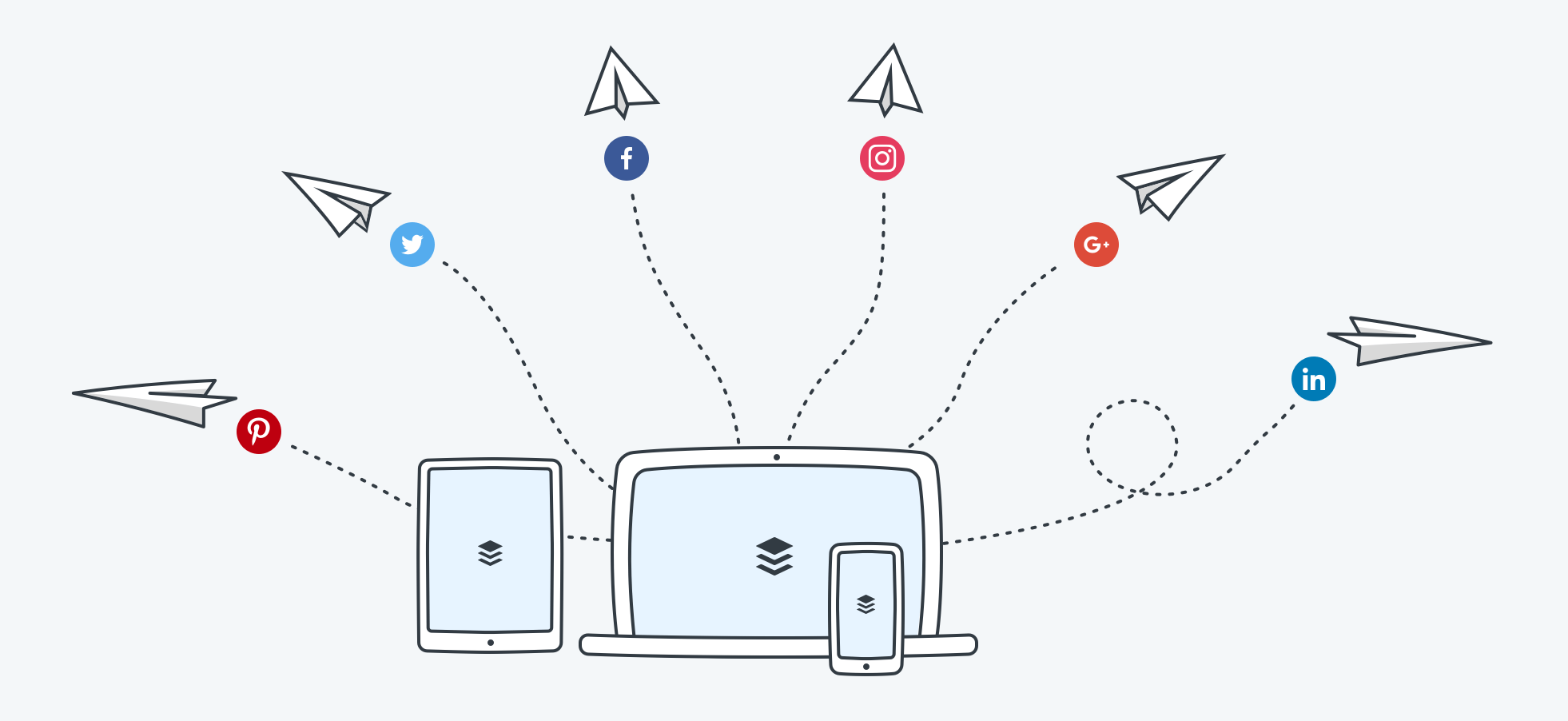
Buffer is a social media management software offering a range of tools to publish, track, and measure your social media content. For instance, you can maximize engagement by scheduling posts at the most optimal time of day, when your audience is most active.

Pro Tip

For many social media marketers, creating a steady stream of amazing content is challenging. With Buffer’s Calendar tool, you can schedule content months ahead, identify any content gaps, and hone in on certain holidays.

9. Mailchimp

Price: Price: Free; or $13/month – $350/month

affordable marketing automation: mailchimp

Image Source

Mailchimp is a popular email marketing software that lets you create campaigns and build automated workflows. Depending on your plan, you can also access advanced audience insights and a library of email templates.

Its content optimizer benchmarks your email content among other emails and uses AI to give you data-driven advice to improve performance.

Pro Tip

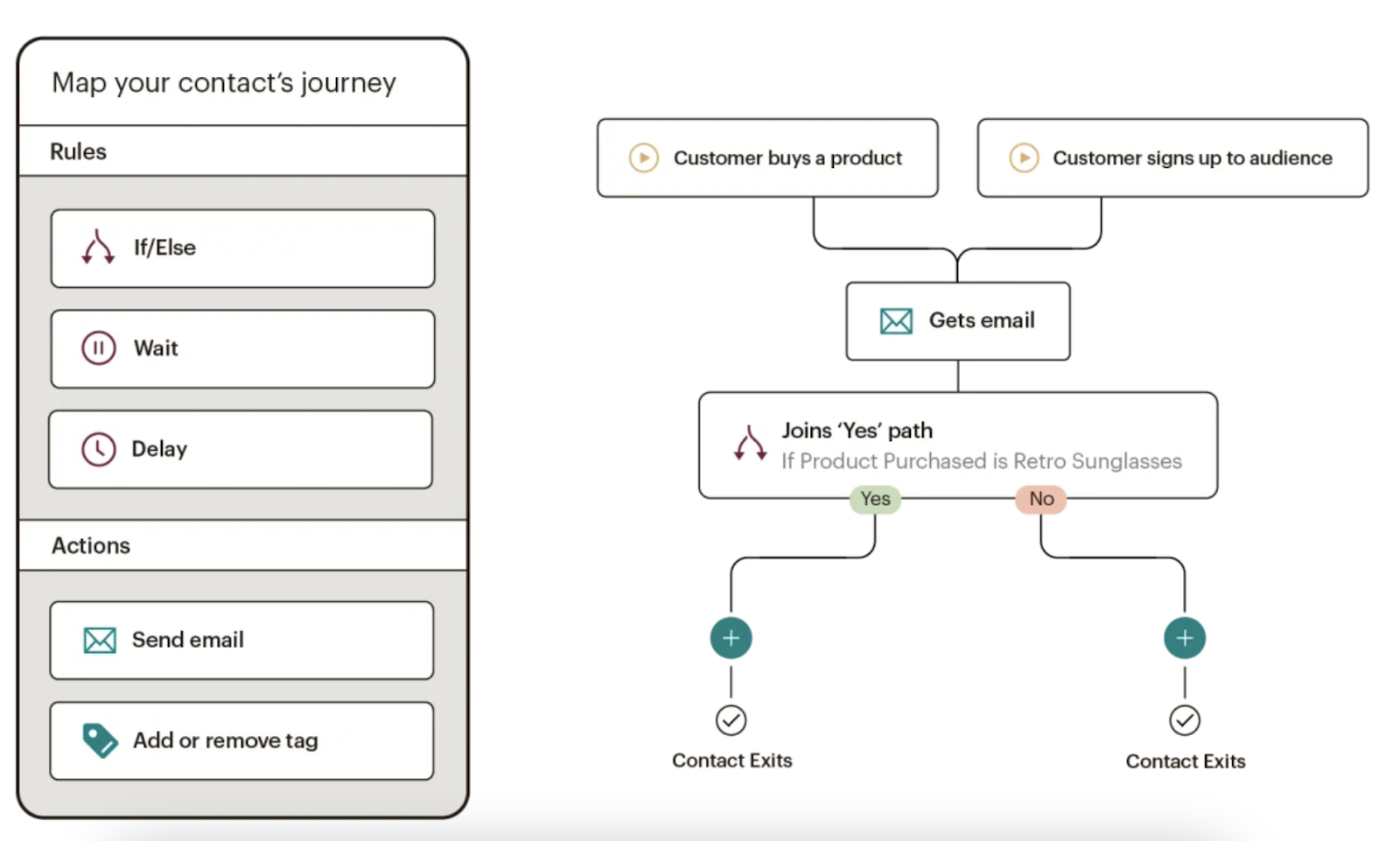
Use the Customer Journey Builder to automate marketing workflows for your contacts. From simple to highly complex, these journey maps can contain multiple starting points, branches, and unique actions — guaranteeing each of your contacts has a personalized experience.

10.Jasper

Price: Starts at $24/month

Jasper is a high-quality AI assistant that can help generate multiple types of content like blog posts and product descriptions, and the image generator helps you create the best image to match your needs. 

Pro Tip

Jasper has a Chrome extension that you can use to ideate and create marketing content within the apps you already use. 

Once you choose an AI tool, how can you implement it?

How to Implement AI on a Budget [3 Steps]

1. Determine where AI tools could help you eliminate costs.

At some point, you’ll need to spend money to implement AI. But, how you structure an AI pilot project can help you defray some of the costs.

Although AI, when done right, can increase revenue and reduce costs, you’ll still want to start with a cost-reduction pilot before a revenue-increasing experiment.

A cost-reduction pilot aims to improve (or streamline) processes you already have in place. A revenue-generating pilot, on the other hand, might require new processes — which could ultimately cost more time and money.

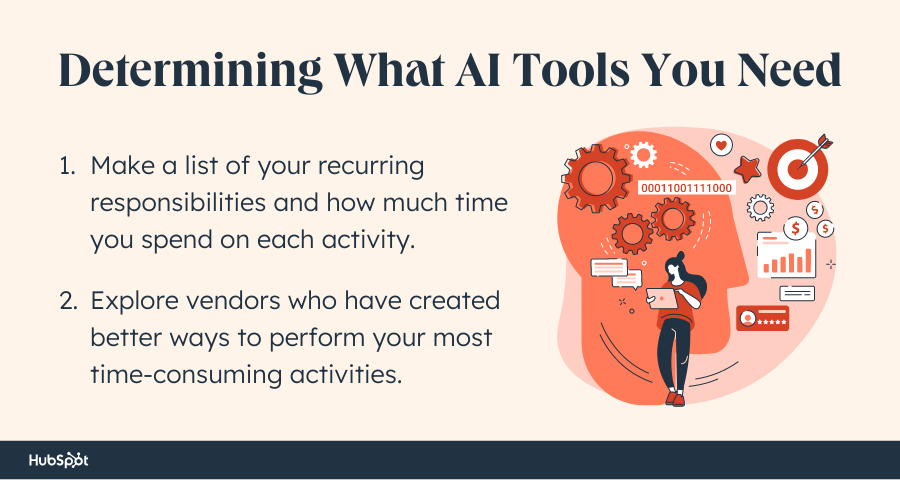
To kickstart your cost-reduction pilot, first identify time-intensive or repetitive tasks that hold you — or your team — back from high-quality projects in your organization. 

affordable marketing automation

Start by making a list of your recurring responsibilities. Track everything you do every week or month, and list the amount of time you spend on each activity. Chances are, there are a ton of tasks that take way too much time each month. It’s likely they’re also pretty data-driven, too.

Next, explore vendors who have created more intelligent ways to do the tasks that are blocking your team.

For example, you might discover that tagging images on your website takes up too much time. AI software can probably free you up from doing that task. Or, you might spend hours each week managing paid advertising. AI can help there, too.

In fact, there are dozens of ways you can apply AI to immediately free up team time and resources. And, depending on the cost reductions, these pilots may pay for themselves.

Click on the playlist above or here to listen to The Business of AI, featuring shows in the HubSpot Podcast Network.

2. Research tools that work out of the box.

A handful of small to medium-sized businesses might worry about blowing their budgets when they hear the words, “artificial intelligence” because — at the moment — many AI solutions are built for corporate enterprise.

The truth is, many AI tools need access to quality data at scale to produce results. Enterprises are often the only source of this data. But this doesn’t mean you need to count out AI as a marketer for a smaller business.

In fact, a number of AI tools are affordable, work out of the box, and cut time on basic marketing tasks (like the ones listed above).

Additionally, you might not know it, but you might already be using popular office tools that are powered by AI.

3. Ask these questions before investing in an AI product.

There are some vendors out there that claim to be AI but aren’t. If you don’t understand what to look for, you could waste time and money on lackluster solutions.

That’s why we encourage every marketer to establish a baseline knowledge of AI. (Our beginner’s guide will cut down your learning curve.)

Aside from familiarizing yourself with the technology, you also need to ask smart questions of AI vendors about the tools they sell.

Start with questions like:

  • How does ____ use AI today?
  • What AI capabilities are on the product roadmap?
  • What type of data do I need for the solution to work?
  • Is there any type of minimum size dataset I need to use the solution? (i.e. a certain number of emails sent, visitors to the site, etc.)
  • What kinds of in-house capabilities do I need to use and maintain the solution?: Can anyone use it? Do I need dedicated data scientists, machine learning experts?
  • My top use cases for AI are A, B, C, etc. Can ___ help?

Curiosity may have killed the cat. But it also saves marketers tons of money when buying new technology. So, don’t be afraid to ask questions and do deep research on each product you’re considering before you invest.

What AI tools are marketers currently using? [Research]

With all that being said, what tools are marketers currently using in their processes? 

In our recent State of AI survey, we asked 1350+ business professionals about their use of AI/automation. 

Here are some key takeaways. 

The most popular generative AI tools among marketers who use AI are chatbots (68%), visual AI tools (57%), and text generation tools (56%). 

When creating marketing content, marketers using AI say that Chatbots (e.g., ChatGPT, Bing AI, Google Bard) are the most effective tool. And once it becomes publicly available, marketers see themselves using and are most likely to use ChatGPT for work-related tasks. 

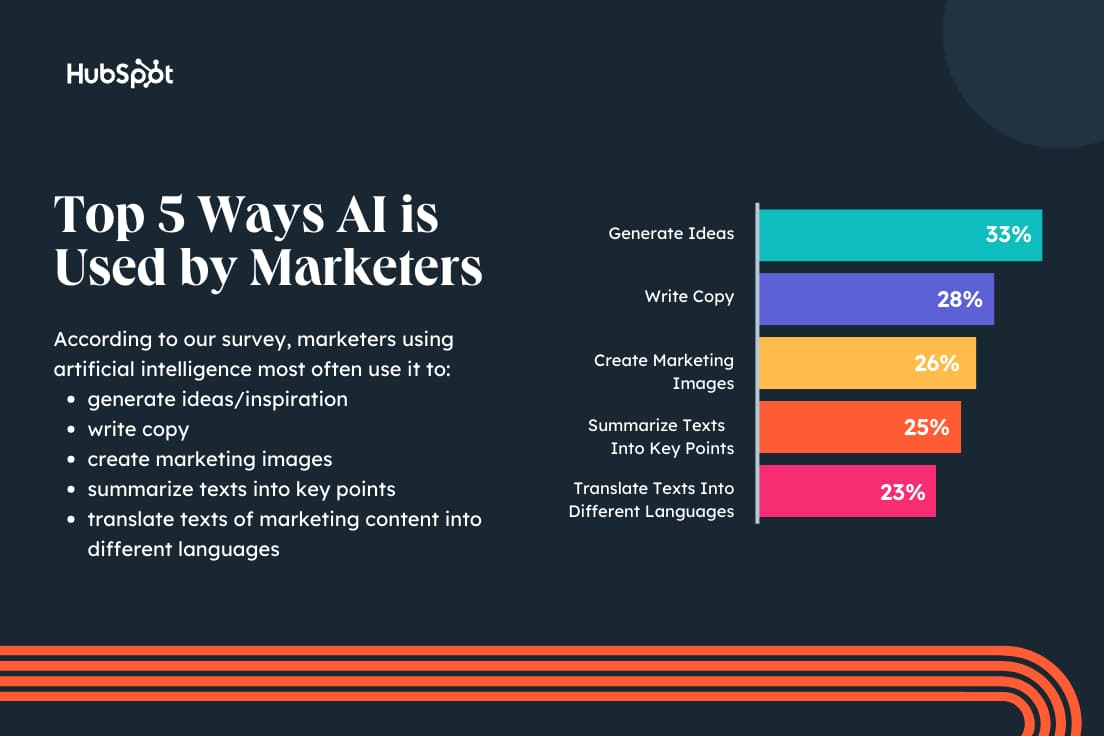
Marketers using AI to create marketing content say they most often use generative AI to get ideas/inspiration (33%), write copy (28%), and create images (26%).

The most popular text generation tools among marketers who use AI are Compose AI (30%), Jasper (27%), and Copy.AI (26%). And the type of content they most often use generative AI to write are emails (38%), social media posts (36%), and product descriptions and blog posts (both 30%). 

Familiarizing Yourself With AI

Artificial intelligence can sound intimidating and expensive but, truth is, it’s only going to get more and more prominent in our workplaces. 

Ultimately, the best strategy for vetting AI products, tools, and opportunities that may come your way in the future is to research credible sources and ask the right questions about the software you’re considering.

If you’re looking to take the next step with technology implementation, check out HubSpot Academy’s latest course, “Artificial Intelligence and Machine Learning in Marketing.” The course gives an introduction to AI and machine learning while also walking you through how to implement it in your company’s marketing department.

New Call-to-action

Categories B2B

17 International Social Media Platforms That Weren’t Founded in the U.S.

Whether you’re interested in international marketing, or just want to learn more about how audiences around the world interact with the internet, learning about the top global platforms can be an eye-opening experience.

→ Free Download: Social Media Calendar Template [Access Now]

Below, you’ll explore 17 of the most popular social media platforms around the globe, including TikTok’s origin platform — Douyin.

The 17 Biggest Global Social Media Platforms
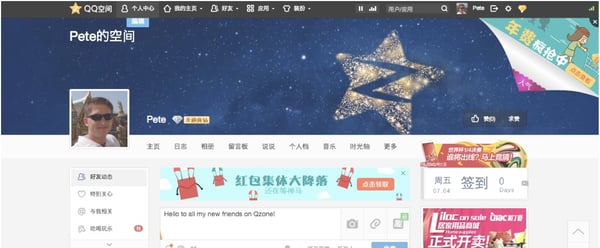
1. QZone and QQ

International social media platforms, QZone profile page

Image Source

  • Owner: Tencent
  • Origin: China (Available globally, Chinese language-only)
  • Name’s Origin: QZone and QQ were shortened from the original name, OICQ. The O stood for “open” while ICQ is an instant message term that sounds like “I Seek You” when said allowed.
  • Reported Users: Over 600 million active users on QZone with 574.4 million monthly users on QQ.

QZone is a social media channel while QQ is a messaging app that links to a QZone account. The two apps serve as an alternative to Facebook in countries like China and South Korea, where the U.S. platform is blocked.

The platform’s story began in 1999 when QQ launched as a desktop messaging site. QZone, a social media site and app, launched in 2005.

In 2019, as mobile-first mindsets grew, Tencent transformed the QQ website into a standalone app. QZone still serves as a social media platform while QQ is now similar to the Facebook Messenger app.

To help you better visualize how people have used QQ and QZone, here’s a quick analogy: When U.S. millennials were children, we raced home from school to message our friends on AIM.

Then, as we reached high school, we ventured onto Facebook, where we could message people, create a profile, and post updates.

Meanwhile, in China, people in my age group might have messaged friends on QQ’s messaging website instead of AIM. Now, QQ users might use its sister app — QZone — for a social media experience that’s comparable to Facebook. Then, to message friends, they use QQ.

On QZone today, users are encouraged to publish posts, videos, or even music. Like Facebook, they can also connect with friends, see a feed of updates, comment, share or react to posts, and update cover or profile photos.

The QQ and QZone are great examples of social brands that gained traction long before platforms owned by U.S. tech firms. QQ and QZone users are so strong in China likely because young audiences adopted its messaging tool and were able to enjoy its full social network later on.

Although Facebook launched 2004, one year before QZone came out, Tencent had already captured the millennial demographic with QQ, figured out how to grow its product competitively with QZone, and continued to add features to pull in Gen Z audiences.

While QZone and QQ seem like Facebook alternatives, their history of growth is fairly parallel. And, as one of the biggest social media platforms globally, QQ is worth knowing about if you plan to market in Asian territories with heavy censorship.

2. WeChat/Weixin

International social media platforms, WeChat interface.

Image Source

WeChat launched in 2011, before competitors like Kik and WhatsApp. The messaging app was rolled out by Tencent, which also created QZone and QQ.

Similarly to WhatsApp, WeChat allows free, text-based chats and voice calls. It also has a “Moments” feature similar to Instagram or Facebook Stories. Like many U.S. platforms, you can place fun animated stickers on images or videos sent within the app.

To join WeChat, users need to know someone on the platform and have them scan an activation code that a user receives when logging in for the first time. Then, they can access WeChat’s messaging feature, send videos to friends, and host virtual phone calls.

Aside from using the platform for friend-to-friend communication, users can also take advantage of more entertaining features.

For example, while one feature allows people to play in-app games live against friends, others include filters that can be used in chats or video calls.

WeChat also connects to a number of third-party or Tencent-owned apps so that a user can take on multiple tasks. You can hail a ride or pay friends money, directly from WeChat.
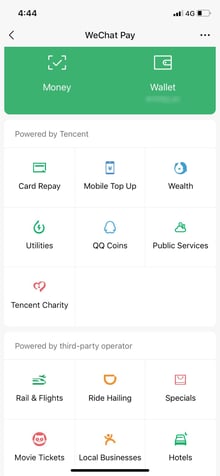
International social media platforms, WeChat add-on apps.

Image Source

At this point, Facebook, Snapchat, WhatsApp, and other major apps are using a similar strategy, pulling additional features into their platforms to keep users logged in longer.

For example, many top messengers allow group video calls, offer in-app games, or let users send money.

3. Weibo (Sina Weibo)

Weibo, also called Sina Weibo, is the biggest Chinese microblogging and social media platform. The social channel made news in 2017 when it reached more monthly active users than Twitter.

Since then the app’s continued to grow. Reports suggest that more than 30% of Chinese internet users now have an account on the platform.

When you visit the website, it’s automatically in Chinese. However, you can use Google Chrome’s translator to convert the text to different languages.
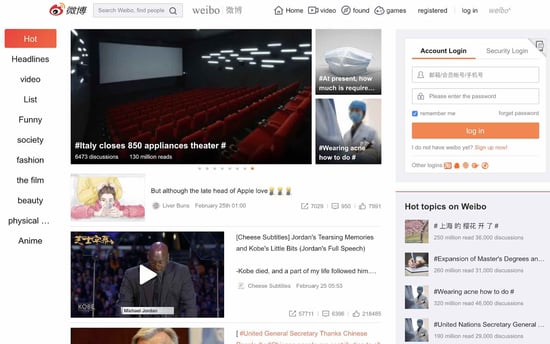
International social media platforms, Weibo desktop site.

Image Source

Like Twitter, Weibo offers a central feed where you can see the latest or highest-performing posts. To toggle through different types of posts, you can click a category on the list in the left sidebar.

On the right, you can see “Hot Topics” similar to Twitter’s “Trending Topics.” If you continue to scroll down, you’ll also see a box that allows you to search for people.
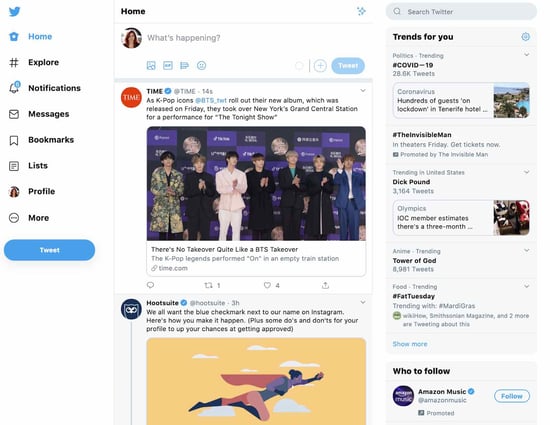
International social media platforms, Twitter feed to compare with Weibo’s.

Image Source

While Weibo’s layout and microblogging mission are similar to Twitter’s, the Chinese platform emphasizes videos, photos, and trending content, while Twitter still puts an emphasis on the accounts sharing the content.

Although Twitter also prioritizes trending content, you can easily see which of your followers posted, liked, or retweeted it before seeing the content in a tweet.

This allows audiences to subconsciously focus on the person who tweeted something as well as the tweet itself.

These slightly different layouts might also suggest that the audiences of each platform prefer to consume content differently. While Twitter’s audience might prefer the human connection, those on Weibo might want to jump straight to the content.

4. Douyin

  • Owner: ByteDance
  • Origin Country: China (Available only in China; TikTok is available globally)
  • Name’s Origin: Douyin loosely translates to “shaking sound” or “vibrato.”
  • Reported Number of Users: 613 million active users

Douyin is the Chinese-only counterpart to TikTok, which is owned by the same company. TikTok specifically is a merger of Douyin and the Musical.ly lip-syncing app. Both social media apps specialize in allowing users to create, edit, and share short-form vertical video.

After Douyin launched in early 2018, it grew to 150 million active users in year one. ByteDance then purchased a similar lip-syncing app called Musical.ly and created TikTok, a global app that merged the best features from each platform.

Since launching in late 2018, TikTok’s also seen viral growth by gaining roughly 1.2 billion active users. Like Douyin, TikTok also sees a large number of international influencers from countries like India.

While Douyin and TikTok are very similar short-video apps and are often confused as the same thing, they have a slightly different sets of features, are powered by different servers, and have different levels of censorship due to regulations around the world.

Douyin isn’t accessible for us to preview in the U.S., but news outlets describe it as being even more advanced than TikTok — particularly when it comes to ecommerce.

For example, while TikTok rolled out advertising options in 2020, Douyin already allowed users to triple-tap a video with a product featured in it to go to a brand’s ecommerce store. Users can also use the app for virtual tours of hotels, stores, or travel locations.

Douyin also reportedly allows users to geotag themselves at a store or location. This could be helpful for providing brand awareness to local brands.

When it comes to what Douyin and TikTok have in common, both are apps where users can share short videos that can feature musical overlays, fun filters, and text.

From photos I’ve dug up online, it looks like the platform’s design is very similar with some slight design differences. The screenshots below show a video ad and the platform’s search feature:
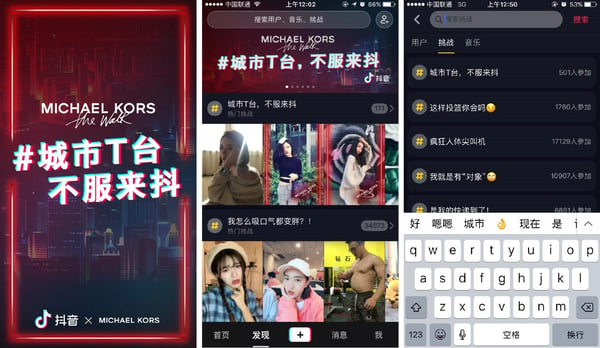
International social media platforms, Douyin user interface.

Image Source

As a comparison, here’s what a video ad and the search feature look like on TikTok.
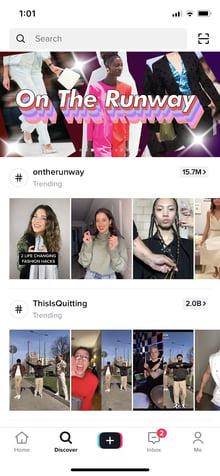
International social media platforms, TikTok user interface to compare with Douyin.

Both apps are also centered around a feed that algorithmically shows users videos from followers or videos that they might enjoy based on previous content they’ve viewed.

When users enter the app and see the feed, one video will begin playing automatically. To see other videos, users simply swipe up on that feed. Here’s what this looks like on TikTok:

 International social media platforms, TikTok user interface to compare with Douyin.

Aside from the shared features, both fast-paced social media channels are favored by younger generations. While over 92.39% of TikTok’s audience is younger than 34, it’s also been reported that Gen Z has flocked to Douyin.

Douyin and TikTok’s success story is a great example of how one unique international platform can change the way we consume content in other countries. Prior to TikTok’s launch in the Western hemisphere, many Americans hadn’t seen anything similar to it since Vine.

Not only did Douyin and TikTok replace the need for Vine, but both apps also catered to Gen-Z and millennials, two mobile-first generations known for short online attention spans and heavy consumption of video content.

5. Kuaishou

Kuaishou is a short-video app that competes with Douyin. This platform started as a GIF-sharing site called Kuaishou GIF. It was like GIPHY in the sense that anyone could create, post, and share GIFs on the network.

In 2012, Kuaishou dropped GIF from its name and pivoted to a short video platform. Its interface is now very similar to Instagram’s.

Kuaishou doesn’t have a “Stories” feature like Instagram, but it features similarly looking profiles and feeds where users share short vertical videos rather than photos or other content.

International social media platforms, three Kuaishou interface views.

Image Source

Like Douyin or TikTok, the video features of Kuaishou seem fairly similar in that users can leverage sound bites and basic editing tools in their content.

Like many social media platforms with videos, Kuaishou also allows users to overlay text and stickers on images or videos.

International social media platforms, Kuaishou video editing.

Image Source

From looking at a variety of videos that have been uploaded to other sites from this platform, it seems like many users have used this app to highlight their unique skills and musical talent.

A number of users have also shared videos that highlight and celebrate aspects of rural China.

In 2019, Apple distinguished Kuaishou as a global app that was defining mobile video storytelling trends. This came shortly after the app notably added ecommerce and monetization features that enabled creators in poverty-stricken rural China to make money from it.

Aside from its short videos, Kuaishou also allows users to live stream content on the platform. Similar to the short video feature, the stream has allowed users to film longer videos that highlight their skills.

6. VKontakte (VK)

  • Owner: Mail.Ru Group
  • Country of Origin: Russia
  • Name’s English Translation: VKontakte loosely translates to “in contact with.”
  • Reported Number of Users: 67 million users

VK, the biggest social channel in Russia, is like a mix between Facebook, YouTube, and the 90s illegal downloading service LimeWire. This platform allows users to publish and share text-based posts, photos, video files, and music files with their connections.

When it comes to this platform’s user interface, it looks eerily similar to Facebook, with some slight tweaks to page layouts.
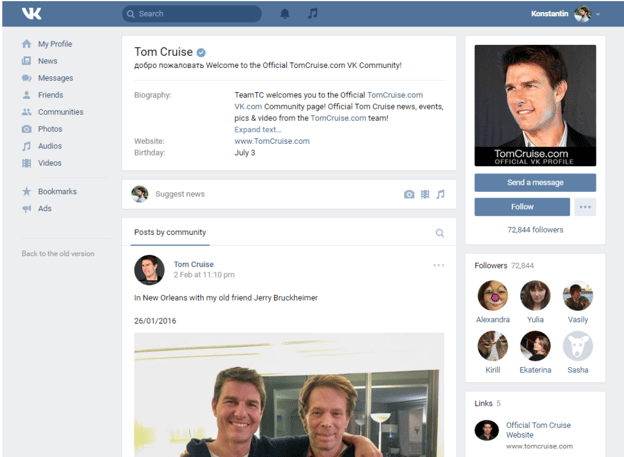
International social media platforms, VK profile page.

Image Source

Aside from allowing users to share their own content, they can allegedly upload and stream copyrighted material, such as music and movies. This has allegedly been abundant on the platform since its launch, but legal steps have not been taken against it.

The social platform is owned by Mail.Ru Group, a tech company that owns Russia’s main search engines and OK.RU, a social platform noted below. Reports also suggest that this company has affiliations with the Russian government.

Surprisingly, the majority of VK users are between the ages of 25 and 34.

This popularity could be due to multiple reasons, including the platform’s ability to allow users to share audio and video files between friends. The platform also encourages users to expand their social circles and not limit themselves to the ones they’re already in.

7. Odnoklassniki (OK.RU)

  • Owner: Mail.Ru Group
  • Country of Origin: Russia
  • Name’s English Translation: Odnoklassniki translates to “classmate.”
  • Reported Number of Users: 33.8 monthly active users

Odnoklassniki, or OK.RU, is a website that specializes in connecting people with their past classmates. The social media platform is set up like a blog, similar to Tumblr, where users can share life updates, images, or videos, which then show up in other users’ home page feeds.

Along with their classmates’ content, a sidebar shows users the most popular videos that have been posted on the platform.

Below is a look at the feed. While the site is in Russian, I’ve used Google Chrome to translate it so you can get a better idea of what people are posting.
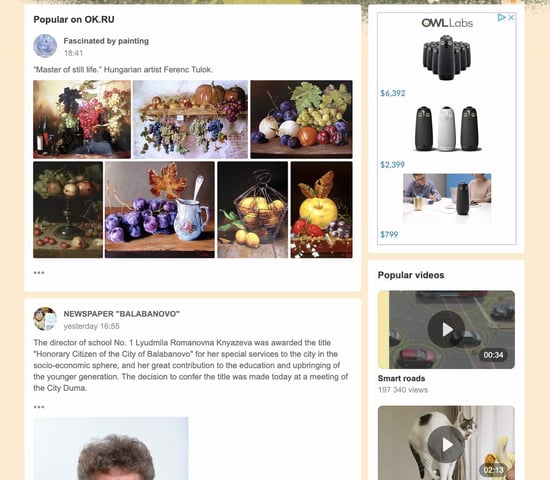
International social media platforms, Odnoklassniki feed.

Image Source

Like Tumblr, users can also click on the name or image of another user in a post to find that person’s profile.

These profiles are similar to Facebook’s layout in that they show a cover photo, a user’s top followers (called “participants”), and then a feed of their own content.
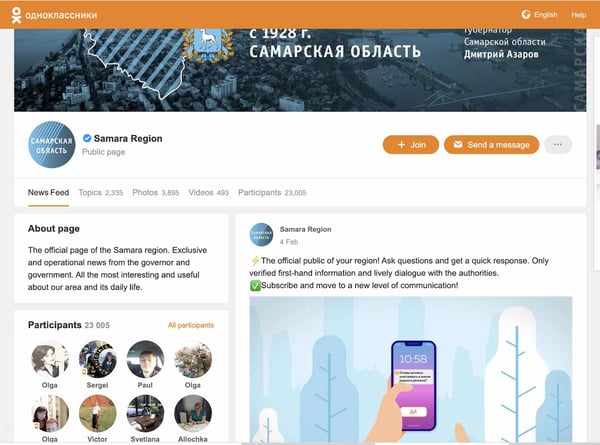
international-social-media-okru-profile-1

While this platform is similar to both Tumblr and Facebook, Russian citizens don’t commonly use those two platforms as much as OK.RU.

Additionally, with warnings that Facebook, YouTube, and Instagram could be banned in Russia, it’s not shocking that tech companies in this region have innovated to create similar alternative platforms.

As we’ve seen with the Chinese platforms above, many global platforms have been inspired by or created as an alternative to U.S.-based sites that were censored or banned.

These continent-specific platforms could be a theme we continue seeing in different areas of the world.

If you’re an international marketer, it can be helpful to identify segments of your audience that might not be able to access the platforms you use for social media marketing. Then, research any alternatives that you can access to promote your content in those locations.

8. Telegram

  • Owner: Telegram Group Inc.
  • Origin: UAE
  • Name’s Origin: Named after the telegram system, coined by Charles Wheatstone in 1834.
  • Reported Users: 700 million monthly active users

Telegram is a cloud-based messaging platform founded in 2013 by Nikolai and Pavel Durov, who also previously founded VK. Known for its end-to-end encryption and focus on privacy, Telegram tends to grow in popularity every time another app experiences a security breach.

The app was launched as an alternative to WhatsApp when the latter announced it would share user information with its parent company, Meta. As it serves as a secure alternative to WhatsApp, Telegram’s interface looks quite similar to the one we’re used to.
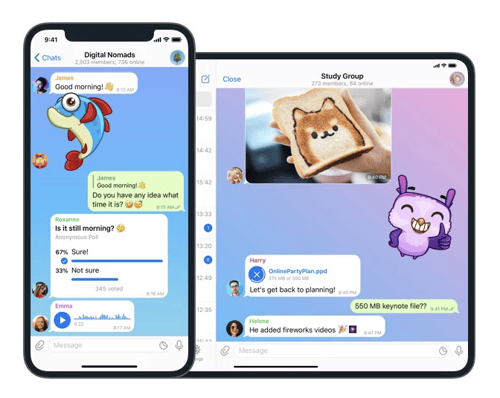
International social media platforms, Telegram group chat.

Image Source

At first glance, you might not be able to tell the difference between WhatsApp and Telegram because they look very similar in their basic text messaging capabilities.

But Telegram takes WhatsApp’s features up a notch with chat folders that help you organize conversations, open API that allows you to build your own Telegram clients, and no sim sign-up to protect your phone number from public view.

Open API also enables you to create Telegram Bots that automate tasks and respond to user messages.

What’s also interesting about Telegram is its “Secret Chat” feature which allows users to send messages set to self-destruct after a certain period and leave no trace on its servers.

The app also allows you to create chat channels with up to 200,000 members, compared to WhatsApp’s current 1,024, and lets you send media with no limits on size or type.

Previously completely free, Telegram launched its Premium tier in 2022. Features such as voice-to-text, doubled limits on channels, chat folders, chats, unique stickers and reactions are available for you to explore on Telegram Premium.

Telegram currently has 70 million active users in India, 24 million in Russia, 19 million in Indonesia, and 18 million in Brazil. The app also allows sponsored ads in some regions, so it’s worth exploring if you’re interested in expanding your presence in these countries.

9. LIKEE

  • Owner: JOYY Inc.
  • Origin: China
  • Name’s Origin: Previously named Like, the founders changed the name in 2019 and added an extra “e” to convey the additional value it offered after it was redesigned and rebranded.
  • Reported Users: 150 million monthly active users

TikTok’s rise to fame may have been meteoric, but it’s not the only video-sharing social media platform on the block. Singapore-based Bigo Technologies (owned by JOYY Inc.) launched LIKEE in 2017 as a competitor to TikTok.

LIKEE is a short video-sharing platform that’s gained huge traction since its launch. It focuses on content from young users and celebrities who use the hashtag challenge feature to create viral videos for the app.

Like TikTok, the app features an AI-powered algorithm that recommends content relevant to each user’s interests. LIKEE also has filters, special effects, and tools to help users create content.

In 2018, LIKEE was one of 59 Chinese apps banned in India due to the rising tensions between the two countries. Before this, India was the biggest market for LIKEE, where it was available in 15 Indian languages, including Hindi, Tamil, Bengali, Marathi, and Telugu.

LIKEE seems pretty similar to TikTok on the surface, but what sets it apart is its creator monetization tools.
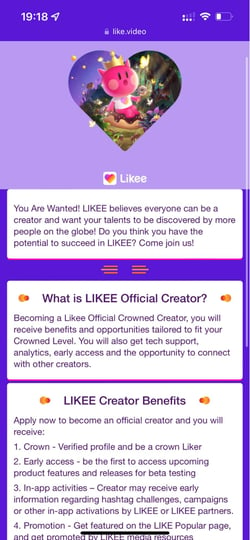
International social media platforms, LIKEE.

Image Source

The LIKEE Official Creator program, for example, gives creators access to different benefits, such as invites to exclusive events and promotions on the LIKEE popular page based on their “crown” level.

The app also focuses on live streaming. LIKEE creates a more immersive live streaming experience by allowing creators to create personalized 3D avatars of themselves and allowing them to create and join online communities.

International social media platforms, LIKEE.

Image Source

While TikTok is still leading the charge as the most popular short-video-sharing platform, LIKEE is slowly gaining ground and may just be the next big thing.

10. LINE

If there’s a powerhouse app that seems to be doing everything, it’s LINE.

The South Korean messaging app was launched as a response to the 2011 Tōhoku earthquake and tsunami to help users communicate with each other despite network outages.

It quickly gained traction, becoming one of the biggest messaging tools in Asia.
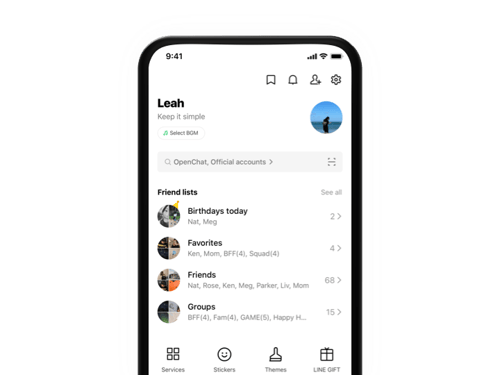
International social media platforms, LINE group chat.

Image Source

The messaging tool integrates with a suite of services ranging from payments with LINE Pay, telemedicine with LINE Doctor, and music streaming with LINE Music.
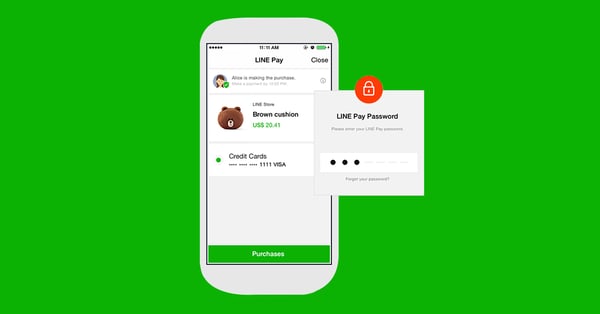
 International social media platforms, LINE Pay.

Image Source

The app’s stickers are their own cultural phenomenon. They’re so popular that you can actually buy real-life merchandise of them on the LINE Friends Store.
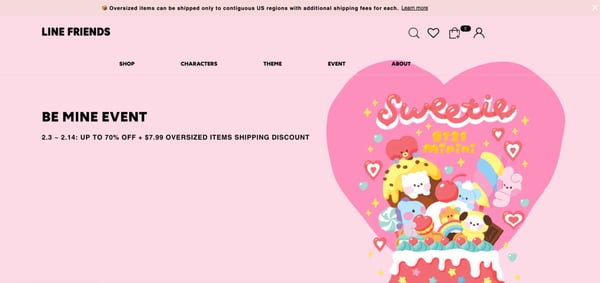
International social media platforms, LINE friends store.

Image Source

The Creators Market also provides users with a platform to monetize their sticker creations and sell them on the LINE Sticker Shop, LINE Theme Shop, and LINE STORE.

LINE’s primary website is in English. Many of its subsidiary websites, including LINE for Business and LINE News, are in Japanese.

LINE’s integration with other aspects of its ecosystem is a great way for businesses to reach new audiences and build loyalty with existing ones.

It also eliminates the need for users to switch between an array of apps, creating a streamlined experience and reducing distractions.

11. Douban

  • Owner: Beijing Douwang Technology Co., Ltd.
  • Origin: China
  • Name’s Origin: Named after a hutong, or narrow lane, in Beijing. The literal translation of Douban is “an embryonic leaf.”
  • Reported Users: 300 million users

Douban is a popular social networking platform originating in China. It was created by Yang Bo in 2005 and has since grown to be one of the largest online social networks in the country.

The platform allows users to communicate, share their interests, and rate films, books, music, and other content. On Douban, users can follow each other, create a profile, post and comment on discussion boards, discover new content, and get recommendations.

Douban is available in Chinese, but here’s a translated preview of its homepage.
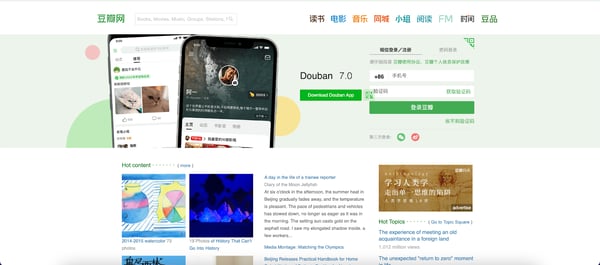
International social media platforms, Douban homepage.

Dubbed the “Chinese version of IMDb” due to its focus on movies and film reviews, Douban is also known for being one of the few Chinese social networks that allows political discussions, although censorship is still enforced.

The platform hosts many events and activities, such as meetups, lectures, film screenings, and festivals. It also has an online radio station called Radio Douban which allows users to tune in and listen to music from different sources.

Douban boasts a lively online community for young and educated Chinese users engaged in literary and film discussions. It’s also proven popular among young people as it allows them to express their views, stay connected, and discover new content.
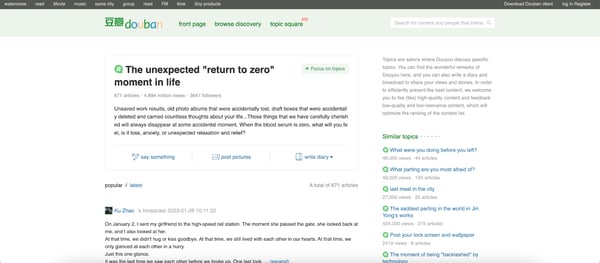
International social media platforms, Douban web page.

In 2022, the app tightened its policies and now requires overseas users to register with a mainland mobile phone number or official identity document to continue using the platform. In short, anyone who wants to use Douban must prove their identity.

Beijing’s increasing censorship may be tricky to navigate for brands trying to tap into this educated and affluent demographic, yet it’s still possible to have success on Douban if done right.

12. Baidu Tieba

  • Owner: Baidu
  • Origin: China
  • Name’s Origin: Baidu Tieba — the word Tieba is simply the pronunciation of the Chinese word “贴吧”, a made-up word that translates to “Let’s Post.” The word Tieba has its meaning extended to the word “forum” or “group” as well.
  • Reported Users: 45 million monthly active users

Tieba is one of the largest Chinese discussion forum networks. The parent company, Baidu, also owns one of the biggest search engines in the world, with 3.3 billion searches per day. Established in 2003, Tieba is a forum-style interactive community where users can share content and discuss topics of common interest.

Tieba offers a wide range of features for users, such as customizable avatars, special effects, and tools to help you customize your posts. There are also an extensive array of filters that allow you to search for posts by keywords or tags.

Every Tieba, or individual community, has its primary coordinator, usually referred to as the “administrator” or the “moderator” in English. This coordinator is responsible for keeping the forum safe and orderly.

Tieba’s user-generated, content-driven nature makes it an ideal platform for businesses to engage with their customers, build relationships, and find out what their customers think.

The platform uses two aspects — experience points and account level — to assess the quality of its users. The more you engage on the platform and interact with other users, the higher the account level and the more experience points you’ll gain.

Baidu Tieba had accumulated over 300 million monthly active users, and its registered users skyrocketed to 1.5 billion by 2015.

By 2021, however, the Reddit-style platform lost 90% of its users due to issues such as lack of management and excessive commercialization. With 45 million active users, it still has considerable potential to establish itself as a major player in the market.

The website is in Chinese, and you’ll have to use Google’s translate feature to access its content.
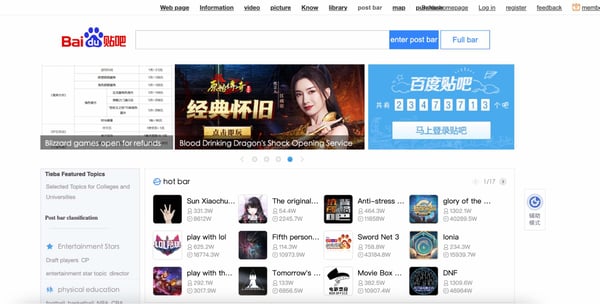
International social media platforms, Baidu Tieba feed.

The central feed displays hot topics and discussions. Users can scroll through these topics to find relevant information, join in on existing conversations, or create new ones.

The feed also displays news at the top, which you can click on to stay updated with recent events.

13. BeReal

  • Owner: Alexis Barreyat and Kevin Perreau
  • Origin: France
  • Name’s Origin: The name relates to its focus on users uploading unpolished photos.
  • Reported Users: 73.5 million monthly active users

BeReal, a French anti-influencer social media app launched in 2020, only allows users to post pictures and videos that are unedited and unfiltered to promote “authenticity.” The app discourages users from curating a version of themselves that’s impossible to attain.

BeReal notifies users to take a picture in two minutes using their front and back cameras simultaneously with a location and optional caption.

While other users can’t like or dislike a post, they can comment. You can also react to posts with a “RealMoji,” which is a picture of your own face.

The app is most popular in the U.S., followed by France and the U.K. BeReal’s monthly active users increased by more than 300% in 2022.

Gen Z, currently the largest generation on Earth, seems to have a liking for BeReal’s more realistic approach.
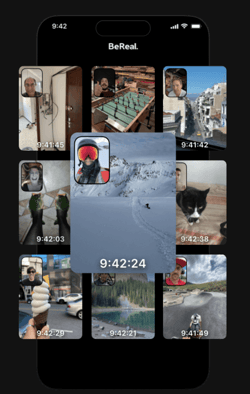
International social media platforms, BeReal.

Image Source

In a recent article, Meredith Mueller, a sophomore at the University of Kansas, highlights how, unlike Instagram or Snapchat, BeReal offers a pressure-free experience.

“Snapchat is more like you’re sending this to one person, if you post on your story, you’re trying to look good,” she said. “Whereas this is like … wherever you’re at, whatever you’re doing, you stop in the moment and all your friends can see it. It’s more like a down-to-earth app. I would say it’s like a judgment-free zone.”

BeReal currently doesn’t offer any advertising or monetization opportunities for brands. Brands like e.l.f. Cosmetics and Chipotle launched brand accounts last year and built followings with discount codes.

Still, with the app’s spontaneous nature and BeReal’s determination to maintain its philosophy of authenticity, it would be interesting to see how brands adopt it.

What’s clear is that Gen Z loves this authenticity, and brands must be innovative to create a presence on the platform.

14. Moj

  • Owner: Mohalla Tech
  • Origin: India
  • Name’s Origin: The name is a spin on the Hindi word “mauj,” which means entertainment.
  • Reported Users: 120 million monthly active users

Thirty hours after India banned 59 Chinese apps due to ongoing tensions with China on June 29, 2020, the Indian social media platform ShareChat launched Moj.

The app was designed to replicate TikTok, thus offering a similar user experience with features, such as 15-second videos and special effects. Within three days of its launch, Moj amassed 50,000 downloads.

India, the country with the largest population in the world, has 22 official languages. Moj supports over 15 languages, including English, Bengali, Hindi, Gujarati, Kannada, and Malayalam.

Like TikTok, users can lip sync, create digital art, and use AI-powered effects. The app also features interest-based content recommendations and live streaming.

Since Moj is a TikTok replica, its interface looks almost the same as TikTok. It has a home page, which displays trending and recent videos, and also allows users to browse content in different categories.

International social media platforms, Moj.

Users can browse the app without having to register. To start creating and sharing content, however, they must sign up with their phone number or Facebook account.

“Moj for Creators,” a program launched in April 2022, aims to help creators earn Rs 3,500 crore by 2025 with new monetizable features.

These features include performance-based weekly rewards, brand collaborations, creator courses, an exclusive creator club, and a dedicated creator manager to help creators grow.
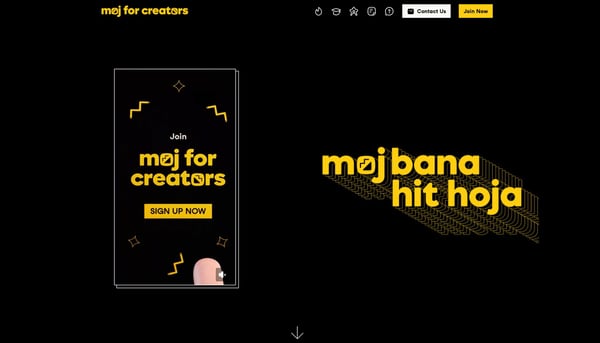
International social media platforms, Moj for creators.

Image Source

Aside from this, Moj Live also allows users to earn money and rewards by live streaming their content. Creators can engage with their audience in real-time and send virtual gifts.

Despite its efforts, Indian creators think local alternatives like Moj come nowhere close to the level of recognition that TikTok offered.

Nevertheless, Moj has gained immense popularity in India and offers global businesses a gateway to a diverse and fast-growing market.

15. Xiaohongshu

  • Owner: Xingyin Information Technology
  • Origin: China
  • Name’s Origin: Xiaohongshu translates to “Little Red Book.”
  • Reported Users: 158 million monthly active users

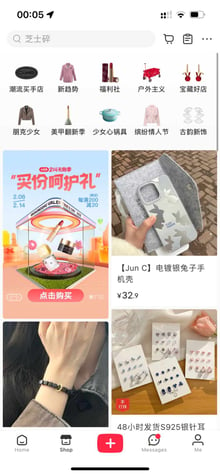
The Chinese answer to Instagram, Xiaohongshu (also known as Little Red Book or RED) is a content-driven, ecommerce platform that connects local and international Chinese consumers to brands.

Xiaohongshu was created by Miranda Qu and Charlwin Mao in 2013 and has since become a leader in the user-generated content (UGC) space.

When it first launched, WeChat and Weibo dominated the Chinese social media landscape. Xiaohongshu tapped into the young Chinese urban women’s market by providing a platform for them to read product reviews, share user experiences, and discover new products.

The app currently focuses on beauty, fashion, lifestyle, and travel. Today, 70% of its user base are women.

RED’s focus on products and shopping makes it popular among the Chinese elite. Chinese shoppers will make up 40% of all luxury consumers by 2030. The app taps into the buying power of affluent Chinese millennials and provides valuable insights into their shopping habits.

Xiaohongshu’s main feed has three tabs: Follow, Explore, and Nearby. Even though the app is similar to Instagram, its “Nearby” feature is unique and allows users to discover new places, products, and trends around their location.

International social media platforms, Xiaohongshu.

The app’s post tool also offers more editing features than Instagram, including beautify.

The Explore tab includes categories such as weight loss, manicures, cosmetics, mother-baby, and emotion, showing how RED uses traditionally female-focused topics to create engaging content.

International social media platforms, Xiaohongshu.

Xiaohongshu allows brands to have their storefronts on the app, which users can access to find out more about the brand and purchase their products.
International social media platforms, Xiaohongshu.

RED’s focus on a niche female demographic, ecommerce capabilities, and unique content make it a valuable platform for brands looking to reach the Chinese market.

Brands can partner with local influencers to spread awareness, sell products, and engage with the audience.

16. Yubo

  • Owner: TWELVE APP
  • Origin: France
  • Name’s Origin: The app was previously named Yellow and it has since rebranded to Yubo.
  • Reported Users: 60 million users

Another French social media app that’s rising in popularity among Gen Z is Yubo. Launched in 2015 by Sacha Lazimi, Jérémie Aouate, and Arthur Patora, the app aims to create a space for young people to meet new friends and find their community.

Yubo, formerly known as Yellow, was created with an emphasis on safety, openness, and inclusiveness. The app is aimed at teenagers and encourages users to create groups, share photos and videos, chat with friends, play games, and even live stream.

For some time, Yubo was known as the “Tinder for Teens” due to its swipe-based interface. Users can choose who they want to connect with based on their interests and profiles.

The platform attempts to keep its younger and older users separate with two disconnected communities — one for young people aged 13 to 17 and an adult community for people aged 18 and above.

Separate communities prevent users in one community from interacting with users in the other community.

In the past, Yubo faced backlash due to its security issues, including the ability of adults to create and use fake accounts.

However, Yubo has since implemented measures such as partnering with digital identity provider Yoti to help vet suspicious users and manage ID verification. In 2022, Yubo also rolled out age “estimating” technology to better identify minors.

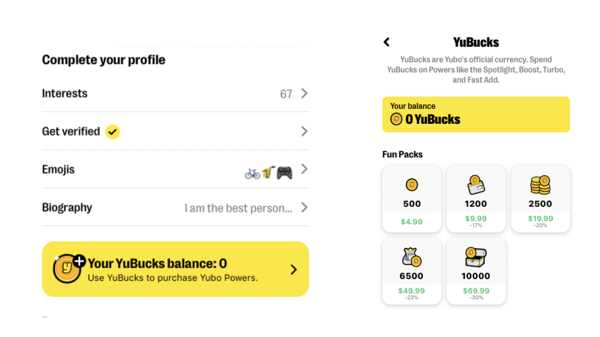
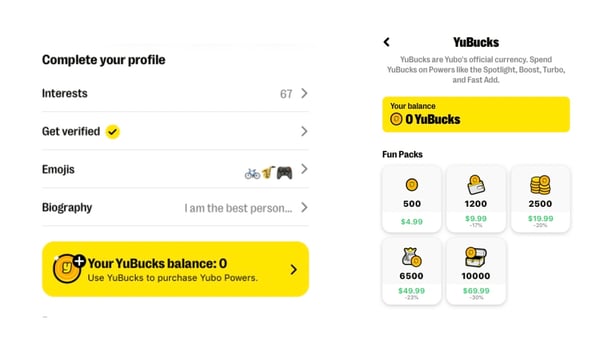
Users can use the in-app currency, YuBucks, to make purchases, such as adding an extra number of new friends or boosting their profile to get more visibility. Yubo also features ads, which users can opt to skip or watch in exchange for YuBucks.
International social media platforms, Yubo.

Image Source

Yubo has a partnership with Snapchat revolving around the Snapchat Camera Kit, which allows the platform and its creators to use Snapchat’s filter system and features. Yubo also creates game filters you can play with, like on Snapchat.
International social media platforms, Yubo.

Image Source

17. Rakuten Viber

Viber is a free messaging and calling app created in 2010 by two Israeli brothers, Talmon Marco and Igor Megzinik.

Viber quickly gained popularity due to its intuitive interface, seamless syncing across devices, encryption, HD audio and video calls, and an extensive array of stickers.

In 2014, Rakuten, the world’s third-largest ecommerce company acquired Viber for $900 million.

Since then, the app has made significant improvements, such as introducing video and voice messaging, payments, games, and even its own currency called “Vibes.”

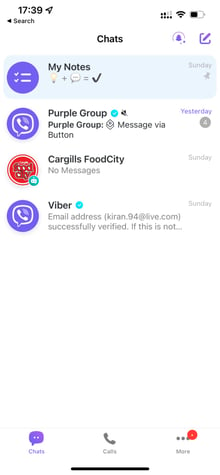
The platform has users in 190 countries, and its registered users have surpassed 260 million monthly active users. Here’s a preview of Viber’s feed.
International social media platforms, Rakuten Viber feed.

Image Source

As you can see, you also have a “My Notes” tab that allows you to write notes and memos.
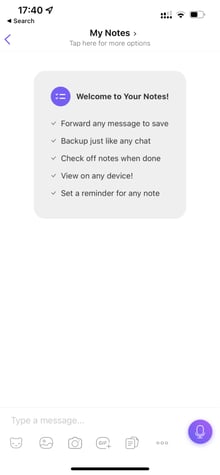
International social media platforms, Rakuten Viber “My Note” feature.

Image Source

Viber also has an extensive array of features that make it great for business use. It provides collaboration tools such as polls, surveys, and document sharing, among others.

Viber Business offers a range of tools to help companies reach their customers, such as allowing transactions, offering real-time customer support, and sending relevant messages and promotions.
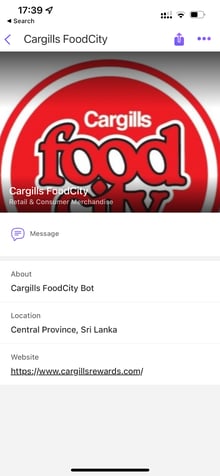
International social media platforms, Viber Business.

In January 2023, Viber launched a Business Inbox, which allows you to organize and filter messages from commercial businesses such as delivery services, stores, and banks.

The app’s mobile-focused features, such as a quick registration process, easy contact updates, one-tap calling, and integrated mission services, make it an excellent option for businesses looking to engage with customers on the go.

The Similarities of Global Social Platforms

Despite their critical differences, social media industries around the world have some fascinating similarities to that of the U.S.

For example, while many of North America’s most prominent social media apps are owned by Facebook or were created in Silicon Valley, most prominent global platforms were created by Tencent or other major tech firms based in China. Similarly, the two biggest Russian platforms are owned by the same company.

Although many of the apps above were created and launched in highly censored areas, they don’t seem to be falling behind on innovation due to those regulations.

Because international social platforms have evolved on a similar timeline as many common U.S. platforms, it seems like these geographies are building their own parallel social media industries, rather than just racing to create alternatives to our own platforms.

One thing major difference is that many of the examples on this list emphasize direct communication more than content.

Meanwhile, our own platforms emphasize content and user experience. While every social media platform we use today does have messenger with various features, only a few of them are or were ever standalone messengers.

For example, QZone and WeChat built their initial audiences as messenger apps and broadened their features from there. Meanwhile, Snapchat and WhatsApp are the only top platforms that started as direct messengers.

While Facebook Messenger is one of the most prominent text messaging platforms, it is an expansion of Facebook’s original News Feed-centered platform.

Going Global

If you’re interested in reaching international audiences, you should pay attention to the social media platforms they most commonly use, and what they use them for.

This will give you insight on what types of content these groups engage with, what motivates them, and what strategies could persuade buying decisions.

If you want to tap into an international audience, but can’t access some of the platforms on this list, you can alternatively consider testing out a campaign on a globally accessible platform like WhatsApp and WeChat.
Get certified in social media by HubSpot Academy!

Categories B2B

Email Automation: How to Set Up Automated Workflows [Data]

Without email automation, your marketing team misses major opportunities to nurture and engage your target audience and contacts.

In this article, we’ll review common types of email marketing automation, the tools to help you establish and maintain an email marketing automation strategy, and different automation triggers you may implement at your company.

But first, let’s begin by answering the most crucial question: what is email automation?

What is email marketing automation?

Why You Should Use Email Marketing

Email Automation and Marketing Statistics Marketers Should Know

The Benefits of Email Automation

How to Automate Email Workflows

Email Marketing Automation Examples

Automate Your Email Marketing Campaigns

Boost Opens & CTRs with HubSpot’s Free Email Marketing Software

Another common example would be receiving an automated email reminding you to check out the items in your virtual cart after you left a website without making a purchase.

Email automation helps convert leads into customers, delight existing customers, and encourage activities like greater product adoption, upsells, evangelism, and additional purchases.

Top 7 Email Marketing Tools To Automate Emails & Get Clicks!

Why You Should Use Automated Email Marketing

Email marketing automation eliminates time-consuming tasks, such as preparing email lists, sending generic messages, or scheduling events manually. This gives marketers and salespeople more time to work on projects that require their attention (or cannot be fully automated).

Email marketing automation is centered around workflows, a predetermined, triggered set of actions you’re directing your automation software to take for you.

Email Automation and Marketing Statistics Marketers Should Know

  • Email is the most frequently automated marketing channel with 65% of marketers leveraging email automation
  • 71% of B2B marketers say they use automation in their email marketing efforts
  • The number of email users worldwide is expected to 4.6 billion by 2025, more than half of the expected world population.
  • In 2022 alone, 333.2 billion emails were sent per day.

Graphic showing a statistics that reads, "71% of B2B marketers use automation in their email marketing efforts."

The Benefits of Email Automation

Let’s take a deeper look into some of the ways email automation can benefit marketers.

1. More Seamless Workflow

Email automation allows marketers to send emails to all of their customers quickly and efficiently — allowing marketers to move on to other tasks while keeping customers satisfied.

In fact, 49% of sales and marketing professionals listed “time savings of repetitive tasks” as one of the top three advantages of automation. 45% listed improved efficiency/ROI as another advantage.

2. Better Customer Experience

43% of marketers say improving customer experience is the number one advantage of leveraging marketing automation.

Automated emails will help you deliver messages that delight customers, such as incentives, helpful reminders, and onboarding content.

Keeping regular contact with your customers will build a better relationship, boost retention, and generate more leads.

3. Improved Email Segmentation

Automated emails make it easier to segment your email recipients based on attributes, behavior patterns, and engagement levels. Doing so leads to an increased engagement rate, open rate, conversion rate, and click-through rate.

4. Fewer Errors

Even if you’re just copying and pasting or reusing templates for your emails, there is still room for error.

Fortunately, email automation has the ability to map individual user variables onto relevant portions of your templates — allowing you to send personalized emails right away.

Now, let’s look at how this process actually works.

1. Select email automation software.

There are several email automation software on the market today — the key is selecting the best option for your business and goals.

For the sake of this article, we’re will work through the following steps in this section by looking at HubSpot’s Marketing Automation tool.

But here are a few more tools for your consideration with their main features and benefits to give you an idea of what these tools are capable of.

Email Marketing Automation Tools

  • HubSpot Marketing Automation: Best email marketing automation software for automating and personalizing email campaigns with CRM integration.

Price: Free

Add Smart RuleGet started with HubSpot’s email marketing for free

With HubSpot’s Email Marketing Software, you can create, personalize, and optimize your marketing emails on your own. Marketers can craft professional email campaigns that display perfectly on any device.

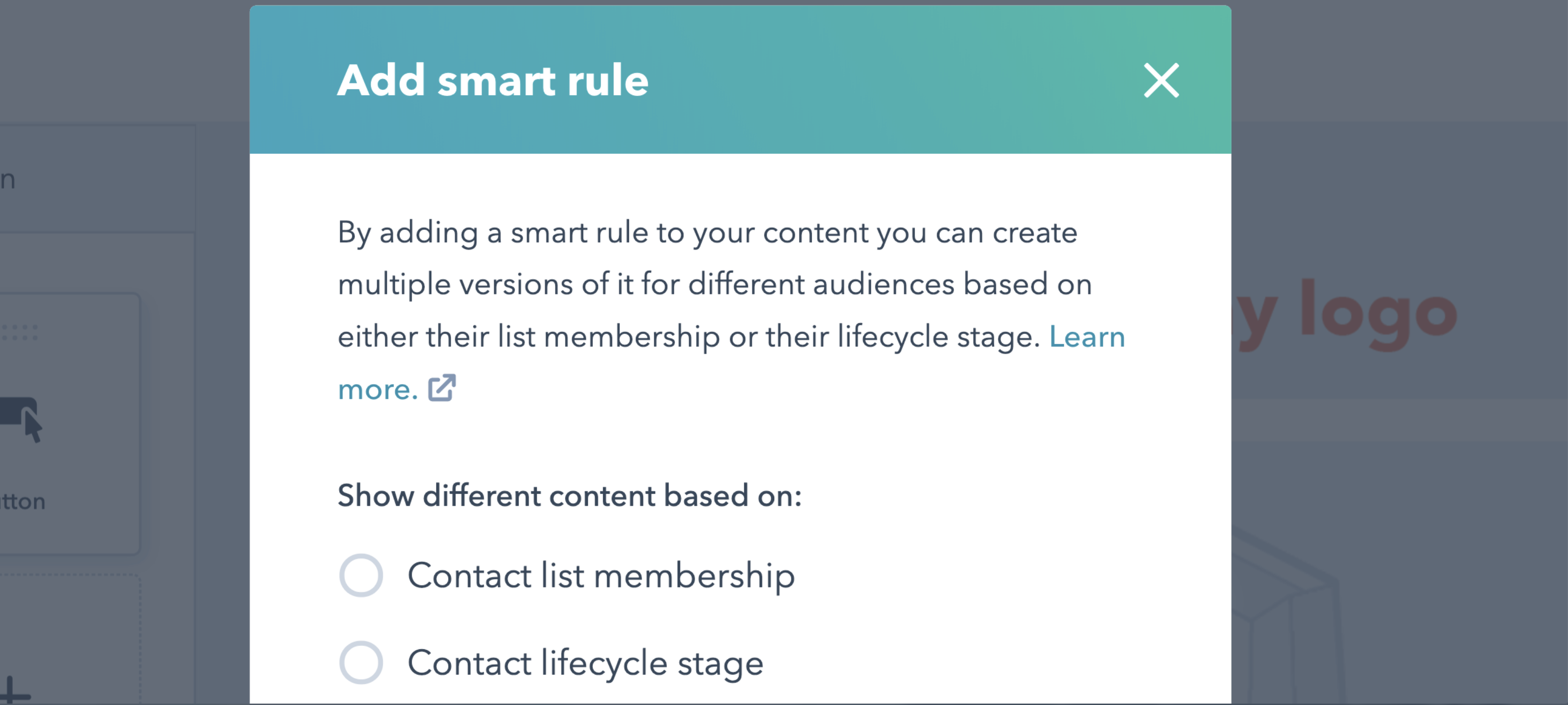
You can also send personalized emails based on the subscriber’s lifecycle stage, list membership, or any information in their contact record. This allows for relevant subject lines, links, attachments, and CTAs for all your customers.

Furthermore, the software allows A/B tests to learn which subject lines get the most opens and which content drives engagement and sales.

Pro Tip: Our email automation tools are powered by your HubSpot CRM database, so the data used to customize your marketing emails are accurate.

  • Versium Reach: Best email marketing automation software to visualize and segment customers.

Price: Contact for pricing

email marketing automation tools: versium reach

Versium Reach allows you to create target audiences that you can use across various marketing platforms (like HubSpot) and channels to help you effectively target and reach those groups through your email (and other digital) campaigns.

Versium Reach helps you visualize and segment your customers so you can tailor your email campaigns to them no matter which stage of the buyer’s journey.

The tool also helps you maintain a cost-effective lead generation strategy — Versium allows you to experiment with a single data source for better-performing customer segments.

  • Mailchimp: Best email marketing automation software for connecting e-commerce and email platforms.

Price: Free Basic Plan, Essentials Plan; $13/month, Standard Plan; $20/month, Premium Plan; $350/month

email marketing automation tools: mailchimp

Mailchimp makes it easy to deliver personalized and relevant messages and purchase paths to individuals based on their contact information and how they interact with your company.

Send-time optimization then schedules your emails to be sent when your customers are most likely to engage with them.

Mailchimp offers many e-commerce integrations (e.g. WooCommerce, Shopify) so you can connect your online store to the email tool — this way, you can target customers based on their purchases.

Mailchimp offers six main types of email automation to make your team more productive and efficient. These types are:

  • Customer journey automation
  • Behavior automation
  • Transactional email automation
  • Postcard automation
  • Date-based automation
  • RSS-to-email automation
  • Moosend: Best email marketing automation software for managing several email campaigns and mailing lists.

Price: Contact for pricing

email marketing automation software: moosesendImage Source

Moosesend is an email marketing platform for managing several email campaigns and mailing lists. Design and A/B test responsive emails and newsletters to ensure they effectively target your audience.

Personalize your emails by creating condition combinations to segment your audience based on the specific behaviors you care about on your emails and your website.

Understand the success of your email marketing campaigns with Moosend’s analytics dashboard — track email opens, clicks, social shares, unsubscribed, and more.

2. Identify who you’re sharing your email campaigns with.

Determine to whom you want to send your emails. For example, you might use lifecycle stages to group your email recipients — for an upsell campaign, you send emails to existing customers who have not purchased a particular product yet.

Your email marketing tool should be able to help you efficiently segment your customers ahead of your campaign using the criteria you’ve decided upon.

Again, your contact data in your CRM should help with this — for instance, in HubSpot, segment your email recipients by lifecycle stage.

3. Determine your email campaign’s goal.

Your email marketing is only as good as your strategy — so ensure you know exactly why you’re contacting these individuals. Do you want them to buy something? Learn something? Do something?

Once you answer this question, you can figure out the messaging you need to take them from where contacts are currently to where you want them to go.

You also have to plan for what happens when you succeed.

For example, imagine a 10-email series to get prospects to request a consultation. Prospect A converts within the first email. If Prospect A continues to receive emails telling them to do what they’ve already done, they’ll get frustrated.

In HubSpot, if you define your goal, it will unenroll any contacts who meet the goal.

determine your email campaign's goal

4. Set enrollment criteria.

Enrollment criteria refer to the qualifications that must be met for a contract to be entered into a workflow.

Suppose you’re using HubSpot Workflows. You can create personalized, automated email workflows that can get triggered in a number of different ways.

This can look like a contact added to a list, submitting a form on your website, clicking a link in an email, viewing a page on your blog, clicking on one of your ads, or becoming a marketing-qualified lead.

set enrollment criteria

You can also set up email workflows based on any information you have about the contacts in your marketing database.

This information can include page views, email or social media clicks, content downloads, contact properties, or any combination of these and more.

5. Determine which processes you want to automate with Workflows.

If you were manually emailing these contacts, what would you do? Think of your email marketing workflows as blueprints outlining each action your tool will take.

For instance, specify which actions you want the software to take in HubSpot. Examples of automatable actions are:

  • Sending an email.
  • Scheduling an email (and/or delaying it).
  • If/ then email branching.
  • Updating and syncing all email and contact data to your CRM.

email marketing automation software: Select your workflow action

6. Create your email campaign assets.

By this point, you know how many emails you want to send, the general messaging you’ll include in the emails, and which groups of customers the emails are going to.

Now it’s time to ensure all of your email campaign assets are created and available in your email automation software so you can add them to campaigns.

create your email campaign assets

7. Check your email automation setup and run a test, if possible.

Some things to consider implementing into your workflow publishing process are:

  • Looking at your list of enrolled contacts for errors.
  • Ensuring the number of enrolled contacts is what you’d expect.
  • Considering your workflow chart and use cases.
  • Checking your “Send” settings.

In HubSpot, you can test your workflow to ensure the automation you plan to set live works as intended.

email marketing automation software: test your automation to make sure it's working

8. Make our email automation workflow live and monitor its progress.

Once you’re happy with the workflow, set it live.

Mistakes can happen, so monitor for anomalies. Don’t be afraid to adjust as needed to resolve issues or improve the performance of your email automation workflow.

Similar to your other marketing strategies, this is also an iterative process.

Additionally, you can continually expand upon your workflows to support other business goals. Use them to automate other actions, such as:

  • Setting or clearing a contact property value
  • Updating a contact’s lifecycle stage
  • Adding/removing a contact from a list

other administrative tasks that allow for more targeted, effective marketing to your prospects and customers.

Email Marketing Automation Examples

Now, let’s walk through some examples of automated email workflows you can set up to start getting more out of your contacts database and marketing automation software.

1. Topic Workflows

Main triggers: Page views or content offer downloads.

topic workflow

Create a workflow for each of the industry-related topics you create content about.

Imagine you’re a unicorn breeder whose main content topics include unicorn diets, unicorn gear, and unicorn boarding. Then you could bucket your content marketing offers (e.g. ebooks, webinars, kits, etc.) and blog posts by these topics.

You could also create an email workflow for each topic and then trigger the appropriate workflow when one of your contacts views a page or downloads an offer centered around that topic.

Trigger a content download workflow based on a form submission from a tool conversion tool like HubSpot’s Free Marketing & Lead Generation Software.

To trigger an automated workflow in HubSpot, you can use the “Lead Flow Submission” option as the starting condition.

So if a contact downloaded your e-book called 10 Tips for a Balanced Unicorn Diet, your “unicorn diet” workflow would be triggered, sending that contact more helpful content, such as blog posts describing unicorn dietary tips.

2. Blog Subscriber Welcome Workflow

Main trigger: Subscription to your blog.

blog subscriber welcome workflow

Give your brand new blog subscribers a warm welcome with a blog welcome email. Use this email to:

  • thank contacts for subscribing
  • remind them what they’ll get from reading your blog
  • review their subscription settings (and allow them to make adjustments)
  • promote your blog’s best-performing articles or other offers

Get tips for creating a successful blog welcome email here, and learn more about optimizing welcome emails here.

3. New Customer Welcome/ Training Workflow

Main trigger: Lifecycle stage.

new customer welcome workflows

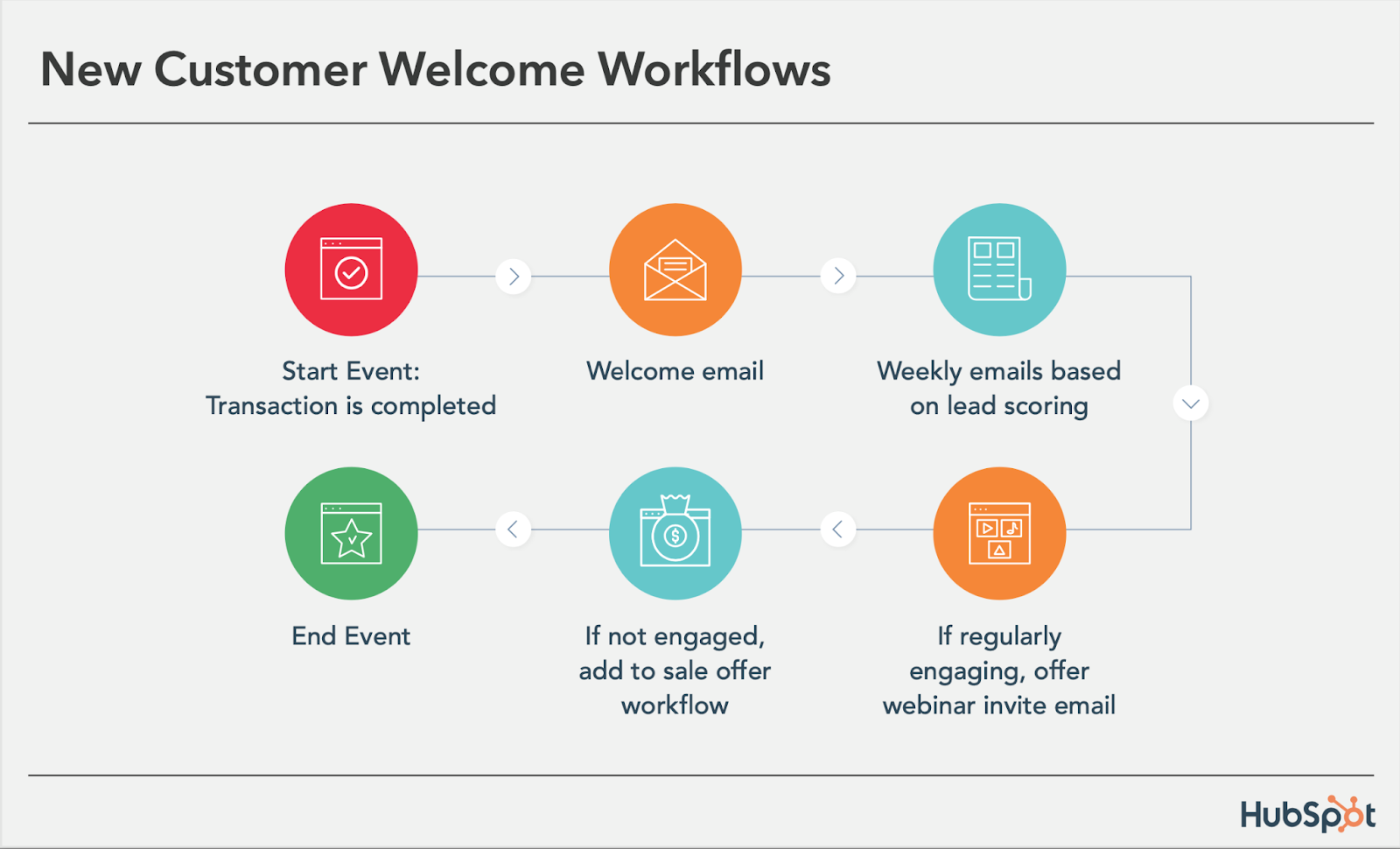
While we’re on the subject of warm welcomes, consider setting up a series of welcome emails when a contact converts into a paying customer, which you can trigger when a contact’s lifecycle stage gets updated to “customer.”

Not only is this a great way to kick off your new customer relationship on a positive note, but it can also keep your customers engaged after they buy.

And if your product or service requires a little training on your customers’ part, use this workflow as an opportunity to introduce helpful training materials on an incremental basis.

4. Engaged Contact/ Evangelist Workflow

Main triggers: Visits, clicks, or form submissions.

engaged contact evangelist workflows

Create a smart/dynamic list that automatically updates to include contacts that you’ve really engaged.

To create this list, use trigger criteria such as a high threshold of visits to your website, clicks on your emails or social media posts, or form submissions.

Then create an email workflow to leverage this list to encourage evangelism of your top content on social media.

Because these contacts are highly engaged with you already, they’re more likely to share your top content.

You can also consider adding list criteria to pull in contacts with a certain number of Twitter followers to leverage the power of those social media influencers in your database.

5. Lead Nurturing Workflow

Main trigger: Multiple beginning-stage conversion events.

lead nurturing workflow

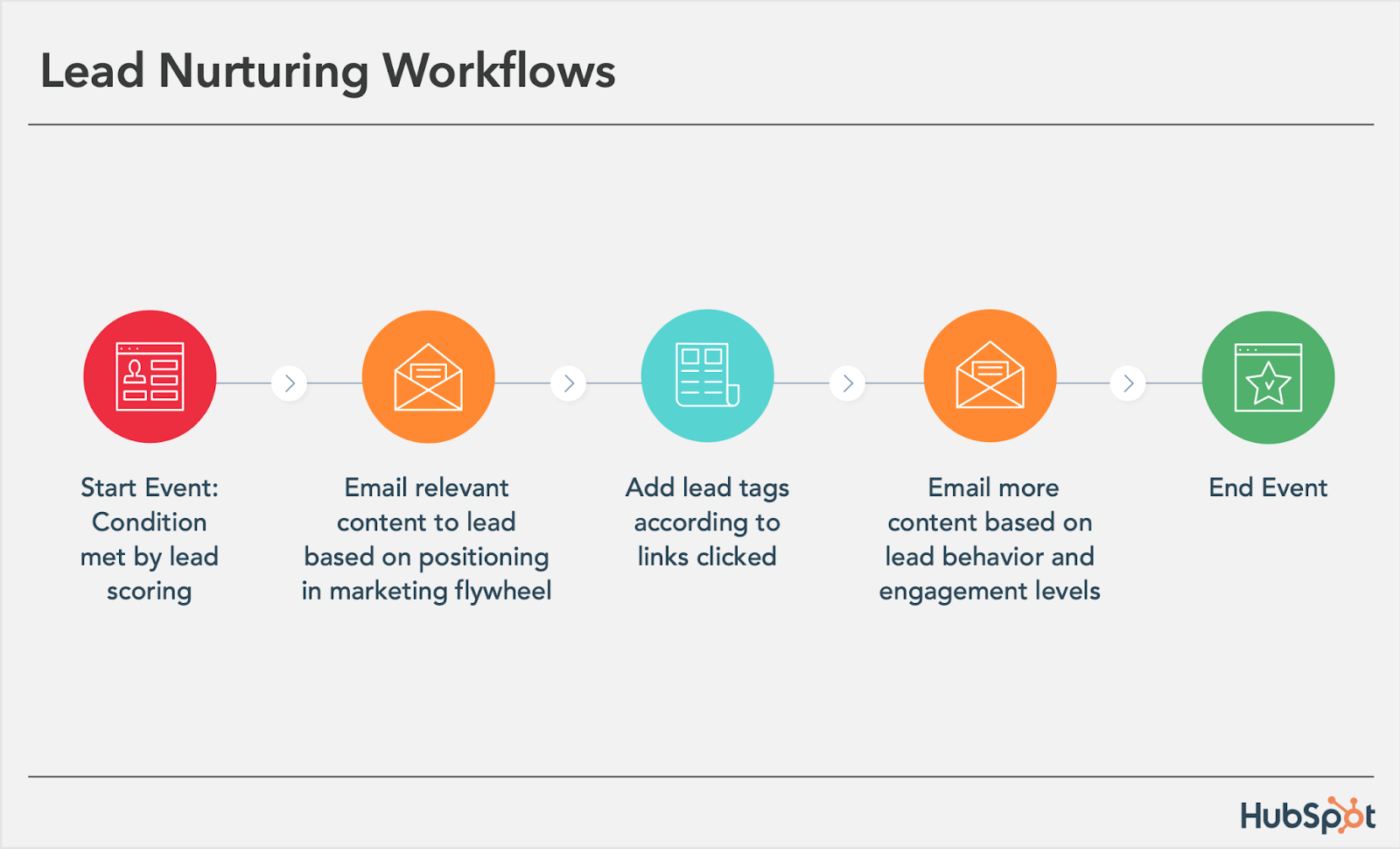
If a contact has downloaded several of your beginning stage marketing offers like ebooks and webinars, it might be a sign that they’re ready for a bit more. Set up workflows that help advance these contacts further through the flywheel.

If the contact is a lead, send them emails containing more content that can upgrade them to a marketing qualified lead (MQL) or an opportunity in your sales process.

This workflow may include content and web pages you’ve identified from an attribution report analysis as influential in converting leads into customers.

Content like customer success stories/case studies, free trial offers, or product demos could be considered.

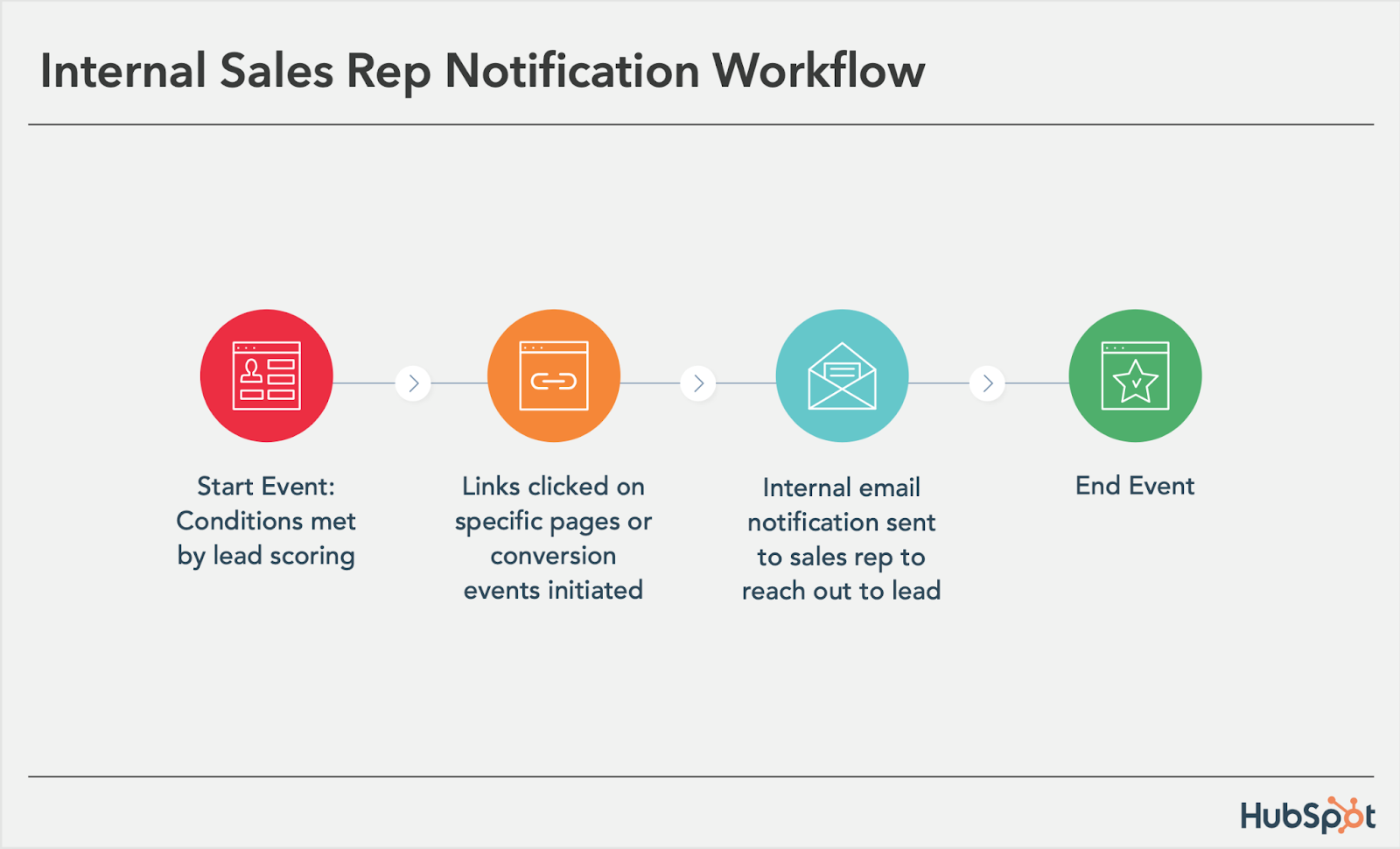
6. Internal Sales Rep Notification Workflow

Main triggers: Late stage page views/conversion events.

internal sales rep notification workflow

On any given website, there are certain page visits and conversion events that indicate more product interest than others.

First, identify these pages and conversion events using an attribution reporting tool like HubSpot.

You’ll notice that, more often than not, the pages you unearth will be your pricing page, product pages, etc. — the pages that your contacts view when they’re truly considering your products or services.

Use workflows here to trigger an internal email notification to your sales rep to inform them of these high-value activities.

Using personalization, give the rep all the information they need about the lead in question, including relevant mid- and late stage content that they can send to the lead in their outreach email.

This allows you to connect sales reps with the best possible leads at the right time.

7. Re-engagement Workflow

Main trigger: Inactive contacts.

re-engagement workflow

Reawaken inactive contacts with a re-engagement workflow, enrolling contacts once they’ve met certain list criteria.

For example, you could set conditions such as the length of time since their last form submission, website visit, or email click, triggering the email once it’s been a while since a contact last engaged with you.

In your workflow, try sending them an exclusive offer or coupon to get them excited about your company again. For more tips about launching an effective email re-engagement campaign, check out this post.

8. Event Workflow

Main trigger: Registration or attendance.

event workflow

Hosting a live, in-person, or virtual event? Use email workflows to automate your communication to event registrants and attendees before, during, and after the event.

For example, create a workflow that delivers important information registrants should know leading up to the event, such as hotel accommodations and agenda information for live events, or webinar log-in information for online events.

When the event ends, set up a workflow that gives attendees online access to session slides and continues to nurture them with additional content or promotion for future events.

9. Abandoned Shopping Cart Workflow

Main trigger: Shopping cart abandonment.

abandoned shopping cart workflow

If you’re an ecommerce business, you’ll likely benefit from an abandoned shopping cart workflow.

The concept here is simple: When someone adds an item to their online shopping cart but leaves your site without completing the purchase, you can trigger an email workflow that reminds them of their forgotten purchase.

By offering a special discount code or incentive to buy, you motivate the individual to return to your website to complete the transaction.

10. Upsell Workflow

Main trigger: Past purchases.

upsell workflow

Communication with your customers shouldn’t stop after they make a purchase. This is especially true if you sell various products and/or services. Use workflows to help you upsell or cross-sell existing customers.

Create dynamically updating lists of contacts who purchase a certain productor combination of products — and create workflows aimed at recommending other products/ services or encouraging upsells or add-ons.

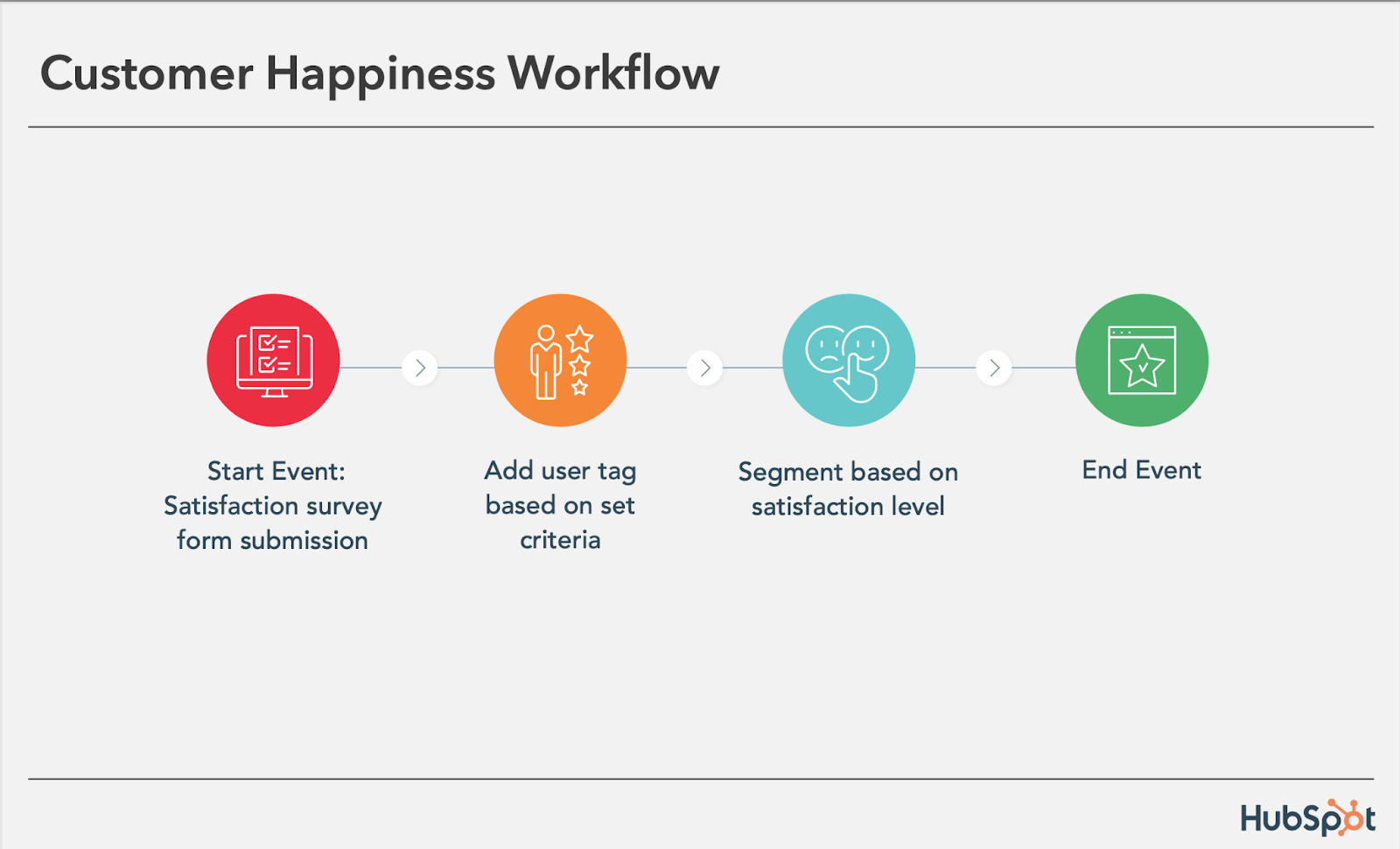
11. Customer Happiness Workflow

Main trigger: High or low NPS scores.

customer happiness workflow

If you administer regular Net Promoter surveys of your customer base, you can use customers’ Net Promoter Scores as a property to trigger workflows.

Simply determine what your ideal customer happiness score is, and use that as the threshold for your dynamic list of happy customers.

Then trigger a workflow for customers with “happy” scores and reward them with exclusive content, offers, or discounts.

Trigger a different workflow for your “unhappy” customers that includes content/offers aimed at helping to improve their happiness.

You can even segment unhappy customers by the specific reasons they’re feeling unsatisfied — then send them even more targeted workflows to address their issues.

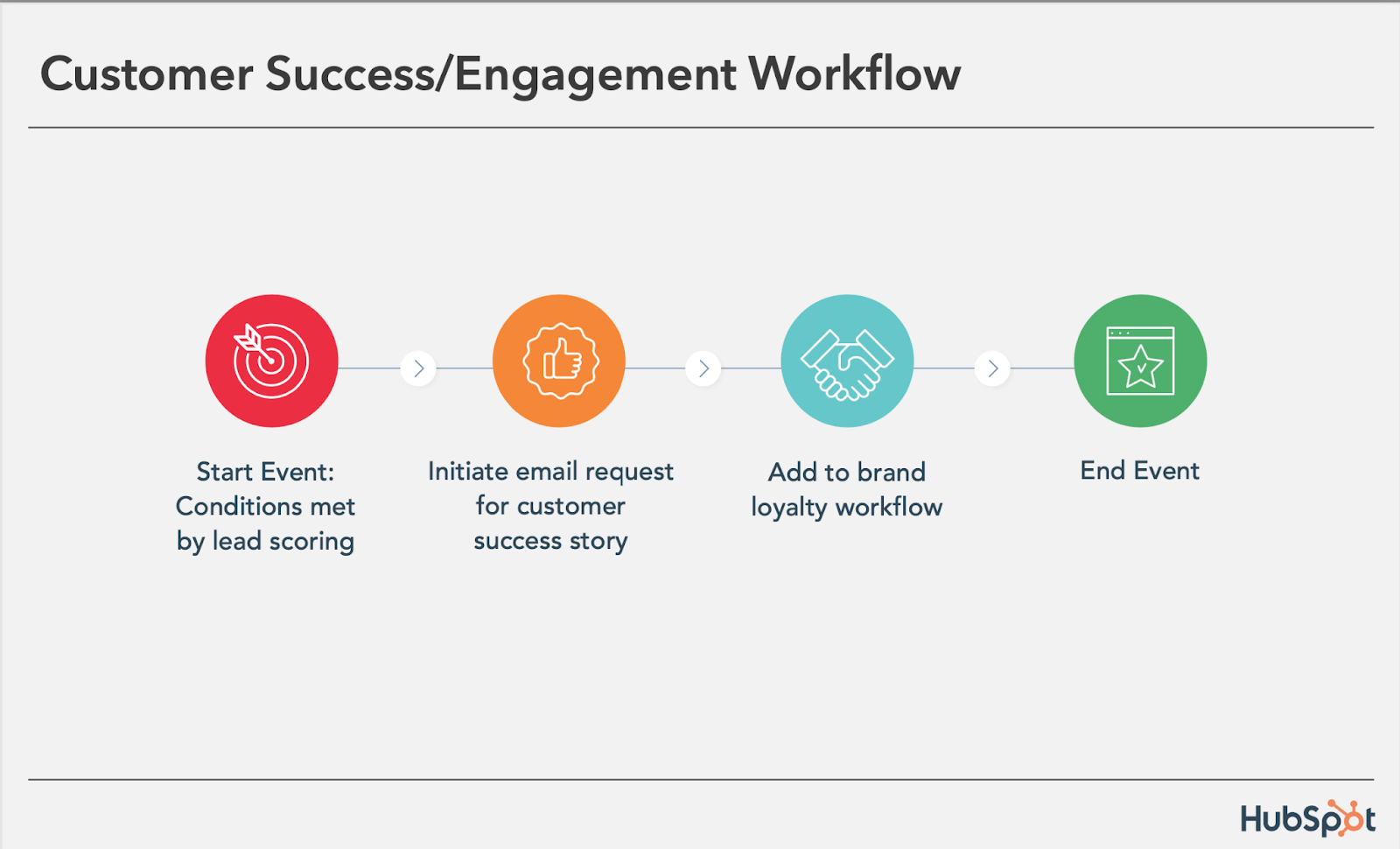
12. Customer Success/ Engagement Workflow

Main triggers: Success metrics or product usage.

customer success engagement workflow

If you keep track of customer success metrics, you have a prime workflow opportunity on your hands.

For example, if you’re trying to build up your arsenal of customer case studies, automatically trigger an email that asks customers if they’d be interested in being featured as a success story once certain customer success metrics were met.

Furthermore, suppose you track customers’ product adoption or feature usage.

In that case, you could trigger a workflow for users exhibiting low product engagement, providing resources that educate and train them on using the product features they’re not taking advantage of.

13. Upcoming Purchase Reminder Workflow

Main trigger: Purchases made on a cycle.

upcoming purchase reminder workflow

Does your contacts database include customers who typically purchase on a cycle? Enter those people into a workflow that gets triggered when they make a purchase.

For instance, you sell eye care products, and a customer purchases a six-month supply of prescription contacts.

Enroll that customer into a workflow that sends them an automated email five months later as a reminder that their six-month supply is about to run out, and it might be time to order a new batch of contacts.

14. Customer Service or Ticket Workflow

Main Trigger: A customer or prospect contacts customer service via email or an online form.

Your customers or prospects might have trouble using your free or paid software. When this happens, fielding a bunch of customer service emails and messages can take tons of valuable time from your schedule.

One way to avoid this is to create a workflow that turns customer concerns into tickets that can be categorized, labeled, and assigned to customer service reps on your team.

These tickets can also help you track ongoing problems and when issues with a customer or prospect are resolved.

15. Deal-Based Workflows

Main Trigger: When someone e-signs a quote or contract.

Sealing the deal is key to successful marketing and sales. Automating small aspects of this process allows your sales reps more time to nurture the client over the phone, during demos, or via other messages.

With a deal-based workflow, you can trigger confirmation emails when a prospect becomes a client or qualified lead by signing a quote or contract.

With systems like HubSpot, you can also set the workflow to change the contact’s status to show where they are in the lifecycle.

Automate Your Email Marketing Campaigns

Email marketing automation increases efficiency and gives your team back valuable time that can be spent on customers and other work that requires their attention.

Additionally, the process helps optimize your email marketing strategy and personalize email content to increase its effectiveness among your target audience and customers.

Identify your ideal email marketing automation tool and begin setting up the workflows your team needs.

Editor’s Note: This post was originally published in September 2012 and has been updated for freshness, accuracy, and comprehensiveness.

New call-to-action


Categories B2B

Wendy’s Took #NationalRoastDay to TikTok — Did It Bring the Heat?

Welcome to HubSpot Marketing News! Tap in for campaign deep dives, the latest marketing industry news, and tried-and-true insights from HubSpot’s media team. 

Wendy’s has been serving up sass on social media since 2017.

It all started on Twitter. After the official Twitter account of Mcdonald’s mistakenly shared a tweet with typos, Wendy’s quote tweeted the post saying, “When the tweets are as broken as the ice cream machine.”

The success of this tweet marked the beginning of a new social media strategy for the fast food chain — roasting other accounts.

Wendy’s first National Roast Day was in 2018. Twitter users could drop a Tweet asking to be roasted and the official Wendy’s account would counter with a ruthless response. No Twitter account was safe, and the made-up social media holiday became an annual affair that was a massive success.

In 2022, National Roast Day generated over 130 million impressions in a matter of hours and made Wendy’s an instant trending topic on Twitter.

This year, Wendy’s moved National Roast Day from Twitter to TikTok, turning it into a three-day event from April 12-14  (previously, it was limited to 24 hours). To participate, TikTok users posted videos asking Wendy’s to roast them. The official Wendy’s account then responded with stitched videos delivering roasts from an animated “Wendy.”

If the comment section was any indication, this year’s roast didn’t bring the heat.

Under the roast videos, comparisons to the company’s previous roasts on Twitter were frequently mentioned. Users left comments such as:

  • “how is your roast colder than your fries”
  • “the Twitter guy is on vacation”
  • “Twitter Wendy’s needs to roast TikTok Wendy’s”
  • “This person AIN’T the same as Wendy’s Twitter”

Here are a few reasons why the latest roast felt lukewarm compared to previous years.

TikTok’s Strict Community Guidelines

Compared to Twitter, TikTok has more strict community guidelines around what is considered bullying or harassment. Content that is deemed too harsh can quickly be taken down from the video platform, adding limitations to what Wendy’s could say during the roast.

Video Delivery

Sharing roasts via text on Twitter allows a bit more room for interpretation. Users can read the tweets sarcastically or imagine a specific voice delivering the roast. With an animated character delivering the roast, there’s less room for interpretation and the jokes are more difficult to land.

It’s worth noting there were a few gems shared on National Roast Day, like this video directed at AdAge that marketers can appreciate.

@wendys Replying to @adage More like sad age
#Nationalroastday
♬ original sound – Wendy’s

Though video presents unique challenges to delivering the type of humor Wendy’s is known for, moving National Roast Day to TikTok was likely a valuable experiment that will help Wendy’s social team hone in on its short-form video strategy.

While the roasts may not have been hot, the stats around National Roast Day 2023 were still impressive. During the three-day roast, Wendy’s shared 111 videos garnering over 109 million views and counting.

Elsewhere in Marketing

The latest marketing news and strategy insights.

Digital ad revenue grew in 2022. However, the growth was noticeably slower than 2021

Can YouTube Shorts help creators grow on YouTube? Check out this study analyzing over 5,400 videos. 

Meta rolled out a Reels hub on Instagram to help creators identify trending audio and hashtags. The Reels editing tool has also received enhancements. 

TikTok ban: lawmakers in Montana voted to ban TikTok on personal devices within the state.

Instagram isn’t dead: why marketers are continuing to prioritize the platform.

Case study: how MrBeast has garnered millions of views, and what marketers can learn from him.

New call-to-action

Categories B2B

AI in Content Creation: How Creators and Marketers are Using It [Data]

Are the robots taking over? It’s a question many people wonder as artificial intelligence gains prominence in our daily lives — especially in marketing.

The market for AI in marketing is likely to hit $107.5 billion by 2028, a massive increase from $15.84 billion in 2021. 

What could this mean for marketers and content creators? Is there a place for AI in content creation, and can it benefit marketing creatives? To answer this question, I spoke to several content creators who use AI. 

I also compared their experiences to data from HubSpot’s recent State of AI survey, in which we asked over 1,350 professionals about their experience with AI. Here’s what I found. 

Free Guide: How to Use AI in Content Marketing [Download Now]

How are Creators and Marketers Using AI? 

According to our survey, 33% of marketers who use AI use it to generate ideas or inspiration for marketing content. 

One way AI can be used for ideas or inspiration is by creating a mood board with tools like Kive.ai. Filmmaker and photographer Mateo Toro recently started using Kive.ai to design mood boards to develop treatments for his film projects. 

A video treatment is a way to convey a project’s concept or story. Many video treatments involve the use of images and visual media found online or in previous works. 

“Video treatments take time. You have to scrub through the video, to take screenshots, and edit for the video treatment,” Toro explained. “[Kive.ai] just makes it so much easier for me to find the video that has a style or tone I’m looking to emulate.”

With Kive.ai, creators can paste the link of a video into the system, and Kive.ai will extract frames from the video as screenshots to import into a board. Toro says the process can save him hours of time. 

“In a video treatment, I could be going through 10, 15, 20 videos to reference,” he said. “You add that up, and it could easily be an hour of time just scrubbing through, screenshotting, and dragging content to a treatment.”

@themateotoro @kive.ai is an insane software for creating Moodboards for your next film project that will help you save countless hours! This is game changing technology for referencing during the pre-production process!!
#moodboard
#moodboards
#kiveai
#preproduction
#filmmakinglife
#filmtok
#filmmakingtips
#cinematographytips
#cinematography
#moodboardcreation
♬ Blade Runner 2049 – Synthwave Goose

AI can also generate ideas for blog content. For example, HubSpot’s content assistant AI can create a list of blog topic ideas and develop outlines centered around specific concepts. 

Besides inspiration, the second-most common use of AI is writing copy for marketing materials. Our survey found 28% of marketers who are using AI leverage the tool to write materials such as blog posts and emails.

For example, Bethany Anderson, a public information officer for Milton, Florida, says ChatGBT streamlines the writing aspect of her job.

“I love it because ChatGBT is a software that learns,” Anderson explains. 

She says ChatGBT can mimic her writing style, so she’ll sometimes use the tool to write press releases, social media posts, and SEO-friendly blog content. 

Anderson says the tool is handy because writing is a crucial part of her job, but it’s far from the only responsibility she has to tackle daily.

“I am behind the scenes planning events and getting them out to the public,” she says. “So, ChatGBT allows me to get the writing done in a very easy, seamless way so that I can get to the bones of my job — which is outreach.”

Anderson admits she was wary of ChatGBT at first but tested it out during a week that was jam-packed with deadlines. 

“There was this one week a couple of months ago when I had so many deadlines, so many social media calendars due, so many blogs due, and so many bios due — I was drowning,” she recalls. “So I said, ‘I’m going to give it a try.'” 

Days worth of writing assignments could be completed in just a few hours thanks to the assistance of AI, according to Anderson.

Her experience aligns with the findings of our survey — 75% of marketers said generative AI helps them create more content than they would without it.

And 77% agreed generative AI could help create content more efficiently.

“We’re talking about days of your life that you get back,” she said. “And, to me, time is valuable. It’s more valuable than money.”

Copy of Linkedin - 1104x736 - Horizontal Bar Graph - Dark

Will AI Replace Content Creators?

A common concern surrounding the use of AI is whether the technology will replace human marketers and creators. Nima Olumi of Lightyear Strategies says it’s unlikely.

“We use AI to pull a lot of statistics, come up with interesting angles to pitch to companies, and work around certain angles that are marketing and media-friendly,” Olumi said. “I don’t think it’s a complete replacement for writers or thinkers.”

Writing and content creation are subjective fields, according to Olumi, and they still require people to do the necessary critical thinking to decide the kind of content that gets published. 

Ultimately, Olumi predicts a future where AI will assist marketers and creatives in improving their output and producing content in a shorter time.

This makes sense, considering our survey found that 77% of marketers agree that generative AI will help marketers create content more efficiently. 

And 79% agree generative AI can improve the quality of the content they create. 

Olumi encourages professionals to embrace AI and use it to their advantage rather than shy away.

Specifically, he says creators should spend time learning and testing applications like Open.ai and ChatGBT to see their different capabilities. 

“Spend hours asking question after question to see how far you can push the limits of the application to serve your needs,” he said. “You have to feed it context.”

As the presence of AI in marketing continues to grow significantly, you’ll want to take the time to discover how it can best serve your own team’s needs.

Professionals and creatives like Olumi, Anderson, and Toro all found ways to use AI to help them improve the efficiency and quality of their content. 

Instead of worrying whether the robots will take over, find ways to work alongside AI so you and your company can remain competitive in the market and essential to your clients. 

New Call-to-action

Categories B2B

Discrepancies Experienced by Black Content Creators (Expert Insight)

Welcome to Breaking the Blueprint — a blog series that dives into the unique business challenges and opportunities of underrepresented business owners and entrepreneurs. Learn how they’ve grown or scaled their businesses, explored entrepreneurial ventures within their companies, or created side hustles, and how their stories can inspire and inform your own success.

This piece is in collaboration with HubSpot Podcast Network’s Amplifying Voices campaign partnership with The Gathering Spot.

In 2019, Charli D’Amelio shared a video on TikTok doing the Renegade dance. The video blew up and is inarguably her claim to fame. Since then, she’s amassed 150M followers on the app, done brand deals with household names, and her family has an unscripted reality docuseries called The D’Amelio Show.

Thousands of TikTokers followed her lead, did the dance, and attributed it to D’Amelio, but she didn’t create it — Jalaiah Harmon did. Harmon’s erasure from her dance is attributed to racial bias as she’s Black and D’Amelio is White.

Harmon’s experience is just one of thousands, as many Black content creators face inequalities, from receiving credit for trends to late payments to algorithm biases. In this post, we’ll delve deeper into some of these inequalities and share expert advice from Natasha Pierre and Ross Simmonds on overcoming these roadblocks.

Table of Contents

Discrepancies Experienced By Black Content Creators — Key Stats

  • Black influencers in the nano and micro-influencer tiers (under 50k followers) average $27,000 annual compensation. (MSL)
  • Black macro-influencers (50k+ followers) received an average of over $100,000 compensation from brands. (MSL)
  • 49% of Black influencers reported that their race contributed to an offer below market value from a brand. (MSL)
  • The pay gap margin between white and Black influencers is 35%. (MSL)
  • 79% of Black influencers feel comfortable posting about diversity issues, but more than half feel they’re negatively impacted by posting about these issues, whereas only 14% of White influencers feel the same way. (MSL)
  • 58.3% of influencers say they’ve been discriminated against as an influencer on any social platform. (Influencer Marketing Hub)
  • Influencers say that TikTok has the worst discrimination they’ve faced. (Influencer Marketing Hub)

Discrepancies Experienced By Black Content Creators (+ Expert Thoughts)

1. Pay Disparities

Black influencers are paid 35% less than White influencers. Most of the time that means creators aren’t getting paid what they’re worth, and sometimes they’re being paid late. There’s also a lack of pay transparency, so Black creators don’t know what others are getting paid if they’re being shorted and what to negotiate for.

92% of influencers responding to MSL’s Time to Face the Influencer Pay Gap research study said that pay transparency could be the single most crucial factor in eliminating the racial pay gap in the creator economy.

Expert Thoughts

Natasha Pierre hosts the Shine Online Podcast and is a content creator. She’s also CEO of Shine With Natasha, where she helps creators build video confidence. She says, “The influencer marketing landscape is growing so much, and it’s still so new, but I still think it’s comical that a brand would be like, ‘We’ll pay you a few hundred bucks to do a million things under the sun.’”

Pierre has received late payments herself: “I was speaking at an event that was supposed to be for women of color, and I got paid months late. And I’m like, isn’t this what we’re trying to avoid here?” She adds that even being considered for opportunities, let alone being able to negotiate and talk about rates, can be challenging.

2. Lack of opportunities.

Antoni Bumba, a Black creator, said that she and her friend (who is White) once sent an email to the same company at the same time to set up a partnership. The brand sent her White friend gifts, and Bumba was told the brand was at capacity for gifting.

Victoria Paris, a White creator and one of Bumba’s friends, shared a video saying that she reaps the benefits of being a White creator, and the root of the issue comes from brands’ PR managers being primarily White and being aware of influencers that look like them and share the same experiences.

Paris says people don’t understand the gravity of the situation and just think, “Oh this sucks,” but it’s a significant career obstacle for influencers that don’t look like her. For example, she says she’s been able to save a lot of money to put back into her content and career because she gets free things, but creators of color don’t have the same luxury.

Many Black creators might not know they’re missing out on opportunities because people who offer the opportunities don’t have them on their radar. They won’t know that a brand wants to establish a relationship until they see a sponsored post from another creator on their feed.

Expert Thoughts

Ross Simmonds hosts Create Like the Greats and is an entrepreneur and marketing strategist that helps B2B brands and entrepreneurs unlock new levels of growth. He says, “I think the biggest challenge is that you [Black creators] don’t even see what opportunities you get overseen for…You’ll never know what you didn’t get because of what you look like.”

Pierre seconds this and says a lack of opportunities is one of the biggest discrepancies. With algorithm biases (which we’ll cover below), Black creators will get less engagement because of the bias, so their counterparts are “Just naturally going to be picked over other options.”

3. Algorithm Biases

Algorithm biases are unconfirmed, but Black creators report feeling the effects. Many say their content doesn’t perform as well as other creators, even if it is of the same quality. Some report their content performs worse if they talk about racial equality.

MIT Technology Review says TikTok’s algorithm has errors that disproportionately impact marginalized groups and reached out to TikTok for comment. The business said the issues were created in error and affected content wasn’t actually violating policies.

Casey Fesiler, a University of Colorado, Boulder professor studying technology ethics and online communities, told Technology Review, “Many of these errors would be easy to predict if companies simply thought more about how users would interact with their app.”

Expert Thoughts

Pierre says clients in her program have experienced algorithm bias. She was reviewing a competitor analysis with one of her clients, a Latina creator, who said, “Why is this person growing so much faster? Our content feels so similar; we’re in the same industry…is it because she’s a white woman?” and Pierre responded that, honestly, it probably is.

How can Black content creators rise above discrepancies? ( + Expert Advice)

Black creators are often left to figure out how to make it in the creator economy on their own. Given this, we asked Simmonds and Pierre what they suggest people do to rise above the challenges and achieve the growth they want.

1. Build community with other Black creators.

A great way for Black creators to build themselves up is to find community with other Black creators. You’ll get to know other people with the same experiences, and you can use your different backgrounds to help each other out.

Simmonds says, “The internet is an amazing place to find other people who are creators, and you can create some amazing relationships with people in a similar world as you.” He adds, “There are a lot more people that are Black that are creating things online, so it’s easier to find someone to look up to.”

2. Show up for people in your community.

Pierre says that the simple act of showing up for people in your same groups can make a difference — “We just need to be taking up space and building our own networks and continuing to show up for our communities and advocate for your own communities as well.”

When you build community connections, you can bring people up with you. Simmonds says he enjoys creating a path for others: “I want to be able to create content that helps other creators create great content and helps people see the opportunities and the potential to open doors.”

Pierre says that if she’s asked to be part of a campaign or speaker lineup, she could ask who else is part of it and if the organizers need her to recommend other creators in the category. She says the excitement of being invited or considered can make it easy to forget about the impact of creators’ voices and how they can support others’ careers.

Having a network of creators who support, uplift, and share each other’s content can expose people to new audiences eager to follow people and consume new content.

3. Learn from others and their experiences.

Meeting your first creator milestone can feel like a long and drawn-out process, but learning from others can give you actionable, helpful tips.

Consume content from all different creators and learn what works for them and how you can apply their strategies to your own. You’ll get exposed to new ideas and inputs, and what you learn can help you come up with new and unique stories nobody has told yet.

Simmonds says, “I always try to say that everyone can learn from every creator, even if they have a thousand followers. I get inspired by a random mommy blogger; I get inspired by a random psychologist; I’ll get inspired by a therapist on Instagram who puts up posts that are inspiring; I follow business folks…everyone.”

4. Focus on what you can control.

Black creators sometimes have to focus on what they can control. For instance, while you may want to partner with larger brands, it might not be possible at your current level.

As an example, Pierre notes that small brands struggle to find opportunities just as small creators do: “There are so many small brands that are doing such great things. Of course, smaller brands are going to have less budgets, but when there are opportunities to partner with those smaller brands, I think that’s a way to show how things can be done differently.” By partnering with a smaller brand, you’re building your influence and community in a more attainable way.

Focusing on what you can control also means recognizing when an opportunity doesn’t mean your standards and abilities. Simmonds says, “You have to focus on your circle of control…I can control the fact that I’ll probably decline if I don’t think something isn’t fair…otherwise it becomes a very draining industry and a mental tax that I don’t believe is oftentimes worth paying.”

5. Ask for what you’re worth.

Asking for what you know you’re worth can seem scary because of the potential for rejection.

But you only know if you ask. Simmonds says, “I’ve found that you will be pleasantly surprised if you do ask for what you deserve…they’re either going to say yes or no.” If they say no, they probably aren’t a brand you want to be associated with anyways. “Walk away and be okay with that,” he adds.

Your community networks can also be helpful as you can ask around and see what other people are getting paid for opportunities. Simmonds says he’s asked before: “If I know someone who’s engaged in these organizations or is also working for them, I’m not afraid to send a DM and ask people what they got paid before I give a quote, and I get clarity on what I should be offering.”

Black content creators can still find success and thrive.

The discrepancies that Black creators in the creator economy face can seem like a neverending uphill and discouraging battle.

But, the more people have conversations about these issues and put brands and organizations in check, the more likely they are to be better in the future. Pierre says, “Some [brands] will always be trash..but at least we know who to support and who not to support.”

Click the link to discover more Breaking the Blueprint Content.

Categories B2B

The Two Psychological Biases MrBeast Uses to Garner Millions of Views, and What Marketers Can Learn From Them

MrBeast is a young YouTuber who has amassed an incredible following through non-traditional means.

If you combine the subscribers of all his channels, they would rank as the 7th most populated country in the world. His videos have been viewed more than 26 billion times. 

MrBeast is not just a storyteller — he also translates this attention into revenue. He earned $54 million last year, launched a range of chocolate bars, an apparel brand, and even a fast-food business. He is one of the world’s best marketers, capturing the attention of billions and turning many of them into customers.

Let’s explore the psychology behind MrBeast’s success, and how you can use it as a marketer to help grow your own business.

Download Now: The 2023 Video Marketing Trends Report

The Two Psychological Biases MrBeast Uses to Garner Millions of Views

1. He uses input bias to create hyper-engaging videos that amass millions of views.

How did MrBeast, who started his channel at 13-years-old, create a multi-million dollar business empire in less than a decade?

The first psychological bias MrBeast uses is known as the input bias. It means that the more time, effort, and money you sink into something, the more you’ll value it.

Studies show that you’ll enjoy food more when you see the effort that’s gone into creating it. Even when you haven’t made the food yourself, seeing the effort that went into cooking it can actually make you enjoy it more.

Additionally, house buyers who are given a list of properties and told the real estate agent stayed up all night preparing that list will rank the properties as better-suited to their needs than the exact same list created in seconds by a computer.

How MrBeast Leverages Input Bias

MrBeast has used input bias consistently to make people value his videos. One of his first viral videos was him cutting a table in half with a plastic knife. It takes him hours, and the content is undeniably dull — yet it has 3.5 million views. This was one of MrBeast’s first viral videos, and it propelled his fame. He sunk an extraordinary amount of time into creating the video, and people valued it, even though the activity was fairly worthless.

The time and effort it took also meant that no one else had done something like that before, which made the video unique. This video demonstrated MrBeast’s commitment to spending enormous amounts of time and effort into creating his content.

MrBeast viral video because of input bias

MrBeast quickly saw the success of this video, and created more just like it. Some examples: He read the longest word in the English language, said “Logan Paul” 100,000 times in 17 hours, and counted to 100,000. These videos have millions of views.

Showcasing the effort MrBeast sinks into his videos make people value it more, even if that effort is fairly unexciting. The video is boring, but it’s leveraging our cognitive biases to capture attention. MrBeast is a master of using behavioral science nudges to garner attention.

2. He leverages costly signalling to engage his audience.

Another one of the psychological principles MrBeast uses is costly signalling — which essentially states that the more money or resources someone spends to market their products or services, the more trust someone will have in the brand.

For instance, if you see a new brand on TV that has paid for an advertisement with a costly celebrity like Selena Gomez, you’ll assume the brand is relatively successful — due to the costs of television advertisements, as well as the cost of working with a major celebrity – and have more trust in buying their product.

Additionally, major brands like Patagonia use costly signalling to showcase their values. For instance, Patagonia declined to sell corporate vests to employees of firms that do damage to the environment, including oil companies, mining companies, and finance firms. This decision was a costly signal, and ultimately changed how people perceived the brand, making some value it more.

How MrBeast Leverages Costly Signalling

In the case of MrBeast, he gives away extraordinary amounts of money in almost all his videos, which makes them more engaging and makes him more trustworthy. His video in which he was offered his first brand deal is an excellent example of how he applied the principle of costly signalling.

The advertisers offered him $5,000 to promote their brand during one of his videos, but MrBeast wanted to give away all the money from the brand deal to a homeless person and film their reaction. He thought $5,000 wasn’t enough and pleaded with the advertisers to double their payment to $10,000 so that he could give away the full amount to a homeless person.

The brand agreed, and MrBeast went and gave away $10,000, which made the video even more engaging. This video was a turning point in MrBeast’s career, driving much higher numbers of views and propelling his subscribers to an even greater level.

MrBeast’s success as a content creator and businessman is not just due to luck or chance. He employs various tactics and strategies to grow his brand and engage his audience. In this post, we discussed two psychological tactics he’s used: input bias, and costly signalling.

However, there’s one more tactic that MrBeast uses that I haven’t covered yet. If you want to discover what it is, then you’ll have to listen to Nudge Podcast, where MrBeast reveals his secret weapon for building a successful brand.

So go ahead and give it a listen, you might just learn something new!

video-marketing-report

Categories B2B

190 ChatGPT Prompts Marketers Should Use

ChatGPT is generating a lot of buzz in the marketing industry, and if you’re a marketer, you’re probably wondering how to use the technology to its full potential.

Fortunately, I’ve compiled a list of 190 prompts to enter into ChatGPT to take the guesswork out of figuring out how to use the AI.

If you’re unfamiliar with ChatGPT, here’s what you need to know.

Free Guide: How to Use AI in Content Marketing [Download Now]

What is ChatGPT?

25 ChatGPT Prompts for Marketing

25 ChatGPT Prompts for Business

27 ChatGPT Prompts for Content Creation and Social Media

9 ChatGPT Prompts for Analytics

25 ChatGPT Prompts for Email Campaigns

25 ChatGPT Prompts for Resume

11 ChatGPT Prompts for E-Commerce

23 ChatGPT Prompts for Customer Service

20 ChatGPT Prompts for Sales

What is ChatGPT?

ChatGPT is a publicly accessible tool owned by OpenAI. It uses natural language processing to pull information from around the web to answer search queries and fulfill content requests.

ChatGPT’s answers are original, meaning they are not copied and pasted from the web.

Aside from a paid subscription version called ChatGPT Plus, the tool is free.

ChatGPT is one of the latest developments in AI tools. If you’re looking for other ways to integrate AI into your marketing workflow, you may be interested in HubSpot’s new Content Assistant.

Content Assistant is a suite of free, AI-powered features that help you ideate, create, and share remarkable content quickly and efficiently.

Now, let’s get into the wide range of prompts you can use to get the most out of ChatGPT.

25 ChatGPT Prompts for Marketing

  1. “List [number] ideas for blog posts about [topic].”
  2. “Write a minute-long advertisement script about [product, service, or company].”
  3. “Create a 3-month social media campaign calendar for our product with the goal to [insert goal] and mention the channels we should focus on.”
  4. “List [number] viral Instagram Reels ideas about [company, product, or service].”
  5. “Generate [number] of viral TikTok ideas about [company, product, or service].”
  6. “Create 3 call-to-action button ideas based on the contents of this blog post URL.” Then insert the URL.
  7. “Create an advertising campaign about [company, product, or service] targeting [target audience]. Include key messages and slogans and choose the best media channels for promotions.”
  8. “Write [number] Google Ad headlines from [URL].”
  9. “List common challenges faced by [buyer persona description].”
  10. “List the key marketing segments in [industry]. Which segment has the biggest opportunity for our [company, group, organization, business]?”
  11. “Write marketing copy to make my marketing emails more engaging. The copy must be about our [product, service, or company].”
  12. “Write an email subject line convincing potential customers to switch our service.”
  13. “What are 10 main points that are crucial to marketers trying to acquire new customers?”
  14. “Generate an AIDA for [product or service].”
  15. “Write 5 tweets to generate interest in [product, company, or service].”
  16. “Write a promotional LinkedIn post about [product or service].”
  17. “Write 3-second Facebook Ad copy about [product or service].”
  18. “Write a press release about our upcoming event. Include the event’s date, time, location, and purpose.” Make sure to give ChatGPT the necessary details.
  19. “Generate 5 different YouTube descriptions for our video about [topic].”
  20. “Generate questions for a Facebook poll about [topic].
  21. “What marketing channels have the highest ROI?”
  22. “List ways to market my brand on TikTok.”
  23. “How can influencer marketing generate leads?”
  24. “What marketing tactics should I leverage to reach my target audience.” Make sure to describe your target audience.
  25. “What marketing channels have the lowest ROI?”

25 ChatGPT Prompts for Business

  1. “What are the top trends in [your industry] for 2023?”
  2. “What are the most important metrics to measure the success of our business?”
  3. “List ways to reduce cost and increase profitability.”
  4. “How can we use social media to increase brand awareness?”
  5. “How can we improve search engine optimization for our business?”
  6. “How can we improve our customer service experience?”
  7. “What are some ways we can boost productivity and employee engagement?”
  8. “What are the best tools for budgeting?”
  9. “How can A/B testing improve our website’s performance?”
  10. “How can we use automation to simplify our marketing and sales tactics?”
  11. “List the ways we can use a webinar to increase brand awareness and leads.”
  12. “What are the best practices for creating a strong company culture?”
  13. “Generate ways to use virtual tours to showcase products and services.”
  14. “List the benefits of using a digital asset management tool to organize and share company assets.”
  15. “List the benefits of using a customer journey mapping tool to improve the customer experience.”
  16. “Generate different ways to use augmented reality to enhance our [product or service].”
  17. “How can blockchain technology improve business processes and boost security?”
  18. “List the different ways we can implement a customer loyalty program to increase sales and retain customers.”
  19. “How can we use customer testimonials to boost our brand’s trust and credibility?”
  20. “What are some customer onboarding best practices?”
  21. “What are some employee onboarding best practices?”
  22. “What are common mistakes start-up companies often make?”
  23. “How can I boost employee retention?”
  24. “What are best practices in maintaining high morale within your organization?”
  25. “What are best practices for start-up businesses?”

27 ChatGPT Prompts for Content Creation and Social Media

  1. “Write an 800-word blog post about [subject], and include the following keywords in the headline, subheading, and body paragraphs.” Then, list the keywords you want ChatGPT to include.
  2. “Write a list of blog titles that include statistics on [topic].”
  3. “Write a YouTube video script about [product, blog, company, etc.].”
  4. “Write a 100-word Instagram caption about [topic] in an informative and friendly tone and include relevant hashtags.”
  5. “Write 10 YouTube headlines about [topic] and include the words [keywords].”
  6. “Generate a Twitter thread about [topic].”
  7. “Analyze this blog post for plagiarism.”
  8. “Check this blog post for spelling and grammar mistakes.”
  9. “Generate 5 ideas for YouTube videos about [topic, industry, company, service, product, etc.].”
  10. “Create a script for a web series that educates viewers about [topic].”
  11. “Write a script for an hour-long podcast episode about [topic].”
  12. “Write an engaging script for a virtual product launch.”
  13. Generate a simple, high-quality image for social media for a [type] company. The goal of the image must be to acquire new customers.”
  14. “Translate the following company into [language]: [copy].”
  15. “Write an outline for a blog post about [topic]. Include the keywords [keywords] in the headline and subheadings.”
  16. “Build a reader persona for [page description].”
  17. “Make the following copy more creative: [copy].”
  18. “Simply the following copy to make it easy for Grade 3 children to read.”
  19. “Rephrase the following copy.”
  20. “Write an engaging video script about [topic].”
  21. “What are YouTube marketing best practices?”
  22. “What are common mistakes marketers make in content creation?
  23. “What are best practices when marketing on Instagram?”
  24. “How can companies find influencers to collaborate with?”
  25. “What are the benefits of influencer marketing?
  26. “List 5 ways to generate leads from YouTube.”
  27. “List ways to convince customers to buy a product via Instagram.”

9 ChatGPT Prompts for Analytics

  1. “What are the most important KPIs for [industry].”
  2. “Write a SWOT analysis for our website traffic.”
  3. “What is a good bounce rate for our website?”
  4. “How do we boost leads on our website?”
  5. “What are the best website analytics tools?”
  6. “How can I track my company’s analytics on social media?”
  7. “How did I determine which channel generates the most web traffic for my brand?”
  8. “What social media platform generates the most leads?”
  9. “How can I optimize my website to rank higher in SERPs?

25 ChatGPT Prompts for Email Campaigns

  1. “Generate [number] subject lines for an email campaign about [product or service.].”
  2. “Write [number] holiday-themed subject lines about clothes shopping.”
  3. “What are the best subject lines to increase open rates?”
  4. “What are best practices for writing an engaging email subject line?”
  5. “Write 10 post-purchase email subject lines for [company].”
  6. “Write the body copy for a promotional email campaign about [company] spring sale. Write in an upbeat and friendly tone.”
  7. “Write a follow-up email for [your brand] with the subject line: [your subject line].”
  8. “Write an outline for a weekly email newsletter from [brand] to [target audience]. Include an intro, main point, conclusion, and call-to-action in the outline.”
  9. “What are best practices for writing engaging email copy for a marketing campaign?”
  10. “List 5 topics I should write about in my next email newsletter.”
  11. “How can I avoid my emails being marked as spam?”
  12. “How can I improve my sender reputation?”
  13. “How can I ensure my emails are easy to read and navigate on mobile devices?”
  14. “How can I make my emails load faster on mobile devices?”
  15. “How should I format my images and media to load properly on mobile devices?”
  16. “List the most common reasons emails are not delivered to the inbox.”
  17. “List the best practices for optimizing an email for mobile devices.”
  18. “What are the most common reasons customers unsubscribe from email lists?”
  19. “What are some of the best tools to manage marketing email lists?”
  20. “How can I boost email subscribers?”
  21. “How can I get off the email blacklist?”
  22. “How can I improve my business’ email list?”
  23. “What factors can decrease email open rates?”
  24. “What factors can boost email open rates?
  25. “List the top 5 email marketing tools.”

25 ChatGPT Prompts for Resume

  1. “Write a summary showcasing my skills and experiences relevant to a Social Media Manager role.”
  2. “Generate a summary highlighting my past achievements.”
  3. “Craft summary demonstrating my ability to [skill.”
  4. “Generate 5 bullet points highlighting achievements in [field].”
  5. “Create bullet points about my most recent [job title] role highlighting my achievements.”
  6. “Generate bullet points showcasing my ability to [skill.]”
  7. “How can I make my resume stand out against other candidates?”
  8. “What are common mistakes job seekers make on their resumes?”
  9. “What are some resume best practices to improve my job search?”
  10. “What are common formatting mistakes I should avoid in my resume?”
  11. “Copyedit my resume for any spelling or grammatical errors.”
  12. “What are some [industry] resume best practices?”
  13. “What resume design tools can I use to make my resume stand out?”
  14. “Review my resume and suggest improvement and edits.”
  15. “What are the most important keywords for applicant tracking systems to include in my resume.”
  16. “How can I make my resume more concise?”
  17. “What should I include on my resume if I’m applying in [specific industry].”
  18. “How do I tailor my resume to specific job postings?”
  19. “How can I make my resume more visually appealing?”
  20. “How can I make my resume more visually appealing?”
  21. “How can I get my resume directly to the hiring manager?”
  22. “How soon after submitting my resume should I follow up on a job posting?”
  23. “What should I include on a marketing resume?”
  24. “Based on this job description, what words should I include in my resume?”
  25. “How do I condense my [number] years of experience into a one-page resume?”

11 ChatGPT Prompts for E-Commerce

  1. “Write a description for a [product type] and include [product attributes] and [keywords].”
  2. “Generate a list of 20 audience demographics that would benefit from a [product or service].”
  3. “Think like an e-commerce expert and write 10 frequently asked questions for [your website name and URL.”
  4. “Think like an e-commerce SEO expert and write a meta tile for [your brand name] in the [inser industry] industry.”
  5. “Behave like an e-commerce SEO expert and write a meta tile for [ product name], from the [industry name] industry.”
  6. “Write a title page for [e-commerce website URL] and include [keywords].”
  7. “Write a meta description for [e-commerce website URL].”
  8. “Craft informative content for our e-commerce About Us page.”
  9. “Act as an e-commerce expert and craft a product collection description for the [product] from [brand].”
  10. “Act as an e-commerce merchandising specialist and draft a product title for [product] from [brand].”
  11. “Create an e-commerce campaign for [product, brand, or service].”

23 ChatGPT Prompts for Customer Service

  1. “What’s the best way to reach out to potential customers?”
  2. “Generate a list of ways to improve customer service?”
  3. “Create a template for an email response to customers inquiring about [product].”
  4. “Write a customer service email that addresses the following pain point.”
  5. “Generate 5 helpful suggestions for customers struggling with using [product].”
  6. “What are the most frequently asked questions about our [product, service, company, brand]?”
  7. “Generate a list of common issues customers have with [product name] and provide solutions for them.”
  8. “Write four personalized messages for customers asking about our [product] in a friendly tone.”
  9. “Generate 10 chatbot prompts related to our [product].”
  10. “Create a help page that explains how to use [product].”
  11. “List 10 phrases customer service agents can use to show empathy.”
  12. “Provide a template to explain standard retail return policy.”
  13. “Rewrite this paragraph to sound more friendly: [paragraph].”
  14. “Chat as if you’re a customer who can’t log into their account.”
  15. “Summarize the following knowledge base article to give step-by-step instructions.”
  16. “Write 5 questions for a customer experience survey.”
  17. “List the qualities of good customer service.”
  18. “What are customer service mistakes companies often make?”
  19. “How can I streamline the customer service process without losing customers?”
  20. “What’s a friendly way to respond to this message from a customer?”
  21. “Act as a customer service representative and answer the following question: [question].”
  22. “List 5 different ways a chatbot can greet customers.”
  23. “List 5 ways a chatbot can say goodbye to a customer.”

20 ChatGPT Prompts for Sales

  1. “What are cross-selling opportunities available for my [type] business?”
  2. “What are some creative ways to generate leads?”
  3. “Create a personalized sale email for potential customers. Include [topic, brand name, promo offers, etc.].”
  4. “What product customization would you recommend for this customer?” Include customer details in the prompt.”
  5. “List 10 keywords people might use when searching for our [product].”
  6. “Create five persuasive points to encourage customers to buy our [product].”
  7. “List 3 compelling reasons our customers should buy [product or service].”
  8. “List [number] personal branding types I can use for social selling.”
  9. “What kind of content categories and topics can I create for social selling on Instagram?”
  10. “Write a sales landing page description for [product].”
  11. “Write a cold email to a prospective customer introducing my [company or organization] and how it can benefit them using [selling points].”
  12. “Write a sales pitch about [product].”
  13. “Act as a salesperson and market [product or service] to me.”
  14. “Act as a salesperson and answer this question about [product or service].”
  15. “Write the text for a social media ad highlighting the [product or service]. Highlight paint-point-specific questions.”
  16. “Generate 5 buyer personas I should include in my cold outreach.”
  17. “List 5 personal branding archetypes I could use for social selling on LinkedIn.”
  18. “Generate a script to use when cold-calling start-up founders in my area.”
  19. “Craft an answer to this sales question.”
  20. “What questions should I ask potential buyers to uncover pain points and priorities to decide if they are a sales-qualified lead for my product?”

Using ChatGPT in Marketing

AI tools like ChatGPT can be manageable for marketers. The above prompts can help you craft marketing campaigns, answer pressing sales questions, and free up time so you can focus on the more creative aspects of marketing.

Now that you know the prompts, you’re ready to experiment with ChatGPT to see if it fits into your marketing processes.

New Call-to-action

Categories B2B

Blog vs. Podcast: Which Is the Best Choice for Your Business?

Blogs and podcasts are both powerhouse marketing tools. But when comparing blog vs. podcast, which is the better bet for your business?

Podcasts and blogs have the power to nurture customer relationships and deepen brand loyalty. Both highlight authority and expertise. And both forms of content can boost traffic and generate leads.

Each format has benefits and drawbacks, and before launch, you’ll want to know which will offer your business the best ROI.

→ Download Now: 6 Free Blog Post Templates

Let’s take a closer look at blogs and podcasts for content marketing and which is the best for your business. Keep reading, or jump ahead to the section you’re searching for:

Blogs and podcasts have a lot of similarities. They’re both evergreen resources that offer education, insights, and storytelling online.

Both a blog and a podcast can offer marketing opportunities for businesses. And it takes time, dedication, and knowledge to make a blog or podcast that people pay attention to.

The main way these two resources differ is in their format. Blogs are for reading or taking in visual information, while podcasts are for listening.

Difference between podcast and blog graphic

These differences make blogs a useful format for step-by-step instructions, data visualizations, and SEO. Users usually read blogs on desktop and mobile devices. Readers often seek out business blogs when they are trying to solve a specific problem.

At the same time, podcasts are great for interviews, networking, and brand engagement. Users often listen to podcasts when they are doing something else, like driving to work or cleaning the house. Listeners look for business podcasts when they are trying to learn about or keep up with an industry or niche.

As a creator, the main differences between podcasts and blogs are the way they’re made. Blogs need writing, and a lot of it. Editing, visual design, and SEO knowledge are also important skills for aspiring bloggers.

Podcasts require an audio skill set. Podcasters need to be able to speak in an engaging way, whether it’s a solo, two-person, or interview podcast. Sound editing skills are also a must.

Blog vs. Podcast: Which Should You Start First?

Some businesses have the bandwidth to start a blog and a podcast at the same time. That said, most will start these channels one at a time because of the scale of this investment.

This is an important decision with long-term impact. If you’re not sure where to begin, start with five key factors — audience, timing, resources, and cost.

Target Audience

Blog readers, podcast listeners, or both? To decide the ideal medium for your content, get clear about who you want to engage with, what they want to know, and how they access their content.

Your target audience is the group of people you want to reach with your blog or podcast. They’re the consumers who are most important to your business, so you want to create the media they need most.

You may not know who your target audience is. According to 2023 HubSpot research only 42% of marketers know basic demographic information about their target audience.

But if you have the data you need, it’s important to avoid assumptions about who’s reading a blog vs. listening to a podcast.

For example, there’s an assumption that most podcast listeners are young, between 18-34 years old. 2023 data from Edison Research and Amazon Music confirms that 55% of people in this age group listen to podcasts monthly. But it also states that 51% of 35-54-year-olds are listening to podcasts too.

On the flip side, some assume that blogs are for older audiences. But more than 25% of 5 to 18-year-olds in the U.K. are reading blogs online.

Timing

Another factor to consider is your ideal publishing schedule. To create a big enough audience to impact your business, you’ll need to think about the length of your content and how often you release it.

Per BuzzSprout global stats, the majority of podcasts (32%) last 20-40 minutes, and 40% of podcasts publish episodes every 8-14 days.

In comparison, the ideal length of a blog post is 2,100-2,400 words. And it’s recommended that small blogs should post new content 3-4 times per week.

Resources

Both blogs and podcasts need great content and unique branding to stand out.

But if you’re not sure how to start a blog or what it takes to start a podcast, a little research will quickly show you the resources it takes to launch.

For example, a new blog will need a powerful blogging platform, ideally with free hosting.

If you’re starting a podcast you’ll need some equipment to begin, like a quality microphone, headphones, and sound editor. You’ll also need to figure out where you want to host your podcast.

Once that’s all set, the most important resources you’ll need are time and organization. Is organizing your ideas a challenge for you? If the answer is yes, this free editorial calendar template can help you quickly turn your content ideas into a clear plan.

Cost

If you go the DIY route, it’s possible to launch a podcast or blog for little or no cost. But quality matters and the costs of running a blog or podcast can quickly add up.

For example, while the cost of launching a blog can be as little as $50, blogging is a long-term strategy. Even if you love writing, publishing 8,000+ words per week is a tough goal for anyone.

To meet this challenge, many business blogs hire full-time or freelance writers to create blog posts. The average cost for a single blog post is between $50-500. The actual cost will vary depending on the experience and rates of the writers in your niche.

Getting professional podcast production can also be expensive. Rates can run from $15-15,000 per episode depending on the experience of your editor.

Launching a blog or podcast is a big step. If you’ve reviewed the key areas and are still not sure which is the best fit for your business, let’s talk about how each of these content formats can impact your business goals.

Blog vs. Podcast Statistics

2022 HubSpot research shows that both blogs and podcasts hold value for business marketing. 33% of surveyed marketers are using blogs, while 28% are using podcasts and other audio content.

Blog vs. podcast statistics, HubSpot 2022

Both channels also hold value for 2023, with 26% of marketers starting a blog for the first time and 24% creating a podcast.

Blog vs. podcast statistics, 2023 projections, HubSpot

The data above confirms that the choice between a blog and a podcast is a business-specific decision. So, which content format is best for your business? To answer this important question, keep reading.

Why You Should Start a Blog First

Blogging is a powerful way to share product innovation, thought leadership, and educational tips. It’s an outlet to share what your team is passionate about and how you want to make an impact on your customers.

Here are a few other reasons you may want to start a blog before jumping into a podcast:

Blog Reach

The internet has over 600 million blogs (and counting). And HubSpot research says that business websites with blogs get 55% more visitors than sites without blogs.

This impressive reach is part of the reason that blogging is one of the top content strategies for businesses.

SEO

SEO is the practice of developing content to improve search engine rankings. Simply put, a business website with a blog is more likely to get traffic. These are just a few reasons to add a business blog:

  • New blog posts give customers more reasons to visit your website
  • Blog content can attract people to your site before they become customers
  • Blogs ranking on Google can build brand awareness for your business
  • Including keywords in authoritative and helpful blog posts can drive traffic to your website

Blog SEO can get the word out about your business, but depending on the scale of your operation, it can take time.

You may want to start a blog first because competition, keyword saturation, and other factors can impact how quickly your blog starts bringing in the traffic you’re looking for.

Blog Brand Awareness

Blogging builds trust and visibility for your brand because it highlights what you know. Blogs are also easy to share, quote, and repurpose. This gives your business more opportunities to gain awareness with viral content.

Blogs are also great brand-builders because they make it easy to highlight your authentic brand voice. You can also use blog content to boost paid advertising and brand content on other platforms, like YouTube videos.

Blog Conversions

Blogs also create a direct path to conversions. Whether you’re hoping to generate qualified leads for your sales team or free trial subscriptions for a SaaS product, a blog can be a big boost.

For example, say your business sells fishing supplies, like handmade flies. Then, you write a blog post with fly fishing tips that soars to the top of the search engine results page. Inside that post is an offer for a free PDF with instructions to make a simple fly for bait.

All someone reading that post has to do is click on the offer. That one click can give your business a lead for follow-ups, and you can send that lead emails about upcoming sales, special offers, and more.

Combining the power of SEO to bring in organic traffic with easy conversion opportunities is what makes a blog so useful for any business.

Keep in mind, once you’ve grabbed attention, it’s important to deliver consistent high-value content. This is what will make your blog a destination for knowledge building, not just a one-time find.

Check out this post for more blogging benefits.

Why You Should Start a Podcast First

Podcasting is a great way to broadcast your brand to an enthusiastic audience. You can use podcast content to connect with complementary brands and influencers and build authority and trust.

Let’s talk about how starting a podcast before a blog could boost your brand.

Podcast Reach

Podcasting gets more popular every year, growing from 65 million U.S. listeners in 2017 to over 140 million listeners in 2022.

And according to 2022 Statista research, 79% of adults in the U.S. are aware of podcasting, up from 22% in 2006.

Networking

Starting a podcast is a great way for businesses to build a network of complementary influencers, partners, and more. Some of the most popular podcasts feature interviews with industry leaders.

Your podcast host or hosts lend a human voice to your brand. Podcasts put a knowledgeable person from your company in conversation with industry experts to tackle current topics and share advice, often with a touch of lighthearted humor. You can also ask your audience what they want you to cover and whether they have questions you can answer.

The interview format makes it easy for your business to connect with important stakeholders. It gives you something valuable to offer new connections while also creating useful content for your audience.

If you are a great podcaster, this opportunity might also lead other podcasts to feature your talent, further increasing your brand reach.

Podcast Brand Awareness

A podcast creates a consistent voice in your audience’s world. If your listener base is consistent, they won’t just recognize your brand name. Instead, your business will become a trusted voice, offering authoritative ideas. This can lead listeners to spread the word about your brand.

The popularity of podcasting has created a persona that organizations like NCS call a “power subscriber” — consumers who subscribe to six or more podcasts. 68% of these subscribers actively buy and seek out the products they hear about during their podcast listening.

Podcast Conversions

While many listeners actively convert after listening to a podcast, the conversion path for this content channel is less direct. Many brands use podcasts to educate users about new products and offers. Then, they add unique tracking codes or URLs to track conversions from podcast episodes.

But people listening to podcasts in their car or on a walk can’t press the CTA button the moment the inspiration hits. Instead, they must choose to return to your website to explore and fill out a form.

Podcasting can influence conversions by increasing brand awareness. But it offers fewer immediate opportunities for leads and sales.

How to Start Your Podcast or Blog Today

Choosing between the two isn’t always necessary. Some companies benefit from offering both. And the two can build on each other if your team has the budget and the time.

Whether you’re starting a blog, a podcast, or both at the same time, there are some tips that can make the process go more smoothly.

Here are the first steps to lay the groundwork for a successful launch.

1. Come up with a unique angle.

Content without a strategy can sink fast. To create a blog or podcast with staying power, you need a great idea — something unique to your business. And it can’t just be a great idea, it has to be an idea that you can consistently explore over time.

To find your unique angle, start with a broad topic. This topic is usually related to your business products and industry. Then, revisit your mission statement. When you look at your topic through the lens of your business vision, you should have a one-of-a-kind angle for your content.

Featured resource: Mission and Vision Statement Templates

Blog vs. Podcast resource: Mission statement templates

Once you have your angle, make sure your other decisions support that idea. For example, if you’re creating a podcast, use music and sound effects that enhance your distinct vision.

2. Focus on your skills.

Scale matters when it comes to starting a podcast or blog in a saturated market. While some small businesses can create a new team to make their blog or podcast a success, many will need to start with the team they already have, even if it’s a team of one.

This means being honest about your likes, dislikes, and what you can commit to long-term.

For example, say you love chatting with clients and colleagues and have a hard time sitting in front of a computer for too long. It may make more business sense to start a blog, but you’re more likely to create a great podcast and stick with it.

3. Assess your marketing team.

Has someone been pushing your company to create a blog and tossing topic ideas your way for the past year? Maybe they’ve even been writing shorter posts for LinkedIn already.

Is there someone on your team who devours podcasts? Or someone who knows podcasts in your industry and understands what works and what doesn’t?

Before you begin building your podcast or blog, find the knowledgeable and passionate marketers on your team who may want to get involved. This one step can make blogs and podcasts more manageable with a better chance of success.

4. Get to know your competition.

You need to know what’s out there so you don’t churn out content that your audience has already seen. Begin with some competitive analysis to figure out if your idea is enough to stand out.

Featured resource: Competitive Analysis Templates

Blog vs. Podcast resource: Competitive analysis templates

Then, dig into the details of your unique blog or podcast. Research long-tail keywords to help you brainstorm niche topics that separate you from the pack on both platforms.

Podcast enthusiasts: Do some research into podcast SEO to help your podcast surface on popular podcast platforms like Spotify, Apple Podcasts, and more.

5. Find the right tools.

Content is fun to create, but it takes attention to detail for it to make a difference for your business. One way to make the content creation process more effective is by choosing the right tools.

Blogging Tools

Tools for blogging that can help you make it happen include:

These tools can help you add a blog to your website. They make it easier to focus on building a content calendar, targeting the right audience, and creating the best content.

For example, an AI content assistant can also help you quickly create outlines and draft copy to speed up the writing process.

Check out this post for more blogging tools.

Podcasting Tools

Podcast tools can help you streamline production and releases. And audio equipment like microphones and headphones aren’t the only tools you’ll need for podcasting.

Online tools for your new podcast include:

  • Recording software
  • Audio editing software
  • Podcast hosting

As your podcast grows, you may want to look into more advanced tools to promote your podcast and improve lead conversion.

For example, Casted offers a podcast marketing platform that integrates with a company’s existing customer relationship management (CRM) and content management system (CMS) tools.

HubSpot customers: The Casted integration connects podcast listening data to your CRM. This lets you see what your contacts are listening to and what they click.

6. Prepare, prepare, prepare.

There are great resources for how to launch a blog or start a podcast. But once that exciting flurry of activity is complete, the work has only just begun.

For a blog or podcast to make a difference for your business, you need to prepare to make every post and broadcast great. When you’re writing a blog, this might mean drafting a clear outline, doing time-consuming research, or fact-checking. If you’re preparing for a podcast, it might be a warm-up routine, sound checks, or learning about volume levels.

The more you prepare for each blog and podcast, the more likely you are to create a trustworthy resource that your audience loves.

7. Create value.

37% of podcast listeners in the U.S. hear about new podcasts from friends, family, and coworkers.

The best way to get that word-of-mouth endorsement is to create content that people need and want.

This means your content should be both useful and engaging to your audience. As you grow, ask for audience feedback and respond to both positive and negative comments. Set clear expectations and be sure to consistently meet them. Finally, give your audience ways to engage and find ways to reward them for that engagement.

Which is better, a blog or a podcast?

Both blogs and podcasts can increase your marketing reach and nurture customer relationships.

Choose the strategy that makes the most sense for your company, your in-house talent, and your customers, and you’ll see winning results.

Editor’s note: This post was originally published in November 2020 and has been updated for comprehensiveness.

Categories B2B

How to Avoid Burnout: 7 Tips + Signs to Look Out For

We’ve all had days where we struggle to get out of bed and start our day or when we’re pushing through fatigue to execute a crucial project.

But what happens when those days start to feel like the norm, and you can’t remember the last time you felt motivated at work? That’s burnout.

While we all experience bad days at work, burnout doesn’t have to be inevitable. To help you stay in the groove at work, we will explore ways to avoid burnout and some signs of burnout to watch out for.

What is burnout?

Common Causes of Burnout

Signs of Burnout

How to Avoid Burnout at Work

How Employers and Managers Can Prevent Burnout

Download Now: 5 Free Skill Development Templates

What is burnout?

Burnout is a form of work-related stress that manifests in physical and emotional exhaustion, according to the Mayo Clinic.

Burnout is not a medical diagnosis; however, researchers and experts believe other conditions, such as depression, or circumstances like family life and personality traits, can influence burnout.

No matter the cause, job burnout can negatively affect your mental and physical health, so it’s essential to beware of its common causes, which we’ll explain.

Common Causes of Burnout

Below are the most common causes of job burnout.

1. Heavy Workload

Overwork is one of the main causes of burnout and can lead to several health issues, such as weight loss, body pain, exhaustion, and more.

A study revealed that working 55 hours or more per week is associated with a 35% higher risk of a stroke and a 17% higher risk of dying from heart disease.

2. Feeling unappreciated

Paying employees their worth is essential, but adequate payment is only one part of the equation. Without positive feedback, rewards, and recognition among peers, it’s easy to feel like your hard work is going unnoticed.

Feeling unappreciated or undervalued at work can build resentment toward your job, leading to burnout.

3. Micromanagement

In a survey, 59% of employees said they’ve worked for a micromanager. And of those, 68% reported a decrease in morale, and 55% said it hurt their productivity.

It’s hard to feel any motivation or passion for your work if your employer constantly tries to control your every move.

Feeling like your manager or employer doesn’t trust you to do your job without someone looking over your shoulder adds stress. And stress is just one step closer to feeling burnt out at work.

4. Poor relationships or a lack of support

Feeling part of a community and having a support system is essential to maintaining mental health. A study shows 48% of workers lack emotional support when managing daunting tasks.

Without camaraderie among colleagues, it’s easy to feel isolated — especially when looming deadlines and massive projects create stress.

Signs of Burnout

Burnout can sometimes creep up on you slowly before you even realize what you’re feeling. To help you fight against burnout, here are some signs you need to look for.

1. Lack of Energy

No matter how much you love your job, there will be days when the last thing you want to do is get out of bed and work.

There will be times when you have to push yourself extra hard to complete a project or when you’re counting down the days until the weekend.

However, the lack of energy associated with burnout goes beyond those moments. Burnout-related exhaustion is more chronic and less associated with a specific task or project. And it doesn’t go away after a vacation or a relaxing weekend.

2. Cynicism Toward Your Job

If you question whether your work matters or you’ve grown disinterested in your job, that could be burnout reeling its head. This is especially true if you remember being much more enthusiastic about your work.

3. Changing Sleep Habits

Everyone has their preferred time to wake up or go to bed, but if your sleeping habits change drastically — you could be experiencing burnout.

For example, let’s say you’re a morning person who has no problem getting dressed and out the door by 7:30 a.m.

However, recently, you find yourself hitting the snooze button more often than not, or you don’t feel energized for the day because you spent all night staring at the ceiling. This is a sign of burnout.

4. Drop in Work Performance

Perhaps you were always punctual in the past, but you’ve recently started missing deadlines. Or, you struggle with aspects of your job that you easily handle.

Exhaustion, disinterest, and disorganized sleep habits can all result in a drop in your quality of work.

How to Avoid Burnout At Work

I reached out to professionals across different industries for their perspectives on fighting burnout. Here are some tips they suggest:

1. Know what energizes you and what drains you.

Women’s health professional Margaret Ruvoldt says she feels at her best when the energy she puts into work is less than what she gets from it. She says burnout happens when that equation no longer works.

“So I keep an eye on what gives me energy at work and what drains me. That answer is different for everyone — which is great because, on teams, we can balance one another,” Ruvoldt explained. on teams

“If I’m solving complex problems, learning, and I have an opportunity to develop people — I’m getting a ton back,” she said. “If the relationships are bad, the direction is unclear, or I’m in a role that doesn’t allow me to learn — I’m drained.”

Ruvoldt says if she feels burnout, she seeks ways to move toward the things that give her energy and away from what drains her.

Pro Tip: Keep a list of aspects of your job that you enjoy and aspects that drain you. When you feel burnt out, refer to that list to see if you can shift your focus to less draining tasks.

2. Keep the end in mind.

Consultant and HubSpot Admin Jon Martin says to keep the end in mind and to consider the big picture.

“In 25 years, what is going to matter — that you took your wife on a date, went to your son’s basketball game, or finished building that killer HubSpot report?” Martin said.

He continued, “When we allow daily and weekly tasks to override our investments in what is going to matter long term, we start to need to find our significance in the short-term things.”

Martin says a job is important but only because of what it allows.

“A job isn’t an end in itself,” he explained. “A job matters because it allows you to learn new things, make money, and work for organizations you care about. All those things pale when you put them into the perspective of time.”

Pro Tip: Don’t be afraid to use your PTO to take time off to focus on things like family or your mental health.

3. Feel your feelings.

HubSpot partner Trish Lessard says burnout needs to be physically let out of the body in order to deal with it. For Lessard, that physical release can be through laughter, screaming into a pillow, or sobbing over a sad movie.

“Give yourself the permission you need to self-heal by feeling,” Lessard said. “After the release, I usually find myself on a quest for some inspiration.”

To find inspiration, Lessard will visit a bookstore or call up some friends.According to Lessard, the point is to stimulate the brain to release all the good it is designed to do.

“Burnout happens because we are human. We need to remember that being a superhuman isn’t being real,” she said.

Pro Tip: Consider keeping a journal to reflect on your day and vent your feelings.

4. Set boundaries.

Client Engagement Associate Carter Warren says boundaries is critical to avoiding burnout.

“One example could be not responding to emails after a certain time,” Warren said. “This could be a powerful boundary for preventing burnout.

Warrens said it’s also critical to be transparent with colleagues or customers so they have proper expectations for what communication will be like.

Pro Tip: Have designated “focus” or “no meeting” days on your calendar so your colleagues know not to disrupt your week with meetings or last-minute tasks.

5. Regularly assess your goals.

It’s easy to lose sight of your goals as you dive deeper into work or take on new responsibilities. When that happens, data systems strategist Calan Smidt suggests regularly reviewing what’s important to you.

“I do periodic review assessments on my personal and professional goals to ensure that what I am doing aligns with what I want to be doing, what I see, and where I want to go,” Smidt said.

“If they do — I recommit,” she said. “If not — I realign. Each time I do this, I get a jolt of excitement, focus, and always enrichment. A goal today keeps the burnout away!”

Pro Tip: Establish SMART goals to keep yourself on track and refer to those goals whenever you start to feel like you’ve fallen off track.

6. Have a designated work area.

Working from home has perks, but it can often blur the line between work and home life. And that imbalance can result in burnout.

“I think it’s important in the era of hybrid work and work-from-home to segregate your work area so at the end of each day, you’re not tempted to plug back in and send one more email,” HubSpot Academy Instructor Trygve Olden said.

Olden suggests having a clear and distinct line to shut the work door and enjoy your personal time before going back to work.

Pro Tip: If your home is too noisy or not equipped to be productive for work, look into co-working spaces around your area, or consider going to your local library or quiet café to focus.

7. Ask for help.

You may feel alone when dealing with burnout, but that doesn’t have to be true. Diego Silva of SendPulse said getting help made the difference when he experienced burnout.

“I felt exhausted at work due to the overload of activities,” he recalled. “To deal with this situation, I sought medical help and made significant changes in my lifestyle and diet.”

Silva says he also sought professional coaching guidance to redefine his goals and create a growth plan within the company.

“Today, I feel happy and motivated in my career — inspiring my colleagues to do the same,” he said.

Pro Tip: You don’t have to wait until burnout is causing significant issues at work, such as missing a huge deadline or a drastic change in performance.

As soon as you feel overwhelmed or stressed — speak to your manager or employee to create a plan.

How Employers and Managers Can Prevent Burnout

The duty to stave off burnout doesn’t just fall on employees; it’s also the responsibility of employers and managers.

As head of a team, an employer or manager must create an environment or workplace culture that empowers employees to speak up when they feel overwhelmed. 

Leaders should recognize the signs of burnout and encourage employees to take time off to recharge. They should also create a company culture code that promotes trust and transparency.

Burnout happens to all of us, but it doesn’t have to be the end of the world. Now you know the signs of burnout and what you can do to avoid or address it.

From here, you can devise a plan to help you stay focused and healthy as you work toward your goals.

New Call-to-action