Categories B2B

What is GPT-3? The Complete Guide

GPT-3 is everywhere. The AI tool has sent the internet into a frenzy, as users marvel at its accelerated text generation capabilities and fixate on its potential business use cases.

Free Guide: How to Use AI in Content Marketing [Download Now]

But what exactly is GPT-3, and how does it work? And, most importantly, is it worth all of the hype? Below, we answer all of your questions about the modern AI tool in this complete guide to GPT-3.

Table of Contents

What is GPT-3?

GPT-3 is a language model that can process and generate human-like text. The tool was developed by OpenAI, an AI research lab, and is currently available as an API.

GPT stands for generative pre-trained transformer. The “training” references the large compilation of text data the model used to learn about the human language.

During its creation process, GPT-3 digested billions of words to become well-versed in understanding human language, analyzing the meaning behind words, and generating language independently. GPT-3 is trained in many languages, not just English.

What is gpt-3? OpenAI’s symbol for gpt-3.

Image Source

How does GPT-3 work?

Let’s backtrack a bit. To fully understand how GPT-3 works, it’s essential to understand what a language model is.

A language model uses probability to determine a sequence of words — as in guessing the next word or phrase in a sentence.

GPT-3 uses natural language processing (NLP), a function of artificial intelligence (AI). AI is the idea that computers can be programmed to complete human tasks. NLPs fall under the general AI umbrella and focus on the communication aspect of that programming, specifically between computers and humans.

When it comes to construction, GPT-3 is powered by four main models under Open AI. Each model is powered differently, and each offers different capabilities suitable for various tasks. These are the models:

  • Davinci
  • Curie
  • Babbage
  • Ada

This video offers a thorough explanation of how GPT-3 works compared to other language models.

GPT-3 is more powerful than the NLPs that came before it. GPT-3 contains 175 billion parameters which make it 10 times greater in size than previous processors.

Another element that makes GPT-3 different from other language models is its human-like accuracy. The NLPs that came before were more focused on fine-tuning and struggled with reading comprehension, filling in the blanks, and question answering.

GPT-3 has tackled all of these challenges to become the most powerful language processor to date.

Why is GPT-3 so powerful?

GPT-3 is a major development for modern technology and communication. Not only does it help facilitate communication between computers and humans, but it can also be used to improve a wide range of processes.

Here are a few benefits and use cases of GPT-3 in today’s context.

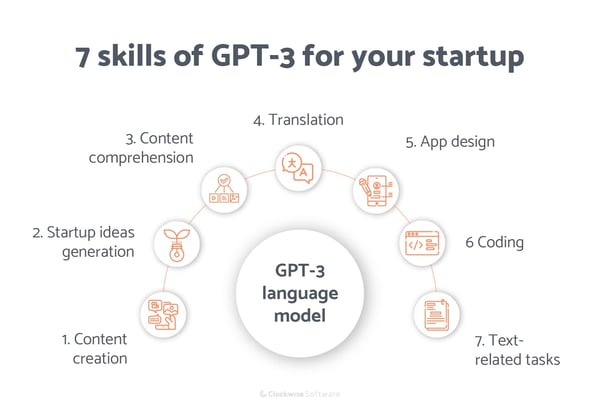
What is gpt-3? Seven uses of gpt-3: Content creation, startup ideas generation, content comprehension, translation, app design, coding, text-related tasks.

Image Source

Text Generation

GPT-3 uses NLP not only to analyze and understand human text but also to create text that is human-like in response. This is the biggest takeaway and arguably the greatest use case for the AI tool, as it can be applied to various tasks.

Text generation can be useful for real-time communication, responding to prompts, and filling in the blanks, among other things.

Here are a few use cases for text generation using GPT-3:

  • Customer service
  • Virtual assistants
  • Chatbots
  • Content creation
  • Language translation

For example, let’s say you want to improve your customer service support process. You can use GPT-3 to generate instant and human-like responses on behalf of your customer support team.

Because GPT-3 can quickly answer questions and fill in the blanks when needed, it can be used for real-time, back-and-forth messaging in customer service. It would also help reduce the response time, which customer support professionals know is critical.

Another valuable way to use GPT-3 is for content creation purposes. The AI can generate text for various content assets such as social media posts, blog posts, and even video scripts. The best part, again, is how quickly GPT-3 can produce content.

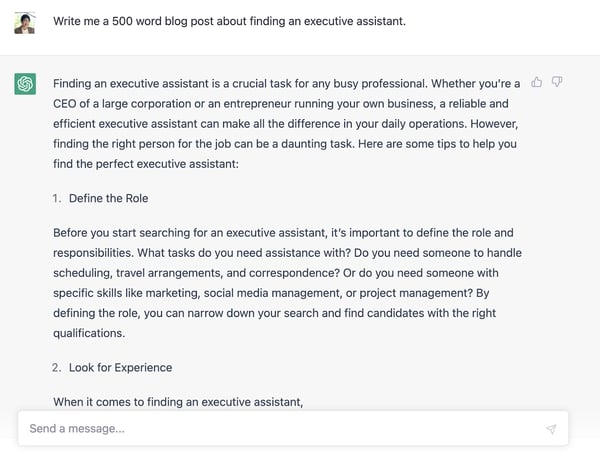
chatGPT being used to write a blog post about executive assistants

By taking advantage of GPT-3’s speed, brands and creators can cut significant time out of the content creation process, which is valuable when producing a substantial amount of content on a regular basis.

Adaptability

While it’s not perfect, GPT-3 has been highly trained in deep learning and can adapt to a wide range of tasks aside from text generation.

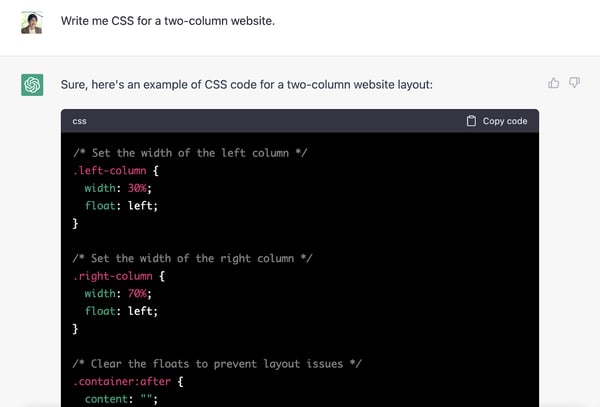
While it’s not perfect, GPT-3 has been highly trained in deep learning and can adapt to a wide range of tasks. For example, the tool can be used to generate simple code. This makes it powerful for creators and developers who want to integrate NLP into their applications but lack the right expertise.

chatGPT being used to write code

Remember that generating more complex tasks like code is not GPT-3’s expertise. So while it can produce lines of code when prompted correctly, the code may need debugging to ensure it meets the intended functionality.

The key to getting the most out of this function is giving GPT-3 the right prompts to help program what it produces.

It’s also important to note that GPT-3 is not open source but can be accessed through an API. This makes it easy for developers to integrate it into existing applications. Developers can use GPT-3 to create NLP features in their applications without developing their own algorithms or models.

Time and Cost Savings

GPT-3 is fast. The speed at which it can generate text is incomparable.

For example, when used to fill in the blanks for prompts or to answer questions, GPT-3 can have a response ready in seconds.

While it may take longer for GPT-3 to handle more complex tasks, such as analyzing large datasets, the tool is still much faster than other processors — or humans, for that matter.

When used to supplement or support an organization’s current practices, GPT-3 can save time. And saving time helps save on costs, which is another important consideration for organizations of all sizes — from lean startups to enterprise-level companies.

With the time and cost savings from using a text generator like GPT-3, your organization can use those resources in more effective business areas that will drive impactful results.

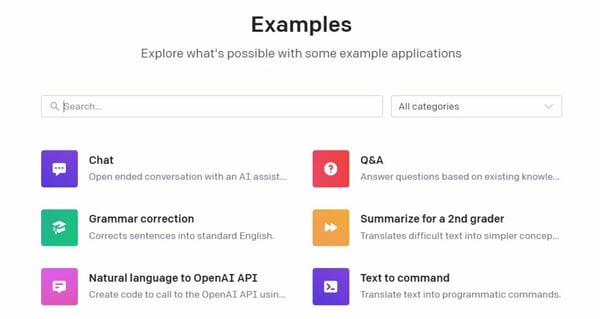
What is gpt-3? Examples of uses: Chat, grammar correction, natural language to OpenAI API, Q&A, summarize for a 2nd grader, text to command.

Image Source

GPT-3 Limitations

GPT-3 may be a valuable language processing tool, but it’s also important to consider its limitations before diving in. Here are a few ways GPT-3 may be limited in its functions when put into practice.

Bias

One of the biggest limitations of GPT-3 is that the information it generates or presents can be biased. This is because it reflects the data it was trained on.

So, if all of the data that was used to train it suggested that dogs are better than cats, then that bias would most likely appear in any text GPT-3 generates about dogs or cats. This is obviously just an example, but it represents a larger flaw in the design.

Bias can be harmful when it’s taken at face value. As with anything found or created on the internet, it’s always best to consider multiple sources of information before making a statement or taking action.

Memory

As human-like as it is, GPT-3 doesn’t have a long-term memory and can’t retain information from each interaction it has. It’s not designed to have ongoing conversations, which means it can’t be used for a continuous or evolving task.

For example, if you’re using GPT-3 to help form responses for your customer support team, it won’t have any memories of each interaction once it’s over. Each session would be considered independent, even if the same customer comes back the next day for support.

Full Context

At the end of the day, GPT-3 is not a human. While it can produce human-like text, it still lacks full context and natural common sense. As a result, it can generate text that doesn’t quite make sense. This is a common result when GPT-3 doesn’t have full context around a scenario.

To navigate this limitation, provide as many details as possible when prompting GPT-3 with a task. Doing so can help limit inaccurate or irrelevant statements. It’s also important to review any text GPT-3 generates to correct any inaccuracies before publishing it somewhere for an audience.

Getting Started

GPT-3 is a powerful language processor — probably the best one yet. It can help save time and resources by generating human-like text, filling in the blanks, and answering questions in seconds.

However, it comes with its limitations, which should be considered before using GPT-3 as a replacement for any one tool or practice.

To get the most out of GPT-3, consider its uses and limitations and experiment with how it can best support your needs.

New Call-to-action

Categories B2B

The Meme-ification of Barbie

Welcome to HubSpot Marketing News! Tap in for campaign deep dives, the latest marketing industry news, and tried-and-true insights from HubSpot’s media team.

Come on Barbie, let’s go party.

Last week the trailer and cast posters for this summer’s anticipated film Barbie the Movie got social media buzzing.

The trailer itself is fairly vague. Outside of introducing the main characters of the film, the clip reveals few details about the actual plot to build intrigue among audiences.

A few hours before the trailer dropped, official images of the cast were released on Twitter. Each image features stylized graphics of each Barbie character and their occupation.

Upon the release of the trailer and images, Warner Bros. launched the Barbie Selfie Generator, an AI-powered website that allows users to put their own photos along with a Barbie-style occupation in a graphic that resembles the cast images.  An accompanying TikTok filter was also created.

Almost immediately, social media feeds were flooded with AI-generated memes.

Social media users who are excited about the film quickly created and shared their own images, distributing valuable user-generated content that has the potential to get further reach than the initial trailer or official posters.

This UGC play touches on an important element of nostalgia for those who played with Barbie dolls as a child. Part of the fun of playing with Barbies was having the dolls act out real-life scenarios and gravitating towards Barbies who had occupations we were interested in.

In other words, many of us wanted to be Barbie and by making ourselves the subject of Barbie-inspired memes, we can be.

Elsewhere in Marketing

The latest marketing news and strategy insights.

Podcast company Acast just signed an advertising deal with the Obamas’ production company Higher Ground.

Spotify announced plans to sunset its live audio app Spotify Live.

April fools? Twitter backtracks on revoking legacy blue checkmarks (except for The New York Times).

For the ‘gram: why parents are reserving social media handles under their children’s names.

LinkedIn is rolling out new personalization features and enhanced search capabilities.

How to get more reach on Instagram: five key takeaways from an “Instagram University” attendee.

YouTube users can now create a dedicated tab for podcast episodes on their channel pages.

TikTok’s parent company ByteDance reported record profits, surpassing other top-earning tech companies in China.

Substack is facing a Twitter dilemma. Tweets that contain the word “Substack” or links to a Substack page are experiencing platform limitations.

How marketers can thrive in a recession: expert tips from HubSpot’s consumer, marketing, and leadership research.

New call-to-action

Categories B2B

Why Quiet Quitting Happens in Marketing & How Managers Can Prevent It [Leadership Data]

While many think quiet quitting is nothing more than setting healthy boundaries, others see it as a sign of poor work ethic.

We could debate whether quiet quitting is good or bad forever. But, are workplaces actually taking the time to understand why it happens and how they can effectively and supportively address it?

In this post, we analyze data from 500 marketing leaders to learn how leaders are keeping up with quiet quitting, why they think it happens, and how they plan to navigate it.

Download Now: The State of U.S. Consumer Trends [Free Report]

Quiet Quitting Fast Facts

Before diving into the why and how, here are a few fast-facts to keep in mind about the state of quiet quitting:

  • On average, leaders think 17% of their staff are quiet quitting — but 33% of full-time employees polled in our consumer trend survey admit to doing it.
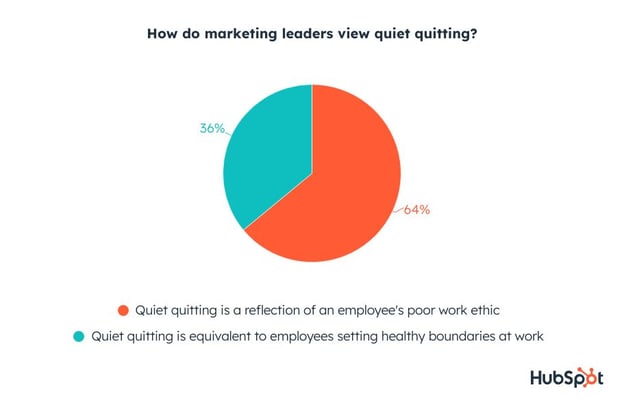
  • 64% of marketing leaders say quiet quitting is a reflection of poor work ethic, while one-third view it as setting healthy boundaries.
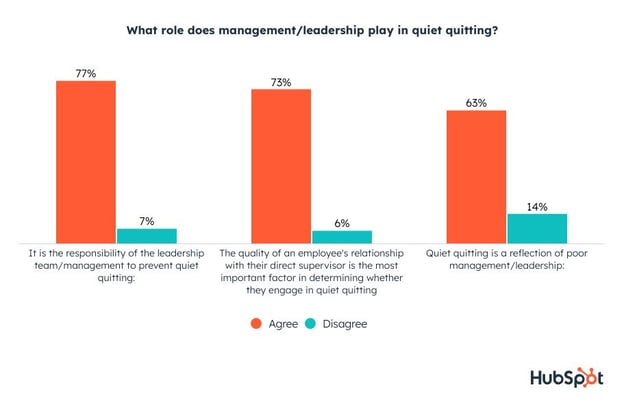
  • 77% of marketing leaders admit that it’s their responsibility to prevent quiet quitting, and 63% say it’s a reflection of poor leadership.
  • 73% of marketing leaders say the determining factor in whether employees quiet quit is the quality of their relationship with their supervisor.
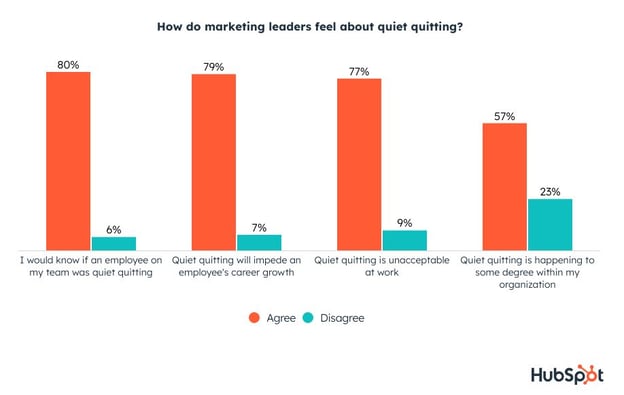
  • 77% of marketing leaders say quiet quitting is unacceptable, but over half of them say it’s happening in their organization.

Marketing Leaders Might Underestimate Quiet Quitting

More than half of the surveyed leaders say they’re concerned about quiet quitting.

And, although 77% of leaders also say quiet quitting is unacceptable, 57% admit it happens in their organization.

how leaders feel about quiet quitting

Although they rightly assume it happens. our research hints they’re still underestimating how often it happens. Marketing leaders say 17% of their staff are quiet quitting, and 80% think they’d know if someone was quiet quitting,

However, in our State of Consumer Trends Report, 33% of full-time employees admitted to quiet quitting in their current job. Since this data is self-reported, it’s likely even higher than that as some might worry about disclosing their quiet quitting status.

one in three fulltime employees quiet quit

Regardless of how often it happens, 57% of marketing leaders are somewhat to very concerned, while many worry about how low productivity and effort could get out of hand.

how concerned are marketing leaders with quiet quitting

With that said, 64% say quiet quitting is a reflection of an employee’s poor work ethic, while only 36% view it as setting healthy boundaries at work.

quiet quitting and poor work ethic

Why Marketing Leaders Think Employees Quiet Quit

When it comes to the cause of quiet quitting, marketing leaders point to a handful of issues that leaders can prevent or help resolve. Here are just a few:

Lack of Accountability

According to leadership, the top reason for quiet quitting is that employees think they can get away with doing the bare minimum. In other words, a lack of accountability.

Poor Incentives

Leaders also think employees quiet quit because workers see no benefit in going above and beyond, feel burnt out, and are unhappy with the company culture.

why do employees quiet quit

If you’re looking at the data above and thinking that these all reflect issues with company management rather than employees trying to skirt by, you would be right. And marketing leaders know this too.

Employee-to-Supervisor Relationship

Most marketing leaders agree that it’s their responsibility to prevent quiet quitting and that the trend is a reflection of poor leadership/management.

what role does management play in quiet quitting

In fact, 73% of marketing leaders say the determining factor in whether employees quiet quit is the quality of their relationship with their supervisor.

How Marketing Leaders Navigate Quiet Quitting

A whopping 66% of marketing leaders say their leadership team has explicitly discussed how to address it.

But, what solutions are they discussing or trying?

While it might not always be possible, here are few potentially simple and thoughtful ways to make employees feel happier and fulfilled at their workplace, thus — feeling more connected to their job.

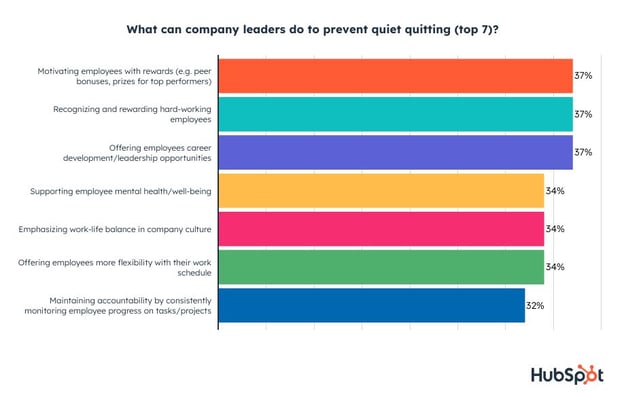
Marketing leaders say motivating employees with rewards, recognizing hard-work, and offering career development or leadership opportunities are some of the most effective strategies.

how company leaders can prevent quiet quitting

After COVID-19, we all took a look at how our workplaces care about our health, mental wellness, psychological safety, physical safety, and overall well-being. And, many employees chose to leave workplaces that couldn’t keep up.

So, it’s not shocking that marketing leaders encouraged supporting employee health and well-being, emphasizing work-life balance in company culture, and offering employees flexibility in their work schedules.

If you’re worried your workplace is primed for quiet quitting due to management, lack of accountability, or other reasons, read up on these resources with expert insights from great leaders, managers, and even psychologists:

What Marketers Should Think About Before Quiet Quitting

While you should make setting boundaries and workplace standards key parts of the conversations you have with your manager, be cautious when entering “quiet quitting” territory.

When setting healthy boundaries, you should continue meeting the expectations of your job description and keep your colleagues in mind so they don’t have to take on extra work themselves.

If you decide to disclose that you’re quiet quitting in the workplace, keep in mind that some managers will not be pleased, while others will want to support you in setting those boundaries. Regardless, know that many marketing jobs require you to exceed the expectations of the current role to earn raises, bonuses, or promotions. Because of this, long-term quiet quitting could make upward motion difficult at any company.

Ultimately, try to keep an open dialogue about how you’re feeling in your role, what goals you’d like to reach for, what your most effective working style is, what could be holding you back, and how your team can create a positive and psychologically safe environment.

The Marketing Executive’s Playbook

Whether you agree or disagree with marketing leaders on quiet quitting, it helps to get their perspective on major industry trends.

Check out our Marketing Executive’s Playbook as well as our Act Like a Leader, Think Like a Leader series, for insights from leaders on their goals for 2023, the top challenges they expect, how they’re preparing for a recession, how marketers can make the greatest impact in their roles to get promoted, and much more.

New Call-to-action

Categories B2B

AI Detection: How to Pinpoint AI Generated Text and Imagery [+ Detection Tools]

AI-generated content is a fascinating development, and we’re seeing more and more articles, stories, and images created by AI tools. (Thanks, AI, for the intro sentence.)

But, the rise of advanced AI generation tools has exposed potential issues, from people being unable to detect the difference between AI and human generations to AI predictions and analysis being flat-out wrong.

This is where AI detection comes in, as it’s a way for people to uncover when text, images, and even videos are machine-generated, so they can make informed decisions on the content they consume. In this post, we’ll cover:

Free Guide: How to Use AI in Content Marketing [Download Now]

AI detection tools don’t know the meaning of words and use context to analyze text. To get more technical, tools use the context of what’s to the left of the following word to predict the likelihood of the word to the right.

The more predictable the word to the right is, the more likely the text is AI-generated. On the other hand, human-written sentences vary from predictable patterns and are more creative.

If you’re anything like me, a basic example might be helpful to understand this. Let’s break it down.

Say someone inputs the sentence, “Bunnies are so fluffy.”

The tool uses learned data and context of words to the left of “fluffy” to predict that “fluffy” is more likely to come next, more so than words like “cute” or “soft.”

Since the sentence follows a highly predictable pattern, the tool will likely classify the text as AI-generated.

AI detection tools work at a much larger scale with more complex sentences and paragraphs than “Bunnies are so fluffy” to make predictions and classifications, but this is a basic example and shows how the process works.

Some detection tools analyze images and videos and use pixel anomalies to determine if something is AI-generated.

How to Detect AI-Generated Text

There are no set rules or guidelines for identifying AI-generated text, but here are some things to look out for:

  • Repetition of words and phrases: AI knows what it’s talking about, but not to the extent human experts do. Its outputs might repeat the same keywords and phrases with little variation when discussing a topic.
  • Lack of depth: Generation tools lack depth and can’t go beyond basic facts to truly analyze a topic and develop unique insight. AI-generated text might read more robotic and prescriptive than creative and have a generic tone.
  • Inaccurate and outdated information: The facts that content generation tools have are typically correct, but since the tools make predictions, outputs can be incorrect or unrelated to true facts. In addition, information can be outdated, like how ChatGPT is limited to information pre-September of 2021.
  • Format and structure: Generation tools follow the same sentence structure as humans, but sentences can be shorter and lack the complexity, creativity, and varied sentence structure humans produce. Content can be streamlined and uniform with little variation.

Human-written text is also more likely to have typos and use informal and casual language and slag.

Roft.io is a fun game to test your detection skills and see how good you are at predicting when text is AI-generated.

How to Detect AI-Generated Images and Videos

Identifying AI generated images and videos can be a bit more challenging than detecting text. Some commonly discussed tells are:

  • Textured backgrounds, images that look airbrushed, random brush strokes throughout images
  • Overall image sharpness, or parts of images that are blurry while others are more clear
  • Noticeable text in the background of images
  • Asymmetry in human faces, teeth, and hands
  • Signs of artist watermarks or signatures (AI tools are trained from existing artwork)

Tools like DALL-E 2 place a watermark on image outputs, but they might not be easy to spot. OpenAI also allows people to remove a watermark. You can also reverse image search to see if there are any traces of an image on the web.

The challenge of detecting AI images and videos is why deepfakes are so dangerous, as videos and images that seem lifelike enough can rapidly spread misinformation.

AI Detection Tools

At the moment, it might be easier to tell if something is AI generated because it sounds robotic, or someone’s hand is missing two fingers in an image. If generation tools become more sophisticated, it might be harder for humans to find the key discrepancies.

Regardless of future progressions, detection tools can be more helpful than our own deduction abilities in classifying AI-generated content, and there are various options available.

Below we’ll go over some of them and rate their effectiveness using an AI-generated paragraph from HubSpot’s Content Assistant (which uses GPT). Here’s what it gave me when I asked it to write a paragraph about dogs:

“Dogs are simply amazing creatures. They are loyal, loving, and endlessly entertaining. Whether you need a furry friend to cuddle with on the couch or a loyal companion to explore the great outdoors with, dogs are always up for the task. They come in all shapes and sizes, from tiny teacup Chihuahuas to majestic Great Danes, but all dogs share one thing in common: a boundless capacity for love and affection. Whether you’re a lifelong dog lover or a newcomer to the world of canine companionship, there’s never been a better time to discover the joys of life with a furry friend by your side.”

Note that human writing can still trigger a tool if it follows a predictable pattern.

1. ZeroGPT

  • Price: Free or contact for custom API
  • Tests for: ChatGPT and Google Bard

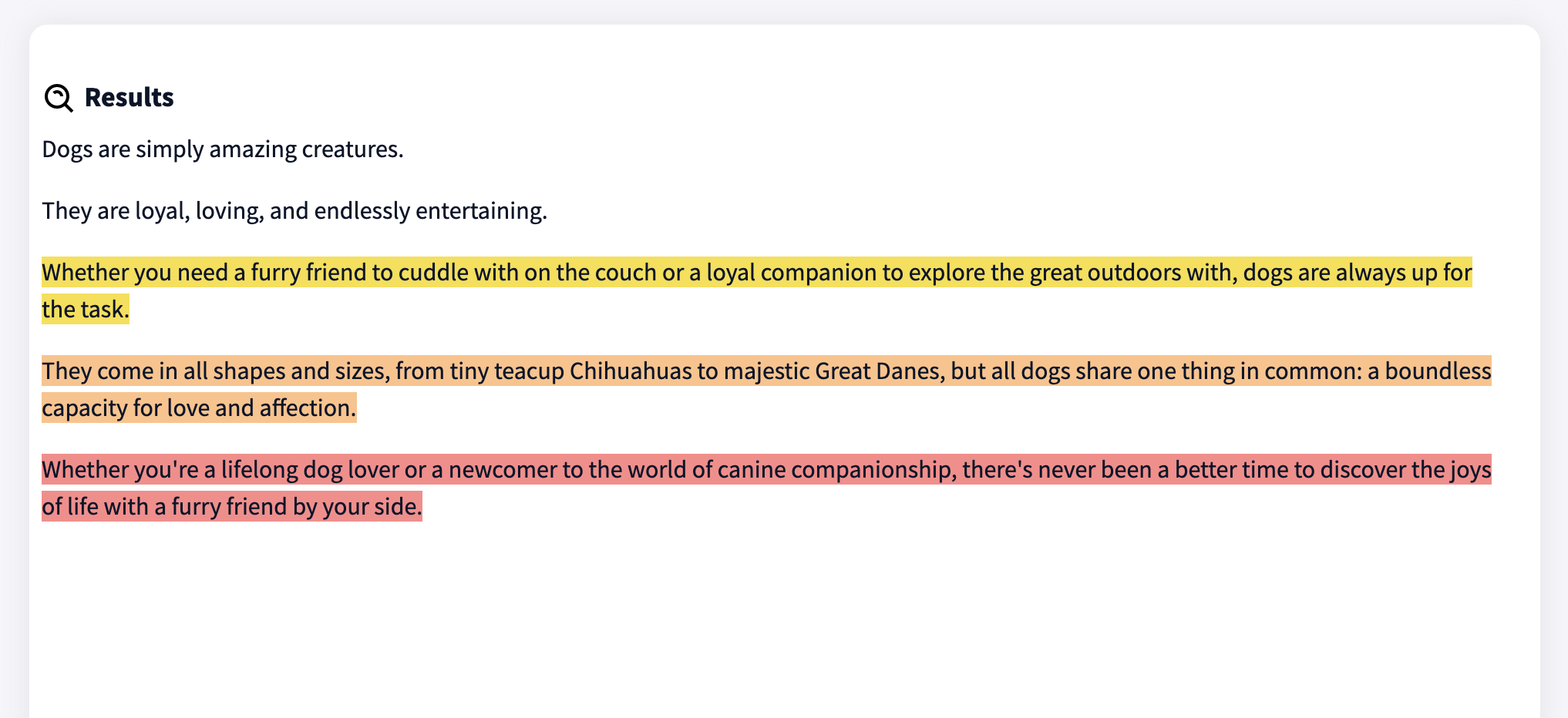
ZeroGPT’s algorithm is trained on 10M+ articles and text to have a detection accuracy rate of 98%. It supports multilingual text and detects popular language generators like Chat GPT, GPT-4, and Google Bard. Outputs highlight sentences most likely to be written by AI.

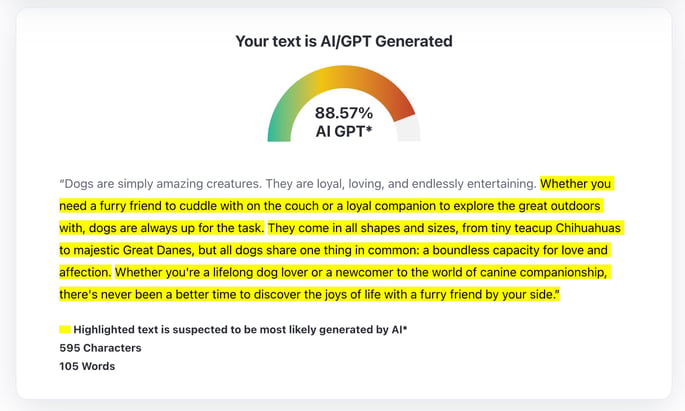
I entered the AI-generated paragraph about dogs, and it predicted the text is 88.57% AI/GPT generated.

best ai detection tools: zerogpt

Best for: ZeroGPT was built for educators to test for AI-generated content, but it works for anyone looking to detect AI content.

2. Giant Language model Test Room

  • Price: Free
  • Tests for: Developed in 2019 for GPT-2 text, might be unreliable on other generators

MIT-IBM Watson AI lab and the Harvard NLP group created the Giant Language model Test Room to detect AI-generated text. It analyzes inputs based on how likely each word is to appear based on the word immediately to the left. The more predictable the word is, the more likely the text is written by AI.

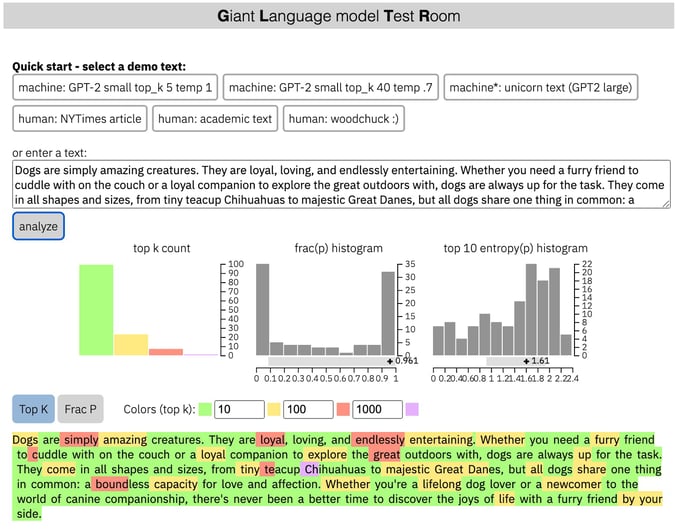
This tool doesn’t give a percentage but color codes words based on their predictability, with green meaning the word is part of the top 10 most predictable words.

Most of my paragraph is highlighted green, so the words are part of the top 10 most predictable (based on context) and more likely to be AI-generated.

best ai detection tools: giant language model test room

Best for: Testing GPT-2 and learning more about predictable writing through an in-depth probability analysis.

3. Originality.AI

  • Price: Free 50 credit trial, then $0.01/100 words (1 credit scans 100 words)
  • Tests for: ChatGPT, GPT-3, GPT-3.5, GPT-NEO, GPT-J

Originality.AI Chrome Extension, built by content marketing experts, detects multiple versions of GPT with 94% accuracy. It scores text on a scale of 0-100, with a higher score being a higher likelihood of being produced by AI. You can also use the tool to scan for plagiarism (beneficial for educators). It’s the most accurate with more than 50 words.

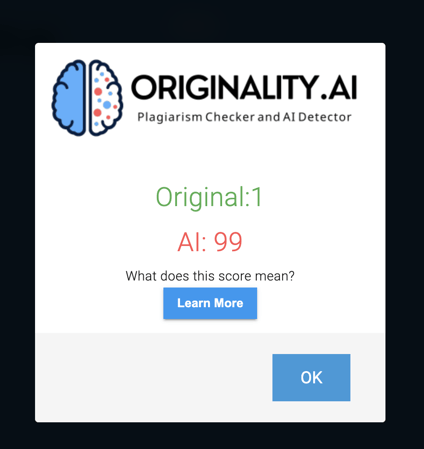
With my test, it said that the paragraph was 99% likely to have been written by AI.

best ai detection tools: originality.ai

Best for: The Chrome extension makes it perfect for anyone looking for a seamless and immediate detection process when writing and reading online. Writers, content marketers, and web publishers alike can leverage this tool; not for academics.

4. Content at Scale

  • Price: Free version, or contact for API pricing
  • Tests for: GPT

Content at Scale’s AI Detector uses 3 AI engines and natural language processing to detect ChatGPT, all versions of GPT, and other generators. You can use it to test SEO, educational, and marketing content. The tool needs at least 25 words for reliable results, and you can enter up to 25,000 characters.

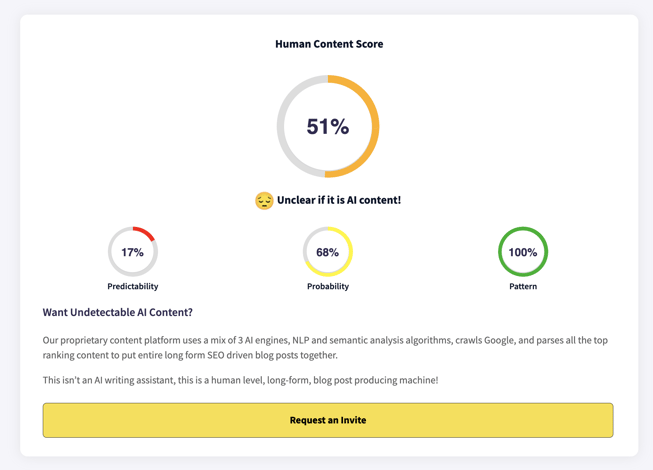
My test results were inconclusive because the tool couldn’t say with certainty if the paragraph was AI-generated. It gave a human content score of 51% with 17% predictability. 

best ai detection tools: content at scale

It did say with certainty that the last sentence is AI-generated.

best ai detection tools: content at scale

Best for: SEO and marketing-focused content creators to get line-by-line text breakdowns and analyze longer pieces of content (up to 25,000 characters).

5. Writer AI

  • Price: Free version or contact for API pricing
  • Tests for: ChatGPT and other generators

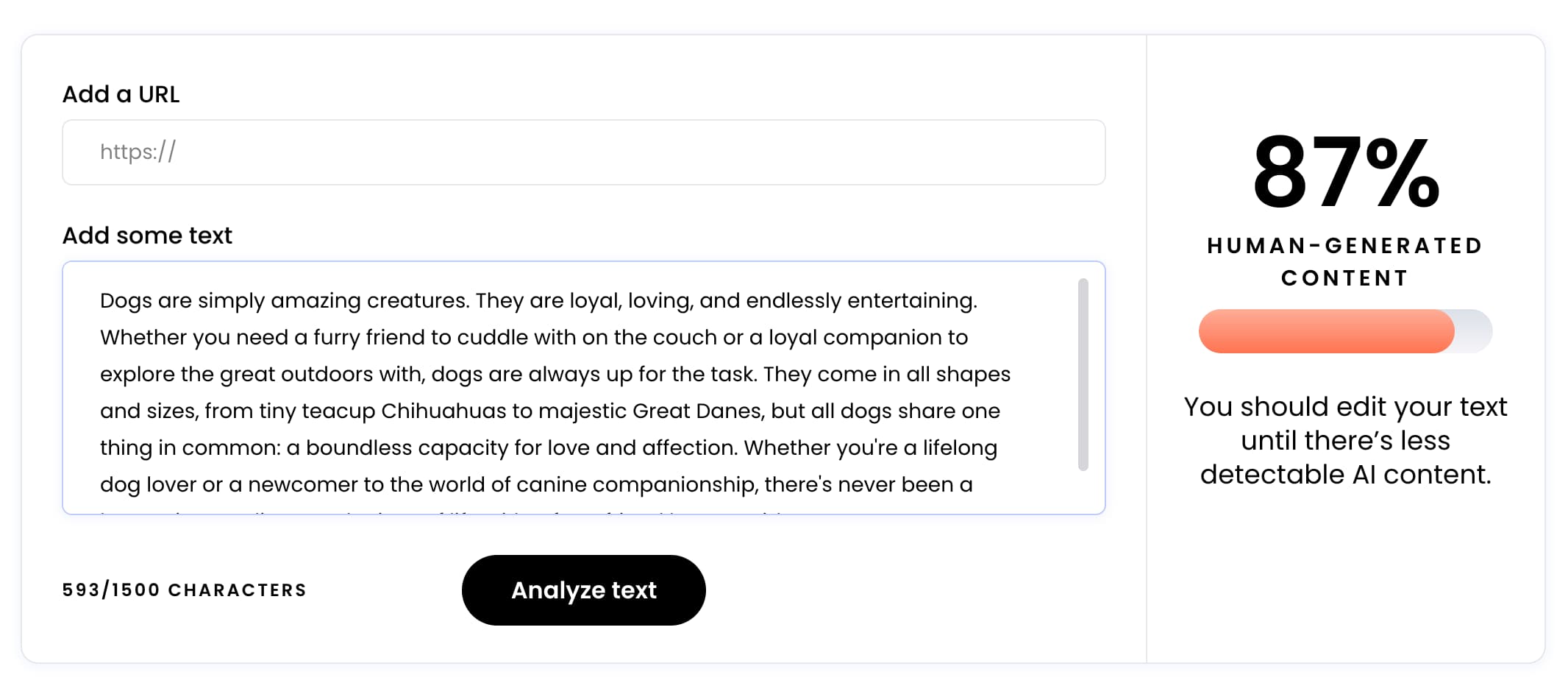
Writer AI’s content detector estimates how much text is AI-generated. The free and paid versions have a 300-word limit (1,500 characters), and results give a prediction percentage for how much of the text is human-generated content.

It scored my paragraph as 87% human-generated, with a recommendation to edit the text until there’s less detectable AI content. 

writer

Best for: B2B and enterprise and agencies looking to analyze and edit content before publishing.

6. Hive’s AI Detection Tools

  • Price: Free demo, contact sales for API pricing
  • Tests for: ChatGPT, GPT-3, DALL-E, Midjourney, Stable Diffusion

Hive offers a suite of AI detection tools for images, text, and deepfakes.

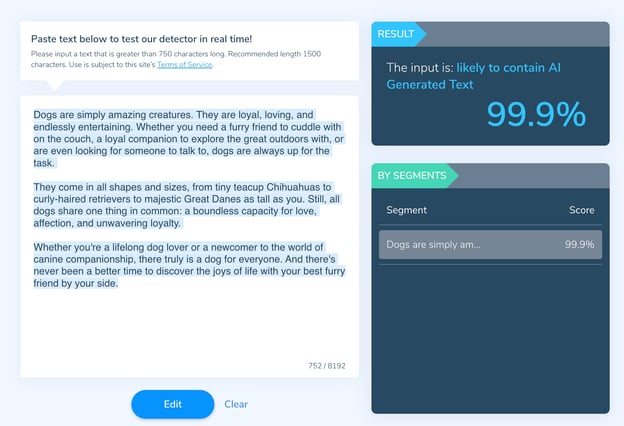
The text detection tool gives a confidence score for how likely something is AI-generated, and estimates which sections are most predictable. It also estimates which sections of text are more likely to be AI-generated. It works starting at 750 characters with a recommended length of 1500 characters.

I had to input extra words to reach the character limit, and it predicted the paragraph was 99.99% likely to contain AI-generated content.

best ai detection tools: hive moderation

The media recognition tool identifies AI-generated media, gives a classification (AI-generated or not), confidence score (≤ 1), and image generation source (like DALL-E). (Documentation, tool page)

The deepfake detection tool tests if images or videos are deepfakes through facial classification. (Documentation)

Best for: Screening work to detect AI content or for websites to detect and moderate AI-generated images and text.

7. Bonus: OpenAI’s Text Classifier

  • Price: Free (requires account)
  • Tests for: All versions of GPT

OpenAI’s Text Classifier can distinguish between AI-generated text and human-written text. It works best with more than 1,000 characters and English text.

OpenAI does note that it is not entirely reliable and only correctly identifies 26% of AI text and incorrectly labels human-written text as AI 9% of the time, but reliability increases for longer text. It recommends using the classifier as a complement to other testing methods.

Best for: Detecting GPT

What’s the best AI detection tool?

I outlined each tool’s individual test score above, but here’s a table comparing scores.

Tool score
ZeroGPT 88.57% AI content
Giant Language Model Test Room Probability only
Originality.AI 99% AI content
Content at Scale 49% AI content
Writer AI 13% AI content
Hive 99.99% AI content

Based on these rankings, 

  • First place is a tie between Originality.AI, GLTR, and Hive AI
  • Second place is ZeroGPT
  • Third place is Writer AI
  • Fourth place is Content at Scale

Over to You

AI detection makes it a lot easier to distinguish between machine and human-generated text. As AI tools become more and more accurate, AI detection will remain important in helping people determine the legitimacy of the content they consume. 

New Call-to-action

Categories B2B

How Jasper.ai Writing Assistant Works [+ Its Pros and Cons]

If you’re keeping up with conversations about generative AI, you’ve likely heard of Jasper.ai.

Sign Up to Try HubSpot's AI Tools

In this post, I’ll cover its top features, show how it works, and explain the pros and cons of using this software.

The tool offers hundreds of templates to choose from, responding to many scenarios – like if you want to write a long-form blog post or need the perfect response to a review. It takes the stress of a blank page right out of writing.

Currently, Jasper.ai is best for marketers, offering advantages to companies of any size.

Jasper.ai Features

  • Text and image AI generation
  • Integration with Grammarly and other Chrome extensions
  • Revision history
  • Auto-save
  • Document sharing
  • Multi-user login
  • Plagiarism checker
  • Brand voice customization

One additional feature worth checking out on Jasper.ai is the “Explain it To Me Like a 5th Grader” option. As the name suggests, this feature allows you to select the text that may be jargon-heavy and reword it to simplify it – enough for a fifth grader to understand it.

This is particularly helpful when writing about a complicated topic to an audience with limited knowledge. It helps you keep the essence of your sentence while increasing its accessibility.

How Jasper.ai Works

  1. Choose a template.How Jasper.ai writing works: step 1

  2. Add your inputs.How Jasper.ai writing works: step 2

  3. View output.

How Jasper.ai writing works: step 3

How reliable is the output?

It depends on the content. I’ve found that Jasper.ai works well with tactical, step-based content that’s been well documented. It also does well with marketing copy, like social media captions and ads.

But if the topic is too niche – i.e. there’s not much documentation already out there – the information will likely be incomplete or could be wrong altogether.

What are the pros and cons of Jasper.ai?

Pros

  • Generates in seconds – Seeing content appear out of thin air truly never gets old with generative AI. After a few simple inputs, you can have a full page of content to work with.
  • Sounds natural, well-written, and accurate– What good is gen AI if the output isn’t good, right? Jasper.ai does a fantastic job of sounding natural and matching the tone you’ve requested while keeping it error-free.
  • Fleshes out ideas – If you’re struggling to put pen to paper, Jasper.ai can help spark new ideas, new angles for your content.
  • Affordable – Jasper.ai is a great option for a small business looking to scale up its content production with a limited budget. The first tier starts at $24/month for 20,000 words – enough to get most marketers started.

Cons

  • Lacks personality and voice – AI can’t provide the experience and personalization that a human can add to a piece. While it can mimic tone, the output is often generic.
  • Can require heavy editing – This con is only a con depending on what you’re creating and how you want to leverage AI. Some only want to use software like Jasper.ai for a rough first draft, so heavy edits aren’t a bad thing. For others who are looking for a more polished end product, you’ll get this more easily with shorter-form content.
  • Struggles with niche topics – Jasper.ai seems to perform best with straightforward content requests. For example, it will likely do better writing a post on deleting your Instagram account than upcoming short-form video trends.
  • No fact-checking – Jasper feeds you a compilation of what it finds online. So, if the information’s incorrect, guess what? Your output will be the same.

How much does Jasper.ai cost?

Jasper.ai offers 3 pricing tiers:

  • Free trial – Jasper offers a five-day free trial with 10,000 word credits.
  • Starter – Starts at $24/month for 10,000 words, over 50 templates, and is ideal for individuals and entrepreneurs.
  • Boss – Starts at $49/month for 50,000 words, over 50 templates, and is ideal for marketers and small businesses.
  • Business – This will require custom pricing and is ideal for teams and businesses looking to scale their content production.

Alternatives to Jasper.ai include HubSpot’s Content Assistant, Copy.ai, Writer, and Frase.

New Call-to-action

Categories B2B

Using Human-Centered Design to Create Better Products (with Examples)

To understand human-centered design, let’s start with what it isn’t.

Imagine you work at a gaming design company, and one day your boss comes to you and says, “Teenagers these days — they need to get off their phones. Let’s design a crossword-puzzle board game for teenagers — they’d welcome the opportunity to get offline.”

Your boss has good intentions, but his intentions don’t match your consumer’s reality. His idea isn’t empathetic towards a teenager’s passions, and it isn’t a solution that fits their wants and needs.

Download Our Free UX Research & Testing Kit

Now, let’s look at a real example of human-centered design: meal subscription boxes.

Take HelloFresh, founded in 2011 by Dominik Richter, Thomas Griesel, and Jessica Nilsson. The company delivers a box of fresh food to your door, with easy recipes included. The founders recognized that people have trouble finding time to shop for groceries and struggle to create healthy, affordable meals — they came up with a solution to both problems.

Unlike your boss in the first example, the HelloFresh founders didn’t develop an idea unrelated to real consumer needs. Instead, they recognized a struggle someone was facing and then worked to invent a solution. In this way, it’s arguable that human-centered design is a safer and more trustworthy approach to problem-solving.

Whether your role requires you to pitch ideas in marketing meetings or design the products your company sells, it’s critical you know the process of human-centered design. By putting your consumer at the forefront of your creative process, you ensure each product you create and distribute is a true, long-term solution to your consumer’s needs. If done correctly, you’ll gain a much more reliable and loyal customer base.

Now that we’ve covered the importance of human-centered design, let’s dive into the various stages of a human-centered design process and look at some examples so you feel confident implementing the strategy for yourself.

Human-centered Design Process

IDEO — the global design firm behind Apple’s first computer mouse, the Palm Pilot, in 1998, and more — came up with three phases for the human-centered design process, which has helped them create such successful and long-lasting products.

The three phases of the human-centered design process are inspiration, ideation, and implementation.

Phase One: Inspiration.

The inspiration stage requires true on-the-ground research. You’ll need to engage directly with your target audience to understand their biggest problems and pain points. It’s important to research your target audience. You want to find out: what makes your consumer happy? What makes them frustrated? What do they do first in the morning? How do they devour content? What takes up most of their time?

Essentially, you want to see from their point of view.

There are a few different methods you could use to research your audience. For instance, you might send out surveys to customers via email or create a survey submission form on one of your web pages. If you find it difficult to get people to fill out the survey, you might offer incentives — 10% off their next purchase or a ticket for a raffle contest with a giveaway prize.

You could facilitate a focus group if you don’t feel comfortable with surveys.

If you often interact with consumers on the phone or email, you might hear about issues they’re having organically.

If you’re still unsure which direction to take, check out 19 Tools & Resources for Conducting Market Research for more ideas.

Once you’ve done your market research, list with your team all the trivial and major problems with which your consumer struggles (within your skill set or products, of course). Consider the biggest hassles your consumer faces and how your products could get better to solve those issues.

Phase Two: Ideation.

Like the HelloFresh founders, your team must envision a future that doesn’t exist yet. Now that you know what problems your consumer faces, what solutions could help them become better, happier, and more productive?

The ideation stage is your “no such thing as a bad idea” brainstorming session. It requires you and your colleagues to create and tweak a long list. Take good ideas, and make them better. Refine and tweak them. Imagine all the different ways you could solve a customer’s problem, big and small.

When you’re confident you have a realistic, human-centered idea to solve for a customer’s needs, you’ll need to envision how a product could solve that solution.

Let’s use our HelloFresh example to see this stage more clearly. In Phase Two, Ideation, you’ve already recognized that people don’t have time to grocery shop and want healthy meals (that was Phase One). In this step, you’ve made a long list of potential solutions, i.e., “YouTube tutorials to create healthy meals? Write a cookbook? Pay for someone to come into your home and cook for you? Pay for a truck to deliver healthy food to your door?”

Ultimately, your team has decided — aha! We’ll create a meal subscription service.

Now, you want to prototype and test this product on your ideal persona.

Remember, the whole premise behind human-centered design is digging into your consumer’s actual needs and providing a solution to those needs. If you receive feedback on limitations of your product, don’t get dejected — get inspired. That feedback is exactly what you need to ensure your product will gain long-term traction with your target consumer base.

Phase Three: Implementation.

So you’ve created and tested a prototype of your product, collected feedback, and seem ready for release to a wider audience.

Now, it’s time to market your product. Ultimately, you’ll want to imagine yourself in your consumer’s shoes and then market to them from that point of view: How would I like to learn about this product if I were them?

Since your product revolves around your consumer’s struggles, you’ll want to develop an effective marketing strategy to spread the word about your product as a long-term solution to a real struggle.

You also might want to consider partnering with other businesses who offer similar solutions or share an audience with similar problems. By partnering with a business, you’re able to offer the user more of an all-in-one solution.

Human-centered Design Examples

1. Colgate Toothbrush 

Colgate-Palmolive’s toothbrush, Acti-Brush, was innovative in the 1990s, but since then, competitor toothbrushes have surpassed Colgate’s on the market. Colgate-Palmolive hired Altitude, a design consulting firm focused on human-centered designs, to create a new toothbrush model.

The Altitude team extensively researched the audience and then developed the Motion, a new, slimmer, high-powered toothbrush with oscillating heads and an arcing neck. The entire product, from superficial features to performance, centered around one critical question: will this serve our user’s needs? Ultimately, the Motion successfully solved a user’s problem — needing a slender toothbrush that could still deliver on performance — the industry hadn’t previously addressed.

Screen Shot 2018-06-12 at 2.42.16 PM 

Image Source

2. Spotify

Remember the days of paying $1.99 for one song, or hanging around the aisles of Walmart, searching for your favorite album?

I’d argue that one of the most impressive displays of human-centered design is Spotify — a product that showed me my prior method for purchasing music was a problem before I even recognized it as one.

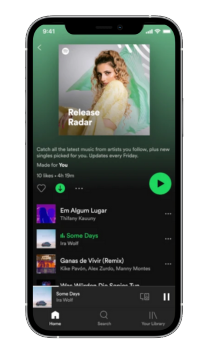
Spotify succeeded by empathizing with their users’ struggle to pay for music from disparate sources and created a solution we could all embrace. Thanks to Spotify, users can get all their music in one place for one monthly fee. I’m willing to pay more for that kind of tailored, customized, helpful service.

Human-centered Design Examples Spotify

Image Source

3. Fitbit

Before handy fitness trackers, we’d have to estimate how many calories we burned in a day and find the inherent motivation to be more active (which, as we all know, is an untrustworthy source).

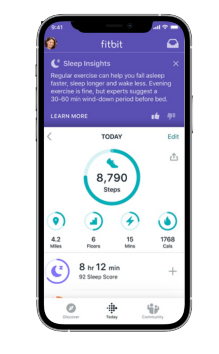
The invention of products like Fitbit is undeniably human-centered. The inventors of fitness trackers recognized people’s challenges with tracking and maintaining fitness goals and provided a useful long-term solution. The product works with the user in mind by telling the user how many calories she burned and urging her to exercise more.

Human-centered Design Examples FitBit

Image Source

4. Venmo

Venmo is another example of a product that solved a problem before most people realized it was one. I personally didn’t see how cumbersome exchanging money was until Venmo provided a solution.

The founders of Venmo, Andrew Kortina and Iqram Magdon-Ismail, stumbled across the idea of Venmo only when they encountered the problem. They went to New York City, and Iqram forgot his wallet. Andrew paid for everything, and at the end of the trip, Iqram wrote him a check.

During that exchange of money, they thought, “Why is this still the best way of exchanging money? Why can’t we do this on our phones?”

The Venmo founders needed to solve a problem they encountered and build a solution from which other people could also benefit.

Human-centered Design Examples  Venmo

Image Source

Feeling Inspired?

Hopefully, these examples confirm the usefulness of human-centered design for creating long-lasting and innovative products. You’re now ready to tackle your creative process from a new angle — the human angle.

ux templates


Categories B2B

How Surging Demand Drove 18.8% Growth: NetLine’s 2023 B2B Content Consumption Report

Hot off the heels of our 2022 State of B2B Content Consumption and Demand Report for Marketers being named the Finny Award winner in the Best Research-Based Content category, we’re ecstatic to announce the 7th edition has been released. 

Introducing the 2023 State of B2B Content Consumption and Demand Report for Marketers

B2B content consumption continues to surge. 

All told, we analyzed more than 5.4 million first-party registrations—an 18.8% increase YOY.

NetLine’s research unearthed dozens of incredible insights into the behaviors of B2B buyers.

Here are a few key highlights from this volume:

  • Professionals registering for Webinars are 43.5% more likely to be correlated with a purchase decision <6 months.
  • Consumption within the Computer/Technology industry—the largest segment in NetLine’s platform—increased 13.2% YOY.
  • eBooks represented 33.6% of total registrations and were 3.5x more likely to be downloaded in 2022 compared to White Papers—yet Marketers produced 30% more White Papers than eBooks.
  • 18.8% of B2B professionals expect to invest within the next 6 months.

This last bullet on buyer-level intent data is where we’ll pick up in just a moment. 

First, let’s talk about the B2B consumption “big picture.”

Total Demand Has Risen 54.8% Since 2019

Yes, that’s right. Since 2019, total request volume is just shy of 55%. That’s wild. 

There’s no way to avoid the outsized influence COVID had on these figures and its ripples moving forward. The pandemic ushered in an even greater reliance on digital materials, formats, and marketing vehicles to allow businesses to connect with their audiences. (This case study featuring our client Mercer US Health is a perfect example of this.)

Now, onto the good stuff.

More than One-Third of B2B Buyers Are Investing Within the Next 12 Months

Businesses want to know when their prospects are likely to buy. As our President, Werner Mansfeld likes to say, the timing element is often forgotten in the sales process. Considering how pertinent it is to any relationship, having little to no understanding of timing is less than ideal.

Backed by our substantial buyer-level intent insights, we found that despite the lack of stability in the economy, B2B buyers still find themselves more than willing to buy, as 33.4% of them expect to make purchase decisions within the next 12 months—a YOY increase of 8.8%. 

Buyers are looking to invest in the more immediate future, too, as 18.8% of all respondents stated they were looking to make additional investments within the next six months, a 23.6% YOY improvement.

For years, we assumed that content consumption was directly connected to investment. The belief was the more your audience consumes, the closer they are to a purchase decision. Thanks to our 2022 Consumption Report, we confirmed this. 

You don’t need the entire B2B market to buy from you. Aside from this being highly improbable, it’s simply not necessary. What we’ve found, however, is that buyers are ready, so long as you’re studying the right signals.

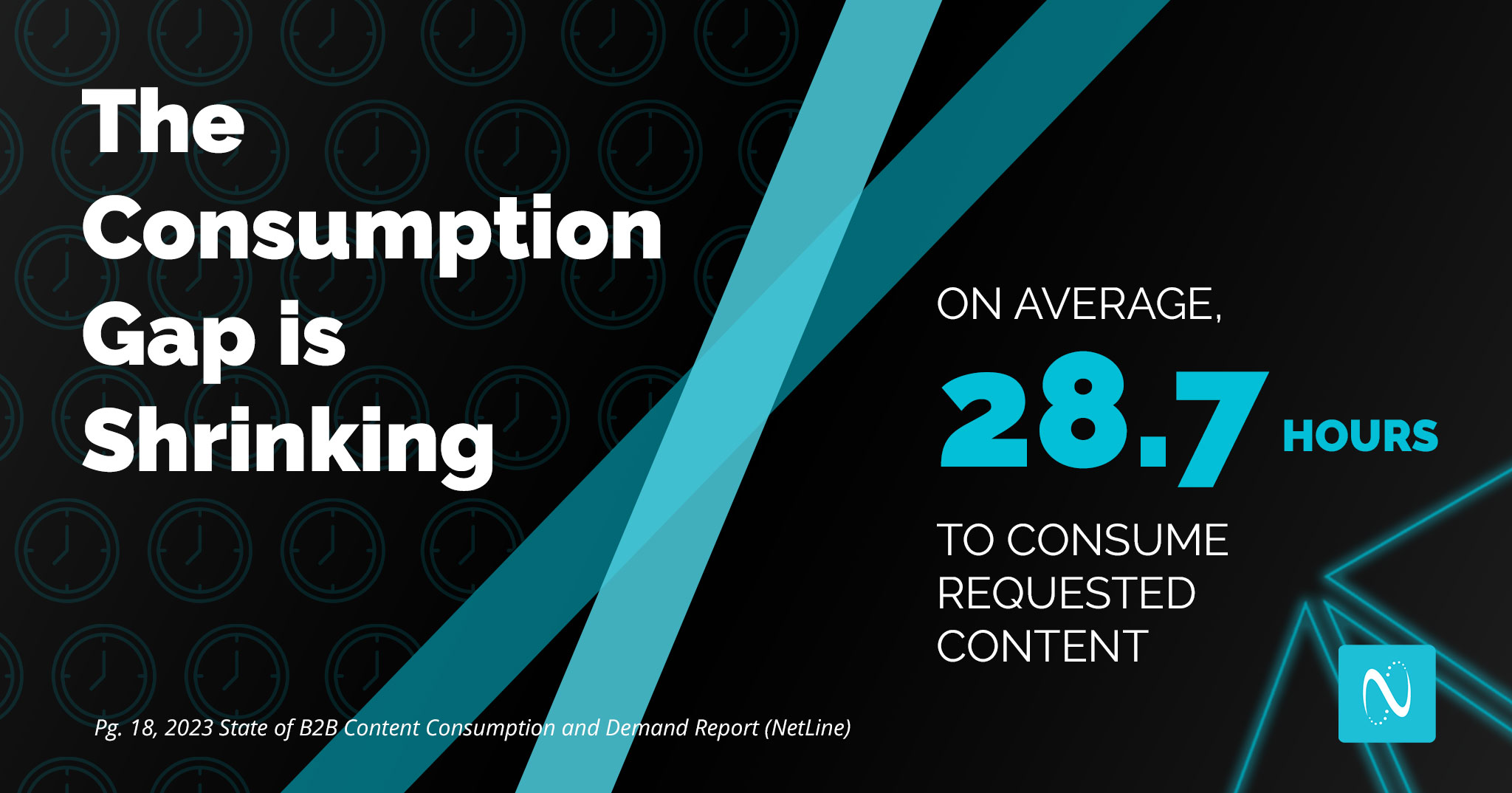
The Consumption Gap Shrunk 4.6 HoursThat’s Good

The Consumption Gap is one of NetLine’s most unique and impactful statistics found in each report. We define the Consumption Gap as the time between the moment content is requested and the moment it’s opened for consumption.

From the time COVID hit, the Consumption Gap began widening even further, eventually evolving from gap to canyon. B2B professionals were taking longer and longer to actually consume the information they’d requested.

(This is precisely why we recommend our clients and other B2B professionals chill for 48 hours before reaching out to a new content lead—simply because they probably haven’t consumed the content yet!)

However, we’re happy to report that for the first time in three years, The Consumption Gap has shrunk. As we explain both in the report and in today’s social posts, we provide a few theories as to why this may be the case.

The best theory we have is that, given the state of the economy and the need for improved efficiencies, B2B buyers and professionals are simply more motivated and eager to consume the assets they’ve requested.

The (Evolving) Relationship Between Buying Journey and Content Format

Marketers promoted 30% more White Papers than eBooks in 2022. However, eBooks were 3.5x more likely to be requested. On the surface, these figures don’t align. But remember what we learned from last year’s report: Popularity ≠ purchase intent. 

Last year’s research revealed that White Paper registrations were a greater indication of a user being in the later stages of a purchasing decision. 

White Papers, Survey Reports, On-Demand Webinars, and Live Webinars still find themselves in the More Likely category, while the same applies to Tips and Tricks Guides, Cheat Sheets, and Book Summaries on the Less Likely side.

Still, formats appearing in the More Likely category hold different weight. Identifying which formats hold a stronger, more immediate signal is key to better understanding the behaviors and intentions of your audience.

Immediacy of Buyer Intent by Format

Page 30: NetLine’s 2023 State of B2B Content Consumption and Demand Report for Marketers

Content Formats More Likely

 Associated with a Buying Decision in Under 3 Months 

Content Formats More Likely

Associated with a Buying Decision in 3 – 6 Months 

Software Special Report
Live Webinar On-Demand Webinar
How-to Guide Survey Report
Best Practices Video
Kit Playbook
Executive Brief White Paper

From these findings, four insights stood out from the rest, specifically that B2B professionals registering for…

  • eBooks were 10.4% more likely
  • Reports were 4.6% more likely
  • On-Demand Webinars were 43.4% less likely
  • Live Webinars were 25.4% more likely

…to state that they would invest within the next three months compared to respondents from 2021. 

Notably, eBooks don’t appear on either side of the ledger above. Even with being 10.4% more likely to say they’d invest within the next three months YOY, eBook registrants found themselves in the middle of pack for both categories.

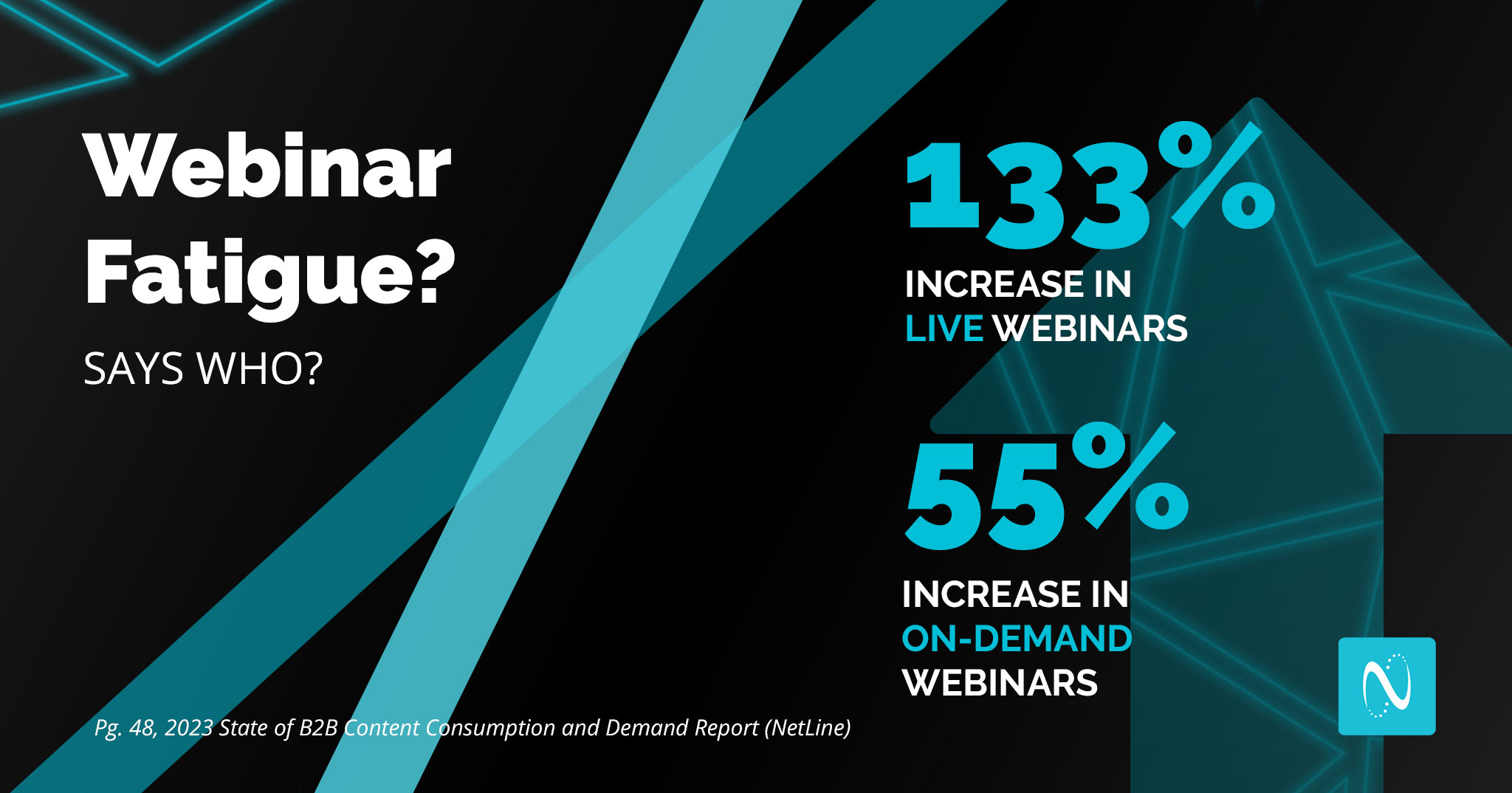
Webinar Fatigue Isn’t Real

Since the back half of 2020, we’ve heard the term, “Webinar Fatigue,” bandied about.

As marketers turned to #webinars to reach and serve their audiences during the COVID pandemic, NetLine saw a total 103% increase in webinar uploads. Similarly, between March and April 2020, ON24 reported a 333% spike in webinar attendance, with an increase of 251% in total demand YOY.

Once the in-person business resumed, it seemed likely that a natural slow down could occur. We kept waiting to see if and when B2B professionals would begin to reject webinars.

And waiting…and waiting…

Nearly three years later, we’re still waiting. We waited so long that Webinar registrations rose 81.2% in 2022.

It appears safe to say that Webinar Fatigue isn’t real.

Individually, On-Demand Webinar registrations increased 54.9% and Live Webinars grew a staggering 132.7%.

B2B marketers continue to clearly believe in Webinars, too, as organizations uploaded 39.3% more Webinars. On-Demand Webinars fell by 21.2% while Live Webinar uploads grew 58.1%.

Did we mention that Webinar registrations are a high-intent signal? It’s an important detail.

Just don’t expect them to drive significant volume. That’s a story for a different blog post.

Learn More About 2023 B2B Content Marketing Trends

Early returns from the data we’re tracking for our 2024 consumption report show that interest and demand from B2B professionals is only growing. As we enter into a new, AI-affected era, it’s vital to again reiterate the need to assess your marketing and how it aligns with real buyer behaviors.

We promise you that there are insights and stats within this report that will change how you market in 2023. 

NetLine’s 2023 Content Consumption Report is now available for download. We hope you learn a thing or two.

Categories B2B

The Fastest Growing Social Media Platforms of 2023 [New Data]

Are people still using Facebook? Is BeReal the next big thing? And is TikTok still just for Gen Z?

If you’re looking for answers to those questions, we’ve got ‘em.

We asked 600+ U.S. adults about the social media platforms they use in May 2022 and again in January 2023 to find out which apps are growing and which are slowing down. Here’s what we found out:

Download Now: The 2023 State of Social Media Trends [Free Report]

Social Media Usage in 2022 vs. 2023

While 84% of US adults unsurprisingly use social media, where are they going when they use it? 

usage of social media platforms by us adults infographic comparing 2022 and 2023 data

Here are a few fast facts about the top platforms US consumers use in 2023, keeping in mind that this list might be different in other countries.

  • Facebook (69%), YouTube (57%), Instagram (45%), TikTok (33%), and Twitter (30%) are the most popular social media apps.
  • BeReal (313%), Twitch (29%), LinkedIn (20%), and TikTok (16%) saw the most growth since last May.
  • Reddit (-11%), Pinterest (-9%), and YouTube (-4%) are the only platforms that saw a decline in usage.
  • While Facebook is the most popular social media platform for people over the age of 25, Instagram, TikTok, and YouTube are the most popular among ages 18-24.

With that, let’s take a deeper dive into the fastest-growing platforms.

The Fastest Growing Social Media Platforms

1. BeReal

BeReal has seen 313% growth in usage from consumers we polled, which was likely fueled by hype. But — as we wonder with all emerging social media platforms — will it last?

The young platform, which gives users one opportunity to post a picture of themselves wherever they are with no filter during a few timeslots — designated by the app each day, went from being used by roughly 0.7% of the population to 2.8%, growing the most of the social platforms we analyzed. But, the real story is how it’s taken off with Gen Z. Usage from just this age group jumped from 1% to 13% (a whopping 1,200% increase).

BeReal does benefit from being the newest social platform we asked about in these surveys, so it had the most room to grow. On the other hand, with other competitors trying to copy its platform, it risks being another trendy social media platform that gets forgotten or lost in the shuffle.

Due to BeReal’s format, it also might not be the most welcoming channel or community for brands, as people join to see the “real” versions of their friends and aim to use the platform to amplify authenticity and human connection. 

2. Twitch

Whether you’re watching Keke Palmer start a family with The Sims, or enthralled by someone’s live coverage of a cool event, it’s clear that streamed content is here to stay. And while social platforms like Facebook, Instagram, and TikTok have enabled and tested live features, Twitch still reigns supreme as the place to go for long-form live video. 

Example of a Twitch homepage.

While it might not seem like an obvious social platform as many people go there to view videos rather than record or interact in them, it’s still continuing to compete with other social channels that have launched their own live-video copycats. 

Since our first survey, Twitch usage grew by 29%, thanks to Gen Z and Boomers with the percentage of total consumers using it growing from roughly 7% to 9%.

Gen Z drove this increase, with their Twitch usage jumping from 13% to 17%.

Boomers are also getting in on the action. In May 2022 just 0.3% used the platform while closer to 3% use it today. While this seems like a small percentage, it still could equate to thousands of additional users. 

3. LinkedIn

Between May and January LinkedIn grew 20% amongst consumers we surveyed, boosted by Boomers. However, the platform is starting to see declines with other age groups.

While LinkedIn usage declined mildly for every other generation, LinkedIn usage among Boomers grew from 11% to 20%, an 85% increase.

All-in-all, we’re not too worried about the slight declines as LinkedIn continues to be a mix of social media and utility that job hunters and recruiters will need, and use to buffer their portfolios, for years to come.

So, if you’re a marketer who leverages the platform, while it’s important to keep demographic shifts in mind — you likely don’t need to pivot your strategy there just yet.

Check out the video below for some tips on how to get started or improve on your current LinkedIn strategy: 

4. TikTok

Despite TikTok’s ongoing regulatory concerns, people who loved the platform back in May seem to be sticking around, while others are beginning to experience the channel for the very first time.

Between May and January, TikTok usage among our surveyed consumers grew by 16%. Usage also grew across all generations — especially with Boomers.

When looking at the generational increase, the number of Boomers who’d used TikTok grew by 164%, showing again that they’re catching on to many viral Gen Z trends and apps.

From our research, we estimate that one in three American adults now use TikTok.

If you aren’t on TikTok yet, you should keep it on your radar and take some time to consider if the app makes sense for your brand. Just keep in mind that it will require some video-related time and resources, as well as user-research into all the trends going on there, to build a successful strategy. You can learn more about TikTok marketing here. 

5. Twitter

Despite fluctuations in leadership, Elon Musk’s controversial takeover, and office-wide changes at the company, Twitter’s social media platform is still holding a strong user base and grew 7% among our consumer audience.

While our sample shows that Twitter pulled in roughly 12% more Gen X users and 27% more boomers, this should be taken with a grain of salt as 9% fewer members of Gen Z survey-takers said they use Twitter in January compared to May.

While it’s still hard to predict how Twitter will continue to grow and perform, especially for marketers, in the future — here’s a helpful guide on how to build and retain audiences and followers that could drive ROI for your brand. 

6. Instagram

It’s no shocker that Instagram is one of the favorites among multiple generations. Between May and January, usage by consumers we surveyed grew 6%. While the channel continues to win over Gen Z and gain attention from Boomers, it might be losing some of its Millennial audience. Below are just a few fast facts.

  • Around 45% of U.S. adults use Instagram, up 6% from last May.
  • Instagram grew 11% with Gen Z and 53% among Boomers (from 18% to 27%).
  • Millennial usage of Instagram went from 65% to 54%, a 17% drop.

Now that we’ve covered some of the fastest-growing social media platforms, here are the ones slowing down in 2023.

Which Platforms are Losing Steam?

While many of the large platforms that saw slowed growth from our consumer pool aren’t going anywhere, the data hints to some consumer shits marketers might want to know about or keep on their radar.

Click here to learn why Reddit, Pinterest, and YouTube might be losing steam compared to their competition.

More Social Media Insights

Want more social media insights? Check out these helpful resources:

Prefer to download a report with everything you need to know? Check out our Social Media Trends Report for free below.

New call-to-action


Categories B2B

3 Consumer Behavior Predictions for 2023 [State of Consumer Trends Data]

Every year, consumers spend differently than the year before. This is because their preferences are evolving, their priorities are shifting, and their behaviors aren’t quite how they were before. So how are marketers supposed to meet their expectations in the new year? By making data-informed predictions.

To help marketers and business professionals prepare for the road ahead, we conducted a bi-annual survey of 600+ U.S. adults in January 2023 known as the State of Consumer Trends Report to learn more about the latest consumer trends and data. Here, we’ll share our top three biggest consumer behavior predictions based on HubSpot Blog Research.

Download Now: 2022 State of U.S. Consumer Trends Report

Consumer Behavior Predictions for 2023

1. Consumers will buy products on influencer recommendations over alternatives.

HubSpot Blog Research found that 17% of social media users bought a product based on an influencer’s recommendation, and this number goes up to 32% among Gen Z. Additionally, 27% of social media users follow virtual influencers.

Online word-of-mouth marketing is infectious, and brands that acknowledge the power of influencer recommendations have a lot to gain in 2023.

For example, Olipop, a new soda alternative company, has a large presence on TikTok. Using the strategy of influencer marketing, the newly popular brand has amassed over 180,000 followers, stemming from the positive reviews of the company’s product flavor range, and health benefits over choosing traditional soda.

Image Source

Consumers want to trust the recommendations of people they relate to, so if they see people with similar interests, tastes — or even appearance — rave over a product, they’re more likely to want to give it a try.

2. Consumers will engage in social media platform shopping more.

And it’s not just our data indicating this trend. Social media usage as a whole is growing with users spending more time everyday on these platforms. It’s only logical to expect that shopping or increased interest in brand content will result in more online purchases.

Image Source

3. Consumers will be pickier with which companies they buy from.

The three biggest concerns social media users have when it comes to making purchases on social platforms are that the companies aren’t legitimate (54%), that they won’t be able to get a refund (48%), and concerns about the quality of the products being sold (44%).

We predict that more consumers will be shopping on social media, however, the brands they’ll buy from will have to prove their legitimacy, quality, and policy before they expect buyers to click purchase.

Brands with a social media presence will have to refine their brand identity to be more trustworthy and set realistic expectations for followers about the image and features of a product.

Keep an Eye on Consumer Behavior

Consumer behavior will change as the year progresses, and marketers should try to understand using informed decision-making. While these are only predictions, you should study your target audience for any changes in their behavior that you can prepare for to keep them loyal.

New Call-to-action

Categories B2B

How Marketers Can Still Thrive in a Recession [Data Analysis]

When life gives you lemons, make lemonade. Right?

In a recent Glimpse survey I ran for the HubSpot Blog, 78% of marketers said they were already facing one of the biggest lemons of 2023 — recession.

What’s more, almost half were already seeing negative impacts. On top of that, one in three think a recession will have an even bigger impact on marketing than COVID-19.

While we can’t predict the future, our data hints that brands that focus on the right opportunities can still grow. But, what exactly are those opportunities? Read on to find out.

Download Now: 2022 State of U.S. Consumer Trends Report

Tips for Marketing Growth a Recession

1. Use data to connect with customers.

Feel like you might not be in touch with your customers anymore? You’re not alone.

Our research shows that over half of marketers don’t know crucial information about their target audience. And this is just one of three signs your company is facing a Crisis of Disconnection.

This disconnect isn’t at all shocking. Our lives have all changed drastically over the past three years. 

As the recession progresses, customer relationships with brands will continue shifting — and it’s up to companies to keep up.

The first step is gathering holistic, real-time data on consumer attitudes, preferences, and behaviors.

Ideally, you get data, known as first-party data, directly from your customer. This is especially important as data privacy regulations are becoming more strict and things like third-party cookies are on the way out.

Once you have data, use it to understand your evolving customer and pivot your marketing efforts and messaging in a way that aligns with what they’re experiencing. This helps your brand create meaningful connections.

Unsure where to start with your data strategy? Read this guide.

2. Don’t let low social media budgets stifle your creativity.

A recession means your marketing budget will likely be in a pinch — our economic trends survey from Oct. ‘22 found that 37% of marketers are already seeing budget cuts.

And according to marketing leaders, paid social media content is the channel most likely to be cut in a recession.

where marketing leaders expect to see budget cuts

Luckily, there are a few highly effective places for your brand to turn.

User Generated Content

User-generated content is all about your satisfied customers sharing their experiences with your brand on social media.

Sharing and interacting with UGC on your official page will deepen connections with your customers and incentivize others to share their stories too. This is a great way to promote your brand in an authentic and credible way.

Organic Social Media Content

Tapping into organic content on social is a no-brainer when budgets are tight. Instead of spending money on paid ads, create content tailored to the interests of your audience and let the algorithms do the rest.

The best part is you don’t need anything fancy to succeed on social these days – authentic and relatable content wins over polish and high production value any day.

Create a few fun pieces of content, analyze your results, lean into what’s performing best, and sit back as  your audience grows.

New Platforms and Features

Nowadays it seems like new marketing channels pop up every month, and the good news is they’re usually free.

Leveraging new social media features and trends like live audio could also enable your brand to be the first to enter or master an exciting space.

BeReal is a great example of a new social platform that blew up this year, offering a chance for brands to reach their audience on a platform that isn’t yet saturated with ads.

3. Lean into the brand loyalty you have.

While consumers suggest that brand loyalty will matter less in a recession, marketing leaders are still confident brand loyalty and trust will play a role in purchases during the recession.

We asked 500 marketing leaders how they expect consumers to react in a recession, and 39% believe shoppers will stick to brands they are most loyal to.

It makes sense that people might continue to invest precious dollars in products from brands they know and love, rather than risking money on a poor experience or bad product quality from a new company.

You can use this as an opportunity to reward your most loyal customers and build deeper connections with them.

Whether you offer a discount code to your most frequent customers or send them a personalized card thanking them for their loyalty, little tokens of appreciation can go a long way. This could combine the benefits of cost-effectiveness and customer loyalty.

4. Keep growing your audience.

There’s another side to the coin — 28% of marketing leaders also say that, in a recession, consumers are more willing to try new brands. While this might be less common, there’s still an opportunity for marketers to grow their audiences and market share.

For example, if a customer is frustrated with a competitor’s service, the experience they provide, or lacks trust for the brand, they might be less willing to spend the hard-earned pennies they’ve saved in an uncertain time. But, if your brand catches these ex-customers with great marketing at the right time, they might be willing to try investing in you. 

5. Promote low-cost or high-value products.

If you sell fairly affordable products, there’s another factor at play that could help you meet new targets during poor economic times.

46% of marketing leaders say consumers will simply seek out cheaper alternatives to their usual purchases in a recession, which aligns with earlier consumer research.

46% of consumers will seek out cheaper product alternatives in a recession

If your products are cheaper or provide better bang for the buck than competitors’, focus on gaining market share from customers who previously swore by pricier options.

Meanwhile, luxury brands can focus on marketing the added value customers get for shopping with them. For example, a brand selling hand-stitched leather wallets can position itself as a longer-lasting alternative to a discount wallet.

6. Save time and money with AI and automation.

When it comes to shrinking resources, nothing’s more important than saving time and money. Luckily, that’s what automation is all about.

AI and automation can help you trim your budget in a few ways.

First, you can automate repetitive and manual tasks, from email marketing to social posts and ad campaigns. This not only saves you time, but prevents you to work heads-down on heavier-lift high-impact projects.

AI can also help you optimize your marketing efforts, improving your targeting and bringing down costs.

Lastly, automation and AI can help you give customers a more personalized experience. Ultimately, making it easier to reach audiences with the right message at the right time.

While convenient, this type of technology can seem hard to implement at first. Luckily, software like HubSpot can help. For example, many Marketing Hub and CRM features already bake AI or automation in to make onboarding, implementation, and usage easier — even for those who are less tech-savvy. 

Remember: It’s Not Your First (or Last) Unprecedented Time

While recession news can make anyone nervous, remember that you aren’t alone.

And, if you’ve been a marketer since 2020, you’ve gained a lot of training in pivoting, adjusting to minimal resources, and meeting customer needs in unprecedented times.

While we’ve created the list above as a starting point for recession planning, you’ll want to analyze your industry, customer base, and performance to determine how things could shift and what to prepare for next.

Now that you’ve read our data-based predictions on what tactics might help you, learn how marketers at all levels are already pivoting during this time to compare, contrast, and identify even more ways to retain and gain audiences.

And, keep checking out the blog for more data, expert insights, and guides on how to navigate all the marketing pivots that might be headed your way.

New Call-to-action