Categories B2B

Disability-Owned Business Enterprise Certification: Everything You Need to Know

Welcome to Breaking the Blueprint — a blog series that dives into the unique business challenges and opportunities of underrepresented business owners and entrepreneurs. Learn how they’ve grown or scaled their businesses, explored entrepreneurial ventures within their companies, or created side hustles, and how their stories can inspire and inform your own success.

Everything You Need to Know about the Disability-Owned Business Enterprises (DOBE) Certification

Minority-owned business certification dates back to the 1970s but only gradually began being considered potentially applicable to entrepreneurs with disabilities some 15 years ago — decades after the passing of the Americans with Disabilities Act in 1990.

This explains why, in 2023, there are only 500 DOBEs across the country despite the numerous commercial advantages.

Read more Breaking the Blueprint content

What is the disability-owned business certification?

A disability-owned business enterprise (DOBE for short) is a for-profit business that is at least 51% owned by an individual with a disability.

The DOBE certification process is wholly administered across the United States by Disability:IN, a global leader in business disability inclusion with a network of over 500 major corporations, and, once completed, brings with it numerous competitive advantages like:

  • A nationally recognized certification
  • Preferential supply chain access through public and private sector clients with supply chain diversity commitments
  • Education, training, and networking opportunities that are exclusively available to certified DOBEs

Additionally, Disability:IN can provide direct introductions to key procurement leaders and corporate buyers whilst also assisting DOBEs in ensuring that they are contract-ready and fully primed to capitalize on all types of market opportunities.

In short, DOBEs enjoy a clear competitive advantage over other disability-owned businesses that are not certified and compete on more of a level playing field with similar organizations that are not disability-owned.

Disability:IN Certification Requirements

A DOBE can be run by someone with any type of disability, both visible or invisible – physical or cognitive – provided the medical evidence submitted upon application can attest that the disability has a significant long-term impact on the person concerning daily life activities.

Where there is less room for maneuver is that the disabled applicant must have at least 51% control of the business and therefore have the final say on all important commercial decisions.

DOBE Certification Process

During the DOBE application process, which can be undertaken online, the applicant must submit documented evidence of their majority stake in the company. These documents may include tax returns, articles of incorporation, and corporate meeting minutes.

Disability:IN uses a sub-committee of around seven of its 70 corporate members to review and approve applications, and it’s usually done within 90 days. If a business has previously been designated as minority-owned by related operators such as the Women’s Business Enterprise National Council or the National LGBT Chamber of Commerce, the approval process can be fast-tracked to 30 days.

Once approved, you’ll need to renew your accreditation every three years (at a cost of $300), which, compared to the potential upsides, is a drop in the ocean. However, business owners are required to notify Disability:IN if, in the interim, there is a change in the ownership structure of the organization.

Why is the disability-owned business certification important?

Entrepreneurship is twice as popular amongst disabled people than their non-disabled counterparts, and overall, one in five or 20% of Americans are thought to live with some type of disability.

In estimating the potential number of businesses that could benefit from DOBE certification based on this data — 500 represents a significant shortfall. However, there is likely to be a multiplicity of factors driving this.

Firstly, not all business owners with impairments will have heard of the DOBE certification program, and many may not self-identify as disabled. Others may incorrectly believe that the disability-owned designation only applies to more extreme cases of disability.

Others still may have concerns that certification may stigmatize the business and potentially put off less enlightened customers.

The reality is that DOBEs can be as discrete as they see fit to promote their accredited status. While some may display their accreditation badge on their website, others may simply use their status for networking and leveraging contracts.

Over to You

We are now over three decades from the ADA, and the evolving pandemic corporate world holds promise for being more inclusive.

If you’re a disabled business owner in 2023, applying for a DOBE certification can open a multitude of doors — there’s nothing to lose and potentially a massive amount to gain.

Click the link to discover more Breaking the Blueprint Content.

Categories B2B

Best Customer Data Platform Companies

Imagine having a bunch of puzzle pieces scattered in different places — that’s not very helpful. If you put them together, they tell a more cohesive story. 

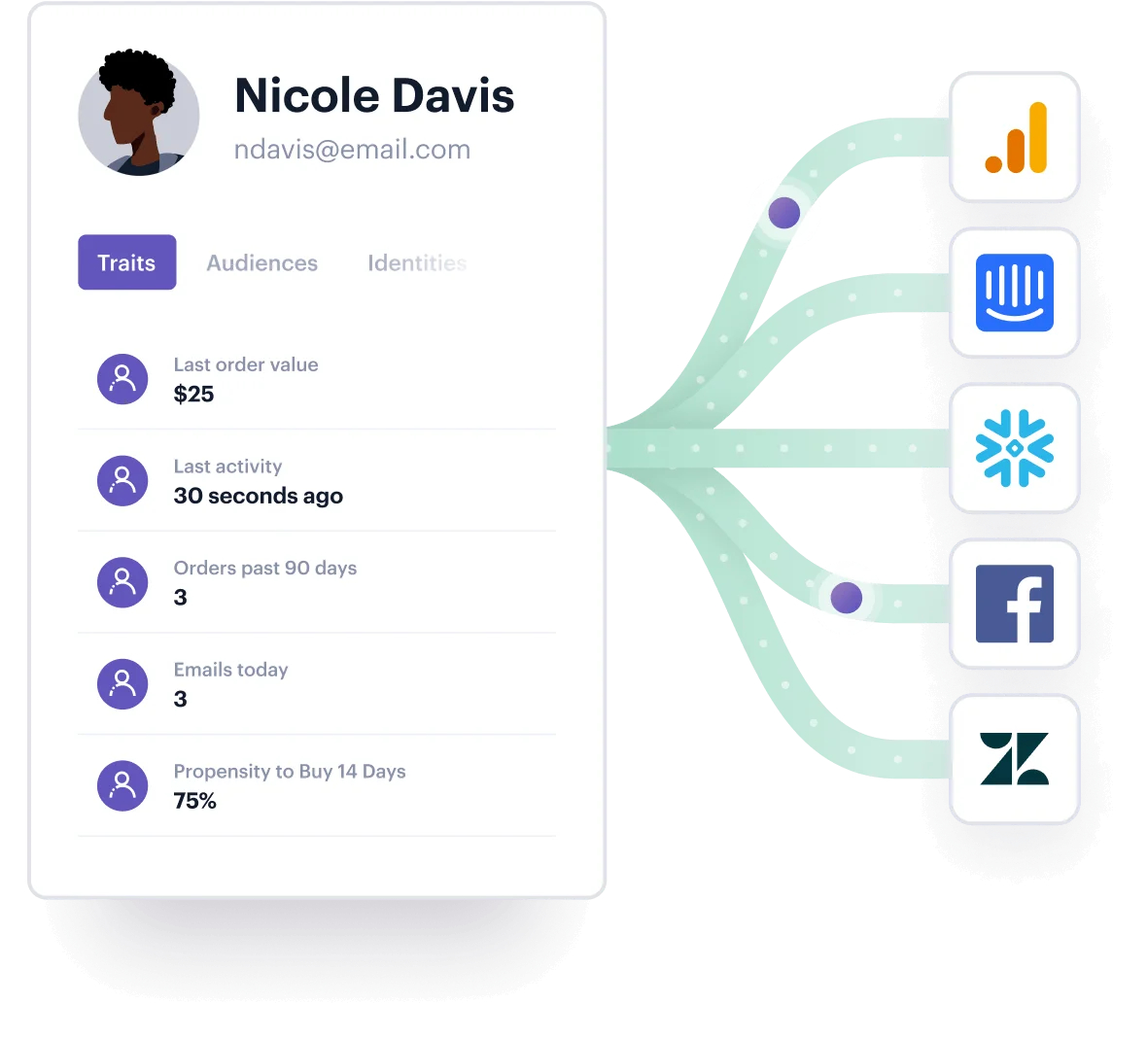
Customer Data Platforms (CDPs) serve the same purpose — they gather customer data from different sources and store that data in a central place. 

Because this data helps businesses better understand their customers and how they behave, CDPs play an important role in helping you make informed product and marketing decisions. 

Today, CDPs are vital for brands across industries. But with popularity comes choice. Businesses now have to choose between a wide range of CDP platforms to ensure they’re properly synthesizing and analyzing the right data points for their brands.

With all of the above in mind, it’s not actually that shocking that the CDP market grew from $1.6 billion in 2021 to $2 billion in 2022.

In this post, we’ll discuss the ins and outs of customer data platforms and the best ones to implement into your strategy.

Learn More About HubSpot's Customer Portal Software

What is a Customer Data Platform?

A CDP consolidates customer data from different tools and software into one centralized database. This database contains customer interaction data and other information from sources such as websites, mobile apps, email, and social media.

CDPs, often confused with Data Management Platforms (DMPs), contain both personally identifiable and anonymous users (for example, IP addresses), while DMPs primarily work with anonymous users.

CDPs consist mostly of first-party data, or data collected directly from the customer. They can also store third-party data, or data you get from another company (or third party).

Types of Customer Data Platforms

Not all CDPs are created equal. There are a few main types:

  • Marketing Clouds: Marketing Clouds refers to a suite of cloud-based marketing tools.
  • Smart Hubs: Smart Hubs act as a central hub for your company’s marketing technology, or martech.
  • Marketing Data Integration: Marketing Data Integration CDPs place data first, with API capabilities.
  • Engines and Toolkit: Engines and Toolkit refers to CDPs that are built by the business if the CDPs available are deemed insufficient or to answer specific needs.

Best Customer Data Platform Companies

Segment

segment

Source

Segment is a CDP that helps businesses collect, clean, synthesize, and activate first-party data across different touch points like Facebook, email, and website. Through a single API, Segment  can also connect customer data from different business departments, like marketing, sales, service, and web analytics.

Pricing: Free version, $120/month for its Teams, and custom pricing for businesses. 

Optimove

optimove

Source

Optimove’s Relationship Marketing Hub brings customer data together in a single customer view. The GDPR– and ISO-compliant platform combines first-party data, third-party data, on-site/in-app user activity, and campaign response history.

Pricing: Pricing is available upon request.

Totango

totango

Source

Totango enables users to connect and view data from customer data streams, including contract and transactional data, support tickets, and demographic and behavioral data. You’ll also be able to access and compare real-time customer health data  with other metrics like NPS (Net Promoter Score) and CSAT (Customer Satisfaction score).

Pricing: Free intro version. $249/month for Starter and $1,099/month for Growth. Pricing is available upon request for Enterprise.

Bloomreach

bloomreach

Source

Bloomreach’s CDP, called Bloomreach Engagement, offers a single customer view, online and offline data tracking, and customer analytics like on-site data, backend data, and offline data. The platform also leverages machine learning to make predictive recommendations like ranking customers based on their actions such as likelihood to make a purchase. 

Pricing: Pricing is available upon request.

Insider

insider

Source

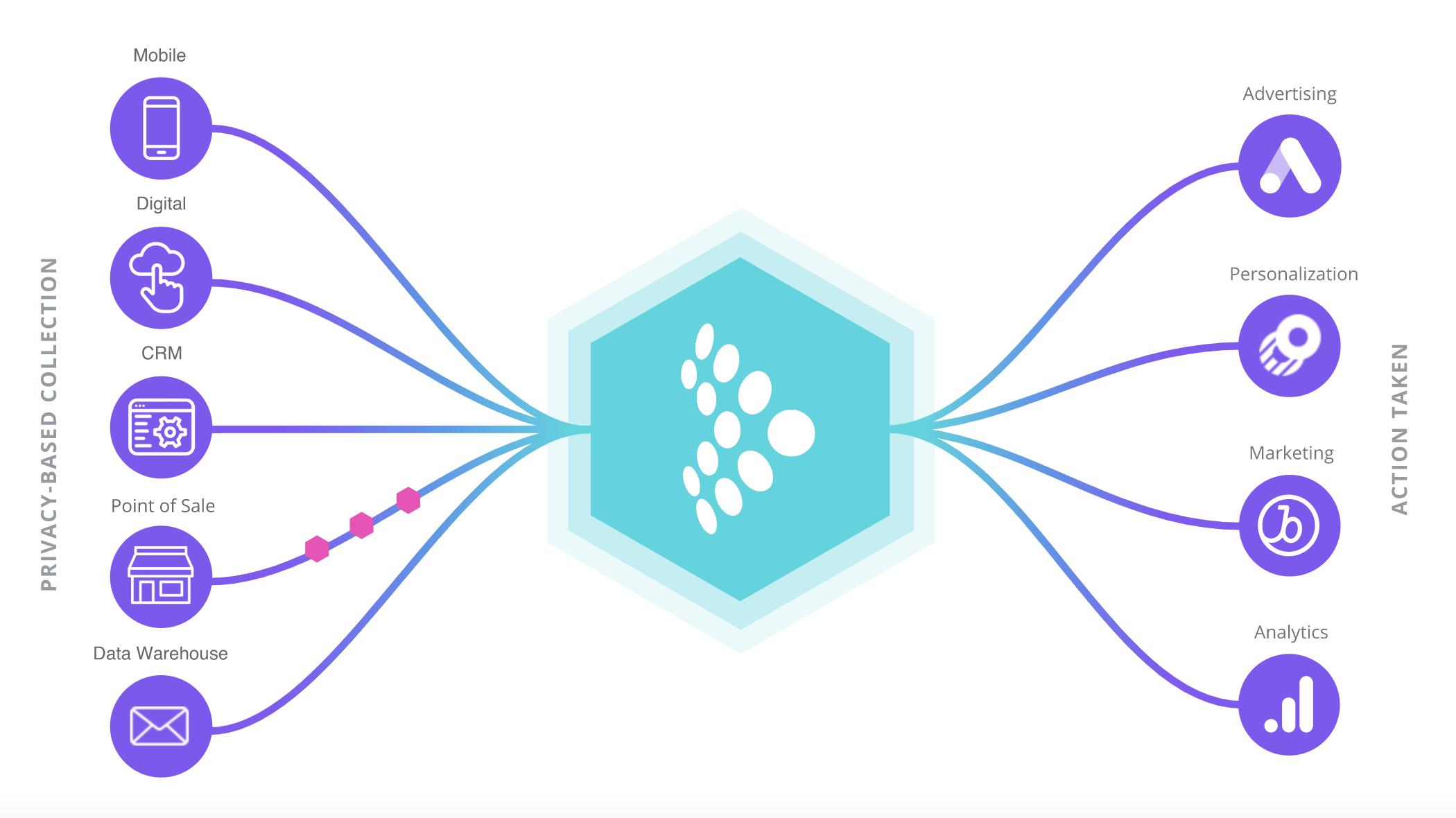
Insider can connect data across multiple channels such as apps, website, email, and CRM, predict behavior like customer intent using its AI engine, and create personalized experiences at touch points for customers. Customer profile management is centralized with Insider’s journey orchestrator called Architect.

Pricing: Pricing not publicly available.

Tealium AudienceStream CDP

>tealium

Source>

Tealium AudienceStream enables companies to construct detailed customer profiles, with features like:

  • Identity resolution: Collecting and matching customer data points across different platforms, devices, and browsers
  • Cross-channel audience management: Create a solid data foundation to organize audience data

Pricing: Pricing is available upon request.

Blueshift

blueshift

Source

Blueshift unifies and organizes first-party customer data in a single customer view. Features include cross-device identity resolution, real-time data, and customizable datasets.

Pricing: Blueshift offers Starter, Growth, and Enterprise packages. Pricing is available upon request.

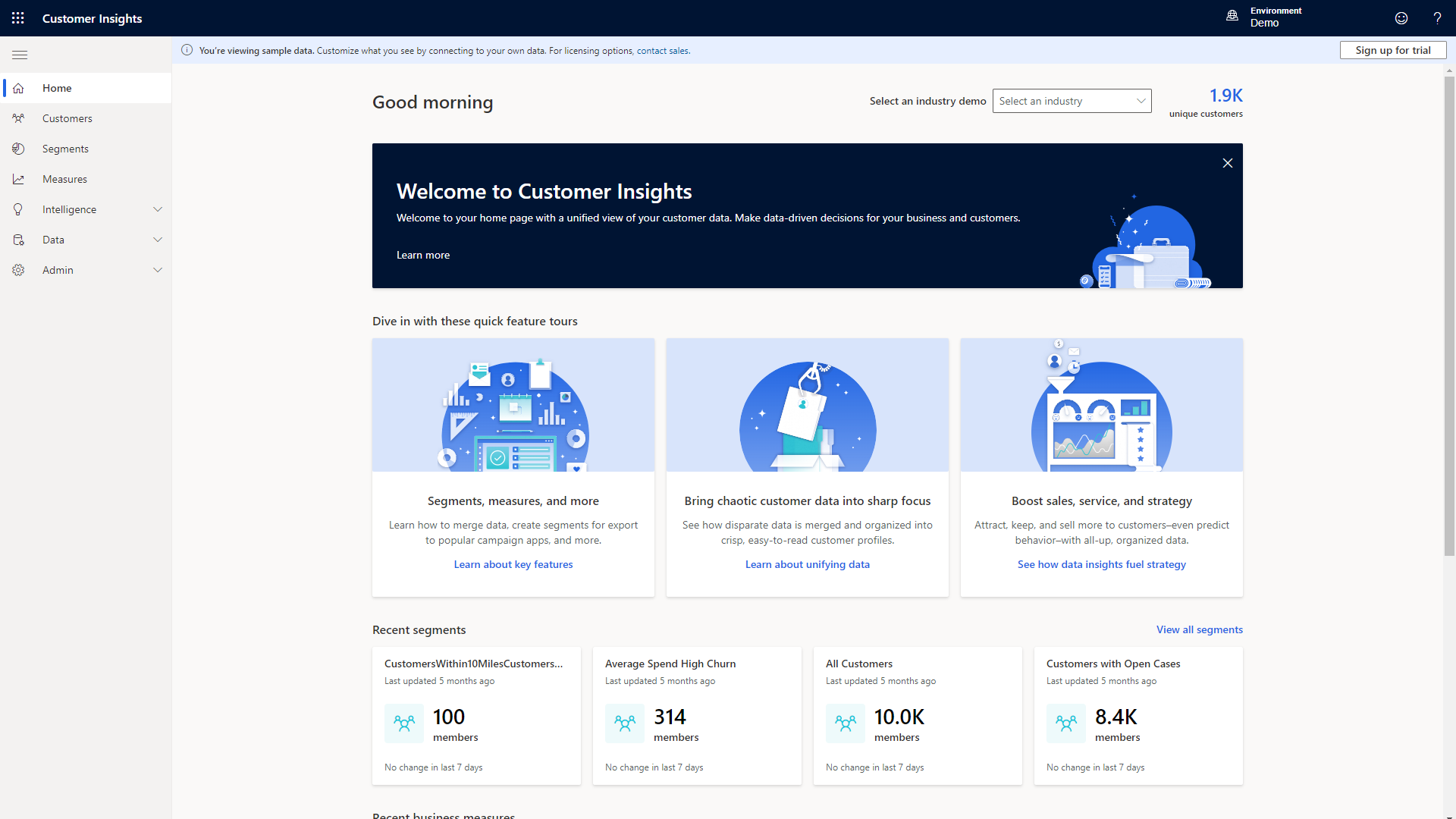
Microsoft Dynamics 365 Customer Insights

microsoft

Source

This real-time CDP combines transactional, behavioral, and demographic data to create comprehensive customer profiles. Features like sentiment analysis enable you to identify opportunities to improve customer experience.

Pricing: Microsoft Dynamics 365 Customer Insights offers multiple pricing tiers. More details are available on their site.

Oracle Unityoracle

Source

Oracle Unity combines online, offline, first-party, second-party, and third-party data into a single, real-time customer view. Identity resolution enables you to connect individual identities across various channels. Data models built for different industries lets you get granular.

Pricing: Pricing is available upon request.

Emarsys

emarsys

Source

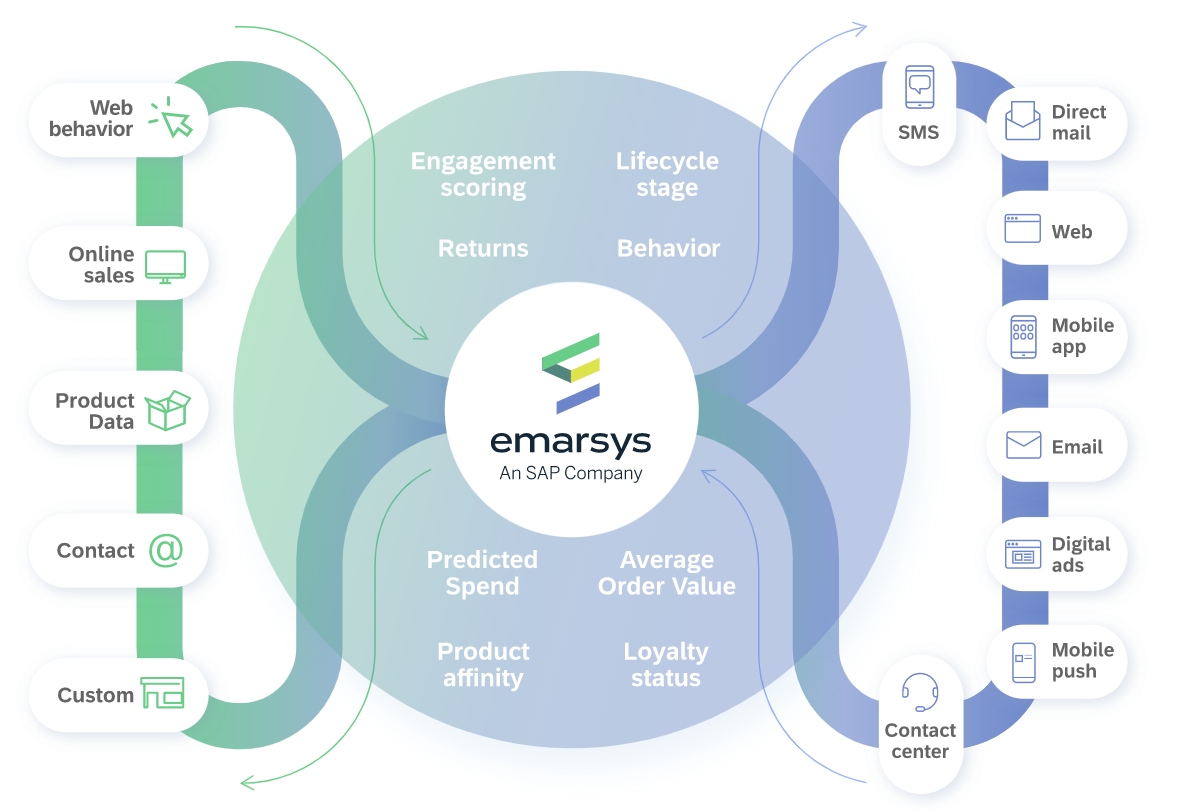
Emarsys connects sales, product, and customer data to provide a holistic view of the customer. The platform helps you synthesize historical and real-time data to provide personalized experiences for your customers.

Pricing: Pricing is available upon request.

How to Choose Customer Data Platform Vendors

There are several things to consider when choosing a CDP. Considering the following can help you determine the best CDP for your business.

1. Figure out your use cases.

In order to find the best CDP for your business, you need to determine your use cases. Naturally, combining customer data and storing it in one place is a top reason for using a CDP, but digging deeper can help you get more out of it. Some uses cases can include:

  • Gain a more comprehensive understanding of the customer journey
  • Provide a better mobile experience for customers
  • Create more targeted advertising campaigns

2. Identify necessary integrations.

The next step is clarifying which tools you’ll need to connect to a  CDP. 

For example, your company might use marketing tools like Looker, Instagram Ads, and Intercom or customer relationship tools like CRMs, payment processors, email platforms, or help desk systems. You’ll need to determine which of these tools must connect to a CDP, and which integrations are nice to have.

3. Determine your must-have features.

Depending on your needs, there are some CDP features that must absolutely be included. Defining those key features will be critical in helping you pick the right CDP. These features could be:

  • Advanced security features like ISO 27001 or SOC 2 certification
  • Identity resolution, which helps you identify users across different channels
  • GDPR and CCPA compliance
  • Real-time data
  • Integration options with tools you use or plan to use

For a more in-depth guide on how to choose a CDP, check out this blog post.

CDPs Can Help Your Business

CDPs are a powerful tool in your arsenal. Uniting customer data is the foundation for better understanding your customers and learning how to improve the customer experience.

New call-to-action

Categories B2B

The 23 Best Cover Letter Examples: What They Got Right

Fun is not something typically associated with writing a cover letter. However, with a few tweaks, writing one doesn’t have to be a burden.

The cover letter examples below demonstrate that it is possible to have a little fun with your job search — and maybe even make yourself a better candidate in the process.

→ Click here to access 5 free cover letter templates [Free Download]

It may be true that only 35% of recruiters admit that cover letters do not materially influence the hiring process for them, but that doesn’t mean yours has to contribute to that statistic. In fact, it might be that cover letters are deemed insignificant because so few of them stand out. Here’s an opportunity for you to exercise your creativity at the earliest stage of the recruitment process.

Personalization, after all, goes beyond replacing the title and company name in each letter you send to recruiters.

What’s on a cover letter?

Before you can get started writing your cover letter, there are a few components you must have.

Greeting: A simple, but pleasant greeting to address the recruiter or hiring manager.

Opener: Write a catchy introduction that explains why you’re interested in the role.

Summary of Skills/Qualifications: This is the heart of your cover letter. It outlines your relevant experience and why you’d be a great fit for the role. You can highlight special skills, experiences, professional achievements, or education to help make your case.

Closing: In this paragraph, provide a call-to-action by expressing interest in an interview. Provide your contact information and sign-off.

What does a cover letter look like?

In addition to showing off your skills and qualifications, cover letters give you the opportunity to present a clear, concise, and compelling writing sample that shows off your personality and ability to convey ideas. Check out our fillable examples below to see how you should organize the content of your cover letter.

HubSpot Cover Letter TemplateCustomizable Cover Letter Examples

In a hurry for a cover letter example you can download and customize? Check out the ones below from HubSpot’s cover letter template kit.

1. Standard Cover Letter Example

cover letter examples: standard cover letterDownload a Customizable Copy of This Cover Letter Example

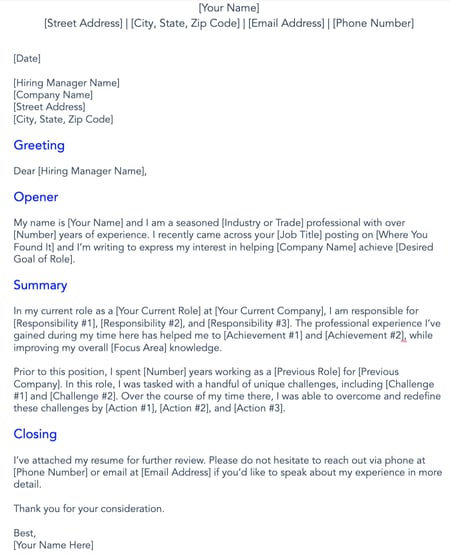
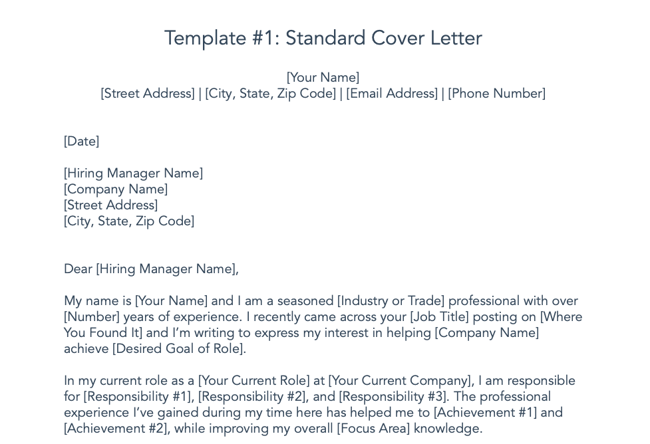
This standard cover letter hits all the right notes: It includes a space to give a brief summary of your experience, as well as a space to delve in-depth into the specific responsibilities at your current role. You also have the chance to describe the challenges you’ve mastered at previous roles, showing that you’re capable of facing any problem that comes your way.

Why We Love It

We love this cover letter because it allows you to describe the high points of your career while still being professional, personalized, and succinct.

2. Data-Driven Cover Letter Sample

cover letter examples: data driven cover letterDownload a Customizable Copy of This Cover Letter Example

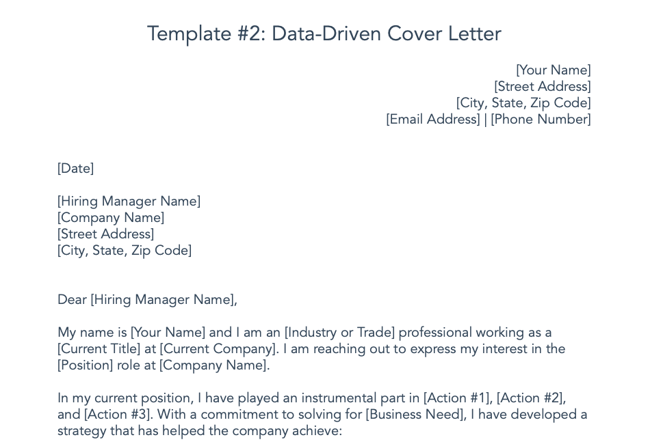
Numbers are worth a million words — or that’s how the saying should probably go (if only we could include pictures in cover letters). Citing data and statistics about your achievements at your current company is an assured way to capture a hiring manager’s attention. Most hiring managers don’t read the entire letter, so a bulleted summary of your achievements can be a powerful way to increase the effectiveness and scannability of your message.

Why We Love It

We love this cover letter because it’s adaptable to any role. Even if you don’t work in a data-centric role, you can include any enumerable achievement. If you’re in a creative industry, for instance, you can include the number of creative assets you designed for your current company.

3. Entry-Level Cover Letter Example

cover letter examples: entry-level cover letter

Download a Customizable Copy of This Cover Letter Example

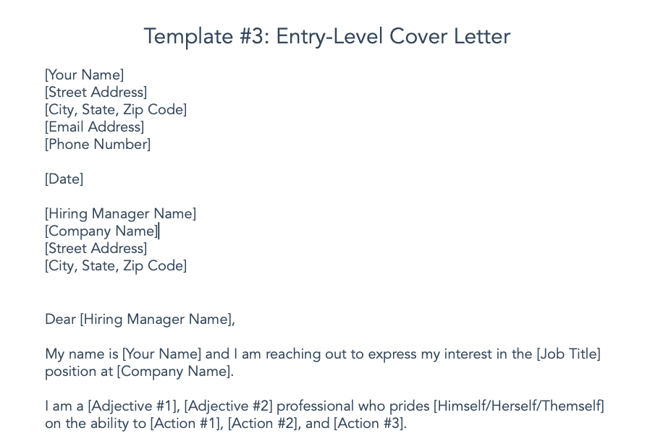
Applying to your first job can be stress-inducing, to say the least. You can increase your chances of getting that first interview by including a cover letter that explains how your education can help you succeed in the role you applied for.

Look no further than this example from HubSpot. While other cover letter samples give experienced professionals the opportunity to share their experience at length, this one gives you the chance to describe your personal and professional attributes. You can then convey how you can leverage your knowledge to help your target company reach their goals.

Why We Love It

We love this cover letter because it’s easy and simple to use for a student who has little experience in their target industry — including those who haven’t yet completed an internship.

Looking for more? Download the entire kit below.

Best Cover Letter Examples

What does a good cover letter look like in practice, and how can you make yours stand out? We found six examples from job seekers who decided to do things a bit differently.

Note: Some of these cover letters contain real company names and NSFW language that we’ve covered up.

1. The Cover Letter That Explains ‘Why,’ Not Just ‘How’

We’ve already covered the importance of addressing how you’ll best execute a certain role in your cover letter. But there’s another question you might want to answer: Why the heck do you want to work here?

The Muse, a career guidance site, says that it’s often best to lead with the why — especially if it makes a good story. We advise against blathering on and on, but a brief tale that illuminates your desire to work for that particular employer can really make you stand out.

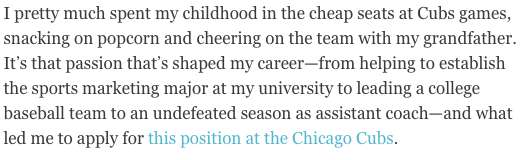
cover letter that explains "why" with a story about a childhood experience with the chicago cubs

Image Source

Here’s another instance of the power of personalization. The author of this cover letter clearly has a passion for this prospective employer — the Chicago Cubs — and if she’s lying about it, well, that probably would eventually be revealed in an interview.

Make sure your story is nonfiction and relatable according to each job. While we love a good tale of childhood baseball games, an introduction like this one probably wouldn’t be fitting in a cover letter for, say, a software company. But a story of how the hours you spent playing with DOS games as a kid led to your passion for coding? Sure, we’d find that fitting.

If you’re really passionate about a particular job opening, think about where that deep interest is rooted. Then, tell your hiring manager about it in a few sentences.

Why This Is A Great Cover Letter

This example demonstrates how effective personalization can be. The writer is passionate about the employer, drawing from her own childhood experience to communicate her enthusiasm.

2. The ‘We’re Meant for Each Other’ Cover Letter

This cover letter example is a special one because it was submitted to us here at HubSpot. What does the letter do well? It makes a connection with us before we’ve even met the letter’s author.

We're meant for each other cover letter submitted to HubSpot

“Content Marketing Certified” indicates the applicant has taken the content marketing certification course in our HubSpot Academy (you can take the same course here). Our “records” indicate he/she did indeed give an interview with us before — and was a HubSpot customer.

The cover letter sang references to a relationship we didn’t even know we had with the candidate.

The letter ends with a charming pitch for why, despite him/her not getting hired previously, our interests complement each other this time around.

(Yes, the applicant was hired).

Why This Is A Great Cover Letter

This cover letter example does an excellent job of building rapport with the employer. Despite not getting hired for previous roles they applied for at HubSpot, the writer conveys exactly why they are right for this role.

3. The Cover Letter with H.E.A.R.T.

HubSpot has a lot of H.E.A.R.T. — Humble, Empathetic, Adaptable, Remarkable, Transparent. Our Culture Code is the foundation of the company’s culture, the driving force behind our mission to help millions grow better, and serves as the scaffolding for our hiring practices. Recruiters at HubSpot look for applicants that demonstrate how they embody the Culture Code and job description, paying extra attention to cover letters that are super custom to HubSpot.

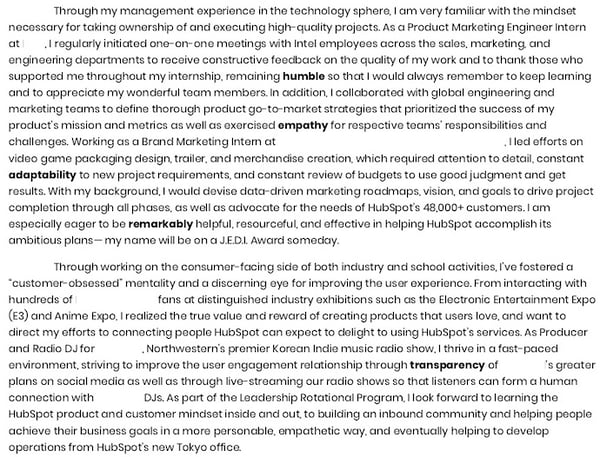
In another HubSpot submission, a HubSpot applicant writes about how she found out about HubSpot, why she likes the company, and how her professional experience aligns with H.E.A.R.T.

cover letter that details experience according to hubspot values: humble, empathy, adaptability, remarkable, and transparent.

Why This Is A Great Cover Letter

HubSpot’s recruiting team was impressed with her dedication to the company and how she went beyond what was asked for by linking her portfolio in her closing paragraph.

Featured Resource: 5 Free Cover Letter Templates

Cover-Letter-Templates

Download our collection of 5 professional cover letter templates to help you summarize your professional journey and land your dream job – whether it’s at your first or fifth company.

Short Cover Letter Examples

4. The Short-and-Sweet Cover Letter

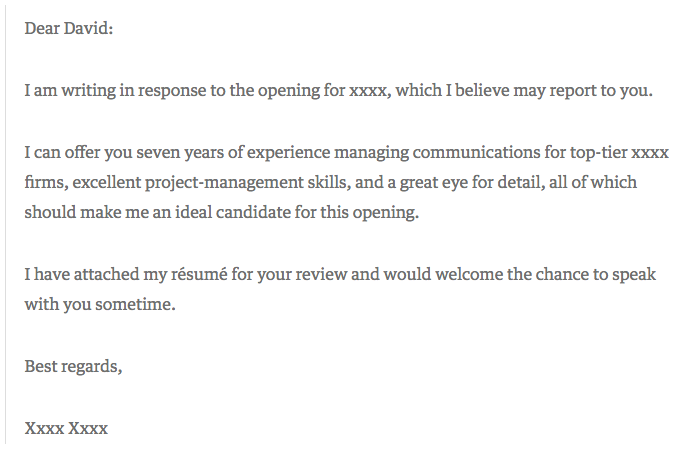
In 2009, David Silverman penned an article for Harvard Business Review titled, “The Best Cover Letter I Ever Received.” That letter contained three complete sentences, as follows:

Short and sweet cover letter example with only three sentences

Image Source

One might argue that this particular letter is less than outstanding. It’s brief, to say the least, and the author doesn’t go into a ton of detail about what makes him or her qualified for the job in question. But that’s what Silverman likes about it — the fact that the applicant only included the pieces of information that would matter the most to the recipient.

“The writer of this letter took the time to think through what would be relevant to me,” writes Silverman. “Instead of scattering lots of facts in hopes that one was relevant, the candidate offered up an opinion as to which experiences I should focus on.”

When you apply for a job, start by determining two things:

  • Who might oversee the role — that’s often included in the description, under “reports to.” Address your letter to that individual.
  • Figure out what problems this role is meant to solve for that person. Then, concisely phrase in your cover letter how and why your experience can and will resolve those problems.

Why This Is A Great Cover Letter

The key to this standout cover letter is research — by looking into who you’ll be reporting to and learning more about that person’s leadership style, you’ll be better prepared to tailor your cover letter to focus on how you provide solutions for them.

5. The Short Story

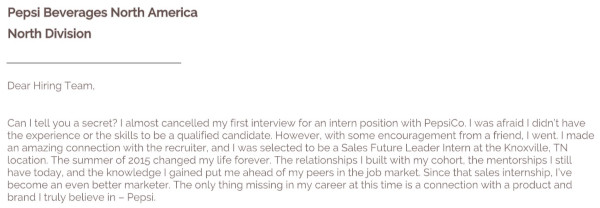
Basha Coleman began her cover letter with a short story. The goal of this short story is two-fold:

  • Detail the experience she already has with the organization.
  • Stand out to the hiring team.

short cover letter example from basha coleman that starts with a short story about her existing experience with pepsi

You’ll notice that her short story follows a typical narrative arc: It has a conflict/obstacle, a turning point, and a positive outcome, all created with a goal to emphasize a theme or point. In this case, Coleman is emphasizing her existing affinity with the brand and her triumphs within the program so that she can continue on her career path.

Why This Is A Great Cover Letter

Like the second example in our list, this cover letter does an excellent job of conveying the applicant’s existing affinity for the brand. If you are applying to a company you love, don’t be shy about showing it and explaining why.

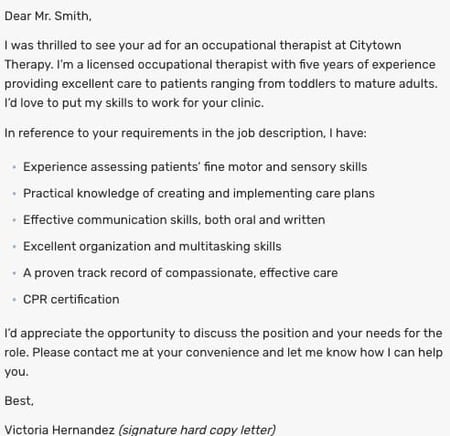
6. The Bare Bones Cover Letter

In today’s job market, cover letters aren’t always necessary. Even though many recruiters won’t ask for or even read them, cover letters can still be effective and convey personality to a reader. Writing a strong cover letter can help you better convey your interest in the position and company.

This template from The Balance Careers puts together the essential components of a short cover letter: excitement about the position, your qualifications, and a call-to-action for the recruiter to follow up with you. Combining these central aspects in a well-written, compelling narrative will go a long way in convincing readers to hire you.

short cover letter example with summarized bullet points

Image Source

Why This Is A Great Cover Letter

This letter is organized and concise. The inclusion of bullet points to highlight key skills and help the recruiter skim the document is a nice touch.

7. The Breezy Follow-Up

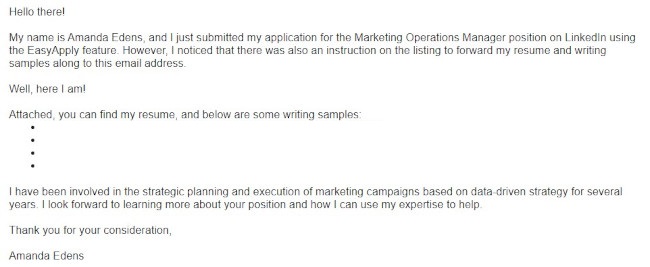
In this cover letter, Amanda Edens is following the instructions the hiring manager gave by forwarding an email with resume and writing samples attached.

short cover letter example from Amanda Edens with bullet points and breezy languageEdens knows that the body of the email is prime real estate to get the hiring manager’s attention, but she also doesn’t want to overwhelm the recipient with too much information since a cover letter was not requested. This short cover letter is the result. You’ll notice that she uses casual and breezy language to convey personality and enthusiasm, and she keeps her paragraphs succinct.

Why This Is A Great Cover Letter

Not only does Amanda provide links to relevant writing samples that are live on the web, but she also closes with a strong final paragraph that:

  • Summarizes the expertise she has relevant to the posting
  • Emphasizes that she doesn’t want to simply get a job but rather help the organization accomplish their goals
  • The reader gets everything they need in an organized and thoughtful manner.

8. The Administrative Assistant Cover Letter

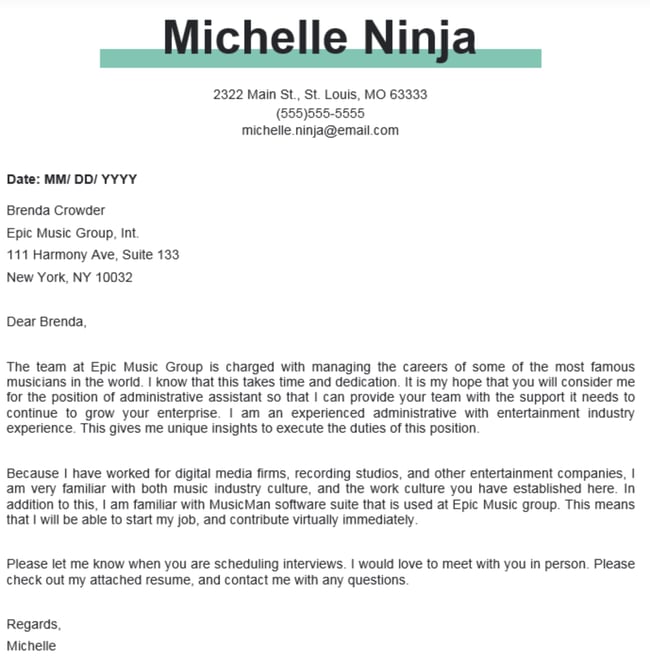
In this cover letter the candidate, Brenda, plays up her prior music industry experience to build a connection with Epic Music Group. If you have specific industry experience for the role you are applying for, be sure to highlight that.

Cover Letter Example: Admin Cover Letter

Image Source

It’s clear that she’s passionate about not only the music industry, but Epic as a whole. She’s done so much research on the company that she knows what software programs they use, and happens to be proficient in it to help convey value to the hiring manager.

This example further illustrates the importance of research. Make sure you understand the culture of the company to which you’re applying before you send a completely unfiltered cover letter — if you don’t, there’s a good chance it’ll completely miss the mark.

Why This Is A Great Cover Letter

In just three short paragraphs, the applicant uses their company research to drive home why they are the perfect fit for the role — emphasizing industry experience as well as software knowledge specific to the company. All of this communicates that she’d be able to start with very few hiccups getting up to speed.

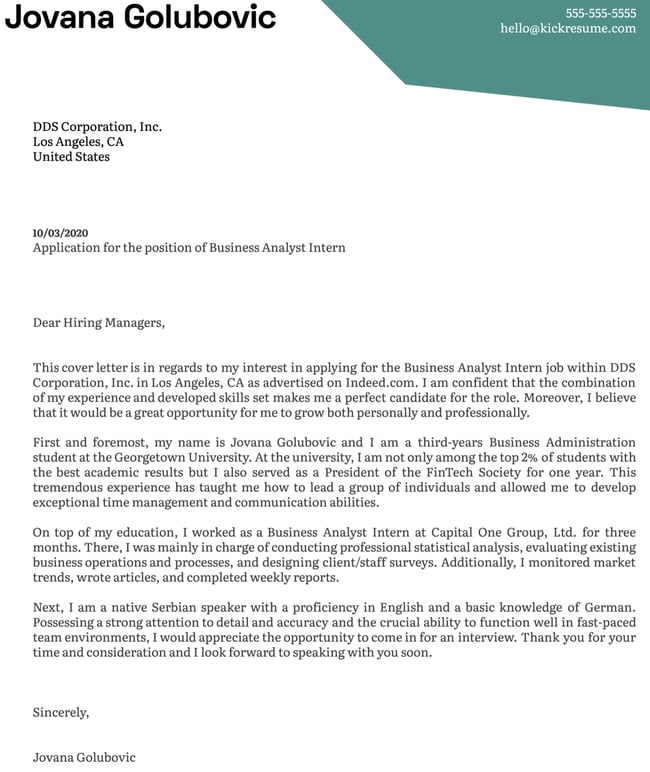
9. The Internship Cover Letter

Maybe you’re just getting started in your career and looking to land the right internship to gain experience in your field. In this case, you’ll need to highlight more of your educational background and transferable skills since you won’t have as much professional experience to highlight.

Cover Letter Examples: Internship Cover LetterImage Source

The cover letter above is a great example of how to emphasize your skills and accomplishments when applying to internships or entry-level positions. A few things the applicant does well:

  • Highlights relevant extracurriculars and affinity networks. In this case, the applicant is applying to a business analyst position, so mentioning their involvement in a FinTech group makes sense.
  • Previous internships in relevant fields: Our applicant points out that they’ve previously interned as a Business Analyst at another firm. Pointing out that they’ve done the role previously will help make their case for fit.
  • Highlight other useful skills: This applicant is fluent in both English and German. If an international company or an organization needs bi-lingual support, knowing multiple languages is an asset.

Why This Is A Great Cover Letter

This cover letter example illustrates how you can leverage your education and background to get the gig even when you don’t have much working experience. Highlighting previous internships or experience in related fields can go a long way in convincing hiring managers you’re the perfect candidate for the role.

Creative Cover Letter Examples

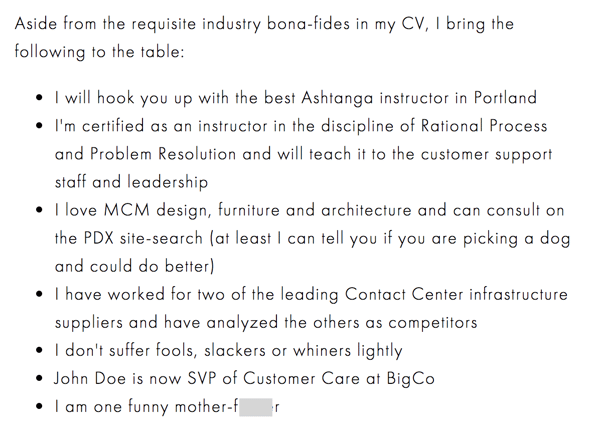
10. The Brutally Honest Cover Letter

Then, there are the occasions when your future boss might appreciate honesty — in its purest form. Livestream CEO Jesse Hertzberg, by his own admission, is one of those people, which might be why he called this example “the best cover letter” (which he received while he was with Squarespace):

Brutally honest cover letter example

Image Source

As Hertzberg says in the blog post elaborating on this excerpt — it’s not appropriate for every job or company. But if you happen to be sure that the corporate culture of this prospective employer gets a kick out of a complete lack of filter, then there’s a chance that the hiring manager might appreciate your candor.

“Remember that I’m reading these all day long,” Hertzberg writes. “You need to quickly convince me I should keep reading. You need to stand out.”

Why This Is A Great Cover Letter

The applicant did their research on the company’s culture and executed this cover letter flawlessly. It’s funny and shows off the applicant’s personality all while demonstrating why they are a good fit for the role.

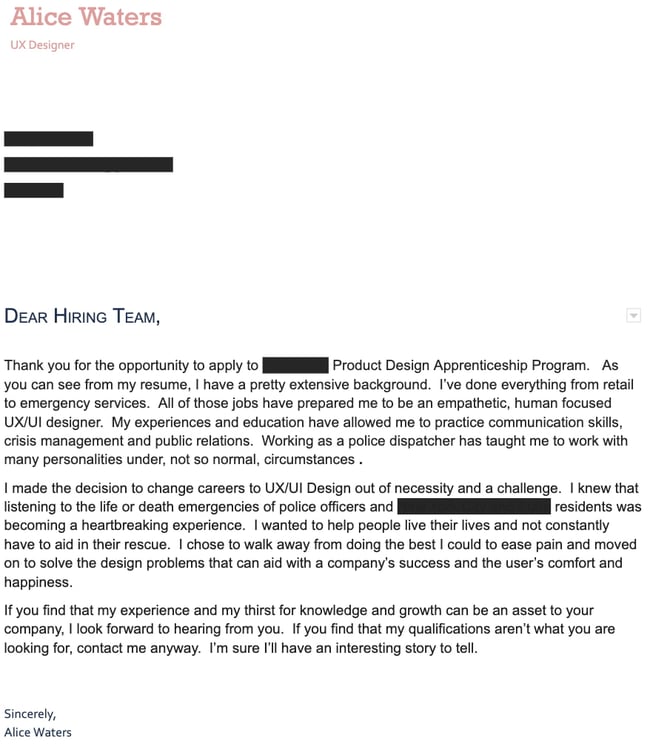
11. The Pivot Cover Letter

Making a career switch? Your cover letter can be an excellent opportunity for you to explain the reasoning behind your career change and how your transferable skills qualify you for the role.

Cover Letter Example: Creative Pivot Cover LetterIn this cover letter example, the applicant is pivoting to a career in UX. Not only does she make the case for why she should be hired, she shows the recruiter by using a simple, but effective design scheme that shows off her skills. It’s clean but effective.

Since the role she is applying for is more visual, it’s important to both show and tell why you’re a good fit.

Why This Is A Great Cover Letter

This cover letter strikes the perfect balance between creativity and simplicity in design while putting the applicant’s career change into context. The copy is clean, with a creative font choice that isn’t distracting from the content, but still demonstrates the applicant’s knack for design.

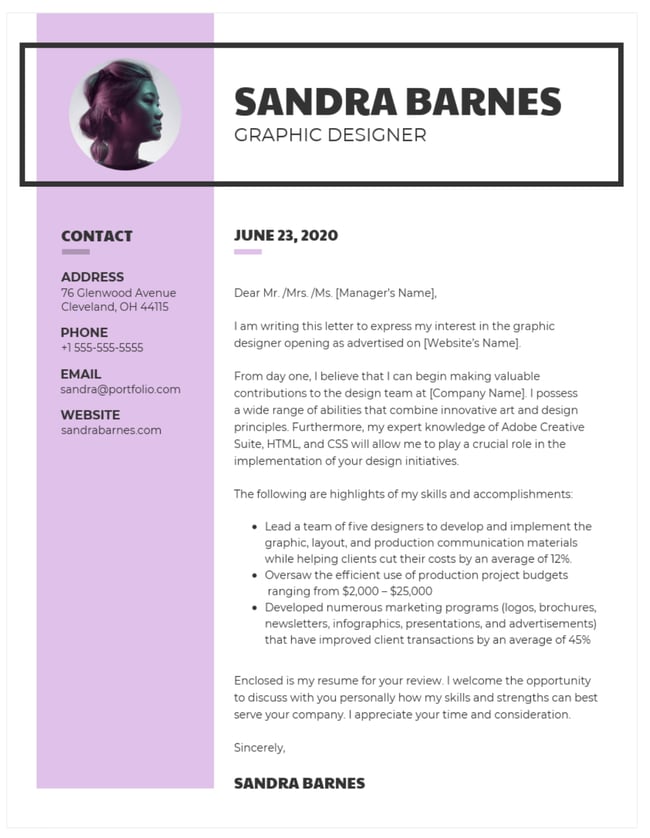
12. The Graphic Design Cover Letter

When applying for more creative roles, the design of your cover letter can say just as much as the words on the page. Take the graphic designer letter example below.

Cover Letter Examples: Grpahic DesignImage Source

It’s got so much going for it:

  • Pop of color
  • Clean layout
  • Interesting fonts

In addition to the style elements, this example also doesn’t skimp on the key skills recruiters are looking for. Using metrics, the applicant demonstrates their value and why they would be a great fit.

Why This Is A Great Cover Letter

This cover letter thoroughly conveys the applicant’s skills and qualifications using a variety of visual elements and by emphasizing their greatest achievements.

Job Cover Letter Examples

Next up, let’s go over some classic cover letter examples for jobs, especially if you’re applying to internships or only have a few years of experience. The below cover letters follow the golden rules and don’t deviate too much from the standard — which is ideal if you’re applying to positions in more traditional industries.

13. Consulting Internship Cover Letter Example

job cover letter examples: skill based internship

Image Source

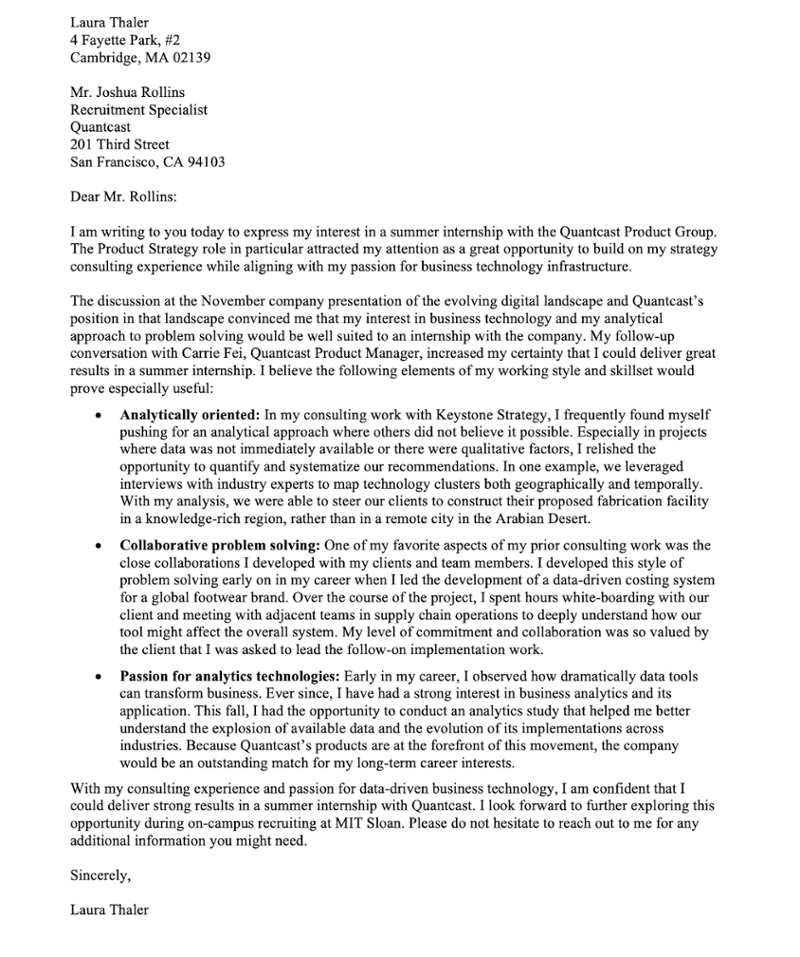
Many internship applicants are early on in their careers or still in college. That means they’ve yet to gather enough experience to provide tangible proof of their ability to do the job. That means that a cover letter is the place where an internship applicant can shine.

This cover letter example highlights the applicant’s skills in a bullet-point format. That makes it easier for an overburdened hiring manager to get the essence of her points, quickly, if they’re only skimming cover letters. Not only that, but this applicant personalized the letter in every single sentence. She shares information about her prior conversations with some of the company’s employees and mentions the company’s name at every turn.

While she only has one prior consulting job, she deftly mentions the skills she developed in that role and ties it into her desired position at Quantcast Product Group.

Why This Is A Great Cover Letter

This cover letter example does a fantastic job advertising the applicant’s soft skills in a highly scannable format — while still going heavy on the personalization. Don’t be shy to lightly play with formatting to get your point across and to imbue the letter with your passion for a company.

14. Nonprofit Referral Cover Letter Example

job cover letter examples: nonprofit referral

Image Source

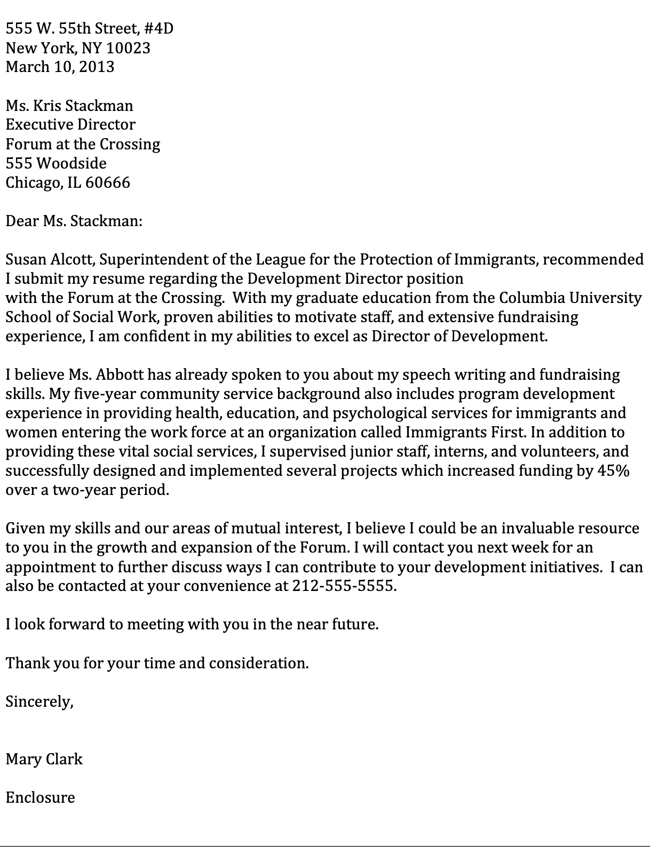
This cover letter example for a nonprofit job hits the ground running by right away inserting the name of one of the nonprofit’s Superintendents. That’s an excellent way to get a recruiter’s attention and make you stand out from the slush pile, even if you’re only just out of school, as is the case for this applicant.

If you’ve received an internal recommendation for a position, you’d be wise to open your letter with that information. Don’t worry about it feeling too stilted or strange — remember, hiring managers only skim letters! Your goal is to ensure they get information about you that they otherwise won’t get from your resume.

With only three full paragraphs, this cover letter example is short, sweet, and to-the-point. No time is wasted, and it also goes over the critical basics, such as skills and experience.

Why This Is A Great Cover Letter

This nonprofit cover letter leverages a recommendation from an internal employee at the target organization, making it more likely to stand out from the slush pile. We also love that it doesn’t skimp on the basics, such as skills, enthusiasm, and experience.

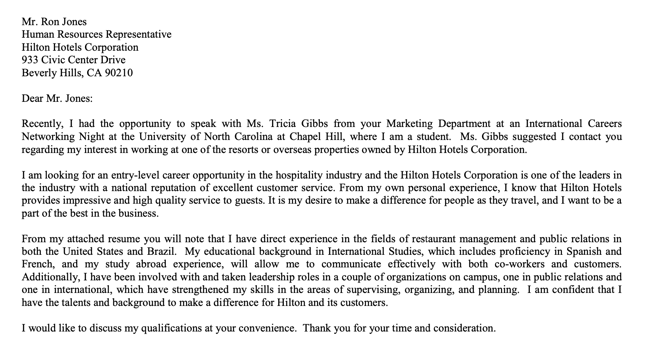
15. General Email Inquiry Cover Letter Example

job cover letter examples: general internship inquiry

Image Source

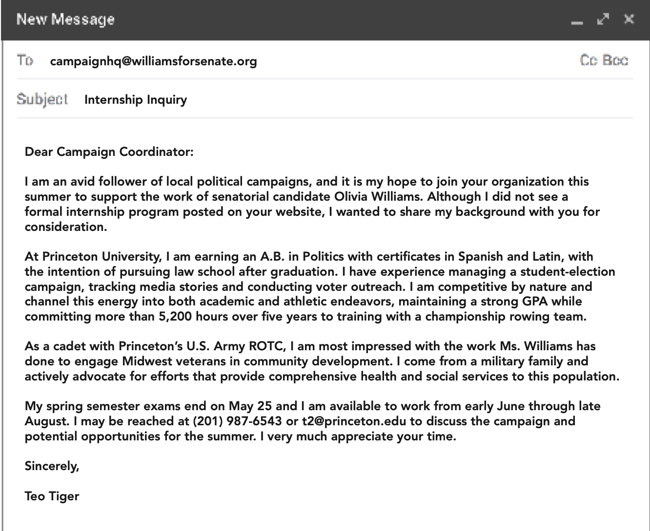
Even if a job opportunity isn’t available at an organization yet, it doesn’t mean that there won’t be. You can always send a general inquiry cover letter, like the one in this example.

This email cover letter for a political campaign internship is short and sweet, but includes the critical information the campaign coordinator needs to consider the applicant for any new positions that may open up.

The best part about this cover letter is that it can be easily customized from one political campaign employer to the next. While it does include a level of personalization, it’s brief and can be easily changed to address the specific political candidate.

When sending general inquiries like this one, it’s essential to make the personalization aspect as pain-free as possible for yourself. That may mean including only one sentence or two, knowing that a general inquiry might not be replied to.

Why This Is A Great Cover Letter

This email cover letter example hits all the right notes while keeping it brief and to-the-point. While we don’t recommend choosing this format for a formal cover letter, it works if you’re sending a general inquiry to an employer over email. It’s also a good example to follow if you’re still in college or have very little experience.

16. Post-Phone-Call Cover Letter Example

job cover letter examples: post phone call

Image Source

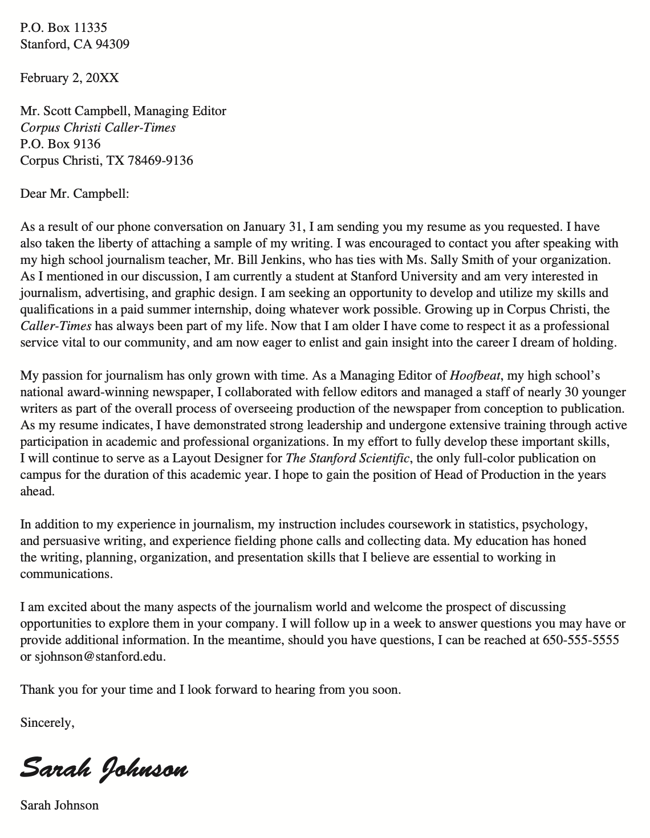
If you get a phone call with a potential employer and they invite you to send your resume, pat yourself on the back — that is such a win! In your cover letter, be sure to mention that right off the bat, like this example does.

A hiring manager or an executive at a company likely has a lot of tasks on their plate, which means that they may forget about your call from one week to the next. That is totally okay, which is why this example starts with a reminder that the applicant and the letter recipient spoke back on January 31st. It also contains a few more details about why they started speaking in the first place.

Aside from leveraging the phone call that’s already occurred, this cover letter also does an excellent job explaining why the applicant is an ideal choice for the job. It goes into detail about skills and previous experience with a high level of enthusiasm, and includes a promise to follow up at the end.

Why This Is A Great Cover Letter

This cover letter example leverages two things that will immediately draw the recipient’s attention: A phone call they’ve already had, and a mutual contact at their organization.  The job and internship search can be grueling; never be afraid to use everything you have at your disposal to improve your standing over other applicants.

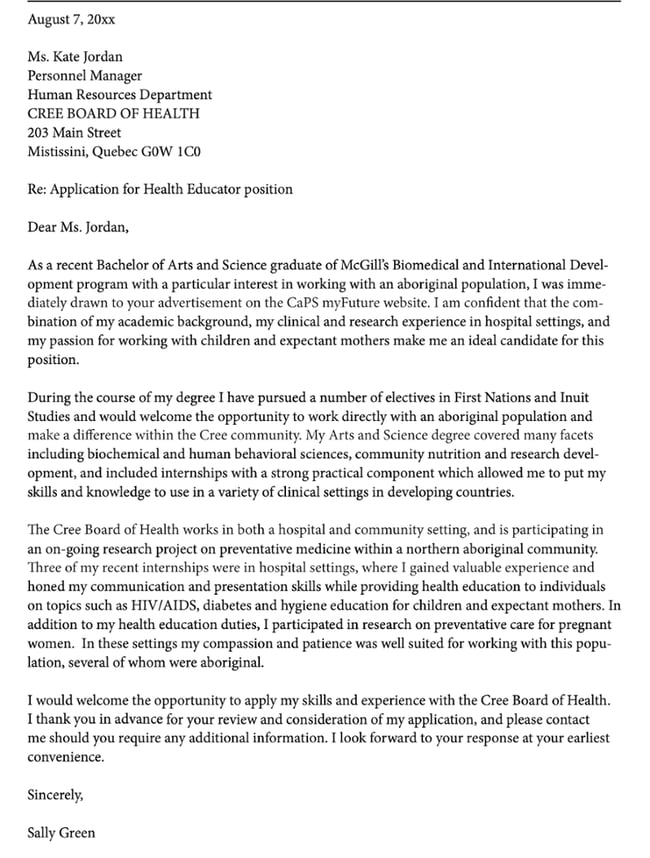
17. Mission-Driven Graduate Cover Letter Example

job cover letter examples: mission driven

Image Source

This cover letter example from a recent B.A graduate wowed us from the very first sentence. The applicant right away explains her attained degree and her specific career interests, then dives into the aspects of her experience that make her such a great candidate.

It is so personalized to the employer’s own mission that it’s difficult to stop reading it. Even if the hiring manager is not a science or health professional, they would be able to effectively gauge the applicant’s suitability for the role by the expertise she shows in her cover letter alone. The applicant explains at length why she’s excited to work for that specific hospital. The organization serves aboriginal populations, which aligns with her own values and research interests.

In the last paragraph, she summarizes what she knows about the employer in one sentence, then describes how each of her experiences support the employer’s mission. That is an exceedingly clever and meaningful way to align yourself with an organization at a deeper level.

Why This Is A Great Cover Letter

If you’re applying to a mission-driven organization, don’t be shy about showing your excitement and expertise. You don’t need a lot of experience to show that your values align with those of your target organization. This cover letter example is especially good inspiration if you’re making a career change, have only just a few internships under your belt, or are graduating from college.

18. Short Recommendation Cover Letter Example

job cover letter examples: short recommendation

Image Source

Referral or recommendation cover letters don’t need to be too long, and this is a great example of that. It immediately leverages a mutual connection at the company. The mutual connection recommended that the applicant contact the hiring manager for a role, which is a piece of information we always recommend you frontload in your letter.

This specific cover letter comes from an applicant with little experience, making it a good example to follow if you’re switching careers or just out of college. Instead of talking about their experience, the applicant uses anecdotal evidence to convey their enthusiasm for working at that company.

The writer also goes over their most salient skills, such as being able to speak multiple languages. They also explain how their degree directly applies to the target role. We love that the candidate highlights their leadership abilities and makes that an effective selling point for being hired.

Why This Is A Great Cover Letter

This cover letter doesn’t go on for too long, which we love. It’s simple and sweet and provides all the information the hiring manager needs to look more closely at the applicant’s resume and make an interviewing decision.

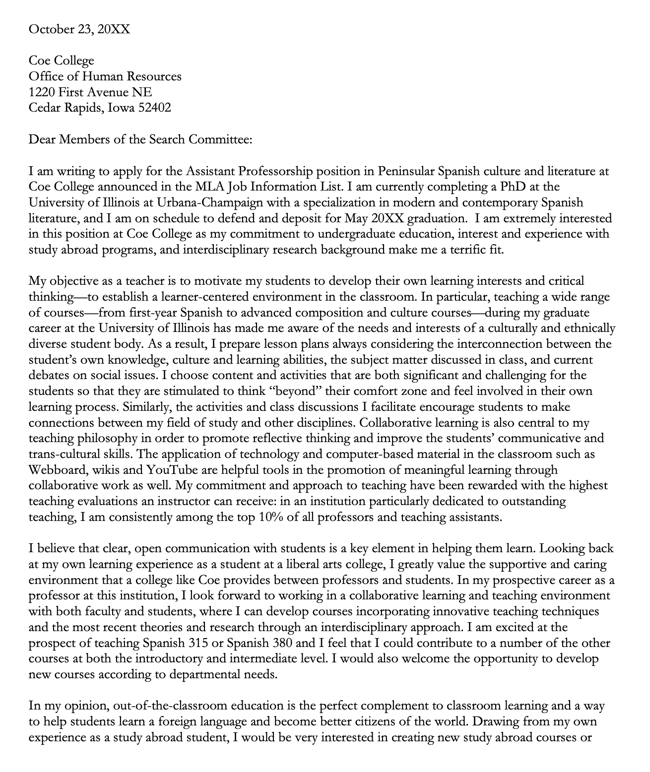
19. Professor or Research Position Cover Letter Example

job cover letter examples: professor or research

Image Source

Academic or research position cover letters might require a little more information than the typical cover letter — and this is one such example. Why is it okay to go a little longer? Because the letter is not only a way to supplement the PhD candidate’s academic CV, but to provide a writing sample for the search committee.

We love this cover letter because it expresses the candidate’s enthusiasm for teaching and explains her instructional ethos, such as providing out-of-the-classroom opportunities, championing communication, and encouraging students to step out of their comfort zone. The applicant also suggests courses she may be able to teach at the target institution, and expresses her interest in developing new courses as needed.

She also suggests how she can enhance the college’s extracurricular programming by offering study abroad courses, which shows not just an interest in teaching but adding to the school’s overall culture.

Why This Is A Great Cover Letter

While this letter goes for a little longer than recommended, it serves as a fantastic writing sample and explains the applicant’s research background at length. If you’re applying to academic or research roles, don’t be afraid to go into detail about what most excites you in terms of research interests.

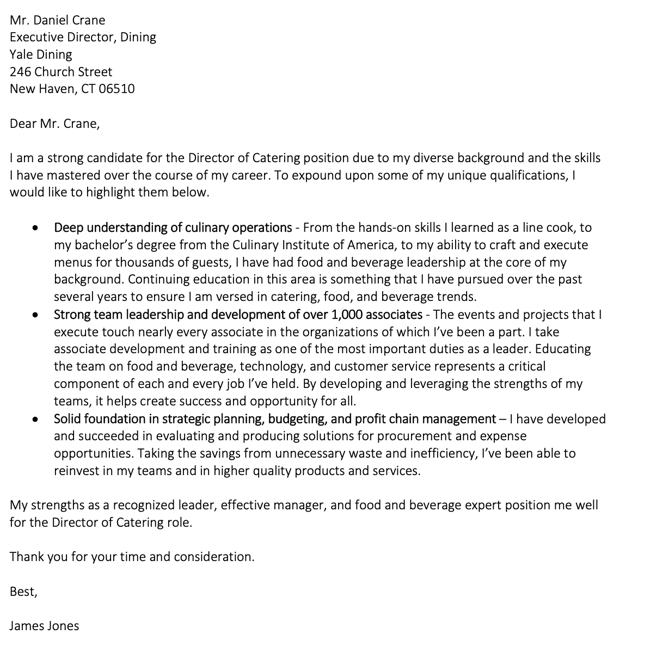
20. Director Cover Letter Example

job cover letter examples: directorImage Source 

This cover letter example — for a Director of Catering position at a university — does not waste any time. The applicant right away says that they’re a strong candidate for the role, then jumps right into three salient qualifications that make him a great fit.

We love how the applicant uses bullet points and bold text to guide an overburdened hiring manager through the cover letter — and to give them permission to scan it, if needed. If the hiring manager would like more information or actual examples of the skills, they merely need to read the rest of the bullet point paragraph.

As mentioned, light formatting can be beneficial to your cover letter, as it draws the recruiter’s eyes and prevents them from having to fish for the information they’re looking for.

Why This Is A Great Cover Letter

This short, sweet cover letter includes the critical information a hiring manager or high-level executive needs to make an interview decision. We love the use of formatting that doesn’t stray too much from regular cover letter conventions, and we like that the applicant kept all other paragraphs extremely brief.

21. Editorial Cover Letter Example

job cover letter examples: editorial

Image Source

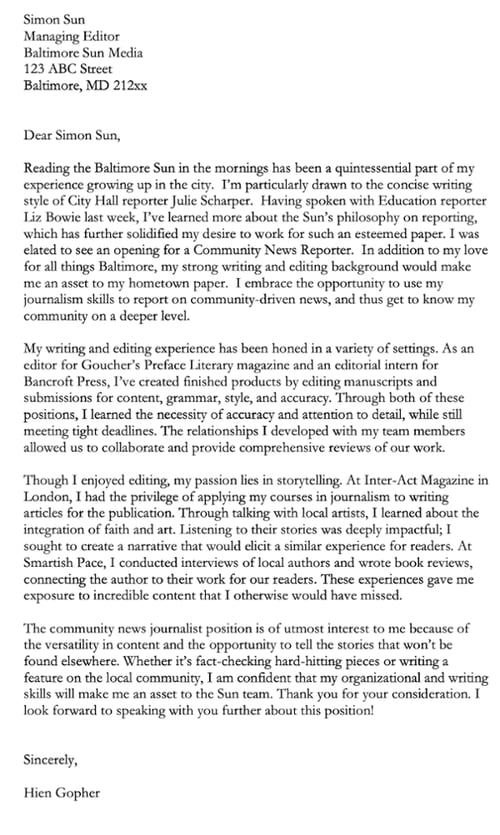
Applying for an editorial or journalistic position? Like a cover letter example we shared earlier, you can take a more storytelling approach to capture the hiring manager’s attention. This cover letter example does that effectively by telling an anecdote that directly mentions the newspaper where they’d like to work.

This immediately draws the reader in and tells them that this application is not random at all; the applicant would like to work at the newspaper because they’ve read it every morning. Not only that, but they have a favorite reporter on the newspaper’s staff. The applicant then jumps into the specific reason they want to take an editorial position at the Baltimore Sun.

The cover letter includes all pertinent information, such as how previous positions have equipped the applicant to take on this job. It closes with enthusiasm after keeping the reader rapt every step of the way.

Why This Is A Great Cover Letter

The applicant uses storytelling to — you guessed it — apply for a position that needs storytelling skills. If you’re applying for a data-driven position or a graphic design position, why not showcase those skills in the cover letter itself? We like that this letter doesn’t diverge too much from cover letter conventions while still differentiating itself.  

22. Promotion Cover Letter Example

job cover letter examples: promotion

Image Source

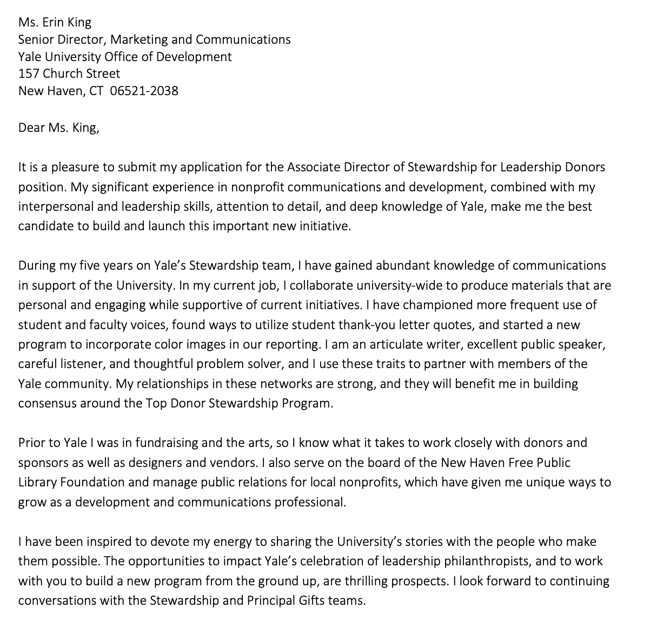
In this cover letter example, the applicant already works for the employer and wishes to apply for the next position to move up in their career. We like that the letter cites the applicant’s extensive knowledge of the organization, which will no doubt give them an advantage over external applicants.

Not only that, but the applicant also references their experience before they started working at the employer and leverages that information to make their candidacy even more desirable.

Lastly, this letter includes a healthy level of enthusiasm for the university and the position — something that is never extra in a cover letter!

Why This Is A Great Cover Letter

This cover letter example does an excellent job showing the candidate’s knowledge of their current organization, while stating why they’re a natural fit for the promotion. Plus, the letter includes information on the applicant’s relevant activities outside of work — if you’re involved in any organizations that might help you do your job better, be sure to include them.

23. Law Cover Letter Example

job cover letter examples: law

Image Source

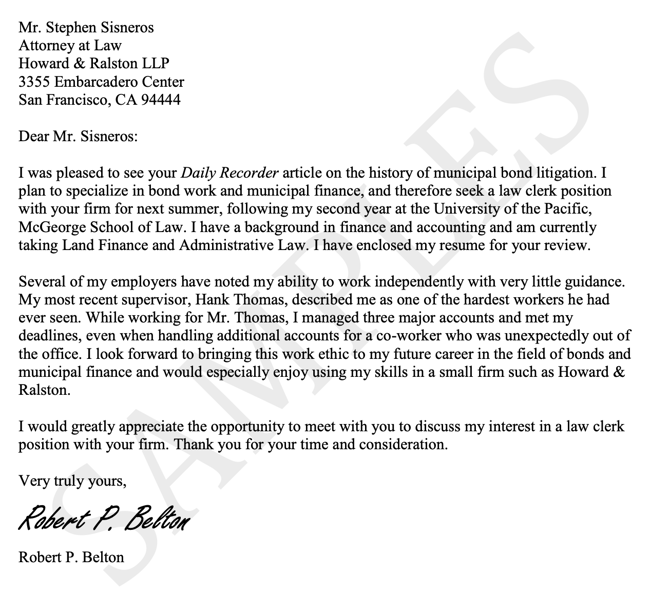
This law cover letter example jumps right into personalization, a bold move that will serve you well if you’re genuinely interested in a company and want to stand out. The applicant cites the recipient’s recent article on bond litigation, then ties that into the role they’d like to get at the law firm.

The applicant then goes into his skills and the feedback he’s received from previous managers. This is an excellent way to introduce your skills without sounding dry — or even unfounded. By citing positive feedback you’ve received, you’ll imply that others have praised you for having those skills, and that you’re not only “tooting your own horn.” (In cover letters, it’s absolutely okay to toot your own horn — that’s what they’re for! But if you can cite others’ remarks, that also helps.)

At just two and a half paragraphs, this letter is exceedingly short but no less effective. It’s an excellent example of how to personalize your letter quickly and still conveying the essentials of a cover letter.

Why This Is A Great Cover Letter

This short cover letter example demonstrates how to keep it brief while still creating high impact. The applicant personalizes the letter immediately, cites external feedback, and conveys enthusiasm. This letter proves you don’t need to write a novel about an employer to sway the hiring manager into giving you an interview.

Take Cover

We’d like to add another stage to the job search: experimentation.

In today’s competitive landscape, it’s so easy to feel defeated, less-than-good-enough, or like giving up your job search. But don’t let the process become so monotonous. Have fun discovering the qualitative data we’ve discussed here — then, have even more by getting creative with your cover letter composition.

We certainly can’t guarantee that every prospective employer will respond positively — or at all — to even the most unique, compelling cover letter. But the one that’s right for you will. That’s why it’s important not to copy these examples. That defeats the purpose of personalization.

Editor’s note: This post was originally published in October 2020 and has been updated for comprehensiveness.
Professional Cover Letter Templates

Categories B2B

How to Run a Competitor Analysis [Free Guide]


Many marketers don’t take advantage of competitor audits, so we have to ask: When was the last time you performed a competitor analysis for your brand? If it’s been a while or you aren’t sure how to do a competitor analysis, we can help you through the process.

Too often, a competitor analysis is reserved for the early days of a company or the launch of a new product. But knowing how your competitors are positioning their products is key to ensuring that your content remains relevant.

Download Now: 10 Competitive Analysis Templates [Free Templates]

In this post, you’ll learn the benefits of revisiting your competitor analysis, as well as tips to get it right.

Table of Contents

Benefits of Competitor Analysis

The first and most obvious benefit of a competitor analysis is understanding your position in the market. You can understand where your peers are excelling whether or not you are keeping up.

If the honest answer is that you’re not — that’s okay! Now you know. After the analysis, you can begin an open conversation about how to improve.

1. You can grow your business.

Marketers and competitive research professionals agree that staying on top of your competitor leads to more success. HubSpot research found 90% of marketers report positive impacts on their business from using competitive research as part of their strategy.

2. You’ll see more revenue.

The benefits of competitor analysis can be financial as well. In fact, 68% of marketers see positive revenue impacts with a weekly evaluation of competitive research.

Consistency here is key. Competitor analysis has proven to be most valuable when firms ditch the inconsistent drop-ins and incorporate the practice into their scheduled marketing operations.

3. You’ll find new opportunities.

A thorough analysis of your competition could reveal opportunities — like gaps in your competitor’s offerings. Identifying missing functionality is an opportunity to meet buyer demands that your rivals overlook.

4. Your business can maintain relevance.

With a competitor analysis, you can note what your peers are doing really well. You can then emulate their successful strategies to catch the attention of more buyers.

How to Conduct a Competitive Analysis

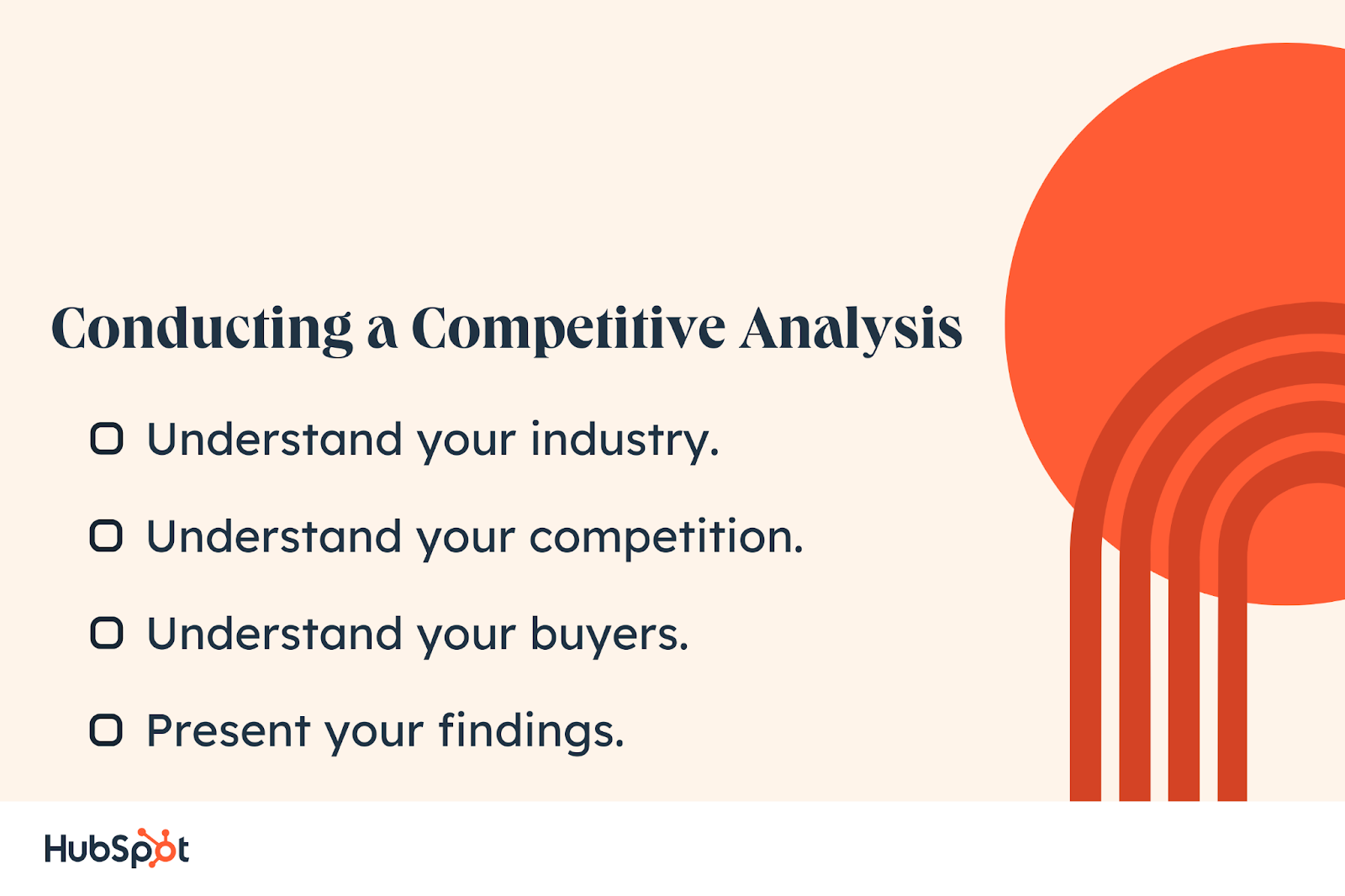
So, how do you start? Follow the steps below to evaluate your competitor, learn from your buyers, and then curate your information.

Image Source

1. Understand your industry.

The first step is to complete Porter’s Five Forces analysis. It’s a way of determining the level of competitive rivalry in your industry. This framework prompts you to start thinking about how to be more competitive within your market — or if you are more or less likely to find success in a new market.

You’ll evaluate the threat of new entrants, the strength of buyer power, the threat of substitution, and how supplier power affects your ability to be competitive in the niche you want to occupy.

2. Understand your competition.

Doing a SWOT analysis (strengths, weaknesses, opportunities, and threats) on your competitor is the next step. This is invaluable research specifically focused on one rival at a time, and it’s where you’ll start looking for trends in their content strategy and investigating their SEO results.

Proactively seek these out so you can start creating solutions to be more competitive.

3. Understand your buyers.

There are various ways to conduct surveys and perform focus groups, but at the heart of it is getting information straight from the source. Your buyers understand their needs, wants, and what impedes them. It is imperative to consult them.

4. Present your findings.

There’s a reason that Scientist and Science Communicator are different job titles. You can do all the research in the world, but it won’t make an impact until the people in the trenches understand and can make use of the information.

PowerPoint is still very prevalent in big business, so putting forward a focused and concise slide presentation with infographics is the way to go.

Our Market Research Kit includes a resource for getting started with data visualization for marketers.

Competitive Analysis Templates

So you’re ready to conduct a competitive analysis. These templates can help you get started.

1. HubSpot’s Marketing Strategy Kit

Our Marketing Strategy Kit includes resources for getting started with your competitive analysis, including Porter’s five forces analysis and a SWOT analysis template.

You’ll also find guidance on conducting fact-finding surveys and focus groups, creating buyer personas, and a plug-and-play PowerPoint presentation to help you share your findings.

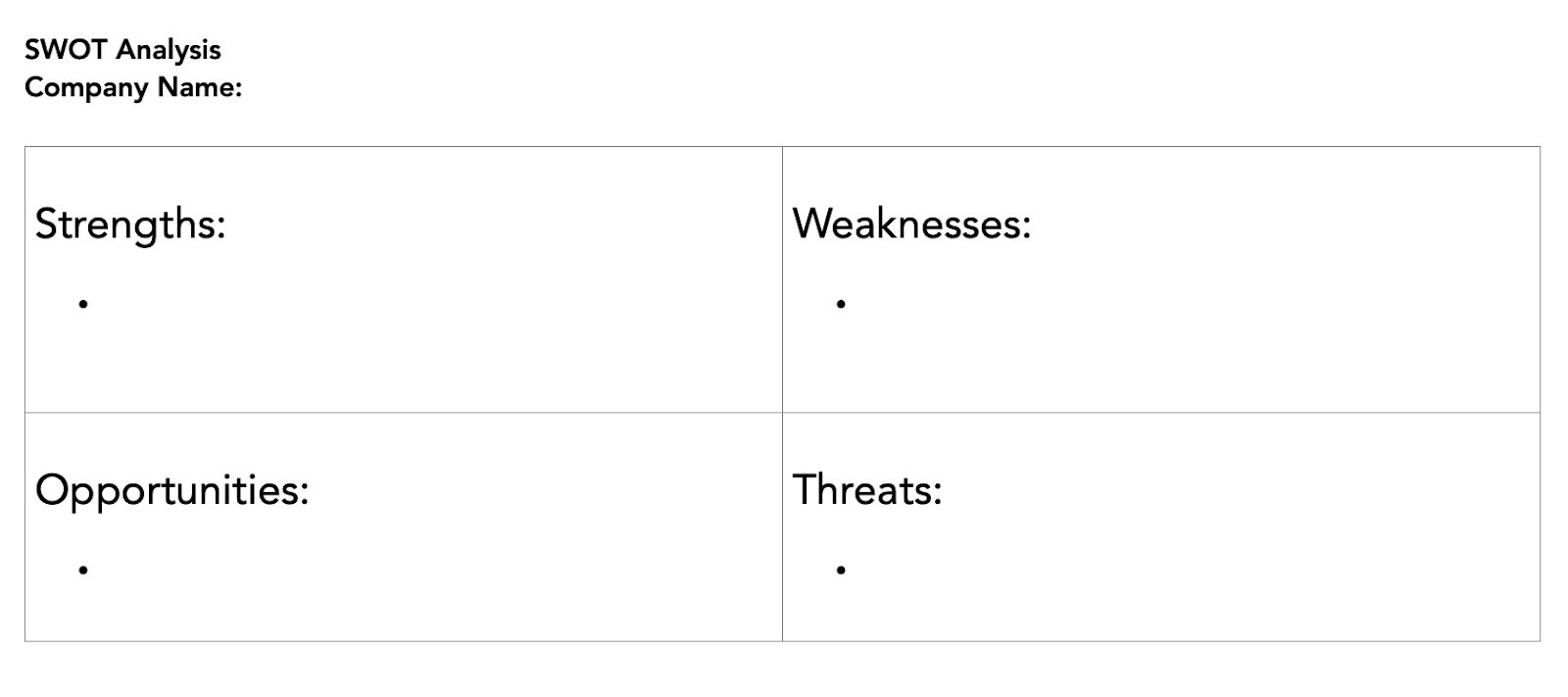
Image Source

This is the empty SWOT template we provide inside the Market Research Kit. Here you can gather your findings and keep them organized on one sheet. This chart can easily be plugged into the provided PowerPoint presentation, making sharing findings a breeze.

2. MECLABS

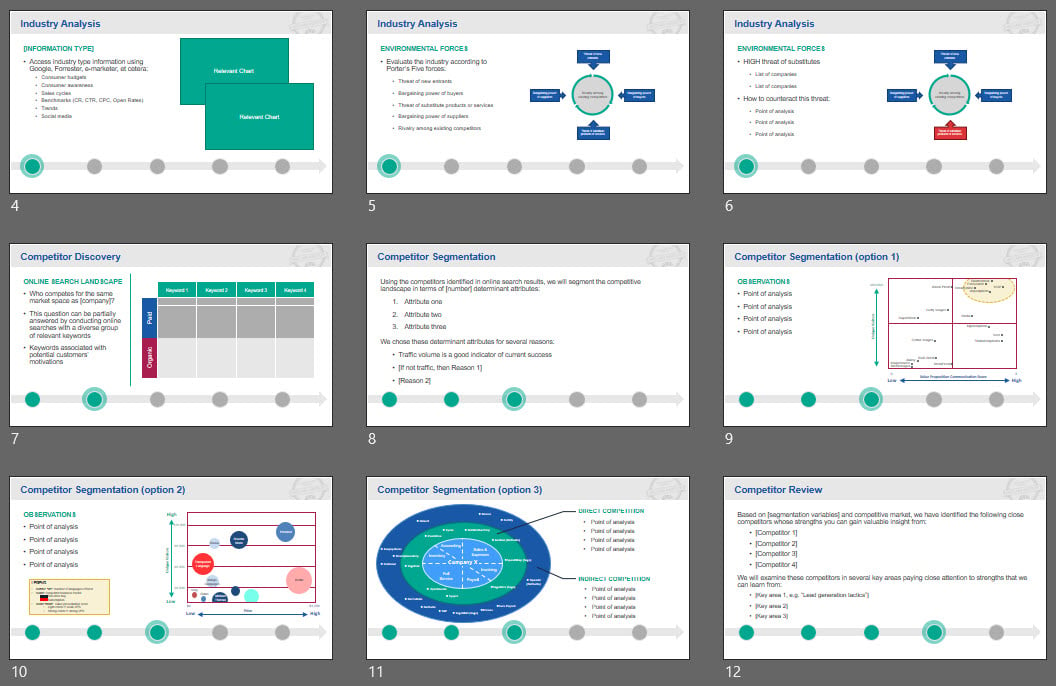
Image Source

The MECLABS Institute has a series of competitive analysis documents. If you’re looking to understand the forces shaping your industry, MECLABS’ resources can help you compile the research.

All of the charts that you complete can easily be turned into slides. The visuals make your analysis easy to understand.

3. Semrush Market Explorer

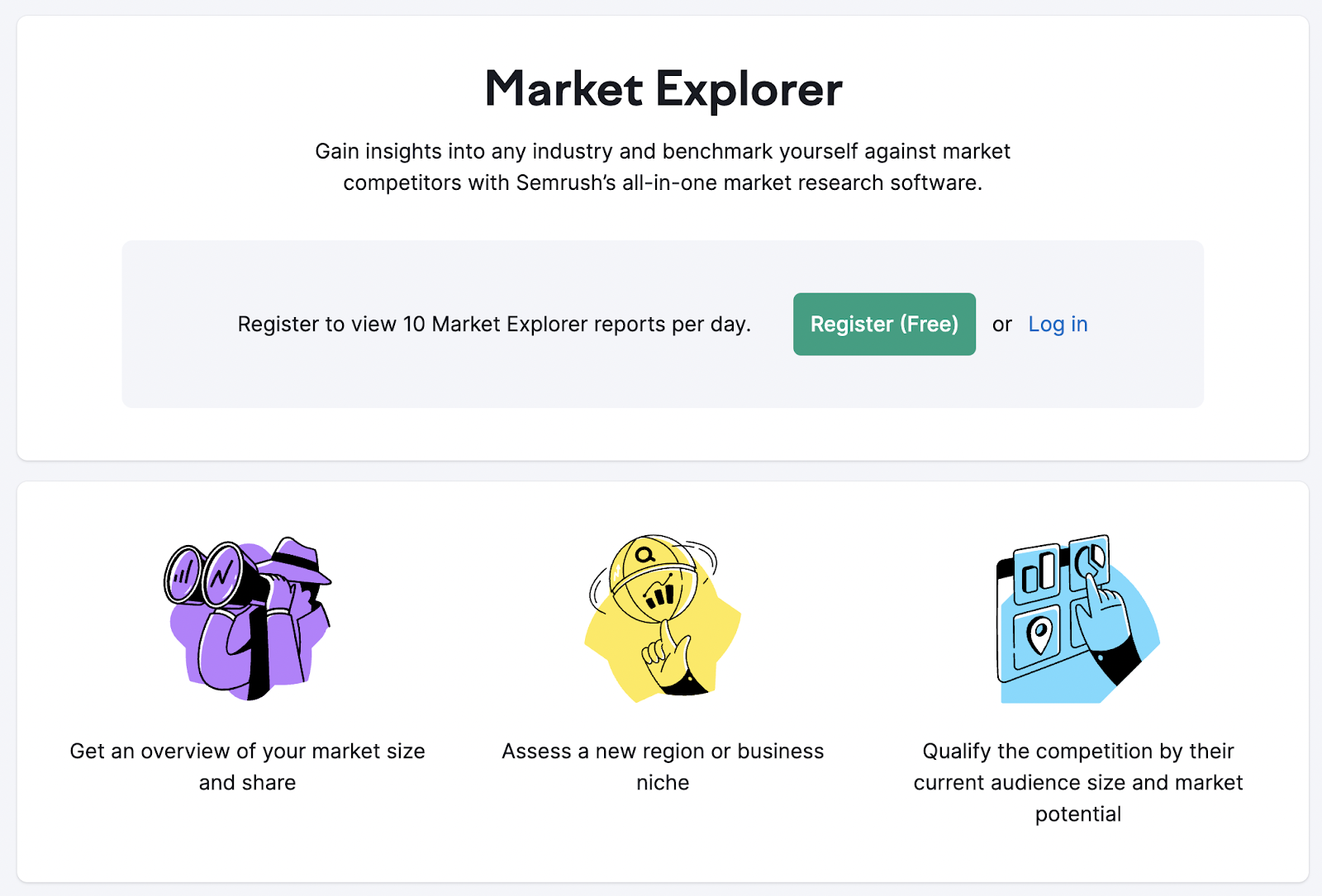
Image Source

You may feel overwhelmed about starting your research from scratch. Semrush can help. Before you start surveying the marketplace on foot, you can assess your competition entirely online.

Semrush offers a free trial that includes market research tools. Here you can see the size of your industry, available niches for your business to fill, and your competitors’ market potential.

You’ll also see how well your business can position itself with online search engines.

Competitive Analysis Example: The Coffee Shop

Let’s say you want to start a new coffee shop in Boston that specializes in making Asian-inspired lattes. To see the viability of your new business, you would start with the following competitive analysis.

Porter’s Five Forces Analysis

Let’s start by determining the level of competitive rivalry for your business. We’ll explore how the business compares to other coffee shops using Porter’s Five Forces.

1. Competition in the Industry

  • Boston has a large number of coffee shops, including large chains. Your business will need to compete with large players like Dunkin’ and Starbucks.
  • Coffee companies Jaho and Ogawa also serve Asian-inspired drinks. You’ll want to make sure that your shop is in a different neighborhood to avoid competition.
  • While many Asian restaurants sell coffee, they also sell full meals. Your coffee shop offers a different type of experience, so you are less likely to compete with these establishments.

2. Potential of New Entrants

  • As a drink company, you’re not just competing with coffee shops. Boston’s budding boba scene may distract from your business.

3. Power of Suppliers

  • If you’re using imported ingredients at your shop, you’ll rely on suppliers to run your business. How reliable is your supplier? Do you have a backup if your primary supplier cannot complete an order?
  • Instead of having a logo custom printed on your cups, you have a stamp that you can use on your items. You can then use any supplier for cups and sleeves, allowing you to secure the best price.

4. Power of Customers

  • Let’s say your storefront is near a local college campus. You’ll have a continuous flow of customers as students come in and out to study.
  • However, these customers have tight budgets. You may need to lower your prices to keep these college students coming back multiple times a week, instead of once a month.

5. Threat of Substitute Products

  • Coffee has gotten more expensive in recent years. Customers may be more likely to make their own coffee at home.
  • Larger players have rewards apps, which offer perks like free drinks. You may lose customers to these players that offer free products.

Running a SWOT Analysis

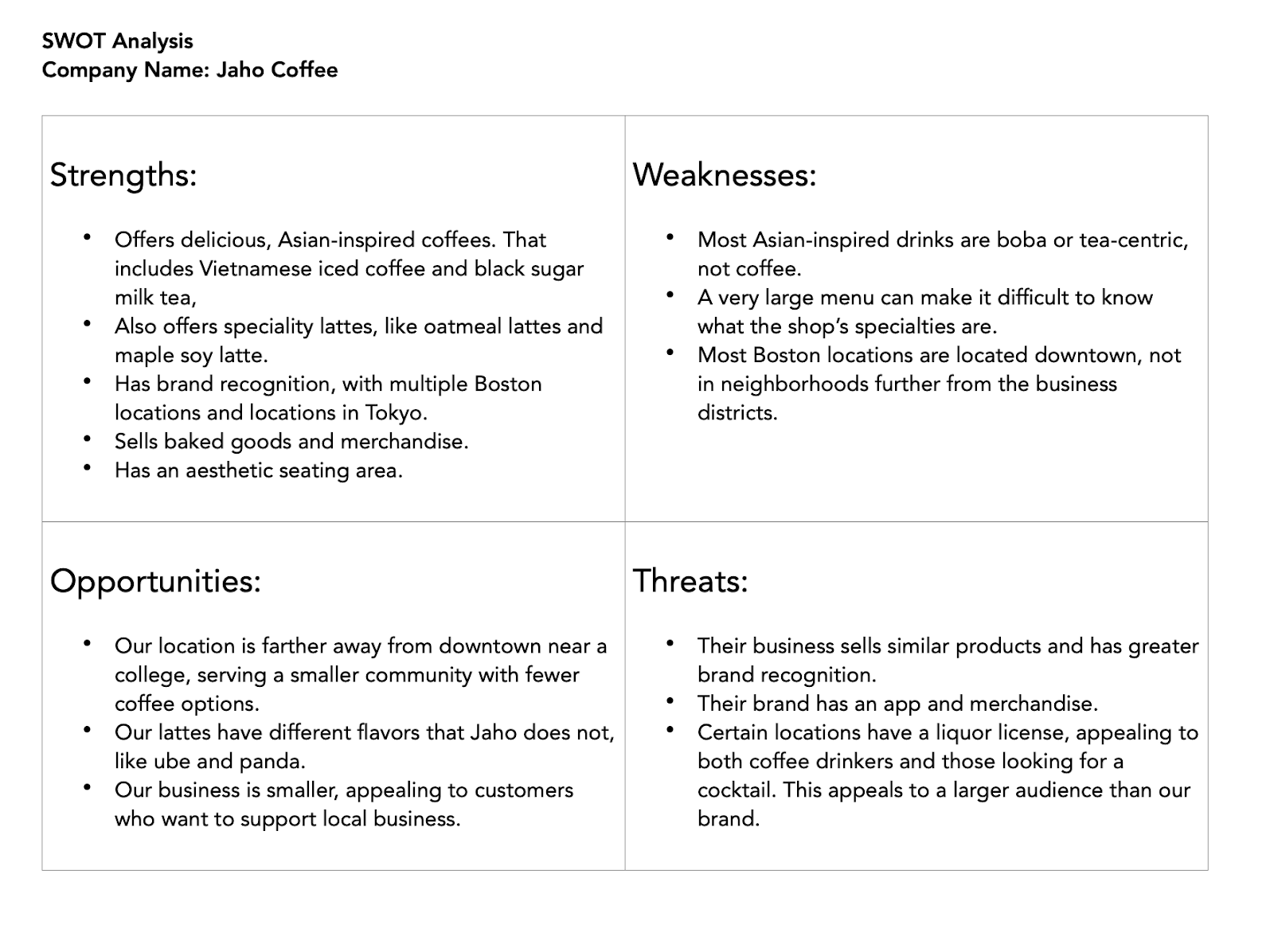
A SWOT analysis can help you better position your brand in your market. For our coffee shop, let’s run a SWOT analysis on Jaho, another Asian-inspired coffee joint in Boston.

Image Source

From this SWOT analysis, we learned the following:

  • The location of your store will be beneficial for the business. Your coffee shop will be in a neighborhood that Jaho does not currently serve.
  • Having a nice seating area will be essential. You want to make sure your shop has the same cozy atmosphere.
  • Your menu should include flavors that Jaho does not. This allows your lattes to stand out.

Customer Research

To understand how your potential customers interact with coffee shops, you’ll need to conduct additional research.

Let’s say you’re not ready to interview potential customers. Instead, you can research the demographics of your area. That includes the age and income breakdowns of your customers.

You can also review the Yelp pages of nearby coffee shops. This will help you understand what makes for a good or bad experience in your customers’ eyes.

After this research has been compiled, it’s time to present your findings to your business partner. Then you can make sure your insights are incorporated into your business.

Making the Most of a Competitive Analysis

As you conduct competitor research, make sure you understand how findings affect your business. Pull in relevant statistics to show how you compare. This allows you to make the most of your research and helps demonstrate your points to stakeholders.

Creating as much context around your research as possible is the best way to make connections and find novel solutions. So get digging, get visual, and get more competitive!

New Call-to-action

Categories B2B

The HubSpot Blog’s State of AI Report [Key Findings from 1300+ Business Professionals]

Whether you’re already using AI in your role or still on the fence, there’s no denying that the way we work is about to change drastically.

Just like computers revolutionized the workplace in the late 1900s, AI’s ushering in a new era that not only makes us more productive, but maybe even happier.

AI isn’t here to take over our jobs, but by saving the average professional a whopping 2.5 hours a day, AI helps us spend more time on the most impactful, creative, and enjoyable parts of our roles.

We surveyed 1,350 professionals across business departments to learn more about attitudes towards AI, how it’s already used, and the impact it will have in the future.

Free Guide: How to Use AI in Content Marketing [Download Now]

Key AI Survey Findings

1. AI unlocks growth — even in a tough economic climate. 

AI became accessible to the masses just as businesses started to struggle to keep up with inflation and budgetary pressures.

By boosting employee productivity and effectiveness, AI allows companies to do more with less.

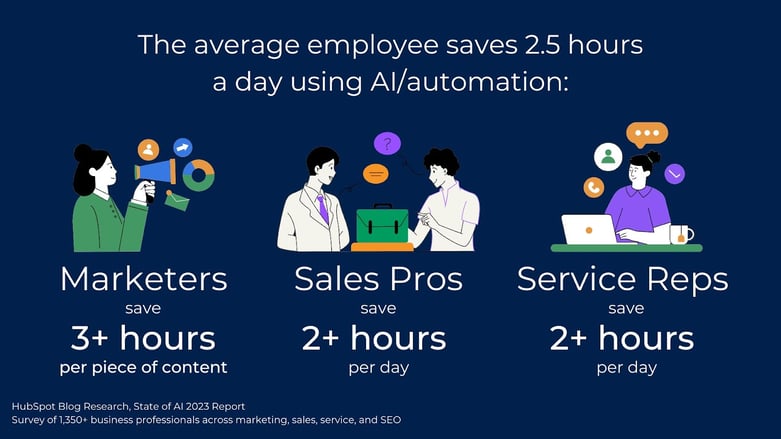
Marketers using generative AI save an average of at least three hours on each piece of content they make.

Across the wider business, sales professionals save two hours and 15 minutes a day using AI to automate manual tasks, while service professionals save more than 2 hours a day using generative AI for rocket responses.

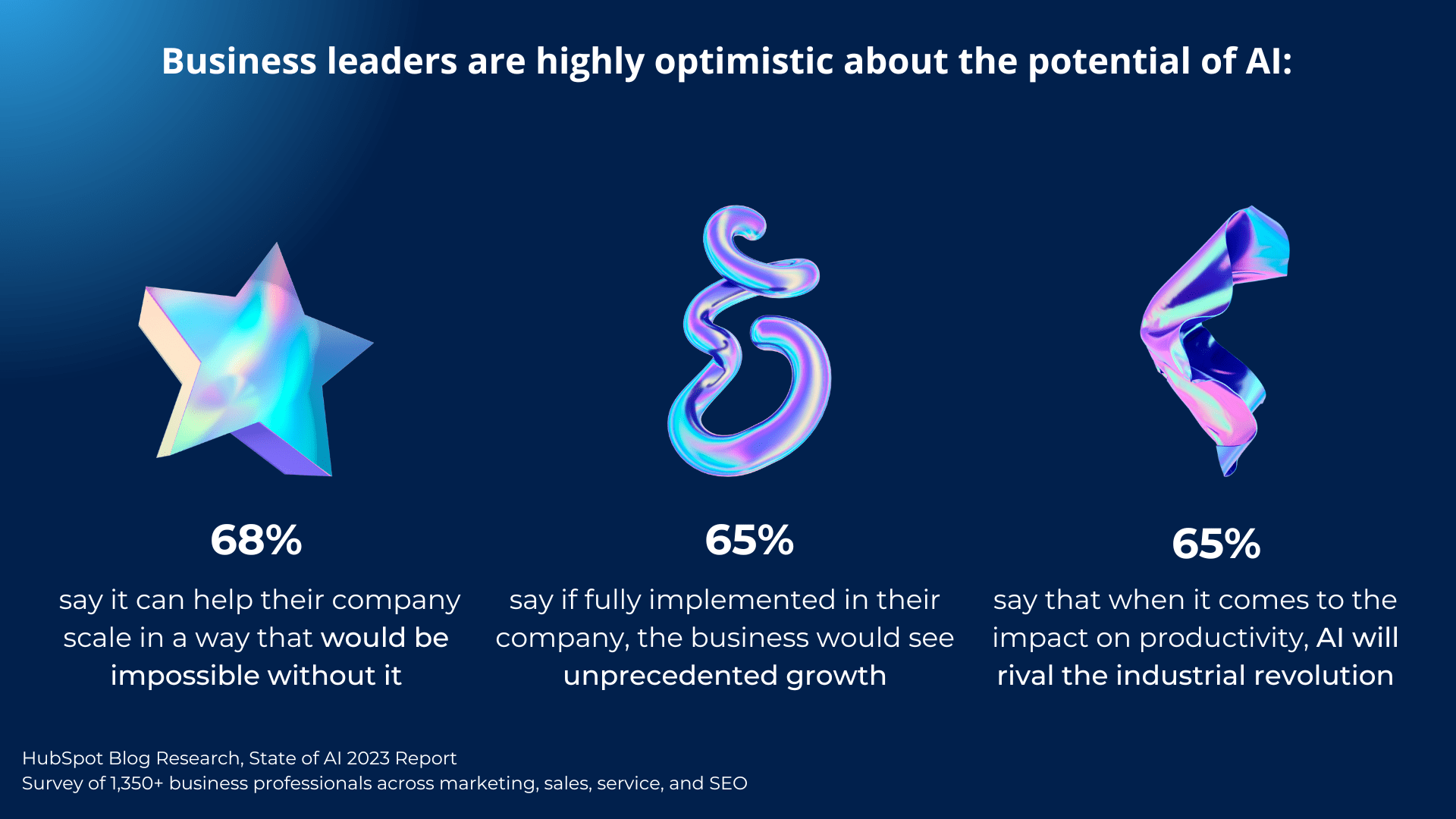
This makes business leaders highly optimistic about AI, with 68% saying it can help their company scale in a way that would be impossible without it.business leaders are optimistic about AI

65% think if it was fully implemented, their business would see unprecedented growth, and another 65% see AI having a similar impact on productivity as the industrial revolution had.

About 62% of leaders have already invested in AI for their employees to use. 71% of them report a positive ROI and 72% say it makes their workers more productive.

The HubSpot Blog’s State of AI Report [New Data]-May-15-2023-03-14-33-0703-PM

2. AI enables more time for the most impactful work.

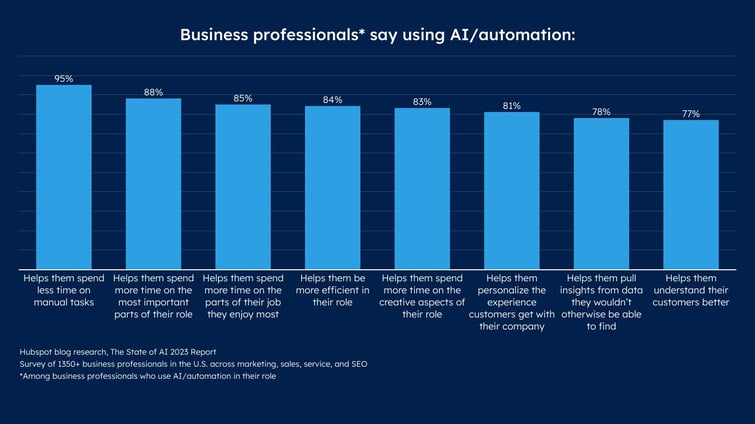
95% of professionals using AI say it helps them spend less time on manual tasks, spend more time on the most important parts of their role (88%), the parts of their job they enjoy most (85%), and on the creative aspects of their role (83%).

Our marketing trends 2023 survey shows that marketers spend an average of five hours a day on manual, administrative, or operational tasks.

AI allows us to stop doing those tedious tasks and spend more time on high-impact activities we actually enjoy.

3. AI is highly effective across industries.

It’s not just about saving time — business professionals using AI are more effective at their jobs.

For marketers, generative AI enables them to create significantly more content, and that content performs better.

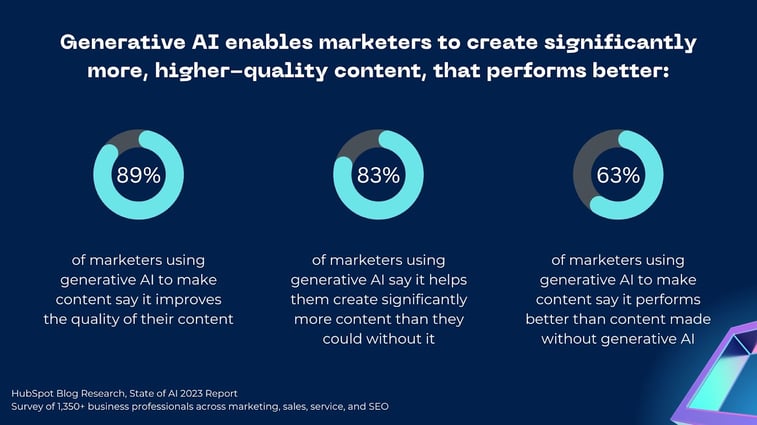
63% of marketers using generative AI to make content say it performs better than content made without generative AI.

Meanwhile, 89% say it improves the quality of their content and 83% say it helps them create significantly more content than they could without it.

When it comes to marketing content specifically, AI can also streamline processes.

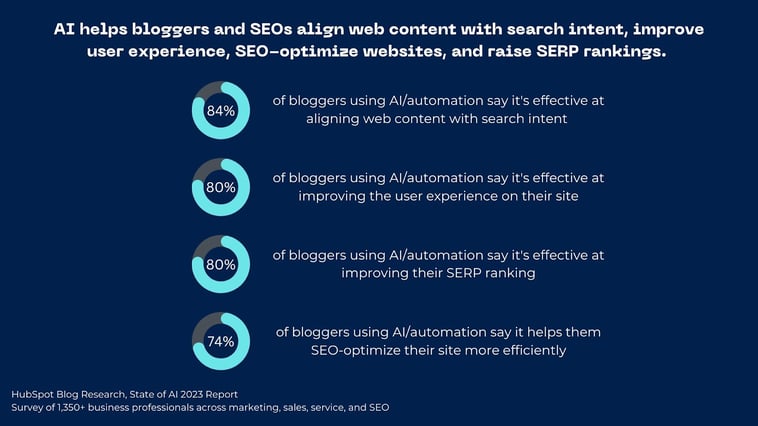
A whopping 84% of bloggers using AI and/or automation say it’s effective at aligning web content with search intent. Additionally, 80% say it can help improve user experience, 74% believe it benefits their SERP ranking, and 80% say it can help boost SEO.

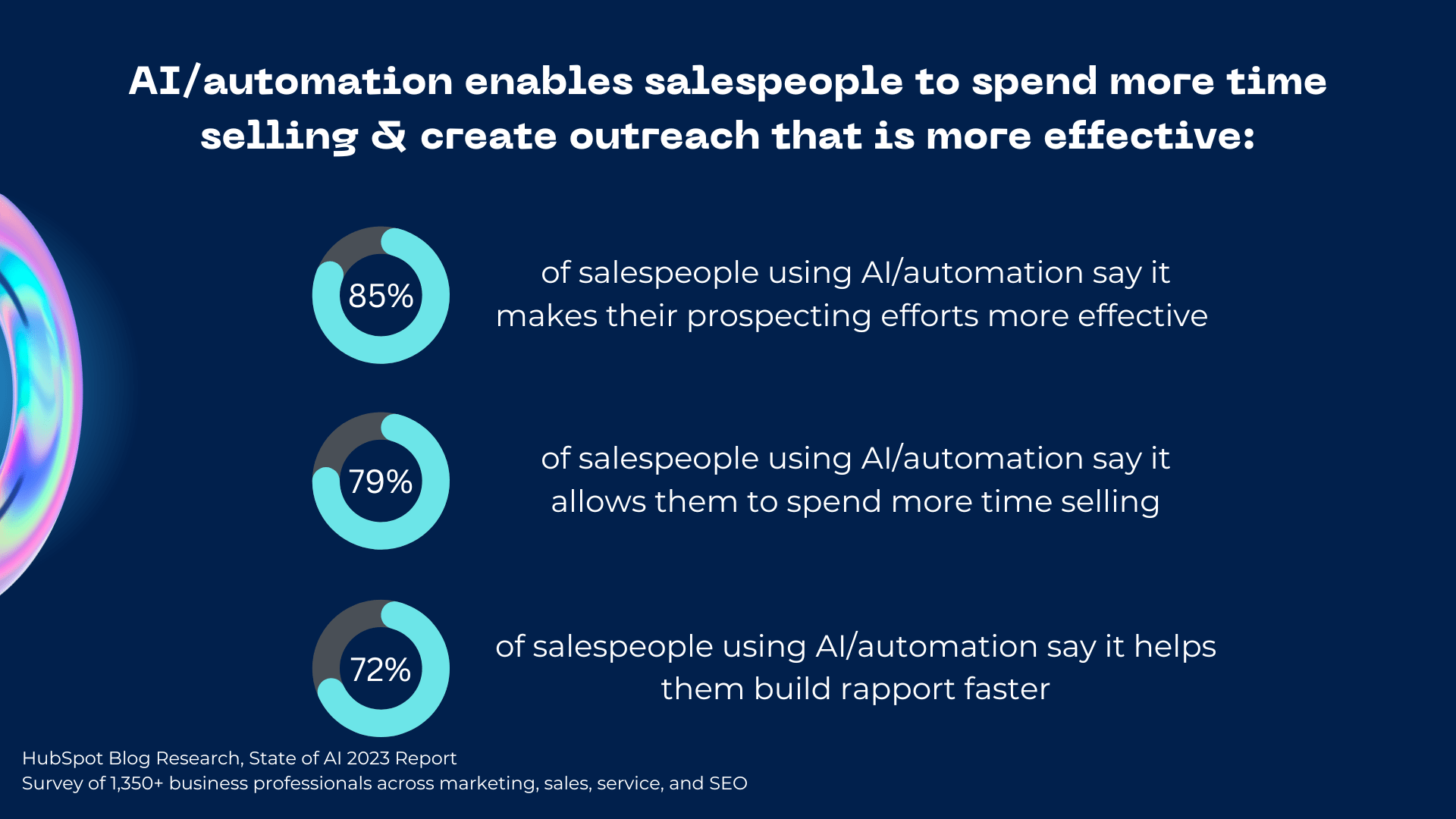
Outside of marketing, 85% of salespeople using AI say it makes their prospecting efforts more effective, allows them to spend more time selling (79%), and helps build rapport faster (72%).

ai helps salespeople send more effective outreach

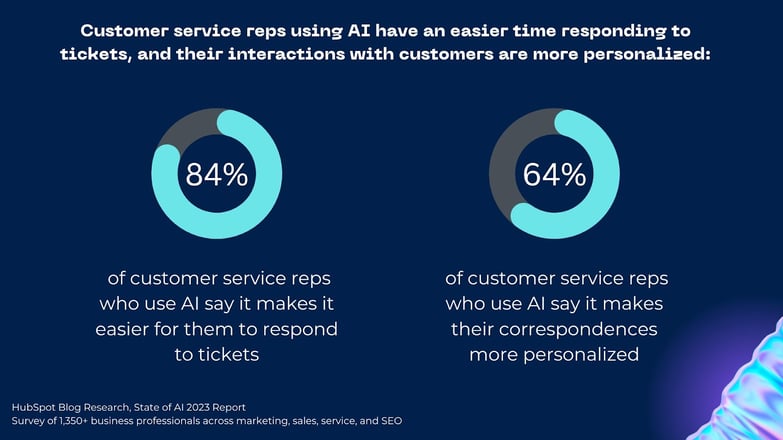
Lastly, 84% of customer service reps who use AI say it makes it easier for them to respond to tickets, and 64% say generative AI makes their correspondences more personalized.

4. AI isn’t taking over jobs.

41% of professionals in our survey are concerned about AI taking over their jobs.

But when we look at how people are actually using generative AI, it’s mainly to get ideas, outlines, and first drafts.

And, if you’ve ever tried to get AI to write a publish-ready article or social post, you know it just isn’t quite good enough.

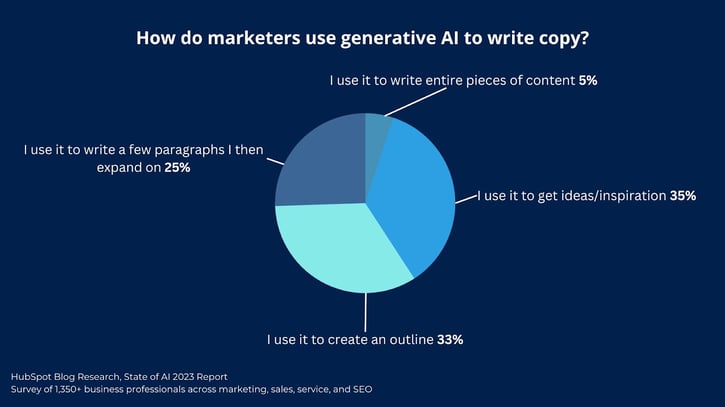
When using generative AI to write copy, just 5% of marketers use it to write entire pieces of content for them.

While one-third (35%) of generative AI users lean on it to get ideas or inspiration, another third use it to get an outline down. Meanwhile, just 25% use it to write a few paragraphs that they’ll then need to expand on.

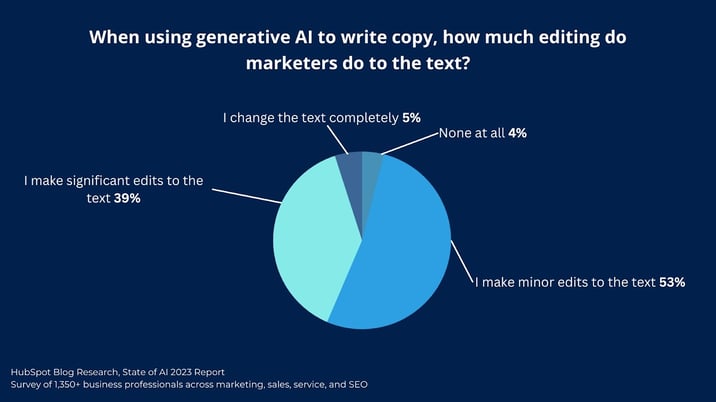
Additionally, 96% of marketers using generative AI to write copy say the need to make some level of edits to the text before it’s publish-ready.

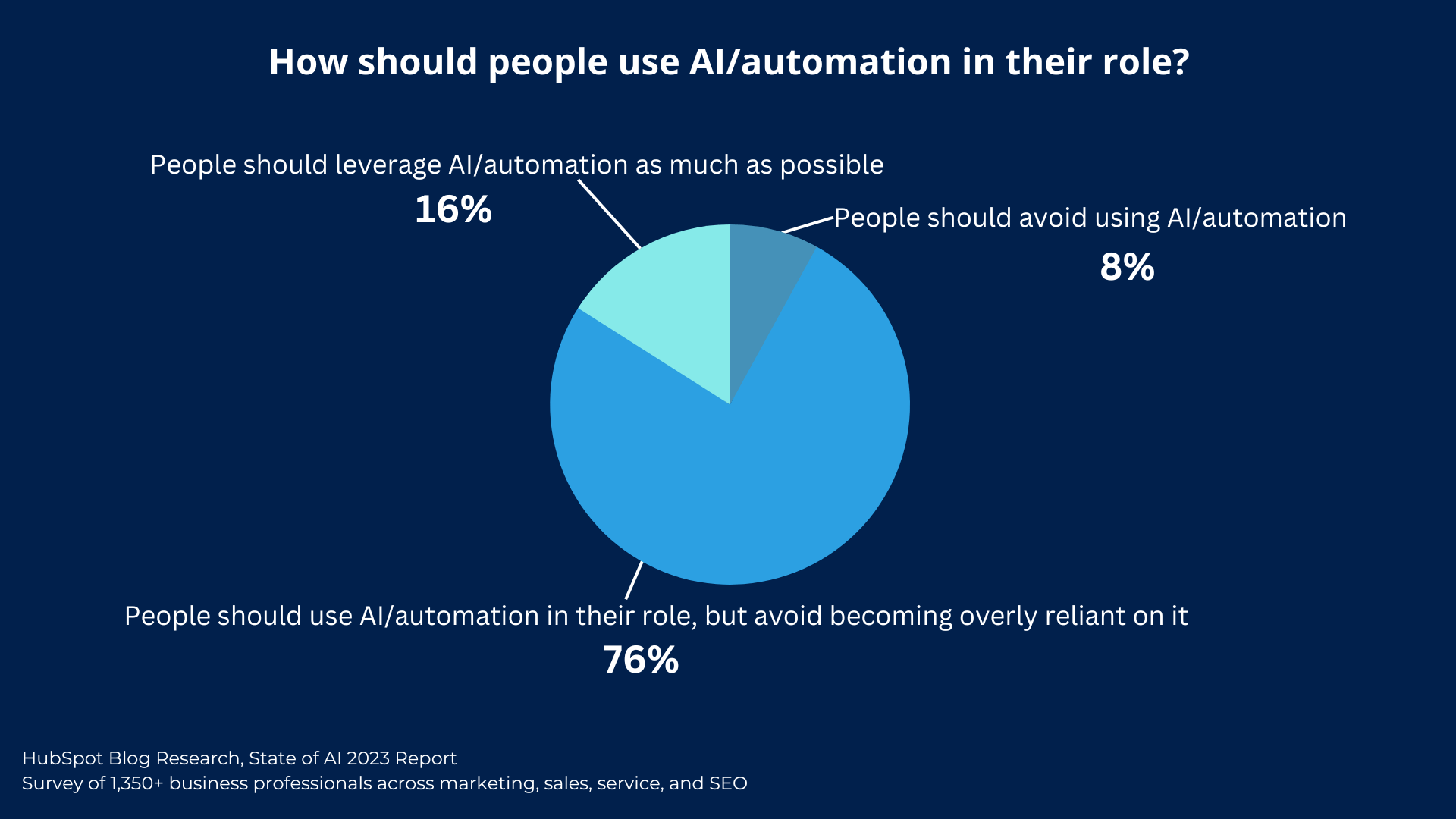
Still, people are cautious when it comes to generative AI, with 76% of professionals saying employees should use AI or automation at work — but avoid becoming overly reliant on it.

how people should use AI in their roles

Aside from job fears, there’s another big reason not to lean on generative AI too much.

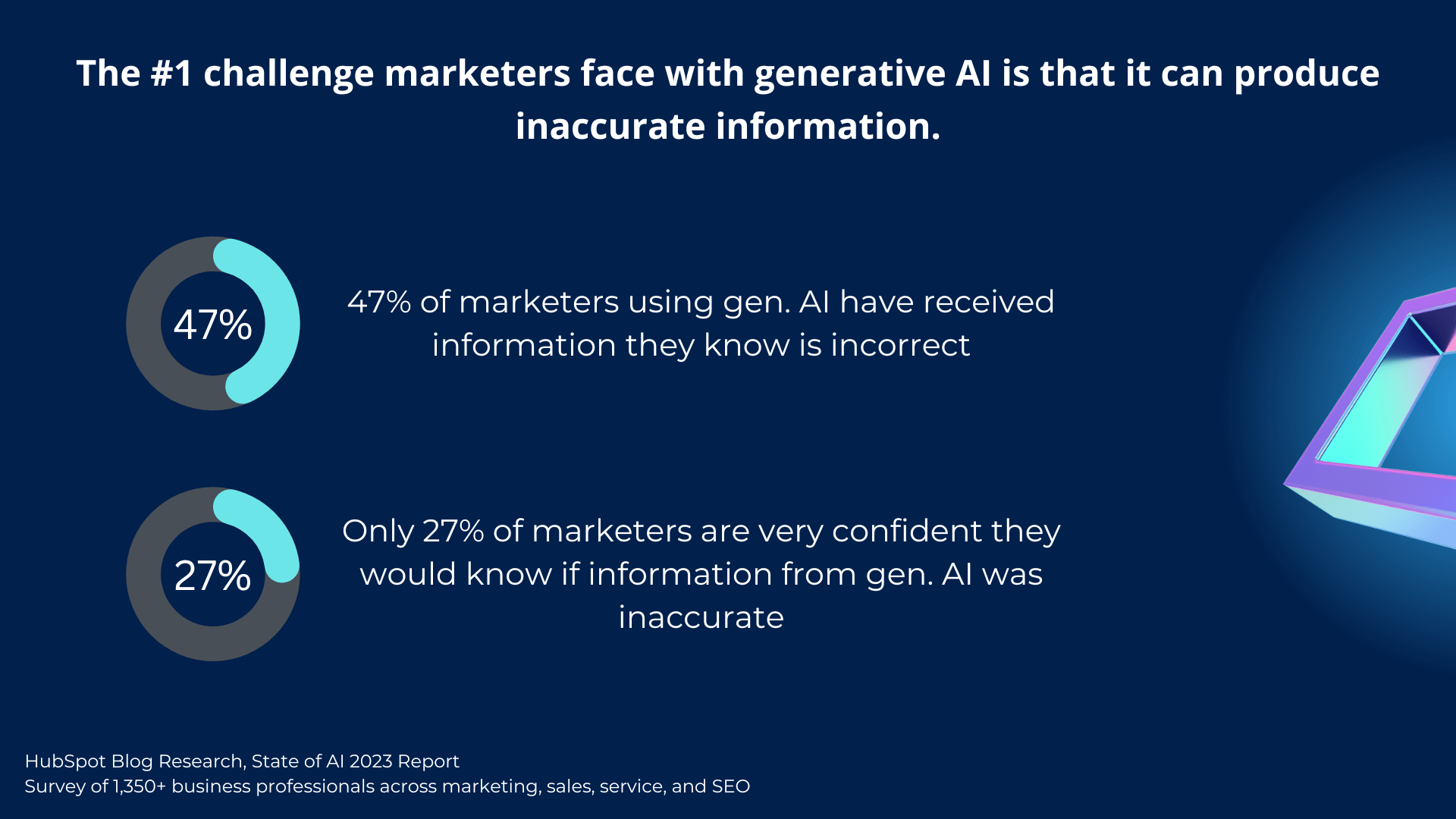
The biggest challenge marketers face with generative AI is that it sometimes provides incorrect information. Without doing deep research, there’s really no way to know when it’s making something up.

For example, almost half of marketers using generative AI say they’ve received information that they know is incorrect. To make matters worse, only 27% are very confident they’d know if the information was wrong.

challenges marketers face with generative ai

This highlights the importance of having a knowledgeable (human) expert working with AI to ensure information is accurate and guide it in the right direction.

Another major challenge with using AI is knowing where and when to use it. Which tasks should be automated and which require the human touch? Let’s get practical and take a look at specific use cases for AI across marketing, sales, service, and SEO.

How AI’s Used in the Workplace

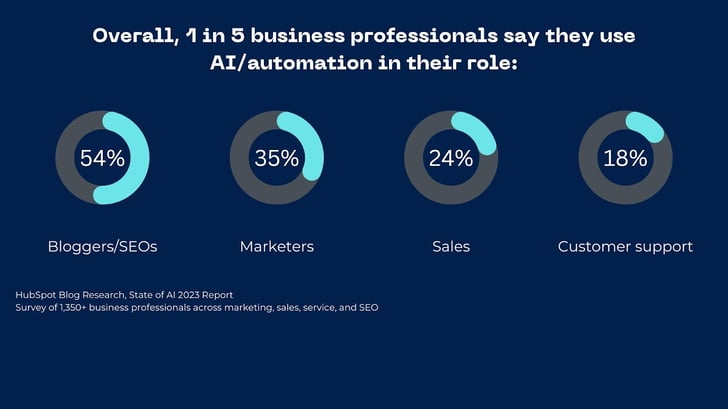
Right now, one in five business professionals use AI and/or automation in their role. And, this percentage gets bigger when diving into certain fields — like marketing.

Since this is all so new, the question of what counts as AI or automation is still loosely defined, so actual usage is probably much higher. Let’s take a look at specific use cases for each role to get a better idea of how AI is being used at work.

AI in Marketing

Whether or not they use it, 82% of marketers say generative AI has impacted the way they plan to create content in 2023 and 69% say it is important to their overall content strategy.

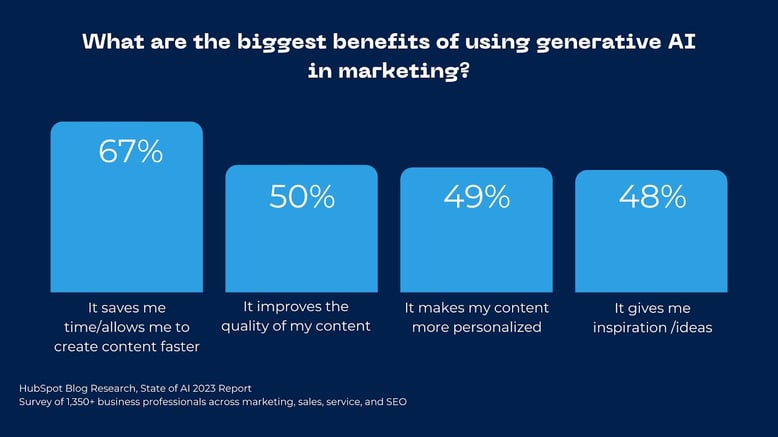
The biggest benefits of generative AI are that it allows marketers to make content faster. It also increases the quality and personalization of their content, and offers inspiration.

How Marketers Use Generative AI

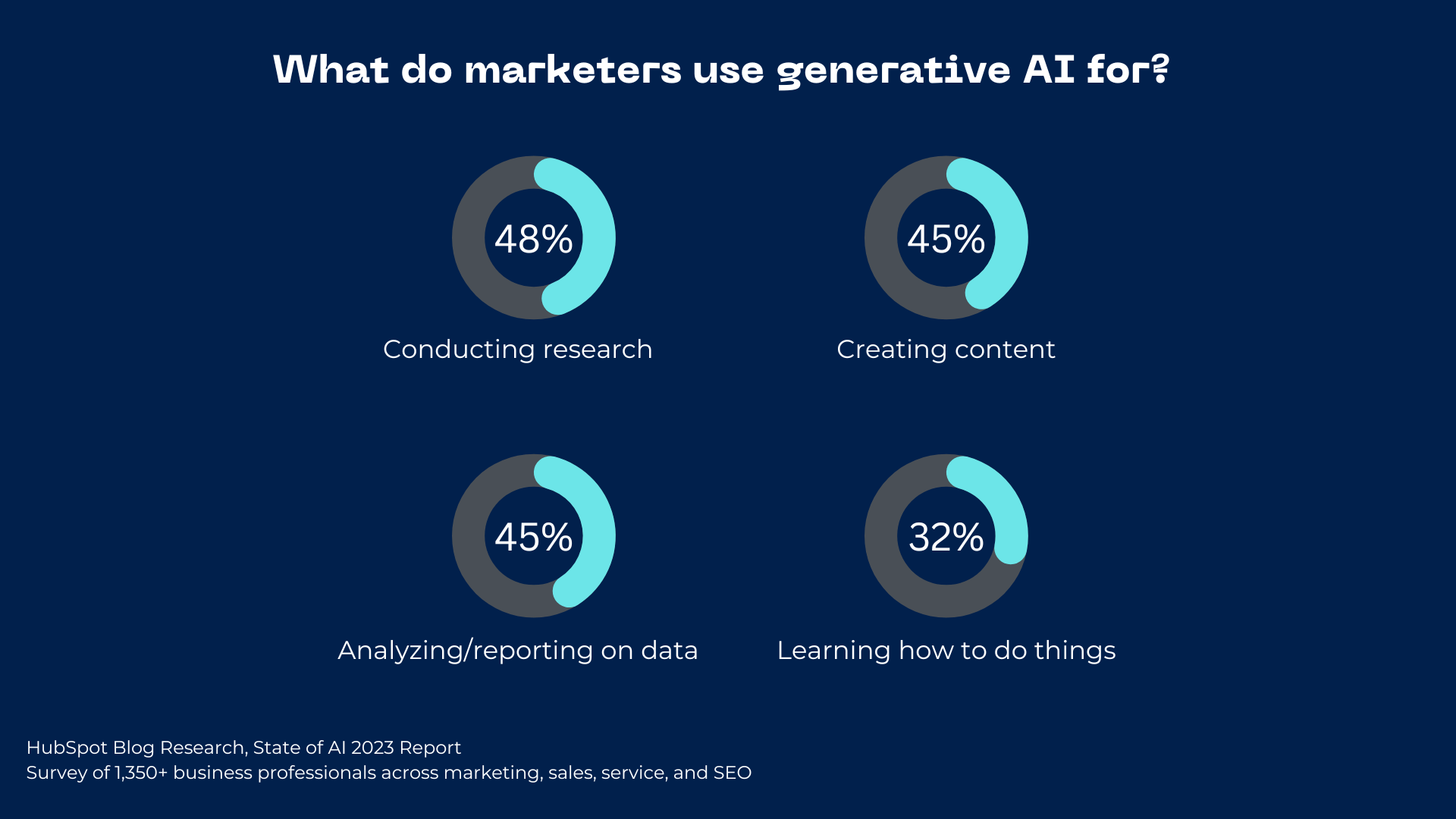
The most popular use cases for generative AI among marketers are conducting research (48%), creating content (45%), analyzing and reporting on data (45%), and learning how to do things (32%).

what marketers use ai for

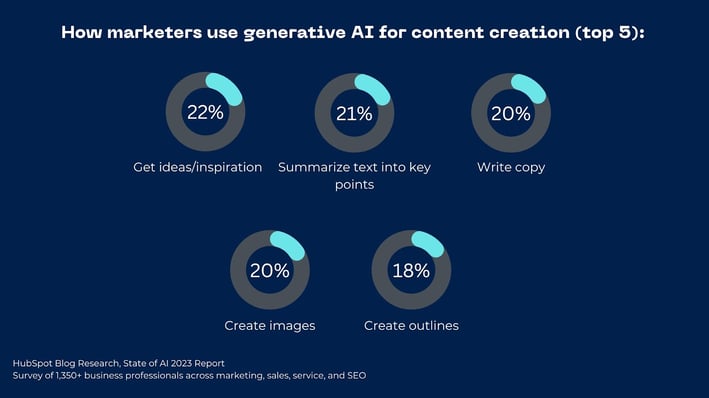
When it comes to content creation, marketers use generative AI to get ideas/inspiration (22%), summarize text into key points (21%), write copy for marketing content (20%), create images (20%), and create outlines (18%).

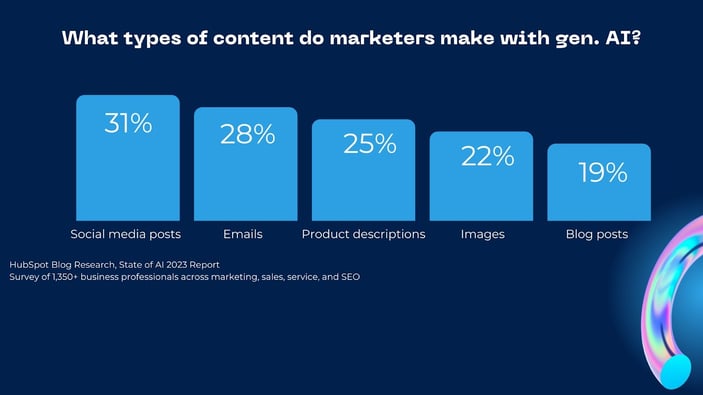
31% of marketers use generative AI to help them make social media posts, while 28% use it for emails, product descriptions (25%), images (22%), and blog posts (19%).

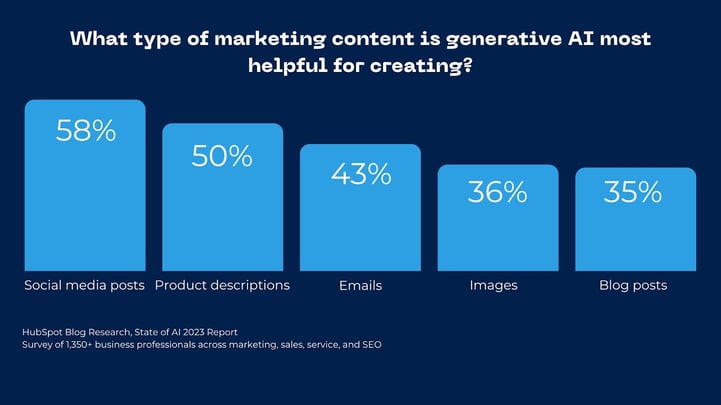
Marketers say generative AI is most helpful for creating social media posts, product descriptions, and responding to emails.

Common Generative AI Tools in Marketing

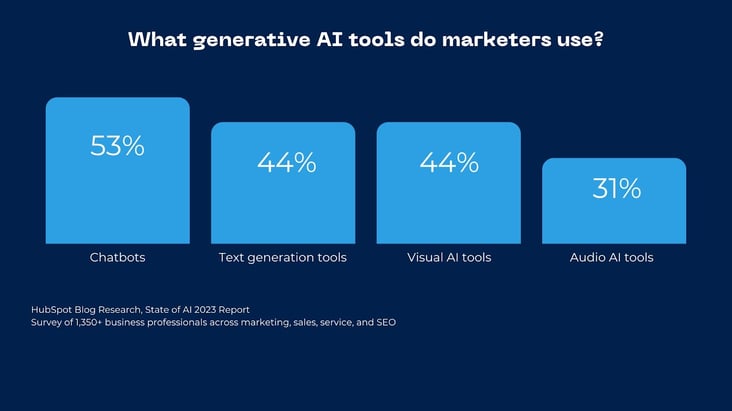
Chatbots like GhatGPT are the most popular, followed by text generation tools, visual tools, and audio tools.

How Bloggers & SEOs Use AI

84% of bloggers and SEOs say AI’s impacted their SEO strategy for 2023.

The biggest benefits of using AI are that it helps bloggers optimize their website for SEO, improves the user experience, helps create an SEO-driven content strategy, and saves time by automating manual tasks.

The HubSpot Blog’s State of AI Report [New Data]-May-15-2023-03-14-32-8343-PM

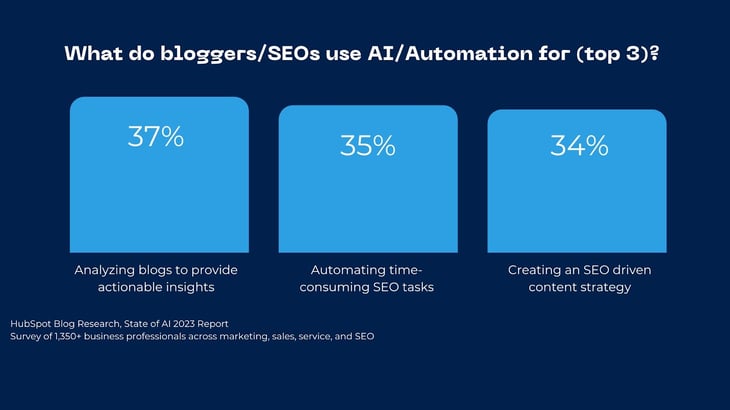
The three most popular use cases for AI/automation when it comes to websites are analyzing blogs to provide actionable insights (37%), automating time-consuming SEO tasks (35%), and leveraging AI to help create an SEO-driven content strategy (34%).

Bloggers also say these are the most helpful AI use cases for optimizing their website for SEO.

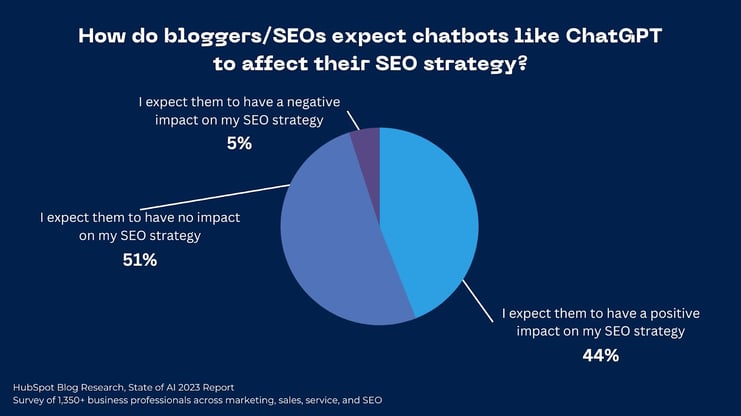
When it comes to chatbots like ChatGPT, 44% of bloggers predict a positive impact on their SEO strategy. 51% see no impact at all, and just 5% see a negative impact.

Prompting Generative AI

If you find yourself prompting AI over and over to get your desired result, that’s totally normal. It’s a brand new skill we’re all learning in real time.

For example, 95% of marketers using generative AI to write copy say they prompt it two-to-four times to reach their intended goal — just 4% reach their intended result in a single prompt.

The HubSpot Blog’s State of AI Report [New Data]-May-15-2023-03-14-33-7621-PM

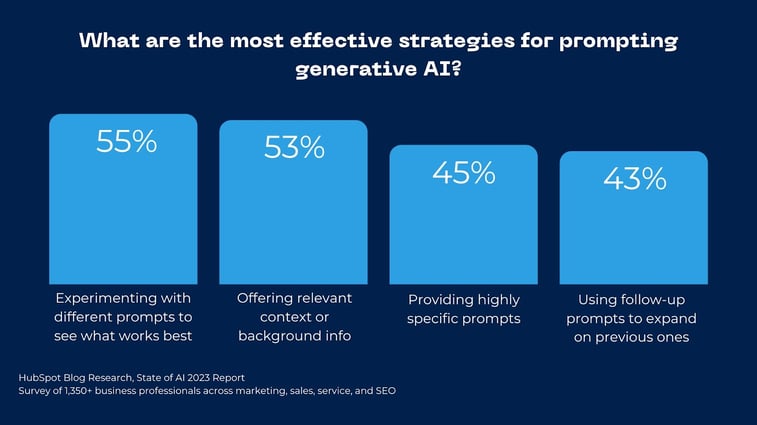
The most effective strategies for prompting generative AI are experimenting with different prompts to see what works best, offering relevant context or background info, providing highly specific prompts, and using follow-up prompts to expand on previous ones.

AI Across Business

AI in Sales

Marketing isn’t the only area of business evolving with AI.

71% of sales professionals say AI/automation tools have impacted the way they plan to sell in 2023, and 60% say these tools are important to their overall sales strategy.

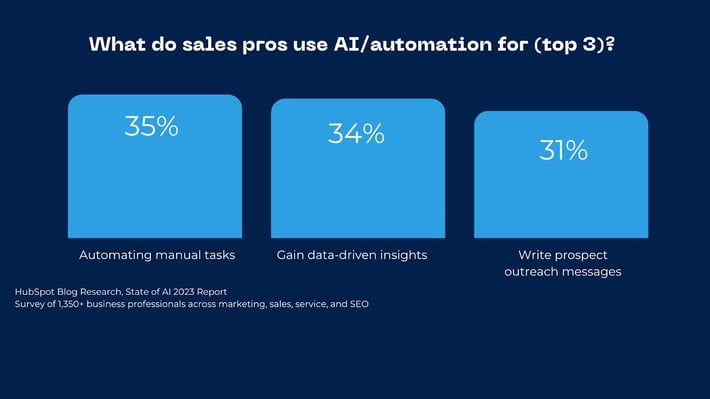
The three most popular use cases for AI/automation in sales are automating manual tasks (35%), offering data-driven insights (34%), and helping write sales content or prospect outreach messages (31%). Sales pros also say these AI use cases are the most helpful for reaching their goals.

How Sales Teams Use Generative AI

86% of sales professionals using generative AI to write messages to prospects say it is effective.

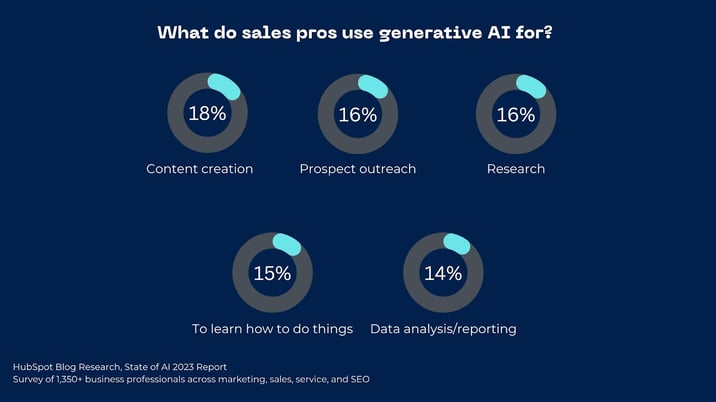
The most popular use cases for generative AI among sales pros are content creation, prospect outreach, research, to learn how to do things, and data analysis/reporting.

Image Source

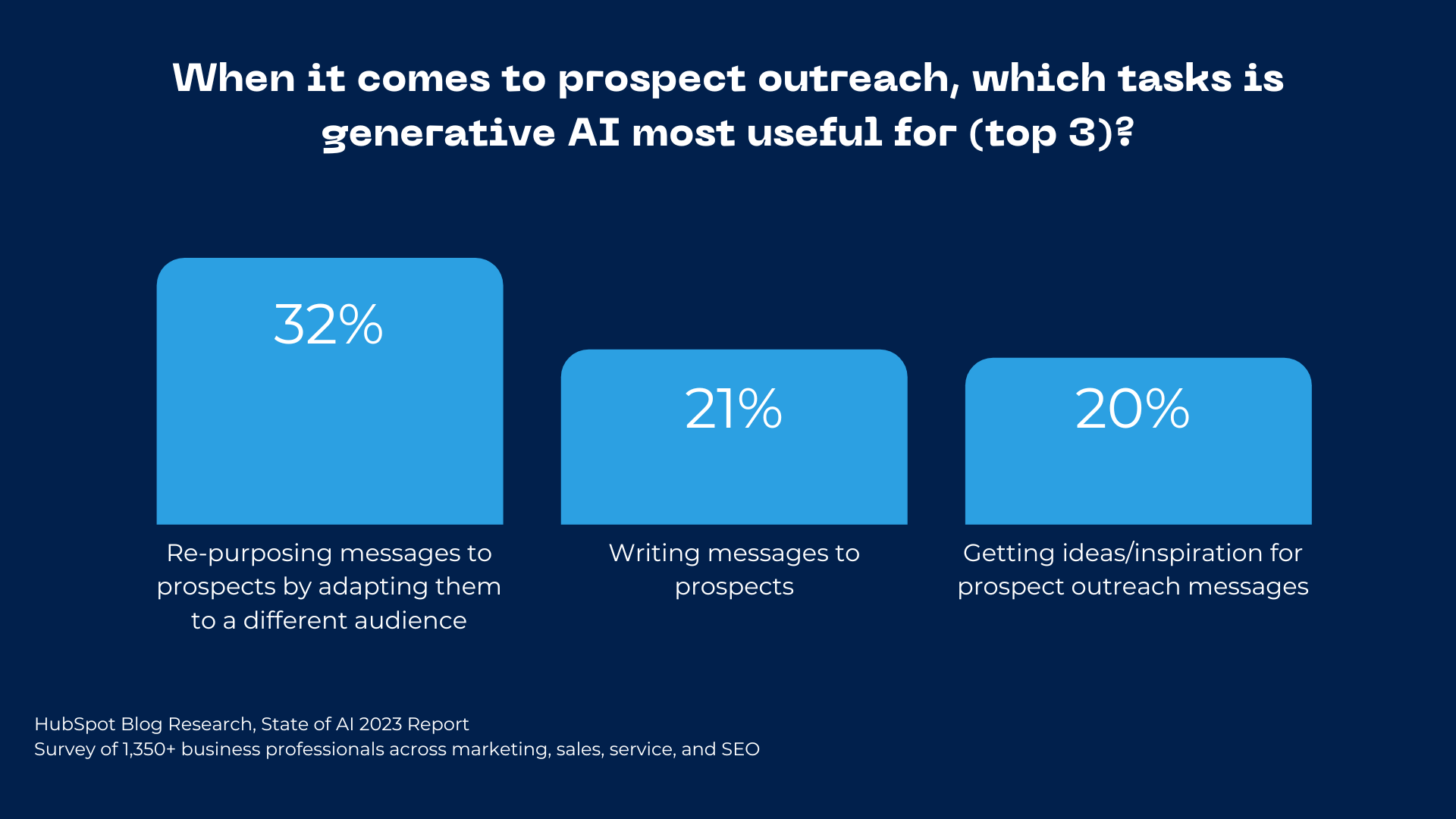
When it comes to prospect outreach, generative AI is most useful for re-purposing messages to prospects by adapting them to a different audience, writing messages to prospects, and getting ideas/inspiration for prospect outreach messages.

what generative AI is useful for when it comes to outreach

Image Source

AI in Service

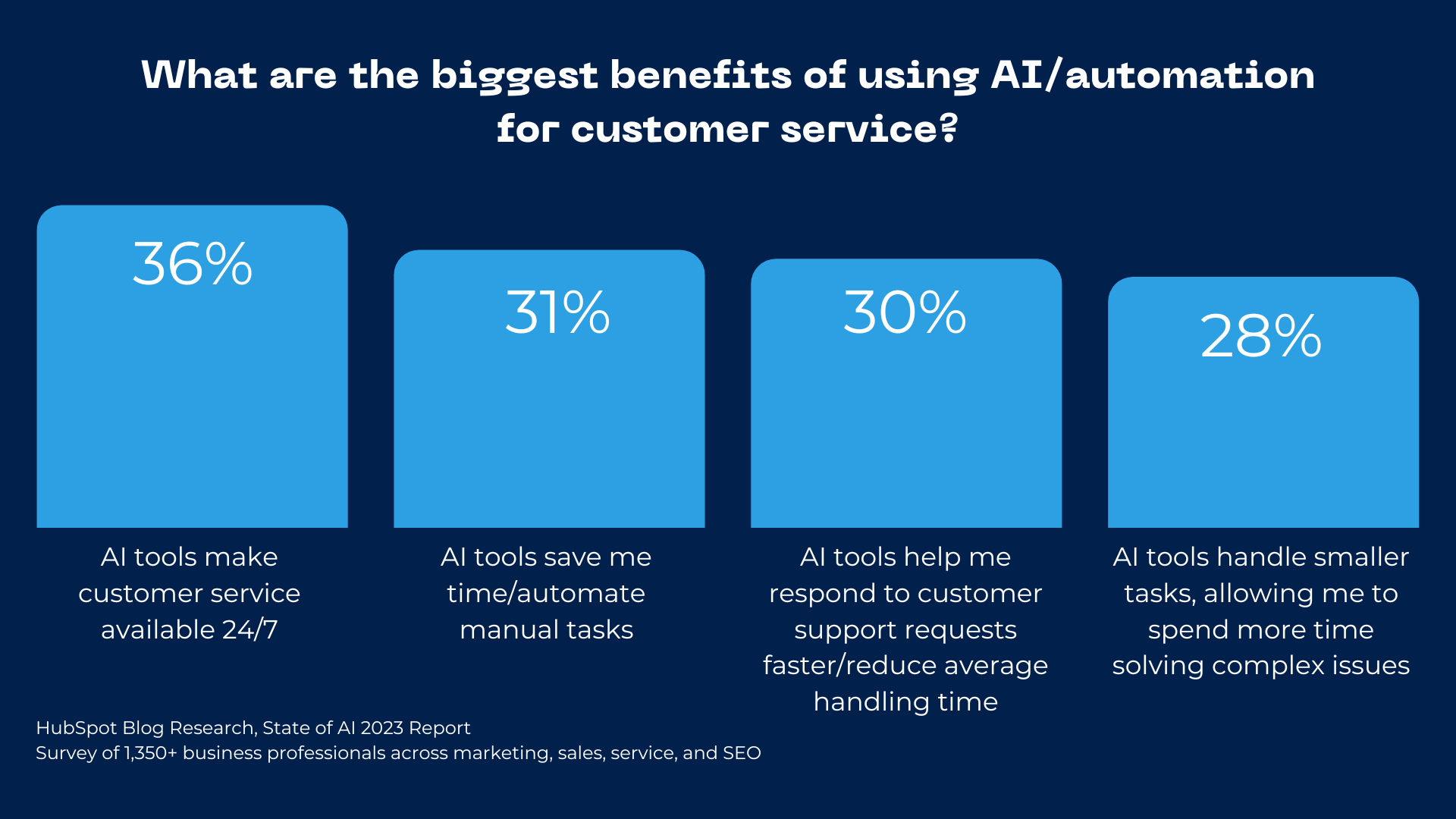
The biggest benefits of using AI/automation tools for customer service are that they make customer service available 24/7, automate manual tasks, and help respond to customer service requests faster, allowing reps to spend time solving more complex tasks.

benefits to using AI for customer service

61% of customer service professionals say most reps will use AI/automation in their role by 2024.

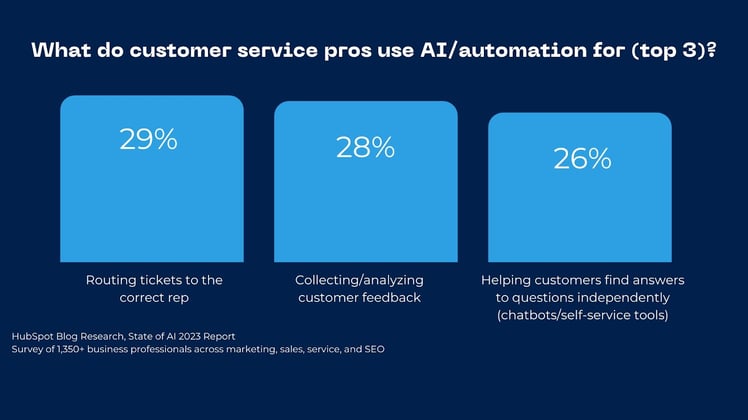
The three most popular use cases for service AI/automation are routing requests to reps (29%), collecting and analyzing customer feedback (28%), and enabling chatbots or self-service tools to answer customer questions (26%). These are also the most effective AI use cases in the service field.

Want a deep dive into how AI is changing the overall business-world? Check out this post from The Hustle.

The Future of AI

While we don’t know exactly what will happen next with AI, there’s no doubt that the cat’s out of the bag, and there’s no going back. Here are some predictions from the business professionals in our survey to consider:

  • 64% say AI/automation tools will make a significant impact on how they do their job in 2023
  • 57% say most software they use will have AI or automation capabilities built in by 2024
  • 56% say most people will use a generative AI tool like ChatGPT to assist them in their jobs by 2024

As the landscape changes, we’ll keep tabs on how AI evolves and the ways it’s being used in the workplace. Keep an eye out for more articles with the insights you need to use AI to unleash your human potential, while leaving the busy work to the robots.

New Call-to-action

Categories B2B

How to Wrap Text in Google Sheets

Do you sigh internally when you open a cluttered and chaotic spreadsheet?

Same. Spreadsheets can be complex to navigate — even for experienced pros — and an unformatted one just worsens things.

But there’s an easy way to spruce things up a bit — wrapping text. And we’ve got you covered with simple step-by-step instructions on how to wrap text in Google Sheets. This blog will look at the following:

→ Access Now: Google Sheets Templates [Free Kit]

The Benefits of Wrapping Text in Google Sheets

Let’s illustrate the advantages of wrapping text with the help of an example. Imagine you’re tasked with creating social media posts using a content calendar spreadsheet.

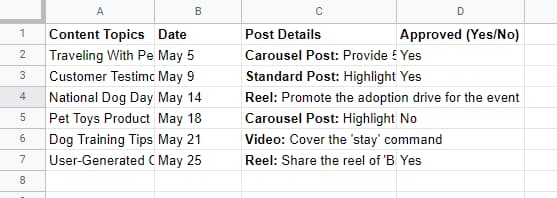
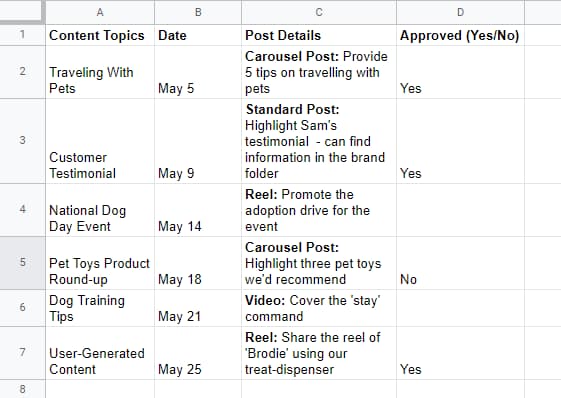
Would you prefer to receive this spreadsheet (look closely and try to make sense of everything):

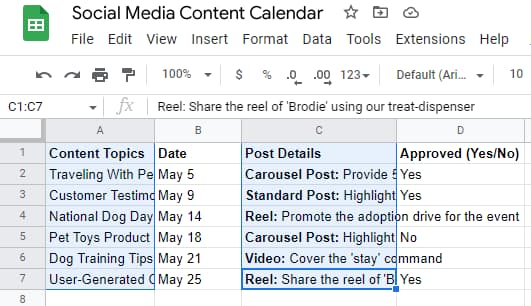
how to wrap text in Google Sheets, spreadsheet with wrap text feature not enabledOr this one:

How to wrap text in Google Sheets, spreadsheet with wrap text feature enabled for all cellsYou likely chose the second option — where the wrap text feature is enabled for all cells.

But why’s that? Let’s break down the reasons why many probably prefer the second option, or in other words, the pros of wrapping text in Google Sheets:

  • It provides a neat, tidy, and uncluttered appearance and formatting.
  • Wrapping text offers much-needed whitespace, an important design element.
  • There’s no hidden or run-off text where the next column partially covers content or spills into other cells.
  • Wrapping text keeps information more streamlined, making it easier for the eye to navigate and read, thus allowing you to run smoothly through the spreadsheet without visual disruptions.

Next, we’ll dive deep into three text-wrapping approaches in Google Sheets. Before we do that, here’s a quick overview of one of the methods, in case you don’t want to scroll further to find the answer:

How to Wrap Text in Google Sheets from the Format Menu

Step 1: Choose the cells you’d like to wrap text in.

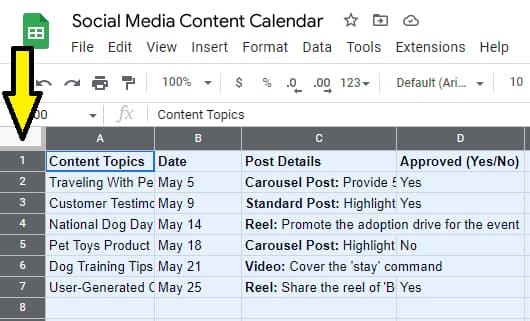
Here’s a quick trick to select all cells in a spreadsheet, which is especially useful when you have dozens of rows or columns — click on the outlined gray box in the extreme left, just above the row numbers (look at the image below).

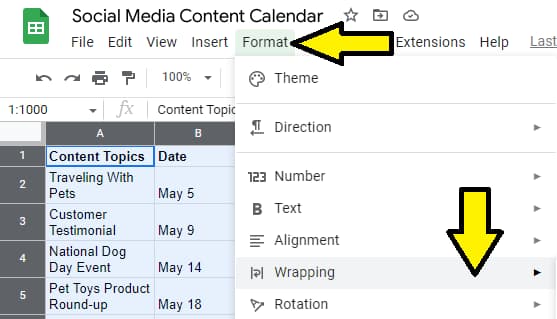
how to select all cells in Google SheetsStep 2: Click the “Format” tab from the menu bar. Then, pick the “Wrapping” option from the drop-down menu.

How to wrap text in Google Sheets from the format menu, arrows pointing to the format option on the menu bar and to the wrapping option on the drop-down menuStep 3: Finally, click on “Wrap.”

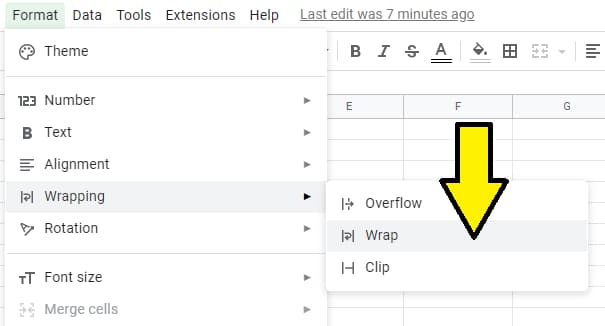
How to wrap text in Google Sheets from the format menu, an arrow pointing to the wrap optionStep 4: You’re all set! There’s nothing else to do. The wrap text feature will be applied to all the chosen cells, providing a more organized view of the content.

how to make text fit in Google Sheets, spreadsheet with wrap text enabled for all cells


How to Wrap Text in Google Sheets from the Toolbar

Step 1: The first step is similar to the previous section. Simply pick the cells you want to format.

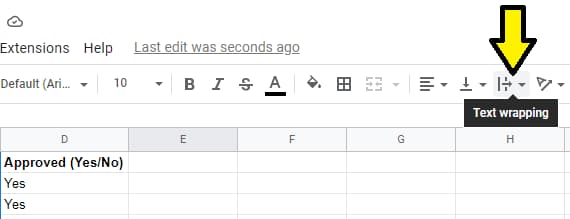
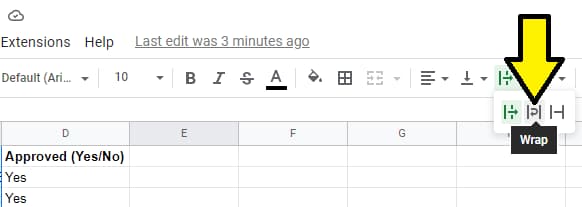
how to wrap text in Google Sheets from the toolbar, selected cells on a spreadsheetStep 2: Next, select the “text wrapping” icon in the toolbar, which can be found to the right of the alignment buttons.

how to wrap text in Google Sheets from the toolbar, an arrow pointing to the text wrapping icon on the toolbarStep 3: Choose the middle icon that looks like an upside-down undo button from the three options that pop up, and you’re good to go.

Quick hint: If you hover over the icon in the center, a small-pop up will appear with the word “Wrap.” This will help you identify the right option to click on.

How to wrap text in Google Sheets from the toolbar, an arrow pointing to the wrap icon


How to Wrap Text in Google Sheets on Mobile

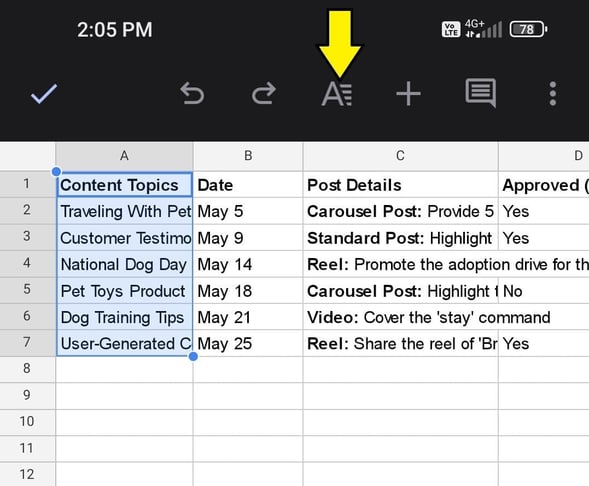
Step 1: First, install the Google Sheets mobile application. Next, open the file you want to work on from the mobile app and select the cells that require text wrapping.

Then, click the “Format” icon near the top of the page to the right of the redo button (see the arrow below).

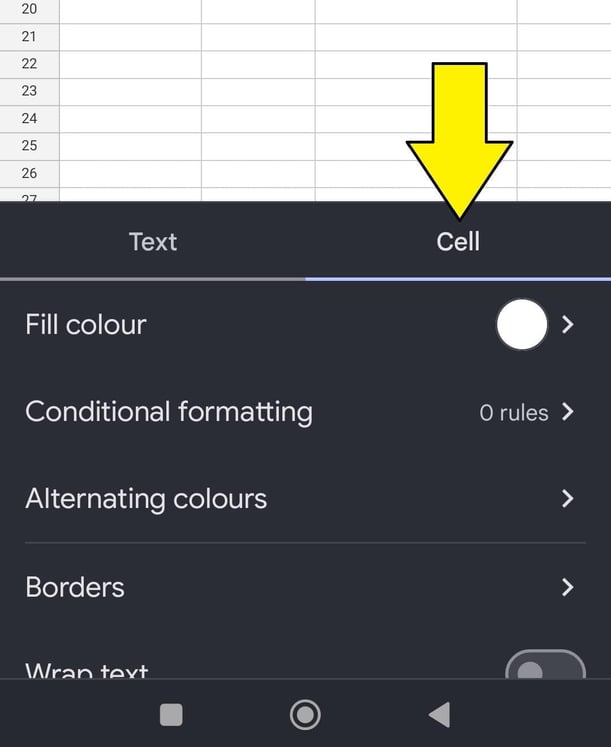
how to wrap text in Google Sheets on mobile, an arrow pointing to the format iconStep 2: A box will pop up. Click on the “Cell” option, which will allow you to edit different elements of the selected cells (note: the default is the “text” option).

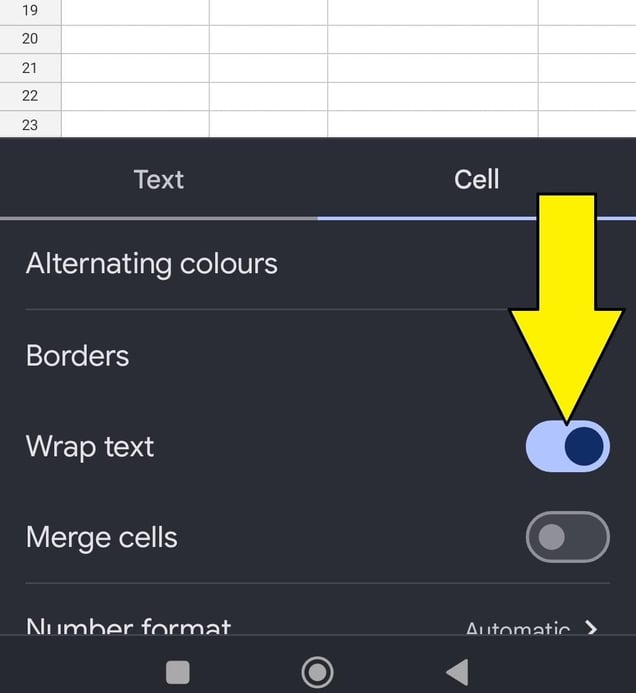
how to wrap text in Google Sheets on mobile, an arrow pointing to the cell optionStep 3: Scroll down until you find the “Wrap text” option. Slide the switch to the on position, and you’re done. So, there it is — a simple tutorial on how to make the text fit on Google Sheets from your mobile device.

how to wrap text in Google Sheets on mobile, an arrow pointing to the wrap text toggle which is on. Does wrapping text make a difference?

Direct answer: Yes, it does.

Remember the 5 Cs: clean, clear, consistent, clutter-free, and no cut-off text. Your Google Sheet will be much more organized and easily read with wrapped text. So get rapping (err, I mean wrapping).

business google sheets templates

Categories B2B

The State of Generative AI & How It Will Revolutionize Marketing [New Data + Expert Insights]

A writer at heart, Meghan Keaney Anderson centered her career around content creation.

So, when pivoting her career into the world of generative AI, which could supposedly replace writers, Meghan received one resounding question from peers: Why?

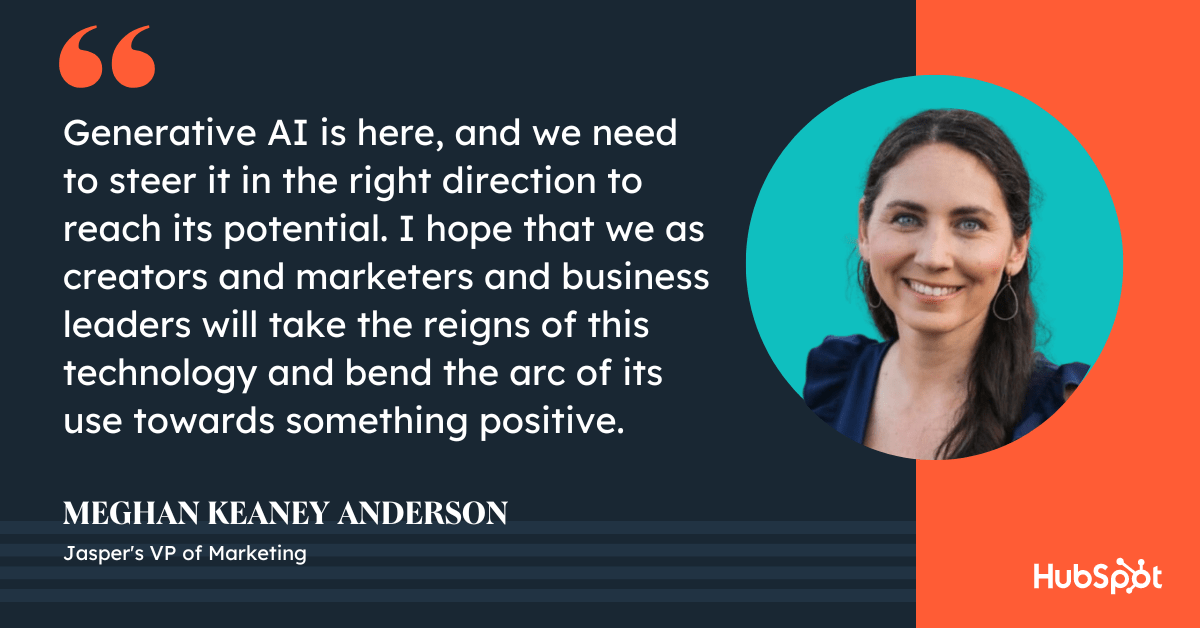
Her answer? “[Generative AI] is here, and we need to steer it in the right direction to reach its potential. I hope that we as creators and marketers and business leaders will take the reigns of this technology and bend the arc of its use towards something positive.”

In this series, we’ll explore some of the strongest opportunities for AI in the marketing world today and in the near future, backed by HubSpot Original Research from our State of AI Survey, and expert perspectives from major brands including Jasper, ZoomInfo, and Mention.com.

Free Guide: How to Use AI in Content Marketing [Download Now]

Editor’s Note: This data is from our March 2023 survey of 1,350+ business professionals in the U.S., including marketers, sales pros, bloggers, and customer support specialists on AI/automation. Read the full data report here.

Top Generative AI Marketing Findings for 2023 [New Data]

1. 90% of marketers who use AI say it’s effective for content creation.

It’s no question that AI is poised to revolutionize the marketing industry. But how is a different story.

So we asked marketers: In which aspects of your role do you already leverage AI?

For starters, one of the biggest benefits of AI is that it speeds up the content creation process.

A whopping 67% of marketers who use AI use it to create content faster — like writing quicker copy, conducting faster research, or generating ideas — and 50% also believe it makes their content better.

Here are a few other ways marketers are currently using AI:

  • 37% use it to write copy, including blogs, marketing emails, etc.
  • 36% use it to create images for marketing content with AI art tools.
  • 35% use it to get ideas/inspiration for marketing content (for instance, asking AI for “5 social media post ideas for a brand selling sunglasses to Gen Z”).

As a blogger, one of the primary use cases for AI that I’ve heard about has been blog creation. However, it’s not the only use case — or even necessarily the most effective one.

In fact, almost 60% of marketers say generative AI has been most helpful for creating social media posts, followed by product descriptions (50%), and emails (43%).


Creating AI tools themselves is also an incredibly effective lead generation strategy. As Amilah Ali, Mention.com’s Content Marketing Manager, told me, “Creating free AI tools has helped our brand with both brand awareness and lead generation, as individuals who use these tools are more likely to remember the Mention brand, and may also become potential customers in the future.”

If you don’t have the time or resources to create your own branded AI tools, there are plenty that can help you deliver more value in your work.

For instance, Mention.com, a social media listening and monitoring tool, used OpenAI’s GPT-3 capabilities to create an Instagram Caption Generator and Instagram Hashtag Generator. They’ve also created AI tools that help users generate social media bios across popular platforms like Instagram, Twitter, and TikTok.

Corresponding Content:

2. 85% of marketing AI users say it boosts content personalization.

As a writer, I was hesitant to believe that a robot could do my job better than I could.

And, in truth, it can’t do my job alone. But it can greatly supercharge my own productivity and even upscale my content.

In fact, 85% of marketers believe generative AI is effective at making their marketing content more personalized, and 45% say that content made with generative AI performs somewhat better than content created without the help of AI.

(An additional 18% say content made with generative AI performs much better than content without it.)

This makes sense: Generative AI is a powerful tool for generating strong ideas, brainstorming more unique angles for your content, and researching topics more in-depth than you otherwise could.

As Samyutha Reddy, Jasper’s Head of Enterprise Marketing, told me recently, “AI augments the human experience, but it doesn’t replace the human within that experience. We value writers in our society because they’re able to give us a thought-provoking human perspective on the world.”

She adds, “It isn’t just about summarizing facts that are out there. It’s about humans sharing opinions on very real topics that help build your perspective on how you feel about something. So an AI could really never replace that human perspective.”

Corresponding Content:

3. Generative AI saves marketers 3+ hours on a single piece of content.

One of the most important benefits of generative AI is how much time it can save for your team.

On average, marketers told us they save three hours and 10 minutes when using generative AI to complete a single piece of marketing content.

Wow. Let that sink in.

For a writer who needs to complete four posts a week, that translates to over 12 hours — more than a full work day! — that you can now spend up-leveling your career, seeking out more interesting angles for your topics, or focusing on other aspects of your role.

kipp bodnar on how AI will disrupt businesses

As HubSpot’s CMO Kipp Bodnar puts it, “[AI] gives you the time to obsess over your customers again.”

He goes on to provide a few examples: “It gives your sales team time to genuinely connect with customers and work with them to identify how your products can solve for their unique needs. It gives your support team the ability to focus on complex customer challenges rather than being bogged down by tickets that could be answered by a chatbot.”

He adds, “It also gives your leaders the insights they need to make more high-impact, powerful decisions that align with what matters most to your customers.”

Interested in how AI will impact businesses at-large? Check out The Hustle’s corresponding post, The New Frontier: How AI Will Impact Businesses in 2023.

Corresponding Content:

4. Marketers who don’t use AI are worried about over-reliance.

While generative AI poses many benefits, some companies still don’t plan to use it just yet. Let’s dig into the top reasons why.

The number one: 43% of marketers who don’t use AI are worried they’ll become overly reliant on AI tools.

HubSpot’s Senior Director of Content, Brad Wolverton, understands that marketers might feel an initial temptation to rely heavily on AI — but he believes that most marketers will quickly determine that AI alone doesn’t enable them to produce the type of high-quality content they need to stand out. 

As Wolverton puts it, “The more reliant marketers become on AI to produce content, the less differentiated that content will feel, which will put a premium on higher-quality research and writing.”

He adds, “AI-generated sites will further erode the trust people have in what they hear and view online, creating opportunities for the companies willing to double down on creative talent.”

Other concerns? 30% who are worried AI provides inaccurate information, and 30% don’t believe generative AI content is as good as content made exclusively by a human.

And, finally, 26% are worried that using generative AI puts them at risk of plagiarism.

Fortunately, these concerns don’t mean you need to forgo leveraging AI entirely — they’re just valid reasons for practicing smart, responsible behaviors when you begin implementing AI at your company.

6 marketing opps that AI unlocks for businesses podcast episode

A few tips:

  • Be transparent with your audiences when you’re using AI. Let them know, ‘This blog post was written with the help of ChatGPT’. Whenever possible, being honest with your customers helps foster a sense of trust, and could also provide helpful context for areas your own customers could practice AI.
  • Don’t consider AI as a human replacement. AI is meant to replace menial, tedious tasks like data collection, reporting, and research – but it shouldn’t steer the ship. As a writer, for instance, you still want to check the facts behind each article generated by AI, and edit it for your own tone, voice, and perspective.
  • Start small. AI can feel daunting and overwhelming, so identify a few tasks on your team that could potentially benefit from AI, and test out a few tools specifically designed to help you complete those tasks before thinking bigger.

It’s equally helpful to check out how other businesses are leveraging AI, and use them as inspiration.

Corresponding Content:

5. The most popular type of AI used by marketers is chatbots.

You’re probably thinking — Okay, okay, I get it. AI is great. But what types of tools specifically should I be using in my role as a marketer?

For starters, the clear winner here is AI-powered chatbots. A full 66% of marketers who currently use AI are using chatbots as their preferred AI tool.

And chatbots, including ChatGPT, Bing AI, and Google Bard, are rated most effective for creating marketing content.

Prefer to make your own? Check out HubSpot’s Free Chatbot Builder, which enables you to create chatbot sequences without any coding and personalize chat replies with contact data pulled from HubSpot’s CRM.

Besides chatbots, marketers said other commonly used AI tools include visual AI tools (57%), and text generation tools (56%).

Unsure which tools are right for you? Take a look at 18 of the Best AI Chatbots for 2023.

Convinced generative AI is going to supercharge your own role? Keep reading to learn how to properly harness AI as your new superpower.

Corresponding Content:

How Marketers Can Harness AI As Their Superpower

1. Become an AI prompt and AI editing superstar.

As you begin dipping your toes into the waters of generative AI, you’ll want to ensure you read up on best practices when prompting AI.

A few tips:

  • Be clear, concise, and specific in your prompts.
  • Request structured data, such as tables or lists, which helps the AI provide a more accurate response.
  • Test out different types of prompts, such as open-ended questions or X
  • Test out different prompt lengths. Sometimes, shorter is better. Other times, more details are needed.
  • Be careful when prompting to ensure you’re being safe with internal customer data.
  • Use actionable words in your prompts, like “Write”, “Summarize,” or “Translate”.
  • Be specific on how you want the AI tool to present its output to your prompt.

Take a look at the following examples of weak versus strong prompts:


Why is the first one weak? Well, imagine if you told a junior associate at your marketing firm the same thing.

I’d imagine she’d look up at you and say, “Okay … But how long should the social media post be? Do you want me to use emojis? Which social platform are you going to post this on? And is there anything important from the introduction that you definitely want me to include?”

Treat your AI chatbot the same way you’d treat a junior associate. Provide specific, actionable prompting to get the most out of the tool.

And, if you’re curious … Here’s ChatSpot’s response:

Impressive, huh?

Similar to prompting, you’ll want to become adept at scoping out prompt responses and editing for consistency across your content, tone of voice, and always double-checking that the information is accurate.

As Ben Salzman, SVP, GTM Strategy & ZI Labs at ZoomInfo, which launched a GTM Playbook with AI tips for sales teams, puts it, “In our sales AI prompts, we include a specific person that the communication would come from, along with details about the prospect who will receive the outreach, including title and company. We also add tone guidance and constraints around how the outreach should sound, and of course, the scenario of the play.”

He adds, “We found that the more information we gave, the more time we saved when it came to editing and iteration.”

Ultimately, AI won’t replace humans — but the humans who know how to properly leverage AI will replace the humans who don’t.

meghan anderson on the responsibility of marketers to use AI for positive

2. Learn how to use AI to scale marketing campaigns.

It’s vital you take a multi-channel approach when creating content to attract prospects and engage with leads.

But that can be exhausting and time-intensive — which is where AI becomes your most beloved confidant.

As a marketer, it’s critical you learn how to leverage AI to get more bang for your buck from one single piece of content.

For instance, let’s say you start with a blog post. You might use an AI-powered chatbot to create social media and email copy to distribute that content. Additionally, you might convert the blog post into a video script so you can create an AI-powered YouTube video that revolves around the same topic.

You might even ask AI to help you turn that blog post into sales enablement materials.

AI can ultimately help you amplify your messaging across channels and distribution engines without requiring hours of coordination with other teams to create brand-new copy for various channels.

And that’s a huge win.

3. Prepare to re-evaluate your SEO strategy.

As more marketers — and consumers — begin leveraging chatbots to ask questions and seek out information rather than search engines, it stands to reason that the search landscape will change drastically. 

To ensure your website is in the best position possible, it’s vital you re-evaluate your long-term SEO strategy. 

Aja Frost, HubSpot’s Director of English Growth, told me, “SEOs have been fighting declining click-through-rates from Google since the introduction of the first search features. With the addition of AI-powered chat on the SERPs, it’s very possible Position 1 will become the only result that gets traffic. Bard shifts positions 2-10 below the fold (depending on the length of the Bard-generated answer, even the first position might be!).”

She advises, “In the short term, SEOs should evaluate which terms their websites are ranking for that are most likely to see Bard on the SERPs (likely “how” and “why” queries) and what percentage of their traffic that puts at risk. The answers will help them develop a longer-term plan — investing in ranking for lower-risk queries, finding unique ways to enrich their content that AI can’t replicate, and more.”

Aja Frost quote on how AI will impact SEO

4. Become an explorer.

AI is still relatively new, and it can be scary to test out how you might leverage AI in your role. It might even be tempting to say, “I’ll just keep doing it the old way. Why fix what isn’t broken?”

But it’s equally risky to avoid AI, which will continue to change the way other marketers create, engage, and sell. You could be left behind if you don’t learn to leverage it for your own gain.

As HubSpot’s Bodnar puts it, “AI is going to commoditize and disrupt so many businesses that the way to prevent that is to be very bold and move forward to embrace AI as quickly as possible.”

Fortunately, this can become a fun aspect of your role. Start testing out new AI tools (a list of those can be found below). Find out which tools are most effective for your team, and share them widely across the organization. Become an explorer who is willing to slow down your current processes to test, iterate, and learn.

Trust me – in the long run, it’s worth it.

The Top AI Tools to Consider Leveraging Right Now

Here’s a quick and handy list of various AI tools suited for different needs.

AI Content Writing Tools

AI Image Generation Tools

AI Chatbots

AI SEO Tools

Content Assistant (in Beta)

DALL-E 2 

ChatSpot

HubSpot AI Tools

GetGenie

Jasper Art

HubSpot Chatbot Builder

AlliAI

Writesonic

Dream by WOMBO

ChatGPT

Pro Rank Tracker

Jasper

Craiyon 

Bing Chat

RankIQ

Writer

NightCafe

Google’s Bard

INK

Rytr 


Intercom

Jasper


Watson Assistant

10Web

Ultimately, the power of AI begins and ends with your own imagination: In what ways can you imagine AI supercharging your work, now and in the future?

New Call-to-action

Categories B2B

How to Write an Effective Email: 14 Pro Email Writing Tips

Writing compelling emails is a superpower that most professionals would love to have. Email is the most common form of professional communication, and sending bad emails can make or break your career.

Download Now: 25 Sales Email Templates  [Free Access]

This article will provide some tips on how to write effective emails. Once you’ve applied these simple strategies, you should be able to confidently send emails to anyone and get rid of that post-send anxiety.

Here, we’ll discuss:

How to Define Your Email Goals

How To Write An Email

Email Writing Tips for International Teams

How to Define Your Email Goals

Writing an email is like creating a meal. Just as a chef needs to carefully select and prepare ingredients to create a delicious dish, you need to carefully choose your words and organize your thoughts to create a clear and effective email.

Before you start writing the email, it might help to define your email goals first. Ask yourself the following questions:

  • What purpose do you want to achieve with this email?
  • What are the main points you want the reader to understand?
  • How can you get readers to understand those points concisely?
  • What is the appropriate email etiquette or tone for this recipient?

Defining these elements can help you write quick, effective, and compelling emails.

Think about the last time you received a poorly written email. You might have had to read it a few times to understand it. The message then kicks off a long back-and-forth email thread that could have been avoided if the first email had been properly planned.

That is why we recommend taking the time to plan your communications goals first. It helps you, the sender, come across as a strong communicator while saving the reader’s time.

When you have defined your goals, then you can start crafting the email.

Writing an effective email hinges on many factors:

  • You have to get the recipient to open the email.
  • Your email must make the intended impression on the reader while successfully relaying the intended message.
  • It must drive the recipient to take the desired action.

Failure at any point could hurt the email’s effectiveness. So, how can you prevent this? Let’s dive in.

1. Use a professional email address.

The first thing the recipient sees is your email address. First impressions matter. Sending an email from “[email protected]” to a hiring manager might give them the wrong impression about you and might create a bias against you. Always ensure that you send professional emails from a professional email address.

2. Have a compelling subject line.

Subject lines can make or break your email’s success. It’s often the deciding factor on whether someone will open your email.

Unfortunately, a lot of people struggle with this part.

Take a look at this example.

How to write an email, avoid vague subject lines. Subject line shows the text

This particular subject line (real-life example by the way) is vague, indirect, and does not hint to me at all what the content of the email will be about.

The result? I might delete or ignore it altogether.

Here’s a better option.

How to write an email, write compelling subject lines. Subject line shows the text

It’s descriptive, specific, and tells me that this is an introduction.

Subject lines are especially important if you’re reaching out to someone for the first time. The recipient doesn’t know who you are, and can only judge you from your subject line.

Even if you’re sending emails internally at your company, it still pays to write a great subject line so your recipient has an idea of what to expect. Like any busy person, your teammates receive a ton of emails every day, and would certainly appreciate the extra effort of a descriptive subject line.

So, how do you write a good subject line?

Be clear, direct, and describe the content of your email. Don’t be afraid to take up the whole subject line. Here are some great examples of subject lines.

  • [Action Required] Monthly Marketing Meeting
  • FYI/Informational
  • Request for [Insert here]
  • [Reminder] Survey to Complete | Will Take 2 Minutes
  • [Name] suggested I reach out to you
  • I’m going to be in town next Tues — are you available?

If you’re sending a promotional email, avoid deceptive subject lines like:

  • RE:
  • FWD:
  • Urgent
  • Order confirmation
  • Account Status

There’s no need to resort to sneaky tricks or clickbait titles just to induce an open. They make recipients feel cheated and tricked, according to a Litmus survey. You’ll lose trust and may end up in their junk mail as a result.

You want to associate positive feelings with your email, not anger and disappointment.

If you are sending promotional emails or newsletters, we recommend that you test different subject lines with HubSpot’s email marketing tools to see what works best for your audience. This can help you fine-tune your email strategy and improve your results over time.

HubSpot email marketing tools

3. Start with an appropriate greeting.

To kick off the email, you should begin with an appropriate greeting. There are two components to the greeting: the salutation and the opening sentence.

The appropriate salutation actually depends on the situation. If you’re writing a formal email to a bank or government institution, it would be better to start off with “Dear [X].”

If you’re sending an email to someone you know, or work in a casual environment, then it is perfectly fine to go with a “Hi [Name]” or “Hello [Name].”

There’s also “To Whom It May Concern,” when you’re sending an email to a group email and not sure who will be reading it.

One thing you want to avoid is using gendered and non-inclusive terms like “Hi guys” and “Mr./Ms/Mrs.” in your salutation.

To help you out, here is a list of salutations you can use in your emails.

  • Dear [First Name]
  • [Name]
  • Good morning/afternoon
  • Hi team
  • Hey
  • Hi there

Pro tip: When you are sending an email to a person for the first time, we recommend personalizing the email by addressing the recipient by name. Also, include specific details about their company and make sure to introduce yourself.

This shows that you have done your research and are genuinely interested in them. It can also help you build rapport with them and set the tone for future interactions.

4. Have a strong attention grabber.

Once you’ve gotten the salutation out of the way, it’s time to start your email.

While the subject line determines whether your email is opened, your opening sentence determines whether your email is read till the end.

Author and business coach Daniel Pink recommends using the “20-second rule” when writing emails. This means that you should try to make your main point within the first 20 seconds of the email, as this is the amount of time many people will spend reading it.

If it’s an introduction, you can open with something you know will interest your recipient. You can find this out through a little research on their social media profiles. Perhaps they Tweeted something interesting or recently posted something on LinkedIn you can reference.

This will help you build rapport and show that you’re not sending a generic email to multiple people.

how to write emails, have an attention grabber. The email example reads,

Of course, this is not necessary if you’re emailing a colleague or someone you know. Instead, establish some kind of context so that they know what’s happening.

With a colleague, start with the “why.”

No one has the time (and patience) to guess what an email is about. The sooner you answer the “why,” the faster you’ll capture their attention.

Quick tip: If you’re sending out sales emails and need inspiration on exactly what to say, take a look at HubSpot’s free email templates. With this tool, you can access a library of built-in templates designed for each stage of the customer journey.

HubSpot free email templates

5. Keep your message concise.

We send and receive roughly 347 billion emails a day worldwide, according to Statista.

This statistic makes one thing very clear: We spend a lot of time reading emails. And because of this, many people simply scan emails to get the essence of the message and move on to the next.

With this in mind, you want to optimize your email for readability and scannability. This includes:

  • Keeping paragraphs short.
  • Adding bullet points.
  • Using visuals to break up the text.
  • Utilizing formatting tools, such as bolding or italicizing, to help draw the reader’s attention to important points.
  • Using active language and avoiding jargon or technical terms that may not be familiar to the reader.

No one is eagerly awaiting a three-page essay to arrive in their inbox. Think about it this way: What’s the main takeaway from your email and is there a particular action you want your recipient to take?

From there, draft your email and when you re-read it, make sure every line you add is helping you meet this goal. If it’s not, remove it.

When you need to include a lot of information in an email, it’s probably better to suggest a phone call or a meeting instead. You can use HubSpot’s free meeting scheduler to book your meetings faster.

HubSpot free meeting scheduler

6. Be consistent with your font.

If I get an email like this, I’m immediately deleting or assuming it’s a scam.

picture of an email with bad font

This is an example of what not to do. There are several fonts used in the email, different font sizes along with different colors. As a result, the eye doesn’t know where to go and it’s a bit overwhelming.

Furthermore, the message gets lost, as your recipient is too distracted by all these elements fighting for their attention.

So, as a rule of thumb: Stick to one font. If you want to use a secondary one, use it sparingly. Follow the same rule for color.

If you’re using a non-English keyboard, your fonts may not show up properly on the other person’s device. Instead, use web-safe email fonts like:

  • Arial.
  • Courier.
  • Georgia.
  • Helvetica.
  • Lucida Sans.
  • Tahoma.
  • Times New Roman.
  • Trebuchet MS.
  • Verdana.

In fact, this is the exact list Gmail gives.

picture of the Gmail font list

This will ensure that your recipient will receive your message in a regular font, regardless of device or operating system.

7. Check the tone of your message.

The tone is an essential element of a professional email. It’s always helpful to start the email off in a friendly, positive tone. Here are some examples:

  • “It was a pleasure meeting you at [X event].”
  • “I hope you had a great weekend.”
  • “Thanks for your contributions today in [X meeting].”

However, you will also want to avoid overuse of things like exclamations points and emojis, which can come across as unprofessional to certain audiences. It’s important to know the seriousness of the content and the person you are addressing to decide the tone of your email.

For example, you’ll use different tones for a thank you email after a final interview versus a status update to a peer colleague.

By reading through your email before sending it, you can ensure that the tone of voice you have used fits with your message and intended audience.

8. Write a simple closing.

Once you’re done with the content of your email, it’s time to close it off.

You don’t have to make it fancy — just keep your closing simple and straightforward.

So, nothing like this.

picture of a poor email closing line

Instead, stick to the safe, proven closing lines and you should be good.

You can choose from some of the most common closing lines below.

  • Sincerely
  • Best regards
  • Best
  • Warm regards
  • Warm wishes
  • Kind regards
  • Kind wishes
  • Thank you
  • Take care

Make sure to use a strong call-to-action (CTA) to clearly convey what you want the recipient to do next. This could be scheduling a call, filling out a form, or visiting a specific webpage.

9. Use a professional signature

Try to add a professional signature to the end of your email. Use an email signature that specifies your full name, your role, and the company you work for. You can include your company’s website and social media links.

For example, see the email signature below.

how to write an email, have an email signature.

Make sure that you use simple signatures when the initial email turns into a long thread.

If you are sending an email to a coworker you should probably skip the company website and social media handles. You can make it easy on yourself by saving 2 or 3 signature templates and using the relevant ones in the emails you send.

10. Practice email etiquette for each work situation.

Different work situations require different types of correspondence. Yes, all of the other rules still apply, but every situation is different.

For example, let’s say you interviewed for a job and you want to send a follow-up email after the interview. How do you go about it?

First, you personalize the email by addressing the recipient by their first name, then you express your gratitude for their time, put some emphasis on your interest in the job, and ask about the next steps in the hiring process. For instance:

Dear [interviewer’s name],

I hope your day is going well. Thank you again for the opportunity to interview for [ job title] with [ company name]. It was a pleasure to meet you and the team.

I’m following up to see if there are any updates regarding [ job title] from my interview on [date]. I’m really excited about the opportunity. If you need any more information, please let me know.

Thank you again for your time and consideration. I hope to hear from you soon!

Best regards,

[Your name]

This outline works great after an interview. However, the format would change for a different request. For example, you would use a different tone if you were asking your boss for some time off.

Be sure to familiarize yourself with professional email etiquette to help you craft the perfect message each time.

11. Use CC and BCC fields wisely.

The more people that get added to an email chain, the more complex and tricky it can be to navigate. Remember proper etiquette when using CC and BCC fields in an email. Here’s a quick reminder:

  • If you want a contact to view and respond to an email, use the CC field.
  • If you are sending an email that doesn’t need a response to a wide list, use the BCC field.
  • Use can also use BCC if you think the recipient won’t need to be involved in future conversations.

The main thing to consider when using these fields is the relevance to the recipient. You want to ensure that the proper stakeholders have the information they need without overwhelming them with email communications.

12. Schedule your emails.

A survey by Sleep Advisor found that around 78% of Americans check their email before they go into work each day.

Another study by Litmus on the State of Email Engagement in the United States supports this. In fact, the most popular time for reading emails is in the morning. Open rates start around 6 a.m. but usually peak between 9 a.m. and noon local time.

Given this information, you can follow one of two strategies: Send your email in the morning when you know they’re scrolling, or wait for a less busy time.

On one hand, your email runs the risk of being buried if you send it in the morning. However, if you wait for a later time, your email may never get opened.

It takes trial and error to figure out what works best when emailing your team.

If you’re writing an email to someone in another state or country, factor in time zones. Noon for you may be 7 pm for someone else. As such, keep in mind who your recipient is and when they would be most receptive to your email.

Pro tip: You can use our free email scheduling tool to ensure that your emails are sent at the right time.

HubSpot email scheduling tool

13. Do a final spelling and grammar check.

You’re almost there. Don’t fumble in the home stretch.

Imagine spending time crafting a perfect message, only to be ignored because the email is riddled with spelling and grammar errors.

email reading: We would instroduce one of our product which would be hot sale in your market to you.Smart Universal Remote control  work with Alexa, Google Home. 1, it can replace the classic universal remote control market. Our  remote control,  can control the divices not only by app but also voice control trough google home or amazon echo. Through the smart phone, you can control the divece when you are far away from your device. 2, it  can be as the promotion choice with TV set or other device,  as our remote control os cheap enough to be a sale point with your goods.  only USD6.6/pc 3, if you deal with TV bracket  etc, our remote control would be your new profit  growth point. Our remote control would make the better use of your own channels, to offer better service for customers.

Once you finish drafting your email, copy and paste it into Microsoft Word or Google Docs to give it a quick grammar, phrasing, and spelling check.

Alternatively, you can also use free checkers like Grammarly to automate the process while you’re drafting.

how to write an email, spell check with the Grammarly editor

Image Source

Next, read the message out loud to make sure the sentences aren’t too long, sound clunky, or robotic. You want your email copy to sound human.

All of these tips help the reader focus on your message, not the other elements of your email.

Pro tip: Change the “undo send” option to 30 seconds. We tend to catch our mistakes seconds after the email is already sent. Extending the “undo send” option time helps to eliminate the possibility of sending a bad email.

This is a standard setting that you can change in all of the email apps. Instead of the default time period, update to 30 seconds to minimize risk.

14. Schedule a follow-up reminder.

A thoughtful follow-up email can help make sure your email gets read. Working professionals are often very busy juggling a variety of meetings, deadlines, and obligations. It’s not abnormal to forget to respond to an email promptly.

However, don’t follow up too soon. Wait a few days unless the message is urgent.

That’s it! To make writing emails even easier and quicker, use HubSpot’s drag and drop email builder.

HubSpot drag and drop email builder

Email Writing Tips for International Teams

Most people won’t tell you this, but crafting a good email begins even before you put down a single word. It starts with your mindset.

When you’re in the correct frame of mind, you’ll be able to write effective emails that communicate and persuade.

Sounds logical … but how do you enter the “correct frame of mind”? Well, there are two ways: Put yourself in the recipient’s shoes and write the way you talk.

More on that below.

Imagine receiving the email you’re writing.

Have you ever received an email that was so incoherent you couldn’t even finish reading it, let alone even consider replying? Or included a completely irrelevant proposition?

One of the biggest problems when it comes to email writing is the lack of empathy for the recipient. Ask yourself these questions:

  • Why am I emailing this person?
  • Is this the right person to contact, considering what I’m trying to achieve?
  • Is my message clear and to the point?
  • Would this be better discussed in a meeting?
  • Does each line help or hurt my goal?

This is especially important when emailing someone new but still valuable when contacting a colleague.

Write like you talk.

If you’re not a native English speaker, it’s normal to feel like you should be more formal when it comes to your email writing.

However, this results in emails that are too formal, and come off as awkward or stiff. For example:

picture of an email with an excessively formal language

Native English speakers write more informally. Their writing sounds like one person talking to another.

Here is a quick grammar tip that will always help you sound more native: Write in an active voice and avoid the passive voice.

An “active voice” shows that a subject is performing the verb’s action. For example, “Marilyn mailed the letter.”

In contrast, the “passive voice” shows that the verb is acted upon by the subject. In this case, “The letter was mailed by Marilyn.”

Instead of writing “your feedback would be much appreciated”, try saying “I would appreciate your feedback.” Instead of writing “your request has been received”, try “I received your request.”

Notice how writing in an active voice sounds more human.

Composing an email is like having a conversation. Just as you would consider the tone in a face-to-face conversation, you should consider the tone and style of your emails to make sure they are respectful and appropriate for the recipient.

Be an Expert Email Writer

Writing an email shouldn’t be daunting. By following these simple tips, more of your messages will get read. Soon, you’ll gain more confidence as an email writer and have a reputation as a top communicator at work.

Editor’s Note: This post was originally published in July 2018 and has been updated for comprehensiveness.

New Call-to-Action

Categories B2B

How to Ask for a Promotion [Expert Tips]

If you’re reading this, you likely want to ask for a promotion but are unsure how to approach the topic. It makes sense because asking for a promotion can be nerve-wracking, but it’s necessary for career growth.

If you want to know how to ask for a promotion, you’ve come to the right blog. Here’s how you can prepare for the conversation beforehand and how to discuss it with your superiors.

When to Ask for a Promotion

How to Ask for a Promotion at Work

Download Now: 5 Free Skill Development Templates

When to Ask for a Promotion

Before asking your superiors about a promotion, ask yourself if now is the time. Below are a few cases where it’s most likely time to ask for a promotion.

Your work has positively impacted the business.

All your work in your current position is necessary for pushing the business forward. Still, if you notice your work is making a measurable difference — you could have an excellent case for a promotion.

Keep a log of all your accomplishments, such as revenue-boosting projects or highly successful campaigns. Furthermore, ask your manager if you have any other opportunities to impact the business more.

You’ve taken on more responsibilities.

Look at your job description and assess whether your current responsibilities go beyond the initial scope of your job.

It’s normal for a job’s duties to evolve, but if you notice your position is growing into more of a leadership or management role — it could be time for a promotion.

Discuss with your manager the expectations for your current position and how they can fit into a higher role.

You’re ready to grow within the company.

If you’ve been in your current role for at least a year or two, you may feel ready to move and apply the experience you’ve acquired to a more significant role. It’s common for companies to hire internally to save time and resources.

So, if you notice a position in your company is open and think you’d be a great fit, speak to your manager about the opportunity.

You may have a greater advantage than other candidates due to your experience and familiarity with the company.

How to Ask for a Promotion at Work

Before asking for a promotion, research the skills necessary for the role you wish to assume and try to have early conversations with your manager about your career trajectory.

Once you feel like you’re ready to take your career to the next level with a promotion, keep the following tips in mind:

Consider your relationship with your manager.

If you’re on good terms then you can likely have a candid talk with you manager about your career trajectory.

The best managers are the ones who know how to create or find opportunities that combine your skills, interests, and challenges, so these are some things to outline before the conversation.

However, if your relationship with your boss isn’t so splendid, or they are not in a decision-making position, look higher. Figure out who the best person is to speak with, even if they work in a different department.

Be aware of the promotion process.

Before you can ask, you must check to see if there is a formal process you and your manager must follow when handling promotions. Do you have to be at the company for a specific time?

Is there a particular way you need to communicate about promotions?

If you need to figure out your company’s formal procedure regarding promotion, or if it has one at all, then you need to ask your manager.

If you’re nervous about asking your manager about the formal process before discussing a promotion, career strategist Jennifer Brick says to remember one thing:

“If you’re not having an open and candid conversation with your boss about your career ambition and the fact that you want to get a promotion, you’re not putting them into a position where they’re going to be able to help you get it.”

Brick says your manager will be best poised to give you the support and guidance you need to advance within the company.

“[Having that discussion] will make your life so much easier,” she says. “And it’s going to increase your likelihood of getting the promotion and a pay increase, whether you have a formal process or don’t.”

Approach a promotion as an investment.

“In essence, you are asking the company to invest in you,” says Patrick Barr, owner and managing partner of Barr Performance Coaching.

“Therefore, we need to see it as an investment decision, and therefore we need to think about it as a business case,” he says.

Barr says that while job promotions impact the individual, taking the “personal” and emotions out of the question and approaching the topic from a strictly business stance is essential.

“The first thing you need to think about is your impact on the company,” explains Barr. “What is it that you deliver? What is it that you bring in terms of value to the organization that makes it appropriate for the organization to pay you more?”

Barr also suggests making the decision easy for your boss because your boss still has to make a case to their superiors for why you should get a pay raise or promotion.

“The best way to do that is to write out, very clearly, the improvements you have made over the last 12 months in your role and the improvement you plan to drive in the future,” he said.

Align your promotion with the company’s success.

Career Coach Brittany Hayles of Hayles Consulting agrees with keeping a highlight reel of your progress and achievement within your role to present to your manager when you’re ready for a promotion.

Hayles also suggests highlighting how a promotion benefits the company and your team.

She explains:

“In addition to talking about those career highlights and how amazing you are, now align it to say, ‘Because I’ve done all these amazing things when I get promoted, it’s going to give me more autonomy to do even more amazing things.”

Hayles says to focus on autonomy.

“A promotion is supposed to lead to more autonomy,” she says. “It’s supposed to lead to the opportunity to have more control over leadership — whether you’re leading more people or leading more processes.”

So, emphasize moments where you took the initiative alone without being told what to do. This will show that you can be trusted to be more autonomous in your next role.

Essentially, you want to keep your manager in the loop of your career aspirations, and you’ll need to pitch your promotion as something that will benefit the company and not just yourself.

To do this, start keeping track of your progress and achievement as soon as possible, so you can make your case that a promotion will bring the company closer to its goals.

And no matter what — be confident! If you want the company to believe in your promotion, you must first believe in yourself.

New Call-to-action

Categories B2B

How the Writer’s Strike Could Impact Marketing and Advertising

Welcome to HubSpot Marketing News! Tap in for campaign deep dives, the latest marketing industry news, and tried-and-true insights from HubSpot’s media team.

Hollywood screenwriters are now two weeks into their strike against major networks and streaming companies.

The strike, which is expected to last well into summer, began on May 2 after six weeks of failed negotiations between the Writers Guild of America (WGA) which represents over 11,000 working screenwriters, and the Alliance of Motion Picture and Television Producers (AMPTP) which negotiates on behalf of major entertainment companies including Disney, Paramount, and Amazon.  

According to the WGA, median weekly writer-producer pay has dropped by 23% over the past decade. A major contributor to this drop is the rise of streaming platforms that call for shorter seasons for shows and less job security for writers compared to network television.

Demands of the strike include increased pay, job stability, and considerations around the use of artificial intelligence.

Networks Are Bracing for Impact

Live shows including Saturday Night Live and late-night talk shows were immediately impacted by the strike, airing reruns or going off the air completely. The strike has also delayed production for many scripted shows.

Beyond production, this strike could have a major impact on the TV industry’s bottom line.

Many television networks and streaming platforms rely on advertising for revenue, which could be threatened if there’s no fresh content to air. While some streaming services have a backlog of content to release, they could run out or see an influx of canceled subscriptions depending on how long the strike lasts.

If networks and streaming services are unable to air new content, advertisers could be looking to shift dollars elsewhere.

Sounds Familiar…

This isn’t the first time screenwriters have walked out.

In 1988, members of the WGA went on strike for 153 days due to disagreements with the AMPTP over residual payments, creative rights, and production cost cuts. Most recently, from 2007-08, WGA writers went on strike for 14 weeks demanding compensation for new media (mainly online content) and residuals from DVD sales.

The latter strike resulted in the disruption and cancellation of a number of popular scripted shows and cost the California economy $2.1 billion. During this period, networks leaned into the production of nonscripted reality TV shows to keep advertising dollars rolling in and audiences engaged.

This time around, advertisers and audiences have more options.

Other forms of media have debuted and become widely adopted since the last strike ended in 2008. Between social media ads, podcast placements, and influencer marketing, advertisers have plenty of other places to spend their budgets if the current strike persists.

And with apps like TikTok and YouTube vying to be top entertainment platforms, audiences have other places to give their attention.

Elsewhere in Marketing

The latest marketing news and strategy insights.

Twitter has a new boss. Former NBCUniversal executive Linda Yaccarino is the app’s new CEO.

Meta just introduced a new advertising tool that enlists AI to run more efficient campaigns.

Google lifted the waitlist for its AI chatbot Bard and introduced new features including multi-language support, and export capabilities.

European Union considers implementing stricter cybersecurity protections for non-EU companies including Amazon, Google, and Microsoft.

ByteDance is slowing down the rollout of TikTok’s in-app shopping platform.

New call-to-action