Categories B2B

How to Create a Great Social Media Strategy in 2025 [+ New Data]

Creating a social media strategy in today’s ever-changing digital landscape can be overwhelming. But here’s what I learned: It’s also absolutely essential.

Download Now: Free Social Media Strategy Template

I recently sat down with three top-tier social media experts and dove into HubSpot’s State of Social Media report. Together, we explored how to develop a strategy that drives traffic and delivers real ROI to your brand.

We also pulled together the key trends shaping social media marketing today.

Table of Contents

In other words, a social media strategy is a structured approach to content creation, posting, and audience interaction. It involves:

  • Defining brand voice and messaging.
  • Selecting the most effective platforms for engagement.
  • Setting measurable goals for audience growth and interaction.
  • Implement a content calendar based on peak engagement times.
  • Analyzing performance metrics to optimize strategy.

A social media strategy requires a comprehensive understanding of audience behavior, platform trends, and emerging digital tools.

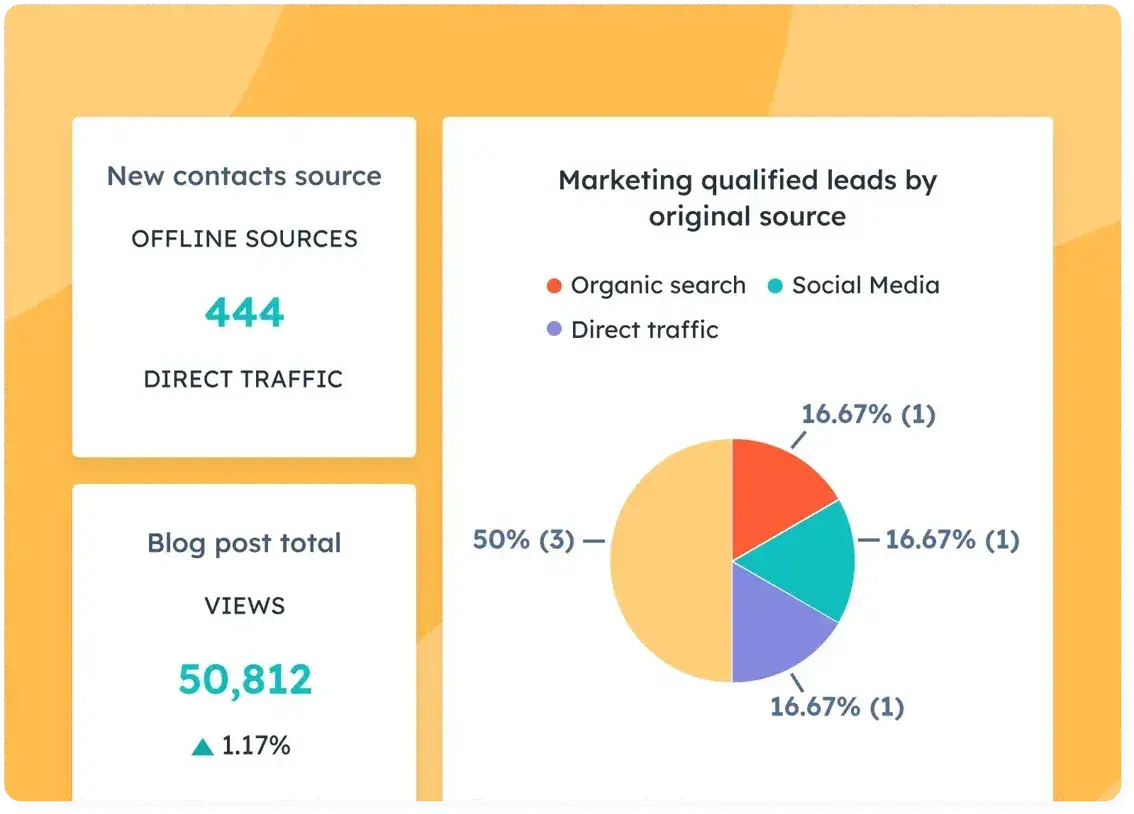
Pro tip: If you want an easy way to track engagement metrics, audience growth, and more, I recommend trying HubSpot’s Marketing Analytics and Dashboard Software.

Why You Need a Social Media Strategy

Social media is more than a promotional tool; it is a core component of brand engagement, sales, and customer retention. Without a structured plan, businesses risk investing time and resources in content that fails to drive meaningful impact.

“One of the biggest challenges, I think, social media marketers face is saturation and competition. There’s so much content on social media that sometimes it makes it challenging to stand out from the crowd.

“Having a robust strategy that understands the target audience includes strong copy and unique content can help to cut through the noise,” says Ellie Nash, social community executive at Kurago.

A strong strategy helps brands:

  • Build authority.
  • Engage audiences.
  • Achieve measurable outcomes.
  • Align messaging with customer preferences.
  • Leverage technological advancements.

Brands without a defined strategy risk falling behind as consumer behaviors shift and platform algorithms change. This year alone, we’ve seen how digital marketing continues to evolve with AI’s growing role in marketing, AI-driven content, hyper-personalized advertising, and new engagement formats reshaping audience interactions.

1. Define your target audience.

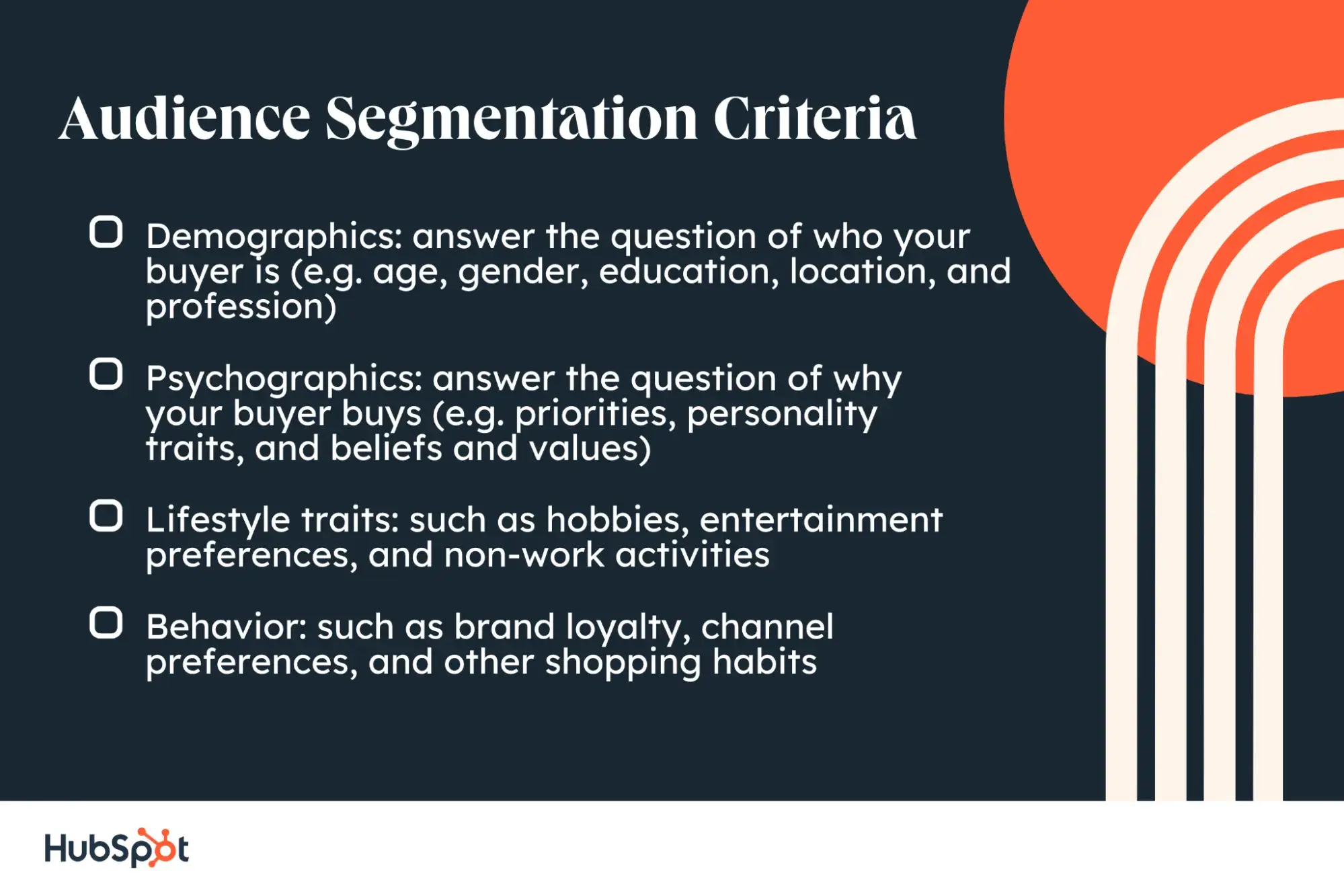
If you haven’t already identified and documented your buyer personas, start by defining the key demographics of the audience you’re trying to reach — such as age, gender, occupation, income, hobbies, and interests.

To reach your audience without annoying them, you must first understand what they want and why.

What is their motivation?

Are social media users visiting these apps to learn, explore, shop, or just have a good time?

In our most recent State of Consumer Trends Survey, we asked over 500 general consumers to pick the three most common reasons they use social media.

While 65% actually use it socially to keep up with friends, 53% just want to be entertained and 50% want to learn new things. Unfortunately, 28% say they prefer to go on social media to learn about new products or brands.

The good news?

Later in the survey, when we asked consumers how they prefer to research and learn about brands and products, a whopping 41% said they like to do this on social media channels (a slight increase from a similar survey we ran six months prior).

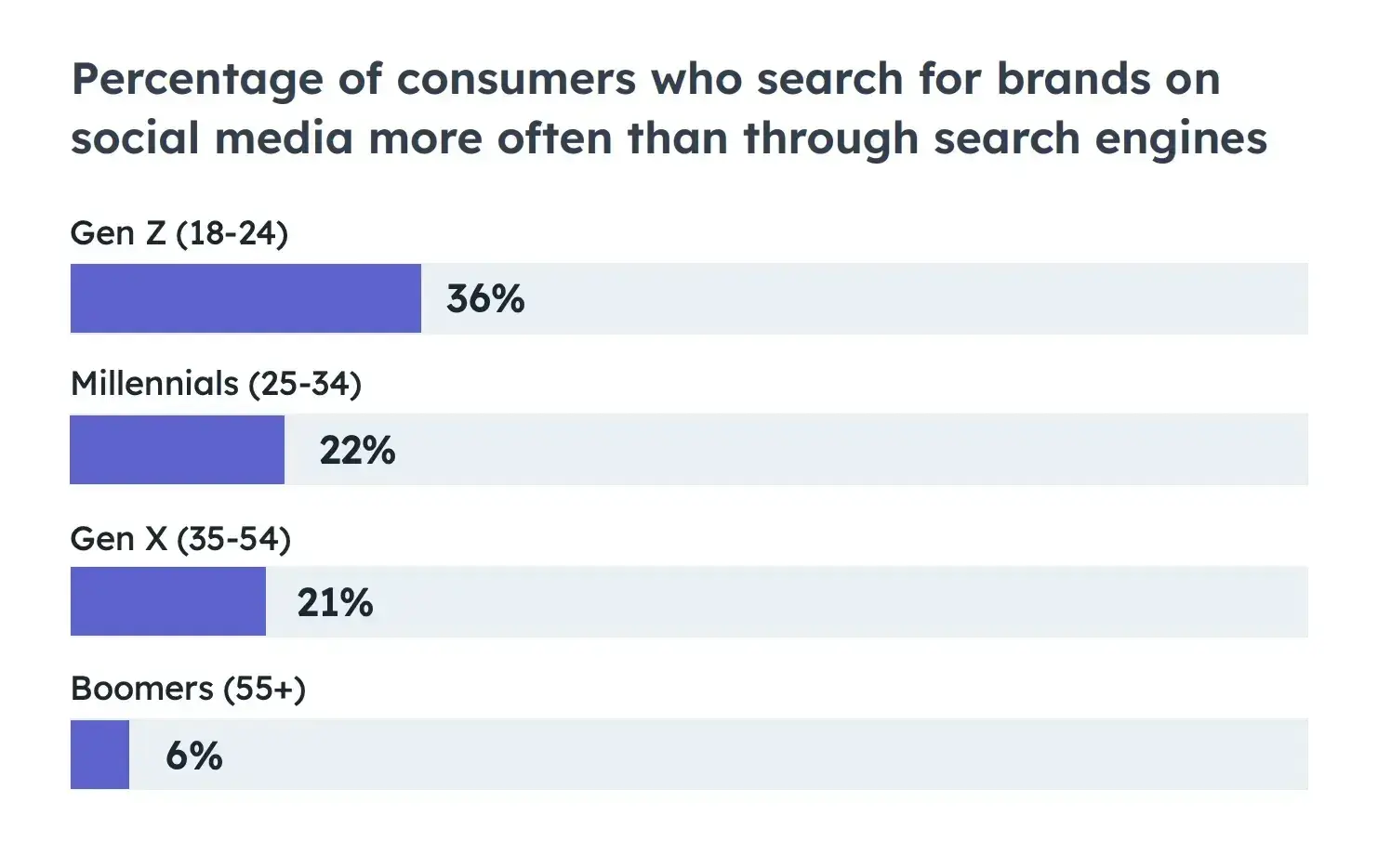
While Gen X and Boomers skew lower on this average, Gen Z and Millennial generations are using social for brand research more often — which is not surprising due to their hyper-connectedness to the web.

As you might be able to tell from our data above, your target audience plays a role in how successful the right strategy will be. And better catering to them helps you create focused advertising that addresses your ideal consumer’s specific needs.

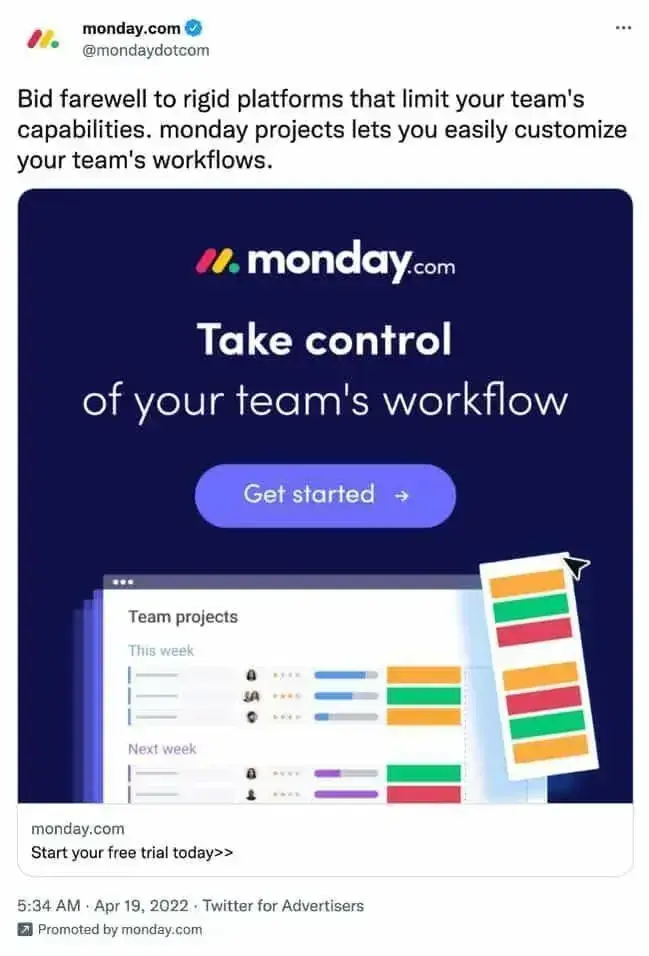
For instance, the sponsored post below by Monday.com, a project management platform, highlights the platform’s flexibility and workflow customization feature.

The post targets business owners and project managers who may feel limited by other project management software.

x post from monday.com showing their social media strategy

Source

What does this mean for you?

Consider your ideal consumers’ challenges and what problems they’re solving daily. Focus on no more than four types of people representing most of your buyers. Don’t get hung up on the exceptions or outliers, or you’ll never get started.

Once you start creating content for your audience, prioritize engaging your audience at every level.

Pay close attention to any questions or comments your audience posts. And be quick to address them, as that engagement could make or break a conversion or purchase.

Consumers like feeling like they’re part of a community when they’re on your social media pages. More than 1 in 5 social media users joined or participated in an online community in the last year.

Speaking of communities, creating social media groups is a smart move to attract, keep, and engage the audience, with 90% of marketers agreeing.

Here’s why:

  • Groups help people get involved.
  • Followers can learn from each other.
  • Your brand becomes a connector — something like a helpful friend.
  • Communities feel like friendlier places to chat compared to pages.

Research from Sprout Social reveals that 60% of marketers refine their approach based on audience insights. Social listening tools help brands analyze trends and tailor content accordingly.

Pro tip: To reach the right audience, use social listening tools. These tools check social media for keywords, assess if the talk is positive or negative, and give you reports. I often use this info to create buyer personas for better targeting.

2. Incorporate ecommerce.

Social media isn’t just for discovering products anymore — it’s becoming a place to buy them, too. People love the convenience of shopping directly in the app where they first see something they like.

In fact, a quarter of social media marketers already say social shopping tools are more effective than traditional ecommerce sites. Looking ahead, 80% of them believe consumers will eventually shop more within apps than on brand websites or through third-party platforms.

If we look at how this trend is fairing across the globe, several other countries have already made social media shopping a norm.

For example, check out this comparison of data from the U.K., China, and the U.S.:

  • In the U.K., social commerce was valued at $24.71 billion by 2023, it reached $31.27 billion in 2024. Forecasts indicate the market will grow to $83.27 billion by 2029.
  • China leads the global social commerce market, with 90% of consumers making purchases through social media in 2023. Live streaming e-commerce is expected to grow to 8.16 trillion yuan by 2026.
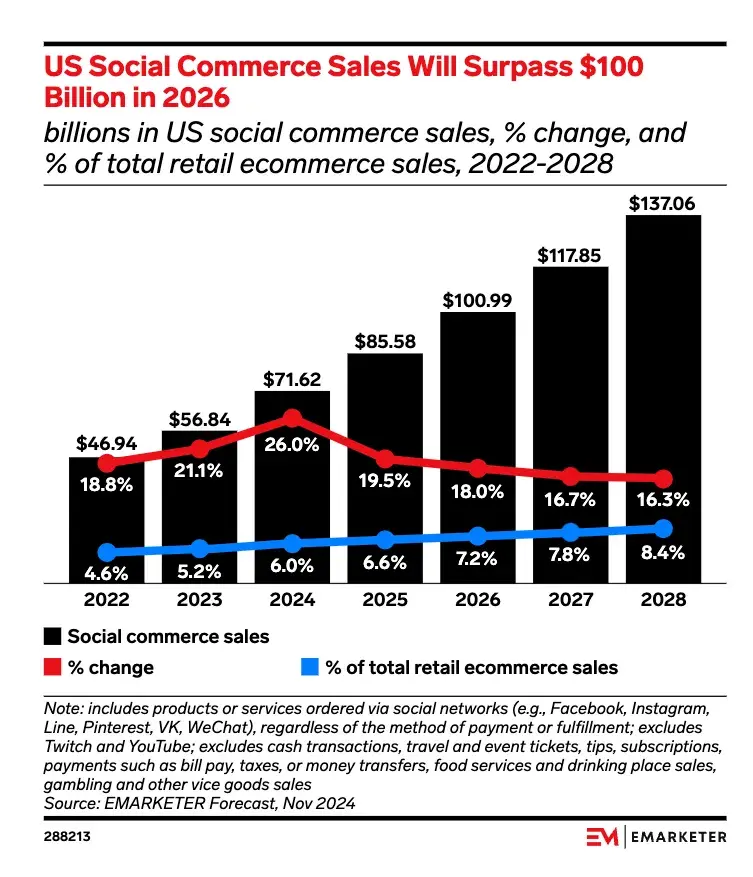
  • In the U.S., social commerce sales are set to surpass $100 Billion in 2026, according to Emarketer.

graph showing growth trends in social commerce sales

Source

So, what’s the takeaway?

If you sell products, social media should be a key part of your ecommerce strategy. It doesn’t matter where you are. Social selling is a big deal — so it’s time to take it seriously.

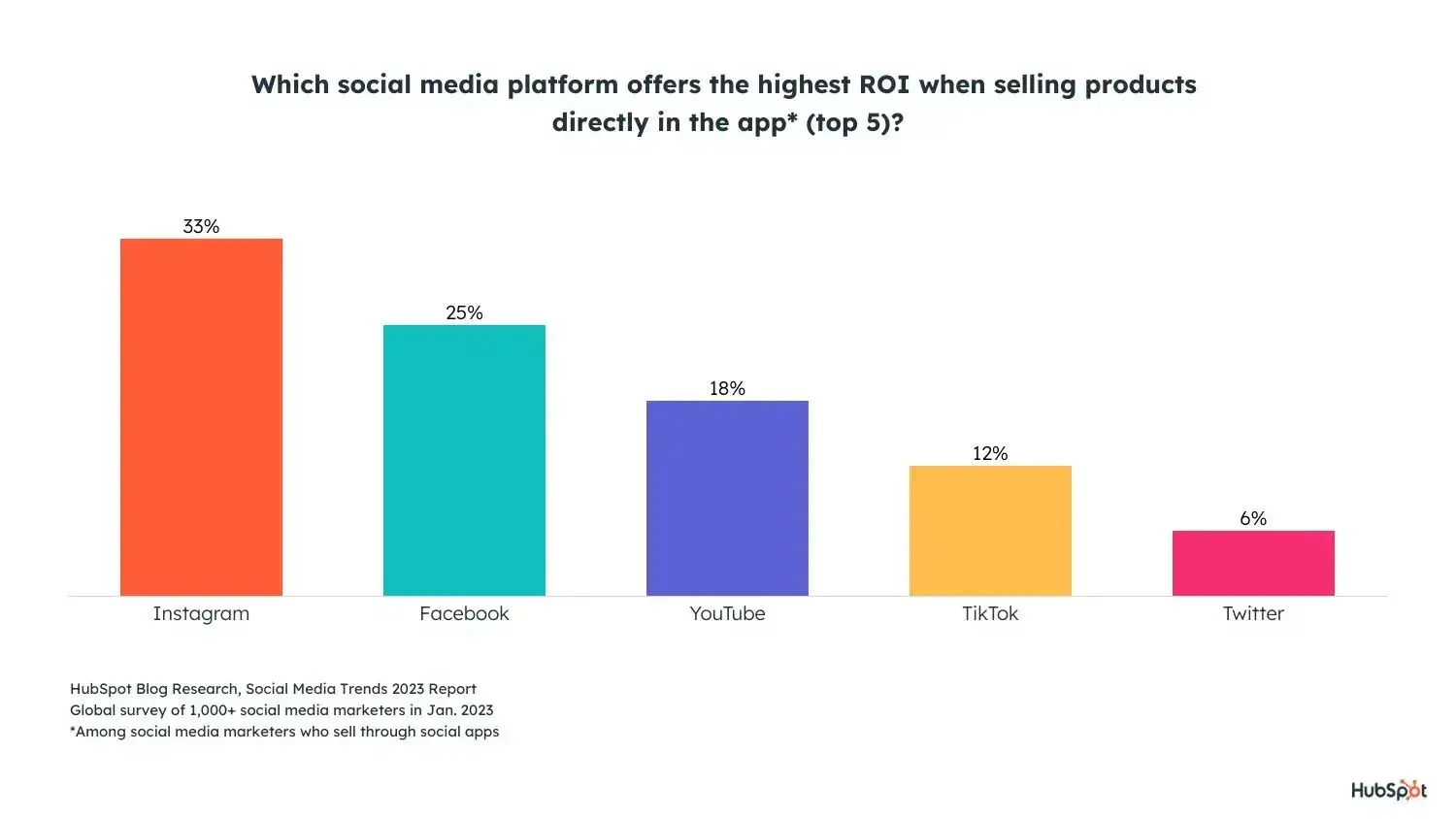
Most platforms offer built-in ecommerce features like shoppable posts, and almost half (47%) of social media marketers are already selling directly within apps.

The most popular social selling tools for marketers are:

  • Instagram Shops and Instagram Live Shopping (High ROI)
  • Facebook Shops (Average ROI)

hubspot bar graph showing survey results of social platforms with highest roi for selling in-app

Source

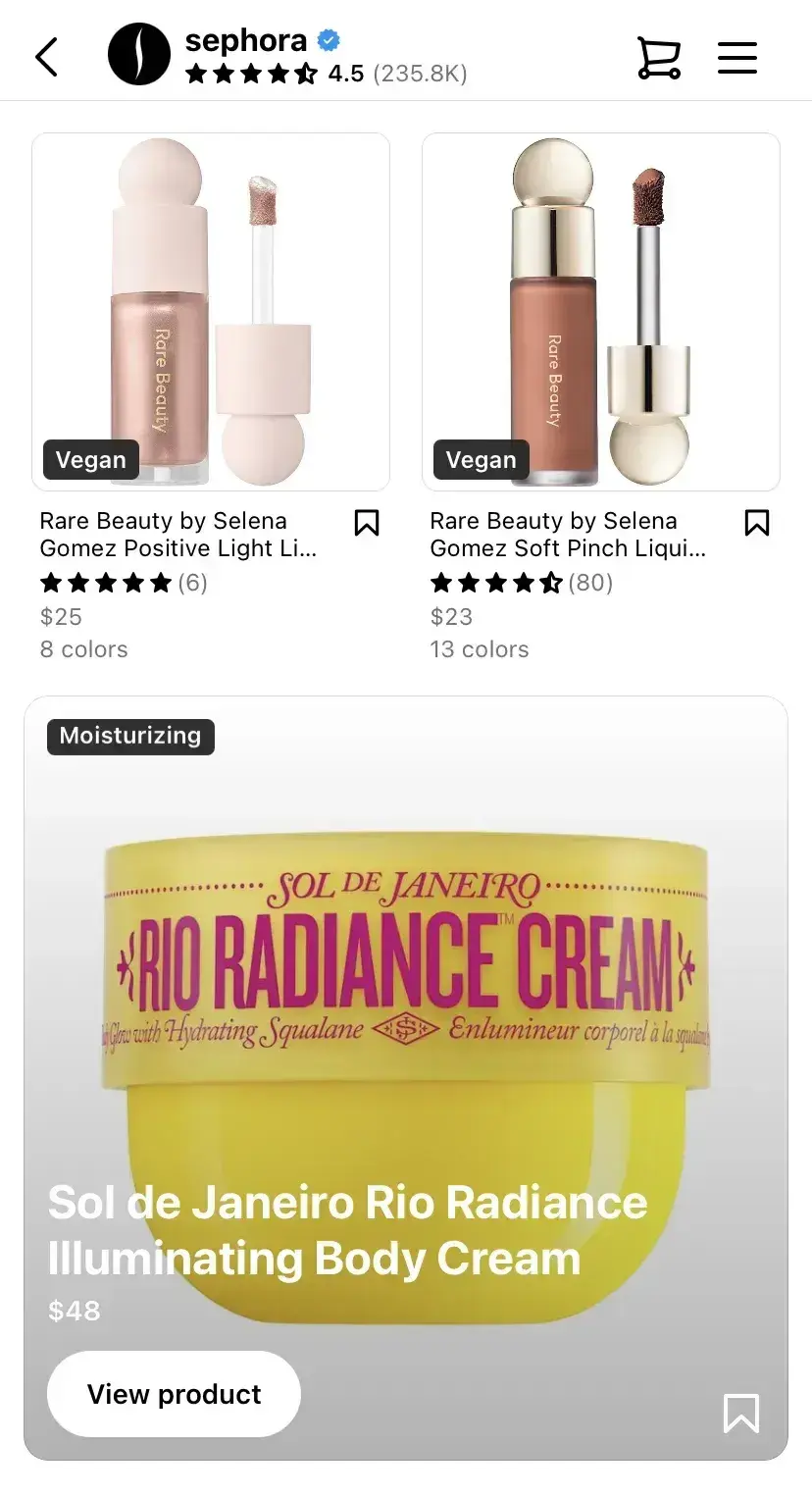
If you need inspiration for incorporating ecommerce into your social strategy, take a cue from Sephora.

Whenever the beauty brand posts a product image, it includes a product tag that links directly to its shoppable page. It’s seamless — followers can purchase without ever leaving the app.

The key to social selling success is trust. While Sephora has an established reputation, you can build trust by sharing customer reviews, user-generated content (UGC), and product info.

sephora’s ig account with in-app shopping links

Source

Pro tip: I recommend you go with image, video, and carousel ads for brand awareness to emphasize store visits, ad impressions, and engagement. For increased sales, select product, collection, or shopping ads to drive direct purchases and product page visits.

3. Optimize your social channels for search.

Social search is on the rise.

As more people turn to social media with their queries instead of search engines, 89% of social media marketers agree that social search is important to their overall social media strategies in 2023.

Nearly 24% of consumers aged 18-54 use social media first to search for brands.

Source

For marketers, this means your social channels must be optimized for search. Prioritize social SEO if you want your social channels to show up in the results when your audience searches for your brand.

Similar to optimizing for search engines like Google, you can optimize your social presence.

Here’s how:

  • Include relevant keywords and hashtags in your posts and bio.
  • Make sure your username is easy to search for.
  • Keep your username consistent across accounts.

When adding alt-text, avoid stuffing keywords, says Annie-Mai Hodge, director and founder of Girl Power Marketing.

“This feature describes the image on a page for the visually impaired, so it’s important you describe the image accurately. In doing that, you’re providing extra context for the social platform too, which can, in turn, get your content more visibility in search results,” says Hodge.

Pro tip: You don’t need to film an hour-long video. Short-form video — think YouTube Shorts — can help you rank higher. Short-from video is also considered the future of lead generation.

4. Focus on a few key social channels.

Most small businesses or social teams don’t have the bandwidth to establish and sustain a quality social media presence on every single channel. And learning the ins and outs of each one? Totally overwhelming.

That’s why it makes sense to focus on the platforms that will bring the best ROI. For many brands, that’s Instagram.

Instagram continues to lead in engagement, ROI, and quality lead generation. In 2025, 58% of marketers cite Instagram as their top-performing platform for driving results, making it a priority for marketing investment.

Instagram Reels, in particular, remains a dominant force in user interaction, with short-form video driving higher engagement than static posts.

But don’t just jump into Instagram because I said so. Brands also need to be strategic about where they show up.

“The platform can say a lot about the brand itself. With more and more consumers being more in tune with how they spend their money and whether corporations’ ideals align with theirs, this is becoming more of a consideration for brands in the long run,” says Tameka Bazile, senior social media manager at Elevate Labs.

If you want to create a strong social media strategy from scratch, start small.

If you’re just starting out, don’t stretch yourself thin. Research where your target audience hangs out. For example, if you’re aiming for business professionals, LinkedIn might be a better fit than Instagram.

Bazile says brands should also consider the following when it comes to expanding across multiple platforms:

  • Means. “Does their social team consist of enough members and get enough budget to successfully manage multiple accounts?” Bazile asks.
  • Consumer access. “Are their ideal consumers found on the platforms they are seeking to expand to?” she says.

I recently read insightful expert perspectives on this LinkedIn article about picking the right social media platform.

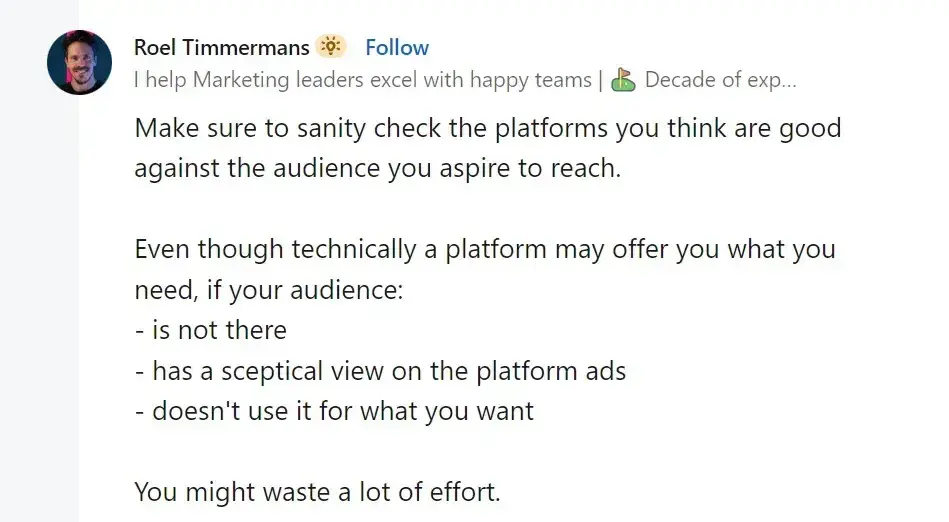
Amidst all the chatter, Roel Timmermans‘ comment caught my attention:

linkedin post from roel timmermans on choosing your social media platform for marketing

Source

Or as Hodge says, “You don’t need to be on every single social media platform, full stop — for most businesses, it’s a waste of time and resources to be on platforms where your audience isn’t active.”

When creating your strategy, Hodge says, “You would’ve looked at where your audience is, what your competitors are doing, and what you’re aiming to achieve with social media — all of this will help inform you as to what social media channels you should be focusing on.”

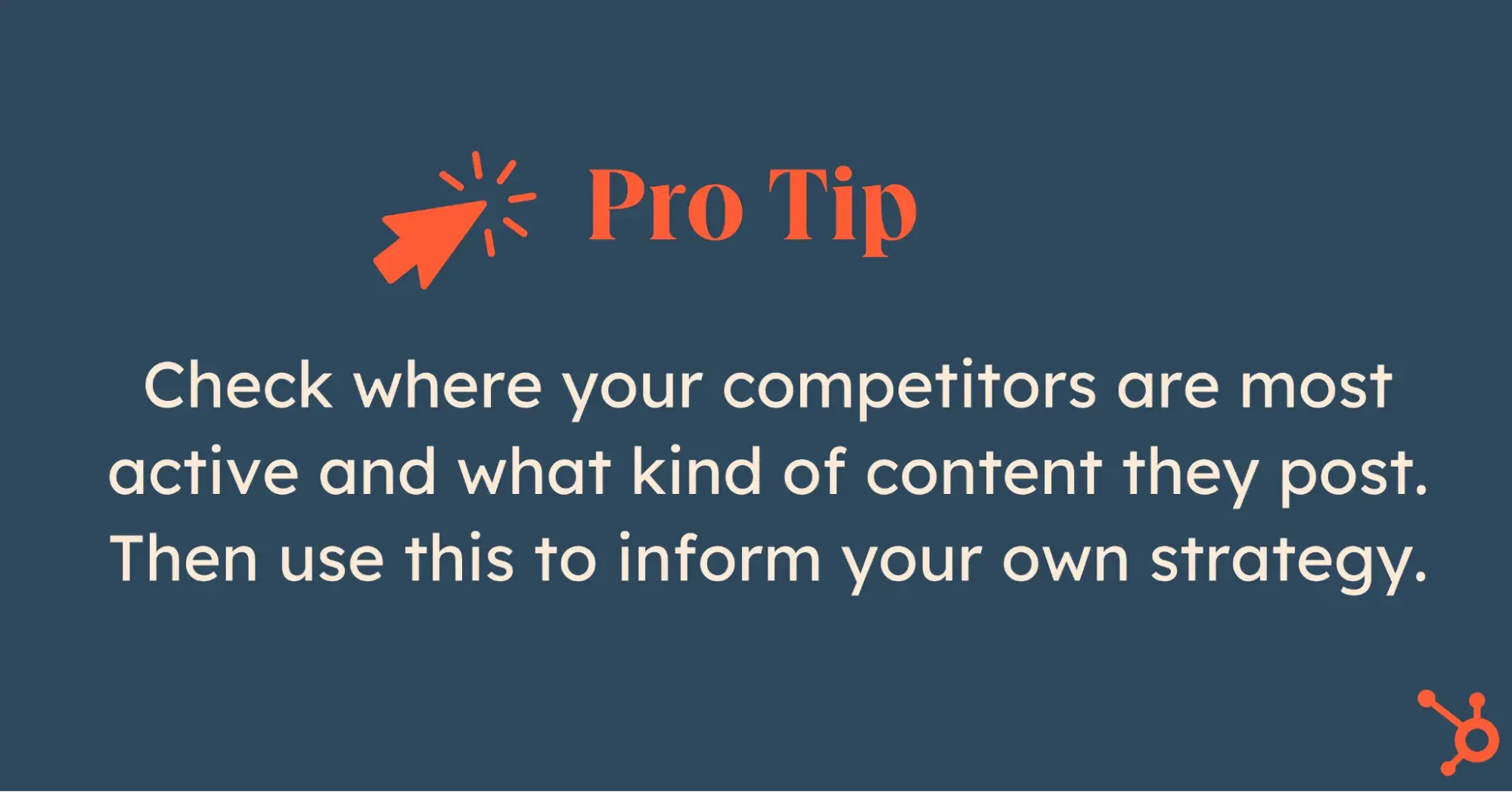
Pro tip: Check where your competitors are most active and what kind of content they post. You’ll see what works or doesn’t and how engaged their audience is. Don’t copy them — just use that info to make smart decisions for your strategy.

social media strategy pro tip

5. Create engaging content tailored to each platform.

As I mentioned, every social media platform has its own vibe.

The way people engage and the type of content they expect — it all varies. So, if you want your posts to land, you’ve got to adapt your content to fit each platform’s style and tone.

For example:

  • LinkedIn is all about professional, insightful posts.
  • Instagram is made for eye-catching visuals and quick messages.
  • TikTok is all about creativity and riding trends.
  • X loves snappy, real-time updates.

When you get it right, content tailored to the platform builds trust and boosts engagement.

Take Instagram, where you should focus on crisp images or short videos with punchy captions. On LinkedIn, you’ll want to lean into thought leadership and industry expertise. And for TikTok, it’s humor, challenges, or fun behind-the-scenes moments that humanize your brand.

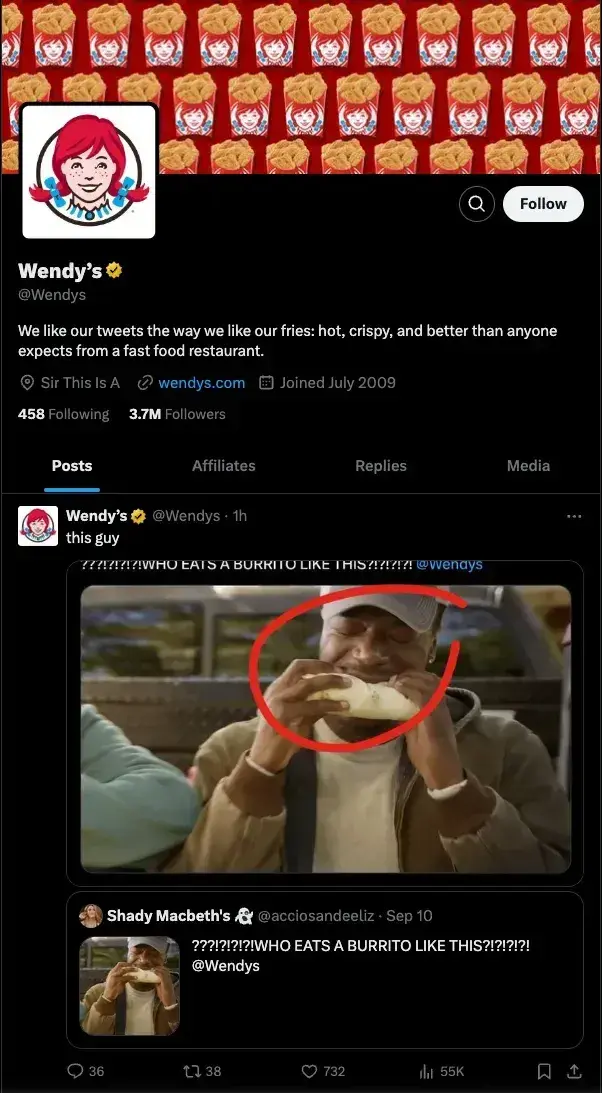
Wendy’s is a great example of this.

The brand’s X game is sharp and sarcastic — perfect for the platform’s fast-paced nature.

wendy's posts on x

Source

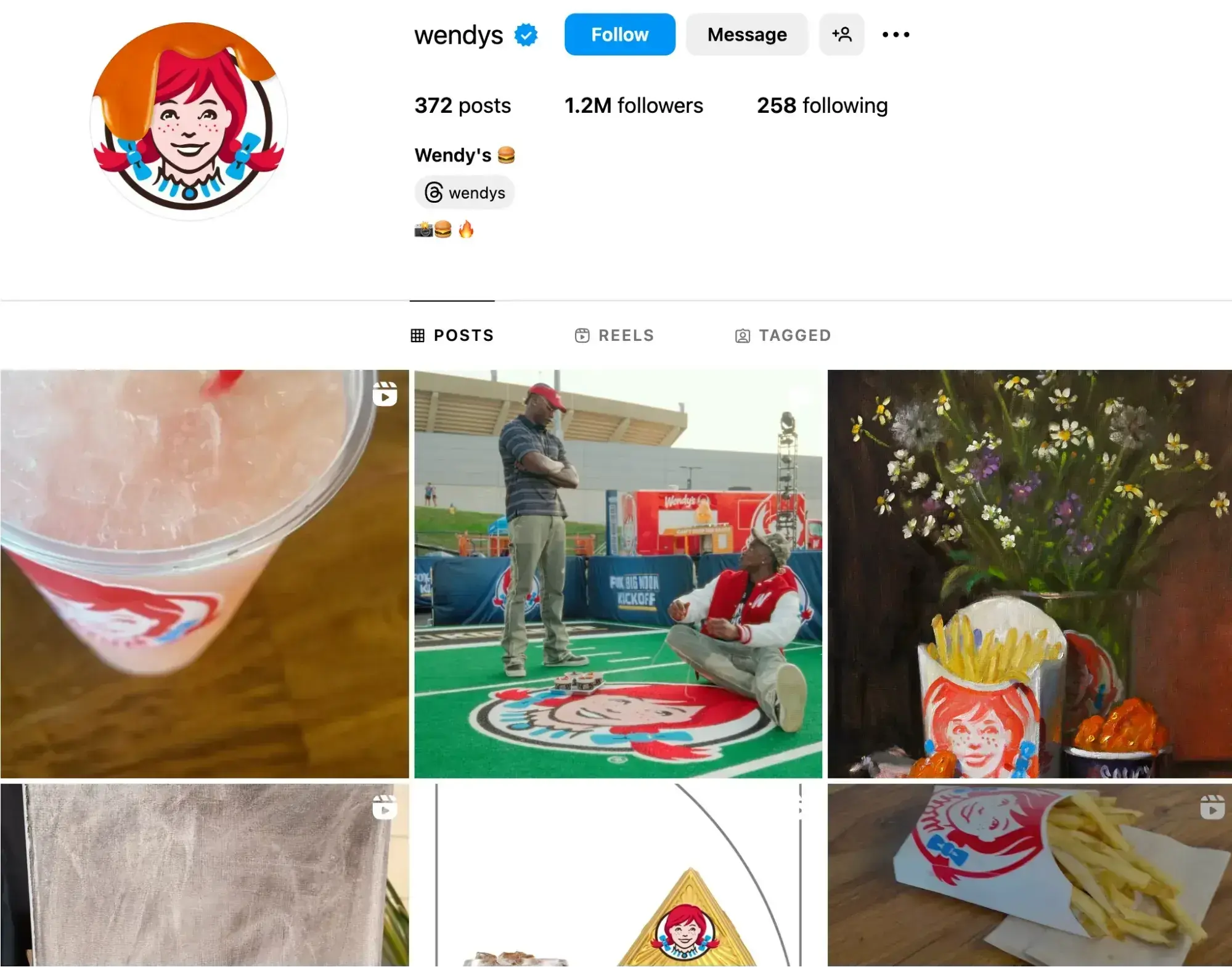
But on Instagram, Wendy switches gears with polished posts featuring new menu items and vibrant photography.

wendy's posts on instagram

Source

Pro tip: Instagram stories and TikTok challenges are perfect for casual, day-in-the-life content. Save the deep dives for YouTube and LinkedIn, where people are looking for more in-depth insights.

6. Repurpose your content.

Why stress over creating different content for each platform?

Keep it simple: repurpose and use the same awesome content in different places — within reason, of course.

According to our research, most marketers repurpose content in some way, shape, or form, while 17% consider it one of their key strategies.

This makes sense. By recycling content, you can:

  • Get your message to more people on different platforms.
  • Save time by using what you already have instead of starting from scratch.
  • Stay visible on search engines by updating and reusing content.
  • Cater to your audience’s preferences with different formats.
  • Make your content last longer by updating timeless pieces.
  • Improve your strategy by checking how your content performs on different channels.

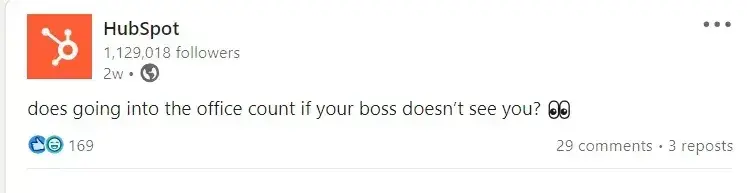
We at HubSpot love repurposing content — from simple LinkedIn posts like this …

hubspot linkedin post example

Source

… to hilarious TikTok video:

Although most marketers do it, only 7% told us it yields them substantial ROI compared to content that’s more catered to platforms.

If you’re short on time or trying out a new platform similar to the one you already use, go ahead and make small tweaks to optimize content across channels. I’d say it’s worth experimenting with, as long as you’re delivering what your audience wants.

Just be careful not to spam them with the same content over and over again — that’s a quick way to lose their attention.

Pro tip: Stumped on a creative content idea that feels more personal than repurposed? HubSpot’s Content Remix tool uses AI to make it easy.

7. Make a plan for customer service.

When putting together your social media strategy, consider how you’ll use your channels for customer service.

Social media is so ingrained in our day-to-day lives, so it’s no surprise that people turn to these platforms for everything, from brand discovery to customer service.

According to our State of Social Media and Consumer Trends research, one in five social media users contact a brand through social DMs for customer service each quarter.

43% of marketers use customer service reps, 41% rely on platform managers, and 13% employ automated tools like chatbots.

Whether you create a separate account dedicated to customer service or have an auto-reply set up when people DM you on Instagram, have a plan for how you’ll handle it with this Free Social Media Customer Service Template.

Now, let’s talk a little bit about the importance of good customer service on social media.

According to Zendesk research:

  • 73% of consumers will switch to a competitor after multiple bad experiences.
  • 56% of consumers rarely complain about a negative customer experience- they quietly switch to a competitor instead.
  • 3 in 4 consumers say a bad interaction with a business can ruin their day.
  • Consumers will give companies 2.2 chances on average before switching to a competitor.
  • 60% of consumers have purchased from a brand solely based on the service they expect to receive.

Pro tip: Apart from clearly stating working hours, let customers know the expected response time and inform them about quicker alternative resources if available.

8. Develop a posting schedule to guide you.

Social media isn’t an exact science, and it definitely doesn’t work the same for every business or industry. To make it work for you, I always advise people to create a clear posting schedule that helps your team stay consistent with content.

HubSpot offers some great social media tools and templates that help you plan your content and build a solid posting schedule and social media calendar.

One method I’ve found effective is from Tameka Bazile, who shared a neat way to categorize social media content.

Here’s how she categorizes it:

  • Evergreen engagement content.
  • Evergreen promotional content.
  • Specific campaign content.
  • Recurring communications content.

“Breaking down content into these buckets allows social teams to maintain regular presences online while also separating content data into easily trackable pieces,” she says.

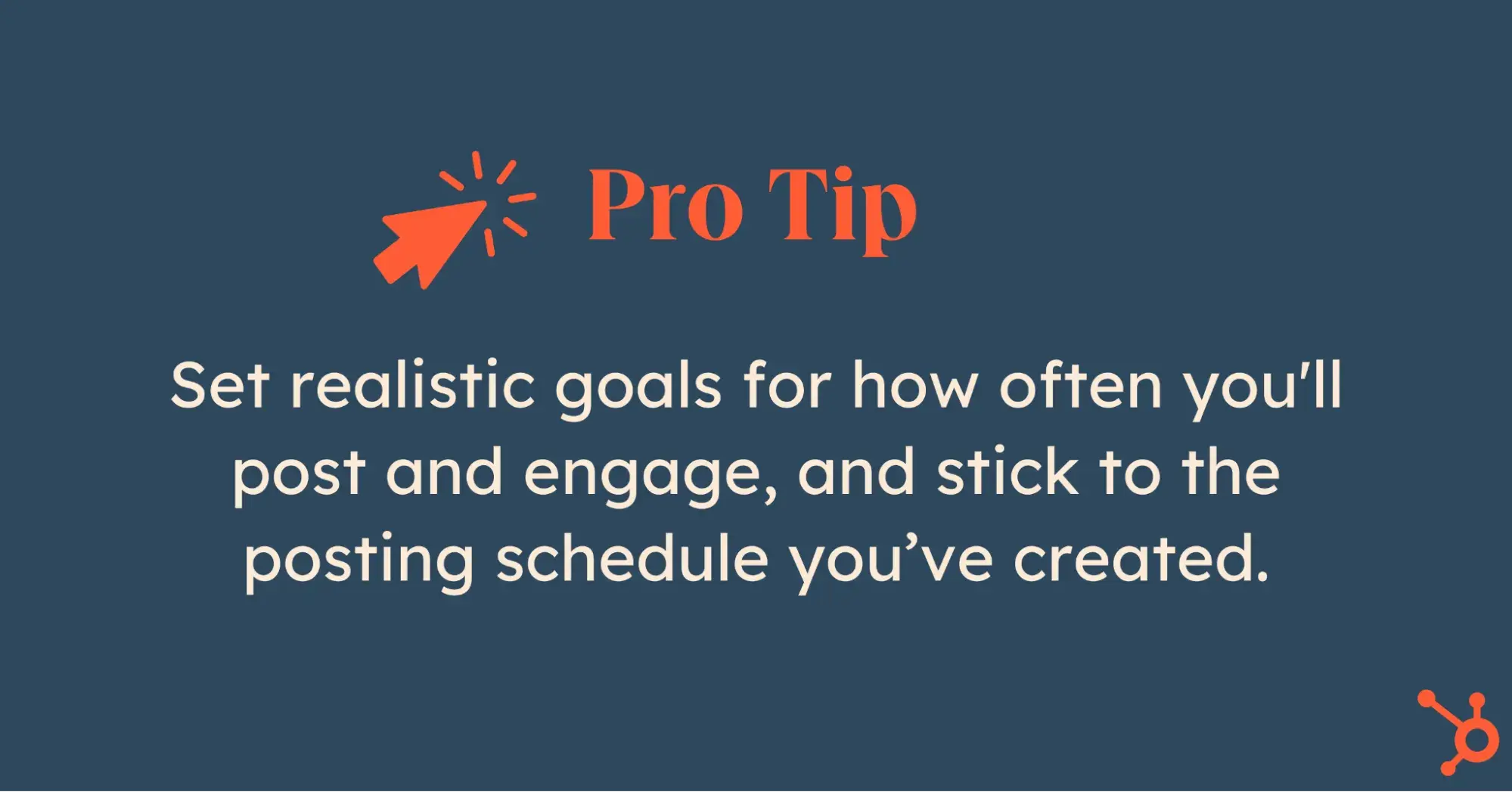
Set realistic goals for how often you’ll post and engage, and stick to the posting schedule you’ve created. It’s all about consistency.

Pro tip: Choose platforms that allow easy editing and content management within your team. This ensures smooth collaboration and calendar updates.

social media strategy pro tip

9. Talk WITH, not AT, your followers.

In our latest Consumer Trends research, 41% of consumers pointed to relatability as the most memorable aspect of posts from brands or companies on social or the web.

Friendly brands win more followers (and hearts). So, skip the self-promotion overload. Instead, get into conversations and respond to comments authentically.

People love it when you chat with them, not just throw information their way. It makes them feel special, creating a genuine affection for your brand.

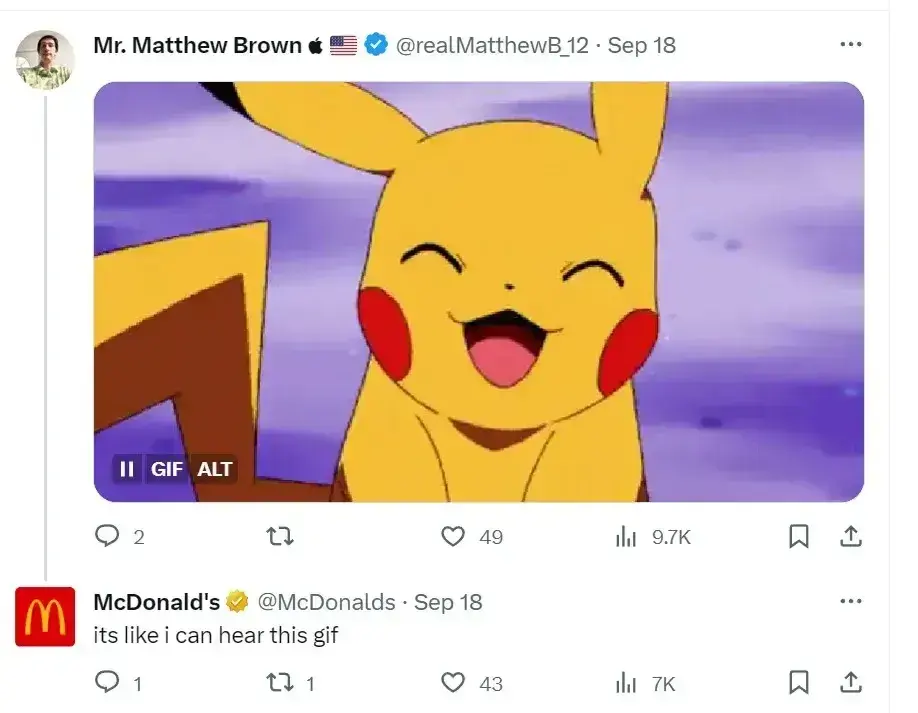
And no, you don’t have to sound super professional. Casual talk works even better on social media. Just take a cue from McDonald’s:

mcdonalds reply on x

Source

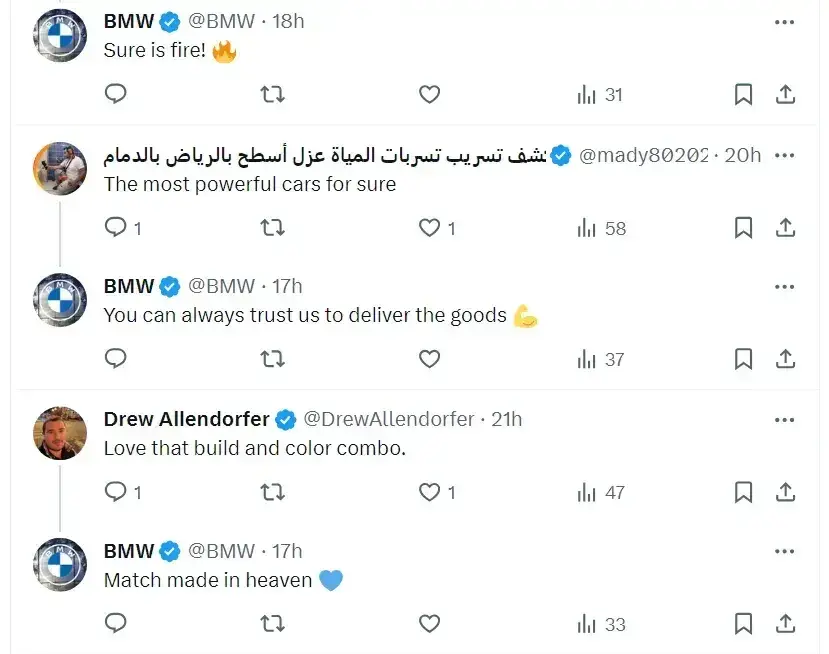
I personally can’t get enough of BMW and its fantastic relationship with fans and followers. They always try to respond to every comment on social media:

bmw social replies on x

Source

As of 2025, social media engagement rates for brand posts have experienced notable changes across various platforms.

So, once you get a comment, find the right way to interact and show that you care. Don’t just ghost and ignore. These comments boost your post higher in algorithms and make it more visible.

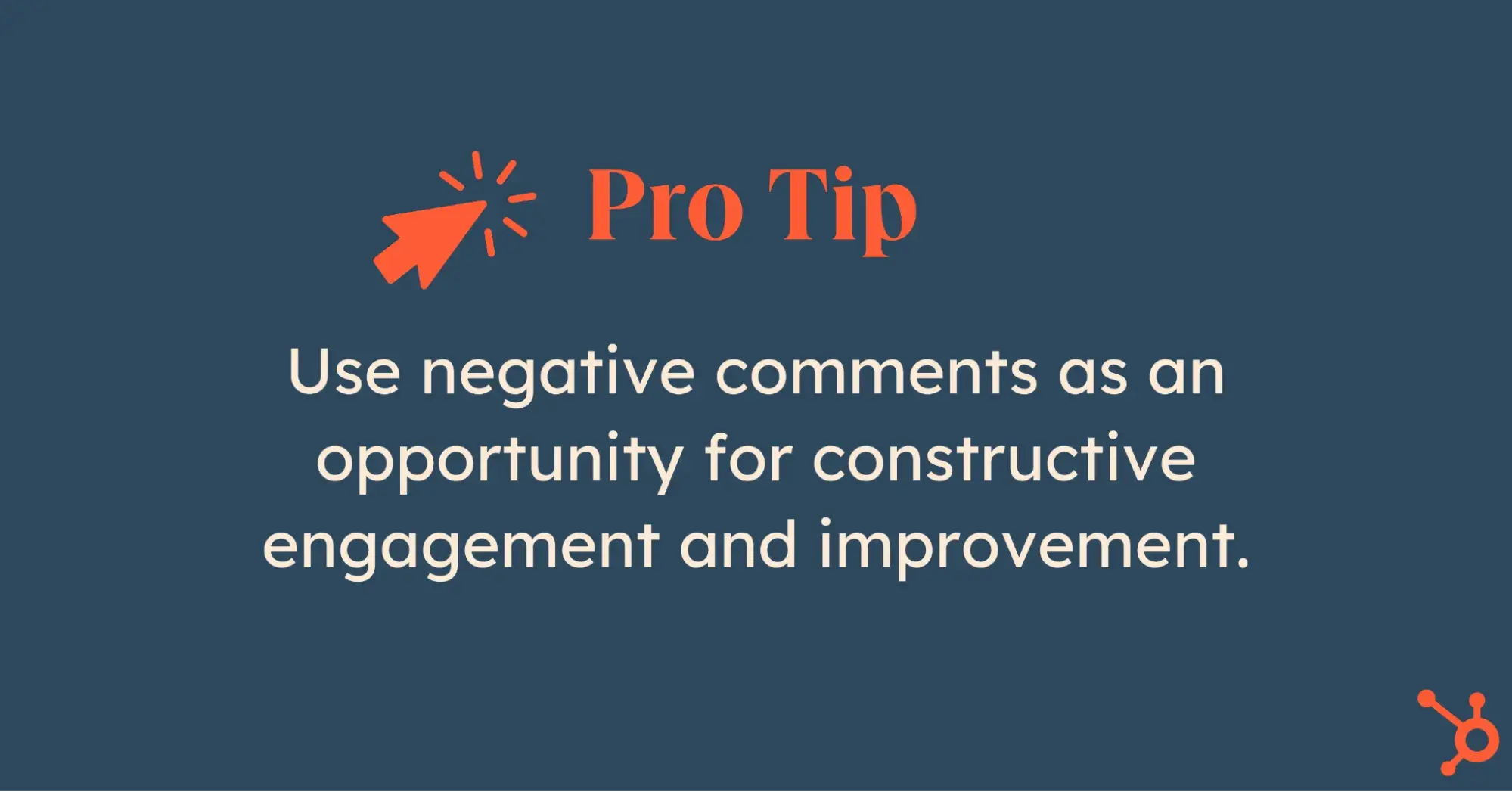
social media strategy pro tip

Pro tip: Never delete negative comments unless they’re super offensive or inappropriate. Instead, use them as an opportunity for constructive engagement and improvement.

10. Measure your results.

It’s hard to know what to focus on if you don’t have goals, a roadmap, or a clear brand strategy. You’ll end up lost in the noise of social media, unsure of what’s working or what to prioritize.

As Bazile says, “Without goals, a product roadmap, or even a full brand strategy, social media managers will struggle to know what to prioritize in the social space, what metrics to measure to convey progress, and what sort of content or social presence is ideal for the brand.”

There’s a lot you can track on social media with the right tools, but let’s not get overwhelmed.

  • Start with the basics. For example, how much traffic are your social channels driving to your website or blog?
  • Once you’ve got a handle on that, use tools like Facebook’s Page Insights, Instagram’s Account Insights, and LinkedIn’s Visitor Analytics to spot trends in engagement.
  • Look for patterns around what topics or keywords get the most attention.
  • Once you know what your average traffic and post performance look like, it’s time to set some goals.
  • Choose metrics that are simple and easy to track — otherwise, you’ll lose motivation fast. Things like total interactions, traffic to your site, and social-driven revenue are a great place to start.

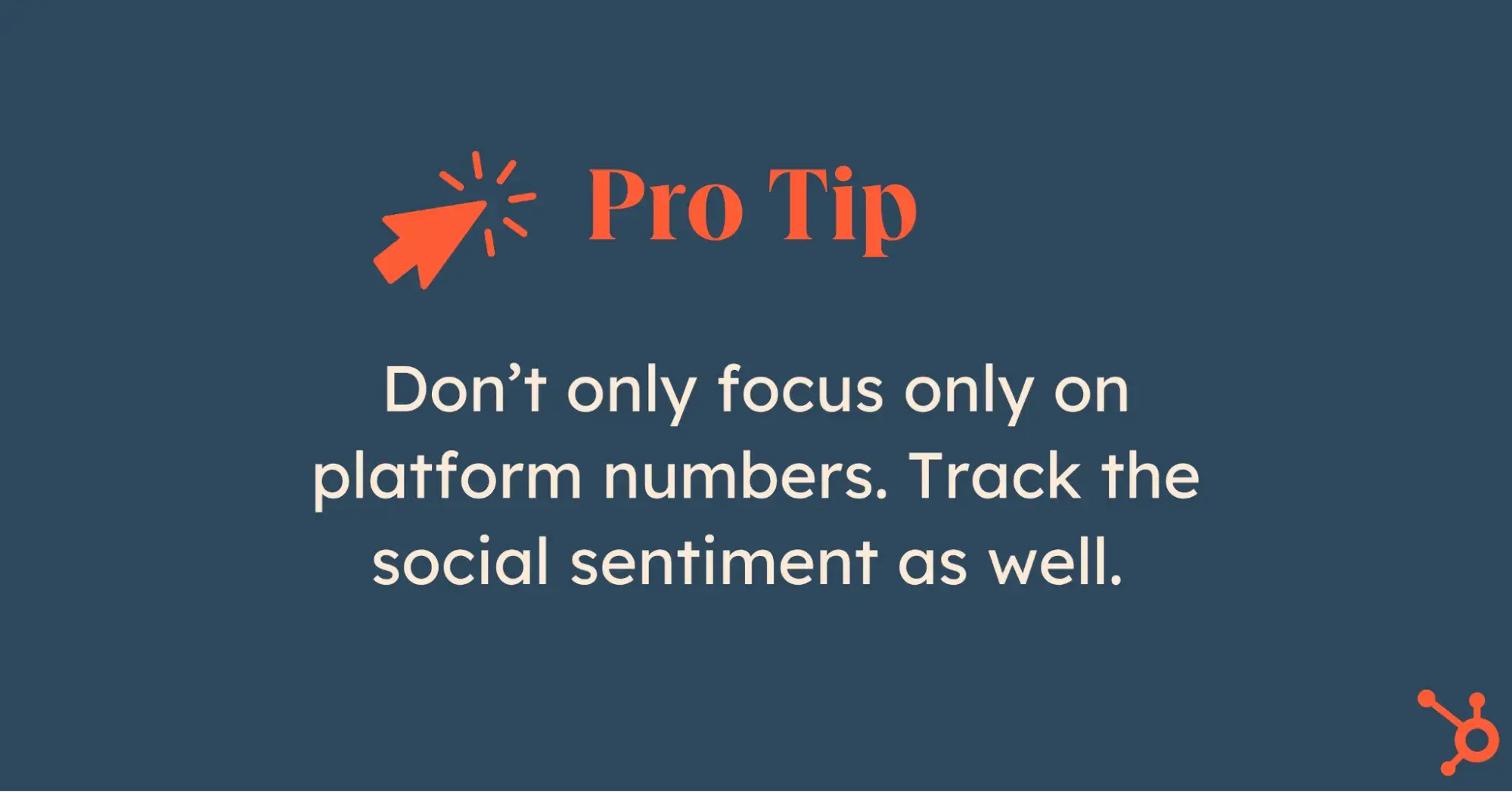
social media strategy pro tip

“One of the most valuable indicators, in my opinion, is impressions,” Nash says. “Impressions measure the number of times a piece of content is displayed on users’ screens and help to evaluate the effectiveness of your content strategy in terms of exposure and brand awareness.”

Pro tip: Don’t only focus on platform numbers. Track the social sentiment as well. See if people express positive or negative feelings about you in online conversations. It takes a bit of manual work, but it’s worth it. Check regularly for better insights.

11. Adjust your tactics as needed.

Social media won’t start working overnight.

Establishing a following, stabilizing your brand, and seeing the results of your efforts take time. So, experiment to find the right combination of channels, content, and messaging that works for your audience.

We can pick up some cool tricks from Victoria’s Secret in this regard.

The company has shifted from using only professional photos and videos to incorporating more casual content. Now, VS’s Insta feed also includes UGC and interviews with random people on the street and in their stores.

Victoria’s Secret proves that even as a high-end brand, you don’t lose anything by including everyday people.

Actually, you gain.

victoria’s secret instagram page

Source

More followers. More engagement. More exposure.

Keep track of changes in your post views, audience demographics, and post interactions, and make changes as needed.

Over time, you can adjust your posting schedule, content, and personas based on the collected information, which will help you fine-tune your strategy and generate more consistent results.

I get it: trying new stuff might feel risky, but adapting is essential to staying relevant.

For instance, instead of relying solely on promotional content, brands should lean into formats that engage their audience.

In our 2025 survey of over a thousand global social media marketers:

  • 35% said product demonstrations or tutorials drive the most engagement.
  • 25% reported that behind-the-scenes content helps build stronger connections with their audience.
  • 21% highlighted the impact of user-generated content.

These numbers show that audiences crave authenticity. Instead of just talking about your brand, showing the process, the people, and the community behind it can make a bigger impact.

Pro tip: Tailor your content to match seasonal trends and holidays. This helps keep your brand messaging timely and relatable. And most importantly — people love it.

Keeping Up With Social Media Strategies

The tips I’ve shared here will boost your ROI now, but make sure to stay prepared for the inevitable shifts as new tools, channels, and trends emerge.

To stay on top of things without feeling overwhelmed, I recommend following research like our State of Social Media report. You can also check out our blog for real, actionable insights on the trends and strategies you need to keep on your radar.

Editor’s note: This post was originally published in February 2016 and has been updated for comprehensiveness.

Categories B2B

15 Best Social Media Organization Tips and Tricks for Managers

To industry outsiders, social media management is a fun and carefree job, but those of us who have had boots on the ground know differently.

Sure, there are exciting, creative tasks, but there’s also strategy, analysis, and near-constant monitoring and engagement. There’s planning and publishing, and sometimes even public relations fires to put out.

→ Free Download: Social Media Calendar Template [Access Now]

Social media is a demanding, full-time job with many moving pieces, and it’s only becoming more high-profile, as 56% of marketers expect their social media budget to increase this year.

Need guidance on how to organize social media content for your business? I asked social media managers from across several industries for their best social media organization tips. Here’s what they shared.

1. Plan ahead with a content calendar.

Knowing what to post, whether for myself or clients, has always been one of the most stressful things about social media management for me. I’ve found planning ahead can help minimize that.

Create a social media content calendar for as far into the future as possible. Fine details like how frequently and what time you post will vary by platform and audience, but having a plan of the content you intend to create and post gives you ample time to execute.

I recommend mapping out at least two weeks and having your content ready a week before publishing so you aren’t left scrambling at the last minute.

Of course, time-sensitive trends and news may also come up (more on that in a sec), but having this foundation set in advance will help keep you from going dark.

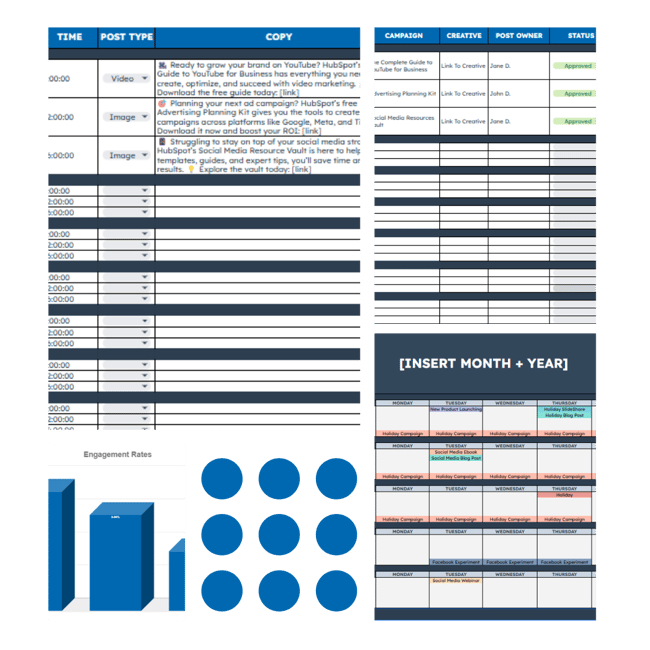
HubSpot has a social media calendar template to help you get started.

HubSpot's free social media calendar template

Source

Pro tip: Leave room for flexibility.

“Keeping an updated content calendar is a must, but being flexible in that calendar is just as necessary,” shares Shivangi Mistry, Social Media Marketing Manager for Alchemee (formerly The Proactiv Company).

“Trends come and go faster than ever. Being able to move content around and having a flexible calendar will give you the freedom to participate in these social media conversations.”

Sure, not every trend will be a hit for every brand, but Mistry still encourages marketers to experiment with them and see what lands.

“Learnings like these may warrant low-performing numbers every now and then, but don‘t be discouraged. Not everything performs well all the time but showing your audience you’re a part of the conversation is what keeps the brand alive. Keeping content timely and pulsed out regularly makes a brand’s page feel relative and relatable to the viewer.”

Remember: Our survey showed that over three-fourths (76%) of marketers believe having authentic and relatable social media content is more important than having polished, high-production content.

2. Schedule social posts ahead of time and in bulk.

Few things are more annoying than having to drop what you’re doing or throw off your work flow to post something on social media.

With that in mind, make a habit of scheduling posts in advance and in bulk if you can.

Scheduling posts saves a lot of time and allows you to focus on other parts of your job instead of constantly being ready and waiting to post.

Many moons ago, former HubSpot Social Media Manager and now Director of Content at Apollo.io Robyn Showers used to tweet from the @HubSpot account 24 or more times per day, not including replies.

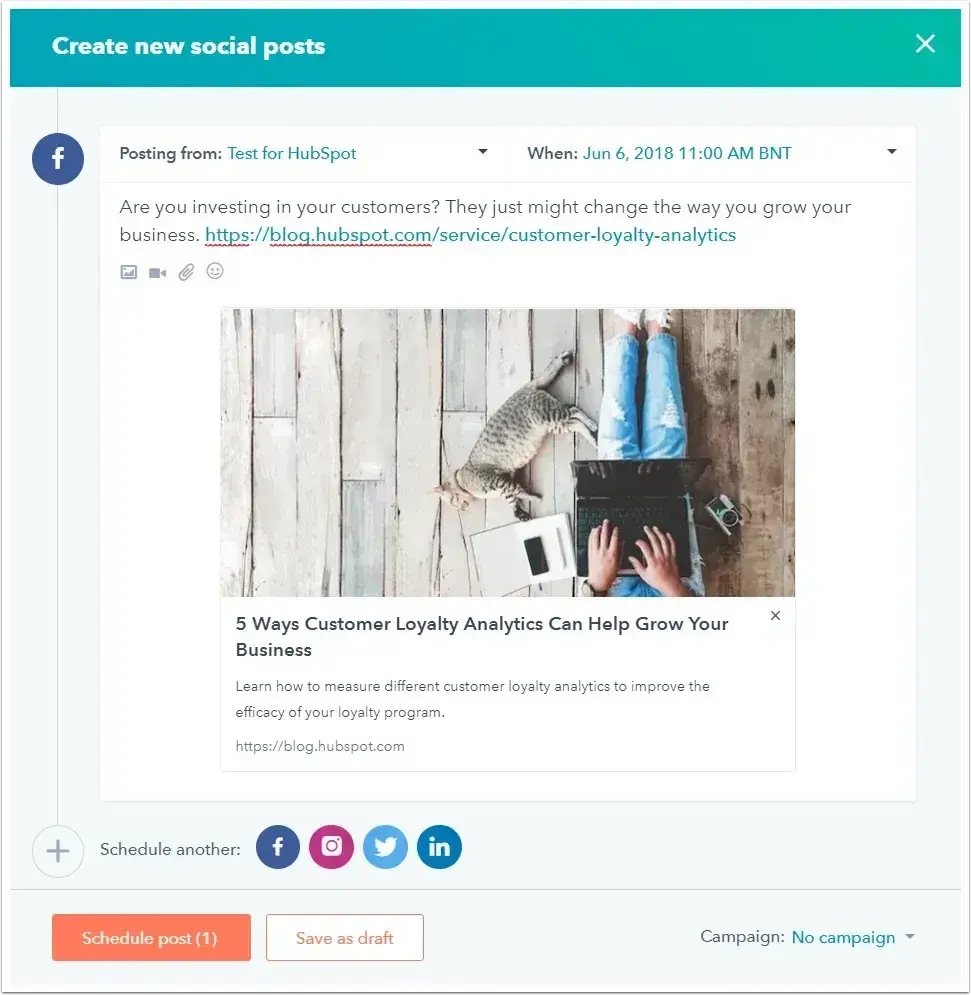
She started using HubSpot’s social media management software to schedule tweets in bulk by uploading them from a spreadsheet to get out of this reactive state. I also did this on a weekly basis for dozens of clients during my account management days.

Years later, the tool has only gotten more comprehensive.

screenshot showing what it looks like to schedule a social media post using hubspot’s tools

It allows you to run all your social media from one central location, including scheduling to Facebook, Instagram, X (formerly Twitter), and LinkedIn. You can also run and manage social ads from the platform.

3. Use a project management or to-do list app.

Social media managers would be lost without their to-do lists.

Some of us are paper and pen folks (like yours truly), but even I have found digital list apps to be extremely helpful in social media organization as you can easily link to your platforms and related documents.

There is a lot to choose from – Todoist, TickTick, ClickUp, or Google Tasks. To narrow down your options, here are a few key features to look for:

  • Syncing option between devices
  • Recurring due dates and reminders
  • Priority levels
  • Categories
  • Task sharing and delegation
  • Calendar feeds

4. Know where to find trending topics.

What’s trending right now? What memes and songs are all over TikTok? What is going viral on Instagram? Which news stories are people talking about on Facebook and LinkedIn?

These are all questions social media managers need to consider – not just when they arrive at work in the morning but all day long.

By staying on top of rising trends, social media managers can help brands “newsjack” and join the conversation before it’s too late.

Of course, knowing where to find these things on each specific platform (i.e., the “What’s happening” box and tabs on X) is important, but there are also tools to help you do this cumulatively.

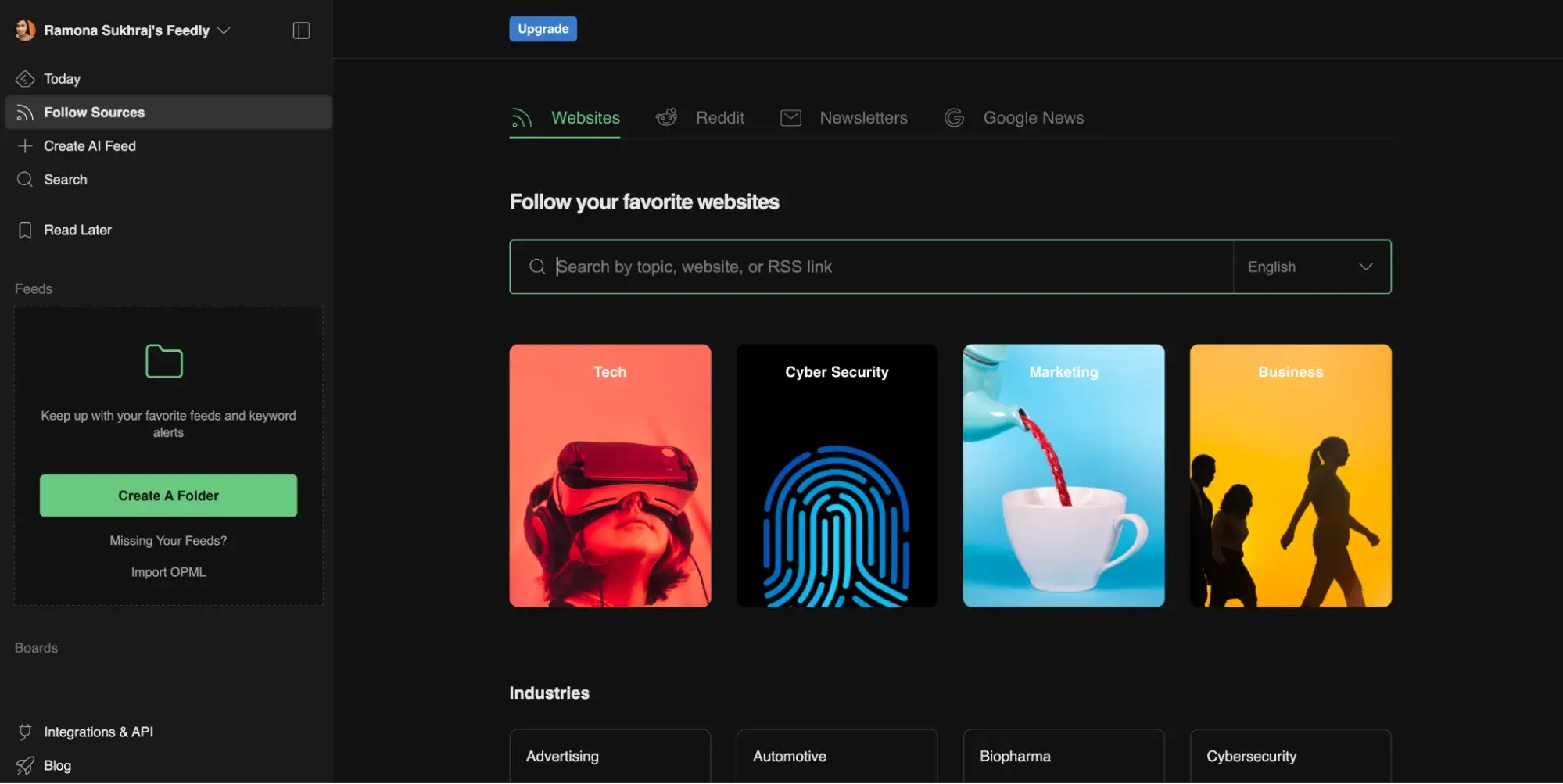
For example, you can sign up for an RSS reader like Feedly.

Through Feedly, you can follow your favorite industry news sites, blogs, and even Subreddits. The tool also has a paid “market intelligence” option to track competitive intel, tech innovations, and industry-specific trends.

screenshot showing what it looks like to set up a thread in feedly

Source

This is a huge time saver, as you’ll get a great deal of insight and information pulled into one single feed. There’s no need to jump around a bunch of different platforms to see what’s going on.

5. Keep tabs on your competitors.

In addition to trending topics and memes, you’ll also want to keep tabs on your competitors.

Take note of the content they publish, campaigns they run, how audiences respond, what new products or features they launch, and what questions or problems audiences may have. All this information helps you better understand what you’re up against and how you can best compete with your social strategy.

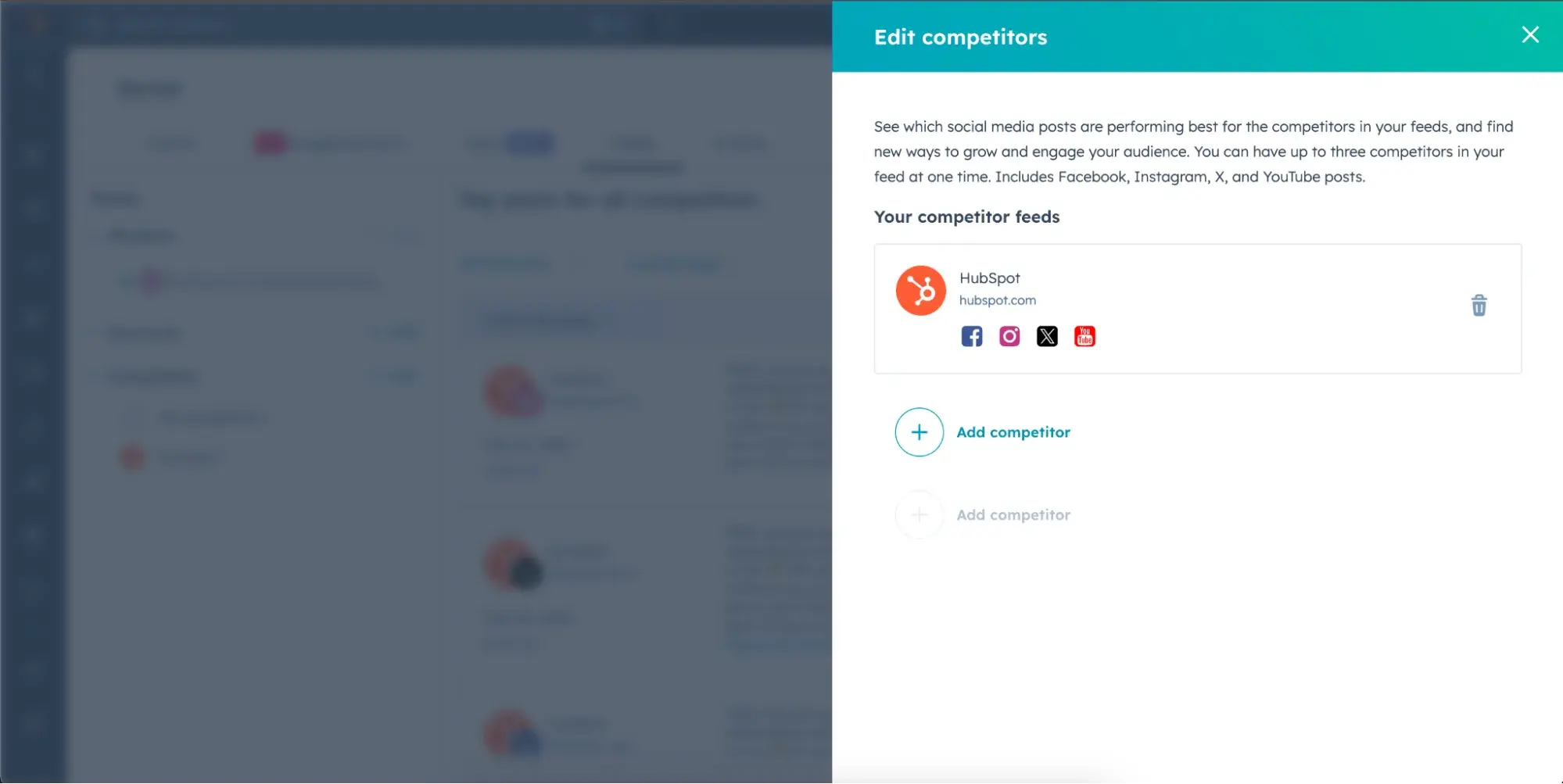
There are number of social media listening tools to help you in this department, but if you’re a HubSpot user, you can also take advantage of social inbox to monitor specific handles or hashtags.

screenshot showing how to add a competitor feed in hubspot’s social media management tool

6. Maintain an ‘Inbox Zero’ mentality.

For most people, high productivity comes from closing out of email for several hours at a time. This couldn’t be less true for social media managers who must stay alert to incoming requests.

Back when Laurie Meacham led the social media team at JetBlue, they had to stay on top of Twitter (now X) mentions in addition to social post requests from their marketing, public relations, operations, and customer commitment teams. How did she manage?

“I maintain the ‘Inbox Zero’ mentality — in other words, keeping my inbox at zero new messages or nearly zero at all times. This way, I always know what’s new and what needs my action,” she said. “Nothing gets lost in mountains of unimportant emails or assignments.”

Pro tip: It can be easy to lose important emails below the fold, so star (or flag) the ones you want to refer back to and set alert notifications for your most important senders.

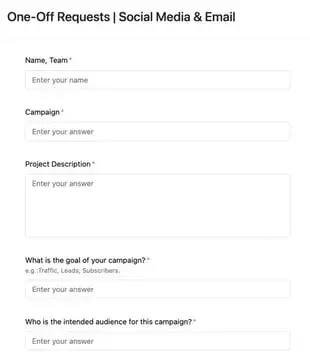
7. Create a form for social promotion requests.

When you run a brand’s social media, it’s common to hear from any and all departments requesting posts. Maybe sales wants you to promote an upcoming product launch or HR wants you to push new job listings.

To keep everything organized and minimize the number of social media promotion requests you get via email and instant messaging, field these requests through a form (like we do at HubSpot).

example of a social media content request form

This way, you free up your email and IM and have a dedicated place to review requests. Google Forms or Typeform makes these free and easy to create.

Pro tip: If you’re concerned about time-sensitive requests, add a note that specifies the best way to contact you or your team for urgent requests.

8. Use Canva to make batches of images.

Canva is a wonderfully simple (and free) graphic design platform that social media managers can use to create social media images. Better yet — you can use it to create templates.

Maintaining a consistent aesthetic is very important on social media. With Canva, you can create templates, get them approved by your branding team if necessary, and use them

whenever you post on social media. (We even do this at HubSpot.)

You can create multiple folders based on the post category, the platform, or the visual format – how you organize it is all up to you.

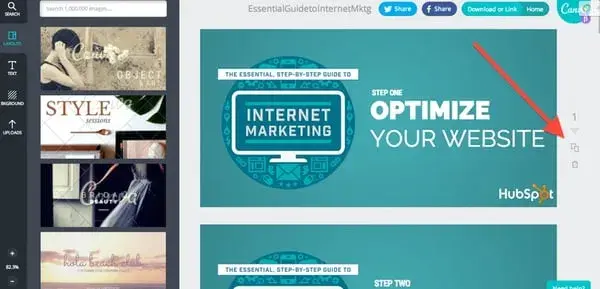
Reflecting, Showers shared how she would use Canva to create images in bulk for HubSpot’s campaigns on social. “Anytime we run a campaign to promote an ebook, webinar, or another valuable piece of content, I want to have at least five creatives to test on Twitter,” she said.

To create those graphics, she only had to design one image on Canva, then use the “copy” tool (shown below) to duplicate the image and create multiple versions while retaining the core design elements.

screenshot showing the copy tool in canva

Note: Canva also now integrates directly with HubSpot. Just saying.

9. Repurpose your content.

With so many platforms, it can feel overwhelming to keep up with publishing and creating content. But listen — you don’t have to reinvent the wheel.

Sure, you shouldn’t repost the same exact copy and piece on every platform — that’s just lazy, and audiences will tune you out. However, you can reshape and reword content to be used on different platforms or formats.

If you see a blog article getting a lot of traffic, think about how you can rework it for audiences on Instagram or YouTube. Or if a video is doing well on LinkedIn, perhaps it can be shortened and edited to appeal to audiences on TikTok.

Whatever the transformation, repurposing can help you get more out of the content you already know your audience loves and keep your social media calendar full.

Pro tip: Repurpose your existing content with artificial intelligence (AI).

According to new HubSpot research, 56% of social media marketers are using AI to create short-form videos, while 53% are using it to generate images — and who can blame them?

Though it will likely need some editing and fine-tuning, AI can repurpose content faster than any human could on their own.

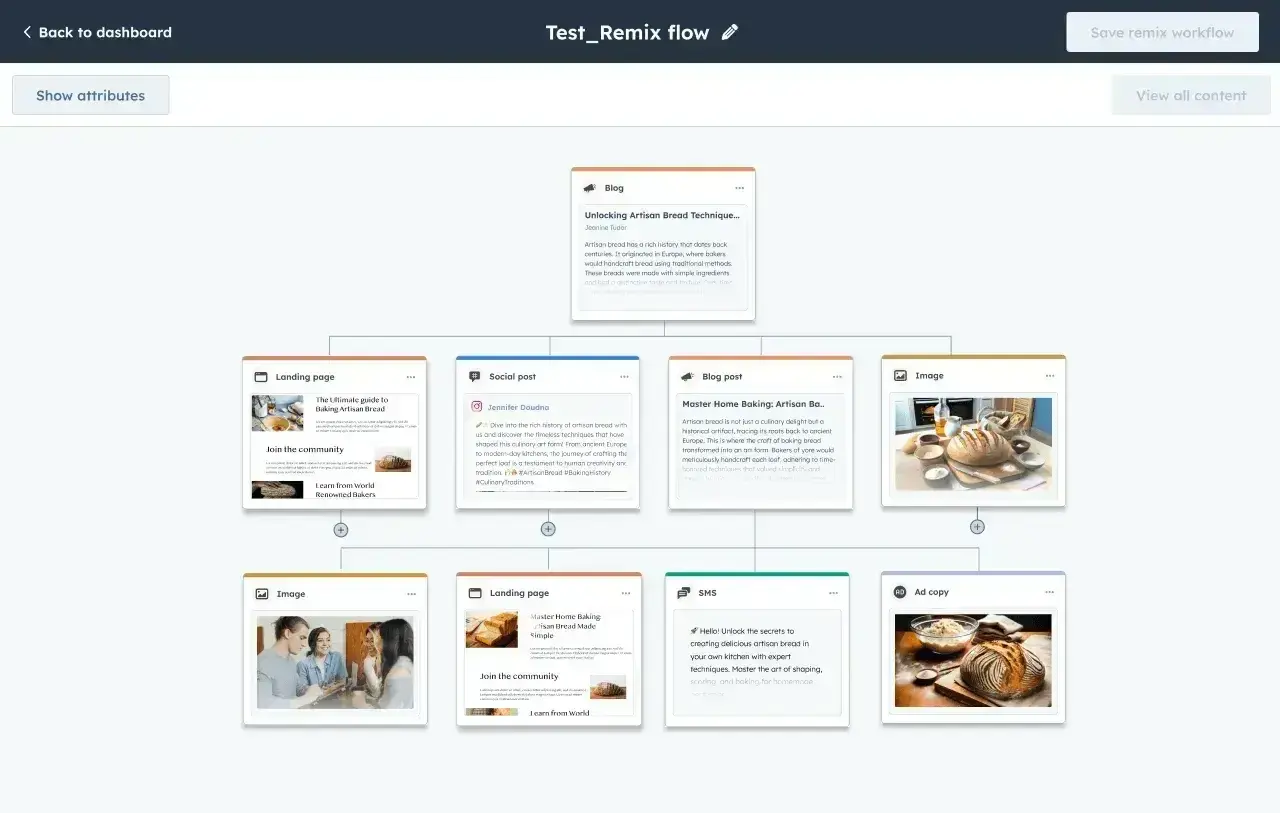
Ask ChatGPT to write posts for X or Claude to craft a video script. Even better, try a tool built specifically for content repurposing, such as HubSpot’s Content Remix.

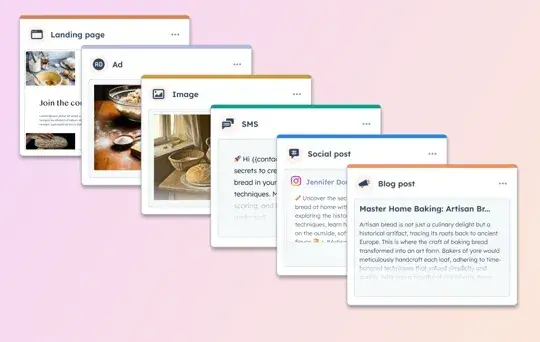
screenshot showing how hubspot’s content remix can be used by social media managers to repurpose content

With Content Remix, Professional and Enterprise-level users of Content Hub can repurpose existing content into new formats for social media. This can be materials you have hosted on HubSpot (i.e., images, text messages, ads, and blog posts) or new content you upload to the tool.

Note: In addition to helping you create content, HubSpot’s Breeze Social Media Agent can also help analyze your social performance, company details, and marketing best practices to develop an effective social media strategy.

10. Use AI to trigger engagement.

Fostering engagement with your audience on social media is just as, if not more, important than sharing content. In 2025, consumers crave personalized experiences and are loyal to the brands that can offer them.

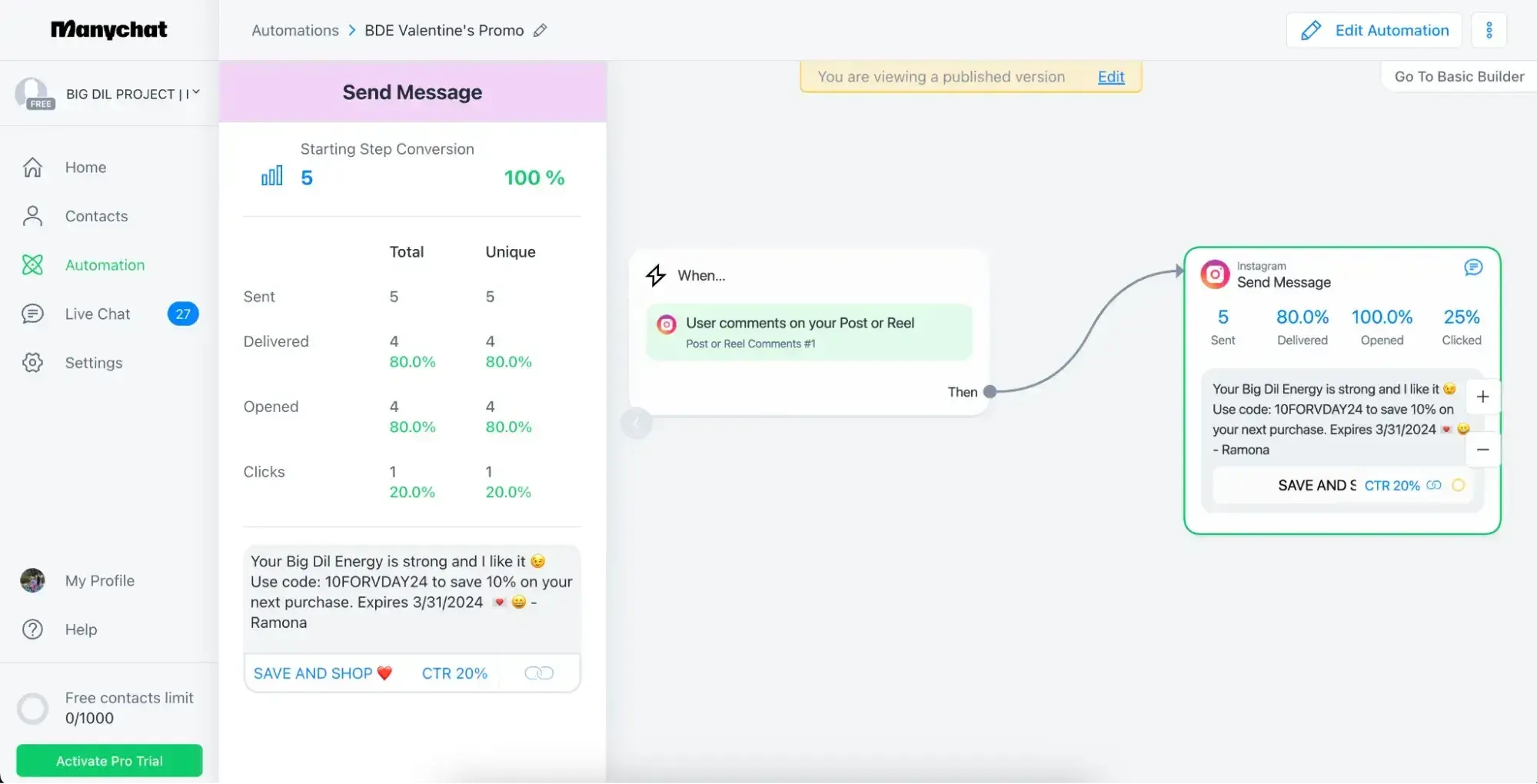
Social media engagement is powerful way to do that — but it can be hard to scale. Thankfully, AI can help keep up or at least initiate engagement.

For instance, ManyChat can be used to send a direct message when people comment on an Instagram post with a specific word or phrase. (I use this frequently, both professionally and personally.)

screenshot showing how manychat can be used to automate social media engagement

Pro tip: End your message with a question or ask.

While, depending on the context, automated messages can be easy to spot; you can still foster engagement by ending your message with a question or asking people directly to respond. You’d be surprised how often people will.

11. Take advantage of ‘Saves,’ ‘Collections,’ and ‘Bookmarks’ for curating.

While original content should be the core of your social media strategy, curation is a great way to supplement it. Luckily, in recent years, social media has evolved to make curation easier and keep this content organized.

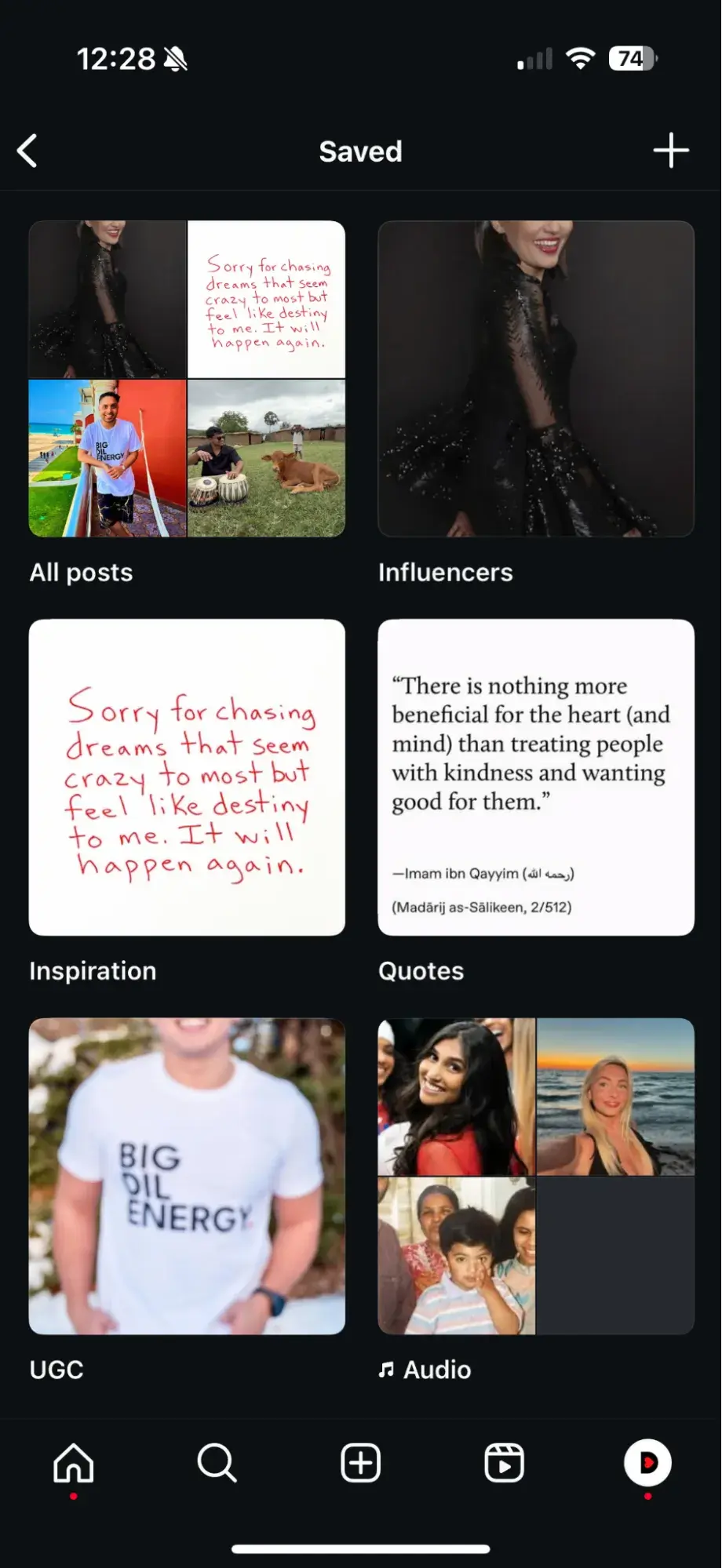
Facebook and Instagram, in particular, have won my heart when it comes to this. Both Meta platforms let you save posts to “collections,” which are essentially folders you create around different topics or even format types.

For instance, if you’re a beauty brand, you could have a collection of user-generated content created showcasing your products or another with posts sharing makeup application tips you think your audience will like.

screenshot showing examples of “collections” on instagram

No matter your approach, having these collections in your arsenal gives you somewhere specific and easy to access when it’s time to curate a post.

12. Diversify your mediums.

Images, videos, stories, polls — social media platforms have no shortage of features and formats for brands to experiment with these days, so use them to your advantage.

Diversify the types of content you create and share even within the same platform. Not only will the variety keep your feed interesting, but it can help you reach more people.

You see, different people enjoy consuming information in different ways, so if you only create one type, you may be ignored by many in your target audience. Plus, not every topic lends itself to every format. For example, a software tutorial is likely best suited for a video rather than a series of photos. So, let your subject matter guide you as well.

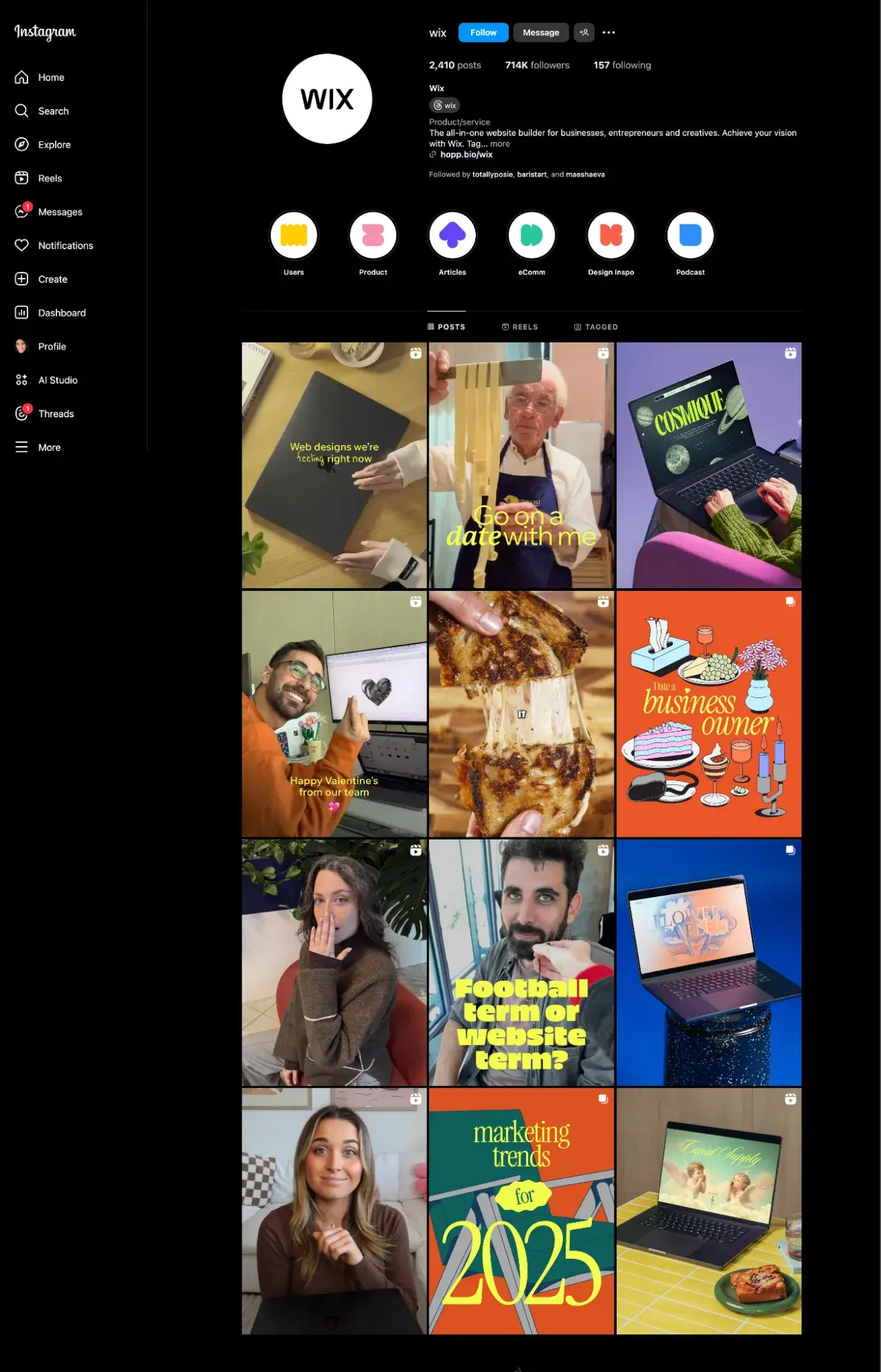
Wix does a great job diversifying its content, as seen on its Instagram account.

wix instagram feed

Source

The tech company posts a mix of Reels/videos and carousels, user-generated and brand-generated pieces, graphics, and real photography. This keeps their feed dynamic and interesting to scroll through.

Pro tip: This is another place where HubSpot’s Content Remix can help!

13. Organize your windows and tabs in a specific order every day.

When you‘re juggling your email, calendar, social streams, post requests, links, and so on and so forth, you can easily lose track of which tab is where. One member of JetBlue’s social team suggests keeping windows and tabs open in a specific order that you’ll get used to and memorize quickly.

The JetBlue team also suggests getting into the habit of closing out of tabs as soon as you’re done with them.

“We get sent so many links that, if I’m not careful, I’ll have 30 articles open as well as Fly-Fi selfies and pictures of suitcases with wheels and zippers missing.”

If someone tweets a link at your brand, once you‘ve addressed that tweet, close out of the link. This also helps ensure your toggle bars never get so crowded that you can’t easily see updates as they happen.

14. Set a time limit for each task.

Social media managers tend to have jam-packed schedules that don’t allow them to do one task for too long. So, set a timer on your phone or computer to keep yourself on track and moving through all your essential responsibilities.

If you need to come back to something later, you can. But having timers or time limits as guardrails will help you from getting too caught up.

15. Test and experiment.

Social media management best practices and tools are constantly evolving. So, stay open and try out new processes or tech alternatives. Sign up for free trials and try betas. You never know when something may pop up that will make you much more productive and effective.

Staying Organized as a Social Media Manager

It’s one thing to get organized; it’s another to stay that way.

All of the tips outlined below require consistency. Otherwise, they won’t serve much of a purpose. Incorporate these tips into your routine and see which are worth your time (aka effective), and you can realistically stick with.

Once you do, you will slowly but surely see how much more organized your days will become.

Editor’s note: This post was originally published in October 2014 and has been updated for comprehensiveness.

Categories B2B

The Best Times to Post on Social Media in 2025 [New Data]

As a social media marketer or someone trying to build your social media presence, you know that it isn’t enough just to post new content — the times you post also play a crucial role. But trying to determine the best times to post to social media can sometimes feel like throwing a bunch of content at the wall and hoping something sticks.

While some trial-and-error is inevitable, the good news is that you don’t have to figure it all out on your own. Of the marketers surveyed for HubSpot’s 2025 Social Media Trends report, nearly 29% reported that a data-informed marketing strategy is essential, and there is a lot of data available to help you decide when, how often, and even what to post to engage your audience.

Download Now: The 2024 State of Social Media Trends [Free Report]

So, in this post, I’ve compiled key statistics and expert-tested advice on the best times to post on social media in 2025.

Find the best time to post on the following platforms:

Best Time to Post on Instagram

Instagram has surpassed 2 billion monthly users, with most of its base accessing the platform via mobile.

image from buffer showing engagement heat map for instagram showing the best time to post on social media

Source

Here are some of the most recent and relevant studies around the best time to post on Instagram:

  • Based on analyzing 5.5 million social media posts, Buffer states that the best times to post on Instagram are 7 AM to 8 AM on weekdays.
  • According to the same report, the best day to post on Instagram is Friday. The worst day is Sunday.
  • The worst times to post are 11 PM to 12 AM and 1 AM to 2 AM.
  • SocialBee suggests that the best times to post on Instagram are between 11 AM and 2 PM on Mondays, Tuesdays, and Wednesdays, and at 10 AM on Saturdays.
  • According to a SocialPilot study on over 50,000 Instagram accounts, the best time to post on Instagram is between 7 AM and 9 AM.
  • Later states that the best time to post on Instagram is 5 AM.

However, many experts have found that posting on Instagram in the late afternoons and evenings also tends to yield high engagement, as this is when people are scrolling through their phones to wind down from work or school.

While posting at the right time is important, it’s also important to optimize your posts with the right caption so that they reach the maximum audience. You can use tools like Hubspot AI Social Media Caption Generator to easily create engaging and impactful copy for your posts.

Best Time to Post on Facebook

When it comes to the best times to post on Facebook, marketers report almost identical numbers as they do on Instagram.

image from buffer showing engagement heat map for facebook showing the best time to post on social media

Source

  • According to Buffer, the best time to post on Facebook is between 9 AM and 10 AM.
  • The best days to post on Facebook are Fridays. The worst are Saturdays and Sundays.
  • The worst times to post are 4 AM to 5 AM and 11 PM to 12 AM.
  • According to SocialBee, the best times to post on Facebook are Monday through Friday from 9 AM to 10 AM and 1 PM to 4 PM.

The best times to post on social media can depend on your specific audience and their browsing habits, however.

For example, Alex Ugarte, operations manager of online B2B brokering service London Office Space, has found that between 1 PM and 3 PM on weekdays works best, since “this is when many users take breaks or have downtime, meaning they’re more likely to engage.”

Ugarte adds that “Wednesdays tend to see higher engagement due to midweek productivity dips, and posting around this time has given us solid and consistent visibility.”

Best Time to Post on TikTok

Since 2020, TikTok has become the go-to short-form video platform for Gen Z and Millennial consumers.

Since brands are increasingly targeting their marketing efforts at these younger generations, it’s little wonder that according to HubSpot research, TikTok is seeing a 27.64% increase in investment by marketers in 2025, coming in just behind YouTube and Instagram.

graphic from social pilot on best times to post on tiktok

Source

  • Studies by SocialPilot show that the best time to post on TikTok is between 10 AM and 6 PM EST on Tuesdays and Thursdays.
  • Hopper states 10 AM to 11 AM mid-week as the overall best time.
  • According to Buffer, the best times are Sundays at 8 PM, Tuesdays at 4 PM, and Wednesdays at 5 PM.
  • According to SocialBu, the best time to post on TikTok globally is Monday at 6 AM, 10 AM, 3 PM, and 10 PM EST, as the platform sees high user engagement early in the week.

Best Time to Post on X (formerly Twitter)

The best times to post on X are a bit more varied than for Instagram and Facebook. In general, aim for times when people are likely to be taking breaks throughout their day.

image from buffer showing engagement heat map for x/twitter showing the best time to post on social media

Source

  • After analyzing over 1 million posts, Buffer found that the best time to post on X is 11 AM on Mondays and Fridays.
  • SocialBee states that the best time to post on X is between 9 AM and 4 PM on Thursdays and Fridays.
  • For better engagement, SocialPilot suggests posting in the mornings between 9 AM and 11 AM and afternoons around 3 PM on weekdays.
  • On weekends, it’s best to post between 9 AM and 8 PM.

In addition to finding the best times to post on social media, it’s also important to consider how often you should post.

According to Paul Drecksler, ecommerce expert, affiliate marketing professional, and founder of Shopifreaks, this also depends on the platform.

“X moves fast, so multiple posts a day can work, but a few times a week for Instagram or LinkedIn might be enough,” Drecksler says as an example. But even that is more of a guideline than a hard-and-fast rule.

“Algorithms change constantly, and what works for someone else won’t necessarily work for you,” he explains. “Instead of blindly following a schedule, track engagement, test different times, and adjust accordingly. The best data you can use is your own.”

Best Time to Post on LinkedIn

Roughly 30% of U.S. adults use LinkedIn to network and share their professional endeavors. It’s no surprise that weekday mornings — when professionals are gearing up to start their workdays — are the top times for posting on this platform.

image from buffer showing engagement heat map for linkedin showing the best time to post on social media

Source

  • CoSchedule suggests posting on LinkedIn at 12 PM, 10 AM, and 1 AM.
  • The best days to post are Tuesdays, Thursdays, and Wednesdays.
  • The lowest-performing days are Sundays, Saturdays, and Mondays.
  • According to Buffer, you can get high engagement if you post between 7 AM and 4 PM on weekdays, with peak hours between 10 AM and 11 AM on Tuesdays and Thursdays.
  • SocialPilot states the best time is between 10 AM and 12 PM on Tuesdays, Wednesdays, and Thursdays.

Best Time to Post on Pinterest

HubSpot internal data shows that visual storytelling is on the rise, especially through short-form videos, images, and live streaming. This could make Pinterest — a visual-based search engine — a useful tool for getting your brand’s content in front of your target audience.

  • The best times to post on Pinterest, according to CoSchedule, are 12:00 PM, 6:17 PM, and 8:02 PM.
  • The worst times are 4:00 AM, 5:00 AM, and 1:00 AM.
  • The best days to post are Fridays, Tuesdays, and Thursdays.
  • According to SocialPilot, however, the best times to post on Pinterest are 8 PM, 4 PM, and 9 PM on Mondays and Tuesdays.
  • On weekends, posting on Sundays at 8 PM, 12 PM, or 10 PM is ideal.

Best Time to Post on YouTube

More than 2.7 billion people use YouTube every month, and data from a 2024 Pew Research study suggests that its reach is growing. So, how can you get the best reach on the platform? Let’s dive in.

graphic from social pilot on best times to post on tiktok

Source

  • Buffer states that videos shared between 3 and 4 PM on Fridays tend to get the highest number of views.
  • According to SocialPilot, the best time is between 12 PM and 4 PM on weekdays.
  • On weekends, between 9 AM and 12 PM is ideal.

While reports and surveys state one thing, YouTube experts have a slightly different opinion on the best time to post on YouTube.

This is what Robert Benjamin, a social media expert with more than 814K subscribers on YouTube, has to say.

“Personally, I have found the best time to post to be 10 AM – 12 PM, but this can be largely dictated by the relationship that you have with your audience. My recommendation to anyone uploading YouTube content is that they try to post on a regular schedule so that their audience knows when to expect a video.”

Jensen Tung, a content creator and entrepreneur with more than 524K subscribers, believes that the best time to post depends on your audience demographic and time zone.

He states, “There is no one-size-fits-all best time to post. It depends on your audience’s demographic and the time zone most of your viewers are in … YouTube Studio can show the exact hours your audience watches your content. Let that data inform your posting time.”

Creating an Effective Posting Schedule

Although each social network sees its engagement increase at specific hours and days of the week, you’ll still have to tailor your approach to your audience.

You may find that certain content types work better when posted at certain times. For instance, your videos may perform well when posting in the morning, while your images may do better in the late afternoon.

In the words of Skylum CMO Yevhenii Tymoshenko, “the actual game is habit-building. You want people to expect your content, not accidentally stumble on it.” If your audience consistently benefits from your content, they’ll start actively looking for it. “That’s when timing stops being a guessing game and starts becoming an advantage.”

If you don’t have enough of your own yet, I recommend you use the data compiled in this article as a guide. Once you start posting regularly and have collected data, review it to determine when your audience is most active on the platform and what posting schedule they respond to the most.

Editor’s note: This post was originally published in April 2014 and has been updated for comprehensiveness.

Categories B2B

Morning Brew’s Co-Founder on The Three Channels That Will Win 2025 (Plus, How to Craft a Voice That Stands Out)

All I have to show from my college days is a questionably long Facebook album titled “For the Nights I’ll Never Remember, and the People I’ll Never Forget.”

Meanwhile, when Alex Lieberman was in college, he launched a newsletter now valued at $75M.

It’s okay… We all have our strengths.

Click Here to Subscribe to Masters in Marketing

Meet the Master

Copy of Headshot Template (1)-Mar-25-2025-02-08-31-8389-PM

Alex Lieberman

Co-founder and executive chairman, Morning Brew; co-founder of Storyarb 

  • Claim to fame: Launching a newsletter now worth $75M — from his college dorm room

Lesson 1: When launching a biz, embrace the ol’ hub-and-spoke model.

Lieberman had no clue he was following what he now calls the hub-and-spoke model while getting Morning Brew off the ground at University of Michigan.

But he most certainly was: He and his co-founder, Austin Rief, would visit business classes and clubs across campus and ask professors if they could speak to students. They’d launch into a quick 30-second pitch about Morning Brew, collect emails, and voilà — a cumbersome, on-the-ground list-building strategy was born.

So why’s it called hub and spoke? For Lieberman, the spokes are your ideal customers; the hubs are channels that give you access to lots of spokes at once. In his case, the spokes were business students, and the hubs were classrooms.

When they ran out of Michigan classrooms to bombard, they launched an ambassador program with 250 college students nationwide to collect emails at other schools.

That was how we grew our first 50,000 subscribers. And then finally we‘re like, ’Okay, this ambassador program worked… Now how do we turn everyone into an ambassador?‘ That’s why we created Morning Brew’s referral program, and as of today, roughly 450,000 subscribers have gotten at least one referral using their email address.”

Lieberman credits this hub-and-spoke approach for their early success. His advice: Start with the smallest, most localized hub, then expand one step outward while staying focused on the right channels for your audience.

Your business might not find its target consumer in college classrooms, but the point stands — Find unique, off-the-Instagram-path channels to grow your audience one spoke at a time.

Lesson 2: Go extremely specific when crafting your voice.

When Lieberman realized Morning Brew needed a consistent voice, he didn’t mess around with vague guidelines.

He literally picked an actual human being. “He’s a family friend of mine. His name’s Aaron Stoppelmann. He’s 32 years old, lives in Connecticut, and reverse commutes to the city.”

The Morning Brew team documented Aaron’s go-to cocktail, his TED Talk-watching habits, and why people enjoyed talking business with him: “He‘s deeply passionate about it and he knows a lot, but he doesn’t come off as a know-it-all or stuck up.”

After creating a hyper-specific voice based on Stoppelmann, Lieberman created a three-person content assembly line that included a completely made-up role called “voice editor.”

This position went to Grant, a business school student from Michigan’s improv troupe whose comedy background was perfect for injecting personality into dry business content.

“That’s how we would have a cohesive voice, even if four writers had written the story,” Lieberman explains.

Don’t settle for generic brand voice guidelines that collect digital dust. Create an actual persona with ridiculous specificity — down to their drink order — and consider splitting your editorial process to include a dedicated “voice” role.

Your content might be written by a committee, but it should sound like it came from one impossibly consistent, slightly caffeinated friend.

Lesson 3: Three channels will win in 2025.

Lieberman’s betting on “the trifecta of channels” for B2B brands in 2025: long-form blog content, executive social content, and a weekly email newsletter.

When asked if these are the marketing mediums all B2B leaders should lean into next year, Lieberman doesn’t hesitate: “I think this is the trifecta of channels that serves the purposes you need in terms of building top of funnel, nurturing your top of funnel, and converting your audience.”

He notes you could try YouTube, but most B2B brands “would just waste a lot of resources on it” without the right multimedia competencies.

The beauty of this three-channel approach is its simplicity and effectiveness. Long-form content — built from first-party data or expert interviews — drives traffic and captures emails. The newsletter then nurtures those relationships. Finally, executive social content leverages personalities to strengthen brand perception. (Or reveals your CTO can’t spell “innovation.”)

Focus your content efforts on these three high-impact channels before chasing shiny objects. They provide the perfect blend of rented and owned audiences — without requiring six months of planning meetings that could have been emails.

Oh, and one bonus tip I got from Lieberman? When creating content for these channels, Lieberman says business owners should avoid stressing too much about demand gen.

I think [over-indexing on demand generation] has largely taken the soul out of content,“ he told me, adding that it’s sad because ”there‘s such great content that can be created in the world of B2B — and I think you see glimmers of that, and it’s done by people who are willing to not have to track every last thing and actually create really good stuff for their audience.”

LINGERING QUESTIONS

THIS WEEK’S QUESTION

What’s the most memorable advertisement (commercial, print ad, OOH, anything!) you can remember seeing, and why do you think it has stuck with you?—Erin Quinn, Principal Marketing Strategist, The Original Pickle Shot

THIS WEEK’S ANSWER

Lieberman: The OG Dollar Shave Club “Our Blades Are F*cking Great” commercial. That spot hits on everything I look for in a good ad:

  • It tells a story, which makes you FEEL before you THINK.
  • Its approach is novel, which creates intrigue & makes you lean forward (vs. lean back).
  • It doesn’t sell a product. It sells an emotion. And once you feel that emotion, you become open to the product.
  • It’s an ad disguised as entertainment. The best ads make you feel like you‘re eating ice cream, when you’re really eating cauliflower.

The spot drove 27 million YouTube views on a budget of $4,500, and I believe is a big reason why DSC ultimately sold for $1 billion to Unilever.

NEXT WEEK’S LINGERING QUESTION

Lieberman asks: What are your thoughts on the ongoing “attribution” hoopla? And what’s the right amount of attribution without getting overly scientific/metrics-focused with your marketing strategy?

Click Here to Subscribe to Masters in Marketing

Categories B2B

3 Short-Form Video Trends Marketers Should Watch in 2025 [New Data]

In the 2025 HubSpot State of Marketing Report, we found that short-form video remains king. It‘s the top-performing content marketers are using, and it’s set to grow in 2025.

No surprise there — short-form videos are everywhere. Even Google is testing a short-form video tab to boost its short-form content. So, how can you tap into this trend to grow your business? And what trends should you watch for in the coming year?

Download Now: Free Video Marketing Trends Report

In this post, I’ll share advice from video marketing experts. Read on to discover how to make short-form video content work hard for your brand.

Table of Contents

What are short-form videos?

The general consensus among marketers is that any video under 60 seconds is considered short-form, with the optimal length between 31 and 60 seconds.

Erica Santiago, who is spearheading HubSpot’s Blog Video Program, considers anything under 60 seconds to be a short-form video.

However, she notes the definition could be changing as platforms like TikTok, Instagram Reels, and YouTube Shorts extend the duration of their short-form content.

“At one point, TikTok, Instagram, and YouTube Shorts only allowed users to upload content that is between 60 to 90 seconds long, depending on the platform,” she explains. “Now, TikTok allows users to record up to 10 minutes of content on the platform. YouTube Shorts and Instagram Reels both recently extended their content durations to 3 minutes.”

She believes this could change the definition of short-form content later down the line.

“In my opinion, a 3-minute video could eventually fall under the short-form video umbrella because it’s still bite-sized content that doesn’t require much commitment to watch all the way through,” she says. “And short-form platforms like TikTok, Instagram, and YouTube Shorts seem to agree as they push longer content more and more.”

“But attention spans are getting shorter and shorter, so I still suggest companies stick to 60-seconds-or-fewer videos as they experiment with short-form videos,” Santiago advises.

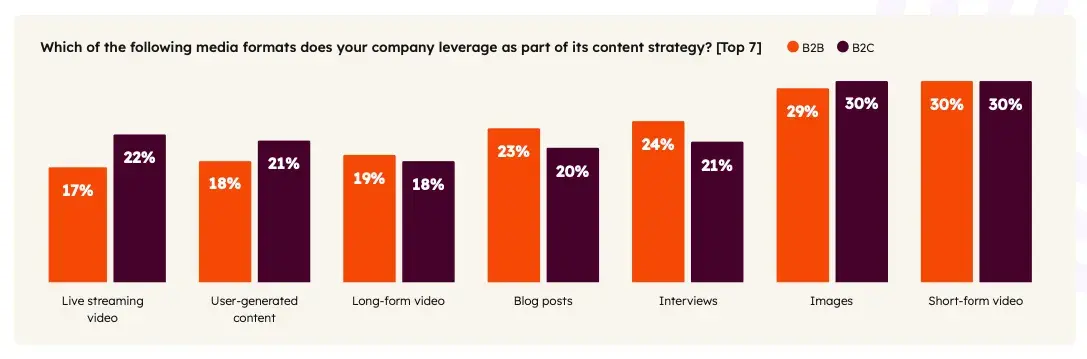
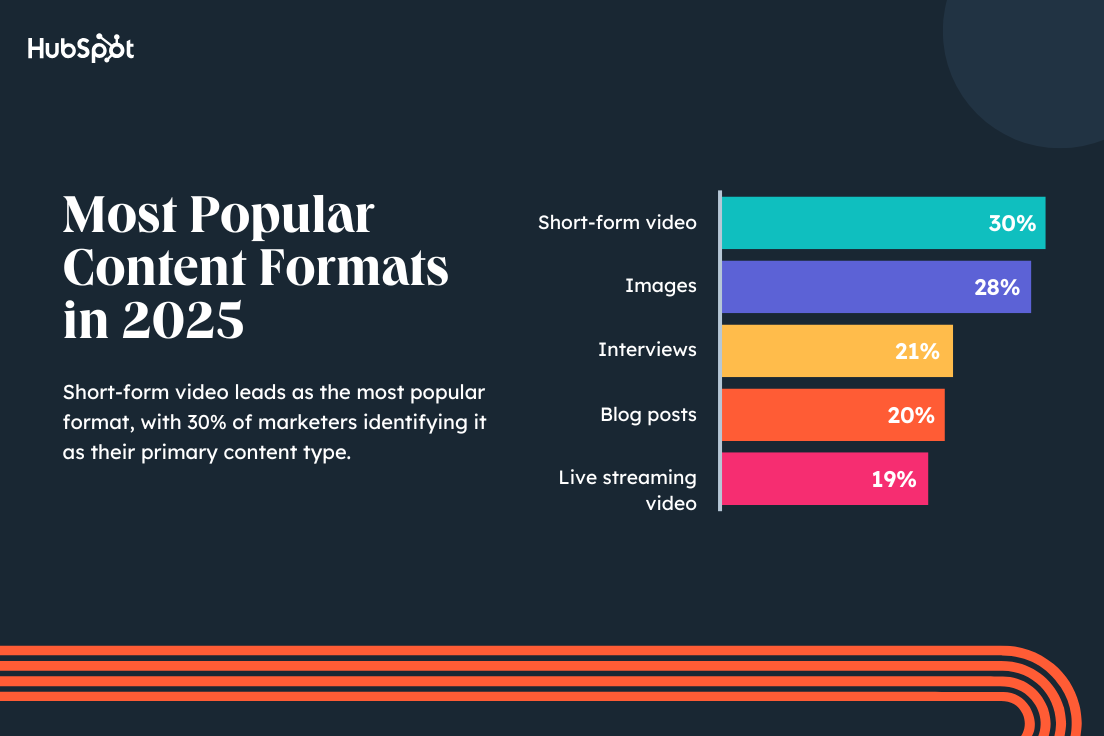
Regardless of the duration, one thing’s clear: shorter videos really are the star of 2025 marketing trends. According to our report, short-form video is the most used content format by marketers, with 30% of both B2B and B2C marketers leveraging it in their marketing strategy.

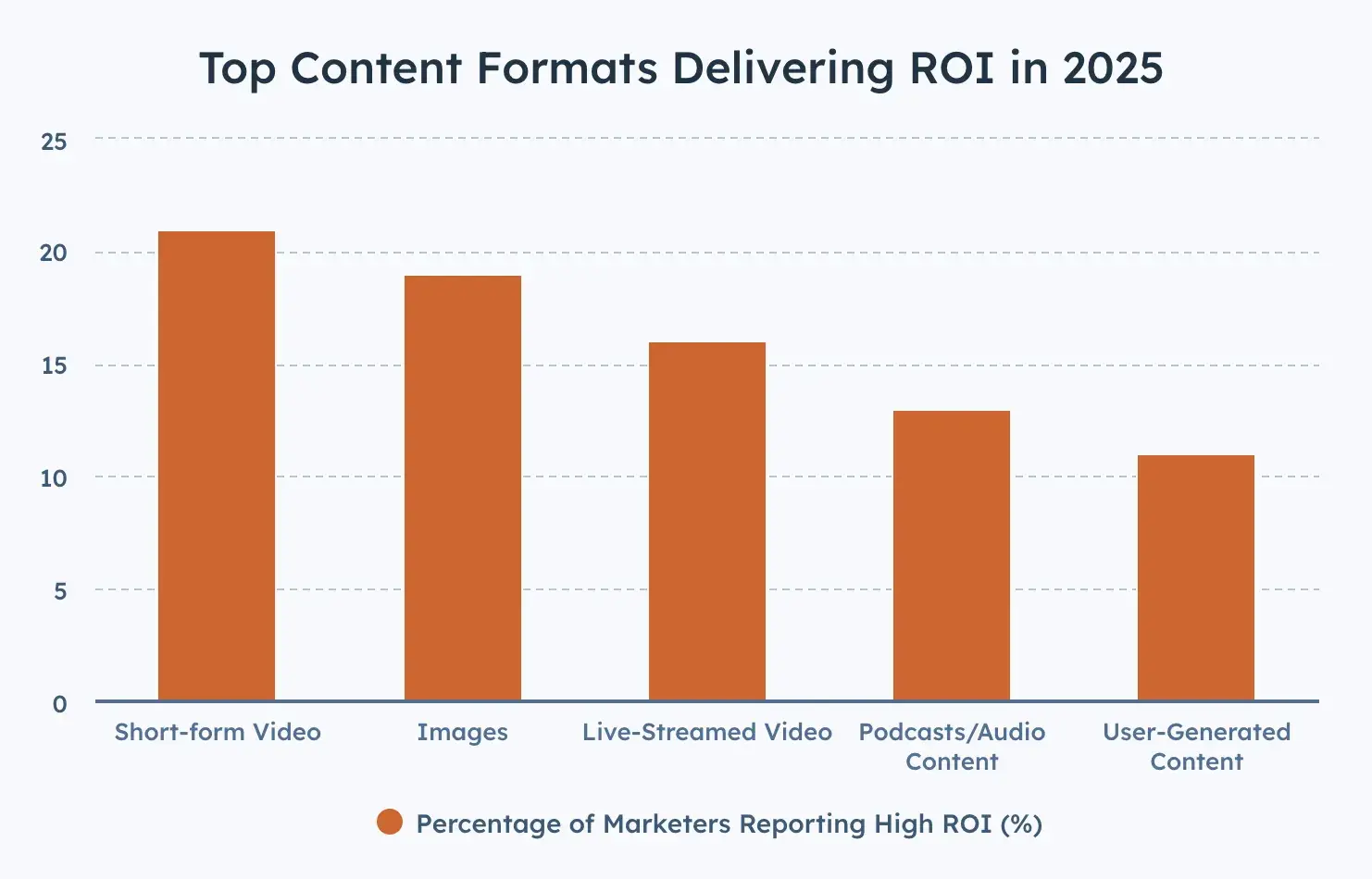
Furthermore, the majority of marketers agree that short-form video yields the highest ROI compared to other content formats.

the majority of marketers agree that short-form video yields the highest ROI compared to other content formats.

Why use short-form video?

People are short on time, but that doesn’t diminish their desire for content. They want it—just faster. Here’s how investing in short videos can impact your business:

High Engagement Rates

We’ve all heard about the shrinking attention span. Various studies support this, so it’s fair to say short-form is the way to go.

For example, personal care brand Dr. Squatch reports that 250,000 videos were watched on its site. Each visitor spent an average of 1 minute and 40 seconds watching these short-form videos, adding up to 5,800+ hours of total viewing time.

Impressive, right?

Enhanced Brand Recall

Concise, multisensory video content is a game-changer because it sticks with you. These videos tap into multiple cognitive channels by blending visual, auditory, and textual elements, making the information more memorable.

I’ve noticed that these videos effortlessly grab attention, engaging our brain’s intuitive and quick processing networks.

And if creating captivating short-form videos sounds daunting, there are plenty of tools and software available that make video creation accessible to everyone, regardless of experience.

Movavi, a free video editing software with a built-in template library and stock media, can help create compelling content. HubSpot also provides Clip Creator, another free video editing software.

Storykit, with its text-to-video AI tool, also makes it easy to turn written content into short-form videos.

The result? A richer, more engaging experience that’s hard to ignore. Frequent exposure and repetition of brand elements further solidify brand recall.

Increased Reach and Visibility

I strongly believe that social media platform algorithms favor short-form content, pushing it out to a broader audience.

Just look at the latest features — YouTube’s Shorts, Meta’s post-loop ads, and Reels, or even the entire premise of TikTok. They’re all about quick, engaging content.

Another reason is shareability. The brevity of shorter videos makes them perfect for social sharing and boosting brand awareness.

Influencer Vipasha Malhotra shared her experience with The Economic Times, confirming this preference: “If I get 10,000 views on long-form YouTube videos, I receive 500,000 views on Shorts. Even on Instagram, my reels typically get over 100,000 views on average.”

Higher ROI

As I said earlier, short-form videos have the highest ROI and outperform other content marketing trends. Even video marketers at HubSpot have noticed the benefits of incorporating short-form content into their strategy.

In the past year, HubSpot invested in a mix of both short- and long-form videos in our YouTube strategy. As a result, Marketing Against the Grain, our video podcast, has 45,000 subscribers, and The Hustle reached 140K subscribers.

“In just a few months, the team grew The Hustle YouTube channel to over 400,000 views per month, created hundreds of sponsored videos, and built six long-term creator partnerships with YouTubers,” says Kyle Denhoff, Sr. Director of Marketing at HubSpot.

None of this is surprising when you consider consumer preferences.

Your audience craves quick, effective access to useful information, and short-form content delivers just that. From my experience, investing in short-form video has always paid off by meeting this demand and driving higher returns.

How do short-form videos fit into your content strategy?

Santiago notes, “Short-form videos can highlight your band’s personality, succinctly explain and promote your products and services, and build trust with your audience.”

“One of my favorite videos from the Blog Video Program features my colleague, Alana Chinn, as she casually shares return-to-office information while walking her dog,” she says. “In another video, contributor Ramona Sukhraj does her makeup while giving advice on how to go viral as a brand. This is content that can’t be replicated because our creators have unique voices, experiences as marketers, and their own method of storytelling.”

Short-form videos can also help keep your brand in tune with current topics amongst your audience.

On TikTok, for instance, viral songs, trends, and challenges dominate. Brands must join the fun to get on the “For You” page.

As with any new trend or platform, former HubSpot Senior Content Strategist Amanda Zantal-Wiener says you should always consider your audience first:

“It all goes back to an ancient question: Which channels are your audiences using and for what? And therefore, for which channels does it make the most sense for your business to create this short-form content?”

This means that while short-form video is known for its entertainment value, you can adapt it to align with your brand.

If you consider your audience and sufficiently prep for your short-form videos, there’s no trend you can’t tackle in 2025.

Short-form Video Content Strategy

A short-form video content strategy is a well-thought-out plan to leverage brief, engaging videos (typically under 60 seconds) to achieve specific marketing goals. It covers creating, distributing, and analyzing video content to make the most impact.

Here’s how to create a robust short-form video content strategy.

1. Define your objectives.

Your strategy’s foundation lies in clear objectives. Without specific goals, your efforts might lack focus.

Here’s how I approach my content goals:

  • Identify Goals: Determine what you want to achieve, such as increasing brand awareness, driving website traffic, boosting engagement, generating leads, or enhancing sales.
  • Set SMART Goals: Ensure your objectives are Specific, Measurable, Achievable, Relevant, and Time-bound (SMART goals). For example, my goal might be “increase Instagram engagement by 20% over the next three months.”

2. Understand your audience.

You can’t create resonant content without knowing your audience.

I use Google Analytics, Facebook Insights, and Instagram Analytics to gather demographic data, such as age, gender, location, and interests.

I analyze psychographic factors — values, attitudes, interests, and lifestyles — by gathering feedback through reviews, comments, and direct messages to gain deeper insights.

You can also use social listening tools to monitor conversations and sentiments about your brand, identifying common themes and interests.

3. Research competitors and trends.

Next, you need to stay informed about your competitors and current trends. This will keep your brand relevant while helping you capitalize on popular content formats.

Here’s my two-step approach:

  • Competitive analysis: I start by identifying key competitors and analyzing their video content strategy, observing what works well and where they may be falling short.
  • Trend monitoring: It is essential to stay updated with trends on platforms like TikTok, Instagram Reels, and YouTube Shorts. I use a combination of BuzzSumo and Google Trends to identify trending topics and hashtags relevant to my client’s industry.

4. Plan your video content calendar.

First, I define the main content themes or categories my videos will cover, like tutorials, behind-the-scenes looks, or product demos.

This structured approach helps me brainstorm specific video concepts for each theme, ensuring they align with my brand voice and objectives.

Pro tip: Think about how each idea can provide value to your audience while promoting your brand.

Then, I establish content pillars to represent my client’s core topics and reinforce their brand message over time. Each pillar should cover different aspects of your brand to provide variety. For instance, one pillar would focus on educational content, while another highlights customer success stories.

I also plan the resources needed for video production, including time, budget, and personnel. This gives me a realistic view of what can be published without compromising quality.

Determining the video posting schedule is another crucial factor — how often I’ll post. Remember, consistency is key to keeping your audience engaged. My go-to tool for scheduling posts in advance is Buffer — it’s user-friendly and offers multi-platform support.

5. Make compelling videos.

A well-told story makes a lasting impact even in a short time frame.

The key is having structured videos with a clear beginning, middle, and end. I also try to evoke emotions — whether it’s humor, inspiration, or curiosity — since emotional content is more likely to be shared.

I also like doing as much prep work as possible before a video shoot. Video marketer Tanner Francom describes this as “gathering inspiration.”

He says this “helps to craft shots in both pre-production and on set. Before putting together a shot list, we gather an inspiration board full of shots we want to replicate or have certain aspects we’d like to include in the video.”

6. Optimize for different platforms.

Each social media platform has its own unique style and user habits. To make the most impact, I tailor my videos to fit each platform’s format and aspect ratio.

I also use platform-specific features like polls, questions, and stickers to boost interactivity and engagement.

Here’s a quick guide to help you:

  • TikTok: Keep your TikTok videos fun and casual. Use popular sounds to boost your views. You must also stay updated with the latest trends and try weaving them into your content.
  • Instagram Reels: Choose visually appealing content with short, punchy captions and smart hashtags. Consistency is key on Reels—regularly posting and engaging with other users can really pay off. Join in on trends, but always stay true to your brand’s vibe.
  • YouTube Shorts: Aim for high-quality production with clear, searchable titles and eye-catching thumbnails. Properly tagged videos with compelling thumbnails can drive traffic to your longer videos.

7. Promote your videos.

Once my video posts are live, I share the links in my email newsletters to keep my audience engaged. I respond to comments, participate in discussions, and share user-generated content to build a loyal community around my brand.

Cross-promotion is another great strategy — I include video snippets in my blog posts and podcasts, guiding my audience to watch the full content.

If you have the budget, don’t forget paid advertising. Facebook, Instagram, and YouTube can help your videos reach the right people, especially for new campaigns or key promotions.

8. Analyze and adjust.

The last step is continuous analysis, where I refine my short-form video content strategy to ensure ongoing improvement and relevance.

I rely on analytics tools — Google Analytics, TikTok Analytics, and Instagram Insights — to track performance metrics like views, engagement, shares, and conversions. Regular performance reviews also help me identify what’s working and what needs improvement.

Additionally, I conduct A/B testing with different video formats, lengths, and styles to see what resonates most with my audience. This provides valuable insights into their preferences and behaviors.

Pro tip: Encourage viewers to leave comments and suggestions to help adjust the content strategy. I’ve found that asking for direct feedback improves content quality and increases engagement.

Short-form Video Trends to Look Out For

1. Brand Challenges

Short-form videos first gained popularity through viral content based on dances, songs, and sounds. Today, brands can make their own sounds, filters, and challenges go viral.

According to our most recent social media trends report, 20% of marketers surveyed leveraged branded challenges, and 42% said they performed better than expected.

Short-form video example: Fenty Beauty Filters

Fenty Beauty found a clever way to gain traction on TikTok while showcasing its wide range of beauty products. Over the last few years, the makeup brand has created numerous TikTok filters that help users find the right products and try out new looks.

One of their most popular filters is called “Which RiRi are You?” and it shuffles through different lip liner and color combinations worn by the brand’s founder, Rihanna.

What I like: Filters, dances, and song trends are catchy, fun, and shareable ways to build brand awareness and steer your audience toward your products and services.

2. Nano- and Micro-Influencer Collabs

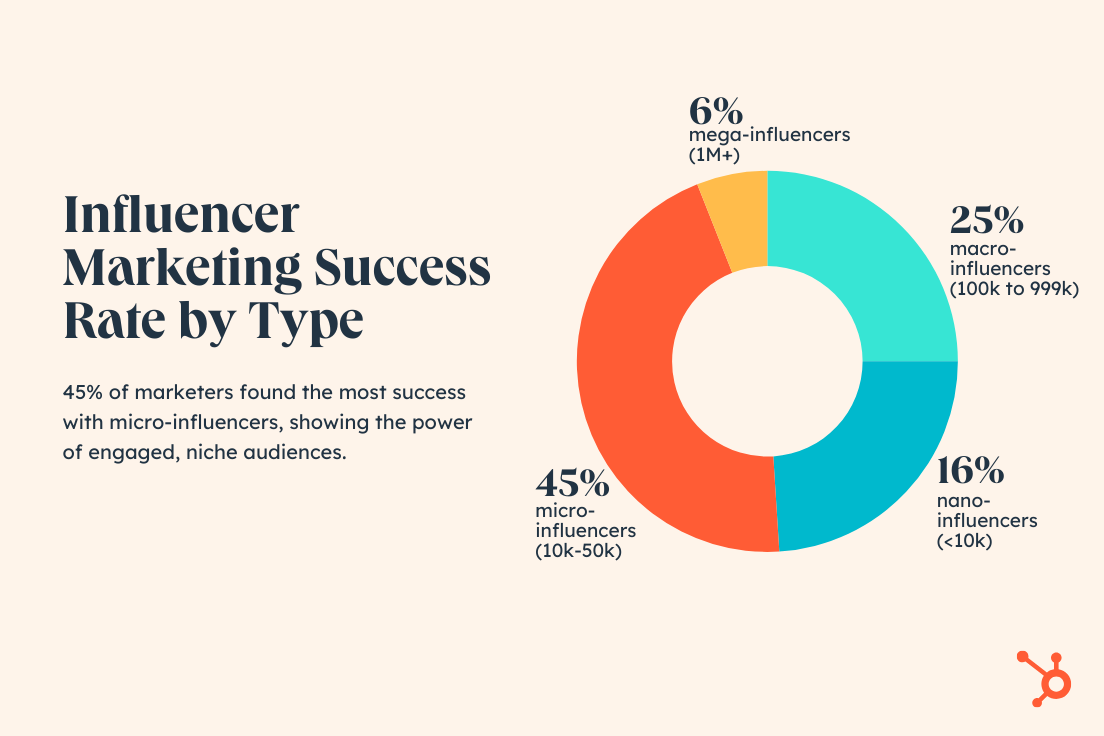
Brands have been leveraging influencer marketing for years—that’s nothing new. However, I’m now seeing more brands leverage smaller influencers over mega ones. According to our Marketing Trends Report, marketers greatly benefited from leveraging influencers with audiences smaller than 100K.

For context, there are three types of influencers:

  • Nano-influencers have less than 10,000 subscribers/followers
  • Micro-influencers have 10,000-99,999 subscribers/followers
  • Macro-influencers have 100K – 1 million subscribers/followers

Our trends survey found that 45% of marketers saw the most success with micro-influencers and creators. According to marketers in our survey, the top three benefits of working with smaller creators and influencers are:

  • They are more trusted by their followers and subscribers.
  • They provide more access to niche, tight-knit communities.
  • They are less expensive to work with than influencers and creators with larger followings.

Short-form video example:

Eyewear company Zeelool often partners with micro-influencers to promote their latest glasses designs. In the video below, TikTok influencer @kryspiikreme tries on several pairs and includes a discount code in the caption for her followers to use.

Pro tip: Choosing which influencer to represent your product isn’t easy. You want someone who stands for the same values as your business. Check out this blog on how to choose the best influencer for your brand.

3. Authentic, Value-driven Content

According to our 2025 State of Marketing Report, 1 in 4 marketers are exploring creating content that authentically reflects their brand’s values.

This is largely because more brands will target Gen Z and Millennials in their marketing this year, two demographics known to value authenticity and prefer to buy from companies that share their values.

Short-form video example: Formula One

How can you authentically show your audience that you share their values in a short-form video? One way is to send your products to those who may need them the most.

For example, pet product brand Kong sent animal rescuer and foster parent Rachael Robertson a massive bag of Kong products to gift a cat she’s fostering named Garbanzo, who recently went viral on TikTok.

This shows that Kong supports animal rescuers, foster parents, and cats like Garbanzo, who need extra attention and resources, things the brand’s target audience of pet and animal lovers care about.

Pro tip: Brainstorm with your marketing team on how you can pull back the curtain on your company and let customers know more about what makes your brand tick.

This might look like an interview with your CEO or a video explaining the history of your company. Let your viewers see why you’re passionate about what you do and what you have in plan for the future.

Short-form Video Best Practices

Tip 1: Film vertically.

You can shoot your videos horizontally, but I recommend you don’t.

Platforms like YouTube, Instagram, and TikTok prefer vertical videos because they fill the entire screen and look more natural on mobile devices.

When you shoot horizontally, you need to crop them, making it look awkward and reducing overall quality.

Tip 2: Engage viewers quickly.

The first few seconds of your video are crucial for capturing your audience’s attention. Start with a strong hook, like a question or surprising fact, and use eye-catching visuals to pique curiosity.

For example, if you’re doing a branded challenge or funny video, start with a preview of the funniest moment. For a tutorial, immediately address the problem that needs solving. Make sure to get the main message or value proposition across quickly — no unnecessary filler.

Tip 3: Ensure quality content.

When I say quality content, I mean stable footage, good lighting, and crisp audio.

Poor audio and video quality can distract from your message and reduce engagement. Before you start filming content, invest in basic equipment like a good camera, proper lighting, and a microphone.

Tip 4: Use quick cuts and dynamic editing.

Think of the quick transitions and dynamic scenes in movies like Quentin Tarantino’s Django Unchained or Charli XCX’s Boys music video.

Try recreating the same fast, engaging vibe for your short-form videos. Use fast transitions and avoid long, static shots that can cause viewers to lose interest.

Also, animations, text overlays, and other visual effects should be integrated to emphasize key points and add dynamism.

Don’t go overboard, though. Your video shouldn’t be too busy or hard to follow.

Pro tip: For a crisp, professional touch, I also use editing software like Adobe Premiere Rush and built-in editors on platforms like Instagram and TikTok.

Tip 5: Optimize for mute viewing.

Many viewers watch videos without sound, especially when scrolling social media.

To make your videos accessible and improve viewer retention, use subtitles for dialogue and captions for key points. This simple addition makes your video accessible to those who are hearing impaired or watching in silent environments.

Next, incorporate visual storytelling. Use strong visuals and on-screen text to convey your message effectively without sound.

Tip 6: Optimize for different platforms.

What works on my website might not work on Instagram Reels, and what works on Instagram Reels might not work on TikTok.

To create a broad reach, I adjust my editing slightly for each platform. For example, I place subtitles higher on a reel so they’re not covered by other elements when published on TikTok.

Tip 7: Leverage trends and hashtags.

TikTok and Instagram prioritize trending content, showing it to more users. That’s why I regularly check trending challenges and hashtags before suggesting video ideas to my clients.

However, I don’t follow trends blindly — I give them my own spin. The idea is to integrate the trends creatively into your content for a visibility boost, and not to be dictated by it.

Tip 8: Include a clear CTA.

Without a CTA, viewers might enjoy your content but take no further action, defeating the purpose of your video.

My advice is to be direct, specific, and seamless: Clearly state what you want viewers to do, whether it’s visiting your website, following your account, or making a purchase.

Use phrases like “Shop now” or “Click the link in the bio.” Ensure the CTA fits naturally into the video, whether it’s a visual cue at the end, on-screen text, or a verbal prompt.

Takeaways for Video Marketers

Social Media Content Manager Kelsi Yamada says using short-form videos is a low-commitment and engaging way to connect with your audience.

“You can get a good laugh or learn something new in a minute or less on TikTok or Reels,” said Yamada.

“On the flip side, it’s also relatively easy to create, which means there are more people who can share their humor or points of view. Because of this, brands should figure out what their unique point of view is and how they can stand out in the noise.”

While jumping on every trend is tempting, Yamada advises brands to be selective.

“Not every viral TikTok sound or meme format will fit your content strategy or brand, so don’t force it,“ she notes. ”Focus on catering to your niche and staying authentic. Don’t be afraid to create something new — trends have to start somewhere!”

Finding the balance between what‘s trending and what’s true to your brand is key. For more on video marketing, check out HubSpot Academy’s courses on Video Marketing and Developing a Video Marketing Strategy.

Best Platforms for Short-form Videos

1. TikTok

TikTok is the go-to platform for Millennials and Gen Z, with about 70% of 18-19 year-olds and 56% of 20-29 year-olds using it.

The TikTok homepage has two main tabs: “Following” for videos from accounts I follow and the algorithm-driven “For You” page that curates content based on my activity. I often explore the “Discover” tab for trending topics and hashtags — it’s a great resource for generating new content ideas.

The “Discover” tab on TikTok highlights trending topics and hashtags and, in my experience, is a great resource for marketers to generate new content ideas.

As a creator, I love how TikTok’s algorithm tailors content to my interests, keeping me engaged for longer periods. As a creator, though, standing out can be tough due to the sheer volume of content uploaded every second.

2. Instagram Reels

Some call it TikTok 2.0, but for me, Instagram Reels is proving to be its own beast.

Reels is a scrollable video timeline, similar to Instagram’s Explore page. Users can tap on the music in a Reel to see other videos featuring the same sound.

With over 2 billion active monthly users, Instagram already commands a vast audience. Since launching Reels in August 2020, it’s become a powerful marketing tool, rivaling TikTok.

Instagram targets a wider age range than TikTok, and with its suite of marketing features, Reels offers brands a way to extend their reach in a snappy, engaging format.

I particularly enjoy how Reels integrates smoothly with the rest of Instagram, making it easy for me to switch between photos, stories, and videos. It’s also super user-friendly for quick editing and sharing content.

3. YouTube Shorts

Shorts is YouTube’s answer to the short-form video craze. Launched in September 2020, Shorts has quickly amassed over 2.3 billion monthly active users.

Using the YouTube mobile app, I’ve found the dedicated Shorts tab super convenient. You can easily create and edit videos up to 60 seconds directly within the app. The potential to reach YouTube‘s massive audience and the robust monetization options are other reasons why I’d recommend Shorts.

4. Triller

With its strong music integration, Triller makes content creation really enjoyable.

However, I’ve noticed it’s not as intuitive as TikTok, which can be a bit challenging for new users. Despite this, Triller remains a solid platform for sharing my short videos.

Triller’s homepage feels familiar, similar to other short-form video platforms, but with a unique twist — music is front and center. The platform is popular among musical artists and allows me to edit 60-second videos with music, filters, effects, and transitions.

Triller gained traction during the uncertainty around a potential TikTok ban in the U.S. and has since become a worthy competitor. I find it exciting to use music as a storytelling element in my videos.

For example, a song like “You Got It” by Vedo, which is about unlocking potential, could be perfect for creating a video targeting job seekers or promoting business coaching services.

5. LinkedIn

“If you’re a B2B marketer, I absolutely encourage you to post your short-form marketing videos on Linkedin,” Santiago says. “When experimenting with our own short-form videos for the Blog Video Program, we found that we’d get hundreds, even thousands, of more impressions than what we’d see on platforms like YouTube.”

LinkedIn also began testing a vertical video feed on its app and is seeing a lot of success with its push for short-form video content. The company reported a 34% year-over-year increase in video uploads in Q4 2024 and a 36% year-over-year growth in total video viewership in 2025.

Making the Most of Short-Form

There are hundreds of ways to incorporate short-form videos into your marketing strategy. But no matter which trends come and go, it’ll always come down to your audience—their preferences and interests—and your brand—your voice and what you stand for.

Try a few approaches, and listen to where the data tells you to go next.

Editor’s Note: This post was originally published in January 2021 and has been updated for comprehensiveness.

Categories B2B

20 Digital Marketing Ebooks to Add to Your Reading List

As a content marketer and general marketing enthusiast, I’ve read countless physical books on digital marketing. Unfortunately, physically printed digital marketing books can quickly become obsolete, which is why I’ve turned to digital marketing ebooks.

Don’t get me wrong, I will always read physical books when it comes to evergreen marketing topics. However, when it comes to the latest SEO trends, website-building tips, and innovative content strategies, I’ve found that ebooks can get me the latest information because they don’t take the time for traditional publishing.

→ Click here to download our free guide to digital marketing fundamentals  [Download Now].

More than that, many ebooks are free and easily accessible, making them an easy way to upgrade my digital marketing knowledge.

Are you looking for some resources, too? Read further to discover some excellent ebooks that give you the ins and outs of digital marketing.

Digital Marketing Ebooks

1. Digital Marketing for Small Business by HubSpot

free digital marketing ebook for beginners from hubspot

For this ebook, HubSpot teamed up with the experts at Podium and SimilarWeb to build a guide aimed at small businesses. I appreciate that it provides everything startups need to know about inbound marketing and gives a great scope of how to test, learn, and grow in an online marketing landscape.

This ebook takes readers through accessible ways to maximize resources and get the greatest benefit from marketing. It covers must-have strategies like:

  • SEO basics
  • Buyer persona
  • Email marketing
  • Text message marketing
  • Paid advertising

Why I Like This Free Digital Marketing Ebook

If you’re looking for a one-stop shop for how to start a functional digital marketing strategy from the ground up, this ebook is for you. It even provides templates and concrete examples that will help you organize your strategy.

2. Social Media Trends Report by HubSpot

free digital marketing ebook on social media trends

This 2024 report from HubSpot and Mention gives readers the rundown on what to expect from current social media trends. I like the insights from industry insiders and the exclusive webinar HubSpot recorded with five digital and social media marketing experts — available for free download. I think the timely trends from the ebook make it easy to adapt your marketing strategy to take advantage of the ever-changing social media landscape.

Why I Like This Free Digital Marketing Ebook

This report gives readers the inside scoop about how social is changing search and online shopping. It also dives into the latest stats on AI and how you can leverage it for your business.

3. Advanced Technical SEO: A Complete Guide by Search Engine Journal

digital marketing ebook, advanced technical seo

Already familiar with basic SEO principles and ready to level up? I think you’ll like this advanced guide from Search Engine Journal. This guide goes over SEO-friendly URL best practices, 404 errors, XML sitemaps, HTTP status codes, and more. It’s a one-stop shop for all of your technical SEO needs.

Why I Like This Digital Marketing Ebook

I appreciate that this ebook gives readers the tools they need to improve page speed and perform an in-depth website audit to improve overall website health and performance.

4. SEO for Video by Simplilearn

free digital marketing ebook, seo for video

I’ve found that this ebook from Simplilearn is a great choice if you’re looking to improve your existing video marketing strategy or create one from scratch.

Video content has proven to be far more engaging than written text — especially short-form video. YouTube reports that its Shorts get more than 70 billion views per day.

This guide gives you a quick and accessible overview of how to use YouTube Studio, target the right keywords for your business, and to track video performance.

Why I Like This Free Digital Marketing Ebook

I believe this ebook teaches marketers how to create a video content strategy that works and how to use tools like YouTube Studio to manage and track your video’s analytics.

5. Content Marketing: The Ultimate Beginner’s Guide to What Works by Search Engine Journal

digital marketing ebook, content marketing guide

The team at Search Engine Journal put together a comprehensive ebook that focuses on how to build a content marketing strategy for those just getting started. Content marketing encompasses lead acquisition and the growth of your business — but only if it’s done effectively.

In my opinion, this ebook is for anyone who wants to create a successful content marketing strategy. It covers everything from creating a style guide and types of content to tools and channels for your content.

Why I Like This Free Digital Marketing Ebook

It provides readers with an understanding of the value of content marketing and how to maximize your resources so you get the most bang for your buck.

6. Sell Like Crazy by Sabri Subi

marketing ebook, sale like crazy

Sabri Suby’s “Sell Like Crazy” is a great digital marketing ebook for proving that the spectacle isn’t an obsolete marketing technique. I appreciate that this ebook dives into sales tactics that can be applied to multiple industries to make your sales content more powerful.

The ebook does have a small fee attached but a money-back guarantee if you’re not impressed with your read.

Why I Like This Ebook

Suby’s ebook might appeal more to a traditional sales team, but one of its most valuable teachings is how sales and marketing can work together and why they really need each other. In my opinion, this is a great ebook for helping a marketing team understand the role of the sales team and vice versa.

7. Killing Marketing by Joe Pulizzi and Robert Rose

marketing ebook, killing marketing

Killing Marketing gets into the nitty gritty of ROI and just what kind of investments are worth it. Advocating for a marketing budget can be difficult if you aren’t seeing an ROI, so it’s time to shake things up and actually make money.

“ROI is the wrong kind of metric to use for whether marketing is worth doing. The simple fact is this: Marketing, as we know it, isn’t an investment. It’s currently a cost that sometimes, in total, provides benefits for the money spent.”

My biggest takeaway from this ebook is the necessity of quality content to engage with the audience, with organizations needing 12-20+ interactions before a single dollar is spent.

Why I Like This Ebook

If you have the manpower to make a big change, this marketing ebook can give you a step-by-step guide to new processes, best practices, and strategies that actually work.

8. How to Run an Inbound Marketing Campaign by HubSpot

free digital marketing ebook, how to run an inbound marketing campaign

In this ebook, you’ll learn how to craft and execute a successful inbound marketing campaign. Discover how to put HubSpot’s signature idea of inbound marketing into practice to attract, engage, and delight your customers.

This guide will walk you through how to create a conversion path unique to your business and target audience, campaign ideation, execution, and promotion, and how to create an offer and measure your campaign’s success.

Why I Like This Free Digital Marketing Ebook

I think the tips for reporting and measuring the results of your campaign are especially valuable. Learning where you’ve done well and where you have room for improvement is key for making increasingly impactful campaigns.

9. The Definitive Guide to Finding the Right Influencers for Your Campaigns by Shane Barker

digital marketing ebook, the definitive guide to finding the right influencers for your campaigns

We all know that influencer marketing has taken off in the past few years — with marketers reporting it provides the highest ROI (along with short-form video).

If you’re interested in tapping into this marketing channel but unsure of how to get started, let me introduce you to this guide by Shane Barker. It puts a digital marketing lens on the ins and outs of using influencer marketing to your advantage.

You’ll learn how to create a compelling pitch, to find the best influencers for your niche, to negotiate and build long-term relationships with influencers, and to determine ROI on your efforts.

Why I Like This Ebook

This ebook gave me a full understanding of how to effectively use influencer marketing to boost the ROI of digital campaigns, from picking the right influencers to crafting compelling campaigns.

10. Facebook Marketing in 2024: A Complete Guide (Updated) by SocialPilot

digital marketing ebook, facebook marketing in 2024

Facebook is still a major social media platform for marketing and advertising, with over 7 million businesses using the app to reach customers. I like that this ebook goes step-by-step on how to begin advertising on Facebook in a way that’s both simple and effective so you can stand out from all the other advertisements.

Why I Like This Free Digital Marketing Ebook

This ebook is great because it’s free and easy to jump to whatever point you’re starting at when it comes to Facebook advertising. If you’re just beginning, it has advice on setting up your page, or if you’re further along in the process, you can begin there. I also like that this ebook is frequently updated, so you can get the latest advice.

11. What Is Digital Marketing: The Ultimate Guide by RockContent

digital marketing ebook, what is digital marketing

This digital marketing ebook explores the very basics of what digital marketing is and how you can employ it in your business. I appreciate the basic education it gives readers, as well as the deeper descriptions and statistics it contains.

In my opinion, reading this ebook is like taking a digital marketing course at a college level; you’re going to learn everything you need to jump to more technical courses and ebooks.

Why I Like This Free Digital Marketing Ebook

This book will show you how to develop new approaches to digital marketing, how to use tools that are a necessity, and how to keep track of what will help your company the most.

12. The Definitive Guide to Lead Generation With Facebook Ads by AdEspresso

free digital marketing ebook, the definitive guide to lead generation with facebook ads

AdEspresso’s ebook focuses on lead generation, targeting only one channel: Facebook Ads. This book will guide you through the process of expanding your reach and finding new audiences using Facebook Ads. It also provides strategic insight into how to use the tool in a way that maximizes ROI.

Reading this, I also learned how to leverage Ad tools to engage my audience and dive into lead nurturing, building landing pages, and how to manage my campaigns. If you want to learn more about how to perfect your Facebook Ads strategy, this ebook will help tremendously.

Why I Like This Free Digital Marketing Ebook

The strategies in this book are applicable to several sectors, including ecommerce, marketing agencies, and small businesses.

13. Beginner’s Guide to SEO by Moz

digital marketing ebook, beginner’s guide to seo

This series of articles, which was put together by the team at Moz, is formatted like an ebook. It provides readers with a detailed introductory lesson on how to use SEO to grow your business.

In my opinion, this ebook works because it provides an in-depth tutorial on how search engines work. Additionally, it provides the fundamentals of how to make your website compatible with search engine results. You’ll become familiar with keyword research and how your content affects search engine rank.

Why I Like This Ebook

This Moz guide explains strategies for making the content you provide to audiences more search-engine friendly, enabling you to develop an understanding of how your target audience interacts with search engines.

14. Get Inspired: 40 Examples Driving Content Marketing Forward by Content Marketing Institute

digital marketing ebook, get inspired

If you’re comfortable with content marketing but could use some inspiration for your next campaign, this is a great resource. Get Inspired pulls examples from 40 B2B and B2C organizations that outshone the competition with their marketing efforts.

I like that this ebook is easy to read, and you’ll find out how to organize your content planning and up your brand presence online.

Why I Like This Free Digital Marketing Ebook

By showing examples of how other brands are using different creative formats and marketing angles, readers can take what works and implement similar strategies in their own campaigns.

15. Digital Marketing: The Complete Guide For Beginners 2025 by Reliablesoft

digital marketing ebook, beginner’s guide

Reliablesoft is a digital marketing training academy, so you know you’re in good hands when you read their ebook. In my opinion, this is another great book for beginners who want a basic understanding but also want to start implementing the newest digital marketing tips and tricks immediately.

I like that the ebook has break-out links for each section (social media guide, affiliate marketing guide, etc.) so you can go as in-depth as you need to for your marketing role.

Why I Like This Ebook

Whether you read the whole ebook or just dive into the individual guides for each type of marketing, you’ll come away knowing more about what digital marketing looks like in 2025 and how you can take advantage of the latest trends.

16. The Marketer’s Guide to TikTok for Business by HubSpot

free digital marketing ebook, the marketer’s guide to tiktok

While the future of TikTok is still up in the air, it’s still a favorite app for over 1 billion monthly users across almost 150 countries. Savvy marketers and businesses have taken notice of the app’s popularity, and the platform has quickly become an asset for companies looking to market their products.

As someone less familiar with TikTok for digital marketing, I like that this guide explains how to use the platform from scratch. You’ll learn the basics about the types of TikTok ads you can create, how to sell through the app, how to market your business on the platform, and how to track your results.

Why I Like This Free Digital Marketing Ebook

This ebook offers tips on all aspects of TikTok video creation, from length to captions to accessibility guidelines. It will also provide insights on using TikTok for ecommerce. If you’re new to the platform, this guide has you covered.

17. Navigating LinkedIn for Sales: The Complete Guide by Melonie Dodaro and Brian Galicia

digital marketing ebook, navigating linkedin for sales

As someone who personally advertises and posts content on LinkedIn, I know firsthand how tricky the platform can be for those who are just starting out. I think this ebook is a great resource for understanding who you’re advertising to on LinkedIn, how to reach your exact audience, and how to measure your success.

Why I Like This Ebook

Brand identity and image are essential on platforms like LinkedIn, and I appreciated how in-depth this ebook went on how to create the persona you want to be known by. I also love that this ebook has valuable information on how LinkedIn is processing and distributing ads in 2025.

18. The Ultimate Guide to Increasing Your Google Rankings by Web Ascender

digital marketing ebook, google rankings

I think this is a great resource for those new to SEO as this ebook gives a good overview of how Google ranks your content and what you can do to improve your rankings. You’ll learn about keywords, content marketing strategies, and how to measure your efforts.

Why I Like This Free Digital Marketing Ebook

I found this ebook to be an easy-to-read guide that walks you through basic SEO strategies and how to track your metrics. It’s a good starting point for those needing a basic SEO understanding before diving into deeper topics.

19. A Field Guide to the 4 Types of Content Marketing Metrics by Jay Baer

digital marketing ebook, field guide to 4 types of marketing metrics

Do you want to have a robust understanding of how to measure the ROI of your marketing efforts? This ebook demystifies metrics reporting and shows you how to use content marketing to meet your business objectives. I like that this ebook doesn’t shy away from the pros and cons of measuring ROI in marketing.

Why I Like This Free Digital Marketing Ebook

Author Jay Baer explains exactly how to analyze lead generation metrics, sales metrics, consumption metrics, and sharing metrics — making it a great choice for new marketers looking to better understand reporting.

20. The $10 Digital Media Startup Ebook by Micheael J. Schiemer

digital marketing ebook, the $10 startup

If you’re building your business from the ground up and need a little help, this guide is aimed at guiding you through how to begin that process. I think this ebook is for those starting at level zero with building an online digital media strategy.

It’ll walk you through fleshing out a social media strategy, SEO, influencer marketing, and how to become a successful digital entrepreneur. If you’re in a space where you have to multitask in order to get your business up and running, consider giving this ebook a look.

Why I Like This Ebook

The $10 Digital Media Startup is great for beginners since the information is easy to understand for newcomers and covers all the bases of social media strategy and SEO in one book.

Leveling Up Your Digital Marketing Knowledge

If you’re like me and your undergrad degree isn’t in digital marketing, you probably feel there’s room to learn more about the industry. I’ve found that digital marketing ebooks are a great and low-cost (sometimes free) place to start learning. You can also check out free digital marketing courses that give you certifications, like this one.

In my experience, one of the most important practices all digital marketers should adopt is a thirst for knowledge and learning. Never stop teaching yourself, and don’t neglect to refresh your mind on the basics.

Finally, if you really want your digital marketing ebook reading to pay off, be sure to share what you have learned with your colleagues so that everyone can take advantage of the latest trends.

Editor’s Note: This article was originally published in November 2016 and has been updated for comprehensiveness.

Categories B2B

11+ Real-World AI Agent Examples

AI agents are like the backstage crew at the concerts we attend: Operating independently on the backend to deliver a smooth experience on the user end.

They power many of the tech we use – and have for a while – but haven’t gotten that visibility until recently. In this article, we’ll break down real-world examples of how AI agents are used across industries.

Download Now: The Annual State of Artificial Intelligence in 2024 [Free Report]

AI Agent Examples in Real Life

1. Recommendation Engines

Every time you sift through recommendations on your Netflix, you’re seeing AI agents at work.

AI agents take action without constant human intervention by recognizing patterns and predicting behavior.

When Netflix is recommending you shows to watch, that rec list has been compiled by an AI agent tasked with analyzing your watch history and ratings for trends and genre preferences.

Brands like Amazon, YouTube, and Spotify all use similar agents to personalize user experience.

2. Dynamic Pricing Models

Hotels, ride-hailing apps, and airlines all have one thing in common: Surge pricing – powered by AI agents.

These companies operate on a flexible pricing structure that fluctuates based on factors like supply, demand, and user trends.

Source

Take Lyft for instance. If I order a ride at 2 a.m. on a Saturday during Art Basel, it will surely cost me more than on a Tuesday night at 8 a.m. When the user even places the request for a ride, the AI agent evaluates these factors, sets the price, and responds to the user’s request.

3. Web Search

OpenAI and Google have both introduced AI agents, – Operator and Mariner respectively – that can search the web independently and serve as a true assistant, filling up shopping carts and getting answers to your most pressing questions.

“It can understand that it needs to press a button to make something happen,” Demis Hassabis, who oversees Google’s core A.I. lab, said in an interview with The NYT. “It can take action in the world.”

4. Customer Support

ai agent example hubspot

Source

While AI assistants escalate support requests and direct users toward self-service options, AI agents are working behind the scenes to:

  • Prioritize incoming tickets.
  • Route tickets to appropriate departments.
  • Update customer cases in CRMs.
  • Auto-generate responses.

5. Content Moderation

Sites built on user-generated content – think Reddit, YouTube, Meta – require advanced content moderation practices to keep users safe.

Human moderators rely on AI agents to do some of the legwork of flagging, reviewing, and sorting content that goes against the site’s policies.

Think about how good YouTube has gotten at flagging when a video includes copyrighted music. There’s no human reviewing each upload – instead, Google relies on AI systems to analyze content as they’re uploaded to the site and take actions if they’re not compliant.

For instance, on YouTube, an uploaded video will be muted automatically if it includes copyrighted music. On TikTok, a content creator’s video will be first muted, then removed for review. These steps allow moderation teams to focus on higher priority work and automate routine tasks.

6. Ad Optimization

When you’re spending money on an ad, you’re looking for return on investment (ROI). Doing so entails optimizing your ad after it’s placed – that can mean anything from doubling down on the version that performs the best to customizing the ad based on user history.

While this can be done manually, it’s not scalable – and that’s where an AI agent comes in. Based on historical trends and performance data, advertisers can optimize their campaigns in real time, which saves them money and increases ROI.

7. Recruiting Assistants

Recruiters on LinkedIn can now automate routine tasks like finding and following up with candidates, and scheduling interviews.

Source

According to LinkedIn, recruiters report spending around 20 hours a week on these tasks, and these AI agents can cut that time by half – at least.

8. Autonomous Vehicles

While I haven’t had the chance to (read: the guts to) ride in a Waymo, Google’s robotaxi, I can tell you a bit about how it works.

To operate safely, Waymo vehicles must rely on AI systems to perceive their surroundings, understand other drivers’ behaviors, control the vehicle, and make safe driving decisions. It relies on real-time and historical data to guide and adapt its actions.

Tesla’s AutoPilot feature is another example of an AI agent at work.

9. Stock Trading Bots

The stock market is unpredictable. Imagine if you had an AI agent tracking it during pre- and open market hours to recommend strategies?

Beyond recommendations, consumers and businesses alike are beginning to leverage AI agents to make trades based on their own risk profiles and investment strategies.

10. Healthcare Admin

U.S. hospitals and healthcare orgs, like Mayo Clinic, are piloting the use of AI agents for a series of administrative tasks, including:

  • Scheduling patient appointments.
  • Analyzing health data for public health initiatives.
  • Reviewing electronic health records (EHRs).
  • Structuring clinical notes.
  • Predicting shortages.

“For some years now, we‘ve collected mountains of data in EHRs and data lakes but struggled to translate those insights into meaningful impact. Too often, it’s added more burden to clinicians instead of relieving it,” said the executive director for Atlantic Health System, an org overseeing over 550 medical care sites, to Becker’s Health It.

11. Fraud Detection

The next time you get a fraud alert notification from your bank, you’ve likely got an AI agent to thank. (Or rather the team who configured it.)

In the banking space, AI agents monitor users’ transaction activity and track spending habits. When they flag behaviors that fall outside of routine, they’ll respond by freezing cards, alerting users, and requesting transaction approvals.

12. Manufacturing Robots

BMW is one of many companies using AI-powered robots to streamline production lines. They operate through a series of complex AI systems that assign them tasks and program them to adjust their behavior based on historical data.

Alongside humans, production lines function much more smoothly, allowing workers to focus on higher-impact tasks that require human oversight.

As you can now see, AI agents are working all around us. 

Categories B2B

How to Create the Perfect Marketing Timeline [Template + Examples]

Creating a marketing project timeline template where everyone knows what they’re working on (and when it’s due) can help ward off campaign scope creep and nail those important deadlines.

As a marketing manager, I can tell you the smoothest way for your marketing team to succeed despite the chaos of multiple campaigns, shifting priorities, and tight deadlines is to have a steady hand and an eye on the timeline.→ Access Now: 16 Timeline & Flowchart Templates [Free Tool]

To help you ensure that your next marketing project stays on schedule, I’ll cover the essentials of setting up a marketing project timeline template, the best formats to use, and several marketing-specific examples to inspire your future campaign planning.

Table of Contents

What is a marketing project timeline?

A marketing project timeline is a visual display that tracks the completion of various steps in a marketing campaign or initiative over time.

It provides a meta-view of all marketing tasks in achieving campaign objectives, enabling a marketing manager to better direct the team members responsible for each deliverable and report the campaign’s status to stakeholders and executives.

Why create a marketing project timeline?

Time management is one of the top skills marketing employers look for in candidates across all levels. Missed deadlines and rushed marketing deliverables can set entire campaigns behind schedule and impact revenue goals.

I don‘t want to be that marketing manager, and I know you don’t either. However, there will always be team members who need support to deliver on expectations, which will affect the larger marketing initiative.

A well-built marketing project timeline is much more than a nice visual to reassure stakeholders. Here are just a few reasons why you should create one for your marketing team:

  • Brings leadership and structure to marketing campaigns and initiatives
  • Outlines what content and assets are being delivered and by when
  • Clarifies who is responsible for each marketing task and sets expectations for the scope, quality, and delivery of work
  • Shows how the marketing campaign contributes to overall business and revenue goals
  • Decreases risk by accounting for any changes to the campaign scope, budget, creative assets, or launch dates

Ultimately, a marketing project timeline template makes it both easier and more efficient to manage marketing initiatives — particularly when you choose a timeline structure that fits your specific campaign needs.

This is where having a versatile marketing project timeline template can help your team move forward efficiently.

Marketing Project Timeline Template

The ideal marketing timeline brings direction to a campaign, yet remains easily adaptable when inevitable changes arise.

Without the right marketing project timeline template, organizing a campaign can involve a lot of time-consuming manual work — not to mention the formatting chaos once multiple stakeholders and team members start making edits. Woof.

marketing timeline template

[Download this Marketing Timeline Template for Free]

I like to create a marketing project timeline for any campaign that relies on a schedule (which is all of them these days), like planning content calendars, coordinating product launches, or managing seasonal marketing campaigns.

All you need is a clear understanding of the marketing phases involved and the specific tasks required to complete each stage. Let’s dive into how to create your own marketing project timeline template!

How to Create a Marketing Project Timeline

Crafting the perfect marketing project timeline takes strategy, organizational skills, and solid team collaboration. You need buy-in from leadership and clear directives for everyone involved in the campaign.

To get started, I recommend following this step-by-step guide to set up a structured marketing timeline — whether you’re planning a product launch, content marketing initiative, or multi-channel campaign.

1. Write a marketing brief.

A marketing brief communicates how you will approach a campaign or project. It includes details on the marketing goals, deliverables, timeline, tasks, process, team members involved, and resources needed to take a marketing initiative from concept to completion.

This free marketing brief template can outline the campaign’s goals, roles, and responsibilities. You can then plan your content schedules, creative deliverables, budget, and more.

marketing brief template

Source

Pro tip: While a basic marketing brief is a great starting point for any campaign planning process, if you need a more comprehensive overview that includes key messaging, audience targeting, and distribution processes, a creative brief may be the right fit for your marketing project.

2. List all marketing tasks and action items.

Every task involved in achieving your marketing objectives needs to go into the project timeline. After creating the brief, make a list of these tasks. Start with major marketing milestones and break them down into smaller to-dos.

Let‘s say you’re responsible for creating a marketing campaign to launch your company’s newest product. Your list may include:

  • Establish project leads from each marketing sub-team (social, content, design, etc.)
  • Set campaign budget
  • Create campaign messaging and positioning
  • Develop a marketing assets list
  • Design landing page wireframes
  • Write landing page copy
  • Create an email marketing sequence
  • Design social media graphics
  • Write social media copy
  • Produce product videos
  • Set up analytics tracking
  • Schedule paid media campaigns
  • Create PR materials
  • Get all marketing assets approved
  • Launch campaign

Once I have the major marketing milestones down, I then break down each task into smaller pieces. For example, creating the email marketing sequence might involve:

  • Draft email marketing strategy
  • Define email audience segments
  • Create email content calendar
  • Write email copy for each segment
  • Design email templates
  • Build emails in the marketing automation platform
  • Set up A/B testing
  • Schedule email sequence
  • Create reporting dashboard

3. Connect marketing dependencies.

In a marketing project, certain tasks can‘t be started until another is complete. These tasks are called dependencies. For example, social media posts can’t be scheduled until the copy and graphics are approved. And the graphics can’t be finalized until the campaign messaging is locked in.

Source

Mapping out dependencies helps you solidify the order of each marketing task and decide which team member is responsible for what. Everyone will know what part of the campaign they’re working on, which tasks must be completed before their own, and who to contact for the deliverables they need.

In a marketing timeline, you might see that finalizing your target audience segments has to happen before writing campaign messaging. But other tasks, like setting up analytics tracking and researching competitors, can happen simultaneously. As you map out each marketing task, determine which steps can overlap and which need to wait for others.

4. Estimate the time it will take to complete each marketing task.

Once you figure out the sequence of tasks, you need to determine how much time each will take. This can be tricky if you don‘t have historical data on similar marketing projects, but try to estimate as accurately as possible based on your team’s capabilities and workload.

Consider the other marketing campaigns and priorities your team is juggling. A designer may be able to create social media graphics in three days, but if they’re also working on website updates, they may need a full week for your campaign assets.

Being mindful of your marketing team‘s bandwidth will make creating a reasonable, reliable timeline easier. It’ll be easier to create the campaign roadmap and understand the project’s overall time frame once you put together all these estimations.

5. Create the marketing project timeline.

Build your marketing timeline by organizing your tasks from the first to the final step.

Make any necessary adjustments to the task durations, add key campaign milestones (like approval deadlines and launch dates), and solidify the overall timeline. If your team works with project management software, organize the timeline and tasks so it’s ready to share after the campaign kickoff meeting.

Pro tip: You can save significant time during this step by using one of the marketing project timeline templates below. It’s simple to customize each template and avoid the extra work of creating your own from scratch.

6. Share the timeline with the marketing team.

Your marketing timeline is complete! Next, share it with all stakeholders involved in the campaign.

You‘ve already listed these people in your brief (during step one), so it’s time to communicate your campaign’s path forward with them.

It’s a good idea to hold a project kickoff meeting for both stakeholders and individual contributors so everyone starts with the same understanding of the campaign objectives and timeline.

You can communicate the marketing goals, deliverables, roles, and deadlines — without going into an overwhelming amount of detail at this stage.

From there, schedule time with your marketing team members to discuss specifics and answer any questions before the work begins.

I recommend including a timeline graphic to give everyone a visual sense of the overall campaign time frame. You can add or remove steps, depending on the complexity of your marketing project.

task force marketing project timeline

[Download this Marketing Timeline Template for Free]

7. Adapt as you go.

Every marketing campaign is bound to encounter roadblocks and setbacks. If your team encounters a delay, you’ll need to understand the impact and adjust the timeline if necessary.

While it‘s sometimes possible to make up for delays without changing the final launch date, it’s your job as the marketing project owner to update stakeholders on the campaign’s progress.

Reporting a minor issue like needing an extra day for creative revisions isn‘t always necessary for higher-ups. But if it’s a major roadblock that requires a significant adjustment to the timeline — like shifting the entire campaign launch date — you must communicate the new timeline to stakeholders.

Change is part of every marketing process, so don‘t panic if you have to adjust your timeline. It’s better to be transparent about the scope of work and timeline than to keep people in the dark, hoping it’ll work out. The earlier you adjust to change, the more time you have to pivot — and the easier it will be to get your marketing campaign back on track.

Marketing Project Timeline Examples

Visualizing a marketing project makes it simple to understand what needs to happen from ideation to campaign launch.

Whether you need a template for a product marketing campaign, content calendar, or social media launch, these well-designed marketing project timeline templates are perfect for your next planning session.

Product Marketing Launch Timeline

product marketing launch timeline template

[Download this Template for Free]

This horizontal product marketing launch timeline helps you see the overlap of processes as the campaign progresses. This gives team members an idea of when their expertise will be needed as the launch approaches.

Best for: This is an excellent communication vehicle for oversight purposes. This timeline doesn‘t get bogged down with details — it’s a roadmap for stakeholders to understand the overall flow, their places in it, and how each marketing function contributes to the product launch.

What I like: The ability to visualize posting frequency across different platforms. This helps marketing teams avoid overwhelming their audience on any single channel while maintaining a consistent presence throughout the campaign period.

Marketing Crisis Response Timeline

marketing crisis response timeline

[Download this Template for Free]

It‘s okay to hope for the best in any marketing role, but it’s essential to plan for potential issues. The best way to handle a PR problem is to anticipate it and have a response plan ready, which this crisis response timeline does beautifully.

What I like: The very important “Regrouping” step at the end. The best marketing managers I’ve worked with make sure that the last steps include learning from crisis outcomes to improve the response plan for when — not if — something similar happens again.

Marketing Meeting Timeline

marketing meeting timeline template

[Download this Template for Free]

I love a good meeting timeline. These communicate the who, what, and when your team members need to know to navigate campaign status meetings and understand the overall purpose of each check-in.

They can be made even more useful by providing links to relevant marketing assets, outlining key discussion points for each meeting in advance, and sharing the necessary links for any virtual meeting spaces.

What I like: As a marketing manager who needs to balance creative work with administrative tasks, meeting timelines are particularly valuable. Make sure to specify which team members need to attend, what deliverables to prepare, and when to shift from heads-down creative mode to collaborative discussion mode.

Marketing Gantt Chart Example

Source

A Gantt chart takes the timeline project examples above and elevates them to the next level. It captures all the various marketing activities and creates a comprehensive view of tasks and timelines.

You can include considerable detail in a marketing Gantt chart and communicate extensive information at once. You may need to train your team members on how to read and utilize this format effectively without being overwhelmed by the information density.

Use Marketing Project Timelines to Stay on Schedule

If you‘re not exactly sure what type of marketing timeline you need yet and want as many templates as possible, download these marketing project timelines (and more) for free. With the right timelines in hand, it’s easy to keep everyone informed and your marketing campaigns on track.

Now all you have to do is make sure your marketing projects stay on schedule and deliver the results your stakeholders want.

Editor’s note: This article was originally published in September 2021 and has since been updated for comprehensiveness.

Categories B2B

Reddit Marketing — How to Make Content Niche Audiences Actually Engage With

I spend an embarrassing amount of time on Reddit. As a content strategist for B2B SaaS companies, Reddit marketing should be the last thing on my mind — Redditors have a sixth sense for marketing and a hair-trigger for downvotes.

My Reddit homepage is a mishmash of everything that interests me: Deep dives into project management tools. Heated debates about the latest Severance episode. Spending hours on Reddit every day, I started wondering — how do you reach people like me?

Download Now: Free Social Media Calendar

So I dug in. Turns out, the brands that win on Reddit participate. Here’s how to use Reddit for marketing without getting roasted in the comments.

Table of Contents

What is Reddit marketing?

Reddit marketing means building genuine connections within Reddit’s vast network of communities, called subreddits.

Traditional social media tactics don’t work here. To succeed, you need to be a real community member first — a brand rep second. Not the other way around.

The platform runs on authentic discussions and shared interests across thousands of specialized communities. A Reddit marketing strategy takes consistency, expertise, and actual value. Most importantly, it demands patience — building trust and recognition within Reddit communities takes time, but creates lasting relationships with your audience.

Why does Reddit marketing matter?

Reddit’s reach keeps expanding. The platform now sees over 100 million daily active users, a 39% jump from last year.

That’s a lot of people coming to Reddit every day to research products, solve problems, and engage in meaningful discussions.

What makes these numbers particularly interesting is the intent behind Reddit usage. When people come to Reddit, they‘re actively seeking information or solutions. They read product reviews from real users, ask detailed questions about services, and trust the community’s unfiltered opinions more than polished marketing content.

The platform’s structure of topic-specific communities creates natural audience segments. Each subreddit represents a group of people united by shared interests, making finding and connecting with your target audience easier. These communities often become the first stop for people researching purchases or seeking recommendations.

This behavior creates unique opportunities for brands who understand how to participate appropriately. While Reddit users may be marketing-averse, they’re incredibly receptive to genuine expertise and authentic community participation.

Why Reddit is So Tricky for Marketers

Reddit focuses on community building and online discussion rather than highlighting individual profiles or specific content. Posts and comment threads, called subreddits, move up and down on feeds based on user upvotes and downvotes.

As you might expect, upvotes are like Facebook likes which signal Reddit algorithms to move content up. Downvotes do the opposite by moving less engaging content down.

Posts that engage hundreds of others will get moved up and seen by more users. Meanwhile, content that bores or annoys many users gets moved down where it might not even be seen. This causes users to see a feed that might be more engaging. But, this can also mean that non-promoted branded material that feels like a generic advertisement could get downvoted or marked as spam.

Another thing that makes Reddit challenging is that you can’t easily search for legitimate company profiles or official business pages.

Yes. That’s kind of scary.

There is a search filter for “Users and Communities,” but you’ll primarily see results for the most active subreddits — which could be created by anyone.

This is very different from Facebook, Twitter, and LinkedIn, where you can easily search for people and verify business pages.

If a customer is looking for information on a product and searches for a brand, they might see unofficial community pages that host more specific subreddits about the company. However, almost all of this content is usually created by fans or customers.

Here’s an example of what happens when you search McDonald’s on Reddit:

searching for mcdonalds on reddit

Although you see a number of communities related to McDonald’s, none of them say they’re official or run by the restaurant chain.

While they aren’t brand-affiliated, these communities can still be helpful to users and even companies. A prospect searching Reddit to learn more about a specific product might find great customer-posted chatter about the item they’re considering.

Gamers, for example, flock to the platform to discuss new launches, pro tips, and issues they might be having while playing a popular video game like Sims 4.

r/sims4 reddit

Similarly, users might create a subreddit or community about a restaurant, like Burger King, to talk about the weird or interesting things they’ve seen at the chain.

r/burgerking reddit

Since threads show positive and negative feedback, users might even recognize that positive feedback is more legitimate since the product would be destroyed by user comments if it were bad quality.

Common Reddit Marketing Strategies

Reddit can be a tricky place to navigate simply because it’s so different from other social platforms. Here are five strategies that’ll help you learn how to use Reddit for marketing.

Build a community through authentic participation.

This means consistently engaging in subreddit discussions, answering questions, and sharing expertise without pushing your product. To do this, I recommend finding relevant subreddits where your target audience spends time and then becoming a regular, helpful presence in those communities.

I’ve watched brands attempt this hundreds of ways on Reddit. The ones that succeed, like Notion, use community ambassadors who prioritize being helpful over being promotional.

Their ambassador, Mr. Wildenfree, regularly participates in productivity and software subreddits.

use brand ambassadors to participate authentically on reddit

He offers detailed advice, creates product feedback threads, and acts as a bridge between users and the Notion team.

r/notion reddit thread

Source

His Notion Certified Ambassador status adds credibility, but it’s his consistent, helpful presence that makes the brand more approachable.

example of r/notion reddit thread

Source

Here‘s what makes this strategy work, based on successful patterns I’ve observed:

  • Long-term commitment matters more than quick wins. Build at least six months of consistent participation to gain real traction. Community trust builds slowly.
  • Focus on solving problems first, promoting second. The most respected brand representatives on Reddit respond with detailed, helpful information — even if it means recommending a competitor‘s product when it’s a better fit.
  • Share insider knowledge generously. Technical team members who regularly participate in relevant subreddits tend to gain more traction when they offer deep expertise about their industry rather than just their product.
  • Document and analyze what works. Each subreddit has its own culture and unwritten rules. Successful brands clearly study and adapt to these community-specific norms.

Host expert AMAs.

Ask Me Anything (AMA) threads are live events where an influencer, executive, or company staff member creates a post introducing themselves and inviting Redditors to ask questions.

Successful AMAs need three core elements: an expert who can share unique insights, genuine, unscripted responses, and dedicated time for meaningful community engagement. Without all three, you risk joining Reddit’s graveyard of corporate AMAs that felt more like press releases than conversations.

This type of promotion is best when you have an influencer or interesting person affiliated with your brand who can answer questions quickly and in an engaging way. However, it can be difficult to draw attention to these types of promotions if you don’t have an interesting host in mind.

When you do have an interesting host, though, it works extremely well. Film studio Lionsgate, for example, hosted actor Keanu Reeves on r/movies.

lionsgate ama with keanu reeves

Source

He spent hours responding thoughtfully to questions about everything from fun experiences with his co-stars to his favorite kung-fu training.

lionsgate ama with keanu reeves

Source

His authentic responses about both personal and professional topics drew over 297K upvotes and 33k comments.

You can also coordinate AMAs with multiple experts. I like the one OpenAI hosted with five team members including their CEO, Chief Product Officer, and Chief Scientist.

openai ama with sam altman

Source

Each expert focused on different aspects of AI development, creating a comprehensive dialogue with the community.

Focus on storytelling opportunities. A software founder might share honest stories about failed features that shaped their product vision. A chef could reveal kitchen disasters that led to signature dishes.

Redditors value transparency over polish. They’ll engage more with imperfect but honest responses than with corporate messaging.

Create and nurture branded subreddits.

Creating a branded subreddit is about building a responsive community where users can find help and share experiences. I’ve seen this work well with tech companies who make their support team accessible through Reddit.

Take OpenPhone’s subreddit, for example.

open phone reddit

Source

Their community page is both a knowledge base and support channel, with clear organization and active moderator participation.

What stands out is how they handle challenging situations, like when a user recently posted about service discontinuation.

open phone reddit

Source

OpenPhone’s support team responded promptly and personally, acknowledging the inconvenience and offering alternatives.

open phone reddit

Source

Transparency converted a potentially negative experience into a showcase of their customer service values.

Here‘s what I’ve learned about maintaining engagement in a branded subreddit:

  • Pin critical resources at the top. OpenPhone keeps its help center, tutorials, and status page easily accessible in its sidebar.
  • Create themed discussion threads. Weekly threads like “Feature Request Friday” or “Tech Support Tuesday” encourage regular participation.
  • Enable post flairs. Categories like “Announcement,” “Help,” and “Discussion” make the community more navigable.
  • Highlight community wins. When users share success stories or helpful tips, acknowledge them with Reddit awards or special user flairs.
  • Monitor mentions across Reddit. Users often discuss your brand in other subreddits — engage there too, but always identify yourself as a company representative.

The most important rule? Never delete negative feedback. Instead, address concerns openly and professionally. Your community will respect honesty more than perfection.

Create high-value content.

Sharing insights that help others succeed. I’ve found the best-performing posts offer genuine learnings rather than thinly veiled promotion.

For example, the founder of the form-building tool, Tally, Marie Martens, does this perfectly on r/SaaS. By detailing Tally’s journey to $150K MRR, she provides actionable insights about product development and business strategy.

tally’s reddit contains high-value content

Source

SaaS founders want real numbers, honest insights about what worked (and what didn’t), and practical principles they can apply to their businesses. Her post delivers on all fronts: transparent metrics, clear strategic decisions like choosing simplicity over feature bloat, and specific values that drove their success.

What’s equally important is how she stayed active in the comments, answering detailed questions about pricing decisions and product development choices.

tally’s reddit contains high-value content

Source

Ongoing engagement turned a great post into a rich resource of founder insights.

When creating content for any subreddit, I focus on these principles:

  • Share real experiences, not theory. Your actual journey, complete with mistakes and corrections, is more valuable than generic advice.
  • Include specific numbers and results. Notice how Marie didn’t just say they grew—she shared exact user counts and revenue figures.
  • Explain your thought process. Explain why you made certain decisions and what you learned from them.
  • Focus on transferable insights. While your exact situation might be unique, extract principles others can apply to their own challenges.
  • Document your journey along the way. The most valuable posts often come from keeping notes about your challenges and solutions as they happen.

Understand what your target community struggles with and share experiences that address those pain points. Always start by asking: What unique insights can we share that would genuinely help solve problems this community faces?

Use paid ads.

Consider promoting your posts if you want to get your content front and center quickly. Promoted posts stay prioritized higher up in subreddits and target specific user groups. Like other social platforms, these posts display a “promoted” icon, so users know they didn’t organically rise to the top.

Promoting your posts allows you to keep them prioritized higher up in subreddits as well as target them to specific groups of users.

Like promoted posts on Facebook and other platforms, there will be an icon on the post that says it‘s promoted. So, although the posts will be higher up, users will still know that it didn’t get to the top of the thread they’re reading on its own.

Here’s an example of what one of these posts looks like:

example of promoted post on reddit

Reddit’s targeting options are more sophisticated than most marketers realize. Beyond basic demographics and locations, you can target by:

  • Communities: Select specific subreddits where your audience hangs out
  • Interests: Reach users based on their engagement patterns
  • Device type: Target mobile or desktop users
  • Time of day: Schedule ads when your audience is most active

The platform also offers interest category combinations. I’ve seen this work particularly well when targeting users who follow both technology and productivity subreddits, or combining gaming with entertainment interests.

My rule of thumb: Use paid promotion to amplify content that‘s already proven to work organically. If a post performs well naturally in one subreddit, it’s worth testing as a promoted post in related communities.

3 Reddit Marketing Strategy Tips to Avoid Getting Roasted

Understand the culture.

Each subreddit operates like its own micro-community with unique unwritten rules, inside jokes, and preferred posting styles. Understanding these nuances is crucial before trying to participate or market within them.

Failing to grasp these nuances can lead to downvoted posts, negative engagement, or even bans.

Reddit has its own language that newcomers need to learn. Common acronyms include:

  • OP (original poster)
  • AFAIK (as far as I know)
  • TIL (today I learned)
  • CMV (change my view)
  • TLDR (too long, didn’t read)
  • AITA (Am I the Asshole)

Beyond these platform-wide terms, individual subreddits often develop their own specific terminology. For example, r/wallstreetbets uses entirely different language than r/marketing.

Using the wrong terminology can make your post feel out of place, reducing credibility and engagement.

Study the top posts from the past month in your target subreddit. Note what gets upvoted, how people format their posts, and which topics generate engagement. Ultimately, adapting to each subreddit’s culture is the key to building credibility and engagement on Reddit.

Study subreddit rules.

Subreddit rules are non-negotiable guidelines that determine whether your content stays up or gets removed. Every subreddit has its own specific set of rules listed in the sidebar, and breaking them can lead to deleted posts, temporary suspensions, or even permanent bans.

Some rules are straightforward: r/handbags bans discussion of buying replicas.

reddit marketing example, mods

Other rules can be more nuanced, like r/science requiring all posts to reference peer-reviewed research, or r/gaming’s strict policy on self-promotion.

Many subreddits follow an informal “10:1 rule” — meaning you should contribute ten non-promotional posts for every one promotional post. Breaking these rules not only gets your content removed but can result in permanent bans from the community.

Reading and following each subreddit‘s rules protects your brand’s reputation and shows respect for the community you’re trying to reach.

Address controversial topics head-on.

Reddit users have exceptional memory when it comes to public figures’ past statements and actions.

Professional wrestler Ronda Rousey learned this the hard way during her AMA, which quickly became a case study in how not to handle controversial topics on Reddit.

reddit marketing example, ronda rousey

Source

When Rousey launched her AMA to promote a Kickstarter campaign for her comic book, users immediately questioned why someone of her wealth needed crowdfunding.

reddit marketing example, ronda rousey

Source

They also brought up her extremely controversial tweets.

reddit marketing controversy, ronda rousey

Source

Rather than addressing these concerns, she avoided responding to any challenging questions, choosing to answer only safe, promotional topics.

The AMA went horribly wrong for her.

reddit marketing controversy, ronda rousey

Source

The top-voted questions — many addressing her controversial past statements — remained conspicuously unanswered, drowning out any positive promotional impact.

For AMAs to succeed, transparency is essential. The community responds better to honest acknowledgment of past controversies than attempts to sidestep difficult questions. When planning an AMA, be prepared to address challenging topics directly—or reconsider whether Reddit is the right platform for your campaign.

Navigating Reddit

The beauty of Reddit marketing is that it rewards what great marketing should prioritize: trust, authenticity, and real connections with your audience. While paid advertising options like sponsoring a post are expanding, organic community engagement remains the most powerful way to build a lasting presence on Reddit.

My advice? Start small. Pick one or two subreddits where your expertise can truly add value. Read the rules, study the culture, and participate genuinely.

The platform may seem daunting at first, but that exclusivity is exactly what makes it a goldmine for authentic engagement and organic reach.

Editor’s note: This post was originally published in August 2019 and has been updated for comprehensiveness.

Categories B2B

AI Image Generators: I Tested 12 of the Best. Here’s the Scoop for Marketers.

Fueled by the rise of MySpace and a secret Bollywood fandom, I started teaching myself graphic design as a preteen. But thanks to AI image generators, you no longer have to be a lifelong creative like me to turn your ideas into a visual reality.

AI image generators can help anyone create visuals that are weird, wonderful, and…weirdly wonderful. (Remember the Willy Wonka debacle in Glasgow?)

Get a Demo of HubSpot's AI Image Generator

But how exactly do you use AI to generate images, and what’s the best option for marketers? I tested the top options — Here’s the scoop.

Table of Contents

How do AI image generators work?

AI image generation can get wild. You can create images in any style and of practically anything. For instance, I made “a photorealistic orange rabbit wearing a traditional Indian sari and playing an acoustic guitar” using Google’s Gemini.

an orange rabbit wearing a traditional indian sari playing an acoustic guitar, generated by google gemini

Then I asked for an electric guitar:

an orange rabbit wearing a traditional indian sari playing an electric guitar, generated by google gemini

Why exactly? Well, as many people justify their oddball AI creations: because I could. But that doesn’t mean using AI to generate images should be taken lightly.

Plagiarism is one of many concerns with even the best AI image generators. And it makes sense, considering the very nature of how they work. AI image generators create by reimagining things that already exist. They don’t copy. They borrow and recycle.

How it works:

  1. The AI is “trained” on millions of existing images, descriptions, and captions available across the internet. This is how it “learns” what things look like and what they are called.
  2. When you enter a prompt into a tool, the AI reaches into its memory of those images and captions.
  3. The AI produces an image or selection of images it believes fit your prompt.

Think of it like a contemporary singer sampling a song from a bygone era. They’ve made it their own, but pieces of the original are still there and recognizable.

How I Tested the Best AI for Images

For the purpose of this article, I focused on a common marketing use case: creating an original image for a blog article.

I tested nine of the most popular AI image generators and evaluated them on their speed, ease of use, and image quality.

To fairly compare the options, I also eliminated variables by:

  • Using the same prompt
  • Requesting the same edit to the original prompt

I also ran each tool three times after each prompt, giving them a fair opportunity to deliver. Consider these my “trials.” This is science, after all.

The prompt: “Generate an image of a young marketing executive presenting information on a television screen in front of a small group of teammates.”

The edit: Generate a photo-realistic image of a young marketing executive presenting information on a television screen in front of a small group of teammates.

What makes an AI image generator good?

To answer this question, here are the factors I evaluated each tool on:

  • Ease of Use: How easy it is to prompt the tool and get results
  • Speed: How fast it took to generate the images,
  • Image Quality: How high resolution the image is; its clarity, accuracy, etc.
  • Diversity and Variety: How original the selection of images is as well as how diverse and inclusive they are with human depictions.
  • Customization Options: How specific you can get with your prompt and editing features.

If a tool is fast, easy to use, customizable, and delivers high-quality, creative images, it’s top tier. With all this in mind, let’s get to our test results.

1. HubSpot AI Image Generator

HubSpot’s AI image generator is currently in beta, but it is one of many AI-powered features rolling out across our tools. It can be used within your HubSpot portal to create images for emails, blogs, landing pages, or repurposing with Content Remix.

Pricing: Starting at $450/mo with Content Hub, depending on your plan.

Test Results

HubSpot’s AI image generator can be found across a number of tools, but for the purposes of this experiment, I navigated to the blog. From here, I hit “Insert image” then clicked on the “Generate with AI” button.

screenshot showing how to generate images with ai with the hubspot blog tool

I was met with three simple fields to fill out (seen below):

  • “Describe your image,” where I would enter my test prompt
  • “Choose a style,” where I could pick from 17 different options or allow the tool to decide.
  • “Dimensions” where I could choose between square, landscape or portrait.

screenshot showing the image style options available in hubspot’s free ai image generator

I entered my details, hit “generate,” and was met with two images in about 10-20 seconds. I was impressed by the speed! Then, I could like or dislike each image, crop and resize them within HubSpot, or edit them using Adobe Express.

screenshot showing examples of results from hubspot’s free ai image generator

At a glance, the thumbnails look pretty promising, but, honestly, when I enlarged them using the “crop and resize” button, I could see there were some very noticeable issues with hands and facial features.

This is common with many AI image generators, so it wasn’t a big surprise.

screenshot showing examples of results from hubspot’s free ai image generator

screenshot showing examples of results from hubspot’s free ai image generator

The images also were both of individuals who presented as White males with rooms filled with White team members.

For my second trial, I used my prompt specifying “photo-realistic” but let the tool decide the style.

screenshot showing examples of results from hubspot’s free ai image generator

The results were actually less photo-realistic, in my opinion, and the feature issues continued, but I was happy to see more diversity in the second iteration.

screenshot showing examples of results from hubspot’s free ai image generator

With its speed and ease of access, HubSpot’s built-in AI image generator is a solid solution for users, but as it’s in beta, there is room to grow. I’d love to see the issues with fine details like facial features refined and more diversity in human depictions.

All that said, the images are still great for use in smaller sizes.

What I like:

  • Fast, easy execution
  • A lot of style options
  • Easily accessible within the HubSpot tools; no need to jump platforms

What can be improved:

  • Only two results

Best for: HubSpot users who need simple, small images to break up their content

2. Midjourney

Midjourney is considered one of the most powerful generative AI tools out there, so my expectations for its image generator were high. It focuses on creating artistic and stylized images and is popular for its high quality.

Pricing: $10-120 per month, depending on the plan

Test Results

I’m used to the chatbot setup of ChatGPT, so Midjourney wasn’t what I expected.

To create, you have to join the Midjourney Discord channel (similar to Slack). From there, you use keyboard commands within chats to have the Midjourney bot perform your desired tasks.

In this instance, I had to join a “newbie” chat (there were several to choose from) and enter the command “/imagine” followed by my prompt. Then, the Midjourney bot processed my request (and sometimes those of others simultaneously.)

It delivered four images with each trial.

screenshot of midjourney discord channel

From there, I could click numbered buttons underneath the images to get “upscales” (U) or variations (V) of a particular image. It isn’t entirely clear to a “newbie” what an upscale or variation means.

Personally, I wasn’t the biggest fan of this process. Anyone in the chat can see your prompt, the results, and even download them for their own use. Your results could also quickly be buried by others, and you’d have to scroll up to find them.

Speaking of results, they were quick but varied in quality.

screenshot showing little variety in images generated by midjourney

The AI delivered a variety of styles and included some diversity in its human subjects (no glaring mistakes), but it produced the same settings and poses in each option.

screenshot showing how midjourney delivers a variety of styles when one is not specified

Also, there was no clear way to edit the images created. I tried responding to the bot to no avail. My second prompt resulted in less photo-realistic images — even though I specified that’s what I wanted:

screenshot showing how midjourney ai image generator delivered illustrative results when photo-realistic was specified

Overall, I was disappointed by Midjourney. It was frustrating to navigate and didn’t produce the quality I expected from the hype. Someone with more experience in Discord or prompting it might yield better results, but it didn’t win me over.

What I like:

  • Fast (images in under 60 seconds)
  • Multiple images at once

What can be improved:

  • User-friendliness
  • Privacy
  • Editing capabilities
  • Image style variety
  • Photo-realistic quality

Best for: Artistic endeavors, marketers with advanced technical knowledge, web developers, or those comfortable within Discord who can learn to navigate the nuances of prompts.

3. DALL-E 3

Owned by OpenAI (the company behind ChatGPT), DALL-E is a pioneer in image generation.

DALL-E 3, the latest iteration of the tech, is touted as highly advanced and is known for generating detailed depictions of text descriptions. This means users can create original images and modify existing ones based on text prompts.

Pricing: It is available to ChatGPT Plus, Team, and Enterprise users, as well as developers through the API, starting at $20 per month.

Test Results

Unlike most tools on our list, DALL-E3 generated only one image at a time.

screenshot showing how dall-e3 ai image generator delivers just one image at a time

In a world where a search engine can find millions of pictures in seconds, this is highly limiting and, honestly, underwhelming. But the image quality was impressive.

screenshot showing how dall-e3 ai image generator results appeared to lack diversity

It showed detailed, realistic portrayals of people and had no visible difficulty replicating fingers or eyes, as we often see with AI. It also allows users to edit specific image details:

screenshot showing how dall-e3 ai image generator results appeared to lack diversity

For example, I requested the main subject of the image above shift to a woman of color and the information on the television screen change to an Instagram profile.

screenshot showing image generated by dall-e3 post-edits, showing spliced in differences.

The photo after editing wasn’t as seamless. You could see where the AI spliced in the new content and certainly did not use an Instagram profile, but I digress.

As you may be able to guess from my requested edit, where DALL-E3 fell short was its lack of diversity and variety.

After running two more trials with my initial prompt, the settings of the image stayed the same — a generic, corporate office, while main subject in all of the images looked very similar as well, and most noticeably, all White or European.

While the results for the initial prompt were quite photo-realistic, I ran my second prompt.

screenshot showing the lack of diversity in dall-e3's human subjects

The results were consistent, and the diversity issue also remained. Out of curiosity, I ran one more test in a new chat window and found that all images were now of men, but again, they all appeared to be White or European.

I was able to request changes to make the people in the image more racially diverse, but it took several tries.

dall-e3 is considered some of the best ai for images.

Stereotyping and bias are common concerns with AI image generators, and that may be an issue with DALL-E3.

What I like:

  • High-quality images (crisp, detailed)
  • Realistic human depictions
  • Ability to edit image details

What could be better:

  • Only one photo per prompt
  • Lack of diversity without additional prompting
  • Lack of variety in the setting
  • Lack of control over specifications (dimensions, style, etc.)

Best for: Brands that would benefit from ChatGPT’s greater AI abilities. In my opinion, the cost is not worth it just for image generation, especially considering some of the amazing free options in this list.

Pro tip: If you find yourself getting the same results with each regeneration or requesting edits proves fruitless, try opening a new chat window.

4. Microsoft Designer

Designer is an AI image generator from Microsoft. It’s positioned as a tool to help you “create social media posts, invitations, digital postcards, graphics, and more, all in a flash.” Many say it’s a Canva competitor, and I can see why.

Designer uses DALL-E2 to generate images from text prompts, but you can also start with one of the built-in templates or tools.

Its user-friendly templates include stickers, collages, greeting cards, and social media posts. Users can also perform everyday editing tasks like removing a background from an image.

Pricing: Everyone gets 15 free generations per day, but this jumps to 100 with a Microsoft Copilot Pro membership for $20 per month.

Test Results

Coming from DALL-E3, I was immediately pleased to see Designer deliver four images with each run of my test prompt. I was also happy to see the diversity in gender, race, and even setting.

screenshot showing examples of microsoft designer's diverse human subjects and variety of image staging.

microsoft designer is some of the best ai for images.

microsoft designer is some of the best ai for images.

Like DALL-E3, the Designer results were realistic from the start (with no face or feature issues), but most still had an illustrative stroke.

Nevertheless, after running my second prompt, the results remained similar:

screenshot of microsoft designer's results showing diversity and accurate human portrayals.

Once I found an image I liked, Microsoft Designer let me download, copy, edit, or use it in another design on the platform:

screenshot showing microsoft designer's editing abilities

What I like:

  • Multiple images at once
  • High-quality images (crisp, detailed)
  • Accurate depictions of people
  • Lots of diversity (both in people featured and in style/setting of image)

What could be better:

  • All images are square by default
  • “Photo-realistic” images still have an illustrative look

Best for: Great option for anyone as a free tool, but especially valuable to teams looking for design flexibility or those heavily invested in social media. Microsoft Designer makes it easy to create graphics using its images.

5. Adobe Firefly

Firefly is design giant Adobe’s answer to generative AI. It can generate art or photo-style images in four common aspect ratios (square, portrait, landscape, and widescreen), and it allows users to select or upload resources for reference.

Pricing: Free for 25 credits per month, but premium plans offer more credits starting at $4.99 per month.

Test Results

Honestly, Firefly immediately blew me away.

Not only was it the fastest tool, but it also delivered four images in various styles, with a diverse group of subjects and some of the most photo-realistic results I’ve seen.

screenshot showing adobe firefly's realistic ai image results

The depictions of humans were mostly realistic, but as I ran my additional trials, I did spot flaws like missing faces or choppy cut-outs in the backgrounds.

adobe firefly is some of the best ai for images.

Since Designer has a built-in option for photos, I deviated a bit from my experiment. I ran the initial prompt under the art filter to evaluate the differences.

screenshot showing adobe firefly's impressive art results

Again, they were striking. The results were a mix of vectors and illustrations that employed bold colors, precise details, and visual depth for beautiful results.

The platform also let me edit the images, generate more based on one I liked, and use any of the images in an Adobe Express design.

screenshot showing adobe firefly's editing options

What I like:

  • Free
  • Fast
  • Multiple images at once
  • High-quality, photo-realistic images (crisp, detailed)
  • Accurate depictions of people (mostly)
  • Lots of diversity (both in people featured and in style/setting of image)
  • Easy-to-use images in a design
  • Edit specific details of images

What could be better:

  • Have to inspect closely for flaws
  • More image styles

Best for: Great option for anyone, especially as a free tool. Both the artistic and photo results are top-notch and easy to repurpose into design inside and outside of Adobe.

6. Canva Magic Design

Canva’s AI image generator, Magic Design, brings the power of AI to the masses. You can use it to generate images, graphics, or videos in square, vertical, or horizontal aspect ratios, and you can choose from over 20 visual styles.

Pricing: All users get 10 free Magic Designs over their lifetime, but if you want more, varying usage limits are available in Pro, non-profit, and Education accounts, starting at $120/year.

Test Results

With the initial prompt, Canva delivered four graphic/illustrated images in each trial. Many figures were simple vectors without any defining features, reminiscent of 1990s clip art.

You can see the results of each trial circled in the same color.

screenshot of canva magic design's results shows all vectors when style is not specified.

Upon entering my “photo-realistic” prompt, the results changed accordingly, but left much to be desired.

screenshot of canva magic design results leaves a lot to be desired in terms of variety and human depiction

The AI appeared to struggle with recreating finer details like hands, fingers, eyes, and on-screen content.

Nevertheless, if you find an image you like, you can easily use it in a new design within the Canva platform.

What I like:

  • Fast
  • Easy to use
  • Lots of visual styles
  • Offers video

What could be better:

  • Photo-realistic results
  • Depictions of people
  • Attention to detail

Best for: Those already investing in Canva Pro. This can be useful for art, vectors, or social media designs.

7. Meta AI

Meta AI is a free intelligent assistant from the parent company of Facebook and Instagram. The company claims the chatbot is “capable of complex reasoning, following instructions, visualizing ideas, and solving nuanced problems,” including generating images.

Pricing: Free for all Facebook users

Test Results

Meta AI is set up as a chatbot and upon entering my test prompt, I was floored.

screenshot showing meta ai's vibrant, diverse results

With each trial, Meta delivered four images — all vibrant, detailed, and in various settings. They also featured diverse groups of people.

meta ai is some of the best ai for images.

Looking closely at the faces, you can see some imperfections. But, for the most part, the images could easily be used in smaller sizes without any concern.

Meta AI also allows you to click into an image to request edits (though this will change the entire image, not just a part, like with DALL-E3).

screenshot showing meta ai's editing options

Or you can animate the images with the click of a button.

gif showing meta ai's animation capabilities

What I like:

  • Free
  • Fast
  • Multiple image at once
  • High-quality, photo-realistic images (crisp, detailed)
  • Accurate depictions of people (mostly)
  • Can animate results with the click of a button
  • Lots of diversity (both in people featured and in style/setting of image)

What could be better:

  • Specific edits
  • Images are watermarked

Best for: Small digital graphics for social media, eBooks, or otherwise.

8. Gemini

Gemini, formerly Bard, was launched by Google in December 2023. Similar to competitor ChatGPT, Gemini responds to text prompts as a chatbot.

However, taking a page out of the Google search engine playbook, it can natively understand images, audio, video, and code. In other words, you can upload a video and ask Gemini to summarize it.

Pricing: It’s free, but “For Business” accounts are available with Google Workspace. Gemini Advanced is also available with a Google One AI Premium plan for $19.99 per month.

Test Results

In February 2024, the ability to create images of people with Gemini was removed noting “some of the images generated are inaccurate or even offensive.” In fact, the first time I researched this topic, I couldn’t even generate an animated depiction of a person.

But in 2025, the ability returned, and honestly, I was shook by the results.

Gemini processed for about 20 seconds and then delivered a single image in response to my prompt, but honestly, it was the most photo-realistic image I’ve encountered from an AI tool.

screenshot showing examples of results from gemini, ai image generator

The image was crisp and not only were there no issues with facial features or body parts, these elements were extremely detailed. Hair had fly-aways, skin had texture, and hands had veins. It looked like it came straight off a smartphone (in a good way.)

From the result, all you could do was download or share the image, rate it (thumbs up or down), or ask Gemini to regenerate it. There’s no dedicated option to edit, but I imagine you can request the chatbot to make changes as you would in other tools.

In my second trial, the results remained impressive.

screenshot showing examples of results from gemini, ai image generator

I liked seeing the tool introduce a new face and setting, but do wish there had been more diversity in the human depictions. After a few regenerations, I was able to get subjects of different cultural backgrounds, but even after five tries, I couldn’t get a result with a woman.

screenshot showing examples of results from gemini, ai image generator

What I like:

  • Easy to use
  • Free
  • Fairly fast
  • Images are extremely high-quality

What could be better:

  • More customization options
  • Only one result at a time
  • Vastly improved diversity, but still room for growth.

Best for: Blog, website, or even print images.

9. Jasper Art

Jasper is a platform trusted by over 100,000 leading brands and agencies including Wayfair, Ulta, and MorningStar.

Its AI image generator is called Jasper Art (only available under Pro plans) and promises users the perfect picture to match their messaging.

It offers high-resolution, 2,000-pixel images, royalty-free commercial use, and unlimited generations, all without a watermark.

Pricing: Starting at $49 per month per seat or ($39 per month per seat with annual payment), but a 7-day free trial is available

Test Results

I learned you can start creating from scratch with “free form” or with a “template” which includes categories like food photography, ink art, news graphic, and storybook photography.

In “free form,” Jasper Art allows you to refine your creation with a mood (i.e., calm, gloomy, or whimsical), medium (i.e., collage or ink), style (i.e., pop art or art deco), keyword (i.e., black & white or close-up), or language.

screenshot showing jasper art's ui

For this experiment, however, I stuck to “free form” and left all of the refinements empty.

Jasper delivered four images and took just a few seconds, but, to be honest, the results were lackluster.

The “young executives” all appeared older and were men with lighter skin tones. Few women were in the photos, and if there were, they were in the background. This was consistent throughout my trials, so, like DALL-E3, I had concerns about AI bias.

screenshot showing jasper art's results, with many glaring human feature errors

Furthermore, Jasper struggled with recreating features like hands and fingers. One image even appears to have an elf leg coming out of a man’s hip onto a table.

jasper art may not be the best ai for images if you're looking for human depictions.

jasper art may not be the best ai for images if you're looking for human depictions.

Like other tools, Jasper’s results were photo-realistic, but to confirm, I reran the prompt using the keyword filter “photorealistic.” The results were unchanged.

screenshot showing the lack of diversity in jasper ai's photo results

I also experimented with the styles (specifically pop art and acrylic paint) to see how the tool handled those.

screenshot showing jasper ai's pop art results

Pop art was true to its name, but Jasper appeared to have difficulty with acrylic paint, delivering images that looked half vector and half photo-realistic.

If you like an image, Jasper Art lets you download it in three different sizes, copy it to your clipboard, or share it to X (formerly Twitter), Facebook, or Reddit.

What I like:

  • Easy-to-use
  • Multiple images at once
  • Offers templates
  • Offers high-resolution downloads

What could be better:

  • Difficulty recreating human features
  • Lack of diversity
  • Concerns of bias

Best for: Abstract or creative images. It’s worth playing around with if you already pay for Jasper Pro but wouldn’t pay just for Jasper Art.

Pro tip: In “free form, ”Jasper AI offers to “enhance your prompt” with the click of a button. It expanded my prompt and passed the 400-character limit while allowing me to edit before generating my images. While I didn’t use this feature in the experiment, Jasper’s assumptions seemed to match the pictures it produced.

Reviewing the more detailed prompts may give you more insight into the image it will create by default.

10. Typeface

Typeface is an enterprise-grade multimodal AI content creation platform for creating on-brand, targeted content for various channels.

It is known for its AI product photography capabilities, but its Visual Inspiration Studio also allows users to pick their inspiration from a library of pre-set images and generate images from text prompts using “Magic Prompt.”

Pricing: Starting at $49/month per use, according to Deepgram. 14 day trial available.

Test Results

To test the tool, I started a “new project” and hit “create from blank.”

From there, I entered my prompt with “Magic Prompt” toggled on and let the tool do its thing.

I left the default settings on, but I could have adjusted the size, generation type (or photo style), as well as details like the audience, things I don’t want to see (via the negative prompt), as well as advanced options like camera angle, lighting, etc.

After about one minute, the tool processed the request and produced a more detailed prompt, followed by four images.

The were detailed and definitely photo-realistic, despite not specifying that. Like a few of the other tools I tested, they looked like they came straight out of a smartphone, right down to the lighting and angles.

Upon deeper examination, there didn’t appear to be any issues with hands or fingers, but the tool did seem to have some trouble with the greater details of faces when I zoomed in.

There also didn’t appear to be much diversity in the style/setting of each image or the human subjects within them.

After running my second trial, the results were similar, but I was happy to see a bit more diversity and a new setting from the first collection.

What I like:

  • Truly photorealistic results
  • Options to give camera specifics

What could be better:

  • Difficulty recreating facial features
  • Advanced features only available in the enterprise plan
  • Learning curve

Best for: Product photography, professional-quality marketing visuals. Businesses can get some great branded photos and images for ad campaigns, e-commerce store listings, brochures, social media, and more.

11. Getimg.ai

While researching this article, I found Getimg.ai in a Reddit discussion. Redditors raved about it, so I had to see why. With a paid plan, it can generate photorealistic, artistic, or anime-style images, up to 10 at a time.

Pricing: Free for 100 credits per month, or paid plans beginning at $12/month which unlock more credits and features

Test Results

Getimg.ai generates four images by default on a free plan, and it can deliver up to 10 with a premium plan. It’s also transparent about its speed, displaying how long it takes to generate each image. The images I created took under 30 seconds.

screenshot showing getimg's ui and results

My immediate reaction: Zero diversity. Except for one or two subjects, everyone in the photos is a white man and many of them look like they could be cousins, brothers, or even twins.

In other words, Getimg.ai seems to use the same face repeatedly in one image.

If this works for you, the tool lets you like, download, generate similar images, or use them in a design. With a paid plan, you can also convert the image into a video.

screenshot showing a lack of variety in the faces generated by getimg

As the tool defaults to photorealistic, I once again deviated from my test edit to run the prompt in other built-in styles.

“Anime” delivers some beautiful creative images that are very much in line with what you’d expect from the Japanese style. In contrast, “Artistic” is reminiscent of characters in a video game. I personally expected them to look more like paintings or illustrations.

screenshot showing getimg's artistic results.

What I like:

  • Generous free plan
  • Easy to use
  • Fast (and transparent about generation speed)
  • Multiple images at once
  • Can upload reference image and tell it what not to generate with “negative prompt”
  • Multiple aspect ratio options

What could be better:

  • Diversity (in demographics as well as the setting of the photo)

Best for: Creative or artistic images. Brands or marketers targeting younger audiences interested in Anime.

12. Fotor

Fotor is a popular photo editor and design platform. Fotor has also launched an AI image generator with a user-friendly interface that is a much easier way for users to generate images. This can greatly help users save time and have fun at the same time.

Pricing: New users will receive four free credits as rewards. Fotor Pro users will receive 100 credits and pay $3.33 for a month.

Test Results

Fotor, like many other tools in my experiment, worked with simple text prompts. All I had to do was enter my prompt, and define my photography style (56 options), dimensions, and the number of images (up to 4), I wanted to generate.

The tool also allowed me to input what I wouldn’t like to see in the form of “negative prompts.”

Upon entering my prompt, Fotor delivered two images — and I was genuinely impressed.

fotor ai image generator

The style called Photography 4 produced crisp, high-quality images.

Did they look like they came out of a camera? No. They definitely appeared digitally generated, but they were detailed, showed no signs of issues with facial or body features, and gave very visually different options to choose from.

For the second trial, I asked the tool to produce 3, 4:3 options.

fotor generative ai images

It followed through with the high-quality results, but the faces did appear a bit more graphic. In both trials, there also did not appear to be much diversity in the human depictions.

fotor ai picture editor

What I like:

  • User-friendly interface
  • Customizable
  • Cloud save data access
  • Various image styles

What could be better:

  • Image details
  • Image elements variety
  • Diversity of human depictions

Best For: Creative and illustrative images generation.

Put the Best to the Test

What you consider the best AI for creating images is subjective. In my opinion, many of the free tools have more to offer marketers than the paid ones.

I was particularly impressed by Adobe Firefly. It delivers some of the most realistic photos and professional-looking artistic images on the list, and it allows you to edit specific details.

For a marketer who is likely using an AI image generator to create an original image for content or a digital graphic, it more than gets the job done at no cost. On top of its creative prowess, it’s hard to top.

Editor’s note: This post was originally published in May 2024 and has been updated for comprehensiveness.