Categories B2B

How I grew my Substack by 7,000% in less than 3 years without burning out

The newsletter platform and social media site, Substack, has become one of the hottest spaces for online creators—and now brands and celebrities are joining the bandwagon. Boasting more than five million paid subscribers across the platform, Substack invites creators like myself to build an audience, make money, and connect with other readers and writers.

My name is Alex Lewis, and I joined Substack in December 2022. My newsletter, Feels Like Home, is now home to more than 3,500 subscribers and receives over 20,000 monthly reads. I started the newsletter to explore some of my favorite things (like music, sports, and pop culture) and to have a creative outlet outside of my 10-year career in social media marketing.

Here are the steps I took to grow my newsletter by 7,000% in less than three years and how it continues to help me avoid burnout and maintain my love for writing. Let’s get into it.

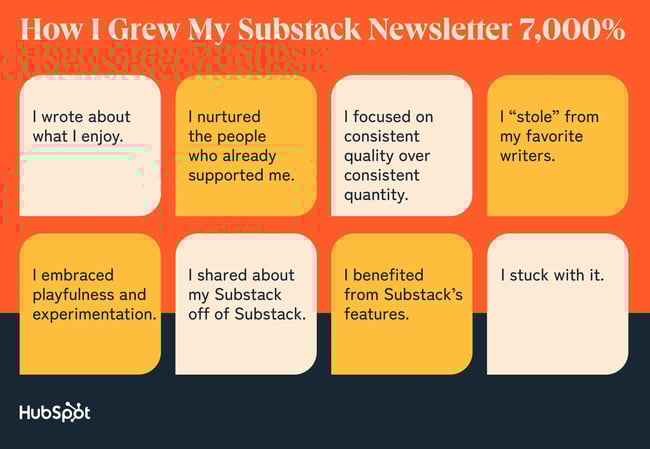
how i grew my substack newsletter

1. I wrote about what I enjoy.

The beauty of Substack is you can write about whatever you want, and there’s a good chance you’ll find people who actually want to read it.

When starting my Substack, I set out to write about things I love and the people and moments that have shaped me. This ensured that my writing would always be personal and always feel enjoyable because I’m writing about topics that I’m genuinely interested in, such as NBA basketball and healthy masculinity.

Consistency is much more attainable when writing and publishing feel like less of a burden. I get excited to return to the page because I’m following my curiosities—and what I often find on the other side of this pursuit are people who love the same things and feel seen, as well as people who aren’t as familiar with the topic but gain a newfound appreciation for it.

Ana Calin, whose How We Grow newsletter has hundreds of paid subscribers, encourages creators to “write the newsletter you would want to read—not the one you think will ‘perform.’” She adds, “Readers can tell when you’re being authentic, and they’ll stick around for your voice—not some polished version of what you think they want.”

While Substack lets you label your newsletter under 1-2 categories to help readers find your publication, you don’t have to corner yourself into a specific niche in order to grow. Sharing your interests can pave the way for connection and consistency.

2. I nurtured the people who already supported me.

Substack makes your writing accessible for people who want to read it.

Before joining Substack, sharing my work on Instagram, LinkedIn, and X felt like the only way for people to learn that I published something new. Friends would tell me they missed something I wrote because the algorithm didn’t serve my posts to them.

I chose to join Substack and start publishing a newsletter because I wanted the people who enjoyed reading my work to receive it directly in their inbox. While I still post about my publication on social media, email is my newsletter’s top traffic driver by far, generating 186% more views than the Substack app (which is my next closest).

By inviting readers to opt into an easier way to read my work, I started my Substack journey with over 100 subscribers within the first week. That’s more than 100 people who could share my newsletter and invite others to subscribe and begin sharing.

If you already have an audience but are having trouble reaching them online, consider starting a newsletter.

As noted by Seth Werkheiser, who writes his Social Media Escape Club newsletter to more than 6,000 subscribers, “Direct access to your audience is so important, and very much worth the time and energy.”

Social media algorithms are unreliable. Through Substack, you can take ownership of your email list and speak directly to your audience while making it easier for your long-time supporters to continue supporting.

3. I focused on consistent quality over consistent quantity.

Just because your favorite Substack writer posts every day doesn’t mean you need to.

What I began to observe, prior to joining Substack, is that I averaged two new essays per month. These weren’t just throwaway ideas; they were well-researched, thoughtful, long-form pieces that came as a result of reading, living, listening, and wrestling.

Once I started my newsletter, I launched a content recommendation series, Take It or Leave It, to fill in the gaps between essays. These started as weekly drops, but I shifted the cadence to monthly at the beginning of this year as I learned how challenging it was to maintain a weekly rhythm—especially since writing isn’t my full-time job.

Also, I knew my biggest metric for success was making work I’m proud of, and that takes time. Work I’m proud of is work I’m comfortable with returning to and want to share even after its publish date. This is work I believe readers can come to at any point and still find value in.

Consistency, in terms of how much you post, is often discussed as being tied to growth. But Sarah Fay, whose Substack Writers at Work newsletter has over 36,000 subscribers, says, “Substack’s algorithm doesn’t favor frequency.”

Fay adds, “Engagement is what matters.”

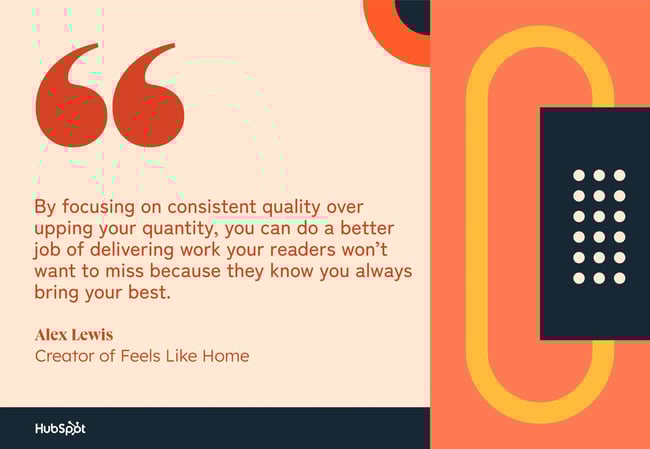
Posting more may get your newsletter in front of people more often, but it can also make your work harder to keep up with or even bombard readers’ already jam-packed inboxes. By focusing on consistent quality over upping your quantity, you can do a better job of delivering work your readers won’t want to miss because they know you always bring your best.

by focusing on consistent quality over upping your quantity, you can do a better job of delivering work your readers wont want to miss

4. I “stole” from my favorite writers.

Your fellow Substack writers are the best blueprint for getting started.

I began my Substack journey on a whim. After months of putting off starting a newsletter, I finally decided to jump all in. Not knowing where to begin, I looked at publications from Substack writers I already followed, such as Hunter Harris and Emily Sundberg.

By looking at their newsletters, I gained a better understanding of how I wanted to structure my About page, as well as what to include in the header and footer of my emails. While I made the words my own, they helped me learn what’s possible with my publication.

Austin Kleon, whose self-titled Substack has 297,000 subscribers, authored the book, Steal Like An Artist. Within the guide, Kleon quotes fashion designer Yohji Yamamoto: “Start copying what you love. Copy copy copy copy. At the end of the copy you will find your self.”

Your best path forward isn’t plagiarism; it’s learning from the writers and creators you admire. It’s letting the best of what they do inspire you to make the best work you can.

A few of my favorite Substackers are:

5. I embraced playfulness and experimentation.

There’s no one way to show up on Substack.

Since starting my newsletter, I’ve tried different types of posts outside of long-form essays and content recommendations. I’ve interviewed artists I admire, such as Louisville rapper Horace Gaither and senior social media manager Jenn Crim. I’ve written love letters with my best friends and collaborated on conversation series with other writers.

For the sake of self-care and creative freedom, I resist rules and restrictions when it comes to Substack. I treat my newsletter as a playground instead of a prison. I set the guidelines for my creativity. And just like my own little playground, I can pick and choose what I want to play with, as well as how long I want to play with it.

Robert Monson, whose Musings From A Broken Heart newsletter has more than 7,000 subscribers, gives himself “permission to play and not appear perfect on Substack.” Supporters of his work, including myself, resonate with Robert’s openness and tag along for the ride wherever he chooses to go.

Try stuff. Follow your curiosities and see where they might take you. Mike Sowden of the Everything is Amazing newsletter said his first year on Substack was “just experimenting with everything.”

He also noted, “I just didn’t want to write stuff that didn’t fill me with joy, curiosity, and wonder.”

Sowden now has over 31,000 subscribers. Even if your playfulness doesn’t lead to audience growth, it might lead to more joy—and that’s just as important.

for the sake of self care and creative freedom I resist rules and restructions when it comes to substack

6. I shared about my Substack off of Substack.

There’s a whole world outside of Substack that doesn’t know about your newsletter.

Before joining Substack, I wrote an essay about rapper Kid Cudi, which I’ve since re-published on my newsletter. Not thinking anything of it, I shared the essay on Twitter (now X) and tagged Cudi. Less than 10 minutes later, he retweeted the essay and introduced my writing to his millions of followers.

I carried that strategy over to Substack and now regularly promote my newsletter on social media. Some of my most popular pieces gained traction on platforms like X, Threads, and LinkedIn, which drove more traffic to my newsletter.

Andy Adams, who publishes FlakPhoto Digest to over 38,000 Substack subscribers, noted, “Instagram plays a significant role in my Substack workflow.” He added, “[Instagram] has been instrumental in growing the audience for my Substack newsletter. For me, they go hand in hand.”

You’re already on social media. Use it to get your Substack in front of more people. In some ways, it can even be an extension of your newsletter by inviting new readers to dive deeper into your work.

7. I benefited from Substacks’s features.

Substack is jam-packed with tools to help you grow your newsletter audience.

The Substack Network, including app features like Notes and Chat, has driven 86% of my newsletter subscribers. Because culture journalist Ayan Artan recommended my Substack using the platform’s Recommendation feature, I gained nearly 1,000 subscribers in one month at the start of this year.

I regularly connect with other writers and readers on Notes, which is similar to short-form content channels like X and Threads. Notes has also introduced me to new Substacks and kept me inspired. I’m a better artist and person because of the relationships I’ve been able to build on Substack.

Mario Gabriele of The Generalist says, “Substack isn’t just a place to publish or read – it’s an ecosystem for writers and creators to collaborate and contribute to one another’s growth.”

You don’t have to go elsewhere to grow. Your new readers are waiting for you on Substack.

Im a better artist and person because of the relationships Ive been able to build on substack

8. I stuck with it.

Substack growth could happen overnight, but it’s more likely to take time.

I’ve been on Substack for more than two and a half years, and it took over a year for me to reach my first 1,000 newsletter subscribers. Six months later, I gained nearly 1,000 subscribers in one month.

While each month looks different, my greatest achievement is that I’ve kept returning to the page. Writing has been a source of joy for me, and I’m thankful that I get to nurture that love through my newsletter.

Mika, who publishes the musings by mika newsletter, wrote about plateauing on Substack. “My secret sauce on Substack is enjoying the journey rather than fixating solely on the destination,” she shared.

Continuing on this topic, Mika wrote, “Showing up and honoring what you’re feeling called to write, embracing your authenticity, sparking real connections, and unleashing creativity is the real magic of Substack!”

Sometimes, the best thing for your growth may be setting the numbers aside and remembering what brought you to Substack in the first place. That will keep you going even if growth slows down.

Categories B2B

Condé Nast marketing leader shares her framework for destroying your imposter syndrome

When I spoke to this week’s master in marketing, I was surprised at how seamlessly she had combined her two professional loves, digital marketing and life coaching. I’ll admit to having been skeptical about life coaching in the past, but this conversation changed my mind. As a life coach, she developed a framework she calls the Three See’s — more on that below — that can help any marketer up their game.

Click Here to Subscribe to Masters in Marketing

Meet the Master

Sheena Hakimian

Senior director of digital consumer marketing at Condé Nast and certified life coach

Fun fact: Sheena’s journey to becoming a life coach began at her favorite NYC restaurant, Piccola Cucina, which led her to taking an eight-month certification course. “The best decision I ever made,” she says.

Lesson 1: Focus on what you can control.

“There’s just so much change,” Hakimian says, in what I would consider a gross understatement at the moment. “From the [shift in traffic patterns] to us not knowing exactly how AI is going to shape our jobs to things going on in the world.”

If you focus on all of that at once, it becomes clutter. (See: my brain.) And all these uncertainties just breed more anxiety. But “how do you build resilience to uncertainty?” Hakimian asks. “It’s by focusing on the things you can control.”

how do you build resiliency to uncertainty? it’s by focusing on the things you can control. —sheena hakimian, senior director of digital consumer marketing at condé nast and certified life coach

As a marketer, this might look like what your data is telling you, understanding your customer needs, or growing your email lists.

Condé Nast has a very diverse set of brands — Pitchfork, The New Yorker, and Vanity Fair are just a few — so Hakimian really took the time this year to “slice and dice. Really understanding different segments of your website and how they respond to different parts of your funnel.”

“We know we can’t have a one-size-fits-all strategy on our website anymore,” she says. So about that slicing and dicing: She did A/B testing within just the politics section of Vanity Fair. And she found that allowing readers one free article before gating the content — i.e., requiring a subscription — led to a 20% increase in subscriptions in their test panels.

Hakimian and her team have taken a lot of time over the last six months to do this testing thoughtfully — because what you do with the data is something that you can control.

Lesson 2: Make your boss’ life easier.

“What [is my boss] talking about that might not be on the KPI sheet?” Hakimian asks. It’s not a rhetorical question: You can’t solve business problems if you don’t know what they are. “The mindset is, I’m here to make my boss’ life easier.”

That doesn’t mean Hakimian doesn’t care about herself — “it just means that I’m aligning [with] the people who are responsible for my career.

i’m aligning [with] the people who are responsible for my career. what [is my boss] talking about that might not be on the kpi sheet? —sheena hakimian, senior director of digital consumer marketing at condé nast and certified life coach

She’s spent much of this year working on being a good communicator, even sharing her communication goal with her team and asking them to hold her accountable.

And that means being a good listener.

Wanna make an impact? “Actively listening — when you really listen,” Hakimian says, you’ll be able to ask better questions and find more clarity. Whether it’s a 1:1, a Zoom meeting, or even a company all-hands, Hakimian keeps her ears open for problems, complaints, or other bugbears.

“And then I can just shift my mindset — and solve for that.”

Lesson 3: Build a strong in-person brand.

As both a life coach and a digital marketer, Hakimian sees her own personal growth — particularly unlocking her self-confidence — as essential to her marketing career.

“A great tangible way to actively pursue building more self-confidence — and ultimately self-worth — is by building a strong in-person brand,” she tells me.

It’s not that your digital presence is less important — “we have to take control of how we’re perceived online,” she says — but Hakimian is “on a mission to remind people that how you’re perceived [in person] is important. Really important.”

So important, in fact, that Hakimian built a framework she calls the Three See’s: How you see yourself, how others see you, and how you see your future. She uses this proprietary framework in her life-coaching business to help other people build a strong, aligned personal brand.

But like any good marketer, Hakimian tested it out first — on herself.

“Getting super self-aware and honest with myself has released a lot of that imposter syndrome so that I could go in and take risks” in her job as a marketing leader at Condé Nast. And that, she says, will make you stand out.

Lingering Questions

This Week’s Question

Have you found AI making an impact on your work at Condé Nast? If so, has it been a net positive or net negative? In many ways, the proliferation of AI content is making creating quality content, especially educational content, more difficult so I’m always curious how this new technology is affecting other fields? Max Miller, Founder and host, Tasting History

This Week’s Answer

Hakimian says: From a marketing and subscription standpoint, we’re excited to explore how AI can help us deliver more dynamic, personalized experiences on our sites. That said, the human touch is still the heart of our strategy, especially when it comes to brand voice and creative direction.

The rise of AI-generated content has actually made high-quality, thoughtful content even more valuable. It’s easier than ever to pump out content, but much harder to build trust, credibility, and originality.

At Condé Nast, our unique edge is still our storytelling and editorial integrity. AI, to us, is a tool to scale our voices around that, not replace it. So overall, I’d say it can be a net positive when used with intention. But like anything, it depends on how thoughtfully it’s integrated.

Next Week’s Lingering Question

Hakimian asks: [Our next master in marketing has] built an incredible reputation for understanding Gen Z behavior and creating authentic, community-first content. In a world that’s constantly chasing virality, how do you balance consistency with creativity, and what advice would you give to brands trying to build genuine relationships over time, not just reach?

Click Here to Subscribe to Masters in Marketing

Categories B2B

4 best pharma CRMs in 2025

Managing relationships across healthcare professionals (HCPs), healthcare organizations (HCOs), and complex regulatory requirements makes choosing the right CRM critical for pharmaceutical companies. Whether you’re tracking drug samples, coordinating clinical trials, or ensuring compliance, pharmaceutical companies benefit from CRM systems with features that support their specialized workflows.

Learn more about why HubSpot's CRM platform has all the tools you need to grow  better.

This guide examines four leading CRM solutions that help pharmaceutical businesses streamline operations and build stronger relationships with healthcare stakeholders. We‘ll compare essential features like regulatory compliance tracking, sample management, HCP engagement tools, and multichannel capabilities. You’ll discover how each platform addresses industry-specific needs, from pricing structures to integration capabilities.

Wondering what a pharma CRM can do for you? Healthcare company Fatebenefratelli generated over 350,000 sessions and 4,000 leads in a year using HubSpot Smart CRM.

AI tools generated the initial draft of this article. All content has been thoroughly reviewed, fact-checked, and revised by a HubSpot staff writer to ensure accuracy and quality.

Table of Contents

What is a CRM for pharmaceutical companies?

A pharmaceutical CRM is a customer relationship management software designed to manage the complex relationships between pharma companies and their stakeholders, including healthcare professionals, healthcare organizations, patients, and medical science liaisons. While some platforms like Veeva are built specifically for pharmaceuticals, others like HubSpot provide flexible CRM foundations that healthcare companies can configure for their pharmaceutical operations.

Best CRMs for Pharmaceutical Companies at a Glance

CRM

Best For

Key Features

Pricing

Free Trial Available

HubSpot

Growing pharmaceutical companies seeking an all-in-one platform that scales from startup to enterprise

Contact and activity management, advanced marketing campaign tools, communication and workflow features

Free CRM. Paid plans start at $15/seat/month. To store sensitive information and enable HIPAA-supporting features, you need the Enterprise plan for its products, which starts from $150/month/seat for Sales and Service Hubs.

Free plans available

Creatio

Mid-size pharmaceutical companies wanting a platform with pharma-specific features and no-code customization

Field force features, compliance features, Copilot AI assistant

Starts at $25/user/month

14-day free trial

Salesforce Life Sciences Cloud

Enterprise pharmaceutical organizations requiring a platform with life sciences-specific features

HCP engagement features, clinical trial participant management, patient services features

Starts at $325/user/month

30-day free trial

Veeva CRM

Large pharmaceutical companies seeking a CRM and suite of software purpose-built for the life sciences industry

Compliance features, mobile and offline support, AI features

Contact for pricing

No free trial

Best CRM Software for Pharmaceutical Businesses

1. HubSpot

pharma crm: hubspot

Source

Best for: Growing pharmaceutical companies seeking an all-in-one platform that scales from startup to enterprise

Key HubSpot Features

  • Contact and activity management: HubSpot’s CRM provides contact management, email tracking, and meeting scheduling features. The platform enables companies to track interactions across multiple touchpoints with activity logging and user attribution. Teams can set up custom properties and workflows to match their specific needs.
  • Advanced marketing campaign tools: HubSpot’s marketing features include email marketing, landing pages, and forms. Users can create marketing campaigns and segment contacts using lists. The platform offers marketing automation workflows that can be customized for different use cases.
  • Communication and workflow features: For managing communications, HubSpot offers email templates, workflow automation, and custom forms.

HubSpot Pricing

  • HubSpot’s CRM is free. In addition, it offers free plans for all six core products (marketing, sales, service, content, operations, and commerce).
  • Each core product has a free, Starter, Professional, and Enterprise plan. Paid plans start at $15/seat/month and go up to $3,600/month for the Marketing Hub Enterprise plan (which includes five core seats).
  • Please note that if you’re seeking HIPAA compliance, you must purchase the Enterprise plan to get HIPAA-related security features. The Enterprise Customer Platform bundle (which includes Enterprise access to HubSpot’s marketing, sales, customer service, content, and operations software) starts at $4,700/month and includes seven seats.
  • HubSpot pricing depends on your specific needs and add-ons. Use this HubSpot pricing calculator to see your custom price.

2. Creatio

pharma crm: creatio

Source

Best for: Mid-size pharmaceutical companies wanting a platform with pharma-specific features and no-code customization

Key Creatio Features

  • Field force features: This CRM offers field management software that enables you to set up rep visit schedules, optimize routes between meeting locations, log employee activities during each visit, and create rules and actions for the HCPs and HCOs your reps work with.
  • Compliance features: This CRM has safety information management, privacy management, legal case management, and internal audit features.
  • Copilot (Creatio AI assistant): Get recommendations and insights powered by AI.

Creatio Pricing

Creatio has modular pricing that allows you to build a solution based on the products and features you need. You can add on sales, marketing, or service products, plus AI tokens, additional user types, and support plans. There is a minimum purchase of $10,000/year for new customers.

The platform plans are as follows:

  • Growth: $25/user/month
  • Enterprise: $55/user/month
  • Unlimited: $85/user/month
  • 14-day free trial of Creatio CRM available

3. Salesforce Life Sciences Cloud

pharma crm: salesforce

Source

Best for: Enterprise pharmaceutical organizations requiring a platform with life sciences-specific features

Key Salesforce Life Sciences Cloud Features

  • HCP engagement features: Offer providers a personalized online portal with AI-powered agents and content relevant to their prescriber activity.
  • Clinical trial participant management: Screen candidates, onboard participants, and access reporting dashboards.
  • Patient services features: Help patients verify pharmacy benefits, access financial assistance, and report outcomes.

Salesforce Life Sciences Cloud Pricing

Salesforce Life Sciences Cloud pricing is as follows:

  • Life Sciences Cloud Enterprise: $325/user/month
  • Life Sciences Cloud Unlimited: $500/user/month
  • Life Sciences Cloud Agentforce 1 for Service: $750/user/month
  • Life Sciences Cloud Agentforce 1 for Sales: $750/user/month
  • 30-day free trial of Life Sciences Cloud available

4. Veeva CRM

pharma crm: veeva crm

Source

Best for: Large pharmaceutical companies seeking a CRM and a suite of software, all purpose-built for the life sciences industry

Key Veeva Features

  • Compliance features: Admins can define restricted phrases, which will prevent these phrases from being sent in the Engage tab chat in the CRM. In late 2025, this CRM plans to release “compliant free text,” which will use AI to automatically check free text and flag entries that present a risk to compliance.
  • Mobile and offline support: Give your field team the tools they need with this CRM’s offline capabilities on mobile devices.
  • AI features: Use Voice Control to record and transcribe voice notes after HCP visits (planned release in late 2025).

Veeva Pricing

Contact Veeva for pricing. No free trial.

Benefits of CRM Software for Pharmaceutical Companies

Improved communications: CRM platforms enable teams to track interaction history and preferences to deliver more relevant communications. DocPlanner, a healthcare marketplace, uses HubSpot to enter new markets quickly by cloning and translating templates, cutting time and ensuring cohesive messaging.

Unified data management: CRM platforms centralize all customer data in one accessible system, breaking down silos between departments. HubSpot’s unified customer platform spans sales, marketing, customer service, operations, and commerce.

Streamlined operations: CRM systems centralize data management and provide workflow automation capabilities. Teams can use these platforms to manage various processes from marketing campaigns to field activities, though specific features depend on the chosen platform and configuration. Emergency medical information service MedicAlert Foundation Canada replaced its disconnected systems with HubSpot, achieving implementation costs that were “10X less than Salesforce,” according to MedicAlert’s CEO.

Data analytics and reporting: CRM platforms provide reporting and analytics features to help teams track performance and make informed decisions. Most platforms offer dashboards and custom reporting options, though the depth of analytics varies by solution. Cancer software platform CancerIQ uses HubSpot’s Dashboard & Reporting Software add-on to enable better data-driven business decisions.

5 Important Features for a Pharmaceutical CRM

  1. Contact and interaction tracking: Essential for pharmaceutical companies to maintain comprehensive records of all HCP engagements. Look for platforms that offer detailed activity logging, custom properties for tracking interaction types, and easy reporting capabilities. While it isn’t tailored to pharma compliance needs out of the box, HubSpot’s flexibility allows for configuration to approximate key pharma use cases.
  2. Marketing automation capabilities: Pharmaceutical companies need tools to create targeted campaigns for different HCP segments and therapeutic areas. HubSpot’s marketing automation helped Mesa Labs, a medical safety company, connect with specialized audiences using precise targeting informed by its CRM data, improving its ability to reach the right audience.
  3. Multichannel engagement tools: Modern pharmaceutical sales require coordinating interactions across in-person visits, virtual meetings, email, and digital channels. HubSpot offers tools for email, social media, and content management, allowing you to personalize your outreach across many channels.
  4. Integrations: Pharmaceutical companies often need to connect their CRM with other systems for a complete view of operations. HubSpot has over 1,900 apps, a network of solutions partners for custom integrations, plus plentiful API documentation for DIY integrations.
  5. Scalability and ease of use: As pharmaceutical companies grow, their CRM needs to scale without requiring complex migrations or extensive technical resources. CancerIQ was able to set up its sales process on HubSpot without needing a CRM engineer, highlighting how user-friendly and intuitive the platform is.

How to Choose a CRM for Pharmaceutical Companies (Step-by-Step)

Step 1: Map your workflows. Document current processes for HCP engagement, sample management, medical inquiries, and compliance reporting. Identify pain points where manual work slows teams down or creates compliance risks. Include input from sales, medical affairs, marketing, and regulatory teams.

Step 2: Identify must-have features. Based on your workflow analysis, prioritize features that address your biggest challenges. Consider regulatory requirements in your markets, integration needs with existing systems, and mobile capabilities for field teams. Distinguish between immediate needs and future requirements.

Step 3: Evaluate user experience and support. Request demos and trials to test actual functionality with your team. Check vendor support options and whether they have pharmaceutical industry expertise.

Step 4: Check cost at scale. Look beyond initial licensing to understand total cost of ownership. Factor in implementation, training, ongoing support, and integration costs.

Step 5: Select a platform that meets your needs. Choose a CRM based on your specific requirements and budget. Look for one that is flexible enough to be configured based on your unique needs. 258,000+ customers across various industries in over 135 countries use HubSpot to grow their businesses.

Frequently Asked Questions

What is the best CRM for pharmaceutical companies?

The best CRM depends on your company’s specific needs, size, and budget. HubSpot offers a strong option for growing pharmaceutical companies with its flexible platform and scalable features.

What features should I look for in a CRM for pharmaceutical companies?

Look for CRM features such as contact and interaction tracking, marketing automation, and multichannel engagement tools. Additionally, consider mobile access for field teams and integration capabilities with existing systems. Remember that many advanced features may require configuration or additional modules.

Is HubSpot good for pharmaceutical companies?

HubSpot provides a strong foundation for pharmaceutical companies with its healthcare-focused features. It has features that support HIPAA compliance. Pharma companies can configure this flexible, reliable platform to fit their needs and access powerful marketing and sales tools.

How much does a CRM for pharmaceutical companies cost?

CRM costs for pharmaceutical companies vary significantly. HubSpot offers a free CRM, but please note that HIPAA-related features are available only on Enterprise plans. To bundle all of HubSpot’s tools at the Enterprise plan level (marketing, sales, service, content, operations, and commerce), you can get the Enterprise Customer Platform for $4,700/month, which includes seven seats. When evaluating costs, consider implementation, training, and any required add-on modules for pharmaceutical-specific features.

Meet HubSpot, the Top CRM Choice for Pharmaceutical Companies

HubSpot provides a scalable CRM platform that pharmaceutical companies can customize for their needs. The platform combines core CRM functionality with marketing and sales tools that teams can configure for pharmaceutical use cases.

  • Unified platform approach: HubSpot’s CRM provides contact management and deal tracking that pharmaceutical teams can adapt to their needs.
  • Marketing excellence for healthcare: Create targeted campaigns using HubSpot’s marketing features, including email, landing pages, and workflows.
  • AI-powered CRM: HubSpot’s Breeze AI is integrated into the platform, allowing you to use AI to automate customer support replies, analyze marketing campaign performance, and craft content targeting your ideal audience.

Healthcare company Santagostino grew its customer base from 90,000 to 830,000 contacts using HubSpot’s CRM and marketing tools. Mesa Labs increased conversion rates by 20% by implementing HubSpot’s Google Ads integration.

Ready to explore how HubSpot can support your pharmaceutical operations? Get started with HubSpot’s free CRM.

Disclaimer: This blog post is not legal advice for your company to use. Instead, it provides background information to help you better understand pharma CRMs and compliance. This legal information is not the same as legal advice, where an attorney applies the law to your specific circumstances, so we insist that you consult an attorney if you’d like advice on your interpretation of this information or its accuracy.

In a nutshell, you may not rely on this as legal advice, or as a recommendation of any particular legal understanding.

Categories B2B

5 best healthcare CRM software in 2025

There‘s more to healthcare than the visit itself. Whether you’re a doctor’s office, dental practice, or senior living facility, you know that consistent, personalized communication is key to meeting patients’ changing health needs. In fact, it’s what patients prefer. Research by global healthcare company Abbott found that 72% of patients want more personalized care.

But keeping patients’ protected health information safe is a requirement, not just a nice-to-have. A good healthcare CRM will protect sensitive information and help you use it to power more personalized communications and stronger relationships with your customers.

Learn more about why HubSpot's CRM platform has all the tools you need to grow  better.

Healthcare company Santagostino used HubSpot Smart CRM to send personalized pediatric communications to parents based on patient segments. This shows the power of combining CRM data with marketing tools in one platform.

Below, we’ve put together a list of healthcare CRM software with features that support HIPAA compliance. We’ll go over the features, pricing, and comparisons of different CRMs to help you choose the right one for your business. We used generative AI tools to enhance research and drafting, and a HubSpot staff writer fact-checked and reviewed this article before publication. 

Table of Contents

What is a CRM for healthcare?

While an EHR stores the full digital chart and medical records of your patient, a healthcare CRM complements an EHR by storing only the limited, relevant patient data that your marketing, sales, and service teams need to create a cohesive patient experience.

This data might include a patient’s needs or interests so marketing can send condition-specific campaigns or a patient’s chosen communication preferences, such as receiving calls only in the evenings. And of course, it is critical to maintain HIPAA compliance, which is a shared responsibility between the CRM software provider and the customer.

Best CRMs for Healthcare at a Glance

CRM

BEST FOR

KEY FEATURES

PRICING

FREE TRIAL AVAILABLE

HubSpot

Healthcare businesses seeking an all-in-one customer platform built for HIPAA compliance

Features that support HIPAA compliance, unified customer platform, advanced marketing automation

HubSpot’s CRM is always free and includes free tiers for all six core products. Paid plans start at $15/seat/month. To store sensitive information and enable HIPAA-supporting features, you need the Enterprise plan for its products, which starts from $150/month/seat for Sales and Service Hubs.

Free plans

Epic Cheers

Providers seeking a healthcare CRM that’s seamlessly integrated with the Epic EHR ecosystem

Natively integrated with Epic’s EHR, helps patients find new doctors, streamlines call center operations

Contact for pricing

No

Salesforce Health Cloud

Enterprise healthcare organizations seeking an out-of-the-box healthcare CRM solution

Features that support HIPAA compliance, access to MuleSoft integration platform, powered by Agentforce AI

From $325/user/month

Yes, 30-day free trial

Zoho

Healthcare businesses seeking an affordable CRM with built-in scheduling

Features that support HIPAA compliance, built-in appointment scheduling, EHR integrations

From $14/user/month

Yes, 15-day free trial

LeadSquared

Healthcare businesses wanting to manage the full patient journey in one CRM

Features that support HIPAA compliance, automated personalized patient outreach, EHR integrations

From $60/user/month

Yes, free trial available

Best CRM Software for Healthcare Businesses

Choosing the best healthcare CRM for your business requires knowing the unique advantages of the top platforms. We’ve evaluated the following popular healthcare CRMs based on their HIPAA-related features, sales and marketing automations, and ability to provide a more personalized patient experience.

1. HubSpot

Healthcare CRM software: HubSpot

Source

Best for: Healthcare businesses seeking an all-in-one customer platform built for HIPAA compliance

Key HubSpot Features

  • Features that support HIPAA compliance: In June 2024, HubSpot released features for HIPAA support. Enterprise-level subscribers to HubSpot can now configure the customer platform to support HIPAA compliance by turning on Sensitive Data settings and accepting HubSpot’s Business Associate Agreement (BAA). HubSpot also provides comprehensive audit logging, inactive session timeout, and other security features.
  • Unified customer platform: Say goodbye to disjointed tech tools. HubSpot is a unified customer platform with connected sales, marketing, service, and operations tools all powered by the CRM data. CancerIQ streamlined its sales and marketing by combining them into HubSpot’s single platform.
  • Advanced marketing automation: With Marketing Hub, build visual workflows to automate tasks such as appointment reminders and follow-ups. You can also build custom email campaigns that are triggered by certain patient behaviors or milestones.

HubSpot Pricing

  • HubSpot’s CRM is always free, and it offers free plans for all six core products (marketing, sales, service, content, operations, and commerce).
  • Each core product has a free, Starter, Professional, and Enterprise plan. Paid plans start at $15/seat/month and go up to $3,600/month for the Marketing Hub Enterprise plan (which includes five core seats).
  • Please note that if you’re seeking HIPAA compliance, you must purchase the Enterprise plan to get HIPAA-related security features. The Enterprise Customer Platform bundle (which includes Enterprise access to HubSpot’s marketing, sales, customer service, content, and operations software) starts at $4,700/month and includes seven seats.
  • HubSpot pricing depends on your specific needs and add-ons. Use this HubSpot pricing calculator to see your custom price.

2. Epic Cheers

Healthcare CRM software: Epic Cheers

Source

Best for: Providers seeking a healthcare CRM that’s seamlessly integrated with the Epic EHR ecosystem

Key Epic Cheers Features

  • Natively integrated with Epic’s EHR: This CRM is a part of Epic’s ecosystem, which includes MyChart, a popular patient portal that already supports HIPAA compliance. Providers already using MyChart can implement this CRM and conveniently connect to their patients’ health records and portal.
  • Helps patients find new doctors: The Provider Finder feature ensures you can connect your patients to a new PCP, provide correct addresses for their upcoming appointments, and see which doctors are currently accepting new patients.
  • Streamlines call center operations: The Call Management module helps call center agents see past interactions with patients and provide more personalized information. It also ensures calls are routed to the best department.

Epic Cheers Pricing

  • Epic does not list pricing for Cheers CRM on its website. Contact Epic for pricing. No free trial available.

3. Salesforce Health Cloud

Healthcare CRM software: Salesforce Health Cloud

Source

Best for: Enterprise healthcare organizations seeking an out-of-the-box healthcare CRM solution

Key Salesforce Health Cloud Features

  • Features that support HIPAA compliance: Health Cloud is designed to support HIPAA compliance. Customers can contact their account representative to find out more about obtaining a Business Associate Addendum (BAA).
  • Access to MuleSoft integration platform: Health Cloud customers can purchase MuleSoft Accelerator for Healthcare, which contains prebuilt APIs to help customers integrate with popular EHR systems, including Epic.
  • Powered by Agentforce AI: With the Agentforce add-on, customers can unlock AI agents to provide 24/7 support to patients. For example, Agentforce can answer common questions, suggest services based on patient needs, and build quotes.

Salesforce Health Cloud Pricing

Below are the different tiers of Salesforce Health Cloud pricing, all billed annually.

  • Health Cloud Enterprise: $325/user/month
  • Health Cloud Unlimited: $500/user/month
  • Health Cloud Agentforce 1 for Service: $750/user/month
  • Health Cloud Agentforce 1 for Sales: $750/user/month
  • 30-day Health Cloud trial available

4. Zoho

Healthcare CRM software: Zoho

Source

Best for: Healthcare businesses seeking an affordable CRM with built-in scheduling

Key Zoho CRM Features

  • Features that support HIPAA compliance: This CRM has features to help you ensure HIPAA compliance, including audit logs to monitor access and modifications to customer records, ePHI encryption that you can turn on by selecting fields with protected health information, and the ability to enable HIPAA compliance settings.
  • Built-in appointment scheduling: Access a unified scheduling system to book in-person and virtual appointments that sync with calendar apps like Google Calendar. You can also send automatic reminders to patients to reduce the chances of no-shows.
  • EHR integrations: This CRM has a native integration with Charm EHR, but it doesn’t have out-of-the-box integrations for major EHRs such as Epic or Cerner. For that, you’d need custom middleware or access to its APIs to build your own integration.

Zoho CRM Pricing

Below are the different pricing tiers of Zoho CRM, based on annual billing.

  • Standard: $14/user/month
  • Professional: $23/user/month
  • Enterprise: $40/user/month
  • Ultimate: $52/user/month
  • 15-day Zoho CRM free trial available

5. LeadSquared

Healthcare CRM software: LeadSquared

Source

Best for: Healthcare businesses wanting to manage the full patient journey in one CRM

Key LeadSquared Features

  • Features that support HIPAA compliance: This CRM can be used in compliance with HIPAA and has many security features, including audit logs for each remote user session, and data centers that are ISO 27001, SSAE-16, and HIPAA compliant. It also has a BAA.
  • Automated personalized patient outreach: Send automated appointment confirmations to reduce no-shows.
  • EHR integrations: Access ready integrations to connect to EHR systems like Epic, AthenaHealth, DrChrono, and more.

LeadSquared Pricing

Below are the plans for LeadSquared’s healthcare CRM pricing:

  • Sales Pro: $60/user/month
  • Sales Super: $100/user/month
  • Free trial available

Benefits of CRM Software for Healthcare

  • Increase patient support and satisfaction. A healthcare CRM with in-depth reporting can increase your understanding of customer behavior and needs, empowering your customer service team to provide better support. Mental health startup Mindgram enhanced customer satisfaction after integrating HubSpot help desk features within its platform.
  • Grow your practice by attracting new patients. A healthcare CRM with built-in marketing tools helps you create targeted content that attracts the right patients to your practice. DocPlanner, a marketplace for patients seeking doctors, used HubSpot’s Marketing Hub’s smart content to display different versions of content based on user segments to drive its international growth.
  • Improve your healthcare business’ operational efficiency. When you finally have access to all your customer data, it’s incredible the time savings you’ll see. Sales reps will no longer waste time chasing the wrong leads; customer service agents will no longer field repetitive common questions; and your marketing team will no longer wonder which campaigns are driving the most ROI. MedicAlert saw “astronomical” efficiency gains after replacing its disconnected systems with HubSpot’s unified customer platform.
  • Scale your healthcare business without adding unnecessary complexity. With the right healthcare CRM, you won’t overburden your IT team with complicated, cumbersome systems. CancerIQ was able to quickly onboard new sales team members without the help of a CRM engineer by using HubSpot’s intuitive CRM platform.

4 Important Features for a Healthcare CRM

  1. Security features to support HIPAA compliance: Configuring your CRM for HIPAA compliance is essential. HubSpot Enterprise users can enable the Sensitive Data setting and indicate their status as a HIPAA-covered entity or business associate to accept the terms of HubSpot’s Business Associate Agreement (BAA).
  2. Integrations with EHR and other existing software: Check what kind of integrations your healthcare CRM can offer and whether they’re native integrations that can be enabled in one click or custom integrations that take more time and resources. HubSpot offers more than 1,900 apps in its App Marketplace, HubSpot solutions partners for custom-built integrations, and developer-friendly API documentation for DIY integrations.
  3. Mobile access: Your staff aren’t always at a computer. That’s why your healthcare CRM needs to have a mobile app that provides your staff with easy access wherever they are. HubSpot’s mobile app lets you report customer issues, open support tickets, create social media posts, and message your patients from the convenience of a smartphone.
  4. Analytics and reporting: Get data-driven insights into the health of your practice with your CRM. MedicAlert uses HubSpot’s custom reports and dashboards to track KPIs for finance, marketing, sales, and service. CancerIQ uses HubSpot’s Dashboard & Reporting Software add-on to measure sales activity, helping the business make better decisions.

How to Choose a CRM for Healthcare (Step-by-Step)

Step 1: Map your workflows. From patient onboarding to appointment management to email marketing campaigns, map out the current workflows in your practice. These will inform the areas that a healthcare CRM could replace or enhance.

Step 2: Identify must-have features. Based on the workflows you identified, look for a healthcare CRM that can handle the crucial ones. For example, if you want to automate your appointment management and reminders, look for a healthcare CRM with built-in booking and appointment reminders.

Step 3: Compare ease of use and team fit. Assemble a decision-making team consisting of one representative from each department that will use your new healthcare CRM. Sign up for demos or free trials for each healthcare CRM you’re considering, and have the decision-making team evaluate the options.

Step 4: Check cost at scale. When checking the pricing of each health CRM solution, consider the cost per seat, implementation fees, and the cost of building any custom integrations. It’s also worth noting that the features that enable HIPAA compliance are often available only on the higher-priced tiers.

Step 5: Verify HIPAA compliance details. Ensure that the CRM, and the features you need to enable with it, can be used in a HIPAA-compliant way. Review the BAA and ask lots of questions to verify what sensitive information you can store in it and remain in compliance with HIPAA.

Step 6: Choose a CRM that’s easy to use and flexible. The right healthcare CRM won’t be an IT nightmare to implement. CancerIQ used HubSpot to scale its sales team remotely without needing a CRM engineer, demonstrating just how intuitive and flexible the customer platform is.

Frequently Asked Questions

What is the best CRM for healthcare?

The best healthcare CRM will meet the unique needs of your business, specifically the need for HIPAA compliance. As of June 2024, HubSpot Smart CRM has features for HIPAA support for subscribers to its Enterprise plan, including the ability to enable Sensitive Data settings, get a BAA, and access comprehensive audit logs — making HubSpot a fantastic option for healthcare businesses needing a CRM with powerful marketing and sales tools.

What features should I look for in a healthcare CRM?

Look for features that support HIPAA compliance, robust security measures, appointment reminders, workflow automation, integrations with EHR and other healthcare software, analytics and reporting, and mobile access.

Is HubSpot good for healthcare?

Yes, especially with HIPAA support available on its Enterprise plan, HubSpot is a good CRM option for healthcare. It’s already used by healthcare businesses including CancerIQ, Mesa Labs, and DocPlanner.

Is HubSpot HIPAA compliant?

It can be, with an important note: Like most CRMs, HubSpot is not HIPAA compliant “out of the box;” it must be properly configured and operated by the customer to ensure compliance. The features that can support HIPAA compliance can only be activated on HubSpot Enterprise accounts. Also, be sure to read the full HubSpot Sensitive Data Terms to see the covered services.

Will HubSpot sign a BAA?

To enter into a BAA with HubSpot, you must have an Enterprise account and enable Sensitive Data settings, then check the Health/Medical Data checkbox and the checkbox that says We are a HIPAA-covered entity or business associate.

How much does a CRM for healthcare cost?

The cost of a healthcare CRM varies depending on team size, the features you need access to, and the software itself. HubSpot’s CRM is free forever, but to access HIPAA-related features, you’ll need an Enterprise plan. HubSpot has six core products, so calculate your pricing here based on which products you’d like. For access to its entire customer platform at the Enterprise level, the investment starts at $4,700/month for seven seats for access to all of its marketing, sales, service, content, operations, and commerce features.

Meet HubSpot, the Top CRM Choice for Healthcare Companies

HubSpot Smart CRM is an all-in-one customer platform that unifies data across all of your teams, powering a more personalized and streamlined patient experience.

  • Security features to support HIPAA compliance: A properly configured HubSpot Enterprise account enables you to securely store sensitive information, get a BAA, access audit logs, and more.
  • Unified sales, marketing, service, operations, and commerce tools: Finally have a single source of truth with a CRM that’s connected to must-have tools.
  • AI-powered CRM: HubSpot’s Breeze AI is integrated into the platform, allowing you to use AI to automate customer support replies, analyze marketing campaign performance, and craft content targeting your ideal audience.

Surgical simulator company VirtaMed switched from disparate point solutions to HubSpot’s all-in-one platform and increased website traffic by 39%. Healthcare company Mesa Labs used HubSpot’s Google Ads integration to boost conversion rates by 20%.

Ready to see why healthcare companies choose HubSpot Smart CRM? Try HubSpot today.

Disclaimer: This blog post is not legal advice for your company to use. Instead, it provides background information to help you better understand healthcare CRMs and HIPAA. This legal information is not the same as legal advice, where an attorney applies the law to your specific circumstances, so we insist that you consult an attorney if you’d like advice on your interpretation of this information or its accuracy.

In a nutshell, you may not rely on this as legal advice, or as a recommendation of any particular legal understanding.

Categories B2B

4 best CRMs for wholesalers in 2025

Spreadsheets and manual processes can hold back your wholesale business from growing. As wholesalers face increasing pressures to deliver faster, maintain accurate inventory visibility, and provide exceptional customer service, the right CRM becomes essential for success.

A CRM helps wholesalers streamline operations, from managing volume-based pricing to tracking shipments across multiple channels. That‘s why we’ve compiled this list of the best CRM software for wholesalers, complete with feature breakdowns, pricing comparisons, and implementation guidance.

Learn more about why HubSpot's CRM platform has all the tools you need to grow  better.

Below, we’ll explore solutions including HubSpot, Pepperi, Prospect CRM, and Zoho. Unipart, a global provider of supply chain solutions, grew its pipeline from millions to billions in just 12 months using HubSpot.

To quickly bring you this comprehensive guide, we used AI tools for research and drafting. All content has been thoroughly reviewed, fact-checked, and revised by a HubSpot staff writer to ensure accuracy and completeness.

Read on to discover which CRM will transform your wholesale operations.

Table of Contents

What is a CRM for Wholesalers?

A CRM for wholesalers is a specialized customer relationship management system designed to handle the unique complexities of wholesale distribution. Wholesale-focused systems can integrate with inventory management, handle bulk pricing structures, manage distributor networks, and track orders from purchase to delivery — all while maintaining detailed customer histories and facilitating B2B communications.

HubSpot’s CRM platform serves wholesalers by providing customizable properties, automation for order workflows, and unified data across sales, marketing, and service teams to manage complex B2B relationships at scale.

Best CRMs for Wholesalers at a Glance

CRM

Best For

Key Features

Pricing

Free Trial Available

HubSpot

Wholesalers wanting an all-in-one platform that unifies sales, marketing, and service with powerful automation

Unified customer view, marketing automation, AI-powered features

Free CRM; paid plans start at $15/seat/month

Free plans

Pepperi

Brands and wholesale distributors needing unified B2B commerce across all channels

Self-service buying portal, sales rep order taking, route accounting & DSD

Starts at $500/month

No free trial

Prospect CRM

Wholesalers needing stock-aware CRM with real-time inventory visibility

Stock-aware CRM technology, RFM customer segmentation, cross-selling Magic Matrix

Starts at $210

14-day free trial

Zoho CRM

Small to mid-sized wholesalers seeking affordable, feature-rich solutions

Process management (Blueprint), Zia AI agents, lead nurturing

Starts at $20/user/month

Free trial available

Best CRM Software for Wholesalers

The right CRM can change constant bottlenecks into smooth operations. Let’s examine four leading solutions that excel at managing wholesale complexities.

1. HubSpot

best crm for wholesalers: hubspot

Source

Best for: Wholesalers wanting an all-in-one platform that unifies sales, marketing, and service with powerful automation

Key HubSpot Features

  • Unified customer view: HubSpot’s Smart CRM creates unified customer profile to give you the ultimate visibility into interactions. It offers custom properties that allow businesses to configure the customer platform to suit wholesaler needs.
  • Marketing automation: HubSpot’s Marketing Hub includes workflow automation capabilities that can trigger actions based on various criteria. The platform supports email marketing and campaign management.
  • AI-powered features: HubSpot’s AI tools include features for content generation, predictive lead scoring, and automation assistance across the platform.

HubSpot Pricing

HubSpot’s CRM is free and includes contact management, deal pipelines, and basic reporting. You can expand functionality by adding paid Hubs. Hub pricing is as follows:

  • Free: $0/mo/seat
  • Starter: From $15/mo/seat, depending on the product
  • Professional: From $100/mo/seat, depending on the product
  • Enterprise: From $150/mo/seat, depending on the product

2. Pepperi

best crm for wholesalers: pepperi

Source

Best for: Brands and wholesale distributors needing unified B2B commerce across all channels

Key Pepperi Features

  • Self-service buying portal: Pepperi’s B2B eCommerce platform provides 24/7 customer self-service through branded wholesale portals. Customers can browse multiple catalogs with custom pricing, check real-time inventory, place orders, and monitor order status independently, reducing the burden on sales teams while increasing order frequency.
  • Sales rep order taking: Pepperi’s mobile app empowers field sales reps with offline-capable order taking on iOS and Android devices. The app provides complete account information, order history, and real-time inventory visibility in the field.
  • Route accounting & direct store delivery: Access a map view that lets you see accounts near you, get GPS navigation, and schedule appointments.

Pepperi Pricing

Pepperi pricing is as follows:

  • Pro: Starts at $500/month
  • Corporate: Starts at $1,500/month
  • Ultimate: Contact for pricing
  • No free trial

3. Prospect CRM

best crm for wholesalers: prospect crm

Source

Best for: Wholesalers needing a stock-aware CRM with real-time inventory visibility

Key ProspectCRM Features

  • Stock-aware CRM technology: This CRM is specifically designed for businesses selling physical products B2B. The platform combines product, inventory and customer sales data to provide real-time stock visibility.
  • RFM customer segmentation: The platform automatically segments customers using Recency, Frequency, and Monetary (RFM) analysis, helping wholesalers identify high-value customers and personalize messaging for each segment.
  • Cross-selling magic matrix: The Magic Matrix system helps you to find and take action on key cross-selling and upselling opportunities to help increase average order values.

Prospect CRM Pricing

Prospect CRM’s pricing is as follows:

  • Start-up CRM: From $210 (4 users)
  • Professional CRM: From $421 (4 users)
  • Advanced CRM: $2,327 (15 users)
  • 14-day free trial available

4. Zoho CRM

best crm for wholesalers: zoho crm

Source

Best for: Small to mid-sized wholesalers seeking affordable, feature-rich solutions

Key Zoho CRM Features

  • Process management: Blueprint helps standardize and automate sales processes with visual workflow design that guides you to the best step to take.
  • Zia AI agents: Zia Agents are AI assistants that handle sales tasks for you. These agents can coach your sales team, give you insights into lost deals, and identify cross-sell and upsell opportunities.
  • Lead nurturing: Define criteria to auto-assign leads to the right reps and set up automated follow-ups.

Zoho CRM Pricing

Zoho CRM’s pricing is as follows:

  • Standard: $20/user/month
  • Professional: $35/user/month
  • Enterprise: $50/user/month
  • Ultimate: $65/user/month
  • Free trial available

Benefits of CRM Software for Wholesalers

  • Improve order accuracy and fulfillment: Centralizing customer information helps reduce errors in order processing. CRMs store customer preferences, order history, and shipping details in one accessible location. HubSpot’s Smart CRM provides a unified view of all customer data, helping teams access the information they need for order processing.
  • Strengthen distributor relationships: Track interactions and performance metrics across your distribution network. CRMs provide visibility into partner activities and help identify growth opportunities. HubSpot stores information about previous interactions, helping you stay in the loop and nurture relationships with contacts.
  • Enhance inventory visibility: Many CRMs integrate with inventory systems or include inventory features to provide better stock visibility and order management capabilities. HubSpot’s App Marketplace offers integrations with leading inventory management systems — including Zoho Inventory, Katana Cloud Inventory, and Inventory Panda — to provide stock visibility within your CRM.
  • Scale operations efficiently: Automation features in CRMs help businesses handle growth without proportional increases in manual work. HubSpot’s workflow automation enables wholesalers to automate routine tasks so you can boost team productivity and spend resources wisely.

5 Important Features for a Wholesale CRM

  1. B2B-specific functionality: Look for CRMs that support B2B sales processes, including account management, opportunity tracking, and contact relationship mapping. In HubSpot, you can associate records to connect companies with their related contacts and deals for better relationship visibility.
  2. Integration capabilities: Your CRM should connect with other business systems. HubSpot’s App Marketplace offers over 1,900 integrations with popular business tools, allowing connections with various third-party applications.
  3. Pricing and quoting tools: CRMs should support complex pricing scenarios common in wholesale. Look for platforms with customizable quote templates and pricing rule capabilities. HubSpot’s quotes tool enables users to create professional quotes and send them for electronic signature.
  4. Reporting and analytics: Comprehensive reporting helps track performance and identify trends. HubSpot’s reporting tools allow creation of custom dashboards and reports to track sales metrics and performance data.
  5. Mobile accessibility: Field sales teams need mobile access to CRM data. HubSpot’s mobile app provides access to reports, deals, and tasks on iOS and Android, so your sales teams can work from anywhere.

How to Choose a CRM for Wholesalers (Step-by-Step)

Step 1: Map your current processes. Document existing workflows and identify areas where a CRM could improve efficiency. Consider order processing, customer communication, and reporting needs.

Step 2: Define integration requirements. List all systems that need to connect with your CRM. Check each platform’s integration options and consider middleware solutions if needed.

Step 3: Calculate total cost of ownership. Consider subscription fees, implementation costs, training, and ongoing support when evaluating CRM options.

Step 4: Involve key stakeholders. Include representatives from sales, customer service, and operations in the evaluation process to ensure the CRM meets all departmental needs.

Step 5: Test with real scenarios. Use free trials to test CRMs with actual business scenarios. If a free trial isn’t available, book a demo with a sales rep. Create sample quotes, manage test orders, and evaluate ease of use.

Step 6: Plan for scalability. Choose a CRM that can grow with your business. HubSpot’s scalable platform allows businesses to start with free tools and add features as they grow.

Frequently Asked Questions

What is the best CRM for wholesalers?

The best CRM depends on specific business needs, size, and budget. HubSpot offers a comprehensive platform with free CRM tools and scalable paid features. Its flexibility and unified approach to sales, marketing, and service make it suitable for many wholesale operations.

What features should I look for in a wholesale CRM?

Key features include contact and account management, opportunity tracking, integration capabilities, reporting tools, and mobile access. Look for platforms that support B2B sales processes and can connect with your existing business systems. HubSpot’s CRM has over 1,900 integrations in its App Marketplace, offering plentiful opportunities to connect with many of your favorite tools.

Is HubSpot suitable for wholesale businesses?

Yes, HubSpot’s flexibility makes it suitable for wholesale businesses. The platform offers custom properties, workflows, and integrations that can be configured for wholesale-specific needs. Manufacturing companies with similar B2B complexity have seen strong results — Positec Group, a manufacturer of power tools, manages over 90,000 support tickets annually with HubSpot.

How much does a wholesale CRM typically cost?

CRM costs vary widely based on features and vendor. Pepperi starts at $500/month for its Pro plan. Prospect CRM begins at $210 for four users on its Start-Up plan. Zoho CRM offers more affordable per-user pricing starting at $20/user/month for Standard. HubSpot’s CRM is always free with contact management, deals, and basic reporting, with paid plans starting at just $15/month/seat for additional features.

Meet HubSpot, the Top CRM Choice for Wholesale Companies

HubSpot stands out as a flexible CRM solution for wholesalers seeking to modernize operations and build strong customer relationships. Here’s why wholesale businesses choose HubSpot:

  • Flexible platform: HubSpot’s CRM adapts to various business processes with custom objects and workflows that can be configured for wholesale operations
  • Unified operations: The platform brings together sales, marketing, and service tools with shared data and integrated functionality. VELUX, a manufacturer of skylights, reduced skylight simulation wait times from 2-3 weeks to just minutes using HubSpot’s Breeze Copilot AI solution.
  • Proven results: Companies across manufacturing and distribution see significant improvements with HubSpot. Cold Jet, a manufacturer of dry ice equipment, cut lead response time by 66% while scaling with HubSpot.

Ready to transform your wholesale operations? Start with HubSpot’s free CRM today and scale up as your business grows.

Categories B2B

4 best CRMs for higher education in 2025

With college enrollment trending downward and experts anticipating a “demographic cliff” in 2025 — having a higher education CRM is absolutely vital to ensuring a thriving institution. A CRM is key to attracting and retaining students, ensuring enrollee success, and fostering relationships with alumni and donors.

The University of Wyoming boosted enrollment by using HubSpot Smart CRM, with 60% of one year’s incoming class having come through a HubSpot landing page somewhere along their journey, proving just how powerful the right CRM can be.

Learn more about why HubSpot's CRM platform has all the tools you need to grow  better.

Below, we’ll explore four higher education CRMs, providing you with feature comparisons, pricing details, and implementation guidance. To quickly bring you this comprehensive guide, we used AI tools for research and drafting. All content has been thoroughly reviewed, fact-checked, and revised by a HubSpot staff writer to ensure accuracy and completeness.

Read on to discover which CRM can best improve your institution’s enrollment and engagement strategies.

Table of Contents

What is a higher education CRM?

A customer relationship management (CRM) system for higher education is a specialized platform that helps colleges and universities manage interactions with prospective students, current students, alumni, donors, and other stakeholders throughout their entire journey with the institution.

From tracking prospect interactions and automating personalized outreach to supporting student success initiatives and alumni engagement, these platforms serve as the central hub for all constituent data and communications. HubSpot’s CRM can help enrollment teams work smarter by automating routine tasks while providing the insights needed to make data-driven decisions.

Best CRMs for Higher Education at a Glance

CRM

Best For

Key Features

Pricing

Free Trial Available

HubSpot

Institutions wanting an all-in-one platform that unifies recruitment, student success, and advancement with AI-powered automation

360-view of contacts, Breeze AI agents, marketing automation for enrollment growth

Free CRM; paid plans start at $15/seat/month

Yes (free tier available)

Salesforce Education Cloud

Large universities with resources for comprehensive digital transformation and enterprise-grade solutions

Education-specific data model, Agentforce AI capabilities, modular SIS capabilities

Starts at $81.25/user/month

Yes, 30-day free trial

Ellucian CRM

Institutions that want a higher ed software suite that has CRM products (Recruit, Advise, and Advance) and an SIS solutions in the same ecosystem

Student portal, application management, seamless Ellucian ecosystem integration

Contact for pricing.

No

Slate

Institutions seeking a purpose-built admissions and enrollment management platform

Unified admissions and enrollment platform, SIS integrations, AI-driven features

Starts at $30,000 per year

No

Best CRM Software for Higher Education

Selecting the right CRM can transform how your institution engages with students throughout their educational journey as well as optimize donations and sponsorships. Let‘s examine four leading solutions that can meet higher education’s unique needs.

1. HubSpot

Source

Best for: Institutions wanting an all-in-one platform that unifies recruitment, student success, and advancement with AI-powered automation

Key HubSpot Features

  • 360-view of contacts: Create custom objects to tailor HubSpot to fit your higher ed needs and workflows. Break down data silos by connecting information from admissions, student services, advancement, and alumni relations in one centralized system. HubSpot’s Smart CRM provides every department with the same comprehensive view of each constituent, enabling personalized experiences throughout the student lifecycle.
  • Breeze AI agents: Deploy AI-powered agents that work 24/7 to support your teams. Use Breeze Content Agent to create compelling recruitment content and personalized communications. Leverage Breeze Customer Agent to answer prospective student questions instantly, transfer complex inquiries to a human support rep, or help students find the right content to answer their questions.
  • Marketing automation for enrollment growth: Build sophisticated nurture campaigns that adapt based on student behaviors and interests. Track which programs generate the most interest, automate event invitations and follow-ups, and measure ROI on every campaign. The University of San Diego saw a 10x increase in event registrations after publishing content and implementing smarter email nurturing through HubSpot.

HubSpot Pricing

  • HubSpot’s CRM is always free and includes free tiers for all six core products (marketing, sales, service, content, operations, and commerce)
  • Paid plans start at $15/seat/month for Starter plans.
  • HubSpot pricing depends on your specific needs and add-ons. Use this HubSpot pricing calculator to see your custom price.

2. Salesforce Education Cloud

Source

Best for: Large universities with resources for comprehensive digital transformation and enterprise-grade solutions

Key Salesforce Education Cloud Features

  • Education-specific data model: Built with native education objects for courses, grades, academic terms, and application decisions. It also contains purpose-built modules for recruitment, admissions, academic operations, and more.
  • Agentforce AI capabilities: Deploy pre-built AI agents powered by your CRM data to support student recruitment, advising, and prospect research. This CRM product comes with pre-built skills and actions designed to handle routine tasks in education, such as retrieving donor milestone data.
  • Student information system (SIS) capabilities: Salesforce continues to roll out modular SIS capabilities, including registration features so students can find and enroll in classes.

Salesforce Education Cloud Pricing

Please note that the following Salesforce Education Cloud pricing is for non-profit institutions and is billed annually. View the pricing for for-profit institutions. There is a 30-day free trial available.

  • Education Cloud Enterprise Edition: $81.25/user/month
  • Education Cloud Unlimited Edition: $138.75/user/month
  • Education Cloud Agentforce 1 for Sales Edition: $375/user/month
  • Education Cloud Agentforce 1 for Service Edition: $375/user/month

3. Ellucian CRM

Source

Best for: Institutions that want a higher ed software suite that has CRM products (Recruit, Advise, and Advance) and an SIS solutions in the same ecosystem

Key Ellucian CRM Recruit Features

  • Student portal: Students can access an online portal to view their applications, see upcoming events, and stay connected to your school.
  • Application management: Track applications as they move through the process, set up rules to auto-assign decisions, and allow prospects to manage their applications.
  • Seamless Ellucian integration: Seamlessly integrate your CRM data with the ERP and SIS products available in the same ecosystem, providing a more unified approach.

Ellucian CRM Pricing

Ellucian has three CRM products: Recruit, Advise, and Advance, but it does not publicly list its pricing. Contact Ellucian for pricing. No free trial available.

4. Slate

Source

Best for: Institutions seeking a purpose-built admissions and enrollment management platform

Key Slate Features

  • Unified admissions and enrollment platform: Access tools to streamline your admissions and enrollment processes, including reader review forms, reader workflows, electronic decision releases, enrollment checklists and enrollment forecasting.
  • Integrations with major SIS platforms: Enjoy bidirectional integrations with Banner, PeopleSoft, PowerCampus, and more.
  • AI-driven features: Use AI-powered predictive text to generate personalized text quickly. Natural language querying helps you search your database using conversational language.

Slate Pricing

Slate CRM pricing has different license tiers: Admissions, Student Success, and Advancement.

  • The Admissions licensing is charged based on application volume, starting at $30,000 for less than 1,500 applications.
  • There is no additional cost for Student Success within an existing Slate database on your campus. Otherwise, Student Success is $30,000 per year.
  • Advancement rate tiers are based on active full-time undergraduate enrollment, starting at $50,000 for less than 2,500.
  • No free trial.

Benefits of CRM Software for Higher Education

Increase enrollment through personalized recruitment.

Modern CRMs help institutions deliver personalized experiences at scale. By tracking prospect behaviors and interests, you can send targeted communications that resonate with each student’s unique needs. The University of Wyoming leveraged HubSpot’s Marketing Hub to increase lead volume by 26%.

Streamline admissions processes and reduce manual work.

Automate routine tasks like application status updates, document reminders, and event confirmations. CRMs unify data from multiple sources, freeing admissions staff to focus on helping students thrive. HubSpot can automate inquiry follow-ups and nurture leads, reducing manual workload.

Improve student retention and success.

Track student engagement across academic and social dimensions to identify at-risk students early. CRMs enable coordinated intervention strategies by connecting advisors, faculty, and support services around shared student data. For example, HubSpot’s ticketing system can help manage student support requests.

Strengthen alumni relations and boost fundraising.

Build lifelong relationships with graduates through targeted engagement campaigns and personalized giving opportunities. CRMs help advancement teams track donor capacity, manage campaigns, and demonstrate ROI on fundraising initiatives. Howard University’s School of Business used HubSpot to raise over $100,000 for its Center for Career Excellence.

5 Important Features for a Higher Education CRM

1. Integration with Student Information Systems

Your CRM must seamlessly connect with your SIS to maintain data consistency and eliminate duplicate entry. Look for pre-built integrations with popular systems like Banner, Colleague, PeopleSoft, and Jenzabar. HubSpot offers over 1,900 integrations through its App Marketplace, including Zapier middleware that you can use to connect to many SIS soluations, plus robust APIs that enable custom integrations for real-time data synchronization.

2. Multi-channel Communication Capabilities

Today’s students expect to engage through their preferred channels, whether email, text, chat, or social media. A robust CRM should support omnichannel communications while maintaining a unified conversation history. HubSpot’s shared inbox consolidates email, live chat, and Facebook Messenger communications in one place.

3. Event Management and Tracking

From open houses to admitted student days, events play a crucial role in recruitment. Your CRM should streamline event registration, automate confirmations and reminders, and track attendance to measure event ROI. Look for features like QR code check-in, capacity management, and post-event survey automation. HubSpot’s forms and landing pages can handle event registrations, while marketing automation can send confirmation emails and reminders.

4. Predictive Analytics and AI Capabilities

Modern CRMs leverage AI to identify best-fit students, predict enrollment likelihood, and recommend optimal communication strategies. HubSpot’s Breeze AI provides intelligent insights across the platform, from content creation suggestions to lead scoring that can help prioritize recruitment efforts.

How to Choose a CRM for Higher Education (Step-by-Step)

Step 1: Assess your current technology ecosystem.

Create an inventory of all systems currently in use across admissions, student services, advancement, and other departments. Document pain points, data silos, and manual processes that a CRM could address. Consider which systems must integrate with your new CRM and which might be replaced.

Step 2: Define your goals and success metrics.

Establish clear objectives for your CRM implementation. Are you primarily focused on increasing applications, improving yield rates, boosting retention, or growing advancement revenue? Set specific, measurable goals like “increase completed applications by 15%” or “reduce time-to-decision by 3 days.”

Step 3: Evaluate feature requirements by department.

Gather input from all stakeholder groups who will use the CRM. Admissions may prioritize application management, while advancement focuses on donor tracking. Create a requirements matrix that weights must-have versus nice-to-have features for each department.

Step 4: Consider implementation and support needs.

Assess your team’s technical capabilities and available resources for implementation. Some platforms like HubSpot offer intuitive interfaces and extensive free training through HubSpot Academy, while others may require significant IT involvement and external consultants. Factor in ongoing support and training needs.

Step 5: Request demos and pilot programs

Narrow your list to a few top contenders and request comprehensive demos tailored to higher education use cases. Ask to see real workflows like processing an application or running an email campaign. Many vendors offer trials where you can test the system with a small group before full implementation.

Step 6: Choose a platform that scales with your institution

HubSpot’s platform scales from small colleges using free tools to large universities requiring enterprise features. The University of San Diego started with one school using HubSpot and expanded to five graduate schools as it discovered the platform’s ease of use.

Frequently Asked Questions

What is the best CRM for higher education?

The best CRM depends on your institution‘s specific needs, size, and resources. HubSpot customers love its user-friendly interface, comprehensive free tier, and powerful automation capabilities that scale with growth. The platform’s flexibility allows institutions to start small and expand usage across departments.

What features should I look for in a CRM for colleges and universities?

Essential features include SIS integration, multi-channel communications, event management, application processing, and robust reporting. Look for platforms offering AI-powered insights, mobile accessibility, and strong security features. HubSpot excels in all these areas while maintaining an intuitive interface that encourages user adoption across departments.

Is HubSpot good for higher education institutions?

Yes, HubSpot provides an excellent solution for higher education institutions of all sizes. Its free CRM offers powerful features for smaller schools, while paid tiers provide advanced automation and AI capabilities for larger universities.

How much does a CRM for higher education cost?

CRM costs vary significantly based on features and user count. HubSpot’s CRM is always free, with paid features starting at $15/seat/month. Enterprise solutions like Salesforce Education Cloud start at $81.25/user/month. Total costs should factor in implementation, training, and ongoing support. Annually, you might be looking at tens of thousands of dollars to license a higher education CRM.

Meet HubSpot, the Top CRM Choice for Higher Education

HubSpot stands apart as a fantastic CRM solution for higher education institutions seeking to boost their enrollment and engagement strategies. By combining powerful automation, intuitive design, and comprehensive features in one unified platform, HubSpot empowers institutions to build meaningful relationships throughout the student lifecycle.

  • AI-powered efficiency: Breeze AI agents work alongside your team to automate routine tasks, create compelling content, and provide 24/7 support to prospective students. From answering admission queries to generating personalized email campaigns, Breeze multiplies your team’s impact without adding headcount.
  • Ease of use drives adoption across departments: Unlike complex CRM systems that require extensive training, HubSpot’s intuitive interface empowers teams to start creating campaigns immediately. The University of San Diego saw adoption spread from one school to four others through word-of-mouth, with staff wanting HubSpot’s user-friendly tools that allowed them to be more creative.
  • Advanced marketing automations: Build email campaigns powered by CRM data to create content that resonates with different segments of your constituents. Athabasca University has seen a 75% overall lead growth since implementing HubSpot’s Marketing Hub.

Ready to transform your institution’s approach to student recruitment and engagement? Get started with HubSpot’s free CRM today and discover why leading colleges and universities choose HubSpot to power their growth.

Categories B2B

5 community-building tips I’ve learned from working in social media, TV, and nonprofits

For the past ten years, I’ve lived and breathed marketing. I’ve run social campaigns, worked with influencers, created content, built affiliate programs, and everything in between. One factor unites everything: Every single winning strategy has always tied back to community.

Download Now: 3 Community Management Templates [Free Kit]

And more often than not, when an initiative flops, it’s because that community is missing. When brands fail to engage, there’s a sense that they’re just pushing content onto their audience, rather than bringing people into a conversation and engaging with them.

Community has always been critical. But in 2025, it matters more than ever. That’s why I wrote this post. Below, I’ll share common mistakes to avoid and my personal tried-and-tested tips for building lasting, authentic communities.

Why Community Matters More than Ever in 2025

In the past, marketers talked a lot about identifying a target audience. We’d come up with a product and tell our target audience to buy it. The exchange ended there, without any deep, human-centered connection.

That’s all changing. If your brand is just telling people to buy a product, you’re falling behind. When you sound sales-y, potential customers tune out. They don’t feel heard. There’s no engagement, and they don’t feel like they’re a part of anything. The solution is community.

Instead of “Hey, look at this” or “Hey, I need you to buy this,” a community-focused campaign starts by actually talking to people and understanding their needs. Now, top brands work backward, starting from customers’ needs and then building products based on real, human input.

It’s not a cookie-cutter approach. The process involves both knowing what existing communities to serve and building communities around new products. Teams have to invest time exploring why existing solutions don’t work. Then, they can develop effective solutions hand-in-hand with a community.

Over the last ten years of my career in nonprofits, TV, and social media, I’ve found that investment leads to loyalty. I’ve learned to make community the center of all my campaigns, so customers become a part of our brand story.

What does this look like in practice? One of my favorite campaigns involved marketing a cosmetic eye mask for Topicals as their Director of Social Media. Before launch, we sent the product to real customers for testing. We connected with participants in group chats to see what they thought. We even organized an in-person hike, invited everyone to wear the eye masks, and listened to what they thought.

My team’s focus wasn’t just on collecting product feedback. We weren’t trying to bank content from this awesome group of 40 women, all wearing eye masks and walking around Long Beach. We wanted to build a two-way relationship with our customers.

That’s what community-based marketing is all about. Building a real community decenters the product and instead focuses on the people who are the heart of any brand.

3 Common Mistakes Brands Make When It Comes to Community

After a decade in the field, I’ve seen many winning strategies and common setbacks. Here are the pitfalls that get in the way of effective, community-focused marketing.

1. Engaging with the Wrong Community

Whatever you’re interested in, there’s a community full of experts who know the topic inside and out. So, when you’re first diving into community-focused marketing, you need to find the right niche. If you focus on a community that doesn’t fit your offering, your campaign will flop.

For example, I run a nonprofit social club called off worque. It’s a community that’s focused on events and networking for professionals navigating issues related to work/life balance. We get a lot of pitches for random beauty products that don’t make sense for our group.

Now, I can do the work to try to tie these products to our community. I might see if there’s a mental health connection, for instance, that would help some of these products feel more relevant. But in general, it’s best to identify a community that really aligns with your product, rather than trying to push a product on a group that’s not interested in it.

2. Falling into the “Free Stuff” Trap

Don’t get me wrong: I love free stuff. But, it’s easy for marketers to fall into the trap of thinking that giving out lots of free stuff means that lots of people are engaged. A goodie bag with a free sample or mini gift can keep your brand top-of-mind, but your freebies need to be relevant.

If I’m at a journaling event, a free pen or notebook makes all the sense in the world. But a free lip gloss? That’s less helpful. You can give out 50 free lip glosses, but if those 50 people never wear lip gloss, they aren’t the right community for you. A freebie won’t change that.

3. Treating Community-Building Like a Strategy Session

This is more a matter of mindset than tactics. Of course, being strategic is important, but in my experience, building a community is not a strategy session.

You really don’t have to think too hard. You don’t need to craft a meticulously calculated and organized strategic plan. To the contrary, I’ve found that the best community engagement campaigns happen organically.

So, don’t overthink it. Just use some common sense: For instance, if you’re selling shoes, maybe a run or walk club could be a good community for your brand. If you’re selling skincare products, where are people already talking about related health and beauty issues?

Not everything has to be a serious, strategic decision. Instead, asking basic questions and engaging authentically with existing communities can be a great way to get started.

My Top 5 Community-Building Tips

So, what does it take to build and engage with a community? Here’s what I’ve found most successful.

5 Community-Building Tips

1. Find your people.

First and foremost, community-building is all about finding your people. This goes deeper than just defining a target audience. It’s about talking to your customers, understanding their needs, and learning where and how they like to connect with each other.

Then, once you’ve identified a community that is likely to be interested in your brand, you can start reaching out. But remember: Don’t just skip straight to selling. Instead, find authentic, creative ways to engage with people on their terms.

2. Build bridges.

Of course, you don’t have to limit yourself just to a narrow, highly specific community. It’s also smart to find ways to build bridges between your existing loyal customers and other, related communities adjacent to your own.

For example, if you’re selling vitamins, your customers are probably fairly health-conscious. That might mean that run clubs or 5K races could be good places to find people who may be interested in your brand. On the other hand, a hair or beauty-focused event may be less relevant to your brand and customers.

To figure out what groups your customer base tends to spend time in, I’ve found that conducting some simple surveys can be really effective. You can reach out to existing customers to ask about their interests and day-to-day lives, and then you can use that information to make educated guesses about the kinds of communities and events that might be aligned with your brand.

3. Define communities clearly but inclusively.

When it comes to community-building, it’s important to define your community clearly. You can’t be everything to everyone. After all, effective brands know who their people are.

At the same time, it’s important to keep that community open and inclusive. You should be a guardian of your community, but not a gatekeeper. For a community to grow and thrive, it needs to be able to welcome new people in.

Adidas and Nike are some of my favorite role models here. These are running brands, but you don’t have to be a runner to be a part of their community. You don’t have to be a three-minute-miler to enjoy an event. Their shoes are for walkers, too.

These brands have defined communities that are clear in their focus, but still open to a wide range of people with a wide range of abilities and interests. They are aspirational and relatable. The brands inspire people to join, rather than pushing people away or pressuring them to engage with the community inauthentically.

4. Leverage social media.

Identifying a broad community is one thing. Figuring out how to actually engage with it is another. Specifically, there are three key social media platforms that I’ve found tend to be especially helpful in connecting with a brand community.

LinkedIn

Number one is LinkedIn. I love LinkedIn because it’s got something for everyone. There are people looking for jobs, the networkers, the people asking for advice, the people offering advice… There are so many different communities on this platform, which makes it a great place to connect with people for anything related to careers, mental health, and work-life balance.

Substack

More recently, I’ve found that Substack is another great place to connect with a community. You can write about anything on Substack: Some folks are sharing recipes, some are publishing a daily journal, some are posting in detail about their relationship woes (and hoping their partners don’t see their posts).

Substack is a great place to see other people’s ideas, to comment, to share, and to contribute in whatever way makes sense.

TikTok

And finally, of course, there’s TikTok. The incredible thing about TikTok is just how many random, niche audiences it has created. The platform sparks curiosity in interests people didn’t even know they had. This platform is a great place for brands to connect and engage with hyper-specific communities.

5. Embrace empathy.

Building a community is hard. So, throughout the highs and lows of community marketing, brands need to always empathize with their customers.

Don’t create clubs or organize events because community marketing is something you’ve been told you should be doing. Instead, tap into your audience, express genuine curiosity about their needs and interests, and let the things you learn inform the communities you create.

Build community like a pro.

Over the last ten years, I’ve seen firsthand just how powerful a brand community can be. Gone are the days when brands could just sell products in a vacuum. Today, the most effective brands learn to identify and engage with their customers’ communities.

It’s time to invest in real understanding and center communities at every turn.

Categories B2B

5 best CRMs for plumbers in 2025

If missed appointments, mismanaged invoices, and fragmented customer communication are draining your revenue, it’s time to consider implementing a CRM for plumbers. The right platform helps reduce no-shows, speeds up emergency dispatch, and provides the insights you need to improve profitability and customer loyalty.

Learn more about why HubSpot's CRM platform has all the tools you need to grow  better.

That’s why we’ve compiled this list of top CRM solutions for plumbing businesses, complete with feature comparisons, pricing breakdowns, and implementation guidance. Our staff writer used generative AI for drafting and research, then fact-checked, reviewed, and revised the content to bring you this comprehensive, helpful guide.

We’ll explore how industry leaders like HubSpot, ServiceTitan, and Jobber can transform your plumbing operations. Uponor Asia, a plumbing systems manufacturer, achieved a 400x increase in leads by integrating HubSpot into its marketing workflows, proving how powerful the right plumbing CRM can be.

Ready to keep revenue flowing instead of leaking? Let’s dive in.

Table of Contents

What is a CRM for plumbers?

A CRM for plumbing businesses is specialized software that stores and manages all customer interactions, service history, and job details in one centralized system. HubSpot’s Smart CRM unifies sales, marketing, and service data to give plumbing teams complete visibility into every customer relationship while automating time-consuming administrative tasks.

Best CRMs for Plumbers at a Glance

CRM

Best For

Key Features

Pricing

Free Trial Available

HubSpot

Plumbing companies wanting unified sales, marketing, and service teams with scalable pricing plans

Smart CRM with unified data, advanced marketing automation, Breeze AI for intelligent operations

HubSpot’s CRM is always free and includes free tiers for all six core products. Paid plans for its core products start at $15/seat/month.

Yes, 14-day free trial of Marketing Hub Professional and free tiers for all products

ServiceTitan

Mid-to-large plumbing companies needing comprehensive field service management

Dispatch board, online customer portal, advanced field reporting and scorecards

Contact for pricing.

No free trial

Zoho

Small to mid-size plumbing companies wanting an affordable CRM with integrated field service

Unified CRM and field service platform, volume-based pricing for scalability, mobile-friendly field operations

Zoho CRM: Free plan. Paid plans starting at $20/user/month.

Zoho FSM: Free plan. Paid plans starting at $30/month.

Yes, 15-day free trial available for Zoho CRM and Zoho FSM

Jobber

Small to mid-size plumbing contractors seeking CRM software with a field service focus

Smart map and routing, online customer portal, mobile app

Starts at $28/month for 3 months (promotional rate)

Yes, free trial available

Housecall Pro

Growing plumbing businesses wanting all-in-one operations management

360-degree view of customer journey, online customer portal, mobile app

Starts at $79/month for one user

Yes, 14-day free trial available for HouseCall Pro’s Max plan

Best CRM Software for Plumbers

If you struggle with disorganized operations or want to level up your plumbing business, the right CRM can make a huge difference. Let’s examine five leading CRM solutions and their specific benefits for plumbing contractors.

1. HubSpot

crm for plumbers: hubspot

Best for: Plumbing companies wanting unified sales, marketing, and service teams with scalable pricing plans

Key HubSpot Features

  • Smart CRM with unified data: Stop losing track of customer information across spreadsheets, paper forms, and different software systems. HubSpot’s Smart CRM creates a single source of truth for every customer interaction. Your office staff and field technicians access the same real-time data, ensuring everyone knows the customer’s service history, preferences, and outstanding issues.
  • Advanced marketing automation: HubSpot’s marketing automation helps you automate email sequences and form follow-ups, plus extend campaigns across multiple channels. One handyman company using HubSpot saw conversion rates soar by 30% and a 45% increase in lead generation within six months.
  • Breeze AI for intelligent operations: HubSpot’s AI assistant, Breeze, can analyze past data to project future sales, draft professional follow-up emails, and even power a 24/7 customer agent that answers common questions. This AI-enabled support ensures customers get immediate responses while your team focuses on actual plumbing work.

HubSpot Pricing

2. ServiceTitan

crm for plumbers: servicetitan

Best for: Mid-to-large plumbing companies needing comprehensive field service management

Key ServiceTitan Features

  • Dispatch board: Drag-and-drop dispatch board lets you optimize scheduling and routing, track technicians in real time, and enable SMS texting from dispatchers.
  • Online customer portal: Customers can view their balance, make payments, and see their service history.
  • Advanced field reporting and scorecards: Optimize business performance with a dashboard that can track revenue, memberships sold, and each technician’s total hours worked.

ServiceTitan Pricing

  • Starter: Dispatching, scheduling, call booking, invoicing, pricebook
  • Essentials: All of the above, plus mobile estimates and payroll management
  • The Works: All of the above, plus configurable payroll, advanced reporting, commission tracking, customizable memberships
  • No free trial available.

3. Zoho

crm for plumbers: zoho

Best for: Small to mid-size plumbing companies wanting an affordable CRM with integrated field service

Key Zoho Features

  • Unified CRM and field service platform: If you subscribe to both Zoho CRM and Zoho FSM, you can enable a two-way sync between the two, eliminating data silos between office and field operations. This integration enables plumbing businesses to manage the entire customer lifecycle on one platform.
  • Volume-based pricing for scalability: Zoho FSM charges based on volume of appointments per month. Start free with up to 30 appointments monthly, then scale affordably as your business grows.
  • Mobile-friendly field operations: Zoho FSM’s mobile app empowers plumbers with job details, customer information, and navigation.

Zoho Pricing

Zoho CRM pricing is as follows (billed monthly):

  • Free: For up to three users
  • Standard: $20/user/month
  • Professional: $35/user/month
  • Enterprise: $50/user/month
  • Ultimate: $65/user/month
  • 15-day free trial of Zoho CRM available

Zoho FSM pricing is as follows (based on monthly billing and 60 appointments per month):

4. Jobber

crm for plumbers: jobber

Best for: Small to mid-size plumbing contractors seeking CRM software with a field service focus

Key Jobber Features

  • Smart map and routing: Optimize your routing by viewing your visits on a map and having the software auto-generate the fastest route. GPS tracking allows you to assign jobs based on the closest technician.
  • Online customer portal: The Client Hub allows customers to request work, see upcoming visits, and pay invoices online.
  • Mobile app: Text customers when a technician is on the way, create quotes, and schedule work all from the mobile app.

Jobber Pricing

Jobber pricing is as follows (based on monthly billing):

  • Core: $28/month for 3 months (promotional rate)
  • Grow: $140/month for 3 months (promotional rate)
  • Connect: $84/mo for 3 months (promotional rate)
  • Free trial available

5. Housecall Pro

crm for plumbers: housecall pro

Best for: Growing plumbing businesses wanting all-in-one operations management

Key Housecall Pro Features

  • 360-degree view of customer journey: Gain visibility into every stage of the customer lifecycle with the pipeline feature where you can see leads at every stage, review past jobs and communications, and send automated follow-ups.
  • Online customer portal: Let customers book and reschedule appointments, view and pay invoices, and share referral links.
  • Mobile app: The field service mobile app lets your technicians view job details on the go, craft estimates, and send invoices. It also features an offline mode.

Housecall Pro Pricing

HouseCall Pro pricing is as follows (based on monthly billing):

  • Basic: $79/month for one user
  • Essentials: $189/month for up to five users
  • Max: $329/month for up to eight users
  • 14-day free trial available for HouseCall Pro’s Max plan.

Benefits of CRM Software for Plumbers

  • Increase revenue through better organization. A properly implemented CRM helps plumbing businesses capture more revenue by optimizing leads in the pipeline. HubSpot’s lead scoring identifies hot prospects, while workflow automation ensures timely follow-ups on every estimate. Climatics, an HVAC and plumbing service group, increased qualified leads from just a few per month to a few per week with the help of HubSpot implementation done by solutions partner Simple Machines.
  • Provide better service. Access to complete service history and equipment details helps technicians deliver better service. HubSpot’s mobile app gives field teams instant access to customer information.
  • Build stronger customer relationships. Today’s customers expect personalized service and proactive communication. HubSpot stores detailed customer profiles, including communication preferences and past interactions.
  • Gain visibility into business performance. Wondering which of your marketing campaigns generates the most profitable jobs? HubSpot’s reporting tools track leads and help you see the ROI on marketing spend.

5 Important Features for a Plumbing CRM

  1. Mobile access for field technicians. Your CRM must work seamlessly on smartphones and tablets since technicians spend most of their time in the field. HubSpot’s mobile app provides full access to customer information to keep your plumbers informed.
  2. Integration with existing tools. The right CRM will integrate well with your existing tech stack. HubSpot offers over 1,900 integrations, including Gmail, Slack, and QuickBooks.
  3. Automated scheduling and dispatch. In plumbing, emergency calls and last-minute schedule changes are the name of the game. Your CRM needs to be able to accommodate this. While not an FSM, HubSpot does have field service app integrations that allow you to schedule and dispatch, including Dusk FSM and Zuper.
  4. Estimate and invoice management. Speed up your cash flow with integrated estimating and invoicing. Use HubSpot’s Commerce Hub to create and send quotes and invoices, plus accept online payments with HubSpot payments or Stripe payment processing.
  5. Customer communication tools. Modern customers expect updates via their preferred channel, whether that’s text, email, or phone. HubSpot’s omnichannel customer service supports email, chat, phone, WhatsApp, and more — all in a unified workspace.

How to Choose a CRM for Plumbers (Step-by-Step)

Step 1: Define your needs. Sit down and go through all of your processes, such as how you currently handle leads, scheduling, invoicing, and customer communication. Note pain points like missed appointments, lost leads, or inefficient dispatching. Be sure to ask your team what frustrates them most about current systems. This baseline helps identify must-have CRM features.

Step 2: Define your growth goals. Consider where you want your business to be in three years. Planning to add more technicians? Expand service areas? Offer maintenance contracts? Your CRM should support future growth, not just current needs. HubSpot’s scalable platform grows with you. Start with free tools and add advanced features as needed.

Step 3: Evaluate integration requirements. List all software your business currently uses, such as accounting, inventory, and marketing tools. Check which CRMs integrate with these systems. HubSpot’s extensive integration library and API access offer options for third-party or DIY integrations.

Step 4: Test with real scenarios. Sign up for free trials and test each CRM yourself. Create a sample customer, schedule a job, generate an estimate, and process an invoice. Have technicians test mobile apps in the field. HubSpot’s free CRM lets you test indefinitely without time pressure.

Step 5: Calculate total cost of ownership. Look beyond monthly fees to include setup costs, training time, and potential productivity gains. HubSpot’s free CRM and transparent pricing make budgeting straightforward. Consider that unified platforms like HubSpot might be able to replace some specialized tools, such as email marketing software, potentially reducing overall software costs while improving efficiency.

Frequently Asked Questions

What is the best CRM for plumbers?

The best CRM for plumbers depends on your business size and specific needs. HubSpot excels for plumbing businesses wanting unified sales, marketing, and service operations with room to grow. Its free CRM provides essential features while paid plans add advanced capabilities as needed.

What features should I look for in a CRM for plumbers?

Essential features include mobile access for field technicians, integrated scheduling and dispatch, customer communication tools, estimate and invoice management, and integration capabilities with your existing software. HubSpot provides marketing automation, AI-powered insights, and extensive customization options through its unified customer platform.

Is HubSpot good for plumbing businesses?

Yes, HubSpot provides excellent value for plumbing contractors through its unified customer platform. While it’s not a “purpose-built” CRM that is only for plumbing, HubSpot stands out as being extremely flexible and easy to customize. The free CRM handles contact management. And as you grow, you upgrade to premium plans to access advanced features for sales, marketing, content, and service. HubSpot’s flexibility and scalability make it ideal for plumbing businesses at any stage.

How much does a CRM for plumbers cost?

CRM costs vary widely from free to over a hundred dollars per user per month. HubSpot’s CRM is always free, providing exceptional value for small plumbing businesses. Paid features start at just $15/seat/month.

Meet HubSpot, the Top CRM Choice for Plumbing Companies

HubSpot stands out as the optimal CRM choice for plumbing businesses seeking to modernize operations without breaking their budget. Its unified platform approach means your sales, service, and marketing teams work from the same customer data, eliminating information silos that plague many contractors.

  • Free forever CRM provides immediate value with contact management, deals, and tasks — perfect for small plumbing businesses testing the waters of digital transformation.
  • Custom objects let you match your CRM data to your business. Plumbing business data doesn’t fit perfectly into standard CRM categories, which is why HubSpot’s Enterprise plans have Custom Objects to give you that extra level of customization.
  • 1,900+ integrations, including field service platforms, ensure HubSpot enhances rather than replaces your existing software investments

258,000+ customers in over 135 countries use HubSpot to grow their businesses. Uponor Asia achieved landing page conversion rates up to 40% while generating over 145 high-quality leads from LinkedIn alone.

Ready to stop leaking leads and start growing your plumbing business? Get started with HubSpot’s free CRM today.

Categories B2B

5 best CRMs for publishing companies in 2025

With advances in technology and evolving media consumption habits over the years, publishers are no strangers to business model pivots — and it’s only getting more challenging with the rise of generative AI. To conquer obstacles to monetization and distribution, publishing companies need to be able to build stronger relationships with their readers, subscribers, and viewers as well as measure the ROI of different campaigns to ensure they spend resources on what works best. From managing subscriber relationships to automating workflows to crafting personalized marketing campaigns, a good CRM can help you tackle modern-day obstacles.

Learn more about why HubSpot's CRM platform has all the tools you need to grow  better.

In this comprehensive guide, we’ll compare the top CRM solutions for publishing companies, complete with pricing details, feature breakdowns, and implementation guidance. HubSpot leads our recommendations with proven success in the publishing industry. Research publisher Springer Nature increased email click rates from 6% to 9% after implementing HubSpot, demonstrating the platform’s impact on publishing engagement.

To bring you timely, in-depth CRM comparisons, this article’s initial draft was generated with AI tools, then revised and fact-checked by a HubSpot staff writer to ensure accuracy.

Table of Contents

What is a CRM for publishing companies?

A CRM for publishing companies is specialized software that stores data, tracks interactions, and manages relationships across the entire publishing ecosystem — from writers, contributors, and advertisers to subscribers, distributors, and readers. HubSpot’s Smart CRM helps publishers personalize content, automate renewals, and improve campaign ROI across multiple channels.

Best CRMs for Publishing Companies at a Glance

CRM

Best For

Key Features

Pricing

Free Trial Available

HubSpot

Small to mid-size publishers looking for a free CRM that scales with their business

Subscription management, advanced email marketing automation, popular software integrations

HubSpot’s CRM is always free and includes free tiers for all six core products. Paid plans start at $15/seat/month.

Yes, 14-day free trial of Marketing Hub Professional and free tiers for all products

Salesforce Media Cloud

Large media enterprises and publishing groups requiring purpose-built industry solutions with complex customizations

Media-specific data model, subscription management, Salesforce AppExchange

Starting from $325/user/month billed annually

Yes, free 30-day trial

Pipedrive

Small to mid-size publishers seeking a CRM focused on streamlining sales pipelines

Email tracking and personalized communications, recurring revenue features, Pipedrive Marketplace

Starting from $24/seat/month billed monthly

Yes, free 14-day trial

MediaOS

Digital-first publishers and media companies requiring a purpose-built publishing CRM

Custom ad sales reporting, streamlined invoicing, full QuickBooks Online integration

Contact for pricing.

Free offer on its subscription management

The Newspaper Manager

Print and digital newspaper publishers needing ad sales, billing, and production tools in a unified system

Ad management, 360 view of data, integrations

Contact for pricing.

No

Best CRM Software for Publishing Companies

1. HubSpot

crm for publishing companies: hubspot

Source

Best for: Small to mid-size publishers looking for a free CRM that scales with their business

Key HubSpot Features

  • Subscription management: Publishers rely on recurring revenue from subscriptions. HubSpot’s Commerce Hub includes automated subscription billing and payment collection features. Grow your business by gaining insights from HubSpot’s revenue reporting.
    Advanced email marketing automation: Publishers can leverage HubSpot’s email marketing tools to automate subscriber communications and boost engagement rates across their publications.
  • Popular software integrations: HubSpot’s App Marketplace features more than 1,900 integrations with popular software, including native integrations with Gmail, Meta Ads, WordPress, and Slack.

HubSpot Pricing

  • HubSpot’s CRM is always free, and there are free plans for all six core products (marketing, sales, service, content, operations, and commerce).
  • 14-day free trial available for Marketing Hub Professional
  • Each core product has a free, Starter, Professional, and Enterprise plan. Paid plans start at $15/seat/month and go up to $3,600/month for the Marketing Hub Enterprise plan (which includes five core seats). Commerce Hub is a payment processor that is free to use but charges fees per transaction.
  • HubSpot pricing depends on your specific needs and add-ons. Use this HubSpot pricing calculator to see your custom price.

2. Salesforce Media Cloud

crm for publishing companies: salesforce media cloud

Source

Best for: Large media enterprises and publishing groups requiring purpose-built industry solutions with complex customizations

Key Salesforce Media Cloud Features

  • Media-specific data model: This industry vertical product has a data model built specifically for media and entertainment companies, meaning that it works with many of your industry’s unique workflows out of the box, including product catalog, contract lifecycle management, and pricing and promotions.
  • Subscription management: Use personalized outreach to attract new subscribers and take advantage of predictive AI to retain existing ones.
  • Salesforce AppExchange: Access more than 9,000 apps built for this platform, extending the CRM features you might need to run your publishing business.

Salesforce Media Cloud Pricing

Salesforce offers a free 30-day trial of Media Cloud. Salesforce Media Cloud pricing is as follows and is based on annual billing:

  • Media Cloud Growth: $325/user/month
  • Media Cloud Advanced: $475/user/month
  • Media Cloud Agentforce 1 Sales: $850/user/month
  • Media Cloud Agentforce 1 Service: $850/user/month

3. Pipedrive

crm for publishing companies: pipedrive

Source

Best for: Small to mid-size publishers seeking a CRM focused on streamlining sales pipelines

Key Pipedrive Features

  • Email tracking and personalized communications: Convert more readers into paying customers by tracking communication history and personalizing messages based on the CRM data.
  • Recurring revenue features: Access features that let you turn on automatic subscription renewals and forecast revenue trends.
  • Pipedrive Marketplace: Extend this CRM’s functionality by choosing from over 400 integrations for every stage of your revenue lifecycle, including DocuSign, Asana, Google Meet, and Trello.

Pipedrive Pricing

Pipedrive has a free 14-day trial for all of its plans. Pipedrive pricing is as follows (billed monthly):

  • Lite: $24/seat/month
  • Growth: $49/seat/month
  • Premium: $79/seat/month
  • Ultimate: $99/seat/month

4. MediaOS

crm for publishing companies: mediaos

Source

Best for: Digital-first publishers and media companies requiring a purpose-built publishing CRM

Key MediaOS Features

  • Custom ad sales reporting: Build custom reports based on your specific industry, and tailor them with pie charts, bar charts, or histograms.
  • Streamlined invoicing: Accept online payments and ACH. Set up auto-recurring payments.
  • Full QuickBooks Online integration: This CRM has an integration that allows you to automatically sync data both to and from QuickBooks Online in real time.

MediaOS Pricing

5. The Newspaper Manager

crm for publishing companies: the newspaper manager

Source

Best for: Print and digital newspaper publishers needing ad sales, billing, and production tools in a unified system

Key The Newspaper Manager Features

  • Ad management: The ad order entry system allows you to track media buys. Access proposal templates, rate cards, and built-in e-signature capabilities.
  • 360 view of data: Easily find customers with its advanced CRM contact search, plus gain visibility into all of your data, including leads, subscriptions, and billing.
  • Integrations: This CRM integrates with MailChimp, QuickBooks, Adobe InDesign, and more. There’s also an integration with Mirabel’s Marketing Manager product for access to marketing automation features.

The Newspaper Manager Pricing

Benefits of CRM Software for Publishing Companies

  • Centralized audience data: Publishers managing relationships with advertisers, contributors, and readers benefit from having a single source of truth for contact data. HubSpot’s CRM creates a unified view of every contact, allowing publishers to tailor campaigns and communication. This ensures marketing, sales, and editorial teams are all on the same page.
  • Improved campaign ROI: Publishers rely on data-driven campaigns to convert readers and maximize ad yield in a competitive digital landscape. With tools like HubSpot’s Marketing Hub, publishers can create targeted, automated campaigns and track performance in real time. By understanding which content drives engagement, publishers can make better budget decisions.
  • Streamlined subscription management: Recurring revenue is critical to publishing businesses’ financial health, making efficient billing and renewal processes essential. HubSpot’s Commerce Hub supports automated billing and reminders and reporting features, helping publishers grow recurring revenue and reduce churn.
  • Sales pipeline visibility: Publishers that manage ad sales or sponsorships need a clear view of deal progress to forecast and close revenue effectively. HubSpot’s deal tracking and reporting tools let teams prioritize top revenue opportunities and accelerate closing rates. For publishers monetizing through advertising or sponsorships, CRMs provide clear pipeline visibility.
  • Enhanced team collaboration: Coordinating across editorial, marketing, and revenue teams requires shared systems and streamlined communication. With shared contact records, notes, tasks, and integrations, HubSpot improves cross-functional visibility and alignment.

5 Important Features for a Publishing CRM

  1. Marketing automation: Marketing teams in publishing often manage multiple newsletters and segmented audiences; automation makes their jobs easier. HubSpot can automate newsletters, reader re-engagement campaigns, and onboarding flows, helping publishers increase engagement without manual work.
  2. Subscription billing: Managing recurring payments and renewals efficiently is key to maintaining steady revenue from digital and print audiences. HubSpot’s Commerce Hub automates recurring billing and offers revenue reporting — essential for publishers relying on subscription models.
  3. Audience segmentation: Personalizing content and campaigns based on behavior or subscriber status is essential for engagement and retention in publishing. With HubSpot, you can segment lists based on your chosen criteria, such as age, previous activity, or deal size, so you can better personalize your email campaigns.
  4. Multi-channel integrations: Publishers distribute content across websites, newsletters, apps, and social media — integrations ensure all platforms work together smoothly. HubSpot integrates with tools like WordPress, Gmail, Slack, and social platforms, giving publishers full flexibility in content and campaign delivery.
  5. Analytics & reporting: Measuring performance by campaign, channel, or audience segment helps publishers optimize content and maximize ROI. HubSpot’s dashboards provide real-time visibility into campaign performance, subscriptions, and reader engagement, helping teams make data-driven decisions.

How to Choose a CRM for Publishing Companies (Step-by-Step)

Step 1: Assemble your decision-making team. The choice of a publishing CRM affects multiple departments, from sales to marketing to editorial, so try to get one representative from each affected team to gather feedback from. Also identify the stakeholders you’ll need to get approval from for final purchase and implementation.

Step 2: Identify existing pain points. With your decision-making team assembled, it’s time to list the existing pain points in your publishing workflows. This might be frustrations over using disconnected systems, such as a sales pipeline management tool that is completely separate from your marketing automation software.

Step 3: Map pain points to must-have features. Once you’ve identified pain points, you can more easily decide on the must-have features of your CRM for publishing. For instance, you might find that a CRM like HubSpot, which connects customer data to its built-in marketing automation tools, unifies your sales and marketing teams.

Step 4: Test out the CRM options. Make a list of your top options, and then sign up for demos or free trials of each. By doing this, you can better evaluate each platform and ask more detailed questions of sales reps. You’ll also usually be able to get custom quotes at this stage.

Step 5: Choose a flexible platform that meets your needs. In the end, you’ll likely have to decide between a purpose-built media CRM solution or a more flexible general CRM with high customization capabilities like HubSpot. HubSpot’s ease of use and proven results in the publishing industry make it a strong contender. Radio group CommunicorpUK rolled out HubSpot across ten radio stations and 80+ salespeople within just three months.

Frequently Asked Questions

What is the best CRM for publishing companies?

HubSpot is an excellent CRM for publishing companies due to its unique combination of CRM functionality with built-in content management capabilities. The platform’s integrated Content Hub allows publishers to manage their entire content lifecycle alongside subscriber data, without needing separate systems. The free tier allows smaller publishers and independent media companies to start without investment and scale as circulation grows.

What features should I look for in a CRM for publishing companies?

Look for marketing automation, subscription management, audience segmentation, multi-channel integrations, and analytics and reporting capabilities. The ability to unify CRM with content management is crucial. HubSpot’s Content Hub allows publishers to create and distribute content while tracking engagement within the same platform.

Is HubSpot good for publishing companies?

Yes, HubSpot is a great solution for publishing companies seeking a flexible, scalable CRM platform with a built-in CMS. HubSpot’s marketing automation capabilities particularly benefit subscription-based publishers who need sophisticated renewal campaigns and reader engagement strategies.

How much does a CRM for publishing companies cost?

The cost for CRM for publishing companies varies depending on which features you need and how many seats you require. HubSpot‘s CRM is always free, with paid upgrades for all of its core products, such as its sales, marketing, and customer service tools. HubSpot’s paid plans start at $15/seat/month for Starter plans and scale up to $3,600/month for Marketing Hub Enterprise.

Meet HubSpot, the Top CRM Choice for Publishing Companies

HubSpot stands out as a top CRM for publishing companies. Here’s why media businesses and publishers choose HubSpot:

  • Unified platform for content and customers: HubSpot uniquely combines CRM with a powerful content management system, allowing publishers to manage content creation, distribution, and subscriber relationships in one integrated platform.
  • Free CRM base with scalable pricing for publishers of all sizes: HubSpot’s CRM is always free, and it has free plans for all of its connected products. As you grow, you can upgrade for more advanced features.
  • Marketing automation that drives real ROI: Create sophisticated email campaigns, segment audiences, and track performance across channels. Enjoy automated workflows and targeted content delivery that can keep readers engaged and advertisers satisfied.

Publishers using HubSpot report transformative results: CommunicorpUK achieved 2,000% ROI on Google Ads campaigns by using HubSpot, demonstrating the platform’s ability to maximize advertising efficiency. Additionally, national engineering publication Cadalyst boosted overall lead generation revenue by 32% with HubSpot.

Ready to see how HubSpot can transform your publishing operations and help you build stronger relationships with subscribers and advertisers? Get started with HubSpot’s free CRM today.

Categories B2B

The psychology behind clicks: Where digital marketing meets neuroscience

In the crowded digital marketplace, a single click is everything. It’s not just a metric, it’s the heartbeat of conversion. But what compels someone to click? Is it the headline? The button color? The layout?

Click here to download our free introductory ebook on marketing psychology.

While traditional marketing leans on creativity, data, and tech, today’s most effective strategies dig deeper into the brain. Understanding the unconscious impulses behind clicking behavior gives marketers a serious edge. By aligning design, content, and campaigns with how the brain processes emotion, attention, and reward, brands don’t just earn clicks — they earn trust, connection, and action.

This is behavioral marketing. And we’ll explore how it’s reshaping everything.

Table of Contents

Why the Brain Clicks: Inside the Digital Consumer’s Mind

Up to 95% of purchasing decisions happen subconsciously. That means your audience isn’t just thinking. They’re feeling. They’re reacting, often irrationally, in milliseconds. The psychology behind clicks isn’t about logic — it’s about instinct.

To market effectively in this landscape, you need to understand three foundational principles of consumer psychology:

  • The limbic system: This emotional command center influences behavior, memory, and snap judgments. This includes everything from curiosity to trust.
  • Cognitive load: When the brain is overwhelmed, it checks out. Simplicity and clarity reduce friction and increase conversion.
  • Reward pathways: Dopamine is the engine of engagement. Teasers, exclusivity, and social validation all spark this primal craving for reward.

Every campaign is a chance to meet your audience at the intersection of instinct and interaction. The rest of this article explores exactly how to do that.

Designing for Attention: The Most Valuable Digital Currency

In a world of endless scroll, attention is oxygen. With an average attention span of just eight seconds, users don’t “read” pages — they scan for emotional relevance and novelty.

Here’s how to design for the brain’s selective attention system:

Use contrast to interrupt the scroll.

The human brain is wired to detect change. Contrasting colors and bold typography interrupt autopilot browsing.

Example: A fashion brand using a red “Shop Now” button on a muted background is more likely to see faster clickthrough rates than one using brand-consistent pastels.

Personalize your messaging with behavioral relevance.

The more personal something feels, the more attention it commands. Use behavioral cues and dynamic content to trigger that “this is for me” response.

Example: Spotify’s “Your Wrapped” campaign uses listening history to make users feel seen, leading to millions of social shares and spikes in app opens.

spotify your wrapped campaign example

Source

Add motion (micro-interactions and short-form video).

Movement signals relevance. The brain instinctively tunes in.

Example: A SaaS product homepage might feature a looping animation of the product in action, capturing attention before a single line of copy is read.

This is where short-form content shines. Bite-sized, high-impact media is neurologically optimized for attention capture. Whether it’s a six-second explainer or a looping product demo, brevity builds recall and earns repeat views.

Attention isn’t a luxury — it’s the cost of entry. Design to earn it.

Emotion, Memory, and the Click: How the Limbic System Drives Behavior

Clicks are emotional reactions. We act not when we understand, but when we feel. The limbic system governs emotion, memory, and behavioral impulses, which means great marketing speaks directly to this part of the brain.

Here’s how to activate it:

Use human faces and eye contact.

We’re biologically wired to recognize faces. A direct gaze establishes trust and captures attention.

Example: Landing pages with models looking directly at the user tend to see more engagement in A/B tests.

Harness color psychology.

Colors evoke immediate emotional responses. Use them with intention.

Example: Amazon uses orange for its “Buy Now” buttons to evoke excitement and urgency, triggering impulse behavior.

example of Amazon's orange buy now button

Source

Add microcopy that feels human.

Small language choices have a huge emotional impact. Speak like a person, not a prompt.

Example: Slack uses onboarding messages like “You’re doing great!” to give users encouragement like they would receive from a friend. This eases friction and helps drive activation.

These emotional hooks are central to strong representation in marketing, showing diverse faces, inclusive messaging, and authentic stories. When users feel seen and reflected in the content, emotional resonance multiplies. And so does engagement.

Simplify to Convert: Reducing Cognitive Load and Decision Fatigue

More choices don’t lead to more conversions. They actually lead to paralysis. When users feel overwhelmed, they bail. The prefrontal cortex fatigues quickly, and without clarity, the brain defaults to inaction.

Here’s how you can design to simplify:

Limit calls to action.

Focus on the user. One strong CTA is more powerful than five weak ones.

Example: Instead of multiple signup buttons, Dropbox emphasizes one path: “Try for free” which makes it easier for users to make a decision.

example of dropbox try for free user path

Source

Use progress indicators to trigger completion bias.

We’re wired to finish what we start. Progress bars create psychological momentum.

Example: TurboTax visually tracks steps completed during onboarding, making even taxes feel satisfying.

Chunk content into digestible units.

The brain can’t process walls of text. Break ideas into sections, bullets, and clean visuals.

Example: Apple’s product pages use white space and modular content to reduce cognitive friction and seamlessly guide action.

example of modular content on Apple's product page

Source

Understanding user psychology is no longer a niche focus. It’s become the backbone of performance-driven marketing. As consumer expectations evolve, brands must respond with smarter, more intuitive digital ecosystems prioritizing behavioral insight over brute reach.

This principle is especially critical for digital marketing solutions platforms, which now integrate cognitive psychology directly into UX design, minimizing friction to maximize ROI.

These top digital marketing solutions use data-informed psychological cues to guide user journeys, increase conversion likelihood, and enhance brand engagement. By embedding these insights at every stage of the funnel, they offer not just visibility, but measurable psychological resonance.

Reward Pathways: Triggering the Brain’s Need to Belong, Win, and Act

Beneath every click lies one craving: reward. Whether it’s the social high of fitting in, the thrill of urgency, or the satisfaction of habit, effective marketing taps into the brain’s reward circuitry.

Here’s how to activate it:

Use social proof to build tribal trust.

Humans mimic. We trust what others trust.

Example: Amazon uses star ratings and “Best Seller” badges to validate user decisions before they’re even made.

Activate scarcity and urgency.

Urgency creates tension. Scarcity triggers loss aversion. Together, they convert.

Example: Booking.com shows real-time availability (“Only # room(s) left”) and countdowns to push users toward immediate action.

booking.com highlighting how many rooms they have left on a listing to create urgency

Source

Reinforce habit through repetition.

Reward + consistency = loyalty. The brands we return to don’t just market well — they train us.

Example: We’re likely all familiar with Duolingo’s daily streaks which keep users returning. Not out of need, but out of routine.

Platforms that deploy these principles see compounding effects over time.

It’s no coincidence that the compound annual growth rate (CAGR) is projected at 7.02% for the digital advertising market from 2025 to 2035.

The science behind the click is becoming the backbone of long-term growth.

Ethics in the Age of Behavioral Targeting

With great insight comes great responsibility. Tactics that exploit vulnerabilities (like hidden opt-outs or trick language) might spike short-term conversions, but erode long-term trust.

Here’s how to use behavioral science ethically:

  • Be transparent: Make terms, opt-outs, and pricing clear. Users trust brands that respect autonomy.
  • Respect emotional states: Don’t prey on fear or anxiety without offering real value or resolution.
  • Design for empowerment, not exploitation: Give users meaningful choices, not illusions of control.

The digital ad market is expected to more than double by 2035, reaching $800 billion. Ethical differentiation will separate the trusted from the tolerated.

Final Thoughts: Behavior Is the New Battleground

It’s not the brand with the biggest ad budget that wins — it’s the one that understands how the brain works. The future of marketing isn’t just creative or technical. It’s psychological.

If you’re evaluating a digital marketing solutions platform, don’t just ask what it does. Ask how well it understands what makes people act. Because in the end, the difference between a scroll and a click is everything.