Categories B2B

Target audience: How to find yours [+ real-life examples]

Have you ever seen an online ad campaign that has absolutely nothing to do with you? I just saw one on Facebook — it was a brand I’ve never heard of promoting a product I’d never buy. I’m not the brand’s target audience, and that brand is missing out by not understanding who to market their product towards.

→ Download Now: Market Research Templates [Free Kit]

No company can market to everyone — so who are you selling to? That’s the question that your target audience answers.

Good targeting speaks directly to a specific group, making viewers feel connected with the brand. Understanding target audiences is key to any successful marketing strategy.

Every product and service has a target audience, no matter how niche. In this article, I’ll walk you through how to perform a target audience analysis for your brand.

Table of Contents

What is a target audience?

“Target audience” refers to a group of consumers characterized by shared qualities like demographic data, behaviors, interests, etc. Most companies and products will have multiple target audiences representing diverse products and user groups.

Brands identify their target consumers by articulating audience features to create a clear picture of who the potential customer is. This image clarifies brand messaging, focuses marketing efforts, and even guides what products to develop next.

For example, a wine company can’t sell to both high-end wine aficionados and novice wine drinkers. Through target audience research, they could identify their target wine drinkers as those ages 24 to 30 who have an interest in wine but limited budgets. Knowing their audience, they can focus on appealing to those buyers instead of trying to appeal to everyone.

Is it the same as a buyer persona? No — your target audience represents your entire potential consumer group. Your buyer persona is a fictional representation of one target audience member.

Target Market vs Target Audience

Both target market and target audience are ways of grouping customers for segmentation. However, “target market” refers to the broader group of potential customers. The target audience sits within the target market and is a more specific segment.

Let’s use an example of the IKEA in Pittsburgh, Pennsylvania:

  • Target market: People in western Pennsylvania.
  • Target audience: People in western Pennsylvania who want to buy budget-friendly furniture.
  • One potential target segment: Expectant parents in western Pennsylvania who need budget-friendly nursery furniture.

After identifying a target segment, you then create buyer personas that represent the detailed emotions and needs of each customer segment.

Are the terms making more sense? Dont worry, this isn’t a test and you won’t fail — as long as you focus on understanding the people who buy your product.

Types of Target Audiences

The world doesn’t need more generic marketing campaigns. Personalization is key, and it’s something that modern consumers expect. A Boston Consulting Group (BCG) survey found that more than 80% of respondents reported wanting and expecting personalized experiences.

This is achieved by focusing on your brand’s different target audience types. Here they are at a glance:

  1. Demographics: Who your customer is
  2. Customer journey stage: How well they know your brand
  3. Interests: How customers spend their time
  4. Subcultures: Relevant customer identities
  5. Values: What matters most to your buyers

Let’s look at what makes these special, plus pull real-life examples to learn from.

Demographics

Demographic segmentation divides a market into smaller categories based on variable characteristics such as age, race, gender, marital status, income, education, and nationality.

Each demographic factor influences consumer behavior and product preferences. For example:

  • Gender: Consumers often make fashion, beauty, and health purchases that align with their gender identity. Marketing strategies often differ when targeting men, women, or non-binary shoppers.
  • Income: Economic status influences buying power, impacting what products or services consumers can afford.
  • Age: Product preferences can vary significantly between different age groups, as do advertising media and ad campaigns.

For example, AARP’s business strategy is built on age segmentation: the brand targets individuals who are at retirement age or pre-retirement age. This is clearly reflected in marketing materials like this Facebook post about “elderspeak.”

Demographic data is acquired through censuses, market surveys, and analytical tools.

Customer Journey Stages

The term “customer journey” refers to the different touchpoints that a customer has with a brand. Common stages include product awareness, consideration, purchase, and retention.

When targeting different points of the customer journey, your marketing should address questions like:

  • Awareness: What is this product?
  • Consideration: Why should I buy?
  • Purchase: Is this product right for me?
  • Retention: Why should I buy again?

This type of targeting is effective because it delivers the exact messaging people need, given their familiarity with the product.

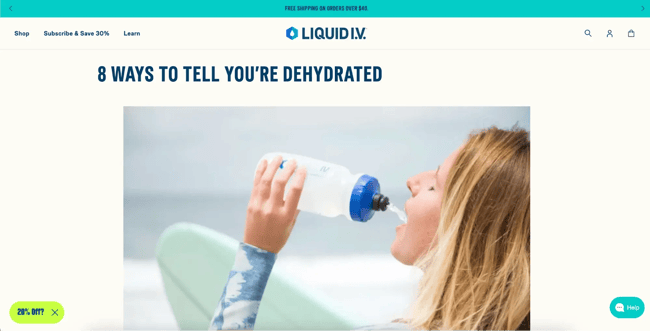
Let’s look at electrolyte company Liquid IV as an example and see how they create content targeting the different stages of the customer journey:

  • What is Liquid IV? Awareness content educates prospective buyers on the product pain points and introduces the product as a solution.
  • Why should someone buy it? Consideration content helps users understand product benefits.
  • What’s the best product for me right now? Purchase content shares product details and social proof.
  • Why should I buy it again? Retention content encourages repeat purchases by sharing additional product uses.

liquid iv target audience content

Source

Interests

Interests represent the hobbies and activities that customers enjoy. Understanding customer interests helps you unearth buyer motivation and behaviors and connect with your audience in a relatable way.

One product can have different target groups based on customer interests. Let’s use a bicycle as an example. Cyclist A might be interested in racing bikes. This customer wants to burn calories after work by cycling long distances. Cyclist B could enjoy a relaxing bike commute to work.

Understanding customer interests as they pertain to your product is crucial in reaching the right buyers.

Priority Bicycles caters to the interests of Cyclist B. That’s clear through the company slogan: “bicycles for everyday riders.” This clear stance makes it very easy for cyclists to self-select if this company is right for their interests.

target audience, priority bicycles

Source

Subcultures

Subcultures represent interests, lifestyles, or identities that some of your customers share. They’re similar to customer interests, but a subculture is directly tied to identity.

People define themselves by their subcultures, and each group has distinctive interests and needs. For example, not all parents are the same. Parents of adult children belong to a different subculture from parents of toddlers.

Understanding the subcultures within your target market helps sharpen marketing materials and make groups feel represented.

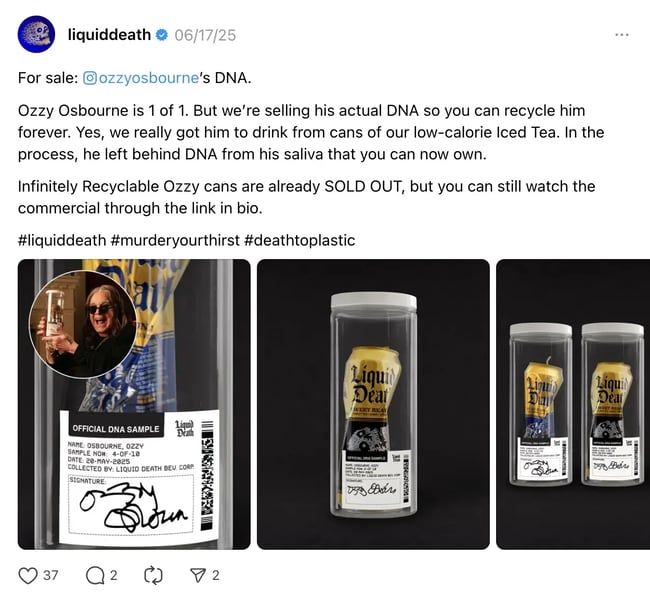
A real-life example of subculture targeting is Liquid Death, a canned water company. The company has been rooted in the music subculture from the beginning. It has maintained that connection to the music industry through social media content, company aesthetic, partnerships, and events.

liquid death threads

Source

Values

Consumers have unique values that impact how they live their lives and which brands they monetarily support. Customers who align with a brand’s values are more likely to try a product, repeat a purchase, and recommend the product to others. Some values include:

  • Sustainability
  • Transparency
  • Social justice
  • Accessibility
  • Affordability
  • Community
  • Inclusion
  • Diversity

These values are more than just talking points: they’re deep insights into how consumers see themselves and who they aspire to be.

Examining customer values can also help you identify industry trends. For example, an interest in plastic-free product packaging is a manifestation of the public’s growing awareness about ocean pollution and landfill contribution.

Nuud deodorant knows that its customers care about the environment and the chemicals they use on their bodies. The product aligns with customers’ values by being plastic-free, natural, vegan, and cruelty-free.

Tip: This classification is less straightforward than demographics because it deals with subjective internal characteristics that can be harder to measure. Consider trying a customer survey or using social listening tools to gather data on what values align with your product.

How to Find Your Target Audience

Here are five steps you can take to define and refine your target audience.

1. Use HubSpot Analytics to learn more about your customers.

According to HubSpot’s 2024 State of Marketing report, only 65% of marketers have high-quality data about their target audience. This leaves 35% who don’t know their audience definitively.

HubSpot Analytics is an excellent tool for gathering demographic details about your audience, as well as real-time analytics about your marketing campaign’s performance.

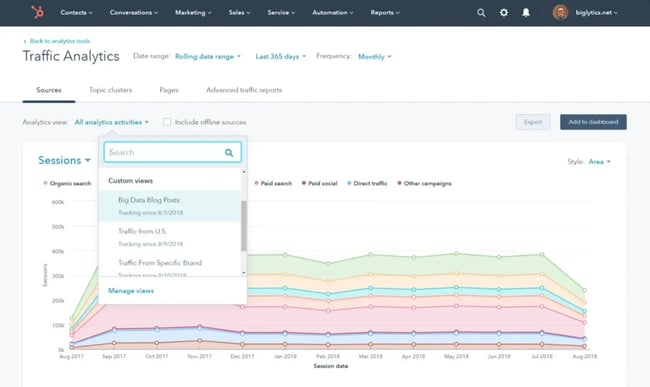
Here’s some information you can find in the analytics dashboard.

Traffic Analytics

This tracks your website’s performance and other digital assets. It provides metrics like page views, unique visitors, bounce rates, and session duration.

You can also see your traffic sources (organic, direct, referrals, social media, etc.), which helps you understand which channels are driving the most engagement.

use hubspot traffic analytics to understand target audience

Conversion Analytics

HubSpot allows you to track how well your landing pages and other conversion tools are performing. This includes data on form submissions, lead conversions, and the effectiveness of different calls-to-action (CTAs).

You can also analyze the conversion paths to optimize the steps your visitors take from entering the site to becoming leads to becoming paid customers.

Campaign Analytics

Easily measure the performance of each marketing campaign you’re running inside of HubSpot. This includes impressions, clicks, conversions, sales, and ROI. This helps you gauge which campaigns are the most effective.

Custom Reports

HubSpot allows you to create custom reports that fit specific needs. You can pull together various data points from across marketing, sales, and service platforms to create comprehensive reports to meet your unique business requirements.

Pro tip: If you’re not using HubSpot analytics, you can connect your website to Google Analytics to find demographic data about your target audience, including their age, gender, interests, lifestyle, nationality, and more.

2. Use website data to gauge audience interests.

Which website pages are getting the most views, shares, and comments? Both the thriving and floundering pages contain valuable behavioral insights for you to learn from.

Start by learning from the top performers. Are there themes between the most popular pages? How are users finding them? How long do users spend on the page, and how far down do they scroll? After reading, do they click around or become an email subscriber?

Pro tip: Implement a streamlined navigation menu or sidebar that prominently features your popular content so visitors can easily find these thriving pages.

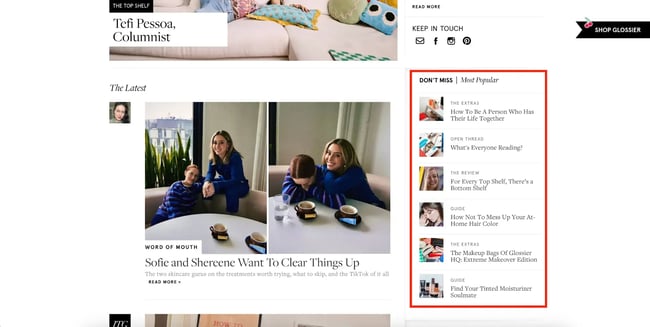
Some businesses highlight their top-performing content on their website in a “trending” or “most popular” section, like Glossier’s blog:

content that interests glossier’s target customers

Source

Then, analyze underperforming content. Are there themes between which pages get the least traffic? Are they visible on the website, or are they buried? Are they optimized for search? Is it possible that the pages with low readership are aligned with your audience, but the pages aren’t being discovered?

Ive found that many businesses have quality content buried deep in their blog archives. If you find old pieces aren’t being read but are still valuable, update them for improved search visibility.

3. Analyze social media data for additional insights.

Social media channels collect different data from your website that can include robust insights into customer demographics and content preferences.

Analyze two types of social media data:

  1. Demographic data: Where do customers live? How old are they?
  2. Content preferences: What do viewers engage most with? What attracts the most new viewers? Whats working and what’s not?

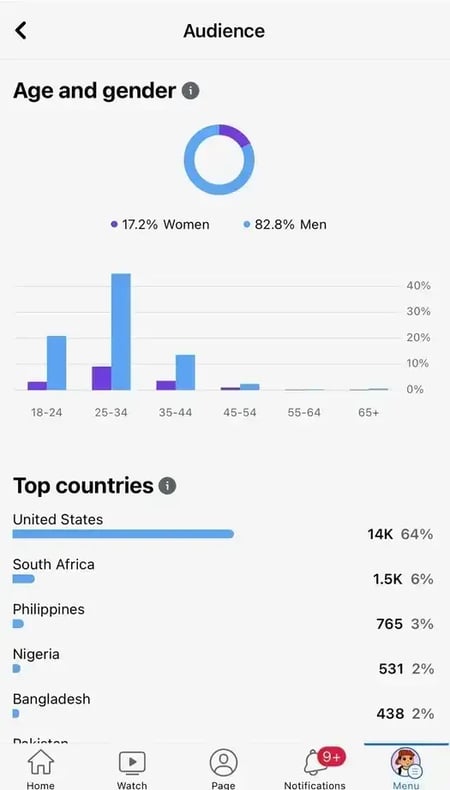
Every social channel is different and has a diverse audience, so it’s essential to look at your analytics across all social platforms. Here’s an example of some of the insights you can get from Facebook Analytics:

use facebook insights to identify target audience

Pro tip: Some platforms, like Facebook, allow you to use detailed demographic information to segment your audience and customize your marketing campaigns. You can effectively tailor your content, messaging, and advertising strategies to match the characteristics and preferences of different audience segments.

Free Market Research Kit

5 Research and Planning Templates + a Free Guide on How to Use Them in Your Market Research

4. Engage with social media followers.

Social media is a readily available, free place to conduct market research. Engage with your audience through surveys, interactive polls, and “ask us anything” questionnaires.

Use this invaluable two-way medium to ask questions like:

  • How are they using your product?
  • What’s their biggest complaint related to the problem you solve?
  • How often do they use your product?

This can be done directly on social media platforms — Instagram Stories is probably the most popular place. Alternatively, you can create a formal survey and ask social media followers to participate. Remember: all engagement is valuable, whether it’s positive or negative.

Pro tip: You can maximize engagement by showcasing the results of your questionnaires. This signals to your audience that their input is valued, which enhances loyalty and attracts new followers.

Here’s a great survey example from budget bus company FlixBus:

target audience, flixbus

Source

FlixBus’ social media content aligned perfectly with its audience: budget travelers who love a good deal. As a customer, I feel seen by their humor and surveys.

5. Articulate your inverted audience.

Sometimes the details of a well-defined target audience emerge most clearly when describing who you aren’t targeting. What consumers would be a bad fit for your brand? Who are you trying to repel? This is also known as a negative persona.

Let’s look at two contrasting water brands as an example. First up is Boxed Water, which targets consumers who are interested in the environment, wellness, and simplicity.

boxed water’s instagram grid targeting specific customers

Source

Let’s compare Boxed Water to Evian Water. Evian might describe its customers as people who value sports, luxury food, and premium events. Seeing the Instagram feeds side-by-side helps sharpen the qualities that make these brands unique.

Evian Instagram grid targeting specific customers

Source

Remember this inverted thinking exercise as we look at examples below. I pulled five real-life target audience examples and included contrasting brands for each one to help make the audience crystal clear.

Target Audience Examples

Lets take the concepts we’ve reviewed above and see how they manifest in the examples below.

1. Aldi

Aldi is a budget supermarket chain that appeals to practical shoppers who prioritize savings over style.

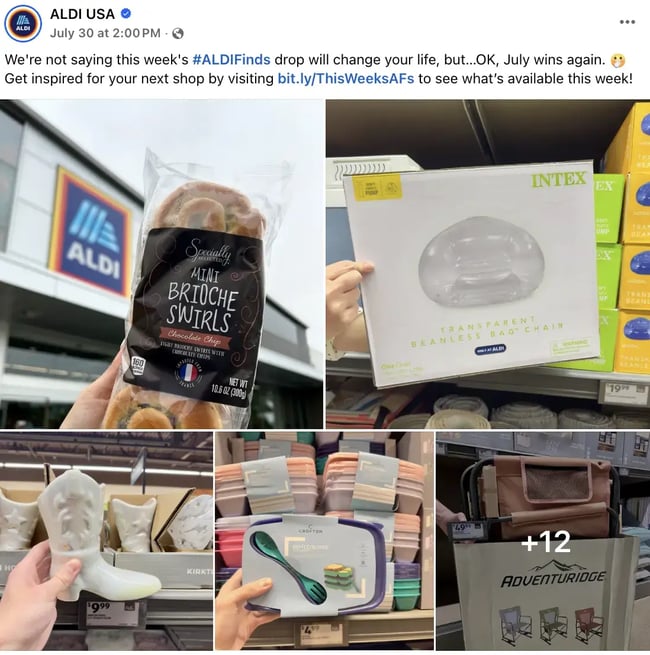
The companys approach to audience targeting works because of its focus on the average consumer’s everyday needs. The majority of the store is stocked with staples instead of endless SKUs and brand names. One section of the store (nicknamed the “Aldi finds” section) is stocked with random rotating items that range from underwear to seasonal cookies to dorm room decor.target audience aldi college kids

Source

Aldis marketing doesn’t make buyers aspire to put together a perfect Instagram-worthy dinner or transform their health. Instead, they lean into budget cooking and life’s everyday chaos. Their marketing is relatable and laughs along with viewers, like this post on Threads:aldi target audience digimon

Source

Who isn’t Aldi trying to target? Aesthetic shoppers (like Trader Joe’s) or health-first consumers (like Whole Foods).

What I like: When Aldi first became popular where I live, it was known as the store with the weird layout and no shopping bags. The company didn’t try to blend with the competition: it built a relationship with consumers based on reliable prices and food quality.

2. Duolingo

Duolingo is a language learning app that uses humor and pop-culture relevance to appeal to Gen Z and millennial consumers who want to dabble in language learning.

Have a look at Duolingo’s marketing channels and you may ask yourself “What does any of this have to do with language learning?” The answer: not much.

Instead of sharing grammar tips, the marketing focuses on establishing the brand as a piece of pop culture. Language learning is typically rooted in a cultural interest in the language you’re learning. But Duolingo understands that casual language learning is a cultural shift in itself, from formal to fun.

Screenshot 2025-08-14 at 10.13.12 AMSource

Duolingo’s approach to audience targeting works because of its emphasis on progress instead of fluency. Gamification is a key piece of its brand and how it differentiates itself from competitors.

Heres an example of a viral TikTok video that aligns learning Korean on Duolingo with Netflix’s popular show Squid Game:

Who isn’t Duolingo trying to attract? Serious language learners who want to develop conversation skills (like Rosetta Stone).

What I like: As a Duolingo user (currently practicing Dutch), I don’t expect to gain language fluency on the app in a few minutes a day. I just enjoy the satisfaction of daily practice, no matter how small.

3. Dunkin’

This company‘s understanding of its target audience is apparent even in the name. Dunkin’, previously Dunkin’ Donuts, underwent a rebrand in 2018. It pivoted away from its sugary namesake and embraced what its audience loved most: coffee to help you through the daily grind.

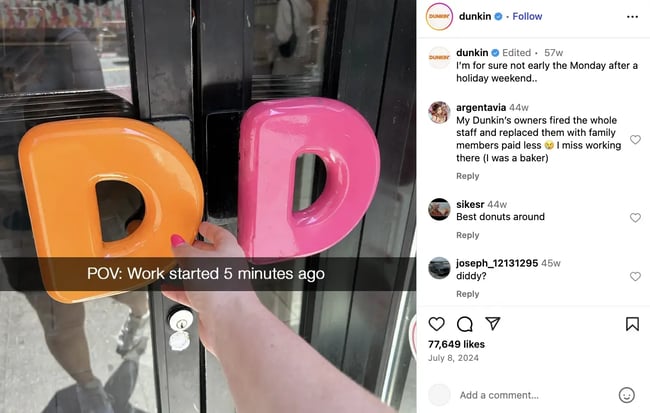
Dunkins approach to audience targeting works because they understand how their consumers use their product: Dunkin’ knows that users love grabbing a coffee on their way to work.target audience, dunkin

Source

They position themselves as being embedded in customers’ busy routines, even with their slogan: “America runs on Dunkin’.” This philosophy oozes out of Dunkin’s funny, relatable social media content:Screenshot 2025-08-14 at 10.27.08 AM

Source

Who isn’t Dunkin’ trying to attract? Coffee drinkers who want to get comfy with a cup of specialty coffee in a stylish setting (like Starbucks).

What I like: Dunkin‘s rebrand showed that companies can successfully pivot when the customer data shows that consumers are moving in a new direction. Follow customers’ leads instead of trying to tell them where to go.

4. Planet Fitness

Planet Fitness is a gym chain that positions itself as a “Judgement Free Zone” for people of all fitness levels.

Their approach to audience targeting works because they understand that their customers experience gymtimidation: anxiety about going to the gym. This is often rooted in fear of judgment or uncertainty about how to use the machinery.target audience, planet fitness

 Source

On social media, Planet Fitness doesn’t share weight loss before-and-after photos or six-pack abs for motivation. They focus on the emotional gains of going to the gym and making exercise feel accessible.

Here’s an example of mobility training the company shared on YouTube that can be completed at home without even needing a gym membership:

Who isn’t Planet Fitness trying to attract? People interested in a boutique class experience (like SoulCycle) or intense lifting enthusiasts (Gold’s Gym).

What I like: The emotional connection that Planet Fitness builds with its targeting is so effective. They found their unique proposition and went all in on it, from their gym design to their social media content, where they help people start moving even from home. That inclusivity helps foster long-term brand loyalty.

5. Ben & Jerry’s

Ben & Jerry’s is an ice cream brand that appeals to socially conscious consumers who prefer to buy from values-based brands.

The company takes strong stances on public issues, even when those issues have nothing to do with selling ice cream.target audience, ben and jerrys

Source

Blending ice cream with social issues alienates some potential customers. So why bother? Consumers know what Ben & Jerry’s stands for, and this attracts loyal, aligned customers. The company values strengthen its customer relationships.

Instead of just being normal ice cream, the company positions itself as ice cream with a cause. Here’s an example from the 2018 “Pecan Resist” campaign (word play on the phrase “we can resist”):Screenshot 2025-08-14 at 10.29.48 AM

Source

Who isn’t Ben & Jerry’s targeting? Healthy shoppers (like Halo Top) or people treating themselves to a pleasure (like Magnum).

Why this value targeting works: One-off social justice campaigns easily backfire or feel performative. Ben & Jerry’s stance works because the company has a decades-long history of activism. As a result, the values-driven marketing messages have built brand loyalty.

Identify your target audience like a pro.

Consumers don’t want to see ads for products they’d never use. And no company wants to waste ad spend on the wrong people.

I hope all of the real-life examples of audience targeting helped you recognize the hidden mechanics behind every brand’s relationship with its viewers.

The steps I outlined above will help you stop focusing on the mass market and invest in finding your desired customers.

Are you ready to dive in? Use the free HubSpot Market Research Kit to help you dig deeper. Inside, you’ll find an instructional guide, SWOT analysis template, survey template, focus group template, and more.

Editor’s note: This post was originally published in January 2020 and has been updated for comprehensiveness.

Categories B2B

Signs it’s time to redesign your website [+ 15 steps to follow]

I never thought I needed a website redesign strategy until I lost search traffic and the revenue it brought. That was in 2022, when I had several websites generating earnings via affiliate commissions. Back then, you could have an “ugly” website and still rank well in search.

But not anymore.

Free Workbook: How to Plan a Successful Website Redesign

Today, your website needs more than just content. To appear in search engine results, websites must balance user experience, brand clarity, site structure, security, and technical infrastructure. And I’ll say that’s fair, because customers expect nothing less from a business they trust.

In fact, according to a study, 75% of visitors decide if a website is credible based on how the content is presented. If your website is experiencing a high bounce rate, a drop in conversions, declining traffic, or other issues, you might need a redesign strategy.

Below is everything you need to know.

Table of Contents

Over the years, I’ve seen many brands redesign their websites when they pivoted their business strategy, transformed their brand, or simply because their conversion suffered.

Website Redesign vs. Website Refresh

Website redesign often requires substantial resources, time, and effort to accomplish. It isn’t a simple makeover that can be completed overnight. So before we move on, let’s determine whether you truly need a total redesign or a simple website refresh.

A website refresh, unlike a website redesign, focuses on updates that don’t affect your website’s structure. This means that you don’t need to republish entire blogs, revamp landing pages, or realign the customer journey with new content.

For example, if you’re just tweaking the font, colors, or layout of your homepage, that’s a website refresh. On this note, I’d suggest using HubSpot’s AI Website Generator to quickly reimagine your homepage, create a prototype, and draw inspiration. All you need to do is describe your business, the style you want, and the tool’s generative AI will do the heavy lifting.

Signs You Need a Website Redesign

Sometimes, you need to revamp your entire website to stay relevant, especially in today’s fast-paced digital landscape.

Even if your website still looks presentable, some style, content, and features may have become outdated. For example, effects like typewriter and parallax were trending around 2019, but many brands opt for a minimalist layout these days.

If you’re unsure whether you need to redesign your website, use these questions as a guide.

  • Are you seeing a massive drop in impressions, traffic, and conversions?
  • Do your webpages take a long time to load?
  • Do users struggle to navigate to their destination pages easily?
  • Has your brand evolved beyond the existing design, style, and voice?
  • Is your website insecure from emerging threats?
  • Does your target audience struggle to find your web content on search engines and AI platforms?

A “yes” to most of the questions often calls for a redesign, because, in my experience, there are no shortcuts to revitalize a website that is failing in many aspects. Also, more often than not, several issues are correlated, which means you can’t fix one without addressing the other.

Let’s say that your business has grown and is adopting new brand values. Chances are, the existing color, content, and style no longer match your brand’s new identity. A brand and web content mismatch, then, will undermine the audience’s trust, resulting in decreased dwell time and conversion rate.

There are no strict rules about website redesign. That said, some best practices, when applied in a planned sequence, help you avoid mistakes that can be costly to fix.

Below, I share the steps I use to redesign my website.

1. Audit your website.

Before you kickstart the redesign process, analyze your current website. It’s important to know what’s working and what needs improvement. Otherwise, you might end up repeating the same non-performing element, or worse, mistakes, when redesigning your site.

Trust me — it’s painful to find out that the revamped website is no better than the previous one, especially after paying handsomely for it. I made that mistake once when running my engineering business. Back then, I had no clue that a website could be such a powerful lead generator, and one that I shouldn’t revamp without a plan.

So, go to your analytics and note down these metrics.

  • Traffic acquisition. Learn where your visitors come from, including their demographics, medium, and the landing pages they land on. Knowing these metrics helps you prioritize specific channels and content when redesigning the website.
  • Bounce rate. A high bounce rate is a red flag that visitors are not finding what they want from specific web pages.
  • Search performance. Take note of the top-performing keywords and web pages for your website. Be mindful when reworking content, as you don’t want the new website to suffer a decline in search rankings.
  • Conversion rate. Some of your landing pages might be effective in capturing leads. Note down the framework, copywriting, and design used and replicate that in the new design.
  • Revenue. Some businesses, such as ecommerce and retail sites, turn visitors into paying customers with product pages. Similar to landing pages, analyze what’s working well and leverage the findings when rebuilding the website.

2. Determine your redesign goals.

I must remind you that website redesign isn’t a minor task. Often, you need to invest time, effort, and money to revamp your website. So, ask yourself — what are the results you want to achieve with your website?

Typically, companies revamp their websites for these reasons:

  • To increase search traffic.
  • To increase dwell time.
  • To increase qualified leads.
  • To improve conversion rate.
  • To increase orders and revenue.

I know that some business owners are tempted to redesign a website just for the sake of doing so. Gentle advice: Don’t. This is because if you don’t tie your website redesign to quantifiable goals, you won’t be able to measure its success later.

3. Research your audience.

A successful website reboot relies on audience insights. If you’re aware of their preferences, navigation behavior, and how they consume information, you can avoid design blind spots and misguided assumptions.

So, reach out to your target audience and ask for their opinion. Better still, create one or several personas you want to target. Then, let them explore your website and tell you what’s working and what’s not working.

For example, I’m currently revamping my personal website, which offers SEO content creation services, and I’ve reached out to marketing managers to gather feedback.

But don’t stop here.

If possible, map the persona to a customer journey so that you can structure your website accordingly. For example, a marketing manager might not immediately engage my services. Therefore, I funnel them to an email newsletter and nurture them.

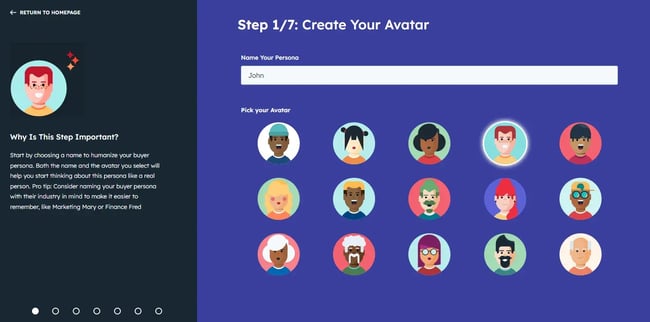
Pro tip: Some businesses target multiple personas, which can be challenging to manually create. Check out HubSpot’s handy buyer persona builder to help you create detailed buyer personas.

persona builder, website redesign strategy

Source

4. Define your branding and messaging.

A website bridges the gap between your business and its customers, which calls for an engaging and relatable experience. Therefore, avoid using generic design templates as-is.

Instead, your website should reflect your brand through the choice of colors, fonts, messaging, and layout. Be it your logo, blogs, or product pages, be consistent when aligning them with your brand.

For example, if you’re running a tech startup that pitches products to improve productivity, you’ll want a minimalist website that reflects the time-saving benefits. Meanwhile, a business championing environmental causes leaves a lasting impression with a blend of green-themed elements and empathetic messaging.

I know that deciding on branding elements has significant implications, so I often browse similar websites for inspiration before shortlisting a few themes. But these days, you can use AI web development tools to generate web prototypes simply by describing your brand to the chatbot.

5. Analyze competitors.

Does exploring your competitor’s website help you redesign a better one? Well, yes and no. Remember that every business is unique. Therefore, you wouldn’t want to be overly influenced by what other websites look or feel like. What works for another may not work for you.

Yet, competitor analysis helps you uncover content gaps, architectural issues, funnels, and marketing strategies you might overlook. For example, you can find out their best-performing web content on search engines. This way, you can create better content that will potentially outrank your competitors.

6. Choose a web platform.

Next, decide if you want to stay with the same web hosting provider and content management software (CMS). For example, many small businesses began with WordPress and Wix due to their ease of use and low cost. The downside is having to integrate dozens of plugins to enable business, website, and other functions, which, based on my experience, is challenging to manage at scale.

However, as their business grows, many companies seek a more scalable CMS that is integrated with their sales and marketing workflows. Some might choose to develop a custom website, particularly if they plan to offer in-page apps or tools. While this provides more control over the entire redesign workflow, you’ll need to manage the technical complexities that come with it.

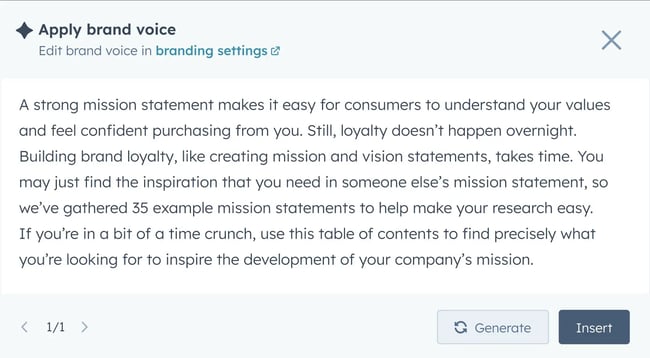
Meanwhile, I’ve also seen businesses that host their websites on business-driven CMS like HubSpot. The beauty of this option is that it allows them to create web content, monitor performance metrics, and nurture leads from a unified platform. Moreover, they can also use HubSpot’s Content Hub to create AI-assisted content that reflects their brand voice.

content brand voice, website redesign strategy

Source

7. Choose your web design team.

It’s tempting to take on the mammoth task alone. But be aware of the tasks involved when redesigning your sites. You’ll need a blend of creativity, content creation, SEO know-how, coding, and other skillsets to rebuild a website successfully.

For most businesses, their time is better spent on core activities, such as sales and marketing. If that’s the case, collaborating with an external web design team is better. For example, I’ve built several websites from scratch in the past, and it pushed me to my limits. Now, I collaborate with web designers I trust.

8. Structure your website.

Your new website must be easy to navigate, both for humans and search engines. So, decide how you organize topics, web pages, and blogs. And that’s where a sitemap is helpful. A sitemap describes the hierarchy of various web content, usually grouping similar topics together. It also serves as a blueprint that guides web designers, developers, and SEO specialists.

For example, if you run a software development company, you can organize your site into separate sections for generative AI development, mobile app development, and application testing. Then, create blogs, web pages, and landing pages for each category. This way, visitors can easily find the information they’re searching for.

9. Create an audience-led content strategy.

Chances are, you will need to revamp most of your web content. As you do so, keep the audience in mind, because that’s the reason why websites exist. Instead of randomly publishing content, align it with your customer’s journey.

Remember, an effective content strategy not only increases conversion but also positions your brand as an authority. Think of content as a layered funnel that supports your audience throughout their purchase cycle. Each piece of content should meet the user’s intent.

Personally, I’d suggest striking a balance between transactional and informational content. Simply put, don’t only publish product pages, but also include blogs that guide the audience in their discovery, commercial investigation, and purchase touchpoints. Additionally, you can also publish case studies, whitepapers, and success stories to subtly convince them that your brand is worth its value.

Once you have decided on the type of content to publish, schedule it into an editorial calendar. You don’t have to create all the pieces of content at once. Rather, you can launch the new website with several strong pieces and continue publishing from your content pipeline.

10. Apply best UX design practices.

While it’s great to have a stylish website, it’s even better to have a functional one that actually drives business outcomes. According to a study, businesses lost $1.42 trillion in sales due to poor user experience (UX). If you don’t want to leave money on the table, you need to take UX seriously.

User experience (UX) is not merely giving a website a superficial facelift with fancy colors and layouts. Often, you need a more thoughtful consideration of how users actually interact with a website. Specifically, when you optimize your site for UX, you focus on the ease of use, accessibility, and convenience that your website offers.

To get started, you’ll need to answer questions like:

  • What’s the optimal font size and color to use?
  • Are web pages designed optimally for mobile users?
  • How can you incorporate accessibility features to promote greater inclusivity?
  • Are you using the right contrast to showcase different parts of the design?
  • Can buyers complete the checkout easily?

Then, you turn them into an actionable plan.

For example, if a landing page has a high drop rate, you need to find out whether customers find the purchase path confusing. Then identify other possible causes that cause customers to leave. Sometimes, the problem can be technical, such as slow loading pages. However, there are also cases where the choice of copy, such as in the call-to-action, might cause customers to hesitate.

11. Work on SEO.

If your website has been driving search traffic, you’ll want to maintain, or, if better, improve your revamped site’s search visibility. And that means integrating SEO into your web redesign strategy.

SEO is a broad topic that involves various principles, strategies, and tactics. I learned SEO when I started building WordPress websites in 2015. Since then, I’ve helped my clients rank web content on Google. If there’s anything I can share with you, it’s to keep these points in mind.

Redirect old pages.

Use a 301 redirect to route traffic from the web content that you’ve removed to the new one. This is important because some web pages might have gained credible backlinks over time. If you don’t redirect them, you’ll lose backlink authority and, consequently, your search ranking.

Perform on-page optimization.

Make sure your content is skimmable. Use subheadings, bullet points, and numbered lists to structure your content. Otherwise, you risk turning visitors away because of large, chunky text.

If possible, use rich media like charts, images, and videos in your web content. Not only do they help with SEO, but they can also provide more context to your content.

Also, don’t forget to connect related pages with internal links. For example, you can link an old blog about “email marketing tips” to a new “best email marketing software” article. Doing so helps your website establish topical authority, which in turn improves its SEO performance.

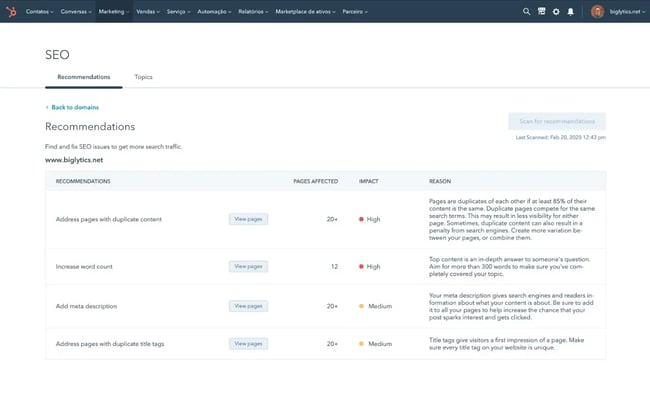
If you’re building your website on HubSpot, you can cross-check on-page optimization with the SEO recommendations it offers when you create a blog. Personally, I’ve tried it, and I must say, it’s solid.

seo recommendations, website redesign strategy

Source

Use keywords strategically.

Keywords help search engines understand our content, even in the age of AI-led search. You still need to optimize your web content with keywords if you want it to be found by the right users. Just remember, don’t overstuff them.

Pro tip: As a best practice, I use the target keywords naturally once in the title, first paragraph, and at least one of the subheadings.

Optimize for AI search.

Traditionally, the goal of SEO was to rank on Google and other search engines. Now, with generative AI transforming the search landscape, many brands are hoping to be found on AI platforms like ChatGPT as well.

At the moment of writing, AI search optimization is still evolving fast. Basic SEO still matters. But what the SEO community knows is that brand presence is a contributing factor to being cited by AI.

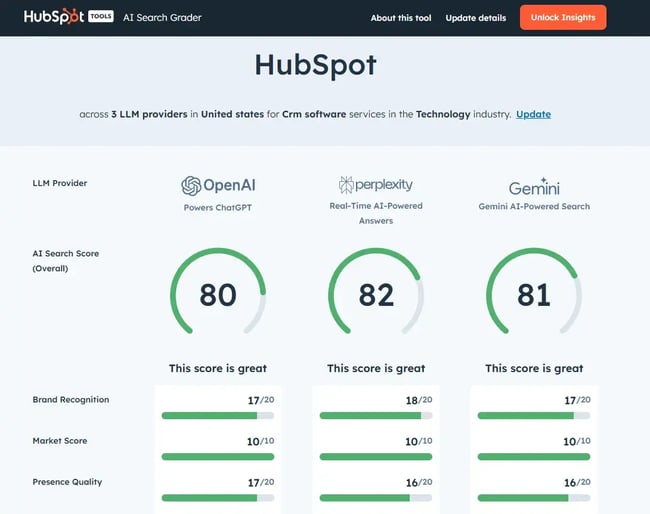
Pro tip: If you’re not sure if your business has a strong brand presence, use HubSpot’s AI Search Grader. It’ll return a score indicating your brand’s sentiment and share of voice.

hubspot ai search grader, website redesign strategy

12. Stage your website for testing.

Always test your new website before replacing the existing one. Despite having a comprehensive redesign plan, there might still be issues to iron out. For example, some landing pages might look awkward to actual users. Or you might face integration issues with third-party tools.

While you can run internal tests to assess the website, I recommend conducting usability tests with actual users. That’s because if you’re involved in the redesign effort, you might develop familiarity blindness, a phenomenon when you’re so used to seeing the design that you don’t really notice that there’s something amiss.

13. Perform a switch-over.

After validating your website’s functionality, plan for a switch-over. But before you do so, inform all stakeholders that you’re replacing the existing site with a new one. Give customers and users enough time to prepare for the eventual rollover and notify them of what changes they can expect.

Also, if possible, consider allowing users to remain on the existing web interface for a grace period. This way, they can explore the new web interface at their own pace, which helps in easing the transition.

Of course, not all businesses are in a position to do so, because maintaining both versions on the production environment can be challenging.

14. Monitor performance.

The first several weeks are crucial after your new website goes live. Based on my experience, even if you’ve done your best, some issues might slip through the tests you conducted.

So, be on the lookout for metrics that can help you identify post-launch issues. And that includes:

  • User interactions.
  • Traffic sources.
  • Conversion rate.
  • SEO performance.

In a way, you’re re-auditing your website again to ensure that the redesign is meeting its objectives.

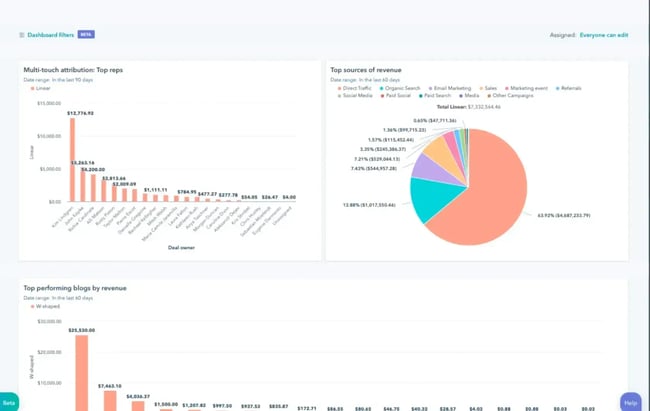
I know — measuring so many metrics can be challenging. When I started building websites in 2015, I had to use several tools to consolidate them. But these days, you can use HubSpot’s Marketing Analytics to unify all the data.

web performance, website redesign strategy

Source

15. Optimize post-launch.

Your job doesn’t end after your new website has gone live, even if you’ve ironed out all the glitches. Website technologies, customer behaviors, and marketing trends don’t last forever. In fact, we’re in a fast-paced era where we can’t afford to be complacent with our web strategy.

Therefore, periodically assess web performance, conversion, and customer satisfaction. If necessary, make adjustments to the content, layout, or site structure so your website remains relevant.

Now, you’re ready to redesign your website.

We’ve covered everything to redesign your website, including audit, restructure, content, SEO, and launch preparation. Apply the steps I shared to redesign a website that attracts more consumers, wows more visitors, and converts more customers.

Editor’s Note: This post was originally published in March 2013 and has been updated for freshness, accuracy, and comprehensiveness.

Categories B2B

WordPress essentials: Get started creating, managing, and optimizing your site

When you‘re just getting started with making a website, I know that the process of learning how to use WordPress can feel overwhelming. We’ve all been there, so you’re certainly not alone.

Download Now: How to Launch a WordPress Website  [Free Guide + Checklist]

While WordPress does have a bit of a learning curve, I still think it‘s something that anyone can use to build a website — even people who have never done so before. That’s why WordPress is, by far, the most popular way to make a website.

To make the process as painless as possible, all you need is the right knowledge, which is what we‘ve created this post for. Below, I’ll take you step-by-step through how to use WordPress to build your very own website.

Table of Contents

To give you more flexibility when designing your website and adding features, the core WordPress software is built in a very extensible way. You can use WordPress plugins to add new functionality to your site and WordPress themes to control the design of your site.

Below, I‘ll cover everything that you need to build your own WordPress site, starting from zero and working up to adding your own content and plugins. Beyond the step-by-step guide, I’ll also share a list of tips and tricks to remember while working with WordPress.

But first, let me answer the question most people have when they begin thinking about their new WordPress website: What is the difference between WordPress.org and WordPress.com?

HubSpot's free WordPress launch guide

Download the Free Guide

WordPress.org vs. WordPress.com vs. WordPress VIP

The difference between WordPress.org, WordPress.com, and WordPress VIP primarily has to do with who is actually hosting your website.

When most people say “WordPress,” they’re referring to WordPress.org, which is the home of the open-source WordPress project.

However, because all three entities have “WordPress” in their names, I understand that they can cause a lot of confusion, especially for people who are brand new to WordPress.

So, let me break it down.

What is WordPress.org?

WordPress.org is the home of the open-source WordPress software, along with many associated things such as the WordPress plugin and theme directories.

When you use the WordPress.org software, you host your own website, which is why you’ll also see it called “self-hosted WordPress.”

Essentially, this means that you purchase web hosting from one of the many providers and install the WordPress software on that hosting. While that might sound complex, most hosts make this super easy and will even pre-install WordPress for you so that you can start building right away (and I’ll cover the full process below).

You‘ll also have 100% control and ownership over your website. You can post whatever content you want, add any extension, edit the code in any way, etc. It’s 100% within your control because you’re hosting the software.

What is WordPress.com?

Despite sharing the same domain name, WordPress.com is a completely separate entity from WordPress.org, though a lot of the same people are involved in both WordPress.org and WordPress.com.

Instead of requiring you to use your own hosting, WordPress.com offers to host your website for you, more like a software-as-a-service tool (SaaS) or a website-as-a-service (WaaS).

You can either use a WordPress.com subdomain for free (e.g., yoursite.wordpress.com), or you can pay to use your own custom domain name (e.g., yoursite.com), which I think is a better approach for most websites.

One important thing to know about WordPress.com is that its free and cheap plans do not give you full access to the WordPress software. For example, if you want the ability to install your own custom themes and plugins, you’ll need to purchase at least the Business plan.

WordPress.com is owned by Automattic, a for-profit company founded by one of the co-founders of the open-source WordPress project.

What is WordPress VIP?

WordPress VIP is a concierge service offered by Automattic, the same company behind WordPress.com.

WordPress.com is focused on “regular” people and businesses, with plans that cap out at $45 per month when paid annually. Meanwhile, WordPress VIP is focused on offering solutions for much larger businesses and organizations. This is why WordPress VIP also brands itself as “Enterprise WordPress.”

To give you an idea, some of the brands using WordPress VIP include Time, Meta, etc.

WordPress VIP plans are customized to the business but start at around $25,000 per year, so I don’t think that WordPress VIP is really something that most WordPress webmasters need to think about.

How to Choose Between WordPress.org, WordPress.com, or WordPress VIP

You may be wondering whether WordPress.org or WordPress.com would be a better fit. Let’s review a few more of the pros and cons that come with both options, so you can make an informed decision.

WordPress.org is ideal if you want full power over customizing and controlling your website. Because you‘re hosting it yourself, it’s 100% yours, and you can do whatever you want with it.

Self-hosting WordPress is also the cheapest way to access the full power of the WordPress software, including the ability to install plugins and themes.

The downside, though, is that you‘ll be responsible for maintaining everything and applying updates. I think that WordPress.org is still definitely something that a non-technical user can handle, but it’s still not as easy as WordPress.com.

To ease this workload, some providers offer managed WordPress hosting, which simplifies the process by handling updates, security, and backups. This makes it easier for non-technical users to manage a WordPress.org site, though it still requires more effort than WordPress.com.

WordPress.com can be a good option if you‘re willing to pay a little more to have everything done for you. From a technical perspective, it’s absolutely the simplest way to make a WordPress website. You just register for an account and start building.

WordPress.com has a free and paid version. If you stick with the free version, you can’t upload any custom themes or plugins, and you will have a WordPress subdomain. I think this makes the free plan unsuitable for most serious websites.

If you want to use your own custom domain name and install your own WordPress themes and plugins, you’ll need to pay for at least the WordPress.com Business plan, which costs $40 per month (or $25 per month if you pay annually).

If this is outside of your budget, you can make a WordPress website for cheaper by using self-hosted WordPress (WordPress.org). The process just won’t be quite as simple as what WordPress.com offers.

Finally, if you’re looking for an enterprise WordPress solution, you might consider WordPress VIP. However, the high prices of WordPress VIP mean that it’s not a viable option for most “regular” WordPress webmasters.

WordPress for Beginners: How to Use WordPress

There are a number of ways for you to create your dream website with WordPress. Users generally find the software easy to use, but I know that getting started can be understandably intimidating if you’re completely new to the process.

In the section below, I’ll take you through the entire process of setting up a WordPress website using your choice of WordPress.com or self-hosted WordPress (WordPress.org).

I’ll cover every single step in the process, from setting up your basic website to choosing a theme, adding content, tweaking important settings, installing plugins, and more.

Here’s how you can create your own WordPress site using either WordPress.org or WordPress.com.

1. Select a WordPress plan (WordPress.com only).

To start, you‘ll need to choose whether you’re using WordPress.org (AKA self-hosted WordPress) or WordPress.com.

If you want to use WordPress.org, you can skip ahead to the next step.

If you want to use WordPress.com, you’ll have to choose between the five preset plans that WordPress.com offers. There‘s also a free plan, but it’s fairly limited.

the wordpress.com pricing page.

Again, I think that most people who are looking to make a serious website should choose at least the Business plan. You’ll need this plan to install your own custom themes and plugins, which are some of the best parts of WordPress.

However, if you don‘t think you’ll need any custom themes or plugins, I think the Personal plan is also fine, as it lets you use your own custom domain name and removes the WordPress.com ads.

2. Set up your domain name and hosting provider (WordPress.org).

If you‘d rather use WordPress.org than WordPress.com, you’ll need to choose your hosting provider and set up your domain name before you can start building your WordPress website.

Before I cover how to complete those tasks, I think that it’s important to discuss the difference between your domain name and hosting provider.

Think about your domain name as your website’s home address — it’s how your visitors are able to locate your website on the Internet. Your domain name will look something like this: www.example.com. For example, our domain name is hubspot.com.

Your hosting provider is like your house. It’s where your website files are actually stored. Without a hosting provider, your site wouldn’t have space on a server to “live.” Some of the best WordPress hosting providers include WP Engine, Hostinger, Bluehost, Rocket.net, Dreamhost, WordPress VIP, and Kinsta.

Personally, I use Rocket.net for my own websites. However, I recognize that it might not fit the budget of first time webmasters, so you can also consider cheaper options like Bluehost or Hostinger.

the rocket.net wordpress hosting homepage

Source

How to Pick Domain and Hosting Providers

Again, WordPress.org requires you to purchase your own domain and find a third-party hosting provider for your website. WordPress.com allows you to decide whether or not you want a custom domain, depending on the plan you choose, but it takes care of the hosting for you.

Your hosting provider is important because it impacts your website’s speed, security, and reliability. There are hundreds of providers to choose from, which is why we put together a list of the best WordPress hosting providers to help you decide what will work best for you. All of these providers meet WordPress’s three basic hosting requirements:

  • PHP version 7.4 or greater
  • MySQL version 8.0 or greater OR MariaDB version 10.6 or greater.
  • HTTPS support

When considering hosting providers for your WordPress site, make sure they meet all of the above criteria.

For domain names, getting one is as easy as searching and purchasing one through your domain registrar of choice. Many web hosts also offer their own domain registration services, and some will even give you a free domain name for the first year.

If you are new to WordPress but have already purchased and created a domain name elsewhere, no problem, you’ll have the option to transfer or map it to your WordPress website.

For the sake of this guide, let’s assume you do not yet have a domain or hosting provider. Here’s how to start creating your website with the popular hosting service Bluehost.

First, head to Bluehost’s WordPress hosting page and click View Plans.

the bluehost wordpress hosting page

Source

From here, you’ll be taken to Bluehost’s pricing page to choose from three plans.

bluehost wordpress hosting plans.

I recommend using the Choice Plus plan if it fits your budget, but the Basic plan is fine if you want to keep costs as low as possible. Make sure to pay attention to both the promotional price and the renewal price when making your decision.

Once you choose your plan, you’ll be taken to another page to sign up for a domain name (which is free for the first year).

how to purchase or choose a free domain name at bluehost.

Once you select your domain name, you’ll be brought to a page to complete your account and billing information for your purchase.

I don‘t think most people need any of the add-ons, so feel free to disable them. For example, Bluehost already offers free SSL certificates via Let’s Encrypt, so there’s no need to purchase the premium SSL add-on.

how to complete your purchase at bluehost.

After confirming your account and purchasing your domain, you will gain access to your hosting dashboard, where you’ll be able to install the WordPress CMS.

3. Install WordPress.

If you are using your own WordPress hosting provider (instead of WordPress.com), you’ll need to install the WordPress software to connect your new domain to your website.

I know — that sounds like it‘s going to be complicated. But don’t worry! I think you’ll be surprised by how easy and non-technical it is to install WordPress.

Because WordPress is so popular, most quality web hosts have built really simple dashboards that make installing WordPress as simple as clicking a few buttons.

Some dedicated WordPress hosting providers will even pre-install WordPress for you so that you can get started right away.

For this example, let’s continue using Bluehost. However, in my experience, the same general principles that you see here will apply to pretty much any quality WordPress host.

Here’s how to start:

  1. Log in to your Bluehost account
  2. Select Hosting on the left side
  3. Click Add Site.

how to add a wordpress website at bluehost.

Source

On the next screen, choose the option to Install WordPress.

how to install a wordpress website at bluehost.

Source

You can then give your site a title and choose which domain you want to connect to (you should already see your domain name if you chose a free domain name when signing up for Bluehost).

how to connect your domain name to wordpress.

Source

After you click Continue, there will be a short wait while Bluehost installs WordPress for you.

Once the installation process finishes, you’ll see an option to Log Into WordPress, which will take you to your WordPress dashboard.

how to log in to wordpress at bluehost.

Source

As I mentioned above, the process will look slightly different if you’re using another WordPress host, but the basic steps will be the same.

For example, here’s what the WordPress installer looks like at Rocket.net, a dedicated WordPress host that I use for my personal websites:

how to install wordpress at rocket.net.

Now, on to step four: making your website look nice by setting up your WordPress theme.

4. Choose and install your theme.

WordPress themes help you control the overall design and style of your website without changing the underlying content.

You can kind of think of them like clothes. If you put on a new shirt, you’re still “you” underneath. But at the same time, the shirt lets you quickly change how you look to the outside world.

For example, let‘s say you publish a few blog posts and then decide you want to change your theme. After changing your theme, all of those blog posts will still be there. They’ll just be styled differently according to the rules of your new WordPress theme.

When you first install the WordPress software, WordPress automatically applies a default theme that looks rather plain. Instead of using that default theme, I recommend installing a new WordPress theme that matches your preferred design aesthetic.

Choose your WordPress theme.

You can find thousands of free or paid themes, so you’re almost certain to find a design that you like.

In the past, it was common to find very niche-specific WordPress themes. For example, one WordPress theme for “restaurant websites” and a different WordPress theme for “plumbing businesses.”

However, nowadays, the most popular approach with developers is to just offer one flexible base theme and then lots of importable starter sites. In my experience, this is the best way to go when choosing your themes.

Personally, I think that choosing a lightweight multipurpose theme like Astra, Kadence Theme, or GeneratePress is a great place to start. I personally use GeneratePress on most of my websites, if you’re wondering.

All of these themes are multipurpose (which means you can use them for any type of site) and include dozens or hundreds of importable “starter sites.” This basically means that you can import a starter site design with just a few clicks and then instantly have a beautiful website.

However, we also have a post on our favorite WordPress themes and a guide on how to choose your WordPress theme.

Install your WordPress theme.

Once you choose the WordPress theme that you want to use, here’s how to install it:

  1. Open your WordPress dashboard.
  2. Go to Appearance → Themes.
  3. Click the Add New Theme button at the top.

If it‘s a free theme at WordPress.org, you can install it by searching for it. If it’s a premium theme that you purchased directly from a developer, you’ll need to upload the .zip file for your theme.

how to manage wordpress themes.

Source

Customize your WordPress theme.

Once you find the perfect theme, you can install it to begin customizing. Each theme has different steps required during the customization process, so be sure to follow them closely.

Generally, you can customize most WordPress themes by going to Appearance Customize. This will open the WordPress Customizer, which lets you easily make changes using preset options and a real-time preview of your site.

how to customize a classic wordpress theme.

If you choose one of the newer “Full-Site Editing” themes, you can customize it by going to Appearance, then Editor.

For more details, we have a whole post on how to customize a WordPress theme. You can also consult your theme developer’s documentation for instructions that are specific to your chosen theme.

5. Add posts and pages to your website.

When you add content to your WordPress website, it’s usually displayed in the form of posts and pages:

  • Posts — Use these when you want to create blog posts or other similar content. New posts will automatically appear at the top of your blog listing page, and each post will have its own public publish date.
  • Pages — These are better for static content that doesn’t have a publish date. For example, your “About” page, “Contact” page, and so on. There‘s no default page that lists all of your “Pages,” but you can add links to them using your site’s navigation menu or other areas.

For more advanced use cases, you can also create your own WordPress custom post types.

However, I don’t recommend going that route until you become more familiar with the WordPress software. I do recommend learning this eventually, though, as it really unlocks a ton of flexibility.

To add a post to your website, go to the admin dashboard, click Posts, and then Add New Post.

how to add a new blog post in wordpress.

To add text, you can just click in the editor and start typing. For other elements — e.g., images or buttons — you can add blocks to the editor.

For more details, we have a whole guide on how to use the WordPress block editor.

When you’re finished, click Save Draft to save your changes as a draft, or click Publish to immediately take the post live.

Adding a page to your website is a similar process. In your admin area, click Pages, then Add New Page.

how to add a new page in wordpress.1

You can then add content using the block editor and Publish it when you’re finished.

6. Customize your website.

Beyond the theme you choose, there are a number of ways to customize your website. I think that now is a good time to review a few options.

First, you can customize your site title. From your admin dashboard, select Settings > General. Here, add your website title and tagline. You can also toggle other basic site information like your URL, email, time zone, and more.

how to manage general wordpress settings.

Next, go to Settings > Reading. This is the area where you can change the homepage of your website, which is something that I recommend doing.

By default, WordPress will display your latest blog posts on your site‘s homepage, which is a remnant of WordPress’s blogging roots. However, I think that most websites, even including blogs, will benefit from creating a static homepage instead.

That way, you can make sure that you’re putting your best foot forward when you introduce visitors to your website/brand.

You can create your homepage as I showed you above (Pages → Add New Page) and then assign it in this settings area.

If you still plan to have a blog, you can also create a new “Blog” page and assign it as your Posts page. That way, visitors will be able to see your latest blog posts by going to yoursite.com/blog.

how to add a new page in wordpress.

Outside of the settings area, I also recommend customizing your WordPress site’s navigation menu, which can help your visitors to easily find information on your website.

Here’s how to add or edit a navigation menu:

  1. Go to the Appearance tab in your WordPress dashboard.
  2. Select the Menus option.
  3. Edit the existing menu that comes with your theme or create a new one.

If you‘re using a new “Full-Site Editing” theme, you’ll go to Appearance and then Editor instead. However, most popular WordPress themes still use the Menus interface.

how to customize your wordpress menu.

From here, you can determine how you want your navigation menu to look, how many pages you want to include, what you want to title those pages, and what order you want them to be listed in.

The exact design of your navigation menu will depend on your WordPress theme.

Of course, this is just a fraction of what you can do in the dashboard — this post offers more information on your WordPress site settings and customization options.

7. Install WordPress plugins to add new features.

WordPress plugins are add-ons to the core WordPress software that let you add new functionality to your site. This could be frontend functionality to create a better experience for your visitors or add new features to your site. Or, it could be backend functionality to help you more efficiently manage your website and business.

You can use plugins for small features (such as adding a contact form) or big features (such as turning your site into a fully functioning online store or online course).

With over 59,000 free plugins in the WordPress.org directory (and thousands more free and premium plugins at other locations), there are options for almost every type of website and user.

Pretty much every single WordPress site will need plugins. This is because the core WordPress software assumes that you‘ll use plugins to add certain features. For example, if you want to implement search engine optimization best practices, you’ll need a WordPress SEO plugin to help you do that.

Here‘s a quick rundown of some of my favorite plugins for key features that most WordPress sites need. You don’t necessarily need to install all of these plugins, but I think you’ll want to consider using at least some of them.

  • HubSpot WordPress Plugin. Easily add pop-ups, forms, and live chat to your WordPress website. It also lets you integrate the HubSpot CRM into your WordPress website.
  • The SEO Framework. This is one of my personal favorite SEO plugins. However, there are also several other popular and high-quality SEO plugins including Yoast SEO, All in One SEO, and Rank Math.
  • Gravity Forms. This is one of the best general-purpose form builder plugins for WordPress. You can use it for basic contact forms or more advanced forms such as user registration, payments, and more. If you’re looking for a free solution, I think Fluent Forms can also be a good option.
  • WP Rocket. This is a great premium plugin for speeding up your WordPress site and making it more efficient. If you want a free option, you can also consider the WP-Optimize plugin.
  • Elementor. If you want to add a visual, drag-and-drop design experience to WordPress, Elementor is a great option. We have a post that covers how to use Elementor.
  • The Events Calendar. If you want to add events to your website, I think this is one of the best options.
  • Weglot. A top translation plugin for translating WordPress and WooCommerce websites. TranslatePress is also another great option if you don’t want to pay a monthly fee for Weglot.
  • Wordfence. Depending on your web host, you may or may not need a dedicated security plugin. If you do need some extra security, I think that Wordfence is one of the top options.

To discover even more options, we have a whole post on the best WordPress plugins. You can also search the HubSpot blog for lists of plugins for specific use cases, such as the best WordPress survey plugins.

To install a new plugin, click on the Plugins menu in the sidebar of your WordPress dashboard. This shows you all the plugins currently installed on your site.

Depending on your host, you might have several plugins installed already. Note that for a plugin to work, you must activate it after installing.

how to manage wordpress plugins.

Here’s how to add a new plugin that you found in the WordPress.org plugin directory:

  1. Click the Add New Plugin button (or go to PluginsAdd New Plugin).
  2. Search for your desired plugin.
  3. Click the Install Now button for the plugin that you want to install.
  4. Once the installation process finishes (it should only take a few seconds), the Install Now button should change to Activate. Click the Activate button to make the plugin live on your site.

how to install new wordpress plugins.

For plugins that are not listed in the WordPress.org plugin directory, you can also upload a .zip file by clicking the Upload Plugin button at the top. You’ll typically use this approach if you purchase a premium plugin directly from the developer.

Get the WordPress CRM plugin that helps you organize, track, and nurture your leads.

8. Optimize your website to increase page speed.

Website performance is a critical part of the user experience. If your site takes too long to load, visitors won’t enjoy using it and might even just give up on your site and go somewhere else.

One of the best ways to make sure your site loads quickly is to choose quality WordPress hosting. In general, you get what you pay for, and cheap hosting usually won’t offer the same performance level as more premium hosting (especially for high-traffic sites).

However, there are still a number of strategies that you can implement on any host to make your site load faster. Here are some of the most notable performance optimization strategies to consider based on my experience speeding up dozens of WordPress websites:

  • Page caching. This makes your website a lot more efficient by making it so that your hosting server doesn‘t need to dynamically “build” the WordPress page for each visit. In my experience, most hosts nowadays offer built-in page caching features. If your host doesn’t, you can easily add it using one of the many WordPress caching plugins.
  • Optimize code. There are lots of strategies to optimize your site’s code and how it loads, including deferring render-blocking JavaScript, delaying JavaScript execution, removing unused CSS, and minifying your code. The easiest way to implement all of these strategies is to use a WordPress performance optimization plugin.
  • Optimize images. Optimizing images will reduce their file sizes by compressing them, changing the resolution, and optimizing how they load. You can use an image optimization plugin to do this automatically for images that you upload to WordPress. My personal favorite is ShortPixel.

If you’re willing to pay for a premium plugin, I think one of the easiest ways to implement most of these strategies is to use the WP Rocket plugin. I use this plugin on my own personal sites because I find the convenience worth the money.

However, if you‘re on a tight budget, you can implement all of these features using free plugins — it will just require some time and add some extra complexity to your site’s setup.

9. Get inspired by WordPress website examples.

As you begin to customize your website, you may feel overwhelmed by all the options you have. Instead of starting completely from scratch, it helps to grab some inspiration from other exemplary WordPress websites.

Here are some of my favorite WordPress website examples.

99% Invisible is a popular podcast that focuses on design and architecture. The 99% Invisible website is sleek and modern. It offers easy navigation for visitors to quickly access each podcast episode.

the 99% invisible wordpress website.

Source

The Houston Zoo’s website displays its main attraction on the homepage. The magnifying glass icon on the top menu bar makes searching the site effortless.

the houston zoo wordpress website example.

Source

Awesome Motive, the creator behind several WordPress projects, engages visitors with a polished, yet simple, website. It features subtle animation to grab people’s attention.

the awesome motive wordpress website example.

WordPress Website Tips and Tricks

To finish things out, I want to share some general WordPress tips and tricks that I’ve discovered over my 10+ years creating and managing WordPress websites.

1. Keep WordPress, themes, and plugins updated.

Based on my experience, one of the absolute best things you can do to keep your WordPress site secure and functioning properly is to keep all of the software updated. This includes the core WordPress software, as well as any plugins and themes that you might be using.

As secure and reliable as WordPress is, there will always be new bugs and security issues being discovered (which is true of literally any software — it’s not specific to WordPress).

When these issues get discovered, they get promptly patched. However, your site won’t benefit from those patches unless you apply the updates promptly.

You can see a list of all the available updates for your site by going to Dashboard → Updates.

how to manage wordpress updates.

For the core WordPress software, there are two types of updates:

  • Major updates — These only add new features, so you can wait a few weeks to apply them. Major updates have one decimal place in the version number, e.g, 4.1, 5.9, 6.0, etc.
  • Minor updates — These include security or maintenance fixes, so you should apply them immediately. Minor updates have two decimal places in the version number, e.g., 4.1.2, 5.9.1, 6.0.2, etc.

For plugin and theme updates, not all developers use the same version number format. For that reason, I recommend reading the changelog for each update to determine if it includes new features or security/maintenance fixes.

2. If you built your website with WordPress.com, use its online support.

While I personally use self-hosted WordPress, I think that WordPress.com can be a great option for people who truly want a hands-off experience.

If you do pay for one of the WordPress.com plans, I highly recommend using their dedicated support, as it’s another big perk of the platform.

There‘s no point in paying a bit of a premium if you’re not going to take advantage of one of the biggest benefits.

3. Back up and update your website regularly.

Backups sound like extra work until you hit a technical roadblock and need a hard refresh. If you ever lose access or have technological difficulties, you have everything you need to completely restore your content.

In my experience, pretty much every quality WordPress host offers some type of backup tool nowadays. However, the backups at cheap hosts can still be problematic because they might store the backup version on the same server as your live site (which is a big no-no — ask your host‘s support if you’re not sure how they do it).

If your host isn’t performing daily backups and storing those backups in a completely separate location, I highly recommend backing up your site using one of the many backup plugins. Personally, I use the free UpdraftPlus plugin, but there are lots of great options.

I recommend automatically backing up your site daily (or weekly if you don’t publish new content very often). In addition to that, I also recommend backing up your site before applying any software updates.

4. Choose an optimal WordPress permalinks structure.

Your site‘s permalink settings control the structure of URLs on your website. For example, your permalink choice could be the difference between a blog post’s URL being yoursite.com/06/11/post-slug or yoursite.com/post-slug.

Permalinks can play a role in both user experience and SEO, so I recommend choosing them carefully. You can adjust your site’s configuration by going to Settings → Permalinks.

For most websites, I recommend choosing the Post name structure. However, you can customize the structure if your situation requires something else.

how to change wordpress permalink structure.

Just be careful about changing the permalink structure on an established website, as this can have a negative effect on your site’s SEO.

For more details, we have a guide on choosing an optimized permalink structure.

5. Understand SEO.

If you want people to actually see your WordPress website, it’s important to learn about SEO and implement best practices on your site.

Learn and understand SEO basics to ensure your website is completely optimized so you can boost your conversions.

Research which keywords you want to rank for and use them throughout your copy. You can even start a blog so you can share your knowledge while improving your ranking.

Beyond that, make the most of multimedia. Image alt text on photos can give you an extra boost. Visuals and video content can also break up the text on your website pages.

Keep an eye on your website’s performance and know what is and isn’t working for your visitors. There are a number of useful WordPress plugins, as well as Google Analytics software, to help with this.

6. Create a custom homepage.

Because WordPress got its start as a blogging platform, its default configuration is still to display a list of your most recent blog posts on the homepage.

However, even if you‘re using WordPress to launch a blog, I still don’t recommend making this your homepage.

Instead, I recommend creating a dedicated page to use as your homepage. Then, you can locate your blog in a subfolder like yoursite.com/blog.

Having a dedicated homepage will let you create a more optimal welcome and first experience for new visitors.

Pro tip: You can feature social proof on your home page to show your new website visitors how many other people have already viewed your content. There are plugins to help you do this in a matter of minutes.

7. Include an “About Us” page on your website.

Your customers want to know who you are. That’s where your About Us page comes in. Show your visitors that you’re a trustworthy person and/or business.

“About Us” pages are known to be one of the most-visited pages on websites (after homepages) — so introducing yourself is important.

You can create an “About Us” page like any other page on your site. Just go to Pages → Add New Page to get started.

Here are some “About Us” examples to inspire you.

8. Consider what your website looks like on mobile.

It’s no secret that people are searching the Internet while on their phones, tablets, and other mobile devices these days.

All modern WordPress themes are “responsive,” which means they work on different devices. If your WordPress theme doesn‘t include basic responsive design principles, that’s a huge red flag.

However, I still recommend browsing your site on mobile to catch any issues or quirks. Just because a theme is “responsive” doesn‘t guarantee that you’ll actually like how it looks on different devices.

If your website is public, you can just open it on your own smartphone or tablet. If it’s not public yet, you can preview what it looks like on different devices by using Chrome Developer Tools.

9. Pick a CRM that works with your WordPress site.

A CRM can help you keep track of how users are interacting with your website and company. You’ll have the opportunity to see what offers are garnering the most attention and becoming leads.

Here’s a list of some of the best WordPress CRM options. You can also get started with HubSpot, which has its own WordPress integrations.

Build a website with WordPress.

While I know that getting started with WordPress can feel a bit intimidating because of all the different terms and interfaces that you need to learn, I hope this post has shown you that it’s really not that bad.

For the most part, you can be up and running quite quickly. While some learning curve is unavoidable, putting in that time will really help you unlock the flexibility that WordPress offers and build an amazing website.

Get started with WordPress today — if you‘re like me, time will fly and you’ll find yourself constantly finding new ways to get more from the platform. So the sooner you start, the sooner you can unlock even more knowledge.

Editor’s note: This post was originally published in November 2018 and has been updated for comprehensiveness.

Categories B2B

Craft your best brand voice: Expert tips, examples, and templates

Read this line from one of my favorite authors: “I love deadlines. I love the whooshing noise they make as they go by.”

What can you infer about the person behind that line? Are they funny or serious? Cheerful or dour? Pleasant company or a total bore?

Free Kit: How to Build a Brand [Download Now]

As a writer, part of my job is to express myself through words. And the choices I make to create that expression become my voice. Perhaps you hear it in your head as you read this paragraph.

When you know to look for voices, you’ll see them everywhere: in writing, in video, in your very interactions with others. And in business? Your brand’s voice plays a huge role in helping you connect with the world and your consumers.

Brand voice can help you underscore authority, boost playfulness, or reach directly into the hearts and minds of your buyers. Done well, there’s resonance — your voice clicks with your buyer. Done poorly? Buyers flee, and brands struggle to survive.

What goes into defining your brand voice, and where can you go to get inspired when it’s time to put pen to paper? Let’s explore the details behind a great brand voice.

Table of Contents

Your consumers pay attention to your voice. It’s the foundation of trust, and trust matters when it’s time to buy.

In the U.S. market, 90% of consumers say it’s important to trust the brands they buy or use. Your brand voice lays the foundation by showing your customers what to expect from your company’s content, services, and even customer service.

Why Brand Voice Is Important

In short? Brand voice helps answer your customer’s most pressing question:

Why should I buy from you instead of somebody else?

Part of any brand’s job in the marketplace is to inform, educate, and persuade consumers to take action (namely, buy your product or service). Your voice serves as an ambassador in this effort: it helps you connect with buyers even when you’re not physically present.

The strongest ambassadors can quickly signal if something is or isn’t for you. For instance, you’ll make assumptions about an unfamiliar brand if its ambassadors wear pink cowboy hats versus black three-piece suits. Each choice conveys particular elements of a brand:

  • Pink cowboy hat: Bubbly, playful, youthful, irreverent.
  • Black three-piece suit: Somber, formal, authoritative, exclusive.

Serious buyers will probably gravitate toward a formal or authoritative brand; more playful buyers will explore the bubblier, irreverent ones. What matters is that you understand who your target audience is and shape your voice to meet them as they are — not as you wish them to be.

And your brand ambassador must translate across multiple platforms, and potentially even across countries and cultures as well. Every shred of copy your brand produces, from the About Us page on your website to the game on the back of a cereal box, should exude your brand’s distinct voice.

Brand voice carries an important internal function, too. A well-defined brand voice establishes a cohesive set of guidelines for your writers, marketers, content creators, and even graphic designers.

“Well-defined” is key here. Most often, I see brand leaders compile a list of 4-5 adjectives related to their brand voice. They also usually dig deep into the thesaurus, hoping to stumble upon the perfect choices to explain their voice’s presence and perception.

You can certainly throw adjectives at the wall and hope something sticks, but without simple explanations of what “clear, helpful, human, and kind” means, content gets haphazard fast.

For example, HubSpot’s style guide specifies that “we favor clarity above all. The clever and cute should never be at the expense of the clear.” It also gives multiple examples of what “clear,” “helpful,” “human,” and “kind” actually look like in copy. Contractors and new hires aren’t left guessing — they get detailed explanations that let them hit the ground running.

A clarified brand voice lets you speak to your audience, attract new customers or users, and express your brand’s distinctiveness consistently and compellingly.

Creating Your Brand Voice

So, you know your brand voice should represent you. But how do you discover who you are? And how do you build that concept into something practical you can share with your teams?

It doesn’t take a weekend nature retreat to find your voice. In fact, most of what you need sits in front of you right now. Let’s talk about that process and what goes into good brand voice guidance.

1. Center your company’s mission.

Your company’s mission and values should live at the heart of everything you do. However, I often see these elements get sidelined in favor of the newest trend or hype cycle. These leaders chase instead of listen. And in return, you get cringy content — and audience abandonment.

You chose your mission and values for a reason; they mean something to your organization. Let them lead your brand voice creation process.

Adherence to the mission led to HubSpot’s social media team successfully translating brand voice to LinkedIn, with 84% more engagement in just six months.

Emily Kearns, HubSpot’s senior manager on the social media team, shares more:

“So much of what is good about HubSpot is the culture and how we treat each other — just the overall vibe,” she said. “And there was a huge opportunity to take that into the social space.”

HubSpot’s brand voice is clear, helpful, human, and kind, which became the social media team’s foundation for everything. “Human and authentic — that’s just table stakes,” Kearns said.

Even if the core mission is the same, how you express it varies by platform and timing. HubSpot’s official product descriptions might require more gravitas to appeal to buyers, while its Instagram account can translate the HubSpot culture into vibes — a more human-focused take on its brand voice.

brand voice, hubspot’s voice on instagram

Source

Since HubSpot’s social team reinterpreted the corporate voice on social media in 2023, the team has earned a 2024 Webby nomination in the category of Social, B2B.

Lauren Naturale, the social media manager at Tides, a nonprofit that advances social justice, agrees with leading your voice with your values. “You cannot take a values-based approach to marketing if your company is not actually living or enacting those values in any meaningful way,” she said.

brand voice, merriam-webster tweet that built brand voice

Naturale was also the first social media manager at Merriam-Webster, where she built the dictionary’s social media presence from almost nothing — “they would post the word of the day to all the social channels once a day” — into a must-follow.

She notes that Merriam-Webster lacked the strategy deck that major corporations pay big bucks to build. Instead, it had “very well articulated, shared values around how interesting language was, how important it was, and the fact that it is always changing.”

She sums up those values: “Words and language are not cultural capital. They’re not the property of the elite. You can care about words and language and also be interested in the way that language is changing.”

Living those values helped build what is now a well-known brand voice (never mind the 456% increase in audience size on X).

brand voice, tweet from dictionary.com

Source

2. Infuse your buyer persona into your brand voice.

Have you had one of those conversations where you just clicked with someone else? The chat felt effortless, the vibe was strong — it felt right.

Research shows we like people who are like us better. Your brand voice should mimic this human desire. Specifically, you want to sound like the buyers you’re trying to reach.

Ideally, you’ve done the work building your detailed buyer persona already. If not, start by considering:

  • Who are you trying to reach?
  • What do they need from your brand?
  • What can you offer them that nobody else can?
  • How do they like to be communicated with?

Your goal is to find what clicks with them and deliver that experience consistently through your brand voice. Conduct basic audience research using tools like Google Analytics or a simple survey of your audience. It’ll help you home in on your audience’s desires and interests.

Ryan Shattuck, a digital media strategist who managed Dictionary.com’s social media for four years, also encourages you to go further: “Knowing your audience is obvious, but I would take it a step further. Respect your audience,” he said.

brand voice, ryan shattuck quote

Dictionary.com’s buyer persona evokes an image of somebody popping onto their phone at midnight to play the latest New York Times’ Connections word game.

“I think it’s safe to assume that the people who follow a dictionary account on Instagram are also people who read books and do crossword puzzles,” said Shattuck.

This understanding guides his content decisions and the way it’s communicated via his voice: “And so I can make a joke about the Oxford comma. I can use a meme to share the etymology of a word,” he said.

Finding audience resonance brings confidence to your voice — and backing for your content decisions and direction.

3. Scour your best-performing content for clues.

Even a few months’ worth of content can tell a strong brand voice story. Review your current published content and rank them by performance. Many people start with views and impressions, but I’d encourage you to dig past the top-line metrics.

Engagement — likes, comments, shares — shows you stirred something in a potential buyer. Even if those numbers are low overall, a signal still lives within.

Grab those most engaging posts and ask yourself: What was your brand voice in that content piece?

  • Did you feel assured and authoritative, leaning on deep topical knowledge and backed by original research?
  • Or were you playful and irreverent, dropping memes and pop-culture references to reach your people?

Specifically, this question hits on tone — a major brand voice component. Tone carries several dimensions, such as seriousness, enthusiasm, and respectfulness. Deploying tone wisely is why you laugh at comedians and scowl in front of a judge.

That said, you don’t need a multidimensional review of tone to adjust your brand voice. A quick exercise:

  • Make a list of adjectives that describe how you want your voice to sound.
  • Make a separate list of adjectives that describe how your voice sounds in each of your 3-5 top-performing pieces.
  • Highlight the common elements and decide which you want to replicate across your brand.

Now, I have seen some who get excited by their top-performing posts and replicate the content ad nauseam. Don’t copy/paste the words or images; rather, emulate the feeling you get when you read those words or watch that short-form video. Engagement grows through a variety of content that evokes the same sentiments.

4. Decide who you are not.

Sometimes, figuring out who you are is overwhelming. Or, perhaps you’re a newer brand struggling with where to start.

When that happens, I recommend focusing less on discovery and more on weeding out. Who you don’t want to sound like can tell you plenty about your desired direction.

Maybe you personally like Duolingo’s playful, fun voice, but you do branding work for a funeral home. Funny reminders to study Spanish probably won’t mix with cremation services.

Start with examples of brands you enjoy and others in your industry. Analyze their brand voice and see what doesn’t sound like you. For instance, you review several brands and feel their voices are:

  • Too pretentious
  • Too serious
  • Too grandiose
  • Too unfriendly

Your brand voice lies in the antithesis: You’re looking for something down-to-earth, funny, informal, and humble.

From there, you can build your voice your way.

5. Get a second opinion.

Brand leaders get wrapped up in their own minds. I’ve fallen prey to feeling like a piece nailed my voice … only for a (well-meaning) friend to demolish that perception.

You probably gather multiple estimates before picking one to do a job. Do the same with your brand voice analysis. Trusted friends, partners, and advisors can help you see your gaps and sharpen your brand voice before you commit it to the market.

If you’re a newer brand (aka on a tight budget), lean on your networks. Buy a fellow brand manager a cup of coffee and get their take on your work. Startup communities and VC partners may also have free or lower-cost services to validate your voice.

If you’re ready to throw down real cash, recruit a third-party content marketing agency as a co-developer. A good agency will conduct deeper analysis, gather more opinions, and bring their expertise to a final brand voice product.

For example, Forbes’ BrandVoice is a media partnership program that helps brands reach and resonate with their audiences through expert consultancy and direct access to Forbes’ audiences. Cole Haan (my favorite pair of shoes) worked with Forbes to create content related to style, arts, travel, social impact, and more.

So if you need extra support building your brand voice or want to stress-test it across your organization or marketplace, try a program like BrandVoice or explore another agency’s brand voice offerings.

6. Craft a communications template with 3-5 brand voice characteristics.

Defining brand voice is half the battle; the other half is enforcement. A voice does you no good if it’s not consistent.

Formalize your brand voice in a communications template easily accessible across your company. Include a table with the 3-5 core characteristics your voice requires and details on how your content creators should use these elements in their work.

Provide multiple examples of each content type (e.g., blog posts, social media copy and images, short-form video scripts). The more tactical advice you deliver, the easier it’ll be for anybody in your organization to accurately replicate your voice. That’s the key to transforming ideas into action.

Pro tip: If you want a ready-made template you can personalize for your organization, check out our free brand voice template.

Top Tips from the Pros

As you tweak your template, use the advice from these pros to hone the edges of your brand voice and stand out from the crowd.

1. Be human.

Kearns encourages you to ask yourself, “Would a real person say this? Is there something in here that is relatable, and that someone can connect to?”

Shattuck reminds you of what should be obvious: “It’s not a dictionary sitting at a computer, it’s a real person.”

brand voice, tweet from dictionary.com

Source

2. Respect your audience.

It’s good to know your audience — it’s gold to respect them. When consumer trust keeps falling, successful brands step into that gap and show buyers they matter. Your brand voice should reflect your respect.

3. Mirror your brand’s product and culture.

People can spot a mimic a mile away. Don’t copy another brand’s culture just because you like. Be yourself. And if you have that great company culture, celebrate it in your content.

brand voice pro tips

4. Be culturally relevant, but don’t sacrifice your brand identity.

I love a good meme, but that doesn’t mean I’d want every company to use it. If a meme doesn’t reflect their identity, I’ll sniff out that phony and drop that brand.

Shattuck said that at Dictionary.com, his content choices reflected both modern culture and the company’s values: “Is this post educational? Is it entertaining?” If he couldn’t answer “yes” to both, he knew the post would flop because it wasn’t adding value to the company’s audience.

Show you know your audience, industry, and the world at large. But stick to who you are in every expression, even if it means shelving the meme.

Brand Voice Examples

If you’re looking for further brand voice inspiration, check out these examples. I find each of these companies presents a clear voice that makes it easily recognizable in its industry.

1. HubSpot

A year ago, you’d be more likely to find a product description on HubSpot’s social media than a meme about brat summer.

But then the social team began experimenting with a more Gen Z and millennial tone of voice.

brand voice, hubspot instagram post

Source

Kearns shares that it’s still a work in progress. Every month, the team inspects performance and singles out the best results. “We’re figuring out how we talk about the HubSpot product in a way that is interesting and adds value and is culturally relevant,” she said.

Cultural relevance and timeliness matter to the social team. Kearns says she’s always asking how they can connect the HubSpot product to “something hyper relevant, or something that managers are going through right now.”

“If we just talk about our product in a vacuum, even with our fun brand voice layered on top of it, it might fall flat,” she said.”

Kearns says that although your brand voice should be identifiable and consistent, “it should have a little bit of flexibility” for adaptation to different platforms.

2. Duolingo

brand voice, duolingo voice examples

Source

As the embodiment of the Duolingo brand voice, Duo is “expressive, playful, embracing, and worldly,” with a splash of “persistent and slightly awkward,” according to Duolingo’s brand guide. If you’ve ever missed a Japanese lesson, you’ve experienced Duo’s persistence.

Duolingo’s defined brand voice includes a “brand personality” section describing who Duolingo would be as a celebrity (Trevor Noah), a vehicle (a Vespa), and a song (Queen’s “Don’t Stop Me Now”).

Duo thrives on TikTok, where the owl’s “unhinged” antics have cultivated a dedicated global following. Duolingo’s CMO, Manu Orssaud, shared with AdExchanger that Duo has brought forward a brand voice that will continue creating something memorable:

“We want to continue doing content that’s fun, entertaining and gives people three seconds of something weird that’s memorable,” Orssaud said. “[That’s] what marketing should try to do.”

3. Title Nine

A woman-owned and women-focused athletic wear company, Title Nine mixes a friendly “aww shucks” vibe with triumphant motivation. I’d describe its voice as friendly, powerful, playful, and direct.

Freelance copywriter Robyn Gunn writes on her website that T9 had her write copy that “reinforce[s] the brand’s badass, ballsy DNA that differentiates it from ‘softer’ competitors in the category.”

Title Nine’s “Who We Are” page encapsulates this voice perfectly: Its clear language underscores the brand’s love of the outdoors and its enduring support of women.

brand voice, title nine copy about their brand

Source

This graphic from its online store evokes a more playful side of Title Nine’s brand voice — bright colors and patterns, the casual typeface that “Trail Shop” uses, and the invitation to “track in some dirt.”

brand voice, title nine brand copy

Source

4. Duluth Trading Company

When was the last time you laughed at a commercial about work pants? If you’ve seen Duluth Trading Company’s ads, you’ve probably had a chuckle or two. After all, how often can you pit work pants against an angry beaver?

Duluth’s clothing lines target rugged adventurism and hard workers — and their brand voice matches that audience. From the grizzled narrator behind their ads to the dedication to “There’s Gotta Be a Better Way,” Duluth captures a hard-working attitude. It’s realistic to the challenges of its buyers — bailing hay all day requires tough clothes. But they don’t take themselves too seriously. The everyday-ness of Duluth’s voice fits right on the ranch.

Plus, I’ll admit a little professional envy, wishing I could’ve come up with “Go Buck Naked Underwear.”

5. Poppi

You can feel the neon glow of Poppi soda from the moment you reach its eye-searing pink and yellow website. The company has mastered Gen Z appeal, with a brand presence fit for social media’s infinite scroll and viral shares of new soda flavors.

The company’s “Our Story” page belongs in an Instagram caption. It’s a bright and bubbly story replete with emoji and passion that also highlights the A-list celebrities serving as brand ambassadors. Even its newsletter sign-up says, “Let’s be friends.”

poppi brand voice, newsletter signup

Source

The creative agency responsible for Poppi’s branding describes it as “quirky, nostalgic, and vibrant.” Toss in a splash of “informal” or “casual,” and you have a unique brand amid the soda market.

6. Taco Bell

Did you know you can get married at Taco Bell? (Well, only at the Las Vegas location, but still.) While most probably won’t tie the knot with a Cheesy Gordita Crunch, it shows how deeply Taco Bell can embed into people’s lives. And the brand knows this, especially among its target market: younger generations.

For example, Taco Bell’s Instagram posts would fit many Gen-Zer’s feeds.

brand voice, taco bell instagram post

Source

It’s not overly produced, with a photo you could get from an iPhone and a basic caption. And that simplified look captures brand voice better than most multi-million-dollar campaigns.

There’s an authenticity to Taco Bell’s content reflected throughout its assets. Even titles for news releases aim for its audience, with Paypal “pulling up” to Taco Bell locations.

brand voice, tacobell

Source

Taco Bell’s CMO, Taylor Montgomery, sums up their ethos as being a “cultural rebel,” reflecting how its brand lives within its fans. It’s a symbiosis that its brand voice embraces to great effect.

7. Mailchimp

Mailchimp helps companies reach their buyers with authentic messages; its content shows that same devotion to authenticity.

Read the company’s Content Style Guide, and you’ll see what they mean:

“We want to educate people without patronizing or confusing them. Using offbeat humor and a conversational voice, we play with language to bring joy to their work . We don’t take ourselves too seriously.”

brand voice mailchimp content style guide

Source

Mailchimp consistently achieves its conversational, direct, playful voice across all of its content.

For instance, this blog post goes on an exploration of “highly unscientific personas,” including the fainting goat. The email service provider describes this persona as: “When startled, its muscles stiffen up and it falls right over.”

They then link to this video:

A blog post like this one showcases the subtlety behind brand voice — especially regarding diction (your word choices). For instance, what if the blogger had written: “If a goat is scared, it becomes nervous. The animal’s muscles contract, and it faints as a result.”

You, as a reader, notice the different vibe. Both examples say the same thing, but one feels personal while the other belongs in a high-school biology textbook.

brand voice, mailchimp

Source

8. Fenty Beauty

Rihanna’s beauty company, Fenty Beauty, makes it clear from the first page what you can expect from its brand voice. Bold and honest language speaks to Fenty’s deeply held desire to connect. It’s not performative or pretentious — you get the sense you’re talking with a friend.

brand voice, fenty

Source

Fenty carries that tone across its social channels, like in this YouTube video description:

brand voice, fenty, youtube video description

Source

There’s a casual, excited feel to it. Look at those fire emojis. If an insurance broker used those, you’d cringe. But here? They belong. Every piece adds to the fierceness Fenty seeks to evoke.

The brand voice matches its target audience perfectly: youthful millennials and Gen Zers who use makeup for authentic expression.

9. Clare Paint

Not every brand needs sarcasm or “that no-makeup makeup” tone to reach younger audiences. For instance, Clare Paint has developed a mature, spirited, and cheerful brand voice that brings a breezy, girl-next-door feel to their branded content.

For instance, consider the title of one of their recent blog posts, “6 Stylish Rooms on Instagram That Make a Strong Case For Pink Walls.”

The post uses phrases like “millennial pink,” “pink walls have obvious staying power,” and “designers and DIY enthusiasts alike have embraced the playful shade with open arms.”

Clare Paint’s language is friendly, chic, and professional. You connect with it like you would a knowledgeable, fun professional at a paint store.

brand voice, clare paint copy example

Source

This relatable voice appears across channels. For instance, here’s Clare Paint on Instagram.

brand voice, clare paint instagram post

Source

“When baby’s first bedroom is on your grown-up vision board” brings a little maturity to Instagram feeds, like an older, fashionable sister. Referencing the COO‘s baby boy gives another opportunity to make authentic connections with Clare’s followers.

10. Skittles

As for Skittles, they lean all the way into raw authenticity and display its disdain for promotion across every platform. Every piece of content revels in how real it is, and how it reflects culture today.

For instance, Skittles will co-opt popular meme formats and actually follow them instead of trying to transform them into an ad. An example of this is on Instagram:

brand voice, skittle instagram post

Source

The brand voice feels like you’re gossiping with a mischievous Skittles employee behind-the-scenes. The “I can’t believe they just posted that” factor keeps the content fresh and exciting.

What’s most remarkable about the brand’s voice to me is its consistency. Probably my favorite Skittles ad is “The Skittles Touch” from 2008.


Every time a man touches something, it turns to Skittles. His coworker shares how “awesome” that must be while the man laments how he can’t hold his newborn child for fear of turning him into Skittles. I’ll let you watch the rest to see how it ends.

It’s ridiculous and hilarious — and Skittles has stayed that way for nearly two decades.

Brand Voice Template

hubspot brand voice template

Source

Want a template for your own brand voice? HubSpot is here to help! You can fill out this blank Google Sheet template with your own brand voice characteristics.

Complete the remaining cells and send them to your team.

Note: You’ll be prompted to make a Google Drive copy of the template, which isn’t possible without a Google account.

To find your people, find your brand voice.

When you know who you are and how you come across in the marketplace, you can’t help but attract like-minded people. There’s a magnetism to a strong brand voice — one that’s honest to your values and shines through consistently everywhere you appear.

Logo, color palette, and font are also certainly important parts of branding. But a good brand thrives on good content. And good content needs its unique voice.

Editor’s Note: This post was originally published in April 2021 and has been updated for comprehensiveness.

Categories B2B

Invisible No More: Why Modern Lead-Gen Has to Earn Its Way Onto the Short List

Being invisible comes at a high cost. Here’s why.

  • Modern buyers, information-rich and time-poor, digest an average of 13 pieces of content before picking up the phone reaching out to a company representative. 
  • Additionally, it now takes at least 25 brand interactions before they’ll tolerate a sales email. 
  • And if that’s not enough (it’s not!), let’s toss in six to 10 internal stakeholders whose own personal biases, experiences, and expectations need to be satisfied.

Did I mention all of this is assuming your brand is even known at this point?

What was the name again? Huh, never heard of them.

Being invisible in the vendor maze isn’t just about missed exposure; it’s also about missed revenue. 

Once a prospect chooses a partner, the chances of changing their collective minds are nearly impossible.

It takes so much work just to come to a mutual agreement that it’s hard to imagine an 11th-hour change of heart. And, with only 34% of professionals planning to buy in the next 12 months, each opportunity carries disproportionate weight.

Knowing all of this, we decided to put forth a new kind of thinking for the future of B2B marketing.

Introducing Invisible to Irresistible

Invisible to Irresistible: Inside the Lead Gen Shift Helping B2B Brands Stop Chasing and Start Closing was created to challenge the outdated approaches that dominate B2B marketing. Instead of pulling out our hair with the same recycled patterns, we want to empower marketers and set their companies up for sustainable success. 

Given the rapid pace of marketing changes and the significant challenges businesses face, this eBook serves as a guide for marketers to adapt, innovate, and thrive in the future of B2B marketing.

What You Get From Invisible to Irresistible

The best singers aren’t the loudest voices in the room. The best singers are the ones who know their strengths and weaknesses and how to exploit them to the fullest. (I’m now laughing at the thought of musicians running SWOT analysis.)

The same should be said of marketers attempting to go from invisible to irresistible. The goal is to make every encounter friction-free and unexpectedly helpful. 

The heart of this eBook addresses the disconnect between traditional lead generation tactics and the evolving behavior of modern buyers. 

Overall, it provides a clear framework for transforming marketing programs. 

  • From prioritizing first-party data and real-time insights to aligning content with buyer intent and bridging the gap between sales and marketing, we outline actionable strategies to help marketers stop chasing prospects and start engaging with in-market buyers.
  • It’s high time to place content where trust already exists—think peer-review sites, analyst hubs, or niche newsletters. This way, you’re in the path of real research, not lurking in inboxes hoping for clicks. 

NetLine’s programmatic lead generation platform, for example, does this quite effectively. It’s visibility without intrusion, and yes, buyers notice the difference.

  • People are wired to remember stories (the data is secondary). To paint a picture of just how common these problems are, we share three example stories of marketers just like you trying to navigate the changes we are all facing.
    • Mia – A Senior Demand Generation Manager whose team is generating leads but struggling with stalled pipeline and deals not closing. She realizes her brand isn’t showing up early enough in the buyer’s journey.
    • Alex – A VP of Marketing who has budget and content strategy but faces criticism from sales about lead quality. Alex struggles with the quality vs. scale trap in lead generation before finding a solution.
    • Sarah – A Director of Marketing who represents the overwhelmed B2B buyer. She’s consumed numerous content pieces but remains unable to make a decision due to information overload and risk aversion.

Still deciding on how valuable this eBook can be for you and your team? 

How Invisible to Irresistible Helps You Escape the Lead-Gen Spectrum Trap

B2B marketers are familiar with the impossible choice often presented in lead gen: ultra-specific targeting that throttles reach, or broad volume with questionable quality. 

Most marketing teams find themselves trapped between these extremes daily, struggling to meet both quality and quantity demands. 

By combining targeted precision with expanded reach, programmatic lead generation delivers quality leads at scale, without the compromises traditional methods force you to make.

As we share in the eBook, there are specific points of friction that a programmatic lead gen approach solves. 

3 Critical Friction Points Solved Through Programmatic Approaches

In examining the lead generation challenges of today’s marketing teams, three critical friction points consistently emerge:

  1. Quality Signal Detection
    Traditional approaches leave you choosing between small, precise samples or questionable data from purchased lists.

    Programmatic approaches leverage first-party, permission-based signals captured at content registration points. This ensures every lead represents a real person with verified interest: precisely what your sales team has been asking for.
  2. Content-to-Intent Alignment
    Your content can finally match buyer intent at every stage with programmatic precision. Rather than generic follow-ups, you can strategically map assets to buyer journey stages—educational content for awareness, validation materials for consideration, and decision-enabling resources when they’re ready to act.
  3. Speed-to-Engagement
    The traditional lead generation process creates unnecessary delays between interest and follow-up. Programmatic delivers qualified leads to your sales team in minutes rather than days, complete with rich context about what prospects engaged with and when they plan to act.

Creating Sales and Marketing Alignment

When lead generation solves the quality-versus-quantity dilemma, sales and marketing can finally unite around a shared vision. No more debates about lead quality or finger-pointing when deals stall.

Both teams benefit from:

  • Clear definitions of what constitutes a qualified lead
  • Rapid handoffs powered by real-time data
  • Complete visibility into the buyer’s content journey

This sales and marketing alignment isn’t just nice to have—it’s the essential bridge between capturing intent and booking revenue. Without it, deals can vanish during internal debates and handoff delays.

Preparing for the Future of Lead Generation

As you consider programmatic approaches, you’re simultaneously positioning your organization for three emerging shifts:

  • First-Party Data Dominance: While Google may not be shuttering them, many companies are still debating their need for third-party cookies. Programmatic approaches already center on first-party data—creating a sustainable advantage in today’s privacy-focused landscape.
  • Real-Time Responsiveness: Programmatic doesn’t just improve quality; it dramatically accelerates your entire process, allowing engagement in minutes rather than hours.
  • Personalization at Scale: By combining precision targeting with broad reach, programmatic makes true personalization possible without sacrificing volume.

Get Your Copy of Invisible to Irresistible

Download Invisible to Irresistible to discover how leading B2B brands use programmatic lead generation to achieve both quality and scale. 

Inside, you’ll find case studies, implementation guides, key metrics, and alignment templates to help you:

Don’t miss another quarter of targets. Transform your marketing from invisible to irresistible today.

Categories B2B

Here’s why your next newsletter isn’t going to spam

At my last job I was tasked with launching a newsletter, and was suddenly faced with a bunch of unfamiliar acronyms: DKIM, DMARC, SPF. (Apparently that last one is not related to sun protection?)

So I texted Al Iverson (not the basketball player), who’s been working in email deliverability since the dawn of mainstream internet, and asked if he could help me figure out what I really needed to know.

Click Here to Subscribe to Masters in Marketing

Since you (probably) don’t have Al Iverson’s phone number, I chatted with him last week about email deliverability, owned audience, and windmills.

Meet the Master

Al Iverson

Industry research and community engagement lead, Valimail, and Deliverability consultant and publisher, Spam Resource

  • Claim to fame: Al’s been working in email deliverability since before the term even existed, including a 15-year stint at Salesforce as its director of deliverability.
  • Fun fact: He programmed all the computers in his high school’s Mac lab to play “Stayin’ Alive” for alerts instead of beeping. Old-school Macs couldn’t multitask while beeping; you had to listen to the entire 4-minute song.

Lesson 1: Audience engagement has a technical component.

“Every once in a while, you run into something really strange, like Microsoft blocking emails that have the word ‘windmill’ in the subject line,” Iverson says. 

“Did you say windmill? Like … Dutch windmills?” I ask, making sure I’ve heard him correctly.

“We have no idea why,” he says, and I certainly can’t begin to guess. [Iverson clarified for me later that this is a fictional example, meant to represent how odd spam-filtering can be, and why you shouldn’t get too hung up on specific words. You’re safe, windmill fans!—ed.]

But “Free!” and “Buy now!” are probably okay, he tells me, further scrambling my brain..

Even more counterintuitively, Iverson says that using a swear word in a subject line isn’t necessarily a guaranteed trip to the spam filter anymore.

The real lesson here isn’t about some quixotic pursuit of The Ideal Email, it’s that there are persistent myths in email deliverability — and it pays for you to get acquainted with them.

For starters, Iverson suggests a healthy skepticism of any “top 200 words to avoid in your subject line” lists. And Gmail “wants to make sure that the subject line and sender information actually connect to what’s in the body of the email,” so it’s “actually very sensitive” to outdated ideas like starting a bulk email with “Re:.”

In other words: Pay as much attention to the technical side of audience engagement as you are to creating excellent content.

Lesson 2: Own your identity.

“Why do people love email so much?” Iverson asks. “Because it is a platform that is open to all.” Platforms like Instagram and TikTok — aside from needing some basic video editing and possibly dance skills — are owned by corporate entities out of your control. Although individual email platforms like Gmail have a lot of influence when it comes to deliverability, your email audience is your own.

And, says Iverson, email “gives us this channel to connect with people without being beholden to these specific platforms.” The flip side of that is that “if you don’t have the technical ability to take control of those levers that put it more into your control, you can still get similarly stuck.”

If you’re new to email newsletters, any one of the major platforms is a great place to start. But the more technical know-how you have (or can hire), the more you can do things like sending from your own domain, putting you just a little bit more “in control of your own destiny, both from a deliverability perspective and from a long-term branding and marketing perspective.”

“email gives us this channel to connect with people without being beholden to these specific platforms. but if you don't have the technical ability to take control of those levers that [give you more] control, you can still get stuck.” —al iverson, industry research and community engagement lead, valimail, and deliverability consultant and publisher, spam resource

Lesson 3: Stop chasing subscriber count.

“People live and die by their subscriber counts,” Iverson says. But “if you have 10 million subscribers, but a very low open rate, your emails are more likely to go to the spam folder.”

The primary reason that an otherwise good newsletter might land in the spam folder is lack of engagement. “The more you focus on people who are actually interested enough to interact with your mail, the better reputation you have with the mailbox providers, so you’re more likely to get to the inbox,” he says.

“And, long story short, what prevents spam folder placement isn’t how many subscribers you have — it’s high engagement.”

Maximize high engagement by “implementing a subscriber lifecycle management process,” says Iverson. Suppressing inactive subscribers, segmenting your audience, and being transparent about your practices are all key to your newsletter’s ultimate success.

“long story short, what prevents spam folder placement isn’t how many subscribers you have — it’s high engagement.” —al iverson, industry research and community engagement lead, valimail, and deliverability consultant and publisher, spam resource

Lingering Questions

This Week’s Question

If you could only invest in one tool to help your company grow for the next three years, what tool would it be? —Ryan Atkinson, Founder and CEO of Spacebar Visuals

This Week’s Answer

Iverson: In the context of email marketing success, inbox placement, and deliverability, this means investing in a deliverability testing and monitoring platform (like Inbox Monster, for example). If your revenue depends on successful email marketing, you’re running blind without something like this. Whether your email gets to the inbox isn’t something you can easily track on an email marketing platform; there’s no “which folder” disposition information sent back to the sender or send platform as part of the email delivery process. A tool like this, and the expertise that comes with it, guides you on how to interpret results and make strategic adjustments to remediate or prevent issues.

Next Week’s Lingering Question

Iverson asks: What’s one marketing habit or best practice you think we should collectively leave behind, and what would you replace it with?

Click Here to Subscribe to Masters in Marketing

Categories B2B

Should you use AI logo generators for your business? Here’s my honest recommendation

Given how logos are such an essential part of brand identity, I was skeptical of using AI logo generators.

A wrong logo decision cost Tropicana over $30 million in sales. I hated X’s decision to ditch the small Twitter bird just as much as the other 78% of U.S. iOS users who gave it a 1-star review. On the other hand, Nike’s $35 swoosh logo and Coca-Cola’s handwritten logo are billion-dollar cultural symbols.

Get a Demo of HubSpot's AI Image Generator

Startups and SMBs might spend $5-$5000 on a logo, but for major corporations, rebrands can cost hundreds of thousands of dollars. In contrast, AI logo generators promise to give you multiple logo options for just $20-$200.

While cheaper isn’t always better, AI has become surprisingly good in creative fields like content and marketing. So, I tested the top six logo generators to see if AI could handle branding and produce logos I’d actually use for my clients.

Table of Contents

How I Tested the Best AI Logo Generators

While most AI generators promise you “professional logos” in minutes, only a handful delivered results I’d consider talking about. One common problem I kept running into was templated logos. So, I set some ground rules while testing these logo makers.

Specifically, I considered the following factors:

  • Adaptability. I work across industries, and my AI designer needs to adapt and resonate with different target audiences.
  • Uniqueness. If my logo looks templated, I’m hitting next.
  • Format coverage. You want your logo to shine across all distribution channels. So, the logo maker should give you all the file formats needed to make that happen.
  • Cost. Most AI logo generators aren’t pricey, but I’m always looking for the best value.

Logo generators in this article may not fulfill all four criteria, but each one offers something unique.

To make sure I cover both ends of the spectrum, I decided to split my tests between two businesses I’d love to own someday: Rio’s Dog Cafe and Nexora, an AI startup. It turned out to be a fun experiment since I was working on my passion projects.

To test these six AI generators, I signed up on their platforms, filled in the brand details, and wrote custom prompts when needed. I also timed how much time each test took.

Read on to see the final logos and to learn if I’d recommend using an AI logo generator for your business.

6 of the Best AI Logo Generators

Here are my top six AI logo generators.

1. Canva

Price: 50 AI design credits monthly on free plan, 150 credits on Canva Pro ($15/user/month)

Time to test: 2 minutes 30 seconds

As a social media marketer, I use Canva extensively for client work. Their pre-existing templates have been great at helping me draft fresh carousel designs, banners, or sales decks. I’ve even generated a trending Studio Ghibli-style presentation using their AI tool.

To test Canva’s logo generation features, I decided to use the brand, Nexora. Canva AI is very intuitive, featuring a chatbox-like interface, design categories, and tutorials for specific use cases.

canva ai logo generator, generating logo on canva with prompts

Here’s the prompt I gave for Nexora: “Design a clean, and minimalistic, modern colored logo for Nexora, a next-generation AI assistant designed to help individuals and teams think, plan, and act faster. The logo should reflect intelligence and simplicity.”

I could even upload any previous design files, reference images, etc., with my prompt if I wanted.

Canva’s AI logo generator gave me these three decent options. I also like how it prompted me to explore other angles and design tweaks to improve the logo.

logo design for an ai assistant using canva, canva generated logos

The best part? I could click on the logo I liked and open it in Canva’s editor to make further changes. There, I had complete access to Canva’s other features, including my existing projects, brand-specific assets, and apps. That means you can superimpose any finalized logo directly into your existing Canva assets with just a few clicks.

How I’d Use the Canva AI Logo Generator

As I mentioned earlier, I already use Canva for multiple client deliverables. When it comes to logos, though, I’d stick to using it for initial concepts.

While Canva AI generates logo options quickly, you can’t modify AI-generated elements within its editor. Even a change in color scheme would mean a new prompt. Since branding work hinges on iterations, Canva AI is only effective as a brainstorming tool.

What I liked:

  • An intuitive interface that allows you to generate text, images, videos, and code through just prompts.
  • Design prompt suggestions to make the final output better.
  • Seamless integration with other Canva features like projects, apps, and the editor.

What I didn’t like:

  • Inability to edit AI-generated elements.
  • The credit limit makes it difficult to generate multiple designs.

2. ChatGPT

Price: The free version has limits on image generation. ChatGPT Plus costs $20/month, while Pro costs $200/month.

Time to test: 4 minutes 20 seconds

Since GPT-4o started supporting image generation features, I’ve noticed a significant improvement in the quality of the images generated by ChatGPT. The new model follows my prompts more accurately and generates solid product mockups, stock images, and design concepts.

To test its logo-making capabilities specifically, I opened a new chat. I used the same prompt I used for Canva for Nexora, our AI agent.

logo design using chatgpt, chatgpt generated logos

Not bad. I liked the typography in the logo, while I wasn’t a big fan of the circle surrounding it. So, I prompted it to remove the circle and give me other design options.

ai generated logo for ai assistant, editing ai logo using chatgpt

As you can see, it followed my instructions to the letter and gave me a usable logo. Since it did a great job with this brand, I decided to create a logo for my dog cafe too.

logo design using chatgpt, chatgpt generated logos

While it didn’t adhere to the coffee request, I was pretty impressed with this logo. Perhaps I am biased when it comes to dog images, but this logo makes me want to visit the actual cafe.

How I’d Use ChatGPT as an AI Logo Maker

If I wanted to get a business up and running quickly, I’d consider using ChatGPT’s logos as solid placeholders before investing in custom design. If I have the budget for a professional designer, I’d use ChatGPT to generate design briefs for my vision.

What I liked:

  • Good sense of design with the ability to follow prompts accurately.
  • Decent editing capabilities within the GPT 4-o interface.
  • A ChatGPT subscription unlocks additional features, including content creation, video production, and AI agents.

What I didn’t like:

  • Sometimes ignores specific elements of prompts (such as the coffee thing).
  • No option to generate vector files directly.

3. Gemini

Price: Free image generation (with limits), $20/month for access to image and video generation.

Time to test: 2 minutes

Google’s Gemini is a popular choice for AI image generation. With over 400 million monthly active users, I was curious to see if it could produce better logos than ChatGPT. I tested Gemini with the same prompt I had given GPT 4-o.

logo design using chatgpt, chatgpt generated logos-1

This Nexora logo is my favorite so far. My only issue was the “AI” text embedded in the logo, which looked unnecessary. Easy enough to edit out manually, so I wasn’t too bothered.

I also really like how Gemini walks me through its creative process when I click the “Show Thinking” dropdown.

gemini process for logo generation, parameters for ai logos

As you can see, Gemini gives me a list of parameters it considered and the exact keywords it focused on. If I want the next version to focus on other aspects (such as being corporate or approachable), I know exactly what I need to adjust in my prompt using this information. This process makes it feel like you’re collaborating with a designer, rather than an AI logo maker.

The best part? Since Gemini integrates with Google products, including my Pixel phone, I can even test design concepts and logos on the go. Pretty convenient, especially for busy business owners.

How I’d Use Gemini as an AI Logo Maker

Similar to ChatGPT, I can use Gemini’s logos as starter assets for an early-stage business or product feature. However, I’d lean more on using Gemini to brainstorm design briefs, mainly due to the “thinking feature.”

What I liked:

  • High-quality logos, even on the free plan. Premium plans have a 1-month trial.
  • Gemini generated an image faster than ChatGPT.
  • Seamless integration with Google products and easy accessibility.

What I didn’t like:

  • Minimal editing options.
  • Can’t generate vector files directly.

4. Looka

Price: $20 for low-resolution files of your logo; $65 for the high-resolution version of one logo and support; $96/year for a brand kit; and $129/year for a brand kit and AI-generated website.

Time to test: 1 minute 45 seconds

Looka is similar to Wix, but without the chatbot or the generated taglines. This is the process I followed to get my end logo:

  • Enter your business name.
  • Select a style or inspo for your logo.
  • Choose your symbols and icons to incorporate.
  • Add your slogan.
  • Pick a generated image to tweak or customize.

AI logo for dog cafe, Looka generated logos

However, one of the reasons I wanted to add Looka to this list is that it goes beyond logos. After finalizing my logo, I’m presented with the option to add it to various brand assets.

looka ai brand assets, looka brand kit

The brand kit subscription includes essentials like letterheads, social profiles, and business cards, all with your logo already integrated. I find this brand kit feature great for products at the MVP stage. You can even get an AI-generated website done for you at their most expensive package.

How I’d Use Looka as an AI Logo Maker

As a developer, I have shipped many internal tools and dashboards. Using Looka, I could have presented them as mini products to stakeholders, complete with a logo, website, and branding assets. Looka is also helpful for testing new product features in the market.

What I liked:

  • Ideal for experimenting with mini products and features.
  • 100+ branded templates and mockups using your new logo are included in the subscription. You also have the option to create an AI-generated website.
  • Dedicated support team to help tweak your logos.

What I didn’t like:

  • No Chatbot or AI prompting features.
  • Basic customization options.

5. Adobe Express Logo Maker (BETA)

Price: Free, but you must sign up for Adobe Express to download the logo.

Time to test: 1 minute 50 seconds

Adobe is the gold standard for design. I’ve used many Adobe products before, including Photoshop for creating banners and Illustrator for designing vector logos. Each product generally has a rich template library, plus community-made premium templates that are great for challenged artists like me.

Given this track record, I had high expectations of their logo maker.

The experience itself was simple and fast. I first entered my brand name (“Rio’s dog cafe”) and slogan, and then chose an icon based on my industry keywords like “coffee” and “pet.” After this step, I could select a logo style (minimal, bold, elegant, organic), colors, and a logo mockup as a starting base. The tool uses this information to generate a sample logo in under 20 seconds.

Next comes customization. You need to make an account for this step, but it’s fairly quick to do with social logins. Once you’re logged in, you’ll see the Adobe Express editor for more granular customization.

ai logo by adobe express, dog cafe logo

Change colors, play around with image placements, or upload your own icons if you don’t find a suitable icon. You can also add simple animations like sliding into focus or logo spins for digital media.

logo animations, adobe express editor

Although I like the overall idea behind the logo, the execution felt a bit flat. The final logo lacks the professional polish I’ve grown to expect from Adobe tools.

Another concerning part is the lack of AI prompting capabilities. Since the tool relies on its existing icon library, you might end up using the same logo as 100 other companies.

How I’d Use Adobe Express Logo Maker

You can use Adobe’s logo maker to generate ideas, explore quick color combinations for an existing logo, or just play around with different styles. However, I would not recommend using it to make company logos from scratch.

What I liked:

  • Access to a drag-and-drop design interface without needing to download software.
  • A fairly responsive editing process, with minimal lag and rendering issues.
  • Ability to add simple animations.

What I didn’t like:

  • No AI prompting features for strategic design.
  • Basic customization capabilities.
  • Clip-art style icons and limited typography options.

6. Wix

Price: You must subscribe to Wix to download high-quality images of your logo, but you can download a low-resolution version for free. Wix subscription plans start from $17/month to $159/month.

Time to test: 3 min 30 seconds

Wix is quite popular with my website developer friends, so I was pleasantly surprised to see they have an AI logo generator feature, too.

You can either choose to go the chatbot route (I recommend this) or generate it manually. I started with the chatbot, and honestly, it was pretty engaging.

wix chatbot, wix logo maker

Once I sent over the details, Wix came up with some great taglines to accompany my logo.

taglines by wix logo generator, taglines for dog cafe

After a bit of back and forth with the chatbot, the final logo was ready. You can use Wix’s logo editor to customize any specific elements, download files for digital and print use, or add it to your Wix website.

AI logo for dog cafe, wix AI logo editor interface

My final logo isn’t very impressive, so while the overall experience was nice, I think Wix needs to work on their design aesthetic. Designing the logo on my own was a similar experience to previous generators, so it isn’t much to write about.

How I’d Use Wix as an AI Logo Maker

I wouldn’t use Wix as an end-to-end AI logo maker. Instead, I would prefer to use their chatbot to brainstorm color palettes, taglines, and backgrounds for my logo.

What I liked:

  • Decent color palette and symbol options
  • Good tagline suggestions.

What I didn’t like:

  • Logo doesn’t look as professional.
  • You need a subscription to download high-quality versions of the logo.

My Favorite AI Logo Generator

Through this experiment, I found that AI logo generators are excellent at coming up with creative concepts. The actual logo though? Not something I’d recommend as a final client deliverable.

I particularly liked ChatGPT and Gemini’s output more than the other logo makers. Looka is also a good mockup tool for new features and products. Overall, though, I’d recommend using AI logo generators as starting points for your brainstorming process.

My experience aligns with how other industry professionals are using these tools. Courtney Vickery, a branding specialist at Declet Designs, shared her process with me:

“When I‘m working on custom branding and brainstorming logo concepts, I’ll use tools like Midjourney or DALL-E to help me think through ideas — but I never use what it gives me directly. It’s purely for fleshing out concepts and getting my creative wheels turning. The actual logos are always 100% custom work.”

Should your business use an AI logo generator?

If you really want to use an AI logo generator to save time or money, go for ChatGPT, Gemini, or Canva. However, I don’t recommend using an AI generator for your logo beyond initial concepts.

This experiment shows that most AI logo generators generate similar results. These tools simply cannot handle unique positioning challenges or changing consumer psychology beyond a point.

So, if you want a unique logo, it’s best to design one from scratch or hire a good graphic designer. Even when choosing a designer for your brand, I recommend asking questions about their design process and how they utilize AI.

My parting tips: Ensure your logo captures your brand, looks good on both print and digital platforms, and has that human touch.

Editor’s note: This post was originally published in July 2024 and has been updated for comprehensiveness.

Categories B2B

The easy formula to calculate true CAC across all your marketing channels

Most companies calculate their customer acquisition cost (CAC) incorrectly. They focus on individual channel metrics, such as $50 from paid ads, $30 from content marketing, and $75 from partnership, without understanding their true CAC across all channels. This incomplete picture leads to misallocated budgets, unrealistic growth projections, and investor presentations that don’t hold up under scrutiny.Start building your audience, for free, with Marketing Hub.

If you‘re a CFO, VP of Growth, or financial decision-maker responsible for economics, this guide will show you how to calculate true CAC when combining paid ads, content, and partner channels. You’ll learn the formulas, cost allocation methods, and frameworks leading companies use to get accurate CAC measurements.

Table of Contents

Why Traditional CAC Calculations Fall Short

Before diving into the formula, let’s address why most CAC calculations miss the mark. Traditional approaches typically isolate each channel:

  • Paid Ads CAC: Ad spend ÷ customers acquired through ads
  • Content CAC: Content costs ÷ attributed conversions
  • Partner CAC: Partnership fees ÷ referred customers

This siloed approach ignores the reality of modern customer journeys. A customer might discover your brand through content, research on social media, and finally convert through a paid ad. While this is a win, it doesn’t give the full story on its success. What other information could be left unconsidered, like, “Which channel gets credit?” or, “How do you account for brand marketing that supports all channels?”.

The answer lies in calculating blended CAC and true CAC, which account for multi-channel complexity.

Understanding the Two Types of Multi-Channel CAC

Blended CAC: Your Starting Point

Blended CAC gives you a high-level view by combining all marketing costs and dividing by the total customers acquired:

Blended CAC = Total Marketing Spend ÷ Total New Customers

Example:

  • Paid ads: $50,000
  • Content marketing: $30,000
  • Partnership fees: $20,000
  • Brand marketing: $15,000
  • Total spend: $115,000
  • New customers: 500
  • Blended CAC: $230

$230 (Blended CAC) = $115,000 (Total Spend) ÷ 500 (New Customers)

While blended CAC provides a valuable benchmark, it doesn’t help you optimize individual channels or allocate budget effectively.

True CAC: The Complete Picture

True CAC goes deeper by accounting for shared costs, attribution complexity, and indirect channel influence. Here’s the comprehensive formula:

True CAC = (Direct Channel Costs + Allocated Shared Costs + Sales Costs) ÷ Attributed Customers

Let’s break down each component.

The True CAC Formula Components

1. Direct Channel Costs

These are expenses directly tied to specific channels:

  • Paid ads: Ad spend, platform fees, creative production
  • Content: Content creation, SEO tools, freelancer fees
  • Partners: Referral fees, co-marketing costs, partnership management

2. Allocated Shared Costs

Shared costs support multiple channels and must be allocated proportionally:

  • Marketing operations: CRM, analytics tools, automation platforms
  • Brand marketing: PR, events, sponsorships that benefit all channels
  • Marketing team salaries: Personnel costs for cross-channel work

Allocation method: Distribute shared costs based on each channel’s percentage of total direct spend or customer volume.

Example allocation:

  • Paid ads represent 50% of direct costs → Gets 50% of shared costs
  • Content represents 30% → Gets 30% of shared costs
  • Partners represent 20% → Gets 20% of shared costs

3. Sales Costs

Include sales expenses that support customer acquisition:

  • Sales team salaries and commissions
  • Sales tools and technology
  • Lead qualification and nurturing costs

Pro tip: For B2B companies, sales costs often represent 20-40% of total acquisition costs. Read more on reducing customer acquisition costs here.

true cac formula components

Handling Multi-Touch Attribution

The biggest challenge in true CAC calculation is attribution. Here are three approaches:

First-Touch Attribution

Credits the first channel that introduced the customer to your brand.

Last-Touch Attribution

Credits the final channel before conversion.

Multi-Touch Attribution (Recommended)

Distributes credit across all touchpoints in the customer journey.

HubSpot’s approach: Our analytics platform tracks the complete customer journey and uses a time-decay model that gives more credit to recent interactions while still acknowledging earlier touchpoints.

Real-World CAC Calculation Example

Let’s walk through a complete true CAC calculation for a SaaS company:

Monthly Costs

  • Paid advertising: $75,000
  • Content marketing: $45,000 (includes content creation, SEO tools)
  • Partner program: $30,000 (referral fees, partner management)
  • Shared costs: $25,000 (marketing ops, brand marketing, tools)
  • Sales costs: $40,000 (inside sales team supporting inbound leads)

Customer Acquisition

  • Paid ads: 120 customers (first-touch attribution)
  • Content: 80 customers (first-touch attribution)
  • Partners: 50 customers (direct referrals)
  • Multi-touch influenced: 180 customers (involved multiple channels)

Allocation Calculation

Step 1: Allocate shared costs based on direct spend percentage

  • Paid ads: 50% of direct costs → $12,500 of shared costs
  • Content: 30% of direct costs → $7,500 of shared costs
  • Partners: 20% of direct costs → $5,000 of shared costs

Step 2: Add sales costs proportionally

  • Total customers: 250
  • Sales cost per customer: $160 ($40,000 ÷ 250)

Step 3: Calculate true CAC per channel

Paid Ads True CAC: ($75,000 + $12,500 + $19,200) ÷ 120 = $889

Content True CAC: ($45,000 + $7,500 + $12,800) ÷ 80 = $817

Partner True CAC: ($30,000 + $5,000 + $8,000) ÷ 50 = $860

Comparison: Simple vs True CAC

Channel

Simple CAC

True CAC

Difference

Paid Ads

$625

$889

+42%

Content

$563

$817

+45%

Partners

$600

$860

+43%

This comparison reveals that simple CAC calculations underestimate true costs by 40-45%, leading to over-optimistic projections and budget misallocation.

Advanced Considerations for Financial Decision-Makers

CAC by Customer Segment

Different customer segments often have varying acquisition costs. Calculate true CAC separately for:

  • Enterprise vs SMB customers
  • Geographic markets
  • Industry verticals
  • Customer lifetime value tiers

International Market Adjustments

When expanding globally, adjust CAC calculations for:

  • Currency fluctuations
  • Local market competition
  • Regulatory compliance costs
  • Cultural adaptation expenses

Seasonal CAC Variations

Many businesses experience seasonal fluctuations in acquisition costs. Track CAC trends by:

  • Quarter-over-quarter changes
  • Year-over-year comparisons
  • Holiday and peak season impacts
  • Industry-specific cycles

Common CAC Calculation Mistakes to Avoid

1. Ignoring indirect costs.

Mistake: Only counting direct ad spend or content costs

Fix: Include all supporting costs like tools, personnel, and operations

2. Using the wrong attribution windows.

Mistake: Using too short or too long attribution windows

Fix: Match attribution windows to your actual sales cycle length

3. Excluding sales costs.

Mistake: Treating sales as separate from marketing acquisition

Fix: Include sales costs that directly support customer acquisition

4. Inconsistent time periods.

Mistake: Mixing monthly costs with quarterly customer counts

Fix: Ensure all metrics use consistent time periods

The Impact of Accurate CAC on Business Decisions

  • Budget allocation: True CAC enables data-driven budget allocation across channels. Instead of cutting spend on channels with high simple CAC, you can identify which channels provide the best return when accounting for their full impact.
  • Investor relations: Investors increasingly scrutinize unit economics. Presenting true CAC demonstrates sophisticated financial understanding and provides confidence in your growth projections.
  • Pricing strategy: Understanding your real customer acquisition cost is crucial for setting prices that ensure sustainable unit economics and positive LTV:CAC ratios.

Frequently Asked Questions

How do I allocate shared costs fairly across channels?

Use either revenue-based allocation (each channel gets shared costs proportional to revenue generated) or volume-based allocation (proportional to customers acquired). Choose the method that best reflects how shared resources actually support each channel.

Should I include content costs in CAC if content also supports retention?

Yes, but allocate content costs based on their purpose. If 70% of content is created for acquisition and 30% for retention, only include the 70% in your CAC calculation.

What about brand marketing impact on CAC?

Brand marketing creates a “halo effect” that reduces CAC across all channels. Include brand marketing costs in your shared cost allocation, but consider tracking brand-assisted conversions separately to measure this impact.

How often should I recalculate true CAC?

Calculate true CAC monthly for tactical decisions and quarterly for strategic planning. Annual calculations are sufficient for long-term forecasting and investor presentations.

What CAC should I report to investors?

Report both blended CAC and true CAC by channel. Blended CAC shows overall efficiency, while channel-specific true CAC demonstrates your understanding of acquisition dynamics and optimization opportunities.

The True Cost of Customer Acquisition

Calculating true CAC across paid ads, content, and partner channels isn‘t just an accounting exercise — it’s a strategic imperative. Companies that understand their real acquisition costs make better budget allocation decisions, set more realistic growth targets, and build sustainable unit economics.

Start with the formulas and frameworks in this guide, implement multi-touch attribution, and begin tracking true CAC monthly. Your future growth decisions and investors will thank you.

Ready to implement sophisticated CAC tracking? HubSpot’s Marketing Hub provides the attribution and analytics capabilities you need to calculate true CAC across all your marketing channels.

Categories B2B

How I do content research: Steps to follow (with examples)

With ChatGPT, anyone can create blog posts in seconds. But, just because you have copy doesn’t mean it’s valuable. You need content research to make a post that’s actually valuable. That’s especially true with Google’s Helpful Content Update, a shift that placed even more emphasis on expertise, knowledge, and credibility.

Download Now: Free Content Marketing Planning Kit

To stand out in today’s crowded landscape, teams need to craft content that’s not easily found elsewhere. Every paragraph needs to be rooted in deep research, diverse sources, and genuine insight that delivers meaningful value to the audience.

In this article, I’ll give a guide on content research by going through a detailed report I published. Let’s get started.

Table of Contents

Content research involves understanding your target audience’s needs, pain points, and search behaviors. It means digging into relevant data, reviewing credible sources, identifying gaps in existing content, and spotting emerging trends in your industry.

Done well, it involves a combination of:

  • Keyword and SEO analysis.
  • Competitor content reviews.
  • Industry publications, academic studies, and expert interviews.
  • Audience insights from social media, forums, or direct feedback.
  • Strategic alignment with brand messaging and business objectives.

Given the massive amount of AI-generated content out there, solid content research helps me create impactful, trustworthy content that rises above the noise.

Why is content research important?

In the AI age, more and more people are starting their research on ChatGPT. When your potential customers have a question, they’ll likely ask AI first. And, if their query is informational, they’ll likely get a tailored answer and move on.

So, creating generic, informational content isn’t a sustainable strategy.

Instead, you need to dive deep into content research to come up with a unique angle. Thoughtful, in-depth research lays the foundation for content that is compelling, engaging, and genuinely helpful to users. Bonus points if you can run your own surveys and gather original data.

Content marketing is about positioning your brand as the go-to authority in your space. So, when someone asks a question to an AI tool, it cites your website as the source. That’s all because your content is rich, relevant, and trustworthy.

How to Do Content Research

To explain my content research process, I’ll describe the method I used to create this report on the ecommerce landscape in Pakistan.

This piece is heavily data-centric. It demanded deep, focused research across multiple sources to ensure accuracy, originality, and value. The entire process, from the initial stages of investigation to the final content publication, spanned three months.

Here’s how I approached content research, including clear, bite-sized steps that are easy to understand and apply.

Start with competitor research.

Typically, I start by reviewing what competitors have already published. This helps me understand the landscape and identify gaps. In the case of my report, we were breaking new ground. There were no existing content pieces to benchmark against, which meant we had to build everything from scratch.

While this presented a challenge, it also came with a big advantage: Being the first to publish a data-driven report positioned the brand as a thought leader.

When audiences see original insights backed by research, they’re more likely to view your brand as a credible authority in the space. That kind of trust is hard to beat.

Then, use tools to gather data.

My go-to tools for collecting data are Semrush and Ahrefs. Both platforms allow me to compare two websites side by side.

This becomes especially powerful when you’re analyzing a top-ranking competitor against one that ranks slightly lower, revealing key differences in content, keywords, or backlinks. What gives the top performer its edge? These tools uncover exactly that.

For this report, I analyzed the traffic of the top five ecommerce stores. The aim was to rank the country’s leading ecommerce players and categorize them by whether they’re digitally native or focus on an offline presence.

For example, I used Semrush to get traffic data on the biggest ecommerce platforms. The traffic data was then provided in an easy-to-read table.

content research - gathering data

The chart clearly shows which ecommerce company has the most traffic and the highest estimated global revenue.

When conducting research, I recommend going the extra mile to provide added value for your readers. For instance, to offer better context and enable a more meaningful comparison, I included a brief analysis of trends in other emerging markets — such as the Philippines, Egypt, Indonesia, and Bangladesh.

content research - comparison with other emerging markets

The idea of adding this additional layer of insight was to help readers better understand the bigger picture. To make this happen, I needed to have access to third-party sources (ECDB and World Bank, in my case).

If you aim to produce valuable, data-centric content on a regular basis, I recommend getting a subscription to Statista. It’s a treasure trove of studies that are directly relevant to your topic.

Keep in mind that not everyone has the time to sift through all the information and data you share. That’s why I included a concise TL;DR section highlighting the key takeaways and most important data points.

Content research - TL;DR

I provided this clear, data-backed starting point because I know this information will be valuable for anyone looking to start a new ecommerce business. The key takeaway here is to highlight the core insights from your content research to make it easy for readers to absorb.

For a deeper dive into market research, including a how-to guide, check out this market research guide and template.

Establish authority by answering questions.

To truly establish authority, focus on answering questions that others have overlooked or failed to address in depth. By tackling these underexplored topics with clarity and substance, you position yourself as a go-to expert in your field.

For this report, I took that extra step. I connected with Daraz, the largest ecommerce marketplace in the country, which provided my team with internal data that wouldn’t have been available through traditional online research.

Daraz provided a wealth of valuable insights covering sales performance, transaction volumes, and activity during peak months. The dataset was so rich that I could easily create at least five distinct content pieces. But, I managed to condense the research into a page that offered users real, actionable information backed by solid data.

content research - establishing authority

Doing content research on a deeper level helps surface new trends. After getting the data, I had numbers to show that November and the last quarter generally had higher sales. This level of information added real depth and credibility to the research.

Consult the experts for more insight.

In my opinion, content research goes far beyond simply gathering information from publicly available sources. In many cases, valuable data from industry leaders is needed, but it isn’t usually accessible online. That calls for reaching out to real people.

In the research phase, the more people you reach out to, the better. During our outreach, I connected with PostEx, a leading logistics company in the country with an estimated 1.45 million shipments per month.

Their team told us how the last quarter compared to the rest of the year in terms of total orders and order value. That kind of insight can only come from industry experts. It won’t appear in a Google search, and AI tools would just fabricate the data.

What began as a simple information request turned into something bigger: PostEx generously offered to sponsor the project — something we hadn’t initially planned for. Their involvement added both credibility and meaningful support to our research.

Reach out to people internally.

A component of content research is also gathering insights from people on your team.

For my report, I gained valuable high-level insights by having a 15-minute meeting with my CEO. He had built a price comparison engine earlier as a hobby project, which provided me with valuable information into the country’s ecommerce landscape.

content research - insights gained from internal team members

By tapping into that expertise, I was able to analyze the monthly traffic and GMV of Pakistan’s ecommerce marketplace.

Remember, internal knowledge-sharing can be powerful. Your colleagues might be experts themselves, or they might connect you to someone in their network who is.

Present the content research.

When you have done solid research, creating content becomes much easier. I believe the key is to strike a balance between written content and visuals. Since many people prefer to absorb information visually, I made sure the content included plenty of charts and graphics to enhance clarity and engagement.

Here’s an example of one of the graphics:

content research - graphics to display information

Some people prefer reading to fully grasp the details, so the report includes clear, well-written explanations, ensuring there’s something for everyone. These graphics also help in repurposing the content across email and social media, which brings me to my next point.

Further your business goals with content research.

Repurpose key findings into social posts and email campaigns. That can help you extend the life and reach of the research far beyond the original published piece.

After completing our content research, we decided to make the content gated. Users were required to sign up to access it. Because the content offered valuable insights, people were willing to fill out a form that included their company details and responses to tailored questions. So, we were able to dive warm leads for our company.

Be sure to align content research with strategic business objectives to drive measurable results across marketing and sales.

Valuable Tips on Doing Content Research

“People Also Ask” on Google

Beyond the standard search results, I always use the “People Also Ask” section on Google. Scrolling down to this area can reveal a wealth of related questions. I use it for additional topics to explore and gaps to fill in my content research.

There will be times when I need to create content on a topic I’m not yet an expert in. In this case it pays off to know the following tip on how to become equipped with relevant information quickly.

Type the keyword you are looking to research on Google. Let’s say I am writing about how AI is being used in the healthcare sector. Now, I don’t have a degree or a whole lot of expertise to write on this topic, but I can quickly learn what is happening in this field by learning from those who do have the expertise.

Here’s the formula that I use to type in search engines: Keyword + “expert opinion” + platform

Content Research on LinkedIn

A quick search can reveal what leading voices in the field are saying on LinkedIn. By finding and reading expert commentary, I can build a solid understanding of the subject and back my writing with insights from credible sources.

content research - linkedin

Remember to always do your due diligence. Take a moment to review their LinkedIn profiles or professional background to ensure their expertise is credible and relevant.

If you have a sizable following or a strong network in your industry, letting others know that you’re working on a piece can surface some experts you may already know. Your network might also have suggestions for other people or resources.

Content Research on Reddit

Reddit is a goldmine for research. Unlike LinkedIn, individual users remain anonymous and aren’t easily citable. But, the platform still offers valuable insights into public opinion and trending perspectives, helping you understand the general feeling surrounding a subject.

content research - reddit

The goal of searching on these platforms is to analyze search intent. I want to know my users’ initial questions and their follow-ups. And in the process, I can uncover additional questions they may be searching for but haven’t yet articulated.

Other Platforms for Content Research

I find it valuable to uncover insightful background material on Quora and Substack. Searching Google Scholar for specific keywords and restricting results to anything from 2023 or later helps me locate experts and find the newest research.

These spaces offer direct access to perspectives from people deeply involved in the field.

Pro tip: Always check the publication date or filter your search to the past few years to ensure the information is still relevant. When reviewing studies, pay close attention to the sample size and geographic scope to properly assess the reliability and applicability of the findings.

The Role of E-E-A-T

With E-E-A-T (Experience, Expertise, Authoritativeness, and Trustworthiness) playing a crucial role, I know that my personal insights and the lessons I’ve learned over the years are incredibly valuable. So, don’t overlook your own experience. Start thinking about what you bring to the table in terms of your own experience, knowledge, and network.

Content Research Using Clearscope

Let’s say I am writing an article on “B2B Market Research,” so my first step is to type the keyword into Clearscope:

content research - clearscope

When I hit “Create report,” I can see the following interface with the “Terms,” “Research,” and “Outline” tabs on the right.

content research - clearscope keywords and headings

I use “Terms” to identify the key headings I need to research before I begin structuring the content. When I click on “Research,” it reveals the essential questions I should address to ensure the topic is covered thoroughly and comprehensively.

content research - clearscope questions to research

When I click on “Outline,” it pulls in the top-performing results from the SERPs (essentially showcasing my competitors). It even breaks down their heading structures, giving me a clear view of how they’ve organized their content.

content research - clearscope outlines of competitors

Notice how I can also see the word count for each of the top-performing articles. All this information helps me identify opportunities to improve upon their approach and create something even more holistic and valuable.

Pro tip: I think it can be very easy to inadvertently plagiarize from a competitor — maybe a definition, the structure of the post, or even a turn of phrase. To avoid this, I don’t spend a ton of time reading content from the competition. I really just skim the pages while researching.

Sending Out Surveys

I find that I attain valuable insights by sharing a survey directly with specific groups or communities. If I want to crowdsource insights without requiring respondents to reveal their identities, I use Typeform. It makes it simple for people to share candid, experience-based input.

This is especially helpful when I’m exploring sensitive topics or trying to understand real-world challenges my audience might not publicly discuss.

Confidently conduct content research.

When AI can generate content faster than ever, what truly sets valuable content apart is the combination of solid data and your unique perspective. That’s where human contribution becomes essential in content research.

To truly add value for readers across any industry, dig deeper to uncover unique insights and access information that isn’t readily available or widely known. Perform content research in such a way that users appreciate the depth of your content.

There are many ways to approach content research, and not every tip I’ve shared above may be relevant to your situation. After all, research is all about getting an outside perspective on a topic so that you get ideas and creative inspiration to frame the topic on your own.

Editor’s note: This post was originally published in January 2025 and has been updated for comprehensiveness.

Categories B2B

How to use AI tools in your Instagram strategy: Tips from HubSpot’s global head of brand marketing

For anyone struggling with using AI in Instagram marketing, now is definitely the time to learn. Nearly half of the marketers we surveyed for our 2025 State of AI Marketing report said they’re already using AI for social media, with 49% using it for text-based social content and 47% for video/audio-based content.

Download Now: 150+ Content Creation Templates [Free Kit]

HubSpot’s own social media team is leveraging AI to create more engaging, authentic, and on-trend content fast. I did some digging on the ways brands are using AI on Instagram and chatted with HubSpot’s Global Head of Brand Marketing to bring you the AI examples, tips, and tools you need to succeed on Instagram.

Table of Contents

Examples of How Brands Are Using AI on Instagram

1. Generating Instagram Captions

Coming up with captions is often the bane of a social media marketer’s existence. Thanks to generative AI, this tedious task can be much faster. I personally like to start with a draft I’ve written and then ask ChatGPT to help me refine it by prompting it with something like, “Improve this. Make it shorter, punchier.”

I recommend revising the output. In fact, our State of AI Marketing research found that only 7% of marketers do not edit the AI outputs. More than half (56%) significantly revise or rewrite the outputs.

Here’s an example of the iterative process of using AI to generate Instagram captions, as demonstrated by Melissa Lunt of Superhero Design. She starts with this Claude prompt.

superhero design instagram post explains how to use claude to generate instagram captions

Source

And after some re-prompting and refining, she ends up with this:

superhero design’s instagram post shows a claude output of an instagram caption

Source

2. Repurposing Blog Content into Instagram Posts

hubspot’s content remix screenshot

Source

Every marketer knows the power of repurposing content. By doing this, one piece of content can take on many lives, expanding its reach.

And thanks to AI, you can do this faster than ever. Using Content Remix by HubSpot, you can take a landing page or blog post and repurpose it into multiple marketing assets, including an Instagram post, in just a few clicks.

3. Hopping onto AI-generated Trends Like ChatGPT’s Action Figure Trend

By now, who hasn’t seen the fun AI-generated action figures all over Instagram and LinkedIn? Here’s an example from when HubSpot hopped on the trend:

AI can certainly help you stay on top of trends — but as this action figure fad shows, sometimes AI is the trend. And that can be a fun way to use AI on Instagram.

4. Playing with AI to Extend Backgrounds

gymshark’s instagram shows video of how it used ai to extend the background of its gym photos

Source

Gymshark used AI to extend the backgrounds of these epic photos, garnering nearly 52k likes on a single post. And if you’re curious, I asked ChatGPT what tool Gymshark used to do this, and it told me it was Photoshop’s “Generative Fill.”

chatgpt chat where i ask what tool is being used to extend the photo’s background using ai

I can see how this tool would be useful in taking an image you already like and fine-tuning it. For example, if a subject got cut off or if the image dimensions don’t fill the frame as is, you could use Photoshop to make the photo Instagram ready.

5. Creating AI Influencers

I admit, watching AI influencers on Instagram is still a little too uncanny valley for me. But for many brands, it’s driving engagement and sales. Just look at Brazilian retailer Magazine Luiza (or Magalu)’s AI-powered persona, Lu.

Dubbed “the most followed virtual influencer in the world” by Virtual Humans, Lu do Magalu has 8 million followers on Instagram alone.

screenshot of ai influencer lu do magalu’s instagram account

Source

She’s powered by Google’s Vertex AI, which created “Lu’s Brain” to help the brand persona make personalized product suggestions for its online shoppers.

Pro tip: Use AI influencers with caution. A 2025 Northeastern University study found that, when things go wrong, AI influencers are more likely to hurt brand trust than human influencers. That’s because consumers see AI as having less agency, and therefore, less responsibility for advertising a faulty product to consumers — meaning consumers redirect the blame to the brand that was managing the AI.

The takeaway? The study authors conclude: “Organisations must recognise their accountability for the actions of AI-powered VIs [virtual assistants], as these directly affect brand trust. Selecting VIs should involve not only their ability to attract followers but also a careful evaluation of potential risks to brand reputation.”

6. Using AI Analytics to Drive Social Media Strategy

“Data-driven social media strategy” takes on a new life when you apply AI analytics to your Instagram marketing, allowing you to optimize posts based on past post performance and your audience’s preferences and data.

“AI helps us uncover unique insights about glasses wearers (even ones we might not have experienced ourselves),” says Or Zinger, VP of Brand Marketing at GlassesUSA.com.

GlassesUSA.com used Sprout Social’s AI to analyze past successful posts and come up with the POV format and captions for this Reel. The video got more than 367,000 views — 90% of which came from non-followers.

Tips for Using AI in Your Instagram Marketing Strategy

1. Constantly experiment with and refine your AI workflows.

“The biggest mistake I see brands make is dumping their entire brand guidelines into AI and expecting magic,” says Amy Marino, HubSpot’s Global Head of Brand Marketing. “That’s like giving an intern a 200-page employee handbook and expecting them to embody your culture on day one.”

Just like you wouldn’t throw a new hire into their role without sufficient onboarding, don’t expect your AI workflow to work perfectly the first time. It will require constant experimentation and refinement before you realize maximum productivity and quality gains.

So, where to begin? Marino offers guidance: “Get AI started on the boring stuff nobody wants to do anyway. That’s where AI shines, and you can get some quick wins.”

quote from amy marino, hubspot’s global head of brand marketing: “anyone can use ai to create a bunch of mediocre content, but the competitive advantage comes from how masterfully you push and refine what the ai gives you.”

She adds, “The most powerful part isn’t the tools themselves, but how you create a system or principles for evaluating and refining outputs. Anyone can use AI to create a bunch of mediocre content, but the competitive advantage comes from how masterfully you push and refine what the AI gives you.”

2. Leave the humor to the humans.

“Let AI do the 80% that’s predictable, and save the 20% that makes people stop scrolling for human creativity,” says Marino.

“We’ve learned that AI is not the best at humor or cultural references that feel current and authentic. We use AI to generate structure, but our team adds the cultural touchpoints and personality that make content feel of the moment.”

For example, check out this hilarious Instagram video from the official HubSpot account. Marino’s team used AI to assist with the script, but humans brought the humor.

3. Whip up some “prompt recipes” you can reuse.

Streamlining your AI Instagram workflows means creating reusable prompts that you’ve seen consistent success with. That’s what Marino’s team does to save time.

“Instead of chasing every new AI release, we’ve invested in creating (and updating) our prompt recipes. These are specific instructions that consistently deliver good results for different content types,” Marino says.
“My personal favorite direction: ‘Write this for someone who actually uses Instagram, not for a marketer who studied it in college.’ That push transforms the output from corporate-speak to something a human might actually say.”

4. Be sure to label AI-generated Instagram video/audio that is “realistic,” in accordance with Meta’s terms.

If you use AI to generate video or audio that looks or sounds realistic, you need to label it using Instagram’s “AI info” feature. This requires simply toggling on the “Add AI label” when you post a video.

Here is the exact wording from the Instagram Help Center:

“Meta requires you to label content you share that has photorealistic video or realistic-sounding audio that has been digitally generated or altered, including with AI. This means that if a digital creation or AI tool was used to create or modify this kind of content, you must label the content before you share it.”

It goes on to say that if you fail to do so, “there may be penalties,” but it does not specify what those penalties are. This is not required for AI-generated photos; it is only required for video and audio.

5. Understand your audience’s preferences for AI- versus human-created content

As generative AI becomes more mainstream, consumers might not care much about whether something was created with AI. But what are their preferences right now?

Well, in at least three studies, researchers found that most participants preferred AI-generated content — when they didn’t know it was created by a machine.

  • In a 2023 MIT study, when participants knew how work was created, they showed a positive bias toward human-created content, but when they weren’t told, they preferred the AI-generated content.
  • A 2024 Semrush survey of over 700 U.S. consumers pitted generative AI content against human-written content, and six out of six times, AI won.
  • And in April 2024, Bynder published results of its survey of 2,000 UK and U.S. participants, 56% of whom preferred the AI-generated version of an article over the human-written one when they didn’t know which was which.

So, just keep this in mind as you weave AI more into your Instagram strategy. Check in with your audience. A more tech-savvy consumer, for example, may not mind if you use AI and may not be interested in the details of how you used it. But other audiences might feel differently.

Best AI Tools for Instagram Marketing

1. Breeze Social Media Agent by HubSpot

hubspot’s breeze social media agent landing page

Source

Best for: Busy social media teams that want to leverage AI to make data-driven decisions about their Instagram strategy

Use Breeze social media agent by HubSpot to make AI-powered, data-driven posting decisions. Breeze factors in your past post performance, business details, brand voice, audience, and more to generate social media posts in a flash.

2. CapCut AI Video Editor

capcut ai video editor landing page

Best for: Newbie to advanced video editors who want to create viral-worthy Instagram Reels

As someone who’s used both FinalCut Pro and Camtasia (the latter for about 10 years), I was floored by how intuitive CapCut is as a video editor for short social media videos. I’m never going back.

Whenever I import a video and drag it to my timeline, CapCut can automatically caption it using AI. It’s accurate for 95% of the words, so I only have to do some light corrections, substantially speeding up my content production.

3. Captions AI Video Editor

captions ai video editor landing page

Best for: Creating viral-worthy Instagram Reels in seconds using AI

I downloaded the Captions mobile app on a whim when I got an ad for it while scrolling Facebook (yes, I’m a sucker for social media ads). And you know what? I was pleasantly surprised by the result. The output would require minor tweaks from my end for a polished video. To be clear, I still preferred my manually edited video, but Captions would be a great option to scale video creation but still have it feel professionally edited.

4. Canva’s Magic Studio

canva magic studio landing page

Best for: Designing eye-catching graphics for your Story or posts

I have been using Canva since 2016, and it’s incredibly easy for me as a marketer to create visual assets for social media. I rely heavily on its one-click background remover when I’m creating blog graphics. Marino’s team uses Magic Studio for Instagram visuals.

Magic Studio can help you resize and repurpose existing assets, generate images and videos, and turn a prompt into an eye-catching graphic.

5. ChatGPT or Claude

Best for: Generating and refining captions and scripts

I’ve used ChatGPT and Claude to help me refine my video scripts for 60-second social media videos. It’s great at taking my wordy scripts and making them more concise.

Here’s an example prompt I used for my most recent social media video:

“You are a viral YouTube Shorts and Instagram Reels content creator. Critique this script. How can I make it stronger and more engaging?”

chatgpt chat screenshot showing recommendations on how to make a video script better

I used Claude, too, because I like seeing what each AI tool brings to the table, and then combining what’s useful from both outputs.

claude chat showing recommendations on how to make a video script better

Start using AI to up your Instagram game.

Now, the last thing I want you to do is feel overwhelmed by all the AI tools out there and never get started on anything. Pick just one tool from the above list and start experimenting today.

As Marino pointed out, it’s all about refining the outputs. Don’t expect gold from the first thing ChatGPT generates. But once you master prompting and refinement, you’ll unlock the true power of using AI for your Instagram strategy.

This article was written by a human, but our team uses AI in our editorial process. Check out our full disclosure to learn more about how we use AI.