Categories B2B

The future of marketing isn’t humans vs. AI — it’s humans with AI

Small business owners are all saying the same thing: “My website traffic is tanking, and the stuff that used to work just doesn‘t anymore.” And they’re right. Nearly 60% of searches don’t end in a click — people are getting answers from AI and never visiting your site.

But here‘s what’s crazy: The same AI that‘s killing your traffic? It’s also your best opportunity to leapfrog the competition.

If you’re like most marketers, you’ve read the subreddits and you know it‘s been pretty bleak. Traffic’s going down, and the same amount of work is getting worse results. HubSpot surveyed more than 500 marketers, and they feel the same way. Customers are wondering, “How do we do marketing when AI is consuming our traffic?”

So you’re a business owner, your traffic’s down the drain, and you’re wondering, “What the heck do I do?” If you’re curious and willing to take action, this is the best time ever to be a small business. You have tools at your fingertips that used to require expensive agency contracts. You just need a blueprint on how to use them.

HubSpot is calling this new growth playbook, Loop Marketing, and anyone can use it. At the center of this guide is a new kind of partnership that combines AI efficiency with human authenticity to drive growth to your business.

HubSpot has given the Loop an extensive test drive. It works. Let’s dive into the four steps of implementing this playbook in your business. They are: Express, Tailor, Amplify, and Evolve.

Download Now: Free Loop Marketing Prompt Library

Express: Tell Your Story Like a Human, Scale It Like a Machine

The first thing you want to do is express who you are — define your taste, tone, and point of view before you bring in AI.

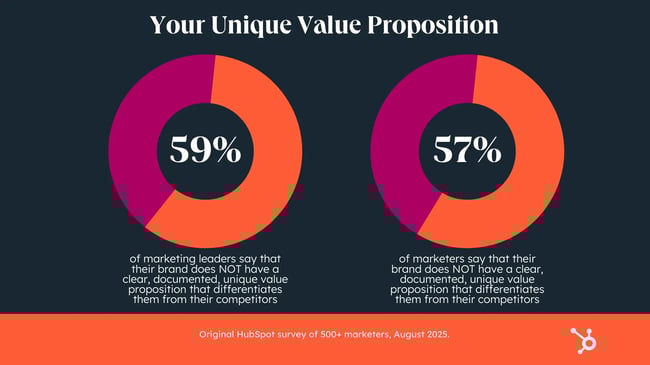
A lot of businesses are missing this crucial step. HubSpot research shows that nearly 6 in 10 don’t actually have their unique value proposition documented.

loop marketing, majority of marketing leaders don't have their unique value proposition documented

Look at these numbers — that’s a lot of people who don’t have a clear idea on their company’s brand story. Worse, an overwhelming majority of the respondents in this survey, just over three-quarters, said that teams without a clear value prop “moderately to highly” miss their goals. That’s tough for morale and for your bottom line.

What a lot of those teams may not realize is how a relatively inexpensive AI tool and a few good prompts can help address these snags — in minutes, not months. Everyone has access to the same AI tools, but what’s different about the Loop playbook is you. AI needs the context and perspectives about your business that only you can give it.

So use an AI tool — whether that’s Claude, ChatGPT, Breeze or something else that works for you — to help you create a brand style guide and to give you a simulation of customer feedback. This amounts to businesses being able to do their own market research with agency-quality personas — this would have been totally out of reach for many businesses until very recently.

One way to simulate customer feedback is with a Claude project that has all the information about your target customer. You can ask it questions about marketing campaigns you’re doing and get real-time feedback on how to make them better.

This is called the Express stage in our new Loop Marketing playbook. Basically: Only you can define your brand story, but AI can take that story and give you the kind of customer feedback that used to require expensive focus groups.

Tailor: Make Every Customer Feel Like Your Only Customer

The next step is using AI to tailor the story to your target audience.

You might be thinking, “I can already send emails to Dear {First Name}” — but you can do a whole lot better now. The history of marketing has largely been about who can make the best educated guesses possible — you find some commonality among people, guess what they want, and try to give them what you think they want.

The remarkable thing about AI is that instead of making guesses about a group of tens of thousands of people, you can instead guess what‘s most relevant to this one person. And with an AI engine that knows your business, where you’re located, who your customers are, what they’re looking for, and which ones are showing intent to buy — well, you’re going to get some pretty good guesses.

It’s not just Dear {First Name} anymore. Imagine you run a local coffee shop and your emails have coffee puns that are specific to your individual customers. You can’t create personalization tokens for puns, right? But AI can do that.

There’s a common misconception out there that using AI will make your business sound generic. But it’s really about the data you give it. For example, the HubSpot marketing team has seen conversion rates improve 82% using AI-driven personalization.

This is called the Tailor stage of Loop Marketing — think of it like getting a custom suit instead of buying one off the rack. Custom tailoring used to be a luxury, but now AI has gotten to the point where it’s within reach of even small budgets.

Amplify: Find Customers Where They Actually Are

Next, you need to amplify to meet customers where they are. This means caring how your business shows up in AI engines like ChatGPT or Perplexity — your customers aren’t clicking through from Google searches anymore. So you’re seeing a lot of traffic diminishing all over the internet.

This is where it gets interesting, because the people who do find their way to your website are higher-quality leads than ever before. Think about it like a consumer: Everyone has the same amount of research at their fingertips. It’s pure information symmetry. So if someone is looking to buy a new sofa, they can do a ton of research before landing on the website of the furniture company they’ll actually buy from.

This is called the Amplify stage of Loop Marketing, getting your message out into this new AI-driven world and getting high-quality prospects in return. Start with AEO, or AI Engine Optimization. It’s the next evolution of Search Engine Optimization (SEO) and it’s going to transform the way your company’s message is distributed.

SEO is about ranking in the top five links; AEO is about being part of the answer. There are lots of great options out there to help you get cited and recommended by those AI engines; pick one and start building on whatever visibility you already have.

And look, it’s not just about search traffic. Most marketers are spending more on events in 2025 than they did in 2024 — people are craving human interaction again. And it’s the best time yet to work with influencers, who can be that trusted person to give real-life recommendations about your business. The ROI is just tremendous: Companies like HubSpot are seeing far lower cost per lead with influencers compared to the big programmatic channels like Google and Facebook.

When AI is doing all this customization and amplification for you, you’ve got more money and energy to invest into other channels that are really, really working for you.

Evolve: Every Campaign Makes Your Next One Even Better

Here‘s what’s really cool about the Loop Marketing playbook: Every time you run through this loop, you get better. Your marketing compounds. You’re constantly improving, constantly learning, and your results just keep getting better and better. That’s why this is called the Evolve stage of Loop Marketing.

The old way, in comparison, was brutal. You’d run a campaign for weeks or even longer, and then do a big post-mortem analysis. It probably involved a lot of meetings that should have been emails.

But now you can ask AI in natural language and get immediate insights: “How should I adjust my targeting? What message resonated the most?” Making adjustments in real time means more successful and more cost-effective campaigns.

AI is ready. Are you?

The most common resistance to AI is fear — fear that AI will replace you or devalue your skills. But the future of marketing isn’t humans versus AI — it’s humans with AI. Businesses just need a guide to help them figure out how to make this human-AI collaboration work. That’s where the Loop can help.

When a big shift in technology happens, it creates massive opportunities for marketers. This was evident with early Facebook and early Google — so much money was made during those times. People aren’t seeing that same opportunity today because this shift represents a loss of control. Nobody is used to that.

But this shift is even bigger now than it was then, and marketers who are using tools like the Loop Marketing playbook and taking advantage of this moment in AI are going to see their growth compound, and fast.

If you’re willing to take action in the next 18 months, it’s going to be impossible not to succeed — the opportunities are just that big.

Categories B2B

I tested 8 AI tools for graphic design — here are my prompts, results, and recommendations

My graphic design journey started on Fiverr. I used to sell banners and background removal services for $5. I am not the best designer. Far from it. However, tools like Photoshop and Canva helped me create decent graphics by editing my way through their premium templates.

Get a Demo of HubSpot's AI Image Generator

Even with these shortcuts, it was still a lot of work. I used to spend hours tweaking graphics, adjusting colors and fonts, exploring new presets, and watching YouTube tutorials on how to create specific effects in Photoshop.

Now, with AI tools for graphic design, I can spin up on-brand banner variations in just a few clicks. I’m also able to give more detailed design briefs to my team, do minor edits myself, and overall, deliver higher-quality designs in half the time.

But which tools give you the usable results and, most importantly, the best ROI? I tested the top 8 AI tools for graphic design to find out.

In this article, I’ll walk you through the exact testing process, including the prompts I used and the results, and whether I would recommend using AI graphic design tools at all.

Table of Contents

Why use AI for graphic design?

Here are the top 3 benefits of using AI for graphic design.

Faster Time to Design

According to HubSpot’s State of AI survey, over 40% of marketers use image and design generators like DALL-E and Synthesia. The most common reason? To help them generate designs faster.

Here are the most common graphic design use cases I’m seeing for AI:

  • Quick edits. AI is great at resizing, cropping, removing, or changing backgrounds, and making other quick edits to designs.
  • Media content. 38% of marketers use AI to create image-based and video content for social media, print, and more. Tools like ChatGPT, Veo-3, Canva, etc., can render scenes faster, create assets, and generate AI videos.
  • Personalized AI images. With AI, you can easily create dynamic assets for customer segments or seasonal holidays.
  • Image-based trends. AI can help you hop on trends like Studio Ghibli art or create custom memes quickly.

Expert tip: I spoke to Robert Avila, an art director from Platinum Black, who shared how he uses AI to create animations: “You can prompt your AI tool to render an entire scene or create assets to composite your scenes manually. When inevitable revisions arise, it’s much faster to update them through AI prompts rather than re-drawing an entire scene.”

Remove Creative Blocks

From creating design briefs to helping me choose color palettes, I find that AI is a great strategic partner. AI is also quite helpful when I have creative fatigue.

For instance, if I am stuck on a social media campaign design, I can prompt AI tools to give me five different concepts. I can even generate creative briefs by providing the tool with additional context, such as design references, rough sketches, or campaign documents.

Creative Experimentation

A/B testing graphics is a huge part of my job. I’m constantly testing which graphics perform better on social media or ad variations that give us better ROAS. With AI, I can quickly spin up dozens of on-brand designs and choose the best based on audience response.

The best part? AI tools help me experiment with color combinations I’d have never considered and wacky, trend-based layouts. Some AI-generated designs have actually been top performers.

How I Tested the Best AI Graphic Design Tools

I tested AI graphic design tools with two optimized design “mega” prompts. Basic prompts weren’t giving the output I wanted, so I decided to go all out.

Each prompt covers a common marketing use case and includes detailed instructions to keep the model on track (AI can be notoriously distracted!).

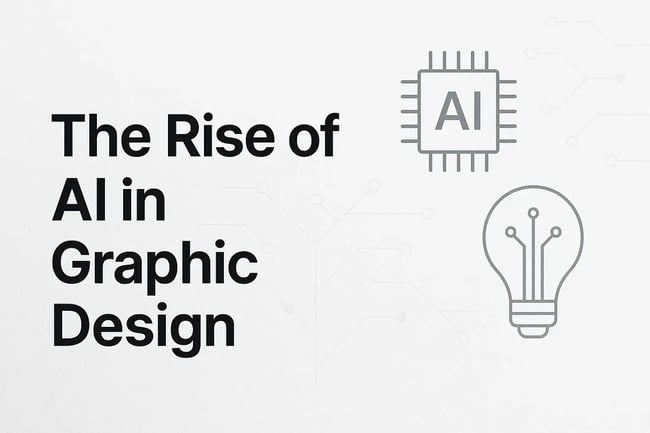
Prompt #1 — Blog Banner/Featured Image

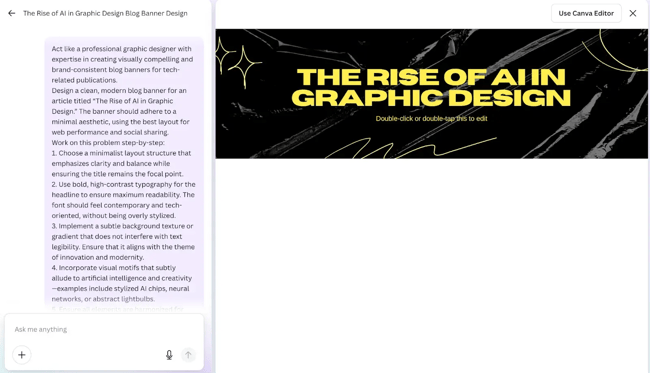
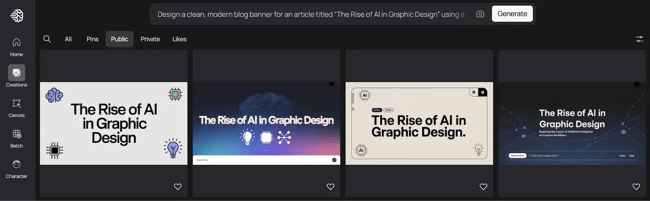
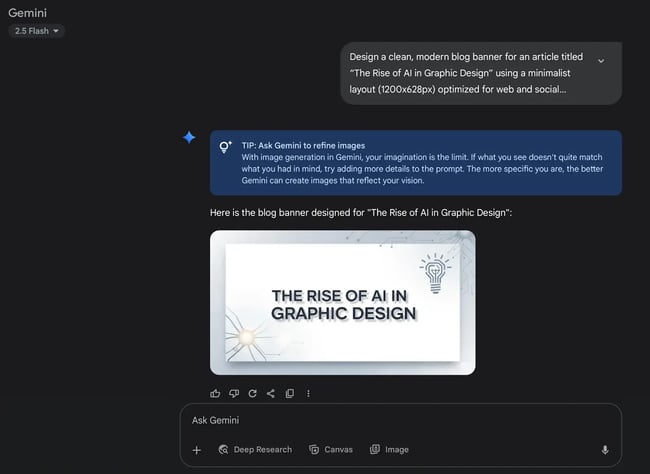
“Design a clean, modern blog banner for an article titled The Rise of AI in Graphic Design’ using a minimalist layout (1200x628px) optimized for web and social sharing. Prioritize a bold, high-contrast headline in a contemporary, tech-inspired font. Use a subtle background texture or gradient that enhances, but doesn’t compete with, text legibility. Incorporate understated AI-themed motifs like neural nodes, abstract chips, or creative lightbulb icons. Maintain visual harmony with generous white space and balanced composition. Enhance the title’s visual impact through font weight, spacing, or soft shadowing, and ensure strong text-to-background contrast for clarity. Export as a high-res PNG or JPG.”

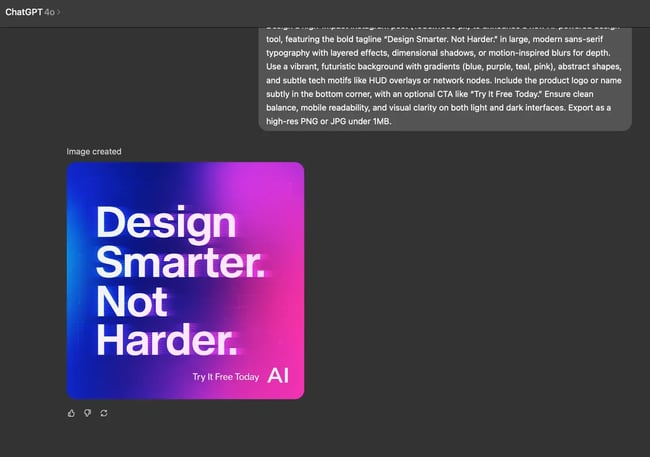
Prompt #2 — Social Media Post

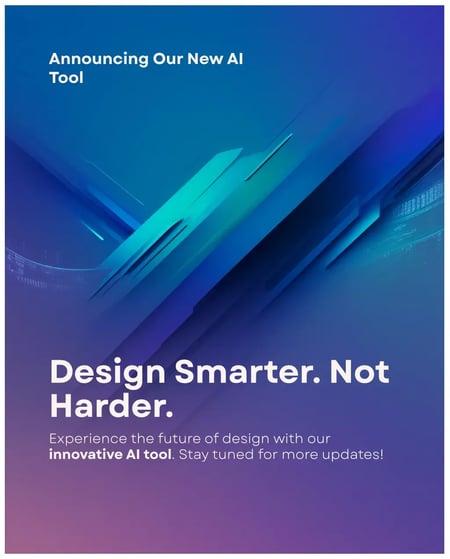
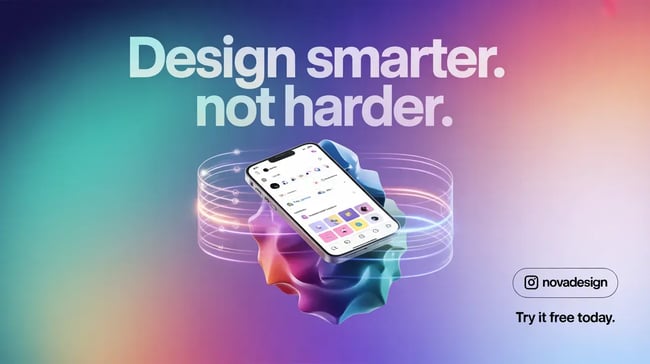
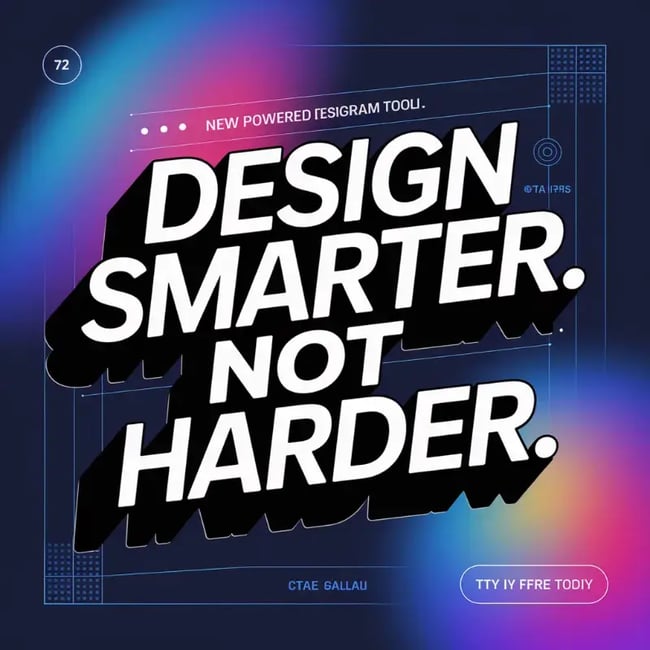
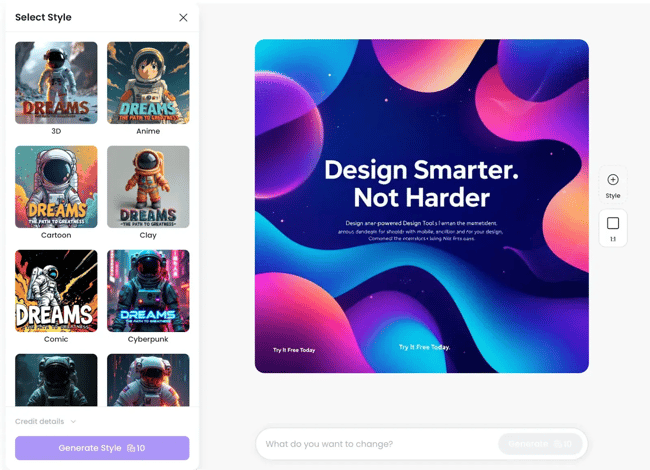
“Design a high-impact Instagram post (1080×1080 px) to announce a new AI-powered design tool, featuring the bold tagline ‘Design Smarter. Not Harder.’ in large, modern sans-serif typography with layered effects, dimensional shadows, or motion-inspired blurs for depth. Use a vibrant, futuristic background with gradients (blue, purple, teal, pink), abstract shapes, and subtle tech motifs like HUD overlays or network nodes. Include the product logo or name subtly in the bottom corner, with an optional CTA like “Try It Free Today.” Ensure clean balance, mobile readability, and visual clarity on both light and dark interfaces. Export as a high-res PNG or JPG under 1MB.”

Note: I also considered other factors like cost, ease of use, design capabilities, and copyright usage before arriving at my final list of AI-based graphic design tools below.

Pro tip: If you want to learn how to write prompts like these, you can read my list of the 33 best ChatGPT prompts for inspiration.

Best AI Tools for Graphic Design

I road-tested eight tools for graphic design. Here’s what I found.

1. Canva AI

I think Canva is a more accessible, intuitive version of the Adobe suite. Most freelancers rely heavily on Canva for client projects, and I can see why.

Canva has stepped up its design game in the last year. I’m seeing a huge shift towards AI-assisted design workflows through its Visual Suite 2.0. I love how I can create interactive dashboards just through sheets, generate cool new backgrounds, and so much more with the new Canva.

Moreover, Canva is now integrated into HubSpot, which means I can seamlessly use it inside my blogging workflow.

Free resource: Learn how to use Canva in HubSpot in this Academy course.

Now, let’s get to testing.

Test Results

I used the web app for this test. But you can achieve the same results with Canva AI on mobile or tablets (iOS and Android), as well as the desktop app (macOS and Windows).

Find Canva AI, click on it, and you’ll get a prompt field where you can describe what you want. Here’s what I got for Prompt #1:

canva ai interface and my prompt, blog banner designed by canva ai

As you can see, the layout and typography are decent. The background? Not so much.

The fact that Canva embeds its own instructions in the image (“Double-click or double-tap this”) is a bit annoying, honestly. But being able to edit the output through the Canva editor is a plus in my book.

Here’s what I got for the second prompt:

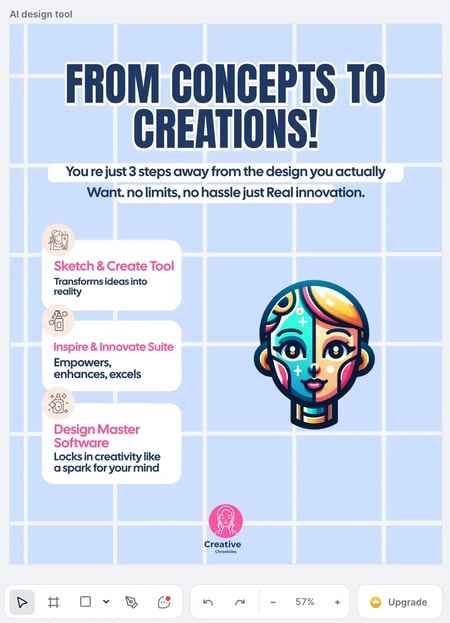
social media post designed by canva ai, ai graphics for software tool announcement

I feel that Canva is best for use cases related to social media. You can even get carousel posts with Canva AI.

I would, of course, make some minor tweaks to the above image like removing “announcing our new AI tool’, switching out the copy, etc. However, Canva gives me a good base to start from.

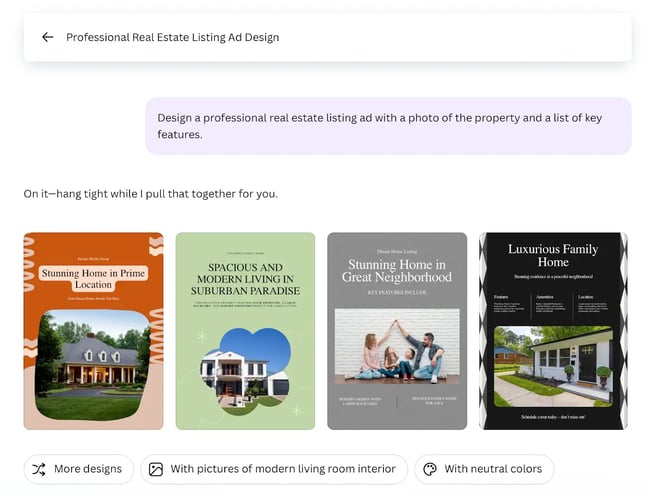
Bonus: Don’t want to write custom prompts? Canva AI has presets for you to use. I tested one of them to show you how they work.

four outputs for a preset prompt in canva, ai-generated real estate listing designs

It took almost 10+ minutes to generate these mockups. However, I thought the results were pretty great and can be shipped with some tweaks. You can definitely use Canva AI for social media graphics.

What I like:

  • Simple and intuitive interface.
  • Ability to edit images within the tool.
  • Offers a wide range of premium templates.
  • Integration with Canva’s design suite and other platforms like HubSpot.

What can be improved:

  • Better adherence to my prompts.
  • Generate mockups faster.

Pricing: Free access with limited credits. Paid plans from $5.81/month and $46.49/year.

Best for: Social media graphics and reusable visual assets.

2. ChatGPT

ChatGPT is my go-to AI chatbot for brainstorming content ideas, creating outlines or first drafts, and even analyzing Excel spreadsheets. It’s a great creative partner, and that’s why I also use it for creating design and image mockups to pass on to my designers.

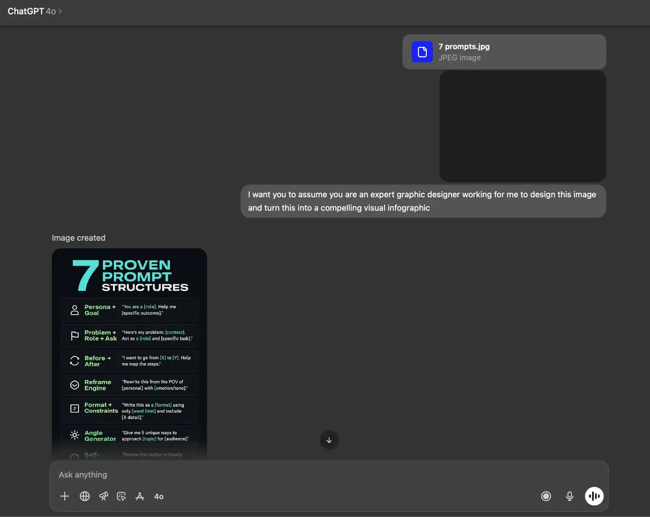
When using ChatGPT for graphic design, I provide the model with existing graphics to serve as a reference for style, layout, and so on. Here’s an example of a typical prompt I use.

prompting and graphic design workflow with chatgpt

As you can see, it comes up with decent designs when it has reference images. For this test, however, I used a fresh chat to ensure fairness and consistency in the results.

Test Results

When I first entered Prompt #1, ChatGPT started breaking it down and explaining it to me. That’s a weird quirk on this platform, probably because it’s trained to be a conversational model.

Anyway, after asking it again to create the banner, here’s what I got.

blog post banner designed by chatgpt, ai generated feature image

While this looks alright from a minimalist design perspective, I’m not a huge fan of how the text is positioned. There’s a lot of whitespace, and I’m not too sure about the lightbulb.

I could probably fix this with a reference image, but let’s skip that for now. Instead, let’s see how ChatGPT does with the social media prompt.

chatgpt ui and graphics for social media, ai generated graphic for instagram

As you can see, this graphic isn’t very professional. So I gave ChatGPT another shot, this time putting Canva’s design as a reference. The model mimicked the image and didn’t come up with anything original. Bummer. More often than not, though, providing examples and pushing for iterative fixes with follow-up prompts will give you better results with ChatGPT.

What I like:

  • Fits right into my broader AI workflow since I already use ChatGPT.
  • Does a decent job when given the right references.
  • Images get generated fairly quickly.

What can be improved:

  • Design quality; custom training datasets would help here.
  • Ability to edit created images inside the context window without changing the whole image.

Pricing: $20/month for ChatGPT Plus and $200/month for the Pro tier. Limited access for free users.

Best for: Brands that already use ChatGPT in their workflow.

3. Ideogram

As a content marketer, I usually need text-heavy graphics. Think blog banners, call-to-action buttons, and infographics. Since my goal is to drive engagement and conversations, visual elements and text in the graphics are helpful for capturing user attention.

However, getting AI tools to render legible text designs was harder than I thought it would be. I heard a lot of good things about Ideogram, though, so I decided to try it out for graphic design.

Test Results

I used the web version of Ideogram for this test. You can also use the newly-launched mobile app if you like. Here’s the output of the first part.

ideogram’s ui and graphics design outputs, four ai generated blog banners

Honest opinion? I thought the layout was sub-par. The generated banner also had unnecessary elements (like “1200 px”), but I can’t complain about the quality and style of the text.

Next, I entered my social media prompt, and here’s what I got.

instagram post designed by ideogram, ai generated social media graphics

This is by far the best social media post (design-wise) on this list so far. Minimal, modern, and clean — just like I asked. It even came up with a name for the brand, which none of the other tools did. The ‘N’ should have been uppercase, but that is a quick fix. All in all, Ideogram generated a graphic I’d actually use.

What I like:

  • High-quality text rendering with good font choices.
  • Vibrant color palette and scheme that stops the scroll.
  • Original elements like brand name suggestions, etc.

What can be improved:

  • More control over design layers.
  • Ability to edit text and other components inline.

Pricing: Free access with limited ‘slow’ credits. Paid plans cost $7–$42/month.

Best for: Simple, text-heavy banners, social media posts, billboards, etc.

4. Autodraw

AutoDraw is an AI tool that combines machine learning and drawings from artists. You can doodle in the tool, and it’ll suggest the closest shape to your drawing. I must say I loved the premise of Autodraw. While I am decent at digital design (thanks, templates!), I can’t draw a straight line without a ruler. Having an AI tool improve my art sounded super cool.

A warning: I don’t have a graphics tablet. So everything you’re about to witness, hilarious though it may be, was done with just a mouse. I’m guessing the tool’s capabilities are far greater with a tablet or a stylus at hand.

However, without giving too much away, it proves that you can input a terrible drawing into AutoDraw and get something better back.

Test Results

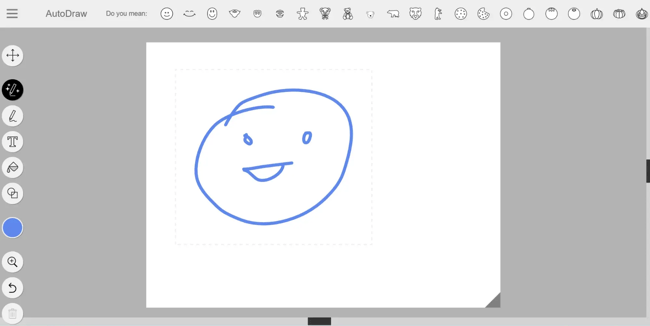
I started with something basic — a good old smiley face. As you can see, the suggestions were pretty good, but I wanted the smile to be just a tad bit wider.

attempt to draw a happy face, hand-drawn smiley in autodraw.

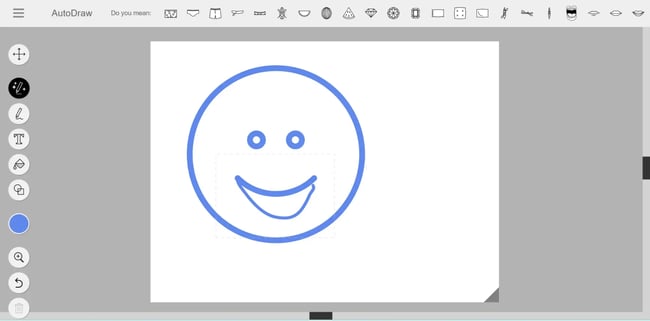
So, after selecting the right smiley, I tried to make the mouth wider. Sadly, Autodraw doesn’t take the whole drawing into account while suggesting shapes. The suggestions were way off — I definitely wasn’t trying to draw shorts.

smiley on autodraw, ai generated smiley.

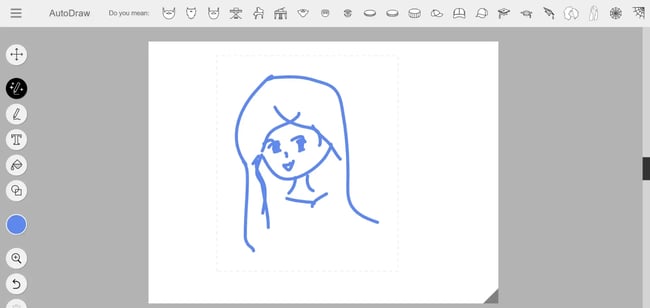
So, I went back to the drawing board (literally) and tried to get what I wanted with a single drawing. This time, I wanted to draw a girl.

girl drawn on autodraw, ai tool suggesting design shapes

I knew my drawing skills were questionable, but I didn’t think it would suggest a beard when I was aiming for a girl. I guess the suggestion feature can only help with simple preset shapes, which is a bummer.

What I like:

  • Simple to use, free, and very fun!
  • A large range of icons as suggestions.

What can be improved:

  • Complex artwork needs you to be a good artist (which I’m not).
  • Doesn’t consider the whole artwork while generating suggestions.
  • No option to upload custom images

Pricing: Get started for free.

Best for: Speeding up the design process.

5. Gemini

I first came across Gemini through AI-generated overviews in Google Search. Then, I saw it integrated natively with most of the products I use daily (Google Workspace, Pixel phone). So, whenever I want a convenient yet powerful AI tool option, I turn to Gemini.

Gemini is pretty good at deep research. It also has one of the best models for video generation with native audio (hello, Veo-3!). So, I was excited to test out Gemini for graphic design.

Test Results

Gemini’s UI is pretty similar to ChatGPT. I sent it the first prompt, and this is what I got.

google gemini chat interface and my prompt, ai image for a blog banner

Decent text rendering, but I felt the image was too simplistic. The I tested it for the social media use-case. Here’s what I got.

google gemini’s social media post design, ai generated instagram post

Much better, although not as good as what we got from the other tools like Ideogram. I’d rate it 6/10.

What I like:

  • Intuitive user experience with decent design generation capabilities.
  • Free to use with limited credits.

What can be improved:

  • Free trials for video graphics.
  • Native video editing features.

Pricing: Gemini is free for all Google users. Pro models available with paid plans, starting from $22.26/month with higher AI limits and video generation.

Best for: Brands looking to generate images and video in one tool.

6. Kittl

Honest confession? I wanted to try out this tool because of its name. Kittl! Isn’t that cute? Jokes aside, I didn’t know about this tool until I stumbled upon it during my research for this piece. But I’m so glad I did, because this is actually a very powerful yet free tool. Much like Canva.

The image quality isn’t one of the best ones on this list, but Kittl is great at customization. It lets you choose between multiple image generation models, even as a free user, which is rare from what I have seen so far (and I’ve seen many of these).

Test Results

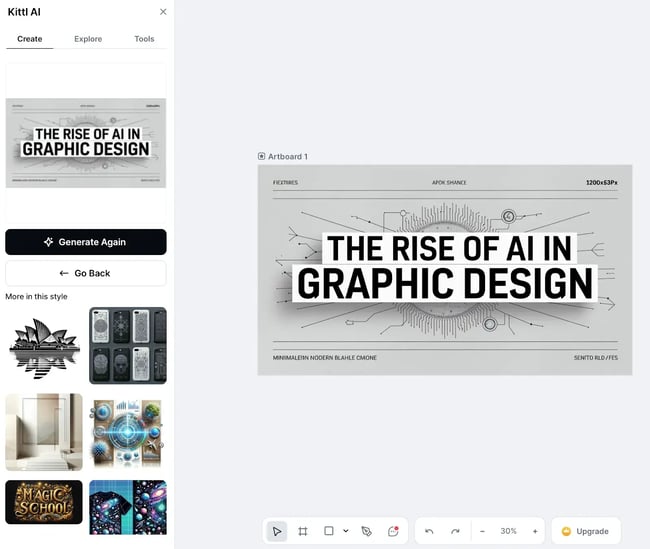
You need to sign up with an email or Google to access Kittl. But thankfully, you don’t need to give any card details. Also, Kittl does not have a mobile app as of August 2025, so you need to use the web app like I did for this test.

kittl ai graphic design ui and artboard, ai generated blog banner

As you can see, Kittl’s UI/UX combines elements from Canva, Adobe Illustrator, and other top graphic design tools. While its AI certainly needs to evolve, let’s see how it fares with the social media use case.

social media graphics by kittl, ai generated instagram post

While this one’s much better from a design standpoint, the text was all over the place, so I checked if there’s an option to edit this. There wasn’t, but I stumbled upon the “Design Generator (Beta)” tool and decided to try it out. It returned this editable design.

editable graphics generated by kittl, ai generated social media graphic

The design looks pretty clean, and I can work with it to make it better. The problem, however, is that you can only put 50-character prompts in Design Generator (Beta). Because of this, the output wasn’t aligned with my needs, and I had to edit most of the text to make it usable. That’s a lot of work for an “AI designer.”

What I like:

  • Access to multiple AI models.
  • Extensive customizability.
  • Multiple AI tools clubbed into one.

What can be improved:

  • Text rendering.
  • Simpler UI for amateurs.

Pricing: Free access with limited credits. Paid plans start from $11.42/month.

Best for: Brands looking for a freemium alternative to Canva.

7. Adobe Express

Although I started my design journey Adobe tools as I mentioned earlier, I’ve been using them less and less over the last couple of years. I get most things done with ChatGPT and Canva now. However, I decided to give the web version of Adobe AI a shot after reading up on its AI features.

I first tried Adobe Express with simple logos, but the results were mostly subpar. Then I pushed through and tested more extensively for this article.

Test Results

In Adobe Express, you can create both templates and images using AI. Image creation uses Firefly 3, Adobe’s proprietary model. I tested the tool with this and got the following result for Prompt #1.

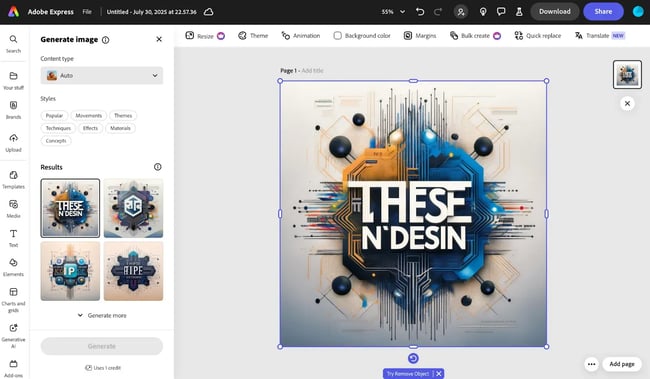
adobe express ui and graphic design outputs, blog post banner generated by ai

While the background had a lot going on, Adobe completely went astray with the text and layout, despite the detailed prompt. Thankfully, you can edit the text or add to it without leaving the window.

Then, I provided the social media prompt, hoping for better results. But…

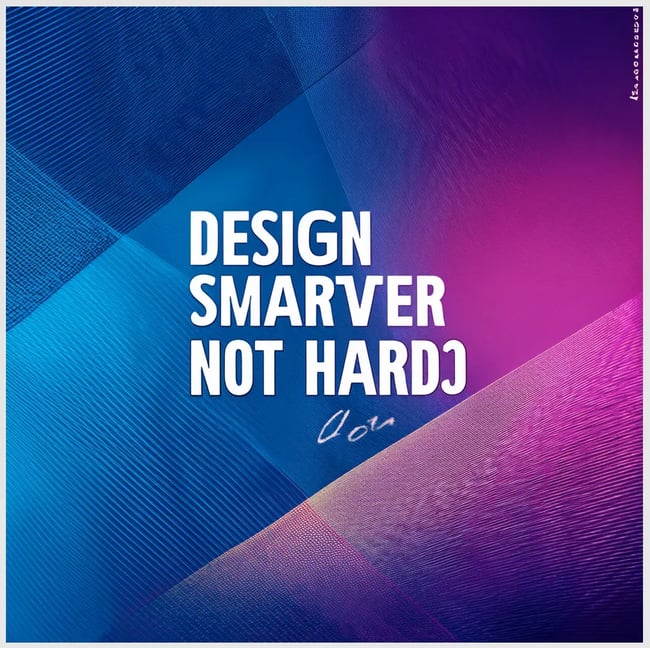
social media graphics designed by adobe express, simple ai generated instagram post

I don’t think I need to say much about the design or the text. Adobe is lagging significantly in the AI race, which is why it’s losing out on non-designers like me. It would be interesting to see how this impacts its market share and dominance over the next 2-5 years.

What I like:

  • Integrated with the Adobe suite so that you can edit inline.
  • Wide variety of professionally designed templates.

What can be improved:

  • Prompt adherence.
  • Text rendering.
  • Overall image quality.

Pricing: Free to use with limited features. Paid plans start from $4.55/month.

Best for: Brands and marketers who have deeply integrated the Adobe suite into their workflows.

8. Designs.ai

I first heard of Designs.ai as an “Agency-as-a-Service” solution and got instantly curious about the idea. Although I haven’t used it extensively (mainly due to the hefty costs) I think the idea is intriguing.

You can do everything from logo design to text-to-speech for AI voiceovers using Designs.ai. For this article, I only tested the design part.

Test Results

You need to provide your card details to start the trial, which was quite annoying. Anyway, I went ahead with it for this article to see if it’s worth it. Here’s the output of Prompt #1.

blog post banner generated by design.ai, ai generated blog featured image

Well, at least design agencies don’t need to worry about Design.AI taking their job. At least not with banners or featured images for blogs. Let’s see if it does a better job creating graphics for social media.

designs.ai ui and output for social media post, ai-generated graphic design

Except for the tagline, most of the other text is either smudged or gibberish. The layout isn’t very appealing either.

As you can see, there’s an option to select the style. But every time you select a style, change the aspect ratio, or make any edits whatsoever, you need to spend 10 credits. This way, you’ll exhaust the 1000 free credits in no time, which doesn’t make this tool worth it, in my opinion.

What I like:

  • Interesting packaging and offer idea (although poor execution).
  • Extensive product suite.

What can be improved:

  • Free trial without card info.
  • Relaxed rates limits or higher credit availability.

Pricing: 7-day free trial, followed by Basic plan starting from $29/month or $228/year ($19/month on yearly plan).

Best for: Brands working on multimedia campaigns that need an integrated tool with features for video creation, such as voice-overs.

Should you use AI tools for graphic design?

The results of my experiment proved one thing: AI hasn’t replaced the need for good graphic designers. If anything, AI has made it more important to understand how to differentiate a good design from a bad one.

My favorite AI tools in this list are ChatGPT (ideation), Canva (social media), and Ideogram (text-heavy stuff). While the concept of Autodraw was cool, I don’t think I can draw well enough to make the tool work for me.

However, editing is a bit of a pain with these tools. I can tell a human designer to edit or modify an image or design, pixel by pixel, in any direction. However, when I try to work with AI, it sometimes messes up, gives me the wrong text, or generates a different image altogether.

Bottom line? I’d recommend turning to AI tools for graphic design for quick mockups, ideation, or base designs. While AI does speed up the design process by a lot, you still need a professional designer to polish it and make it publish-ready.

Editor’s note: This article was originally published May 2024 and has since been updated for comprehensiveness.

Categories B2B

The top search engines other than Google [+ some you might not expect]

Google remains the top search engine, with a significant market share of more than 89%. This means that 89% of all searches take place on Google.

And if this is true, why do marketers need to think about alternative search engines?

→ Download Now: SEO Starter Pack [Free Kit]

I think there are two main reasons.

Firstly, search is changing. Below, I share data on the decline in Google searches and the increase in alternative search engines, including large language models (LLMs) such as ChatGPT and Perplexity, as well as social media channels like Reddit.

Secondly, different search engines bring different things to different users. It’s helpful to know who your audience is before choosing your top search engine because if you know who you’re targeting, you might be able to figure out where they’re completing their search so that you can meet them there.

If I were targeting sustainably driven audiences, I might turn to a green search engine like Ecosia. If I wanted to target men, I might focus on Reddit since the majority of users (59.80%) are male. Choosing the top search engine is less about understanding the quantity of searches and more about quality and audience relevance to your brand.

In this article, I’ll cover the top search engines gunning for Google’s market share based on the numbers. Then, I’ll explore alternative search engines, including the AI-powered options I recommend, and who might use each one.

Before we get into the top search engines, let’s look at the data.

Table of Contents

The Data Behind Top Search Engines

screenshot of a chart created using statcounter.com’s data on the percentage market share for the privacy-focused search engine duckduckgo.

Source

I’ve worked in SEO and marketing for about a decade, and during my time, I’ve seen Google reach a market share of over 93%.

A staggering monopoly.

In October 2024, something shifted, and Google’s market share dropped below 90% for the first time since 2015.

What changed? Search behavior.

Instead of searchers heading to Google to fulfill their search queries, they are turning to alternate forms of search. Naturally, alternative search engines like Bing capture a portion of the market share. In 2016, Bing had an overall share of 2.79%, and since January 2025, it has increased its share to 3.96%.

Privacy-focused search engines, such as DuckDuckGo, have gained popularity. While searches on this particular search engine are low, DuckDuckGo has captured up to 0.86% of the market share. That’s part of the ground Google has lost.

screenshot of a chart created using statcounter.com’s data on the percentage market share for the privacy-focused search engine duckduckgo.-1

And what’s more?

Large language models (LLMs), such as ChatGPT, have altered search behavior, with more people fulfilling their queries directly within the AI.

It’s no coincidence that Google’s drop aligns with the release of ChatGPT in November 2022.

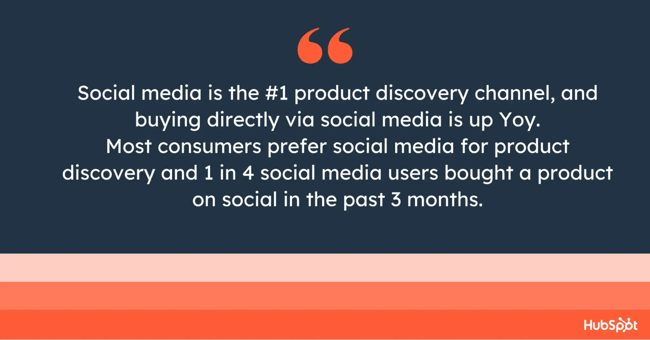
Oh, and let’s not forget that social media search has been a “threat” to Google for many years. HubSpot’s recent Social Trends Report revealed some insights into how search behavior and social media are evolving.

The report shares that:

  • 69% of marketers agree that more shopping will occur directly on social media platforms than on brand websites or third-party marketplaces in 2025.
  • Over 40% of Millennials and Gen Zers have purchased products directly on social media in the past three months.
  • 25% of general consumers have bought products directly from social media in the past three months​.

I use quotes when I say “threat” because I don’t really see these shifts as a threat but rather as an evolution — and an exciting one at that.

While Google’s searches decrease (a bit), it shouldn’t change anything for marketers who are focused on meeting prospective buyers where they’re at, wherever that may be!

What’s important in modern-day marketing and the future of SEO is that we broaden our approach to search, identify the right search engines to focus our efforts, and expand on what a “search engine” means to our prospective buyers and audiences who are no longer using traditional search only.

For example, if you’re selling a product, you might want to focus more heavily on social media if your target audience is Millennials or Gen Z, because 40% of them make purchases directly on social media, compared to 25% of general consumers.

While Google will be the priority for most businesses because that’s where the majority of searches happen, effective search marketing isn’t just about chasing volume. It’s about understanding your audience and selecting the channels that best align with your business and marketing objectives.

You might be surprised at what different search engines offer different audiences. Below, I’ve outlined the top six search engines based on the data, but don’t stop reading after the top six, because you might be surprised at what other search engines can offer your audience and, therefore, your brand.

For example, sustainably focused brands may not want to ignore Ecosia, as it is considered the greenest search engine. If your audience is sustainability-focused, they might just be part of the 0.1% of searches using Ecosia.

Don’t dismiss 0.1% as insignificant, as it still translates to around 18.43 million searches per day. And that’s a lot of people who share the same values as you.

screenshot of a chart created using statcounter.com’s data on the percentage market share for the top sustainability search engine, ecosia1

Where do AI Search, ChatGPT, and social media come into all this?

Strictly speaking, ChatGPT and other forms of AI search are not officially search engines. They are language models.

Search engines index the web and return links to pages.

AI, like ChatGPT, generates human-like responses based on patterns in the data it was trained on and (sometimes) pulls real-time information from the web.

Although not a search engine, these platforms can:

  • Answer questions.
  • Explain concepts.
  • Generate creative content.
  • Assist with problem-solving.

To me, whether these alternative search platforms are considered search engines or not is irrelevant, because people use them like search engines, and as a marketer, I want my clients to be wherever the search is taking place.

I didn’t want to get too lost in exactly what a search engine is, but I did want this article to be clear, so below, in the Top Search Engines section, I’ve listed the top six official search engines. Below this, there’s another section, “Other Search Engines,” where I’ve included official search engines alongside AI search and social media.

Top Search Engines

At the time of writing this article, the top six search engines are:

  1. Google (89.54%)
  2. Microsoft Bing (3.95%)
  3. Yandex (2.45%)
  4. Yahoo! (1.37%)
  5. DuckDuckGo (0.86%)
  6. Baidu (0.73%)

The figure in brackets is the percentage market share at the time of writing.

infographic shows the six top search engines in order of highest search engine market share.

Source

1. Google

Let’s start with the heavy hitter. Google dominates search worldwide, and there are many reasons for its success:

  • Superior search algorithm that connects searchers with the content they need.
  • User-friendly interface that’s minimalist, fast-loading, and easy to use.
  • Trust. Google’s brand has scaled into various digital experiences, including email, maps, and business operations, with Google Drive.

Users trust Google. It’s no longer just a brand; “google” is a verb recognized by the Oxford Dictionary, and it means “search for information about (someone or something) on the internet.”

Even though search is evolving, it remains the logical starting point for marketing, running paid marketing campaigns, and developing organic traffic strategies.

Although the future of search is uncertain, regardless of the evolution of OpenAI, search bots, or social media search, the Google ecosystem remains a critical component of my work.

screenshot of google, the top search engine worldwide.

One word of warning when it comes to optimizing on Google: The algorithm works to fulfill users’ needs directly on Google, so they don’t need to click any links. With the newest search engine results page (SERP) feature, AI Overviews, users can search on Google and receive their answers directly within the SERP.

Here’s an example:

screenshot from the top search engine, google, shows how the ai overviews work on the search results pages.

Source

Features like this, plus Google’s popularity, might make it harder for you to capture as much website traffic as you want.

Pro tip: Keep your SEO strategy centered around searches that people have to click through to a website for more information. Bottom- to middle-of-the-funnel searches are your best chance of getting a click. Read this article I wrote on buyer journey keywords for more information. It provides more detailed information about the buyer journey and includes a step-by-step guide to conducting keyword research.

Who uses Google: Let’s be real for a second. I know, you know, and everyone knows the size of Google’s market share and the treasure trove of data they have. Everyone is using it, so focusing on Google SEO is an unavoidable necessity.

Why I like Google: As a searcher, I love Google for its excellent algorithm and easy-to-use interface. As an SEO, I know Google is where I have to be because everyone else is. Additionally, ranking on Google is a crucial component for earning citations within AI searches.

2. Microsoft Bing

Microsoft Bing has long been the second most popular search engine, currently holding a 3.95% market share globally.

This engine also powers Yahoo!, the fourth-biggest search engine.

Bing’s search pages look similar to Google’s. There are the same categories and a similar white background, with blue links and green URLs.

screenshot of bing’s search engine.

Source

Bing offers Microsoft Rewards, a program that gives you points when you search or shop on the engine. You can redeem those points for gift cards, nonprofit donations, and more.

Who uses Bing: According to WordStream, Bing is primarily used by white-collar professionals who search on work computers. Users are also slightly older, with an average age of 45.

In one of the agencies where I worked, we had a client targeting an older audience. For this client, we focused on Bing SEO over Google because we knew that searches on Bing would more likely come from the target demographic.

infographic shows the demographics of people who use the top search engine, bing.

Source

Why I like Bing: I appreciate how well-integrated Microsoft’s AI, Copilot, is. It summarizes search results for you. However — and this is a pretty important “however” for marketers and SEOs who rely on organic traffic — the direct links are harder for users to find. Plus, the first link it provided was to a different landing page than the one linked above.

top search engine, Bing, in action with Copilot integration

Source

Best for: If you want AI search features and only need summaries, this is a great option. Copilot is so far ahead of Gemini that it’s not even funny. Google also had its privacy-related controversies, while Microsoft has a much clearer track record in that regard.

3. Yandex

In some local markets, smaller search engines go head-to-head with Google — and win.

Russian search engine Yandex has a roughly 2.45% share of the worldwide search engine market, but in its home country, that share skyrockets to nearly 63%. Google holds the number two spot.

infographic shows the market share of a top search engine, yandex, in its home country, russia.

Source

When I used Yandex, I found it hard to navigate. They also have a suite of other services, none of which are particularly relevant in the Anglosphere. My experience with Yandex makes sense, and considering I’m not the usual demographic, it doesn’t matter how I find it. What’s important is who uses it, and if you want to get in front of them, you might want to focus on optimizing for Yandex.

Like Google, Yandex considers whether a user’s query has local intent and displays region-dependent results. To account for this, you’ll need to go into Yandex’s webmaster tools and set a site region.

It’s not advertised anywhere on its search engine, but Yandex’s corporate website notes that AI technologies are delivered to all its products, including search.

Who uses Yandex: If you do business globally and are looking to reach Russian customers, then you want to be on Yandex. Something to keep in mind: Yandex displays many quality indicators, or badges, alongside its search results. One of the most prominent is the site quality index (SQI), which indicates how useful your site is to users.

Why I like Yandex: I didn’t expect it, but Yandex has by far the best image search function. It’s significantly more accurate and can even handle paraphrasing and lengthy descriptions.

screenshot from yandex’s image search to show how this top search engine presents image search.

Source

4. Yahoo!

Its news-heavy page isn’t the sleekest search engine interface, but Yahoo is still one of the more popular alternatives to Google. In fact, Yahoo holds over 1.37% of the worldwide search engine market share.

yahoo search engine

Source

Yahoo is powered by Microsoft Bing, so search results are similar. Its search results page has a minimalist, text-heavy interface. However, it’s still an important search engine in its own right, with over 300 million monthly users.

What I like about Yahoo!: I have quite fond memories of Yahoo! Search. It was the search engine back in the day. Yahoo! was founded in January 1994, four years before Google was established. When I was young, I’d put all my search queries into Yahoo! For this reason, the Yahoo! interface always feels quite nostalgic.

Who uses Yahoo!: According to Similarweb, searchers in the U.S. send most traffic to Yahoo!, Brazil, India, and Taiwan follow. The majority of searchers are aged 25–34. A key point regarding Microsoft search, including Bing, is that voice search powered by Alexa leverages Microsoft search tools. If voice search is a priority for you, focus on Yahoo and Bing.

5. DuckDuckGo

If you’re uneasy about targeted ads or don’t want your search data stored, you might want to try DuckDuckGo, which touts itself as “the search engine that doesn’t track you.”

top search engines 2025, duckduckgo

Source

This search engine doesn’t collect or store any information, so you can search for shoes without being bombarded by subsequent ads. It’s worth noting there are still ads on DuckDuckGo — just not personalized ones.

DuckDuckGo features a clean interface that makes navigation easy. With more than 100 million daily searches in 2024, it’s slowly gaining steam in the market, especially as users become more concerned about privacy.

What I like about DuckDuckGo: As a marketer, I love data. As a consumer, I dislike my data being captured. Personally, DuckDuckGo is a great solution when I want to browse in peace.

Who uses DuckDuckGo: Considering there’s no tracking data, we don’t know; however, it’s probably safe to assume that DuckDuckGo users are protective of their data. If you’re selling a product like a VPN, advertising on DuckDuckGo may be a suitable solution.

6. Baidu

Baidu is China’s largest search engine, capturing 50.71% of China’s search engine market. Following Baidu, there’s Bing (24.22%), Haosoi (17.04%), and Yandex (4.26%).

screenshot from statcounter shows the percentage of search engines used in china.

Source

The search engine is in Mandarin (so if your Duolingo game isn’t strong, you may have issues as an English speaker). Otherwise, Baidu looks similar to Google, featuring a white background, blue links, and green URLs. Like Google, Baidu aims to incorporate more rich features in the SERPs.

If you’re looking to appeal to the Asian market, Baidu is a good option to consider.

screenshot from the top search engine in china, baidu.

Source

What I like about Baidu: As an English speaker, Baidu is challenging to use. A few years ago, I cycled across China for three months and could only access Baidu. Google was only available with a VPN. Baidu Maps was definitely more useful than Google Maps in China.

Baidu’s search engine censors certain images and blocks pro-democracy websites. If you’re comparing search results, you’ll find a more comprehensive results list on Google.

Pro tip: If you speak Mandarin, are conducting cultural research, or are looking from another news perspective, Baidu won’t disappoint. But if you’re from the West, the censorship and lack of “outspokenness” will be a bit glaring at first.

Who uses Baidu: The Chinese market is the largest user of Baidu, although you might be surprised to hear that younger people seeking a more Western influence are turning to Google. In Chengdu, I met a group of young ukulele enthusiasts, and everything they knew came from YouTube. Younger generations are finding workarounds to access information.

Need support learning SEO? Try HubSpot’s Complete SEO Starter Pack. You’ll get a rundown of everything you need to navigate the turbulent world of search engines.

Other Search Engines

I rounded up three more “search engines,” including ChatGPT and Perplexity, two AI tools that people use to fulfill queries.

7. Ecosia

Ecosia is “the search engine that plants trees.” For every search a user makes with Ecosia (whether on the web page or using its free browser extension), Ecosia will allocate a portion of its profits to plant trees in vulnerable areas.

To date, Ecosia has planted over 230 million trees and dedicated over 90 million euros to climate action.

top search engines, ecosia

Source

Note to marketers: Ecosia’s sponsored spots push your content nearly below the fold. I love using it every now and then. It feels really good to contribute to a good cause.

Ecosia is most popular in its home country of Germany, where it holds a 1.09% market share and is the sixth most popular search engine in the country. Like Yahoo, Ecosia runs on Microsoft Bing.

Pro tip: Are you a PPC expert who lives in or targets Germany? If so, that’s the only possible reason you might want to use Ecosia.

Who uses Ecosia: Considering Ecosia is a sustainably-focused search engine, it’s likely that those using it are conscious about the environment. If this is your audience, or if your company is committed to sustainable marketing, you might want to focus on Ecosia.

8. ChatGPT

As previously mentioned, ChatGPT is not a search engine per se; however, AI search platforms cannot be ignored in conversations about the top search engines.

Why?

Because people are using LLMs as a search engine, and this is happening significantly.

screenshot of a short chatgpt conversation.

The speed at which ChatGPT gained search market share was unprecedented, and compared to Bing, which has been fighting for their 2-4% market share over the years, ChatGPT’s rise was incredible. Within five days, ChatGPT had one million users. By comparison, it took Instagram two and a half months to reach the same milestone, and Netflix required three and a half years to hit one million users.

bar chart infographic shows how long it took for some platforms, including search platforms, to reach one million users.

Source

I’m conscious about keeping the search and LLM conversation balanced, so let’s quickly review how many people search on Google compared to AI tools:

screenshot shows how many users search on google compared to other search engines, including chatgpt and perplexity.

Source

Google is used significantly more than ChatGPT and Perplexity. Whatever you do, don’t lose your traffic by focusing too much on AI search and forgetting about traditional search.

What I like about ChatGPT: I’ve used ChatGPT for years, and I think I use it daily, just like Google. I like how ChatGPT can provide answers to longer-tail, more complex searches.

Who uses ChatGPT: According to Exploding Topics, the majority of ChatGPT searchers are male (64.32%), from the U.S. (14.78%), and more than 45% of ChatGPT’s users are under the age of 25.

9. Perplexity AI

Perplexity has gotten a lot of buzz in the past year. It has a similar design to other AI search engines, with source links above a longer answer in easily skimmable bullet points. It also features citations that reveal the source when you hover over them — essential to ensure that you’re not falling prey to misinformation.

screenshot of the perplexity homepage, an ai search engine

Source

If you’re interested in AI search, take a look at this article: The Best AI Search Engines, which includes a rundown of each search engine and what makes it good. Perplexity was the best overall.

An important caveat: Those who use ChatGPT and Perplexity are not necessarily searching for your products or services; those under 25 could be studying and looking for generative AI. The stats are not entirely conclusive when it comes to search.

My approach to AI and SEO is that we should all consider AI tools and be mentioned within them. The platform has experienced unprecedented growth, and it is very helpful for search. Marketers mustn’t sleep on AI.

Emerging Search Engine Trends

Social Media Search

TikTok and YouTube aren’t search engines per se, but consider how often you use their search functions. YouTube is the second most visited website in the world, after Google, and people use the search bar to find relevant content.

Recent HubSpot research showed that:

  • More people turn to social media for search.
  • Social search is expected to become a key brand discovery channel in 2025, with 84% of marketers agreeing that consumers will search for brands on social media this year.

Emarketer shares that:

  • Only 64% of Gen Zers use search engines, compared to 94% of Baby Boomers.
  • 81% of Gen Z and Millennials prefer social media over traditional search.

If Gen Z or Millennials are your audience, you need to think outside traditional search engines.

Finally, 24% of people in the U.S. overall turn to social media first when searching. In line with the statistics above, Gen Z and Millennial audiences are most likely to turn to social media first.

bar chart illustrates how demographics search.

Source

All major social media platforms have a search bar; however, for this article, I’m including two platforms, TikTok and YouTube, as these two search tools appear to have had the most significant impact on the market.

10. TikTok

A few years ago, the threat of TikTok search had a significant impact on the narrative surrounding SEO and its future. Everyone was discussing SEO and TikTok, debating whether the then-new social media platform would replace Google as the primary search engine.

In my mind, the narrative was somewhat overblown, and the AI screenshot shared above mirrors that narrative. Search Engines like DuckDuckGo are actually more threatening to Google, but back then, TikTok was more exciting.

Now that the TikTok versus Google narrative has settled a bit, we can see things more clearly. We know that people use TikTok to search. Consumers in the U.S. use TikTok as a search engine, but only 41% compared to 50% who do not.

screenshot of a pie chart showing how many people use tiktok as a search engine.

Source

What I like about TikTok: I was a big fan of TikTok. A few years ago, I created an account and started filming videos there. I reached 2,000 followers relatively quickly. I found the platform to be fun and easy to use, but not as engaging as I would have liked. It was easy to get videos in front of people and feature them in the SEO search results.

Who uses TikTok as a search engine: As cited above, according to Emarketer, younger generations, such as Gen Zers and Millennials, are more likely to use TikTok for search.

11. YouTube

YouTube has long been the second most visited website in the world, coming second to Google. Google owns YouTube, so if you’re a video marketer, uploading videos to YouTube should be a no-brainer. While Google does rank other video content, such as TikTok, YouTube videos receive significantly more space in the SERP.

YouTube is a search engine in its own right and has been for years. People go directly to the site to search within its search bar:

screenshot shows the youtube search bar in action, demonstrating how youtube can be used as a search engine.

The platform has 3.5 billion searches daily.

What I like about YouTube: I like that I turn to it when I need a demonstration. How-to videos are a good example. YouTube has a tidy interface, and it’s easy to use; the algorithm is excellent, and I always find what I want. As a marketer, I think YouTube is a powerhouse for SEO. An optimized video has a high chance of ranking on both Google and YouTube.

Who uses YouTube: YouTube has a broad user base. The majority are male (54%) and aged 25 to 44 (39.4%).

12. Reddit

You might have noticed more subreddit answers showing up in response to your queries on Google. This is because Reddit is another social platform contending as a search engine in its own right.

reddit search engine

A recent study by Adobe Express found some surprising results. Nearly two in three Americans use Reddit as a search engine at least once a week. More impressively, 95% of users find the results helpful and 92% find them trustworthy — even more trustworthy than Google!

Many people cite the authentic reviews and community-based discussions as the reason for their trust in Reddit. Although brands can be present on and even advertise on Reddit, that is not the point of the platform, and people who blatantly shill (sell or promote their products) will get voted down and booed out of the subreddit.

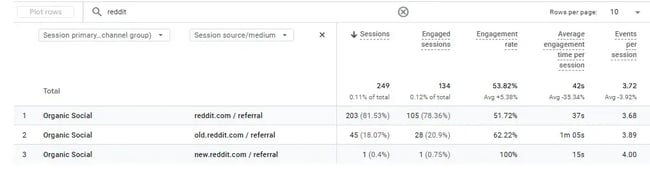
stats for users using reddit as search engine

Source

What I like about Reddit: Like most people, as a user, I appreciate the uncurated, unfiltered reviews for products I’m interested in buying. I like the option to filter my search by communities, posts, people, comments, or media. As a marketer, I can create and respond to posts using the keywords I want to be found for on Reddit. And, if my post is helpful and relevant enough, it can show up on a Google SERP.

Who uses Reddit: Of Reddit’s estimated 1.1 billion monthly active users, 61% are male, and the majority are between the ages of 18 and 29. Most users are from the U.S., with the U.K. and Canada following close behind. If your brand naturally fits into the topic of a subreddit, I think it’s worth showing up there — as long as you do it in an authentic way that follows the community rules.

Google Updates

Google continually works to prioritize high-quality content, doing so while expanding its AI capabilities. AI overviews were recently expanded with the introduction of AI Mode. These changes keep AI at the front and center of search, and will likely encourage users to continue using it and build trust in AI capabilities. All signs point to AI being a growing trend in search, and therefore, it will likely remain a search engine for many.

Holistic Search

It’s essential to consider search holistically. We’re not just optimizing one platform anymore; we need to consider multiple platforms. Research shows that people use multiple platforms for search.

According to Statista, 66% of adults in the U.S. use search engines and social media to conduct searches.

the bar graph shows the search methods used by us adults as a percentage.

Source

Which search engine should you focus on?

Exploring alternative search engines has completely altered my perspective on SEO and content strategy. There’s a whole world beyond Google, and savvy marketers can find real opportunities by diversifying their approach.

I’ve personally found AI-powered search engines fascinating, and I’ll be keeping an eye on how platforms like Perplexity, Brave, and You.com evolve. Meanwhile, search engines like Yandex and Baidu remind me of the importance of tailoring strategies for different markets.

Ultimately, where you focus your efforts will depend on your customer profiles. This article has hopefully outlined some broad demographic and user statistics, but remember that this data is general, and you can conduct your own research to identify which search engine brings the highest quality traffic to your site.

Whether it’s through AI-driven search, privacy-focused platforms, or niche engines, understanding how people search in 2025 (and beyond) will be the real differentiator for marketers like us.

This article was originally published in September 2018 and has been updated for comprehensiveness.

Categories B2B

Why creator marketing works for any business [Tips from a creator consultant]

It’s time to drop the baggage around the word “influencer.”

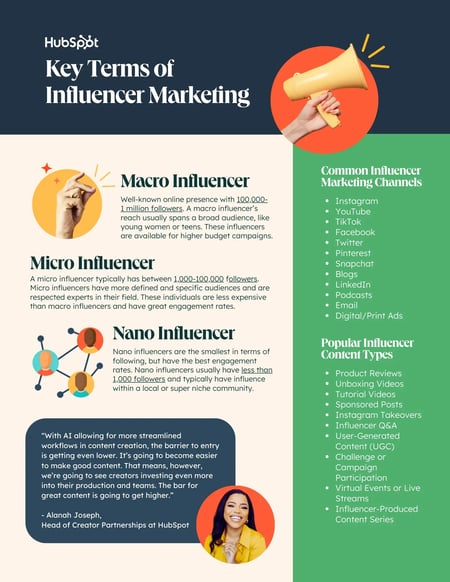
If you’re a maw-and-paw restaurant, and a local foodie with 300 followers agrees to rave about how bangin’ your pot pie is? Mazel tov! You’re doing influencer marketing.

‘Influencer’ is just a general category for anyone that is able to get an audience to take an action,” says creator economy expert Lindsey Gamble.

And whether that action is starting your first creator campaign or signing a viral TikToker with 2 million followers, today’s master is gonna influence the crap outta you. In a good way.

Click Here to Subscribe to Masters in Marketing

Lindsey Gamble, a smiling man in a polka dot Polo shirtLindsey Gamble

Creator economy consultant, Creator of the Lindsey Gamble newsletter

  • Fun fact: Growing up, Lindsey’s dream was to play in the NFL. After playing Division 1 for Bryant University, he got a chance to work out with his favorite players at pro day.
  • Claim to fame: Worked as a brand ambassador and lifestyle creator for L.L. Bean, Every Man Jack, and Allagash Brewing. His self-titled newsletter was named one of the best marketing newsletters by Buffer.

Lesson 1: Everyone is a creator.

“In today’s day and age, everyone is a creator. Even if you don’t call yourself that,” says Lindsey Gamble.

Whenever you’re makin’ a Bluesky post or TikTok short on something you care about, you’re creating content. And when that content finds someone else who cares, it creates a community.

And, even if that group is small or extremely niche, the parasocial relationship between creator and community cultivates a trust that can quickly turn audience members into customers.

Case in point, when I worked for a CPAP vendor, we saw double-digit returns working with a sleep apnea influencer. Talk about hyperspecific, right?

“It doesn’t always have to be the person with the biggest followership. You just want to work with people that believe in your brand.”

And that’s the beauty of this lesson: If everyone is a creator, that means there’s a creator for every industry. Even the really boring or weird ones."What people say about you is more important than what you say about yourself as a brand. Any voice besides yourself is going to be powerful."

Lesson 2: There’s power in someone else’s voice.

Influencer marketing works for the same reason word-of-mouth is so effective.

“It’s all about social proof. What people say about you is more important than what you say about yourself as a brand. Any voice besides yourself is going to be powerful.”

But, like word-of-mouth, influencer marketing only works when it feels — you guessed it — authentic.

“You wouldn’t hire a plumber and then tell them what to do, right? You might tell them where the bathroom is, but they fix the problem because they have the skills and expertise.”

In other words, don’t treat the creator like what Gamble calls a “digital billboard,” asking them to simply parrot your existing message.

To plan a truly effective creator campaign, he advises starting with your pain points. For example, is there an audience you’re failing to connect with? Is your social presence on a certain platform lacking? Consider how that need could be addressed from the outside, then approach a content creator to create something entirely new.

“You work with that creator because they have a value that you don’t have as a brand or as an individual. Sometimes it’s the audience, right? More times than not, it’s their voice.”

Lesson 3: Work your way up.

Chances are good that you don’t have the budget to nab MrBeast for your next campaign. That doesn’t mean you can’t benefit from creator marketing.

“You can start small and build up,” Gamble says. “I always recommend running a couple of campaigns that are brand awareness [at first].”

After contracting with a creator, your first step should be to create a brief that outlines both your goals and your success metrics. After the content is made, analyze how it aligns with the brief.

“Do that two or three times [to make] benchmarks, and then figure out what didn’t work and what you can build on top of.”

The idea is to build a roadmap toward working with a broader portfolio of creators that address a variety of business needs.

“You might have this idea of the type of creator you want to work with, but a better start is tapping into different creators that help you get to different audiences.

Lingering Questions

THIS WEEK’S QUESTION

“What’s one marketing habit or best practice you think we should collectively leave behind, and what would you replace it with?” — Al Iverson, Industry research and community engagement lead, Valimail; deliverability consultant and publisher, Spam Resource

THIS WEEK’S ANSWER

Gamble says: “Relying solely on last-click attribution for measuring the success of influencer marketing is a mistake.

“Sure, tracking links and promo codes show direct sales, but creators play a much bigger role in awareness, brand building, consideration, traffic, and more — all of which leads to purchases down the line, even if the link or code isn’t used.

“We need to measure the impact of creators more creatively and look at the full picture, including content performance, website traffic, brand follower growth, search lift, share of voice, brand and sales lift studies, post-campaign surveys, and other methods to capture the true impact of influencer campaigns, otherwise you’re likely missing out on the full story.”

NEXT WEEK’S QUESTION

Gamble asks: What’s a marketing strategy or trend that you think is widely overlooked but has high potential for impact right now?

Click Here to Subscribe to Masters in Marketing

Categories B2B

What are brand identity elements? A marketing pro dives in

Picture the Starbucks siren logo. Now picture it in bright HubSpot orange. How wrong does that feel to you?

Free Kit: How to Build a Brand [Download Now]

Like any brand identity, the Starbucks identity requires many elements working together to connect with you, the consumer. The siren graphic, the right shade of green, the logo’s round shape — you need everything to get the right effect (and to create one of the world’s most recognizable brands).

What brand elements create a compelling brand identity? And where can you go for a little help or inspiration to get you started? Let’s dive in.

Table of Contents

What are brand identity elements?

I think of “brand identity” as your brand’s personality — a presence that’s distinct and uniquely you. It’s an image conjured in the minds of your buyers, one you feed with regularity and consistency. These aspects of your brand — like your name, logo, and color choices — create a cohesive, recognizable image within your target audience.

Once you look for these brand elements, you’ll find them within nearly everything a company creates: social media photo filters, fonts on YouTube videos, sales decks, websites, and products. And removing any of these elements will make this brand feel wrong or off (like an orange Starbucks logo).

These details might feel overwhelming if you’re building your brand identity from scratch. Let’s walk through each of the most important elements, with examples and actionable tips.

Brand Identity Elements

brand identity elements

1. Brand Purpose

Who are you to your audience? I find the best brand identities can answer that question with specificity and uniqueness. And your answer will guide how the rest of your brand identity development unfolds.

Review your value proposition, mission and vision statements, and values. Within those elements, pinpoint the pieces that spark emotions from your target audience.

For instance, The Farmer’s Dog is a specialty dog food company that started because one of its founders had a dog (Jada) who had stomach issues with processed dog food. He wanted a better way to feed Jada, and that desire ballooned into a billion-dollar company.

While I don’t use their service, I recognize that the desire to care for their pets runs deep in every Farmer’s Dog buyer. Love for dogs powers the heart of The Farmer’s Dog — and it’s obvious in every element of its brand identity.

Pro tip: If you need a little extra help figuring out who you are in your marketplace, check out these other HubSpot resources:

2. Brand Name

A brand name identifies your company and its products or services, distinguishing you from your competitors. It serves as one of the most obvious and memorable elements of your brand identity.

As you build customer trust, your name will represent that trust. That matters to buyers: According to the 2024 Edelman Trust Barometer, trust remains a top-three purchase criterion for consumers. Lose it, and your brand name will lose it, too.

So, what’s in a good brand name? One piece of advice I have: Make it an easy one. Research shows that an easier-to-remember brand name has more staying power with consumers than something confusing. Maybe that seems self-evident — but then, ask Quibi how that went.

Pro tip: Consider your options within cultural and social contexts, as your brand or product names can go sideways otherwise. For example, I have a few items from IKEA around my house. But one I don’t have is the children’s desk delightfully named “FARTFULL.” What means “full speed” in Swedish doesn’t quite come across right in English.

3 . Logo

I bet you can identify and describe each of these brands:

brand elements, three logo examples

Your brand logo is arguably the most important visual extension of your identity. It doesn’t just appear in ads or on your website — it may be on your physical products, in emails from salespeople, or on billboards along the highway.

Many brands hold a logomark (like the three examples above) as well as a wordmark, which includes the brand name. HubSpot, Spotify, and Transport for London all use elements of their logomark within their wordmark:

brand elements, brand wordmarks and logomarks

I’d advise you to design a logo that can carry over through changing market aesthetics (aka timelessness). Easier said than done, of course, but the best logos are ones that companies commit to for the long haul. Jaguar’s recent logo redesign and subsequent flop offer a potent reminder of a timeless logo’s place in buyers’ hearts.

Pro tip: Need help with your logo? Check out our free logo maker as a starting point.

4. Graphics and Images

Your overall visual identity makes a key first impression for your buyers. And that happens fast: people make their judgments of your website’s visual appearance in as few as 50 milliseconds. That’s about one frame in an average television show.

I won’t say you should fret endlessly over every image, but take the time to define and build a cohesive and consistent look wherever buyers see your brand. There are many ways to accomplish this. For instance, use the same filters on any Instagram posts to show you’re paying attention to consistency — and help your buyers know what to expect from you.

For inspiration, I’d look at Burger King’s style guide. It precisely defines BK’s values and interprets those verbally and visually.

The Burger King style guide lists its four design principles:

  • Mouthwatering
  • Big & bold
  • Playfully irrelevant
  • Proudly true

The guide interprets “big & bold” with clear, actionable instructions: “We play with scale using macro photography and a focus on details. Colors are unapologetically full and rich.”

brand elements, burger kind brand guide example

Source

Let’s look at how that plays out on Burger King’s Instagram account:

brand elements, burger kind instagram branding

Source

Burger King’s imagery plays on its burgers (and other food items) — it makes them centerpieces. Scan more fast food Instagram accounts, and you’ll find BK’s imagery differentiates it from competitors like McDonald’s or Wendy’s.

5. Shapes

A famous 1929 linguistic experiment asked participants to view two shapes and read two made-up words, “bouba” and “kiki.” They’re asked to assign the “word” to the correct shape:

brand elements, shapes

Source

Across languages, cultures, and ages, people say the spiky shape is “kiki” and the splotchy rounded shape is “bouba” about 88% of the time.

The bouba/kiki effect shows how shapes factor into your brand’s visual identity (maybe more than you’d expect). Troy Stange, owner of brandpop, wrote on LinkedIn that “shapes are like the body language of your brand.”

Daniel Ocock, the managing director of Vie Design, says that he thinks of shapes as “the secret language of design; they say a lot without saying anything at all.” Ocock says that circles are “friendly and inclusive,” squares “scream reliability,” and triangles evoke excitement.

Buyers can remember the shapes fondly even after years or decades. For instance, I grew up a Nickelodeon kid and remember the “splat” logo used during my childhood:

brand elements, nickelodeon splat logo

Source

That shape and its variants are burned into my brain. I immediately connect it to pleasant childhood memories (and an unmet desire to get slimed).

The company abandoned it in 2009 for a more “minimalist” take, but actually resurrected its splat logo 14 years later during a major rebranding effort because of its meaningfulness.

6. Iconography

Icons are usually the smallest elements, but they can significantly impact how people perceive your professionalism. The right icons elevate your presence and add that bit of polish that makes for great first impressions.

If you’re undertaking icon development, I’d review current design trends and usability criteria. Things can change quickly, with yesterday’s sleek becoming today’s outdated.

For instance, when Apple released iOS 7 in 2013, it redesigned its app iconography from a skeuomorphic design to the flat, two-dimensional design used today.

Skeuomorphism adds texture and detail — illustrations of bookshelves might include wood grain effects, or an icon of a camera might have a 3D-looking lens.

But when Apple flattened its designs, the rest of the design world noticed. By now, you’ve likely acclimated to seeing flat iconography everywhere, so much so that skeuomorphism looks dated:

brand elements, iconography example

Source

Along with design considerations, consistent icons keep your brand identity intact across every channel and use case. For example, HubSpot’s Google Slides templates include three pages of icons permitted for use. Decks across the company stay consistent, and nobody is spending hours searching for suitable icons.

Pro tip: Wondering how to design fresh icons for your brand? Check out our icon design guide.

7. Color Scheme

Color communicates an incredible amount of information. The psychological components behind color choices are complex, and your choices dictate how people perceive your company.

For instance, my favorite color is red (and one I use often in my branding work). Red is a color of “passion, energy, and excitement” — but can also be “dangerous and defiant” in specific contexts.

In nature, the red bands on coral snakes warn would-be predators they’ll get a venomous bite if they try anything. Interestingly, that deep-seated psychology can show up in your brand identity, too.

Be thoughtful in your color choices, as you’ll infuse every part of your visual presence with your chosen color scheme. For example, esthetician Sean Garrette uses rich chocolate brown hues and complementary earth tones throughout his social media presence.

brand elements, color scheme example on instagram feed of seah garrette

Source

Consumers can spot your brand once you’ve associated specific color palettes to your company’s presence, as you see the three palettes in the GIF below (each brand name is revealed after three seconds):

 brand elements, gif of brand colors and brand reveal

Pro tip: If you’re looking for the right color palette for you, try Khroma for AI-generated options. Give yourself some time to work on it, as Khroma’s algorithm requires at least 50 color choices on your part. You can also check out HubSpot’s free color palette generator, which will generate ideas based on info you provide about your brand.

An important note on color schemes: common accessibility guides — specifically WCAG 2 — denote color schemes that make browsing more accessible to people with disabilities. These guidelines are becoming critical must-follows, as accessibility lawsuits grow in number and scale. WhoCanUse.com is a great online tool to test your color palette for these accessibility standards.

8. Typography

Your brand’s typography is more than just a font selection. Typefaces, spacing, and sizing merge to create the look and feel of your text, and that interplay creates your unique appearance.

One element you’ve likely noticed is the use of serif or sans-serif fonts. A “serif” is a small decorative stroke usually appended on the ends of the letters. Many designers feel that serif fonts — much like skeuomorphic icons — are getting stale. That’s why sans-serif fonts are hot right now, and why it feels like every brand is shifting to them.

brand elements, pinterest logo type comparison

Source

It’s up to you what font type you like and where you’ll apply it (e.g., serif fonts for headings and sans-serif fonts for body copy). Regardless, choose a web-safe font or include one in your font stack as a fallback.

Browsers and devices universally recognize web-safe fonts. Although modern web design permits more font styles, it’s good to have a backup ready to give users a consistent experience across devices.

9. Brand Voice

Your “voice” is how you sound in your consumers’ mind when they engage with your brand. It gives volume and depth to your content and helps you shape your unique identity.

I find most brands define their voice using three or four descriptive adjectives: helpful, kind, playful, witty, analytical, factual, academic, or youthful, for instance. However, the trick with brand voice is knowing when to apply those sentiments to your touchpoints and how to tweak them to fit a channel’s specific needs.

For example, Burger King’s style guide defines the company’s voice as enthusiastic, confident, witty, and approachable. But the guide also notes that Burger King’s content creators “need to flex our voice a little for different situations: a little wittier here, a little more direct there.”

brand elements, brand voice example from burger king

Source

Now imagine you’re a Burger King copywriter tasked to write two versions of an ad, one for an older audience and one for a Gen Z audience. Connecting with Gen Zers might need a crown or burger emoji — something you’d cut from content targeting more mature crowds.

As you build your brand identity, I recommend choosing four specific words that define your brand, like Burger King did. You can then tweak to fit your target audience, the type of ad, and other considerations while staying consistent with your core identity.

Pro tip: Visit my article on developing your brand voice for much more detail on the intricacies behind defining who you are and how you sound to your audience.

10. Slogan, Jingle, or Catchphrase

While B2B vendors might want a fun slogan to splash across their email signatures, I’ve found slogans, jingles, or catchphrases work best for B2C businesses. And even then, I’d use them judiciously.

Still, if you create something catchy, it can become one of your most memorable brand elements. Can you imagine these brands without their slogans or jingles?

  • “Have It Your Way,” from Burger King
  • “The Snack that Smiles Back,” Goldfish Crackers
  • “America Runs On Dunkin,” from coffee company Dunkin’
  • “Because You’re Worth It,” L’Oreal
  • “Like a good neighbor, State Farm is there,” from insurance company State Farm
  • “Snap, Crackle, Pop!” from Rice Krispies

It doesn’t need to be complicated, either. I couldn’t stand these commercials when they aired, but I still catch myself saying, “Head-On: Apply Directly to the Forehead.” You probably don’t want to elicit annoyance from your target audience, but Head-On’s basic yet catchy slogan shows that finding your brand’s slogan could be a simple process.

11. Brand Guidelines and Application

An identity requires cohesion, and cohesion requires documentation and enforcement. Keeping your teams aligned to your identity isn’t as fun as designing logos, but it’s vital if you want buyers to connect more deeply with your brand.

I’ve shared brand style guide examples throughout this article that you can emulate. But the basic document should be a clear, written set of guidelines, including rules on using (or not using) logos, colors, and visuals, and practical dos and don’ts for real-world applications.

A written guide keeps your identity consistent across your touchpoints while giving your creators an approved sandbox to test and iterate.

Pro tip: Check out our brand guidelines template to start building your brand identity documentation.

Build Brand Elements Together

As you walk through this guide, I recommend you build your brand elements at or near the same time to each other. That proximity helps breed consistency in what your team produces. That’s vital, as your brand elements must work together. Your jingle won’t catch on if nobody can remember your brand name. Your logo won’t look professional if your colors don’t match.

Take the time early in your brand development process to plan these elements. You don’t need to have every answer immediately; I often find brands evolve, add, and drop elements when they don’t serve the brand’s purpose or needs. But use this guide and its resources to begin your brand identity foundation and get your elements in order.

Editor’s note: This post was originally published in December 2021 and has been updated for comprehensiveness.

Categories B2B

I tested the top 14 AI chatbots for marketers [data, prompts, use cases]

I remember when ChatGPT first launched. The entire marketing community was split on whether they should use AI chatbots or not. Posts about ChatGPT would get hundreds of comments, with one side debating the convenience of AI and the other arguing that AI can never match human creativity.

Get Started with HubSpot's Chatbot Builder for Free

While the debate is still ongoing, AI chatbots are already everywhere. I’m seeing marketers relying on custom bots for social media, enterprises integrating voice assistants, and customer service teams scaling operations with AI.

As someone who has worked in both automation and marketing, I’d say the shift to AI chatbots is here. And it’s here to stay.

Marketers now have tons of solid chatbot options that can hold conversations almost as naturally as a human.

In this post, I’ll walk you through the top 14 chatbots for marketers, how I tested them, and which ones you should consider for your marketing workflow. I’ll also give you the exact prompts I used and the results so you know what to expect.

Table of Contents

Sounds like a lot? Let me break it down.

Here’s what happens under the hood when you send a prompt to an AI chatbot:

  • Input processing. Your prompt is broken down into tokens (words, phrases, or even parts of a word).
  • Context mapping. The model tries to build relationships between words and their positions. This helps the model differentiate between “Sarah caught the bear” versus “The bear caught Sarah” — two very different problems to have.
  • Self-attention. Now, it’s time to actually understand intent. The model identifies the key entities in your message and, based on previous training data, understands how they relate to each other.
  • Response. The model starts forming the output options. This is a prediction system where the model predicts the next most likely word based on previous patterns.
  • Feedback loop. As the final step, the chatbot runs the response candidates through different safety filters and quality controls. Each response is scored, and the best one is delivered as the output.

All of this happens in the seconds/minutes you wait after sending the prompt. While I’ve described how a typical AI chatbot works, each model might implement the architecture differently. The end goal, though? Helping solve business (or personal) problems faster and more reliably.

Conversational AI vs. Chatbots

Chatbots and conversational AI are closely related, but differ in their scope and capabilities.

Conversational AI refers to any technology that can talk to humans, understand sentiment, and answer questions. It can be a chatbot, AI agent, or other AI-generated application.

AI chatbots are a subset of conversational AI, but not all chatbots use conversational AI. Some chatbots are purely rule-based, which rely on simple rules and decision trees to determine the best course of action.

Rule-based chatbots can only handle specific, expected inputs. I’m sure you’ve interacted with many of them in the pre-ChatGPT era. Ask them something outside their script, and they’ll either give you a vague answer or redirect you to a human.

In contrast, AI chatbots understand context and nuance, and are more capable of handling unexpected queries.

If you want the user to choose between set options without much flexibility, opt for rule-based chatbots to save costs. However, if you want to deliver an upgraded user experience, I’d recommend choosing an AI chatbot.

Why use AI chatbots? 4 Use Cases and Benefits of Chatbots for Marketers

I’ve seen AI chatbots become significantly more intelligent over the last year. Earlier, you had to scrape and feed a ton of data to chatbots, and even then, the outputs were usable. Chatbots couldn’t even connect to the internet natively.

However, with newer models and integration technologies like AI agents and MCP servers, the possibilities are endless. I recently connected my email to my Claude account via MCP. Now, I can get a handy summary of my day’s meetings and newsletter highlights with just a prompt.

Here are some other ways businesses can use AI chatbots.

Customer Support

Sales and Marketing

  • Automate sales prospecting and market research.
  • Personalize automated outreach to your target audience at scale.
  • Managing your sales pipeline by summarizing meetings, sending follow-up reminders, etc.
  • Support customers through every stage of the buying journey by providing personalized and timely information.

Writing and Editing

  • Content strategy and ideation for blogs, emails, and social media posts.
  • Deep research on specific topics to create article outlines.
  • Brand-tailored first drafts for emails and social copy.
  • Tweaking copy for certain audiences, platforms, and formats.

Recruitment and HR

  • Shortlist potential candidates based on resume strength.
  • Answer common questions about open positions or company policies.
  • Schedule interviews and meetings without endless back-and-forth emails.

The examples here are just the tip of the iceberg. People have used chatbots for therapy, travel planning, ordering meals, and so much more. According to our State of AI report, 39% of marketers use chatbots like ChatGPT, Gemini, and Copilot to create content and organize research.

Thus, AI chatbots can:

  • Save time, reduce employee burnout, and let them focus on strategic tasks instead of grunt work.
  • Reduce the cost of labor and generate outputs faster.
  • Conduct extensive data crunching and analysis more effectively.
  • Help you scale your business without increasing headcount.

Bottom line? You can easily customize AI chatbots to fit almost any organizational need.

What makes an AI chatbot good?

Here are some features I look for when experimenting with AI chatbots.

Accuracy and Reliability

AI chatbots are notorious for hallucinations, i.e, confidently making up misleading claims. According to HubSpot’s State of AI survey, 43% of marketers struggle with AI generating inaccurate information. I’ll admit, sometimes I get frustrated too.

Some models perform better than others. For instance, reasoning models like OpenAI o3 and DeepSeek R1 reduce hallucination by showing you the steps they took to arrive at the conclusion. Models that are trained on domain-specific datasets are far more accurate in answering specialized questions.

Pro tip: Introduce guardrails to your prompt and training data to reduce the chances of hallucinations. I generally include specific instructions like “don’t make up claims,” “give source links and mention the page number of the information,” and “if you are uncertain about a fact, just say so.” Regardless, you should always double-check what AI spits out.

Emotional Intelligence

Remember: We’re using chatbots to simplify user experience.

So, a good AI chatbot should:

  • Be able to understand user intent (and not get stuck with typos).
  • Remember conversation context, or at the very least, document past interactions and refer to them when needed.
  • Know when to escalate to a human agent.

It should also be able to assess the tone and overall feeling of the customer’s inquiry. Is the customer:

  • Angry? (“Why is my monthly payment increasing?!”)
  • Sad? (“Please don’t discontinue your lavender chai latte chocolate! It’s my favorite flavor. I used to drink it with my dad before he passed.”)
  • Happy? (“I love, love, LOVE the new sneaker designs! Please tell me they come in pink!”)

The best chatbots I’ve used make me feel heard and understood.

Types of Output

Instead of just text responses, can your chatbot handle images and videos? With AI-generated content on the rise, this feature is a massive plus for chatbots.

Imagine this: a customer asks, “How do I change this setting on your tool?” A normal chatbot would link the customer to the documentation or provide a text-based guide. However, a multimodal chatbot trained on your product can send annotated screenshots or even a video walkthrough.

Less confusion, better user experience.

Integrations

As we move to an agentic era, I recommend choosing a chatbot that is compatible across other popular tools and software. For instance, your chatbot should be able to sync with your sales data, fetch the numbers, and spin up a dashboard to present them.

HubSpot’s CRM is built for this connected workflow with seamless integrations across your tech stack, such as Claude, Zapier, and 1700+ business apps.

How I Tested the Best AI-Powered Chatbots

Most AI-powered chatbots have roughly the same value prop, i.e., answering user questions like a human would. However, I’ve found that some models excel at specific industries or tasks.

If a model is exclusively trained for code generation (GitHub Copilot), it will naturally be better than an all-purpose chatbot like ChatGPT. Similarly, an AI chatbot trained on your CRM data would be able to handle product queries more accurately.

Thus, I took a nuanced approach to testing these chatbots. I tested each tool with prompts that showcase its core strengths. I also added in some straightforward tasks here and there to help decide the best combination for your stack.

With so many solid AI chatbot options on the market, it can be hard to decide where to start.

To help you make an informed decision, I’ve compiled a list of the best AI chatbots based on their features, usability, and performance in testing.

Whether you’re looking for a chatbot to support your business or improve personal productivity, there’s an option here for everyone.

Note: I’ve divided this list into two parts. The first eight chatbots are focused on internal business and personal productivity use cases like generating ideas, content creation and more. Later, I’ll discuss consumer-facing chatbots.

1. Breeze

ai chatbot, hubspot’s breeze

Get Started with Breeze for Free

Setting up a new chatbot is a very time-consuming process for me. It’s not just the initial training either. I need to continuously update it with new customer conversations and product features to get brand-aligned outputs.

Breeze, HubSpot’s AI chatbot, helps you skip all of these setup steps.

Breeze lives inside your CRM, so it has complete context about your customer journey, product features, sales pipeline, and more. It also integrates unstructured communication like emails and calls to external data, such as buyer intent and company news, to give Breeze the full picture.

With hundreds of customer success stories, businesses using Breeze are seeing results across the board. HubSpot customers are already using it to:

Breeze delivers what marketers and businesses want: more qualified leads, faster sales cycles, customer retention, and satisfaction.

How I Tested Breeze

I tested Breeze through their “product demo” page. Honestly, I was expecting a video walkthrough and maybe a basic chatbot with standard responses.

However, I was pleasantly surprised. The demo walked me through almost every bit of the chatbot’s AI capabilities, ranging from an AI avatar (Fiona) to intelligent demo recommendations.

Of course, this experience set a very high bar for the tool. So, I set out to give it the first task: writing a follow-up email for prospects.

hubspot breeze ai demo, hubspot generated email

The email I got back was quite good, despite the limited background information. I could directly ship it with some minor tweaks and personalization.

Now, imagine this done at scale with real-time data, powered by your conversations, deal history, and customer experience. The possibilities are endless.

hubspot breeze ai chatbot demo

Another thing I liked about the whole process was how responsive the chatbot was. She asked me intelligent yet natural-sounding questions to guide me through the sales process. If there was a lull in the conversation, she gently nudged me with casual questions.

All of this showed how well the chatbot knew HubSpot’s offer, which is precisely the kind of product knowledge you’d want from an AI chatbot.

Breeze Features I Liked

  • Seamless HubSpot CRM integration.
  • Combines both structured (CRM) and unstructured data (email) to power their intelligence software.
  • Specialized agents for every marketing use case: content, social media, prospecting, and customer service.

What I Didn’t Like

  • The free demo didn’t let me test any advanced features.
  • HubSpot-generated images are decent, but some of the chatbots on this list do a better job.

Breeze Pricing

  • Get started with basic AI features like content generation for free.
  • HubSpot Starter ($15/seat/month, billed annually) – Starter marketing, sales, service, content, and operations software, with simple automation and Breeze intelligence.
  • Professional Customer Platform ($1,300/month, includes 5 seats) – Includes customer agent functionality & 3,000 monthly HubSpot credits.
  • Enterprise Customer Platform ($4,700/month, includes 7 seats) – Advanced Breeze features + 5,000 monthly HubSpot Credits.

Note: You can unlock Breeze Intelligence only in the HubSpot Starter pack and Breeze Customer agent in the Professional plan. Credits can be used across HubSpot products, including Breeze.

Why I Recommend Breeze

If you’re a HubSpot user, Breeze serves as a natural extension of your existing tech stack. It’s the first AI assistant that knows your business as well as you do.

While I wouldn’t recommend Breeze for media creation, you can use it to automate your daily marketing tasks. If you’re in the process of scaling your company, I’d highly recommend giving it a try.

TL;DR: It’s a breeze to integrate HubSpot Breeze to your marketing workflows.

2. ChatGPT

Launched in 2022 by OpenAI, ChatGPT made headlines as the fastest-growing consumer app in history.

Fast forward to today, ChatGPT processes over 2.5B user queries per day. That’s roughly 1/3rd of Google’s 8.5B searches per day, making it a serious contender to traditional search. I’d give it a couple more years before using an AI chatbot like ChatGPT becomes muscle memory for users.

So, what exactly are marketers asking ChatGPT? Well, a lot of things. The right GPT prompts can help you create brand-aligned content, polished images, crunch campaign numbers, and more. I use ChatGPT Plus for research, Excel analysis, and image generation.

But that’s not all. The one GPT feature I’m most excited to test (but don’t have access to yet) is the ChatGPT agent. While chatbots typically wait to be prompted, agents can independently take and act on decisions.

For instance, if I want the GPT agent to purchase a pair of socks for me at the cheapest price, the agent can compare different sites, test out coupon codes, and then share the results with me. I’m already seeing GPT agent use cases implemented across social media, so I can’t wait for a broader rollout. As of this writing, the ChatGPT agent is only available to Pro users.

How I Tested ChatGPT

Let’s start with a simple prompt. I was working with a client in the project management niche, who wanted a report on how they stack up against competitors. So, I decided to use ChatGPT to augment my research. For each competitor, I prompted it to draw up a SWOT analysis and identify winning features that my current client did not have.

chatgpt prompt for market research, ai for research

The SWOT analysis was pretty helpful. Next, I wanted to test GPT for image generation. Here, I went slightly goofy, asking GPT to generate a cat image with a sign. ChatGPT did a great job of adhering to my unusual request.

chatgpt for image generation, ai chatbot generating a cat

ChatGPT Features I Liked

  • ChatGPT agent. Automate complex, multi-step workflows.
  • Custom GPT. Build a specialized chatbot with custom instructions, or use one from their library of GPTs trained on social media, legal, data science, and many domains.
  • Image generation. I use Sora, ChatGPT’s built-in image generation model, to generate design references and edit existing images.
  • Deep research. I find GPT’s deep research mode quite helpful for complex research, especially historical research.

What I Didn’t Like

  • Image generation takes quite a bit of time and sometimes doesn’t work very well for human features and text.
  • ChatGPT agent throws errors while navigating websites if it doesn’t load quickly enough.

ChatGPT Pricing

  • Free users get access to GPT 4.1 with unlimited usage and limited usage of advanced models.
  • Plus users ($20/month) include ChatGPT agents, Sora video generation, and research access to new models.
  • Pro users ($200/month) get extended limits on everything in Plus and access to o3-pro and the Codex agent.

3. Claude

As a writer, I’m quite partial to Claude. Claude is an excellent creative thinker, and when I give it enough context, it can emulate brand voices very well. I heavily depend on Claude for content strategy, first drafts, and editing sentences.

For each new client, I typically set up a new project and provide it with documents like brand guidelines, podcasts, etc, as context. This is similar to the CustomGPT feature by ChatGPT. However, since Claude has a larger context window, the model produces better outputs.

claude project feature, ai chatbot conversations

I also love Claude’s MCP feature. Like I mentioned earlier, I used it to sync my email to the AI assistant, which I’ll show you below. You can also connect to a variety of other tools such as Asana (project management), Canva (graphic design), and more.

claude connectors, integration list for claude

P.S.: HubSpot recently released a MCP connector for Claude, which I’m super excited about.

How I Tested Claude

Let’s start with the research test. I usually like to start my week by reading up on trending AI news so I can think of content ideas around them. So, I prompted Claude to give me a summarized version, pulling information from my newsletter subscriptions plus additional web research on its own.

Here’s the prompt I ran: “Can you give me a summary of the AI news highlights from the last week? Access my newsletter subscriptions via my email to pull information from. Also, conduct independent research to find any other important news. Present this in a tabular format, with headline, short blurb, and if you think any can be made in social media content pieces.”

claude prompt to summarize ai news, ai news highlights

Well, color me impressed. While the first item was from July 17th (outside the request timeframe), Claude did a fair job of collating recent AI news. The content ideas weren’t too great, but I’ve gotten much better results when I give Claude context about my client and goals.

I especially liked how the information was presented — organized and easy to scan. And that’s something I find in other Claude features too. For instance, here’s how I used Claude to iterate on a landing page for my clients.

claude artifacts, landing page generated by ai chatbot

It was helpful to see how my copy looks in a design mockup. I can spot issues, tweak my copy and optimize for production faster.

Claude Features I Liked

  • Writing quality. Out of all AI chatbots I’ve tried, Claude produces the most on-brand and natural content.
  • Projects. I use projects for organizing conversations and documents.
  • Integrations. Claude is now rolling out MCP connectors for most major apps.
  • Emphasis on privacy. Anthropic, Claude’s parent company, uses a proprietary algorithm called Clio to anonymize user conversations for training.

What I Didn’t Like

  • Claude has strict usage limits. If you’re using advanced features like artifacts, research, etc., you’re going to hit your limit fast.
  • No image or video generation features.

Claude Pricing

  • Free tier – Limited access to top models.
  • Pro tier – ($17/month/user, billed annually) – Unlocks higher message limits, projects, Claude Code, integrations, and more.
  • Max tier – (from $100/month/user, billed annually) – 5-20x higher usage than Pro, early and priority access to new features.

4. Grok

Have you ever doomscrolled for hours in the name of “content research”? I know I have. So, when X rolled out its native AI chatbot, Grok, I knew I had to try it.

While other chatbots have limited access to social media (anti-scraping laws), Grok can tap into X’s live field to monitor trends and analyze other accounts. I frequently use Grok’s “explain this post” feature — it’s a handy way to get context on things I’m clueless about without leaving the platform. You can also tag @grok in tweets to fact-check the accuracy of information.

grok analysis of a social media post, grok explain this feature

How I Tested Grok

For the first part of the test, I asked Grok to analyze the top tweets about AI agents in the past month. The output was a high-level overview of the key themes in trending posts. I could easily verify the source and authenticity of the tweets by following the linked handles.

analysis on trends through grok, trending ai agent themes

Next, I turned on the “DeepSearch” feature. DeepSearch is ideal for any task that needs heavy research and analysis.

For this test, I asked Grok to analyze the handle of a popular X influencer in the AI niche. Based on its analysis, I also prompted it to develop a content strategy for an influencer who wants to achieve similar success.

handle analysis by ai, content strategy by grok

Upon running the prompt, Grok walked me through its exact process of how it tackled my request. This was a nice touch and gave me ideas for my own research process.

research by grok, social audit on x

Grok’s social audit was one of the best I’ve seen from AI tools, matching the quality of professional audits. The analysis gave me everything I needed to know: recent + viral posts, engagement rates, posting frequency, presence on other platforms, audience frequency, and more.

comparative analysis by grok, content strategy for an ai influencer.

I especially liked the neat comparative table at the end of the audit. Perfect base to build out a content strategy from. I’d give the entire experience a solid 8/10.

Grok Features I Liked

  • Grok is useful for high-quality social media audits, analysis, and real-time sentiment gauging.
  • Native X features like “Explain this post,” replies through tags, and data analysis make Grok useful for heavy X users.
  • Grok is designed to have a refreshing sense of humor (a by-product of being trained on social media, I suppose).

What I Didn’t Like

  • Grok doesn’t have a thriving developer community yet, so third-party integrations are limited.
  • No video generation capabilities.
  • Real-time data can also lead to misinformation.

Grok Pricing

  • Free access to Grok 3 for all X users.
  • X Premium ($7/month, billed annually) – Unlocks advanced Grok limits, boosted X performance,etc.
  • X Premium+ ($32.92/month, billed annually) – Faster access to newer features and ad-free experience.
  • SuperGrok Heavy ($300/month) – Access to Grok’s most advanced models.

5. Github Copilot

At my previous job as a software engineer, I spent hours trying to learn a new coding framework.

Sometimes, my code wouldn’t work because of a tiny error right under my nose. I’d hunt Stack Overflow’s scattered threads for answers, stress-testing them till I find the one that works.

Github CoPilot would have been a lifesaver back then. With over 20M users, Github Copilot helps developers code up to 55% faster. You can generate code files on Copilot, create mockups, and debug your code on the extension or platform.

Copilot syncs with all major code editors, such as VS Code, Visual Studio, JetBrains etc., so you can use an extension to access it within your favorite IDEs.

How I Tested Github Copilot

I started with a fairly simple ask: Build me a tic-tac-toe game with an AI playing against me. While I asked for a tic-tac-toe game, Copilot correctly identified that I was describing the mechanics of a ping pong game. Copilot: 1, Lipsa: 0.

github copilot game generation, html and css files

Copilot generated three files: HTML for the canvas, CSS for styling, and JavaScript for the game mechanics. I ported the files over to an online code editor, CodePen, and the game worked quite well.

simple pong game by github copilot, codepen

Github Copilot Features I Liked

  • Instant multi-language code generation for a variety of use cases, from games to dashboards.
  • Suggests the ideal way to implement or visualise the code.
  • Shows logical thinking and doesn’t follow instructions blindly.

What I Didn’t Like

  • Copilot occasionally produces incorrect or unoptimized code.
  • GitHub Copilot cannot generate images or visual mockups of generated code.

Github Copilot Pricing

  • Get started for free. 50 chat requests + 2,000 code completions.
  • Pro ($10/month) – Unlimited agent mode & code completions.
  • Pro+ ($39/month) – Access to premium AI models and GitHub Spark, a prompt-based app builder.

6. Gemini

Gemini is a great assistant. Due to its native integrations across Google products like Workspace and Pixel phones, I can use it on the go. I currently use Gemini for tasks like creating calendar tasks with one prompt, drafting Gmail replies, Google Meet summaries/notes, and more.

Gemini models are also quite powerful for advanced reasoning, mathematics, and complex tasks. Fun fact: Gemini with Deepthink now has a gold medal at the International Math Olympiad.

How I Tested Gemini

While I was trying to find something to test Gemini with, I was pleasantly surprised to see a Gemini-powered summary across my documents on Google Drive. They say the best experiments are the ones you stumble upon, and Gemini definitely delivered on this one.

ai generated summary by gemini, google doc summary

Next, I wanted to test Gemini’s video generation capabilities with Veo-3. My prompt was not the best, but the model produced a great 5-second video.

veo-3 video generation, gemini videos

The White House was instantly recognizable, and the man’s features and movements were also quite natural. You would definitely need multiple iterations for more complex videos with layers and scenes. However, this should give you a fair glimpse of what the model can achieve.

So, my final verdict on Gemini? I’d say go for it if you use Google’s ecosystem heavily. You’ll be faster and more productive across your daily apps.

Gemini Features I Liked

  • Native integration across all Google products.
  • Advanced document analysis and research capabilities.
  • You can generate text, audio, and video in a single interface.

What I Didn’t Like

  • Gemini takes a while to generate both images and videos.
  • Since Veo-3 isn’t natively available in my country, I had to use a VPN to access it.

Gemini Pricing

  • Get started for free.
  • Gemini Advanced ($19.99/month) – Unlocks access to Veo-3, AI-powered docs, 2 TB of storage, and NotebookLM plus.

7. DeepSeek

As China’s top LLM model, DeepSeek is widely regarded as a ChatGPT competitor. Shortly after its release in Jan 2025, DeepSeek’s AI assistant app surpassed ChatGPT as the top free app on the Apple App Store (US).

While the initial momentum was short-lived, DeepSeek’s models have a good value prop: cheap AI + good reasoning capabilities. At launch, DeepSeek’s capabilities were comparable to ChatGPT, while being 90% cheaper. Let’s see if that still holds true.

How I Tested DeepSeek

When I tested DeepSeek, I focused on research-heavy tasks. I started with a code generation prompt to create a form, connect it to a sheet, and then auto-filter responses based on specific criteria.

deepseek google apps script, code for script generation

The model took about ~30 seconds to generate code I could use. I exported the code to my Apps Script file, and it worked without a hitch.

Now, let’s test DeepSeek’s research capabilities using DeepThink R1. My prompt was to compare and contrast other AI chatbots. Given DeepSeek has a censorship issue, I was curious to see what it would say about its competitors.

leading ai chatbot comparison, deepseek research

I liked how DeepSeek first considered the audience before diving into individual tools. That’s exactly how I would approach researching an article.

deepseek google apps script code for script generation

The output was well-formatted, with the key takeaways in a structured table. If you’re looking for a fast and efficient model for non-sensitive research data tasks, DeepSeek seems to be a good bet.

DeepSeek Features I Liked

  • Open-source model licensed under MIT. It supports commercial use cases plus modifications to the base model.
  • Most cost-efficient model on this list; up to 1/30th cheaper than similar OpenAI models.
  • Excels at deep reasoning tasks.

What I Didn’t Like

DeepSeek Pricing

  • DeepSeek chat is free.
  • API-based access for DeepSeek Chat (per 1M tokens) – $0.07 (input), $1.10 (output).
  • API-based access for DeepSeek Reasoner (per 1M tokens) – $0.14 (input), $2.19 (output).

DeepSeek also runs discounted rates (up to 50%) for periods of downtime (UTC 16:30-00:30, at the time of writing).

8. Perplexity

Want to access and test a lot of different models in one tool? Perplexity offers exactly that. The free version of Perplexity is an AI-powered search engine using a combination of Claude and OpenAI’s GPT model in the backend. With my Pro subscription, I can switch between the latest models like GPT 4.1, Claude 4.0 Sonnet, Gemini 2.5 Pro, and more.

All of this makes Perplexity a great research assistant. I primarily use it to spot trends and research on the go. One of my favorite aspects of the tool is the newsfeed below; it does a great job of recommending articles I’d actually want to read.

perplexity discover feed, personalized feed recommendations via perplexity

How I Tested Perplexity

I first tested Perplexity for trend analysis. More specifically, the top B2B SaaS trends for 2025.

b2b saas trends, ai generated sources for research

While I quite like how the information is presented and segregated in different tabs, the trends themselves were basic. I’ve gotten better results with GPT-4-o on a prompt like this. However, I did like the follow-up question suggestions.

Next up: Let’s build out a dashboard on the economic impact of U.S. tariffs using Perplexity Labs, a pro feature.

perplexity dashboard for gdp predictions, perplexity pro labs

Within minutes, I had a fully functional working website, with charts that drew up correlations between the most critical variables. The level of detail was impressive. I could access all of the individual charts directly from the “Assets” tab or create a shareable link for others.

charts generated by ai, perplexity assets

Perplexity Features I Liked

  • Research using top models like Claude 4.1, GPT-4 etc.
  • Citations and sources on all data and statistics, making it easy to cross-verify information.
  • AI-generated research feed for personalized recommendations.
  • Great visualization capabilities with Perplexity Pro.

What I Didn’t Like

  • Advanced features like Perplexity labs have a slight learning curve.
  • Integrations to popular apps like Excel haven’t been built out yet.

Perplexity Pricing

  • Free tier – Use the Sonar model for unlimited quick searches and 5 pro searches per day.
  • Student Pro tier ($4.99/month) – Unlock Perplexity Labs, research, premium AI models, and API credits.
  • Max tier ($200/month) – Early access to Comet browser and unlimited Perplexity Labs + Research.
  • Enterprise Pro ($33.33/user/month, billed annually) – Unlimited pro searches, collaborators, and dedicated enterprise support.

9. HubSpot Chatbot Builder

hubspot ai chatbot builder

Free Chatbot Builder Software

If you want a chatbot builder trained on your CRM data, look no further than HubSpot’s chatbot builder. With HubSpot Chatbot builder, you can design custom sequences for specific customers, send personalized messages, and lighten the load for your support team.

Having seen support teams burn out from repetitive questions, I was curious to see how much HubSpot’s Chatbot builder takes off their plate.

Note: While HubSpot’s chat builder software is a rule-based chatbot, you can customize it through code snippets and use powerful third-party AI bots like Dialogflow.

How I Tested HubSpot Chatbot Builder

I found HubSpot’s Chatbot Builder quite intuitive. The drag-and-drop interface made it simple to build out specialized chatbots. Here’s an example of a lead-qualifying bot.

lead qualifying bot by hubspot, hubspot chatbot

You can use this bot to handle the bulk of your customer questions and pre-qualify by asking targeted questions. This helps your sales team save time on initial screening and put their energy where it matters.

The best part? Each lead will be documented in your CRM seamlessly. If a lead already exists within your CRM, the bot will send personalized messages based on their last interaction.

For instance, if I last followed up with a lead a week back, it’ll reference that interaction and naturally continue the conversation. More opportunities, fewer leads slipping through the cracks.

So, while this tool isn’t strictly AI-powered, you can use it to build out custom chatbots for simple use cases quickly.

HubSpot Chatbot Builder Features I Liked

  • Seamless drag and drop interface to create chatbots quickly without coding.
  • Integrated with HubSpot’s CRM to store customer data and trigger email campaigns.
  • No learning curve, easy templates, and intuitive experience.

What I Didn’t Like

  • Rule-based chatbots aren’t very customizable.
  • Can’t handle complex use cases.

HubSpot Chatbot Builder Pricing

  • Free software.

10. Intercom Fin AI agent

Intercom is a leader in the customer support space, and its AI chatbot, Fin is no exception. Fin AI agent uses a mix of top AI models, such as GPT-4 and Claude, to deliver a truly conversational AI chatbot.

I first came across this tool through Anthropic’s case study, where Fin AI agent delivers average resolution rates of 51% across their customer base. These numbers are quite impressive, so I decided to dig deeper.

Fin AI agent allows you to sync content from a variety of sources, such as your website, Zendesk, conversations, documents, and more. You can then train the AI bot rigorously by batch-testing live conversations, rating its answers, testing different audiences, and more.

While this setup might need more time and resources, it will help your customer service team become more efficient in the long run. You can also set up tasks, custom instructions, and more.

How I Tested Intercom Fin AI Agent

While I wasn’t able to fully test Fin AI agent because of its enterprise set-up, I spoke to Amrita Bhasin from Sotira, an AI retail company. She uses Intercom for website signups and customer qualification.

She told me that, “the most unique use case [for our chatbots] is purchasing and extracting information about what SKUs/inventory are available so customers can essentially purchase via the chatbot, so every step of the way is guided; this almost feels like in store personalized purchasing for customers. “

I also signed up for the Fin AI agent trial to show you what the backend ticketing system looks like.

fin ai agent tickering system, intercom fin ai agent

Intercom Fin AI Agent Features I Liked

  • Easy-to-use interface and a clean ticket management system.
  • Integrated batch testing capabilities and answer ratings.
  • One-click deployment across email, voice, live chat, social, and more.

What I Didn’t Like

  • Vendor lock-in – You need to migrate your entire stack to Intercom and recreate any alternate workflows from scratch.
  • Intercom’s features can feel slightly overwhelming for smaller teams.

Intercom Fin AI Agent Pricing

  • Essential ($29/seat/month, billed annually) – Fin AI agent, Messenger, basic inbox and ticketing system.
  • Advanced ($85/seat/month, billed annually) – Advanced automation like workflows, workforce allocation and 20 Lite seats.
  • Expert ($132/seat/month) – SLAs, HIPAA compliance, and more.

Fin AI agent has an outcome-based pricing ($0.99 per resolution) with a minimum of 50 resolutions per month.

11. Tidio Lyro

Tidio Lyro is a conversational AI chatbot built for small and medium businesses. Lyro’s value prop is simple: Answer customer queries instantly based on your support content. If it can’t answer a question, it hands off the conversation to a human agent.

I spoke to businesses that have integrated Tidio Lyro, and they were generally happy about Tidio’s performance. However, I noticed that companies that didn’t have extensive documentation or support saw higher escalation rates to human agents.

How I Tested Tidio Lyro

Signing up for Tidio Lyro’s AI agent was a straightforward process. After signing up, I filled out some onboarding questions and was then redirected to a quick integration tutorial.

tidio chat widget, tidio flows

Here, I can train Tidio on my common sales, leads, and support flows to automate repetitive conversations. Lyro can even recommend products to bottom-of-the-funnel buyers when appropriate.

Oleh Stupak from Mgroup, who uses Tidio for lead qualification, told me: “Although handling FAQs was the original goal, we discovered [Tidio’s] true power lies in automatically qualifying leads and sending them to the appropriate Shopify specialist.”

Here’s how their Tidio-powered chatbot looks:

lyro chatbot in action, tidio lyro chatbot

Lyro Features I Liked

  • Learns from your company data and support documents to answer customer questions.
  • Fast response times with reasonable accuracy.
  • Built-in human hand-off system.

What I Didn’t Like

  • It can take too long to load sometimes.
  • Pricing is multi-tiered and a bit complex.
  • Heavily dependent on your documentation.

Lyro Pricing

  • Flows (Starts at $24.17/mo) – Unlocks access to intelligent response handling. 2,000 visitors cap.
  • Lyro AI Agent (Starts at $32.50/month) – Includes personalized on-brand messages, knowledge-based responses, and human handoff. 50 Lyra AI conversations included.

12. Drift

Drift has become quite popular since its February 2024 acquisition by Salesloft. It specializes in supporting B2B sales teams through AI, by directly integrating into Salesloft’s Revenue Orchestration Platform. I consider it the ultimate one-two punch for managing the buyer journey — from the first interaction to closing the deal.

Drift still shines at what it does best: engaging site visitors based on their behavior, answering questions, booking meetings, and qualifying leads. But now, with new features like Drift Engage, Fastlane, and Bionic Chatbots, it’s much better at delivering fast, personalized customer experiences.

How I Tested Drift

I explored how businesses are using Drift in action. For example, the Site Concierge feature acts like a digital host, greeting visitors, answering their questions, and pointing them in the right direction, all in real time.

One thing that caught my attention was how Drift Engage helps sales teams tailor conversations based on visitors’ browsing behavior and previous chats. It’s like having an AI-powered assistant on your website, ready to qualify leads or book meetings on the spot.

drift b2b sales flow, drift ai chatbot

Drift Features I Liked

  • Trained on 100 million B2B conversations to detect sales intent accurately and route to the right team member.
  • AI-driven buyer qualification to identify prospects most likely to convert based on behavior patterns.
  • Dedicated chat experiences for campaigns.
  • Personalizes messages based on visitor’s company, industry, and engagement history.

What I Didn’t Like

  • High entry barrier, making Drift suitable to only well-funded organizations.
  • Has a significant learning curve, which requires technical expertise.

Drift Pricing

  • On-demand.

13. Zendesk AI Agents

I’ve been using Zendesk for a couple of years now to manage support tickets for my clients. Having moved from the chaotic ticketing system of Discord, I find Zendesk to be quite efficient at organizing and managing conversations.

Integrating Zendesk’s AI chatbot into my workflow was an obvious next step. Zendesk has years of real support conversations (19 billion of them!) to train the model on, so its answers are more human-like.

How I Tested Zendesk AI Agents

Here’s what Zendesk’s ticketing system looks like:

zendesk tickets, zendesk system to manage tickets

You get a handy dashboard where you can invite team members, set auto responses, and reply to tickets directly. Zendesk’s built-in assistant, Copilot, automatically categorizes the ticket intent, language, and sentiment. I can also use Copilot’s AI generated responses to reply to tickets.

ai chatbot, zendesk ai copilot

Source

Now, let’s go to the AI agents part. Zendesk agents can be activated via the Admin control panel in settings. I clicked on Create AI agent, and set the name and tone for my agent.

Zendesk Create an AI Agent tool

Then, it prompted me to select the brand I want to train the AI on. Remember, for this to work effectively, you need a repository of helpdesk content your AI agent can fetch responses from.

Zendesk Features I Liked

  • Enterprise-grade ticket management solution.
  • Workforce management, resource allocation, and AI-powered contact centers all in one tool.
  • Robust track record in support.

What I Didn’t Like

  • Zendesk’s agents have pre-set tones, and there’s not much room for customization.

Zendesk Pricing

  • Support Team ($19/agent/month, billed annually) – Basic email based ticketing, Facebook/X support, automations, and analytics.
  • Suite Team ($55/agent/month, billed annually) – Unlocks access to AI agents, live chat and phone support.
  • Suite Professional ($115/agent/month, billed annually) – 5+ help centers, legal compliances like HIPAA, intelligent escalations and more.
  • Suite Enterprise ($169/agent/month, billed annually) – 300+ help centers, sandbox environment, audit logs, and more.

You also have outcome-based pricing for agents as an add-on with $1.50+ per successful resolution (volume discounts available).

14. Chatbase

Chatbase is an AI chatbot builder designed to spin up customer support agents trained on your data. This tool is similar to Tidio Lyro and Zendesk, with a built-in human hand-off system.

Two things that stood out to me in this tool were its AI agent testing playground and the ability to configure actions. With actions, your chatbot can handle real-world tasks such as setting meetings, triggering notifications, searching the web, and more.

How I Tested Chatbase

First, I created a new AI agent by configuring my workspace and providing it with training data. Then, I navigated to the Playground to test it.

ai chatbot, chatbase workspace

In this test environment, I could easily try out different models, tones, and actions until I find the right tone and depth for my bot.

examples of different prompts and tones in Chatbase

You can also set system prompts to act as certain roles (sales agents, language tutor, etc.) and custom instructions. For instance, in the image above, I asked it to act as a sales agent. While it pulled information from my documentation, the answer wasn’t very personalized to my question.

Chatbase Features I Liked

  • Easily build chatbots trained on your customer data with their no-code interface.
  • Test environment to fine-tune agent responses and experiment with different models.
  • Solid analytics dashboard.

What I Didn’t Like

  • Answers are heavily reliant on your provided documentation and lack personalization.
  • While AI actions are a useful concept, the plan limits are quite restrictive.

Chatbase Pricing

  • Free Plan – 100 message credits/month, one AI agent (bot deleted after 14 days of inactivity).
  • Hobby Plan ($40/month) – 2,000 message credits, one AI agent, 5 actions/agent.
  • Standard Plan ($150/month) – 12,000 message credits, two AI agents, 10 actions/agent.
  • Pro Plan ($500/month) – 40,000 message credits, three AI agents, 15 actions/agent.

What I Learned About AI Chatbots From This Experiment

I’ve come a long way from getting frustrated at customer service chatbots to embracing them as a powerful business tool. Don’t get me wrong — I still get frustrated with the chatbot responses sometimes. However, it’s hard not to be impressed when I can generate good content ideas, draft content, or even create decent graphics in minutes.

If I had to pick my favorite chatbots from this list, it’d be Breeze (for end-to-end business automation), Claude (for personal use), and Tidio (for building customer-facing chatbots). However, I know many friends who would swear by ChatGPT’s custom GPTs.

My advice? Use my tests as a reference, select the top chatbots for your stack, and try them. Each business has unique needs, and while I’ve decided my favorites after intense testing, newer features might make me switch.

Editor’s note: This post was originally published in March 2019 and has been updated for comprehensiveness.

Categories B2B

Don’t just grow to grow: Real talk from a serial founder

There are some lessons you only learn when life hits you hard. This week’s master stared down the loss of his business —

“All of Q4 was the biggest punch in the face for me that year. It was the most stressed I’ve ever been in my life.”

— and came out the other side with a six-figure agency. Today, he shares the kind of vulnerability and real talk you rarely get from entrepreneurs.

And his advice just might help you duck a punch.

Click Here to Subscribe to Masters in Marketing

Ryan Atkinson, a man with glasses in front of a microphoneRyan Atkinson

Founder and CEO at Spacebar Visuals; Host of The UpFlip Podcast

    • Fun fact: In business school, Ryan got the lowest grade in a class called Founders Club. He went on to grow his own six-figure business.
  • Claim to fame: Named to Austin’s 25 Under 25 and the Tippie Young Alumni Board. His podcast about entrepreneurship has hit over 2 million downloads.

Lesson 1: Don’t just grow to grow.

If you believe the hustle-culture hype that thrives on LinkedIn, the only way to get ahead is to eat and breathe the grind, right? I’d say “eat, sleep, and breathe,” but the grind never sleeps.

“I thought when I [created] Spacebar, I wanted to grow as much as possible, hire as much as possible,” Ryan Atkinson says. And his business did grow — second only to his stress levels.

“This is probably TMI, but I had canker sores from stress. I couldn’t even listen to music, because music would make me anxious,” he confesses.

Atkinson reached a point where he had to reevaluate both his business and life goals and consider what he was growing toward. (Something that many entrepreneurs won’t admit.) His advice to you solopreneurs, startup founders, and small business owners?
The goal is still growth, but it’s not growth at all costs. Grow to hire correctly. Grow profitably. Grow mindfully.”"The goal is still growth, but it's not growth at all costs. Grow mindfully."

Lesson 2: It’s okay to start cheap.

Video is no longer a nice-to-have for marketers, but that doesn’t mean you have to drop half your net worth making the next Marvel movie.

“Let’s say you’re a startup company, where you have a limited budget. You can’t spend 20 grand on a video. Honestly, Upwork is a great place to get started.

I took a sip of my tea just so I could do a spit-take. The solution isn’t to write a check to his video agency?

“It doesn’t have to be Spacebar,” Atkinson laughs. “But you can’t do an iPhone type of video if you want to make a good first impression on prospects.”

“If you’re a startup marketer, you have 1,000 things you need to be doing. You have reporting. You have campaigns. You have email marketing. And video is not easy to get right. So, go to Upwork, find someone that can do it for $500, $900.”

To be clear, he’s not talking about dropping that cash on run-of-the-mill TikTok posts. This is about investing in videos that meet your audience at key steps on their buyer’s journey.

“You want to have a top-of-funnel explainer video because people need to know who you are. You want a brand overview video. And you want a product demo that brings your product to life. If you could only do three assets with video, do those.

Atkinson went on to break down exact recommendations for each of those videos, but since I couldn’t squeeze ’em into one newsletter, I’ve linked a longer guide down below.

Lesson 3: Podcast for a different purpose.

As a fractional podcast host, Atkinson has helped launch more podcasts than most people have consumed. So I asked him the key to getting a successful show up and running.

“Growing a podcast is incredibly hard. It’s almost impossible to do it independently now,” he admits. “I love podcasting so much, but the more I get into it, the more I’m realizing it truly is pay-to-play.

Atkinson explains that unless you can pay for broad distribution, or unless you’ve got a ready-made audience — say on LinkedIn or in a newsletter — it’s unlikely you’ll grow to a point where monetizing your podcast is worth the time you put in it.

But even if you’re never a top 100 podcast in your niche, there are other reasons to do it.

“Podcasts can be reused as a blog post, email, [or] for SEO.” Not to mention repurposed for YouTube, TikTok, Instagram, and LinkedIn. So even if the podcast itself is slow to gain traction, the effort can pay out in cross-functional content.

And your show can even be an icebreaker for those hard-to-reach clients:

“We use it sometimes to let us talk with prospects and get introduced to them. Reach out to your [ideal customer profile] like, ‘Hey, you want to be a guest on our podcast?’”

Once you interview them, it opens the door to further collaboration and conversation.

Just “don’t think you’ll be a top 50, even top 100 podcast in two weeks.”

Lingering Questions

This Week’s Question

“What sparks joy for you?” — Jayde Powell, Founder and head of creative, The Em Dash Co.

This Week’s Answer

Atkinson says: “Professionally, when you take a bet on something and it works.

Personally, being with family, friends, working out, and reading books.”

Next Week’s Question

Atkinson asks: “If you could only invest in one tool to help your company grow for the next three years, what tool would it be?

Click Here to Subscribe to Masters in Marketing

Categories B2B

Voice is the new logo: Why your brand’s tone matters more than ever

A few years ago, I was in charge of presenting a big marketing strategy deck to a senior executive. My team and I prepared a script that went something like this:

“In Q3, we’ll deliver a unified editorial calendar. Subject matter will reinforce key audience pain points. We will increase paid media investments to leverage this series in integrated campaigns.”Download Now: Free Content Marketing Planning Kit

It sounded so impressive in my head, but the executive just wanted clarity. She asked, “So, what is it exactly? A blog series we promote in paid?”

Oops.

In that moment, I realized the words I was using were all wrong. I wasn’t just doing this in meetings. I was adopting this voice in all the brand’s content I was creating, too.

I call that jargon-filled approach “content voice.” And since that meeting, I’ve been on a mission to stop its spread — both in my work and at other brands. Let’s break down exactly what content voice means and how to avoid it, along with some real examples of brands that get it right.

Table of Contents

What is content voice?

Content voice is when brands use fancy-sounding jargon in the content they create for their audience instead of communicating simply. Here’s what it looks like IRL.

When I posted about content voice on LinkedIn, my comments section exploded with people who knew exactly what I meant. Content voice is saying “utilize” or “leverage” instead of “use.” It’s customers reading multiple paragraphs about what your product does but still not understanding it. When you read something written in content voice, you can tell it’s marketing content, making it feel less personal and valuable.

In my experience, speaking in your regular, non-content voice is a much better bet. Sticking to a clear, accessible voice for your brand is critical to make sure your internal and external stakeholders actually understand what you’re talking about.

Instead of complicated, inaccessible language, just use the same words you’d use to explain your idea to a friend over coffee. I know this might seem tough, especially in B2B. But your customers will thank you for explaining things clearly.

At the end of the day, we’re all human, so there’s no need to talk like a robot. Instead, just use regular, jargon-free words, and do your best to communicate as clearly (and as humanly) as possible.

Your voice should feel like a distinct logo.

So, you’ve cut all the jargon out of your style guide. That’s just the first step. Goodbye, content voice. From there, you have to build a brand voice that feels distinct in a sea of sameness.

Your brand voice should feel like a logo, memorable and distinct. Any time I interact with your brand, I should automatically recognize it from the words you use.

Your brand voice should be authentic to your offering and your audience. And it should span your social channels, blog content, company podcasts, and newsletters. Ideally, I’d be able to say, “I’d recognize that voice anywhere.”

5 Tips for Developing a Strong & Cohesive Brand Voice

How do you actually develop a voice like that? Here are some tried-and-true tips to help marketers develop a strong and cohesive brand voice.

1. Listen to understand.

Especially as a junior marketer, I often assumed that the point of communicating was to sound smart. It didn’t matter if I had no idea what I was talking about, as long as I sounded impressive.

But to develop a brand voice that’s clear and intelligible, it’s essential to actually understand the subject matter. And, that starts with really listening. So, when interviewing leaders or customers, ask plenty of questions. Don’t be afraid to ask the same thing multiple times to get the information you need. Then, once you really understand their answers, you can use that understanding to communicate more effectively.

2. Define niche terms.

In general, it’s best to use simple language that everyone can easily understand. But of course, you can’t always avoid niche terms.

When an industry-specific term is necessary, it’s okay to use it. Just remember to define the term, rather than assuming that everyone will already know what it means. You can define the same term in multiple pieces of content. Don’t assume everyone’s read everything you create.

3. Advocate for your audience.

Talking like a regular person may not seem all that counterintuitive, but I’ve found that sooner or later, you’re likely to run into some pushback. Whether it’s an overzealous colleague or an old-fashioned senior executive, it’s not uncommon for marketers to find themselves dealing with people trying to edit their work to make it more jargon-y.

If and when that happens, it’s vital to serve as an advocate for your audience. Of course, this conversation can be uncomfortable (even more so if it’s with your boss or someone who has a lot more experience than you). But if you explain that you’re just trying to make the content as clear as possible, then you should be able to get the buy-in you need.

That’s especially true for global audiences, many of whom may natively speak a different language than you do. Those folks will definitely appreciate when you avoid jargon-filled copy.

4. Use data to back up your approach.

Beyond just explaining that using regular language will naturally help more people understand what you’re saying, I bet you can also find data to support the benefits of this approach.

The metrics that matter most will depend on your unique industry and business context, but see if you can find evidence proving that using a regular voice leads to more time spent on your website, higher conversion rates, and other valuable improvements. In general, I’m guessing if you test regular voice vs. content voice website headings or landing page copy, the regular voice will win.

5. Lead by example.

Finally, if you’re in a leadership role, be proactive about your brand’s voice and tone. After all, junior writers and editors will be emulating you. If you use pompous, confusing language, they’ll get the message that sounding fancy is the way to succeed. But if you talk like a regular person, people will naturally follow your lead.

In addition, make sure to praise marketers for using clear language. When reviewing their content, always look for opportunities to simplify. You can also formalize brand voice guidelines, explicitly encouraging people to avoid corporate jargon and prioritize accessibility. But of course, people will only follow those rules if they see their leaders sticking to them, too.

Even if you’re not in a leadership role, you can still lead by example, though, and make a push inside your company for clearer language.

Examples of a Strong Brand Voice

So, what does this look like in practice? Here are a few examples of brands using a strong, clear voice without sounding pretentious.

Mailchimp: Striking the Balance Between Business and Pleasure

B2B brands have a tough mission. They need to be distinct and have personality while selling technical solutions. How can you possibly showcase a B2B offering without using jargon? Mailchimp finds a way.

The email marketing and automation platform strikes the right balance between helpful content and vibe. Its how-to guides give real steps that can help marketers create effective email campaigns, all while keeping jargon to a minimum.

On social, Mailchimp continues to lead with value, like in their LinkedIn carousels that offer deep, but brief, insights for the audience.brand voice, mail chimp

Source

The Hustle: The No-BS Approach to Business

Newsletter The Hustle offers business news without content voice. The publication offers a “no-BS source for the business stories that matter.”

All of the brand’s content — from social media posts to the newsletter itself — has the same conversational tone. The brand‘s personality shines through in their subject lines too, with headers like, “Why everyone’s suddenly obsessed with pickleball.”

I see something punchy in my inbox and want to click through. And, once I get to the content, I know that I won’t need an MBA to understand it.

Canva: Keeping the Product Fun, Front, and Center

When I think of graphic design, I think creativity, fun, and finding clever ways to showcase a product. Canva captures that spirit. Instead of defaulting to content voice, the brand has a straightforward and casual tone. There’s no mention of in-the-weeds features. Canva just lets the product do the talking.

That approach is all over the brand’s copy, whether that’s on LinkedIn or billboards.brand voice, canva

Source

voice-4-20250814-2959206

Source

When it comes to brand voice, simpler is better.

At the end of the day, I’ve learned that simpler is almost always better. While niche terms have their place, putting on a fancy-sounding “content voice” tends to backfire: Instead of sounding smart, you just sound like you’re marketing something complicated.

Instead, I always recommend that marketers focus on clarity. That means using simple words and prioritizing accessibility. And when in doubt, just try to sound like a human.

Categories B2B

“We’re Here When You’re Ready”: Rethinking Follow-Up in the Age of the Consumption Gap

Marketers love immediacy. It’s like the Vince McMahon meme.

Real-time engagement? Immediate signals? Instant follow-ups? Sign me up!

And yet, all of this happens so…infrequently that we shouldn’t ever come to expect it. Ever! 

Alas, we are all guilty here. 

Patience is a Four-Letter Word

The general feeling about the human population today is that we are generally less patient than previous generations.

Much like Veruca Salt, and that one song from Queen, I Want it All, (and I Want it Now!), we are addicted to speed. And it’s made everyone miserable. (Much like the Backstreet Boys, you may have wanted it that way…but it simply doesn’t work that way.)

Some of this is most certainly due to technological advancements, cultural shifts, and behavioral conditioning.

Though the study’s findings are debated, reports like Microsoft’s 2015 Attention Spans study suggest that digital lifestyles, the omnipresence of smartphones, and the near ubiquity of instant gratification may contribute to shorter attention spans.

  • Supported by neuroscience research on dopamine’s role in short-term gratification, Social media and services like Amazon Prime reinforce impatience by offering immediate rewards
  • Sociologists like Barry Schwartz argue that the overwhelming choices of modern life lead to decision fatigue and impatience
  • Generational differences, such as technology-integrated upbringings and fast-paced education systems, further diminish the practice of waiting. 

Overall, the trend leans toward less patience in a society increasingly driven by speed and convenience.

The Patience Paradox

We’ve all been conditioned to believe that the faster we pounce on a lead, the better our odds. In the fantasy version of B2B marketing, a prospect downloads your white paper, devours it on the spot, and happily books a demo right after your perfectly timed “just circling back!” email. 

But as Ann Handley points out, “we’ve made patience feel like a liability.” The real world tells a different story.


In the alternate‑universe version of nurturing, it all goes perfectly:

  • They register for your content (likely while multitasking during a meeting.)
  • They open it immediately.
  • They read the whole thing.
  • You follow up an hour later.
  • They book a demo.

An absolute fever‑dream—but fun to picture, right?

What really happens looks more like this:

  • They register for your content, likely while multitasking during a meeting.
  • Your email hits their inbox seconds later.
  • They haven’t read anything yet.
  • Your message assumes they have.
  • It falls flat—or worse, annoys them.

The disconnect is expressed in NetLine’s Consumption Gap. On average, buyers now wait almost 39 hours—nearly two full workdays—between saying “Sure, I’ll take it” and actually opening the file. 

Treat that silence like a green light and you’re pushy; treat it like a stop sign and momentum evaporates. The move is a yield: respond quickly enough to prove you’re paying attention, then pace your follow‑up to the speed at which the buyer is actually consuming. That’s where speed and patience stop competing—and start compounding.

The Consumption Gap Blueprint

As our research has shown, consumption delay isn’t just a metric; it’s a message. 

This message can mean a few things

  • They’re interested
    • but they’re busy.
    • but forgot about it.
    • but they have no desire whatsoever to hear from you.
  • They’re not interested
    • but they wanted your content.
    • because they no longer wanted your content.
    • because they found what they wanted elsewhere.

Ultimately, what it emphasizes is that buyers are overwhelmed and that curiosity and action aren’t as tightly linked as we want them to be. 

Most actionably, our follow-up strategy needs to change.

Why Pace Beats Race

Where someone fits within a nurture program depends on a variety of factors. Format choice is your first clue. 

If we are to take the advice that the data reveals to us, it is akin to something B2B marketing speaker and The Time to Win author Jay Baer said to me in A Candid Conversation on Time, Trust, and Buyer Behavior.

“Marketers and sellers need to treat prospective client activities the same way a bartender greets a new guest,” Baer said. “You need to emphasize that, “We’re here when you are ready.”

Format’s Relationship to Readiness

This is about understanding which formats suggest we slow down vs. where your team should spend its energy.

  • Playbooks and research briefs tend to be skimmed within a day
  • eBooks and tip sheets often linger closer to two. 
  • A prospect reaching for a quick‑hit playbook is waving a “help me now” flag. 
  • Someone downloading a 30‑page eBook is still exploring. 
  • Push them both through the same follow‑up cadence and you’ll either annoy the first or abandon the second.
Format Time to Consume Buying Intent Best Strategy
Playbooks, Research Reports Fast (24–30 hrs) High (0–3 mo window) Fast-track outreach with a CTA
Guides, Articles, Reports Medium (35–45 hrs) Moderate (3–6 mo) 48-hour follow-up + summary
eBooks, Cheat Sheets, Tips Slow (40–50+ hrs) Low (<12% 12-mo intent) Light-touch, nurture-oriented intro

The Win-Win-Win

Even though your registrant likely won’t be downloading/opening/reading your content for another day and a half on average, you CAN (and should!) send them a follow-up email. 

You should do so quite quickly. (Bonus: If you have a related piece of content that speaks to the same challenge, include it in your follow-up, too.) 

Wait, weren’t you saying speed was bad?

Not quite. Speed without purpose is bad. Patience without purpose…also bad.

Which means success hinges on two opposing forces: speed to acknowledge and patience to let buyers breathe. Get those in rhythm and the next touch feels helpful, not hurried—or worse, harassing. 

The message, however, doesn’t need to make an ask to schedule a follow-up call or demo. Just a simple hello saying that you’re available if they need anything, much like a bartender.

For example, we encourage NetLine clients to be prepared to provide additional value in their follow-up. A simple synopsis of the asset they’ve registered for, for instance. The convenience and time-savings offered by such a synopsis are an easy way to remain on their good side without having to create more work for you or your team.

(And it’s simple enough to run your assets through an AI to see how you can massage them into producing a super succinct and successful synopsis.)

  • For the buyer: They’re not overwhelmed. They feel seen. They get a preview of value without needing to do anything right away.
  • For the business: You get to engage at the moment of highest brand recall (right after registration), while planting seeds for deeper engagement later.

All without leaving behind the usual feelings of “ugh, just please go away,” most of us get from sales outreach messages. 

This is where the Consumption Gap offers marketers a powerful reframe. It’s not a barrier—it’s a blueprint.

Intent Begins with Respect

The Consumption Gap isn’t a problem to solve—it’s a pattern to respect.

What matters isn’t the speed of your response (though Jay Baer would disagree; it does.)

What matters is how thoughtfully you show up.

In a world of crowded inboxes and impatient buyers, the brands that win are the ones who whisper, “We’re here when you’re ready,” and mean it.

The NetLine Toolkit for Smarter, Stronger Lead Nurture

If you want a step‑by‑step playbook that turns the “speed + patience” philosophy from this article into an executable system, grab the NetLine Toolkit for Smarter, Stronger Lead Nurture.

In one eKit, you’ll get:

  • A five‑step strategy guide
  • A ready‑to‑use checklist
  • And a quick‑hit tip sheet built around real buyer‑behavior signals, like custom‑question responses and the 48–72‑hour Consumption Gap window we just explored. 

Apply this toolkit and your nurture program stops guessing: timing, segmentation, and CTAs align with actual buyer readiness, boosting engagement and pipeline, without the pushy aftertaste.

Categories B2B

4 types of emails that get the most engagement [+ 4 emails that fail]

My inbox is like a box of chocolates: You never know what you’re gonna get (with apologies to Forrest Gump).

Just today I received:

  • A newsletter from Monumental Sports Network celebrating the career of Nicklas Backstrom, a beloved player from the Washington Capitals who just departed the NHL. I’m a fan. I engaged; I clicked through and read the article.
  • A promotional email offering accounting services for an organization that is a client of mine, from a company I’ve never heard of. I dislike cold email, especially when it’s totally irrelevant to me. I did not engage.
  • An email from Sephora. I perused it and wasn’t really interested in any of the products featured. But, I remembered that I needed a new mascara so I clicked through and purchased one for in-store pick-up. I engaged.
  • An automated message from SAP CloudSupport about an IT security update. I started receiving these years ago out of the blue. The content is transactional, not promotional, so there’s no unsubscribe link (it’s not required under CAN-SPAM), but they are totally irrelevant to me. I did not engage.

Download Now: Email Marketing Planning Template 

I’ll bet your inbox is like a box of chocolates too — because pretty much everyone’s is. And that includes your email subscribers.

How can you make sure your emails are ones they engage with? Let’s discuss.

Table of Contents

4 Types of Emails With the Highest Engagement

There are many types of marketing emails, but these are the four with the highest engagement.

1. Welcome Emails

There’s a moment right after someone signs up for your list where they’re still curious. Still paying attention. Still wondering if they made the right decision.

That moment? It’s the honeymoon period.

And a well-timed, well-crafted welcome email (or even better, a short welcome series) doesn’t just capitalize on that moment – it can become the highest-performing message in your entire program.

Case in point: I worked with a B2C client that sells professional training courses. Their welcome email didn’t just beat the performance of their regular sends, it crushed it.

graph showing manual sends with rpme of $86 and conversion rate of 0.09%, with welcome emails overperforming with $267 rpme and a cr of 0.5%.

You can get the details on the case study here.

Yes, the revenue-generated-per-thousand-emails-sent (RPME) for the welcome message was three times that of the company’s average manual send. And the conversion rate? More than five times their manual send average.

And this wasn’t some fluke or one-time promo. It was their automated welcome email. The quiet overachiever that runs in the background and never takes a day off.

So why does it work so well?

Because the welcome email hits when attention, intent, and goodwill are at their peak. Your new subscriber is expecting to hear from you. They want to know what they just signed up for. They’re open to your message … maybe more than they’ll ever be again.

A strong welcome email:

  • Delivers immediate value. Not “thanks, here’s our homepage” but something that makes the subscriber feel like signing up was the right move.
  • Sets expectations. Let them know what’s coming and when they’ll hear from you next.
  • Drives action. Uses a clean layout and clear, low-friction CTAs to lay out the path for your reader.

Think of it this way: If someone shows up on your metaphorical porch and rings the bell, a welcome email is you opening the door and saying, “Hey, glad you’re here. Let me show you around.”

It’s not just polite. It’s powerful.

Welcome emails aren’t optional. They’re foundational. If you’re not optimizing this part of your program, you’re leaving easy revenue and long-term relationship equity on the table.

2. Automated Emails Triggered by a Recipient’s Action

If welcome emails are the honeymoon, triggered emails are the “You left your keys on the counter” text that brings someone back before the door fully closes.

These automated sends – things like cart abandonment and browse abandonment emails – aren’t just polite reminders. They’re workhorses. Silent performers. Always-on revenue generators.

And they work because they’re behavior-based. You’re not guessing what the subscriber might be interested in — you know. They told you with their actions.

Take abandoned cart emails. I worked with a DTC ecommerce brand where the abandonment message was outperforming the client’s regular promotional emails by a wide margin. Open rates were 50%+ above average. Click-throughs? More than double. Conversion rate? More than 2.0%. Revenue-per-email-sent? Through the roof (like “$18 in revenue for every email sent” through the roof) – see below.

graph showing abandoned cart campaign with a 2.09% conversion rate and a revenue-generated-per-thousand-emails-sent figure of $18,135.

Why? Because timing and relevance are baked in.

These types of triggered emails, especially when they’re thoughtfully written, designed with intent, and sent promptly, routinely outperform the rest of the program.

They feel personal. They’re timely. And they’re directly tied to the recipient’s behavior, which makes them incredibly effective.

So if you’re not yet leaning into triggered sends as part of your email strategy? That’s a gap worth closing.

Want more information on this case study? You’ll find it here.

3. Emails That Offer Value to Readers Without a Purchase

These are my favorite emails. They are the ones that show up with something delightful, informative, or just plain entertaining – and don’t immediately try to sell you something.

I call them value-first emails, and they’re a cornerstone of any long-term nurture strategy.

Instead of pushing a product, you’re offering a moment. A recipe. A puppy video. A quirky holiday tie-in that sparks curiosity or gives your reader a reason to smile.

And that’s the key: They open because they want to. Not because they’re ready to buy, but because you’ve trained them to expect something worthwhile, even when there’s no CTA to download or demo or schedule a call.

These emails are especially useful when:

  • You have a long sales cycle.
  • The prospect isn’t quite ready to convert.
  • You’re trying to build trust (or re-earn it).
  • You want to keep deliverability healthy without burning your list.

I’ve used value-first emails to help clients reverse engagement slumps, reduce unsubscribes, and keep their brand welcome in the inbox for months (sometimes years) between major campaigns.

The best ones offer something of standalone value – like a fun fact, a tool, or a video – while weaving in just enough brand presence to keep you top of mind.

No hard sell. No desperation. Just a quiet reminder that we’re still here, and still useful.

Here’s a B2C example; this was for a well-known university’s MBA program:

email that leads with a puppy video and then talks about when registration opens for the new semester

And here’s another, for a B2B Financial Services organization:

email that leads with facts about coffee and then suggests the reader grab a cup and give the sender a call to discuss financial services.

Want to learn more? Check out this blog post.

4. Emails that Adhere to Design Best Practices

Email is a visual medium. Even the ones that feel like plain text.

So it makes sense that how your email looks – how it’s structured, how easy it is to scan, how well the design supports the content – can have a significant impact on engagement.

And yet, too often, design decisions are made based on internal opinions or brand aesthetics alone. Not on what actually drives performance.

Here’s what I’ve learned in 20+ years of optimizing email campaigns: The emails that get the most clicks and the highest engagement overall are the ones that adhere to design best practices.

Not overdesigned. Not fancy for the sake of being fancy. Just clean, clear layouts that make it easy for the reader to absorb your message and act on it.

A few key best practices that consistently drive results:

  • Respect the eye path. There’s a natural way we scan content: top to bottom, left to right. The most effective email designs guide the eye through the message logically: logo, headline, subhead, image (if you have one), CTA. If something interrupts that flow, engagement drops.
  • Use hierarchy to signal importance. Headlines should look like headlines. Buttons should stand out from the rest of the text. Links should be easy to find and easy to click, even on a mobile device. Don’t make your reader work to figure out what matters.
  • Embrace whitespace. It’s not wasted space, it’s breathing room. Cramming every pixel with content makes your message harder to read (and less likely to convert). See the example below.

original copy is long paragraph – revised copy breaks it into 2 much shorter paragraphs and 3 bullet points

If you’re not sure how your current designs stack up, I broke down some more real-life examples in this article. You’ll see before-and-after examples that highlight how just a few simple design tweaks can turn an underperforming email into one that delivers.

Because at the end of the day, good email design doesn’t just look good, it performs.

4 Types of Emails With the Lowest Engagement

In this section, I’ll discuss the four types of emails with the lowest engagement rates.

1. Irrelevant Automated Emails

Let’s clear something up.

Yes, three of the four emails in our “highest engagement” category were automated. But that doesn’t mean any automated email is automatically effective.

Automation doesn’t guarantee relevance. It just guarantees that the email will be sent.

The most successful automated emails, like welcome messages, abandoned cart reminders, and triggered follow-ups, are all responses to something the recipient did. Someone signs up for your list. Adds an item to their cart. Requests a download or fills out a form.

There’s intent. There’s context. There’s a clear next step.

But when automation is used without regard for relevance? That’s when things fall apart.

Maybe it’s a birthday message sent to someone who never gave you their birthdate. A win-back email to someone who just made a purchase last week. A “We miss you!” nudge to a subscriber who never actually engaged with your emails in the first place.

Not only do these emails not perform, they can actively damage the relationship. Best case, they’re ignored. Worst case, they drive unsubscribes or spam complaints.

The lesson here is simple: Automation is a tool. Relevance is the strategy.

If your automated email doesn’t match where the subscriber is in that moment – what they’re thinking, doing, or expecting – it won’t engage. It won’t convert. And it won’t build trust.

Automation should feel personal. Contextual. Useful.

If it doesn’t, it’s just noise.

2. Emails That Are Over-the-Top Promotional

Let’s talk about the “promote, promote, promote” approach to email.

Yes, email can (and should) drive sales. It’s a high-ROI channel. It moves the needle. I’m not here to deny that.

But if every email you send is just a coupon, discount, or “last chance!” promo … you‘re training your list to ignore you until you’re giving something away. And that’s a tough habit to break.

Email isn’t just a transactional tool. It’s a relationship channel.

Think long-term. You’re not just looking for a one-time purchase — you’re building familiarity, trust, and relevance. That means mixing in value: useful tips, insider info, even a little brand personality. The kind of content that makes your readers glad they opened your message even if they don’t click (this time).

The truth is, consistently helpful content earns attention. And attention is the gateway to action.

So yes, promote. But don’t make every email a pitch. Otherwise, the only engagement you’ll get is unsubscribes.

3. Deceptive Emails

When someone signs up to receive email from you, it’s the start of a relationship. And deception has no place in a healthy relationship. For instance:

  • That friendly from address stating that the email is from a beloved brand, when it’s actually from an unknown ecommerce company that is a reseller.
  • The not-quite-true subject line (You won a Ferrari!) that resolves to a pitch about entering a contest to win a car.
  • That “free” offer in your body copy, which neglects to mention that you have to provide a credit card to take advantage of it.

You might get an increase in your open and/or click-through rates the first time you do this, but it’s unlikely they’ll take the action you actually want them to take once they realize they’ve been deceived.

And it’s unlikely they’ll open future emails from you, ending the relationship.

4. Emails That Recipients Haven’t Explicitly Opted In to Receive

If your email recipients are in the United States, an opt-in is not required under CAN-SPAM. Regardless, you should ALWAYS get an explicit opt-in before sending email to someone.

Here’s why.

Being a consultant based in the United States, I’ve worked with organizations whose lists are opt-in, not-opt-in, and a mix. Here are the data points to consider.

opt-in lists = higher performance and lower risk of spam complaints; not-opt-in lists = lower performance and higher risk of spam complaints

Bottom-Line Performance

Opt-in lists just perform better. Period. Here’s a client case study, one of a few that I’ve done over the years, that proves it.

Yes, both lists got the exact same email. Yes, we sent the emails at the same time.

Yes, both lists got the exact same email. Yes, we sent the emails at the same time.

The only difference was how the email addresses were acquired. The subscribers on the opt-in list had explicitly asked to receive email from this not-for-profit. The email addresses on the not-opt-in lists had been acquired without the knowledge of those on the list.

Read the full case study.

Spam Complaints

If the person receiving your email doesn’t know how you got their email address, you’re putting yourself at an increased risk of spam complaints and deliverability issues.

The non-profit featured in the case study above was cut off by their email service provider. They were no longer allowed to send, because the spam complaints they were receiving on their sends were too high. They were so high that the IP they were on, which they shared with some of the ESP’s other clients, was at risk of being blocklisted.

How high is too high? Here are the thresholds as defined by Google’s Email Sender Guidelines:

chart showing spam complaint rate deliverability thresholds from google

Years ago I consulted for a publisher. Their entire list was not-opt-in; in addition to scraping names off of the internet (which is an aggravated violation under the U.S. CAN-SPAM Act) they had a company-wide mandate that every employee provide them 25 new email addresses a month.

When I got there they were looking to incorporate best practices to improve performance. They were also having serious deliverability problems. There was no way I could help them with the former without fixing the latter.

They were sending from their own servers and they had their own internal deliverability team, because the reputable marketing platforms and deliverability vendors wouldn’t work with organizations whose lists were generating this level of spam complaints.

It was a bad situation. The one thing that would fix it, not overnight but eventually, was going opt-in. But that was a non-negotiable for them. They felt like the risk, and the cost of addressing the consequences of taking the risk, was worth it. I didn’t agree. I didn’t work with them much longer, but we parted amicably.

Finding the Right Types of Emails for Your Marketing Strategy

When email marketing was in its infancy, people would ask me whether they should send promotional messages or newsletters. I would say “yes,” because, like a box of chocolates, variety is also a good thing in email marketing.

The key to success is getting the right mix for your brand – and for each of your recipients.

Here are the non-negotiables:

  • Permission-based, opt-in messages. Don’t send emails to people who haven’t explicitly said they want to receive it
  • Well-designed emails. They should be easy to skim with high readability.
  • A benefit-oriented welcome message to start the relationship off on the right foot.
  • A regular newsletter that provides value without a purchase, to position your brand as one that understands your audience’s needs.
  • Relevant automated emails triggered by key recipient actions like cart abandonment, browse reminders, etc.
  • Promotional emails that include social proof, like customer testimonials, benefit-oriented content, and a strong CTA.

Getting Started

Does that seem like a lot? Don’t be overwhelmed. Great email marketing programs aren’t built overnight. Start with one email. Then another. Then another. And before you know it you’ll be an email marketing expert.

Editor’s note: This post was originally published in November 2023 and has been updated for comprehensiveness.