Categories B2B

Why creative teams need the safety to fail [according to a senior director for Magic: The Gathering]

Whatever terrible thing you’ve pivoted a campaign around — a delayed launch, maybe customer backlash — I bet it didn’t involve a multi-hundred-thousand dollar burglary.

This week’s master can put that on her bingo card. But, more importantly, her bingo card also includes working with a list of brands too long to say in one breath: Special Olympics, Coca-Cola, Nike, Google, Coors Light, Les Schwab, and the legendary Seattle radio station KEXP are just a few.

Click Here to Subscribe to Masters in Marketing

Today, she heads up the creative team behind the marketing art for the popular trading card game Magic: The Gathering. She sat down for one of my favorite interviews yet, not least because I learned that her grandpa was a Chicago bootlegger whose house was raided by Eliot Ness of The Untouchables. But also for the great advice she shares about facing adversity and working with creatives.

Alicia Mickes, a smiling woman with medium length hair

Alicia Mickes

Senior Creative Director, Wizards of the Coast (publishing company of Magic: The Gathering)

  • Fun fact: Alicia loves to collect random certifications. She’s got certs for tattooing, personal training, TRX, cake decorating, ceramic restoration, and even bloodborne pathogens training.
  • Claim to fame: If you’ve seen the MOD Pizza logo, you’ve seen something Mickes has designed!

Lesson 1: Take ownership, but don’t take it personally.

Mere weeks before Hasbro was set to release a version of Magic: The Gathering based on Wild West outlaws, the worst happened: Images of unreleased products hit the internet following two high-profile thefts.

“A bunch of cards got leaked because people started selling product before it hit stores,” Mickes recalls. “It really blew our planned marketing campaign.”

And while I couldn’t confirm if the thieves had old-timey waxed mustachios, Mickes relays the story with an ear-to-ear smile and a touch of mischief in her eyes.

Which isn’t to say she doesn’t take the situation seriously, but you get a sense that that smile is at the heart of who she is as a leader, a marketer, and a human being.

“We could have gotten really mad about it. [Instead,] we tried to play into it and have fun with it.”

To illustrate her point, she shared a blog penned by their communications director that tackled a similar leak head-on with inside jokes and even a few sneak peeks of their own.

We spent time trading war stories. Product launches blown by eager fans zooming in on early marketing materials. Negative feedback strewn across the internet.

The takeaway is this: On a long enough timeline, all of us will face a marketing crisis. And whether it’s a branding misstep, a social media meltdown, or actual grand larceny, Mickes says it’s important to take ownership without taking it personally.

Sometimes that means “accepting that you did something wrong, or that you did something people don’t love, and being okay with it. That’s just human. I want all my team members to know they have a safe place to create, and explore, and take big risks. And big risks fail sometimes.”

“It is what it is. And so we pivot.”

"I want all my team members to know they have a safe place to create, and explore, and take big risks. And big risks fail sometimes. That's just human."

Lesson 2: Collaboration starts with culture.

Mickes is a big believer that a high-performing creative team requires a supportive culture.

“With all the testing in the world, it doesn’t mean things are going to land the way you want,” she explains. “It’s important to have a group of people to talk your ideas out with, to brainstorm with, and to bounce ideas off of. And know that it may not be the idea that gets picked, but it may help contribute to the overall finished product.”

But that kind of dynamic doesn’t happen by accident.

I make it a point to create a culture of psychological safety, where everyone feels comfortable being themselves and talking about their ideas.

Now, the topic of culture-crafting could fill the next year’s worth of newsletters, so I asked Mickes for her number one, gotta-have, most impactful piece of advice for working with creatives.

One of the quickest ways to build trust is to help your team members get wins.” That might look like exploring time-management strategies with a team member who wrestles with work-life balance. Or teaching communication techniques to someone who is afraid of interpersonal comms. (Or who, like my co-worker who shall remain unnamed, but who edited this, is afraid of phones.)

“We have check-in meetings where you share the things you’re struggling with or share your work to talk out. It takes time, and isn’t necessarily part of the creative process, but it aids the creative process in the end.”

Lesson 3: Fun is not the opposite of work.

When you’re constantly focused on A/B testing, engagement rates, and driving ROI, it’s easy to forget that marketing is, at heart, creative work. And creative work should be fun.

“We’re one of the loudest groups at work. We always get in trouble, because we’re over in the corner yelling and hooting and having a good time,” she laughs. “Some folks think we’re not working, and I’m like, no, that’s us getting to the answers!

“Creatives that are having fun and feel relaxed and safe are going to make better work. It’s not a competition. No one’s trying to win anything. You’re in there, together, trying to make the best thing possible.”

It’s a simple formula. Clever minds + fun + safety = Good marketing. When something resonates with your team, there’s a greater chance that it’s going to resonate with your audience, too.

“And when the whole group says, ‘Hell yeah! That’s it!’ that’s when you know.”

Lingering Questions

THIS WEEK’S QUESTION

What’s a creative hot take that will make a marketer second guess how they work with creatives? —Brandon Smithwrick, Founder, Content to Commas

THIS WEEK’S ANSWER

Mickes says: In my experience, the business side (i.e., product strategists, sales and marketing managers) bring in creative too late… often treating them as the shiny gift wrap around the product strategy — but in reality, the creative is the product strategy.

If you involve us only at the end, you’re not getting design, you’re just getting decoration. Every time you hand us a baked plan and ask us to “make it pop,” you’ve already cut the legs out from under what could have been a more powerful marketing campaign.

Let creatives lead earlier! I always encourage working in groups: Have early holistic campaign development conversations with key stakeholders from media, strategy, product, and creative. The future of marketing is all about experiences where creative execution is indistinguishable from brand strategy. If you still think of creative as just “making things look good,” you’re never going to create an authentic experience for your consumer.

NEXT WEEK’S QUESTION

Mickes asks: As marketing shifts from communication and storytelling to creating authentic cultural experiences, how are you or your company rethinking the role of creative?Click Here to Subscribe to Masters in Marketing

Categories B2B

14 critical elements I think every website homepage should have

As someone who’s spent the past few years building websites and helping businesses fine-tune their digital presence, I’ve seen firsthand how overlooked the homepage can be. Yet, it’s the most visited page on your entire website. The virtual front door that welcomes (or turns away) the majority of your traffic.

Free Resource: Website Optimization Checklist [Download Now]

A lot of businesses struggle here because they treat the homepage like a one-size-fits-all landing page. But your homepage has a much bigger job to do. It needs to guide visitors from all different backgrounds, interests, and traffic sources to the next best step.

That means it has to be designed with intention, not guesswork.

When I work on websites, and what to put on the homepage specifically, I always look at three non-negotiables:

  • Does it attract and hook visitors quickly?
  • Does it educate them on who you are and what you offer?
  • Does it guide them toward taking action (without being pushy)?

That’s the formula for a homepage that performs. If you’re serious about making your homepage work harder for you, make sure the following must-have elements are in place.

What You Should Include in Your Website Homepage Design

1. Headline

On average, users usually scan websites within 15 seconds. That’s such a small window to tell visitors what your business has to offer. That’s why I always opt to place the headline, sub-headline, and a clear CTA right in the hero section — it’s prime real estate to get your message across fast. Your headline may only be a few words, but it’s one of the most important pieces of copy on your website.

When I’m working on website projects, I’ve learned that trying to please everyone with a single headline is a losing game. Your homepage will attract a wide range of visitors with different backgrounds, needs, and levels of awareness. But the truth is, your headline only needs to resonate with the third of your audience that’s most likely to love what you offer. Those are the people you want to connect with right away.

That’s why I always aim for clarity over cleverness.

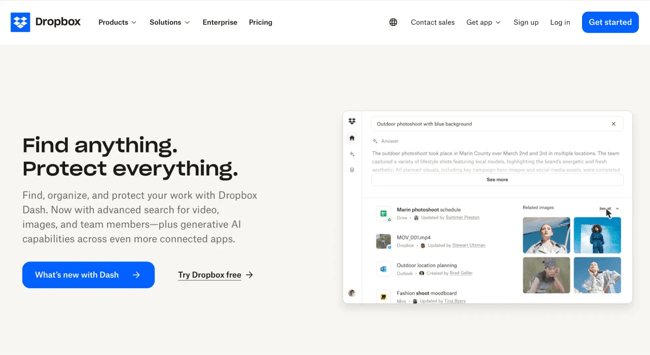
A headline should be simple, direct, and instantly tell visitors what’s in it for them. One of my favorite examples is Dropbox’s homepage headline: “Find anything. Protect everything.” There’s no fluff, no jargon. You don’t have to think twice about what Dropbox does. That kind of clarity is what keeps people on your site.

Over the years, I’ve seen too many businesses overthink their headlines — trying to sound innovative or bold — when what really works is being clear and human. A well-written headline can do more heavy lifting than an entire paragraph of marketing copy if you keep it focused on the visitor’s needs.

what to put on a homepage of a website, example from dropbox homepage

Source

Pro tip: One way I simplify this process for myself and my clients is by using HubSpot’s free drag-and-drop website builder. It’s a user-friendly tool that allows you to build a homepage that adapts to your audience’s needs, no code required. I like it because it gives me control over layout and flow, while still leaving room to optimize as traffic behaviors change.

2. Sub-headline

Your sub-headline is where you get to add a little context to your headline. Think of it as the quick follow-up that explains what you actually do. It’s not the place to be vague or overthink it.

The best way to make it land is by calling out a problem your audience is dealing with and showing how you solve it.

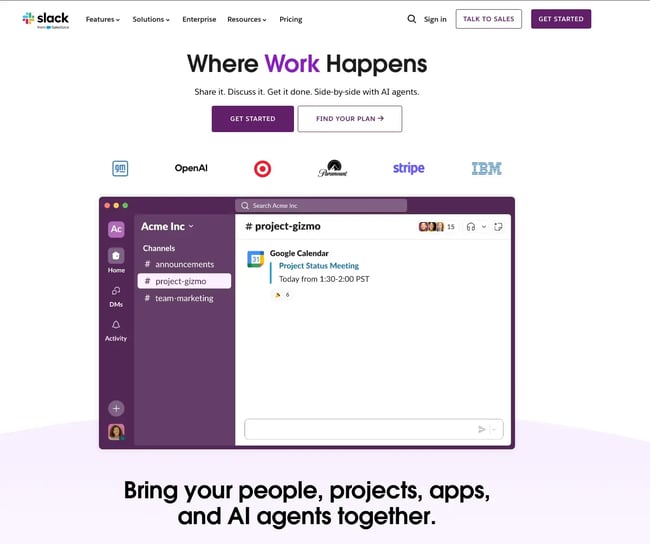
One brand that does this well is Slack. Their headline says, “Where Work Happens,” which is broad, but their sub-headline gets specific: “Bring your people, projects, apps, and AI agents together.” In just a few words, they’ve described exactly what they offer and why it matters to busy teams. The video of the Slack app being used also adds to the clarity of what their product actually offers and how it works.

When I’m working on websites, I always recommend using this space to address a real pain point. Don’t just list a feature, explain how it makes life easier for your users. That’s how you turn a headline and sub-headline into a powerful combo.

what to put on a homepage of a website, slack homepage

Source

3. Primary Calls-to-Action

The first thing I think about before I dive into website building is what I want the users to do. What action do I need them to take? That’s where straightforward, easy-to-find calls-to-action (CTAs) come in.

I recommend having at least two to three CTAs above the fold, leading visitors to different parts of the buying journey. Personally, I like to at least place one in the header and another in the hero section. Some folks might be ready to sign up today, while others are just browsing. Your CTAs should meet them where they are — and they need to stand out.

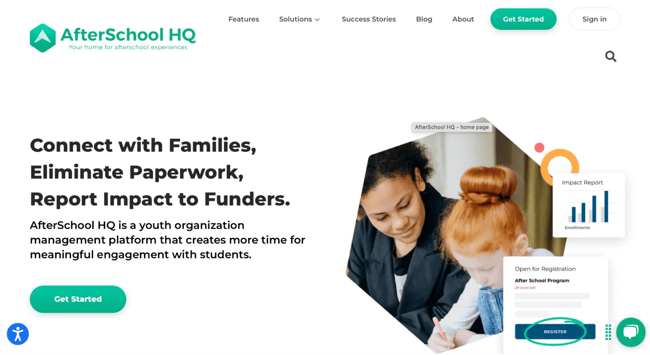
A good example of this in action is Afterschool HQ’s website. Right in the header, they have a CTA geared toward program directors looking to promote their after-school activities that says “Get Started.” If they miss the button in the header, they have the same one in the hero section underneath their sub-headline.

what to put on a homepage of a website, example from afterschool hq

Source

Pro tips:

  • I always advise clients to use a contrasting color for CTAs. That simply means picking a color that pops against your homepage background but still feels like it belongs in your brand palette. For example, if your website has a soft, neutral color scheme — think whites and light grays — a bold navy blue or vibrant coral button will naturally draw the eye. The key is balance: It should grab attention without clashing.
  • Keep the CTA text simple. I’m talking five words or less. Short, action-oriented phrases like “Get Started,” “Book a Demo,” or “Try It Free” do the trick. Don’t make people think too hard about what happens next.

4. Supporting Image

Most people are visual. Make sure to use an image (or even a short video) that clearly indicates what you offer. Use images or videos that capture emotion, drive action, and visually tell the story you’re writing about.

To optimize your images for mobile users, use high-quality images that have a reduced file size. (HubSpot customers don‘t need to worry about this, as images uploaded to HubSpot’s software are automatically compressed. Otherwise, tools like Tinify will do the trick.)

Also, always add alt text to your images to make them more accessible to visitors who use screen readers and to take your SEO efforts up a notch.

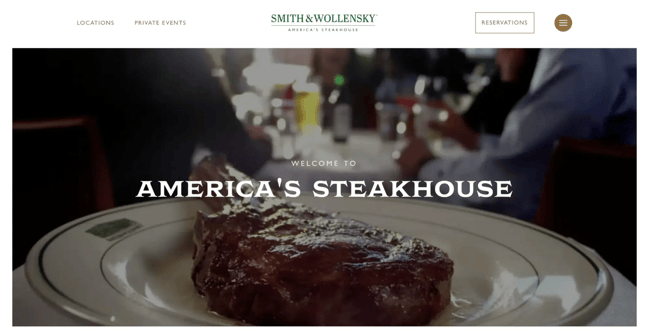
The Smith & Wollensky homepage is a great example of emotional imagery: It features a series of short, high-definition, and mouthwatering videos that play on a loop behind a simple headline.

what to put on a homepage of a website, example from smith & wollensky

Source

5. Benefits

Stating what you do is not enough. I am a huge advocate for showing what you do as well. Your audience cares about how your product helps them, and that’s what keeps them interested.

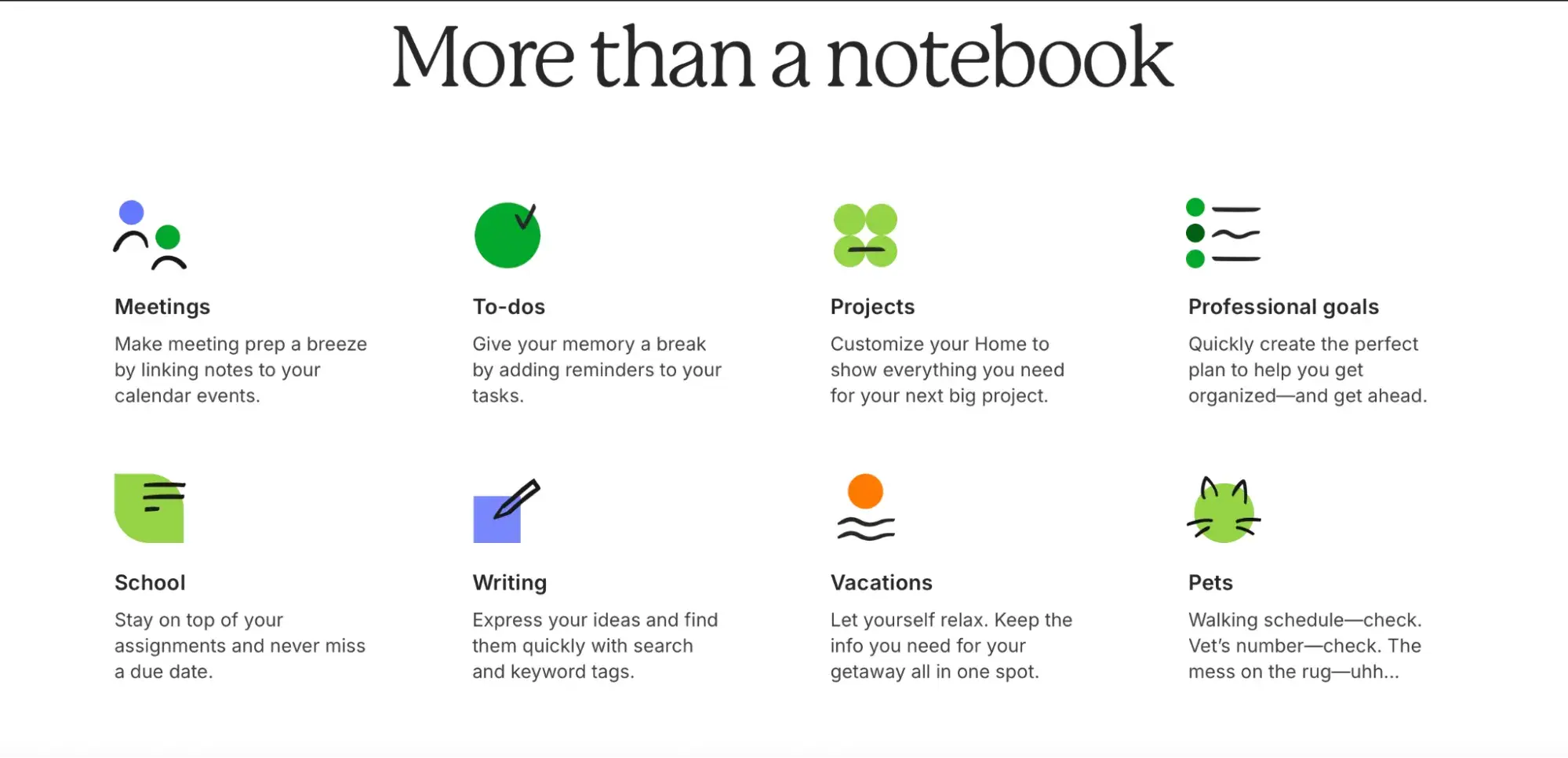
Keep your message light, clear, and in their language. Evernote is one of my favorite examples of this. On their homepage, they show their benefits in a way that’s easy to read and nice to look at.

what to put on a homepage of a website, evernote example

Source

6. Social Proof

Social proof is a powerful indicator of trust. Your product or service could be the best in the world, and it‘s okay to lay that claim — it’s just that people may not believe you unless they hear it from other people, too. And that’s exactly what social proof does.

Include just a few of your best (short) quotes on the homepage, and link to case studies if applicable. Adding a name and photo gives these testimonials more credibility.

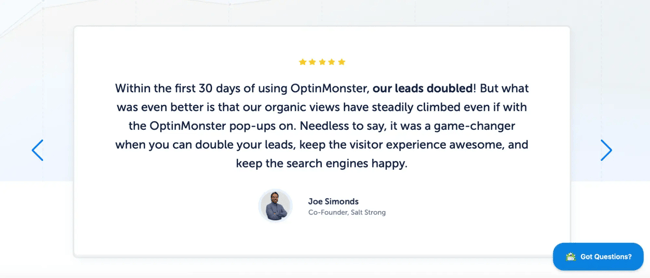
OptinMonster nails this on their homepage with glowing testimonials from actual clients. Most local services and goods thrive on social proof. So, whether you’re working on an orthodontics website design or a local bakery, make sure to include testimonials and reviews if available.

what to put on a homepage of a website, optinmonster example of social proof on homepage

Source

7. Navigation

The design and content in your homepage navigation could mean the difference between a website conversion and a bounce. If you want to keep your bounce rate low, you’ve got to give visitors an obvious, easy-to-follow path to wherever they need to go — starting right from your homepage.

So, keep your navigation menu visible at the top, and lay out your links in a way that naturally guides people through your content, from the most important pages on down.

You and your team know your website inside and out, but your visitors don’t. That’s why it’s important to run user tests to see if navigating your site feels as smooth and intuitive to them as it does to you. If you can, add a search bar to make it even easier for folks to find exactly what they’re looking for.

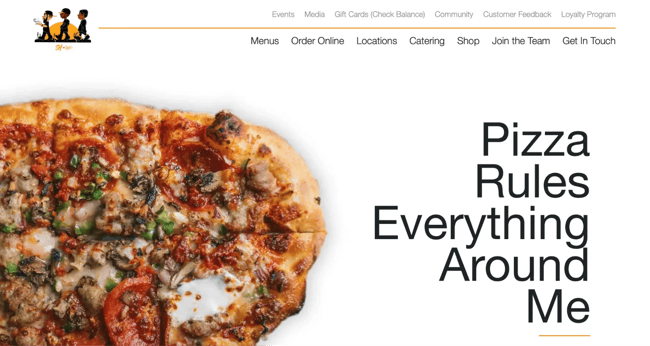
One of my favorite examples of easy navigation is Slim & Husky’s Pizza Beeria. Their homepage navigation is clearly structured, keeping visitors moving in the right direction.

what to put on a homepage of a website, examples from slim & huskys

Source

8. Content Offer

To generate even more leads from your homepage, feature a really great content offer, such as a whitepaper, ebook, or guide. Folks who may not be ready to buy might rather download an offer that gives them more information about a topic they’re interested in.

If you need inspiration, here are several different content types to pick from.

9. Secondary Calls-to-Action

Here’s the thing: Not everyone who lands on your homepage is going to be ready to commit straight into your main offer. That’s why having secondary CTAs is so important. They’re like your safety net, giving visitors who need a little more time (or a lower-commitment option) another way to connect with you.

While your primary calls-to-action should be front and center above the fold, those secondary CTAs belong further down the page.

As people scroll, you want to keep giving them reasons to stay engaged. A great example of this is Spanx’s homepage. Once you scroll past the top section, you’ll spot three clear CTAs waiting for you. Whether it’s grabbing $20 off or hitting “Shop Now” to browse the catalog, these secondary actions give visitors more paths to convert when they’re ready.

what to put on a homepage of a website, example from spanx

Source

10. Features

In addition to benefits, list some of your key features. This gives people more of an understanding of what’s provided by your products and services. Again, keep the copy light and easy to read.

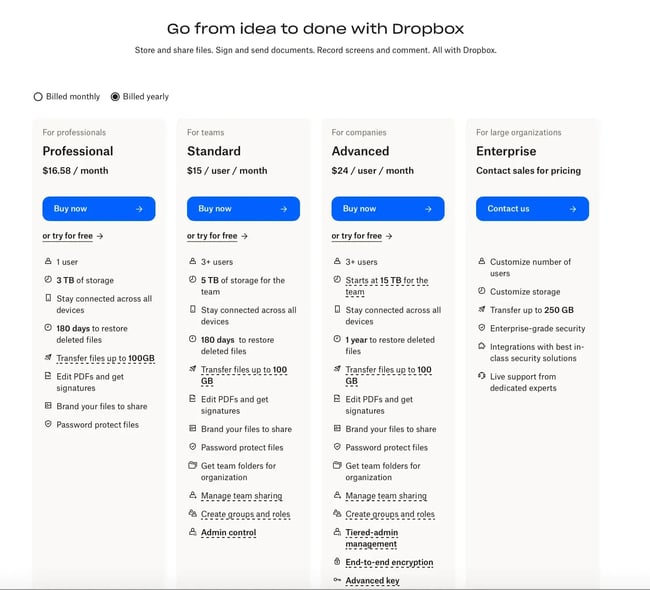
Dropbox for Business, for example, doesn’t shy away from showing off a features matrix right on their homepage below the fold.

what to put on a homepage of a website, dropbox example

Source

11. Resources

One of my signature website elements is having a resourceful footer. This is because most people aren’t going to be ready to buy on the spot. They’re still in research mode, trying to figure out if what you offer is the right fit.

That’s why it’s smart to give them a space where they can explore and learn more, like a resource center or knowledge hub. It not only keeps them engaged and on your site longer, but it also positions you as the go-to expert in your space.

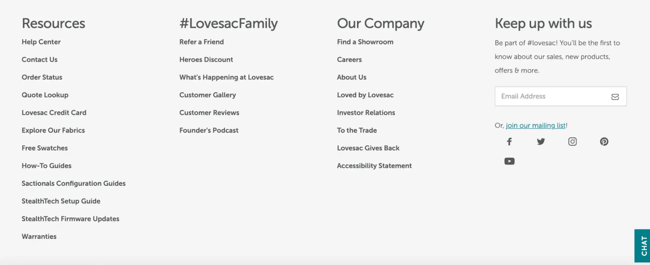
Take Lovesac, for example. They’ve added a resource link in the footer, below the fold, that reiterates all of their wonderful offerings.

Their secondary CTAs are thoughtfully designed to catch visitors at different stages of their buying journey. There’s a credit card link for folks ready to make a purchase, a fabric swatch guide for those still deciding on colors, and an online catalog for shoppers who are browsing but not quite ready to commit. Each one gives visitors a reason to stay connected and move closer to a purchase when they are ready.

what to put on a homepage of a website, example from lovesac

Source

12. Success Indicators

Along with customer success stories, awards and recognitions are great for making a strong first impression. Is your restaurant critically acclaimed? Did your app win best new product this year? Highlight those wins on your homepage. Just like social proof, showcasing achievements builds trust and adds credibility for visitors who are new to your brand.

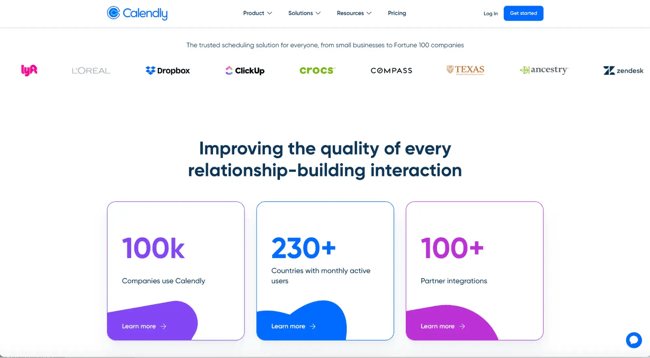
On Calendly’s homepage, for example, you’ll find the names of famous organizations that have recognized them, like Gartner and Dropbox.

what to put on a homepage of a website, example from calendly

Source

13. Search Bar

If your website is content-heavy, adding a search bar may be extremely helpful for your users, especially if you’re an online store with hundreds of products, a blog library, or a resource hub.

Visitors who already know what they’re looking for don’t want to go through layers of navigation menus. A simple, visible search bar gives them a direct shortcut to find exactly what they need, fast.

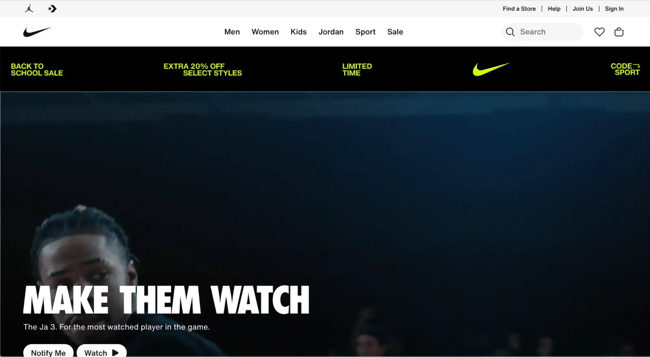
Remember this: The more content you have, the harder it becomes for people to browse through categories and filters. A search bar solves that by letting users type in exactly what they’re looking for. It’s an underrated tool that keeps visitors engaged and prevents them from bouncing out of frustration. Sites like Amazon and Nike wouldn’t be functional without it — and if your site has a large inventory or content library, you’ll want to follow their lead.

Even on smaller websites, a search bar can add value if you have multiple service pages, case studies, or blog articles. It’s all about reducing friction and making sure people don’t have to work hard to find what they came for.

what to put on a homepage of a website, example from nike

Source

14. Contact Us

Your “Contact Us” options shouldn’t be hidden away in some forgotten corner of your website. It deserves a spot right on your homepage. Why? Because when a visitor is ready to reach out, you want to make that next step as frictionless as possible. Whether they have a question, need a quote, or simply want to connect, giving them a direct line to you upfront builds trust and shows you’re approachable. Plus, it’s a key touchpoint that can turn casual browsers into real leads — so why make them dig for it?

Now, if you’re working with a minimalist design or don’t want to dedicate a full page or section to contact info, no problem. You can keep your layout clean by using a strategically placed “Contact” button that triggers a hidden modal. When clicked, this modal can pop up with a simple contact form or contact details, giving visitors a distraction-free way to reach out without cluttering the main page.

It’s a sleek way to keep your design tight while ensuring people know exactly how to get in touch with you. Check out this blog full of great “Contact Us” examples.

A Homepage Worth Visiting

Your homepage is your brand’s first impression — it sets the tone before you even get a chance to make a pitch. Visitors judge what you do, why it should matter to them, and how your product or service can make their life easier. That first impression happens fast, and your homepage needs to pop to keep them interested.

By weaving in the elements we’ve talked about — clear CTAs, strong headlines, user-friendly navigation, and a design that guides visitors down the funnel, you’re building a path to conversion.

Editor’s Note: This post was originally published in January 2012 and has been updated for freshness, accuracy, and comprehensiveness.

Categories B2B

Why email whitelisting is important for marketers [+ detailed steps on how to do it]

As a marketer, one of the reasons I think it’s fun to work in email is that not only are we sending messages, but we are also receiving them. Being on both sides is a great way to gain perspective as to what those on your list are experiencing.

→ Download Now: The Beginner's Guide to Email Marketing [Free Ebook]

As a result, I’m going to talk about whitelists from two distinctly different perspectives:

  • As a recipient of email marketing.
  • As a marketer sending email.

Here’s a recent example that shows why this is important: Just this week, I went looking for a purchase confirmation for a small Sago palm that I’d ordered online. It should have been in my inbox … but I could not find it. I was curious about when my plant would arrive — and I was hoping that I had actually completed the order.

I decided to check my spam or junk folder. And guess what – there it was. Sigh.

I imagine I’ll be ordering from this merchant again, so I decided to whitelist their email address.

For more on the what, why, and how of whitelisting an email, read on. 

Table of Contents

Why whitelist emails?

As a recipient, you’ll want to whitelist the sending address of people and brands that you trust – whose messages you want delivered to the inbox, not to the spam folder.

This could include:

  • Family and friends.
  • Schools, churches, volunteer organizations, and other institutions.
  • Utilities, mortgage companies, and others who send you bills.
  • Publications that send you alerts and newsletters.
  • Local and national businesses that you purchase from.
  • Others whom you interact with via email.

The good news is that it’s relatively easy to white list an email sender. Step-by-step directions for how to do it follow.

The exact process varies based on what you use to read your email; we have detailed instructions for:

  • Gmail
  • Outlook
  • Yahoo
  • AOL
  • Apple Mail
  • Windows 365 Desktop
  • ProtonMail

Why prompt your subscribers to whitelist your email?

Now, let’s put on our email marketer hats.

Many of my clients send email newsletters – some of them are subscription-based, meaning that readers pay to receive them. And when one of those lands in the spam folder instead of the inbox? We usually hear about it.

It’s an occupational hazard of being an email marketer: At some point, a message you send will end up in the spam folder. It’s inevitable.

We all know what it means when your email lands in the spam folder. Images are blocked, links are disabled … but that isn’t the worst of it. Your email is much, much less likely to be opened, read, and acted on if it’s diverted to the spam folder.

And this means that even if you crafted a perfect subject line, wrote amazingly persuasive body copy, and had a fabulous call-to-action, it doesn’t matter. The spam folder negates all that.

Here’s the thing: Often it’s not your fault when your email lands in the spam folder. You can follow best practices, keep your list clean, confirm that your email authentication protocols are in place and still have your email messages sent to the spam folder.

But there’s one more thing you can do to help ensure your emails reach the inbox: Ask your subscribers to whitelist your email address.

When an email address is whitelisted, messages sent from it are almost guaranteed to reach your recipient’s inbox – not the spam folder. When your readers whitelist your email address, it tells the algorithms that control inbox and spam folder placement that the recipient trusts you and that they want to receive email from you.

How to Get Subscribers to Whitelist Your Email Address

There’s only one way to get your email address whitelisted – you have to ask your subscribers to do it. This is true whether you are B2B, B2C, or something else.

A whitelist request used to be a standard part of the new subscriber onboarding process. You see it less these days, but it’s still a good thing to do to help your messages reach the inbox.

Here’s an example: A note like this would appear on a confirmation page when sign-up was complete and/or in the welcome email (feel free to copy this – the link will bring your subscribers back to this page for detailed instructions):

Thanks for signing up to receive email from [Your Brand Here]; please whitelist our sender address, which is [Your Sender Address] to be sure our emails reach your inbox. Not sure how to whitelist an email address? Here are detailed instructions from Hubspot.

Here’s an example from my inbox of a welcome message with a whitelist request in it. It’s pretty lengthy, and it appears in the middle of a long welcome email (see the arrow I added).

email whitelist message in an onboarding email i received from optinmonster

But whitelist requests aren’t just for onboarding. Many organizations include them in every message they send, as a consistent reminder to subscribers.

Once again from my inbox, here’s an example where it’s at the top of the message.

email whitelist request in the header of an email i received

And finally, here’s an example where the whitelist message appears in the footer of each email sent (also from my inbox).

email whitelist request in the footer of an email i received

The exact wording of your whitelist request isn’t important, as long as it conveys:

  • Why whitelisting is important.
  • What email address should be whitelisted for your messages.
  • How the subscriber can do it.

Some email tools will automatically whitelist email messages from senders in the recipient’s address book – but some won’t. That’s why the detailed instructions by email tool are so important.

1. Open settings.

To begin, you need to open your email settings. Click the gear icon in Gmail and select See all settings from the Quick Settings menu.

how to whitelist an email in gmail open gear icon and select “see all settings”

2. Navigate to “Filters and Blocked Addresses” in the top menu.

how to whitelist an email in gmail go to filters and blocked addresses

Once you’ve opened your settings, select Filters and Blocked Addresses on the top bar.

3. Select “Create a new filter.”

In Gmail, whitelisting an email actually involves creating a filter, so you need to select the Create new filter button.

how to whitelist an email in gmail create a new filter

4. Add a specific email or a whole domain in the “From” field.

Now it’s time to specify who you are whitelisting. You do this by entering in a specific email address (e.g., [email protected]) or a whole domain by omitting everything before the at symbol (e.g., @domain.com) in the “From” field.

The former will whitelist one specific email address, while the latter whitelists anyone who is sending emails from that domain.

how to whitelist an email in gmail add emails or domains in the ‘from’ section

5. Click “Create filter.”

From there, all you need to do is click the Create filter button at the bottom of the window (next to the blue “Search” button).

how to whitelist an email in gmail click ‘create filter’

6. Check “Never send it to Spam” in the checkbox.

Clicking the Create filter button brings up a new window where you actually specify what you’re doing with those emails. In this case, you’re whitelisting. In Gmail, you do this by ticking the Never send it to Spam box.

This will ensure that emails coming from the sender or domain you specified never end up in Spam or Trash.

how to whitelist an email in gmail tick ‘never send to spam’

As you can see, you can also add other filters here if they are relevant to those email addresses.

7. Click “Create filter.”

Once you have selected your filter, simply click the blue Create filter button again, and this creates the whitelist within Gmail.

Note: The default email provider for Android is Gmail. Follow the above instructions to whitelist emails on your Android device.

1. Go to settings in Outlook.

how to whitelist an email in outlook select gear icon.

To start, click the gear icon in Outlook. When you select it, a drop-down menu will appear and you’ll choose View all Outlook settings at the bottom.

how to whitelist an email in outlook view all settings

2. Select “Mail” from the settings menu.

how to whitelist an email in outlook choose “mail”

On the sidebar, click Mail.

3. Choose “Junk email” from the submenu.

After clicking Mail, a submenu specific to mail will pop out. Choose Junk email.

4. Click “Add” under “Safe senders and domains.”

how to whitelist an email in outlook choose add

You’ll see the heading Safe senders and domains. Click + Add to whitelist specific addresses and domains.

5. Enter the email address that you want whitelisted.

A field will appear below Add. ​​Just like in Gmail, you can either enter a specific email address (e.g., [email protected]) or a whole domain (@domain.com).

how to whitelist an email in outlook type in address or domain

6. Choose “Save.”

Then click Save. This will save your whitelist preferences and ensure that emails from those senders don’t end up in your junk email folder in Outlook.

1. Open Yahoo Mail and log in.

how to whitelist an email in yahoo log in

2. Navigate to “Settings” then click “More Settings.”

how to whitelist an email in yahoo open settings-1

Source

Find the gear icon, which is the settings menu. From the dropdown menu, select the More settings option.

how to whitelist an email in yahoo open settings

Source

3. Select “Filters” and hit “Add new filters.”

how to whitelist an email in yahoo: click filters

Source

To whitelist emails on Yahoo, you are actually creating a filter. So on the sidebar, select Filters and hit Add new filters to enter the email you’d like to whitelist.

 how to whitelist an email in yahoo: click more filters

Source

4. Name the filter and add the email address.

In Yahoo, you have to name your filter. I recommend something simple like “Whitelist.”

 how to whitelist an email in yahoo: name the filter

Source

Then you set the rule for your filter. Because you’re creating a white list, select contains from the filter criterion list.

how to whitelist an email in yahoo click more filters

Source

After that, you just enter the email address or domain in the text box.

how to whitelist an email in yahoo name filter

Source

5. Select to send all mail to “Inbox.”

To ensure those emails don’t go to spam or junk, select the Inbox folder. This will send all emails coming from the specified address or domain to your inbox.

how to whitelist an email in yahoo: click more filters

Source

6. Save your settings.

As always, be sure to click Save so your new settings are saved.

1. Log in to your AOL account.

how to whitelist an email in aol login

2. Open “Contacts.”

To whitelist emails or domains on AOL, you will actually be adding a new contact. This will signal to the server that you trust the emails coming from these addresses.

So, on the left navigation pane, open Contacts.

how to whitelist an email in aol select contacts from navigation pane

Source

3. Click the “New Contact” icon and add the email address.

Under Contacts select New Contact. Enter the contact’s name and email address. You can also enter a full domain (e.g., @domain.com) to the email field.

how to whitelist an email in aol add new contact

Source

4. Click the “Add Contact” button.

Finally, just click Add Contact and you’re all set.

1. Log into your Apple Mail account.

how to whitelist an email in apple mail login

2. Click “Mail” then “Preferences” in the menu bar.

Choose Mail from the menu bar and then select Preferences from the dropdown.

how to whitelist an email in apple mail click mail

Source

3. Click on the “Rules” tab.

Under preferences, click the Rule tab up top and choose the Add Rule button from the sidebar.

how to whitelist an email in apple mail click on the rules tab

Source

4. Enter a new description and set the rule.

Enter the description for your new rule. I think “Whitelist” or “Whitelist Emails” are good descriptors.

how to whitelist an email in apple mail name rule

Source

Settings you need to select to make a whitelist rule would be “any,” “from,” and “contains” — as you can see in the screenshot above.

5. Type the email address and select “Inbox.”

Type the email address or domain you want to whitelist. You can add more than one address or domain at a time if you want to apply the same rule. Just press the + sign next to the textbox where you entered the first email.

Below, select Move Message from the first dropdown and choose Inbox from the second.

how to whitelist an email in apple mail set rule ‘move message’ to ‘inbox’

Source

6. Select “OK” to save.

And that’s it! Pressing OK at the bottom right-hand corner will save your changes.

1. Open the Windows Outlook 365 app.

how to whitelist an email in windows 365 desktop: login

2. Navigate to “Tools” and then select “Rules.”

Click Tools from the top menu and select Rules… from the dropdown.

how to whitelist an email in windows 365 desktop select tools and rules

3. Click on “New Rule.”

From there, it will display the rules you’ve created. If you haven’t created any yet, it will look blank like the screenshot below. Click the New Rule button on the bottom left-hand side of the screen.

how to whitelist an email in windows 365 desktop choose ‘new rule’

4. Name your rule “Whitelist.”

You will have to name your rule. I recommend sticking with “Whitelist.”

how to whitelist an email in windows 365 desktop, name your rule ‘whitelist’

5. Select “From” and enter the email address.

Next, choose From from the dropdown menu as your rule. In the next field, enter the email address or domain you want to whitelist.

how to whitelist an email in windows 365 desktop, enter “from” email address

6. Select “Move to” and “Inbox” from the dropdown menus.

Now it’s time to choose your action. In the first dropdown menu, choose Move to and select Inbox from the next one.

how to whitelist an email in windows 365 desktop: ‘move to’ ‘inbox’

7. Click “Save.”

To save your settings, just click Save at the bottom.

1. Log into your ProtonMail account.

how to whitelist an email in protonmail

2. Click “Settings,” then select “Go to settings.”

Click on the gear icon to open your settings options and select Go to settings.

how to whitelist an email in proton mail click settings and go to settings

3. Select “Filters” from the sidebar.

Choose Filters from the sidebar and look for the Span, block, and allow lists subheading.

how to whitelist an email in protonmail: select filters from the sidebar

4. Click the “Add address or domain.”

Under the Span, block, and allow lists subheading, click on the Add address or domain button. It will open the dropdown menu, from which you want to choose Allow.

5. Select either “Email” or “Domain.”

Choose either Email or Domain. Depending on your selection, you can enter the email address or domain you want to whitelist in the field box.

how to whitelist an email in proton mail enter address or domain

6. Click “Add address” to save your changes.

Clicking Add address will save your changes. Repeat this process if you want to whitelist more than one sender.

Best Practices Beyond Whitelisting

As mentioned above, whitelisting is just one tool to help your email messages reach the inbox and be acted on. Here are a few more resources I recommend to help you improve your email marketing.

Deliverability Tips & Practices

Whitelisting and other ways to get your emails delivered to the inbox instead of the spam folder fall under an umbrella practice called deliverability or inboxing.

Fun fact: Deliverability sounds like, but is totally different than, emails delivered or delivery rate. The email delivery rate is calculated by subtracting the number of bounces from the number of emails sent. An email can be “delivered” (meaning it did not bounce) but not reach the inbox (instead being diverted to the spam or junk folder, or just blocked entirely).

Email Best Practices

Pretty much everything you do – from your subject line to how the content of your message is formatted – can impact your deliverability. Following best practices is a best practice for good deliverability.

Fun fact: Your email should have fewer than three different typefaces. It’s not that having four typefaces or fonts will cause your email to go to the junk folder, but fewer fonts will provide a less cluttered look, which will aid in visual appeal and readability. And having people open and click on your emails is engagement, which helps your email reputation – and your deliverability.

List Maintenance

Who is on your list, their relationship with your company, and how they do (or don’t) engage with your email messages have a big impact on your deliverability. So do unsubscribe and spam complaint rates.

Fun fact: Quality is more important than quantity. It sounds impressive to have a large email list, but what really matters is how engaged your subscribers are, not how many you have.

A list of 10,000 with a 20% open rate (2,000 opens) is likely to have higher deliverability than a list of 100,000 with the same 2,000 opens (a 2% open rate). It’s about engagement — also known as quality, not quantity.

Conclusion

Hey, you did it! You now know:

  • What a whitelisted email is.
  • Why, as a recipient, you would want to whitelist email senders.
  • Why, as an email marketer, you would want your subscribers to whitelist your sender address.
  • How to ask subscribers to whitelist your sender address (with templated language and a link to this blog post that you can use for your own messages and real-world examples).
  • How to whitelist an email sender in your email tool.
  • Where to find some other best practices for deliverability, beyond whitelisting.

I hope you had as much fun reading this as I had writing it – because email marketing is fun and more effective when you follow best practices in deliverability.

Happy sending!

Editor’s note: This post was originally published in April 2019 and has been updated for comprehensiveness.

Categories B2B

B2C vs. B2B marketing with AI: The industry trends every marketer should know

The beauty of freelancing for most of my decade-long career is that I’ve worked on both sides of the B2B and B2C marketing coin. One week, I’m helping a B2B SaaS brand rewrite a whitepaper. The next, I’m deep in campaign planning for a B2C real estate brand. It’s a front-row seat to how marketing works across different verticals.

Download Now: The Annual State of Artificial Intelligence in 2025 [Free Report]

Now, with AI, everything has changed. I’ve heard it in interviews with marketing leads, seen it in the tools people reach for, and felt it in the way teams are organizing their workflows.

In this article, I’ll share what I’ve observed, backed by insights from our State of AI in Marketing 2025 report, to compare how B2C and B2B marketers are each leveraging AI and where they’re headed next.

Table of Contents

How B2C vs B2B Brands Use AI for Content Creation

Although the use cases of AI are as varied as they come, one thing is clear: AI has become nearly synonymous with content creation. But the way it shows up in B2C versus B2B contexts reveals both strong similarities and subtle differences. And the data from our report makes this very clear.

1. Content Quality Assurance

One of the most widely adopted use cases across both sales models is quality assurance. According to our survey, 53.87% of marketers use AI for things like spellchecks, tone adjustments, accessibility reviews, and writing recommendations. Every marketer knows this is the kind of work that quietly eats up hours in the content cycle.

Personally, I often spend just as much time reviewing as I do writing, checking that every ‘i’ is dotted and every ‘t’ crossed. Now, it is such a relief to be able to handle that part of the process with AI.

2. Copywriting

This was the second most popular use case in our survey, with over half of all marketers saying they use AI to write content. While their content goals may differ, both B2B and B2C marketers rely heavily on written communication.

B2C teams often turn to AI for high-volume writing needs, especially when there’s pressure to churn out lots of content across different channels.

On the B2B side, where content is often required to be in-depth and technical, AI is frequently used more for structure than speed. Here, AI is more relevant for generating outlines, organizing ideas, and sometimes producing a solid first draft.

3. Creating Images With AI Art Tools

Visual content is another growing area for AI support, with nearly half of marketers across both B2C and B2B saying they use AI to create marketing images.

In this case, B2C slightly leads the way. And that’s not surprising, as they often rely heavily on attention-grabbing visuals for social media, digital ads, and branded storytelling, way more than their B2B counterparts.

4. Summarizing Text Into Key Points

I once worked in social media for a B2C brand, and I remember how important it was to take complex or detailed service information and turn it into fun, digestible content for our social media pages. That’s one of many instances where I believe AI could have supported me.

Around 40% of marketers are now maximizing this, using the technology to break down dense content into key points.

For B2C, it’s a shortcut to creating engaging captions, stories, or newsletter blurbs. For B2B, it helps transform long-form assets like reports or webinar transcripts into summaries, executive notes, or even LinkedIn carousel content.

5. Repurposing Content by Format and Audience

Let’s say you’ve shot a customer testimonial video. That same piece of content might need to become a blog post, then a LinkedIn thought leadership article, and maybe even a script for a short video ad. This kind of repurposing, taking one idea and reshaping it across multiple formats, is another space where AI shines for marketers working with B2B and B2C brands.

But it’s not just about changing the format. Many marketers (nearly 40%) also use AI to adapt content for different audiences. For example, turning a blog on male fashion trends into one tailored to women’s styling needs. It’s the same core message, but with language, tone, and focus adjusted to resonate with a new reader.

6. Translating Content Across Languages

Global campaigns demand localized content, and 35% of the marketers we surveyed are using AI to scale their content across languages faster than traditional workflows allowed. B2C brands, especially in ecommerce, use this to localize product pages, ads, and help docs.

B2B teams are also adopting it, particularly for international landing pages, case studies, or product education content. Human oversight still matters, but there’s nothing quite like the head start AI provides.

Top AI Tools Leveraged by B2C vs B2B Brands

When we asked marketers and marketing leaders what AI-related resources their organizations provide to support AI adoption, the most common response — by a clear margin — was subscriptions to AI tools and platforms.

The interesting part?

This trend was evenly distributed between B2B and B2C organizations. That tells us something important: Regardless of audience, industry, or sales model, brands are actively investing in access.

But what tools are marketers actually using in their day-to-day roles? Here’s what stood out over the past 12 months.

1. Image or Design Generators

This was the most used category overall, used by over 40% of marketers. B2C teams are slightly ahead here, which makes sense given their heavier reliance on visual storytelling.

Tools like DALL-E, Canva AI, and Midjourney allow marketers to create entirely new images from text prompts, mock up campaign visuals, or even iterate for ad creatives.

2. General Purpose Chatbots

Chatbots like ChatGPT, Google Gemini, and Microsoft Copilot are arguably the most versatile tools on this list and they come as the second most popular tool. As the descriptor goes, these chatbots can be used for everything ranging from brainstorming, outlining, writing, and summarizing to answering research questions.

3. Smart AI Video and Audio Editing Tools

Video content continues to dominate digital marketing, and the demand for high-quality video assets has never been higher. What’s changed is how easily marketers can create and edit that content using AI.

Now, 36% of marketers, with B2C marketers leading B2B, use tools like Descript, Runway, Pictory, and Wisecut to automatically remove filler words, add subtitles, clean up audio, fix lighting, and even repurpose long videos into shorter clips.

4. Voice and Narration Generators

And then we have voice or narration generators which allow marketers to generate human-sounding voiceovers in different languages, tones, and styles. These tools — like Murf, Speechify, Play.ht, and Soundraw — give marketers the creative range to generate voiceovers and soundtracks without needing a professional studio.

With these generated sounds, marketers can produce video ads, social explainers, or even audio content for apps, product tours, demos, training modules, product tutorials, and presentations. The possibilities are endless.

5. Smart Image Editing Tools

Imagine this: You take a product photo somewhere, but for a specific campaign, it makes more sense on a clean white or seasonal background. This is where AI-powered image editing tools come in.

Over 30% of marketers across both B2C and B2B use image editing tools like Photoshop, Fotor AI, Luminar, and others to enhance, retouch, resize, or remove backgrounds automatically. With these tools, photos are polished quickly and adapted for different uses in record time.

How B2C vs B2B Leaders Feel About AI

Marketers may be deep in the trenches of AI-powered tools, but leadership sentiment is what really signals how organizations are thinking about long-term adoption, and our data reveals a lot.

1. Leaders want more control, not just more tools.

When we asked leaders what’s driving AI adoption, the answers were practical. Top of the list at 23% was better control over data privacy and security. Right behind that at 22% was the ability to customize AI to fit their business needs, and then cost savings at 20%.

These priorities came out nearly evenly between B2C and B2B brands, suggesting that regardless of industry, leaders are trying to bring AI closer to the core of their operations, not keep it as a shiny external add-on.

2. Many leaders see growth potential but they are not fully sold yet.

Roughly 35% of leaders somewhat agreed that AI will help their businesses scale in ways that wouldn’t otherwise be possible.

That’s a moderate vote of confidence, but what’s even more telling is the second most common response: neutrality. Almost 29% neither agreed nor disagreed, which says a lot about where most leaders are right now — interested, but still watching closely.

Maybe they haven’t seen the ROI yet, or maybe they’re wary of betting too heavily on a technology that is still evolving. Whichever it is, we can agree that there is optimism, but it’s cautious.

3. AI is great, but maybe not as great as the Industrial Revolution.

Yet. More than a third of marketing leaders somewhat agree that AI will rival the Industrial Revolution, especially when it comes to the impact it will have on human productivity. And yet, nearly 27% said they neither agree nor disagree — again pointing to this theme of cautious curiosity.

The hype is strong, but leaders may want to see sustained productivity gains across departments, not just faster content. Until then, the comparison to the Industrial Revolution will likely remain a metaphor.

4. Being overly reliant on AI is a red flag.

A clear majority — 65% — of leaders agree that AI should be used in people’s roles, but without them becoming overly dependent on it. This is one of the most widely agreed-upon sentiments across both B2C and B2B, and it reflects something important: Respect for human creativity and critical thinking.

This makes plenty of sense. While there is value in automating the repetitive stuff, the core skills that make marketing work should never be outsourced.

5. The ROI of AI investment is somewhat positive.

The majority of leaders describe the ROI from their AI investments as “somewhat positive.” That’s solid, but not game-changing.

Around 43% are seeing results they feel good about, while only about a third are seeing “very positive” returns. In other words, AI is working — but not blowing minds just yet.

This tracks with how most companies are using AI: to enhance productivity, speed up content production, or unlock small efficiencies.

The takeaway? Leaders aren’t walking away from AI, but they’re not betting the entire farm either.

Is B2C or B2B embracing AI more quickly?

If you’re hoping for a dramatic divide between B2C and B2B when it comes to AI adoption, you won’t find it here. What the data (and conversations with marketers) show instead is that both sides are moving fast, and in surprisingly similar ways.

An astonishing 91% of marketing teams say they already use AI in some capacity, and the split between B2C and B2B is nearly even. The same goes for employee mindset — over half of respondents described their teams as eager to use AI, and again, B2C and B2B are neck and neck.

Even when we asked leaders about future investment in AI tools, the pattern held: Two-thirds of teams plan to increase their AI spend in 2025, with a near-identical number from both sides.

The bottom line? B2C and B2B may be using AI for slightly different tasks, but when it comes to pace of adoption, they’re on the same track — and both are accelerating.

AI does not belong to one type of marketer.

If there’s one thing I’ve learned while writing this piece — and working with both B2B and B2C brands — it’s that AI doesn’t belong to one “type” of marketer. Whether your job is writing enterprise whitepapers or producing viral product videos, the core goals are the same: Be more creative, work more efficiently, and stay relevant.

To do this, marketers are maximizing every tool at their fingertips, which is a very smart thing to do. The tactics may differ slightly, but the momentum is shared.

Categories B2B

Consumer search behaviors are shifting, marketers — new data

For what seems like ages, “Google” has been synonymous with “search.” Have a question? Google it. Looking for a product? Google it. But consumer search behavior has changed.

HubSpot's AI Search Grader: See how visible your brand is in AI-powered search  engines.

Now, people are flocking to other channels. Gen Z and Millennials are leading the change, as 29% of the group prefers to search for information on social media over actual search engines.

But that’s not all — generative artificial intelligence (AI) is also coming to search result pages, throwing another wrench in old habits. If your brand relies on search traffic, big consumer shifts are coming (and already on their way). To help you prepare, here are the most significant trends we found after surveying 700+ consumers.

Table of Contents

TLDR: How Consumer Search Behavior Is Changing & What Marketers Should Do About It

Consumer search behavior is rapidly evolving, with users now turning to social media, mobile devices, and AI-powered tools alongside traditional search engines. Recent data shows that over half of Gen Z and Millennials actually prefer social platforms for discovery, while mobile searches continue to outpace desktop.

With these two groups quickly becoming the most powerful market share, marketers need to evolve their search behavior to stay competitive.

This means optimizing content for multiple platforms, prioritizing mobile and local SEO, and preparing for AI-driven search. With HubSpot’s integrated marketing tools, you can start optimizing your search approach today.

What is consumer search behavior?

Consumer search behavior refers to how people discover, research, and find information online before making purchases.

Today‘s consumers don’t just “Google it” anymore. They use social platforms, AI chatbots, voice assistants, and even visual search tools to find what they need. (This has been a big one for me lately.) They read reviews, watch unboxing videos, or do price comparisons.

This shift in consumer search habits demands a new approach to digital marketing strategy — one that meets customers wherever they choose to search.

How Consumer Search Behaviors Are Changing

So, what does consumer search behavior look like in 2025? Let’s break down some of the biggest trends and some telling statistics by category to discuss what it all means for your search behavior marketing.

AI search is on the rise.

1. 72% of consumers report planning on using gen AI-powered search for shopping in the future.

While Google remains the top research destination (more on that later), our research found that consumers plan to search for products more and more on apps like ChatGPT and Perplexity.

In fact, according to GWI, 31% of Gen Zers report they already use AI platforms or chatbots most frequently to find information online, while roughly the same amount also hope to see the research experience only improve.

Add the fact that when researching a brand or product, 59% of consumers prefer to gather information themselves rather than speak to another human, and it’s no wonder experts expect ChatGPT alone to take 1% of the search market in 2025.

Ok, that was a lot of numbers, but I think it makes the picture’s pretty clear.

The days of being able to ignore answer engine optimization (or AEO) are long gone. AI is quickly becoming a part of popular consumer search behavior, and marketers need to react accordingly.

Not sure where to start? First, you’ll want to see how your website, products, and brand currently perform with answer agents. Our free AEO grader will reveal how AI interprets your brand and give you a score out of 100.

screenshot showing hubspot’s aeo grader, a tool to help brands align with new consumer search behavior

Source

It’ll also give you detailed competitive analysis, brand sentiment scoring, and strategic recommendations to improve your score. HubSpot’s Breeze AI in particular can aid your efforts to improve your brand’s AI visibility. (How’s that for meta?)

Social media is increasingly becoming the preferred search channel.

2. 31% of consumers use social media to find answers to their questions.

Our studies found one in three consumers use social search to find answers online. This is actually over double the amount of people who are using AI, and honestly, it’s not a huge surprise.

bar chart showing how consumers search for answers online by percentage

Social media is where people hang out. It gets a bad rap for “brain rot,” but there’s also a wealth of educational and helpful information. From how-tos and life hacks to news, people across every generation are consuming content across some form of social media.

In fact …

3. 29% of Gen Z and millennials prefer social media over search engines.

While just 15% prefer social search over search engines overall, combined, 49% of Gen Z and Millennials prefer social.

bar chart showing how consumer preference for searching on social media over search engines by generation

That’s a significant chunk that will likely only grow, especially as these platforms also incorporate artificial intelligence. (Think Meta AI on Facebook and Instagram, for example.)

When thinking about future strategies, this could be a major shift for marketers as younger generations come into full buying power as they rise in career ranks and generate more income.

Our research shows that B2B marketers plan to invest more in LinkedIn, while B2C marketers are looking to TikTok. Both of these moves reflect how shoppers research new products and services personally and professionally.

Traditional search still reigns supreme.

4. Most consumers still turn to Google first for general search.

All this hype might have you thinking search engines are dying, but SEO teams shouldn’t go into panic just yet – if at all.

While 79% of those who have already used AI for search believe it offers a better experience than traditional search engines, most people still default to Google for general search queries, according to BrightLocal. And that’s not even including Google Maps or users with Google as their default search engine on Safari.

bar chart showing consumers' favorite tool for default general searches by percentage

Source

Only 5% said they default to ChatGPT for general searches, while only 1% use voice assistants. But why? Isn’t AI the new internet darling?

Yes, but not entirely.

Our studies found that one in three consumers uses AI tools like chatbots and ChatGPT, but trust is still very low. In fact, 45% of consumers admit feeling hesitant about AI, considering potential bias, misinformation, and data privacy, among other things.

This is also likely why our research has found consumers still believe search engines are most effective at answering their questions.

bar chart showing how effective consumers believe each search option is by percentage

So, overall, while alternatives are gaining traction and improving functionality, traditional search is still a go-to for consumers looking for answers.

Plus, search engines are incorporating their own AI responses to searches and answer engine optimization (AEO) is still in its infancy. It’s unclear if search rank has an influence on agent mentions and there’s still a chance it does.

Things are changing fast, though. So, we’ll be paying attention.

Mobile search is still popular.

5. 54% of consumers primarily use phones to search.

Consumers we surveyed say they use mobile phones more than any other device when searching for questions online. But, similarly to social search preferences, mobile-first search habits become even more drastic in younger generations.

A whopping 80% of Gen Z use their phones most often when searching, with Millennials (62%) and Gen X (66%) not far behind.

bar chart showing what percentage of consumers use mobile devices for searching over other devices by generation

Our latest Consumer Trends report also shows consumers shop on their phones more than any other device. That’s particularly true for Gen Z, of which 81% use their phone as their primary shopping device.

This mobile-first approach highlights just how critical it’s becoming to optimize web experiences for mobile search platforms and adapt to the preferences of younger generations.

Consumer search is more local than you may think.

6. The majority of consumers say at least 21% of their searches are local-specific.

A study by BrightLocal found, 71% of consumer searches are estimated to be dedicated to local searches. More specifically 32% estimating 21-40% of their searches were local, 24% estimating 41-60%, 11% estimating 61-80%, and 4% estimating 81-100%.

If your business has a specific service area or physical location, localization and local SEO should be a part of your marketing strategy.

7. 1 in 5 consumers conduct local searches directly within maps.

One habit I’ve found myself doing in recent years is using Google Maps to search for places to eat, stay, etc when travelling. I’ll type in the address of where I’m going then zoom in to see what’s close by.

Apparently, I’m not alone.

Google Maps, Apple Maps, and Bing Maps combined make up 20% of default local search platforms for consumers. So, if relevant, you want to make sure your business is set up to appear in results.

8. 1 in 4 of Gen Z consumers use social media as their primary method for local search.

Social media plays a big role in local search as well. With location tags and user-generated content, it’s common for consumers to learn about businesses in their geographic location or those they’re going to be in.

Take me, for example. On Instagram, I have collections where I save places and restaurants I’d like to visit by state, city, or country.

screenshot of instagram collections showing albums organized by location

Visual search is up-and-coming.

9. At least 42% of consumers are somewhat interested in using visual search.

If you’ve been on Google or Amazon lately — and who hasn’t — you’ve likely seen this feature.

screenshot of the google homepage pointing out the “visual search” icon.

Source

It’s a camera icon or photograph on or next to the search bar (like in the screenshot above) that allows users to upload a picture of a physical item they want to learn more about.

This can be useful for a number of different searches. It can identify plants or animals, styles of furniture, or most useful to businesses, show users exactly where they can buy a product like the one in the picture. That was me several times this summer trying to find out where I could buy a specific dress or pair of pants.

According to eMarketer, only about 27% of people are doing the same right now (with Gen Z and Millennials leading the way), but an encouraging 42% are interested in trying it out.

Amazon has also reported a 70% increase in visual searches worldwide year-over-year, while Google gets about 20 billion Lens searches a month, 4 billion related to shopping.

Visual search is growing and with the prevalence of mobile shopping, it can truly be used by marketers to increase conversions and sales.

How to Adapt Your Strategy to New Consumer Search Behavior

Now, understanding these shifts in search behavior is just the beginning. Here’s how to optimize your digital marketing strategy for the evolving search landscape. 

(Dig even deeper in our free AI search guide: “How to Rank on AI Search: 5 Strategies to Stay Visible in the AI Era“)

1. Invest in AEO.

The 2025 State of Marketing revealed that 19% of marketers are building SEO strategies for generative AI search, and nearly half of B2B and B2C (both 47%) marketers have noticed an increase to their web traffic as a result of consumers using AI search.

These numbers are not to be taken lightly. They show a dramatic shift in consumer search behavior and potential competitors’ strategies.

While AI adoption is still emerging, early AEO can help position you ahead of the curve.

Here’s what you can do:

Conduct an analysis of your brand.

First and foremost, you need to assess your brand’s current visibility in AI search, brand sentiment, perception in AI search engines, and how you compare to competitors. I mean, you can’t know how much work needs to be done until you know where you stand currently, right?

A tool like HubSpot’s free AI Search Grader can do this for you.

Study content featured in AI search responses

What’s already showing up in AI agents and engines? Look at who’s “winning” and what their brand is doing that perhaps yours isn’t. You can also use Perplexity, Gemini, and Google’s suggested follow-ups and “People Also Ask” questions to identify gaps in your content marketing.

Analyze AI-generated citations to see where competitors are getting mentioned and examine how AI overviews are structured and formatted.

Structure content for AI comprehension.

Speaking of structure, all the principles of creating high-quality content still apply with AEO. Use clear headers, bullet points, and direct answers to common questions. Optimize for featured snippets and focus on user intent.

Overall, you want to build authority and backlinks to signal to LLMs that you’re a trusted source and expert in your future content marketing. AI systems tend to prioritize credible, well-sourced information.

Pro tip: Create comprehensive topic clusters. AI tools synthesize information from multiple sources, so thorough coverage matters. Learn more about “topic clusters” here.

Build a strong multichannel online presence.

AI models aggregate data from diverse sources, so it’s important to establish a strong presence and reputation as an expert across multiple channels.

Make sure you’re participating in online discussions, monitoring and responding to reviews and feedback, and crafting a compelling narrative around the problems your product solves.

From blogging to social media and analytics. Marketing Hub has all of the tools you need to adapt your marketing strategy to new consumer search behaviors. The best part: You can get started with it for free.

2. Optimize for social search success.

Our recent report found 84% of marketers agree that consumers will search for brands on social media this year. With that in mind, your social media strategy needs a search-first mindset.

Here’s what you should do:

Create searchable content.

Use relevant hashtags, keywords in captions, and descriptive alt text on any visual content. This will help make it easier for algorithms to crawl and retrieve your content for users, as well as index the content for users to find on their own.

Pro tip: Video is the name of the social media game in 2025 — three of the top five most-used social platforms across both B2B and B2C brands are YouTube, Instagram, and TikTok, and these are the platforms driving the most site traffic, social engagement, and audience growth.

Get platform-specific.

Every social media platform has its subtle nuances and features. Optimize for TikTok‘s search algorithm, Instagram’s Explore page, and YouTube’s suggested videos. Also make sure you abide by any technical specifications such as aspect ratio, dimensions, file size, and file type.

Build topic authority.

Consistently create content around your core topics to establish relevance in social algorithms. Not only does this give the platform’s information about what you’re about, but your audience as well.

HubSpot’s social media management tools can not only help you schedule and publish social media content to accomplish these goals, but also create, analyze, and monitor that content.

3. Master mobile-first optimization.

When I first got started in digital marketing, mobile optimization was a big topic of discussion. We preached making sure websites were set up to offer the best user experience from a browser, but today, that’s a big factor in mobile search ranking as well.

With mobile search dominating across all demographics, mobile optimization is non-negotiable.

That means you should:

Focus on site speed.

Aim for page load times under three seconds on mobile devices. Faster websites offer a better user experience, in turn minimizing bounce rates and improving your search rank.

Pro tip: AI can help.

Read: Understanding Technical SEO: Audit Fundamentals + Detailed Checklists

Design for thumbs.

Ensure buttons, links, and interactive elements on your website are easily tappable. Similarly, make sure it’s easy to scroll or swipe through your content.

Prioritize local search.

Mobile searches often have local intent. People are looking for something nearby as they’re on the move. So, be sure to optimize your Google Business Profile and local SEO.

Pro tip: The HubSpot Marketplace is full of free mobile-responsive website templates to help make optimization easy for you.

4. Cater to your target generation.

Remember, while most trends we discussed are consistent across generations, there are subtle nuances that vary.

For example, while all generations are using social media, younger generations are flocking to Instagram and TikTok, while older generations are still enjoying YouTube. Cater your search behavior marketing to the generations you’re trying to reach.

5. Maintain your search engine foundation.

With all the talk about AI and social media, it’s easy to think you can ignore traditional SEO — but that would be a big mistake. Traditional search engines remain the backbone of online discovery. In fact, traditional search rank may even impact AI visibility. It’s still unclear.

Knowing that, continue investing in SEO fundamentals while expanding to new channels. That means continuing to work on your:

  • Technical SEO: Ensure crawlability, site structure, and Core Web Vitals meet standards
  • Content depth: Create comprehensive resources that search engines can confidently recommend
  • User intent alignment: Match content to the specific needs users express through their searches

Frequently Asked Questions about Consumer Search Behavior

What are the 5 stages of the buyer’s journey?

The buyer’s journey typically follows five key stages, each with distinct search behaviors:

  1. Problem Recognition (or awareness): Consumers identify a need and begin broad searches for solutions.
  2. Information search: They actively research across multiple platforms and sources, including possible search engines, social media, or even AI.
  3. Evaluation of alternatives (or consideration): Here, the consumer is comparing options, reading reviews, and seeking recommendations to determine which is the right solution for their needs.
  4. Purchase decision: The consumer has identified the solution they want and are now looking at availability and how to get the best deal.
  5. Post-purchase behavior: Searching for usage tips, support, or sharing their experience in reviews or feedback forms. This also could include making referrals or even a repurchase.

How have consumer search habits changed in recent years?

Consumer search habits have evolved dramatically. While traditional search engines remain dominant, we’re seeing a shift toward multi-platform search strategies. Key changes include the rise of social media search, mobile-first behavior, and emerging AI tool adoption.

Why is understanding search behavior important for marketers?

Search behavior insights directly impact marketing effectiveness. By understanding where and how your audience searches, you can refine your content to improve visibility and connect with consumers at crucial decision moments. This knowledge drives better ROI and helps your brand appear wherever customers look for solutions.

What percentage of consumers use social media for search?

One in three consumers use social search to find answers online. Thanks to enhanced algorithms, hashtags, and even AI assistance, social media can deliver robust answers to users that include content created by peers and sources they trust.

Why is mobile search becoming more important?

Statista reports that over half of global web traffic comes from mobile use, making mobile-first design essential to any marketer and brand. With mobile use being such a prominent consumer search habit, it would be misguided of marketers to neglect mobile optimization in their strategy,

How should marketers adapt to changing search behavior?

Marketers must embrace a hybrid strategy—that includes traditional SEO, Answer Engine Optimization (AEO), and Generative Engine Optimization (GEO)—to remain visible across AI-powered search answers, voice assistants, and conversational tools.

The rise of AI-driven search tools like ChatGPT and Perplexity, now capturing shifting chunks of search traffic, requires marketers to also optimize for AI-first formats and zero-click summaries.

Additionally, including structured data, engaging FAQ formats (like this one), and ensuring accurate, brand-level information support visibility in AI-generated results and voice search and helps position brands to still get found by their target audiences in today’s market.

What role does AI play in future search behavior?

AI-powered search tools are reshaping discovery. Tools like ChatGPT and Perplexity now account for approximately 5.6% of U.S. desktop search traffic as of mid-2025, more than doubling in a year. 

Major players like Google are embedding AI Overviews into search results—reaching billions of users and enhancing user experience, though at the cost of fewer website click-throughs.

This shift demands that brands build content designed for direct citation by AI and cultivate authentic user-generated reviews and community voices, which AI tools increasingly reference.

Which search platforms should businesses prioritize? Which search platforms should brands prioritize for maximum visibility?

This depends on your business, product, and audience, but here are some general guidelines that are worth experimenting with.

Google remains crucial for broad reach, but businesses must also diversify across emerging platforms and search modalities. Social media platforms like TikTok, forums like Reddit, and even AI chat tools like ChatGPT are becoming powerful search destinations, especially among younger or trend-driven audiences.

Additionally, optimizing for voice, visual, and local search — via tools like Google Lens, structured markup, and local business profiles— offers visibility where intent is rich and immediate.

Adapting Your Strategy to New Consumer Search Behavior

In 2025, consumer search behavior is no longer defined by a single platform or habit — it’s multi-channel, contextual, and available on-the-go.

While traditional search engines still anchor the experience and hold great power, social media, AI-powered tools, and mobile-first habits are adding new complexity and dimension. As a marketer, you need to stay flexible and experimental. This vigilance and early adoption is what will keep you relevant and easy to find when consumers go looking.

Editor’s note: This post was originally published in August 2023 and has been updated for comprehensiveness.

Categories B2B

Marketing Aikido: How 3 Experts Turn B2B Challenges Into Momentum

Data without context is useless. 

While I am exceptionally proud of the work we do with our annual B2B consumption report, I recognize there’s more to be done in actually breathing context into the insights, statistics, findings, and even recommendations we provide.

That’s why, at the start of this summer, I invited three of B2B marketing’s boldest thinkers: Andy Crestodina, Mark Schaefer, and Zontee Hou to talk about how their own published work compared and contrasted with NetLine’s 2025 content consumption data and what it means for marketers trying to move the needle.

The result is a sharp, fast-moving conversation that can be viewed in its entirety here:
The 2025 State of B2B Content Consumption: Inspecting B2B Marketing with Andy Crestodina, Mark Schaefer, and Zontee Hou

This article features some of my favorite takeaways from the panel.

TL;DR: Beyond you won’t find in the 2025 data itself, here are the panel’s biggest insights, courtesy of Andy Crestodina, Mark Schaefer, and Zontee Hou.

  • Build momentum by iterating on one strong asset, not by cranking out more volume.
  • From data to utility. Recast insights into formats that travel — worksheets, visuals, or 3-minute summaries that help teams act immediately. (Zontee Hou)
  • Get specific. “AI for RevOps Managers in Fintech” isn’t too niche; clarity beats generality. (Andy Crestodina)
  • Be bold. Safe = invisible. The Audacity Index reminds us that competence won’t cut it; originality earns attention. (Mark Schaefer)

The B2B Consumption Paradox: Deliver Value Faster

Going into the conversation, I already knew we had one major area to cover first. 

I’ve written about it many times, but here is the gist:

  • Interest is high. 
    • NetLine observed ~8M content registrations in 2024 (+27% YoY).
  • Engagement is delayed. 
    • On average, 38.5 hours pass between content request and consumption.

Buyers are raising their hands, but they’re not acting right away. It tells us interest (and possibly even intent) exists, but urgency doesn’t. It also tells us that value delayed is value diminished.

That delay—what we call the Consumption Gap—is our enemy and our opportunity. 

So how do we take that delay and turn it into momentum?

Takeaway: Shorten time-to-value.

This is where marketing aikido comes in: redirecting the buyer’s energy to our advantage.

Buyers are curious but busy. When there’s nearly a 39-hour delay between download and decision, silence kills momentum. Content must be positioned not just to attract attention, but to be immediately actionable.

Zontee Hou emphasized the importance of delivering functional content quickly. Skip the 20-minute demo ask. 

“We do need to be more proactive about making sure that we are reminding people of the content that we’re producing,” she said. “And providing them opportunities to also get that bottom line version of that content. Being really strategic about how we really look at the content that we deliver, and how our audience actually wants to engage with it—that’s part of our remit as marketers. And now, again, more vital than ever because this timeline has shifted.”

Think: dopamine hit, not PDF archive. If you deliver rapid insight, you’re part of the buyer’s next move, not yesterday’s noise.

To Gate or Not to Gate?

Andy pushed us further: Why gate at all if you’re not using the data?

From NetLine’s perspective, we certainly want your best content to be gated. But we aren’t zealots about it. 

Consider ungating your skimmable version. Share it across your social media platforms, especially LinkedIn. This way, you can deliver fast and nurture later.

It’s worth noting that Andy is an advocate for gated content. Orbit Media’s 2021 research proves this.

That idea echoes some of the philosophies Jay Baer espoused in his 2013 book, Youtility:
“If you sell something, you make a customer today, but if you genuinely help someone, you create a customer for life.” In Baer’s framing, marketing should be “so useful, people would pay for it.” 

That means giving away your best insights without fear. We do this with everything we gate, too. Just because the most valuable pieces get externalized doesn’t erode the value of the asset.

Not everything needs to be hidden behind a form. Sometimes, the fastest way to earn trust is to let the value flow freely.

Mark added a tactical note: treat the first 24 hours as sacred. Value decays quickly. If a prospect downloaded your guide yesterday, they’re still thinking about you today. 

Tomorrow? Maybe not. Tomorrow’s tasks outweigh yesterday’s yearnings. 

Respond with relevance before they forget they even registered.

Format Signals Intent—And Shapes It

Formats are more than just containers in which your content lives and is delivered. To the teams paying attention, they’re significant sources of signals. 

Buyers often make snap judgments based on what a format promises. If you don’t believe that, then pay attention to how you consume the next time you request third-party content.

It’s why eBooks still dominate demand (53% of all downloads, +71% YoY), but playbooks are 115% more likely to correlate with a buying decision. An eBook carries little (perceived) commitment. Playbooks, however, even in name, feel like they assign intent. 

As Andy put it, “eBooks sound like homework. Guides sound useful.”

It’s worth noting here that the first time Andy reviewed NetLine’s 2025 report, his response was, “I’m really surprised to see the interest in ebooks. People want ebooks more than guides or webinars?”

I definitely agree with Andy about Guides. And before I began working at NetLine, I probably would have agreed with him about eBooks, too. Now knowing how marketers and the general B2B population sees the format, however, it’s clear that the public sees eBooks as a general content format.

[DESIGN NOTE: PLACE IN THE NETLINE DEFINITIONS OF EBOOK, GUIDE, AND WHITE PAPER]

Simply goes to show that regardless of what we think (or even what a separate set of data shares), our own experiences and perceptions will always take precedent. 

Takeaway: Rename and restructure to influence behavior.

If your eBook is performing, great. But don’t shy away from testing it as a Guide or a Playbook. 

The format isn’t what truly matters; it’s about what it implies. A “playbook” signals direction and actionability. An “eBook” is a cardboard box that could be absolutely anything. Naming alone can trigger curiosity and clarify value.

Build progression into your content:

  • eBook → Guide → Playbook → Case Study

Each asset becomes a checkpoint, guiding the buyer toward more serious consideration. Don’t forget sharable bridges: infographics consistently outperform for socialization and internal distribution. They transform passive downloaders into active evangelists.

This is also where Andy’s Content Chemistry comes alive. 

His “Periodic Table of Content” reminds us that every piece serves a different function.

Some formats attract (such as blog posts, infographics, and videos), others interact (like guides, webinars, and playbooks), and others convert (including case studies, demos, and ROI calculators). 

The harsh reality is that there is no “best” format or one guaranteed to convert. No such magic bullet exists.

You can, however, sequence formats so that the desired reaction (closed-won business) takes place. When all goes right (ideally), an eBook draws a reader in, a Guide clarifies, a Playbook drives action, and a Case Study seals conviction. 

Through this lens, formats are less about deliverables and more about chain reactions. Each asset should connect logically to the next, building momentum through a natural content chemistry that shapes intent and accelerates outcomes.

Personalization = Usefulness + Context

Remember when personalization meant seeing your first name on an email? Those were the days… 

Today, personalization is about relevance in action. It’s the deliberate mirroring of the intent signals provided to a business and that business answering the implied question of every user they wish to engage: “What’s in it for me?”

Collecting intent signals via form-fills is a great way to determine what needs to be in it for “them.”

But it has to be used properly.

As Andy shared earlier, his question of, “Why gate at all if you’re not using the data?” is one that Zontee quite agrees with. She was a bit more blunt, however.

“If form data doesn’t change the experience,” she said, “you’re collecting friction, not insight. Every field you ask for should translate into a smarter, more relevant follow-up.”

For example, let’s say you’re building follow-up paths by role:

  • C-Suite → Action memos
  • Individual Contributors → Worksheets, internal sell-in kits

This isn’t a tactic; it’s a service. It shows buyers you were listening. 

Mark warned: “Personalization has become impersonal.” Use data to be helpful, not creepy. Andy added: if you’re not using what you collect to shape what comes next, you’re just decorating emails with dynamic fields.

Here’s a template worth stealing: “You downloaded the [Topic] Guide — here’s a 5-minute version to brief your VP.”

To Differentiate, Be Audacious

The volume of AI content has outpaced its relevance. 

AI-related consumption grew 186% in 2024. But generic “AI for everyone” content is fading. 

Buyers are in the “So what?” phase, where applicable, job-specific use cases matter.

Takeaway #1: Focus on roles and workflows.

Zontee reminded us that the most valuable use cases aren’t about ChatGPT prompts. Instead, content should remain a utility, allowing consumers to do their jobs better in concert with AI. 

“It’s gonna be about some of the abilities to synthesize information, analyze information, automate information, take information that exists, and make it more accessible to our audiences,” she said. “And I think really educating your audience about what does that actually, specifically mean for you—that’s where our power can come from.”

Andy underscored specificity: “AI for RevOps Managers in Fintech” isn’t too niche. Granularity breaks through. “Buyers don’t want to read about the future of AI, they want to know what AI means for next Tuesday.”

Mark’s advice was not to coast on early traction. When the machine never stops, we, too, will need to keep iterating and updating constantly. 

“The number one problem we have is awareness,” he said. “Even high-quality content is harder to get noticed.” The half-life of first-mover advantage is shrinking.

If your content doesn’t provoke interest, tension, or curiosity, it’s invisible. Mark refers to this as the Audacity Index. Competence alone doesn’t win attention anymore. Originality does.

Ultimately, Mark shared that he wrote Audacious because he wants businesses to stop being ignorable.

“If what you’re doing is competent, then you’re ignorable,” he said. “About two-thirds of B2B and B2C marketing creates no emotional reaction with customers whatsoever. We want to be stimulated, entertained, see something we’ve never seen before. We want you to earn our attention by just trying something different.

Takeaway #2: Do what AI can’t.

As Andy shared, AI can’t produce original data. It can’t take a stand. Until it can, this remains our advantage. A point of view is what makes content both memorable and defensible.

Zontee suggested mining your own aggregated data. Turn internal insights into market-ready content, such as Spotify Wrapped. It doesn’t need to be big; it just needs to be proprietary.

Mark’s closing challenge: break something. The narrative. The format. The voice. Memorable doesn’t require a massive budget, but it does require nerve. 

NetLine, for instance, trucks around a 300-pound mascot to B2B events across the country. Why? Well, because it’s fun, certainly, but more so because it’s about resonance, originality, and impact.

Disrupt expectations in small but meaningful ways.

How to Create Your Own Momentum

Phew. There’s a lot to digest here. So, what comes next?

Here’s a way to pressure-test these ideas right away that you and your team can begin in the next two weeks. 

Week 1: Reframe the Core

Start with one top-performing asset and run an experiment to see how far you can stretch it.

  • Repackage that asset into a Playbook with a 60-second skim version.
  • Add one quick POV insight — even a single chart or stat works.
  • Write two role-based follow-ups: Executives and Individual Contributors.

Week 2: Layer It Out

  • Create a visual bridge from the same content (infographic, flowchart, or worksheet).
  • Link it forward by pointing to a relevant case study or buyer’s guide.
  • Measure three signals on this asset:
    • How long until first engagement (24–48 hours)
    • Role-fit replies (Executives vs. Individual Contributor)
    • Format shift (How many users followed from eBook → Playbook?)

Why This Works

Instead of creating more content, you’re learning more from the content you already have. 

By stretching one asset across formats and roles, you can see where friction exists, which versions pull buyers forward, and how well personalization lands. It’s momentum you can repeat every quarter.

Final Thought

From generic to specific, from safe to bold, from passive to proactive, building momentum in modern marketing isn’t simply about campaign optimization. It requires a mindset shift, instead; giving your audience something they didn’t expect but always needed.

When you package with precision, lead with relevance, personalize with care, and publish with courage, you don’t just engage — you earn attention.

The market doesn’t need more content. It needs content that moves. Momentum belongs to the marketers willing to earn it.

Or as Mark Schaefer put it: “Awareness is the big issue… It doesn’t have to be expensive, but it has to be a little audacious.”

Categories B2B

I tested the 7 best free social media monitoring tools — here’s how they stack up

If you’ve ever woken up to a trending hashtag about your brand — and not in a good way — you know how fast a small issue can become a full-blown PR crisis. Fortunately, I have not been there, done that, or got the t-shirt, but I know plenty of people who’ve been left holding the bag.

→ Free Download: Social Media Calendar Template [Access Now]

With more than 5 billion people worldwide using social media — and sharing their two cents on everything from cat videos to how awesome a brand is (or isn’t) — reputation management and social media listening is only going to get more important.

With that in mind, I tested seven of the most popular free social media monitoring tools so you don’t have to. Here’s what I learned.

Table of Contents

What is social media monitoring?

In a nutshell, social media monitoring, or social media “listening,” is about keeping your ear to the ground.

It’s the ongoing process of tracking conversations, keywords, and trends on social platforms so you know what’s being said about your brand (or anything else that matters to your business).

When I’m running a brand audit, I’m not just looking at who tags the company on Instagram. I’m digging into the full conversation. That might mean:

  • Spotting keywords tied to your industry or products.
  • Watching hashtags your audience uses daily.
  • Tracking mentions of competitors or market leaders.
  • Following influencers, loyal customers, and those “superfans” who shape opinions.

Sounds great, right?

It is — except these conversations happen everywhere from TikTok and Instagram to LinkedIn, Reddit, and niche communities. Trying to keep up manually is nearly impossible, and Google Alerts will only get you so far.

What trends are we seeing when it comes to social media in general? Our 2025 Social Trends Report shares exclusive findings on how people engage across social personally and professionally. Get it free now.

Dig deeper into social media listening specifically and how it works.

Why use a social media monitoring tool?

As a business, it’s critical to know what’s happening around you at all times. Competitor launches, customer complaints, viral trends — all of these factors can impact your brand’s performance. Social media monitoring gives you a way to see it all in real time, making it an important part of your social media strategy.

Done well, it goes beyond data points to show you:

  • Where you’re winning so you can double down.
  • Where customers are frustrated so you can fix issues before they escalate.
  • Where new opportunities are emerging so you can get ahead of competitors.

Because monitoring manually by checking newsfeeds or searching hashtags just isn’t scalable anymore, third-party tools are your best bet.

If you’re already using HubSpot for CRM or marketing automation, HubSpot’s Social Inbox lets you set up monitoring streams so you can see brand mentions, competitor tags, and keyword-based conversations in one dashboard.

HubSpot isn’t the only option (I tested seven others below), but the goal is the same: curating the conversations that matter most so you can engage and respond effectively.

Social media monitoring tools have changed a lot since I first started using them. Back then, there were dozens of free options I could count on — but most of those have either shut down or locked the best features behind a paywall.

And from a business perspective, I get it. Especially as platforms tighten their APIs. But … it makes finding truly free tools that actually work much harder.

That said, you still have options.

If you’re on a budget or just testing the waters, there are still a handful of solid tools (and generous free trials) that can help you keep tabs on the conversations happening around your brand.

I spent time testing seven of the most popular options. Some are lean and simple, others more robust, but each one can help you start building a clearer picture of your social footprint. Here’s my take on them.

1. BrandMentions

screenshot of brandmentions social media auditing tool

Cost: Handful of free tools; Subscription starts at $79/month.

Free trial: Yes (7 days).

What it is: BrandMentions is one of those tools that’s been around long enough to earn its spot on the list. It’s not flashy, but it does what it promises. That’s worth a lot. When you’re talking about tracking every corner of the Internet for mentions of your brand, substance wins over style every time.

While the full tool is subscription-based (with a 7-day trial), it does offer a host of free trackers you can use ad hoc and get a ton of value:

Social Mentions

BrandMentions social mentions tracker

Hashtag Tracker

brandmentions social media auditing tool - hashtag tracker

Brand Tracker

brandmentions social media auditing tool - brand tracker

Social Media Tracker

brandmentions social media auditing tool - social media tracker

I pulled all of those reports in under a minute — and it’s just the tip of the iceberg. So much more data is available. Each tool delivers similar results, so you can really just use one for all your needs. Nevertheless, I was super impressed and will be coming back to this one in the future.

My take: BrandMentions is a solid “set it and forget it” option. It’s not going to give you every single mention in real time (very few tools do), but it’s reliable and offers a broad view of your online presence without overwhelming you with data.

2. TailWind

screenshot of tailwind social media monitoring tool

Cost: Free plan with limited features; paid plans start at $14.99/month.

Free trial: Yes.

What it is: Tailwind started as a Pinterest scheduling tool, but it’s evolved into a more complete platform with monitoring features built in. You can use it to schedule posts for Pinterest, Instagram, and Facebook, but the real gem is the analytics and monitoring it offers on the free plan.

Tailwind’s insights help you see which posts are performing best, which hashtags are driving the most traffic, and what times your audience is most engaged.

Need help in these areas? Give these resources a read:

My take: If you’re active on Pinterest or Instagram, Tailwind is worth testing. It’s not as robust for monitoring conversations outside your own channels, but it’s great for maximizing performance where you’re already posting. And because the free plan is generous, it’s a low-risk way to get started.

sample social media insights tools tailwind

All of these are fairly basic insights, but if you’re highly active on Instagram and Pinterest (like an ecommerce brand, for instance), it is convenient to have all of that information in one place. The downside — especially for the purposes of this article — is that it’s not a true social listening tool.

3. TalkWalker by Hootsuite

TalkWalker by Hootsuite

Cost: Paid plans start at $99/month.

Free trial: Yes (30 days).

What it is: Acquired by Hootsuite in 2024, TalkWalker is a paid platform. At $99/month it may be steep for someone looking for free social media auditing tools. While they used to offer standalone free tools like Talkwalker Alerts and Free Social Search, in my recent testing, it appears those are no longer available — everything has moved behind a subscription.

That said, there’s a reason people pay for Talkwalker’s social media listening. It’s good, really good — featuring:

  • Alerts that let you track brand mentions across dozens of social networks.
  • Trending topics monitor so you can stay on top of what’s popular.
  • Proprietary AI that helps you get data insights and forecast trends.

My take: Talkwalker is a powerhouse. It delivers enterprise-grade coverage and AI-powered insights you won’t find in most other tools. But it’s no longer free, and the cost won’t make sense for a lot of small or mid-sized businesses. If you’re a solo marketer or working with a lean team, you’ll probably want to start with one of the other tools on this list.

4. Metricool

Screenshot of Metricool dashboard showing analytics and inbox features

Cost: Free plan available; paid plans start at $18/month.

Free trial: Not applicable; free version is robust.

What it is: Not gonna lie — Metricool is my favorite of the bunch. And it’s the one I use for my business and for several clients. They call themselves a “digital Swiss Army Knife,” and I have to say — it’s pretty darn accurate.

At first, it may feel a bit like a scheduling and analytics tool, but it does a heckuva lot more — including social listening. With a unified inbox and basic keyword tracking, you can:

  • Stay on top of brand mentions.
  • Manage comments, messages, and tags.
  • Identify trending terms.
  • Track competitors.
  • Gain basic listening insights.

sample Metricool dashboard

My take: If you haven’t guessed by now, I recommend this one. If you want enterprise-grade listening tools, this probably isn’t it — but you’re also probably not looking for free or low-cost tools. I love that it gives you a single place for #allthethings and lets you monitor the most likely social platforms. The free version might be enough for your needs — but even if you need to go paid, it’s approachable — especially compared with other platforms.

5. BuzzSumo

 BuzzSumo dashboard showing monitoring and trend analytics

Cost: No free version; plans range from $199–$999/month.

Free trial: Yes (7 days).

What it is: Here’s the deal, at the price point, I almost dropped BuzzSumo from the rankings. It gets pricey for the little guy. Candidly, it’s a rock star of a platform for content marketers and comms pros who want deep insights into what content is working — and who’s talking about it.

Here’s what it brings to the table:

  • Brand Monitoring & Alerts. Set up keyword, competitor, or product alerts to catch conversations across social media, news, blogs, and even backlinks.
  • Trend & Content Discovery. Identify high-performing articles, trending topics, top keywords, and creatives shaping your industry.
  • Influencer & Journalist Finder. Find out who’s covering your topic and track who’s sharing your stuff
  • Competitor Analysis and Reporting. Compare share of voice, top performing content, and backlinks in a shareable dashboard.

My take: BuzzSumo is a powerhouse — but not for free. If you’re serious about content, influencer outreach, or trend-based content strategy, take it for a spin with the 7-day trial. What it lacks in pricing flexibility, it makes up for in depth. That said, if your needs are more basic or budget-minded, there are lighter tools in this list that do brand mentions and trend alerts just fine.

6. SmarterQueue

Screenshot of SmarterQueue dashboard showing Social Inbox and monitoring features

Cost: Paid plans start at $24.99/month.

Free trial: Yes (14-day trial starts when you set up your Posting Plan and schedule your first post).

What it is: I’ve used SmarterQueue in the past (actually before I moved to Metricool), and I loved how easy it is to set up and use — and that content can publish and re-publish. It does everything most small businesses need including:

  • Viewing engagement on individual posts and seeing top-performing posts.
  • Monitoring Evergreen post performance over time.
  • Analyzing your social history.
  • Tracking social mentions and tags.

While competitor monitoring is only available on higher-tier plans, the good news is that those start as low as $84.99/month — which is significantly lower than some of the other items.

My take: If you’re managing one or a few brands and want a lightweight but capable tool, SmarterQueue is a … smart pick (see what I did there?). It’s intuitive, affordable, and cuts out the complexity. It might not replace an enterprise listening platform, but for keeping tabs on conversations and rising trends, it might be exactly what you need.

Plus, the trial gives you plenty of time to take a peek under the hood before you even schedule a post — and only then does your 14-day countdown begin.

7. Mentionlytics

screenshot of mentionlytics dashboard showing monitoring and analytics

Cost: Plans start at $41/month, with tiers up to $499–$999/month.

Free trial: Yes (14-day trial with full access, no credit card required).

What it is: Think of Mentionlytics as a full-feature social listening engine wrapped in a clean, no-nonsense interface. It monitors conversations across Twitter/X, Instagram, TikTok, LinkedIn, Facebook, Reddit, blogs, news sites, and includes web pages and review platforms — so you’re not just seeing public social chatter, but the broader context too.

For the cost, it might just be one of the best true social listening tools out there.

The Basic plan gives you:

  • 3 keyword rules.
  • 5K monthly mentions.
  • 12 hours update.
  • 10 social profiles.
  • 2 users.

And like most platforms these days, AI is making Mentionlytics even better:

mentionlytics social media auditing tools include sentiment analysis and ai mention clustering.

I love that it tracks sentiment analysis and AI mention clustering — because with smart searches, that’s getting even more important.

My take: Mentionlytics slots nicely into this list as a serious listening tool — especially if you’re past the starter phase. The free trial gives you real access to take it for a spin without paying upfront.

It’s not free long term, but it gives you so much for a relatively low cost, and can grow with you, offering actionable insights — without immediately forcing you into a $10K annual spend.

Using Social Inbox Streams in HubSpot

If you’re a HubSpot Professional or Enterprise user, you’ve already got a powerful social listening tool at your fingertips. Lucky you.

meet hubspot’s social media auditing tool

Just head to Social > Monitor and you can start tracking:

  • Mentions and reposts (on Facebook, Instagram, LinkedIn, and X).
  • Specific keywords (on X).
  • Competitors (across their social media using information gathered from their website).

setting up a stream in hubspot’s social media monitoring tool

monitor competitors in hubspots social media auditing tool

You can even set up email alerts so you never miss a key conversation.

[Social] Listen and Learn

Social listening isn’t as straightforward as it used to be, as evidenced by a shrinking number of free tools. Between tighter privacy rules and the way each platform plays by its own set of data-sharing rules, it takes time, effort, and consistency to do it well.

Like most marketing strategies, you can get by with free tools for a while — especially if you’re just tracking one brand and a handful of keywords. But at some point, the patchwork approach can start to cost you more time than it saves. When you’re juggling multiple brands, needing deeper analytics, or trying to track competitors with any real depth, it’s worth looking at a paid tool to:

  • Get a true read on how people feel about your brand.
  • Catch a brewing PR issue before it turns into a crisis.
  • Spot opportunities you can jump on for your next launch or campaign.

If you’re looking for a starting point, you found it! Check out these tools, take them for a (free) trial spin, and choose the one or two that make the most sense for you.

Editor’s note: This post was originally published in December 2011 and has been updated for comprehensiveness.

Categories B2B

The end of “Hey {First_Name}”: AI personalization strategies that convert

Remember the last time you got an email that started with ‘Hey {First_Name}’ and immediately felt like deleting it? That visceral reaction isn’t just about poor execution — it signals a fundamental shift in buyer expectations.

HubSpot research shows that 78% of customers expect more personalization in business interactions than ever before. Yet only 47% of business leaders say their customer service experiences are highly personalized.

You can no longer rely on old-school personalization tactics like adding basic customer details to a holiday card or making a generic comment like “I love what your company is doing” in your outreach.

Buyers want to feel like their favorite brand understands their underlying needs and motivations. And they’re doing business with those who prioritize deep connection.

Download Now: Free Loop Marketing Prompt Library

The Next Chapter of Personalization

These expectations have raised the bar. You know that “How did they know?” moment when you’re browsing Netflix and the algorithm picks your next binge-watch for you — and actually gets it right?

That’s the new personalization standard that buyers are holding your brand to.

Reaching that level of resonance isn’t possible with old marketing tactics. The good news is that we’re in the age of AI, where traditional marketing strategies have evolved and opportunities for hyper-personalization are endless.

This is where playbooks like HubSpot’s Loop Marketing come in. Businesses need the right tools to adapt to a world where you have access to unlimited information and endless distribution channels — and AI to make sense of it all.

The Loop is the four-stage playbook that helps businesses evolve with customer habits. Here are the stages:

1. Express who you are: Define your taste, tone, and point of view.

2. Tailor your approach: Use AI to make your interactions personal.

3. Amplify your reach: Diversify your content across channels for humans and bots.

4. Evolve in real-time: Iterate quickly and effectively.

Each of these stages is important, but today, we’re focusing on Tailor.

When you combine AI efficiency with human authenticity, you can deliver customer experiences that feel one-on-one at scale. And knowing how to Tailor your messaging effectively is how you get there. Here’s the breakdown.

Tailoring a Custom-Fit Message

Tailoring is about making your content feel personal, not just personalized.

As a brand, you want to leverage your unified customer data — everything from call records to website behavior — to create genuine relevance. That means developing solutions that resonate with both prospects and existing customers.

According to a 2025 HubSpot survey, a whopping 96% of marketers reported that personalized experiences have increased sales.

96% of marketers reported that personalized experiences have increased sales, hubspot 2025 state of marketing report survey

And that’s a big reason why brands like Netflix, Spotify, and Amazon are at the top. They use data about your past behavior to predict your future preferences — whether that’s a TV show, a playlist, or a product recommendation. The more you know about your target customer, the easier it is to meet (and exceed) their expectations.

Delivering that kind of one-to-one relevance starts with the data you use to power your strategy. Here’s what that looks like in practice.

Gathering the Data That Matters

Most businesses are sitting on goldmines of customer data. Customer interactions live in help desk portals, intent signals hide in analytics, and behavior patterns are scattered across platforms.

The tricky part isn’t gathering the data — it’s making sense of it all. If you can’t connect the dots, all of that good data goes unused.

Take this example: You’re doing cold outreach to the VP of Product at a fintech startup. Sure, it’s nice to know basic information like their industry and company size. But what if you also knew that the company just secured another round of funding and is preparing to expand into the SMB market?

That’s the difference between surface-level tracking and enriched intelligence. It’s knowing exactly where each buyer is in their journey and using that context to guide your marketing strategy.

The key to nailing this is using the right tools to bring those scattered signals together. Many of these tools are powered by AI to help you layer context — like firmographics, industry movements, and company news — into your existing contact records.

You can then pull data across your entire tech stack — your CRM, marketing automation, website analytics, even your sales team’s conversation notes — and compile these touchpoints into a single source of truth.

Once your data is unified, the next step is turning those insights into customer profiles you can actually act on.

Moving from Insights to Customer Profiles

With data at the foundation, you can turn your rich, contextual insights into real target audience segments. That means going beyond traditional demographics like “Marketing Manager, 25-35, SaaS.”

Today‘s top marketing campaigns are built around intent and timing instead of job titles and company sizes. Brands are zeroing in on hyper-specific audiences like “Companies showing expansion signals who’ve engaged with competitive content in the past 30 days.”

Instead of using the static audience approach, use AI tools like ChatGPT or Breeze to identify dynamic targets based on real-time behavioral patterns and intent signals.

Here’s one approach: Choose a broad intent category (e.g., “actively evaluating solutions”) and layer in context clues (e.g., pricing page visits, competitor research, email engagement patterns, or subtle signals like increased website time-on-page).

Your prompt will look something like this:

“Find contacts who have shown signs of active solution evaluation in the past 30 days. Include behaviors like pricing page visits, demo requests, or content downloads focused on product ROI.”

The beauty of intent-based segmentation is that your messages land when people are ready to hear them, not when your campaign calendar says it’s time to send them.

Finding the Intersection Where Personalization Meets Connection

True personalization is about meeting your customers where they are with messages that make them stop and think, “Wait, how did they know that?”

Sprinkling “Hey {First_Name}” personalization into an email is so old playbook. If you truly understand your customers, you can connect your solution to their specific challenges and make your marketing feel more like advice from a trusted colleague.

This approach works across all channels. Take landing pages and CTAs as examples. Rather than using one-size-fits-all messaging, try creating variations that speak to different use cases.

You can see this in real time on the HubSpot Blog. Visitors to this email newsletter article will see a different CTA depending on where they are in our contact lifecycle.

New users will see more of an introductory message since they are likely in the early stages of product discovery: “Download now: Free Email Newsletter Guide.”

personalization example, new user cta on hubspot blog

On the other hand, HubSpot customers will see a more personalized one that prompts them to try a specific tool in the HubSpot stack to accomplish a related task: Use HubSpot’s AI Campaign Assistant to Create Email Copy.”

personalization example, existing customer cta on hubspot blog

For email campaigns, you can reference recent company announcements, popular industry trends, or seasonal factors relevant to their business in your copy.

Instead of “Save time with our productivity app,” think “Finally, a way to get through your inbox before your morning coffee gets cold.”

If you get stuck, AI can help kickstart your writing process. But the best results come when you pair AI’s speed with your own judgment and make sure the message still sounds human, relevant, and on-brand.

Leaving Room for the Human Touch

If you’re doing business during the AI era, you’re already at an advantage. From data analysis to content creation, AI is helping teams operate leaner and deliver faster results. And that’s exactly what leadership wants to see: fast results.

The catch? AI tools are incredibly powerful, but they’re not infallible. The most brilliant personalization campaigns may fall flat if AI makes assumptions that aren’t quite right or lacks human judgment about timing and context.

More than half of AI users rely on it for writing. And the top challenges they face boil down to inaccurate information and biased outputs.

That’s why it’s so important to build human quality checks into your process.

The most successful teams treat AI as a superpower that amplifies human creativity and strategic thinking — not as a replacement for it. They build systematic review processes that catch issues before prospects ever see them.

If you’re using AI to generate copy, use the right prompts and designate someone on your team to review the content before it enters the final stages of production.

  • Does the brand voice feel consistent across all the variations?
  • Does the personalization feel natural and helpful?
  • Are the facts about both the customer and your product accurate?
  • Do the CTAs make sense for where this person is in their buying process?

Even with systematic reviews in place, the reality is that some campaigns will still miss the mark. The difference is catching those misses early and learning from them rather than letting your LLM of choice run unchecked.

Creating Personalization at Scale

When you combine rich data, smart segmentation, AI-powered content generation, and thoughtful human oversight, something remarkable happens. Prospects don’t just engage with your content — they build a relationship with your brand.

And at a time when buyers are increasingly skeptical of generic outreach, that human connection is what separates prospects who delete your emails from customers who are enthusiastic about engaging.

Categories B2B

HubSpot’s Transactional Email Pricing Guide — Essential Business Communication Add-On

HubSpot‘s Transactional Email add-on is a specialized email delivery solution that helps businesses send automated, relationship-based communications like order confirmations, password resets, and account updates through a dedicated IP address.

With seamless CRM integration and unlimited sends that don’t affect your marketing contact limits, Transactional Email ensures reliable delivery of critical customer communications. Here‘s what you need to know about HubSpot’s Transactional Email add-on as of 2025.

HubSpot Transactional Email Add-On Pricing Overview

HubSpot Transactional Email is available exclusively as a premium add-on for Marketing Hub Professional and Enterprise customers:

Component

Monthly Cost

Requirements

What’s Included

Transactional Email Add-On

$600/month

Marketing Hub Pro/Enterprise + Dedicated IP

Unlimited transactional sends, dedicated IP, SMTP/API integration

Additional Dedicated IPs

Contact Sales

Per additional domain

Extra IP addresses for multiple domains

Note: Transactional email requires the purchase of both add-ons and is only available with Marketing Hub Professional ($800/month) or Enterprise ($3,600/month) subscriptions.

What Is HubSpot’s Transactional Email Add-On?

Price: Contact sales for custom pricing

Requirements: Marketing Hub Professional or Enterprise + Dedicated IP Add-On

Email Volume: Unlimited transactional email sends

HubSpot‘s Transactional Email add-on enables you to send automated, essential business communications through a dedicated IP address separate from your marketing emails.

Unlike marketing emails, transactional emails bypass subscription preferences. Transactional emails are delivered regardless of a contact’s opt-in status, making them perfect for order confirmations, password resets, and other transaction-related communications.

The add-on integrates seamlessly with HubSpot‘s CRM, logging all email activity on contact records for complete customer journey visibility.

With API integration capabilities and unlimited sending that doesn’t count against your marketing contact limits, this solution is designed for businesses that need reliable delivery of critical customer communications.

Key Features

  • Unlimited transactional email sends (don’t count against marketing contact limits)
  • Dedicated IP address specifically for transactional emails
  • Immediate IP activation (no warm-up period required)
  • SMTP API and single-send API integration capabilities
  • Custom tokens for personalized customer information
  • Full CRM integration with email activity logging
  • Performance tracking for opens, clicks, and bounces
  • Domain authentication with SPF, DKIM, and custom domain setup

Trade-offs vs Standard Marketing Email

  • Advantage: Unlimited sends, guaranteed delivery regardless of subscription status, dedicated IP protection
  • Cost: Additional monthly fee on top of Marketing Hub subscription
  • Limitation: Content must be transaction-focused, not promotional

Best for: Businesses with e-commerce sites, SaaS applications, or customer portals that must send automated, non-promotional messages triggered by customer actions or system events.

Prerequisites for Transactional Email

Required Base Subscriptions

Marketing Hub Professional

  • Price: $800/month (includes 3 core seats)
  • Additional Seats: $50/month per additional seat
  • Marketing Contacts: 2,000 included

Marketing Hub Enterprise

  • Price: $3,600/month (includes 5 core seats)
  • Additional Seats: $75/month per additional seat
  • Marketing Contacts: 10,000 included

Required Add-Ons

Both add-ons must be purchased together to enable transactional email functionality:

  1. Dedicated IP Add-On: Provides a dedicated IP address for email sending
  2. Transactional Email Add-On: Enables transactional email features and unlimited sending

Technical Requirements

  • Domain ownership and DNS management access
  • Ability to configure A, MX, TXT, and CNAME records
  • Setup of SPF, DKIM, and domain authentication protocols

Key Pricing Considerations

Contact Limits and Cost Savings

Transactional emails don’t count against your Marketing Hub contact tier limits, providing significant cost savings for businesses that send high volumes of transaction-related communications. This separation lets you maintain marketing contact efficiency while ensuring critical business emails reach customers.

Email Send Benefits

Unlike marketing emails with tier-based send limits, transactional emails offer unlimited sending capacity, making them ideal for businesses with unpredictable or high-volume transactional email needs.

Required Add-On Bundle

Both dedicated IP and transactional email add-ons are required together, making this a premium solution designed for businesses with substantial transactional email requirements rather than occasional use.

ROI and Business Impact

Deliverability Benefits

  • Protected Reputation: Dedicated transactional IP prevents reputation damage from marketing campaigns
  • Improved Delivery Rates: Major email platforms filter messages from marketing-first IPs, making dedicated transactional IPs essential
  • Guaranteed Delivery: Transactional emails bypass subscription preferences and quarantine status

Operational Efficiency

  • Unified Platform: Manage all customer communications within the HubSpot ecosystem
  • Complete Tracking: Full visibility into customer email interactions in CRM
  • API Integration: Seamless connection with external systems and applications

Cost Efficiency at Scale

For businesses sending thousands of transactional emails monthly, unlimited sending without marketing contact impact provides substantial cost savings compared to alternative solutions or treating these communications as marketing contacts.

Feature Comparison by Email Type

Feature

Marketing Email

Transactional Email Add-On

Subscription Respect

Yes, honors opt-out preferences

No, bypasses subscription status

Send Limits

Based on contact tier (5x, 10x, 20x)

Unlimited sends

Unsubscribe Link

Required for compliance

Not included (non-promotional)

IP Infrastructure

Shared or dedicated marketing IP

Dedicated transactional IP only

Contact Counting

Counts against marketing limits

Does not count against limits

Content Type

Promotional and nurture campaigns

Transaction and account-related only

Warm-up Required

40 days for dedicated marketing IP

No warm-up, immediate activation

Making the Right Choice

Choose Transactional Email Add-On if:

  • You send automated emails triggered by customer transactions
  • You need guaranteed delivery of critical business communications
  • You want to protect your marketing IP reputation
  • You send high volumes of order confirmations, account alerts, or system notifications
  • You require API integration for external system triggers
  • You need unlimited sending without the marketing contact impact

Consider Alternative Solutions if:

  • You only need occasional transactional emails
  • You don’t currently use Marketing Hub Professional or Enterprise
  • You prefer specialized transactional email services with pay-per-send models
  • You want to minimize platform complexity and cost

Evaluate Your Volume Needs

Dedicated transactional email services might be more cost-effective for businesses sending fewer than 1,000 transactional emails monthly. The unlimited sending and CRM integration often justify the investment for high-volume senders already using Marketing Hub.

Integration and Technical Capabilities

API Integration Options

HubSpot provides comprehensive developer tools for transactional email integration:

  • SMTP API: Generate tokens for third-party system integration
  • Single-Send API: Programmatically send individual transactional emails
  • Direct Send: Create and send emails directly within the HubSpot interface
  • Webhook Support: Trigger emails based on external system events

CRM Integration Benefits

All transactional email activity integrates with HubSpot CRM, providing unified customer communication history across marketing, sales, and service teams without requiring separate tracking systems.

Getting Started

Step 1: Assess Your Requirements

Evaluate your current transactional email needs, including volume, integration requirements, and deliverability challenges with your existing solution.

Step 2: Contact HubSpot Sales

To purchase the transactional email add-on, contact your HubSpot Customer Success Manager or sales representative. They can provide:

  • Custom pricing for both required add-ons
  • Implementation timeline and technical requirements
  • API documentation and integration planning
  • Best practice recommendations for your use case

Step 3: Plan Implementation

Work with HubSpot’s onboarding team to configure DNS records, set up domain authentication, and integrate with your existing systems.

HubSpot offers several support options:

  • Professional onboarding specialists for setup and implementation
  • Technical consulting for complex integrations
  • 24/7 support for troubleshooting and ongoing maintenance
  • Comprehensive developer documentation and API guides

For current add-on pricing or custom enterprise quotes, contact HubSpot Sales at (888) 482-7768 or visit HubSpot’s pricing calculator for estimates based on your specific requirements.

Conclusion

HubSpot’s Transactional Email add-on provides enterprise-grade transactional email capabilities with the unique benefit of unified CRM integration and unlimited sending.

While specific pricing requires custom consultation with HubSpot sales, this solution is designed for businesses already committed to Marketing Hub Professional or Enterprise who need reliable, trackable delivery of essential customer communications.

The requirement for dedicated IP and transactional email add-ons positions this as a premium solution for businesses with substantial transactional email needs. For companies sending high volumes of transaction-related emails, the unlimited sending capability, dedicated IP protection, and seamless CRM integration provide significant operational value that can justify the investment.

Whether you need to send order confirmations for your e-commerce business or automated account updates for your SaaS platform, HubSpot’s Transactional Email add-on ensures your critical communications reach customers reliably while maintaining complete visibility within your CRM ecosystem.

Categories B2B

How to get more followers on your business Instagram

With more than 1 billion monthly active users, Instagram is one of the most essential social media platforms for marketers and business owners to connect with their audience.

New Data: Instagram Engagement Report [Free Download]

If you’re new to the platform, you’re probably wondering how to get Instagram followers who are genuinely interested in what your business has to offer.

Growing your following takes time and attention, but there are a few things you can do right now to build your Instagram platform.

Let’s dive into the steps you can take to tap into your audience on Instagram and increase your follower count.

Table of Contents

1. Don’t buy Instagram followers.

While many social influencers and major brands work hard to build an organic following, some choose to buy followers to increase their social reach and engagement.

Buying followers is cheap; some companies charge less than $5 for hundreds of followers.

However, buying followers and likes can severely damage your brand image and decrease engagement.

For example, Hootsuite created a fake Instagram account and bought 1,000 followers for as little as $15 to test how purchased followers influence audience engagement.

The company received some new followers over the course of a month, but the followers were fake, barely interacted with the content, and were unrelated to the brand.

Furthermore, you risk Instagram removing your account for violating their community guidelines if you buy fake followers.

Moreover, fake followers won’t buy your product or support your brand. Instead, focus on gaining authentic followers to increase your engagement and sales.

2. Create and optimize your Instagram account.

Your Instagram profile should tell your potential followers about your brand, what you do, and why they should follow you. Most importantly, your Instagram should be set up as a business account and not a regular personal account.

To set up a business account on Instagram, follow these steps. Once your business account is set up, you can optimize it to attract followers.

Username

As for your account’s name, start with a recognizable and easily searchable username — like your business name. If your business’ name is already taken, try keeping your business name as the first part of your username so people searching for your business are more likely to come across your account.

For example, the Australian activewear line Lorna Jane uses the username @lornajaneactive.

Screenshot of Lorna Jane Active Instagram page; How to Get More Instagram Followers

Pro tip: Make sure to add your full business name to the “Name” field by clicking “Edit Profile.” This will appear under your profile picture and your username in search.

Public Profile

Make sure your profile is public. To make your profile public, open Instagram, click on the gear icon to open “Options,” and make sure “Private Account” is turned off.

Profile Photo

Choose a profile picture on-brand with your other social networks, like your company logo. Check out HubSpot’s profile picture for reference.

Screenshot of HubSpot Instagram page; How to Get More Instagram Followers

Profile Bio

Fill your bio with delightful, actionable, and informative information about your brand. This lets people know what you’re about and gives them a reason to follow you. Include who you are and what you do, and add a hint of personality. Here are a few examples for inspiration:

  • @WeWork: “For all the #waysyouwork, we’re here #wework
  • @Oreo: “Playful moments from your favorite cookie.”
  • @natgeo: “Experience the world through the eyes of National Geographic photographers.”

Notice the bios are short, to the point, and may include relevant hashtags.

Profile Link

Add a link to your bio to make it easy for people to go straight from Instagram to your website if they want to.

Notifications

Enable notifications to see when people share or comment on your photos so you can engage with them quickly. To enable notifications, go to “Settings” > “Notifications” > “Posts, Stories, and Comments.” Select “From Everyone” for every category.

Pro tip: We don’t recommend you link your Instagram account to Twitter and Facebook, so your Instagram posts are automatically published on those other accounts. The post types are different.

3. Designate a content creator.

There should be one or two people managing your business’s Instagram account. If possible, assign a content creator for your account who has the experience and understands the platform, including all its unique features.

Pro tip: If you work for a large organization, keep an organized guidelines document so your content stays consistent with your brand and that others who want to contribute know what/what not to post.

4. Post high-quality content.

Get familiar with essential photography and videography tips and editing apps. Since Instagram is a mobile app, you’ll likely take most of the photos and videos you post on Instagram on your mobile device. Here are some tips for taking great photos and videos:

  • Focus on one subject at a time.
  • Embrace negative space.
  • Look for symmetry.
  • Capture small details.
  • Capture a variety of angles.
  • Make sure the video or image is clear and steady.
  • Have excellent lighting and avoid grainy imagery.

Pro tip: Instagram also offers a wide range of filters, effects, and tools to make your content stand out, so experiment with different features to see which you like best.

5. Leverage Reels, Stories, and Live videos.

In 2021, the head of Instagram, Adam Mosseri, announced the platform is no longer a photo-sharing app. Since then, Instagram has prioritized video content such as Reels and Stories.

It makes sense, considering videos are more engaging than photos. Our Instagram Engagement Report found that video posts got three times more engagement than photos.

So when you’re creating content for your brand’s Instagram, focus primarily on engaging, dynamic, and interesting Reels and live videos.

For example, the owner of Perfect Pooches Dog Grooming runs an Instagram page called Girl With The Dogs. The page mainly consists of videos showing the behind-the-scenes of pet grooming as well as tips for different breeds of animals.

These Reels are excellent because they showcase the groomer’s work and care for her customers’ pets.

Pro tip: You can also repurpose content from TikTok or YouTube Shorts as Instagram Reels, but avoid any logos from other apps as that can cause the algorithm to show you video to fewer people.

6. Optimize your Instagram Stories Highlights.

Instagram Stories disappear after 24 hours, but you can keep them up indefinitely by sorting them into Instagram Highlights. Highlights are especially useful if you have special, ongoing deals or offers.

Take a look at Sephora’s Instagram and how the company uses highlights to display current offers.

 Screenshot of Sephora's Instagram page; How to Get More Instagram Followers

Sephora’s use of Highlights is a great example because the company’s highlights organize and display different categories of products, such as fragrances and hair care. Furthermore, they have a highlight showing the brand’s values.

Pro tip: When posting Stories, think of ways you can later archive them into Highlights.

7. Post meaningful content.

Post content that is relatable, authentic, and on-brand. This means posting content that highlights your products and services but doesn’t always feel like a direct advertisement.

Look at Dove’s official Instagram as an example. The company post Reels like “Choose a Dove Body Wash with Me” where viewers watch a person go through different body washes to start their morning.

Screenshot of Dove's body wash Reel; How to Get More Instagram Followers

However, the company also posts more heartfelt content, such as a Reel showing different mothers and daughters washing each other’s hair and playing together.

Screen shot of Dove's Reel; How to Get More Instagram Followers

Both videos feature Dove products but in a more humanized and authentic way.

Pro tip: Keep tabs on trending topics, holidays, and social media trends to help you create meaningful and relevant content.

8. Keep a consistent content calendar.

To start posting on Instagram, download this social media content calendar template and plan your Instagram posts.

Over time, you’ll want to build up a backlog of photos for times of need, like the weekends or when you go on vacation.

Keep your target persona in mind when planning your posting schedule, as that can drastically change your posting timing and frequency — especially if you’re targeting an audience in a different time zone.

Optimizing your schedule for your specific audience might take time and experimentation.

According to our State of Social Media Report, the best times to post on Instagram are:

  • 12 p.m. – 2:59 p.m.
  • 3 p.m. – 5:59 p.m.
  • 6 p.m. – 8:59 p.m.

Pro tip: For a United States audience, combine Eastern and Central time zones, as they represent almost 80% of the U.S. population.

For audiences outside the U.S., use whichever time zones your target audience uses.

9. Curate user-generated Instagram content.

Encourage your customers to post content using your products or services and tag your Instagram account.

This will alert you to a new tagged post, and you can repost the content on your own Instagram account or to your Instagram Story.

For example, camera company GoPro often posts content taken by athletes, stunt experts, and active influencers using GoPro cameras.

The Instagram photo below was taken by professional surfer Kai Jenny.

 Screenshot of GoPro's Instagram photo; How to Get More Instagram Followers

Pro tip: Create a brand hashtag customers can use when posting content of your products or services.

10. Optimize your captions for SEO.

Captions are integral to your Instagram because they can showcase your brand voice, double as a call to action, and contextualize your content.

They can also make your posts easier to find when optimized for SEO.

Instagram now allows users to search for content using keywords rather than just usernames or hashtags.

So, be sure to use keywords that align with your brand so your content is easier to find.

For instance, an influencer posted a Reel showing themselves using a concealer by Fyne Cosmetics. The caption included the word “concealer.”

As a result, it was one of the first videos I found when I searched “concealer” in Instagram’s search bar.

Screenshot of an influencer promoting Fyne Cosmetics on Instagram; How to Get More Instagram Followers

Pro tip: To help you find the right keywords, look at other brands within your industry to see what keywords they include in their posts.

11. Use relevant hashtags.

On Instagram, a hashtag ties the conversations of different users who wouldn’t already be connected into a single stream.

If you use relevant hashtags, your posts will get exposure to a broader audience than those who already follow you or know about your brand.

Research relevant hashtags in your niche or industry to find the hashtags your audience might be using. The easiest way to do this research is in the Instagram app, the “explore” tab.

Searching for one hashtag shows you a list of related hashtags at the top of your screen.

For example, I searched #shoes and was given other suggestions, such as #shoeslover #shoesaddict.

Screenshot of Instagram search bar; How to Get More Instagram Followers

Pro tip: Look out for trending hashtags and find ways to incorporate them into your content or create content relating to the hashtag.

12. Interact with your followers.

The most natural way to draw attention to your Instagram account is by interacting with your followers. Like their comments and repost them whenever appropriate.

You should also consider following other accounts that fall within your niche. For example, Nike follows athletes like Grace Geyoro, Chris Mosier, and ShaCarri Richardson.

When another account is notified that you’ve followed them, they might check out your budget and decide whether to follow you.

You’ll also see their recent posts in your feed, so you can like their content and interact with them if you choose to.

Pro tip: As you build a following, celebrate your followers and show you appreciate them by responding to their comments, following them, and engaging with their posts.

13. Cross-promote your Instagram content.

Once you build a solid relationship with some of the folks behind these accounts with a similar audience, you might ask to co-promote each others’ accounts.

The more natural and less spammy you can make the content of these cross-promotions — especially the captions — the better.

It also helps to be picky about them and only cross-promote sparingly.

Below is an example of what that looks like from food blogger @sprinklesforbreakfast and the companies Sweets Indeed and Cookie Cutter Kingdom.

The food blogger posted a video using the companies’ products, promoted their official Instagram in the caption, and tagged them.

Screenshot of Sprinkles for Breakfast Instagram post showing tagged companies; How to Get More Followers on Instagram

14. Run Instagram contests and giveaways.

Another great way to expand your reach while increasing engagement on your Instagram content is to publish a post promoting a contest or giveaway.

In that post, ask people to follow your account and like or comment on the image for a chance to win.

For example, Skinician, a skincare company, hosted a giveaway on its Instagram. To enter, people had to follow the account and tag a friend.

Screenshot of Skinician's Instagram post showing a content giveaway; How to Get More Followers on Instagram

Pro tip: Consider collaborating with another account to run the giveaway. Doing so will introduce your brand to their audience as well.

15. Collaborate with Influencers.

Instagram is the most popular platform for influencer marketing. As mentioned earlier, influencers allow brands to tap into new audiences.

Once you have a strong enough presence on Instagram and you’ve built enough connections, look for influencers whose platform aligns with yours.

For example, if you’re a makeup company, look for makeup or beauty influencers who can promote your products.

If the idea of collaborating with an influencer sounds expensive, consider working with micro-influencers who have a following between 10,000 and 100,000 followers rather than large influencers with millions.

Pro tip: If you’re wondering how to find the best influencers for your brand, click here.

16. Make your Instagram profile easy to follow.

Place a follow button on your website homepage, “About Us” page, blog posts, and other places on your website. If your brand has brick-and-mortar locations, put out an excellent ol’ print call-to-action letting people know you have an Instagram account and encouraging them to follow you.

Also, promote your Instagram account on your other social media accounts. The folks who already follow you on Facebook and Twitter will follow you on Instagram without much prodding.

Let those followers know you’re on Instagram and encourage them to follow you by including a link to your Instagram account in the bios and posts of those other social media accounts.

You’re probably feeling a little overwhelmed. Don’t worry; that’s normal. Creating and managing a new Instagram strategy is a lot of work.

Thankfully, there are some great apps to help your Instagram posts stand out and plenty of apps to help you get followers. We’re going to talk about the latter in this section.

Crowdfire

Crowdfire is a helpful tool for pruning and growing your Instagram following. Pruning your list is as important as developing it, as it helps keep your engagement rates high.

Use Crowdfire to identify inactive followers, send automated direct messages, and discover new followers.

Price: Free

Hootsuite

Hootsuite can help analyze your competition, find the best times to post, and identify opportunities to increase engagement. Use this tool to manage your Instagram campaigns and measure your success.

Don’t miss its handy mobile app for Instagramming on the go.

Price: Paid, but you can try it free for 30 days

Iconosquare

Iconosquare is an all-in-one Instagram analytics, management, and scheduling tool. Use it to track comments on your Instagram profile (and others if you have multiple accounts) and organize a new and curated content library.

Iconosquare also offers an Instagram search engine you can use to discover influencers and cross-promotional opportunities.

Price: Paid, but you can try it free for 14 days

InstaTag

InstaTag shows you which hashtags are trending for the day.

Use this tool to power content with the hashtags most relevant to your brand and products to get your Instagram profile in front of new followers.

Price: Free

Repost

Repost is a “retweet” feature for Instagram; it allows you to easily repost other people’s content (hello, UGC!) while giving credit to the original account.

Repost is an excellent tool for resharing content from customers, followers, employees, and influencers.

Price: Free

Time to Watch Your Follower Count Go Up

Attracting genuine social media followers isn’t easy, but by following these tips and using a few additional apps, you’ll see an improvement quickly.

Give it a shot: Make a profile and start posting, testing, tweaking, and promoting your account.

Garnering a following on Instagram won’t happen overnight, but the stronger a foundation you create on your account in your niche Instagram community, the higher quality your followers will be.

Editor’s note: This post was originally published in June 2023 and has been updated for comprehensiveness.