Categories B2B

Quality vs. Scale: The Lead Generation Trade-off That Doesn’t Have to Exist

There is no shortage of options in the lead generation market. It’s quite crowded, with each provider offering something slightly different from their competitors. 

  • Want to generate leads from content? No sweat.
  • Looking to leverage the big players like Google and LinkedIn? Go for it.
  • How about that new start-up that’s promising the moon? They’ll happily take your money.

But getting leads isn’t the issue. The real issue is generating leads that are genuine, high-quality, and who are actually interested in connecting with you. Getting there requires an understanding of how a lead is procured and the path they and you take to find each other.

So just how different is each player in the market? 

The Lead Generation Spectrum

Historically, there have been two distinct ends of the spectrum as it relates to providers today: Publisher Walled Gardens and 3rd Party Scale Providers.

Let’s review each thoroughly.

Publisher Walled Gardens 

Examples: (i.e., TechTarget, Foundry, Spiceworks, etc.) 

Photo by Stella P on Unsplash

What Makes These Providers Unique

  • Premium, strong editorial content, high-quality leads, but challenged with scale and reach. 
Publisher Walled Gardens 
PROS CONS
  • Professionals Who Chose to Be There:
    • Walled garden audiences opt in to a specific publication because they trust its editorial voice. That self-selection produces better leads out of the gate—people who are actively engaged with a topic, not passively scrolling past it.
    • Because the publisher controls the environment end to end, your content doesn’t end up next to something embarrassing or off-brand. You know exactly where your assets are living.
  • Cleaner Data Lineage:
    • First-party data collected inside a publisher’s own ecosystem is more accurate and more compliant than anything sourced from third-party aggregators. For companies in regulated industries, this isn’t a nice-to-have—it’s a requirement.
  • No Placement Surprises:
    • Your content appears inside a curated editorial environment the publisher actively maintains. There’s no programmatic adjacency risk, no mystery about where your brand shows up.
  • Genuine First-Party Intent:
    • Publishers know their audiences better than anyone. The behavioral and intent signals they surface are grounded in real interactions with real content—not inferred from bid stream data or third-party cookies.
  • One Garden, One Audience:
    • Your campaign lives and dies within a single publisher’s registered audience. No single publisher reaches everyone in your market. If your ICP extends beyond their ecosystem—and it almost certainly does—you’re leaving coverage on the table.
  • Premium Access, Premium Price:
    • CPL rates at walled gardens are among the highest in the market. That math works when every lead converts—but even strong walled garden programs require nurturing and qualification before they reach sales. You’re paying top-of-market rates to begin a process, not to end one.
  • You’re Building Inside Someone Else’s Walls:
    • Concentrate your budget inside one publisher’s ecosystem and you become dependent on their pricing, their audience, and their roadmap. When they raise rates at renewal or your audience’s attention shifts, you have limited ability to respond without starting over somewhere else.

The Benefits

For businesses that prioritize quality over quantity, publisher walled gardens are genuinely appealing—and for good reason.

The leads generated through these platforms are often more relevant and better qualified, thanks to the publisher’s deep understanding of its audience and the controlled environment they maintain. When a prospect engages with content on TechTarget or Foundry, for example, they’re doing so within a professional context they chose. For companies operating in sensitive or highly regulated industries, publisher walled gardens feature more robust data privacy measures than most alternatives, further increasing their appeal.

After all, the point of lead generation spend is to produce highly qualified leads that result in closed-won business. On that dimension, walled gardens deliver.

The Downside

The problem is that quality without scale is just expensive scarcity.

Your campaign is capped by the size of a single publisher’s registered audience. If your ICP extends beyond that ecosystem—and it almost certainly does—you’re leaving coverage on the table with no obvious way to close the gap without adding another vendor, another contract, and another set of minimums on top of it.

The cost structure compounds the issue. Premium CPL rates make sense when every lead converts, but in practice, even high-quality walled garden programs require nurturing, follow-up, and qualification before they reach sales. You’re paying top-of-market rates to begin a process, not to end one.

And over time, the lock-in becomes its own problem. Concentrating your lead generation budget inside a single publisher’s walls limits your ability to respond when your audience’s attention shifts, when pricing increases at renewal, or when a competitor buys the same audience you’ve been cultivating.

3rd Party Scale Providers

Examples: (i.e., DemandScience, Madison Logic, Anteriad, Pipeline360, etc.)

Photo by Johnyvino on Unsplash

What Makes These Providers Unique

  • Ability to deliver broad reach and rapid lead generation across diverse platforms at a cost-efficient scale.
3rd Party Scale Providers
PROS CONS
  • Cast a Wide Net:
    • Scale providers reach across many platforms and databases simultaneously. If the goal is exposure at volume—filling a new market, testing a new segment, or simply generating large quantities of names quickly—these providers can deliver that faster than most.
  • Low CPL on Paper:
    • Pay-per-lead pricing makes budgets easy to forecast. The nominal cost per lead is often lower than walled gardens or programmatic alternatives—at least until you factor in the cost of qualifying, nurturing, and chasing down the leads that don’t convert.
  • No Single-Ecosystem Dependency:
    • Unlike walled gardens, you’re not locked into one publisher’s audience or pricing. In theory, you can switch providers or run multiple campaigns in parallel without rebuilding your entire program from scratch.
  • Leads Delivered Fast:
    • When the mandate is volume now—a new product launch, an aggressive quarterly target, a sudden budget to deploy—scale providers can turn on the tap quickly. Whether what comes out of it is worth pursuing is a separate question.
  • Volume Is Not Pipeline:
    • The broad reach that makes these providers attractive is the same thing that undermines their output. A wide net catches everything—including a lot of contacts who aren’t in-market, don’t fit your ICP, and will require significant time and resources before they’re anywhere close to sales-ready.
  • The Data Sources Are Murky:
    • Most scale providers rely on aggregated third-party data—bid stream signals, third-party cookies, purchased lists—to identify “intent.” Ask them where a specific lead’s data originated and you’re unlikely to get a straight answer. That opacity creates real compliance exposure under GDPR and CCPA.
  • Your Brand Goes Where They Send It:
    • You have limited control over where your content appears or how it’s represented. When lead generation is outsourced to offshore wholesalers dialing through contact lists, your brand is the one associated with the interruption—not theirs.
  • If You’ve Worked With One, You’ve Worked With Them All:
    • DemandScience, Madison Logic, Anteriad, Pipeline360—they pull from the same data sources and use the same lead wholesalers to fulfill campaigns. Switching between them doesn’t change the underlying lead pool. It just changes the invoice.

The Benefits

3rd-party lead generation providers are the champions of scale and speed. 

They offer businesses the ability to cast a wide net, reaching diverse audiences across multiple platforms. This makes them ideal for companies looking to grow quickly or experiment with different channels. The cost efficiency of these providers is another major draw, as businesses can often pay per lead or click, making it easier to manage budgets.

But with great scale comes great responsibility—or, in this case, great challenges. 

The Downside

The broad reach of scale providers often results in lower lead quality, requiring businesses to invest more time and resources in qualifying and nurturing prospects. 

These providers take questionable approaches to collecting “intent data” (i.e. 3rd party cookies, bid stream, etc.) and then outsource lead generation to 3rd party off-shore lead wholesalers who dial for dollars to try and generate leads at these “in-market” accounts.  

Additionally, the reliance on third-party data can raise concerns about accuracy and compliance with privacy regulations like GDPR or CCPA. The lack of control over where ads appear also poses brand safety risks, which can be a dealbreaker for companies with strict brand guidelines.

If you’re working with one of these providers, you’re working with them all as they all use the same data sources and lead wholesales to fulfill their campaigns.  These leads do not find your content organically and are forced to accept your content.  Bad lead quality and negative impact on your brand. 

Where the Spectrum Breaks Down

Photo by Egor Komarov on Unsplash

The spectrum exists because no one has historically been able to occupy the middle of it. Quality lived on one end, scale on the other, and marketers were left to decide which tradeoff they could live with this quarter.

That gap is where the market has been broken—and where NetLine’s Programmatic Lead Generation is specifically designed to operate. Not as a compromise between two imperfect options, but as a different model entirely: one built on first-party data, voluntary engagement, and buyer-declared intent. Here’s how it works.

Programmatic Lead Generation

Examples: (NetLine)

What Makes This Provider Unique

  • Precise targeting with verified first-party data and real-time optimization; extensive coverage enables brands to get on the consideration shortlist earlier.
NetLine Programmatic Lead Generation
PROS CONS
  • Scale Without Sacrifice:
    • 15,000+ vetted B2B publisher properties means your content reaches a far broader audience than any single walled garden—without handing the keys to an offshore call center to manufacture interest from a contact list.
  • You Only Pay for What Matches:
    • Define your ICP—job title, seniority, company size, industry—and you only pay for leads that meet it. Non-qualifying registrations are filtered out automatically, at no cost. Your budget goes to leads you actually want, not leads you’ll spend weeks trying to disqualify.
  • Buyers Declare Their Own Intent:
    • HQL Precision captures a buyer’s top priority, primary challenge, investment timeline, and tech stack—in their own words, at the moment they engage with your content. HQL Access surfaces net-new in-market buyers across the network before they’ve finalized their vendor shortlist. No scoring models. No black boxes. Real answers from real people.
  • Live in Minutes, Optimized in Real Time:
    • No insertion orders. No account managers to route change requests through. Upload your content, set your targeting filters, and go live in under 15 minutes. Adjust targeting mid-flight and monitor performance 24/7 through the self-service portal.
  • Transparent CPL Pricing:
    • What you see is what you pay. No platform fees, no impression charges, no hidden costs for reports or integrations. The CPL is the CPL—and you only pay it for leads that match.
  • You Need Content to Play:
    • NetLine’s model is built around content syndication. If your asset library is thin, outdated, or disconnected from a real buyer pain point, the platform will tell you quickly. You cannot buy your way past weak content.
  • Placement Visibility:
    • NetLine syndicates across a large and diverse publisher network. Advertisers have limited visibility into exactly which properties a specific lead came from. For brands with strict placement guidelines, this is worth factoring in.
  • Audience Overlap in Niche Verticals:
    • The network is large, but niche markets are still niche. In highly specialized verticals, available audience pools may be smaller, which can create tension with aggressive volume targets on short timelines. In those cases, NetLine works best as part of a broader mix, not a standalone solution.
  • Exclusively B2B:
    • NetLine is purpose-built for B2B. If your audience is consumer-facing or spans both B2B and B2C, you will need additional channels to cover the full picture. This platform is not trying to be everything to everyone—which is also part of what makes it work.

The Benefits

For businesses that want both quality and scale, NetLine occupies a rare middle ground.

Unlike publisher walled gardens, it is not restricted to a single editorial brand. Unlike third-party scale providers, it does not rely on aggregated data, offshore call centers, or manufactured consent. Leads are generated when a professional actively searches for and registers for your content inside a trusted B2B publication—their engagement is voluntary, self-initiated, and documented.

This distinction matters enormously once leads enter your funnel. 

A prospect who chose to download your asset remembers doing it, associates your brand with being helpful, and arrives already oriented toward finding a solution. The result is shorter nurture cycles, higher conversion rates, and a sales team that is following up on genuine interest rather than chasing contacts who agreed to a download to end a phone call.

NetLine’s HQL products push this further. Used together, the two products create a full-funnel qualification strategy: Access uncovers who should know you, Precision confirms who is ready to talk.

  • HQL Precision embeds custom qualification questions inside your own content experience, so that by the time a lead reaches your CRM, you already know their top business priority, their primary challenge, their investment timeline, and any other criteria you define. These are the buyer’s own words, not inferred scores from black-box models. 
  • HQL Access operates on the other end of the funnel, identifying net-new in-market buyers across NetLine’s network who match your ICP but have not yet engaged with your brand—giving your sales team a first-touch advantage before those buyers finalize their vendor shortlist. 

The Downside

NetLine’s model is content-dependent by design. If your asset library is thin or your content does not speak directly to an active buyer pain point, performance will reflect that. This is not a provider that will paper over weak content with volume.

For highly niche verticals, available audience pools within the network may also be smaller, which can create tension with aggressive lead volume targets on short timelines. In those cases, NetLine works best as part of a broader mix rather than a standalone solution.

With this in consideration, if your current providers are delivering quantity without clarity—high lead counts, low conversion rates, and little visibility into where those leads actually came from—NetLine’s combination of first-party transparency, strict qualification, and buyer-declared intent data is worth a serious look.

The Bottom Line

Photo by Raül Santín on Unsplash

The lead generation market has long asked marketers to accept one of two flawed bargains. Frankly, this hasn’t been a vendor problem, but a structural one. And it doesn’t get solved by adding another provider from the same end of the spectrum.

If you’re already running programs with one or more of these providers, you’ve felt the tradeoffs firsthand. 

  • The walled garden that delivers quality but can’t give you the volume your team needs. 
  • The scale provider that fills the spreadsheet with names your sales reps spend weeks trying not to forget. 

The question worth asking isn’t which of your current vendors is performing best. Rather, it’s about whether the model you’re buying from can deliver what you actually need: qualified buyers at scale, with enough context for your sales team to have a real conversation from the first touch.

If the answer is no, or if you’re not sure, that’s the audit worth running. And it’s exactly the gap NetLine was built to close.

Categories B2B

Where to Start with AI: A Practical Guide for GTM Teams

Over the past year, I‘ve had hundreds of conversations with business leaders about AI. The pattern is always the same. They’re not short on tools or ambition. They’re struggling with where to get started and how to get value.

The pressure to adopt AI is real. But pressure without direction leads to experiments that don‘t stick, tools that don’t get used, and teams that grow more skeptical. Why? Because AI output didn’t lead to actual outcomes.

Here‘s what I’ve learned from watching teams that succeed with AI: they don’t start with AI. They start with a problem. A specific, painful, time-consuming part of their work that they want to fix. Then, they find the right AI use case to achieve that goal. As they see results, their confidence grows, and they explore other AI capabilities – again, tied to a clear goal.

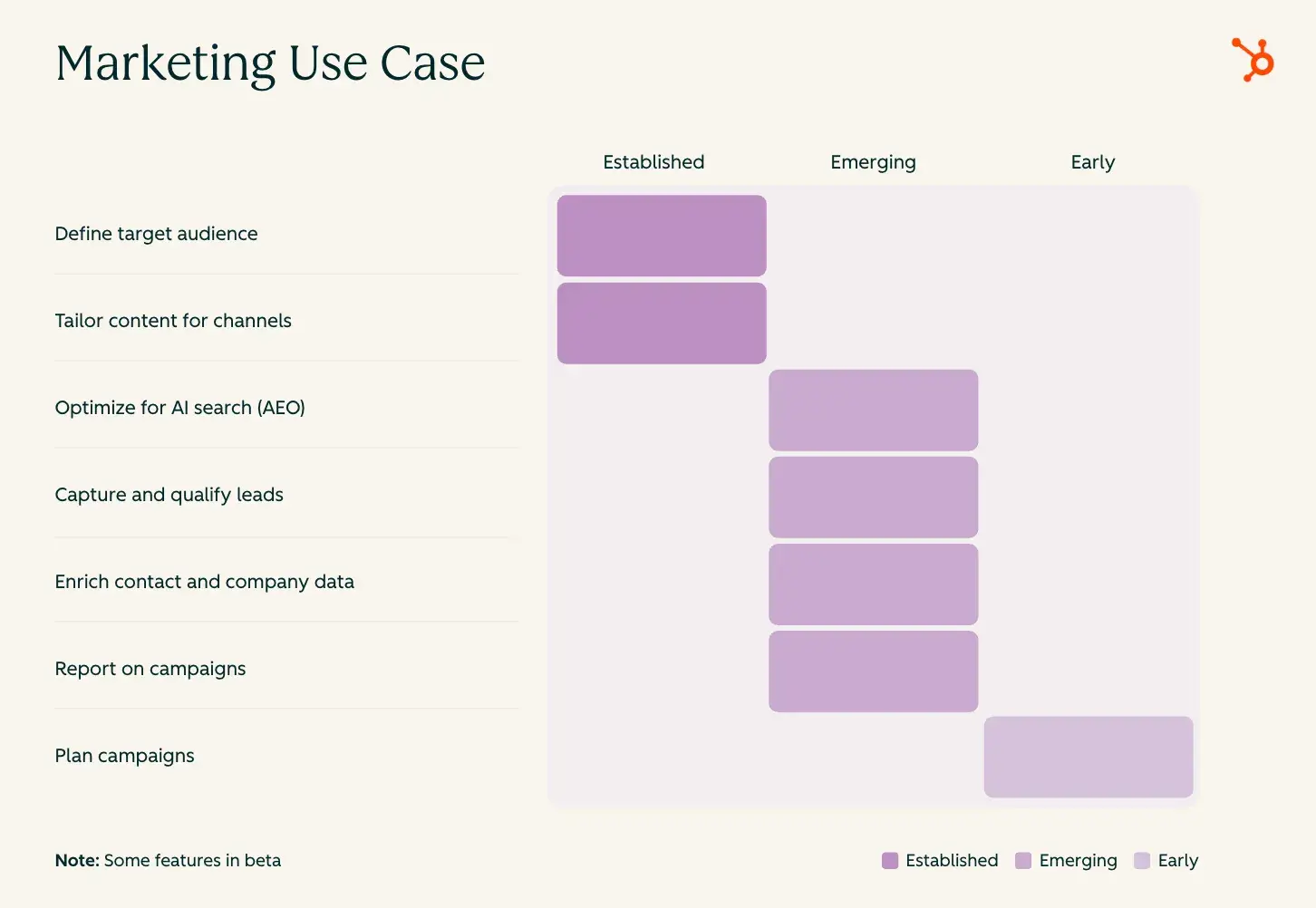
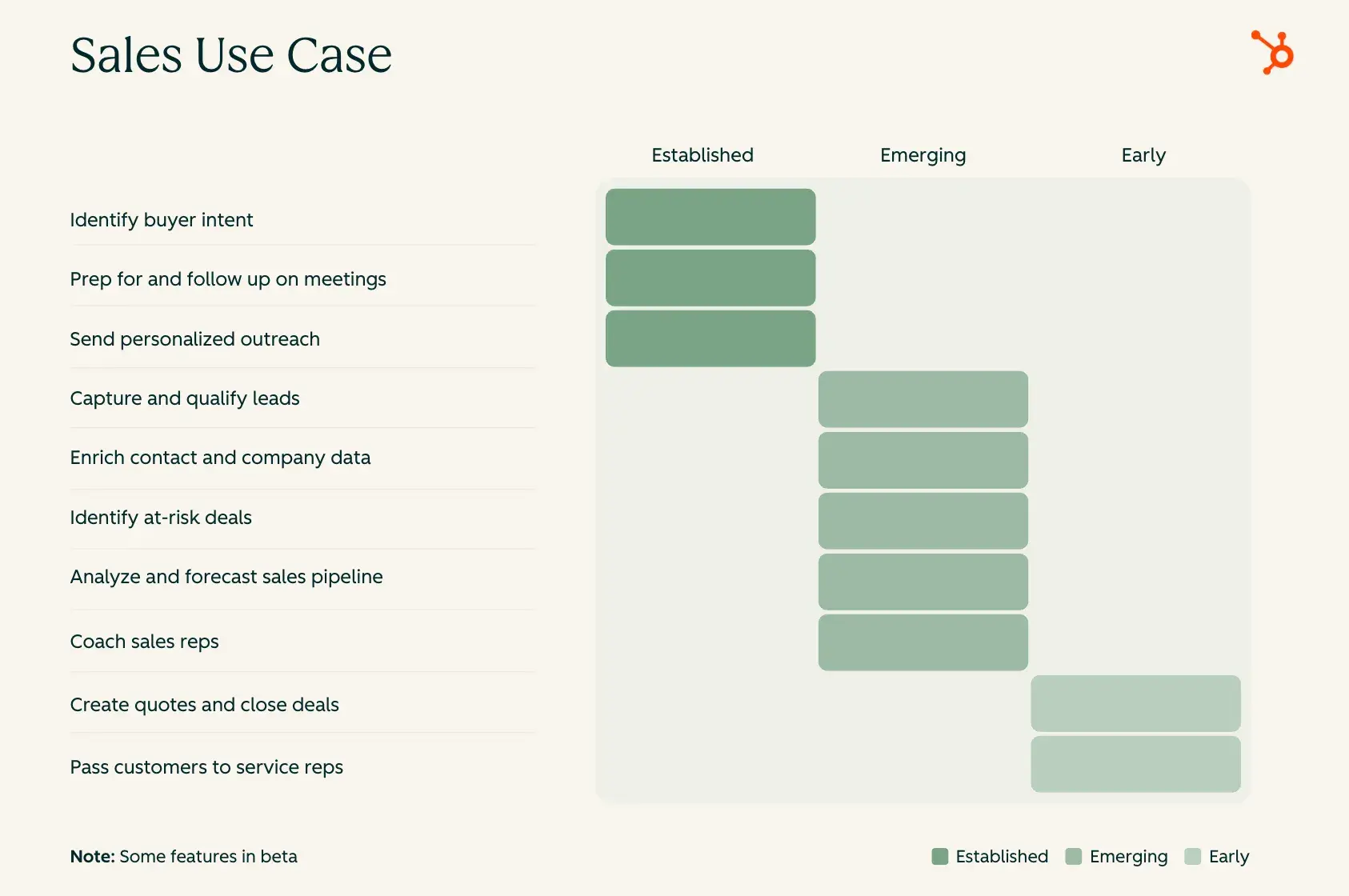
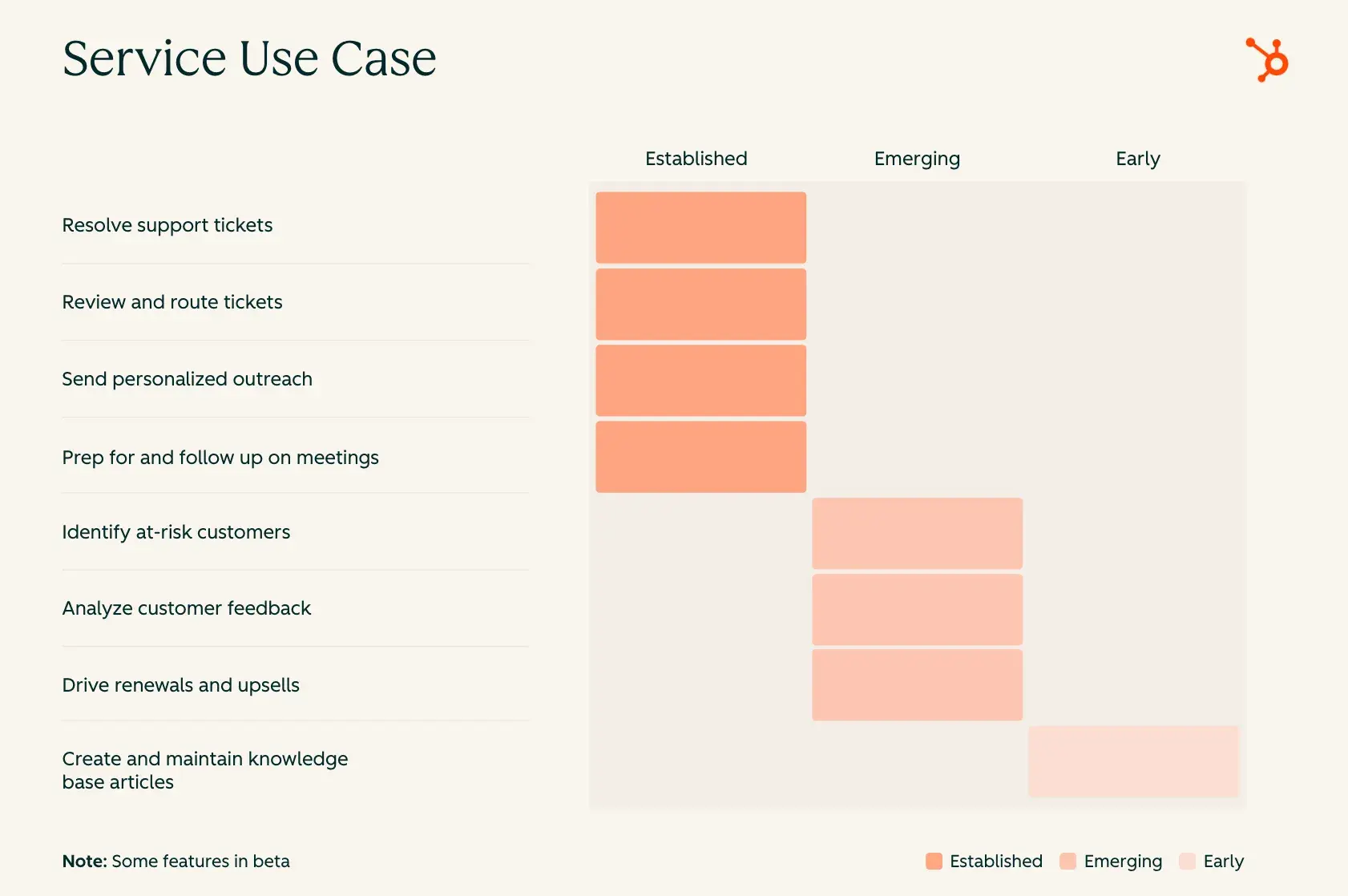
That‘s the approach I want to share. Not an exhaustive list of everything AI can do, but a practical guide to where marketing, sales, and service teams can get started and see real value with AI. For transparency, we’ve organized use cases by how ready the technology is today. At HubSpot, we are building and improving these capabilities every day. Let’s start with simple definitions:

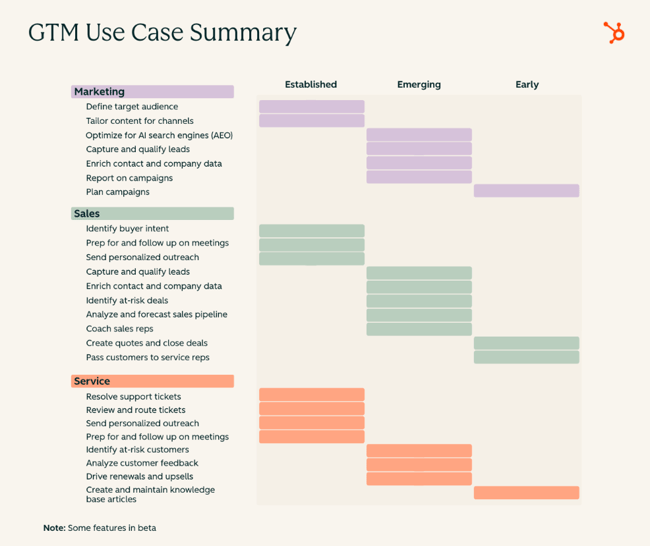
  • Established: These are use cases where AI works reliably. Implementation is straightforward. Results are repeatable. If you’re wondering where to start, it’s here!
  • Emerging: These use cases are available today and improving quickly. They’re delivering value, but still evolving. As AI gets more data and context, they will become more powerful.
  • Early: These are high-potential use cases that are still taking shape. If you consider yourself an early adopter, this is where you can experiment (with patience).

Jump to the use case that matches your team’s biggest challenges:

Use Cases for Marketing

Use Cases for Sales

Use Cases for Service

Use Cases for Marketing

Marketing teams have been under pressure to do more with less. More channels, more content, more personalization. All without more headcount. But AI is helping marketers reimagine how they get all of this work done. Here are the use cases teams can implement now and in the near term.

Established

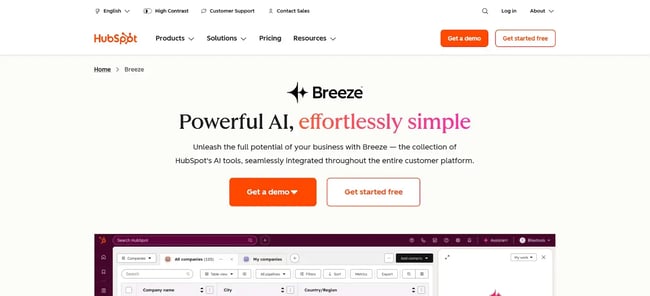
Define target audience. Most segments have been built based on job titles and company size, but that doesn’t tell you who actually buys. AI helps you find the right-fit prospects who are most likely to convert. HubSpot customers can use Breeze Assistant to better understand customers, optimize their journey, and ultimately improve lead quality. Learn how here.

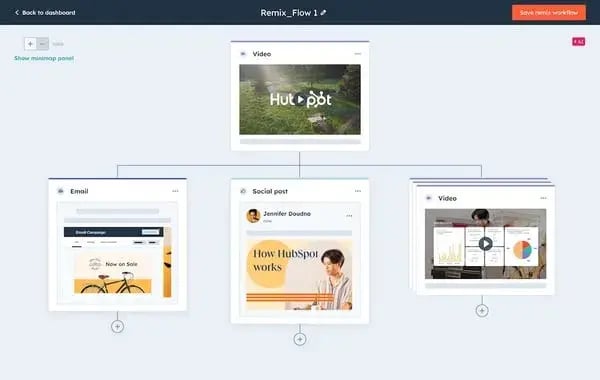
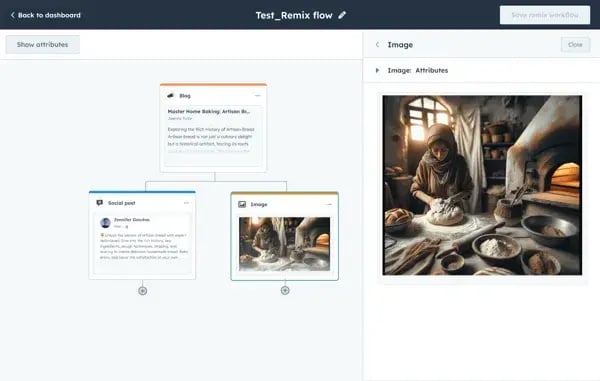
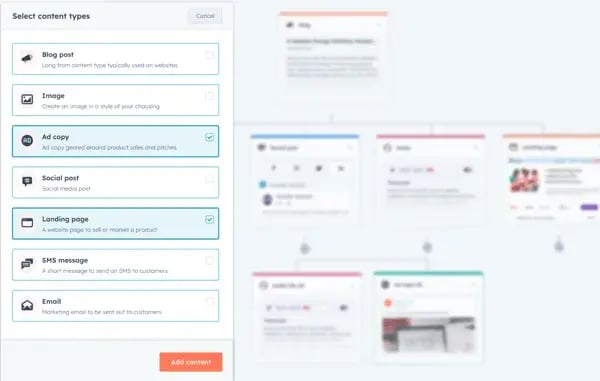
Tailor content for channels. You write a blog post. Then, you need to turn it into emails, social posts, ads. Every version takes time. With AI, you take one piece of content and adapt it for different channels – all in your brand voice. HubSpot customers can get started with Content Remix and Breeze Assistant to save time on content creation. See for yourself.

Emerging

Optimize for AI search. The way buyers find your company is changing. They‘re not scrolling through blue links; they’re asking ChatGPT, Claude, Perplexity. That’s why your marketing strategy needs to include answer engine optimization (AEO). HubSpot’s new AEO feature will help marketers understand how often their brand appears in AI-generated answers, with recommendations for how to improve visibility. This is an area we’re investing in heavily and capabilities will evolve rapidly!

Capture and qualify leads. People visit your website at all hours, even if your team is only there 9 to 5. AI can talk to visitors in real time, answer their questions, figure out if they’re a good fit, and book meetings with the right rep. That means you can get more leads without adding more headcount. HubSpot customers can set up Breeze Customer Agent to capture and qualify leads. See it in action.

Early

Plan campaigns. Give AI a campaign brief and get back a complete strategy including what content to create and which channels to use. This lets your team spend less time planning and more time launching. At HubSpot, we’re building this to help every kind of business so marketing teams can move faster.

Use Cases for Sales

Only a fraction of a sales rep’s day is spent on selling. Most of the time they’re researching, entering data, following up, or prepping for calls. AI is changing that. It handles the tedious work so reps can focus on what matters most: the customer. Here’s where AI is providing value now.

Established

Identify buyer intent. Reps often spend too much time on the wrong accounts – not because they‘re bad at their jobs, but because they don’t always know who’s actually ready. AI watches your target accounts for signals like funding news, new hires, and website visits, and alerts your team when the moment is right. The result is less time chasing cold accounts and more conversations with buyers who are already interested. HubSpot customers can get started with Buyer Intent. Learn more.

Prep for and follow up on meetings. Sales reps spend the first few minutes of every call trying to remember where things left off and the hour after it writing up notes they’ll never have time to read. AI fixes both ends of that problem. Before a meeting, it surfaces contact history, deal context, and recent interactions so you walk in ready. After the call, it captures what was discussed, pulls out the action items, and drafts the follow-up email automatically. Less time on admin means more time actually moving deals forward. HubSpot customers can get started with Breeze Assistant and Call Recap Agent.

Send personalized outreach. Imagine having done the best research, only to email a prospect a moment too late. AI keeps track of what’s happening at each account, alerts you to a change, and drafts outreach that feels timely and relevant, not generic. HubSpot customers who use Breeze Prospecting Agent are seeing two times higher response rates versus traditional outreach. See how to get started.

Emerging

Enrich contact and company data. Every salesperson knows the pain of a CRM with incomplete records. Missing job titles, company information, and all the fields you need to make segmentation, scoring, and personalization actually work. Now, AI can fill those in automatically. For HubSpot customers, that means drawing on a dataset of over 200 million company and buyer profiles that are constantly refreshed. Your team spends less time updating CRM records. And they send messages that are tailored and relevant because the data behind it is accurate and current. HubSpot customers can get started with Data Enrichment today – learn how.

Coach sales reps. Your reps shouldn’t have to lose a deal to learn from it. AI analyzes calls and deal activity to identify what top performers do to win and helps managers replicate it across the team quickly. The result is faster ramp time and a team that wins more consistently. HubSpot customers can get started with Conversation Intelligence and Sales Coach Assistant.

Early

Create quotes and close deals. Creating quotes is one of the most dreaded parts of a rep‘s job because it can slow deals down. What if AI could answer buyer questions about pricing, build proposals using past deals, and draft quote emails? AI handling the paperwork means your reps can do their best work. At HubSpot, we’re building this to help even the most complex businesses so our customers can close deals faster.

Use Cases for Service

Service teams are often caught in a difficult position. Customers expect faster and better support, but the headcount to help them isn’t growing at the same pace. The teams figuring it out aren‘t necessarily working more hours. They’re letting AI handle things that don‘t need a human, so their people can focus on things that do. Here’s how that’s going today.

Established

Resolve support tickets. Customers shouldn’t wait hours for answers to simple questions. AI handles the routine ones instantly using your own help docs, so your team can focus on the issues that actually need a human. HubSpot customers using Breeze Customer Agent are resolving up to 65% of tickets automatically. Here’s how to get started.

Review and route tickets. When every ticket looks the same, urgent issues can get buried. That means teams spend more time sorting than solving. AI can help understand, prioritize, and assign tickets to the right rep quickly. The whole team gets more efficient as a result. HubSpot customers using Customer Agent with Help Desk saw a 25% boost in ticket resolution. HubSpot customers can get started with Customer Agent and Help Desk today. See how it works.

Just like in sales, personalized outreach and meeting prep and follow-up are use cases AI can tackle for service teams, too. Whether you’re emailing an at-risk customer or preparing for a renewal conversation, the same AI capabilities help your team show up informed and follow up fast. HubSpot customers can get started with Breeze Assistant.

Emerging

Identify at-risk customers. By the time a customer tells you they‘re canceling, you’ve usually already lost them. AI can detect the warning signs – dropping engagement, rising ticket volume, shifts in tone – and flag them to you while there’s still time to act. That means improved customer satisfaction and better retention. HubSpot customers can use Customer Health Agent and Conversation Intelligence to get started.

Analyze customer feedback. Your customers are telling you what they need, but it’s buried in hundreds of survey responses and call transcripts. AI scans all of it to surface themes and sentiment trends automatically, so you can act on what customers are actually saying instead of guessing. HubSpot customers can get started with Feedback Survey Summaries and Conversation Intelligence.

Early

Create and maintain knowledge base articles. By the time most of your Customer FAQs are written, they’re already out of date. So customers get wrong answers, and reps waste time correcting them. With AI, help articles can be drafted based on how your team actually solved tickets in the past – and it can update them when things change. A knowledge base that builds and maintains itself. While it is still early, the payoff is clear: better, faster answers for customers and less documentation required from your team.

where-to-start-with-ai-revised-3

What We’ve Learned

After working with thousands of customers on how to use AI in their go-to-market, the truth we’ve learned is simple: AI doesn’t create momentum. Solving a real problem does.

The teams seeing results didn’t start with some grand transformation plan. They started with one clear bottleneck. One place where time was being wasted. One workflow that needed to move faster. Then they put AI to work there.

And the results they see are validating. Marketing teams are reaching the right audiences and turning more visitors into qualified leads. Sales teams are getting two times higher response rates on outreach. Customer teams are resolving more than half their tickets without human intervention. Small starts are turning into real, measurable outcomes.

This is why AI is no longer a future bet. It’s working right now for everyday business goals. It’s making work faster, smarter, and more effective.

The question isn’t whether AI can help your team.

It’s where you’ll start.

Categories B2B

Claude vs. ChatGPT: A marketer’s guide to choosing AI

“What’s better: Claude or ChatGPT?” is the mind-boggling question every marketer is asking right now. As AI tools become essential to content workflows, understanding the differences between Claude and ChatGPT for marketing can mean the difference between a streamlined operation and a frustrating bottleneck.

Download Now: Full-Stack AI Marketing Toolkit

In my opinion, both tools have legitimate strengths. ChatGPT – which you can train on your specific needs – excels at rapid ideation, email copy, and social content. However, Claude shines at long-form editing, brand voice consistency, and handling large context windows. The question isn’t really “is Claude better than ChatGPT?” It’s about which LLM you should use for each specific task.

In this guide, I’ll break down everything you need to know, including:

  • Claude AI versus ChatGPT for writing
  • ChatGPT versus Claude for email
  • Claude versus ChatGPT pricing
  • Claude versus ChatGPT integrations with your existing stack

Plus, my (very smart) colleagues have tested writing blog posts with ChatGPT, explored ChatGPT for SEO, evaluated ChatGPT alternatives, including Claude, and even used both for AI-powered spreadsheet tasks. Now I’m putting in my two cents, sharing what I’ve learned so you can make confident decisions about ChatGPT versus Claude for coding, content creation, and everything in between.

Let’s get into the good stuff.

Table of contents:

Claude vs. ChatGPT: Which is better?

Here’s my hot take: I think Claude is the better LLM … and I’m not afraid to say it.

Don’t get me wrong. ChatGPT has its strengths, and I’ve used it plenty for quick drafts. But when it comes to the work that actually matters (the stuff that builds trust, drives conversions, and represents your brand), Claude consistently delivers superior results.

Here are two big reasons why I lean toward Claude as a content marketer:

  • Writing quality: Claude versus ChatGPT for writing isn’t even close in my experience. Claude produces prose that sounds human, maintains tone across long documents, and requires fewer revision cycles before content is publish-ready.
  • Context retention: Claude’s 200K-token context window lets me upload brand guidelines, source documents, and drafts simultaneously without the AI “forgetting” my instructions halfway through.

But, here’s the bottom line: Claude versus ChatGPT for marketing comes down to what you value most. If you prioritize speed and volume, ChatGPT delivers. If you prioritize quality and brand consistency, Claude wins.

That’s my opinion, and after months of using both tools daily, I’m sticking with it.

Which is better for common marketing workflows, Claude or ChatGPT?

You may not love what I’ll say next, but it’s the truth: The answer depends on the task.

In my opinion, Claude is good for long-form content editing and large context handling, making it ideal for:

  • Blog posts
  • Whitepapers
  • Document review

However, that’s not to say that ChatGPT doesn’t have its perks. Personally, I think ChatGPT is best for:

  • Rapid ideation
  • Email copy
  • Social content

Overall, most marketing teams achieve best results by using Claude for editing and ChatGPT for drafting, treating them as complementary tools rather than competitors.

But if you really want a comprehensive comparison of each tool based on common marketing workflows, here’s a table that does just that:

Marketing Workflow

Claude

ChatGPT

Winner

Content writing

Produces nuanced, on-brand long-form copy; handles 200K-token context windows for large documents

Generates quick first drafts; supports image generation via DALL·E

Claude for depth, ChatGPT for speed

Email marketing

Strong at personalization logic and A/B variant writing; consistent tone across sequences

Faster turnaround on high-volume email copy; built-in templates

Tie! (ChatGPT vs Claude for email depends on volume versus nuance)

Social media

Maintains brand voice across platforms; better at longer LinkedIn posts

Excels at short-form hooks and rapid iteration; creates images natively

ChatGPT for volume, but Claude for voice consistency

SEO briefs

Synthesizes large competitor datasets; outputs structured briefs with semantic relationships

Quick keyword clustering and outline generation

Claude for research-heavy briefs, ChatGPT for speed

Research reliability

Provides citations with web search; conservative about unverified claims

Browses the web in real-time; occasionally hallucinates sources

Claude for accuracy, ChatGPT for breadth

Long-form content

200K-token context handles full ebooks and reports; strong structural editing

128K-token context; better at iterative section-by-section drafting

Claude

Coding and automation

Reliable for marketing scripts, API integrations, and data parsing; fewer logic errors

Faster code generation; broader plugin ecosystem for no-code users

ChatGPT for speed, but Claude for accuracy

Integrations

Native Claude connector with HubSpot; API access for custom workflows; Zapier and Make support

1,000+ plugins; GPT store for pre-built marketing tools; direct Zapier triggers

ChatGPT for plug-and-play; Claude for HubSpot-native workflows

Governance and privacy

Enterprise tier includes data retention controls, SSO, and audit logs; no training on user data by default

Team and Enterprise plans offer data controls; both require opt-out for training exclusion

Claude

So, what does this mean for your AI-assisted workflows?

When evaluating Claude AI versus ChatGPT for writing, consider your content type. I suggest using ChatGPT for high-velocity tasks where speed matters most, including:

  • Social captions
  • Email subject lines
  • Quick drafts

Alternatively, I propose using Claude for:

  • Long-form editing
  • Brand-sensitive content
  • Research synthesis (where accuracy and context retention are critical)

Claude vs. ChatGPT for marketing content and on‑brand editing

In my experience as an in-house writer for a big-name SaaS brand, marketing teams truly achieve the best results by using Claude for editing and ChatGPT for drafting.

As I’ve already mentioned, this division leverages each tool’s core strengths. Claude excels at long-form content editing and handling complex contexts, while ChatGPT is best for rapid ideation, email copy, and social content.

But, here’s the key takeaway: understanding when to deploy each tool transforms AI from a novelty into a production-grade content engine.

To put my previous statement into practice, in the next section, I’ll talk through how to use Claude for content and editing.

When to use Claude for content and editing
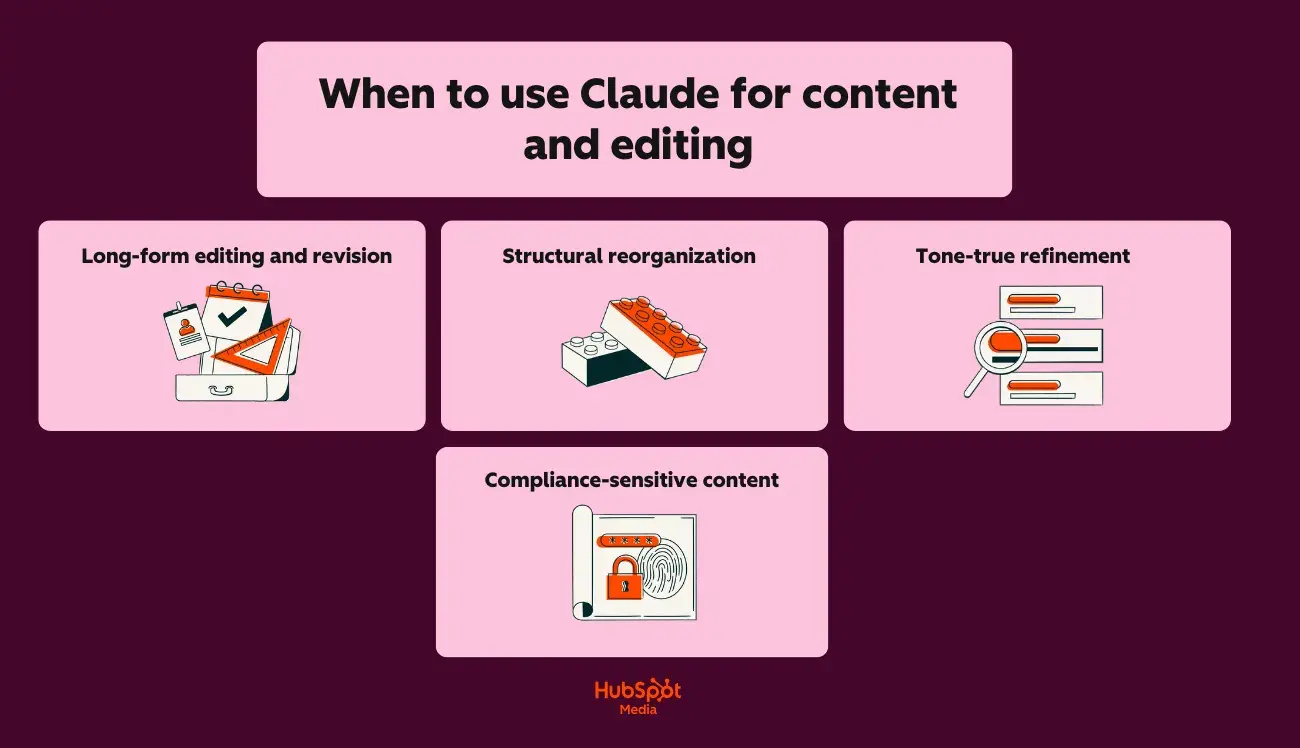
a hubspot-branded graphic showcasing when to use claude for content and editing

If you’re wondering about when to actually use Claude AI instead of ChatGPT for writing, I’m here to break it down for you in layman’s terms.

Here’s why I think Claude is the right option in these scenarios:

  • Long-form editing and revision: Claude’s 200K-token context window holds entire style guides, brand documentation, and draft content simultaneously. (For example, try uploading your 50-page brand book alongside a blog draft; Claude will apply voice rules without losing context mid-edit.)
  • Structural reorganization: Claude identifies logical gaps, redundant sections, and flow issues across documents up to 150,000 words. It also rewrites transitions and restructures arguments while preserving the original meaning.
  • Tone-true refinement: Claude maintains a consistent voice across extended pieces. It catches subtle shifts (from conversational to corporate, from active to passive) that erode brand identity.
  • Compliance-sensitive content: Claude offers stronger privacy and governance controls for enterprise teams. Content requiring legal review, HR approval, or regulatory compliance benefits from Claude’s audit-friendly outputs and data handling policies.

When to use ChatGPT for content creation
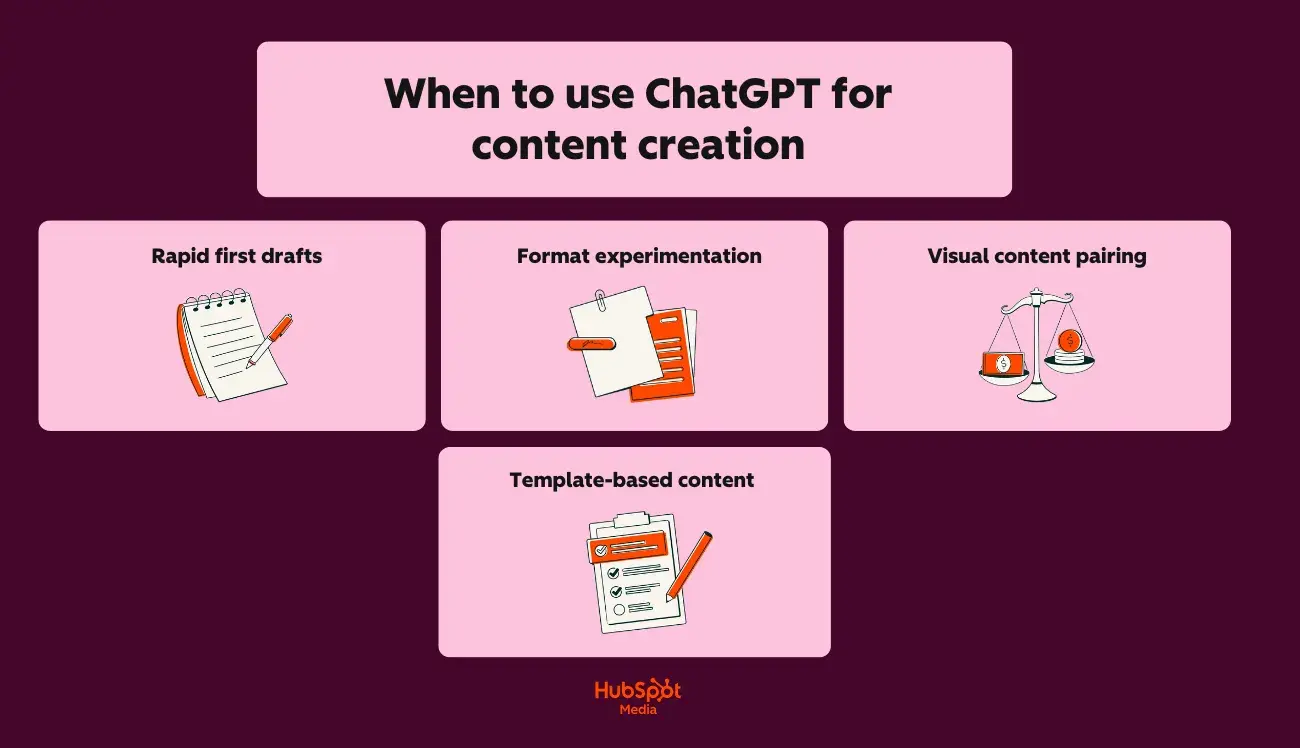
a hubspot-branded graphic showcasing when to use claude for content and editing

Now, here on the HubSpot Blog, you’re always welcome to have your own opinion, especially regarding AI usage. However, I’m a strong advocate of ChatGPT for content creation.

Here’s why I think it’s the stronger choice for speed and versatility:

  • Rapid first drafts: ChatGPT generates usable copy faster for high-volume needs, such as product descriptions, ad variants, and landing page sections.
  • Format experimentation: Need the same message as a LinkedIn post, email subject line, Instagram caption, and Google ad? ChatGPT iterates across formats quickly.
  • Visual content pairing: DALL·E integration lets ChatGPT generate accompanying images, infographics concepts, and social graphics alongside copy.
  • Template-based content: ChatGPT’s custom GPTs and pre-built prompts accelerate repetitive tasks, such as weekly newsletters or social calendars.

Brand voice control: step-by-step setup

I may have a strong perspective on AI tool selection, but I won’t tell you that one tool is better without showing you why. Below, I’ve created two step-by-step guides for brand voice control, for both Claude and ChatGPT.

For Claude:

  1. Create a brand voice document (tone descriptors, word preferences, banned phrases, example sentences).
  2. Upload the document at the start of each project session (Claude’s Projects feature retains it across conversations.)
  3. Paste draft content and prompt: “Edit this to match our brand voice document exactly. Flag any sections where the original tone conflicts with guidelines.”
  4. Review Claude’s tracked changes and rationale before accepting edits.

To ensure that this works for you, I’ve tested it out myself. Take a look:

First, I used Claude to create a faux brand voice guide for a Gen Z beauty brand, using the parameters I described above.
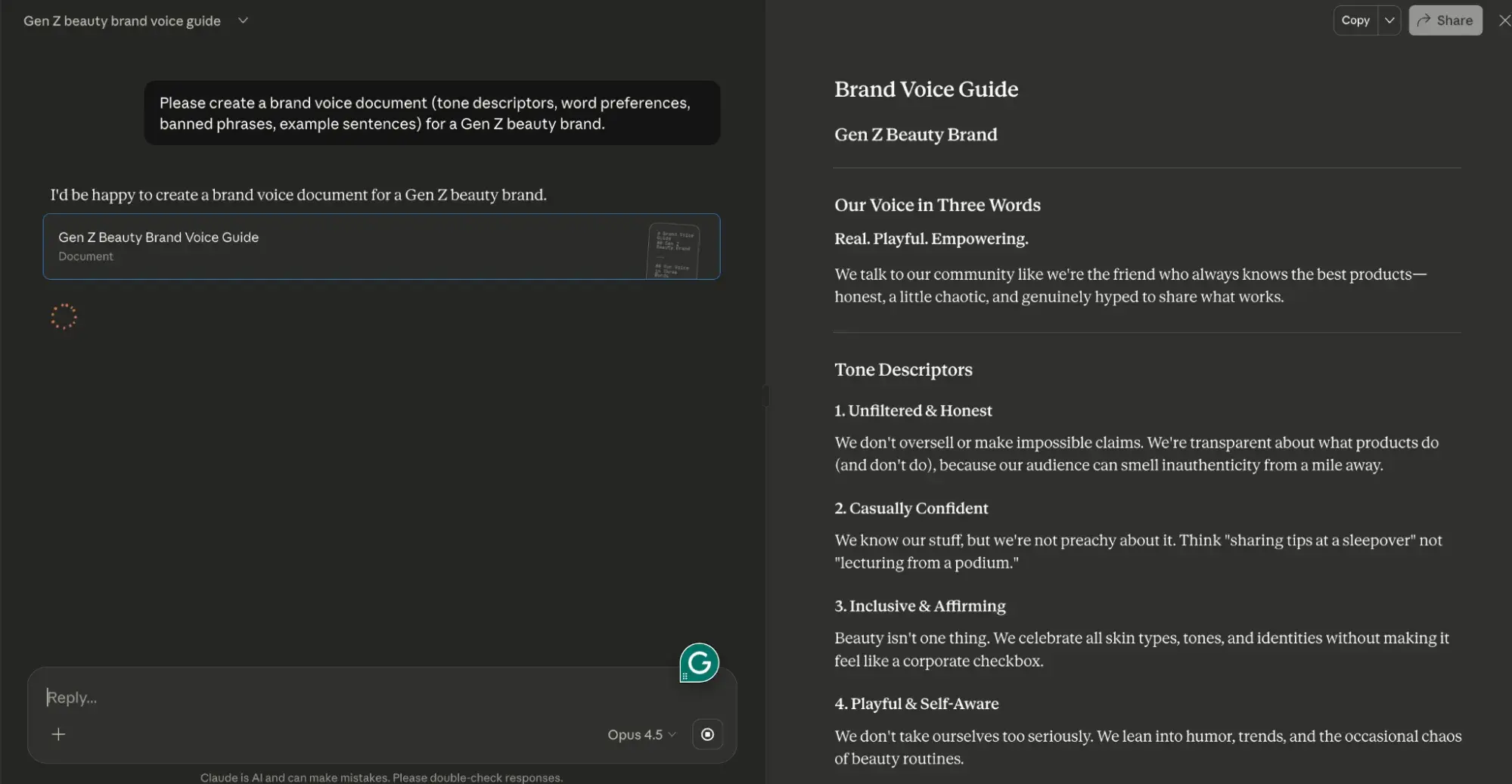
a screenshot of me demo-ing brand voice control for content creation in claude

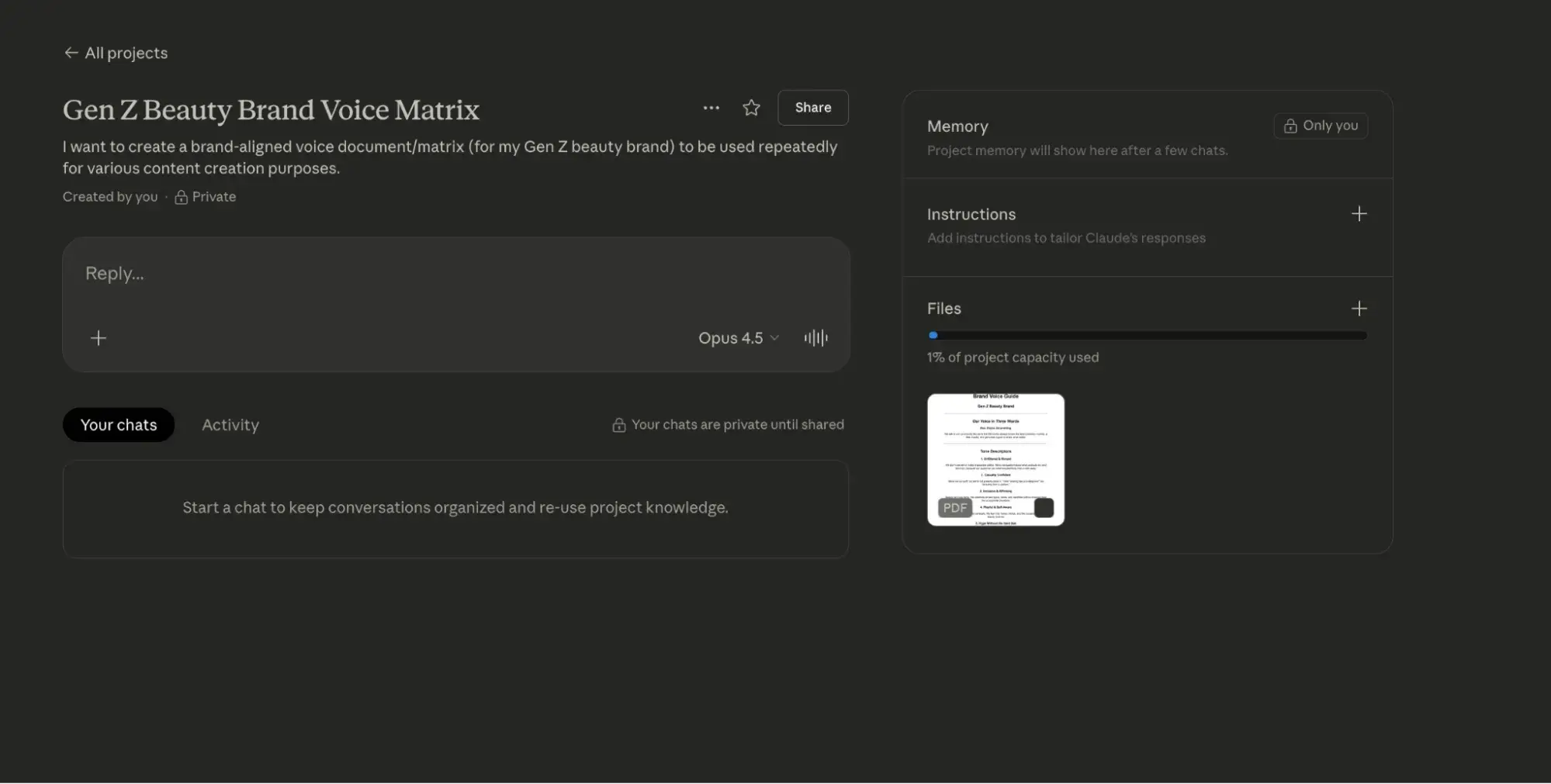
Next, I took that Claude-generated brand voice guide for my faux Gen Z beauty brand and dropped it into a Claude Project.
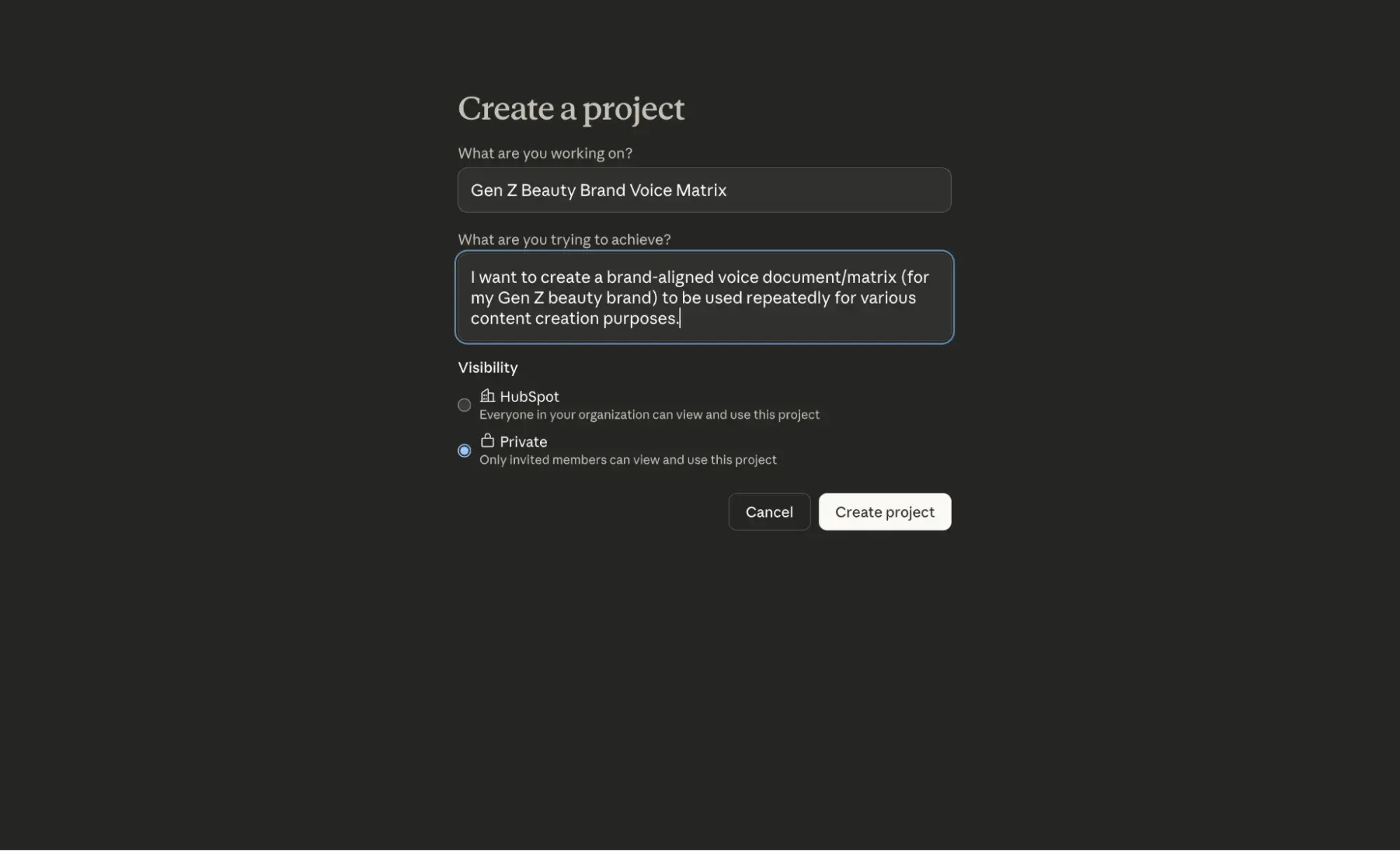
a screenshot of me demo-ing brand voice control for content creation in Claude projects

a screenshot of me demo-ing brand voice control for content creation in Claude projects

Then, I used the prompt (in step 3) above to edit some potential social media copy.
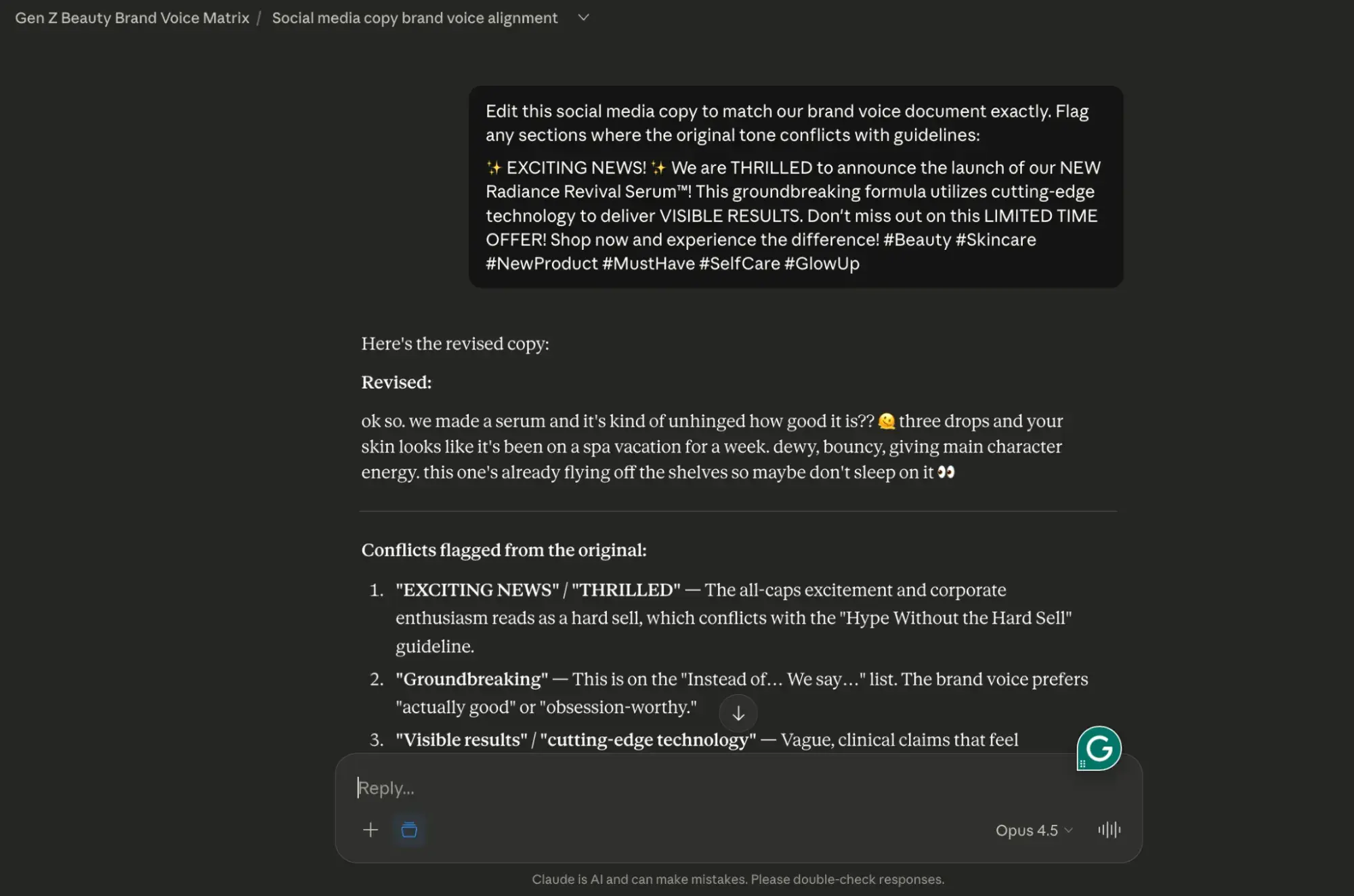
a screenshot of me demo-ing brand voice control for content creation in Claude projects

For ChatGPT:

  1. Build a custom GPT with your brand voice rules embedded in the system prompt.
  2. Include 3 to 5 example paragraphs showing ideal tone.
  3. Use the custom GPT for all drafting tasks to ensure baseline consistency.
  4. Export drafts to Claude for final tone-matching against your full brand documentation.

Again, I wanted to be sure this framework worked for you, so I’ve tested it. Here’s how it went:

First, I gave ChatGPT the same brand voice guide that I fed to Claude.
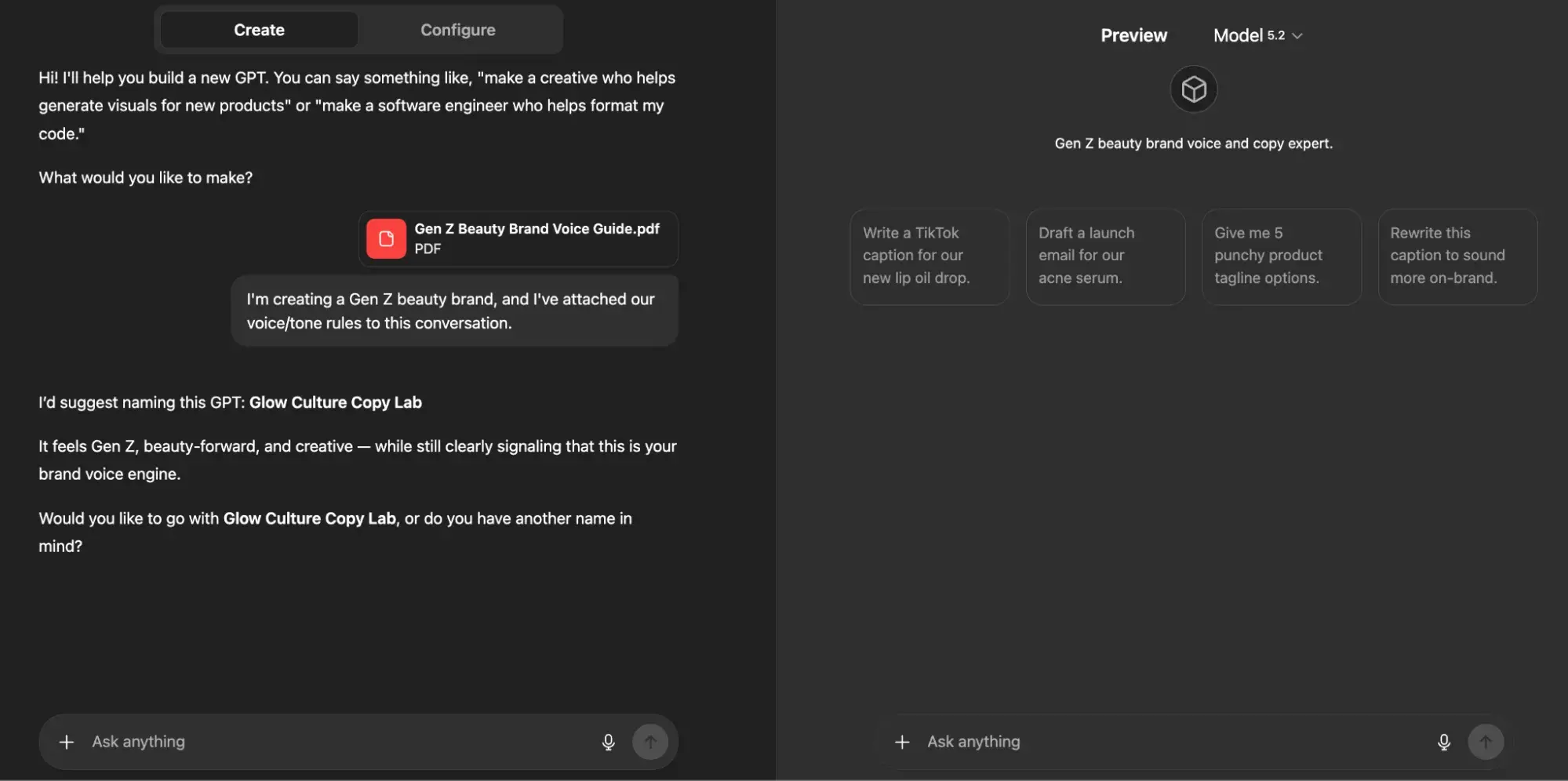
 a screenshot of me demo-ing brand voice control for content creation in a custom GPT in ChatGPT

Then, as I outlined above, I provided my custom GPT with three examples of how I’d like the tone and voice of my Gen Z beauty brand to be executed via social media.
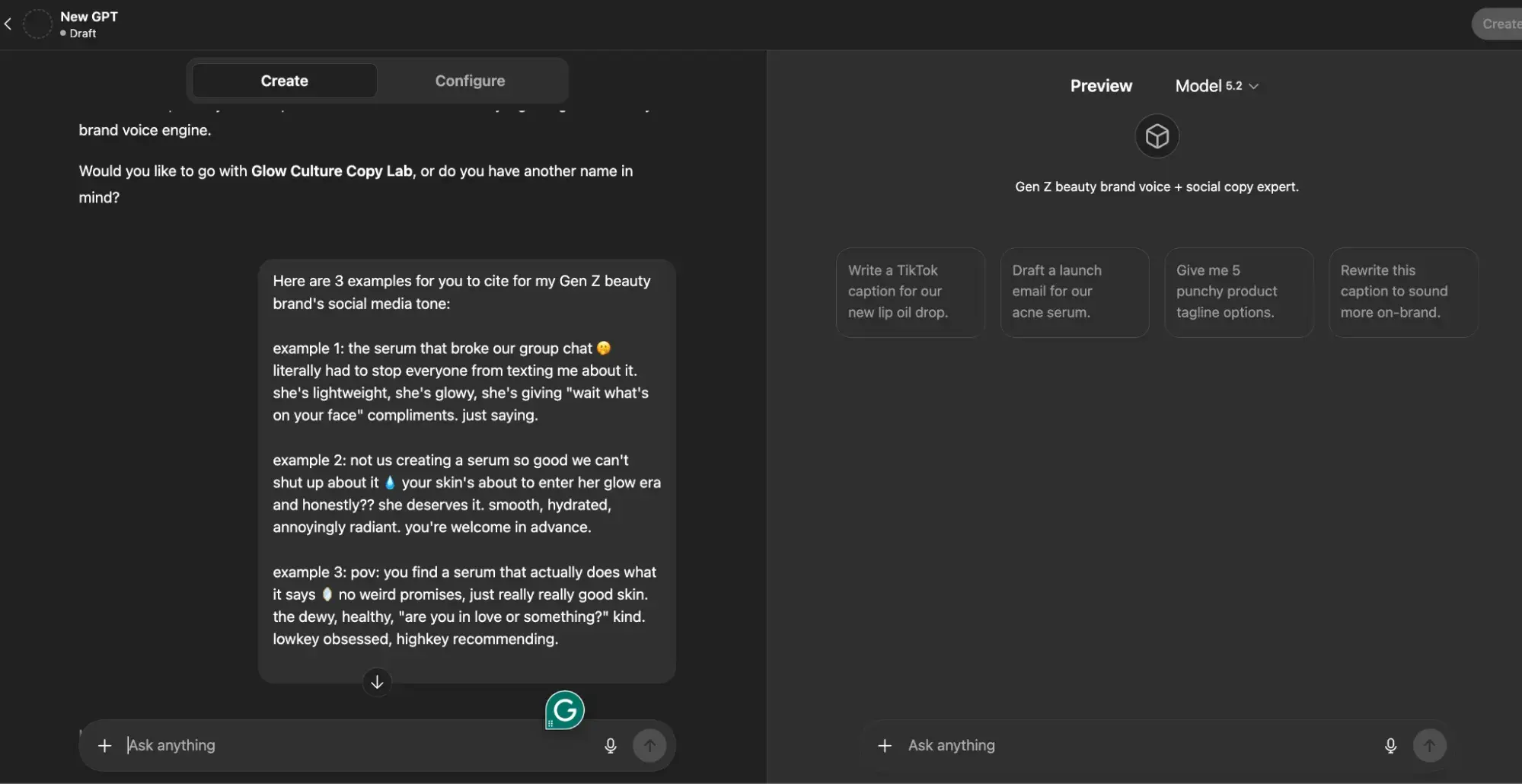
a screenshot of me demo-ing brand voice control for content creation in a custom GPT in ChatGPT

From this point forward, if I were actually building this brand (which I’ve now named “Skin Agenda” – thanks ChatGPT!), I would continue to use this custom GPT as a space to ideate and iterate on ideas for it.

Approval flow integration: Claude and ChatGPT in HubSpot

Want to use both tools in a single content pipeline? Well, you’re in luck. HubSpot’s smart CRM enables seamless integration of Claude and ChatGPT into marketing workflows through these approval pathways:

  • Draft stage: ChatGPT generates initial content via API or Zapier trigger.
  • Edit stage: Claude refines drafts using the native Claude connector with HubSpot, applying brand voice and structural improvements.
  • Review stage: Content routes to HubSpot’s Content Hub for team review, version control, and approval tracking.
  • Publish stage: Approved content deploys directly from Content Hub to blogs, landing pages, or email campaigns.

This CMS-approved workflow answers the question “Is Claude better than ChatGPT?” with nuance: Claude is better for editing, governance, and context-heavy tasks, while ChatGPT leads for speed and format variety.

The “Claude-versus-ChatGPT-for-marketing” argument isn’t about choosing one; it’s about sequencing both for maximum output quality and efficiency.

Claude vs. ChatGPT for email and social copy

As I already mentioned, ChatGPT is best for rapid ideation, email copy, and social content; Claude is better suited for long-form content editing and handling large amounts of context.

So, the question of whether ChatGPT versus Claude is better for email depends on whether you prioritize speed or nuance.

In the following section, I’ll break down how each tool performs across key email and social tasks.

Subject line and preview text generation

In my opinion, below are ChatGPT’s strengths when it comes to subject line and preview text generation:

  • Generates 20+ subject line variants in seconds with character count constraints
  • Tests emotional angles (urgency, curiosity, benefit-led, question-based) simultaneously
  • Pairs subject lines with matching preview text that extends the hook without redundancy

Comparatively, here are Claude’s strengths:

  • Analyzes your existing high-performing subject lines to identify patterns before generating new options
  • Maintains brand voice consistency across subject line batches
  • Flags compliance issues (misleading claims, spam trigger words) during generation

Recommended workflow: Use ChatGPT to generate initial subject line batches, then run top candidates through Claude with your brand guidelines to filter for tone alignment.

Claude vs. ChatGPT for SEO briefs and trustworthy research

Claude vs. ChatGPT for SEO briefs and trustworthy research

So, is Claude better than ChatGPT for generating SEO briefs and conducting accurate research? Honestly, it’s a tough call, but I can say with confidence that both tools require human verification.

Before I get into the details, take a look at the table below for a quick comparison of how each tool performs across common SEO tasks.

Model behavior comparison for SEO tasks

SEO Task

Claude

ChatGPT

Best Choice

Content briefs

Synthesizes multiple source documents, maintains structural consistency across detailed briefs

Generates briefs quickly, but may lose coherence in complex multi-section documents

Claude for comprehensive briefs; ChatGPT for simple briefs

Blog outlines

Produces logically structured outlines with clear hierarchies, handles nuanced topic relationships

Fast outline generation, strong at generating multiple variations quickly

Claude for depth; ChatGPT for speed

Keyword clustering

Groups keywords by semantic relationships, and identifies content gaps across clusters

Rapid clustering with basic categorization, good for initial groupings

Tie! ChatGPT is faster; however, Claude is more

Topic cluster planning

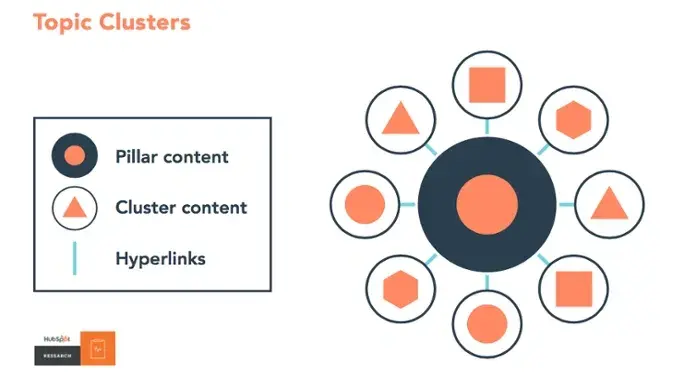
Maps pillar-cluster relationships across large content ecosystems

Generates cluster ideas quickly; less effective at maintaining cross-cluster coherence

Claude for complex architectures

Competitor content analysis

Processes multiple competitor pages simultaneously within the context window

Requires chunking for large competitive sets; faster for single-page analysis

Claude for multi-competitor analysis

Search intent classification

Accurate intent categorization with explanations

Quick classifications occasionally oversimplify mixed-intent queries

Claude for accuracy

Claude vs. ChatGPT for SEO research

Struggling to choose between Claude and ChatGPT for SEO research? I get it. When I’m struggling with decision-making, I segment my approach based on two things:

  • My end goal
  • The capabilities of the tool I’m using

Moreover, choose Claude when your SEO work involves:

  • Briefs requiring synthesis of 5+ source documents
  • Topic clusters with 15+ supporting pages to map
  • Competitive analysis across multiple URLs
  • Content audits requiring consistency checks across large page sets
  • Research where factual accuracy directly impacts content quality

And, alternatively, choose ChatGPT when you need:

  • Quick keyword brainstorms for new topics
  • Multiple outline variations to evaluate
  • Rapid title and meta description drafts
  • Initial content gap hypotheses before deeper research
  • Fast turnaround on simple, single-topic briefs

Safe “research with verification” pattern

Neither Claude nor ChatGPT should be trusted as a primary research source. Both can:

  • Hallucinate statistics
  • Misattribute quotes
  • Fabricate sources

Follow this verification pattern for trustworthy research:
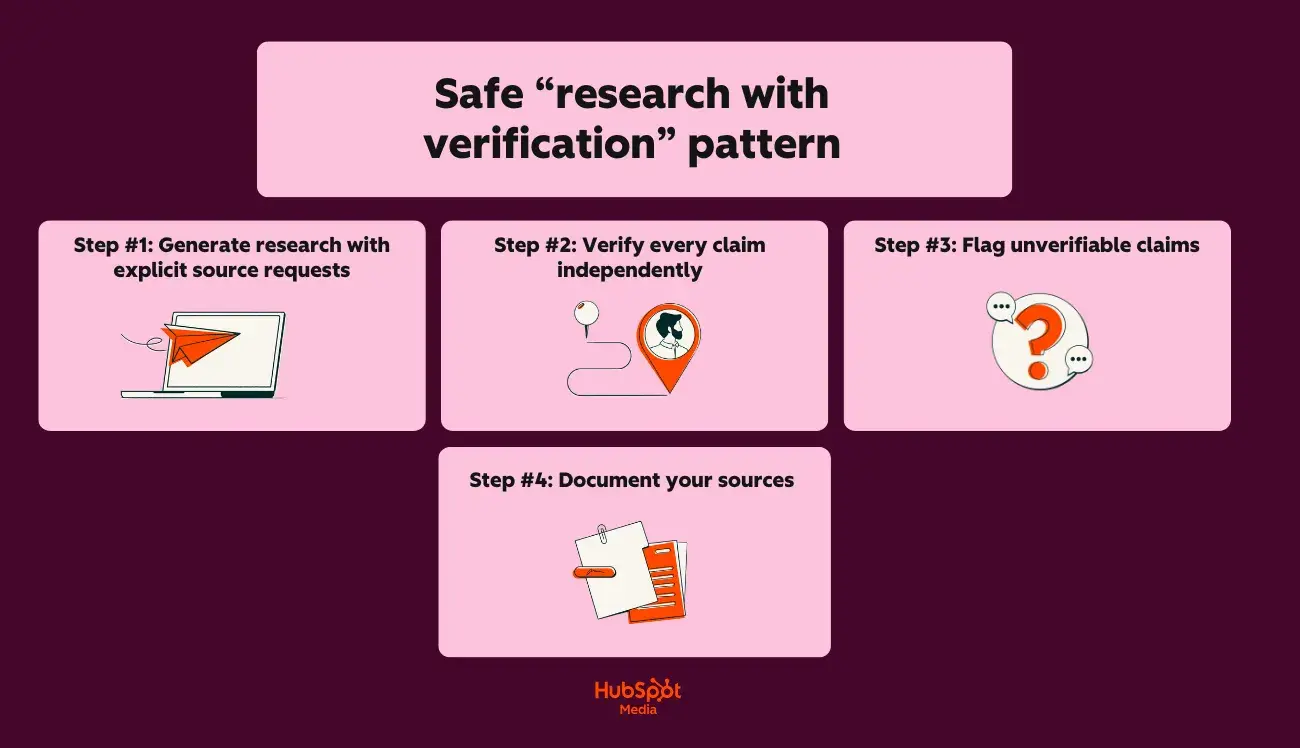
a hubspot-branded graphic detailing a safe “research with verification” pattern for seo research with claude or chatgpt

Step #1: Generate research with explicit source requests

Start with this prompt:

“Provide 5 statistics about [topic] that I can use in a blog post.

For each statistic, include:

  • The specific claim
  • The original source (organization, publication, study name)
  • The year of publication”

Step #2: Verify every claim independently

Next, do the following:

  • Search for the exact statistic in the claimed source
  • Confirm the source exists and is credible
  • Verify the data matches what the AI provided
  • Check publication dates for currency

Step #3: Flag unverifiable claims

If you’re sensing inaccuracy, proceed as follows:

  • If you can’t locate the source, don’t use the statistic
  • If the source exists but the data differs, use the verified version
  • If the AI admitted uncertainty, prioritize verification

Step #4: Document your sources

Lastly, be sure to:

  • Maintain a source spreadsheet for each content piece
  • Record: claim, source URL, verification date, verification status
  • Link directly to primary sources in your content

Hallucination prevention checklist

Use this checklist before publishing any AI-assisted SEO content:

Before prompting:

  • Provide the AI with verified source documents when possible
  • Request citations for all factual claims in your prompt
  • Ask the AI to flag uncertainty: “Note any claims you’re less than 90% confident about”
  • Specify: “Do not invent statistics or sources”

Next, during review:

  • Verify every statistic against the original source
  • Confirm quoted experts actually said what’s attributed to them
  • Check that cited studies exist and contain the referenced data
  • Validate company names, product names, and proper nouns
  • Cross-reference dates, percentages, and numerical claims

Then, before publishing:

  • Replace AI-suggested sources with direct links to primary sources
  • Remove any claims you couldn’t independently verify
  • Add “as of [date]” qualifiers to time-sensitive statistics
  • Run content through HubSpot’s AI Search Grader to evaluate optimization and accuracy signals

Lastly, beware of these red flags that indicate potential hallucinations:

  • Statistics with suspiciously round numbers (exactly 50%, precisely 1 million)
  • Sources you’ve never heard of that sound authoritative
  • Quotes that seem too perfectly aligned with your argument
  • Data points that contradict your industry knowledge
  • Citations to “recent studies” without specific names or dates

Claude vs. ChatGPT for long‑form content and sales enablement

When it comes to LLM usage for long-form content and sales enablement, I’m all for experimentation. But regardless of your approach and what LLM you use to do it, guess what matters the most? How much context does the LLM have to successfully execute your request?

This capacity is defined by the term “concept window,” which means that an LLM like ChatGPT has only a limited amount of space to process and remember information from your conversation.

Take a peek at the comparison table below to see how Claude and ChatGPT stack up:

Feature

Claude

ChatGPT (GPT-5.2)

Maximum context window

200K tokens (~150,000 words)

28K tokens (~96,000 words)

Practical working limit

~100K tokens for optimal performance

~64K tokens for optimal performance

Full ebook in a single context

Yes

Partial (may require chunking)

Brand guide + draft + instructions

Easily fits

Fits with constraints

So, what does this mean for long-form content? Allow me to elaborate:

  • Claude can hold your entire style guide, brand voice document, and a 50-page draft simultaneously without losing context
  • ChatGPT requires more careful prompt management for documents exceeding 40-50 pages

In the following section, I’ll delve into a cool feature set that makes producing long-form content with Claude easy. Let’s chat through Claude Projects and Artifacts.

Using Claude Projects and Artifacts for long-form work

So, what are Claude Projects and Artifacts? Here’s the TLDR version:

  • Claude Projects allows you to create dedicated workspaces with their own chat histories and knowledge bases
  • Claude Artifacts allows you to turn ideas into functional apps, tools, or content

Here’s a closer look at what Claude Projects can do for your long-form work:

  • Upload persistent documents (brand guides, style sheets, product documentation) that remain accessible across all conversations within the project
  • Create separate projects for different content types: “Ebooks,” “Case Studies,” “Enablement Decks”
  • Reference uploaded documents without re-pasting: “Apply our brand voice guide to this draft.”

Additionally, here’s what you can do with Claude Artifacts:

  • Generate standalone content pieces (outlines, chapters, complete drafts) that display in a separate panel
  • Edit artifacts iteratively without losing conversation context
  • Export completed artifacts directly to your CMS or document editor
  • Version artifacts within a single conversation for comparison

Now that you have an understanding of ways to optimize long-form content production with Claude, let’s talk chunking strategies in the following section.

Chunking strategies for long-form content

When documents exceed practical context limits or when you need tighter control over output, this is when you’ll need to “chunk” (aka break your content into smaller, manageable segments).

Here’s the best part about chunking: you can take a few different approaches when doing it. Check out some of my favorites:

1. Chapter-by-chapter chunking

Chapter-by-chapter chunking works as follows:

  1. Generate a complete outline with all chapter summaries first
  2. Draft each chapter individually, referencing the master outline
  3. Include “Previously covered:” context at the start of each chapter prompt
  4. Compile chapters and run a continuity check across the full document

2. Section-based chunking

Section-based chunking (my favorite approach) works a little differently, but I think it’s pretty intuitive once you’ve given it a try. Here’s a table I like to refer to when using section-based chunking:

Content Type

Recommended Chunk Size

Context to Include

Ebook (10+ chapters)

1 chapter per prompt

Outline + previous chapter summary

Guide (5 to 10 sections)

2 to 3 sections per prompt

Full outline + adjacent sections

Case study

Full document (typically fits)

Template + brand guide

Enablement deck

5 to 10 slides per prompt

Deck outline + messaging framework

3. Overlap technique for continuity

Lastly, here’s an approach I like to use when I want to preserve narrative flow and consistency across chunks:

  1. Include the last 2 to 3 paragraphs of the previous chunk in each new prompt
  2. Reference specific transitions: “Continue from where we discussed [topic]”
  3. Maintain a running summary document that travels with each chunk

Outline strategies by content type

To help you maximize efficiency with Claude, below are step-by-step instructions for creating an outline that’ll ultimately become long-form when fully drafted, segmented by various long-form content types:

For ebooks and comprehensive guides, use this approach:

  1. Start with a topic brief: audience, goal, key differentiators
  2. Generate a detailed outline with Claude (leverage full context window)
  3. Request chapter summaries (2-3 sentences each) before drafting
  4. Draft the introduction and conclusion first to anchor the tone
  5. Fill the middle chapters referencing the established bookends

For case studies, try this workflow:

  1. Upload case study template + raw interview notes/data
  2. Generate structured outline: Challenge → Solution → Results → Quote
  3. Draft full case study in a single pass (typically under 3,000 words)
  4. Claude AI vs ChatGPT for writing case studies favors Claude for maintaining narrative consistency

For lengthy enablement decks, give this method a try:

  1. Define deck purpose: sales training, product launch, competitive positioning
  2. Generate a slide-by-slide outline with a speaker notes framework
  3. Draft content in logical groupings (problem slides, solution slides, proof slides)
  4. Request variations for different audience segments

Lastly, for content briefs that’ll be shared with external writers, try this:

  1. Use Claude to generate comprehensive briefs from minimal inputs
  2. Include: target keywords, audience profile, competitive angles, required sections, tone guidelines
  3. Claude’s context window holds reference materials (competitor content, source documents) alongside brief requirements

Handoff patterns: Long-form to sales collateral

A big part of working in marketing is knowing that the long-form content you create will end up in the hands of sales folks.

To guarantee seamless handoffs from marketing to sales, follow this simple step-by-step framework below:

Step

Tool (Claude or ChatGPT)

Output

Complete ebook draft

Claude

Full document in Claude Artifacts

Extract key statistics

Claude

Bulleted stat list with context

Generate one-pagers

ChatGPT

Quick-turn summaries by chapter

Create social proof snippets

ChatGPT

Quote cards, testimonial formats

Build slide content

ChatGPT

Deck-ready bullet points

Pro Tip: Export completed assets to Marketing Hub via HubSpot’s Claude connector for staging, approval routing, and team-wide access.

Claude vs. ChatGPT for simple marketing automations and analysis

ChatGPT versus Claude for coding depends on task complexity: ChatGPT for speed on simple scripts, Claude for accuracy on multi-step operations.

But there’s more to AI-assisted automation than you think. Using Claude or ChatGPT for marketing automation and analysis requires the right use cases. To help you get started, I’ve outlined a few for you to start with below:

Safe use cases for AI-assisted automation
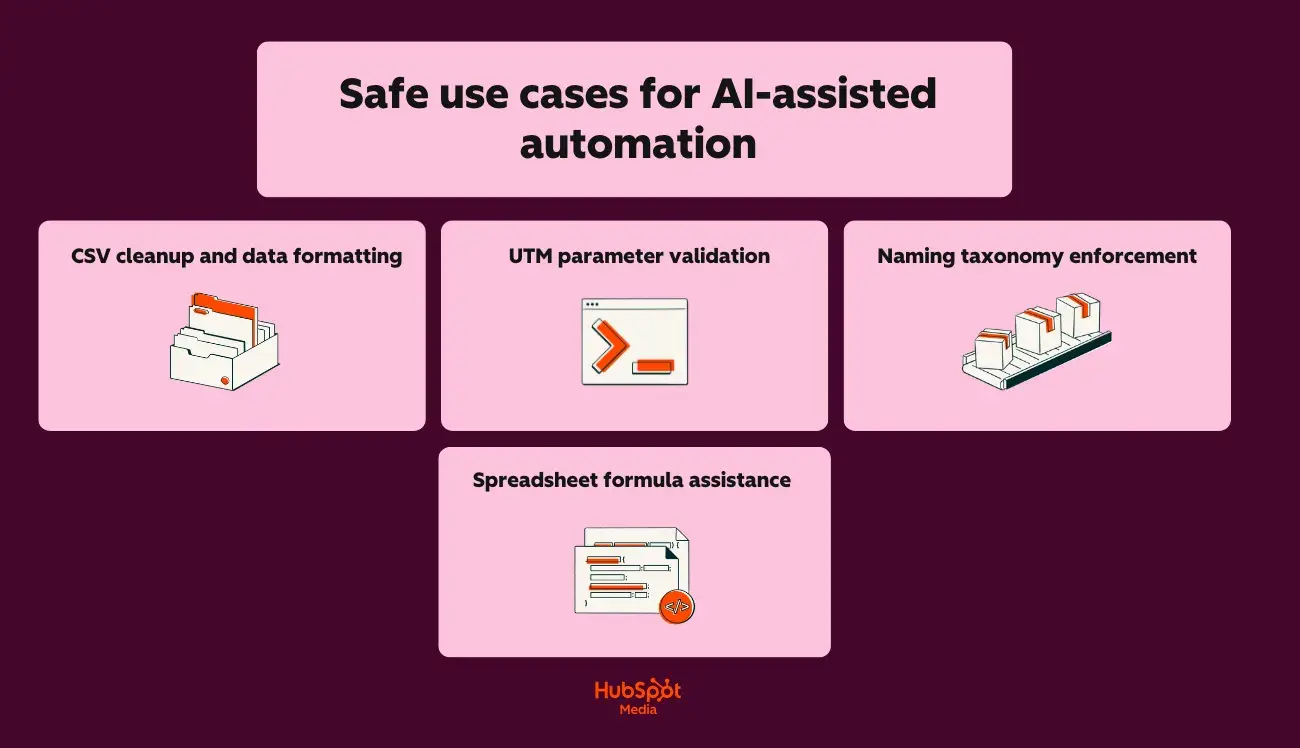
a hubspot-branded graphic showcasing safe use cases for AI-assisted automation

For CSV cleanup and data formatting, try:

  • Standardizing date formats across exported campaign data
  • Removing duplicate rows and trimming whitespace
  • Converting column headers to consistent naming conventions
  • Splitting or combining fields (e.g., separating “City, State” into two columns)

For UTM parameter validation, you should:

  • Check URLs for missing or malformed UTM parameters
  • Verify utm_source, utm_medium, and utm_campaign match documented taxonomy
  • Flag inconsistent capitalization or spacing errors
  • Generate corrected URLs for reimport

When working with naming taxonomy enforcement, try the following:

  • Validate campaign names against your naming convention rules
  • Identify assets that don’t follow folder/file naming standards
  • Generate compliant names for new campaigns based on templates
  • Audit historical assets for taxonomy drift

Lastly, for spreadsheet formula assistance, try:

  • Writing VLOOKUP, INDEX/MATCH, or XLOOKUP formulas
  • Creating pivot table configurations
  • Building conditional formatting rules
  • Debugging formula errors

I recommend using Claude for any AI-assisted automation that requires precision. Now that I’ve given you a few use cases to consider, next, I’ll talk through what you’ll use to keep your outputs safe and reliable.

Guardrail checklist for AI-generated code and analysis

I’ll say this once, maybe I’ll say it again, but regardless, read this statement carefully: Never deploy AI-generated code or act on AI-generated analysis without human review.

Here’s what you should do before running any AI-generated script:

  • Read the entire script line by line (don’t assume correctness)
  • Verify the script only accesses intended files/data sources
  • Check for hardcoded values that should be variables
  • Confirm no destructive operations (DELETE, TRUNCATE, overwrite) exist without explicit safeguards
  • Test on a sample dataset before running on production data
  • Back up the original data before any transformation
  • Run in a sandbox environment first when possible

Also, before acting on AI-generated analysis, be sure to:

  • Verify source data accuracy before accepting conclusions
  • Cross-check calculations manually on a sample subset
  • Question surprising findings (spoiler art: AI can misinterpret data structures)
  • Confirm the AI understood your column headers and data types correctly
  • Check for hallucinated patterns (AI may invent correlations)
  • Validate statistical claims with your analytics platform’s native reporting

Claude vs. ChatGPT: Data privacy, governance, and brand protection

When it comes to data privacy, governance, and brand protection comparisons, I’ll be honest with you: both Claude and ChatGPT provide adequate protections (when configured correctly, of course).

But I understand that you want to know about all the bells and whistles when it comes to this stuff, so, for your convenience, within this section, I’ll cover the following for both tools:

  • Data handling policies
  • Governance frameworks
  • Brand protection strategies

Let’s get into it:

Claude vs. ChatGPT: Data privacy comparison

Here’s a quick glimpse of Claude’s and ChatGPT’s data privacy capabilities:

Privacy Feature

Claude

ChatGPT

Training data exclusion

Default: user data not used for training

Requires opt-out in settings or the Enterprise tier

Data retention (consumer tiers)

30 days for trust and safety

30 days for abuse monitoring

Data retention (enterprise)

Configurable, including zero retention

Configurable, including zero retention

SOC 2 Type II certification

Yes

Yes

HIPAA compliance (with BAA)

Enterprise tier

Enterprise tier

GDPR compliance

Yes

Yes

Data residency options

Available through the Enterprise tier

Available through the Enterprise tier

Claude vs. ChatGPT: Governance capabilities (by tier)

Next, let’s take a glance at Claude’s and ChatGPT’s governance capabilities (by tier):

Claude’s governance features:

  • Pro: Conversation history controls, data export
  • Team: Admin console, usage analytics, workspace organization, SSO (SAML)
  • Enterprise: Audit logs, custom data retention, VPC deployment options, dedicated support

ChatGPT’s governance features:

  • Plus: Conversation history toggle, data export
  • Team: Admin console, workspace management, SSO (SAML), usage caps per user
  • Enterprise: Audit logs, custom data retention, Azure-based deployment, admin analytics dashboard

Brand protection strategies

When it comes to using LLMs, regardless of which one, one thing rings true: you have to train it how to represent your brand.

Below, I’ve provided some starter tips for establishing a firm brand protection foundation:

But first, here’s a short ‘n’ sweet checklist for reventing brand voice drift:

  • Upload comprehensive brand guidelines to Claude Projects or ChatGPT Custom GPTs
  • Include approved terminology lists, banned phrases, and tone examples

Here’s what to do to prevent data leakage:

  • Never paste customer PII directly into prompts
  • Use placeholder tokens (Customer_A, Company_B) and replace after generation

Here’s my advice for preventing unauthorized content publication:

  • Route all AI-generated content through approval workflows before publishing
  • Tag AI-assisted content in your CMS for audit purposes
  • Marketing teams achieve best results by using Claude for editing and ChatGPT for drafting (final human review remains mandatory!)

Pro Tip: Use HubSpot’s Data Hub to control which fields sync to external tools

Claude vs. ChatGPT: Governance starter checklist for marketing teams

Now that we’ve covered the basics, use these other checklists to establish baseline AI governance before scaling usage:

For successful policy documentation, do the following:

  • Create an AI acceptable use policy defining approved tools and use cases
  • Document which content types require AI disclosure (internal versus external)
  • Establish data classification rules (what can/cannot be shared with AI tools)
  • Define approval authority for AI-generated customer-facing content

For implementing technical controls, try this out:

  • Enable SSO for all AI tools (Team tier minimum)
  • Configure data retention settings appropriate to your industry
  • Disable training data sharing on ChatGPT (Settings → Data Controls)
  • Set up workspace organization by team or function
  • Connect Claude vs ChatGPT integrations through your CMS for centralized content staging

For effective access management protocols, it might be helpful to:

  • Assign individual seats to users requiring audit trails
  • Create shared accounts only for non-sensitive, internal use cases
  • Review and revoke access quarterly
  • Document API key ownership and rotation schedule

For effective quality control measures, do this:

  • Establish mandatory human review before publication
  • Create brand voice verification prompts for both tools
  • Build feedback loops to flag AI outputs that miss brand standards
  • Track error rates by tool to optimize Claude versus ChatGPT for marketing allocation

Lastly, for assured compliance alignment, do this:

  • Confirm AI tool usage aligns with existing data processing agreements
  • Update privacy policies if AI assists with customer communications
  • Review industry-specific regulations (HIPAA, FINRA, GDPR) for AI implications
  • Document AI governance decisions for audit readiness

Next, let’s chat through the decision that comes before data privacy stuff: pricing.

Claude vs. ChatGPT: Pricing and subscription levels

When it comes to Claude’s and ChatGPT’s pricing/subscription levels, here’s what you need to know:

  • Claude versus ChatGPT pricing follows similar structures at consumer tiers (but diverges significantly at team and enterprise levels).
  • Understanding where costs accumulate helps marketing teams budget accurately and avoid unexpected overages.
  • API usage often becomes the hidden budget item that catches teams off guard.

And you likely already guessed this, but there’s more to the story when it comes to evaluating which LLM tool could be a fit for your team.

Lucky for you, I’ll deep-dive into pricing, where costs add up, and, most importantly, will provide recommendations based on your team’s needs below.

Claude vs. ChatGPT: Subscription tier comparison (quick glance)

Tier

Claude

ChatGPT

Key Differences

Free

Claude.ai (limited messages)

ChatGPT Free (GPT-5 limited)

ChatGPT offers more free messages; Claude provides full model access with lower limits

Pro/Plus

$17/month

$20/month

Identical pricing; Claude offers higher usage limits, ChatGPT includes DALL·E and advanced voice

Team

$20/user/month (billed annually) or $25/user/month (billed monthly)

$25/user/month (billed annually)

Both require minimum seats; however, Claude offers stronger privacy and governance controls for enterprise teams

Enterprise

Custom pricing (see here)

Custom pricing (see here)

Both require annual contracts; Claude emphasizes security, ChatGPT emphasizes plugin ecosystem

API

Pay-per-token

Pay-per-token

Pricing varies by model

Claude vs. ChatGPT: Where costs add up

In the previous section, I briefly overviewed the difference between Claude’s and ChatGPT’s pricing tiers. Next, I’ll outline how and where costs add up.

When investing in any software tool, it’s important to know where the hidden costs live. In this case, it’s rate limits and usage caps.

Below, I’ve outlined what the limitations could look like for Claude Pro and ChatGPT Plus, as well as Team tiers for either subscription:

  • Claude Pro: Higher message limits than free tier, but heavy users (50+ long conversations daily) may hit caps
  • ChatGPT Plus: Includes GPT-4o with usage limits
  • Team tiers: Higher limits per user, but still capped

Another cost factor to consider is API usage. Take a glimpse at how much token consumption could cost you for both tools:

Model

Input Cost (per 1M tokens)

Output Cost (per 1M tokens)

Claude Sonnet 4.5

$3 / MTok

$15 / MTok

Claude Sonnet 4

$3 / MTok

$15 / MTok

GPT-5.2

$1.750 / 1M tokens

$14.000 / 1M tokens

GPT-5.2 pro

$21.00 / 1M tokens

$168.00 / 1M tokens

Of course, which model you choose and how many tokens you need are dependent upon how many seats you’ll be purchasing.

In the next section, I’ll chat through when to get individual seats versus opting for shared access.

Planning seats vs. shared access

Deciding between individual seats and shared access can make or break your AI budget..

Here are a few indicators of when to assign individual seats:

  • Team members need conversation history and saved prompts
  • Audit trails are required for compliance
  • Usage monitoring by individual contributors is necessary
  • Claude vs ChatGPT integrations require user-level permissions in your CMS

Oppositely, here are a few indicators of when to provide shared access:

  • Occasional users (fewer than 10 tasks/week)
  • API-driven workflows where individual accounts aren’t needed
  • Teams are testing before committing to a full rollout

So, which subscription do you need?

Still don’t know which subscription tier would be the best investment? No fear. To assist you in your decision-making, I’ve broken down recommendations based on:

  • Content volume
  • Number of users
  • Approval needs

Take a gander:

1. Recommended approach based on content volume

Monthly Content Output

Recommended Approach (by tier)

Under 20 pieces

Free tier

20 to 50 pieces

Pro/Plus tier

50 to 150 pieces

Team tier

2. Recommended approach based on the number of users

Team Size

Recommended Approach (by tier/subscription level)

1 user

ChatGPT Plus or Claude Pro

2 to 4 users

Mix of Pro subscriptions by role

5 to 10 users

Mix of Pro subscriptions by role

11 to 25 users

Team tier

25+ users

Enterprise evaluation recommended

3. Recommended approach based on approval needs

Requirement

Recommended Approach (by tier/subscription level)

No formal approval process

Pro/Plus tiers are sufficient

Manager review before publishing

Team tier with workspace organization

Legal/compliance review required

Claude Team or Enterprise (in my opinion, Claude offers stronger privacy and governance controls for enterprise teams)

SOC 2/HIPAA compliance

Enterprise tier with BAA (both Claude and ChatGPT offer)

Audit trail mandatory

Enterprise tier with BAA (both Claude and ChatGPT offer)

All-in-all? Claude versus ChatGPT for marketing budget decisions ultimately depends on your primary use case.

Now that I’ve covered the financial considerations, let’s get into the practical application: when to use Claude, ChatGPT, or both in one stack.

When to use Claude, ChatGPT, or both in one stack

Claude and ChatGPT are both great; I know it’s a difficult decision to choose one LLM over the other. However, choosing just one isn’t always necessary.

To determine whether to adopt one tool, the other, or both, use the decision matrix below:

Use Case

Recommended Tool

Why

Blog posts and long-form content

Claude

Claude is great at producing long-form content editing and handling complex contexts

Email sequences and newsletters

Both

ChatGPT for volume, Claude for personalization logic

Social media content

ChatGPT

ChatGPT is best for rapid ideation, email copy, and social content

SEO briefs and research synthesis

Claude

Processes competitor data and source documents in a single context window

Ad copy and landing pages

ChatGPT

Faster iteration on short-form variants and hooks

Brand voice enforcement

Claude

Better tone consistency across extended content

Marketing automation scripts

Both

ChatGPT for speed, Claude for accuracy

Compliance-sensitive content

Claude

Claude offers stronger privacy and governance controls for enterprise teams

Visual content ideation

ChatGPT

ChatGPT supports multimodal content generation, including images and code

Customer-facing chatbots

Both

ChatGPT for speed, Claude for nuanced responses

Still unsure of which tool is best for your team? To help you make a confident choice, here’s a quick-reference guide based on role:

1. SMB Marketer

Is Claude better than ChatGPT for a solo marketer? Not necessarily. Speed and cost efficiency matter most at this stage.

  • Recommended stack: ChatGPT Plus ($20/month)
  • Primary use cases: Social content batching, email drafts, ad copy variants, blog outlines
  • When to add Claude: If producing long-form content (whitepapers, ebooks) or working in regulated industries
  • Claude versus ChatGPT pricing consideration: Single subscription keeps costs manageable; ChatGPT’s broader feature set (images, plugins) provides more value for generalists
  • HubSpot integration: Connect ChatGPT to Marketing Hub for draft generation; use Breeze AI for additional content assistance

2. Mid-Market Teams

Both Claude and ChatGPT can be integrated with CRM, MAP, and CMS platforms via API or third-party connectors. Mid-market teams benefit from using both.

  • Recommended stack: ChatGPT Team + Claude Pro ($20-25/user/month combined)
  • Workflow structure:
  • Content strategists use Claude for briefs and research synthesis
  • Writers use ChatGPT for first drafts
  • Editors use Claude for brand voice refinement
  • Social managers use ChatGPT for post-batching
  • Claude versus ChatGPT for marketing allocation: 60% ChatGPT (volume tasks), 40% Claude (quality tasks)
  • HubSpot integration: Native Claude connector for editing workflows; ChatGPT via Zapier for automation triggers

3. Enterprise Teams

Claude offers stronger privacy and governance controls for enterprise teams. Compliance-heavy organizations should lead with Claude.

  • Recommended stack: Claude Enterprise + ChatGPT Enterprise
  • Governance configuration:
  • Claude handles all customer-facing content, regulated materials, and data-informed personalization
  • ChatGPT handles internal ideation, creative brainstorming, and non-regulated content
  • All outputs route through Marketing Hub approval workflows before publication
  • Security requirements: SSO integration, audit logging, data retention controls, PII exclusion protocols
  • Claude vs ChatGPT integrations: API-level integration with middleware transformation layer; no direct PII exposure to either model
  • HubSpot integration: Both connectors active; content staging in Marketing Hub with role-based approval gates

4. Agency (multiple clients, varied brand requirements)

HubSpot enables seamless integration of Claude and ChatGPT into marketing workflows. Agencies need both tools to serve diverse client needs.

  • Recommended stack: ChatGPT Team + Claude Team (scale seats to team size)
  • Client allocation model:
  • High-volume, speed-priority clients → ChatGPT-dominant workflow
  • Brand-sensitive, premium clients → Claude-dominant workflow
  • Compliance-heavy clients (finance, healthcare, legal) → Claude only
  • Workflow by deliverable:
  • Social media retainers: ChatGPT for batching, light Claude review
  • Blog content: ChatGPT drafts, Claude edits
  • Whitepapers and reports: Claude end-to-end
  • Email campaigns: ChatGPT for variants, Claude for sequence logic
  • HubSpot integration: Separate HubSpot’s Marketing Hub portals per client; configure Claude connector and ChatGPT automation per client brand requirements

How to integrate Claude and ChatGPT with your stack and HubSpot

This section provides step-by-step instructions for each integration, starting with the following table that breaks down your options at a glance:

Method

Technical Skill Required

Best For

Setup Time

Native HubSpot Claude connector

Low

Teams already using Marketing Hub

15 to 30 minutes

Zapier/Make middleware

Low-Medium

No-code automation between tools

1 to 2 hours

Direct API integration

High

Custom workflows, high-volume operations

4 to 8 hours

Custom GPTs with HubSpot actions

Medium

ChatGPT-centric teams

2 to 3 hours

Alright. I’ve given you a bird’s-eye view of each integration method. Next, let’s dive into the nitty-gritty with a step-by-step walkthrough. Take a look at how to integrate Claude and ChatGPT with your tech stack and HubSpot:

How to set up the native Claude connector with HubSpot

Firstly, HubSpot’s Claude connector provides the fastest path to integration.

Here’s how you’ll connect Claude to HubSpot’s Marketing Hub:
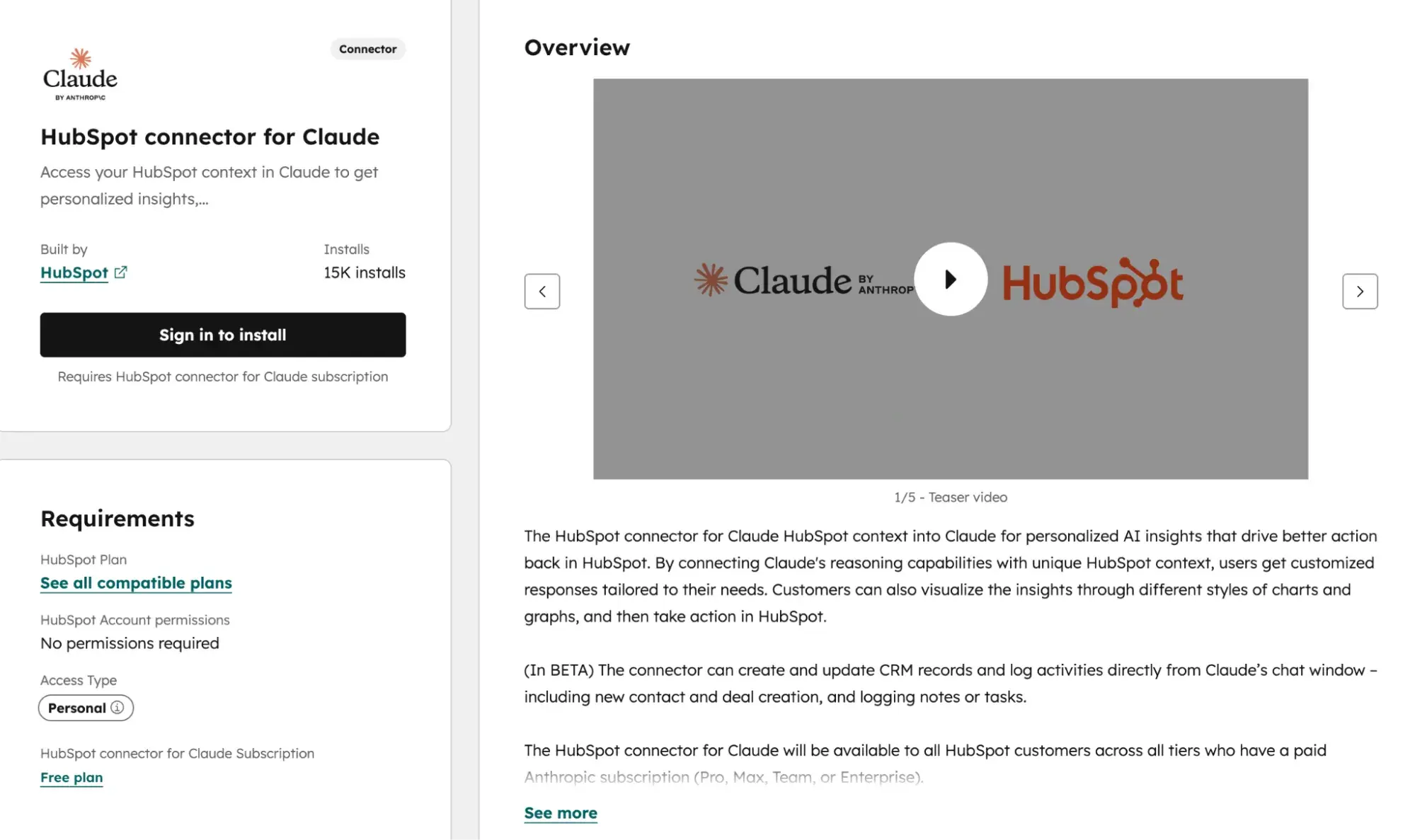
Source

[alt text] a screenshot of hubspot’s claude connector

  1. Navigate to Settings → Integrations → Connected Apps in your HubSpot portal.
  2. Search for “Claude” in the App Marketplace.
  3. Click “Connect app” and authenticate with your Anthropic account credentials.
  4. Select which HubSpot objects Claude can access (i.e., contacts, companies, deals, and content).
  5. Configure data permissions based on your team’s privacy requirements.
  6. Test the connection by running a sample content task.

Once you’ve successfully connected Claude to Marketing Hub, here’s what it will do:

  • Pull CRM data into Claude prompts for personalized content generation
  • Push Claude-generated content directly to Marketing Hub drafts
  • Trigger Claude workflows based on HubSpot events (new lead, deal stage change)
  • Maintain audit logs of all AI-assisted content creation

How to set up the native ChatGPT connector with HubSpot

Similar to HubSpot’s Claude Connector, HubSpot’s native ChatGPT integration connects these capabilities directly to your marketing workflows without middleware.

Here’s how you’ll connect ChatGPT to Marketing Hub:
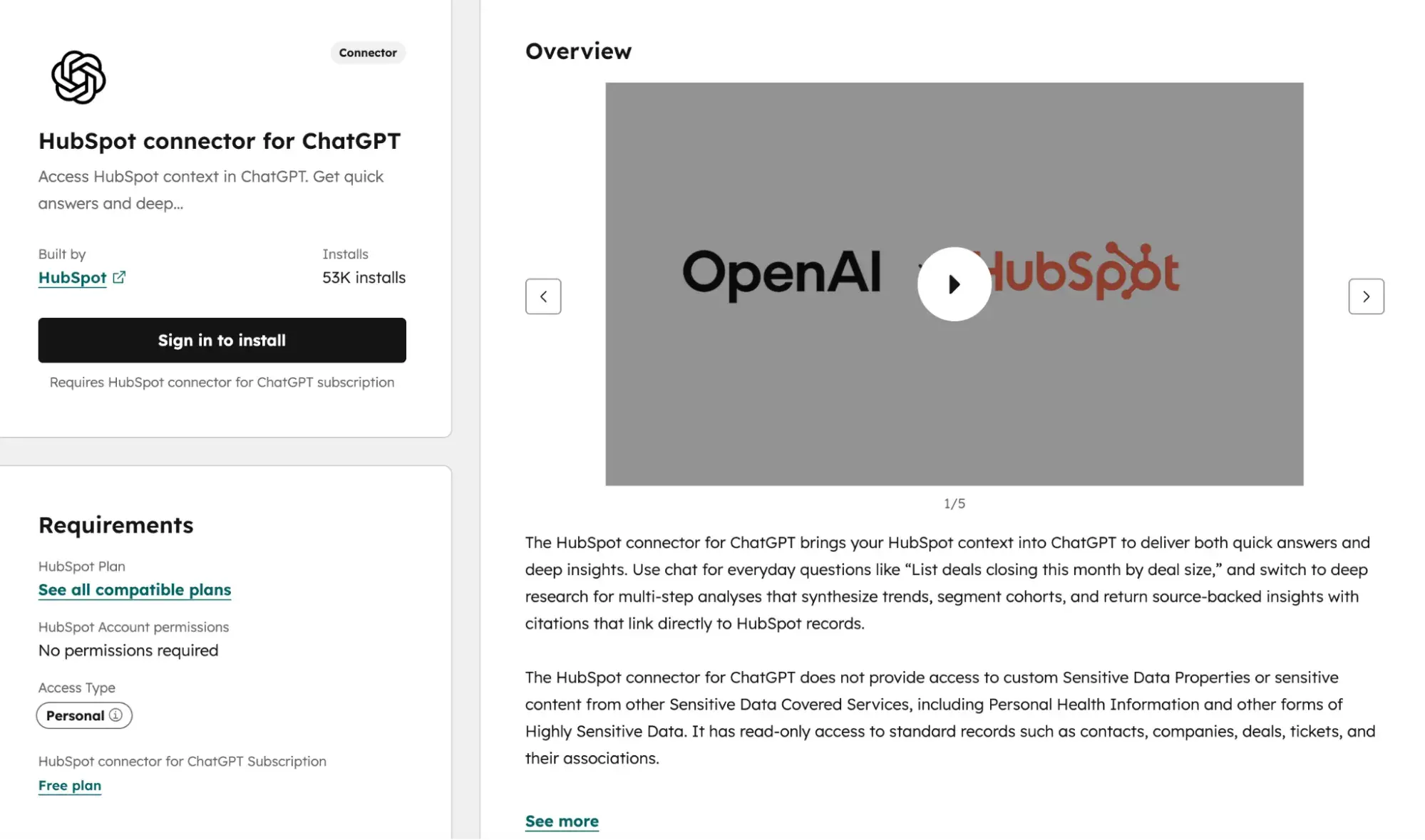
a screenshot of hubspot’s chatGPT connector

Source

  1. Navigate to Settings → Integrations → Connected Apps in your HubSpot portal.
  2. Search for “ChatGPT” in the App Marketplace.
  3. Click “Connect app” and authenticate with your OpenAI account credentials.
  4. Select which HubSpot objects ChatGPT can access (contacts, companies, deals, content).
  5. Configure data permissions based on your team’s privacy requirements.
  6. Test the connection by running a sample content generation task.

Once the connector is enabled, here’s what you’ll be able to do:

  • Generate email drafts, social posts, and ad copy directly within Marketing Hub
  • Pull CRM context into ChatGPT prompts for personalized messaging
  • Create A/B test variants for email subject lines and CTAs
  • Access ChatGPT’s multimodal capabilities for content ideation alongside text generation

Now that you know how to integrate both tools with HubSpot, let’s address some of the most common questions marketers have about Claude versus ChatGPT.

Frequently asked questions (FAQ) about Claude vs ChatGPT for marketing

Can I use both Claude and ChatGPT in the same marketing workflow?

Yes. Marketing teams achieve best results by using Claude for editing and ChatGPT for drafting. It’s a symbiotic relationship, if you will.

For more clarity, here’s a chart that breaks down how to chain tasks effectively with both LLM platforms:

Stage

Tool

Task

Ideation

ChatGPT

Generate topic lists, outline variations, and hook concepts

First draft

ChatGPT

Produce initial copy at speed

Structural edit

Claude

Reorganize flow, eliminate redundancy, strengthen arguments

Brand voice polish

Claude

Apply tone guidelines across the full document

Format adaptation

ChatGPT

Convert approved copy into social posts, email variants, and ad copy

I’ll acknowledge that integrating either of these LLMs with a CRM/CMS system can be daunting. So, to make it easier, here are a few best practices for keeping them in sync:

  • Use Zapier or Make to trigger workflows between tools. Example: New draft in Google Docs → Claude API for editing → HubSpot CMS for staging.
  • Store all finalized content in your CMS as the single source of truth—never in AI chat histories.
  • Tag AI-assisted content in your CMS with metadata (tool used, draft version, approval status) for audit trails.

Pro Tip: HubSpot enables seamless integration of Claude and ChatGPT into marketing workflows through Marketing Hub’s native connectors and workflow automation.

Which is better for fact‑checked SEO content?

As I’ve already highlighted above, Claude will be your go-to for long-form content, making it stronger for research synthesis and citation accuracy. ChatGPT is best for rapid ideation, email copy, and social content where speed outweighs verification depth.

Assuming that you’ll be using Claude, here’s a practical verification workflow that you can use to ensure accuracy:

  1. Research phase: Use Claude with web search enabled to gather sources. Claude provides citations and flags uncertainty.
  2. Draft phase: Generate content in either tool based on speed needs.
  3. Fact-check phase: Paste draft into Claude with the prompt: “Identify every factual claim in this content. For each claim, state whether it’s verifiable, provide a source if possible, and flag any statements that require human verification.”
  4. Source audit: Manually cross-reference Claude’s flagged claims against primary sources.
  5. Final review: Run completed content through Claude to confirm no new unsupported claims were introduced during editing.

However, if you’re still on the fence about which LLM does heavy-SEO-content-lifting the best, then consider this:

  • Favor Claude for statistics, quotes, historical facts, and technical specifications. Claude’s training emphasizes accuracy over confidence.
  • Favor ChatGPT for general knowledge framing, introductions, and transitional content where factual precision matters less.

How do I keep AI outputs on‑brand across channels?

In my opinion, a consistent brand voice requires a documented system, not ad-hoc prompting.

That said, here’s a brand voice system setup you’ll use to keep AI outputs – whether they be for blogs, emails, or social posts – consistent across channels:

Create a brand voice document containing:

  • 5 to 7 tone descriptors with examples (e.g., “Confident but not arrogant: Say ‘We recommend’ not ‘You should’”)
  • Approved and banned word lists
  • Sentence length and structure preferences
  • Channel-specific variations (LinkedIn = more formal; Instagram = more conversational)

Next, configure each tool:

  • Claude: Upload the full brand document to a Project. Claude retains it across all conversations within that project.
  • ChatGPT: Build a custom GPT with brand rules embedded in the system prompt. Include 3-5 example paragraphs showing ideal tone.

Once you’ve implemented and used the brand voice system template above, next, you’ll review the loop with specific prompts.

Below, I’ve outlined the order in which you’ll run your checks and which tools, as well as prompts, to use:

  • Pre-publication check (Claude): “Review this content against our brand voice document. List any phrases that violate our tone guidelines and suggest replacements.”
  • Batch audit (ChatGPT): “Score these 10 social posts from 1-5 on brand voice consistency. Flag any scoring below 4 with specific issues.”
  • Cross-channel adaptation (Claude): “Rewrite this blog excerpt for LinkedIn, Instagram, and email. Maintain core message but adjust tone per our channel-specific guidelines.”

Lastly, here are some quick tips regarding CMS/CX controls that might be helpful as you utilize these tools:

  • Store approved AI prompts as templates in Marketing Hub for team-wide access.
  • Require approval workflows for AI-generated content before publication.
  • Use content staging to compare AI drafts against previously approved pieces.

What’s the safest way to connect AI models to my CRM data?

The short answer? Safe CRM integration requires architectural discipline regardless of the tool. Never pass raw PII directly to AI models.

Method

Security Level

Best For

API with a data transformation layer

Highest

Enterprise teams with developer resources

MCP (Model Context Protocol) servers

High

Structured integrations with defined schemas

Custom actions via middleware (Zapier/Make)

Medium

Teams without dedicated developers

Direct copy-paste

Low

Ad-hoc tasks only; never for PII

Not super clear on how to separate PII from prompts? Here’s some guidance (in plain English, of course):

  • Build a transformation layer that replaces PII with tokens before sending to AI. (Here’s an example: “John Smith, [email protected]” becomes “Customer_A, email_A.”)
  • Process AI outputs through reverse transformation to reinsert actual data.
  • Never include names, emails, phone numbers, addresses, or account numbers in prompts.
  • Use aggregated or anonymized data for analysis tasks. (For example, prompt with “Analyze engagement patterns for enterprise segment,” not “Analyze John Smith’s email history.”)

Lastly, because it never hurts to be extra cautious, here are a few extra tips on using first-party data safely:

  • Behavioral data (pages viewed, content downloaded, email engagement) can inform personalization prompts without exposing identity.
  • Segment descriptions are safe: “Software buyer, 50-200 employees, evaluated competitor X.”
  • Purchase history summaries work: “Customer for 2 years, purchased products A and B, average order $5,000.”

How do I measure AI impact without over‑attributing?

Here’s the thing: AI accelerates production, but doesn’t guarantee outcomes. Measure efficiency gains separately from performance improvements to avoid false attribution.

That said, here are a few efficiency metrics that are directly attributable to AI:

  • Time from brief to first draft (hours saved)
  • Content volume produced per week/month
  • Revision cycles before approval
  • Cost per content piece (tool subscription ÷ output volume)

Now, if you’re using AI for marketing-related tasks, there are other metrics to track as well. Below, I’ve also outlined outcome metrics (just to clarify, these metrics are influenced by AI, not caused by it):

  • Click-through rates on AI-assisted versus human-only content
  • Conversion rates by content type
  • SQLs generated from AI-assisted campaigns
  • Engagement rates (time on page, scroll depth, shares)

To help you stay organized, I’ve created a simple, easy-to-use campaign reporting framework. It should

  1. Tag content by production method in your CMS: “AI-drafted,” “AI-edited,” “Human-only.”
  2. Run parallel tests when possible. Same campaign, same audience segment, different production methods.
  3. Track leading indicators first. Speed and volume improvements are immediately apparent. CTR and conversion changes take 30-90 days to reach statistical significance.
  4. Isolate variables. AI-assisted content may perform differently because of topic selection, not AI quality. Compare like-for-like content types.

Reporting cadence:

  • Weekly: Efficiency metrics (volume, speed, cost)
  • Monthly: Engagement metrics (CTR, time on page)
  • Quarterly: Outcome metrics (conversions, SQLs, revenue influence)

Claude vs. ChatGPT: Who’s the real winner?

Despite my personal opinions about which LLM I prefer, when it comes to marketing teams more broadly, here’s my honest take: there isn’t one.

After comprehensively walking you through pricing tiers, integration methods, use cases, and governance considerations, my answer remains the same as it was at the start – the best tool depends on the task at hand.

Claude excels at long-form content editing and handling complex context, making it your go-to for:

  • Blog posts
  • Whitepapers
  • Brand voice enforcement
  • Compliance-sensitive content

On the flip side, ChatGPT is best for:

  • Rapid ideation
  • Email copy
  • Social content

But, honestly, here’s what I hope you take away from this guide: Claude versus ChatGPT for marketing isn’t a competition. It’s a collaboration. So, who’s the real winner? The marketing team that learns when to strategically deploy each tool.

Whether you’re drafting email sequences, building SEO briefs, creating enablement decks, or scaling social content, you now have the frameworks, checklists, and decision matrices to make confident choices.

Ready to put your AI-assisted content to work? Get started with HubSpot’s Marketing Hub to integrate Claude and ChatGPT into your workflows, automate approvals, and measure the impact of every piece of content you create — all from one platform.


Categories B2B

AI marketing predictions that will shape 2026

Marketing is set for its most transformative year in decades, according to major AI predictions for 2026. Currently, marketers struggle with fragmented customer journeys, declining attention spans, rising acquisition costs, and failed campaigns. Using AI in marketing will redefine how brands connect with consumers by using real-time data processing and predictive analytics.

Download Now: Free AI Agents Guide

According to the HubSpot 2026 State of Marketing report, over 64% of organizations currently use AI. The growth of AI in marketing is predicted to increase drastically over the next year, given the rise of AI-driven content, AI agents, hyperpersonalized campaigns, and more. Marketers will need to evolve to take on more strategic and analytical roles while delegating routine tasks to AI tools.

This article will cover the top AI predictions for 2026 and the AI marketing predictions beyond 2026. For teams looking to stay ahead and implement AI, the HubSpot AI Agent Playbook provides step-by-step frameworks for automating marketing workflows and deploying AI agents across campaigns.

Table of Contents

Current AI Capabilities

Future AI Capabilities

Basic AI summaries

AI search engine-powered conversational answers

Draft marketing content

Run entire campaigns, Agent-to-Agent interactions

Ability to create a singular text/image/video based on a user prompt

Multi-modal content repurposes a single asset

Basic customer segmentation

Advanced individualistic personalization

Accommodates repetitive jobs

Replace repetitive tasks with predictable workflows

Lacks data privacy

Prioritizes data privacy by prioritizing first-party and zero-party data

AI Marketing Predictions for 2026

2026 is a pivotal year for AI in marketing. AI is predicted to not only streamline routine tasks but also to drive strategic decision-making in marketing. This involves transforming insights into action faster than ever, while raising important questions about data privacy, ethical use, and the balance between human creativity and machine intelligence.

Prevalence of AI-Driven Search Engines

One of the major AI predictions for 2026 is that traditional SEO will be replaced by Search Everywhere Optimization (SEvO), Generative Engine Optimization (GEO), and Answer Engine Optimization.

Search behavior is moving from finding links to finding answers. So, consumers are no longer relying solely on Google to make a decision. Instead, users are actively searching on AI search engines and asking Perplexity, Claude, Gemini, or ChatGPT for direct answers.

This fragmentation means brands must be discoverable wherever audiences search: not just on traditional search engines like Google, but also within AI-generated summaries and conversational interfaces.

Therefore, brand mentions across trusted sources such as reviews, forums, podcasts, and social media now carry more weight than traditional backlinks. AI systems surface brands based on “AI authority,” i.e., how often and credibly a brand is referenced, making reputation and content quality critical for visibility.

In short, one of the 2026 AI marketing predictions is that a brand’s SEO strategy must evolve into AEO. If the content isn’t structured for LLMs and humans, brands lose their voice in the conversation. Companies and businesses must start speaking the language of AI models and human users simultaneously if they want to be cited as the “source of truth.”

According to the HubSpot 2026 State of Marketing report, 40.6% marketers are currently updating their SEO strategy for AI-powered search engines. Another 48.57% of marketers are using AI occasionally to make personalized content.

hubspot 2026 state of marketing report]

Marketing in 2026 will require optimization for:

  • Voice search
  • Image & visual search
  • Conversational queries

AI models powering discovery will extend far beyond keyword-based SEO to multimodal content relevance across channels.

My strategy for AI search

I like how product search and discoverability are evolving with time, while the fundamentals remain the same. Users ultimately want to find answers in the easiest and fastest way possible. AI-powered search engines will provide that in 2026, while AI tools will help brands optimize for the AI search era.

I often use HubSpot’s Breeze AI content generator to create content for brands because it helps me optimize for AEO. I can use HubSpot’s AI to write pieces that structure my posts for LLM readability and humans simultaneously.

The HubSpot Breeze AI suite helps businesses optimize for AI search engines to accelerate business growth and boost team productivity. Breeze can also help segment customers for campaigns, personalize content, and help clean up data to save teams time.

hubspot breeze ai suite, ai predictions, rise of ai content generators

Rise of AI Agents in Marketing

One of the top AI predictions for 2026 is that AI agents, autonomous systems that think, act, and optimize on their own, will become mainstream in marketing workflows. Here’s how:

  • AI agents will manage entire campaigns end-to-end
  • AI agents can help marketers optimize bids, audience targeting, and creatives in real time
  • Agentic AI will free humans to focus on strategy rather than on manual tasks

AI agents are transitioning from assistants to autonomous decision-makers. By the end of 2026, agentic AI systems will be able to plan, execute, and optimize full marketing campaigns without constant human input. These agents will operate across platforms, manage budgets, test creatives, and refine strategies in real time.

Consumers are also using personal AI agents to research and purchase products. With 24% of AI users already using AI shopping assistants, marketers must optimize not just for human audiences, but for “agent-to-agent” interactions. Optimizing for agent-to-agent interactions means ensuring product data is structured, accessible via APIs, and interpretable by AI systems.

The future of commerce and advertising is agent-mediated. One of the future predictions of Artificial Intelligence is that AI agents will negotiate media buys directly with one another, bypassing human intermediaries. Agent-to-agent trading enables faster, more scalable transactions and supports new ad formats that don’t fit legacy programmatic pipelines.

Similarly, consumers use AI agents to compare products, check stock, and make purchases, often without visiting a brand’s website. Protocols such as the Agentic Commerce Protocol (ACP) and the Model Context Protocol (MCP) enable brands to embed interactive, transactional experiences directly within AI chat interfaces.

In 2025, AI was primarily used to draft content. In 2026, AI will be used to run entire campaigns. While an AI agent waits for a command, another agent works toward a predefined goal, handling the busywork of prospecting and qualification in the background.

According to the HubSpot 2026 State of Marketing report, 19.20% of marketers are already leveraging AI agents to automate marketing initiatives end-to-end. These numbers are set to grow in the coming months.

How I use AI agents

I use AI agents to automate workflows, freeing up my time to focus on brand strategy. For example, I can assign a target to a HubSpot Breeze Agent and let it research, qualify, and engage leads in the background. The sales team can then start closing deals from the AI-generated leads.

The HubSpot AI Agents Playbook explains how people can leverage AI agents and prepare for the future. With the HubSpot AI agent playbook, marketers can pinpoint where and how to implement agents into workflows.

hubspot ai agents playbook, ai predictions rise of ai agents in marketing

As a starting point, I recommend using HubSpot’s built-in AI agents.

The HubSpot Breeze AI Agents help marketing teams discover, customize, and deploy AI agents to automate business workflows. Similarly, the HubSpot Breeze Data Agent helps scale data operations with an AI agent that researches and analyzes customer data to deliver instantaneous results.

hubspot ai data agent success rate, ai predictions, rise of ai agents

Pro tip: If a workflow requires following strict logic (if criteria X are met, then Y should follow), it’s best to delegate the work to an AI agent. Refer to the HubSpot AI Agents Playbook to learn how to leverage AI agents and prepare for future-proof work.

AI Content Will Become Mainstream

One of the primary AI predictions for 2026 is that generative AI will no longer be just a content-drafting tool but will become a creative co-pilot. Marketers will use AI tools to produce multimodal content (text, image, audio, video) at scale, enabling rapid localization and personalization.

However, with AI-generated “slop” flooding the web, authenticity and human creativity are becoming differentiators. Brands are balancing AI efficiency with employee and creator-led storytelling to maintain emotional resonance and trust.

As mentioned earlier, nearly half of marketers surveyed in HubSpot’s report have used AI to create personalized content. Moreover, 35.08% marketers are repurposing content across channels.

In 2026, AI won’t just produce content but drive “living campaigns” that self-adjust messaging, formats, visuals, and tones based on performance signals across platforms. Traditional static ads will largely give way to dynamically evolving creative assets that adapt per audience segment.

Brands are likely to use AI-generated images, videos, and copy as standard practice rather than as experiments. So, marketers will leverage AI tools to produce thousands of creative variations for A/B testing, with human marketers focusing more on strategy and creative direction rather than execution.

Users now want fluid formats and expect to consume ideas in the format that fits their moment. So, AI future predictions 2026 involve the rise of AI tools that can generate multi-modal content by adapting a single asset into audio, visual, and text formats.

How I see AI content

I think the most successful brands in 2026 will treat a blog post as just the raw material and use AI to remix that post into a podcast, a slide deck, or a social carousel. This will ensure marketers reach every segment of the audience on launch day.

For example, I often use HubSpot Breeze AI content generator to create AI content and remix a single asset into blogs and social posts.

The HubSpot Breeze AI content generator can generate AI content that helps save teams time. Breeze can also help segment customers for campaigns, personalize content, and help clean up data to save teams time.

hubspot breeze ai content generator landing page, ai predictions, rise of ai content]

Pro tip: Stop publishing single-format content. The right AI tools can help marketers ideate, create, and share content quickly across various platforms.

Hyper-Personalization and Predictive Analytics

One of the important AI predictions for 2026 is AI-driven personalization that goes beyond user segmentation to real-time, cross-channel individualization. Using behavioral signals, context, and intent, AI tools tailor content, product offers, and journeys for each user by dynamically adjusting emails, ads, and website experiences.

Predictive analytics enables anticipatory marketing, where brands surface offers before customers consciously realize they want them. Tools like Google Analytics 4 AI Insights predict churn, purchase likelihood, and next-best actions, allowing marketers to act proactively.

According to the HubSpot 2026 State of Marketing report, 32.96% of marketers are currently extensively using AI for data analysis and automated reporting. Another 33.24% are extensively using AI for market research and competitor analysis.

The future of AI involves marketers who’ll deliver one-to-one personalization to drive higher engagement and conversion rates. Marketing will eventually move beyond basic segmentation to truly individualized experiences.

AI will enable brands to create unique content, product recommendations, and messaging for each customer in real-time, analyzing behavioral patterns, purchase history, and contextual signals to deliver precisely what resonates with each person.

How I see Hyper Personalization

In a world flooded with AI-generated content, the only way to cut through the noise is with data that an LLM doesn‘t have: customers’ real-time context. The solution is predictive personalization. That’s why I use HubSpot Breeze to unify customer data for predicting what a customer needs next, moving from generic blasts to timely, high-value interactions.

The HubSpot Breeze AI suite unifies marketing, sales, and client data to accelerate business growth, scale revenue, and ramp up customer service. The HubSpot Breeze Data Agent helps with data operations by researching and answering customized questions using CRM data.

Marketers can also refer to the HubSpot AI Agents Playbook to understand how AI agents work and deploy them for predictive data analytics.

hubspot personalization tools landing page, ai predictions, hyper-personalization and analytics

The Future of Marketing Teams and Roles

One of the major AI predictions of 2026 is that AI is transforming marketing roles. Routine tasks are automated, allowing marketers to focus on strategy, creativity, and ethical oversight. Some of the new roles that are emerging are:

  • AI Marketing Specialist: Manages AI tools for personalization and analytics.
  • Prompt Engineer: Crafts inputs to generate high-quality AI outputs.
  • Automation Manager: Integrates AI workflows across platforms.
  • Data Storyteller: Translates AI insights into business narratives.
  • Micro-Content Creator: Produces authentic, human-edited content to counter AI “slop.”

Leadership must foster AI literacy and human-in-the-loop processes to ensure AI enhances, not replaces, human judgment.

The 30% Rule dictates that AI must automate one-third of the routine workload. AI adoption will free up 30% of the marketing team’s time to be reinvested in high-leverage creativity.

2026 AI marketing predictions also include new roles like Vibe Marketing, a concept inspired by the ‘Vibe Coding’ trend. Marketers don’t need to be a CRM technical expert to work in marketing; they just need to know the broader strategy.

This shift removes the tool fatigue that plagues growing teams. Vibe Marketers provide the vibe (the strategy and goal), and AI handles the execution. This allows junior marketers to execute senior-level campaigns, provided their strategy is sound.

According to the HubSpot 2026 State of Marketing report, 32.82% respondents have said AI tools are saving 10-14 hours per week for marketing teams. Simultaneously, 41.81% marketers have said AI has moderately increased productivity.

AI isn’t going anywhere. Marketers must upskill and learn the tools to secure their positions and find AI-proof jobs.

How I see the future of marketing roles

I think AI will replace repetitive jobs while retaining those that require human creativity and innovation, returning marketing to its creative roots. The barrier to entry is no longer “knowing the software,” but “knowing the customer.”

I’d also recommend the HubSpot 2025 AI Agents Playbook for marketers. After all, upskilling and learning about AI is the only way to protect jobs in the long run.

The HubSpot 2025 AI Agents Playbook helps marketers learn insider strategies and helps companies have an edge in marketing, sales, and operations.

Pro tip: Instead of traditional business school degrees, what will matter is how good a marketer can deploy a strategy. Even junior marketers can execute a campaign if they know how to use AI tools effectively. Be quick to learn on the go.

Privacy-First Data Strategies

Privacy-focused data operations for AI systems are one of the top AI predictions for 2026.

With third-party cookies phased out and global privacy regulations tightening, first-party and zero-party data are now foundational. Brands are shifting to consent-based data models, collecting customer preferences directly through surveys, loyalty programs, and preference centers.

AI helps extract value from limited data by using intent-based signals and contextual targeting, reducing reliance on personal identifiers. Using AI responsibly not only ensures compliance but also builds trust, turning data strategy into a competitive advantage.

As AI adoption surges, ethical issues like data privacy, bias mitigation, transparent decision-making, and responsible use move from optional to strategic imperatives. Brands that lead with trusted and explainable AI will gain a competitive advantage.

According to HubSpot’s State of Marketing survey, 40.13% marketers have concerns about data privacy and security. In fact, it’s the biggest barrier that prevents organizations from adopting AI in marketing.

How I see privacy-first data strategies

Privacy is a fundamental aspect of human life. So, it’s natural for the majority of marketers to be concerned about data privacy issues.

However, with the right regulations and better data practices across AI companies, I’m hopeful that in 2026, more companies and marketers will feel confident to use AI.

AI tools that have built-in privacy will be preferred over those that aren’t as transparent. For instance, the HubSpot Breeze AI suite delivers secure and trustworthy AI solutions with robust privacy safeguards built into the system.

Pro tip: Always read the Privacy Policy of AI tools to understand what kind of personal data they collect and process. Review permissions granted to AI tools and revoke them if they violate data privacy guidelines.

How Marketers Should Prepare for 2026 AI Predictions

The window for marketers to get ahead of the next AI wave is closing fast. Here’s what marketers need to do now to survive the future of AI:

  1. Start experimenting with AI agents today. Don’t wait for the “perfect” tool. Begin testing current AI models to understand their capabilities and limitations before more powerful systems become widely available.
  2. Build workflows that assume AI automation. Start designing processes that have AI handle routine tasks such as email responses, content creation, and data analysis. Focus energy on strategy and creative direction instead of execution.
  3. Develop AI orchestration skills. The future marketing professional will be more like a director coordinating multiple AI tools than someone doing manual tasks. Learn prompt engineering and manage AI systems effectively.
  4. Create custom solutions instead of buying SaaS. Many marketing tools can now be built in minutes using AI. Marketers can create complex projects with OpenAI, Claude, Gemini, and HubSpot that would have previously required entire teams.
  5. Think like a small, powerful team. AI will enable small groups with concentrated focus to create projects that used to require hundreds of people. Position the marketing team to leverage this.

AI Predictions Beyond 2026

AI marketing predictions by 2030 would be intelligent, ethical, immersive, and human-first brands, powered by AI, but led by empathy.

By 2050, in the age of AGI, marketing will no longer be about selling products, but about designing intelligent relationships between humans and the systems that serve them.

What Marketing Looks Like in 2030

Marketing in 2030 will operate through predictive AI systems that anticipate customer needs before consumers express intent, replacing reactive campaigns with adaptive, real-time experiences and deeply human. All marketing campaigns will be powered by AI but led by empathy.

Marketing Becomes Predictive, Not Reactive

By 2030, marketing won’t wait for customers to act.

  • AI models will anticipate needs before intent is expressed
  • Campaigns will trigger based on life moments, context, and behavior patterns
  • Funnels will be dynamic and non-linear, updating in real time per individual

Hyper-Personalization at the Identity Level

Segmentation will be obsolete.

  • One-to-one marketing at scale becomes standard
  • Content, pricing, UX, and even brand tone adapt per user
  • AI-generated content will be governed by a strict brand and ethics layer

The Rise of Zero-Party Data & Trust Economics

With stricter privacy laws and cookie-less ecosystems:

  • Customers voluntarily share data in exchange for value
  • Brands compete on transparency, not tracking sophistication
  • Trust becomes a measurable KPI

AI Co-Marketers Become the Norm

Marketers won’t “use tools”— they’ll work with AI partners.

AI will:

  • Design campaigns
  • Test thousands of creative variations instantly
  • Predict ROI before launch
  • Optimize messaging mid-conversation

Humans will focus on:

  • Strategy
  • Ethics
  • Creativity
  • Cultural relevance

Content Evolves into Experiences

Static content fades. Immersive content dominates.

  • Interactive video, AR demos, virtual showrooms
  • Conversational content via AI agents
  • Personalized brand worlds instead of landing pages

The 2050 Vision: Marketing in the Age of AGI

By 2050, marketing will no longer be a function defined by tools, channels, or even data. In the age of Artificial General Intelligence (AGI), one of the AI predictions is that marketing itself will become a co-evolutionary system — one where human values, machine intelligence, and consumer intent continuously adapt to each other in real time.

From Optimization to Understanding

Marketing today is obsessed with optimization: click-through rates, conversion funnels, attribution models. AGI changes the game by shifting focus from what works to why it works.

AGI systems will:

  • Understand human psychology at an individual and collective level
  • Model emotions, motivations, cultural context, and ethics
  • Anticipate needs before consumers can articulate them

The End of Campaigns, The Rise of Living Brands

In the AGI era, campaigns will feel archaic. Instead:

  • Brands will operate as continuously evolving entities
  • Messaging, visuals, and values will adapt instantly to social, cultural, and economic changes
  • Brand identity will be fluid yet consistent, guided by an AGI “brand consciousness”

Marketers as Philosophers, Curators, and Governors

AGI will automate execution entirely, but not responsibility. The most valuable skill won’t be prompt-writing or analytics; it will be judgment.

Human marketers will evolve into:

  • Philosophers who define purpose, values, and boundaries
  • Curators guiding creativity, culture, and narrative
  • Governors overseeing the ethical use of intelligence

The Ultimate Shift: From Attention Economy to Meaning Economy

The attention economy will collapse under AGI abundance. What replaces it is the meaning economy, where:

  • Brands compete on contribution, not visibility
  • Success is measured by long-term impact on human well-being
  • Marketing exists to reduce friction in life, not create desire artificially

Frequently Asked Questions About AI Predictions

What is the best AI predictor?

AI predictor performance depends on the specific use case and data requirements. HubSpot Breeze AI suite is one of the best AI predictors that provides integrated predictive capabilities for marketing attribution, lead scoring, and revenue forecasting. HubSpot Breeze analyzes historical customer data to generate actionable predictions that inform campaign strategy and resource allocation.

What are the future predictions of AI?

Future AI predictions include the rise of AI search engines, AI agents in marketing, AI-generated content, hyper-personalization, changes in job profiles, and privacy-first protocols. By 2030, marketing will become more predictive, AI co-marketers will become normal, and content will evolve into immersive human experiences.

What is the 30% rule for AI?

The 30% rule for AI means it should handle 30% of the workflow, including repetitive, data-heavy tasks. Humans can focus on the remaining 70% work that requires critical thinking, creativity, and ethical judgment. Thus, AI serves as an assisting tool for employees rather than replacing their jobs.

What jobs will be eliminated by 2030?

Jobs like Telemarketing, Bookkeeping Clerks, Compensation and Benefits Managers, Receptionists, Couriers, Proofreaders, Computer Support Specialists, Market Research Analysts, Advertising Salespeople, and Retail Salespeople may be eliminated and replaced by AI by 2030. However, strategic marketing roles that focus on creativity, ethics, and culture will remain essential.

AI in 2026: The Bottom Line

AI in 2026 won’t be defined by a single “ChatGPT moment,” but by the quiet, powerful transformation of how work gets done more efficiently. Organizations that integrate AI into their core operations will start to see compounding effects.

While breakthroughs in model capabilities will continue, the real success stories will come from how marketers integrate AI into daily workflows.


Categories B2B

Marketing experiments every growth team should run

Every reliable tactic marketers now love, from video content to email marketing and blogging, was once a new experiment that early adopters tested and developed. Creating new marketing strategies is foundational to marketing, helping brands reach new customers and gather data that helps facilitate smarter business decisions. Access Now: Free Loop Marketing Landscape Report

While experimentation isn‘t new, digital marketing offers brands greater flexibility and potential. Let’s look at experiment types, which metrics to track, and how to design experiments across marketing channels to achieve maximum success.

Table of Contents

What are marketing experiments, and how do they work?

Marketing experiments are controlled changes to a marketing message or campaign to improve reach or conversion rates. These tests can be a small, single tweak or a campaign-wide experiment. Successful marketing experiments assess both quantitative data and qualitative factors, and the campaign results directly feed the next iteration of marketing materials.

Experiments are a part of step four in the Loop Marketing cycle: evolve in real-time. Here are quick examples of marketing experiments feeding the loop:

Experiment Example

How it Feeds the Marketing Loop

Change CTA button color on a landing page

Measures immediate impact on click-through rate (CTR); then, iterates the winning version to improve conversion rates

Test UGC vs. branded photography in paid ads

Uses engagement and conversion data to evolve ad strategy based on what resonates with audiences

A/B test email subject lines

Evaluates open rates, engagement rates, and qualitative replies to refine future messaging

The Elements Every Marketing Experiment Needs

Before spending any marketing budget on an experiment, make sure it has what it needs to succeed: a solid foundation, clear test factors, predetermined success metrics, and an intentionally selected framework.

The Basics

Marketing experiments are composed of a few key factors, like a specific hypothesis, subject, and both dependent and independent variables.

  • Measurable hypothesis (expected outcome): A clear, testable prediction.
  • Subjects: Who is exposed to the experiment.
  • Independent variable: The element marketers intentionally change.
  • Dependent variable: The measured outcome.

Here‘s an example of how this looks: A local coffee shop runs a Facebook advertising campaign targeting people who have liked its page (subjects). The owners hypothesize that offering a 10% off rainy-day promotion (independent variable) will increase Facebook ad conversion rates by 20% (dependent variable), compared to evergreen ads that don’t change with the weather.

Test Factors

Marketing experimentation requires several test factors, like control vs. variant, randomization, and experiment duration.

  • Control: The original version of a message, ad, or experience (baseline).
  • Variant: The version that includes the intentional change being tested (like new copy, creative materials, or promotions).
  • Randomization: The process of randomly assigning people to see either the control or the variant.
  • Duration: The length of time the experiment runs, determined by how much data is needed to confidently compare results.

Success Metrics

Measuring the success of a marketing experiment is more nuanced than relying on a single metric. Both primary and secondary metrics must be considered:

  • Primary metric: The single desired outcome (like lead generation or sales)
  • Secondary metrics: Supporting outcomes that provide additional context (like engagement or time on page)

Note that the data alone doesn‘t tell a complete story of an experiment’s success (I’ll share more on this below).

A/B vs. Multivariate Marketing Experiments

Marketing experiments follow three common frameworks: A/B tests, multivariate tests, and holdout tests. Each evaluates different elements of a marketing campaign and shares its own valuable insights.


What It Does

How It Feeds The Marketing Loop

A/B Tests

Compares one specific change to the control group

Insights are easy to interpret and can be applied immediately to improve future iterations

Multivariate Changes

Compares multiple variables simultaneously

Results are more difficult to interpret, but can provide insights that help marketing materials evolve holistically

Holdout Tests

Compares viewers exposed to a campaign with those intentionally not exposed to measure incremental impact

Identifies whether marketing exposure drives an outcome that would not have occurred otherwise

Both A/B testing and multivariate testing are built into marketing software like the HubSpot Marketing Hub. Users can quickly test variations of content and see how they perform:

The AB test button in the top right is highlighted. Ideal for marketing experiments

Source

This type of adaptive testing allows marketers to run multiple experiments simultaneously, facilitating up to five variations at a time:

After clicking the test icon in the content editor, a dialog box is displayed. Three variation text input fields are shown. A box is placed around the delete variation icon next to a variation. A box is placed around the + Add variations text. An arrow points to the Create variations button.

Source

After understanding the different frameworks, work through the following five steps to launch your experiment.

Steps to Design and Run Marketing Experiments

Choose the right question and success metric.

The first step in designing a marketing experiment is articulating the question (hypothesis) being tested and tying it to a specific success metric.

Below are some sample question formulas and applications. Notice that the questions being asked are all clear and data-driven. This is important because unclear hypotheses increase the risk of interpretation bias and false correlations.

Question Formulas

Examples

Will [changing X] increase [Y] [metric] for [audience/marketing asset]?

Will moving the email opt-in higher increase leads generated by 20% on my most-read blog post?

Will [changing X] decrease [Y] [metric] for [audience/marketing asset]?

Will removing steps at checkout decrease abandoned carts by 5% for digital products?

Will [changing X] reduce time to [desired action] for [asset]?

Will adding social proof to our email nurture sequence reduce time to purchase for our software demos?

Where to start? I recommend you experiment with an underperforming page first. Find an ad, landing page, or website page that has low conversion rates and develop a hypothesis for improvement.

Pick a test type and define the variable.

After choosing the right question for their experiment, marketers must select a testing framework. Selecting the wrong test type or testing too many variables simultaneously can make results difficult to interpret and act on.

While there are many different types of marketing tests to run, let’s look at three common test types, the variables that they measure, and common examples.

Test Types

Examples

Variable

A/B

Email subject lines, sales page CTAs, button color

One isolated element, such as copy, placement, or color

Multivariate

Testing multiple page elements at once, like headings, layout, and images

Multiple elements tested simultaneously to measure interaction effects

Holdout

Measuring the real impact of ads, lifecycle emails, or always-on campaigns

Exposure versus no exposure to a campaign or marketing materials

Where to start? I recommend an A/B test. It’s one of the most effective marketing experiments because it offers instant clarity on a single variable. Use HubSpot’s free A/B testing kit to quickly iterate on experiments.

Estimate the sample and set a stopping rule.

Marketing experiments need a clear endpoint (stopping rule) that signals when the experiment has gathered enough data (sample) to render the hypothesis proven or disproven. The stopping point should be objective and predefined before an experiment begins.

Some common stopping points for marketing experiments are:

Potential Stopping Point

What It Determines

Example

Traffic/sample size

If enough data was gathered to confidently compare results between the control group and the experiment

Experiment ends after 15,000 viewers have experiential marketing materials

Duration

Experiment time frame

Experiment ends after 14 days have passed

KPIs met

If the hypothesis was supported by the success metric

The hypothesis of a 5% click-through rate improvement was realized

Budget

How much marketing spend should be invested

Experiment ends after $1,000 in ad spend is reached

Negative performance

If the variant is causing extreme harm

A social media experiment concludes when it results in a 2% lower engagement rate on the entire account

Data quality issue

Whether results can be trusted

Errors or attribution issues are detected

External event

If an external force has impacted experiment results

A national emergency dominates news cycle and promotional materials on social media are paused

Build, ensure quality, and launch.

Experiment design and execution greatly impact results. Building an experiment with a focus on quality assurance protects marketing effort and spend from chasing inconclusive or biased experimental results.

Consider the following checks and balances during the build, QA, and launch phase of an experiment:

Build:

  • Control and variant are implemented correctly.
  • Only the intended variable is different.

Quality assurance:

  • Tracking events fire correctly.
  • Randomization works as expected.

Launch:

  • Test launches during normal traffic patterns.
  • Tracking mechanics (UTM codes, pixels, analytics) are correctly recording data.

I’ll share exact tool recommendations for running marketing experiments below.

Analyze, document, and decide the rollout.

Analysis is an essential part of the experimental marketing process. Establishing the success or failure of marketing efforts helps make the data gathered actionable, while also feeding the development of future experiments.

Marketing teams should ask objective, investigative questions to analyze, document, and determine experiment rollout. Here’s a checklist:

Analyze:

  • Did the experiment reach its predefined stopping rule?
  • Was enough data collected to evaluate the experiment?
  • Did the variant outperform the control on the primary metric?
  • Could external factors (seasonality, campaigns, news events) have influenced results?

Document:

  • What was the original hypothesis, and was it supported by the data?
  • What was the exact variable changed?
  • What unexpected outcomes or behaviors emerged?
  • What assumptions were validated or invalidated?

Rollout:

  • Should the winning variant be iterated on or retested?
  • Is this outcome strong enough to apply across other channels or assets?
  • Does this result justify rolling out to 100% of traffic?
  • Are there risks in scaling this change broadly?

Common Pitfalls That Break Marketing Experiments

Marketing experiments can be sabotaged by common pitfalls like seasonal effects, skipping qualitative review, selecting the wrong duration, and running multiple experiments at once. Heed these warnings.

Skipping Qualitative Review

While data is important in objectively evaluating a marketing experiment’s success, human review of qualitative factors is essential. Scott Queen, senior product strategist at SegMetrics, advised that marketers must look at marketing experiments from both a quantitative and qualitative perspective.

Using the example of lead generation, Queen shared that “you have to think about it in two ways: the pure number… And then you have to do some analysis of ‘are they the right people?’”

A lead generation campaign that resulted in 1,000 new email signups might look successful, but what if none of those customers live within the shipping range of an ecommerce company? Quantitative alone can‘t determine a marketing experiment’s success.

Choosing the Wrong Duration

The duration of marketing experimentation impacts marketing spend and the amount of data gathered. Finding the right duration for a marketing experiment is a balancing act.

How long should brands run a marketing experiment? That depends on the channel.

“Some of your marketing tactics that are reasonably immediate, I would say you look at them weekly,” shared Queen. Other desired outcomes, like growing organic website traffic from an SEO experiment, can take months to gather enough data.

Not Accounting for Seasonal Effects

Tests that are executed during atypical periods (holidays, national emergencies, elections) may be skewed due to external influences rather than the experiment itself.

This shift change comes from both viewers and algorithms. For example, as a Pinterest marketer, I know to avoid publishing evergreen content from Thanksgiving to Christmas because seasonal content is so heavily favored by Pinterest’s algorithm. This skew is forced by the algorithm.

During periods of crisis, user attention, or even time spent on social media, can decrease. When possible, avoid running experiments during these periods to reduce the risk of attributing results to factors outside the test.

Running Multiple Experiments at Once

Running multiple tests at once increases the risk of incorrect attribution. Attribution is already challenging in digital marketing, where many touchpoints (such as influencer mentions or AI-generated overviews) are difficult to capture.

When possible, running experiments sequentially or coordinating parallel tests helps ensure results can be interpreted with confidence. For example, changing a single variable on the homepage and testing these versions parallel to each other:

Adaptive homepage testing in HubSpot Content Hub

Source

Tools to Plan, Run, and Analyze Marketing Experiments

Consider the following tools to plan and execute your marketing efforts.

Marketing Hub

HubSpot‘s Marketing Hub is a comprehensive platform that combines data from social media, a business’s website, CRM, search engines, and paid ads into one user-friendly dashboard. Easily filter data by asset titles, type, interaction type, interaction source, and campaigns.

Price: Paid plans start at $10/month

Standout features include:

  • Ad retargeting and audience management: Build and test retargeting campaigns across experimental groups.
  • Advanced personalization: Create and test personalized content experiences based on CRM data, lifecycle stage, or behavior.

landing page personalization results

Source

  • Smart CRM integration: Run experiments on consistently defined audiences using shared CRM data across teams.
  • AI-powered segmentation: Use AI segment suggestions to define and refine audience groups for more relevant experiments.

segment suggestions - web visitors

Source

  • Journey mapping: Analyze customer journey data to find where visitors are most likely to convert.
  • A/B and adaptive testing: Test variations of landing pages, emails, and CTAs to identify what drives higher engagement and conversions.
  • Behavioral event tracking: Track and report on specific user actions to measure experiment impact beyond surface-level metrics.

primary-source-custom-events

Source

  • Advanced marketing reporting: Analyze experiment results across channels and funnel stages in unified dashboards.
  • SEO and content performance tracking: Measure how content and SEO experiments affect organic traffic, engagement, and conversions.

dashboard showing different website traffic sources

Source

What we like: HubSpot’s Marketing Hub makes data as actionable as possible, allowing for easy decision-making and understanding across marketing team members. I like that the built-in AI features work with you instead of taking over entire processes, leaving you firmly in control of your own experiments while still leveraging the insights that AI brings.

SegMetrics

SegMetrics is a marketing attribution and reporting tool designed to help marketers understand how experiments impact revenue. It connects marketing touchpoints across the funnel to downstream outcomes, making it easier to validate whether experiments are driving qualified leads, customers, and lifetime value.

Price: Starts at $57/month

Key features include:

  • Revenue-based attribution
  • Lifecycle and funnel reporting
  • Campaign and channel attribution
  • CRM and marketing tool integrations
  • Lead quality analysis

segmetrics dashboard screenshot

Source

What we like: The subscription model features. Many reporting tools struggle to measure results for companies promoting recurring subscription purchases. On a demo call with Queen, he showed me SegMetrics’ pre-built tools to help marketers find which experiments extend customer lifetime value (LTV) for subscription-based businesses.

Google Analytics 4

Google Analytics 4 (GA4) measures countless user interactions and events. It provides a famously (or maybe infamously) overwhelming amount of data, but as it relates to marketing experimentation, GA4 helps marketers with funnel analysis, traffic segmentation, and experiment validation across channels.

Price: Free

Some GA4 features that relate to marketing experimentation include:

  • Event-based tracking
  • Segment comparisons
  • Conversions
  • Traffic source and campaign reporting (with UTM parameters, explained below)

This GA4 snapshot illustrates how teams can analyze user volume and engagement trends over time to evaluate whether an experiment meaningfully changes on-site behavior.

reports; google analytics tutorial

What we like: GA4 is widely adopted, which makes it a familiar and accessible data source for experimentation. It helps teams validate experiment results by tracking user behavior, traffic sources, and conversions without requiring additional setup.

UTM Parameters

UTM codes aren’t a software or program, but are an instrumental tool in tracking attribution across platforms and experiments. A UTM (Urchin Tracking Module) code is a small bit of text added to a URL to track the performance of that specific marketing asset.

Price: Free

These codes can contain up to five parameters:

  1. utm_source
  2. utm_medium
  3. utm_campaign
  4. utm_term (optional, mainly for paid search)
  5. utm_content (optional, often for A/B testing)

Here’s an example from the HubSpot blog:

utm code example

UTM codes don’t replace attribution software like HubSpot. Instead, they work together to improve campaign-level attribution and tracking.

You can create a UTM code easily with HubSpot (pictured below, instructions here), as well as Google Analytics Campaign URL Builder.

How to Build UTM Codes in HubSpot, fill in the attributes of your UTM code and click create

Source

What we like: It’s not a standalone tool, but UTM parameters are essential to the experimentation process. I like how quick and easy they are to create.

Real‑World Marketing Experiment Examples

Let’s review some real-world marketing experiments: their hypotheses, variants, and outcomes. Experiments in this section cover different areas of the sales funnel and are drawn from real case studies and companies.

Lead Qualification and Automation

Handled worked with HubSpot to centralize and refine its lead qualification process to improve conversions and sales efficiency at the decision stage of the funnel.

  • Hypothesis: By replacing manual coordination with automated workflows, Handled could increase lead-to-customer conversion rates and provide a seamless retention experience that manual competitors couldn’t match.
  • Variant: Handled moved away from fragmented tools to a centralized HubSpot CRM system. They implemented Programmable Automation to instantly sync logistics data and trigger personalized customer communications the moment a lead reached the decision phase.
  • Business outcome: The team achieved a “Single Source of Truth,” allowing them to focus on closing deals rather than manual data entry.

handled and hubspot case study example

Source

Consider applying this real-life example to your marketing in these two ways.

Test lead quality, not just lead volume.

Teams can experiment with form fields, qualification questions, or gated content to validate whether fewer but more qualified leads drive better downstream outcomes. This helps shift experimentation from vanity metrics to revenue impact.

Align messaging with sales conversations.

Another experiment to consider is testing landing pages and ad messaging against real sales objections or FAQs. This validates whether clearer expectation-setting improves conversion quality and reduces friction later in the funnel.

Mini Cart Redesign

Grene and VWO Services (https://vwo.com/success-stories/grene/) ran an A/B test on Grene’s mini cart (decision stage of the funnel) that reportedly increased cart page visits, conversions, and purchase quantity.

  • Hypothesis: Making the mini cart easier to use (higher CTA, remove friction) would increase purchase quantity.
  • Variant: Redesigned mini cart with prominent CTA, simplified UI, and product total visibility.
  • Business outcome: The redesign led to a 16.63% increase in conversion rate and doubled the average purchase quantity.

The case study from VWO Services notes that other changes were also made (and goes into detail here), but cites the mini cart redesign as the catalyst.

grene cart experiment screenshot

Source

What we like: In the case study summary, VWO Services noted that they removed certain options from the mini cart’s design to reduce the odds of customers accidentally removing items from their cart. I really like the UX considerations and the ripple effect of simple experiments.

Remove steps from checkout.

Teams can test removing secondary actions from the cart or checkout flow. This experiment validates whether fewer choices increase completed purchases without hurting average order value.

Increase primary CTA visibility.

Another simple test is increasing the prominence of the primary checkout CTA through size, contrast, or placement. This helps confirm whether having a clearer visual hierarchy reduces hesitation at the moment of purchase.

Landing Page Navigation Removal

HubSpot ran an A/B test removing top navigation from landing pages to see if this improved conversions at the decision stage of the funnel.

  • Hypothesis: Removing navigation links/search bar would reduce distractions and increase focus on the primary conversion goal.
  • Variant: Landing pages with navigation links removed, directing attention to a single CTA.
  • Business outcome: The test revealed that removing navigation was most effective at the decision stage, resulting in a 16% to 28% increase in conversion rates for high-intent pages (like demo requests). Interestingly, the change had a much smaller impact on awareness-stage pages.

free hubspot ab testing kit screenshot

Source

Reduce cognitive load at the moment of decision.

Teams can test simplified landing pages to validate whether fewer choices lead to higher completion rates. This is especially effective when the goal is a single action, like form fills or demo requests.

Match navigation depth to intent level.

Another idea is to selectively remove navigation only on decision-stage assets, while keeping it on awareness or educational pages. This helps confirm whether focused experiences perform better once users are ready to convert.

Free Trial CTA Testing

Going and Unbounce ran an A/B test on the homepage CTA to improve conversions at the decision stage of the funnel.

  • Hypothesis: Changing the call-to-action from “Sign up for free” to “Trial for free” would better communicate value and increase conversions.
  • Variant: Modified CTA text to emphasize a free trial rather than a free plan.
  • Business outcome: The variant drove a 104% increase in conversions month-over-month.

marketing experiments real-life example from going

Source

What we like: Ah, the power of focused, smart A/B testing. I think this works because the new language made the value of the premium offering clearer, reducing hesitation from the viewer.

Test value framing in CTAs.

Teams can experiment with CTAs that emphasize access over commitment. This helps validate which language better reduces perceived risk at the decision stage.

Align CTA with product model.

Another simple test is matching CTA copy with how the product actually works, like trials or previews. This confirms whether clearer expectation-setting improves conversions by reducing friction and uncertainty.

Social Listening

Rozum Robotics used the social listening tool Awario to strengthen PR and lead generation efforts for Rozum Café.

  • Hypothesis: By monitoring real-time web and social mentions, the team could identify niche audiences and influencers more effectively than traditional research methods.
  • Tactics: Implemented brand and competitor monitoring to track industry sentiment, surface relevant influencers in food-tech and robotics, and engage with online mentions in real time.
  • Outcome: The team identified two new target audiences, reduced PR research time by 70%, and improved lead quality through more targeted outreach.

rozum robotics website screenshot

Source

Audience discovery through social listening.

Teams can replicate this experiment by monitoring brand, competitor, and category keywords to uncover unexpected audiences engaging with related topics. This helps validate whether current targeting assumptions match real-world conversations.

Influencer and media identification experiments.

Instead of relying on static media lists, marketers can test social listening to identify journalists, creators, or niche communities already discussing adjacent products or problems. This validates whether real-time signals lead to higher-quality PR and lead to opportunities.

Marketing Experiment Examples by Funnel Stage

Marketing experiments can target audience members at different points in the customer journey: awareness, consideration, decision, and retention. The 25 experiment ideas below span these four categories to help improve marketing ROI.

Consider using HubSpot’s advanced reporting tools to visually analyze viewers in different lifecycle stages.

customer journey templates analytics

Source

Awareness Experiments You Can Launch This Week

Experiments for awareness focus on brand recognition, first contact, and contextualizing the product. Consider these ideas.

  1. Cold audience targeting test: Compare broad targeting against AI-suggested segments to see which drives lower CPMs or higher engagement. HubSpot’s AI segment suggestions and Smart CRM help define and refine audiences used in the experiment.
  2. Creative format test (static vs. video): Test whether short-form video ads outperform static images for reach or impressions. Validates which creative format captures attention fastest in cold audiences.
  3. Pain vs. gain competitor audience test: Test pain-focused versus benefit-focused social ad messaging when targeting users who follow a competitor to evaluate which framing drives stronger engagement from cold audiences.
  4. Headline framing test (benefit vs. curiosity): Compare benefit-led headlines against curiosity-driven headlines in paid social or display ads. Test which framing gets more engagement from viewers.
  5. Message framing test: Test brand-led messaging against product-led messaging for first-touch engagement. Results can be analyzed using HubSpot’s campaign and traffic analytics.

Consideration Experiments That Lift Engagement

Experiments for the consideration phase focus on improving engagement, developing a relationship, and making the product’s value known. Consider these ideas.

  1. On-page engagement test: Compare static pages to pages with interactive elements. Behavioral event tracking in HubSpot helps measure scroll depth, clicks, and engagement signals.
  2. Email nurture sequencing test: Test different nurture paths for the same segment. Compare plain text emails with design-heavy HTML emails for engagement differences.
  3. Content format test (guide vs. checklist): Offer the same email opt-in as a longer-form ebook versus a short checklist. Validates how much depth audience members want before taking the next step.
  4. Social proof placement test: Test testimonials above vs. below the fold on landing pages. Measure scroll depth and time spent on page for engagement lift.
  5. Lead magnet format test: Test a checklist versus a long-form guide on the same topic. HubSpot reporting (pictured below) shows which asset drives deeper engagement and assisted conversions.

hubspot marketing analytics suite

Source

Decision‑Stage Experiments That Drive Conversions

Decision-stage experiments test messaging, pricing, customer information intake, and retargeting to achieve higher conversion rates. Consider these experiment ideas.

  1. Form length test: Test short vs. qualifying forms to balance conversion rate and lead quality. HubSpot’s Smart CRM data helps assess downstream impact beyond the initial conversion.
  2. CTA intent test: Compare low-commitment CTAs (“Get started”) with high-intent CTAs (“Book a demo”).
  3. Retargeting message test: Serve different retargeting ads to users who viewed pricing but didn’t convert.
  4. Urgency messaging test: Test countdowns, limited availability, or deadline language. Validates whether urgency increases conversions without harming trust.
  5. Pricing page experiment: Test simplified pricing layouts against detailed feature breakdowns. Adaptive testing in HubSpot (pictured below) allows teams to test multiple versions efficiently.

after clicking the test icon in the content editor, a dialog box is displayed. three variation text input fields are shown. a box is placed around the delete variation icon next to a variation. a box is placed around the + add variations text. an arrow points to the create variations

Source

Retention and Expansion Experiments That Improve LTV

Retention and expansion experiments analyze customer onboarding, communication, and feedback with the goal of retaining customers for as long as possible. Consider these ideas:

  1. Lifecycle email timing test: Test when to introduce upsell or cross-sell messaging. HubSpot Smart CRM lifecycle stages ensure users are evaluated consistently.
  2. Onboarding flow test: Compare a short onboarding sequence to a guided, multi-step experience.
  3. Customer feedback timing test: Test immediate surveys versus milestone-based feedback. Reporting helps connect feedback to churn or expansion.
  4. Personalized retention offers: Test personalized incentives based on usage or purchase history.
  5. Product usage email cadence: Test sending educational/product benefit emails weekly versus biweekly. Evaluates how frequency impacts open rates and click-throughs without causing fatigue.

Analyze data easily with HubSpot’s customer journey reporting:

hubspot marketing hub customer journey screenshot

Source

SEO and Content Experiments for Durable Growth

Experiments that aim to improve long-term organic growth, like SEO and social media content, focus on being displayed in search results, meeting user needs, and personalizing experiences with your brand.

  1. SERP feature optimization test: Test FAQ or snippet-friendly formatting. HubSpot analytics help monitor organic performance and engagement.
  2. Landing page A/B test: Test two different landing pages targeting the same keyword or search intent. Validates whether layout, messaging, or CTA structure improves engagement and conversions from organic traffic without changing rankings.
  3. Social post format test: Test different social post formats—such as text-only, carousel, or short video—when promoting the same content. Validates which format drives higher click-through rates and return visits to owned content.
  4. Content depth test: Compare concise answers against long-form, comprehensive guides on the same topic. Validates how depth impacts rankings, time on page, and conversion behavior.
  5. Personalized landing page experiment: Test personalized landing page content based on visitor segmentation or CRM data against a generic version. This can be done with HubSpot’s AI-powered personalization tools (pictured below).

personalize from scratch in the hubspot marketing hub

Source

Frequently Asked Questions About Marketing Experiments

How long should a marketing experiment run?

The duration of a marketing experiment is determined by the channel and sample size. Experimental paid advertising campaigns can be reviewed weekly, while efforts like organic SEO and organic social media posts may take weeks or months to collect sufficient data.

Can I test more than one variable at a time?

Testing more than one variable at a time, known as multivariate testing, isn’t recommended for beginners, as the results are often less conclusive than those from tests like A/B testing. However, these tests can be effective for gauging interaction effects.

What if my marketing experiment is inconclusive?

An inconclusive (or “null”) result is still a win: it proves that the specific change you tested does not significantly influence your audience‘s behavior. In this case, marketers shouldn’t just try again: they should develop a bolder hypothesis.

When should I stop a marketing experiment early?

Marketing experiments should be stopped early if there are errors with attribution or analytics, if they result in an extremely negative outcome, or if external factors (such as national crises, elections, or holidays) interfere with results. Avoid stopping tests just because they look “down” in the first few days, as data often stabilizes over time.

Do I need statistical software to analyze results?

Marketing teams can conduct experiments without statistical software, but data must still be collected reliably for accurate reporting. Good reporting software not only collects data but also makes it actionable. For example, HubSpot has advanced marketing reports inside the marketing analytics suite that provide quick answers, like “which form is generating the most submissions?”

quick-answer-marketing-suite

Source

Next Steps

Experimentation is in the DNA of modern marketing. It helps brands uncover more effective marketing messages, promotions, and strategies for converting viewers into customers. Leveraged correctly, a brand’s experiments directly lead to business growth.

With built-in experimentation, personalization, and reporting capabilities, HubSpot makes it easier for teams to turn experiments into insights and insights into growth.

Categories B2B

What We’re Building with Starter Story


We have some big news: HubSpot Media is acquiring Starter Story, one of the most trusted and beloved media brands in the entrepreneurship space.

If you’ve spent any time in the world of bootstrapped businesses, online startups, or the indie founder community, you already know what Starter Story is. But if this is your first introduction, buckle up, because this brand has a story worth telling.

Subscribe to Starter Story [Free Resources for Entrepreneurs]

Table of Contents

What Is Starter Story?

Back in 2017, a software engineer named Pat Walls was burning the candle at both ends. His first startup had just failed to get into Y Combinator. He was spending his days at work and his nights trying to build something that would stick—a story most entrepreneurs know all too well.

Refusing to give up entrepreneurship, Pat started a side project — something low-cost, scrappy, and built from genuine curiosity. He wanted to know how real founders actually built their businesses from the ground up. So he started calling them up and asking.

He built the first version of Starter Story from a Starbucks, posting his early founder interviews to Reddit and Hacker News to see what would happen. People loved it. He kept going. By October 2017, Starter Story was live, and it grew from there in a way that would feel right at home on its own pages.

Today, Starter Story is a full-on multi-channel media brand reaching over 100 million people per year. The numbers are hard to argue with:

  • 800,000+ combined YouTube subscribers
  • 600,000+ combined social followers
  • 300,000 newsletter subscribers
  • 4,500+ founder case studies and interviews in its database
  • 100M+ content views annually

But what makes Starter Story culturally significant isn‘t the scale — it’s the trust. For the bootstrapped founder community, getting featured on Starter Story has become something of a rite of passage. These aren‘t fluffy success stories. They’re honest, transparent breakdowns of how founders built their companies: what they charged, how they found their first customers, what nearly broke them, and what finally clicked. Revenue figures included.

That combination of radical honesty and practical insight is rare. It’s also precisely why Starter Story has built such a loyal, high-intent audience.

Why HubSpot Media Acquired It

Let’s zoom out for a second.

The media landscape is shifting in ways that marketers feel every day. Organic traffic is getting harder to earn. Paid acquisition costs keep climbing. Audience attention is scattered across more channels than ever. The playbooks that worked five years ago — keyword stuffing, algorithmic content at scale, banner ads — are increasingly hitting diminishing returns.

What’s working? Trusted, creator-led brands that audiences actively seek out. Brands that people subscribe to, share, and come back to — not because they were served a retargeted ad, but because the content is genuinely worth their time.

That‘s what HubSpot Media has been building toward. Rather than rent attention through paid channels, we’re investing in media properties that own it. The Hustle, Mindstream, and now Starter Story are all part of that same thesis: if you want to reach the people who matter most to your business, build (or acquire) the media they already love.

Starter Story fits this strategy exceptionally well because of who it reaches. The Starter Story audience is made up of early-stage founders — people at the exact moment they‘re deciding which tools to build their businesses on. Pre-seed through Series A, they’re evaluating options, moving fast, and forming opinions about which brands they trust. That‘s a core segment for HubSpot, and Starter Story reaches them in their element, when they’re actively learning and making decisions.

It‘s not a demographic fit. It’s a mindset fit. And that makes all the difference.

HubSpot Media: A Track Record Worth Talking About

We don’t make these kinds of moves lightly, and we have the results to back up why we keep making them.

HubSpot’s media network now drives over 50 million engagements and tens of thousands of leads each month — a number that reflects genuine audience behavior, not inflated impressions. On YouTube alone, HubSpot’s channels collectively pull in over 20 million views per month.

The Hustle, which HubSpot acquired in 2021, is a clear proof point. It‘s remained editorially independent, kept its voice and community, and continued to grow. The same goes for Mindstream. We’ve learned how to be good stewards of the media brands we invest in — adding resources without adding interference.

With Starter Story joining the network, our combined YouTube subscriber count rises to 2.9 million. That’s a real, engaged audience of people who want to build things.

A Note on Why This Matters

There‘s a version of this story you could tell about media strategy and acquisition multiples. We’re not going to say to that version.

The version we care about is this one: there are millions of people around the world who want to build something. Some are a few months into a side project. Some are staring at a blank Notion doc, trying to figure out what to make next. Some have launched and are grinding through the messy middle. And Starter Story has been one of the most honest, most generous resources available to all of them.

Getting to invest in that — and help it grow — is something we’re genuinely proud of.

If you’ve never read a Starter Story case study, go read one now. Then subscribe to the newsletter. Then watch a few videos. Trust us on this one.

And if you’re building something right now — welcome to the HubSpot Media family. We built these things for you.

Categories B2B

Profound vs Scrunch AI for AEO: Which tool delivers better ROI?

As businesses adjust to the new AEO landscape, marketers are seeing increasing convergence with marketing automation—HubSpot’s recent acquisition of Xfunnel signals this shift, bringing AI search optimization directly into the CRM ecosystem where attribution and revenue tracking happen.

As a result, Marketers need the right AEO tools to reach their audience, who are flocking to AI search engines in droves. Two platforms gaining traction are Profound and Scrunch for AEO.

Both platforms boast useful tools meant to boost discoverability and reach, but which between the two is best for your business? Keep reading for a breakdown of Profound vs Scrunch for AEO and to see which would work best for you.

Free AEO Grader: See How You Rank on AI Search Results

Table of Contents

What is Profound?

Profound is an enterprise-grade Answer Engine Optimization platform that helps brands boost discoverability across AI-powered search engines like ChatGPT, Perplexity, Claude, and Google AI Overviews

Profound combines comprehensive monitoring across 9+ AI engines with powerful content creation tools called Agents that enable teams to produce AI-optimized content at scale.

My research shows Profound is particularly known for its Prompt Volumes feature—the first tool to reveal actual search volume data for AI conversations—and its specialized ChatGPT Shopping optimization capabilities for e-commerce brands.

screenshot of profound ai landing page

Source

What is Scrunch?

Scrunch is an AI Customer Experience Platform that focuses on technical optimization and helping brands control how AI agents interpret and cite their content. Rather than emphasizing content creation, Scrunch identifies technical barriers that prevent AI crawlers from accessing your site, analyzing which sources AI engines prefer to cite, and providing actionable recommendations to improve visibility.

My favorite, and a fan favorite, feature is its Agent Experience Platform (AXP), which creates parallel, AI-optimized versions of your web pages specifically designed for AI consumption—dramatically improving how effectively AI systems can process and reference your content.

screenshot of scrunch ai landing page

Source

Profound vs Scrunch for AEO: Comparison at a glance

Here’s a high-level comparison I put together to help you quickly understand how Scrunch and Profound differ:

Profound

  • Primary Strength: Content creation and production at scale
  • Best For: Enterprise brands needing to generate high volumes of AI-optimized content
  • Standout Features:
  • Agents tool with dozens of AI-optimized content templates (listicles, how-tos, comparisons)
  • Prompt Volumes showing actual AI search demand by topic
  • ChatGPT Shopping optimization for e-commerce brands
  • Monitoring across 9+ AI engines (ChatGPT, Perplexity, Claude, Gemini, Grok, Copilot, Meta AI, DeepSeek, Google AI Overviews)
  • Implementation Timeline: 4-6 weeks to first visibility improvements
  • Pricing Model: $99/month for Starter tier; $399/month for Growth tier; Custom Enterprise pricing
  • Ideal Customer: Large marketing teams with content production bottlenecks, e-commerce brands, and companies needing prompt volume forecasting
  • Integration Approach: Custom enterprise integrations with your content stack

Scrunch

  • Primary Strength: Technical optimization and AI agent experience
  • Best For: Organizations with strong existing content that needs technical optimization
  • Standout Features:
  • Agent Experience Platform (AXP) is creating AI-optimized parallel versions of web pages
  • Real-time error detection identifying AI crawler issues
  • Citation analysis revealing which sources AI prefers
  • Data API for seamless CRM and analytics integration
  • Performance tracking by persona, topic, and geography
  • Implementation Timeline: 2-4 weeks to first technical improvements
  • Pricing Model: For brands, $250/month for the Core tier and custom pricing for the Enterprise tier. For agencies, $500/month for the Core tier and custom pricing for the Enterprise tier.
  • Ideal Customer: Technical teams, companies with developer resources, brands prioritizing ROI efficiency and CRM integration
  • Integration Approach: Robust Data API enabling custom integrations with HubSpot, Salesforce, and BI tools

Key Differentiators at a Glance

Feature

Profound

Scrunch

Content Creation

✅ Extensive (Agents tool)

⚠️ Limited focus

Technical Optimization

⚠️ Basic (Agent Analytics)

✅ Advanced (AXP + error detection)

Search Volume Data

✅ Prompt Volumes

❌ Not available

CRM Integration

⚠️ Custom work required

✅ Data API provided

Free Trial

❌ No

✅ 7-day trial

E-commerce Features

✅ ChatGPT Shopping

⚠️ Limited

Implementation Speed

4-6 weeks

2-4 weeks

Best for Budget

Enterprise

Mid-market to enterprise

Profound vs Scrunch compared

Now, walk with me as we dive deep into how these platforms stack up across the features that matter most to marketing and SEO professionals.

AI Visibility Monitoring & Dashboards

Profound’s Approach: Profound’s Answer Engine Insights dashboard serves as the central hub for tracking brand visibility. The platform displays a primary visibility score that trends over time, allowing you to see performance across 7-day, 30-day, or custom periods.

The dashboard includes competitive benchmarking that shows your brand’s industry ranking alongside direct competitors, with weekly performance trends for each company. Users can filter visibility data by AI model or region, making it easy to understand where your brand performs strongest.

The platform stores screenshots of AI responses for audit trails and verification, which is valuable for proving citation patterns to stakeholders.

Scrunch’s Approach: Scrunch organizes its monitoring around a clean, modern dashboard that emphasizes prompt-level analysis. Rather than a single visibility score, Scrunch shows mention frequency, share-of-voice percentages, and sentiment analysis for each tracked prompt.

The platform excels at competitive benchmarking by displaying competitor mentions alongside AI responses, enabling direct, side-by-side comparison.

One standout feature is Scrunch’s real-time AI crawler feed, which shows exactly when AI bots visit your site, which pages they access, and traffic trends over time. This granular visibility helps technical teams identify crawling issues before they impact visibility.

The platform also offers robust filtering by topic, persona, funnel stage, AI model, and custom tags—making it highly flexible for organizations with diverse tracking needs.

Winner for Monitoring: Scrunch edges ahead for teams needing granular, prompt-level insights and real-time crawler monitoring. Profound wins for enterprise teams wanting executive-friendly visibility, scoring, and comprehensive screenshot documentation.

Prompt Analytics & Search Volume Data

Profound’s Approach: Profound‘s Prompt Volumes feature is genuinely revolutionary—it’s the first platform to reveal actual search volume data for AI conversations.

Similar to how Google Keyword Planner shows monthly search volumes, Prompt Volumes displays how frequently topics are discussed across ChatGPT, Perplexity, Copilot, and other platforms.

Prompt Volumes enables traditional SEO-style content planning, allowing you to prioritize topics based on demand rather than guesswork.

The Conversation Explorer lets you drill into specific prompts to see precisely how AI engines respond, with full-text extraction and context around your brand mentions. Users can customize prompts, disable irrelevant ones, or add their own queries to track.

This flexibility is essential for aligning monitoring with your specific brand strategy and messaging priorities.

Scrunch’s Approach: Scrunch takes a different approach to prompt analytics. Rather than providing volume estimates, the platform converts your keywords into synthetic tracking prompts. Therefore, you’re not monitoring actual user queries, but structured questions the system generates based on your industry and target keywords.

The Starter plan includes 1,000 pre-built industry prompts organized by topic, plus 350 custom prompts you can define. Each prompt runs across multiple AI platforms, with the system capturing complete responses, highlighting your brand mentions, and showing competitor citations in context.

Scrunch‘s prompt trend tracking shows which topics are gaining or losing momentum over time, though user reviews note that the available trend data is somewhat limited compared to Profound’s volume insights.

Winner for Prompts: Profound decisively wins here. If search volume forecasting is essential to your content planning (and for most marketing teams, it is), Prompt Volumes provides data you simply cannot get elsewhere.

Scrunch‘s synthetic prompt approach works for monitoring but doesn’t answer “how big is the opportunity?” questions.

Content Creation & Optimization

Profound’s Approach: Profound’s Agents feature is a complete content production system designed for AI optimization. The platform offers dozens of templates, including listicles, how-tos, comparison articles, and other formats proven to earn AI citations.

Each template is pre-optimized for AI comprehension, incorporating structural elements that increase the likelihood that answer engines will reference the content.

The Agents workflow lets you refine audience targeting, select specific topics and prompts to optimize for, and build custom content pipelines that integrate with your existing CMS and workflow tools.

Human-in-the-loop checkpoints ensure quality control while still dramatically accelerating production. According to Profound’s positioning, teams can create AI-optimized content in minutes rather than weeks.

The platform also provides optimization insights for existing content, though some users report receiving “no recommendations found” messages, suggesting the optimization guidance isn’t always comprehensive for every article.

Scrunch’s Approach: Scrunch explicitly focuses on content creation. Instead, the platform assumes you have quality content and need technical optimization to make it more accessible to AI systems.

The Insights module provides actionable recommendations, such as “Update FAQ” or “Add structured data,” but these are diagnostic rather than generative.

Scrunch‘s site audit feature lets you check individual URLs to see what AI bots see when they visit, providing a content quality score and checklist of improvements. However, manually auditing individual pages isn’t scalable for brands with large sites.

The platform identifies content gaps and opportunities, but doesn‘t provide tools to generate or edit the text—you’ll need to export recommendations and use separate tools like ChatGPT or dedicated content platforms to create the optimized content.

Winner for Content: Profound dominates if content creation is a priority. Scrunch is better for teams with strong existing content who need technical insights rather than production assistance.

Technical Optimization & Crawler Management

Profound’s Approach: Profound’s Agent Analytics tool provides technical visibility into how AI crawlers interact with your website. The platform integrates with major CDN providers (Cloudflare, Vercel, Netlify, Fastly, Akamai, Amazon CloudFront, GCP Cloud CDN, and WordPress) to track which AI bots access your content, when they visit, and which pages they crawl most frequently.

The integration approach is notably robust—Profound cross-checks IP addresses with published ranges from OpenAI, Anthropic, Google, and other providers to verify AI identity, ensuring accurate attribution.

The platform provides technical analysis to ensure your site is optimized for AI indexing and retrieval, and GA4 integration helps measure how many human visitors originate from AI-driven search.

However, Profound doesn‘t offer the same level of proactive error detection or remediation guidance as more technically-focused platforms. The tool tells you what’s happening, but provides less specific direction on fixing technical issues.

Scrunch’s Approach: This is where Scrunch truly shines. The platform’s error detection feature automatically identifies when AI bots cannot properly crawl your site and provides specific, actionable recommendations to fix the issues.

Rather than generic advice, Scrunch shows exactly which technical barriers are blocking AI visibility—whether that’s JavaScript rendering problems, robots.txt misconfigurations, or page speed issues.

The real-time AI crawler feed is particularly valuable for technical teams. You can see a live log of bot visits, including which specific URLs were accessed by platforms like Anthropic (Claude), Perplexity, and OpenAI (ChatGPT).

The system categorizes visits into segments like “Citations,” “Training,” and “Indexing,” helping teams understand domain activity patterns and prioritize optimization efforts.

The Agent Experience Platform (AXP) is Scrunch‘s most technically sophisticated feature. AXP sits at your CDN level (typically Cloudflare) and automatically detects AI bot traffic. When an AI crawler visits, AXP serves an optimized, code-light version of your page—often reducing file size by 98% (from 263KB to 4.4KB in Scrunch’s example).

This “shadow site” approach dramatically improves how effectively AI systems can process and reference your content, without requiring you to rewrite your human-facing site.

Winner for Technical: Scrunch decisively wins for technical optimization. The combination of error detection, real-time crawler monitoring, and the groundbreaking AXP makes it the clear choice for technically sophisticated teams.

Profound‘s Agent Analytics is solid but doesn’t match Scrunch’s depth.

Citation Analysis & Competitive Intelligence

Profound’s Approach: Profound’s citation tracking shows which external websites AI engines reference when mentioning your brand or industry topics. The platform displays citation patterns across all monitored AI engines, helping you understand which domains carry the most authority with AI systems.

This intelligence is valuable for link-building strategy and understanding content partnerships that could boost visibility.

The competitive benchmarking module shows your brand‘s visibility score compared to direct rivals, with weekly trend data indicating who’s gaining or losing ground. Users can apply filters to view competitive data across specific AI models or regions.

The platform also provides sentiment analysis showing whether AI mentions are positive, neutral, or negative.

Scrunch’s Approach: Scrunch excels at granular citation analysis. Rather than just showing aggregate citation counts, the platform displays the actual AI responses with your brand mentions highlighted, the surrounding context, and which sources the AI cited.

You see competitor mentions in the same responses, enabling accurate side-by-side comparison.

The competitive insights dashboard shows share-of-voice percentages for each tracked prompt, revealing exactly where competitors outperform you.

Scrunch’s persona-based analysis is particularly sophisticated—you can track how AI presents your brand to different audience segments (CTOs vs. developers vs. IT managers) and identify visibility gaps for specific personas that generic tracking would miss.

The platform’s citation analysis reveals which sites AI loves to cite in your industry, helping inform both content strategy and link-building priorities. According to customer testimonials, companies like BairesDev used these insights to go “from invisible to cited right alongside the biggest players” within weeks.

Winner for Citations: Scrunch provides more actionable citation intelligence with its context-rich responses and persona-based segmentation. Profound offers solid competitive benchmarking but with less granular detail.

E-commerce & Shopping Optimization

Profound’s Approach: Profound is the only central AEO platform with dedicated ChatGPT Shopping optimization features. As AI-powered shopping experiences emerge (ChatGPT now shows shopping tiles for product queries), this capability becomes increasingly valuable for e-commerce brands.

The Shopping feature tracks how your products appear in ChatGPT Shopping results, monitors shopping triggers (keywords that prompt ChatGPT to display shopping tiles), analyzes response patterns in which your products are featured, and provides product-level analytics, including visibility, retailers, and reviews. For e-commerce brands, this specialized functionality could justify the platform cost on its own.

Scrunch’s Approach: According to user reviews, Scrunch has “strong e-commerce features that allow you to track how specific SKUs appear in ChatGPT” responses. However, the platform doesn‘t emphasize shopping optimization the way Profound does, and dedicated shopping features aren’t prominently featured in Scrunch’s marketing materials or documentation.

The standard monitoring and citation analysis capabilities work for e-commerce brands tracking product mentions, but lack the specialized shopping-specific insights Profound provides.

Winner for E-commerce: Profound wins decisively for e-commerce brands focused on AI shopping optimization. If ChatGPT Shopping visibility is a priority, Profound is currently the only enterprise-grade option with purpose-built features.

Integration Capabilities & Data Access

Profound’s Approach: Profound emphasizes integration with your existing content tech stack. The platform’s Agents feature can connect with your CMS, content planning tools, and publishing workflows.

For enterprise deployments, Profound supports custom integrations with dedicated CSM support to coordinate implementation across content, SEO, and IT teams.

The platform includes GA4 integration to attribute AI search traffic and conversions to actual business outcomes. However, CRM integration isn’t prominently featured and typically requires custom API work.

According to our analysis, HubSpot users should plan for 20-40 hours of initial integration work to connect Profound data to HubSpot properties and workflows, with 5-10 hours monthly for ongoing maintenance.

Data export options include standard reporting formats, though some users note that exporting data for external analysis can be challenging—a common complaint in user reviews about workflow limitations.

Scrunch’s Approach: Scrunch’s Data API is a significant differentiator. The platform provides robust API access specifically designed for integration with CRMs, BI tools, and custom dashboards, making it feasible to:

  • Create custom HubSpot properties for AI visibility scores by contact company
  • Build Salesforce dashboards showing prompt performance by opportunity
  • Push data to internal analytics platforms like Looker or Tableau
  • Set up webhook-based triggers for marketing automation workflows

The API approach gives technical teams maximum flexibility to build sophisticated attribution models and connect AEO performance to downstream business metrics. Scrunch also supports standard data exports (CSV, sheets) that integrate with Looker Studio and existing reporting stacks.

For HubSpot users specifically, the Data API makes implementation more straightforward than Profound’s custom approach—typically requiring 10-20 hours for initial setup rather than 20-40 hours.

Winner for Integration: Scrunch wins for organizations with technical resources or marketing ops teams who can leverage the Data API. Profound is better for teams that want white-glove enterprise integration support but are willing to invest more time and resources.

The HubSpot Advantage: With the acquisition of Xfunnel, HubSpot is making AEO a first-class citizen in its platform ecosystem. This integration means marketers can eventually track AI visibility, prompt performance, and citation data alongside traditional channel metrics—all within a unified attribution model.

While both Profound and Scrunch offer integration capabilities, Xfunnel‘s native HubSpot integration (now part of the HubSpot platform) provides the most seamless path to connecting AEO performance to closed revenue.

For HubSpot customers, this acquisition signals that AI search optimization will become as integral to your marketing stack as email or SEO.

User Experience & Learning Curve

Profound’s Approach: Profound’s interface prioritizes comprehensive data analysis over a simplified user experience. The platform is data-heavy with sophisticated dashboards that require investment to master.

User reviews consistently mention a “steep learning curve,” with some describing the interface as “overwhelming” for new users.

However, this complexity comes with power. The platform offers highly customizable dashboards and reports tailored to specific brand needs, enabling advanced users to create personalized views that highlight their most important metrics. For teams willing to invest the learning time, Profound becomes a robust analytics engine.

The platform’s rapid feature releases mean the interface evolves frequently. While this demonstrates product innovation, it also means teams must continually adapt to new capabilities. Enterprise customers receive premium support via email or Slack to help navigate the complexity.

Scrunch’s Approach: Scrunch receives consistent praise for its clean, modern, and intuitive interface. User reviews highlight quick onboarding with guided setup for prompts, competitors, and brand configuration. The navigation is straightforward, with clear dashboards that make tracking brand presence accessible even to team members without deep technical expertise.

The excellent filtering capabilities (by topic, persona, stage, model, and custom tags) are easy to use rather than buried in complex menus. The prompt-level organization makes the platform flexible without being confusing. According to reviews, the platform’s “intuitive UI” means “despite its technical backend, the dashboard is easy to navigate for day-to-day management.”

The main UX limitation noted in reviews is that while Scrunch excels at identifying optimization opportunities, the interface doesn’t guide you toward fixing gaps as comprehensively as some users would like. The insights exist, but feel “underdeveloped compared to the polished monitoring dashboards.”

Winner for UX: Scrunch wins decisively for user experience. If team adoption and daily usability matter (and they should), Scrunch’s intuitive interface significantly reduces the learning curve. Profound is better for power users who value customization over ease of use.

Platform Coverage & Geographic Support

Profound’s Coverage:

  • AI Engines: ChatGPT, Perplexity, Claude, Gemini, Grok, Microsoft Copilot, Meta AI, DeepSeek, Google AI Overviews (9 platforms)
  • Geographic Support: Multi-region tracking for enterprise deployments
  • Language Support: Not prominently specified but implied through global deployment
  • Update Frequency: Real-time monitoring with continuous updates

Scrunch’s Coverage:

  • AI Engines: ChatGPT, Claude, Perplexity, Gemini, Google AI Mode, Google AI Overviews, Meta AI (7+ platforms)
  • Geographic Support: Persona-based tracking includes geographic parameters
  • Language Support: Multi-language capabilities for global brands
  • Update Frequency: System updates every three days

Winner for Coverage: Profound has a slight edge in total AI engine count (9 vs. 7+), particularly valuable as newer engines like DeepSeek and Grok gain adoption. Both platforms cover the major engines that drive most AI search volume.

Support, Security & Compliance

Profound’s Enterprise Readiness:

  • SOC 2 Type II compliant with an independent audit
  • Single Sign-On (SSO) via SAML or OIDC
  • Daily automated backups are retained for one week
  • Premium support via email or Slack with a dedicated CSM for enterprise
  • Role-based access controls
  • Enterprise-focused security posture aligned with Fortune 500 requirements

Scrunch’s Enterprise Readiness:

  • SOC 2 Type II compliant with an independent audit
  • Role-based access control (RBAC) for granular permissions
  • Global deployment capabilities across regions
  • Data API security with careful key management requirements
  • Enterprise support with a rapid product development cycle
  • AXP security considerations for AI-specific content delivery

Winner for Enterprise Security: Both platforms meet enterprise security requirements with SOC 2 Type II compliance. Profound edges ahead slightly with explicit SSO support and Fortune 500 positioning, while Scrunch offers more granular RBAC for complex team structures.

Which should you choose for AEO: Profound or Scrunch?

Both Profound and Scrunch have unique qualities that make them excellent tools for enhancing AEO strategies, but which would work best for your strategy depends mainly on your budget and where your business is in its journey.

Early-stage startups with a tight budget should opt for Scrunch as it’s the most budget-friendly option compared to Profound and is much easier to set up thanks to its intuitive user experience. Scrunch also offers robust, citation-focused analysis, making it the best option for teams looking to quickly boost mentions in AI citations.

However, if your business is scaling rapidly and you find yourself in need of enterprise-level analytics and comprehensive brand sentiment tracking, Profound is the platform for you. Profound offers deeper AI agent analytics, more tools, and longer data retention than Scrunch.

Frequently Asked Questions about Profound vs Scrunch for AEO

What is the main difference between Profound and Scrunch for Answer Engine Optimization?

The main difference between Profound and Scrunch lies in their core approach to AEO: Profound is a content-creation powerhouse designed to scale AI-optimized content production, while Scrunch is a technical optimization specialist focused on making existing content more accessible to AI systems.

Profound’s standout feature is its Agents tool with dozens of templates for generating listicles, comparisons, and how-tos, plus Prompt Volumes that reveal actual AI search demand—making it ideal for teams with content production bottlenecks.

Scrunch excels in technical infrastructure, with its Agent Experience Platform (AXP) that creates AI-optimized “shadow sites,” real-time error detection, and a robust Data API for CRM integration—perfect for technically sophisticated teams with strong existing content.

In terms of accessibility, Profound requires enterprise pricing and custom sales consultation, while Scrunch offers transparent pricing with a 7-day free trial. Think of it this way: choose Profound if you need to create more content, choose Scrunch if you need to optimize what you already have.

Which AI engines and platforms do Profound and Scrunch track?

Profound monitors 9 major AI platforms:

  • ChatGPT
  • Perplexity
  • Claude
  • Gemini
  • Grok
  • Microsoft Copilot
  • Meta AI
  • DeepSeek
  • Google AI Overviews

Scrunch tracks at least 7 platforms, including:

  • ChatGPT
  • Claude
  • Perplexity
  • Gemini
  • Google AI Mode
  • Google AI Overviews
  • Meta AI

Both platforms cover the most critical AI engines that drive the majority of AI search volume. Still, I’d say Profound has a slight edge in total platform count, particularly for newer engines like DeepSeek and Grok.

What is Scrunch’s Agent Experience Platform (AXP), and does Profound have something similar?

Scrunch’s Agent Experience Platform (AXP) automatically detects AI bot traffic. It serves them a parallel, AI-optimized version of your pages—reducing file size by up to 98% to dramatically improve how AI systems process and cite your content.

This “shadow site” approach solves technical crawling issues without changing your human-facing website. Profound does not have a comparable feature; instead, it offers Agent Analytics that monitors AI crawler activity and tracks which bots visit your site, but doesn’t serve optimized content specifically to AI agents.

Do Profound and Scrunch help with content creation and optimization?

Profound excels at content creation with its Agents feature, which provides dozens of AI-optimized templates (listicles, how-tos, comparisons) and enables teams to generate content at scale with human-in-the-loop checkpoints and custom pipeline integration with your CMS.

The platform is specifically designed to solve content production bottlenecks and can help teams create AI-optimized content in minutes rather than weeks. Scrunch takes the opposite approach—it assumes you already have quality content and focuses on technical optimization rather than creation.

Scrunch identifies optimization opportunities through error detection and site audits (providing recommendations like “Update FAQ” or “Add structured data”). Still, it doesn‘t offer tools actually to generate or edit content—you’ll need to use separate tools like ChatGPT or content platforms to implement the recommendations.

If content creation is your primary need, Profound is the clear choice; if you have strong existing content that needs technical optimization, Scrunch is the better fit.

Which tool is easier to set up and use for teams without dedicated AEO specialists?

Profound excels at content creation with its Agents feature, which provides dozens of AI-optimized templates (listicles, how-tos, comparisons) and enables teams to generate content at scale with human-in-the-loop checkpoints and custom pipeline integration with your CMS.

The platform is specifically designed to solve content production bottlenecks and can help teams create AI-optimized content in minutes rather than weeks. Scrunch takes the opposite approach—it assumes you already have quality content and focuses on technical optimization rather than creation.

Scrunch identifies optimization opportunities through error detection and site audits (providing recommendations like “Update FAQ” or “Add structured data”). Still, it doesn‘t offer tools actually to generate or edit content—you’ll need to use separate tools like ChatGPT or content platforms to implement the recommendations.

If content creation is your primary need, Profound is the clear choice; if you have strong existing content that needs technical optimization, Scrunch is the better fit.


Categories B2B

8 generative engine optimization best practices your strategy needs

Despite what the headlines would have you believe, artificial intelligence (AI) isn’t new. The term and early technology date back to the 1950s, but generative AI (which emerged in the 2010s) is undeniably new terrain.Download Now: HubSpot's Free AEO Guide

With both leaving their mark on consumer search behavior, marketing strategies like generative engine optimization (GEO) are not just becoming popular but essential.

But that doesn’t mean generative trauma ensues. Let’s unpack how your business and marketing team can navigate the changes, unknowns, and competition with generative AI SEO best practices.

Table of Contents

What is generative engine optimization?

Generative engine optimization (GEO) is about making your website and content easy for AI-powered search tools (like ChatGPT, Gemini, Perplexity) to find, understand, and cite.

When someone asks one of these tools a question, the AI systems scan content across the web to create an answer. It doesn’t give you a list of resources that could be helpful, like search engine optimization, but it aims to directly answer your question while citing websites it thinks are reliable. GEO helps your content get chosen as one of those lucky resources.

TLDR: SEO gets you on the party guest list (SERP). GEO gets you a VIP seat and a shoutout from the DJ (Citation).

GEO vs AEO

Ok, so SEO is clearly different from GEO, but what about AEO? Answer engine optimization (AEO) is closely related to GEO, but there’s a distinction worth understanding.

AEO targets direct-answer features that have been around for a while; think featured snippets in Google, knowledge panels, and voice assistant responses. It’s about showing up in those quick-answer boxes.

Generative engine optimization, on the other hand, focuses specifically on newer AI tools that generate original responses by combining information from multiple sources. It helps you be one of those sources.

Overall, many tactics work for both goals (and even SEO), but GEO requires extra attention to how you structure information and establish credibility so AI systems feel confident citing your work.

Why generative engine optimization matters now

Let’s not get it twisted: GEO isn’t replacing SEO. Rather, it’s extending it for a world where AI plays a bigger role in how people discover information. The marketers who figure this out early will have a significant advantage.

(So, if you’re reading this, congrats! You’re in good company.)

BrightLocal research shows that Google still drives 61% of all general searches, but AI platforms are noticeably growing as destinations where people start their research.

In fact, according to GWI, 31% of Gen Zers already say they use AI platforms or chatbots most frequently to find information online, and Gartner even predicts that 40% of B2B queries will be handled by an answer engine by the end of the year.

Add the prevalence of voice assistants like Siri and Alexa on our smartphones and in our homes, and the need to evolve is even more apparent. A list of links isn’t always helpful to users; they want synthesized, actionable answers with clear sources they can trust. That’s where generative engines come in.

If you don’t invest in GEO now, you could be missing out on all of these possibilities — but this challenge isn’t a bad thing. GEO just demands we level up. AI tools ultimately prioritize quality, and the best way to compete is to just keep delivering more and better value in your content.

Tools like HubSpot’s Content Hub can help by making it easier to create structured, well-organized content that aligns with GEO best practices.

Generative Engine Optimization Best Practices You Can Implement Today

Regardless of the tools you use, here are some best practices for generative engine optimization you use to put your best foot forward.

1. Lead with clear, direct answers

AI systems love resources that get straight to the point. In other words, they favor content where the information they need isn’t buried. That said, start each section by directly answering the target question as concisely as possible (aim for fewer than 300 words), then expand with context and details.

Think of it like this: if someone pulled out just one paragraph from your article, would it make sense and answer their question on its own? That‘s what you’re aiming for.

Answer the question first, then explain the nuances. This is how you should approach writing for AI search in general — clarity first, depth second. Here at HubSpot, we’ve been experimenting with “summaries” at the beginning of our articles to accomplish this:

generative engine optimization best practices, clear, direct answers

Source

Pro tip: Use the “inverted pyramid” approach to writing journalists lean into: Put the most important stuff at the top, supporting details below. This makes it easy for AI to find and extract your main points accurately.

generative engine optimization best practices, inverted pyramid writing

Source

You can also use HubSpot’s Content Hub to create templates that enforce this answer-first structure across all your content, so it becomes automatic.

2. Be specific about who and what you’re talking about

Sometimes when you’re reading about complicated topics, it’s easy to lose the thread. Maybe you’re reading an explanation of X and Y and how they relate to Z, but suddenly you’re unsure whether the last sentence was about Z or X or something else entirely.

AI systems are similar in a way. They process and cite content by recognizing its subject matter, like specific people, places, companies, and concepts. Depending on the context, vague references in your content can confuse AI and reduce your chances of being cited.

For example, saying “The company launched it in 2024,” may leave AI systems asking, “What company?” Instead, you’d want to write “HubSpot launched Content Hub AI in 2024,” so AI gets the details right.

Keep these clarity best practices in mind when writing for generative engine optimization:

  • Use full names first (then you can shorten them)
  • Spell out acronyms before using them repeatedly
  • Link to official pages for companies and concepts
  • Stick with consistent terms throughout your content
  • Avoid unclear pronouns when they could refer to multiple things

3. Optimize the technical elements of your website

GEO is just as much about what’s off the page as what’s on the page. That means keeping your website running smoothly and organized in a way that AI can understand, with strong technical SEO is critical to getting found and cited.

Here’s what you can do:

Add Schema Markup

Schema markup is backend code that explains what your content is about in a way that’s crystal clear to AI systems. According to Schema.org statistics, pages with properly implemented schema are processed more accurately by AI systems because there’s no ambiguity about their meaning.

There are countless different types of schema, but don’t get overwhelmed. Focus on these types first for the most common “query” impact:

  • Article schema with author information and dates
  • FAQ schema for question-based content
  • HowTo schema for guides and tutorials
  • Organization schema to establish who you are
  • Breadcrumb schema to show how your content connects

Test your schema using Google’s Rich Results Test to catch any errors that might confuse AI systems.

generative engine optimization best practices, google rich results tool can help maintain site performance

Source

Keep your website fast and functional

Both AI systems and search engines consider site performance a trust signal. Slow, broken sites are deprioritized because they’re seen as lower quality and, frankly, deliver a worse user experience. That’s the last thing anyone wants.

That said, use tools like Google PageSpeed Insights and GTmetrix to find and fix website performance issues.

I popped Apple in as an example, and even giants like it have room for improvement.

generative engine optimization best practices, google core web vitals can help maintain site performance

Pay special attention to maintaining:

  • Page speed (aim for under 2.5 seconds to load)
  • Mobile experience (AI systems prioritize mobile-friendly content)
  • Security (always use HTTPS)
  • Clear navigation (helps AI understand how content relates)
  • Clean, functioning code (reduces confusion for automated systems)

Pro Tip: Use HubSpot’s CMS to automatically handle many technical requirements for fast, AI-friendly websites (e.g., mobile responsiveness and security).

To learn more about optimizing your site speed, you can also check out our articles, “Here’s How I Measure Website Speed and Guarantee Performance (+Tips)” and “19 Website Speed Optimization Strategies [New Data].”

Optimize your metadata

While traditional metadata targets search result pages, GEO-optimized metadata helps generative search quickly understand and accurately summarize what your content covers. In today’s search landscape, you ideally want to appeal to both.

With that in mind:

  • Ensure all your images have alt tags
  • Make your title tags, headers, and linked text as specific and keyword optimized as possible
  • Write descriptions that:
  • Clearly state what the content is about
  • Highlight your unique perspective or value
  • Use natural, conversational language
  • Stay within 155-160 characters
  • Include specific claims or numbers when relevant

AI systems often use well-written meta descriptions and data as the foundation for understanding your content and retrieving information.

4. Establish credibility

As a user, I’ve definitely seen my share of AI hallucinations and odd citations, but to their credit, most AI systems make an active effort to check whether websites actually know what they’re talking about before citing them. So, how can yours make the cut?

Experience, Expertise, Authoritativeness, and Trustworthiness (E-E-A-T) has been around for a while now, but it is still important in the AI age. It’s actually the core evaluation criterion that AI systems (and Google) use to assess the credibility of sources. In other words, strong E-E-A-T signals dramatically increase the likelihood of citations.

Strengthen yours by adding:

  • Author bios showing relevant experience and credentials (like mine, seen below). Even better, implement Author Schema markup.
  • About pages. Talking about your company’s founding, history, mission, and accomplishments, among other things, helps establish its expertise.
  • Links to authoritative sources. Like you want to see AI cite credible resources, it wants to see the same from you. This means sources that are original, current, and list specific accountable parties or authors.
  • Publication dates showing your content is current
  • Clear editorial standards demonstrating your commitment to quality

generative engine optimization best practices, showcase expertise with author bios, ramona sukhraj

Source

According to Google’s Quality Rater Guidelines (updated regularly through 2024), expertise and trustworthiness are the primary ways to evaluate content quality — and AI systems are trained using these same standards.

5. Showcase deep subject matter expertise

Another part of establishing credibility is showing a deep understanding of your industry, product, and desired area of expertise. Here’s how:

Make your content comprehensive

One way tools evaluate subject-matter expertise is by looking for comprehensive coverage of a specific topic across your website and content. For example, think of how HubSpot covers digital marketing and business growth, and Healthline covers wellness.

Research from Clearscope shows that thorough content (2,500+ words with comprehensive topic coverage) received 3.2x more AI citations than shorter, surface-level pieces. Semrush also found that comprehensive, well-sourced content earns 77.2% more backlinks than shallow content, which helps both your GEO and traditional SEO performance.

So, go deep. That means:

  • Covering multiple aspects of a subject.
  • Providing real, unique examples and step-by-step guidance.
  • Including data and statistics to support your points
  • Addressing common questions and edge cases
  • Linking to related resources for people who want to learn more

Bottomline: AI systems prefer sources that thoroughly address a topic rather than providing quick, incomplete answers.

Create pillar pages

Credibility and comprehensive coverage typically happen naturally over time with consistency, but you can help it along. Consider creating pillar pages on your core topics, then supporting articles that go deep into specific aspects under that umbrella.

For example, if your pillar topic is “email marketing,” create supporting content on segmentation, automation, deliverability, metrics, and platform comparisons.

From there, strategically link the pieces together. Linking is fundamental to effective content optimization in the AI era, as it signals to AI and search engines that pages are related. Make sure each piece leads back to the pillar and the pillar down to each piece.

generative engine optimization best practices, show deep subject matter expertise with topic clusters

The goal is to be complete. Hobbyists scratch the surface. Experts go deep.

Pro tip: Topic clusters and pillars can get complicated. Use HubSpot’s topic cluster tool in Content Hub and Marketing Hub to map out your content and spot gaps where you might be missing important pieces.

6. Include images, videos, and other visual content

Research from Princeton and Georgia Tech found that content with relevant images, charts, and videos got 40% more AI citations than text-only content. That’s a big advantage, but why exactly?

Not only do visuals make content more engaging and memorable for your audience, but they also help AI systems understand context. They also signal that you’ve put real effort into making information accessible and clear from many different angles. It’s a sign of being thorough, and AI loves thorough.

In your content, include:

  • Custom images with detailed alt text descriptions. This is not just for accessibility, but because AI systems read that text to understand what the image shows.
  • Charts and graphs that make data and trends easier to grasp
  • Videos that explain complex ideas
  • Infographics that summarize key points
  • Screenshots that show step-by-step processes or examples of what you’re discussing.

(This article is a good example of this tip in action.)

7. Write like a real person to a real person

Don’t you hate it when AI sounds like a robot? Ironically, it hates that too.

AI systems are trained on conversational questions and natural language. Content that’s overly formal, technical, or stuffed with keywords is harder for AI to interpret and cite accurately.

Write as if you’re explaining something to a smart colleague who may be new to the topic:

  • Address readers directly using “you.”
  • Include personal experience and insights with words like “I,” “My,” “Our.”
  • Include questions that readers might ask or leads typically ask.
  • Define technical terms when you need to use them
  • Don’t go overboard with jargon

This conversational style isn‘t just better for GEO — it’s also more engaging for human readers, improving your content performance across the board.

Pro Tip: If you’re using AI to actually write your content, make sure to edit and humanize it before publishing.

Search engines and AI engines claim they don’t penalize AI-generated content, but they do penalize unoriginal content, which is an inherent risk with AI tools. More on that shortly.

8. Publish regularly and keep content fresh

Freshness matters enormously for GEO. AI systems prefer recent content as it’s more likely to be up to date. Content Marketing Institute’s 2024 research found that organizations publishing weekly or more often had AI citation rates 67% higher than those publishing monthly or less often.

Build a content refresh strategy:

  • Review content every quarter to catch outdated information
  • Update dates when you make significant changes
  • Add new sections on emerging developments
  • Replace old sources with recent research and data
  • Track what you’ve updated so AI systems notice the changes

Content that hasn’t been touched in over 18 months is much less likely to be cited, no matter how good it originally was.

Common Generative Engine Optimization Pitfalls (and How to Avoid Them)

1. Being vague or inconsistent about who/what you’re discussing

The mistake: Switching between different names for the same thing (like “HubSpot,” “the company,” “the platform,” “it”) without enough context, or using pronouns when it’s unclear what they refer to.

Why it hurts: AI systems identify specific people, places, and things to understand and recommend content. Vague references create confusion, preventing potential citations.

Fix it fast:

  • Search your content for words like “it,” “they,” and “this.”
  • Replace unclear references with specific names
  • Create a style guide for consistent terminology
  • Use structured data to explicitly define key terms

2. Skipping schema markup or implementing it wrong

The mistake: Publishing content without schema markup, using outdated formats, or implementing it incorrectly so it doesn’t work properly.

Why it hurts: AI systems use schema as a reliable way to understand your content. Missing or broken schema can affect how AI interprets what you’re saying.

Fix it fast:

3. Citing questionable or outdated sources

The mistake: Linking to unreliable sites, news aggregators, or research from before 2024 when current information is available.

Why it hurts: AI systems evaluate the credibility of sources. Weak or outdated citations signal low-quality content that shouldn’t be trusted.

Fix it fast:

  • Replace citations older than 18 months
  • Link to original sources or reputable sources instead of roundups
  • Remove links or references to low-authority sites or voices
  • Add publication dates to all citations
  • Prioritize academic, government, and recognized industry sources

4. Publishing AI-written content without editing

The mistake: Using AI-generated content directly without adding a unique perspective, original research, your brand voice, or expert input.

Why it hurts: AI systems recognize and downrank generic, AI-generated content that lacks original value. Ironically, AI-written content often doesn’t perform well for GEO.

Fix it fast:

  • Add real, unique examples from your experience
  • Include your own data or case studies
  • Add quotes and insights from experts on your team
  • Include your personal perspective, commentary, and emotion

HubSpot’s brand voice tool can help with this.

Read: How to humanize AI content to rank, engage, and get shared

5. Never updating or revisiting content

The mistake: Creating content and never revisiting it, even as information becomes outdated or new developments happen.

Why it hurts: AI systems heavily favor recent content. Stale information is skipped in favor of fresher sources, even if your original content was of higher quality.

Fix it fast:

  • Set up a quarterly content review calendar for high-quality and high-ranking pieces (aka Historic Optimization)
  • Update statistics and examples to current year data
  • Refresh publication dates after substantial updates
  • Review and replace examples and screenshots
  • Add new sections on recent developments

6. Leaving out author credentials and authority signals

The mistake: Publishing content without author information, credentials, or organizational background that helps AI systems evaluate trustworthiness.

Why it hurts: AI systems are trained to assess credibility based on an author‘s expertise and an organization’s authority. Anonymous or poorly attributed content is treated as less trustworthy.

Fix it fast:

  • Add detailed author bios to all content
  • Connect author bylines to credentials
  • Create strong “about” and “team” pages
  • Link authors to professional profiles (LinkedIn, company pages)
  • Include your editorial standards and fact-checking process

Read: Professional Bio Examples: 29 Work Bios I Keep in My Back Pocket for Inspo [+ Templates]

7. Not tracking whether your GEO efforts are working

The mistake: Implementing GEO tactics without measuring whether they’re increasing AI citations, traffic from AI platforms, or brand mentions.

Why it hurts: You can‘t improve what you don’t measure. Without tracking, you might waste time on things that don’t actually help.

Fix it fast:

  • Set up Google Search Console to track AI Overview appearances
  • Monitor brand mentions in ChatGPT, Perplexity, and other AI tools
  • Track traffic from AI platforms in Google Analytics
  • Use tools like BrandWell’s AI Visibility Score to measure citations
  • Create monthly GEO performance dashboards

8. Over-optimizing for specific AI platforms

The mistake: Tailoring content to a specific tool (i.e., ChatGPT or Perplexity) without considering how the landscape is changing.

Why it hurts: The AI search world is evolving fast. Platform-specific tricks might not work as new systems emerge, and existing ones change.

Fix it fast:

  • Focus on fundamental content quality rather than platform hacks
  • Build broad expertise that works across platforms
  • Stay informed about new AI search tools
  • Implement universal best practices (schema, credibility, sources)
  • Avoid manipulative tactics in favor of genuinely useful content

FAQs About Generative Engine Optimization Best Practices

Is generative engine optimization replacing traditional SEO?

No, GEO isn‘t replacing traditional SEO; it’s complementing it. Search engines still drive the majority of website traffic, so SEO is critical. Plus, a lot of GEO, and AEO for that matter, is rooted in the same criteria as search engines.

All of them prioritize quality content, credible sources, technical excellence, and user value. The main difference is that SEO focuses on ranking in search results, while GEO focuses on getting cited by AI tools that create synthesized answers.

The smartest approach combines both strategies.

When you implement GEO best practices like thorough content, strong sources, clear language, and structured data, you’re also strengthening your traditional SEO. Think of GEO as SEO evolving for a world where AI plays a bigger role, not as a replacement.

How long does it take to see results from GEO?

You’ll typically start seeing GEO results within 4-12 weeks of implementation, though timing varies based on your existing content quality, site authority, and the extent of your optimization.

Quick wins (2-4 weeks):

  • AI platforms start citing your newly optimized content
  • Better structured data helps AI understand your content more accurately

Medium-term results (2-3 months):

  • More frequent citations as AI systems recognize your expertise
  • Higher visibility in AI responses for your target topics

Long-term gains (6+ months):

  • Established authority drives consistent citations
  • Comprehensive topic coverage makes you a go-to source

Unlike traditional SEO, where ranking changes can take months, GEO can show results faster because AI systems continuously update their source preferences. That said, building sustainable GEO performance requires the same long-term commitment to quality that SEO demands.

How can I get cited by AI tools more often?

TLDR: Getting more citations from AI tools requires a combination of content quality, technical setup, and strategic positioning.

Key citation drivers:

  1. Show clear expertise: Include author credentials, organizational history, and evidence that you know the topic overall. Showcase social proof.
  2. Cover topics thoroughly: Create in-depth content that really truly explores subjects rather than skimming the surface.
  3. Use credible sources: Link to and work with trustworthy, verifiable references that AI systems can validate.
  4. Add structured data: Use schema markup to clearly signal what your content is about.
  5. Optimize your technical performance: Speed and functionality are signals of quality.
  6. Keep content fresh: Regular updates with current data and information
  7. Build connected content: Develop related articles showing comprehensive subject knowledge

According to research from Arizona State University published in 2024, the strongest predictors of AI citations are content depth, source authority, and technical quality — not keyword stuffing or link volume.

Tactical approach: Start with your highest-authority content (based on backlinks, traffic, and engagement), then optimize those pieces first with GEO best practices. This creates momentum that extends to newer content as AI systems recognize your site as reliable.

What schema should I start with for GEO?

If you’re just getting started with schema for GEO, focus on these four types that deliver the biggest impact:

1. Article schema: Tells AI systems about your content type, author, publication date, and headline. This is the foundation for all editorial content.

2. Organization schema: Establishes who you are and why you should be trusted as a source.

3. FAQ schema: Maps directly to how people ask AI tools questions, making your content highly relevant for conversational searches.

4. Breadcrumb schema: Helps AI understand how your content connects and relates, important for showing comprehensive coverage.

After getting these core types in place, expand to a more specialized schema:

  • HowTo schema for guides and tutorials
  • Product schema for reviews and comparisons
  • Person schema for author credibility
  • VideoObject schema for video content

Use Schema.org as your reference guide, and validate your implementation using Google‘s Rich Results Test. HubSpot’s Content Hub includes built-in schema tools that simplify implementation without needing technical expertise.

Do I need separate GEO workflows for enterprise and SMB?

The core GEO best practices work universally, but how you implement them should match your resources, scale, and organizational structure.

Enterprise GEO workflows should emphasize:

  • Centralized standards: Consistent schema templates, content guidelines, and quality controls across teams
  • Dedicated resources: Specialized roles for GEO implementation and monitoring
  • Automated processes: Programmatic schema deployment and content auditing
  • Cross-team coordination: Integration between SEO, content, and technical teams
  • Advanced tracking: Sophisticated measurement and AI citation monitoring

SMB GEO workflows should focus on:

  • High-impact priorities: Start with core schema types and your best content first
  • Scalable processes: Template-based approaches that don’t require huge resources
  • Integrated tools: Platforms like HubSpot’s Content Hub that bundle GEO capabilities
  • Simple measurement: Track AI referral traffic and brand mentions rather than complex attribution
  • Gradual expansion: Begin with top-performing content and grow from there

The goal is the same regardless of organization size: create trustworthy, well-structured content that AI systems cite. The path just needs to fit your resources and setup.

Generating Generative Success

I get it. While AI is technically not new, it feels like it is. With answer engines and generative engines, we’ve never seen artificial intelligence at this level or so easily accessible to the general public.

But don’t let the marketing tabloids scare you. Your old SEO playbook isn’t useless; in fact, much of generative engine optimization is rooted in the same principles.

Start with your most important content, get the technical foundations right (like schema and clear language), and commit to keeping your expertise fresh, current, and valuable. Organizations that treat GEO as a strategic priority rather than a checkbox will maintain their visibility as search continues to evolve.

Ready to implement these GEO best practices at scale? HubSpot’s Content Hub provides integrated tools for creating, optimizing, and measuring AI-ready content without needing a technical team.

Categories B2B

Content amplification: How to amplify content across every marketing channel

Sharing content across channels is a top 5 marketing trend in 2026, according to HubSpot’s State of Marketing report. The brands that will do this successfully with the best ROI will focus on amplification, not just copy/paste repurposing.

Download Now: Free Loop Marketing Prompt Library

Learn how to get the most mileage from your brand‘s owned media, earned media, and user-generated content with smart content amplification. These strategies and tools teach the exact frameworks, tools, and tips that help brands scale smarter. Let’s go!

Table of Contents

What is content amplification?

Content amplification is the process of distributing content across channels (social media, website content, email marketing, paid advertising) to extend reach, generate engagement, and make content discoverable. Unlike content repurposing, which changes a piece of content’s format, content amplification focuses on scaling distribution and impact, creating a data-led feedback loop.

In HubSpot’s Loop Marketing model, amplification is the third stage: content performance data (clicks, shares, and conversions) feeds future content creation, personalization, and redistribution.

Amplification is more important than ever as discovery moves beyond Google to include social platforms and LLM bots (ChatGPT, Gemini, Perplexity). Here are a few examples:

Content Amplification Examples by Format

Original Content Format

Example Amplification Efforts

Loop Signal Generated

Long-form YouTube video

Turn transcript and screenshots into a blog post

Search traffic, on-page engagement, content performance data

Written blog post

Use as basis for a podcast episode

New audience reach, subscriber growth, lead generation

LinkedIn carousel

Turn into an automated email sequence

Click-through rates, lead engagement, nurture performance

Photos of a live in-person event

Post on social media and run paid ads for next event

Demand signals, ad performance data, event interest

Benefits of Content Amplification

Successful content amplification efforts result in more marketing data, new audiences, and improved discovery across channels. The following benefits await teams that do this well.

Generate engagement for a data-led feedback loop.

A data-led feedback loop in content amplification occurs when performance metrics from distributed content, such as clicks, shares, and conversions, inform which assets to amplify further and guide future content creation.

The 80/20 rule suggests that 80% of marketing’s impact often comes from 20% of the efforts. An amplification-first strategy helps marketers identify the content that generates the most engagement (clicks, shares, conversions) and use those signals to create a data-led feedback loop.

Example: Instead of running ads to untested content in a new campaign, marketers will wait to see which content organically generates the most engagement and amplify those assets with paid ad spend.

Reach new audiences.

Content amplification extends audience reach by distributing proven content across platforms where target audiences actively engage, rather than relying on a single channel for discovery. With the average social media user engaging with more than six different social platforms per month, brands need to distribute content in different formats across platforms to reach new viewers. But not all content can be simply re-shared across all platforms. Instead, marketers leveraging a content amplification strategy review the top-performing content and tailor it for amplification across channels.

Example: Taking top-performing TikTok content and republishing as a series of trial reels on Instagram to reach Instagram-only audiences and gather engagement data.

Tools help make this process more efficient. Using HubSpot’s Breeze Content Remix tool, a single blog post can be remixed into content for multiple platforms:

Content amplification example showing a blog posts, social post, SMS, image, ad, and landing page

Source

Improve search and AI discovery.

Content amplification improves discoverability by creating multiple touchpoints across search engines, social platforms, and AI answer engines, increasing the likelihood that target audiences encounter brand content. Amplifying a brand’s most-engaged content increases the chances of appearing in search results. This moves beyond Google SERPs: social media platforms increasingly act as search engines.

AI answer engines also scrape and cite answers from all sources, giving engaging content across the web the power to drive traffic. As a result, a single search query can now surface multiple assets from the same brand.

Example: Most Google queries pull more than just owned media from a brand‘s website. SERPs also include social media posts, sometimes with an entire dedicated social media section in Google’s “What people are saying” module:

google serp screenshot showing social media featured in search results

To capitalize on this multi-platform discovery, brands can amplify high-performing content into formats optimized for AI citation. For example, taking FAQs from a top-performing blog post and distributing them as short-form FAQ videos across search and video platforms increases the likelihood of citation in AI-powered search tools like ChatGPT, Gemini, and Perplexity.

Pain Points of Content Amplification

Confusion over which amplification tools deliver the best ROI.

With so many marketing tools offering AI, automation, and amplification, marketers struggle with weighing the benefits against the costs and ROI. Many platforms assist with parts of the amplification process, but few clearly connect amplification efforts to revenue.

Tools are foundational to 2026 trends: in HubSpot’s 2026 State of Marketing report, 48.6% of marketers said that they were using AI to create personalized content. Another 47.4% said they were leveraging automation to improve the efficiency of their marketing processes. However, increased tool adoption does not automatically translate into clearer performance measurement.

Amplification is a routine part of my job as a freelance marketing manager. I’ve found that the most effective tools gather data and assist with amplification, but none can completely replace human selection while maximizing ROI. I’ll share exact recommendations below.

Lack of clear measurement tied to revenue.

The multi-touch nature of modern digital marketing complicates attribution and clarity around what drives revenue. To address this, marketers need to look beyond first-touch and last-touch attribution models.

This pain point is reduced by using attribution tools that track interactions across channels, helping teams understand the full journey that leads to a sale and measure how amplification contributes to revenue.

Difficulty repurposing content for multiple channels.

Many brands struggle to amplify content effectively across platforms. Different social media tools offer bulk cross-posting, but poor execution results in reduced engagement.

A checkbox approach reflects content repurposing without strategy, rather than intentional content amplification. It’s best to use tools that are tailored for thoughtful amplification, like HubSpot’s Breeze AI, which generates personalized content at scale while ensuring the output remains deeply aligned.

Tailoring content to match a platform’s format and context takes time. This is why I recommend one of the amplification strategies below rather than amplifying everything everywhere all at once.

Content Amplification Strategies

Effective content amplification strategies fall into four categories: performance-based, brand-focused, community-driven, and earned media. The following strategies offer diverse approaches for deciding which content to amplify for maximum results.

Amplify content based on performance thresholds.

This is a widely used amplification strategy: doubling down on the content marketing that’s driving results. It capitalizes on organically-generated momentum, user interests, and trends. Some easy ideas include:

  • Blog post reaches 5,000 views in the last 30 days? Amplify the message to the email list.
  • Pinterest pin reaches 100 shares in the last month? Amplify as an Instagram reel.
  • Lead magnet attracts 35% more people from search? Amplify as a LinkedIn post.

Remember that this is different from content repurposing, where content is adapted into new formats across marketing channels. Marketers must still follow repurposing fundamentals, like tailoring content to fit each platform‘s format. But by amplifying content from your brand’s ecosystem that’s already met key performance indicators (KPIs), marketers let engagement and performance data guide what to amplify.

I think this is a great first step in amplification for a marketing team to make, as it follows the 80/20 while creating a feedback loop that supports the Evolve stage of Loop Marketing.

Amplify content that emphasizes differentiators and solidifies branding.

Differentiation is important for brands at the amplification stage because undifferentiated content fails to generate strong marketing loop data. Step one of the marketing loop is to express who you are. Without this step reflected in amplified content, the marketing loop doesn’t gather the same data.

Why differentiation matters for amplification: Consider two Amazon sellers with identical Alibaba-sourced products that use the same stock photos. When they amplify content, viewers can’t distinguish between the two brands, making it nearly impossible to build recognition or loyalty. Without clear differentiation, amplification efforts generate impressions but fail to create meaningful brand associations that drive repeat engagement or conversions.

Ways to apply this strategy:

  • Use AI to create personalized content (instead of outsourcing brand voice). Marketers using AI to create personalized content was the top 2026 trend from our State of Marketing report.
  • Amplify well-branded content. Keep every touchpoint branded, consistent, and clearly defined so audiences recognize and remember the brand.
  • Highlight differentiators. Consider product features, differentiators of your ideal customer, or brand values. According to our State of Marketing report, 47% of marketers are creating content that reflects brand values in 2026.

Get help with defining brand voice across platforms within HubSpot’s Content Hub:

HubSpot’s brand voice software user interface showing different content channels

Source

Amplify validated content within niche online communities.

After content has reached performance thresholds, consider amplifying it within niche communities. Examples of some of these channels include:

  • Reddit, Quora, and dedicated niche forums
  • Private Facebook groups
  • Company-owned forums or social media groups

Feedback from niche communities also fuels the Evolve stage of Loop Marketing. It provides data, behavioral signals, and insights into the target audience that teams can use to refine future content.

These communities can be direct sources of customer insight, like this example from Instant Pot’s community:

instant pot community screenshot

Source

I like seeing brands leverage niche groups in 2026. I’m in groups for several companies, and it feels community-focused rather than sales-focused.

Amplify earned media or exposure.

Positive earned media (like organic celebrity recommendations, a magazine product review, or the founder being interviewed in a respected media outlet) is very powerful when amplified across a brand’s owned channels. This impartial exposure is often more trustworthy to viewers than brand-generated marketing.

Brands can amplify positive earned media in these ways:

  • Sharing exposure with new email subscribers
  • Pinning to the top of their social media profiles (Instagram, TikTok, LinkedIn, and X offer this feature)
  • Leverage the authority boost on their website, social media bios, and email footers

For example, the brand See The Way I See had a positive Shark Tank appearance and leverages this on its website:

see the way i see website screenshot showing third-party validation

Source

When I reflect on my experience as a consumer, I can think of several purchases that I made specifically after seeing a brand amplify its exposure in earned media outlets. This works alongside branded marketing messaging and can support all stages of a brand’s sales funnel.

I’ll share more real-life examples of this below.

Social Amplification and Brand Amplification Tactics

Amplification is an important part of any social media marketing strategy. Try these four strategies for amplifying existing content across different social media channels.

Encourage user-generated amplification.

Getting viewers to organically amplify your content on social media creates a more powerful ripple effect than amplifying it yourself. It stimulates social media algorithms and exposes content to a broader audience. This activity increases user engagement, impressions, and data, feeding the Marketing Loop.

Brands can encourage user-generated amplification by including clear sharing calls to action (CTAs) and analyzing which content formats are most frequently shared, then creating more content aligned with those patterns.

Amplify user-generated content (UGC).

Like earned media, user-generated content (UGC) can be very effective because it reflects objective user experiences. Brands can amplify UGC in a few simple ways:

  • Reshare UGC across social media channels
  • Run ads to a piece of organic UGC (called creator whitelisting or authorized ads)
  • Highlight UGC on product or landing pages

Amplified UGC generates engagement and trust signals that feed the Amplify and Evolve stages of the Marketing Loop, helping teams identify which messages resonate most with real customers. Here’s an example of whitelisting on Facebook from the brand Warby Parker:

how-to-use-facebook-for-business-8-20250416-1920165

Source

Use comments as an amplification tool.

Comments are one of the simplest ways for marketing teams to amplify content. While every social media platform has its own unique algorithm, comments generally stimulate it and increase visibility and distribution.

Follow these steps to easily amplify social media content through comments:

  • Reply to all viewer comments, even with a simple emoji
  • Thoroughly answer all product/offer questions
  • Turn high-engagement comments or questions into follow-up posts

HubSpot’s original research has found that 1 in 3 media planners report using content to engage with their audiences as a top strategic goal (read more in our content marketing planning kit).

Yet I see brands ignore comments on social media all the time. Sometimes it‘s a bot leaving a spam comment that needs to be deleted. Other times, it’s someone asking a question about a product and being ignored. Either way, it shows viewers that the marketing team isn’t actually paying attention to their social media.

Here’s a positive example from the brand Forme, where the marketing team provides detailed answers to customer questions. This increases the odds of that viewer converting, and since that comment is visible to everyone, it also provides additional information to all potential customers.

how-to-use-facebook-for-business-3-20250416-4979517

Source

Follow up with users using retargeting ads.

Amplifying content to users who have already liked, saved, or commented on your social media posts helps reinforce interest and move audiences further through the Marketing Loop. Retargeting ads are one of the most common and effective forms of content amplification because they build on existing engagement signals rather than starting from scratch.

Using HubSpot’s Marketing Hub, teams can create retargeting audiences based on content engagement and sync those audiences to social ad platforms, making it easier to amplify high-performing content to users who are most likely to convert.

Content Amplification Tools and Platforms to Consider

HubSpot’s Content Hub

HubSpot’s Content Hub helps teams create, manage, and distribute content across channels, with built-in AI assistance to speed up execution. By centralizing content creation and performance data, Content Hub makes it easier to repurpose and amplify content without switching between tools.

Price: Paid plans start at $9/month

Content remix showing the ability to turn a video into multiple pieces of content

Source

Content Hub also includes Breeze Content Remix, which helps teams turn a single piece of long-form content into multiple shorter assets. This reduces the time required to prepare content for distribution.

content remix showing image asset

Source

Key Content Hub features that support amplification:

  • AI-assisted writing to draft, refine, and adapt content faster
  • Breeze content remix to generate multiple assets from one core asset
  • Centralized content management across owned channels
  • Built-in performance insights to identify content worth amplifying
  • Integration with HubSpot’s broader platform to support data-led feedback loops

content remix showing ability to select different content types

Source

What I like: I test a lot of marketing tools, and I love how user-friendly HubSpot’s Content Hub is while still supporting so many essential functions. It not only makes onboarding easier, but it also makes you more eager to use the product. The price also makes it the most competitive tool on the market.

SegMetrics

SegMetrics is an attribution and reporting platform designed to help marketers understand which content and amplification efforts actually drive growth and revenue. Because amplification relies on distributing content across multiple channels, attribution is essential for closing the feedback loop and making data-led decisions.

Price: Starts at $57/month

Key SegMetrics features for content amplification:

  • Multi-touch attribution to connect content and campaigns to revenue
  • Integrations with major marketing, email, and ad platforms
  • Customizable dashboards to visualize amplification performance
  • Customer journey tracking across channels and touchpoints
  • Revenue-focused reporting to prioritize high-impact amplification strategies

segmetrics data reporting screenshot

Source

What I like: The amount of data gathered is really comprehensive, which can be overwhelming. But the dashboards are highly customizable and help make the data digestible and actionable.

BuzzSumo

BuzzSumo is a social listening tool that allows brands to analyze which topics and content formats are shared most before amplifying similar content. This is a marketing tool with many features, but the monitoring capabilities are particularly impactful for amplification.

Price: Starts at $159/month

Marketers can set an alert for these mentions:

  1. Brand
  2. Topics
  3. Competitors
  4. Products

These alerts can be set for your specific brand and products, or set broadly for industry-wide trends. This allows marketers to amplify content at the exact moment that something is trending. I really like the customizable trending topics feed for staying on top of emerging interests.

buzzsumo trends screenshot

Source

What I like: Marketers can analyze their own brand or their competitors (BuzzSumo calls this “competitor intelligence”). This is a great way to capitalize on the success of other brands’ experimentation.

Later

Later is a social media scheduling tool that syncs with all major social platforms. Beyond its scheduling capabilities, it helps teams identify content with above-average engagement and makes it easy to redistribute that content across platforms.

Price: Starts at $25/month

Key features for content amplification:

  • Post scheduling across multiple social platforms from one dashboard
  • Engagement analytics to identify high-performing content worth amplifying
  • Visual content calendar to resurface and re-promote proven posts
  • Easy content duplication and rescheduling across channels
  • Performance insights to track reach and engagement over time
  • Syncs with Meta Business Suite (next tool) for easy ads 

What I like: Later makes it easier to repurpose and amplify your content across channels. I particularly like the visual aspect of the calendar. The analytics feature keeps tabs on your reach and engagement (but I do still recommend syncing with an attribution tool that also gathers website data).

Meta Ads Manager

Meta Ads Manager is a go-to tool for targeted ads. Its large audience reach, depth of first-party data, and retargeting capabilities make it especially effective for amplifying content.

Price: Free

Noteworthy features for content amplification:

  • Retargeting audiences based on website visits, video views, and social engagement
  • Custom and lookalike audiences to scale high-performing content
  • Placement across Facebook and Instagram from a single campaign
  • Frequency and budget controls to prevent audience fatigue
  • Conversion and engagement reporting to evaluate amplification performance

How to Measure and Optimize Content Amplification

While content amplification can take many different forms, all strategies follow the same framework: sync data, define success metrics, choose which content to amplify, and reiterate. Here’s how to implement each step.

Step 1: Sync all data sources.

If a brand doesn’t have all of its data in one place, marketing can’t use it to guide amplification decisions. Check that these data sources are all active and running error-free:

  • CRM or lead database
  • Google Analytics
  • Google Search Console
  • Social media tracking pixels (Meta, LinkedIn, TikTok, etc.)
  • Email marketing platform
  • Reporting or attribution software

I‘ve found that many brands have holes in their data sources (like Google Analytics disconnected during a website migration), but aren’t aware. I recommend beginning this process with an audit so the team can move forward with confidence.

Step 2: Define amplification success metrics by funnel stage.

Amplification metrics change based on where the content sits in the sales funnel. Here are some examples of which metrics to track:

  • Top-of-funnel: Reach, shares, saves, engagement rate
  • Mid-funnel: Click-through rate, content-assisted conversions
  • Bottom-funnel: Pipeline influenced, revenue attribution

This focus prevents teams from optimizing amplification solely around vanity metrics.

Step 3: Identify which content is worth amplifying.

Not all content deserves additional distribution. Use performance feedback to decide what to scale. Some signals to consider are:

  • Above-average engagement or conversion rates
  • Repeat interaction across channels
  • Strong performance with a specific audience segment or format

The data gathered in step 1 eliminates guesswork, biases, and distractions.

Step 4: Review performance, iterate, and act.

Use amplification results to refine what you create, where you distribute it, and how you scale it next. This step closes the loop and feeds the next round of amplification decisions.

This is the exact strategy that I use when running my clients’ content marketing. Here’s an example from a Pinterest account that I manage. On Pinterest, organic user shares have far more weight in the algorithm than creator uploads. Because of this, I optimize the content for shares.

I looked at the content that was shared most by users and dedicated 75% of our content strategy to those top-performing formats (and leaving the other 25% of content for experimentation).

This strategy resulted in hundreds of user-generated shares per day, and took the account from 150,000 monthly impressions to consistent months of 1-2 million impressions and direct impact on lead generation.

Pinterest screenshot showing an example of content amplification

Content Amplification Templates You Can Use Now

These HubSpot templates make it easier to repurpose content, plan distribution, and coordinate publishing across channels.

Content Planning Template

HubSpot’s content planning template provides a set of structured spreadsheets that span all four parts of the Marketing Loop: express who you are, tailor your approach, amplify your reach, and evolve in real-time. This birds-eye view helps teams survey their content ecosystem.

Some of the templates included are:

  • Content mapping
  • SWOT analysis
  • Calendar scheduling
  • Performance training
  • Search engine optimization
  • Audience segmentation

hubspot’s free content planning templates

Source

Content Creation Templates

HubSpot‘s free content creation templates support the creation of many pieces of content from a single concept. By enabling content to exist in multiple forms, it’s easier to amplify high-performing ideas across different platforms and audience preferences.

Some of the content formats included are:

  1. Case studies
  2. CTAs
  3. Infographics
  4. Blog posts
  5. Ebooks
  6. Social media graphics
  7. Presentations
  8. Press release

hubspot’s free content creation templates

Source

Editorial calendar templates

The editorial calendar templates help teams decide when and where content should be published. This supports amplification by coordinating distribution timing across channels, reducing overlap, and ensuring proven content is surfaced more than once.

The editorial calendar templates include:

  1. Content planning
  2. Blog planning
  3. Social media calendar

hubspot’s free editorial calendar

Source

Content Amplification Examples You Can Steal

The following three brands successfully amplify diverse content across formats and channels. Here are some techniques worth stealing for your own strategy.

Popflex

Popflex is an activewear brand that has amplification not only at the core of its social media marketing strategy, but also of its product development. Products are developed by founder Cassey Ho using social media surveys and comments. Development and behind-the-scenes processes are shared on social media, which creates a constant feedback loop that helps products and marketing materials evolve.

Here are three content amplification techniques from Popflex that I think are worth stealing:

  • Feedback intake: Popflex asks users for input regularly in post comments and surveys
  • Feedback action: Visible action is taken on the feedback, from showcasing input on Instagram stories to announcing a revised product that was tweaked with user input
  • Founder visibility: Cassey Ho’s visibility as a founder amplifies the product, development process, and new releases

pop felx content amplification

Source

Canva

Canva is a web-based graphic design tool with a strong digital marketing presence across social media, email, and its website. With more than 9 million followers across platforms, Canva’s marketing team creates content that is unique to each platform, while also amplifying popular, trendy, and helpful content across multiple platforms and formats.

Here are three content amplification techniques from Canva that I think are worth stealing:

  • Trends: Canva follows user signals to find the most popular trends heading into the new year
  • Influencer marketing: The team amplifies content from social media influencers and users who feature their product in content, inspiring a community feeling
  • Knowledge base: Canva’s knowledge base uses AI and semantic search to answer user questions, while also amplifying existing content within its knowledge base responses

canva content amplification example

Source

Forme

Forme is a posture-correcting apparel brand that uses content amplification to build trust around a relatively unfamiliar product category. Rather than relying solely on brand-generated messaging, Forme amplifies third-party validation, customer education, and social proof across its marketing channels.

content amplification, forme

Source

Here are three content amplification techniques from Forme that I think are worth stealing:

  • Earned media: Taylor Swift wore their bra when training for the Eras Tour, and the brand amplified the moment across owned channels
  • Customer proof: Reviews, testimonials, and real customer stories are surfaced across social media and product pages
  • Influencer/creator amplification: Forme amplifies content from influencers and creators who feature the product organically and educate their followers about how it works

Frequently Asked Questions About Content Amplification

How much should I spend on paid promotion for content amplification?

There isn’t a fixed rule on how much paid advertising spend should be dedicated to content amplification. Ad spend should be safely divided between experimental content, evergreen campaigns, and amplifying high-quality content that has already performed well with tested audience segments.

How often should I repost or reshare the same content across channels?

The same content can be reposted or reshared across social media platforms weekly or monthly, depending on each platform‘s content lifespan and each brand’s publishing cadence. Rather than resharing the same asset everywhere at once, brands should rotate distribution across platforms, tailoring to each platform’s format, culture, and audience.

When should I gate content in an amplification campaign?

Do not gate content when amplification is intended to drive top-of-funnel reach and engagement. Gate content only when the goal shifts to capturing first-party data (like leads from retargeted or high-intent audiences) to feed the marketing loop.

What is the best way to attribute content amplification to pipeline?

The most effective way to attribute content amplification to pipeline is to combine UTM tracking, first-party analytics, and multi-touch attribution. This allows marketers to connect amplified content to downstream actions (like form fills, demos, or purchases) rather than relying solely on last-click attribution.

Which metrics matter most for social amplification?

It depends on the funnel stage. Top of funnel content should be measured for impressions, engagement, and shares. Content amplified for mid- or lower-funnel goals should be measured using lead generation, conversion rate, and pipeline or revenue influenced.

Scale Smarter With Content Amplification

Long gone are the days of circulating a press release to share your company‘s news. Marketers have to work harder than ever to earn viewers’ attention, retention, and conversion.

Thankfully, with a few specific frameworks, strategies, and tools, it‘s possible to scale smarter. HubSpot’s Content Hub offers all the tools brands need with ease and affordability. Try a demo today.

Categories B2B

Social media schedulers: Our top picks for growing businesses

If you’re managing social media marketing without a social media scheduler, I’ve got one thing to say to you: You’re making your job harder than it needs to be. A social media scheduler eliminates the chaos of logging into multiple platforms, posting in real-time, and hoping you remembered to hit publish at the right moment — freeing you to focus on strategy instead of logistics.

→ Free Download: Social Media Calendar Template [Access Now]

That said, social media management tools and social media calendar tools have evolved from simple post schedulers into comprehensive platforms that handle everything from content creation to analytics. For growing businesses, finding the best social media scheduler means balancing functionality and affordability.

Free social media tools can get you started, but as your strategy matures — and as you learn how B2B marketers can succeed on social — you’ll likely need more robust social media scheduling platforms that connect posting to actual business outcomes.

In this guide, I’ve curated the top social media tools for teams at every stage, broken down key features to prioritize, and outlined exactly how to use social media scheduling software to maximize efficiency.

Let’s get into it.

Table of Contents:

What is a social media scheduler?

a hubspot-branded image defining and explaining what a social media scheduler is in plain english

​​A social media scheduler is software that lets you plan, create, and automatically publish content across multiple social platforms from one central dashboard.

Instead of manually logging into each platform to post in real-time, you queue content in advance, and the tool publishes it at your specified times, even while you’re offline, asleep, or focused on other work.

Core capabilities of social media scheduling software include:

  • Bulk scheduling: Upload and schedule weeks or months of content in a single session
  • Multi-platform publishing: Post simultaneously to Instagram, Facebook, LinkedIn, X, TikTok, and other networks
  • Content calendars: Visualize your entire posting schedule across channels
  • Optimal timing: Publish during peak engagement windows without being online
  • Asset management: Store images, videos, and captions for easy reuse

Social media scheduling tools automate post timing, maintain consistency, and free up marketers for strategic work rather than repetitive manual tasks. This shift from reactive posting to proactive planning is why the best social media scheduler options have become essential for teams managing multiple accounts or platforms.

For growing businesses, free social media scheduling options provide an entry point, while more robust platforms offer advanced features such as:

  • Analytics
  • Team collaboration
  • AI-powered recommendations

Overall, the best social media scheduler for small businesses typically balances ease of use with room to scale as posting needs increase.

Now that we’ve covered what social media schedulers do and why they matter, in the next section, let’s walk through how to put these tools to work.

Pro Tip: HubSpot’s Social Media Management Software enables bulk scheduling, performance tracking, and direct CRM integration for unified customer insights, connecting your social efforts to the same contact data that powers tools like Marketing Hub.

How to use a social media scheduler


All-in-all, getting started with social media scheduling software takes three (relatively easy) core steps:

  • Planning your content
  • Connecting your accounts
  • Refining your approach based on performance data

However, each step requires thoughtful preparation to get social media scheduling done right. Below, I’ve outlined exactly how to approach each one. Take a look:

Step #1: Plan your calendar

Before scheduling a single post, you’ll need to do the utmost important groundwork: establishing what you’ll share (and when).

Start by auditing your existing content, such as:

  • Blog posts
  • Product updates
  • Customer stories
  • Evergreen resources

Starting this audit will help you effectively identify what can be repurposed for social.

Then, build your content calendar by:

  • Setting posting frequency: Determine how often you’ll publish on each platform based on your bandwidth and audience expectations
  • Mapping content themes: Assign topics or content types to specific days (e.g., tips on Tuesdays, customer spotlights on Thursdays)
  • Batching creation sessions: Write and design multiple posts in one sitting rather than creating daily
  • Balancing content mix: Aim for a ratio of educational, promotional, and engagement-focused posts

Pro Tip: HubSpot’s Content Hub supports social scheduling workflows by centralizing brand assets, enabling content remixing, and maintaining messaging consistency across channels.

Step #2: Connect your profiles

Once your calendar is mapped, it’s time to link your social accounts to your chosen platform. Most social media scheduling platforms support direct API connections to major networks, including:

  • Facebook
  • Instagram
  • LinkedIn
  • X
  • Pinterest
  • TikTok

Then, during setup, be sure to:

  • Authenticate each account: Grant posting permissions through each platform’s official authorization flow
  • Assign team access: If collaborating, set roles and approval workflows for content review
  • Configure default settings: Establish posting preferences like link shortening, UTM parameters, and image sizing
  • Import existing assets: Upload logos, templates, and approved visuals to your media library

Pro Tip: HubSpot’s Social Media Management Software enables bulk scheduling, performance tracking, and direct CRM integration for unified customer insights. This means posts you schedule connect directly to contact records, so you can see how social engagement ties to leads and customers.

Step #3: Publish and optimize

Now, scheduling posts is just the beginning — the real value comes from analyzing what works and adjusting accordingly.

After your content goes live, monitor engagement metrics to inform future decisions.

Here’s how you’ll optimize and refine your approach:

  • Review performance data: Track likes, comments, shares, clicks, and reach for each post
  • Test posting times: Experiment with different publish windows to find when your audience is most active
  • Identify top content: Note which topics, formats, and CTAs drive the strongest response
  • Iterate on underperformers: Adjust headlines, visuals, or messaging for posts that fall flat

All-in-all, social media scheduling improves efficiency by batching content creation, reducing manual posting, and enabling off-hours publishing. With the right social media scheduling software in place, you spend less time on logistics and more time on strategy.

In the next section, let’s get into the good stuff: the best social media schedulers.

Best social media schedulers (at a glance)

Tool

Best For

Key Features

Pricing

Free Trial

HubSpot’s Social Media Management Software (Marketing Hub)

Marketing teams using HubSpot’s ecosystem who want scheduling tied to lead generation and sales pipelines

Multi-platform scheduling

Brand mention monitoring

CRM integration

Breeze AI captions and timing

Free: $0/month

Starter: $15/month

Professional: $890/month

Enterprise: $3,600/month

Yes, 14 days

Buffer

Individuals or small teams seeking a free scheduler with a minimal learning curve

Drag-and-drop calendar

Browser extension

Basic analytics

Affordable paid tiers

Free: $0/month

Essentials: $6/month

Team: $12/month

Yes, 14 days

Hootsuite

Growing teams needing room to scale into enterprise features

10+ social networks

Team workflows with approvals

Social listening

Customizable dashboards

Standard: $249 per user/month

Advanced: $499 per user/month

Enterprise: Custom pricing only (see here)

Yes, 30 days

Sprout Social

Agencies and mid-market teams needing enterprise-grade reporting

Unified smart inbox

Advanced reporting exports

Asset library

Social listening and sentiment analysis

Starter: $25/month

Growth: $50/month

Scale: $110/month


Later

E-commerce brands, creators, and lifestyle businesses are prioritizing Instagram and TikTok

Visual grid planner

Linkin.bio shoppable pages

UGC discovery

Hashtag suggestions

Starter: $25/month

Growth: $50/month

Scale: $110/month

Yes, 14 days

Lately

Content-heavy teams wanting to automate repurposing

AI-generated posts from blogs/videos/audio

Brand voice learning

Performance analytics

Bulk generation

Custom pricing only; demo required (see here)

No

Social Bee

Small businesses seeking a balance of features and affordability

Content categories

Evergreen recycling

Canva integration

RSS automation

Bootstrap: $24/month

Accelerate: $40/month

Pro: $82/month

Yes, 14 days

Best social media schedulers

1. HubSpot’s Social Media Management Software (Marketing Hub)

social media scheduler screenshot from hubspot

Why it’s a fit: HubSpot’s Social Media Management Software enables bulk scheduling, performance tracking, and direct CRM integration for unified customer insights. If your team already uses HubSpot for email, leads, or sales, this tool keeps social data connected to your contact records — so you can attribute revenue to social efforts and see complete customer journeys.

HubSpot’s Social Media Management Software key features:

  • Schedule posts across Facebook, Instagram, LinkedIn, and X from one dashboard
  • Monitor brand mentions and keywords directly within the platform
  • Connect social engagement to CRM contacts for closed-loop reporting
  • Access Breeze AI for AI-generated captions and optimal timing recommendations

Best for: Marketing teams using HubSpot’s ecosystem who want social media scheduling software that ties directly to lead generation and sales pipelines.

HubSpot pricing (Marketing Hub):

  • Free: $0/month
  • Starter: $15/month
  • Professional: $890/month
  • Enterprise: $3,600/month

2. Buffer

social media scheduler screenshot from buffer

Source

Why it’s a fit: Buffer offers a clean, intuitive interface that makes scheduling approachable for solopreneurs and small teams just getting started.

Buffer’s key features:

  • Simple drag-and-drop calendar interface
  • Browser extension for quick content sharing
  • Basic analytics on post performance
  • Affordable paid tiers as needs grow

Best for: Individuals or very small teams seeking a free social media scheduler with a minimal learning curve.

Buffer pricing:

  • Free: $0/month
  • Essentials: $6/month
  • Team: $12/month

3. Hootsuite


social media scheduler screenshot from hootsuite

Source

Why it’s a fit: Hootsuite supports a wide range of networks and offers team collaboration features, making it a strong choice for small businesses expanding their social presence.

Hootsuite’s key features:

  • Supports 10+ social networks, including TikTok and Pinterest
  • Team workflows with approval processes and content libraries
  • Social listening for competitors and industry monitoring
  • Customizable analytics dashboards

Best for: Growing teams that need the best social media scheduler for small businesses with room to scale into enterprise features.

Hootsuite pricing:

  • Standard: $249 per user/month
  • Advanced: $499 per user/month
  • Enterprise: Custom pricing only (see here)

4. Sprout Social

social media scheduler screenshot from sprout social

Source

Why it’s a fit: Sprout Social combines scheduling with deep analytics, social listening, and client reporting — ideal for agencies managing multiple brands or businesses with complex approval workflows.

Sprout Social’s key features:

  • Unified smart inbox across all connected profiles
  • Advanced reporting with presentation-ready exports
  • Asset library for centralized brand management
  • Built-in social listening and sentiment analysis

Best for: Agencies and mid-market teams needing social media scheduling platforms with enterprise-grade reporting.

Sprout Social pricing:

  • Standard: $199 per seat/month
  • Professional: $299 per seat/month
  • Advanced: $399 per seat/month
  • Enterprise: Custom pricing only (see here)

5. Later

social media scheduler screenshot from later

Source

Why it’s a fit: Later’s visual content calendar and Instagram-first approach make it a strong pick for brands where aesthetics drive engagement. Its drag-and-drop grid preview helps teams plan cohesive visual feeds.

Later’s key features:

  • Visual Instagram grid planner
  • Linkin.bio for shoppable link-in-bio pages
  • User-generated content discovery tools
  • Hashtag suggestions and first-comment scheduling

Best for: E-commerce brands, creators, and lifestyle businesses prioritizing Instagram and TikTok.

Later pricing:

  • Starter: $25/month
  • Growth: $50/month
  • Scale: $110/month

6. Lately

social media scheduler screenshot from lately

Source

Why it’s a fit: Lately uses AI to repurpose long-form content into social posts automatically, reducing content creation time for teams with blogs, podcasts, or video libraries to mine.

Lately’s key features:

  • AI-generated social posts from blogs, videos, and audio
  • Brand voice learning for consistent messaging
  • Performance analytics tied to AI recommendations
  • Bulk content generation from single assets

Best for: Content-heavy teams wanting social media scheduling software that automates repurposing.

Lately pricing:

  • Custom pricing only; demo required (see here)

7. SocialBee

social media scheduler screenshot from socialbee

Source

Why it’s a fit: SocialBee offers category-based scheduling and content recycling at a lower price point than many competitors, making it accessible for budget-conscious small businesses.

SocialBee’s key features:

  • Content categories for balanced posting mix
  • Evergreen content recycling
  • Canva integration for in-app design
  • RSS feed automation

Best for: Small businesses seeking a social media scheduler that balances features and affordability.

SocialBee pricing:

  • Bootstrap: $24/month
  • Accelerate: $40/month
  • Pro: $82/month

Social media scheduling tools: Features to look for

Here’s the (hard) truth about social media scheduling tools: Not all of them offer the same capabilities.

When evaluating options — whether you’re testing a free social media scheduler or investing in premium social media scheduling software — prioritize the following features that separate basic tools from the best social media scheduler for your needs.

Take a look:

1. Multi-platform publishing and bulk scheduling

The core function of any scheduler is to post across multiple networks from a single location. Look for tools that support all the platforms your audience uses (e.g., Facebook, Instagram, LinkedIn, X, TikTok, Pinterest) and let you schedule content in bulk rather than one post at a time.

Here’s what to check:

  • Number of social profiles supported per plan
  • Ability to customize posts per platform (character limits, image specs, hashtags)
  • Bulk upload via CSV or spreadsheet
  • Queue and calendar views for visualizing scheduled content

Overall, social media scheduling improves efficiency by batching content creation, reducing manual posting, and enabling off-hours publishing — but only if bulk scheduling is intuitive and reliable.

2. Analytics and performance reporting

Scheduling without measurement is guesswork. The best social media scheduler options include built-in analytics that track:

  • Engagement
  • Reach
  • Clicks
  • Follower growth

A social media scheduler that supports tracking and reporting of these metrics gives you a clear picture of your social performance, so you can identify what’s working and adjust your strategy.

Moreover, if you want to get granular, here are some additional key metrics to access:

  • Post-level engagement (likes, comments, shares, saves)
  • Click-through rates on links
  • Audience growth over time
  • Best-performing content types and posting times

3. CRM and marketing tool integration

Standalone scheduling creates data silos. For growing businesses, the best social media scheduler for small businesses connects to your CRM, email platform, and broader marketing stack so social activity informs (and is informed by) your other channels.

If you aren’t convinced, here’s a list of integration benefits:

  • Attribute leads and customers to social campaigns
  • Trigger workflows based on social engagement
  • Maintain consistent messaging across email, ads, and social
  • View complete customer journeys in one system

Pro Tip: HubSpot’s Marketing Hub users gain this advantage natively. Social engagement ties directly to contact records alongside email opens, form submissions, and sales conversations.

4. Content library and asset management

Consistency requires easy access to approved visuals, templates, and messaging. Look for social media scheduling software that includes a centralized asset library where teams can store and reuse brand-approved content.

While browsing, here’s what to look for:

  • Media library (for images, videos, and GIFs)
  • Folder organization and tagging
  • Team permissions for asset uploads and edits
  • Integration with design tools like Canva

Pro Tip: HubSpot’s free version of Marketing Hub (and paid tiers, too) integrates with Canva, enabling content remixing, centralized brand asset management, and messaging consistency across channels – eliminating scattered files and off-brand posts that slow teams down.

5. AI-powered assistance

AI capabilities are quickly becoming standard in social media scheduling platforms. These features reduce manual effort by:

  • Generating captions
  • Recommending optimal posting times
  • Suggesting content variations

If you’re not sold on AI-powered social media scheduling yet, here are a few features to prioritize:

  • Caption generation based on links, images, or prompts
  • Optimal send-time recommendations based on audience activity
  • Content repurposing suggestions (turning blogs into social posts)
  • Hashtag recommendations

Next, let’s tackle the questions marketers ask most about social media schedulers.

Frequently asked questions (FAQ) about social media schedulers

What platforms do most social media schedulers support?

Most social media scheduling platforms support the major networks:

  • Facebook
  • Instagram
  • LinkedIn
  • X (formerly Twitter)
  • TikTok
  • Pinterest
  • YouTube

Some tools also integrate with Google Business Profile, Threads, and Mastodon.

However, platform support varies by tool and pricing tier:

  • Basic/free plans typically include Facebook, Instagram, LinkedIn, and X
  • Mid-tier plans often add TikTok, Pinterest, and YouTube
  • Enterprise plans may include niche networks and additional profile slots

Before committing to any tool, verify it supports every platform your audience uses and check whether certain networks require higher-tier plans.

Pro Tip: HubSpot’s Social Media Management Software enables scheduling across Facebook, Instagram, LinkedIn, and X from one dashboard, with direct CRM integration for unified customer insights.

Are there good free social media scheduler options?

My short answer? Yes. Several social media scheduling software options offer functional free tiers suitable for individuals and very small teams.

Here’s what free plans typically include:

  • 1 to 3 connected social profiles
  • Basic scheduling and calendar views
  • Limited posts per month (often 10 to 30)
  • Minimal analytics

Additionally, a free social media scheduler works well for solopreneurs or businesses testing social strategy before scaling. HubSpot’s Marketing Hub, for example, includes free social publishing tools that integrate with its CRM, useful for teams looking to track leads from day one.

As posting needs grow, the best social media scheduler for small businesses will offer affordable paid tiers with expanded limits and features.

How do approvals work in a social media scheduler?

Most social media scheduling platforms designed for teams include approval workflows that route posts through designated reviewers before publishing.

Typical approval workflow steps:

  1. Content creator drafts and schedules a post
  2. Post enters a pending/review queue
  3. Designated approver receives notification
  4. Approver reviews, requests edits, or approves
  5. Approved posts publish at the scheduled time

Approval features prevent off-brand messaging, catch errors, and maintain compliance. This is especially important for regulated industries or agencies managing client accounts.

Overall, the best social media schedulers offer custom approval chains, role-based permissions, and in-platform feedback, so edits happen without email back-and-forth.

Can I schedule Instagram Reels and Stories with a scheduler?

Yes, most major social media scheduling software now supports scheduling for Instagram Reels and Stories, though functionality varies.

What to know:

  • Reels: Many platforms support direct Reels publishing with captions, cover images, and hashtags
  • Stories: Some tools offer direct publishing; others send mobile reminders with pre-loaded content for manual posting
  • Limitations: Interactive Story elements (polls, questions, links) may require manual addition after publishing

Later and Buffer both support Reels scheduling. HubSpot’s Social Media Management Software enables Instagram post scheduling with direct publishing

All-in-all, always confirm your chosen tool’s specific Instagram capabilities, as platform API changes can affect feature availability.

How do I migrate from one scheduler to another without downtime?

This may not be the answer you want, but it’s the honest one: Switching social media scheduling platforms requires planning to avoid gaps in your posting calendar.

However, if you’re committed to making a switch, I’ve outlined a step-by-step migration process to follow. Take a look:

  1. Export existing content: Download scheduled posts, media assets, and analytics reports from your current tool
  2. Overlap subscriptions: Run both tools simultaneously for 1 to 2 weeks during transition
  3. Recreate your calendar: Rebuild your posting schedule in the new platform, starting with dates beyond your current tool’s last scheduled post
  4. Reconnect profiles: Authenticate all social accounts in the new tool (this won’t affect existing scheduled posts in the old tool)
  5. Test before going live: Schedule a few test posts to confirm publishing works correctly
  6. Cancel old subscription: Only after confirming the new tool is fully operational

Marketers, a social media scheduling tool might be your new best friend

Whether your calendar likes it or not, social media scheduling software transforms how marketing teams and, more broadly, brands operate.

Instead of scrambling to post in real-time across multiple platforms, you:

  • Batch content creation
  • Maintain a consistent publishing cadence
  • Free up hours each week for strategy, creativity, and audience engagement

It doesn’t matter if you’re starting with a free social media scheduler or investing in a full-featured platform; the efficiency gains compound quickly, especially as your posting volume and channel count grow.

The best social media scheduler for small businesses isn’t necessarily the one with the most bells and whistles; it’s the one that fits your workflow, integrates with your existing tools, and scales alongside your goals.

Ready to simplify your social strategy and see what’s actually working? Get started with HubSpot’s Social Media Management Software to schedule posts, track engagement, and connect every interaction to your CRM — all from one platform.