Categories B2B

The State of Content Marketing in 2021 [Stats & Trends to Watch]

Content marketing is the process of planning, creating, and sharing content with your target audience. It helps you generate brand awareness, convince customers to take action, and drive revenue.

There are various types of content marketing, like social media and blogs, but new trends and techniques emerge every year that change the ways businesses reach their audiences.

As a marketer, it’s essential to know what your competitors are focusing on, so you can create a strategy and stand out from the crowd. In this post, discover important stats to know about the state of content marketing in 2021 and trends to look out for throughout the year.

Download Now: State of Marketing in 2021 Report

Content Marketing Stats to Know

  • 47% of buyers view three to five pieces of content before engaging with a sales rep.
  • 82% of marketers report actively using content marketing in 2021, up 70% from last year.
  • Marketers’ primary goals for running marketing campaigns are brand awareness, increasing sales, and increasing engagement.
  • Video is the most commonly used form of content marketing, overtaking blogs and infographics.
  • Google’s search algorithms are trying to transcend text to images, voice/podcasts, and videos.
  • The top technologies used by B2B organizations to supplement content marketing are analytics tools, social media publishing, and email marketing software.
  • The top three organic content distribution channels for B2B marketers are social media channels, email, and website.

Content Marketing Trends to Watch in 2021

1. Video takes center stage.

Media uploads increased by 80% YoY in 2020, as consumers spent most of their time at home passing time by watching content. Consumers watched 12.2 billion minutes of video in 2020 (as shown in the image below), equivalent to 23,211 years of content.
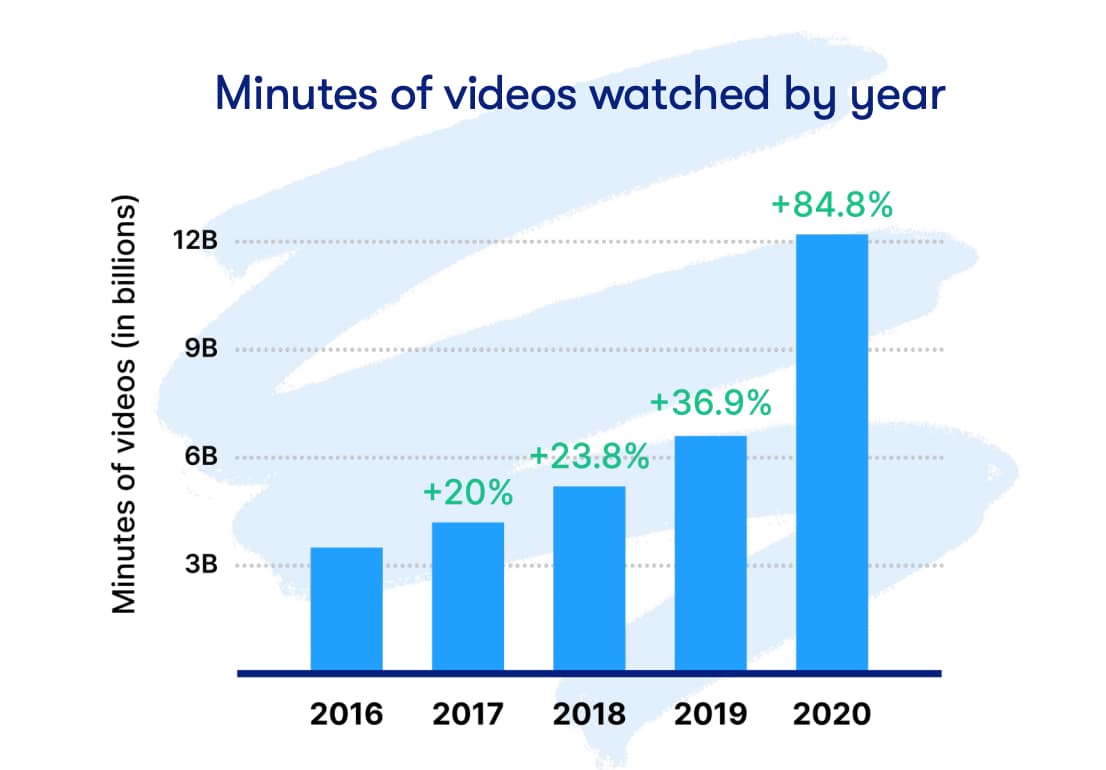
graphic displaying how consumer video consumption has increased from 2016 to 2020

Image Source

As a result of this changing consumer behavior, video is now the primary form of media used within any content strategy, taking center stage for the second year in a row.
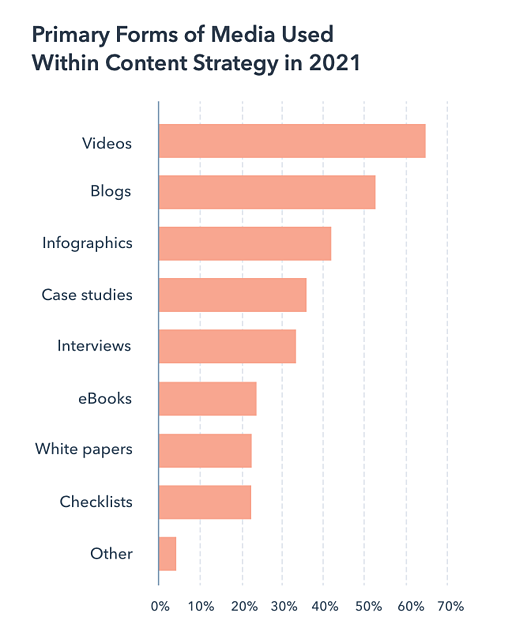
graph displaying that video is the primary form of media used in content strategies in 2021

Image Source

As video consumption is now such an integral part of a consumer’s journey, HubSpot Senior Copywriter and Brand Campaigns Manager Alicia Collins and Senior Motion Designer Megan Conley say, “This [consumer behavior] also indicates that video can be used throughout all parts of the flywheel…businesses have historically used it as a means of introducing their brand and product or service offerings. But that’s not the case anymore.”

The videos you decide to create and the places you choose to share it can depend entirely on your individual business needs. Some businesses are opting for shorter form videos on TikTok to raise brand awareness, as National Geographic has done in the video below.

@natgeo

“How to photograph the night sky” with the expert himself! 📸🌌 #NatGeoTikTok #Photography #LearnOnTikTok

♬ original sound – National Geographic


Wistia found that long-form video is becoming more popular, making way for extended video length, as Patagonia has done in the video below.


2. Leveraging multimedia whenever possible.

In addition to video, it’s an increasingly popular strategy to incorporate multimedia into content whenever possible. Jason Lapp, President and COO of Beautiful.ai, says, “Video and photo-heavy social platforms have narrowed attention spans globally, forcing marketers to come up with new ways to break up text and increase content comprehension.”

Lapp adds, “Inserting multimedia — such as video clips and interactive slides — into text-heavy content will become a more popular way of engaging audiences and allowing readers to process material more easily.”

The gif below is an example of a blog post that has used an interactive video to further explain instructions given in the text.
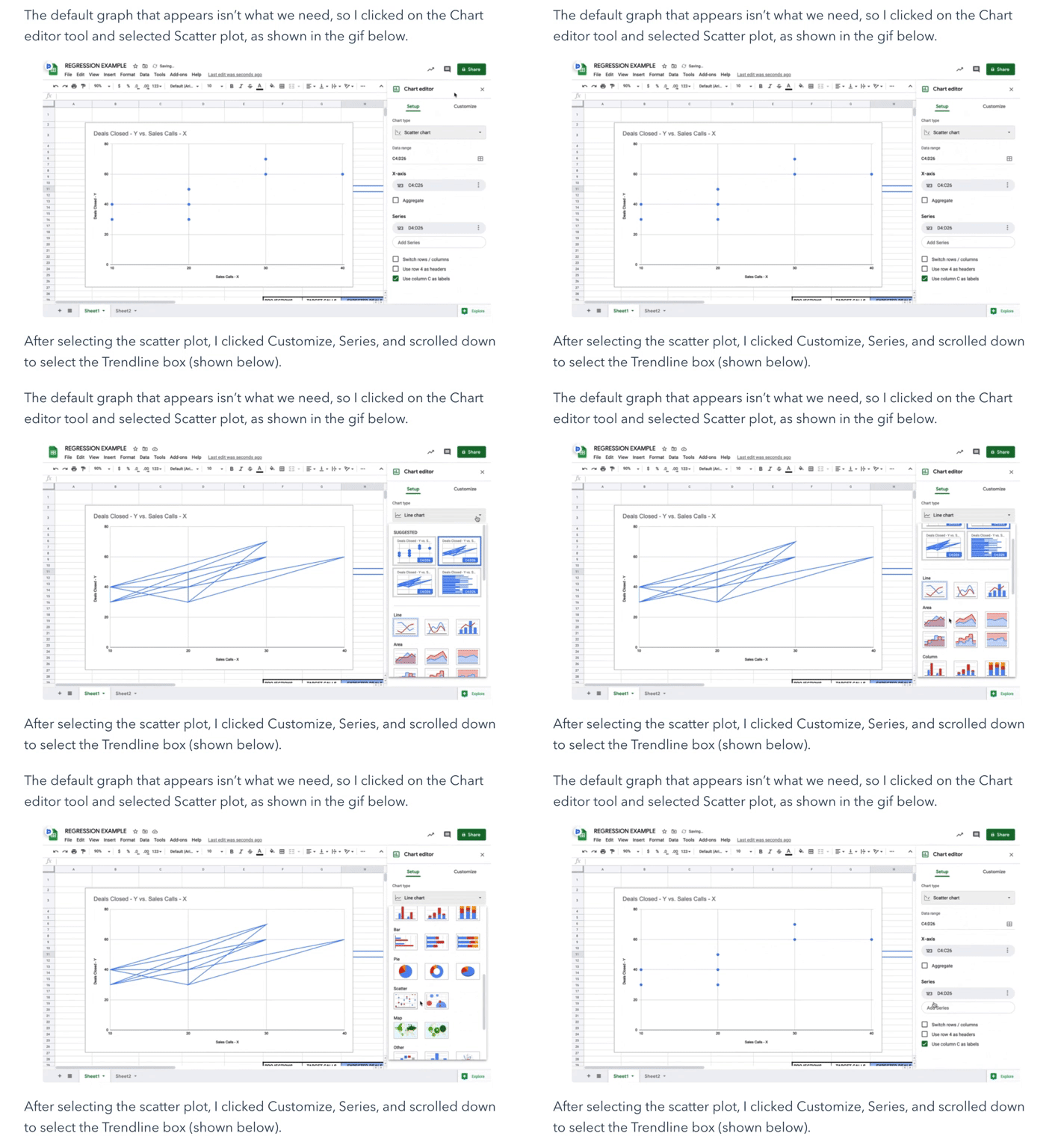
363c83db48a16f8a6e8a01a960f69038

Image Source

3. Strategic SEO tactics.

In 2020, HubSpot VP of Marketing Matthew Howells-Barby said he wanted to see the number of marketers actively investing in SEO go up. His wish came true — 69% of marketers in 2021 report investing in SEO, up 5% just from 2020.

Marketers are making these investments to create tailored experiences for website users. However, the shift in 2021 is less about SEO optimization in general but instead focused on “Capturing niche and long-tail keywords and creating content that’s more engaging than all the ‘Ultimate Guides,’ and ‘Top 55,’ lists,” says Brooklin Nash, head of content at Sales Hacker.

Businesses are looking for a way to simply appear in SERPs and create in-depth content that is unique, valuable, and different from what competitors offer on those same result pages. 71% of marketers support Nash’s assertion, reporting that their business’ 2021 tactic for SEO is capturing strategic keywords.

4. Podcasting will grow immensely.

A content marketing trend to watch in 2021 is the rise of podcasts. Consider the following statistics:

  • In October 2020, there were 34 million podcast episodes and over 1.5 million active shows.
  • In under three years, podcast listening in the United States has increased by more than 60%.
  • Big-name companies like Apple and Spotify are increasing their investments in podcasts and audio platforms.
  • The podcast market is expected to reach more than 2 billion by 2023, meaning that marketers are preparing to devote significant time and money to the channel.

So, why are podcasts so popular with consumers? Firstly, there is something for everyone. With 72,000 new episodes per day (as shown in the graph below), the likelihood of finding an episode that appeals to their interests is incredibly high, whether it’s a mystery tale or a real-life story about how their favorite business was built.


Second, podcasts feel like a conversation between the hosts and the listener. Rather than being talked at, listeners feel they’re being talked to and walked through the content in a more natural, human manner.

Businesses are investing in podcasts because they bring significant benefits: “Podcasts have the ability to drive real results and pay off in terms of leads and revenue,” says Zachary Bellinger, CRO at Casted. In fact, 53% of podcast listeners actually enjoy hearing ads during their listening experience, and 61% of consumers who hear these ads on a podcast were more likely to purchase a featured product, helping drive business revenue.

Holly Shannon, Producer and Host of the Culture Factor 2.0, says that podcasting is also a great way to use content to establish your business as a source of industry authority: “It can highlight you and your team as thought leaders. This allows you to speak authentically and bring your value to the table for all to hear globally.”

Featured Resource: How to Start a Podcast for Your Business

Learn everything you need to create, record, launch, and promote your podcast.

how to start a podcast guide cover photo

Download This Free Guide

5. Content personalization.

Craig Davis, Former Chief Creative Officer at J. Walter Thompson, says, “We need to stop interrupting what people are interested in and be what people are interested in.”

A focus for marketers in 2021 is sharing content with consumers that is contextually relevant to their interests and shown to them at the right time. This means that you study your audience’s likes, needs, and desires and share content that you know will speak to them. In turn, you’ll build brand loyalty, drive conversions, and generate revenue.

An example of leveraging this trend is studying user behavior on your website. If you notice that a browser lingers on specific product pages and places an item in their cart, lead them to those pages or products the next time they visit your site.

6. Valuable content trumps the quantity of content.

As businesses pivoted to entirely digital experiences in 2020, it became more important than ever to provide valuable content to consumers. This trend arises because, as consumers spent more and more time online, they see everything. If you post three Instagram stories per day and your competitors only posted one, what does it matter if your content didn’t provide your audience with any sort of value?

“Never before has ensuring your audience obtains true value from your brand meant so much,” says Kelly Hendrickson, Social Media Marketing Manager at HubSpot. For example, suppose your content marketing strategy focuses on your social media channels. In that case, you worry less about posting multiple times per day but instead about ensuring that the content you do share provides genuine value to your customers.

Lab Muffin Beauty Science, Michelle Wong’s YouTube channel, follows this strategy. She only posts once per week, and when she does, the videos are long-form, valuable pieces of content that teach her audience about something relevant to their interests.
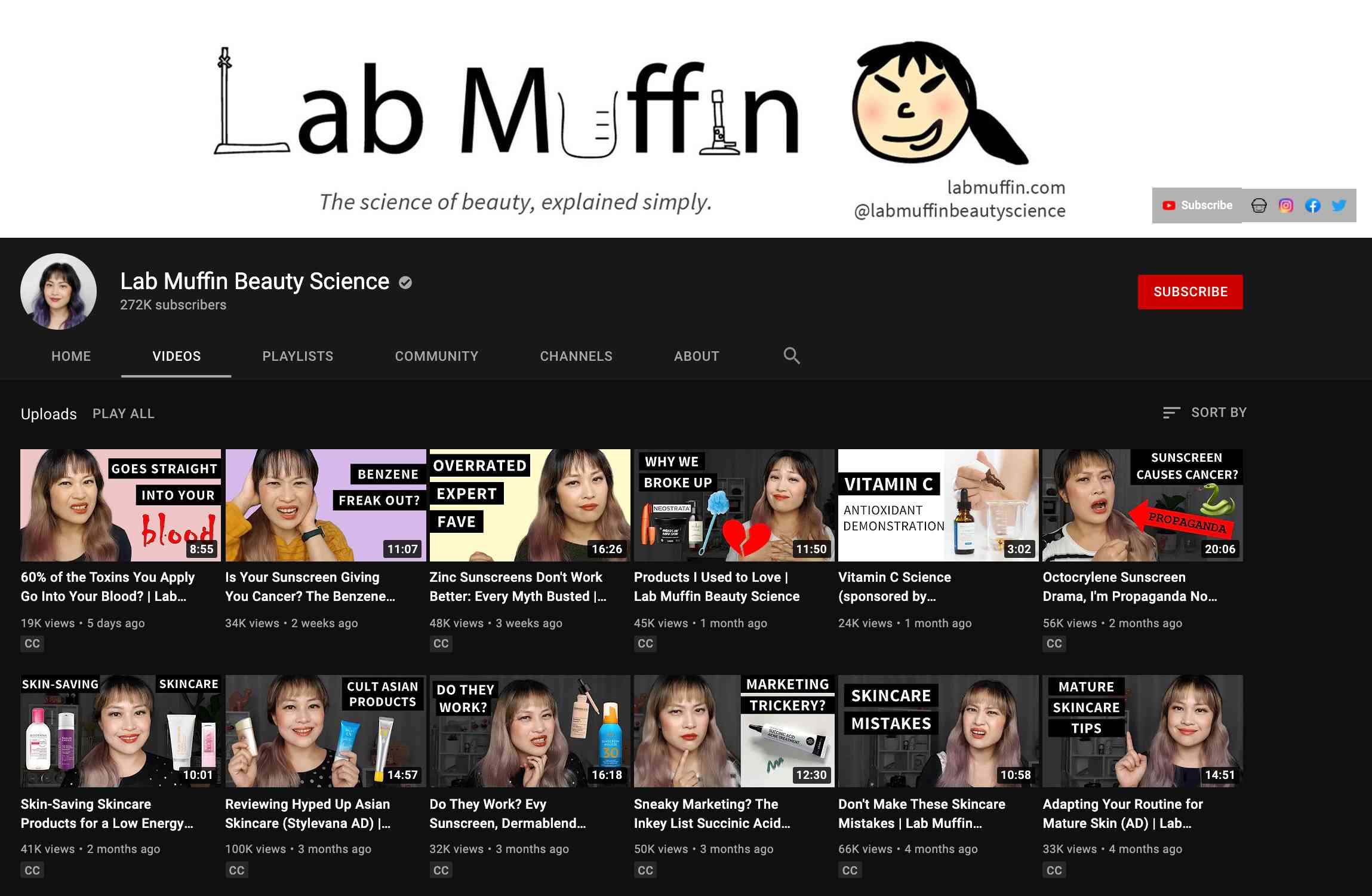
Lab Muffin Beauty Science youtube channel video list screen

Image Source

7. Hosting virtual events and webinars.

A webinar is a video presentation, seminar, lecture, or workshop delivered to an audience digitally. Despite once being declared outdated, webinars have become extremely popular over the past year, again credited to COVID-19 health and safety regulations:

  • Webinar platform BrightTalk reported a 76% increase in virtual events between March and June of 2020
  • ON24 saw a 167% YoY increase in usage of their webinar tool.

Attending events digitally allowed consumers to continue to interact with their favorite businesses and continue to derive value from presenters and industry leaders. As safety restrictions are lifted, webinars and virtual events are still here to stay — the global webinar market is expected to reach 800 million by 2023, up 253 million from 2015.

The new ‘work from home’ model makes this possible because of the convenience of attending an event from wherever a consumer is located. Plus, the added bonus of being able to access content on-demand if they are recorded and shared.

HubSpot’s yearly INBOUND conference is usually an in-person event, but it has been virtual for the past two years. Although health and safety restrictions in the United States are being rolled back, this event will still be a fulfilling, three-day virtual immersive experience.

HubSpot inbound 2021 conference website homepage featuring event attendees sitting in the audience

Image Source

8. Repurposing existing high-value content.

As mentioned above, COVID-19 has pushed marketers towards prioritizing providing valuable content over anything, and repurposing content is a way to do so.

Nash says, “I’m most excited to see how content teams repurpose content instead of starting from scratch. In 2021, content teams will start figuring out how to most effectively use content from webinars, round tables, podcasts and conferences to stoke the content bonfire…We don’t have to reinvent the wheel, just get it turning faster.”

Repurposing content is re-using your existing content and presenting it in a new format. Essentially, since you’ve already created high-quality, valuable content that you know your audience enjoys, you expand its reach.

You can repurpose content in various ways, like creating a slide presentation from a top-performing blog post, sharing screenshots of reviews from product pages on your Instagram profile, or creating text transcripts of your podcast episodes.

Holly Shannon is a fan of repurposing podcasts because transcripts can be used as SEO-optimized blog posts, and audio clips can be used as subsequent social media posts. Glowing Up Podcast has done something similar to Shannon’s suggestion, and they’ve repurposed their podcast by taking video of their recording session and sharing the clip on their Instagram page.

Stay Up-to-date On Your Industry

It’s always important to stay up-to-date on what is happening in your industry, and being aware of these trends is a way to do so. Should you choose to leverage one of these trends in your marketing strategy, ensure that it’s relevant to your business needs and will help you achieve your goals.

If you want to learn more about the marketing industry, read this post about general marketing trends in 2021.
state of marketing

Categories B2B

16 of the Best Meeting Scheduler Tools to Organize Your Day

We complain about spending countless hours in unproductive and mismanaged meetings.

But the greater crime is all the wasted time we spend scheduling the meeting.

Get Started with Free Meeting Scheduling Software

The endless back-and-forth communication and steps — reviewing calendars, determining the best place to meet, setting up a call-in number, adding the meeting to the calendar, inviting all the necessary attendees, and so on. To put it simply, the process makes the meeting a hassle before it even starts.

Best Way to Schedule Meetings

That’s where meeting scheduling software comes into play — this is the more efficient way to optimize your time when scheduling meetings (and the time of everyone who’s invited).

These tools have a variety of functions such as agenda scheduling automation, reminders and notifications, and integrations to connect your scheduling software to your other business tools (such as your CRM and sales software). So, let’s take a look at some of the best meeting scheduler software available today. 

Best Meeting Scheduler

Whether you’re trying to find the perfect window of time to catch up with your busy team, or looking for the best way to coordinate with your clients, these meeting scheduler tools have you covered.

1.HubSpot Free Appointment & Meeting Scheduler

HubSpot Free Appointment & Meeting Scheduler

Price: Free, $0/month (Free), $45/month (Starter), $450/month (Professional), $1,200/month (Enterprise) for Service Hub or Sales Hub

HubSpot’s Free Appointment & Meeting Scheduler allows your prospects to book one-on-one and group meetings with you automatically to avoid the time-consuming back-and-forth that comes with determining someone’s availability.

Prospects can see your calendar and availability, and simply select a meeting time that works for them. You’ll be notified of their selection and it’ll automatically be added to your calendar. If there are any relevant data about the contact you’re having a meeting with, that’ll be surfaced for you, since the tool is integrated with your all-in-one CRM

HubSpot works with Google Calendar and Office 365 Calendar and is available free forever or with a paid Sales Hub or Service Hub plan. 

2. Arrangr

Arrangr best meeting scheduler tool

Price: Free, $3.99/mo (Pro), $6.99/mo (Pro+)

Arrangr handles the meeting scheduling process from beginning to end by reserving tentative meeting times and also releasing slots that don’t get taken.

It integrates with calendars and CRMs, and it has the capability of scheduling group events. The most unique thing, though, is its ability to suggest the perfect meeting location for all parties based on criteria you provide around your preferences (e.g. where to go for a coffee chat versus lunch meeting).

3. Demodesk

demodesk meeting scheduler software

Price: $25/mo (Basic), $45/mo (Pro), custom pricing (Business or Enterprise)

Demodesk is an all-in-one meeting scheduler and assistant designed specifically for sales demo scheduling. Not only do you get custom booking pages, calendar syncing, and meeting analytics, but you can also take advantage of its advanced screen sharing and virtual display options. It also has native integrations with many tools including CRM platforms.

4. Rallly

rally meeting tool scheduling interface

Price: Free

Rallly lets you create a simple, straightforward poll where attendees can vote on a day for an event that works best for them. It also includes an open comment section on the meeting page so attendees can plan the meeting agenda or discuss details before the event.

5. Calendar

calendar best meeting scheduling software

Price: Contact Calendar for a quote. 

Calendar is a free service that integrates Google and Apple calendars. The app offers two ways to schedule meetings. With the “outbound” method, hosts indicate their own availability, list the attendees they’d like to come to a meeting, and use the Calendar software to send out an email to collect everyone’s preferred times.

After Calendar determines the ideal time for everyone to meet, the app schedules the meeting for you. With the “inbound” method, Calendar gives you a personal URL where users can check your availability and request times to meet with you.

6. NeedToMeet

needtomeet calendar interface

Price: Free, $12/yr/user (Advanced), $19/yr/user (Premium)

NeedToMeet doesn’t require you to sign up for an account to use their service. Simply enter a brief description of your meeting’s purpose, block off your availability on a calendar, and send the link to attendees. The free version doesn’t sync with your calendar, but they do offer a premium subscription that integrates with Outlook.

This tool differs from services like Rally and Doodle because it allows attendees to indicate their preferred date and times, rather than only choosing from a list of dates and times set by the meeting host.

7. YouCanBook.me

YouCanBook.me Scheduling tool interface

Price: $10/calendar/mo

If you find yourself struggling to make your availability known to clients, try out YouCanBook.me. This tool offers users a custom URL where users can view free spots on your Google Calendar or iCloud Calendar and book time with you. It also allows you to customize your booking page with different layouts, colors, and your company’s logo.

8. Pick

pick meeting app which highlights Times That Work for the user

Price: $9/mo

Pick automatically scans everyone’s Gmail calendars to find open slots and delivers a list of mutually available times. You can then send a calendar invite to all attendees directly from the app. Something to note is that all members of your team need to be on Pick in order to share their availability. The app also provides users with an individual URL so you can share your availability with people requesting a meeting.

9. Doodle

doodle scheduler interface that allows teams to show availability

Price: $6.95/mo (Pro), $8.95/mo (Team), contact for a quote (Enterprise)

With Doodle, select a list of potential dates and times for your meeting and then poll your attendees to see which option works best for them. You don’t have to sign up for a Doodle account to participate in a poll. You can also create a public Doodle URL, where individuals can request a meeting with you based on your listed availability.

10. Calendly

calendly scheduling software dashboard interface

Price: Free, $8/mo (Premium), $12/mo (Pro), contact for a quote (Enterprise)

Calendly integrates directly with your Google or Office 365 calendar and gives you a personalized URL where people can view your availability and schedule their meetings with you. To help you stay organized, the app lets you set up custom meeting types and durations (e.g., 30 Minute Check-In or 60 Minute Project Review).

Add custom questions to the form people use to sign up to meet with you, include a link to a document or web page people should review prior to your meeting, and make events private when necessary.

11. Clara

clara labs scheduling software calendar view of schedule

Price: $99/mo (Essential), $199/mo (Professional), $399/mo (Executive)

Meet Clara, a virtual assistant fueled by machine learning that can schedule all your meetings and get acquainted with your scheduling patterns. Once you sign up, you indicate your preferences regarding the days and times that you’re available for meetings as well as your favorite locations for those meetings (e.g. for lunch, coffee, etc.).

If someone requests a meeting, you can CC Clara’s email address (which can be customized to your company’s domain), and the virtual assistant will determine a time, date, duration, participants, and location for the meeting so you don’t have to. She also understands human commands like, “I’m sick so can you reschedule my meetings on Tuesday?”

12.Google Calendar

Meet with feature on Google Calendar

Price: Free

If your team already uses the GSuite (e.g. Gmail) and would like to streamline scheduling processes by using the same platform for your calendars and schedules too, use Google Calendar.

If your work email is already part of a GSuite membership, you can go to your calendar, search for another team member under the “Meet with” tab on your left, and then click their name to view their calendar up against your own. If you click on a time slot on that calendar, you can schedule a meeting with both yourself and that teammate.

If your teammates aren’t part of your GSuite, press the “Share” button to share your calendar with their email addresses. From there, they can enter the calendar and schedule a meeting time with you.

13. Zoom

zoom meeting scheduler interface

Price: Free, $149.90 /yr/license (Pro), $199.90 /yr/license (Business), $240/yr/license (Enterprise)

Zoom is one of the most popular video conferencing platforms, but it also includes tools to make the process of scheduling one a lot easier.

Choose to add the meeting to your calendar (which may send an invite to the recipient for you) or copy and paste the invite to an email. In addition, two of the Zoom Meetings features are recording and transcripts.

14. Chili Piper

chili pepper meeting scheduling software

Price: $30/user/mo (User License), $150/mo (Spicy), $400/mo (Hot), $1,000 (Inferno)

Chili Pepper is a scheduling software for B2B revenue teams — it offers one-click scheduling from any email as well as seamless handoff scheduling between your reps. The tool books meetings for your customers with one click and it automatically updates your CRM so your contact data is centrally located and up-to-date.

It also optimizes your calendar and helps increase productivity by setting meeting reminders, handling no-show attendees, creating meeting buffers, reserving time slots on your calendar as needed, and allowing for straightforward meeting rescheduling.

15. Setmore

setmore meeting scheduler tool

Price: Free, $9/1-2users/mo (Premium), $5/3+users/mo (Pro)

Setmore is automated online booking software that handles 24/7 scheduling, reminders, and payments. You can brand your bookings and schedule to make for a professional feel — this includes personalized page URLs, logos, fonts, and colors.  

The tool makes hosting virtual meetings easy since it integrates with Zoom and Teleport, and you can include your calendar link on your website and social profiles such as Facebook and Instagram. 

16. CalendarHero

CalendarHero meeting scheduler tool

Price: Free, $8/mo (Professional), $12/mo (Team)

CalendarHero is an online meeting scheduling software that automates the meeting scheduling process for you. Simply add your video chat provider (e.g. Zoom, Google Meet, Microsoft Teams Video) and get started scheduling and hosting virtual meetings. 

Attendee insights and meeting briefings are available after your calls — that data can then be added to your integrated sales software or CRM. You can also automate meeting tasks by integrating CalendarHero with software like Slack and HubSpot to make the process of adding, referring to, and updating contact records, files, and simpler. 

How to Schedule a Meeting With HubSpot’s Meeting Tool

As mentioned above, HubSpot’s Free Appointment & Meeting Scheduler makes the process of scheduling meetings and managing associated contact data easy — below we’ll review the steps involved in scheduling a meeting with HubSpot so you can see one of these scheduler tools in action. 

1. Sign up for HubSpot.

You can use HubSpot’s meeting scheduler if you’re a free or paid Sales Hub or Service Hub user. 

2. Click the Meetings link under the Sales tab.

This will take you to the back end of the Meetings tool where you can create your own meeting link.

3. Click the “Create meeting link” button in the top right corner.

You may see the option to choose Personal or Team. If it’s just you that’s requesting the meeting, choose Personal.

4. Fill out your meeting details.

HubSpot asks for the headline (which will show up on your Meetings Tool), name, what you want your link URL to be, and more details.

screenshot of meetings tool to add meeting details in hubspot

5. Configure your meeting in HubSpot.

There are also additional fields for optional details to be included in the invite, such as subject and description that will be sent to attendees.

screenshot of meetings tool to configure meeting in hubspot

6. Designate your availability.

This is the key feature that eliminates the back and forth. By designating when you can meet, this will display only those times for the recipient to choose from.

screenshot of designating meeting availability in hubspot

7. Add form questions for qualification.

If you’re in sales and have your Meetings Tool visible to anyone, you may want to only allow qualified prospects to book with you. This section requires a few fields to give you more insight.

screenshot of hubspot meetings tool form questions

8. Click “Save changes” and check your work.

Once you click this button, you’ll see a popup that includes your page link and the embed code.

screenshot of meeting link created in hubspot

Copy and paste the booking link into your browser and check to see if your Meetings Tool has this meeting configured the way you want it.

screenshot of hubspot meetings tool calendar picker

Start Scheduling Your Meetings 

Start saving time and using meeting scheduler software — this will ensure everyone efficiently agrees to meeting dates and times, eliminating unnecessary and time-consuming back-and-forth communication. 


New Call-to-action

Editor’s Note: This post was originally published in July 2015 and has been updated for freshness, accuracy, and comprehensiveness.

meetign scheduler

Categories B2B

Is SMS Marketing Dead? New Research Says Not Just Yet

Whenever I share a screenshot of a friend’s funny text on social media, someone always points out the huge number of unread text messages I have.

iphone upper navigation on text app showing 45 unread messages

“Why do you have so many unread texts? And, who are you ignoring?”, my friends often ask.

The truth is that most of the texts I ignore aren’t from actual people. They’re usually quick marketing messages that I signed up to receive at some point and ended up forgetting about.

Whether you signed up for a mobile service, pharmacy alerts, furniture store promos, or another list, you’ve probably also received a few texts you’ve either deleted, opted out of, or blatantly ignored.

With experiences like those above in mind, you might think that SMS marketing is no longer effective. But, in 2021, as people are more attached to their phones than ever before, we might be wrong about the strength of text message promotions.

As it turns out, a recent study from SimpleTexting shows that text message marketing might still be alive and well.

The study, which surveyed over 1300 consumers and marketers, revealed that more than 76% of brands plan to invest in text-message marketing in the next year, while 62% of consumers subscribed to receive texts from at least one brand in the last year.

Below, we’ll dive into the study’s research, explain why some marketers might still want to consider SMS strategies, and note a few takeaways for an effective campaign.

Free Download: 30 SMS Templates for Marketing, Sales and Customer Success

Why SMS Could Be Coming Back Strong

While members of our blogging team once said SMS needed to be “put out of its misery” due to all the other messaging tactics in the world at the time, no one could have anticipated the changing landscape brought on by COVID-19. During the pandemic, which caused most people to get stuck in their homes, people gravitated to their phones and electronics more than ever, with 76% of consumers reporting increased screentime.

When it came to texting, 61% of consumers either increased or significantly increased the daily time they spent on their text apps.

a chart shows that most consumers increased screentime in 2020 during the covid 19 pandemic

Image Source

SMS Marketing Effectiveness in 2021

According to SimpleTexting, 62% of consumers have opted into texts from at least one business while 43% of consumers specifically have subscribed to one to three brands.

When it comes to text messaging effectiveness, consumers reply to marketing texts that require a response much faster than email. While most people reply to emails within a half-hour to an hour, 72% of consumers respond to texts within 10 minutes.

Aside from quick response rates, text messages can also receive very high engagement. 43% of surveyed business owners and digital marketers who use SMS marketing report click-through rates between 20% and 35%.

One interesting piece of the SimpleTexting survey reveals that 52% of brands reported increased opt-in rates between 2021. However, nearly 10% reported decreased opt-ins in the same year.
While the increased opt-ins are in line with screen and text-message time increases, the opt-out increases do hint that consumers could be as quick to unsubscribe from text message content as they are to subscribe from it.

The SimpleTexting study and other research points to reasons why people might opt out.

  • Too many text messages from one brand: 60% of SimpleTexting respondents say they’ve unsubscribed from SMS alerts from brands that send them too frequently. Furthermore, 56% of those consumers prefer to receive just one text from a brand per week.
  • Too many texts from multiple brands: If you do up your text cadence to two, keep in mind that your subscribers might be inundated with tons of texts from other brands as well. While your texts might still be meaningful, you might see more sensitivity to opt-outs simply because subscribers are tired of all the text alerts.
  • Meaningless content: Like email marketing, you’ll need to hook your reader and keep them engaged with the content they’ve signed up to receive. Sending too much over-promotional content, boring content, or content that isn’t what they signed up for might cause you to see unsubscribes.  

a chart shows that most people unsunscribe from text message alerts because they receive them too often.

Image Source

Tips for Launching a Great SMS Strategy

While SMS certainly isn’t dead, text message or conversational marketing platforms can be hard to master. As you consider or build out a text-based strategy, keep these quick tips in mind.

  • Know your persona: Although people might quickly sign up to receive your messages, it won’t take much to get them to opt out. Be sure you know exactly what your audience members are looking for and how often they want to receive that content to avoid sending meaningless texts that go ignored. 
  • Give subscribers what they’ve signed up for: Remember, subscribers are trusting you with their contact information, and if you aren’t transparent about what you’ll be sending or how often you’ll be texting them, they might quickly opt. out. Be sure you stay consistent with what they’re expecting.  
  • Remember, less is more: No one wants to get their phone blown up with tons of meaningless over-promotional tests. Before you launch an SMS campaign, ask yourself questions like, “Am I contacting people too often?” and “Will they even engage with this content?” If you worry that the content will be ineffective, consider streamlining your SMS schedule and only sending the most important text content. 

To learn even more about message-based marketing and SMS strategies, check out the great resource below.

SMS Templates for Marketing Sales and Service

Categories B2B

Image Alt Text: What It Is, How to Write It, and Why It Matters to SEO

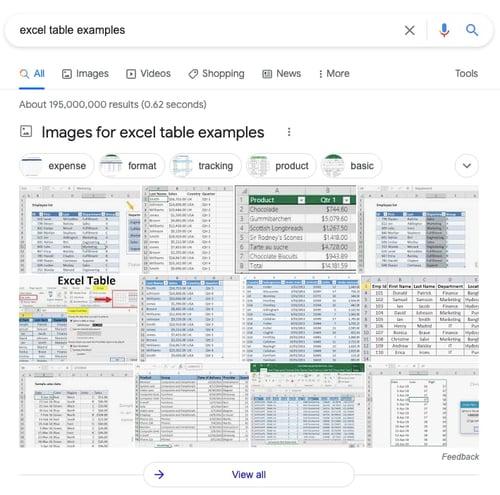
If you spend time optimizing your blog or website’s content, headers, subheaders, and meta descriptions for search engines, the following image should alarm you:

Image pack for longtail keyword excel table examples on a Google search engine results page

The screenshot above is the first search engine results page (SERP) Google produces for the search term, “excel table examples.” Notice how, in addition to the “Images” tab at the top, Google pulls in a substantial pack of clickable images to the beginning of the main results page — before any organic text results are even visible.

Today, nearly 38% of Google’s SERPs show images — and that’s likely to increase. That means, despite your best SEO efforts, you could still be missing out on another source of organic traffic: your website’s images. How do you get in on this traffic source? Image alt text.

Improve your website with effective technical SEO. Start by conducting this  audit. 

Whether or not you perform SEO for your business, optimizing your website’s image alt text is your ticket to creating a better user experience for your visitors, no matter how they first found you.

How to Add Alt Text to Your Images

In most content management systems (CMSs), clicking on an image in the body of a blog post produces an image optimization or rich text module, where you can create and change the image’s alt text.

Let’s walk through what the next steps are for CMS Hub and WordPress below.

How to Add Alt Text in the HubSpot CMS

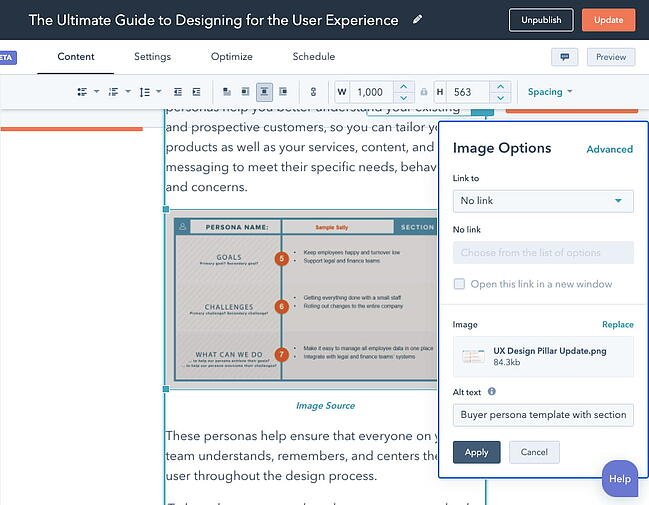
In HubSpot, once you’ve clicked on an image and clicked the edit icon (which looks like a pencil), an image optimization pop-up box will appear.

Here’s what this image optimization window looks like in the CMS inside your HubSpot portal:

Alt text field within Image Optimization pop-up in CMS Hubs Content Editor

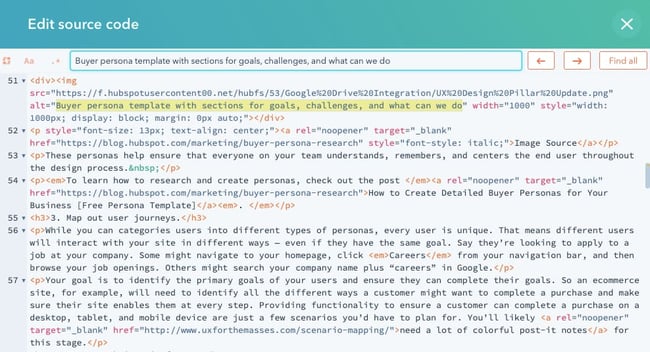
Your alt text is then automatically written into the webpage’s HTML source code, where you can edit the image’s alt text further if your CMS doesn’t have an easily editable alt text window. Here’s what that alt tag might look like in an article’s source code:

Image alt text tag highlighted in the HTML source code of a blog post in CMS Hub

How to Add Alt Text in the WordPress CMS

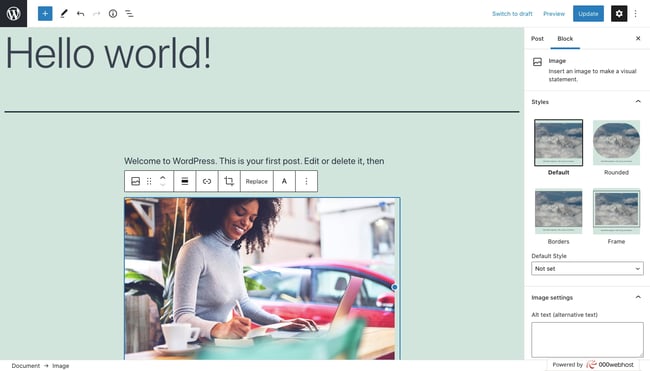
In WordPress, clicking on an image will automatically open the Block tab in the sidebar. Under the section labelled “Image Settings,”add the alt text in the empty field.

Add alt text in Image Settings section of Block tab in sidebar of your WordPress dashboard

When you’re ready, click Update from the toolbar at the top of your screen.

The most important rule of alt text? Be descriptive and specific. Keep in mind, however, that this alt text rule can lose its value if your alt text doesn’t also consider the image’s context. Alt text can miss the mark in three different ways. Consider the examples below.

3 Image Alt Text Examples (the Good and the Bad)

1. Keyword vs. Detail
Orange mural that says 'ship it' on a wall at HubSpot's Singapore office

Bad Alt Text

alt="HubSpot office wall Singapore inbound marketing workplace murals orange walls ship it"

What’s wrong with the line of alt text above? Too many references to HubSpot. Using alt text to stuff keywords into fragmented sentences adds too much fluff to the image and not enough context. Those keywords might be important to the publisher, but not to web crawlers.

In fact, the alt text above makes it hard for Google to understand how the image relates to the rest of the webpage or article it’s published on, preventing the image from ranking for the related longtail keywords that have higher levels of interest behind them.

Worst still, if you stuff too many keywords, then you may incur a Google penalty.

Good Alt Text

With the bad alt text (above) in mind, better alt text for this image might be:

alt="Orange mural that says 'ship it' on a wall at HubSpot's Singapore office"

2. Detail vs. Specificity

David Ortiz of the Boston Red Sox batting from home plate at Fenway Park

Image via Winslow Townson

Bad Alt Text

alt="Baseball player hitting a ball at a baseball field"

The line of alt text above technically follows the first rule of alt text — be descriptive — but it’s not being descriptive in the right way. Yes, the image above shows a baseball field and a player hitting a baseball. But this is also a picture of Fenway Park — and the Red Sox’s #34 David Ortiz clocking one over right field. These are important specifics Google would need to properly index the image if it’s on, say, a blog post about Boston sports.

Good Alt Text

With the bad alt text (above) in mind, better alt text for this image might be:

alt="David Ortiz of the Boston Red Sox batting from home plate at Fenway Park"

3. Specificity vs. Context

Marketing professor pointing to a student's computer screen during a lesson on alt text

Image via UCLA

Both images above have clear context that can help us write good alt text — one is from a HubSpot office, and the other is Fenway Park. But what if your image doesn’t have official context (like a place name) by which to describe it?

This is where you’ll need to use the topic of the article or webpage to which you’re publishing the image. Here are some bad and good examples of alt text based on the reason you’re publishing it:

For an Article About Attending Business School

Bad Alt Text

alt="Woman pointing to a person's computer screen"

The line of alt text above would normally pass as decent alt text, but given that our goal is to publish this image with an article about going to business school, we’re missing out on some key word choices that could help Google associate the image with certain sections of the article.

Good Alt Text

With the bad alt text (above) in mind, better alt text for this image might be:

alt="Business school professor pointing to a student's computer screen"

For a Webpage on Education Software for Business School Teachers

Bad Alt Text

alt="Teacher pointing to a student's computer screen"

The line of alt text above is almost as descriptive and specific as the good alt text from the previous example, so why doesn’t it suffice for a webpage about education software? This example dives even deeper into the topic of business school, and specifies that the ideal audience for this webpage is teachers. Therefore, the image’s alt text needs to reflect that.

Good Alt Text

With the bad alt text (above) in mind, better alt text for this image might be:

alt="Professor using education software to instruct a business school student"

Image Alt Text Best Practices

Ultimately, image alt text needs to be specific but also representative of the topic of the webpage it’s supporting. Get the idea so far? Here are a few important keys to writing effective image alt text:

  • Describe the image, and be specific. Use both the image’s subject and context to guide you.
  • Add context that relates to the topic of the page. If the image doesn’t feature a recognizable place or person, then add context based on the content of the page. For example, the alt text for a stock image of a person typing on a computer could be “Woman optimizing WordPress website for SEO” or “Woman researching free blogging platforms,” depending on the topic of the webpage.
  • Keep your alt text fewer than 125 characters. Screen-reading tools typically stop reading alt text at this point, cutting off long-winded alt text at awkward moments when verbalizing this description for the visually impaired.
  • Don’t start alt text with “picture of…” or “Image of…” Jump right into the image’s description. Screen-reading tools (and Google, for that matter) will identify it as an image from the article’s HTML source code.
  • Use your keywords, but sparingly. Only include your article’s target keyword if it’s easily included in your alt text. If not, consider semantic keywords, or just the most important terms within a longtail keyword. For example, if your article’s head keyword is “how to generate leads,” you might use “lead generation” in your alt text, since “how to” might be difficult to include in image alt text naturally.
  • Don’t cram your keyword into every single image’s alt text. If your blog post contains a series of body images, include your keyword in at least one of those images. Identify the image you think is most representative of your topic, and assign it your keyword. Stick to more aesthetic descriptions in the surrounding media.
  • Review for spelling errors. Misspelled words in image alt text could hurt the user experience or confuse search engines crawling your site. You should review alt text like you would any other content on the page.
  • Don’t add alt text to every image. You should add alt text to most images on a webpage for the sake of SEO, UX, and accessibility — however, there are exceptions. Images that are purely decorative or are described in text nearby, for example, should have an empty alt attribute. For a more detailed breakdown of when to add alt text and when to not, check out this decision tree.

How Alt Text Affects SEO

According to Google, alt text is used — in combination along with computer vision algorithms and the contents of the page — to understand the subject matter of images.

Alt text therefore helps Google to better understand not only what the images are about, but what the webpage as a whole is about. This can help increase the chances of your images appearing in image search results.

When creating content on a topic, consider how your audience might prefer to find answers to their questions on that topic. In many cases, Google searchers don’t want the classic blue, hyperlinked search result — they want the image itself, embedded inside your webpage.

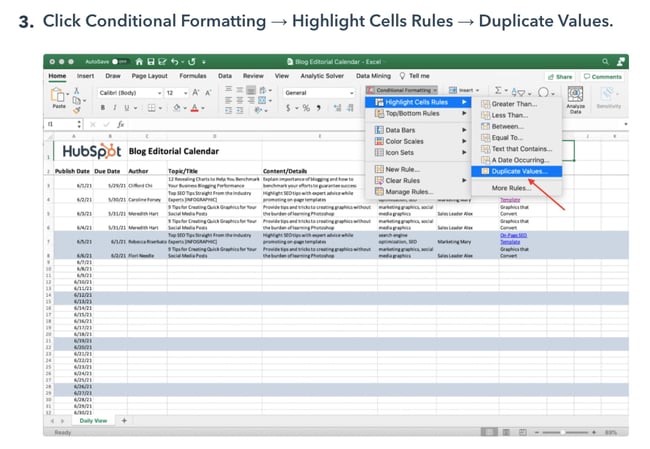
For example, a visitor looking up how to remove duplicates in excel might prefer a screenshot so they can understand how to complete the task at a glance.

Blog post describing how to remove duplicates in Excel includes images with alt text to support content

Image Source

Because this image has optimized alt text, it appears in image search results for the longtail keyword “how to remove duplicates in excel.” Since the post also appears in the web search results for the same keyword, visitors could land on the blog post through these two different channels. 

Why is image alt text important?

We’ve already alluded to several reasons why image alt text is important: namely, accessibility, user experience, and image traffic. Understanding these reasons will help you write the best alt text possible for your images. Below we’ll take a closer look at the major reasons image alt text is important.

Accessibility

Back in 1999, W3C published its Web Content Accessibility Guidelines 1.0 in order to explain how to make content more accessible for users with disabilities. One of these guidelines was to “Provide equivalent alternatives to auditory and visual content.” That meant any webpages including images (or movies, sounds, applets, etc.) should include equivalent information to its visual or auditory content.

For example, say a web page contains an image of an upward arrow that links to a table of contents. A text equivalent might be “Go to table of contents.” This would allow a user with a screen reader or other assistive technology to understand the purpose of the image without seeing it.

In other words, alt text helps ensure your visual content is accessible to all users, including those with visual impairments.

User Experience

Alt text not only provides a better user experience to users with disabilities — it provides a better UX to all users. Say, a visitor has a low-bandwidth connection so the images on your webpage aren’t loading. Instead of just seeing a broken link icon, they’ll also see the alt text. This will allow them to glean what the image was meant to convey. 

For example, a user might be able to see the image on the left. If they can’t — due to a disability,  bandwidth issue, or another reason — then they will hear or see the alt text on the right. This will help provide a better user experience than if there were no alt text. 

Image side by side with broken image icon and descriptive alt text that reads seven full coffee cups on wooden table

Image Source

Image Traffic

One of the most important things image alt text can do for you is turn your images into hyperlinked search results that appear either in Google Images or as image packs. Image packs are special results displayed as a horizontal row of image links that can appear in any organic position (including the #1 spot on a SERP, as seen in the example in the intro).

Images that appear in either Google Images or image packs provide yet another way to receive organic visitors. This can result in thousands of more visitors — at least it did in HubSpot’s case. 

Beginning in 2018, the HubSpot Blog team implemented a new SEO strategy that, in part, focused more intently on optimizing image alt text. This helped to increase the blog’s image traffic by 779% in less than a year, which resulted in 160,000 more organic views. You can read more about the team’s success in this blog post.

Adding Image Alt Text to Your Website

So, where do you start when developing alt text for your blog posts and webpages? Consider performing a basic audit of your existing content to see where you can incorporate alt text into previously untagged pictures. Watch to see how your organic traffic changes among the pages that you give new alt tags.

The more images you optimize, the better your SEO strategy will be moving forward.

Editor’s note: This post was originally published in September 2018 and has been updated for comprehensiveness.

Improve your website with effective technical SEO. Start by conducting this  audit.  

Categories B2B

How the Lead Management Platform Centralizes B2B Lead Gen

After years of iterating with our Publisher Management Platform and a year of preparation specific to this launch, NetLine is pleased to introduce the B2B Marketing world to our Lead Management Platform: A SaaS solution offering B2B Marketers centralized lead capture, qualification, routing, analytics, and companion content amplification campaign capabilities within one simple to use and self-service interface. 

The platform furthers NetLine’s goal of democratizing lead gen for all, enabling B2B Marketers to turn their current website traffic into revenue-based outcomes, streamlining their lead capture, lead management, and content amplification programs within one tool.  

How NetLine’s Lead Management Platform Works

Upon creating their account, Marketers will be able to take advantage of a number of distinct, NetLine-exclusive advantages. 

Unified and Predictive Login

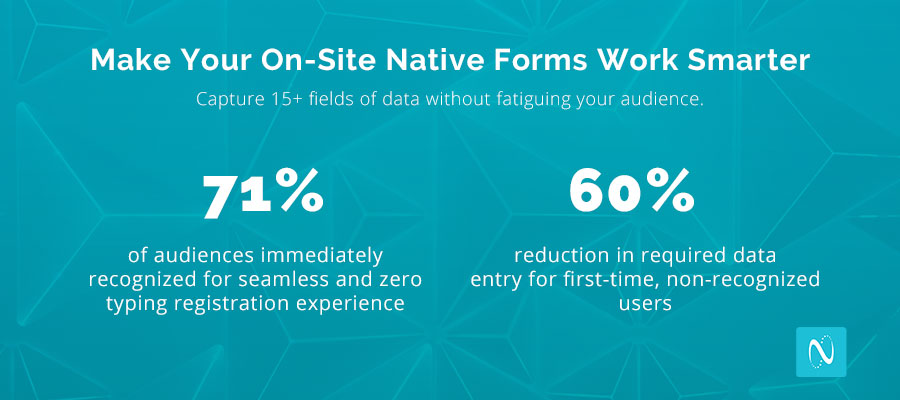
If you didn’t need to type your name and other basic pieces of info into a form that you were eager to complete—and we mean zero typing, by the way—how much happier would you be? Well, considering that more than 70% of audiences are immediately recognized by our Predictive Forms, most users will only need to complete 5-7 fields—that’s a 60% reduction in typing vs. traditional and non-predictive forms. 

This innovation represents the industry’s only first-party user authentication solution.

After a user is recognized, our password-less and unified login registration tech goes to work and allows for a frictionless content registration experience and near-instant content accessibility. Users benefit from less typing and Marketers benefit by increasing their conversions. 

Advanced Reporting Capabilities

Real-time & interactive campaign reports offer insights into campaign performance, content resonance, and persona engagement. Interactive visualization tools, such as dynamic pivot tables, heatmaps, and custom configurations offer a new level of transparency into content consumption behavior that helps improve campaign performance, faster.  

Real-Time Connectors

Within minutes, Marketers can leverage thousands of 3rd party integration possibilities, including easy, ready-to-use connectors with Salesforce, ON24, HubSpot, and Marketo, to ensure that leads generated by their content can seamlessly enter the nurture path and/or sales cycle.  

On-demand Scale

Sometimes you need help. Sometimes you need epic reach beyond your own site. Sometimes you just need to reach the professionals in a very niche industry. Whatever your goals are, B2B Marketers can tap into incremental scale and amplify their content to reach their preferred target audiences—all within their own individual budgets—within a matter of minutes.

Open Auction CPL Pricing

As we introduced with our Open B2B Lead Gen Marketplace, NetLine equips B2B Marketers with immediate access to the largest volume of content-generated B2B buyer-level data on the web where more than 700k first-party leads are generated across more than 300 industries each month. 

With these additions to the platform, you’ll gain access to all of these features without ever needing any IOs, negotiations, or phone calls. Simply convert native content, add budget, and select your targeting.

Content Format Agnostic 

No matter what type of content you’re uploading to drive your campaigns, your users will only be served one common form across every type of gated content format—including webinars and virtual experiences.

Simplify and consolidate all legacy form solutions to a common experience for your audience, and more importantly a common data structure with far richer user profiles. Plus, the platform offers everything from basic themes to fully white-labeled user experiences emulating exact site templates. Whatever you need, the platform has a solution for every need.  

Flexible Plans for Every Marketer

Our Lead Management Platform was designed with democratization in mind. As such, we wanted to make sure that we offered plans that would accommodate as many Marketers as possible with plans ranging from Free to $199 per month depending on the needs of the Marketer.  

At a time when first-party data capture is a top priority for Marketers, we’re thrilled to be able to offer a platform not only focused on making this attainable for B2B organizations but also proud to be offering tremendous value at a competitive price point.

Why B2B Marketers Should Use the Lead Management Platform

Before opening the platform to Marketers, NetLine’s Lead Management Platform had been reserved exclusively for the best B2B media organizations in the world. What B2B Marketers should take comfort in knowing is that they will be instantly tapping into an established and proven product—one B2B Publishers have been reaping the benefits from for years.

Publishers regularly achieve some outstanding outcomes through the platform, including increasing conversions and generating richer first-party data as a means of accelerating Sales dialogue. Aside from seeing a strong return on your investment, the Lead Management Platform allows B2B Marketers to decrease their overall investment at the start. 

As our Chief Strategy Officer, David Fortino said, B2B Marketers needed at least a handful of technologies to run their lead gen programs before today. “They needed software to capture, enrich, scrub, filter, fulfill, report, within their own sites,” Fortino said, “and an entirely different suite of vendors to amplify their content beyond the reach of their inbound forms.”

With the help of the Lead Management Platform, B2B Marketers can now do all of this with one simple self-service interface. “Whether they want to centralize lead capture, or create a hub for qualification, routing, analytics, and companion content amplification campaigns,” Fortino said, “the platform does it allallowing B2B Marketers to reduce their costs while simultaneously becoming more efficient in the process.” 

To learn more about the Lead Management Platform and how it could work for you, please visit the NetLine Portal.

Categories B2B

How HubSpot Helps Users Prepare for Google’s Core Web Vitals

It’s no secret that poor user experience (UX) isn’t going to keep your customers and target audience coming back to your website. Poor UX also negatively impacts your ability to rank on Google’s search engine results page (SERP).

→ Download Now: SEO Starter Pack [Free Kit]

To ensure your website has delightful UX for your visitors as well as one that meets Google’s standards for ranking, you’ll want to focus on Core Web Vitals.

Core Web Vitals

At a high level, Google’s Core Web Vitals exist to fix poor user experiences on your website — Google knows that poor UX leads to higher bounce rates and that’s why they take page performance into consideration when determining your page’s ranking.

Core Web Vitals are meant to be applied by all site owners on each of their web pages to ensure all three Vitals — which we’ll talk more about below — are measured.

HubSpot Core Web Vitals

HubSpot’s SEO audit tool reviews all three of Google’s Core Web Vitals metrics for you. Below, we’ll cover the ways in which HubSpot can help you prepare for Core Web Vitals.

How HubSpot Helps Users Prep for Core Web Vitals

Google’s Core Web Vitals metrics are part of the search engine’s page ranking algorithm. HubSpot’s SEO audit tool flags pages with unsatisfactory scores based on Google’s Core Web Vitals metrics. Specifically, HubSpot uses Google Lighthouse to automatically scan all pages that make up a website. The tool then flags pages that fail any of these metrics.

Three Core Web Vitals that HubSpot’s SEO audit tool flags:

hubspot helps you prep these three core website vitals of googleSource

1. Largest Contentful Paint (LCP)

LCP is perceived page load speed. It refers to how quickly a page can load and render all of its visual elements to the screen.

2. Cumulative Layout Shift (CLS)

CLS is visual stability. It refers to how often users experience unexpected layout shifts on a web page.

3. First Input Delay (FID)

FID is load responsiveness. It’s a quantifiable measurement of how users feel when a page is unresponsive.

An alternative measurement for FID is Total Blocking Time (TBT). TBT is the quantifiable measurement of how much a non-interactive page is before becoming interactive. In other words, TBT measures the total amount of time that a page is blocked from responding to user input. HubSpot scans and flags web pages that have a TBT of over 300 milliseconds for you (because Google believes a good TBT is anything less than 300 milliseconds).

Who benefits from HubSpot’s SEO audit tool?

HubSpot can help you prepare for Core Web Vitals whether or not you’re a CMS Hub user — in fact, it’s available to those who are CMS Hub Professional and Enterprise users as well as Marketing Hub Professional and Enterprise users. You can use HubSpot’s SEO audit tool whether you’re on a HubSpot-hosted website or a website hosted by another platform.

Pro Tip: Get HubSpot CMS Hub or Marketing Hub to begin measuring your web pages’ UX against Google’s Core Web Vitals. 

Start Prepping For Core Web Vitals With HubSpot

With HubSpot, you’ll know if your web pages meet Google Core Web Vitals. As a result, you’ll be able to ensure your web pages are offering your visitors delightful UX. Additionally, you’ll know that your web pages have a significantly better chance at ranking for your keywords and phrases than they would if they didn’t meet Google’s criteria.

marketing

Categories B2B

5 Successful Email Marketing Strategies for Black-Owned Businesses [+ Examples]

Welcome to Breaking the Blueprint — a new blog series that dives into the unique business challenges and opportunities of Black business owners and entrepreneurs. Learn how they’ve grown or scaled their businesses, explored entrepreneurial ventures within their companies, or created side hustles, and how their stories can inspire and inform your own success.

We live in a digital era, and people are still checking their emails daily, so strong email marketing strategies are essential, especially for Black-owned businesses.

When thinking about creating the best email marketing strategies, make sure you are authentic and tell your community your story.

Do a brain dump of your ideas if you need to find purpose and discover the expected outcome for each marketing strategy you are working to create.

The Black community supports you best when you’re honest, so they can empathize with you.

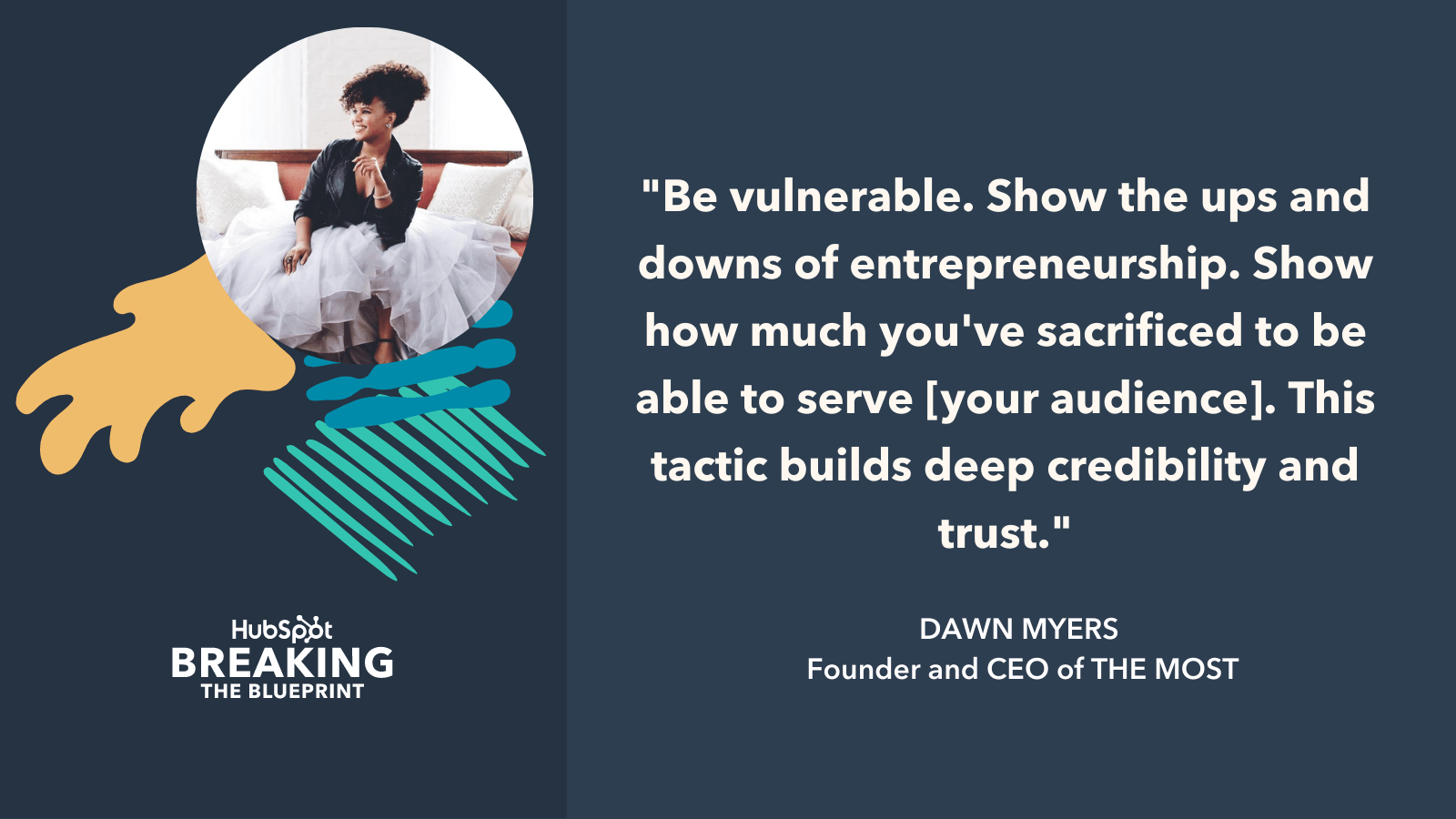
“The most effective email marketing campaigns we’ve launched have been those that are authentic, tell our story, and bring our audience along for the ride. In the early days before we launched our company, all we had was our story to draw people into our funnel,” THE MOST founder and CEO Dawn Myers told HubSpot.

Myers adds, “Be vulnerable. Show the ups and downs of entrepreneurship. Show that you identify with their pain points and how much you’ve sacrificed to be able to serve them. This tactic builds deep credibility and trust.”

Below, you can find five email strategies that have worked for Black business owners today.

Email marketing strategy from Dawn Myers CEO of THE MOST

Additionally, for additional email marketing resources, check out these blogs on how to create an outstanding marketing plan and how to craft successful email marketing plans, with downloadable templates included.

Learn More About HubSpot's Community to Amplify Black Professionals

Successful Email Marketing Strategies for Black-Owned Businesses

1. Find out what else your audience cares about in correlation with your mission.

If someone subscribes to your email list, it’s safe to say they have already heard of your product or find it interesting, so it’s important to dig deeper beyond that.

Ariel Butler, founder and CEO of hair and skin products company Shea Adé, learned that people mainly care about when the company is emailing about sales when it comes to product-based businesses. It can also get daunting if emails are about the same products consumers have already heard about.

“I’d recommend brands find other topics to email their audience about (blog posts, free ebooks, etc.),” she said. “Everything outside of that should be emails about sales or new product releases as opposed to the emails that look like ‘Hey, don’t forget to buy this full-priced item that I’ve been bugging you about 4X a week!‘”

One strategy that works for Butler is sending daily affirmations to her customers. She started trying out this simple email tactic since her brand’s mission is all about not only healing hair but healing beyond the scalp.

Email marketing strategy from Ariel Butler CEO of Shea Ade

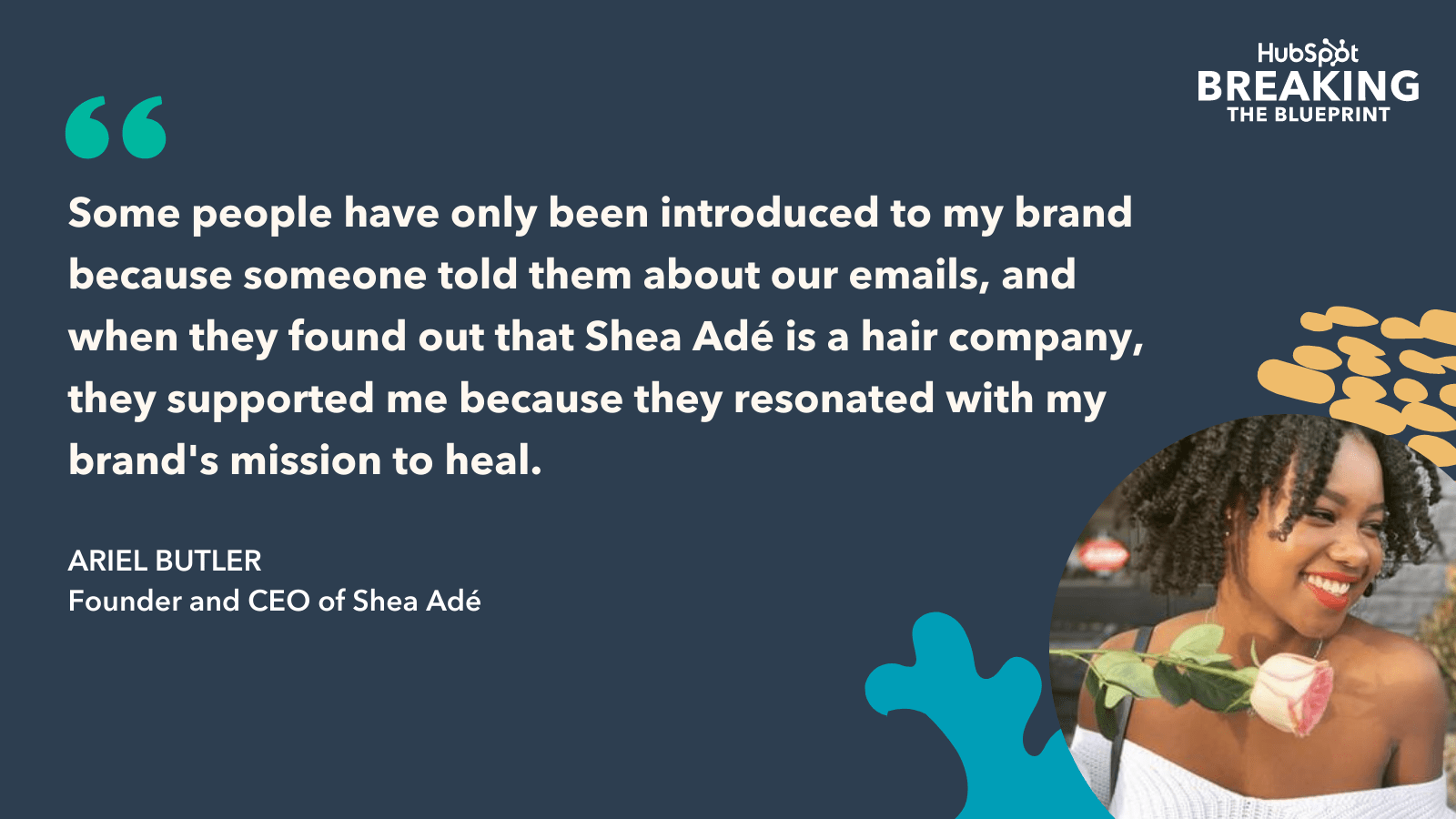
“I want my customers to wake up every day and feel good about how they look,” Butler said. “Since I started sending out those emails, I have been completely blown away by how enjoyable daily affirmations have been for my customers. Some people have only been introduced to my brand because someone told them about our emails, and when they found out that Shea Adé is a hair company, they supported me because they resonated with my brand’s mission to heal.”

2. Connect with your customers weekly.

Every week, Raven Gibson, founder and CEO of Legendary Rootz, sends out a campaign that allows email subscribers to download a free personal digital wallpaper.

She says this is her best email marketing strategy, and she coined it “Wallpaper Wednesday.” Over the years, Gibson’s audience has expressed to her that while they want to support her business, they don’t have the funds to do so. She recognized this problem and came up with a free solution to still connect with her community.

“Typically, the design centers around celebrating Black culture or an important reminder of the day,” Gibson said. “This marketing strategy has allowed for our email list to grow, and given us the opportunity to connect with our community.”

Gibson runs a similar campaign on Tuesdays where she connects with her followers by highlighting their love for natural hair. She sees this as a way to share community and emphasize the importance of Black hair culture. Gibson also uses these emails to share exclusive deals and product restocks specifically for email subscribers.

These weekly email marketing campaigns have helped drive an excellent return on investment, Gibson said.

 “Investing in email marketing has allowed us to stretch our marketing dollars while making a meaningful connection with our community,” Gibson said.  

3. Launch an engaging outreach campaign.

Creating outreach campaigns can grab people’s attention while providing a more significant incentive beyond expecting folks to just read your emails.

Alvarez Mckendall, a serial entrepreneur and digital marketing strategist, is responsible for social media and email marketing at Real Estate Bees, a technology and marketing platform for the real estate industry. One of his most successful email marketing strategies is interviewing the professionals and business owners with which he’s trying to connect.

Mckendall said this strategy is most effective because it helps consumers understand what the business is offering and how potential customers can benefit from it based on what he learns in those interviews.

Mckendall transformed Real Estate Bees’ previous email questionnaire into an interview-style questionnaire and adjusted email templates and subject lines to indicate his company’s desire to interview the business owner or a key member instead of completing a boring questionnaire.

“Just like your friends and family members, business owners love to get attention and feel important,” Mckendall said. “Appealing to one’s ego is an extremely effective technique whenever you want to get their attention and start building a business relationship.”

When Mckendall launched the outreach campaign, Real Estate Bees’ email open rate was 25-27%, and the response rate was about 1%.

“I was constantly thinking about how we could improve it,” he said.

Based on this campaign, Real Estate Bees’ email open rate has improved to 42%, and the response rate increased by 3%. It’s essential to make your campaigns engaging by including hyperlinks, photos, videos, and whatever else makes sense for your brand.

4. Make allies with other businesses by doing press partnerships.

Networking and building partnerships can be handy for email marketing strategies, too. Francis Perdue, CEO of public relations firm Perdue Inc., suggests Black business owners team up to expand their following by promoting each other.

The free promotion exposes different audiences to new products and services, and it also helps build community by connecting various consumers.

“No money is exchanged, yet it does wonders for your businesses,” Perdue said. “Share each other’s audiences to support one another. Creating an e-blast for an event or cause for someone in exchange for the same will grow your reach and show that you are committed to the community while promoting unity.”

If you don’t know where to start, pick up your phone and see what emails you have in your contact list already. When Perdue launched her firm over a decade ago, she said she didn’t know many people in the industry, but she had a strong community of friends, old colleagues, and former classmates.

She did an e-blast to promote her new business, and right off the back, she got 200 subscribers. More than 2,500 people are subscribed to Perdue Inc.’s email list, all of which came from Perdue’s organic outreach via her network.

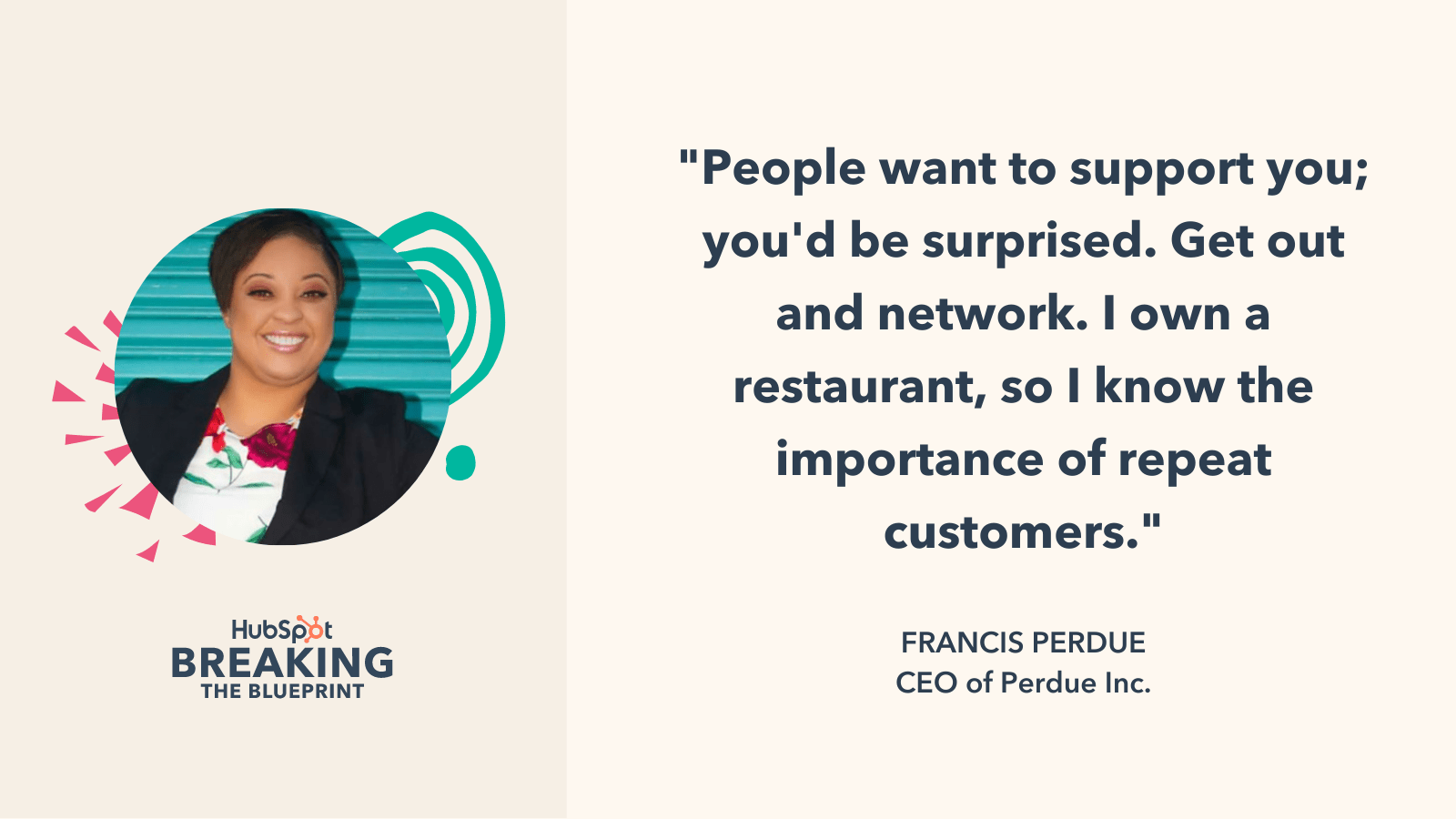
“People want to support you; you’d be surprised,” she said. “Get out and network. I own a restaurant, so I know the importance of repeat customers.”

Email marketing strategy from CEO Francis Perdue

5. Use tools, applications, and other digital resources.

Building email marketing strategies can be tedious and time-consuming, especially if you’re

releasing emails weekly. It’s okay to build out your campaigns yourself, but if you’re looking for something new or different, here are some tools, applications, and resources that Black business owners use to better connect with their audiences:

    • “This may sound crazy, but I believe TikTok is an amazing way to drive customers to your brand and your email list.” — Butler.
    • “Switching to Klaviyo for all email correspondence helped with increasing our abandoned cart click rate from 4% to 7%. I am so happy that I took the time to switch over from Shopify and set it up.” — Gibson.
    • “We have been using the BuzzStream tool to send out emails and monitor all the analytics and stats.” — Mckendall.
    •  “I love Adobe XD. It’s a prototyping application; however, I use it to craft all of our email marketing collateral. My favorite feature is the ability to duplicate and switch up the content in a split second. After creating specific templates for Wallpaper Wednesday or an exclusive email-only sale, I can reuse them again with just the click of a few buttons. I’ve found that using these templates allows me to streamline the process immensely.” — Gibson.
    • “Some email marketing apps range from $0 to $100 a month. The good news is that usually, under 200 contacts are free. Use GoDaddy when you start your website to get coupons for marketing from their partners to cut costs as well.” — Perdue.
    • “I love the website Really Good Emails. It is a gold mine for all things email. The site is very well-organized, and you can find just about any topic within the site. It’s almost like the Pinterest of email marketing.” — Gibson.

black at inbound

Categories B2B

What is Brand Salience? [+How Do You Measure It?]

While branding can feel like a vague concept, it’s one of the most important elements of a marketing strategy.

Did you know that presenting a brand consistently across all platforms can increase revenue by up to 23%?

Plus, consistently presented brands are 3.5 times more likely to have excellent brand visibility than those with inconsistent branding.

In fact, 82% of investors say name recognition is an important factor guiding them in their investment decisions.

So, what does all this mean? Well, consistent branding leads to increased brand awareness which can then help gain investors and drive revenue to your business. Needless to say, branding is important for your business to succeed.

In this post, let’s review what brand salience is, how you can increase your brand visibility, and how to measure it.

If you have high brand salience, then you have a strong brand presence that consumers recognize and think about when they need a product. If you have low brand salience, then consumers might not know your brand exists and therefore won’t think of your brand when they need to make a purchase.

Essentially, brand salience is a similar metric as brand awareness except it’s focused on measuring awareness during the actual purchasing decision instead of overall brand visibility.

For example, when someone wants to get a cup of coffee and is driving around, what’s the first brand they think of? Probably Starbucks. When they want to buy tissues, they think of Kleenex. When they want to search for something online, they Google it.

All of these brands have transcended the perception of being a random company, and are now household names in their own right. Most people think of these brands and know of them whether they’ve been there or used those products before.

These brands have high brand salience. To have high brand salience, your customers need to think about your brand as the first solution to their wants or needs when they have to make a purchasing decision.

The concept of brand salience is actually psychological in nature. According to research done by Jenni Romaniuk and Byron Sharp, brand salience is “a brand’s propensity to be noticed or come to mind in buying situations.”

This means that you have to capture people’s attention and be memorable enough for consumers to recall your brand when they’re purchasing something.

For example, when a consumer has a choice of brands to purchase from, they’ll rely both on their memory and attention salience. This means they’ll recall brands they know and then see what captures their attention.

This process is actually scientific. People who have studied brand salience have studied the human brain — how do people recall information and how does a brand associate positive memory structure with their product?

To increase your brand salience, some of your marketing campaigns probably won’t even focus on persuading consumers to buy your product. The goal of many branding campaigns is to constantly reinforce positive associations with your brand. Familiarity is important. Constant marketing messages from a brand ensure that the brand is top-of-mind when a consumer is making a purchasing decision.

Brands create high brand salience by using distinctive brand assets that capture attention and create positive memories for their audience. This means your marketing assets promote positive storytelling and create a meaning associated with your brand. When you promote your values, you’re differentiating your brand from the competition and increasing brand salience.

To create campaigns that will improve brand salience, think about the emotional impact of your assets. Your campaigns should be meaningful, authentic, and portray your values as a company.

All of this will help customers create a positive association with your brand and remember your brand when it comes time to make a purchase.

For example, let’s say I want to buy some gum. When I think about gum, one of the first things I think of are the commercials for Extra. I’ve never forgotten those commercials because they were emotional and created a positive experience for me.

Now, when I think about gum, I usually buy Extra even though that brand has never been my favorite gum company (I used to buy Orbit). But since those commercials, I’ve leaned toward Extra because of the positive association and it’s one of the first brands I recall because of those commercials.

Ultimately, brand salience is a combination of brand awareness, familiarity, relevance, frequent communication, and emotional connections between brand and consumer.

Now, you might be thinking, “This all sounds great, but how can I measure this and prove its effectiveness to my managers?”

Let’s dive into that below.

How to Measure Brand Salience

Brand salience is rather conceptual in nature. Unfortunately, it’s not a mathematical metric that is easily measured. So, what do brands do?

Well, one of the only ways to measure brand salience is through surveys and focus groups. It’s important to ask your customers when they think of you, what they associate with your brand, and if they recall your company when making a purchasing decision.

You can ask customers whether they recall or notice your brand relative to competitors. Then, ask whether your brand is just thought of or sought after to determine how favorably your brand is judged.

Your survey can include descriptive assets to track your brand’s distinctive assets. For instance, what tone of voice, logo, color, or slogan comes to mind when users think of soda. They might say red, because they’ve associated Coca-Cola branding with soda in general.

To measure this, you can present survey respondents with a randomized list of cues and attributes by asking them which brands they associate with each statement. It could be questions like “when I want to eat something quick and healthy” or “I know I will not overpay there.”

Using a survey or focus group will help you determine how high your brand salience is compared to competitors.

Now, let’s look at the brand salience model that you can use to strategize your brand positioning.

Brand Salience Model

In his book, Strategic Brand Management: Building, Measuring, and Managing Brand Equity, Kevin Keller developed a model for brand salience that has become popular in digital marketing.

In the graphic below, Keller creates a pyramid of building blocks to pay attention to when you’re trying to increase your brand salience.

Keller's brand resonance model

Image Source

This model focuses on increasing deep, broad brand awareness by creating an identity that customers remember. At the foundation of the pyramid is salience, which you can increase by defining your brand in detail, frequently communicating with your audience, and using creative assets to tell a story.

Then, you create meaning and authenticity to differentiate your brand from the competition. And then, you use frequent messages to create positive, accessible reactions in your customers. And then you create loyalty by building a relationship and emotional connection with your audience.

With this model, you can increase brand salience, drive revenue, and even attract investors. Although this isn’t the easiest metric to track, the science proves that focusing on branding will help your company become a household name for your customers.

brand consistency

Categories B2B

How to Write the Perfect Email to Apply for an Unlisted Role [Infographic]

Maybe you’ve been refreshing the Careers page at your dream company for months.

Alternatively, perhaps you’ve heard glowing reviews about a company from friends — but whenever you check, they’re still not hiring for any roles for which you’d qualify.

Whatever the case, if you feel a company’s culture could be a great fit for you, you might consider sending a cold email so hiring managers can keep you in-mind if a role becomes available.

But that’s easier said than done. If you sound too pushy, you risk alienating the hiring manager. A good cold email should be concise and focus on how you can add value to the team. When done correctly, a cold email is a good opportunity to network and get your name in front of the right people.

→ Download Now: 12 Resume Templates [Free Download]

Fortunately, the folks at Resume.io put together an infographic, which details the 8 essential elements of a persuasive email you can use to apply at your dream company. Take a look now, and then check out How to Write a Letter of Interest in 2021 [Examples + Template].

How-to-Write-a-Persuasive-Email (1)-min


Categories B2B

8 Best Video Hosting Sites for Businesses in 2021

In middle school, my best friend and I used to have a show on YouTube where we performed a dare from our audience each week.

We actually had some fans that would watch our videos and dare us to do something on a weekly basis.

While hosting these types of videos on YouTube made sense because they were for entertainment purposes, your business needs a platform with more features so you can create videos for marketing campaigns, sales pitches, and customer service knowledge base articles.

In this post, let’s review some of the best video hosting sites for your business.

→ Access Now: Video Marketing Starter Pack [Free Kit]

Video Platforms

1. HubSpot

If you’re a HubSpot customer, you might already have access to HubSpot’s video hosting, creation, and management tool.

With this tool, you can host and manage video files inside the HubSpot platform and then embed those videos on your website pages, blog posts, social media channels, or knowledge base.

Using the same platform that you use for your marketing, sales, or service tool is a great idea because everything is all in one place. You can optimize your videos for SEO right in the tool.

This video hosting product also allows you to insert CTAs and forms into videos, trigger video workflows that provide targeted content to leads, and video analytics so you know which videos resonate with your audience.

For sales reps, you can use the video hosting tool to send video voicemails or record your screen during a sales call. You can also see if a prospect has watched the video in HubSpot’s tool.

Video can also be used for customer service. You can send video tutorials and record your screen right from a ticket to share it with customers for personalized and quick support. Or you can insert these videos into your knowledge base articles or FAQ page.

2. Twenty Three

Twenty Three is another great video hosting service for your business. You can host and embed videos on your site with Twenty Three’s 4K HD player. You can also directly clip and duplicate videos in the editor.

The best feature of this site is that you can publish and measure your videos across multiple platforms, including Facebook, LinkedIn, Twitter, and YouTube.

Additionally, this hosting site connects with other tools you might be using for marketing software, including HubSpot or Marketo.

Plus, you can use analytics to better understand your marketing data.

Using video for your business can help engage your audience, create a branded experience, and drive results.

3. Cincopa

Cincopa is a video and podcast hosting platform for businesses. With this platform, you can create videos for marketing campaigns, sales prospects, or customer support. Additionally, this platform can host podcasts and images as well.

With this hosting site, you can also combine your media gallery to create a video course with images, video, or podcast files. I don’t know about you, but I’ve seen online courses become all the rage in recent years, so this is a great feature to consider.

You can embed these videos on your site, social media, email, and more.

4. Hippo Video

Hippo Video is a video hosting platform that you can use to personalize your video emails for messages, demos, sales pitches, marketing campaigns, and more.

Using videos in the sales cycle can actually get three times more prospect engagement.

With this tool, you can record and send videos right in your email inbox. Additionally, you can integrate this tool with your current stack, including with Slack, HubSpot, Salesforce, Zoom, Zendesk, and more.

5. SproutVideo

SproutVideo is a great option for a video hosting platform if you’re looking for a no-frills, affordable platform.

With this tool, you can create videos and collaborate with your team. You can share a secure internal video, or live stream a product launch. Whatever your video needs are, this is an excellent option to consider.

Free Video Hosting Sites

6. Vimeo

Vimeo is one of the most popular video hosting sites and for good reason. This simple tool can be used to create, manage, and share high-quality videos.

To create videos, you can use templates, license stock footage, record video messages, or live stream. When you’re editing your videos, you might be able to integrate Vimeo with your editor. Vimeo integrates with Adobe Premiere, Final Cut Pro, and others. Then, your videos will be hosted in one central, secure location so you can seamlessly share them with anyone.

You can even create a subscription streaming service for your videos on this platform.

The best part? Vimeo is free. You can upgrade to paid plans, but you’ll never have to pay for Vimeo if you don’t want or need to.

7. Vidyard

Vidyard is one of the only video hosting sites that is built directly with sales in mind. The idea is to build a great sales process to make remote selling easy, from prospecting to proposals, you can record and send videos that add a personal touch at all stages of the sales cycle.

With Vidyard, you can create your videos in just a few clicks, with no video expertise required (that’s great for tech-challenged people like me).

This tool is also free. You don’t ever have to pay unless you want to upgrade to a different plan with more features.

My favorite feature of this tool is that you can easily create videos, track who watches them, and distribute them an unlimited number of times (yes, even in the free version).

8. Wistia

Another great video hosting site is Wistia. You can host videos and even podcasts on this hosting platform for marketers.

On Wistia, you can upload, customize, and embed branded videos or podcasts on one platform. This also has a free plan that you can use, as long as you don’t need to create too many videos a month (three is the max on the free plan). However, if you need more, there are paid plans as well.

But my favorite feature of this tool is that it can integrate with your tech stack and send engagement data to your CRM, ad platforms, and marketing tools.

Video is only continuing to grow, as people spend more time watching video than reading text. As your business continues to evolve, it’s important to have a video hosting tool that can grow with you and help you use videos to drive results for all aspects of your business.

Discover videos, templates, tips, and other resources dedicated to helping you  launch an effective video marketing strategy.