Categories B2B

How Apple’s iOS 15 Could Impact Email Marketers

As one of the HubSpot Blog’s email marketers, one of the key metrics I use to measure email success is open rate.

When an open rate is high, it hints that your subject line did its job to pull readers, you’re sending emails at the most engaging time of day, or your subscribers are eagerly waiting to get your content in their inbox. When it’s low, it signals that your email subscribers might not even be reading your content.

But, now, the way email marketers leverage open rates could change with Apple’s recently announced iOS 15 privacy features.

At Apple’s Worldwide Developers Conference in June, the company announced a rollout of a handful of new iOS 15 privacy features that will include:

  • Mail Privacy Protection (Free): According to reports from Litmus, those with early access to iOS 15, and other tech journalists, Apple Mail will allow users to opt in to mail privacy features that mask IP addresses and block third parties from tracking email opens or other IP data.
  • iCloud+ (Subscription): An iCloud subscription with additional privacy features including a VPN-like Private Relay feature, which prevents sites from tracking Safari users who opt-in and allows users to see which websites they’re sending information to.
  • Hide My Email (within iCloud+): An email address-cloaking feature that enables users to give sites a “fake” email address. While promotional emails sent from the brand to the fake address will still go to someone’s inbox and shouldn’t impact important communication, brands will not be able to see the person’s real address unless the contact shares it.

While the paid features might not create a huge impact for marketers because they require users to buy a service, the free Apple Mail privacy feature has already caused a stir in the marketing community.

So far, all Apple has said about this feature is, “In the Mail app, Mail Privacy Protection stops senders from using invisible pixels to collect information about the user. The new feature helps users prevent senders from knowing when they open an email and masks their IP address so it can’t be linked to other online activity or used to determine their location.”

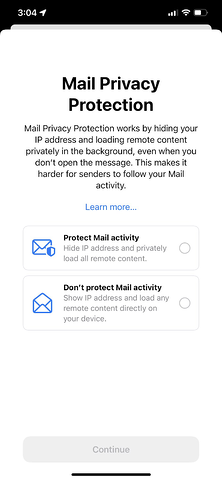
Although Apple hasn’t explicitly said whether Mail Privacy Protection will be an opt-in or automatic feature, some iOS testers have shared images showing the Mail app prompts them to turn Mail Privacy Protection on when they enter the app:

apple ios email permission page

Image Source

While Apple hasn’t expanded too much on its Mail Privacy feature, marketing experts say it could impact the tracking of open rates and email-based A/B testing.

Although this move might seem scary, it isn’t too surprising as it follows a trend of internet privacy rollouts from tech giants. Most recently, Apple’s iOS 14.5 update limited mobile app tracking by requiring users to opt into sharing information when they opened an app after downloading it. Meanwhile, Google has been building out its Privacy Sandbox while preparing advertisers and marketers for Chrome’s phase-out of third-party cookies in 2022.

When it comes to Apple’s iOS 15 pivots specifically, marketers aren’t only unsurprised, but many — including members of the HubSpot team — believe this will be a positive change for user experience.

“From its inception, HubSpot has been relentlessly focused on helping businesses match the way they market and sell to the way people want to shop and buy. Our founders developed the philosophy of inbound marketing in the early 2000s,  and Apple’s moves only serve to reinforce these trends,” says Will DeKrey, HubSpot’s Group Product Manager of Campaigns.

“Buyers get to be in charge of the data they share; not sellers. And big corporations shouldn’t get to create markets for tracking and selling personal data, giving them an information advantage over smaller businesses,” DeKrey says.

“This means that each individual company, large or small, will need to get better and better at building trusted relationships with their audience, earning the right to learn who they are and what they’re interested in.”

“What’s true about people today is that they want BOTH privacy AND personalization. They still want content that is targeted and messaging that speaks to their interests. Given Apple’s changes, email marketers will likely need to focus even more on creating remarkably relevant content that drives their audiences to take action, versus experimenting with headlines just to see if they can get a click,” DeKrey explains.

“Personalization isn’t going away. Conversion optimization isn’t going away. A/B testing isn’t going away. But each of these will need to be more focused on building deeper relationships and more meaningful actions,” concludes DeKrey

Although Apple’s recent open tracking pivot could be great for iOS users who’d like to feel more secure, we know that email marketers still have a lot of questions.

To help email marketers navigate the potential changes that could happen, here are a few tips and strategies teams can consider as the iOS 15 rollout gets closer.

Click here to download our free lookbook that's packed with our favorite email  newsletters.

How Email Marketers Can Navigate Apple’s Open Privacy Changes

1. Continue following updates from Apple.

Although Apple’s iOS 15 features have been announced, there’s still a lot that we don’t know yet about how it will impact email and IP address tracking. For example, while it seems like this feature will require an opt-in, Apple hasn’t explicitly confirmed that.

Throughout the next few months, HubSpot’s own email product team will be looking into the change and considering solutions if there will be a major open rate impact.

“On the HubSpot email product team, we’re going to take time to consider what the next best steps are for our customers. In this ever-evolving email landscape, our priority will be to support our marketers in continuing to create highly impactful emails and get the most value from our email tool,” says Shane Janssens, Email Product Manager at HubSpot.

As we know more about these new features and how they could impact HubSpot email analytics, we’ll continue to update this post with more information and links to helpful resources to keep you in the know.

2. Remember, this change won’t impact all email readers.

Although Apple Mail and Apple mobile devices make up over 35% of the email provider market share globally, Google, Outlook, and other email providers haven’t announced similar privacy moves, which means their open and IP data could still provide solid tracking information for email marketers.

While you should be wary that other companies, like Google or Microsoft, could follow suit on email privacy, it’s important to remember that you’ll still get open data from them for the time being and can still make some judgments on the success of opens from these email providers.

3. Consider adjusting open-rate goals.

Although open rates aren’t going away any time soon, a large chunk of email audiences might become untrackable. Because of this, you might need to lower or pivot your open rate goals to determine what your new low, average, and high open rates are.

If your goals are set by a manager above you, it will be important to audit and communicate how many opens you usually get from iOS users to help your manager and your team estimate how they could change after the rollout. You might also want to consider tracking your email open rates for a month or so after the rollout to see what new averages look like based on hard data.

4. Leverage other email marketing data.

While open rate is a key email marketing KPI at many companies, it’s certainly not the only data you can use to determine if your email content is successful. In fact, when sending HubSpot Blog emails, the open rate is just one of many metrics I look at. Here are a few others that I plan to continue to zone in on, even if open rates are impacted:

  • Clicks and click-through rates: If you share links to content, such as blogs, product pages, and offers in email, the number of clicks and your click-through rates give you insights on how many or how often email readers engaged with and clicked on your content. High clicks or click-throughs can hint that your content was very engaging while lower clicks or click-throughs could hint that readers were less interested or skimming through your email.
  • Traffic to your site: With software like HubSpot, or the use of tracking URLs, you can determine how much traffic came to your website from one single email — or which pieces of content sent the most visitors to your site. Ultimately, if you’re trying to build your audiences, get people to make purchases, or aiming to increase offer downloads, you’ll need to send people to your website. Good email traffic hints that you’re successfully getting visitors where they need to go with your content.
  • Clickmaps: Many email providers, like HubSpot, allow you to see which content people clicked most or least in the email. This can help you see which content within your email was most and least clickable,
  • Unsubscribe rates: While these usually don’t vary much, a spiked unsubscribe rate could indicate that an aspect of your email strategy (such as the content you sent or the frequency of emails) caused you to lose more audience members than usual. Meanwhile, a consistently low unsubscribe rate hints that you’re continuing to retain or even gain subscribers.
  • Survey or email persona research: Aside from metrics you can gain from your email marketing platform, you can also leverage other strategies, like surveys or polls to learn more about your subscribers’ interests, what they’d like to see more of, and where you can improve your content.

On top of leveraging KPIs that are less impacted by Apple’s change, you can also use email tools or benchmark reports to see how your email rates compare to that of other brands in your industry.

For example, HubSpot users can leverage HubSpot’s Email Health Tool to compare your open, click-through, unsubscribe, and bounce rates against our benchmarks.

Evolving Your Content for a More Private World

Apple’s announcement is not the only privacy pivot that’s impacted digital marketers — and in 2021 — it certainly won’t be the last.

Although the world might be changing in a way that poses some challenges for digital and email marketers, that doesn’t mean you can’t continue to innovate your strategy to meet prospects or audiences where they are.

While open rates are certainly important, there are many other ways to get to know your email subscribers, learn from KPIs, and continue to create great content for them.

New Call-to-action

Categories B2B

18 of the Best Marketing Techniques for 2021

Perhaps you’ve spent the last quarter performing a SWOT analysis on your marketing efforts and identifying your priorities as you grow your brand. Maybe you’ve even built your entire marketing strategy.

It’s good to know what your goals are and have a big-picture understanding of how you’ll achieve them. After all, there’s no point in executing tasks without reasons for doing so.

→ Download Now: Free Marketing Plan Template

At the same time, putting your marketing strategy into play is different than creating that strategy. It’s the channels, techniques, and tactics that help realize the vision. In addition, marketing a brand online has become much more nuanced and complex with many techniques for reaching and resonating with audiences.

To help you learn about the most effective marketing techniques around today, we’ve rounded up the best ones to add to your digital marketing toolbox.

Branding and Awareness Techniques

1. Brand Storytelling

Purpose: Capture Attention

In the neuroscience field, researchers have proven that storytelling is the best way to capture people’s attention, bake information into their memories, and resonate emotionally with them. The human brain is programmed to crave, seek out, and respond to well-crafted narrative — that’ll never change.

If you have an About page on your website that functions only to say what you do and who you do it for, crafting a compelling narrative is a great way to uplevel that page and resonate with your readers. For maximum effectiveness, consider following a storytelling framework such as Simon Sinek’s Find Your Why methodology, Donald Miller’s Storybrand, or the classic Hero’s Journey.

And storytelling doesn’t just have to live on your About page.

Just like your favorite Netflix show, you can craft a series on YouTube to entice your viewers to subscribe to your updates. This can get your audience more excited for your show’s newest season than they currently are for the latest season of Stranger Things.

Before you green light another slew of listicles, how-to posts, and ultimate guides, remember how powerful storytelling is and consider crafting a story chock-full of conflict, surprise, and emotion that your viewers will relate to your brand, regardless of the channel you’re targeting them on.

2. Digital PR

Purpose: Reach New Audiences

The average amount of time spent on social media was 145 minutes per day in 2020, an increase from the previous year. Needless to say, people spend more time on social media than ever before. And public relations professionals are pivoting their strategy from solely focusing on placing their stories in news outlets’ publications to concentrating on driving traffic to their websites and social media profiles too.

In order to successfully pitch your stories to journalists and news outlets nowadays, you need to account for the content that performs well on their social media profiles and their publication. So before you pitch your story, make sure it’s relevant and interesting to the news outlet’s social audience.

3. The Surround Sound Method

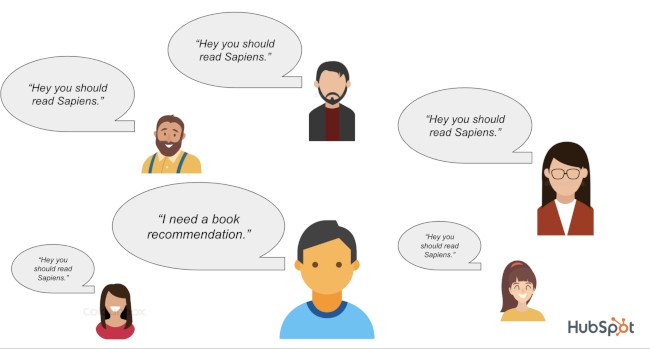
Marketing Technique: Surround-Sound Method Diagram Illustrating Consumer Influence from Third-Party SourcesAn ad’s effectiveness increases the more times it’s been seen by a prospect. It’s also pretty safe to say that any marketing asset’s effectiveness increases the more it’s seen.

This is a fact previously alluded to in this post anytime the word “touchpoints” comes up.

The surround-sound methodology takes this idea and amplifies it by challenging the notion that your owned channels and assets are not enough to create true brand awareness. You should also appear everywhere else someone goes to consider products. For example:

  • Review websites
  • The social timelines of prominent influencers
  • Featured in the media they consume (articles, videos, podcasts)

According to Alex Birkett, Sr. Growth Marketing Manager at HubSpot, if you can “get lots of people to talk about you favorably, preferably around the same time,” you can generate quite a bit of brand awareness.

4. Brand Extensions

Purpose: Expand Into Tangential Markets for Increased Awareness

Marketing Technique: Brand Extension Example of Reese's Puffs Cereal

Image Source

Big companies often extend their brand to develop new products in industries that they don’t have any market share in. These initiatives are called brand extensions, and they allow companies to leverage their brand awareness and equity to create more revenue streams. For example, Reese’s entering the cereal market with their peanut butter and chocolate “Reese’s Puffs” product.

Historically, the most successful brand extensions are the ones that closely tie to the company’s flagship product or core brand, like Gerber’s baby clothes and Dole’s frozen fruit bars. By entering tangential markets that can preserve your brand’s unique associations and perceived quality, you can develop new products that consumers intuitively understand the benefits of, even though they’ve never seen them on a shelf.

On the flip side, a company can also exploit its brand and, in turn, damage it. If they develop a product in a market that isn’t closely tied to their flagship product or core brand, audiences might attach undesirable associations to a brand, weaken its existing associations, and hurt its established products’ perceived quality.

Audience Engagement Techniques

5. Podcasting

Purpose: Leverage Audio Content and Reach New Audiences

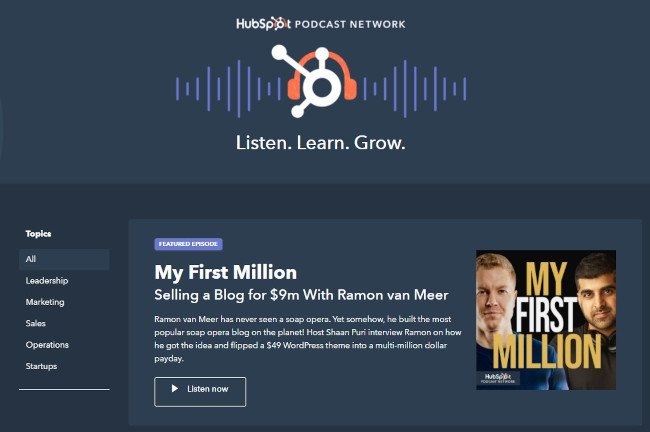
Marketing Technique: Podcasting Example of HubSpot's Podcast Network

Image Source

Technically, audio is more of a media type or channel than a technique, but according to a content format study conducted by Edison Research and Triton Digital, people age 12 and older are listening to online audio content at unprecedented levels. On average, people spend 17 hours per week tuning into their favorite podcasts, online radio shows, and audiobooks.

Needless to say, the demand for audio content has exploded, but that doesn’t mean people will listen to your branded podcast just because it’s a podcast. In reality, they’ll only listen to it if it can hold their attention and, ultimately, entertain them.

Here’s where the technique part comes in: Many podcasts rely on a host/guest model. This model is wildly successful because hosts can tap into the audience that the guest brings in and vice versa. It’s a mutually beneficial arrangement so long as both sides promote effectively. That’s why it’s important to choose guests wisely and make it easy for them to promote the show and episode they appear in.

With each guest that comes on, the podcast audience grows, and so does the engagement.

6. Video Marketing

Purpose: Leverage Video Content and Reach New Audiences

Video has overtaken blogs and infographics as the number one form of media used in content strategy (HubSpot). There’s a couple reasons for this:

  1. It’s flexible. You can create video for YouTube, embed it on your blog, share it on social media, and more.
  2. It’s a different kind of organic play. Google shows videos in the SERPs (search engine results pages). YouTube is also a search engine in its own right and is the second most visited site after Google itself (Alexa).
  3. The engagement is rewarding. Video consumption continues to rise, outpacing television, and it’s more effective at conveying information (Biteable).

So not only are consumers looking for audio content; they’re looking for video content as well. And savvy marketers are getting ROI in the form of engagement and repurpose-ability.

7. Community Building

Purpose: Improve Long-Term Engagement and Build Authority

Marketing Technique: Community Building Example of Women in Tech SEO Community

Image Source

Speaking of engagement, the last thing you want to do is create a piece of content and then hear crickets when you promote it. One of the best ways to increase engagement and brand awareness is by building relationships with prospects, users, customers, and other individuals in the industry.

Many brands are creating digital communities on social media, online boards, and their own hosted networks/forums. With community management, you’re building relationships, giving back, and establishing yourself as an authority in the industry. It can be as simple as answering questions on Quora or cultivating a hashtag on Twitter, or it can be as complex as creating a whole support network for your product.

Either way, you’re improving the affinity your prospects and customers have with your brand.

If done correctly, your community may even expand beyond your brand and become a beneficial resource for everyone within it. For example, Women in Tech SEO, founded by Areej AbuAli, is a community focused on accelerating the careers of women in the SEO industry. The organization has a network with a discussion component, ongoing meetups, a newsletter, and more.

8. Contextual Marketing

Purpose: Improve Website Engagement With Personalized Content

Marketing Technique Example: Contextual Marketing Definition That Says, "Contextual marketing takes into account the user's context so that you can provide content tailored to their needs."

Image Source

Contextual marketing is the practice of serving up personalized website content to visitors according to their stage of the buyer’s journey. The idea is that if you can cut through the noise and serve your website visitors the content that matters the most to them, you’ll be far more successful at capturing their attention.

We can all agree that improving the experience for prospects can lead to increased effectiveness, but what does contextual marketing look like in practice?

For example, you might use dynamic CTAs that only show them offers that are relevant to them. This cuts down on the amount of useless information they’re taking in on your website and decreases banner blindness… in part because the banners they do see are helpful and relevant.

It might also mean using smart forms so that you don’t keep asking for the same information from website visitors who have cause to fill out multiple forms on your site.

Then, you might segment your database so that your leads receive email campaigns that are directly relevant to their needs based on content that they’ve already consumed on your website.

All of this resulting in a personalized, tailored journey without the pressure of going to a salesperson for it.

Techniques for Driving Traffic

9. Blog Title Optimization

Purpose: Increase Traffic to Existing Assets By Improving Click-Through Rate

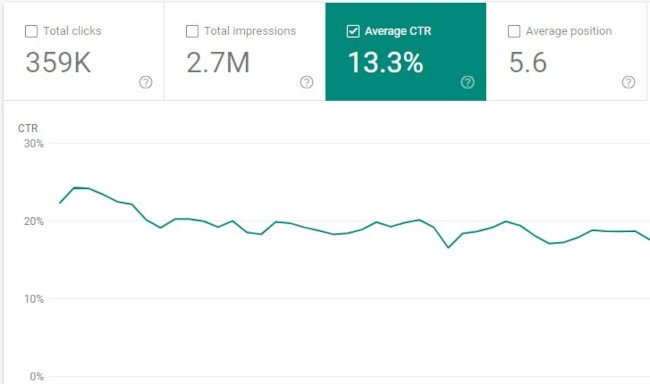
Marketing Technique: Blog Title Optimization in Google Search ConsoleWhen you write a blog post, do you use the first title you came up with or do you write a few?

People will not get to the rest of your content until they choose to click on the headline. That’s why it’s so important to have grabby titles that resonate with your audience and compel them to click.

By increasing the effectiveness of your titles, you can increase click-through rate (and, in effect, traffic). One way to do this is by using tools like this headline analyzer to see what you can do to improve your headline.

Better yet, you can always analyze your existing blog posts to see which headlines aren’t doing enough heavy lifting. By improving the click-through rate, you’ll be able to get more traffic from that asset without a heavy editorial lift.

10. The Pillar-Cluster Model

Purpose: Drive Traffic By Establishing Topic Authority

Since people heavily rely on Google to provide accurate and relevant answers for most of their questions today, Google needs to understand the intent and context behind every single search.

To do this, Google has evolved to recognize topical connections across users’ queries, look back at similar queries that users have searched for in the past, and surface the content that best answers them. As a result, Google will deliver content that they deem the most authoritative on the topic.

To help Google recognize your content as a trusted authority on marketing, sales, and customer service topics, consider implementing the pillar-cluster model on your blog.

Essentially, the pillar-cluster model is a topic-based based content strategy. This means that you generate and organize ideas for your blog by topic.

By creating a single pillar page (an ultimate guide, for instance) that provides a high-level overview of a topic and hyperlinks to cluster pages (subtopic blog posts) that delve into the topic’s subtopics, you can signal to Google that your pillar page is an authority on the topic.

Hyperlinking all of the cluster pages to the pillar page also spreads domain authority across the cluster, so your cluster pages get an organic boost if your pillar page ranks higher, and your cluster pages can even help your pillar page rank higher if they start ranking for the specific keywords they’re targeting.

11. Historical Optimization

Purpose: Drive Traffic By Improving Existing Assets

In 2015, HubSpot made a revolutionary discovery about our organic monthly blog traffic — the overwhelming majority of it came from posts published prior to that month. In fact, 76% of monthly blog views came from these old posts.

Today, the groundbreaking revelation rings louder than ever — 89% of our monthly blog views currently come from posts that were published at least six months prior, and we’ve developed an entire strategy dedicated to refreshing and republishing these historical pieces of content.

These types of blog posts are called “updates,” and they comprise 35-40% of HubSpot’s editorial calendar. By refreshing posts with new information and effectively republishing them as new blog posts, HubSpot can build upon its existing organic value that these posts have accumulated through backlinks and user engagement and double or even triple their traffic. This process also helps HubSpot optimize our blog for efficiency, decreasing the amount of new content we have to create while increasing our organic traffic and conversions.

12. Retargeting

Purpose: Recapture Lost Traffic

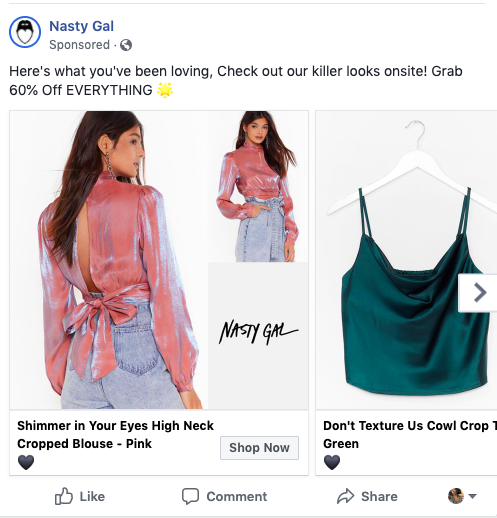
Marketing Technique: Retargeting Example Ad on Facebook from NastyGal

A lot of content marketing techniques involve attracting new audiences rather than improving the effectiveness of the audiences you’ve already acquired. That’s why retargeting earns a place on this list as a vastly underutilized tactic.

I’ll explain retargeting with a scenario: A prospect comes to an ecommerce site and checks out a product. They decide it’s not time to buy, and they leave. Retargeting allows you to remind them of their initial interest by showing them ads for the product on other sites (e.g. banner ads or Facebook ads). In effect, your ads “follow them around” the internet, increasing the likelihood that they come back to make that purchase.

13. The Skyscraper Backlinking Method

Purpose: Obtain Links for Increased Traffic and Improved SEO Signals

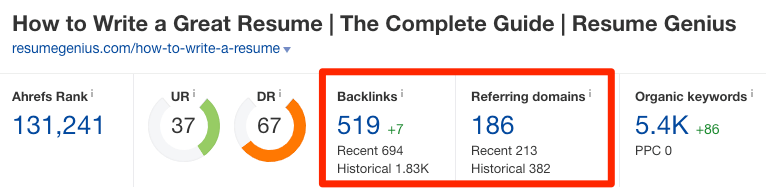
Marketing Technique: Skyscraper Backlinking Method Using Ahrefs

Image Source

Earning high-quality inbound links from websites and pages with high authority scores is crucial for boosting your domain authority. But, unfortunately, “If you write it, they will link to it,” is not a viable SEO technique.

One method for earning high-quality links is by performing email outreach to ask other websites that have the same or higher domain or page authority score than you to link to your top content. You should also make sure your content is relevant to the referring website’s content.

More specifically, you can use Backlinko’s skyscraper method. The skyscraper method is an SEO strategy where you find content that ranks well for keywords you want to rank for and then create content that’s better than the top-ranking posts. Then, you use SEO tools to find all the sites that have linked to your competitor’s content and ask the most relevant sites to replace your competitor’s link with a link to your improved content.

Conversion and Nurturing Techniques

14. A/B Testing for CTAs

Purpose: Improve Conversion Rate on Existing Assets by Testing Variables

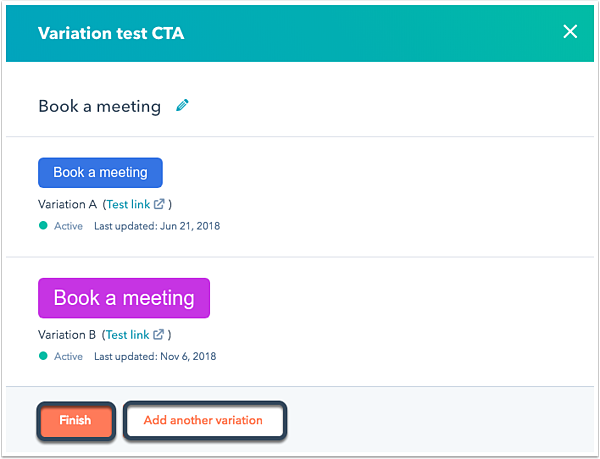
a-b-testing-technique

Image Source

Since opt-ins are key for growing your email subscriber list, you’ll want to closely monitor the performance of your CTAs (buttons that send people to your forms) and improve on the ones that aren’t working out.

Every company has a different set of customers, so there’s no one-size-fits-all formula for designing the most optimal CTAs. To figure out which CTA design or copy will produce the best results for your company, you must experiment.

A/B testing allows you to do that experimentation between two CTAs synchronously, eliminating variables and giving you the best insight into which version performs better.

For example, you can run an experiment to test a variable such as color. Let’s say you have a red CTA and a blue CTA. A/B testing allows you to identify which ones produce better results.

To conduct an A/B test, you can use HubSpot’s A/B testing kit. With this kit, you’ll get guidelines for A/B testing, learn what variables to test, and gain access to a simple significance calculator to track your results.

A/B testing shouldn’t be confused with multivariate testing, though, which allows you to simultaneously test many variables.

15. Value-Add Emails

Purpose: Improve Engagement and Earn Goodwill During Nurturing Process

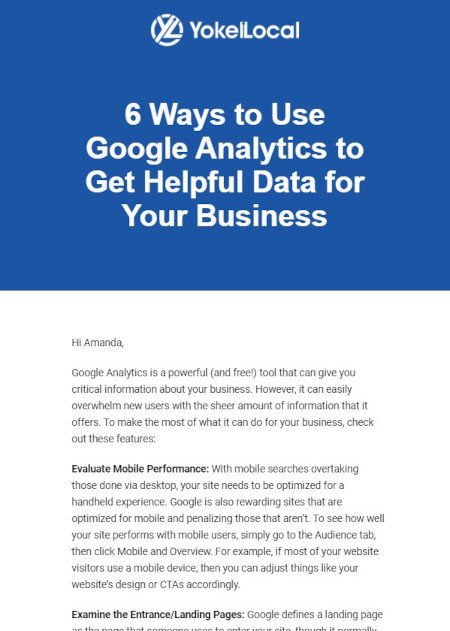
Marketing Technique: Value-Add Email Example from Yokel LocalEmail is more of a channel than a tactic, but let’s start with why the channel is an important one. Did you know that Americans spend up to five hours checking their email, and the channel is by far their preferred way to receive updates from brands?

At the same time, it’s projected that 319.6 billion emails will be sent and received in 2021. This means that there isn’t a lot of room for error if you want to cut through the noise when you send an email.

Since it takes a multiple touchpoints to gain the attention of prospects, persuading people to subscribe to your emails and, in turn, constantly consume your content will generate more leads and revenue for your business.

This is where the tactic part comes in. The last thing you want to do is clutter up their inbox with yet another sales email. Instead, consider emails that actually provide value along their paths to purchase.

Take the email above from HubSpot Agency Partner Yokel Local for example. It doesn’t matter if the recipient of the email is actively considering Yokel Local’s services; they still provide value that keeps their subscribers opening emails.

Growing an engaged, loyal subscriber base also speaks volumes about the quality of your content and its emotional resonance. If your prospects actively engage with your email content, it’s a clear sign that they actually value it. This contributes to their impression of your brand and serves as the touchpoints along their paths to purchase.

16. Audience Segmentation

Purpose: Create a More Personalized Experience to Improve Nurturing

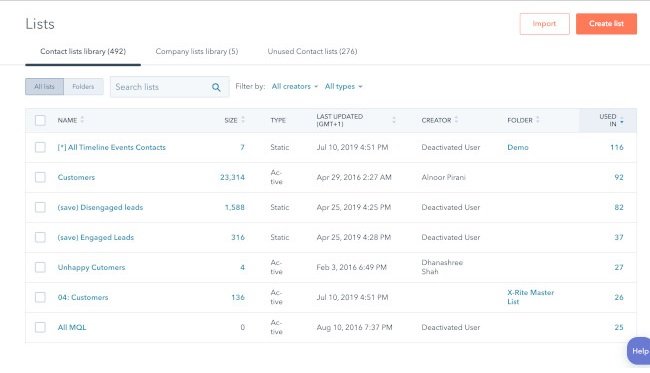
Marketing Technique: Audience Segmentation in HubSpotImage Source

In a world overflowing with digital noise, creating irrelevant or unwarranted content won’t catch anyone’s attention.

To email the right person the right content at the right time, consider leveraging audience segmentation, which separates your subscriber database into specific, accessible groups of people based on personal attributes like their demographics, psychographics, and behavioral information.

This technique allows you to increase the value of your emails (see the technique above) by ensuring that they’re more relevant to your subscribers. In other words, rather than creating messaging designed to appeal to everyone, you’ll be able to get much more specific with your messaging because you’ll have a narrower target audience.

To properly implement audience segmentation techniques into your email marketing strategy, you’ll need a CRM and marketing platform. For example, HubSpot allows you to gather information about your customers and segment contacts into lists based on that information. This makes it easy to target the right customers in your database with messaging specific to them.

17. Marketing Automation

Purpose: Enhance Efficiency of Email Campaigns

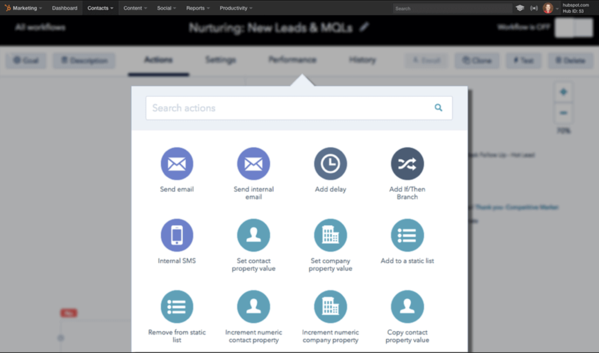
Marketing Technique: Marketing Automation With HubSpot

Image Source

Automation is the process of using technology to eliminate manual actions and trigger repetitive or programmable functionality in an automatic way. Marketing automation applies this principle to your CRM and email marketing activities, allowing you free up time and get your message out at scale.

Instead of sending one-off emails, you can use marketing automation to initiate a sequence of emails and actions, all without you hitting the send button. Best of all, you can apply it to any of the following (and more):

  • Lead nurturing campaigns
  • Auto-responder sequences
  • Re-engagement campaigns
  • Event reminders
  • Client onboarding sequences
  • Up-sell campaigns

This will allow you to increase your organization’s touchpoints with a lead without tanking your productivity. To do so, you’ll first need to invest in marketing automation software.

18. Lead Scoring

Lead scoring is an automation-based technique that rates (or “scores”) your leads based on certain attributes. The idea behind it is that you’ll be able to better identify leads that are closer to a purchasing decision so that you can prioritize those leads for your marketing and sales efforts.

Some marketing automation software can perform lead scoring using AI machine learning, but many allow you to manually designate the attributes that make a marketing or sales qualified lead. Once a lead meets the criteria, they will have a higher score (and thus higher priority for more direct marketing and sales conversations).

In addition, the act of defining the criteria for lead scoring can lead to a better relationship between your marketing and sales teams. With a clear definition, your marketing team will be better focused on generating leads that meet those criteria, and your sales team will be happy with more qualified leads.

Innovation Is Key

Whether you’re developing a new marketing plan or improving on an old one, it’s important to consider new marketing techniques.

While your marketing strategy may be sound, relying on past tried-and-true methods may not be enough. As time goes on, old techniques lose competitive advantage and become table stakes. New methods will help you implement your strategic goals in new, exciting ways.

Editor’s note: This post was originally published in May 2019 and has been updated for comprehensiveness.

Marketing Plan Template

Categories B2B

12 Impressive Ways to Start a Cover Letter [+ Examples]

According to Career Builder, 40% of recruiters look for a cover letter when they’re considering job applicants.

But if you had to flip through a hundred cover letters a day, and each one began, “To whom it may concern, I am applying for the digital marketing position at your company,” how important would you rank them?

A cover letter might not always be the most important thing to a hiring manager, but if your resume or connections aren’t enough to get you through the door, a powerful cover letter could be what gets you an interview.

For instance, a hiring manager might only read your cover letter if your resume raised questions about why you’re applying for the position, or why you’re leaving your current role. In these cases, your cover letter can be a crucial factor in whether or not you move forward in the hiring process.

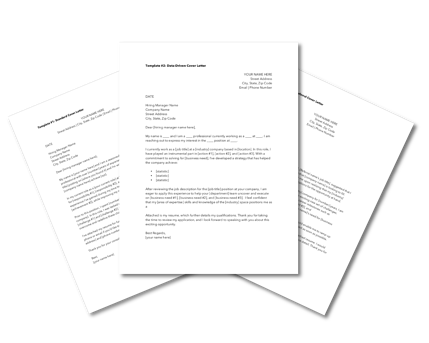
→ Click here to access 5 free cover letter templates [Free Download]

Your cover letter is an opportunity to showcase your personality, display your interest in the job, and include relevant information that otherwise wouldn’t be surfaced in your application. But there’s a fine line between standing out and coming across as brash or gimmicky. An ideal cover letter leaves the hiring manager with a positive and memorable impression of you, something a resume alone won’t always do.

So, where do you begin when writing a cover letter? More specifically, where should your beginning begin? Recruiters read a ton of cover letters — especially if the company is growing quickly and hiring non-stop. What does this mean for you? You need to get their attention right away. To help you overcome writer’s block, and hook your reader right away, take a look at some sharp opening sentences you can use for inspiration.

Read on to find out eight ways to grab an employer’s attention with an exceptional cover letter introduction.

Featured Resource: 5 Free Cover Letter Templates

Cover Letter TemplatesDownload the Templates

Start off your cover letter (and finish it) with a bang with 5 Free Cover Letter Templates. The templates are professional and completely customizable to help you get your dream job. 

How to Start a Cover Letter

1. Start with humor.

Employers are humans too, and they’ll often appreciate a good joke, pun, or funny opening line as much as the next person. If done tastefully and respectfully, starting your cover letter off with a joke can be an excellent way to stand out.

Plus, a joke can still include a powerful explanation for why you’re the right person for the job, without coming off as boastful. For instance, think about something you love to do or something you’re really good at, and then imagine how friends or family might make a joke about it — if you’re really good at analyzing data, for example, a joke or pun related to that might be a good way to exemplify both your skills and personality.

Here’s a good example of using humor to bring attention to your skills, from The Muse (you’ll notice this is one of our picks for most creative opening lines, earlier in this article):

“I considered submitting my latest credit card statement as proof of just how much I love online shopping, but I thought a safer approach might be writing this cover letter, describing all the reasons why I’m the girl who can take Stylight’s business to the next level.”

Right away, the personality displayed here grabs the reader’s attention. Even better, this applicant uses humor to convey an important message to the employer — she loves shopping, and she’s well-versed in ecommerce as a consumer — which might’ve otherwise not come up on her resume or phone screening.

2. Start with passion.

For an employer to know you’ll stay dedicated to the role and company, they’ll want to ensure you’re passionate about what the job entails. Passion is more incentivizing than a paycheck.

For an employer, demonstrating how your passion matches the required skillset is a promising sign that you’d enjoy your job — if you enjoy your job, you’re more likely to stick around longer, help drive company growth, and become a dedicated member of the team.

Consider starting your cover letter with a few lines that showcase your passion: “I’ve been passionate about writing since I was ten years old. My love for writing has led me to write two personal travel blogs, get published in a local newspaper, and pursue two summer internships at publishing firms. Now, I’d love the opportunity to combine my writing skills with my interest in storytelling as a content marketer at Company A.”

If you don’t have extensive work experience in the industry you’re trying to break into, but you’ve been unofficially preparing for years, let the employer know. In the above example, the candidate’s resume would probably look weak, with only internships indicating professional experience. Her cover letter introduction, however, shows the employer she’s been writing for audiences and advancing her natural ability for years.

3. Start with an accomplishment.

Employers like seeing numbers. It isn’t enough to mention you’re a “digital marketer with proven success in SEO strategies.” Proven success? Okay, can we see?

It’s more powerful to provide statistics. You want to show the employer you’re capable of solving for long-term results. How have you contributed to your company’s bottom line? For instance, did your Facebook marketing campaign grow your social media following, or has your blog content increased organic traffic?

Consider starting your cover letter with something like this: “Over the past year as digital marketing manager at Company A, I’ve generated $30k+ in revenue, increased organic traffic to our blog by 14%, and almost tripled our social media ROI.”

Even if you don’t have the work experience to report impressive numbers, you can still offer proof when opening with an accomplishment. Think about the qualitative feedback you’ve received from employers. For instance, how would your boss compliment you or tell you you’re doing a good job? An accomplishment can be as simple as your boss sending you an appreciative email regarding your diligent meeting notes.

In this example from The Muse, the applicant provides an example of a skill for which he’s been previously acknowledged: “My last boss once told me that my phone manner could probably diffuse an international hostage situation. I’ve always had a knack for communicating with people — the easygoing and the difficult alike — and I’d love to bring that skill to the office manager position at Shutterstock.”

Even though the applicant doesn’t offer numbers as proof of success, they do manage to highlight some proof of their past performance in the form of a former boss’s praise. The candidate’s candid and funny explanation — that his last boss liked his phone manners — is another good way to brag about accomplishments without, well, bragging.

4. Start with excitement for the company.

Employers want to know why you like their company, and they’ll appreciate an explanation on why you’re interested. But it’s imperative your reasoning is thoughtful and considerate, and specific to the company. For instance, if you’re applying for a financial position, don’t write about your interest in finance; write about how your interest in finance relates to the company’s goals.

You don’t want to just say, “I’m excited to work at Company A because I’m passionate about finance, and I think my skills and experiences will be a good match.” Sure, you’ve explained why you want to work in the financial industry, but you’ve done nothing to explain why Company A specifically suits your interests.

Instead, you’ll want to mention something about the company and culture in correlation to your interest in finance. Take a look at this example from Glassdoor: “When I discovered Accounting Solutions was hiring, I knew I had to apply. I’ve been waiting to find a company where I feel like I can make a difference while working as an accountant. Not only are your clients awesome, but the overall mission of your company is something I believe in, too.”

This candidate shows they’ve done their research and care about Accounting Solutions in particular. Remember, employers want to hire people who have a demonstrated interest in working at their company. They want someone who will enjoy the nature of the work, but just as importantly, they want a candidate who enjoys the work culture and the company mission as well.

5. Start with news about the company.

Mentioning company news in your introduction indicates you’ve done research on the company. Plus, including company news might give you the chance to incorporate your own values, as well. If the company just won an award for its innovative solutions in the computer industry, for instance, you might add how you value forward-thinking methods in technology, as well.

Here’s an example of an introduction that uses a newsworthy event, from Indeed: “When I saw that Company ABC was featured in Fortune Magazine last month for its commitment to renewable energy and reducing waste in the workplace — all while experiencing triple-digit revenue growth — I was inspired. With my track record of reducing costs by 30%+ and promoting greener workplaces, I’m excited about the possibility of taking on the account executive role to expand your company’s growth and work towards a more sustainable future.”

The candidate does a good job demonstrating how Company ABC’s news aligns well with the candidate’s personal achievements. She shows she’s done her research on the company, and also indicates she values similar environmental efforts in the workplace.

6. Start with what they don’t know.

According to one seasoned hiring manager, a cover letter that begins, “I am writing to apply for [open position] at [name of company]” is grounds for nearly instant rejection. Of course you’re applying for this job — why waste your lede with something so boring and obvious?

Your cover letter should never directly state what they already know — or restate what’s already listed on your resume. Instead, start your cover letter by offering something new, expanding on what the employer already knows about you, and presenting new details about what you can bring to the company. Impress employers by telling them something about your skills or experiences they don’t already know.

To offer new information not displayed on his resume, one of my colleagues at HubSpot wrote this cover letter introduction: “My resume will tell you I’m Content Marketing Certified. Your records will tell you I’ve interviewed for a few different HubSpot positions in the past. What neither one will tell you is that I’ve been working with your customer success team to build a new campaign strategy for my company–one of your latest (and largest) clients.”

The candidate wrote an introduction that captured the reader’s attention and demonstrated he wasn’t interested in wasting anyone’s time. This is a memorable and impressive tactic. Consider writing a similar introduction, where you provide information absent from your resume.

7. Start with what you can bring to the table.

A hiring manager here at HubSpot told me she always looks for cover letters to tell her how the company and applicant can benefit each other.

Any employer is going to want to know why you think you can grow from the position you’re applying to. An employer is more inclined to hire you if she thinks you have a genuine, intrinsic motivation to work hard in the role.

A hiring manager is also going to want to know how you’ll contribute to the company’s larger vision and goals. It’s important for the manager to know what you want to get out of the role, but it’s equally important to know how you’ll help the company grow. How will the company benefit from you, over someone else?

Here’s an example: “I am seeking opportunities to improve my writing ability in a forward-thinking environment while growing organic traffic and optimizing content to beat out competitors in search engines. At Company A, I believe I will find that match.”

See how it works? In the example above, the candidate explained how she’d benefit from the role. She also explained what Company A could get out of the transaction — increased organic traffic, and optimized content — so the hiring manager is informed of the equality of the potential relationship.

8. Start with a statement that surprises them.

When applying for a role at HubSpot, one of my colleagues began her cover letter like this: “I like to think of myself as a round peg thriving in a square hole kind of world.”

Doesn’t that make you want to keep reading? It certainly kept me interested. Of course, you’ll only want to include a bold statement if you can follow it up with some concrete supporting information. My colleague, for example, continued by writing this: “What does this mean? It means that my diverse background makes me a well-rounded candidate who is able to comprehend, develop and execute various functions in business.”

While the rest of her cover letter veered on the side of professional, her opening line was casual, quirky, and surprising. Plus, you feel her personality in the line, and when an employer feels like a real person is behind the cover letter, she’s going to want to keep reading.

9. Start with a lesson you’ve learned in your career.

A great way to start a cover letter is with a lesson you’ve learned in your industry from your experience.

For example, you might say something like, “As a [current job position] with high-level management experience in the [industry], I learned that the best way to achieve success was to [biggest lesson you’ve learned].”

This opening sentence lets a recruiter know your experience level. Not only that, but it starts off with how you can benefit the company, not how the company will benefit you.

10. Start off with intrigue.

When you’re applying to larger corporate companies, you know that recruiters are getting hundreds of applicants for one entry-level position.

It’s important to intrigue the hiring manager and recognize that they’re looking at several applicants.

For example, you could say, “I understand that you have been deluged with resumes since you’ve been listed as one of the best companies to work for. Mine is one more, but I do have experience that is hard to come by.”

After this, it’d be great to list examples, stats, and experience that set you apart from other candidates and will benefit the company.

Recruiters see countless resumes and cover letters every day. It’s important to start your cover letter in a unique way so you can stand out amongst the crowd.

Editor’s note: This post was originally published in May 2018 and has been updated for comprehensiveness.
Professional Cover Letter Templates

Categories B2B

The 8 Most Common Leadership Styles & How to Find Your Own [Quiz]

“A good leader should always … “

How you finish that sentence could reveal a lot about your leadership style.

Leadership is a fluid practice. We’re always changing and improving the way in which we help our direct reports and the company grow. And the longer we lead, the more likely we’ll change the way we choose to complete the sentence above.

But in order to become better leaders tomorrow, we need to know where we stand today. To help you understand the impact each type of leader has on a company, I’ll explain what a leadership style is, then share eight of the most common types and how effective they are.

Then, I’ll show you a leadership style assessment based on this post’s opening sentence to help you figure out which leader you are.

→ Click here to download leadership lessons from HubSpot founder, Dharmesh  Shah [Free Guide].

Why It’s Important to Know Your Leadership Style

Knowing your leadership style is critical because it can help you determine how you affect those whom are under your direct influence. How do your direct reports see you? Do they feel you’re an effective leader?

It’s always important to ask for feedback to understand how you’re doing, but knowing your leadership style prior to asking for feedback can be a helpful starting point. That way, when you receive junior employees’ thoughts, you can automatically decide which new leadership style would be best and adopt the style’s characteristics in your day-to-day management duties.

Knowing your leadership style may also remove the need for getting feedback. Each leadership style has its pitfalls, allowing you to proactively remediate areas of improvement. This is critical because some employees might hesitate to speak up, even in an anonymous survey.

Ready to find out which leadership style you might currently have? Check out the eight most common ones below.

1. Democratic Leadership

Commonly Effective

Democratic leadership is exactly what it sounds like — the leader makes decisions based on the input of each team member. Although he or she makes the final call, each employee has an equal say on a project’s direction.

Democratic leadership is one of the most effective leadership styles because it allows lower-level employees to exercise authority they’ll need to use wisely in future positions they might hold. It also resembles how decisions can be made in company board meetings.

For example, in a company board meeting, a democratic leader might give the team a few decision-related options. They could then open a discussion about each option. After a discussion, this leader might take the board’s thoughts and feedback into consideration, or they might open this decision up to a vote.

2. Autocratic Leadership

Rarely Effective

Autocratic leadership is the inverse of democratic leadership. In this leadership style, the leader makes decisions without taking input from anyone who reports to them. Employees are neither considered nor consulted prior to a change in direction, and are expected to adhere to the decision at a time and pace stipulated by the leader.

An example of this could be when a manager changes the hours of work shifts for multiple employees without consulting anyone — especially the affected employees.

Frankly, this leadership style stinks. Most organizations today can’t sustain such a hegemonic culture without losing employees. It’s best to keep leadership more open to the intellect and perspective of the rest of the team.

3. Laissez-Faire Leadership

Sometimes Effective

If you remember your high-school French, you’ll accurately assume that laissez-faire leadership is the least intrusive form of leadership. The French term “laissez-faire” literally translates to “let them do,” and leaders who embrace it afford nearly all authority to their employees.

In a young startup, for example, you might see a laissez-faire company founder who makes no major office policies around work hours or deadlines. They might put full trust into their employees while they focus on the overall workings of running the company.

Although laissez-faire leadership can empower employees by trusting them to work however they’d like, it can limit their development and overlook critical company growth opportunities. Therefore, it’s important that this leadership style is kept in check.

4. Strategic Leadership

Commonly Effective

Strategic leaders sit at the intersection between a company’s main operations and its growth opportunities. He or she accepts the burden of executive interests while ensuring that current working conditions remain stable for everyone else.

This is a desirable leadership style in many companies because strategic thinking supports multiple types of employees at once. However, leaders who operate this way can set a dangerous precedent with respect to how many people they can support at once, and what the best direction for the company really is if everyone is getting their way at all times.

5. Transformational Leadership

Sometimes Effective

Transformational leadership is always “transforming” and improving upon the company’s conventions. Employees might have a basic set of tasks and goals that they complete every week or month, but the leader is constantly pushing them outside of their comfort zone.

When starting a job with this type of leader, all employees might get a list of goals to reach, as well as deadlines for reaching them. While the goals might seem simple at first, this manager might pick up the pace of deadlines or give you more and more challenging goals as you grow with the company.

This is a highly encouraged form of leadership among growth-minded companies because it motivates employees to see what they’re capable of. But transformational leaders can risk losing sight of everyone’s individual learning curves if direct reports don’t receive the right coaching to guide them through new responsibilities.

6. Transactional Leadership

Sometimes Effective

Transactional leaders are fairly common today. These managers reward their employees for precisely the work they do. A marketing team that receives a scheduled bonus for helping generate a certain number of leads by the end of the quarter is a common example of transactional leadership.

When starting a job with a transactional boss, you might receive an incentive plan that motivates you to quickly master your regular job duties. For example, if you work in marketing, you might receive a bonus for sending 10 marketing emails. On the other hand, a transformational leader might only offer you a bonus if your work results in a large number of newsletter subscriptions.

Transactional leadership helps establish roles and responsibilities for each employee, but it can also encourage bare-minimum work if employees know how much their effort is worth all the time. This leadership style can use incentive programs to motivate employees, but they should be consistent with the company’s goals and used in addition to unscheduled gestures of appreciation.

7. Coach-Style Leadership

Commonly Effective

Similarly to a sports team’s coach, this leader focuses on identifying and nurturing the individual strengths of each member on his or her team. They also focus on strategies that will enable their team to work better together. This style offers strong similarities to strategic and democratic leadership, but puts more emphasis on the growth and success of individual employees.

Rather than forcing all employees to focus on similar skills and goals, this leader might build a team where each employee has an area of expertise or skillset in something different. In the long run, this leader focuses on creating strong teams that can communicate well and embrace each other’s unique skillsets in order to get work done.

A manager with this leadership style might help employees improve on their strengths by giving them new tasks to try, offering them guidance, or meeting to discuss constructive feedback. They might also encourage one or more team members to expand on their strengths by learning new skills from other teammates.

8. Bureaucratic Leadership

Rarely Effective

Bureaucratic leaders go by the books. This style of leadership might listen and consider the input of employees — unlike autocratic leadership — but the leader tends to reject an employee’s input if it conflicts with company policy or past practices.

You may run into a bureaucratic leader at a larger, older, or traditional company. At these companies, when a colleague or employee proposes a strong strategy that seems new or non-traditional, bureaucratic leaders may reject it. Their resistance might be because the company has already been successful with current processes and trying something new could waste time or resources if it doesn’t work.

Employees under this leadership style might not feel as controlled as they would under autocratic leadership, but there is still a lack of freedom in how much people are able to do in their roles. This can quickly shut down innovation, and is definitely not encouraged for companies who are chasing ambitious goals and quick growth.

Leadership Style Assessment

Leaders can carry a mix of the above leadership styles depending on their industry and the obstacles they face. At the root of these styles, according to leadership experts Bill Torbert and David Rooke, are what are called “action logics.”

These action logics assess “how [leaders] interpret their surroundings and react when their power or safety is challenged.”

That’s the idea behind a popular management survey tool called the Leadership Development Profile. Created by professor Torbert and psychologist Susanne Cook-Greuter — and featured in the book, Personal and Organizational Transformations — the survey relies on a set of 36 open-ended sentence completion tasks to help researchers better understand how leaders develop and grow.

Below, we’ve outlined six action logics using open-ended sentences that help describe each one. See how much you agree with each sentence and, at the bottom, find out which leadership style you uphold based on the action logics you most agreed with.

1. Individualist

The individualist, according to Rooke and Tolbert, is self-aware, creative, and primarily focused on their own actions and development as opposed to overall organizational performance. This action logic is exceptionally driven by the desire to exceed personal goals and constantly improve their skills.

Here are some things an individualist might say:

Individualist 1: “A good leader should always trust their own intuition over established organizational processes.”

Individualist 2: “It’s important to be able to relate to others so I can easily communicate complex ideas to them.”

Individualist 3: “I’m more comfortable with progress than sustained success.”

2. Strategist

Strategists are acutely aware of the environments in which they operate. They have a deep understanding of the structures and processes that make their businesses tick, but they’re also able to consider these frameworks critically and evaluate what could be improved.

Here are some things a strategist might say:

Strategist 1: “A good leader should always be able to build a consensus in divided groups.”

Strategist 2: “It’s important to help develop the organization as a whole, as well as the growth and individual achievements of my direct reports.”

Strategist 3: “Conflict is inevitable, but I’m knowledgeable enough about my team’s personal and professional relationships to handle the friction.”

3. Alchemist

Rooke and Tolbert describe this charismatic action logic as the most highly evolved and effective at managing organizational change. What distinguishes alchemists from other action logics is their unique ability to see the big picture in everything, but also fully understand the need to take details seriously. Under an alchemist leader, no department or employee is overlooked.

Here are some things an alchemist might say:

Alchemist 1: “A good leader helps their employees reach their highest potential, and possesses the necessary empathy and moral awareness to get there.”

Alchemist 2: “It’s important to make a profound and positive impact on whatever I’m working on.”

Alchemist 3: “I have a unique ability to balance short-term needs and long-term goals.”

4. Opportunist

Opportunists are guided by a certain level of mistrust of others, relying on a facade of control to keep their employees in line. “Opportunists tend to regard their bad behavior as legitimate in the cut and thrust of an eye-for-an-eye world,” Rooke and Tolbert write.

Here are some things an opportunist might say:

Opportunist 1: “A good leader should always view others as potential competition to be bested, even if it’s at the expense of their professional development.”

Opportunist 2: “I reserve the right to reject the input of those who question or criticize my ideas.”

5. Diplomat

Unlike the opportunist, the diplomat isn’t concerned with competition or assuming control over situations. Instead, this action logic seeks to cause minimal impact on their organization by conforming to existing norms and completing their daily tasks with as little friction as possible.

Here are some things a diplomat might say:

Diplomat 1: “A good leader should always resist change since it risks causing instability among their direct reports.”

Diplomat 2: “It’s important to provide the ‘social glue’ in team situations, safely away from conflict.”

Diplomat 3: “I tend to thrive in more team-oriented or supporting leadership roles.”

6. Expert

The expert is a pro in their given field, constantly striving to perfect their knowledge of a subject and perform to meet their own high expectations. Rooke and Tolbert describe the expert as a talented individual contributor and a source of knowledge for the team. But this action logic does lack something central to many good leaders: emotional intelligence.

Here are some things a diplomat might say:

Expert 1: “A good leader should prioritize their own pursuit of knowledge over the needs of the organization and their direct reports.”

Expert 2: “When problem-solving with others in the company, my opinion tends to be the correct one.”

Which Leader Are You?

So, which action logics above felt like you? Think about each sentence for a moment … now, check out which of the seven leadership styles you embrace on the right based on the sentences you resonated with on the left.

Action Logic Sentence Leadership Style
Strategist 3 Democratic
Opportunist 1, Opportunist 2, Expert 1, Expert 2 Autocratic
Diplomat 2, Diplomat 3, Expert 1 Laissez-Faire
Strategist 1, Strategist 2, Alchemist 3 Strategic
Individualist 1, Individualist 2, Individualist 3, Alchemist 1, Alchemist 2 Transformational
Diplomat 3 Transactional
Diplomat 1 Bureaucratic

The more action logics you agreed with, the more likely you practice a mix of leadership styles.

For example, if you agreed with everything the strategist said, this would make you a 66% strategic leader and 33% democratic leader. If you agreed with just the third statement, but also everything the alchemist said, this would make you a 50% transformational, 25% strategic, and 25% democratic leader.

Keep in mind that these action logics are considered developmental stages, not fixed attributes — most leaders will progress through multiple types of leadership throughout their careers.

Know Your Leadership Style to Become a Better Leader

Knowing your leadership style can put you on the path to become a more effective leader. Whether you manage a big or small team, your style heavily impacts how your direct reports see you and how effectively your team works together to achieve your company’s goals.

Editor’s note: This post was originally published in August 2016 and has been updated for comprehensiveness.

New Call-to-action

Categories B2B

What is a Web Crawler? (In 50 Words or Less)

I don’t know about you, but I wouldn’t describe myself as a “technical” person. In fact, the technical aspects of marketing are usually the hardest ones for me to conquer.

When it comes to technical SEO, it can be difficult to understand how the process works. But it’s important to gain as much knowledge as we can to optimize our websites and reach larger audiences. One tool that plays a large role in search engine optimization is none other than the web crawler.

In this post, we’ll learn what web crawlers are, how they work, and why they should crawl your site.

Free Guide: How to Run a Technical SEO Audit

You might be wondering, “Who runs these web crawlers?”

Usually, web crawlers are operated by search engines with their own algorithms. The algorithm will tell the web crawler how to find relevant information in response to a search query.

A web spider will search (crawl) and categorize all web pages on the internet that it can find and is told to index. So you can tell a web crawler not to crawl your web page if you don’t want it to be found on search engines.

To do this, you’d upload a robots.txt file. Essentially, a robots.txt file will tell a search engine how to crawl and index the pages on your site.

For example, let’s take a look at Nike.com/robots.txt for visual learners.

Nike robots.txt to instruct web crawler what to index

For Nike, it used its robot.txt file to determine which links in its website would be crawled and indexed.

Nike robots.txt file instructing web crawler to allow seven pages to be crawled and disallow three

In this portion of the file, it determined that:

  • The web crawler Baiduspider was allowed to crawl the first seven links
  • The web crawler Baiduspider was disallowed to crawl the remaining three links

This is beneficial for Nike because some pages the company has aren’t meant to be searched, and the disallowed links won’t affect its optimized pages that help them rank in search engines.

So now that we know what web crawlers are, how do they do their job? Below, let’s review how web crawlers work.

A search engine’s web crawler most likely won’t crawl the entire internet. Rather, it will decide the importance of each web page based on factors including how many other pages link to that page, page views, and even brand authority. So, a web crawler will determine which pages to crawl, what order to crawl them in, and how often they should crawl for updates.

how web crawlers work visual chart

Image Source

For example, if you have a new web page, or changes were made on an existing page, then the web crawler will take note and update the index. Or, if you have a new web page, you can ask search engines to crawl your site.

When the web crawler is on your page, it looks at the copy and meta tags, stores that information, and indexes it for Google to sort through for keywords.

Before this entire process is started, the web crawler will look at your robots.txt file to see which pages to crawl, which is why it’s so important for technical SEO.

Ultimately, when a web crawler crawls your page, it decides whether your page will show up on the search results page for a query. It’s important to note that some web crawlers might behave differently than others. For example, some might use different factors when deciding which web pages are most important to crawl.

Now that we’ve gone over how web crawlers work, we’ll discuss why they should crawl your website.

Why is website crawling important?

If you want your website to rank in search engines, it needs to be indexed. Without a web crawler, your website won’t be found even if you search for over a paragraph directly taken from your website.

In a simple sense, your website doesn’t exist unless it’s crawled once.

To find and discover links on the web across search engines, you must give your site the ability to reach the audience it’s meant for by having it crawled — especially if you want to increase your organic traffic.

If the technical aspect of this is confusing, I understand. That’s why HubSpot has a Website Optimization Course that puts technical topics into simple language and instructs you on how to implement your own solutions or discuss them with your web expert.

Expand Your Reach With Web Crawling

Web crawlers are responsible for searching and indexing content online for search engines. They work by sorting and filtering through web pages so search engines understand what every web page is about. Understanding web crawlers is just one part of effective technical SEO that can improve your website’s performance significantly.

seo audit

Categories B2B

The Exhaustive List of HTTP Status Codes & What They Mean

We’ve all been there: You’re mindlessly scrolling the web, clicking on a variety of links from Google, social media, or other sites, when suddenly — you’re prevented from continuing a search due to an HTTP error code.

This can be a frustrating experience as a user. However, HTTP status codes go beyond simply communicating an error — these codes can also signify a successful transmission, or a re-direct to a new site URL.

Here, let’s explore an exhaustive list of HTTP status codes, so when you come across one, you’ll know what it means.

→ Download Now: SEO Starter Pack [Free Kit]

What is an HTTP status code?

When trying to access a webpage, your browser sends out a request to the web server where the webpage is hosted.

Depending on whether the transmission was successful or not, the web server can return a select number of responses.

These are called HTTP status codes. They vary from informational and successful ones to re-directs and error codes.

Each status code is marked with a numerical identifier, ranging between 100 and 599. All of the codes and their meanings are maintained by the Internet Assigned Numbers Authority (IANA). Let’s dive into what each identifier means.

The 1xx HTTP Status Codes: Informational Responses

The 1xx response codes are informational. They indicate that your web browser has made a request to the server and is waiting for a response.

TTP Status Code 100 (Continue)

The server has received your browser’s request header and is now awaiting for the body of your request.

TTP Status Code 101 (Switching Protocol)

Your browser has sent a request for a change of protocol and the server has complied.

TTP Status Code 102 (Processing)

Your browser’s request is being processed by the server, but no response from the server is available yet.

TTP Status Code 103 (Early Hints)

The server is sending some “early hints” to your browser to preload certain resources before the server provides a final response.

The 2xx HTTP Status Codes: Successful Responses

These status codes inform the client (your web browser) that everything is processing as it should.

TTP Status Code 200 (OK)

The request is successful and the appropriate response has been provided. Depending on the HTTP method (GET, HEAD, PUT/POST or TRACE), the response will vary.

TTP Status Code 201 (Created)

Your browser’s request has succeeded and, as a result, a new resource has been created. This is the usual response to a POST and some PUT requests.

TTP Status Code 202 (Accepted)

The server has received your browser’s request, but has not yet acted upon it.

TTP Status Code 203 (Non-Authoritative Information)

The server is returning meta-information not from the origin server, because the meta-information currently available may be different. This is used for when the information is collected from a third-party or a local copy.

TTP Status Code 204 (No Content)

Following a successful request, the server has no content to return. However, it may return current header information, so that your user-agent updates its cached headers.

TTP Status Code 205 (Reset Content)

Your browser has received a response from the server to change the document view.

TTP Status Code 206 (Partial Content)

The server has returned a part of the content, because your browser has requested it with the Range header.

TTP Status Code 207 (Multi-Status)

For specific situations, where multiple status codes are needed, the server returns information about multiple sources.

TTP Status Code 208 (Already Reported)

To avoid unnecessary enumeration, the server returns information that the internal members of a WebDAV element have already been reported. Typically, this response follows a 207 (Multi-Status) response.

TTP Status Code 226 (IM Used)

The server has successfully processed a GET method by your browser to retrieve an updated version of an already cached resource. Generally, the response is returned when there were one or more slight modifications to the requested resource.

The 3xx HTTP Status Codes: Redirection Responses

The status codes in the 300-399 range convey that the desired content has been moved to a different place and lets the browser know where it can be found.

TTP Status Code 300 (Multiple Choices)

There are multiple responses available for the request your web browser has made.  

TTP Status Code 301 (Moved Permanently)

The server redirects your browser to a different URL because the desired resource has been moved permanently to a new location.

TTP Status Code 302 (Found)

Your browser has received a response that the requested resource has been temporarily moved to a different location. However, the same URL should be used for any subsequent requests.

TTP Status Code 303 (See Other)

The server informs the browser that the desired resource is located at a different URL and should be requested with a GET method.

TTP Status Code 304 (Not Modified)

The returned response tells the web browser that the desired resource hasn’t been changed since the last time it was requested. As a result, the browser should use the cached version it has in store.

TTP Status Code 305 (Use Proxy)

The server requires a proxy in order to return the requested resource.   This response code is not currently in use because most current browsers do not support it due to security issues.

TTP Status Code 306 (Switch Proxy)

The server requires the use of a specific proxy in order to fulfil subsequent requests. Similarly, this response message is not supported on account of security concerns.

TTP Status Code 307 (Temporary Redirect)

A replacement for the 302 (Found) status code, the server informs the browser the desired resource is temporarily located at a different location. However, the same HTTP method must be used when requesting the resource.

TTP Status Code 308 (Permanent Redirect)

A successor to the 301 (Moved Permanently) status code, your web browser is trying to access a resource, which has been permanently moved to a new location. This type of redirect does not allow the HTTP request method to change.

The 4xx HTTP Status Codes: Client Error Responses

These status codes indicate that errors caused by the client are present.

TTP Status Code 400 (Bad Request)

There is an error on the client’s side and, as a result, the server cannot return a response.

TTP Status Code 401 (Unauthorized)

The server requires authentication in order to let the wb browser proceed to the requested resource.

TTP Status Code 402 (Payment Required)

As the name suggests, this code is reserved for digital payment systems.  However, it’s not widely used.

TTP Status Code 403 (Forbidden)

The web browser is denied access to the requested source due to the client not having the necessary permissions.

TTP Status Code 404 (Not Found)

The desired resource cannot be found, but may be available in the future.

TTP Status Code 405 (Method Not Allowed)

The server recognizes the HTTP request method used by the web browser, but requires the use of a different one in order to provide the desired resource.

TTP Status Code 406 (Not Acceptable)

The server informs the client that no resource fits the criteria requested by your web browser.

TTP Status Code 407 (Proxy Authentication Required)

Similar to the 401 (Unauthorized) status code, but the server requires authentication to be done by a proxy.

TTP Status Code 408 (Request Timeout)

The server timed out waiting for the client to send a request within the specified time frame.

TTP Status Code 409 (Conflict)

There is a conflict with the current state of the desired resource, as a result, the server cannot return a response.

TTP Status Code 410 (Gone)

Not unlike the 404 (Not Found) status code, but it indicates the requested resource will not be available again in the future.

TTP Status Code 411 (Length Required)

The server informs your web browser it requires the request to include specific content length in order to return the desired resource.

TTP Status Code 412 (Preconditioned Failed)

Your web browser has issued a request with preconditions, one of which could not be met by the server.

TTP Status Code 413 (Payload Too Large)

The server is not willing to process the request because it’s too large.

TTP Status Code 414 (URL Too Long)

The request sent out by your web browser cannot be processed by the server because the client has encoded too much data as a query string, which is then sent as a GET method.

TTP Status Code 415 (Unsupported Media Type)

The request has been refused by the server because it does not support the desired media type.

TTP Status Code 416 (Range Not Satisfiable)

The server cannot provide the portion requested by the client.

TTP Status Code 417 (Expectation Failed)

Your web browser has sent out a request to the server with the Expect header, but the server cannot fulfill the requirements.

TTP Status Code 418 (I’m a Teapot)

An HTTP Easter Egg, which was part of an April Fools’ joke. HTTP servers are not expected to implement this protocol, but if you’re curious what it looks like, check out Google’s Teapot page.

TTP Status Code 421 (Misdirected Request)

Your web browser’s request has been redirected to a different server, which was unable to produce a response.

TTP Status Code 422 (Unprocessable Entity)

There were semantic errors in the request sent out by your web browser and, as a result, could not be followed.

TTP Status Code 423 (Locked)

Access to the desired resource is denied because it’s locked.

TTP Status Code 424 (Failed Dependency)

The request sent out by your web browser failed because it depended on another request, which also failed.

TTP Status Code 425 (Too Early)

The server refuses to process a request because it might be replayed.

TTP Status Code 426 (Upgrade Required)

The current protocol is not accepted by the server, thus the server returns an Upgrade header to the client with a request for a protocol update.

TTP Status Code 428 (Precondition Required)

The web browser must specify conditions for the server to process its request.

TTP Status Code 429 (Too Many Requests)

The server has received too many requests by your web browser in the allotted waiting time.

TTP Status Code 431 (Request Header Fields Too Large)

The client’s request is not being processed by the server because the provided request headers are too large. The server is willing to process the request after the headers are resized.

TTP Status Code 451 (Unavailable For Legal Reasons)

The server refuses to provide the desired resource due to legal reasons.

The 5xx HTTP Status Codes: Server Error Responses

The 5xx status codes indicate that the server has failed to process a request.

TTP Status Code 500 (Internal Server Error)

This is a generic error message, provided by the server, when an unexpected condition was encountered.

TTP Status Code 501 (Not Implemented)

The server indicates it is either unable to fulfill the request or it does not recognize the HTTP method.

TTP Status Code 502 (Bad Gateway)

The server returns a response that it served as a gateway or proxy for an upstream server, which provided an invalid response.

TTP Status Code 503 (Service Unavailable)

The server cannot process the request because it is either overloaded or it is under maintenance.

TTP Status Code 504 (Gateway Timeout)

The upstream server hasn’t provided a timely response to the second server, currently serving as a gateway or proxy. As a result, it cannot provide a response to the client.

TTP Status Code 505 (HTTP Version Not Supported)

The server doesn’t support the HTTP method used in the request.

TTP Status Code 506 (Variant Also Negotiates)

Given that HTTP allows multiple variants of a resource to reside under one URL, the server can’t decide which (best) version to provide as a response. This is usually due to a server configuration problem.

TTP Status Code 507 (Insufficient Storage)

The server is unable to store the representation of the desired resource needed to successfully fulfill the request.

TTP Status Code 508 (Loop Detected)

The server has detected an infinite loop and cannot process the request.

TTP Status Code 510 (Not Extended)

The server implements additional extensions, which need to be specified in the request header in order for the server to fulfill it.

TTP Status Code 511 (Network Authentication Required)

Authentication must be provided by the client so the server can grant access to the the client.

SEO Starter Pack

Categories B2B

Full List of Meta Tags, Why They Matter for SEO & How to Write Them

Meta tags can be used to increase the visibility of a website on search engines, so they’re undeniably important for SEO.

On the other hand, they can negatively affect your website’s SEO ranking if written improperly.

Let’s discover what meta tags are, why they matter for SEO, and how to use them correctly to reap the benefits.

→ Download Now: SEO Starter Pack [Free Kit]

What are meta tags?

Meta-tags are snippets of HTML code capable of being crawled by search engine robots such as Google.

They are influential in determining the visibility of a web page on the SERPs. Meta tags are added to the <head> section of pages and can only be seen in the HTML code:

an example of meta tags in code

Why do meta tags matter to SEO?

Meta tags are one of the main channels that a website has to communicate with search engine robots — those responsible for crawling the content of the pages to be indexed. Meta tags are used to indicate to search engines whether a page should be indexed or not, and adds additional information about its content.

This turns meta tags into core aspects of an SEO strategy for two main reasons. With a good writing and configuration of meta tags, we can help robots to have a better understanding of the content of each page of a website, so that we are more likely to rank higher in the SERPs.

Additionally, meta tags can offer additional and quality information to the users in order to achieve more clicks and a higher CTR in the searches, as well as to offer them a better experience within the website.

Examples of Meta Tags

Meta tags are an essential part of a successful SEO strategy, that’s why it is important to write them in a unique way, keeping Google in mind in order to rank higher, but also thinking about the user. Let’s see some examples of how you should and shouldn’t write meta tags.

Examples of Original Meta Title and Meta-description Tags

With meta title and meta-description tags we indicate both robots and users the main topic of the page and what it is about on the SERPs.

They should be written in a unique and original way so that they describe the content and attract the attention of visitors. This way we can manage to appear even above large websites or directories.

example of meta descriptions on the SERPs page

On the other hand, if we do not optimize the title tags with the main keywords and topics of the page, nor in an attractive way, it will be more difficult to appear in the first positions of the SERPs.

And not only that: avoiding keyword stuffing is also recommended, which means that we shouldn’t repeat a word too much because otherwise it looks unnatural.

an example of keyword stuffing in meta descriptions

Examples of Meta-tags that Can Damage Our Whole Digital Strategy

A bad setup of a meta tag, either by mistake or lack of knowledge, can considerably damage the entire visibility of the website.

In this case, we are talking about the robots meta-tag with content=”noindex” through which we indicate to search engines that we do not want a page to be indexed — therefore visible — in the SERPs. With this example of robots meta tags, it’s difficult to get organic clicks on a web page from Google since it will not be listed.

<meta name=”robots” content=”noindex, nofollow”/>

an example of a noindex meta tag

On the other hand, with content=”index” we do tell the robots that we want to be indexed to appear in the SERPS results:

<meta name=”robots” content=”follow, index, max-snippet:-1, max-video-preview:-1, max-image-preview:large”/>

For this reason, it is very important to know how to avoid these examples of meta tags that can considerably decrease the visibility of the website on search engines.

How to Write Meta Tags

If you are wondering how to write meta tags to have a better performance it is important that you always write content thinking about your users. Then, if you have designed a well implemented SEO strategy, it will help you rank your pages automatically.

That’s why, when you write meta tags you should remember to include the page’s theme or its topic. If it is possible with your main keyword or synonyms, specially in the case of title and meta-descriptions tags.

When writing them it is important to follow the following tips to follow Google’s guidelines to try to rank better.

Title Tags

By using the title tag, we indicate the title of the page content to both Google and the users on the search engines. This tag should not be confused with the heading 1, the main title of the text. The title meta tag is only visible to users on the search results, but not within the page.

Best practices to write title tags:

  • Summarize the main topic of the page with the main keyword or terms.
  • Write unique, original and attractive titles to attract the attention of users and increase the CTR of the page in the SERPs.
  • Be accurate and descriptive based on the content of the page.
  • Do not exceed or repeat keywords.
  • Write not more than 60 characters approximately (maximum of 580 pixels).

How to Write Title Tags

In WordPress or similar CMS tools, you can install SEO plugins such as Rank Math or Yoast SEO that will help you to edit and preview your title tags.

WordPress title tag tool

Or you can also paste the following code into the <head> of your webpage:

<title>What’s a Website Title (Title Tag)& Why Does It Matter for SEO?</title>

a HubSpot title tag example on the SERPs

Meta-description Tags

Meta-description tags offer the option to add a brief description of the page, which will be visible on the search results.

Although Google does not always display the content that the creator has proposed, sometimes it can be generated automatically through the content of the page if they value that those generated by the user are not of enough “quality” or are not related to the user’s query.

Best practices to write meta-description tags:

  • Write the meta-descriptions in a personalized way summarizing the content of the page.
  • Include the keyword at the beginning of the sentence in a natural way and without repeating it abundantly.
  • Make them attractive and original.
  • Keep it between 140 and 160 characters approximately (maximum 920 pixels).

How to Write Meta-description Tags

You can also use SEO plugins that will help you to edit and preview this section:

an seo plugin to help you create meta descriptions

Or you can also paste the following code into the <head> of your page:

<meta name=”description” content=”A meta description is basically what helps the searcher decide whether or not to click the link to an article or webpage. A meta description helps convince or persuade readers to choose your site. “/>

a HubSpot example of meta description on the SERPsMeta-robots

The robots meta-tag is one of the key meta-tags in an SEO strategy. This tag specifically tells a search engine whether a page should be indexed or followed, or not.  

  • In general, the default values are index, follow and it is not necessary to specify them in most cases. With this we indicate to the robots that we want the page to be indexed on the SERPs and that it can be followed.
  • On the contrary, if we indicate the values noindex, nofollow, we are telling Google that we do not want those links to be followed nor to appear on the search engines.

Best Practices to Write Meta Robots Tags

  • Don’t confuse noindex tags with robots.txt. Through robots.txt files we indicate to a search engine if we want to crawl some pages or not, while through robots tag we inform if a website should be indexed or not. That’s why it is important not to block noindex pages on robots.txt files, as robots won’t be able to read them

How to Write Meta Robots Tags

You can edit the robots tag with Rank Math or Yoast SEO:

the dashboard on Yoast to edit the robot tag

Or you can also paste the following code into the <head> of your page in case you want your page to be indexed and followed:

<meta name=”robots” content=”follow, index, max-snippet:-1, max-video-preview:-1, max-image-preview:large”/>

Meta Viewport Tag

The meta viewport tag is used to control the way we tell the search engines how to render and display a page on different devices (mobile, tablet and desktop).

Best practices to Write Meta Robots Tags

  • Use a meta viewport tag on your whole website to adapt the content for the mobile version.

How to edit viewport tag?

If you do know what you are really doing, you can edit your viewport tag on the <head> of your document. If not, use the option recommended by default:

<!DOCTYPE html>

<html lang=”en”>

<head> …

<meta name=”viewport” content=”width=device-width, initial-scale=1″> …

</head> …

….

Full list of Meta Tags

But there are still many more meta-tags. We offer you a complete list of key meta-tags for your SEO strategy:

Other meta tags, not essentials for SEO, but recommended to take into account:

  • Author meta-tag, to name the author of the page
  • Copyright meta- tag, owner of the rights to the source code of an HTML page.
  • Meta name rating tag, to specify adult content
  • Date meta-tags, to indicate the date of the content

As we can see, there are different meta tags that can be used to help us communicate in a better way with both the user and search engines so that everyone understands better the information that is provided. But it is important to know each one of them and optimize in an attractive and optimal way.

SEO Starter Pack

Categories B2B

Instagram Shadowban Is Real: How to Test for & Prevent It

When you’re trying to grow a following on Instagram, you depend on Explore and hashtag pages to expand your audience and reach. So it can feel more than a little disheartening when it suddenly seems like your content isn’t showing up anywhere.

If you feel like your posts are receiving fewer likes and comments suddenly, or aren’t appearing for certain hashtags or on the Explore page, you might be shadowbanned.

New Data: Instagram Engagement Report [2021 Version]

From Instagram’s perspective, the objective of hiding “inappropriate” content makes sense (although its enforcement has been criticized.)  Shadowbanning allows Instagram to filter out accounts that don’t comply with their terms. Some people use inauthentic measures to expand their Instagram following, like buying followers or using hundreds of hashtags that are irrelevant to their content. If that’s the case, it makes sense that Instagram hides content from those accounts so that only genuine and helpful content is promoted to users.

While Instagram doesn’t openly admit to shadowbanning, they released a statement on their Facebook business page in February 2019 that addressed the problem users were having with their content not showing up for certain hashtags.

Their statement at least confirms the hashtag dilemma as a real one — but many speculate that the statement is Instagram’s way of admitting to shadowbanning, without actually admitting it.

Instagram for Business posted statement that alluded to shadowbanning on their Facebook page in Feb 2019

It’s important to note that Instagram changes its algorithm often, so those alterations could be the reason you have witnessed a drop in your engagement rate.

However, shadowbanning could be a real tactic meant to hide users’ content from the wider Instagram audience, and if you’re being shadowbanned, it’s important you take the necessary measures to get your content seen.

Let’s explore how to know if you’re shadowbanned, as well as our tips for getting yourself off the list.

Luckily, there’s an easy test to figure out if your account is shadowbanned.

If one or two of your employees can see your post, you might simply be dealing with a drop in engagement. If that’s the case, you can take a number of steps to fix this.

Check out our Instagram Marketing: The Ultimate Guide for tactical advice on improving your reach and engagement.

While the method above is a simple way to test whether you’ve been shadowbanned, it may not be feasible for your business. Maybe you’re the sole proprietar and employee of your small business. In that case, you can’t ask employees to check their hashtag feeds and you might not want to ask your customers. Below are other ways you can test whether you’ve been shadowbanned. 

Instagram Shadowban Test

There is no foolproof test to tell if you’ve been shadowbanned on Instagram. While there are tools that advertise they can do exactly that, these tools are not reliable. Instead, try the steps below. 

Check your hashtag pages. 

If you look at pages of hashtags you regularly use and see a message that posts have been hidden, it’s possible you’ve been shadowbanned for using those hashtags. 

Take a look at the message below for the hashtag “mustfollow.” Since users reported recent posts using this hashtag as not meeting Instagram’s community guidelines, it’s possible Instagram may be hiding your content with this hashtag (even if yours is not in violation of any guidelines). 

Message that posts using hashtag mustfollow have been hidden could mean youve been shadowbanned on Instagram for using that hashtag

Image Source

Check Instagram Insights.

Looking at Instagram Insights, if you notice a sudden and sustained drop in engagement, then it’s possible you’ve been shadowbanned. One of the best metrics to look at is percent of accounts reached that weren’t following you. 

Take a look at the difference in “discovery” of the two posts below. This blogger duo went from reaching over 70K accounts, 32% of which weren’t following them, to reaching a little over 40K, of which only 4% weren’t already following them. This drop cued the bloggers in that their account had been shadowbanned. 

Drop in discovery revealed in Instagram insights showed that Instagram account had been shadowbanned

Image Source

If you  believe you’ve been shadowbanned, don’t worry — we have a solution for you.

Why am I shadowbanned?

There are a few potential reasons your account could have been shadowbanned. To ensure this doesn’t happen again, let’s explore some actions you might have taken that led you to being shadowbanned.

1. You use bots or another automated “Instagram growth” tool.

If you aren’t putting in the hard work yourself, you’re not growing a following authentically. Instagram frowns on this — in their statement above, for instance, they encourage users to have a strategy that focuses on connecting with the right audience. Using bots is a spammy tactic, and could result in a shadowban.

2. You use broken hashtags.

Occasionally, a popular hashtag will become overrun with inappropriate content. When this happens, Instagram can remove the hashtag or limit its use. If you use a broken hashtag, it will prevent your other hashtags from ranking, and could also result in a blocked account.

3. Your account is often reported.

When users repeatedly report an account, Instagram will assume your account is posting inappropriate content or violating their terms of service. They might disable your account, or they could shadowban it.

4. You’ve been posting, commenting, engaging, or following people too quickly.

Instagram places time constraints on how often you can follow, unfollow, like, comment, or post within an hour or day. This makes sense — if you’re following 80 people within an hour, it’s likely a bot doing the work, not you.

These actions might help you grow a following quickly, but they can’t help you connect with the right people, which is why you’re on Instagram in the first place. Additionally, these behaviors likely result in shadowban, which severely restricts your exposure to a new audience.

How to Get Unshadowbanned

To get your account back to normal, you’ll want to reverse the damage. Here’s how:

If you use a bot or another automated service, stop and delete it immediately.

To make sure the accounts aren’t still attached to you, go to your desktop Instagram and click “Edit Profile”, and then “Apps and Websites”. If you see any of your bot accounts in the Active tab, click “Remove” to remove them from your account completely.

Click Remove buton next to bot or other automated service in order to get unshadowbanned on Instagram Image Source

Remember, it’s better to have 100 followers who love your brand and purchase your products, than 1,000 followers who never buy from you or interact with your content.

Don’t use hashtags that have been banned.

Take a look at Markitor’s list of banned hashtags for 2021, and make sure to remove all broken hashtags from your content. Here’s a few from the list:

Banned hashtags starting with the letter l, which should be avoided or deleted to get unshadowbanned on Instagram

Moving forward, be selective and careful with the hashtags you choose, and when in doubt, take a look at the hashtag’s page — Instagram will likely post a message like, “Recent posts from #summer2020 are currently hidden … “, which will indicate to you that the hashtag is no longer in use.

Take a two-day break.

People have reported a full 48-hour break from using their Instagram accounts can reset the system and get you back on track, and it’s worth the temporary social media cleanse anyway, isn’t it?

Follow Instagram’s rules and regulations.

Read and follow Instagram’s Terms of UseCommunity Guidelines, and Recommendation Guidelines. Some notable takeways from these documents are:

  • Only share content you created or have permission to share

  • Don’t post content that’s false or misleading

  • Do share content that’s appropriate for anyone to see

The Foolproof Way to Avoid the Instagram Shadowban

The simplest way to avoid being shadowbanned on Instagram is to post helpful, authentic content, and abide by best practices when growing your audience. It will take longer to do this, but slow and steady wins the race — and doesn’t get shadowbanned.

Editor’s note: This post was originally published in August 2019 and has been updated for comprehensiveness.

instagram statistics

Categories B2B

The What, Why, and How of Canonical Tags & URLs

“That’s canon!” 

You might’ve heard this phrase used to describe a creative piece that stays true to an original piece of work or fictional universe.

If you’re familiar with canon, you are well on your way to understanding canonicalization and how it impacts web pages.

Here, let’s explore what canonicalization is, why it matters for SEO, and how to add the tag to your own website.

→ Download Now: SEO Starter Pack [Free Kit]

What is canonicalization?

Canonicalization declares an original or preferred web page, which helps consolidate duplicate pages for crawling.

Without naming a canonical URL, web crawlers could crawl and index multiple versions of your web page. Google indicates that it will crawl non-canonical pages less frequently to reduce the crawl load on your website.

Less frequent crawling of low-quality, duplicate pages means more important pages can be prioritized for crawling, instead.

Okay, but why would we purposely have duplicate content? Well … ever post your content on your website and also on Medium? Or, perhaps after guest posting you place a version of the blog post on your website, as well.

To do so, you should reference the original version as the canonical URL. Canonical URLs can reference different domains — meaning the canonical can be on another website.

Even if you aren’t actively creating duplicate pages for cross-channel promotion, duplication happens naturally due to the different parts of a web address. Does your website use a secure protocol, like HTTPS? Then you may have an HTTP and HTTPS version of your webpage.

The same goes with www vs. non-www. Does your website use trailing slashes, or not? If your website doesn’t always redirect to the preferred version of your page (secure or not, www or not, and trailing slash or not), duplication can occur.

Even if you are forcing the preferred version through a redirect, query parameters used for tracking visits or filtering views on a page can also look like separate URLs to crawlers. Declaring a canonical URL indicates to web crawlers to ignore query parameters or other versions of the URL.

What is a canonical URL?

The external resource <link> element defines relationships between the current page and other resources. A “rel” attribute is used on the <link> tag to indicate the type of relationship. Some common link types include “prev” and “next” for pagination, “stylesheet,” and, of course, “canonical.”

The <link> tag uses the “rel=” noopener” target=”_blank” href” attribute to set the URL that serves as the canonical to the active page. Although these are intended to be external resource links, the canonical URL can be “self-referring,” meaning it is the exact version of the current page. Using self-referring canonicals helps to reduce the unnecessary crawling of non-preferred versions of your page, as long as you are always using the absolute URL as the “rel=” noopener” target=”_blank” href” value.

In Google Search Console, you can use the Inspect URL tool to understand what Google considers the canonical URL, even if you have not set one. Even when you have declared a canonical URL, Google will sometimes still pick a different URL, listed as the “Google-selected canonical.” Because of that, canonicalization is not a guarantee that Google will select your preferred version or that other versions will not be indexed.

How to Add a Canonical Tag

Add a Canonical Tag in an HTML Document

As mentioned, you can use the <link > element to set your canonical URL. Link elements are self-closing tags. The “rel” and “rel=” noopener” target=”_blank” href” attributes are required.

To add a canonical link to an HTML document add the <link> element within the <head> element. Ensure the “rel” attribute value is set to “canonical.” Remember to put the absolute URL of your preferred web address as the value of the “rel=” noopener” target=”_blank” href” attribute.

<head>

<link rel=”canonical” rel=” noopener” target=”_blank” href=”https://www.mypreferredwebaddress.com/canonical-url“>

</head>

Add a Canonical Tag in HubSpot

In HubSpot, you can set your canonical URL in the individual page or post settings under Advanced Options. Read more about canonical URL settings options.

Add a Canonical Tag in WordPress

Common WordPress SEO plugins, including Yoast and RankMath, simplifies setting up canonical URLs, especially for several pages. If you are a little more advanced and don’t want to add another plugin, it is possible to update the canonical URL using WordPress Hooks too.

1. Using the get_canonical_url Hook.

A filter WordPress hook allows you to modify data as WordPress is executing. The add_filter() function accepts at least two parameters, a tag and a callback function. The tag would be the hook, which in this case is get_canonical_url.  

The callback function parameter would be the name of a function you create that returns the canonical URL. The callback function could use conditional statements to match to specific posts. Refer to this Stack Exchange answer example.

In the example, the “wpse_302620_canonical_url” callback function uses an if statement to return a new canonical when the post ID, which is passed as an argument on the function, matches a specific post. With that in mind, this solution seems like a fix for a few posts or post types but may not scale well. To apply to several pages, using a plugin would probably be the best option.

2. Using the Yoast Plugin.

If you are using Yoast, you can apply canonical URLs to posts, pages, and taxonomies. Select the type of content you want to edit from the left-hand menu, then “edit” the individual piece of content. In the Yoast SEO meta box, toggle the “Advanced” section. Add your preferred web address in the “Canonical URL” field and save. Learn more about Yoast’s canonical URL settings.

3. Using the Rank Math Plugin.

While editing your specific page or post, select the “Advanced” tab on Rank Math. Add your preferred web address in the “Canonical URL” field and save. Learn more about setting canonical URLs in Rank Math.

SEO Starter Pack

Categories B2B

Professional Invoice Design: 26 Samples & Templates to Inspire You

Invoices and infographics may seem like two entirely different business materials, but they actually have one key thing in common: they both exist to convey information.

However, while infographics are known for employing colorful designs and data visualizations, invoices are typically pretty straightforward.

While your invoices might not be a front-facing part of your business, it doesn’t mean they should be plain and boring. Of course, conveying important payment information in a clear and concise way is the name of the game but that doesn’t mean you can’t add a little brand personality to them.

Use the free HubSpot Invoice Template Generator to create professional  invoices in minutes.

To help you get a sense of the possibilities, we put together a collection of impressive invoice samples that may inspire you to rethink your current design.

But first, let’s review how to design an invoice in the section below.

How to Design an Invoice

You don’t need to be an expert to create professionally designed invoices. In fact, you can use customized templates to get started (more on that later).

However, you need to know a bit about an invoice’s structure if you want to create and send invoices that ensure you receive your payments on time.

Here are some best practices for creating professional invoices:

Decide on your invoice format.

Start by choosing the format you want to use for your invoice.

Do you want it in print? Or in digital formats like a PDF, Google Docs, Word, or Excel? Once you’re sure of the format, move on to create room for essential details on the invoice.

Add essential information.

Every invoice you create should include the following information:

Your details: This includes your name, company name, address, telephone number, and email address.

Client details: Add your client’s address, company name, telephone number, and email address. You might need to add the department and the contact person’s name if you’re working with a large organization.

List of services: Make a list of all the services you’re charging the client for. Your list should be as specific as possible to eliminate any confusion in the client’s mind.

Payment terms and methods: How would you like your clients to pay you? Bank transfer? PayPal? Check? Make it clear in your invoice. You should also make the payment’s due date clear and include what will happen when payments exceed said date.

Add your company’s branding.

You’d be missing out on an ideal branding opportunity if you create generic invoices. So instead, add a bit of razzle-dazzle to your invoice that carries your brand colors, logo, and fonts.

You can also distinguish your invoices by giving them a monochrome look.

Invoice Design Templates and Examples

We’ve put together a collection of impressive invoice designs and templates that may inspire you to rethink your current design. Many of them are free to download and customize.

1. Basic Invoice

basic-invoice-screenshot-pdf-1

Download Now

No frills, just business. This basic invoice template, developed here at HubSpot, gives you all the necessities of paper billing without the written fields that more complex business services might want distinguished.

The template above offers space for your name, your client’s name, invoice date, and a base of 10 itemized services. You can add more as needed.

2. Blank Invoice

Blank Invoice

Download Now

Like the basic invoice template, the blank invoice design contains all the necessary fields you need in an invoice. 

However, this blank invoice template allows you to go into specifics concerning your client’s contact details. You also get to include a detailed breakdown of the cost, including tax and shipping fees.

3. Commercial Invoice

commercial-invoice-template-hubspot

Download Now

Are you selling a variety of products and services? The commercial invoice above might be just what you need. Developed here at HubSpot, this template allows space for product origin, manufacturing origin, discounts offered to your client, and more.

4. Blue Service Invoice

blue-service-invoice-template

This soft-colored, service-based invoice template allows you to include multiple jobs and how much each cost your client.

Download this template together with a pack of 10 free templates using the link in the header above the image — each design conveniently opens in Microsoft Word.

5. Green Shipping Invoice

green-shipping-invoice-template

This green template can be downloaded using the link in the header above the image. Dedicated to shipping-based services, the vibrant document is perfect for transactions that involved the transportation of goods.

6. Orange Standard

orange-standard-invoice-template

It doesn’t get much more basic than the orange standard invoice template, shown above. Download this template for free using the link in the header above the image. It opens in Microsoft word, allowing you to insert your logo in the top-righthand corner and add additional service rows to match how many services you provided your customer.

7. Blue Minimal Standard

blue-minimal-standard-invoice-template

The minimalist invoice template shown above caters to services that are hard to describe in individual lines of services. Using the large “Notes” tile in the center of the document, you can put the focus on the nuances of your business, so it’s clear why you’ve charged your client the price you’ve listed. Download it for free using the link in the header above the image.

8. Black and White Shipping Invoice

Black and White Shipping Invoice

Sometimes, you might just want your invoice to have a monochrome feel to it. And that’s exactly what this black and white design template offers. It’s geared mostly towards shipping invoices, but can be customized for other uses as well. Click on the header above the image to download this template. 

9. Amir Hossain

Invoice downloadable template

This simple invoice template allows you to add your logo and customize the design to match your brand colors. You also get clearly defined fields where you can enter a list of services you want to receive payment for, alongside your payment info.

You can download this template by clicking on the header above the image. 

10. Minimalist Invoice

Minimalist invoice

This template takes the basic invoice template up a notch with its minimalistic view. Whether you’re using it for personal or business use, this template helps you save time, and it allows you to assign Customer IDs that help you quickly find who needs to receive the invoice.

11. Fabio Basile

Double Invoice Sample

Business in the front. Party in the back.

This double-sided invoice sample offers an interesting twist on an otherwise standard design.

We especially love the “handcrafted for” language on the design side, which side helps to make the customer feel valued by the business they’ve worked with.

6. Front and Center

front-and-center-invoice

Put your final price to the client “front and center” using this design by Ari Krzyzek. Contact this designer using the link in the header — her project comes with matching letters and business cards. Or, simply use her concept as inspiration to create an invoice of your own.

The document makes excellent use of contrast in font color, allowing the red price to pop against the thIn black text surrounding it.

13. JPWTemplates

Photography Invoice Sample

This is a more specific invoice sample focused on billing for services — in this case: photography.

This invoice uses an actual photograph in the header to highlight the quality of its services. This is a clever idea you can leverage for multiple services such as graphic design, illustration, interior design, and so on.

If you want to personalize your invoice further, you can use a photo or design from the customer’s specific project to give it a custom look and feel.

14. Classic Designs

Classic Design Invoice Template

Here’s an example of a straightforward invoice design that details all of the critical invoice criteria — contact information, itemized purchases, payment information, and so on.

The design leverages pops of red to call out key pieces of information to make the statement feel less overwhelming.

15. Bold Stationary

Basic Invoice Sample

This invoice sample uses a split design to divide contact information and payment information. This approach is free of any distractions or fancy elements, yet it still feels carefully designed.

If your business is a bit more traditional, this sample serves as a great guide.

16. Novomatic

Novomatic Invoice Sample

This invoice sample uses various shades of yellow to chunk out different parts of the invoice into digestible sections.

This invoice also leverages the footer of the statement to point customers towards the company’s social media channels as a way to offer a lasting connection.

17. Yellow Minimalist

yellow-minimalist-invoice

There’s something about yellow that makes a document friendlier. Vibrant but unaggressive, this template emphasizes your price in large font on the bottom-righthand corner, with a yellow border to make sure it doesn’t get forgotten in a pile of other white sheets of paper on your client’s desk.

18. Victory

victory-invoice-template

This invoice template offers space for a logo on the bottom-lefthand corner, rather than the top, for professionals who want to make it clear right away that this document is a bill to be paid (hence “INVOICE” listed on the top-righthand corner).

The invoice’s midsection allows the sender to include a thorough description of each service provided — a helpful billing format if your business spanned multiple projects over a long period.

19. Soft Banner

soft-banner-invoice-template

Professional designers, here’s an invoice concept just for you. Showing your clients a colorful, brand-aligned invoice is a surefire way to get clients remembering you and rehiring you for more work. 

In this design, the centered price banner uses a soft green background to make steep costs look a bit less frightening to the customer.

20. Classic Designp

Classic Design P Invoice

Here’s another elegant invoice template to serve as inspiration for your own. The template is simple and quickly highlights how much clients are expected to pay for a product or service. 

You can also insert the “terms and conditions” of your contract in this template so you can remind customers what they signed up for when choosing your business. After all, they might be confused why you’re charging them a certain fee and may want to review the terms and conditions of their contract before reaching out for help.

21. Martin Ehrlich

Martin Ehrlich's Invoice template

One look at this invoice design from Martin Ehrlich tells you that it’s built with photographers or visual creatives in mind. 

This template comes with plenty of white spaces that make it easy to scan and identify the essential details like the supplier’s name, amount due, and the different services offered.

22. Invoice by ThemeDiviser

Invoice by themDiviser

It’s hard for clients to miss how much they owe you with this invoice template, thanks to the amount’s bold description at the top of the invoice.

Below the “total payment” is a breakdown of the services rendered, along with your contact information as well as your branding.

23. Invoice Template by Guuver

Invoice Template by Guuver

Your invoice doesn’t need to have a white background, and this template from Guuver is a perfect example. 

The template’s slightly pink background and distinct blue font — both of which are customizable — are sure to leave a lasting impression on your client’s mind.

24. Clean Word Corporate Invoice

Clean Word Corporate Invoice

This invoice template adds a modern and elegant look to the otherwise dull template standard in the corporate world. 

You can use the template on MS Word without any complications — just plug and play.

25. Invoice Template by Ariodsgn

Invoice Template by Ariodsgn

How would you like an invoice that looks like a resume? This template from Ariodsgn is the right mix of creative, modern, and professional. Perfect for making a positive first impression on your customers. 

26. Retro Invoice

Retro Invoice

Take your clients back to the ’80s with this retro invoice design. Although old-fashioned, the focus of this template remains on passing across a clear message regarding your payment information to clients.

How to Write an Invoice

Want to make your own invoice? We’ve got you covered.

Check out HubSpot’s Invoice Template Generator to create a professional invoice PDF in just a few clicks. Here’s how to use it:

  1. Click this page to visit the Invoice Template Generator.
  2. Click the dotted square on the top-righthand corner of the template to upload an image file of your logo. Or, drag and drop this image file into the square.
  3. Use the circular wrench/paintbrush icon to the left of the template to change the invoice’s color scheme.
  4. Hover your cursor over the “Item Description” section to “Add More” rows if you’re billing your client for more than one product or service.
  5. Hover your cursor over each individual field to customize details such as invoice number, company name, item quantity, and relevant notes to the recipient.
  6. When you’ve finished customizing your invoice, click “Download Now” just below the template. Your invoice will download as a PDF.

You can also download ten other invoice templates that you can customize to meet your needs, whether you’re a freelancer or a large corporation.

At the end of the day, invoices should tell clients how much they owe, what they’re paying for, and what date they need to pay by. If you’re having trouble designing an invoice, or just want to shake things up, choose one of the pre-made templates above and get started with redesigning your invoices today. 

Editor’s note: This post was originally published in February 2019 and has been updated for comprehensiveness.

Invoice Template