Categories B2B

How Advertisers are Navigating iOS 14’s Mobile Tracking Changes

It’s been several months since Apple’s iOS 14 update went into effect and the dust has begun to settle. One of the main questions has been, “How are advertisers handling the mobile tracking changes?”

Earlier this year, we talked about how this change could impact advertisers, but now, we want to follow up. Have any new strategies evolved? What have advertisers been doing to reach their target audiences?

In this post, we’ll discuss how advertisers have navigated the iOS 14 mobile tracking changes and give you a few tips on how to have continued success with social media and online advertising.

Download Now: State of Marketing in 2021 Report

Wait, what happened with the iOS 14 update?

To summarize, at the beginning of 2021 Apple released a new update that would impact the way that advertisers reach their audience. With the iOS 14 update users needed to opt-in, or give permission, to an app to track their activity outside of the platform.

So, why were advertisers and marketers concerned? Well, a lot of ad campaigns target audiences based on their behavior online. If an app can’t track that information, ads will become less personalized, and in turn, could be less effective.

The concern for marketers was that they wouldn’t be able to deliver their ads to people based on certain activities, like if they’d visited their website, for example. This meant that ads would likely have smaller audience sizes and less accurate reporting.

Additionally, with this update advertisers are only allowed to use up to eight conversion events from a single website domain. This means if you run a campaign and track several different conversion types (like Lead, Landing Page Views, Purchase) you’ll now be capped at eight at any given time.

Now, you might be wondering, “What have advertisers been doing?” Let’s discuss it below.

How Advertisers are Navigating the iOS 14 Mobile Tracking Changes

While the iOS 14 update has made advertisers jump through some more hoops in setting up their ad campaigns (getting domain verification and aggregated event management), the update ultimately hasn’t been the death of retargeting or Facebook ads.

Of course, there have been changes. So far, it looks like more than 90% of users are opting out of data tracking. This is more than industry experts were predicting.

So, what have advertisers been doing?

1. Diversifying ad spend.

The main story of how advertisers are navigating the latest iOS tracking update is diversifying ad spend.

This means companies have shifted some ad spend that was previously allocated to Facebook to other platforms like Google because of the remarketing features and the ability to target users based on search intent.

2. Reporting Facebook success with Google Analytics.

While some money is still being used to advertise on Facebook, there are different ways of reporting.

Companies have begun using UTM parameters on their site’s URLs to generate data tracked by Facebook to Google Analytics. This means you can use Google Analytics to track some of the activity on your Facebook ad campaigns.

3. Using owned data for lookalike audiences and retargeting.

Strategies such as using lookalike audiences or retargeting an email list have continued to drive results. With privacy updates becoming a norm for the big tech companies, marketers will need to begin focusing on owned data to inform their campaigns.

With your owned data (such as an email list), you can target lookalike audiences or retarget those very people.

Keep in mind, you can still use the old method of retargeting campaigns because not all of your audience is on iOS devices. You can still use the channel as a cost-effective way to see some return on ad spend (ROAS).

4. Using other Facebook advertising options.

Besides these new ways of approaching ad campaigns, some advertisers are investing in other ways to reach audiences on Facebook.

For example, you can use the messaging objective to create a lead-generating chatbot on Facebook Messenger. There are options to retarget users who reach out to you on messenger and start conversations with new leads who click on an ad of yours.

Additionally, Facebook has another strategy that advertisers have explored: the Facebook lead ads (in-app lead form).

While using your own landing pages is definitely the preferred method, in a cookieless world, using lead forms on Facebook can help you generate leads and capture first-party data.

The iOS 14 mobile tracking changes have made Facebook ads less effective, but there are still ways for advertisers to target their audience and generate leads on the platform.

state of marketing

Categories B2B

How Google’s Head of Startups LATAM Helps Brands Globalize Their Business [+Tips for Marketers]

Nike. McDonald’s. Airbnb.

What do these three brands have in common?

All three have developed a strong global presence. It’s why you hear about the Whopper in Spain, or spot Nike Jordan’s on the streets of Indonesia.

Fortunately, global marketing isn’t just for big corporations anymore — nowadays, technology has significantly shrunken the ‘cost per entry’ when it comes to developing an international brand.

With social media and search engines closing the information gap between countries, I’m willing to bet some international consumers have already stumbled across your business’ website.

But the question remains: How can you properly market and sell to international audiences? And how can you ensure product-market fit with communities outside your own?

To investigate how startups and small businesses can scale their marketing efforts for a worldwide audience, I sat down with André Barrence, Head of Google for Startups LATAM.

Keep reading to learn Barrence’s tips for how startups can effectively sell to international audiences.

Let’s dive in.

Access Free Resources to Help Your Company Scale

4 Tips for Globalizing Your Marketing Strategy

1. Start with an understanding of your global user.

When developing a global brand, you want to start by identifying the most important factor: To whom are you marketing?

Your user(s) might vary in preferences or lifestyle from country to country, but their challenges — and how your product can meet those challenges — will remain consistent cross-globally.

In other words, how your product can help a user in the U.S. likely mirrors how your product can help a user in Europe or Asia.

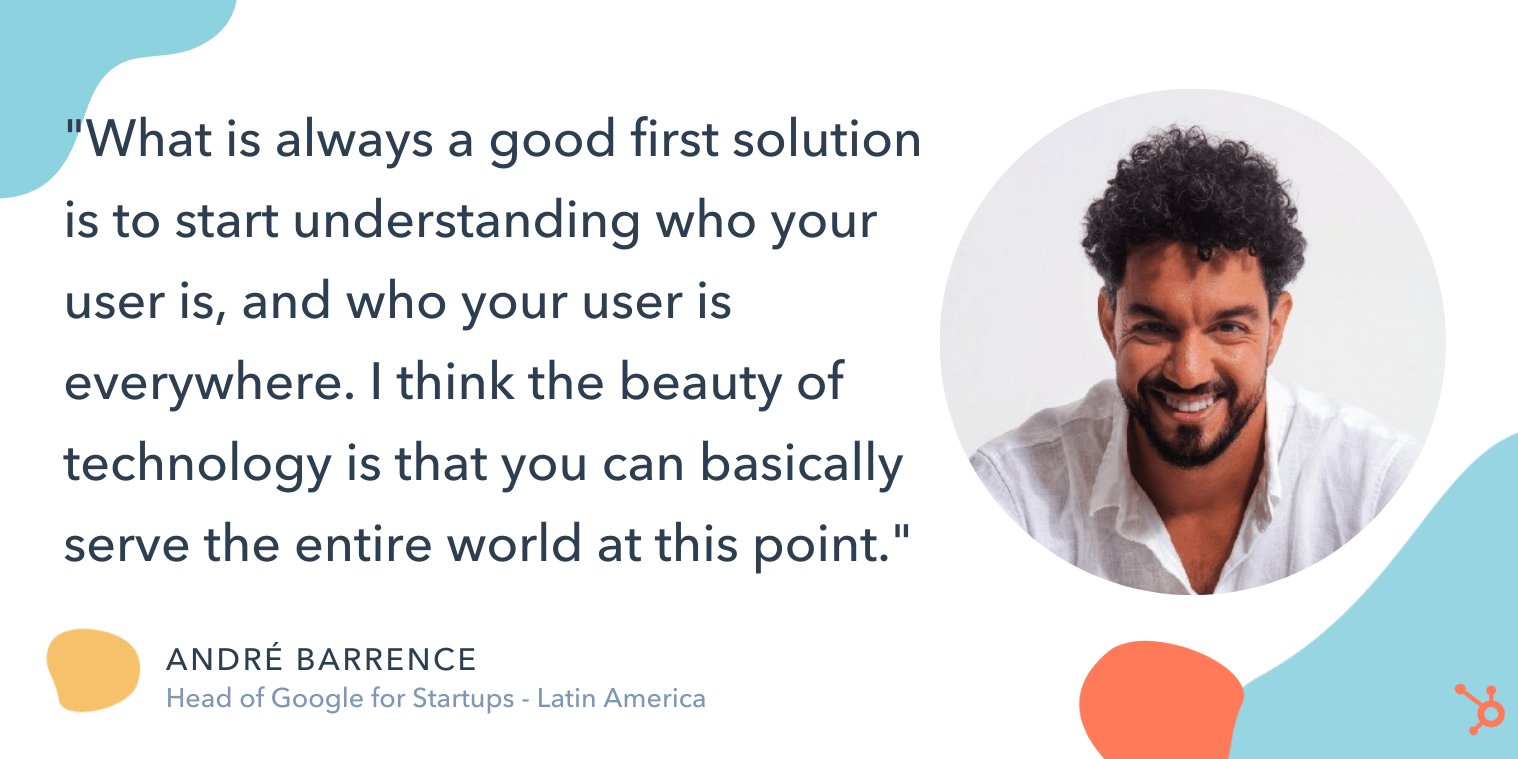
As Barrence points out, “What is always a good first solution is to start understanding who your user is, and who your user is everywhere, you know?”

Barrence adds, “I think that startups begin building a product with a specific user in-mind — and startups operate on this idea of serving on a match need, or serving some particular challenge that hasn’t been sold yet. And I think the beauty of technology is that you can basically serve the entire world at this point.”

andre quote on how to globalize your marketing efforts

At this stage, using highly effective analytics tools is key to ensuring you understand your global target persona.

Additionally, you’ll want to use data to determine which region(s) seem most interested in your products or services. This information will help you select a few countries for which you want to create a targeted, localized marketing strategy.

2. Figure out which stories appeal to different audiences globally.

While your product might serve the same needs across the globe, the stories you tell to highlight your product’s key benefits will vary significantly.

As Barrence puts it, “Once you’ve formed a hypothesis on who your user is and why they’re searching for your product, you’ll want to build a marketing strategy that is locally relevant, because the worst experience is when you’re trying to solve for a local need of yours, and for something you’re facing in your own country — but the product that you’re searching for is built for a different experience entirely.”

This is where it’s vital to build credibility in local regions.

Credibility, Barrence adds, is a critical component that is oftentimes forgotten in the hustle of scaling a startup. Startups are often driven by performance — such as traffic, or user acquisition — and building a brand is usually an afterthought.

This is a mistake, particularly when globalizing your business.

“Startups are great at a performance mindset,” Barrence says, “but each time you’re attempting to reach new markets, you want to make sure you’re building a brand, as well.”

Barrence adds, “Once you test a few ways to position your brand in a local market, you’ll want to start developing a more robust strategy for acquiring those users or creating stronger relationships with them.”

3. Pay attention to local flavors when taking your product to the market.

There are a few key factors Barrence encourages every startup to take into consideration before expanding into new, international markets.

First, it’s critical your marketing team understands how to position your product in a new regional space.

As Barrence told me, “It’s very hard for a startup to easily take a position in the [Latin American] market, for instance, because startups in LATAM already understand the user, and they know how to communicate with them and position themselves in the market … So ignoring the local flavors in how you take your product to the market is a big mistake.”

andre interview answer

While he acknowledges this doesn’t have to be perfect, Barrence does tell me the bare minimum requirements when marketing to new international audiences includes:

  • Designing a localized version of your product — including language, user interface, and experience.
  • Translating your materials into the local language, and using more relevant, local examples or references in your marketing messages.
  • Offering support in the local language so users can access help easily when they have questions.

If you don’t have the time or resources to follow the above tips, you might want to reconsider whether it’s a good idea to globalize — since without these fundamentals, your users will have a poor user experience and your brand value will suffer.

Which leads me to my next point …

4. Know when globalizing isn’t a good idea for your business.

There are plenty of startups and small businesses that likely have untapped potential in markets outside of their native countries … but there are still others who should focus their efforts locally, at least for the time being.

So — how do you know which category your business falls into?

Ultimately, Barrence says it comes down to whether or not you have a strong foundation. As he puts it, “One big mistake startups make are scaling prematurely; and the second big mistake is ignoring the signs that you haven’t found product-market fit.”

If you try scaling prematurely, he warns, you risk compromising your existing user’s experience and the health of your entire company. So it’s better to be cautious here.

He continues, “I think testing the waters and making sure you know how to navigate not only the market, but also how to navigate your product and operations within that market, is key.”

Barrence advises, “Not having enough strong evidence for product-market fit is the potential dark side of globalizing your marketing efforts … [If that’s the case], you should focus on building a successful business within your own country first.”

As the world becomes increasingly connected, you’ll want to dive deeper into your analytics to determine whether there is already a demand for your product or service outside of the U.S. — and, if there is, how you can address that demand with fresh, localized content or even revamp your marketing messages to ensure they’re global-first.

Ultimately, the decision to globalize your marketing efforts isn’t an easy one, but it could have big pay-offs in the long run. Among other benefits, globalizing your marketing materials expands your consumer-base and provides you with more opportunities to reach — and sell — to more customers. 

scaling showcase

Categories B2B

278 Social Media Holidays for Your 2021 Content Calendar [+Template]

Do you celebrate International Cat Day, Pizza Day, or Talk Like a Pirate Day?

There are a plethora of observance days worldwide during which marketers can share content relevant to their industries, get involved in a movement, or simply generate more awareness. But odds are, you probably don’t acknowledge these days until you see your favorite brand posting about it.

→ Free Download: Social Media Calendar Template [Access Now]

These social media “holidays” are a fun way to connect with new and existing followers who share an affinity for a specific food, fictional character, or pet.

While we don’t suggest sharing content on social media and then adding an irrelevant holiday hashtag to it, these holidays can be a chance to promote your brand in a relevant way. Not doing so could cause you to miss valuable opportunities where your brand can join the conversations taking place among members of your target audience.

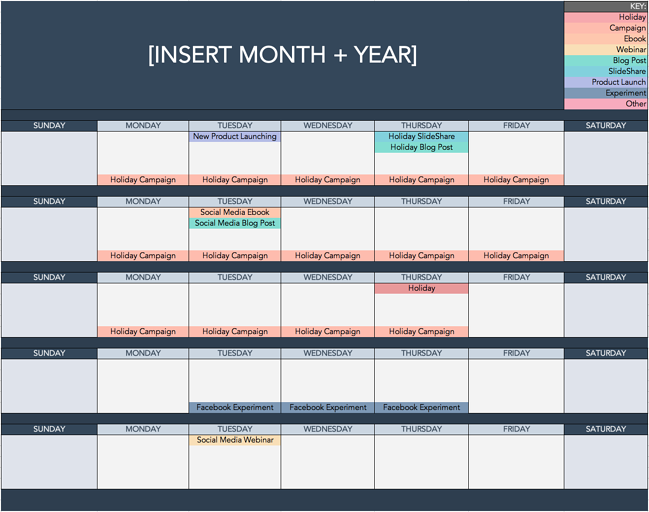
To help you plan for trending holidays, we created a list that you can bookmark, as well as a downloadable calendar so you can receive automatic reminders.

Downloadable Holiday Calendar

To help you keep track of all these unique holidays, here’s a Social Media Holiday Google Calendar.

Aside from 2021 holidays, we’ve also set dates on the calendar to repeat annually — either on the exact date they occur or the weekday they occur within the month.

Want to finish out your 2021 calendar with some upcoming holiday posts? Tap the + symbol in the lower right-hand corner of the calendar below to add it to your own Google calendar.

social media holiday calendar templateUse the Above Template to Plan Out Your Social Media Holiday Posts

National & Global Holiday Calendar: 2021

The list isn’t exhaustive (there are a lot of food-specific holidays out there), and these dates and hashtags may still be subject to change. But this is a great starting point for social media marketers who want to learn more about what’s trending and how they can plan their content in a way that will be fun and engaging on social platforms.

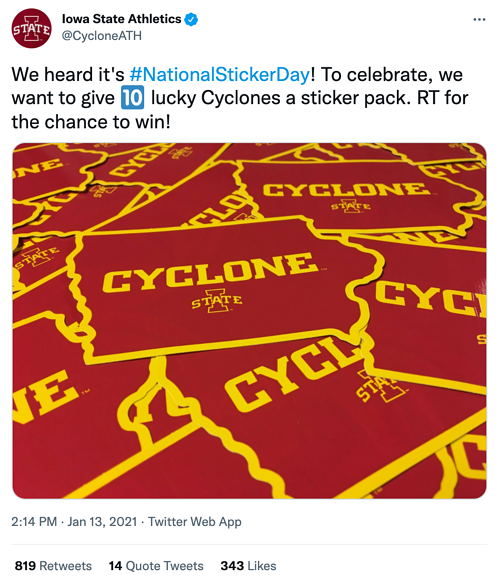
January 2021 Social Media Holidays

iowa state athletics national sticker day social media holiday tweet

Image Source

February 2021 Social Media Holidays

zach covey national weather persons day social media holiday tweet

Image Source

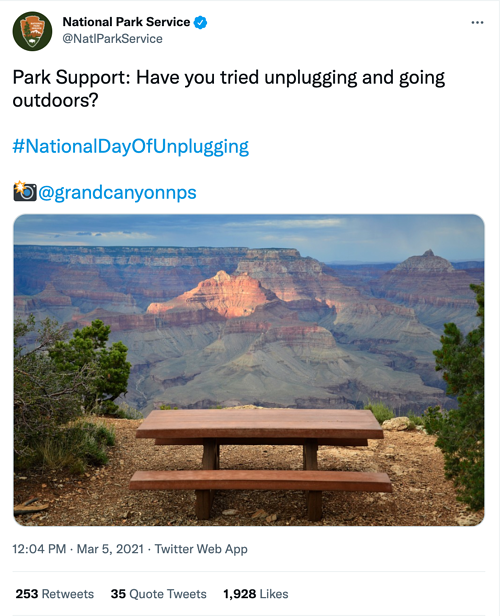
March 2021 Social Media Holidays

national park service national day of unplugging social media holiday tweet

Image Source

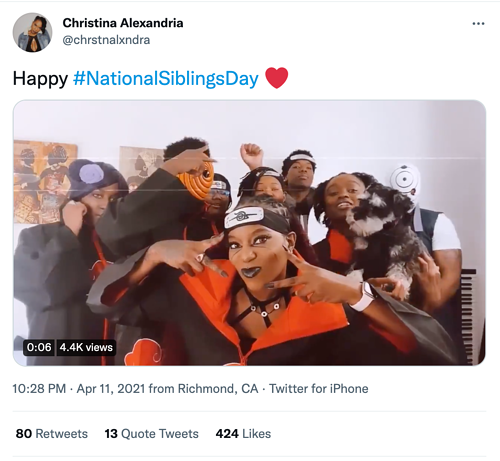
April 2021 Social Media Holidays

christina alexandria national siblings day social media holiday tweet

Image Source

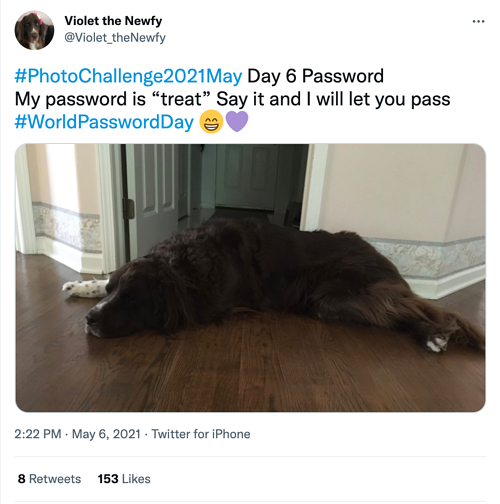
May 2021 Social Media Holidays

violet the Newfy world password day social media holiday tweet

Image Source

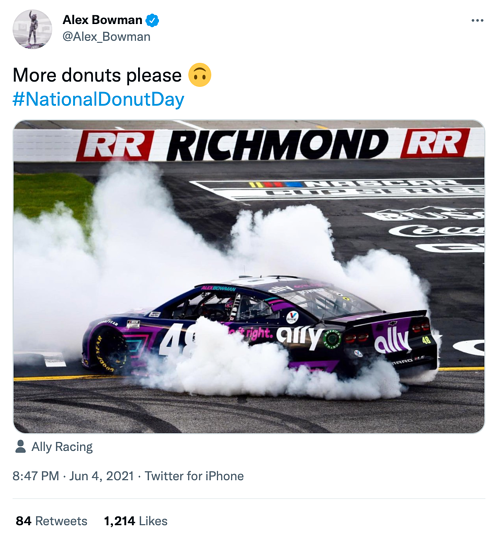
June 2021 Social Media Holidays

Alex bowman National Donut Day social media  holiday tweet

Image Source

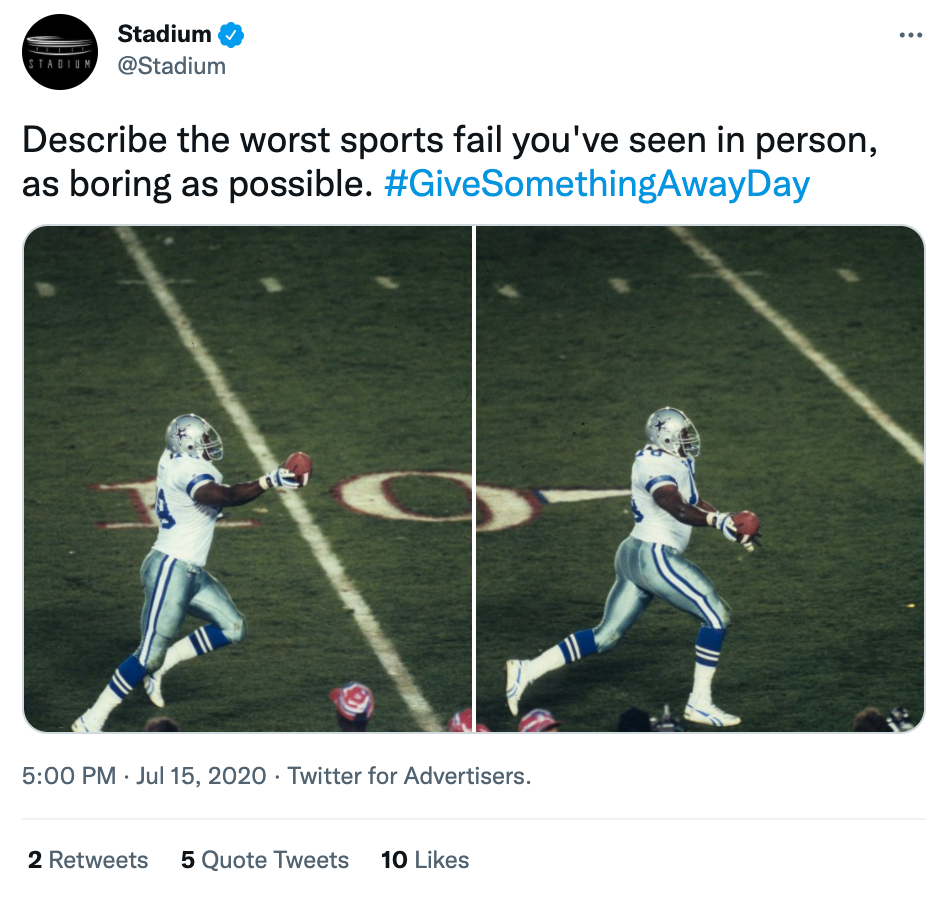
July 2021 Social Media Holidays

Stadium Give Something Away Day Social Media Holiday Tweet

Image Source

August 2021 Social Media Holidays

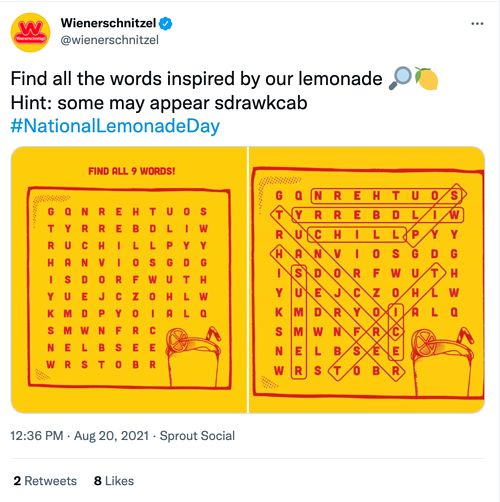
Wienerschnitzel National Lemonade Day Social Media Holiday Tweet

Image Source

September 2021 Social Media Holidays

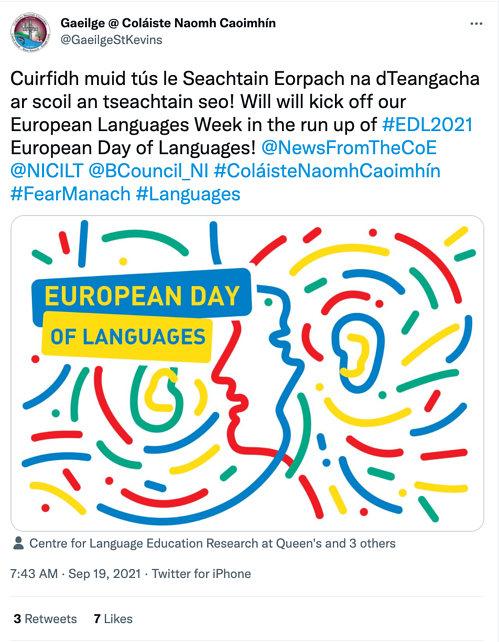
Gaeilge @ Colaiste Naomh Caoimhin EDL 2021 Social Media Holiday Tweet

Image Source

October 2021 Social Media Holidays

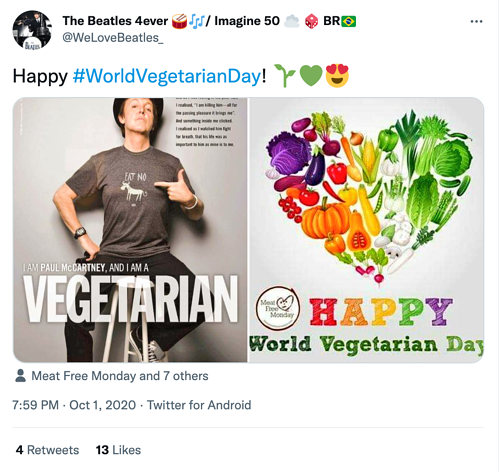
The Beatles 4ever World vegetarian Day Social Media Holiday Tweet

Image Source

November 2021 Social Media Holidays

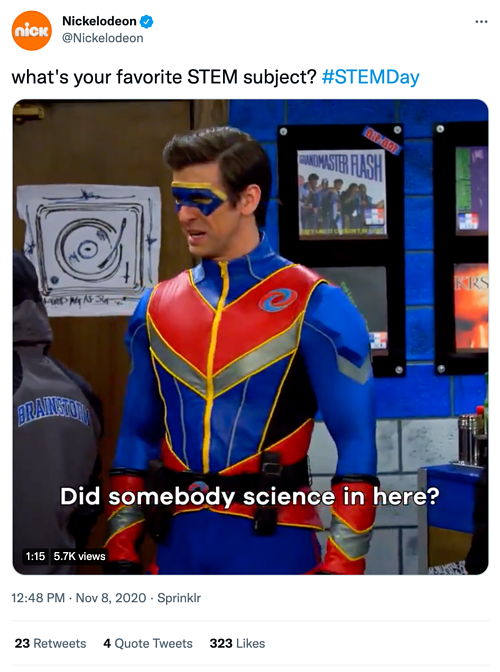
Nickelodeon STEM day Social Media Holiday Tweet

Image Source

December 2021 Social Media Holidays

Nobel Prize Day Globalnews.ca Social Media HolidayTweet

Image Source

Sources: National Day Calendar, Sprout Social, TrackMaven, Holiday Insights, Brownielocks, National Peace Corps Association, Sparkflow, There’s a Day for That

Editor’s Note: This post was originally published in January 2017 but is updated annually for comprehensiveness. The most recent update of this post was March 2021.

social media content calendar

Categories B2B

The Best Free Business Budget Templates

Whether you’re a solopreneur or running a massive corporation, you need a business budget to understand where your money is coming from and going. A business budget template can help keep the numbers organized, making it easy for you to track revenue, plan for expenses, and save for future growth.

Click here to download 8 free marketing budget templates.

You don’t have to be an accountant to organize your business budget. There are thousands of business budget templates out there to make the process easy. Once you understand what a business budget is and how it can work for you, you can use one of the following free templates to start organizing your finances.

The business budget follows a set template, which you can fill in with estimated revenues, plus any recurring or expected business expenses.

For example, if you run a digital marketing business, you might know that you typically make about $10,000 for your work creating campaigns, plus an extra $5,000 for your digital courses. You’d list the estimated revenue from all of your business’ revenue streams as incoming money for the business.

Then, you have your recurring expenses, which you would list as outgoing money. This could include employee salaries, office expenses, and software and technology costs.

How to Create a Business Budget

Creating a business budget is a straightforward process, but it can be more complex for larger companies. Here are the basic steps to creating a business budget.

1. Find a Template or Make a Spreadsheet

There are many free or paid budget templates online these days, so you can either use one of those to start, or make a simple spreadsheet with custom rows and columns based on your business. We list a few helpful templates below.

2. Fill in Revenues

Once you have your template, you’ll start by listing all the sources of your business’ income. With a budget, you’re planning for the future, so you’ll need to estimate this based on previous months’ or years’ revenues. For a new small business budget, you’ll rely on your market research to estimate the first revenues for your company.

3. Subtract Fixed Costs for the Time Period

Fixed costs are the recurring costs you have during each month, quarter, or year. Examples include insurance, rent for office space, website hosting, and internet.

4. Consider Variable Costs

Variable costs will change from time to time. Examples include utility bills, advertising costs, office supplies, and new software or technology. While you may always need to pay some variable costs, like utility bills, you can also shift how much you spend toward things like advertising expenses when you have lower-than-average estimated income.

5. Business Budget Planning

Unexpected expenses might come up, or you might want to save to expand your business. Either way, you need to review your budget after including all expenses, fixed costs, and variable costs to find out how much money you can save. It’s wise to create multiple savings accounts for emergencies and for money meant to go back into the business to drive growth.

How to Manage a Business Budget

There are a few key components to managing your business budget to keep it healthy.

Budget Preparation

The process all starts with properly preparing and planning the budget at the start of each month, quarter, or year. You can also create multiple budgets, some short-term and some long-term. During this stage, you will also set spending limits and create a system to regularly monitor the budget.

Budget Monitoring

For larger businesses, you might delegate budget tracking to multiple supervisors, but even if you are a one-person show, you need to regularly monitor the budget. That means setting a time in your schedule each day or week to review the budget and track actual income and expenses, then compare the actual numbers to the estimates.

Budget Forecasting

With regular budget tracking, you can always know how your business is doing. Check-in regularly to determine how you are doing in terms of revenue, where you have losses, where you can minimize expenses, and how you can move more money into savings. You can use well-tracked budgets to create more accurate budgets for future time periods.

Why is a Budget Important for a Business?

A budget is crucial for businesses. Without one, you could easily be drowning in expenses or unexpected costs compared to incoming money.

The business budget helps with several operations. You can use a business budget to keep track of your finances, save money to help you grow the business or pay bonuses in the future, and prepare for unexpected expenses or emergencies.

You can also review the business budget to determine when to take the next leap for your business. For example, you might be dreaming of a larger office building or the latest software, but you want to make sure you have a healthy net revenue before you make the purchase.

Best Free Business Budget Templates

1. Marketing Budget Template

HubSpot Marketing Budget Template

Image Source

Knowing how to manage a marketing budget can be a challenge, but with helpful free templates like this marketing budget template bundle, you can track everything from advertising expenses to events and more.

This free bundle includes eight different templates, so you can create multiple budgets to help you determine how much money to put toward marketing plus the return on your investment.

2. Small Business Budget Template

Small business budget template

Image Source

For small businesses, it can be hard to find the time to draw up a budget, but it’s crucial to help keep the business in good health.

Capterra offers a budget template specifically for small businesses. It works with Excel, and you input projections for the year. Then, the spreadsheet will project the month-to-month budget, and you can input your actual revenue and expenses to compare and easily see profits and losses.

3. Startup Budget Template

Startup budget template

Image Source

What if you don’t have any previous numbers to rely on to create profit and expense estimates? If you are a startup, this Gusto budget template will help you draw up a budget before your business is officially in the market. This will help you track all the expenses you need to get your business up and running, estimate your first revenues, and determine where to pinch pennies.

4. Free Business Budget Template

Business budget template

Image Source

You might be familiar with Intuit, as many companies big and small rely on Intuit’s services like Quickbooks and TurboTax. Even if you don’t use the company’s paid financial services, you can take advantage of Intuit’s free budget template, which works in Google Sheets or Excel.

It features multiple spreadsheet tabs and simple instructions. You enter your revenue in one specific tab and expenses in another. You can also add additional tabs as needed. Then, like magic, the spreadsheet uses the data in the income and expense tabs to summarize the information and even determine net savings and the ending balance.

5. Department Budget Sheet

Department Budget TemplateImage Source

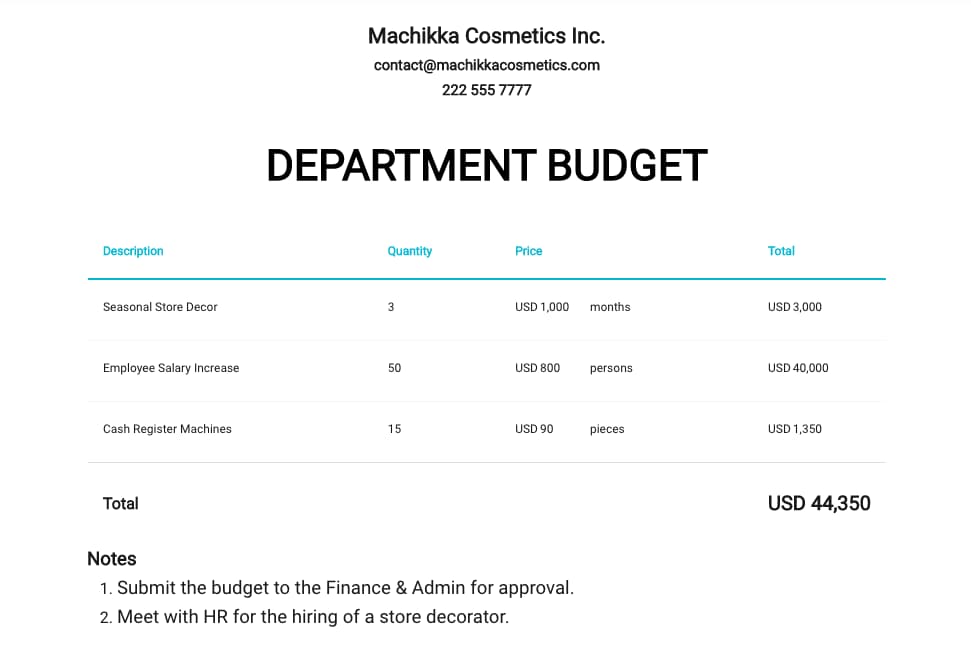
A mid-to large-size company will have multiple departments, all with different budgetary needs. These budgets will all be considered into a massive, company-wide budget sheet, but having a specific template for each department can help teams keep track of spending and plan for growth.

This free template from Template.net works in either document or spreadsheet formats and can help different departments keep track of their income and spending.

Create a Business Budget to Help Your Company Grow

Making your first business budget can be daunting, especially if you have several revenue streams and expenses. But once you get it set up, it’s easy to replicate regularly, and it’s even easier to get started if you have a business budget template to follow.

With a helpful business budget template, a little planning, and regular monitoring, you can plan for the future of your business, including bonuses, new product or service offerings, and expansions.

New Call-to-action

Categories B2B

12 Gantt Chart Examples You’ll Want to Copy

Gantt charts. Love ‘em, hate ‘em, or can’t live without ‘em, they’re a reality of a marketer’s life. But how do you make yours stand out from the rest?

I’ve gathered some of the best examples around, along with some free templates to get you started. Dive in below and find your favorite. But first …

→ Download Now: Free Gantt Chart Template

The elements within a Gantt chart can be grouped into four categories: resources, milestones, tasks, and dependencies.

  • Resources: Project managers must have insight into what resources are needed for tasks outlined in a Gantt chart, in order for each to be completed on time.
  • Milestones: Along your timeline, there will likely be milestones, both small and large, that must be hit in order to keep your project on track. A milestone for a blog launch might be, “Blog post draft due on 5/30.
  • Tasks: There are specific things that need to be completed along the way of your project. In our blog post example, a task might be, “Edit blog post.
  • Dependencies: Tasks on your Gantt chart will be related to each other, for example, the editor won’t be able to complete her task of editing the blog post until the writer has met their milestone and submitted their draft on 5/30. These are dependencies and should be noted in your chart.

Benefits of Using a Gantt Chart

The main goal of a Gantt chart is to track the timeline and completion of a project. It’s beneficial for project managers who need to keep team momentum on campaigns with many moving parts, like product launches or marketing events. Here are some additional benefits of using Gantt charts: 

  • Visual tracking gives an overarching view of projects and their timelines, helping DRIs understand progress and assign responsibility accordingly. 
  • Clear project timelines aid with resource planning, as you’ll know which tasks require which tools and exactly when DRIs will need those tools.  
  • Visual understanding of which project elements rely on each other for completion so PMs can inform responsible individuals of high-priority tasks. 
  • Increased transparency, as all involved parties are aware of expectations and how individual progress impacts team progress.

You can create Gantt charts in Excel, PowerPoint, Google Sheets, and more, and this tracking method can be used in a variety of industries, from marketing to construction, and even design.

So, what does that look like? Let’s dive in with some beautiful Gantt chart examples, below. Prepare to geek out.

Gantt Chart Examples

1. Gantt Chart in Excel

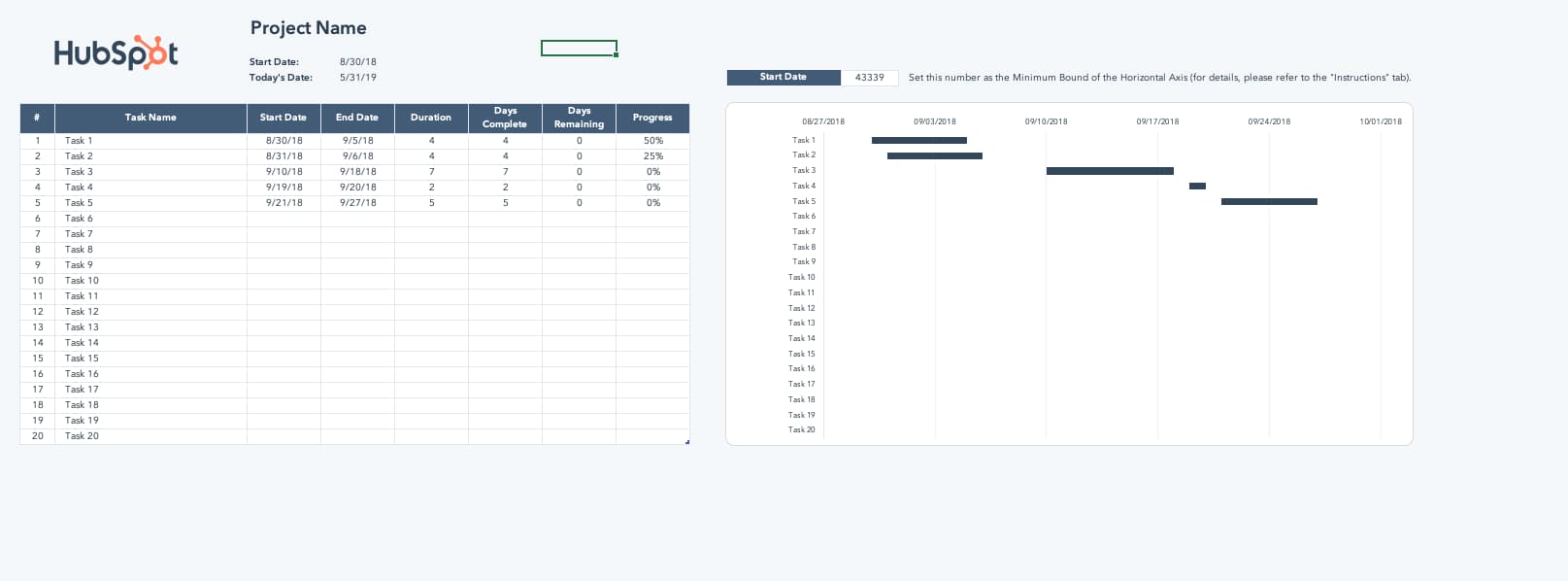
Creating Gantt charts in Excel is a common practice and one you’ll likely come across in your work. Excel doesn’t have a predefined Gantt chart, but the “Stacked Bar” feature is your friend, once more, allowing you to show project progression. Here’s an example of an Excel Gantt chart. Download it free, here. gantt chart excel template

 Image Source

And here’s a helpful “how-to” video for the excel-challenged among us <raises hand>.


2. Gantt Chart in PowerPoint

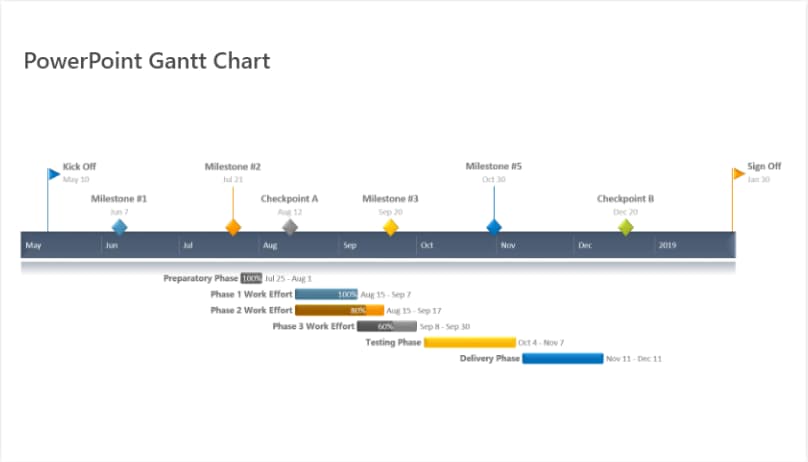
Want to include a Gantt chart in your next PowerPoint Presentation? Use this PowerPoint example as your guide. PowerPoint doesn’t have a built-in Gantt feature, but you can build and edit a chart inside of the platform using their “Stacked Bar” feature.

gantt chart powerpoint template exampleImage Source

How to Make a Gantt Chart in PowerPoint

When using the above template to make a Gantt chart in PowerPoint, consider these pro tips: 

  • Leverage the task bars to your advantage and adjust their length in accordance with your plan. This template is also flexible, so you can shorten or increase the length of tasks if things come up during your project execution process. 
  • Make unique color-codes for each specific task so you can place a corresponding milestone image when completed so you can monitor your progress and immediately understand what color means what. 

3. Gantt Chart in Word

What’s that? You’re not familiar with Microsoft’s “Stacked Bar” feature yet? Well, if you’re getting friendly with Gantt charts, you’ll be using this go-to feature quite a bit.

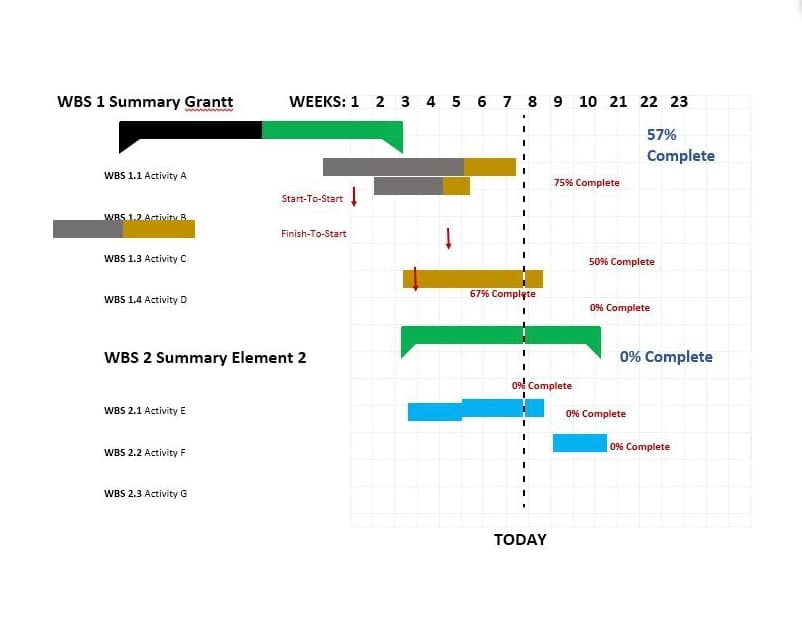
If you’re creating a Gantt chart in Microsoft Word, you’ll stack bars once more. But if you’ll be updating and tweaking your Gantt chart regularly, Excel or PowerPoint may give you better flexibility. gantt chart microsoft word template

Image Source

How to Make a Gantt Chart in Word

When using the template above, leverage the stackable bars feature to create an interactive Gantt chart to clearly demonstrate task progress and monitor your accomplishments. 

In addition, create a daily check-ins schedule on your chart so you can move the “Today” line forward as each day goes on, helping you stay on track and understand what’s to come.

4. Gantt Chart in Google Sheets

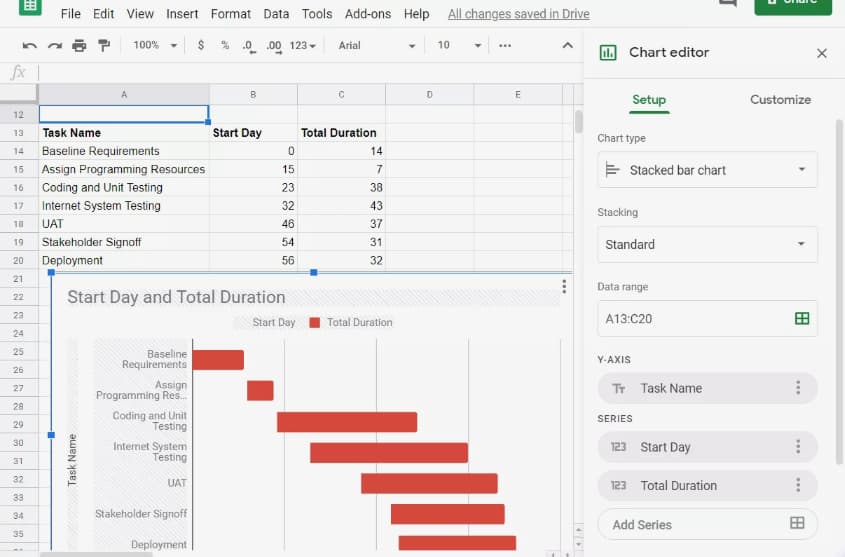
If Google Sheets is where you spend most of your time, this is the Gantt chart for you. G-Sheets makes it easy to build customizable Gantt charts you can edit as needed — all using a few simple formulas.

gantt chart google sheets templateImage Source

How to Make a Gantt Chart in Google Sheets

If you’re creating a Gantt chart in Google Sheets, use the above template and circulation table for automated chart creation. Simply input the information specific to your business, and the chart will be created automatically. 

You have less creative freedom with this chart, but it is great for those hesitant to create a chart from scratch.

5. Gantt Chart in Google Docs

Want a Gantt Chart you can share and collaborate on with colleagues? Consider creating your chart in a Google Document. Save it to your Google Drive and share as normal. Google offers “Stacked chart” options in their “Chart Editor,” so getting started is a breeze.

gantt chart google docs templateImage Source

How to Make a Gantt Chart in Google Docs

In Google Docs, use the timeline template documents to your advantage and give yourself an overview of your project progress. It’ll help with visualization, staying on track, and allowing you to see how you’re progressing over time so you can share information with relevant stakeholders, internal and external.

6. Gantt Chart for Editorial Calendar

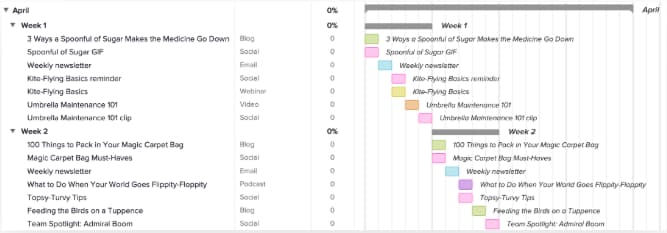
Take your editorial calendar up a notch with a Gantt chart. Include publication dates as your milestones, add subgroups for each phase of content creation, and add tasks to your chart.

gantt chart example: editorial calendarImage Source

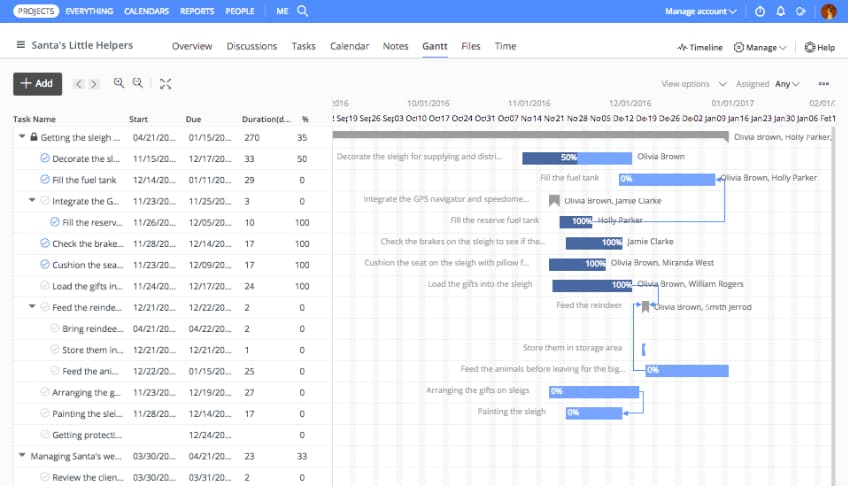
7. Gantt Chart for Project Management

Project management is one of the most common verticals relying on Gantt charts. These charts help project managers identify the tasks involved in each project, create a timeline for each task, and assign dates, tools, and progress updates for each of the tasks within the project.
gantt chart example: project managementImage Source

8. Gantt Chart for Marketing Campaign

There are many tools available that help marketers create Gantt charts especially for marketing campaigns. This example, from GanttPro offers ready-made campaign templates with predefined tasks, subtasks, and milestones. gantt chart example: marketing campaign gantt chartImage Source

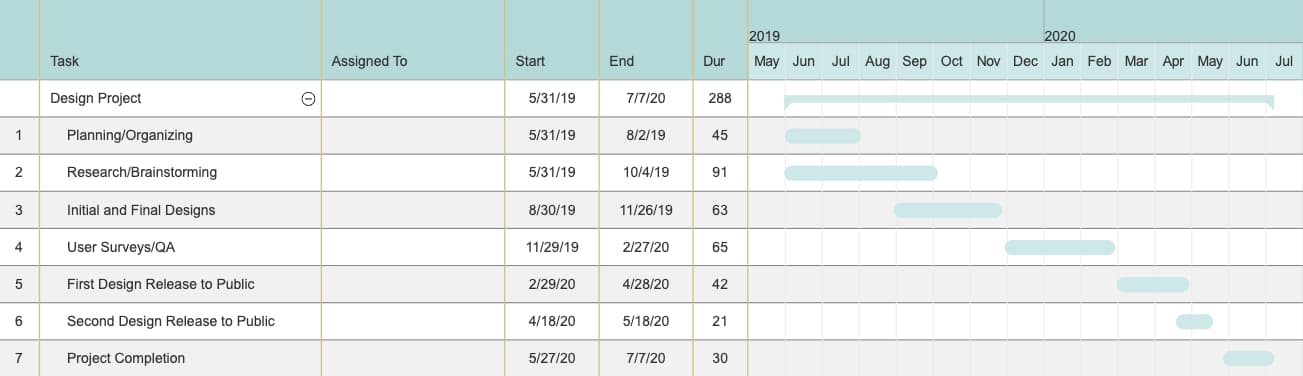
9. Gantt Chart for Design Projects

Designers, you can use Gantt charts, too. Plan design launches, track brainstorming, and share draft progress with a carefully organized chart, like the example below. gantt chart example: design projects

Image Source

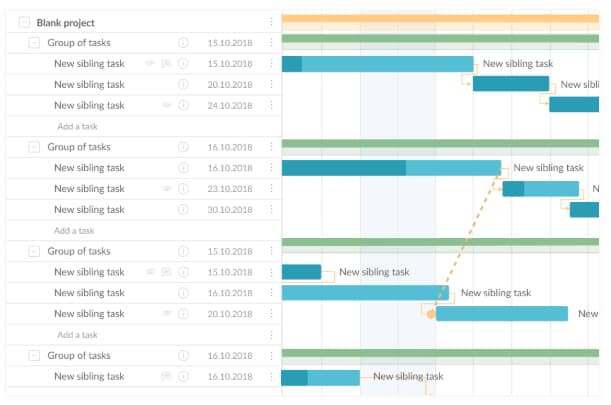
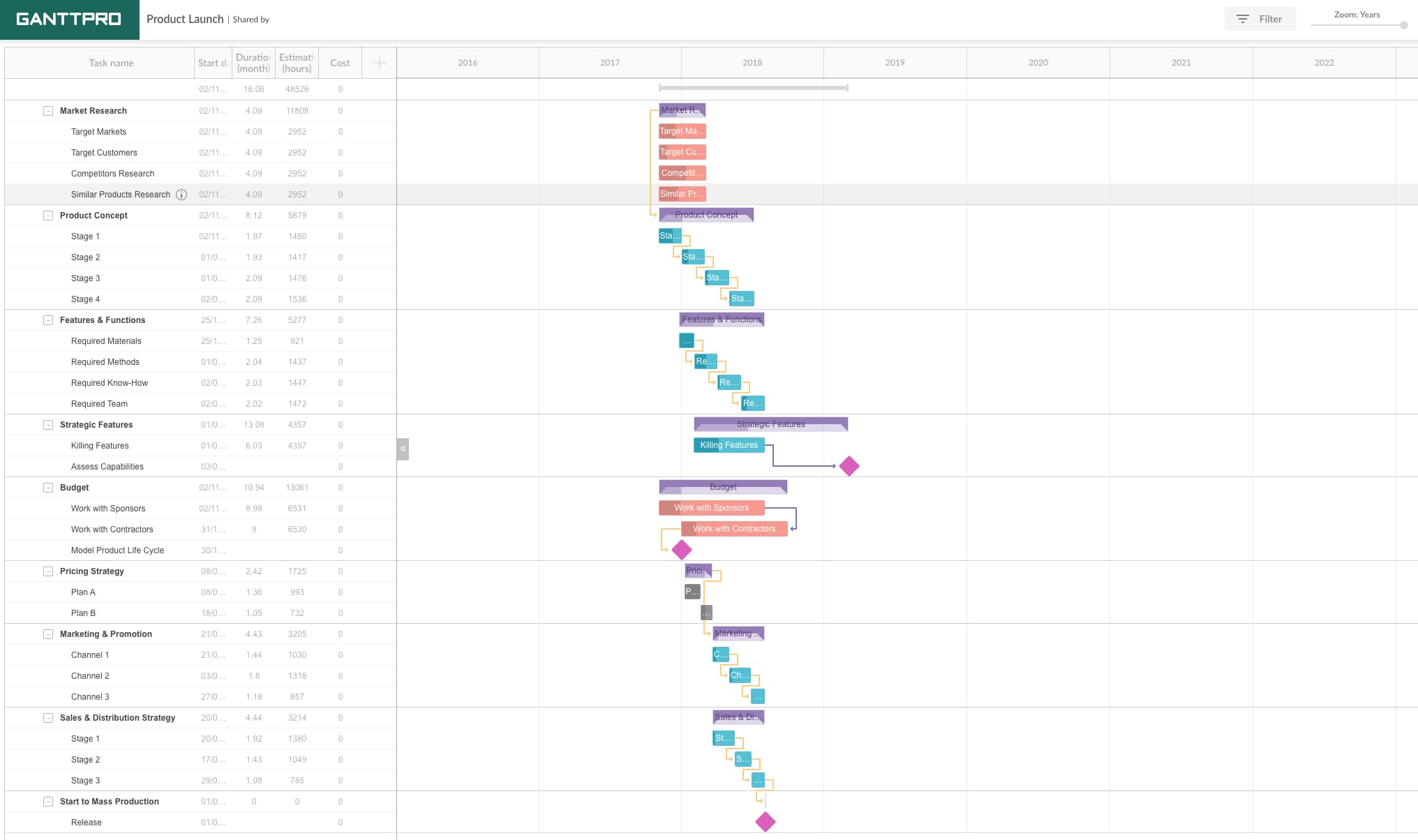
10. Gantt Chart for Product Launch

Product launches have many moving parts. Keep track of research, budgets, team roles, and even risk assessment in a customizable Gantt chart like this one. You can even set dependencies and assign tasks to certain people.

gantt chart example: product launchImage Source

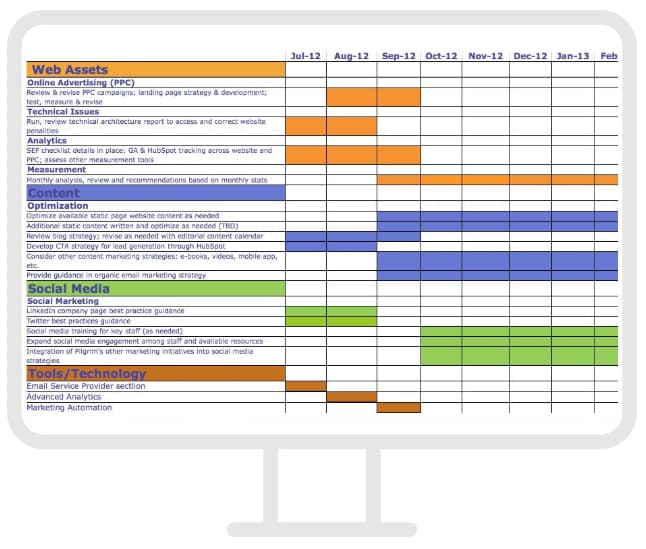
11. Gantt Chart for Social Media Campaign

When you’re mapping a social media marketing campaign using a Gantt chart, make sure to include the tools you’ll need, the content you’ll be sharing, and the assets used on each channel. We loved this example, from Fabrik. gantt chart example: social media campaign

Image Source

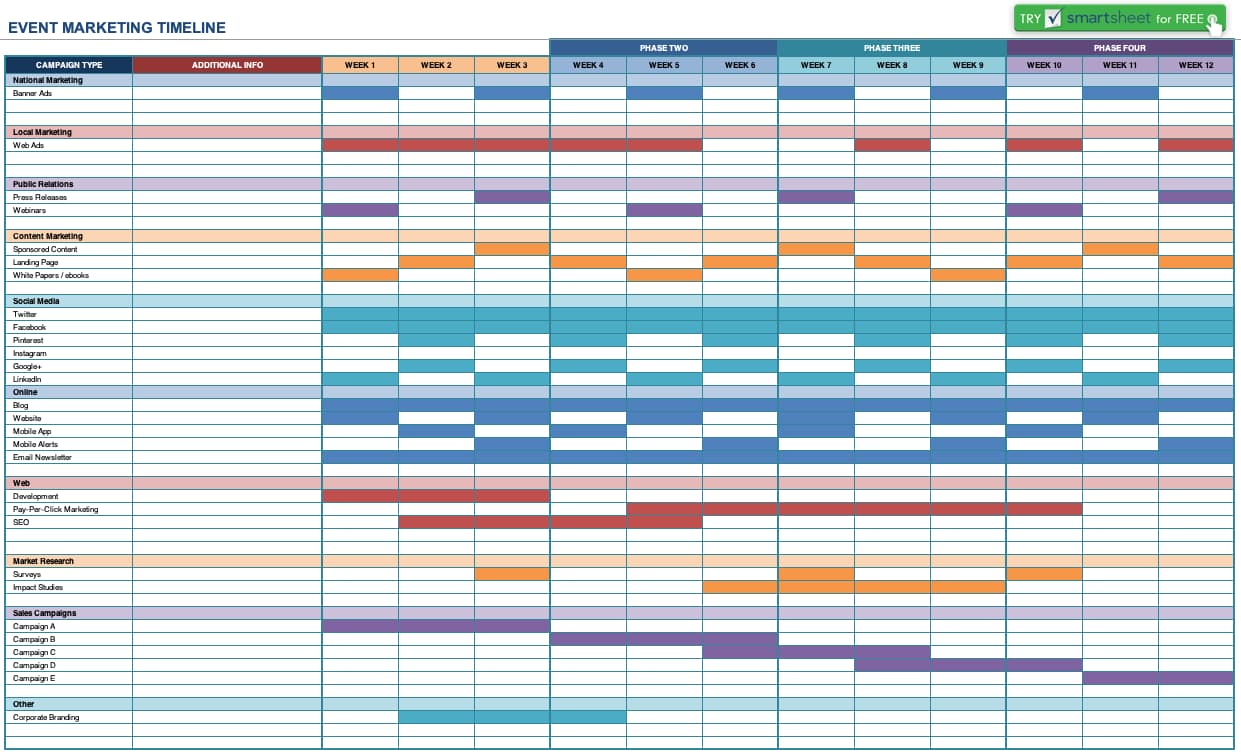
12. Gantt Chart for Event Marketing

From outreach prior to the event to “Thank you” emails once it’s over, planning an event requires high levels of organization. Use a Gantt chart like this one to keep track of your strategy, team progress, and key actions before, during, and after your event.
gantt chart example: event marketing

Image Source

When you’re ready to begin creating your own Gantt chart, refer to the high-quality examples on this list and download our free Excel template to get started. 

New Call-to-action

Categories B2B

20 Tips to Write Catchy Email Subject Lines [+ Examples]

No matter what they say, people do judge emails by their subject lines.

In fact, 47% of marketers say they test different email subject lines to optimize their emails’ performance. That’s why it’s so important to craft subject lines that are compelling enough to get people to click through.

While they may seem like a small part of your message, they’re one of the very first impressions you have on your email recipients. And, they’re a marketer’s ticket for standing out in a crowded inbox.

Do you want your email content opened, read, and clicked? It all starts with the subject line. Read on for some tried-and-true tips to help jazz up your subject lines and boost your email engagement.

Download Now: 100 Email Subject Line Examples

What makes a good email subject line?

Before we get to our tips, let’s go over some fundamentals of what makes a great subject line. Regardless of your goals, these are the essential elements that your subject line should possess:

1. Urgency

Creating a sense of urgency is an efficient way to get people to take action. You can create a similar effect in your subject lines strategically.

By communicating a known start and end date to a special sale or promotion, viewers scrolling through their inbox will click to see what they can get in that window of time. This is also a good practice when done in a small series of emails counting down the window of opportunity — as long as you’re not flooding their inbox and coming off spammy.

2. Curiosity

Sometimes, subject lines work because of their ability to send the message, “You will benefit from opening this email.” But other times, it’s good to maintain some sense of mystery — especially if it pique’s the recipient’s natural curiosity and interest. Because they require opening the email to get more information, they can result in, well, a higher open rate. But make sure the subject line, while enigmatic, still aligns with your brand. Too obscure, and it could end up being seen as spam.

3. Offers

Here’s where that benefit of opening a given email comes in. At the end of the day, people love new things and experiences — especially when they’re free, or at least discounted. Open with that by including it in your subject line. Personally, I’m much more inclined to open my daily newsletters when there’s an offer or allusion for “free stuff” directly mentioned in my inbox.

4. Personalization

No two email subscribers are the same — and, sometimes, that means the emails you send to them shouldn’t be, either. At this point, marketers have never had more ways to learn about their subscribers’ preferences, jobs, or general (dis)likes. So when you send them content, on occasion, make it catered toward the individual.

5. Relevance and Timeliness

When we subscribe to an email list, it’s usually because we want to be kept informed, or at least learn more about a given topic (more on that later). Similar to piquing your audience’s curiosity, crafting email subject lines that incorporate trending topics or timely headlines can help you establish your brand as an authority within your industry — and can compel people to click to read.

6. Name Recognition

Let’s face it: We all have famous people who, at some point, we presently or previously have admired. And when you understand your audience’s preferences and interests, you can pique their interest by including the names of these admired, recognizable individuals by including them in your content — and mentioning them in your email subject lines. But take heed: This tactic really only works when it aligns with your brand, product, or service. So keep it relevant, rather than just throwing out a name for the sake of recognition.

7. Cool Stories

At the risk of sounding like a broken record, here’s another place where curiosity comes into play. By front-loading your email subject line with a compelling allusion to a story — but can only be read if opened or clicked — your audience is likely to become intrigued, and want to learn more. Again, make sure the story is relevant to your brand. Otherwise, it might just confuse your readers and prevent them from opening the email.

Now that you know the fundamentals, let’s dive into email subject line best practices.

Email Subject Line Best Practices

1. Learn from successful email subject line examples.

Whenever we’re scratching our heads wondering what to make our subject line, we often look to examples for inspiration. Seeing clever use of wordplay or emojis on one of our favorite newsletters can help us think of new ways to approach our subject line.

To help you do the same, we’ve compiled a list of 100 email subject lines from real businesses. We hope you’ll be just as inspired.

email subject lines examples

Download the Free Email Subject Lines Examples Guide

2. Keep it short and sweet.

Email subject lines will get cut off if they’re too long, particularly on mobile devices. And with up to 46% of email opens taking place on mobile, we recommend using subject lines with fewer than 50 characters to make sure the people scanning your emails read the entire message.

If you’re struggling to keep your subject lines short, think about which words matter less and where you can remove a frivolous detail. For example, if you’re sending an order confirmation, doesn’t “Your order is being processed” look better than “Order #9435893458358 is being processed”?

The same goes for your regular emails: Don’t waste your time including the word “update” or “newsletter” in the subject line. Some studies even suggest these words can decrease the message’s open rate since it tells readers the email is associated with a series, and therefore they can catch the next one.

3. Use a familiar sender name.

That name recognition we mentioned earlier doesn’t just apply to the famous — it applies to the familiar. When setting your sender name, be as human as you can. [email protected] is both inviting and unintimidating to people when they open their inboxes.

If you’ve already met your recipients from a previous conversation, use your own name as the sender’s address — even if the email is technically coming from the company as a whole. The best impression you can make on your customers is that they’re working with you, the individual — not the entire business.

“If the ‘from’ name doesn’t sound like it’s from someone you want to hear from, it doesn’t matter what the subject line is,” explains Copy Hacker‘s Joanna Wiebe. Ultimately, people are busy, and they simply don’t bother with you if you don’t sound like someone who would make for an easy (or at least friendly) conversation.

4. Avoid the ‘no-reply’ sender name.

Thanks to the amount of spam people get these days, most people hesitate to open emails from unfamiliar senders. And, even fewer people like talking to a robot. Think about when you call a company and can’t get a hold of an actual person. It’s frustrating, right? This goes for email, as well.

Never use “[email protected].” I repeat: Never use this email address. Not only does it make it look less personable, but it also stops people from adding your email to their address book.

Instead, avoid using a generic email address and send the email from a real person. For instance, we once found that emails sent from “Maggie Georgieva, HubSpot” performed better in terms of opens and click-through rate than emails sent from just “HubSpot.” (HubSpot customers: Learn how to personalize the “From” name and email address here.)

5. Use personalization tokens.

Remember the personalization we mentioned earlier? Using personalization tokens — like name or location — in the subject line adds a feeling of rapport, especially when it’s a name. Everyone loves the sound of their own name. Plus, it increases clickthrough rate: In fact, research has shown that emails that included the first name of the recipient in their subject line had higher click-through rates than emails that did not.

One example of how brands affix this information to subject lines is the dog-walking company, Wag! who does this with dog names. Here’s one such email that a HubSpot writer received:

Email newsletter by Wag dog-walking service with pet name in the subject line

That’s great personalization and great timing.

Another personalization tactic that works is to tailor subject lines to the recipient’s location — things like lists of their respective cities’ best outdoor bars and restaurants.

Just don’t go overboard with the personalization here. That can be a little creepy. But little personalized touches show that you know more about your recipients than just their email address. However, if you can’t (or don’t want to) use personalization tokens in the subject line, use “you” or “your” so it still sounds like you’re addressing them directly.

6. Segment your lists.

While email blasts that go out to your entire list might be relevant and helpful to some people, it won’t be to others — and could cause confusion or frustration. Why is this restaurant sending me a list of the best local steakhouses when I’m a vegetarian? Why is this company sending me case studies when I just signed up for its email list yesterday?

Personalize the experience using information from the actions your customers have already taken — from which forms they’ve filled out, to which industries they’re in, to what their personal preferences are. In email marketing, you can personalize your recipients’ experience using a little thing called list segmentation.

7. Don’t make false promises.

Your email subject line is making a promise to your reader about what you will deliver in your message. Make sure that you make good on that commitment — and do not try to get your email opened by making false promises. This will irk your audience, and they’ll learn not to trust your subject lines, resulting in a lower open rate and a higher unsubscribe rate.

8. Do tell them what’s inside.

Speaking of making promises, if your visitor has downloaded an offer and you’re delivering it via email, it’s a great idea to use a subject line that says something like, “Your new ebook inside!” or, “Your guide awaits!” This works better than a simple “thank you” in the subject line because it makes it clear that something is waiting inside the email.

9. Time it right.

Sending an email at the right time with the right subject line can make a huge difference in open and click-through rate. A prime example? When food publication Eater sends at 6:45 P.M. on a Wednesday evening that said, “Where to Drink Beer Right Now” — just in time for happy hour. Nailed it.

Another favorite example is a classic email from Warby Parker with the subject line, “Uh-oh, your prescription is expiring.” It was sent two weeks before the recipient needed to renew his prescription. By sending an email at the right time, Warby Parker increased the chances of their email getting opened — and included a relevant call-to-action about getting a glasses upgrade, too.

10. Use concise language.

Keep in mind that people scan their inboxes very quickly — so the more clear and concise your subject line is, the better. It’s usually a lot better to be concise than it is to use complex and flowery language — unless you’re going for an elusive subject tone to entice your recipients.

When you’re going for a concise subject line, think about how your email will benefit your recipients. You’ll want to make that benefit very clear. For example, “Increase your open rates by 50% today” is more appealing than “How to increase open rates.”

11. Start with action-oriented verbs.

Subject lines are similar to calls-to-action, in that you want the language to inspire people to click. Subject lines that begin with action verbs tend to be a lot more enticing, and your emails could be drastically more clickable by adding a vibrant verb at the beginning.

Actionable subject lines will inspire people to click on your email by instilling urgency and excitement. For example, in an email inviting people to a hockey legend dinner, the email subject line might read, “Dine with Bruins legend Bobby Orr,” rather than a more generic (and less actionable) “Local Boston Sports Legend Meal.” The former email uses “Dine” to help the reader envision themselves at a dinner table.

12. Make people feel special.

The psychology of exclusivity is a powerful thing. When people feel like they’re on the inside, it gives them a sense of belonging which builds loyalty and compels them to convert on your emails.

The right phrasing can make your recipients feel special — and the effect can be magical. A few ideas for phrasing include:

  • “For our beloved customers only”
  • “An exclusive offer for you”
  • “My gift to you”
  • “You’re invited!”
  • “Private invite”

13. Create a sense of importance.

There’s a phrase that, for many of us, is reminiscent of classic infomercials: “Act now!”

And while we wouldn’t encourage using that exact language in your content, we do agree that communicating urgency and scarcity in an email subject line can help compel readers to click (or act) — when phrased creatively and strategically.

But because you don’t want to be known as “the brand that cried wolf,” use these subject lines sparingly, and try to limit them to when the occasion genuinely calls for immediate action.

14. Use numbers.

A lot of businesses send emails with vague statements in their subject lines — which is why using data and numbers is a great way to get your emails noticed, demonstrate a clear and straightforward message about your offer, and set the right expectations.

Just like with blog titles, using numbers in your subject line is an effective email marketing best practice. You might use numbers to refer to the title of your listicle, the page length of an offer, a specific discount, or the numerical benefit of a particular resource you’re providing — like “Join more than 750 others at this event!”

15. Pose a compelling question.

Asking a question in your subject line can also draw readers in — especially if you’re asking a question you know is relevant to your recipients’ buyer persona. This is just one way to pique that curiosity we mentioned earlier. For example, you might try the following: “Are you making these SEO mistakes?” or “Do you know what your website is doing wrong?”

Zillow once sent an email with the subject line, “What Can You Afford?” that linked to a website showing apartments for rent. A subject line like this is both encouraging and a touch competitive: While it gives hope that there are apartments out there that’ll fit within your budget, it also pits your cash against what the market offers.

Another example comes from DocuSign. It sent an email late in the lead nurturing process, with the subject line, “What are your customers saying?” The body of the email contained a bunch of case studies that were meant to help the recipient move closer to actually purchasing DocuSign. This was a smart move: Folks who are further down the funnel are likely more receptive to hearing customer testimonials.

16. Don’t be afraid to get punny.

Most people love a good pun. It’s a great way to delight your recipients and spice up your emails. Some of the best punny email subject lines come from JetBlue, with subject lines like “Land wander-ful low fares now!”

Quirky — a community-led invention platform — worded one of its email subject lines like this: “Abra-cord-abra! Yeah, we said it.” That second part is conversational and self-referential — and exactly what most people would say after making a really cheesy joke in real life.

If you’re the least bit punny, think about small ways you can slip them into your emails when it’s appropriate. Just don’t overdo it. And remember the rule: When in doubt, ask a coworker.

17. DON’T USE ALL CAPS or overuse exclamation points!!!

A subject line that says, “OPEN NOW AND RECEIVE A FREE TRIAL” or, “50% off coupon today only!!!!!!!!” isn’t going to get your email opened. If anything, it’ll probably get your email ignored.

Why? People don’t like to be yelled at, and using all caps and/or a lot of exclamation points can rub people the wrong way.

Not only are these tactics disruptive, but they look spammy. So instead of using disruptive tactics like these to stand out in people’s inboxes, try personalizing your emails, establishing relevance, and using catchy and delightful language.

18. Don’t include a question and exclamation in the same subject line.

Here’s a subject line that can automatically wind up in a recipient’s spam folder: “Want a solution fast? Act now!”

The fast solution isn’t the problem in the example above. It’s also not “act now” — although those are known email marketing spam words. It’s both phrases together. This is a classic email saboteur, and it comes in many forms. All you need is to ask and yell at the same time.

Oftentimes webservers flag emails as spam if they contain both a question mark and an exclamation mark in the subject line. The example above is a common one. A good solution? Don’t do that!

Not only is this format overdone, but it’s alienating to your audience. Open-ended questions are a show of ignorance; any good marketer knows their leads better than that.

19. Use engaging preview text.

While preview text isn’t technically part of your subject line, it does appear right near the subject line — and it certainly deserves your attention.

Preview text provides recipients with a peek at the content inside your email, which email clients like the iPhone Mail app, Gmail, and Outlook will display alongside the subject line. (The exact amount of text shown depends on the email client and user settings.)

email preview text in inbox

When you don’t set the preview text yourself, the email client will automatically pull from the body of your email. That can look messy depending on your email content, and it’s also a wasted opportunity to engage your audience. (HubSpot customers: Click here to learn how to set the preview text of your emails.)

20. A/B test your subject lines.

Although these tips and best practices are a great place to start, what works best for some companies may not work as well for others. It’s all about figuring out what works best for your specific audience. That’s where A/B testing comes in.

While it can be tempting to use your intuition to predict what subject line language will make people click on your emails, you should always A/B test your highest-stakes subject lines, and tweak the wording according to your results. What works best for your audience: Long or short subject lines? Including numbers or not including numbers? Questions or statements? (HubSpot customers: Learn how to A/B test emails in HubSpot here.)

Now that we’ve gone through our best practices, let’s review the steps to creating good email subject lines.

How to Write Good Email Subject Lines

Step 1: Identify the purpose of the email.

Why is the email being sent and how does that inform the subject line? Identify the true purpose or intention of the email and use that as the foundation to build upon when brainstorming your subject line idea.

Step 2: Determine the call to action.

What will make the user click on the email? A discount? Something free? Important information? What is enticing enough to make them want to see or learn more about your offer? Having a call to action with an incentive yet to be seen is tempting.

Step 3: Draft multiple subject lines.

Write similar subject lines that use varying words and tones. You want to have a few ideas to choose from, so you’re not stuck stewing over the same sentence for long.

Step 4: Get feedback.

Have colleagues review the subject lines to give their feedback on which they preferred. Having a second opinion can help you see it from a different perspective.

Step 5: Test your subject line.

As mentioned earlier, perform an A/B test to see which subject line performs best. After you’ve conducted the test, take the most effective email subject line and use it in your upcoming email marketing campaign.

Now that we’ve gone through the steps to create a good subject line, let’s examine some effective examples.

Examples of Catchy Email Subject Lines

To give you some added inspiration, here’s a quick list of the most intriguing subject lines we’ve seen recently.

EF Tours: “👻 Trip or Treat!”

examples of catchy email subject lines: EF Tours

This subject line from EF Tours has tasteful use of a quirky emoji, coupled with a sense of urgency from a time-bound sale. These two tricks create an email subject line that would stand out from the rest of your inbox.

Chanel: “Smoldering Red Lipstick”

examples of catchy email subject lines: Chanel

This example from Chanel is simple but effective. Viewers can visualize a beautiful red lip, and feel enticed to click to see if the product really achieves a “smoldering” look.

Wish: “Electrify your night out.”

examples of catchy email subject lines: Wish

Wish helps the reader to see how much more fun their night could be in one of its dresses. With this imagery, they’ll want to see how fun their selection of dresses could be — especially if it’s discounted.

Drizly: “…here’s $5 to stay in.”

examples of catchy email subject lines: Drizly

This subject line is more unique than others — it makes you question what Drizly means by the first half and explicitly gives you an incentive to open the email.

Shutterfly: “Claim your UNLIMITED free photo book”

examples of catchy email subject lines: Shutterfly

While we mentioned earlier to be careful with CAPS lettering, it doesn’t overwhelm this Shutterfly subject line and makes an interesting offer.

Mediabistro: “Generous PTO and Summer Fridays”

examples of catchy email subject lines: Mediabistro

The viewer can envision themselves taking advantage of work perks like these from Mediabistro, and will feel inclined to read more on the subjects presented.

Catch more Clicks with Catchy Subject Lines

At the end of the day, if your emails aren’t getting opened, they’re not getting seen. By using some of our tips, we hope you can come up with creative and engaging subject lines of your own. You already have great content to share — now, prove it in your subject line.

Editor’s Note: This blog post was originally published in July 2018 but has been updated for comprehensiveness.
New Call-to-action

Categories B2B

5 Email Unsubscribe Button Ideas That Could Save Subscribers

Do you ever wish you could unsubscribe from a conversation? As an introvert, I do, quite often. Though unsubscribing from a conversation with another person isn’t always possible (and could potentially be seen as rude), unsubscribing from emails is perfectly acceptable behavior.

As a consumer, the unsubscribe button can feel like a gift from the divine when your inbox is overflowing. As a marketer, the unsubscribe button can be standing between you and your email marketing goals if your list undergoes a mass exodus faster than you’re able to bring in new leads.

Download Now: 28 Free CTA Templates

However, the unsubscribe button in your emails doesn’t have to be feared. In fact, when leveraged wisely, the unsubscribe button can be a powerful tool that helps you curate an engaged email list of your ideal customers who are ready and willing to hear your message.

Let’s break down the ins and outs of the email unsubscribe button, and how to set it up in a way that helps your business.

What is an unsubscribe button?

An unsubscribe button is a link or button module typically found at the bottom of a marketing email that gives email subscribers the chance to opt-out of future messages with one simple click.

Why Have An Unsubscribe Button

I know, the idea of subscribers leaving your list may prompt a bit of panic, especially if you have aggressive list-building goals. However, having an unsubscribe button or link can be to your benefit. One of the most important email marketing metrics you should measure is your open rate or the percentage of people on your list who actually open (and likely read) your emails.

If you have a large number of subscribers who are on your list but don’t want to be, that can significantly drive down your open rates (and negatively impact your click-through rate). Having a large email list isn’t valuable if your audience doesn’t actually want to engage with your emails, because that could indicate they are even less likely to buy your products.

Having an unsubscribe button makes it easy for those who are uninterested to opt-out of communication, freeing up space for potential subscribers who are genuinely interested in your message and product.

Do you have to have an unsubscribe button in your emails?

You may be wondering, “Do I have to have an unsubscribe button in all of my emails?”

The short answer is yes, yes you do.

In the US, the CAN-SPAM Act requires all businesses using email to include clear instructions on how to opt-out on all email communications and these opt-out requests must be honored by law. Businesses that violate the CAN-SPAM Act can face hefty fines for each email violation, so it’s in your best interest to make sure you give your subscribers a chance to opt out in every email communication you send.

Beyond the CAN-SPAM Act, there are global email marketing regulations that are designed to protect consumers and ensure they’re able to opt out of communications they no longer want to receive. People unsubscribe from emails for a number of reasons, and it’s important for businesses to honor that decision.

Unsubscribe Button Best Practices and Ethics

Now let’s cover unsubscribe do’s and don’ts.

1. Make sure your unsubscribe button uses clear language.

Avoid using confusing language or making your unsubscribe button or link difficult to understand. Doing so can be a CAN-SPAM violation. Your unsubscribe option should be clear and easy to understand for the average person.

2. Don’t hide your unsubscribe options or make them difficult to see.

Your unsubscribe button or link should be visually accessible for readers. Companies that purposefully hide or make the unsubscribe feature difficult to see can also be subject to fines and legal repercussions so avoid using fonts or colors that make your unsubscribe options hard to find or visually inaccessible.

3. Offer the option to update email preferences.

If your email service provider gives you the option, allow subscribers to update their email preferences. Perhaps they don’t want to opt out of all communications but would prefer to receive messages about specific topics or want to hear from your company less often. Doing so can help spare unsubscribes while fostering trust with your readers.

4. Avoid using negative language.

Though it may not violate any laws, having rude or whiny language in your materials when people unsubscribe can come across as needy and unprofessional, and can be a big turn-off. Honor your contact’s decision to unsubscribe, and focus on those who want to engage with your content and products.

5. Don’t require a login to unsubscribe.

Ideally, the ability to unsubscribe should be one to two simple clicks away for most users. Requiring contacts to retrieve login information or gating the unsubscribe process creates friction and can lead to frustration.

6. Include links to your company’s social media profiles.

While having a user on your email list gives you more control over when and how your company is able to communicate with them, having contacts unsubscribe doesn’t mean that’s the end-all-be-all of them interacting with your company. Make sure your emails include links to your company’s social media profiles so users who would rather keep in touch on those platforms can easily follow along.

Unsubscribe Button Examples

Looking for unsubscribe button inspiration? Check out these options.

Marketing Brew

Unsubscribe button example from The Marketing Brew

Marketing Brew is an email newsletter by The Morning Brew that focuses on marketing-related news and content. In this email footer, subscribers can easily edit their email preferences to specify how often they’d like to receive emails or unsubscribe altogether.

The Hustle

Unsubscribe button example from The Hustle

The Hustle, a HubSpot media company, has a daily tech and business newsletter where readers can offer real-time feedback about that day’s issue. The footer of each daily email has a cheeky unsubscribe button that’s easy to understand and may make the reader think twice before unsubscribing.

The Skimm

Unsubscribe button example from The Skimm

The Skimm has several variations of its popular newsletter. The Skimm Money newsletter has easy-to-understand language in the footer to empower readers to take control of their email preferences. Again, the reader could see they have subscription options that could better suit their needs which could prevent them from unsubscribing.

Lavendaire

Unsubscribe button example from Lavendaire

Self-care content and stationery company Lavendaire has a gentle message for those looking to unsubscribe, emphasizing the importance of having an engaged list.

HeyDay

Unsubscribe button example from HeyDay

HeyDay, a company that offers skincare services has an unsubscribe message that is incredibly on-brand, comparing clogged pores to full inboxes. This brand also provides a great example of giving readers the option to modify their subscription or unsubscribe completely.

When it comes to email marketing, having users unsubscribe is a natural occurrence. By making the process as straightforward and simple as possible, you can create a better experience for your contacts and brand.

New Call to action

Categories B2B

Cloud Integration: 6 Best Cloud Integration Platforms & Tools

Cloud-based applications make it possible for marketing teams to connect with customers, conduct critical research, and make data-driven decisions that can help boost ROI.

The challenge? With other business departments using their own sets of cloud apps and services, silos quickly emerge. And this departmental disconnect is growing as application volumes increase: Recent survey data found that large businesses use 175 cloud-based apps on average, while smaller companies deploy 73 on average.

Cloud integration platforms offer a way to bridge this digital divide by making it possible for IT teams to monitor and manage disparate applications from a single, centralized system. In this post, we’ll cover what cloud integration is and the best tools you can use to break down departmental silos.

Download Now: Free Marketing Reporting Templates

Cloud Integration: When and How

As noted by research firm Gartner, the software-as-a-service (SaaS) solutions market is on track to reach more than $122 billion in 2021, fueled in large part by the demand for agile and flexible applications that let teams work anywhere, anytime.

The more applications your business uses everyday, the more complicated your IT environment becomes. As a result, it’s often worth deploying cloud integration platforms as soon as possible — companies can get familiar with key features and functions before application volumes begin to scale up exponentially.

Integration itself can be handled in-house by deploying infrastructure and services that support cloud connections, but this approach is time-consuming and costly, even for large enterprises. Cloud integration platforms, meanwhile, are designed to streamline this connective process and reduce the amount of lead time required for deployment.

Benefits of Cloud Integration

Deploying cloud integration platforms provides several benefits for businesses, including:

Improved Collaboration

Silos are problematic for small businesses — if marketing teams are using one set of applications and data, while product development, production and HR teams are using another, the results can range from mismatched business objectives that limit ROI to duplicated work that reduces total efficiency.

Cloud integration platforms offer a way to connect disparate applications and departments, making it possible for teams to leverage and collaborate on the same data in real-time.

Increased Visibility

Companies also benefit from increased visibility when using cloud integration platforms. By unifying application environments under a single solution, IT teams can easily see what’s happening, when, and why. As a result, companies are better prepared to deal with application conflicts or team requirements as they arise, rather than after the fact.

Enhanced Cost Control

Cloud applications left unchecked and unmonitored come with significant costs over time, especially if they’re continually collecting or using data. Cloud integration makes it possible for businesses to see what’s running on their network and evaluate how often applications are used, allowing them to better manage and monitor overall technology costs.

Potential Pitfalls of Cloud Integration

Generally speaking, cloud integration platforms streamline the deployment, use, and monitoring of cloud-based applications. The evolution of this market vertical means that substantive challenges are few and far between, but there is a potential pitfall that businesses must address: Choosing the right platform.

With a host of options now available and each offering a different mix of features and functions, it’s easy to get bogged down in the details. The result? Businesses may end up selecting a platform that performs adequately rather than exceptionally given their specific mix of applications, services, and staff needs.

Need some help finding your best fit? Let’s break down the top cloud integration platforms, as rated by trusted review site G2.

1. JitterBit

G2 Rating: 4.7/5.0 (228 Reviews)

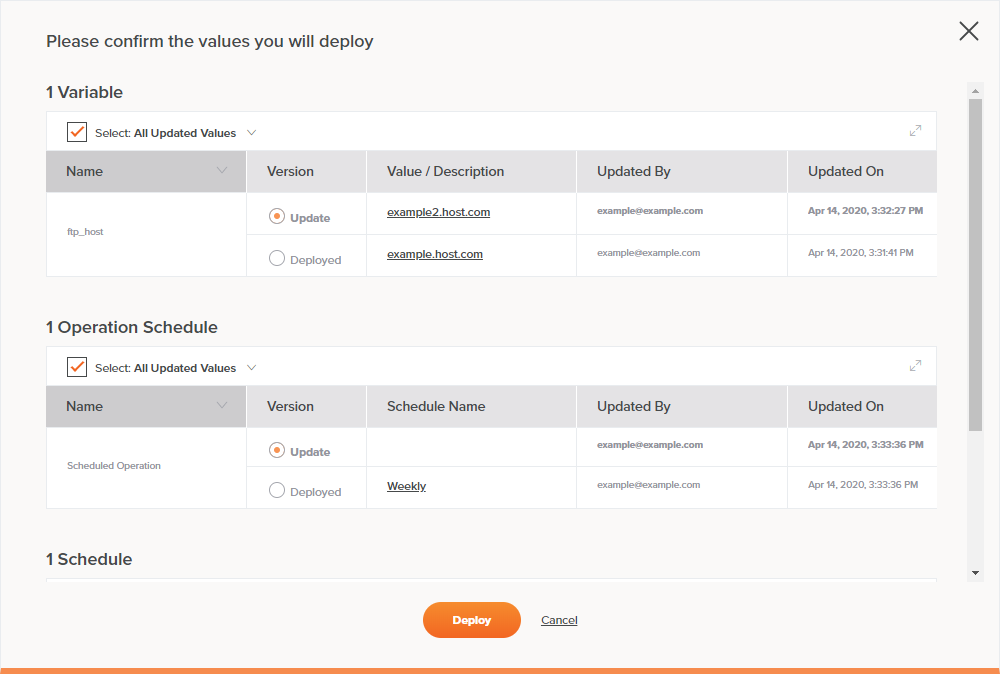
Cloud integration platform: JitterbitAs one of the leaders in the iPaaS space, JitterBit lets you fuse thousands of SaaS, cloud, and on-premises applications into one interface. You can also leverage their pre-built templates and workflows to automate your business processes. Additionally, you can create new application programming interfaces (APIs) from your existing enterprise applications or data on their API platform. You can even blend your newly created APIs with external APIs to roll out new business solutions.

What we like:

Jitterbit is all about making it easy for companies to connect applications and APIs in days rather than weeks. The solution is used by thousands of companies worldwide and includes powerful app and API integration tools that empower businesses to not only streamline key processes but collect intelligence data on-demand.

2. Operations Hub

G2 Rating: 4.6/5.0 (297 Reviews)

Cloud integration platform: Operations Hub

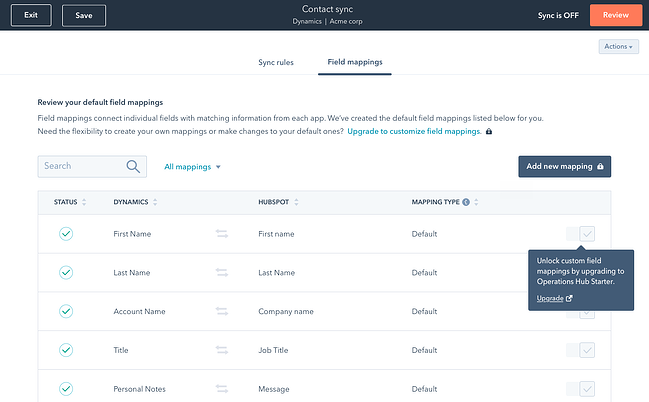
Operations Hub leverages intelligent 2-way sync technology from PieSync to update any customer’s information in one app after it changes in the other. The cloud integration platform also gives you complete control over the apps you choose to sync, consolidates customer information from multiple apps, and stores and updates all your data in one place so you can access it and make the most accurate data-driven decisions for your business.

What We Like

Sure, we’re a bit biased, but the fact remains that Operations Hub is one of the best-reviewed cloud integration solutions on G2. With a host of tools including data sync, data quality automation, and the ability to slice and dice data on-demand, Operations Hub has everything you need to run — and grow — your business.

3. Zapier

G2 Rating: 4.5/5.0 (729 Reviews)

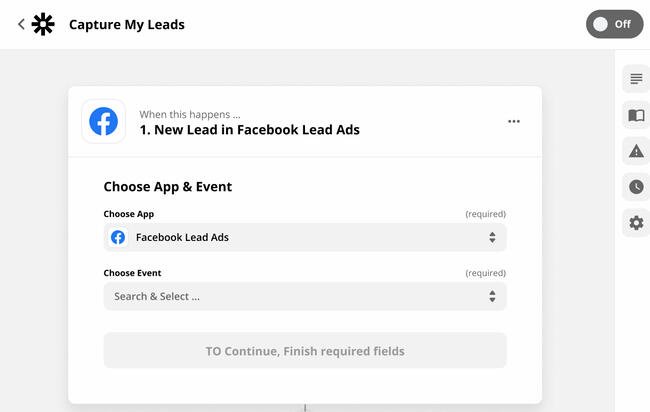
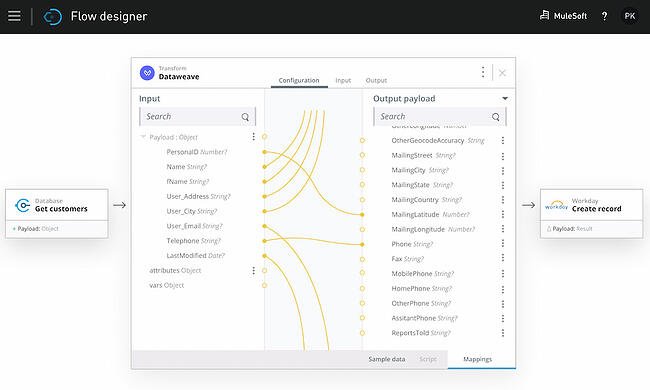
Cloud integration platform: ZapierWith the ability to connect to and share data with over 1,000 web apps, like Facebook, QuickBooks, and Google Drive, Zapier can automate almost any type of business process. All you have to do is build a workflow in their editor, pick the apps you want to include in your workflow, and watch your apps work together without additional intervention.

What We Like

Zapier is based on three key principles: Integrate, automate and innovate. Integration links web apps in just a few clicks, automation passes data between applications using workflows called “Zaps,” and innovation lets you build better processes with no code required. All told? It’s a win-win-win.

4. MuleSoft Anypoint Platform

G2 Rating: 4.5/5.0 (495 Reviews)

Cloud integration platform: MuleSoftTrusted by over 1,600 enterprise companies, MuleSoft Anypoint Platform lets you manage all your APIs and integrations on one platform. You can also build and integrate your APIs; integrate with any application, data, or device; deploy on-premises integrations to the cloud without rewriting any code; and protect your data and administer access to employees by leveraging edge gateways and encryption.

What We Like

Mulesoft is all about speed and simplicity. Reusable API assets make it easy to create app integrations with just a few clicks, and machine-learning recommendations help automatically transform data. Plus, businesses get real-time visibility into APIs and integrations from a single interface.

5. IBM App Connect

G2 Rating: 4.3/5.0 (207 Reviews)

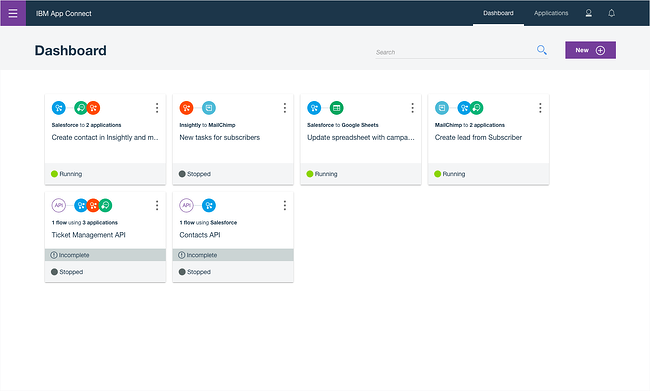
Cloud integration platform: IBM App ConnectWith IBM App Connect, you can integrate your data between on-premises and cloud-based applications, build APIs on an intuitive, code-free interface, and build workflows that automate your business processes within different apps. You can also deploy IBM App Connect in any cloud or on-premises environment.

What We Like

Part of the appeal here is that IBM has long been a leader in the technology integrations and operations space, but it’s the specifics of the solution that really set it apart. Using prebuilt app connectors and agile integration architecture (AIA), organizations can easily connect all apps across all environments for maximum operational flexibility.

6. Dell Boomi

G2 Rating: 4.2/5.0 (222 Reviews)

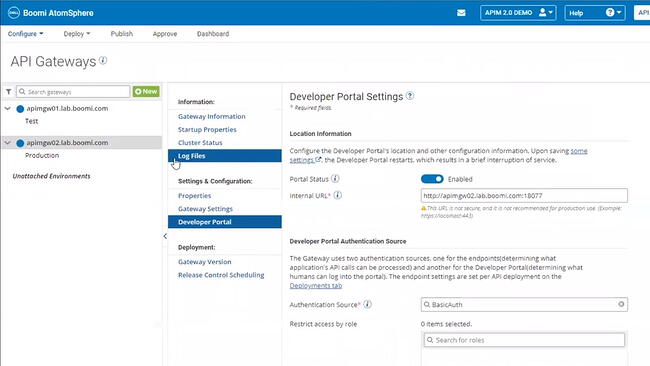
Cloud integration platform: Dell BoomiTrusted by over 8,000 brands, Dell Boomi lets you fuse all your digital platforms into one. By uniting all your data, applications, and processes, Boomi essentially stores all of your technology systems and assets in one place. With Boomi, you can also manage your APIs, maintain the quality of your data, build workflows with minimal coding knowledge, and develop applications.

What We Like

With more than 15,000 customers worldwide, Boomi remains one of the top cloud integration platforms. The Dell solution focuses on three key areas: Data, systems, and people. It promises instant integration of all three to help accelerate and simplify cloud-based operations.

Making the Most of Cloud Integration

Cloud integration platforms can help streamline and simplify application management across your small business. More importantly, they can help break down operational silos by providing a way for teams to collaborate and connect regardless of how, when, or where they use company data. This will empower your team to deliver actionable insights and make the most of cloud-based applications at scale.

Editor’s note: This post was originally published in May 2019 and has been updated for comprehensiveness.

 marketing reporting templates

Categories B2B

LinkedIn vs. Facebook: Which Is Best for Your Business?

The slew of social media channels available today can paralyze even the savviest business owners.

Where do you start? Which one is best? How do you avoid wasting time on channels that won’t bring in a solid ROI? The struggle is real.

Download Now: Free Social Media Calendar

Facebook and LinkedIn are two of the biggest social media platforms and provide a number of opportunities to reach your audience. This leaves us with this question: Which one should you focus your efforts on?

We’ll cover the pros and cons of each platform below.

LinkedIn vs. Facebook for Business

Let’s recap quickly.

At its core, LinkedIn is a professional network that was initially created as a corporate recruitment platform. Now, it boasts many features similar to traditional social media sites, including status updates, blogging capabilities, and private messages.

It’s also the most effective platform when it comes to delivering content and securing audience engagement.

Facebook, on the other hand, was specifically designed as a place for people to share and communicate. The “sharing” element is its most prominent selling point, but there are still plenty of other features that allow businesses to effectively reach their audiences.

In fact, one survey by Facebook found that 74% of American consumers use the platform to discover new products and brands.

LinkedIn and Facebook both have the Groups feature that allows you to connect with other like-minded people, and they both have powerful ad setups.

So with similar features, what are the key differences between the two? We’ll cover those here.

Numbers-wise, Facebook wins hands down.

Facebook has an astounding 2.8 billion monthly active users (MAU) across the world, which makes LinkedIn’s 64.7 million MAU seem small in comparison.

On both platforms, the biggest age group is 25- to 34-year-olds, according to 2021 data from Statista. However, Facebook has a wider range of users with roughly 10% falling below 18 years old or above 64 years old.

This is because LinkedIn caters mostly to professionals looking to network whereas Facebook hosts the everyday consumer.

Furthermore, the 2020 State of Marketing Report by HubSpot revealed that marketers see the highest return on investment from Facebook, with LinkedIn being the 4th highest out of 8 platforms.

LinkedIn is a stronger B2B platform.

As mentioned before, LinkedIn is a go-to spot for business-driven individuals. As such, it’s a great platform for business-to-business brands.

Here’s a breakdown of why:

  • It’s easy to identify key decision-makers (and reach them in ads).
  • Social selling is embedded into the platform.
  • It’s easier to network as the platform was built specifically for that purpose.

In fact, eMarketer reported that LinkedIn occupies the largest share of B2B display ad spending at 32%. But we’ll talk more about ads in this section.

Facebook may work better for brands that want to reach consumers directly. In addition, you gain access to ten times more prospects and have a great place to generate brand awareness and engagement. So, while Facebook leads in numbers, LinkedIn takes the win when it comes to generating tangible leads.

Thought leadership happens more organically on LinkedIn.

Thought leadership is one way brands are gaining credibility as well as visibility. According to a 2020 Thought Leadership Report by Survey Monkey, 66% of marketers consider it a top priority within their marketing team.

A thought leader’s role is to educate, encourage conversation and drive action. The same study shows that thought leadership programs help with lead generation and brand awareness efforts by increasing website traffic, media mentions, subscribers, and more.

When it comes to thought leadership articles, LinkedIn has a leg up. The platform is already designed for business conversations. As such, brands can have more success with thought leadership content compared to Facebook.

So, here’s a quick recap:

  • Facebook pros: Large user base, proven ROI
  • Facebook cons: Isn’t the best for B2B marketing
  • LinkedIn pros: Business-driven platform, social selling and networking tools, great opportunities for thought leadership
  • LinkedIn cons: Smaller user base

Now that we’ve taken a general look at the two platforms, let’s take a more detailed look at some of the key features they have for businesses.

LinkedIn Groups vs. Facebook Groups

The Groups feature on both LinkedIn and Facebook gives businesses the chance to mingle and connect with prospects and other like-minded businesses.

However, it’s critical to keep in mind people’s motives when they’re on different sites. When users are engaging with others in LinkedIn Groups, there’s a high chance they’re in a work-related mindset in some capacity.

In Facebook Groups, on the other hand, people are more likely to share their personal opinions on everything – from lifestyle and food to politics and hobbies.

So, when determining which Groups feature is best for you, think about the audience you’re targeting.

For instance, if you’re targeting general consumers with an interest in cooking because you’re selling the latest food blender, Facebook Groups is probably the way to go.

However, if you’re selling a high-priced service for top-tier management personnel, LinkedIn Groups might be a better bet.

Finally, let’s touch on the ads aspect of both platforms.

In terms of variety, both platforms have reached pretty equal footing.

While Facebook has boasted a diverse range of ad types for years (we’re talking canvas, carousel, video, dynamic, and lead ads just to name a few), LinkedIn now also offers several ad formats, including video, carousel, lead, dynamic, and Sponsored InMail ads.

Each offers a user-friendly ad manager. This means that you can start organizing your creative assets on a content marketing platform like Casted, then build your ad in just a few steps on either LinkedIn or Facebook.

Targeting-wise, if you think Facebook has the capability of reaching more people, you’re right. However, this doesn’t mean that LinkedIn doesn’t have powerful targeting capabilities.

Both platforms are centered around user input and serve up ads and content relevant to the information their members give them.

On both Facebook and LinkedIn, you can target users based on job title, household income, company, location, and age on both platforms. Where Facebook has the upper hand is that you can dig a little deeper on Facebook, targeting users depending on their life milestones, behavior, and other personalized information.

In addition, both platforms allow brands to use source audiences to reach consumers who are similar to their current audience. Facebook calls it “Lookalike Audience” while LinkedIn has named it “Audience Expansion.”

Lastly, it’s important to consider the cost.

Typically, you get more for your money on Facebook. According to WebFX, the average cost-per-click for a LinkedIn ad is a whopping $5.26, compared to just $0.97 with Facebook.

However, a higher cost doesn’t necessarily translate to a higher return on ad spend (ROAS).

Who Wins? You Decide

While LinkedIn and Facebook do share common features, it’s clear their purpose and audiences are quite different.

Which one you decide to use depends entirely on what industry you’re in, who you’re trying to reach, and your marketing goals.

It’s also important to note that you don’t necessarily have to choose. Perhaps you use LinkedIn for a targeted lead generation campaign, while you use Facebook to increase brand awareness and engage with your customers.

Editor’s Note: This post was originally published in August 2019 and has been updated for comprehensiveness.

social media content calendar

Categories B2B

310 Best Instagram Captions: Good, Cool, Funny, & Cute IG Quotes

If you’re anything like me, you take about four minutes choosing a filter for your Instagram photo, and about four hours deciding on a caption.

Worst of all, after much creative effort and advice from friends, I’m usually barely able to write a caption that goes beyond, “Had a fun day with friends!”

And I’m a writer — go figure.

Next time you’re contemplating a witty line of text to go with your Instagram photo, take a look at our complete list of captions that suit any mood or occasion you’ll be sharing with the world. You can also customize these captions to make them perfect for your feed.

Want more inspiration? Check out our Instagram page to see how we incorporate fun, witty, and engaging captions into our social media content.

Free Download: 52 Examples of Business Instagram Captions

You can incorporate many of these captions into an Instagram business strategy (just make sure your audience would find your caption funny, clever, or the right amount of sassy).

Click one of the following links to jump to a section:

Business Instagram Captions

Instagram captions: If you're offered a seat on a rocket ship, don't ask what seat. Just get on.

  1. Good evening, [city]! We’re in town for [event] at Booth [#]. Stop by and say hi!
  2. “If you’re offered a seat on a rocket ship, don’t ask what seat. Just get on.” -Sheryl Sandberg, COO of Facebook
  3. Our [#]-person squad completed the [road race name]! And we did it all for the post-run sneaker selfie. 👟
  4. We got product in the pipeline … check back for an exciting announcement on [date]!
  5. Diversity isn’t a recruitment metric — it’s an ingredient for success. At [company], we thrive on the unique backgrounds, experiences, and perspectives of our people.
  6. Spot the CEO. 😉
  7. At [company name], our best asset is our people.
  8. We had a great time with our customers at [meeting/event]! @[client/partner], you guys rock.
  9. Thrilled to have [customer] at our office today! Come back any time. 😊
  10. [Company name] is off for [holiday]! We hope you all have a safe long weekend.
  11. Big things have small beginnings. [Company]’s HQ began right here.
  12. “It is better to fail in originality than to succeed in imitation.” –Herman Melville
  13. How many [company name] employees does it take to spell “TEAM”?
  14. Want to work with these awesome people, working on a lot of awesome things? We’re hiring! Click the link in our bio to see our current openings.
  15. Check, check, one, two … is this thing on? [Company name] is now on Instagram! Follow us to learn about our culture, product, and (awesome) people.
  16. Tired of [customer pain point]? We’ve got good news. Click the link in our bio to learn about [product]’s latest feature.
  17. [Company] presents our latest product — made with love just for you. ❤️ Link in bio to learn more.
  18. Stop wasting time with [customer pain point]. Our [product] will help you achieve [X] more efficiently — just ask our current customers. Check out our latest case study here: [Link]
  19. Handmade in [location] and delivered to your door. That’s the [Company] promise.
  20. When life gives you lemons, you make lemonade. When [company name] gives you [type of product], you make money.

Quote Instagram Captions

  1. “The greatest glory in living lies not in never falling, but in rising every time we fall.” –Nelson Mandela
  2. “Always remember that you are absolutely unique. Just like everyone else.” -Margaret Mead
  3. “You change the world by being yourself.” -Yoko Ono
  4. “In the end, it’s not the years in your life that count. It’s the life in your years.” -Abraham Lincoln
  5. “What I know for sure is that speaking your truth is the most powerful tool we all have.” – Oprah Winfrey
  6. “The purpose of our lives is to be happy.” -Dalai Lama
  7. “You only live once, but if you do it right, once is enough.” -Mae West
  8. “Live in the sunshine, swim the sea, drink the wild air.” -Ralph Waldo Emerson
  9. “I would rather die of passion than of boredom.” -Vincent van Gogh
  10. “Success isn’t about the end result, it’s about what you learn along the way.” -Vera Wang
  11. “It does not matter how slowly you go as long as you do not stop.” -Confucius
  12. “Everything you’ve ever wanted is on the other side of fear.” -George Addair
  13. You become what you believe.” -Oprah Winfrey
  14. “Believe you can and you’re halfway there.” -Theodore Roosevelt
  15. “The way to get started is to quit talking and begin doing.” -Walt Disney
  16. “Love the life you live. Live the life you love.” -Bob Marley
  17. “My mission in life is not merely to survive, but to thrive; and to do so with some passion, some compassion, some humor, and some style.” -Maya Angelou
  18. “Embrace what makes you unique, even if it makes others uncomfortable.” – Janelle Monae
  19. “Success is a collection of problems solved.” – I.M. Pei
  20. “To be beautiful means to be yourself. You don’t need to be accepted by others. You need to accept yourself.” -Thich Nhat Hanh
  21. “In a gentle way, you can shake the world.” -Gandhi
  22. “I dream. Sometimes I think that’s the only right thing to do.” -Haruki Murakami
  23. “We become what we think about.” -Earl Nightingale
  24. “Success is not final, failure is not fatal: it is the courage to continue that counts.” –Winston Churchill
  25. “You are never too old to set another goal or to dream a new dream.” -C.S. Lewis
  26. “If you are depressed you are living in the past. If you are anxious you are living in the future. If you are at peace you are living in the present.” -Lao Tzu
  27. “Life is like riding a bicycle. To keep your balance, you must keep moving.” -Albert Einstein
  28. “If you are working on something that you really care about, you don’t have to be pushed. The vision pulls you.” -Steve Jobs
  29. “Security is mostly a superstition. Life is either a daring adventure or nothing.” – Helen Keller
  30. “Stay true to yourself and never let what somebody else says distract you from your goals.” -Michelle Obama

Funny Instagram Captions

Instagram captions: We know the voices in our heads aren't real, but sometimes their ideas are just too good to ignore.

  1. My favorite exercise is a cross between a lunge and a crunch … I call it lunch.
  2. I need a six-month holiday, twice a year.
  3. We tried to be normal once. Worst two minutes of our lives!
  4. There are 16-year-olds competing at the Olympics and some of us (me) still push on “pull” doors.
  5. That awkward moment when you’re wearing Nike’s and you can’t do it.
  6. I’m just a girl, standing in front of a salad, asking it to be a cupcake.
  7. What if we told you … you can eat without posting it on Instagram?
  8. I know the voices in my head aren’t real, but sometimes their ideas are just too good to ignore.
  9. We don’t know what’s tighter: Our jeans or our company culture.
  10. Friday … Our second-favorite F word.
  11. We don’t care what people think of us. Unless they’re our customers. We definitely care what customers think of us.
  12. All you need is love … and investors. All you need is love and investors.
  13. Hi, we’re [company name]. We build amazing apps and eat amazing apps.
  14. They say “Do what you love and money will come to you.” Let’s see what happens, I just ordered tamales.
  15. My favorite subject in school was recess.
  16. No thoughts brain empty just tacos and cats.
  17. [Food item] so good it’s got me weak in the knees.
  18. The best part about waking up is going to sleep eighteen hours later.
  19. The older you get, the better you get, unless you’re a banana.
  20. Bring the alcohol! Because no great story started with someone eating a salad.
  21. Don’t worry if plan A fails. There are 25 more letters in the alphabet.
  22. If you’re not supposed to eat at night, why is there a light bulb in the refrigerator?
  23. First rule of Sundays: If you can’t reach it from your couch, you don’t need it.
  24. If you fall, I will be there. Signed, Floor.
  25. The first thing I do after coming to work is logging off.
  26. I used to think I was indecisive, but now I am not so sure.
  27. Friends buy you lunch. Best friends eat your lunch.
  28. Darn it, just accidentally had another thought again.
  29. My goal this weekend is to move… just enough so people don’t think I’m dead.
  30. You think nothing is impossible? Try getting me out of bed before 12 PM.

Clever Instagram Captions

Instagram captions: Success is making those who believed in you look brilliant.

  1. Patience — what you have when there are too many witnesses.
  2. Maybe she’s born with it, maybe it’s the Clarendon filter.
  3. “Life is short.” False — it’s the longest thing you do.
  4. Happy Sunday! There may be no excuse for laziness, but I’m still looking.
  5. Rejection is just redirection.
  6. Better an “oops” than a “what if.”
  7. Anyone looking for a heart? Selling mine for $2. (Used, good condition)
  8. The world is changed by your example, not your opinion.
  9. Seven billion smiles and these are my favorite.
  10. Stop working hard and start working smart.
  11. I found your nose. It was in my business.
  12. Imposter complex is just a byproduct of success.
  13. Life is simple. It’s just not easy.
  14. The best times begin at the end of your comfort zone. So you can catch me on the opposite end of the end of my comfort zone.
  15. When nothing goes right, go left.
  16. “Success is making those who believed in you look brilliant.” -Dharmesh Shah
  17. “If you can’t convince them, confuse them.” -Harry Truman
  18. The world changes by your example, not your opinion. So get acting right.
  19. It’s always a good idea to be on the right side of history.
  20. When you learn, teach. When you get, give.
  21. Don’t quit your daydream.
  22. Legend has it that if you look hard enough you’ll see the weekend approaching!
  23. It’s time to make new memories. But first, five tequila shots.
  24. I’m on a seafood diet. I see food, I eat it.
  25. Sorry I didn’t get back to your text. I was too busy converting oxygen into CO2.
  26. Living on Earth is expensive, but it does include a free trip around the sun.
  27. “Arguing with a fool proves there are two.” -Doris M. Smith
  28. Well, enough about me. Let’s talk about you. What do you think about me?
  29. We’re all one more minute closer to dying. What’s one more shot going to do?
  30. There’s a pot of gold at the end of the rainbow. If you find it, let me know so I can get some.

Cute Instagram Captions

  1. Don’t give up on your dreams. Keep sleeping.
  2. My fave sound is you snoring next to me.
  3. Here’s to a hundred more years with you.
  4. Happiness is watching you do what you love 💗 Hopefully that’s me.
  5. I like you more than [food]. And I looove [food].
  6. Wearing a onesie to bed just in case my SO steals the covers again.
  7. Cuddle time with the pup 💞
  8. Just showing off my [item] a little. Be jealous.
  9. Always wear cute pajamas to bed; you never know who you’ll meet in your dreams.
  10. You got me like 🥴️
  11. I’d move to [state] for you. And I hate [state].
  12. 🥺️ 👉👈
  13. I have no idea what I was doing before you came around. Sleeping, probably.
  14. No one can touch my books or my tacos 😤
  15. Not me standing there like🧍‍♂️
  16. Don’t mind me while I drink my tea 🍵
  17. Did someone say [something you like]? 🏃💨
  18. They say elephants have a perfect memory. So do I when it comes to you.
  19. My pup is the salsa to my whole enchilada.
  20. I hate it when I’m singing a song and the artist gets the words wrong.
  21. Being an adult is like folding a fitted sheet. No one really knows how.
  22. Here’s a 🥇 for being the cutest human to walk this earth.
  23. Me before you: 🌱 Me after you: 🌻
  24. 🤟
  25. Just got that Friday feeling.
  26. Are you a timekeeper? ‘Cause time slows down when I’m with you.
  27. I can’t see heaven being much better than this.
  28. I’m not lazy, I’m on energy-saving mode.
  29. My pillow is my best friend (sorry, [best friend’s name])
  30. A day doing [activity] is a day well-spent.

Sassy Instagram Captions

Instagram captions: A bad attitude is like a flat tire. You can't go anywhere until you change it.

  1. What’s a queen without her king? Historically speaking, more powerful.
  2. Be a little more you, and a lot less them.
  3. We’re an acquired taste. If you don’t like us, acquire some taste.
  4. Well-behaved people don’t make it into history books.
  5. Be sunshine mixed with a little hurricane.
  6. We got 99 problems, but an awesome marketing team ain’t one.
  7. Sometimes you just need to do a thing called “what you want.”
  8. You can’t do epic stuff with bad people. And we got the best in the biz.
  9. It’s not called being bossy, it’s called having leadership skills.
  10. You did not wake up today to be mediocre.
  11. A bad attitude is like a flat tire. You can’t go anywhere until you change it.
  12. We’re entrepreneurs. They call us dreamers, but we’re the ones who never sleep.
  13. All of us have the capacity to light up a room. Some when they enter, others when they leave it.
  14. Brains are awesome. I wish everybody would have one.
  15. Common sense is like deodorant. The people who need it most never use it.
  16. You see that? That’s my patience leaving.
  17. I’ll have you know, I’ve completed plenty of marathons. [Show 1], [Show 2], and [Show 3], to name a few.
  18. Everyone has that one annoying friend. If you don’t have one, then it’s probably you.
  19. Above: A photo of me pretending to be listening.
  20. Oh, you sent me an email? Expect a response in approximately never.
  21. Everyone is entitled to be stupid, but some abuse the privilege.
  22. If you like me, raise your hand. If not, then raise your standard.
  23. If you don’t succeed the first time, then burn all the evidence you tried.
  24. Underestimate me. That’ll be fun.
  25. I like my coffee how I like myself: Dark, bitter and too hot for you.
  26. People say I act like I don’t care. It’s not an act.
  27. They say good things take time … that’s why I’m always late.
  28. Focused. Intelligent. Motivated. Oh, and cute.
  29. “The question isn’t who is going to let me: it’s who is going to stop me.” -Ayn Rand
  30. It’s okay if you don’t like me. Not everyone has good taste.

Song Lyrics for Instagram Captions

IG captions: But like the sun, know you know I find my way back 'round.

  1. “I’m gonna live like tomorrow doesn’t exist.” — Sia, “Chandelier”
  2. “I live for the nights that I can’t remember, with the people that I won’t forget.” — Drake, “Show Me a Good Time”
  3. “I hope you never lose your sense of wonder.” — Lee Ann Womack, “I Hope You Dance”
  4. “You may say I’m a dreamer, but I’m not the only one.” — John Lennon, “Imagine”
  5. “If you give, you begin to live.” — Dave Matthews Band, “You Might Die Trying”
  6. “Outlining my findings, using life as a stencil.” — Kero One, “In All the Wrong Places”
  7. “Feeling good living better.” — Drake, “Over My Dead Body”
  8. “Say oh, got this feeling that you can’t fight, like this city is on fire tonight.” — OneRepublic, “Good Life”
  9. “Time makes you bolder.” — Fleetwood Mac, “Landslide”
  10. “If I fail, if I succeed, at least I’ll live as I believe.” — Whitney Houston, “The Greatest Love of All”
  11. “The rest of the world was in black and white, but we were in screaming color.” — Taylor Swift, “Out of the Woods”
  12. “Lightning strikes every time she moves.” — Calvin Harris, “This Is What You Came For”
  13. “We aren’t ever getting older.” — Chainsmokers, “Closer”
  14. “Sing with me, sing for the years, sing for the laughter, sing for the tears.” — Aerosmith, “Dream On”
  15. “Life is good.” — Future & Drake, “Life is Good”
  16. “Life without dreaming is a life without meaning.” – Wale, “Aston Martin Music”
  17. “But like the sun, know you know I find my way back ‘round.” — J. Cole, “Crooked Smile”
  18. “I will overcome any hurdle or obstacle that’s in my path.” — OutKast, “Knowing”

Holiday Instagram Captions

New Year’s Instagram Captions

  1. “Always bear in mind that your own resolution to succeed is more important than any other.” — Abraham Lincoln
  2. Didn’t make it to midnight.
  3. Resolutions are made to be broken.
  4. Ringing in the new year — like a bell.
  5. “Tomorrow is the first blank page of a 365-page book. Write a good one.” — Brad Paisley
  6. New year, same me.
  7. Time to show off my bubbly personality.
  8. Any excuse to wear glitter.
  9. Starting off the year on the right foot.
  10. There are 12 months ahead of us to make a difference.
  11. Day 1 of 365
  12. Sip, sip, hooray!

Valentine’s Day Instagram Captions

IG captions:  You can't blame gravity for falling in love

  1. Roses are red. Violets are blue. Consider this post my Valentine to you.
  2. Don’t tell me you love me. Tell me you’re outside with pizza.
  3. All I need is you. (And maybe wine + chocolate too.)
  4. “You can’t blame gravity for falling in love.” — Albert Einstein
  5. 99% of my socks are single, and you don’t see them crying about it.
  6. I will do anything for love. Except that. And that. Or that. Or…
  7. Sorry, I’m in a relationship with tacos.
  8. “All the single ladies…” — Beyonce, “Single Ladies”
  9. In love with my best friend.
  10. I’m better when I’m with you.

Halloween Instagram Captions

  1. Creepin’ it real.
  2. I brake for Reese’s Peanut Butter Cups.
  3. “When the spooks have a midnight jamboree, they break it up with fiendish glee…” — The Legend of Sleepy Hollow (1949)
  4. You’re just my (blood) type.
  5. How to eat candy corn: don’t.
  6. #squadghouls
  7. Double, double toil and trouble; Fire burn and cauldron bubble.
  8. Driving me batty.
  9. “Scary hours.” — Drake

Thankgiving

  1. I’m wearing my elastic pants.
  2. “For those of you who cannot be with family this Thanksgiving, please resist the urge to brag.” — Andy Borowitz
  3. On a veggie diet this Thanksgiving: Carrot cake and pumpkin pie.
  4. “Be thankful for what you have; you’ll end up having more. If you concentrate on what you don’t have, you will never, ever have enough.” — Oprah Winfrey
  5. I think, therefore I cran.
  6. Bad day to be a turkey.
  7. Need fuel for Black Friday.
  8. “Okay, guys. I have exactly 28 minutes before I have to baste again.” — Monica
  9. Grateful. Thankful. Blessed.
  10. Who made the potato salad?
  11. There’s always something to be thankful for.

Christmas & Hannukah Instagram Captions

  1. You sleigh me.
  2. Fa la la la llama.
  3. “O Christmas tree, O Christmas tree, your ornaments are history.” — The Cat
  4. “It’s not what’s under the Christmas tree that matters. It’s who’s around it.” — Charles M. Schulz
  5. Dear Santa, let’s not talk about this.
  6. Rebel Without a Claus
  7. Doesn’t Santa have anything better to do than watch us while we’re sleeping?
  8. All I want for Christmas is you (and wine would be nice).
  9. To all you cotton-headed ninny-mugginses out there.
  10. Drop it like a top.
  11. Wishing you a latke love this Hanukkah.
  12. I want to eat 8 latkes for the calories of one.
  13. One little candle can light up an entire room.
  14. Keep calm and spin that dreidel.
  15. Deck the halls with matzo balls!
  16. It’s Christmas time and I’m the gift.
  17. The best gift is to be present with the ones you love.

Seasonal Instagram Captions

Spring Instagram Captions

  1. Hello, spring!
  2. “And I think to myself, what a wonderful world.” — Louis Armstrong
  3. April showers bring May flowers.
  4. I think I just experienced all the seasons in a single day.
  5. I love allergy season, said no one ever.
  6. Currently soaking up the sun and smelling the roses. Please leave a message after the beep.
  7. I owe a lot to the inventor of flip-flops.
  8. “Here comes the sun, and I say… It’s all right.” — The Beatles
  9. “Warm winds in the springtime.” — SZA, “Warm Winds”
  10. Springing into the new season.

Summer Instagram Captions

IG captions: Here comes the sun and I say its all right

  1. “Live in the sunshine. Swim in the sea. Drink in the wild air.” — Ralph Waldo Emerson
  2. Life’s a beach.
  3. School’s out, sun’s out, guns out.
  4. “A little bit of summer is what the whole year is all about.” — John Mayer
  5. 90% happy, 10% burnt.
  6. Girls just want to have sun.
  7. “Summer lovin’ had me a blast, summer lovin’ happened so fast.” — Grease
  8. Happiness is a cold popsicle.
  9. Life is better by the pool.
  10. “Summertime and the livin’ is easy.” — Ella Fitzgerald, “Summertime”
  11. “Here comes the sun, and I say… It’s all right.” — The Beatles, “Here Comes the Sun”

Fall Instagram Captions

  1. My favorite color is October.
  2. “Wild is the music of autumnal winds amongst the faded woods.” — William Wordsworth
  3. My favorite kind of weather.
  4. It’s never too early for pumpkin spice.
  5. Meet me in the corn maze.
  6. Crisp air. Apple cider. Flaming foliage.
  7. Pumpkin spice and everything nice.
  8. “Anyone who thinks fallen leaves are dead has never watched them dancing on a windy day.” — Shira Tamir
  9. Leaves are falling, and autumn is calling.
  10. “Days in the sun and nights in the rain. Summer is over, simple and plain.” — Drake & Majid Jordan, “Summer’s Over”
  11. Falling never felt so good.

Winter Instagram Captions

  1. “In the depths of winter, I finally learned that within me there lay an invincible summer.” — Albert Camus
  2. If it’s snowing, I’m not going.
  3. Cozy nights. Good books. Hot chocolate.
  4. Do you want to build a snowman?
  5. Running on caffeine and holiday cheer.
  6. “Winter is not a season; it’s a celebration.” — Anamika Mishra
  7. Merry and brrrrrrright.
  8. Having snow much fun.
  9. ‘Tis the season to be freezin’.
  10. “Timb’ laces get tighter and parka hoods flip up.” — Drake, “Come Winter”

Selfie Instagram Captions

IG captions: Smile! The happiness is right under your nose

  1. Me, myself, and I.
  2. Be yourself, there’s no one better.
  3. It’s the happiness for me.
  4. Smile! The happiness is right under your nose.
  5. My favorite filter is reality.
  6. Self-care selfie!
    Conquer the world one smile at a time.
  7. It’s a great day to have a great day.
  8. The greatest gift you can give someone is a smile.
  9. Self-love is the best love.
  10. “But she looked powerful. She wore the sun like a shiny pin on the side of her hair.” –Lilian Li
  11. I don’t need a hair stylist. My pillow gives me a new hairstyle every morning.

Vacation Instagram Captions

  1. A chance to get away from the everyday.
  2. Work. Save. Travel. Repeat.
  3. Staycation loading…
  4. Collect the moments, not the materials.
  5. Another destination off the bucket list.
  6. An adventure to fill the soul.
  7. The scenic route is always better.
  8. I need a six-month vacation, twice a year.
  9. Be back never.
  10. Catch flights, not feelings.

Capture the Feeling with an Instagram Caption

Even though an image is worth 1,000 words, a well-written caption couldn’t hurt. These days, the caption can make just as much of a statement as the image! For all of the occasions that are worthy of a post to your feed, use one of the quotes from this list and customize it to make it your own.

Editor’s note: This post was originally published in June 2020 and has been updated for comprehensiveness.
instagram captions

Editor’s note: This post was originally published in June 2019 and has been updated for comprehensiveness.