Categories B2B

How to Use Instagram: A Beginner’s Guide

Over the past few years, Instagram has seen exponential growth — from one million users at its inception to over one billion in 2022.

If you’re interested in getting an Instagram account, or just created one but aren’t sure how to use it, you’re in luck. Here, we’re going to cover all the basics, so you can learn why Instagram is the top social media platform for engagement today.

Download Now: Free Instagram for Business Kit + Templates

It’s hard to remember a time before Instagram. At one time, “Do it for the ‘gram” was a common saying, which meant, essentially, “Do something so we can take a picture and post it to Instagram.”

Since then, Instagram has placed a larger and heavier emphasis on video. So you no longer hear the phrase “Do it for the ‘gram.” I bet, though, that a second version of the phrase will soon follow. (Maybe “Do it for reel?”)

If you’re not part of the one billion users on Instagram, you might want to reconsider. The app is a great chance to engage with top brands and stay a part of friends’ lives. When I want to see how my college friends are doing, I don’t check Facebook, I check Instagram. Plus, you can follow your favorite celebrities or political figures to see candid photos of their everyday lives.

Additionally, it’s a phenomenal platform for investigating what other brands are doing — for instance, Nike uses the Instagram Stories’ feature to promote inspirational athlete stories you won’t find anywhere else.

If you’re ready to sign up for Instagram, follow these steps below:

  • Go to the Instagram site on your desktop, or download the Instagram app from the App Store (iPhone) or Google Play Store (Android).
  • If you’re on desktop, click “Log in with Facebook”, or fill in the form with your mobile number or email, name, username, and password. Then click “Sign up”.
  • On Android, click “Sign Up With Email or Phone Number”.
  • On iPhone, select “Sign Up”.
  • Enter your email address or phone number, then click “Next”. Alternatively, you can sign up with your Facebook account.
  • Once you’ve filled out your username and password, you will be instructed to fill out your profile info. Then, tap “Done”.
  • If you register with Facebook, you’ll need to log into your Facebook account if you’re currently logged out.

How Do Instagram Notifications Work?

When your account is created, you’ll want to adjust your notifications so you only receive the information you want. For instance, you can choose to receive notifications when you get likes from everyone — but, alternatively, you might decide to only receive notifications when you get a like from someone you follow. Or, you might turn off notifications for likes altogether.

You can adjust notifications to “Off”, “From People I Follow”, or “From Everyone”, for the following categories — Comments, Comment Likes, Likes and Comments on Photos of You, Follower Requests, Accepted Follow Requests, Friends on Instagram, Instagram Direct, Photos of You, Reminders, First Posts and Stories, Product Announcements, View Counts, Support Requests, Live Videos, Mentions in Bio, IGTV Video Updates, and Video Chats.

If you’re overwhelmed by that list, I get it — I am, too. If you’re unsure what notifications you want to receive, you might start with your notifications on “From Everyone”, and if certain notifications begin to annoy you, you can turn them off later.

To customize which notifications you receive, follow these steps:

1. Open up the Instagram app on your phone.

First up, open up the Instagram app on your mobile device. You can also access Instagram on desktop if you prefer. Then, head to your profile by clicking the image of your profile picture on the bottom right.

how to change instagram notification settings: access profile

2. Access “Settings.”

After you arrive at your profile, click the hamburger menu on the top right-hand corner.

how to change instagram notification settings: access settings

A popup menu will appear. Tap “Settings.”
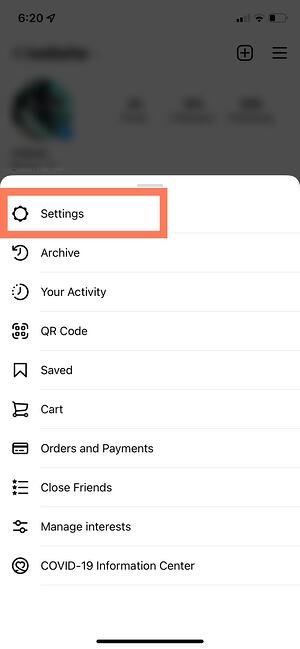
how to change instagram notification settings: tap settings

3. Tap “Notifications.”

On the next screen, click “Notifications.” 
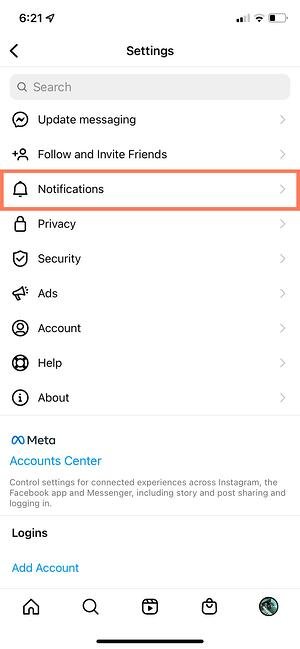
how to change instagram notification settings: enter notifications settings

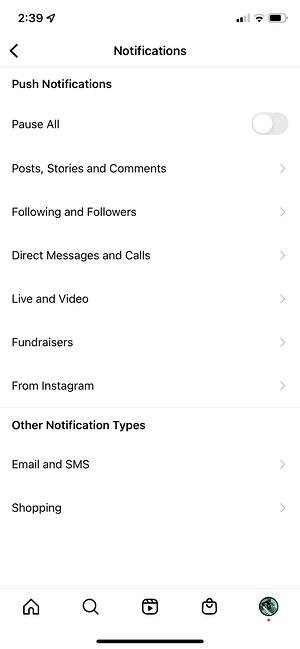
There, you’ll be able to change the notification settings depending on category. These categories include:

  • Posts, Stories, and Comments
  • Following and Followers
  • Direct Messages and Calls
  • Live and Video
  • Fundraisers
  • From Instagram
  • Email and SMS
  • Shopping

how to change instagram notification settings: view all notification categories

You also have the ability to pause all notifications by toggling the Pause All option up top.

4. Check off the notifications you want to receive.

Access each category individually and choose the notifications you want to receive. Here are the options, for example, for “Posts, Stories, and Comments”:
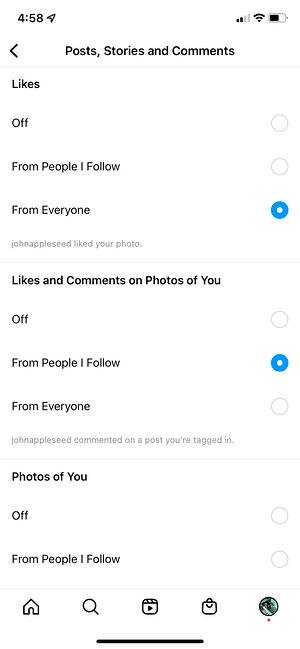
how to change instagram notification settings: toggle notification settings

The options will vary depending on category.

And that’s it! Next, let’s explore how to connect your other social media accounts to your Instagram, so when you post an image to Instagram, you can share it with your other online audiences, as well.

Can you connect to Instagram to other social accounts?

Yes, you can connect Instagram to Twitter, Tumblr, and Facebook, but it’s no longer done through Settings, as it used to be.

Now, you do it on a per-post basis.

If you want to share a post to other platforms, you navigate to the actual post you want to cross-publish on Facebook, Tumblr, and Twitter, and then manually share it that way.

Here’s how:

1. Open up the Instagram app.

2. Navigate to your profile.

3. Tap on the post you’d like to cross-post.

4. Click the three dots on the top right-hand corner of the post.

how to link instagram to other social accounts: access post settings

5. On the pop-up menu, click “Share.”

how to link instagram to other social accounts: tap share on the post Note: Don’t click “Share to,” which will give you an option to AirDrop or share the post to your contacts.

6. Toggle the accounts you’d like to share the post to. If you’re not already signed in, you’ll need to do so right within the Instagram app.

how to link instagram to other social accounts: toggle the social accounts

Once you’ve connected your accounts for one post, you can then toggle the sharing options for any new posts without needing to sign in again.

If you connect Instagram to Facebook, you can share your Stories across both accounts. We talk more about how to do that below.

How to Connect Instagram to Facebook

Since Instagram and Facebook are owned by the same company, Meta, you can connect the two accounts for a more seamless experience. Connecting your Instagram and Facebook accounts allows you to:

  • Share Stories across both Instagram and Facebook
  • Login with Facebook into Instagram
  • Sync your profile name and picture across both profiles
  • Use Facebook Pay on both platforms
  • Access your shopping activity on both accounts

If you’re a frequent Facebook user, then connecting your account to your new Instagram profile is highly recommended. Here’s how:

1. Open up your Instagram app.

2. Click on your profile picture on the bottom right-hand corner.

3. Click the hamburger menu on the top right-hand corner.

4. Tap “Settings.”

5. Under the Meta logo, tap “Accounts Center.”
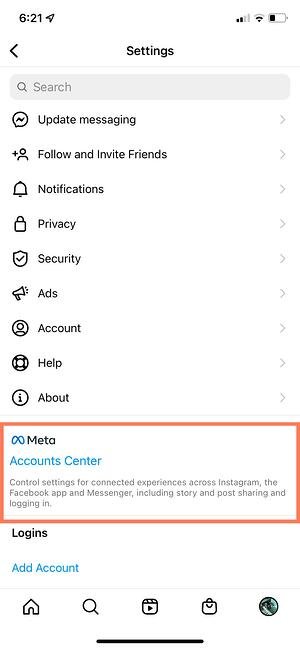
how to connect facebook to instagram: tap account center in settings

6. Tap “Set up Accounts Center.”

how to connect facebook to instagram: click set up accounts center

7. Follow the prompts to log in into Facebook.

Done! Your two accounts are now connected. Here’s how it’ll look like once you’re finished: 

how to connect facebook to instagram: final result

In the next section, I’ll show you when a linked account comes in handy.

Upload, Edit, and Post an Image

Now, for the most important part of Instagram — how to upload and post an image.

Instagram is an entirely visual platform. Unlike Facebook, which relies on both text and pictures, or Twitter, which relies on text alone, Instagram’s sole purpose is to enable users to share images or videos with their audience.

On Facebook, you might choose to post 100 photos on an album. On Instagram, you need to be choosier about which photos you post. There are a few reasons for this — first, you don’t want to post more than once a day (typically). And you don’t want to post too many similar photos.

For instance, it would be odd for you to post fifty photos from the same beach vacation on your Instagram profile. Instead, you might choose five or six, and place them all within the same post.

(These are called carousel posts, and they allow you to share multiple photos in one post only. Carousel posts are awesome for posting similar pictures in one package while keeping your overall profile aesthetic diverse.)

Curious about creating an aesthetic? To learn more about Instagram account themes and get inspiration, take a look at these Instagram themes. Additionally, if you want to embark on a deep-dive, you can take HubSpot’s Instagram Marketing Course.

Now that we’ve covered that, let’s explore how to upload, edit, and post an image.

1. Click the “+” icon at the top-right hand corner.

When you tap the “+” icon, you’ll be prompted to choose the type of post you want to share. Since we want to publish a post directly on our profile feed, tap “Post.”

how to upload an image to instagram: click the plus button

2. Choose your media file.

Here, you have three options. You can look through your Photos library on your phone, you can take a new picture from right within Instagram, or you can take a new video. For our purposes, I looked through my Photos library and found a picture of Boston I wanted to use. Then, I clicked “Next” in the top right.

how to upload an image to instagram: choose media

3. Add filters if desired.

There are two categories you can use to edit your image — “Filter” and “Edit”. Instagram automatically shows you filters first. You can scroll through the carousel and click any of the filters to apply it to your image.

Additionally, if you want to use a filter but you want to tone it down, double tap the filter and move the cursor to the left to lessen the intensity of the filter.

how to upload an image to instagram: add filters

4. Edit your image if desired.

Next, click “Edit”. Here, you can adjust contrast, brightness, structure, warmth, and more. When you’re happy with your edited image, or if you don’t want to edit it at all, click “Next” in the top right.

how to upload an image to instagram: edit image

5. Write a caption and toggle sharing settings.

Now, you can add a caption, tag people (you can only tag someone if they also have an Instagram account), and add a location. Additionally, click the button beside Facebook or another linked social media account to share your image on that platform, as well. When you’re ready to publish, click “Share” in the top right.
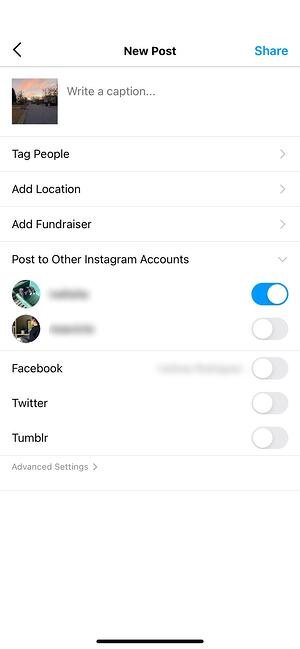
how to upload an image to instagram: add caption

If you don’t want to use your app to post on Instagram, you can also do so from your computer. Learn how to post to Instagram from a Mac or PC here.

Upload an Image or Video to Your Stories

Instagram Stories is a feature that allows you to post videos or images that disappear after 24-hours. Instagram’s Stories feature is similar to Snapchat in terms of content — users often post more casual and candid videos and images, offering glimpses into their every day lives.

For instance, on your normal feed, you might post a heavily-edited picture of yourself and friends at a baseball game. But you might post a more candid video to your Story of the stadium singing “Sweet Caroline”.

To learn how to upload an image or video to your Stories, follow these steps:

1. Tap your profile picture in the upper left-hand corner.

Alternatively, swipe right on your feed or tap the “+” button in the top navigation bar.

how to upload a story to instagram: access the story camera

2. Capture or add your media.

Once you’re within the Stories feature, you can take a picture or video right from within the app. Alternatively, if you have an image saved to your phone that you’d like to use, you can choose it from your media library.

how to upload a story to instagram: capture media

3. Add stickers or filters.

On the left-hand side, you have a few different editing features.

The “Create” button lets you add a location, hashtag, time, date, and other fun images or emojis to your picture.

how to upload a story to instagram: add stickers and filters

The “Boomerang” option allows you to create a looping video. And the “Aa” icon is your text button. Once you click “Aa”, you have the option to change your font.

If you click the smiley face icon, you’ll see the following screen. Simply click on one of the icons to add them to your image. If you don’t like it, drag it to the bottom, and a trash can will appear so you can delete it.

how to upload a story to instagram: add poll

For instance, I clicked the smiley face icon to add a poll to my image. You can also swipe to the left or right to add filters to your photo or video.

4. Publish your Story.

Once you’re happy with your content, you can either click the white arrow icon in the bottom right, which allows you to share your Story with everyone who follows you, or select “Close Friends” first, so that only your close friends see it.

Then you’re done! Your Story is immediately live.

How to Follow on Instagram

It’s incredibly easy to find and follow users. Using Instagram’s search feature, you can find celebrities, brands, and friends. Additionally, you can search “Tags” or “Places”. “Tags” is particularly useful if you know what type of content you want to find, but you’re not sure who posts about it.

For instance, you might search “#familyrecipes” under tags — your results will include any images with that hashtag. As you peruse, you might find someone who posts content you really like, and you can choose to follow them so their content appears on your feed.

To follow someone, follow these three easy steps.

1. Click on the search icon at the bottom of your screen.

It looks like a magnifying glass and will be right next to the “Home” button.

how to follow on instagram: click the search icon

2. Next, type in a person, topic, or brand.

For this example, I searched “architecture.”

how to follow on instagram: view results

Instagram allows you to either search all posts that contain the word “architecture,” or “See all results” and see tags and places.

how to follow on instagram: browse through the results

3. Tap the account you’re interested in following.

Once you’re on someone else’s account, you’ll see a blue “Follow” button at the top. For public profiles, you can click and immediately begin following that account. However, if the profile is private, you may need to wait for them to accept you first.

how to follow on instagram: follow an account you like

And that’s it! You’re on your way to becoming a pro. To take your account to the next level, plan out your next posts using an array of content ideas and templates.

Using Instagram is Key for Growing Your Personal Brand

If you want to grow both professionally and personally, then using Instagram is more important than ever. You can start by observing first, then begin posting as you learn your way around the user interface. With over one billion users, Instagram is an extremely worthwhile social media platform to join — and it’s only set to keep growing as time goes on.

Editor’s note: This post was originally published in November 2018 and has been updated for comprehensiveness.
New Call-to-action

Categories B2B

Everything You Need To Know About Performance Appraisals

As a manager, your ability to inform your teams about the successful high-impact behaviors they exhibit or skills that need further development is a critical practice in determining your business’ overall ability to reach its goals and find success.

In this post, learn how a performance appraisal will help you give employees direction, the different types of performance appraisals, and example comments to include when you schedule those 1:1 sessions.

Download Now: Free Performance Review Template

Businesses use performance appraisals to understand employee progress, give raises or promotions, create paths for further development, or, sometimes, discuss terminations.

These appraisals typically happen multiple times per year at different intervals, like quarterly, annually, or specific periods that make sense to your business. The goal, however, is for managers to conduct them regularly enough that employees always understand how they are doing.

Performance Appraisal Methods

There are different ways to conduct performance appraisals that can depend on your business’s individual needs, or on a manager-to-manager basis, depending on what you think is a best practice. Below we’ll go over the most popular types of performance appraisal methods.

1. Management by Objectives

Management by Objectives (MBO) is a popular sales management style that is also used for performance appraisals.

With this strategy, the manager and employee work together to set goals the employee will strive to meet during a specific period. During the performance appraisal session, they will review how the employee has or has not met the goals, and set new goals that will be evaluated during the next appraisal period.

2. 360-Degree Feedback

The 360-Degree Feedback method uses feedback from an employee’s self-evaluation, manager evaluation, peers, and if applicable, direct reports and customers.

This method is valuable as it provides employees with a big picture view of their performance across multiple perspectives and areas of business, rather than just a manager’s perspective. It also gives employees an understanding of how their actions affect various people at their place of work, not just how their job progress does or does not help the company meet its goals.

3. Self-Evaluation

The self-evaluation performance appraisal is when employees rate their performance based on a set list of criteria provided by management. When employees assess their own performance, they take a critical look at their progress to truly understand their efforts.

It’s important to note that, when using this method, employees may struggle to analyze their performance from an outside perspective and rate themselves too high or too low. Therefore, managers may find that this process is best supplemented by manager feedback, where you respond to employee evaluations with your insights into their performance.

4. Behavior Checklist

Using a behavior checklist for performance appraisals is when a manager has a list of traits required for the position (i.e., works well with others) and checks off those that an employee embodies and leaves blank the ones that need improvement.

This method is relatively straightforward as the checklist explicitly states desired behaviors, so those that aren’t checked off can be used to spark valuable conversation about further skill development.

5. Rating Scale

The Rating Scale performance appraisal uses a set of skills expected for a specific job that a manager uses to evaluate an employee, usually on a scale of 1-4 from meeting expectations to exceeding expectations.

At the end of the scale, the employee receives a total score calculated from each of the ratings.

Performance Appraisal Comments

Regardless of the appraisal method used, it’s essential to give feedback that is helpful to the employee and teaches them about their performance. Below we’ll go over some examples of comments that can be made during a performance appraisal session, whether written or spoken.

Organization Performance Appraisal Comment

Positive Comments

  • “You’re incredibly organized, which allows you to be efficient and timely in completing your tasks.”

Needs Improvement Comments

  • “You might benefit from spending more time organizing and planning for your tasks before you begin working on them.”

Time Management Performance Appraisal Comment

Positive Comments

  • “You always meet deadlines and prioritize your work in an organized manager.”

Needs Improvement Comments

  • “I’d like to see you pay careful attention to deadlines and develop a time management system that helps you meet due dates.”

Leadership Performance Appraisal Comments

  positive comments needs improvement comments
For someone with direct reports “You effectively manage your teams and are a fair and encouraging leader. Members of your team consistently refer to you as a role model.” “I’d like to see you spend more time working with employees that face roadblocks rather than encouraging them to find every solution on their own.”
For someone without direct reports “You’re always able to step up to the plate and take charge when the opportunity arises, and you work to be supportive of your teammates.” “I’d like to see you take the lead on projects that arise that are related to your expertise and skillset.”

Critical Thinking and Problem Solving Performance Appraisal Comments

Positive Comments

  • “You’re always able to think critically and review all of the facts of a situation before making decisions.”

Needs Improvement Comments

  • “Sometimes you act too quickly when problems arise, so I think you can benefit from spending more time analyzing a problem before jumping into a solution.”

Productivity Performance Appraisal Comments

Positive Comments

  • “You’re detail-oriented, which allows you to be productive at work and effectively organize and complete tasks on time.”

Needs Improvement Comments

  • “I’d like to see you be more productive at work, so improving your organization and time management skills may be helpful.”

Teamwork Performance Appraisal Comments

Positive Comments

  • “You work well with others and are supportive of your team members’ needs. You’re always ready to help when asked and respectful of others and their positions.”

Needs Improvement Comments

  • “I’d like to see you devote more time to collaborating with your teammates and being more open to working with them and learning from their experiences.”

Communication Performance Appraisal Comments

Positive Comments

  • “You’re able to effectively communicate all the time, regardless of the situation. I consistently hear from others that they always understand what you’re saying.”

Needs Improvement Comments

  • “I would like to see you practice active listening with your peers and communicating when you feel as though you need help.”

Creativity Performance Appraisal Comments

Positive Comments

  • “You always find unique and creative approaches to your work duties and find solutions to issues that arise.”

Needs Improvement Comments

  • “You tend to focus on traditional processes for solving problems, and I would like to see you branch out and find creative solutions to issues that may come up.”

Performance Appraisal Example

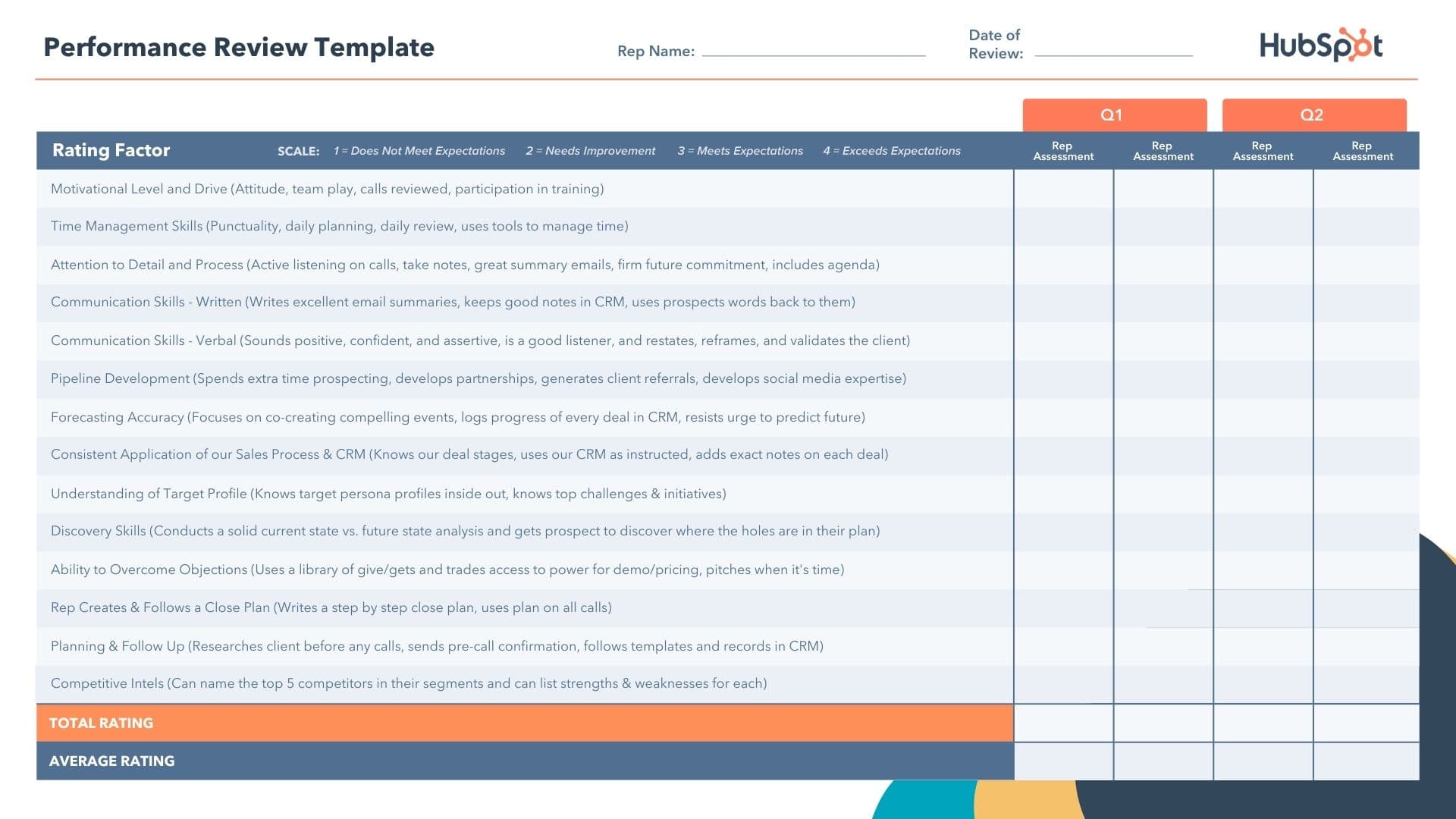
The image below is an example of a performance appraisal using a rating scale. In the template, there is a list of behaviors that the employee is expected to have and use at work, like attention to detail and communication skills.

performance appraisal example: ratings scale performance review

Download This Template Now

The manager or person providing feedback rates the employee on a scale of 1 to 4 based on how they express the skill, from Does Not Meet Expectations to Exceeds Expectations. The employee then receives a total numerical rating that you can use to drive discussions about further development.

When it comes down to your business’s bottom line, employees are direct contributors. Use performance appraisals to help your employees understand their job performance, so they know exactly which behaviors to continue practicing and which areas of opportunity to seek out additional development.

New Call-to-Action

Categories B2B

5 Instagram Highlight Covers to Inspire You [+ Steps To Make Your Own]

Today, your Instagram profile is like a mini-version of your website.

Think of your profile page as your homepage and each tab as a different section of your website. Instagram Story Highlights serve as your navigation bar, each one points to a collection of Stories relating to a specific theme.

Access Now: 22 Free Business Instagram Templates

You’ll find everything from “Meet the Team” and event recaps to FAQs and customer reviews on Highlight covers. While brands often set up their Highlights early on, many forget one important step: Designing Highlight covers.

In this article, we’ll cover the steps to make your own Highlight covers, some tips to keep in mind, and examples to inspire you.

How to Make Instagram Highlight Covers

Before you can add your Highlight covers to your Instagram profile, you first have to create them.

The easiest way to do this is through Canva, the graphic design app that offers hundreds of templates for just about everything. And did I mention it’s free?

Let’s get started.

  1. Go to Canva.com and create an account.

  2. Once you’re logged in, go to the search bar. Type in “Instagram Story Highlight Cover” and click “Enter” on your keyboard.

    how to make instagram highlight covers step 2

  3. From there, you can choose one of the pre-built templates or start from scratch.

    how to make instagram highlight covers step 3

  4. On the editing page, choose from hundreds of icons, graphics, and elements to customize your cover. You can also upload your own images and graphics.

    how to make instagram highlight covers step 4

  5. Once you’re done editing, click on the “Download” button on the top right corner of the page.

how to make instagram highlight covers step 5

Now that you know how to make your Highlight covers, let’s cover how to add them to your Instagram profile.

  1. Log into your account and head to your profile tab. Once there, click on the “New” icon located just under your bio section.

    How to add instagram highlight covers step 1

  2. Select which Stories you want to add to your Highlights then click “Next.”

    How to add instagram highlight covers step 2

  3. Click on “Edit Cover” to upload your Highlight cover.

    How to add instagram highlight covers step 3

  4. Then write a name for this Highlight then click on “Add.”How to add instagram highlight covers step 4

  5. That’s it! Your new Highlight cover will now show up on your profile.

    How to add instagram highlight covers step 5Pro-tip: Pick a name that will let your followers know exactly what to expect when clicking on it. Think of it as a navigation bar.

Best Instagram Highlight Covers

1. The Jungalow

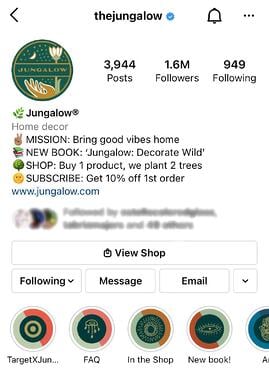
best instagram highlight covers: the jungalowImage Source

What I love about The Jungalow’s Highlight covers is that they’re cohesive while still being different. Each cover features different icons and colors but they all blend well together.

They even customized Target’s logo to fit within their aesthetic.

Instagram is all about aesthetics. So whenever you can, you want to find opportunities to make that happen. This is a great example of how to do so.

2. Good Lines

best instagram highlight cover example: goodlines

Image Source

Good Lines’ Highlight covers are fun, creative, and memorable.

Instead of using the standard icons, the brand decided to take a unique approach and use illustrations that align with its product.

Highlight covers are an opportunity to have fun and show some of that brand personality. It will help you stand out from the rest and leave a lasting impression.

3. MKT Heights

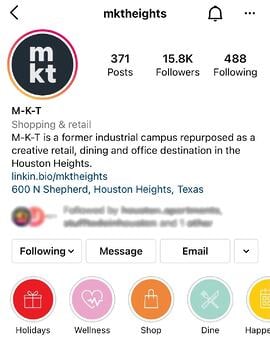
best instagram highlight covers: mkt heights

Image Source

For its Highlight covers, this brand went for simple icons against vibrant colors.

One thing to note here is that the brand picked icons that would complement the Highlight texts. You never want to leave your audience wondering or confused about what to expect. As such, you want icons that will be easily recognized and align with the topic.

For example, the “Dine” Highlight has the utensils icon, the “Holidays” one has a boxed gift icon. It’s a simple, foolproof strategy.

4. Ettitude

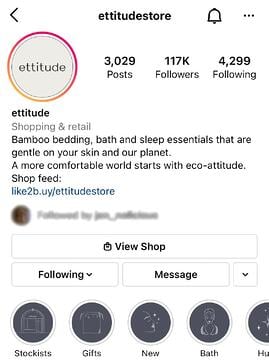
best instagram highlight covers: ettitude

Image Source

This brand went for a minimalist and cohesive look with its Highlight covers. Another interesting thing to note about this brand is that its Highlight cover background matches the colors on its website.

Keeping your brand colors consistent everywhere online is a great way to improve brand recognition. It also gives your profile a clean look that users can easily navigate.

Tips When Creating Instagram Highlight Covers

Highlight covers can greatly elevate your Instagram profile when done right. Here are some tips to help guide you:

  • Opt for icons or images instead of text – One mistake I often see brands make is writing the same words in their highlight cover as the description right below it. The text is supposed to complement the image and add more dimension to your profile.
  • Pick icons and images that align closely with the content – Don’t make your audience guess what each highlight is about. For instance, if one of your Highlights is about food, great icons include utensils, bowls, ingredients menus.
  • Keep it cohesive – With Highlight covers, there’s a lot to play with: text, icons, images, colors. Make sure you pick icons with similar shapes and styles, choose colors that are complementary, and follow the same text format for all Highlights.

There you have it – everything you need to know about your Highlight covers. The great thing about them is that you can always update them. So don’t be afraid to play around with some ideas on Canva and design Highlight covers that will complement your Instagram profile.

New Call-to-action

Categories B2B

How to Make the Most of AI Writing Tools, According to Bloggers

AI writing tools have come a long way since spellcheck.

Today, bloggers and marketers use AI writing tools to generate short and long-form copy and speed up content production.

But while AI writing software can assist in researching, outlining, and creating content, it’s not foolproof enough to cut out human writers completely.

According to bloggers, AI writing can help supplement your writing process, but you still need to remain in the driver’s seat.

Here’s what five bloggers and entrepreneurs had to say about how to use AI writing effectively, including what these tools are best for and where they fall short.

Free Blogging Course: How to Create a Successful Business Blogging Strategy

1. Break through writer’s block.

Most — if not all — writers have experienced writer’s block at some point. Getting into a creative rut can be especially challenging for bloggers who need to keep up with a demanding content calendar.

Fortunately, AI writing tools can help you overcome this “blank page syndrome.”

“Using AI writing tools helped us with eliminating writer’s block,” said Ruggero Loda, the owner of RunningShoesGuru.com, a blog that attracts more than 200,000 visitors each month.

“As a blog owner, creating blog posts is the utmost priority to me. But time and time again, [my] writers come across writer’s block, where they are unable to produce any new content.”

According to Loda, his team members often turn to AI tools to spark their creativity.

Loda told me, “AI writing tools have come to the rescue,” he said. “Even though the tools won’t write everything for you, they create content according to your instructions, and from there you can start getting new ideas.”

Daniel Martin, digital marketer and co-founder of LinkDoctor LLC, shared a similar experience.

“As we are an organization dealing with SEO-based digital marketing, we work with a content team,” said Martin. “Earlier, the team was struggling to keep pace with the blog writing. Once we made use of the AI tools, we were mind-blown, and the tools have helped the writers deal with writer’s block.”

While an AI tool can’t typically produce an entire blog post for you, it can get the ball rolling on your draft. Instead of staring at a blank page, you’ll have a sample to use as your starting point.

2. Whip up an outline fast.

AI writing tools can also help you write an outline quickly, which you can then use to produce a draft or outsource to another writer to finish the article.

“Leverage the outline feature of AI writing tools,” suggested Loda. “An AI writing tool can certainly help you with generating an outline based upon its collective data. Most often these outlines are good enough to start producing content.”

This outlining capability can be especially useful if you’re having trouble organizing your thoughts. It can streamline the writing process and give you a clear roadmap of how to move forward.

According to entrepreneur, content writer, and founder of Rephrase Media Matthew Ramirez, AI writing tools are most useful during this outlining stage of the writing process.

“In my experience, [one of] the best places to use an AI writing tool is in the ideation phase,” Ramirez said. “One of the most time-consuming parts of creating content is getting started, organizing outlines, and putting together a first draft. By using an AI tool that can help you elaborate your ideas and fill in details, you can greatly expedite your content writing.”

In fact, Ramirez says that using AI writing tools to outline his blog posts and expand on his ideas has helped him cut down on 80% to 90% of content creation time.

3. Make your instructions crystal clear.

The quality of what an AI tool puts out will directly correlate with what you put in. That’s why Loda encourages writers to be intentional with their instructions.

“Make your instructions very clear,” he said. “No matter what type of content you’re about to create, you can provide clarity to such tools by letting [the AI] know how your content should sound, what its tone should be, the agenda of your article, and much more.”

According to Loda, AI writing tools today let you specify a great number of inputs before generating your content.

“I was amazed to see such a variety of options that I could give out as my content descriptions,” he said. “Once I gave the best input, the tools provided me with the best output.”

Using an AI writing tool is a two-way street. It might take some practice, but as you get better at providing clear instructions, the tool can get better at producing high-quality content.

4. Don’t skip the research stage.

Along with generating full-form sentences and paragraphs, some AI writing tools can provide facts and figures they pull from the internet.

But Harriet Chan, co-founder and marketing director of CocoFinder —who has used AI writing tools to create blog posts and guest posts — cautions writers against relying too heavily on AI-gathered information.

“My advice for anyone looking to get the most out of their AI writing tool is not to skip the actual research part that goes into traditional writing,” said Chan.

“An AI tool will aggregate a lot of information fast, but will easily lose out on the human touch that each piece of writing should have to make it tick.”

Loda seconds these words of caution, saying that AI tools can produce inaccurate copy.

“AI writing tools can provide false data,” he said. “No matter how good of an AI tool you’re using, it is not human. With AI writing tools I have noticed that they collect data from old sources on the internet and without fact-checking that data they write content around it. Hence as a user, you should keep an eye on each sentence.”

That said, Alina Clark, co-founder of software development business CocoDoc — who has been using AI writing tools to supplement her business blog writing for two years — said that AI research capabilities have been a huge timesaver.

“I’ve used AI writing tools as fishing hooks to find out content on the internet,” said Clark. “AI writing tools have an advantage in the sense that they can read through a lot of content on the internet within a short time. Using an AI writing tool for content research shortens the research time, which means that I can create quality content faster.”

While AI can accelerate the research phase of the writing process, don’t neglect doing your own research, too. Make sure to supplement the tool’s findings with your own work to ensure everything is accurate and up-to-date.

5. Edit and proofread everything.

Not only can AI writing tools present outdated information, but they might also produce writing that doesn’t make sense or fit your brand voice. Because of this, it’s crucial to edit and proofread everything before you hit publish.

“One mistake to avoid with such tools is to assume that the output does not need to be reviewed before publication,” said Ramirez. “Doing so is very risky, since there might be something inappropriate or irrelevant in what the tool outputs.”

Chan agrees that while AI writing can be a useful supplement, you can’t rely on it for your complete writing process from start to finish.

“At all times, avoid relying entirely on the AI tool to do the whole writing bit for you,” she said. “Your brand will only stand out if the unique touch that attracted people to it in the first place remains all through it. An AI tool may show stark differences when it comes to making this possible.”

6. Remember your readers.

Finally, it’s crucial to remember your readers anytime you publish a piece of content on your blog, social media, or another channel. You can ensure that your content meets your readers’ needs far better than an AI tool can.

“One of the most important and common mistakes that can be avoided is having the whole content copy-pasted from the AI tool without thinking about the reader’s perspective,” said Martin. “Have practical experience, and write for the readers.”

Not only will this reader-first approach improve the quality of your blog posts, but it will also prevent Google from penalizing your blog for using machine writing.

“Most of the AI tools use GPT-3 [a language prediction model],” said Martin. “There is a chance the article will get penalized as Google aims to provide usefulness to the readers.”

AI Writing Tools Worth Checking Out

There are a variety of AI writing tools available today. Here are a few worth checking out:

  • Jarvis: This AI-powered software uses machine learning and natural language processing to generate blog posts, landing pages, social media copy, and other types of content. Not only does it create original content, according to the company, but it also supports over 25 languages. That said, this writing assistant can sometimes repeat phrases or produce irrelevant content that needs human editing. Jarvis offers a 10,000-word free trial, as well as a starter plan that starts at $29/month and a Boss Mode plan (for long-form content) that starts at $59/month.
  • Articoolo: This AI text generator offers a plugin to help you write blog posts directly in WordPress. It can help you speed up article writing and summarization, but it might not be the best pick for non-Wordpress users. Articoolo offers both fixed and monthly plans, including a fixed plan of 10 articles for $19 and a monthly plan that includes 30 articles for $29.
  • AI Writer: This tool claims it can speed up content creation by 50% with its automatic content writing and article rewording features. While this tool can help augment your writing process, you’ll still need to edit any content it produces. AI Writer’s basic plan starts at $29/month and its standard plan starts at $59/month.
  • Grammarly: Grammarly uses advanced AI to check your writing for spelling and grammar mistakes. It’s more advanced than basic spellcheck apps, as it can point out issues like passive voice or a lack of variety in sentence structure. Its premium plan can also check documents for plagiarism. You can use Grammarly’s proofreading tool for free or upgrade to one of its premium plans starting at $12/month.

Although AI tools are becoming increasingly sophisticated, they can’t replace human writers entirely. Not only is this surely a relief for bloggers and journalists, but it also means that an AI writing tool will only be as effective as the person using it.

As long as you continue to follow best practices for writing blog posts and other copy — and edit any AI-generated content before you publish it — you can enjoy the benefits of AI writing tools while avoiding the common pitfalls that come with them.

New call-to-action

Categories B2B

How to Use Custom Affinity Audiences: From Creation to Stellar ROI

Reaching the right customers with your Google Ads campaigns is critical to increase conversions. While it’s possible that scattershot advertisements could catch the interest of Internet users, it’s far more likely that this general ad approach will result in a disconnect between dollars spent and sales made.

To help ensure your ads are reaching the people in the right place, it’s worth leveraging a function in the Google Display Network (GDN) known as affinity audiences. Using these audiences helps pinpoint customer segments that may be more likely to purchase your products, in turn driving more effective and efficient ad spend.

But what exactly is an affinity audience? How do they work, how can you create your own — and what can you expect once you dial in the ideal customer segment? Let’s find out.

Free Guide, Template & Planner: How to Use Google Ads for Business

What are Affinity Audiences?

Affinity audiences are used by the Google Display Network to deliver your ads to relevant locations online. Given that Google’s network reaches more than 90 percent of Internet users worldwide, it’s well worth the time and effort to understand and apply these audiences at scale.

But what is an affinity audience?

Let’s break the term down into its component parts. Audience is easy — it’s the group of people that will see your ad. Affinity, meanwhile, is defined as “a feeling of closeness and understanding that someone has for another person because of their similar qualities, ideas, or interests.” The result? An affinity audience is a group of potential customers that share similar interests or qualities (similar to a buyer persona).

Using affinity audiences allows your brand to better align ad campaigns to buyers who are interested in what you have to sell. For example, if you’re in the coffee-making business but also have a focus on reducing plastic waste, your affinity audience might contain both people who love coffee and those who love the environment. Groups with both of these qualities are far more likely to buy your product than either group individually.

Affinity Targeting

Affinity targeting, meanwhile, is the process of identifying the ideal affinities that align with your product or service. Consider the coffee example above. While targeting buyers who love coffee helps improve your brand placement, it also puts you in direct competition with a host of other brands all producing similar products. Additional affinity modifiers that narrow your focus — such as sustainable growth processes, fair labor practices, or environmental priorities — can help set your brand apart.

Do note that it is possible to get too specific with your audience targeting. For example, if your coffee brand targets audiences that prefer beans from a specific region that are collected, packed, and shipped in a specific way, you may end up with a handful of very loyal customers but almost no broader appeal. As a result, targeting needs to narrow the focus without preventing you from reaching the greater public.

What are Custom Audiences?

GDN and the Google Ads platform contain a host of pre-built Google affinity audiences — also called segments — that you can use to focus your marketing and advertisements. These include everything from pet lovers to do-it-yourselfers, TV comedy fans and users with an interest in news and politics.

prebuilt affinity audiences in google ads

But they can’t cover everything. You may have a product or service that doesn’t dovetail with existing segments — here, custom affinity audiences can help.

Understanding Custom Affinity Audiences

Custom affinity audiences are those you create yourself in your Google Ads platform to align with the interests of your target customer base. While Google will suggest different potential segment tags depending on what you input, it’s worth taking the time to do some market research before diving into the custom affinity process. This lets you pinpoint the audience preferences that align best with your brand.

You can create custom affinity audiences related to four criteria: Interests, URLs, places, or applications. In general, places and applications are the least useful of the bunch. Here’s why. In our coffee example above, there aren’t a lot of coffee-related applications that would set your audience apart. And while geography has some impact on buying behavior, it’s usually not enough to justify an entire segment.

Interests and URLs, meanwhile, can help you dig down and identify potential affinity options that may be shared by your target market at large.

How to Create Affinity Audiences

Ready to create your own affinity audience? Follow these steps:

  1. Log into your Google Ads account.
  2. Select “Tools and Settings”, then “Audience manager.”
  3. Select “Custom Segments.”
  4. Enter segment name and interests.
  5. Save your new segment.

Let’s tackle each step in more detail.

1. Log Into Your Google Ads Account

how to use custom affinity audiences: log in to google ads

First, log into your Google Ads account. Here, you can see any active campaigns along with the associated affinity audiences.

2. Select “Tools and Settings”, then “Audience Manager”

how to use custom affinity audiences: access audience manager

Next, head to “tools and settings” in the upper-right-hand corner and then find “Audience manager” in the drop-down menu.

3. Select “Custom Segments”

how to use custom affinity audiences: custom segments

Now you’ll see a list of any data segments you’re currently using to target prospective buyers. To create an audience or segment, click on “Custom Segments” and then the blue “+” icon.

4. Enter Segment Name and Interests

how to use custom affinity audiences: segment name

Now, give your segment a name and add a few potential interests. For example, if you enter “coffee”, Google will return interests or purchase intention ideas such as “coffees to make with an espresso machine”, “how to make coffee with coffee beans” and “coffee makers that make different coffees.”

5. Save Your New Segment

Finally, save your new segment with use for ad campaigns. You can create as many segments as you like until you’ve covered all relevant market bases.

The Impact of Effective Affinity Audiences

Ideally, affinity audiences lead to a definitive result: Increased ROI.

Here’s why: When your ads are shown to audiences that are interested in what you’re selling, they’re more likely to click through and purchase your products. As a result, the money you spend on advertising is directly offset by the conversions driven by these ads, in turn creating positive ROI. More generic campaigns, meanwhile, may still increase overall sales but not enough to balance out the spend required to reach larger audiences.

The right audience makes all the difference. Targeted, customized affinity audiences help you reach the people that want to buy your products, in turn boosting conversions and making your overall ad spend more cost-effective. Custom affinity audiences further narrow your market targeting, increasing the likelihood of revenue and reducing the gap between what you spend on ads and what you get in return.

New Call-to-action

Categories B2B

The HubSpot Blog’s 2022 Social Media Marketing Report: Data from 310 Marketers

In our recent Marketing Trends survey, we learned that social media is the most effective channel marketers leverage, as well as the channel they use most.

But the world of social media is constantly evolving, with new features coming out every month, constant algorithm updates, and disruptive social apps changing the way we communicate.

To get the most out of your social media strategy, it’s critical to keep up with these changes.

The pace of social media can be intimidating. But, the great news is that with change comes opportunities for you to tap into exciting new marketing strategies and help your company grow better.

To help professionals just like you, we surveyed 310 social media marketers across B2B and B2C industries in the United States to find out:

Without further ado, let’s dive into some data that will help your social media strategy stay up-to-date as we jump into the new year.

Download Now: Social Media Trends in 2022 [Free Report]

2022 Social Media Marketing Trends Survey Key Findings

  1. Facebook is the most used social media platform and has the highest ROI, engagement, and highest quality leads.
  2. Funny, interactive, and relatable content, as well as content that reflects a brand’s values, performs best on social media and will see increased investment from marketers in 2022.
  3. Short-form video is the most popular and effective social media format and will see significant growth in 2022.
  4. When it comes to partnering with influencers, followers aren’t everything. Marketers are placing an emphasis on quality of content, engagement rates, and alignment with values before considering follower count.
  5. Overall, social media marketers located in EST say the best time to post is 6-9PM, while marketers in PST consider the 3-6PM window to be best. 
  6. The most popular demographics social media marketers target are Millennials (25-40), followed by Gen X (41-56), Gen Z (6-24), and lastly, Baby Boomers (57-75).
  7. Younger audiences prefer shorter video content that is funny, trendy, and reflects a brand’s values, while baby boomers prefer interactive/educational content, such as interviews, podcasts, expert discussions and/or live videos.
  8. Nearly two-thirds of marketers are building social media communities, and this number will grow in 2022. .
  9. Social media marketers search for new or emerging platforms/features to leverage often, and the top features they invested in this year are Twitter Spaces, YouTube Shorts, and Instagram Shops.

The Top Social Media Platforms of 2022

There are many factors that go into determining which social media platforms you should consider in 2022. While below we highlight a list of the most used platforms in 2022, here’s a quick graphic with quick stats on a few of the platforms you might want to watch as they grow and evolve in the coming year.

four social media platforms to keep on your radar in 2022Download Image as File

The Most Used Social Media Marketing Platforms

1. Facebook

Facebook is used the most, has the highest ROI and engagement of any social platform, as well as the highest quality leads.

One in four social media marketers plan to invest more in Facebook than any other platform in 2022, and it is the platform marketers buy paid ads on the most.

2. YouTube

YouTube comes in second for usage, engagement, and ROI, but it’s the number one platform marketers plan to invest in for the first time this year.

On top of the fact that one in five social media marketers plan to invest the most in YouTube this year, the platform will continue to grow along with the use of video content.

3. TikTok

TikTok is only used by one-third of social media marketers. Although these marketers report low ROI and engagement levels compared to other platforms, 52% of those who use TikTok plan to increase their investment this year, tied with Twitter for the highest increase of any platform.

4. Twitter

Twitter is used by about half of social media marketers and comes in third for engagement and ROI.

52% of those who use it plan to increase their investment this year, and 16% of all social media marketers plan to invest more in Twitter than any other platform in 2022.

5. Instagram

Instagram is leveraged by 45% of social media marketers, coming in 4th for usage, ROI, and engagement.

However, Instagram comes in second place for generating the highest quality leads. And,

the platform is set to grow in 2022, with 40% of marketers planning to use it for the first time and 15% planning to invest more in Instagram than any other platform.

6. LinkedIn

LinkedIn has become host to lots of B2B marketing and expert thought leadership over the past few year. It’s unique professional social media experience is likely why it’s leveraged by more than one-third of social media marketers. In 2022, LinkedIn marketing will only grow with 38% planning to use it for the first time.

Which platforms will see less investment in 2022?

You may also be wondering which social platforms marketers plan to reduce their investment in this year.

Clubhouse, Snapchat, and Reddit are the top platforms marketers plan to decrease their investment in for 2022.

Although Clubhouse was a viral app in 2021 — and offered marketers a new way to connect with consumers — this expected dip in investment could be due to the platform’s brand challenges. For example, Clubhouse offers minimal advertising opportunities or ways to share outside content or URLs, because of this, it will yield less ROI to brands than platforms like Facebook where advertising and link-sharing opportunities are always growing.

Not to mention, like many viral social media apps, Clubhouse has gotten some tough competition from social media channels owned by larger corporations like Twitter, Meta (formerly Facebook), and LinkedIn which could have social media marketing managers considering these options as those platforms are much more familiar to them. 

While Snapchat and Reddit have also hosted viral content in the past, they too cater to more niche audiences and consumers looking to avoid ads and branded content, which could cause more ROI-generation challenges than the most-used social media platforms. Like Clubhouse, they have also had a more difficult time competing with larger social media channels to win over brands.

Think one of the three platforms we just mentioned should still be part of your strategy? Don’t panic!

It’s important to remember that what works for your brand might not be what works for everyone else. And, while many marketers might not see their bottom line impacted by evolving platforms like Clubhouse, Reddit, and Snapchat just yet, that doesn’t mean no marketer ever has or will benefit from using them.

Ultimately, you’ll need to build your strategy around your audience and brand and take steps to determine which channels are best for you. 

4 Content Types Social Media Marketers Will Lean Into in 2022

1. Value-based Content

Content that reflects your brand’s values is the most popular type of content among social media marketers right now and has the 3rd highest ROI of any content type.

This type of content will see more investment from users in 2022, with 95% of those who leverage it planning on increasing or maintaining their investment, and 21% planning to use this type of content for the first time.

Additionally, we found that social media marketers who say their social media strategy has been effective in 2021 are 21% more likely to leverage content that reflects their brand’s values than those who reported an ineffective social media strategy last year

which social media content types have the biggest ROI

2. Funny Content

Funny content is tied with interactive content at #2 in terms of usage by social media marketers.

However, funny content has the highest ROI and is the most effective content type. The use of funny content will continue to grow in 2022, with 33% of all social media marketers planning to invest more in funny content than any other format.

Additionally, 95% of those who use funny content will increase or maintain their investment, while 56% of those who don’t leverage it plan to use it for the first time in 2022.

3. Interactive Content

Interactive content is #2 when it comes to usage, ROI, and effectiveness and will grow significantly in 2022.

97% of those who leverage it plan to invest more or maintain their investment this year, while 49% of those who don’t plan to use it for the first time in 2022.

On top of all that, we found that social media marketers who say their social media strategy has been effective in 2021 are 25% more likely to leverage interactive content than those who reported an ineffective social media strategy last year.

types of social media content marketers will invest in

4. Relatable Content

Relatable content is currently leveraged by 39% of social media marketers and will see increased investment among current users as well as first-time users.

93% of marketers who leverage relatable content plan to increase their investment or continue investing the same amount in 2022 and 54% of social media marketers who don’t leverage it are planning to for the first time this year.

which social media content types will get the biggest investment

The Top Content Formats for Social Media Marketing

1. Short-Form Video

Short-form video is the most popular and effective social media format and will see significant growth in 2022.

50% of social media marketers plan to leverage short-form video for the first time this year, and 95% of those who already use it will increase or maintain their investment.

On top of that, 26% of all social media marketers plan to invest more in short-form videos than any other format this year.

Building a video strategy for 2022 and not sure which platforms to share it on? Check out this data on the best social platforms for video or watch the video below to learn more about short, or snackable, content.

2. Live Video

Live video is No. 2 when it comes to usage and effectiveness, and will continue to grow in 2022.

43% of social media marketers plan to leverage it for the first time this year, and 66% of those who already use it plan to increase their investment next year, the highest increase of any format.

3. Audio Chat Rooms

While marketers are still easing on to platforms like Clubhouse and Twitter Spaces, this doesn’t mean they have no interest in the audio experience. Audio chat rooms rank third in usage and effectiveness, though social media marketers report low ROI.

However, 44% plan to invest in live audio for the first time in 2022, and 17% of marketers plan on investing more into live audio than any other content format.

Social Media Strategies

This section will go over a wide range of social media metrics, from the best time and day to post on social media, to which metrics marketers use to measure the ROI of their campaigns, and much more.

The Best Times to Post on Social Media

73% of marketers say their company has a posting schedule or calendar for social media marketing. While tools like TK, TK, and TK can help the social media marketers we surveyed in building out an effective scheduling strategy, it’s also helpful to know the best times to post social media content to optimize likes, clicks, and other engagements.

Overall, social media marketers located in Eastern Standard Time say the best time to post is 6-9PM, while marketers in Pacific Standard Time consider the 3-6PM window to be best. 9-12PM and 12-3PM are also popular times to post.

Keep in mind that while all of these times can work, the best time will ultimately depend on when your audience is most active on the platform, so make sure to look at your insights when deciding when to post. You can also run your own tests to see which posting time results in the most engagement.

Speaking of platforms, the best time to post can vary based on which one you are using. Here’s a breakdown of the top three times to post for each platform:

  • Facebook: 6-9PM,  3-6PM, and  9-12PM
  • YouTube: 6-9PM, 3-6PM, and 12-3PM
  • Twitter: 6-9PM, 3-6PM, and 12-3PM
  • Instagram: 6-9PM, 3-6PM, and 9-12PM
  • LinkedIn: 6-9PM, 3-6PM, and 12-3PM
  • TikTok: 6-9PM, 3-6PM, and 12-3PM

When it comes to the most engaging days of the week, social media marketers say Friday, Saturday, and Sunday are the best days to post across social media platforms.

Documenting and Templating Social Media Strategies

Much like posting schedules, more than two-thirds of marketers say their company has a documented social media strategy. If you need help getting started, check out these templates.

Below are some of the top questions social media marketers ask themselves when building out a social media strategy and our data-backed guidance around them:

1. Which metrics should I use to measure the ROI of my social media marketing campaigns?

Measuring ROI is one of the biggest challenges marketers anticipate in 2022. With more data available to us than ever before, it can be hard to zero in on the metrics that are most important.

According to social media marketers, website traffic is the most important metric when measuring ROI of social media campaigns, followed by

  • impressions/views
  • clicks
  • sales/conversions
  • likes/comments

2. How do I know if I should keep using a platform for social media marketing?

Believe it or not, the biggest challenge marketers anticipate struggling with in 2022 is determining which platform to market their brand on.

If you are one of those marketers, you may be wondering what metrics you should be looking at when deciding whether to continue leveraging a social channel.

Coming in at number one is impressions/views, followed by sales, then subscriber/follower count, website traffic, and clicks.

3. Which new or emerging platforms or features are marketers investing in for 2022?

With new social media platforms popping up every few months, it can be overwhelming to keep up with all of them while also managing your active campaigns.

Nevertheless, you might be wondering which new platforms marketers plan to invest in this year, how often you should be searching for new platforms to leverage, and when you do find a promising opportunity, how do you determine whether it is worth your time and investment? Let’s break it down.

emerging features brands will invest in in 2022

  • Twitter Spaces is a new live audio feature on the already popular Twitter platform, so it’s no surprise that 39% of marketers invested in it in 2021, the highest of any platform. Twitter Spaces is also the #1 new feature marketers plan to invest in more than any other in 2022.
  • YouTube Shorts is widely considered YouTube’s response to TikTok and 31% of marketers invested in it in 2021, with 15% of marketers planning to invest more in Shorts than any other new feature next year.
  • Instagram Shops is the 3rd most popular new feature marketers invested in last year, with 30% of social media marketers giving it a try in 2021.
Emerging Social Channels and Features That are Losing Steam

When it comes to reducing their investment, social media marketers are pulling back on lesser-known live audio platforms as more established ones like Twitter begin to incorporate live audio features.

In 2022, marketers plan to stop their investment in live audio platforms like Spoon, Discord, Spotify Greenroom, and Riffr.  These platforms all involve live streaming and audio discussions, adding to the over-crowded audio social market. While the saturation of this social media category could be one issue causing stagnant marketing growth, these platforms could also host similar niche audiences or low-ROI challenges like Clubhouse. 

How often do marketers search for new platforms to leverage?

Marketers search for new platforms often, with 29% searching once a month, followed by 22% searching once a week and 20% searching multiple times a week. 14% search once a quarter, 4% search once per year, and only 1% never search for new platforms.

So if you aren’t currently setting aside a small chunk of time to search for new platforms, you run the risk of missing out on a new and exciting opportunity. But once you find something, how do you determine if it’s worth the investment?

How do marketers determine if a new platform is worth investing in?

Marketers determine which social media platforms are worth investing in based on the potential for driving traffic to their website, then the potential for lead generation, followed by the potential audience reach, the cost of paid ads, the cost of influencer partnerships, and the demographic makeup of the platform’s users.

Social Media Demographics

When we asked social media marketers about the age groups they target, we discovered:

  • Millennials (ages 25-40) are the #1 group being targeted by social media marketers by far, with 84% of those surveyed saying they target them.
  • Gen X (ages 41-56) are targeted by 52% of social media marketers
  • Gen Z (ages 6-24) are targeted by 22% of social media marketers
  • Baby Boomers (ages 57-75) are the least targeted demographic among social media marketers, with just 14% saying they target them.

which age groups will brands target on social media in 2022

And, when it comes to targeting each age group, the strategies can be slightly different. Below are some additional learnings we gained from our survey:

What type of content do Millennials and Gen Z prefer?

According to marketers, younger audiences like Millennials and Gen Z prefer shorter video content that is funny, trendy, and reflects a brand’s values.

If you’re targeting this audience, you’ll want to leverage short-form video platforms such as TikTok, as well as YouTube and Instagram now that they’ve implemented similar short-form features.

What type of content do Baby Boomers prefer?

On the other hand, Baby Boomers prefer interactive/educational content, such as interviews/podcasts/expert discussions and live videos.

If you’re targeting this audience, you’ll want to leverage those formats on Facebook, which marketers say is the most popular among baby boomers.

To learn even more about social media demographics, check out and bookmark this post.

The State of Social Media Communities

In an increasingly online world, you may be wondering if you should be investing in building social media communities.

Let’s go over what they are, which platforms are most effective for building social media communities, and some of the top challenges marketers face when leveraging them.

Currently, around 64% of marketers are leveraging social media communities (or online groups where members interact over shared interests).

This number will only keep growing, as 30% of those who don’t use social media communities plan to start in 2022. Additionally, 51% of those who already leverage social media communities plan to invest more this year, while 45% will continue investing the same amount.

Which platforms are marketers building social media communities on in 2022?

Facebook is the top platform marketers build social media communities on, followed by YouTube and TikTok tied for #2, with Instagram and Tumblr close behind.

social media community investments of 2022

What are the biggest challenges marketers face with building social media communities?

Despite the growth in online community building, social media marketers are still learning how to build the perfect strategy and navigate regular challenges associated with community management.

According to social media marketers we surveyed, the biggest challenges marketers face with building communities are:

  • actively managing their community
  • measuring the ROI of their community-building efforts
  • growing their community,
  • fostering an engaged community.

What sets effective social media marketers apart from others?

In our survey, we asked marketers how effective or ineffective their social media strategy has been this year. I then examined our data through these two separate groups, the first being those who said their social media strategy was effective, compared to the second which rated their social media strategy as ineffective.

Here are a few key differences between those who say their social media strategy was effective (77% of respondents) vs. ineffective (7% of respondents):

The effective group is 25% more likely to leverage interactive content (polls, games, etc.) and 21% more likely to leverage content that reflects their brand’s values.

When determining which influencers to partner with on social media, the effective group is 26% more likely to consider the quality of influencers’ content and 18% more likely to consider whether influencers align with their company’s values.

When trying to find their audience on social media, the effective group is:

  • 21% more likely to use social listening
  • 17% more likely to research the demographics of social media platforms
  • 17% more likely to research relevant online communities
  • 14% more likely to analyze demographic data their company already has

effective vs. ineffective social media marketers

In terms of the age demographics they target with their social media marketing efforts, the effective group is:

  • 5% more likely to target Millennials
  • 14% less likely to target Gen X
  • 7% less likely to target baby boomers
  • 6% less likely to target Gen Z

Oh, and one more thing. Those who use HubSpot to track social media analytics were 16% more likely to say their social media strategy was “very effective” in 2021, compared to those who use another analytics tool.

Want to learn more about our social media findings? Check out our most recent follow-up posts below, and stay tuned for even more research-driven content:

For even more data and exclusive tips from social media thought leaders, you can also download our free Social Media Trends Report.

New call-to-action

{{slideInCta(‘5697308f-eba0-4046-b677-8fcec1c27dfb’)}

Categories B2B

5 Social Media Predictions Marketers Got Wrong Last Year

The world around us is constantly changing — it only makes sense that the marketing world does too.

Every year, marketers pull out the crystal ball to predict trends and shifts in the coming year. Sometimes we’re right on the tail — and other times the social media marketing landscape surprises us.

Download Now: Social Media Trends in 2022 [Free Report]

Here, we’ll cover 5 social media predictions marketers got wrong in 2021 and strategies for making better predictions in the future.

5 Bad Social Media Predictions of 2021

1. The TikTok craze will reach its peak.

Despite threats of being banned in the U.S. — and actually being banned in India — TikTok continues to defy the odds and grow at a steady rate. In fact, the app hit a remarkable milestone at the end of 2021 — one billion monthly active users.

Despite its popularity, some marketers may have dismissed TikTok entirely, reducing it to a platform for lighthearted dances and lip-synching. However, it’s become a viable option for brands willing to get creative with their digital marketing. So much so, it launched TikTok for Business in 2021, allowing marketers to create and manage ad campaigns on the platform.

Need more convincing? According to the HubSpot Blog’s survey of 1,000+ marketers, a whopping 85% cited short-form videos (like those on TikTok) as the most effective social media format in 2021. In fact, more than half of marketers (52%) plan to increase their investment in TikTok this year.

It’s not too late to leverage TikTok in 2022. Check out this helpful guide on how to get started.

2. Facebook will become obsolete.

We’ve all heard the jokes about Facebook’s aging audience — and there is some truth to it. A recent study found that Snapchat, Instagram, and TikTok were the platforms of choice for Gen Zer’s, with Facebook falling into 6th place.

But we can’t write off Facebook just yet. It still pulls over 1.5 billion daily active users, making it the most popular social media platform worldwide. It largely holds sway with millennials, the biggest demographic group on the platform.

When it comes to social media marketing, Facebook packs quite a punch. According to HubSpot Blog’s survey of 1,000+ marketers, Facebook led the pack as the platform with the highest ROI and engagement in 2021. It’s no surprise that 25% of social media marketers plan to invest more in it than any other platform in 2022.

From these stats alone, it’s clear Facebook is still a booming business for digital advertising. With its expansion into live video, along with Facebook Shops and Stories, marketers can also experiment with new ad formats in one central location.

3. TikTok will become the preferred platform for influencer marketing.

Despite its popularity, TikTok fell short when it came to influencer marketing in 2021.

Instead, the title belongs to Instagram, which was ranked the platform of choice for inking deals with influencers. So much so, a staggering 97% of marketers plan to increase their investment in influencer marketing on Instagram this year.

Our survey also revealed influencer marketing as the most popular trend with the biggest ROI in 2021. The most notable reason for this uptick is an increase in micro influencers. Micro influencers provide smaller, highly-engaged audiences without the hefty price tag of a mainstream celebrity — making this type of marketing more accessible to a variety of brands.

Want to try your hand at influencer marketing but don’t know where to start? Check out this handy checklist.

4. Audio chat rooms will yield huge ROI

2021 saw a wave of live audio apps — including Clubhouse and Twitter Spaces. We were all intrigued — was it a viable marketing channel? Could this content go viral?

It turns out, audio chat rooms were great for engagement but not so much for ROI. According to our survey, Clubhouse fell to the bottom of the list regarding ROI. Further, 15% of marketers plan to decrease their investment in audio chat rooms this year.

However, there’s a redemption arc — despite having low ROI, many marketers report high engagement rates. If your social media marketing goals are to boost engagement and brand awareness, these audio apps could be the secret ingredient. In fact, 44% of marketers plan to leverage podcasts and audio-based content for the first time this year.

5. Remote events will lose steam as we return to the workplace.

Most people — myself included — thought the workforce would finally return to the office in 2021. But this prediction was a little premature.

Instead, many workplaces have adopted a hybrid work model where employees can work in-office or remote. This could become a permanent arrangement — 51% of organizations are considering a move to hybrid work in a post-COVID world.

As a result, remote and hybrid events are here to stay, and marketers must adapt. 64% of marketers plan to increase their investment in live video and streaming — like Facebook Live, Instagram Live, and YouTube Live — in 2022.

How to Make Better Social Media Marketing Predictions

In the marketing sphere, trends move in light years. As marketers, it’s essential to make predictions to equip ourselves for the future. Here, let’s cover three ways to make better social media marketing predictions:

  • Keep up-to-date: A great forecaster keeps a pulse on new trends and technology. When making social media predictions, staying informed in small — but frequent — bouts is better than in an end-of-year rush.
  • Cast a wide net: Seek out a variety of sources for your news. In doing so, you’re more likely to get a holistic view of the current climate. Further, you may discover contradictory information — which may call for a second glance.
  • Know your biases: We all have biases — and recognizing them is half the battle. Confirmation bias, in particular, can heavily influence how we make predictions. This is the tendency to interpret new evidence as confirmation of an already existing belief. To prevent this, you’ll need to seek differing viewpoints that challenge your assumptions. It’s also important not to jump to conclusions, which creates a false picture of the marketing landscape.

The only constant in the marketing world is change. As a social media marketer, the best thing you can do is stay current on trends and tech, seek out new opinions and viewpoints, and identify trends in your own marketing.

New call-to-action

Categories B2B

The 8 Best Marketing Frameworks You Need to Know

Marketing is a unique animal. With a combination of creativity, analytical thinking, taking data into consideration, and project management, a modern-day marketer must possess a great number of skills and have quite a few tools at their disposal.

Sure, you can delegate some of the work, but it also means you’re responsible for getting multiple people on the same page…some of which work in different states.

Rather than allowing your frustration to build, you can utilize tools that will make your job easier. More specifically, marketing frameworks. In this piece, we’ll discuss what a marketing strategy framework is, the benefits of utilizing one, the best marketing models out there, and how to decide which is best for you.

→ Download Now: Free Marketing Plan Template

You can think of it like this: you wouldn’t dream of approaching your marketing with a “throw spaghetti at the wall and see what sticks” attitude because it would be a disaster for your organization.

Instead, you’ll likely spend days, weeks, and maybe even months identifying your target audience, where they spend time and determining the perfect way to reach them and communicate the benefits of your product or service in a marketing plan.

Your marketing strategy framework takes this all a step further and, as mentioned above, ensures your marketing plan is successful because you’ll share content with your audiences at the right time in the most relevant channels that are more likely to drive results.

The Benefits of a Marketing Framework

A Marketing Framework does more than just keep you focused on the task at hand. As your company grows and your team grows along with it, you must find a way to communicate with every member of the marketing department, no matter where they work or what tasks they are responsible for.

Creating a marketing framework is the best way to ensure that everyone knows what they need to do and how they need to do it. Additional benefits of utilizing a marketing framework include:

  • Creating a home for templates, guides, tools, and assets that all marketers in your organization will need to access.
  • Establishing and communicating approved verbiage for the organization.
  • Improving marketing which then improves the growth and bottom line of the company.
  • Allows the team to compare different strategies and determine the best route.
  • Clearly communicate who is responsible for what and make it easier to transfer people from one role to another.
  • Save time by limiting “redos” – areas that are often susceptible to errors and therefore must be reworked.

In addition, your framework will help you predict your customer’s behavior and the revenue you can expect to see. As a result, it will help your team function more efficiently and produce more effectively.

The Best Marketing Frameworks

Marketing has probably been around since prehistoric days when entrepreneurial cavemen designed state-of-the-art spears and tried to sell them to their less “handy” counterparts.

Okay, that might not be true, but marketing has been a necessary aspect of business for a long time, and, over that time, savvy marketers have designed models and frameworks to make their (and your) job easier. Let’s take a look at some traditional models as well as some newer frameworks.

Traditional Marketing Models

1. 7Ps Marketing Mix

This widely used model considers the stages of business strategy, beginning at conception and taking it to evaluation. The Ps stand for:

  • Product: What’s being sold?
  • Prince: How much does it cost?
  • Place: Where will the product be sold?
  • Promotion: How will you communicate with your audience?
  • People: Who is involved in the production, promotion, and distribution?
  • Process: How will you deliver it to the customer?
  • Physical Evidence: How will you prove to customers that your business exists?

When you utilize the 7P model, you’ll have the opportunity to analyze and optimize every aspect of your company and your strategy to improve your business.

marketing strategy framework: The-7Ps-Marketing-Mix

Image Source

2. STP Marketing Model

The SPT model is a top-down approach that focuses on how a company addresses customers and helps deliver personalized (and relevant) messages to audiences.

STP stands for segmentation (dividing your audience into different sections), targeting (who will be the most receptive to your product), and positioning (how do you make your product the most appealing to that audience), and has helped many companies shift to utilizing social media to deliver content.

marketing strategy framework: stp approach

Image Source

3. Porter’s Five Forces

While most marketing frameworks focus on the product itself and the audience, Porter’s Five Forces looks at the outside influences that can affect profitability. These include:

  • Supplier Power, how many other suppliers exist, what makes them different, and how much their product costs.
  • Buyer Power, which is the customer’s ability to influence decisions made by the company.
  • Threat of Substitution, which is how your product compares to others on the market.
  • Threat of New Entry, which is any barriers you might experience when entering the market.
  • Competitive Rivalry, which is any other outside forces that affect how your product compares to the competition.

This model will help determine just how competitive your business environment is.

marketing strategy framework: porters five forces

Image Source

Now, let’s look at some of the newer models to hit the marketing scene. While they may not have been around as long as the more traditional models, they take into account the current marketing climate and often focus on start-ups.

Modern Marketing Models

4. Pirate Metrics or “AARRR!”

No, you don’t have to don an eye patch or adopt a parrot to use this framework. Developed by serial Startup Founder Dave McClure, Pirate Metrics allows you to see how a customer may travel on their buying journey and what areas you need to improve. AARRR stands for:

  • Acquisition: Where are prospects finding you? Facebook ads, blog content, a paid search, etc.
  • Activation: What step did a prospect take once they arrived at your website? Depending on the business, this could include signing up for an account, downloading a free giveaway in exchange for their email, filling out a profile, etc.
  • Retention: Once they’ve left your site, do prospects or customers come back? How often?
  • Revenue: How do you earn money from your customers? Consider reviewing metrics such as conversion rates, shopping cart size, and the LTV or customer lifetime value.
  • Referral: When customers are happy, they tell other people, and you end up with more customers. This lowers your CAC or customer acquisition cost because your loyal customers will attract new prospects for you.

marketing strategy framework: aarrr framework

Image Source

5. Lean Analytics Stages

Developed by Alistair Croll and Ben Yoskovitz, the Lean Analytics Stage framework combines aspects of many different models and is ideal for improving startup growth. There are five pillars to this model:

1. Empathy

During the product development stage, you’ll spend most of your time listening to customers, empathizing with their challenges, and taking in as much feedback as they are willing to provide. Once you have identified a problem you can solve to create your minimum viable product (MVP), you can then move on to the next stage.

2. Stickiness

Focus on engagement and retention as you work to create something that yields return customers. When you’ve got an engaged base and a low attrition rate, you can continue to stage three.

3. Virality

Before you try to attract customers through heavy advertising spending, focus on your existing customers. As your organic growth rates improve, you can move to stage four.

4. Revenue

Without money, you’ll be out of business quickly. Pay attention to your customer acquisition cost metrics to make sure your customers spend more money than they cost to acquire. Once you’ve reached your revenue goals, you can move to the final stage.

5. Scale

You’ve got explicit knowledge of your product and your market. Now, it’s time to increase the revenue from your current market and potentially enter into new markets.

marketing strategy framework: lean analytics modelImage Source

6. The Hook Model

No, it has nothing to do with the Pirate Metrics we discussed earlier, but it does compliment the stickiness and virality we discussed during Lean Analytics.

The Hook Model was developed by Nir Eyal, author of Hooked: How to Build Habit-Forming Products. He believes that our most purchased and utilized products achieve that status because they become a part of habitual behaviors. As marketers, we can tap into that by understanding the cycle:

  • Trigger: The beginning of the cycle is often an external trigger like a push notification. However, as the cycle continues, negative internal emotions become triggers as we attempt to lessen these negative emotions with an action.
  • Action: The easier you make things to do, the more likely a person will do it. Habit-forming products make taking action painless and straightforward.
  • Variable Reward: The anticipation of reward is a strong motivator. Variability increases anticipation, making prospects and customers more likely to take an action that warrants a reward.
  • Investment: Creating an investment or “buy-in” for your customers makes it more difficult for them to step away from your product or service.

marketing strategy framework: the hook model

Image Source

7. The ICE Score

Sean Ellis, the Father of Growth Marketing, teaches the ICE score, a simple and quick way to evaluate potential channels for growth.

Rather than implementing a complex system, Ellis suggests asking three questions:

1. What will the impact of this move be if it works?

2. How confident am I that this plan will work?

3. How much time, money, and effort will be necessary to put this into action?

Asking yourself and your team these questions is one of the fastest ways to evaluate an idea and determine if you should move forward.

8. STEPPS

Developed by Jonah Burger, the author of Contagious: Why Things Catch On, STEPPS is a formula to create contagious content that has people talking and sharing.

  • Social Currency: Invite your customers to feel more like insiders. Humans are programmed to care what others think of them. This taps into that need to be seen positively by others and encourages conversation around your product.
  • Triggers: Frequently remind people of your product utilizing triggers and they’ll talk about it more.
  • Emotion: Highly emotional content is more likely to go viral. Taking that one step further, high arousal emotions like anger will be shared more often than low arousal emotions like sadness.
  • Public: When you make something public, you encourage people to talk about it and share it.
  • Practical Value: Provide value in the form of useful content, and people will be more likely to share it.
  • Stories: We are biologically wired to see the world through narrative. Creative stories that are easy to relate to and easy to remember, and they’ll also be easy to share.

marketing strategy framework: stepps modelImage Source

Selecting the Best Marketing Framework for Your Business

While there are a variety of models available to you, they are not all created equal. There are a number of factors that will influence which framework is best for you and your organization.

In order to determine which framework to choose, you’ll want to examine the following aspects of your business:

  • What are the top priorities of the business?
  • What is the role of marketing within the organization?
  • How is success defined and measured within the marketing?
  • What is the marketing department capable of, and what improvements would you like to make?
  • Where would you like to see the most impact due to marketing efforts and what’s the easiest way to ensure that impact?

Over To You

Marketing is a difficult role no matter your product or service. You are in essence responsible for telling the world that your company has the cure to what ails them. Without you, the most amazing product or service ever created will never reach the hands of the people who need it.

As challenging as it is, there are tools you can utilize to take some of the difficulty out of your responsibilities. A marketing framework will help you stay the course, keep your team in the know and on the right path, and will ultimately help you better achieve your desired goals. Create a marketing framework today and make tomorrow easier.

New Call-to-action

Categories B2B

20 of the Best Free Google Sheets Templates for 2022

Google Sheets templates help you create better spreadsheets while saving you valuable time.

A template knows what you need and offers it without any manual input, giving you the ability to focus on more important things — such as making sense of the data itself.

→ Access Now: Google Sheets Templates [Free Kit]

In this post, we’ll cover every template you’ll ever need to easily and efficiently use Google Sheets for business, including templates for project management, reporting, people management, and customer tracking.

You’ll learn:

1. Why you should use Google Sheets templates for business;

2. Step-by-step instruction on how to find the built-in Google Sheets templates;

3. A roundup of additional Google Sheets templates for any marketing role, including:

Let’s get started.

Why use Google Sheets templates for business?

Google Sheets templates are a fantastic business tool that can be used by teams of any size. Whether you’re a business just starting out or an established enterprise firm, you’ll enjoy countless benefits when using Google Sheets templates.

Even if you don’t use them as your primary business tool, they can supplement other tools. For instance, you might use a free CRM to track customer information, then use a Google Sheets invoice template to quickly create invoices for each customer.

Let’s go over the top benefits of using Google Sheets templates for business.

Free

Google Sheets templates are completely free to use, and they cover a wide variety of needs. So you won’t have to spend hundreds of thousands of dollars getting an Excel subscription (or a subscription for another tool). Simply have everyone sign up for a Google Workspace account and get immediate working access to the templates.

Ability to Collaborate

Google Sheets templates allow your team to collaborate with little gatekeeping. The only thing you have to do is click the “Share” button at the top right-hand corner of a document, and your team members will have access to the file.

You can also limit the collaboration aspect to commenting or viewing only. This is a great option for sensitive documents that only a few people should edit.

Intuitive to Use

To use a Google Sheets template, you need very little experience with spreadsheets. You don’t need to know advanced formulas and functions to make them work for you. The templates already come with all of the fields and calculations built-in. All you have to do is plug in the numbers and populate the fields, and the document will generate a report or calculate a total.

Customizable

That you’re using a template doesn’t mean that you’re stuck with its look and feel. You can easily change the fields, the colors, and the fonts using Google Sheets’ built-in tools. Once you do, you’ll feel like the template is your business’ only.

No Data Loss

Another great benefit of using Google Sheets templates? Unless a freak accident happens with Google’s servers, it’s near impossible to lose data. All changes are stored in the cloud, and Google Sheets includes a version history of the document, where you can revert to a previous version if something happens.

If your laptop crashes or you lose internet connection, Google Sheets simply freezes the copy until you’re online again. You’ll still want to take a few precautions, such as enabling offline editing and downloading a copy of the document to your local drive.

Ready to find a few templates that you can start using right now for your business?

How to Find Templates In Google Sheets

There are two common ways you can find and use free Google Sheets templates.

1. Google’s In-Built Template Gallery

On your browser, go to Google Sheets. Click “Template Gallery” at the top right. Explore the templates to find the right one for you.

Google’s In-Built Template Gallery

You’ll find different templates for your personal, work, and project management needs. Here’s an example of what the Personal template library looks like:

Google’s In-Built Template Gallery for personal templates

2. Add-Ons

Another way to find free templates in Google Sheets is to download and install the Vertex42 add-on. Here’s how:

Open an existing Google sheet, or type “
sheets.new” to create a new one. Then, find and click the “Add-ons” button on the top left menu.

use add ons to find free templates in google sheets

Type “Vertex42” into the search bar, and click enter. Install the add-on.

using add ons to get templates in google sheets

To access the templates, click on “Add-ons,” then “Template Gallery for Sheets,” then “Browse Templates.”

using add ons to browse templates in google sheets

Here you would find templates that can help with almost everything you need — whether you need to create an invoice, income/expense tracker, or a dashboard to manage your projects.

add ons for finding templates in google sheets

Let’s now look at some of the free Google Sheets templates you would find useful as you run your business.

Google Sheets Templates

Whether your position requires you to send invoices to clients, track website analytics, or create budget and expense reports, you’ve undoubtedly found yourself working with spreadsheets in some form. And if you’re anything like me, those spreadsheets can feel frustratingly tedious when you’re under a time crunch.

Fortunately, Google Sheets offers a wide variety of pre-built templates, allowing you to create reports and analyze data in spreadsheets faster and more effectively.

The following Google Sheets templates cater to specific categories and allow you to cut hours, if not days, of work in one fell swoop. Let’s go over the best google Sheets templates you can start using now.

Google Sheets Templates for Finances

Spreadsheets are popular tool for bookkeeping and invoicing. Below, you’ll find a curated selection of ready-to-go templates that will allow you to invoice clients, maintain an annual business budget, generate financial statements, create expense reports, and generate purchase reports.

The result is a ton of saved time — there’s no need to create or choose any formulas that will help you calculate this data.

1. Invoices

If you’re a freelancer or work for a small business, you probably use invoices to bill clients for services. This invoice template makes the process simple — it provides space for all the necessary information and looks more professional than a plain spreadsheet. Plus, the template is customizable, so you can create a theme that aligns well with your brand image.

Click here to use this template.

invoice google sheets template

2. Annual Business Budget

This template is more in-depth than it initially appears. There are tabs at the bottom — setup, income, expenses, summary — and each one includes several subcategories. “Expenses,” for instance, covers everything from taxes and insurance to travel and customer acquisition.

The final tab, “summary,” takes your income, subtracts your expenses, and automatically updates to display your ending balance each month. This template is a good option if your budget requires a lot of customization and many moving parts.

Click here to use this template.

annual business budget google sheets template

3. Financial Statements

The financial statements template truly is an all-in-one resource to keep track of business transactions, profits, and losses. The “profit & loss” tab automatically summarizes revenue, costs, and expenses for the year and can display your growth rate percentage.

If you work for a small business and need to manage much of your finances, this template offers resources and guidance to make the process easier and less prone to human error.

Click here to use this template.

financial statement google sheets template

4. Expense Report

Knowing how much you spend is an essential part of running a successful business. But it’s often easy to forget to record these expenses with the amount of work you have to do every day. This simple expense report template makes it easy to record all of your expenses and those of your employees.

Click here to use this template.

expense report google sheets template

5. Purchase Order

You’ll find this template to be a life-saver if tracking the orders or supplies your office/department makes is part of your job. With this sheet, you can save time and avoid the headaches that come with monitoring orders or shipments.

Click here to use this template.

purchase order google sheets template

Google Sheet Templates for Reporting and Analytics

Reporting dashboards are typically built into a wide variety of software products, such as Marketing Hub, but if you don’t have the budget, you can easily create one using a Google Sheets template.

The below templates automatically gather data from Google Analytics, putting the data in a highly digestible visual format that you can share with higher-ups and other people in your team.

6. Website Traffic Dashboard

Suppose your role requires you to analyze website traffic using Google Analytics. In that case, this template is a fantastic supplemental tool to pull that data into an organized report, saving you tons of time. Better still, you can use the dashboard template with Supermetrics Google Sheets add-on to monitor and analyze data from PPC, SEO, social media, and website analytics.

Click here to use this template.

website traffic google sheets template

7. Website Paid Traffic Report

This template makes the process of analyzing and reporting on paid traffic relatively seamless. The spreadsheet is split into Overview, 12-month Trends, and Medium Breakdown categories. It automatically collects data on your paid sources from Google Analytics and provides a clean chart with important information, including PPC’s percentage of goal conversions, total traffic, and bounce rate.

You can also adjust it to compare different periods or different channels or segments. If you’re looking for a way to demonstrate paid’s influence on your business, this is the tool to do it.

Click here to use this template.

paid traffic report google sheets template

Google Sheet Templates for Customers

If you don’t have access to a CRM yet or your business is still growing, you can use spreadsheets to track customer information and see the growth of your business. The below Google Sheets templates allow you to have a CRM and a sales dashboard without paying the cost typically needed for such software.

Remember, however, that as your business starts to grow and you earn more and more customers, you’ll want to switch over to a dedicated CRM.

8. CRM

To organize your contacts and automate an effective sales and marketing process, you must have a CRM — but if you’re a small company just starting, you might not feel ready to implement a fully established CRM with all the features.

This CRM template is a great place to get your feet wet. It saves automatically, so you never lose data. The share feature allows you to work with coworkers within the CRM, which helps encourage collaboration between your sales and marketing departments.

Click here to use this template.

9. Sales Dashboard

This template helps salespeople manage their leads, sales, and revenue all in one place. At the bottom of the template are different tabs where you can easily input your data that eventually shows up on the main dashboard. There’s also an “instructions” tab to get you up to speed with using the sheet.

Click here to use this template.

sales dashboard google sheets template

Google Sheet Templates for Project Management

Using a Google Sheets project management template is a much more cost-effective alternative to buying a team-wide subscription for a project management software.

The below templates are the absolute best for keeping track of a project’s timeline, creating Gantt charts, creating product roadmaps, and generating action lists. They allow you to color-code and categorize action items and individual tasks.

Hot tip: If you’re managing multiple projects, simply duplicate the initial tab and keep all projects in a single spreadsheet.

10. Project Timeline

Whether this is your first significant project or you’ve been managing projects for years, the project timeline template is a valuable tool for organizing and implementing each project step. The template helps you visually break up a daunting project into smaller pieces, ideally making it easier and less stressful to manage and delegate tasks.

Click here to use this template.

project timeline google sheets template

11. Project Tracking

If you’re juggling many projects simultaneously, this project tracking template could become your new best friend. This template takes project management to the next level by enabling you to organize your tasks into categories by date, deliverables, status, cost, and hours — best of all, it lets you prioritize your projects. Hopefully, simply visualizing what needs to get done first will alleviate time-management stress.

Click here to use this template.

project tracking google sheets template

12. Event Marketing Timeline

The event marketing template offers organization and structure if you’re implementing an upcoming business event or campaign. It provides categories you might’ve forgotten to consider, including local and national marketing, PR, and web, with subcategories ranging from an email newsletter to impact studies.

The template is already organized with all necessary categories for planning an event, reducing the time you spend on tedious manual input.

Click here to use this template.

event marketing timeline google sheets template

13. Gantt Chart Template

The Gantt chart template helps you alleviate any concern you might have over timing — and, when you’ve got a complex project with overlapping components, I’m willing to bet timing is one of your primary concerns.

Using the Gantt chart template helps you visualize all steps and delegate essential tasks more efficiently — labeling the task with an owner on one chart is undoubtedly easier than individually following up via email. And by sharing the template with coworkers, everyone is on the same page.

Click here to use this template.

gantt chart google sheets template

14. Product Roadmap

Without a product roadmap, it’s easy for your team to misunderstand the direction you want a project to take. With this template, you can solve that problem. The template provides a calendar summary of a project and the milestones and deliverables as you go through the product development process.

Click here to use this template.

product roadmap google sheets template

15. Product Launch Plan

This template has everything you need to organize the best product launch you’ve ever had. It has fields to help you outline your market and competitive analysis, project strategy, key messaging, and who your target audience is.

If you’re in charge of managing a product launch and want to organize the best launch ever, then this is the project management template for you.

Click here to use this template.

project launch google sheets template

16. Action List With Ranking

Managing a project requires that you track daily actions to ensure you don’t lose focus. But sometimes, you’ll have some tasks on your list that are more important than others. You can easily arrange these tasks based on their importance with this action list template. You can also share this sheet with others if you’re working as a team.

Click here to use this template.

action list with ranking google sheets template

17. Project Budget

Away from the general business budget, most managers create budgets for each of their projects. This project budget template is for you if you’re looking for a simple yet effective template that lets you quickly estimate how much revenue a project would generate and how much it would cost.

Click here to use this template.

project budget google sheets template

Google Sheet Templates for Leading a Team

Managing a team is easy and simple with the following Google Sheets templates. No need to send emails back and forth, and no need to check in individually with each team member over Slack or another team communication app.

With the following templates, you can set employee shifts and track how many hours employees have spent on a certain project. And remember, these templates are collaborative — meaning that you only need to give access to your employees for them to fill it out on their own time. The changes will immediately be live in the shared copy.

18. Employee Shift Schedule

Keeping track of who works what hours, and how much each employee gets paid, can feel confusing, especially if you lead a team of part-time contractors or seasonal interns. This template includes slots for employee’s names, hours worked, and monthly wages, making your paycheck process straightforward and organized.

Click here to use this template.

employee shift schedule google sheets template

19. Weekly Timesheet

Like the employee shift schedule, the weekly timesheet helps you track time and know how much to pay employees or subcontractors. However, the weekly timesheet template works better if you want to quickly find out how much time each employee spends on a project.

Click here to use this template.

weekly timesheet google sheets template

20. Contact List

This template comes in handy if you want to create a contact list database. You can easily use the template to store your contact information (say, phone number and email address), your employees’ contact, and those of emergency services like the ambulance or fire department.

Click here to use this template.

Contact List Google Sheets Template

Start Using These Free Google Sheets Templates

No matter what your job is, using a suitable spreadsheet would make it easier and more enjoyable.

So what are you waiting for? Get started with using these free Google Sheets templates to save time and effort, and download ten additional ones to exponentially improve your productivity.

Editor’s note: This post was originally published in January 2018 and has been updated for comprehensiveness.

business google sheets templates

Categories B2B

21 Brand Style Guide Examples for Visual Inspiration

When it comes to building a memorable brand, it’s all about consistency. Like when you’re shopping for your favorite cereal or coffee at the grocery store, you want to be able to spot it from a mile away.

The best brands stick in our brains because their presence is defined by the repetition of the same logo, fonts, colors, and images. Once we see them enough, they become instantly recognizable, bringing us a clear sense of reliability and security.

Free Download: How to Create a Style Guide [+ Free Templates]

Developing a consistent brand starts with creating a brand style guide. These branding rule books help graphic designers, marketers, web developers, community managers, and even product packaging departments all stay on the same page, and present a unified vision of the brand to the public.

In this article, we’ll go over what brand guidelines are, elements of a style guide, and some amazing examples of them in action to use as inspiration for your next branding project or website redesign.

What are brand guidelines?

Brand guidelines, also known as a brand style guide, govern the composition, design, and general look-and-feel of a company’s branding. Brand guidelines can dictate the content of a logo, blog, website, advertisement, and similar marketing collateral.

Picture the most recognizable brands you can think of. Chances are, you’ve learned to recognize them because of the consistency across the messaging — written or visual — these brands broadcast. The same brand colors are reflected across them. The language sounds familiar. It’s all very organized and, while not rigid, it’s cohesive.

Here are a few types of guidelines you’d find in a brand style guide and which parts of a brand they can influence.

Download our free resource on how to create your own style guide with brand guidelines templates to follow. Creating a consistent style guide isn’t easy, but with these tools you can build an unforgettable one with ease.

The Elements of a Brand Style Guide

A brand style guide encompasses much more than just a logo. It visually encompasses everything your brand is about — down to your business’ purpose. Here are some key elements that make or break a brand style guide.

  • Mission Statement: Your mission statement is the compass of your brand style guide. It ensures that all your content is working toward the same goal. This statement can guide your blog and paid content, ad copy, visual media and slogan.
  • Buyer Persona: A buyer persona is the fictional representation of your ideal customer. It includes details on your customer’s job title, age, gender and professional challenges — therefore stipulating for whom your brand publishes content. Your buyer persona guides you blog content, ad copy, and visual media.
  • Color Palette: Your color palette is a group of colors your company uses to design its brand, guiding every piece of visual content created. These color combinations often follow HEX or RGB color codes, and govern your logo, web design, printed ads and event collateral.
  • Editorial Style Guide: The job of an editorial style guide is to commit an editorial stylebook on how to phrase certain products, list topics the brand can and cannot write about, and other companies it can mention. Your editorial style guide can guide your blog content, video scripts, website and landing page copy, PR talking points and knowledge base articles.
  • Typography: Typography is a visual element of your brand style guide that goes beyond the font you use in your company logo. It supports your blog design down to the links and copy on your website — even your tagline.

As you can see, the purpose of the brand style guide is to form and maintain all of the various elements of a company that, when combined, spell out the entire brand as it’s recognized.

Intrigued? Check out 21 of the best ones we could find.

1. Medium

Medium emphasizes both typography and color in its brand style guide. Its guide also includes details related to the company’s “Purpose” and “Product Principles.”

See the full brand guide here.

Brand style guide from Medium, featuring a white, black, and green color palette.

Medium brand style guide typohgraphy

Image Source

2. Wolf Circus Jewelry

Wolf Circus Jewelry’s product is all about appearance. Naturally, the company’s style guide is too. The brand’s style guide includes the company’s mission statement, product details, typeface, logo variations, a color palette, and a separate set of guidelines just for advertisements.

See the full brand guide here.

Logo variations for Wolf Circus Jewelry

wolf circus jewelry color palette

Image Source

3. Ollo

Ollo is so into color and typography, it turned its style guide into a game. Click the link below to see how much you can manipulate the brand. It’s the perfect way to show content creators how creative they can get but also still adhere to Ollo’s specific typeface and color codes.

See the full brand guide here.

Ollo brand style guide color palette

ollo brand style guide typography

Image Source

4. Skype

Everyone’s favorite video chat platform also has a squeaky-clean style guide for its brand. Skype, now owned by Microsoft, focuses primarily on its product phrasing and logo placement.

See the full brand guide here.

skype brand style guide logo and icon usage

Image Source

5. Barre & Soul

Barre & Soul’s brand style guide includes variations of its logo, logo spacing, secondary logos, supporting imagery, and a five-color color palette.

See the full brand guide here.

barre & soul brand style guide

barre & soul brand style guide logo imagery and color palette

Image Source

6. Spotify

Spotify’s style guide might appear simple and green, but there’s more to the brand than just a lime green circle. Spotify’s color palette includes three color codes, while the rest of the company’s branding guidelines focus heavily on logo variation and album artwork. The style guide even allows you to download an icon version of its logo, making it easier to represent the company without manually recreating it.

See the full brand guide here.

spotify brand style guidelines logos and color palette

Image Source

7. Jamie Oliver

Jamie Oliver has an extremely thorough brand style guide, covering logo placement across all of its kitchenware products. The company also includes a large color palette with each color sorted by the product it should be shown on.

See the full brand guide here.

Brand style guide for Jamie Oliver with red tiled images showing photography restrictions

Typography guidelines for Jamie Oliver

Image Source

8. Herban Kitchen

Herban Kitchen has both a color and texture palette in its style guide. These guidelines help to show not just how the brand’s logo will appear, but how the company’s various storefronts will look from the outside to potential customers.

See the full brand guide here.

Brand style guide for Herban Kitchen with eight logo variations and six color code tiles

herban kitchen brand style guide

Image Source

9. Urban Outfitters

Photography, color, and even tone of voice appear in Urban Outfitters’ California-inspired brand guidelines. However, the company isn’t shy to include information about its ideal consumer and what the brand believes in, as well.

See the full brand guide here.

Brand style guide for Urban Outfitters with black and white logo variations

urban outfitters brand style guide

Image Source

10. Love to Ride

Love to Ride, a cycling company, is all about color variety in its visually pleasing style guide. The company’s brand guidelines include nine color codes and tons of detail about its secondary logos and imagery.

See the full brand guide here.

Color palette for Love to Ride with nine cool colors in circular icons

Infographic guidelines for Love to Ride

Image Source

11. Barbican

Barbican, an art and learning center in the United Kingdom, sports a loud yet simple style guide focusing heavily on its logo and supporting typefaces.

See the full brand guide here.

barbican brand style guide logo format

Typography guidelines in the style guide of Barbican art and learning centre

Image Source

12. I Love New York

Despite its famously simple t-shirts, I Love New York has a brand style guide. The company begins its guidelines with a thorough explanation of its mission, vision, story, target audience, and tone of voice. Only then does the style guide delve into its logo positioning on various merchandise.

See the full brand guide here.

Brand style guide for I Love New York with logo and gridlines

i love new york brand style guide typography

Image Source

13. Cisco

Cisco’s style guide isn’t just a guide — it’s an interactive brand book. The company takes website visitors page by page through its brand’s vision, mission, strategy, and even its promise before showing users their logo and allowing them to actually type using their proprietary typeface, “CiscoSans.” Where’s Cisco’s color palette, you ask? The business has a separate webpage for just that.

See the full brand guide here.

cisco brand style guide book

cisco brand style guide sans typography

Image Source

14. University of the Arts Helsinki

The style guide of the University of the Arts Helsinki is more of a creative branding album than a traditional marketing guide. It shows you dozens of contexts in which you’d see this school’s provocative logo, including animations.

See the full brand guide here.

university of the arts helsinki brand style guide typography

university of the arts helsinki brand style guide

Image Source

15. NJORD

NJORD’s minimalist style guide gives you everything you’d need to know to design using the brand’s logo and color palette for both web and print.

See the full brand guide here.

Brand style guide for NJORD with black and white logo and color palette

Image Source

16. Espacio Cultural

This cultural center in Argentina has a color palette that’s as elaborate as the artistic workshops it hosts. Nonetheless, the brand does a fantastic job of breaking down every last color code and logo placement you can find — from the building itself to the advertisements promoting it.

See the full brand guide here.

espacio cultural brand style guide

espacio cultural brand style guide

Image Source

17. Alienware

Video gamers know Alienware from its game-friendly computers, but the rest of the world knows it by the brand’s sleek aesthetic. The company organizes its brand style guide into four basic parts: voice, design, photography, and partner. The latter describes (and shows) how the brand interacts with partner brands, such as Star Wars.

See the full brand guide here.

Brand style guide and color palette for Alienware

alienware brand style guide sleek aesthetic

Image Source

18. Netflix

As far as its public brand assets are concerned, Netflix is focused primarily on the treatment of its logo. The company offers a simple set of rules governing the size, spacing, and placement of its famous capitalized typeface, as well as a single color code for its classic red logo.

See the full brand guide here.

netflix brand style guide logo

Image Source

19. Scrimshaw Coffee

Featuring a five-code color palette, this “laid back,” “friendly,” and “modern” brand has a number of secondary logos it embraces in various situations.

See the full brand guide here.

scrimshaw coffee brand style guide color palette and logos

scrimshaw coffee brand style guide

Image Source

20. NASA

NASA’s “Graphics Standards Manual” is as official and complex as you think it is. At 220 pages, the guide describes countless logo placements, color uses, and supporting designs. And yes, NASA’s space shuttles have their own branding rules.

See the full brand guide here.

The NASA Graphics Standards Manual white cover sheet brand style guide

Red color palette of the NASA brand style guide

nasa brand style guide typography

Image Source

21. New York City Transit Authority

Like NASA, the NYCTA has its own Graphics Standards Manual, and it includes some fascinating typography rules for the numbers, arrows, and public transit symbols the average commuter takes for granted every day.

See the full brand guide here.

nycta brand style guide typography

nycta brand style guidelines

Image Source

Build a Memorable Style Guide of Your Own

Once you build your unique brand style guide, customers will recognize your brand and associate it with all the visual cues you want them to. We hope you were inspired by our list of amazing brand style guides and wish you luck in creating a timeless style of your own.