Categories B2B

Inclusive Language: How To Use and Promote It at Your Organization

Language has the ability to build relationships and forge connections, but it’s equally liable for creating barriers and impacting someone’s sense of belonging. 

Using inclusive language, and having workplace conversations devoid of exclusive language, means employees are more likely to feel like they belong and can be their authentic selves at work. 

Here we’ll explore what inclusive language is and provide examples to ensure you create an inclusive workplace and inclusive marketing material and 2022 and beyond. 


Download Now: Free Company Culture Code Template 

To explore how you might promote inclusive language at your organization, I spoke with some experts at HubSpot who have first-hand knowledge of incorporating inclusive language into their processes, products, and overall team culture.

For instance, Hannah Fleishman, who led the charge on updating HubSpot’s Careers website to be more inclusive, told me, “Language has a big impact on our sense of belonging in the workplace. The challenge is, language is nuanced. The changes we should consider making to how we talk and write are often subtle.”

Melissa Obleada, an Associate User Experience Researcher at HubSpot, echoes this thought, mentioning, “Many of us don’t realize that our language has additional meaning hidden between the lines. Certain words can imply a certain age, gender, educational background, social class, and so much more. We see this a lot in the ways many folks write job descriptions.”

Consider, for instance, the last time you were in a meeting and a leader said, “Okay, guys, let’s get started” — do you think that automatically made female colleagues feel a little less-welcomed than their male peers? Would it have been better if he’d said “ya’ll” or “everyone”?

Alternatively, imagine you’re hiring a new person on your team and your boss tells you, “We’re looking for a good culture fit.” You know most people on your team are extraverted — does that make you unfairly biased during interviews as you seek out a “good culture fit” by looking for candidates that mirror your colleagues’ personality type?

Beth Dunn, Marketing Fellow at HubSpot, wrote a Medium piece on the topic of instilling a human voice in product content, and said, “Try not to present the privileged, tech-savvy, wealthy, able-bodied, white, cisgendered, anglo-centric male experience as ‘standard’ and everything else as ‘other’ or ‘diverse.’ Seek ways to place the ‘other’ in the center of things instead.”

Additionally, Dunn told me, “What’s great is that the English language is such a flexible, expressive language, so there are all sorts of ways to say what you need to say without indicating anything that might be exclusive. It just takes a little imagination, empathy, and practice, that’s all.”

Take job descriptions as an example — you might’ve heard by now that women only apply for jobs when they feel they’ve met 100% of the requirements, while men will apply when they feel they’ve met 60% of them.

Fleishman suggests, “Try to avoid writing job descriptions with unattainable requirements. Using more inclusive language can be like building a new muscle; you need to get in the habit of recognizing nuances and asking yourself if what you’re saying, or writing, is accessible for everyone.”

Obleada adds that it’s not just job descriptions that you should edit for inclusivity — it’s all communication, whether through email, Slack, text, Facebook, or in-person: “When it comes to implementing inclusive language, it takes practice to shift your typical ways of speaking and writing.”

To monitor whether your communication is exclusive to certain groups, you’ll want to look at resources and tools online. For instance, Textio is an augmented writing tool that identifies whether you’re using gendered language in your writing or words with a strong feminine or masculine association. This can be undeniably helpful for both job descriptions and even emails to colleagues.

Additionally, you might consider taking a look at the Conscious Style Guide, a resource on conscious language that breaks down exclusive language into categories, including age and disability.

Finally, to identify your own implicit biases, try taking a Hidden Bias Test, like this one created by Psychologists at Harvard, the University of Virginia, and the University of Washington, to uncover how your biases might be inhibiting you from expressing yourself more inclusively.

If this all sounds like a lot of work to you, it’s important to note — this isn’t just about creating a more inclusive environment at work. It’s also critical for your company’s bottom line, particularly if you work for a global company or plan to expand your offerings to other regions in the future.

Obleada explains it like this: “For some, writing and speaking inclusively may feel like a restrictive set of rules, hindering instead of helping us. In reality, it’s just the opposite.”

“Inclusive language opens up and amplifies your message to more people, making your blog post, job description, or website copy more accessible than before.”

Next, let’s explore some inclusive language examples in-practice.

1. Avoid company or team acronyms.

Fleishman told me, “Acronyms have become part of most companies’ vocabulary, but they can be alienating for new employees, candidates, or global teams.”

I personally remember how frustrated I felt when I first joined my team at HubSpot and everyone kept saying “TL;DR” in meetings. I was too embarrassed to ask what it meant. I finally Googled the term, but in the interim, the acronym made me feel separate from the larger group.

While this is a small and innocent example, there might be bigger acronyms you use every day within your team that continue to alienate new members or employees from other teams. And if your company does choose to use specific acronyms (like, in HubSpot’s case, H.E.A.R.T.), make sure you explain what it means during the employee onboarding process.

2. Use plain language in your writing rather than expressions or jargon.

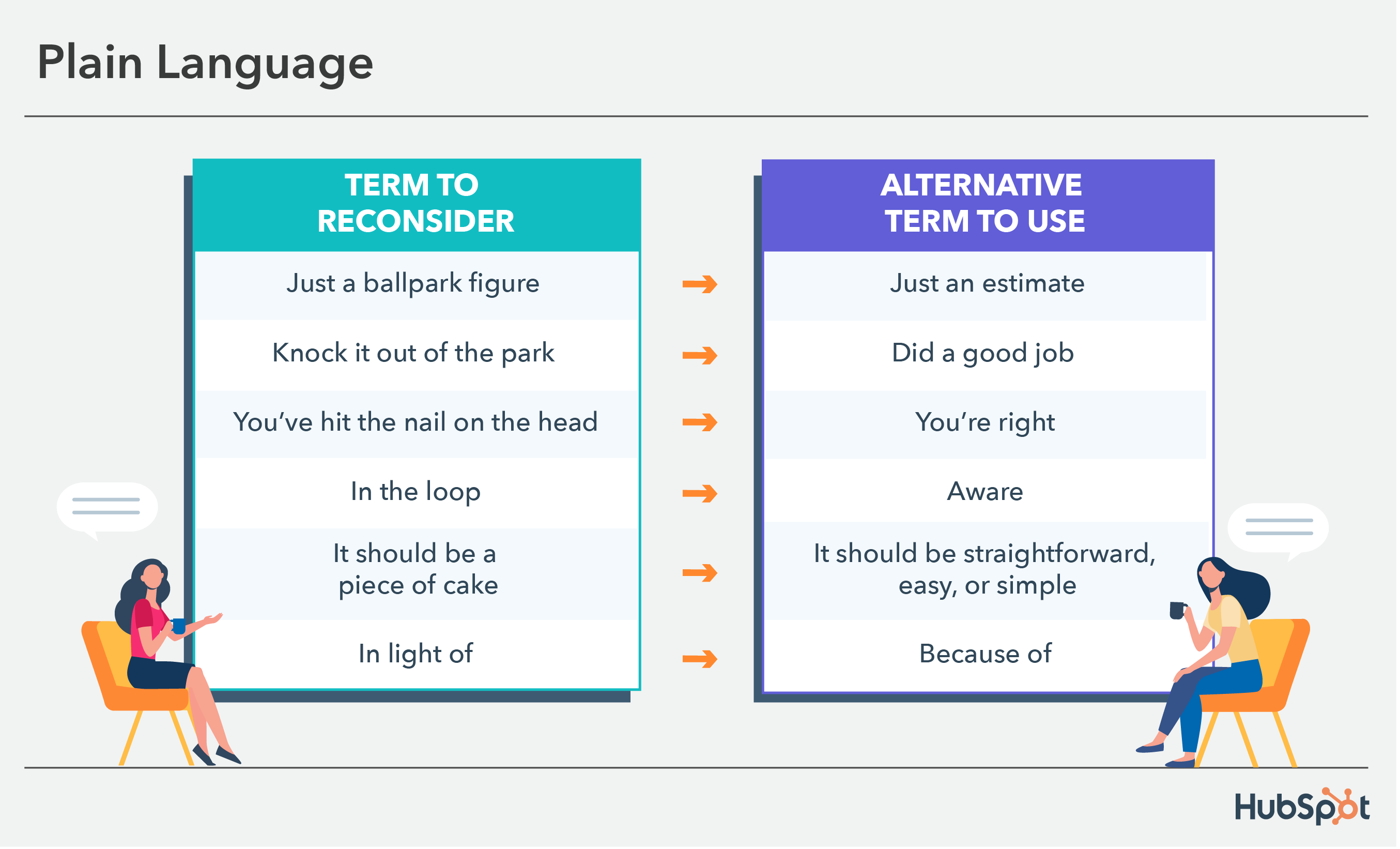
Many of us use colloquial expressions every day. For instance, I often say, “It’s just a ballpark figure” or “it should be a piece of cake,” without pausing to consider whether the listener knows or has heard the term before.

Of course, this can be confusing to other parts of the world that aren’t familiar with such expressions. If your company has global offices or works with customers from across the globe, expressions that are common to you can pose a major deterrent to clear communication. 

For instance, in Dunn’s Medium article, she writes, “We also avoid using metaphors (visual and written) that are specific to just one culture or class. So, for instance, we avoid using phrases like ‘knock it out of the park’ or ‘hit a home run,’ even though these phrases are pretty common in North America as they’re just not going to resonate outside of the U.S. Not because people will be offended by a reference to baseball, but because they won’t be as familiar, so the meaning won’t be as clear.”

The graphic below displays examples of colloquial words and phrases and plain language alternatives to ensure everyone understands you.

inclusive language examples: plain language

3. Refer to a theoretical person as “they” instead of “he” or “she.”

As marketers, we’re exceptional storytellers. Sometimes, however, whether you’re talking offhandedly with a colleague or delivering a pitch, you might get caught up in using pronouns that unintentionally support stereotypes.

For instance, let’s say you’re giving a pitch and you say, “We’ve found through analysis that our readers are typically in a VP position or higher, which is why we believe we should lean into LinkedIn as a strategy in 2020. For instance, let’s say our reader needs to deliver a presentation. He might turn to our blog ahead of time, but more likely, he’ll turn to LinkedIn first.”

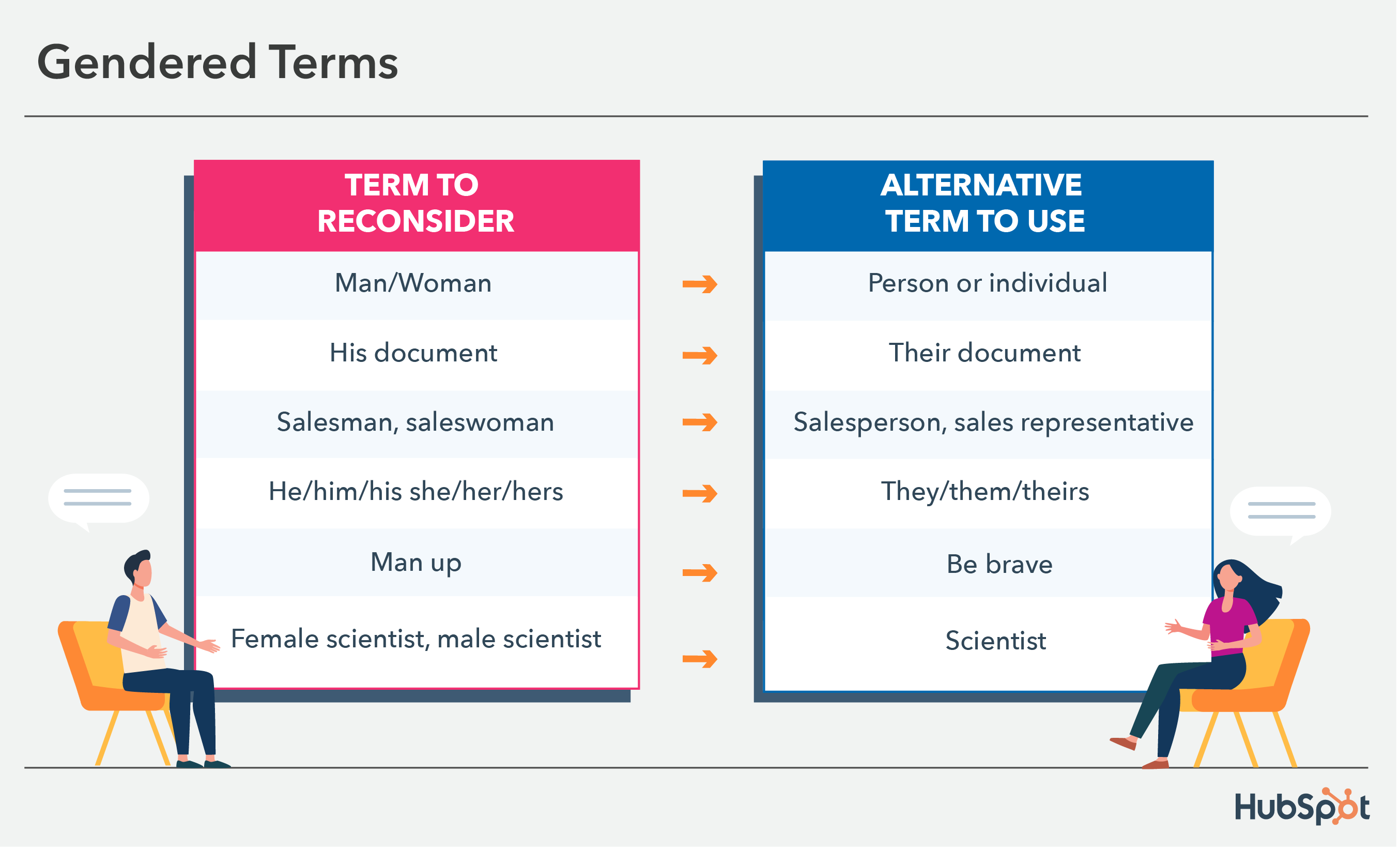
Your fictitious VP-level reader doesn’t need to be “male” or “female” — why not call them by the non-gendered pronoun “they,” “them,” or “their”? You can still make your point, and you won’t alienate people on your team who feel hurt that you’ve assumed that leaders are likely male.

This also relates to gendered terms that add nouns to the end of them, like salesman. Opting for a more inclusive term could be saying salesperson or sales rep. The image below shows additional examples of gendered terms and alternative phrases to use. 

inclusive language examples: gendered terms and phrases

4. Ensure your company’s designs or images reflect a diverse group of people.

When potential customers take a look at your website, you want them to see people (or figures) that look like them. Simultaneously, you want potential new hires to see themselves reflected.

Otherwise, you’re likely missing out on both potential customers, and future employees for your company.

Image Source

In her Medium post, Dunn writes, “Our product illustrators try to ensure that the people we represent in illustrations are diverse in appearance, and that these different types of people are represented doing many different things (for instance, a person of color doing the talking while others listen, a woman in a wheelchair at an executive desk, etc.).”

As you scale as a company, you want to ensure your marketing materials reflect as many groups of people as possible. Otherwise, you’re unintentionally sending messages to people who don’t see themselves in your content that your brand “isn’t quite right for them.”

5. Be mindful of terms related to race, ethnicity, nationality, and culture. 

Many terms used daily have roots in racism and discrimination, so using them can make people feel unsafe, whether in your marketing materials or day-to-day correspondence with team members. 

Some regularly used terms have roots in racism and discrimination or are taken from celebrations and sacred practices of marginalized communities. Using them in your marketing materials or day-to-day correspondence with team members can make people feel unsafe and unwelcome. 

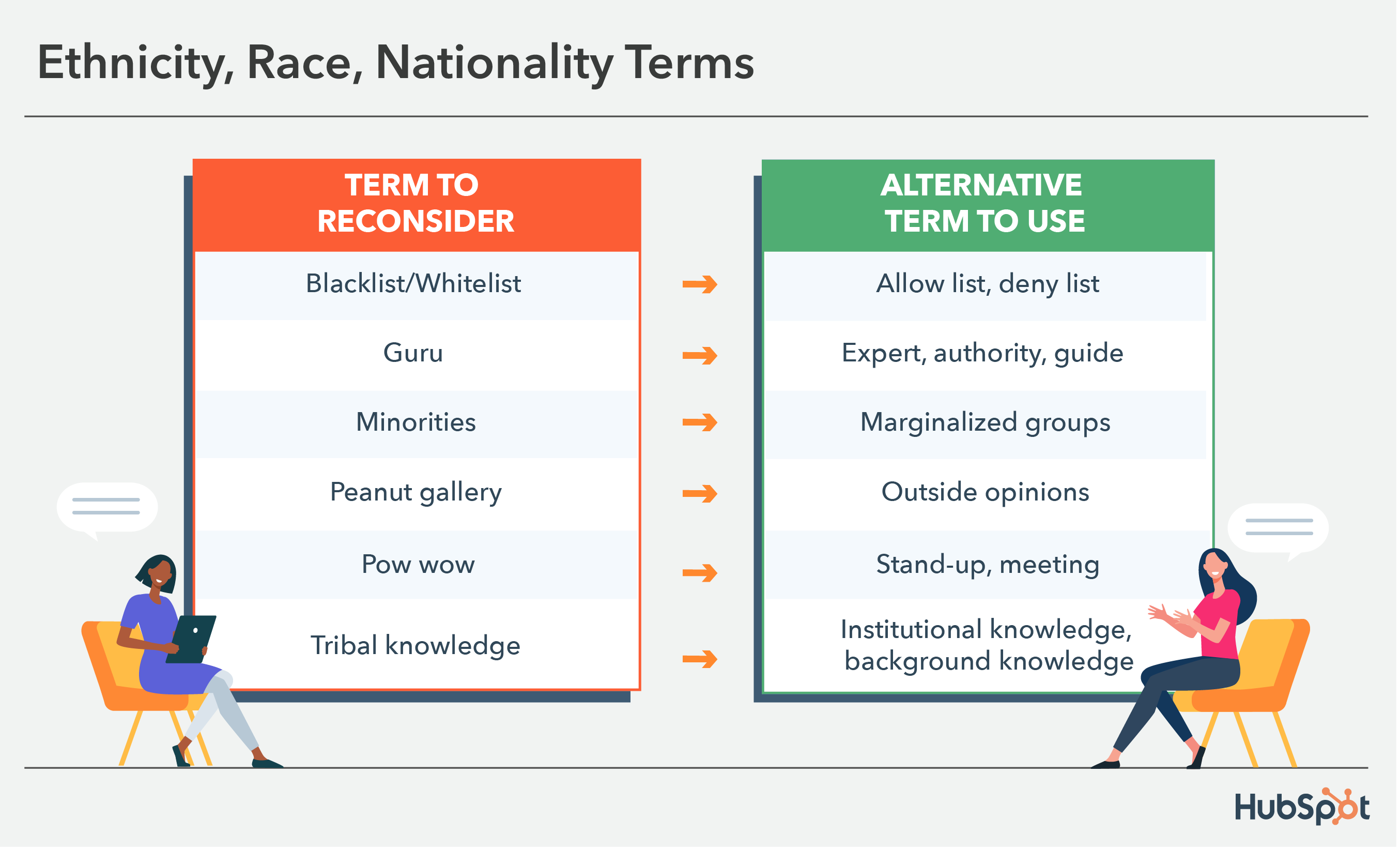
For example, pow wow is often used informally to describe a meeting or get-together. Using it in such a way disregards pow wows as indigenous cultures’ sacred rituals and social gatherings — ceremonial events that have nothing to do with work. A simple alternative is saying stand-up, meeting, or hang-out. 

The image below displays other examples of words commonly used that are related to ethnicity, race, nationality, and culture that you can easily swap out for more inclusive terms. 

inclusive language examples: race, ethnicity, nationality, and culture terms

6. When speaking to colleagues about family, use gender-neutral labels for family members.

Obleada told me, “Inclusive language has a real impact on how ‘themselves’ folks feel they can be in a given space. As a queer woman, it makes me cringe when folks ask me about a boyfriend. Intentionally using gender neutral titles — parent, spouse, partner, child, etc. — when speaking about your or others’ families can make a big difference in how comfortable someone may feel.”

Rather than making assumptions, approach conversations with colleagues using gender neutral titles. For instance, it’s better to use “parent” or “guardian” when making conversation with a colleague since “mom” or “dad” excludes family structures such as grandparents as caregivers, same-sex parents, etc.

7. Be mindful of medical conditions and ability terms. 

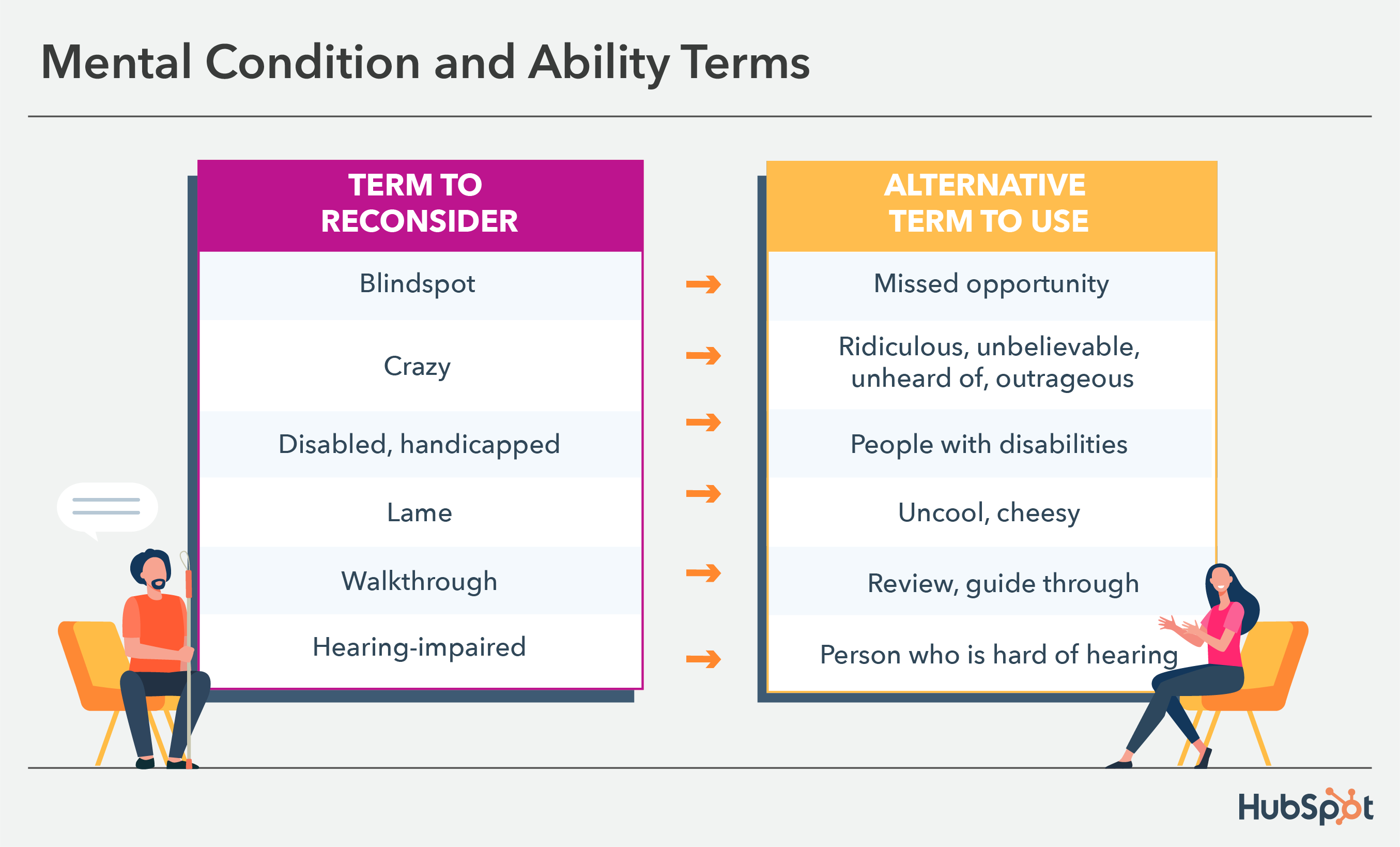
Common phrases like “turning a blind eye” are ableist and insensitive to people whose lives are impacted by medical conditions.

While likely used innocently, someone who hears such a phrase in the workplace or sees it in your marketing materials may feel unsafe and like you don’t represent them or what they care about. 

It’s best practice not to use such terms unless they’re relevant to your topic of conversation. The image below displays commonly used phrases that can be harmful that you might not have realized before and alternatives to implement.

inclusive language examples: mental conditions and ability terms

8. When in doubt, ask individuals which pronouns they prefer (but make it clear they can choose not to identify, as well).

It’s critical to note — there’s no one-size-fits-all “right” and “wrong” when it comes to language. Many people have personal preferences, especially when it comes to identity.

For instance, person-first language (i.e., “people with autism”) was introduced because many feel it’s dehumanizing to put the disability or gender orientation first, as it seems to define the individual.

However, some prefer identity-first language (i.e., “autistic people”) since they accept autism as an inherent part of their identity — identity-first language can even help evoke a sense of pride among individuals.

(For more information on person-first or identity-first, take a look at this article by the Autistic Self Advocacy Network.)

Over To You

It’s critical you avoid applying hard-and-fast rules to all individuals, since these preferences are incredibly personal. You might consider asking them what they prefer, or offering up your own preferred pronouns to create a safe space for them to do the same — but only if they feel comfortable doing so. (To learn more about etiquette when it comes to asking pronoun preference, take a look at Gender Neutral Pronouns: What They Are & How to Use Them.)

Ultimately, it’s important to remember none of us will get it “perfect” 100% of the time, but admitting when you’ve made mistakes and consistently working to communicate more inclusively are two major steps towards creating a more unified workforce, and creating deeper connections with your customers.

Remember — inclusive language is about widening your message and allowing it to resonate with as many people as possible, so it’s critical for your business’s bottom-line that you do everything you can to communicate more inclusively every day.

company culture template

Categories B2B

Where Nonprofits Spend Their Time On Social Media in 2022

There’s no shortage of advice in the blogosphere on how and where to spend your time on social media. How organizations are actually spending their time online, however, is a different story.

Unlike most marketing campaigns you see looking to get you using a product or service, non-profit social marketing is all about getting you to take action for a cause.

Download Now: Nonprofit Marketing & Fundraising  Trends for 2022 [Free Report]

Often, non-profit organizations are tight on resources and don’t always have the ability to produce large, high-visibility campaigns. That’s where social media can help. Let’s dive into the social media platforms that non-profit orgs can leverage today.

How Non-Profits Leverage Social Media

There are three major ways that non-profit organizations can use social media to get the word out on causes that matter.

The first is through social challenges.

Think back to 2014 when the ice bucket challenge went viral. This challenge involved taking a bucket full of ice water and pouring it onto yourself, posting it on social media, donating to the cause, then nominating friends and family to follow suit.

This challenge, designed to raise awareness of ALS or Lou Gherig’s diseases, spread like wildfire through social media and helped the ALS association increase its annual funding by 187%.

Social challenges are fantastic for two reasons: They usually involve doing something funny which increases their viral potential and they invite people to join in.

Another marketing tactic non-profit organizations use is user-generated content.

Social proof is used in marketing all the time to foster trust between a brand and its target audience. Brands often do this by sharing customer reviews.

Non-profit orgs can also use social proof to drive action.

In 2021, Habitat for Humanity included drawings done by children of Habitat homeowners sharing messages of hope, strength, and resilience.

For non-profits, the best stories come directly from the beneficiaries themselves. Everything from a video to a handwritten message can be used to show how impactful the work is.

TikTok

When it comes to non-profit marketing, TikTok is a great platform to raise awareness. It’s particularly helpful for reaching a younger audience, like Gen Z and Millennials.

According to TikTok, users made close to 75,000 donations on the platform in 2021 for causes ranging from fighting hunger to humanitarian relief efforts.

The social platform arms non-profit organizations with features that help them generate interest in their causes and fundraise.

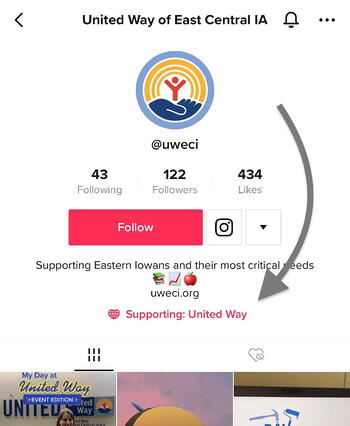
For instance, in April 2020, TikTok introduced donation stickers that could be added to videos, live streams, and profiles.

Tiktok donation sticker on user profile

They work with a third-party platform called Tiltify to process donations securely. As such, non-profit organizations that want to use this functionality must go through an approval process by Tiltify.

In addition, TikTok has also financially contributed to these organizations, recently donating $7 million to #GivingTuesday initiatives and matching donations when users use branded hashtags.

@siennamae
#duet with @samsmith
♬ original sound – Sam Smith

Meta

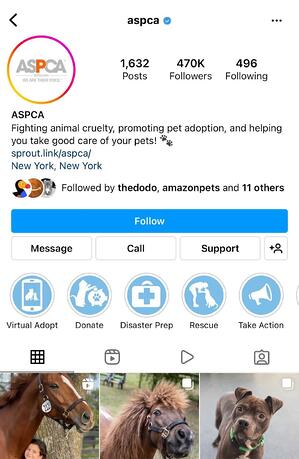
Similar to TikTok, the social media platforms under Meta – notably Instagram and Facebook – also offer non-profit friendly features that facilitate donations and promote awareness.

To access these features, organizations must be eligible and sign up for charitable giving tools on Facebook.

instagram non-profit marketing

Once that’s done, they’ll have access to a series of tools, such as:

  • Donation buttons that they can add to their profile and share during live streams.
  • Page fundraisers
  • Volunteering sign-up forms
  • Profile support buttons

You can find a list of tools by Meta here.

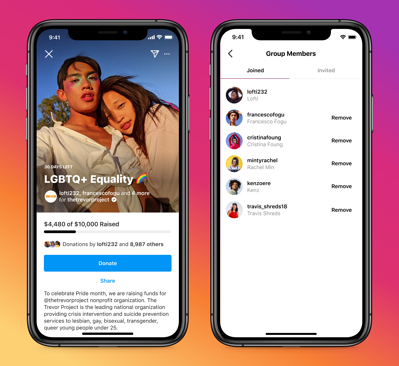
In addition to providing these tools, Meta has also contributed to many campaigns. Last year, on Giving Tuesday, the company matched up to $8 million in donations made to fundraisers on Facebook.

meta non profit marketing

Image Source

To celebrate Instagram’s 11th anniversary, the social platform also matched fundraisers up to $50,000 from seven top creators on the platform through Giving Tuesday.

While TikTok, Instagram, and Facebook currently offer the most advanced features for non-profits, organizations can still leverage other social platforms like Twitter and Clubhouse to drive awareness and action. However, if you’re a new org looking to gain some traction, these are great places to start.

nonprofit trends

Categories B2B

Why Timing is Everything When it Comes to Lead Nurturing

Over the years, we’ve talked at length about the best ways to follow up with leads and how to keep them engaged. 

What we haven’t talked about much, however, is when you should begin our discourse.

Let’s establish what lead nurturing is and why staggering your initial follow-up message is crucial to your success.

What is B2B Lead Nurturing?

B2B lead nurturing is the process of advancing marketing-qualified leads (MQLs) through your marketing funnel, engaging prospects with your business at multiple touchpoints before passing them to your Sales team.

Markempa CEO and Founder Brian Carroll summarized the purpose of B2B lead nurturing quite well in an interview while acting as Marketing Sherpa’s CEO.

“Nurturing is really about addressing (and how we progress) the relationships we’re adding value to with each touch,” Carroll said. “So it’s really this idea of progressing someone from interest to purchase consideration so when they’re ready to engage our Sales team or a channel, that’s what (nurturing) is trying to answer.” 

How to Know When to Follow Up With Your Leads

Asking for something far too early can be a total buzzkill.

Imagine you’re meeting someone for the first time; you’ve barely finished the word, “hello,” or even dropped the handshake when suddenly this, well, stranger, says to you, “Hey, would you help me move?”

“What?” you think to yourself. Did this guy just seriously ask me to help him…move

Take a guess what your answer would be. Take a guess as to how quickly you’d be looking for an out in that interaction. “No, thanks, pal. Best of luck to you” would be the nice way of putting it.

This happens every day online; a user requests a piece of content only to be hounded by a company rep asking if we’d like to see a demo of their product. For the overwhelming majority of us, that answer is going to be a resounding no. And it’s not because we’re uninterested—it’s because we don’t yet know if we’re interested.

How the Consumption Gap Informs B2B Lead Nurturing

To know if something is a fit for you, you’d like to spend a bit more time about it, right? Whenever Sales reps reach out immediately upon requesting a piece of content, not only do you run the risk of annoying your prospect, you run the risk of referencing something they know very little about. 

Research from FocusVision states that consumers consume up to 13 pieces of content before coming to a purchase decision. 

This is an aggregate number across a wide selection of industries. While each sales cycle will differ, our first-party consumption data revealed how much content an average user within a given industry requests within a 6-month period. Regardless of much content is requested, each subsequent registration requires more time to digest. 

Requests by Industry Over a 6-Month Period

Industry 6 Weeks 3 Months 6 Months
Government 2 2.4 4
Agriculture 2 2 4.1
Education 2.2 2.5 3.4
Service Industry 1.8 2.9 3.3
Computers and Technology 2.1 2.3 3.1
Construction 1.7 2.6 3.3
Utility/Energy 1.9 2.2 3.2
Non-Profit/Organizations 2.8 2.5 3.5
Corporate Services 1.9 2.2 2.9
Aerospace/Aviation 1.6 2.6 3.4
Telecommunications 1.7 2.2 3
Automotive 1.7 2 2.6
Transportation and Logistics 2.4 2.1 2.5
Media 1.5 2.1 2.9
Manufacturing 5.4 2.6 2.9
Real Estate 1.6 2.2 2.9
Advertising/Marketing 2.2 2.3 2.8
Travel/Hospitality/Entertainment 2 2.3 3.1
Retail and Consumer Goods 2.3 2.1 2.7
Legal 1.5 2.5 2.5
Healthcare/Medical 1.7 2.5 3.3
Insurance 1.6 1.8 2.5
Finance 1.7 1.7 2.3
Biotech and Pharmaceuticals 1.6 1.8 2.7

In each of our annual consumption reports, we’ve shared a stat unique to NetLine called The Consumption Gap. 

The Consumption Gap

The Consumption Gap measures the time between when content is requested and the moment it’s opened for consumption. In 2021, this figure was the largest it had ever been, ballooning 12% YOY from 29.7 hours to 33.3 hours—a 3.6-hour increase.

So what does the Consumption Gap mean for the Sales process? For starters, it means you need to be patient, especially at the beginning. 

Since 2018, B2B professionals have tacked on 6.2 additional hours to their overall consumption time, meaning they’re in absolutely no hurry to read, listen, or watch whatever content they’ve just requested. 

What’s the point, you ask?


While requesting gated content is a positive signal, it should not be read as a green light for you to immediately reach out.
Click To Tweet


The 48-Hour Rule

While the Consumption Gap sat at 33.3 hours in 2021, this is merely the average amount of time it took for professionals to consume their content. 35% of the Job Levels that we track to produce our Consumption Gap statistics have consumption measures exceeding the average, including the C-Level.  Even Senior VPs, who were the most eager Job Level in 2021, weren’t downloading their requested content until nearly a full day later (21.4 hours). 

The 48-Hour Rule

Consumption Gap by Job Level

Name Hours
Senior VP 21.4
VP 28.0
Individual Contributor 28.7
Director 30.1
Senior Employee 30.3
Executive VP 31.3
Senior Director 31.9
Senior Manager 32.7
Manager 33.1
Supervisor 34.0
C-Level 35.8
Consultant 37.6
Contractor 38.8
Owner 52.6

Instead of jumping on them immediately, we must give users space. Our recommendation is that, before making first contact with a lead, B2B professionals should wait for roughly 48 hours.

This way, when you do reach out, consumption has most likely occurred. The more time you provide to your prospect, the greater your chances are to be met more warmly (and knowingly) by your lead.


As new research suggests, B2B professionals should wait for roughly 48 hours before making first contact with a lead. Instead of jumping on leads immediately, we must give prospects space.
Click To Tweet


Speed Kills

You’ve probably seen the stats, and maybe even accepted as common knowledge now that conversion increases by 9x when responding within five minutes of lead submission. 

This is a flawed approach. It is based on filtered stats pulled from survey data rather than more reliable, honest, unfiltered, first-party behavior. 

The truth is that providing space to your leads at the outset of any relationship is table stakes to modern marketers. This isn’t a debate, the data proves it. 

Of course, if a user comes to your site to request a demo or directly asks to speak with a company representative we encourage you to respond immediately. In this scenario, you’d better grab that phone ASAP to either tap out an email or dial their number.

Getting your lead to move from warm lead to closed-won business, however, will require an ongoing commitment to patience. 

But patience only pays off when it’s part of a larger plan. 

Committing to Lead Nurture

Lead nurturing tangibly benefits the bottom line. 

According to Forrester Research, companies with superior lead nurturing strategies generate 50% more sales-ready leads at 33% lower cost. 

Nurturing leads is essential in B2B Marketing. With so much information to parse through to find the right solution, service, and price point, it’s no wonder that B2B sales cycles last anywhere from one to six months. Combine this with the ~31% of B2B buyers who expect to make a purchase over the next 12 months and it’s clear how much work it takes to convert a lead. 

Unfortunately, B2B Marketers do a lot of talking but not as much walking. 

Marketing Sherpa reports that 65% of marketers have no lead nurturing strategy. Considering that 85% of B2B marketers say that lead generation is their #1 goal, the majority of demand gen teams are only setting themselves up for failure by not committing to a lead nurturing strategy. 

As Brian Carroll shared, lead nurturing is about addressing the pains of a lead over and over to the point where they’re progressing to the point of reaching a purchase decision. While buyers have more control than ever, B2B Marketers still have the power to guide leads through their buying journey.

Establishing the Lead Nurture Baseline

Despite the fact that B2B buyers are doing more and more research independently before ever contacting a vendor, there are still plenty of ways B2B businesses can benefit their prospects. 

Some of the simplest and most impactful ways vendors can bring value is through these three simple rules.

1.  Know Who You’re Talking To

It may seem obvious but, knowing who they are (beyond their name, company, and title) is essential – regardless of how you decide to communicate with your prospects. Without knowing what they’re interested in, how they found you, and the rest of their journey to you, you’ll be doing far too much guessing.

Dip into your CRM and leverage each and every data point at your disposal. Analyze your database and identify audiences and current customers with common traits, such as titles, industries, content registrations, and any other common behaviors. This step will help you refine which content you might offer next or could simply frame how you’ll frame your first email or phone call. Knowing who you’re speaking to and what their motivations are will help you identify information that’s most relevant to them and how they want to consume it.

2.  Identify Their Pain

We Marketers often think we know far more than we do. Perhaps this is due to the alluring power of CRMs and other fancy tools we have at our disposal. It’s alright, we’re all guilty of this practice. The best way to mitigate this, of course, is by simply asking questions you wouldn’t have information about prior to nurturing your lead:

  • What challenges keep you up at night? 
    • How would you prioritize these challenges?
  • How are you currently addressing your needs/challenges?
  • What resources help you respond to those challenges? 
    • Are you currently attending industry-specific events or consuming other related content?)
  • What kind of information/solution would make your life easier?
  • What sort of information informs your buying decisions?
  • Are there any budget restrictions?


Asking about when your prospect might be looking to make an investment certainly doesn’t hurt either, however buyer-level intent data might offer visibility into this information. 

3.  Addressing the Pain Points (Without Selling)

Once you’ve identified a number of the challenges your prospect is facing, it’s time to focus on their specific needs. Naturally, you’re going to want to showcase how your business is able solve their problems more completely. Perhaps the best approach, however, is to merely be as helpful and as thorough as possible.

Being as helpful It could be as simple as isolating a blog post and a video from your library that speaks directly to their most pressing issues. Being thorough could mean providing a list of (honest) pros and cons between your product and the rest of the market. This might feel odd initially but put yourself in their shoes: They’re going to be doing comparison research at some point; why not be the one being as transparent as you can be? 

As the relationship matures and the time comes to make a purchase decision, your lead might just think to themselves, “You know, this company has been terrific throughout this entire process. They’ve given me practical information to help guide our decision making, they have a grasp on what our needs are, and know the space intricately.”

Now the next time your Sales team makes contact, they won’t need to beat around the bush by asking about the weather. Instead, they can conduct a meaningful conversation about the latest piece of content that was sent as part of your lead-nurturing program.

Leveraging First-Party Data in Your B2B Lead Nurturing Program

Nurturing your leads is a fundamental piece of any lead generation program. Interest alone is not enough for you or your Sales team to ask for any kind of conversion. Proper lead nurturing requires patience, commitment to a full scope strategy, and knowing what to do once you’ve generated a lead

By embracing the data, you’ll be well on your way to seeing more success in your demand gen campaigns with richer outcomes for everyone involved.

Categories B2B

Social Media Basics: A Checklist Every Marketer Needs

Whether you’re a new or seasoned social media manager, managing a brand’s social presence can be overwhelming. After all, you’re behind every post and every interaction with potential customers so the pressure is on.

One way to ease that and make sure you’re at the top of your game is with a social media checklist. In this article, we’ll cover the daily and monthly tasks every social media manager needs to succeed.

Social Media Tasks

Before we get into the checklist, we’re going to break down the work of a social media manager into four pillars.

  • Sharing – You must post on social media regularly to grow and maintain an audience.
  • Engaging – Connecting with your audience, via polls, responding to comments and DMs, and reposting user-generated content, is key to building that brand loyalty.
  • Monitoring – It’s important to know how your brand is perceived online, so you’ll need to monitor mentions of your brand as well as topics within your industry.
  • Reviewing and Optimizing – If you’re not reviewing your performance, how can you improve? This is a necessary part of every social media strategy.

If you don’t share often, you’ll struggle to build an audience. Without an audience, you won’t have much to engage with. This also means that you’ll have little to no data about what works well and nothing to optimize or review.

This is all to say that to have a robust social media presence, you must be strong in all four areas. Now, let’s dive into the daily tasks you’ll need to complete in this role.

Social Media Daily Checklist

On a daily basis, you will be focused on the first three pillars: sharing, engaging, and monitoring.

While there is some reviewing and optimizing that can happen daily, you can better identify patterns when you do so on a monthly basis once you have compiled a good data set.

1. Sharing content.

Your number one priority on social media should be sharing content.

That’s what will allow you to reach your target audience, attract them to your brand, and keep them engaged.

When we surveyed 310 U.S.-based marketers in 2022, we found that most social media marketers post between four to six times a week on social media platforms.

While that is the average, some marketers post more or less depending on the platform. For instance, 29% of marketers surveyed said they post on Facebook every day while 35% said they do the same on Twitter.

However, when asked about Pinterest, most marketers surveyed only post two to three times a week.

Of course, how often you post will depend on a variety of factors including the return on investment.

Something else to consider is that sharing content doesn’t only mean from your brand. It can include user-generated content or content from another non-competitor that would add value to your audience.

2. Responding to comments and DMs.

One of the easiest ways to engage your audience is by responding to their comments.

If you’re struggling to generate comments in the first place, try starting a conversation and asking your audience to join it.

In this post, sunscreen brand KINLÒ asks its audience to share ways they protect their skin.

In that same vein, you can ask your audience to tag a friend that would enjoy your post.

Another way to engage your audience is by responding to direct messages. Often, consumers will reach out to brands on social media to learn more about the brand, ask specific questions related to shared content, or get help.

It’s important that you review these questions every day to leave a positive impression on your audience. If you take too long to answer, they may lose interest or escalate the issue by complaining to the public.

You can take it one step further by working internally with your customer support team to develop an escalation process once a customer reaches out via social media.

3. Monitor brand mentions and industry-related content.

When you’re growing your business, it’s vital that you know how your brand is being perceived online and what is being said about it.

According to our 2022 social media marketing report, 35% of marketers surveyed track brand mentions and hashtags on social media.

Thankfully with social media, that information is within reach. You can easily set up alerts to be noticed whenever your brand is tagged or mentioned on social media.

You can also routinely do searches on platforms like TikTok where alerts aren’t readily available.

This will allow you to gauge brand sentiment and quickly address concerns from your target audience.

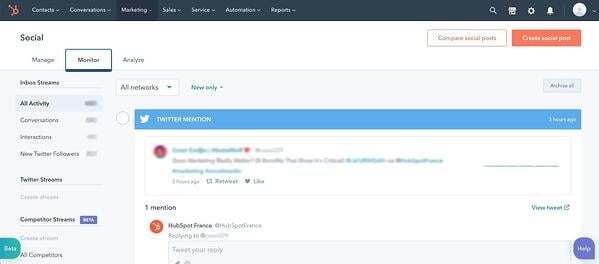
social media checklist: hubspot social media monitoring tool

Pro-tip: HubSpot’s social media management software includes a brand monitoring tool that will help you stay on top of all mentions and even track your competitors.

4. Identify trends and buzzy content.

Trends come and go just about every week on social media.

The trick is jumping in as they’re growing in popularity and knowing when they’ve died out.

The best way to find trends is by simply being on social media – social listening. You may start to notice a particular sound being used often or a song being added to every Reel you come across.

Some social platforms will tell you exactly what’s trending, like on TikTok’s “Discover” tab and Twitter’s “Trending” tab.

social media checklist: tiktok discover tab showing trending sounds and hashtags

There are also accounts that are dedicated to finding trends as they happen and explaining their origin. This will help you determine which ones are worth joining and which ones you should stay out of.

As a brand, everything you put out there is a representation of your values. That’s why it’s important that you be extra careful when assessing trends.

See what videos other brands and users are creating with that trend. Are they funny and creative? Are they offensive? Do they align with your brand?

If not, it’s always OK to skip because there’ll be another one coming around the corner.

5. Answer queries on forums.

When we think of social media, we often think of content-sharing apps like TikTok, Twitter, and Twitch.

However, some social apps – think Reddit and Quora – focus instead on conversations and community.

You may be surprised to find how many conversations people may be having about your brand on these websites. In addition to being a great source of information surrounding brand sentiment, you can also learn a lot about your audience’s challenges and pain points.

You can then leverage that information into value-packed posts to attract your audience.

6. Connect with brand evangelists.

Building brand loyalty is no easy feat. So once you’ve accomplished it, you have to invest time to maintain it.

This means connecting with your brand evangelists on a regular basis.

This can look like commenting on their content and/or sharing it on your platform, giving them access to exclusive content, shouting them out, and inviting them to participate during live streams.

While social media can be filled with parasocial relationships, don’t let that be the case for you and your audience.

Social Media Monthly Checklist

1. Check your analytics.

Data is every brand’s most sacred asset. It holds incredibly valuable insights about your target audience.

On social media, your data will tell you the type of content your audience enjoys, what grabs their attention, and what generates conversions.

It will also help you identify trends. In fact, when we asked social media marketersHow do you predict which social media trends are worth investing in?” The top answer was by analyzing their social media analytics.

So, which metrics are marketers reviewing? Here are the top five, according to our survey:

  • Likes and comments (41%)
  • Sales (41%)
  • Traffic to their website (41%)
  • Impressions and views (40%)
  • Brand mentions and hashtags (35%)

If you have at least one month’s worth of data, you can start finding out which posts perform the best and dig into the why.

Through your analytics, you can also assess which social platforms are worth investing in. According to our survey, the top three metrics marketers look at to make this decision are:

  • Impressions/views
  • Sales
  • Follower or subscriber count

Whether you’re already succeeding or struggling on social media, reviewing your data will always set you up for a better month ahead.

2. Set goals.

Once you’ve reviewed your analytics and know what went well and what can be improved, you can set your goals for next month.

For instance, say you notice that last month’s videos outperformed any other content type and generated 2,000 visits to your website. For next month, you can up the number of videos you post and set a visit goal of 3,000.

Whether it’s increasing your reach, generating more engagement, or driving more traffic to your website, setting goals will serve as your north star and allow you to schedule content that aligns with these goals.

3. Schedule next month’s content.

When you’re managing multiple social media accounts, you have to plan your content ahead of time. Otherwise, you risk under planning and not having enough content.

You’ve already set your goals for the month. So now, it’s just a matter of creating content that best aligns with them.

For instance, say you want to increase your reach and last month’s data shows that your most shared content relates to three main topics. You can then center next month’s content on these three topics.

When scheduling content, you should also consult other teams to determine if there are any events, announcements, or campaigns that you will need to share.

The earlier you have your creative assets – images, videos, copy – the easier it will be to create your content calendar.

Pro-tip: We created a social media content calendar template to make planning posts and coordinating campaigns easy.

There you have it – a detailed social media checklist that will have you on top of your game every day.

free social media content calendar

Categories B2B

What is a Content Management Workflow? Why You Need One in 2022

Creating an effective content workflow is a lot like baking a cake. If you accidentally pour unfinished batter into an unprepared pan, the damage is done. You can’t go back and prep the pan after the fact.

Imagine your cake batter is your content, and the cake pan is its publication. If your content goes straight from the writer to your consumers, you are running a lot of risks. You must first edit and fact-check the content before publication and distribution. Readers become disinterested or upset at careless, incorrect content. And once the information is out there, it is nearly impossible to recover.

Free Download: Marketing Editorial Calendar Template

Having the right people in place on your content team is not enough. To create quality content every time you post, your company needs to outline its processes in a content workflow.

In this post, we’ll cover the topic of content workflow — what it is, how to manage it, and how you can create one for your business.

Strategists, writers, editors, and managers are people you would have on your content team. Their tasks, seen in a workflow, include planning, writing, editing, publishing, and more; however, each function is not necessary for every content type.

Depending on the content type, your workflow will change. Businesses can publish various content like newsletters, blog posts, and social media posts. The content workflow is different for each asset. For example, compare the publication of a newsletter and a social media post. The most evident difference in this process is that the content types go through different channels. Once you break down the workflows, you will discover that each may require separate people, processes, tools, and resources.

With so many moving pieces necessary for creating a content workflow, managing the process becomes a top priority.

Content Workflow Management

If left untamed, your content workflow can become complicated and confusing for your team. To successfully manage your workflow, start by outlining the processes, people, and tools involved in the content creation process.

Processes

To manage your content workflow, identify the steps needed to create content. They are:

  1. Strategizing
  2. Planning
  3. Creating
  4. Reviewing
  5. Publishing
  6. Analyzing

While this is the basic workflow for content, each step has supplementary processes depending on the content type. You can build these extra steps as you create your content workflow. At this stage, it’s helpful to outline a content strategy.

People

An effective content workflow focuses on the processes needed to publish content, but people are arguably the most vital part. One aspect of managing content workflow is identifying and managing key players. These people are responsible for fulfilling the steps in the content creation process listed above. For example, for strategizing, you’d need a strategist. For reviewing, you’d need an editor.

In conjunction with managing your people and their processes, content workflow management also covers the tools needed to complete the work.

Tools

For your content team to fulfill their roles and work through content creation processes, they need tools. Content has to be created, edited, shared or managed somewhere. Managing your team’s content workflow means managing the tools it needs.

Content management systems, like CMS Hub, are essential for publishing blog posts. Canva and Adobe Photoshop are great tools for design. These are just three of the many tools your company might add to its content tech stack.

As the content marketing industry booms, your business needs to expand to accommodate this growth. This expansion reflects an increase in the people, processes, and tools associated with your content workflow. The more comprehensive your workflow becomes, the more daunting it is to manage; however, integrating content workflow software can solve the problem.

Content Workflow Software

Content workflow software, or a workflow management system, is a program that manages the content creation process through planning, production, and publication. Instead of teams using multiple methods and approaches to monitor the content process, workflow management systems help you create a centralized location for your team to visualize its processes. It promotes the execution of your content strategy in alignment with company goals.

The added benefits of using content workflow software include:

  • An increase in productivity
  • A reduction in errors
  • An improvement in workplace collaboration

Increase In Productivity

Without using a content workflow software tool, team members are left with extra work and time wasted. These issues are removed with content workflow software because it is automated. It eliminates sending email updates because the software sends them for you. Content teams don’t have to guess the timeline of a project because the system manages it for them. Everything happens quickly and efficiently.

Reduction In Errors

Nothing is perfect, and you can’t expect the same from your content workflow. Even so, content workflow software helps reduce errors. It helps your team stay ahead of deadlines. It allows you to identify what processes in the content workflow need adjustment. Content management software gives your company the tools for improving your workflow.

Improvement In Workplace Collaboration

Content management software improves workplace collaboration between team members and the apps and platforms they use. Executing your content strategy requires many different people who use various tools. Workflow management software allows your team to notify and update another member while the software integrates with several content management systems, email providers, messaging services, and social media platforms.

To take advantage of the benefits of using content workflow software, learn more about Marketing Hub and how its marketing automation technology simplifies tasks.

Content Workflow Template

Content workflow software is fundamental in keeping up with your content strategy; however, you need the appropriate steps to build your workflow. Only then can you get the most out of the software. Where do you begin? Here’s how you can create your content workflow.

How to Create a Content Workflow

The people, processes, and tools necessary for executing your content strategy are helpful markers in creating your content workflow. To create a content workflow, you need to:

  1. Decide what content to create.
  2. Create a breakdown of actionable tasks.
  3. Assign roles.
  4. Determine the time associated with each task.
  5. Document your content workflow.

Decide what content to create.

First, decide “what” you are creating. Is it a social media post? Is it a newsletter? Your company has the choice of creating many content types like infographics, blog posts, video content, and more, and you will need to create a workflow for each.

Create a breakdown of actionable tasks.

Once you are focused on a particular content type, outline the necessary steps needed to get it from strategy to publication. Consider this sample workflow for a blog post. Its process might look like this:

Strategizing > Planning > Creating > Editing > Publishing > Analyzing

While these are broad tasks for creating a blog, this is where it needs to expand. Strategizing typically includes performing content audits, creating buyer personas, and conducting keyword research. Editing might involve implementing SEO techniques or adding images and links.

Every step in the process needs to be accounted for so it can be assigned to the appropriate team member.

Assign roles.

After you have the tasks for your content process, it’s time to decide who does them. This step can help identify if anyone is at capacity in their role and if you need to bring in additional members. Using our blog example above, this is how you might assign roles.

  • Strategizing > Content Strategist
  • Planning > Content Manager
  • Writing > Copywriter
  • Editing > Editor
  • Publishing > Content Manager
  • Analyzing > Content Manager

After assigning responsibility for each task, determine how much time is necessary for completion.

Determine the time needed for each task.

To determine how much time you need for each task, consult your content team. How much time does your writer say it takes them to write a 500-word post? What about a 2500-word post? Use the length of time they give you and build in additional time. It can help your company avoid working with tight timelines or missing deadlines.

After this step, your content workflow might look like:

  • Strategizing > Content Strategist (1 day)
  • Planning > Content Manager (<1 day)
  • Writing > Copywriter (2 days)
  • Editing > Editor (1 day)
  • Publishing > Content Manager (<1 day)
  • Analyzing > Content Manager (Ongoing)

Once you have outlined a process for the tasks, people, and length of time needed for creating your content, your content workflow is complete.

Document your content workflow.

The last step in creating your content workflow is documenting it. Companies typically use standard operating procedures (SOPs) to keep their teams aligned with the process. Marketing Hub, Trello, and Evernote are examples of systems that give teams easy access to documents like SOPs.

Content workflows work, so you don’t have to.

Content creation isn’t simple. There are many elements in publishing content and successfully executing your content strategy. Creating a content workflow helps your team stay on task by increasing productivity, reducing errors, and improving workplace collaboration. The predetermined flow of each process makes it easy, but managing individual tasks becomes increasingly chaotic without content workflow software.

When managing how your content transforms from an idea to publication, content workflows handle the heavy lifting.

marketing editorial calendar templates

Categories B2B

How To Make Instagram Reels and Use Them to Your Advantage

If there’s one thing that Instagram understood with the creation of Instagram Reels it’s that it’s not just content that’s king — it’s video content. With TikTok surpassing 1 billion global downloads within 18 months of its launch, the app’s endless feed of short, entertaining video clips quickly became an internet sensation.

But, in August 2020 — as countries like the U.S. considered banning TikTok due to privacy concerns — Instagram launched Reels as a set of new audio and video editing features similar to what users would find on TikTok. Flashforward to 2022, and this burgeoning video feature now accounts for up to 20% of user activity on Instagram.

With numbers like these, it’s easy to see why Reels remain a major play for Instagram — so we’re here to explain everything you need to know about Reels in order to use them to your advantage.

New Data: Instagram Engagement Report [2022 Version]

Aside from allowing users to record videos with sound or audio overlays, the Reel camera and editor also include the following features on mobile:

  • Editing tools: Create augmented reality effects, transitions, and the ability to speed up or slow down videos.
  • Audio attribution: Overlay the sound in videos with audio from other user uploads (while the app gives sound credits to the original account).
  • Stitchable takes: Make a video with just one long take or a combination of quicker takes.
  • Duets: Add your Reel to one made from another account for side-by-side interaction. Find the Reel you’d like to duet with and click the circle settings to “Remix a Reel.”
  • Instagram Shareability: Share Reels with just friends on your Stories or profile, or publicly in the Reels tab or Explore page.

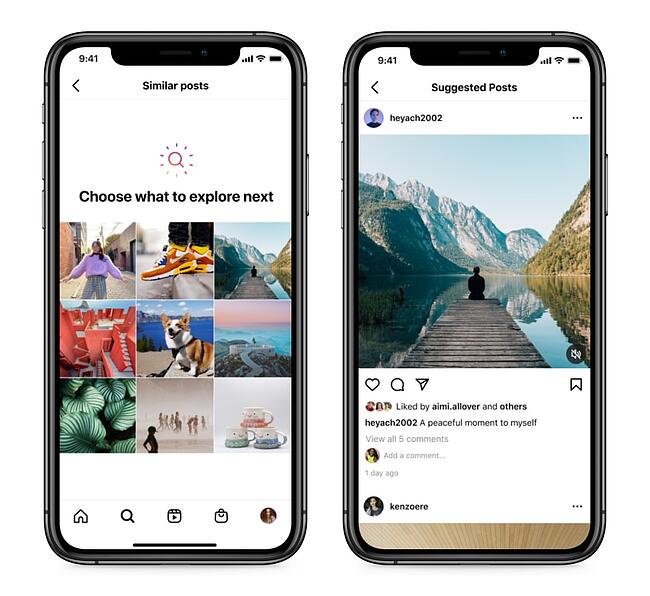
Since June 2021, it’s worth noting that ads are now supported in the Reels tab, the Explore page, and your Feed once a user taps into the Reel scroll. With the range of ways Reels appear to Instagram users — especially where people who don’t follow your brand reside — your business has the opportunity to reach new audiences across the globe.

Here’s an example of what a Reels ad for your brand could appear as below:

HubSpot Video

Video Source

What’s distinct about Reels ads — and Stories ads — is that Instagram allows users to decide which ads appear to them. If they do not wish to see the ad, they can simply skip it or select the menu in the bottom right to hide or report it.

Step 1: Enter Reels mode within Instagram.

First, you need to know how to get to Reels on Instagram. You can start your Reels in 3 ways:

Select the
+ symbol at the top right of your homepage and tap Reels.

Access Reels from Instagram home screen example

Open the Instagram Stories camera and tap
Reels.

Access Reels from Instagram Stories exampleSelect the Reels tab on the bottom of the app and tap the top right camera:
Access Reels from Reels tab example

When you arrive at your Reels screen it should look something like this:

Instagram Reels recording start screen

If so, you are now ready to begin recording, adding videos, editing, and overlaying audio if you haven’t found the right sound yet.

Step 2: Begin recording a video or adding pre-saved clips.

Before you record or create your Instagram Reel first make sure you have the latest version of the Instagram app. Then access the Reels screen according to your preference. Once you arrive at the Reels screen:

Simply hold the center circle button and begin recording to start filming a clip.

reels-screen-start-1Tap the square in the bottom left corner to add videos from your camera roll, TikTok, or other platforms.

How to add pre-saved clips to Instagram ReelsBegin piecing together video clips or recording a longer video for a total of up to 60 seconds.

If you let go of the record button but still have time left in your Reel video, you can hold the button again to start a second clip that starts immediately after the first ends. As you record one or multiple clips for your Reel, the progress bar and countdown at the top of the screen will show you how much recording time you have left.

Instagram Reels countdown timer and progress bar

How to Add Effects to Reels

To add effects to your video simultaneously, you can select the editing option located on the left side of the Reels screen:

Change the design of your video by tapping
Layout and choosing one of the grid options provided like this dual-screen.

How to change the Instagram Reels layout screen

Slow or increase your video playback by choosing the
Speed your video to set the pace.

Change the speed of an Instagram ReelGo hands-free and record by timer when you select the stopwatch symbol.

Use Instagram Reels countdown recording timer

Choose between a 3 or 10-second timer, then drag the meter by the number of seconds you want your clip to be. To stop recording, re-tap the center circle button as you like.

Add a filter for additional creativity by selecting one from the bottom of your screen.

Add Instagram filters to Reels

The filters for Reels are similar to Instagram Stories and many of these effects crossover between both video formats.

Step 3: Find audio for Reels.

Now it’s time to select audio and add it to your Reel. The audio feature enables you to overlay a pre-recorded sound from other users, songs available on Instagram, or your own audio.

If you are creating content around a specific song or sound bite, you may begin with this step prior to recording or adding clips. In either case, follow these steps to find the right tune to complete your Reel.

Select the
Audio musical note on the left side of your Reel screen.

Edit Instagram Reels with editing toolsSearch music in the search bar or browse Instagram’s song or audio suggestions.
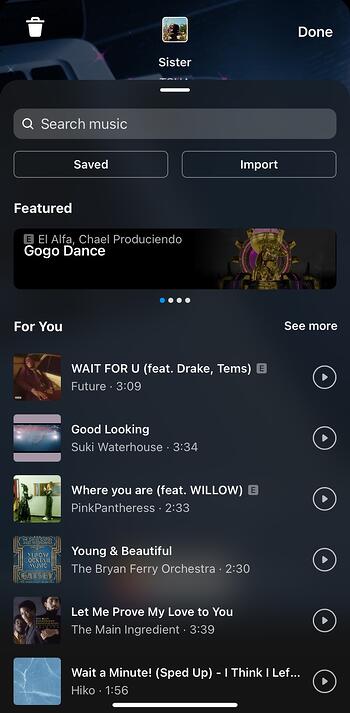
Search songs and sounds to add Instagram Reel audioChoose the part of the song or sound you will apply to your video.

Choose the Instagram reel song or sound segment to add to Reel

Then, voila — your audio is now added to your Reel. Make sure that you preview how it will align with your video by tapping Next, then adjusting clips accordingly.

Preview Instagram Reel by going to Next screen

How to Use Original Audio on Instagram Reels

Pro tip — if you do not see a Reel song you like, you can always add your own. To import your own sound:

Select the
Import button next to the Saved button.
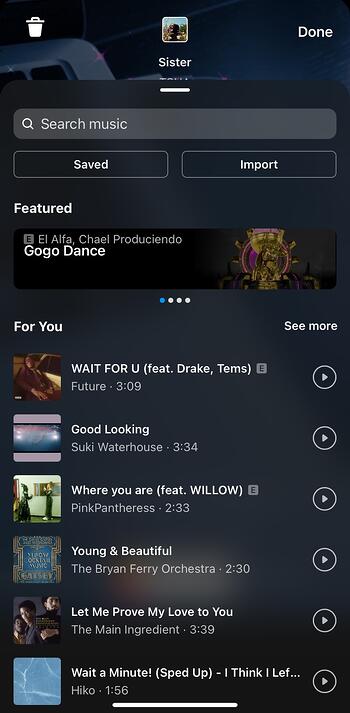
How to Import audio for Instagram ReelsAdd the video with the audio you’d like to use.

Add original Instagram Reels audio from a pre-saved video

Your Original audio is added and you are now credited for the sound — meaning your Instagram profile icon will as the audio icon.How to receive Instagram Reels original audio credit

How to Find Trending Instagram Reel Songs and Sounds

If you want to find trending Instagram Reels audio, there are a few different options available. One of the easiest ways is to browse through Instagram itself: scroll through the Reel sounds used by popular accounts or search popular hashtags like #trending songs or #trending audio.
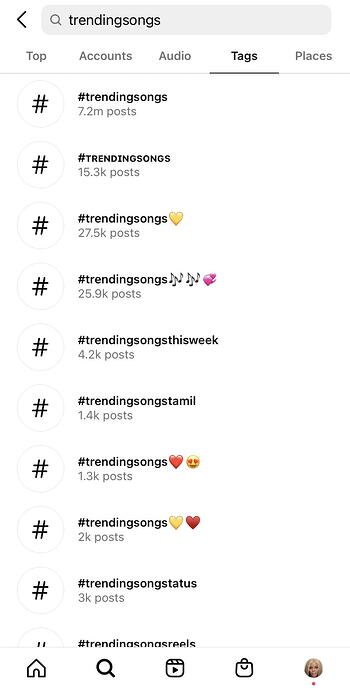
How to find trending audio for Instagram Reels

You can also find trending Reel songs and sounds to use by tapping the Reels you find on your Explore page, clicking the song name on the bottom left corner, and taking a look at how many people have made Reels with that sound.

Once you decide if a song is popular — and upward trending — you can then save it for when you’re ready to bring your Reel to life.

How to Save Music on Instagram

If the sound is indeed too good to let it scroll past you, simply select Save Audio to keep it.
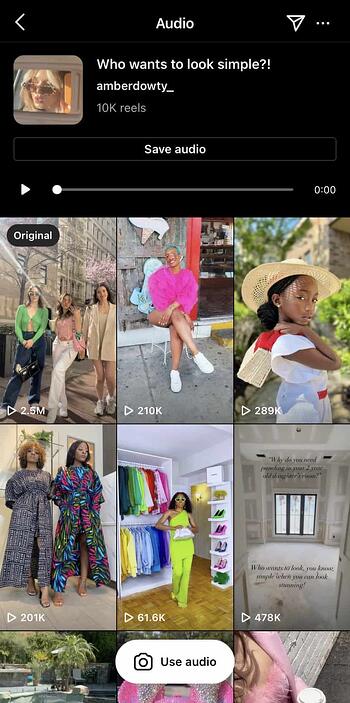
How to save instagram reels audio

This audio will now live in your Saved folder so you can add it to a Reel when you’re ready.
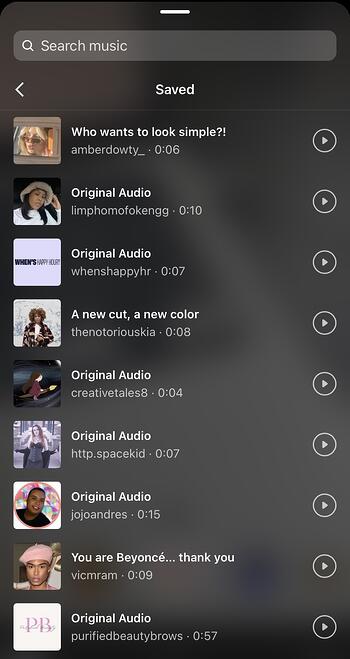
Add saved Instagram Reels music to the saved folderYou can also receive periodic notifications from Instagram letting you know if a song saved to make a Reel has passed a certain threshold.

So whether you’re looking for background music to add an extra flair to your Reel or letting the audio take you viral, there are plenty of resources for finding the right sound that’s in tune with your vision to quickly get your Reel posted.

Step 4: Post a Reel on Instagram.

Now that you have created your Instagram Reel and found the perfect track, posting it to Instagram is easy. To have your Reel live in no time:

Select
Next on the bottom right corner of your Reels screen to reach the sharing window.
Begin posting Instagram reels from the Next screenChoose the best cover for your Reel by tapping
Edit cover on the top of your screen.

How to edit the Instagram Reels cover

Select or deselect
Also share to Feed to tell Instagram whether or not you want your Reel to be seen on your Instagram profile.
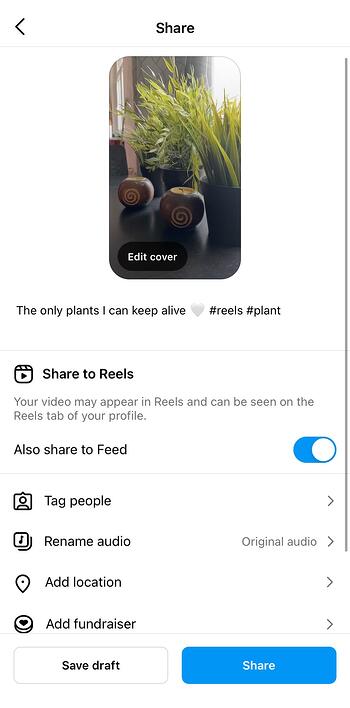
Choose to also share Instagram reel to Feed or notIf you do not want to post it to your Feed, make sure the slider is gray and not blue.

Add your caption and hashtags as you would with your regular Instagram posts.Add an instagram reels captionAfter you decide whether to share your Reel to the Feed, at the bottom of the screen you have the chance to:
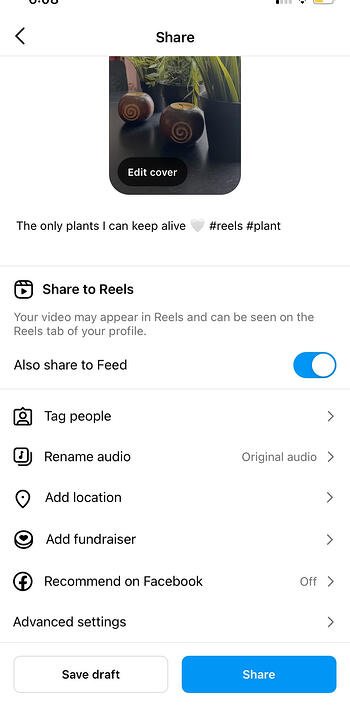
  • Tag people or brands in the video.
  • Rename Audio used in the video to your liking.
  • Add Location information on where Reel was shot.
  • Add Fundraiser events you are supporting.
  • Recommend on Facebook or show your Reel to anyone on the platform — Facebook friend or not.
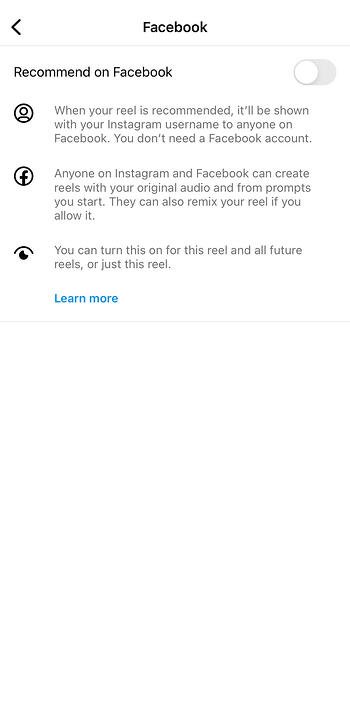
Share an Instagram Reels to Facebook

  • Include a paid partnership label when you tap Advanced Settings at the bottom.
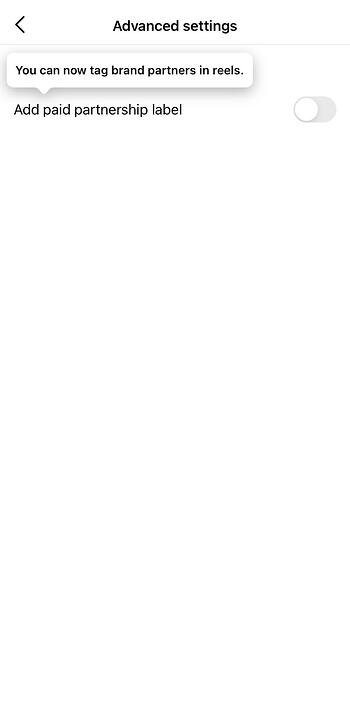
Add a paid partnership label from brand collaborations

Once you’ve added all of your preferences, you can now select the Share to Reels button in blue:
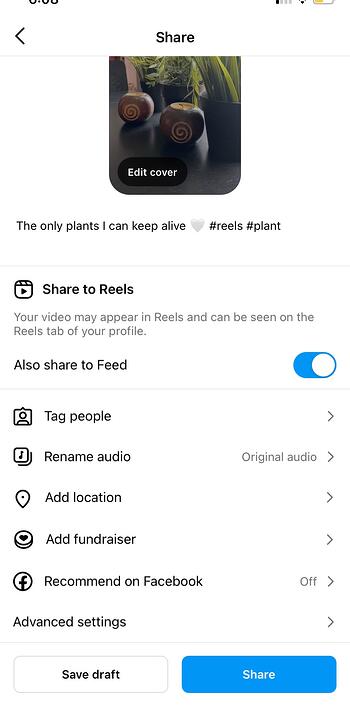
The final step to share an Instagram Reel

You’ve officially shared your Reel on Instagram! But if you start these steps and decide your minute — or less — masterpiece requires further edits, you can always save the Reel as a draft so you don’t have to restart:
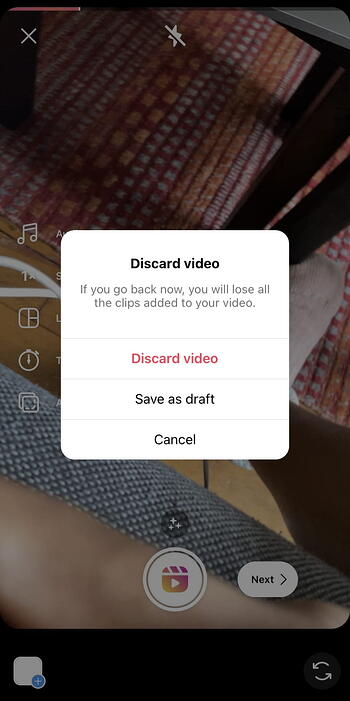
Save an Instagram Reels as a Draft for later

Finally, Reels can also be sent as direct messages or even posted to your Instagram Stories, similar to the grid posts you publish to your Feed.

Instagram Reels FAQ

Do Reels show up on your Feed?

Your Reel will show up on your Feed like any other Instagram post with a film clapperboard icon on the top right of the video. So feel free to scroll through them like you would a traditional video upload:
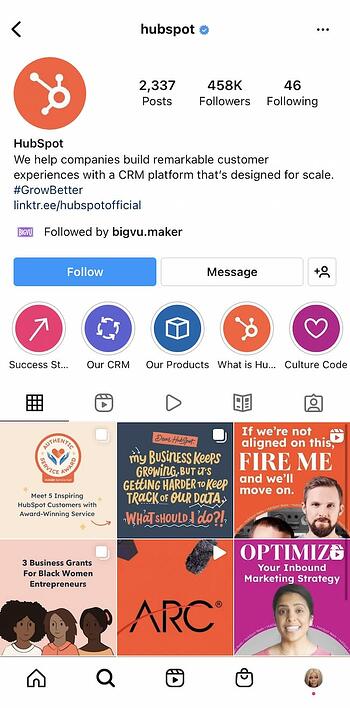
How Instagram reels look in an instagram feed

They have the standard 1:1 square ratio or a 1080px by 1080px Instagram post size on your grid. But once tapped, they will have their distinct 9:16 aspect ratio with a width and length of 1080px by 1920px:

Instagram Reels in full dimension

Plus, your caption will sit under the Reel like the rest of your Instagram post captions whenever you choose the best time to post them.

When’s the best time to post reels on Instagram?

As far as we know, there is no “right” time to post Instagram Reels per se, but like any other form of Instagram content, the timing of your posts can play a role in their engagement metrics. If you want your Reel to be seen by as many people as possible, then you should post during peak times: the time of day when most of your audience is active on Instagram.

You can find out what your peak time is by using your Business or Creator Instagram account and tapping Insights to go to your Professional Dashboard.

View engagement metrics from Reels Insights Button

Here you will see when your audience is most active, their interactions, their likes, and more metrics that give you a better understanding of how to best reach your audience.

How to See Instagram Reels Insights

Once you tap Insights on your profile feed, you will be brought to your Insights Overview.
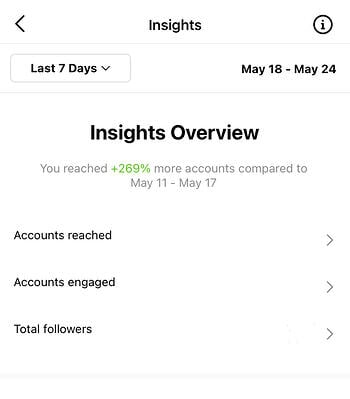
View Insights Overview screen for Reel metricsTo see what days or hours your audience is most interactive:

First, select
Total Followers.Next, scroll to the bottom of the screen.Then, view
Most Active Times.

Select Hours to see how many accounts are active at specific times of day by tapping the blue columns. Use the arrows to switch days:
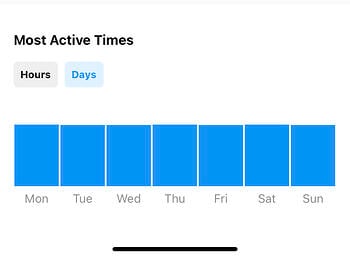
View days your followers are most active and followers peak timesSelect
Days to see how active your followers are on different days of the week by tapping the blue columns.
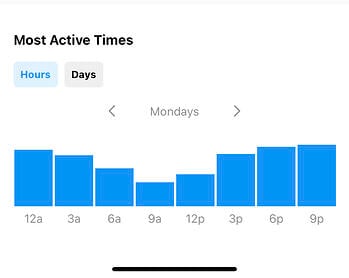
View hours your followers are most active and followers peak times

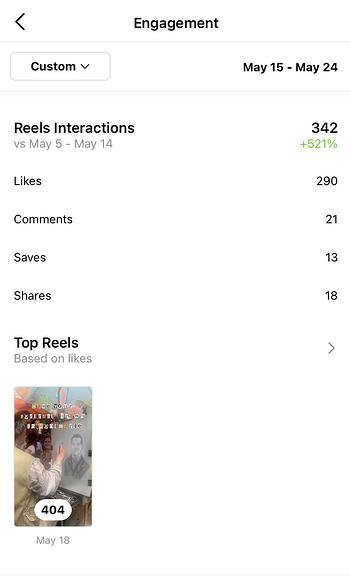
After you gauge how likely your audience is to interact with your Reel at a given time or day, you can now take it a step further and monitor your Reel’s performance:

Return to your
Insights Overview and select
Accounts Engaged.
View Insights Overview screen for Accounts engaged metricsScroll down to
Reels Interactions.
Example of Reels interactions metrics and top reelsSee your most popular Reels according to likes.
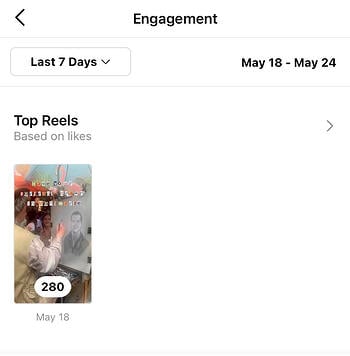
Example of a top Instagram reel for an accountBy reviewing your Reels and audience Insights, you will be able to plan your content around what’s most engaging to your followers and post when they’re most likely to enjoy it.

What You Need to Know About the Instagram Reels Algorithm

Like most Instagram content, Reels are ranked by Instagram’s algorithm. This algorithm is based on a number of different factors that include post engagement, length, content, and more.

What you should remember about the algorithm is that there is no trick of the trade to rank higher in users’ feeds. While there are Instagram users who may try to garner high engagement through methods like contests and giveaways, these tactics will not necessarily lead to long-term success.

But what you can do to help your Reel content appeal to the Reels algorithm is keep these points in mind:

  • Create content that is short, sweet, and relevant to the current social times.
  • Post regularly so Instagram can expect you to produce a consistent amount of Reel content.
  • Be creative with your content and help lead trends instead of just following them.
  • Use Instagram’s tools to edit and improve your videos.
  • Add niche Instagram hashtags that are relevant to your products, services, and base.

So with a little bit of creativity and production direction, you can be a Reel connoisseur in no time.

Viral Brand Reels Examples

Whether you’re looking to create fun and engaging content to connect with your audience, or simply trying out a new Instagram marketing strategy, a Reel is a versatile tool that can help you achieve your goals. Especially, considering that Reels has increased Instagram engagement for brands like the NBA at a rate of 22% compared to the traditional Instagram videos.

But what can it do for your brand as you aim to increase awareness, reach, or sales? Let’s take a look at some examples of how brands are leveraging Reels today to do just that:

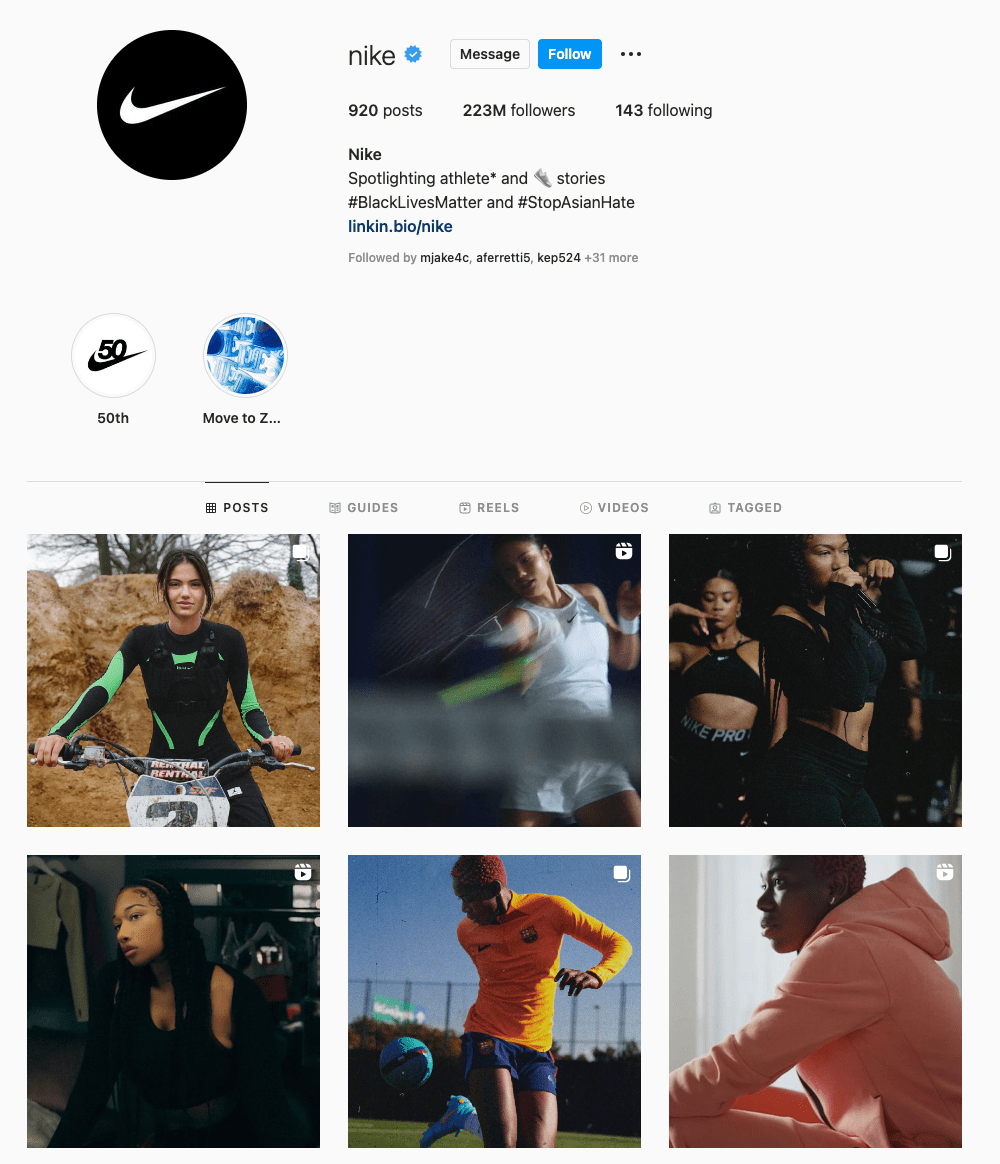
1. Nike: A Brand Story

If you want your customers to believe in your brand, they need to believe in your story. For instance, one brand with exceptional storytelling on and off Instagram is — you guessed it — Nike. In this Reel, they let us into the lives of athletes who use Nike to train, win, and most importantly, live their lives.

Watch the screen as the Reel pivots between the NBA Bucks’ Giannis Antetokounmpo as a child to him now as an NBA champion and listen to his emotional declaration on doing whatever it takes to succeed.

But what makes this spotlight on Giannis so impactful — 5 million views strong and counting — in just seconds is that this feeling is one many can relate to, especially their competitive base. Then, with the simple yet iconic black screen and white swoop, Nike is telling you that will help you win — that Nike is a part of what it takes. That’s a narrative that has made many backs this legendary brand.

2. HelloFresh: Products in Action

If your Instagram is all about selling a product, Reels are the perfect platform to show the quality of your creation in detail. If you’re promoting a service, Reels offers an opportunity to give your customers and followers a taste of what you do and how you do it.

For instance, take recipe ingredient delivery service HelloFresh:

This brand often uses Reels to cook their own recipes and showcase the delicious ingredients they provide for easy home cooking. By doing so, they are showing us the quality of healthy ingredients, ease of use, and taste satisfaction — the tenets of their products and services — and encouraging consumers to give it a try themselves.

3. Schiaparelli: A Behind-the-Scenes Peek

In this Reel, Italian fashion house Schiaparelli takes us behind the scenes of their haute couture design process, giving us a window into their brand that we wouldn’t have had otherwise — without a fashion degree.

By allowing us into the fold of their luxurious fabric selection, expert stitching, and creative fashion boards, the brand is showing us the expert execution it takes to create a one-of-a-kind Schiaparelli piece. We can now derive the value of the product through its craftsmanship, a value the brand knows, but one we may not immediately recognize.

The point is that now is the time to experiment with Reels to showcase your brand to the public. So constantly try new ways to create your Reel content. These short and snackable clips offer a unique opportunity for you to highlight your products, services, and personality in an authentic way. So consider these tips to put your brand’s best Reel forward on your next post.

Instagram Reels vs. TikTok

As you consider Reels, TikTok, and other emerging social media platforms in your marketing strategy, it’s important to weigh the pros, cons, and key marketing takeaways when determining if a channel or feature is right for your team.

Here are just a few things to remember as you consider Reels:

Reels compete against a unique, viral sensation.

Although Instagram has a huge audience that is loyal to its platform, many Gen Z users are used to going to TikTok for viral videos and general entertainment. Because the app has pulled in astounding fan loyalty in its short lifespan, you might find that Reels don’t have the same viral opportunities that TikTok videos might have.

What works on TikTok might not work on Reels.

TikTok is a highly experimental platform with a younger, but huge, global audience. Because of these factors, there aren’t many rules about what you should and shouldn’t post on there. Meanwhile, Instagram has been around for years, has a slightly older audience, and has some content norms or audience expectations set in place.

If you’ve already posted a handful of TikTok videos and want to test them on Reels, you can consider uploading a few, watching how they perform, and learning more about what works well on both platforms.

However, as you learn the differences between TikTok and Instagram audiences, you might find that high-performing TikToks aren’t as engaging to your Reels audience. If this is the case, you might want to consider creating specialized content for Reels.

Reels Take Your Instagram Marketing Up A Notch

Although you’ll want to keep the points above in mind as you consider testing out Reels, you’ll also want to remember the opportunities it offers. For example, Reels might be a great option for you if you’ve mastered Instagram, know what content your audiences want, and are eager to test out TikTok-styled content. If you do begin to test out Reels, it can’t hurt to brush up on your Instagram marketing skills and Instagram platform knowledge to ensure that your profile, other content, and — ultimately — your Reels will be on point for your brand and optimized for brand awareness.

Improve your website with effective technical SEO. Start by conducting this  audit.  

Editor’s note: This post was originally published in September 2020 and has been updated for comprehensiveness in June 2022.


Categories B2B

25 Copywriting Portfolio Examples That Will Secure Your Next Gig

If you’re reading this blog, you’ve likely decided to start or revamp your copywriting portfolio. With so many portfolios out there, it’s hard to figure out how to make yours stand out from the crowd.

What colors should you use? What kind of writing samples will show off your skills? Fortunately, I’ve put together a collection of copywriting portfolio examples that are sure to inspire you and guide you in the right direction.

Each copywriting portfolio example I’ve included is unique in terms of color, layout, and personality — highlighting the various ways you can approach putting a portfolio together and how it’s okay to get creative with yours.

Download 195+ visual marketing design templates to use for social media posts,  infographics, and more. 

How to Create a Copywriting Portfolio

When creating your copywriting portfolio, avoid cramming in too many of your writing samples. You’ll want to show off your diverse portfolio —that’s understandable — but too many samples can overwhelm potential clients and employers.

Instead, opt for five or six writing samples that capture the different styles of writing you’ve done, such as technical, marketing, and business writing. Be sure to also include a balance of humorous and serious pieces, B2B and B2C writings, as well as short and long-form content.

If you have little-to-no writing samples, build your portfolio by starting a website or blog to showcase your writing skills, or contribute to other websites. You can also write for nonprofits or work internships.

Another method to build your portfolio is to write mock-copywriting samples based on local businesses. Just be sure to let employers or clients know they are mock-samples and that you weren’t actually hired by those companies. The point isn’t to deceive, but to show what you can do.

Copywriting Portfolio Examples

Now that you have a few of your best copywriting examples ready to upload, it’s time to design your portfolio. You want a portfolio that stands out from the crowd, showcases your personality, highlights your skills, and is easy to navigate by potential employers.

To give you some inspiration, here are 25 examples of excellent copywriting portfolios broken down into the following categories:

  • Homepage – The first page people see of your online portfolio and where you’ll likely house your work samples
  • About Me – Where you’ll give readers an idea of who you are and what you do
  • Services – What you can provide your clients

Each of these examples presents a different approach to copywriting portfolios that is sure to attract new opportunities.

Homepage

There are many different approaches to creating a homepage for your portfolio — however, it’s best practice to ensure your homepage features your name, your contact information, and complementary colors. Most copywriters choose to feature their work directly on their homepage, but some find a way to link to their samples.

Here are several examples of outstanding homepage templates:

1. Carline Anglade-Cole

The homepage for Anglade-Cole’s copywriting portfolio immediately establishes her as an expert in her field by bringing attention to the awards she’s garnered throughout her career. The photo on her front page shows her at a speaking engagement with a confident smile, and the photo’s caption clearly states her full name above “3X Award-Winning Direct-Response Copywriter, Author, and Consultant.”

The badges for her awards are also displayed throughout, with the American Writers and Artists Institute badge placed in the middle next to the link to subscribe to her email list. Beneath her email list are badges from other accomplishments, including winning the bronze Nonfiction Book Award. If you’re an award-winning copywriter, Anglade-Cole’s page is a great example of how you can place your awards front and center to establish credibility.

Copywriting portfolio example by Carline Cole2. Gari Cruze

If you want your homepage to focus less on awards and more on who you’ve worked with, Cruze’s homepage is an outstanding example. This homepage heavily features high-quality photos from the different campaigns he’s worked on. Simply hover over each photo to see the name of the company or campaign, then click on the photo to see the copy he wrote and where it was published.

Copywriting portfolio example by Gari Cruze Copywriting portfolio example by Gari CruzeCopywriting portfolio example by Gari CruzeIf you’re looking for a more straight-forward yet eye-catching approach to displaying your work, Cruze’s example can lead you in the right direction.

3. Evan Benner

Benner takes a similar approach by using a mixture of high-quality photos and GIFs to display his work on his portfolio’s homepage. However, Benner takes it a step further by including the year his work was published next to each photo. His homepage also includes a headshot and a small blurb about who he is and where he is based.

Copywriting portfolio example by Evan BennerPotential clients and employers can easily navigate his portfolio by scrolling down where they can see more links to his About page (“Meet Evan”), copy, and the projects he worked on.

Copywriting portfolio example by Evan Brenner4. Jose Carlos Benítez

Copywriting portfolios don’t have to be all work and no play, so don’t be afraid to inject a little humor if you can. Benítez’s personality and sense of humor are sprinkled throughout his portfolio’s homepage.

Upon visiting his website, you’re greeted with a black screen with white text that starts with “Hello there, human! Or robot!” and ends with “Scroll down to see the blood, sweat and tears.” And for laughs, there’s a random button that says “This is just a button.” Spoiler Alert: The button doesn’t do anything but I definitely laughed after I clicked on it and waited 30 seconds for something (nothing) to happen.

Copywriting portfolio example by Jose Carlos BenítezOnce you scroll down, you’ll see a display of GIFs of the different campaigns Benítez has worked on over the years. Similar to Cruze and Brenner’s portfolios, hovering over the GIFs will show the name of the company the campaign was for — and clicking on them will take you to his work.

Copywriting portfolio example by Jose Carlos BenítezCopywriting portfolio example by Jose Carlos BenítezCopywriting portfolio by Jose Carlos BenítezFeaturing a bit of your personality throughout the portfolio will give potential clients and employers an idea of the kind of person they’re working with — and their humor and vision might line up with yours.

5. Benji Shaw

If you want to include imagery in your portfolio, but prefer a more minimalist approach, then Shaw’s portfolio will spark a few ideas. This portfolio features a black background with his name displayed in a large, easy-to-read font in the upper left corner. Two large images representing his work are featured in the foreground, and more of his work is shown by simply scrolling down. Like in previous examples, clicking the images will take you to another page that gives greater detail on the projects he’s worked on.

Copywriting portfolio example by Benji Shaw6. Aly J. Yale

Another excellent example for minimalists, Yale’s portfolio doesn’t rely on a ton of imagery. Instead her homepage is straightforward, simple, and only features her name in large black text against a white background —along with tabs in the upper right hand corner that lead to her bio, homepage, and contact page.

Copywriting portfolio example by Aly J YaleIf you scroll down Yale’s homepage, you see the logos of the outlets that have published her work.

Copywriting portfolio example by Aly J YaleThough I’d definitely suggest including a tab with links to your written work, this homepage shows that sometimes less is more and that you don’t have to rely on bold images to have a strong portfolio.

7. Davina van Buren

The homepage for van Buren’s portfolio is a great example for copywriters who are looking for a neat, organized way of promoting all of their talents, work, and social media in one place.

Copywriting portfolio example by Davina van Buren

The content of the homepage is organized in a way that leads your eyes down the page. Its coordinated neutral colors are engaging without being too jarring. Also, notice how the tabs for the about page, portfolio, testimonials, contact information, and social media widgets are all neatly organized in a single row at the top.

This format is great if you’re a copywriter who prefers a clean-cut, business professional portfolio.

8. Stephan Marsh

This portfolio is a great example if you’re the kind of copywriter who wants to get straight to the point. With a tagline in big bold letters reading “Read less of what I say. See more of what I’ve done,” Marsh makes it clear that he does not want to waste anyone’s time. The top of his homepage even includes a self-contained PDF portfolio that can be downloaded immediately.

Copywriting portfolio example by Stephen MarshThis portfolio shows that even a person of few words can still find a way to make a bold first impression.

9. Jennifer Cheek

I love this homepage example because it shows how a copywriter can add their own personal touch to a portfolio template. What makes this portfolio stand out is its fun pink hues and the adorable yellow canary logo on the left side of the page. Once again, don’t be afraid to show your personality on your portfolio’s homepage, and that includes your quirky side.

Copywriting portfolio example by Jennifer Cheek10. Anna Rogan

Rogan’s homepage, like van Buran’s, also leads your eye downward. As you scroll down you’ll see more of her work samples, but what makes her page really interesting is that each sample comes with a corresponding color change. This makes for a fun, aesthetically pleasing scroll through her work.

Copywriting portfolio example by Anna Rogan Anna Rogan 311. Kayla Dean

Dean’s portfolio is called The Literary Co. and starts by letting visitors know she has a wealth of experience, having created copy for more than 100 clients. Her portfolio also has a blog-style setup where potential clients can scroll down and see all of her latest work, case studies, and the brands she has worked with.

Copywriting portfolio example by Kayla DeanCopywriting portfolio example by Kayla Dean 12. Dayarne Smith

Smith’s website opens with a large image of a woman at a keyboard and features all of her relevant tabs at the top of the homepage. Once you scroll down, you’ll see her portfolio with links to her work uniquely displayed in fun monitor illustrations.

Copywriting portfolio example by Dayarne SmithCopywriting portfolio example by Deyarne Smith13. Sara Frandina

Frandina leaned into the writing theme by having her portfolio’s homepage resemble notebook paper. She doubled down on the theme by crossing out a word in the tagline and “writing” in a new word.

Copywriting portfolio example by Sara FrandinaIn addition to having standard information tabs at the top of the page, Frandina also included tabs linking to her past works separated by categories — customer research, email sequences, launch copy, long-form sales page, and website copy. These tabs can be found by scrolling down the homepage.

Copywriting portfolio example by Sara Frandina

About Me

This is where you showcase your personality and clearly define the expertise you bring as a copywriter. Notice that each example features a photo of the copywriter.

14. Kim Hobson

Figuring out what to say about yourself can be difficult. Where do you even start? Hobson found a way around that by breaking her About page into sections. In her introduction, she includes a photo of herself followed by a brief overview of what she does, where she is based, and how long she has been copywriting.

Copywriting portfolio example by Kim HobsonBelow her overview, she lists five quick facts about herself — some of which pertain to copywriting and others that cover her personal life. Then she has a section that breaks down her professional background.

Copywriting portfolio example by Kim Hobson

Copywriting portfolio example by Kim Hobson If you’re not sure what to put in your About page, you can follow Hobson’s formula by including a brief overview followed by a few fun facts and a breakdown of your career thus far.

15. Flourish Writing

Sarah, whose portfolio is called Flourish Writing, introduces herself using a funny anecdote about her first “published book” being written on craft paper and stored on her elementary school’s shelf for years. This anecdote lets the reader know Sarah has had a passion for writing since she was a child and that passion can also produce excellent work.

Complete with a photo of Sarah with her adorable pup, this About page gives the reader a clear idea of who Sarah is when she isn’t writing.

Copywriting portfolio example by Sarah of Flourish Writing16. Shanice Perriatt

Perriatt’s About page is concise and well organized. Her opener clearly states her name and what she does: “I’m Shanice Perriatt – a digital marketer and content creator who blends the best of design and writing into compelling and engaging brand content.”

Like Sarah, Perriatt also gives us insight into her life and hobbies – going to the gym, scrolling through Twitter, and going to the movies. Finally, the bio ends with Perriatt telling the reader the position she holds now.

The muted pastel background complements the green around headshot, making for a clean, informative page.

Copywriting portfolio example by Shanice Perriatt17. Kayla Hollatz

Hollatz takes a different approach to her About page. First, it starts with a photo of Hollatz next to a brief statement detailing her objective.

Copywriting portfolio example by Kayla HollatzAfter scrolling down, visitors see an “About You” page instead of an “About Me” page. This is where Hollatz presents an issue many clients face.

Copywriting portfolio example by Kayla HollatzFinally, visitors can scroll further down to find an About Me page in which Hollatz presents herself as the answer to all of the potential client’s problems.

Copywriting portfolio example by Kayla Hollatz18. Andie Coupland

Coupland’s About page shows that it is perfectly fine to veer away from personal details and to keep things strictly business. While we don’t get insight into Coupland’s life outside of writing, we do get a clear description of her experience and what she brings to the table as a copywriter. Note that she also includes a link to her LinkedIn for more information.

Copywriting portfolio example by Andie Coupland19. Jacob McMillen

McMillen’s About page establishes credibility by focusing on his accomplishments. He also puts his own spin on the writer’s headshot by instead only showing half his face. It’s a bold move but the gray coloring complements the muted blue and white banner, so it doesn’t seem too out of place.

Copywriting portfolio example by Jacob McMillen20. James Schlesinger

Like Hollatz, Schlesinger uses his About page to present a problem potential clients could be facing, then he presents himself as the solution by explaining exactly what he can do for them. Then he ends his bio with a call to action, urging readers to contact him for his services.

Copywriting portfolio example by James Schlesinger Copywriting portfolio example by James Schlesinger21. John Axtell

Are you looking for a punchy opener to grab the reader’s attention? Why not try “I love high kicks!” Maybe avoid that exact phrase, since that’s how Axtell decided to open his About page, but shouting a random fact about yourself is definitely a good start. Axtell took the opener a step further by including a photo of him doing a high kick.

Copywriting portfolio example by John Axtell

If you decide to open with a fun fact, like Axtell, coupling that opener with a photo showing that fact can definitely show your personality and grab the attention of potential clients.

Services

Some copywriters opt to dedicate a separate page of their online portfolio to breaking down the specific services they provide. If you choose to do the same, here are a couple of examples you can reference:

22. Danielle Wallace

Wallace chose to separate her services into different clickable boxes that include icons and a mixture of script and typewriting fonts.

Copywriting portfolio example by Danielle Wallace23. Sandy Dang

Dang displays her services in a more horizontal format with texts on one side and a large corresponding photo on the other. Each section of her service page includes a button that gives the option to book.

Copywriting portfolio example by Sandy Dang24. Jennifer Locke

Lock kept the format straightforward by simply stating what she can do for the client and including a button that allows potential clients to schedule a consultation. This could be a great method for copywriters who specialize in only one for two services.

Copywriting portfolio example by Jennifer LockeCopywriting portfolio example by Jennifer Locke 25. Stuart Tarn

Of course, sometimes your portfolio is enough to show clients and employers what you’re capable of. Tarn organized his portfolio in a simple way that shows he can provide web, email, social, and print copy. Clicking on each image will take the reader to his previous work.

Copywriting portfolio example by Stuart TarnAll of these copywriting portfolio examples are unique, but are all well organized, easy to navigate, and show a dash of personality while using complementary or neutral colors. Remember these points when putting together your own portfolio. Now, go out there and get that next big gig!

content templates


Categories B2B

Free Instagram Post Templates for Your Brand

Instagram is an undeniably powerful marketing tool, but with over 200 million business accounts on the platform today, it’s critical that you take the time to create well-designed and thoughtful Instagram posts to stand out. You’ll need to apply a strategic design plan to your business’s Instagram to attract a loyal following and find success on the app, long-term.

However, creating a clean and cohesive Instagram feed takes design skills and time commitment you may lack, and with an algorithm that favors brands that post at least once a day, that could be adding to your stress.

If that’s the case, you’re in luck — in this post we’ll discuss how you can create pre-made Instagram post templates so you’ve got a stash ready to go. Plus, by ensuring you use the same templates for different posts, you’ll have an easier time creating a cohesive and aesthetically-pleasing feed.

Access Now: 22 Free Business Instagram Templates

Instagram Post Templates

Instagram templates can be used to serve different purposes, and we have a list of our own for you to brainstorm ideas and customize for free.

Panel Template

instagram post tempaltes: panel template example for panel of women

Download this Template for Free

For those trying to spread the word on an upcoming virtual or in-person panel, you can promote it using our Panel Template.

Customize it by adding the speakers’ profile photos and usernames to build hype and give followers the chance to get an idea of what they can look forward to.

What We Like: Your followers won’t have to DM you for panel information, as the example given in the template provides all the context necessary for them to plan to attend.

Quote Template

instagram post templates: quote template example

Download this Template for Free

Sometimes you want to keep up with the algorithm, and posting consistently using quotes in between announcements can help keep that relevance businesses need to be seen.

Interview insightful team members, or even use inspirational quotes that your followers would enjoy seeing as they scroll through their feed.

What We Like: The versatility of this template lets you change the background image to fit the tone of the quote you share.

Sales Announcement Template

instagram post templates: sales announcement template example

Download this Template for Free

I don’t know about you, but when I see a sales announcement I get excited to check out what’s available.

When you’re looking to sell existing inventory, or share a seasonal offer, this sales announcement template gets straight to the point to capture attention. Change the background image to fit the occasion and you’ll have this post ready within minutes.

What We Like: This template isn’t cluttered nor pushy; those who are already fans of your product will want to go to your site to take advantage of the opportunity.

Quick Tip Template

instagram post templates: quick tip template example

Download this Template for Free

Sometimes your followers could be in need of some advice, that’s where our Quick Tip Template can fit that need.

If you’re catering to budding professionals or hobbyists, you can help them become more proficient in the skill they’re trying to develop. Change the imagery to reflect the tip of your choosing and share it with your followers.

What We Like: While it’s a simple template, it’s an easy way to engage with followers in between campaigns, and if you want to make the most of it, encourage commenters to share their own tips or advice they found helpful, too.

We’re Hiring Template

instagram post templates: we're hiring template example for open positions

Download this Template for Free

Yes, you could just post job openings on websites like LinkedIn, but you could reach exactly who you’re looking for on social media channels like Instagram, too.

Customize this template to either showcase a variety of positions you have open, or for a certain position that you can expand on in your post description.

What We Like: You can reach a further audience with Instagram using this template and by using the post-boost feature to better target the persona you’re looking for.

Offer Template

instagram post templates: offer tempalte example for how-to guide

Download this Template for Free

Promote things like eBooks or guides using our Offer template.

By giving followers a glimpse at your newer offers, you can use the post description to give them a call to action and download different types of resources. Customize it to reflect your brand’s color scheme and offerings.

What We Like: This chic template is the right amount of professional and minimalist approach that viewers will want to check out, as opposed to lengthy announcements littered with too much text in imagery.

New Product Template

instagram post templates: new product template example for chatbotDownload this Template for Free

When you’re ready to launch a new product, you should meet your target audience right where they are on Instagram the day it goes live.

By using our New Product template, you can give your followers an idea of what they can expect with this new innovation. You can also switch out the imagery to reflect the product solution.

What We Like: Without using words, your followers can get a clearer idea of what your new product can do for them if they purchase it.

Review Template

instagram post templates: review template example with positive customer quote

Download this Template for Free

Whether it’s internal or external, sharing positive reviews of your brand or product can be a great way to add legitimacy to your business.

Use our Review template to share the positive experiences your clients or employees had from your business, this can attract customers and talent to the company.

What We Like: Sharing reviews can help customers build trust, and adding posts like these to your profile can aid in the process.

Podcast Template

instagram post templates: podcast template example

Download this Template for Free

Podcasts are on the rise, so to help get the word out, you should be promoting on your Instagram.

This simplistic template is a great way to announce the creation of your podcast. You can use the post description to give your followers an idea of what’s to come and encourage them to spread the word.

What We Like: You can distinguish the type of podcast in the image if you choose or frame it as a surprise. The possibilities are endless.

These aren’t the only templates available in our offer, so download the pack to brainstorm even more ideas for your future posts.

1. Download Instagram post templates.

Let’s face it — you don’t always have the time, resources, or personnel to design noteworthy Instagram posts. That’s why we recommend using Instagram Post Templates for Business which you can build from and customize.

Here are some options to create and save Instagram post templates, so you can have stunning posts on-hand whenever you’re ready to publish.

HubSpot resource free instagram post templates

Featured Resource: 22 Free Instagram Post Templates for Business

Need templates to get started? Download HubSpot’s free Instagram post templates for both traditional posts and stories, which you can tailor as you see fit when it comes to your brand. You can alter any parts of the template – the image, the copy, and the design elements – to ensure you’re publishing posts to grow and engage your follower base.

2. Choose your post format.

While traditional Instagram posts to your permanent timeline are more long-lasting and allow for comments and likes, you shouldn’t underestimate the power of Instagram Stories, which can be used for more immediate needs and occasions.

In fact, 500 million accounts use the Instagram Stories feature daily. So, when you’re creating your post, ask yourself if it warrants publication as a story or as a traditional post.

3. Choose an image.

Maybe you’ve decided your post doesn’t need a photograph and that text overlay on a solid-color background will work for you. If that’s the case, hop over to the next step.

If you’ve decided you do want to use a photograph – particularly if you want one as the background for text overlay – you’ve got a few options.

  • Take a photo on your phone or with a camera. No need to be a professional photographer for your Instagram posts – you can learn how to take great photos with your phone here.
  • Use a photo from your company’s files. This works well if you need to utilize team photos or product photography, which may be better quality.
  • Use a stock photo that pertains to your business (just make sure you don’t use the same one multiple times!).

Whichever photo you decide to use, simply replace it as the background for the template you’re using in the HubSpot Instagram Post Template collection and resize the photo so it’s to your liking (and is good quality).

4. Add design elements.

Instagram post templates come with design placeholders for text with special fonts and other elements. Your next step is to alter, add, or remove any elements that you see fit.

This includes updating the copy to reflect the information you want followers to know and/or the action you want them to take.

5. Save the photo.

When you’ve done all you can in the template builder of your choosing, save your photo to be posted on Instagram. All you’ll have to do here is click File > Download > PNG Image or JPEG Image. Then, just name the photo file, email, or message it to yourself, and save it on your phone so you can post it.

6. Upload to Instagram.

Once you have your photo saved, it’s time to upload it to share with your followers. For a traditional post, open Instagram, click the + button in the bottom center, choose your photo, add any filter, description, or hashtags, and click Share. (Take a look at How to Post on Instagram: a Step-by-Step Guide if you’re still unsure.)

For an Instagram Story post, click on the camera icon in the top left of your screen, access your camera roll in the bottom left of the screen, choose your image, minimize the date that shows up to the point where it can’t be seen, and add any additional design elements – like a GIF or additional copy – to the image. From there, click Your Story on the bottom left.

Other Ways to Design Instagram Posts

Here are some other options to create and save Instagram post templates, so you can have stunning posts on-hand whenever you’re ready to publish.

1. HubSpot

other ways to design instagram posts: HubSpot

As previously mentioned, HubSpot has some go-to templates for your Instagram posts and stories.

You can have access to fully customizable templates through Google Slides where you can alter the color schemes, images, and purpose of each template depending on the subject you’re posting about — many of which are already made to promote business events or product releases.

2. Fotor

other ways to design posts: fotor

If you’re looking for a free collection of templates to choose from, Fotor will give you over three thousand templates for any topic or occasion.

With Fotor, you can cater your post to reflect your brand image, while incorporating seasonal designs or special sales, or discount templates for your business.

3. Crello

other ways to design instagram posts: crello

Crello is an online graphic design tool made to enhance your content for many social media channels — providing users with plenty of templates to fill out your Instagram grid.

4. Creative Market

If you’re willing to shell out the cash, you might consider buying one of Creative Market’s Instagram Template bundles.

For instance, you could purchase this 1053 Quotes social media pack.

other ways to design instagram posts: creative market

Alternatively, you can purchase a bundle with Instagram Story content, like this Animated Stories bundle.

example animated stories bundle for instagram stories

Finally, you might consider purchasing a bundle to help you create a cohesive theme for your Instagram feed, like this The Grid template.

example templates for cohesive instagram feed

Curate Your Instagram Posts with Ease

We hope you found our guide and templates useful as you prepare to make a stylized Instagram feed. With these tools, you’ll be set to create and save pre-made Instagram templates, so you can focus on attracting a loyal following without tediously designing a post from scratch every day.

Editor’s note: This post was originally published in October 2018 and has been updated for comprehensiveness.

New Call-to-action

Categories B2B

How to Type the Shrug Emoji ¯_(ツ)_/¯ in 2 Seconds Flat

The shrug emoji 🤷 is a popular image used to convey confusion or emphasize a question.

There’s no denying the power emojis have when it comes to boosting engagement and emphasizing communication. Sometimes you just need a symbol to get the point across, and emojis serve that purpose.

Download Now: Social Media Trends in 2022 [Free Report]

However, it’s worth noting the shrug emoji wouldn’t exist without its predecessor, the shrug emoticon. ¯_(ツ)_/¯

Though emojis have come a long way, I’m still a big fan of typed emoticons. Emoticons bring me back to simpler times when my phone still had a physical keyboard and AOL Instant Messenger was my main method of communication. Those were the days.

If you still have an affinity for typed emoticons like me, especially the ¯_(ツ)_/¯ emoticon, here’s how you can type it in two seconds flat on a Mac, Windows, iPhone, and Android.

How to Type the Shrug Emoji ¯_(ツ)_/¯ in Two Seconds Flat

The shrug emoticon is one of the more intricate emoticons to type, so most people resort to copying and pasting it from a website, like CopyShrug.

But copying and pasting the emoticon is really only a good option if you use it sparingly. If you’re an avid user of the shrug emoticon, you’ll need to keep revisiting the website to copy and paste it, which is a relatively slow and annoying process, especially on your mobile phone.

To type the shrug emoticon as fast as possible, we recommend creating a text replacement shortcut with your device’s autocorrect feature (which might be the first time autocorrect actually comes in handy for you).

How to Type the Shrug Emoji: on Mac

How to create a Mac keyboard shortcut for the shrug emoji

1. Copy “¯_(ツ)_/¯”

2. Go to System Preferences

3. Click Keyboard

4. Press Text

5. In the Replace box, type “shrug”

6. In the With box, paste “¯_(ツ)_/¯”

How to Type the Shrug Emoji:

on Windows

Unfortunately, Windows doesn’t have an autocorrect feature, but you can download programs like
PhraseExpress to set up text replacement shortcuts and quickly type the shrug emoticon.

How to Type the Shrug Emoji: on

iPhone

How to create a shrug emoji keyboard shortcut on iPhone1. Copy “¯_(ツ)_/¯ “

2. Go to Settings

3. Press General

4. Tap Keyboard

5. Choose Text Replacement

6. Select the “+” button

7. In the Shortcut field, type “shrug”

8. In the Phrase field, paste “¯_(ツ)_/¯ “

How to Type the Shrug Emoji: on

Android

1. Copy “¯_(ツ)_/¯ “

2. From your text message keyboard, tap the three dots

Android-Keyboard-Shrug-Emoji3. Go to Settings

4. Tap Dictionary

5. On a Google Pixel, press Personal Dictionary; using a Samsung device, tap Text Shortcuts

6. Select your language

7. Select the “+”

8. In the Shortcut field, type “shrug”

9. Tap the ” ¯_(ツ)_/¯” that shows up on the keyboard

Use-Shrug-Emoji-Android

There you have it! A quick and easy shortcut to help you type the shrug emoji in no time.

New call-to-action

Editor’s Note: This post was originally published in September 2018 and has been updated for comprehensiveness.

Categories B2B

YouTube Thumbnail: Your Guide to Making a Scroll-Stopping Image

YouTube thumbnails, the small, clickable snapshots that viewers see when they search for videos, can be just as important as a video’s title because they provide a preview of your video and entice viewers to click through. 

Download Now: 10 Free YouTube Image Templates

If your video has an ordinary or sub-par thumbnail, it won’t persuade anyone to watch your content. YouTube could deem the video irrelevant and won’t rank it in the search results or distribute it through the “Recommended Videos” feed. Since your video’s click-through rate is one of the most important ranking factors in YouTube’s search algorithm, especially during its first hour on the platform, an eye-catching thumbnail can make a huge difference in ranking number one for a query and not ranking at all.

YouTube thumbnail example from the HubSpot Marketing YouTube channel

Creating vibrant YouTube thumbnails can also instantly grab people’s attention and this can help you differentiate yourself on a platform full of standard thumbnails all screaming for attention. Below, we’ll guide you through an easy four-step process for creating visually appealing YouTube thumbnails that will cut through the noise, boost your video’s click-through rate, and lift your rankings.

Table of Contents:


1. Visit a free online YouTube thumbnail maker.

There are eight free online YouTube thumbnail makers listed below, but we featured FotoJet in this guide because it’s one of the only YouTube thumbnail makers that doesn’t make you sign up for a free account before you can create a thumbnail. Their robust thumbnail maker lets you customize and download your thumbnails completely for free — no email address necessary.

The free version of this online app lets you download small and medium-sized image files, but large and extra-large are premium features. This means you’ll get to be creative with your designs to ensure they appear as crisp as possible on YouTube.

2. Upload a photo or choose one of the thumbnail makers’ templates.

YouTube will let you upload any picture from your computer as your video’s thumbnail. But if you don’t have a vivid visual on your computer or you need some inspiration, Fotojet’s got you covered. It has over 23 free templates that can serve as your thumbnail’s foundation.

To create striking a thumbnail in Fotojet, consider including a talking head. People are naturally drawn to human faces because it’s an ingrained survival mechanism to help us quickly gauge someone’s emotions and determine if they’re a threat or friend. Research Gate also discovered that Instagram photos with faces are 38% more likely to receive likes and 32% more likely to receive comments.

example of YouTube Thumbnail from HubSpot's YouTube Channel

3. Add text, clip art, or a background to your thumbnail.

Once you’ve picked your picture or template, you can make your thumbnail stand out even more by adding text, clip art, or a background to it.

To further clarify your video’s subject matter, consider adding your video’s title to the thumbnail. If your photo, graphic, or text is bright, consider placing it on top of a dark background. The color contrast will make your thumbnail pop. The same logic applies to dark objects and bright backdrops.

4. Download the finished product to your computer.

After you finish polishing your thumbnail, press the Save button at the top of the page to export your thumbnail.

Last, title your thumbnail. When you’re naming the thumbnail, include either the title of the video, or the primary keyword related to the video. Save the final file as a PNG or JPG. Its resolution will already match YouTube’s recommended resolution — 1280 x 720 pixels — so you don’t have to worry about resizing it later.


8 YouTube Thumbnail Makers

Along with Fotojet’s free online YouTube thumbnail maker, there are seven other thumbnail makers that can help you customize your own YouTube thumbnails. Before you create a thumbnail with these tools, though, you need to sign up for a free account on their websites.

1. FotoJet

FotoJet YouTube thumbnail maker homepage

FotoJet is a leading YouTube thumbnail maker that comes with templates to help you summarize your video into a click-worthy image. You can get started with FotoJet as soon as you land on the homepage — no email or account setup required. Choose from a variety of stock images, font styles, and clip art elements to customize your design, then export it in either a JPG or PNG format. 

2. Canva

canva design dashboard

With more than 2 million images in their library, hundreds of fonts, and customizable backgrounds and colors, Canva gives you more than enough resources to unleash your creativity.

You can sign up for the free or paid version of the online design tool, but be prepared to take your own images as Canva’s image gallery can cost up to $1 per photo. Don’t let that deter you. This robust tool is jam-packed with free design elements that can help you create click-worthy YouTube thumbnails.

3. Adobe Spark

Creating a YouTube thumbnail in Adobe Spark

Adobe Spark lets you select from thousands of photos on the web and a variety of built-out themes with their own unique layouts, colors, and fonts to craft eye-catching YouTube thumbnails. Although the free version comes with a watermark on all content you download from the system, you can always upgrade to the paid version to have unique thumbnails that are truly your own.

4. Crello

crello design dashboard

With Crello, you can create engaging thumbnails by blending a multitude of designs, photos, backgrounds, text, and objects together. When compared to other popular design tools, Crello emerges as a less expensive option, but remember resizing your thumbnails could be a pain because of some improvements that need to be made within the app.

5. Visme

Using Visme to create a YouTube Thumbnail

Choose from a wide selection of templates, photos, graphics, colors, and fonts to create a thumbnail in Visme. This app was made with video thumbnails in mind, so you won’t have to worry about sizing and finding the perfect layouts. Visme offers creators various templates to choose from so you can spend more time adding your finishing touches.

6. Fotor

fotor design dashboard

Fotor provides templates under certain themes to help you create captivating thumbnails. It includes all the trending YouTube thumbnail features like photo frames, the lomo effect, and background remover. The options are virtually limitless with Fotor as the canvas for your YouTube thumbnail.

If your workflow can’t be completed all in one session, Fotor’s premium plan allows you to save the version history of your thumbnails so you can pick up right where you left off.

7. Picmaker

Making a YouTube thumbnail in Picmaker

With over 100,000 graphics, 1,000 stock photos, stickers, borders, backgrounds, text, icons, and filters, and an automatic background remover, you can create a gripping thumbnail on Picmaker. If you have set brand colors, the free options won’t be the easiest to work with since you can’t save colors, logos, or fonts. But upgrading to just the starter tier opens up a variety of benefits including a brand kit, premium photos, and multi-sized designs.

8. Snappa

snappa design dashboard

Snappa has over 500,000 stock photos, an assortment of professionally designed templates, and customizable graphics, shapes, and text to help you create a YouTube thumbnail. If you’re making over three thumbnails per month, Snappa might affect your workflow as the free version only allows three downloads per month. If three is enough for you, you’ll be glad to know there’s a drag-and-drop functionality to help you create your own custom thumbnail template.

Create Scroll-Stopping YouTube Thumbnails

Just like a peephole, the subject line of an email, and even caller-ID, a YouTube thumbnail gives the viewer a peek behind the curtain to see what’s on the other side. It’s a major component in a search result that will determine whether someone clicks and watches your video. Taking the tips and examples in this article, you’ll have to know how to make scroll-stopping YouTube thumbnails that will draw in new subscribers.

Editor’s note: This post was originally published in November 2018 and has been updated for comprehensiveness.

YouTube-Templates