Categories B2B

How To Get The Handoff To Sales Right: Why First-Party And Validated Buyer-Level Data Is Essential For Effective Qualification

The pain B2B demand gen marketing pros experience whenever sales fails to act on leads or dismiss them prematurely can be quite painful. 

Sales, conversely, pulls its collective hair out whenever marketing overpromises and underdelivers on quality buyer-level information. It’s a tango that has resulted in many stepped-upon toes and many unrequited opportunities.

So why does this happen?

Aside from any cliches about sales and marketing alignment, there are two key factors that need fixing before any significant improvement in outcomes. 

  • The first factor is the handover of qualified leads and accounts to sales.

  • The second deeply-connected factor is the quality of the data that marketing is providing sales—because if that’s not good enough, even the most tightly refined handover process will fail to gain traction with reps. 

Why the handover to sales is vital to get right

In an ideal world, the marketing team should be continuously engaged in both creating and capturing demand. When done effectively, this will generate high-quality leads and accounts that are in-market, showing intent, and are already primed to buy at the exact time of the handover. 

In this ideal scenario, when these leads are finally handed off to sales, reps can effortlessly convert them using all the valuable and informative data marketing has collected on each lead. 

That handover process between marketing and sales is crucial. When done properly, marketing is giving sales exactly what they need and supplying them with valuable data, enabling them to make a very personalized approach. But when the handoff falls short of the mark, it can be disruptive to the sales process and result in a poor customer experience. 

Indeed, research shows that about one-fifth of B2B marketing and sales professionals say that the lead hand-off process is one of the top factors that contribute to a disjointed customer experience

While B2B marketers understand the importance of the sales handover, many are still struggling with the process. In fact, one-third of marketing professionals identified improving the marketing and sales handoff when asked what their top priorities were to improve lead-to-opportunity conversion.

What are some common challenges during the handover and sales process?

Both marketing and sales teams can experience numerous challenges that can get in the way of a successful handover. Here are just a few that need to be addressed before a handover can be as effective as possible.

Lack of communication, understanding, and alignment between sales and marketing teams

Marketing and Sales have always struggled with alignment and while many organizations have strived to close the divide between departments, research has found that merely one-third can boast that they are fully aligned

Not identifying the real people within in-market accounts

This is perhaps the most significant challenge marketers encounter. 

Knowing the “who” can have a significant impact on whether a marketing-qualified lead converts into a sales-accepted lead.

In some respects, the marketing function has a decent chance of identifying named and qualified leads, given the growing size of today’s buying committee. Some 59% of B2B buyers claim that there are at least four people involved in their organization’s buying process, with about one-quarter having at least seven people on their buying committee.

But when marketing provides a list of target customers without any named contacts, they are relying on the sales team and their sales processes to do more of the heavy lifting.

Marketing-sourced leads and accounts don’t convert to meetings—leading to sales sidelining the contacts and accounts that are given to them

A UFO handing over a qualified, validated lead generated through using first-party intent data with an astronaut picking it up.

Following on as a likely consequence of lacking named buyers is that sales reps can’t book any meetings from them. One of the biggest complaints sales teams have with leads coming from marketing is that they are poor quality and lack a readiness to buy.

If marketing has a track record of supplying leads and accounts that don’t convert, sales will have no choice but to lose trust in the leads they are being given. 

Even worse, a poor track record can stop sales from believing that they don’t need marketing at all.

Duplicated efforts as sales and marketing target the same accounts and buyers without a joined-up approach

When sales reps feel that marketing isn’t contributing to revenue, they are more likely to start prospecting to accounts that marketing is in the middle of nurturing.

But even when there’s mutual respect between sales and marketing teams, there are other reasons why both teams might reach out to the same target buyers, leading to a bad experience for the buyer. 

Examples can include:

  • Limited sharing of first-party data and buyer insights;
  • Poorly integrated or configured systems, especially between the CRM and marketing automation platforms;
  • Marketing fails to align with an existing and standardized sales process; and
  • At a most basic level, a lack of effective communication—meaning that neither team is aware of the activity being done by the other.

These areas all fall within the wider context of sales and marketing alignment. 

Reliance on third-party data which is often incomplete or inaccurate

There are many data providers on the market today that promise to surface the right accounts by taking advantage of third-party intent data from across the web. These solutions can be valuable, but the marketing team needs to understand the potential limitations.

For example, research has revealed that data quality is the top challenge facing marketing professionals when using intent data. Third-party data, in particular, can often be inaccurate or inadequate when it isn’t used in conjunction with first-party data.

The follow-up by sales reps has a message that doesn’t align with marketing—or isn’t sufficiently personalized

Messaging needs to reach beyond marketing efforts and throughout the sales cycle. 

Alongside that, buyers expect personalization. A McKinsey study found that about 7 in 10 people expect personalized interactions from those selling products and services. 

If this isn’t done, the handover risks feeling disjointed as sales reps fail to properly communicate with buyers.

Why first-party, buyer-level validated data can help address these challenges and the benefits it has

Fortunately, these challenges can be overcome by taking advantage of first-party data which has been validated at the buyer level.

This type of first-party data should include:

  • Person-level data that at the very least includes a name.
  • An email address that has been validated via a double-opt-in, proving that it has been opened and clicked by the recipient.
  • Data that the person has provided directly, such as sharing their interests and preferences on a form, as well as other contact details such as phone number.
  • Intent data that they have provided directly, which can include whether or not they are looking for a solution—and if not now, when in the future that might be the case.
  • And where possible, any self-provided data (such as phone numbers) should be verified for its accuracy, either manually or automatically.

Put together, this type of intent data also pinpoints those buyers who are truly in-market and not just browsing content or merely your competitors checking out what you have to offer. 

As a result, here are some benefits you can expect to see.

Improved conversion rates from higher-quality data

Accurate, timely, and context-rich data leads to greater success with marketing-generated contacts and accounts. 

Having the data on who your buyer is, what they are researching, and what their pains are, makes it easier for sales to accept and qualify that lead. Backed by the right content and messaging, reps can then take a personalized approach. And, once sales sees that marketing is handing over leads that are high-quality and ready to convert, confidence and trust in marketing is bound to see a lift. 

Greater trust between the sales team and marketing function

With that increased level of confidence, sales teams will feel more comfortable in leaving marketing to reach out and engage buyers and accounts that aren’t yet in marketing. Leaving marketing to do this reduces the likelihood of duplicated outreach from both marketing and sales as well as decreases the possibility of mixed messaging. 

Sales reps can spend more time on the buyers and accounts that matter

The difficulty in identifying the real people within the account is a particular barrier for the handover. 

However, when using first-party, buyer-level validated data, sales reps have access to named in-market buyers. This allows them to focus on who is on the buying committee, rather than taking a blind guess. In turn, this allows sales reps to spend more time per account. 

Having context on interests and intent also allows for a higher-quality approach from sales. It means greater use of sales enablement tools and content that marketing provides which leads to more effective qualification. 

More efficient use of paid marketing spend with greater ROI

Another advantage of buyer-level intent data is that it allows for more efficient and dynamic deployment of paid media. 

Considering that recent data from The CMO Survey shows that paid media marketing leaders are allocating the largest share of their digital spending to paid media (44% compared to 34% towards owned media and 11% towards earned media) being able to use those marketing dollars in a way that grabs the attention of the right buyers at the right time in a more precise and personalized way is beneficial. 

Marketing delivers a greater impact on revenue

Last, but not least, with marketing able to hand over high-quality leads and vital data about exactly who the buyer is, the end result is that marketing’s contribution to pipeline improves.

How to get started on improving the marketing-to-sales handoff

So, where should one start in making sure that any handover of marketing-generated leads and accounts is as effective as possible?

Here are a few steps you can take to get started.

  1. Speak to sales reps to understand their workflow, processes, and what’s important to them. Communication is key and is an important step to creating alignment.
  2. Make sure your marketing automation platform and other technology is properly integrated with your CRM and the sales team workflow to enable a smooth handover. This should include feeding back outcomes to marketing i.e. whether they moved to sales qualified, an active opportunity or were disqualified.
  3. Surface buyer-level insights within the tools they already use. Naturally, you should have first-party, buyer-level data which sales can use to know exactly who they should be targeting and how. But if this isn’t in their day-to-day tools, chances are adoption will suffer. Make sure it’s embedded within the CRM or any sales tech they spend most of their time in.

    Insights around content consumption, event attendance and engagement can help sales reps to decide what approach they should take with their outreach.

  4. Display recommended content and messaging based on buyer-level behavior, buying stage and account-level insights.  A majority of B2B buyers say that a vendor’s content had a significant impact in ultimately choosing that vendor. But not any content or messaging will do. It needs to be geared specifically towards that particular buyer and where they are in their journey which has been revealed through the rich first-party intent data you have collected.
  5. Get feedback from sales to further improve and optimize the handover. Keep the conversation going. Asking for feedback and input on the handover process can only strengthen marketing’s relationship with sales. 

How to source validated leads with intent right now

If you’re in need of named buyers to give to your sales team or contacts that you can nurture until they are ready to buy, NetLine’s buyer engagement platform is a great place to start.

NetLine offers lead generation services beginning at just $4 per lead alongside its unparalleled buyer-level intent platform, INTENTIVE. When used in conjunction, you’ll be equipping your sales and marketing teams with the actionable contact data of their dreams.

Categories B2B

What the Prolonged Reddit Blackout Could Mean for Marketers

Reddit is in a standoff with some of its users. The platform announced plans to limit access to its API for third-party developers, charging for access to data.

The decision to charge is an effort to increase profitability for the platform, which is preparing for a potential IPO. However, the change could further derail the company’s ability to go public.

According to some volunteer moderators (who are critical to Reddit’s operating model), the change will price out third-party applications that help them facilitate conversations on the platform. In response, over 8k subreddits have become private since June 12, essentially going dark and causing a 6.6% traffic dip for the online forum.

A number of moderators planned to shutter their subreddits for two days, however, thousands of Reddit pages remain offline. Reddit’s CEO has continued to stand firm in the company’s decision to limit access to its API, leaving the end of the strike in limbo.

The events have already impacted Reddit’s reputation, the credibility of content on its forums, and trust with its user base. The company’s relationship with advertisers could be next.

Download Now: The 2023 State of Social Media Trends [Free Report]

How Advertisers Are Approaching the Reddit Blackout

Advertising is currently the primary revenue driver for Reddit, and if marketers move dollars away from the platform en masse, it could cause problems for the company’s bottom line.

Nearly 49% of Reddit’s traffic comes from organic search, and having a sizeable portion of content down can limit the reach of ads running on the site. With so many unknowns about the future of Reddit, and whether ads on the platform can produce a meaningful ROI, naturally, advertisers are raising concerns over running campaigns on the platform.

According to Digiday, some agencies have already begun shifting dollars away from Reddit in favor of platforms like TikTok, Instagram, Facebook, LinkedIn, and Quora. If the standoff continues, Reddit isn’t the only company that could lose ad dollars — the third-party apps that rely on its API could lose out on advertising revenue as well.

Marketers running advertising campaigns on these platforms should be closely monitoring performance, and the status of subreddits that are relevant to their core audience noting how campaign goals may be impacted.

It’s also worth mentioning that the dip in organic traffic to Reddit can impact organic traffic to other sites. For those who rely on subreddits to drive traffic and awareness to their sites and general campaigns, web traffic should be closely watched to account for any dips that could be attributed to the strike.

Ultimately, the events surrounding Reddit highlight the importance of having a diversified portfolio of advertising platforms and traffic sources to account for ongoing events beyond the control of marketers.

New call-to-action

Categories B2B

How to Convert an Excel Document to a Google Sheet

Are you tired of wrestling with Excel spreadsheets? Perhaps you’re looking for a more collaborative and user-friendly experience for your team. Using Google Sheets may be the answer to your frustrations.

→ Access Now: Google Sheets Templates [Free Kit]

The cloud-based platform makes it easy to manage and organize data. You can also work collaboratively within the same interface you’re used to with other Google products. No matter where your colleagues live, you can work together.

Getting started is easy. Keep reading to learn how to convert an Excel document to a Google Sheet and vice versa.

The Benefits of Converting Excel Documents to Google Sheets

You might want to convert your Excel documents to Google Sheets for a variety of reasons. Google Sheets offers very similar functionality to Excel with additional collaboration capabilities. You can even access your Sheets on any computer.

Further, Google Sheets allows you to view previous versions, hyperlink between applications, and work at scale.

Google Sheets is the perfect option for those who work in teams or shared projects. However, Excel has more comprehensive data management capabilities. Excel is great for those managing large amounts of data.

How to Convert an Excel Document to a Google Sheet

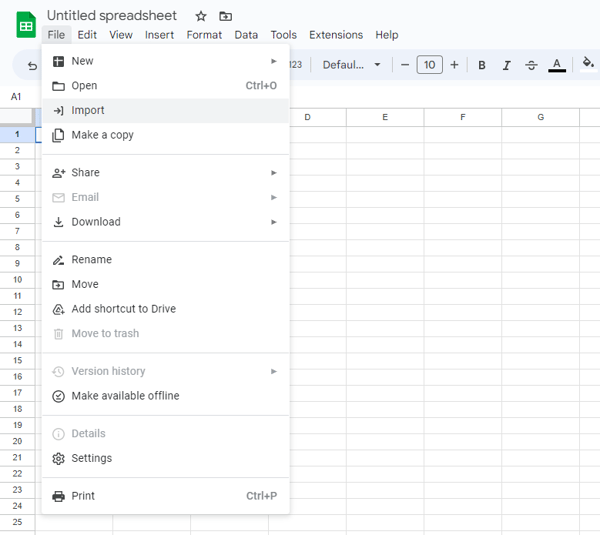
1. Go to Google Sheets and hit File → Import.

Go to Google Sheets and hit File, Import.

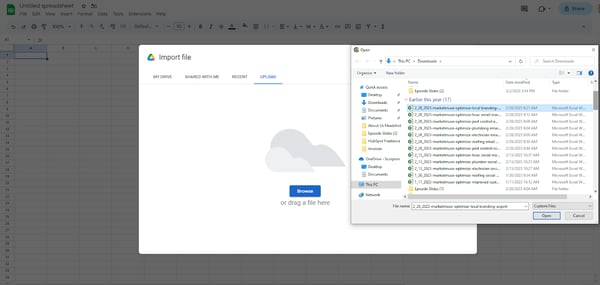
2. Choose the Excel file.

Choose the Excel file.

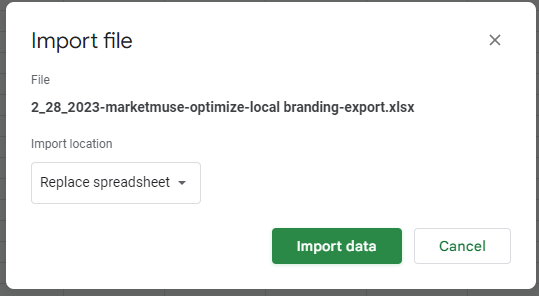
3. Click “Import data.”

Click Import data.

4. Data will then be imported and ready for you to edit.

Data will then be imported and ready for you to edit.

How to Convert a Google Sheet into an Excel Document

1. Open Google Sheet.

Open Google Sheet.

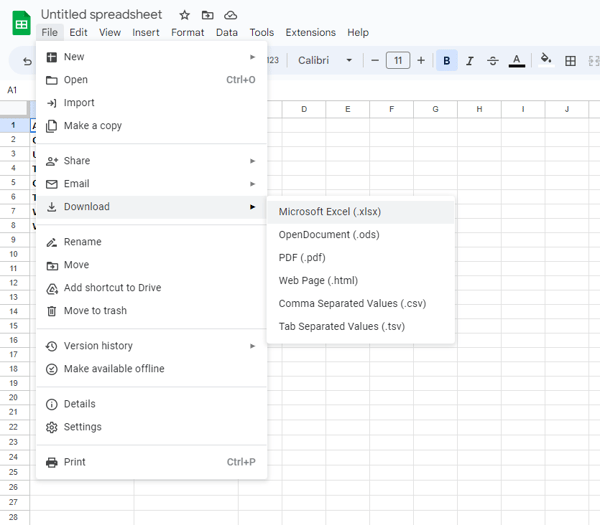
2. Click File → Download → Microsoft Excel.

Click File, Download, Microsoft Excel

3. Voila! You now have an Excel doc you can edit and save on your computer.

Limitations of Converting Documents Between Excel and Google Sheets

1. Formatting Issues

Sometimes, you might encounter formatting issues when converting documents to Google Sheets. Most of these bugs have been fixed. However, if your document is filtered or has special formulations, there could be issues.

If so, they are usually easy to fix. All you need to do is Google the exact error.

2. Data Volume

Excel can accommodate a much higher volume of data than Google Sheets.

If you want to convert an Excel document with more than 400,000 cells into a Google Sheet, you might not be able to include all the data.

3. Statistical Analysis and Visualization.

Similarly, Excel has higher functionality when it comes to statistical analysis and visualizations.

If you have an Excel document that includes these features, you’ll run into limitations when converting it to a Google Sheet.

Converting to Google Sheets

Many teams work with both Excel and Google Sheets. Luckily, converting between the two is fairly painless and shouldn’t take you more than a few minutes.

Just follow the steps above to get started.

business google sheets templates

Categories B2B

Everything You Need to Know About Functional Resumes

Not sure how to make your resume really pop? Wondering how to highlight your skills and experience, despite any possible gaps? You might benefit from a functional resume.

→ Download Now: 12 Resume Templates [Free Download]

Luckily, this article closely examines everything you need to know about functional resumes, including what they are, when to use them, and the benefits they offer.

So, whether you’re new in the workforce, changing careers, or have experienced some time unemployed, a functional resume can help you attract potential employers.

What is a functional resume?

Unlike a traditional, chronological resume, a functional resume focuses on your skills and experience — not just your work history.

So, instead of focusing on companies, roles, and dates of employment, it groups things like your marketing experience together, presenting a collection of relevant experiences and skills.

It’s great if you’re changing careers or have a gap in your work history, as it steers attention away from dates and underscores why you’re a great fit for the role.

Plus, functional resumes begin with an objective or summary statement that sets the tone. Then it highlights your skills, accomplishments, and education.

The result is a much more targeted, customized resume that reflects your strengths and qualifications.

The Benefits of Functional Resumes

It’s probably clear right now — functional resumes are pretty great. Still, this deserves to be broken down into specifics. Here are the four main, undeniable advantages of functional resumes:

1. Highlights relevant skills and accomplishments.

When applying for a job, a functional resume highlights skills and accomplishments related to the position. It emphasizes your most relevant skills, even if they weren’t acquired in a traditional workplace.

2. Overcomes employment gaps.

Another benefit of a functional resume is that it can help overcome employment gaps.

So, for instance, if you’ve taken time off or had a period of unemployment, a functional resume leads with the good, so the gap isn’t as much of a heavy hitter.

3. Allows for flexibility.

You can also present your qualifications in a more flexible way with a functional resume. For example, you can group your skills and accomplishments under specific headings, like “project management” or “leadership experience.”

It makes it easier for employers to find the relevant bits they’re looking for quickly.

4. Stands out from the crowd.

Here’s something else a functional resume can do better than the rest: help you stand out. It’s easy to do when basically everyone else is using the standard one.

So with a functional resume, you can show that you’re not only willing to try different, innovative approaches but also that you can think creatively.

A functional resume is great if you’re looking for a way to underscore skills and accomplishments in a tailored way that fits the role you’re applying for.

It considers everything you’ve learned, even in non-traditional formats, making it a genius solution if you have employment gaps.

When to Use a Functional Resume

A functional resume may be right for you if you fit into any of these categories:

  1. When you have limited work experience. A functional resume can help you highlight your relevant skills and accomplishments if you’re a recent graduate or have limited work experience in your field.
  2. When changing careers. A functional resume can help you showcase your transferrable skills that can apply to your new career path if you’re changing careers.
  3. When returning to the workforce. A functional resume emphasizes your skills and experience rather than just your work history.
  4. When job requirements are specific. A functional resume can help you highlight specific qualifications and skills clearly and concisely from a job posting.

Limitations of Functional Resumes

A functional resume highlights your relevant skills, accomplishments, and experiences — even with a limited work history. However, pay close attention to the roles you’re applying for.

Functional resumes only work for some applications, so make sure you research the company first before deciding which type of resume to use. Here are three instances where you might want to skip using a functional resume.

Sizable Work History

Some people are just super lucky — and you might be one of them. If you’ve been working consistently in your field, with role after role of relevant jobs and experience building, then you’re better off using a chronological resume.

You have the dates, roles, and skills to showcase. You don’t need a functional resume to help you fill in any gaps.

ATS Compatibility

With the sheer amount of resumes floating around out there, it’s no wonder some companies use Applicant Tracking Systems (ATS) to filter candidates. However, ATS doesn’t play nice with resumes that don’t follow a traditional structure.

So, even if you’re more than qualified for a role, the recruiters might never see your resume.

Employer Preferences

Also, keep in mind employer or industry preferences. Some hiring managers prefer traditional resumes, so using a functional format may hurt your chances.

Before deciding which format to use, research the company and job posting. It’ll help you tailor your resume to meet their expectations and present you in the best possible light.

How to Write a Functional Resume

If you’ve decided that a functional resume is the best choice for your situation, here’s a step-by-step guide to help you create one.

1. Start with a strong summary statement.

Start your resume on the right foot with a summary statement showcasing your skills, qualifications, and experience.

It’s important to customize this section to the specific job you’re applying for so that it provides a brief overview of why you’re a great fit for the position. This statement should capture the hiring manager’s attention and entice them to continue reading your resume.

2. Identify your key skills.

Once you finish that, the next step is to list the skills you want to emphasize in your resume. This section should showcase your technical and soft skills that are relevant to the job you’re applying for.

Demonstrating how you have applied these skills in the past helps the hiring manager understand your skills. So highlight your key strengths — it’ll help you show why you’re the best candidate for the job.

3. Organize your skills into sections.

After identifying your top skills, organize them into clear sections that make sense for your work history and your desired job.

For example, you could divide your skills into Technical Skills, Leadership Experience, or Project Management Skills sections. This allows the hiring manager to quickly and easily identify the areas where you excel and can help you stand out as a highly qualified candidate.

4. Provide supporting examples.

When detailing your skills within each section of the resume, provide concrete examples of how you’ve applied those skills in real-life situations.

Include specific projects you’ve worked on, notable achievements you’ve accomplished, or other relevant experiences that demonstrate your proficiency in that particular skill.

5. Include your work history.

Even though a functional resume may not focus heavily on your work history, providing a brief overview of your employment background is necessary.

You should list your job titles, the names of the companies you worked for, the dates of employment, and a concise description of your responsibilities and notable achievements in each position.

6. Tailor your resume to the job posting.

Ultimately, it’s essential to customize your functional resume to the specific job. So brush up on the role, company, and industry.

Then use your research to adjust your summary statement, reorder your skill sections, or incorporate different examples that emphasize the most relevant experiences for each position.

By tailoring your resume to the job posting, you can improve your chances of capturing the attention of hiring managers and securing an interview.

Functional Resume Examples

Here are three functional resume templates to give you an idea of what your own resume could look like.

The Blended Resume

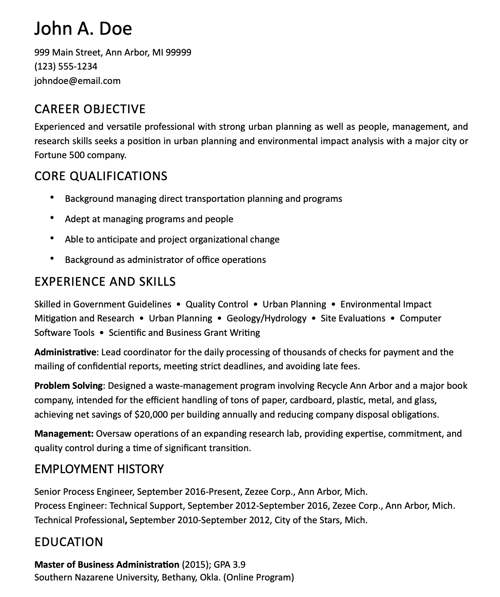
Functional resume example, specialist resumeImage Source

This sample resume from The Balance takes a blended approach to the functional resume. In the “Experience and Skills” section, the applicant shared their past experience relevant to the job posting.

A separate “Employment History” section simply includes where they’ve worked in the past and dates.

If you don’t have an employment gap and are instead making a pivot, this format can clear up any doubt about your work history. Recruiters can see that you’ve been employed consistently.

Best for: Those making a career pivot.

Qualifications and Skills

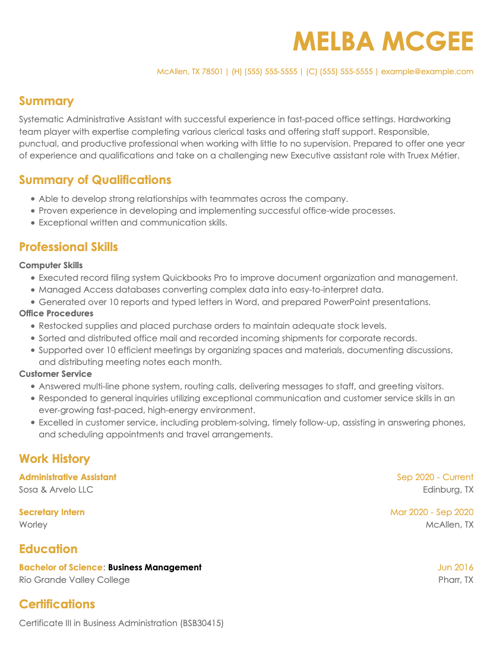
Functional resume example, strategist resume

Image Source

In this sample resume, Melba McGee has several opportunities to showcase her skills and explain her qualifications.

The summary section at the top of the resume can help her explain reasons for a career change or employment gap. There are also separate sections where she can explain her qualifications and highlight certain skills.

What we love: This resume template has a section for certifications. Be sure to list any relevant certifications or coursework you have for a given job.

Intern Resume

Functional resume example for an intern resume

Image Source

As an intern, you don’t have decades of work experience to pull from.

A functional resume can help you highlight your qualifications from your growing professional career. You can also highlight experiences from clubs, classes, and volunteering.

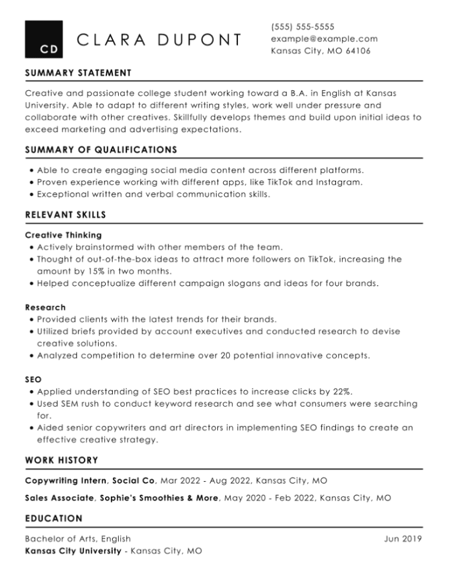
What we love: This example resume from Clara Dupont includes specific accomplishments in each skill area. That includes percentages and other statistics related to growth.

Using one of these functional resume templates as a starting point, you can create a customized resume highlighting your key skills and achievements and showcasing your value as a candidate.

Creating Your Own Functional Resume

A functional resume is a great way to show off what you’re made of as a job candidate. Its format lets you showcase your skills and experience instead of just focusing on where you’ve worked.

With a functional resume, you can prove to employers that you’re the right fit for their organization, no matter what your work history looks like.

Whether you’re fresh out of college, making a career change, or simply looking for a new challenge, a functional resume can help you put your best foot forward. So why not give it a try?

With the help of this step-by-step guide, you can create a functional resume that truly sets you apart from the competition. Who knows — it might just be the key to unlocking your dream job.

New Call-to-action

Categories B2B

Cost Per Acquisition (CPA): A Beginner’s Guide

In the paid acquisition world, clicks can seem like the holy grail. But if you really think about it, clicks only tell you if people arrive to your content.

A better way to measure your content’s converting capabilities is cost per acquisition. This metric is a better indicator of whether your content is engaging and emotionally resonant enough to persuade your audience to stay and, ultimately, buy your product or service.

Read on to learn more about what exactly it is, the formula for calculating it, how its bidding process works, and some principles for crafting creative and convincing ad copy.

Download Now: Free Marketing Reporting Templates

Many marketers prefer the cost per acquisition pricing model because they can set their definition of an acquisition before they start advertising and only have to pay when their desired acquisition or action happens.

This pricing model is used in a handful of paid marketing mediums, including:

  • PPC
  • Display
  • Social media
  • Affiliate
  • Email marketing
  • Content marketing

Now let’s take a closet look at cost acquisition biddings.

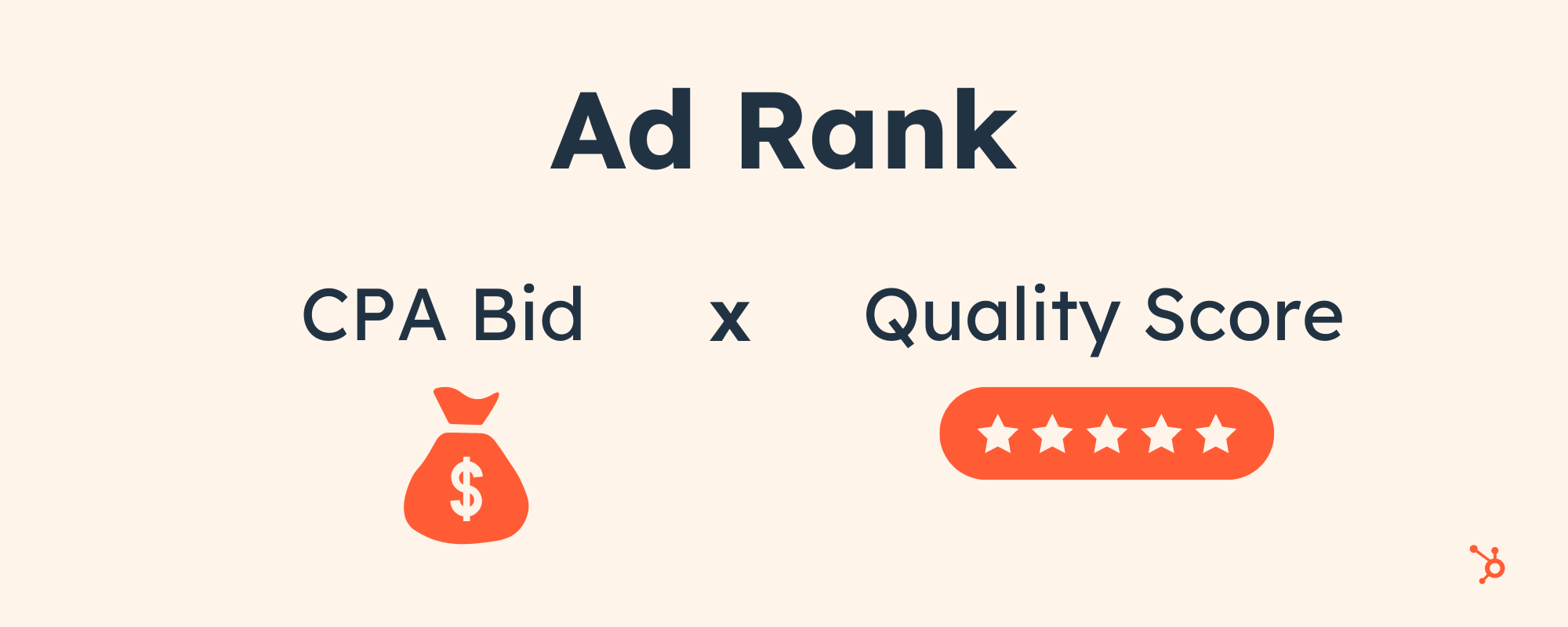
AdRank is calculated by multiplying your maximum cost per acquisition bid with the quality score of your ad. Your quality score ad is impacted by your page’s relevance to the keyword, user experience, and click-through-rate.

This means organizations can’t acquire the top ranking for any keyword they want just because they have the biggest ad budgets. Their content has to be engaging.

cost per acquisition

In other words, Google wants to discourage bad advertisers from advertising bad content, so those with low quality scores will usually only acquire a high ad position if they pay a huge cost per acquisition bid. If they want to pay lower a cost per acquisition bid, they’ll have to settle with stooping at the bottom of the ad rankings.

Target CPA Bidding

To generate as many conversions as possible within the limits of your advertising budget, consider using Google’s target CPA bidding.

Target CPA bidding leverages machine learning to analyze your campaign’s historical conversion data, recommend an optimal average target CPA, and automatically optimize all your eligible bids to meet the average target CPA you set for all your campaigns.

If you use target CPA bidding, some of your conversions may cost more than others because your quality score or the competition in your ad auction might fluctuate, but Google will try its hardest to keep your cost per acquisition as close to your average target CPA as possible.

Cost Per Acquisition Formula

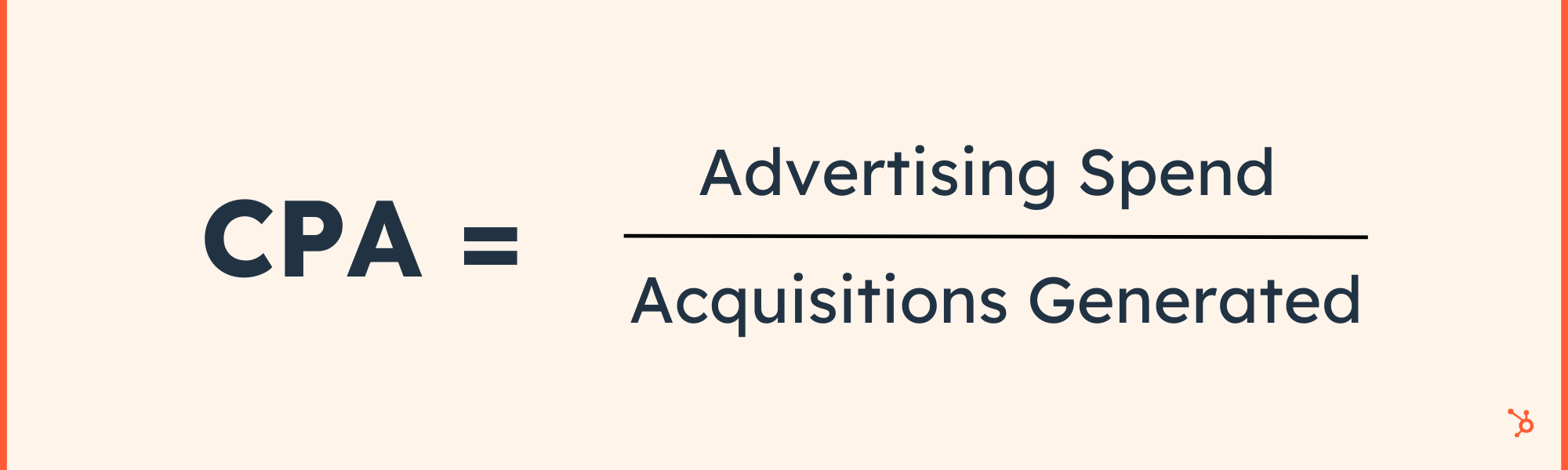
To calculate your advertising campaign’s cost per acquisition, take your total advertising spend and divide it by the number of acquisitions generated.

cost per acquisition formula

How to Lower Cost Per Acquisition (CPA) Costs

1. Optimize your ad copy.

Since your quality score — which measures how positive and relevant of an experience your content provides — is the most influential determinant in securing a top ad ranking, the best way to optimize your cost per acquisition costs is crafting compelling ad copy.

When you sit down to write ad or landing page copy, your goal should be to write something so captivating that it can grab the attention of a distracted millennial slouched in front of the TV, with their smartphone in one hand and a slice of pizza in the other.

One way to do this is by selling a feeling, not a product. Psychology tells us that emotions drive our behavior, while logic justifies our actions after the fact. Marketing confirms this theory — humans associate the same personality traits with brands as they do with people.

This is also the reason why pitching a product’s features is a lousy attempt at persuasion. Features only appeal to the logical part of your brain, which science suggests doesn’t drive action nearly as well as appealing to the emotional part of your brain does. So don’t just get creative with your copy — get emotional too.

2. Focus on customer retention as a strategy.

According to a 2021 HubSpot Blog survey, 57% of marketers say improving customer retention is an effective strategy for lowering CPA costs.

To state the obvious, acquiring new customers is often more costly than retaining existing customers. So, by focusing on customer retention, you can leverage the investment you’ve already made in acquiring your existing customers, reducing the need for additional acquisition spending. This ultimately leads to a lower CPA.

On top of that, repeat customers tend to generate more revenue over their lifetime compared to one-time purchasers. By focusing on customer retention, you can increase the customer lifetime value (CLV) of your customer base.

3. Enhance your landing pages.

Just because you’ve grabbed someone’s attention with your ad doesn’t mean your work is done. You still need to design a compelling landing page that clearly conveys the value of our offer.

In order to do this, consider piquing your audience’s curiosity with an intriguing headline and subheading, scrapping any external links from your landing page so visitors can only leave your paid acquisition funnel if they exit the page or convert, and test out video, which can explain the value of your offer in a more engaging way than text can.

If you want to learn how HubSpot creates landing pages that convert at 35% rate, check out this blog post.

4. Leverage your CRM to prioritize leads.

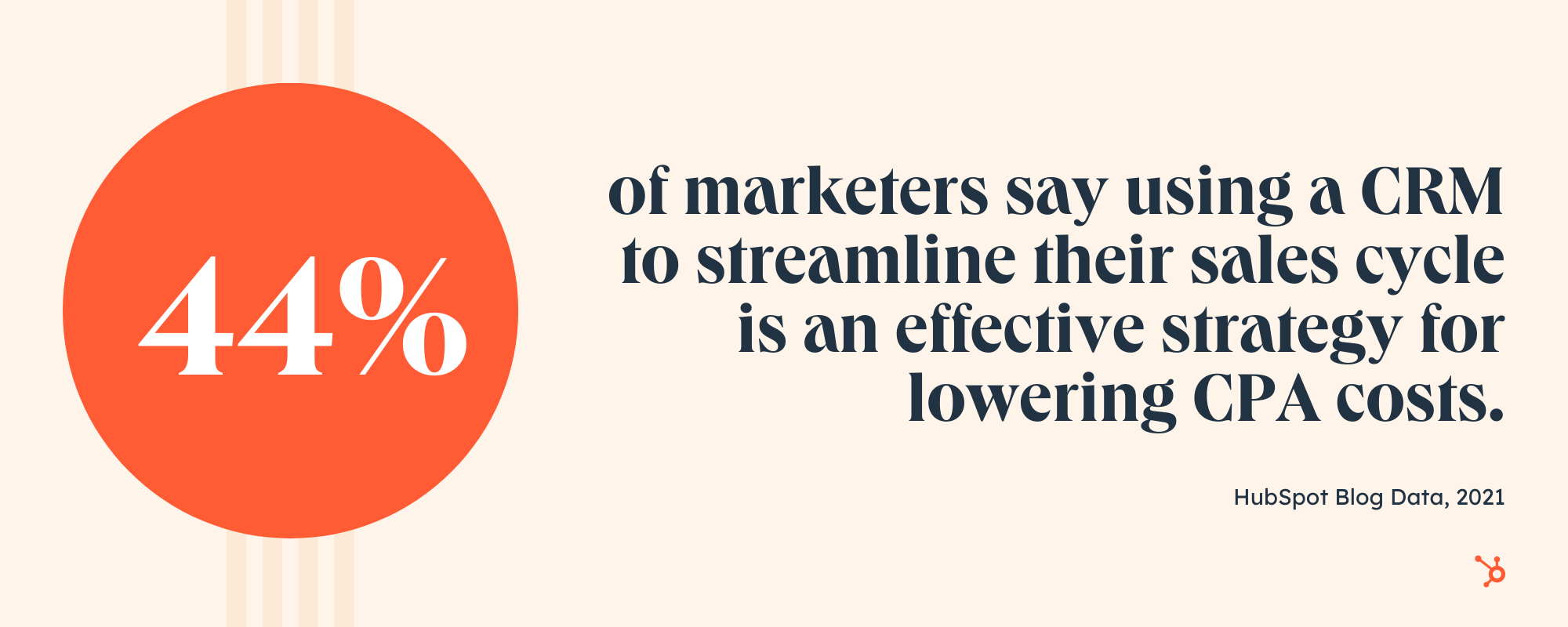
44% of marketers say using a customer relationship management software (CRM) to streamline their sales cycle is an effective strategy for lowering CPA costs.

cost per acquisition stat

The power of a CRM lies in its ability to centralize and manage your leads. Then, by organizing leads based on their stage in the sales cycle, you can prioritize your efforts on those with the highest potential to convert. As a result, you can avoid wasteful spending on leads that are less likely to result in conversions, leading to a lower CPA.

5. Conduct market research regularly.

How can you speak to your audience if you don’t know who they are?

43.5% of marketers say conducting market research to better understand their target audience is an effective strategy for lowering CPA costs. Market research helps you gain insights into the needs, preferences, and behaviors of your target audience.

Ultimately, targeted messaging increases the relevance of your ads and content, resulting in higher engagement, click-through rates, and conversions.

Plus, market research provides valuable demographic, psychographic, and behavioral data about your target audience. This information enables you to advertise on the right platforms and refine your targeting parameters.

Back to You

Marketers will chase vanity metrics until the end of time, and you might feel pressured to do the same, especially when your peers clamor on about their astronomical growth in views or clicks.

But if you ever feel tempted to jump on that train, remember, in marketing, the goal is to persuade someone to take your desired action. So incentivize your brand to resonate with your audience — that’s the thing that actually keeps people on your content and prompts them to act. And make conversions, not clicks, your carrot.

 marketing reporting templates

Categories B2B

7 Visual Hierarchy Principles for Every Marketer

Ever click on a website, take one look, and say, “Hm, that’s going to be a no,” and look for the exit button? For me, it’s usually because of three reasons: the site looks outdated, crowded, or hard to navigate. 

This is why visual hierarchy is so important in web design, as a bad website can keep visitors from gaining interest in your brand.

Access hundreds of Website Themes & Templates on HubSpot

Here’s an easy guide for understanding the key design principles of visual hierarchy to draw your audience in, keep them engaged, and generate conversions. 

Table of Contents

Visual hierarchy affects what you look at and focus on in a design, whether it’s an image, graphic design, or web design. It’s a key player in information architecture (i.e., how information is organized and displayed for easy understanding and navigation) and can greatly impact the user experience (UX).

When thinking about visual hierarchy, you want to ask yourself a few questions:

  • What do we want to draw attention to?
  • What actions do we want our users to take?
  • Where does the eye naturally go to, and where do they land?

Asking these questions will help you use the principles outlined below to create a clear visual hierarchy.

What constitutes bad visual hierarchy?

When it comes to visual hierarchy, there’s a golden rule: If every element appears important, nothing will seem important.

Visual hierarchy serves as a way to rank the information you’re consuming. If there is no way to differentiate between the elements, that is considered poor hierarchy.

Take this example:

visual hierarchy example

There’s a lot going on on the left. The two main elements are the same size, and multiple colors make it hard to know where to look. 

On the right, your eye is automatically drawn to the main blue box on the left, then naturally goes to the elements on the right before landing on the orange call to action (CTA).

A poor visual hierarchy:

  • Confuses the user.
  • Makes it unclear where to look.
  • Creates a bland design.

Instead, create a visual structure that facilitates understanding and guides the user. The right visual hierarchy on a website helps someone understand what a page is about. Below we’ll go over the basics of visual hierarchy in web design. 

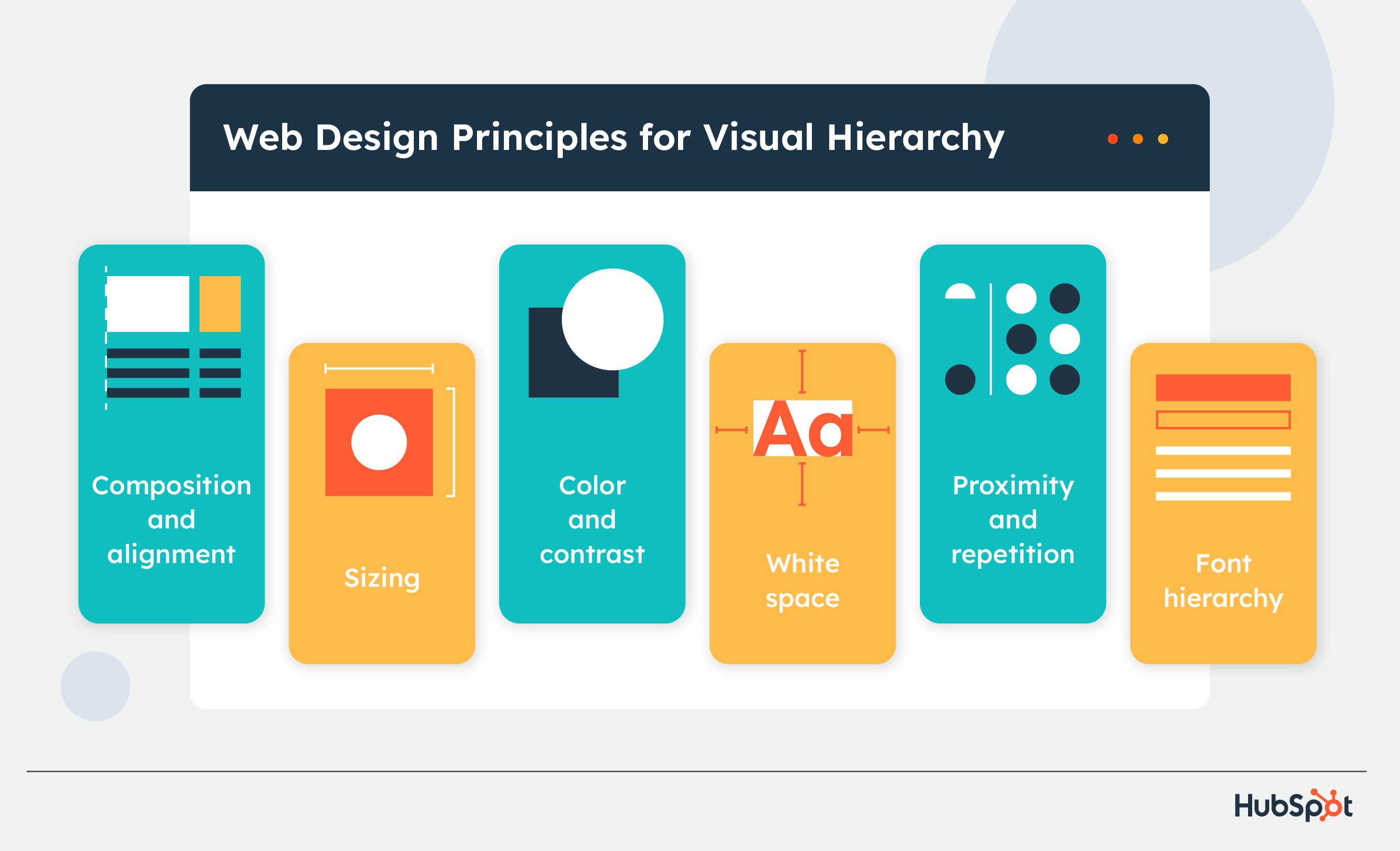
visual hierarchy in web design

1. Use alignment and composition to create focal points. 

Alignment and composition help you structure the elements on your site and create focal points for viewers. Two common composition rules are the rule of thirds and the rule of odds. 

With the rule of thirds, your page is divided by two horizontal and vertical lines, creating a grid of nine equal-sized squares. The spots where lines intersect are focal points where you’ll place the important elements of your design. 

The rule of odds says that an odd number of elements creates more interest and engagement from viewers because each element can be assessed individually rather than in even numbers of groupings. 

2. Consider reading patterns.

Reading from top to bottom is a global standard, but there is cultural variation in how people read horizontally. The “Western” standard for languages like English and Spanish is to read from left to right, while Semitic and Indo-Aryan languages, like Arabic, Hebrew, and Urdu, read from right to left.

This variation brings two different reading/scanning styles: F and Z patterns. 

Visual hierarchy reading patterns

  • Z Pattern viewers start at the top left of a page and move across to the top right, then down and backward to the bottom left, then across to the bottom right.
  • F Pattern viewers begin on the top left and move to the top right like Z pattern viewers, but they use the left side of a page as a guide and quickly scan to the right in a shorter movement (the shorter line of an F), then back to the left and down to the bottom of the page.

You can either follow traditional reading patterns and design pages that match one’s natural processing or disrupt a traditional pattern and provide a main element of focus for them to use for navigation. Remembering this will help you design projects that convert, especially landing pages.

3. Users notice bigger elements more easily.

Size is essential in visual hierarchy because bigger elements get the most attention and are deemed more important. 

Take this example from Netflix.

visual hierarchy size example from Netflix

Image Source

The first thing you’ll read when looking at this image is “Unlimited movies, TV shows, and more.” Then you’ll read the next line, and then the next before you explore the other elements on the page.

The “Unlimited movies, TV shows, and more” is displayed as the most essential part of the message, which makes sense, because that is Netflix’s main selling point. 

As you design your webpage, consider what you want your audience to look at first and use that to guide your strategy.

4. Color and contrast draw the eye.

People are drawn to colors, which evoke emotion and have cultural and social connotations. Just look at  logos by industry, and you’ll notice that food brands gravitate towards yellows, and financial institutions tend to be in blue.

In design, color is great for drawing attention to specific elements. And contrasting colors are great for displaying a difference between the elements of your page or calling attention to one over the other. For example, using a neon green and then an off-white color would draw attention to the elements in neon green. 

In the image below, the two orange bars in the graph stand out from the gray bars, indicating that the orange is a focal point and the gray is secondary. 

visual hierarchy color example

On a website, you can use colors to draw focus to your CTAs. In the image below, the standout plan option is draped in purple, while the others are white. The brand likely wants users to choose that plan, so adding color to it draws their attention and interest. 

visual hierarchy color CTA example

Image Source

In the example above, the CTA that stands out the most is in the middle. The brand likely wants users to choose this option. The other CTAs are still visible but muted compared to the orange.

To create the most visual impact with color, less is often more. 

4. White space creates emphasis.

White space refers to the empty space within a design.

visual hierarchy white space example from Quip

Image Source

White space in your web design is key for drawing attention and maintaining balance. 

Less is more, as filling space with as many elements as possible can confuse and deter viewers if they can’t figure out what they’re looking at. 

Apple is also well known for its use of white space.

visual hierarchy white space example from Apple

Image Source

The brand offers a simple user interface, emphasizing elements on the page. Apple’s use of white space also reflects a brand’s identity.

6. Proximity and repetition create unity.

Putting elements together tells users that the elements are related. 

Take the New York Times Cooking website, for example. Its “Master The Basics” header features four closely grouped recipe boxes, letting viewers know they likely share a level of importance. 

visual hierarchy proximity and repetition example from NYT Cooking

Image Source

If you’re not sure how to group certain elements, you can use UX research strategies, such as card sorting, to group elements based on your audience’s expectations.

7. Font hierarchy helps you organize text. 

Fonts add an important visual element to your website and help you organize and classify text (sometimes by level of importance). 

A font hierarchy has three parts: 

  • Primary: Your primary text is the largest on the page, draws initial attention, and contains the most important buzzwords to call people in. 
  • Secondary: Secondary font is your subheadings or secondary descriptions. It doesn’t stand out as much as primary text but still gives value and helps their gaze travel across your page. 
  • Tertiary: Tertiary text is the smallest sized text on your page, but it is still readable. It can give more detail about your page and be short (like a caption) or long (like an entire paragraph or description). 

Below we’ll go over some visual hierarchy examples for you to use as inspiration.

Examples of Good Visual Hierarchy

1. Visme.co

Visme gives people access to templates and graphics they need to create content.

Visme example of good visual hierarchy

Image Source

What we like:

Visme’s striking CTA follows font hierarchy principles to encourage users to sign up for its newsletter. The largest words are the most impactful to know, and the secondary and tertiary text provides more info as readers move down the page. 

2. 8AD Studio

8AD Studio is a full-service production agency that specializes in branding.

Studio 8AD example of good visual hierarchy

Image Source

What we like:

By capitalizing on white space, 8AD Studio expertly draws attention to three key elements: its unique logo and two CTAs. It shares three essential elements with site viewers and lets people know it’s good at its job — creating branding that captures attention and builds recognition. 

3. Predominantly Black

Predominantly Black is a handmade home and body fragrance company. PredominantlyBlack.com example of good visual hierarchy

Image Source

What we like:

Predominantly Black gives a great example of how proximity builds visual hierarchy. By organizing products under the main title and leaving little space in between, visitors quickly understand that these products fall within the same category. 

Over to You

Visual hierarchy is all about ranking your elements by order of importance. Once you narrow down what you want to focus on and consider your audience’s needs, you can create designs that produce the desired impact.

New Call-to-action


Categories B2B

16 Email Marketing Benefits Your Marketing Team Must Know

As a marketer, you might’ve heard coworkers talking around the water cooler about how email marketing is dead. It’s been a common concern for many marketing departments — however, I’m here to tell you about why email marketing is important and walk you through its benefits.

In fact, 40 percent of B2B marketers say email newsletters are most critical to their content marketing success, and 73% of millennials prefer communications from businesses to come via email.

Furthermore, 99% of consumers check their email every day and it is by far the preferred way to receive updates from brands.

As marketers, we can’t ignore these statistics. That’s why it’s important to develop a strong email marketing strategy.

Download Now: Email Marketing Planning Template 

Below, let’s review the top benefits of email marketing, which show why it’s one of the most effective marketing tactics.

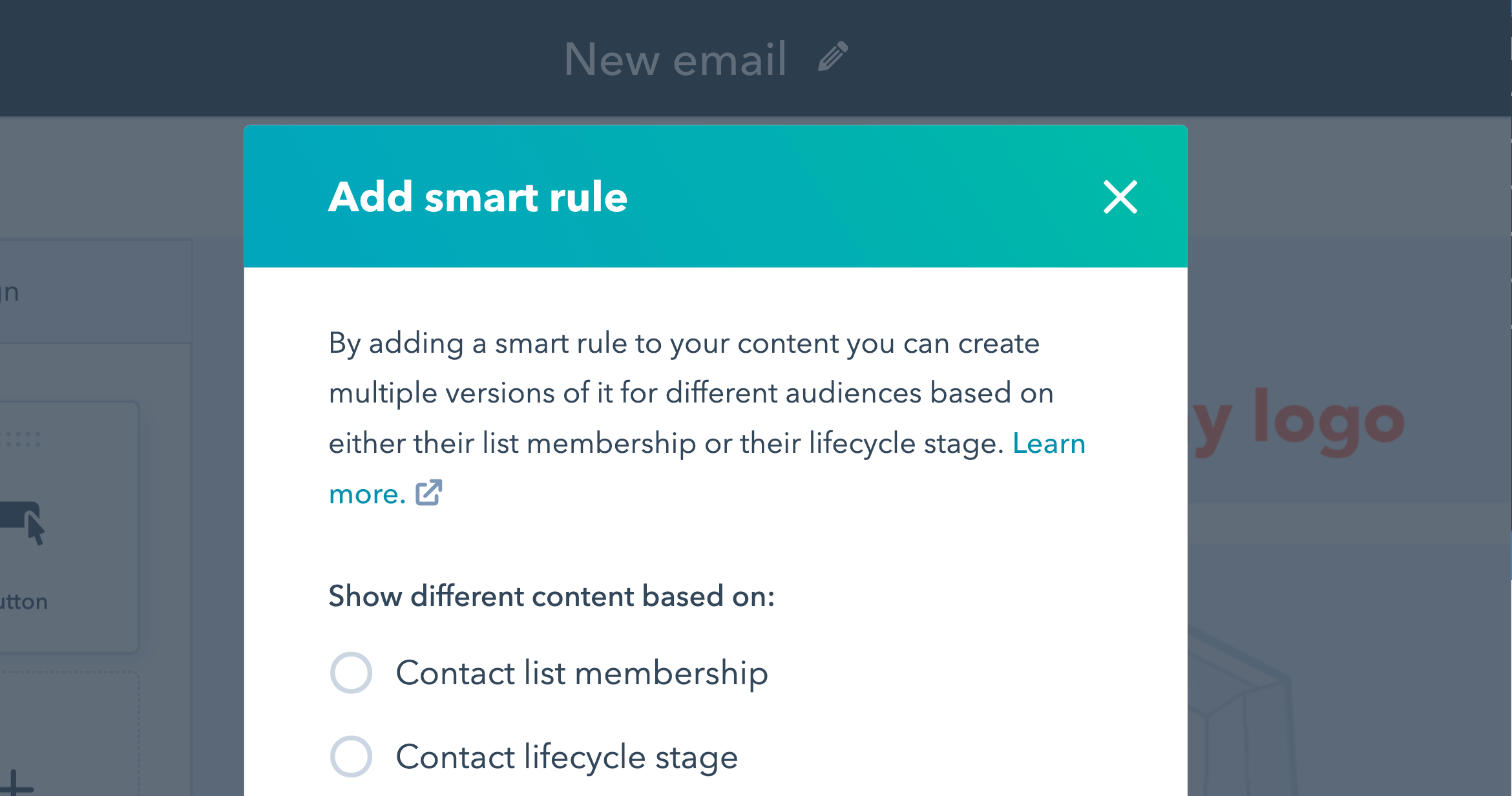
1. Creating personalized content.

HubSpot email editor showing personalization options

Create personalized emails with HubSpot’s email marketing tools.

With email marketing, you can customize your campaigns and create targeted content.

Personalization can be as small as including a contact’s name in the email. In fact, emails that include the first name of the recipient in their subject line have a higher clickthrough rate than those that don’t.

On the other hand, you can also create individualized content based on segmenting your audience so you send the right emails to the right customers. For instance, perhaps you want to send an email marketing campaign to returning customers and a different one to one-time customers.

One of the main benefits of email marketing is that your content can be highly personalized to your audience’s needs. Your emails might have variations including different images or subject lines to increase your engagement. You can even create segmented lists based on geography or engagement levels.

To have a successful email marketing strategy, you need to send the right email to the right people at the right time. That’s where segmentation and personalization can help. HubSpot’s email marketing tools can help you create emails automatically tailored to each recipient.

2. Collecting feedback and surveys.

Keeping a pulse on the customer experience is very valuable if you want customers to continue to interact, engage, and purchase from your brand.

Email marketing can help you do this. For instance, you can send customer satisfaction surveys to obtain customer feedback through email campaigns.

In fact, this is one of the best ways to calculate your Net Promoter Score (NPS). This score helps you find out the percentage of customers who are brand ambassadors and the ones who are detractors. With this information, you can come up with strategies to improve your customer experience. 

3. Improving sales.

While email marketing is clearly an excellent marketing tool, it can actually improve your sales as well.

In fact, 59% of marketers say email is their biggest source of ROI and marketers who used segmented campaigns note as much as a 760% increase in revenue.

Email marketing campaigns can feature products or services, encourage customers to purchase after abandoning their cart, or deliver special offers to your customers.

Furthermore, 59% of respondents in this survey say marketing emails influence their purchase decisions.

Your email marketing campaigns can easily incorporate messages to encourage a purchase to an audience that’s more likely to buy from you because they’ve opted-in to your messages and updates.

Additionally, you can use email marketing to automate part of your sales process, which can help increase sales as well.

For instance, with HubSpot’s free email marketing tool, you can automate sales drip campaigns and send automated messages to prospects your salespeople want to follow up with. 

4. Communicating with your audience.

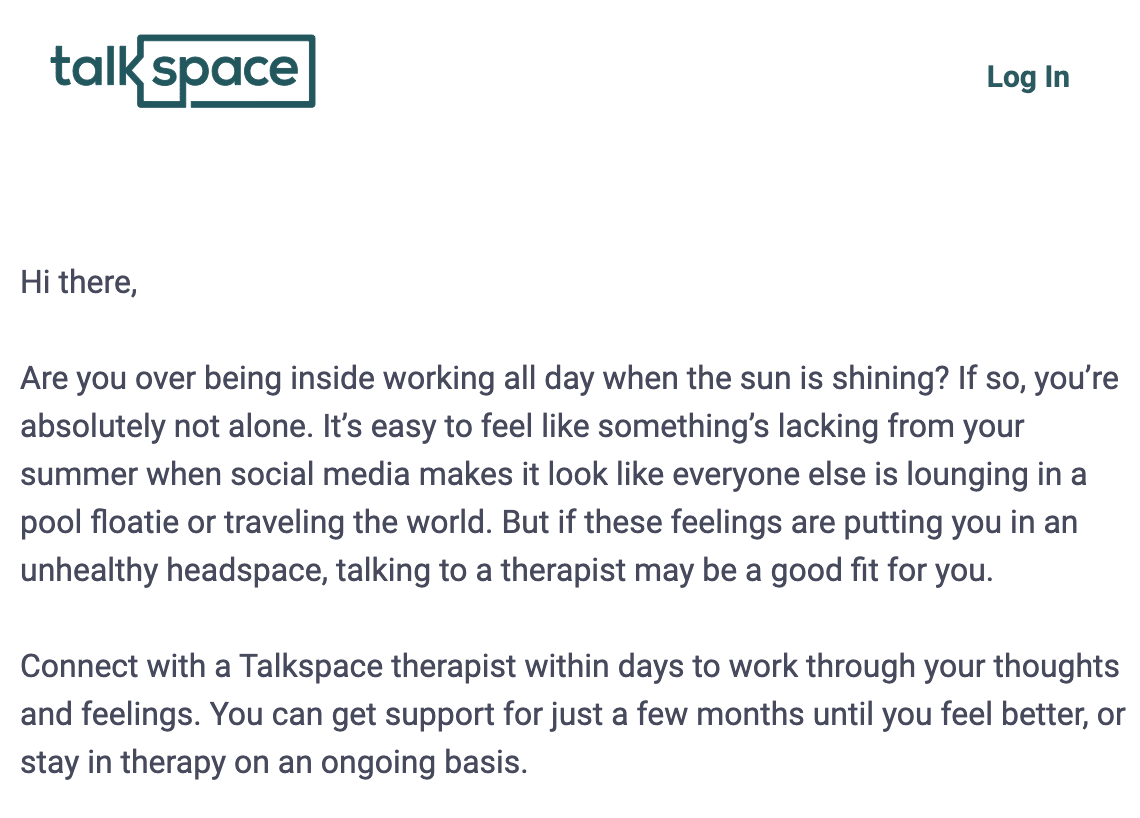
Talkspace emailA Talkspace marketing email.

As a marketer, it’s always important to improve communication with your audience. When your audience feels like they can talk to you, they’re more likely to become loyal to your brand.

Just think — people appreciate good emails. Think back to the last time you received a marketing email from a brand you love — was it disruptive or did you enjoy looking at the latest news? If it’s a brand you like, you probably enjoyed the experience and it kept you in touch with one of your favorite brands.

With email marketing, you can reach more of your audience and easily communicate with brand ambassadors. Plus, these emails keep your audience engaged during every time of the year, whether it’s a slow or busy season.

With HubSpot’s Campaign Assistant, you will be able to generate compelling copy for your emails.

5. Generating traffic to your site.

When you produce great content, how do you disseminate it to your audience? Most likely, you send them an email.

With email marketing campaigns, you’ll send traffic to your site and improve your SEO. Plus, you’ll keep your audience engaged with your brand and your site.

For example, many of you might have reached this page from a marketing email from HubSpot. That’s because email is a great way to provide value to our audience, and we do that by sending our content in our emails and generating traffic.

When you’re creating an email that links to your content, keep in mind that each email should contain a call to action (CTA) so readers can click through to your site.

6. Sending timely campaigns.

HubSpot newsletterSubscribe to the HubSpot Marketing News email.

Although traditional marketing campaigns have a time and place, they can take months to plan and organize. Even then, you probably aren’t sure if people are going to see your campaign assets at the right time.

However, with email marketing, you can create an entire campaign on shorter notice because they don’t take as long to plan. Additionally, you can ensure your audience sees the email at the right time.

For example, you can make sure you send content at the right time by segmenting your audience.

7. Increasing leads.

In the same vein as improving sales, you can also increase your leads with email marketing. In fact, with the inbound method, email marketing is used to nurture leads and improve conversions.

For example, let’s say you downloaded a lead magnet from a site. Then, you start receiving drip emails, and in the end, you decide to book a demo and learn more. You just went from an MQL to an SQL, which improves the marketing teams number of qualified leads to the sales team.

Email marketing campaigns can further qualify leads so your sales team isn’t wasting time on bad leads. Plus, if your company does lead scoring you can keep track of whether those leads open your emails or engage by clicking the links in your email.

8. Reaching the right people at the right time.

To have a successful marketing campaign, you have to reach the right customers at the right time. Yes, I’m reiterating this point because it’s that important.

With email marketing, it’s that much easier to reach people because they always check their email. They can check it at any time, on multiple devices, which can improve the success of any marketing campaign.

This means you’re getting in front of your audience on a regular basis, so you’re always top-of-mind.

9. Producing cost-effective campaigns.

While traditional campaigns like direct or print can be costly, email marketing campaigns tend to be more cost-effective.

For example, you won’t have to pay for any photoshoots, location fees, printers, mailing, or placement. All you need is a copywriter and graphic artist (if you aren’t using stock images). This can even be one person on your team.

Additionally, email campaigns don’t take long to produce. If needed, you can produce an email in one day, which is much more cost-effective than the time it takes to produce a direct or print campaign.

Since time and budget constraints always impact marketers, email marketing campaigns can be more efficient, while also generating revenue and leads.

10. Providing more value to your audience.

Vrbo contest emailAn email from Vrbo running a contest.

One of the main goals of any business is to provide value for your audience so they keep coming back.

Email marketing is a great place to cultivate loyal customers because you can add value even when customers aren’t making a purchase.

Additionally, since customers or prospects opted-in, you can use email marketing to provide more resources to contacts who are interested in what you have to say.

If you continuously provide value for your audience, more people will pay attention and you’ll produce a higher ROI.

11. Having a forum for self-promotion.

Sometimes it can be awkward to self-promote in places where prospects haven’t necessarily opted-in to receive updates about your business. However, self-promotion is one of the best ways to attain customers. If you can’t promote yourself and sell your company, no one will buy from you.

With email marketing campaigns, you’ll always have an avenue to promote yourself, especially since customers opted-in. You can send emails about new products, features and benefits, or new content. Since customers want to hear from you, this self-promotion isn’t unwanted or disruptive.

12. Owning your media and contact lists.

With platforms like social media, you don’t own your contact list or even the information you post. Typically, the content and your follower list is owned by the social media platform.

Just think — if social media went away tomorrow, how many followers and customers would you lose?

That’s why building an email list is important for marketers. This is a contact list you own and you can interact with them regardless of the email provider. Plus, you’ll also own the content that you produce and send as well.

Email marketing is one of the top ways to reach your audience. Plus, it can also improve sales and leads. Since this is still the place where people want to receive information, let’s just say that email marketing isn’t dead.

13. Increasing brand awareness.

Screenshot 2023-06-15 at 4.43.31 PMA Dr. Martens marketing email.

Email marketing can be a great way to increase brand awareness because it allows you to regularly communicate with your target audience directly in their inbox. By consistently sending out valuable and relevant content such as promotions, newsletters, and product updates, you can build a relationship with your subscribers and keep your brand top of mind.

You can also include social media links in your emails, which can help your subscribers share your content and expand your brand’s reach. Additionally, email marketing analytics provide valuable insights into how your audience is engaging with your content, allowing you to refine your strategy over time and better maximize your results.

14. Saving time.

You can save time with email automation by creating personalized, automated campaigns that can be scheduled in advance. With email marketing automation, you can set up a workflow that triggers specific messages based on subscriber behavior or segmented lists.

For example, you can set up a welcome series that automatically sends a series of emails to new subscribers over a period of time. You can also send automated abandoned cart emails to remind customers of items they left in their online shopping cart. These automated campaigns can run in the background, allowing you to focus on other areas of your business while your emails work for you. This can save you time and help deliver a consistent, efficient experience for your subscribers and customers.

15. Measuring campaigns’ success.

Running A/B tests for emails can help you identify what resonates best with your audience and optimize your email campaigns for better performance. With HubSpot’s email marketing tools, you can easily set up A/B tests for different elements of your emails, such as subject lines, images, and CTAs. You can choose different variations of these elements, send them out to a percentage of your email list, and then analyze the results to see which variation performs better.

You can then send the winning variation to the remaining email list to maximize engagement and conversions. These A/B tests can help you make data-driven decisions and continually improve the effectiveness of your email marketing campaigns.

16. Learning more about your audience.

HubSpot feedback survey emailA HubSpot feedback survey email.
Data is everything. You can track email open rates, click-through rates, and conversion rates to identify what types of content and messaging your audience engages with most. Additionally, you can gather data through sign-up forms and social media links in your emails, enabling you to understand your subscribers’ demographics, preferences, and behaviors.

You can then use this information to segment your email list and deliver more personalized and relevant content to your audience. By continually learning about your audience through email marketing, you can improve targeted marketing efforts and drive better results for your business.

New Call-to-action


Categories B2B

11 AI Video Generators to Use in 2023

Videos are integral to any marketing campaign; however, they can be tedious and difficult to create if you aren’t savvy with editing or are short on time.

Fortunately, you can leverage many AI video generators to streamline your video production and create content that engages your audience.

This article will explore 11 different platforms, their features, and how you can best use them in your next video marketing campaign.

Pictory 

Synthesia 

HeyGen

Deepbrain AI

Synthesys 

InVideo

Veed.io

Elai.io

Colossyan 

FlexClip

Wave Video

Free Report: The State of Artificial Intelligence in 2023

Best AI Video Generators

Below are some of the best AI video-generating platforms for marketers and creators at all levels.

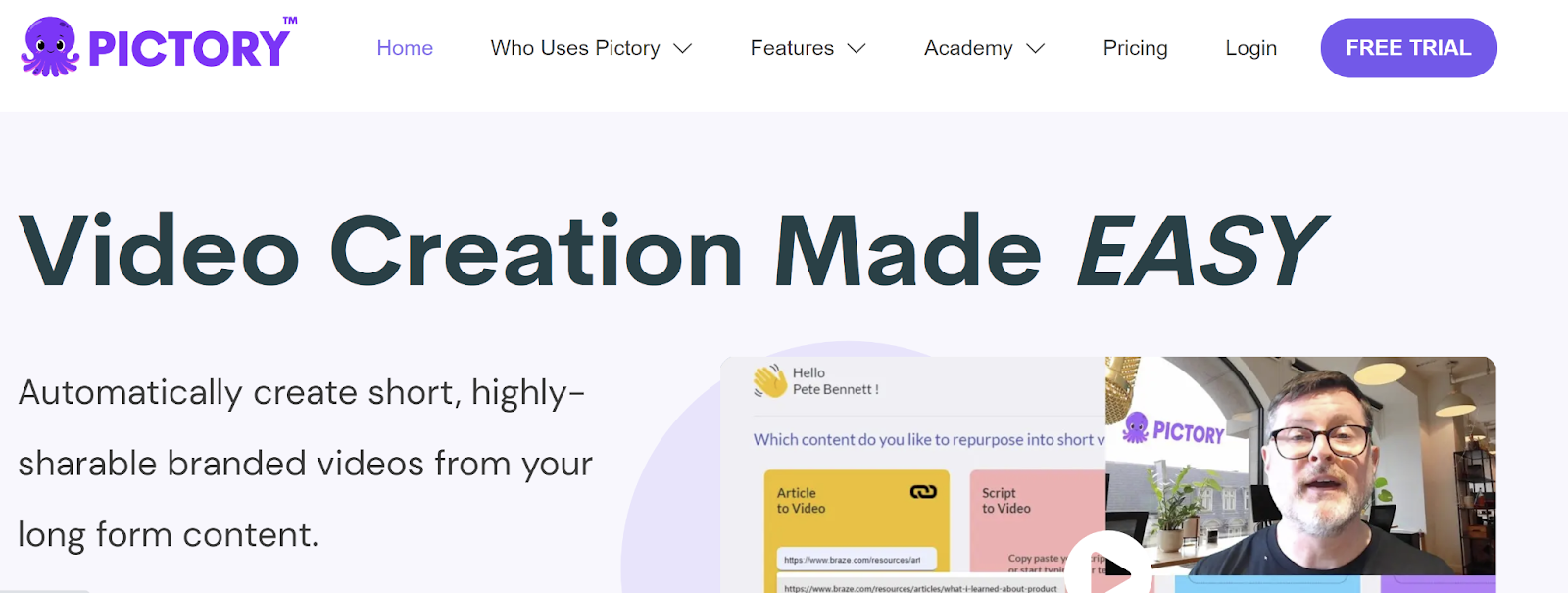
1. Pictory

Image Source

Pictory is an excellent AI video generator for creators and marketers who don’t have experience creating videos. All you have to do is provide a script or article to guide your video content.

For example, you can submit a blog post, and Pictory will create a video based on the post that can be used for social media or your website. Furthermore, you can edit videos in minutes by using text. Pictory also includes a feature that creates shareable video highlight reels that can be used as a trailer or a short-form video for social media such as a Reel.

Even better, Pictory can automatically caption and summarize your videos. Prices for Pictory start at $19 per month.

Best for: Marketers and creators with limited video editing experience who want to convert content like blog posts or webinars into shareable video content.

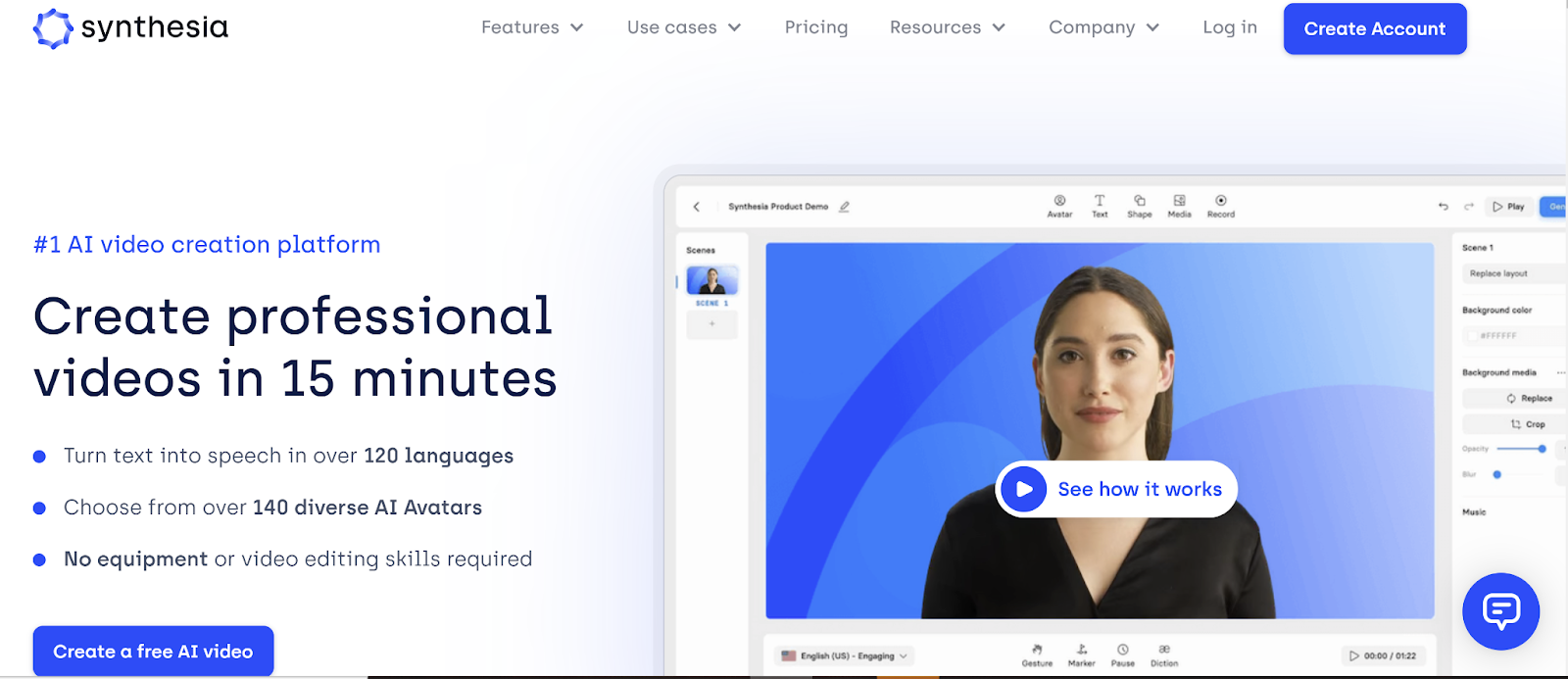
2. Synthesia

Image Source

Synthesia is an AI video creation platform that can generate videos in more than 120 languages, accents, and voice tones. Users can create custom AI avatars to represent their brand in videos or choose from more than 150 diverse stock AI avatars.

Other interesting features include text-to-speech, which allows users to type in their texts to be converted into professional voiceovers. Users can also close their own voice and pair it with their avatar.

Brands like Nikes and Google leverage Synthesia in their videos.

Prices for Synthesia start at $22.50/month.

Best for: Brands looking to create videos that feature a host or stand-in for on-air talent.

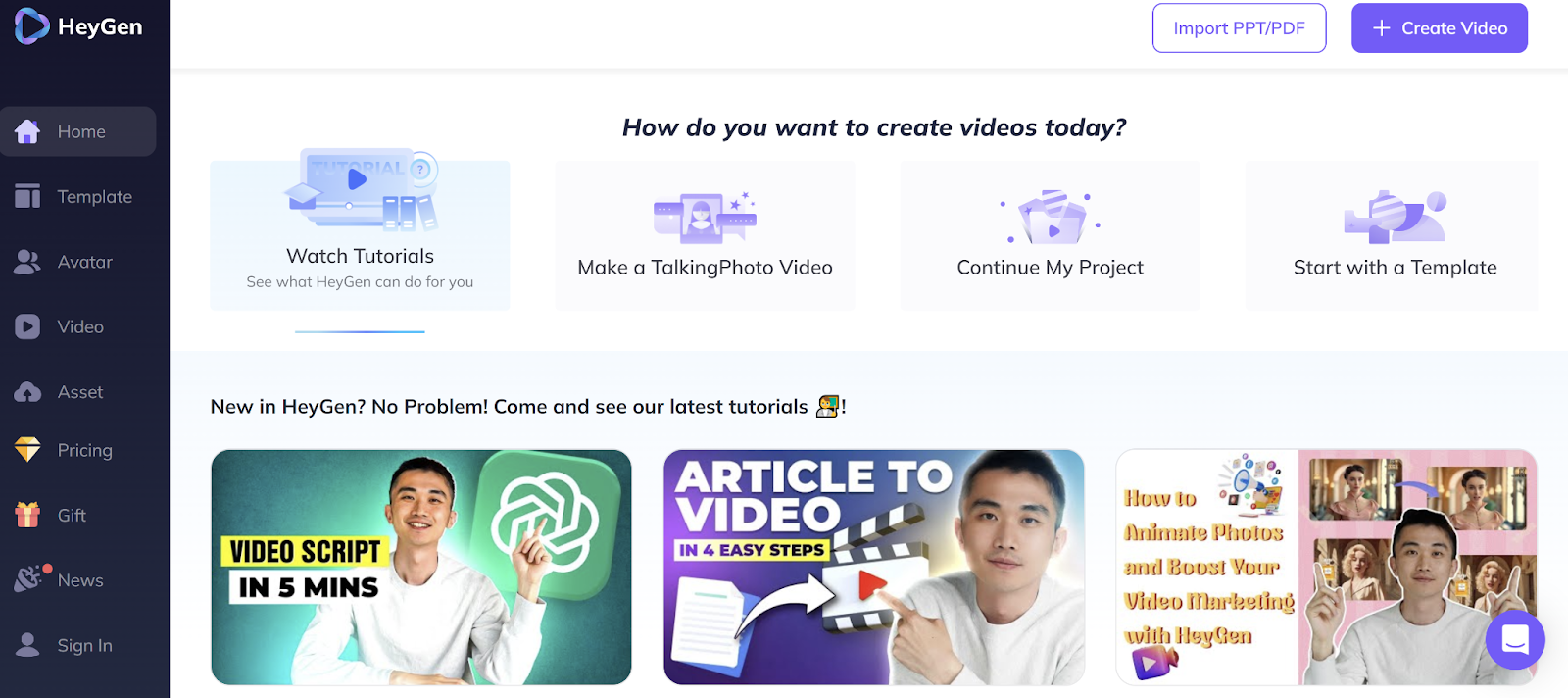
3. HeyGen

Image Source

HeyGen provides a variety of helpful tools and features for users to generate videos in minutes. Users can choose from 300+ voices available in 40+ languages. They can also create a custom avatar that uses their own voice via uploaded recordings.

Users can also personalize their avatar by using its face swap feature. HeyGen is free to use for 1 minute daily. For longer use, prices start at $48 per month.

What We Like: HeyGen provides easy-to-follow video tutorials to explain its features further and answer common questions.

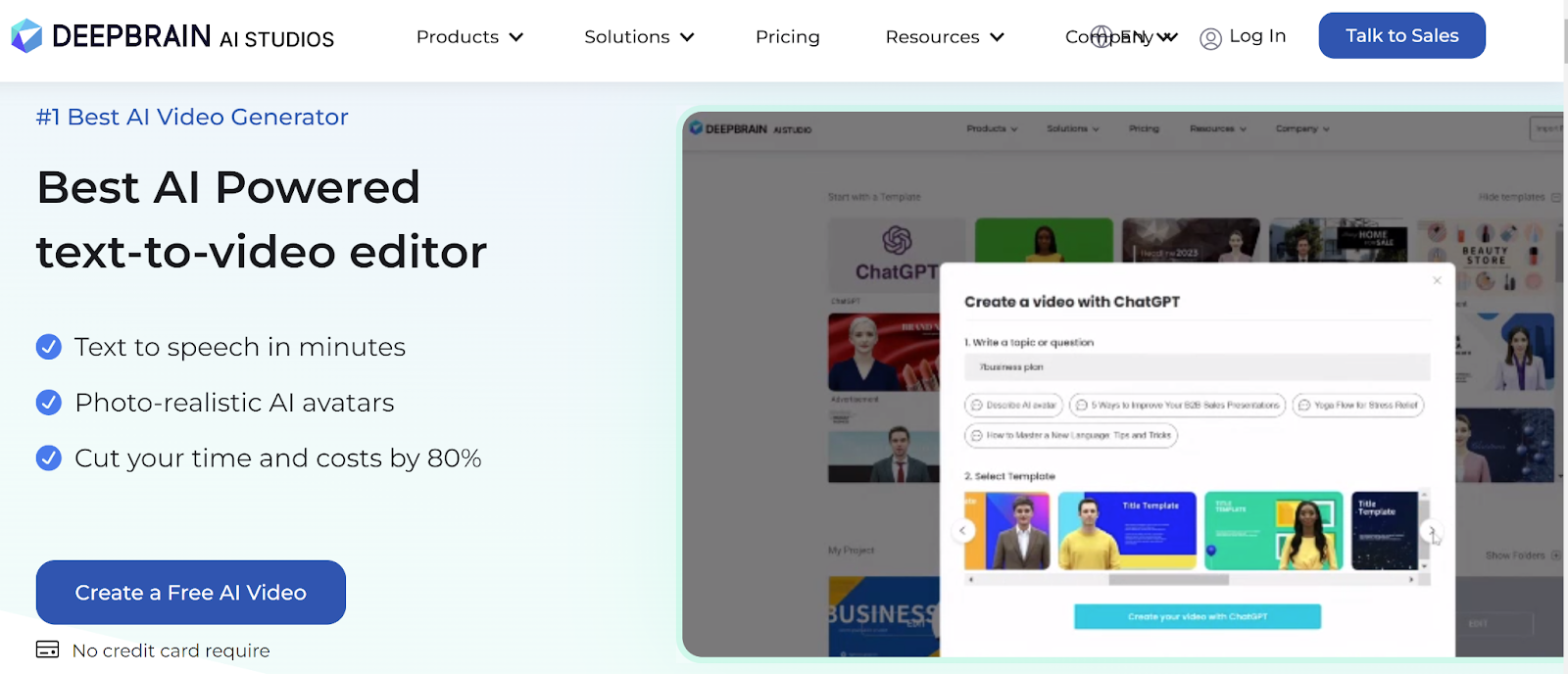
4. Deepbrain AI

Image Source

With Deepbrain AI, users can create videos by uploading their script and using the text-to-speech feature. The platform will then generate a video in five minutes or less. You can manually type in the script or copy and paste it into the platform.

From there, you just need to select the appropriate language and AI model and finish editing. Deepbrain allows users to select a custom-made avatar that suits their brand. Prices for Deepbrain start at $30 per month.

What We Like: The platform’s Intuitive feature is excellent for beginners with limited or no video creation experience.

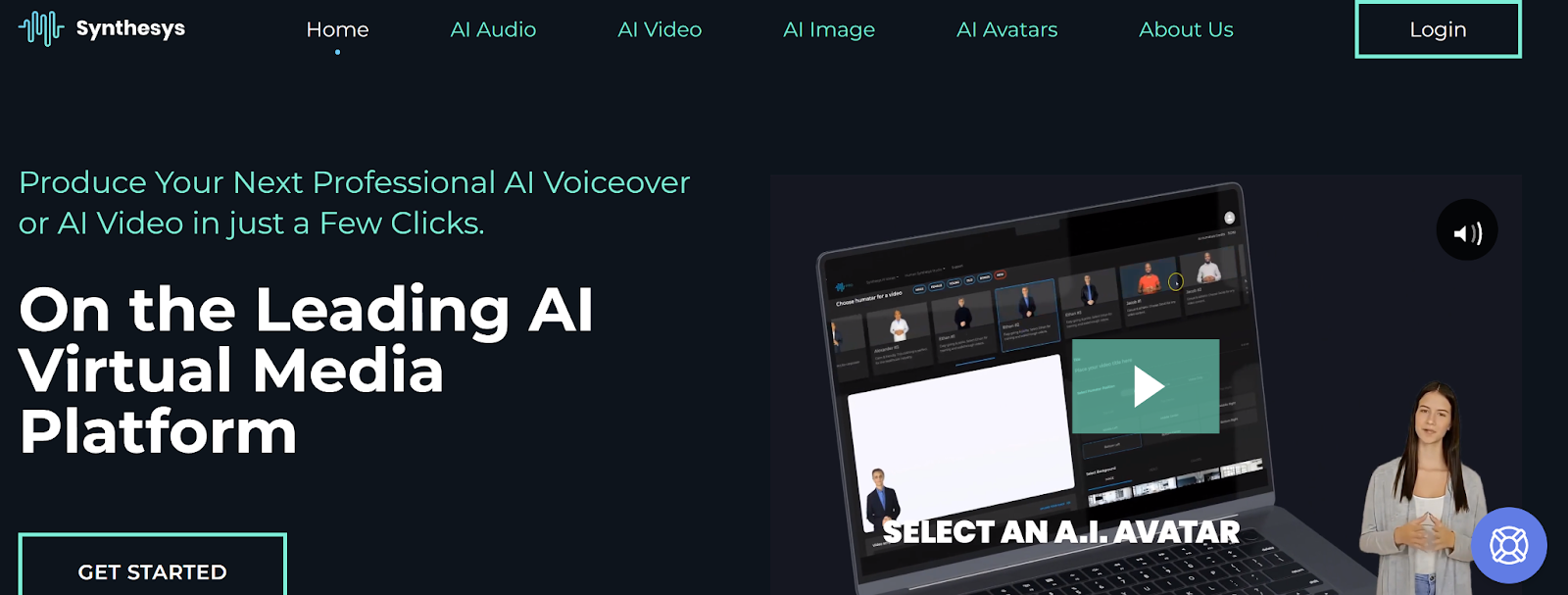
5. Synthesys

Image Source

A popular choice for brands looking to create videos for commercial use, Synthesys is an AI video generator that aims to enhance your content.

The platform uses its Synthesys Text-to-Video technology to turn scripts into engaging media.

With Synthesys, you can create video content without a camera or crew. Just choose an avatar and type in your script in one of 140+ available languages.

From there, the generator will create a high-quality video to be shared across multiple platforms.

Prices for Synthesys start at $35 per month depending on the features you wish to use.

Best for: Explainer videos, eLearning, product descriptions, and social media content.

6. InVideo

Image Source

You don’t need a background in video editing or creation to use InVideo. Like many AI video generators on this list, InVideo creates video from input text.

Moreover, the platform has various professionally designed and animated templates users can choose from.

To create your video, input your text, select or customize a template, and download the finished video. From there, you can share it directly to platforms like Facebook, Instagram, and YouTube.

InVideo is free to use and has plans starting at 15 per month if you’re a small business or creator looking to create watermark-free content.

Best for: Quickly creating and sharing social media videos.

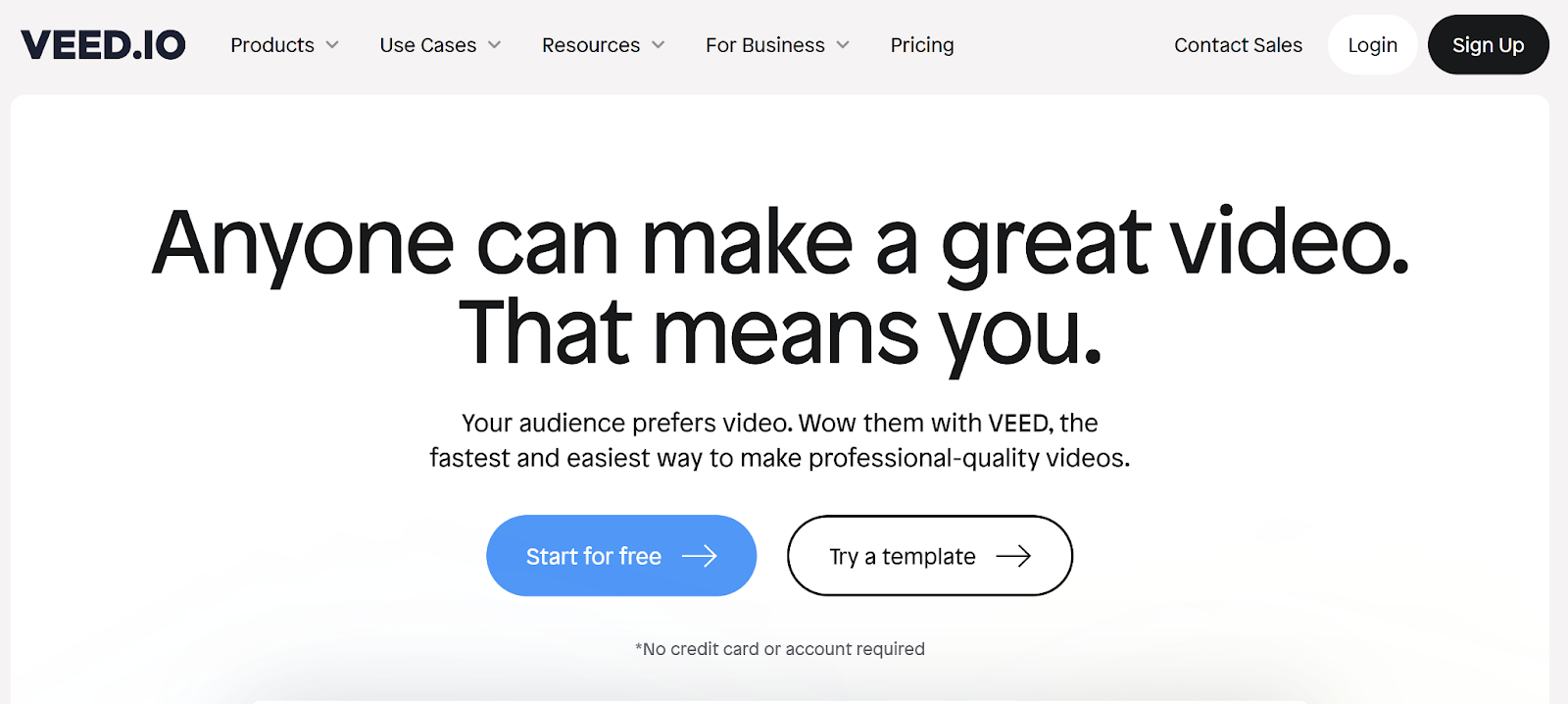
7. Veed.io

Image Source

With Veed.io, you can use custom text, colors, font, and music to create a unique video for your brand. One of its standout features is Auto Transcribe.

You can upload your video, hit the Auto Transcribe button, and immediately download the script.

Even better, there is no software to download, and the platform is easy for those without video editing experience. Veed.io is free to use for videos under 10 minutes. To access more features, prices start at $18 per month.

Best for: Quickly transcribing videos and creating one-of-a-kind branded content.

8. Elai.io

Image Source

Elai is simple and requires no video editing skills. To use Elai, copy and paste a blog post URL or HTML text, choose a template from its library, and let the generator do the rest.

Once the video is complete, review it to make any changes before rendering and downloading it.

Elai has over 60 languages and 25 avatars to choose from. You can use Elai for free with a 1-minute credit. For more features, Elai’s plans start at $23 per month.

Best for: Generating videos at scale and creating training videos and product videos.

9. Colossyan

Image Source

Colossyan provides a diverse range of avatars who can recite your script in a variety of accents and languages. You can also customize your avatar’s outfit. Colossyan’s key features are auto translations, subtitles, and the ability to enhance messages via screen recording.

Prices start at $28 per month.

Best for: Creating training videos and explainers for workplace learning.

10. FlexClip

Image Source

The AI video generator features hundreds of video templates, AI-generated subtitles, background remover, and a text-to-speech engine. And its intuitive interface makes it simple for creators at any skill level.

Best for: creating videos for internal communication and product promos.

11. Wave Video

wave videoImage source 

Wave Video is a popular choice among content creators, thanks to its many tools, which include image and video assets, text overlay effects, audio, and captions.

The platform also provides a variety of video formats for Facebook, YouTube, TikTok, Instagram, and website-based applications.

Other key features are:

  • Text-to-video AI
  • Video hosting
  • Voiceovers
  • Text-to-speech
  • Millions of stock assets

Wave Video is free with monthly plans starting at $16.

Now that you know what AI video generators are available, you’re ready to find the right one to leverage for your next video.

New Call-to-action

Categories B2B

10 Alternatives to Jasper.ai, ChatGPT, and Other Popular AI Tools

At this point in time, it’s becoming quite obvious that generative AI isn’t going anywhere. In fact, the market’s projected to reach $126.5 billion by 2031, growing by 32% from 2022 to 2023.

If your role involves copy or content marketing, you’ve probably heard of Jasper.ai and ChatGPT, and a few of their alternatives. At a glance, today’s AI content tools might seem pretty similar. But, there are a variety of factors to consider, including the types of content they specialize in, versatility in generating different pieces of content, UX, and price.

In this blog post, we will go over the top 10 AI writers that are comparable to Jasper.ai and ChatGPT, delving into specific features of each.

Sign Up to Try HubSpot's AI Tools

Jasper.ai Alternatives

HubSpot Content Assistant

HubSpot Content Assistant

Get started with Content Assistant.

HubSpot Content Assistant goes beyond helping you write copy. It can help you generate topic ideas for blogs, create blog outlines, write paragraphs, create professional prospecting and marketing emails, and more, all in one place. 

Integrations with HubSpot’s content marketing tools means you don’t need to move between different platforms for your generative AI content needs

Key features:

  • Generate blog titles, headers, meta descriptions, and email subject lines.
  • Get tone suggestions.
  • Built-in integration with HubSpot’s content marketing tools.

Price: Content Assistant is currently in beta but will be free, with additional features for premium customers, when it’s publicly released. Learn more or sign up for our waitlist here.

GrammarlyGO

You may know Grammarly as a cloud-based typing assistant that reviews spelling and grammar. But it’s since expanded to include GrammarlyGO, an AI writing assistant. 

GrammarlyGO can help you produce topic ideas and outlines. You can also personalize the app to your own voice with options for tone, formality, and professional relevance. 

Key features: 

  • Generate topic ideas and outlines.
  • Customize voice, tone, and formality options.
  • Automate email responses based on context-specific prompts.

Price: Free, Premium, and Business plans are available.

Conversion AI Alternatives

Smart Copy

Smart Copy

Source

Smart Copy, formerly known as Snazzy AI, can create landing pages, Google Ads, taglines, product descriptions, meta descriptions, and more. Some of the standout features of the tool are its 45+ available content templates available, as well as the ability to create a profile for target audiences that copy can be generated for. 

Writers can best use Smart Copy for landing pages and websites, digital ads, emails, e-commerce, and branding.

Key features: 

  • 45+ templates.
  • Editing features for paid versions.
  • Target audience profiles.

Price: Starter for Free and Growth at $49/month.

Copy.ai

Copy.ai

Source

Copy.ai is a writing tool that helps you generate copy for blogs, ads, e-commerce, sales, social media, and websites. You will be able to input your writing project and main points you’d like to cover, and choose a tone that suits your objectives.

Unlike Jasper.ai, Copy.ai doesn’t have word limits. Furthermore, Copy.ai leverages AI to automate workflows like writing personalized cold emails and bulk product descriptions.

If you’re interested in generating search traffic, the software also offers programmatic SEO, where you can submit a keyword and generate an outline based on SEO research.

Key features: 

  • No word limits.
  • Programmatic SEO: take a keyword and generate an outline based on SEO research.
  • A/B testing copy.

Price: Free version, Pro at $36/month, and pricing upon request for Enterprise

Writer

Writer

Source

The name “Writer” might be simple, but the platform is quite versatile. Writer contains features like LLM “clay” which combines writing, business context, your own content, and your company facts. It also fact-checks your content for accuracy and can generate copy that’s consistent with your brand voice.

Writer can be used for a wide range of purposes, including content marketing, product marketing, and demand generation.

Key features: 

  • Trained to learn your brand voice for consistent copywriting.
  • Custom templates tailored to content requirements like word count. 
  • Knowledge graph connects Writer with data sources like company wikis, databases, cloud storage platforms, and chat channels. 

Price: Team at $18 per user/month and custom pricing upon request for Enterprise.

ChatGPT Alternatives

Writesonic

Writesonic

Source

Writesonic’s AI Writer creates long-form blogs while its Sonic Editor writes sales emails, essays, reports, and ebooks. 

The platform offers editing tools – like Paraphraser, Expander, and Shortener – that help you polish your copy, as well as e-commerce features that generate SEO-optimized titles, product descriptions, and bulleted product feature lists.

Key features: 

  • Support for long-form content.
  • Content editor.
  • E-commerce tools.

Price: Free trial available. Pro at $12.67/month and custom pricing upon request for Enterprise

Text Cortex

Text Cortex

Source

Text Cortex’s AI assistant, called Zeno, generates blog posts and essays based on your inputs. It can also summarize lengthy texts, paraphrase sentences, expand your content by adding additional sentences strategically, and translate in 25+ languages.

Key features: 

  • Translate 25+ languages.
  • Templates like YouTube description generator.
  • Chrome browser extension.

Price: Free with upgrades available.

Conversion AI Alternatives

Anyword

Anyword

Source

Like ClosersCopy, Anyword prioritizes copy that drives sales and conversions. With Anyword, you’ll be able to create landing pages, blogs, email subject lines, and more.

The platform can also connect to your website, social, email, and ad channels so you can analyze performance and assess strategies. This data-driven approach can also be seen with Anyword’s feature that generates, scores, and ranks copy variations by predicted performance.

Key features: 

  • Define brand voice
  • Website, social, email, and ad channel performance analysis
  • Generate data-driven copy

Price: Starter at $39/$49 per month, Data-Driven teams at $79/99 per month, and custom pricing for Business.

ClosersCopy

ClosersCopy

Source

ClosersCopy aims to help you write marketing copy designed specifically to convert. 

It’s best used for sale pages, ad, and email campaign copy. And, if you need more guidance than usual generative AI tools provide, you’ll also be able to access templates for headlines, CTAs, and more, along with features that can help you gain insights from top ranking web pages

Despite its marketing and sales focus, ClosersCopy aims to differentiate its generated content by drawing from three AI models that zone in on SalesAI, BlogAI, and StoryAI.

Key features:

  • “Compete” helps you research top-ranking pages for keywords.
  • “Frameworks” add different components like titles, introduction, conclusion, and bullet points.
  • “Wizard” stores copy templates for emails, follow ups, FAQs, and product updates.

Price: Power at $49.99/month, Superpower at $79.99/month, and Superpower Squad at $99.99/month

Frase

Frase

Source

What differentiates Frase from many on this list is its focus on SEO. The app aims to help you create content that ranks on Google with its SEO research feature that analyzes search competitors to help you create outlines. 

Frase’s SEO analysis includes data visualizations of SERP metrics like word count, domain rating, and heading count. You’ll also be able to generate full-length content briefs based on that analysis in seconds.

From there, you can produce SEO-optimized copy, from intros to headings to FAQs.

Key features: 

  • SEO research analyzing search competitors.
  • Generate outline based on SEO analysis.
  • Produce SEO-optimized copy.

Price: Solo at $14.99/month, Basic at $44.99/month, and Team at $114.99/month

Leveraging AI Writing Tools

AI writers are not perfect. Even top-of-the-line platforms make mistakes. 

But AI tools can serve as assistants in your content creation process, streamlining research and tasks. There are also tips and tricks you can employ to make your AI writer more effective, like making your instructions crystal clear.

HubSpot’s Content Assistant is a prime example of an AI writer that can be a valuable tool in your marketing and product arsenal. Get started today.

New Call-to-action


Categories B2B

How to Monetize Your Brand’s Blog in 2023, According to HubSpot’s Blog Leaders

Are you struggling to monetize a blog? Don’t fret. Whether running a personal blog or managing the official blog on your company’s website, monetizing your blog is achievable with the right know-how.

→ Download Now: 6 Free Blog Post Templates

There’s no exact formula to start making money, but there are strategies you can start experimenting with to see what works best for your content, your business, and your audience. Below, we’ll dive into some of these ideas and get advice from HubSpot’s own blog leaders.

Don’t have a blog yet? No sweat. HubSpot’s free blog maker can get you started on your content journey with a custom blog in minutes.

Table of Contents

How do blogs make money?

Before we dive into the monetization strategies, you might wonder, “How will my blog make money?” Your blog can make money in several ways, including lead generation, affiliate marketing, brand partnerships, collaborations, or advertising.

Check out the video below for more blog monetization tips, examples, and a step-by-step guide.

Now that we know a few ways blogs can make money, let’s dive into the top monetization strategies for your blog.

1. Map blog posts to specific conversion points.

You can use your blog to drive leads and conversions as a company.

“Conversion is the foundation of blog monetization,” says AJ Beltis, senior marketing manager of content strategy and media conversion at HubSpot.

Beltis continues, “Whether it’s an e-commerce purchase, a demo request, or a content offer download, it’s imperative to have your blog posts point to an intentional, related next step in the buyer’s journey.”

So, you might be asking yourself, “How can I do that?”

Beltis’ advice is to ask yourself what somebody reading this specific blog post would want or need from your company. Then, you should create the required assets to make that conversion happen through website pages, forms, or content.

After that, you’ll naturally place your calls-to-action to that next step in the blog post so readers are reminded about your recommended next step.

“By placing these CTAs in appropriate blog sections, you’re more likely to capture readers’ attention with high intent. This process puts more readers on the path to becoming paying customers for your business,” Beltis adds.

2. Include information about your product or service in your blog posts — but do so sparingly and thoughtfully.

When you’re writing blog posts, it’s important that each post isn’t just a sales tactic. Your blog posts should provide value to everyone, not just your customers.

However, you should still mention your product or service.

“If you’re writing content about the best tools for X, and your product or service is a good solution to that user’s search query, I’d highly recommend including it in your total roundup of tools to increase exposure and, ideally, drive more leads and customers towards your product,” says Caroline Forsey, principal marketing manager on the blog team. 

“This is one of the most effective ways to monetize your blog for the long-term,” she says, “particularly since that same piece of content might provide your business with leads 3-5 years into the future.”

Again, this doesn’t mean you should always and only promote your product or service.

Forsey adds that you risk damaging your blog’s reputation if you do this too often or outside of the appropriate context.

“Readers don’t want to see a random ‘buy my product!’ CTA in a piece of content irrelevant to your product,” she says, “and, if they feel like your content is actually just a gimmick or hidden advertisement, they’ll distrust your brand as a whole.”

To avoid this, Forsey suggests only mentioning your product or service where it makes sense and in a list of other tools you’d recommend for businesses, so they feel you’re arming them with helpful information so they can make their own decision best suited for their needs.

“Trust me: if readers enjoy reading your content and feel your brand is genuinely helpful, they’ll give your product or service a second look,” she says.

3. Build a lead funnel for your product.

If you work at a B2B company or have a long sales cycle, reading a blog post is usually a customer’s first interaction with their purchase. It’s also the most crucial stage of the inbound funnel.

Attracting your audience’s attention with helpful educational content creates a larger pool of people to convert into leads and close customers. Your blog marks the start of a relationship with your customers.

Lestraundra Alfred, the managing editor of Marketing News, says, “If you’re looking to gain exposure from your blog, your content should help bridge the gap between the problem the reader is trying to solve, and your product, which can serve as a solution.

By creating content your ideal customer is searching for and interested in, you can build a solid community of readers who are a great fit for your product and, when nurtured, can turn into customers for your business.”

Ideally, you’ll want to craft compelling blog content that your audience can discover easily through a Google search or social media.

You can also pay to amplify your distribution on Facebook, which has the best targeting tools out of all the social media sites and is cost-effective, or through paid search, which can thrust you to the top of a high-volume Google SERP, although some keywords are expensive.

After people start reading your blog content more and want to read it consistently, they’ll sign up for your blog’s email subscription. Once strangers to your brand, they’re now regular visitors.

When these visitors read enough blog posts, you can entice them to download conversion offers, as Beltis mentioned. Then, you can then nurture qualified leads with more blog posts and lead generators through email or Facebook ads.

Consistently educating them and helping them solve their problems will build their trust, making it more likely they’ll move to the middle of your funnel when ready.

And once you see them researching your product or service by reading case studies, requesting a demo, or trying to contact sales, you can move them to the bottom of the funnel, where sales will qualify their fit as a customer.

Sales will close some of these leads into customers, and they’ll thank you when they do. Your blog introduced its customers to your brand.

4. Offer sponsored content opportunities to other brands.

Publishers like BuzzFeed and The Dodo produce content that floods social media daily. And they make money by helping other brands do it too.

Brands will collaborate with their video production, social media, and analytics teams to craft posts and videos that follow their formula for virality. Then, publishers distribute this sponsored content to their massive social media and website followings.

This content is similar to the publishers’ native content, so their audience will enjoy reading it, exposing their clients to a huge, engaged, new viewership and boosting their followings and audience engagement.

Suppose your blog generates a significant amount of traffic. In that case, you can leverage your editorial expertise and audience reach to help smaller brands tell captivating stories to a bigger and better viewership.

Doing sponsored content right can pay huge dividends for your brand. It creates another revenue stream, and partnering with other marketing minds can help your team unleash unprecedented creativity.

In fact, T Brand Studio, the New York Times native ad business, crafted paid posts that captured as much engagement as some of nytimes.com’s highest-performing articles.

5. Provide coaching services.

Your blog posts can serve as a teaser for how much your readers can learn from you about a particular subject matter.

Image Source

Your blog posts can serve as a teaser for how much your readers can learn from you about a particular subject matter.

If you write about enhancing specific skills like selling, social savviness, sports, cooking, and music, your blog posts can only teach your readers so much. They need to practice these skills in real life to see substantial improvement.

But if your readers practice these skills independently, they’ll only get so much better. If they want to improve, training with a coach will guide them toward success faster than anything else.

Think about it. What would improve your basketball skills the most? Reading Michael Jordan’s book about shooting and practicing his tips by yourself? Or reading his book and then taking shooting lessons with him?

If you’re running a personal brand, as a coach, your blog is your most important marketing asset. It helps your potential clients improve themselves while giving them a glimpse into what life would be like if they achieved one of their life-long goals.

Your blog inspires readers to strive for their dreams. And when they’re more motivated to reach their potential, they’ll usually want an expert directing them toward greatness, not just themselves.

The above image shows coaching services offered by 1on1mixing, where people can learn to mix and master their songs.

6. Market your freelance writing skills.

If you’re a freelance blogger, you must show potential clients you can write compelling content. To do this, you could attract their attention with your previous work, but you usually don’t have control over those topics. So what if they don’t pique their interest?

The best way to show potential clients you can write compelling content is by engaging them with your content. When you start a blog, you have access to your post’s performance metrics and complete control over the topics you cover.

This allows you to write content you know your target audience will devour, attracting more and more potential clients to your blog.

And once they realize they rely on you for content marketing advice, they’ll know they can trust you to help them improve their content marketing.

For instance, Eddie Shleyner, a freelance copywriter and content marketer, markets his business, called VeryGoodCopy, by writing articles about copywriting, content marketing, and psychology.

His pieces are so engaging and insightful that organizations like The North Face, Geico, and Mercedes Benz hire him to write articles, eBooks, landing pages, website copy, and email campaigns.

7. Participate in affiliate marketing.

steps for using affiliate marketing to monetize a blog

Image Source

Affiliate marketing is one of the best ways to monetize a blog when you don’t sell a product or service. It’s a relatively simple process too.

First, you’ll partner with an e-commerce platform or businesses with affiliate programs and pick relevant products to promote on your blog.

Your partners will then send you custom links to their product pages that can track customers referred by your blog. And if someone clicks on the link and buys the product from one of your posts, you’ll earn a commission.

One of the most popular affiliate marketing programs is Amazon Associates. You can choose from over one million of Amazon’s e-commerce products to advertise on your blog and earn up to 10% commission.

Out of all the ways you can make money blogging, affiliate marketing requires the least time, money, and resources. You don’t have to build, market, or sell a product or service, and inserting affiliate links in your blog posts costs no money.

All you have to do is compel readers to buy something with your content writing skills.

8. Offer online courses.

example of online courses

Image Source

Similar to coaching, providing online courses is an excellent way to generate revenue while providing value to your readers. However, maybe you don’t have the bandwidth to provide one-on-one coaching services, or perhaps that’s just not your style.

Instead, channel your time and expertise into creating educational assets like videos and written content based on your blog and expertise.

Then, you can give readers a taste of what your course offers using your free content and entice them to purchase your course to learn more.

Been itching to learn how to grow mushrooms? Check out the online course example above from GroCyle.

9. Host webinars and live events.

Not everyone is ready to commit to a complete online course or coaching session, and that’s okay. However, you can still monetize your blog and provide educational value to your readers by hosting webinars and live events.

Webinars and live events may attract readers interested in your content and want to be involved in a community of like-minded individuals.

Webinars and live events are a great way to foster a sense of community among people in your field, all while keeping the action local to your brand and your assets.

Depending on your niche, consider hosting monthly or quarterly online events and charge admission for people to join in on the fun.

10. Create a membership or subscription program.

monetizing a blog through a membership or subscription program

Image Source

A membership or subscription program is about offering a premium experience to readers of your blog.

A premium membership offering will be custom to your blog’s niche. However, the basic principles remain the same. You offer subscribers exclusive content, resources, and community access for a monthly fee.

You may be familiar with Patreon, where creators and personalities offer a membership experience to fans that gives them access to behind-the-scenes content and exclusive offerings.

You can undoubtedly use Patreon in conjunction with your blog. However, creating an in-house membership program means you don’t have to share the profits with anyone!

11. Sell advertising space.

monetize a blog with Google Adsense

Image Source

We’re partial to Inbound over here at HubSpot. However, selling advertising space is a classic outbound technique that you can use to monetize your blog.

Using tools like Google Adsense or other display network solutions, you can sell space on your website to be automatically populated with ads and get paid based on how often they are viewed/clicked.

If you’ve ever been on a website and saw an advertisement on the sidebar or banner, that’s a display ad. The more monthly website visitors your blog receives, the more money you’ll make with ads.

Of course, you’ll share some of that revenue with the display partner.

12. Start a podcast.

These days, everyone and their mother has a podcast. That’s because it’s easy to get started and simple to monetize.

If you have an existing blog, especially one with a decent amount of traction, you should consider starting a podcast to continue the conversation.

Of course, the viability of your podcast depends on your niche, but you can use your blog as a pipeline to turn readers into listeners.

In terms of monetization, the goal of a podcast is to sell ads. If you can drive a lot of traffic from your blog to your podcast and generate a listening base, advertisers will pay top dollar to have you discuss their products/services on air.

13. Write sponsored reviews or product roundups.

monetize your blog through sponsored reviews and product roundups

Image Source

Another way to monetize your blog is to write sponsored reviews and product roundups. This strategy works well if your niche is lifestyle or hobby-based and readers often research online before purchasing related items.

The example above is a product roundup blog post for the 15 Best Boxing Gloves of 2023, and it’s no mistake which products ended up on the list.

Product manufacturers will pay handsomely to have their offerings included in blog post reviews and product roundups because the extra eyes on their products translate to more sales (and more money in your pocket).

14. Utilize email marketing.

If you have a blog, then you more likely than not have an email list. If not, consider implementing custom sign-up forms on your site to gather that valuable info from your readers.

Email lists are crucial for alerting your readers of updates and new posts, but you can also leverage them for monetization.

For example, you can use your email list to support your affiliate marketing efforts and drive traffic back toward your blog to increase traffic and bolster any of the monetization strategies listed above.

You can use your email list as an advertising arm to promote products and services but remember to provide value to your readers above all else and never make them feel inundated with unhelpful promotional content.

15. Implement a paywall.

implement a paywall to monetize your blog

Image Source

We don’t recommend this strategy for most blogs, but you can monetize by charging people to read your content, period. The New York Times is a perfect example of this, with its classic paywall that pops up when you try to read an article without a membership.

If you expect people to pay up to read your content, they will expect exclusivity, impeccable content, and an exceptional reputation.

Most of the strategies in this article are based on offering free, valuable content to readers and offering monetization opportunities along the way.

However, suppose you have notable influence and prestige within your field. In that case, you may have the chance to charge people to read your posts because they know they can’t get the same quality content anywhere else.

Start Making Money with Your Blog

Choosing your monetization strategy will depend on the type of blog you’re running and the type of product or service you offer.

To up-level your blog, learn how to set yourself up for success and avoid the top blogging mistakes.

Editor’s note: This post was originally published in March 2018 and has been updated for comprehensiveness.