Categories B2B

Consistent brand voice: How to be unmistakable no matter what the channel

One of the most satisfying things you can achieve as a business or personality is instant brand recognition.

Free Download: How to Create a Style Guide [+ Free Templates]

You know, those little moments of marketing glory when people can name your brand from the first sentence of an article, social media caption, or even live chat. A big part of this comes back to maintaining a consistent brand voice across all channels, teams, and formats.

Consistent branding ensures all your marketing and communication sounds like one cohesive thing, not several disjointed versions of it. And when done right, consistent brand voice builds recognition, trust, and customer confidence and makes collaboration across marketing, sales, and service easier.

But how do you maintain a consistent brand voice in a time when businesses are expected to be omnipresent? I’ll take you through what brand voice is, why it matters, and exactly how to create a clear, well-documented brand voice your entire organization can use confidently.

Table of Contents

Executive Summary

A consistent brand voice is one where your business sounds the same way in every message it puts out, no matter the channel or team. This creates a unified experience for your audience, building recognition, trust, and easier collaboration across marketing, sales, and service.

To achieve this, zero in on your target audience, define your core voice traits, create simple ‘do’ and ‘don’t’ guidelines, map tone to key scenarios, and use a one-page rubric for quick reviews. From there, roll out training to your team, establish clear workflows, and use tools like HubSpot Content Hub and AI checks to keep all communication on track.

Review and update your voice at least once a year to stay relevant. HubSpot’s Brand Voice can help you identify, document, and maintain a consistent brand voice through everything you do.

What is a consistent brand voice?

Simply put, your brand voice is the personality behind your communications: the way you choose and arrange words, the style you write in, and the point of view you express. It’s the feelings your communication elicits and the energy you deliver.

A consistent brand voice is well, consistent. It means that your brand’s personality stays the same across all content — whether your team is posting on social, writing a landing page, or responding to a support ticket.

For example, take Taco Bell’s young, quirky, and casual voice, or what its CMO, Taylor Montgomery, describes as cultural rebellion.

consistent brand voice on taco bell website

Source

From its website and emails to its commercials, app, and social media, you know the work of Taco Bell when you encounter it thanks to its consistent brand voice. They don’t take themselves too seriously. They live mas — and their buyer loves that.

For more on the foundations of brand personality, see our guide to brand personality.

Why a Consistent Brand Voice Matters

A consistent brand voice does more than just make your writing sound good. It actually reduces friction throughout your brand and customer experience, and it’s a critical part of successful loop marketing. I mean, think about it.

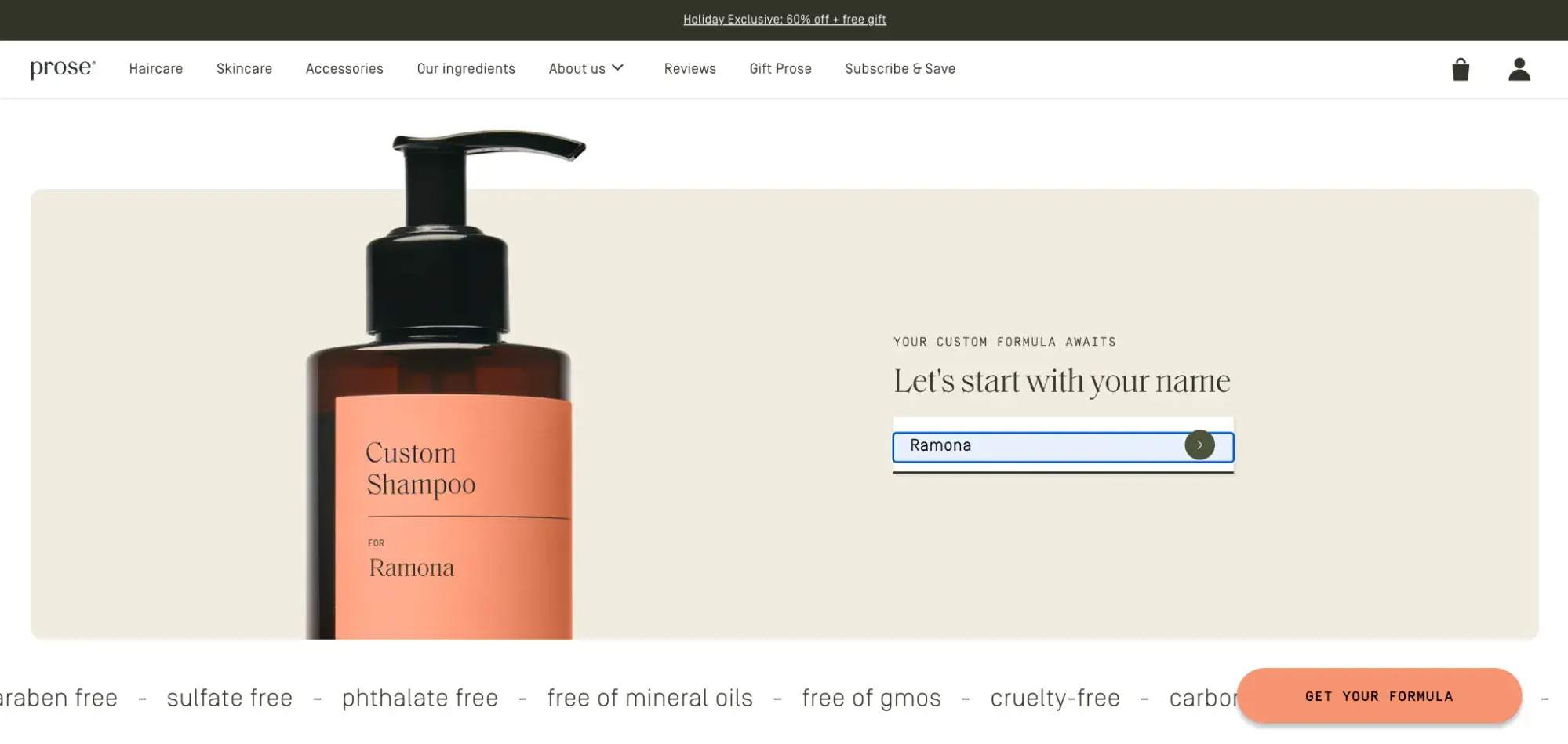
Imagine scrolling Instagram and seeing an ad written in a sleek, formal voice — the kind that makes you think, “Dang, these people really know their stuff.” You click through, only to hit a landing page that reads like a text from your best friend, full of jokes and slang. It’s jarring.

Suddenly, you’re not sure which voice is accurate or what to expect if you buy from them. When your voice shifts this dramatically from one step to the next, it can confuse people and make them want to bounce. Maintaining a consistent brand voice helps combat this. Let me explain.

Externally, consistent brand voice:

  • Builds trust & loyalty. In the U.S. market, 90% of consumers say it’s important to trust the brands they buy or use. When your brand voice is consistent, this trust grows as people know what to expect from you. They know what you’re about and what you stand for, so they can feel more comfortable and confident in following or buying from you. Learn more in The Trust Factor for Brand Credibility.
  • Improves message recall & brand recognition. Repetition enhances learning. That’s why when your brand voice remains steady, people recognize you faster and are less likely to confuse you with competitors.

It also comes with several internal benefits. It:

  • Aligns your internal teams. Writers, marketers, sellers, and service reps all work faster when they’re using the same playbook. Having a clear, documented brand voice removes ambiguity about how your team should be communicating with your audience and gives individuals something definitive to reference when they have questions.
  • Improves efficiency. Clear rules reduce revisions, prevent inconsistencies, and help agencies or freelancers get it right on the first try.
  • Aids AI content generation: Having a clearly defined and documented brand style guide also enables teams to tap into AI tools like HubSpot’s Breeze to help scale content production, as described in the Loop Marketing playbook.

Brand Voice vs Tone of Voice

Before we go any further, it’s important to understand the difference between brand voice and tone. Many people use the two words interchangeably, but they’re not the same.

Fellow HubSpotter, Editor of the Masters in Marketing newsletter, friend, and voice aficionado Laura M. Browning explains:

“I see voice as the overarching guidelines; the voice will determine whether the brand comes across as authoritative, academic, friendly, or informative. But the tone might change in different scenarios — you can be informative in a blog post and a customer email, but the tone of the blog post might be more detached and instructive, and the tone of a customer email might be more personal and descriptive.”

In other words, voice is your brand’s personality; steady, consistent, and long-term. Tone is the way brand voice adapts to specific contexts or situations; more serious, more upbeat, more urgent, depending on context.

Think of voice as who you are, and tone as how you show up in different situations.

Where Your Brand Needs a Consistent Voice

Consistent and clear messaging can improve brand perception by 70%, according to AdWeek.

So, when I say your brand voice needs to be consistent everywhere, I mean everywhere. Anywhere your audience reads, hears, or interacts with your brand is a moment where consistency either strengthens trust — or chips away at it.

But instead of listing every possible touchpoint, let’s walk through ten of the most important ones and what to watch for in each. We’ll use Duolingo, the language-learning app known for its bold, playful, slightly chaotic voice, as our example.

1. Website

consistent brand voice on duolingo website

Source

Your website is your home base on the internet. It should be the clearest and most accurate example of your brand voice. That means every headline, call-to-action, and caption reflects the same personality users see elsewhere.

For a brand like Duolingo, that means keeping the copy upbeat, witty, and packed with encouragement — even on pages like pricing or onboarding. If their website felt stiff or sales-y than their ads or emails, visitors would feel the disconnect immediately. And who could blame them?

2. Email Marketing

Email inboxes are private, so this is where your brand can get the most personal. Keeping your voice aligned with your website and other content helps the email feel familiar.

consistent brand voice in duolingo email marketing

Duolingo nails this with playful subject lines and motivational nudges that match their app experience. Even transactional emails (like this re-engagement email) stay perfectly on-brand.

3. Blog Articles & Long-form Content

Voice can easily get lost in long form as tone tends to soften over multiple paragraphs. The key is to try to weave your traits throughout the entire piece. Personally, I like to get the crucial information down first, then go back through the piece to add those touches of fun.

Duolingo’s long-form content is educational but still sprinkles in humor and personality, proving that voice can stay strong without overpowering the substance.

consistent brand voice in duolingo blog article

Source

4. Customer Service Scripts & Chat Replies

Support is another place where brand voice can easily disappear, especially when teams prioritize speed over style. But let’s face it: when people reach out to support, they’re often frustrated. During times of distress, maintaining your brand voice lets people know they’re still interacting with the same brand they know and love.

Rather than abandoning it, merely shift your tone to be more empathetic and clear.

Duolingo doesn’t have a general live chat available, but if it did, its reps would likely use a warm, approachable tone when explaining issues, keeping replies human and encouraging without sacrificing clarity or its voice.

5. Social Media Profiles

Your social channels are the most public expression of your voice, especially if your brand leans into entertainment (hello, Duo the Owl). It’s no secret that this is where Duolingo’s charm really shines, staying true to the same core traits: bold, playful, and mischievous.

If your social voice is wildly different from your website or product experience, it can feel like two different brands competing for attention.

6. Video Scripts

Video adds tone, pacing, and personality in a way text alone can’t. Your script should sound like something your brand would actually say — not like a corporate narrator reading a briefing.

Duolingo’s videos use the same cheeky voice found in its push notifications and social posts, making the experience seamless across formats.

7. Sales Assets

Sales decks, one-pagers, and product walkthroughs often lean heavily into jargon or overly formal language. But voice consistency matters here, too. When you use the same style your audience sees in marketing, the experience feels cohesive and intentional.

Even though Duolingo takes a less chaotic tone for its investor relations page, the clarity, confidence, and encouragement are still unmistakably its voice.

consistent brand voice in duolingo sales asset

Source

8. Paid Ads

Paid ads are quick impressions — you have seconds to show people who you are, and you want it to be authentic. Think of the scenario we talked about earlier: If your Instagram ad is polished and serious but your landing page is casual and jokey, the shift creates instant friction.

Duolingo avoids this by carrying its humor and boldness across every ad unit, from bold visuals to clever captions.

consistent brand voice in duolingo paid ad

Source

9. UX Copy & Support Docs

Microcopy (error messages, button labels, tooltips) might be small, but it carries a lot of voice. These moments often shape how intuitive or enjoyable your product feels.

Duolingo infuses tons of personality into its interface with friendly nudges, celebratory messages, and the occasional “Duo is watching 👀” reminder. Even support docs and FAQs stick to the same warm, encouraging tone that keeps learners engaged.

consistent brand voice in duolingo faqs

Source

10. Live Events & Experiences

Whether it’s a booth, workshop, or full-blown brand activation, your events and offline experiences should match everything people see online. Language on signage, handouts, scripts, marketing assets, and even staff interactions should reflect the same voice.

Every year since 2019, Duolingo has hosted Duocon, bringing together “language learners” across the world. The first year was in-person (as seen above), but it then transitioned to all-virtual (below).

As you can see, attendees can expect the same humor, big energy, and playful engagement they get from the brand in the app and otherwise.

The 7-step Process to a Consistent Brand Voice

Step 1: Review your audience and mission.

Start with the people you’re speaking to and the key interactions where voice has the biggest impact — onboarding messages, emails, sales sequences, social posts, support replies, and more. Understanding your reader’s mindset grounds your voice in real needs, not assumptions.

That said, review your buyer personas.

Also, take a moment to review your company’s mission statement. This sentiment should also come through in your voice.

Step 2: Define your brand voice traits are and aren’t.

Pick 3–5 voice traits that reflect how your brand sounds (e.g., “clear,” “warm,” “practical,” “bold”). Then name the things your brand will not say or do. These guardrails are often what make guidelines actually useful.

Read: Craft your best brand voice: Expert tips, examples, and templates

Step 3: Build your tone matrix for channels and scenarios.

Tone flexes based on context. Build a simple tone matrix showing how your voice shifts in:

  • Support vs. sales
  • Urgent updates vs. evergreen content
  • Social vs. long-form
  • Celebratory news vs. sensitive announcements

Plain-language cues like “Be reassuring here” or “Use shorter sentences in urgent moments” go a long way.

Step 4: Assemble your one‑page style guide.

Brand voice guidelines include voice traits, do/don’t rules, sample language, and channel examples. Summarize these into a simple one-page cheat sheet.

Pro Tip: If you’re a HubSpot user, our Brand Voice software digitizes this process and makes it available within the platform to aid in generating copy for emails, landing pages, web pages, and more. We break down how in our knowledge base.

consistent brand voice tool in hubspot

Source

If you’re looking for something more comprehensive, here are some other resources to help:

Step 5: Set up workflows, roles, and approvals.

Define who writes, who edits, who approves, and when to escalate big changes. This helps prevent redundant work and also defines ownership if content disagreements come up.

HubSpot Marketing Hub can help standardize processes, version control, and collaboration across teams. For example, when it comes to blog posts, different users can have different permissions within the portal. Some may be able to view posts, but not publish, while others can edit and publish freely.

Step 6: Roll out training and templates.

Workshops, examples, and templates make adoption easier. Train anyone who communicates publicly (i.e. writers, designers, sellers, and support teams) on your voice and how to use it.

The more familiar your team is with your voice, the more likely they are to use it.

Whenever possible, also create templates. Templates for sales emails, landing pages, etc., take the guesswork out of creating content for your brand and help your team execute faster.

Step 7: Launch, audit, and iterate in 30 days.

After you roll out your guidelines, monitor early usage, and audit content within the first month. Real-world application surfaces improvements fast, so use those first 30 days to refine and clarify.

After this, I’d recommend reviewing your brand voice documents at least once a year.

Tools to Keep Your Brand Voice Consistent

AI tools can help audit and enforce brand voice consistency at scale. Here are some of the most notable.

1. HubSpot Content Hub

HubSpot Content Hub is an all-in-one, AI-powered platform for planning, creating, managing, and publishing content.

While not focused solely on brand consistency, HubSpot Content Hub enables centralized brand voice governance and AI-powered QA with tools like Brand Voice.

All you have to do is upload a writing sample, and the AI analyzes your brand’s voice traits, which you can then review and adjust if you’d like. Once saved, HubSpot applies them across blogs, emails, landing pages, social posts, and more, helping every creator and team stay on brand.

Price: Part of Content Hub Professional and Enterprise (pricing varies by tier).

What I Like: What makes Content Hub stand out is its tight connection with the rest of the HubSpot tools including the CRM and CMS. This not only informs your content but also gives you creation, governance, and distribution in one place rather than stitching together multiple tools.

2. Grammarly

Grammarly is like an always-on writing assistant, offering real-time suggestions for grammar, clarity, correctness, and even tone. The original tool helps reduce off-brand moments by flagging wordiness, tone mismatches, or awkward phrasing, and can even generate content for you. But even better, they recently introduced a “humanizer” (in beta) where you can create a voice that you’d like your content written or rewritten in by the tool. 

consistent-brand-voice-grammarly

What I Like: Grammarly works across email, documents, CMS tools, and browsers, making consistency easier anywhere writing happens. That includes HubSpot, Slack, and a bunch of other tools I use on the daily.

Price: Free version available; Paid plans start at $12/month

3. Hemingway Editor

Hemingway Editor is a clarity and readability tool that highlights dense sentences, passive voice, and overly complex phrasing. It supports a more consistent voice across long-form content, UX copy, and help docs, by nudging writers toward simpler, cleaner copy.

hemingway app can be a consistent brand voice tool

Source

What I Like: Hemingway focuses on one thing — readability — and does it extremely well. If your brand voice relies on being clear, direct, and accessible, Hemingway becomes an essential part of the workflow.

Price: Free web version; paid plans starting at $6.66/month

4. Claude AI

Claude AI is another generative AI tool known for producing thoughtful, structured, and human-like writing (and a favorite on the HubSpot Blog team).

When trained with brand examples or style guidelines, Claude can draft or refine content that closely aligns with your voice. It’s especially strong for long-form content or nuanced explanations where clarity matters.

What I Like: Claude allows you to upload resources such as a style guide, spreadsheet, or original research that it can draw upon to inform the content it generates. This takes

Price: Free; paid plans beginning at $17/month

5. Brandfolder

Unlike the rest of this, which is heavily about execution, Brandfolder is more about organization.

brandfolder can be a consistent brand voice tool

It’s a centralized home for your brand assets, guidelines, copy rules, and style docs — one we even use here at HubSpot. Instead of scattering your voice guidance across slides, PDFs, and internal wikis, the platform keeps everything stored in one place where teams and agencies can find the most current version.

What I Like: Brandfolder can integrate with tools like Canva to make the assets and resources easily available in the tools you use to execute.

Price: Custom/enterprise pricing.

6. Writer

Writer is an AI governance tool built for large content teams that need strict voice, terminology, and style control across everything they publish. It can flag off-brand phrases, enforce terminology rules, and give writers real-time guidance based on your style guide.

writer can be a consistent brand voice tool

Source

What I Like: It’s built for scale and governance — great for enterprises or teams managing high volumes of content across many channels. Instead of just helping with readability, it helps enforce brand voice rules systematically across all content.

Price: Subscription-based; team and enterprise plans vary by seat.

Common Brand Voice Challenges and How to Fix Them

In theory, brand consistency should be pretty simple. Just be yourself, right? But, like everything, in practice, it’s more complicated. Here are the most frequent issues teams face, and how to address them quickly.

1. Voice traits that are too vague to be helpful

Fix: Sometimes terms like “friendly” or “young” can be vague or subject to opinion. For instance, one person might think sarcasm is friendly, while others think it’s alienating. To avoid confusion, include detailed descriptions and examples of your traits in voice style guide.

Browning suggests breaking a brand voice down to its component parts, along with examples of each.

She says, “If the brand voice is “friendly, helpful, and kind, I’ll start with ‘friendly’ and just make a list. Does it mean more exclamation points? Does it mean using ‘hey’ instead of ‘hi’ or ‘hello’? Once I have lists for all of the descriptive brand voice words, it’s SO much easier actually to craft language that ticks all the boxes.”

2. Agencies and freelancers going off-voice

Fix: When collaborating with an agency, freelancer, or even new team member, make sure to share your voice style guide and tone rubric. It would also be smart to give them access to some written content that really exemplifies your brand voice.

Explore different style guide templates here.

3. Tone inconsistencies during sensitive moments

Fix: Few things are as uncomfortable as seeing a brand fail to read the room. It’s one thing to be unaware of a global event or tragedy, but another to know and approach it entirely the wrong way.

With this in mind, expand your tone matrix with specific instructions for crisis, apology, or urgent communications. Even before I was a HubSpotter, I’ve been a fan of how our team handles this:

4. Guidelines that get created…then ignored

Fix: Content governance is essential, especially with multiple content creators and even AI assistance. To ensure guidelines are followed, integrate human review and brand voice checks directly into your workflows. For example, in HubSpot, web pages and emails can require approval before being sent.

hubspot content approval features

Several features in Content Hub, like content partitioning, sensitive data, permission settings, Brand Voice, and activity logging, also help in this process.

Consistent Brand Voice Examples

1. Canva

I feel like I use Canva as an example in all my articles, but hey, they do a lot right — especially branding.

consistent brand voice on canva’s website

Visually, it captures the color and creativity one would expect from a designer brand. As a voice, it’s confident, but also encouraging, action-oriented, and humorous. This carries effortlessly throughout its tool, website copy, and social media.

Just take a look at this TikTok video:

Or this email:

consistent brand voice on canva’s email marketing

2. Nike

consistent brand voice on nike’s website

Nike doesn’t need to say anything for you to recognize its brand. All it needs to do is slap its iconic swoop on anything, but even without that, the athletic brand is known for its bold, determined, and concise voice.

From “Just do it” to its homepage hero “Gifts that got game,” Nike has a way of delivering powerful messages in just a few words. This voice carries through to their ad campaigns, attire, and social media content.

3. INBOUND

HubSpot’s annual conference, INBOUND, has become a powerhouse all its own in the last thirteen years. Its brand voice across its platforms is personable, but also motivational, energetic, and unifying, much like the event itself.

consistent brand voice on inbound’s website

These traits even extend to its collaborators.

In recent years, INBOUND has gone the extra mile to partner with creators, speakers, and attendees to highlight first-hand experiences at the event, but the individuals it works with all enhance this voice, not dull it.

For example, Sarah Chen-Spellings is a podcast host and award-winning investor with a brand all her own, but her lively energy and encouraging voice is a natural match for INBOUND content.

Frequently Asked Questions About Consistent Brand Voice

How often should we update our brand voice?

Your market, messaging, and customer expectations evolve, and your voice should grow with them, but that doesn’t mean you should be making changes every quarter.

Reviewing your brand every 6–12 months is usually enough for most brands. Think of it like a routine check-in when setting or reflecting on goals, rather than a full rewrite. If your team recently rebranded, launched new products, or expanded globally, that’s a good reason to revisit things as well. HubSpot’s Brand Voice makes this easy by just uploading a new writing sample.

Who owns brand voice at our company?

One team (often brand, content, or communications) usually leads brand voice, but the best results come when everyone across marketing, sales, and service feels ownership. After all, your customers don’t experience your brand in just one place. A core team should set the guardrails, while the rest of the organization puts them into practice.

Shared templates, workflows, and approvals in a tool like HubSpot Marketing Hub help everyone stay aligned without adding extra process. Think of it as a group effort with a few people steering the ship.

How do we keep agencies and freelancers on-voice?

Clear, simple onboarding is your best friend here. Give your partners the same voice guide, examples, and “dos and don’ts” your internal team uses. This sets expectations early and helps save everyone a lot of back-and-forth later.

If multiple partners contribute content, tools like Content Hub’s Brand Voice can help keep everything aligned by offering real-time suggestions while they write. A quick monthly check-in or mini-audit helps you course-correct before inconsistencies pile up.

How do we adapt tone for global audiences without losing voice?

Great global content keeps the personality the same while adjusting the tone for local norms and expectations, but I get it: localization can be hard with different cultures and decorum. For example, you might keep your brand’s warm, helpful voice everywhere, but dial up formality in certain regions where direct language feels too casual.

The key is consistency with care: stay true to who you are, while respecting cultural nuance.

HubSpot’s multi-language content can help teams manage translations and regional content from one place, making it easier to stay aligned. And if you’re unsure, quick feedback from regional teammates goes a long way.

What is the best way to measure consistency across channels?

Start with a simple rubric with a few criteria your team can use to score whether content feels on-voice. Then review a mix of content from across your website, emails, social posts, and support notes, looking for patterns: Where do things feel tight and aligned? Where do they drift?

HubSpot Content Hub can take some of the heavy lifting off your plate by using AI to spot tone mismatches or off-brand phrasing. Combine those insights with human review and quarterly voice reviews, and you’ll have a steady rhythm for keeping your voice strong everywhere.

(Brand) Consistency is Key

A consistent brand voice is one of the most powerful and underrated levers for trust, recognition, and clarity across your customer experience. With a clear set of traits, guidelines, and examples, your teams can create content that feels unmistakably “you,” no matter the format or channel.

Start small, launch quickly, and refine as you go. Want help keeping your voice steady across every channel? Try HubSpot Content Hub or download our brand style guide templates to get started.

Categories B2B

What should marketers let go of in 2026?

I asked six HubSpot colleagues who are experts in their respective arena what their hopes and dreams are for 2026. From “just make AI and spreadsheets work” to tracking emotional momentum, here‘s what we’re looking forward to next year.

Click Here to Subscribe to Masters in Marketing

You can also check out the hard-won lessons my colleagues learned from the rollercoaster that was 2025.

What is the one thing you are betting AI will finally be able to do for you in 2026 that it cannot quite nail today?

Adam Biddlecombe, Lead marketer, AI media strategist

“Honestly, I am just praying for seamless integration with Sheets. I have lost too many hours this year going back and forth with ChatGPT, Claude, or Gemini trying to build or analyze a spreadsheet, and it still never quite lands.

“I want that moment where I can point at a messy sheet and say, ‘Clean this up, fix the formulas, and show me the insights,’ and it just does it. No weird formatting and no hallucinating. If AI can genuinely understand and manipulate Sheets the way an analyst would, that is the upgrade I am most excited for in 2026.

Rory Hope, Senior manager, EN Growth

“there have been some launches recently, such as google search console’s new ai reporting feature, which are enabling marketers to ask precise questions on performance and get accurate answers. more of this please!” —rory hope, senior manager, en growth, hubspot

“I hope that we’ll see more AI reporting solutions from analytics platforms in 2026. If we can get to the point where reporting becomes as easy as entering prompts asking for performance insights that take into context your objectives, goals, and priorities (possibly via MCP), then marketers can focus more on problem-solving and creativity.

“There have been some launches recently, such as Google Search Console’s new AI reporting feature, which are enabling marketers to ask precise questions on performance and get accurate answers. More of this please!”

What marketing skill are you secretly hoping becomes obsolete in 2026 (because you hate doing it)?

Amanda Kopen, Manager, Marketing

“Endless hours of reporting! I love to dig into data and determine the ‘why’ of demand or customer behavior trends. But I do not love how many tabs, tools, and sites I need to collate data together.

“hallucinated data does not make a strong foundation for strategy. i look forward to ai tools that gather data into one place, suggest insights based on what i care about, and allow me to fact check.” —amanda kopen, manager, marketing, hubspot

“AI systems have the potential to be extremely powerful in reporting, but they have to be accurate. Hallucinated data does not make a strong foundation for strategy. I look forward to AI tools that gather data into one place, suggest insights based on what I care about, and allow me to fact check.

What emerging consumer behavior has you most excited (or terrified) about marketing in 2026?

Amy Marino, Senior director, brand and social

“I’m paying close attention to how the major social platforms are rolling out AI content limiters. TikTok rolled out a slider to reduce AI content in feeds. Pinterest lets you filter out synthetic imagery. YouTube is deprioritizing low-effort AI videos.

“It’s a direct response to consumer complaints that AI slop is flooding their feeds. And it means a lot of marketers are going to have to pivot their strategies… again.

The marketers that can use AI to amplify human creativity and taste will win; but it also means if they haven‘t figured out how to do that yet, then they’ll need to learn fast.”

What’s your boldest prediction for how humans and AI will collaborate in marketing teams by the end of 2026?

Jonathon McKenzie, Head of brand paid media

“by the end of 2026 the word might be ‘medai’ because media and ai are moving fast. thankfully, the best teams will co-create with ai, not outsource to it.” —jonathon mckenzie, head of brand paid media, hubspot

“By the end of 2026 the word might be ‘medai’ because media and AI are moving fast. Creative is evolving from dynamic and programmatic to a real marketing craft. But I wonder how often ‘this is real’ will become a trend or disclaimer? Thankfully, the best teams will co-create with AI, not outsource to it.”

What marketing metric that doesn’t exist today do you wish you could track in 2026?

Nuriel Canlas, Senior marketer, HubSpot Media

“i’d love a metric that tracks a brand’s ‘emotional momentum.’ it would make it way clearer if your brand is building real energy.” —nuriel canlas, senior marketer, hubspot media

“I’d love a metric that tracks a brand’s ‘emotional momentum.’ Something that tells you if people are feeling more connected to your brand or drifting away. It would make it way clearer if your brand is building real energy.”

Click Here to Subscribe to Masters in Marketing

Categories B2B

Loop Marketing software that grows with your business strategy

AI has drastically changed the marketing industry. From remapping the buyer’s journey to changing the way we analyze data, to reshaping how we connect with consumers, almost everything is different from just a couple of years ago.

Download Now: Free Loop Marketing Prompt Library

A new age calls for a new playbook called Loop Marketing, and a new playbook calls for new tools. Keep reading to learn more about Loop Marketing software and its playbook so your business can seamlessly adapt to the new age of marketing.

Table of Contents

What is Loop Marketing software?

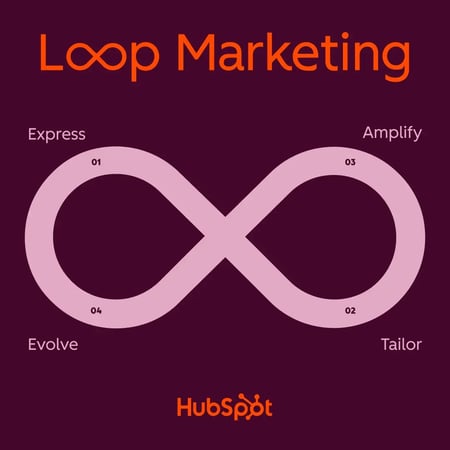
Loop Marketing is HubSpot’s modern growth framework, designed for the AI-driven marketing landscape. The marketing framework reshapes the traditional linear funnel with a continuous cycle of four interconnected stages:

  • Express – defining brand identity
  • Tailor – personalizing messaging at scale
  • Amplify – diversifying across channels where buyers actually are
  • Evolve – optimizing in real time

Loop Marketing software is an integrated technology stack that addresses each stage through a unified system.

Unlike legacy tools built for linear funnels that assumed predictable customer journeys through your website, Loop Marketing software recognizes that modern buyers circle through multiple touchpoints, often engaging with AI-powered search before ever clicking through to your site.

This new buyers’ journey requires a modernized technological approach that combines AI capabilities with unified customer data to enable rapid personalization, multi-channel orchestration, and real-time optimization.

Traditional marketing stacks force teams to manually stitch together insights across disconnected tools. However, Loop Marketing software uses AI to automatically learn from every interaction, apply those insights across channels, and compound performance with each cycle.

Essentially, Loop Marketing software turns work that used to take months into days, and transforms marketing from a series of campaigns into an always-learning growth engine.

Loop Marketing Software for the Express Stage

The Express stage is where your company establishes its identity and makes its goals and values known to its target audience. During the express stage, you will need to:

  • Create your ideal customer profile
  • Craft your brand’s style guide
  • Generate campaign concepts

HubSpot provides Loop Marketing software tools to help you complete the Express stage efficiently, allowing you to maintain a consistent brand voice, guide, and identity. To accomplish the Express stage:

  • Use Breeze Assistant, which leverages CRM data to create your ideal customer profile and generate campaign concepts.
  • Create an AI style guide with HubSpot’s Brand Identity (Beta) and display your unique brand image across campaign materials.
  • Use HubSpot’s Marketing Studio (Beta) to convert your campaign brief into a mix of content materials that can be shared across multiple channels and formats.

Loop Marketing Software for the Tailor Stage

The Tailor stage is where you create personal messaging that makes your audience feel seen and valued. During the Tailor stage, you’ll need to:

  • Enrich your data by gathering behavior signals, intent data, and contextual information so you know your buyers and where they are on their journey
  • Use your enriched data to build target customer segments
  • Use AI to make your content personal with landing pages, emails, ads, and CTAs that adjust based on buyer stage and other factors.
  • Ensure human quality checks to ensure the AI output is accurate and reliable.

To complete the Tailor stage with dynamic and personalized messaging and marketing materials, use the following Loop Marketing software tools found in HubSpot’s Marketing Hub:

  • AI-powered segmentation — Identify high-intent audiences and segments based on behavioral patterns and engagement.
  • Personalization Agent (Beta) — Craft targeted content and personalized experiences for each segment
  • AI-powered Email (Beta) — Generate personal emails for each contact using CRM data

Loop Marketing Software for the Amplify Stage

The amplify stage is the most comprehensive part of Loop Marketing and contains a lot of moving parts, but don‘t be discouraged. In addition to building your content strategy, you’ll need to diversify the channels through which your brand appears to reach customers. To do this, optimize for LLMs like ChatGPT and Claude, as well as YouTube, community platforms, forums, and LinkedIn.

Additionally, to accomplish the Amplify stage, you should:

  • Get as much value from your content by remixing it into various formats to suit every channel and stage of the buyer’s journey.
  • Active targeted ads and strategically partner with creators and subject matter experts to gain the attention and trust of your audience.
  • Use AI to scale and streamline the production and splicing of promotional materials.
  • Optimize each channel for conversion through clear, contextualized CTAs.

Use the following tools to complete the Amplify stage:

  • Marketing Studio (Beta) — Plan and create multi-channel campaign assets, and deploy them across channels.
  • Customer Agent — Provide around-the-clock AI-powered support that engages visitors, qualifies leads, and answers questions.
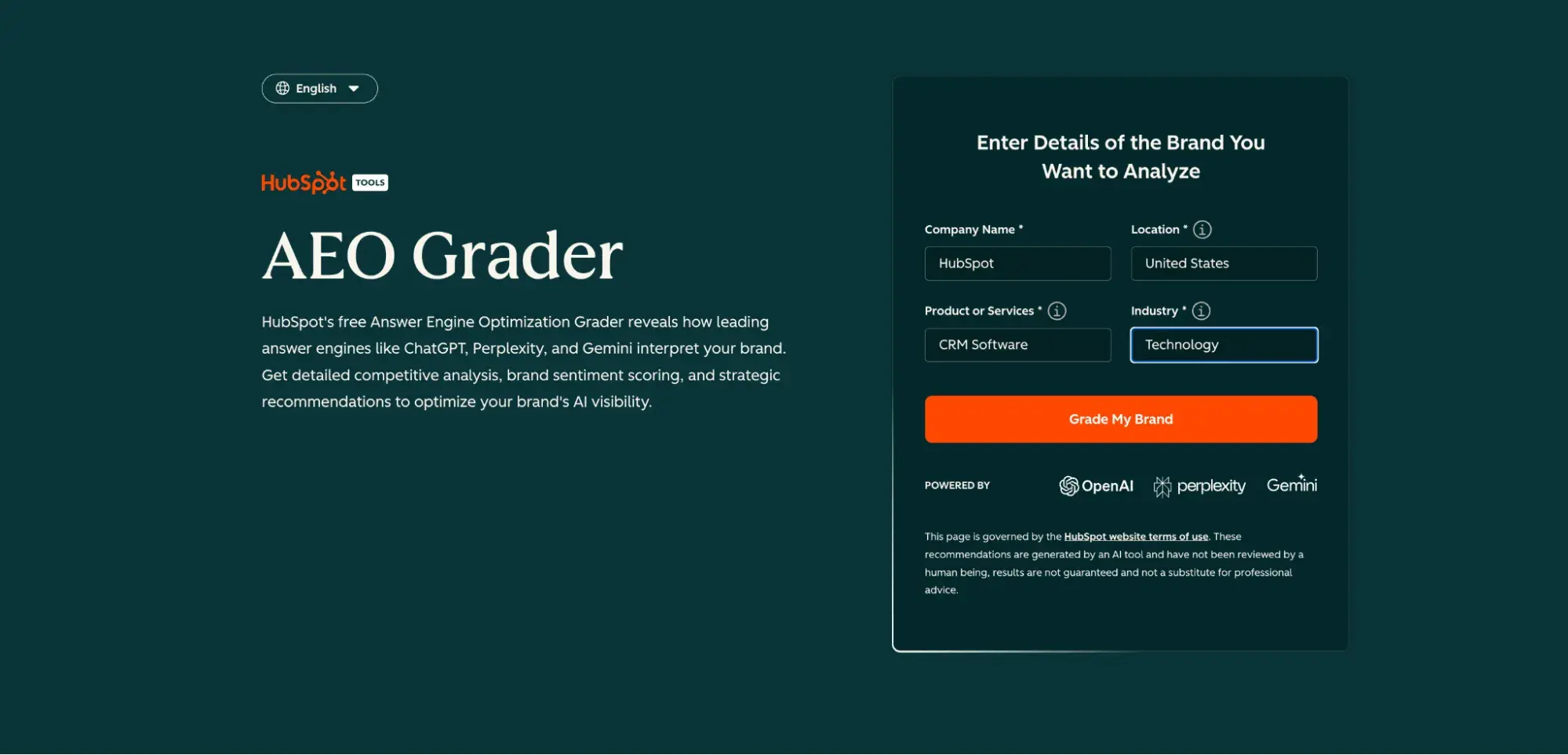
  • AEO Grader — Analyze and improve your brand’s Answer Engine Optimization (AEO)

Loop Marketing Software for the Evolve Stage

The evolve stage of Loop Marketing is where you continue to refine and adapt your strategy to the ever-changing AI-marketing landscape. You succeed in the evolve stage by creating a feedback loop that uses AI to track performance and deliver timely recommendations for improvement.

In the evolve stage, you will:

  • Use AI to predict which strategies and campaigns are most likely to convert leads and identify any weak spots before implementation.
  • Track engagement and conversion signals in real-time.
  • Use AI to consistently and efficiently run A/B tests on offers, headlines, and audiences.
  • Apply all the gathered information to improve and build upon your loop continually.

Here are some tools to help you successfully complete the evolve stage:

  • Marketing Analytics — Make data-backed decisions with the help of built-in reports and dashboards across channels.
  • ChatGPT Deep Research Connector — Collaborate with ChatGPT to uncover patterns, key insights, and optimization opportunities for your campaign.
  • Email Engagement Operation (Beta) — Automatically flag changes in engagement and enable A/B testing and campaign optimization.

Integrations that Make Loop Marketing Software Work

For Loop Marketing to work, your data must flow seamlessly at each stage and be especially in sync between the Tailor and Amplify stages. HubSpot’s Smart CRM and Data Hub act as the connective tissue by syncing customer insights from your data warehouse, ad platforms, social channels, and website into a unified view.

This integration layer ensures the Tailor stage has accurate, real-time data to personalize experiences, while the Amplify stage can immediately act on behavioral signals—whether that’s triggering a targeted ad campaign based on website activity or adjusting social messaging based on CRM engagement patterns.

But connectivity alone isn’t enough. Effective Loop Marketing software must handle identity resolution across touchpoints, maintain data governance standards, and respect consent preferences at every stage.

HubSpot’s approach ensures that as customer data moves through your marketing loops, it remains compliant with privacy regulations and tied to a single, reliable customer identity.

This means your personalization efforts remain both practical and trustworthy—no duplicate records confuse your campaigns, no consent violations undermine customer trust, and no governance gaps create compliance risk.

Frequently Asked Questions About Loop Marketing Software

Is “Loops” the same as Loop Marketing software?

Though the terms sound similar, Loops is an email platform brand, while Loop Marketing is a four-stage playbook meant to help marketers succeed in the AI era. However, platforms like Loops can fit into the Amplify stage of Loop Marketing, as they can help you maximize the impact of your content and diversify across channels like email.

Do I need a separate CDP to run the Tailor and Amplify stages?

No, you don‘t necessarily need a separate CDP to run the Tailor and Amplify stages. HubSpot’s Smart CRM, combined with Data Hub, handles customer data unification, segmentation, and activation for most marketing teams.

Stacking HubSpot’s Smart CRM and Data Hub enables resolution, behavioral tracking, and data synchronization across your ad platforms, website, and communication channels—everything needed to personalize in the Tailor stage and activate campaigns in the Amplify stage.

A warehouse-native CDP may add value if you’re managing massive data volumes, need complex data science models, or require deep integration with legacy enterprise systems.

However, avoid duplicative data sprawl. If you’re already consolidating customer data in a warehouse, connect it to HubSpot through Data Studio rather than creating redundant systems. Most teams find that Smart CRM plus Data Hub eliminates the need for a separate CDP.

What’s the fastest way to start without replatforming?

Run a 30-day pilot using HubSpot’s free or Starter tier while keeping your existing systems in place. Pick one high-impact channel — email is usually the easiest entry point—and integrate one or two data sources (your website and maybe your ad platform).

Use Breeze Assistant to generate campaign concepts, create a simple audience segment based on engagement data, and launch a tailored campaign. This low-risk approach enables you to demonstrate Loop Marketing’s value without disrupting your current tech stack.

Once you see results, you can expand to additional channels and upgrade tiers as needed.

How should I measure success for each stage of the process?

Use this scorecard to track performance across the loop:

  • Express: Content production speed (time from brief to publish) and quality scores (brand voice consistency, engagement signals)
  • Tailor: Engagement relevance metrics like email click-through rates by segment, personalization accuracy, and data enrichment completion rates
  • Amplify: Conversion rates across channels, share of voice in AI-powered search results, and discoverability in LLM responses.
  • Evolve: Test velocity (experiments launched per month) and measurable lift from optimization (conversion rate improvements, engagement increases)

Track these metrics at the stage level first, then roll them up to assess overall loop performance.

When should you bring creators or communities into your Amplify plan?

Although there is no universal “best time” to bring creators and communities into your Amplify plan, they become especially necessary when you’re ready to expand your reach into new audiences or platforms where your brand lacks authority.

Look for trusted voices who already engage your ideal customer profile and whose values align with your brand identity. Start with micro-influencers or active community members who have proven engagement rather than chasing follower counts.

Measure the creator’s impact through trackable links, promo codes, or UTM parameters to monitor traffic, conversion lift, and cost per acquisition compared to your other Amplify channels.

If creator content drives significantly higher conversions than standard ads or community-generated content increases time on site, double down on this approach. Ensure you’re using intent signals and enrichment data to understand which creator partnerships actually drive results versus just generating vanity metrics.

Loop Marketing is the playbook for marketers who want to succeed in the modern AI landscape while evolving to tackle the next wave of innovation. By investing in Loop Marketing software, you’ll prepare your business for the road ahead and make meaningful connections with your target consumer.


Categories B2B

Celebrating the Winners of The 2025 Luna’s: The Luna Legacy Award

October 1994. 

That is how long NetLine has been in business. A great deal has changed since those days, but many of its principles remain unchanged. 

Since its founding, NetLine has worked to unlock digital access for those seeking to reach real B2B buyers—first for publishers, then for agencies and marketers alike. For over 30 years, professionals have turned to NetLine to help them connect with their audience in smarter, more meaningful ways.

Among them are the trailblazers who’ve long believed in NetLine; marketers who embody everything Luna stands for: exploration, curiosity, and a relentless drive for better. 

More Than a Mascot

Luna started as a 404 page. We quickly realized that this little illustration had a lot more to give to the company and our clients than simply being a joke on an error page.

Today, Luna reflects our mission to empower data-driven marketers with the tools and insight they need to lead with clarity and confidence.

The Luna Legacy Award celebrates these long-time partners—marketers whose results, creativity, and innovation haven’t just impressed, but endured. It’s not about a single standout moment. It’s about unwavering excellence—campaign after campaign, year after year.

Their success is no accident. It’s the product of consistency, collaboration, and a deep understanding of what really moves the modern B2B buyer.

Let’s meet the marketers who propelled their brands and clients to new heights in 2025.

Let’s Meet the Winners of The 2025 Luna Legacy Awards

The winners of the Luna Legacy Award have elevated what long-term excellence in B2B marketing truly looks like.

Through years of thoughtful execution, strategic experimentation, and buyer-first thinking, these marketers have built engines of impact. Their work not only performs but endures. They’ve crafted campaigns that consistently educate, engage, and convert, all while pushing the boundaries of what’s possible in content-driven demand generation.

We spoke with four of these winners to get a glimpse into how they’ve built an award-winning program and how their experiences can help others, too.

Consistency, Curiosity, and a Healthy Dose of Discomfort

There’s a common belief in B2B that the best marketers are the ones with the newest playbook. But for this year’s Legacy winners, what’s shaped their strategy isn’t novelty—it’s discipline.

“The practice that’s most shaped my career is disciplined curiosity,” Cato Networks’ Stefani Fridman said plainly.”[It’s] a constant drive to understand the ‘why’ behind every number.”

Fridman is part of a generation of growth marketers who aren’t content to hit surface-level benchmarks. She has reframed content syndication as a demand intelligence engine, turning behavioral signals into orchestrated plays that serve not just marketing, but the entire pipeline.

Her peers share that ethos. Greg Cavaluzzo, VP at Park & Battery, emphasized how essential it is to understand the whole system. “In B2B, it’s about finding the most meaningful ways to stay in front of a prospect—creating as little resistance as possible on their path to conversion.”

For Greg, staying curious means asking better questions, staying close to real buyers, and knowing that even the best messaging can get stale if you don’t revisit it. That perspective has shaped how Park & Battery approaches omnichannel orchestration—with fewer silos and sharper alignment.

Ashley Ferguson at Paychex takes a similar lens—grounded in content but always zoomed out. “I’m a storyteller at heart,” she said. “And as a former content developer, I’m always thinking about the big picture we’re telling. One of our mantras is ABT—Always Be Testing. In today’s buyer landscape, you can’t afford not to.”

Ferguson helped rebuild Paychex’s entire demand gen framework around NetLine’s HQL Precision: routing sales-ready buyers with clarity, context, and speed. Her role as a digital marketing strategist is part content conductor, part performance analyst, and always buyer-first.

Cody Gowl, Account Manager at Gartner, echoes that blend of structure and creativity.“What’s kept me inspired is the willingness to experiment and embrace creativity. Innovation comes from balancing consistency with calculated risks.”

Gowl credits his long-term success to foundational best practices—knowing your audience, defining clear goals, and relentlessly measuring outcomes—but he makes room for boldness. Whether it’s testing new channels or introducing unique content formats, he’s built a career on pairing what’s tried with what’s next.

And no one embodies full-funnel discipline more than Becca DeBortoli at ZoomInfo. “I never look at one data point when assessing performance. It never tells you the full story.”

Becca’s always zooming out, tracking how early indicators translate to demos, pipe, and revenue. Her marketing strategy is equal parts quantitative and qualitative, grounded in a simple question: 

Are these leads actually closing?

The Power of Simplicity

What separates a Legacy marketer from a momentary success? According to this year’s winners, the difference is clarity—knowing what matters, and cutting what doesn’t.

For Stefani Fridman, the message is clear. “My biggest lesson: simplicity wins. Every time.”

That might sound obvious—but in B2B, it’s rarely practiced. Fridman has seen time and again how complexity creeps into content and campaigns—and how buyers respond better to messages that are sharp, direct, and human.

Greg Cavaluzzo shared a warning about chasing quick wins. “Don’t sacrifice short-term gain for long-term pain. You have to be pragmatic enough to build a solid foundation before you expect results.”

That foundation, he said, includes clear roles, cross-functional fluency, and the patience to launch only when everything is aligned. “When clients push for unrealistic timelines, the work suffers. Always.”

Ashley Ferguson took a practical angle.“Clean your lenses. The things that have always worked still need to be analyzed, tested, reviewed—and sometimes updated.”

She emphasized the importance of approaching even successful campaigns with fresh eyes. Because what worked six months ago might not work today—and it’s on marketers to find out why.

Cody Gowl distilled his perspective down to a core belief. “Embrace both learning and creativity. Mistakes are inevitable—but they’re also instructive. Don’t be afraid to experiment.”

And Becca? Her guidance is tactical and strategic all at once. “Always tie your initiatives to broader company goals. Have a purpose for what you’re chasing—don’t just do things to do them.”

It’s this combination of self-awareness and business alignment that turns marketers into leaders—and marketing into a lever for revenue.

Advice for the Next Generation

If you’re starting your career in B2B, what should you know? What mindset will actually help you make an impact?

Our winners had plenty to say—and it wasn’t just about tactics. “Don’t try to be everywhere,” said Stefani Fridman. “Focus on being remembered. Keep your curiosity alive, question every ‘best practice,’ and build your career on impact, not attention.”

It’s advice that challenges conventional wisdom and pushes young marketers to think critically about what success really looks like.

Greg Cavaluzzo added that learning how the whole ecosystem works is vital. “Understand how creative, media, analytics, and sales all connect—and learn to speak every language in the room.”

That perspective has helped him align campaigns across departments—and helped Park & Battery become a trusted partner across the buying committee.

Becca DeBortoli advised new marketers to step outside of their comfort zones and encouraged them to engage with others outside of their own department. “You never know when you’ll draw an insight from someone on the product or sales side that changes how you approach your work.”

And her most actionable advice? Don’t specialize too early. “Explore every channel. Learn how to assess performance across the whole funnel. It’ll give you a broader picture of how marketing really works.”

Cody Gowl closed the loop with a message of empowerment. “Don’t be afraid to share your ideas. Your perspective is valuable, even if you’re just getting started.”

Every one of these marketers has built their success on curiosity and clarity—traits that matter more than ever as B2B marketing evolves at breakneck speed.

What Legacy Really Looks Like

Legacy isn’t measured in form fills or flashy launches. It’s measured in consistency, clarity, and impact.

This year’s Luna Legacy winners didn’t just build campaigns.
They built bridges. Between sales and marketing. Between buyer behavior and pipeline performance. Between theory and execution.

They made B2B marketing feel more intentional. More aligned. More useful.

If this year’s winners have shown us anything, it’s that the right mindset beats any playbook.

Categories B2B

5 SEO keyword research tools that help teams show up in search

SEO keyword research tools are essential for marketing teams looking to level up their content. Keyword research software can help identify search opportunities that align with a business’ offerings. That SEO strategy is crucial — nearly one-third of internet users 16 or older discover new brands through search engines.

Download Now: Keyword Research Template [Free Resource]

The good news is that many free SEO keyword research tools exist. Teams can build a powerful keyword strategy without spending a dime.

In this guide, I’ll share the best free and affordable SEO keyword research tools I’ve tested, explain how to use them step-by-step, and show how HubSpot helps you bring it all together inside one connected platform.

Table of Contents


How I Tested the Best Keyword Research Tools

TL;DR: The best keyword tools balance data quality, usability, and workflow integration.

If you Google “what is the best free keyword research tool?”, you’ll probably get pages of sponsored posts and affiliate lists that don’t tell you much about how these tools actually perform.

So, I decided to test them myself.

For consistency across tools, I focused on a single keyword, AI search.” It’s one I optimize for frequently in blog content tied to my podcast, so it offers a practical way to compare how each tool performs on a real-world topic. I ran that keyword through multiple free tools to evaluate:

  • Ease of use
  • Depth of insight
  • How actionable the data felt for real-world content planning

Why this matters: Good tools don’t drown you in data. Instead, they surface the few signals that move traffic and conversions. When you’re building an SEO strategy, you need information you can do something with.

Best Free Keyword Research Tools for 2026

The best keyword research tools don’t overwhelm users with metrics. They highlight the few insights that actually move traffic and conversions.

Here are the best free keyword research tools I’ve found.

Tool Name

Free/Paid

Key Features

Limitations

Best For

WordStream

Free

Generates hundreds of keyword ideas per seed term; shows estimated search volume, competition, and CPC

No advanced SERP or backlink data; limited to Google data sources

Quick keyword validation and early-stage brainstorming

Semrush’s Free Keyword Tool

Freemium

Displays keyword, search volume, keyword difficulty (KD), and CPC; shows keyword intent types

Limited number of daily searches; requires login for expanded features

Data-rich keyword validation and understanding search intent

Ryan Robinson’s Free Keyword Tool

Free

Pulls results from Google Autocomplete; includes “Ideas” tab for long-tail keywords

No volume or competition data; cannot export lists directly

Fast brainstorming and content topic ideation

Ahrefs Free Keyword Generator

Free

Generates 20 keyword ideas per search; provides search volume and difficulty metrics

Limited to 20 results; no export or filtering without paid plan

Quick, high-quality keyword validation and question-based content ideas

Wordtracker

Freemium

Displays keyword, volume, competition, and KEI; Includes “No Click Searches” and “Is Question” filters

Daily search limits; requires account for saved lists

Identifying intent-driven keywords and shaping SEO content series

1. WordStream

seo keyword research tools, wordstream

Best for: Fast keyword ideas and competitive benchmarks without needing an account.

Key Features:

  • Free keyword generator that provides hundreds of ideas per seed term
  • Displays estimated search volume, competition level, and CPC
  • Filters by industry and geographic location
  • Export functionality for keyword lists

What I like: WordStream gives me a quick read on whether a topic is worth pursuing. It’s clean, fast, and doesn’t require a login, which makes it perfect for early brainstorming or validating keyword themes before diving into deeper analysis elsewhere.

2. Semrush’s Free Keyword Tool

seo keyword research tools, semrush

Source

Best for: Comprehensive keyword insights with limited free daily searches.

Key Features:

  • Displays keyword, search volume, keyword difficulty (KD), and CPC (USD)
  • Shows keyword inten
  • Lists the first 25 keywords by search volume
  • Accessible through the Keyword Magic Tool in the free version

What I like: Semrush’s free view is straightforward and data-rich. I can quickly see how competitive a keyword is, what the intent looks like, and whether it’s worth exploring further — all from one screen. I can use it at the start of my content research process to validate which topics have real search demand before turning them into blog posts.

3. Ryan Robinson’s Free Keyword Research Tool

seo keyword research tools, ryan robinson

Source

Best for: Fast, browser-based keyword brainstorming without logins or clutter.

Key Features:

  • 100% free, no sign-up required
  • Generates keyword suggestions directly from Google Autocomplete
  • Includes an “Ideas” feature to surface related long-tail keyword variations
    Displays results instantly in-browser for quick scanning
  • Great for validating early content ideas or expanding topic clusters

What I like: RyRob’s tool is one of my go-tos when I need fast inspiration. It’s lightweight, intuitive, and surprisingly effective for uncovering long-tail keywords that mirror how people actually search.

I especially like the “Ideas” tab. When I searched “AI search,” it surfaced dozens of related questions around the topic. Those insights make it easy to brainstorm new angles for upcoming podcast episodes or blog posts that expand on similar themes.

4. Ahrefs Free Keyword Generator

seo keyword research tools, ahrefs

Source

Best for: Quick, high-quality keyword ideas across multiple search engines.

Key Features:

  • Returns up to 20 keyword ideas per search
  • Provides search volume and keyword difficulty
  • Free to use, no sign-in required
  • Provides questions for long-tail keyword research

What I like: Even though it’s limited to 20 results, those 20 are gold. The data quality is excellent, and I like using Ahrefs’ free generator to validate whether a keyword is truly competitive before investing more time.

I’m also a fan of the Questions tab. Since long-tail keywords and natural language queries are becoming increasingly important, building content around those question-based terms is essential for any SEO — and even emerging GEO — strategy. Ahrefs provides 20 question suggestions per search, which you can use to plan your content calendar or expand your research in other tools.

5. Wordtracker

seo keyword research tools, wordtracker

Source

Best for: Detailed keyword metrics and competition insights in a clean, browser-based dashboard.

Key Features:

  • Displays keyword, search volume, competition, and KEI (Keyword Effectiveness Index)
  • Includes “No Click Searches” and “Is Question” data columns
  • Shows up to 100 keyword results in the free version
  • Allows territory filtering (e.g., United States)
  • Simple export and save options for organizing keyword lists

What I like: Wordtracker’s layout makes keyword comparison effortless. I like being able to view volume, competition, and KEI all in one place. It gives a balanced view of which keywords are worth targeting.

The “Is Question” filter is especially helpful for spotting intent-based topics I can turn into SEO-friendly content. I can use this data to shape blog outlines or evaluate whether a keyword is strong enough to build an entire content series around.

How HubSpot Helps With SEO

Most free keyword research tools help discover what to rank for, not how the content actually ranks. HubSpot’s SEO tools are different. Instead of jumping between tools to research, optimize, and measure performance, it brings SEO strategy into one connected space.

With HubSpot’s SEO tools connected inside the CRM, teams can:

  • Research topics and content ideas
  • Optimize content in real time
  • Track results across a blog, landing pages, and campaigns

Why this matters: HubSpot helps marketers connect research to how they’ll actually rank, and allows SEO teams to plan, optimize, and measure in one place.

HubSpot’s SEO Marketing Software

seo keyword research tools, hubspot

Source

HubSpot’s SEO Marketing Software, included in Marketing Hub, turns what can be a chaotic research task into a clear SEO strategy. It helps you plan, optimize, and track your organic performance across every campaign and content asset.

Here’s how:

  • Plan with precision: Organize keywords into topic clusters to strengthen a site’s topical authority and build internal linking strategies that search engines reward.
  • Get actionable recommendations: HubSpot’s built-in SEO tools automatically scan websites and surface optimization suggestions. This is helpful, as it gives users a priority list, so they always know where to focus.
  • Track progress in one place: Monitor how pages are performing for specific keywords, view position changes over time, and measure which topics are driving the most organic leads and conversions.
  • Collaborate seamlessly: Because the SEO tools are integrated with the rest of the marketing ecosystem, content, web, and demand-gen teams can work together.

What I like: I love that this setup blends automation with strategy. I can see, in real time, which keywords are driving performance — and how those tie directly to leads or pipeline inside HubSpot. Instead of exporting reports or juggling spreadsheets, I can map keyword data straight to the content and campaigns I’m managing.

It’s a complete feedback loop that shows what’s working and what’s not, so I can double down on the ideas that actually move the needle. For me, that visibility is the difference between guessing what drives growth and knowing it.

SEO Features in HubSpot’s CMS Hub

When creating or updating web content in HubSpot’s CMS Hub, SEO optimization has never been easier. Marketers can optimize content right where the work gets done.

Rather than juggling separate plugins or manually auditing, HubSpot integrates SEO intelligence directly into the writing and publishing workflow.

Here’s what that looks like in practice:

  • Real-time SEO recommendations: As marketers write, HubSpot automatically flags missing meta tags, weak headlines, and unlinked topic clusters. This makes it easy to fix errors before hitting publish.
  • Built-in page performance metrics: Easily see how each page performs in search, which keywords it ranks for, and how those visitors convert.
  • Technical optimization made simple: HubSpot automatically manages redirects, canonical URLs, and site structure to ensure content performs without requiring developer intervention.
  • Integrated reporting: Because CMS Hub connects directly to the team’s CRM, marketers can see everything — traffic, rankings, and which SEO-driven visitors become qualified leads and customers.

For growth-focused teams, this integration is a time-saver. It means the SEO strategy becomes a part of the everyday content workflow. Marketers publish faster and rank higher without adding extra tools, steps, or hiring an outside SEO agency.

How to Do Keyword Research with Free Tools

When conducting keyword research, marketers should start with a topic or question that they want to cover. From there, marketers can use free keyword search tools to see the demand for the phrase and how competitive it might be to rank. After, teams can target longer keywords and map search queries to broader topics.

Follow these steps to turn raw keyword data into a focused, effective strategy.

1. Start with a broad topic or question.

Begin with a seed idea that reflects the audience’s goals or challenges. Choose something like “email automation” or “AI for small business.”

Then, use a brainstorming tool such as RyRob’s Free Keyword Tool or WordStream to generate initial keyword lists. Look for phrases that reflect curiosity and buying intent. Think, how, why, or what.

2. Validate search demand and competition

Once the team has a list of potential keywords, check how often people search for them and how competitive they are.

Tools like Semrush’s Free Keyword Tool or Ahrefs Free Keyword Generator show search volume and difficulty scores. This helps prioritize terms that balance demand with achievability.

3. Expand into long-tail or question-based keywords

Long-tail keywords — those longer, conversational phrases — are where most SEO opportunities live.

Use RyRob’s “Ideas” tab or Ahrefs’ “Questions” feature to uncover real queries your audience is asking. These often become perfect blog post titles or FAQ sections that attract steady traffic.

4. Organize and map keywords to topics

Create a simple spreadsheet to group related keywords by topic. Each cluster should align with a key theme or offering on a website.

Mapping keywords to topic clusters helps teams plan supporting blog posts, pillar pages, and internal links around the same topic.

5. Track performance

Free tools don’t usually keep a record of searches, so build a system for tracking progress. Use a simple spreadsheet, like Google Sheets, to record each keyword, the page it’s tied to, and monthly performance data. This manual tracking helps teams see what’s working and where to optimize next.

HubSpot Pro Tip: When you’re ready to move beyond spreadsheets, HubSpot’s SEO Marketing Software can streamline this process. It connects your keyword data, content planning, and analytics in one place.

Pro Tips for Using Free Tools Effectively

To make the most of free keyword research tools, cross-validating data across multiple free platforms to ensure accuracy. Marketers can use Google’s “People Also Ask” feature for long-tail keywords that reveal search intent. Beyond that, teams can manually track keyword performance over time in spreadsheets to build a custom data library that informs content optimization decisions.

You’ve probably heard the claim that “SEO is dead, and GEO killed it.” After dozens of conversations with SEO strategists and marketers on the Found in AI podcast, I can tell you that’s not true.

SEO remains one of the strongest drivers of ROI — it’s simply evolving. GEO (or generative engine optimization) builds upon a strong SEO foundation.

Here are tips that can help.

1. Use multiple tools to cross-validate data.

No single free keyword research tool paints a complete picture. Each platform samples data differently, so using several together helps confirm trends and uncover gaps.

Start by combining tools to cross-check results. If one limits searches, use another to validate the data.

When tools don’t provide historical trends, track performance manually in a spreadsheet or project management tool. Once a month, log:

  • Search volume
  • Ranking position
  • Traffic for each keyword

Soon, teams see which topics are gaining traction and which ones need refinement.

I use this approach because it gives me confidence that the data I’m seeing is directionally accurate, not just an outlier. When multiple sources point to the same trend, I know it’s worth my time to pursue.

2. Use Google’s “People Also Ask” for free long-tail keywords.

Google’s “People Also Ask” feature is one of the most underrated keyword research tools — and it’s free.

These question boxes show what people are genuinely curious about and how they phrase their searches in natural language. Every time searchers click a question, Google generates more related queries, creating an endless stream of long-tail keyword ideas teams can build content around.

This feature is especially valuable because it reveals search intent. Each question represents:

  • Pain points
  • Curiosity
  • Moments of consideration in a buyer’s journey.

Use these insights to guide blog posts, FAQs, or supporting pages that answer those exact questions.

I rely on “People Also Ask” results to identify new angles on familiar topics. I’ll usually gather a few of those questions, group them by theme, and turn them into a content cluster or a blog series that expands on a main keyword.

An important note on long-tail keywords and the future of SEO:

In a recent recorded interview with Charlie Graham, founder of RivalSee, we talked about the growing importance of long-tail keywords. Graham told me that compared to shorter terms of three or four words, long-tail phrases are more likely to be cited in AI search results.

This matters when planning SEO keyword strategy.

Be sure to include complete, conversational phrases in the content that mirror how people actually search. They’ll not only strengthen traditional SEO but also future-proof content for emerging search behaviors.

3. Leverage your competitors’ free data.

Teams don’t need paid tools to learn from competitors’ SEO strategy — much of their keyword data is already public. By analyzing the topics and structure of top-ranking content in a niche, teams can uncover what’s working for competitors and identify gaps to fill.

Start with a simple Google search for target keywords. Look at the titles, meta descriptions, and headers of the top results to see which phrases appear consistently. Tools like Wordtracker also let users plug in a competitor’s domain to see which keywords they rank for (many of these insights are available in their free versions!).

From there, look for patterns. Are competitors targeting:

  • Specific long-tail keywords?
  • Question-based phrases?
  • Buyer-intent terms like “best,” “compare,” or “how to”?

Those are cues for what resonates with shared audiences.

I like using competitor data as a shortcut for ideation. When you can see which topics drive visibility for others, you can reverse-engineer that success and create similar content that adds your own expertise, brand voice, or perspective.

HubSpot pro tip: If you’re already using HubSpot, you can track competitor domains and keywords directly in your dashboard. This makes it easy to monitor changes in rankings over time and spot opportunities to outperform similar brands.

4. Work around free tool limitations.

The key to using free tools is knowing how to fill those gaps creatively so teams can still build a reliable SEO strategy. Free keyword tools are powerful, but they all come with trade-offs like:

  • Daily search limits
  • Missing historical data
  • Incomplete SERP insights

Use free features from other platforms to supplement research. Google Search Console shows which queries content already ranks for, and Google Trends helps identify rising topics before competitors catch on. When paired with the free tools in this guide, these insights help make data-driven decisions without paying for premium software.

I’ve found that the best workaround is consistency. When you collect and organize your data over time, you build a custom keyword library that’s often more valuable than what you’d get from a paid plan. It’s extra effort upfront, but it pays off when you can clearly see what’s driving results.

HubSpot pro tip: When you’re ready to automate this process, HubSpot’s SEO Marketing Software can pull keyword, performance, and page-level data into one dashboard, so you can analyze everything without switching between tools.

5. Track your progress without premium tools.

Most free tools don’t store historical data, which makes it hard to measure progress over time. Setting up a lightweight tracking system ensures marketers can see which keywords and content pieces actually drive traffic, engagement, or conversions.

I track keyword performance monthly using a simple spreadsheet and Google Analytics data. Seeing how certain posts rank or convert helps me make data-driven decisions about what to optimize or expand next. Over time, that record becomes a roadmap, and it shows which content consistently performs and where new opportunities are emerging.

Frequently Asked Questions About Keyword Research Tools

What is the best free keyword research tool?

For quick brainstorming and early validation, WordStream and RyRob’s Free Keyword Tool are great starting points. For more structured data, Semrush’s Free Keyword Tool and Ahrefs Free Keyword Generator provide reliable insights on search volume and keyword difficulty.

When teams are ready to go beyond research and start optimizing content, HubSpot’s SEO Marketing Software can help organize keywords, monitor performance, and turn insights into strategy.

How accurate are free keyword research tools?

Free tools are directionally accurate but not perfect. They often rely on smaller datasets or averages, so use them to spot trends—not exact numbers. To verify performance, pair what results with analytics or a platform like HubSpot, which measures how organic traffic from those keywords translates into engagement and conversions over time.

Can I do effective SEO with only free keyword research tools?

Yes, SEO strategy can be effective with free keyword research tools — especially for teams just starting out. Free tools can help uncover opportunities and plan content. The main limitation is tracking and scale.

When a business begins to grow, tools like HubSpot’s Marketing Hub can centralize that data, connecting keyword research, content creation, and campaign results in one place.

What’s the difference between free and paid keyword research tools?

Free tools are perfect for generating ideas and gauging potential. Paid tools provide deeper insights, like competitor analysis, SERP tracking, and long-term keyword trends.

Platforms like HubSpot extend beyond research. They help teams put SEO into practice, measure ROI, and manage optimization across multiple channels.

How many keywords should I research for my website?

Start small by focusing on 25 to 50 high-impact keywords that align with products or audiences. Over time, expand into related long-tail keywords and supporting content. HubSpot’s SEO tools make it easier to connect that content, helping visualize topic clusters and track which pieces drive meaningful traffic and leads.

Which platform is best for keyword research if I’m just starting out?

For those new to SEO, start with WordStream, RyRob’s Free Keyword Tool, or Semrush’s Free Keyword Tool. Together, they allow for both creativity and validation.

As an SEO program matures, paid tools, like HubSpot’s SEO Marketing Software, become a natural next step. Paid software helps apply those keyword insights at scale, tying them directly to content performance and lead generation.

Turn keyword research into real results.

Free keyword research tools give you the data to start strong, but turning those insights into measurable growth takes strategy, consistency, and the right systems.

HubSpot’s SEO Marketing Software can make a real difference in your SEO strategy. It brings your keyword research, content planning, and performance tracking together in one connected workspace. With HubSpot, you can discover what to rank for, understand why your content performs, and see exactly how it contributes to ROI.

I’ve tested dozens of SEO tools over the years, and what I like most about HubSpot’s approach is how it turns research into action. Instead of exporting data or juggling multiple platforms, you can plan topics, optimize pages, and measure results directly inside your marketing hub. It’s SEO made practical. And when you’re ready to scale beyond free tools, it’s a no-brainer.

Start optimizing smarter with HubSpot’s SEO Marketing Software and turn your keyword research into measurable growth.

Categories B2B

Celebrating the Winners of the 2025 Lunas: Revenue Impact

Conversations around ROI usually begin and end with one thing: money.

This is perfectly reasonable, of course. After all, the term is a financial metric. 

However, viewing ROI exclusively as a monetary metric in what is soon to be 2026 feels a bit shortsighted.  So what does it take to consistently connect marketing to revenue? 

According to what NetLine’s general manager, David Fortino, shared at B2B Forum 2024, ROI is no longer simply about “return on investment”—it’s also about Resonance, Originality, and Impact

This broader view of ROI highlights the emotional, creative, and strategic elements that define successful marketing in practice. And this is precisely what the Revenue Impact category aims to recognize.

Let’s Meet the Winners in The Luna’s 2025 Revenue Impact Category

The Revenue Impact category of The 2025 Luna’s honors marketing programs that do more than deliver leads or move metrics—they create lasting, measurable business value. These winners have shown how great storytelling, executed with precision, becomes a direct contributor to growth.

The 2025 Revenue Impact honorees—DataBee, a Comcast Company, and TE Connectivity—have proven this philosophy in action. 

Their work reflects a deep understanding of each brand’s audience, differentiated execution, and a clear connection to revenue outcomes. By making every marketing touchpoint intentional and value-driven, they’ve advanced the role of marketing as a true business driver while simultaneously elevating the brand.

Revenue Impact Award Winners

To gain greater perspective on what makes these organizations succeed, we spoke with Suzanne Levy, Director of Demand Generation for DataBee, and Laetitia Donovan, Sr. Manager, Marketing for TE Connectivity.

Resonance: Rooted in Relevance and Real Human Insight

When asked how they create marketing that resonates, the Revenue Impact winners shared a simple but powerful idea: start with the audience, and don’t assume anything.

The strongest content isn’t produced in isolation. It’s shaped by real conversations, frontline insights, and a clear understanding of what the buyer actually needs. For both DataBee and TE Connectivity, resonance begins with relevance—and relevance comes from listening.

Suzanne Levy of DataBee described how their team grounds every piece of content in specific, observable challenges.

“Our content is rooted in the real challenges and interests of our target audience—focusing on areas where DataBee can provide meaningful solutions.”

This approach ensures that the brand’s message is purposeful. Educational, yes—but also tailored to build trust with clients, analysts, and influencers alike. It’s how the team moves beyond surface-level messaging and into something that supports longer-term relationships.

At TE Connectivity, Laetitia Donovan takes a similar stance, especially when speaking to technical audiences with highly specialized pain points.

“Understanding the pain points of engineers and decision-makers helps us craft content that resonates and drives action.”

Each brand views resonance as a twofold victory: half creative and half strategic. They earn attention by being specific, deliver value by being useful, and maintain momentum by staying aligned with the real-world concerns of the people they serve.

This isn’t about filling channels. It’s about showing up with something worth reading, watching, or sharing—because it reflects what the audience cares about right now.

Originality: Breaking Through with Intentional Creativity

Everyone hopes that their ideas, perspectives, and outputs are original. It’s never easy. But that’s where success finds its origins. 

The Revenue Impact winners shared that distinction, for them, doesn’t come from being louder, but from being more precise. They pointed to clarity over theatrics. 

For TE Connectivity, originality starts with understanding how buyers move through their journey—and responding accordingly. “We must create differentiation through personalization and a clear understanding of the audience behaviors along the customer journey,” Laetitia Donovan said. The goal isn’t to surprise for surprise’s sake, but to deliver messaging that feels intentionally designed for the moment and the audience.

That discipline shows up in how campaigns are structured and measured. Personalization, targeting, and behavioral insight work together to create programs that feel specific rather than broad, and deliberate rather than generic.

At DataBee, originality is shaped by a similar mindset. Their team focuses on evolution (testing, refining, and improving) without losing sight of what the audience expects from the brand. “We prioritize content that is educational and engaging,” Suzanne Levy said. “Balanced by a sophisticated marketing operations system that enables us to measure performance, optimize messaging, and continuously improve our programs.”

Each brand treats originality as a product of focus and follow-through. The work stands apart because it reflects clear thinking, informed decisions, and a willingness to adapt—resulting in campaigns that feel distinct, purposeful, and built to perform.

Impact: Creating Real, Measurable Business Value

In terms of impact, the Revenue Impact winners were clear: it has to be measured in business terms. 

Attention is important. Engagement is valuable. But neither matters unless they help move the business forward.

TE Connectivity’s marketing team starts every program with cross-functional alignment. Impact is baked into the process, not added at the end. “We start every initiative by aligning with sales and product teams to define clear business outcomes,” says Laetitia Donovan. “Whether it’s pipeline acceleration, lead quality, or market penetration.”

From there, the team uses performance dashboards to monitor progress in real time—focusing on the metrics that actually signal momentum, not just activity.

Databee’s goal is to balance innovation with performance and creativity, hoping to achieve impact through constant calibration.“This combination [of creativity and measurement] ensures our efforts are both innovative and tied directly to business outcomes,” Suzanne Levy says.

Each team treats impact as a shared responsibility between marketing, sales, and strategy. Clearly, their focus isn’t about volume or vanity, but qualified leads, an accelerated pipeline, and a measurable contribution to growth.

Lessons from Revenue-Focused Marketers

Asked what advice they’d share with marketers looking to elevate their impact, both Levy and Donovan pointed to the value of balance, experimentation, and alignment.

“Lean on proven strategies that have delivered results, but also carve out time and resources to experiment with new approaches… Continuous learning and experimentation are essential to staying relevant and driving impact.”
Suzanne Levy

“Build trust by showing how marketing contributes to driving incremental growth… Don’t just report on clicks—connect the dots to qualified leads, opportunities, and closed-won deals.”
Laetitia Donovan

It’s this blend of strategic rigor and creative courage that defines their programs—and helps their work stand up to both marketing and business scrutiny.

The Role NetLine Played

Both winners cited NetLine as a key partner in their success—especially when it came to scaling programs and connecting content to pipeline.

“NetLine has been a valuable partner for DataBee. They take the time to understand our business—both strategically and tactically—and they consistently align programs with our goals.”
Suzanne Levy

For these teams, NetLine has gone beyond delivery—it’s contributed directly to resonance, originality, and impact by supporting tailored distribution, delivering intent insights, and adapting programs to match business goals.

“NetLine has been instrumental in scaling our content syndication efforts. The platform allows us to reach niche technical audiences with precision, and the lead-level intent data helps our sales team prioritize outreach.”
Laetitia Donovan

Final Thoughts: The Real ROI

The 2025 Revenue Impact winners reflect what modern marketing success looks like: grounded in strategy, powered by insight, and unapologetically accountable.

By embracing Resonance, Originality, and Impact as critical elements of ROI, DataBee and TE Connectivity have shown how to transform content into growth. Their work is a roadmap for marketers looking to build smarter, sharper, and more business-connected campaigns—without sacrificing creativity or customer focus.

Congratulations to Suzanne, Laetitia, and their teams on this well-earned recognition. Your programs represent the future of performance marketing—not as a cost center, but as a core driver of business success.

Categories B2B

AI-powered email content suggestions that actually convert leads

AI-powered email content suggestions are changing how marketing teams write, test, and scale email campaigns. Instead of guessing what message will resonate, marketers can now use AI to analyze data, predict engagement, and generate personalized content that converts. Download Now: Full-Stack AI Marketing Toolkit

But there’s a huge difference between emails that sound good and emails that perform.

In this guide, we’ll cover how to use AI email content suggestions to deliver stronger open rates, higher click-throughs, and measurable revenue impact.

Table of Contents


What AI-Powered Email Content Suggestions Are and Why They Matter

AI-powered email content suggestions use machine learning to tailor your subject lines, body copy, and CTAs to each audience segment and lifecycle stage. The system analyzes engagement data, like open rates and replies, to recommend what message, tone, or offer is most likely to drive action.

In practical terms, that means:

  • Generating email subject lines designed to boost open rates
  • Optimizing email copy that earns more clicks and replies
  • Recommending CTAs that move contacts from MQL to SQL faster

When connected to your CRM, AI turns raw engagement data into actionable insight. Instead of guessing what your audience might respond to, you see which phrases, formats, and offers actually convert. As the AI tool collects and analyzes more data, it compounds on those learnings with every send.

The real advantage comes when these suggestions are used inside automated email campaigns. That integration creates a feedback loop between your content and data, allowing the AI to adapt in real time to audience intent and performance signals.

Real results in action: HubSpot’s own demand generation team used AI to transform their email nurturing strategy, analyzing user behavior and website data to deliver hyper-personalized content recommendations.

By using GPT-4 to understand intent and match users with relevant courses, we achieved an 82% higher conversion rate, 30% better open rate, and 50% lift in click-throughs.

Read more about it in the 2025 State of Marketing Report.

Best AI Tools for Email Content Suggestions

When it comes to email creation, the real power of AI lies in tools that plug into your CRM and connect to your customer data. With this insider information, crafting compelling headlines or body copy is a breeze.

Here are a few top options to consider, starting with HubSpot’s Breeze Copilot.

1. HubSpot’s Breeze Copilot

ai powered email content, hubspot

Source

HubSpot’s Breeze Copilot is built directly into the HubSpot email editor, giving marketers an AI assistant that knows their audience as well as their CRM does. It uses existing data, like lifecycle stage, engagement history, and past campaign performance.

With these insights, Breeze can:

  • Generate personalized subject lines
  • Tailor email copy to audience preferences
  • Create CTAs that align with conversion goals

Why it stands out: Most AI writers generate generic copy. Breeze Copilot is different, as it grounds every suggestion in your own CRM data and campaign analytics. That means smarter recommendations that match real buyer behavior.

What I like:

  • Generates content that adapts to your contact’s stage, behavior, and preferences
  • Lives inside HubSpot, so there’s no copy-and-paste between tools
  • Suggests entire email structures, not just sentences or subject lines
  • Syncs seamlessly with automated email campaigns for built-in testing and reporting

Best for: Marketing teams that want to combine creativity with data-driven precision.

Pricing:

HubSpot pro tip: Pair Breeze Copilot with AI-assisted content creation to build reusable, modular assets, like headers and footers. You can then drag and drop those assets into future campaigns.

2. WriteSonic’s Email Generator

ai powered email content, writesonic

Source

Writesonic’s dedicated email generator helps marketers craft targeted email campaigns quickly in more than 25 languages.

Its strength lies in how easy it is to iterate. Whether you’re writing onboarding sequences, announcing a product launch, or sending a recurring newsletter, Writesonic’s saved templates let you start with proven frameworks instead of a blank page.

What I like:

  • Speed and templates. With Writesonic, you select an email template, plug in your details, and generate a first draft in minutes.
  • Multi-language support. Useful if you send to global audiences; the platform supports email copy in 25+ languages.
  • Pre-built performance frameworks. For SaaS brands, for example, Writesonic offers 100+ free email templates and 500+ subject lines designed for boosting opens and clicks.

Best for: Marketing teams who need to turn around multiple campaign emails quickly, especially newsletters, product updates, or launches, but haven’t yet opted for a full CRM-embedded AI writing workflow.

Pricing: Plans start at $49/month.

3. Seventh Sense

ai powered email content, seventhsense

Source

Seventh Sense is the secret weapon for timing. It uses machine learning to predict when each contact is most likely to open or click an email, then schedules delivery accordingly. By learning from historical engagement patterns, you ensure that your perfectly written AI-generated emails land in inboxes at the exact moment they’re most likely to be seen.

What I like:

  • Predictive optimization. Learn individual engagement habits to send emails at peak times.
  • Integration with HubSpot. Works seamlessly with automated email campaigns to improve deliverability and engagement.
  • Personalized pacing: Prevents fatigue by spacing sends based on recipient behavior.

Best for: Teams focused on maximizing open and click-through rates through smarter send times.

Pricing: Plans start at $80/month, billed annually.

4. Copy.ai

ai powered email content, copyai

Source

Copy.ai is a creative AI platform that helps teams build multi-step workflows for campaign creation. It includes templates for full email sequences, making it a great tool for teams managing complex lifecycle or drip campaigns.

What I like:

  • Workflow automation. Generate entire sequences in minutes.
  • Collaboration tools. Allow multiple team members to refine drafts together.
  • Prompt library. Save custom prompts that can be reused for similar campaigns or customer segments.

Best for: Marketing teams that need to scale high-quality emails across multiple products or regions quickly.

Pricing: Plans vary. For Chat, plans start at $29/month.

5. MailMaestro

ai powered email content, maestrolabs

Source

MailMaestro is an AI‐powered email writer and assistant designed to integrate directly with Outlook and Gmail, letting teams draft, reply, and manage professional email content more quickly and effectively.

It supports multiple languages, tone adjustments, and context-aware drafting, helping marketers scale email content production without sacrificing clarity or brand-voice integrity.

What I like:

  • Rapid, context-aware drafts. You input a short instruction, and the tool generates three differentiated versions in seconds.
  • Tone and language controls. Choose a desired tone and language variant for global campaigns.
  • Integration with inbox workflow. Because it lives in Outlook or Gmail, mail writers stay in their workflow rather than jumping between tools.

Best for: Marketing and operations teams that handle high volumes of email communications.

6. ChatGPT

ai powered email content, chatgpt

Source

ChatGPT is the most versatile large-language model for marketers looking to brainstorm, draft, and refine email content fast. You can use it to outline entire nurture flows, generate subject line variations, rewrite CTAs, or test tone and voice before syncing the copy into your CRM.

Because it’s not limited to pre-built templates, ChatGPT is great for creative ideation, making it an ideal starting point for teams that want to experiment with AI before committing to a fully embedded system.

What we like: Great for brainstorming prompts or rephrasing CTAs across lifecycle stages.

Best for: Teams developing a prompt library to fuel CRM-connected workflows.

Pricing: $20/month for the Pro Plan.

How to Set Up AI Email Suggestions Inside Your Existing Workflow

AI tools are fantastic for quickly creating email content that keeps readers engaged. But these tools work better when they’re connected to your data and approval processes.

Here’s how to set it up for success.

1. Unify your CRM data.

AI email suggestions are only as smart as the data they learn from. Create a single source of truth inside your CRM and consolidate:

  • Records
  • Deal stages
  • Engagement activity

When your data is unified, your AI can recognize key patterns, like which content drives MQLs versus which stalls at the SQL stage, and generate a copy that reflects that insight.

HubSpot Pro Tip: Treat data hygiene as part of content strategy. The more accurate your CRM, the better your AI recommendations.

2. Confirm consent and define segments.

AI tools amplify personalization. That means any weak spots in your personalization consents or segmentation will be highlighted. Avoid this by:

  • Revisiting opt-ins
  • Double-checking preferences
  • Updating compliance policies

Once confirmed, define your key lifecycle segments. This segment-level context helps the AI adapt tone and CTA strength to where a contact is in the journey.

Example: A top-of-funnel lead might see “Learn more,” while an active trial user receives “Schedule your onboarding call.”

3. Connect your AI assistant.

Use HubSpot’s AI email assistant to start generating contextual copy directly inside your email editor. Because it’s native to HubSpot, the assistant automatically references:

  • Contact data
  • Deal information
  • Past campaign results

You can also toggle between AI-generated subject lines, body copy, or CTAs, all while maintaining CRM context. With these insights and user options, content suggestions can be automatically tailored to fit your brand and your goals.

4. Activate modular content.

If you’re managing multiple campaigns or teams, modular content is your best bet for efficiency. Using HubSpot’s AI-assisted content creation tools, build a shared library of pre-approved elements, like intros, feature blurbs, and CTAs, that AI can pull into future campaigns.

This structure lets you:

  • Maintain brand and compliance consistency
  • Track how specific snippets perform over time
  • Enable non-writers to assemble conversion-ready emails in minutes

HubSpot Pro Tip: Label modules with tags like “BOFU CTA – Demo” or “Awareness Body – Product Value” so your AI assistant learns which assets perform best at each stage.

5. Enable version control and approvals.

This cannot be stressed enough: AI-generated content should never be a one-click send.

Create approval workflows that route new email versions through a human reviewer before launch, especially for campaigns involving pricing, compliance, or regulated industries.

Within HubSpot, you can set role-based permissions to allow marketing leads, compliance officers, or product marketers to review drafts before publishing. This keeps your AI both efficient and accountable.

When your CRM, content library, and approval process are working together, AI stops being a writing shortcut and becomes a conversion engine. Every email aligns with the right audience with a real shot at an expected outcome.

AI Email Content Prompts for Every Lifecycle Stage

Good AI depends on great direction. Without clear context, even the most advanced model will give you generic, one-size-fits-all copy. The key is to prompt your AI like a strategist, not just a writer.

That means telling it who you’re talking to, what you want them to do, and why now.

Whether you’re using ChatGPT, Claude, or HubSpot’s AI email assistant, a few well-structured prompts can turn generic suggestions into high-performing, lifecycle-specific content.

Here’s how to think about it.

1. Welcome and Activation Prompts That Build Momentum

Goal: Introduce value quickly and encourage engagement.

Prompt example: Write a 120-word welcome email for new sign-ups who downloaded our guide. Include one clear CTA to start a free trial and reference their interest in [topic]. Maintain a confident, approachable tone.”

HubSpot pro tip: Use HubSpot’s AI email assistant to instantly generate multiple versions of your welcome email and test open rates across your automated email campaigns.

2. Nurture Prompts That Turn Interest Into Intent

Goal: Deepen trust through education.

Prompt example: “Generate a follow-up email that highlights a customer success story relevant to mid-funnel prospects. Keep tone helpful, not salesy. End with a soft CTA to schedule a demo.”

HubSpot pro tip: You can find additional tested examples in HubSpot’s AI prompts for email content library.

3. Sales Acceleration Prompts For Product-led and Sales-led Motions

Goal: Move prospects from intent to action.

Prompt example: Write an email for contacts who engaged with pricing pages twice this week. Use urgency and social proof to encourage booking a demo.”

HubSpot pro tip: Pair this with CRM filters to ensure only active, high-intent contacts receive the message.

4. Renewal and Expansion Prompts That Deepen Trust

Goal: Retain and grow existing customers.

Prompt example: “Compose a renewal reminder for existing customers. Reinforce ROI achieved so far, introduce one new feature, and offer an incentive for early renewal.”

HubSpot pro tip: Use HubSpot’s automation rules to trigger this sequence 30 days before contract expiration, and measure conversion uplift over time.

The Prompt Framework

Use this simple, repeatable structure for every prompt you write. It works whether you’re drafting in ChatGPT, Claude, or directly inside HubSpot’s AI email assistant.

  • Goal: What you want the reader to do
  • Segment: Who the message is for
  • Stage: Awareness, consideration, decision, or retention
  • Context: Data or insights from CRM
  • Constraints: Word count, tone, compliance rules, or localization needs
  • Voice and Tone: Brand-specific phrasing or style guide notes
  • Offer/CTA: The clear next step

When used consistently, this framework helps AI generate more personalized, compliant, and performance-oriented email copy. You can also test variations directly in automated email campaigns to see which elements drive higher open, click, and reply rates.

Need more ideas? Explore AI prompts for email content for ready-made examples you can adapt to your workflows.

AI Email Content Generation Guardrails

While it’s true that AI can scale content production, without the right systems, it can also scale mistakes. A strong QA process protects your brand voice, ensures compliance, and keeps every AI-generated email aligned with your audience’s expectations.

Whether you’re using HubSpot’s AI email writer or a large language model like ChatGPT, build guardrails into your workflow from the start.

Here’s where you should put your focus.

Editorial Standards For AI-generated Email Copy

Before any AI-generated email goes live, it should pass a two-layer QA process:

Layer 1: Copy Quality

Review for clarity, tone, accuracy, and alignment with the campaign goal.

Ask:

  • Does this sound like us?
  • Does it say something true, valuable, and easy to act on?

Layer 2: Compliance

Verify that claims, disclaimers, and data usage follow regional privacy and consent rules.

Quick Quality Checklist

Your email is good to go if:

  • The message is relevant and specific to its segment
  • Tone matches brand personality
  • Claims and data are verified—no “AI-hallucinated” metrics or testimonials
  • CTA is clear and action-oriented
  • Internal links guide readers toward the next logical step
  • Accessibility is considered

For sensitive or high-stakes topics, like finance, health, legal, or regulated industries, add a subject matter expert (SME) review loop before publishing. A five-minute check by an internal expert can prevent weeks of damage control later.

HubSpot pro tip: In your prompt library, include disallowed patterns (e.g., exaggerated claims, pressure tactics, or speculative results). Then train your team to flag and rewrite any AI-generated content that drifts into that language.

Example disallowed list:

  • “Guaranteed results”
  • “You’ll regret missing out”
  • “We’re the only solution that works”
  • “100% success rate”

Embedding these tone and compliance rules directly in prompts keeps your AI from crossing your brand lines, even when generating at scale.

Privacy, Consent, and Opt-in Personalization

Personalization builds trust when it’s based on value. Use data responsibly, and design prompts that always respect permission settings.

1. Build prompts with explicit consent in mind.

Include privacy-safe context in every instruction: “Use only consented data points (e.g., name, company, or product type) to personalize this email.”

2. Add fail-safe defaults.

When key data is missing, the AI should gracefully generalize: “If the user’s location is unknown, use a neutral greeting like ‘Hey there!’ instead of referencing city data.”

3. Apply data minimization.

Only include data that’s necessary for relevance. Avoid sensitive attributes, even if technically available in your CRM.

4. Reinforce preference management.

Close every personalized email with a simple way to manage settings or unsubscribe.

HubSpot Pro Tip: Document your personalization guardrails in the same place as your prompt templates. When a team member or AI assistant pulls a new draft, privacy is a default.

When done right, guardrails make email content creation safer and faster. By defining how your brand writes, what it never says, and what data it uses, you can scale content creation confidently across every campaign and segment.

How to Measure AI Email Content Performance and Iterate Fast

AI-powered content is just like any other part of your content strategy—you need to measure performance. A strong measurement plan helps you separate “sounds good” from “actually performs.”

Use a test-and-learn approach to understand what works, prove ROI, and continuously refine your email strategy.

Here’s how to measure.

1. Define your test matrix.

Start by mapping your tests to lifecycle stages. Each stage focuses on a different lever for performance:

Lifecycle Stage

What to Test

Metric to Watch

Typical Test Duration

Awareness

Subject lines, preview text

Open rate

3–5 sends

Consideration

Value framing, content length

Click-through rate

1–2 weeks

Decision

CTA placement, offer clarity

Conversion rate

2–3 weeks

Retention

Dynamic content and send timing

Reply rate, renewal rate

30-day cycles

2. Change one variable at a time.

Multivariate tests sound efficient, but can blur your results. To isolate true impact, adjust only one variable per variant, like subject line length, CTA wording, or tone.

Each experiment should include:

  • A single hypothesis: “Shorter subject lines increase open rates for awareness campaigns.”
  • One clear success metric: “+10% open rate within the same segment.”
  • Run-stop rules: “Stop after 1,000 sends or when the confidence interval hits 95%.”

HubSpot Pro Tip: Use automated email campaigns to schedule, randomize, and record your variants automatically so you never lose data mid-test.

3. Attribute results through CRM and campaign analytics.

The power of testing inside a connected CRM is attribution. Every click, reply, or conversion can be traced back to the specific AI suggestion that influenced it.

In HubSpot’s campaign analytics, you can:

  • Track how AI-generated copy affects contact movement throughout the sales funnel
  • Compare AI-written versus human-written variants by open and conversion rate
  • View engagement by persona, deal stage, or segment

This end-to-end visibility helps you answer the ultimate question: Did AI make us more effective, or just more efficient?

4. Expand insights beyond email.

Your email results are also signals for broader brand visibility. Use AI Search Grader to analyze your brand in AI search and see how your messaging performs in AI-driven search experiences.

When the language that performs best in email also appears in AI search summaries, you’ve hit message-market alignment. This step ties your email testing back to top-funnel visibility, closing the loop between engagement and discovery.

5. Build a shared performance dashboard.

Create a single view of your key metrics so your team can quickly see what’s working. Include:

  • Variant name and date range
  • Lifecycle stage and audience segment
  • Prompt used to generate the content
  • Key metrics, like open, click, conversion, unsubscribe
  • Outcome and decision

HubSpot pro tip: Build this as a shared HubSpot dashboard or Google Sheet synced via API. Over time, you’ll identify which prompt types, tones, or CTA structures deliver consistent lifts. Then, you can train your AI email assistant to prioritize those patterns automatically.

Common AI Email Content Pitfalls and How to Avoid Them

Even experienced teams run into a few common mistakes when scaling AI workflows. Here’s how to avoid them.

Pitfall

Why it happens

How to fix it

Generic outputs

Insufficient context in prompts

Add CRM data, persona details, and campaign goals

Brand drift

No standardized tone rules

Use a branded prompt template and QA checklist

Hallucinated claims

AI invents data or testimonials

Require SME review for factual accuracy

Over-personalization

Prompts include non-consented data

Use fail-safe defaults and consent-based fields

Unclear measurement

No control group or test tracking

Establish variant logging and attribution rules

Frequently Asked Questions About AI-powered Email Content Suggestions

What is the fastest way to start using AI for email content suggestions?

Begin with one clear use case, like onboarding or nurture, and one prompt library. Test your process in a controlled environment before scaling. HubSpot’s Breeze Copilot makes this easy: open your email editor, generate subject line and body copy variations, and compare results instantly inside your campaign dashboard.

How do I keep AI-generated content on brand and accurate?

Train your AI on your voice, not someone else’s. Include a short brand voice brief in every prompt, keep a “do not use” list for banned phrases or exaggerated claims, and route sensitive messages through a quick human review before publishing. This two-step process keeps every AI-generated email consistent, compliant, and trustworthy.

How do I personalize AI without feeling intrusive?

Personalization should feel like relevance, not surveillance. Use only consented data and focus on delivering clear value. HubSpot’s consent-first personalization tools make it easy to give subscribers transparent controls and preference management.

How do I measure whether AI suggestions actually improved performance?

Start small and measure clearly. Build a simple test matrix by lifecycle stage — subject lines for awareness, CTAs for decision — and change one element at a time. Track each variant in HubSpot’s campaign analytics and tie outcomes directly to CRM metrics like open rate, CTR, MQL, or SQL conversion. Keep what works, retire what doesn’t, and document learnings for your next round.

Which HubSpot tools help with AI email content and measurement?

HubSpot’s Marketing Hub powers creation, testing, and delivery through automated email campaigns. Content Hub manages reusable assets and brand voice libraries. Breeze Copilot and Agents automate AI-driven workflows and suggest optimized copy inside your editor, while AI Search Grader helps you analyze your brand in AI search and measure visibility across emerging AI-powered discovery channels.

TL;DR: AI-powered email content suggestions

AI-powered email content suggestions use machine learning to generate subject lines, body copy, and calls-to-action tailored to your audience and lifecycle stage. By connecting these suggestions to your CRM data and workflows, you can boost open rates, clicks, and conversions—while saving time and maintaining brand consistency.

To get started:

  1. Unify your CRM data
  2. Set up your AI email assistant
  3. Use prompt frameworks for each lifecycle stage
  4. Measure results with clear A/B tests

Ready to see the impact? Start free with HubSpot’s Marketing Hub and see how AI-powered content can transform your email performance.

Categories B2B

Website homepage design: My favorite 32 examples to inspire you

Homepage design shapes the first impression potential customers have of your business, yet many companies underestimate its impact on conversions and credibility.

When I first meet with a potential client, I’ll often hear: “The website is fine, it just needs to be optimized for visibility.” Then I visit the site and, as soon as the homepage loads, I see that’s not quite the case. Unclear messaging, messy layouts, poor design choices … I’ve seen it all.

→ Free Download: 5 Key Steps to Building and Maintaining a High Performing  Website

What you might not realize is the bottom-line impact your homepage design can have, good and bad. The homepage is usually where leads and customers get their first look and impression of your business. It’s a digital representative, acting on behalf of your business to introduce your brand, products, and services. 

In this guide, I’ll share best practices for homepage design along with brilliant homepage design examples that have implemented them.

Table of Contents

Homepage Design Best Practices

Through trial and error (and a whole lot of website analytics ), I’ve developed a set of homepage design best practices that consistently deliver results. The goal is to capture attention at the first page load, while also leaving a lasting impression that encourages visitors to return and take action.

1. First impressions and next steps happen in the hero section.

The most important part of your homepage lies above the fold (also known as the “hero” section). That means everything that a visitor sees when they first load the page, and before they start to scroll.

I spend a lot of time carefully crafting this section, from the layout and background to the copy. Here are some things I always make sure to have in place in the homepage hero:

  • Consistent brand identity, from colors to tone of voice
  • Sharp, clear visuals without cluttering the space
  • A punchy headline that encapsulates the key message of the business
  • Very brief paragraph text underneath the headline to provide more detail
  • A strong call-to-action

These are the basics, but there are other important elements to think about.

For example, I always try to test the headline in the hero section over time. I use different variations and see which impacts website metrics like Time On Page, Scroll Depth, or Bounce Rate.

For the call-to-action, I might use a button that takes the visitor to a contact or demo page. Sometimes, I’ll embed a form right within the hero to remove the extra step.

The most important factor is stating what your business provides so the user knows where they’ve landed. I always try to combine the product or service of the business with a user benefit to encourage visitors to learn more.

For example, an online clothing store might write “Comfortable Clothing for Parents on the Go” with a “Shop Now” call-to-action button. The user then knows:

  • This is an online store for day wear
  • It’s designed with them in mind (busy parents)
  • The unique selling point is comfort

2. Write for your target audience.

I have two main focus points when it comes to writing your homepage copy:

  • Write for your target audience
  • Write like your target audience

Many companies I work with believe they should focus solely on their brand and products on their homepage, with little to no content beyond that. But if you’re not writing with the target audience in mind, the messaging won’t resonate, and visitors will disengage.

Taylor Shanklin , CEO and founder of Barlele, a branding strategy and web design agency, says when designing a homepage, you should start by creating a clear list of problems your target audience has and the solutions you offer for those problems.

“ Once you have that really well defined, it is easier to design the website interaction journey in a way that quickly and clearly communicates how you are the best company to provide a solution to their problem.”

Tone matters, too. I research my target audience’s behaviors, preferences, needs, and challenges. Those findings guide the language and tone I use in my homepage elements. My goal is to speak in terms they use daily and avoid confusing them with technical jargon.

Pro tip: Head to forums and online communities for advice and feedback.

If you’re unsure what problems your target audience has or how they speak about the solutions your business provides, head to places like relevant subreddits or other online spaces. Check out discussion threads for insight into their needs and write your homepage copy accordingly.

3. Use design to showcase your unique selling proposition.

Your homepage must clearly explain your unique selling proposition (USP). That includes:

  • What makes the products, services, and brand unique
  • Why they’re superior or different from the competition

I already spoke about your hero design and copy above. But don’t forget visual elements, too. Use consistent brand design across your colors, fonts, and graphics. Consider adding an explainer video or customer testimonials that hone in on your USP.

For example, HubSpot’s USP is perfectly captured in the homepage subheading: “Unite marketing, sales, and customer service on one AI-powered customer platform that delivers results fast.”

As you move through your homepage design, outline this in a logical way to guide visitors through your offerings. The order or layout might look something like this:

  • Hero section
  • Brief brand story speaking to the customer about why you’re the best choice for them
  • Section on your products or services with links to other pages for more detail
  • Customer testimonials
  • Final call-to-action banner

Leave plenty of whitespace between elements and sections to let the information stand out.

Pro tip: Use color or animation to enhance your homepage design.

Consider contrasting colors in your palette or simple animations to focus attention on your USP.

4. Optimize your webpage for multiple devices.

In 2024, mobile devices accounted for 67.3% of website traffic. When I’m in a website builder or Content Management System (CMS), the default view is usually desktop. So, I know it’s easy for the tablet or mobile view to feel like a secondary priority.

But that’s where most of your visitors are going to see the website, especially if you’re running a direct-to-consumer business.

How do I optimize a homepage for multiple devices? It depends on the platform a customer uses to manage the website, but here are some fundamentals:

  • I use a responsive design that automatically adjusts the layout to fit the screen of any device.
  • I prioritize mobile usability, so I use clear and concise navigation bars and menus, large tap-friendly buttons, and larger font-size text.
  • I hide some elements on the mobile version of a site if they’re going to clutter the layout or cannot re-size responsively.
  • I avoid elements like flash banners, bulky animations, and pop-ups that can overload mobile screens, slow page loading times, and cause higher bounce rates.

Avoiding slowing your page is especially important. Paige Arnof-Fenn, founder and CEO of marketing network Mavens & Moguls, says that if your website doesn’t load in 3 seconds or less, “your users will go somewhere else, and the opportunity will be lost.”

Pro tip: I always fully test a website’s responsiveness on multiple devices. It might look good on mobile, but grab a tablet and use a large desktop monitor to double-check the site is usable everywhere.

5. Include multiple calls-to-action (CTAs).

I know a potential customer getting in touch or making a purchase via your website is a top priority. However, when reviewing your homepage design, I recommend considering what a customer might want to do now, rather than what you would like them to do.

Not everyone buys in the same way, and website visitors often like options.

Let’s say I’m working on the homepage layout and design for a construction company. I’ll include a call to action to get in touch or book a consultation, of course. But I might also include a form to access a cost calculator for home renovations. Multiple CTAs keep visitors engaged and provide other ways for you to capture their contact details to nurture them further through other channels like email marketing

Other CTA options include things like:

  • Signing up for a free trial
  • Exploring a specific product category
  • Downloading a valuable resource
  • Contacting your sales team

Homepages with multiple CTAs act as a bridge between interest and conversion.

Here are some quick tips I keep in mind to maximize the effectiveness of my CTAs.

  • I position them prominently on the homepage, with the first one easily visible in the hero without scrolling.
  • I use design elements like contrasting colors or images to make them stand out.
  • I use strong verbs and action-oriented language to compel action. Verbs like get, start, join, and discover are powerful because they convey both action and outcome.

Pro tip: Don’t go overboard. too many CTAs can create visual clutter on your homepage.

Don’t overload your homepage with too many CTAs. Consider one or two per section of your homepage. The goal is for them to be easy to find, not overpowering.

6. Stay on brand.

One of my pet peeves is seeing inconsistent design elements on a homepage. It shouldn’t feel like the visitor is seeing a completely different website from one section to the next. You’d be surprised how much that comes down to the little things.

Staying on brand is all about cohesion throughout your website, but also on individual pages like the homepage. Consistency builds a strong visual identity that visitors can recognize and remember.

For me, that covers:

  • Making sure I place the logo in the main navigation so it’s visible on the homepage at all times
  • Using the brand’s color palette for text, backgrounds, icons, graphics, and buttons.
  • Using the same font for all headers and all paragraph text.
  • Maintaining a consistent tone, which means avoiding a casual tone in one area and a formal tone in another.

Pro tip: It’s totally acceptable (and even typical) to use a different font for headings and subheadings than your paragraph text. I might use a bold, fun font for headings. But for paragraph text, I always lean on something very clean and readable.

7. Localize your homepage content.

This tip applies whether you’re a local business, serve multiple regions, or operate internationally.

For local businesses like restaurants or home improvement services, I always recommend highlighting the location prominently. People like to know that providers live and operate in the same community they do, and it helps improve your visibility in places like Google Search. I might add the town or county’s name to the hero heading, for example, or embed a map on the homepage to help people find a brick-and-mortar location.

Regional or international businesses have other things to consider, like:

  • Do your products or services vary from one location to another?
  • Do your customers speak different languages depending on where they’re visiting the site?
  • Are there multiple office or store locations to consider?

Let’s say I’m working on the site for a franchise business, for example. It may be a national chain, but the customers want to know what’s available in their area. So, I might include a “Locate Store” CTA in the homepage hero to take users directly to the most relevant sub-website or location page.

Similarly, I’ve worked on international websites that need to serve the content in multiple languages. One site even needed completely different content for homepages in different countries because they offer different services in each.

Like all homepage design considerations, it’s all about the user and making their journey as frictionless as possible.

Pro tip: If I need to serve a website in different languages but I’m tight on time and budget for translating pages, I often use paid tools that automatically translate content and create language-specific variations of the homepage.

8. Pay close attention to your website analytics.

I’ve spent a lot of time on homepage designs previously, only to be disappointed by the results, such as low conversion rates. But I’ve learned over time that analytics are crucial to avoiding and correcting homepages that aren’t driving results.

Many website building platforms like HubSpot come with built-in analytics to help you see things like:

  • How many visitors the homepage is getting
  • How long visitors are spending on the page
  • Whether they’re taking action like clicking buttons or visiting other pages
  • How many conversions the homepage and overall site is driving

I also usually create and connect a Google Analytics account to provide more detailed information or the ability to drill down into important metrics a bit further.

Keeping an eye on analytics monthly or quarterly means I can begin pinpointing areas for improvement. For example, I might decide to change the hero CTA on the homepage and see if that leads to more conversions.

Pro tip: Other tools allow you to see how users interact with your homepage by recording their visits into video clips that you can watch, or by showing heatmaps to determine where users scroll and click the most. I often use Microsoft Clarity for this purpose as it’s free, but there are more advanced paid tools available, too.

Brilliant Homepage Examples To Inspire You

I’ve shared my personal best practices for website homepage design. Now, let’s take a look at some of the best real-world homepage examples that put these best practices into action.

1. HubSpot

accessible website examples, hubspot’s website has a toggle to turn on high contrast

There might be a bit of bias here since it’s our website, but HubSpot is one of the best examples of good homepage design.

The background visuals are strong, it provides multiple CTAs, and the layout stays super clean while still fitting in feature explanations and plenty of social proof.

As Garry West, director at Imagefix, a design and digital marketing agency, says, social proof tells potential customers and visitors that a company “isn’t just making promises it delivers for others like them.”

HubSpot’s homepage also uses lots of small animations and microinteractions to keep users scrolling and learning more without overwhelming the design.

What I love: I love the subtle animation in the hero header. The final word in the sentence scrolls through terms like “grow,” “scale,” and “retain” to communicate the all-in-one power of the platform.

2. Barkbox

website home page design, barkbox

Source

Barkbox is a subscription service for monthly toy and treat packages for dogs. On their homepage, they combine real visuals of dogs with cute graphics and cartoons to explain the service.

Alongside cohesive design, they use a strong brand voice in the copy, complete with dog-related puns, while maintaining clear messaging.

What I love: Social proof can be tricky to come by when your end user communicates in tail wags rather than in writing. But Barkbox still embeds customer stories on their homepage, showing some of their canine customers enjoying the treats and toys from their packages.

3. A24 Films

website home page design, a24

Source

A24 Films takes a unique approach to its homepage engagement, which works quite beautifully.

I think this is a great example of how to lean on visuals to communicate, rather than a text-heavy homepage. A24 uses a simple layout, with each section containing a striking image and a simple subheading to direct users to podcasts, interviews, merchandise, or membership.

What I love: There are no fancy bells and whistles on the A24 website. Everything is focused on clear calls-to-action and giving each one plenty of space to stand out.

4. Pixelgrade

website home page design, pixelgrade

Source

Pixelgrade provides WordPress themes for people building WordPress websites.

They use visuals right within the hero to showcase examples of their themes, before highlighting the benefits of their themes, interspersed with customer testimonials further down the page.

Color is used liberally but consistently to add style without overwhelming the user, with lots of white backgrounds and contrasting element backgrounds

What I love: The simple design and the color combination that makes the above-the-fold CTA stand out is beautifully done.

5. Chipotle

website home page design,  chipotle

Source

The Chipotle homepage uses tons of background video. That includes close-up food shots in the hero, and video background where you’d usually expect to see images in modular sections further down the page.

It gives the whole page movement and life to reflect the fun atmosphere customers can expect in their many locations.

What I love: Some brands think homepages have to be static or only update them once in a while. Chipotle features upcoming events and current offers right on their homepage to drive interest among both new and loyal customers.

6. Spotify

website home page design, spotify

Source

Spotify is an interesting one. They used to have a fairly standard, static homepage with a CTA to sign up to the platform. Now, when you open the site, the homepage looks like you’re already signed in, even if you’re not yet a user. Every element on the page opens up a path to conversion, leading to a sign-up opportunity.

It gives new visitors a snapshot of what the app looks like and they use the space to show key features like playlists, podcasts, and trending items.

What I love: Instead of generic text, Spotify uses a “What do you want to play?” placeholder in the search bar. It’s the perfect opening for new users to find something that will instantly engage them.

7. Future Current

website home page design,  future current

Source

I’ve worked with a few coaches and individual consultants, and it can be tricky to nail down a personal brand. Future Current does this beautifully while still finding space to place founder Melyssa’s story front and center on the homepage.

The homepage uses a simple but cohesive combination of colors and visuals to instill the sense of calm and “inner knowing” that Melyssa’s services are based on.

What I love: Future Current focuses on the target audience all throughout the homepage, highlighting what they can gain from working with the company and providing CTAs for their free community space.

8. Digiday

website home page design, digiday

Source

Digiday is an online trade publication geared towards digital marketing and media professionals. Since the site is almost exclusively focused on publishing and promoting content, it uses a typical news media layout for the homepage.

From “Latest News” to topic-based rows as users scroll, Digiday ensures anyone in the industry can find something interesting and useful to engage with on the homepage.

What I love: At the very top of the homepage is a banner promoting content for “Digiday+ Member Exclusives.” If you’re running a content-based site and finding it challenging to monetize, small CTAs like this can help nurture free users into paid subscribers.

9. Evernote

website home page design, evernote

Source

Evernote’s homepage will feel like a beacon of hope if your desk is a warzone of sticky notes like mine. The headline “Your second brain” is enough to make me want to try it immediately.

The design stays true to the promise of organization with a simple layout and graphics. The CTA, with its sleek black color against the white space, is impossible to miss as well.

What I love: The primary visual is an image of Evernote in action. I can almost see my own to-do lists and notes neatly organized within the app. It’s a powerful image that fuels a desire to get started and experience that organization firsthand.

10. charity: water

website home page design, charity water

Source

Charities and non-profits need to be more heavily CTA-focused than many other organizations. Donations are the primary goal of the website, and charity: water does an excellent job of this by placing a donation payment form right within the homepage hero.

Users can enter an amount and donate with as little friction as possible. Meanwhile, the rest of the homepage focuses on driving home the mission behind the organization with beautiful visuals and several other methods through which visitors can donate.

What I love: charity: water uses an extensive navigation menu for users to discover more, so they don’t clutter the homepage with too many sections. It keeps the focus purely on donations towards their important cause.

11. Medium

website home page design, medium

Source

Medium’s homepage is another brilliant example of less is more. It uses simple messaging on a minimalist background that communicates what the brand is all about and the key value proposition.

This is followed by a prominent and action-oriented CTA that invites me to take the next step. By minimizing messaging, they lean into their “Human stories & ideas” headline and create curiosity to drive clickthroughs.

What I love: Unique CTA button text is one of my favorite things to try on websites. I love the “Start reading” CTA text on Medium’s homepage.

12. Kind Snacks

website home page design, kind

Source

Kind is a snack brand that centers itself around kindness in every aspect of its vision and products, from being kind to the environment to your own individual health.

The homepage seamlessly weaves this mission and brand values into a narrative, always featuring high-quality product visuals in the mix.

What I love: Getting the right balance of color can be difficult. Kind achieves this by using the bright, primary colors of their brand as simple backgrounds in each section on the homepage. It gives life to the page without being overwhelming.

13. Happy Money

website home page design, happy money

Source

Happy Money’s homepage grabs my attention with a positive and emotionally charged message that promises you won’t be just another number with the company.

The color scheme and graphics play into this humanized feel to drive home the idea of trust and approachability. Below the fold, the content is well-organized to keep visitors scrolling by answering questions and providing more encouragement with social proof.

What I love: Many financial services brands opt for dark colors and simple designs. But Happy Money leans into their unique brand values with playful colors and visuals.

14. Tesla

website home page design, tesla

Source

Tesla is a brand known for its innovation and futuristic products. Rather than using excessive copy on the homepage, they let the vehicles speak for themselves with a wealth of visuals.

The hero utilizes a scrolling carousel to showcase various models in diverse environments. Hero CTAs, which give users options to “Order Now” or “Learn More,” demonstrate how you can cater to different stages of the buying journey above the fold.

What I love: Further down the homepage, Tesla embeds an interactive global map of all Tesla Superchargers and Destination Chargers around the world. It’s a clever way to get ahead of any potential objections in relation to electric vehicles.

15. Thrive Market

website home page design, thrive

Source

The Thrive Market is another example of a website that gets straight to the point. The homepage immediately asks me a question, encouraging immediate engagement and moving me one step closer to conversion.

The page features vibrant images of wholesome foods and natural products with clear, straightforward text promising you don’t have to break the bank to eat well.

What I love: I love the video background on the hero. While video backgrounds aren’t unique these days, Thrive Market uses them to show different products in different scenarios. From snacks in lunchboxes to home-cooked pizzas, it allows users to visualize the day-to-day scenarios where the product would be convenient.

16. Security.org

website home page design, secuirty

Source

Security.org positions itself as the ultimate resource for all things DIY digital security. The homepage encourages visitors to do it themselves with Security.org’s help.

Additionally, the page features a clear, uncluttered layout with ample white space surrounding the text and between elements. This ensures everything is easy to read and find.

What I love: Security.org is a super niche website, focusing purely on customer education around home security. They make this clear right from the hero header copy to avoid confusing users about the purpose of the site.

17. Carmax

website home page design, carmax

Source

Carmax is an online marketplace for used cars, and it keeps it very simple in terms of design. After the bright, fun background image in the hero, it relies on lots of whitespace and minimalism throughout the rest of the page.

Alongside CTAs to explore used cars, the homepage takes visitors on a journey through customer testimonials, resources, and multiple search options.

What I love: Right below the fold is a simple calculator for visitors to see what price point they should aim for while browsing the site.

18. Coursera

website home page design, coursea

Source

Coursera is another example of a content-heavy website that caters to a diverse range of target audiences. As an online training marketplace, it uses multiple sections throughout the homepage to ensure anyone who lands on the site can find their way to a suitable course or category.

By grouping courses into specific job functions, learning paths, and career stages, the homepage directs the user to the most relevant journey.

What I love: Rather than focusing on a single CTA, the homepage hero scrolls through different offers with beautiful but distinct graphics and color combinations.

19. The Exploratorium

website home page design, exploratorium

Source

When you’re marketing an in-person experience, your website homepage can become a first touchpoint for what users can expect during their visit.

The Exploratorium in San Francisco uses real footage for a background video in the hero, so users can picture themselves at the attraction as soon as they land on the site.

Throughout the rest of the page, they use sections to promote upcoming special events and reservations for school field trips to guide the user to the right place.

What I love: The Exploratium has a chatbot embedded on the homepage and throughout the site to help visitors easily take action around memberships and reservations.

20. Italic

website home page design, italic

Source

Italic is a luxury homeware and clothing brand. The homepage uses a subtle blend of monochrome colors, which allows the product highlights in different sections of the page to stand out even more.

All the images on the page use the same treatment and style to keep a cohesive feel to the products as users scroll.

What I love: When I open the Italic website, a full-screen pop-up appears to promote their latest sale. Pop-ups are a great way to increase conversions, especially if you switch them out frequently with new deals and promotions.

21. One Fine Stay

website home page design, one fine stay

Source

One Fine Stay is another great example of how to use video in your hero background to help visitors visualize themselves using your product or service.

But One Fine Stay also ties this into the messaging really well with the main heading and sub-heading text.

As the user scrolls, the homepage further explains how the stays work, but always with that “home away from home” angle in the copy to keep the message consistent.

What I love: I counted over four CTAs on the homepage, from searching a destination to calling the reservations team on the phone. Giving users the option to convert how they want to is a surefire way to increase your homepage conversion rates.

22. Roto-Rooter

website home page design,  rotorooter

Source

Roto-Rooter is a plumbing service but with national reach. Their homepage needs to combine the feeling of a local service while ensuring they can make the site usable for people in many different locations.

They do this by giving people multiple options to find the service closest to them, primarily with a ZIP code-based search in the hero. But users can also use the “Locations” item in the main navigation and even find the option to switch to the Canadian version of the site further down the page.

What I like: From images of the team to embedded customer reviews, Roto-Rooter uses a ton of social proof on the homepage to reinforce its brand values around quality and expertise.

23. Anytime Fitness

website home page design, anytime fitness

Source

Anytime Fitness is an example of a really strong brand applied the right way on the site homepage. The strong purple base with blue highlights gives the hero a striking appearance. The rest of the homepage still incorporates these design elements really well, but with lots of whitespace and lower contrast backgrounds, so information about locations and classes can stand out.

What I love: Anytime Fitness homepage uses a simple checklist section to highlight the benefits of their gyms, like 24-hour opening times and the number of locations available.

24. Pearl Dental NYC

website home page design, pearl

Source

NYC-based dental clinic, Pearl Dental, uses very simple branding and colors. The dark navy invokes a sense of professionalism and trust, while the clinic images and team profiles help potential customers feel at ease.

They also include sections on specific dental services they provide and an embedded map to help patients find the clinic more easily.

What I love: Pearl Dental includes an accessibility widget in the bottom right corner, so users with different needs can adapt the look of the site to better find information.

25. Index Ventures

website home page design, index ventures

Source

Index Ventures is a venture capital firm that uses its website homepage to inform potential founders about who they are and what they do.

The branding is clean and simple, but clever animations like background color changes on scroll keep the user engaged as they scroll through different sections.

What I love: The scrolling list of existing portfolio companies, such as Figma and Revolut, reinforces the industry expertise and previous successes of Index Ventures.

26. Huda Beauty

website home page design, huda beauty

Source

Huda Beauty has become a global brand, but it started as an influencer channel. Huda remains front and center in the branding and website design; however, to keep the brand’s grassroots origins at the forefront of user trust.

The bright pink branding colors and sections are the perfect framing for product shots. The brand also utilizes sections to promote items such as gifts and kits, aiming to increase conversions.

What I love: Another callback to Huda Beauty’s influencer roots is the helpful beauty guides embedded on the homepage.

27. Burrow

website home page design, burrow

Source

Burrow makes and sells different kinds of modular furniture. I’ve highlighted a few examples of hero background videos on this list, but this one might be my favorite.

Burrow uses a form of stop-motion animation in their video, which is reflective of how their modular furniture products work; each piece fits into the other with simplicity.

What I love: Further down the homepage, Burrow includes a longer, standard video showing people unboxing and putting the furniture together so users can see for themselves how easy it is.

28. Citrin Cooperman

website home page design,  citrincooperman

Source

Citrin Cooperman is a finance and tax consulting firm that operates across several industries. Their site’s homepage is an example of B2B marketing done well.

It keeps helpful resources on things that matter to the target audience front and center, which builds trust and conveys a sense of expertise.

What I love: The branding is sleek and professional, but not dull, and I particularly like the background images overlaid with their navy brand color.

29. St. Elmo Steak House

website home page design, st elmo

Source

St. Elmo’s Steak House in Indianapolis uses lots of dark colors and fades in their branding on the homepage, reflective of the classic and comforting interior of the restaurant itself.

They lean heavily on their heritage, highlighting their tenure of over 100 years and the dishes they are most known for.

What I love: The scrolling effect on a collage of images showing off the food, cocktails, and dining experience gives visitors a sense of what to expect when they visit the location itself.

30. Pastels Salon

website home page design,  pastels

Source

The Pastels Salon site subverts expectations a bit. Rather than having the website menu horizontal along the top, it sits to the left and remains static as the user scrolls the homepage.

This keeps the “next step” for the user in their eyeline at all times, whether it’s exploring a specific service or clicking the “Appointment” button.

What I love: Pastels includes images of their real team on the homepage to build trust with their website visitors and give the brand a welcoming feel.

31. Avis

website home page design, avis

Source

Renting a car can be a stressful experience. There are so many options, and it’s difficult to know what to choose. Avis aims to reduce this friction for website visitors all throughout the homepage, including the easy “Select My Car” form right in the hero.

What I love: Further down the page is a big list of cities users can click to jumpstart their booking process even further with the correct pick-up details.

32. Rabbit Hole Distillery

website home page design, rabbithole

Source

When your website needs to serve more than one purpose, it can be difficult to know what to prioritize. Rabbit Hole does this beautifully, using their homepage to promote both bourbon sales and in-person visits and tours of the distillery itself.

The strong branding and 3D effect on product images ensure every section on the homepage pops, making scrolling an experience in itself.

What I love: One section of the homepage is dedicated to a brief history of the brand’s founder, highlighting the values and journey that underpin their products.

Build a great homepage for your brand.

If you’ve taken the time to review a few examples from my list of favorites, you’ll notice a few key themes that stand out for building a great homepage: build a cohesive brand, focus on CTAs, and minimize friction for users wherever possible.

Follow these golden rules and, no matter your industry or target audience, you can build a homepage built to intrigue and convert website visitors into loyal customers.

Editor’s note: This post was originally published in March 2013 and has been updated for comprehensiveness.

Categories B2B

“AI is bad at being cool”

I spent the last week asking HubSpot marketers to get really honest about what actually worked for them in 2025 — and what they let go of.

Click Here to Subscribe to Masters in Marketing

Six HubSpotters share some of their “why didn’t I do this sooner?” moments from the past 12 months, from rethinking how they use AI to backing unmeasurable bets.

If you could go back to January 2025, what would you tell yourself to stop overthinking?

Adam Biddlecombe, Lead marketer, AI media strategist

Stop overthinking AI. It is exciting, easily the biggest technological shift of my lifetime, but so many use cases are still experimental and not consistently accurate.

“The real wins have come from keeping it simple. Small tasks, small workflow tweaks. Building a handful of custom GPTs for specific jobs, getting meeting notes summarized for a quick Slack update, turning messy ideas into a clear campaign brief.

“Those little building blocks have made me way more productive, organized, and efficient at work.”

Rory Hope, Senior manager, EN Growth

“I would have told myself not to overthink how AI is disrupting top of funnel search marketing, and that’s because we’ve seen this year how the search community has evolved to focus on optimizing for AI visibility. We’ve now got AI visibility monitoring tools, proven AEO tactics, and clear AEO reporting KPIs.

“we’ve seen this year how the search community has evolved to focus on optimizing for ai visibility. we’ve now got ai visibility monitoring tools, proven aeo tactics, and clear aeo reporting kpis.” —rory hope, senior manager, en growth, hubspot

“In January 2025, the route forwards was uncertain, but we’ve thankfully been able to navigate that uncertainty and establish a new AEO process that’s scaling AI visibility for HubSpot.”

What’s the smallest change you made in 2025 that had the biggest impact on your results?

Nuriel Canlas, Senior marketer, HubSpot Media

“My biggest win came from a simple mindset shift. I stopped thinking I needed a playbook for everything and started treating each challenge like something I could figure out. Once I leaned into that, my work got faster and the results got better.”

“my biggest win came from a simple mindset shift. i stopped thinking i needed a playbook for everything and started treating each challenge like something i could figure out.” —nuriel canlas, senior marketer, hubspot media

Amanda Kopen, Manager, Marketing

“One small change I made in H1 2025 that had an outsized impact on H2 results was repurposing one 15-minute meeting per month to educate my team on AI developments. AI Overviews, model updates, and the decrease of organic traffic was very nerve-wracking — especially for those with SEO backgrounds. But spending the time to consolidate information from across the industry into short lessons empowered my team to use AI in their work daily.

“one small change i made in h1 2025 that had an outsized impact on h2 results was repurposing one 15-minute meeting per month to educate my team on ai developments. spending the time to consolidate information from across the industry into short lessons empowered my team to use ai in their work daily.” —amanda kopen, manager, marketing, hubspot

“Now in December, they’re bringing news and insights to me and sharing with each other. Our efficiency and creativity have improved greatly, which has led to growing AI referral demand.”

What piece of marketing advice did you finally ignore this year — and why was that the right call?

Amy Marino, Senior director, brand and social

The narrative that AI will replace the need for creative strategists is so wrong.

“We integrated AI into our social content production this year, and the opposite proved true: AI made creative strategy and taste more valuable, not less. Anyone can generate content now. But knowing what’s viral vs forgettable, culturally fluent vs cringe, and what maintains our voice vs sounding like generic AI because what actually makes the content work.

AI is pretty bad at being cool, interesting, and differentiated, and I‘m not sure that’s something that can be prompted.”

Which marketing metric did you finally stop obsessing over — and what happened when you let it go?

Jonathon McKenzie, Head of brand paid media

“this year i let go of the idea that if you can’t measure it, you shouldn’t do it. not everything that builds brand shows up in the weekly dashboard.“ —jonathon mckenzie, head of brand paid media, hubspot

“This year I let go of the idea that if you can’t measure it, you shouldn’t do it. We backed out-of-home in a region where awareness had stalled, even though it didn’t map to a clean LTV story. It worked. Not everything that builds brand shows up in the weekly dashboard.

Click Here to Subscribe to Masters in Marketing

Categories B2B

How to launch a successful email marketing campaign: Tips + data from an email marketer

At the start of my marketing career, I managed two small email lists and quickly discovered why email marketing delivers an average ROI of $36-40 for every dollar spent. With nearly 5 billion email users worldwide, it’s no wonder this channel remains one of the most effective ways to reach your audience.

Download Now: Email Marketing Planning Template 

In this comprehensive email marketing guide, I’ll walk you through everything from best practices to building your first campaign to advanced strategies that drive results. Whether you‘re launching your first email or optimizing an existing program, you’ll learn the proven tactics that make email marketing 40 times more effective at customer acquisition than social media.

Table of Contents

The goal is building customer relationships, promoting products or services, increasing brand awareness, and ultimately driving sales.

In my experience, email marketing allows me to reach my target audience directly with personalized and relevant content. It’s also cost-effective, easy to track, and provides valuable data for analyzing campaign success.

Marketers have been using email as a channel for almost as long as they’ve been using the internet. The first marketing email was sent in 1978, resulting in $13 million in sales.

Email has been one of the most highly used marketing channels ever since.

This is because email is a flexible yet cost-effective way to reach many people relatively quickly. I can also personalize my message to target specific audiences and generate leads.

Email marketing can take many different forms. These campaigns can include a single email announcing new content, an ongoing newsletter delivered regularly, or contacting customers about product updates.

Email isn’t as shiny as newer channels, like messaging and social. However, email is an effective way to build an audience that gets results.

“One of my favorite parts about email marketing is its intimacy,” says Rob Litterst, head of strategy and operations for HubSpot’s Newsletter Network.

“Access to someone’s inbox is sacred, and for a person to welcome you in, there’s already a certain level of trust that you just can’t achieve with other platforms,” he says.

"One of my favorite parts about email marketing is its intimacy,” says Rob Litterst, head of strategy and operations for HubSpot’s Newsletter Network.  “Access to someone’s inbox is sacred, and for a person to welcome you in, there’s already a certain level of trust that you just can’t achieve with other platforms."

Master the fundamentals of email marketing with a free online course.

When to Use Email Marketing

Email marketing remains a powerful tactic to:

  • Build relationships. Build connections through personalized engagement.
  • Boost brand awareness. Keep your company and your services top-of-mind for the moment when your prospects are ready to engage.
  • Promote your content. Use email to share relevant blog content or valuable assets with your prospects.
  • Generate leads. Entice subscribers to provide their personal information in exchange for an asset that they’d find valuable.
  • Market your products. Promote your products and services.
  • Nurture leads. Delight your customers with content that can help them succeed in their goals.

Benefits of Email Marketing

Email marketing has steadily proven itself as a powerful channel for reaching and engaging your audience. It offers a mix of personal touch and cost-effectiveness that many other channels just can’t match. Let’s dive into some of the key benefits you can harness when you add email to your marketing strategy.

1. Cost-Effective

Email marketing is budget-friendly compared to traditional advertising methods like print ads or television commercials. Most email platforms offer affordable plans, and sometimes even free options, that still pack a punch in delivering your messages.

Since you don’t have to invest heavily in expensive media placements, you are free to experiment more, refine your campaigns, and allocate resources to other creative or strategic projects.

Moreover, email marketing has a high return on investment (ROI), making you an average of $36 for every $1 spent.

2. Direct and Personalized Communication

One of the reasons I rate email marketing so highly is because it gives you the ability to deliver personalized messages straight to your audience’s inbox. I’ve experienced firsthand how personal touches, like addressing me by my name or referencing a previous interaction we’ve had, has made me fall in love with a brand and made me look out for every email they send me.

By segmenting your email list based on factors like purchase history or interests, you can make each email feel like it was written just for that person. It’s like having a one-on-one conversation with your customers.

3. Strengthened Brand Awareness

Every time you send an email, you get a chance to reinforce your brand’s identity. With consistent messaging, carefully chosen images, and a unique tone of voice, your emails help establish who you are and what you stand for. Over time, this builds a strong association between your brand and the quality or value you provide.

Your subscribers start to recognize your style and look forward to your emails, which is exactly the kind of lasting impression you want to create. Whether it’s through eye-catching designs or thoughtful content, each email adds another brushstroke to the overall picture of your brand.

4. Measurable Results and Insights

With email marketing, every send and every click is trackable. This level of measurement is a game-changer because you always know what’s working and what isn’t. You can look at open rates, click-through rates, bounce rates, and even conversion rates to see where you might improve.

For example, if a particular subject line isn’t performing well, you can adjust it and test a new approach the next time. This constant feedback loop means you’re always learning and evolving, so your campaigns get better with each send.

5. Increased Customer Engagement and Loyalty

Consistency is key when it comes to building lasting relationships with your customers. With email marketing, you get the chance to stay in regular contact with your audience by sharing news, special offers, or insightful content. This regular engagement isn’t just about selling — it’s about building a community around your brand.

When I still ran my beauty blog, I liked to think of my (very small) email list as a group of friends who trusted my advice and recommendations. Over time, that trust translates into customer loyalty, and loyal customers are more likely to stick with your brand for the long haul.

6. Increased Conversion Opportunities

Every email is a chance to drive your audience toward a goal, whether that’s making a purchase, signing up for an event, or simply visiting your website. By including clear calls-to-action (CTAs) in your emails, you guide your readers step-by-step through the customer journey.

“While it’s the second-most used marketing channel (beat by social media), a whopping 95% of email marketers call it practical,” says Pamela Bump, head of content growth at HubSpot.

“For HubSpot — and our blog team — we’ve deeply leveraged email and even catered blog posts to our very subscribers,” she says. “Over the years, this has driven high ROI, millions of page views, countless conversions, and even customers.”

A great way to increase conversions is to experiment with different CTA placements and phrasing to see what resonates best with your audience. For example, you can shift your CTA button closer to the top of the email to see if it’ll result in more click-through rates. It may sound simple, but these tweaks can make a big difference in turning interest into action.

7. Automation and Scalability

As your business grows, so does the challenge of staying in touch with every customer. Email sequence software comes with powerful automation tools that let you schedule emails or even trigger messages based on user actions — like a thank-you email when someone makes a purchase.

This means you can “set it and forget it” to a large extent. For example, when I ran the email marketing for a literary website, I set up an automated email series that nurtured leads over days or even weeks. This saved me countless hours while still delivering a personalized experience to every subscriber.

Automation not only helps you scale your efforts but also ensures that each customer journey is smooth and consistent.

Types of Marketing Emails

Email marketing isn’t a one-size-fits-all approach. Depending on your audience, goals, and the current stage of your customer journey, you can adopt various email types to engage your audience effectively. Here are some common types of email marketing that you can send to your customers (with examples from my own inbox):

1. Welcome Emails

Your welcome email sets the tone for your entire relationship. It typically sees the highest engagement rates of any email type — often 50% higher than standard campaigns.

Best practices:

  • Send immediately after signup
  • Include a clear value proposition
  • Offer a welcome incentive
  • Set expectations for future emails

Here’s a welcome email from Strava, the running app:

strava welcome email, email marketing campaign

What works: The cheerful headline creates an immediate connection. Multiple CTAs show different ways to get value, while the testimonial provides social proof. This helps new users understand exactly what they can achieve with the app.

2. Promotional Emails

Promotional emails drive immediate action through special offers, discounts, or limited-time deals. They’re your direct sales tool.

Key elements:

  • Clear discount or offer
  • Urgency indicators
  • Prominent CTAs
  • Product visuals

asos promotional email, email marketing campaign

What works: ASOS combines a compelling 70% discount with personalized product recommendations based on browsing history. The deadline creates urgency while multiple product images provide options.

3. Newsletters

Newsletters nurture long-term relationships by delivering consistent value. They keep your brand top-of-mind between purchases while establishing your expertise.

Effective newsletters include:

  • Industry insights and trends
  • Educational content
  • Company updates
  • Curated resources

field notes newsletter email, email marketing campaign

What works: Omniscient Digital’s newsletter delivers deep, actionable insights without fluff. Each edition teaches something valuable, building loyalty through expertise.

4. Transactional Emails

Triggered by user actions, transactional emails have the highest open rates (often 80%+) because recipients expect them. Use this engagement opportunity wisely.

Common transactional emails:

  • Order confirmations
  • Shipping notifications
  • Password resets
  • Account updates

amazon transactional email, email marketing campaign

What works: Amazon provides all essential information while adding product recommendations to increase order value — turning a service email into a sales opportunity.

5. Re-engagement Emails

Win back inactive subscribers before they’re lost forever. These emails acknowledge the relationship gap and offer reasons to return.

Re-engagement tactics:

  • Exclusive “we miss you” offers
  • Account activity reminders
  • Preference update options
  • Emotional appeals

email marketing guide, duolingo reengagement email

What works: Duolingo’s emotional approach humanizes their brand mascot, creating guilt-free motivation to return. The simple CTA makes re-engagement effortless.

6. Abandoned Cart Emails

Recover lost sales by reminding customers about items left behind. These emails generate 29% of all email marketing revenue despite being sent to a small segment.

Abandoned cart essentials:

  • Product images and details
  • Easy return-to-cart button
  • Limited-time incentive
  • Alternative payment options

fashionova abandoned cart email, email marketing campaign

What works: FashionNova’s 50% discount creates irresistible urgency. Buy-now-pay-later options remove financial barriers while product recommendations increase average order value.

7. Lead Nurturing Emails

Lead nurturing emails contain valuable information that is relevant to consumers at different stages of their buyer’s journey.

Lead nurturing emails typically:

  • Address pain points
  • Offer solutions
  • Are personalized and relevant

warby parker lead nurturing email, email marketing campaign

What works: Warby Parker’s lead-nurturing email effectively addresses the issue of excessive screen time and the problems it causes for its target audience. Wrby Parker points recipients to a solution offered by the eyewear brand, which includes anti–fatigue glasses and blue-light-filtering lenses.

8. Dedicated Emails

Dedicated emails are designed to notify recipients of specific products, offers, or services. Dedicated emails often include calls to action, urgent language, and images of products and services up for grabs.

pet house dedication email, email marketing campaign

What works: The email is clever and well-formatted to fit the season, with “No Tricks, All Treats” being a fitting theme for Halloween. This dedicated email example also includes the most important information in the subject line (“Free Car Air Freshener”).

How to Create an Email Marketing Strategy: 9 Essential Steps

Building a successful email marketing program requires strategic planning. These nine steps will guide you from initial setup through ongoing optimization, ensuring every campaign drives measurable results.

Step 1: Define your target audience.

Before writing a single email, understand who you’re talking to. Effective campaigns start with detailed buyer personas that capture:

  • Demographics and firmographics
  • Pain points and challenges
  • Content preferences
  • Buying behavior patterns

Use HubSpot’s Marketing Analytics software to gather behavioral data that informs your personas.

Step 2: Set clear, measurable goals.

Your email marketing goals should align with broader business objectives. Start by researching industry benchmarks.

Common email marketing goals include:

  • Increase email list by 25% in Q1
  • Achieve 30% open rate on promotional emails
  • Generate 100 qualified leads per month
  • Improve click-through rate by 10%

Step 3: Choose the right email marketing platform.

Your email service provider (ESP) is the foundation of your program. Essential features to consider:

Must-have capabilities:

  • List segmentation and personalization
  • Automation workflows
  • A/B testing functionality
  • Mobile-responsive templates
  • Detailed analytics and reporting
  • CRM integration
  • Compliance tools (GDPR, CAN-SPAM)

Platform recommendations by business size:

  • Small businesses: HubSpot (free tier available), Mailchimp, Constant Contact
  • Growing companies: HubSpot Marketing Hub, Mailjet, ActiveCampaign
  • Enterprise: Salesforce Marketing Cloud, Adobe Campaign, Oracle Eloqua

Step 4: Build your email list (the right way).

Quality beats quantity every time. Focus on attracting engaged subscribers who want to hear from you.

Effective list-building tactics:

  • Create valuable lead magnets (ebooks, templates, tools)
  • Add signup forms to high-traffic pages
  • Use exit-intent popups strategically
  • Offer exclusive content or discounts
  • Run social media campaigns
  • Host webinars or events

Never buy email lists — they damage deliverability and violate regulations.

Step 5: Develop your content strategy.

Map email content to your customer journey stages:

Awareness stage:

  • Educational newsletters
  • Industry insights
  • How-to guides

Consideration stage:

  • Product comparisons
  • Case studies
  • Free trials or demos

Decision stage:

  • Customer testimonials
  • Limited-time offers
  • Personalized recommendations

Step 6: Design for engagement.

Your emails compete with dozens of others for attention. Stand out with:

Design best practices:

  • Mobile-first layouts (60%+ of emails open on mobile)
  • Clear visual hierarchy
  • Contrasting CTA buttons
  • Alt text for images
  • White space for readability
  • Brand consistency

Step 7: Create your email calendar.

Consistency builds trust. Develop a sending schedule your audience can rely on:

Sample email calendar:

  • Weekly newsletter: Tuesdays at 10 AM
  • Monthly product updates: First Thursday
  • Promotional emails: Maximum 2 per month
  • Transactional emails: Real-time triggers

Inform subscribers about your schedule upfront to set expectations.

Step 8: Implement testing and optimization.

Every audience is unique. Use A/B testing to discover what resonates:

Elements to test:

  • Subject lines (length, personalization, emojis)
  • Send times and days
  • CTA placement and copy
  • Email length
  • Image vs. text ratio
  • From names

Madison Zoey Vettorino, former HubSpot marketing manager, emphasizes: “A/B testing is an excellent way to determine if changes will be successful before implementing on a larger scale.”

Step 9: Measure, analyze, and iterate.

Track these essential KPIs:

Primary metrics:

  • Deliverability rate: Aim for 95%+
  • Open rate: Industry average 15-25%
  • Click-through rate: Target 2-5%
  • Conversion rate: Varies by goal
  • Unsubscribe rate: Keep under 0.5%

Advanced metrics:

  • Revenue per email
  • List growth rate
  • Email sharing/forwarding rate
  • Overall ROI

Use insights to continuously refine your strategy. What worked last quarter might need adjustment as your audience evolves.

Pro tip: Campaign Assistant, HubSpot’s AI tool, can help you quickly write effective email copy aligned with your campaign goals.

How to Build Your Email List

Now, to my favorite part: filling the email list with eager prospects who are excited to hear from you.

There are many creative ways to build your email list (and, no, purchasing emails ain’t one).

Tactically speaking, list building comes down to two key elements that work cohesively to grow your subscriber numbers: lead magnets and opt-in forms.

Featured Resource: The Ultimate Guide to Email Newsletters

Here’s how I build and grow my email lists.

Use lead magnets.

Your lead magnet is exactly as it sounds: It attracts prospects to your email list, usually as a free offer.

The offer can take many formats, should be valuable to your prospects, and is given away for free in exchange for an email address.

There’s just one problem: People have become hyper-protective of their personal information. You can’t expect to receive an email address without exchanging it for something valuable.

Think about a lead magnet that is relevant, useful, and makes your prospects’ lives easier.

Here are a few types of lead magnets you could create:

  • Ebooks.
  • Whitepapers.
  • Infographics.
  • Reports or studies.
  • Checklists.
  • Templates.
  • Webinars or courses.
  • Tools.

If you’re short on resources, you can even repurpose existing content to create lead magnets.

Create an enticing opt-in form.

Your opt-in form is how you get a prospect’s information to add them to your list. It’s the gate between your future leads and the incredible asset you created with them in mind.

Here are some tips for creating an enticing opt-in form:

Create an attractive design and attention-grabbing header.

Your form should be branded, stand out from the page, and entice people to sign up. You want to excite readers with the offer.

Make the copy relevant to the offer.

While your goal is to get people to enter their information, it isn’t to deceive them. Any information on your form should be a truthful representation of the offer.

Keep the form simple.

This could be one of your first interactions with your prospect. Don’t scare them away with several long-form fields.

Ask for only the most essential information: first name and email is a good place to start.

Set your opt-in form for double confirmation.

It may seem counterproductive to ask your subscribers to opt into your emails twice, but some research on open rates suggests that customers may prefer a confirmed opt-in (COI) email more than a welcome email.

Ensure that the flow works.

Take yourself through the user experience before you go live. Double-check that the form works as intended, the thank you page is live, and your offer is delivered as promised.

This is one of your first impressions of your new lead — make it a professional and positive one.

If all goes well, you’ll have built a robust list of subscribers and leads waiting to hear from you. But you can’t start emailing just yet unless you want to end up in a spam folder, or worse, a blocked list.

Here are a few important things to remember before you start emailing your list.

1. Implement email segmentation.

Once you’ve added people to your list, you must break them down into different segments.

That way, instead of having a monolithic email list of everybody, you’ll have easier-to-manage subcategories that pertain to your subscribers’ unique characteristics, interests, and preferences.

Your subscribers are humans, after all, and you should do your best to treat them as such. That means not sending generic email blasts.

Why should you segment your email list?

Each person who signs up to receive your emails is at a different level of readiness to convert into a customer (which is the ultimate goal of all this).

If you send a discount coupon for your product to subscribers that don’t even know how to diagnose their problem, you’ll probably lose them. That’s because you’re skipping the part where you build trust and develop the relationship.

I try to make every email I send treat my subscribers like humans I want to connect with, as opposed to a herd of leads I’m trying to corral into a one-size-fits-all box.

I’ve found the more I segment my list, the more trust I build with my leads, and the easier it is to convert them later.

How to Segment Email Lists

The first step in segmentation is creating separate lead magnets and opt-in forms for each part of the buyer’s journey. That way, your contacts are automatically divided into separate lists.

Beyond that, email marketing platforms allow you to segment your email list by contact data and behavior to help you send the right emails to the right people.

Here are some ways you could break up your list:

  • Geographical location.
  • Lifecycle stage.
  • Awareness, consideration, and decision stage.
  • Industry.
  • Previous engagement with your brand.
  • Language.
  • Job title.

In reality, you can segment your list any way that you want. Just make sure to be as exclusive as possible when sending emails to each subgroup.

2. A/B test your marketing emails.

Not all email lists are created equal. Some audiences prefer personalization, and others will think it’s spammy. Some audiences will like bright, eye-catching CTA buttons. Others will prefer a more subtle call-to-action.

You’ll never know what type of people make up your email list until you test the variables. That’s where A/B testing comes in handy.

“If you’re considering making any structural or content alterations to your email marketing, A/B testing is an excellent way to determine if the changes will be successful or worthwhile before they’re implemented on a larger scale,” says Madison Zoey Vettorino, former marketing manager and SEO content writer for HubSpot’s Website Blog.

Surprisingly, not many brands leverage it.

A/B testing, or split testing, is a way to see what type of email performs best with your audience by analyzing the results of email A against email B. This can be especially helpful when working with templates.

“Since emails often have the same template, A/B testing is smart because you can usually control variables outside of the test and get a solid signal on what performs better,” HubSpot’s Litterst says.

Here’s the step-by-step process I use for A/B testing my emails:

  • Select one variable to test at a time, e.g., subject line, CTA, images.
  • Create two versions of the email: one with and one without the variable.
  • Allow your emails to be sent out simultaneously for a period of time.
  • Analyze your results and keep only the version that performed better.
  • Test a new variable and repeat the process.

Most email service providers will have A/B testing built into their software, which will make it easy for you to compare email results without much manual work.

When conducting an A/B test, I suggest following these tips:

Test one element at a time.

“For example, try the same email with a different subject line. Or the same email and same subject line with a different CTA,” Curtis del Principe, a content strategist and writer at HubSpot, told me.

“It might be tempting to make several changes at once, but that makes it harder to pinpoint the true cause of your wins or losses,” he says.

Don’t try to “eyeball” an A/B test.

A/B test should be run with intention. Making quick changes and approaching results unscientifically can lead to incorrect conclusions.

“You might be tempted to run an informal A/B test by making a change and then casually paying attention to the responses that you get. This unscientific method can easily be skewed by factors outside your control (like seasonality or deliverability),” says del Principe.

“It also leaves out a ton of valuable data, like open rate, click-through rate, unsubscribe rate, or sharing/forwarding rate.”

Instead, I recommend using an email marketing tool, like Marketing Hub or BuzzStream, to help you get a broader and more accurate understanding of your email performance.

Featured Resource: The Complete A/B Testing Kit

3. Analyze your email marketing performance.

Once you’ve got your first few campaigns, it’s time to see how they’re performing.

By diving into your email marketing analytics, you’ll be able to make better decisions that will help your business’s bottom line, resonate with your subscribers, readers, and customers, and justify your work to the rest of your company.

4. Set email marketing KPIs.

I think there are four key metrics to pay attention to when evaluating the effectiveness of your email marketing campaign.

  • Deliverability measures the rate at which emails reach your intended subscribers’ inboxes.
  • Open rate is the percentage of people that open your email once it reaches their inbox.
  • Click-through rate (CTR) is the percentage of people who click on your CTAs.
  • Unsubscribes measures the number of people who opt out of your email list once they receive your email.

5. Adjust email components to improve results.

Many factors impact your KPIs, and it will take some experimentation and guesswork to figure out which tweaks to your emails will yield the biggest significance.

If you aren’t getting the desired numbers, I suggest playing with these variables to improve your email results.

Deliverability

  • Ensure that you’re following best practices regarding spam filters.
  • Remove inactive people from your email list to keep only engaged subscribers.
  • Check which emails have bounced and remove those email addresses from your list.

Open Rate

  • Play with the language in your subject line to entice people to click on your email.
  • Adjust the time and day that you send your email to see what works best.

Click-Through Rate (CTR)

  • Evaluate your offer to ensure that it provides value to your segmented list.
  • Rewrite your copy to make sure that it’s clear what you want the reader to do.
  • Try different CTAs, e.g., graphic versus inline copy, bold versus subtle.

Unsubscribes

  • First, consider if this is a blessing in disguise, as uninterested parties are removing themselves from your list.
  • Regularly send an email to inactive subscribers on your list asking if they still want to be a part of it.
  • Evaluate whether the email you sent is aligned with your brand.
  • Ensure you haven’t performed a bait-and-switch by promising one thing and delivering another.
  • Make sure your emails are providing value to your audience before trying to upsell.

6. Use an email marketing report template.

Once you’ve got some campaigns under your belt, it’s time to look at how they performed. Your data does no good if you can’t report it in an organized fashion.

An email marketing report is a spreadsheet where you can record your results in one place to help you make inferences from your KPIs and take action to improve them.

Here’s how I like to organize my reports.

Metrics

  • Total number of emails sent.
  • Number of emails delivered.
  • Deliverability Rate.
  • Bounce Rate.
  • Open Rate.
  • Click-Through Rate (CTR).
  • Click-to-open Rate (CTOR).
  • Unsubscribe Rate.

Data

  • Subject line.
  • Length of the email body.
  • Offer.
  • CTA (inline or graphic).
  • List segment(s).

Questions To Ask

  • Was your deliverability rate high in comparison to previous periods?
  • How did your CTR compare to your open rate?
  • Were your unsubscribe numbers consistent with other emails?
  • Did a certain subject line perform better than others?
  • Does the length of the email make a difference in CTR?
  • Could another style of CTA perform better?
  • Was the offer appropriate for the list segment?

Email Marketing Stats You Should Know

Knowing the stats can help you understand the lay of the land. Here I’ve gathered some statistics regarding email marketing in general and by industry.

General Email Marketing Stats

Email Marketing Stats by Industry

Email marketing rules change based on your industry and who you’re marketing to. Below are some email marketing trends for B2B, B2C, and ecommerce companies that can inform your email marketing strategy.

Email Marketing Stats for B2B

Email Marketing Stats for B2C

  • B2C email programs are nearly 3X more likely than their B2B counterparts to use different tactics, including AMP for email, live content, multivariate testing, and loyalty programs.
  • 56% of B2C marketers use email data to form their target audiences.
  • 74% of B2C marketers are targeting Millennials in 2025.

Email Marketing Stats for Ecommerce

Email Marketing Compliance: Essential Regulations and Best Practices

Email marketing compliance isn‘t optional — it’s essential for protecting your business and maintaining subscriber trust. Violations can result in hefty fines and permanent damage to your sender reputation.

CAN-SPAM Act (United States)

The CAN-SPAM Act sets requirements for commercial emails in the US. Violations can cost up to $51,744 per email.

Key requirements:

  • Accurate header information: “From,” “To,” and routing information must be truthful
  • Clear subject lines: No deceptive or misleading subjects
  • Identification: Clearly identify messages as advertisements
  • Physical address: Include your valid postal address
  • Opt-out mechanism: Provide clear, easy unsubscribe method
  • Honor opt-outs: Process requests within 10 business days
  • Monitor third parties: You’re responsible for compliance even when using agencies

GDPR (European Union)

The General Data Protection Regulation applies to any business processing EU residents’ data, regardless of location. Fines can reach €20 million or 4% of global revenue.

GDPR email requirements:

  • Explicit consent: Pre-checked boxes don’t count
  • Clear privacy policy: Explain data usage transparently
  • Right to access: Provide data upon request
  • Right to deletion: Remove data when requested
  • Data portability: Export subscriber data in common format
  • Breach notification: Alert authorities within 72 hours

CASL (Canada)

Canada’s Anti-Spam Legislation is one of the strictest globally, with fines up to $10 million per violation.

CASL requirements:

  • Express consent: Must be opt-in (not opt-out)
  • Clear identification: Include your name and contact info
  • Unsubscribe mechanism: Must work for 60 days minimum
  • Consent records: Maintain proof of permission

Industry-Specific Regulations

Certain industries face additional requirements:

Healthcare (HIPAA):

  • Encrypt emails containing patient information
  • Obtain written consent for marketing
  • Implement access controls

Financial Services:

  • Include required disclosures
  • Maintain communication records
  • Follow SEC/FINRA guidelines

Compliance Best Practices Checklist

Before sending:

  • Obtain explicit, documented consent
  • Provide clear privacy policy at signup
  • Use double opt-in for extra protection
  • Segment lists by consent type and location

In every email:

  • Include company name and address
  • Add visible unsubscribe link
  • Use honest subject lines
  • Identify promotional content

Ongoing maintenance:

  • Process unsubscribes immediately
  • Regular list hygiene (remove bounces, inactives)
  • Update privacy policies annually
  • Train team on compliance requirements
  • Document all consent records

Platform features to enable:

  • Automatic unsubscribe handling
  • Bounce management
  • Consent tracking
  • IP warming for new domains
  • Authentication (SPF, DKIM, DMARC)

Building Trust Through Compliance

Compliance isn‘t just about avoiding fines — it’s about respecting your subscribers. When you follow regulations:

  • Open rates increase (subscribers trust you)
  • Spam complaints decrease
  • Deliverability improves
  • Brand reputation strengthens

Remember: The easiest way to stay compliant is choosing an ESP that handles technical requirements automatically. Platforms like HubSpot build compliance features into their core functionality, reducing your risk.

Email Marketing Tips

While I usually don’t think twice about the formatting or subject line of an email I send to a friend, email marketing requires a lot more consideration.

I’ve learned that everything from the time you send your email to the devices on which your email could be opened matters.

Your goal with every email is to generate more leads, which makes crafting a marketing email a more involved process than other emails you’ve written.

How to Write a Marketing Email Well

Let’s touch on the components of a successful marketing email.

Copy: The copy in the body of your email should be consistent with your voice and stick to only one topic.

Images: Choose images that are optimized for all devices, eye-catching, and relevant.

CTA: Your call-to-action should lead to a relevant offer and stand out from the rest of the email.

Timing: Based on Mailmodo’s State of Email 2024 findings, the best day to send your emails is Tuesday. According to GetResponse’s email benchmarks report, the best time to send emails is either before your audience wakes up (4–6 am) or later in the afternoon (5–7 pm).

Responsiveness: Nearly 50% of email marketers say 40%–60% of their email engagement comes from mobile devices. Your email should, therefore, be optimized for this, as well as all other devices.

Personalization: Write every email like you’re sending it to a friend. Be personable and address your reader in a familiar tone.

Subject Line: Use clear, actionable, enticing language that is personalized and aligned with the body of the email.

Featured Resource: 100 Email Subject Lines We Actually Clicked

Pro tip: Leverage AI for email marketing. By using tools like our AI Email Writer, you can generate copy that suits your goals, saving time along the way.

Personalize your email marketing.

“Personalization isn’t just about adding a contact’s name to the subject line anymore but is all about creating personalized experiences that demonstrate you understand them and have insider knowledge about how they can use your products to succeed,” Aleia Walker, growth marketing manager at HubSpot.

Once you know who you’re emailing and what’s important to them, sending emails with personalized touches will be much easier.

Sure, you’re speaking to 100+ people at one time, but your leads don’t need to know it.

Personalized emails have higher open rates. In addition, 83% of customers are willing to share their data to create a more personalized experience.

You’ve gathered all this unique data. Your email marketing software allows for personalization tokens. You have no excuse for sending generic emails that don’t make your leads feel special.

“It’s more impactful to base email personalization on two or three factors instead of just what a contact is engaging with on your side,” Walker says.

Walker suggests, “Consider personalizing emails based on what you know about your contact, such as their location, industry, employee size, etc., alongside how they engage with your content.”

Here are a few ways I like to personalize my emails:

  • Add a first name field in the subject line and/or greeting.
  • Include region-specific information when appropriate.
  • Send content that is relevant to your lead’s lifecycle stage.
  • Only send emails that pertain to the last engagement a lead has had with your brand.
  • Write about relevant and/or personal events, like region-specific holidays or birthdays.
  • End your emails with a personal signature from a human (not your company).
  • Use a relevant CTA to an offer that the reader will find useful.

Use email marketing templates.

Email marketing templates — like these ones from HubSpot — are another great resource to help you with your email marketing.

Unless you’re a designer and developer, on top of being a skilled marketer, templates will save you a ton of time — they take the design, coding, and UX-definition work out of crafting your emails.

Just one caveat: When making your selection, I advise choosing email templates that are proven to be effective.

The highest-quality templates come from the most reputable ESPs that have tested them against thousands of alternatives. So, stick with the professionals.

If you’re struggling with the above tips, HubSpot offers email marketing tools to help personalize your marketing emails, optimize your emails with A/B testing, and create aesthetically pleasing emails using templates.

Furthermore, HubSpot’s Campaign Assistant uses AI technology to generate copy for marketing emails.

Email Marketing FAQ

How much does email marketing cost?

Email marketing is highly cost-effective, with many platforms offering free plans for small lists and paid plans typically ranging from $10-$300+ per month depending on list size and features. The investment is minimal compared to traditional advertising, and with an average ROI of $36 for every $1 spent, it’s one of the most profitable marketing channels available.

What’s the best email marketing platform for beginners?

HubSpot offers a free email marketing service with user-friendly tools and no design or IT experience required, making it ideal for beginners. Moosend is another excellent choice for solopreneurs due to its affordability and ease of use while still covering all the basics. Both platforms provide templates, automation, and analytics to help you get started quickly.

How often should I send marketing emails?

Most marketers send 1-4 emails per month to each subscriber, with Tuesday being the optimal day and either early morning (4-6 am) or late afternoon (5-7 pm) being the best times. The key is to establish a consistent schedule and communicate it upfront so subscribers know what to expect. Always prioritize providing value over frequency to maintain engagement and avoid high unsubscribe rates.

What’s a good email open rate?

A good email open rate varies by industry, but 67.1% of marketers report average open rates above 20%, which serves as a general benchmark. Open rates are influenced by factors like subject line quality, sender reputation, list segmentation, and send timing. Focus on improving your metrics over time through A/B testing rather than comparing yourself directly to industry averages.

Do I need permission to send marketing emails?

Yes, you must obtain explicit permission before sending marketing emails to comply with CAN-SPAM and GDPR regulations. Use opt-in forms where subscribers actively choose to receive your emails, and consider implementing double opt-in for additional confirmation. Never purchase email lists, as this violates regulations and damages your sender reputation.

How do I avoid spam filters?

Avoid spam by using a reputable email service provider, implementing double opt-in, and avoiding spam trigger words like “click below” or excessive caps and exclamation points. Ask subscribers to whitelist your email address by adding it to their contacts, regularly clean your list of inactive users, and maintain consistent sending practices. Monitor your deliverability metrics and sender reputation to catch issues early.

What’s the difference between email marketing and newsletters?

Newsletters are a specific type of email marketing focused on delivering valuable content, industry news, and updates on a regular schedule to nurture long-term relationships. Email marketing is a broader practice that encompasses newsletters, promotional emails, transactional emails, welcome sequences, abandoned cart reminders, and other campaign types. Newsletters were the most sent email campaign type in 2023, followed closely by promotional emails.

How long should marketing emails be?

Marketing emails should be concise and focused on a single topic, with length depending on the email type and purpose. Promotional emails and CTAs are most effective when brief and scannable, while newsletters can be longer if they offer substantial value. The key is to respect your subscribers’ time—keep copy clear and actionable, use short paragraphs, and ensure every sentence serves a purpose.

Beginning Email Marketing

Email marketing is a powerful, cost-effective way to connect with your audience and drive business growth. With over 4.3 billion users worldwide and an average ROI of $36–$40 for every $1 spent, it remains one of the most effective digital marketing channels.

To succeed, start by defining your goals, building a quality email list, choosing the right platform, and sending targeted, valuable content. Track your results, follow legal requirements, and continually optimize for better performance.

Ready to launch or improve your strategy? Start free with HubSpot’s email marketing tools.

Editor’s note: This post was originally published in June 2018 and has been updated for comprehensiveness.