Categories B2B

Diving Deep Into Technical SEO for Ecommerce (My Takeaways)

As of 2023, there are over 26.5 million ecommerce websites around the world. Talk about a competitive industry.

It’s hard not to be intimidated by the sheer number of ecommerce sites shoppers have to choose from, especially since I’m in the process of launching my own ecommerce business — a vintage home goods store.

The home goods industry is certainly a crowded space, so I know how important it is to get my site’s technical SEO right if I want a chance at showing up in search results to get in front of shoppers.

Download 10 Excel Templates for Marketers [Free Kit]

To make sure I get my SEO right, I spoke to a few experts to find out which technical SEO elements my ecommerce site must have. Below, I’ll also walk through some examples of websites that get technical SEO right. Let’s dive in.

Table of Contents

Getting Technical SEO Right in Ecommerce

There are several technical SEO elements needed for an ecommerce business to thrive. These are the steps to follow if you want to get it right, according to a couple of ecommerce experts I talked to.

Set up site architecture.

The way your site is set up in the back end is just as important as how it looks to shoppers. This means your pages should have a clear structure and be easy for shoppers to navigate.

Successful website architecture begins with creating a user-friendly navigation menu and limiting the number of pages visitors have to click through to get the information they need.

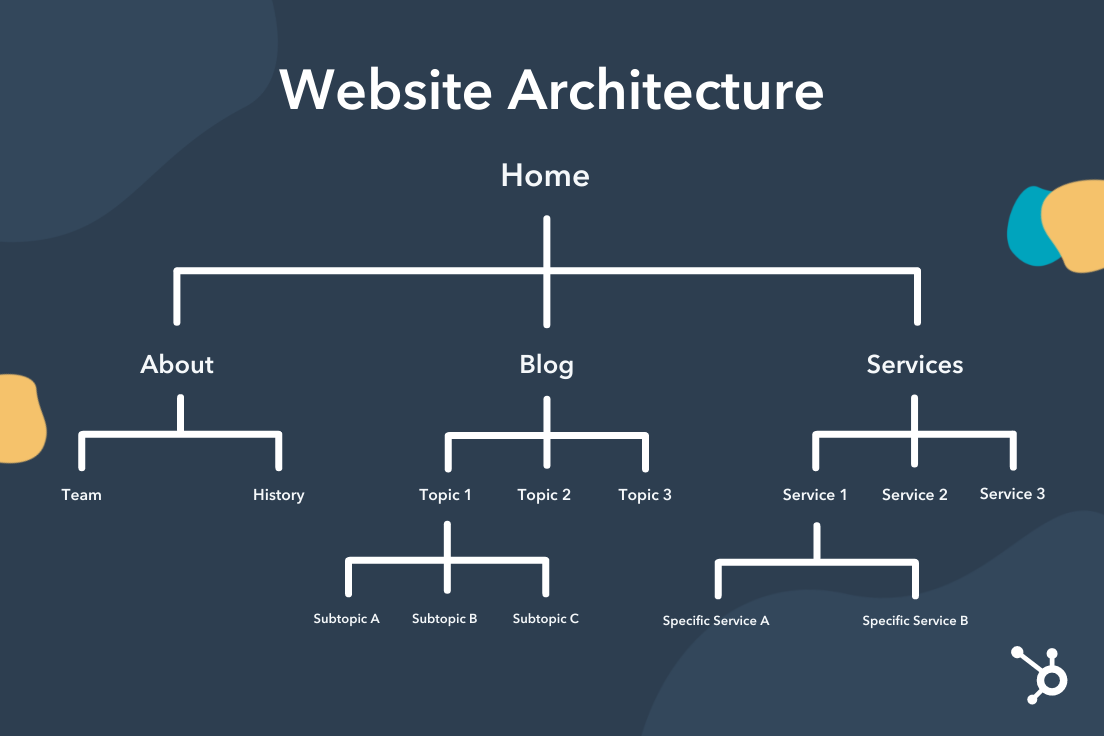
Here’s an example of a simple and clear website architecture.

Technical SEO for ecommerce: A chart that outlines effective website architecture.

“Pages should have a clear structure,” suggests James Taylor, SEO strategist at Embryo. “Reduce the amount of clicks required between the home page and checkout.”

In the case of an ecommerce website, your page structure should make it quick and easy for people to browse and purchase your products.

“Not only is clear site structure important for user experience,” adds Taylor, “but the structure of a website can also influence the success of how a search engine crawls and ultimately indexes your site.”

Pro tip: If you want to improve your chances of showing up in the SERP for a product your customer is shopping for, then Google has to know that your products exist. Keep this in mind when naming and organizing your ecommerce web pages.


Use structured data.

It’s also essential to include structured data in your site’s product pages. Structured data is a set of data that is organized and tagged with specific groups of text that help search engines understand the context of the information so they can present accurate results to searchers. This data is also referred to as schema markup.

In the context of ecommerce websites, structured data lets search engines know that your product pages are, in fact, products that people can purchase (versus informational pages like blog posts, for instance).

“Ecommerce sites typically include a lot of information,” explains Simon Hughes, founder and creative director of Design & Build Co. “If you don’t make [your site’s data] clear to Google, it can easily be misinterpreted and dramatically affect how you appear in search results.”

Pro tip: Schema markups can also improve the CTR (click-through rate) of your page in the SERP as they organize your product page’s data in a more appealing way to users by presenting them with information they’d want to know right away when shopping.

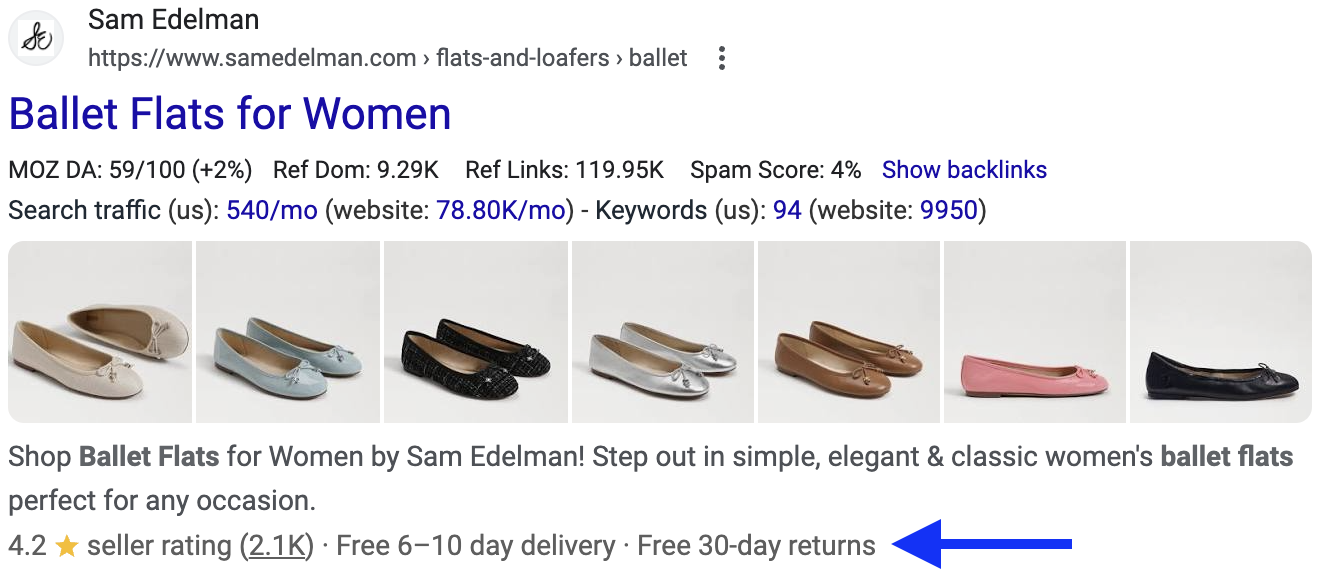
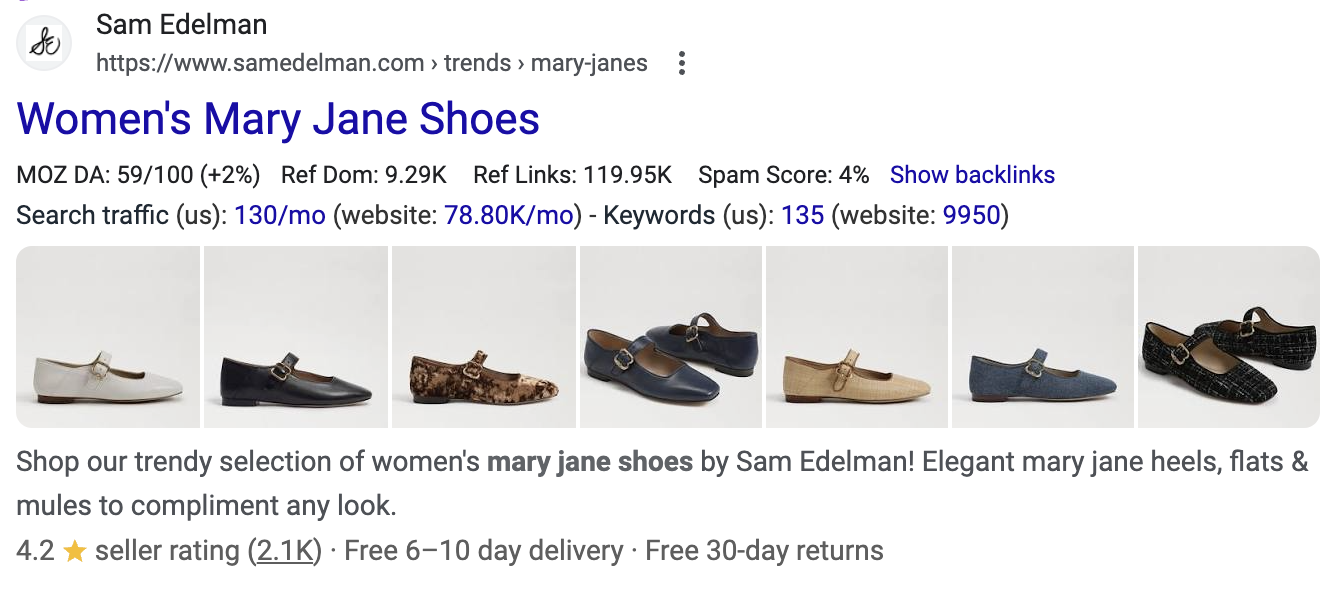
Here’s an example of a schema markup in action. This product listing for ballet flats from the shoe brand Sam Edelman includes the brand’s average rating and number of customer reviews, as well as its delivery timeline and return policy.

Technical SEO for ecommerce: A search engine result from the shoe brand Sam Edelman that includes a schema markup that’s helpful for shoppers.

Hughes adds, “By providing structured data in schema markups, you should be able to get additional information about your products visible to shoppers directly on the search results page.”

Helpful information you may want to highlight in your product markup includes:

  • Reviews.
  • Price.
  • Delivery window.
  • Return policy.

Consider what information can help your product stand out in the SERP.

What can help shoppers with their decision-making process? For instance, if you offer free shipping or free returns, this can be a benefit worth highlighting in your product markup as it will be one of the first things shoppers see.

Conduct keyword research.

Technical SEO isn’t just for the backend of your website — it can also support the front end. Conduct keyword research so you can incorporate target keywords into your on-page content as well as the backend.

“Knowing what people search for when purchasing the products you sell can help you write relevant content for product pages and categories,” says Taylor. “These focus keywords should then also be included within the meta title and description, alt tag, and product pages.”

The content on your site should not only be informative and useful to the visitors but should be tailored to search engines by letting them know what your ecommerce business offers and how trustworthy your site is.

Pro tip: All of your products should also have a unique title and specific description, which Taylor notes is “not a quick process, but [is] crucial to increase visibility.”

Refine your technical SEO.

Behind the scenes, there are a few more details that need to be refined to deliver a robust ecommerce SEO strategy.

These are the additional elements to optimize, according to Taylor:

  • Site speed. A slow website will increase bounce rate. Studies have shown that time on site impacts your search ranking, so it’s important to optimize your site speed.
  • Image quality. Large, high-resolution images can slow down your website. To improve your website speed, optimize your photos and graphics to be a smaller file size without compromising the resolution or appearance of the image.
  • Indexation. Also part of the site architecture, indexation will improve the search engine’s process when crawling your website. Indexation also helps the end user. Clear structure, internal linking, sitemap, and blocking pages that aren’t relevant all make it easier to navigate your website.
  • Mobile first. Most users access websites using their phones. In fact, 50% of shoppers aged 30-49 shop on their smartphones at least once a week. Ecommerce sites should be dynamic and optimized for mobile before desktop.

Optimize your site for Google Shopping.

The final step of executing technical SEO for your ecommerce website is to submit your product data to Google Merchant Center, recommends Hughes.

“While this isn’t necessary to appear in search results,” he says, “it can further help Google understand your products, and it also makes you eligible to appear in the Google Shopping tab.”

Pro tip: You’ll also need to complete this step if you plan to run Google Ads for your products, so it’s a good idea to set this up while you’re working on your site’s SEO.

Ecommerce Sites That Get Technical SEO Right

Keeping these expert tips in mind, I wanted to find a couple of ecommerce websites that execute technical SEO well so I could use them as inspiration for my own site. Here are some examples I found and what they get right.

Wayfair

Wayfair is the first ecommerce website that comes to my mind when I think about technical SEO. The home goods site has millions of products that must be organized, discoverable, and optimized for search. That’s some heavy lifting.

When I visited Wayfair’s site, the first thing I noticed was the navigation menu. Every product is organized into user-friendly categories at the top of the page. Not only is this easy to navigate as a shopper, but this is also a great example of site architecture.

Search engines can quickly understand how to index Wayfair’s website due to its clear structure.

technical SEO for ecommerce: Wayfair’s homepage features user-friendly navigation.

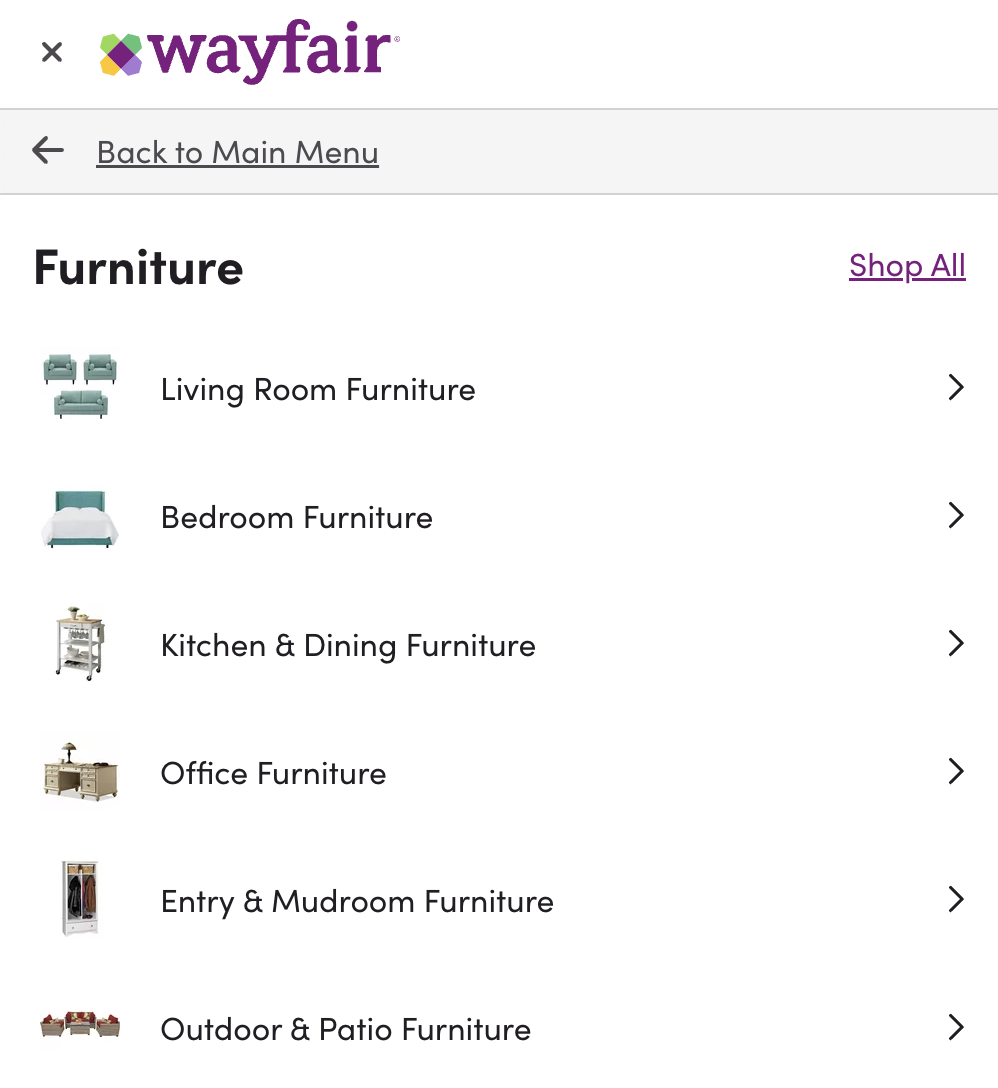
The next thing I notice is how each product section is optimized. For example, when I navigated to the “furniture” tab, I was taken to a drop-down menu of sub-categories to choose from based on the room I’m shopping for.

technical SEO for ecommerce: Wayfair’s drop-down navigation menu is organized into many sub-categories.

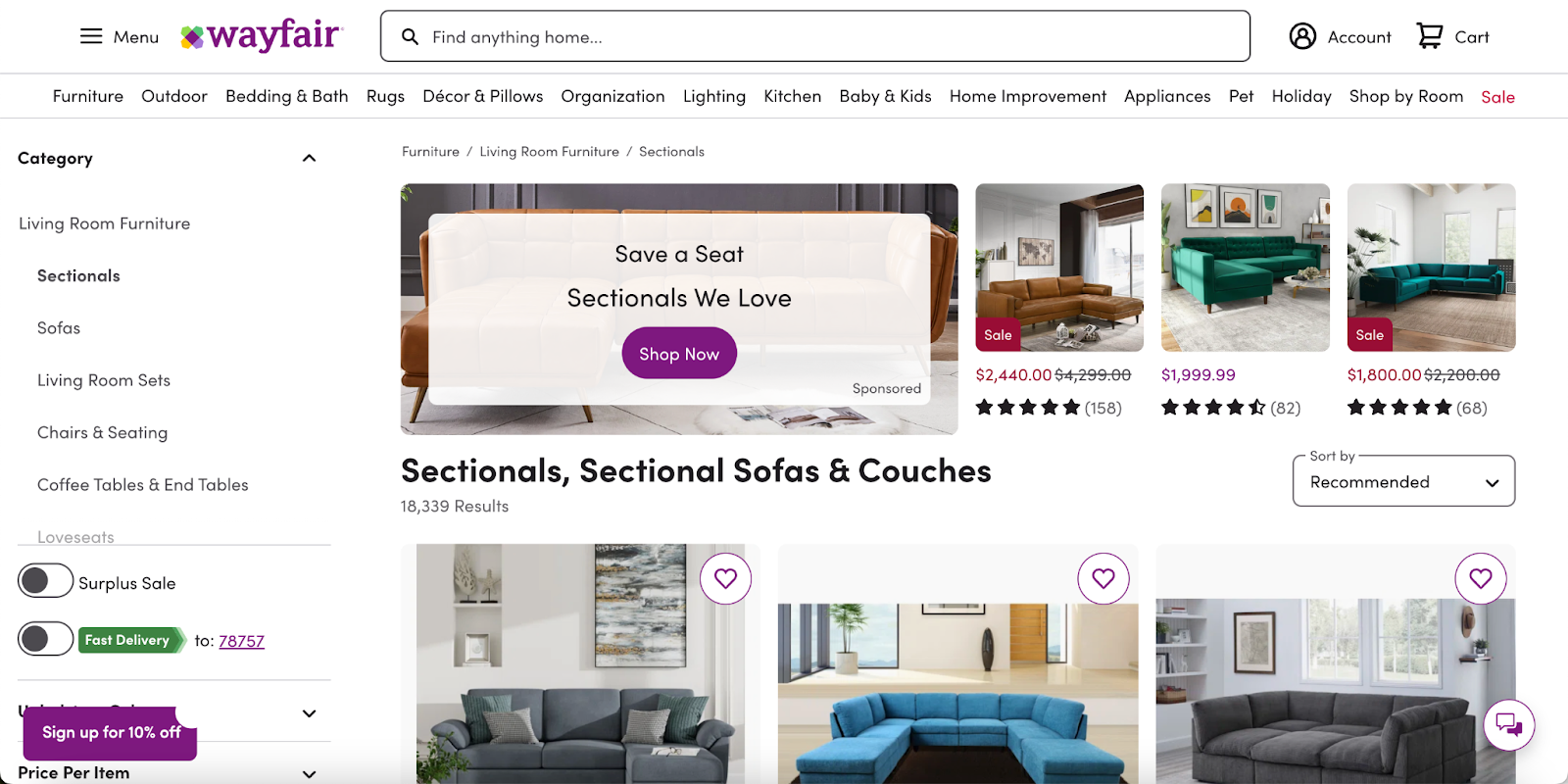
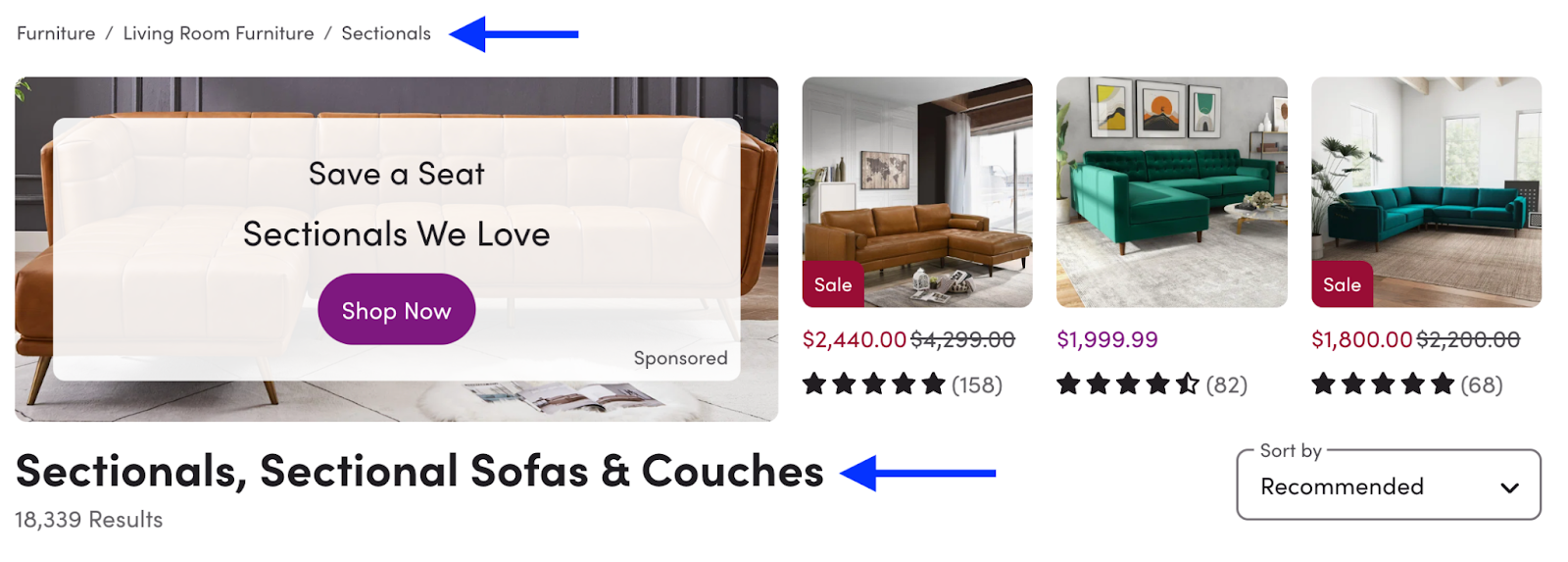
I went with the Living Room Furniture category. Once there, I navigated to the Sectionals category. I immediately noticed that not only was the page architecture very easy to follow, but the product page listed target keywords as the page title.

technical SEO for ecommerce: Wayfair’s header for the product page for sectionals and couches.

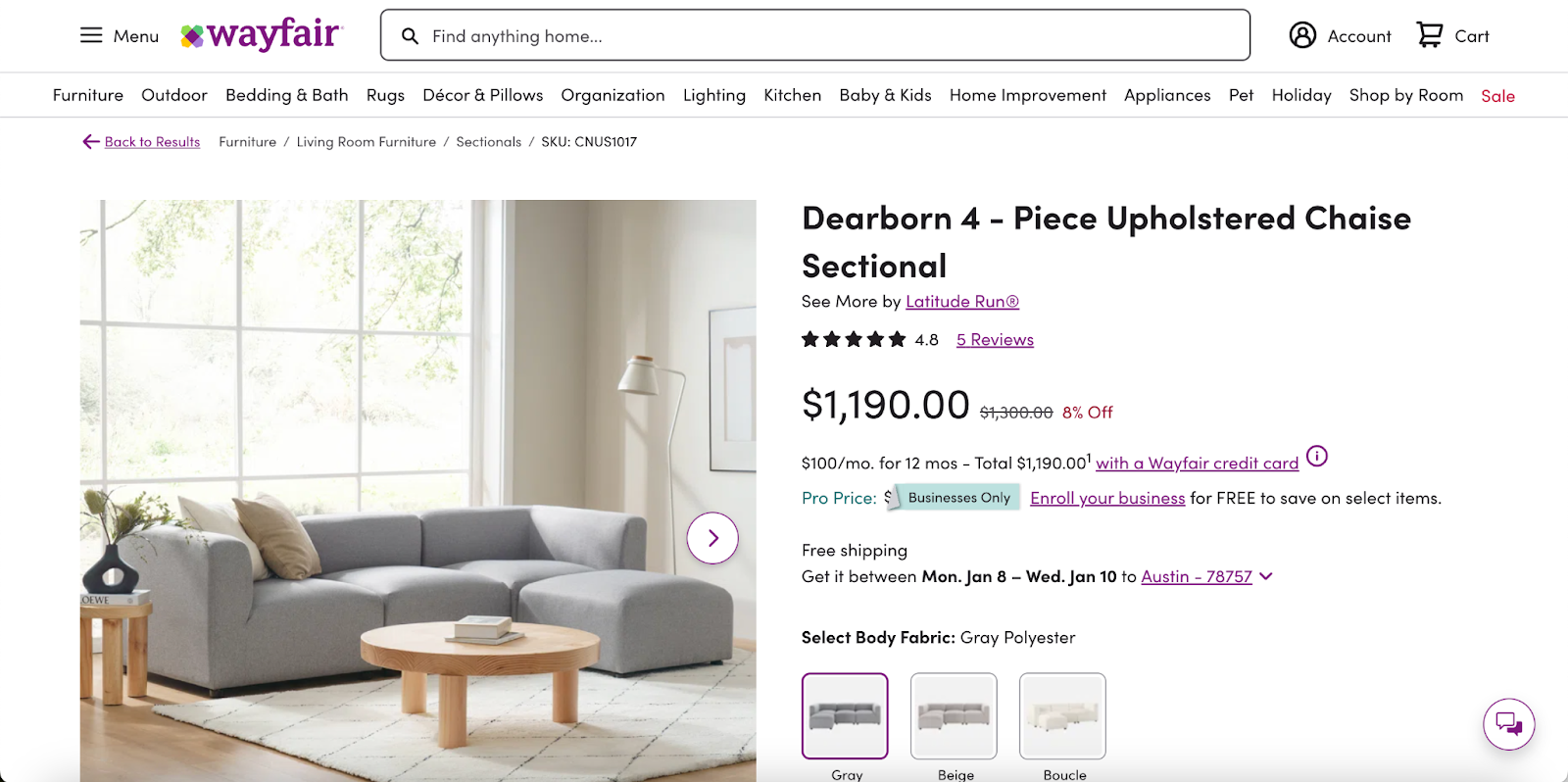
I selected one of the sofas listed to see how Wayfair incorporated technical SEO on an individual product page.

As I suspected, the product page is optimized for both the shopper and search engines. The product’s page title includes the sofa’s brand name as well as a descriptive keyword. There are also relevant keywords used throughout the product description.

technical SEO for ecommerce: Shoe brand Sam Edelman’s homepage displays a clear navigation menu.

Finally, I was curious what the search results for this product category looked like, so I searched for “reversible sectional” and saw this result from Wayfair:

This result aligns with one of the tips I shared above, which is to use schema markups to provide more information in the SERP.

What we like: Wayfair clearly follows technical SEO best practices to optimize its ecommerce website for shoppers and search engines.


Sam Edelman

I wanted to take a look at how an ecommerce website in a different shopping category executes technical SEO, so I checked out Sam Edelman.

Like many shoe brands, Sam Edelman offers a variety of shoe styles. To make it easy for shoppers to find what they’re looking for, the website offers user-friendly navigation:

I navigated to the Flats & Loafers category and was greeted with another optimized page.

There are several sub-categories within the flats and loafers style, and Sam Edelman displays them at the top for easy navigation. These categories can also help search engines better understand the brand’s website offerings.

technical seo for ecommerce: Sam Edelman’s product page for flats and loafers.

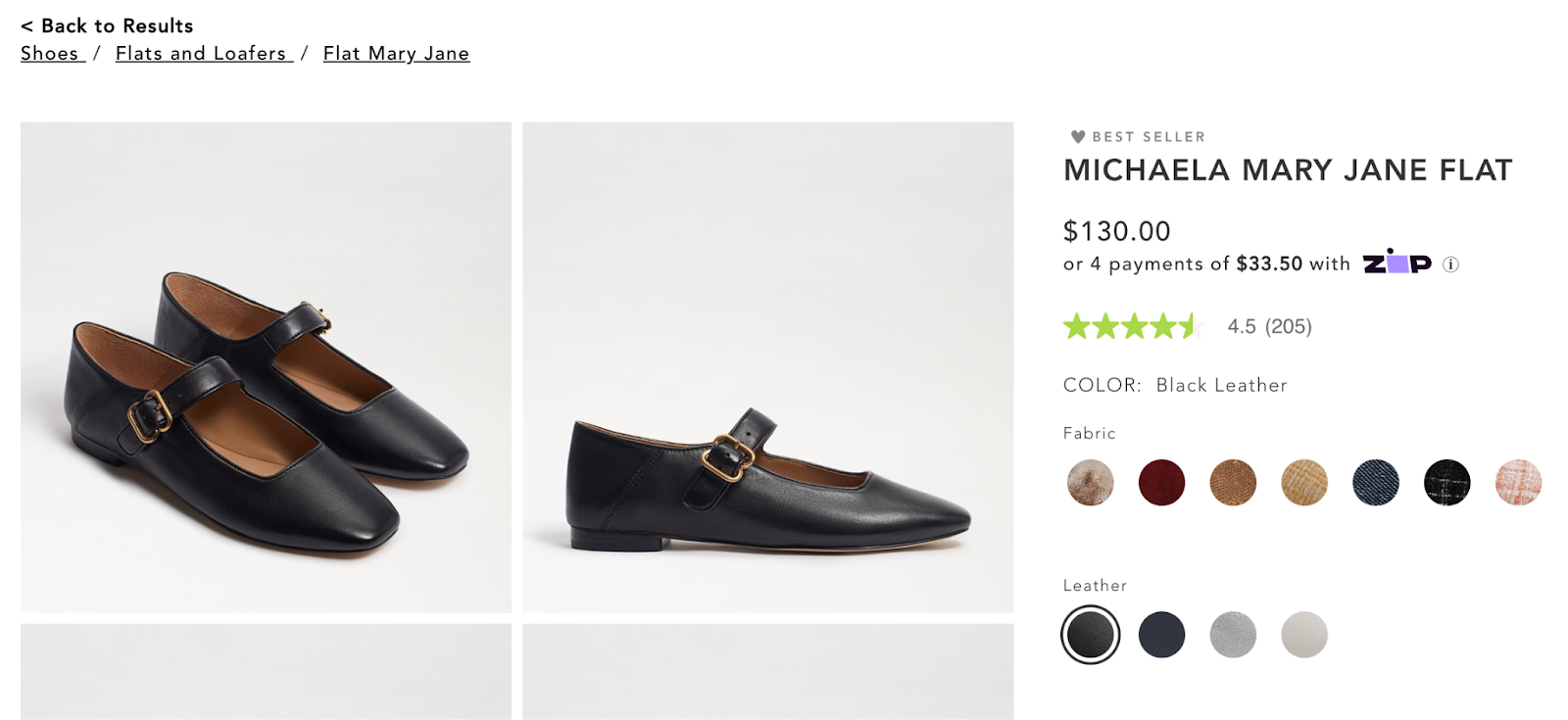
I selected one of the brand’s best-sellers to see how the individual product pages are optimized. Mary Jane flats are a popular shoe style right now, so it makes sense to include the phrase “Mary Jane” in the product title.

technical seo for ecommerce: A product page for Mary Jane flats from Sam Edelman.

Image Source

As I did with Wayfair, I also ran a search for one of the keywords I found on Sam Edelman’s website, “Mary Jane flats.”

Here’s how the search result shows up:

technical seo for ecommerce: A product page for Mary Jane flats from Sam Edelman.

What we like: Not only are all of the relevant products organized under one page (which makes it easy for Google to index), but the search listing also includes a schema markup with important information for decision-makers.

What I Learned About Technical SEO for Ecommerce

As I embark on my journey of launching an ecommerce website, I now have a deeper understanding of why technical SEO is so crucial — and how I can use it as a tool to help my website stand out.

My biggest takeaway is that the website structure is a major determining factor in whether or not Google understands what you do. To help search engines understand that I sell products, it helps to create a simple navigation menu with categories and sub-categories.

Clear navigation also makes it easy for users to find what they’re looking for. And if there’s one thing I want to guarantee for my ecommerce website, it’s that my future customers have a seamless experience. I want to make sure it’s easy for them to discover my ecommerce site, explore my products, and shop seamlessly.

Technical SEO can give your ecommerce business a leg up. When you understand how to appease both shoppers and search engines, you increase your chances of making sales — and that’s the end goal, after all.

excel marketing templates

Categories B2B

How to Create Excel Charts and Graphs

Excel charts and graphs are tried-and-true tools for visualizing data clearly and understandably. But for those who are not native tech gurus, it can be a bit intimidating to poke around in Microsoft Excel.

I’m here to share the foundational information you need, helpful video tutorials, and step-by-step instructions for anyone feeling like they are in over their heads.

Organizing a spreadsheet full of data into an accurate and attractive chart isn’t sorcery — you can do it! Let’s go over the process from A to Z.

Download 10 Excel Templates for Marketers [Free Kit]

What an Excel Chart or Graph is — and Why to Use Them

The first thing to know is that you can create different types of charts and graphs in the software.

The unique information in your data set(s) and the audience you are communicating to are factors that go into choosing the appropriate chart or graph for your project, so let’s chat charts.

But why use them? Do you need to visualize data when you can just explain it? The answer is typically yes if you want to help an audience understand and retain the relevant findings.

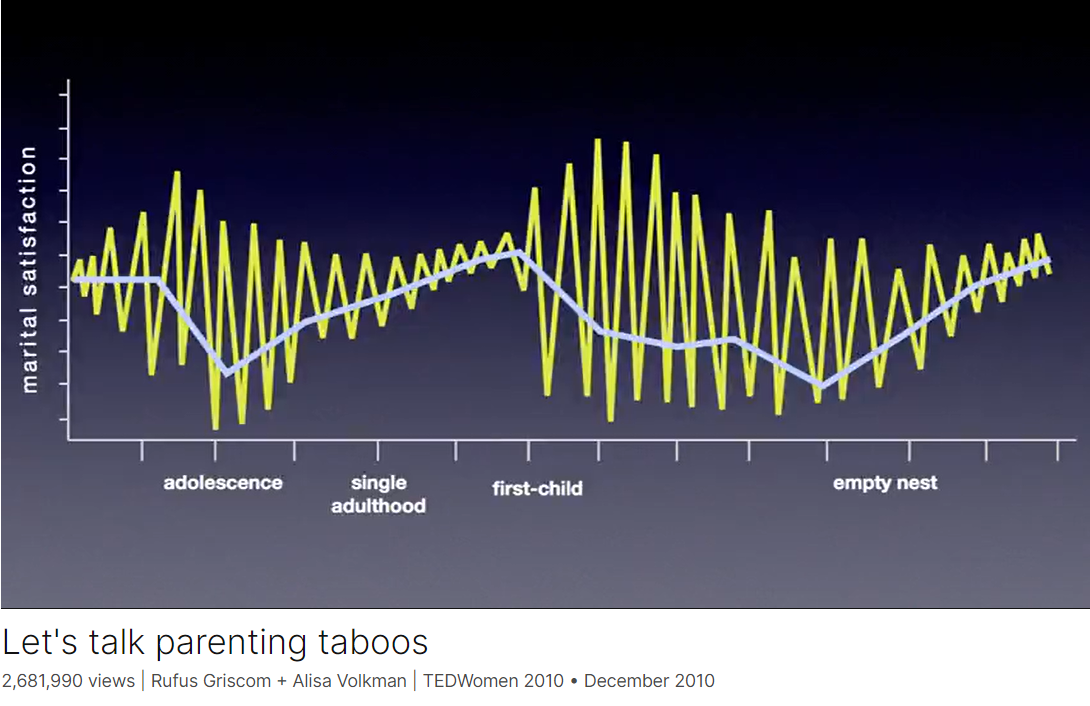
I’ll never forget a particular graph from a TED talk I saw on parenting taboos — and I’ve never seen anything play out so accurately in my own life, either:


Image Source

This chart from Rufus Griscom + Alisa Volkman shows a mean line of happiness in blue and more of a moment-by-moment breakdown in yellow of the data points that build the mean you see.

The highs and lows tend to be less erratic during single adulthood because you have more control over your environment and circumstances, they explain, but once you have kids? Chaos.

They joked about Grand, explosive moments of love accompanied by mind-numbing, soul-punching lows — usually around bedtime routines. (It’s no joke.)

From this, we can glean that it’s always a good idea to distill the information into something visually digestible so you can communicate clearly and efficiently.

The last thing you want is to lose your target’s attention in a sea of incomprehensible numbers.

Especially for large data sets, an Excel chart or graph gets to the heart of your findings in a way that is easy to see and understand at a single glance, especially when you incorporate comparisons.

If your data has more than one finding to communicate — such as a comparison or if you want to illustrate changes taking place over time — Excel charts and graphs offer several options for creating impactful visuals.

By the end, you’ll have some ideas about which charts could help you tell the stories contained within your data.


The 18 Types of Charts in Excel (So Far)

Whew, Microsoft has been busy! Last I did a deep dive, there were only nine types of charts, so it has doubled in the previous few years — which is excellent news for research communicators.

When you understand their uses, you can present material optimized to be highly valuable and insightful for your team’s projects.

We’ll go over the best, tried-and-true options thoroughly. Then, at the end, I’ll briefly summarize the advanced chart types and those that may not be as useful to marketers.

Excel Charts Most Useful to Marketers

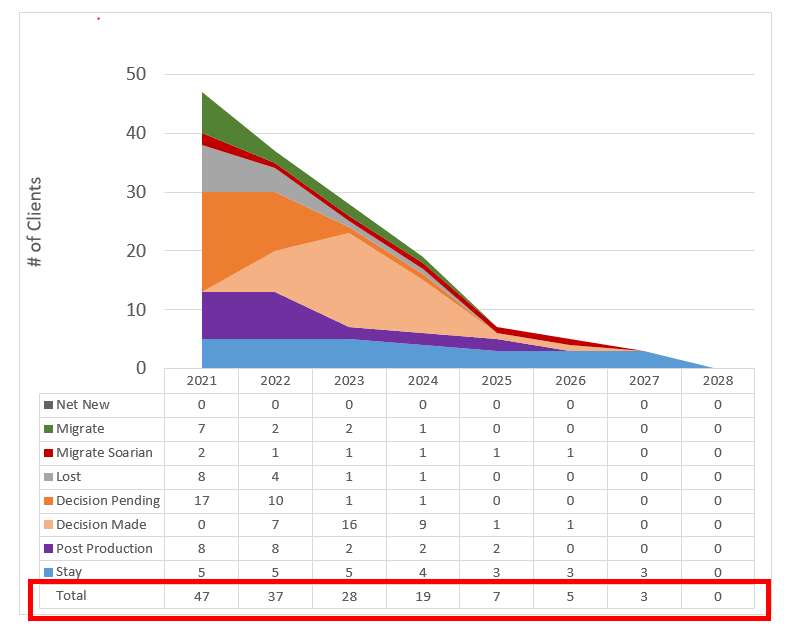
1. Area Chart

Image Source

Excel area charts allow you to see trends over time — or some other relevant variable. It’s essentially a line graph with colored-in sections emphasizing progression and giving a sense of volume.

You can also use stacked area charts. This denser area chart allows you to show more information at once, such as comparing trends in multiple categories or tracking changes across different variables.

Best for: Demonstrating the magnitude of a trend between two or more values over a given period.

2. The New and Improved Bar Graph (Now Called a Clustered Bar Graph)

Image Source

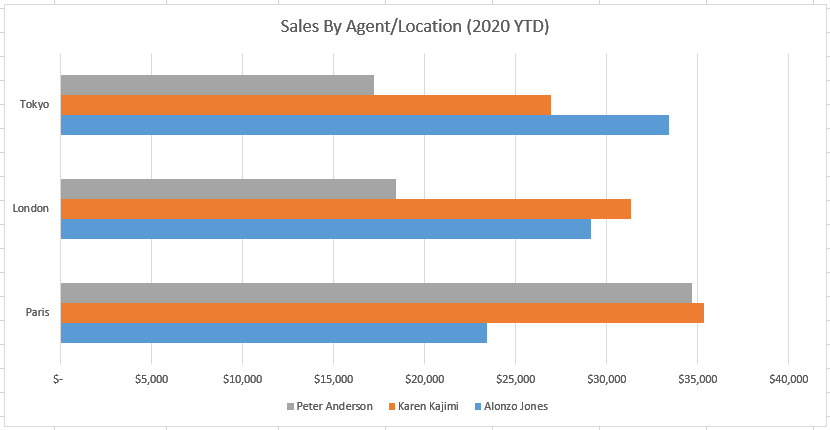
An Excel bar graph represents information horizontally and compares different data series. You can easily see the proportions between various categories or elements of your data.

For instance, you can use clustered bar graphs to compare the sales of different products, for example, in other store locations over months or quarters.

This can help you understand which products sell well in different geographies during the same time frame.

Best for: Comparing the frequency of similar values between different variables.

3. Ditto for Column Charts (Renamed Clustered Column Charts)

Image Source

Column charts are similar to bar graphs, but they differ in one critical way: they’re vertical, not horizontal. The vertical orientation lends itself to helping viewers rank different data elements.

Like bar graphs, column charts compare data, display trends, and show proportions.

For instance, if you want to rank your sales teams’ numbers in different states across a quarter, you can visualize them in a clustered column chart and see which team in each state is in the lead — the tallest in the cluster. 

You can also see which team is leading among all states — the tallest among all clusters.

Best for: Displaying various data elements over some time to rank them visually.

Pro tip: I’ve personally learned that column charts displaying T-bars of statistical significance are extremely useful in helping people in leadership dispel likely but ultimately untrue interpretations of data.

Sometimes, data showing meaningful change is still within normal parameters. Sometimes, what seems like a slight difference is significant.

Managers and directors may need help seeing these realities so they don’t oversteer at decision time.

4. Line Graph

Image Source

A line graph is a simple but highly effective way to see trends over time at a glance — even without the frills of bars, columns, or extra shading. You can also compare multiple data series.

For instance, the number of organic visits from Google versus Bing over a 12-month period.

You can also see the rate or speed at which the data set changes. In our Google vs. Bing example, a steep incline would mean you had a sudden spike in organic traffic. A more gradual decline means that your traffic is slowly decreasing.

Best for: Illustrating trends over time, such as spikes or drops in sales due to holidays, weather, or other variables.

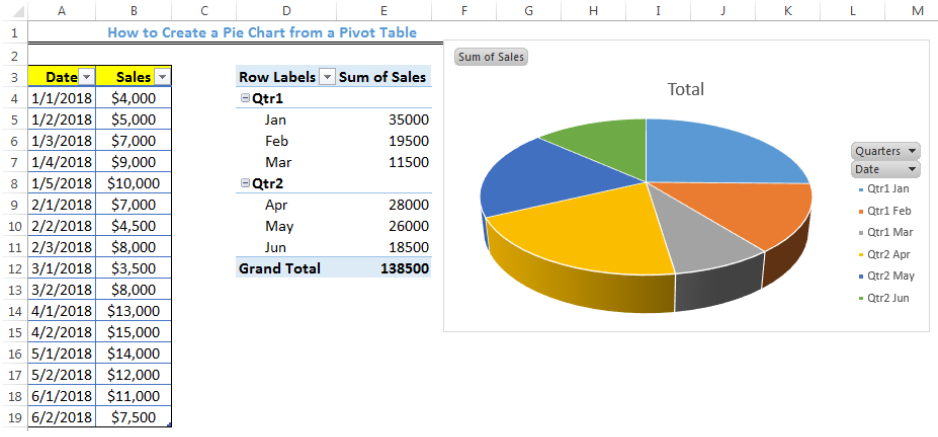
5. Pie Chart

Image Source

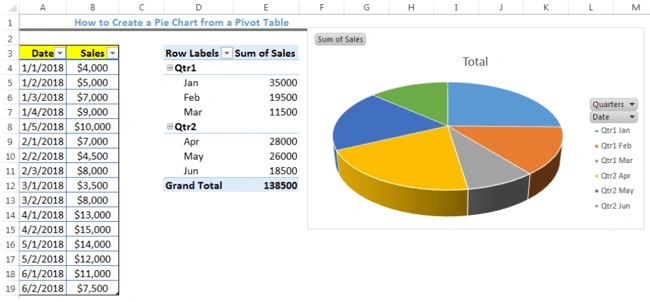
A pie chart is a helpful way of seeing how different data elements proportionally compare to one another. Curious what percentage of your organic traffic is from Google versus Bing?

Or how much market share do you have compared to competitors? A pie chart is a fitting way to visualize that information.

It’s also a great way to see and communicate progress toward a specific goal.

For instance, if your goal is to sell a product every day for 30 days in a row, then you might create a pie chart with 30 slices and shade a slice each day you sell the product.

Best for: Showing values as percentages of a whole and viewing data elements proportionately.

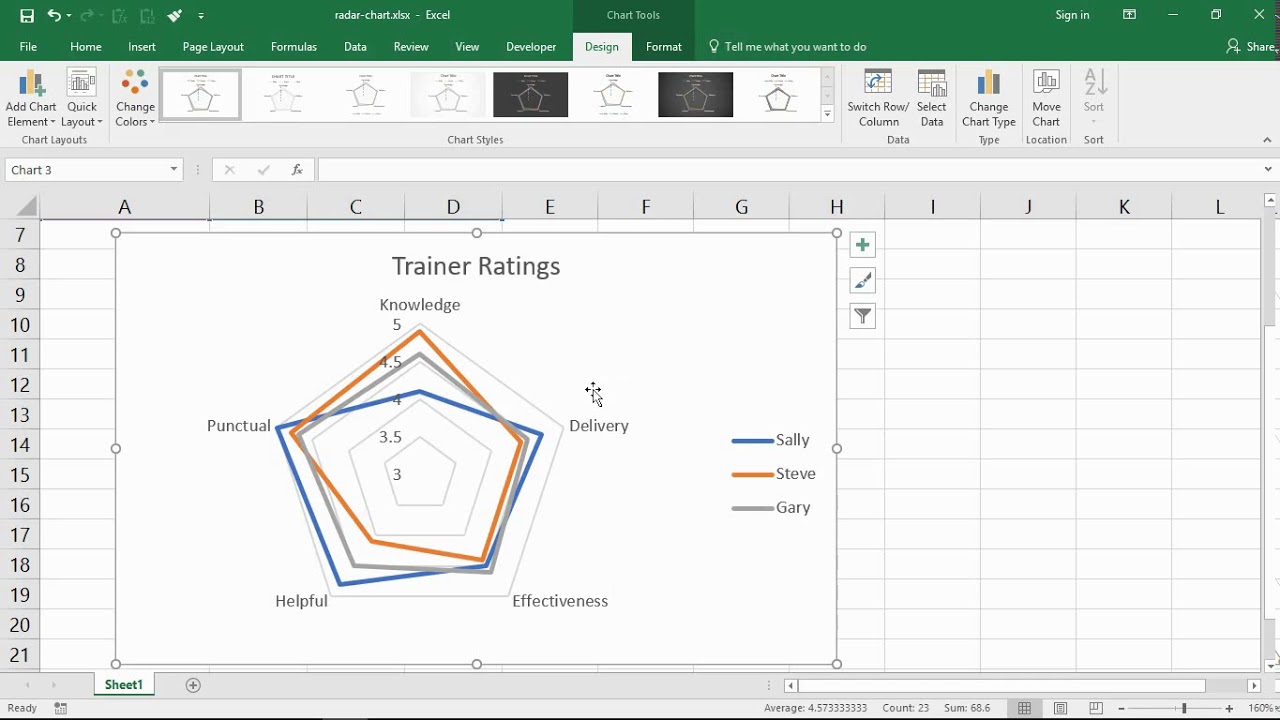
6. Radar Chart

Image Source

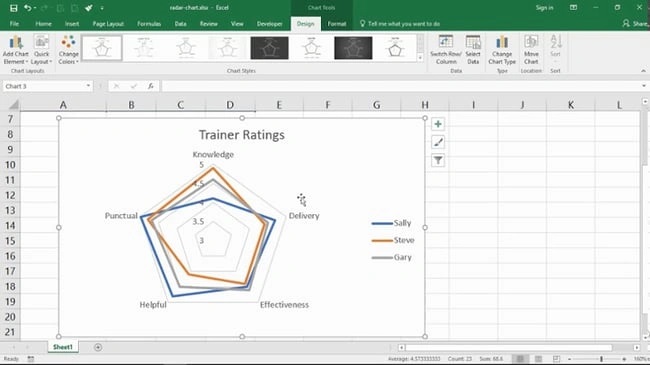
A radar chart might look familiar to you if you’ve ever taken a personality test, but it’s also useful outside of that industry. Radar charts display data in a closed, multi-pointed shape.

Each point is called a spoke, and multiple variables “pull” spokes of the shape. Then, shapes can be stacked up for comparison.

This type of chart is well-designed for comparing different data elements, such as attributes, entities, people, strengths, or weaknesses. It also helps you see the distribution of your data and understand if it’s overly skewed one way or another.

Best for: Comparing the aggregate values of multiple data series at once.

7. Scatter Plot

Image Source

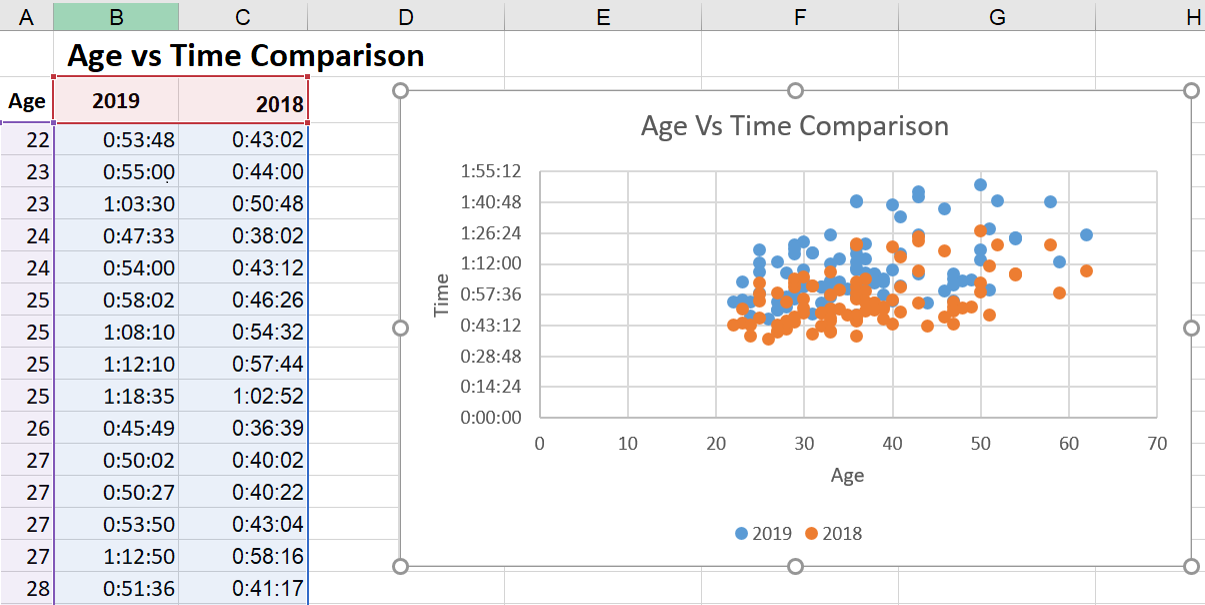
Scatter plots look similar to line graphs but with one critical difference: They evaluate the relationship between two variables, shown on the X- and Y-axes. This enables you to identify correlations and patterns between them.

For instance, you might compare the amount of organic traffic (X-axis) with the number of leads and signups (Y-axis).

If you see an upward trend in the dots where these two converge, then you’ll have an idea of how an increase in organic traffic affects your leads and signups.

If you have a leads/signups goal, you can then create a more data-driven plan for increasing your organic traffic.

You can even take it a step further to compare the number of leads and signups with daily sales or conversions to keep more programs on data-driven paths.

Best for: Visualizing positive or negative relationships between two variables.

8. Funnel Chart

Image Source

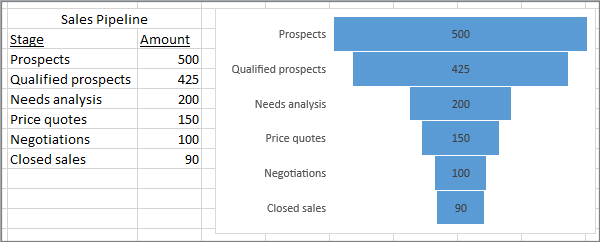
Funnel charts are extremely well-suited to marketers who want to optimize processes and pipelines.

In the image above, it’s clear that you drop the most candidates between Qualified Prospects and Needs Analysis, so that portion of your funnel may be interesting to look into more deeply to understand why.

Best for: Visually representing changes through processes helps to clarify where the biggest changes occur along the way.

Pro tip: My experience has taught me that if you only use two levels — especially if there’s not a great change between them, it’s easy to mistake this for a bar graph, which functions completely differently.

You’ll definitely want to use at least three levels so it’s more clearly distinguished as a funnel shape.

9. Histogram Chart

Image Source

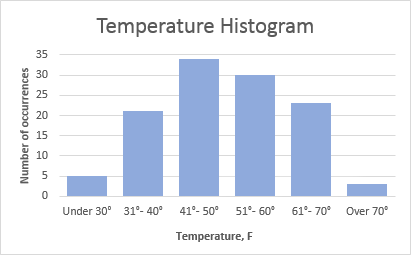
Histograms are a solid option when you want to explain data that occurs most usefully in ranges. Let’s say that you want to show your clients the buying habits of various age demographics in your product niche.

You may find that your target audience has moved, possibly even jumped a range up or down.

If your client has sold baby products for the last 100 years, you’d definitely see that the target audience of first-time parents is getting older as people wait longer to have children.

This may change your marketing strategies to meet the needs and issues of this older first-time parent demographic.

Best for: Demonstrating data findings that are most noticeable and useful when the data is grouped in ranges.


Advanced Excel Charts

It’s smart for you to know that the following chart types exist, but they may not be the best place to start if you arrived here today a bit overwhelmed.

They are more complicated and better suited to audiences who can already read advanced-level charts:

  • Box and whisker chart.
  • Pareto chart.
  • Surface chart.
  • Sunburst chart.
  • Treemap chart.

Industry-Specific Excel Charts

The remaining Excel chart types don’t typically lend themselves to marketing. But, hey — if your niche calls for it, these charts are there to support you:

  • Stock chart.
  • Waterfall chart.
  • Filled map chart.
  • Combo chart.

Summarizing the Charts

That was a ton of information. If you’re still not sure which to choose, here’s a concise comparison of the Excel charts I find to be most useful to marketers:

Type of Chart

Use

Area

Area charts demonstrate the magnitude of a trend between two or more values over a given period.

Clustered
Bar

Clustered bar charts compare the frequency of values across different levels or variables.

Clustered
Column

Clustered column charts display data changes over a period of time to make clear visualizations of rank among data sets.

Line

Similar to bar charts, they illustrate trends over time.

Pie

Pie charts show values as percentages of a whole.

Radar

Radar charts compare the aggregate value of multiple data series.

Scatter

Scatter charts show the positive or negative relationship between two variables.

Funnel

Funnel charts excel at visualizing changes to one data point over various processes.

Histogram

Histograms show variations in data that are best represented as a range of values.

If you’re looking for a deeper dive to help you figure out which type of chart/graph is best for visualizing your data, check out our free ebook, How to Use Data Visualization to Win Over Your Audience.

How to Create a Graph in Excel

The steps to build a chart or graph in Excel are relatively simple. I encourage you to follow the step-by-step instructions below or download them as PDFs if that’s more efficient for you.

Most of the buttons and functions you’ll see and read are very similar across all versions of Excel.

Download Demo Data | Download Instructions (Mac) | Download Instructions (PC)

Featured Resource: Free Excel Graph Templates

Before we jump in, it’s time for another pro tip. You need not start from scratch. You are welcome to use these free Excel Graph Generators. Just input your data and adjust as needed for a beautiful data visualization.

It’s a great time-saver if you don’t need something as custom as building your Excel charts and graphs up from zero.

When you do need to create and customize from the very start, here’s how to tackle it:

1. Enter your data into Excel.

First, you need to input your data into Excel. You might have exported the data from elsewhere, like a piece of marketing software or a survey tool — or maybe you’re inputting it manually from spreadsheets. I don’t judge!

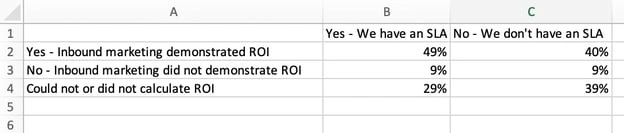
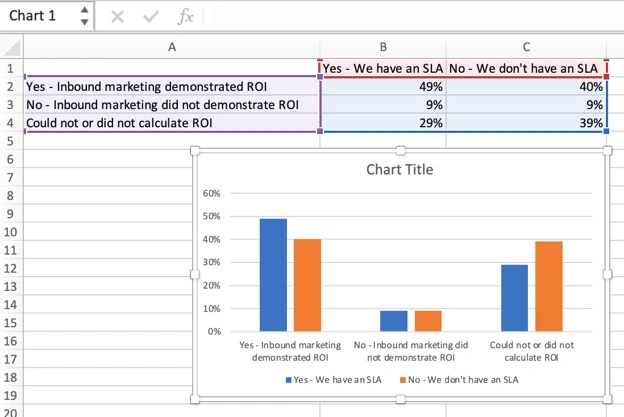
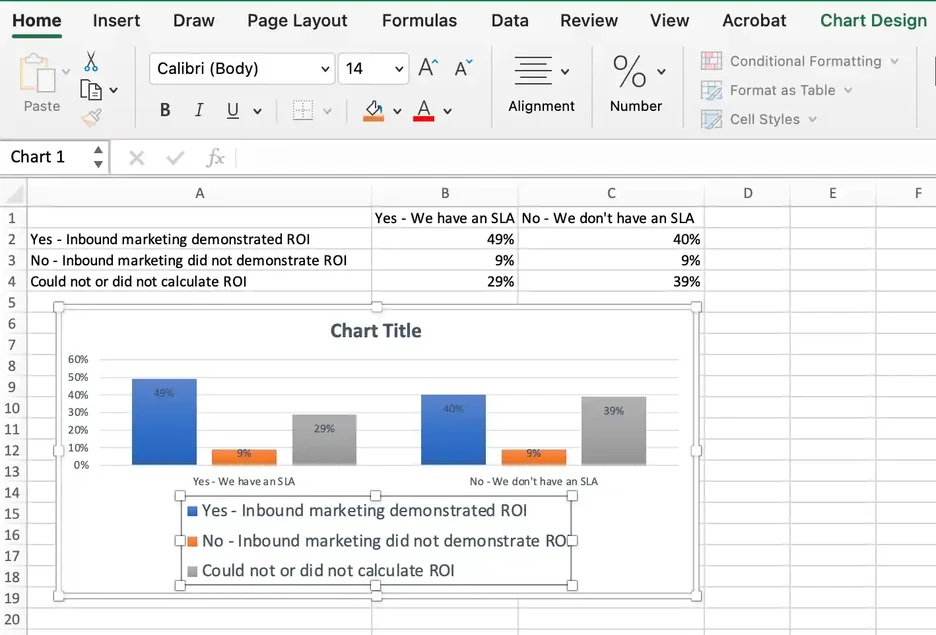
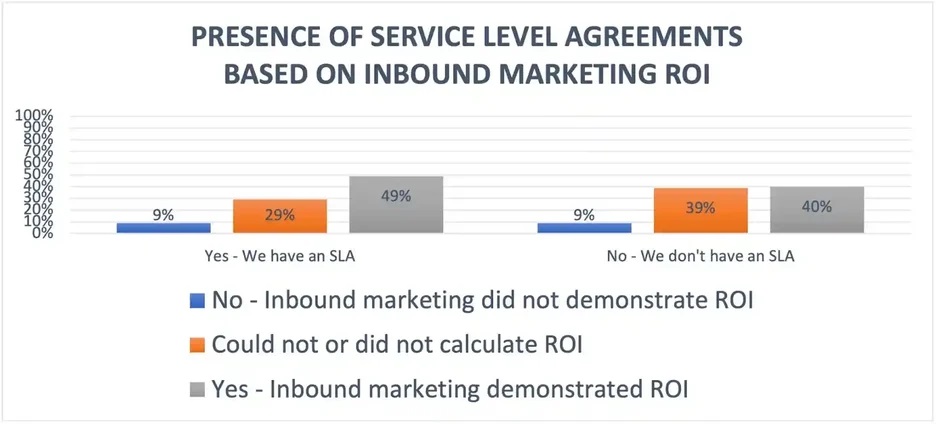
In the example below, in Column A, I have a list of responses to the question, “Did inbound marketing demonstrate ROI?” and in Columns B, C, and D, I have the responses to the question, “Does your company have a formal sales-marketing agreement?”

For example, Column C, Row 2 illustrates that 49% of people with a service level agreement (SLA) also say that inbound marketing demonstrated ROI.

2. Choose from the graph and chart options.

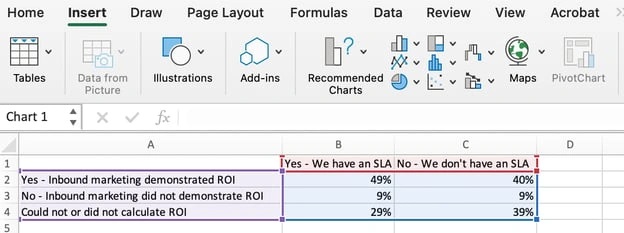
In Excel, your options for charts and graphs include column (or bar) graphs, line graphs, pie graphs, scatter plots, and more. See how Excel identifies each one in the top navigation bar, as depicted below:

To find the chart and graph options, select Insert.

3. Highlight your data and insert your desired graph into the spreadsheet.

In this example, a bar graph presents the data visually. To make a bar graph, highlight the data and include the titles of the X- and Y-axis. Then, go to the Insert tab and click the column icon in the charts section.

Choose the graph you wish from the dropdown window that appears.

I picked the first two-dimensional column option because I prefer the flat bar graphic over the three-dimensional look. See the resulting bar graph below.

However, if I were reporting statistics about skyscrapers to a builder’s union, I’d definitely pick the three-dimensional look to customize the chart to look like built structures.

There are optimization choices to make along the way to best fit your data and audience.

4. Switch the data on each axis, if necessary.

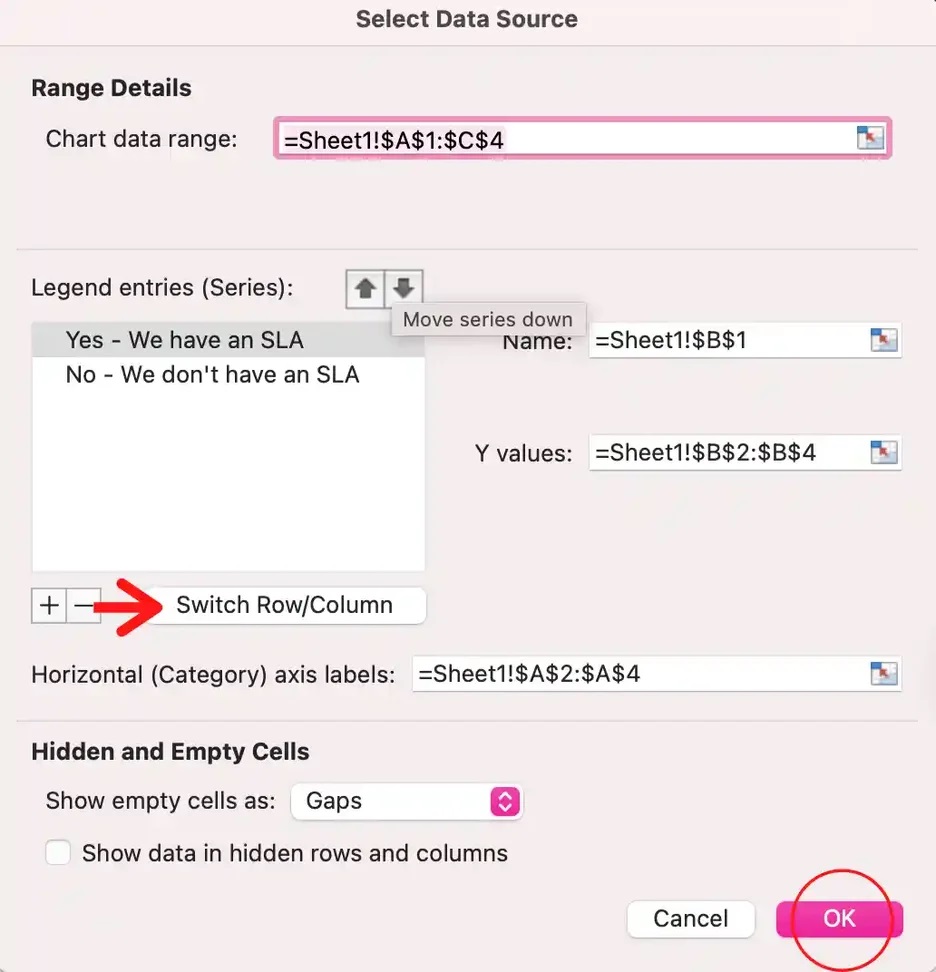
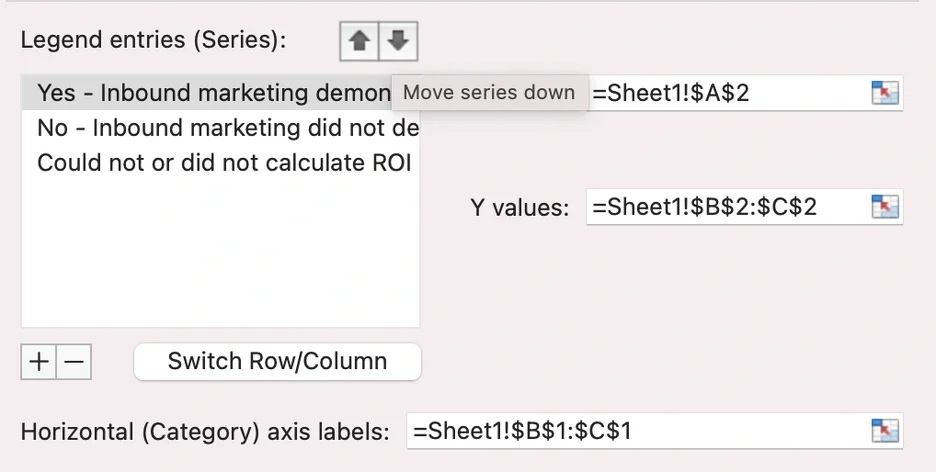
If you want to switch what appears on the X and Y axis, right-click on the bar graph, click Select Data, and click Switch Row/Column. This will rearrange which axes carry which pieces of data in the list shown below.

Sometimes, you’ll see that your information just presents better one way versus the other. In this case, I think the first X and Y orientation is easier and simpler to understand.

Keep in mind, though, that it’s not about me.

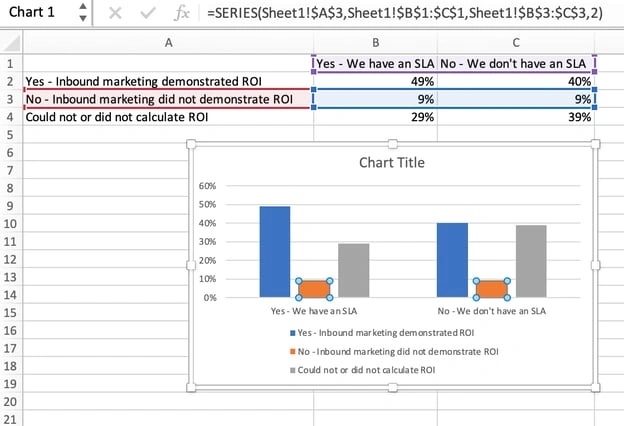
If the presentation focuses on SLAs and executive decisions on whether or not to secure one, a Yes/No SLA configuration (the second XY orientation) is likely a better fit for the audience and their needs. When finished, click OK at the bottom.

The resulting graph would look like this:

5. Adjust your data’s layout and colors.

To change the labeling layout and legend, click on the bar graph, then click the Chart Design tab. Here, you can choose which layout you prefer for the chart title, axis titles, and legend.

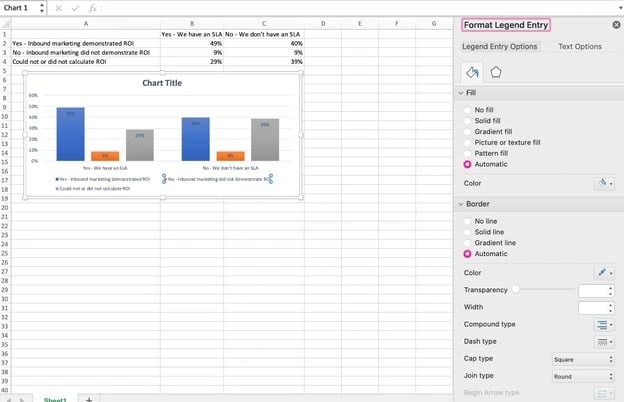
In my example below, I clicked on the option that displayed softer bar colors and legends below the chart.

To further format the legend, click on it to reveal the Format Legend Entry sidebar, as shown below. Here, you can change the fill color of the legend, which will change the color of the columns themselves.

To format other parts of your chart, click on them individually to reveal a corresponding Format window.

6. Change the size of your chart’s legend and axis labels.

When you first make a graph in Excel, the size of your axis and legend labels might be small, depending on the graph or chart you choose (bar, pie, line, etc.)

Once you‘ve created your chart, you’ll want to size those labels up so they’re legible.

To increase the size of your graph’s labels, click on them individually and, instead of revealing a new Format window, click back into the Home tab in the top navigation bar of Excel.

Then, use the font type and size dropdown fields to expand or shrink your chart’s legend and axis labels to your liking.

7. Change the Y-axis measurement options if desired

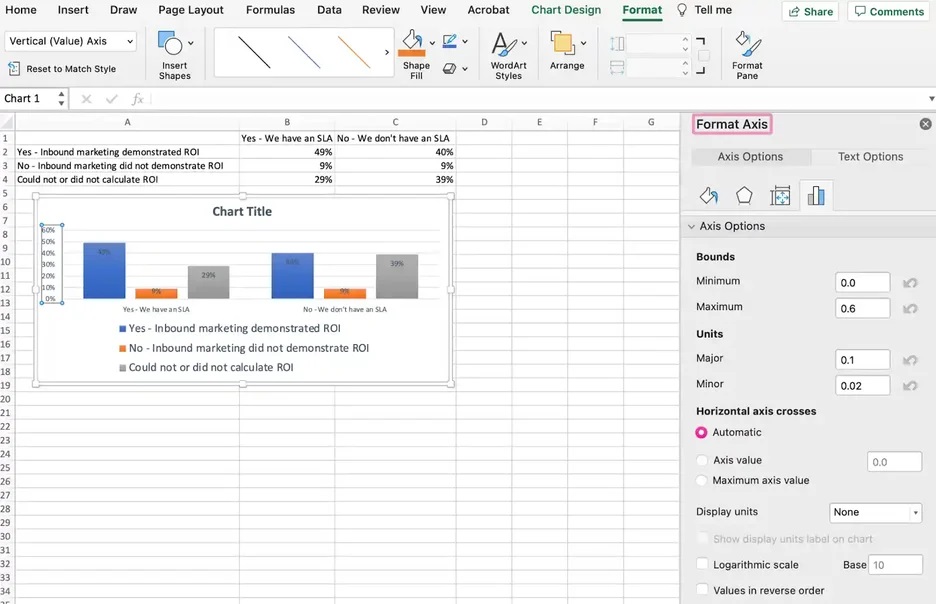
To change the type of measurement shown on the Y-axis, click on the Y-axis percentages in your chart. This reveals the Format Axis window.

Here, you can decide if you want to display units located on the Axis Options tab. You can change whether the Y-axis shows percentages to two decimal places or no decimal places.

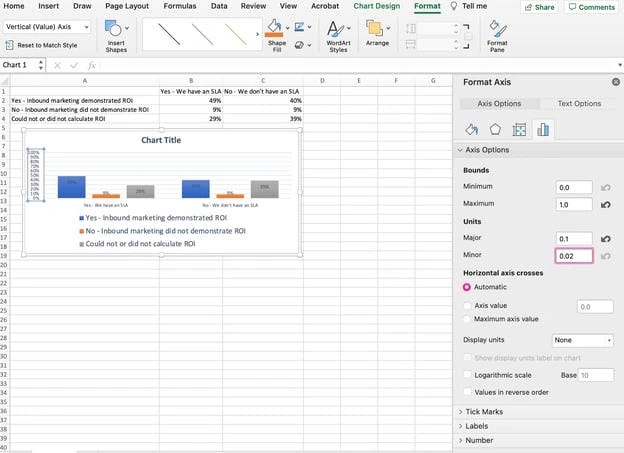
Because my graph automatically sets the Y axis’ maximum percentage to 60%, you might want to change it manually to 100% to represent data on a universal scale.

To do so, you can select the Maximum option — two fields down under Bounds in the Format Axis window — and change the value from 0.6 to one.

The resulting graph will look like the one below (In this example, the font size of the Y-axis has been increased via the Home tab so that you can see the difference):

8. Reorder your data, if desired.

To sort the data so the respondents’ answers appear in reverse order, right-click on your graph and click Select Data to reveal the same options window you called up in Step 3 above.

This time, arrow up and down to reverse the order of your data on the chart.

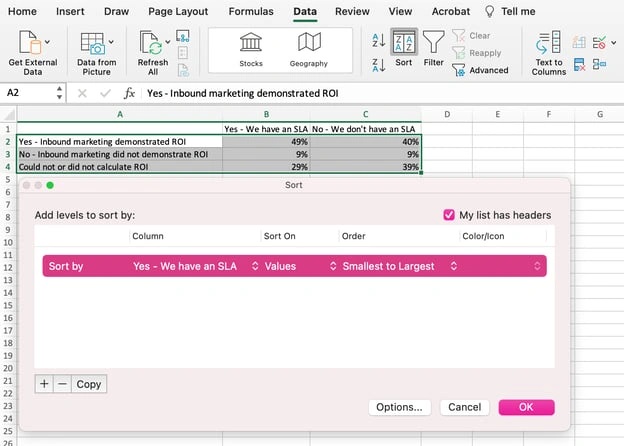
If you have more than two lines of data to adjust, you can also rearrange them in ascending or descending order. To do this, highlight all of your data in the cells above your chart, click Data, and select Sort, as shown below.

Depending on your preference, you can choose to sort based on smallest to largest or vice versa.

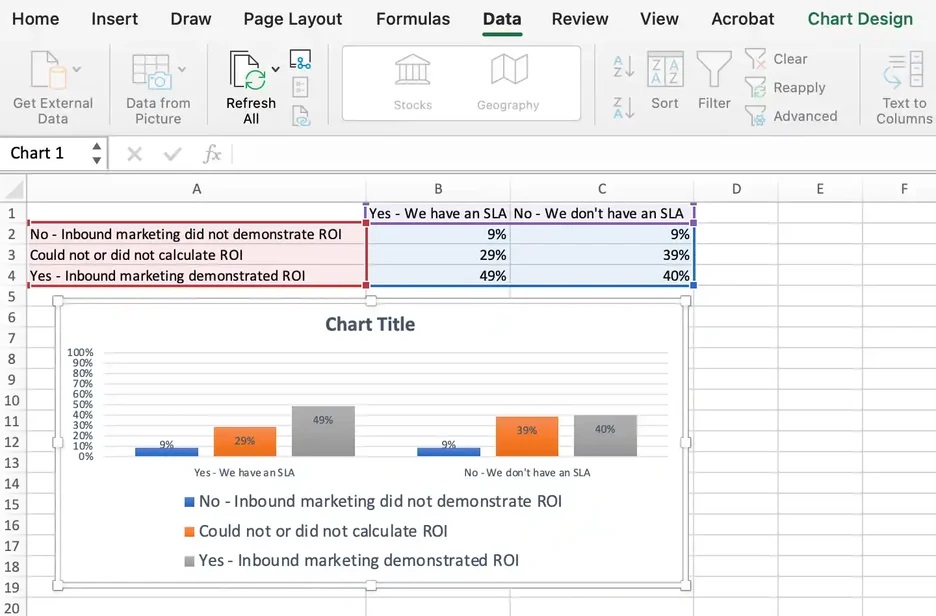
The resulting graph would look like this, which is tremendously better. Why? Because it shows your audience the progression of results and becomes visually persuasive.

9. Title your graph.

Now comes the fun and easy part: naming your graph. By now, you might have already figured out how to do this. Here’s a simple clarifier.

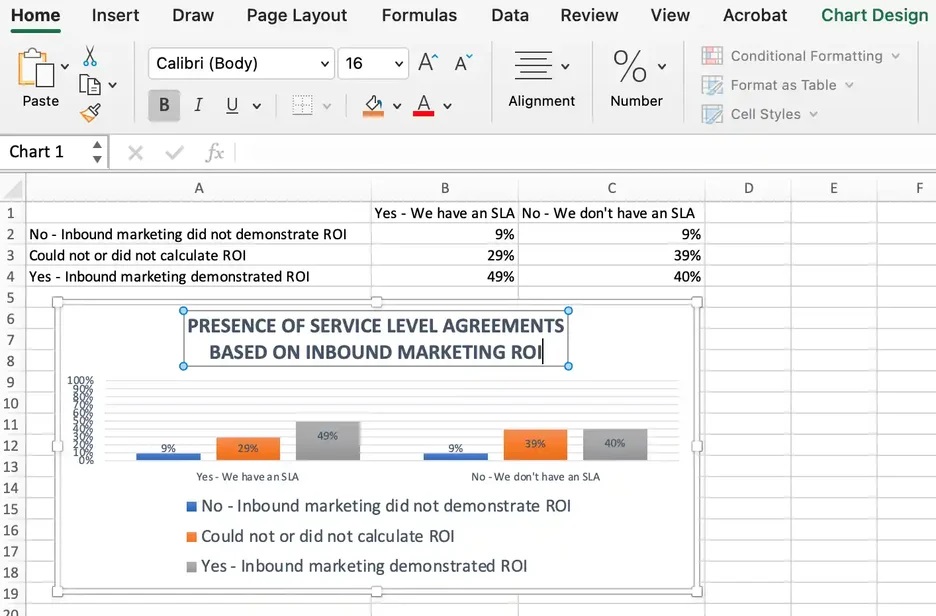
Right after making your chart, the title that appears will likely be “Chart Title” or something similar, depending on the version of Excel you‘re using. To change this label, click on “Chart Title” to reveal a typing cursor.

You can then freely customize your chart’s title.

When you have a title you like, click Home on the top navigation bar, and use the font formatting options to give your title the emphasis it deserves. See these options and my final graph below:

10. Export your graph or chart.

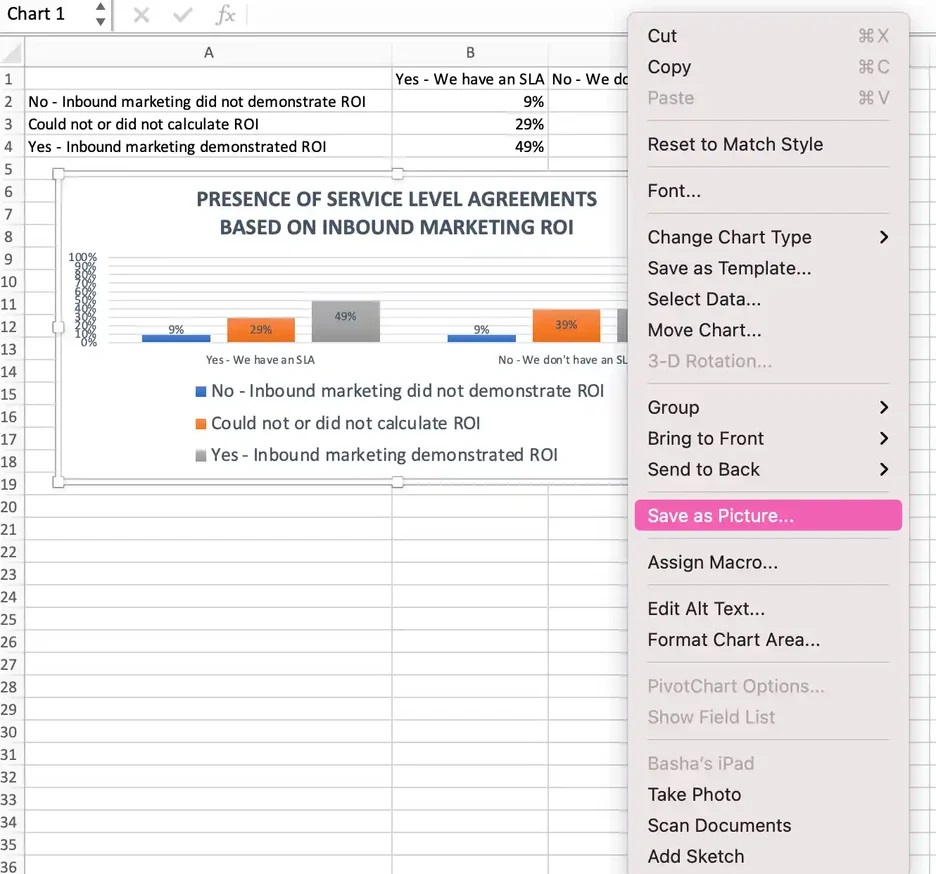
Once your Excel chart or graph is exactly the way you want it, you can save it as an image without screenshotting it in the spreadsheet.

This method will give you a clean image of your chart that can be inserted into a PowerPoint presentation, Canva document, or any other visual template.

To save your Excel graph as a photo, right-click on the graph and select Save as Picture.

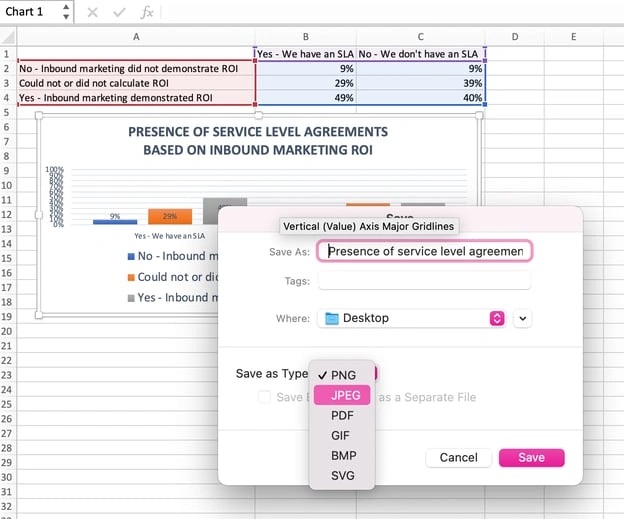
In the dialogue box, name the photo of your graph, choose where to save it on your computer, and choose the file type you’d like to save it as. In this example, it’s saved as a JPEG to a desktop folder. Finally, click Save.

You’ll have a clear photo of your graph or chart that you can add to any visual design.

Visualize Data Like A Pro

Ready for one final step to make this whole process faster? You can now swap your data into various graph types — like a pie chart or line graph — to quickly and more easily determine what format best tells the story of your data.

Here’s how you do it:

Step 1. Select the chart.

Look at your Excel chart or graph to find a blank spot within it. Click on a blank spot. Once the chart is highlighted all around the border, you’ll know it’s selected.

Step 2. Right-click or go to the Chart Design tab.

Once the chart is selected, the ribbon above will show a Chart Design tab. You can go click on that or simply right-click your selected chart to save time. Either way, you’ll see various chart options to choose from.

Step 3. Change the chart type.

When the chart options pop up — either on the ribbon or under your cursor if you right-clicked — you’ll next click Change Chart Type. A menu will pop up with a variety of chart type options on the left.

To the right will be a visual example of the chart type you click on.

Step 4. Shop for your chart.

The last bit is the most fun! You can click the Recommended Charts tab or the All Charts tab and start clicking your way down the list of chart types. As you see ones that interest you, click the Okay button.

Your originally selected chart will change types before your eyes. Give it a look and make sure all the data and labels make sense to you. Still curious?

Select your chart again and repeat the process to see your data on as many types of charts as you’d like.

No sorcery, as promised. Keep these step-by-step tutorials handy. You’ll be able to create charts and graphs that quickly, cleanly, and clearly visualize your data for presentation.

Editor’s note: This post was originally published in June 2018 and has been updated for comprehensiveness.

excel graph templates

Categories B2B

What is Career Cushioning? Why You Might Want to Try It in 2024

As I started writing this article about career cushioning, I couldn’t help but wonder … am I a career cushion-er?

I have a side hustle (shoutout to CKTL Candle Co.). But it technically only “counts” if I’m using that side hustle as a sense of security in case I lose my day job as HubSpot’s Marketing Blog Editor.

Download Now: 101 Professional Networking Tips

That’s what the concept of career cushioning is all about — and a lot of people are doing it in 2024.

Table of Contents

So, what exactly is career cushioning?

Career cushioning allows you to “cushion the blow” if you lose your job unexpectedly. It’s about being proactive and creating additional opportunities for yourself in the event of a layoff or sudden termination.

This could mean actively networking for potential job opportunities, keeping your professional assets up to date, or starting a business on the side.

Think of it like, “Hey, just in case this job or career doesn’t work out, I’m going to have a backup.”

And, in some cases, multiple.

Who is doing it?

Career cushioning isn’t specific to one job field or profession. Given the rise of inflation and increase in layoffs across industries, professionals at all levels are justifiably nervous about job security.

And while the concept of career cushioning isn’t brand new, it’s definitely trending this year.

Why Career Cushioning is Hot Right Now

I mentioned inflation and layoffs as primary reasons why people are keeping their career options open.

Let’s look at some of the stats:

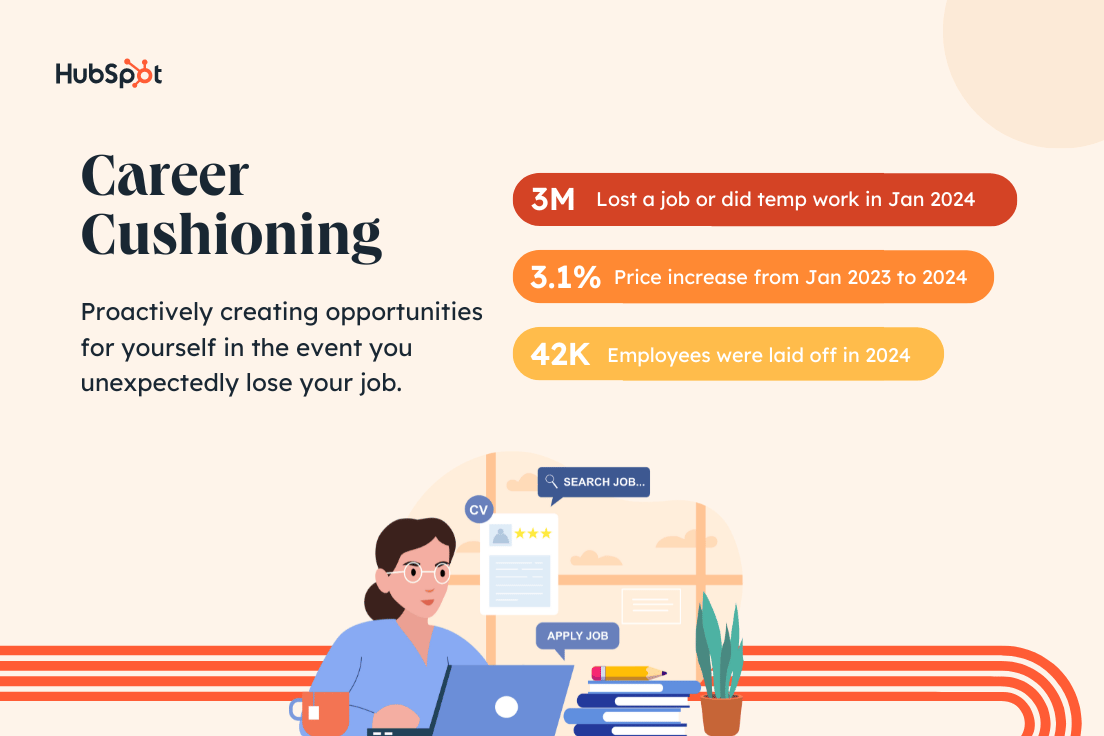
  • In January 2024, about 3 million people lost a job or completed temporary jobs in the U.S.
  • So far in 2024, over 42,000 employees have been laid off, including more than 160 tech companies.
  • In January 2024, the monthly inflation rate for goods and services in the U.S. increased by 3.1% compared to January 2023.

My LinkedIn feed feels pretty reflective of this data given the number of people who are “Open to Work” after a layoff or ready for a career change.

career cushioning definition and statistics

Should you start career cushioning?

This is very much a personal decision. However, to me, the data suggests that it might not be a bad idea to have a Plan B in your back pocket.

Here are some things to consider:

  • Do you feel satisfied and secure at work? Lack of job satisfaction is another big reason professionals are making other plans.
  • Does your skillset need a refresh? Upskilling is a career cushioning tactic, but it’s always a good idea to refine your expertise.
  • Can you comfortably explore new opportunities? Career cushioning can be great, but don’t do it at the risk of losing your current job.

My take? I started my candle business for fun back in 2020. But, TBH, it’s nice to know I’d still have a source of income if I lost my job tomorrow.

How to Cushion Your Own Career

Here are five ways to do career cushioning right in 2024.

1. Skill up in both new and existing areas.

This is great advice whether you’re career cushioning or not. Skills are meant to be cultivated.

Sure, the same marketing frameworks I learned while completing my MBA in 2021 may still apply. But the skills needed to be a great marketer evolve with trends and time.

For example, you couldn’t have told me three years ago that I’d be using AI in my day-to-day workflow. But it’s here, and it’s a skill I had to (and wanted to) develop.

Luckily, there are tons of free resources, like HubSpot Academy, that are available to help you level up your professional skill set.

2. Keep your LinkedIn and resume updated.

Even if you aren’t ready to apply for jobs just yet, regularly update your work history as you make new accomplishments at work and in life.

Have you recently hit a target or goal? Did you master a new skill like we talked about in #1?

Write it down.

I promise, it’s easier to track those achievements on your LinkedIn or resume when they happen rather than trying to update things all at once. (Speaking from experience here.)

This is especially true if you’re in a bind and need to land a new job fast.

3. Nurture and expand your network.

I talked about keeping your LinkedIn updated in the last tip, but it’s so much more than just a resume.

LinkedIn is the perfect place to connect with like-minded people in your industry or make new professional friends.

With the right network, you’ll gain access to job listings, networking events, and referral sources for new opportunities.

Putting yourself out there and promoting your brand can go a long way toward creating a career cushion.

4. Start a business or explore a side hustle.

Becoming an entrepreneur is not easy, but it is doable if you find something you’re passionate about.

You could consider turning one of your existing hobbies into a side hustle. That’s how I became a candle business owner.

Or you could pick up some extra work related to an area or skill you’re interested in. Maybe you really like to write, so you pick up some freelance hours for one of your favorite blog sites.

Who knows, you may be able to turn that hustle into a full-time gig.

Whatever you choose, just don’t get into the candle game. I don’t need any more competition 😉

5. Don’t risk your day job.

Like I said, career cushioning is a great way to create a job safety net for yourself. But the whole point is to create a backup plan IF you need it.

Of course, if you’re already looking to change fields or switch up your career path, have at it. However, the key to career cushioning is to give yourself options in the event you lose your job.

Don’t unintentionally make that a reality by adding too much to your plate or neglecting your current employer.

In other words, “if it ain’t broke, don’t fix it.” Just cushion it.

The Bottom Line

If you ask me, it doesn’t hurt to explore new things and keep your options open.

To answer the question about whether I consider myself a career cushion-er, I’m going to go with … yes.

It’s about more than just my side hustle, though. I’m always looking for chances to learn new things and grow as a person.

And if that’s how you feel too, then I say it doesn’t hurt to add a little cushion.

professional networking tips

Categories B2B

I Asked ChatGPT How to Apologize Professionally in an Email — Here’s What I Got

Apologizing is hard. Apologizing professionally for a mistake you made at work? Even more challenging.

We’ve all had to write an apology email at some point in our careers — whether to a coworker for missing a deadline, to a manager for making an error in a report, or to a customer for delayed shipping.

Learning how to apologize professionally for different scenarios is a skill that everyone should hone.

The hardest part about writing a difficult email is getting started. To help with this, I asked ChatGPT to write a professional apology email for me. I also created my own apology email template to compare.

We’ll take a look at these examples and the elements that go into crafting a sincere and professional apology email.

Download Now: 17 Professional Email Templates

How to Apologize for a Mistake Professionally

What ChatGPT Wrote for Me

How to Write an Apology Email

How to Apologize for a Mistake Professionally

Apologizing professionally in an email starts with taking responsibility and ends with outlining a plan of action to remedy the situation.

Whether you’re apologizing to a coworker or writing an apology letter to your customers, follow these steps to ensure your apology is professional and effective.

1. Acknowledge the mistake.

The first step is to address the error and say you’re sorry. Don’t beat around the bush — let the recipient know right away that you’re writing to apologize for your mistake.

Taking responsibility for your role in the situation, whether you’re speaking as an individual or on behalf of a company, shows that you’re accountable and aren’t going to make excuses.

Accountability is closely tied with trust when it comes to building relationships, so lead your email by owning up to your mistake before diving into an explanation.

2. Provide an explanation.

The recipient of your apology email deserves an explanation of why or how an error was made. This step is especially critical when you’re talking to a customer who doesn’t know the inner workings of your business.

Explain what went wrong, but be sure not to make excuses or blame others. Instead, briefly describe what happened and reiterate your responsibility in the scenario.

The recipient doesn’t need to hear a drawn-out story about how the mistake occurred. In my experience, the longer and more detailed your explanation is, the more it sounds like an excuse.

3. Personalize your apology.

An apology email doesn’t have to be stiff. We’re all human, after all. You can remain professional while still letting the person on the other side of the screen know that you’re genuinely sorry for the inconvenience you’ve caused them.

Personalize your apology email by being empathetic and addressing the recipient’s pain points. Empathy is one of the most important soft skills to hone in the workplace, and an apology email is the perfect time to communicate this.

4. Provide a plan of action.

After “How did this happen?” the next question the recipient has is usually, “What are you going to do to fix this?”

Reassure them that you have a plan by outlining clear next steps. Tell them what you’re going to do in the short term (i.e., “get this report to you by EOD today”) and how you plan on avoiding making the same mistake in the future.

Sharing your next steps helps to regain their trust, improve their outlook on you or your brand, and show them that you’re responsible for handling the consequences of your actions.

What ChatGPT Wrote for Me

Everyone has to write an apology email at some point. I was curious to see if ChatGPT could help in this process by writing some emails for me, so I fed it different prompts. The results are below.

1. General Apology Email

I started by asking ChatGPT to write a generic apology email for me. I wanted to gauge how well the chatbot understands these types of email scenarios.

Here’s the first apology email ChatGPT generated:

This response from ChatGPT follows the standard apology email structure. It covers all of the bases — starting with an apology, explaining what happened, and wrapping up by outlining the next steps.

However, it’s verbose. “I am writing to offer my sincere apologies” isn’t as straightforward as saying “I apologize.”

It’s better to lead with a strong and sincere statement instead of using too many filler words that ultimately weaken your message.

What I like: I like that the email signature includes your name, position, and contact information.

If this email were being sent to a colleague you haven’t interacted with before or if it was a personal apology email to a customer, this would be helpful information they’d need to have.

2. Apology Email: Missing a Deadline

For my next prompt, I asked ChatGPT to write an apology email for a more specific scenario. I also asked the chatbot to make it shorter:

Here’s the apology email it generated:

While ChatGPT followed my request for a shorter email, in my opinion, some of the copy is still unnecessary. If I were writing this email, I’d get to the point sooner. An apology email doesn’t need to include fluff.

All that does is force the recipient to skim the email to look for the information they need (like what your plan of action is).

I also think this email could use a bit of personalization, but that’s to be expected when you’re using AI. At the very least, this email provides a framework that can be edited to fit your voice and tone as needed.

What I like: Like the last apology email, this one follows an appropriate framework for an apology email. It starts with an apology and a brief explanation of the error, followed by accountability and next steps.

3. Apology Email to Boss

I want to see if the tone or structure changed if I asked it to write an apology email to my boss.

Here’s the next prompt I created:

This time, I included a request about the tone. After seeing the last two AI-generated emails, I can see that ChatGPT uses the same tone and style if it doesn’t have any direction.

Here’s the email ChatGPT came up with:

As far as tone and length, this response is much better. The apology is succinct and to the point while still demonstrating ownership and accountability for the error. The only thing I’d add is a sentence with a little more empathy.

Addressing that you understand how an error affected the recipient shows that you’re considering their feelings, too.

What I like: I like this line: “I take full responsibility for the oversight, and I understand the importance of accuracy in our work.” To me, this emphasizes that the person understands the ramifications of the error and is taking accountability.

4. Apology Email to Customer

For my next prompt, I wanted to see if ChatGPT could make the apology email more personal. I also created a different scenario for this apology email:

When writing an apology letter to customers, your message should focus on taking accountability for the mistake. It should also acknowledge the customer’s pain points and potential frustrations with the situation.

I think this AI-generated email does both of those things well. I also appreciate that it ended the email with the customer support team’s contact information to assure the customer that they’re there to help.

What I like: I like that the email creates an opportunity to offer the customer a discount to make up for the mistake. This can be a good way to regain loyalty from a customer who may have had a not-so-great experience with your company.

5. Apology Email to a Large Group

Another scenario where you may need to write an apology email is when there’s an issue that affects a large group of people.

For example, if your software company experiences a mass outage and none of your customers can use the product for a certain period.

I used this scenario for my next prompt:

Here’s what the chatbot came up with:

In this scenario, customers will expect a thorough explanation, which I think this email does well. While this email follows best practices for writing a professional apology email, it’s too long, in my opinion.

Here’s how I’d rewrite this one:

Dear valued customers,

We sincerely apologize for the recent service outage.

For approximately five hours, our systems experienced unexpected technical issues that resulted in downtime for all of our customers.

We understand the significant impact this outage had on your operations, and we deeply regret any inconvenience or frustration it may have caused.

We have implemented additional measures to prevent similar incidents from occurring in the future.

As a gesture of our apology and appreciation for your patience during this challenging time, we would like to offer [mention any compensation or gesture, if applicable].

We sincerely apologize for any inconvenience or disruption this outage may have caused to your business. If you have any questions or need further assistance, please reach out to our customer support team at [Customer Support Email/Phone Number].

Thank you for your understanding and continued partnership. We value your business and remain dedicated to providing you with the highest level of service and support.

How to Write an Apology Email (Using My Template)

Now that we’ve seen what type of apology emails ChatGPT can generate, let’s see if I can write something better.

Here’s an apology email I put together based on a common workplace scenario: missing a deadline.

Hi [First Name],

I apologize for missing the deadline for [project name] — this was an error on my part, and I take full responsibility.

I understand the impact this has on your team’s timeline. I plan to make up for that by getting this to you by EOD tomorrow.

Please let me know if this new deadline fits within your timeline. If there’s anything else I can do to support the project in the meantime, don’t hesitate to reach out.

Again, I’m sorry for the delay!

Thank you,

[Your Name]

Let’s break down the elements I used in this apology email so you can emulate it in your next apology email.

Take ownership.

While you don’t need to grovel, you should take full responsibility for your actions. Don’t point fingers or come up with excuses.

The first thing I wrote in my email was, “I apologize.” I followed that up by saying, “…this was an error on my part, and I take full responsibility.” Writing this lets the recipient know that I’m owning up to my error and I’m not blaming anyone else.

I also ended my email with another quick apology because it doesn’t hurt to express it one more time. However, two times is probably enough for this scenario — any more than that could come across as groveling.

Lead with empathy.

Yes, you should provide a quick explanation so the recipient isn’t left in the dark, but you don’t need to go into detail about the reason you missed a deadline. Ultimately, an error was made, and you can’t change that fact.

Instead, approach the apology email with empathy for the recipient. I did this by saying, “I understand the impact this has on your team’s timeline.”

This lets the recipient know that you’re being accountable for the consequences of your actions. If you want to rebuild trust, whether with your coworker or a customer, accountability is essential.

Communicate next steps.

After you apologize and take accountability, let them know what your next steps are. How are you going to rectify the situation? In this scenario, I reassure the recipient that I’m handling the mistake by providing an amended deadline.

By letting them know that I will get the project to them “by EOD tomorrow,” I’m communicating that I have a plan to make the situation right. This also shows that I’m taking ownership of the mistakes rather than putting the next steps on them.

Saying Sorry the Right Way

There were a few differences between the apology emails ChatGPT generated and the one I wrote. For starters, my apology email was more straightforward. I started my sincere apology right out of the gate and led with empathy.

I also outlined a clear and specific action plan, so the recipient knew what to expect next.

While ChatGPT followed a similar structure, it usually added a lot of unnecessary filler words. In my experience, this weakens the overall message.

If you need to write an apology email to a large audience like your customers or email marketing list, then using ChatGPT can help you figure out what to say faster.

An AI-written apology email can save you time, but it would need to be edited to align with your company’s voice and tone.

If you need to write a quick yet professional apology to a coworker or client, then I suggest using my template or writing your own email to make it more personable.

New call-to-action

Categories B2B

35 Vision And Mission Statement Examples That Will Inspire Your Buyers

Why do you choose to buy products and services from certain brands even when cheaper options exist? It often comes down to a compelling brand mission — like these 35 mission statement examples.

Brands use a mission statement to express their values. As consumers, we like to patronize businesses that have values we believe in.

→ Free Resource: 100 Mission Statement Templates & Examples

A strong mission statement makes it easy for consumers to understand your values and feel confident purchasing from you.

Still, loyalty doesn’t happen overnight. Building brand loyalty, like creating mission and vision statements, takes time. You may just find the inspiration that you need in someone else’s mission statement, so we’ve gathered 35 example mission statements to help make your research easy.

If you’re in a bit of a time crunch, use this table of contents to find precisely what you’re looking for to inspire the development of your company’s mission.

Table of Contents

What is a mission statement?

A mission statement is a simple statement about the goals, values, and objectives of an organization. A mission statement summarizes why a business exists and helps a company respond to change and make decisions that align with its vision.

This brief description helps customers, employees, and leadership understand the organization’s top priorities.

An effective mission statement will naturally change over time. As a company grows, it may reach its early goals, and they’ll change. It’s important to revise mission statements as needed to reflect the business’s new culture as it achieves its goals and develops new targets.

What makes a good mission statement?

A great mission statement combines physical, emotional, and logical elements into one exceptional customer (and employee) experience that you value as much as they do. A good mission statement will not only explain your brand’s purpose but will also foster a connection with customers.

When your brand creates a genuine connection with customers and employees, they’ll stay loyal to your company, thereby increasing your overall profitability.

Mission statements also help you stand out in the marketplace, differentiating your brand from the competition.

I’ve personally observed that there’s more brand recognition for companies when consumers think they have an important mission.

When wearing a pair of TOMS shoes, I’ve noticed that people comment more on my shoes than when I’m wearing Converse or Nike shoes (which are both more well-known brands). TOMS famously created the One for One® model, where they vowed to donate one pair of shoes for every one purchased.

A memorable company mission makes your product more noteworthy.

What are the three parts of a mission statement?

Your mission statement should clearly express what your brand does, how it does it, and why the brand does it. You can quickly sum this up in your mission statement by providing the following:

  1. Brand purpose. What does your product or service do or aim to offer and for whom?
  2. Brand values. What does your company stand for? For example, are you environmentally conscious and provide a more sustainable solution to solve a problem? Values are what make your company unique.
  3. Brand goals. What does your company accomplish for customers? Why should they purchase from you instead of other competitors?

With these three components, you can create a mission that is unique to your brand and resonates with potential customers. Next, we’ll guide you step by step on how to write a proper mission statement to build on as your company evolves.

How to Write a Mission Statement

You understand the importance of a well-crafted mission statement that effectively summarizes a company’s purpose, but how do you write one? Let’s look at the steps to write a good mission statement, and then we’ll dive into mission statement examples to inspire your creativity.

  1. Explain your company’s product or service offering.
  2. Identify the company’s core values.
  3. Connect how your company’s offering aligns with your values.
  4. Condense these statements into one.
  5. Refine your mission statement.

1. Explain your company’s product or service offering.

A good mission statement helps prospects understand what your company does in a literal sense. This means explaining your offering in basic, clear terms. Your explanation should answer the most basic questions like:

  • Are you selling a product or service?
  • Why would customers buy it?
  • How does your offering solve for the customer?

Record your answers and focus on how your product or service brings value to your buyer personas, otherwise known as your target audience.

2. Identify the company’s core values.

Now, this is where you can start thinking bigger. You didn’t just make a product or service at random. Instead, you’re most likely motivated by a set of core values. This is particularly important for socially conscious businesses and brands that care about well-being.

Core values are deeply ingrained principles that guide a company’s actions. Take HubSpot’s culture code, HEART, for example:

  • Humble.
  • Empathetic.
  • Adaptable.
  • Remarkable.
  • Transparent.

These are principles that not only company employees respect but are principles that our customers appreciate as well. By identifying core values that hold meaning on personal and organizational levels, you’ll have an appealing set to add to your mission statement.

3. Connect how your company’s offering aligns with your values.

So, how can your company offering serve your core values? You need to draw a connection between the two in a way that makes sense to the public.

For example, if one of your core values centers on innovation, you want to frame your product or service as pushing boundaries and explaining how it helps customers innovate their lives or business practices. Essentially, you’re taking the literal benefit of the offering and expanding it to serve a higher purpose.

4. Condense these statements into one.

A mission statement can be as short as a single sentence or as long as a paragraph, but it’s meant to be a short summary of your company’s purpose. You need to state the what, who, and why of your company:

  • What — The company offering.
  • Who — Who you’re selling to.
  • Why The core values you do it for.

Condense this to be between one and three sentences long. At this stage of development, it’s often helpful to write several mission statement drafts to help process ideas and experiment.

Once you have successfully conveyed your brand’s message, it’s time to refine and perfect your mission statement.

5. Refine your mission statement.

Above all, your mission statement stands as a marketing asset that is meant to be:

  1. Clear.
  2. Concise.
  3. Free of fluff.

Your mission statement should clearly outline the purpose of your company offering, capture the company spirit, and show the common goals the company is working to achieve.

Have other team members or advisors read your mission statement draft and make adjustments if needed according to their recommendations. This is normally a slow process for brands, and I’ll share ideas and company mission statement examples in a moment to help inspire creativity in the writing process.

What is a vision statement?

A vision statement is aspirational and expresses your brand’s plan or “vision” for the future and potential impact on the world. They often serve as a guide for a brand’s future goals and explain why customers and employees should stick around for the long haul.

What makes a good vision statement?

A good vision statement should be bold and ambitious. It’s meant to be an inspirational, big-picture declaration of what your company strives to be in the future. It gives customers a peek into your company’s trajectory and builds customer loyalty by allowing them to align their support with your vision because they believe in the future of your brand as well.

What are the three parts of a vision statement?

Your company vision is meant to be inspirational while also aligning with the company’s mission. A vision statement should have the following characteristics:

  1. Aspirational and ambitious. Have a lofty outlook for what you want your business to accomplish? Here’s the place to put it. Your vision statement should be aspirational and showcase how your business will grow in the future.
  2. Practical and achievable. While your statement should be ambitious, it shouldn’t be impossible. Set a goal that is both challenging and practical.
  3. General. Your vision should be broad enough to encompass all of your brand’s overall goals. Think of it as an umbrella for your mission statement and company objectives to nest under.

Both mission and vision statements are often combined into one comprehensive “mission statement” to define the organization’s reason for existing and its outlook for internal and external audiences — like employees, partners, board members, consumers, and shareholders.

The difference between mission and vision statements lies in the purpose they serve.

Mission Statement vs. Vision Statement

A mission statement clarifies what the company wants to achieve, who they want to support, and why they want to support them. On the other hand, a vision statement describes where the company wants a community, or the world, to be as a result of the company’s services.

Thus, a mission statement is a roadmap for the company’s vision statement.

A mission statement is a literal quote stating what a brand or company is setting out to do. This lets the public know the product and service it offers, who it makes it for, and why it’s doing it. A vision statement is a brand looking toward the future and saying what it hopes to achieve through its mission statement. This is more conceptual, as it’s a glimpse into what the brand can become in the eyes of the consumer and the value it will bring in the long term.

In summary, the main differences between a mission statement and a vision statement are:

  • Mission statements describe the current purpose a company serves. The company’s function, target audience, and key offerings are elements that are often mentioned in a mission statement.
  • Vision statements are a look into a company’s future or what its overarching vision is. The same elements from the mission statement can be included in a vision statement, but they’ll be described in the future tense.

Now that we know what they are, let’s dive into some useful examples of each across different industries.

Mission and Vision Statement Template

100-mission-statements examplesFree Guide: 100 Mission Statement Templates & Examples

Need more examples to build your mission statement? Download our free overview of mission statements — complete with 100 templates and examples to help you develop a stand-out mission statement.

Write a mission statement with these useful templates, like the example below:

Create a mission statement example: HubSpot Nonprofit Mission Statement Template

1. Life Is Good: To spread the power of optimism.

Company mission statement examples: Life is Good

Image Source

The Life is Good brand is about more than spreading optimism — although, with uplifting T-shirt slogans like “Seas The Day” and “Forecast: Mostly Sunny,” it’s hard not to crack a smile.

There are tons of T-shirt companies in the world, but Life is Good’s mission sets itself apart with a mission statement that goes beyond fun clothing: to spread the power of optimism.

This mission is perhaps a little unexpected if you’re not familiar with the company’s public charity: How will a T-shirt company help spread optimism? Life is Good answers that question below the fold, where the mission is explained in more detail using a video and with links to the company’s community and the Life is Good Playmaker Project page.

What we like: Life is Good has a lofty, yet specific, mission statement. It’s a hard-to-balance combination.

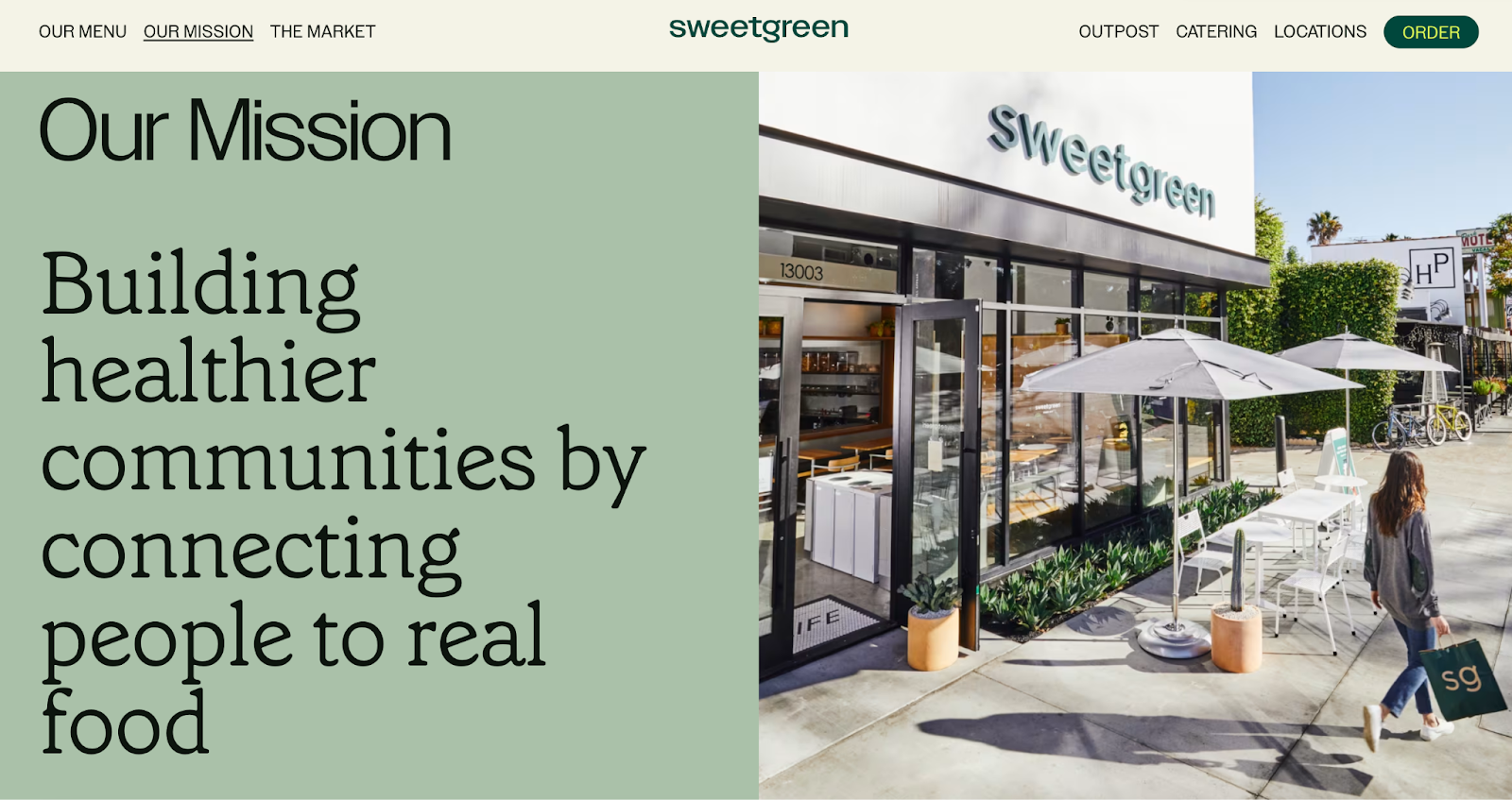
2. sweetgreen: Building healthier communities by connecting people to real food.
Company mission statement examples: sweetgreen

Image Source

Notice that sweetgreen’s mission is positioned to align with your values — not just written as something the brand believes.

The language lets us know the company is all about connecting its growing network of farmers growing healthy, local ingredients with us — the customer — because we’re the ones who want more locally grown, healthy food options.

The mission to connect people is what makes this statement so strong. And, that promise has gone beyond sweetgreen’s website and walls of its food shops: The team has made strides in the communities where it’s opened stores as well. Primarily, it offers education to young kids on healthy eating, fitness, sustainability, and where food comes from.

What we like: Inclusive language is built into this statement.

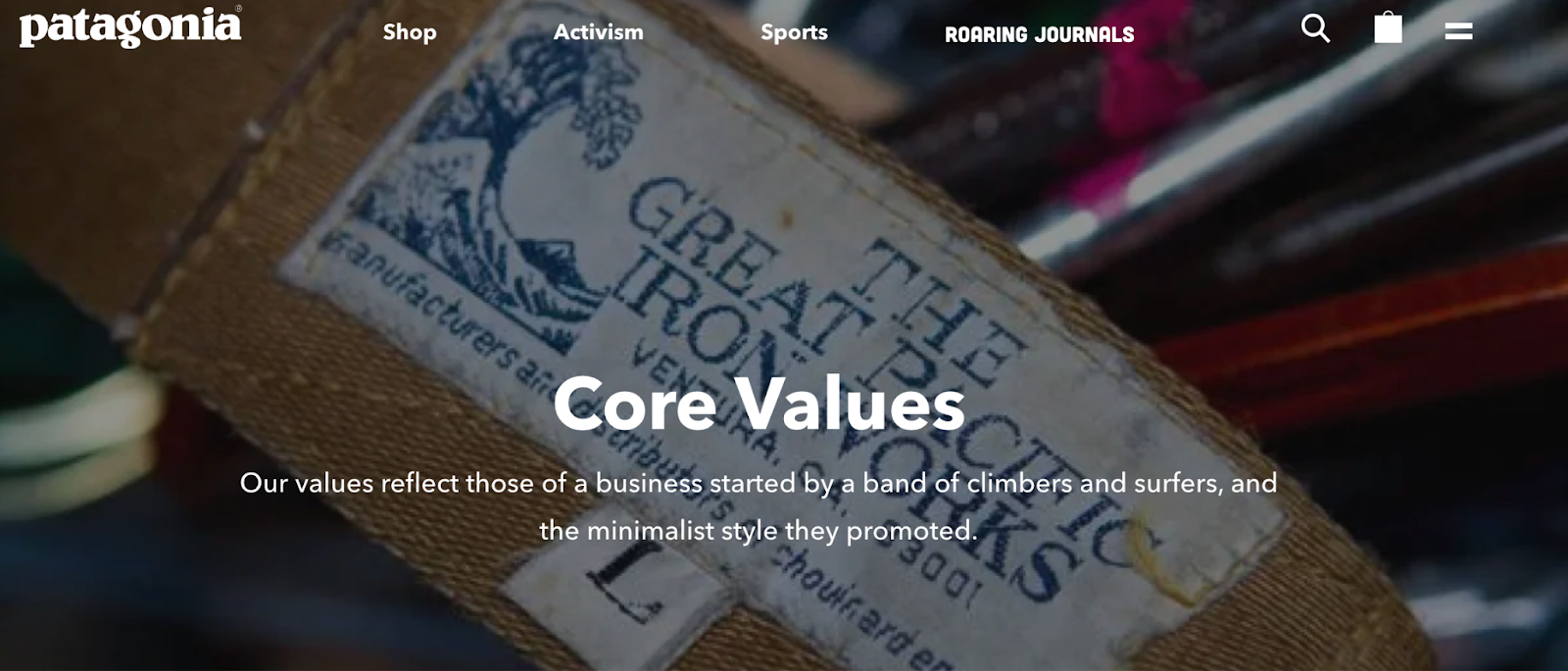
3. Patagonia: Patagonia is in business to save our home planet.
Company mission statement examples: Patagonia

Image Source

A previous vision of Patagonia’s mission statement was “Build the best product, cause no unnecessary harm, use business to inspire and implement solutions to the environmental crisis.”

Patagonia’s mission statement spotlights the company’s commitment to helping the environment and saving the earth. The people behind the brand believe that among the most direct ways to limit ecological impacts is with goods that last for generations or can be recycled so the materials in them stay in use.

In the name of this cause, the company donates time, services, and at least 1% of its sales to hundreds of environmental groups worldwide.

If your company has a similar focus on growing your business and giving back, think about talking about both the benefits you bring to customers and the value you want to bring to a greater cause in your mission statement.

What we like: This mission statement example from Patagonia succinctly combines their products and activism into one memorable sentence.

4. American Express: Become essential to our customers by providing differentiated products and services to help them achieve their aspirations.

Company mission statement examples: American Express

Image Source

Company mission statement examples: American Express

Image Source

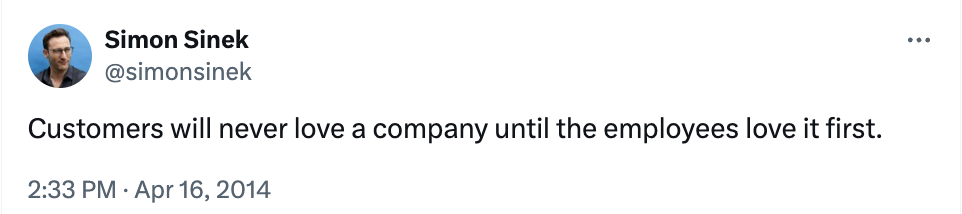
The tweet above is from Simon Sinek, and it’s one that we repeat here at HubSpot all the time. American Express sets itself apart from other credit card companies in its list of values, with an ode to excellent customer service, which is something it’s famous for.

We especially love the emphasis on teamwork and supporting employees so that the people inside the organization can be in the best position to support their customers.

What we like: The emphasis on teamwork and supporting employees so that the people inside the organization can be in the best position to support their customers.

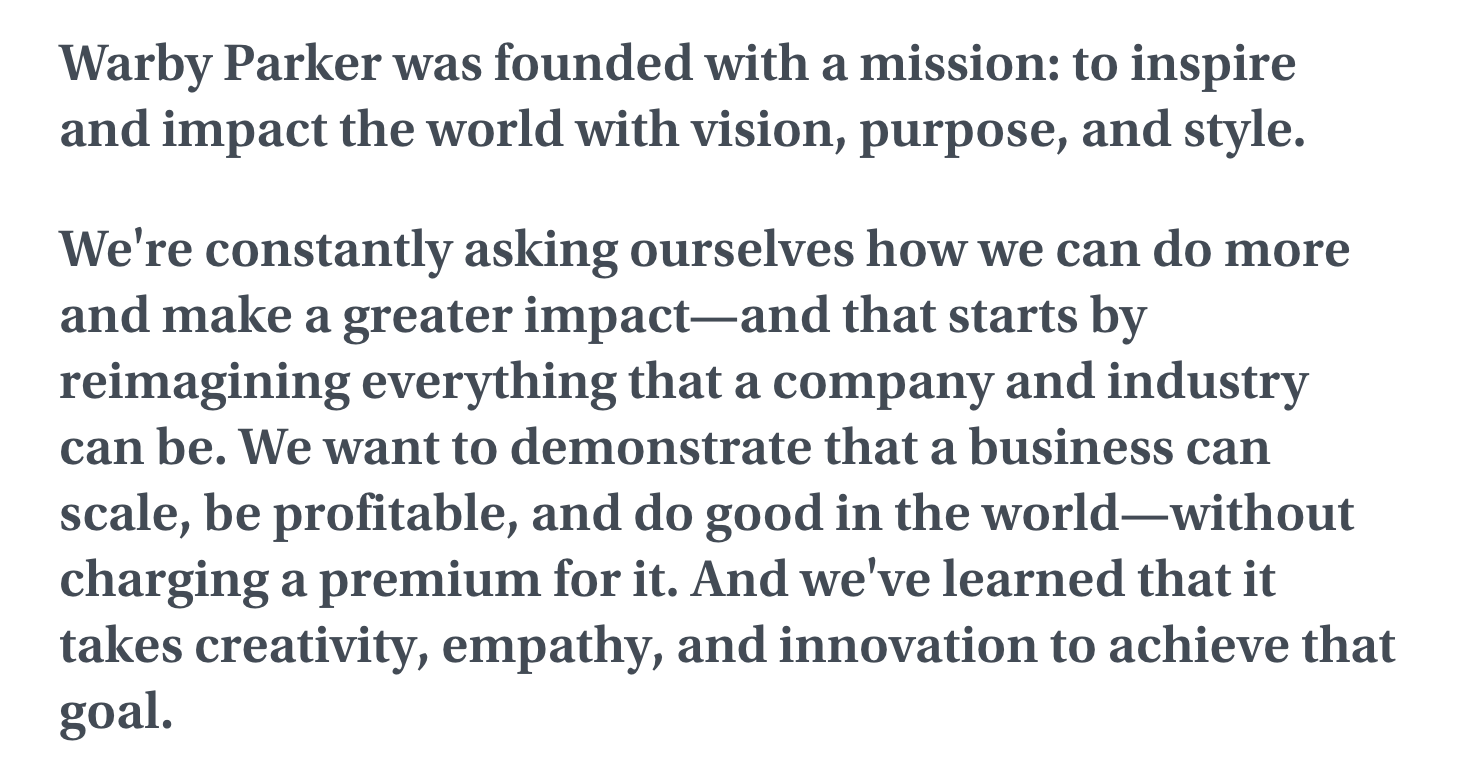
5. Warby Parker: To inspire and impact the world with vision, purpose, and style.
Company mission statement examples: InvisionApp

Image Source

In one sentence, the brand takes us to the root of why it was founded while also revealing its vision for a better future.

The longer-form version of the mission reads: “We’re constantly asking ourselves how we can do more and make a greater impact — and that starts by reimagining everything that a company and industry can be. We want to demonstrate that a business can scale, be profitable, and do good in the world — without charging a premium for it. And we’ve learned that it takes creativity, empathy, and innovation to achieve that goal.”

The mission statement’s success all comes down to spot-on word choice.

What we like: Warby Parker doesn’t hold back on letting its unique personality shine through.

6. InvisionApp: Transform the way people work together by helping them collaborate better. Faster. On everything. From anywhere.

Image Source

This mission statement from InvisionApp is:

  • Brief.
  • Authentic.
  • Business babble-free.

As a result, it makes the folks at InvisionApp seem trustworthy and genuine.

What we like: This mission statement uses short senses and powerful words to be as pointed as possible.

7. Penguin Randomhouse: To ignite a universal passion for reading.

Best mission statement examples: penguin

Image Source

Penguin is speaking to an audience that is excited to expand their horizons and explore new narratives. This mission statement focuses on the power of story and how it can shape lives. With that, the publishing house makes its mission more than just releasing books.

What we like: Penguin creates a mission that everyone can relate to. Who doesn’t love a good story?

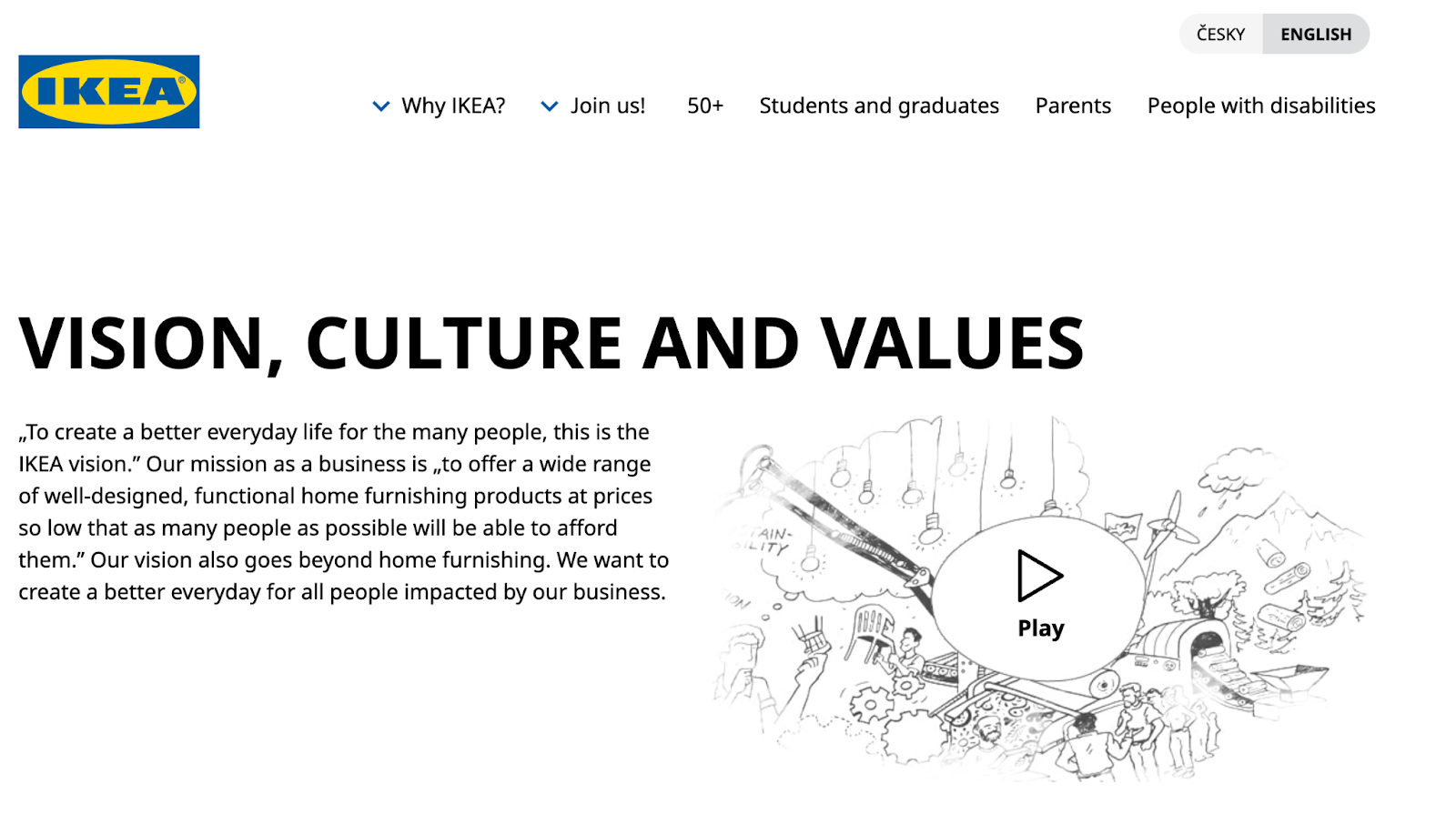
8. IKEA: To offer a wide range of well-designed, functional home furnishing products at prices so low that as many people as possible will be able to afford them.
Best mission statement examples: Ikea

Image Source

The folks at IKEA dream big. Their vision-based mission statement communicates their mission of making everyday life better for their customers.

It’s a partnership: IKEA finds deals all over the world and buys in bulk, then we choose the furniture and pick it up at a self-service warehouse.

“Our business idea supports this vision … so [that] as many people as possible will be able to afford them,” the brand states

What we like: Using terms like “as many people as possible” makes a huge company like IKEA much more accessible and appealing to customers.

9. Nordstrom: Our mission is to continue our dedication to providing a unique range of products, exceptional customer service, and great experiences.

Best mission statement examples: Nordstrom

Image Source

A previous version of Nordstrom’s mission statement was, “Offering customers the very best service, selection, quality, and value.”

When it comes to customer commitment, few companies are as hyper-focused as Nordstrom is. Although clothing selection, quality, and value all have a place in the company’s mission statement, it’s clear that it’s all about the customer: “Nordstrom works relentlessly to give customers the most compelling shopping experience possible.”

If you’ve ever shopped at a Nordstrom, you’ll know the brand will uphold the high standard for customer service mentioned in its mission statement. Associates are always roaming the sales floors, asking customers whether they’ve been helped, and doing everything they can to make the shopping experience a memorable one.

What we like: The use of the term “great experiences” creates the feeling that Nordstrom cares about retaining customers instead of making on-off sales, which breeds customer loyalty.

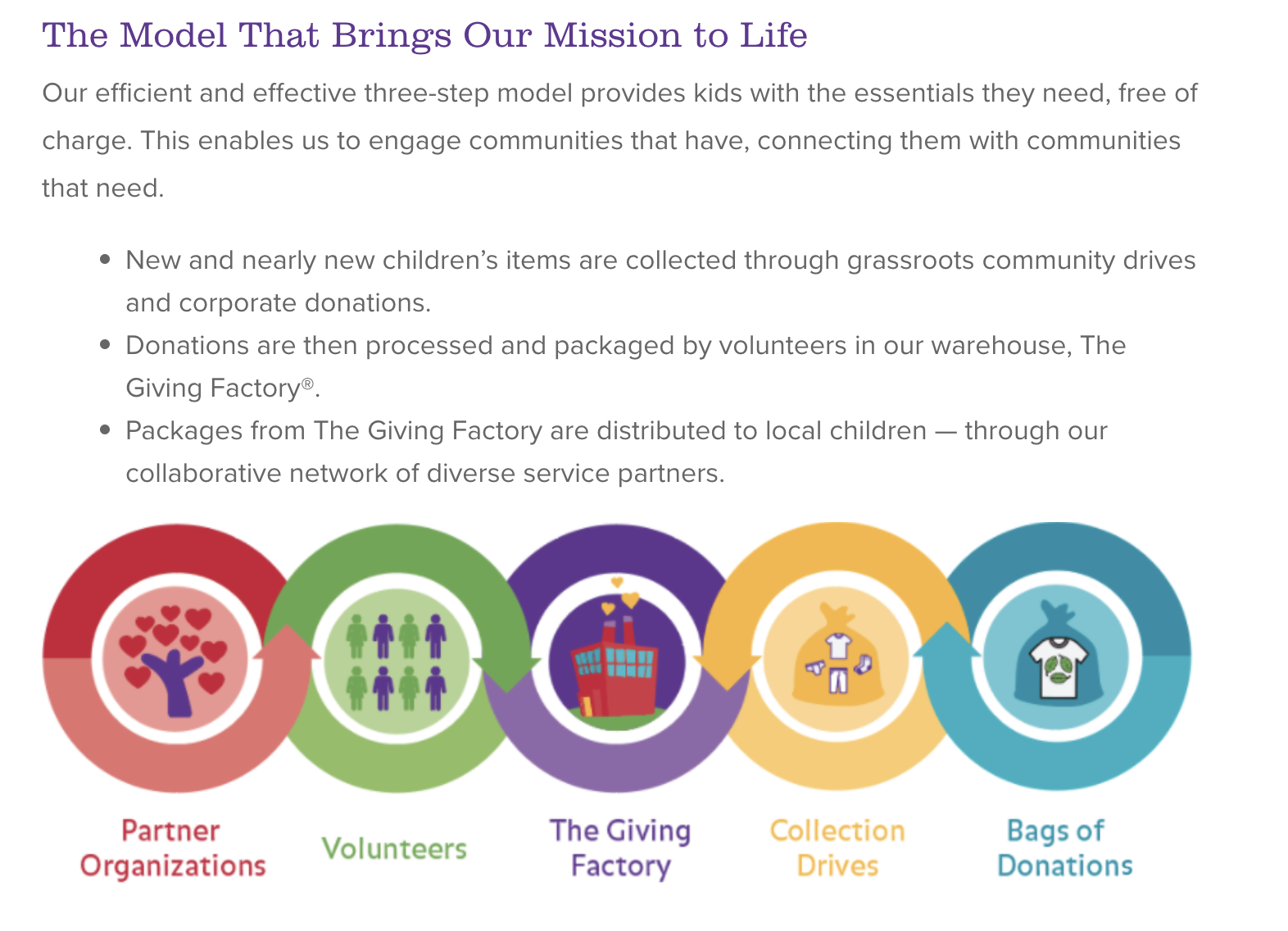
10. Cradles to Crayons: Provides children from birth through age 12 living in homeless or low-income situations with the essential items they need to thrive — at home, at school, and at play.
Best mission statement examples: Cradles to Crayons

Image Source

Cradles to Crayons divided its mission and model into three sections that read like a game plan:

  1. The Need.
  2. The Mission.
  3. The Model.

The “rule of three” is a powerful rhetorical device called a tricolon that’s usually used in speechwriting to help make an idea more memorable. A tricolon is a series of three parallel elements of roughly the same length — think, “I came; I saw; I conquered.”

What we like: This mission statement begins by feeling very detailed but zooms out to encompass the overall wellbeing of its target audience.

11. Universal Health Services, Inc.: To provide superior quality healthcare services that patients recommend to family and friends, physicians prefer for their patients, purchasers select for their clients, employees are proud of, and investors seek for long-term returns.

Best mission statement examples: Universal Health Services

Image Source

A company thrives when it pleases its customers, its employees, its partners, and its investors — and Universal Health Services endeavors to do just that, according to its mission statement.

As a healthcare service, it specifically strives to please its patients, physicians, purchasers, employees, and investors.

What we like: The brand places emphasis on each facet of the organization by capitalizing the font, making it easy to skim and digest.

12. JetBlue: To inspire humanity — both in the air and on the ground.

Best mission statement examples: JetBlue

Image Source

JetBlue is committed to its founding mission through lovable marketing, charitable partnerships, and influential programs — and we love the approachable language used to describe these endeavors. For example, the brand writes how it “set out in 2000 to bring humanity back to the skies.”

For those of us who want to learn more about any of its specific efforts, JetBlue offers details on the Soar With Reading program, its partnership with KaBOOM!, the JetBlue Foundation, environmental and social reporting, and so on.

On its website, JetBlue breaks down all these initiatives well with big headers, bullet points, pictures, and links to other web pages visitors can click to learn more. JetBlue also encourages visitors to volunteer or donate their TrueBlue points.

What we like: JetBlue has to straddle two sides of its business: the flight experience (in the air) and the entire experience that customers have with buying flights (on the ground). This mission statement is short but manages to encompass both sides of the company.

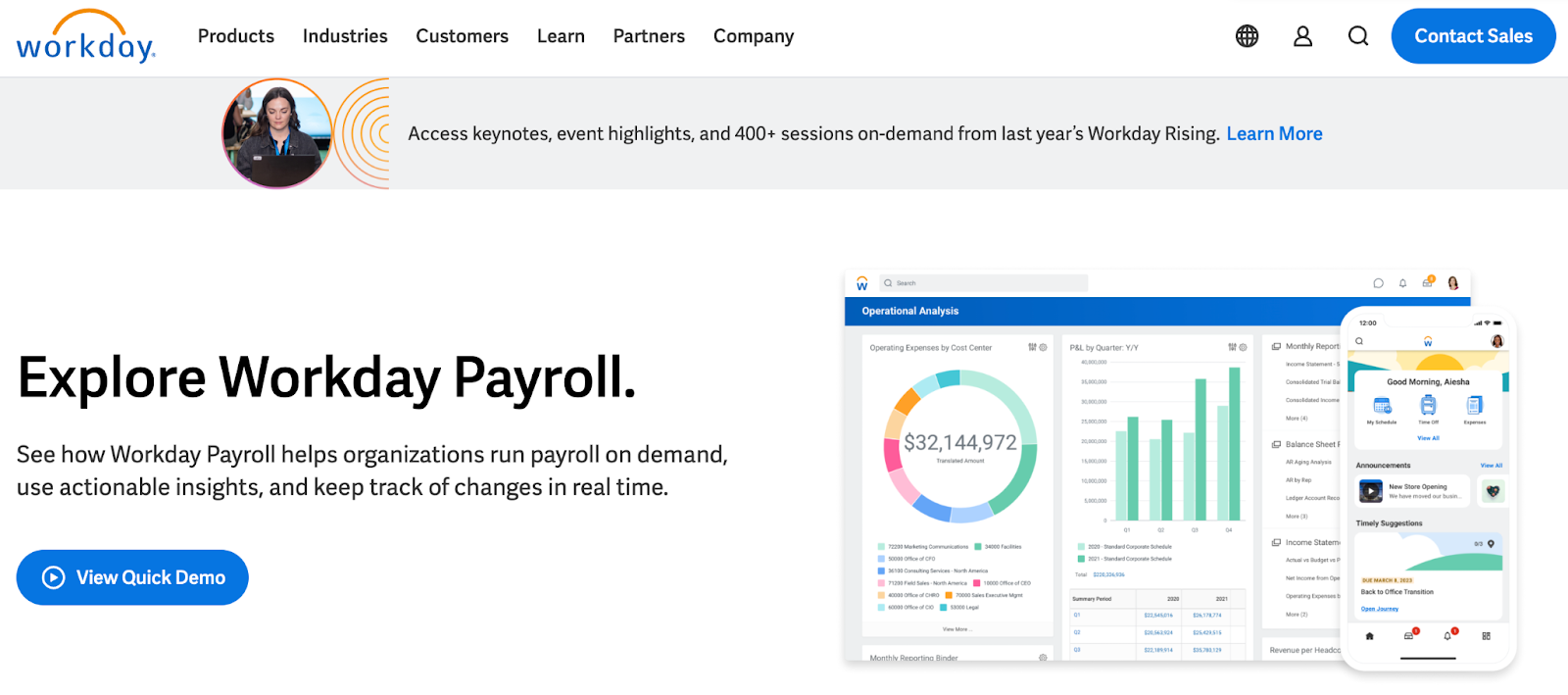
13. Workday: Our core values guide everything we do — employees, customer service, innovation, integrity, fun, and profitability.
Best mission statement examples: Workday

Image Source

Workday, a human resources (HR) task automation service, doesn’t use its mission statement to highlight the features of its product or how it intends to help HR professionals improve in such-and-such a way.

Instead, the business takes a stance on values.

There’s a lot of great tech out there, but at Workday, it revolves around the people. Their mission statement observes the state of its industry — which Workday believes lacks a human touch — and builds company values around it.

What we like: This mission statement is confident yet kind.

14. Lowe’s: Together, deliver the right home improvement products, with the best service and value, across every channel and community we serve.

Best mission statement examples: Lowe’sImage Source

Sometimes, the best way to communicate is to be direct. Lowe’s mission statement does this beautifully, and it’s also a great lesson in how the words and phrases you choose show your audience the force behind your mission.

This mission statement begins with the word “together.” So, no matter what location, products, or channel, the top priority of its mission is that it happens as a team.

That focus on togetherness also creates a foundation for the volunteer, scholarship, and charitable work that this organization does.

What we like: This statement hones in on the who, how, what, and why behind this powerful home improvement brand.

15. Tesla: Accelerating the world’s transition to sustainable energy.

Company mission statement examples: Tesla

Image Source

A car company’s punny use of the word “accelerating” is just one reason this mission statement sticks out. But, Tesla makes this list because of how its mission statement describes the industry.

It may be a car company, but Tesla’s primary interest isn’t just automobiles — it’s promoting sustainable energy. And, sustainable energy still has a “long road” ahead of it (pun intended) — hence the world’s “transition” into this market.

Ultimately, a mission statement that can admit to the industry’s immaturity is exactly what gets customers to root for it — and Tesla does that nicely.

What we like: The Tesla mission statement uses incredibly well-chosen words to communicate multiple meanings and make customers think about the industry as a whole, not just the company.

16. Invisible Children: Invisible Children exists to end violent conflict and foster thriving ecosystems in solidarity with our world’s most at-risk communities.

Company mission statement examples: Invisible Children

Image Source

A previous version of Invisible Children’s mission statement was “Partners with local peacebuilders across central Africa to end violent conflict through locally-led solutions.”

Invisible Children is a nonprofit organization that raises awareness around the violence affecting communities across Central Africa, and the company takes a confident, decisive tone in its mission.

The most valuable quality of this mission statement is that it has an end goal. Many companies’ visions and missions are intentionally left open-ended so that the business might always be needed by the community. But Invisible Children wants to “end” violent conflict facing African families with local solutions.

It’s an admirable mission that all businesses — not just nonprofits — can learn from when motivating customers.

I’ve personally volunteered for Invisible Children, and I’ve seen firsthand this mission statement isn’t something that sits on their website gathering dust. It’s understood by every individual at every level of the organization, from youth volunteers to leadership.

What we like: You don’t need to ask yourself, “What does Invisible Children do again?” when looking at their work. A clear, visible line can be drawn from every social media post, fundraising effort, and public campaign to this mission statement.

17. TED: Spread ideas, foster community, and create impact.
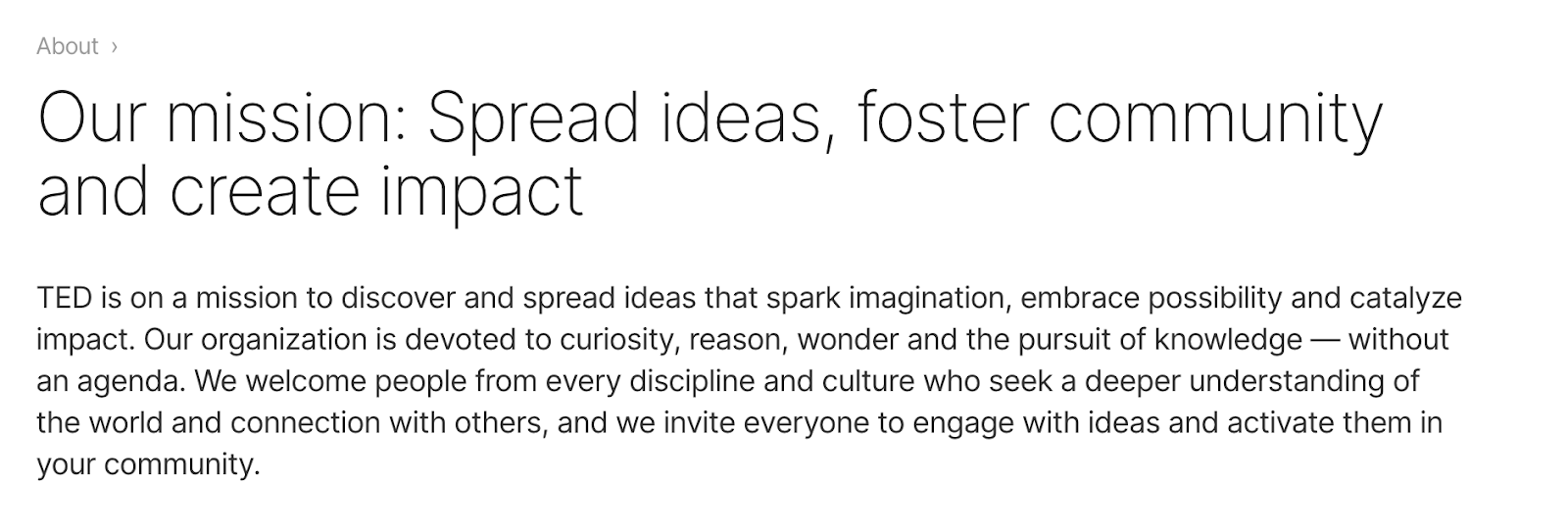
Best company mission statement examples: Microsoft

Image Source

We’ve all seen TED Talks online before. Well, the company happens to have one of the most concise mission statements out there.

TED, which stands for “Technology Education and Design,” has a succinct mission statement that starts with “Spread ideas.”

Sometimes, the best way to get an audience to remember you is to zoom out as far as your business’s vision can go. What do you really care about?

TED has recorded some of the most famous presentations globally. Then, it hones in on what great ideas can do — foster community and create impact.

What we like: This mission statement shines through in every Talk you’ve seen the company publish on the internet.

18. Microsoft: To empower every person and every organization on the planet to achieve more.

Image Source

Microsoft is one of the most well-known technology companies in the world. It makes gadgets for work, play, and creative purposes on a worldwide scale, and its mission statement reflects that. Through its product offering and pricing, it can empower every person and organization.

What we like: This statement encompasses both the organizations and the individuals that use Microsoft products.

19. Disney: To entertain, inform, and inspire people around the globe through the power of unparalleled storytelling.

Company mission statement examples: Disney

Image Source

Disney’s mission statement goes beyond providing ordinary entertainment. It intends to tell stories and drive creativity that inspires future generations through its work.

What we like: This is an exceptional mission statement because it goes beyond giving consumers programs to watch, but ones that excite and change the way people see themselves and the world around them.

20. Meta: Giving people the power to build community and bring the world closer together.

Company mission statement examples: Meta

Image Source

Meta, formerly known as Facebook, is a major social media organization with a concise vision statement. It provides a platform to stay in touch with loved ones and potentially connect to people around the world.

What we like: This is a concise mission statement, but it still manages to encompass two enormous points: the company’s origin (Facebook) and the future of the internet.

21. Vista Equity Partners: By providing technology expertise, operational guidance, and capital for sustainable growth, we empower organizations across all industries to stay ahead in the digital economy.

Company mission statement examples: Vista Equity Partners

Image Source

Many businesses sell a clear and easy-to-understand product or service, but other companies need to combine branding with product education. This means that some mission statements need to not only communicate how a brand does business but also make it easy to see what it’s selling.

Vista Equity Partners is a leading technology brand that supports a wide range of people, technologies, and products. In its mission statement, it clarifies what its company offers and why. It does this using the terms its audience uses most often to describe how it can help.

What we like: This mission statement creates a skillful balance of product education and audience identification.

22. Dunkin: Everything we do is about you. We strive to keep you at your best, and we remain loyal to you, your tastes, and your time. That’s what America runs on.

Women athletes smiling on Nike’s mission statement pageIMG name: nike

Image Source

Dunkin’ (previously Dunkin’ Donuts) has a mission that goes beyond remaining a large coffee chain. Rather, the brand wants to be the consummate leader in the coffee and donut industry. It wants to become a place known for fun, food, and recreation.

This example touches on the evolution of the company. Depending on your age, Dunkin’ makes you think of donuts and a “cheat day” from your healthy eating goals. I think of Saturday mornings from my childhood when my parents would occasionally surprise us with donuts for breakfast.

“Donuts” was dropped from the company’s name in 2019, helping Dunkin’ keep up with changing consumer trends and embrace the popularity of their coffee.

What we like: This example looks to the future while also giving a nod to its necessary evolution.

23. Nike: To bring inspiration and innovation to every athlete* in the world. *If you have a body, you are an athlete.

Image Source

The Nike mission statement includes a unique element: an asterisk and a footnote expanding on their language choice.

It’s concise yet answers a question that they know the athletic industry struggles to answer: What defines an athlete? It manages to simultaneously be informative and bring inspiration to their branding.

What we like: This mission statement articulates the target audience with very specific yet inclusive language.

24. Starbucks: To inspire and nurture the human spirit — one person, one cup, and one neighborhood at a time.

Imagery from Stabrucks’ mission statement pageIMG name: Starbucks

While the idea of paying $3 for a cup of coffee seems normal now, Starbucks had to fight to justify its prices when they were a new brand. They positioned themselves on the market as being another place to gather locally, one that didn’t revolve around alcohol.

The Starbucks mission statement touches on this subtly with the use of the word “neighborhood.” It’s a concise statement that speaks to their founding principles and, of course, includes their flagship product: a quality cup of coffee.

What we like: Good mission statements use emotional language, and the Starbucks mission statement does that well with the terms “inspire,” “nurture,” and “human spirit.”

25. Google: Google’s mission is to organize the world’s information and make it universally accessible and useful.

Mission statement example from GoogleIMG name: Google

Google has become so synonymous with modern life that its brand name has become a verb. It’s estimated that there are 99,000 Google searches every second, and the search engine is only one of its products.

Google has more products than consumers know about, but their mission statement doesn’t go into all of them (and if it tried, no one would ever read the whole thing). Instead, it touches on what we all love about Google: how useful the product is. This company mission statement reminds us of what we love best about the brand.

What we like: Google is a customer-centric company, and consumers feel that immediately when reading its mission statement.

Now that we’ve gone over successful mission statements, what does a good vision statement look like? Check out some of the following company vision statements — and get inspired to write one for your brand.

1. Alzheimer’s Association: A world without Alzheimer’s and all other dementia.

Best Vision Statement Examples: Alzheimer's Association

Image Source

The Alzheimer’s Association conducts global research and gives quality care and support to people with dementia. This vision statement looks into the future, where people won’t have to battle this currently incurable disease. With the work that it’s doing in the present, both employees and consumers can see how the organization achieves its vision by helping those in need.

What we like: This vision statement is ambitious and broad enough to be an umbrella statement in line with a brand’s mission.

2. Teach for America: One day, all children in this nation will have the opportunity to attain an excellent education.

Best Vision Statement Examples: Teach for America

Image Source

Teach for America creates a network of leaders to provide equal education opportunities to children in need. This organization’s day-to-day work includes helping marginalized students receive the proper education they otherwise wouldn’t have access to. Its vision statement is what it hopes to see through its efforts — a nation where no child is left behind.

What we like: “One day” is an unspecified amount of time, which makes sense for such an ambitious goal, and yet that doesn’t stop it from being their goal.

3. Creative Commons: Help others realize the full potential of the internet.

Best Vision Statement Examples: Creative Commons

Image Source

This nonprofit’s vision statement is broad. It helps overcome legal obstacles to share knowledge and creativity around the world. By working closely with major institutions, its vision is an innovative internet that isn’t barred by paywalls.

What we like: The vision for this brand is limited to the internet, yet “full potential” allows for a lot of creativity.

4. Chipotle: We believe that food has the power to change the world.
Company mission and vision statement examples: Chipotle

Image Source

Delicious tacos, burritos, and bowls aren’t the only things that Chipotle is passionate about. Many fast food brands differentiate with products. But Chipotle offers a belief instead. This idea fuels practices like using local and organic produce, using responsibly raised meat, and cutting greenhouse emissions.

What we like: Chipotle’s vision statement makes it clear what inspires and drives the actions of this international brand.

5. Australia Department of Health: Better health and wellbeing for all Australians, now and for future generations.

Best Vision Statement Examples: Australia Department of Health

Image Source

This government department has a clear vision for its country. Through health policies, programs, and regulations, it has the means to improve the healthcare of Australian citizens.

What we like: The phrase “now and for future generations” communicates the long-term commitment of this health department.

6. LinkedIn: Create economic opportunity for every member of the global workforce.

best company vision statement examples, LinkedIn

Image Source

LinkedIn is a professional networking service that gives people the opportunity to seek employment. Its vision statement intends to give employees of every level a chance to get the jobs they need.

What we like: Although “every member of the global workforce” seems like an uncountably large number, having it as their vision keeps LinkedIn always working for improvement and further outreach.

7. Purely Elizabeth: We believe that food can heal.

Company mission statement examples: Purely Elizabeth

Image Source

Purely Elizabeth is a food brand selling granola, oatmeal, and cereal products. Its extended vision statement reads: “When you eat better, you feel better. It’s that simple. That’s why we use superfoods with vibrant flavors and rich textures to create delicious foods to help you thrive on your wellness journey.”

Food brands have a lot of competition, and this brand’s broad and inspiring vision offers a chance to connect more deeply with customers. Its podcast, blog, and recipe resources offer useful tools and tips for anyone looking to heal their bodies with their food choices.

What we like: This vision statement is simple but powerful.

8. AllHere: Connecting All Families with the Right Support at the Right Time.

Company vision statement examples: AllHere

Image Source

Attendance is a big challenge for schools and families, especially with students in middle and high school. AllHere offers AI services like mobile messaging to overcome administrative and communication challenges. This helps students, parents, and teachers get the support they need for student success.

What we like: This vision statement emphasizes that this challenge is bigger than individual habits. It’s an empowering vision of an educational system that works for everyone.

9. Southwest: To be the world’s most loved, most efficient, and most profitable airline.

Best Vision Statement Examples: Southwest

Image Source

Southwest Airlines is an international airline that strives to serve its flyers with a smile. Its vision statement is unique because it sees itself not just excelling in profit but outstanding customer service, too. Its vision is possible through its strategy and can lead its employees to be at the level they work toward.

What we like: Southwest gets it right — by being well-loved and efficient, they can become the most profitable airline. Putting customers first makes a business successful.

10. Supergoop!: Change the way the world thinks about sunscreen.

Company vision statement examples: Supergoop!

Image Source

For a vision statement to excite, but not overwhelm, it should be both broad and specific. Company mission statement examples like the one above from Supergoop! show that it may be tricky, but it’s also possible to balance those two extremes.

This vision says that sunscreen is important AND that sunscreen is more than sunscreen. This simple statement helps the audience think more about what its products are and what they should expect from those products. It’s about education, awareness, and quality.

What we like: This vision statement keeps the tone positive, bright, and direct.

Inspire Through Brand Values

It was Anna Lappé who said, “Every time you spend money, you’re casting a vote for the kind of world you want.” Conscious consumerism is an economic trend that brands should pay attention to. Consumers are certainly paying attention.

Now that you understand the power of a great mission statement and you have these mission statement examples to learn from, you’re ready to take this step in your own brand.

Brand values play a much more significant role in customer loyalty than you think. Showing that your business understands its audience — and can appeal to them on an emotional level — could be the decision point for a customer’s next purchase.

We hope you found some insight from these mission statement examples and that they help you brainstorm your inspiring vision and mission statements for your business.

Editor’s note: This post was originally published in August 2014 and has been updated for comprehensiveness.

New Call-to-action

Categories B2B

Cancellation Email Examples I Love (For Your Inspiration)

The best-case scenario is that a cancellation email turns a churned subscriber into a retained customer.

But that’s not all the cancellation email can do.

Recently, I canceled a subscription. The truth was, I wasn’t entirely satisfied with the company, and someone else could do the same thing for the same money. I left.

Within hours, I received a very polite email from customer service, which made me feel valued. They offered a discount, and I felt they were very understanding. I admit it wasn’t enough to encourage me to sign up again, but it did allow the subscriber/software “relationship” to end well. The cancellation email was enough to curb my dissatisfaction, and now my narrative about the company is positive; I’d even recommend them to a friend!

→ Download Now: The Beginner's Guide to Email Marketing [Free Ebook]

While this cancellation email hadn’t quite wooed me back, it certainly left the door wide open for the future. It made me appreciate the power of a good email when the chips are down.

In this article, we’ll explore the components of well-done cancellation emails — plus share a template for you to create one of your own.

Table of Contents

The Best Cancellation Emails

I’ve dug through my emails and spoken to expert email marketers to find fifteen of the best cancellation emails. I’ve included why they’re effective, with the stats to prove it.

By learning from these cancellation email examples, you’ll be able to create your own version that will bring your customers back — or at least allow you to part ways in the best way possible.

1. Zero Bounce

order cancellation email example from Zero Bounce

Image Source

Zero Bounce has a staged process when it comes to cancellation emails. Zach Nonnemacher, Email Strategist at ZeroBounce, explains the flow.

  • The person goes to cancel in the dashboard. A modal pops up asking for feedback and gives them a discount offer to stay.
  • If they accept, ZeroBounce sends a confirmation email showing what they accepted.
  • If they reject, ZeroBounce sends a follow-up based on that.
  • Then, if they didn’t accept the first follow-up offer, ZeroBounce sends a second email later to those who rejected.

The emails have an open rate between 34% and 51%.

It’s worth noting that before Zero Bounce sends their first email, they’re gathering important information through a feedback pop-up. They also incentivize the user to return with a discount.

What I liked about it: I love how Zero Bounce has a flow of emails that considers where the user is based on how they responded to the first email. I also really like that Zero Bounce is asking for user feedback. This information offers insights explaining churn so they can work to reduce this in the future through marketing messaging or alterations to their offering.

2. Niceboard

order cancellation email example from Niceboard

Image Source

Like Zero Bounce, Niceboard has a cancellation email flow. Noticeboard sends two emails.

Hanna Feltges, Growth Marketer at Niceboard, explained the role of each email to me.

Email one (above) is sent to customers a day before their plan is canceled.

Feltges believes the elements that make this email successful for Niceboard include:

  • Pointing out the features that users would lose access to when not upgrading. This helps recall why the user chose Niceboard in the first place.
  • The timing of the email is one day before cancellation, giving the user a heads-up to take action.
  • The framing of “continuing to have access to these features” makes the recipient take action and reduces friction.
  • Offering a simple way to contact Niceboard (reply to the email).

order cancellation email example from Niceboard

Image Source

Email two is sent to customers the day their plan is canceled. Email two is effective because it

  • Provides an easy way to get back to using the tool (“all your work has been saved”).
  • Takes a proactive step to reduce friction for upgrading (“3 ways to sweeten the deal”): Tips on how to improve their experience and the ability to switch to a free plan.
  • Offers an easy way to unsubscribe. While this might seem too easy, we consciously decided to suggest this to disqualify anyone not genuinely interested in our product.

What I liked about it: An email flow serves as a kind reminder to your canceling subscriber. We’re all busy, and the temptation of a “sweeter” deal might just be enough to bring someone back. I like the second email and how there are many options for the user to choose from. They can pick up tips, stay on as a free user, or unsubscribe.

As Feltges explained, the unsubscribe is very obvious in this email, but Niceboard is happy to lose disqualified email leads. I think this builds a bit of trust, too. I’d prefer a company that simply served me (even if I unsubscribe) rather than trap me in more emails.

3. RecurPostorder cancellation email example from Debbie Moran

Debbie Moran, marketing manager at RecurPost, provided an example of their email cancellation.

Moran said, “I personally engage with customers canceling their subscriptions as a part of our customer retention strategy. Through this, I aim to understand their reasons, gather feedback, and explore solutions to address their concerns.”

Thanks to Moran’s personal email, she was able to turn this nearly-churned customer back into a subscriber. Moran said, I realized that the customer’s issue was budget-related, not dissatisfaction with RecurPost. Through open communication and assistance from our sales support team, we customized a budget-friendly plan for her, making her a happy and retained customer.”

Moran believes there are five key reasons why the customer stayed:

  • Customized budget-friendly plan.
  • Open communication.
  • Responsive customer support.
  • Flexibility and adaptability.
  • Positive customer experience.

Finally, Moran said, “Through these emails, my main goal is to turn cancellations into opportunities for improvement and continued customer satisfaction.”

What I liked about it: It’s cliche, but people do business with people. In this interaction, Moran was able to turn a churned subscriber into a retained subscriber. Looking at the email, the communication, responsive support, and everything else, it’s very clear to me how RecurPost kept their customer.

4. Linktree

cancellation email example from LinkTree

Image Source

This is the cancellation email I received just a few days ago, and it’s pretty effective. I signed up for Linktree because I wanted to give it a test for 30 days, free of charge. I’m notorious for forgetting to cancel subscriptions, so I chose to cancel this immediately to enjoy the 30 days without a potential unwanted bill.

I wanted to test the software and then make a decision about whether or not to stick with it and pay. For someone in this situation, this email is great. It reinforces the pro features, supports the tool with social proof in the form of reviews, and allows me to renew from the email easily.

What you don’t see in this email is the cancellation process. Before I even received an email, Linktree offered me 25% off; honestly, it was tempting.

What I like: This is a clean and well-designed email. I genuinely did read the reviews because although I have currently canceled my subscription, I am very much in the explorative phase with this new software. The renew button in the email gives me an easy place to return to if/when I am ready to commit.

5. Disney

cancellation email example from Disney

Image Source

If you’ve canceled a Disney subscription, you’ll receive an email like the one above. It’s pretty to the point but does everything it needs to. Disney expresses its sadness to see you go, confirms the details (cancellation date), and serves as a reminder that you can restart anytime.

The email includes the “restart subscription” button to remove friction. Before canceling my Linktree subscription, I might’ve questioned why Disney and others added a “restart” CTA, but if someone’s subscription is coming to an end without their knowing, the frictionless renewal/restart would be much appreciated.

What I liked about it: I liked how Disney advised customers on what to do if they also had The Disney Bundle. I found this very transparent. Disney could easily allow unknown subscriptions to leave their customers’ banks, but they did the right thing.

Consumers appreciate actions such as this, but they also save customer service a lot of time with a) disgruntled customers and b) refund requests. A good move all around.

6. Twitch Turbo

cancellation email examples, Twitch Turbo

Twitch Turbo removes ads so you can enjoy your viewing! Their cancellation email is very simple and to the point. They’re giving you all the information and not making any grand gestures, such as discounts or incentives to bring you back.

What I liked about it: This could be slightly contradictory to my previous comments, but I like its simplicity. I appreciate not being pulled back in with an offer. However, I would encourage cancellation emails to include an offer where possible.

7. Kmartcancellation order confirmation example from Kmart

A cancellation of goods requires an email so the buyer knows their cancellation was successful.

This example from Kmart confirms the refund request has been noted. They’ve shared the items within the email so the recipient has a reference. In this case, the user triggered the cancellation, but for circumstances where it was not, Kmart offered the why behind the cancellation. They’ve also got quick access to chat or help, which is great customer service.

What I liked about it: One thing that stands out to me in this email is the confirmation of cancellation, followed by reassurance that the refund confirmation email is on its way. This email ensures that the recipient has more answers than questions and is in the know about what’s going on.

8. Booking.com

cancellation email example from Booking.com

Image Source

Cancellations on Booking.com are not always straightforward as booking.com is the third party between the buyer and the property.

Like Kmart (above), Booking.com has done a good job reassuring the recipient about what’s happening. This simple email includes an update: Booking.com is finding a solution regarding cancellation with the property.

Naturally, booking.com has protected itself and given the recipient all the information, including a reminder about the property terms.

What I liked about it: Although the matter is in hand and Booking.com is negotiating with the property, I like that they gave the recipient full control over everything by providing contact details.

9. Cathay Pacific

cancellation email example from Cathay Pacific

Image Source

This cancellation email was sent during a busy time for Cathay Pacific. As you can see in the email, they’ve received a large increase in refund requests and have clarified to the customer that they’re doing everything they can. Plus, they are also managing expectations with a time period of seven to twenty business days.

Additionally, Cathay Pacific has already apologized for potential delays. Their customer service throughout this email is great.

What I liked about it: The email is polite and to the point, but Cathay Pacific has done everything it needs to appease and serve its customers.

10. Craft Gin Club

cancellation email from Craft Gin Club

Image Source

I joined and canceled a Craft Gin membership some time ago. This cancellation email followed, and I appreciated it.

A plain text email from Amy felt genuine. It was more like a communication with her than a standard cancellation email that everyone would receive. Though I know everyone would receive this, the email did not lose its charm.

The email offered all the common elements of a cancellation email: Amy tells me she’s sorry I’m leaving, leaves the door open for me to return, and tells me what I’m losing by canceling.

Finally, Amy asked if I could fill out the feedback form.

What I liked about it: The feedback form is in bold text. Craft Gin is interested in knowing the why behind people leaving. I highly recommend adding this to cancellation emails or within the cancellation journey. Sometimes, a cancellation is done with a heavy heart, and the user might appreciate a moment to tell you what’s up.

Plus, if you know why they canceled, you’ve got another chance to bring them back, or if not, you can improve things for the next person.

11. LastPass

LastPass cancellation email example

Image Source

This LastPass cancellation email is a great example of someone reluctantly canceling with a company and the importance of the feedback layer.

I ended a two-year partnership with LastPass days after my subscription was renewed.

LastPass graciously refunded the annual subscription cost and sent the email above. I found it incredibly effective. Instead of begging me back, LastPass acknowledged me as a customer, asked why I was leaving, and offered a 15% discount. The offer of a discount felt like a subtle attempt, which I appreciated.

I did give LastPass my time to explain why I was leaving, and they did offer some reassurances. I appreciated LastPass asking about the reason for my cancellation.

While I didn’t renew with LastPass, I do feel good about how I was treated as a customer, and who knows, maybe I’ll go back sometime.

What I liked about it: The politeness of the email alongside the delivery made it hard to leave LastPass. I was tempted back! Although I did not return this time, it turned me from a categoric “I’d never use LastPass again” to a “who knows, maybe I’ll go back in the future.”

12. Washington Post

Washington Post cancellation email

Image Source

LastPass and Craft Gin are not the only companies using a plain text email for their cancellation.

Washington Post’s plain text email persuaded Sandra Grauschopf, Marketing Manager at Kodeco, to remain a subscriber.

Grauschop said, “It’s not a fantastic email, but the offer was just right to make the value (to me) worth the money. It convinced me to continue as a subscriber.”

I can see why. The email comes across as sent directly from a person at the Washington Post. It’s polite and to the point. The Washington Post managed to prevent Grauschopf from churning by offering a discount more in line with her budget.

What I liked about it: Emails like this prove that even a plain text email is impactful if the wording or offer is good enough. For me, it deviates somewhat from the notion that people don’t read or have to be persuaded by over-engineered designs to stay interested. If you have something of substance, plain text can work.

13. Adobe

cancellation email example for Adobe Acrobat Pro DC

Image Source

I canceled a subscription with the Adobe Acrobat team, and this is the email I received.

Like all good cancellation emails, Adobe has done the essentials and provided an option to reactivate the subscription. The email is simple and to the point, but it gets the job done.

What I liked about it: Adobe signed off with “Thank you for being a valued customer.” Even as a customer leaves a paid plan, the email sign-off is polite.

14. pdfFiller

PDF filler cancellation email

Image Source

Alpana Chand shared a cancellation email from PDF Filler. Chand said, “I appreciated the tone of this email; I did write to them thanking them and saying I will use the paid service whenever necessary.”

The cancellation email from PDF Filler was so well written that it triggered a reply from Chand, who was unsubscribing. This is greatly effective.

Although PDF Filler didn’t turn a churned subscriber into a retained one, they did weather the cancellation well. They ended up with a positive interaction instead of a negative.

What I liked about it: I agree with Chand; the email was polite and helpful. The tone is great. They’ve also included a timeline of when the payment should return to Chand’s account.

15. Audible

cancellation email from Audible

Image Source

I canceled my Audible subscription and received the email above. The email is generally very useful, informing me I have access until July. There’s a little warning about credits expiring, which would encourage me to download anything I need before the deadline.

Like many emails listed, Audible includes the option to keep my membership.

What I liked about it: The email, in general, is great, but I especially like how easy it is to get in touch if there’s an issue. With this particular cancellation, there was some confusion, and I used the Contact Us option to resolve a last query before I subscribed for the year.

How to Write a Cancellation Email (+Template)

Now we’ve analyzed fifteen cancellation emails, let’s look at the winning formula and write a template.

What makes a winning cancellation email

It seems that the formula for making a cancellation email stand out is:

  • Cancellation confirmation, including dates.
  • Details about refunds, if applicable.
  • A genuine “sorry to see you go”.
  • Features you’ll miss out on.
  • A warning you’ll lose data.
  • Resubscribe/renew CTA.

As a bonus, you can add:

  • A personal approach (name the sender).
  • Reviews from happy customers.
  • Quick links to contact.
  • Feedback request.

Although many emails in this round-up don’t include these bonus items, I’d highly recommend using them. The true success stories have come from those asking for feedback and offering alternative solutions.

Cancellation email template

Hello, [Name],

We’re sorry to see you go.

Your cancellation request has been processed. From [date], you’ll be moved to the [plan]. This means you will lose access to [benefit], [benefit], [benefit].

With the [pro plan], you also get

  • [Pro plan benefit].
  • [Pro plan benefit].
  • [Pro plan benefit].

[RESUBSCRIBE BUTTON]

You can resubscribe anytime. In the meantime, if you have questions, please don’t hesitate to reach out to me.

If you have time, please fill out this feedback form.

Kind regards,

[Your name]

Say Goodbye the Right Way with a Cancellation Email

I have no doubt that the cancellation email is absolutely essential. Naturally, you need to give your customers some confirmation that the action they’ve taken – i.e., canceling – is in motion.

More than that, a cancellation email could be the difference between a soured customer and a peaceful end to a partnership. Better, your cancellation email could encourage your customer to go back into an alternative product or service, a win-win for all.

New Call-to-action

Categories B2B

How to Make Your Brand Stand Out When Amazon’s Your Marketing Competitor

Last week, I was looking for a new yoga mat on Amazon. Being someone who plays it safe, I usually go for Amazon Basics. So, I found a lovely blue mat for about 20 dollars and added it to my cart.

I almost entered my card details when I spotted a beautiful purple mat with a similar price and great reviews.

Despite all the awesomeness, I hesitated because the brand was unfamiliar.

But curiosity got the best of me, so I checked out the seller’s site. The offer and number of positive comments were too good to pass up. Finally, I decided to switch out the Amazon Basics mat for the purple mat.

All this made me wonder: Why do we always go for Amazon deals, leaving smaller brands behind? Is it just about prices or something else? Better ads, trust, safety?

To find out, I did some research and talked to brand experts. In this piece, I’m sharing all the tricks on how smaller brands can get noticed and beat the Amazon game.

Download Now: Free Marketing Plan Template [Get Your Copy]

Amazon’s Competitive Advantage

In January 2024, Amazon became the world’s fifth most valuable company, worth $1.599 trillion. And a massive part of that amount is thanks to Amazon Basics products.

Amazon Basics, started in 2009, is Amazon’s brand, offering a variety of everyday items at low prices.

When it first launched, Amazon Basics focused on selling small, cheap products they knew would make a lot of money.

Today, the offer is way bigger and better.

There are several factors behind this success:

Wide Range of Products

Amazon’s first significant advantage is its diverse offer.

Customers can get almost anything they want in one place.

New jacket? Check. New batteries? Check. Bath tissue? Check. Body lotion? Check.

Literally everything.

Interesting fact: Amazon wasn’t always this type of store. Initially, it was a small bookstore, and through years of hard work, it grew into a global retail giant thanks to dedication and the ability to adapt when needed.

Image Source

Global Availability

Amazon’s smart logistics make deliveries quick and reliable no matter where you are. You can get your stuff in two days or even the same day.

They have warehouses worldwide, so even during busy times such as holidays, you can count on your package to be delivered at the right time.

Always thinking about the customer

Amazon wants you to have a great shopping experience.

They make returns easy, have customer service available 24/7, and regularly suggest other products you might like.

Amazon always had a soft spot for customers, and the letter from 1997 is the proof in the pudding:

“From the beginning, our focus has been on offering our customers compelling value. We realized that the Web was, and still is, the World Wide Wait. Therefore, we set out to offer customers something they simply could not get any other way,” writes Founder Jeff Bezos.

Innovations and Better Prices

With fast deliveries, rich offers, and smart technology like virtual assistant Alexa, Amazon stays ahead and gives its customers the coolest things to use.

And these cool items usually come with a price tag that’s way better than anywhere else.

Why?

Amazon uses cutting-edge tech and automation. This helps processes run smoothly and saves some serious money that way.

By lowering the prices of its products, it naturally attracts more customers because, let’s be real, who doesn’t love a good offer?

Amazon can give you more for less, and that’s their biggest advantage.

How Your Brand Can Stand Out (+ Data and Expert Tips)

Just like in SEO or social media, the crucial thing on Amazon is to stand out. Be different. Recognizable.

Before jumping to the practical guide, let’s see what John Aspinall, Amazon CTR coach and senior account executive at My Amazon Guy, says.

Aspinall notes that Amazon is a colossal presence, offering a wide range of products priced aggressively. They’re also backed by the behemoth’s reputation, which can feel like the endgame for competing brands, he notes.

“But there’s a chink in Amazon’s armor — complacency. Amazon often banks on its brand name, assuming its products will be the de facto choice for consumers. However, they tend to overlook critical aspects such as SEO, merchandising, and tactical marketing,” Aspinall says,

Aspinall states these are “areas where smaller brands, with the right guidance, can outshine them [Amazon].”

Now check five easy steps to outdo the Amazon competition.

1. Improve your product pages with A+ Content for a better appeal.

Make your product pages stand out by using A+ Content (also known as “Enhanced brand content”–> EBC).

This Amazon tool lets you add cool stuff like better pictures, videos, and charts to tell your brand’s story. It helps answer customer questions upfront and leads to more sales and traffic.

Image Source

Here are some simple things to add for better sales:

  • Use catchy headers and pictures.
  • Make lists to show off your product features.
  • Use charts to compare your product with others.
  • Get creative with your pictures and words.

A+ features can keep customers returning, boosting your sales by up to 8%.

Brands with a store get approximately 31x more repeat purchases in just 60 days.

Image Source

2. Launch ads and promotions to reach more leads.

After fixing up your store and improving your product pages, think about using Amazon Ads to get more people to know and buy from your brand.

Try different Amazon ad tools:

  1. Sponsored Brands. Stand out with a headline and logo in Amazon searches.
  2. Sponsored Products. Show your stuff on Amazon store pages and in searches.
  3. Sponsored Display. Reach customers on and off Amazon, featuring your brand’s products.

According to Amazon Advertising Benchmark Report 2022, Sponsored Products campaigns cost 13%-79% less per click compared to other options.

Also, keep an eye on how well your ads are doing by focusing on:

  • Where your ads are and how well they’re doing.
  • How many new customers have your ads brought in?
  • How much do you spend on ads compared to your sales (ACOS)?

Image Source

3. Tell your story to make people feel and love your unique brand.

As a brand owner, you have one significant advantage over Amazon products — a brand story.

“Amazon‘s approach is often ’one-size-fits-all,’ lacking a nuanced understanding of niche markets,” Aspinall says, “This is where smaller brands can capitalize. The key lies in differentiation and clear communication.”

Let’s take a look at Amazon Basics for a moment. While it offers a variety of products, it lacks a specific passion or focus. This makes its identity somewhat generic and less compelling.

Now, think about your brand.

You have a niche, something you’re passionate about, which changes the game. You can connect more deeply with your audience and position your brand as an authority.

“Then comes merchandising. Amazon’s in-house brands often lack the storytelling and brand personality that resonate with consumers,” John adds. “Here, other brands can create compelling product listings, high-quality images, and engaging descriptions that inform and connect with the buyer.”

He says, “It’s about creating an experience, not just a transaction.”

Make sure to tell your story your WHY on Amazon. Let people fall in love with you.

Then, they’ll fall in love with your brand.

And finally, your offer.

4. Encourage reviews naturally to build trust with your brand.

According to Testimonial Engine, about 72% of people won’t buy something until they’ve read reviews.

On Amazon, it’s crucial to keep reviews honest. No tricks allowed — fake reviews can lead to serious consequences. Avoid paying for or persuading positive reviews.

A simple note in your products asking for feedback is fine. Also, use social media to gently remind customers to leave reviews.

5. Make your unique voice heard and nurture customer loyalty with Amazon Live.

To grow a loyal customer base and make your brand more recognizable, use tools like Amazon Live. It’s a fun way to connect with customers in real-time and boost sales with live, shoppable content.

Based on Online Dasher research:

  • Fans spend 43% more at the places they love.
  • Businesses with loyal customers grow revenue 2.5 times faster.
  • Loyalty program members generate 12-18% more yearly revenue growth than non-members.

So once you’ve got a fanbase on Amazon, the Manage Your Customer Engagement (MYCE) tool becomes your sidekick.

It lets you email your brand’s followers, including those who’ve recently shopped, shopped often, or spent a lot. Keep them hooked and excited about your brand.

“After making a sale, the focus should shift to keeping customers happy and encouraging them to recommend your brand,” says Kate Ross, a marketing specialist at Irresistible Me.

Ross notes that retaining customers is generally less expensive than acquiring new ones. Therefore, “this approach builds your brand’s reputation and credibility quickly,” Ross says.

Brands Going Toe-to-Toe with Amazon

The Amazon Basics brand is getting a lot of hype. But guess what? Some brands are still outshining them.

Whether it’s about quality, innovation, or unique features, these brands are making their mark on Amazon.

I’ll share three brands that give Amazon Basics a run for its money, each excelling in its way.

Let’s see.

1. Amazon Basics Yoga Mat vs. BalanceFrom Yoga Mat

To drive my point, let’s go back to the yoga mat.

My first choice was the Amazon Basics yoga mat.

Extra thick, comfy mat with elastic strap for storage and carrying. I like the 360-degree display, which lets you see the product from all angles.

On the other hand, Amazon Basics products usually have simple, or as the name implies — basic images. They’re pretty straightforward with a white background (even a bit boring if you ask me), but they get the job done.

Image Source

Amazon Basics Yoga Mat

  • Price: $20.38
  • Rating: 4.6 stars
  • Number of purchases: 75,482

What I like: Clear product descriptions, a high rating, refund or replacement within 30 days, and an affordable price point.

Since I gave up on the Amazon Basics mat, let me show you the one I chose at the end: the BalanceFrom yoga mat.

I‘ll be honest; I’ve never heard of this brand before. Still, based on more than 91k ratings, it’s evident that many people have.

Image Source

I loved the cool purple color and handy carrying strap, but what made me say “Yes,” was the A+ content below.

A neat section shows off the mats creatively, with pictures explaining all the features, sizes, and perks.

That’s something Amazon Basics doesn’t have.

Image Source

Then, I checked out their gallery and found one awesome video.

The video shows how strong, solid, and waterproof the mat is. It was really well-made, showing the BalanceFrom team put the effort into producing quality content.

And that always wins me over — especially the logo and inspiring slogan ending.

They boldly declared themselves the top-selling exercise yoga mat in the U.S. for three years — a savvy move to boost trustworthiness.

They boldly declared themselves the top-selling exercise yoga mat in the US for three years — a savvy move to boost trustworthiness.

Image Source

BalanceFrom Yoga mat

  • Price: $19.99
  • Rating: 4.5 stars
  • Number of purchases/reviews: 91,084

What I like: Quality content, clear product description, refund or replacement within 30 days, more than 91k purchases, affordable price, high rating, impressive visuals, user-generated videos, and a powerful message in the ad video.

How BalanceFrom outshined Amazon Basics?

Cost advantage: BalanceFrom edges out Amazon Basics for being a bit cheaper. Not a huge gap, but a little savings is always a win.

More purchases/reviews: BalanceFrom garnered more reviews and purchases, indicating its popularity among customers.

Niche focus: Unlike Amazon Basics, which offers a wide range of products, BalanceFrom focuses specifically on fitness. This niche name helps it stand out, build trust, and attract the right audience.

Better content: BalanceFrom has more creative and detailed content.

Credible messaging: The strong message in BalanceFrom’s video adds credibility and trust in the fitness market. This confidence makes it a more reliable and attractive choice.

Note: This example is a solid reminder that snagging the top #1 spot on Amazon isn’t the only path to outperforming the competition.

This mat may not claim the first rank, but it effortlessly dethrones the Amazon Basics mat with 16k more reviews and purchases.

2. Amazon Basics Wireless Mouse vs. Tecknet Wireless Mouse

The next products I analyzed were two different wireless mice.

Let’s start with the Amazon Basics mouse.

It’s an ergonomic mouse available in five different colors.

The product promotion is average, in the classic style of all Amazon Basics products—nothing better, nothing worse. The description is short and clear, with simple pictures showing all parts from all sides.

Image Source

But as I kept scrolling, I got a bit disappointed. Besides a couple of not-so-great user videos, there wasn’t much else worth checking out.

Amazon Basics Wireless Mouse

  • Price: $10.39
  • Rating: 4.4 stars
  • Number of purchases/reviews: 20,714

What I like: The low price, positive overall ratings, and a good number of purchases.

Now, let’s check its biggest rival — the Tecknet wireless mouse.

Compared to the Amazon Basics mouse, this product looks better. The pictures are nicer, and the video is way better than Amazon Basics’ video.

Image Source

Tecknet video looks professional and has cool pictures, animations, and good music in the background.

Beyond the classic features in the product description, one aspect caught my attention — the 36 months of support. What a great way to enhance the product’s value and show care for customers.

And below the product description, we can see more of Tecknet’s awesome content:

Image Source

Or, for instance, this:

Image Source

So fresh, so good.

Tecknet Wireless Mouse

  • Price: $11.99
  • Rating: 4.5 stars
  • Number of purchases/reviews: 64,483

What I like: Stylish content, a product breakdown, slick images and videos, a customer-centric approach, fast delivery, free returns, and affordable prices.

How Tecknet outshined Amazon Basics?

Visual appeal: Better pictures and a pro-level video than Amazon Basics’ poor visuals.

Comprehensive product description: Detailed description with a full breakdown of features and benefits (36-month support).

Pricing and value: Although Tecknet is slightly pricier at $11.99, it justifies the cost with better content, a customer-centric approach, fast delivery, and free returns.

Customer ratings and reviews: Tecknet shines with a higher 4.5-star rating and a whopping 64,483 reviews, showing that many people love it and have good things to say.

3. Amazon Basics Wooden Kitchen vs. KidKraft Kitchen

Let’s playfully wrap up this comparison section and pit two wooden kids’ kitchens against each other.

The first one is the Amazon Basics Wooden corner kitchen.

When I went through the content on the page, I found details about the product, photos, and a video showcasing the kitchen’s features. However, I immediately noticed the lack of life in the content, especially in the video.

The video feels somewhat empty, lacking soul.

In my opinion, promoting a children’s product without featuring any kids is a huge marketing miss. 👎

Image Source

Below, the manufacturer provides more details about materials, accessories, and benefits for children.

Image Source

Amazon Basics kid’s kitchen

  • Price: $169.37
  • Rating: 4.2 stars
  • Number of purchases/reviews: 1,697

What I like: Detailed product description, clear images, playset breakdown, and good ratings.

Now KidKraft.

KidKraft’s kitchen is so stunning.

And its content on Amazon is stunning as well.

First, the pictures show a little girl playing in the kitchen, adding the REAL touch I was talking about.

Image Source

And the whole website below the product is simply fantastic.

First, there’s the section to learn more about the brand, and I absolutely adore their “Kids first. Play forever” slogan.

Image Source

The images are super playful and colorful; it’s all so tied together with the brand and message. The brand tells its story through every photo, every word, and every piece of content.

One thing is for sure — the brand is dedicated to creating the absolute best for its littlest and sweetest audience.

KidKraft kitchen

  • Price: $188.55
  • Rating: 4.7 stars
  • Number of purchases/reviews: 17,317

What I like: Genuine pictures, great content, catchy descriptions, vibrant colors, high ratings, and brand image.

How KidKraft outshined Amazon Basics

Kid-centric imagery: KidKraft uses real, lively images of kids, creating an emotional connection. Amazon Basics lacks this warmth.

Colorful allure: KidKraft’s vibrant palette automatically makes its products more appealing to kids, standing out against Amazon Basics’ dullness.

Storytelling descriptions: KidKraft’s descriptions tell a compelling story, engaging customers. Amazon Basics leans more on factual information, missing that personal touch.

Brand identity: KidKraft’s brand name is tightly linked to kids products, unlike Amazon Basics, which covers a wide range.

High ratings and many reviews: KidKraft’s products boast better ratings and more reviews, indicating customer satisfaction and building trust.

Beating Amazon and Making Sales

Brands compete hard on Amazon, not just with each other but with in-house giants like Amazon Basics.

Despite what people might think, success on Amazon isn’t only for the big shots. It’s for brands with clever plans and good strategies.

Let’s wrap up the main steps you should take:

  • Improve product pages with A+ Content.
  • Use Amazon Ads effectively.
  • Share your brand story.
  • Encourage honest reviews.
  • Foster customer loyalty with Amazon Live and the MYCE tool.

And most importantly—be unique. You need to show why you’re special—whether it‘s quality, offer, ethics, or a different focus. It’s not about size but about being noticeably different.

Remember—in the Amazon world, victory goes to those ready to stand out and (out)shine.

New Call-to-action

Categories B2B

5 Secrets to Achieving Work-Life Balance, According to HubSpot Employees

When I started working from home, I thought work-life balance would come naturally. After all, I have no commute and don‘t have to plan what I wear each workday. And when it’s all over, I can close my laptop and turn on the TV.

Now, I realize how difficult it is to achieve a work-life balance, regardless of whether you work remotely or in an office.

If you work from home, you technically live at work — which can skew the balance. And if you work at an office, your commute to and from work can cut into your personal time.

Fortunately, there are ways to balance work and life, whether remote or in-person.

Let’s explore five secrets to achieving a work-life balance, according to HubSpot employees. But first, what even is work-life balance?

Download our complete productivity guide here for more tips on improving your  productivity at work.

What is work-life balance?

Work-life balance describes how your work intersects with your personal life, such as family, leisure, or health. Ideally, you want a balance in which you’re not sacrificing your personal life to keep up with work or vice versa.

Before working at HubSpot, I was a journalist for various TV stations.

Any journalist will tell you it’s easy for the profession to take over your life, leaving very little time for hobbies, rest, or personal relationships — since breaking news never takes a day off.

When I put too much focus on the work, my relationships with friends and family deteriorated, negatively impacting my mental health. On the other hand, when my personal life bled into my professional life, my work suffered.

So, how do you strike the right balance? I spoke to a few colleagues at HubSpot and drew from my personal experiences to provide insight. So, let’s dive into different ways to maintain a healthy work-life balance.

5 Tips for Work-Life Balance

1. Set boundaries.

Boundaries are crucial to balancing your personal and professional lives, regardless of your passion for your job.

“Boundary setting is one of the single greatest powers I’ve been able to uphold in my professional working career,” says Linda Huard, senior technical recruiter at HubSpot. “And, as a part of the boundary setting, I do not install work apps on my personal device.”

That means Slack, work email, and LinkedIn are not on her phone.

“It’s just too tempting to check during non-working hours,” she says. “I tell anyone I work with that when I’m on and in front of my laptop, I am giving 110%, but when I’m off-line, I’m completely off. This means evenings, weekends, holidays, and vacations remain completely mine.”

Huard says to set these boundaries early and hold to them.

Setting boundaries is definitely something I still struggle with regarding work-life balance.

In fact, the night before writing this post, I logged into my work computer at about 9 p.m. and spent the rest of the evening contemplating work instead of unwinding before bed.

So, I can assure you from experience that keeping business apps off your phone or putting your work laptop away after you clock out is an effective way of maintaining balance.

At the very least, it could ensure a peaceful evening before you have to start the day all over again.

2. Practice self-care.

Speaking of peaceful evenings, do you know what I should have done instead of checking my work emails before bed? The answer is my nightly self-care routine: good food, light music, and a little reading before sleeping.

Practicing self-care is vital not only to work-life balance but also to overall mental clarity and well-being.

A national survey shows that 64% of Americans who practice self-care report experiencing enhanced self-confidence, and 67% saw increased productivity. Furthermore, 71% say they saw a boost in overall happiness.

“One thing that has been quite helpful to me [regarding work-life balance] is focusing on self-care,” says Olurotimi Moses, our corporate growth representative. “For me, that looks like meditation, music, candles, and bubble baths. When I can, I treat myself to a day at the spa.”

Rest will help you decompress from the day and recharge for the next.

3. Try co-working.

Co-working is especially helpful if you‘re like me and work from home. I live in a small studio, where I’m always near my TV, phone, books, or dishes that need washing.

With everything around and no manager or co-worker in sight, it’s tempting to distract myself.

So, I‘ll sometimes FaceTime a close friend I know who works from home, and we’ll co-work together. We know we’ll hold each other accountable and call each other out if we allow ourselves to stray from our tasks.

I find I get a lot more done that way.

“I work in silence on Zoom with my best friend for an hour every week,” says Principal Marketing Manager Julia Gueron. “She’s across the country. It’s a great way to stay in touch with her, and I feel more focused if someone else who is just as busy is around working.”

Gueron says, “Sometimes we end up chatting, but it’s important to do this with someone who I know I can be honest with and say: ‘Hey – I really need to work now.’”

4. Know your style.

Some people can wake up feeling ready to take on the day, so they dive straight into their most tedious task first thing in the morning.

On the other hand, I am more of a night owl — so I tend to be more productive later in the day or early afternoon.

As a result, I warm up my work day by managing simpler responsibilities, such as responding to emails, checking Slack for any important messages, or scheduling future meetings.

Once the coffee and breakfast kick in and I‘m more alert, I’m ready to dive into writing the fantastic blog post you’re used to reading from me. Perfection takes time, after all.

That’s my work style; it helps me get things done while setting realistic goals.

“I’ve been working remotely for 11 years and have found that you have to lean into your remote work style,” says HubSpot’s principal recruiter, Steph McDonald. “For me, I get to my desk at 9 a.m. and rarely take time away until I leave at 5 p.m.”

McDonald notes that everyone’s work style is different, and others may clock in and take microbreaks or go to work out during the day to refresh their energy.

“It’s okay to have different styles as long as your work is getting done,” she says.

5. Set expectations with friends and family.

When I was a journalist, I was living with my family.

I‘ll never forget the many times I’d get a call from my parents during the workday complaining about dishes that needed to be washed or asking if I could pick up my mom’s favorite fruit on the way home.

Though they meant no harm, the constant calls and texts were distracting and affected my productivity. So, I had to talk with my parents about respecting my work hours and saving these conversations for after I clock out.

My colleague, Marketing Manager Tristen Taylor, experienced similar issues when she started working from home.

“A new challenge I experienced when I began working from home was trying to make my family understand that I was, in fact, working from home,” she recalls.

She says, “At the time, I was living in the city near my family and would experience unannounced visits from them wanting to go out to eat or run an errand, and would be met with a pout when I’d reiterate that I can’t just get up and go wherever.”

Like me, Taylor also suggests setting boundaries and expectations with your family, friends, and colleagues.

“You can’t afford to get distracted by those living in your home or dropping by, so let them know your schedule is more rigid than they assume,” she says.

Taylor adds, “On the other side of the coin, let your manager know you have rigid starting and stopping times to ensure you aren’t overworking or taking on too much work beyond your cadence or job description.”

So, ensure everyone in your professional and personal have a clear understanding and expectations regarding your schedule.

Even if they mean well, you don‘t want your friends coming between you and your work, and you don’t want your coworkers giving you more tasks than you can handle.

Maintaining a work-life balance can be challenging, but it’s worth it if it means managing your overall well-being while still being productive and a crucial asset to your team.

Take me to Projects

Categories B2B

Did You Get This? 14 Unprofessional Email Mistakes I’d Avoid at All Costs

Dear Sir/Madam: If your inbox is like mine, it’s full of emails that sound like either a nineteenth-century love letter or a text message from a teenager.

To be fair, this isn’t anyone’s fault. As a society, we simply don’t teach email etiquette or retrain professionals as standards change. If you were fortunate enough to take a Business Writing class, you likely learned salutations (“Dear Sir/Madam,” “To Whom It May Concern,” “Cordially,” etc.) and how to format a cover letter and write a formal complaint.

Download Now: 17 Professional Email Templates

But as for everyday emails? You’re on your own — until now.

I’ve compiled the top mistakes people make in business emails with 14 examples of unprofessional emails for you to learn from.

14 Unprofessional Email Examples

Wondering if you sent an unprofessional email, or if your coworker was out of line? Scroll through these unprofessional email examples to see today’s acceptable and unacceptable email etiquette.

unprofessional email mistakes

1. Flubbing Someone’s Name or Gender

Hi Brandy,

Could you add this to the agenda for our meeting on Monday?

Thanks,

Gil

Maddy, Maggie, Molly — I’ve heard it all. I had one boss who called me Brandy for three whole months. I don’t go by Amanda, so an email with that salutation is a dead giveaway that that person doesn’t know me.

Learning someone’s name and preferred pronouns matters. Massacring someone’s name is the number one way to kill your message before it’s even read.

What to do instead: Double-check the spelling of someone’s name before you hit send, and don’t make assumptions about gender. If you realize you made a mistake, apologize! You may have missed your chance in a cold email scenario, but with coworkers or clients, acknowledge the mistake and move on.

2. Missing Salutation or Signature

Can someone follow up on this for me?

Email communication has become less formal, but there still needs to be a greeting and a sign-off. This is especially true for a new email but also for replies. Many people don’t have a reply email signature, so emails in a group thread can get confusing when an email isn’t attributed.

What to do instead: Set up one email signature for new emails and a shorter one for replies. Use “Hi [First Name]” or “Dear [First Name]” to open an email and a sign-off with at least your first name at the bottom. You don’t need a clever sign-off for emails, but you can choose one if it suits you.

3. Messy Grammar and Spelling

Hello

I’m reaching out to inqiure about a project. We are urgently in need of writer for an upcoming website project. Its for a client in the automotive industry. Please let me know if their is a good day to connect to discuss further.

Best wishes,

Todd

As a writer and English major, I appreciate good grammar but realize that it’s not everyone’s strength (nor is English everyone’s native language). While most people will overlook one typo, it still doesn’t leave a good impression. When you have multiple typos, or the reader can’t understand your message, you run into serious issues.

What to do instead: Proofread your emails yourself, and use tools like Grammarly for Chrome to catch anything you miss.

4. Bad Cold Emails

Hello,

You haven’t responded to attempts to contact you, so I’m zooming into your inbox again.

Are you looking for MASSIVE growth?

Your website looks good but has some serious bugs in the code that make it difficult to find in Google. If you want to grow your business instead of leaving it in an internet hole, look no further!

Below I am sending you a report in which you will find a list of the most important errors in the website code, after the correction of which your website will be re-indexed in Google and will reach significantly higher positions in the search engine in a short time.

Brock

Following up with prospects is a key part of sales, but there’s a right and a wrong way to do it. The best cold emails are personalized, brief, and to the point. Sending relentless follow-up emails that shame the recipient and don’t add any new information or value is a surefire recipe for failure.

What to do instead: Be personable and polite. Show that you’ve researched the person and their business and end with a clear call to action.


5. Rude Follow-Ups

Hi Melanie,

Did you see my last email?

Karen

Whether you’re writing a coworker or a client, beware of the passive-aggressive or straight-up rude follow-up response. There’s nothing worse than receiving an email at 4 p.m. on a Friday and having a note like this waiting in your inbox on Monday morning. It’s even worse if this person passive-aggressively copies your boss on the note.

What to do instead: Wait an appropriate amount of time (1-2 business days) before following up politely to check-in. If you need a response by a specific deadline, remind them why. If it’s a true crisis, use an alternate method of communication like Slack, a phone call, or walking over to their office.

6. Being Overly Friendly or Informal

hey bro!

how’s it kicking? hope you’ve made it through the week! 🤪

checking if you need any help with the report. if you’ve already started, awesome sauce! 🌮 LMK if you need me to crash in with some ideas!

see you around

Kyle

No email to a client, boss, or stranger should look like the one above. To keep emails professional, keep the slang, emojis, and lack of punctuation for text messages. There is some flexibility for email threads with close coworkers, but keep it limited and use common sense.

What to do instead: Write in complete sentences. Slang can be exclusionary when people don’t know it, so stick to plain language. Once you know someone really well, you can loosen up a little.

7. Being Overly Formal

Dear Madam,

I trust this message finds you well. My name is Jerome, and I represent XYZ, a leading provider of videoconferencing solutions.

This platform is trusted by Fortune 500 companies and is designed with the highest standards of excellence. Our features, including HD audio and screen sharing, allow you to facilitate remote meetings and grow your business with ease.

I would be honored to schedule a brief video call at your earliest convenience to give a personalized demonstration of the software and discuss your needs. Could you apprise me of your availability next week?

With kindest regards,

Jerome

On the other extreme, there is such a thing as being too professional. Overly formal emails can seem rigid, impersonal, and out of touch. There’s no need to use the formal Mr./Mrs. designations anymore — a first name will do unless someone has a special title. While some situations or industries might call for more formality than others, it’s generally difficult to form a connection with someone when you write in this style.

What to do instead: Write in complete sentences and follow email etiquette, but cut down on overly wordy, formal phrases in favor of more precise, everyday phrases that communicate the same message. You can show respect without being archaic.

8. Bad Subject Lines

Subject: hello?

Most bad subject lines are either vague (hello, checking in, can we chat?) or spammy. Keywords like “free,” “earn cash,” or “no obligation” can trip email filters and land your email in the trash bin as they look like phishing emails.

The worst subject line? Putting none at all.

What to do instead: Make your subject line descriptive but short (under 50 characters). The reader should have an idea of what the email is about before they open it. Use power words to raise the chance of someone opening it.

9. Ambiguity/No Call-to-Action

Hi everyone,

Those are some great thoughts and suggestions. I like where this is going. Let’s get these ideas in motion!

Clarisse

We’ve all been on group email threads where people throw out ideas, others respond with enthusiasm, and then nothing happens. Does this sound familiar? Ambiguity is unprofessional because it leaves the other person unclear on what will happen next.

What to do instead: End each professional email with a specific call-to-action. Clearly state what responsibility you plan to take on, give a timeline, and then list additional action steps to delegate.

10. Missing Details

Hi everyone,

Sorry, I forgot to include the powerpoint! Here it is. A few of you asked where the lunch and learn is being held on Friday, and it’s in the Sky Room.

Thanks again,

Melissa

There’s nothing more embarrassing than sending out an important email and forgetting an important detail like an attachment or date. If you’re responding to an email with multiple questions, it’s easy to write back and answer one question while forgetting the other. While it happens to the best of us (I’ve been there!), you can lower the chance of this happening.

What to do instead: Take your time writing, and proofread your emails. If you’re replying to an email, proofread the original one to make sure you answered everything. If it’s a mass email, ask someone else to proof it for you to make sure that nothing is missing and that everything makes sense.


11. Using Reply All Incorrectly

Can everyone just stop replying all? Thx

We’ve all heard reply-all horror stories. Most reply-all mishaps are accidental: Either someone sends a message to a much larger audience than they intended, or they send a private message to a group by hitting “reply all.”

What to do instead: If you need to send a 1:1 reply to a thread, check the recipients list or consider starting a fresh email. If you find yourself the recipient of an accidental reply-all message, don’t make it worse by replying to everyone. Contact the sender individually to resolve the issue.

12. Rambling Emails

Hello there!

How’s your week been treating you? I can’t believe we’re having another subzero week. I tried taking my dogs out for a walk yesterday, but we only made it a few blocks before they were both shivering and we had to head back! I’m ready for summer already.

Next week, I’ll be coming into the office on Tuesday (can’t miss Taco Tuesday, right?). I’m braving the commute for a couple of days since we have our all-hands meeting! Would you be up for grabbing a cup of coffee? I’d love to catch up and hear about what’s new in your department.

Jackie

It’s good to establish rapport with coworkers and business contacts, but long, rambling emails simply aren’t effective. If it’s a cold email, the reader won’t make it to the second paragraph. In a workplace context, your coworkers may not have the time or energy to get through long personal anecdotes and reply in kind.

What to do instead: Respect the person’s time and trim the email to the most important details. Limit any small talk to one line. If you have a lot that you need to say, save it for a meeting or an actual conversation.

13. Gossip and Complaints

Yikes. Can you believe what just happened in the meeting? He looked like he was going to burst a blood vessel after that one comment.

Tina

“Never write down something you don’t want someone else to read.” I received this advice in middle school, and while I don’t think it applies universally, it certainly applies to your work email. Gossip, complaints, or making fun of someone have no place in professional email.

What to do instead: If you have a legitimate complaint about someone, here’s what you should do. Talk to the person directly or to your boss or HR director.

After the fact, document the conversation in a few bullet points in an email. “Hi there, just recapping our conversation today…” That way, you’ll have a record of performance issues or personnel files if needed.

Do you just need to blow off steam about a difficult coworker? Save it for happy hour.

14. Failing to Acknowledge or Thank Someone

Hi Matt,

Glad that’s checked off. Moving on, can we schedule a Q2 strategy call for next week?

Jonathan

When someone has completed work for you or done you a favor, it’s rude not to acknowledge their contributions. Or worse — to take credit for someone else’s work.

What to do instead: When you wrap up a project or simply receive something someone has sent, thank each person for their work and contributions. A little gratitude and recognition in front of their peers will go a long way.

Professional Emails Matter

Whether you’re emailing your boss, a coworker, a client, or a lead, professionalism is important because your emails represent you and your company. Always be sure to re-read your emails to double-check for things like the recipient’s name, typos, tone, and that you included all the necessary info and any attachments.

New call-to-action

Categories B2B

Everything You Need to Know About Webinar Marketing

Webinars are a great way to teach customers about your offering or share helpful tips with your audience. They’re low-cost and generate engagement. Plus, they provide your sales team with leads from your signup form. Everybody wins — that is if people actually attend. Webinar marketing is essential to getting those numbers up and your mission out.

During my eight years in marketing, I learned several best practices for hosting a successful webinar. That includes how to build a marketing campaign that gets participants through the digital doors. We‘ll explore best practices below. Then, we’ll create a mock campaign to put these tips into practice.

Download Now: Free Marketing Plan Template [Get Your Copy]

Let’s get started.

Table of Contents

Benefits of Webinar Marketing

There are lots of ways to amplify your brand’s voice, but webinars provide you with a unique opportunity. You can tap into knowledge straight from the specialists. That includes internal experts already at your company or respected thought leaders in your industry. In fact, the Content Marketing Institute applauds webinars as one effective way to broadcast your message.

Below, HubSpot’s Kaitlin Milliken explores some benefits she’s seen from her time working on webinars. Milliken worked on webinars for three years in a previous role, booking guests, marketing the webcasts, acting as a host, and evaluating performance data.

Lead Generation

In her role at a business news outlet, Milliken worked with the publication’s partners. In her experience, she found that sponsors were most interested in partnering for webinars.

“Why? Well, lead generation made all the difference,” Milliken, a senior program manager, recalls. “People had to register for the webinar, so our sponsors knew that these were business leaders struggling with issues their consultancy could actually solve.”

Milliken says that lead generation was much more effective in finding likely customers than a generic social media post or mention in a newsletter. Beyond that, both the sponsors’ brands and the publication reached new audiences, thanks to co-marketing efforts.

If your company specializes in multiple subject areas, you can host webinars on each topic. This generates different lists of leads that you can pair with the right representative for outreach.

Great Data Generation

In webinars, leads aren’t the only data that matters. Your webinars can help evaluate how engaged your audience is, what topics matter to them most, and which thought leaders struck up the most engagement.

Milliken has hosted dozens of webinars, including 60 over the course of the COVID-19 lockdowns. She says attendance varied based on the specific topic the show would cover.

“I hosted lots of webinars during the early pandemic. We found that sessions focused on remote work, managing ambiguity, and innovation efforts that improved efficiency performed well,” she says. “Webinars related to startups were less successful.”

Milliken says that attendance data from webinars reflected a larger trend in the business world: More companies were focused on supporting core businesses. The startup ecosystem was less of a priority.

Beyond that, Milliken says her team conducted polls of participants. This let her get a pulse check on how companies were responding to uncertainty and if they found the webinar helpful.


Cost Effective

Concerned about expenses? Webinars are a budget-friendly solution. No matter where you or your attendees are across the globe, webinars bring you together without the travel costs. Plus, you can chat with experts in your field, no matter where they’re located. No need to pay for a flight.

“Big conferences require hotel stays, catering, and transportation,” Milliken says. “While in-person gathering have their place, webinars are a lot lower-lift and way less costly.”

Repurposing Content

Depending on the subject or type of webinar, you can always transform your recording into more content down the road. Your guests may even share the recording on social for an extra marketing push once the meeting ends.

In her previous role, Milliken says, she wrote up an article based on the content of the webinar. She also included important slides and a recording of the full session in the post. She notes that this helped keep the editorial calendar full and share valuable insights with people who couldn’t make the initial recording. You can see a sample below.

webinar marketing strategy, innovation leader

Image Source

What Makes a Webinar Campaign Successful?

Now that you know how webcasts can bolster your brand, let’s focus on how you can run a webinar successfully. You can see best practices below.

Craft irresistible content.

Of marketers, 95% see webinars as important to their marketing strategy. However, the content needs to align with your audience to garner attendees. Before you even set a date for your webinar, you need to find out what matters most to your audience.

“Every year, we polled our publication’s readers to see what was on their mind,” Milliken says of her previous role. “We could then see what webinar topics were likely to resonate. We used that data internally and shared it with partners so they could craft successful revenue too.”

Your team likely already has this data. HubSpot’s Content & Media Strategy Report shows that 64% of marketers conduct research to understand what types of content their audience is most interested in. Beyond that, 59% said these audits of current and past media strategies to inform future tactics.

Once you have a subject decided, you’ll want to build a compelling slide deck or have a short list of super-star thought leaders to interview. Slides with helpful, fresh data or insights for people your audience looks up to can help pique interest.

Create your landing page.

As soon as you have a date set for your webinar, it’s time to start promotion. The first thing you’ll need to do is build a landing page. This will be the digital portal where you promote your webinar and the hub for people to sign up.

webinar marketing strategy,  landing page

Image Source

Let’s take a look at the landing page above. Note how it includes the following:

  • A catchy headline. You’ll want your headline front and center on your page, incorporating search-worthy keywords where possible. Remember, your headline is only as good as your content, so pick a solid concept upfront.
  • A description of the webinar. Your landing page will need a brief description of what your participants will learn. This is also the spot to mention any guests joining your presenter. This is another area to get that extra SEO juice.
  • A lead generation form. At a minimum, you’ll need your participants’ names and email to send them updates. However, if you plan on doing sales outreach afterward, the person’s company name and title may also be helpful.
  • Interesting imagery. All text pages lack visual variation. Be sure to include art that’s consistent with your branding.

According to GoToWebinar, 59% of registrants sign up for a webinar the week it’s scheduled. However, 41% sign up before that window. Make sure you give yourself at least one month to promote your landing page.

webinar marketing strategy,  webinar data

Image Source

Leverage email newsletters and social media.

Once you have a landing page put together, it’s time for promotion. Simply putting a form on your website won’t be enough to generate an audience. According to GoToWebinar, email is the top channel for promoting these online gatherings. Of its 250,000 survey respondents, 57% cited email as their top promotional channel.

Let’s take a look at this email about an upcoming webinar for the learning management platform TalentLMS.

webinar marketing strategy,  webinar email

This email covers all of the key points potential audience members should know:

  • The topic of the webinar is clearly stated in bold.
  • The email gives three key takeaways attendees can expect to learn from the session.
  • Speakers are clearly listed in the copy.
  • There are two prominent CTAs for people to sign up.

You’ll want to send multiple emails in advance of your webinar. That includes a last-minute signup push on the day of your event. Around 17% of people register for webinars on the day they occur. You don’t want to miss out on the stragglers.

Social media can be another helpful tool to promote your webinar.

“When I worked on webinar content, I made custom graphics with varied text to promote the topic of our discussion,” Milliken says. “You need to make sure to cover important keywords, have striking visuals, and — if you have speakers — include an identifiable picture of them.”

webinar marketing strategy,  social

Image Source

This webinar post for a conversation about 5G hits all of these key points. You can clearly see what the topic of discussion is and who’s participating. Plus, the webinar follows brand guidelines and colors.

Co-promote with your guests.

Including guests in your webinar is a great way to garner interest in your session. Oftentimes, especially if your expert has influence, you can grow your audience to include people who are new to your brand.

“I hosted a webinar session once with Steve Blank, a thought leader in the tech space. It was one of our most popular sessions. People who follow his work joined our webinar, even if they had never heard of our publication,” Milliken says.

Be sure to integrate your guests from the start. If you can get their input on your topic and slides, they can point out areas where they could share their expertise. This also increases their engagement and investment in the webinar.

From there, you can share assets for them to promote on their distribution channels. They can include your webinar in their email newsletter and on their social media pages. This will help you reach the widest audience possible.


Delivering a webinar that captivates.

Yes, delivering a great webinar is a part of your marketing strategy. You need to lead with your best and ensure that attendees are impressed by what you have to offer. Tech issues, disorganization, and a lack of helpful content could even hurt your brand.

Follow these quick tips to run a smooth webinar:

  • Run a rehearsal. This is an opportunity for your presenters to test their technology and meet with their guests. You don’t have to do a full run-through, but this is a great opportunity to address any technical questions.
  • Have an outline. Reading a script word for word sounds stiff. Delivering a presentation completely off the cuff only works if you’re a master presenter. Split the difference and have an outline with bullet points you want to cover.
  • Have your presenters show up early. Five minutes before the show starts, you want to make sure everyone is present.
  • Have a backup plan. You can’t prepare for everything. Your internet might cut out. Your guest could get sick. Make sure you have backup ways to dial in and backup plans to fill time.
  • Make time for Q&A. A great presentation sparks more thinking and thoughtful questions. Try to leave at least five minutes for Q&A to engage with your audience. You should allot even more time if you have a superstar guest.

Remember, the people who love webinars will want to attend future sessions. Use their first webinar with you as a way to hook them for more.

Promote your recaps (and promote your next webinar).

As mentioned above, consider recapping your webinar. If your session has helpful information, you can post it on your website along with a recap. This is not only a way to show people what they missed, but it can also increase interest in your future sessions.

Webinar Marketing Best Practices in Action

In the grand theater of webinars, your brand isn‘t just another act — it’s the headline show. With sessions led by these mavens of marketing, you’re not merely attending; you’re part of a marketing revolution that leaves your audience cheering for an encore.

Neil Patel Digital

Step into a session with Neil Patel, where the digital marketing wisdom flows as smoothly as your favorite playlist. Each piece of advice is a hit single, making SEO and content marketing the headline acts that leave you amped up and ready to rock the digital world.

The webinar below covers top marketing trends for the year. I love how the session structures the topic into a numbered list. This helps increase interest. I’ve noticed that webinars with a number in the title tend to perform better than those that don’t.

Beyond that, each speaker’s name is followed by a short bio. This helps audience members know exactly who they’ll be learning from.

Content Marketing Institute WebsiteIMG Name: ContentMarketing.png

Content Marketing Institute

Now, imagine joining the Content Marketing Institute’s webinars. It‘s like being at the coolest industry conference, where content marketing gurus drop knowledge bombs that resonate with every marketer’s core. It’s an all-access pass to the VIP lounge of content strategies and storytelling finesse.

Content Marketing Institute offers a great example of leveraging past webinar content. If there are no upcoming webinars, the page displays past sessions that viewers can watch on demand. Beyond that, the posts lay out how long the session is. Users will know from the get go if the content fits in their schedule.

Marketing Nation Online

Don’t miss out on Marketo’s “Marketing Nation Online” series either. They take the complex world of marketing automation and spin it into a narrative as compelling as the most gripping podcast series. Each webinar is a chapter that weaves the intricate tapestry of customer relations and engagement strategies.

I love how Marketo takes the series approach to webinars. That’s a great way to hook your audience so they tune in for the next installment.

Marketing Nation WebsiteIMG Name: MarketingNation.png

Getting Started

Navigating the webinar waters takes a mix of guts, wit, and a bit of tech know-how. Every step, from dreaming up content that sticks to mastering the tech waltz, hammered home the power of paying attention and keeping the crowd locked in.

It’s a blend of good old storytelling, high-flying interactive moments, and a tech setup that’s solid as a rock. That’s the recipe for a webinar that doesn’t just talk the talk but truly sings and swings with the audience.

New Call-to-action