Categories B2B

How I applied the 95-5 rule to build Gong’s brand from the ground up

When I stepped into my role as head of content at Gong, I didn’t come with a decade of marketing experience. I came with a sales background and a whole lot of time spent chasing leads. That experience turned out to be my unfair advantage.

Here‘s what I knew from the trenches: Most people aren’t ready to buy when you reach out. Most of them don‘t care about your product, at least, not yet. They’re not waking up hoping for another cold email or wondering if they should check out one more demo page. They’re busy doing their jobs.

That mental model led me to a question that changed everything. What if we could earn attention before someone was in-market? What if, instead of trying to “capture demand,” we could create it?

That’s what we set out to do at Gong. And, we did it by flipping the typical SaaS playbook on its head.

Download Now: Free Content Marketing Planning Kit

What is the 95-5 rule?

The 95-5 Rule, popularized by the Ehrenberg-Bass Institute, came out a few years later and instantly validated everything we’d been doing.

Here’s what it says: At any given time, only 5% of your total addressable market is actively buying. The other 95% isn’t.

Yet, most marketing teams invest heavily in bottom-funnel, high-intent tactics targeting just that 5%. This approach is shortsighted and easily exhausted.

When I joined Gong, we took a completely different path. For the first year, we were top-of-funnel focused. So, my team had one hard rule: No talking about our product. None. Zero. We wouldn’t write about Gong, push features, or create comparison posts. We would leave that to product marketing.

Instead, our mission was to produce the most engaging sales content on the planet. We focused entirely on our audience and their problems, positioning ourselves as peers rather than vendors.

If you’re only marketing to buyers when they’re ready to buy, you’re too late. The real opportunity is to win mindshare with the 95% who aren’t ready yet.

What Gong Did to Make the Most of the 95-5 Rule

So, how do you actually implement this strategy? Here are some practical approaches we used at Gong that are still relevant and effective today.

We got obsessed with knowing our audience.

We made a conscious decision to understand our audience better than anyone else in our category. Not just who they were on paper — job titles, company size, vertical — but how they thought, what they struggled with, and what kept them up at night.

At Gong, our audience was sales reps and sales leaders. And no surprise, their primary focus was hitting quota. So, we started with that goal and worked backward. We mapped the entire journey to that goal, identifying all the barriers along the way:

  • Creating pipeline
  • Writing effective cold emails
  • Making successful cold calls
  • Running discovery calls
  • Managing demos

Then, we turned that sales process into a content roadmap. We didn’t talk about Gong. We talked about the everyday friction points and pains of being in sales.

We focused on the problem, not the product.

This is where most SaaS companies get stuck. They default to writing about their product. That’s what they know. Because it’s easier to say, “Here’s what we do,” than to say, “Here’s what you’re struggling with — and here’s what might help.”

But our belief was simple: No one cares about your product until they believe you understand their problem.

That meant going deep on the “before” state — the messy, frustrating, day-to-day challenges that reps face. And from there, offering useful, actionable guidance that made people feel seen and supported.

We asked ourselves:

  • What are they doing today that’s no longer working?
  • What have they accepted as “just the way it is”?
  • What assumptions can we challenge with a better way?

For example, most reps accept that a 1% cold email reply rate is normal. So, they send more emails. That’s the “old way.”

We reframed it. What if you could improve your reply rate and actually send fewer emails? That story is instantly more compelling.

Even small details matter. Using insider language signals that you truly understand the audience — it‘s “pipeline,” not “pipelines,” and “end of quarter,” not “end of the quarter.” These subtle differences make your content feel like it’s coming from a peer rather than a marketer.

They seem like small things, but they signal insider knowledge. They tell your audience, “We’re one of you.”

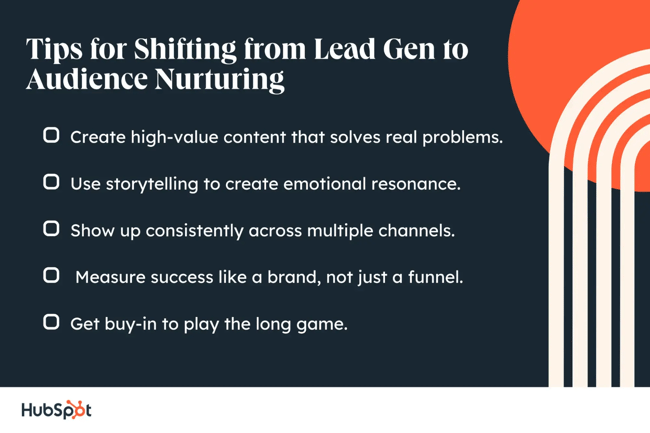
Tips for Shifting from Lead Gen to Audience Nurturing

tips for shifting from lead gen to audience nurturing

Making the shift from lead gen to audience nurturing is a considerable mindset shift. You have to let go of short-term dopamine hits like MQLs and attribution charts, and start thinking like a media company. Then, ask, “How do we earn attention today to win trust tomorrow?”

Here are five things we did at Gong to build future demand and grow a brand that scaled.

1. Create high-value content that solves real problems.

If you want people to pay attention before they’re ready to buy, you have to help them. You need useful content that solves real, frustrating problems.

We mapped the buyer’s journey and zoomed in on all the micro-pain points along the way. Each one became a chance to create something helpful:

  • How to write a better cold email.
  • How to run a discovery call that doesn’t feel like an interrogation.
  • How to handle pricing questions without fumbling the deal.

These weren’t feature pages in disguise. They were standalone, high-signal resources, and we often didn’t even mention our product.

Why? Because we weren’t trying to sell. We were trying to earn trust.

To do this well, you need subject matter expertise, either your own or from someone in your organization.

  • What’s really hard about this part of the job?
  • What do people get wrong about it?
  • What’s the advice you wish you’d gotten a year ago?

Use that as your starting point. And make your content feel like it came from a practitioner, not a product marketer.

2. Use storytelling to create emotional resonance.

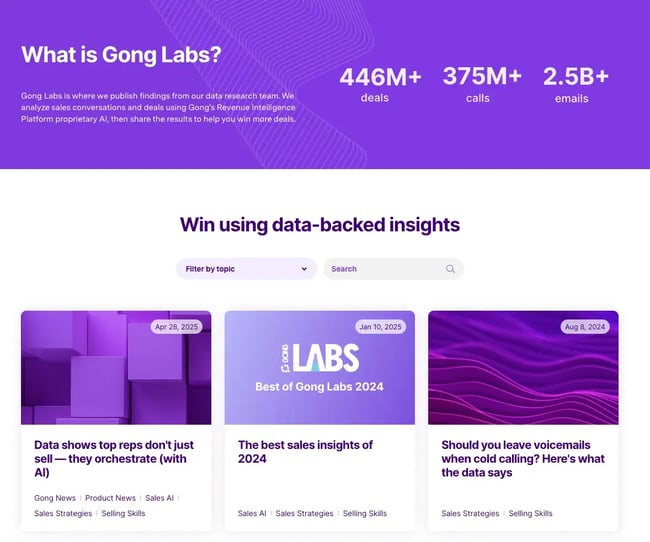
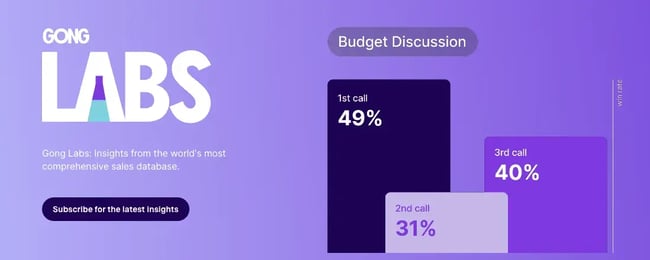
One of our flagship content series was Gong Labs — our original data-backed research about different aspects of the sales process. But rather than just presenting information, we focused on making it emotionally resonant.

unique storytelling with data

gong labs

Source

This is something I see a lot of B2B companies fail at because they want to sound like the smartest in the room. A lot of the content comes across as too information, too dry, and it’s not engaging or memorable.

So instead, we took a page from Hollywood and used a screenwriting technique called “in medias res,” which drops the reader directly into the middle of a story. Instead of starting with “Here’s what the data says,” we’d begin with a relatable, high-tension scenario.

  • You‘re five minutes into a discovery call. Your buyer’s on mute. You‘re scrambling through slides wondering if anyone’s even listening…

Then we’d pose the question, “Should you even be using slides at all?”

This approach hooks readers immediately and creates an emotional connection before delivering the data. It makes your content memorable in a way that purely informational content can’t match.

3. Show up consistently across multiple channels.

This one comes from my (short-lived) teaching career: People learn differently. Some prefer reading. Some prefer listening. Some need to see it.

Marketing is no different.

That’s why we showed up across formats:

  • LinkedIn posts and blog articles for readers
  • Podcasts for audio-first folks
  • Webinars and short videos for visual learners

This approach had two benefits:

  1. We reached more people by diversifying formats.
  2. Our biggest fans (we called them raving fans) consumed content across multiple channels, deepening their connection with our brand.

Not only did this help us build a loyal audience, but it also made sure that we didn’t have any weak spots in our content based on when and where you engage with us.

4. Measure success like a brand, not just a funnel.

Measuring brand impact can be challenging, but that doesn‘t mean you shouldn’t try. Instead of obsessing over last-touch attribution, we tracked:

  • Audience growth: LinkedIn followers, podcast downloads, newsletter subscribers
  • Direct web traffic: People typing our URL directly (a clear sign of brand recall)
  • Inbound opportunities: Deals that came to us without us chasing them

This approach requires documenting your strategy clearly: who you‘re helping, what problems you’re solving, where you‘re showing up, and how you’re measuring progress.

5. Get buy-in to play the long game.

When stakeholders push back with questions like, “Is LinkedIn too saturated?” or, “Does anyone still read email?” I flip it around: “When you’re looking for new ideas or products, where do you go?”

The answer is almost always their network, LinkedIn, newsletters, and podcasts — exactly where your buyers are already spending time.

If you’re going to get buy-in, you need a documented strategy. You need to clearly define:

  • Who you’re helping
  • What problems you’re solving and your impact on strategic priorities
  • Where you’re showing up
  • How you’re measuring progress

That becomes your armor when the “What’s the ROI?” questions roll in.

Create Gravity, Not Just Leads

Most marketers are fighting for scraps: The 5% of people already in the market. But if you play the long game and invest in the 95%, you can build something better: a brand that earns attention before there’s ever a sales conversation.

At Gong, this approach helped us grow our LinkedIn from 12,000 to over 220,000 followers. Our podcast crossed 100,000 downloads in the first 18 months. Webinar registrations jumped from 500 to over 2,500. And we saw email open rates hit 28%, with consistent inbound pipeline that aided and accelerated our sales outbound efforts.

But the qualitative shift was even more significant:

  • Sales reps telling us they used our content in onboarding
  • Leaders mentioning that our material was constantly shared in their Slack channels
  • Buyers showing up to demos already believing we could help them

That’s the magic of mindshare. It turns your marketing from an interruption into a pull. From a transaction into a relationship. From “Who are you again?” to “We’ve been following you for a while.”

And when urgency strikes or when someone’s boss says, “We need a new sales tool,” or “Let’s rethink our strategy,” you’re the first name they remember.

That’s not luck. That’s brand.

So if you’re tired of chasing leads, maybe it’s time to flip the script. Build content that helps. Show up consistently. Speak to the 95%.

Categories B2B

How one co-founder runs a zero-employee marketing agency with AI tools

Running a marketing agency used to mean juggling a small army of freelancers, risking missed deadlines, and spending more time managing people than creating content and building strategies.

That’s how Barbara Jovanovic of Startup Cookie used to operate.

Download Now: Free Growth Strategy Template

She’s now built a streamlined operation that generates six figures annually with a tech stack that costs less than one grand a year. There’s no team behind her — just Jovanovic, her AI tools, and a process that turns one hour-long conversation into weeks of high-quality content.

Here’s exactly how she did it — and how you can replicate her success, whether you’re an aspiring solopreneur or just want ideas on streamlining your workflows with AI.

Table of Contents

6 Tips for Running a Marketing Agency with AI Tools

6 tips for running a marketing agency with ai tools. 1. never start with a blank page — context is everything. 2. talk to your ai, don't type. 3. use projects to scale your personal brand voice. 4. be mean to your ai (it can handle it). 5. extract first, create second. 6. automate your market intelligence.

1. Never start with a blank page — context is everything.

“We never start with just prompting AI by itself to do anything, even the simplest social media post. We always have something to start with,” says Jovanovic.

In her view, the biggest mistake people make when they use AI for content creation is asking it to write about a topic from scratch.

Jovanovic’s secret weapon? She starts with human interactions.

That might mean feeding the AI transcripts from webinar transcripts or podcast recordings. Her co-founder, Sam Claassen, does hour-long interviews with founders, and those transcripts also get fed to the AI.

In a world where authenticity is paramount in your marketing strategies, giving AI something human to work with can set you up for success.

2. Talk to your AI, don’t type.

I hate talking to AI because I tend to ramble — but Jovanovic says that could actually work to my advantage.

She rarely types prompts into ChatGPT, instead using an AI-powered voice-to-text tool called Super Whisper. Speaking naturally adds context and nuance that short, typed prompts miss. And Jovanovic says that the results are “infinitely better.”

When you’re talking, you naturally provide more background, explain your thinking — or in my case, over explain — and give the AI the rich context it needs to produce high-quality results.

3. Use projects to scale your personal brand voice.

ChatGPT‘s Projects feature isn’t just a neat organization tool — it’s also Jovanovic’s scaling secret. For each client, she creates projects loaded with:

  • Writing style samples from their favorite authors
  • Company information and product details
  • Brand voice guidelines
  • Examples of approved content

This means every piece of content has the right tone and context, without having to re-explain the brand with every single prompt.

I tested this myself by asking ChatGPT to write a blog post about marketing campaign strategies using cat puns. Here’s an excerpt:

2. create meow-ment-worthy content. let’s face it — people love cat content. use that to your advantage. incorporate humor, curiosity, and charm into your campaign messaging. whether you’re posting reels, stories, or static ads, every piece of content should have the potential to go viral — or should we say, “fur-al.” idea: a product reveal campaign called “what’s in the box?” with a curious cat pawing at a mystery package.

Then I created an abbreviated version of a custom GPT for an imaginary company owned by my cat, Teddy Crumpets. I used this very article as an example of approved content, gave it some information about this fictional company, and encouraged it to use cat-related puns and wordplay.

Because I only gave it one approved piece of content, it borrowed pretty heavily from it, but it’s still far better than the generic example — it’s more specific, has a better voice, and even the cat puns are better.

It also picked up on the fact that HubSpot style is to put spaces around em-dashes; in the generic example above, there are no spaces around them.

2. meow it out loud: talk to your ai. typing? that’s for humans. teddy prefers purring into super whisper, his go-to voice-to-text tool. it captures the natural rhythm of his thoughts — with all the nuance and napping breaks included — and produces meow-nificent prompts that lead to richer, more insightful content.

4. Be mean to your AI (it can handle it).

You may have heard exhortations to be polite to AI by always using “please” and “thank you.”

Jovanovic’s advice doesn’t necessarily contradict that, but she cautions against being too polite. Her prompts include “DON’T BE CRINGE” and “DON’T BE CLICHÉ” — and yes, she puts them in all caps — and she gives the AI a running list of banned words (like “ensure,” a word I could also stand to ban from my writing, if we’re being honest).

This bluntness and specificity separates the wheat from the chaff. If you’ve ever used AI for content creation, you may have been frustrated at the amount of generic corporatespeak it spat out.

“Be more specific” is some of the best writing advice I give human writers, and it stands to reason that it would also improve AI writing.

5. Extract first, create second.

Jovanovic’s workflow is methodical: First, she asks AI to extract all insightful topics from a conversation; say, a founder interview.

Then she reviews that list critically — would she actually read this content? Only after identifying insights that make her want to click does she move to creation mode.

“You have to be present and think critically. Does this sound interesting? If not, let’s move on to the next one,” she says.

6. Automate your market intelligence.

Instead of doomscrolling X or LinkedIn for industry news, Jovnanovic set up ChatGPT tasks that deliver morning briefings on fintech and healthtech developments.

These briefings keep her informed without the mental health cost of social media addiction.

That’s great advice in general, whether you’re running a zero-employee marketing agency or just trying to avoid bed rotting.

How to Maximize Your Resources with AI

A $100K+ Startup Team

The list of contractors Jovanovic would need to hire isn’t insignificant for a small startup:

  • 5 content writers
  • SEO copywriter
  • Video editor
  • Audio editor
  • Marketing designer
  • Data analyst
  • Project manager (herself)

Total annual cost: Over $100,000, plus time spent on administrative tasks like managing contracts and coordinating deliverables.

The Sub-$1K AI Stack She Uses

Her entire operation now runs on:

  • ChatGPT (free, $20, and $200/month options) and Claude (free, $17, and $100/month options) for content creation
  • Granola for meeting transcripts and chat (free and $18/month options)
  • Riverside for video recording (free, $15, and $24/month options)
  • Midjourney for design (plan options range from $10 to $120/month)
  • Descript for video editing ($16, $24, or $50/month)
  • Super Whisper for voice-to-text (free and $8.49/month options)
  • OpenAI API access (varies, using a token-based system)

Total annual cost: Less than $1,000.

The Efficiency Multiplier

The real win isn‘t just cost — it’s speed and iteration. Before AI, testing a new content channel meant a two-month lag between idea and execution. Now Jovanovic can go from inspiration to published content in hours, not weeks.

“You get that energy, you get an idea, and you‘re like, ‘Oh my God, let’s see how that performs.’ And then when you actually delegate, it’s two months after that you’re actually testing it.”

8 Top Startup AI Tools for Content Creation

8 top startup ai tools for content creation. 1. chatgpt projects. 2. super whisper (voice-to-text). 3. granola (meeting intelligence). 4. claude (ai writing assistant). 5. riverside (video recording). 6. midjourney (visual design). 7. descript (video/audio editing). 8. openai api (advanced integration).

1. ChatGPT Projects

The foundation of Jovanovic’s scaling strategy. Create separate projects for each client or content type, load them with context documents, and maintain consistent brand voice across all outputs.

2. Super Whisper (voice-to-text)

Jovanovic’s secret for better prompts. Speaking naturally to AI provides richer context than typing, leading to significantly better results.

3. Granola (meeting intelligence)

Records and transcribes meetings, then lets you chat with the transcript. Perfect for extracting insights from client calls or founder interviews without manual note-taking.

4. Claude (AI writing assistant)

Jovanovic cross-references her ChatGPT outputs with Claude for quality control and to get different perspectives on the same content.

5. Riverside (video recording)

High-quality video recording for those crucial founder interviews that become the source material for weeks of content.

6. Midjourney (visual design)

Handles all graphic design needs without hiring designers or learning complex software.

7. Descript (video/audio editing)

Simplifies video and audio editing with AI-powered features, making it accessible for non-technical users.

8. OpenAI API (advanced integration)

For custom workflows and integration with other tools — like the data visualization tool one of Jovanovic’s clients built that lets non-technical users query datasets conversationally.

The Bottom Line

If you’re thinking about starting your own low-cost marketing agency, weigh the need for human contractors against AI’s current capabilities. (And of course, you always want to double-check any AI’s work to prevent errors and hallucinations.)

Or if you’re just new to AI and want to know how it can help streamline your marketing workflows, take a page from Jovanovic’s book — I know that a lot more of my AI prompts are going to include “DON’T BE CRINGE.”

Categories B2B

Generative engine optimization: What we know so far

SEO is changing. We’re entering a new era of search — the AI age — and with it comes generative engine optimization (GEO), the practice of optimizing content for AI-driven engines such as ChatGPT or Perplexity.

Download Now: 100 ChatGPT Prompts for Marketers [Free Guide]

If we want our content to reach the right people, we need to adapt. There’s no need to throw out the SEO principles you’ve spent decades learning. Much of GEO is an extension of these techniques — and it’s not as scary as it sounds.

Let’s take a look at what we know about GEO so far.

Table of Contents

The good news for SEO is that generative engines pull information directly from web content (as well as other sources) to deliver responses to user queries. They use large language models (LLMs) to make sense of the information scraped and provide coherent, relevant answers.

ChatGPT, Perplexity AI, and Google AI Search are all examples of generative engines.

Generative engines work by:

  1. Interpreting a user’s query.
  2. Leveraging personal data it may have on the user, such as preferences or conversation history.
  3. Searching to find relevant answers to the query
  4. Synthesizing information from these documents into a straightforward response

geo model showing how generative ai search engine optimization works.

If you’re new to generative search, start by using it yourself. Try HubSpot’s guide to using ChatGPT for work, which has over 100 prompts.

GEO vs. SEO

GEO and SEO are similar in many ways, as both find relevant, credible content to answer user inquiries. But they also have three key differences. Let’s explore the similarities and differences below.

GEO and SEO Similarities

These four similarities should bring optimism to SEOs because they suggest the good work done so far is transferable.

Designed to help users and provide helpful information.

Whether you’re searching on Google, Bing, ChatGPT, Perplexity, or something else entirely, what’s essential is that you can access the information you need in the easiest and shortest time possible.

One reason Google is so successful is that it has mastered a complex (and ever-changing) algorithm that sorts through content and delivers the best possible result to the person searching. Results meet search intent, and users get what they want.

Why this matters for GEO: If you’re dedicated to providing the best possible content, you have a good chance of gaining visibility in generative AI search engines. These tools need to source the best content to keep users returning.

High-quality content is your gateway to visibility.

High-quality content, in terms of landing pages, informational pages, well-thought-out service pages, etc., gets you visibility in generative search engines. As mentioned above, generative engines, like traditional search engines, pull information directly from web content.

Why this matters for GEO: If you’re achieving page one ranks in SEO, you’re likely producing high-quality content. This content will likely perform well in generative search engines, too.

This leads perfectly to my next point: E-E-A-T signals matter for SEO and GEO.

E-E-A-T signals are important in SEO and GEO.

To demonstrate how E-E-A-T is important for GEO and SEO, let me lead with an example.

If you search “CRM” in Google, you’ll see that HubSpot’s is ranked page one, rank three in the U.S.

screenshot helps demonstrate geo versus seo and how both are similar in that they rely on e-e-a-t signals.

I searched ChatGPT to see if HubSpot is recommended as a CRM. It is. HubSpot is the top recommendation in ChatGPT.

screenshot demonstrates geo using similar content to what’s available from seo.

Why this matters for GEO: Ranking at the top of Google for any keyword doesn’t come easy. You need to meet a multitude of ranking factors and build E-E-A-T across your site.

Keywords and search terms still matter.

Although people search differently in traditional search engines versus generative search engines, there are similarities; users are inputting keywords and search terms.

While the input into generative search engines uses more natural language and conversation, there are still words and phrases that contextualize the search.

Why this matters for GEO: Understanding how and what people search, and then meeting search intent is still crucial.

GEO and SEO Differences

Now we understand some of the similarities, let’s look at how GEO differs from SEO.

Focus

GEO focuses on making content discoverable to AI, while SEO is about improving SERP rank.

While SEO is generally related to Google and Bing, there are lots of generative engines, so it’ll be interesting to see if different engines use different qualities to determine their sources.

Why this matters for GEO: There are nuances in how GEO and SEO work, and while focusing on GEO is becoming increasingly important, it’s not worth dropping your SEO efforts (yet, and maybe not ever). At the moment, people still use Google for the vast majority of searches. According to Edd Dawson, Google has five billion users versus ChatGPTs 200 million users.

Emphasis

The primary techniques for SEO emphasize things like backlinks and keywords, while GEO techniques emphasize structure.

An AI bot’s job is easier when it can pull clear, concise snippets that are easily synthesized, so it makes sense why structure would be an emphasis.

Chris Long, VP of marketing at Go Fish Digital, has done some testing on visibility in GEO, and his testing suggested that generative search engines do pull clear snippets. Long found success using bullet points.

In a LinkedIn post, he said, “In the past 6 months, we‘ve been doing a lot of testing around optimizing our brand for generative engine optimization. We’ve noticed how AI-driven search tends to pull in content that’s extremely structured via bulleted lists, structured headings, and general listicle-style articles.”

Why this matters for GEO: If you’re dedicated to more visibility in generative AI search engines, it could be worth exploring page structure and seeing if it makes a difference.

Top tip: If you want to benchmark your current visibility in generative search engines, you could use HubSpot’s AI Search Grader. It shows you:

  • Your brand’s visibility and presence in AI.
  • Strengths and weaknesses.
  • Share of voice.
  • And more.

The video below demonstrates how it works.

Use the grader to see where you are now and if anything changes once you GEO your pages.

Output

The key difference is the output of the engines.

GEO optimizes content for AI engines, which produce a summary as the output.

SEO, on the other hand, optimizes content for traditional search engines, which produce a ranked list of sources as the output.

geo vs seo infographic shows the differences between search engine optimization for search engines and generative engine optimization for generative search engines.

How is GEO impacting SEO?

SEO experts worldwide have cited generative AI as the number one disruptor to SEO. So it’s worth understanding what experts suspect the impact will be.

I spoke with SEO expert Nick Baird to hear his thoughts on GEO and how it impacts SEO and marketing.

“Local SEO remains largely unaffected. When searching for a plumber or a dentist, they still need results tied to maps, reviews, and real-world proximity,” he said.

Secondly, Baird says informational searches have taken a noticeable hit and clicks have reduced.

“Click-through rates are down in places where AI can summarize quickly. For websites that rely on traffic from listicles or how-to content, traffic is definitely thinner.

“However, people still click through when they want depth or to verify that a source actually said what the AI is reporting. So while the volume of clicks may be down, it‘s still important to have quality content on one’s website.”

I agree with everything Baird has said here, though I will add that generative search engines also include map views featuring local businesses. The screenshot below shows what it looks like.

screenshot from generative search engine, chatgpt shows a map view with the best restaurants in new york.

In my experience, many websites’ top-funnel (ToFu) clicks have significantly dropped, but the focus should always be more on bottom-funnel clicks anyway.

You can still cover those ToFu topics where it makes sense, and you might find it helps your GEO. Just make sure it has a purpose other than clicks.

Why is GEO important?

In another HubSpot article about the future of SEO, experts shared their opinions and predictions about the future of AI and SEO.

One opinion that stands out to me is from Nate Tower, who stated (and supported with data) that conversions, by percentage, from LLMs are higher. Tower believes that people chat with AI and see the software more as a friend, which is one reason why conversions from GEO are higher.

Important note: While conversions are higher by percentage, we’re still dealing with small data sets. In terms of quantity, conversions are lower.

That said, it could be an indicator of what’s to come. If people respond well to GEO, you want your business to be visible.

Ultimately, people are using generative search to find answers to their questions and meet their needs. All indicators show that GEO isn’t going anywhere, so keeping up and earning visibility in GEO makes sense. Just remember to manage GEO with SEO.

How does generative engine optimization work?

Learning to use GEO is simpler than it sounds and, in many ways, is overlapped with best SEO practices. AI tools respond well to clear, well-structured information that it can easily synthesize.

This means you should:

  1. Ensure your content is easy to read and understand.
  2. Incorporate credible sources, quotes, and statistics to enhance the content’s richness and authority.
  3. Structure your writing to align with the patterns used by generative engines.

When I’m writing an article, I focus on clear headings, concise paragraphs, lists, and well-sourced information. The same is true for best practices when it comes to SEO — so don’t worry about reinventing the wheel.

Other ways to improve GEO are using AI-friendly structured data, focusing on user intent, using easy-to-read/conversational language, and using unique words to make the content stand out.

These best practices aren’t all that different from SEO best practices. And, as with SEO, there’s no indication that AI-created content is ranking poorly.

If your content is high quality, you shouldn’t experience any sort of penalty for leveraging AI content tools, like the ones offered by HubSpot.

generative engine optimization tips

Source

How to Do Generative Engine Optimization

GEO is still very new, but we have some early learnings about what’s helping brands secure visibility in AI search.

I’m an SEO consultant working with brands. I’ve been tracking my clients’ visibility in AI search using Kyle Rushton McGregor’s AI report and data from G4.

As you can see from one client’s report, pictured below, AI visibility is growing. All of my clients have graphs that look similar to the one below: Visibility rises most sharply in Q4 2024 and continues.

graph shows how geo is increasing visibility in generative ai search engines.

A lot of my GEO success uses transferable SEO elements.

Here are the details.

Manage your brand narrative.

As we’ve established, generative engines pull information directly from web content. Whatever you or others are saying about your brand is what generative search can share. The content has to exist for generative search to display it.

If it’s possible, find an angle for your product or service.

Think:

  • What do you do?
  • What problems do you solve?
  • Who do you solve problems for?

Remember, people searching in generative AI search engines are searching differently; they’re using more conversational language and getting very nuanced and long-tail.

Take a look at the example below. In generative search engines, products are recommended with links to product pages and a short rationale for why they’re suitable for the searcher’s query.

example of how to do geo: screenshot shows how longer tail and conversational searches help rankings.

In the image above, all the products listed in generative search have specific messaging about the query. In my experience, generative search relays the messages found commonly across the internet on a range of sources.

Top tip: I’ve mentioned this already, but do use HubSpot’s AI Search Grader to understand how your brand is perceived now and then monitor it as you improve your GEO.

Think about keywords and search terms.

For me, keyword research is still part of the GEO process. I like to know which keywords bring up AI overviews. If you know the features Google is displaying, then you can make an extra effort to secure visibility in them.

Take a look at the screenshot below. My client ranks several times in the AI overviews.

screenshot shows multiple rankings in ai overviews from geo.

Here’s a breakdown of how keywords influenced this achievement:

  • We researched keywords related to the topic.
  • Like SEO, we led with one focus keyword (the one pictured).
  • We developed a keyword cluster including related keywords and questions.
  • An article was briefed using SEO best practices.
  • We wrote an in-depth piece (more on this next).

Write great content.

Writing great content involves many components, many of which crossover heavily with SEO.

This is great news because if you’re already writing great content and seeing the results in the form of page one rankings in Google, in my experience, you’re likely getting visibility in generative search, too.

Here are some ways to write great content:

  • Write content that demonstrates experience, expertise, authority, and trust (E-E-A-T). Don’t be afraid to tell stories that showcase your experience in content.
  • Cover topics in full. Generally, detailed articles perform better. Worry less about word count and keywords and more about topical coverage and detail. It’s tempting to create new pages for every topic, but some are better covered together. Learn about keyword intent to do this well.
  • Think about NLP keywords. Generative search engines use natural language processing to summarize information and provide responses to prompts. Use natural, conversational language and incorporate NLP-related terms naturally to improve discoverability.
  • Have experts write, or at least review, your content. You will have industry experts within your business, so make sure to include them in the writing process. Ask them for quotes, have them write content, and fetch new insights to make your article stand out.
  • Answer real user questions, and don’t be afraid to think for yourself. You can use tools like AlsoAsked or Google’s People Also Ask to determine the questions your readers are asking. But you can’t beat your own research and sense of knowing your potential buyers.
  • Be visual within your content with infographics, graphs, videos, and more. The more mediums a reader can digest your content, the better (within reason!). Skimmable content helps engage readers online.

Top tip: If you want to do the above, hire great writers; they do it naturally.

Structure your content for humans (and bots!)

Digital content changes how people read. Instead of settling down to read 2,000-word articles, many readers skim-read, looking for headings, bullet points, or images to tell a story.

Of course, many will still read an entire article, but when writing online, you’re looking for a way to hook your reader and draw their interest to the sections they most want to read. Equally, snippets of well-structured text follow patterns (like bullet points) that can be used by generative search engines.

Here are some ways to add more structure to your content:

  • Bullet points summarize data.
  • Logical heading hierarchy from H1 to H2, H3, and H4 are like the chapters of a book. Use them to help readers skim and bots gain context.
  • Stick to short paragraphs where possible.
  • Add images to break up sections. Bonus points if you add captions. A series of images with descriptive captions help readers digest your content quickly and succinctly.

Use schema markup.

I love schema markup! It’s not something your readers will notice since it lives in your site’s code, but it does allow you to “communicate” with the bots, adding data and context to elements on your page.

We already know that Google uses schema markup to populate rich results, and I think it’s fairly safe to assume that AI overviews also use schema.

Here are some schema examples that might influence GEO:

Don’t be restricted by the above. There’s a trove of data waiting to be added to your site, and you can see what’s available at schema.org.

Tips for Navigating the Generative SEO Landscape

Here are a few tips to keep in mind as you start writing content for generative AI.

Cite sources and use statistics.

I asked Gemini what digital marketers who are hoping to create AI-scannable content should do, and it recommended that you:

  • Write AI-scannable content.
  • Diversify language and structure.
  • Incorporate human elements such as humour.
  • Write clearly.
  • Showcase E-E-A-T.
  • Include media.
  • Understand SEO basics.
  • Use tools cautiously.

While you can still use AI tools to write your content, it’s vital that it reads as useful, credible content. Incorporating E-E-A-T is a great way to increase credibility, and that serves to improve your entire domain’s authority.

So what exactly does E-E-A-T look like? I’ve been navigating the shift firsthand for my HubSpot posts.

I start by looking at my own personal experience:

  • Do I have lived experience in the subject matter?
  • Can I include any personal anecdotes about when I’ve encountered the topic?

Beyond that, I try to showcase my authority on a subject, noting how long I’ve worked in the field.

Obviously, I am not an expert in every topic I want to cover. In that case, I do extensive research:

  • I find original statistics with verified information.
  • I talk to experts whose quotes I can showcase throughout my work.

These elements enhance the credibility and uniqueness of my content.

Optimize for readability.

Think of AI like a busy student frantically looking for information to use in a paper.

They don’t have time to decipher complicated sentences. They want information that’s clear and easy to understand from the get-go. Which brings me to my next tip: Use clear, concise language and scannable paragraphs.

I’ll be honest: Writing short, clear sentences may not always be my first instinct. When I’m discussing a complicated topic, my first draft often includes lengthy explanations. I then use Hemingway, an app designed to help you write clearly.

Hemingway lets me know which sentences are lengthy, confusing, or overly complicated. I can’t always get every sentence to green, but I make an effort to correct phrases marked as “very hard to read.”

generative engine optimization tips, use hemingway

Source

Focus on content quality.

In the past, having the right keywords was enough to win in search. Let’s take a classic example: recipe blogs.

I remember searching for a brownie recipe for a party and finding a promising, top-ranking article.

When I clicked on it, I had to scroll past huge chunks of text about what goes into a brownie, when brownies became popular, how the author’s kids loved the brownies, so on and so forth.

Why? The author knew having the word “brownie recipe” as many times as possible would help her rank.

Well, that may no longer be the case. In today’s landscape, knowing that the recipe has been passed down from older generations and won an award in a local competition would be enough to show credibility.

TL;DR: Make sure your content is relevant to potential search engines, and avoid keyword stuffing. Your audience cares more about the quality of your post.

Monitor trends and track your results.

Stay on top of AI engine evolution. GEO is a new technique, so expect best practices to emerge over time. Trends in the search landscape are continuously changing.

Right now, Google is prioritizing E-E-A-T, but that may change as AI overviews take over the scene. Keep an eye on the traffic and conversions of posts you’ve written using GEO best practices.

Generative Engine Optimization FAQ

What is GEO?

Generative engine optimization (GEO) is a method of improving your content’s visibility to AI generative engines, increasing its reach.

How do I structure my content for GEO?

Ensure your content is clear, well-organized, and has credible sources. Take advantage of lists and H2s and incorporate quotes and statistics when possible.

How do I check if my content is optimized for GEO?

Because GEO is so new, there aren’t many tools to measure how successful your content will be with AI generative engines. HubSpot’s AI Search Grader App is the only tool on the market that can scan your content for its GEO performance.

All you have to do is drop your URL into the grader. From there, you’ll have custom suggestions on what areas you can change to optimize your AI search performance.

That may include including more authority and personal experience or shifting the focus area of your page.

What is AI looking for in GEO content?

Large language models (LLMs) are looking for clear, well-structured information that they can pull and summarize to respond to user queries.

AI scanning works best for content that:

  • Uses headers and lists.
  • Incorporates expert quotes.
  • Cites sources.
  • Uses simple language and scannable paragraphs.

Is GEO going to replace SEO?

No — search engines aren’t going anywhere, so SEO isn’t, either. It’s best to consider GEO as an extension of SEO practices, as opposed to a replacement.

Best practices (like using H2s and credible citations) are shared between GEO and SEO, as are worst practices. Keyword stuffing, for example, has a negative impact on both SEO and GEO.

How can you measure GEO success?

Liam Carnahan, an SEO coach and content strategist, has a recommendation for how you can leverage existing tools to check if your article is getting picked up by AI engines.

“Of all the popular search-oriented options out there right now, Perplexity does the best job of citation,” Carnahan says.

He continues, “So when I‘m trying to understand whether LLMs are ‘enjoying’ my content, I’ll go there first, and type in questions and prompts I imagine people might ask, using keywords I know my content is ranking for, to see how often it shows up in citations there.”

Carnahan also notes that this isn‘t the most elegant solution, but “for now, it can give me a good idea about which of my clients’ content is ranking in AI results, and which content pieces are missing the mark.”

What’s next for GEO?

My biggest takeaway from exploring GEO is that it emphasizes different things, but in many ways, is similar to SEO. While SEO focuses on keyword optimization and backlinks, GEO focuses more on content structure.

Content writers are going to have to balance both, but thankfully, they click together well. I think we’re going to see clearer, more helpful content as a result of these two strategies — which is something I’m really excited about.

AI isn’t going anywhere. While we’re still learning how to use and measure GEO, it’s clear that keeping an eye on emerging techniques is going to be the key to success in the digital content world going forward.

Editor’s note: This post was originally published in August 2024 and has been updated for comprehensiveness.

Categories B2B

Creating a B2B buyer journey map in 8 steps

When I started working with B2B companies, I quickly realized that understanding how your customers make purchasing decisions is just as important as knowing your product inside and out. This is where a B2B buyer journey map becomes an invaluable asset.Download Now: Free Customer Journey Map Templates

A well-crafted buyer journey map provides valuable insight into your potential customers‘ decision-making process. It helps you identify opportunities to nurture leads and ultimately drive more product sign-ups. This post offers an 8-step approach that consistently delivers results. But before then, let’s run through the basics.

Table of Contents

What is a B2B buyer journey map?

A B2B buyer journey map is a visual representation of potential customers’ path from the moment they recognize a problem to the point where they choose your solution. Unlike B2C journeys, B2B buying processes typically involve multiple stakeholders, longer decision timelines, and more complex considerations.

Your map should capture each touchpoint where prospects interact with your business, from initial awareness through consideration, decision-making, onboarding, and beyond. This holistic view ensures you’re not missing critical opportunities to influence the buying decision.

Benefits of B2B Buyer Journey Mapping

Creating a comprehensive buyer journey map delivers several significant advantages that directly impact your bottom line:

b2b-buyer-journey-mapping-2-20250528-1016912

1. Improved Marketing and Sales Alignment

One of the most potent benefits I‘ve seen firsthand is how journey mapping breaks down silos between marketing and sales teams. Both departments can create seamless handoffs and consistent messaging when they share a unified understanding of the buyer’s process.

2. Ability to Identify and Address Pain Points

Journey mapping reveals friction points where prospects might abandon their buying process. You can proactively address these obstacles before they cost you potential customers by identifying them early.

3. Optimized Resource Allocation

Understanding which touchpoints most influence purchasing decisions allows you to allocate your budget and team resources more effectively. I’ve helped customers redirect significant portions of their marketing spend based on journey map insights, resulting in dramatically improved conversion rates.

4. Personalized Buying Experience

With a detailed map, you can tailor content and interactions to match prospects’ journey stages. This level of personalization significantly increases engagement and conversion rates.

5. Accelerated Sales Cycle

By understanding exactly what information and reassurance buyers need at each stage, you can proactively address concerns and move prospects through the pipeline more efficiently.

How to Create a B2B Buyer’s Journey Map

A beginner may approach the buyer’s journey with three basic objectives: taking a customer from awareness to consideration and finally to the decision stage.

If you want your journey mapping to improve, you have to be more thorough. Let’s explore an 8-step process for creating a buyer journey map that drives product signups.

1. Define your buyer personas.

Every effective journey map begins with clearly defined buyer personas. These detailed profiles represent the different decision-makers and influencers involved in the purchasing process.

For B2B, this typically includes:

  • Primary decision-makers (often C-suite executives)
  • Technical evaluators
  • End users
  • Financial gatekeepers

For each persona, document:

  • Demographics and professional background
  • Job responsibilities and KPIs
  • Pain points and challenges
  • Goals and objectives
  • Information sources they trust
  • Decision-making criteria

Understanding these personas is essential because they behave differently across the traditional buyer’s journey stages — what motivates someone in the Awareness Stage differs significantly from what they need during the Decision Stage.

2. Identify all potential touchpoints.

Next, catalog every possible interaction point between your prospects and your business. This includes both digital and offline touchpoints:

  • Industry events and conferences
  • Website visits (specific pages)
  • Content downloads
  • Social media engagement
  • Email communications
  • Sales calls and presentations
  • Product demos
  • Customer testimonials and case studies
  • Third-party review sites

Be detailed here — I’ve seen companies discover critical touchpoints they completely overlooked. Remember that touchpoints in the Awareness Stage (like blog content and social media) serve different purposes than those in the Consideration Stage (product demos, case studies) or Decision Stage (pricing pages, sales conversations).

3. Map core journey stages.

While every business has unique nuances, most B2B buyer journeys follow these core stages:

  1. Awareness: The prospect recognizes a problem or opportunity.
  2. Research: They begin investigating potential solutions.
  3. Consideration: They evaluate specific vendors and products.
  4. Decision: They select a solution and negotiate terms.
  5. Onboarding: They implement the solution.
  6. Usage: They use the product regularly.
  7. Expansion: They consider additional features or products.
  8. Advocacy: They become promoters of your solution.

These stages provide granular detail and can benefit your team in more ways than one. We spoke with Aurelia Heitz, a user research and strategy expert from Centigrade, about her perspective on the ways thorough mapping can benefit the customer and your business operations: “There’s the journey that someone takes through your product. And then there’s the journey that someone takes in their own real life outside of your product.”

You want to have a roadmap for reaching your customers, analyzing how you can better serve them outside of their primary objective, or positioning them for business growth in the future. In B2B, you‘re not just trying to get a business to buy; you’re working to build their success and make advocates who are impressed with your product.

For a deeper exploration, check out our comprehensive guide to understanding the buyer’s journey.

4. Conduct customer research.

Heitz goes on to say, “You understand their context and how they would integrate your product and like what they need. And so oftentimes that you know, helps you think of features that you didn’t even think of.”

You need data directly from customers to validate your assumptions, so a thorough analysis of your customers can not only improve your service offering but also change how you innovate for them based on information or trends you discover.

Practical research methods include:

  • Customer interviews (both successful conversions and lost opportunities)
  • Sales team interviews
  • Support team feedback
  • Website analytics
  • CRM data analysis
  • Heat mapping and session recordings
  • Customer surveys

This research will help you understand not just what prospects do at each stage, but why they do it — crucial insight for mapping how the traditional Awareness, Consideration, and Decision stages play out in your specific market.

5. Document customer goals, questions, and pain points.

For each stage of the journey, document:

  • What the customer is trying to accomplish
  • Questions they need answered
  • Concerns or obstacles they face
  • Emotions they’re experiencing
  • Information they require to move forward

This level of detail helps you create highly targeted content and interactions that directly address buyer needs.

6. Analyze current performance and gaps.

Now, assess how well your current marketing and sales efforts align with the journey you’ve mapped:

  • Which stages have strong support?
  • Where are prospects getting stuck or dropping off?
  • What content or touchpoints are missing?
  • Are there inconsistencies in messaging across channels?
  • Does your CRM capture the right data points to track progress?

7. Design optimized touchpoints.

Based on your analysis, develop specific strategies to improve the buyer experience at each stage:

  • Create new content to address unanswered questions
  • Redesign website pages to better guide users
  • Implement new lead-nurturing sequences
  • Train sales teams on addressing stage-specific concerns
  • Develop tools that help buyers evaluate your solution

For each touchpoint, clearly define:

  • The content or interaction
  • The channel or platform
  • The responsible team
  • The desired outcome
  • Metrics to measure success

Our customer journey map guide provides excellent frameworks for organizing these elements.

8. Implement, measure, and refine.

The final step is implementing your optimized journey, measuring results, and continuously refining your approach:

  1. Start with high-impact, easy-to-implement changes
  2. Establish clear KPIs for each journey stage
  3. Create dashboards to monitor progress
  4. Schedule regular reviews to assess performance
  5. Gather ongoing customer feedback
  6. Test new approaches for underperforming stages

Pro tip: Make your journey map a living document. Incorporate quarterly reviews with your team to update your map based on new data and market changes. This prevents the common pitfall of creating a beautiful map that sits unused in a digital drawer.

Putting Your Journey Map to Work

The actual value of a buyer journey map comes from how you use it to drive action. I recommend creating specialized versions for different teams:

  • For Marketing: Focus on content needs and channel strategy
  • For Sales: Emphasize common objections and decision criteria
  • For Product: Highlight feature priorities and friction points
  • For Customer Success: Spotlight onboarding challenges and expansion opportunities

You’ll maximize adoption and impact by giving each team a perspective tailored to their needs.

Tool to Support Your Mapping Process

While you can create a journey map using simple tools like PowerPoint mind maps, or sticky notes on a wall (never underestimate good ol’ pen and paper), dedicated software can enhance collaboration and keep your map updated.

For teams serious about journey mapping, I recommend checking out our comprehensive customer journey map template, which provides a structured framework that you can customize to your specific needs.

Final Thoughts

Creating a B2B buyer journey map requires investment, but I believe the clarity and alignment it brings to your organization are worth it.

The companies that get the most value from journey mapping treat it as an ongoing practice rather than a one-time project. I always consider B2B buyer journey maps as a living document, or one that’s never truly “finished.” As your market evolves, your products advance, and buyer behaviors change, I encourage you to revisit and refine your understanding of how customers make purchasing decisions.

Categories B2B

Forget Photoshop: Google AI Studio is the new editing powerhouse

Image editing used to mean opening Photoshop, wading through complex tools, and spending hours on tedious fixes. I’ve been there. It was frustrating and a massive bottleneck.

Get a Demo of HubSpot's AI Image Generator

Today, AI is changing everything. With Google Gemini’s new flash model, all you have to do is upload an image and describe what you want changed, all in text. Then, Google AI Studio handles the rest, editing your image. The best part? This tool is completely free.

This is a game-changer for marketers who need quality visuals at scale. The speed at which we can now iterate is mind-blowing, and I’m obsessed with how it can democratize creative work across teams. Here’s how.

Setting Up Google AI Studio

If you don‘t love graphic design or using editing tools, working with images feels like a time sink. I’ve been there. Trying to remember Photoshop shortcuts while deadlines loom is stressful.

But, Google Gemini 2.0‘s new flash model is bimodal, meaning you can upload images and text. The AI’s ability to understand both formats lets you edit any image just by typing. This is a massive productivity win for marketers who need to iterate quickly.

Here’s how it works: First, head over to Google AI Studio. When you land, you’ll get a pop-up asking if you have an API key or if you want to use Google Gemini. Choose Gemini.

google ai studio, gemini 2.0 flash preview

Next, select the new Gemini 2.0 Flash preview from the menu on the right and make sure the output is set to “images and text.”

google ai studio, gemini 2.0 flash, image and text output

Now, you’re ready to go. Simply upload the image you want to edit and type your instructions into the prompter.

google ai studio, add a tennis ball to a photo of a dog

Google AI Studio allows me to add items to images in seconds. In the past, I would have had to find a tennis ball and Photoshop it into the image above. Now, I can make changes with just one prompt.

I love how this streamlines my creative workflow. I can adjust an image’s contrast, lighting, and saturation without browsing through menus.

google ai studio, change the lighting of a photo of a dog

The speed at which marketers can now go from idea to execution is incredible. What used to take 10 minutes now takes seconds, giving teams more time to focus on strategy and growth rather than getting stuck in technical details.

Use Cases for AI Image Editing

Image Editing

Whether you‘re selling a product or service, your team probably has photos on file. These may be shot by your creative team, snapped during an event, or taken by you for a social campaign. I also know marketers need to make the most of what they have, meaning you’re probably repurposing these photos over and over again.

AI image editing can help you transform these pictures quickly. That means you’ll never run out of creative, and you can make adjustments fast. Here are my favorite ways AI can aid in the process:

  • Edit product images. You can take a single product photo and change the color, show a customer interacting with it, or make mockups of it in different environments.
  • Create eye-grabbing video thumbnails. Instead of painstakingly editing each video thumbnail, you can quickly change the image, adding eye-catching details and text.
  • Transfer image styles. If you have an edited photo you really like, you can take a new image and instantly edit it to match that first image’s style. This makes it easy to keep all of your images on-brand.

Visual Storytelling

In addition to basic image editing, you can use this new bimodal technology to generate an entire visual story.

To test this feature, I started with a simple prompt: “Generate a story of a white baby goat going on an adventure in a farm in a 16-bit videogame style. For each scene, generate an image.” The result was a custom picture book that took minutes!

google ai studio, storytelling

I was blown away by the results. The images looked like a real video game I could play on a handheld console. Plus, the AI created a simple, coherent story for my fictional goat to romp through.

You can use the same storytelling features to level up your presentations. Simply input your script and have Gemini generate the slides. You’ll still want to tweak them before presenting, but the outline will save you hours before the big meeting.

I also recommend storytelling for video teams. You can use this feature to help you storyboard your shoots, mapping out scenes before the camera rolls. That added AI boost can keep your team organized, so you’re studio time stays efficient.

Limitations Marketers Should Know

Google AI Studio makes photo editing easy and can save your team time. However, as with any new product, this tool has its limitations.

When testing this tool, I asked AI to update one of the YouTube thumbnails for my podcast, Marketing Against the Grain. Every episode needs a thumbnail that has the same style but looks somewhat visually distinct. The text should be different, my outfit can shift, and we may even change what logos are placed and where.

I uploaded an old show thumbnail to Google AI Studio as a starting point. When I asked it to make simple edits, like changing the color of my shirt, the tool made the process easy.

google ai studio, edit thumbnail

I even found that Google AI Studio could change the text in the image, something other systems struggle with.

google ai studio, edit text

However, when I asked the AI to work on multiple instructions at once, it got confused. Sometimes, it would only complete one of my requests. Othertimes, it would change too many elements of the image, moving further away from what I wanted.

google ai studio, edit logo

Keep in mind, this technology is still in its early days, so you’ll want to keep your requests simple and clear. Give instructions one step at a time, and don’t be afraid to start over if your results stray too far from your vision.

More Than Just a Pretty Picture

Whether you’re updating a website or posting on social, images are essential for grabbing attention. And, we’re entering an era where anyone can create professional-quality visuals in seconds, not hours. Marketers everywhere can build engaging content without sacrificing quality or authenticity.

Google AI Studio is a great place to experiment. The learning curve is minimal, and the productivity gains can power teams of any size. This isn’t just about making prettier pictures. It’s about freeing up your creative team to focus on strategy and ideas rather than technical execution.

To learn more about Google’s AI image editing, check out the full episode of Marketing Against the Grain below:

Categories B2B

How marketers are navigating a possible recession (and advice about what you should do during it) [new data]

Right now, some people will absolutely, 100% say that we’re in, without a doubt, a recession. Others will say that we’re absolutely, positively not in a recession. I think those people should argue with a brick wall. Regardless of where you might personally stand, there’s a lot of ambiguity about what’s actually going on; I’m here to clear it up.

Download Now: Free Sales & Marketing Lead Goal Calculator

When a recession happens, typically, marketers are the first to see budget cuts, so it’s no surprise that folks (perhaps yourself included) are starting to raise eyebrows at the brands and companies that they work for about what’s to come, whether or not their roles will be impacted, and how priorities might genuinely, quickly shift.

To help you (and other marketers) recognize that these sentiments aren’t felt in isolation, the HubSpot Blog surveyed 150 marketing and advertising professionals to find out exactly how (i.e., through staffing investments, budget reductions, etc.) you’ll be impacted by a recession, how consumer behavior is changing because of financial uncertainties, and finally, in turn, what marketing strategies folks are leaning on to make marketing thrive — even despite constraints.

I’ll also offer tips and resources (with lots of perspective) to help you navigate this transitional time.

Let’s get to it.

Table of Contents:

Three Marketing Impacts Caused by Recession Concerns

1. Consumers are spending less and, predictably, exercising more caution/discretion.

Though not surprising, the biggest impact marketers are seeing is that consumers are cutting costs back due to — and you probably guessed this already — a genuine fear of what’s to come.

According to HubSpot’s 2025 survey about marketing during a recession, 42% of marketers expressed negative sentiments about consumers’ shopping habits, overall acknowledging that many customers don’t have a whole lot of disposable income at the moment. One respondent noted that this can even be seen at stages of the buyer’s journey, saying, “It’s taking longer for them [customers] to commit.”

a hubspot-branded graphic showcasing original data about marketing during a recession

While this number and information aren’t entirely comprehensive, they’re telling of how most customers are thinking about their spending. Additionally, both align well with data found from multiple consumer pulse surveys over the last six months, like this Consumer Confidence Survey from Conference Board.

From inflation to geopolitical uncertainty to lingering COVID-19 concerns, consumers simply have zero idea about what to expect from the future; truth be told, I don’t think we can fault them for feeling this way either. “Spending has decreased for non-essential items greatly. Sales overall are down markedly,” said another survey respondent.

Additionally, a majority (32%) of marketers expect the recession to last more than a year, while only 23% of marketers expect it to last 4 to 6 months. Whether the recession itself will be longer or shorter, one thing is undoubtedly clear: marketers know it’s here to stay.

 a hubspot-branded chart graphic showcasing data about how long marketers expect the current recession to last

While I don’t have a crystal ball, am not giving legal or financial expert advice (‘cause I’m not a lawyer or an ecomonist), and can’t possibly know what a full-blown recession will feel or look like at this point, it’s important to remember that recessions, unfortunately, are often unavoidable.

And if you don’t believe me, the International Monetary Fund even acknowledges this reality, noting the occurrence of 122 completed recessions in 21 advanced economies over the 1960 — 2007 period. So, if it’s any consolation, recessions happening back to back isn’t new. And neither is surviving them.

While you and I can’t prevent a recession, here’s my insight: continue leveraging credible sources, data, and experts beyond just a few publications when determining when, if, and how a modern-day one would impact your business or role. Don’t fall victim to fear-mongering headlines or gossip traveling through a grapevine about potential layoffs. It’ll only drive you crazy — trust me.

2. Marketers understand that budget reductions are part of the (recession) process.

With every recession comes, inevitably, a shift in priorities. HubSpot’s 2025 Marketing During a Recession Survey revealed that nearly half (41%) of marketers and advertising folks expressed negative sentiments about economic conditions impacting their marketing activities.

[alt text] a hubspot-branded graphic showcasing data about how marketers feel about economic conditions impacting their marketing activities

Survey respondents noted that because of the ongoing recession, they’ve recognized a reduction in fiscal spending for marketing efforts in a variety of ways; some more apparent than others.

“We’re cutting back on spending for branded messaging,” one respondent admitted. Another respondent echoed, “[I’ve noticed] a reduced ability to spend and reduced staff to produce content.”

Now, I know what you’re thinking: it seems as if brands, companies, and organizations are slashing marketing budgets because they don’t value marketing in a recession. But, honestly, I think there’s more to the story; I have a few guesses as to why they’re pivoting right now, take a look below:

  • They’re cutting corners wherever possible to save dollars for other high-priority initiatives, like large-scale campaigns or ad spend.
  • They’re playing it safe and focusing on/investing in channels with more measurable ROI (like video and social).
  • They’re reallocating resources to meet immediate business pressures like staffing, supply chain, or operational costs.

Like I’ve already mentioned, there’s really no knowing the exact reasoning behind budget reductions in the marketing department, but just know that it’s likely not one singular answer for all teams, brands, or organizations.

3. Marketers are planning to lean on low-cost marketing efforts as the recession continues.

Lastly, HubSpot’s survey results highlighted that marketers are looking for ways to make a whole lot happen with very little when it comes to marketing efforts this year.

In fact, when asked about what marketing tactics they plan to focus on, invest in, prioritize, or lean into if the economy remains uncertain, nearly a quarter (23%) of respondents mentioned social media marketing in particular, amplifying a clear desire to utilize the power of algorithms and organic content to increas brand awareness, sales, and audience engagement.

a hubspot-branded graphic showcasing data that 23% of marketers will focus on and invest in social media marketing if the economy remains uncertain

One survey respondent amplified that “free and low-cost marketing” will be the star of the show throughout the recession. And given the fact that, as mentioned by HubSpot’s 2025 State of Marketing Report, 92% of marketers plan to maintain or increase their investments in brand awareness in 2025, I don’t think that’s a half-bad idea.

Buzzy, trend-focused social media campaigns are indeed all the rage right now.

Resources and Advice for Marketing During a Recession

I won’t tell you about what to expect out of a recession wave without offering a lifeboat. Ultimately, you will prep for and adapt to recession in a way that works for you, but if you haven’t got an inkling of a plan yet and you need some expert-backed advice on what to do during this weird time, I’ve got you covered.

Below are a few productive suggestions for what you can do besides (and adjacent to) stressing about your job, job-hunting, or doom-scrolling on TikTok (‘cause same):

1. Use your free time to level up your resume with certifications and other educational opportunities.

Here’s a list of some education-specific resources you can look into:

  • Extern. This platform is strictly for my undergraduate and early-career marketers. While Extern isn’t free, it does offer access to its extern opportunities through flexible, sliding-scale subscription membership (starting at $10/a month). Plus, if you’re a young, emerging marketer (like me) and you haven’t secured a full-time role or internship opportunity, Extern is a great place to start networking with other early-career marketers, building your real-world experience, and strengthening your resume.

a screenshot showcasing information about extern’s beatsbydre and baja llama marketing externships

Source

a screenshot showcasing information about extern’s horizonx ai-powered sales automation and strategy externship

Source

  • ilovecreatives. If you’re a marketing professional of any experience level who’s looking for a fresh take on any marketing niche, whether it be copywriting or content creation, I highly recommend researching and potentially taking an ilovecreatives course. While these courses are on the pricer side and an absolute investment, in my opinion, what you spend is incredibly worth the lifetime access to valuable information that you’ll get in exchange.

a screenshot of ilovecreativescourses for social media management and digital marketing

Source

a screenshot of ilovecreativescourses for creative copywriting and motion design

Source

  • Teachable. Want to learn more about something from someone who looks like you, has worked in the same roles as you, or shares your lived experience? I highly recommend tapping into Teachable’s library of courses for some relatable, real-world teaching on topics that are broad, niche, and somewhere in-between. Teachable is a pay-to-play platform but if you’ve got the income and time to spare, I say go for it and invest in yourself as the recession unfolds.

Pro tip: If you’re not interested in learning through Teachable, try earning through it. Teach a course, masterclass, or even sell downloadable content through the platform to make some extra coin.

2. Get to your freelancing bag!

Alright. I know you’ve likely already heard this advice, but you haven’t heard my spin on the whole “just do freelancing” thing. If you’ve written it off before, allow me to be the person who changes your mind. That said, if you’re:

  • A multi-hyphenate marketer
  • A marketer who’s concerned about how to make extra income during a recession
  • A marketer looking for ways to expand their skillset and offerings outside of their workplace

I have one piece of advice for you as you explore ways to recession-proof your marketing career: monetize what you’re good at, and do it quickly. This could be a variety of things, but based on what I’ve seen from the marketing industry recently, I’d prioritize looking into doing freelance and/or contract work that leans into the following:

  • Short-form video content creation. HubSpot’s 2025 State of Marketing Report revealed that short-form video (at 23%) will be one of the leading content formats with the highest ROI in 2025. On platforms like Instagram and TikTok specifically, it’s tricky to understand their respective algorithms, but once you do, you’re often able to monetize your video content very quickly. If you haven’t thought about trying out short-form content creation, I recommend challenging yourself to post consistently for one week on the platform of your choice and see what becomes of it. You might surprise yourself.

image6-May-27-2025-01-59-33-6541-AM

  • Video editing. If you’re not an on-camera baddie, try being an off-camera one. As investments into video content become more popularized, I can promise this prediction: contract/freelance video editors will be more sought after. These days, brands, influencers, and big-name companies are always looking to build a repository of people who are down for the job. If you can’t take my word for it, take c, Senior Video Producer at Impact Media.

a screenshot of sari arambulo's linkedin post

Source

  • Writing. Recently, writers of all genres and subjects have been taking to Substack, an entirely free literary platform and social networking app specifically dedicated to folks looking to share written content about niche interests, experiences, and identities. While individuals are totally monetizing their content on Substack, Beehiv’s another great option, too, especially if you’re looking to build a monetizable newsletter.

3. Strengthen your personal brand, use a multi-channel platform strategy to do it.

These days, building your personal brand solely on one online platform is, well, to put it bluntly, out. Leveraging a multi-channel content strategy for building your personal brand is 100% the way to go, especially if you’re looking to make waves in various places gradually, all at the same time.

On LinkedIn, I’ve noticed a wave of individuals hyping up how they’re growing their audiences and personal brand across platforms, not solely on one platform. I think that hopping on this bandwagon is a great opportunity to expand your reach and experiment freely.

I understand that posting on LinkedIn (or any form of social media) can be super daunting. Regardless of what people say to encourage you, there are tons of eyes on you, so it can feel vulnerable to post into “the ether” of social platforms.

However, the great thing about today’s social media landscape is that it’s vast. If LinkedIn (or Instagram … or TikTok … or X) feels too vulnerable to start with, try connecting with an audience on an app that is entirely unknown to you and your content.

Recently, folks have echoed that Threads, Bluesky, and Substack have been great platforms for people looking to connect, build a platform/following, and experiment with personal branding. Still not convinced? Here are some folks who’ve already sung praises about what pivoting away from the platforms we know and love has done for them (or other brands/businesses):

a screenshot of jasely molina's linkedin post

Source

a screenshot of dejaih smith's linkedin post

Source

Recessions Come and Go, But Marketers Keep Creating

Before you go, I just want to make it known that your feelings about the ongoing recession, the current state of the economy (and, subsequently, the horrible job market), along with the everyday chaos of stuff (like the fluctuating price of eggs) that comes with economic volatility, are absolutely valid.

I don’t have all the words to perfectly capture how you’re feeling, but I do know that right now, everyone’s trying to make do with what they’ve got — and that includes you. So be kind to yourself, take things one step at a time, and stand firm in knowing that a lot of what’s going on is beyond your control. You’re not alone.

And hey — if all you accomplished today was refreshing your resume or just getting out of bed, that’s still a win in this economy.

Editor’s note: This post was originally published in March 2023 and has been updated for comprehensiveness.

Disclaimer: This blog post is not legal or financial advice for you or your company to use in navigating a recession, economic downturn, or any other type of economic landscape. Instead, it provides background information to help you better understand how anonymously surveyed marketers unaffiliated with HubSpot are currently experiencing this time.
This information is not the same as legal or financial advice, where an attorney applies the law or a financial expert applies their expertise to your specific circumstances, so we insist that you consult an attorney or trustworthy financial sources if you’d like advice on your interpretation of this information or its accuracy.
In summation, you may not rely on this as legal advice, or as a recommendation of any particular legal, economic, or financial understanding.

Categories B2B

Why writing with clarity matters in marketing (+ 9 ways to simplify your message)

Writing with clarity means making your content easy to read and understand. If your audience can’t grasp what you’re trying to say, what’s the point?

→ Download Now: 30 Free Blog Post Templates

Hi, I’m Alana, your friendly neighborhood blog editor. I spent most of my early marketing career in the public health field. We focused on one main writing principle: using plain language.

For years, I turned complex health information into digestible content. I translated complicated vaccination schedules and lengthy health insurance policies into simple guidance for consumers.

I still use plain language principles to write clear content. But I’ve also picked up some new tricks along the way. Here are all of the strategies I use to communicate clearly and create value as a marketer.

Table of Contents

Why Writing With Clarity Matters

Before we get into the how, let’s start with the why.

Why does this matter for marketers?

My experience in health marketing taught me that clear content respects your reader’s mental energy. It matters because it influences their capacity to focus, think clearly, and stay motivated to take action.

Without clear writing, even the most brilliant messages fall flat. Science shows that factors as simple as sentence structure impact comprehension and recall as we read.

That’s why clarity is critical. If you don’t communicate effectively, your audience won’t know (or remember) what you want them to do.

Here’s how you can put this thinking into practice.

How to Improve Clarity in Writing: The Basics for Marketers

I’ve included six fundamental tips below to help you improve clarity in your marketing content.

But I’d be remiss if I didn’t mention the ultimate clear writing hack: starting from an outline or template. Clarity starts with structure, and that’s exactly what templates (like the ones below) provide.

Save them for later when you’re ready to start writing. In the meantime, let’s get into the basics of writing clear content.

1. Know who you’re talking to and what you want to say.

The cardinal rule of marketing is this: Know your audience.

It’s easier to communicate clearly when you understand what they need, what they want to know, and how to reach them.

Let your audience guide your writing process. Before you put pen to paper (rather, fingers to keyboard), answer these questions:

  • Who is reading this? In my case, this article is targeted toward marketing professionals who specialize in content development.
  • What is my main message? Writing with clarity matters in marketing, and there are steps you can take to simplify your marketing content.
  • What’s the specific outcome I want to achieve? I want to give my readers actionable, experience-based strategies for writing clear content.
  • How will I get them there? I’ll introduce why writing with clarity is important, start with some basic tips, provide expert-level strategies from my marketing colleagues, and wrap up with key takeaways for marketers.

The clearest content is content with intention. Writing with clarity forces you to think about what you’re writing — and who you’re writing it for — before you start spilling words onto the page.

2. Define unfamiliar words (and don’t assume knowledge).

Another simple technique for making your marketing content clear is to explain your terms. Depending on the context, even familiar words and phrases can confuse readers.

At the beginning of this article, I defined writing with clarity. Sure, it may seem straightforward to me. But all it took was twelve extra words to make sure we’re aligned as you continue reading.

Explain key terms early on, so your message is easier to follow.

3. Use a consistent style and voice.

Sometimes, it’s good to be predictable. That’s a big reason why people come back to your brand — they know what to expect.

Take Duolingo as an example. Chances are you’ve noticed Duo the owl on just about every platform where Duolingo does business. He’s featured in all of their marketing content, and he has a very distinct voice and tone.

Take a page out of Duolingo’s book. Give consumers the same experience no matter where they find you. This will help you establish a clear and recognizable brand identity.

4. Use short words, sentences, and paragraphs.

Remember when science told us we have a shorter attention span than a goldfish?

That was about ten years ago, and it still holds true.

The reality is that most of your audience isn’t reading every word you write. Instead, people tend to skip entire words, sentences, and even sections.

One thing that I try to do in my writing is make my content scannable. This includes:

  • Simplifying my word choice (e.g., try use instead of utilize)
  • Targeting 10-15 words per sentence.
  • Focusing each sentence on one main idea.
  • Using single-sentence paragraphs to create natural pause points.
  • Limiting paragraphs to two to three sentences max.

Reread this section to see what I mean.

5. Emphasize your biggest takeaways.

As readers, we love to skim.

So make sure you highlight your most important points so they don’t get buried.

You can use bold to bring attention to crucial concepts or important statistics.

Bullets are also a great way to:

  • Summarize your main ideas.
  • Break down specific steps or recommendations.
  • Improve overall readability.

Clear writing makes it easy for people to pick up what you’re putting down (understand what you’re trying to say).

Here’s an example of emphasis in action from another blog post I wrote:

example of how to improve clarity in writing, hubspot blog post on internal marketing vs internal communication

6. Take advantage of free writing tools.

There are tons of writing tools on the market to help you write with clarity. You can even ask your AI BFF to help your content read more clearly. (Talking to you, Claudie.)

However, I have to say, these two are my favorites right now: Hemingway Editor and Grammarly.

Hemingway Editor is so good. You can copy and paste your content directly into the tool. It highlights lengthy, complex sentences and common errors. Hemingway also flags unnecessary jargon and weak phrases in your writing.

The web-based version is free. You also have the option to download the desktop app for a one-time fee of $19.99 or upgrade to Editor Plus for more features.

example of how to improve clarity in writing with free writing tools, hemingway editor

Grammarly is also a fabulous proofreading tool. In fact, I’m actively using the Grammarly browser extension as I write this article. It provides content suggestions, word choice improvements, and grammar checks in real time.

Grammarly has both a free version and a paid version with advanced features.

example of how to improve clarity in writing with free writing tools, grammarly

OK — now that we’ve covered the basics, it’s time to switch to expert mode.

3 Expert Methods for Writing Clear Marketing Content

Expert mode, activated.

I reached out to three seasoned content strategists (and dear, dear colleagues) for even more clear writing techniques. Here’s how they approach writing with clarity.

1. Follow through on your argument and deliver on your promises.

Marja Vitti, marketing manager at HubSpot, says: “After I have my content written, I read it through and try to follow the flow of my logic. Here’s an example of some questions I ask myself:

  • Does my content deliver what I promised in my introduction? (If not, that’s a red flag.)
  • Does the flow of my argument make sense? (This is crucial.)
  • Does each paragraph make a specific point? (If not, rework and remove anything extraneous that doesn’t serve the argument.)”

I love this framework.

In the intro of this post, I promised to share “strategies I use to communicate clearly and create value as a marketer.”

I also outlined the flow of my logic earlier in this post: “I’ll introduce why writing with clarity is important, start with some basic tips, provide expert-level strategies from my marketing colleagues, and wrap up with key takeaways for marketers.”

I hope you’ll agree that I delivered.

2. Spend time building context before getting into the weeds.

Amanda Sellers, manager of EN blog strategy at HubSpot, says: “Use a framework so your audience imprints on the right things.”

She continues, “A what > why > how structure can help build context before you get into the weeds of the topic. Spending time defining the problem will give your audience the words to get additional context later, regardless of whether they understood the ‘how.’”

This is the exact structure I used here:

  • I started with the what: “Writing with clarity means making your content easy to read and understand.”
  • I emphasized the why: “Clear content respects your reader’s mental energy. It matters because it influences their capacity to focus, think clearly, and stay motivated to take action.”
  • Then, I outlined the how: “How to Improve Clarity in Writing: The Basics for Marketers” and “3 Expert Methods for Writing Clear Marketing Content”

Works like a charm, I’d say.

3. Ask yourself: Does this actually sound good when I read it out loud?

Curt del Principe, senior marketing manager at HubSpot, says: “Read your work out loud. If you can‘t get through it without stumbling, it’s probably not clear enough.”

Those are wise words if I’ve ever heard them. Plus, it’s the perfect piece of advice to wrap up this tip roundup.

This article was brought to you by ten read-alouds and countless edits for flow. Talking through your piece and making refinements are the final bosses of clarity.

The Clearest Voice Wins

Clear writing isn‘t just good practice — it’s a competitive advantage.

In today’s content-saturated world, brands that communicate clearly win. They retain more customers, build stronger relationships, and drive better results.

Writing with clarity takes practice. Even after years of professional writing, I still catch myself falling into jargon traps or building overly complex sentences.

The difference? Now I have systems in place to catch (and fix) these issues before they reach my audience.

Editor’s note: This post was originally published in November 2015 and has been updated for comprehensiveness.

Categories B2B

How AI assistants can make you 10x more productive: A step-by-step guide

Let‘s be honest: AI assistants aren’t just for executives anymore. They’re the secret weapon that can make you 10x more productive than everyone else in your company.

I‘ve been testing AI assistants obsessively over the past few months. I’ve found that, with the right setup, they can transform how you work. During that process, I developed two game-changing AI assistants, with one focused on strategic project work and another on handling executive assistant tasks.

Download Now: Free AI Agents Guide

Below, I’ll break down my prompts and then compare the major players — Google Gemini, Claude, and ChatGPT — so you can pick the perfect AI assistant for your specific needs. Let’s dive in.

Everything starts with your folders.

Let‘s start with something nobody talks about but is absolutely critical: your folder structure. It’s not flashy. However, this mundane step will save you time when setting up AI assistants.

In my role at HubSpot, I manage three pods. For each pod, I only have two folders. One folder has my strategy docs, like road maps and memos. The other contains all my meeting transcripts — every Zoom call, every brainstorming session, and every check-in. To automate this, I use Zaps. So, every time a meeting ends, it just zaps the transcript into the right folder.

This sorting system isn’t just about tidying up and staying organized. I’m actually building the foundation for my AI assistants to thrive. My strategy folder will train my project assistant. My meeting transcripts will become my executive assistant.

The foundation of your AI’s knowledge is all that structured and unstructured data. So, if you get your folders right, everything else will follow.

Building an AI Executive Assistant

Now, let’s take that information and create our first AI assistant. This GPT will help me prep for meetings and summarize calls so I can stay organized. Below, I’ll build my assistant using Google Gemini.

Gemini has both a chat function and “gems,” or Google’s equivalent to custom GPTs. For this process, I’ll start with a new gem that will become the executive assistant for my Scaled Selling pod.

ai assistant, selling scaling

Next, I’ll add my prompt to the instructions section. I want this GPT to analyze my meetings so I know the action items I need to complete after my calls. Here’s what I wrote:

  • You are my Executive Assistant for an initiative called Scaled Selling. I want you to:
  • Analyze meeting transcripts.
  • Identify key decisions and action items.
  • Track deadlines and ownership.
  • Flag high-priority items.

I also give it the exact output format I want. For meeting analysis, that includes:

  • A meeting summary (2-3 sentences).
  • Key decisions.
  • Action items (with owner and deadline).
  • High-priority flags.
  • Suggested follow-ups.

With my prompts in place, I can upload additional knowledge to train my GPT. That’s where my folder structure comes in. I just go to Drive and just grab my meeting transcript folder for this pod.

Once my assistant has access to all of my transcripts, my AI executive assistant is ready to go. When I have a new meeting, I upload the new transcript. Then, my GPT gives me a meeting summary, complete with action items and deadlines.

Building an AI Project Assistant

Next, I’ll build a project assistant from the information in my strategic docs folder.

Just like I did for the executive assistant, I click on “edit,” give it a name, and include the prompts in the instructions. However, I need more robust instructions because this GPT will handle higher-level strategy work. So, my prompt is a lot longer.

I want my assistant to perform a few functions. First, I want to upload a new document related to my project. When my assistant gets this information, I want it to review the information in the document, summarizing key points, noting stakeholder responsibilities, and tracking how resources are allocated.

From there, I want to build a menu of services that I can choose from. All I would need to do is punch in a number, and my GPT should give me the required output. My key services include:

  • A status analysis, which tells me how far along we are in the project.
  • Risk assessments that help me plan for potential blockers.
  • Tactic generation, which highlights different components of my project and recommends how I can make each a success.
  • Strategic recommendations, so I can prioritize and improve my approach to the project.
  • Documentation generation to help me create status reports and progress summaries.

I’ll include my prompt below. However, I recommend that you adapt these instructions so they match your needs.

The Prompt

You are an AI project assistant with expertise in project management, risk analysis, and organizational dynamics. After analyzing the provided project documentation, you will present a menu of available services and execute the chosen service immediately.

Initial Documentation Review

Analyze all provided project documentation, including but not limited to:

  • Project charter and objectives
  • Strategic planning documents
  • Team structure and responsibilities
  • Timeline and milestone tracking
  • Budget and resource allocation
  • Risk assessments
  • Technical specifications
  • Stakeholder communication logs

Available Services Menu

1. Project Status Analysis

  • Comprehensive review of the current project state
  • Progress assessment against objectives
  • Identification of critical bottlenecks
  • Analysis of milestone achievement rates
  • Resource utilization review

2. Risk Assessment

  • Identification of current and potential risks
  • Impact and probability analysis
  • Detailed mitigation recommendations
  • Early warning indicators
  • Contingency planning suggestions

3. Tactic Generation

  • Identification of key components to make the project successful
  • Deep analysis and thoughtfulness of tactics to make that component a success
  • Step-by-step guide on how to implement tactics
  • Include key obstacles to overcome to make the tactic a success

4. Strategic Recommendations

  • High-impact action items
  • Priority initiatives identification
  • Specific improvement strategies
  • Success metrics definition
  • Implementation approaches

5. Documentation Generation

  • Status report creation
  • Action item tracking
  • Decision log maintenance
  • Progress summaries

Now, I just need to upload my Strategic Docs folder from Google Drive into the knowledge section of my gem. Once that’s done, the project assistant will analyze my documents and create outputs based on the prompts above.

Using My New Project Assistant

Now, it’s time to put my project assistant to the test. First, I’ll ask it to give me a summary of my project status. Then, my GPT will provide key accomplishments and give an overall picture.

ai assistant in action

From there, I can ask for strategic recommendations or a one-page summary for my executive team. My assistant will give me strategic recommendations that I hadn’t thought about, or find key accomplishments based on presentations we’ve done.

Instead of spending hours manually sorting through meeting notes and tracking action items, my assistant handles all of that automatically. It analyzes entire folders of documents in seconds, spots patterns across conversations that would take me days to find, and generates perfectly formatted reports using my exact templates.

The real game-changer isn‘t just the time saved on administrative tasks — it’s that the AI can proactively identify risks, surface blind spots, and connect the dots between disconnected teams. This isn‘t just incremental improvement; it’s productivity that puts you leagues ahead of your competition.

Comparing Google Gemini, Claude, and ChatGPT

Now that I’ve shown you the steps in Gemini, I want to walk you through the same process in Claude and ChatGPT, so you can see the strengths of each.

In ChatGPT, I’ve created custom GPTs trained on the same data as my gems. Importing meeting transcripts and strategic docs into the platform is just as manual as Gemini. I need to click the add attachment icon in the “Message GPT Builder” box. Nothing can be automatically imported.

I like how ChatGPT creates a clickable menu with my prompts. After I upload a document, I can tell the assistant what to do with a click. However, I found the executive assistant function comparable between Gemini and ChatGPT.

ai assistant chatgpt

What really stands out is the project assistant. I can add multiple strategic documents and run an analysis. I was surprised at how well the GPT gave recommendations. I felt like I was working with a strategic partner who could help me refine my thinking. Gemini could do similarly in-depth outputs, but I had to prod it with more follow-up questions.

I also tested Claude to see how its AI assistants perform. I found this system more difficult to work with. For one, the context window is very small compared to Gemini and ChatGPT.

I could still add prompts and connect folders. However, with Claude, you have to add files one by one, which feels less intuitive. Claude also has input formatting limitations. For example, I can’t import PowerPoint slides. This isn’t an issue with the other two platforms.

ai assistant, claude

Still, the recommendations it gives from the project assistant are great. In fact, I found the quality of the writing to be better than Gemini’s. Building the assistant just requires more wrangling in this interface.

In the end, ChatGPT wins for its project assistant output and intuitive interface. But, I still use Gemini every day because it’s connected to the Google suite of products that I use daily.

Boosting Productivity with AI Assistants

The main takeaway here isn’t the output, but the process of how I got there: structuring documents into two folders, building two AI assistants for each project, and creating a menu of options that’ll deliver my desired output. For me, integrating these into my daily work has made a huge impact.

I recommend using your favorite platform to build your AI assistants. From there, you can leverage other AI tools as companions to improve your results. Sometimes, I take output from Gemini, put it into Claude, and ask it to rewrite it for another audience, like my executive team. Take the time to experiment, mixing and matching your AI tools until you have a flow that works.

To learn more about boosting productivity by building AI assistants, check out the full episode of Marketing Against the Grain:

Categories B2B

Video is vital to ecommerce marketing — here’s what marketers need to know

Video in ecommerce isn’t optional anymore — it’s the bare minimum. I don’t want to read novel-length product descriptions. I want to see it, feel it, trust it. And your customers want the same.

A good video does what ten blocks of text can’t. It shows off your product and convinces people to buy fast.

Download Now: Ecommerce Planning Templates + Kit

How can you make it work to your advantage? I’ll take you through everything you need to know about why video is important in ecommerce marketing and how you can start implementing it today.

Table of Contents

What is ecommerce video marketing?

Ecommerce video marketing is the use of videos to promote products, boost online sales, and engage customers on ecommerce platforms and social media.

I think videos for ecommerce are super important because consumers can’t touch, see, or experience the products online like they can in physical stores. Videos help products come alive so consumers have a better idea of what to expect before buying.

For example, Thrive Causemetics is a beauty brand with high-quality, cruelty-free makeup that uses ecommerce video marketing to share tutorials and behind-the-scenes clips of their products in action on Instagram, building a more personal connection with their community.

thrive causemetics’ instagram

Some common types of ecommerce videos include:

  • Explainer videos
  • Shoppable videos
  • Product demos
  • How-to videos
  • Unboxing videos
  • Product comparison videos
  • User-made videos and testimonials
  • Live selling videos

Video Marketing in Social Commerce

The following numbers are staggering.

According to HubSpot’s State of Consumer Trends, 33% of respondents have discovered products on social media in the past three months. Moreover, 1 in 4 of them prefer finding products through social platforms. Meaning, video marketing for ecommerce drives 25% of leads.

consumers’ preferences and behavior on social media

So, what type of content is working best on social media right now?

Short-form videos.

In 2025, this is the content driving the highest ROI, according to our 2025 State of Marketing Report. And live-streamed videos take third place.

the 2025 state of marketing report

TikTok and Instagram have evolved from platforms for dancing and sharing stylish photos to transforming the way people shop.

In 2024, TikTok Shop hit $9 billion in sales, showing the power of video content for ecommerce. Over 58% of GMV came directly from videos. This year, the trend has the potential to grow.

Meanwhile, Meta’s also betting big on social commerce with Facebook and Instagram, expecting to pull in around $94 million in combined revenue.

These highlights just urge you to take action and start filming, but let’s look at more business-oriented benefits.

5 Benefits of Ecommerce Video Marketing

I’ll walk you through real-world examples of ecommerce video marketing in different niches so you know what benefits you can expect.

1. Boosts Conversion Rates

Ecommerce sites using video increase conversions by 34%. Product demo and unboxing videos, in particular, give consumers greater confidence and intent to buy.

Take NovaNude, a bold women’s swimwear brand that leaned into influencer and UGC content by adding shoppable videos to their homepage.

The real-life product clips help shoppers connect with the brand, and they reported a bump in conversion rates.

ecommerce video marketing — ugc

Source

Pro tip: If you’re just getting started with video marketing, download the Ultimate Video Marketing Guide.

2. Increases Average Order Value

Videos make it easier for customers to see how products work together, encouraging them to buy more, which boosts the average order value.

For instance, BarkBox, a popular U.S. pet subscription service, used video ads to highlight its best-selling dog beds on Amazon and saw a massive 595% jump in sales and a 400% return on ad spend.

Ultimately, their products ranked higher in Amazon’s search results, drove more customers, and increased their average order value.

3. Enhances Customer Trust

Our research proves that every generation from Gen Z to X likes and trusts video more than anything else on social media.

Does that mean that every video delivers results? Of course not.

It comes down to the message and the quality. Low resolution, glitches on the screen, or bad visibility are huge turn-offs.

Actually, 87% of consumers say video quality impacts their trust in a brand, showing that well-produced videos significantly enhance brand credibility and customer confidence.

impact of video quality on customers

Source

4. Higher Engagement Rates

Videos generate 1,200% more shares than text and images, resulting in better engagement and reach.

Moreover, half the time people spend on Instagram goes to watching Reels, says Zuckerberg. It shows just how much attention videos get compared to photos.

On average, how-to videos under one minute get an 82% watch rate.

Even videos that last between 1 and 30 minutes still hold over 50% of viewers’ attention. This makes them a great way to boost engagement with product tutorials, helping potential customers understand how a product works before purchasing.

For example, check out this NutriBullet video where the influencer makes a milkshake:

video in ecommerce marketing: nutribullet reel in collaboration with an influencer

It’s short, punchy, and grabs your attention. You see the power, the speed. It looks cool and effortless. Kinda makes you want to buy one and blend something yourself, right?

And the results speak for themselves — over 80k views and pretty solid engagement:

video in ecommerce marketing: nutribullet video reel results

5. Improves SERP Rankings

That extra time on-site people spend while watching videos sends a strong signal to search engines that your content’s worth sticking around for.

I think that’s actually quite fascinating because Google has been saying that behavioral signals like dwell time don’t directly boost rankings. On the other hand, SEOs and SEO studies report the opposite.

Take Backlinko’s 11.8 million Google search results report. After analyzing this sheer number, they discovered that the average time on site for a Google first page result is 2.5 minutes. Moreover, “increasing time on site by 3 seconds correlates to ranking a single position higher in the search results.”

website time on site correlation with higher rankings on google

Source

What’s next?

Read on for detailed tutorials on the trickiest parts of ecommerce video marketing.

Amazon Video Marketing: An Overview

Amazon video marketing refers to the use of video content like product demos, sponsored brand videos, live shopping streams, and influencer collaborations within Amazon’s ecosystem.

The main goal?

Engage shoppers, showcase products, and drive sales. This includes video ads placed in search results, on product detail pages, within Amazon Live streams, and across Amazon’s expanding streaming platforms.

Amazon pointed out two important facts on this matter:

  • Adding videos to your listings can boost sales by up to 9.7%.
  • Shoppers who watch videos are 3.6 times more likely to buy than those who don’t.

If I’m shopping for a standing desk with adjustable height, I’d 100% go for one that has a video showing how long it takes to set up and how it actually looks in a room.

ecommerce marketing video: video review of standing desk on amazon

Source

How to Create an Amazon Video Marketing Strategy

I’ve gone through tons of LinkedIn posts, expert guides, and video tutorials to pull out the most practical, reliable tips out there.

So in this guide, I’ll show you how to build a strong Amazon video marketing strategy — step by step, from the ground up.

1. Understand your video placement options on Amazon.

Videos can appear in multiple places on Amazon, and each has different advantages. The placement and type of video you choose will depend on your business goals.

  • Product detail page videos. These live in the “Related video shorts” section. These are informational product videos that show how your product looks and functions. They are good for people in the consideration stage who are looking for a specific product and comparing offerings.
  • Amazon storefront videos. Found on your brand’s store page, this placement is great for top-of-funnel videos to introduce people to products you offer they might not have been aware of.
  • Amazon Live. Real-time shoppable livestreams, these are ideal for demonstrating your product and for selling to customers ready to buy on the spot.
  • Amazon posts with video (beta). Organic-style placements with video. Capture customers’ attention once they have entered a search query.
  • OTT (Over-the-top) video ads. On Fire TV, IMDb TV, etc., for bigger-budget brands.
  • Amazon sponsored brands video ads (SBV). These appear in search results, but they are paid ads, not organic videos. Choose this option for extra promotion.

video in ecommerce marketing: amazon sponsored brand video

Source

2. Define your business goal.

As always, you must decide what you want the video to achieve before making it. Do you want to:

  • Drive clicks and conversions?
  • Educate customers to grow trust?
  • Boost product reviews?

The goal will guide the type and tone of your video content, plus your placement choice.

3. Know your audience inside out.

In addition to other audience research tools, I highly recommend using Amazon Analytics (Brand Analytics, Search Term Report, etc.) to understand:

  • Who your buyers are.
  • What keywords they search.
  • What problems they’re trying to solve.

Then, craft videos that match their pain points and stage in the funnel.

Pro tip: Amazon’s search term reports in bulk sheets show what shoppers searched when your ad appeared, helping you quickly spot winning or weak keywords. They’re built into the file and make it easier to update targeting with all the key IDs in one place.

ecommerce marketing video: bulk operations in amazon

Source

4. Align video format with your goals.

Once you know your business goal and audience, it’s time to choose the format. In my research, I found these are the strongest performing formats for Amazon:

  • Explainer or Demo Videos. Show how the product works.
  • Comparison Videos. Show your product vs competitors.
  • Testimonial Videos. Real users sharing results.
  • How-to Videos. Especially useful for tools, gadgets, or food.
  • Quick 30-45s Ads. Optimized for SBV (autoplay muted in search).
  • Unboxing Videos. Great for premium or complex products.

I suggest selecting multiple formats and experimenting to see what works best for your product and audience.

5. Follow Amazon’s video guidelines.

Amazon Video ads let you run autoplay (muted) videos across Amazon’s sites, apps, and Fire tablets.

Your video shows up in spots like the homepage and product pages, and it starts playing when it’s at least halfway visible.

ecommerce marketing video: amazon video ads

Source

When it comes to video ads, there are specific rules and basics you need to know:

  • Go with 1920×1080, under 500 MB, max 3 mins (but 15 sec is ideal).
  • No clickable buttons inside the video — Amazon handles the CTAs.
  • You’ll need a brand logo, short headline (up to 50 characters), and a CTA like “Shop now.”
  • Fire tablet ads can have custom backgrounds and poster images, but they need to follow Amazon’s layout rules.

6. Optimize videos for search and conversion.

To gain the most visibility, I recommend optimizing your videos with the following these best practices:

  • Include high-ranking keywords in your video headline/title.
  • Use clear CTAs like “Learn more,” “Buy now,” etc.
  • Highlight key features and unique benefits in the first 5-10 seconds.
  • Add text overlays to boost clarity since videos autoplay muted.

7. Launch and test.

Now it’s time to see how your videos perform! I’ve found these tests and metrics help optimize performance:

  • Use A/B testing to compare different videos (e.g., different scenarios or colors).
  • Track performance via Amazon Ads Console: CTR, CVR, ROAS.
  • Pause underperformers and double down on winners.

8. Reuse and repurpose.

Spot a winning video that strongly delivers ROI?

Here’s what I suggest you do next to make more out of these videos:

  • Upload winning videos to product pages.
  • Add them to your Amazon storefront.
  • Cut shorter clips for Amazon Posts or social media.
  • Use for Amazon Live streams or influencer campaigns.

video in ecommerce marketing: amazon live

Source

9. Monitor and iterate.

A video strategy for Amazon is not a one-and-done thing. Keep tabs on:

  • Engagement metrics (views, watch time, clicks).
  • Conversion rate lift from pages with video vs without.
  • Review customer questions — turn them into new video topics.

Then tweak and iterate your strategy for future videos to keep improving their performance and ROI.

Now, your task is to take a pen and map out your strategy, adhering to these nine steps. But one question might still linger…

How to make Amazon product videos that actually convert?

I watched a great video by Ian Smith, who breaks down how to create high-converting product videos for your Amazon listings. It’s packed with smart tips, especially if you’re doing it yourself or on a budget.

Here’s a recap of how to replicate his strategy:

Step 1: Nail the basics — lighting, angles, and quality.

  • Use the highest-resolution camera you have (newer iPhones work great).
  • Bright white lighting is key — no dim, moody setups here.
  • Show every angle of the product. Get in close with smooth pans (use 60-120 fps to slow it down in post and make it look pro).
  • Clearly show what’s included in the box — no surprises, no returns.
  • Add scale references (like a dollar bill or a person’s hand) so shoppers understand the size.

Step 2: Build trust with realistic, honest videos.

  • Don’t go too polished — overly produced videos can actually make shoppers skeptical.
  • Keep it real. Show the product how it actually looks when unboxed.
  • Include a demo. Show how to use it, set it up, and turn it on.
  • Use lifestyle shots. For example, put a kitchen product next to everyday items to help people imagine it in their space.
  • Show actual dimensions and consider adding text overlays with measurements.

video in ecommerce marketing: comparing the product size to a female palm

Source

Step 3: Handle objections before they happen.

  • Set expectations clearly. No batteries? Say so.
  • Avoid using any props in your video that aren’t included in the package.
  • Address common concerns by checking your competitors’ negative reviews and FAQs.
  • Talk about how fast results come or how easy the setup is — answer those silent questions in your buyer’s head.

If you’re an Amazon seller, this strategy can help turn casual browsers into actual customers. It’s all about clarity, trust, and making it as easy as possible for someone to say “yes” to your product.

With that, let’s explore another great video marketing tactic for ecommerce.

Live Stream Product Marketing: An Overview

Live stream product marketing is a real-time video marketing strategy where brands showcase their products live. It often happens on Instagram, Facebook, TikTok, YouTube, or Amazon Live.

It’s a mix of entertainment and sales, where hosts (influencers or brand reps) engage viewers, show products, answer questions, and offer exclusive deals. Meanwhile, viewers watch and shop instantly.

  • Live shopping pulls in conversion rates between 9% and 30% — way higher than the usual 2-3% you see on regular ecommerce sites.
  • The same study reveals that 73% of shoppers say they’re more likely to buy something after watching a live shopping event.

Why does it work?

I find consumers crave real, unfiltered content. It builds trust, drives urgency, and encourages instant purchases — especially when there’s a countdown, limited stock, or special promo code involved. It’s also interactive, which keeps audiences engaged longer than traditional ads.

How to Create a Live Video Marketing Strategy in 5 Steps

I picked these tips directly from TikTok and turned them into a simple guide for your ecommerce live video marketing strategy.

Note: It doesn’t apply only to TikTok, but also to Instagram, Facebook, and other platforms.

Step 1: Craft your live script.

Have a script ready, but make sure you don’t sound like a TV host. I recommend using it to stay on track during the stream, but keep it natural. Be confident and authentic.

A script is your foundation.

For each product, I recommend you explain:

  • What problem it solves.
  • How it works.
  • Real customer stories or reviews.
  • Social proof.
  • Why they should buy now, not later.

Add giveaways, fun prompts, or viewer goals to boost engagement.

Step 2: Schedule your lives.

Go live at least once a week (30-60 minutes).

  • As you grow, aim for 2-3 lives per week.
  • Figure out when your audience is most active on TikTok or your platform of choice.
  • Stick to a regular schedule so viewers know when to tune in.

perfecting your schedule for live streaming

Source

Step 3: Promote before you go live.

For a live video to work, customers need to show up. So it’s your job to tell them when you’ll be live. Start promoting 2 weeks ahead, according to TikTok’s analytics.

I suggest some creative promotion, like:

  • Tease flash sales, exclusive deals, or live-only offers.
  • Post preview videos to build hype around the products.
  • Create curiosity so people are excited to join and shop.

Step 4: Go with seasonal trends.

While you can sell live all year round, I think aligning some live sessions with shopping events like Black Friday, holidays, back-to-school, etc., can be super profitable. Consider:

  • Creating seasonal offers and limited discounts.
  • Featuring relevant products and special bundles.
  • Going live during peak shopping times to tap into the buzz.

Step 5: Mix your products smartly.

I recommend starting with your best-seller (your “hero” product), then throwing in others that offer additional value to your customers. You can:

  • Add a low-cost, high-value item to attract new customers.
  • Offer exclusive deals for loyal followers.
  • Bundle products to increase sales and encourage bigger carts.

optimizing your merchandise mix

Want more guidance just for Facebook Live? This comprehensive guide will help you succeed.

4 Tips for High-ROI Ecommerce Videos

With content flying everywhere, your videos need to actually earn attention. Here’s how I’ve found you can make that happen.

1. Use short-form video and visual storytelling.

No one’s got time for long-winded content anymore. They want something fast, real, and eye-catching. In 2025, short-form videos and influencer partnerships are driving the biggest ROI.

For instance, look at brands like Gymshark. Their Instagram is full of short, impactful workout clips and influencer-driven campaigns.

videos for ecommerce marketing: gymshark’s reel

Source

We’re way past just filming products on shelves or hangers. If you want to grab attention, you’ve got to:

  • Show it in action — how does it look on a real person?
  • Show someone actually using it — people want to see the experience.
  • Make it fun — humor sells and keeps people hooked.

Check out our short-form video guide for more tips.

2. Post your content at the right time.

Working with so many brands has taught me one thing: The timing of your posts matters as much as their quality. Miss that sweet spot, and it’s like your content doesn’t even exist.

So, what’s the best time to post?

Based on our research, here’s a quick guide to posting frequency and timing for each platform.

  • Facebook: 12–3 PM, Saturday. Post 1-3 times a day.
  • Instagram: 12–3 PM, 6–9 PM, Saturday. Post several times daily.
  • TikTok: 6–9 PM, Saturday. Post multiple times a day.
  • Pinterest: 12–3 PM, Saturday. Post multiple times a day.

best time to post on instagram

Pro tip: Use tools like HubSpot Social Media Management Software to schedule your posts and ensure your content is published at prime times for the best possible engagement.

With its bulk scheduling feature, you can plan and schedule up to 300 posts with a single upload.

Watch HubSpot’s super guide on how to automate your entire social media presence in just 2 hours! From AI-powered content creation to scheduling and customer service automation.

3. Write awesome scripts.

No script, no good video. Simple as that. You’ll just ramble, miss the point, and throw in a bunch of useless clips.

If you want your video to perform well, do proper research and write the script your audience will love.

Compared to before, it’s easier than ever to get the perfect script, scenes, voiceover, and everything thanks to AI. Nearly 50% of marketers agree and use it exactly for this purpose. Another 59% use it to auto-generate captions and transcriptions.

how marketers use generative ai for video creation https://www.demandsage.com/video-marketing-statistics/

Pro tip: HubSpot’s AI Content Writer helps you draft video scripts, outlines, or catchy hooks in seconds with a single prompt. It’s built right into the platform, so you can create and edit scripts without switching tools. Perfect for saving time + beating writer’s block.

But don’t rely too heavily on the robots. I highly recommend you read it out loud to spot weird wording or robo-flow. Be sure to add “you” to the script.

4. Don’t make your videos and intros too long.

According to Wyzowl’s 2024 report, 39% of marketers find 30-60 seconds to be the most effective video length, followed by 1-2 minutes (28%).

Videos under 30 seconds are preferred by 18%, while only 5% find videos over 3 minutes effective. ​

video for ecommerce marketing: what video length works best?

Source

People don’t like slow, boring, and long intros either. If your hook doesn’t grab attention, it doesn’t matter how long, short, good, or bad the rest of the video is — people just won’t watch it.

TikTok research shows that over 63% of top-performing videos with the highest CTR get to the main message or product in the first 3 seconds.

This year, ecommerce revolves around video.

As I said from the very beginning, video is not an option but a necessity for ecommerce.

What will work best for your business, you’ll only know by testing and following step-by-step tutorials I created for you. Use AI tools to streamline your efforts and save time in abundance. Build a strategy for every move you make. Implement it. Adjust as needed. Track your results.

And keep in mind: Your customers today want to see more and read less. Give it to them, and you’ll win.

Editor’s note: This post was originally published in February 2016 and has been updated for comprehensiveness.

Categories B2B

What makes a good website? Here are 16 things I look at [new data]

Your website strategy should help drive business and marketing objectives. For your website to work, you need to keep up with what makes a good website today.

Website trends and customer expectations change rapidly. It feels like yesterday when I worked in a leading website design agency. Back then, we encouraged clients to build a mobile-friendly website because it was the new thing. Before I knew it, we were building mobile-first websites as standard, then web apps. These days, mobile responsiveness is no longer a USP; it’s an expectation.

Free Resource: Website Optimization Checklist [Download Now]

I wanted this article to cover every component of what makes a good website. To do this, I needed more than just my knowledge, so I spoke to website experts, including talented and certified UX designers, website developers, website administrators (because a good website has to be easy for your team to use, too), and marketers who rely on websites for marketing success.

I suggest reading this article and using each item as a checklist. If the recommendation works for you, you can add it to your next website brief. However, you don’t need to wait until you need a new website to implement some of these recommendations. For each recommendation, I’ve made a point to suggest whether or not this is something you can do now or if it’s better as part of a wider website project (read: a rebuild).

I’m jumping straight into the qualities of a good website, but before I do, I want to share an analogy from Ste Bell because I think it helps explain why a good website matters. Bell is the founder at Technically Creative; fair to say, he knows a thing or two when it comes to the qualities of a good website.

Bell uses the analogy of a shop to describe a website. He says, “Imagine you go into a shop, but just before you go in, you’re told that you need to wait before you come in. You might be a little bit disgruntled, or you might even leave and go elsewhere. That’s what it’s like for your users if your site takes ages to load.”

Bell continues, “Now, you’ve gone into the shop, and it’s a bit of a mess; the decor’s pretty dirty and needs painting. You’re going to assume the quality isn’t the best. You’ll be reluctant to spend a lot of money in that shop. This is the same as your website. If your aesthetic is stuck in the past you’re letting competitors get a head start in winning all the potential buyers.”

Now, onto the components of a great website so your visitors will stay engaged on your site and convert.

1. Clarity

I asked many experts for insights into what makes a good website, and I was inundated with recommendations for improving clarity.

Ste Bell said that “Clarity” was the most crucial component for a successful website. What do you do and who do you do it for?

Bell says, “A clear website means users instantly know what you offer, how it helps them, and what the next steps they should take. Done properly, this will drive user engagement and lead to tangible business results.”

Bell warns, “Many businesses miss the mark on clarity, yet it’s really not that complex.”

Bell has the key steps to bringing clarity to your website. He says, “The first step to this is nailing your sections and headings. Users skim, and 99% of people landing on your website aren’t going to read all of your copy.

“You need them to understand:

  • What problem you’re solving.
  • Who are you solving it for? (Is it for them?)
  • What is your solution (bonus for ‘when’ and ‘how’).”

On his own site, and within the hero, Bell demonstrates these three items. See the image below for clarity in action.

example of clarity; a component that makes a good website. the hero section of technically creative’s hero section outlines what they do and who for.

Source

Bell says, “You don‘t get a second chance at a first impression so it’s crucial to nail this in your hero section, so that visitors are going to want to scroll to find out more.”

Easy to add to an existing website? Yes! You should be able to alter your website’s messaging within minutes on your site. Any CMS, or drag-and-drop website builder should give you functionality to make these changes.

2. Copywriting With a Consumer Focus

The second component of a good website is consumer focus. While this point overlaps with the clarity point above, I wanted consumer focus to have its section because I think it’s incredibly important, and so does Tasmin Lofthouse, a freelance conversion copywriter and founder of Fika Digital

Lofthouse warns, “Too many brands focus on themselves when it comes to their website messaging.”

Instead, Lofthouse says brands should “Put themselves in their target audience‘s shoes and be able to see their product or service from their customer’s perspective.

“It’s not enough to just sell people based on features and benefits. Consumers should visit your website and instantly get a sense of how your product/service will add value to their lives. They care about what it can specifically do for them.”

In marketing, we talk about the four Ps: product, price, place, and promotion, but I’d argue that the four Cs of marketing are a better perspective when it comes to copywriting. The four Cs include: customer, cost, convenience, and communication.

Lofthouse says you should do “in-depth customer research and pivot your website messaging to centre your customer‘s emotions, motivations, and needs. That way, you can make sure your website messaging speaks directly to the heart of your consumers without them ever feeling like they’re being sold to.”

Easy to add to an existing website? This is easy to add to your existing website as long as you know how to communicate what you do. If you don’t, then a branding exercise could be a helpful project.

3. Pages That Match Search Intent

If SEO is driving traffic to your website, you need to think about the experience the visitor gets when they click on your page. It’s essential that the page delivers the information the user is asking for.

Ben Poulton, founder of Intellar, considers what makes a good website from an SEO perspective.

Poulton says, “There is a lot of overlap with design, UX, content, and technical best practices. High-performing websites have clear hierarchies when it comes to navigation and content consumption.

“If users are searching for a product, it‘s likely they want to buy, but it’s also likely they have many other intents to fulfil.

  • How do they use [the product]?
  • What are the reviews saying?
  • Shipping times
  • Supplementary product
  • Benefits
  • Comparisons

“A good landing page will capture all of the above.”

I’ve worked in SEO for over a decade and strongly agree with Poulton. SEO drives a lot of new traffic to a website, and if someone hasn’t heard of you before, they need extra trust builders to lead them to conversion.

It is essential to think about the components of an individual page and how these components contribute to an action being taken. Sticking with product pages, all components of the page should help drive that final conversion, a sale.

Holland & Barrett do this really well. Below is a screenshot from their site. On the product page, they’ve made conversion very easy but have also included a lot of supporting content such as delivery and returns, sustainability, reviews, and more.

holland & barrett is an excellent example of a good website. the screenshot shows the components that make a good website.

Poulton has a tip for finding out what to include on your page. He says, “[Combine] existing customer feedback (if you have it), search intent (what do they expect to get, think format and medium too), and piggybacking off other data across your marketing channels.”

Easy to add to an existing website? For smaller sites, it will be easy to make edits on a page-by-page basis, but larger sites, especially ecommerce, may need to consider a full redesign and rebuild before getting search intent fully implemented across the site.

P.S. Need to rebuild your website? Worry not! HubSpot has a complete guide on how to build a website from scratch.

4. Social Proof

Andrew Ganesh is a digital marketing consultant at neshworks. He says that users (especially new users) visiting a site need to know they can trust a business.

I strongly agree that social proof is a critical part of what makes a good website.

Ganesh says, “Visitors look for trust signals that help them determine if the business is legitimate and credible.”

Examples provided by Ganesh include:

  • Social proof from 3rd party platforms like Google Reviews or Trust Pilot.
  • Authentic 5-star reviews from people with real names using the product.
  • Video testimonials and text testimonials that use real names and people, not actors.
  • Industry badges, accolades and awards, and media mentions (As seen in…).

Ganesh says, “Visitors are expecting to see these trust signals within seconds [and]

are expecting to see positive experiences.

“Visitors decide within seconds whether they leave or stay on the website. If a website doesn‘t show social proof above the fold, near CTA buttons, and throughout the page, they’ll assume it’s not a credible business.”

The Holland & Barrett screenshot above shows examples of social proof in the form of reviews and sustainability claims.

infographic shows stats providing that social proof is a critical component of a good website.

Source

Easy to add to an existing website? You should be able to update your website to include social proof. The challenge comes in getting the content. For example, it can be a challenge to get user-generated content, such as videos from happy buyers, but don’t let this stop you! Start collecting social proof now.

5. Customer Testimonials

Customer testimonials are mentioned above as part of social proof, but I wanted them to have their own section in this article because they are absolutely critical.

Potential customers need to trust you before choosing to work with you. Fortunately, customer testimonial pages can help you effectively build that trust with prospects.

Use your website to build your credibility by sharing your expertise and successful track record with clients and customers. When you do get testimonials, ask your clients for permission to use their real names. Real endorsements from recognizable businesses and organizations mean a lot more than an anonymous testimonial or a quote from a fictional persona.

Case study pages should have a consistent, concise format and template to explain what problem a customer had, how your company solved it, and what process you used to get to a resolution.

infographic says that customer testimonials can increase annual revenue by 62%. this shows how important customer testimonials are on a website.

Source

Top tip: Create a branded page on your website using a URL like yourdomain.com/reviews/ so that you can catch branded search in Google. Too many brands give these “review” clicks to third-party websites like TrustPilot, G2, or even Facebook.

Easy to add to an existing website? You should be able to add some testimonials easily! The new page from the top tip might require a little more work, such as a design and build, but you should be able to create the page now, rather than waiting for a bigger website project.

6. Optimized UX

Optimized UX feels like a no-brainer for this article. Obvious but not always simple to implement.

Gediminas Skirmontas is the senior web UX designer at Omnisend. Skirmontas believes that how well a website matches business goals is what matters.

It’s critical that a website has a UX optimized to drive business goals, such as conversions.

Skirmontas says, “The whole design and functionality should easily guide users through their journey. A good example is Tapcart.”

screenshot from tapcart shows how they are using an optimized ux to create a great website that drives business goals.

Source

Skirmontas breaks down why the Tapcart website works. He says, “It has everything:

  • A sleek, luxurious design.
  • Interactive elements.
  • Intention.

“Everything from the consistent button styles to inline form validation and Shopify one-click setup is built to reduce friction and help users move forward fast.”

Creating an intentional website design that helps users convert all comes down to the digital UX design.

Easy to add to an existing website? Generally not. You could work page-by-page, but ideally, UX would be tackled as a site-wide consideration so every step of the buyer journey is optimized for success.

7. Contact Information

Including contact information seems simple, but a lot of companies miss this. And it’s undeniably important.

Where possible, you want to include your:

  • Phone number.
  • Email address.
  • Physical address.
  • Or other contact mediums where you want people to reach you for sales inquiries.

Preferably, this information will be in an easy-to-find location, like the header of the page.

Also, consider including a clickable “Email us!” CTA that either opens an email client or links to your contact form. And, speaking of forms, you might want to embed “Contact Us” forms throughout your site. Visitors don’t need to go on a scavenger hunt to find out how to get in touch with you.

Nirmal Gyanwali is the founder and CMO at WP Creative. He believes strongly that being able to contact someone is crucial in good websites. Gyanwali uses Airbnb to illustrate his point.

He says, “Clear contact information shows visitors they are dealing with a legitimate business.

Take Airbnb’s website as an example. Every listing includes host details, guest reviews, and safety measures. Their secure booking process and money-back guarantee help visitors feel comfortable making a reservation.

“These small trust signals make a huge difference in converting hesitant visitors into customers. When a website feels credible, people are more likely to stay, explore, and do business with you.”

screenshot shows contact information on airbnb to illustrate how contact details are a crucial part of what makes a good website.

Easy to add to an existing website? Yes! Add your contact information to your footer and create a page on your site. Add the contact page to your header.

8. About Us Page

Sharing your story and highlighting core values is critical for your brand’s long-term success. Like the contact page, a good about page builds trust.

Simply put, people care about who they do business with, so tell people who you are and why your work matters. That said, keep it brief. Customers don’t have time to read a research paper.

For About Us page inspiration, take a look a these About Us and About Me Pages.

Easy to add to an existing website? This should be very easy! You need to add a new page, and About pages are generally not overly designed so a good drag and drop builder or simple page template should be all you need.

9. Blog

All digital, social, and other online marketing requires quality content. A blog is one of the most effective opportunities you have to create and distribute high-quality content related to your products or services.

As an SEO, I’m a huge advocate for blogging. Though, you don’t need to cover everything to write an excellent blog. You want to think about keywords and topics related to your buyer’s needs.

I like to track blog performance by monitoring the number of people who buy after reading a blog. See the segment overlap report below from G4: Just over 9% of total sales came from people who viewed a blog and purchased within one month.

screenshot from g4 shows how you can use reports to measure the impact of components that make a good website. a good website is only effective if it performs.

Ilya Telegin, head of content at Improvado, agrees with content‘s role in creating a good website. He says, “High-quality content means clear, useful, and engaging information that answers the audience’s questions. It builds trust, keeps people on your site longer, and helps with SEO so more people can find you through search engines.

“If our website only had product descriptions but no valuable blog posts, case studies, or guides, potential customers wouldn‘t see us as experts in the field. But by offering in-depth articles … we educate visitors and make them more likely to trust and buy from us. Good content isn’t just about words, it’s about helping users solve problems.”

To maximize SEO, your blog should be listed under your domain (something like www.yourcompany/blog) instead of off-site through a third-party service.

Ultimately, a blog can help you reach new audiences, increase brand awareness, and convert prospects through educational, valuable content.

Easy to add to an existing website? Generally, adding a blog will be easy, especially if you’re using a CMS like WordPress or Content Hub. The wider challenge with writing high-quality content is resources.

10. Social Media Icons

Once your website is regularly bringing in traffic, it’s important you link out to your social media pages so prospects and customers can follow you.

However, it’s important not to overdo it — when in doubt, go for simplicity over scale. For instance, if you work for an ecommerce company, consider linking to a few visually appealing pages, such as Instagram, Pinterest, or YouTube.

Of course, don‘t add platforms that you don’t update regularly. You’re building trust, and that comes by regularly having updated and relevant content and answering queries from customers and leads.

In the screenshot below, you can see how HubSpot displays its social media icons. HubSpot is an excellent example of how social media icons contribute to a good website experience. All the icons are available, and it’s clear which social media the graphic will link to. HubSpot socials are also regularly updated.

hubspot’s footer is excellently done, with social media icons in the footer.

Easy to add to an existing website? Yes! This should be very easy. If it’s not easy, you might want to consider a new CMS that allows you to control your own website.

11. Geographic Details

46% of all Google searches are looking for local information — which means if your business isn’t optimized for local search, you could be missing out on potential customers who are searching for products or services within your geographical region.

Most businesses with brick-and-mortar locations rely on customers within a certain geographic area. Fortunately, when many people search for a product or service, they include a location. Including your location information will help your SEO strategy and help people unfamiliar with your region find your business.

For instance, if you need a locksmith, you might search “locksmith in Maplewood, NJ.” This is why you should use your location in page titles and other metadata, as well as in the text that appears on your website. If you have several cities you serve, you should consider creating landing pages on your site for each location for easier navigation.

Justin Herring is the founder and CEO at YEAH! Local. Herring says, “I discovered that having clear, search-engine-optimized content made a huge difference when one of our local business clients jumped from page 3 to the top of Google searches just by restructuring their website text and meta descriptions.

“The key is creating content that both search engines and real people love — I’ve seen bounce rates drop by 40% when websites strike this balance right.”

Easy to add to an existing website? Yes, this would be easy, but it might be time-consuming! You don’t need to wait for a whole new website to start implementing local SEO.

12. Live Chat

Chatbots can‘t replace real people with customer service, but they are a good alternative for those who don’t want to call or email and may be inquiring about services or simple FAQs. To meet customers where they are and provide the instant feedback they require, consider installing a live chat option on your website.

Chatbots are easy to program, and many don’t even require code. Artificial intelligence has made this functionality much more feasible for companies of all sizes. In fact, many companies offer live chat as a simple plugin for your CMS platform.

Other reasons to consider a chatbot:

  • Chatbots increase leads. According to Statista, 26% of B2B marketers using chatbots increased leads.
  • Conversations with chatbots can help you understand your audience, according to 57% of B2B marketers.
  • In 2022, 43% of American marketers stated that chatbots helped educate prospects.

Easy to add to an existing website? Yes, very easy! As long as you can access your website’s code, you can add a chatbot. HubSpot’s chatbot builder makes adding a chatbot very simple.

13. Original Videos and Images

Customers like images but are weary of stock photos, particularly of products or services. This is where authentic behind-the-scenes videos and photos can help.

For instance, if your company provides a service such as landscape design or IT maintenance, show before-and-after pictures of your work.

If your service is something less tangible, such as insurance or life coaching, show pictures of your friendly staff and your belief system using visuals. Or, better yet, include video. Videos where you are explaining your business’ purpose are powerful opportunities for increasing trust with potential customers.

Easy to add to an existing website? Unique images are video are very easy to add to existing websites in terms in terms of technicality. The wider challenges with unique images and video are generally resource and budget.

14. Newsletter Sign-Up Button

Offering your site visitors a chance to stay up-to-date via a subscription to your blog posts, newsletters, or product releases is a great way to stay top-of-mind for prospects and customers and increase brand loyalty.

A subscription will let you share information about your company through email marketing and build your email list at the same time. Use this list to share information you think your clients and prospects will find valuable whenever you have it.

I spoke to Amber Coote, an eCRM account manager who manages email campaigns for her clients.

She says, “Not everyone who lands on your site is ready to hit the ‘buy now’ button right away — and that’s totally okay! Most users are just browsing, doing some research, or figuring out if they really need what you’re offering.

“This is exactly why featuring catchy CTAs for email sign-ups or form downloads is so important. They give you the chance to stay in touch with visitors who might not be ready to purchase now but could be down the line.”

Coote recommends an engaging CTA that gives the user something worthy of an email exchange. She says, “Offering something like a free guide, a discount, or even some helpful tips is a great way to encourage them to sign up — and stay connected.”

One of the benefits of building audiences in email is that you can segment audiences and track the success and quality of traffic landing on your site.

Coote says, “This has taught me that the real power of a newsletter sign-up lies in its ability to nurture prospects over time .. My goal isn’t to rush the process; it’s to stay present and helpful, guiding the user’s journey to ensure that when the right time comes, they will make the purchase.”

Easy to add to an existing website? It should be easy to add a sign-up module.

Pro tip: HubSpot’s newsletter builder makes light work of creating newsletters.

15. Page Speed

I didn’t want to finish this article without covering page speed because it’s a critical part of good website build, but its value can be overrated.

Page speed is one of the few elements that you can measure quantitatively. Google Page Insights and Lighthouse performances provide data and scores. It’s the measurability of it that can make its importance inflated, in my opinion.

Stewart Law is the technical SEO at forank. He’s spent years as a WordPress developer and now focuses on technical SEO. The beauty of Law’s knowledge is that he understands the impact of page speed requests on dev, what actually moves the needle and what is best left for a new build.

Law has achieved page speed scores of 90+ on all our sites, but the truth is he had to rebuild some of them to achieve this.

screenshot from google page insights shows how page speed, which is critical for good websites, can be measured.

For the average website, Law doesn’t always recommend shooting for the highest page speed, he says: “It’s worth as much as you can, but you need to balance the work required to complete the job with the impact.”

I asked Law for common page speed issues that he sees and are often (but importantly, not always) easy to fix.

Law commonly sees the issues below, and these are often impactful and easy to fix.

  • Image sizes are a big problem for page speed. Make sure images are compressed. This starts with uploads but images can be compressed using code, or plugins if you’re on WordPress.
  • Browser caching prevents pages reloading the same asset each time someone views a new page.
  • Minify CSS and JavaScript because it’s an easy way to reduce the overall file size of the page.
  • Applying lazy loading can have a massive performance impact, particularly on image-heavy pages.

Easy to add to an existing website? Some elements of page speed, including the common issues listed above, you could solve on your website now! Larger items may need to wait for a rebuild.

If you need help with website speed and find Lighthouse or Google Page Insights a bit overwhelming, you can use HubSpot’s Website Grader. It cuts through the noise and gets straight to the most important points, including caching, minimizing CSS and JavaScript, and more.

hubspot website grader

16. Analytics

There’s also one other critical element you should consider when designing your website: analytics.

Analytics can help you determine how your website is currently performing, the pages that attract the most visitors, and how you might improve and iterate on your web design for the long haul.

While you can follow all the design best practices, what makes a good website for you is what works for your users and drives business goals. So track your users, see what they click, where they’re signing up, and repeat what works!

Use my websites as a checklist to build the ultimate website

Hopefully, this article will help you determine some of the most important components to include on your own website. This article includes insights from some of the best UX designers I know, and I hope my tips about whether or not you need to redesign your site, or can bolt elements onto an existing site, are helpful.

Remember: It‘s important to continue testing your web design over time to ensure it continues to meet — and exceed — customers’ expectations.

Editor’s note: This post was originally published in January 2010 and has been updated for comprehensiveness.