Categories B2B

How to go from marketer to CMO — 5 tactics that actually catapulted my career progression

I went from marketing manager to CMO in four years. It was fast. It was exciting. And, honestly, it was a little painful. I lost sleep. I lost hair. I made a lot of mistakes and learned most of what I know now the hard way.

Download Now: Free Marketing Plan Template [Get Your Copy]

What I quickly realized is this: Being a great marketer is not the same as being a great marketing leader. Especially in a high-growth environment. The skills that got me promoted — the hands-on stuff, the campaigns, the creative — weren’t the same ones I needed to lead a team, align with cross-functional departments, or report to a CEO.

That gap hits you fast once you’re in the hot seat.

So if you‘re on that path, whether you’re newly promoted, leading a team for the first time, or aiming for the CMO role, this post is for you. These are five mindset shifts that helped me make that leap and that still shape how I lead today.

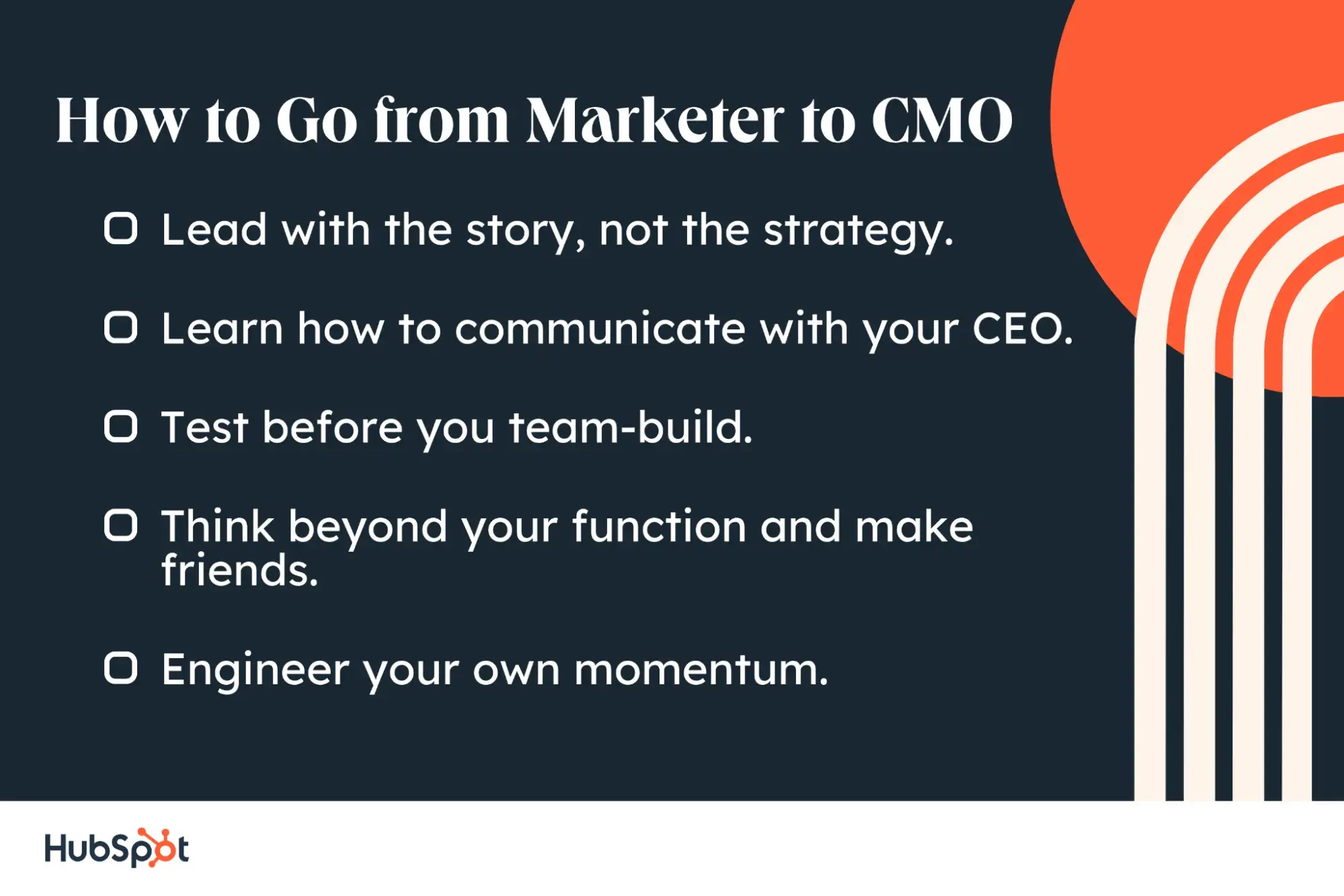
How to Go from Marketer to CMO

how to go from marketer to cmo

1. Lead with the story, not the strategy.

One of the biggest mindset shifts I had to make as a marketing leader was learning to lead with the story, not the tactical plan.

Early on, it’s tempting to drive straight to strategy: Which campaigns should we run? Which channels should we optimize? But over time, I started to notice a pattern. The companies that broke through didn’t start with tactics or even traditional strategy. They started with a story: a clear explanation of what was changing in the market, and why their product existed because of it.

At Drift, that story was “conversational marketing.” It reflected a real shift in how people wanted to buy. No one wanted to fill out a form and wait. They wanted to get answers in real time. That phrase gave our customers language to explain why we mattered. And, it gave our team clarity about what we were building, why it mattered, and how to talk about it.

Your job as a marketing leader is to define that kind of narrative, and then continuously reinforce it. What’s changing for your customer? What shift are they trying to navigate? And how does your product help them respond?

When the story is clear, repeatable, and grounded in something real, everything else — positioning, messaging, roadmapping — gets easier and more aligned.

Drift wasn’t the only company to build its strategy around a story. HubSpot did it with “inbound marketing,” and Gainsight did it with “customer success.” In both cases, the story came first, and the strategy followed.

2. Learn how to communicate with your CEO.

I used to think the way to show impact was to list everything the team was working on. I’d put together long status updates, filled with detail about campaigns, performance, and team activity. I thought it would show how productive we were.

But, I quickly learned that leadership doesn’t have the context (or time) to follow the tactical details. They’re focused on two things: revenue and narrative. They want to know:

  • How is marketing helping us hit our goals?
  • And are we telling the right story to the market?

Once I understood that, I changed how I communicated with my CEO. I stopped listing updates and started offering a point of view. I shared what we were seeing in the market, what was working or not, and what might need to change. I also started thinking more about what the CEO was responsible for, and how marketing could support that.

So much of leadership is learning to communicate. That doesn’t mean over-explaining. It means knowing what your executive team cares about and helping them see clearly how marketing connects to those priorities.

3. Test before you team-build.

When you’re growing a marketing team, it’s tempting to solve every problem by hiring. Need PR? Bring in an agency. Want to expand into events? Post a job. But I learned the hard way that hiring without clarity usually backfires.

Early in my career, I made a few hires where I couldn’t quite articulate what success looked like. I just knew we needed “help.” But without a clear sense of the role or the outcomes, it was hard to guide, support, or evaluate the work. And in some cases, it created more complexity than momentum.

What worked better was trying to solve the problem internally first. Sometimes that meant taking it on myself. Other times, I’d ask someone on the team to run a small pilot. Could we test a webinar program in-house? Try a basic PR outreach round? Put together a few partner co-marketing campaigns?

These experiments always taught us something. They gave us a clearer view of what the role should actually involve, how to measure success, and what kind of person we’d need to own it long-term. When it came time to hire, we were sharper, faster, and far more confident in the decision.

Pro tip: Not sure how to start? Run a scrappy version of the function in-house for 3-4 months. That short sprint is usually enough to test demand, clarify the scope, and decide if this should become a full-time role, a freelance contract, or something to revisit later.

4. Think beyond your function and make friends.

Something I didn’t expect when I stepped into a marketing leadership role was just how much of my job would be about building relationships outside of marketing.

As an individual contributor, you’re often focused on a single channel or set of programs. But as a leader, you need to operate more like a general manager. You’re still thinking about performance and pipeline, but also about headcount, budget, cross-functional alignment, even internal morale.

Early on, I tried to do everything myself. I’d open up Salesforce reports, build forecast models, and stress over budget spreadsheets. I thought being a good leader meant owning it all. But over time, I realized that wasn’t sustainable or strategic. I didn’t need to “be” finance or sales. I needed to figure out how to closely partner and align with them.

That meant regular check-ins, not just to update each other but to really collaborate and build trust. What are we all trying to achieve this quarter? Where do our workstreams overlap? What do they need from marketing, and what do we need from them?

When those relationships are strong, marketing becomes more than a function. It becomes a multiplier for the business.

5. Engineer your own momentum.

At a certain point, every team hits a lull. Maybe you’re waiting on a product launch. Or your budget hasn’t been approved. Or leadership is rethinking the roadmap.

When that happens, it’s easy to feel stuck. But one of the most valuable lessons I learned at Drift was that marketing doesn’t have to wait. You can create your own momentum to work your way towards success.

We started doing monthly launches every first Tuesday of the month, no matter what. Sometimes, it was a big product release. Other times, it was a new report, a customer story, or a podcast series. What mattered wasn’t the size of the launch, but the consistency.

Those launches gave the team a sense of rhythm. They kept us visible in the market. And, they created internal urgency that actually helped drive execution across other teams.

You don’t need to wait for a “big moment” to make noise. Just commit to showing up. The motion you create now can set the tone for how the rest of the org operates.

Make the Shift From a Marketer to Leader

The leap to marketing leadership isn’t about doing more. It’s about thinking differently. From tactics to narrative. From activity to impact. From running campaigns to building trust across the business.

It means learning to communicate like an owner, aligning your team around a bigger story, and making decisions that drive the business forward — even if there’s no momentum to give you a push. The sooner you start making that shift, the more ready you’ll be when the opportunity comes.

Categories B2B

How I used ChatGPT-o3 to plan an entire marketing campaign during one plane ride

In an hour, ChatGPT-o3 can make you dozens of high-level marketing graphics — the kinds of campaigns that would take some teams weeks to complete. And the graphics aren’t just a first draft starting point. They’re final assets ready to run.

Download Now: Free AI Agents Guide

I tested this out on a recent flight and managed to create an entire 2025 marketing campaign in about an hour. Brainstorming. Prompt writing. Graphics generation and iteration. ChatGPT has evolved from a simple productivity tool into a high-level creative and strategic partner.

The new ChatGPT equation for AI-savvy marketers is this: deep research + your brand standards + o3-generated prompt + in-app editing = full graphics pipeline. I’m going to show you exactly how that looks and offer tips that I found make this process much more effective.

Why ChatGPT-o3 Is a Game Changer

ChatGPT-o3 was released at the end of 2024, and OpenAI has shared big upgrades in 2025. To me, o3 feels very human, and I’m having a ton of fun with the leap forward in image generation. There’s a tangible magic for marketers.

Let’s look at the under-the-radar features of ChatGPT-o3 that should be common knowledge, plus some use cases for 4o image generation.

Improved Prompting

You’ve probably heard many times that AI is only as good as the prompts you give it. Focus on these two things with o3: self-prompting and context.

I think o3 is a fantastic prompt writer, and I’ve gotten in the habit of asking for prompts as a part of every output. They still need to be massaged sometimes, but it’s a big boost, and the output is more unique when compared to generic copy-pasted prompts.

But be warned, this only reaches its potential with enough context. The more context you provide in your chats, the more tailored the output will be. This is an important shift for marketers.

Originally, AI was just aggregating existing ideas from the internet and giving you the average best practice. But now, if you actually work with it, ChatGPT comes up with very unique, specific ideas that are contextual to your needs.

In my case study below, you’ll see exactly how I’m engaging o3 in prompt engineering. This podcast episode also shares tips for improving your output with better prompting:

Library

Welcome to the most under-the-radar feature that ChatGPT added in the last year: The image library. This allows you to store, edit, and iterate images visually. Once you’ve created a graphic, you can go back to any of those threads to edit and iterate further (tips on this in a minute).

There’s so much you can do from this one pane in the ChatGPT interface:

  • Basic editing and reiteration.
  • Get a high level of consistency.
  • Single image creation, all the way to generating entire campaigns.

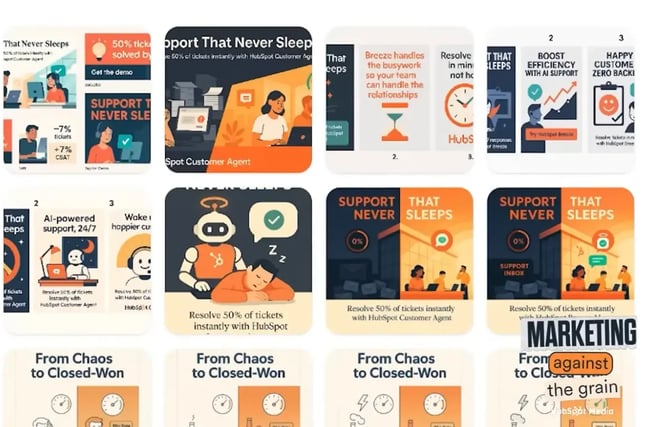
The library is a game changer for quick edits of your graphics, giving you a beautiful visual display of everything you’ve generated. The thumbnails in my library below look like digital assets that a skilled team has worked diligently on:

ChatGPT library full of HubSpot assets

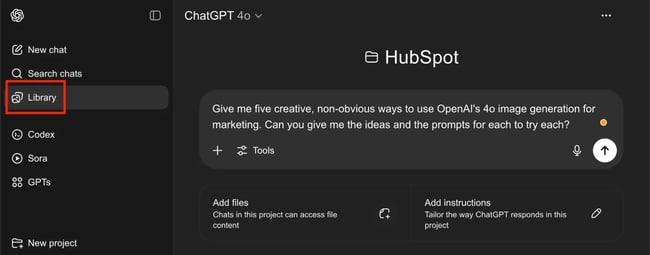
Pro tip: Click on the library tab to create your images instead of prompting in a normal chat. Not only will this generate image variations faster, but it also creates better assets overall. ChatGPT-o3 instructed me to use the library tab for this reason, and through testing, I saw a noticeable improvement.

chatgpt prompt for hubspot marketing campaign

Source

Deep Research

I prompted ChatGPT to do deep research on our customer agent, and it generated an entire creative brief that covered features, value propositioning, messaging, style guide — everything.

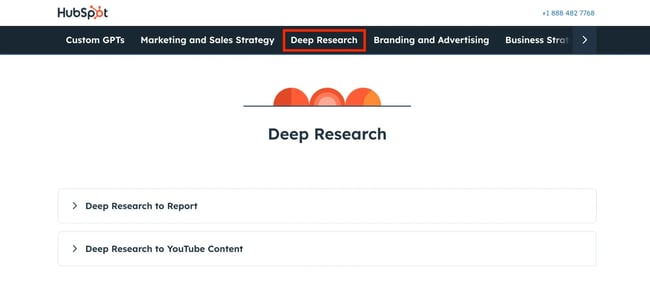
Don’t skip this step: I promise you that success with o3 starts here. We share deep research help in our AI prompt library, under the “deep research” tab:

hubspot deep research chatgpt prompts

Source

Memory

Another underappreciated aspect of o3 is the memory feature. In a nutshell, these features include:

  • Automatic updates, proactively remembering content to provide personalized information.
  • User-controlled memory. You add to the memory through your chats, but did you know that you can also manually remove from the memory? This can be done through Settings > Personalization > Memory (example: removing outdated branding preferences).
  • Continuity, which lets output be guided by context from past chats, building on your previous work.

What this brings to your campaign generation (once again) is context. Context is the single word that summarizes the leap forward in output alignment.

Memory doesn’t retain every single detail by default, though. ChatGPT doesn’t remember information from your PDF style guide unless you specifically ask it to. When specifically asked to retain branding information, the memory feature retains brand standards to incorporate this into your designs.

What you can do: When prompting ChatGPT, tell it to “do this in the [company name] style like you’ve done before.”

Here’s an example of a marketing graphic generated from a single ChatGPT prompt.

hubspot ad campaign created by chatgpt

Source

With an aligned AI tool, you can enter the era of rapid-fire “one of one” marketing.

“One of One” Potential

The phrase “one of one” refers to the ability to personalize everything for a single target — in my example, a single company.

This is a massive leap forward in campaign creation. Previously, we focused on creating ads personalized for unique segments: Companies were grouped together based on their characteristics, and then ads were created targeting all of them.

Now, with the cost of creative down to near zero, assets can be created targeting only a single audience. An entire marketing plan can be personalized at a company level. This is a task that would’ve previously taken teams days to complete.

In terms of AI and marketers’ productivity, this is night and day. AI has evolved so far beyond the world of creating and tailoring generic templates. The campaigns resulting from this strategy are unique, personalized, and almost instantaneous to create.

And thanks to the memory capacity, one idea builds upon the other, and you’re able to iterate in rapid succession. A task that used to be incredibly time-consuming and expensive to achieve now only takes a few minutes.

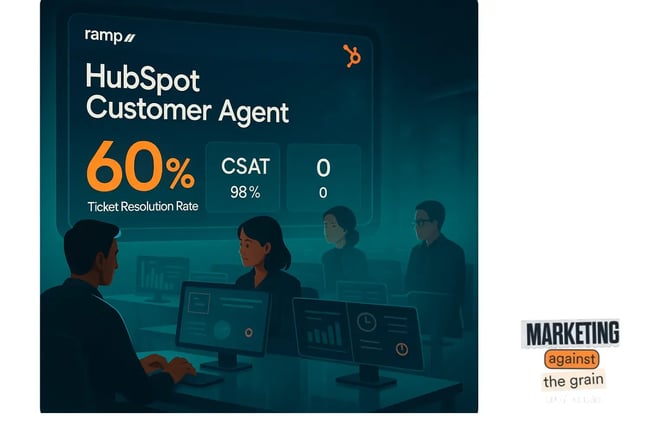
Trying rapid-fire campaign generation can be a great gateway into leveraging ChatGPT in your campaigns. Here’s an example below for the company Ramp.

One-of-one ChatGPT-gerenated ad for HubSpot and ramp

Let’s look at the exact prompt I used and the campaigns it generated for HubSpot in under an hour.

Use Case: Creating a Campaign in One Hour

I love OpenAI’s 4.0 model for image generation, and I wanted to find unique ways to use it. Sitting on my flight with some WiFi and good music, I gave ChatGPT this prompt:

  • Give me five creative, non-obvious ways to use OpenAI’s 4.0 image generation model for marketing. Can you give me five ideas and the prompts for each to try?

chatgpt prompt for openai’s 4o image generation campaign

Source

These are the five ideas that it gave me.

1. Hyperlocal, Geo-targeted Ad Images

What ChatGPT suggested: Hyper-hyperlocal cultural mashups for less than 10-mile geo-targeted ads. People click faster on ads that feel made for their neighborhood. Instead of generic skyline shots, generate up-to-the-minute scenes that merge your brand with overlooked local landmarks, slang, and street art — even the weather.

What I love: Marketers know that the local angle is effective, especially for ads, so that wasn’t a particularly unique angle. What was special was the idea of doubling down on both hyper-local (overlooked landmarks) and hyper-current conditions (weather).

2. Future-state Visuals for Sales Decks

What ChatGPT suggested: Prospect-specific future state visuals for enterprise sales decks. Why that’s interesting: Enterprise buyers often struggle to picture life after adoption. Generate a hero slide that literally shows their logo in the future state of success.

What I love: This is a great product marketing idea with an emphasis on the dream state. It hits on the pain point and delivers a really simple message that works for a sales deck or ads.

chatgpt-generated hubspot ad

Source

3. “What If” Concept Posters

What ChatGPT suggested: “What if” concept posters for rapid-fire positioning tests. Before you spend a bunch of money on doing a full video shoot, actually generate movie-style posters. Drop them into Slack or UserTesting and see which one sparks the most excitement.

What I love: This is a fun twist on the future state idea, and I love the added value of testing these concept posters before releasing them. The images are bold and catchy, nailing the movie poster brief.

chatgpt-generated movie-style poster for hubspot ad campaign

4. Historical Era TikTok Frames

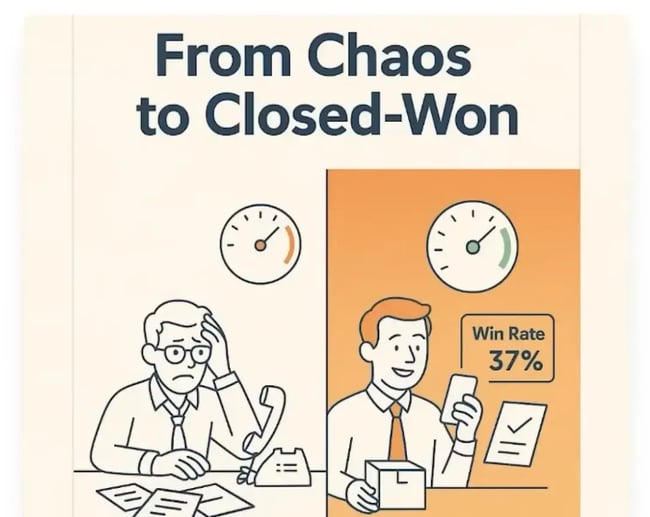
What ChatGPT suggested: “Product in historical era” TikTok frames. Context-switching from present to past stops the scrolls. Produce stills that place your SaaS product inside widely anachronistic scenes, subtly highlighting how painfully slow old workflows were. Instead of having a generic video hook, make one of your TikTok hooks or mid frames in your short-form video a “product in a historical era.”

What I love: It was previously very time-consuming and expensive to create custom visuals for short-form video. These can be pieced together as B-roll or even animated with AI (though this still needs development). Watch the podcast episode on YouTube to see the Sora video creation go awry (it’ll get there, though).

chatgpt-generated historical era tiktok hook for hubspot campaign

5. Choose-your-own-demo Carousels

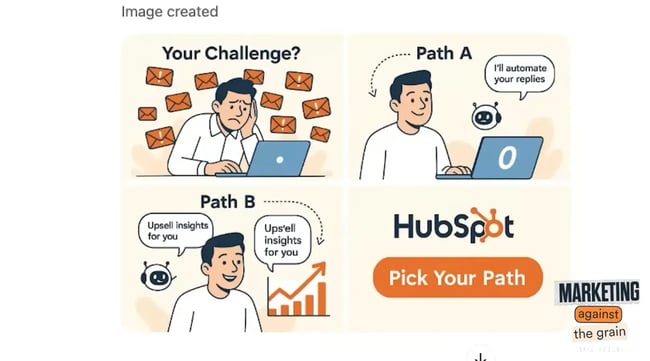
What ChatGPT suggested: “Choose your own demo” carousel assets. For lead-gen ads or email nurtures, create a mini saga: Panel one asks a problem question, panels two through four branch visually based on the reader’s click. The entire carousel can be generated on-demand with consistent styles, so it feels like one coherent comic.

What I love: The storytelling idea is genius, especially at a moment when carousels are performing really well on platforms like LinkedIn, Instagram, and even TikTok. The screenshot below is a one-shot image (there was no editing involved). You’re seeing the impact of context and deep research.

chatgpt-generated carousel comic strip for hubspot ad campaign

Getting Started

Still unsure where to start with these new models? Do what I did. Open up o3. Tell it about your business. Ask it to give you ideas. You’ll have a lot of fun playing with the prompts that o3 gives you. See this model as a strategic partner and give it as much context as you have.

When trained properly, ChatGPT-o3 can help you with everything from creative inspiration to acting as your marketing assistant. Enjoy learning about its capabilities and watching your library populate with dozens of graphics variations.

I know some marketers still fear AI. But the more you use AI at this level, the more you’ll want to use it. If your experience is anything like mine, you’ll be repeatedly impressed by what ChatGPT can create for you. The amount of quality work that you can generate in an hour was unfathomable in the past. You’re living in an era that marketers of the past only dreamt of.

To learn more about how ChatGPT can level up your campaigns, check out the full episode of Marketing Against the Grain below:

Categories B2B

This behavioral science principle can make your billboard go viral, here’s how

Is billboard advertising still relevant today? Yes, all because of costly signaling. This behavioral science principle states that expensive signals indicate higher quality or status.

Download the free introductory guide to marketing psychology here. 

Although a broader concept about human behavior, costly signaling absolutely applies to advertising. What, after all, is the value of a social media ad? While highly effective, social ads are cheap, so everyone can buy them and crowd the space. But a billboard? That takes some real money.

So, let’s dive into how the costly signaling applies specifically to billboard advertising. Then, I’ll share some top viral billboard examples.

What is costly signaling?

Costly signaling theory is the idea that the higher cost you put into something, the more other people will value it.

Sounds simple right? Well, I do have two caveats. The first is that costly signaling reflects perceived cost. People still need to interpret and assign value to signaled information. Secondly, the signal of cost in these cases is reliable because only individuals who can afford to send the signal possess the signaled quality.

To put it in marketing terms, costly signaling means that the more resources you put into sharing your message, the higher people will rate it. Goes beyond money and includes time, effort, pain, or any sort of expense spent to make the message more persuasive.

I think advertising executive Rory Sutherland puts it perfectly: “The meaning and significance attached to something is in direct proportion to the expense with which it is communicated.”

costly signaling in marketing, quote from rory sutherland

Costly Signaling Example

Costly signaling goes beyond textbooks and can be seen in the real world. A 2013 study titled “Extreme Rituals Promote Prosocially” analyzed how expenses can increase religious donations.

The study took place in Mauritius during the Hindu festival of Thaipusam. The researchers wanted to see if the effort and pain the worshipers put into their ritual affected the amount they donated to the local temple.

Researchers studied two types of rituals:

  1. A low-ordeal ritual. This consisted of a group that only sang and prayed.
  2. High-ordeal ritual (Kavadi). This ritual was very intense. Participants pierced their skin with needles and hooks, carried heavy structures, and walked barefoot uphill for over 4 hours.

Those who watched the low-ordeal singing group gave just 80 rupees as a donation, while those who watched the high-ordeal rituals gave 65% more, 132 rupees on average. In this case, observing pain made people value the ritual more.

I like to visualize costly signaling as a positive vector in which the two elements are directly proportional: higher cost = greater meaning.

costly signaling graph showing that the more something the costs, the greater meaning it has

This is why asking your partner to marry you at a McDonald’s drive-thru is unlikely to succeed. Asking them after a 10-course tasting menu at a 3-star restaurant will have a higher chance of success.

Although you’re the same person asking the same question, the latter situation is likely to go better for you because of the higher perceived cost and effort. In other words, it’s more meaningful.

Billboards and Costly Signaling

I believe advertisers can take the finding from behavioral science and apply it to their billboards. That’s especially true for costly signaling. So, I conducted a silly yet simple experiment to find out.

I showed 200 British people a fake ad for my podcast, Nudge. Half of the participants in my experiment saw just the ad. The remaining 50% saw the same ad superimposed onto a billboard.

Now, a billboard signals expense. To some less than attentive viewers, they may believe I paid to display that billboard myself. Or perhaps they thought that this survey was the prerequisite to creating the billboard. Either way, the billboard signaled more expense than the ad alone.

Did the billboard variant make people more likely to listen to my podcast? Yes. It made Brits 61% more likely to tune in.

costly signaling for billboard advertising, participants more likely to listen to a podcast advertised on a billboard-1

Now, rather than just creating a billboard, marketers can sink more expense into the billboard with novel designs. That novelty will showcase a higher expense, boosting perceived value even more. I’ll share a few standout examples below.

Viral Billboard Examples

1. Netflix

How should Netflix advertise 1,000 new shows? Netflix could communicate the message on a simple building-side billboard, but that would miss the chance to highlight the effort.

So, instead, they created a sprawling, oversized billboard on a giant mural. It listed dozens of shows, which should make viewers value the ad and Netflix more highly.

billboards and costly signaling, netflix viral billboard example

Why This Works

Simply buying billboard space is not enough. You need to capitalize on that space (and your spend) to revolutionize it. I find the list of shows a powerful way of showing — not telling — what Netflix has to offer. In my opinion, they did a phenomenal job of demonstrating value through their expense.

2. Dracula

Back in 2021, I attended a New Year’s Eve party in South London. Across the road, I saw an ad for a new BBC show. The billboard had dozens of knives stabbed into the poster. A light lit the knives at night, casting a Dracula-shaped shadow across the ad.

The billboard was an incredible piece of art, visible only at night, and must have taken a great deal of effort to create. This expense stuck with me, and I’ve never forgotten this ad, even after a booze-filled evening.

billboards and costly signaling, dracula viral billboard example

Why This Works

This billboard is unique, clever, and artistic. It is absolutely arresting and communicates the effort of the creative designer behind it. How can a viewer’s curiosity not be piqued?

Going viral entails being unforgettable, so taking billboard design to the next level is a sure way to succeed.

3. Specsavers

“Should have gone to Specsavers” is the humorous slogan for this well-known optician.

All of Specsavers’ ads play on the idea that those with dodgy eyesight need a checkup. But, rather than simply stating their slogan, they use costly, mistake-ridden billboards to emphasize their slogan.

billboards and costly signaling, specsavers viral billboard example

Why This Works

This billboard is eye-catching because it looks wrong. Then, you read it and have a good laugh. Its humor cleverly captures the reason why someone might need a new pair of glasses. I think that makes it unforgettable.

If you can “embody” what you’re selling through your billboard, your message will stick better, and people will value your effort more.

Science Tells Us the Cost Is Worth It

We value billboards more when we see the expense taken to create them. Don’t get me wrong, creating a viral billboard involves a lot of creativity, but behavioral science reveals a common thread behind many of them. The higher the expense, the greater the chance of virality.

My biggest takeaway is that the cost is worth it. When people perceive the cost of an ad, they will not only value it more but also be more likely to spend more in response. If they perceive something as cheap and low-effort, they will respond in kind.

So, invest in creative design and go big with your billboard spend, and you will see a higher return on your investment.

Categories B2B

30 creative lead generation ideas to try (& why marketers recommend them)

Coming up with strong lead generation ideas isn’t always easy. I’ve found myself putting it off more than once — not because it’s not important, but because it often feels like a hit-or-miss. And I’m not alone. In the last year, 45% of businesses reported struggling to generate enough leads.

Download Now: Lead Generation Best Practices Guide

Cold outreach, building lists, trying to cut through the noise — it’s a lot, especially when people are busy and hesitant to engage.

But I’ve also learned that lead generation doesn’t have to feel like a grind. The most effective strategies I’ve seen are the ones that offer something valuable upfront. They don’t just push a product; they solve a real problem, answer a question, or make someone’s job easier.

In this article, I’ve pulled together a list of creative lead generation ideas that do exactly that. I’ve spoken with marketers who’ve tested these methods, so if you’re looking for lead gen tactics that feel more relevant, and more human, these are a solid place to start.

Table of Contents

Social Media Lead Generation

1. Partner with influencers.

One of the quickest ways to gain traction and drum up new leads is to partner with influencers within your niche.

Influencers have a special way of connecting with their audiences, and when they showcase your brand, you expand your reach to a larger audience.

Pro tip: Nicole Rossi, Marketing Coordinator at Custom Neon, shared that the key to an effective influencer partnership is to create landing pages relevant to your campaign.

Rossi said, “Partnering with influencers has also been an incredibly successful lead-generation tool for us. Influencers who share our brand values partner with us, and together we develop giveaway campaigns or offer special discount codes to their audience. With this approach, we can reach unexplored markets and produce leads through forms or landing sites made specifically for the campaign.”

2. DM-first lead magnets.

Instead of asking people to click a link in bio or fill out a form, one smart play I recommend is delivering your lead magnet directly via DMs.

Here’s how it works: post something interesting, like a results breakdown, framework, or hot take, and say “Comment ‘Guide’ and I’ll send you the PDF.”

This turns a passive scroll into an active opt-in. Algorithms love the engagement boost, and you get warmer leads because people are raising their hand before you ever message them. I’ve seen this blow up on Instagram, especially when paired with helpful, non-salesy follow-up messages. It feels natural, like a conversation, not a funnel.

3. Social polls that lead to a CTA.

Polls are a great way to segment your audience and spark lead gen. When you create a poll around a key pain point (e.g., “What’s your biggest challenge with scaling sales?”), you get two things: insights and intent signals.

After the poll, follow up in the comments or via DM with a resource that matches each answer. For instance, “Voted for onboarding issues? Here’s our free onboarding playbook.” It’s a smooth transition from interaction to opt-in, and people appreciate the relevance.

Networking Lead Generation Ideas

4. Do a LinkedIn audit.

If LinkedIn is your jam, you could be sitting on an untapped market — your connections.

Melissa Lohrer, Founder at Waverly Ave Consulting, said, “Sometimes, your next best opportunity is already in front of you. Audit your existing LinkedIn connections — there are likely untapped opportunities sitting directly in your network. Growth isn’t always about bringing in new people but nurturing who’s already in your corner and leveraging those relationships to create momentum. This is your fastest path to conversion.”

5. Schedule coffee chats.

When it comes down to it, gaining a qualified lead starts with connecting on a human level. No-strings-attached networking is a great way to connect with members of your audience, build meaningful relationships, and begin a slow (but warm!) conversion.

Erin Pennings, a copywriter and marketing strategist, told me coffee chats are her favorite way to connect with your target audience.

Pennings said, “In my experience, the number one lead gen strategy is building relationships with other people. It‘s not networking in the traditional sense of the word, but simply about making connections. It’s not usually a fast-burn strategy because human connections take time, but it’s a great way to create an effective referral network.

“I love reaching out to people to schedule no-pitch coffee chats where the primary goal is getting to know people, and I always ask them who I can connect them with or who would be a good referral for them, and they generally reciprocate. Often I can make connections right away to support them, and then when I need to get contracts or work at the door, I know I can reach out to see if they know anyone I know.”

6. Use customer reviews in your pop-ups.

Want to build trust and brag about your clout? Consider showing off your customer reviews. Visitors lurking on your website want to know what real customers think of your product or service before they, too, take the plunge.

That’s why Johannes Karjula, CEO at Trustmary.com, uses a customer review pop-up to drive conversions.

Karjula said, “The best strategy to generate leads is to use an exit-intent popup that features customer reviews and an offer or discount code. These work especially well if someone is very close to converting: either buying or booking a meeting. If they’re about to leave, throwing social proof in their faces is great in proving that they actually need the product or service in question.”

Content Marketing Lead Generation

7. Create valuable content (blog posts, podcasts).

Your audience wants content, whether that’s a blog post, a podcast, or a video. That’s why I think content marketing remains one of the most effective and recognizable ideas for lead generation strategies.

Roland Jakob, Managing Partner of BlazeKin Media, says, “The most effective lead generation idea I‘ve encountered is the strategic use of personalized content marketing. In my experience, creating tailored content that speaks directly to your target audience’s pain points and interests is incredibly powerful. I‘ve found that when we develop in-depth blog posts, engaging videos, or insightful podcasts that genuinely address our audience’s needs, we not only attract potential leads but also establish ourselves as trusted authorities in our field, which is what you ultimately want.”

8. Share success secrets from thought leaders.

Want to provide unique value in your content? Reach out to a thought leader in your industry or even your company. By interviewing an expert to uncover their secrets, you prove to potential customers that you’re dedicated to delivering the best advice and insight out there.

And it works!

Below is an interview Groove conducted with Josh Pather, a wedding DJ-turned-ecommerce entrepreneur. In this article, Groove had Josh break down how he started his ecommerce business, which is one of the fastest-growing businesses in Texas.

The folks at Groove frequently interview successful founders and ask very specific questions from which everyone can learn something. Then, Groove shares those interviews with audience members on its blog.

example of groove article

Source

The interview with Josh is chock-full of quotes, lessons, and actionable takeaways for entrepreneurs. This touch helps further Groove’s reputation as a resource for expert information among its audience.

9. Compile real-life examples with actionable takeaways.

Finding effective examples to learn from can be equally as valuable and difficult. A list of best practices, current trends, or real-life examples in your industry is an excellent way to drive prospects to a guide or offer where they can opt in.

The Content Marketing Institute knows this and makes a point to share current content marketing trends every year in a blog post.

This blog post serves as a resource to inspire site visitors to achieve success with their marketing strategies, and ultimately, to search the website for guides and opt-in offers to improve their content game.

b2b content marketing dtaa

Source

10. Show what’s working for your company.

I can’t be the only marketer who’s nosey, right?

It’s why I find sharing a transparent post that pulls back the curtain on something with which you’ve seen success (or failure) interesting. And I know your potential leads find it interesting, too.

Other companies going through a similar stage of growth — or approaching your size — can gain a lot of inspiration from transparency posts and ultimately avoid making the same mistakes.

So, consider sharing how you’ve built your platform or a lesson you’ve learned along the way. You can share your insights in a blog post or a downloadable guide.

Just don’t forget to include a final call-to-action to encourage readers to join your email list.

11. Create a handy checklist.

Who doesn‘t have a running to-do list that sometimes gets a little bit too long? If you’re planning an upcoming webinar, you can be sure there’s a lot that goes into it.

HubSpot created a 19-page webinar planning kit that marketers can download and learn how to pick a stellar webinar idea, pick great guest speakers, and host the webinar.

webinar planning kit, HubSpot

Pro tip: HubSpot uses the gated offer to prove its brand’s expertise on the subject and encourage kit downloads.

12. Offer insightful, downloadable case studies.

One of the best ways to gain new leads and spark interest in your products or services is to show how your brand is an asset to your clients. Case studies help get your message across while doubling as a lead magnet.

Krissy Selda, a digital marketing specialist at Array Marketing Agency, is a huge fan of case studies. Selda told me, “From experience, publishing case studies has been the most powerful lead generation tactic because they demonstrate how your business consistently meets customer expectations.

“By showcasing the value of your products or services, case studies allow potential clients to envision themselves benefiting from your success. When customers see tangible results from businesses or individuals similar to themselves, they are more inclined to engage with your product or service. This makes them one of the most effective content marketing tools for driving leads.”

13. Create an interactive quiz or tool.

Consider offering a quiz to your website visitors as a creative way to learn more about them and obtain their contact information.

The goal is to “bargain” the result of the quiz in return for a new lead, which can be very effective when done right.

Cassandra Gucwa, Founder of Menerva Digital, says tools and quizzes are “a great way to offer something that is valuable to your potential target audience and gather their email or information. Some examples of free tools would include a cost calculator, savings calculator, or a tool that checks how secure your email address is.”

A similar method is offering an interactive tool, such as the HubSpot Website Grader. The Website Grader is a free online tool that visitors can use to grade their websites against key metrics and discover ways to improve them.

To use the tool, visitors must submit their email, which provides HubSpot with new leads interested in improving their web presence.

HubSpot's website grader

B2B Lead Generation Ideas

14. Build interactive ROI calculators (with a personalized follow-up).

One of the smartest lead gen ideas I’ve seen in the B2B space is offering a live, interactive ROI calculator — not just a gated spreadsheet. The idea is to help your prospect visualize the value you bring using their own numbers. It’s consultative without needing a salesperson.

What really moves the needle is combining the tool with a follow-up offer. For example, after the user completes the calculator, they get a custom PDF summary and an invitation to a deeper assessment or strategy call. It’s low-pressure, but still guided.

I’ve seen companies collect qualified leads at scale this way, especially when the tool ties into a specific pain point, like cost savings, revenue growth, or time reduction.

15. Create private Slack or Discord communities.

I always recommend creating private, niche communities where your ideal B2B buyers can talk shop without distractions. Whether it’s a curated Slack group for heads of IT or a Discord server for RevOps leaders, these spaces become lead gen engines — just not in the traditional sense.

What works well is keeping the group valuable and focused: regular expert drop-ins, exclusive templates or benchmarks, even low-key AMAs. When the space is genuinely helpful, people start engaging, and over time, that trust spills over into business conversations. I’ve seen brands become the go-to solution within their own communities without ever pitching. The key is to show up as a peer, not a promoter.

16. Do micro-podcasts featuring your ideal buyers as guests.

If there’s one underrated B2B tactic that I keep seeing deliver results, it’s this: invite prospects to speak as experts on a short-form podcast or video series. Even a 10-minute “trends and tactics” conversation works. You’re giving them a platform, building a relationship, and creating content all at once.

Once that conversation happens, the door’s open to follow up. I’ve seen this get recommended to clients who struggle to get meetings through cold outreach, and they’ve reported higher conversion rates simply because the podcast invite felt like a genuine opportunity, not a sales trap. Plus, you walk away with content you can repurpose for months.

Video Marketing Lead Generation

17. Personalize video content.

89% of businesses use video as a marketing tool. And for good reason: it’s a great way to connect with qualified leads and convert them to paying clients.

Whether you use short- or long-form video, the key to video marketing lead generation is to personalize your content.

For Mike Vannelli, Creative Director of Envy Creative, personalizing video starts with understanding the unique perspectives of your audience.

Vannelli told me, “One of my favorite lead generation tactics is leveraging personalized video content. We create tailored video messages based on specific pain points or challenges a prospect is facing. It‘s not just about sending a generic promo — it’s about showing that we understand their unique needs.

“These personalized videos are then embedded in emails or used as landing page content. Adding a clickable call-to-action at the end, like scheduling a demo or downloading a valuable resource, boosts engagement like nothing else. The human touch combined with targeted messaging has consistently driven better conversion rates for us.”

18. Use mid-video CTAs in YouTube or Loom-style explainers.

Here’s a mistake I see all the time: people wait until the end of their video to add a call to action when most viewers are already gone. Instead, I suggest inserting the CTA around the 30–60% mark. This could be a button, a pop-up form, or even a voice prompt like “Want the full checklist I’m using? Grab it below.”

I’ve seen this work especially well with product explainer videos or walkthroughs. The viewer’s already invested, and that’s the perfect moment to offer a lead magnet or booking link.

Pro tip: A/B test your mid-video CTAs — small tweaks can lead to big lifts in conversion.

19. Turn webinars into a lead gen flywheel.

Webinars are a classic for a reason, but here’s the upgrade: instead of just hosting them live and moving on, chop them up into snackable video clips. Each clip should zero in on one key insight or objection, and end with a CTA to download the full version or a related resource.

This way, your one webinar becomes 10+ mini lead gen assets that work across YouTube, LinkedIn, and your email list. I’ve seen brands repurpose webinars this way and build an evergreen funnel that runs for months.

The trick is to lead with value in the clip, and only then introduce the opt-in. That makes it feel more like help, less like a pitch.

Email Marketing Lead Generation

20. Create a valuable course or guide.

A well-developed course or guide is like gaining access to a real class — for free. For busy marketers, this type of offer can prove to be incredibly valuable.

Pro tip: This approach tends to work well for in-depth topics. You can create an email course, host a course on your platform, or create a downloadable guide for visitors to read. HubSpot offers tons of free courses and downloadable guides like Introduction to Lead Generation.

HubSpot's intro to lead generation

These courses and guides help people with different content consumption styles get the same valuable information that’s on the blog, and it helps HubSpot generate new leads to engage with over email.

21. Provide gated offers with best practices.

When I explore a marketing tactic in a blog post or e-book, I find it helpful to know what others are doing to have success with the same method.

Compiling those best practices into a list is incredibly useful to a marketer looking to get started in a particular arena.

For example, HubSpot offers a comprehensive list of SEO best practices from a variety of experts, which aims to help its target audience achieve a greater return on investment from content marketing.

HubSpot's SEO starter pack

The ebook provides value for readers trying to crack a complicated marketing strategy — and in exchange for their contact information, they get insider tips from a variety of expert sources.

Event-Based Lead Generation

22. Offer webinars and live demonstrations.

If you’re looking for another lead generation idea, consider hosting seminars or live events. Webinars and live events are perfect opportunities to mingle with your audience while also providing them with useful information and new skills (and upselling your products and services!).

Cache Merrill, Founder of Zibtek, told me, “Webinars are an excellent tool for presenting one’s expertise and building trust. We try to cover the ‘correct’ topics relevant to what we do. Finally, we expect to have a very good number of conversions at the end where audiences are eager to have a closer interaction request for a consultation or a demo.”

Referral and Partnership Lead Generation

23. Create a referral ecosystem.

Lead generation doesn’t have to be a solo endeavor. I’ve mentioned working with influencers as an example of how to make conversions a team sport.

However, influencers aren’t the only people you can recruit for your lead generation efforts. Instead, ask your network for referrals.

Lohrer calls this “creating a referral ecosystem.”

Lohrer explained it to me like this: “Choose your top three clients and tell them you’re looking for more like them. Ask for introductions to their peers or advice on where to find similar high-value clients. Better yet, ask them to introduce you to someone you want to meet to make it easy for them.

“On top of that, partnering with complimentary service providers—those who work with the same client base in different ways—or those who influence your clients (think advisors or coaches) can help create a steady, mutual referral stream.”

24. Solicit brand partnerships.

Like influencer partnerships, connecting with other brands is a great way to tap into other markets and connect with a larger audience. You’ll want to ensure the brands you connect with are relevant to your niche. The more relevant the niche, the more likely their audience aligns with your own.

Roland Jakob, Managing Partner of BlazeKin Media, agrees that brand partnerships are an effective form of lead generation.

Jakob told me, “At BlazeKin Media, I’ve connected creators with major brands like Coca-Cola, Sephora, and others, driving high-quality leads by expanding reach and boosting credibility. The key is ensuring these collaborations provide real value to the brands, creators, and audience, leading to engaged prospects who are more likely to convert into loyal customers.”

Freemium and Trial-Based Lead Generation

25. Offer a free trial or a freemium product.

Is there anyone else out there who hates a free trial or product? I am pretty sure there isn’t. Everyone loves free stuff. It’s the reason offering a free trial or a freemium product works so well as a lead generation tactic.

Yevhenii Tymoshenko, Chief Marketing Officer at Skylum, understands that free trials lead to qualified leads, which is why a free trial paired with personalized marketing are their go-to lead generation ideas.

Tymoshenko told me, “Once a user is signed up for a free trial, we make use of personalized marketing to ultimately convert them.”

Free trials of a brand‘s services help get a prospect’s foot halfway through the door. If the free trial helps them and provides great value, they’re more likely to purchase the full product and become a customer.

Another similar strategy is to offer a freemium product, similar to how HubSpot offers the free forever HubSpot CRM. By offering a portion of your product or service line for free, you give users a taste of your brand and build trust and awareness among your user base.

HubSpot free CRM

Tymoshenko also incorporates freemium products into Skylum’s marketing operations.

He said, “We‘ve also been testing giving limited free access to certain new features of our products … This is a good way to generate qualified leads that would purchase your product in the end. And if, for some reason, that doesn’t happen, we can offer custom discounts to some users.”

SEO Lead Generation

26. Leverage the SEO power of customer reviews.

Review platforms generally have a strong presence in organic search, making them a great opportunity to expand your brand presence and get noticed by the right people.

When you encourage users to leave reviews on a third-party platform with strong SEO — like Yelp or Google — you increase the chances of being found by qualified prospects in search, without paying a dime.

Google recognizes the independent role of these sites in helping people find what they’re looking for and seems to favor review sites in search engine results.

Imagine your company on this list. There’s a high chance your product would be included in what McKinsey calls the “initial consideration set,” leading to the “moment of purchase” during the consumer decision journey.

You also outmaneuver competitors in high-value keyword searches. This is crucial considering that many B2B searches start with a generic keyword phrase.

27. Optimize your website.

Here’s a hot tip for lead generation: Don’t overlook your website. Ensuring your website is optimized and ready for the search engines is a quick way to turn it into a lead generating machine.

Colton De Vos, Marketing and Communications Specialist at Resolute Technology Solutions, told me that if your website generates lots of traffic, but only converts a few leads, then you should consider making changes to your site to encourage conversions.

De Vos said, “Invest the time to tweak your website content and design to persuade visitors to make the leap and contact your business. Make it easy for prospects to reach out. Include many easy options for them to engage, and facilitate their research of your company. Feature trust factors such as reviews, case studies, and the value your company has brought others.”

Pro tip: Consider connecting your marketing software to your website to make it easier for leads to get in contact with you.

Paid Lead Generation

28. Paid advertising.

My last lead generation idea to share is paid advertising. Think of paid ads as billboards in the online space. A great billboard catches attention and encourages the potential customer to take action of some kind.

Online paid advertising does the same thing. Plus, with the right landing page and forms, you can easily convert visitors to leads.

Sophie Musumeci, CEO and Founder of Real Entrepreneur Women, uses paid advertising as part of her lead generation efforts. But she told me there has to be a well-thought-out strategy for it to work well and convert leads.

Musumeci said, “I’m a fan of strategic paid advertising. It amplifies your reach, but it’s critical that the ads are targeted, clear, and focused on the results your audience is craving.”

You can launch paid ads on nearly every social media platform, including setting up ads on Facebook and Pinterest. You can also set up ads on Google and other search engines.

Pro tip: Wherever you decide to spend your marketing dollars, take the time to understand your audience and learn the places they hang out online. This can help you determine the best places for your ads.

29. Run a limited-time challenge with VIP perks.

Instead of promoting a static discount or product, I suggest running a time-bound challenge that taps into your audience’s goals. For example: “Join our 5-Day Glow-Up Challenge — daily skincare tips + a chance to win our bestsellers!” Or “Reset your space in 7 days — declutter tips, exclusive deals, and VIP-only surprises.”

The ad invites people to opt in via email to join the challenge, and once they do, they get daily content (dripped via email or text), sneak peeks at products, and early access to sales. The challenge creates a sense of community and momentum, while the VIP perks keep them engaged and primed to buy.

I’ve seen B2C brands build massive email lists this way in just a few weeks, and those leads often convert better than coupon chasers. Why? Because people already built a habit with your brand.

30. Run UGC-style testimonial ads.

Instead of polished brand videos, use raw, selfie-style clips from real customers talking about how your product solved a specific problem. Pair that with a lead offer like a free sample, $1 trial, or exclusive first-time bundle. The ad doesn’t push the product — it tells a story. It’s “I tried this and here’s what surprised me,” not “Here’s why you should buy.”

The magic is in how real it feels. I’ve seen these ads outperform heavily produced campaigns, especially in the beauty, wellness, and food industries, because they mimic organic content.

According to Billo, 93% of marketers who use UGC in marketing campaigns say that it performs significantly better than traditional branded content. This method works best on platforms like Facebook, Instagram, and TikTok, where people are in consumption mode but will jump at a no-brainer offer from someone relatable.

Effective Lead Generation Ideas for You

I’ve found creating an effective lead generation strategy to be an art and a science. For me, the best strategy combines several lead generation ideas, like cultivating connections with my network and offering high-value content.

You might find, however, that paid advertising or partnering with brands and influencers works better for your niche.

Whichever lead generation strategy you experiment with next, make sure the content is useful to your audience so they’ll return to your website again and again.

Editor’s note: This post was originally published in February 2017 and has been updated for comprehensiveness.

Categories B2B

From third-party cookies to zero-party data: The new rules of email engagement

A few days ago, Jane was browsing for new sunglasses. Before she knew it, every site she visited was showing her relevant ads.

It wasn’t magic. Just algorithms working with behavioral data.

Download Now: Email Marketing Planning Template 

But data collection is no longer something we can do in the background. With rising privacy concerns, businesses must now lean on zero-party data.

And what better channel to invest in privacy-first communication than email? A channel where users opt in to get personalized customer experiences.

I’ll walk you through the new rules of data collection, how well-established brands are adapting, and what you can do to stay ahead.

Table of Contents

Why Marketers Are Prioritizing Zero-Party Data

Apple‘s Mail Privacy Protection and GDPR have accelerated the shift to zero-party data. The same goes for Google’s update, although it’s been postponed.

Privacy laws aside, there are more reasons why you should turn to zero-party data.

Accessing High-quality Data

Research shows that 25% of marketers mention poor-quality data as a main reason why they fall short of customer expectations. But your audience chooses to share zero-party data. This means you get more reliable insights than any data collected passively.

Building Trust

With phishing attempts on the rise, users worry about where their sensitive information ends up. As a result, business executives find it challenging to establish trust:

Source

With zero-party data, customers know exactly what they’re sharing. And according to Salesforce, 71% of them are more likely to do so if a brand clearly explains how they’ll use the information.

Creating More Personalized (Cross-channel) Experiences

Accurate data means you can deliver meaningful experiences on every channel. For example, a user takes a quiz on a cosmetics site to find their perfect lipstick. At the end, they opt in to receive email and SMS updates. Now the brand can personalize every touchpoint, from emails with blush recommendations to texts with discounts on lip liners.

Boosting Email Deliverability and Interactions

If your emails live up to subscribers’ expectations, they’re more likely to interact and less likely to unsubscribe or mark emails as spam. And this is how you keep email deliverability and sender reputation intact.

How to Collect Zero-Party Data

Below are the most effective ways to gather zero-party data from your audience, along with successful use cases for each.

1. Signup Forms

Tailor your signup form to collect more than a name and email address.

For example, Sephora uses back-in-stock alerts to learn about customers’ preferred communication channels:

Source

Another approach is to include an email preference field and ask users:

  • How often they’d like to receive emails
  • What kind of content they prefer
  • What products/services they’re interested in

With this tweak, you transform a simple signup form into a lightweight email preference center.

Let’s say you want to give your audience the option to choose how often they’ll hear from you — monthly, bi-weekly, or weekly.

With an email tool like Moosend, you can create a preference center so subscribers set their own frequency. What you get is three segments (that update automatically as users change their preferences):

Source

Next time you send an email, you’ll select the relevant group and the campaign will reach the right inboxes.

The more you understand people’s preferences, the more personalized their experience feels. As Georgia Riga, Moosend’s Customer Success Manager, puts it:

“Collecting zero-party data through an email preference center is just the start. The real impact comes from respecting customer preferences in future communications and delivering with consistency.”

2. Account Creation

It’s common to ask new users for information such as their job title, company name, and pain points.

However, asking too much upfront could overwhelm them. A better approach? Break the process into a multi-step onboarding to keep users engaged without causing friction.

Start with the essentials and then, depending on your industry, ask a few additional questions. For example, an eCommerce business could ask for the user’s birthday to send timely discounts.

Make sure to tie every question to a clear benefit. Canva does an excellent job at this by clarifying how they’ll use the info required:

Source

3. Interactive Tools

People love polls and quizzes because they discover new things while having fun.

Think of a quiz that users take and then fill in their email to get personalized results.

There you have it: real-time zero-party data collection, plus a new subscriber (who didn’t feel forced).

Fun aside, the average user won’t appreciate going through a tiring process just to get a personalized recommendation.

Stick to 3-5 questions and avoid dropdown menus or open-ended questions. Some brands even let users skip a question or two and still get the results.

Frank Body embeds a skin quiz on its website as part of the signup process and offers an extra incentive.

After clicking the CTA, visitors answer a few quick questions, such as:

Source

4. Reviews, Ratings, and Testimonials

Customer reviews are not just good social proof for potential customers — they also give you insights about your current customers.

Time matters when asking for feedback, though. You want to reach out while their experience is still fresh — ideally, within 1-3 days. That’s when customers are more likely to provide honest, accurate input.

Here’s how and where you can make the request:

  • Build an automated post-purchase email that leads users to your website or a review platform.
  • Use customer support chatbots that trigger a review request after an issue is resolved.
  • Send a short SMS message using a branded link. Text messages work particularly well for mobile apps.
  • Reach out to people who mention or tag your brand on social media to see if they’re open to sharing their experience.

Consider offering a small incentive, such as a freebie, downloadable resource, or a discount. Also, keep the process short and, if possible, mention how long it will take to complete.

In this email, Virgin Atlantic starts with a heartwarming thank-you note. Moving on, they explain why they need this Net Promoter Score (NPS) survey and the time it takes.

Source

5. Webinar Registrations

Besides being an excellent lead generation tool, webinar registrations help you learn more about your audience, especially in the B2B industry.

What kind of audience insights should you ask for? Try these:

  • Name and email address
  • Company name, industry, job title
  • Custom questions based on the webinar topic

Custom questions may include specific interests and levels of expertise. Want to dig deeper into attendees’ goals? Add an open-ended question to understand why they decided to register.

To remove barriers, make some fields optional. Alternatively, collect more information in a follow-up email after registration.

You can even continue the conversation once the webinar wraps up. Send an email to attendees to collect feedback and find out what else they’d like to learn.

Digital Marketing Institute uses this simple form for lead generation, only asking for basic information to build a professional attendee profile.

Source

6. Customer Support and Chatbots

When it comes to customer service, chatbots are the first choice both for brands and consumers, according to HubSpot’s State of Service Trends Report:

Whether it’s on your website, app, or social media channels, chatbots analyze data throughout the conversation to deliver tailored support. To make sure this data is useful, consider these factors:

  • Build chatbot conversations with short and simple questions to identify the user’s intent.
  • Use clickable buttons for replies instead of asking users to type the entire answer.
  • Avoid asking for sensitive information upfront. Instead, wait until the user is engaged or once the problem is resolved.
  • Follow up with optional feedback requests, like: “Was the issue resolved as expected? If yes, would you care to leave a quick review?”

Attentive keeps things simple by offering links to valuable resources. For specific actions like getting a demo, the visitor has to fill in their email address.

Source

Things to Consider During Zero-Party Data Collection

Users might trust you with their data. But this trust is fragile — send a generic message, and it disappears. To build on that trust, here’s what you must keep in mind.

Remember the cause-and-effect pattern.

Subscribers don’t passively consume content. They ask questions: “If I tell you X, will you give me Y?” So, when gathering zero-party data, make sure the outcome justifies the sacrifice.

Take this example: A user signs up for an employee management platform. They fill in “HR manager” as their job title and flag employee retention as a challenge. A few hours later, they receive an email series offering actionable employee retention strategies.

When the cause-and-effect relationship feels consistent, subscribers see the relationship as mutual.

Prioritize the data you need.

Zero-party data isn’t about bombarding your audience with random questions.

Ask too much — or the wrong things — and you risk raising red flags.

Identify the exact information you need to create tailored emails. Then, separate the must-haves from the nice-to-haves based on your industry and goals.

For example:

  • A SaaS company might ask for the user’s job role to provide personalized onboarding.
  • For a travel agency, it’d be more helpful to know subscribers’ dream destinations.
  • A retailer, on the other hand, could ask for customers’ birthdays to send timely offers.

Consider your audience’s level of engagement.

When you adjust your approach based on the customer journey, data collection feels natural.

Let’s say you run a fitness app.

Instead of sending new subscribers a lengthy survey, include a short in-app form to learn more about what content they’re interested in and how often they want to hear from you.

When a user reaches a milestone, trigger a push notification that leads to a short survey. Ask about their workout habits to further tailor their fitness plan.

What about members of your loyalty program? This is where you can take zero-party data collection further. These are the people who see the value of your products, so they’re more likely to respond.

Collect new data regularly.

When asking for zero-party data, there are types that you‘ll only ask for once (e.g., your subscriber’s birthday).

Almost any other data, like their family status, could become outdated. User preferences are also subject to change.

That’s why zero-party data collection is not a one-off request, according to Natalia Georgiadou, Moosend’s Product Owner:

“You should treat the preference center as a conversation starter instead of a settings page. Build your email preference center with the goal of encouraging that dialogue. And unlock zero-party data that drives real personalization across the entire customer journey.”

So, how can you keep the lines of communication open?

  • Set up regular check-ins. Once or twice a year, ask users to update their preferences.
  • Build customer profiles gradually. Start with the basics with tools like HubSpot’s progressive profiling. Then, collect more specific insights over time.

Making the Shift to Zero-Party Data

Zero-party data goes hand in hand with trust, transparency, and privacy-first marketing. When consumers voluntarily share insights, they’re giving you permission to connect on their terms.

But you’re not just sending emails. You’re engaging in meaningful conversations. Ones that feel like messages from a thoughtful friend who remembers what you love and shows up with the right thing — at the perfect time.

Categories B2B

I tested 2025’s most realistic AI voice tools — here’s what blew me away

AI voice technology has been moving fast for a while now. But recently, it feels like we‘ve shifted into a completely different gear. We’re not just talking about smoother narration or cleaner text-to-speech anymore. These tools are starting to sound like actual people, with emotions, personalities, and conversational quirks that can genuinely fool you.

Download Now: Free AI Agents Guide

I wanted to see how far things had come, so I spent the last few weeks testing six of the most advanced AI voice tools available. Not just to see which one’s “best,” but to understand what they can actually do — where they’re useful now, and where they’re clearly heading next.

Here’s what I learned and what it means for anyone creating content, building creative campaigns, or just trying to stay ahead of the marketing curve.

The Top 6 AI Voice Tools That Actually Matter for Marketers Right Now

There are a ton of AI voice tools out there, but most don’t move the needle. These six did. Some are surprisingly usable right now. Others just made me rethink what’s possible. I tested all of them hands-on and tried to break them a little — here’s what stood out.

1. Sesame: The Emotionally Intelligent Conversationalist

ai voice tools sesame

Source

Sesame is a conversational AI voice platform backed by Andreessen Horowitz, Spark Capital, and Matrix Founders. It focuses on emotionally intelligent dialogue, and it’s one of the few tools that actually delivers on that promise.

The default female voice genuinely impressed me with its realism. You can hear her breathe in before responding, natural pauses where she‘s “thinking,” and the emotion in her voice changes based on how you’re responding. It‘s not perfect, but you can tell it’s actively adapting to your conversational style and mood in ways that feel genuinely human.

That level of “emotional intelligence” is remarkable and represents a significant leap forward in conversational AI.

Practical application: Sesame shines in scenarios where emotional nuance matters. Think training simulations, roleplay-based coaching, or user research where tone sensitivity changes the dynamic.

My verdict: This is what I show people when I want to demonstrate where AI voice is actually heading.

2. Grok: The Unhinged Creative Partner

ai voice tools grok

Source

Grok by xAI has a voice mode with multiple personality settings, including an “unhinged” mode that removes most content restrictions. It’s designed to be more conversational and less filtered than traditional AI assistants — and it shows.

For example, I told Grok to pretend to be Andrew Dice Clay (probably a mistake). Within seconds, it was doing horrible jokes in character. Some of the stuff it said, I couldn’t believe was coming from an AI. The tool also adapts to different personalities and sometimes even tries to mimic the actual voice of characters you ask it to roleplay.

It’s not perfect. Sometimes it gets stuck in a character, and you have to reset it. But when it works, it’s genuinely entertaining and feels way more alive than most AI voice tools.

Practical application: Grok is great for creative ideation, especially when you need personality-driven takes, alternate voice styles, or unexpected angles. I’ve used it for rapid content drafting and even tone testing for social posts.

My verdict: This is the most entertaining AI voice available, but you (really) need to be prepared for anything.

3. ElevenLabs: The Voice Cloning Specialist

ai voice tools eleven labs

Source

ElevenLabs has established itself as the gold standard for voice cloning technology. I trained it on my own voice and was impressed by how well it captured my cadence and tone. However, I did notice it tends to deliver slightly more monotone results compared to natural speech.

Its biggest strength is consistency. It can maintain the same voice across long-form content and different formats, and the APIs make it easy to integrate into production workflows. The recent addition of sound effects is also a nice touch if you’re building immersive content.

Practical application: ElevenLabs is ideal for scaling your personal or brand voice across lots of content. CEO memos, training videos, online courses—anything where you want to “be present” without recording every line.

My verdict: This is the most practical tool for creators who need to efficiently scale their voice.

4. ChatGPT Voice Mode: The Reliable Assistant

ai voice tools chatgpt

Source

ChatGPT’s Advanced Voice Mode is OpenAI‘s real-time conversational AI that can understand tone and respond naturally in voice conversations. It’s currently available to ChatGPT Plus subscribers and represents OpenAI’s most polished voice offering.

The voice mode is good, but it feels like they deliberately toned down some of the more human-like qualities from their original demo. Probably smart from a “people need to know this is AI” perspective, but it makes the experience feel less natural than Sesame.

That said, it’s reliable and easy to access, which makes it a solid option for day-to-day use, especially in business settings.

Practical application: ChatGPT Voice is ideal for professional communications where consistency matters more than personality. Think executive presentations, training modules, or any content where you need reliable, polished delivery.

My verdict: ChatGPT Voice is a reliable workhorse that gets the job done, but it’s not the most exciting option.

5. Wispr Flow: The Productivity Multiplier

ai voice tools wispr flow

Source

Whispr Flow is a system-wide voice-to-text tool built on OpenAI’s Whispr speech recognition model.

I started using it after injuring my hand (a reminder of spending 80% of my day typing for over 40 years), and it immediately changed how I work. You hit a hotkey, talk, release, and your words appear as text. That’s it.

Even at fast speeds, it’s surprisingly accurate. Occasionally it gets a word wrong, which can lead to some funny misunderstandings with AI assistants, but overall it’s become part of my daily workflow.

This is definitely what people mean when they talk about “vibe coding,” just talking, and having your ideas turn directly into content or code.

Practical application: Whispr Flow is perfect for anyone who writes or builds all day. Developers can code by voice, content teams can dictate outlines while walking, and it’s a huge unlock for accessibility and fatigue management.

My verdict: Whispr Flow is a genuine productivity game-changer that I can’t imagine working without now.

6. Octave (by Hume AI): The Emotionally Convincing Friend

Hume AI has been working on emotion detection in voices for a while, and Octave is their text-to-speech flip side. You describe the voice tone you want, like “chillingly intense like a horror voice actor” or “angry but professional.” From there, it generates speech to match.

It’s an ambitious idea, and when it works, it really works. But it’s also a little fragile, especially if the emotional prompt doesn’t match the script content. For example, if you ask it to sound terrified while reading a grocery list, it gets confused, and the results feel mismatched or flat. But when the emotion aligns with the script, it delivers a surprisingly convincing voice performance.

Practical application: Octave is best for emotion-driven creative work. Think brand ads, video narration, podcast intros, or any project where tone matters just as much as the words themselves.

My verdict: This is fascinating technology and good to experiment with, but it still feels early-stage.

Start Exploring AI Voice Tools

AI voice tools are already changing how we create, deliver, and scale content. The best ones don’t just sound human — they help you move faster, stay consistent, and open up new creative possibilities.

If clarity, access, or experience design matter to your brand, this is worth paying attention to. The real question isn’t whether the tech is ready. It’s whether you are.

To learn more about the AI voice tools I tested, check out the full episode of The Next Wave below:

Categories B2B

How I localized AI-generated emails for international markets without losing the human touch

Earlier this year, I was handed an AI-generated content project with a deceptively simple goal: adapt email messages for international audiences.

Get Started with HubSpot's AI Campaign Assistant

This wasn’t my first time navigating global nuance. With an MBA in International Business and experience working on a global consulting project in Portugal, I’d already seen how messages land differently depending on culture, tone, and language. But this was my first time applying that lens to AI content generation in my MarTech AI role at HubSpot — and it was more complex than expected.

We already had an AI-generated email prompt that worked well in English—conversational, friendly, and context-aware. The challenge? Making it work in Spanish and French without sounding robotic, clumsy, or culturally off-base.

Sounds easy. It wasn’t.

The Hidden Complexity of “Just Localizing”

What we were really doing was asking an AI model — trained predominantly in English — to speak other languages as naturally as a native marketer would.

Our first attempts fell flat.

Example (original AI output in Spanish):

Here’s what we aimed for in English:

“I saw you were scoping around the platform and that you were interested in speaking with us. Would you like to meet on one of the following days?”

This is the original output in Spanish:

“Estuve revisando tus interacciones en nuestra plataforma y quería ofrecerme como tu punto de contacto.”

In English, it translates to:

“I reviewed your activity and wanted to become your point of contact.”

While grammatically correct, this sounded invasive in Spanish — like we were watching the user too closely. It didn’t feel natural. One reviewer called it “creepy.”

Here’s another example:

  • Original English intent: “I noticed you’ve been exploring our platform and expressed interest in connecting with us.”
  • Original Spanish output: “Me pareció interesante tu interés en nuestros servicios.”
  • Translation in English: “I found your interest in our services interesting.”

Again, it’s technically accurate, but it’s redundant and robotic. It’s the kind of phrasing that makes a reader stop and go, “Did a bot write this?”

The takeaway: Even when the translation is accurate, the tone can be off. And tone is everything in marketing.

The Shift from Translation to Language-aware Prompt Design

At this point, I realized we needed more than AI outputs — we needed a system for guiding the AI to think like a multilingual marketer.

I built a language-portable prompt framework — a structured prompt that could adapt across languages while respecting each one’s unique grammar, tone, and cultural context.

Here’s What Changed

Instead of one static prompt, I broke the logic into variables:

  • : Target language (e.g., Spanish, French, German)
  • : Pronoun and tone level (“tu” vs. “usted”, “vous” vs. “tu”)
  • : Inbox-friendly, conversational, professional
  • : Direct vs. suggestive phrasing
  • : Enforced where grammar allowed

We also added clear, language-specific rules.

Example (Spanish):

  • Use consistently, never usted (too formal for our brand)
  • Avoid gendered adjectives like interesado/interesada when possible
    “Mostraste interés en … ”
    “Estuviste interesado en … ”

Example (French):

  • Always use vous, not tu, in B2B messages
  • Avoid ambiguous endings like intéressé(e)
    “Vous avez montré de l’intérêt … ”
    “Tu t’étais intéressé(e) … ”

Why This Shift Mattered

In English, a friendly CTA might look like:

“Would you be available for a brief conversation on one of the following days?”

We tried directly translating it into Spanish:

“¿Quieres agendar 15 minutos para hablar sobre lo que estás buscando?”

It was grammatically correct, but it sounded too casual and unprofessional in a B2B context. Not pushy, just slightly off-tone.

So, we reworded it to be friendly but formal:

“Si te parece bien, podemos agendar una conversación breve esta semana.”

This translates to:

“If it works for you, we can schedule a short chat this week.”

Here’s another example in French:

  • Original output: “Souhaitez-vous prendre rendez-vous pour en discuter ?”
    (“Would you like to schedule a meeting to discuss this?”)
  • New version: “Auriez-vous 20 minutes pour voir comment HubSpot pourrait concrètement vous aider?” (“Would you have 20 minutes to see how HubSpot could practically support you?”)

The second version adds value to the CTA. Not just time — but purpose.

Backing It Up With a Stakeholder Questionnaire

Localization isn’t just a linguistic issue — it’s a business alignment issue.

To get it right, I created a simple stakeholder intake doc and shared it with marketing ops, regional marketers, and content leads. The goal was to align early on tone, content boundaries, and regional sensitivities.

These are some of the questions I asked:

  • What level of formality is appropriate in your market?
  • Should we avoid gendered terms?
  • Can we reference the user’s company or product usage?
  • How direct should we be in asking for action?
  • Are there idioms, cultural references, or phrasings we should avoid?

We got some pretty interesting insights.

For example, in some regions, stakeholders preferred not to reference the recipient’s company type in the copy, even though that was common in English (e.g., “I saw that you help startups with HR”).

The localized alternative became more general:

“Entiendo que están buscando formas de mejorar sus procesos internos.” (“I understand you’re looking to improve internal processes.”)

The results of this survey helped create clarity between content, ops, and regional marketing teams — and dramatically reduced our revision cycles.

The Final Product: Human-sounding Emails at Scale

With the updated prompt and intake framework, the new outputs were instantly better.

Before:

  • Original output: “Hola [FirstName], soy María de HubSpot. He visto que has navegado nuestra plataforma y parece que te interesa nuestro producto.”
  • English translation: “Hi [FirstName], I’m María from HubSpot. I saw you’ve browsed our platform and it seems you’re interested in our product.”

After:

  • Original output: “Soy María de HubSpot. Vi que estuviste explorando la plataforma y que querías saber más sobre cómo podemos apoyar tu negocio.”
  • English translation: “I’m María from HubSpot. I saw you were exploring the platform and wanted to learn more about how we can support your business.”

And stakeholders responded positively:

  • “This finally sounds like someone from our team wrote it.”
  • “Perfect tone — natural and local.”
  • “No gender errors or weird formalities. We can actually use this.”

Even better, we didn’t need to write separate prompts for every campaign. The same core framework now powers AI-generated messages in multiple languages — with consistent quality.

Takeaways for Marketers

Whether you’re working on AI copy, global ads, or multilingual content, here’s what I learned:

1. Don’t just translate — localize for intent.

Literal translations will get you “technically correct” content. But only localization will make it land.

2. Use prompts like creative briefs.

Include tone, formality, CTA style, gender neutrality, and other language rules as variables. Don’t leave nuance to chance.

3. Build language-aware templates.

Languages behave differently. Plan for things like verb conjugations, pluralization, and sentence rhythm upfront.

4. Get feedback early.

Use a stakeholder intake doc before generation, not after. You’ll avoid rework and misalignment later on.

5. Aim for a real, human tone.

If your AI output doesn’t feel like something you would write to a customer, it won’t convert. Read it aloud. Would you hit send?

AI localization is a marketing skill now.

This project taught me something that has stuck with me since: The future of global marketing isn’t just about scaling content — it’s about scaling context.

The companies that succeed with AI won’t be the ones who generate the most content. They’ll be the ones who generate the most resonant content because they know how to prompt for it. And that starts with understanding the languages your customers speak — in more ways than one.

Categories B2B

How Privy’s former CMO learned to love low-budget, scrappy marketing

If you’re a startup founder or marketer trying to build momentum with little to no budget, good news: Being scrappy is the best place to start. Some of the most effective marketing I’ve ever done — from the early days of my career to my time at Drift — came from moments when there was no budget at all.

Download Now: Free Ad Campaign Planning Kit

When you don’t have big dollars to hide behind, you’re forced to get creative, move fast, and figure out what actually gets attention. You learn by doing, not by building 40-slide decks to ask for $50,000.

In this piece, I’ll walk you through real examples of scrappy marketing tactics that worked, and how you can steal them for your own playbook.

My Own Experience With Low-Budget Marketing

My first job out of college was at a PR agency. This was back in 2009, and the “playbook” was pretty traditional. I built a list of reporters, cold pitched them, hoped for a hit. But social media was just starting to change the game. I realized I could skip the outdated tactics by connecting with reporters directly on Twitter.

I‘d follow their work, comment thoughtfully on their posts, and DM them pitches that showed I actually understood their beat. This wasn’t rocket science. But at the time, no one else was doing it. And, it worked. I started getting quick wins, and internally, people were wondering what my “secret” was. The truth? I was just scrappy and curious.

I also used to ghostwrite for one of the executives at the same company. I would spend all day finding blogs and drafting comments on blog posts, back when blog comments were a community builder.

That would lead to coverage. Thoughtful comments would turn into future opportunities because you’d be seen as an expert. The reporters would say, “Wow, this is a really good comment on this article. Hey, let’s feature this person in the next article.”

Early in my career, I read and devoured everything about social media marketing, digital marketing, and online marketing. I loved the world of posting on Reddit and answering questions on Quora.

Later at HubSpot, I helped launch the company’s first podcast, The Growth Show. I’d find relevant subreddits and creatively promote the podcast. We got a lot of links and a lot of love. I just kind of fell into this scrappy level of marketing.

At Drift, I applied that same mindset at scale. We didn’t buy billboards across San Francisco, but we did buy one billboard outside a key customer’s office for $1,200. We put a screenshot of her tweet on it, and she ended up taking a photo in front of it. That tweet did more for us than any display ad ever could.

Or take the time we went to SaaStr. We didn’t have a booth. Our CEO had a speaking slot, and I flew out with my podcast gear in my backpack. I recorded interviews, wrote articles, and created a ton of content — all for the price of a plane ticket.

So, how can you make a big impact with a small budget? Here are my biggest learnings.

4 Tips for Marketing Without a Budget

4 tips for marketing without a budget

1. Play where you have leverage.

The fastest, most cost-effective place to start is social media. It’s where people hang out, whether they’re buying software or shoes.

When I say social, I don’t just mean paid ads or promo posts. I mean actually showing up where your audience spends time. That might mean posting on LinkedIn, replying to threads on Reddit, or sharing insights in niche Slack groups.

2. Create shareable moments.

The best scrappy plays are often the most memorable. At Drift, we sent handwritten notes and shirts to new customers. Why? Because they took pictures and shared them. It created organic reach and goodwill.

When I launched my book, I paid $5K to plaster posters around Boston like a musician would promote a show. People saw them, took pics, and spread the word.

dave gerhart book promo

3. Start with content, not spend.

Most marketers ask, “How much can we spend on this campaign?” But instead, they should ask, ”What’s the most helpful or interesting thing we can make?”

No matter what you make, content that connects is actually high quality, unique, and interesting. I find a plain-text newsletter with real insights much more engaging than a beautifully designed send with custom graphics. A podcast with low-fidelity audio can be more valuable than one made in a state-of-the-art studio.

Focus on getting information into the world that adds value for your audience. You can iterate, then put money behind plays that work.

4. Use scrappy plays to de-risk bigger bets.

Scrappy experiments are low-risk ways to test ideas. Before you invest in a large sponsorship or campaign, test the message organically. Does it get traction on social? Does it resonate with customers? If so, then double down with spend.

Don’t think of being scrappy as an alternative to having a budget; instead, you can use it as a testing ground for great ideas you can double down on.

Scrappy marketing is a mindset.

There’s nothing wrong with spending your marketing budgetafter you’ve earned the right to. Budget should amplify what’s already working, not compensate for a weak idea.

Your spend should follow signal. If something scrappy works, put money behind it. Maybe that means sponsoring the event where you had organic momentum. Maybe it means turning your plain-text newsletter into a beautifully produced podcast.

What I don’t believe in is starting with spend. I’d rather make $5K go 10x further with a smart idea than burn it on a booth no one remembers.

Remember, scrappy marketing isn’t just for early-stage startups or underfunded teams. It’s a mindset. It’s about staying close to the customer. Moving fast. Testing before scaling. Creating great content and building trust in places that matter.

That’s the game I’ve always played. And, I’d bet on it every time.

Categories B2B

17 marketing job descriptions for hiring managers to attract ideal candidates

Looking to grow your marketing team? It all starts with marketing job descriptions written to attract your best potential.

Wording, structure, even emojis — everything counts. I’ve encountered countless job descriptions during my time as a marketer and have learned a thing or two along the way.

Download Now: Job Description Templates [Free Prompts]

Not surprisingly, 52% of job seekers say the overall quality of a job description is an influencing factor when they decide to apply for a job. So I like to think of job descriptions as being a powerful tool for advertising your company.

If you want to learn how to craft an irresistible one, start with this guide that includes 17 real-life examples and learn how brands market their open positions.

Table of Contents

As you embark on writing job descriptions for open roles on your team, make sure you include the following pieces of information.

Marketing Job Requirements and Qualifications

Before you draft a clunky job post, remember: less is more. The right candidates are out there — don’t scare them off with an impossible checklist.

  1. Start with the must-haves like core skills, the level of seniority, education, and areas of previous experience a candidate would need to have to be successful in the role.
  2. Include soft skills like strategic and agile thinking, communication, and organizational skills.
  3. Specify the role details, like whether it is remote or hybrid, and how many days would be required in the office.
  4. Ask for realistic requirements for your candidate pool, given your compensation budget.
  5. Stay open to non-linear paths. The best marketers don’t always come from a traditional background, especially since few have a marketing major.

Note: The requirements and qualifications section can be intimidating for some job applicants, and if it’s too extensive, you could scare off candidates who may be a good fit for the role, even if they have a different level or type of experience.

I love how HubSpot increases the pool of applicants by adding a genuine nudge to apply.

hubspot marketing job description, copy on job posting that empowers candidates to apply

Marketing Job Responsibilities

This section should clearly outline what tasks and duties the person in this role will be responsible for. When a candidate reads the job responsibilities section, they should be able to clearly understand what the role entails and how the role fits into the broader organization.

Pro tip: Avoid overly narrow criteria that can limit diversity and miss candidates with unconventional but valuable experience. Here’s how Lemlist approaches a listing of job responsibilities for a product marketing role:

a product marketing job description with responsibilities posted on lemlist in april 2025

The company bolds the jobs to be done and gives a succinct description.

Marketing Job Skills

Similar to job requirements and qualifications, this section should state what technical and/or soft skills are needed for a candidate to perform in the role.

For example, if you’re looking to hire a content marketer, you may list “strong writing skills” as a mandatory skill. Or, if you’re hiring a marketing analyst, you may list “data analysis” as a skill needed to be successful in the role.

See an example:

marketing analyst job description with tech specs

Now, let’s discuss the ways a job description will need to be customized for a particular role.

Types of Marketing Jobs

The job description you craft will need to be highly tailored to the role you’re hiring for. After all, if you’re hiring for a technical SEO role, you don’t want to create a description that will attract newbies. Here are some of the most common types of marketing jobs available for modern marketers:

  • Digital Marketing
  • Content Marketing
  • Product Marketing
  • Brand Marketing
  • Event Marketing
  • Marketing Analysis
  • SEO
  • Public Relations
  • Fractional Marketing
  • AI Marketing

Ready to write a job description that attracts stellar candidates? Check out this list of sample descriptions for common marketing roles.

1. Marketing Assistant Job Description

The marketing assistant role is key to helping a marketing organization run smoothly and effectively. Individuals applying for this role should have demonstrated the ability to handle a variety of administrative tasks efficiently and independently. They must be fast learners and agile.

Job Description

Our team is hiring a marketing assistant to keep our organization running smoothly. The ideal candidate will have experience managing multiple projects for key stakeholders and maintaining excellent communication.

Responsibilities
  • Support the marketing leadership team through the organization and administrative support for various projects.
  • Maintain strong communication between marketing executives and internal and external stakeholders.
  • Coordinate employee meetings and communications for the marketing department.
  • Maintain executive schedules and oversee project load.
  • Plan, prepare, and deliver presentations on behalf of the marketing team.
  • Conduct research for key marketing campaigns.
Requirements
  • High school diploma or equivalent experience. BA/BS is a plus, but is not required.
  • Experience managing multiple projects and adhering to deadlines.
  • Clear copywriting and editing skills.
  • Strong organizational, communication, and customer service skills.
  • Proficiency in Microsoft Office or Google Workspace.

What Hiring Managers Look for in a Marketing Assistant

An effective marketing assistant should be organized, communicative, and able to prioritize while working on various projects. Candidates who can demonstrate these abilities through work experience could be a good fit for a marketing assistant role.

Real-World Example

This job opening from 24 Seven Talent is a great example. Not only did they list expected skills, but they also disclosed a salary and benefits package.

marketing assistant job description example

2. Marketing Coordinator Job Description

Do you have someone on your team making sure marketing activities are organized and cohesive? If not, consider hiring a marketing coordinator. In this role, an individual is responsible for managing various projects within the marketing organization to ensure they are on time and within their budget.

Job Description

Our team has a suite of exciting projects underway and we are looking for the right candidate to help us execute them in the marketing coordinator role. With various campaigns and initiatives on the horizon, we’re hiring a skilled marketing coordinator to design and oversee marketing campaigns across platforms to reach company goals and increase brand awareness.

Responsibilities
  • Work directly with project managers, designers, social media, and content teams to design and implement key marketing campaigns.
  • Perform competitive research to understand what’s happening in the market, and incorporate your findings into each campaign for better results.
  • Facilitate cross-functional communication among project stakeholders.
  • Conduct analysis to determine the effectiveness of each marketing campaign, and report key findings to stakeholders.
Requirements
  • BA/BS or equivalent working experience.
  • Working knowledge of customer relationship management (CRM) and content management systems (CMS) like Content Hub.
  • Demonstrated project management experience.
  • Research and analytical skills.
  • An understanding of digital marketing tools and tactics.

What Hiring Managers Look for in a Marketing Coordinator

A qualified candidate for a marketing coordinator position should have experience supporting marketing campaigns and conducting research to understand the company’s customer base and ability to reach campaign objectives.

3. Social Media/Community Manager Job Description

Social media has become an integral part of business. A social media coordinator is the top priority hire for 2025 in marketing teams, according to HubSpot’s 2025 State of Marketing.

So if you aren‘t yet using social media marketing to your advantage, it’s time to start. And to do so, you need a social media manager who not only knows social media platforms like they know the alphabet, but who also knows how to develop strategies specific to various social networks, track the right metrics, and integrate the best tools and practices on those platforms.

the top priorities to recruit in 2025 across marketing teams

Source

Job Description

Do you tweet, share, and post to social media in your sleep? Do you know what it takes to grow an online community? We’re looking for a social media manager to manage our social media accounts by implementing strategies and tactics that grow our followers, engage and retain them, and help convert them into leads, customers, and active fans and promoters of our company.

You should have command of best practices and trends in social media marketing, enjoy being creative, and understand how to both build and convert a digital audience.

Responsibilities
  • Build and manage the company’s social media profiles and presence, including Facebook, X, LinkedIn, TikTok, and additional channels that may be deemed relevant.
  • Create shareable content appropriate for specific networks to spread both our brand and our content.
  • Monitor and engage in relevant social discussions about our company, competitors, and/or industry, both from existing leads and customers as well as from brand new audiences.
  • Run regular social promotions and campaigns and track their success (e.g., X chats, LinkedIn discussions, etc.).
  • Work alongside other marketers and content marketers to help distribute content that educates and entertains our audience and supports marketing goals.
  • Drive consistent, relevant traffic and leads from our social network presence.
  • Explore new ways to engage and identify new social networks to reach our target buyers.
  • Track, measure, and analyze all initiatives to report on social media ROI.
Requirements
  • BA/BS degree or equivalent work experience.
  • Active and well-rounded personal presence in social media, with a command of each network and its best practices.
  • Excellent communicator and creative thinker, with an ability to use both data and intuition to inform decisions.
  • Proficiency in using social media software (e.g., HubSpot’s Social Inbox ) to monitor social media conversations. You will be our ear to the ground to route the appropriate marketer, sales rep, and/or support rep to social conversations.
  • Bonus experience and skills include Adobe Creative Suite, demand generation, inbound marketing, and blogging.

What Hiring Managers Look for in a Social Media/Community Manager

A genuine interest in the latest social media trends and the ability to implement and carry out relevant social media campaigns.

Skill up your social media managers with HubSpot Academy’s Social Media Courses. Plug them into the onboarding program to ensure your brand follows the latest trends and best practices.

Choose from YouTube Marketing, Facebook Ads, End-to-end Instagram Strategy, and more.

social media manager free courses by hubspot

Source

4. Blog Manager Job Description

Did you know that SEO blogging was the top B2B marketing channel, resulting in ROI, according to HubSpot’s State of Marketing Report 2025? Likewise, content marketing ranked in the top three for B2C.

If you aren’t taking business blogging seriously enough, now would be the time. Hiring a dedicated blogger or blog manager is crucial to creating remarkable content.

Our research shows that blog posts and interviews still take 3rd and 4th place across content formats for 2025.

top content formats for 2025, b2b and b2c

Source

You need someone who is not only a great writer and editor, but who can also keep your brand voice consistent across daily published content and understand how to use your blog to generate qualified traffic and leads for your business.

Job Description

We are seeking a savvy wordsmith to join our blogging team. Candidates must have a knack and love for writing, a comprehensive understanding of the industry, and experience in blogging to achieve business goals. The blogger will be expected to sustain and develop the company’s voice across all blog content.

Responsibilities
  • Writing various types of articles on a wide range of topics for our blog.
  • Providing feedback to other contributors and editing other writers’ content.
  • Optimizing content for search engines and lead generation.
  • Contributing to long-form content projects such as ebooks.
  • Conducting analytical projects to improve blog strategies/tactics.
  • Growing blog subscribers, converting visitors into leads, and expanding our blog’s overall reach.
Requirements
  • A passion and strong understanding of the industry and our business’s mission.
  • Exceptional writing and editing skills, as well as the ability to adopt the style, tone, and voice of our business’s various types of content.
  • An analytical mind and interest in using data to optimize/scale blog marketing strategies and tactics.
  • Excellent organizational skills to work independently and manage projects with many moving parts.
  • 2-3 years of marketing and content creation experience.
  • Familiarity with SEO, website testing, and analytics tools, including SEMrush, Ahrefs, SurferSEO, Google Analytics, Google Search Console, and VWO.
  • A working knowledge of HTML/CSS/JavaScript and experience with CMS platforms such as WordPress.

What Hiring Managers Look for in a Blog Manager

An ideal blog manager will understand your buyer personas so well that published content addresses their needs, wants, and problems. Plus, blog managers must be well-versed in analytics and CMS platforms like HubSpot CMS or WordPress. Ideally, they know how to work with WordPress plugins and AI agents that facilitate blog posting.

5. Inbound Marketing Manager Job Description

This role is crucial for small businesses that want to scale up and for startups since inbound marketing plays a huge role in attracting leads at lower costs than other channels.

If this is the case, you’ll likely be looking to hire an all-in-one inbound marketer — someone who can build and grow your inbound marketing strategy from the ground up.

Job Description

We are looking for an amazing, data-driven inbound marketer to own the majority of our company’s marketing funnel. You will be in charge of attracting site traffic, converting that traffic into new leads for the business, and nurturing those leads to close into customers, the latter of which sales leadership will help you accomplish.

Responsibilities
  • Build and manage a rich content/editorial calendar that attracts a qualified audience to our owned properties (including blog posts, whitepapers, ebooks, reports, webinars, infographics, etc.).
  • Grow new leads, including marketing-qualified leads, by converting site traffic through calls-to-action, landing pages, and lead generation content (including offers).
  • Optimize our marketing automation and lead nurturing processes through email, content, and social channels.
  • Establish closed-loop analytics with sales to understand how our inbound marketing activity turns into customers, and continually refine our process to convert customers.
Requirements
  • BA/BS degree or equivalent work experience.
  • 3+ years of experience in SEO, paid search, or digital marketing, with team leadership experience.
  • Strong skills in Google Ads, LinkedIn Ads, Facebook Ads, and SEO tools (Google Analytics, SEMrush, Ahrefs, Clearscope, etc.).
  • Excellent communicator and creative thinker, with an ability to use data to inform all decisions.
  • Proficiency in AI-powered tools, marketing automation, and blogging software in order to generate traffic, convert visitors into leads, and nurture them (using dynamic workflows) into converted customers.
  • Bonus skills: HTML/CSS, Adobe Creative Suite.

What Hiring Managers Look for in an Inbound Marketing Manager

Look for someone who is very self-motivated and versatile … and gets stuff done.

Want to grow in-house expertise? Get your marketing specialists to scrutinize HubSpot’s Inbound Marketing Framework. Learn from pioneers and run result-oriented campaigns.

6. Content Marketing Manager Job Description

Marketing offers and downloadable content are the backbone of inbound marketing, serving as the fuel for all your inbound marketing strategies, including email, social media, search, lead generation, etc. Without marketing offers, your website visitors would have no reason to convert on your website and provide you with the contact information you need to segment, nurture, and close them into customers.

Marketing offers can include everything from educational ebooks to webinars, to free trials … the list goes on. Designing and creating this type of content is time-consuming and specialized. Time to call in a new member of your dream team to support your content marketing efforts.

Job Description

We are looking for a prolific and talented content creator to write and produce various types of downloadable content and blog regularly, to expand our company’s digital footprint, awareness, subscribers, and leads. This role requires a high level of creativity, attention to detail, and project management skills.

Responsibilities
  • Create 1–2 free resources each month to drive leads, subscribers, awareness, and/or other important metrics (examples include ebooks, whitepapers, infographics, guides, templates, etc.).
  • Blog on an ongoing basis to support and promote your offers and to attract site visitors through search, social media, and email subscribers.
  • Grow our subscriber base by providing them with regular, helpful content that’s aligned with their needs and interests.
  • Collaborate with designers, product marketers, sales professionals, and external influencers, and industry experts to produce relevant content that meets the needs of both key stakeholders and our audience.
  • Convince others that your creative ideas are worth investing time and effort in. This role is at the core of the marketing team, and others will rely on your work every single day.
Requirements
  • BA/BS degree or equivalent working experience.
  • Past experience producing content for the web specifically, as well as channel-specific knowledge (blog, SlideShare, Facebook, X, etc.).
  • Past experience building audiences either online or offline.
  • A dual-minded approach: You’re highly creative and an excellent writer but can also be process-driven, think scale, and rely on data to make decisions.
  • Proficiency with Adobe Creative Suite (particularly Photoshop and InDesign).

What Hiring Managers Look for in a Content Marketing Manager

Ideal candidates for the content marketing manager role should have experience creating and implementing effective content strategies. Seek their portfolio of content and measurable, ROI-connected results to talk about during the interview. How did the content perform and support overall business objectives?

Keep in mind that the average salaries for this role are about $127,000 – $210,000 for experienced candidates and include a chunk of nice benefits. Think of your offering if you’re aiming to attract middle- and senior-level talent.

Real-World Example:

Here’s what Vanta offers for a mid-senior position:

benefits for content marketers

7. SEO Manager Job Description

A great SEO specialist is not only about keyword research. They must understand the complexity and integrity of all marketing activities and be able to integrate growth SEO practices to move the needle.

Look for their proven results and tech knowledge. For example, ask if they have developed end-to-end project plans (including kickoff, ticketing, workback scheduling, meetings, GTM plans, and regular reporting) to help the team deliver against a roadmap.

Job Description

We are hiring a talented SEO manager to join the marketing team. You will be responsible for identifying and executing opportunities to improve our company’s and our content’s search rank for key terms at the top, middle, and bottom (branded) of our marketing funnel.

Responsibilities
  • Manage both on-page SEO and off-page SEO for the company.
  • Perform technical audits + handle SEO backlogs for respective teams.
  • Collaborate with content marketing and blog contributors to create high-quality content around important, relevant terms.
  • Manage and improve organic search engine performance and goal-setting based on click-through rates, traffic, and conversions.
  • Stay up-to-date with the latest trends and changes in SEO and major search engines.
Requirements
  • BA/BS or equivalent working experience.
  • Thorough knowledge of search ranking and optimization factors and key algorithm updates.
  • Proficiency in web analytics software and keyword tools like Ahrefs, Stat, Screaming Frog, Netpeak Spider, Google Search Console, and Bing Webmaster Tools.
  • Experience with data-driven SEO analysis and optimization.
  • Excellent written and oral communication skills.
  • Familiarity with HTML, CSS, JavaScript, and other front-end web programming languages.

What Hiring Managers Look for in an SEO Manager

Your future SEO manager should be obsessed with checking and tweaking your keyword strategy. Moreover, they should be able to develop a solid on-page SEO strategy from scratch if need be. They should also be able to execute strategies and tactics to improve your off-page SEO, such as building white-hat inbound links.

A valuable SEO pro will keep up-to-date with SEO blogs and best practices, through resources like Moz, Ahrefs, and Google Webmaster Tools. On top of that, modern SEOs must know how to work with AI tools and optimize for generative AI.

P.S. If you want to stay competitive in the AI search era, try out HubSpot’s AI SEO Masterclass.

8. Email Marketing Manager Job Description

When it comes to email marketing, there are a lot of moving parts. On top of making sure your emails are CAN-SPAM compliant, you also have to optimize for mobile devices, nail timing, and frequency, organize your segmentation and personalization strategy, and craft great email copy (just to name a few).

With so many email obstacles, you really need a professional on the job to make sure your emails are being delivered, opened, and clicked on. Or you need someone to figure out why they aren’t being delivered, opened, and clicked on. An all-star email marketer will get jazzed up about optimizing and building a top-notch email marketing program.

Job Description

Do you have a knack for getting the right emails into the right inboxes at the right times? Do you live to see those open and click-through rates climb higher and higher? We‘re seeking an expert email marketer to join our team. You’ll be expected to develop and track email campaigns to ultimately increase our business’s email marketing success.

Responsibilities
  • Grow our email list organically, not through bought or rented lists.
  • Manage various email campaigns, including the template designs, calls-to-action, and content used in our email sends.
  • Segment lists based on behaviors like past email engagement and website interactions (content downloads, site page visits, etc.).
  • Measure results and optimize the lead nurturing workflows for these segments to convert leads into customers.
  • Work to minimize list decay and unsubscribes while increasing the productivity of our email sends.
  • Develop documentation and road maps for processes, A/B tests, and promotions that succeed through email.
Requirements
  • BA/BS or equivalent working experience.
  • Past experience with email marketing, lead nurturing, marketing automation, and web analytics.
  • Excellent understanding of email marketing concepts and metrics such as Sender Score, deliverability, and sender reputation.
  • Proficiency in email marketing and marketing automation technology.
  • Highly analytical and able to derive meaning from data through A/B testing and email optimization.
  • Excellent writer and communicator (in both written and verbal form).

What Hiring Managers Look for in an Email Marketing Manager

An email marketing manager should have a unique set of skills. They must be able to craft and edit enticing content while also understanding the data and analytics behind email performance. The ideal candidate will be constantly looking for ways to experiment with new email marketing strategies to find what works best for their audience.

Choose a winning email marketing tool suite, HubSpot Marketing Hub. Skyrocket your email marketing performance and drive revenue fast.

9. Product Marketing Manager Job Description

Whether you manufacture lawn mowers, sell software, or offer bowling lessons, your customers are customers because your product or service makes a difference in their lives. That’s pretty special. Product marketers play a crucial role in positioning products/services the right way to the right people because they have a deep understanding of your target customers and how your products and services fulfill their needs.

Job Description

As a product marketing manager, you will be a leader on the team responsible for telling the world (and the company) the story of our product. You will be expected to be our chief advocate for a specific feature set and its benefits. Additionally, you will be charged with crafting the strategy around the messaging and marketing for new launches.

Responsibilities
  • Together with the product team, educate both internal and external stakeholders about our product features and their benefits.
  • Create product content (e.g., sales enablement documentation, case studies, product videos, website copy, blog posts, Quora/forum responses) to articulate the benefits of our products to the world.
  • Assist members of our sales team on calls with prospects when appropriate to provide deeper dives into the product.
  • Speak and present both internally and externally to promote the story of our product.
  • Measure and optimize the buyer journey as it relates to product feature adoption and usage.
Requirements
  • BA/BS degree or equivalent working experience.
  • Past experience in digital marketing, product marketing, and/or product management.
  • Excellent written and verbal communication skills — there is a heavy amount of writing and presenting/selling ideas in this role.
  • Proficiency in content management systems. You will be expected to build product pages, optimize the conversion paths on those pages, and use dynamic calls-to-action to create and test buyer stage-specific calls-to-action.
  • Prefer working in a collaborative, cross-team capacity. This role requires you to work across functions and departments to bring the product to life. You are at the center of our entire organization, constantly interacting with teammates and prospects.

What Hiring Managers Look for in a Product Marketing Manager

Since product marketing managers work with cross-functional stakeholders, they must be collaborative. Candidates seeking a product marketing manager role should be prepared to share examples of times they have successfully worked on project teams across an organization.

Real-World Example

At HubSpot, we’re looking for candidates who excel in GTM execution and implement AI into their workflow for efficiency.

product marketing manager responsible at hubspot

10. Paid Marketing Manager Job Description

While you may be building up your inbound marketing team, paid marketing strategies, in moderation, can help you grow and scale your organic inbound marketing efforts. And a paid marketing professional is exactly what you need to cover all your bases, since paid marketing tactics like pay-per-click (PPC) advertising and retargeting can involve a lot of day-to-day maintenance.

Job Description

We are seeking a paid marketing manager to help acquire new leads and customers through online pay-per-click and cost-per-acquisition campaigns. You will be in charge of all external, online acquisition marketing, managing the strategy, execution, and optimization across channels.

Responsibilities
  • Manage the strategy and setup of all paid campaigns.
  • Measure and optimize our paid marketing using vendor-specific dashboards, Google Analytics, and marketing analytics reports.
  • Research and test partnerships with new vendors to expand our reach and/or lower our cost-per-acquisition.
  • Collaborate with marketing teammates to maintain a consistent brand voice and message across all paid programs.
  • Craft landing pages and lead generation forms for our content to distribute through relevant paid programs.
  • Stay up-to-date with digital marketing trends and potential new channels and strategies to keep us ahead, including updates to social media marketing, attribution, and programmatic media buying.
Requirements
  • BA/BS or equivalent working experience.
  • In-depth knowledge of the various paid marketing channels and technologies, including paid search (Google AdWords), retargeting, social network advertising (Facebook, X, LinkedIn, Pinterest, and more), and content distribution and placement networks like Outbrain and Taboola.
  • Excellent communicator with the ability to sell and convince. You will manage all relationships with vendors and ensure we get the most efficient cost possible.
  • Experience handling marketing budgets and forecasting/reporting results.

What Hiring Managers Look for in a Paid Marketing Manager

A thorough understanding of pay-per-click strategies and experience creating consistent brand messaging across multiple marketing channels.

11. AI Growth Marketing Manager Job Description

Even Meta is looking for AI-qualified marketing personnel. With the lightning speed of AI-powered tools developing, AI specialists will become a crucial part of every marketing team. To find the right tools, test them out, run experimental campaigns and A/B tests, and incorporate those into your current workflows.

With that, the candidate should demonstrate strong knowledge of the AI ecosystem, have built a few AI agents, and do simple coding (or make AI tools code instead).

new ai marketing vacancies of the market

Job Description

Our company is growing rapidly, and we are looking for an AI-powered Growth Marketing Manager to take our lead generation to the next level. This individual will be in charge of creating the AI marketing strategy and implementing AI tools into GTM activities and beyond.

Responsibilities
  • Collaborate with product marketing, sales, data science, and creative teams.
  • Manage digital marketing channels (email, in-product, web, ads, etc) to execute high-performing GTM activations.
  • Design and activate Agent-as-a-channel strategies, leveraging 1p and 3p agentic workflows.
  • Regularly analyze campaign performance and identify areas for improvement.
  • Drive qualified enterprise leads into the sales funnel.
  • Create workflows of using AI across different marketing roles.
Requirements
  • BA/BS degree or equivalent working experience; a Master’s degree is a plus, though not required.
  • Expert-level industry knowledge and competitive analysis skills.
  • Proven experience in digital marketing and/or demand generation.
  • Experience with marketing automation platforms and tools.
  • Experience with Agentic solutions and HubSpot AI solutions.

What Hiring Managers Look for in an AI Growth Marketer

When applying for the role, candidates have to bring strong experience in agentic solutions and a proven track record of GTM activities with their impact on revenue and ROI.

12. AI Writer Job Description

This role doesn’t mean you’re looking for a person whose goal is to churn out AI-generated posts. Rather, you’re looking for a highly qualified candidate in AI writing tools. You need that to speed up the content writing process, like blog ideation, brief development, copyediting, research, and voice-to-text.

So, the routine work of the writer is tied to AI writing tools, like this role of an AI-powered resume writer for Realign.

ai writer job description

Job Description

We’re looking for an individual with a strong knowledge of AI writing tools to accelerate content development for the various needs of the marketing team.

Responsibilities
  • Collaborate with marketing strategists to write AI-assisted content that supports campaigns across blog, email, social, and web.
  • Prompt and fine-tune outputs from large language models to generate clear and brand-aligned copy.
  • Edit and refine AI-generated drafts to ensure accuracy and consistency in tone and voice.
  • Maintain and update prompt libraries and internal style guides for AI use.
  • Work cross-functionally with designers, SEO specialists, and product marketers.
Requirements
  • BA/BS degree is a plus, though not required.
  • Expert-level AI industry knowledge.
  • Proven experience in working with AI tools.
  • Experience with ChatGPT, HubSpot Breeze, Jasper, Writesonic, Copy AI, Nyle AI, etc.
  • Exceptional writing and editing skills, as well as the ability to adopt the style, tone, and voice of our business’s various types of content.
  • 2-3 years of experience in content writing.

What Hiring Managers Look for in an AI Writer

First of all, you need a writer with a solid background and portfolio who is passionate about AI. They must also have hands-on experience with popular AI writing tools.

13. Public Relations/Media Relations Manager Job Description

That‘s right: One of the oldest marketing tactics, public relations, is still alive and kicking — even within inbound marketing. But to make sure you’re executing a modern public relations strategy that’s not stuck in the dark ages, you need a modern-day public relations manager.

Job Description

We are seeking a media relations manager to play an integral role in public/media relations, corporate communications, and content creation for our company.

Responsibilities
  • Connect with influential media outlets and journalists to place stories about company news and other initiatives.
  • Assist with event planning, including working with vendors, event coordinators, and design teams for on-site collateral.
  • Create content regularly to grow the company’s footprint (press releases, corporate announcements, and creative content).
  • Collaborate with prominent members of the company, including executives, to craft and pitch press releases and thought leadership columns.
  • Establish a sustainable, strategic approach to PR based on adding value to media outlets and event managers, not just asking for it.
Requirements
  • BA/BS degree or equivalent working experience.
  • Past experience in public relations, corporate communications, content marketing, or relationship management.
  • Skilled in creating, editing, and promoting written and visual content.
  • The ability to work and thrive in a fast-paced, rapidly changing work environment.
  • The ideal candidate will have experience pitching, crafting, and placing content externally through guest blogging or op-ed development and experience with event management and sponsorships.

What Hiring Managers Look for in a Public Relations/Media Relations Manager

To be considered for a public or media relations role, candidates must have expertise in developing strategic PR campaigns. Having a strong network of media connections is also a plus.

14. Marketing Operations Manager Job Description

You know how every group of friends has that one person who serves as the glue that holds everyone together? Every marketing team needs glue, too. Reflective, analytical, strong, strategic Gorilla Glue.

Marketing operations professionals are charged with monitoring, measuring, and analyzing the effectiveness of marketing initiatives as they relate to the overall company’s goals. Marketing operations staff work closely with sales teams and sometimes have a sales operations counterpart.

Together, they manage the relationship between marketing and sales to ensure that both sides are optimized to deliver (marketing‘s role) and work (sales’ role) the highest quality leads, something we at HubSpot have grown fond of calling “smarketing.” Marketing operations staff make predictions about the quality of the sales and marketing pipeline and spot efficiencies that will make the company work better as a whole.

Job Description

As a marketing operations manager, you will work to create scalable processes that ensure best practices in lead generation and database management. You will also conduct complex data analyses that will be used to inform strategic decisions by stakeholders from across the company. You will be working in a fast-paced environment, managing multiple projects at once.

Responsibilities
  • Manage technical aspects of key marketing systems (marketing automation, CRM) used to generate, distribute, and report on leads.
  • Establish and maintain scalable processes that ensure best practices in campaign and lead management.
  • Create and maintain metrics reports on marketing and sales activities, effectiveness, and business impact.
  • Analyze marketing and sales data to develop insights and make recommendations on areas for optimization.
  • Monitor and maintain data quality within the marketing database.
  • Evaluate new technologies and add-on applications to improve and optimize marketing team performance.
Requirements
  • BA/BS or equivalent working experience.
  • Strong analytical skills (including mastery of Microsoft Excel) and experience with reporting and data analysis.
  • Proficiency in marketing automation systems (like HubSpot) and integrating those systems with other technologies.
  • Ability to manage multiple projects at the same time in a fast-paced environment.
  • Technically capable, excellent communicator, and a desire to improve processes.

What Hiring Managers Look for in a Marketing Operations Manager

Strong analytical skills and confidence working with large sets of data are a plus. When applying for a marketing operations role, be sure to call out experience creating and optimizing systems and processes for improved business outcomes.

15. Director of Marketing Job Description

Effective marketing teams need insightful leadership. As your marketing team grows and your business scales, consider hiring a director of marketing to oversee all marketing plans and promotional activities.

Marketing director candidates should have a combination of hands-on marketing and people management skills, as they will need to develop and motivate a team to create and implement successful campaigns.

Job Description

Our team is hiring a skilled marketing director to drive the creation of promotional strategies and manage the team that will execute. The director of marketing will be tasked with understanding our audience and offerings to deliver effective marketing solutions and ultimately grow our business. This individual will lead a team of talented marketers to raise brand awareness and generate quality leads.

Responsibilities
  • Work with marketing teams and stakeholders to oversee the development of strategic marketing plans.
  • Lead the execution of agreed-upon marketing plans and campaigns from concept to final analysis.
  • Manage a team of senior marketing managers to ensure all campaign and employee development activities are on track.
  • Conduct regular meetings with company leadership to report status on all marketing-related activities and how they perform in relation to overall company goals.
Requirements
  • BA/BS degree or equivalent working experience. A Master’s degree is a plus, though not required.
  • Strong background in senior marketing and campaign-driven roles.
  • Refined communication, management, leadership, and analytical skills.
  • Proficiency using marketing and content management systems.
  • Experience working cross-functionally with content, event, and social media marketing teams.
  • 6-8 years of experience in B2B/B2C marketing with a strong focus on lead generation, campaign strategy, and digital marketing.

What Hiring Managers Look for in a Director of Marketing

The ideal candidate for a marketing director role should have a variety of marketing roles under their belt, with experience leading capable marketing teams and delivering results-driven campaigns.

16. VP of Marketing Job Description

This is a senior executive role for an experienced marketing professional. The vice president of marketing should have an extensive background in marketing and demonstrated ability to set long-term strategic goals for their team.

Job Description

We are seeking a talented, experienced vice president of marketing to lead our marketing organization. In this role, you will oversee all marketing activities to ensure the growth and long-term success of the organization.

Responsibilities
  • Manage the development of a strategic, multi-prong marketing plan to support company-wide initiatives.
  • Work with fellow company leaders to determine long- and short-term goals and key metrics.
  • Determine the headcount and staffing needs of the marketing team.
  • Oversee all marketing projects and activities to ensure they stay on track and on budget.
  • Create and maintain the company’s marketing budget, allocating resources to each project and department as appropriate.
Requirements
  • BA/BS degree or equivalent working experience. A Master’s degree is a plus, though not required.
  • Prior experience as a VP of marketing or a senior executive role.
  • Effective leadership, communication, analytical, and decision-making skills.
  • Hands-on experience creating, implementing, and analyzing marketing campaigns.

What Hiring Managers Look for in a VP of Marketing

Those who are successful in a VP of marketing role are typically career marketers who have a variety of experience in the field and who have spent time driving results in a marketing director role.

17. Chief Marketing Officer (CMO) Job Description

The chief marketing officer is the most senior role within a marketing organization. To be considered for a CMO role, the ideal candidate should have demonstrated experience leading marketing campaigns that directly support a company’s business objectives.

Job Description

Our company is growing rapidly, and we are looking for the right chief marketing officer (CMO) to join our dynamic leadership team. This individual will be in charge of creating the marketing strategy for the company and building a robust, capable team of marketing professionals.

Responsibilities
  • Management of all marketing operations within the company.
  • Design, plan, and implement all marketing campaigns across the company.
  • Hire and develop a team of marketers to execute the marketing strategy.
  • Work closely with other members of the executive team to ensure the marketing function is contributing to company goals.
  • Represent the company during public-facing events and initiatives.
Requirements
  • BA/BS degree or equivalent working experience. A Master’s degree is a plus, though not required.
  • Expert-level industry knowledge and competitive analysis skills.
  • In-depth understanding and working knowledge of key marketing systems and platforms.
  • Demonstrated experience leading and implementing effective marketing campaigns.

What Hiring Managers Look for in a Chief Marketing Officer

When applying for the role of chief marketing officer, candidates should have proven experience driving revenue through marketing-related activities.

Marketing Job Description FAQs

Here are some commonly asked questions you may get from applicants during the hiring process. Try incorporating these explanations into your job descriptions to minimize confusion for those applying for roles.

What’s the difference between sales and marketing?

Sales and marketing are two different functions that work in tandem with one another. Put simply, marketing is responsible for raising awareness for a brand and generating viable leads who may be interested in their company’s products and services, and sales is responsible for converting the leads to paying customers.

Once marketing has generated leads, the leads are then connected with the sales team. The sales team then nurtures potential customers until they are ready to make a purchase.

What’s the difference between advertising and marketing?

Advertising is a facet of marketing and advertising roles often sit within marketing organizations. However, it is worth noting that there are differences between advertising and core marketing roles.

The primary goal of advertising is to increase brand awareness, promoting a company’s offerings through various channels for exposure. On the other hand, core marketing roles focus on the unique needs of the ideal customer for their product and carry out tactics to position their product as the solution to the customer’s problem.

What makes a great marketer?

Since marketing and marketing channels are constantly evolving, great marketers are those who love to learn and experiment. What worked for one campaign may not work for the next campaign, and great marketers are constantly looking for data and information to support the best possible outcomes for their efforts.

Who does a marketer report to?

Depending on the size of the organization, a marketing professional will often report to a marketing manager or marketing director.

Building Your Marketing Dream Team

If you’re looking to hire a stellar marketer on your team, having high-quality job descriptions is a non-negotiable part of the hiring process, and our templates are designed to streamline your efforts.

Ensure you list all crucial technical skills candidates have to possess to filter out the rest. But stay flexible with “nice-to-haves” not to scare off your perfect candidates.

Editor’s Note: This post was originally published in January 2014 and has been updated for accuracy and comprehensiveness.

Categories B2B

Here are the most popular AI video tools that are actually worth your time

My son and I were recently watching some AI-generated videos when he suddenly stopped and asked, “Wait… none of these are real?” That pause perfectly sums up where we stand with AI video tools right now. We‘ve reached the point where even a casual viewer has to take a step back and consider if what they’re seeing is real or AI.

Download Now: Free AI Agents Guide

But, not all tools propel viewers past the uncanny valley. Having spent years in Silicon Valley watching AI startups rise and fall, I‘ve learned that the tech that looks impressive in demos doesn’t always translate to real-world utility.

For this post, I’m cutting through the noise and focusing on AI video tools that are popular and live up to the hype. I’ll dive into visual quality, surprising functionality, and the heated debates these tools sparked. So, here are the nine tools that rise above the rest.

The 9 Most Popular AI Video Tools Right Now — Ranked

1. Veo

Veo, Google’s AI video model, is the most impressive AI video I’ve seen so far in terms of pure output quality. The visuals are crisp, the motion is smooth, and it offers four video options per prompt. You just need to pick your favorite. I’ve found one of the four is good enough to use straight out of the gate almost every time.

The tech is miles ahead, even if the product still feels early. Currently, Veo lacks essential features, such as a comprehensive asset library and editing tools, and your creations are lost if you don’t download them. But, those are solvable problems.

My take: The big question is whether Google will actually turn Veo into something people use. They’ve launched amazing tech before that’s never reached widespread adoption. Beyond that, the latest version is priced at $250 per month, which can be a tough pill to swallow.

The model is absolutely S-tier, but without a solid product and rollout behind it, it could end up being one of those cool tools that most people never touch.

2. Hailuo AI

Hailuo might not have the same name recognition as Google or OpenAI, but it deserves a spot at the top. The results are consistent and surprisingly controllable. You can bring in images from tools like Midjourney or Flux, and Hailuo turns them into smooth, coherent motion.

When I sat down with Tim Simmons from Theoretically Media, he raved about how his audience was getting great results with Hailuo. Even without using a prompt, it understands what you’re trying to achieve. That kind of intuition in a model is rare.

My take: The control and prompt adherence here are next level. If you’re creating short films or AI-native content, this is a top contender. Tim put it best when he said his entire audience would “come after him with pitchforks” if he didn’t rank this tool at the top of his list. After testing it, I understand why.

3. Runway

Runway is the OG. It’s been around longer than most and still ships new features constantly. Gen-3 is fast, and the editing tools — Act-One, rotoscope, motion controls, subtitle generation — make it more than just a video generator. It’s a full creative suite.

That said, the visuals don’t always impress. I would say the quality is closer to B-tier, but the ecosystem makes up for it. I find the green screen and expand tools particularly useful. These are great for workflows where precision and flexibility are required.

My take: The visuals aren’t always top-tier, but Runway’s tools and speed make it the most complete creative suite I’ve tested.

4. Kling

popular ai tools, kling

Source

Kling clips nail physics, motion, and photorealism, making video that feels real. The tool is especially impressive when you’re working with dynamic shots like sweeping pans or zooms, where the sense of depth and movement really comes through.

Kling doesn’t lock you into native image tools. You can bring in assets from other platforms and then use Kling’s motion brushing and generation features to bring them to life. Kling 2.1 was also one of the most talked-about upgrades in late 2024. Pro mode bumped video resolution to 1080p, and prompt adherence improved dramatically.

My take: Kling offers greater control and flexibility than competitors. However, until the output is more consistently high-quality across a broader range of prompts, this is high on my favorites list but not at the top.

5. LTX Studio

Tim fought hard for LTX to be in S-tier — not because it’s the best right now, but because it’s the only open-source tool on this list. That makes it uniquely poised for rapid improvement, thanks to contributions from the global dev community.

He also called out how fast it is and compared it to Leonardo.Ai’s Flow State mode, where you can interactively steer outputs. But even Tim admitted the generative quality doesn’t yet compare to tools like Veo or Hailuo. Matt Wolfe, my co-host on The Next Wave, agreed. LTX is promising but not quite there.

My take: LTX is a strong AI video contender with tons of potential, especially for developers and tinkerers. If you’re excited about open-source AI tools, check it out.

6. Sora

This one sparked a lot of discussion. Initially, I had access to Sora Turbo. The Turbo model generated 20-second clips using frame interpolation, which sped up the motion but made it feel slightly off at times.

When my co-host Matt tested Sora Turbo, he found that outputs weren’t especially impressive. In his side-by-side tests with Veo, results came out in Veo’s favor. Beyond that, several key capabilities, like generating people, were locked behind the $200 per month plan. That makes the tool feel somewhat limited unless you are paying for the top tier.

That said, there are some genuinely impressive features, like Remix, Blend, and the ability to cut between clips. While the outputs felt underwhelming, those tools showed real potential and hinted at where Sora could go next.

My take: The visuals weren’t the main event here. It’s the tooling that stood out. Remix and Blend, in particular, seem to be ahead of the curve. If OpenAI leans into those strengths, Sora could become a serious contender.

7. Luma

Luma’s Dream Machine impressed us with its unique features and solid output. One standout? The ability to input a start and end frame and have the tool animate between them. Tim used it to prototype a Game of Thrones–style intro, complete with sweeping drone-style flythroughs. During a conversation on The Next Wave, Matt noted that starting with an image instead of just a prompt tends to get better results.

Luma’s image generation improvements and its more interactive UI are also worth noting. These changes allow you to “chat” with your image in a way reminiscent of early DALL·E 3 hype.

My take: Matt’s demo, featuring image-to-video transitions and flythroughs, was impressive. Luma is a tool that I’ll be watching closely.

8. Pika

Pika has carved out a unique niche with its special effects features, such as the ability to make things explode, get crushed by hydraulic presses, or transform objects into cake. While they were the first to nail cartoon faces really well visually, most of the other models that have come out since are more impressive overall.

But Pika‘s strength isn’t in competing on pure visual quality. Tim pointed out they’re doubling down on these playful, social-first tools rather than trying to match the cinematic output of Veo or Runway.

My take: I see Pika becoming a viral app. It’s useful for memes and quick social content, which gives it real value in its specific lane. Maybe it’s not what Hollywood uses, but for teens looking to create fun, viral transformations, it could be huge.

9. Invideo AI

Invideo AI isn’t really trying to compete with cinematic AI models like Veo or Hailuo. Its strength is in speed and utility. You give it a prompt, and it assembles a slick, ad-style video using stock footage and templates in minutes.

If you’re making explainer content or quick social clips, InVideo is useful. You’re not relying on full-on generation Instead, you’re combining assets to get something done fast.

My take: Invideo feels more like Canva for video than an AI playground. But for marketers who want to move quickly and stay on brand, that’s a win.

What’s Next for AI Video

After testing these tools side by side, one thing‘s clear: We’re in the early days of a massive shift. No single platform is dominating yet, which reminds me of the early social media wars or the browser battles of the 2000s.

Tools like Veo and Hailuo are setting the bar for raw quality. Runway and LTX are winning in terms of features and community. Pika and Invideo are smart to carve out specific niches rather than try to be everything to everyone.

Here’s what happens next: The quality gap will narrow fast, but the real winners will be the platforms that nail the user experience and find their specific audience. Expect better editing tools, smoother workflows, and entirely new use cases we haven’t imagined yet.

The tools are getting good enough that the story you tell matters more than the pixels you generate. And honestly? That’s where things get really interesting.

To see other top video contenders, check out the full episode of The Next Wave below.