Categories B2B

How marketers can boost their executives’ presence on LinkedIn, from a LinkedIn Top Voice

Of all the consulting requests I receive, helping executives (or their teams) strengthen their LinkedIn presence is the most common — and for good reason. LinkedIn is no longer optional for executives. It’s where top talent, investors, journalists, and industry peers vet leaders and build trust — often before they’ve ever met you.

Download Now: Free Marketing Plan Template [Get Your Copy]

I’ve seen this firsthand throughout my career. As a founding editor at LinkedIn, I worked on the LinkedIn Influencer program (now known as LinkedIn Top Voices) and watched how the platform evolved into the ultimate professional networking tool.

Since then, I’ve created 20 courses as a LinkedIn Learning Instructor, earned LinkedIn Top Voice recognition with more than 320,000 followers, and wrote about the platform in my bestselling book, Unforgettable Presence.

Most importantly, I’ve worked with C-Suite executives and senior leaders across Fortune 500 companies, startups, and beyond to help them shape a strategic, credible LinkedIn presence.

What I‘ve learned is this: LinkedIn is the ultimate virtual watercooler. Here’s why it matters, and how marketers can make the most of it.

Why LinkedIn Matters for Executives

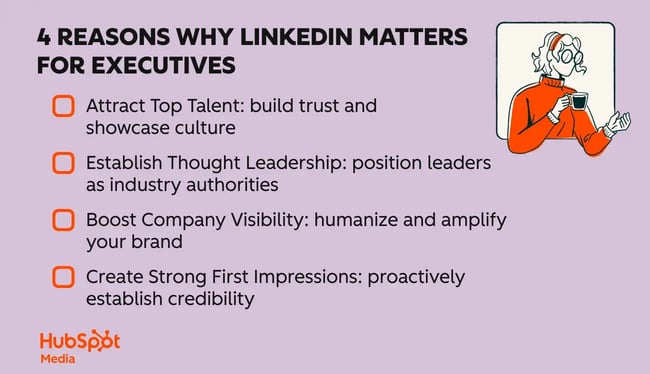
The benefits of an executive LinkedIn presence extend far beyond personal branding. Here are the four areas where I’ve seen the biggest impact.

1. Attract top talent.

Today’s candidates make it a priority to research company leaders before applying for a job. A strong LinkedIn presence builds trust, signals authenticity, and can directly influence a candidate’s decision to join your organization.

It also gives candidates a clearer picture of your company’s culture, values, and what it’s like to work with your leadership team.

2. Establish thought leadership.

Maintaining a consistent presence on LinkedIn positions executives as industry leaders, opening doors to speaking opportunities, interviews, and strategic partnerships. (In fact, many of my own media opportunities have come directly from my LinkedIn.)

Plus, regularly sharing insights or personal reflections can help spark ongoing conversations that reinforce an executive’s leadership and credibility over time.

3. Boost company visibility.

Executive posts regularly outperform company posts in reach and engagement. Why? Because people ultimately connect with people. When executives actively engage in online discussions, they amplify the company’s overall visibility by showing the human behind the brand. Their presence can make the company feel more authentic, relatable, and trustworthy.

4. Create strong first impressions.

An executive’s LinkedIn profile often creates the critical first impression for investors, partners, and potential collaborators. A comprehensive and engaging profile not only sets clear expectations and establishes credibility but also allows the executive to proactively shape perceptions. It also reinforces your value — well before any meetings or sales conversations take place.

4 reasons why linkedin matters for executives

People connect with people, not logos.

Investors, partners, and top talent want genuine human insights—not polished picture-perfect corporate profiles. An executive’s LinkedIn profile should make visitors feel they’ve genuinely “met” the leader behind the title.

I’ve seen executives with strong in-person presence get negatively impacted by a weak online presence because their profile didn’t reflect who they really are. If someone meets an impressive CEO in person but their LinkedIn is missing a profile picture and has bare bones information, it’s going to impact how you perceive them (this is a real story I heard from someone, by the way!). Executives can avoid this disconnect by ensuring their executive’s profile consistently includes:

  • Original insights on industry trends that demonstrate thought leadership.
  • Authentic personal reflections and stories that humanize and engage.
  • Meaningful milestones and company achievements that build credibility.
  • An approachable, authoritative tone that allows you to connect with your audience.

Let’s take a look at these steps in action.

Case Study: How I Helped a Fortune 500 CEO Build Their LinkedIn Presence

Here’s how I helped one CEO at a Fortune 500 consumer goods retail company grow a bare bones LinkedIn presence into a recognized LinkedIn Top Voice.

The Situation

This CEO’s team reached out to me knowing how important LinkedIn was for establishing credibility. With major announcements on the horizon, they expected a surge in profile traffic, and needed the page to reflect the leader behind the role.

The Challenge

The CEO’s LinkedIn presence was minimal. His communications team was also uncertain about content strategy, unaware of LinkedIn best practices, and unsure how to authentically represent the CEO’s persona online.

They needed fast, strategic guidance to boost credibility and visibility — especially as industry peers and potential partners would be paying attention.

The Strategy

My approach was systematic and data-driven, prioritizing three steps.

1. Competitor Analysis

We jointly created a list of peer executives and competitors. Then, I analyzed the competition’s content from the past six months. We looked at everything:

  • Do they leave comments?
  • How many are LinkedIn Top Voices?
  • What topics are they posting — personal, professional, or promotional?
  • What formats do they use — text, images, or video?

This analysis uncovered unexpected opportunities to differentiate the CEO’s presence (and also get a better understanding of what peers were doing), making their LinkedIn strategy even more impactful.

Pro tip: Don’t limit competitor analysis to your industry. Broaden your scope to include executives across sectors who excel on LinkedIn

2. Profile Optimization

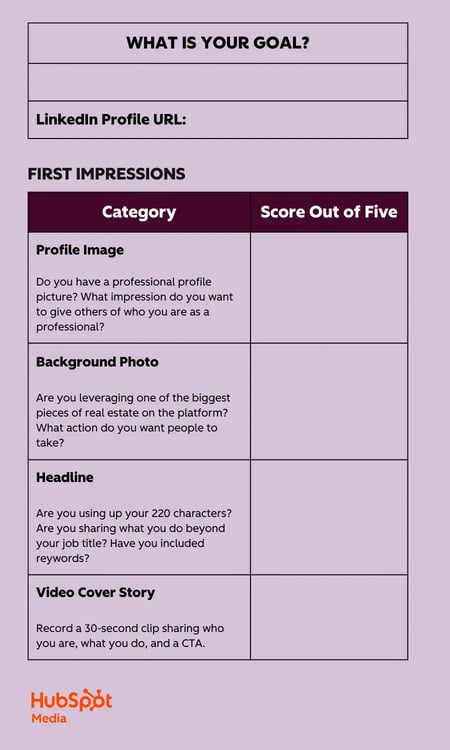
I evaluated the executive’s profile using my custom rubric, scoring every single part of their profile and providing specific suggestions for improvement based on what I learned about this person and the competitive landscape.

rubric for to boosting your executive’s linkedin presence

3. Content Strategy Development

We defined content themes and built a posting rhythm that balanced personal and professional content—while also staying realistic about a posting cadence (remember: you don’t want to start off with a schedule that will cause burnout or that is impossible to maintain, especially while ramping up).

The team needed to get approvals, which took time, and wasn’t super familiar with the platform. So, we started with simpler company news content first, then gradually incorporated more personal stories tied to professional insights.

The Results

The impact extended far beyond what we initially expected. Within a few months, the executive became a LinkedIn Top Voice, which created a ripple effect throughout the organization. Other C-suite teammates became more active on LinkedIn after seeing the power of his presence firsthand, and it also boosted company culture as employees were excited to get to know their CEO better.

Additionally, the communications team also gained a clearer understanding of the competitive LinkedIn landscape and how to use the platform effectively.

Most importantly, we saw meaningful increases in the metrics that actually matter: follower count, profile views, connection requests, and direct messages. These are all clear indicators that people were not only seeing the content but taking actionable steps to stay connected.

Pro tip: While nothing is guaranteed on LinkedIn, a good rule of thumb is consistent activity on LinkedIn (at least 1x/week) should give you enough data to assess what is working. When you double down on that, you will slowly start to see momentum (remember: LinkedIn is a long game!).

How Marketers Can Support Executive LinkedIn Success

If you‘re a marketer looking to boost your executive’s LinkedIn presence, here’s your tactical playbook to get started.

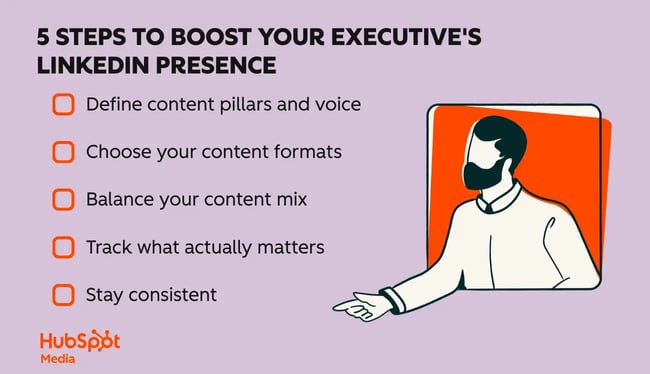
5 steps to boosting your executive’s linkedin presence

1. Define content pillars and voice.

Start by identifying two to three core themes that align with your executive‘s expertise and your company’s goals. These might include leadership, innovation, people development, or industry trends.

Then decide on the tone: Are they visionary? Warm? Analytical? Direct?

To uncover the right themes and tone, ask reflective questions like:

  • What are you passionate about?
  • How did you end up in this industry?
  • What made you want to pursue a C-suite role?
  • What was a big challenge or turning point in your career?

These questions help you understand who they are — not just as a leader, but as a person — and give you stories to draw from later.

Pro tip: Executives at large public companies often have less room for experimentation on LinkedIn. Make sure to coordinate closely with both the communications and executive teams to ensure alignment from the start.

2. Choose your content formats.

Text posts are often the easiest starting point. Add a photo when possible for better engagement (posts with images get 2x the number of comments).

While video is having a big moment on LinkedIn, it‘s a heavier lift for executives and their teams. I don’t see many executives doing carousels.

3. Balance your content mix.

I recommend four types of LinkedIn content: personal, educational, professional, and promotional. Promotional posts should make up no more than 25% of your overall content. The balance between the first three depends on your executive and team goals, but mixing them creates a compelling combination.

When you’re starting out, company news (like earnings reports) is often the easiest content to create because it is more straightforward. As you build confidence, incorporate more personal stories — always tied to professional insights — like sharing experiences from industry events or leadership lessons learned.

Pro tip: Don’t underestimate the power of commenting on LinkedIn. It builds reputation and reach with minimal effort.

4. Track what actually matters.

Don‘t get caught up in vanity metrics. I actually don’t include engagement as a main KPI when working with executives, because no one has control over the algorithm or how people will engage.

Instead, focus on metrics that indicate genuine interest: follower growth, profile visits, connection requests, and direct messages. These show that people are seeing your content and are interested in taking the next step.

5. Stay consistent.

You don’t need to post every day, but consistency is crucial for staying top of mind. According to LinkedIn Top Voices program requirements, aim for at least two original posts per month.

Showing up regularly builds familiarity — and familiarity builds trust.

Start today, build tomorrow.

LinkedIn is an essential tool for executives aiming to amplify their influence and elevate their companies. Don’t wait for strategic milestones or annual reviews. Initiate conversations now about their online presence.

Clarify what they want to be known for. Identify the stories that will resonate. The sooner you start, the stronger their presence will be.

Categories B2B

Marketing career path report: What 100+ marketers told us about growth and job security

When I introduce myself at workshops, I often joke that my marketing career path looks a bit like two truths and a lie — even though it’s all “truth.” Turns out, I’m not alone. Talking with other successful marketers, a non-linear career path is one thing many of us have in common, whether by choice or necessity.

Download Now: Free State of Marketing Report [Updated for 2025]

The workplace and job market are more unpredictable than ever. Between the economy, competitive hiring processes, and the ever-present elephant in the room (AI), many marketers are wondering what shifts they need to make to stay competitive.

To find out, I surveyed 100 marketing and advertising professionals and spoke with leaders inside and outside HubSpot. Here’s what I uncovered.

Table of Contents

The State of the Job Market

It might surprise you to learn that most marketers are exploring new opportunities.

In our survey, 69% of respondents have looked for a new marketing job in the past 12 months, whether actively (32%) or passively (37%).

The top reasons? Higher salary (81%), more flexibility (54%), and better promotion opportunities (39%).

marketing career path: data on why marketers are looking for new jobs.

Desire to work at a different type of company (28%) and burnout or lack of support (24%) round out the top five.

Promotions are common — but not guaranteed.

I uncovered that 54% of marketers have pursued a promotion at their current company in the last year, and another 27% plan to.

Just under half were successful.

Those who advanced pointed to work ethic, experience, and visibility as the biggest factors. Those who didn’t cited politics, lack of opportunity, or perceived experience gaps — some also noted gender or age bias.

Confidence in career growth is mixed.

Want to hear the good news? (It’s promising whether you’re an employer or a job-seeker).

Fewer than 10% of respondents expressed low confidence in their ability to advance their marketing career path at their current company. And 43% reported that they are very confident in their ability to do so.

Marketers are navigating career pivots — here’s how.

For marketers who aren’t seeing the advancement they want, the next step isn’t always chasing another full-time role right away.

Some are taking time to find the right job.

Ron Dawson, senior manager of HubSpot for Startups, mentions that it’s tough out there. “I know people who have taken one to two years to land their next role. Staying visible — especially on LinkedIn — and staying up on what’s happening in the industry is crucial.”

Others are striking out on their own.

Freelancing and contract work can feel uncertain, but it also offers control. Matt Hall, co-founder of Common People, explained his perspective:

“I don’t see contract work as any riskier than a job. Everyone knows someone who’s been ‘let go’ through no fault of their own. We’re the CEOs of our own careers. No one has as much investment in our long-term security as we do individually.”

Some are returning to in-house roles.

This is where I personally relate the most. After years of running my own show, I understand the appeal of a steady paycheck and renewed opportunities for growth, and recently went in-house with a client.

Freelance writer and strategist Derek Hambrick put it simply, saying, “The current job market is such that I’ve decided to close my freelance business. I’m seeking full-time employment, which is something I said I would never do. Times are what they are.”

Brand strategist Lindsay Hyatt agrees: “In 2025, I’m re-entering the corporate world for the stability of a paycheck and fresh growth opportunities.”

How Marketers Are Making Themselves More Competitive

In an unpredictable job market, the marketers I spoke to know that opportunities aren’t likely to land at their feet. They’re actively sharpening their skills and making themselves stand out — whether externally on platforms like LinkedIn, or internally within their companies.

I’ve learned that it’s not just about the work you do, but how you position yourself.

survey data on what marketers are doing to further their career path

Our survey revealed where most marketers are focusing their efforts:

  • 62% are learning new skills (e.g., AI, analytics, SEO, paid media).
  • 45% are getting certifications or additional education.
  • 43% are building their personal brand or content presence.
  • 38% are taking on stretch projects or cross-functional work.
  • 31% are seeking mentorship or coaching.
  • Only 4% aren’t actively doing anything to make themselves more competitive.

Adaptability and Problem-solving

I’ve learned that adaptability can open doors even when your resume doesn’t align perfectly with a job description. That skill — being able to quickly pivot and solve problems — has been a lifeline in my own marketing career path.

Taking a growth mindset and saying “I can learn how to do that,” often makes all the difference — in how I see myself, and how I present myself to others.

Upskilling (Especially AI)

One clear trend? The marketers who are staying competitive are leaning hard into learning — especially around AI.

I’ve spent the past year experimenting with AI tools myself, figuring out how they can help me work smarter, not just faster. I’ve used them for everything from data analysis to figuring out how to implement my ideas. And I’m not alone.

Amanda Huffman, marketing manager on HubSpot’s Global Growth Team, says that experimentation is key.

“I’ve been learning how to optimize content for AI search platforms like ChatGPT and Google AI Overviews by trying things out and learning as I go. Our team even runs AI Grow Hour twice a month to share how we’re using AI.”

Building Visibility and a Personal Brand

Something near and dear to my heart is helping marketers gain comfort in promoting themselves.

I’ve found that one of the easiest ways to do this is to shift how you think about “self-promotion.” By focusing less on telling everyone how awesome you are (even though you are) and more on how you can help people solve their problems, you can really highlight your experience and show up as your true self.

But it’s not just about showing up “out there.” Marketers who want to grow within their current companies need to position themselves internally as well.

Laura M. Browning, principal newsletter writer at HubSpot, emphasizes this point:

“Many of us (especially if you were socialized as female) are inherently uncomfortable with self-promotion. But it’s a learnable skill. I think about it in terms of sharing my excitement about something, whether it’s a blog post I’ve written that I want my co-workers to see or something I’m promoting on LinkedIn. If you’re passionate about something, it’ll show — and you’ll attract an audience.”

Aligning Ambitions With Company Needs

One of the biggest lessons I’ve learned is that career growth isn’t just about what you want — it’s about how your goals align with the company’s priorities.

Browning explained that a conversation with her boss about her “strengths, interests, and ambitions — and where they fit with the company’s needs” opened up a year-long team lead program that’s building her management skills.

Nicole Morton echoed a similar mindset, saying, “I’m leaning into my strengths in strategic positioning and marketing automation while also building thought leadership. Visibility inside and outside the company is critical.”

Takeaway: Marketers who stay competitive don’t rest on their laurels. They’re naturally curious about how to do things better — and how to adapt what they know to make a bigger impact.

Tools the Most Productive Marketers Are Using

When it comes to staying competitive, the right tools can make or break your ability to deliver results without burning out. And that means balancing diving into new tools with understanding the (constantly) expanding capabilities your current tools share.

A word of caution: It’s easy to get excited about shiny new platforms, but too many tools can create confusion, redundant features, and data silos.

I’ve found that looking for integrations and overlap is key — often the tools you already use (like project management, analytics, or CRM platforms) have built-in functionality you can activate without adding yet another login. Keeping things simple saves money and helps you get the most out of your tools without costing you more time.

tools used to help marketing career paths

So what tools have helped the marketers we surveyed achieve the most visibility and results?

  • 33.7% – AI Tools (ChatGPT, Claude, Gemini, Copilot, etc.).
  • 22.1% – Social Media Platforms (LinkedIn, TikTok, Instagram, etc.).
  • 10.5% – Analytics & Data Tools (Google Analytics, SEMRush, Data Visualization Tools, Trends).
  • 8.4% – Productivity & Project Management (Trello, Teams, Basecamp, etc.).
  • 7.4% – Job Search & Career Platforms (Indeed, Glassdoor, etc.).
  • 5.3% – Creative & Design Tools (Canva, Adobe, WordPress).
  • 5.3% – Learning & Education Platforms (Coursera, LinkedIn Learning).
  • 5.3% – Email & Marketing Platforms (HubSpot, Mailchimp).

AI tools are now a minimum requirement.

With a third of marketers calling out AI as their most impactful category of tools, it’s clear these platforms are no longer “nice-to-haves.”

I use AI daily to brainstorm, analyze data, and streamline repetitive tasks. It’s become one of the easiest ways to stay efficient and free up time for higher-impact work. (And I recently wrote this post comparing the top tools out there.)

Ron Dawson has a similar perspective: “Learning AI is table stakes for staying competitive. Beyond that, you need to take risks. AI tools like Claude, ChatGPT, NotebookLM, and Gamma are part of my daily workflow. They help me research, write, and automate, so I can focus on strategy.”

Amy Rigby uses AI as a thought partner as much as a time saver, sharing how she’s “been using ChatGPT and Claude to poke holes in my work and deepen my understanding of complex topics.”

Social media platforms build visibility.

But AI alone isn’t enough to get you the visibility you need to further your marketing career path. Remember, nearly a quarter of marketers we surveyed named LinkedIn, TikTok, Instagram, or other social platforms as their most effective tools for visibility.

Rigby echoed this and shared how she’s experimented with post types and short-form video: “My most successful post was a vulnerable one about the challenges of being a writer in the age of AI — people are hungry for authentic, human perspectives.”

As for me, I’ve also seen how consistent engagement on LinkedIn has helped me showcase my work and stay top of mind with potential collaborators and hiring managers.

Project management and productivity tools keep teams organized.

How about the 8.4% of marketers who pointed to project management platforms like Trello, Asana, or Teams as their key productivity drivers? I’m a huge fan of ClickUp and Monday myself — keeping tasks out of my head and into a system is the only way I stay sane.

Dawson has found Asana to be a game-changer, “because it gets tasks out of my head and keeps me organized.”

Browning even uses AI to plan her work calendar. “Claude prioritizes assignments in minutes instead of hours and helps me see the whole month at a glance.”

Some marketers are trimming their tech stacks.

Not everyone is adding more tools; some are taking the opposite approach. Of respondents, 27% cited “other” tools, often describing pared-down, minimalist stacks that fit their unique workflows.

Lindsay Hyatt pared back her tech stack, saying, “Google Calendar, Notes, Canva, and Zoom get me most of the way there. Cutting unnecessary tools was the best thing I did for my productivity.”

Takeaway: The most productive marketers aren’t the ones juggling the longest list of tools — though versatility can be a plus. They’re the ones who know which platforms truly drive visibility, results, and efficiency, and use them consistently.

What Leaders Look for in Promotions

Since promotions are such a hot topic right now, let’s have a look at what makes candidates most promotable.

Problem-solving and adaptability are key.

“I’m interested in people who can apply problem-solving skills across different types of work,” said Karla Hesterberg, director of the HubSpot Blog. “That’s what helps people grow with the organization, not a perfectly matched set of past experiences.”

This insight mirrors what I’m hearing “in the wild.” Leaders are far more likely to promote someone who can grow with the company and learn than someone who only checks the boxes.

Visibility matters — but it’s about value.

In practice, visibility means consistently showing your work and the value you bring, including offering solutions in meetings, building relationships with advocates, or taking on cross-functional work

Proactivity and a growth mindset make the difference.

Leaders notice when you take ownership of your growth — through mentorship, certifications, or asking for feedback.

What Employers Can Do to Better Support Career Growth

If you’re a hiring manager reading this — I wanted to include this section just for you. I asked the marketers we surveyed: “What’s one thing companies (including your current employer) could do to better support your career growth?”

what employees say best supports marketing career path growth

Most responses fell into three categories:

  • Invest in training and skill-building (40%). Offer structured development opportunities: launch mentorship programs, fund certifications, outline clear advancement pathways, and provide leadership training.
  • Communicate and recognize consistently (30.8%). Set clear expectations, hold regular career-focused check-ins, and recognize great work publicly and privately to build trust and motivation.
  • Reward employees competitively (29.2%). Review compensation regularly, improve benefits, and offer flexible schedules and remote work options to retain top performers.

Takeaway: When companies invest in skill-building, communicate clearly, and reward employees fairly, they can improve morale and create a strong pipeline of future leaders.

The Big Picture

The data, my conversations, and my own career experience all point to the same truth: The marketing career path isn’t linear anymore — if it ever was in the first place. I see that as a very positive thing because it puts your next step as a marketer firmly in your own hands.

The marketers thriving right now are the ones taking ownership of their careers and staying open to possibilities. They’re learning how to evaluate opportunities not just for titles or salary bumps, but for how each step moves them toward the kind of work — and life — they want.

For companies, this shifting landscape is a chance to rethink how they support talent. The marketers we surveyed made it clear. When employers invest in development, communicate clearly, and build paths for people to grow, they don’t just retain great employees — they create stronger businesses.

So what’s next?

If you’re an individual marketer: Take an honest look at your skills, visibility, and network, and choose one area to improve in the next three months.

If you’re a hiring manager: Audit your team’s career support and start offering clear paths for growth — small steps now will help you attract and keep the people who can help you move forward.

Categories B2B

The psychological reason brands use the power of association to sell

In the 1890s, Russian physiologist Ivan Pavlov noticed how dogs began salivating not just when food was placed in front of them, but when they heard the footsteps of the person bringing the food.

He ran experiments where he’d ring a bell right before he fed his dogs. After repeating this several times, the dogs started salivating at the sound of the bell alone, no food needed.

Download Now: Free Marketing Plan Template [Get Your Copy]

Pavlov had identified classical conditioning, or learning to associate one stimulus (the bell) with a different stimulus (the food) to produce a conditioned response (salivation).

Now, I like to think I’m a little bit more evolved than those dogs. I’d hope I wouldn’t fall for the same tricks. But I do. In fact, we all do.

The Real Reason You Love That New Car Smell

Take the “new car smell” as my first example. No one is born liking this smell. Instead, we learn to like this smell through repeated associations. That new car smell becomes associated with the pleasurable experience of sitting in a shiny, clean new car.

Yet this association can be hacked to alter our perception.

Charles Spence, in his terrific book Sensehacking, describes how Rolls-Royce customers sent their cars in for service, and they returned to their owners seemingly brand new. Rolls-Royce managing director Hugh Hadland is quoted as saying, “People say they don‘t understand what we’ve done, but that their cars come back different and better.”

marketing psychology, People say they don't understand what we've done, but that their cars come back different and better.

How did Rolls-Royce deliver this incredible service?

Apparently, by spraying the car with an aromatic mixture of leather and wood designed to capture that distinctive new car smell. The scent has become so iconic that the brand released it as a fragrance that can help keep a Rolls-Royce smelling great for longer.

marketing psychology, rolls-royce fragrance

Source

It’s a perfect example of classical conditioning at work — this time on humans. It’s the same formula. We learn to associate one stimulus (new car smell) with another (a new car), producing a conditioned response (believing you’re sitting in a new car).

It’s not the only associative hack pulled off by car manufacturers.

One 2011 study found that students overestimated a car’s speed when the noise of the car was artificially increased. Likewise, one 2008 study found that lowering the in-car noise by five decibels led people to underestimate its speed by 10%.

This is because over time, we’ve built an association between sound and speed. F1 cars make deafening noises, as do jet planes. We have learned to expect that fast cars do the same. So it’s no surprise that some Volkswagen Golf models use sound actuators to help boost the roar of the engine.

From Beer Logos to Air Conditioning — Association Drives Sales

There’s another association spotted by Charles Spence in Sensehacking that’s far too common to be a fluke: beer brands and stars.

Dozens of beer brands seem to include a star shape in their logos: think Estrella, Heineken, Newcastle Brown Ale, and Sapporo. Bintang’s star is visible across most of Indonesia, and in Nigeria, one of the top-selling beers is literally called Star Lager.

marketing psychology, beer brands that feature stars

Why this link between stars and beer?

Well, Spence says it’s due to how we associate carbonation and bitterness with angularity. A star’s angular shape nudges us to think of a refreshing, cold, carbonated beverage.

These attempts to hack our associations aren’t just used by fast cars and beer brands — even luxury stores selling premium goods do the same.

Take Lisa Heschong’s research for her 1979 book Thermal Delight in Architecture. She found that luxury brand stores are, on average, significantly colder than non-luxury stores. In other words, Harrods is colder than Selfridges, and Rolex is colder than Target.

Heschong claims that this deliberate cooling originated from a time when air conditioning was a luxury that could only be afforded by the wealthiest establishments. And it seems as though stores are still leveraging this association today.

Making Connections That Sell

While I may hope to be immune to the tricks Pavlov played on his dogs, it’s clear from the research that I’m just as malleable. I’ll salivate at a fast food brand’s jingle, flinch when I hear a loud engine, and crave a refreshing star-adorned beer. Savvy marketers use that power to sell better. 

Categories B2B

From manual to AI-powered orchestration: Winning Fortune 500 IT deals with ABM

Account based marketing isn’t just another channel or tactic. It’s a strategic approach that flips the traditional funnel. Instead of casting a wide net, ABM teams select high-propensity accounts. From there, marketers align revenue teams around orchestrated, personalized, and multi-channel programs tailored to buying groups within those accounts.


Download Now: Free Marketing Plan Template [Get Your Copy]

So, marketing doesn’t “throw leads over the wall.” In ABM, marketers co-own an account plan with sales or customer success, share a single view of the buying group, and run coordinated touches across channels to amplify engagement.

As the founder of the NextGenABM, I’ve seen this tactic lead to game-changing growth. Over the past decade, I’ve helped B2B teams break into prospect accounts, from the Fortune 500 to fast-growing startups. I’ve seen the benefits of shifting from manual tactics to automated, AI-assisted marketing orchestration using a strategic ABM approach.

In this guide, I’ll share how I build AI-powered ABM programs to tackle Fortune 500 IT deals and why they work.

Table of Contents

How ABM Works (and Why It’s Different)

Account based marketing (ABM) strategies identify specific target accounts first. Then, teams develop comprehensive marketing and sales strategies designed exclusively for those potential customers. Using software like HubSpot ABM can make the process easy to manage.

ABM success drives real revenue for businesses. In a Forrester and RollWorks poll, personalized advertising strategies resulted in a 60% higher win rate for companies. Beyond that, 58% of B2B marketers closed larger deals after using ABM advertising.

When the process works, three things happen:

  • Tighter sales/marketing alignment throughout the process.
  • Sharper messaging (because campaigns are built on dynamic account intelligence).
  • Cleaner hand-offs (because everyone is looking at the same data and milestones).

Pro tip: ABM focuses sales and marketing resources on high-value accounts. For example, HubSpot ABM tools help marketing and sales teams target Fortune 500 IT decision makers with personalized campaigns that address their unique technical and business challenges.

The Fortune 500 IT Landscape

As companies build an AMB strategy, marketing and sales teams need to create campaigns tailored for each potential buyer. The first step is knowing how most enterprise organizations are structured. From there, teams can identify which accounts to target.

Enterprise IT buying is a consensus-driven decision. I’ve seen committees include at least six to ten stakeholders across functions (IT, finance, operations, security, procurement, etc.). Some stakeholders evaluate technical fit, others scrutinize risk, budget, and ROI.

With so many stakeholders involved in purchasing decisions, ABM must speak to each buyer persona with consistent narratives and experiences. IT decision-making at mid-market businesses operates in a completely different universe from enterprise companies.

So, if you want to sell to Fortune 500 IT decision makers, you have to understand both what their organizations need and how they buy. Here’s the landscape your ABM strategy has to confront head-on.

Structure of Enterprise IT Committees

Fortune 500 IT teams have many decision-makers who need to sign off on new purchases. According to Gartner, teams encounter buying groups of five to 11 stakeholders across five business functions when selling a B2B product. HubSpot ABM and other tools can help navigate that complex landscape at Fortune 500 IT companies.

Often, sales reps are selling to a senior team member like an IT vice president or director. That buyer will have to convince their boss that the product is worth the investment. The target buyer could also escalate the request to the CIO or CTO, depending on the offering or price tag.

ABM teams also need to provide value for lower-level stakeholders. Enterprise architects may need to evaluate technical fit. Individual contributors have to see how the tool will make their jobs easier. Then, sellers need to make sure solutions align with any legal and procurement requirements managed outside of the IT team.

Each company’s buying process will be different. ABM marketers and salespeople need to understand both the requirements and structures of each target company before building an ABM strategy.

Buying Triggers for Fortune 500 IT Decision Makers

Once ABM teams know what buyers to target, they need to understand the signals that lead to purchases. Leadership changes, urgent market trends, and transformation initiatives can push decision-makers to purchase helpful solutions. Marketers and sales reps can track these signals with HubSpot ABM and send key messages at the right time.

automated abm campaign orchestration, buying signals

New Leadership or Organizational Shifts

Nothing shakes up the status quo like new leadership. ABM teams should monitor press releases, earnings calls, and LinkedIn updates. When a target account announces a new CIO or undergoes a major reorg, that’s a great GTM signal. Fresh leaders often come in with a mandate to drive change, which can include adopting new technologies.

Crisis Moments and Urgent Needs

Enterprise giants may be slow to move, but a crisis will light a fire under them. Urgent events — like major security breaches, system failures, or compliance deadlines — can also rapidly accelerate a buying process.

I once had a prospect go dark for months until their legacy system suffered a high-profile outage. Overnight, their “not interested” turned into “let’s talk now.”

Budget Cycles and Transformation Initiatives

Enterprise purchasing is often related to budget cycles and big strategic initiatives. I’ve seen target accounts that were unresponsive in Q3 come alive in Q1 simply because new budget was kicking in.

Similarly, if a company launches a digital transformation project or a cost-cutting initiative, teams become much more receptive to new solutions.

Why AI-Enabled ABM Orchestration Outperforms Your Traditional Marketing

Account-based marketing involves creating customized marketing and sales assets for each Fortune 500 IT decision maker. Automation, like HubSpot ABM, can help with that personalization at scale.

The Limits of Manual Orchestration

Teams can have the best strategists and savvy salespeople, but here’s the truth. The manual approach to account based marketing will only get teams so far. The biggest barriers created by manual ABM include:

  • Too much data to analyze. Marketers and sales reps can’t reliably time outreach when insight is siloed.
  • Too much content to hand-craft. Personalization of landing pages, email sequences, and content libraries at 20+ accounts becomes unsustainable.
  • Too many moving parts. Multi-threaded sequences across roles and channels are hard to maintain without automation.

Pain Points Marketers Keep Running Into

I still remember the first time I tried to land a Fortune 500 account with account-based marketing. I was the lone marketer at a small tech startup. I lived in spreadsheets, built tailored decks for each account, and constantly coordinated with sales. In that role, my team missed a few key decision-makers simply because we couldn’t keep straight who had seen what messages in which channel.

That experience shaped how I operate today: If you want to win over enterprise decision-makers, especially with a lean marketing team, you need automation and orchestration. Here are other common roadblocks that teams need to solve for.

1. Data Overload in Disconnected Systems

One of the first challenges I faced was information overload. There’s so much data available, but it lives in silos.

In the past, my sales counterparts and I would dig through CRM records, marketing automation reports, third-party intent signals, and first-party product engagements to piece together a clear picture of the targeted accounts. Without a unified view of account insights, it’s nearly impossible to confidently pinpoint a buyer’s biggest challenges or time your outreach right.

HubSpot ABM allows teams to see trends in their centralized data. ABM marketing teams can then send Fortune 500 IT decision makers the information they need at key moments. The manual process lacks that oversight.

2. Endless Personalization Demands

Another pain point was the amount of customized content we needed. To resonate with each top account (and key buying groups within those accounts), ABM teams can’t rely on generic one-sheets or a single deck.

At one point, I had a laundry list of custom landing pages, bespoke email sequences, and personalized whitepapers for every target company. Manually tailoring content was exhausting and unsustainable.

HubSpot ABM and other tools can create personalized content faster. For example, HubSpot ABM allows you to flag sales enablement content that works best for each type of Fortune 500 decision maker.

automated abm campaign orchestration, why manual abm doesnt work

3. Timing and Coordination Chaos

Coordinating timing, inbound content efforts, and outreach is a real-life challenge in ABM. Marketers could have one executive receive a follow-up too late, while another stakeholder at the same company was bombarded with marketing emails.

When competitors are moving faster with automated systems, manual teams lose business. HubSpot ABM can keep track of that timing so reps never miss a moment.

ABM in an AI-First World

Knowing which buyers to target and getting them tailored content can be a lengthy manual process. Automated account based marketing can make the process faster. HubSpot ABM is one AI-powered tool that helps with personalization at scale. Here are other benefits of AI-powered ABM.

1:1 Contextual Messaging at Scale

AI helps match role, industry, and live intent to the right narrative, then fills the last mile with contextual snippets (e.g., proof points, customer logos, risk language). The result is human-sounding messages tailored to each buyer at scale.

Automated Multichannel Campaigns Triggered by Behavior

Instead of static “drip” tracks, ABM marketers can orchestrate plays triggered by key events. For example, a CTO who consumes integration content will be served a deep-dive invite. Meanwhile, a CEO or CFO who opens a TCO model sees ROI proof in the next touch.

Timely Outreach Driven by Signals

Speed matters in enterprise deals. Savvy ABM marketers set thresholds that alert sales at the right moments. Reps may get a notification when a new exec is hired, intent surges, or a customer visits the same page multiple times. These AI-driven callouts reduce guesswork. Humans can then jump in when they add the most value, while automation handles the rest.

The AI-Enabled Orchestration Advantage: Scalability, Speed, Consistency

Automated ABM orchestration allows teams to personalize at scale and engage IT committees with the precision and consistency that enterprise buyers expect. Instead of choosing between quality and quantity, automation offers both. HubSpot ABM can help you scale that process.

automated abm campaign orchestration, benefits

You can quickly build personalized experiences.

With automation, speed becomes your competitive advantage. In the past, crafting personalized account messaging took days. Today, automated systems can use account intelligence to identify key stakeholders and launch personalized sequences.

ABM orchestration allows you to personalize at scale and engage IT committees. This responsiveness is crucial when dealing with enterprise buying cycles that can shift quickly based on budgets, leadership changes, or competitive pressure.

You can make the most of your data.

In the past, manual processes led to siloed data. Today, automated ABM systems unify all buyer information, so teams can identify real pain points instead of guessing.

For example, HubSpot ABM tracks every prospect touch point. Teams can see engagement and score accounts based on stakeholder behavior. They can then see what prospects interact with, helping better understand buyer challenges and serve up the right marketing assets to address the main points.

You can tailor messaging for each person on the account.

Automated systems can help you craft compelling messages for every member of the buying committee while maintaining cohesion. HubSpot ABM can help you identify Fortune 500 decision makers and craft content that addresses their questions.

The CTO gets technical deep-dives. The procurement lead receives ROI documentation. The business sponsor sees transformation case studies.

Each message is delivered with perfect timing and brand consistency, speaking to the same underlying challenge. With automated ABM, teams won’t have to worry about confusing accounts or sending the wrong thing to the wrong buyer.

Manual vs. AI-Powered ABM Orchestration

Factor

Manual ABM (what you end up doing)

Automated orchestration (what “good” looks like)

How HubSpot ABM can help

Account research

One-off desk research across CRM, insights go stale quickly.

Unified account profile (firmographic, technographic, intent, engagement) updated on a schedule

HubSpot ABM combines 100+ data sources with predictive intent scoring

Stakeholder mapping

Focus on titles, but hidden influencers missed

Focus on buying roles and buying groups; alerts for role gaps (e.g., “no decision maker”)

HubSpot ABM provides dynamic role mapping with influence scoring specifically designed for Fortune 500 decision makers

Sequence coordination

Ad-hoc timings, with possible overlaps and gaps, easy to go off-message across roles

AI-powered, tailored sequencing by roles and prior engagements

There is cross-stakeholder sequence coordination optimized for Fortune 500 decision makers’ complex buying cycles

Data integration

Manual updates, error-prone

Governed syncs (MAP↔CRM↔enrichment) with rules

HubSpot ABM offers native CRM integration with automatic enrichment

Campaign scalability

Limited

More scalable when plays are modular and tiered (1:1 / 1:few / 1:many)

HubSpot ABM enables enterprise-grade scaling with templates and workflows

Response time

24-72 hours to react (manual routing/creative)

Minutes to hours via alerts and automations

Team can access real-time personalization designed for the fast-paced needs of Fortune 500 decision makers

Consistency

Varies by workload; message drift across teams is common

Repeatable, policy-backed execution; guardrails (frequency caps, suppression) enforced

HubSpot ABM delivers brand-consistent messaging with AI-generated personalization

ROI measurement

Patchy attribution, hard to tie multi-threaded touches to revenue

Sourced + influenced pipeline tracked at account level; time-in-stage and velocity visible

HubSpot ABM offers attribution reporting with revenue impact tracking

Core Pillars of AI-Powered Automated ABM Orchestration

Effective automated ABM systems need a unified customer data platform and an AI-powered orchestration engine to win Fortune 500 accounts. HubSpot ABM offers these features out of the box.

Let’s dive into these key infrastructure elements.

A Unified Customer Data Platform (CDP)

Scattered data kills ABM effectiveness. The foundation of any successful ABM is a unified customer data platform that aggregates information about potential buyers. A CDP should gather:

  • Firmographic data (e.g., information about the company’s size, industry, and tech stack).
  • Technographic data, or current software and infrastructure preferences.
  • Intent signals, including both first and third-party intent data.

The magic happens when these data streams converge in real-time. Instead of manually updating spreadsheets with account intelligence, a CDP continuously enriches profiles with fresh insights. This approach identifies buying signals weeks before manual processes would catch them, giving sales reps and marketers crucial early-mover advantages in competitive deals.

Further, unified data platforms enable account intelligence and drive larger deal sizes. When teams have a complete view of an enterprise account, sales reps can position solutions that address broader transformation initiatives.

An AI-Powered Orchestration Engine

Of marketers, 25% report difficulty knowing which accounts their ABM initiatives should target. AI-driven predictive account scoring makes the process easy.

AI can analyze hundreds of signals simultaneously. The algorithm considers engagement patterns, organizational changes, budget cycles, and competitive intelligence to generate dynamic account scores. This means ABM teams always work on the highest-potential opportunities first.

From there, AI can determine the optimal channel and content combination for each stakeholder. A technical decision-maker might receive detailed whitepapers via email, while the business sponsor gets executive briefings through LinkedIn and personalized video messages.

The right AI orchestration engine not only identifies what to send but also knows when to send it. When a new CTO arrives or a pricing page lights up, the system adjusts timing and surfaces the next best action.

This intelligent scheduling extends beyond individual touches to coordinate cross-stakeholder sequences. The buying groups can then get complementary messages that build consensus rather than creating confusion.

Pro tip: Teams already using HubSpot have access to an AI-powered engine. Lead-scoring is already baked into Marketing Hub, so marketers can find the right accounts to target. Then, HubSpot ABM software can help reps personalize messages for those buyers.

The Framework for Winning Fortune 500 IT Deals

  • Step 1: Account intelligence gathering and unified view
  • Step 2: Buying committee mapping
  • Step 3: Multi-channel orchestration
  • Step 4: Personalized engagement and content
  • Step 5: Unified analytics

At this point, we’ve covered a lot of concepts. Let’s get practical. How do you actually execute an automated ABM program, step by step? In this section, I’ll walk you through a framework I’ve used to successfully target Fortune 500 IT decision makers.

Step 1: Account Intelligence Gathering and Unified View

Start by defining a crisp ICP for the target accounts: firmographics, technographics, operating model, etc. Then, leverage the following into a single account profile.

  • CRM/CDP data.
  • Enrichment and intent information.
  • Marketing automation data.
  • Product analytics.
  • Web analytics.

ABM teams can use that information to operationalize this ideal customer persona into the marketing system by tagging target accounts. From there, all revenue teams have the same source of truth when it comes to who to target, how, and when.

Then, use AI to define and categorize those accounts into Tiers. I blend fit (ICP tier), intent (topic research), and behavior (multi-persona, multi-threads engagement) into one measure to categorize those accounts into Tiers.

Step 2: Buying Committee Mapping

Next, map the decision-making and influencing buying groups:

  • Decision makers (CIO/CTO/VP IT).
  • Champions (IT directors/enterprise architects).
  • Budget holders (finance/procurement)
  • And influencers (security, data, business, compliance).

I capture their personas based on “job to be done”, not just their titles: who forwards decks, who attends calls, who asks implementation questions. I also operationalize them into the system to build the orchestration foundation.

Goal checking: Upon completion, I aim to have the following fields aligned with cross-functional teams and operationalized in the system.

  • “Target Account” property that identifies companies in the ABM program.
  • “Ideal Customer Profile Tier” segments accounts by strategic priority
  • “Buying Role” maps stakeholder influence within each account.

Step 3: Multi-Channel Orchestration

With the committee mapped, ABM teams can orchestrate coordinated engagement programs across online/offline, inbound/outbound, and marketing/sales channels. Teams can also build a combination of time-based and behavior-based rules to pace the orchestrated journey:

  • Multi-persona engagement spike → short executive sequence for the CIO with a value brief and reference offers
  • Stalled account → pivot to light nurture with a data-driven story

Step 4: Personalized Engagement and Content

Personalization needs to happen at two levels: engagement strategy and content. For engagement, teams should decide between one-to-one, one-to-few, one-to-many, and scale/automated, based on the account tiering.

I typically maintain a matrix by role, industry, and solution with reusable modules (headlines, proof points, quotes). As a result, 80% is standardized, 20% tokenized. I also leverage the mapped buying committee to send tailored outreach (e.g., a CIO sees a transformation brief and TCO model, an architect gets integration diagrams, etc.).

Step 5: Unified Analytics

Finally, create durable views that live in either BI or ABM platforms. Dashboards give marketing and sales teams a unified view of key leadership metrics, including:

  • Account and person funnel.
  • Account engagement by role.
  • Account’s time-in-stage.
  • Conversion rates.
  • Sourced/influenced opportunities and pipeline.
  • Average days to close.

automated abm campaign orchestration, framework

The Framework in Action [Case Study]

One of the clients I worked with was an enterprise platform focused on automated cloud data governance for finance companies. I built a Tier-1 account universe using AI-assisted ICP rules and unified firmographics, technographics, and intent. The end result was one revenue-aligned profile.

From there, we mapped the buying committee, in their case: CIO/CTO as decision makers, enterprise architects as champions, and line-of-business influencers, and operationalized those roles for orchestration. Then, we ran a multi-channel play:

  • Executive briefs and a TCO model for leadership.
  • Architecture deep dives for engineers/architects.
  • Business-impact narratives for LOB.

These assets were sequenced by behavioral triggers and coordinated seller steps.

AI-powered personalization drove next-best actions (e.g., surfacing a free-trial CTA after repeated visits to technical pages). Meanwhile, GTM signals monitored momentum and triggered AE alerts and multi-persona follow-ups. We were able to remove bottlenecks and make faster pipeline impacts.

How to Implement HubSpot Automated ABM

With HubSpot Automated ABM, teams can target Fortune 500 IT decision makers and boost sales. HubSpot ABM allows sales reps to prioritize and score target accounts. From there, ABM teams can send the right enablement content to each stakeholder.

Here’s how.

1. Set up HubSpot’s ABM tools.

The first step in automating ABM orchestration is activating HubSpot ABM. Have Super Admin navigate to CRM > Companies, then click “See Target Accounts” and select “Get started.”

Once activated, HubSpot ABM automatically creates three critical ABM properties that become the foundation of your automated orchestration:

  • “Target Account” property that identifies companies in your ABM program.
  • “Ideal Customer Profile Tier” segments accounts by strategic priority
  • “Buying Role” maps stakeholder influence within each account.

2. Set up automated account identification and scoring.

To identify target accounts in HubSpot ABM, head to the “Update company properties based on defined criteria” template. From there, describe which Fortune 500 companies you want to focus on and which decision makers matter most.

You can target characteristics including:

  • Annual revenue.
  • Industry.
  • Number of employees.
  • What’s already in their tech stack.

abm campaign automation for fortune 500, campaign timeline

Source

HubSpot ABM automatically assigns Ideal Customer Profile tiers (from one to three) based on how closely companies match your criteria. This automated tiering ensures consistent account prioritization. Your marketing teams can then allocate resources appropriately across different account segments.

abm campaign automation for fortune 500, orchestration flowchart

Source

3. Automate stakeholder mapping and engagement.

HubSpot ABM can automatically segment contacts based on buying roles and account associations. When tools are activated, HubSpot Automated ABM creates six automated contact labels that update dynamically. Contacts are tagged as:

  • Influencers.
  • Champions.
  • Budget Holders.
  • Decision Makers.
  • Buying Roles.
  • And all contacts associated with target accounts.

These automated lists in HubSpot ABM become the foundation for sophisticated engagement orchestration. You can create automated workflows that trigger different email sequences based on each role. You can also customize social outreach and what gets sent to each person.

For example, Decision Makers automatically receive executive-level content and strategic briefings, while Technical Influencers get detailed product documentation and architecture guides.

4. Review your results.

Perhaps the most valuable automation feature is HubSpot ABM’s reporting dashboard. Here, you get real-time visibility into account engagement, pipeline progression, and revenue attribution.

abm campaign automation for fortune 500, abm reporting dashboard

Source

The Target Accounts dashboard in HubSpot ABM gives marketing and sales teams a unified view of account status, engagement levels, and deal progression. Automated attribution reporting connects marketing activities to closed revenue, so you know exactly what’s working.

Practical Tips for ABM Marketers

Account-based marketing should be implemented as a comprehensive strategy rather than a single channel or campaign. To get ABM right, teams will need close alignment with sales leadership on target accounts and success metrics. Here are the tips that help ABM marketers drive real impact:

  • Treating ABM as an approach instead of a single campaign.
  • Fixing data before adding new tools.
  • Using AI to scale.
  • Orchestrating with a buying committee instead of one contact.

1. Treat ABM as an approach, not a channel.

I can’t emphasize this enough: ABM is a strategy, not a channel or a campaign.

Based on my experience and observation, the ABM owner often is demand gen. In larger orgs, ABM lives best as a center of excellence. From day one, align with sales leadership on the target list and success metrics. Then, review together regularly, even better if you can be embedded in sales leadership calls.

2. Fix data before you add new tools.

Make sure to prioritize your data quality more than anything else. If your CRM and marketing database are full of outdated contacts, missing industry info, or duplicate company records, fix that before you turn on the AI engine. A unified data foundation is a lifesaver here.

Bottom line: clean, rich data is the fuel that makes your ABM run smoothly.

3. Scale personalization with modules + AI.

Don’t make everything bespoke. Standardize 80% of messaging; reserve 20% for tokenized snippets (e.g., role, industry, pain points, trigger). I also leverage AI tools to draft first passes of personalized content, which a human then reviews and fine-tunes.

4. Orchestrate the committee, not the contact.

Make sure to measure your buying group coverage (do we have a decision maker?) and momentum (did the key decision maker engage?). I’ve seen “committee engagement” correlate more strongly with progression than contact-level opens/clicks.

Q&A

How do I identify the right IT stakeholders?

Start with organizational charts and LinkedIn mapping using tools, but don’t stop there. Use AI-powered ABM platforms to analyze buying committee coverage and engagement to identify hidden influencers.

The key is looking beyond job titles to actual decision-making authority. If the person with “Director” in their title is leading the specific transformation initiative you’re targeting, they might have more influence than a VP.

HubSpot ABM software automatically maps stakeholder relationships and tracks engagement patterns across Fortune 500 IT committees. This reveals actual decision-making authority beyond job title.

What content resonates with enterprise IT audiences?

Different stakeholders need different types of collateral that speak to their needs:

  • Enterprise IT leaders respond to content that demonstrates a deep understanding of their challenges and provides clear paths to resolution.
  • Technical stakeholders want architecture diagrams, integration guides, and security assessments.
  • Business stakeholders prefer ROI calculators, transformation roadmaps, and peer success stories.

The automated advantage is delivering the right content mix to each stakeholder based on their engagement patterns and role requirements. HubSpot ABM tools help deliver the right content mix to each stakeholder automatically.

What’s the ROI timeline for automated ABM?

Enterprise ABM requires patience, but the right tools can help you see value fast. HubSpot ABM automated approaches deliver faster results than manual methods when targeting Fortune 500 IT decision makers.

Year one with HubSpot ABM focuses on process establishment and initial wins with Fortune 500 accounts. Years two and three deliver exponential returns as HubSpot ABM account intelligence deepens and stakeholder relationships mature across enterprise committees.

Measuring Success and ROI

At the end of the day, ABM teams need to demonstrate that their efforts pay off. That’s why sales reps and marketers should define success metrics up front for each stage:

  • Engagement (opens, clicks, meeting set).
  • Pipeline (opportunities created/influenced, deal progression speed).
  • And revenue influence (deals won, average contract value).

Teams can use HubSpot ABM or other ABM tools to set up reports that attribute pipeline and revenue to campaigns. In many cases, a well-orchestrated ABM will lead to larger deals and a smoother, possibly faster, sales process compared to business-as-usual leads.

One thing I always do is share “ABM win stories” internally. I may tout a $2M deal closed in 8 months, 4 months faster than our usual enterprise cycle. Those anecdotes, backed by data, help everyone appreciate the ROI beyond just the numbers.

And as you continuously refine your approach, those metrics should only get stronger, proving the value of your ABM investment year after year.

Categories B2B

How to onboard non-technical marketers to automation tools with zero headaches

Using AI to level up your marketing campaigns shouldn’t require a computer science background. With the right tools, non-technical marketers can use automation tools to turn initiatives into impact.

Download Now: Free Marketing Plan Template [Get Your Copy]

In fact, non-technical marketers can learn HubSpot Marketing Automation and become productive in just two weeks. The difference between HubSpot’s onboarding and other similar tools is a structured, confidence-first approach that delivers early wins without overwhelming anyone.

This guide covers the 14-day onboarding framework teams can use to transition from automation-anxious to automation-empowered.

Table of Contents

What are marketing automation tools?

Marketing automation software enables the team to focus on customer-centric tasks that require a human touch, without being bogged down by repetitive processes that consume the workday.

HubSpot Marketing Automation software uses AI to streamline marketing activities, helping marketers increase the effectiveness and quantity of campaigns. Key capabilities include:

  • Automated lead generation through powerful email and forms features that turn website visitors into customers.
  • Forms that use CRM data to remember returning visitors and adapt based on their behavior.
  • Email triggers and sequences automatically follow up on form submissions to welcome new subscribers, nurture leads with relevant content, or re-engage inactive contacts.

onboard non-technical marketers to automation tools, hubspot automation

The best automation tools can be used by non-technical marketers. Whether you’re building simple follow-up campaigns or complex multi-step journeys, HubSpot Marketing Automation’s user-friendly interface helps teams scale their efforts while maintaining a personal touch.

Marketing Automation Onboarding Challenges

If marketing automation tools have a simple interface and robust training materials, teams can avoid onboarding challenges. HubSpot Marketing Automation’s visual workflow builder is intuitive and designed for non-technical users. Beyond that, marketers have access to HubSpot Academy courses and knowledge base articles that make onboarding easy.

But, when training materials are missing, onboarding challenges arise. Without the right foundation, marketers may not have the right language and skill set to make the most of their tech stack. Common onboarding challenges include:

  • Fear of breaking things in the system.
  • Imposter syndrome in marketing tech.
  • Resistance to change and jargon overload.

I’ve seen these challenges firsthand. The first time I sat in a meeting to discuss marketing automation, I swear I could read the thought bubbles over the heads of the non-technical marketers on my team. Those bubbles read, “I just don’t want to break anything.

I get it. As a former non-technical marketer, I understand how new technology can leave you feeling uncertain. I’ve also learned that when onboarding lags and software becomes frustrating to use, it’s not really because the team “can’t” learn a new tool. Usually, it’s because the onboard process unintentionally fuels anxiety.

When this happens, these patterns consistently show up.

onboard non-technical marketers to automation tools, challenges

1. Fear of Breaking Things in the System

Many marketers worry that a single click could send an email to the entire database or overwrite essential CRM fields. While these things rarely happen, 37% of CRM adopters feel they lack the internal knowledge needed to make the best use of their chosen platforms.

I asked Vassilena Valchanova, Digital Strategist, if she sees tech anxiety when onboarding teams to a new tool. She has, and it’s more common than you think.

She told me, “In my experience, there‘s this fear among non-marketing people that if they start working with a new tool, they might ‘break it.’ Usually, when people see a new platform they haven’t worked with, they’re uncertain about where to start and what their actions might lead to.”

While the easiest way to fix this is to be curious and experiment, these hesitations often derail entire campaigns.

Pro tip: HubSpot Marketing Automation addresses the confidence gap by designing marketing automation tools that prioritize user confidence and ease of use. The platform’s visual workflow builder eliminates the need for technical expertise, allowing marketers to create targeted workflows through an intuitive drag-and-drop interface.

What’s Worked for the Experts

The easiest way to help non-technical marketers learn new software is to give them a sandbox to play in. A sandbox is a dedicated space for testing features, sending test campaigns, and learning workflows.

Create a test environment — complete with mock customer data — for training purposes. When users feel more comfortable with their tools, they’re more likely to adopt them into their workflows appropriately.

Valchanova uses this approach, too. As she said, “The worst that can happen is spamming colleagues’ emails, not thousands of unintended recipients.”

2. Imposter Syndrome in Marketing Tech

Imposter syndrome can show up in even the most skilled marketers. For non-technical marketers, it can prevent them from fully adopting their tech stacks. In fact, 32% of CRM users say a lack of tech expertise is the biggest hurdle to feeling confident enough to embrace it. These fears are common, but if not squashed early on, they can set the entire team back.

Aaron Whittaker, VP of Demand Generation at Thrive, said he’s noticed this with his team. He told me, “When I rolled out marketing automation to the non-technical team, the main concern they had was the fear of revealing that they didn’t know how to do something. Many of them were anxious that automation meant complicated processes or being put out of work by technology they didn’t really understand.

What’s Worked for the Experts

Pushing teams toward early wins is one of the most effective ways to eliminate imposter syndrome. Create role‑based starting points, side‑by‑side build sessions, or a five‑minute “you already do this” demo. This helps empower marketing teams to flex their existing knowledge while learning new skills.

Whittaker has used this approach with his team. He says, “One of the early ‘wins’ in transforming that fear to confidence was what I now refer to as a ‘customer journey playback.”

He explains it like this: “We mapped a basic end-to-end campaign from a lead’s point of view and depicted what they would see and go through at each stage of engagement–the goal was to ensure that the team sees and understands that automation allowed us to hyper-personalize at scale.”

3. Resistance to Change and Jargon Overload

Nothing derails adoption faster than a perceived learning curve. Whether big or small, learning curves can cause friction and invite frustration.

When I spoke to Matthew Tran, Engineer and Founder of Birchbury, about this, he said that his team’s biggest concerns about tool adoption stemmed from the complexity. He said, “They feared that the learning curve would take time and that integrating the new system with our existing platforms would cause more headaches than it was worth.”

Tran added, “Hesitation is common in teams without a technical background, especially with tools that seem like they require coding or advanced technical skills.

Pro tip: HubSpot Marketing Automation’s interface and HubSpot Academy training materials are built with straightforward, accessible language. By removing technical language, teams can focus onstrategy and creative work that drives results, rather than getting bogged down by lengthy learning curves.

What’s Worked for the Experts

While change can be overwhelming, getting team buy-in requires an intentional approach to adoption. Marketing leaders can motivate their teams to start using a new tool by implementing simple systems.

To kick off onboarding, create an onboarding guide to walk users through an automated subscriber campaign. Give your team a chance to learn by establishing test email addresses to use for practice.

Tran notes, “Using a structured onboarding approach has helped reduce our time-to-first campaign from several weeks to just days. A phased rollout paired with guided tutorials allowed us to quickly test and refine our workflows. This hands-on experience accelerated the team’s adoption and made them more comfortable with the tool.”

The Benefits of Accelerated 14-Day Onboarding

Accelerated onboarding can help teams unlock the benefit of automation tools. The right onboarding structure flips the switch from fear to confidence. And when confidence takes hold, marketers don’t just try the tool. They weave it into their everyday workflows.

I’ve seen the process firsthand. Recently, I stepped into the role of CMO at Thoughttree, an early-stage startup. When I joined, the team did not have a CRM in place. We were about to start a beta testing push, and we needed a CRM to track sign-ups. I know from experience that automating certain parts of these processes with HubSpot is the most effective approach.

In fact, HubSpot Marketing Automation is designed to be helpful out of the box with no technical expertise required. Marketers can use an intuitive visual editor to design workflows that make follow-up campaigns and multi-step journeys simple.

Here’s what else happens when you pair accelerated onboarding with marketing automation.

onboard non-technical marketers to automation tools, benefits

1. Immediate Confidence

Structured onboarding reduces time-to-productivity by 70%, and when paired with hands-on learning, users quickly feel more confident using the tool’s basic features. Some onboarding elements that can help marketers better understand automated features include:

  • Selected knowledge base articles related to the tools.
  • Bite-sized modules, such as 10-20 minute videos, that increase user adoption.
  • Roadmaps of which skills to acquire or lessons to learn by key dates.

When Tran’s team began onboarding with new software, they started with a basic, automated welcome email for new subscribers. This helped the team see immediate results from their efforts, without feeling overwhelmed by the tool’s features.

Tran said, “The success gave our team the confidence to move forward with more complex workflows.”

2. Faster Campaign Deployment

Marketing automation training can help reduce complexity and accelerate results. In turn, teams can deploy campaigns more quickly, dramatically reducing time-to-impact. When training reduces complexity, everybody wins.

But that’s not the only metric that improves when teams quickly onboard with a new tool. According to Tran, success can be found in customer retention rates.

Tran said, “With fast onboarding, we saw an 82% higher retention rate in the first three months after launching automated campaigns. It was a clear indicator of the ROI of our efforts.”

3. Peer Learning and Support

Providing marketers new to technical marketing with “what to do when stuck” guides in their own language can minimize frustration and speed up adoption rates. Coupled with peer training, marketers have the support they need to integrate a new tool into their workflow fully.

When Valchanova launches a new marketing automation tool, she opts for the “see one, do one’ approach, similar to what medical students use in their training.

She told me, “First, we start with a clear description of the process, combining video walkthroughs with text and screenshot manuals for quick reference. Then, we demo the first task flow together, showing them what I‘m doing and why, encouraging questions so they can see the process in action. Finally, I have them perform it while I’m there to help.”

Valchanova added, “This doesn‘t just give them knowledge—it ensures they’re confident enough to continue because someone who knows the process has validated they can do it too.

14-Day Framework for Onboarding Non-Technical Marketers to Automation Tools

With a structured plan, leaders can onboard non-technical marketers to automation tools in less than two weeks. The key is to match each day pairs with concise lesson. The plan should include hands-on execution and a simple success metric. This framework keeps the cadence tight and the stakes low, while giving immediate feedback and a needed confidence boost.

While this framework can be adapted to any marketing automation tool, this guide will be tailored to HubSpot Marketing Automation. HubSpot’s visual workflow builder and intuitive interface make it ideal for this sprint approach, as teams can create powerful automation without technical expertise.

Days 1-3: Establish the foundation.

Goal: Platform navigation basics. Marketers learn how to navigate the HubSpot Marketing Automation interface.

Time Required: 1 hour/day

Success Metric: Complete the HubSpot Academy course on marketing automation.

onboard non-technical marketers to automation tools, hubspot academy

Onboarding Activities

  • Day 1: Orientation. See how to work with contacts, lists, emails, workflows, and settings by taking a tour of the interface. Start with the HubSpot Academy Marketing Automation Course to understand the fundamentals and benefits of automation within HubSpot.
  • Day 2: Lists and segments. Create a static list and import contacts CSV using sample data. Review HubSpot Knowledge Base for step-by-step guidance on list management.
  • Day 3: Email builder basics. Review, blocks, preview, test sends, and version history. Complete the Email Marketing Certification section on personalization and automation to understand how email integrates with HubSpot’s automation workflows.

Hands‑On Tasks

  • Create a “Practice – Internal Test” list with 10-20 dummy contacts.
  • Build a “Practice – Internal Only” email using a pre‑approved template.
  • Send a test to a 3‑person internal seed list.

By Day 3, every marketer can segment a list and execute a test send. Spending the first three days learning the basics helps remove the most common bottlenecks that delay first campaigns.

Days 4-7: Build your first campaign.

Goal: Build and launch a simple email

Time Required: 2 hours/day

Success Metric: Live test send

Onboarding Activities

  • Day 4: Define success criteria for a campaign. Understand the goal, audience, offer, CTA, and KPIs for an automated marketing campaign.
  • Day 5: Draft and build a campaign. Then, create a QA checklist. Use HubSpot Marketing Automation’s forms that adapt based on CRM data to create personalized experiences for returning visitors.
  • Day 6: Set up link tracking and UTM basics.
  • Day 7: Set up approval process. Add go/no‑go snapshots.

Hands‑On Tasks

  • Choose a low‑risk internal or “warm” audience, such as customers, for a webinar reminder.
  • Use an approved template and swap in copy and CTA.
  • Execute a live test send to a small, controlled audience.

By Day 7, the team has shipped a real campaign, creating early engagement signals you can optimize next week.

Days 8-10: Master your workflow.

Goal: Create basic automation sequence

Time Required: 2 hours/day

Success Metric: Triggered workflow test

Onboarding Activities

  • Day 8: Use the workflow builder. Leverage HubSpot Marketing Automation’s visual editor to design workflows for common scenarios, like delivering content based on visits to specific pages.
  • Day 9: Focus on branching basics. Establish if/then workflows for engagement or lifecycle stage.
  • Day 10: Quality assess your systems with test contacts, suppression lists, and “kill switch” toggle.

Hands‑On Tasks

  • Build a welcome sequence consisting of a three‑email series, including a delay, and a clear opt‑out. Use HubSpot Marketing Automation’s email triggers and sequences to automatically follow up on form submissions and nurture leads with relevant content.
  • Enroll test contacts and verify each step fires as expected.
  • Create a one‑page “Runbook” with a trigger, audience, content, and stop conditions.

By Day 10, new leads receive timely nurture automatically, shortening the lag between capture and first meaningful touch. (HubSpot’s automated lead scoring helps prioritize contacts based on their interests and behaviors during this process.)

Days 11-14: Build confidence and independence.

Goal: Troubleshoot and optimize

Time Required: 1.5 hours/day

Success Metric: Peer‑led demo session

Onboarding Activities

  • Day 11: Interpret early metrics, such as deliverability, open, click, and conversion proxies.
  • Day 12: Implement common fixes, including subject line tests, CTA clarity, and send time adjustments.
  • Day 13: Add safe edits to live assets, like lines, version control, and rollback
  • Day 14: Hold a peer demo and retrospective.

Hands‑On Tasks

  • Identify one optimization for the week‑1 campaign, like subject line A/B, CTA tweak, or segment refinement.
  • Update the welcome workflow with one branch, such as “if no click after Email 2, then send resource B.” Use HubSpot Marketing Automation’s personalized journey system to deliver the right message at the perfect moment in the buying process.
  • Lead a 5‑minute “show and tell” of the change and result.

By Day 14, marketers can reduce ops dependency, increase campaign throughput, and set the floor for repeatable automation. Teams using HubSpot Marketing Automation can build confidence and focus on strategy that drives results rather than manual processes.

Checklist for Onboarding Non-technical Marketers

Onboarding is only effective if it helps non-technical marketers learn the basic skills to execute and automate marketing workflows. By the end of the onboarding, every marketer should be able to:

  • Navigate confidently. Find contacts, lists, emails, workflows, and settings without assistance.
  • Segment audiences. Build static and simple active lists with clear inclusion/exclusion rules.
  • Ship emails. Draft, build, QA, and send a controlled live test using an approved template.
  • Create workflows. Build, test, pause, and adjust a basic 3‑step nurture sequence.
  • Troubleshoot safely. Clone, roll back, and fix common issues without risking live sends.
  • Read results. Interpret core metrics and propose one improvement per campaign.
  • Document and share. Keep a one‑page runbook per campaign/workflow for consistency.
  • Ask smart questions. Use the “What to do when stuck” guide before escalating to ops.

Comparison of Onboarding Approaches

Factor

Traditional Onboarding (4–6 weeks)

Accelerated 14-Day Onboarding

Time to first live send

It often takes several weeks before the first campaign is ready to go

Teams launch a real campaign within the first week

User adoption

Adoption is inconsistent; many users never move beyond basic features

Nearly all team members gain the confidence to use the platform daily

Ops/IT dependency

Heavy reliance on technical support or operations teams

Lightweight support needs thanks to clear guides and peer demos

Time-to-productivity

Long ramp-up before value is visible

Productivity increases quickly because early wins build momentum

Campaign throughput

Limited output in the first quarter after rollout

Steady campaign flow starts in week two

Team sentiment

Risk of fatigue, frustration, and skepticism

Confidence grows steadily as milestones are hit

Q&A: How to Onboard Non-technical Marketers to Automation in Two Weeks

What if someone falls behind in the 2 weeks?

When transitioning to automation tools, teams benefit from onboarding a new cohort of marketers at the same time. However, things happen, and someone might fall behind. When this occurs, give the marketer priority in daily office hours, provide recordings, and let them shadow a peer for a single day’s module. Keep them in the sprint because momentum matters more than perfection.

If your team is switching to HubSpot Marketing Automation, take advantage of HubSpot’s knowledge base. The guide on how to automate processes provide step-by-step instructions that make it easy for team members to catch up on specific modules they may have missed.

How do I handle resistance to change?

When launching a new automation tool, resistance is inevitable. Instead of giving in to the frustrations, lead with outcomes like “this saves you an hour per campaign.” Onboarding leaders should remove jargon and pair skeptics with early adopters for a quick win. Be sure to also celebrate visible contributions publicly and often.

HubSpot Marketing Automation’s visual workflow builder eliminates technical barriers that often cause resistance, allowing teams to create powerful automations without coding knowledge.

What’s the minimum tech knowledge required?

If your marketing team can manage a spreadsheet and follow a checklist, they can learn HubSpot Marketing Automation workflows and email in this format. The onboarding sprint requires no coding skills and follows a simple step‑by‑step process, designed to give even the most non-technical marketers a solid foundation.

HubSpot Marketing Automation’s visual editor is specifically designed to build powerful marketing workflows without technical expertise. Non-technical marketers can get value out of the tools without diving deep into code.

How should I maintain momentum post‑onboarding?

Don’t lose momentum after the initial onboarding sprint. Run a monthly “automation challenge.” Challenge your team to make one small improvement, create one new trigger, or launch one new peer demo. Add a #automation‑wins channel and rotate a weekly “builder of the week.”

Confidence is the real ROI.

Leaders can’t just give your teams a new marketing automation tool and expect them to know how to use it. Although some CRMs are intuitive, it’s best if marketing team take the time to nail the basics before moving on to more complex workflows.

In our conversation about this, Whittaker made an excellent point. He told me, “The fastest way to drive adoption is to remove fear, start small, and prove value early. Automation succeeds because of technology, yes. But it also succeeds—and creates an even bigger revenue impact—when the people using it feel capable and empowered.”

When structured onboarding builds confidence, it increases adoption. And when marketing automation training reduces complexity, it accelerates results. And yes, non‑technical marketers can learn HubSpot and be productive in two weeks. Make sure to hit these milestones:

  • Launch Day‑1 foundation with a sandbox and a glossary.
  • Iterate campaigns quickly with the first live send by day 7.
  • Build a welcome workflow by Day 10.
  • Celebrate milestones and run peer demos on day 14.

Kick off your 14‑day HubSpot Marketing Automation onboarding sprint and turn “I don’t want to break anything” into “We’ve got this.”

Categories B2B

The channel strategy that’s saving brands from AI search cannibalization

Picture this: Content visibility is up, but traffic to your website is way down. More than half of Google searches today end in no clicks, according to Search Engine Land. And consumers are looking everywhere — from Google’s AI Overviews to Reddit — for instant solutions to fit their needs.

Is this your reality? Welcome to the rebirth of how people find information.

Payoffs from traditional SEO tactics used to be huge. Now, AI has effectively given everyone access to unlimited, personalized knowledge on a diverse set of channels, and Google Search is losing users to AI search engines like ChatGPT.

The once reliable marketing playbook has officially been disrupted. You can no longer count on one distribution channel, like search, to do all of the work for you. As a brand, you need to diversify your content across channels to meet buyers where they are.

With the rise in AI adoption, one of those channels is AI search. When your audience is finding information in large language models (LLMs), it’s time to optimize your content strategy for both humans and machines.

Download Now: Free Loop Marketing Prompt Library

The Scoop on AI Engine Optimization (AEO)

AI usage has been increasing since 2023. A recent McKinsey survey found that 78% of organizations used AI in at least one business function in 2024, compared to 55% the year prior. This widespread adoption is fundamentally changing how people consume information.

78% of organizations used AI in at least one business function in 2024, according to a recent McKinsey survey

As Google and other search engines roll out more AI features, businesses are facing a unique paradox: they’re seeing fewer clicks even if their rankings and impressions improve. That’s because AI engines are increasingly becoming the first stop for product discovery.

It is worth noting, however, that the buyer’s journey hasn’t changed. Users still identify a pain point, determine a solution, find the right product for that solution, and ultimately make a purchase. But the channels guiding those steps have, and AI search is shaping the first three phases more and more.

Traditional SEO focused on surfacing the best resources through search engine results pages (SERPs). Content was designed to address simplified search queries, where users make multiple search attempts and perform manual research to compare results.

But AEO prioritizes surfacing the best answers directly through LLMs. This means developing content that satisfies specific, natural language queries, where users learn from the AI engine and ask conversational follow-up questions.

Succeeding in the AEO environment depends on two things: choosing the right topics and designing content with intent.

Choosing the Right Topics

AI engines rely on vector embeddings to understand the relationships between words, concepts, and entities. This means that brands need to build strong semantic associations between their content and the product categories they want to own.

For example, a project management software company should target keywords beyond “project management tools” and create depth across related topics such as “resource allocation,” “workflow automation,” and “team collaboration best practices.” That way, AI engines can begin to associate the brand with the entire product category.

Topic selection is about claiming a semantic territory and fully owning it, rather than chasing down individual keywords. You can do this in three ways:

  • Category saturation: Developing clusters of content that fully explore a topic category, from definitions to advanced use cases.
  • Context-rich answers: Addressing nuanced, conversational queries like “How do small businesses manage projects with limited resources?” rather than only short, keyword-driven questions.
  • Personalization at scale: Creating variations of content tailored for different industries, business sizes, or roles. This allows AI engines to pull the most relevant response for each user context.

AEO rewards breadth and depth of context. The more complete and interconnected the content is, the better the AI can understand it and recognize it as authoritative.

Designing Content with Intent

AI engines prioritize content that is both accurate and structured for machine readability and retrieval. It’s a strategic balance between factual authority, semantic completeness, and structured storytelling.

There’s value in consensus-driven, widely corroborated information. Citing credible sources, linking to structured data, and presenting verified facts increases the likelihood of being cited. But to stand out, content should also include information gain — insights or data that can’t be found elsewhere.

For example, a marketing firm that publishes a “Top Emerging Marketing Trends” article could cite widely available data but also include proprietary findings from its own research team to increase its chances of showing up in AI search results.

LLMs also index and retrieve content in “chunks.” This means each paragraph or section in your piece of content should stand alone as a complete thought.

A paragraph that explains how workflow automation tools support tasks like audience segmentation and lead scoring is far more valuable than one that simply references an earlier point. This completeness ensures the content can be understood and retrieved without relying on surrounding context.

difference between a semantically incomplete vs a semantically complete paragraph

Another important factor here is entity association. Content that clearly identifies and connects entities (like companies, tools, or processes) helps AI engines understand information in context. Writing techniques like using semantic triples make this easier.

Here’s what that looks like in practice:

Semantic triple: “HubSpot’s CRM helps sales teams track leads.”

  • Subject: The entity being described (HubSpot’s CRM)
  • Predicate: The relationship or property (helps)
  • Object: The value or related entity (track leads)

Great content alone no longer guarantees visibility. Breaking through today requires meeting prospects where they are with content that is accurate, comprehensive, and easy for both humans and AI to understand.

To really make it count, brands need a smarter approach to distribution that amplifies content across the channels where buyers are already paying attention.

From Distribution to Amplification

This tactical AI-driven shift in search and discovery is outlined in HubSpot’s Loop Marketing playbook, which helps businesses evolve as customer habits change.

There are four stages in the Loop:

  1. Express who you are: Define your taste, tone, and point of view.
  2. Tailor your approach: Use AI to make your interactions personal.
  3. Amplify your reach: Diversify your content across channels for humans and bots.
  4. Evolve in real-time: Iterate quickly and effectively.

AEO fits right into this playbook at the Amplify stage, where the focus is on diversifying your channel mix to engage customers where they are.

The components of the Amplify stage were historically seen as one simple play: distribution. But these tactics now influence LLM citation volume in the AI search era.

Here’s a quick breakdown.

Diversify your channel mix.

This has been discussed in detail as AEO takes center stage as a new channel for information and product discovery. The key to diversification is embracing channels with more upside. This includes AEO, but also channels like community forums and video that are showing big returns.

According to Statista, Reddit is seeing significant increases in daily active users across regions with approximately 50 million users in the U.S. Statista also reports that YouTube had over 2.5 billion global viewers as of February 2025.

Your channel strategy needs to reflect changing industry trends and follow your audience’s behaviors. The goal isn’t to be everywhere — you want to be on the platforms where your message makes the most impact.

Engage buyers in real time where intent is highest.

When someone reaches your website, they’ve already signaled high intent. They’re no longer casually browsing. They’re actively evaluating whether your product or service can solve their problem.

That makes the on-site experience just as important as the channels they came in on.

Delivering value in these moments requires immediacy. Buyers expect instant answers, personalized recommendations, and smooth pathways to action.

A software company might integrate an AI assistant that surfaces relevant tutorials or comparison pages the moment a visitor begins researching features. The goal isn’t to overwhelm with information but to anticipate the next question and serve it up before the buyer bounces.

Real-time engagement also means removing friction. Fast load times and intuitive navigation help to create an experience that feels effortless. After all, buyers are more likely to convert when they don’t have to work too hard to find information.

Activate trusted creators.

While the power of influence is shifting from traditional search to LLMs, it’s also moved from polished brand channels to trusted individuals.

Audiences today are more likely to believe a product review from a respected YouTuber or an honest LinkedIn post from an industry expert than from a business press release.

Partnering with creators — like YouTubers or industry experts — builds credibility by transferring trust. These voices already have established relationships with the communities your brand wants to reach, which makes them invaluable for amplification.

Scale content production with AI.

If it isn’t clear by now, the demand for fresh, relevant content across multiple platforms is sky high. AI can give you the leverage to meet that demand without breaking the bank on headcounts or budgets.

Use AI to help you increase production, but use it wisely and don’t forego human involvement. You can ask AI to:

  • Transform long-form content (blog posts, whitepapers) into bite-sized assets (social media posts/graphics, short-form video).
  • Personalize copy for different audience segments to ensure consistent messaging at scale.
  • Handle busy work and time-consuming tasks like research and copyediting.

The result is a content engine that moves faster, adapts more easily, and frees teams to focus on creativity over production.

Experiment with next-gen advertising.

Advertising is entering a phase where personalization and interactivity are no longer nice-to-haves. Static banners and generic pre-rolls are giving way to AI-generated campaigns that adapt in real time.

For example, a SaaS company might run LinkedIn video ads that automatically highlight different product features depending on the viewer’s job title. A CFO sees the ROI dashboard while the sales manager sees the pipeline tracking tools.

The common thread is relevance. By experimenting with new ad formats and technologies, brands can meet audiences with timely messages that feel personal and position themselves ahead of competitors who are still relying on old methods.

Riding the Seismic Shift in Discoverability

AI is reshaping how buyers make decisions. No surprise there.

Like a game of telephone, your business website now becomes essential in influencing the AI engines that influence humans to take action and buy from you. The journey to product discovery is spread across LLMs, communities, creators, and dynamic brand experiences.

Winning in this new era means creating content that both humans and machines can trust, and showing up in the spaces where buyers are already engaged.

The companies that adapt won’t just be found — they’ll be recommended, cited, and surfaced at the exact moments when intent is highest.

Categories B2B

These marketing KPIs will help you predict and scale revenue growth by 10x

As a marketer, you‘ve likely encountered the dreaded “prediction problem” while tracking data to predict revenue growth. The prediction problem is the frustrating gap between having data and knowing what’s coming next.

Download Now: Free Marketing Plan Template [Get Your Copy]

Traditional marketing metrics can tell you what happened last month, but they’re like my tarot cards when predicting the future—confusing, vague, and not always accurate. Fortunately, some marketing KPIs predict future growth, and the companies achieving 10x revenue growth have figured out which ones matter.

In this deep dive, I’ll share the 10 marketing KPIs that leading subscription businesses use to predict and scale revenue growth. But first, let’s explore why traditional marketing KPIs often fail to make accurate predictions.

Table of Contents

Why Traditional Marketing KPIs Fail to Predict Growth

The Lagging Indicator Trap

Most marketing dashboards are museums of past performance. Website traffic, email open rates, social media engagement, and even marketing qualified leads (MQLs) are metrics that tell you what already happened, not what’s about to happen.

Take website traffic, for example. As a journalist, I worked for a news outlet that saw a 300% increase in organic traffic within six months of executing our strategy. From the marketing team to the TV anchors, our entire newsroom rejoiced … until we realized our revenue saw no improvement.

So, what happened? Traffic is a lagging indicator of brand awareness, not a leading indicator of revenue growth. When traffic spikes, the marketing activities driving revenue are already 3-6 months in the pipeline.

The Attribution Nightmare

Even when marketers track metrics closer to revenue, like Marketing Qualified Leads or demo requests, there‘s still a massive attribution gap. Marketing activities today don’t show up in revenue for months, especially in B2B subscription businesses with longer sales cycles.

Therefore, your marketing dashboard could show substantial MQL numbers in January, but you won‘t know if those MQLs drive revenue until March or April. By then, it’s too late to course-correct, thus delaying measurements.

The attribution gap is even more complex for subscription businesses because revenue comes from new customer acquisition, expansion revenue from existing customers, and retention (avoiding churn).

Why Subscription Models Break Traditional KPIs

Subscription businesses operate fundamentally differently from traditional companies, but most marketing teams still use traditional metrics. Here‘s why that doesn’t work:

Churn masks acquisition success: You might acquire 100 new customers this month, but lose 80 existing customers. Traditional acquisition metrics show success, but your MRR is actually declining.

Expansion revenue is invisible: A customer who starts at $500/month but grows to $5,000/month represents 10x value, but most marketing KPIs treat them the same as any other customer.

Time to value varies dramatically: Some customers see value immediately, others take six months. Traditional metrics miss this crucial timing difference, which directly predicts expansion revenue and churn risk.

The bottom line? If you‘re using traditional marketing KPIs to predict subscription business growth, you’re driving while looking in the rearview mirror.

The Framework: Leading vs. Lagging Indicators for Growth Prediction

Not all KPIs are created equal. The key to predictive marketing lies in understanding the difference between leading and lagging indicators and building your dashboard around metrics that predict future revenue changes.

Leading vs. Lagging Indicators: The Essential Comparison

Leading Indicators (Predictive)

Lagging Indicators (Reactive)

Product Qualified Leads (PQLs)

Marketing Qualified Leads (MQLs)

Feature adoption velocity

Total platform signups

Time to value by segment

Revenue per customer

Customer health score trajectory

Monthly recurring revenue

Content engagement depth

Page views and sessions

Support resolution impact

Total support tickets

Pipeline velocity by deal size

Closed-won deals

Expansion revenue signals

Current customer count

Key Differences:

  • Leading Indicators help predict future performance and allow for proactive decision-making
  • Lagging Indicators measure past results and outcomes that have already occurred

The most powerful leading indicators share three characteristics:

  1. Forward-looking timing: They predict revenue changes 6-12 months in advance
  2. Behavioral insight: They measure customer actions, not just demographics
  3. Revenue correlation: They have a statistically significant relationship with actual revenue outcomes

The minimum data needed for accurate predictions includes: customer behavioral data (product usage, engagement patterns), revenue data by customer segment, and channel attribution data. Even the best predictive KPIs lose their power without these three data types.

The 10 Marketing KPIs That Predict 10x Revenue Growth

1. Customer Acquisition Cost (CAC) Payback Period

CAC Payback Period measures how long it takes to recover the cost of acquiring a customer. Companies with payback periods under 12 months typically see accelerated growth because they can reinvest returns quickly. SaaStr research shows that companies with sub-12-month paybacks grow 2x faster than those with more extended periods.

2. Net Revenue Retention (NRR)

NRR above 110-120% is the strongest predictor of sustainable growth. An NRR above 100% indicates that your existing customers are expanding their usage, creating compounding revenue effects. Bessemer Venture Partners‘ cloud index shows companies with 120%+ NRR consistently outperform in growth metrics.

3. Lead Velocity Rate (LVR)

The month-over-month growth rate of qualified leads is more predictive than absolute lead volume. A consistent 10-15% monthly LVR typically translates to strong revenue growth 2-3 quarters later, as leads work through the sales cycle.

4. Pipeline Coverage Ratio

Maintaining 3-5x pipeline coverage of your quarterly target is essential to growth and success. Companies consistently hitting this ratio rarely miss growth targets. This metric accounts for conversion rates and deal slippage that other pipeline metrics miss.

5. Time to Value (TTV)

Customers reaching their first value milestone quickly have 3x higher retention rates in my experience. Fast TTV correlates with expansion revenue and reduces churn – both critical for compound growth.

6. Product-Qualified Lead (PQL) Conversion Rate

PQL conversion rates above 15-20% in freemium or trial models indicate strong product-market fit. Freemium users have demonstrated behavioral intent, making them highly predictive of sustainable growth channels.

7. Expansion Revenue Rate

The percentage of revenue growth coming from existing customers should ideally be 20-30% of total growth. This indicates you’re building sticky products that naturally expand within accounts – a key growth multiplier.

8. Sales Development Representative (SDR) Activity-to-Opportunity Conversion

Tracking activities (calls, emails) to qualified opportunities reveals sales efficiency trends before they impact revenue. Declining conversion rates often predict growth slowdowns 1-2 quarters ahead.

9. Content Engagement Velocity

The rate at which content engagement (downloads, views, shares) converts to pipeline. High-performing content creates predictable, scalable demand generation that compounds over time.

10. Customer Health Score Trending

A weighted score combining usage, support tickets, NPS, and renewal risk. Improving aggregate health scores predicts expansion opportunities and reduced churn, both essential for growth acceleration.

Building Your Predictive Marketing Dashboard

Essential Dashboard Architecture

Creating a predictive marketing dashboard isn‘t just about choosing the right metrics — it’s about building a system that connects customer data, reveals correlations, and enables real-time optimization.

Unified data platform advantage: The most successful predictive dashboards integrate customer data from marketing automation, CRM, product analytics, and support systems. HubSpot customers using unified platforms see 40% better prediction accuracy than disconnected tools.

Real-time vs. batch processing: Leading indicators need real-time data feeds. Lagging indicators can use batch processing. Plan your data architecture accordingly to balance speed with accuracy.

Must-Have Dashboard Components

  1. Leading indicator widgets with trend analysis: Visual displays that show not just current metrics but directional trends and momentum
  2. Revenue correlation visualizations: Charts that clearly show the relationship between marketing activities and revenue outcomes
  3. Predictive modeling outputs: Forecasts based on current leading indicator performance
  4. Alert systems for threshold changes: Automated notifications when key metrics deviate from expected ranges
  5. Cohort comparison views: Side-by-side analysis of different customer segments or time periods

Implementation Roadmap

Phase 1: Data Collection and Unification (Months 1-2)

  • Audit existing data sources and identify gaps
  • Implement a unified customer data platform
  • Establish data quality standards and cleaning processes
  • Set up basic tracking for priority predictive KPIs

Phase 2: KPI Tracking and Baseline Establishment (Months 3-4)

  • Deploy comprehensive KPI tracking across all identified metrics
  • Establish baseline performance levels for each KPI
  • Begin correlation analysis between leading indicators and revenue outcomes
  • Train team on new metrics and dashboard usage

Phase 3: Predictive Modeling and Optimization (Months 5-6)

  • Implement predictive algorithms and forecasting models
  • Begin optimization based on predictive insights
  • Refine KPI definitions based on correlation strength
  • Scale successful tactics identified through predictive analysis

Conclusion: From Reactive to Predictive Marketing

The shift from reactive to predictive marketing isn’t just about better metrics — fundamentally changing how you approach growth. Instead of waiting to see what happened last month, you can predict what will happen next quarter and take action today.

The 10 marketing KPIs we‘ve covered aren’t just numbers on a dashboard. They’re your early warning system for revenue changes, growth optimization roadmap, and competitive advantage in an increasingly crowded market.

The Competitive Advantage: While your competitors track lagging indicators and react to revenue surprises, you’ll predict growth opportunities and scale proactively. This 6-12 month visibility advantage compounds over time, creating sustainable competitive differentiation.

Start Today: You don’t need to implement all 10 KPIs immediately. Choose the three most relevant to your business model and growth stage. Focus on data quality and correlation analysis. Build your predictive capability gradually and systematically.

The Future Outlook: Predictive marketing will become even more potent as AI and machine learning capabilities advance. Companies that establish predictive KPI foundations today will be best positioned to leverage these advanced capabilities tomorrow.

The question isn‘t whether predictive marketing will become standard — it’s whether you’ll be ahead of the curve or scrambling to catch up. The companies achieving 10x revenue growth have already made their choice.

Ready to get started? Begin with Product Qualified Leads, Customer Health Score Trajectory, and Pipeline Velocity by Deal Size. These three KPIs provide immediate predictive value and form the foundation for more advanced analytics.

The future of marketing is predictive. Your growth depends on when you embrace it.

Want to learn more about implementing predictive marketing KPIs? Check out our comprehensive Marketing KPI Guide and explore KPI Dashboard Best Practices for additional insights.

Ready to build your predictive marketing dashboard? Download our free Interactive Dashboard Template and start tracking the KPIs that predict 10x revenue growth.

Categories B2B

Welcome to GTM Survivor Island | Part 1: How to Light the Signal Fire in B2B Demand Gen

Welcome to GTM Survivor Island—where only the qualified survive.

This 3-part blog series is adapted from our webinar, GTM Survivor Island: 3 Lead Gen Plays to Win the Pipeline Game for Good.” Over the course of 39 days and 3 key plays, we’ll show you how to:

  • Outplay the chaos by separating real buyer signals from noise.
  • Outqualify the noise by forging an unshakable Sales–Marketing alliance.
  • Outconvert the competition by building a GTM system that scales like a loop, not a lottery.

“Wanna Know What You’re Playing For?”

Each part of this series builds on the last—walking you through the same strategies that hundreds of demand gen leaders are using to turn clicks into credibility, and credibility into pipeline that wins.

Ready to go deeper? Download the playbook: More Than MQLs: The HQL Playbook for Modern B2B Lead Gen and get 12 proven plays to turn buyer signals into real pipeline.

In this series, we’re exploring how B2B marketers can outplay the chaos, outqualify the noise, and outconvert the competition—drawing from the same strategies shared live with hundreds of demand gen leaders.

“Survivors, Ready? Go!”

We start with Day 1: Light the Signal Fire, where the difference between pipeline that burns bright and pipeline that fizzles comes down to one thing: capturing real buyer signals.

In B2B demand gen, most campaigns don’t fail because of bad content. They fail because of noise. Dashboards light up with clicks, form fills, and job titles, and for a moment everyone feels good. But Sales isn’t celebrating. SDRs are stuck with lists of “leads” that aren’t ready to talk, and pipeline momentum stalls before it even begins.

This is the problem at the heart of modern lead generation: too many marketers optimize for attention, not action.

On GTM Island, Day 1 is all about fire. In Survivor, fire is life. In demand gen, fire is signal. Without it, you’re left in the dark. With it, you fuel everything that comes next.

Why Most GTM Teams Burn Out Early

If you look closely, there’s a pattern that separates teams who crush pipeline goals from those that flame out halfway through the quarter.

The burnout tribes:

      • Push leads to Sales based on job title.
      • Celebrate form fills like they’re buying signals.
      • Route everyone to Sales, regardless of readiness.

These teams play loud and fast—but by Day 5, they’re scrambling to find flint in the rain.

The winning tribes do something different.

      • They don’t just chase roles—they chase reasons.
      • They qualify buyers by signals that matter.
      • They prioritize the ones burning brightest.
      • And they hold leads back until they’re actually ready for Sales.

That’s not just alignment—it’s control. And it’s the only way to make it to Final Tribal.

The Fire Triangle: Three Buyer Signals That Matter

So how do you build this kind of fire?

You need a framework (a firestarter, if you will) to separate signal from smoke before you waste your matches.

Just like a real fire needs heat, fuel, and oxygen, demand gen fire requires three elements: timeline, pain, and urgency.

      • Timeline: When do they anticipate making a decision? A simple timeline question on a form can completely change how fast your SDRs move. Someone who says “within three months” doesn’t need to be nurtured—they need a meeting.
      • Pain: What’s actually keeping them up at night? When a buyer tells you what they’re struggling with, you’ve already won the first conversation. Forget guessing based on persona—capture pain in their words.
      • Urgency: Why now? This is what separates mild curiosity from real intent. If they’re dealing with an issue in the moment, you want to be the first voice they hear—not the last email in a nurture stream.

Together, these three signals tell you when to move—and when to wait.

Three Pitfalls That Extinguish Your Fire

Even with this fire triangle in place, most teams still stumble. Here’s where good campaigns go to die:

      1. Asking for signals, then ignoring them. Don’t ask for a timeline or pain, only to route based on job title anyway.
      2. Mistaking clicks for intent. A download isn’t a declaration. Engagement without urgency is just curiosity.
      3. Assuming a form fill = fit. A lead isn’t ready just because they hit submit. They’re ready when they say: “I need help.”

If you treat every form fill like a buying signal, you’ll get burned.

Day 1 Checklist: What Fire-Building Looks Like

Here’s what it looks like when Day 1 is done right:

      • You’re asking when they’ll buy.
      • You’re capturing pain in their own words.
      • You’re scoring leads by signal, not just ICP.
      • You’re tracking behavior like repeat visits and content depth.
      • You’re routing only the ready to Sales—and nurturing the rest.

If you do nothing else, remember this: Only the ready go to Sales. Everyone else stays in nurture.

The Day 1 Readiness Scorecard

Think you’ve lit the fire? Pressure-test yourself with these yes/no questions:

      • Do you have a timeline field on your forms?
      • Are you capturing pain in their words?
      • Is scoring based on signals—or just firmographics?
      • Are you tracking repeat engagement patterns?
      • Is Sales only receiving high-signal leads?
      • Is your CRM wired to make these signals visible?

If the answer is “no” to any of these, Day 1 isn’t complete. And everything else in your funnel is built on shaky ground.

Fire Is Your First Immunity Challenge

On Survivor, fire equals life. Without it, you don’t make it to the merge. In demand gen, fire equals signal. Without it, you don’t make it to pipeline.

Day 1 isn’t about launching campaigns—it’s about building the fire that powers everything else.

And if you get it wrong here, you’re vulnerable to being voted off the island before you even start playing the real game.

You can view the full GTM Survivor Island: 3 Lead Gen Plays to Win the Pipeline Game for Good on-demand webinar above.

Categories B2B

AI market research tools: The top 7 your marketing strategy needs

Marketers are known for wearing many hats — writer, designer, psychologist, maybe the occasional raspberry berry — but one that often gets overlooked is researcher.

Download Now: 100 ChatGPT Prompts for Marketers [Free Guide]

Market research is critical to knowing your audience, connecting with them, and convincing them to take action. Thankfully, today, there are countless AI market research tools to help make completing it easier, faster, and more effective.

I’ve tested some of the most popular to see if they really live up to the hype. Here are the seven I’ve found that your marketing strategy can most benefit from, and how to determine if they’re right for you.

Table of Contents

TLDR: AI Market Research Tools

AI tools for market research automate consumer data collection, analysis, and insight generation to help marketing and product leaders make better-informed, strategic decisions. Top AI solutions like Breeze and Crayon offer survey automation, competitive intelligence, and consumer insights AI, among other features, to make this possible.

However, choosing the right AI tool will depend on your research goals, integration needs, and budget. Many platforms offer free trials or entry-level plans to help you evaluate. Start by identifying your key research tasks, then select an AI tool that aligns with your workflow.

For a unified, scalable approach, consider platforms like HubSpot that combine AI-driven research, automation, and customer data in one place. Get started with Breeze today to accelerate your market insights and stay ahead of the competition.

What are AI market research tools?

AI market research tools use artificial intelligence to automate and enhance how businesses gather, analyze, and act on consumer data. They combine machine learning, natural language processing, and predictive analytics to transform raw information into actionable insights marketers can use to reach their audiences.

These tools pull target market data from diverse sources — social media, surveys, competitor websites, and industry reports — then use advanced algorithms to identify patterns, predict trends, and generate comprehensive reports that would take human analysts weeks to produce.

Ok, but how does this translate into our daily market research responsibilities?

AI tools can assist with market research tasks like:

Survey automation: Design, distribute, and analyze surveys in real-time. AI can suggest questions and identify response patterns.

Sentiment analysis: Monitor brand perception across social media, forums, and review sites to understand customer emotions toward your business.

Competitive intelligence: Track competitor strategies, price changes, and even positioning automatically.

Trend prediction: Analyze historical and real-time data to forecast market movements and consumer behavior shifts.

Data visualization: Transform complex datasets into intuitive dashboards and reports highlighting key insights instantly.

Audience segmentation: Automatically group customers based on behavior, preferences, and demographics for targeted strategies.

Why use AI tools for market research?

Can I research my market without AI? Sure. Can I analyze the facts and data and draw conclusions? Of course; I’ve been doing it since elementary school. But as much as I hate to admit it, I can’t do any of this as fast as artificial intelligence can.

According to the 2025 Qualtrics Market Research Trends Report, 89% of researchers are already using AI-powered tools regularly or experimenting with them, and 83% of researchers plan to increase investment in AI in 2025. And with good reason.

While AI tools have limitations (such as bias in training data), their benefits for market research are undeniable.

Benefits of AI tools for market research:

  • Improved team efficiency
  • Predictive analysis
  • Finding patterns humans may miss
  • Scalability
  • Return on Investment (ROI)

1. Improved Team Efficiency

HubSpot research found 90% of marketers say AI and automation help them spend less time on manual tasks. In other words, AI has significantly helped marketers work faster and do more.

For market researchers, this can mean:

  • Data collection at scale: Instead of manually combing through survey responses, social media feeds, or customer reviews for hours, AI can scrape and summarize the key findings in minutes. With a lot of tools, it can even do this automatically.
  • Faster synthesis of reports: Tools like ChatGPT or Claude can turn raw survey data into executive summaries, saving analysts hours of repetitive writing.
  • Automated competitor tracking: AI can continuously monitor competitors’ websites, ad campaigns, and pricing updates and deliver regular intelligence reports. This type of automated market research makes sure your team never misses a beat.

Review mining” is a great research use case for AI tools. Retail brands can use AI to aggregate product reviews from Amazon or other sources and summarize the top themes (e.g., “customers love durability but complain about packaging”).

This not only gives the team language that speaks directly to their audience and tells them exactly what they need to improve, but it also enables them to focus on those tasks by freeing up their time.

Note: Once you have those sound bites from reviews, HubSpot Content Writer is perfect for saving time, overcoming writer’s block, and scaling your content without extra costs. With just a few clicks, you can generate blogs, social posts, emails, and more.

2. Predictive Analysis

In a recent study, 36% of marketers who use AI said they rely on it for data analysis and reporting, and I’m not surprised.

After gathering its data, AI can instantly predict trends, giving marketers time back to fine-tune their strategies and see results more quickly. More specifically, AI tools for market research can help with:

  • Trend forecasting: AI models can predict shifts in consumer demand, such as increased interest in sustainable products or plant-based foods.
  • Customer behavior prediction: Tools like Seventh Sense (as you mentioned) can forecast when an individual is most likely to engage with marketing messages.
  • Market demand simulation: AI can model “what if” scenarios (i.e., predicting how sales might change if a new competitor enters the market.)

In a previous role, my team invested in a tool called Seventh Sense with great predictive analysis. This tool used AI to analyze how our contacts interacted with our email marketing in HubSpot and identify trends in their behavior.

It used this information to predict how contacts would act in the future and optimize our send times to get the most opens and engagement.

screenshot showing the seventh sense tool in a hubspot portal

Source

In this case, the AI helped us research our target audience’s behavior, and its predictive analysis gave us actionable advice on what to do next.

Without it, deeper insights, like time opened, would be a mystery. Speaking of mysteries, another benefit of AI tools for market research is…

3. Finding Patterns Humans Might Miss

AI tools for market research shine at spotting hidden correlations that human analysts may overlook. This includes:

  • Cross-segment connections: It may discover that eco-conscious customers also prefer subscription services, hinting at bundling opportunities.
  • Voice-of-customer insights: AI sentiment analysis can uncover subtle emotional triggers in open-text survey responses that manual coding would miss.
  • Non-obvious correlations: AI might show that customers who engage with brand content on TikTok are also more likely to respond to referral programs.

Think about a food delivery service, for example. The company may use AI to analyze order data and find that customers who order vegetarian meals are more likely to tip generously. This insight helps shape promotions, driver assignments, and possibly even customer perks.

4. Scalability

Traditional market research is resource-intensive: the more surveys, focus groups, or interviews you run, the more people and time you need. AI breaks that limitation, especially as a company grows its output and expands its market.

With AI tools for market research, marketers can:

  • Handle massive datasets: Whether it’s 100 survey responses or 100,000, AI can process data of various scopes faster than any human could.
  • Expand into new markets: AI-powered translation and localization tools let companies analyze feedback from global audiences without hiring native speakers for every market.
  • Conduct always-on research: AI bots can continuously collect, categorize, and analyze customer feedback without stopping for weekends or holidays.

Let’s consider an eCommerce company entering new territories. The company can deploy AI to analyze customer sentiment in other countries. It can then use Google Translate to help it translate product descriptions, messaging, and its website overall without adding new analysts to the team.

screenshot showing google translate homepage

Source

5. ROI

Ultimately, like everything in business, AI in market research is about return on investment. The savings from reduced manual work, faster time-to-insight, and higher accuracy translate directly into metaphorical and tangible returns. In other words, it can mean:

  • Lower research costs: Companies can conduct sophisticated studies without hiring large teams or outsourcing to expensive agencies.
  • Faster decision-making: Quicker insights mean campaigns can be optimized in real time, boosting performance.
  • Better targeting: With AI predicting customer behaviors and uncovering hidden needs, marketing dollars stretch further.

But AI is not perfect.

What are the challenges of using AI tools for market research?

As great as AI sounds for market research, it still has challenges.

Data Quality

“AI is a tool to help you work faster, not a replacement for critical thinking and problem-solving,” says Alex Cattoni, Award-winning marketer and Founder of the Copy Posse. This is true greatly because of data quality concerns.

“AI tools like ChatGPT…can produce inaccurate or even harmful results,” continues Cattoni. “This is known as an AI hallucination. Even tech researchers worry that people rely too heavily on these systems for important advice…”

Knowing this, you can’t always know if the research results you get from AI are sound or based on reliable sources. This can be dangerous when trying to understand and cater to your audience.

I mean, the last thing you want is for AI to tell you your audience loves funny TikTok videos only to find out they actually despise them.

Bias

“Much of the data AI is trained on contains society’s biases and prejudices,” explains senior marketing manager at HubSpot, Flori Needle. “For example, an image generator asked to create an image of a CEO might produce images of white males because of the historical bias in employment in the data it learned from.”

Unfortunately, I’ve seen this firsthand, and the bias is not limited to images. While there have been improvements in this in recent years, there are no guarantees that the findings presented by AI tools for market research won’t contain similar stereotypes or biased assumptions.

7 Best AI Market Research Tools

After extensive testing and analyzing how leading brands use AI for market research, I’ve zeroed in on seven tools that deliver real results.

Each excels in different areas—from call analysis to social listening to competitive intelligence—so you can choose based on your specific research needs.

Top AI market analysis tools:

  • Sales & Customer Insights: Gong, Breeze
  • Social Media Analysis: YouScan
  • Academic & Industry Research: Consensus
  • Text & Sentiment Analysis: Lexalytics
  • Competitive Intelligence: Crayon
  • Quick Market Validation: Poll The People

Let’s explore what makes each tool valuable and how to leverage their unique strengths.

Looking for AI marketing tools that go beyond research? Check out our article The Top 33 AI Marketing Tools.

top ai market research tools chart

1. Gong: For Call Insights and Sales Research

Gong.io is an AI tool that offers revenue intelligence and conversation analytics. It analyzes sales calls, both audio and video meeting recordings, and customer interactions to offer insights into sales processes, customer behaviors, and market trends.

Noteworthy Gong features for market research:

  • Analyzes sales conversations to identify trends, effective tactics, and areas for improvement.
  • Offers recommendations for sales coaching based on real conversation data.
  • Helps understand how competitors are being discussed in sales conversations and what strategies work.

screenshot of gong ai market research tool homepage

Pricing: Gong prices each license per user. Reach out to them to settle on a customized quote.

Best for: Gong is great for researchers and marketers who frequently hold customer calls or audience interviews.

What I like: Gong provides both contextual and referential insights. Contextual insights analyze real-time conversation details like tone and sentiment, while referential insights compare these interactions to past data, identifying patterns and best practices to improve sales outcomes.

For a market researcher, these features offer valuable insight into customer sentiment that can help with messaging, campaign development, product positioning, and product development.

Testing It Out

I used Gong to analyze one of our company’s sales calls, and the insights were incredibly good.

For instance, Gong’s talk-to-listen ratio showed that the sales rep spent too much time talking and not enough listening. The tool flagged as a potential issue based on successful past conversations, which is a great reminder for future calls.

screenshot of “talk ratio” feature of gong ai market research tool

Parts of the call were color-coded, indicating different topics, emotions, or levels of engagement. It was super easy to track key moments and see when important issues were discussed or when the customer’s interest dropped.

screenshot of call recording in gong ai market research tool

I haven’t run into many issues with Gong, but the speech-to-text feature can be a bit hit-or-miss sometimes — like most similar tools these days. It usually gets the job done, but some parts require refinement. Even so, it’s still one of the top tools out there for this purpose.

Exploring chatbots in your sales strategy? Try HubSpot’s Free AI Chatbot Builder to book meetings and even offer 24/7 customer support.

2. YouScan: For Social Media Analysis

YouScan uses AI to monitor social media and images, helping you track brand mentions, understand customer feelings, and spot trends.

It also provides real-time insights into how people view your brand. For instance, YouScan shows whether people are generally positive, negative, or neutral about your brand based on their comments or post reactions.

screenshot of youscan market research tool homepage

Noteworthy features for market research:

  • Tracks mentions of your brand, products, or relevant topics across social media.
  • Analyzes sentiment and trends to gauge public opinion.
  • Identifies and analyzes visual content related to your brand or industry.
  • Helps track logo usage, brand mentions in images, and user-generated content.
  • Uses AI to assess the emotional tone of posts and conversations.
  • Detects emerging trends and patterns in consumer behavior.
  • Monitors competitors’ social media presence and performance.
  • Generates detailed reports and visualizations.

Pricing: Starter 3 ($299 per month): 3 topics, unlimited users, and 30,000 monthly mentions. Unlimited Plans: Configured to your requirements.

screenshot of youscan market research tool pricing page

Best for: Companies heavily active on social media that want to track their brand’s presence and impact across platforms.

What I like: It doesn’t rely solely on hashtags and captions; it identifies subjects and text in images as well. Here’s how it works:

1. The AI identifies and tags visual elements in images, such as logos, objects, and scenes.

screenshot of youscan market research tool logo identification tool

2. It extracts relevant information from these images, like how your brand’s logo is used or what products are featured.

3. The tool then analyzes this data to provide insights, such as how your brand is perceived or which products are the most popular.

screenshot of visual insights in youscan market research tool

From here, you can use filters to narrow down the results and view detailed reports.

Testing It Out

I think every marketer, especially social media managers, will fall in love with this tool.

The analytics are in-depth and give a clear picture of mention volumes, engagement, and sentiment trends.

For example, if your posts receive a lot of happy or positive comments, YouScan will generally reflect a positive sentiment. On the flip side, if the posts show negative reactions or dissatisfaction, the sentiment will be negative as well.

screenshot of analytics in youscan market research tool

My favorite part is the Insights Copilot, powered by ChatGPT. It makes data analysis easy by generating quick summaries and actionable insights based on what you’re looking for. For example, you can ask what customers like about your product, and it will give you a quick summary based on social media mentions.

screenshot of insights copilot in youscan market research tool

Source

I also enjoyed the ability to make custom dashboards in 1,000 different ways.

3. Consensus: For Quick and Reliable Scientific Insights

Consensus is an AI market analysis tool that digs into scientific studies to give you clear, actionable insights. Instead of just giving you a list of academic papers like traditional search engines, Consensus scans these papers and summarizes the key findings.

In other words, it pinpoints relevant answers. It doesn’t just point you to a resource. Consensus is set up like a chatbot so it uses advanced NLP and machine learning to understand the content and present the most relevant information in a simple, easy-to-read format.

screenshot of consensus ai market research tool

Noteworthy features for market research:

  • Provides direct answers to specific questions by analyzing scientific papers.
  • Highlights the scientific consensus and evidence supporting the findings.
  • Summarizes key points from multiple papers, saving users time in reviewing literature.
  • Offers links to original papers, allowing users to verify information and explore further.

Pricing: Free plan available. Starting at $10 for an individual pro plan.

Best for: Marketers seeking reliable scientific information. It can help marketers reveal what factors influence purchasing decisions, how different demographics respond to various marketing strategies, and what trends are emerging in the market.

(Personally, I’m going to be using this for data and facts to supplement blog articles.)

What I like: The Collaboration Hub feature is great for working in real-time with your team members.

Testing It Out

While playing around with Consensus, I typed in something about mindfulness and sleep, and within seconds, I had a concise summary of the relevant research.

screenshot of consensus ai market research tool

It pulled together key points from multiple papers into one clear overview.

Then there’s the Copilot feature, which adds even deeper insights using GPT-style summaries, complete with clickable citations for easy access to the sources.

screenshot of consensus ai market research tool

The Consensus Meter is a great feature, too. I asked a yes/no question, and it broke down the research findings with percentages — giving me a quick snapshot of where the science stands.

screenshot of consensus meter in consensus ai market research tool

The ability to save searches, export citations, and integrate with tools like Zotero makes it a must-have for serious research. Moreover, marketers can use this information to create targeted ads and content.

4. Lexalytics: For Advanced Text Analytics and Sentiment Analysis

Lexalytics is a text analysis tool that helps businesses understand large amounts of written data. It can determine if people are feeling positive or negative, identify key names and places, and determine what main topics are being discussed.

Let’s say a company is preparing to launch a new smartwatch, for example.

Lexalytics can scan social media and reviews to see how people are feeling about the current smartwatch options and market. Then, it can track real-time discussions to identify what people are talking about most in relation to them.

Is it battery life or design? The answer helps the company highlight these trends in their product launch.

screenshot of lexalytics ai market research tool homepage

By identifying keywords (e.g., industry influencers, competitors) and places (e.g., tech hubs, major cities) mentioned in the data, the company can tailor their marketing campaigns to target specific audiences or regions.

Like, if a popular tech influencer is getting a lot of attention, the company could reach out to them and offer an exclusive review or endorsement, turning that attention into brand hype.

Noteworthy features for market research:

  • Identifies and categorizes emotions in text, such as positive, negative, or neutral.
  • Detects important names, places, organizations, and products mentioned in the text.
  • Users can tailor text analysis models and solutions to fit specific industries or needs.
  • Provides immediate insights by analyzing text data as it is received.
  • Sorts and categorizes text into predefined categories for easier analysis.
  • Handles text in multiple languages, making it suitable for global applications.
  • Offers detailed visualizations and reports.

Pricing: Request a demo to get more info about pricing.

Best for: Marketing teams, product managers, customer support, data analysts, and researchers who need to analyze and understand sentiment trends in feedback and data.

What I like: The tool effectively handles nuances like negations and intensifiers, which makes results more accurate.

Testing It Out

I decided to focus on sentiment analysis to see how the tool handles this aspect.

First, I created a chart widget in the dashboard and selected the sentiment polarity option.

screenshot of lexalytics ai market research tool

For my test, I focused on the top 10 topics, which gave me a good range of data to analyze. I started by viewing the total number of documents to understand how sentiment was distributed — positive, negative, and neutral — across these topics.

screenshot of “text dash” tool in lexalytics ai market research tool

Next, I adjusted the widget to show the percentages of documents rather than raw counts.

This change provided a clearer picture of what fraction of the documents were positive, negative, or neutral for each topic. It was interesting to compare these percentages and see how sentiment varied by topic.

screenshot of “text dash” tool in lexalytics ai market research tool

5. Crayon AI: For Tracking and Analyzing Competitor Activity

Crayon AI is a tool that provides competitive intelligence and market research insights through AI-driven analytics.

Crayon continuously tracks competitor activities across various channels — websites, social media, and news sources. And with this inside scoop, you can see all their moves and make savvy, well-informed decisions.

screenshot of crayon.co ai market research tool homepage

Noteworthy features for market research:

  • Tracks competitors’ activities in real time to keep you informed about their latest moves and strategies.
  • Analyzes competitors’ marketing tactics and business decisions.
  • Benchmarks your performance against competitors to highlight areas for improvement.
  • Detects emerging market trends and informs you about them.
  • Provides detailed industry reports to give you a clear picture of market conditions and opportunities.
  • Processes large volumes of data efficiently.
  • Forecasts future market trends based on current and historical data.
  • Sends custom alerts to keep you updated on important events.
  • Visualizes complex data with clear charts and graphs.

Pricing: Pricing depends on your needs and team size. Reach out for a demo to get your quote.

Best for: Individuals and teams who want to track multiple competitors, manage detailed battle cards, and organize insights across various topics.

What I like: Compete Hub, which acts as a newsfeed for my latest announcements and helps me stay on top of industry developments.

Testing It Out

Crayon AI provides impressive insights with just a click.

The platform’s machine learning algorithm prioritizes critical updates, such as significant changes to competitors’ homepages over minor social media posts. This kind of discernment is a strategic game changer for marketers.

screenshot of “search insights” in crayon.co ai market research tool homepage

I particularly love the daily email summaries, which deliver a curated list of the most critical insights to my inbox, saving me from endless alert checking.

screenshot of crayon.co ai market research tool

Try HubSpot AI Summarization to easily generate business reports, summarize customer interactions, and boost productivity with AI-driven insights.

6. Poll the People: For Crowdsourced Decision-making Powered by AI

Poll The People helps you have a global conversation with your target audience. The platform offers more than just polls — it also incorporates public opinions and deeper surveys.

With Poll the People, businesses can find the collective thoughts of a large group and make informed decisions based on widespread feedback — curated and analyzed with Open AI to prevent biases and human-prone errors.

screenshot of poll the people market research tool homepage

Source

Noteworthy features for market research:

  • Creates quick and easy polls to gather feedback fast.
  • Generates real-time results to help you make swift decisions.
  • Targets specific demographics to get relevant feedback.
  • Offers both public and private poll options for various needs.
  • Provides diverse question formats, including multiple-choice and text input.
  • Customizes polls with branding and specific questions.
  • Delivers instant analysis for immediate insights.
  • Exports poll results in various formats for detailed analysis.
  • Ensures anonymous responses for honest feedback.

Pricing: Free plan available. Paid plans starting at $50/month.

screenshot of poll the people market research tool pricing page

Best for: Marketers, product developers, UX/UI designers, business owners, and researchers who need quick, targeted feedback to make informed decisions.

What I like: It’s not just a text-based tool. Upload images and get feedback on specific designs or logos.

Testing It Out

I used it to get feedback on potential titles for a book. I set up a quick poll asking for opinions on which title resonated best with readers. Within a short period, I received 100 responses that provided valuable insights into what my audience likes.

screenshot of setup in poll the people ai market research tool

The process was incredibly straightforward.

I created the poll with two-choice options and targeted the responses to make sure they came from my intended audience.

Note: I don’t recommend the free version because you pay per response; for example, one response costs $1, so 100 responses would cost $100. It’s more cost-effective to opt for a monthly plan to get a reasonable sample size.

screenshot of participants selection tool in poll the people ai market research tool

7. Breeze: For Smarter Research and Data Analysis

Breeze by HubSpot is an AI-powered assistant that simplifies market research. It combines the capabilities of ChatGPT to give you powerful insights and personalized responses.

You can quickly spot trends, track customer needs, and get valuable data using pre-made templates and real-time information. It integrates with your HubSpot CRM, letting you connect with your data.

Scouting sales leads or digging into company details like funding rounds and tech stacks? Breeze makes research easy and gets the most out of it.

Noteworthy features for market research:

  • Leverages data to track and interpret market trends.
  • Uses prompt templates and unique data sources for smarter insights.
  • Drafts blog posts, writes X posts, and creates AI-generated images.
  • Identifies key opportunities quickly with prospecting templates.
  • Integrates with HubSpot CRM to interact with your data in real time.
  • Provides deep insights into company details like funding rounds and technologies.
  • Offers intuitive answers designed to help you take action.
  • Allows you to manage contacts, tasks, and notes using natural language commands.

Pricing: Breeze is free to use with every HubSpot plan (including free) and automatically connects to your HubSpot account.

Best for: Marketers, sales teams, customer service reps, business analysts, content creators, small business owners, and project managers who use HubSpot and want actionable insights and improved efficiency in their work with it.

What I like: It’s seamless integration into the HubSpot tools and also its ability to pull data from outside the platform.

Pro tip: Talk to Breeze as if it were your best teammate. Provide it with demographic details about your audience and ask it to respond with motivations and struggles using your target’s language.

Testing It Out

First, I tested Breeze’s primary chat feature by asking it a question about current e-commerce trends:

screenshot of response in breeze ai market research tool

As you can see, it provided a thorough breakdown of seven trends (in less than 30 seconds, a summary, and included links to each source.

Then, I tried a more specific use case — asking about what influences clients when choosing between Google Drive and Dropbox for cloud storage.

screenshot of response in breeze ai market research tool

Breeze “reasoned” for 35 seconds, then delivered another detailed breakdown of eight features and sources. But Breeze offers more than just a question-answer feature.

For HubSpot users, it can help with sales prospecting by sharing handy templates, drafting blog posts and social media updates, and even generating AI images. It also lets you dig into company data like funding and tech used.

Plus, you can manage your HubSpot CRM tasks — like adding contacts and creating notes — using natural language commands, making everything more intuitive and efficient.

How to Choose the Right AI Market Research Tool

Looking at the options we mentioned, you may be thinking: “Ok, so what’s the right AI market research tool for me?” And, honestly, it may be one, some, or even none of these.

Need to understand customer sentiment? YouScan excels at social listening. Struggling with competitor tracking? Crayon automates intelligence gathering. Want to validate ideas quickly? Poll The People delivers rapid consumer feedback. Heck, if you’re a HubSpot user, Breeze can help you in many of these areas.

There are hundreds of AI market research tools out there, and selecting the right one depends on your specific research goals, budget, and existing tech stack. Follow these steps to make the best choice for your needs.

1. Start with your primary research challenge.

First, identify your market research pain point. Most AI tools for market research, including the ones we discussed, have niche uses and specialties. Narrowing down your current challenge will help you figure out what type of tool you need (e.g., Competitor Tracking vs. Social Media Listening).

2. Evaluate integration and scalability.

The best AI tool is one your team will actually use. Consider how each option fits your workflow — does it integrate with your current platforms? Can it scale as your research needs grow? With your challenge in mind, experiment with free trials/plans and demos to see which of the available options is the most suited to your needs

3. Consider your budget.

As useful as a tool might be, if it doesn’t fit your budget, it may do more harm than good. Evaluate your top choices on how much potential return they will offer you.

4. Start small, then expand.

Begin with one tool that addresses your most pressing need. Master its capabilities, measure the impact, then gradually add complementary tools. This approach ensures adoption while building your team’s AI research capabilities systematically.

Frequently Asked Questions about AI Tools for Market Research

Can ChatGPT do market research?

Yes, ChatGPT does well at most market research tasks. It can analyze customer feedback, identify patterns in survey responses, and generate insights from conversational data. It can even find qualitative trends in numerical data. (One of my favorite uses).

However, I have found it hallucinates frequently and a bit unpredictably. That said, it’s important to ask ChatGPT to cite its sources so you can actually verify its insights.

Pro tip: Breeze combines ChatGPT‘s capabilities with HubSpot’s CRM data for even more powerful research applications.

Which is the best AI tool for market research?

The “best” tool depends on your specific needs. For comprehensive social media analysis, YouScan leads the pack for many. Gong tends to dominate sales conversation insights while Crayon excels at competitive intelligence, and Breeze

Start by identifying your primary research goal, then choose the tool specializing in that area.

How do I get started with AI market research?

Begin with a free tool like Breeze or a free plan/trial of paid platforms. Focus on one specific research task—perhaps competitor monitoring or customer sentiment analysis. Once you see results and understand the workflow, expand to additional tools that complement your initial choice.

Enhance your market research with AI.

Instead of treating AI tools as replacements for traditional market research, think of them as amplifiers. They can help sharpen your insights and free up time to focus on strategy and creative execution.

Whether you choose one specialized tool or build a full stack, the sooner you integrate AI into your research process, the sooner you’ll uncover the kind of intelligence that can truly set your marketing apart.

Editor’s note: This post was originally published in August 2024 and has been updated for comprehensiveness.


Categories B2B

6 effective re-engagement emails to get your customers back

Let’s be honest: Most re-engagement emails are an afterthought. They get treated like the dusty “last chance” bin in the back of the store; sent months too late, generic in tone, and largely ineffective. Which is a shame, because when you do them right, re-engagement campaigns can be some of the hardest-working emails in your entire program.

Download our free Excel planning template to strategically organize your email  marketing.

Think about it: These subscribers have already shown interest in your brand. Maybe they bought from you before, maybe they signed up for your list full of good intentions. Either way, the relationship isn’t dead; it’s just dormant. And that means you have an opportunity to reignite it.

A smart re-engagement strategy doesn’t just try to salvage disengaged subscribers; it can recover revenue, improve deliverability, and keep your list healthy.

Table of Contents

the importance of re-engagement emails

Common Types of Re-Engagement Emails

1. “We Miss You” Warm Nudge

I see a lot of these in my inbox. That’s because it’s the classic re-engagement message for good reason. It’s low-pressure, emotionally intelligent, and gently reminds the subscriber that you noticed they’ve gone quiet.

These messages often take a human, conversational tone (“It’s been a while,” “Haven’t heard from you lately”) and rely on warmth over urgency. The goal isn’t to push a sale, it’s to re-open the line of communication. These emails work best when they sound like someone actually noticed the absence, not like automation finally caught up.

Why I think it works: This category leads with empathy instead of marketing speak. It’s the equivalent of saying “Hey, just checking in” instead of “BUY NOW.” And that human tone can go a long way when someone’s already drifting.

2. Incentive-Based Win-Back

I get that sometimes people need a reason to come back, and an offer can do the trick. Still, while I do sometimes use these with my clients, I am not a big fan.

These emails pair the re-engagement message with a tangible reward: a discount code, free shipping, or a limited-time bundle. But the best ones don’t just scream SALE. Instead, they remind the reader of why they loved the brand in the first place, then sweeten the deal.

Why I think it works: Incentives create urgency and relevance. And when paired with well-branded creative, they feel like a thank-you gift, not a bribe. But here’s why I try not to do this. You have to be careful. If you train your audience to only engage when there’s a discount, you’ll have ongoing retention problems.

3. Product Updates or “What’s New” Check-Ins

I love this approach. Sometimes the best way to re-engage isn’t to look backward, but to offer something new. If you’ve launched new features, released a fresh collection, or improved your experience since they last interacted, tell them! A re-engagement email framed around updates says, “We’ve evolved and we think you’ll want to see what’s changed.”

Why I think it works: This approach is great for product-led businesses and SaaS. It shifts the message from “You disappeared” to “We’ve got something exciting you might’ve missed.” It taps curiosity and relevance without shaming the lapse.

I also love that they offer a new reason for people to engage with your email – and your brand.

4. Exclusive or Emotional Appeal

You have to be careful with these types of re-engagement emails; they are my least favorite type. They play the urgency card, but you have to do it carefully.

These emails use exclusivity, personalization, or emotion to prompt action: “Your 20% offer expires soon” is fine and may work, but see the notes above about incentive-based win-backs.

“This is the last email you’ll get from us” is the worst – it’s like a threat. And if they have stopped opening and/or clicking on your emails, why would they care? “We’re pausing your subscription” is perhaps a little better – but will absence make your subscribers’ hearts grow fonder? I doubt it.

Done well, this type of re-engagement email feels like a thoughtful closure, or a final chance to stay connected. Done poorly, it feels manipulative.

Why I think it works: There’s power in scarcity, but only when paired with respect. These emails work when they come from a place of “We value you” rather than “We want to hit our Q3 numbers.”

5. Benefit-Focused Reintroduction

I love creating emails that remind the subscriber of the value they are missing out on by not engaging with a brand’s emails.

Sometimes subscribers don’t disengage because they’re mad, they just forgot the value you bring. A benefit-led email reminds them of how your product, content, or service improves their life. It’s a mini re-pitch: Here’s what we offer, here’s why it matters, and here’s how to get back into it.

Why I think it works: This strategy is especially strong for brands with a values-based mission or a utility-driven product. Instead of centering the subscriber’s inactivity, it refocuses on the brand’s relevance and benefits. It says “Here’s what we do, and why it’s worth your time again.”

6. Brand Update or Story-Based Reconnect

Another great approach that I use with my clients. If your brand has changed, grown, or evolved, tell your audience. This type of re-engagement email uses narrative to re-spark the relationship. It could be a new product line, a recent milestone, or a behind-the-scenes update that makes people feel part of the journey. It’s particularly effective when paired with personal storytelling and strong brand voice.

Why I think it works: Sometimes people disconnect from brands that go quiet or lose relevance. A narrative email reminds subscribers there’s a real business with real people behind the logo and that the story is still unfolding.

6 Real Life Examples of Re-Engagement Emails

1. Slack

I really like this email where Slack nails the warm nudge approach. The headline makes it clear: “Your team is waiting in Slack.” It’s personal, direct, and framed around what the recipient is missing, not what Slack is missing. That subtle shift makes it about the reader’s relationships and role, rather than the product alone.

re-engagement email from slack

Source

The copy leans into emotional appeal: “Smiles Davis, we miss you. Your teammates miss you.” It positions Slack as a place of belonging and importance. For anyone who’s drifted away, that reminder of being part of a team is a powerful motivator to re-engage.

It also includes data-driven context: “Your team has sent 589 messages this month.” This adds urgency and a little FOMO. It’s not just abstract; the recipient now knows they’ve been out of the loop.

Finally, Slack gives readers easy next steps. Instead of overwhelming them with a sales pitch, it breaks re-engagement down into three simple actions (use emoji, organize with canvas, track tasks). Each step includes a link, so the subscriber can dive right in. Paired with a bold “Return to Slack” CTA, it removes friction and makes coming back feel easy.

This is a great example of a “We Miss You” campaign that blends emotional pull with practical value. It acknowledges absence, reminds the reader why Slack matters, and provides a clear path to reactivation, all in one approachable, brand-aligned message.

2. DoorDash

I love that DoorDash goes straight to the point in this incentive-based win-back email. “Here’s 20% off.” It’s bold, benefits-first, and easy to understand at a glance. The headline works to frame the offer as both urgent and appealing; “Knock, knock” is playful, while the discount is the real hook.

re-engagement email from doordash

Source

The email also taps into nostalgia and sensory memory: “Don’t you miss the sound of a delicious meal arriving at your door?” That phrasing brings back the positive experience of using the service, pairing the incentive with an emotional reminder of convenience and satisfaction.

Design-wise, it’s clean and focused. The bright red CTA button (“Order now”) draws the eye immediately and leaves no doubt about the desired action. By limiting the copy to a short paragraph and putting the promo code front and center, DoorDash removes friction and makes redemption simple.

This is a textbook incentive-based win-back: It leverages a discount to spark action while reinforcing the brand’s value proposition (convenience, comfort, and good food delivered fast). For lapsed users who may have simply forgotten or needed a nudge, this straightforward approach can be exactly what gets them back.

3. YouTube TV

I am always up for watching the big game. Doesn’t matter who’s playing – for me it’s about the commercials. So this email would definitely have made me consider reactivating my YouTube TV account.

YouTube TV uses a major cultural moment, the Super Bowl, to pull inactive subscribers back in. The headline is clear and compelling: “Come back and watch Super Bowl LVII live on FOX.” That’s not just a product feature, it’s an event people care about, which makes the reactivation pitch immediately relevant and time-sensitive.

re-engagement email from youtube tv

Source

Beyond the event hook, the email doubles down by highlighting new or improved features that make the experience better: real-time highlights, live stats and scores, and the ability to stream on multiple devices. Each feature is framed in simple, benefit-focused language and paired with icons for easy scanning, so even a quick glance reinforces the product’s evolution.

The design is straightforward but effective: bold imagery from the game, a clear “Reactivate Now” CTA button (repeated twice for emphasis), and minimal copy. It makes it easy for the reader to understand both why they should return (don’t miss the Super Bowl) and how YouTube TV has improved since they left.

This is a strong product update campaign because it doesn’t just remind users of what they had before, it shows them what’s new, better, and more relevant right now. It taps into urgency (the Super Bowl date), curiosity (features they may not know about), and ease (one-click reactivation).

4. All About Email

This example is actually from my own inbox. Spoiler: I did click to stay subscribed.

This reactivation message leans on emotional connection and exclusivity. The subject line, “Is it time to say goodbye?” frames the email as a personal crossroads, while the body copy reinforces that tone: “I miss having you around.” It feels like a one-to-one message rather than a mass blast, which can be effective in reminding the reader that their presence matters.

re-engagement email from all about email

It also uses an exclusive framing; if the subscriber doesn’t click to stay, they’ll be removed from the list. That scarcity creates urgency, while the single “Keep Me Subscribed” button makes the desired action clear and easy. The note at the bottom (“I’ll assume you’re no longer interested and remove you from the list”) doubles as a list-cleaning mechanism, a win for sender reputation, even if the subscriber doesn’t re-engage.

Where this email could be stronger is in execution. The sender tells readers what they’ve missed (“I’ve shared some amazing stuff recently”), but doesn’t show it. A few headlines or links to recent content could have added a benefit-focused reintroduction layer, making the case more compelling. As is, it succeeds on emotional tone but leaves some persuasive power on the table.

This is still a solid example of the exclusive/emotional appeal category, especially for smaller publishers or creators who want to keep their lists clean while keeping the message personal. But pairing emotion with proof of value would likely drive even more clicks.

5. New York Magazine

I love this email — it’s a great example of a benefit-oriented reintroduction, which is the type of reactivation email that I’ve found works best. Because a re-engagement win isn’t just about getting a click today – it’s about getting your emails engaged with on an ongoing basis going forward.

New York Magazine leans into benefits and value rather than absence or urgency. The headline, “We were just getting started,” positions the lapse not as failure, but as unfinished business. It’s a subtle but smart framing: The reader hasn’t “missed out,” they still have the chance to rejoin the conversation.

re-engagement email from new york magazine

Source

The email showcases what the subscriber gains by coming back: access to exclusive newsletters, hundreds of new stories every week, daily games, and more. It’s not just “resubscribe because we want you back.” It’s “resubscribe because here’s everything you’ll get.” That benefits-first positioning is what makes this message so persuasive.

The design supports the strategy with visual proof of value: vibrant magazine covers, bold headlines, and a curated list of “Stories You Might Have Missed.” By surfacing specific content, the email reminds readers of the brand’s cultural relevance and quality. It’s essentially saying, “Look what you’re not reading, and imagine what you could be.”

Finally, the incentive (“Resubscribe and get 40% plus an extra $20 off unlimited access”) seals the deal, but it doesn’t carry the whole weight of the email. The benefits lead, the offer supports. That balance makes this a great example of a benefit-focused reintroduction campaign: it builds desire to reconnect by emphasizing what’s valuable and unique about the experience, not just dangling a discount.

6. AllTrails

I really like this email; anytime you update your membership options, it’s a great opportunity to regain lapsed subscribers. AllTrails takes the brand update approach, positioning their new membership plan as a fresh reason for lapsed users to come back. The headline “We took exploring to a whole new level” immediately signals evolution and improvement. Instead of focusing on what the user has missed, it highlights what’s new and exciting about the brand.

re-engagement email from alltrails

Source

The visuals reinforce that message with crisp app screenshots that show off new features (trail maps, plant IDs, precipitation overlays). This makes the update feel tangible, not abstract. Subscribers can see what’s changed.

The email also does a nice job of tying the update to user benefits. “From creating your own adventure to uncovering the world around you” connects the product improvements back to the subscriber’s real-world goals. That benefit-first framing turns a product announcement into a re-engagement nudge.

Finally, the CTA, “Get early access,” adds an element of exclusivity and urgency. Instead of passively informing, it actively invites the reader to experience the brand’s next chapter before everyone else.

This is a strong brand update/story-based reconnect because it makes product evolution the reason to return. For subscribers who drifted away, the implicit message is: “AllTrails is better than when you left; come see for yourself.”

Final Re-engagement Advice: Strike Early, Strike Often

At the end of the day, re-engagement campaigns are about respect. Respect for your subscriber’s attention, respect for their inbox, and respect for the relationship you once had. The best ones don’t beg or guilt; they remind, they invite, they show value, and they make it easy to come back.

And one more thing: Don’t wait too long. The longer a subscriber stays inactive, the harder it is to win them back. That’s why the most effective re-engagement campaigns aren’t one-off Hail Marys; they’re automated, strategic, and triggered fairly early in the dormancy window (think 30 to 60 days of no activity, not six months of silence).

And yes, the best-performing campaigns are a series, not a single message. One email might get ignored; a thoughtfully sequenced nudge, like a warm reminder, then a value offer, and a final call, has a much better shot at bringing them back before it’s too late.

Re-engagement isn’t just list hygiene; it’s an opportunity to remind people why they said yes to you in the first place, to recover relationships (and revenue), and to strengthen your program overall. Don’t waste it.

Editor’s note: This post was originally published in October 2019 and has been updated for comprehensiveness.