Categories B2B

How to optimize for AI overviews (AIOs): A complete 2026 playbook

Google AI Overviews appear in Google Search results for a growing share of queries, and if your content isn’t structured to earn a citation, you’re losing visibility to competitors who’ve already adapted. Unfortunately, the challenge isn’t awareness. Most SEO leaders know AI Overviews exist. The challenge is execution: translating Google’s deliberately vague guidance into repeatable content workflows, measuring whether your AI website optimizations are actually earning citations, and proving business impact when traditional metrics like rank position and CTR no longer tell the full story. This playbook closes that gap.

Download Now: The State of AEO in 2026 [Free AI Search Trends Report]

I’ll walk you through the best practices for optimizing content for Google AI Overviews — from technical foundations and answer-first formatting to structured data, long-tail question mapping, and the measurement frameworks you need to track your brand across AI search. Whether you’re trying to figure out how to show up in AI Overviews SEO-wise for the first time, or you’re refining an existing generative engine optimization strategy, everything here is built for practitioners who need to act, not just understand.

Each section gives you a specific workflow: what to do, why it works, and how to measure it. You’ll also learn how AI Overviews relate to the broader answer engine shift (i.e., where platforms like ChatGPT, Perplexity, and Gemini are reshaping how buyers discover brands) and how to ensure your AI-generated content strategy supports visibility across all of them. Let’s get into it.

Table of Contents:

What are AI Overviews (AIOs) and how do they work?
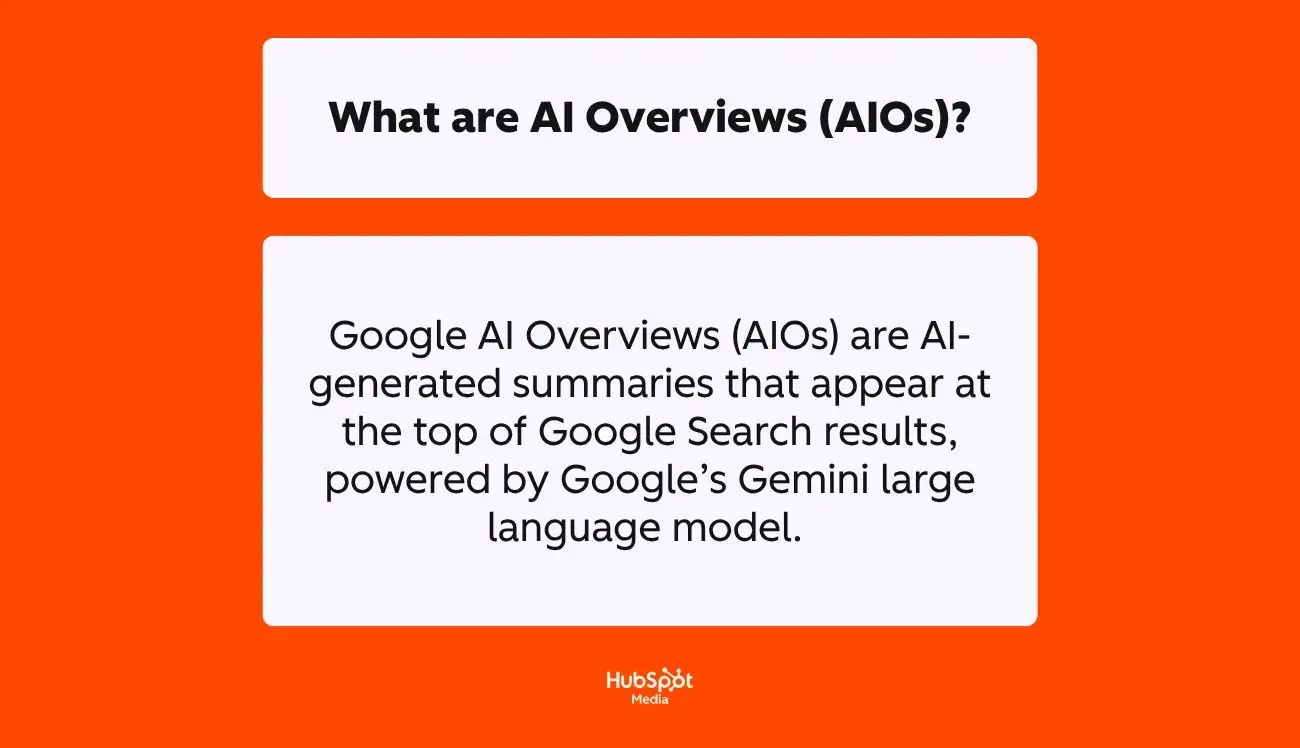
a hubspot-branded graphic that explains and defines, in plain english, what AI overviews are

Google AI Overviews are AI-generated summaries that appear at the top of Google Search results, powered by Google’s Gemini large language model. Rather than presenting a traditional list of blue links, an AI Overview synthesizes information from multiple high-ranking web pages into a single, source-linked answer block, complete with inline citations that link back to the pages it drew from.

According to 2026 data from Stan Ventures, AI Overviews now appear in 16% of all Google desktop searches. Moreover, as revealed by Amsive, Google AI Overviews pulls heavily from social and video platforms, including:

  • Reddit (21% of citations)
  • YouTube (18.8%)
  • Quora (14.3%)
  • LinkedIn (13%)

Additionally, Google’s AIOs most often trigger on longer, multi-word searches, where Google’s systems determine that a synthesized answer would be more useful than a ranked list of links, particularly when the answer spans multiple sources.

That said, to provide you with a little more context about how AI Overviews actually generate their responses, here’s what happens behind the scenes when a user enters a query that triggers an AIO:

  • Google interprets search intent using its Gemini model. Then, Google determines whether a synthesized answer would better serve the user than a list of links.
  • The system issues multiple related searches across subtopics and data sources. This is a process Google formally calls “query fan-out.”
  • Relevant content is retrieved from Google’s index. Afterward, Gemini evaluates passages (not only full pages) for clarity, factual accuracy, and topical relevance.
  • The AI generates a synthesized summary that directly addresses the query. Typically, it draws on three to five sources.
  • Source links are displayed alongside the summary. This gives users a path to explore further while attributing the information to its origins.

Next, let’s break down how to optimize your content to earn those citations.

Pro Tip: Google’s own documentation confirms there are no additional technical requirements beyond standard Search eligibility, but your pages must be indexed and eligible to display a snippet.

How Query Fan-Out Expands a Single Search Into Many

Both AI Overviews and AI Mode use a technique called “query fan-out” to deliver comprehensive answers.

According to Google’s official Search Central documentation, the system “issues multiple related searches across subtopics and data sources” while generating a response.

Here’s how it works in practice: If someone searches “best CRM for small business,” Google’s AI doesn’t just retrieve results for that exact phrase. The system decomposes the query into sub-queries — “CRM pricing for small teams,” “CRM features comparison,” “easiest CRM to set up,” “CRM integrations with email marketing” — and retrieves relevant content for each. The synthesized answer reflects all those angles, even though the user typed only one query.

This is a fundamental shift from traditional search, where a single query returned a single set of keyword-matched results. Now, a single search generates multiple retrieval events, and your content can earn a citation by answering any one of those sub-queries clearly. (Question-led content better aligns with long-tail search intent because it mirrors the sub-queries Google’s AI generates behind the scenes.)

To effectively optimize your pages for Google’s AI Overviews, they need to address the cluster of questions surrounding a topic, not just the primary keyword. For folks trying to improve visibility in Google’s AI Overviews, the appropriate action step is clear: map the sub-questions that fan out from your target query, and make sure your content provides direct, well-structured answers to each one.

Next, I’ll explain the differences between AI Overviews and AI Mode — and why the distinction matters for your optimization strategy — in depth.

AI Overviews vs. AI Mode: What’s the difference?

These two features are closely related but serve different roles in Google Search.

But understanding the distinction matters because strategies for optimizing content for Google AI Overviews don’t automatically translate to AI Mode, and vice versa.

Below, I created a chart to clarify the key differences between AIOs and AI Mode:

Now that I’ve covered the key differences, here’s the takeaway that matters most: AI Overviews reward content that leads with a direct, citable answer.

AI Mode rewards content that demonstrates comprehensive topical coverage across multiple related sub-questions. The best practices for optimizing content for Google AI Overviews (i.e., answer-first formatting, clear heading structure, and strong E-E-A-T signals) also lay the foundation for AI Mode visibility, but AI Mode additionally favors content ecosystems (i.e., topic clusters, supporting pages, and internal links that reinforce topic relationships and site structure) over standalone posts.

How to Track Whether Your Content Appears in AI Overviews

The biggest pain point for organic growth practitioners is limited visibility into AEO performance. To close that gap, teams are turning to dedicated answer engine monitoring tools (more on that later, reader).

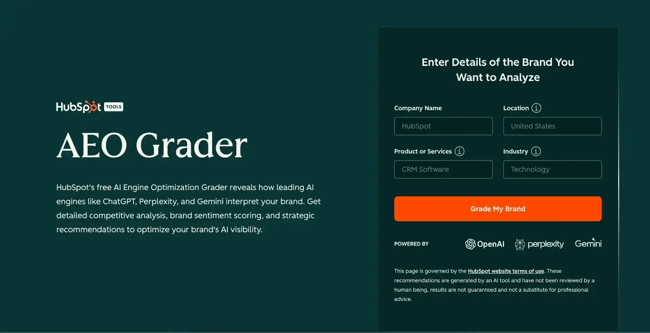
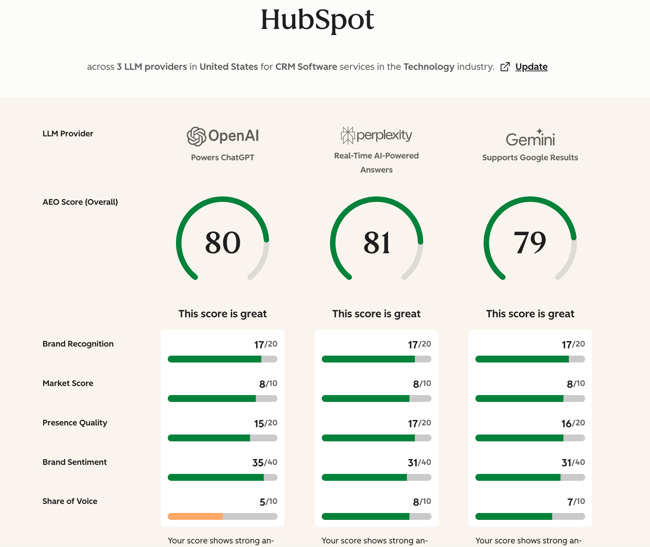
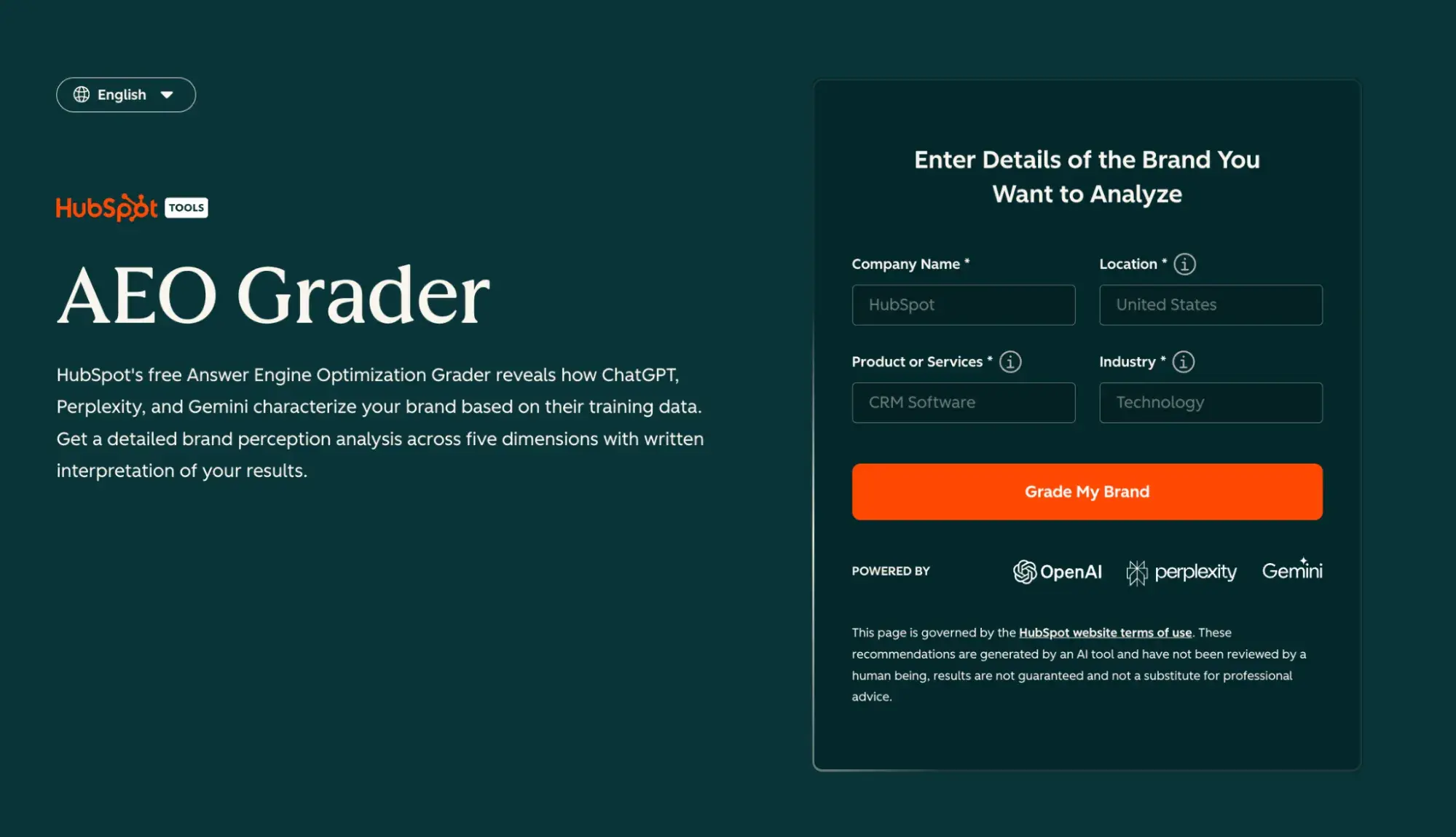
But if you’re new to AEO and want to know the best way to get started, I recommend HubSpot’s AEO Grader. It lets you evaluate how your brand and content appear across major search engines, providing a baseline measurement that traditional rank tracking can’t.

Next, I’ll walk you through how to optimize your content so it consistently earns citations in AI Overviews.

How to Optimize for AI Overviews
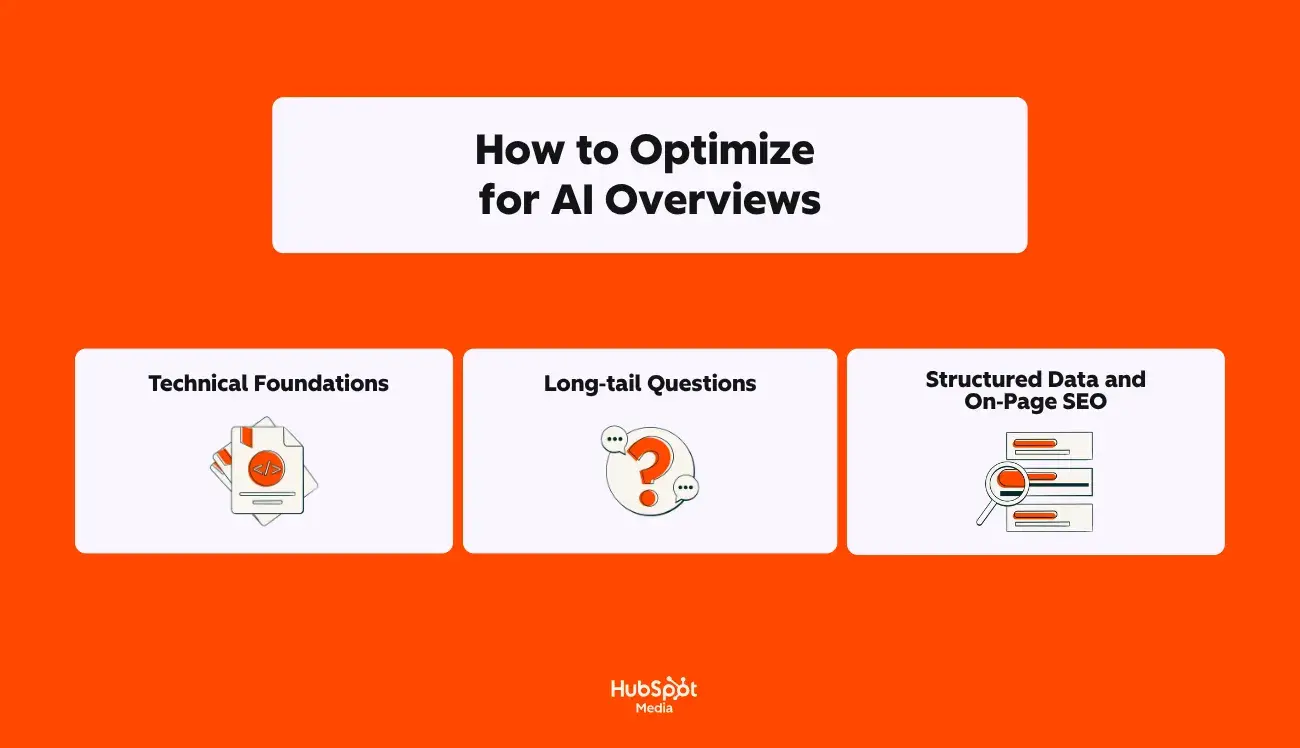
a screenshot of a hubspot-branded graphic that explains, in plain english, how to optimize for AI overviews

Google’s own Search Central documentation states it clearly: “There are no additional technical requirements” to appear in AI Overviews beyond standard Search eligibility. But in practice, the sites earning citations consistently share three things:

  • A clean technical foundation
  • Content structured around the questions that AI systems actually decompose queries into
  • Schema markup that reinforces what’s already visible on the page

Here’s how to build each layer into a repeatable workflow:

1. Technical Foundations

Accessible content requires crawlability and indexability. If Googlebot can’t access, render, and index your pages, they cannot be selected as a cited source in AI Overviews. This is the non-negotiable baseline before any content or schema work matters.

Google Search Central confirms that to be eligible as a supporting link in AI Overviews, a page must be indexed and eligible to display a snippet. Pages blocked by robots.txt, tagged with noindex, or restricted by nosnippet directives are automatically excluded from the AI Overview citation.

Since AI Overviews synthesize information from multiple sources, every blocked page is a missed citation opportunity across every query fan-out sub-query that touches your topic.

Quick Technical Audit Checklist

To confirm your pages are eligible for AI Overview citation, run through these checks before investing in content optimization, run through these checks before investing in content optimization:

  • Robots.txt: Confirm Googlebot is not blocked from crawling key content directories. Check for overly broad disallow rules that may have been added during staging or migration and never removed.
  • Noindex / nosnippet tags: Audit your top-traffic and top-ranking pages for noindex or nosnippet meta tags. A nosnippet tag specifically prevents Google from generating a snippet — meaning the page is ineligible for an AI Overview citation, even if it’s indexed.
  • XML sitemaps: Verify your sitemap is submitted in Google Search Console, returns a 200 status code, and includes only indexable, canonical URLs. Remove any URLs that return 404 or 301 errors, or that are noindex, from your sitemap.
  • Status codes: Crawl your site with Screaming Frog or a similar tool. Flag any 4xx or 5xx errors on pages targeting high-value queries. Soft 404s (pages returning 200 but displaying error content) are particularly harmful because they appear functional but deliver no usable content for AI extraction.
  • Canonicalization: Ensure each page specifies a self-referencing canonical tag. Duplicate or conflicting canonical signals can cause Google to index the wrong version of a page — or skip it entirely.
  • Rendering: Test JavaScript-heavy pages in Google’s URL Inspection Tool to confirm that the rendered HTML matches your expectations. If critical content loads only via client-side JavaScript and Googlebot can’t execute it, that content is invisible to AIOs.

This is especially important because internal links reinforce topic relationships and site structure, which directly affects how Google’s AI evaluates your content’s depth and authority on a topic.

When pages in a topic cluster are well-connected through contextual internal links, AI systems can more confidently identify your site as a comprehensive source across the sub-queries generated during query fan-out.

Pro Tip: For a deeper dive into foundational SEO checks that support AI Overview eligibility, see our SEO recommendations guide.

2. Long‑tail Questions

Question-led content improves alignment with long-tail search intent, and long-tail queries are exactly where AI Overviews appear most frequently. If you want to show up in AI Overviews SEO-wise, you need to map your content to the specific multi-word questions your audience is actually asking.

How to Map Topics to Long-Tail Questions

Start with your core topic, then systematically identify the questions that fan out from it. Here’s a repeatable process:

  • Mine Google’s own signals. Search your target keyword and document every question in the “People Also Ask” section. These are the related queries Google has already identified as connected to your topic, and they closely mirror the sub-queries generated during AIO query fan-out.
  • Map questions by buyer journey stage. Create a simple matrix: list your core personas across the top and your journey stages (awareness, consideration, decision) down the side. Fill in the specific questions each persona would ask at each stage. For example, an SEO leader at the awareness stage might ask, “What are AI Overviews?” whereas the same person at the decision stage might ask, “Which tools track AI Overview citations?”
  • Prioritize specific over broad. Broad queries like “what is SEO” have hundreds of competing sources. Specific questions like “how do I audit my site for AI Overview eligibility?” have fewer quality answers available, which means AI systems are more likely to cite your content if it’s structured well.
  • Use question-mining tools. Reddit, AlsoAsked, AnswerThePublic, and Google Trends surface clusters of related questions around a seed keyword. These tools reveal the natural language patterns that map directly to how AI systems decompose queries.

Finally, once you’ve mapped your questions, organize them as H2 and H3 headings within your content. Each heading should be phrased as the actual question your audience types — “How long does a website redesign take?” not “Website redesign project duration.”

This structure creates multiple extraction points where AI can match a sub-query to a specific section of your page.

Answer-First Phrasing

Answer-first formatting helps AI systems extract key information. Google’s AI scans pages from the top down, looking for the most immediately accessible answer to a specific query. Pages that deliver their answer in the first 40 to 60 words of each section consistently earn higher citation rates than pages that bury the answer after several paragraphs of context.

With this in mind, here’s how to structure every section for maximum extractability:

  • Lead with the direct answer. Start each section with a 1 to 2-sentence response that directly addresses the heading question. If someone asked you the question face-to-face, your first sentence should be what you’d say.
  • Support with evidence. After the direct answer, add statistics, examples, or expert context that reinforces the claim. (This gives AI systems both the extractable answer and the supporting material to verify it.)
  • Keep paragraphs short. Aim for 2 to 4 sentences per paragraph. AI systems favor content with clear paragraph breaks over dense walls of text.
  • Use “X is Y” sentence structures for definitions. A clear definitional sentence (“AI Overviews are AI-generated summaries that appear at the top of Google Search results”) is the most common type of content AI systems extract and cite.

This is one of the most practical strategies for optimizing content for Google AI Overviews because it addresses the root cause of missed citations: Your answer exists on the page, but the AI can’t find it quickly enough.

3. Structured Data and On‑Page SEO

Structured data must match visible page content; in 2026, this isn’t just a best practice. Sites with accurate, intent-matched schema retained (and in many cases improved) their rich result rates and AI citation eligibility. Sites with inflated or misaligned schema could see reductions.

In the next sections, I’ve broken down the schema types that matter most and the formatting rules that make your on-page content easier for AI to extract.

Best Way to Use Schema for AI Overviews

Schema markup acts as a translation layer between your content and AI systems. Rather than forcing Google’s Gemini model to guess meaning through natural language processing alone, schema provides explicit signals about what your content represents.

Here are the schema types that matter most for the AI Overview citation:

  • Article / BlogPosting: Apply this to every piece of editorial content. It communicates authorship, publication date, and topical focus (all signals AI systems use to assess freshness and E-E-A-T credibility).
  • FAQPage: Pages with the FAQ schema are measurably more likely to appear in AI Overviews because the Q&A format closely mirrors how AI systems extract answers. Keep each answer between 40 and 60 words for optimal extraction.
  • HowTo: If your content walks readers through a process, this schema defines each step, required tools, and expected outcomes, which helps AI engines cite instructions in the correct order.
  • Organization: Establishes your brand as a defined entity in Google’s Knowledge Graph. Use SameAs properties to link to your authoritative profiles (LinkedIn, Wikipedia, social channels) to strengthen entity recognition.

Once you’ve identified which schema types apply to your content, implement the following rules:

Formatting Content for AI Overviews

I have one truth that I’ll firmly stand behind as a content marketer navigating AEO: How you format your on-page content is just as important as the schema backing it.

Here’s how to optimize content for Google AI Overviews (while combining structural clarity with high information density):

  • Use question-format H2 and H3 headings. When a user’s query matches your heading, Google’s AI can efficiently locate and cite that section.
  • Include definition paragraphs. A clear “X is Y” definition within the first 60 words of a section gives AI a clean, extractable statement. (For example: “Answer engine optimization (AEO) is the practice of structuring content so AI tools can extract, attribute, and cite your brand when generating answers.”)
  • Add comparison tables for multi-option queries. AI Overviews frequently generate comparison content. If your page provides a well-structured table comparing options, you’re offering AI-ready content that it can cite directly rather than synthesize from multiple sources.
  • Bold key facts. Bolding specific statistics, named entities, and critical terms helps AI systems identify the most important information within a section.
  • Keep sentences under 20 words where possible. Shorter, declarative sentences are easier for AI to summarize without distorting meaning.

In the following section, I’ll walk you through how to measure whether these optimizations are actually earning citations.

Pro Tip: Want to learn more about how to optimize your content for Google’s AIOs in under 30 minutes? Check out this video from the HubSpot Marketing YouTube channel:

How to measure and improve visibility

Google AI Overviews summarize information from multiple sources, but Google Search Console doesn’t break out AI-specific impressions or citation rates as a separate metric.

That gap is the core measurement challenge for the AEO era. AI Overview and AI Mode traffic is reported within the “Web” search type in Search Console’s Performance report, bundled with traditional organic clicks, not isolated. (This means you can see aggregate traffic changes, but you can’t determine which pages are being cited in AI Overviews, how often your brand appears in synthesized answers, or whether your optimization work is moving the needle.)

To build a repeatable measurement framework, you need two things: tools that track AI citation visibility across platforms, and a clear methodology for connecting that visibility to business outcomes.

In the sections below, I’ve outlined how to approach both with six standout tools and a step-by-step measurement workflow.

Tools for Measuring AI Overviews

The answer engine optimization monitoring landscape has expanded rapidly, and the tools below represent distinct approaches, from dedicated AEO platforms to SERP analysis layers built into existing SEO suites. However, the right choice depends on whether you need brand-level visibility tracking, keyword-level citation monitoring, or content-level optimization signals.

To help you find the right fit for your team and budget, take a look at the list of AEO monitoring tools that can track, measure, and improve your brand’s visibility across answer engines, including Google’s AIOs:

1. Semrush
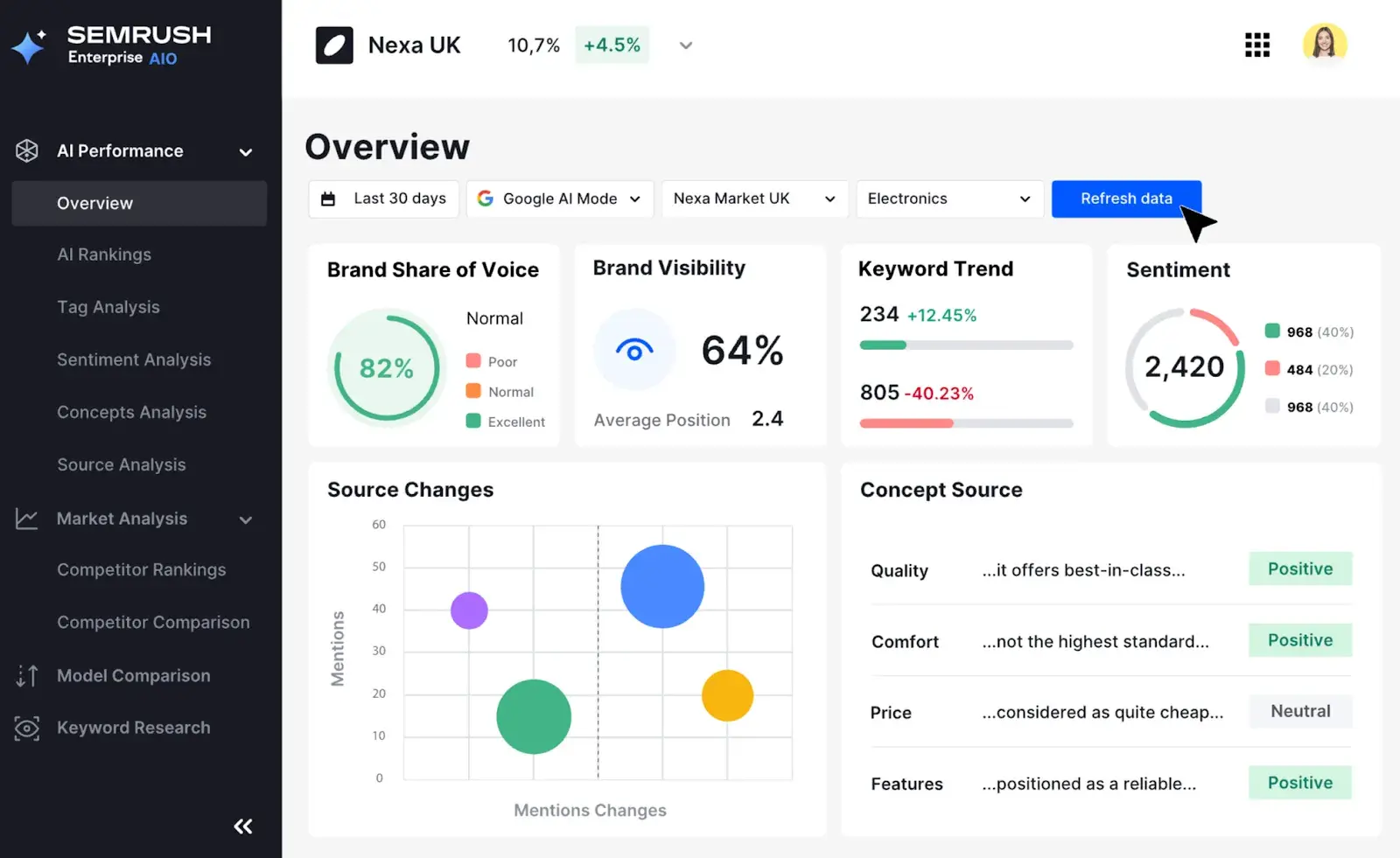
Source

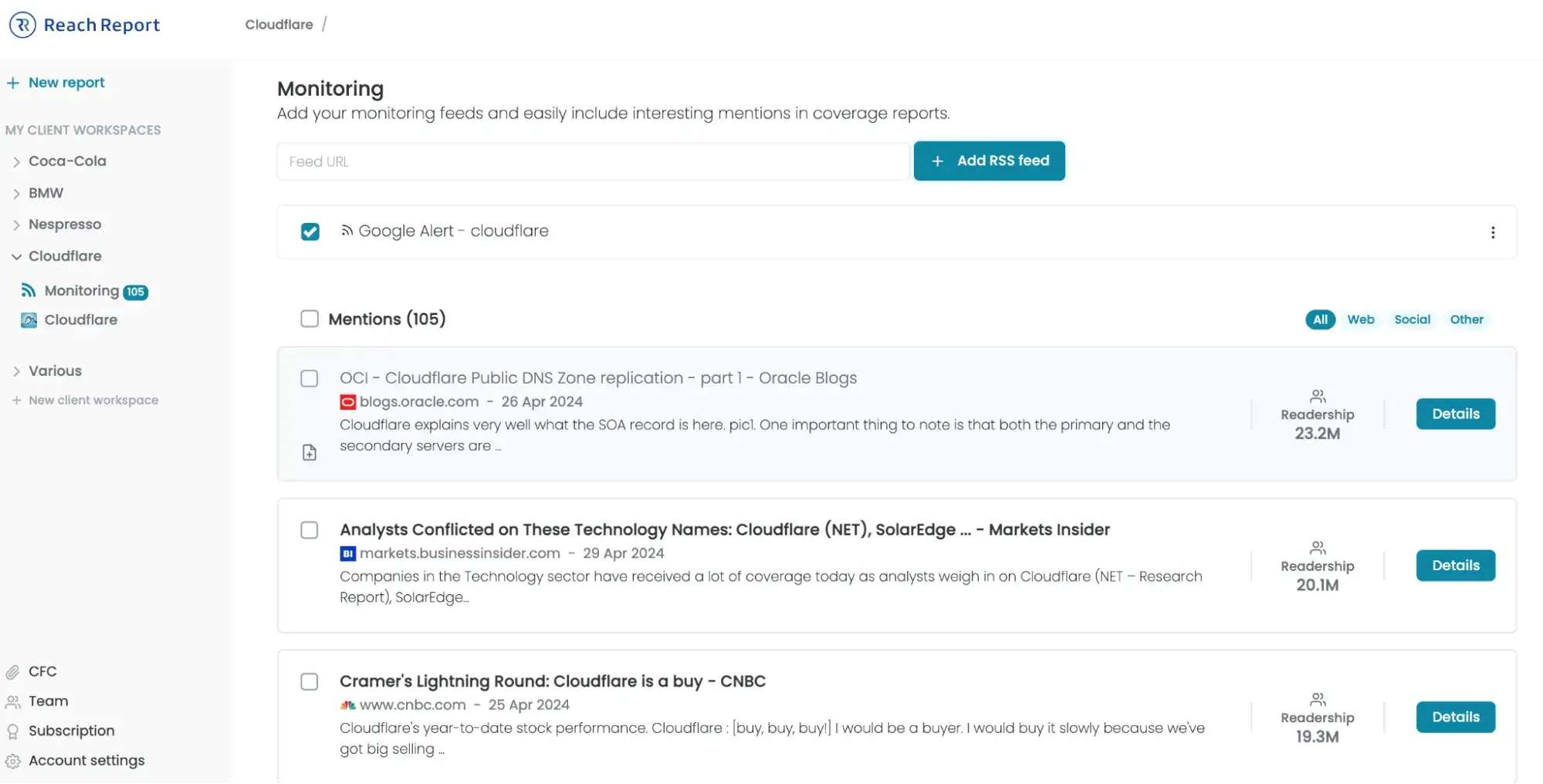
[alt text] a screenshot of semrush’s AI Visibility user interface in Semrush Enterprise

Best for: SEO teams and agencies already invested in the Semrush ecosystem who want AI visibility tracking layered into a full-suite SEO platform.

Semrush added its AI Visibility Toolkit as a standalone add-on and as a core component of Semrush One, its 2026 unified visibility platform. The toolkit tracks brand mentions and citation presence across ChatGPT, Google AI Overviews, Google AI Mode, Perplexity, and Gemini, drawing from a database of 100M+ monitored prompts globally.

Semrush’s pricing:

  • AI Visibility Toolkit (standalone add-on): $99/month per domain
  • Semrush One Starter: $199/month (SEO Toolkit + AI Visibility bundled, 50 prompts to track daily)
  • Semrush One Pro+: $299/month (SEO Toolkit + AI Visibility bundled, 100 prompts to track daily)
  • Free trial included (14 days, available on Semrush One plans, AI Visibility Toolkit alone has no free trial)

Semrush’s core features:

  • AI visibility overview. Provides aggregate brand-mention data across five AI platforms, with competitive benchmarking.
  • Prompt tracking. Monitor up to 25 custom prompts (AI Visibility Base) or 100 prompts (Semrush Pro+) with daily AI rankings across platforms.
  • Brand perception and sentiment. Analyzes how AI platforms characterize your brand compared to competitors.
  • Answer Engine Optimization Site Audit. Checks your website for technical issues that might prevent AI bots from crawling your content.
  • Prompt research. Discovers relevant prompts and topics to target for new AI visibility opportunities.

Semrush’s limitations to consider:

  • The AI Visibility Toolkit does not offer a free trial for standalone purchases. You need a Semrush One subscription to access the trial.
  • Claude and Meta AI are not yet supported in the tracking suite. This may present blind spots for teams whose audiences rely heavily on those platforms for research and recommendations.
  • The volume of data can be overwhelming. Teams without a dedicated analyst may struggle to translate insights into action.

2. Ahrefs
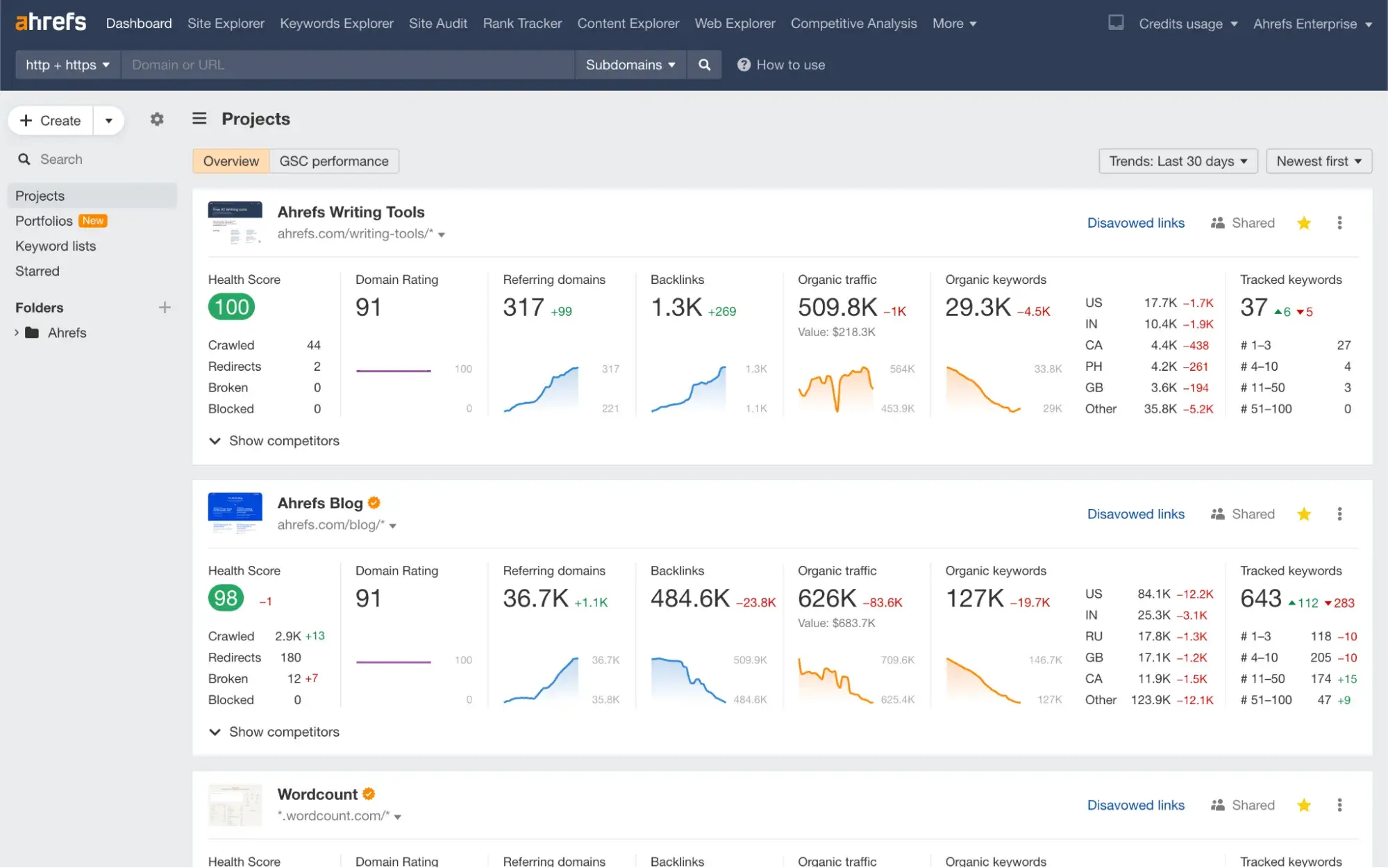
a screenshot of ahref’s user interface

Source

Best for: Enterprise SEO teams that deep backlink data combined with large-scale AI citation research.

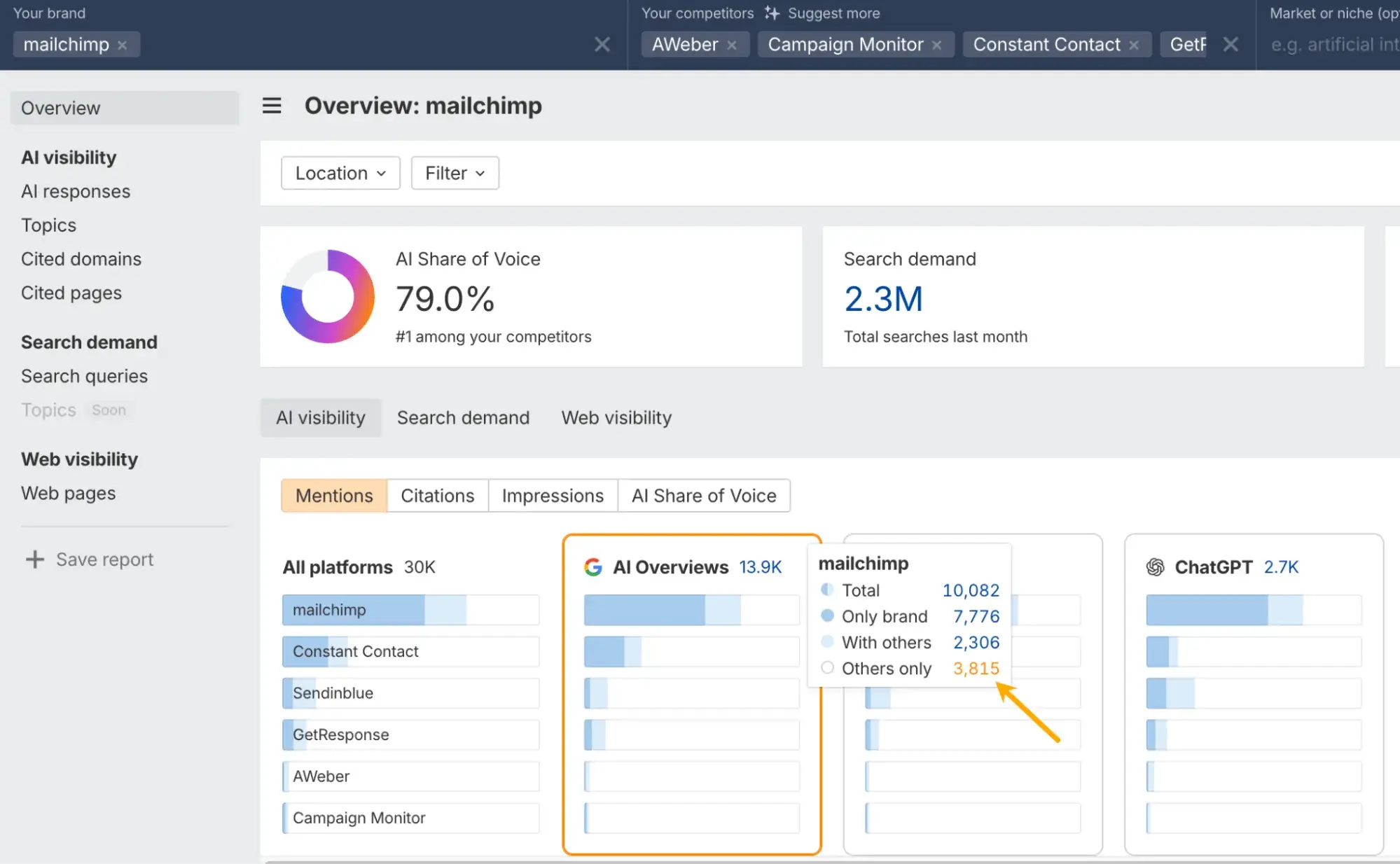
Ahrefs launched Brand Radar as an add-on to its core SEO platform, tracking brand mentions and citations across ChatGPT, Perplexity, Google AI Overviews, Google AI Mode, Gemini, and Microsoft Copilot. Its unique differentiator is ecosystem integration: Brand Radar cross-references AI citation data with Ahrefs’ backlink index. Backlinks and brand mentions strengthen entity authority, and Ahrefs is the only platform that lets you see that relationship in one dashboard.

Ahrefs’ pricing:

  • Lite: $129/month
  • Standard: $249/month
  • Brand Radar: $199/month per individual AI platform index, or $699/month for all 6 platforms
  • No free trial available on core plans (see here)

Ahrefs’ core features:

  • 260M+ prompt database. Provides aggregate AI visibility data at scale, not limited to custom prompt lists.
  • AI Share of Voice. Shows which brands appear most frequently across AI-generated answers for your topic areas.
  • Backlink and AI citation cross-reference. Links AI mentions backlink authority, revealing whether citations correlate with link strength in your niche.
  • SERP AI Overview detection. Flags that track keywords trigger AI Overviews and indicate whether your site appears (included in all base plans, except Brand Radar).
  • Competitor gap analysis. Identifies prompts where competitors are mentioned but you are not.

Ahrefs’ limitations to consider:

  • Pricing is prohibitive for most mid-market teams. Full 6-platform Brand Radar coverage on top of a Standard plan runs close to $950/month.
  • Brand Radar uses a snapshot-based methodology. This may produce accuracy gaps compared to daily prompt-level tracking tools.
  • No native tracking for Claude or Grok. Teams monitoring AI platforms beyond the six covered indexes will need to supplement with a dedicated AEO tool.

3. HubSpot AEO
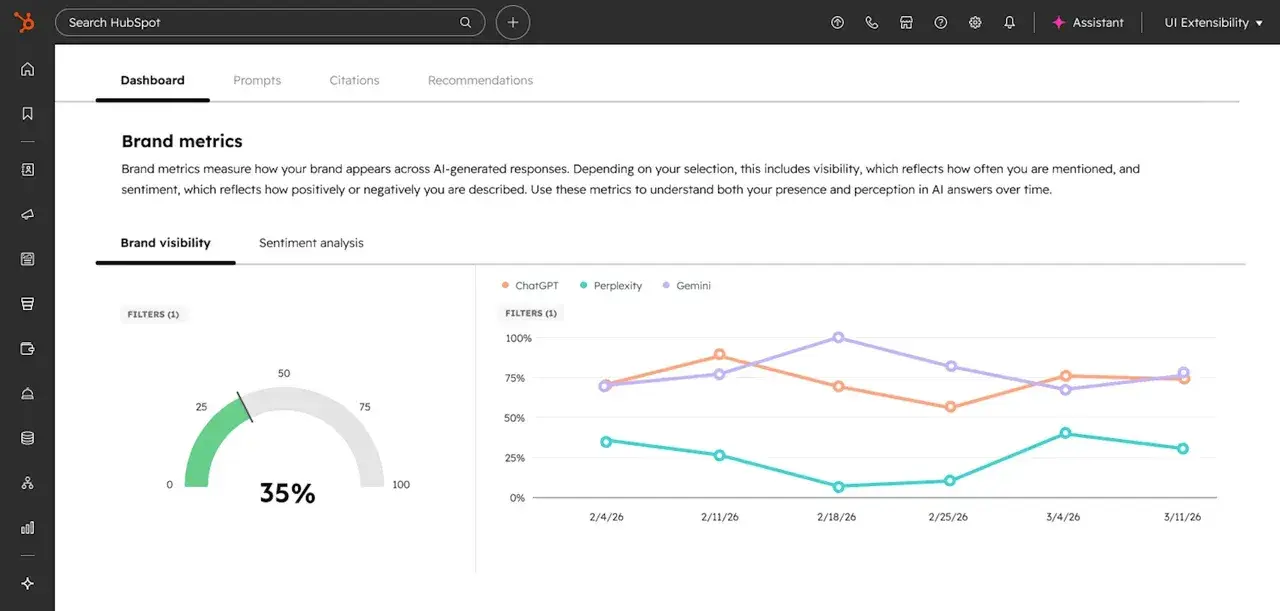
a screenshot of HubSpot AEO user interface in Marketing Hub

Source

Best for: Marketing teams that want CRM-connected AI visibility tracking with actionable recommendations.

HubSpot AEO is a dedicated answer engine optimization tool that tracks how your brand appears in AI-generated answers across ChatGPT, Perplexity, and Gemini. But what separates it from monitoring-only platforms is the closed loop between insight and action: it identifies citation gaps, shows which competitors are appearing in your place, and connects recommendations directly to HubSpot’s content and publishing tools, so teams can act on findings without switching platforms.

HubSpot AEO’s pricing:

  • Standalone: $50/month (no existing HubSpot subscription required)
  • Annual billing: $45/month
  • Included in Marketing Hub Professional and Enterprise at no additional cost
  • Free trial available (28 days, 10 prompts on ChatGPT, no credit card required)

HubSpot AEO’s core features:

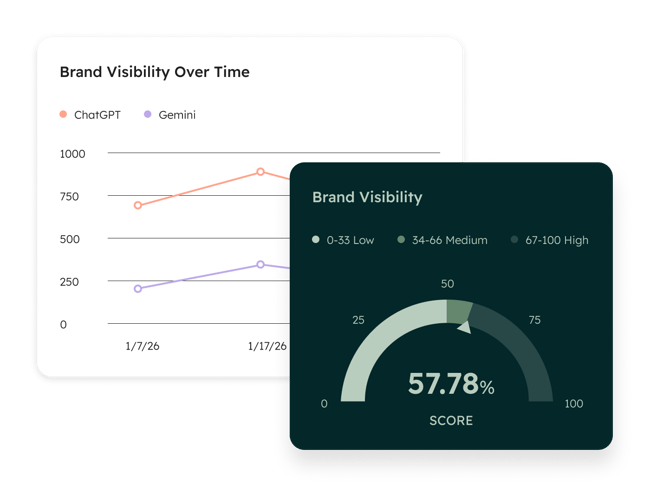
  • Brand visibility dashboard. Tracks the percentage of your monitored prompts where your brand appears in AI responses, with week-over-week trend data.
  • CRM-powered prompt suggestions. For Marketing Hub users, HubSpot suggests prompts based on your CRM data (i.e., the actual questions your buyers are asking) instead of requiring manual guesswork.
  • Sentiment analysis. Scores how positively or negatively answer engines characterize your brand on a -100% to +100% scale.
  • Competitor share of voice. Shows your brand mentions as a percentage of total brand mentions across all tracked prompts, benchmarked against named competitors.
  • Citation analysis. Surfaces, domains, pages, and content types are being referenced in AI answers in your category.
  • Recommendations connected to execution. When a gap is identified, teams can create content, publish social posts, or update pages directly inside HubSpot’s Smart CRM without switching tools.

HubSpot AEO’s limitations to consider:

  • Engine coverage is currently limited to three platforms (ChatGPT, Perplexity, Gemini). Google AI Overviews and AI Mode are not yet tracked natively.
  • Prompt capacity on the standalone plan is limited by answer volume. This may feel restrictive for teams tracking dozens of keywords across multiple personas.

4. thruuu
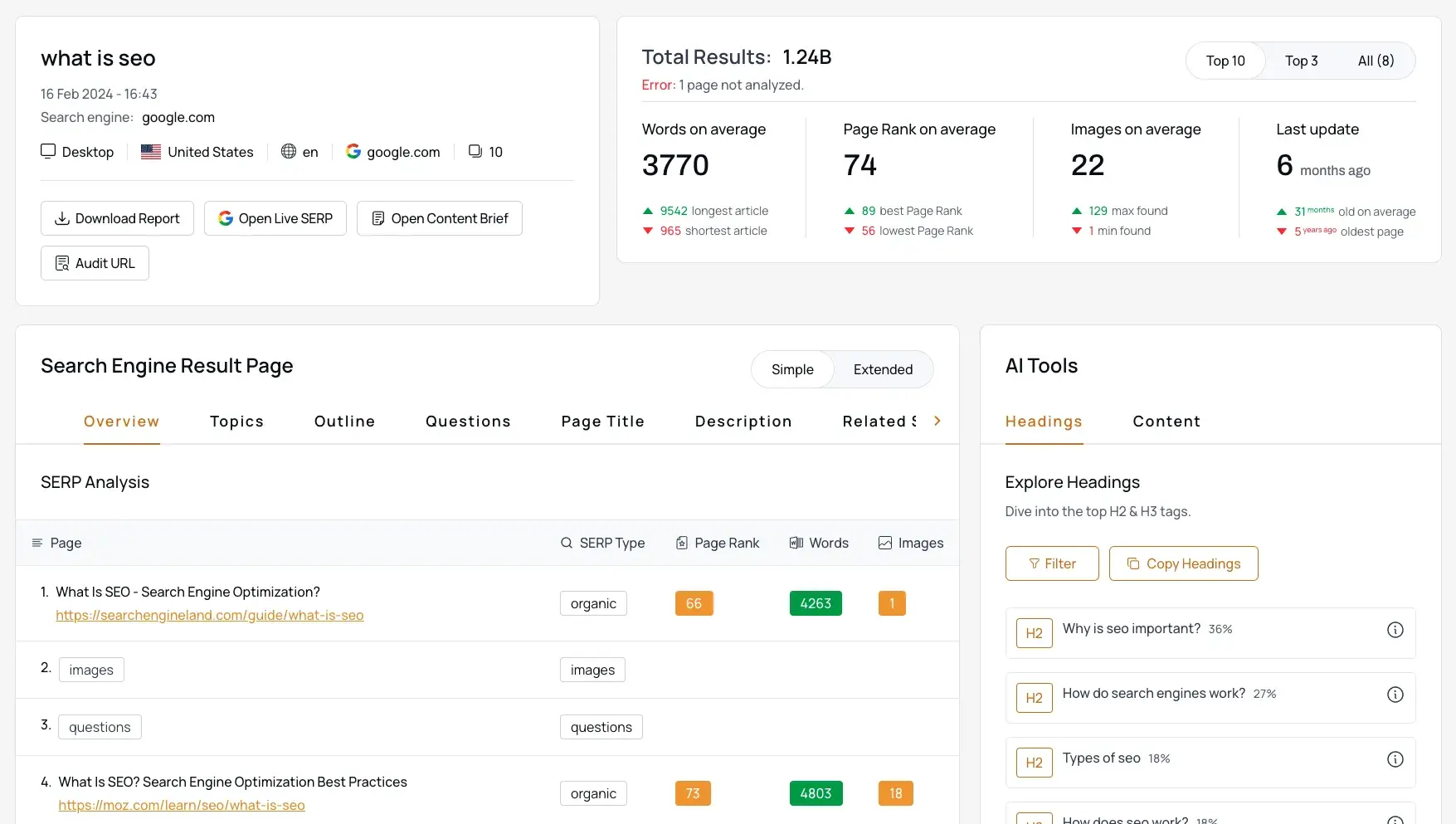
a screenshot of thruuu’s user interface

Source

Best for: Content teams and SEO practitioners who need SERP-level analysis of AI Overviews, with actionable content briefs generated.

thruuu is a SERP analysis tool that captures full search result pages, including AI Overview blocks, and lets you analyze content patterns, citation sources, and SERP feature interactions. Where most tools answer “are you cited?”, thruuu answers “what does the content that gets cited look like?” That makes it particularly valuable as a content research layer before you optimize, helping teams understand what to write rather than just tracking what happened.

thruuu’s pricing:

  • Free plan: 10 Google SERPs, 2 content briefs, up to 500 keywords
  • Starter: $19/month for 75 credits
  • Pro: $49/month for 250 credits (AI Overview tracking features require this tier)
  • Agency: $99/month for 700 credits

thruuu’s core features:

  • AI Overview source analysis. Scrapes and analyzes the content of URLs cited within AI Overviews, showing what topics cited pages cover that yours may not.
  • Answer Engine Analyzer. Analyzes Google plus up to 5 additional AI engines (ChatGPT, Gemini, Perplexity) in a single analysis; headings and paragraph topics from AI-cited sources are extracted.
  • Content brief generation. Produces data-driven content outlines based on top-100 SERP results and actual AI citation patterns.
  • Brand and competitor mention tracking. Identifies both your brand and competitor mentions inside AI Overview summaries.
  • SERP preview. Provides a live preview of search results and AI Overviews for any country without needing a VPN.

thruuu’s limitations to consider:

  • Not designed for ongoing daily monitoring. thruuu works best for on-demand audits and content planning, not continuous tracking.
  • AI Overview features require the Pro plan ($49/month). thruuu’s Starter plan doesn’t include them.
  • No multi-model AI tracking (ChatGPT, Perplexity) for brand-level visibility KPIs. For those seeking ongoing brand-level monitoring across multiple AI platforms, this could be a significant gap that requires pairing thruuu with a dedicated AEO tracking tool.

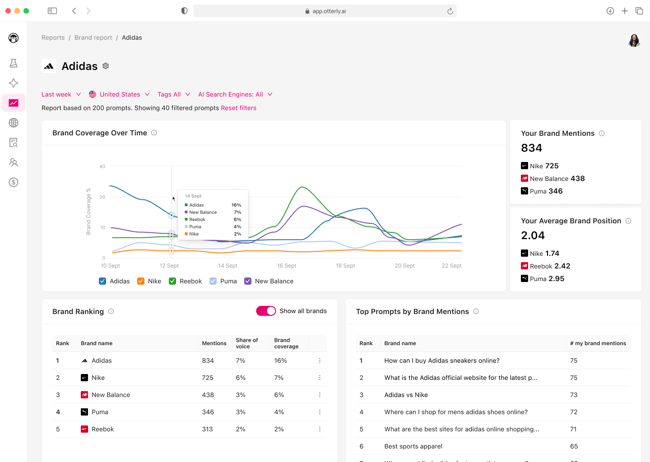
5. Otterly.ai
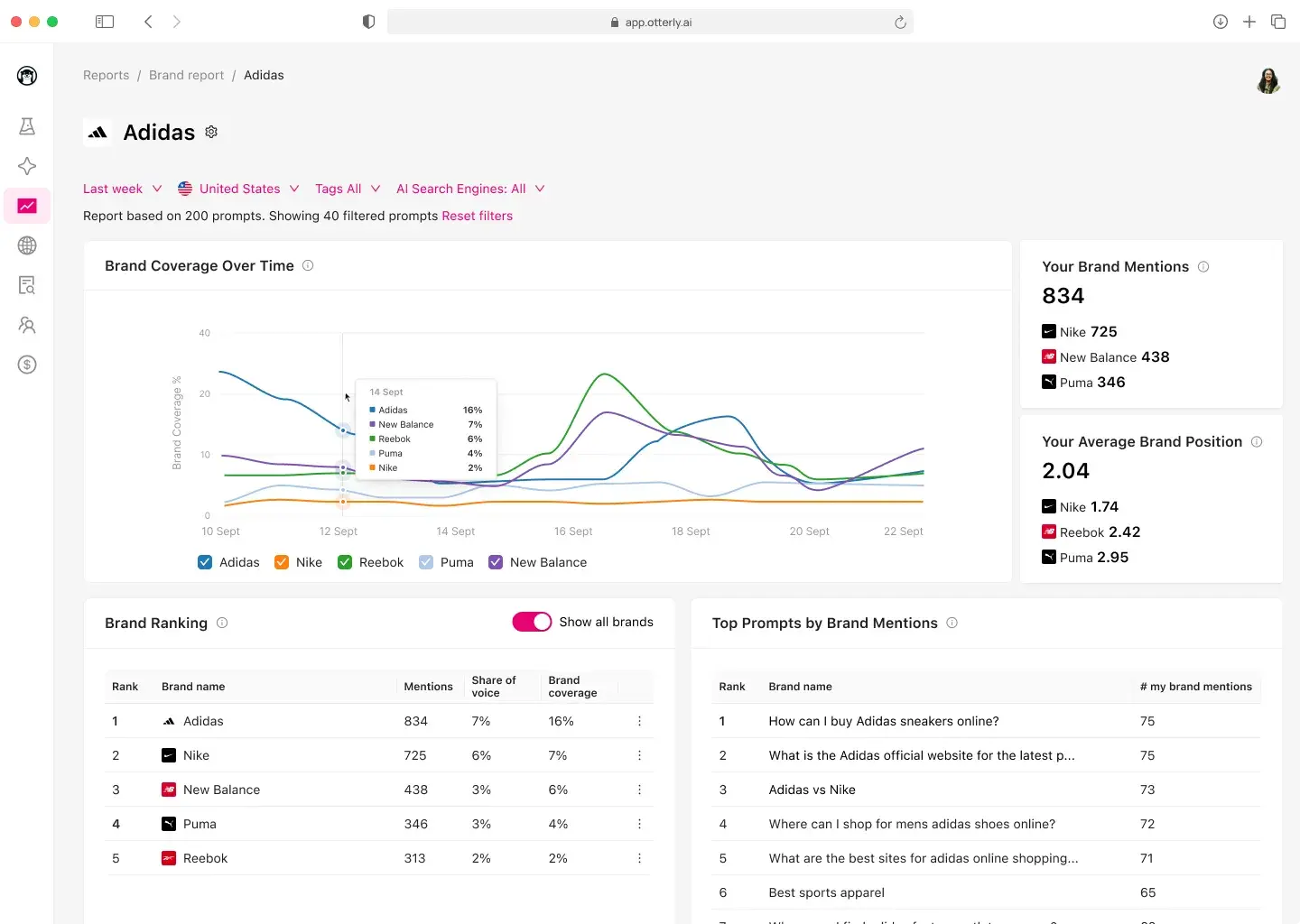
a screenshot of otterly.ai’s user interface

Source

Best for: Agencies and marketing teams that want a self-serve, prompt-level AI visibility tracker with Looker Studio integration.

Otterly AI is a dedicated answer engine monitoring and GEO platform that tracks brand mentions, citations, and sentiment across ChatGPT, Google AI Overviews, Perplexity, and Microsoft Copilot on its base plans, with Google AI Mode and Gemini available as add-ons.

Otterly AI’s pricing:

  • Lite: $29/month (15 search prompts)
  • Standard: $189/month (100 search prompts)
  • Premium: $489/month (400 search prompts)
  • Free trial available (7 days, see here)

Otterly AI’s core features:

  • Daily prompt monitoring. Runs predefined prompts daily across selected AI engines and stores answers for historical trend comparison.
  • Brand Visibility Index. A composite KPI tracking overall brand visibility across AEO over time.
  • Link citations analysis. Identifies which specific URLs are referenced most often by AI engines.
  • GEO Audit. Analyzes 25+ on-page factors affecting how AI models interpret and cite your pages, with SWOT analysis and tactic gap identification.
  • AI prompt research. Converts traditional keywords into conversational prompts suited for AEO, bridging the gap between keyword thinking and prompt thinking.
  • Looker Studio and Semrush integration. Exports data to Looker Studio for custom dashboards and integrates with the Semrush App Center.

Otterly AI’s limitations to consider:

  • Google AI Mode and Gemini are add-ons, not included in base plans. Adding them increases effective cost significantly.
  • Prompt counts scale cost quickly. Tracking 100 prompts across five engines is effectively 500 data captures, which pushes Standard close to its ceiling.
  • Monitoring-focused with limited content optimization guidance. The GEO Audit helps, but there are no built-in tools for content creation or publishing.

6. Perplexity
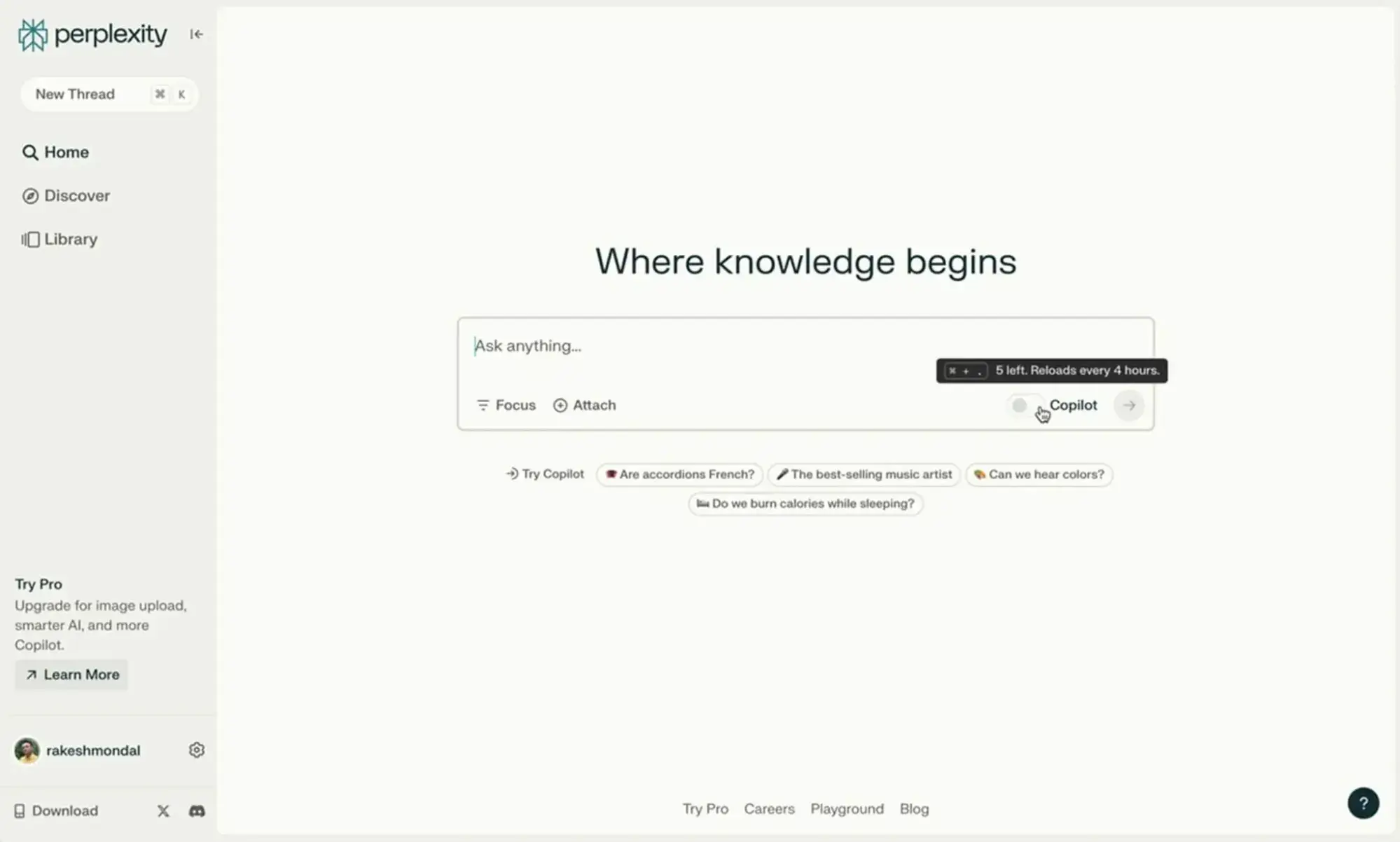
a screenshot of perplexity’s user interface

Source

Best for: Publishers and content teams that want first-party citation data directly from an answer engine platform, plus revenue sharing for cited content.

Perplexity is not a traditional monitoring tool; it’s the answer engine platform itself. Its Publishers’ Program provides participating publishers with analytics dashboards showing per-article citation data, revenue breakdowns by query category, and competitive benchmarking against anonymized peers.

Perplexity’s pricing:

  • Publishers’ Program: Free to join (see here, apply at [email protected]; publishers receive 80% of the revenue generated when their content is cited in interactions)
  • Perplexity Pro (for general use): $17/month

Perplexity’s core features:

  • Per-article citation analytics. Shows which of your articles are cited, how often, and in response to which query categories.
  • Revenue sharing for cited content. Publishers earn a share of subscription and interaction revenue when their content is referenced.
  • API access. Partners receive free access to Perplexity’s Online LLM APIs, enabling custom answer engine implementation on their own sites.
  • Source attribution. Perplexity prominently displays cited sources with direct links, driving measurable referral traffic.
  • ScalePost.ai integration. Provides deeper analytics on how Perplexity cites your content through a dedicated publisher analytics partner.

Perplexity’s limitations to consider:

  • The Publishers’ Program is limited to approved partners (20+ media partners as of early 2026). Most brands don’t qualify unless they’re established publishers.
  • Analytics cover Perplexity only. This doesn’t help you understand visibility across Google AI Overviews, ChatGPT, or Gemini.
  • The program focuses on publisher-level metrics. This means the keyword-level or prompt-level tracking that SEO teams typically need would be unavailable here, requiring a separate tool for granular query-by-query monitoring.

How to Measure When an AI Appears and When Your Brand is Cited Within It
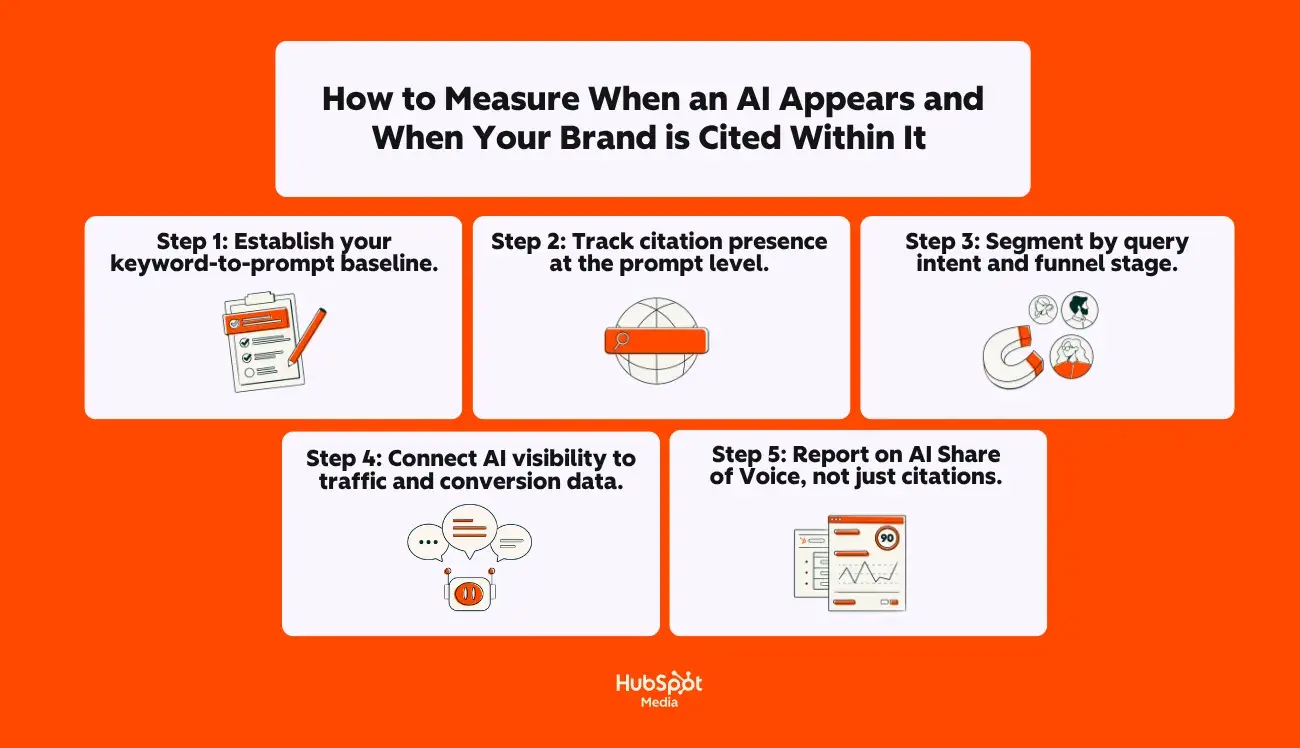
a hubspot-branded graphic explaining, in plain english, how to measure when an AI appears in a Google AIO

While having the right tools in your stack is nice, knowing which tools to use is only half the equation. The harder question is building a workflow that translates AI visibility data into decisions your team can act on.

Here’s a step-by-step framework for tracking AI Overview appearances and brand citations at scale:

Step 1: Establish your keyword-to-prompt baseline.

Start by identifying which of your target keywords currently trigger AI Overviews. Tools like Semrush, Ahrefs, and thruuu flag AI Overview appearances at the keyword level.

Export this list and cross-reference it with your priority keywords — the ones tied to revenue-driving pages and high-intent queries. This gives you a finite set of keywords where AI Overview optimization can directly impact business outcomes.

Step 2: Track citation presence at the prompt level.

For each keyword that triggers an AI Overview, determine whether your brand or domain is cited as a source.

HubSpot AEO, Otterly AI, and Semrush all track this, but they measure it differently:

  • HubSpot AEO tracks prompt-level visibility across ChatGPT, Perplexity, and Gemini with week-over-week trending and competitor comparison.
  • Otterly AI runs predefined prompts daily and logs which URLs are cited, giving you link-level citation data over time.
  • Semrush provides aggregate brand mention data across five AI platforms, with prompt-tracking limits that scale by plan tier.

The key metric here is the citation rate, which is the percentage of your tracked prompts in which your brand appears in the AI-generated answer. (This is the AI equivalent of organic click-through rate and the clearest indicator for improving visibility in Google’s AI Overviews and across other answer engine platforms.)

Step 3: Segment by query intent and funnel stage.

Not all AI Overview citations carry equal business value. A citation for “what is CRM software” (awareness stage) has different conversion potential than a citation for “best CRM for B2B sales teams under 50 employees” (decision stage).

Want my advice as an AEO-focused marketer? Here it is: Segment your tracked prompts by funnel stage and prioritize optimization for the prompts closest to purchase intent. This is where strategies for optimizing content for Google AI Overviews translate into measurable pipeline impact and transcend traditional visibility metrics.

Step 4: Connect AI visibility to traffic and conversion data.

While it doesn’t isolate AI-specific traffic, you can triangulate by comparing Search Console data with your AI monitoring tool’s citation data and Google Analytics engagement metrics.

Pages with new or growing AI citations should show corresponding changes in traffic quality. HubSpot’s own data shows that LLM-referred visitors convert at 4.4x the rate of organic search visitors. So, if your citation rate is climbing but traffic from those queries isn’t, the issue is likely on-page experience, not visibility.

Step 5: Report on AI Share of Voice, not just citations.

For leadership reporting, the most useful metric is AI Share of Voice, which is your brand’s percentage of total mentions across all tracked prompts, benchmarked against competitors.

This frames AI visibility as a market-position metric (similar to how share of voice works in paid media), making it easier to justify continued investment. Both HubSpot AEO and Semrush surface this metric natively. Tracking Share of Voice over time provides the clearest signal of whether their optimization work is gaining or losing ground.

Frequently asked questions (FAQ) about optimizing for AI Overviews

Can I opt out of AI Overviews?

Not cleanly, at least not yet. As of mid-2026, there is no way to opt your site out of Google AI Overviews specifically while keeping your traditional organic search visibility intact.

The tools Google currently offers work at a broader level:

  • nosnippet meta tag: Prevents Google from displaying any snippet of your content — including in AI Overviews. But it also removes preview text from your traditional organic listings, which significantly reduces click-through rates. For most sites, this makes nosnippet impractical.
  • Google-Extended in robots.txt: Blocks your content from being used to train Google’s Gemini and Vertex AI models. However, Google’s Search Central documentation explicitly states this does not prevent your content from appearing in AI Overviews, because Google classifies AI Overviews as a Search feature, not a standalone AI product.
  • Blocking Googlebot entirely: Removes your site from all Google Search features, including AI Overviews, but also removes you from organic results altogether.

According to Search Engine Roundtable, Google announced in March 2026 that it is “developing further updates to controls to let sites specifically opt out of generative AI features in Search,” including AI Overviews and AI Mode. However, Google has provided no timeline, no technical specification, and no firm commitment to do so as of yet.

For most SEO experts and content strategists, the practical recommendation is straightforward: Rather than opting out, focus on strategies for optimizing content for Google AI Overviews so that when your content does appear in AI-generated answers, it drives meaningful brand visibility, referral traffic, and downstream conversions.

Where can I see clicks from AI Overviews?

Google’s Search Central documentation confirms that “sites appearing in AI features (such as AI Overviews and AI Mode) are included in the overall search traffic in Search Console.”

However, there’s a critical limitation: As of 2026, Google Search Console has begun rolling out Search Type filters that allow you to segment AI Overview and AI Mode data from traditional web search. Availability varies by property, and historical data before the filter rollout is not retroactively available.

Here’s what you need to know:

  • Clicks from AI Overviews do appear in Search Console. They’re counted as clicks in the Performance report. According to Search Engine Roundtable, Google has confirmed that click data was not affected by the impression logging bug disclosed in April 2026.
  • Impressions may be inflated. If your page appears in both an AI Overview and traditional organic results for the same query, Google counts that as two separate impressions. (This “double-counting” has driven impression numbers up across many properties, pushing average CTRs down even when actual click volume is stable.)
  • Position is reported as the AI Overview block’s position. If the AI Overview appears at position 0 (above all organic results), all clicks from cited links within it are attributed to position 0, regardless of where your link sits within the Overview itself.

Do I need structured data to be cited in AI Overviews?

No, structured data is not a requirement. Google’s Search Central documentation states clearly: “You don’t need to create new machine-readable files, AI text files, or markup to appear in these features.” The only technical requirement is that your page must be indexed and eligible to display a standard Google Search snippet.

That said, structured data must match the visible page content, and when it does, it provides an answer engine with an additional machine-readable signal that improves extraction confidence. Think of schema as a trust amplifier, not a prerequisite:

  • FAQPage schema supports machine understanding of FAQ sections. Pages with FAQ schema present answers in the exact Q&A format that AI systems parse most efficiently. Industry testing shows that pages with FAQ schema achieve measurably higher citation rates than pages without it, even when traditional rankings are similar.
  • Article / BlogPosting schema establishes authorship, publication date, and topical focus (the E-E-A-T signals that AI systems evaluate when selecting which sources to cite).
  • The HowTo schema supports machine understanding of step-by-step instructions by defining each step, required tools, and expected outcomes, so AI can cite instructions in the correct order.
  • Organization schema with sameAs properties helps Google’s Knowledge Graph recognize your brand as a distinct entity, strengthening your eligibility for entity-based citations.

The bottom line: You can absolutely be cited without structured data. But implementing schema in JSON-LD format and ensuring it accurately describes what’s visible on the page removes ambiguity for AI systems and increases your chances of being selected. It’s one of the best practices for optimizing content for Google AI Overviews because it’s highly leveraged and relatively low effort to implement.

Is AI Mode the same as AI Overviews?

No. They are closely related Google Search features, but they serve entirely different roles and create different optimization dynamics.

Google AI Overviews appear in Google Search results automatically when Google’s systems determine a synthesized answer would be useful. They sit at the top of the traditional search results page, above organic links, and the user doesn’t have to do anything to trigger them. Traditional organic results, People Also Ask, and other SERP features remain visible below the Overview. AI Overviews typically display 1 to 3 short paragraphs with inline source links.

Oppositely, AI Mode is a separate, opt-in experience. The user actively selects the AI Mode tab in Google Search, which opens a conversational, chat-style interface with no traditional SERP displayed. AI Mode responses are longer and more detailed, and the system can issue significantly more sub-queries (up to 16+ simultaneous fan-out searches) to build comprehensive, multi-faceted answers.

The key differences that matter for how to show up in AI Overviews SEO-wise versus AI Mode:

  • Trigger mechanism: AI Overviews are automatic (“push”); AI Mode is user-initiated (“pull”).
  • Content format that wins: AI Overviews reward concise, answer-first content blocks that can be extracted and displayed in a short summary. AI Mode rewards comprehensive topic coverage across multiple related sub-questions.
  • Organic results: AI Overviews coexist with traditional organic listings. AI Mode replaces them entirely — the AI response is the whole experience.
  • Traffic risk profile: AI Overviews reduce CTR on informational queries where the summary satisfies intent. AI Mode creates near-zero click-through potential for queries fully resolved within the conversational interface.

Both features use query fan-out to retrieve content from multiple sources. Both cite and link to the pages they draw from. And the foundational optimization work (i.e., answer-first formatting, strong E-E-A-T signals, and clean technical SEO) applies to both.

But if you’re specifically trying to optimize content for Google’s AI Overviews, prioritize clear, direct answer blocks and featured-snippet-style formatting. For AI Mode, invest more heavily in topic clusters and internal linking that demonstrate comprehensive topical authority.

How long does it take to see an impact from these changes?

There’s no single timeline. It depends on which changes you’re making and how competitive your target queries are.

Nevertheless, here’s a realistic framework based on what each optimization layer typically requires:

  • Technical fixes (crawlability, indexability, rendering): If you’re resolving issues like noindex tags on key pages, robots.txt blocks, or JavaScript rendering problems, you can see indexing changes within days to weeks after Google recrawls the affected pages.
  • Content restructuring (answer-first formatting, question-based headings): Reformatting existing high-ranking content to lead with direct answers and use question-format H2/H3 headings typically takes 4 to 8 weeks to show measurable changes in AI Overview citation rates. Google needs to recrawl the updated pages and re-evaluate them against competing content.
  • Schema markup implementation: Adding JSON-LD structured data (Article, FAQPage, HowTo) and validating it through Google’s Rich Results Test can influence AI citation within 2 to 6 weeks of the markup being detected, though the impact compounds over time as Google’s systems build confidence in your entity signals.
  • New content creation (topic clusters, long-tail question coverage): Building out new content that targets the sub-queries generated during query fan-out is a longer play, typically 2 to 4 months before new pages gain enough authority and indexing stability to consistently appear in AI Overviews.
  • AI visibility monitoring (tracking citation rate and share of voice): If you’re starting from zero measurement, expect to need at least 4 to 6 weeks of baseline data before you can confidently identify trends. Weekly tracking cadences work for most teams, with monthly reporting to leadership showing share of voice movement against competitors.

The most immediate returns come from fixing technical blockers and reformatting existing high-ranking content; these are changes to pages that Google already trusts, making them the fastest path to improving visibility in Google’s AI Overviews. New content creation is the slowest but most durable lever, building the kind of comprehensive topical coverage that earns citations across multiple fan-out sub-queries over time.

Beyond AI Overviews: The shift to AEO (answer engine optimization)

AI Overviews are one signal of a broader shift that’s already reshaping how buyers find information: the rise of answer engines. The best practices for optimizing content for Google AI Overviews include clean technical foundations, answer-first formatting, structured data, and question-led content, all of which make your content more extractable and citable across ChatGPT, Perplexity, Gemini, and every other answer engine that synthesizes answers from the web.

That’s not a coincidence. The same structural clarity that helps you show up in AI Overviews SEO-wise is what makes your brand visible wherever AI is generating answers. The strategies for optimizing content for Google’s AIOs covered in this playbook give you a repeatable workflow for earning citations in the search experiences your audience is already using.

But Google AI Overviews are only one surface where this matters, and Search Console alone can’t tell you how your brand appears across the answer engines where buyers increasingly start their research. Answer engine optimization addresses that gap: tracking how AI characterizes your brand, identifying where competitors are earning visibility you’re not, and connecting those insights to content you can actually create and publish. If you’ve been working to optimize content for Google’s AI Overviews, AEO is the natural next step.

Ready to see how answer engines represent your brand and get a prioritized plan to improve it? Get started with HubSpot AEO.

Categories B2B

How to rank in AI Overviews on Google and beyond

Growing up, the only “top 10” I cared about was MTV’s Total Request Live (TRL). When I started working, that became the top 10 results in the Google SERP. Now, my eyes are set even higher as we marketers explore how to rank in AI Overviews.

Download Now: The Annual State of Artificial Intelligence in 2025 [Free Report]

According to Google, AI Overviews (aka position zero) now reach 1.5 billion monthly users across 200 countries, and it’s affecting both website traffic and marketing results.

The good news? This isn’t a reason to panic. AI Overviews reward clarity, structure, and genuine expertise. So, if your content is well-organized and delivers real value (as I would hope it does), you’re already halfway there.

Even if you aren’t, this guide breaks down exactly how AI Overviews work, what it takes to get your content cited in them, and how to measure your visibility in a world where a click isn’t always the right success metric.

Table of Contents

What is an AI Overview (and when does it appear?)

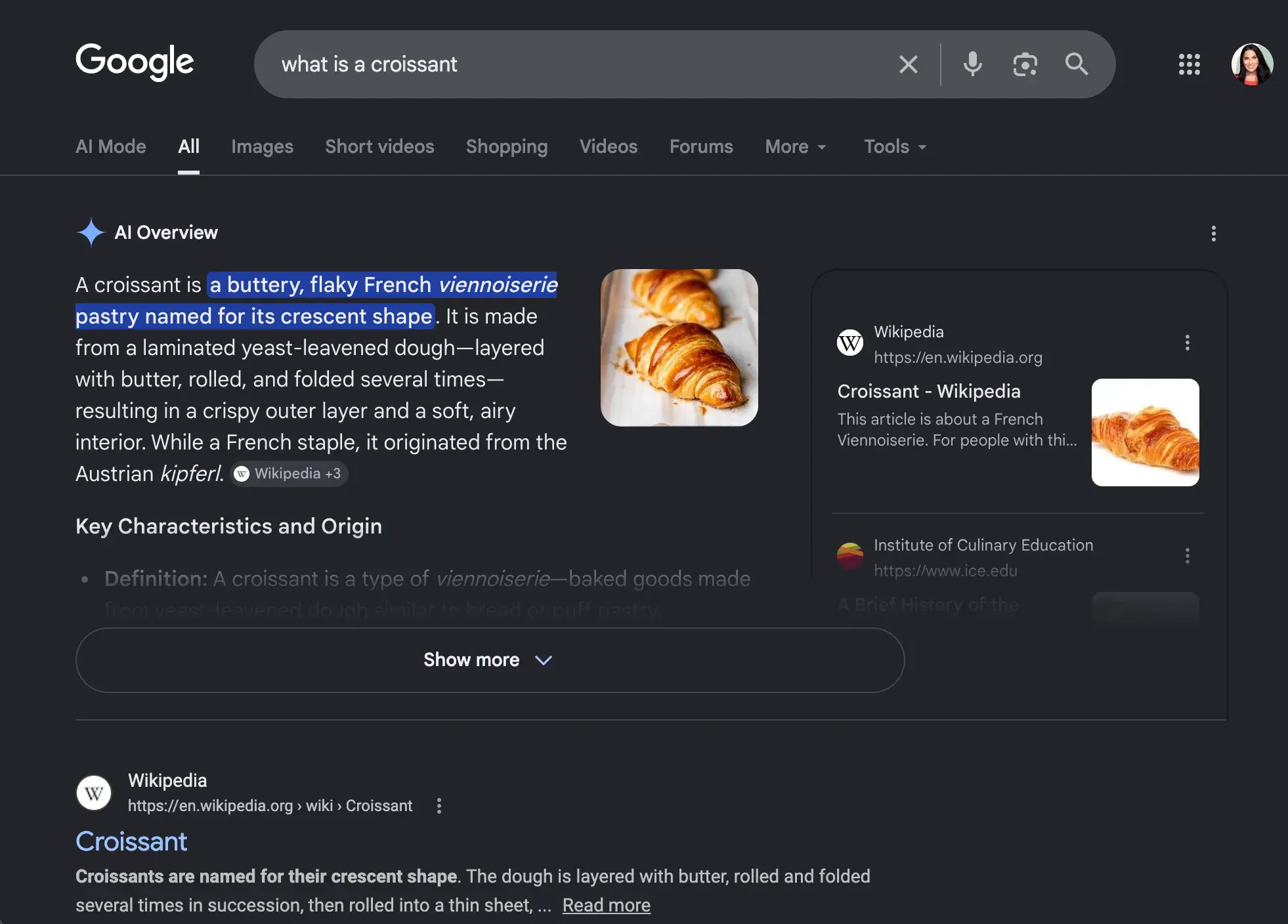
An AI Overview is a summary generated by AI that appears at the top of Google search engine results pages (SERPs) in response to some user queries. Instead of a list of blue links, with AI Overviews, Google synthesizes information from multiple sources to deliver a direct, conversational answer, right at the top of the page.

how to rank in ai overviews, what is a croissant ai overview example

A lot has changed in consumer behavior, but the purpose of a Google search hasn’t: surface outstanding, original content that adds real value and answers a query.

According to Google, AI Overviews do just that, helping users understand information from multiple sources rather than needing to click different links to maybe find what they need.

AI Overviews are most likely to appear for long-tail, educational queries than transactional or short keyword searches, but why exactly?

Well, longer queries usually mean the user needs a deeper explanation, comparison, or step-by-step guidance, which AI summaries can offer and traditional results cannot.

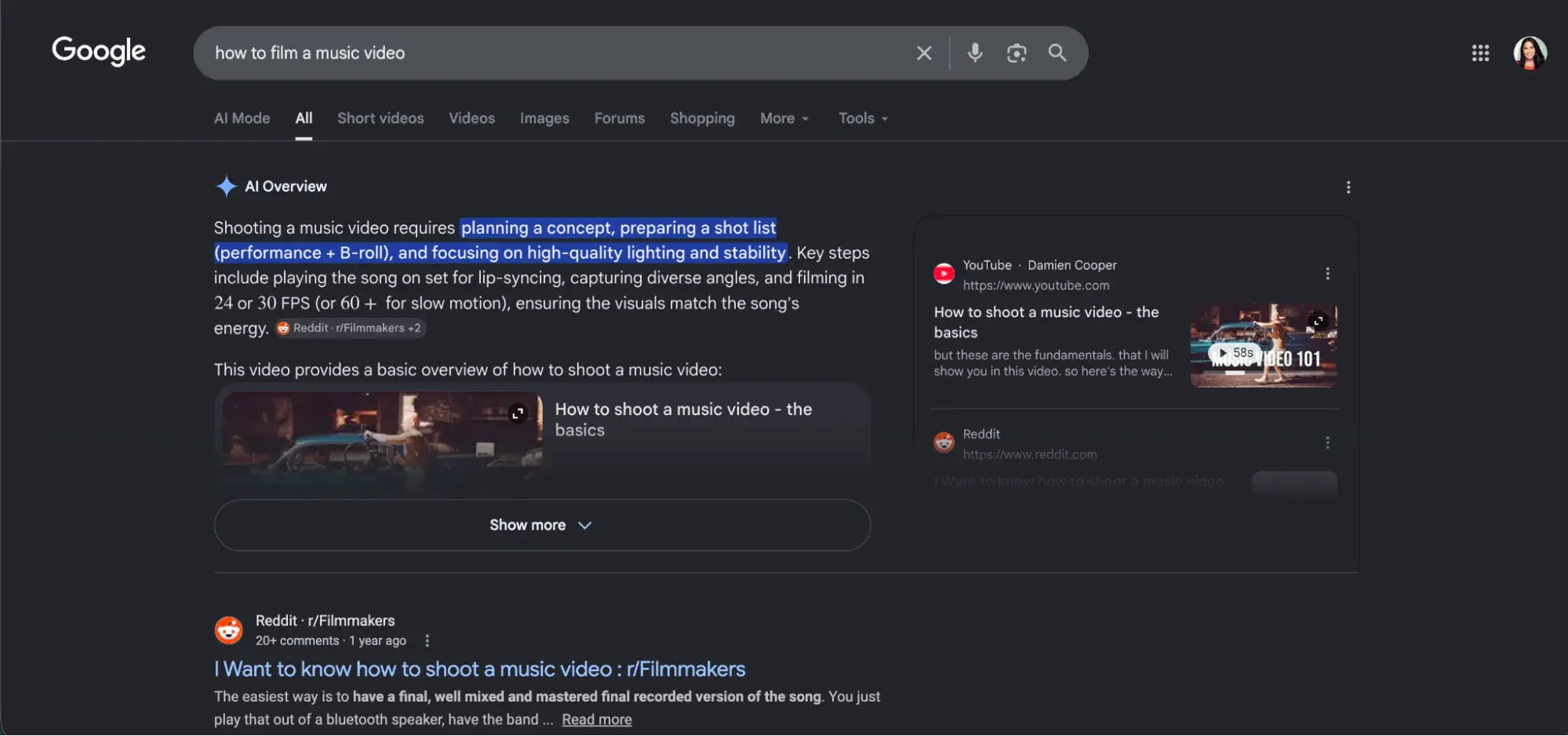
For example, searches like “how to film a music video” or “what is Total Request Live” are prime for AI Overviews. (Yes, I’m flying my millennial flag high right now.)

how to rank in ai overviews, how to film a music video ai overview example

Think about it. If I search “how to film a music video,” I need detailed instructions to do it successfully, right? The AI Overview, which appears with the video and more, is necessary and appreciated. However, if I searched for something transactional, like “where to buy a CD,”— not so much.

TLDR: AI Overviews gives you what it believes is a direct, accurate answer to your question; traditional search gives you resources to find the answer yourself.

Why should marketers go after AI overviews?

Growth data shows just how impactful AI Overviews have been.

Recently, McKinsey found that half of Google’s results already feature AI-powered features like overviews, and trends predict that number will reach 75% by 2028. On top of that, Google announced at I/O 2025 that AI Overviews now reach 1.5 billion monthly users across 200 countries.

This has massive awareness and traffic implications, which we detail in “Is AI Killing Web Traffic? How AI Overviews Impact Organic Website Traffic” and “How AI is Impacting SEO.”

All this considered, marketing calling orders are pretty clear. If our marketing content isn’t structured to be understood and extracted by AI, our brands will be invisible to a massive and growing audience.

That’s where answer engine optimization (AEO) — sometimes called generative engine optimization — comes in.

Unsure how you’re performing in AI engines currently? Find out for free and how to improve with HubSpot’s AEO Grader.

How to Rank in AI Overviews: Understanding How Answers Are Built

Improving visibility in Google AI Overviews means a mindset shift for marketers from focusing solely on ranking pages with traditional SEO to also assembling answers with AEO.

When a query triggers an AI Overview, Google scans multiple sources and pulls passages it thinks best answer the question. It then combines them into a single response, usually citing several sources along the way. You want your brand to be one of those citations.

Here’s the distinction that matters most:

  • Ranking means your page appears in standard search results. (SEO)
  • Citation means your content is actually used inside the AI-generated answer. (AEO)

These are not the same thing. You can accomplish both, but you can also rank highly and never be cited, or be cited without ranking #1.

Research finds that anywhere from 40–76% of AI Overview citations also appear in the top 10 search results. So, a healthy share of citations comes from pages outside the top 10. Google selects content based on how well it answers the query, not just on position.

Read: How to Use Google AI Search | SEO AI Trends

So what does Google look for when selecting content?

1. Clarity and Extractability

Content that answers a question directly and succinctly is far easier for AI systems to crawl and uncover for searchers. Google’s official guidance on AI search says the best approach is to create content that your readers will actually find useful, not content that merely technically covers a topic. In other words, offer real value and expertise.

If you’ve been a good content marketer all these years, this shouldn’t be a big shock.

2. Authority and Trust Signals

This is a mix of how established and comprehensive your coverage on a topic is, both on and off your own web properties. Think backlinks, brand mentions, and topical expertise.

3. Easy to Skim Structure

This means headings, lists, question-based subheadings, human authorship signals, and overall, clearly defined sections. Research from SE Ranking consistently finds that well-structured content performs better in AI Overview citations.

Now, I know what you’re thinking: A lot of this sounds like SEO, and I can’t disagree with you entirely.

But while the long, narrative-heavy content SEO promotes performs well in traditional rankings, if the actual answer to a query is buried three paragraphs in, it’s far less likely to be cited. AEO’s aim is to make sure it still does.

Pro Tip: Think of your page as a source document that Google is actively quoting. The more precisely your content answers a specific question and the easier it is to find that answer, the higher the chance it gets cited.

Tactics to Help You Show Up in AI Overviews

Ok, I’m going to be real with you: Nothing about AEO is set in stone.

Marketers old and new, and businesses big and small, are experimenting to figure out exactly what helps AI surface them. Nothing has been confirmed yet, but some tactics are strongly supported by research and even our own experience here at HubSpot.

Answer-first Phrasing

Answer-first phrasing is one of the most effective strategies for optimizing content for Google AI Overviews. That means you provide a clear, concise answer immediately after the question heading before expanding with context.

For example:

[h2] What is a croissant?

A croissant is a buttery, flaky French viennoiserie pastry named for its crescent shape. It is made from a laminated yeast-leavened dough—layered with butter, rolled, and folded several times—resulting in a crispy outer layer and a soft, airy interior.


(They could have just said “delicious,” am I right?)

This Q&A format works because it mirrors how AI systems find information. Meanwhile, studies show that dense paragraphs make it harder for AI to find what it needs, causing it to perform worse.

If you’re updating an existing article, start by changing key sections to answer questions first instead of creating new pages. It’s the highest-leverage edit you can make.

Pro Tip: Explore FAQ Schema. More on that shortly.

Long-tail Keywords and Conversational Phrasing

As we know, AI Overviews are more likely to appear for informational searches rather than transactional ones — 99.9% of informational keyword searches, to be exact. And, of those, 57.9% are question queries, and 46% are long-tail queries of seven or more words. Queries of eight or more words are 7x more likely to trigger an AI Overview than shorter searches.

That said, marketers need to first identify the long-tail, question-focused keywords that trigger AI Overviews and that they want to go after.

Start with questions that:

  • Require explanation or synthesis
  • Map to your core topics and existing content clusters
  • Reflect real user intent (pull from People Also Ask, Google Autocomplete, and your own search console data)

Let’s say you sell a search SaaS tool, for example. Instead of targeting ‘AI SEO,‘ focus on queries like:

  • “How to improve visibility in Google AI Overviews”
  • “How do AI search optimization tools improve SERP rankings”
  • “What is AI Overview SEO and how does it work”

Follow up with conversational language and phrasing to address the query fully and accurately. But don’t stop there.

Scannable Content Formatting

Formatting plays a much bigger role in AI Overviews SEO than most marketers realize.

SellersCommerce reports that 78% of AI Overview responses feature either ordered or unordered lists, and unordered lists appear in 61% of all AI Overviews.

In other words, Google’s AI systems are actively favoring scannable, list-based formats, so format your content accordingly.

The difference between good and poor formatting is stark: a good format leads with a direct answer, then supports it with bullets or numbered steps. A poor format buries the answer somewhere in a long opening paragraph.

Good format: Question → direct answer (1–2 sentences) → supporting bullets or numbered steps

Poor format: Long introductory paragraph that eventually works toward an answer buried in the middle

For AEO, your content needs to be scanned quickly, not read start to finish. Incorporate formatting like:

  • H2 and H3 headings framed as questions, mirroring how users search and providing AI with clear extraction targets.
  • Short paragraphs that answer the heading question directly, that are ideally 2–4 sentences, before expanding.
  • Bullet points and numbered lists for supporting information, steps, and comparisons.

Crawlability and Page Experience

While AI Overviews are chosen separately from traditional search results, they run on the same technical foundation.

Google’s guidance on AI search says that everything Google has long recommended carries directly into the AI era. That means if your content isn’t crawlable, fast, and accessible, it won’t be considered at all.

Make sure you have:

  • Fast page load times (aim for under 500ms server response time)
  • Mobile-friendly design as the majority of Google searches happen on mobile
  • Clean HTML structure with no crawl errors or indexing blocks
  • Content that isn’t JavaScript-dependent for initial render

AI Overviews don’t replace the need for strong SEO, but build on it.

Entity Schema and Topic Clusters

At the Google Search Central Live conference in April 2025, John Mueller reinforced the importance of structured data in the AI search era. Schema markup that strengthens your entity relationships is a big part of this.

Google looks at how your topics, brand, and concepts connect across your whole site.

Relevant schema types that help clarify your content include:

  • FAQ schema, which signals that your content answers specific questions; pages with FAQ schema are significantly more likely to be featured in AI Overviews.
  • HowTo schema, which helps AI systems understand step-by-step content structures.
  • Article and Organization schema, which communicates authorship, expertise, and brand entity recognition.

Pro Tip: Don’t try to game the system. Make sure your structured data matches the visible content on the page. Misalignment between schema markup and what users actually see hurts your credibility.

Beyond schema, topic clusters help Google understand the full breadth of your expertise.

When multiple pages consistently cover related entities and concepts, it builds a clearer picture of what your site is authoritative on. This is core to Google’s E-E-A-T framework, which is Google’s quality standard for AI search just as much as traditional search.

Brand mentions and backlinks also support authority and entity recognition. Pages cited in AI Overviews tend to have strong topical coverage, clear authorship signals, and real referring domains pointing to them.

Multimodal Content

Google is actively expanding its multimodal capabilities (meaning including more than just text) in AI Overviews. It includes images, videos, diagrams, and more as a part of the answer experience, creating more opportunities for brands and businesses to get cited.

Here’s what you can do:

  • Create original images, labeled diagrams (not stock photos), and other unique visual assets eligible for inclusion in the image pack alongside AI Overviews.
  • Add descriptive, keyword-aware alt text to every image.
  • Include short videos that summarize key concepts — video in AI Overviews is predominantly sourced from YouTube, so hosting there increases discoverability.

AI Overview Tracking: How to Measure Impact and Iterate

Traffic is great, but you need to look beyond visits and clicks to understand how your AEO and AI Overview efforts are performing.

How do you attribute value beyond clicks?

One of the trickiest parts of AI Overviews SEO is measurement.

These summaries often answer queries directly, so users may not click through to your site. But that doesn’t mean your content isn’t working; it just means the old metrics don’t tell the whole story.

In a study, SparkToro found that 58.5% of American Google searches end without a click to the open web, and that was before AI Overviews fully rolled out. Today, the zero-click share has only gone up.

AI Overview tracking should include visibility checks, click data, and branded search trends. Build a measurement framework that includes:

  • Brand visibility within AI answers. Are you being cited for your target queries?
  • SERP impressions and AI Overview appearances. Google Search Console tracks AI Overview data, though it’s currently blended with traditional search results under the ‘Web’ search type.
  • Branded search volume trends. This is an indirect way to gauge whether your AI Overview appearances are driving brand awareness.
  • Assisted conversions and multi-touch attribution. Look for patterns in how AI-exposed traffic behaves further down the funnel.

Tools for tracking AI Overviews

Tracking AI Overviews isn’t as clear-cut as traditional SEO quite yet, but there are several tools and tactics you can compile to analyze how you’re performing.

This includes:

  • Manual SERP checks for high-priority queries
  • SERP feature monitoring via platforms like Semrush, SE Ranking, or Ahrefs
  • Google Search Console impression and click data (blended with traditional search, but still directionally useful)
  • Brand mention tracking with apps like HubSpot’s Social Media tools to surface when your content is cited but not linked

There are also many new tools focused specifically on AI performance, like HubSpot AEO.

how to rank in ai overviews, hubspot aeo dashboard

HubSpot AEO is a visibility and analytics platform that helps marketers track and understand how their brand appears across AI-generated answers, including platforms like ChatGPT, Perplexity, and Gemini. HubSpot AEO enables marketing teams to:

  • Monitor where their content is cited or referenced in AI responses
  • Measure share of voice in AI-generated answers
  • Identify content gaps that competitors are filling in AI answers

This level of visibility matters because traditional rank tracking doesn’t tell you where your brand actually shows up in AI-generated answers.

Frequently Asked Questions About Ranking in AI Overviews

How long does it take to see changes in AI Overviews?

Timelines vary depending on query type, competition, and how often Google updates its AI systems. For established sites making significant content changes (i.e. restructuring into answer-first formats), early signals can surface within a few weeks.

For newer sites building topical authority from scratch, it can take several months. Your best early indicator is SERP impressions in Google Search Console.

Can I opt out of AI Overviews without hurting organic results?

Yes. Google provides mechanisms like nosnippet and max-snippet tags to control how your content is used in summaries. Opting out does reduce your chances of being cited in AI Overviews, but it’s a real tradeoff. Opting out will protect your content from being misinterpreted and shared, but it give up visibility in AI-driven search.

Do FAQs and HowTo schema increase my chances of being cited?

FAQs and HowTo Schema can help your chances of being cited significantly if implemented correctly.

According to research by Snezzi, pages with FAQ schema are 60% more likely to be featured in AI Overviews than those without structured data. The critical condition: structured data must perfectly match the visible on-page content. Mismatched schema can hurt rather than help.

What if AI Overviews summarize my content without linking to me?

Lack of attribution is a real concern with AI Overviews, especially for publishers whose revenue depends on traffic. However, there’s still measurable value in showing up in the answer, even without a click.

Seer Interactive found that when a brand is cited in an AI Overview, its organic click-through rate (CTR) is 35% higher. Being part of the answer builds familiarity and, over time, familiarity can transform into trust.

Beyond AI Overviews: Increasing Visibility in Answer Engines

Search is becoming answer-driven across platforms, not just Google, and AI Overviews are just one signal of this shift.

Whether you’re trying to get found in AI Overviews, ChatGPT, Perplexity, Gemini, or other AI systems, Answer Engine Optimization (AEO) is the answer.

HubSpot AEO is built specifically for this emerging landscape. It helps marketing teams track and improve their presence in AI-generated answers by providing insights into where their brand shows up, how it’s represented, and where there are gaps compared to competitors. HubSpot AEO supports visibility measurement across ChatGPT, Perplexity, and Gemini.

If AI Overviews are where the shift is most visible in Google Search, AEO is how marketers are starting to respond to the bigger picture. In 2026, search isn’t just about ranking pages anymore; it’s about being part of the answer.


Categories B2B

Best AI search analytics tools for marketing teams

I’ve spent the last year watching marketing teams scramble to understand why their organic traffic reports tell one story while their pipeline tells another. The missing link is almost always a need for AI search analytics tools. Get Started with HubSpot's AEO Tool

When a prospect asks ChatGPT, “What’s the best CRM for a mid-sized SaaS company?” and your brand doesn’t appear in the answer, no SERP rank tracker in the world will tell you — at least not yet. That gap is exactly what AI search analytics tools are built to close and why every growth-focused team needs at least one in their tech stack right now.

This guide covers what these tools do, which features actually matter, and recommended platforms based on team size, budget, and use case.

I’ll also walk through how to set a credible baseline and use your data to drive real content and distribution decisions.

Table of Contents

What are AI search analytics tools?

AI search analytics tools are software platforms that track how and where a brand appears in responses generated by AI-powered answer engines and chatbots, including ChatGPT, Google AI Overviews, Perplexity, Gemini, and Claude.

Unlike traditional SEO analytics tools, which measure SERP rankings, clicks, and website traffic from Google’s organic blue-link results, AI search analytics tools measure the following from AI-powered answer engines:

  • prompts
  • citations
  • brand mentions
  • sentiment
  • AI referral traffic
  • Share of voice

The distinction matters because the consumer behavior behind the two is genuinely different.

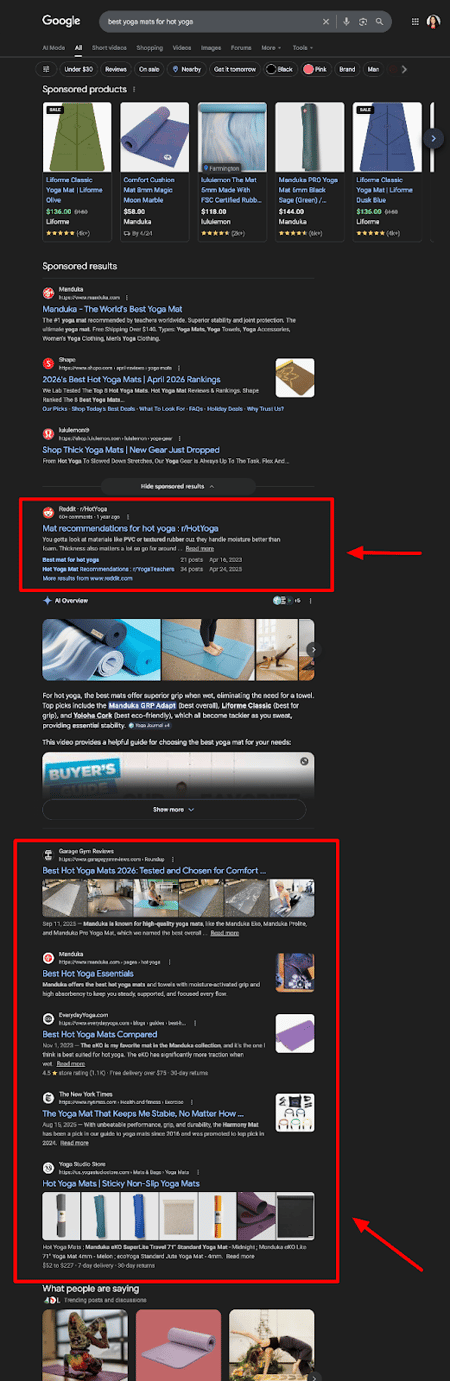
When someone searches Google for “best yoga mats for home workouts,” they likely expect to see a ranked list and choose where to click.

google search results page showing regular, blue link list results to the query best yoga mat for hot yoga

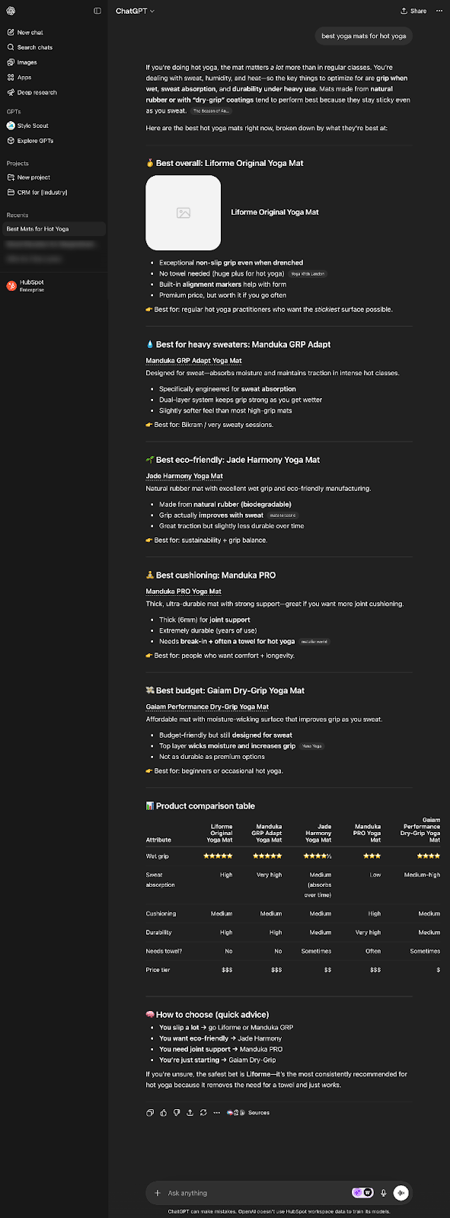
When someone asks ChatGPT the same question, the model synthesizes a direct recommendation, and businesses either appear in those recommendations or they don’t.

chatgpt results page showing anser engine recommendations to the query best yoga mat for hot yoga

Read: ChatGPT Product Recommendations: How to Make Sure You Are One in 2026

Why do they matter?

Experts suggest AI search traffic could overtake traditional organic search traffic within the next two to four years, and AI-referred visitors already convert at 4.4 times the rate of organic visitors from traditional search.

The impact of AI search results is already significant.

Google AI Overviews now appear in approximately 25% of searches, based on Semrush’s analysis — up from 13% in March 2025. ChatGPT has surpassed 800 million weekly active users. And 73% of B2B buyers now use AI tools in their purchase research process, according to a March 2026 synthesis of 680 million AI citations.

Despite this, however, only 22% of marketers currently track AI visibility, meaning the competitive window for early movers is still open.

How marketing teams use AI search analytics tools

AI search analytics tools support four core marketing workflows, each addressing a blind spot that traditional analytics platforms can’t cover.

  • Content planning: Understanding which prompts trigger AI responses in your category reveals gaps your existing content doesn’t address.
  • Brand monitoring: Tracking when, how, and in what context AI systems mention your brand catches reputation risks that traditional media monitoring misses entirely.
  • Competitive intelligence: Seeing which competitors appear alongside your brand — or instead of it — for high-intent prompts gives a new category of market signal.
  • Attribution: Linking AI citations to referral traffic and conversion rates finally gives brands a feedback loop to prove ROI on AEO and GEO investments.

For a deeper strategic context on how AI is reshaping the marketing stack, the free HubSpot AI Web Analytics guide is a useful companion read.

Features to look for in AI search analytics tools

The AI visibility platform category emerged quickly, and tooling maturity varies significantly across vendors. My experience evaluating these platforms has taught me that features fall into two buckets: core visibility capabilities and operational needs.

Both are needed before committing to any paid subscription.

Core Visibility Features

Platform Coverage

A brand can appear in 90% of prompts on one platform and be completely absent from another, so multi-platform tracking is not optional.

At minimum, your a should track ChatGPT, Gemini, and Perplexity as these are the three largest platforms by user base and have the strongest impact on purchase research. Google AI Overviews, Microsoft Copilot, and Claude coverage broadens brand signal, but only matters if your audience actively uses those platforms.

HubSpot AEO tracks ChatGPT at all levels, including Free, while paid accounts add Perplexity and Gemini. More platforms are in the works.

Prompt Tracking

The ability to define and monitor specific conversational prompts (aka the actual questions buyers type into AI systems) is the core unit of measurement in this category.

Look for tools that let teams enter their own prompts and suggest others based on industry and competitors. The quality and relevance of the prompt library directly determine how useful the visibility data will be.

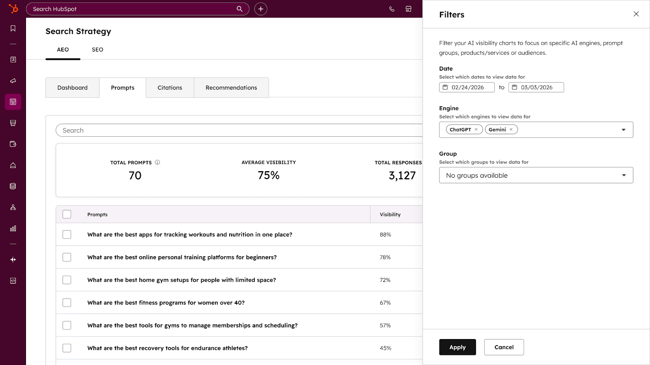
In HubSpot AEO, the Prompts tab is where marketers manage which questions they’re tracking and see how their brand performs on each one.

ai search analytics tools, HubSpot AEO search strategy dashboard for prompt management

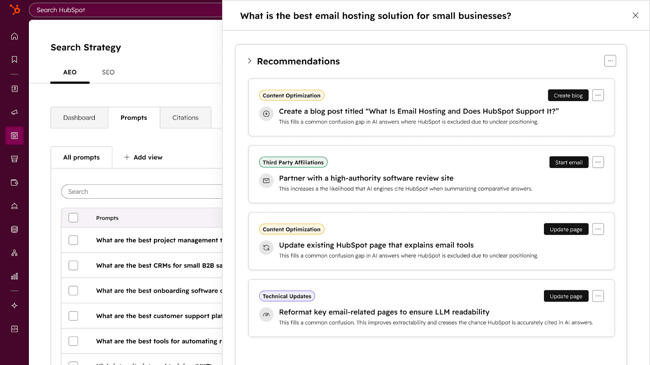
Teams can also view recommendations and organize prompts into groups by product line or customer segment, which makes it easier to analyze performance for specific parts of the business.

ai search analytics tools, hubspot aeo prompt recommendations dashboard with suggestions tailored to a specific business case

Citation and Mention Analysis

Beyond knowing whether the brand appears, marketers need to know which URLs AI systems are citing, how often, and in what position. Having the specific URLs helps teams understand what pages are working and what needs to get done to accomplish set goals.

Unlinked mentions matter too. AI systems frequently reference brands without hyperlinking, and those mentions still shape perception. Tools that separate linked citations from brand mentions give a more complete picture.

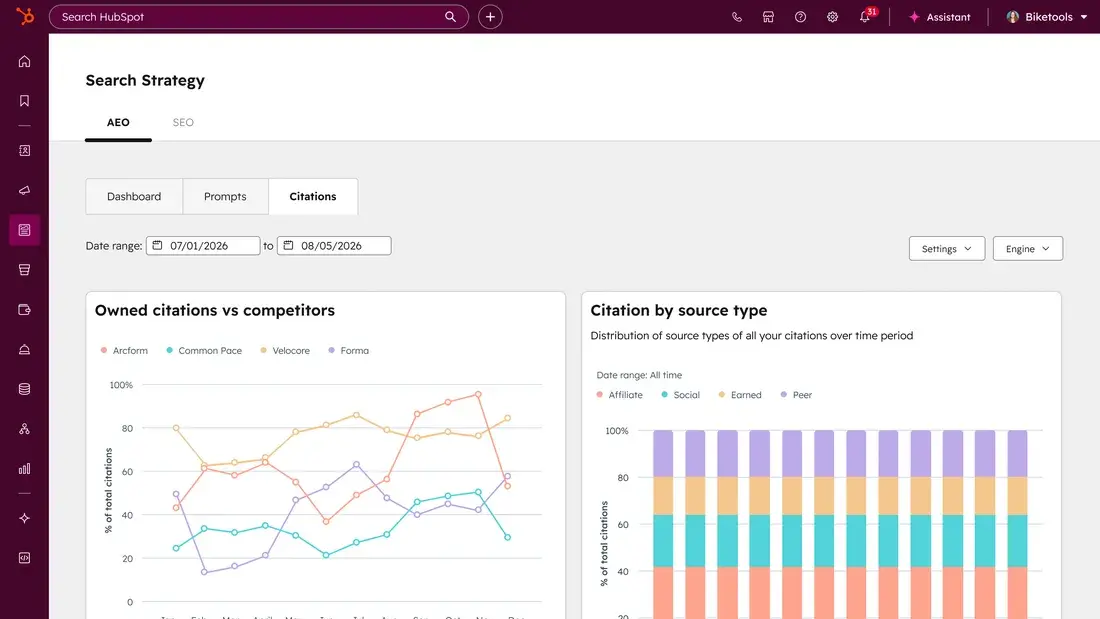
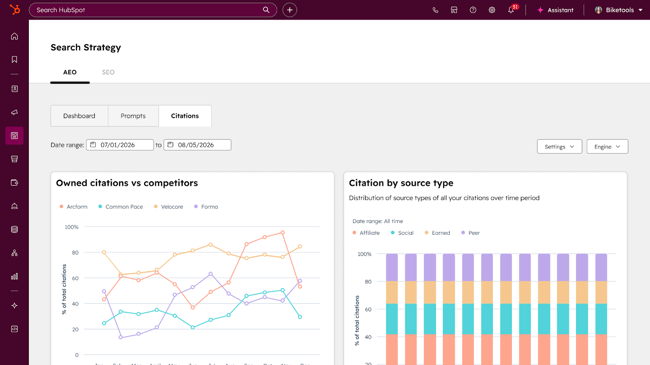
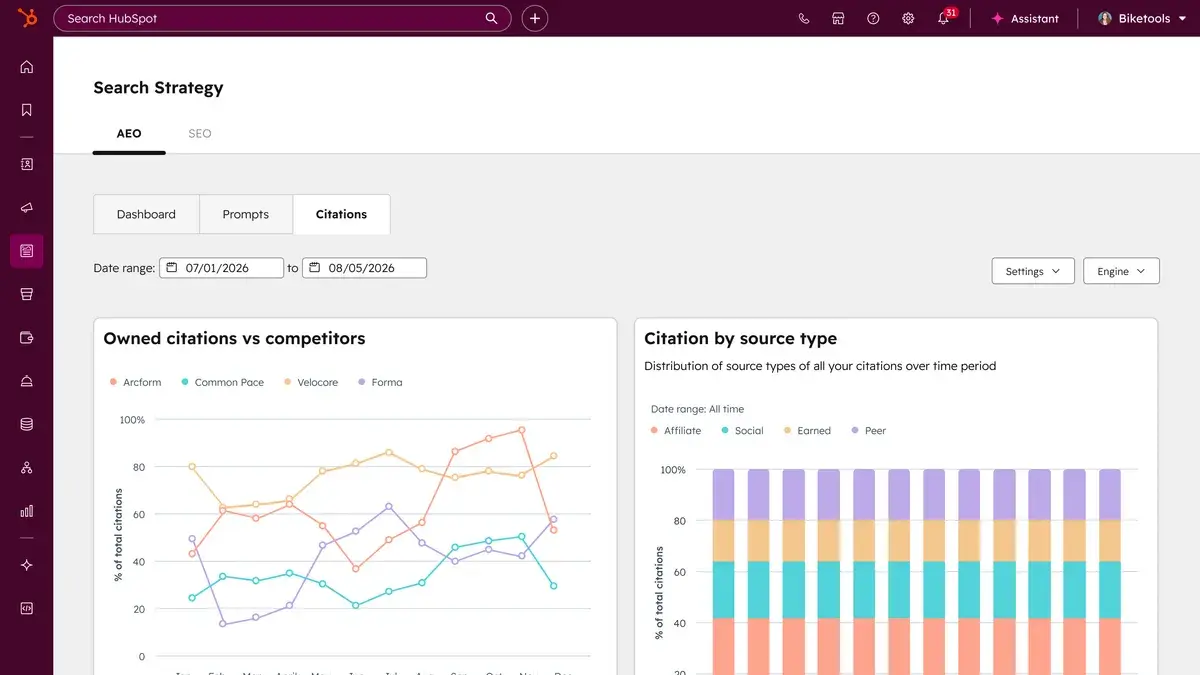
The Citations tab in HubSpot AEO breaks down exactly which sources AI is pulling from.

ai search analytics tools, hubspot aeo citations dashboard showing which types of content are cited.

You can see which content types are most commonly cited (listicles, blog posts, product pages, news articles, etc.), which channels those citations come from (your own website, earned media, review sites, user-generated content like Reddit, and so on), and which specific domains are getting cited most often.

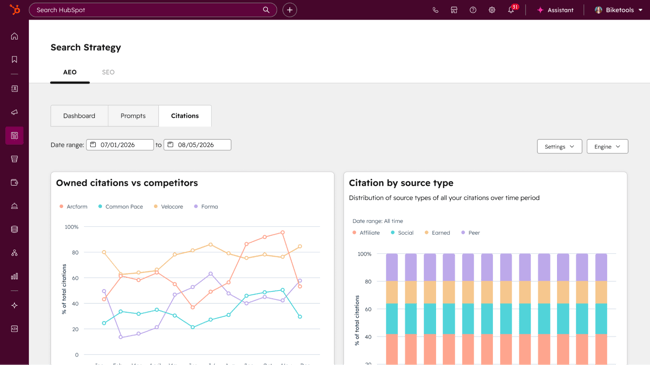
There’s also a competitive view that shows how often AI cites a website compared to competitors, and how often a brand is mentioned across citations overall.

Sentiment Analysis

Are AI systems describing your brand positively, negatively, or neutrally? Sentiment scoring at the mention or citation level reveals whether the brand’s AI presence is helping or hurting. It also flags reputational issues before they appear in conversion data.

Alongside Brand Visibility in HubSpot AEO, there is a Sentiment Analysis tab. This measures how positively or negatively a brand is described in AI-generated responses, on a scale from -100% to +100%.

Competitor Benchmarking

Share of voice, or the percentage of AI responses in a given category that include a brand versus its competitors, is the key performance indicator in this space. Knowing competitor traffic in general can also help give marketers context.

Look for tools like HubSpot AEO that let teams track a defined competitor set and show where the brand is winning or losing.

Operational Needs

The core visibility features are only half the equation. How a tool handles data history, alerting, and integrations determines whether it fits into a real team’s workflow.

Historical Data

AI visibility shifts with model updates, changes in training data, and seasonal demand patterns. Without historical trending, marketers can’t distinguish a real improvement from model volatility. Look for at least 90 days of historical data, ideally more.

Alerting

Visibility can change overnight when a major publication covers a competitor or when a model update reweights its training data. Alerts for significant mention gains, citation losses, or competitor overtakes let teams react in near real-time rather than catching changes in a monthly report.

HubSpot AEO, for example, offers weekly score tracking and trend alerts.

Exports and Integrations

AI visibility data becomes far more accurate and actionable when it connects to the tools a team already uses (i.e. Google Analytics, Search Console, Slack, Looker Studio, CMS)

Native exports to CSV or direct integrations let teams fold AI visibility into existing reporting cadences. HubSpot AEO fully integrates with existing HubSpot workflows and tools (like Content Hub and Marketing Hub) as well as third-party tools like Reddit and TikTok.

Governance and Access Control

Enterprise teams managing multiple brands or regional markets need workspace separation, role-based permissions, and ideally compliance certifications like SOC 2 Type II. These aren’t nice-to-haves for large organizations; they’re requirements that keep a company’s activities secure and organized.

Tools like HubSpot have robust user permission settings to help with this.

ai search analytics tools: hubspot access control dashboard

Quick Vendor Demo Checklist

Before any sales call or trial, I recommend running through this list to stress-test the tool against your actual use case:

  • Can I add my own custom prompts, or am I limited to what the platform suggests?
  • Which AI platforms are covered on my plan, and which require an upgrade?
  • How far back does historical data go, and how often does it update?
  • Can I export data to CSV and connect to Google Looker Studio or a BI tool?
  • Does the tool distinguish between linked citations and unlinked brand mentions?
  • What alerting options exist for significant visibility changes?

Below is a breakdown of the platforms I’d put on any marketing team’s tech stack shortlist, organized from free to enterprise.

I’ve included a coverage comparison table to help you see the platform tradeoffs at a glance. An asterisk (*) indicates that a feature is available only on higher-tier plans.

AI Search Analytics Tool Coverage Comparison

*Claude monitoring is available on Profound Enterprise plans only. Pricing current as of April 2026.

1. HubSpot AEO

hubspot aeo owned citations vs competitors dashboard allows users to track answer engine citations by source over a period of time

Best for: Marketing teams that want ongoing AI visibility tracking, competitive benchmarking, and prioritized recommendations across ChatGPT, Perplexity, and Gemini in one platform.

HubSpot AEO tracks how a brand appears in AI-generated answers across ChatGPT, Perplexity, and Gemini on a daily basis. It analyzes brand mentions, competitor share of voice, and citations — and crucially, tells teams what to do about what it finds.

The Prompts tab is where marketers manage which questions they’re tracking and see how the brand performs on each one. Marketers can organize prompts into Groups by product line or customer segment, making it easier to analyze performance for specific parts of the business. Prompts are suggested based on business context, and for Marketing Hub customers, CRM data makes those suggestions more relevant from day one.

The Citations tab breaks down exactly which sources AI is pulling from — which content types are most commonly cited, which channels those citations come from, and which specific domains are getting cited most often. There’s also a competitive view showing how often AI cites your website versus competitors.

Alongside Brand Visibility, a Sentiment Analysis tab measures how positively or negatively a brand is described in AI-generated responses over time.

What sets HubSpot AEO apart from monitoring-only tools is the recommendations layer. Rather than just surfacing where a brand appears or doesn’t, it delivers prioritized actions — from creating new content to building presence on third-party platforms that answer engines trust. For Marketing Hub Pro and Enterprise customers, those recommendations connect directly to HubSpot’s content tools.

Not ready to commit to a paid plan? Start with HubSpot’s free AEO Grader, which gives teams a one-time snapshot of their brand’s visibility across ChatGPT, Perplexity, and Gemini. This option includes sentiment analysis, share of voice, and a competitor comparison — with no setup required. It’s a strong starting point before moving to ongoing tracking.

Pro tip: Run the AEO Grader on the brand’s top two competitors before the first strategy session. The side-by-side score comparison gives immediate context for where the brand is over- or under-indexed relative to the market, and it’s a compelling slide in a stakeholder deck.

What we like: Daily tracking across three platforms, citation and sentiment analysis, prioritized recommendations, CRM-connected prompt suggestions, and a free Grader for teams not yet ready for a paid subscription.

Pricing: Free 28-day trial available. Paid plan starts at $50/month, or included in Marketing Hub Pro and Enterprise at no additional cost.

2. HubSpot AEO Grader

hubspot aeo grader let’s users track their brand’s current visibility in answer engines like chatgpt, perplexity, and gemini

Best for: Teams new to AI visibility who want a free, no-setup audit across ChatGPT, Perplexity, and Gemini.

I’d start any AI visibility conversation with HubSpot’s free AEO Grader, because it immediately shows brands where they stand before spending a dollar on paid tooling.

AEO Grader evaluates your brand across five scored dimensions:

  • Sentiment Analysis
  • Presence Quality
  • Brand Recognition
  • Share of Voice
  • Market Competition.

It also cross-validates results across GPT-5.2, Perplexity, and Gemini simultaneously to produce a composite score out of 100, plus a written interpretation and an exportable report.

What makes it genuinely useful for getting started is that it goes beyond a single score. Marketers get narrative theme analysis (the recurring stories AI consistently associates with your brand), source quality assessment (identifying which publications and domains are shaping how AI perceives you), and competitor comparison.

For competitive intelligence, the tool accepts any brand name, so teams can run the same analysis on top competitors.

HubSpot also offers deeper AEO Strategy features, including content scoring, optimization recommendations, and AI referral traffic reporting, directly in the platform — creating a loop from brand audit through content action to traffic measurement.

ai search analytics, aeo tool

Pro tip: Run the AEO Grader on your top two competitors before your first strategy session. The side-by-side score comparison gives you immediate context for where you’re over- or under-indexed relative to the market, and it’s a compelling slide in a stakeholder deck.

What we like: Free, no setup, cross-validates across three AI platforms simultaneously, produces an exportable report with source-level analysis. Strong starting point before committing to a paid tool.

Pricing: AEO Grader is free for all, and you can get started with HubSpot AEO for free as well. Paid add-on is available for $50/month.

3. Semrush AI Visibility Toolkit

ai search analytics tools, semrush ai visibility dashboard with visibility score

Source

Best for: Teams already using Semrush who want SEO and AI visibility in one platform, or agencies needing scalable prompt tracking with competitive benchmarking.

If your team already lives inside Semrush for keyword research and rank tracking, the AI Visibility Toolkit is the natural upgrade path. It tracks brand mentions and visibility across ChatGPT, Google AI Overviews, AI Mode, Perplexity, and Gemini.

The greatest selling point, however, is the integration: teams can see their traditional SEO rankings and your AI visibility on the same platform, in the same reporting cadence, without context-switching.

The toolkit is now bundled into Semrush One, launched in October 2025, which combines the full SEO toolkit with AI visibility tracking.

I’ve found the AI Visibility Score to be a useful executive-level metric. It gives you a single number to track over time and benchmark against competitors. The Brand Performance reports are the most actionable feature, showing sentiment shifts, source attribution, and competitive positioning week over week.

What we like: All-in-one SEO + AI visibility, strong prompt-tracking infrastructure, Brand Performance reports with source attribution, familiar interface for existing Semrush users.

Pricing: Semrush One Starter begins at $199/month and includes both toolkits. The standalone AI Visibility Toolkit is $99/month per domain, though the base plan limits users to 25 custom prompts — and scaling up for additional domains or prompt volume adds cost quickly.

4. Otterly.AI

ai search analytics tools otterly brand coverage over time dashboard example using adidas

Source

Best for: Marketing teams and agencies that need fast, affordable brand monitoring across six AI platforms with a clean interface and strong GEO audit capabilities.

Otterly.AI has built a strong reputation as the most accessible pure-play AI search monitoring tool on the market. Used by over 20,000 marketing professionals and recognized as a Gartner Cool Vendor in 2025, it covers ChatGPT, Google AI Overviews, Google AI Mode, Perplexity, Gemini, and Microsoft Copilot, making it the broadest platform coverage at its price tier.

The core workflow is prompt-based: users define a library of conversational queries that mirror what their buyers actually type into AI systems, and Otterly automatically runs those prompts across its covered platforms, logging brand mentions, citation URLs, share of voice, and sentiment over time.

On top of that, the Brand Visibility Index and weekly citation change alerts are particularly useful for catching competitive shifts before they surface in the pipeline.

One honest limitation: Otterly is a monitoring-first approach. It provides clear insight into what’s happening, but it doesn’t include built-in content creation or optimization capabilities. Marketers will need separate tools to act on what they discover.

What we like: Six-platform coverage, clean GEO audit tool, Google Looker Studio connector, weekly citation alerts, agency workspace support. Strong value for monitoring-focused teams.

Pricing: Lite at $29/month (15 prompts), Standard at $189/month (100 prompts), Pro at $989/month (1,000 prompts). Free trial available. The pricing jump is steep for teams that outgrow the entry tier.

5. Profound

ai search analytics tools, profound’s visibility by persona dashboard

Source

Best for: Enterprise marketing teams with compliance requirements, Fortune 500 brands needing multi-model coverage, including Claude and Grok, and teams that want both monitoring and AI-optimized content creation in one platform.

Profound is the most funded dedicated AI visibility platform in the market, having raised $58.5 million across seed, Series A, and Series B rounds.

It’s built for organizations with enterprise-scale needs like SOC 2 Type II and HIPAA compliance and multi-workspace management. It also covers 10+ AI models, including Claude, Grok, and DeepSeek on enterprise tiers.

Profound’s standout feature, in my opinion, is its Conversation Explorer, a real-time window into what millions of users are actually asking across AI platforms, with search volume data that was previously invisible to marketers.

Combined with the AI Visibility Dashboard and Prompt Volumes analytics, it gives content, PR, and brand teams a market intelligence layer that goes well beyond citation tracking. The platform also includes Agents for creating AI-optimized content, making it one of the few tools that closes the loop between insight and execution.

What we like: Enterprise security, Conversation Explorer for market research, AI Agents for content creation, and the deepest AI model coverage at enterprise tiers. Best for large organizations serious about AI search as a strategic priority.

Pricing: Starter from $99/month (ChatGPT only), Growth at $399/month, Enterprise custom. No free trial.

6. Peec AI

ai search analytics tools, peec ai’s sentiment analysis tool showing hubspot with a 95% positive sentiment for the keyword “what are the best startups”

Source

Best for: Content-led SaaS and B2B teams that want granular visibility, segmentation by model, region, and audience persona — with fast setup and daily refresh.

Peec AI runs prompts across ChatGPT, Perplexity, and DeepSeek once every 24 hours, with filtering by country IP, AI model, and prompt tags (such as audience persona or funnel stage).

That segmentation capability is more granular than most tools at its price point, and it’s particularly useful for B2B teams running multi-market or multi-persona strategies.

What we like: Granular segmentation by model, region, and persona. Daily refresh cadence. Fast onboarding. Strong fit for SaaS teams running structured AEO programs.

Pricing: Starting at €89/month. Free trial available.

7. SE Visible by SE Ranking

ai search analytics tools, se visible let’s users view prompts and brand mentions

Source

Best for: Teams that want an affordable, beginner-friendly AI visibility add-on with clean dashboards and strong net sentiment tracking — especially if they already use SE Ranking for traditional SEO.

SE Visible is SE Ranking’s dedicated AI visibility platform. It tracks brand visibility across ChatGPT, Perplexity, Google AI Mode, and Gemini, with dashboard filters for date, region, topic, competitor, sentiment, and AI engine.

The four top-line metrics (visibility score, rank, average position, and net sentiment) are surfaced immediately at the dashboard level, making it one of the most accessible tools for teams new to the category.

SE Visible is also particularly strong on sentiment tracking. It scores weekly sentiment shifts with a clear net score and breaks down how mentions are framed positively, negatively, or neutrally across platforms.

What we like: Intuitive dashboard, strong net sentiment scoring, source analysis for citation strategy, solid fit for agencies adding AI visibility to their service offering without a steep learning curve.

Pricing: Starting at $49/month. Free trial available.

How to Baseline and Benchmark With AI Search Analytics Tools

One of the most common mistakes I’ve seen teams make is purchasing an AI visibility platform and immediately trying to optimize without first establishing where they actually stand. Baselining is not optional. Without a baseline, marketers can’t distinguish a real improvement from model volatility, and can’t prove ROI to stakeholders who need to justify the subscription spend.

Start by running HubSpot’s free AI Search Grader on the brand and its top three competitors. This gives a composite score across five dimensions cross-validated across ChatGPT, Perplexity, and Gemini. Export the report. This becomes the team’s T0 benchmark. Use it to initiate the team’s AI search analysis workflow.

Fast-start Baseline Workflow

Use this workflow to move from zero visibility data to an active monitoring and optimization system in two weeks.

Week 1: Establish your prompt library.

  • List the 10–20 questions buyers most commonly ask when researching your category. Start with awareness-stage prompts (“What is the best [category] for [use case]?”) and work toward decision-stage prompts (“Compare [your brand] vs. [competitor].”). Review your sales conversations and conduct customer research to uncover these.

    Read: Top 15 Tools For Finding Long-Tail Keywords

  • Add these to your chosen monitoring platform. If your tool suggests prompts, use those as a secondary layer. AI can make mistakes, so you don’t want to shape your strategy on its suggestions alone.
  • Set a competitive benchmark by running the same prompt library against your top three competitors and logging their baseline scores.

Week 2: Conduct a Citation Gap Analysis (Document your citation sources.)

  • Which domains is AI citing when it references your brand? Which domains is it citing when it references competitors?
  • This list becomes your citation gap analysis. These are the publications, review sites, forums, and third-party sources you need to build or strengthen your presence on.
  • Log your Share of Voice percentage for each AI platform separately. A brand that dominates Perplexity citations and has zero Google AI Overview presence has a very different action plan than one with the reverse pattern.

Ongoing: Review and update worksheet weekly.

Each week, take time to review and update all crucial metrics including:

  • Share of Voice this week vs. last week, by platform
  • New citations gained or lost, with the source domain
  • Sentiment score change, with any notable positive or negative prompt surfacing
  • Competitor movement: who gained or lost citations in your category
  • Priority action item for the week: one content, PR, or technical fix based on the data

The goal of a weekly cadence is not to react to every fluctuation — AI models update constantly, and model volatility is real. The goal is to identify directional trends over four-to-eight week windows and build your optimization backlog around those patterns, not week-to-week noise.

How to Improve AI Visibility With Insights From These Tools

Analytics without action is just pointless. The power of AI search analytics tools comes from translating citation gaps, sentiment signals, and competitive benchmarks into a prioritized content and distribution plan.

Here’s how I’d structure the AI SEO side of this workflow.

Content Updates based on Citation Gap Analysis

If your monitoring tool shows that a competitor is being cited for a prompt where you’re absent, the first question is: do you have content that directly addresses that prompt?

If not, create it. If you do, audit whether it’s structured for AI retrievability. This includes:

  • Short, extractable answer blocks
  • Clear headings
  • FAQ schema
  • Original data (that gives AI systems and others a reason to cite you as a primary source.)

New Content Assets Targeting High-value Prompts

According to recent AirOps research, there are certain structured content formats that significantly lift AI citation rates. For instance:

  • Comparison pages with three or more tables earn 25.7% more citations
  • Shortlist-style pages averaging fewer than 10 words per sentence earn up to 18.8% more citations.

Use your prompt data to identify the highest-volume, highest-intent queries in your category, then build content specifically structured to answer those questions clearly and completely.

Authoritative Citation Building

AI systems develop their understanding of brands from the web sources in their training data. The domains AI cites most frequently are high-authority publications, Reddit threads, review platforms, and “Best X” listicles.

Your citation gap analysis will tell you which of those surfaces you’re missing from. Targeted media outreach, guest contributions, and review site presence on the sources that AI trusts are your highest-leverage external actions.

Structured Data and Technical AI Readiness

Schema markup, particularly FAQPage, HowTo, Article, and Organization schema, improves the probability that AI systems can extract and attribute your content correctly.

Check your monitoring tool’s technical audit recommendations, and ensure that AI crawlers (GPTBot, ClaudeBot, PerplexityBot) have access to your key pages. Blocked crawlers are one of the most common and easiest-to-fix sources of low AI visibility for established brands.

Cross-channel Distribution to Expand the AI Training Signal

Single-source content rarely builds AI trust at scale.

As HubSpot’s AEO guide explains, consistent brand messaging across multiple trusted platforms — industry publications, forums, YouTube, LinkedIn, review sites — signals to AI systems that there is a reliable, multi-source consensus around your brand.

AI visibility data can tell marketers which channels are contributing to brand citations and which aren’t, so teams can focus distribution effort where it drives the most citation lift.

FAQs About AI Search Analytics Tools

Which AI platforms should marketing teams monitor first?

Prioritize the platforms buyers actually use. For most B2B marketing teams, that means starting with ChatGPT and Google AI Overviews, which together represent the largest share of AI-driven referral traffic. ChatGPT now drives 87.4% of all AI referral traffic to websites, while Google AI Overviews appear in approximately 25% of all Google searches and dramatically compress CTR for the organic results below them.

Add Perplexity if the audience skews toward technical or research-oriented buyers, whose citation behavior tends to favor high-authority, primary-source content. Gemini is worth adding for consumer-facing brands and any team already investing in Google’s ecosystem.

When should you invest in an AI visibility platform versus building in-house?

The build-vs-buy decision comes down to speed, coverage, and ongoing maintenance cost. Building a basic prompt-tracking system is technically feasible, but engineering and maintenance costs typically exceed a year’s subscription to a purpose-built platform — and a homegrown system will still exclude Google AI Overviews natively.

The recommendation: buy before you build, at least for the first 6–12 months. Start with HubSpot’s free AEO Grader for quarterly brand audits, then add a paid monitoring tool like HubSpot AEO once a baseline is established and the highest-priority platforms and prompts are clear.

How do I prove ROI from AI visibility improvements?

Start by segmenting AI referral traffic in Google Analytics 4. HubSpot’s platform groups AI referrals separately in Traffic Analytics, making it possible to build reports specifically for AI-sourced visitors. Track conversion rate, time on site, and pipeline attribution for that segment separately from organic and direct channels.

The benchmark worth holding in mind: AI search visitors convert at 4.4 times the rate of traditional organic visitors, and SE Ranking’s data found AI visitors spend 68% more time on websites than traditional organic visitors. Even small improvements in AI share of voice can translate to outsized revenue impact relative to the effort invested.

What’s the best way to keep up with model updates and volatility?

AI model updates are the single biggest source of short-term volatility in AI visibility data. The most practical approach is maintaining a change log that records significant model updates alongside visibility metrics, so shifts in Share of Voice can be correlated with external causes rather than assumed to reflect something the team did or didn’t do.

Set up alerting in the monitoring platform for sudden changes in brand mention volume, sentiment score, or competitive positioning. Most platforms notify within 24–48 hours of significant shifts, giving teams time to investigate before a stakeholder asks.

AI search visibility is full of opportunity

The shift to AI-mediated search is already reshaping how buyers discover, evaluate, and choose brands. The teams that invest in measurement now will have months of baseline data, a tested prompt library, and an optimization playbook by the time their competitors begin asking the right questions.

Regardless of budget or team size, the underlying principle is the same. Visibility can’t be improved without first being measured. Start with the free AEO Grader, run it on top competitors, and build from there.

Categories B2B

AI citation tracking tools to monitor and increase visibility

The brand tracking dashboard says awareness is up. Social listening tools show steady mention volume. The PR platform logged a dozen media hits last quarter. But, none of those tools show how a brand shows up when a buyer asks ChatGPT, Perplexity, or Gemini for a recommendation. Get Started with HubSpot's AEO Tool

AI citation tracking monitors when AI-generated answers cite a brand as a source. That requires a fundamentally different toolkit than traditional SEO or media monitoring. Think purpose-built platforms that query across multiple answer engines, run prompt variations, and surface competitive share of voice. Most tool stacks can’t do this, even with AI market research tools in the mix.

This guide covers what AI citation tracking means, which features to prioritize, and how eight leading tools compare on pricing and capabilities. It also walks through a four-dimensional framework to score each option. Looking to track AI citations? Get started with HubSpot AEO today.

Table of Contents

What is a citation in AEO?

a hubspot-branded image defining and explaining, in plain english, ai citation tracking-1

A citation in AEO (answer engine optimization) is when an AI-generated answer references a brand, content, or domain as a source. It’s the AI equivalent of being quoted in a news article, except the “journalist” is ChatGPT, Perplexity, or Gemini, and the “article” is the answer a buyer reads before they ever visit a website.

In practical terms, when someone asks an answer engine, “What’s the best CRM for small businesses?” and the response says “According to HubSpot’s 2026 Marketing Report…” or links directly to a page on a business’s domain, that’s a citation. The AI selected a specific brand’s content from everything it indexed and presented it as a credible source in its answer.

That selection is what makes citations in AEO fundamentally different from traditional mentions. The LLM didn’t just reference a brand; it recommended the brand as the answer.

That said, citations in AI answers typically take three forms:

  • Direct source citations: The AI links directly to a specific page as a source. It’s also the most visible, trackable, and the data point most AEO tools are built around.
  • Brand entity mentions: The AI names a company, product, or expert without linking to a source. A phrase like ‘HubSpot recommends using a content calendar…‘ signals authority even without a URL.
  • Indirect references: The AI paraphrases a brand’s content without naming it. These are the hardest citations to catch, but some advanced AEO tools detect them by running semantic similarity checks against a brand’s published content library.

Most teams only track the first type. That’s a problem, because all three shape how visible a brand is in AI-generated answers. If a team only tracks direct URL citations, they’re undercounting their AI presence. They also miss signals about where their brand has authority but isn’t getting explicit credit.

HubSpot AEO captures all three citation types — direct links, brand mentions, and indirect references — so teams don’t undercount their true visibility in AI-generated answers. Its citation analysis shows how often each citation type appears across prompts and engines.

Why do AEO citations matter for marketers?

Citations in AI answers carry more weight than traditional search rankings or social mentions because they influence buyer behavior. When an answer engine cites a brand’s content, it’s doing three things simultaneously:

  • Positioning the brand as a trusted source. The LLM evaluated the brand’s content against every other indexed source on that topic and chose that one. That’s an algorithmic endorsement, and buyers treat it as one.
  • Influencing decisions before the click. Unlike organic search results, where a user scans 10 blue links, an AI answer delivers a synthesized recommendation. If a brand is cited in that recommendation, it has shaped the buyer’s perception before they visit any website. If a brand is absent, a competitor steps in.
  • Creating a new attribution channel. AEO citations drive measurable referral traffic visits from ChatGPT, Perplexity, and other AI domains that appear in marketing analytics. But they also drive unmeasurable influence: buyers who see a brand cited in an AI answer, then search for it directly or mention it in an internal Slack thread.

In short, AEO citation tracking focuses on citations and source references shown in AI-generated answers. But the downstream impact extends well beyond what any tool can fully attribute. This is why tracking for AEO has become a priority for marketing leaders, SEO strategists, and PR teams alike.

Pro tip: Unsure whether a brand is being cited in AI answers at all? Start with a free baseline before investing in paid tools. HubSpot’s AEO Grader benchmarks brand visibility in answer engines across ChatGPT, Perplexity, and Gemini, and scores brands on recognition, sentiment, share of voice, market positioning, and presence quality.

How are AEO citations different from traditional citations?

An AEO citation is a source reference inside an AI-generated answer. It means the LLM selected a brand’s content as relevant, credible, and useful enough to include in its response.

This definition should not be confused with other uses of the word “citation” in academia, SEO, and PR. In traditional SEO, a citation often refers to a NAP listing (name, address, phone number) in a local business directory. In academic research, it’s a footnote referencing a source. In PR, it’s a media mention.

Here are the key distinctions between traditional and AEO citations:

Understanding this distinction is the first step toward choosing the right AEO citation tracking tools. The tools, metrics, and optimization strategies are entirely different from traditional citation management.

HubSpot AEO and AEO features in Marketing Hub Pro and Enterprise show where content is being selected or passed over in AI answers. Built-in competitor comparisons turn citation tracking into a true share-of-voice analysis, not just a visibility check.

What is AI citation tracking in AEO?

a hubspot-branded image defining and explaining, in plain english, ai citation tracking

AI citation tracking monitors when and where AI-generated answers reference a brand, content, or domain as a source. When a user asks ChatGPT, Perplexity, or Google’s AI Overview a question, the AI pulls from indexed web content such as articles, reports, product pages, and documentation. Then, it often cites those sources directly in the response, which are the “citations” in LLM answers that marketers need to track.

AI citations differ from traditional brand monitoring. Traditional brand monitoring tells marketers that someone mentioned their company on X or in a news article. Citation tracking for AEO tells them that ChatGPT named their blog post as a source when answering a user’s question about their industry. It’s a fundamentally different kind of visibility with different implications for traffic, authority, and pipeline.

AI-generated answers are now a primary way decision-makers consume information. That makes AEO citation tracking essential. If a brand’s content is cited in an AI answer, it’s influencing the buyer before they ever visit the site. If it’s not, the brand is invisible in a growing share of how decisions actually get made.

Traditional monitoring and AI citation tracking don’t just measure different things; they look in completely different places.

For teams trying to track citations to their site in AI results, this means existing PR dashboards and social listening tools won’t surface the data they need. They need purpose-built AEO tools that query LLMs directly and log when their domain appears as a source.

Top tools for tracking citation data address this by automating multi-model, multi-prompt verification at scale. HubSpot AEO automates prompt tracking across ChatGPT, Perplexity, and Gemini, running queries daily and logging when a brand or its competitors are cited. Results roll up into a single answer engine visibility score so teams can quickly see where they stand.

Pro tip: Want to learn more about AEO in under 30 minutes? Check out this video from HubSpot’s Marketing YouTube channel:

Who needs AI citation tracking, and for what?

a hubspot-branded image defining and explaining, in plain english, what marketers measure with ai citation tracking tools

Marketers use AI citation tracking tools to measure:

  • Share of voice
  • PR impact
  • Content performance
  • Pipeline influence

But the specific use cases vary by function. Let’s see below.

SEO and Content Strategists

SEO and content strategy professionals use AEO citation tracking tools to assess:

  • Share of voice in AI answers: Track how often a brand’s content is cited versus competitors for priority keywords and topics. This is the AEO equivalent of ranking, and the best citation analysis tools for answer engine optimization make this data accessible at the keyword level.
  • Content performance signals: Identify which pages, formats, and content structures earn the most citations. Good AEO content uses clear definitions, consistent entity names, concise fact statements, and structured headings; the citation data tells content strategists whether their content meets that bar.
  • Optimization prioritization: Use citation data to decide which existing content to restructure to meet AI answer eligibility criteria, versus which gaps to fill with new production.

HubSpot AEO helps content teams identify which prompts trigger citations and which pages influence those outcomes. Then, it generates prioritized recommendations for what to create or optimize next.

PR and Communications Teams

PR and communications teams use AI citation tracking tools to quantify:

  • Earned media in AI channels: AI citations are a new form of earned placement. When an LLM cites a company’s executive’s byline or a business’s research report, that’s influence at scale, and citation tracking quantifies it.
  • Crisis and narrative monitoring: Track whether AI answers reference outdated, inaccurate, or competitor-favoring narratives about their brand, then create content that corrects the record.
  • Visibility of spokespeople and thought leaders: Measure how frequently named individuals from the organization appear as cited experts in AI-generated answers across their vertical.

HubSpot’s AEO tool includes sentiment analysis alongside citation tracking. So PR teams can see not just where they’re mentioned in AI answers, but how their brand is being portrayed.

Marketing Ops and Leadership

Here’s how marketing ops and leadership use an AEO citation tracking tool to measure:

  • Pipeline attribution: Connect AI citation data to downstream metrics. To measure citation-to-pipeline influence, ask these questions: Did prospects who entered through AI-cited content convert at different rates? What’s the citation-to-pipeline path?
  • Cross-channel reporting: AI citation tracking fills a gap in the modern marketing dashboard. Without it, marketing leaders have visibility into paid, organic, social, and email, but a blind spot in the fastest-growing information channel.
  • Tool consolidation opportunities: Many teams currently cobble together manual LLM queries, spreadsheets, and disconnected monitoring tools. An AI citation tracking definition that’s shared across marketing, PR, and SEO teams creates alignment on what each team is measuring and why.

AEO features in Marketing Hub Pro and Enterprise connect citation data directly to CRM records. This lets teams trace answer engine visibility from prompt to site visit to lead and pipeline, without cobbling data together manually.

Thought Leadership Programs

Finally, here’s how to use an AI citation tracking tool to run a thought leadership program.

  • Track expert recognition: Monitor whether LLMs associate their brand’s subject matter experts with specific topics. See whether that association strengthens over time as they publish more authoritative content.
  • Content format ROI. Determine whether original research, how-to guides, or data studies earn more AI citations in their niche. Allocate production resources accordingly.

The key takeaway: AI citation tracking closes the gap between publishing great content and being recognized as an authority by AI systems.

In the next section, let’s break down the must-have features to look for when choosing an AI citation tracking tool.

Must-have Features in AI Citation Tracking Tools for Marketers

Not every tool that claims to monitor answer engine visibility actually does the job. Marketing teams need a tool that tracks citations across multiple LLMs, captures brand mentions, measures share of voice, and delivers actionable insights.

Tracking Across Multiple LLMs

Start with LLM coverage: does the tool track citations across the models customers actually use, or just one?

ChatGPT, Perplexity, and Gemini each pull from different indexes, weigh content signals differently, and surface different citations for the same query. A tool that monitors only one gives teams a fragment of the picture.

The best tools track citation data across all major answer engines simultaneously, and present the results in a consistent format so teams can compare performance across models.

When evaluating LLM coverage, look for:

  • Model breadth: Does the tool query ChatGPT, Perplexity, Google AI Overviews, Claude, and Gemini at a minimum? These five account for the majority of AI-assisted search behavior among B2B buyers.
  • Prompt variation: LLM outputs are non-deterministic, meaning the same question can produce different citations each time. The best tools run the same query multiple times and in different ways, so citation data reflects a real pattern rather than a one-time result.
  • Update frequency: AI models update constantly. A tool that only checks weekly can miss changes that happened days ago. Look for daily monitoring at minimum.

Pro tip: If a vendor can’t say exactly which models they query, how many prompt variations they run per keyword, and how often they refresh results, that’s a red flag. AEO citation tracking is only as reliable as the methodology used to query it.

HubSpot AEO tracks visibility across multiple engines in one dashboard. It shows which prompts cite a brand, which cite its competitors, and where a brand is completely absent.

Brand Mention Captures Beyond Direct Citations

There’s a very important distinction between a direct citation and a brand mention. Both matter, and the best citation analysis options for AEO capture both. If a tool only tracks linked citations, it undercounts a brand’s actual presence in AI answers.

That said, look for tools that distinguish between:

  • Direct source citations: The LLM explicitly links to or names a specific URL from a brand’s domain as a reference.
  • Brand entity mentions: The LLM references a company, product, or named expert without a direct link (which still signals authority and recognition).
  • Indirect references: The LLM paraphrases or reflects a brand’s content without attribution. Some advanced tools detect this by matching semantic similarities against the brand’s published content library.

This granularity is what distinguishes a monitoring tool from an actual AI citation-tracking platform. Without it, marketers can’t answer the basic question: “How visible is our brand in AI-generated answers?”

HubSpot AEO breaks down citations by type and source, including which domains and content formats answer engines rely on most. This helps teams understand not just if they’re visible, but why.

Measure Share of Voice and Competitive Position

Knowing a brand’s own citation count is useful. Knowing it relative to their competitors is actionable. Any good tool should answer: For the queries that matter to our business, how often are we cited versus the competition?

The share of voice for AI answers differs from traditional SERP results. In organic search, a web page either ranks or it doesn’t. In AEO, multiple sources can appear in a single response, meaning a brand might show up alongside two competitors, or not at all.

Strong AI citation tracking tools provide competitive analysis that includes:

  • Head-to-head citation frequency: For a brand’s target query set, how often does each competitor appear as a cited source across models?
  • Co-citation patterns: Which brands frequently appear in the same AI answer? This reveals who LLMs view as a brand’s true competitive set, which may differ from its traditional competitor list.
  • Topic-level authority mapping: For which subjects does each competitor earn the most citations? This shows where a brand is winning, where it’s losing, and where there’s space to claim.

HubSpot AEO and Marketing Hub include competitor analysis that shows share of voice across tracked prompts. This reveals where competitors consistently earn citations and where gaps exist.

Provide Actionable Insights, Not Just Dashboards

Most tools stop at dashboards. They show the data but don’t tell teams what to do with it. Raw citation counts and mention logs are data. What marketers need are insights that drive decisions: Which content should we restructure? Which entities need reinforcement? Where are we losing citations we previously held?

When tracking citations to a site in AI results, the data should connect to action. Specifically, look for:

  • Content-level attribution: Which specific pages on a site are earning citations, and for which queries? This tells marketing leaders what’s working and what to replicate.
  • Citation trend analysis: Are a brand’s citations increasing or decreasing over time? Did a content update or competitor move shift its visibility? Trend data turns static snapshots into a narrative that teams can act on.
  • Optimization recommendations: The strongest tools go beyond reporting and suggest what to change. Good AEO content uses clear definitions, consistent entity names, concise fact statements, and structured headings. The best tools flag when cited content falls short of these standards.
  • CRM and pipeline integration: For marketing ops teams, the question isn’t just “are we cited?” It’s “do citations correlate with pipeline?” Tools that integrate with a company’s CRM let marketers trace the journey from citation to site visit to lead to opportunity, closing the attribution loop.

Pro tip: Before evaluating paid tools, establish the baseline. HubSpot’s AEO Grader benchmarks brand visibility in answer engines for free. This shows marketers where they currently appear, where they don’t, and what to prioritize.

HubSpot AEO pairs citation data with clear, prioritized recommendations. In Marketing Hub Pro and Enterprise, those recommendations connect directly to content tools so teams can go from insight to published updates in one workflow.

A Quick Evaluation Scorecard for AI Citation Tracking Tools

When comparing AI citation tracking tools side by side, score each option against these five criteria,

  • LLM coverage breadth: Does it monitor citations across five or more major models, running each query multiple ways to ensure consistent results?
  • Mention type granularity: Does it capture direct citations, brand mentions, and indirect references separately?
  • Competitive intelligence: Does it show share of voice, which competitor brands appear alongside the brand, and where the brand has the most authority by topic?
  • Actionable output: Does it connect citation data to content recommendations and business outcomes?
  • Integration depth: Does it connect to the tools the team already uses, such as CRM, analytics, and content management, so citation data shows up where decisions actually get made?


Best AI Citation Tracking Tools

1. HubSpot AEO

a screenshot of hubspot aeo dashboard

HubSpot AEO is designed to help marketers understand how their brand appears in AI-generated answers and act on that visibility. Unlike tools that only monitor visibility, HubSpot AEO combines citation tracking, content insights, and optimization workflows in one platform. This allows teams to move from insight to action.

Core Features

  • Answer engine visibility and sentiment analysis: HubSpot AEO monitors how brands appear across ChatGPT, Gemini, and Perplexity, and whether mentions are positive, negative, or neutral. This helps teams track citations, mentions, and overall presence in AI-generated responses.
  • Prompt tracking and suggestions: HubSpot also suggests prompts based on a company’s competitors and industry.
  • Content optimization insights: The AEO tool identifies which pages and topics are most likely to earn citations and provides recommendations to improve structure, clarity, and authority.
  • Actionable recommendations: HubSpot turns visibility data into clear, prioritized recommendations to improve a brand’s AI presence.
  • Competitive visibility analysis: Marketing teams can benchmark the brand’s presence against competitors to understand share of voice and identify gaps in coverage.

Limitations

  • Not natively connected to other tools like CRM or content and marketing tools.

Best for: Marketing teams that want an all-in-one platform to monitor, optimize, and improve brand visibility across AI search and answer engines.

Pricing: $50/month (or $45/month billed annually). No HubSpot platform subscription needed.

2. Marketing Hub Pro and Enterprise

a screenshot of hubspot marketing hub aeo features

HubSpot Marketing Hub (Pro and Enterprise tiers) includes built-in AEO features that allow teams to optimize content for AI-generated answers without adding a separate tool. These capabilities extend HubSpot’s existing SEO, content, and analytics tools to support answer engine optimization. Teams can adapt their current workflows to AI-driven discovery without starting from scratch.

Another advantage of HubSpot Marketing Hub’s AEO capabilities is how tightly they connect with a company’s CRM and customer data. Because everything lives within the same platform, teams can tie content performance directly to real business outcomes like leads, pipeline, and revenue. This closed-loop reporting makes it easier to understand which content is being surfaced in AI-generated answers. More importantly, it shows which pieces are actually driving customer engagement and conversions.

By combining AEO insights with rich customer data, marketers can create more targeted, personalized content. They can also continuously refine their strategy based on what’s proven to work across the entire customer journey.

Core Features

  • Competitor monitoring: For every prompt, see how often a competitor shows up in the answer and where a brand is absent. See which sources are driving their citations so marketers know where to focus.
  • AI-powered content optimization: HubSpot Marketing Hub provides recommendations to improve content structure, clarity, and relevance so it aligns with how answer engines extract and cite information.
  • SEO and AEO alignment: The platform connects traditional SEO insights with AEO best practices. This helps teams create content that performs in both search rankings and AI-generated answers.
  • Content performance tracking: Teams can analyze how pages perform across channels, including traffic, engagement, and conversions.
  • Integrated reporting and attribution: Built-in analytics and CRM integration allow marketers to connect content performance to leads, opportunities, and revenue without additional tooling.
  • Scalable content workflows: With built-in tools for content creation, publishing, and optimization, teams can act on AEO insights immediately.

Limitations

  • Teams not already using HubSpot may need to migrate data or adjust existing processes to get full value.

Best for: Growing and enterprise marketing teams that want to embed AEO directly into their existing content, SEO, and campaign workflows.

Pricing:

  • Included in Marketing Hub Pro and Enterprise plans.

3. HubSpot’s AEO Grader

a screenshot of hubspot’s aeo grader

HubSpot’s AEO Grader benchmarks brand visibility across ChatGPT, Perplexity, and Gemini. It scores brands across brand recognition, market positioning, presence quality, sentiment analysis, and share of voice. Users enter their brand name, and the tool handles the rest automatically.

Core Features

  • Five-dimensional scoring: HubSpot’s AEO Grader provides an overview of brand recognition strength, competitive market positioning, contextual relevance, sentiment analysis, and share of voice. Each contributes to a score out of 100.
  • Narrative theme analysis: HubSpot’s AEO Grader identifies the specific themes and contexts answer engines associate with a brand. Marketers can see whether their brand is showing up for the right use cases.
  • Source quality assessment: HubSpot’s AEO citation tracking tool shows which external sources (publications, review sites, forums) influence how AI represents a brand.
  • Multi-language support: Available in English, Spanish, French, German, Portuguese, and Japanese for global teams.

Best for: Marketing leaders, brand managers, and SEO professionals who need an immediate answer engine visibility baseline before committing to paid monitoring tools.

Pricing: Free (no credit card, no usage limits, no features locked behind a paid plan).

4. Otterly.ai

a screenshot of otterly.ai’s ai visibility dashboard

Source

Otterly.ai is a subscription-based AI citation tracking platform that monitors brand mentions and website citations across ChatGPT, Google AI Overviews, Perplexity, and Microsoft Copilot. Gemini and Google AI Mode are available as paid add-ons.

Users define tracked prompts (conversational questions that mirror real user queries), and Otterly automatically runs them across answer engines on a daily or weekly cadence, logging which brands get cited, how often, and in what context.

Core Features

  • Automated prompt monitoring: Otterly.ai can track citations across six answer engines and it updates results daily or weekly.
  • Link citation analysis: Otterly.ai’s citation dashboard shows which URLs are referenced most frequently and by which answer engines.
  • Brand Visibility Index: Otterly.ai’s AEO citation tracking tool gives teams a single metric to track overall AI presence.
  • AEO audit tool: Otterly.ai’s built-in AEO tool includes competitive benchmarking and shows where a brand’s strategy is falling behind.
  • CSV export for stakeholder reporting and custom dashboards: With Otterly.ai, data is downloadable across all plan tiers.

Limitations

  • The prompt-based pricing model means costs scale quickly, so tracking 100+ prompts across five engines can quickly use up credits.
  • Gemini and Google AI Mode require paid add-ons beyond the base subscription.

Best for: Small to mid-size marketing teams and agencies that want continuous, automated monitoring of citations at an accessible price point.

Pricing:

  • Lite: $29/month (15 prompts)
  • Standard: $189/month (100 prompts)
  • Premium: $489/month (400 prompts)
  • Free trial available

5. AirOps

a screenshot of airops’ ai visibility dashboard

Source

AirOps is fundamentally different from the other tools on this list. Most tools focus on monitoring visibility. AirOps is built as an end-to-end content operations platform with answer engine visibility tracking as one layer within a broader production system.

The platform tracks brand presence across ChatGPT, Perplexity, Gemini, and Google AI Mode, identifies citation gaps. From there, it provides the workflow infrastructure (i.e., Power Agents, Grids, and CMS integrations) to create and publish content that closes them.

Core Features

  • Answer engine visibility dashboard: The AEO tracking tool tracks brand citations, share of voice, and competitor positioning across multiple answer engines.
  • Power Agents: AirOps runs custom multi-step AI workflows that move from research to drafting and optimization automatically.
  • Grids: AirOps includes a spreadsheet-style content management interface for planning, assigning, tracking, and publishing at scale.
  • Opportunities module: It surfaces citation gaps, declining mentions, and prompt-level content priorities with weekly (Pro) or monthly (Solo) reports.
  • Direct CMS publishing to WordPress, Webflow, and Shopify: AirOps also features integrations with Semrush and Google Search Console.
  • Page360 analytics: AirOps’ LLM tracking features combine citation data, rank position, AI-generated traffic, and content freshness into a single page-level view.

Limitations

  • The Solo plan only tracks ChatGPT; multi-engine insights (Perplexity, Gemini, Google AI Mode) require the Pro plan.
  • Answer engine coverage is narrower, and the platform has a notable learning curve. Teams without an established content strategy may struggle to get value quickly.

Best for: Established content teams and agencies with a proven strategy that need to combine AI citation tracking with scalable content production workflows.

Pricing: Start with a 14-day free trial for any plan. Solo plans start at $199 per month.

6. Profound

a screenshot of profound ai visibility dashboard

Source

Profound positions itself as a “read/write” marketing platform for AI, meaning it both monitors visibility and generates optimized content. The platform processes millions of citations daily and tracks brand mentions across ChatGPT, Perplexity, Google AI Overviews, Google AI Mode, Gemini, Copilot, Claude, and Grok.

Core Features

  • Prompt volume analytics: The Conversation Explorer shows an estimated AI demand score for topics in a brand’s category.
  • Citation share tracking: Profound offers domain-level ranking against a brand’s full competitive set.
  • Sentiment and theme analysis: The platform goes beyond mention counts to assess how AI portrays a brand.
  • Automated content workflows: Profound has built-in tools to generate AI-optimized content briefs and drafts.
  • SOC 2 Type II compliance, SSO, and enterprise reporting for regulated industries: All are included across plan tiers.

Limitations:

  • The $99 Starter plan covers only ChatGPT with 50 prompts, compared to HubSpot AEO at $50/month for multi-engine visibility across ChatGPT, Perplexity, and Gemini.
  • The learning curve is steep, and platform users would benefit from having a dedicated analyst.

Best for: Enterprise brands and large agencies that need deep competitive intelligence, compliance-grade security (SOC 2 Type II), and cross-engine citation data at scale.

Pricing:

7. Peec.ai

a screenshot of peec.ai’s ai visibility dashboard

Source

Peec.ai is a pure-play AEO analytics platform. It tracks visibility across ChatGPT, Perplexity, Google AI Overviews, Copilot, Gemini, and Google AI Mode, but doesn’t bundle content creation or optimization tools.

This focus keeps the interface simple and the data clean, which teams that already have separate content workflows prefer.

Core Features

  • Prompt-level visibility tracking: Peec.ai offers position data across six AI models.
  • Sentiment analysis: Peec.ai’s AEO tracking tool breaks down positive, neutral, and negative brand characterizations.
  • Competitor benchmarking: AEO citation tracking tools provide regional visibility breakdowns for multi-market brands.
  • Looker Studio integration: Peec.ai integrates with Looker Studio for custom reporting dashboards.
  • Multi-language and multi-region support. This feature is available in multiple countries with Peec.ai.

Limitations

  • Full multi-engine coverage gets expensive; adding Claude, Gemini, DeepSeek, and Grok to the Starter plan can push the total monthly cost to $170–200+/month.
  • The platform focuses purely on monitoring, with no content optimization or generation tools.

Best for: Marketing teams and agencies that want clean, focused answer engine visibility analytics with a strong UX and Looker Studio integration for custom reporting.

Pricing:

  • Starter: $95/month
  • Pro: $245/month
  • Advanced: $495/month
  • Enterprise: Custom pricing
  • Free trial available

8. Scrunch

a screenshot of scrunch ai’s ai visibility dashboard

Source

Scrunch AI monitors brand visibility across seven answer engines: ChatGPT, Claude, Perplexity, Gemini, Google AI Overviews, Google AI Mode, and Meta AI. The platform’s GA4 integration is a differentiator. It tracks AI crawler bot traffic to a site and provides traffic attribution from AI platforms. This helps teams connect citation data to actual site visits and conversions.

Core Features

  • Seven answer engines covered: Scrunch delivers the broadest platform coverage in comparison to most AEO tracking tools.
  • GA4 integration for AI referral traffic attribution and bot traffic monitoring: This is Scrunch’s strongest differentiator compared to other AEO citation tracking tools.
  • Misinformation detection: Scrunch flags inaccurate brand representations in AI answers.
  • Site audit tool: This feature of Scrunch’s AEO tracking capabilities assesses the readiness of each page for AI citation.
  • Sentiment analysis and competitive share of voice tracking are included across all tiers.
  • SOC 2 compliance and enterprise-grade security are included for enterprise buyers.

Limitations

  • The $250/month starting price is one of the highest in the category, and the prompt credit system can be confusing. Tracking prompts across multiple engines depletes credits faster than the headline numbers suggest.
  • Insights and optimization recommendations are still in beta and less developed than the monitoring capabilities.

Best for: Mid-market to enterprise organizations and agencies that need the broadest answer engine coverage, GA4 integration for traffic attribution, and SOC 2 compliance.

Pricing:

  • Core: $250/month
  • Enterprise: Custom pricing
  • Free trial available for the Explorer plan

Now that we’ve walked through the top tools on the market, let’s talk about how to evaluate which one actually fits a team’s stack.

How to Evaluate AEO Citation Tracking Tools for Your Stack

Choosing between AI citation tracking tools isn’t a feature-checklist exercise — it’s a stack decision. The right tool depends on:

  • Which answer engines a company’s buyers use.
  • What systems a company already runs.
  • How much a company can spend relative to the gap they’re closing.
  • Whether the team can actually operationalize the data.

The scorecard framework below provides a structured, repeatable way to evaluate any AI citation tracking platform against four dimensions:

  • Coverage.
  • Integrations.
  • Cost.
  • Team fit.

Score each tool on a 1–5 scale per dimension, then weigh the dimensions based on company priorities.

Dimension 1: Coverage (Which answer engines and data types does it track?)

Coverage is the foundation. If a tool doesn’t monitor the answer engines where a business’s audience searches, nothing else matters. AI citation tracking tools differ from traditional brand monitoring by tracking citations within LLMs and AI-generated answers. But each tool covers a different set of engines.

Score 1–5 based on these criteria:

  • Engine breadth: How many major AI platforms does the tool monitor? The baseline in 2026 is ChatGPT, Perplexity, and Gemini.
  • Mention type granularity: Does it distinguish between direct URL citations, brand name mentions, and indirect references? A tool that only reports “you were cited” without specifying how leaves teams guessing about the nature of their visibility.
  • Prompt variation and sampling. LLM outputs are non-deterministic. A tool that queries each prompt once per cycle gives teams a snapshot. One that runs three to five variations gives them a statistically meaningful signal. Ask vendors: How many prompt runs per query per engine per cycle?
  • Geographic and language coverage. If the audience spans multiple markets, the tool needs to track AI answers by region and language. In this case, U.S. English defaults are limiting.

Dimension 2: Integrations (Does it connect to your existing workflow?)

Most AEO citation tools live in their own dashboard, separate from the CRM, analytics platform, and content workflows a team already uses. The most common trap isn’t bad data; it’s data nobody acts on because it never shows up where decisions get made

Score 1–5 based on these criteria:

  • CRM connectivity: Does it connect citation data to HubSpot, Salesforce, or your CRM of choice? Without it, teams are stuck manually correlating spreadsheets.
  • Analytics platform integration: Does the AI citation tracker connect to Google Analytics 4, Looker Studio, or a BI tool? Teams that track citations to a site in AI results need to see that data alongside organic traffic, paid performance, and conversion metrics.
  • CMS and SEO tool connections: If the tool surfaces content optimization opportunities, can teams act on them within their existing workflow? Integrations with WordPress, Webflow, Semrush, or Ahrefs mean teams can go straight from spotting the gap to shipping the update.
  • Export and API access: Any tool worth considering should export data as a CSV at minimum. For teams building custom dashboards or automating reporting, API access is essential. Check whether API access is included in a plan tier or locked behind enterprise pricing.
  • Alerting and notification channels: Can the tool push alerts to Slack, email, or Teams when the citation status changes? Real-time notifications mean teams catch visibility shifts the day they happen.

Pro tip: Before evaluating paid tool integrations, establish the brand’s baseline for free. HubSpot’s AEO Grader benchmarks brand visibility across ChatGPT, Perplexity, and Gemini. It produces a report marketers can share with their team immediately and reference as they evaluate paid platforms.

Dimension 3: Cost (What’s the real price for the coverage you need?)

Pricing across AEO citation tracking tools is designed to obscure actual costs. The base plan looks reasonable, until marketers add the engines needed, account for how quickly prompt credits deplete, and hit the tier jump that doubles the bill.

To compare costs fairly, measure every tool by the same metric.

Score 1–5 based on these criteria:

  • Cost per tracked query per engine per month: This is the single most useful comparison metric. Divide total monthly cost by (number of tracked queries × number of engines monitored). The best tools keep the per-query-per-engine cost low with no surprise add-ons.
  • Add-on transparency: Does the base price include all engines a business needs, or do critical platforms (Gemini, Claude, Google AI Mode) require paid upgrades? Calculate the total cost for the required engine set. The base tier won’t accurately reflect what you’ll actually spend each month
  • Credit consumption clarity: Some tools count each query × each engine as a separate credit. Tracking 50 queries across five engines consumes 250 credits, not 50. Confirm the math before signing.
  • Tier jump feasibility: Some entry plans cover ChatGPT only, with multi-engine tracking locked behind a 5–10x price jump and no mid-tier option. Factor in whether the budget can sustain that jump — because broader coverage is usually inevitable.
  • Stack displacement value: Does the tool replace any existing tools in the current stack? A $400/month platform that eliminates $150 in social listening costs and $100 in manual audit labor has a net effective cost of $150.

Dimension 4: Team Fit (Can your team actually use it?)

The AI citation tracking definition a team adopts matters less than whether they can act on the data a tool provides. A platform with deep analytics that requires a dedicated analyst to interpret is a poor fit for a three-person marketing team.

A simple dashboard with no optimization guidance is a poor fit for an enterprise content operation with 20 writers.

Score 1–5 based on these criteria:

  • Time to first insight: How quickly can a new user go from sign-up to actionable data? Tools requiring multi-day onboarding, sales calls, or prompt library configuration slow teams down before they’ve even started.
  • Learning curve and UX: Can a team navigate the interface without training? Ask for a trial or demo and have the person who’ll actually use it evaluate usability.
  • Actionability of output: Does the tool tell marketers what to do with the data, or just present it? Platforms that surface specific content recommendations, priority rankings, and optimization guidance are built for teams without a dedicated AEO analyst. Tools that just present data are ideal for teams that have someone to interpret it.
  • Reporting and stakeholder communication: Can users generate exportable reports for leadership, clients, or cross-functional partners? If proving AEO impact to the VP or CMO is a goal, the tool needs to produce shareable artifacts.
  • Seat model and collaboration: Does pricing scale per user, or are seats unlimited? For teams where marketing, PR, SEO, and ops all need access, per-seat pricing can double or triple the effective cost.

Putting the Scorecard to Work

Once marketers have evaluated each platform against these criteria, score each tool across all four dimensions, then weight the scores based on the team’s primary need.

HubSpot AEO is a quick starting point for teams new to AEO. It delivers a visibility score, competitor benchmarking, and actionable recommendations without requiring a broader platform commitment.

For teams already using HubSpot Marketing Hub, the built-in AEO features extend those capabilities by connecting insights directly to execution. Teams can go from identifying a citation gap to publishing the fix all in the HubSpot platform.

Frequently Asked Questions About AI Citation Tracking Tools

How often should you audit LLM and AI answer citations?

Marketing teams should audit AI citations weekly for high-priority queries and monthly for broader keyword sets. Because LLM outputs are non-deterministic, a single snapshot can’t reliably represent citation visibility. A weekly cadence helps teams detect shifts early, before competitors gain sustained visibility through new or updated content.

HubSpot’s AEO Grader benchmarks brand visibility in answer engines for free. Marketers should run it monthly on both their brand and their top three competitors to catch positioning shifts between their automated monitoring cycles. Then use those monthly snapshots to verify that the reports from paid tools align with what the answer engines actually show.

How can you verify citations and handle AI hallucinations?

AI systems can produce hallucinated citations by referencing nonexistent sources or misattributing claims to brands. Marketing teams should implement a verification workflow that includes checking URLs for accuracy, validating claims on cited pages, and testing multiple prompt variations to assess citation consistency across runs.

How do you fairly compare costs across tools?

Organizations should normalize pricing by calculating cost per tracked query per engine per month, as vendors use different billing models that can obscure true costs. Evaluating this standardized metric allows teams to make accurate comparisons across tools with varying prompt limits and engine coverage.

What are the basics of improving AEO metrics?

Content teams should structure pages to align with how AI systems extract and cite information. This includes leading with clear definitions, using consistent entity names, and organizing content with question-based headings that match common user queries.

You can’t survive the AEO era without an AEO tracking tool

Marketers can’t compete in the AEO era without a system to measure and improve how their brands appear in AI-generated answers — and that starts with the right tooling.

Platforms like ChatGPT, Perplexity, and Google AI Overviews now determine which sources get cited. This shifts visibility from traditional rankings to whether content is selected, trusted, and reinforced across responses.

HubSpot offers AEO capabilities through two routes: its dedicated AEO product and built-in features within Marketing Hub Pro and Enterprise. Both help teams track AI citations, analyze performance in generative search, and translate those insights into action.

Categories B2B

The Recall Gap: The Three Problems No One in B2B Wants to Own

Before you can fix a broken follow-up strategy, you have to agree on what’s actually broken… and most post-mortem conversations in demand gen don’t get there. 

They stop at the symptoms—cold leads, low connect rates, SDRs questioning data quality—without asking what structural conditions produced those symptoms in the first place. The answers aren’t flattering, which is probably why they don’t get asked often enough.

The Real Problems Disrupting Demand

There are three problems quietly dismantling the standard B2B follow-up playbook. 

None of them is new, and none of them is your fault. And, unfortunately, none of them go away by running the same plays harder. Here are the issues in greater detail that lead to the Recall Gap.

Problem 1: The Buying Cycle Is Getting Longer

Photo by Felix Mittermeier on Unsplash

The playbook most teams are running was designed for a world in which leads moved in weeks. 

That world is gone. 

For years, demand generation’s greatest promise to revenue teams was speed.

  • Faster follow-up. 
  • Faster conversion. 
  • Faster pipeline.

The problem with this promise is that buyers only care about their own timeline. Who can blame them? Buyers have a lot to consider, after all. And those considerations take time. 

  • NetLine’s 2026 State of B2B Content Consumption and Demand Report found that near-term purchase intent—buyers planning a decision within three months—declined 15.7% in 2025. 
  • At the same time, 6–12-month purchase intent surged by 78.6%. 
  • Dreamdata’s 2026 LinkedIn Ads Benchmarks Report echoes our findings. Their research revealed that the average B2B sales cycle now runs 272 days from first touch to closed-won. 

In chronological terms, a lead who registered on January 1st is most likely to be ready to buy sometime around late September. That’s almost nine months exactly.

The good news is that buyers aren’t saying no. They’re only saying not yet.

Therefore, the moment someone raises their hand for content does not equate to the moment they’re ready to buy. And follow-up strategies based on the assumption that registrations do signal near-term intent misfires on the vast majority of your pipeline before a single email is sent.

Problem 2: Engagement Is Taking Longer Than Ever

Photo by Usukhbayar Gankhuyag on Unsplash

Setting aside the buying cycle, there’s a more immediate problem hiding in the window between registration and the moment a prospect actually opens what they signed up for.

NetLine calls this the Consumption Gap. It’s the measurable distance between curiosity and action—between the moment someone raises their hand and the moment they actually engage with the content. 

In 2025, the Consumption Gap hit a record 47.7 hours. That’s up nearly 10 hours from 2024 (38.5 hours) and an increase of 23.9% year-over-year. You can see in the chart below just how consistent this widening has become. 

Most teams treat the Consumption Gap as a timing inconvenience; a reason to wait a day before following up. That framing understates the problem considerably. The Consumption Gap’s significance goes deeper than scheduling—it eventually becomes a memory problem.

The longer a registrant takes to consume content, the greater the likelihood they’ll forget everything. By the time your prospect sits down to consume what they registered for, a significant portion of whatever brand memory formed at the moment of registration has already decayed. 

The Forgetting Curve

Photo by Andrew Pons on Unsplash

Newly formed memories don’t fade gradually and evenly. These memories decay most steeply in the hours immediately following encoding. 

Hermann Ebbinghaus first documented the Forgetting Curve in 1885. A 2015 PLOS ONE study replicated his findings almost exactly, 130 years later.

A 2017 Nielsen study brought it into a directly relevant context: branded recognition dropped by roughly half in the first 24 hours after exposure. Researchers showed participants video ads, then tested a separate group 24 hours later. 

Half the brand memory evaporated overnight.

Now add the 48 hours your prospect waits, on average, before engaging with the content they registered for to these psychological elements, and you’re left with a real mess. 

By that point, the steepest part of the forgetting curve has already passed. By the time your SDR calls after content consumption, they’re likely reaching someone whose brain has already cut your brand loose.

“Who are you?” starts to look less like a bad lead and a lot more like an expected outcome.

(Now would be a good time to ask how visible and distinctive your branding actually is across your content. The Nielsen finding cuts both ways: if recognition is dropping by half overnight, the strength and memorability of that initial brand impression matters more than most content teams treat it.)

Problem 3: Registrant Recall Is Weaker Than You Think

Speaking of “who are you?” most teams chalk these calls up to a bad lead and move on. As we’ve begun to establish, cognitive science suggests otherwise.

The Google Effect

Photo by Mitchell Luo on Unsplash

You know how there are things throughout the day that we acknowledge and then immediately put on the mental back burner? Your prospects are doing the same thing.

A landmark 2011 study from Columbia and Harvard demonstrated that when people believe information will be retrievable later, the brain deprioritizes encoding it in the first place. 

Your prospect’s brain tagged your vendor name as “findable later” the moment they hit submit, meaning that the act of completing your form may have actively reduced the likelihood of remembering you.

Hit button. Get content. Move on.

Citation Needed

And if that weren’t enough: Harvard memory researcher Daniel Schacter’s work on source misattribution documents a pattern where people absorb a fact or insight and later forget where they got it. 

It’s entirely possible and rather likely that once your prospect consumes your content, they may be quoting your statistic in an internal meeting with no conscious awareness that it came from you. Meanwhile, if a more recognizable competitor name lives in the same cognitive neighborhood, Schacter’s research suggests the brain will sometimes reassign the credit.

This is the overlooked companion problem to everything above. It’s not just that your prospect forgot your brand—it’s that they may have remembered your content while losing the attribution entirely.

The Distractions of the Digital Environment

Photo by Austin Distel on Unsplash

Let’s look at what’s actually happening on the other end of your registration form.

Your prospect is at their desk—laptop open, browser stacked with tabs, Slack active, calendar notification just dismissed. The average knowledge worker stays focused on a single screen for just 47 seconds before switching, down from 2.5 minutes in 2004. 

Miraculously, throughout all of this mess, they completed your form. Your registration didn’t get a moment of undivided attention. It got less than a minute, competing against everything else on the screen—one of more than 1,200 applications and browser switches they’ll make that day.

The Wrong Diagnosis


Photo by Sarah Kilian on Unsplash

The three most common responses to the “cold lead” problem are: increase follow-up speed, increase follow-up volume, or question lead quality. All three misdiagnose the root cause.

Speed doesn’t address a structural memory problem—and trying to catch a lead before the forgetting curve steepens requires reaching them within hours of registration, which most teams aren’t operationally equipped to do. 

Volume makes it worse: five identical “checking in” emails don’t rebuild brand memory; they build brand fatigue. (And the lead was real. The cognitive environment was the problem.)

The correct diagnosis requires accepting something uncomfortable: your prospects aren’t failing to remember you because of anything your team did wrong. They’re failing because the modern digital environment, the one your leads live and work in every day, is structurally hostile to the kind of memory encoding your follow-up strategy depends on.

That’s not a lead quality problem. It’s a Recall Gap problem.

What These Three Problems Have in Common

Photo by NASA on Unsplash

The buying cycle is longer. The Consumption Gap is wider. And registrant recall is weaker than the current playbook assumes.

Each of these problems is real on its own. Together, they form a compounding structure. 

  • A longer buying cycle means more elapsed time between registration and purchase readiness. 
  • A wider Consumption Gap means brand memory is already decaying before the content is consumed. 
  • A weak registrant recall means your follow-up is operating on the wrong assumption from the first touchpoint.

Labeling these as lead quality problems misses (and dismisses) the larger point. These are structural problems, and they have structural explanations.

This brings us to the question worth sitting with before the next article: if the environment is cognitively hostile to brand memory, what exactly is happening inside your prospect’s brain at the moment of registration? And what does that mean for how you show up afterward?

The science on this is more precise than most marketers realize—and more useful.

Categories B2B

Brand mentions: How to track and measure visibility

Brand mentions aren’t a new concept, but answer engine optimization (AEO) is giving them a different weight. Brand mentions are any online reference to your brand, product, spokesperson, or company name; right now, they’re happening in more places than most teams can track.

Free Kit: How to Build a Brand [Download Now]

Beyond social posts and news articles, your brand is being named in Reddit threads, podcast episodes, review sites, and increasingly inside AI-generated answers from ChatGPT, Perplexity, and Gemini. If you’re investing in brand awareness but not monitoring where and how your name actually shows up, you’re flying blind on the metrics that matter most: reputation, SEO value, and revenue attribution.

Whether you’re tightening up your brand strategy, protecting your brand architecture from inconsistent messaging, strengthening your brand management workflows, or trying to prevent brand dilution from unchecked third-party references, this guide walks you through everything you need to measure and act on brand mentions across the full landscape — web, social, reviews, forums, and AI search.

Let’s dive in.

Table of Contents:

What are brand mentions and why they matter

A brand mention is any online reference to your brand name, product, spokesperson, or company, whether or not it includes a link back to your site. Brand mentions appear across:

  • News articles
  • Social media posts
  • Review sites
  • Forum threads
  • Podcast transcripts
  • Inside AI-generated answers from tools like ChatGPT, Gemini, and Perplexity

Not all brand mentions look the same, though. Here are the core types you’ll encounter:

  • Directly mention your brand name explicitly (e.g., “HubSpot’s CRM” in a blog post or review).
  • Indirect mentions reference your product, campaign, or spokesperson without using the exact brand name (e.g., “the orange CRM platform” or “that inbound marketing company”).
  • Unlinked brand mentions reference your brand by name but don’t include a backlink to your site, making them one of the most overlooked SEO opportunities in brand monitoring.
  • AI mentions are references to your brand inside an AI-generated answer or summary, such as when ChatGPT recommends your product in response to a user’s question.

Additionally, unlinked brand mentions can become backlink outreach opportunities. If a site already talks about you positively, asking for a link is one of the highest-conversion outreach tactics in SEO.

That said, tools purpose-built for monitoring ChatGPT brand mentions, alongside traditional web and social tracking, help you catch these opportunities faster.

Why brand mentions matter for awareness, SEO, trust, and AI visibility

Brand mentions influence brand awareness, trust, SEO value, and reputation, often simultaneously.

Here’s how each dimension breaks down:

  • Brand awareness and PR. Every mention puts your name in front of a new audience. For PR teams, tracking total mention volume, reach, and sentiment across media and social channels is the clearest measure of whether campaigns, launches, or events actually broke through. Historical trend analysis shows how brand mentions change over time by source, sentiment, and campaign, so you can connect a spike in coverage to a specific initiative rather than guessing.
  • SEO and backlink value. Search engines treat brand mentions, especially linked ones, as trust signals. But even unlinked brand mentions carry weight. Google’s patents reference “implied links” (mentions without hyperlinks) as a factor in assessing authority.
  • Trust and reputation. Buyers read reviews, scan Reddit threads, and check social proof before purchasing. Brand monitoring tracks mentions across web, social, reviews, forums, media, and AI systems, giving you a real-time read on how people talk about you in the places that shape purchase decisions.
  • Search and AI visibility. This is the dimension most teams are still catching up on. AI visibility improves when brand information is consistent, cited, and easy for systems to interpret. Large language models draw on structured data, authoritative sources, and frequently cited content to determine which brands appear in AI-generated answers. (So, if your brand data is fragmented or inconsistent across the web, you’re way less likely to surface in those results.)
  • Best for checking your current AI visibility: HubSpot’s free AEO Grader analyzes how your brand shows up in AI search results and gives you specific recommendations to improve. It’s a fast first step before building out a full historical trend analysis of AI brand mentions across engines.

Brand mention KPIs include:

  • Total mentions
  • Reach
  • Sentiment
  • Share of voice
  • Conversions

But the real unlock comes from connecting those metrics to revenue. A brand monitoring workflow that includes term lists, alerts, routing, SLAs, and response playbooks turns fragmented mention data into a system your team can actually act on, with faster response times, stronger backlink conversion from unlinked brand mentions, and clearer attribution from brand mentions to the pipeline.

Types of brand mentions and where they happen

Brand monitoring tracks mentions across the web, social, reviews, forums, media, and AI systems.

Here’s how the channels map to mention types:

  • Social media (LinkedIn, X, Instagram, TikTok, Threads): Mostly unlinked mentions. High volume, fast-moving, and sentiment-rich.
  • Forums and communities (Reddit, Quora, Slack communities, Discord, niche forums): Almost always unlinked. Often contain detailed product opinions that influence buying decisions.
  • News and media (online publications, press, syndicated content): Mix of linked and unlinked. PR teams focus here for awareness; SEO teams focus here for backlinks.
  • Blogs and content sites (independent blogs, Medium, Substack, industry publications): Strong opportunity for both linked and unlinked mentions. Common target for backlink outreach.
  • Review sites (G2, Capterra, Trustpilot, Yelp, Google Business Profile): Almost always unlinked. Directly influence trust and purchase decisions.
  • Podcasts and video (YouTube, Spotify, Apple Podcasts): Mentions happen in audio/video content, show notes, and descriptions. Transcription-based monitoring is the only reliable way to catch them.
  • AI-generated answers (ChatGPT, Perplexity, Gemini, Copilot, Google AI Overviews): Dynamic, citation-variable, and invisible to traditional monitoring. Requires dedicated tracking through tools built for monitoring ChatGPT brand mentions or manual prompt auditing.

The fragmentation across these channels is exactly why so many teams struggle with brand monitoring. Each source type requires a different detection method, a different response workflow, and often a different owner on your team. Without a centralized system (ideally CRM-connected), mention data stays siloed, and action gets delayed.

Now, there are three core types of brand mentions every marketing, PR, and SEO team should track, and each appears in different places across the web. Below, I’ve overviewed them in detail:

a screenshot detailing the types of brand mentions and where they happen

1. Linked brand mentions

A linked brand mention is an online reference to your brand, product, or company name that includes a hyperlink pointing back to your site. These are the mentions brand monitoring tools catch most easily, and they’re the ones that deliver direct SEO value through backlinks.

Here’s where linked brand mentions happen:

  • News articles
  • Blog posts
  • Partner pages
  • Resource roundups
  • Digital PR placements

You’ll also find them in YouTube video descriptions, podcast show notes, and occasionally in social media posts, though most social platforms use nofollow links that limit direct brand mentions SEO impact.

2. Unlinked brand mentions

An unlinked brand mention is one that does not include a backlink to the brand’s site.

For example, someone writes about you, names you, references your product, but doesn’t link. These are simultaneously the most common type of mention and the most overlooked opportunity in brand monitoring.

Here’s why unlinked brand mentions matter so much:

  • Backlink conversion. Unlinked brand mentions can become backlink outreach opportunities with some of the highest response rates in SEO, because the author already knows and chose to reference you.
  • Implied authority. Google’s documentation on how it assesses site quality references the concept of implied links (mentions without hyperlinks that still signal brand authority).
  • Volume. For most brands, unlinked mentions outnumber linked ones by a wide margin. Without dedicated brand-monitoring tools to scan for these, you’re leaving backlinks (and the ranking power that comes with them) on the table.

Here’s where they happen:

  • Forum threads (Reddit, Quora, niche communities)
  • Review sites (G2, Capterra, Trustpilot, Yelp)
  • Social media posts
  • Podcast audio (transcribed or not)
  • News coverage
  • Blog posts
  • Comment sections

Now, I won’t lie, reader: these are also the hardest mentions to find manually, which is exactly why fragmented mention data is such a persistent pain point for teams trying to connect brand monitoring to SEO and revenue outcomes.

3. AI mentions

An AI mention is a reference to your brand inside an AI-generated answer or summary. This is the newest category, and it’s the one most teams are still scrambling to understand.

When someone asks ChatGPT, “What’s the best CRM for small businesses?” or Perplexity, “How do I set up email automation?” — the brands that appear in those answers are getting AI mentions.

Unlike traditional web mentions, these don’t live on a static URL you can bookmark. They’re generated dynamically based on what the model has learned from training data and, in some cases, real-time search results.

To help you wrap your head around this emerging metric, below, I’ve outlined what makes AI mentions different from other brand mentions:

  • No permanent URL. AI answers are generated per query, so there’s no fixed page to monitor the way you’d track a blog post or news article.
  • Citation-dependent. Some AI tools (like Perplexity and Google AI Overviews) cite sources. Others (like ChatGPT in default mode) don’t. Your monitoring approach needs to account for both.
  • Source-quality driven. AI visibility improves when brand information is consistent, cited, and easy for systems to interpret. Models favor brands with structured data, authoritative backlinks, and content that is frequently cited across the web.
  • Hard to track at scale. Most traditional brand monitoring tools weren’t built to query LLMs. Monitoring ChatGPT brand mentions requires specialized tools or prompt-based tracking workflows (like running your priority queries on a schedule and logging where your brand appears, or doesn’t).

Here’s where AI mentions happen:

  • ChatGPT
  • Google AI Overviews
  • Perplexity
  • Copilot
  • Claude
  • Gemini
  • Any AI-powered search or assistant tool that generates synthesized answers from web content

In the next section, let’s talk through how to measure brand mentions and what you’ll use to track them successfully.

How to measure brand mentions with KPIs and dashboards

As I previously mentioned, brand mention KPIs include total mentions, reach, sentiment, share of voice, and conversions. However, believe me or don’t, the difficulty here isn’t choosing metrics.

Instead, it’s connecting fragmented mention data across channels into a single view that your team can actually use to make decisions.

Luckily, I’ve outlined everything you need to know about the five core KPIs every brand monitoring dashboard needs in the chart below:

Next, allow me to walk you through how to turn those KPIs into actionable insights, from trend analysis and channel-specific measurement to building a monitoring stack that actually covers your blind spots.

a hubspot-branded image that details how to measure brand mentions with KPIs and dashboards

1. Historical Trend Analysis, Campaign Impact, and Source Attribution

Historical trend analysis shows how brand mentions change over time by:

  • Source
  • Sentiment
  • Campaign

It transforms your KPIs from static numbers into a narrative about what’s actually driving visibility, and what’s eroding it.

Moreover, there are three layers to make trend data actionable:

  • Time-series trends. Plot total mentions, sentiment, and share of voice on weekly or monthly timelines. Spikes become visible immediately, and you can overlay them against campaign launch dates, product releases, PR pushes, or competitor events to identify causes.
  • Campaign impact measurement. Tag mentions by campaign (product launch, event, media placement, influencer partnership) so you can isolate what each initiative contributed to overall volume and sentiment. Without campaign tagging, a historical trend analysis of AI brand mentions and web mentions alike becomes a flat line with unexplained bumps.
  • Source-level attribution. Break down mentions by origin. Ask: Which channels generated the most volume, the best sentiment, or the highest conversion rate? Source attribution answers the question your leadership team is actually asking: “Where should we invest more?”

This is also where AI mention tracking introduces a new dimension. Traditional brand monitoring tools handle web and social trend data well, but most don’t track AI-generated answers over time.

Building a historical trend analysis of AI brand mentions requires specialized monitoring, ChatGPT brand-mention tools, or a manual prompt-tracking workflow in which you log AI responses to your priority queries on a regular schedule.

2. Channel Differences (Structured reviews vs. Real-time social)

Now, not all brand mentions behave the same way, and your measurement approach needs to account for the fundamental differences between structured and unstructured channels.

Structured review channels (like G2, Capterra, Trustpilot, Yelp, Google Business Profile, and app stores) produce mentions with built-in metadata, such as:

  • Star ratings
  • Category tags
  • Feature-level feedback
  • Verified purchase status

The data is relatively clean and easy to quantify, but it moves slowly. New reviews appear over days and weeks, not minutes. To track structured review performance effectively, I suggest reviewing:

  • Volume
  • Average rating
  • Sentiment by feature or product area
  • Rating trends over time
  • Competitive rating comparisons

A key advantage of structured channels is, of course, structured data that integrates cleanly into dashboards and CRM records. But, still, reviews represent a narrow, self-selecting audience. They also skew toward strong opinions (very satisfied or very dissatisfied).

Then, there’s real-time social channels, which are unstructured in a sense; they typically include:

  • X
  • LinkedIn
  • Reddit
  • TikTok
  • Instagram
  • Threads
  • Discord

These platforms produce high-volume, unstructured mentions with minimal metadata. Conversations move fast, sentiment can shift within hours, and context is often ambiguous (sarcasm, memes, inside jokes).

To stay on top of real-time social mentions, I suggest tracking:

  • Mention volume
  • Sentiment velocity (how fast sentiment shifts)
  • Engagement rate per mention
  • Share of voice vs. competitors
  • Influencer amplification

A key advantage with real-time social channels is speed. Social is where brand crises surface first and where real-time response matters most. Oppositely, a key limitation with these channels is, unfortunately, noise. High volume means more false positives, and automated sentiment analysis struggles with informal language.

Pro Tip: Set different monitoring cadences for each channel type. Review sites can be checked daily or weekly. Social channels need near-real-time monitoring with automated alerts for volume spikes or negative sentiment surges.

3. Tracking Methods by Source and Format

Brand monitoring tracks mentions across the web, social media, reviews, forums, media, and AI systems, but each source requires a different detection method.

Here’s how to match your tracking approach to the format:

  • Web and news articles. Web crawlers and media monitoring platforms scan published pages for your brand terms. This is where most brand monitoring tools excel. Look for tools that distinguish between linked and unlinked brand mentions so you can pipe unlinked references directly into a backlink outreach workflow.
  • Social media. Platform APIs and social listening tools pull public posts, comments, and conversations in near-real-time. Coverage varies by platform. (X and Reddit offer strong API access, while Instagram and TikTok are more limited.)
  • Forums and communities. Reddit, Quora, niche industry forums, Slack communities, and Discord servers. Most social listening tools have partial forum coverage, but dedicated community monitoring or manual checks are often needed to fill gaps.
  • Review sites. Review aggregation tools or direct API integrations pull structured review data. Some brand monitoring tools include review tracking; others require a separate review management platform.
  • Podcasts and video. Audio and video mentions require transcription-based monitoring. Tools that auto-transcribe and scan podcast episodes or YouTube videos catch mentions that text-based crawlers miss entirely.
  • AI-generated answers. The best ways to track brand mentions in AI search involve either dedicated AI monitoring tools, manual prompt auditing (running priority queries on a schedule and logging results), or a combination of both. (This is the fastest-evolving tracking category, and the one with the most blind spots for most teams today.)

4. Building a Layered Monitoring Stack

I hate to admit this, but no single tool covers every channel. The most effective brand monitoring setup is a layered stack where each layer handles what it does best:

  • Free alerts (Google Alerts, Talkwalker Alerts). Your baseline layer. Set these up for your brand name, product names, executive names, and common misspellings. (They won’t catch everything, but they’re zero-cost and catch a surprising number of web and news mentions.)
  • Social media monitoring (Brandwatch, Sprout Social, HubSpot’s Social Media Management Tools). Your real-time layer. Covers public social posts, comment threads, and hashtag mentions. This is where you get velocity (how fast mentions are moving and whether sentiment is shifting).
  • Review monitoring (G2, Capterra integrations, ReviewTrackers). Your structured feedback layer aggregates ratings, reviews, and feature sentiment across review platforms into a trackable trend line.
  • Forum and community discovery (Reddit monitoring, Syften, manual Quora and Discord checks). Your depth layer. Forums are where your most detailed, and often most honest, brand mentions live, but they’re also the hardest to monitor at scale.
  • Backlink and unlinked-mention scanners (Ahrefs, SEMrush, Moz). Your SEO layer. These tools identify who’s mentioning you online and whether those mentions include links. Unlinked brand mentions flagged here are added directly to your outreach pipeline.
  • Marketplace and platform integrations. If you sell through Amazon, Shopify App Store, HubSpot Marketplace, or similar channels, add platform-specific monitoring for reviews, ratings, and mentions within those ecosystems.

5. Manual Checks Plus Dashboards: Reducing Blind Spots and Noise

Even with a strong brand monitoring stack, automated tools alone create two persistent problems:

  • Blind spots (mentions they miss)
  • Noise (irrelevant results they flag)

In my experience of tracking brand mentions for AEO, a combination of manual checks and centralized dashboards solves both.

Manual checks handle the blind spots. Automated brand monitoring tools won’t catch everything, especially in closed communities, on new platforms, or in AI-generated responses where API access is limited.

To close the gaps your tools can’t reach, schedule regular manual audits as follows:

  • Weekly: Run your top 10 to 15 brand-relevant queries in ChatGPT, Perplexity, and Google AI Overviews to track AI mention presence. Log results in a shared tracker.
  • Biweekly: Scan Reddit, niche forums, and community Slack/Discord channels your tools don’t fully index.
  • Monthly: Audit your backlink scanner for missed unlinked brand mentions by spot-checking top-ranking content in your category.

Dashboards, however, handles the noise of making your dashboard work as hard as your monitoring stack. When mentioning data flows from six or seven sources, the raw feed becomes overwhelming. A CRM-connected dashboard filters, deduplicates, and prioritizes what actually needs attention.

To make your dashboard work as hard as your monitoring stack, do the following:

  • Route high-sentiment-risk mentions to PR or customer success with SLAs for response time.
  • Route unlinked brand mentions with high domain authority to SEO for backlink outreach.
  • Roll up total mentions, reach, sentiment, and share of voice into a weekly executive summary that connects brand monitoring to pipeline and revenue.

Pro Tip: A brand mention workflow includes term lists, alerts, routing, SLAs, and response playbooks, but the important piece most teams skip is the routing logic. Define who owns what before you turn monitoring on. PR owns media and crisis mentions. SEO owns unlinked brand mentions and backlink conversion. Customer success owns review responses. Without clear ownership, mention data piles up, and nothing gets actioned.

Brand monitoring tools (at a glance)

Brand monitoring tools

Brand monitoring tracks mentions across:

  • Web
  • Social
  • Reviews
  • Forums
  • Media
  • AI systems

But no single tool covers every channel.

The eight tools below span the full brand monitoring stack, from CRM-native social tracking and AI visibility scoring to dedicated social listening, web crawlers, and backlink scanners.

Each entry covers what the tool does best, its core features, pricing, and limitations to help you build the right layered setup for your team.

Take a look:

1. Brandwatch

a screenshot of brandwatch’s brand monitoring features

Source

Best for: Enterprise marketing, PR, and insights teams that need deep consumer intelligence, advanced social listening, and high-volume brand monitoring across global markets.

Brandwatch is a comprehensive consumer intelligence and social media management platform that monitors billions of online conversations across social media, news sites, blogs, forums, and review platforms. It combines social listening, brand monitoring, influencer marketing, and social publishing into a single enterprise suite.

Brandwatch’s scale is its standout feature. It’s been collecting and indexing web conversation data since 2009, giving users access to one of the deepest historical archives of consumer opinion available.

Brandwatch’s pricing:

  • Custom pricing only (no published plans, see here)
  • No free trial available, demo only

Brandwatch’s core features:

  • Consumer intelligence. AI-powered analysis of online conversations across 100+ million sources, with sentiment analysis, trend detection, and audience segmentation.
  • Social media management. Unified content calendar, publishing, approval workflows, and community management across all major platforms.
  • Real-time crisis monitoring. Smart alerts triggered by volume spikes, sentiment shifts, or anomaly detection.
  • Influencer discovery and management. End-to-end influencer marketing capabilities, including discovery, campaign management, and ROI tracking.
  • Competitive benchmarking. Side-by-side comparison of brand mentions, sentiment, and share of voice against competitors.

Brandwatch’s limitations to consider:

  • Pricing is opaque and enterprise-focused. Smaller teams and SMBs may find it cost-prohibitive.
  • The platform has a steep learning curve. Getting the most out of advanced queries and dashboards requires meaningful onboarding time.
  • Does not include AI answer engine monitoring (ChatGPT, Perplexity, etc.) as a native feature. This may create a coverage gap for teams prioritizing AEO, and at Brandwatch’s price point, adding a separate AI visibility tool on top could make the total monitoring investment difficult to justify without a dedicated budget.

2. Mention

 a screenshot of Mention’s social listening tools, demonstrating brand mention tracking capabilities

Source

Best for: PR teams, brand managers, and mid-market agencies that need real-time web and social media brand monitoring with competitive intelligence, without the enterprise complexity or pricing.

Mention is a social listening and media monitoring platform that scans over one billion sources daily to track brand mentions across social media, news sites, blogs, forums, and the broader web. It delivers real-time alerts and sentiment analysis through a clean, accessible interface that teams can adopt quickly with minimal training.

Mention’s pricing:

  • Enterprise-level plans start at $599 (no published plans available, see here)
  • 14-day free trial on all plans (see here)

Mention’s core features:

  • Real-time alerts. Instant notifications when your brand is mentioned online, with fast coverage across web, social, and news sources.
  • Boolean search filtering. Advanced query builder to reduce noise and surface only relevant brand mentions.
  • Sentiment analysis. Automated positive/neutral/negative classification across all monitored sources.
  • Competitive intelligence. Side-by-side monitoring of competitor mentions with share-of-voice comparisons.
  • Customizable dashboards and reports. Automated reporting with templates and metrics tailored to business goals.

Mention’s limitations to consider:

  • Mention is a listening and monitoring tool, not a social management platform. It does not include content scheduling or publishing.
  • Does not monitor AI search engines or AI Overviews. This is an increasingly significant blind spot for brand monitoring tools in 2026.

3. HubSpot’s Social Media Management Tools (available with Marketing Hub)

 a screenshot of Hubspot’s social media management tools, demonstrating brand mention capabilities

Best for: Marketing teams already using HubSpot’s CRM that want to connect social brand mentions directly to contact records, campaigns, and revenue attribution without juggling a separate tool.

HubSpot Social Media Management Software is HubSpot’s built-in social monitoring tool, available within Marketing Hub (Professional and Enterprise). It tracks brand mentions, keywords, and hashtag conversations across social platforms and connects every interaction to your CRM, so you can see the visits, leads, and customers your social brand mentions are generating.

HubSpot Social Media Management Tools’ pricing:

  • Included with Marketing Hub Professional ($890/month) and Enterprise ($3,600/month)
  • Pricing is per portal, not per user
  • Free trial available (14 days)

HubSpot Social Media Management Tools’ core features:

  • Keyword monitoring streams. Create custom streams to surface brand, competitor, and industry keywords across connected social accounts.
  • AI-powered sentiment tracking. Track sentiment and protect your brand reputation directly from your social inbox (beta).
  • Reddit monitoring. Monitor Reddit conversations about your brand and competitors to uncover insights on sentiment, share of voice, and trends.
  • CRM-connected attribution. Automatically associate social interactions with individual contact records and marketing campaigns to measure ROI.
  • Publishing and scheduling. Schedule and publish posts to LinkedIn, Facebook, Instagram, TikTok, Reddit, and X from the same tool.

HubSpot Social Media Management Tools’ limitations to consider:

4. Ahrefs

a screenshot of Ahrefs’ brand mentions dashboard

Source

Best for: SEO managers and content teams that need to identify unlinked brand mentions, track backlink profiles, and convert mention data into actionable link-building workflows.

Ahrefs is primarily known as an SEO and backlink analysis platform, but its Content Explorer and Alerts features make it one of the most effective brand monitoring tools for teams focused on brand mentions SEO, specifically, finding and converting unlinked brand mentions into backlinks.

Ahrefs’ web crawl indexes billions of pages, catching mentions across blogs, news sites, and content pages that social-focused monitoring tools often miss.

Ahrefs’ pricing:

  • Lite: $129/month (5 projects)
  • Standard: $249/month (20 projects)
  • Advanced: $449/month (50 projects)
  • Enterprise: $14,990/year (100 projects)
  • No free trial; limited free tools available (see here)

Ahrefs’ core features:

  • Content Explorer. Search billions of pages for any brand mention, filtered by domain rating, traffic, publication date, and whether the mention includes a backlink, making it a purpose-built tool for finding unlinked brand mentions at scale.
  • Ahrefs Alerts. Automated email notifications when new mentions of your brand or target keywords appear on the web, or when you gain or lose backlinks.
  • Backlink analysis. Comprehensive backlink profile tracking with referring domain metrics, anchor text analysis, and link quality scoring.
  • Competitive analysis. Compare your backlink profile and mention volume against competitors to identify gaps and opportunities.
  • Site Explorer. Deep-dive into any domain’s organic traffic, keyword rankings, and backlink profile.

Ahrefs’ limitations to consider:

  • Ahrefs doesn’t monitor social media, forums, review sites, or AI-generated answers. It’s a web and SEO tool, not a full-spectrum brand monitoring platform.
  • No sentiment analysis. It tracks that a mention exists and whether it’s linked, but doesn’t classify tone.
  • Pricing starts higher than dedicated social listening tools. This may not be justifiable for teams focused solely on social brand mentions.

Pro Tip: Unlinked brand mentions can become backlink outreach opportunities, and Ahrefs is the most efficient tool for finding them. Use Content Explorer to filter for pages that mention your brand name with a “not linked” filter, then sort by domain rating to prioritize high-authority outreach targets first.

5. HubSpot AEO

a screenshot of HubSpot AEO, showcasing its brand mentioning capabilities

Best for: Marketing teams, brand managers, and content strategists who need to measure and improve how AI answer engines characterize and recommend their brand, with CRM-integrated recommendations for closing visibility gaps.

HubSpot AEO is HubSpot’s dedicated Answer Engine Optimization (AEO) tool that tracks how your brand appears in AI-generated answers across ChatGPT, Perplexity, and Gemini. It monitors brand visibility week over week across the prompts your buyers are actually asking, measures sentiment and share of voice in AI responses, and delivers prioritized recommendations connected to your CRM data.

Additionally, HubSpot AEO is a brand visibility measurement and optimization tool built for the AI-first search era. It also includes a free companion tool (the AEO Grader), which provides a one-time brand perception analysis scored out of 100 across five dimensions:

  • Sentiment
  • Presence quality
  • Brand recognition
  • Share of voice
  • Market competition

HubSpot AEO’s pricing:

  • $50/month ($45/month annually)
  • Free trial available (28 days)

HubSpot AEO’s core features:

  • Brand visibility score. Tracks what percentage of your monitored prompts return AI-generated responses that mention your brand (updated daily across ChatGPT, Perplexity, and Gemini).
  • Sentiment scoring. Measures how positively or negatively answer engines characterize your brand on a -100% to +100% scale.
  • Prompt tracking. Shows your visibility at the individual prompt level with the exact response each AI engine returned, filterable by buyer journey phase and product relevance.
  • Citation analysis. Breaks down which domains and content types are driving AI mentions for your brand and competitors, categorized by source authority.
  • Prioritized recommendations. Turns visibility data into action, like creating a specific blog post, updating a page, or publishing a LinkedIn post, informed by your CRM data.
  • Competitor comparison. Tracks competitor visibility and share of voice across the same prompts.

HubSpot AEO’s limitations to consider:

  • Currently monitors three AI engines (ChatGPT, Perplexity, Gemini). It does not yet cover Claude, Copilot, or DeepSeek.
  • The free AEO Grader is a one-time diagnostic. Ongoing brand mention tracking requires the paid HubSpot AEO subscription.

6. Brand24

a screenshot of brand24’s brand mentions capabilities

Source

Best for: Small to mid-sized businesses, marketing agencies, and PR professionals who need reliable brand monitoring with AI-powered analytics at an accessible price point.

Brand24 is a social media monitoring and analytics tool that tracks brand mentions in real time across social media, news, blogs, forums, podcasts, review sites, and newsletters. It’s known for a clean interface, fast setup, and strong AI-driven features, including anomaly detection, topic analysis, and automated summaries, that help lean teams interpret mention data without manual analysis.

Brand24’s pricing:

  • Individual: $249/month (3 keywords, 2K mentions)
  • Team: $349/month (7 keywords, 10K mentions)
  • Pro: $499/month (12 keywords, 40K mentions)
  • Business: $699/month (25 keywords, 100K mentions)
  • Enterprise: $1499/month (Custom keyword count, custom mentions)
  • Free trial, 14 days (see here)

Brand24’s core features:

  • Multi-source monitoring. Tracks mentions across social platforms (X, Facebook, Instagram, TikTok, Reddit, LinkedIn), news, blogs, forums, review sites, podcasts, and newsletters.
  • AI-powered analytics. Anomaly detection, topic analysis, AI-generated summaries, and sentiment analysis reduce the time required to interpret brand-mention data.
  • Influencer identification. Discover the most influential profiles and sites mentioning your brand, sorted by reach, share of voice, and influence score.
  • Presence Score. A proprietary metric that tracks your overall online visibility as a single trend line.
  • Slack integration and automated reports. Real-time Slack alerts and scheduled PDF reports that can be shared with stakeholders automatically.

Brand24’s limitations to consider:

  • Historical data access is limited on lower-tier plans. This could restrict your ability to build a long-term historical trend analysis.
  • Sentiment analysis can be inconsistent with industry-specific language or informal phrasing. With this in mind, it might be worth manually spot-checking flagged mentions to verify sentiment accuracy before routing them into response workflows or reporting dashboards.
  • AI search engine monitoring (ChatGPT, Perplexity, etc.) is not included as a native feature. For most teams building out an AEO strategy, this could be a significant gap that requires pairing Brand24 with a dedicated AI visibility tool like HubSpot AEO or Peec.ai to cover the full monitoring stack.

7. Peec.ai

a screenshot of peec.ai’s brand mentioning tools

Source

Best for: Marketing teams and agencies that want clean, focused AI visibility analytics with a strong UX and Looker Studio integration for custom reporting.

Peec.ai is a pure-play AEO analytics platform; it tracks visibility across ChatGPT, Perplexity, Google AI Overviews, Copilot, Gemini, and Google AI Mode. This focus keeps the interface simple and the data clean, which teams that already have separate content workflows tend to prefer.

Peec.ai’s pricing:

  • Starter: $95/month
  • Pro: $245/month
  • Advanced: $495/month
  • Enterprise: Custom pricing only (see here)
  • Free trial available (7 days)

Peec.ai’s core features:

  • Prompt-level visibility tracking. Peec.ai offers position data across six AI models.
  • Sentiment analysis. Peec.ai’s AEO tracking tool breaks down positive, neutral, and negative brand characterizations.
  • Competitor benchmarking. AEO citation tracking tools provide regional visibility breakdowns for multi-market brands.
  • Looker Studio integration. Peec.ai integrates with Looker Studio for custom reporting dashboards.
  • Multi-language and multi-region support. Available in multiple countries with Peec.ai.

Peec.ai’s limitations to consider:

  • Full multi-engine coverage gets expensive. Adding Claude, Gemini, and DeepSeek to the Starter plan can push the effective cost to $170-$200+/month.
  • The platform is monitoring-only. Peec.ai doesn’t provide content optimization or generation tools.

8. Google Alerts

a screenshot of a Google Alerts dashboard, demonstrating its capability to track brand mentions

Source

Best for: Any team or individual that wants a free, zero-setup baseline layer for web brand monitoring (especially as a supplement to paid brand monitoring tools).

Google Alerts is Google’s free notification service that sends email alerts whenever new content matching your specified keywords appears in Google’s web index. It’s the simplest brand monitoring tool available and costs nothing, making it the default starting point for teams building a layered monitoring stack.

Google Alerts’ pricing:

  • Free (no limits on alerts, no account upgrades, no hidden costs)

Google Alerts’ core features:

  • Unlimited alerts. Create as many keyword alerts as you need (i.e., brand name, product names, executive names, competitor names, common misspellings).
  • Customizable delivery. Choose delivery frequency (as-it-happens, daily digest, weekly digest) and filter by source type, language, and region.
  • Web coverage. Monitors content indexed by Google, including news articles, blog posts, and web pages.

Google Alerts’ limitations to consider:

  • Does not monitor social media at all. No Facebook, X, LinkedIn, Reddit, Instagram, TikTok, or any social platform.
  • No sentiment analysis, no share-of-voice metrics, no competitive benchmarking, no dashboards. These metrics matter for teams that need to measure brand health over time, benchmark against competitors, or report on campaign impact (which is why Google Alerts works best as a supplementary layer, not a primary brand monitoring tool).
  • Does not distinguish between linked and unlinked brand mentions. This might be a dealbreaker for SEO teams whose primary goal is converting unlinked brand mentions into backlink outreach opportunities, since you’d need a separate tool like Ahrefs to identify which mentions lack hyperlinks.
  • Does not monitor AI-generated answers, review sites, forums, or podcasts. In the AEO era, these sources increasingly matter. AI engines pull from reviews, forums, and cited web content to shape the answers buyers see, so gaps in monitoring here mean gaps in your AI visibility strategy.
  • Coverage is limited to what Google indexes. This alone misses a significant portion of the online conversation landscape, particularly social media, where the majority of real-time brand conversations happen.

How to turn brand mentions into compounding value

As I’ve already explained, reader, brand mentions influence:

  • Brand awareness
  • Trust
  • SEO value
  • Reputation

But only if you treat them as inputs to a system, not just metrics on a dashboard. The teams that get the most from brand monitoring are the ones converting passive mentions into active assets: backlinks, content, relationships, and AI citations that compound over time.

1. Convert Unlinked Brand Mentions to Backlinks

An unlinked brand mention is one that does not include a backlink to the brand’s site. Every unlinked mention sitting on a live web page is a backlink you’ve already earned in spirit but haven’t captured yet.

You see, unlinked brand mentions can become backlink outreach opportunities, and they convert at significantly higher rates than cold link building because the author has already chosen to reference you.

But, alas, not all unlinked mentions are worth the outreach effort. Prioritization is what separates teams that close 2 to 3 backlinks a month from teams that close 20.

Here’s how to prioritize outreach targets:

  • Domain authority first. A backlink from a DA 70 news site carries exponentially more brand mentions SEO value than one from a DA 15 personal blog. Sort your unlinked brand mentions list by the referring page’s domain authority before doing anything else.
  • Page traffic second. A linked mention on a page that gets 5,000 monthly organic visits sends referral traffic and signals authority to search engines. A linked mention on a page with zero traffic does almost nothing. Use Ahrefs, Semrush, or similar brand monitoring tools to estimate page-level traffic.
  • Context and sentiment third. Prioritize mentions where your brand is discussed positively and substantively. A paragraph-length recommendation converts better than a passing name-drop in a list of fifty alternatives. (Also, deprioritize pages with negative mention context; asking for a link on a complaint post isn’t a good look. Trust me.)
  • Recency fourth. Authors and editors are more responsive to outreach on content published in the last 6 to 12 months. Older content has often changed hands editorially, and the person who wrote it may not have access to update it.

Then, use this outreach workflow, step by step:

  • Run a weekly scan for new unlinked brand mentions using your backlink tool of choice.
  • Filter by domain authority (DA 40+ is a reasonable starting threshold for most brands) and page traffic.
  • Identify the author or editor. Use LinkedIn, site byline, or a contact-finding tool like Rocket Reach.
  • Send a short email (under five sentences). Thank them for the mention, point to the exact line, and suggest a specific URL that adds value for their readers (i.e., a relevant tool, guide, or resource, not just your homepage).
  • Follow up once after 7 to 10 days. After that, move on. Typical conversion rates for unlinked brand-mention outreach range from 5% to 15%.
  • Log every outreach attempt and outcome in your CRM. This way, you can track conversion rate, average response time, and total backlinks acquired per month.

Pro Tip: Don’t just track whether outreach succeeded. Track which brand mentions sources produce the highest conversion rates over time. Historical trend analysis shows how brand mentions change over time by source, sentiment, and campaign.

2. Repurpose User-Generated Content for Email, Social, and Web

Read this sentence once, then again: Every positive brand mention is a piece of user-generated content (UGC) you didn’t have to create, and it carries more credibility with your audience than anything your marketing team writes about itself.

The compounding value comes from systematically repurposing these mentions across channels instead of letting them sit in a monitoring dashboard.

Here’s where to repurpose this content effectively (and how):

  • Social proof on your website. Pull direct quotes from positive reviews (G2, Capterra, Trustpilot), social posts, and community threads onto landing pages, product pages, and case study sections. (A customer’s words always convert better than your copy. Always attribute and link back to the original source when possible.)
  • Email campaigns. Feature customer quotes, review highlights, or community shoutouts in nurture sequences, newsletters, and onboarding emails. A real user saying “this tool cut our reporting time in half” carries way more weight than a bullet point in a feature list.
  • Social media content. Screenshot and reshare positive brand mentions (with permission or attribution) as social posts. This is especially effective on LinkedIn and Instagram, where social proof performs well organically. (Be sure to tag the OG author, too — it strengthens the relationship and often triggers additional engagement.)
  • Sales enablement. Route high-quality brand mentions into your CRM as sales assets. When a prospect is evaluating you against a competitor, a rep sharing a recent third-party endorsement from a trusted industry source is more persuasive than another product slide.
  • Ad creative and retargeting. Customer quotes and UGC pulled from brand mentions can be tested as ad copy and creative. UGC-based ads consistently outperform brand-produced creative in engagement and click-through benchmarks.

Pro Tip: Set up a tagging system in your CRM or brand monitoring tool. When a mention comes in, tag it by sentiment (positive, neutral, negative), format (quote, review, long-form, social post), and potential use (social proof, email, ad creative, sales enablement). This turns a flat mention feed into a searchable content library.

3. Nurture Journalist and Creator Relationships in CRM

The most valuable brand mentions don’t come from one-off coverage; they come from ongoing relationships with:

  • Journalists
  • Bloggers
  • Podcasters
  • YouTubers
  • Industry analysts who reference your brand repeatedly

Each repeat mention builds cumulative SEO authority, audience trust, and (increasingly) AI visibility, since AI systems weigh frequency and consistency of citations when deciding which brands to surface.

However, the problem most teams have isn’t with getting the first mention. It’s with turning a single mention into a sustained relationship, and, truth be told, that’s a CRM problem, not a PR problem.

Here’s how to build a CRM-tracked media and creator relationship workflow:

  • Create a contact record for every journalist or creator who mentions your brand. Tag them by beat, outlet, audience size, and past mention history. This is the foundation — if you can’t search “who has mentioned us in the last 90 days and covers our category,” you’re starting from scratch every time.
  • Track every interaction. Log outreach emails, responses, quotes provided, data shared, interviews given, and coverage published. (When a journalist reaches out six months later to request a source for a new story, your team should be able to see the full relationship history in seconds, not dig through someone’s inbox.)
  • Proactively provide value. Don’t wait for journalists to come to you. Share original data, proprietary research, expert quotes from your leadership team, and early access to product news. Create a source materials library in your CRM (i.e., pre-approved quotes, stat packages, product one-pagers, executive bios) that PR and comms can pull from instantly when a media opportunity appears.
  • Set re-engagement cadences. If a journalist covered you once and you never followed up, that relationship is decaying. Set CRM reminders to share relevant updates with past contacts quarterly — a new data report, a product milestone, an industry trend your executives have a perspective on. (The goal is to become a reliable source they return to, not a brand that pitches once and disappears.)
  • Connect creator relationships to AI visibility. AI visibility improves when brand information is consistent, cited, and easy for systems to interpret. Journalists and creators who link to your content and cite your data in authoritative publications are feeding the exact signals AI models use to decide which brands to recommend. (The best ways to track brand mentions in AI search start with understanding which sources AI engines are pulling from, and then investing in relationships with those sources.)

Pro Tip: Use HubSpot’s AEO Grader to identify which AI search engines currently cite your brand and which queries surface you.

Then, cross-reference those results with your CRM’s media contact list to see which journalist and creator relationships are driving AI citations, and which gaps in your AI visibility map are missing relationships you haven’t built yet. That connection between media relationship investment and measurable AI visibility is where monitoring ChatGPT brand mentions tools and CRM-centered workflows converge.

a screenshot of HubSpot’s AEO grader

How and Why This Stuff Actually Compounds

Each of these three motions (backlink conversion, UGC repurposing, and relationship nurturing) feeds the others:
  • Backlinks from converted unlinked brand mentions strengthen your domain authority, which improves search rankings, which generates more brand mentions.
  • Repurposed UGC builds social proof, which earns trust, which leads to more organic mentions.
  • Nurtured creator relationships produce repeat coverage, which builds citation frequency, which improves AI visibility.

As I’ve previously stated, brand mention KPIs include:

  • Total mentions
  • Reach
  • Sentiment
  • Share of voice
  • Conversions

However, the compound value always appears on the trend lines. When your historical trend analysis of AI brand mentions shows steady upward movement, when your backlink acquisition rate climbs quarter over quarter, and when your UGC library grows faster than your content team can use it, that’s when brand monitoring finally stops being a reporting function and starts being a growth engine.

Frequently asked questions (FAQ) about brand mentions

How often should you check brand mentions?

It depends on the channel. Real-time social platforms (X, Reddit, TikTok, LinkedIn) need near-continuous monitoring — or, at a minimum, automated alerts that flag volume spikes and negative sentiment shifts as they occur.

A crisis can build in hours on social, and a delayed response makes it worse. For other channels, here’s a practical cadence to follow:

  • News and media mentions: Daily. Set automated alerts through your brand monitoring tools so coverage hits your inbox the morning it publishes.
  • Review sites (G2, Capterra, Trustpilot, Yelp): Two to three times per week. Reviews accumulate more slowly, but unanswered negative reviews compound reputational damage.
  • Forums and communities (Reddit, Quora, niche forums): Weekly, with alerts for high-volume threads. Forum conversations are long-lived and often surface in search results.
  • Unlinked brand mentions: Weekly. Run a scan in your backlink monitoring tool to identify new unlinked brand mentions that could become backlink outreach opportunities.
  • AI-generated answers: Weekly to biweekly. Run your priority queries through ChatGPT, Perplexity, Gemini, and Google AI Overviews to log where your brand appears, and where it doesn’t.

Pro Tip: The right cadence matters less than having one at all. Most teams monitor reactively (something blows up, they scramble) instead of proactively. Build your brand mention workflow with defined check-ins by channel, assign owners, and track response SLAs.

A brand mention workflow includes term lists, alerts, routing, SLAs, and response playbooks; the cadence is just the clock that keeps it moving.

What is the difference between brand monitoring and social listening?

Brand monitoring tracks mentions across web, social, reviews, forums, media, and AI systems — anywhere your brand name, product, or spokesperson is referenced. It answers the question: “Where and how often are people talking about us?”

Social listening is broader. It tracks conversations, themes, sentiment, and trends across social platforms — including topics your brand isn’t directly named in. It answers the question: “What is our audience talking about, and how do they feel about our category?”

Here’s where the two overlap and where they diverge:

  • Brand monitoring focuses on your brand specifically. It catches direct mentions, unlinked brand mentions, competitor comparisons, and AI mentions. The output feeds SEO (backlink outreach), PR (media tracking), and customer success (review response).
  • Social listening focuses on the conversation landscape. It tracks category keywords, competitor sentiment, emerging pain points, and audience trends — whether or not your brand is mentioned. The output feeds content strategy, product development, and campaign planning.

Most teams need both, but they serve different workflows. Brand monitoring is operational (find the mention, route it, respond). Conversely, social listening is strategic (i.e., understanding the market, spotting opportunities).

Brand monitoring tools like Mention, Brand24, and Brandwatch often include social listening features, but the two functions should be measured against different KPIs.

How do you ask for a backlink from an unlinked brand mention?

An unlinked brand mention is one that does not include a backlink to the brand’s site. Converting these into linked mentions is one of the highest-ROI outreach tactics in brand mentions SEO because the author already knows your brand and chose to reference it, you’re not pitching cold.

Here’s a step-by-step workflow to utilize:

  • Step 1: Find the mentions. Use a backlink scanner (Ahrefs, Semrush, or Moz) to identify pages that reference your brand name without linking to your site. Filter for pages with meaningful domain authority. Those are your highest-value targets.
  • Step 2: Verify context. Read the page. Confirm whether the mention is positive or neutral, and whether a link would make editorial sense for the reader. Don’t pitch a backlink for a passing reference buried in a list of fifty names.
  • Step 3: Find the right contact. Identify the author or editor. LinkedIn, the site’s about page, or a tool like Hunter.io usually gets you there.
  • Step 4: Send a short, specific email. Thank them for the mention. Point to the exact line where your brand appears. Suggest a specific URL that would add value for their readers (not just your homepage — link to a relevant resource, tool, or guide). Keep it under five sentences.
  • Step 5: Follow up once. If you don’t hear back in 7 to 10 days, send a single follow-up. After that, move on.

Pro Tip: Prioritize pages that rank well in search. A backlink from a page that already gets organic traffic carries more SEO value and sends referral visitors. Sort your unlinked brand mentions list by the page’s estimated traffic or domain authority before starting outreach.

How can you monitor brand mentions in ChatGPT and other AI tools?

This is the fastest-evolving area in brand monitoring, and most traditional brand monitoring tools weren’t built for it. AI mentions don’t live on static URLs; they’re generated dynamically per query, which means the detection methods are fundamentally different from web or social monitoring.

Here are the best ways to track brand mentions in AI search right now:

  • Manual prompt auditing. Build a list of 15 to 25 priority queries your audience asks that should surface your brand (e.g., “best CRM for small businesses,” “top email marketing tools,” “how to set up lead scoring”). Run these queries in ChatGPT, Perplexity, Gemini, Copilot, and Google AI Overviews on a weekly or biweekly schedule. Log which engines mention your brand, whether they cite a source, and what competitors appear alongside you.
  • Dedicated AI monitoring tools. A growing category of monitoring tools for ChatGPT brand mentions (including Otterly, Peec AI, and Profound) automate this process by running scheduled queries across multiple AI engines and tracking your visibility over time.
  • Historical trend tracking. Whether you use manual or automated methods, the real value comes from building a historical trend analysis of AI brand mentions. Track your AI visibility score monthly to see whether optimization efforts (content updates, structured data improvements, citation building) are moving the needle.

The key principle behind all of these approaches: AI visibility improves when brand information is consistent, cited, and easy for systems to interpret. Monitoring alone won’t fix gaps, but you can’t fix what you can’t see.

Pro Tip: To establish your AI visibility baseline, use HubSpot’s AEO Grader. It analyzes how your brand appears across AI-generated search results, showing which queries surface your brand, which AI engines cite you, and where gaps exist.

a screenshot of HubSpot’s AEO grader

When should legal or PR handle a negative brand mention?

Not every negative mention requires escalation. A one-star review about shipping speed is a customer success issue. A Reddit thread complaining about a feature gap is product feedback. Route those to the teams that can actually resolve them.

That said, legal or PR should step in when a negative brand mention meets one or more of these criteria:

  • Defamatory or factually false claims. A review or article that contains verifiably false statements about your product, company, or leadership. Legal assesses whether a takedown request, formal correction, or cease-and-desist is appropriate.
  • Potential brand crisis. A single mention that’s gaining rapid traction (i.e., high engagement, cross-platform sharing, media pickup). PR should own the response strategy before the narrative sets.
  • Regulatory or compliance risk. Mentions that allege legal violations, data breaches, safety issues, or regulatory non-compliance. Legal needs to review before anyone responds publicly.
  • Impersonation or trademark misuse. Fake accounts, unauthorized use of your brand name or logo, or competitor content that creates customer confusion. Legal handles enforcement.
  • Coordinated negative campaigns. A sudden spike in negative brand mentions from bot-like accounts, review bombing, or organized efforts to damage your reputation. PR and legal coordinate the response.

Everything else routes to customer success, social, or product. Brand mention KPIs include total mentions, reach, sentiment, share of voice, and conversions, but your escalation criteria should be based on risk severity, not volume alone.

Pro Tip: Define escalation criteria before a crisis hits, not during one. Build a simple decision tree into your brand-mention workflow: if a negative mention is factually false, gaining traction quickly, or involves legal/regulatory risk, it routes to PR or legal with a defined SLA.

Brand mentions are just the beginning of your AEO strategy

Brand mentions tell you where your brand shows up today — across social, news, reviews, forums, and AI-generated answers. But tracking them is only the starting line.

The real value comes from what you do with that data, which is:

  • Converting unlinked brand mentions into backlinks
  • Building a historical trend analysis of AI brand mentions that proves what’s working
  • Connecting brand monitoring to pipeline through your CRM
  • Using brand monitoring tools to route every mention to the right owner with a clear response playbook

And the landscape is shifting fast. The best ways to track brand mentions in AEO didn’t even exist two years ago, and monitoring ChatGPT brand mentions tools are still a new category most teams haven’t adopted.

But, if I’m being honest here, you and your team can get ahead of this shift right now. It’ll take layering social listening, backlink scanning, review tracking, and AI visibility monitoring into a single CRM-connected workflow to make it happen, but it’s more possible than you think.

Ready to see how AI engines actually talk about your brand? Get started with HubSpot AEO.

Categories B2B

Signal Drop: AI Is 21% of All Demand

Welcome to The Signal Drop: your bite-sized transmission from the frontlines of the B2B universe to help you take action and drive results.

This series distills the most important insights from NetLine’s 2026 State of B2B Content Consumption and Demand Report, filtered through Luna’s Lens.

Our resident astronaut and B2B expert orbits above the noise to zero in on what actually matters. She’s been floating through millions of data points, tracking shifts in demand, engagement, and intent—so you don’t have to.

Strap in, fellow explorer. Luna’s found something you don’t want to miss.


The Drop

“One in five registrations is AI-related!”

The Signal

AI-related content accounted for 21.1% of all registrations in 2025, up 28.5% YOY. That’s 1.5 million registrations… and it’s hard to imagine that appetite slowing down anytime soon.

Why This Matters

We are now firmly living in the AI era.

While the consumption surge between 2022 and 2023 likely won’t be seen again (+557%!), it is no longer a trend category. AI looms over everything, for better or worse. If your content ignores AI implications, buyers assume you’re behind.

At this stage, B2B professionals have clearly asserted that they would prefer to keep up with the times rather than stagnate and get left behind like a discarded satellite. And remember, this is a measure of consumption of AI-related content—not content produced by generative AI.

So, if you or your business has an out-of-this-world way for leveraging AI in your industry that would add value to your users, audience, or peers… document it! Package it and syndicate it across NetLine! It’s an easy top-of-funnel win for you and your brand to begin capitalizing on.

What’s on Luna’s Radar

There’s a lot of signal in these numbers. But keep on target, Explorer. Here’s what the radar’s revealed.

  • AI is the atmosphere: You know how oxygen isn’t a “trend” on Earth? It’s just… there? (Sorry, I’ve had this helmet on too long.) That’s AI in B2B now. It has moved from being a shiny, emerging topic to something buyers expect to be woven into the fabric of whatever they’re reading. IT, Engineering, and Manufacturing professionals are the heaviest consumers of Generative AI content, while Agriculture and Creative/Design folks are leading Chatbot-related searches. The galaxy is big, and it’s expanding in a lot of directions at once.
  • The AI content gap is a real opportunity: If your competitors haven’t figured out what the heck to do with AI yet, this is your window (just don’t open the window without checking the airlock first)! With 21.1% of all demand concentrated in AI-related content, the question isn’t whether you should have AI content. It’s whether yours is pulling its weight in the atmosphere.
  • Know your audience’s orbit: Different job areas are gravitating toward wildly different AI subtopics. Robotics content draws in Retail and Logistics crowds.ChatGPT content? Journalists, educators, and creative professionals. If you’re blasting the same generic “AI is changing everything” white paper across every segment, you’re basically sending one signal in all directions and hoping something picks it up. Be a targeted transmission, not cosmic background radiation.

Looking Through the Telescope

  • Generative AI content is your highest-leverage bet right now: IT/Computers/Electronics professionals are your most active AI content consumers—and they happen to be the single largest job area on NetLine’s entire platform. If you’re creating Generative AI content that speaks directly to IT decision-makers, you’re pointing your telescope exactly where the stars are brightest.
  • Don’t just produce AI content—make it earned: The 28.5% YOY increase in AI registrations tells you demand is real. But the widening Consumption Gap (now at 47.7 hours) tells you that registrants are taking longer than ever to actually open what they’ve requested. The content has to be worth the wait. Luna has floated past plenty of AI eBooks that were little more than a ChatGPT explainer with a logo slapped on the cover. Remember those discarded satellites I was talking about? Don’t become one of those!
  • Map your AI content to the buyer journey: Here’s a stat worth bookmarking: Trend Reports are 177% more likely to be associated with a buying decision in the next 6–12 months. If your AI content is structured as a Trend Report—exploring where the technology is headed, what your industry should expect, and what moves savvy buyers are making—you’ll go from capturing interest to capturing intent. And that‘s the real space you want to own.

Your Mission Checklist

    • Audit your existing content library: how many assets meaningfully address AI’s implications for your buyer’s world? If the answer is “not many,” that’s your next mission.
    • Your content should have a precise target. Get specific. “AI in B2B” is a galaxy. “How Generative AI is Transforming Network Security for IT Managers” provides exact landing coordinates.
    • Consider format carefully. Trend Reports and Playbooks rank highest on NetLine’s Format Efficiency Matrix, and both happen to be especially well-suited for AI subject matter that requires strategic depth. Pair the right message with the right format, and you’ve got a real signal building!

The B2B content universe is not waiting for anyone to catch up. 

AI has graduated from conversation topic to foundational infrastructure—and the buyers who are engaging with it are doing so with intent. Make sure your content is ready to meet them when they arrive.

Don’t forget, cadet, there’s plenty more to be discovered amongst the stars…oh, and also, the 2026 State of B2B Content Consumption and Demand Report!

Categories B2B

The Recall Gap: Why Your Best Leads Keep Forgetting You Exist


“I’m sorry—what company is this, again?”

Another day, another confounding call.

You’ve seen this hundreds of times before—
Your rep has done everything right; the prospect looked great (on paper, anyway), they met your SQL, the content performed, and the follow-up was on time. 

And yet there’s someone on the other end of the line who is adamant that they have no idea who you are.

The rep recaps the basics, stating the company name and the asset title.
There’s an awkward pause… and then the call ends.

“Another bogus lead,” they mutter. Except it probably wasn’t a bogus lead.

What it was was a predictable outcome… and that outcome has a name:
The Recall Gap.

What is the Recall Gap?

The Recall Gap is the measurable distance between a user registering for your content and the moment when they can reliably recall and cite your brand from memory.

The Recall Gap is the measurable distance between a user registering for your content and the moment when they can reliably recall and cite your brand from memory.


This is different from the Consumption Gap, which measures time.
The Recall Gap measures memory.

One is a delay. The other is a distinction… or a disappearance. 

And while the Recall Gap begins forming at the moment of registration, cognitive science makes clear that encoding (a fancy science word for recall) is weakest at the exact moment of the form fill—meaning the gap starts widening before your prospect has even left the page.

The Recall Gap Isn’t Just Happening to You

We’ll explain what the Recall Gap is in a moment. But before we go further, there’s something that must be established right away: This isn’t a vendor problem, a content problem, or a follow-up problem—at least not primarily. 

Unless you’re blatantly instructing your SDR team to call prospects seconds or weeks after they’ve entered your CRM, chances are, this is not your fault. This conversation plays out tens of thousands of times per day, across every vertical, every company size, and every demand gen team running a content-led program. 

All of this happens to… 

  • The teams with the expensive intent data and meticulous lead scoring. 
  • The teams with 24-hour SLA enforcement and battle-tested SDR scripts. 
  • The best-run programs in B2B.

Why is This Happening?

The short answer is that you, your business, and anyone reading this sentence are largely operating in a cognitive environment that your current follow-up model wasn’t designed for. 

So, no, your prospect (likely) isn’t lying to you. They’re not being evasive, and they’re not trying to be difficult. Neurologically, they genuinely do not remember you.

And that is a predictable outcome, not a random one.

The Recall Gap does not question whether your registrant will remember the insight from your content. They often do; sometimes remarkably well.

They may be quoting your statistics in internal meetings and may have even passed your white paper to a colleague. At the heart of the Recall Gap lies a simple question: Can your prospect connect that insight back to you

Often, they cannot. That distinction matters. 

Why This Is a Memory Problem, Not a Lead Quality Problem

Original Photo by Bret Kavanaugh on Unsplash

Most teams, when confronted with the “who are you?” call, reach for one of three diagnoses: 

  • Bad lead
  • Bad timing
  • Bad follow-up 

The instinct is natural… but the diagnosis is usually wrong.

Consider what’s actually happening at the other end of your registration form.

Imagine your prospect is at their desk—where the majority of B2B content registration and demand occurs—laptop open, browser full of tabs, Slack pinging, calendar notifications popping up every 15 minutes. They find your asset and complete the form. 

This is where the Recall Gap begins.

Your form fill didn’t get a moment of undivided attention. If you were lucky, it got 47 seconds before something else took over. And then there’s what researchers call the Google Effect—a 2011 study from Columbia and Harvard demonstrating that when people believe information will be retrievable later, the brain deprioritizes encoding it in the first place.

At the heart of The Recall Gap lies a simple question: Can your prospect connect that insight back to you?


Your prospect’s brain, on some level, tagged your vendor name as “findable later” the moment they hit submit. Which means the act of completing your form may have
reduced the likelihood that they’d remember you.

The “cold lead” label misdiagnoses what happened. The cognitive environment was the problem.

This is important to sit with, because the instinct to solve it by increasing follow-up speed or volume doesn’t address a structural memory problem. It often makes it worse.

The Recall Gap as a Measurement and a Framework

Photo by Conny Schneider on Unsplash

Naming this problem precisely is the first step toward solving it.

The Recall Gap is not an abstraction. It is a measurable, predictable phenomenon, shaped by documented forces:

  • The cognitive conditions present at the moment of registration. 
  • The competitive interference in the hours and days that follow.
  • The format of the content registered for.
  • And the length of the Consumption Gap.

Some registrants have a narrow Recall Gap. Others have a very wide one. The Recall Gap is also a framework for evaluating your existing demand gen operation with an honest set of questions:

  • Does your first-touch email assume your prospect remembers you?
  • Does your SDR script assume they’ve read the content?
  • Does your nurture sequence end in 30 days for a buyer on a 272-day cycle?
  • Are you treating a Playbook download and a Cheat Sheet download as the same signal?

If the answer to most of those is yes, you’re not alone. Most teams are. And this series will walk through exactly why that’s a problem and what to do instead.

What You’ll Learn About the Recall Gap

Original photo by DS stories via Pexels.

Over the next month, we’ll build a complete picture of the Recall Gap—from the cognitive science that drives it, to the data signals that predict it, to the operational changes that close it.

Here’s what you can expect:

  • A deep dive on the structural shifts that made the Recall Gap inevitable: why buying cycles have stretched, why the Consumption Gap keeps widening, and why registrant recall is significantly weaker than most teams assume.
  • The cognitive science—six bodies of peer-reviewed research that explain, with precision, why your prospect’s brain is working against you by default.
  • Unpacking the format signal: how the content type a registrant chooses predicts their intent depth, their engagement timeline, and the likely width of their Recall Gap, and what that means for follow-up strategy.
  • Three pillars for designing around the Recall Gap: assuming zero recall, rebuilding the nurture clock, and deploying what we call the olive branch.
  • A 30-day implementation checklist, sequenced by impact, designed to be adopted without burning down what’s already working.

The Recall Gap is Not Your Fault

The Recall Gap is not your fault. But closing it is your opportunity.

The digital environment in which your prospects live and work is cognitively hostile to the kind of memory encoding your follow-up depends on. That’s not hyperbole—it’s a documented property of modern desktop behavior, and it doesn’t discriminate by industry or budget.

But closing it is your opportunity.

Because while the Recall Gap is universal, most teams haven’t named it, measured it, or designed around it. The ones who do will have a meaningful and durable advantage.

Not through more volume or faster follow-up, but through a more accurate mental model of what’s actually happening between registration and the moment your prospect finally picks up the phone… and remembers who you are.

Categories B2B

6 generative engine optimization benefits every marketer should know

You’ve seen it with your own eyes, reader. The way buyers discover brands is changing faster than most marketing teams realize.

Free AEO Grader: See Your Brand's Visibility in Answer Engines [Free Tool]

But the audience isn’t quite disappearing. It is, however, moving to a channel where your brand is either cited in the answer or is entirely invisible.

That channel is generative engine optimization (GEO). It’s the practice of structuring your content and brand presence so AI platforms like ChatGPT, Google AI Overviews, Perplexity, and Gemini can accurately understand, cite, and recommend you in their responses. GEO differs from traditional SEO by prioritizing structured data and machine-friendly content over link-based rankings alone, but it doesn’t replace your SEO investment. It amplifies it.

Still, many marketing teams hesitate — unsure how to measure AI visibility, uncertain about implementation, or wary of risks like AI hallucination. Heck, you might be one of them.

Lucky for you, this post breaks down six generative engine optimization benefits that make a concrete, measurable difference for marketers right now, along with the data behind each one and the practical steps to start capturing them.

Let’s dive in.

Table of Contents:

Why generative engine optimization’s ROI is higher than ever

[alt text] a hubspot-branded graphic explaining, in plain english, what generative optimization is

Generative engine optimization (GEO) is the practice of structuring your digital content and brand presence so GEO platforms (i.e., ChatGPT, Google AI Overviews, Perplexity, Gemini) can accurately understand, cite, and recommend your brand in their responses.

For marketers seeking to future-proof their organic visibility, GEO differs from traditional SEO by prioritizing structured data and machine-friendly content over link-based rankings alone. But here’s what matters most for marketing strategists evaluating where to invest: GEO does not replace SEO. It amplifies it.

Data from HubSpot’s 2026 State of Marketing Report explains that nearly half of marketers (49%) agree that web traffic from search has decreased because of AI answers. However, 58% note that AI referral traffic has much higher intent than traditional search.

Where GEO and SEO differ (and where they converge)

Marketers benefit from increased AI search visibility, improved lead quality, and stronger brand inclusion when they treat GEO and SEO as complementary rather than competing strategies.

For your reference, I’ve created a comparison below that breaks down the key dimensions:

The generative engine optimization benefits are clear:

  • Higher-intent traffic
  • Stronger conversion
  • Brand inclusion in the fastest-growing discovery channel in marketing

But the challenges of generative engine optimization are real, too. According to recent data from SEO Sandwitch, 67% of digital marketers say GEO tracking is more complex. New measurement frameworks are required; traditional metrics like rankings and CTR don’t capture what matters for GEO, which are:

  • Citation frequency
  • AI share of voice
  • Brand sentiment in generated responses

Without structured data and schema markup, AI engines can’t reliably understand or cite your content, increasing the risk of brand misrepresentation or total invisibility.

Pro Tip: HubSpot’s AEO Grader measures brand visibility in AI search engines by evaluating your brand across five scored dimensions. It’s free, requires no account, and delivers a scored baseline you can use to benchmark against competitors and track improvement over time.

How to practically implement GEO (without the guesswork)

Structured data and schema markup help AI engines understand and cite your content; yet, implementation remains one of the top barriers for marketing teams adopting GEO.

Here’s what high-performing GEO practitioners are doing now:

  • Publish content in Q&A and direct-answer formats. FAQs are the format most frequently cited by generative engines because they match how users query answer engines.
  • Add FAQ, HowTo, and Product schema to high-value pages. These structured markup types give AI a machine-readable map of your content’s claims, relationships, and context.
  • Build entity authority beyond your own domain. AI engines pull from third-party sources (i.e., press coverage, analyst reports, review platforms, and industry publications). The more your brand appears in authoritative external contexts, the more likely it is to be cited.
  • Include clear provenance and sourcing. Content with specific statistics, expert quotes, and cited sources gets referenced more frequently in AI responses. E-E-A-T (Experience, Expertise, Authoritativeness, Trustworthiness) signals carry even more weight in GEO than in traditional SEO.
  • Track and iterate. Run your AEO baseline monthly at a minimum. AI models update regularly, training data shifts, and your competitors are optimizing too.

However, the tradeoffs of adopting GEO are real barriers. They’re as follows:

  • Measurement complexity
  • Schema learning curve
  • Trisk of AI hallucination misrepresenting your brand

But they’re also solvable with the right frameworks. I’ll walk through how to __ in-depth, in the next section.

Top benefits of generative engine optimization for marketers

Generative engine optimization (GEO) enables brands to appear in search results and conversational answers — a visibility layer that traditional SEO alone can no longer guarantee.

But, reader, I assure you: there is light on the other end of the tunnel.

Here are the most impactful advantages marketers gain from a deliberate GEO strategy:

a hubspot-branded graphic detailing the top benefits of GEO for marketers

1. Visibility in AI-generated answers

The most immediate benefit of GEO is presence where it matters most: inside the AI-generated response itself. When a prospect asks ChatGPT or Perplexity, “What’s the best CRM for remote teams?” and your brand appears in that answer, you’ve reached that buyer at the moment of highest intent (without competing for a click in a list of ten blue links).

This matters because, as HubSpot’s 2026 State of Marketing Report notes, nearly 24% are exploring updating their SEO strategy for generative AI in search (e.g., ChatGPT, Gemini, Claude).

Thus, as Semrush shared in this article about the impact of AI search on SEO traffic, the marketers already investing in GEO are capturing higher-intent traffic that converts at 4.4x the rate of traditional organic search, proving that GEO isn’t a speculative bet on the future — it’s a measurable revenue advantage available right now.

2. Higher-quality leads with stronger purchase intent

AI-referred traffic doesn’t just drive volume, it drives better outcomes.

Visitors arriving through answer engines have already absorbed context about your product, compared alternatives, and formed an initial opinion before they ever click through to your site.

Plus, recent data affirms this:

For marketing strategists managing pipeline targets, this conversion advantage means GEO doesn’t just expand the top of the funnel; it compresses the journey from discovery to decision.

3. Brand inclusion in AI summaries and recommendations

Generative engines don’t rank websites in a list. Conversely, they synthesize information from multiple sources and present a curated answer.

When your brand is included in that synthesis (cited alongside or ahead of competitors, it signals authority and trust to the buyer reading that response.

But, unfortunately, inclusion isn’t automatic (not yet, at least). The top 50 brands account for a disproportionate share of AI citations, and the brands earning those mentions are the ones proactively supplying:

  • Structured data
  • Authoritative third-party coverage
  • Entity-rich content that AI engines can parse and trust

4. Compounding authority across AI platforms

One of the most underappreciated GEO benefits is how citation authority compounds over time, similar to how domain authority works in traditional SEO, but across multiple AI platforms simultaneously.

When your content earns citations in ChatGPT, those same authority signals strengthen your presence in Perplexity, Gemini, and Google AI Overviews.

AI models draw from overlapping training data and real-time retrieval sources, so if a brand wants to create a citation flywheel that reinforces itself across every platform, it must build entity authority through:

  • Published research
  • Case studies
  • Expert bylines
  • Consistent third-party mentions

5. Measurable AI visibility with new KPIs

A common concern among marketing teams evaluating GEO is measurement uncertainty (also known as one of the most frequently cited challenges in generative engine optimization).

You see, reader, traditional metrics like rankings, impressions, and CTR don’t capture how AI engines represent your brand in generated responses. But, alas, there is good news: dedicated measurement frameworks now exist.

That said, the KPIs that matter in GEO include:

  • Citation frequency (how often your brand appears in AI responses for target queries)
  • AI share of voice (your percentage of total category mentions across ChatGPT, Perplexity, and Gemini)
  • Brand sentiment (whether AI characterizes you positively, negatively, or neutrally)
  • Source quality (which domains AI references when mentioning your brand)
  • Conversion from AI traffic (revenue and pipeline attribution from answer engine referrals)

6. Stronger content ROI from existing assets

Ready for some more GEO-related good news? Here it is: GEO doesn’t require starting from scratch.

The content that performs best in AI citations is already ranking well in traditional search. That means your highest-ROI GEO move is to optimize the content you already have.

Restructure any existing blog posts, guides, and product pages with:

  • Direct-answer formatting
  • FAQ schema
  • Clear provenance
  • Entity-rich language can unlock AI visibility from assets your team has already invested in creating

Next, let’s talk about what makes GEO difficult — and how to fix it.

Common challenges in generative engine optimization

a hubspot-branded graphic detailing common challenges in GEO

GEO benefits are well-documented, but they’re often oversimplified in an effort to understand how GEO actually works.

In plain English, GEO simply garners:

  • Higher-converting traffic
  • Brand inclusion in AI answers
  • Compounding visibility advantage

But realizing those benefits requires navigating a set of challenges that are fundamentally different from traditional SEO. You see, reader, many of the challenges marketers face with generative engine optimization aren’t about content quality. Oppositely, they’re about:

  • Data structure
  • Entity clarity
  • Measurement infrastructure
  • Risks that traditional search has never introduced

To help you navigate this shift, I’ve compiled a list of the most common GEO obstacles and the practical fixes for each.

Take a look:

1. Data fragmentation across platforms and tools

GEO requires your brand information to be consistent and machine-readable across every surface AI models pull from:

  • Your website
  • Third-party directories
  • Review platforms
  • Social profiles
  • Structured data markup

Most marketing teams manage these surfaces in separate tools with no single source of truth, creating fragmented entity signals that confuse AI engines.

When your LinkedIn company page says one thing, your Google Business Profile says another, and your website schema doesn’t match either, AI models receive conflicting inputs.

The result? Lower “entity confidence” — the model’s internal certainty about who you are and what you do — which reduces your likelihood of being cited or, worse, leads to inaccurate representation.

The fix:

  • Audit your brand’s entity footprint across every platform AI models are known to reference. Update your website, Google Business Profile, LinkedIn, G2, Capterra, Wikipedia, industry directories, and major publications that mention your brand.
  • Establish a canonical brand fact sheet. This is a single document that defines your company name, description, key products, leadership, founding date, and differentiators — and reconciles all external profiles against it.
  • Implement an Organization schema on your homepage with sameAs properties pointing to every authoritative external profile. This gives AI a machine-readable map that connects your fragmented presence into a single verified entity.
  • Use HubSpot’s Marketing Hub and Content Hub to support GEO implementation through unified data and content automation, consolidating your brand’s digital presence into a single CRM-connected system rather than scattered across disconnected tools.

2. Entity clarity and disambiguation

AI engines don’t just match keywords; they resolve entities.

If your brand name is generic (think “Summit,” “Atlas,” or “Relay”), shares a name with another company, or lacks distinct entity signals, generative models may:

  • Confuse you with a different organization
  • Merge your attributes with a competitor’s
  • Omit you entirely (because the model can’t confidently resolve which “Summit”, for example, the user means)

This is one of the downsides of generative engine optimization that traditional SEO teams rarely encounter. In conventional search, disambiguation happens through domain authority and link signals. In generative search, it happens through entity resolution; if your entity is ambiguous, you lose.

The fix:

  • Build entity-rich content that explicitly states relationships (i.e., “Acme Corp is a B2B SaaS company headquartered in Boston that provides marketing automation for mid-market teams.”) Direct declarative statements give AI the structured claims it needs to correctly resolve your entity.
  • Use the most specific Schema.org subtypes available. Don’t default to generic Organization — use ProfessionalService, SoftwareApplication, or the subtype that most precisely describes your business.
  • Create a comprehensive “About” page that functions as your entity’s canonical definition. Then, cross-link with sameAs references to external authority sources (Wikipedia, Crunchbase, LinkedIn, industry profiles).
  • Publish content under named, credentialed authors with verifiable external presence. AI systems increasingly weigh author identity when determining source authority; anonymous bylines are a GEO penalty.

3. AI hallucination and brand misrepresentation

Large language models don’t retrieve facts, they predict statistically likely word sequences.

When they encounter gaps in training data or ambiguous signals, they generate confident-sounding responses that may be entirely fabricated.

For brands, this means AI can:

  • Misattribute product features
  • Fabricate pricing
  • Invent partnerships that don’t exist
  • Characterize your company inaccurately with total conviction

The fix:

  • Proactively monitor what AI platforms say about your brand by regularly querying ChatGPT, Perplexity, and Gemini with the questions your buyers ask (“What is [Brand]?”, “Best [category] tools,” “Is [Brand] trustworthy?”). Document responses and flag inaccuracies.
  • Use HubSpot’s AEO Grader. I’ve already mentioned this tool, but it measures brand visibility in AI search engines by scoring your brand across sentiment, presence quality, brand recognition, share of voice, and market position (cross-validated across ChatGPT, Perplexity, and Gemini). It surfaces exactly how AI is characterizing your brand and where misrepresentation exists, giving you a scored baseline for tracking improvement over time.
  • Reduce the risk of hallucinations by providing clear, structured, verifiable content. Replace vague language with specific claims: exact pricing with dates (“starts at $49/month as of March 2026”), named integrations, and cited statistics. Structured data and schema markup help AI engines understand and cite your content accurately, rather than guessing.
  • Build a correction flywheel. When you identify a hallucination, publish authoritative clarifications on owned channels, submit feedback to the affected platform, and update your structured data to close the information gap.

4. Schema markup complexity and implementation barriers

Structured data is the translation layer between your content and AI systems. Yet most marketing teams find schema implementation technically intimidating, and many who do implement it get it wrong (mismatched schema types, stale data that contradicts visible page content, or missing entity connections that leave AI models guessing).

The fix:

  • Start with the three highest-impact schema types. Organization (sitewide, defining your entity), Article (for blog and editorial content), and FAQPage (for Q&A content). These three cover the majority of GEO citation use cases.
  • Use JSON-LD delivered in the document head. It’s Google’s recommended format, the cleanest for AI parsing, and separable from your HTML content structure.
  • Validate schema quarterly using Google’s Rich Results Test and Search Console, and update immediately when content changes substantively (pricing, services, team, hours). A stale schema where markup no longer matches visible content actively erodes AI trust.

5. Measurement gaps and KPI uncertainty

Traditional SEO has decades of established metrics:

  • Rankings
  • Impressions
  • Organic traffic
  • CTR

GEO introduces a visibility layer that none of these metrics capture. You can rank #1 in Google for a target keyword and still be completely absent from the AI-generated answer that appears above your listing.

The fix:

  • Track GEO-specific metrics alongside traditional SEO KPIs. Citation frequency, AI share of voice, brand sentiment in generated responses, source quality analysis, and conversion rates from AI-referred traffic.
  • Segment AI referral traffic in GA4 by creating custom channel groups for ChatGPT, Perplexity, and other AI referral sources. Measure this traffic separately from traditional organic to isolate GEO’s contribution to the pipeline and revenue.
  • Use HubSpot’s AEO Grader as a free starting point to establish your AI visibility baseline across five scored dimensions. As a content marketer who writes for GEO day in and day out, I couldn’t recommend this tool enough. Use it! (That’s all I’ll say here.)

6. Privacy, compliance, and data governance

Lastly, GEO introduces privacy and compliance considerations that traditional SEO largely avoided.

AI models train on publicly available data, which means brand information, employee details, product specifications, and customer testimonials published on your site may be ingested, recombined, and surfaced in AI responses in ways you didn’t anticipate.

For businesses in regulated industries (healthcare, finance, legal), this creates questions about data accuracy obligations, liability for AI-generated claims, and compliance with evolving AI transparency regulations.

The fix:

  • Audit your publicly available content for any claims that could create liability if surfaced inaccurately by an AI model. Remove or update outdated pricing, discontinued products, expired certifications, and stale employee information.
  • Add temporal markers to all factual claims (“as of Q1 2026”) so AI models and users can assess recency. Update the dateModified property in your Article schema every time you revise content.
  • Establish an AI brand monitoring workflow. Assign ownership (whether to an individual or a cross-functional team spanning SEO, PR, and legal), document known hallucination risks, and build AI reputation checks into your quarterly marketing review.

Every one of these generative engine optimization challenges is solvable with the right framework, the right tooling, and a systematic approach.

The teams that treat these obstacles as implementation problems, not reasons to wait, are the ones building AI visibility while their competitors are still debating whether GEO matters.

How to get started with GEO now

Luckily, you don’t need a six-month roadmap or a new tech stack to start capturing generative engine optimization benefits.

The most effective GEO implementations build on the SEO foundation you already have:

  • Layering in structured data
  • Answer-first formatting
  • AI visibility tracking in focused sprints

Generative engine optimization enables brands to appear in GEO results and conversational answers, and the fastest path to that visibility starts with the content and infrastructure your team has already invested in.

Here’s a practical, quick-start framework you can begin executing this week:

Step 1: Establish your AI visibility baseline

Before optimizing anything, you need to know where you stand. Most marketing teams have no idea how (or whether) AI engines are representing their brand in generated responses.

To start, run your brand through HubSpot’s AEO Grader. As I previously mentioned several times throughout this post, it measures brand visibility in AI search engines by scoring your presence across five dimensions (i.e., sentiment, presence quality, brand recognition, share of voice, and market position).

Then, supplement with manual testing: query ChatGPT, Perplexity, and Gemini with 10–15 prompts your ideal buyers would actually ask (“What’s the best [your category] for [use case]?”). Document whether your brand appears, how it’s characterized, and which competitors are cited instead. This exercise alone often reveals the most urgent content gaps.

Pro Tip: For a fuller picture of the monitoring landscape, explore the HubSpot Blog’s guide to answer engine optimization tools that help marketing teams track AI visibility systematically.

Step 2: Restructure your highest-value content for AI extraction

Here’s the (frustrating but true) bottom line about GEO: AI engines don’t read your content the way humans do.

Instead of reading linearly or interpreting nuance, they scan for direct, extractable answers — typically within the first 40 to 60 words of a section — and prioritize content structured with question-based headings, factual claims, and cited statistics.

To start seeing measurable impact quickly, pick your five highest-traffic blog posts or landing pages and apply these changes:

  • Lead with a direct answer. Put a clear, self-contained response within the first two to three sentences of each section. If an AI had to lift one paragraph to answer a user’s question, that paragraph should work standalone.
  • Reformat headings as questions. “How does content marketing generate ROI?” gives AI a clear extraction signal. “Content Marketing ROI” does not.
  • Add specific, dated statistics every 150-200 words. Fact-dense content gets cited significantly more often because AI engines gravitate toward verifiable, quantifiable claims.
  • Include an FAQ section with the FAQPage schema. FAQ sections serve both answer engine optimization and GEO objectives. They provide structured Q&A pairs that AI can extract directly.

Pro Tip: For a comprehensive breakdown of which content formats perform best in AI-generated answers, see this guide on the best content types for AI search.

Step 3: Implement core schema markup on priority pages

Structured data and schema markup help AI engines understand and cite your content, yet most sites either lack schema entirely or have implemented it incorrectly.

Now, read this next sentence slowly: You don’t need to mark up your entire site on day one.

I recommend starting with the three schema types that drive the most GEO value:

  • Organization schema on your homepage, with properties linking to all authoritative external profiles. This defines your entity in AI knowledge graphs and is the single highest-leverage schema implementation available.
  • Article schema on every blog post and editorial page, with author, date published, and dateModified properties. Named, credentialed authors with verifiable external presence are more likely to be cited. (Anonymous bylines are a GEO penalty.)
  • FAQ Page schema on any page with a Q&A section. FAQ schema pages earn disproportionately more AI citations because they match the conversational format users apply when querying answer engines.

Then, use JSON-LD in the document head for all implementations. It’s Google’s recommended format and the cleanest for AI parsing. Then, validate every page using Google’s Rich Results Test before publishing.

Step 4: Set up AI referral traffic tracking in Google Analytics 4 (GA4)

One of the most persistent challenges in generative engine optimization is measurement. Teams can’t justify continued investment in what they can’t report on. However, what these teams don’t know is that the fix takes about 10 minutes.

Create custom channel groups in GA4 to segment traffic from AI referral sources:

This lets you isolate AI-referred sessions, measure conversion rates separately from traditional organic, and build a reporting infrastructure that connects GEO effort to pipeline outcomes.

Track two parallel metric streams going forward:

  • Traditional SEO performance (rankings, impressions, organic traffic)
  • GEO performance (citation frequency, AI share of voice, AI referral conversions)

Both matter. (HubSpot’s 2026 State of Marketing Report even confirmed that the top channel by ROI and personalization success is still SEO (at 27%, right before paid social media content at 26%).) As a marketer, you’ve just got to measure and optimize for both simultaneously.

Pro Tip: For a deeper look at how AI is reshaping the SEO landscape and which metrics to prioritize, this resource on AI and SEO covers the convergence in detail.

Step 5: Build entity authority beyond our own domain

AI platforms trust third-party sources more than brand-owned content when assembling responses.

That means your website alone (no matter how well-optimized) won’t earn citations if AI engines can’t find independent validation of your brand’s claims.

Prioritize these external authority signals:

  • Earn third-party coverage. Press mentions, analyst reports, industry publication features, and expert roundups all feed the knowledge graphs AI engines draw from. The more your brand appears in authoritative external contexts, the higher your entity confidence score.
  • Invest in review platforms. G2, Capterra, TrustRadius, and similar directories are frequently used by AI models to generate product recommendations. Encourage satisfied customers to leave detailed, specific reviews.
  • Publish original research. Data studies, benchmark reports, and proprietary survey results become citation magnets; other publishers reference them, which AI models then surface.
  • Maintain consistent entity information. Your brand name, description, product details, and key differentiators should be identical across every surface: website, LinkedIn, Google Business Profile, Wikipedia, and industry directories.

For an overview of how AI agents discover and process brand information across these sources, this explainer on AI agent types provides helpful context on the retrieval mechanisms at work.

Step 6: Integrate GEO into your existing content workflow

Believe me or don’t, the biggest barrier to GEO adoption isn’t complexity… It’s the perception that it requires a parallel workstream. And want to know something super mind-blowing? It doesn’t.

You see, reader, GEO integrates directly into the content production process your team already runs.

Here’s how to embed it without adding overhead:

  • During content planning, research conversational prompts alongside traditional keywords. Check what AI engines return for your target topics and identify gaps where your brand should appear but doesn’t. Resources like this breakdown of answer engine optimization best practices can inform your planning criteria.
  • During writing, apply the answer-first structure from Step 2 as a standard editorial requirement, not a separate GEO pass. Lead with definitions, include cited statistics, and use clear declarative sentences that state relationships explicitly (“HubSpot CRM integrates with over 1,700 tools” rather than “there are many integrations available”).
  • During editing, add a schema and entity consistency check to your QA process. Verify that all factual claims include dates, sources, and specificity that AI engines can validate.
  • During distribution, share content on platforms AI models actively crawl (i.e., LinkedIn, Reddit, industry communities, and press channels) to build the third-party mention footprint that strengthens citation authority.

Pro Tip: HubSpot’s Marketing Hub and Content Hub support GEO implementation through its AEO Product, which unifies data and content automation, allowing teams to manage content creation, SEO optimization, and performance tracking from a single CRM-connected system.

Step 7: Monitor, iterate, and scale

GEO is not a one-time project. AI models update their knowledge regularly, competitors are optimizing too, and the answer engine optimization trends shaping this space are evolving fast. Build a monthly review cadence:


  • Re-run your AEO Grader baseline monthly to track movement across sentiment, share of voice, and competitive positioning.
  • Test your 10 to 15 buyer prompts across AI platforms and document changes in citation patterns, brand sentiment, and competitor presence.
  • Review GA4 AI referral data to measure whether restructured content is driving more AI-attributed sessions and conversions.
  • Update existing content with fresh statistics, revised schema, and current product details.

One known downside of GEO is that results require sustained attention rather than a set-and-forget approach. But the compounding nature of citation authority means each month of consistent effort builds on the last.

That said, early movers create structural advantages that late adopters will struggle to close.

Choosing the right tools for your GEO stack

You don’t need an enterprise budget to operationalize GEO. Understanding AI costs helps you plan realistically, and many foundational GEO actions (i.e., content restructuring, schema implementation, FAQ creation, and manual prompt testing) cost nothing beyond your team’s time.

Where budget helps most is in monitoring and automation. Dedicated generative engine optimization tools can automate citation tracking, competitive benchmarking, and content audit recommendations at a scale that manual testing can’t match.

Evaluate tools based on which generative engine optimization challenges your team faces most acutely, whether that’s:

  • Visibility measurement
  • Content optimization
  • Schema management
  • Competitive intelligence

Marketers benefit from increased AI search visibility, improved lead quality, and stronger brand inclusion when they treat GEO as a complement to their SEO foundation rather than a separate initiative.

Start with your baseline, restructure your top content, implement core schema, track the results, and iterate. The framework above is designed to get you from “thinking about GEO” to “measuring GEO impact” sooner rather than later.

Frequently asked questions (FAQ) about the benefits of generative engine optimization

How long does it take to see benefits from GEO?

Initial generative engine optimization benefits can appear within 2 to 4 weeks, which is significantly faster than traditional SEO’s typical 3 to 6 month timeline.

AI models update their knowledge bases more frequently than search engines recrawl the web, so structured improvements to existing content get picked up quickly.

That said, the timeline depends on what you’re optimizing:

  • Quick wins (2 to 4 weeks). Adding specific statistics, restructuring content in an answer-first format, and implementing FAQ schema on high-traffic pages.
  • Foundational improvements (1 to 3 months). Implementing sitewide Organization schema, building entity consistency across external profiles, and establishing AI referral tracking in GA4. These structural changes compound over time as AI models encounter consistent signals across multiple surfaces.
  • Authority compounding (3 to 6+ months). Earning third-party citations, publishing original research, and building a cross-platform entity presence. (Citation authority works like domain authority; it accumulates and reinforces itself across ChatGPT, Perplexity, Gemini, and Google AI Overviews simultaneously.)

Can small teams get value from GEO quickly?

Yes. GEO’s highest-ROI actions require time investment, not budget.

Truth be told, reader, a team of one can start seeing results by restructuring existing content and implementing basic schema, neither of which costs anything beyond the hours to execute.

Here’s a realistic week-one plan for a small team:

  • Day 1. Run HubSpot’s AEO Grader to baseline your brand’s AI visibility across ChatGPT, Perplexity, and Gemini. It’s free, requires no account, and delivers a scored benchmark in minutes.
  • Day 2. Test 10 buyer-intent prompts manually across AI platforms. Document where your brand appears and where it’s absent.
  • Day 3 to 4. Restructure your top 3 pages: lead with a direct answer in the first 40 to 60 words, add an FAQ section, and include at least one specific statistic per 200 words.
  • Day 5. Add an Organization schema to your homepage and an FAQPage schema to the pages you just restructured. Validate with Google’s Rich Results Test.

You don’t need enterprise tooling to start. You need consistent execution on the fundamentals.

How do I reduce the risk of AI hallucinations about my brand?

AI hallucinations (instances in which models generate confident but fabricated information about your brand) are among the most frequently cited downsides of generative engine optimization.

Now, you can’t eliminate hallucinations entirely (they’re inherent to how LLMs predict text), but you can reduce their frequency and impact substantially by doing the following:

  • Supply clear, structured, verifiable content. Replace vague marketing language with specific claims: exact pricing with dates, named integrations, sourced statistics, and explicit product descriptions. Structured data and schema markup help AI engines understand and cite your content accurately rather than inferring (and potentially fabricating) details.
  • Build entity confidence. Ensure your brand information is consistent across your website, Google Business Profile, LinkedIn, review platforms, and industry directories. When AI models encounter conflicting signals, they’re more likely to hallucinate or omit your brand entirely.
  • Monitor proactively. HubSpot’s AEO Grader measures brand visibility in AI search engines and surfaces how AI platforms are characterizing your brand, including sentiment analysis that flags negative or inaccurate representations. Run this assessment at a minimum quarterly, and supplement it with manual prompt testing monthly.
  • Build a correction workflow. When you identify a hallucination, publish authoritative clarifications on owned channels, submit feedback to the affected AI platform, and update your structured data to close the information gap that created the error.

Should I update my existing content or create new content for GEO?

Start with existing content. It’s both faster and higher ROI.

Your pages that already rank in the organic top 10 are the strongest candidates for GEO optimization because AI engines disproportionately cite content that performs well in traditional search.

Restructuring a top-ranking page for AI extraction (i.e., adding a direct-answer opening, FAQ schema, specific statistics, and temporal markers) unlocks AI visibility from an asset your team has already invested in.

Create net-new content when you identify citation gaps (i.e., queries where your buyers are asking AI platforms questions and your brand has no relevant content at all). Then, prioritize these formats for new GEO content:

  • Comparison articles
  • Definitive guides with original data
  • FAQ and Q&A pages

The most effective approach is a 70/30 split: 70% of your GEO effort on optimizing existing high-performers, 30% on creating new content for uncovered citation opportunities.

One of the persistent generative engine optimization challenges is the temptation to treat GEO as an entirely new content program when, in practice, most of the work is restructuring what you already have.

What’s the best way to align GEO with sales and service?

GEO creates the most business value when it’s connected to your CRM and revenue operations, not siloed within the content team.

Here’s how to align GEO across marketing, sales, and service:

  • Connect AI traffic to pipeline attribution. Segment AI referral sources in GA4 and map them to CRM records so sales can see which leads originated from answer engine citations.
  • Feed sales objections back into content. The questions your sales team hears most often (i.e., pricing concerns, competitive comparisons, implementation timeline) are the exact queries buyers are asking AI platforms. Create structured, answer-first content for each objection and implement FAQ schema so AI engines can extract and cite your response.
  • Use service data to reduce the risk of hallucinations. Your support team knows which product claims cause confusion or misalignment. Feed common misconceptions and clarification needs into your content calendar to proactively address information gaps that AI models might otherwise fill with fabricated details.
  • Brief sales on your AI presence. Share your AEO Grader results and prompt testing data with sales leadership. When your reps know which queries surface your brand in AI answers (and which surface competitors), they can tailor their outreach to reinforce the narrative buyers are already encountering in ChatGPT and Perplexity.

The benefits of generative engine optimization multiply when every customer-facing team understands how buyers discover and evaluate your brand through AI.

In the GEO era, this is how a modern revenue engine should be functioning:

  • The content team creates citation-worthy assets
  • Sales leverages the high-intent traffic that those citations generate
  • Service feeds real-world insights back into the content loop to keep your AI presence accurate and current

GEO is the future of content marketing

Simply put, generative engine optimization enables brands to appear in search results and conversational answers. It’s not the future of search, it’s where we are now.

At this point in time, the generative engine optimization benefits are, thankfully, measurable: higher-intent leads, stronger brand inclusion in the answers shaping buyer decisions, and a compounding visibility advantage that rewards teams who move early.

However, the challenges of generative engine optimization are just as real. Measurement frameworks are newer, schema markup takes deliberate effort, and the downsides of generative engine optimization (including hallucination risk and entity ambiguity) require proactive monitoring rather than passive hope.

Nevertheless, every one of these obstacles is solvable with the right tooling and a systematic approach. The brands pulling ahead aren’t the ones with the biggest budgets. More specifically, they’re the ones that:

  • Started with their existing SEO foundation
  • Restructured their highest-value content for AI extraction
  • Implemented foundational schema
  • Built a measurement cadence that tracks citation frequency alongside traditional KPIs

Ready to see how AI search engines are representing your brand today? Get started with HubSpot’s AEO Grader. It’s free, takes minutes, and gives you a scored baseline across ChatGPT, Perplexity, and Gemini so you know exactly where to focus first.

Categories B2B

Digital Marketing Optimization: 10 Best Strategies to Increase Marketing ROI

Digital marketing optimization plays a major role in whether a marketing program grows or remains stagnant. Most teams are running campaigns, tracking metrics, and still scratching their heads, wondering why the pipeline isn’t moving. Honestly? The problem usually comes down to process, not effort.

The marketers I’ve seen consistently outperform their peers aren’t running more campaigns; they’re running a tighter system. They share KPIs across channels, connect every touchpoint to revenue, and treat testing as an operating rhythm rather than something they get to “when things slow down.” (Spoiler: things never slow down.)

This guide breaks down exactly how to build that system: how optimization works across the full customer lifecycle, ten strategies you can use right now, the metrics that actually matter at each funnel stage, and how AI and AEO are reshaping what “optimized” even means in 2026.

Download Now: Free State of Marketing Report [Updated for 2026]

Table of Contents

What is digital marketing optimization?

Digital marketing optimization is a repeatable process to improve marketing ROI across channels and the customer lifecycle. It’s not a process that can be completed once and be done. You have to approach digital marketing optimization as a continuous discipline of measuring, testing, and scaling what works while cutting what doesn’t.

The most common mistake I see is optimization like a project with a finish line. Teams launch a campaign, look at the numbers, maybe tweak a subject line next time, and wonder why nothing compounds.

True optimization differs from isolated channel tweaks in three ways: shared KPIs, unified data that connects every touchpoint, and a test-and-learn workflow that governs how insights turn into action. According to McKinsey, companies that excel at personalization — a direct output of disciplined optimization — generate 40% more revenue than average players.

Pro Tip: If your paid team owns CTR, your email team owns open rates, and nobody owns pipeline contribution, you’re optimizing for activity, not outcomes. Get alignment on 3–5 shared KPIs before you touch a single campaign.


How digital marketing optimization works across the lifecycle

Here’s something many teams miss: each lifecycle stage compounds into the next. A 15% lift in landing page conversion doesn’t just improve acquisition numbers — it lowers your CPL, reduces budget pressure on paid campaigns, and hands sales a better pipeline. Fix one stage and the benefits ripple in both directions.

To put this in real terms: picture a B2B SaaS company with 5,000 monthly visitors and a 2% CVR. They run A/B tests on their demo form and cut the fields from 7 to 4. CVR jumps to 2.8% — that’s 40 more leads per month, same budget, CPL drops from $200 to $143.

They build a lead-scoring model from CRM data, and their MQL close rate increases by 30%. Six months later, a behavioral trigger sequence for new customers lifts expansion MRR 18%. Same budget, dramatically different outcomes — because they didn’t silo optimization to one stage.

What we like: HubSpot’s Smart CRM centralizes first-party customer data for segmentation and lifecycle reporting. When contact records, campaign data, and revenue data all live in the same place, optimization stops being guesswork and starts being science.

Digital marketing optimization strategies you can use now

1. Build a testing program, not one-off experiments

Most teams run A/B tests. Fewer have an actual testing program — and that’s a big difference.

A/B testing compares two variants on a defined metric. But a testing program means you have a documented hypothesis backlog, a prioritization framework (I use ICE: Impact, Confidence, Ease), and a clear process for graduating winners into production.

HubSpot customer research shows structured testing programs produce 2–3x more reliable lift than ad hoc tests. A/B testing in HubSpot also includes statistical significance reporting, so you’re not accidentally shipping a “winner” that’s just noise.

Pro Tip: Write every hypothesis as: “We believe [change] will result in [outcome] because [reason]. We’ll know we’re right if [metric] changes by [X].” This one habit alone eliminates most inconclusive tests.

2. Unify attribution — then test incrementality

Multi-touch attribution connects marketing touchpoints to pipeline and revenue outcomes. It’s essential context for figuring out which campaigns are actually contributing to closed deals. But here’s the thing — attribution measures correlation, not causation.

And I’ve seen teams make major budget reallocation decisions based solely on attribution data, only to regret it later.

The smarter play: use multi-touch attribution as your baseline, then layer in incrementality testing (holdout groups, geo-based tests) for your top 2–3 channels at least once a year. HubSpot’s marketing analytics includes multi-touch revenue attribution to connect spend to pipeline—a necessary foundation before any serious budget call is made.

3. Optimize for AEO, not just SEO

AI-powered search — Google’s AI Overviews, ChatGPT, Perplexity — now answers a growing number of queries before users click on anything. If your content isn’t structured to show up in those answers, you’re invisible to a chunk of your audience before they even get to the results page.

AEO rewards content that’s definitive, well-structured, and factually grounded. Practical moves: add FAQ sections with concise, direct answers; explicitly state what things are, what they do, and how they differ from alternatives; add structured data markup; and prioritize topical authority over keyword density.

AEO also changes how you should measure. Organic traffic alone no longer captures the full picture. Add “share of AI citations” and branded search volume to your visibility dashboard.

4. Activate your first-party data

First-party data reduces reliance on third-party cookies — a shift that honestly isn’t optional anymore as privacy regulations keep tightening. But beyond compliance, it’s probably your most underutilized targeting asset.

First-party audiences (CRM contacts, email engagers, website behavior) consistently outperform third-party audiences in ad platforms. Higher match rates, better CVR, lower CPAs. To start activating:

  • Sync your CRM segments to ad platforms (Facebook Custom Audiences, Google Customer Match, LinkedIn Matched Audiences)
  • Build suppression lists so you’re not wasting acquisition budget on existing customers
  • Create lookalike audiences from your highest-LTV customers — not just your largest segments

HubSpot Smart CRM makes it easy to keep those ad audiences up to date as your data changes.


5. Run Loop marketing: listen, learn, launch, measure, amplify

Loop marketing replaces the traditional campaign calendar — plan, launch, report, repeat — with a continuous improvement engine: Listen → Learn → Launch → Measure → Amplify → Loop.

Instead of launching campaigns from assumptions, you start with data signals: search trends, content performance, and themes from sales calls.

You build around validated hypotheses, measure tightly defined outcomes, amplify what works before the window closes, and feed the learnings into the next cycle. For multi-channel teams, especially, it creates a shared tempo and a shared vocabulary for what optimization actually means.

6. Use AI to scale personalization

AI-assisted optimization is only as good as the data it runs on — which is exactly why the CRM-first foundation matters. With Breeze AI and HubSpot Marketing Hub, there are a few high-leverage moves worth doing now:

  • Predictive lead scoring to rank leads by conversion likelihood and point spend in the right direction
  • AI-generated content variants for ad copy and email subject lines, tested at scale
  • Dynamic content personalization based on lifecycle stage, industry, or behavior — this consistently outperforms static content by 20–30% on conversion metrics
  • Churn propensity models to catch at-risk customers before they’ve made up their minds to leave

7. Reduce landing page friction

Landing pages are honestly one of the highest-leverage optimization targets in most funnels, and the most common problems are also the most fixable.

Too many form fields. Every field you add chips away at your conversion rate. For top-of-funnel offers, stick to name and email. Use progressive profiling to gather more info across future touchpoints.

Broken message match. If your ad promises “a free ROI calculator” and your landing page headline says “Download our marketing guide,” you’ve already lost them. Same offer, same language, same visual tone — every time, no exceptions.

Weak CTAs. “Submit” is a conversion killer. “Get my free report” isn’t. Make it obvious and specific.

Best for: Any page receiving paid traffic. Optimize paid destinations first — the payoff is immediate.

8. Optimize existing content before creating new content

I’ll say it plainly: most teams don’t have a content creation problem. They have a content optimization gap. Publishing more without fixing what already exists is just filling a leaky bucket.

High-impact moves: refresh articles ranking in positions 4–15 (they’re close enough to compete, just not winning yet), improve internal linking from high-traffic pages to high-converting offer pages, and add conversion paths to educational content that’s attracting real organic traffic but lacks a CTA.

HubSpot’s content optimization guide covers the specific on-page factors that move the needle most.

9. Model your budget allocation — and rerun it quarterly

Research consistently shows that 20–40% of paid media budgets drive 80%+ of returns, yet most budget decisions are based on historical patterns or platform defaults rather than actual performance data. A simple allocation model to use instead:

  1. Rank channels by cost-per-pipeline (not just CPL — lead quality matters)
  2. Set a “floor” for each channel to maintain presence
  3. Direct marginal budget to the highest-returning channels above that floor
  4. Assign fixed, time-boxed test budgets for new channels

Then rerun the model quarterly. Channel performance shifts faster than most annual planning cycles can accommodate. Benchmarking your marketing budget as a percentage of revenue helps anchor whether you’re under- or over-invested relative to growth targets.

10. Build an optimization operating model

The biggest reason optimization programs fail isn’t a lack of ideas. It’s a lack of governance. Without structure, teams run duplicative tests, never get around to shipping winners, and can’t build on what they’ve learned.

A minimum viable operating model includes: a shared hypothesis backlog prioritized by ICE score; a testing calendar so experiments don’t compete for the same traffic; a documentation standard for recording results — including failures, which are just as valuable; a promotion process for moving winners into production; and a review cadence (weekly for active tests, monthly for channel performance, quarterly for reallocation).

What we like: HubSpot Marketing Hub supports this model natively — campaign reporting, A/B testing, and attribution reporting in one platform, so your optimization workflow doesn’t require duct-taping five tools together with manual exports.

Digital marketing optimization metrics to track

Three principles for actually using this stack well: track leading and lagging indicators together (declining engagement predicts acquisition weakness 30–60 days out — don’t wait for the revenue data to confirm what the engagement data already told you); set baselines before you optimize (you genuinely cannot measure improvement without a starting point); and never optimize metrics in isolation (higher CTR alongside skyrocketing CPL is not progress, full stop).

Pro Tip: Build a single-page dashboard that shows key metrics for each funnel stage. When you can see the whole funnel in one view, you can spot where the real constraint is — instead of watching each channel team report that their numbers look fine while the pipeline quietly takes a hit.

Frequently asked questions

How often should you review campaigns for optimization?

Match your cadence to the rate at which data accumulates. Paid search and social: weekly. Content and SEO: monthly. Strategic budget and channel-mix decisions: quarterly. A solid rule of thumb — don’t make a change until you have at least 100 conversions on the variant you’re evaluating.

What’s the best way to measure ROI across multiple channels?

Combine multi-touch attribution for directional clarity with incrementality testing for your top 2–3 channels at least once a year. Attribution tells you what’s correlated with conversions. Incrementality tells you what’s actually causing them. Use both when making any material budget decision.

How can small teams optimize without a big budget?

Focus on landing pages, email, and content — levers that require no incremental ad spend. Run an 80/20 audit: identify the 20% of campaigns and pages that drive 80% of your conversions, and optimize them first. HubSpot’s free and starter tiers include A/B testing for emails and landing pages. The real constraint for small teams is rarely tooling.

It’s the traffic volume and the discipline to document results and actually act on them.

How does AEO change digital marketing optimization?

Traditional SEO targets rankings. AEO targets answers — getting your content cited directly by AI-powered search tools. It rewards definitiveness, structure, and factual grounding over keyword density.

It also changes measurement: if AI surfaces are answering queries without generating clicks, organic traffic alone understates your actual visibility. Add branded search volume and AI citation frequency alongside your traditional metrics.

When should you scale a winning experiment?

When three conditions are met: statistical significance (95% confidence), practical significance (the lift is actually large enough to be worth operationalizing), and reproducibility (the result holds across different time periods and audience segments, not just the exact conditions of your original test).

Run tests for at least two full business cycles — typically two weeks minimum — before calling a winner. And once those conditions are met, move fast. Optimization windows close as competition, seasonality, and audience fatigue erode your advantage.

Optimization is a system, not a sprint

The teams that win aren’t the ones with the biggest budgets. They’re the ones with the clearest process: shared KPIs, unified data, a disciplined test-and-learn cadence, and the organizational commitment to ship winners and cut what isn’t working.

HubSpot Marketing Hub brings campaign orchestration, A/B testing, multi-touch attribution, and CRM data together in one place — so you can actually run this process without stitching together five-point solutions.

Explore HubSpot Marketing Hub to see how teams use campaign data, CRM intelligence, and Breeze AI to drive predictable, scalable growth.