Categories B2B

The 48-Hour Rule: Adapting to the New Speed of B2B Content Consumption

Back in 2017, NetLine’s GM David Fortino, then serving as SVP of Audience, offered a piece of advice that was a bit ahead of its time.

Leads generated by long-form content need time to digest your content. Suggest that your sales team wait 48 hours before contacting to ensure that the prospect is well-informed enough to have an educated discussion.”

He was right in 2017. He’s more right now.

The 48-Hour Rule

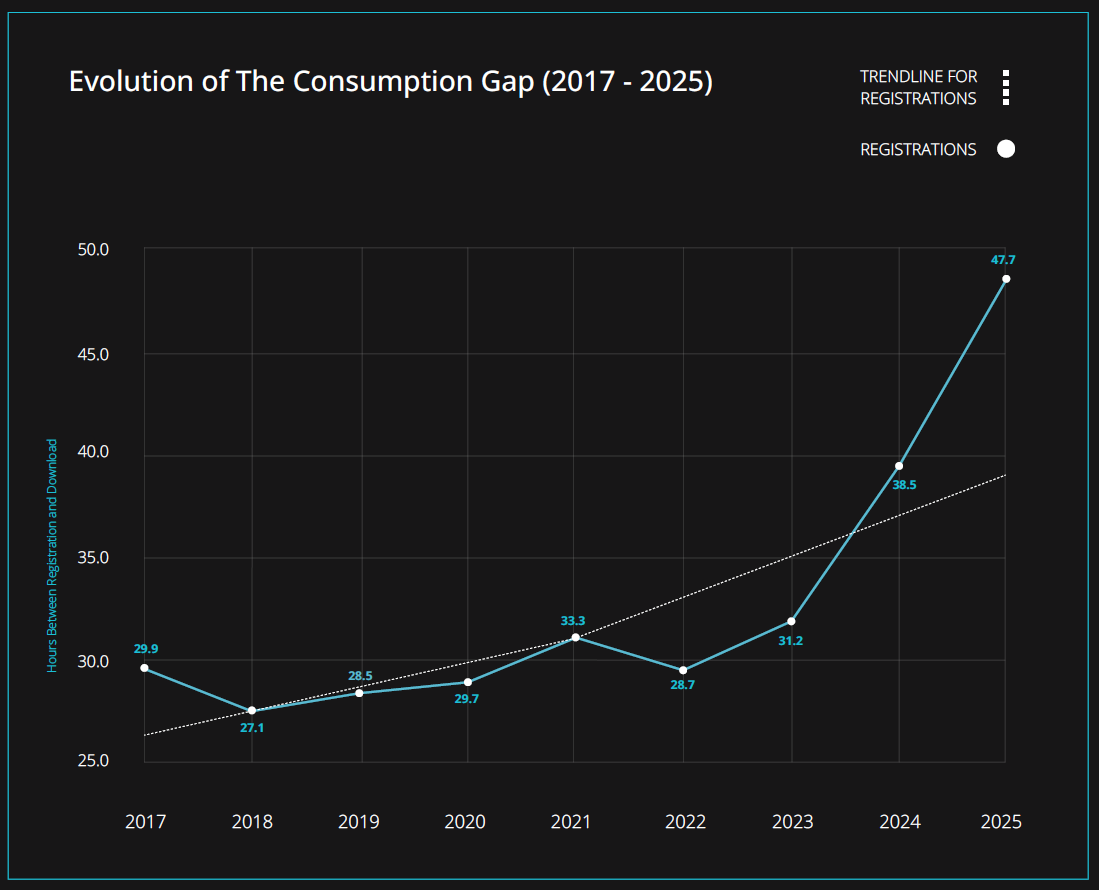
In 2025, the average B2B professional waited 47.7 hours between requesting a piece of content and actually opening it—a 9.2-hour increase year over year, and a 23.9% jump from 2024. We call this period between request and open (download) the Consumption Gap.

This number, as reported in our 2026 State of B2B Content Consumption and Demand Report,  represents the widest Consumption Gap NetLine has ever measured in ten years of tracking this behavior.

Truly, the 48-Hour Rule has officially arrived.

A Number That Doesn’t Mean What You Think It Means

While I may have new requests and ideas for each edition of our reports, the Consumption Gap is the only stat that holds my curiosity throughout the year.

So, when I saw 2025’s average, I had to check my math again. And then another three times. Yup. 47.7 hours.

“Wow,” I thought. “People aren’t going to like this.”

Your immediate gut reaction is probably quite similar to mine: “There’s no way that’s real. There has to be a mistake in here somewhere.” Nope. It’s correct. 

The other natural reaction is to think that something is broken. But here is how we should actually be interpreting this: This year’s figure is the closest we’ve gotten to truly understanding what is happening with B2B professionals and their relationship with content consumption.

Disinterest Vs. Delay

The Consumption Gap measures delay. What it does not measure is disinterest. And there’s a tremendous difference between a buyer who doesn’t care and a buyer who cares deeply but hasn’t gotten there yet.

To understand why this gap keeps widening, you have to look at what’s happening around it.

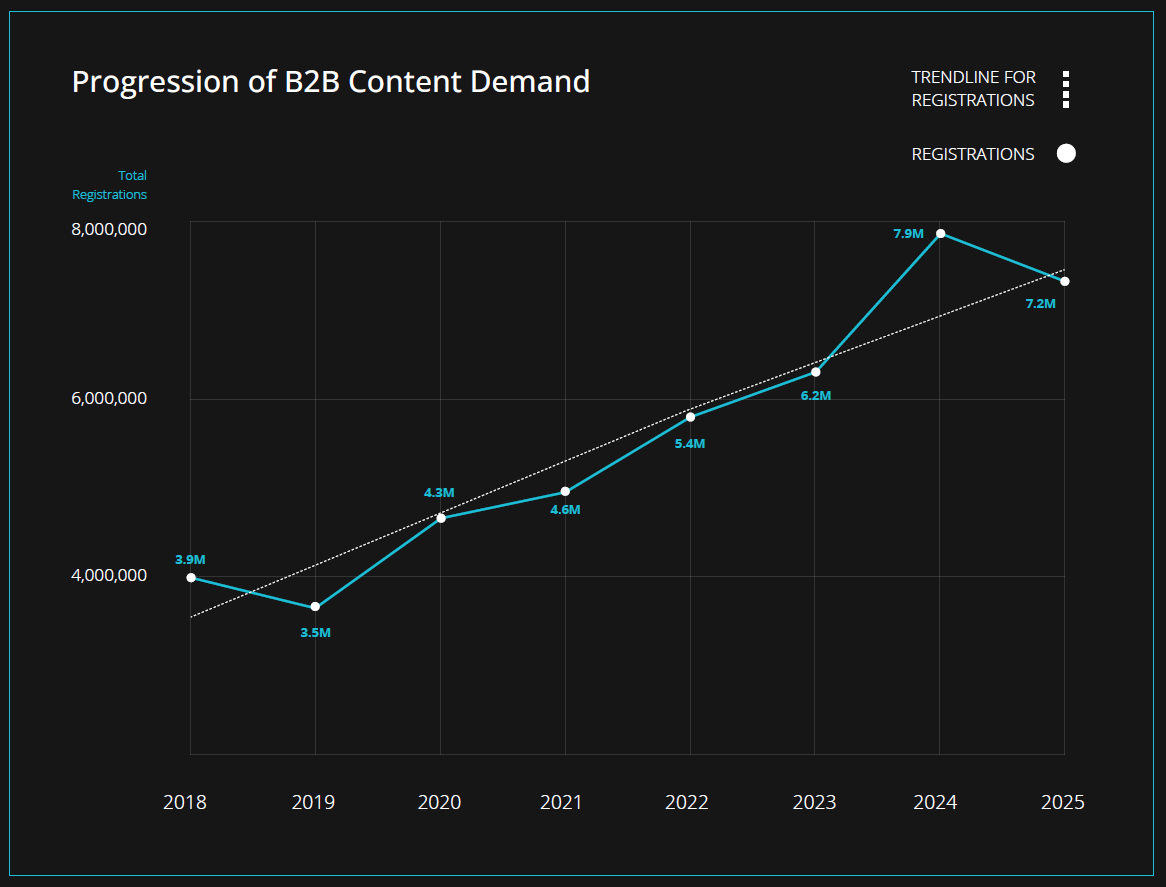
Since 2021, the Consumption Gap has expanded 43.2%. Over that same period, demand for gated content grew 57.6%. These aren’t opposing forces. They are two outcomes of the same underlying reality: buyers want the content…they’re just busier, more distracted, and more overwhelmed than ever before.

The culprit isn’t apathy. It’s a lack of urgency, and urgency, unlike interest, can’t be manufactured.

Which means your content can’t manufacture urgency for a buyer who doesn’t have it yet. But it can do something more valuable: it can make sure that when urgency does arrive (and it will), you’re already in the room.

That’s what the rest of this data is really telling you.

The Two-Clock Problem

Photo by iSawRed on Unsplash

Everyone wants their leads to progress as quickly as possible. The problem with this is that your timeline is not their timeline. This simple framework should give an idea as to why.

Clock One starts at registration.

It is in this moment that brand recall is at its peak. They’ve seen the title, they’ve seen your logo (note: if your logo is NOT on the cover of your gated content, fix this immediately), and they’ve thought enough about it to hit submit.

This is the perfect time to go for it, right? Not quite.

Should you reach out? YES! But how you reach out requires tact and finesse.

This is your window to acknowledge their registration, to say hello, and simply let them know you’re paying attention—without demanding anything from them. That’s it.

This is where Jay Baer’s bartender analogy applies: “We’re here when you are ready.”

We’ve written about this before, but here is a practical acknowledgment that asks nothing. Something like: “Thanks for grabbing this—I’ll check back in a few days to hear what you thought. In the meantime, if you have questions, I’m here.”

Once you hit send, give them 48 hours. Catch their eye, then leave them alone.

Clock Two begins when the download occurs.

Once the 48-hour window has elapsed, most buyers will have consumed your content, your follow-up has context, and the conversation has a fighting chance.

This is when the real conversation becomes possible—when they’ve had time to form opinions, identify questions, and understand whether your content speaks to their situation.

Your reps should be reaching out with greater context and supporting content. The goal isn’t to pitch. It’s to begin building a relationship and to better understand the priorities, challenges, and timelines of the registrant. What you learn here shapes everything that comes next.

Clock Three is reality.

This is the clock that hangs in your office, running quietly in the background of everything else from the moment of first registration until the day a deal closes or dies. It’s not something you set or trigger. It just runs.

Confuse the first two clocks, and you’ve either gone completely silent when a light touch would have landed beautifully, or you’ve pushed for a discovery call when someone is still on the first paragraph. Neither outcome serves you or your buyer—and neither outcome moves Clock Three in your favor.

Format Type Is Quite the Tell

Not every registration is created equal, and the format your buyer chose is one of the clearest signals of where they are. However, it varies dramatically by content format, with each variation carrying real intent signals that most B2B programs are leaving on the table.

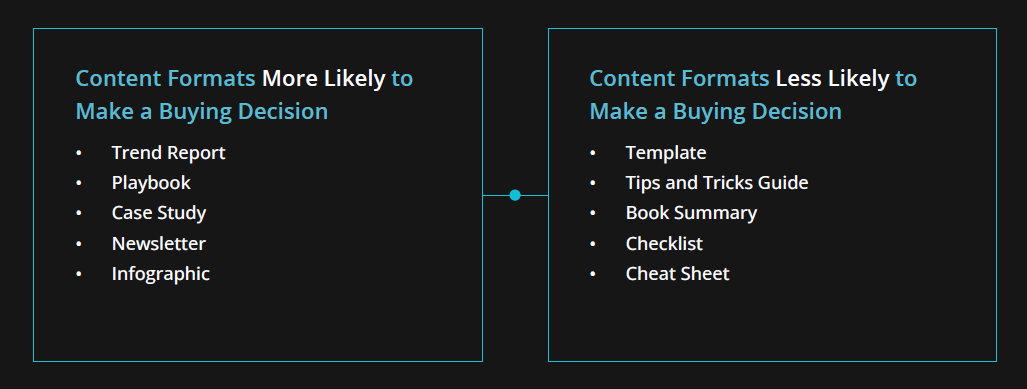
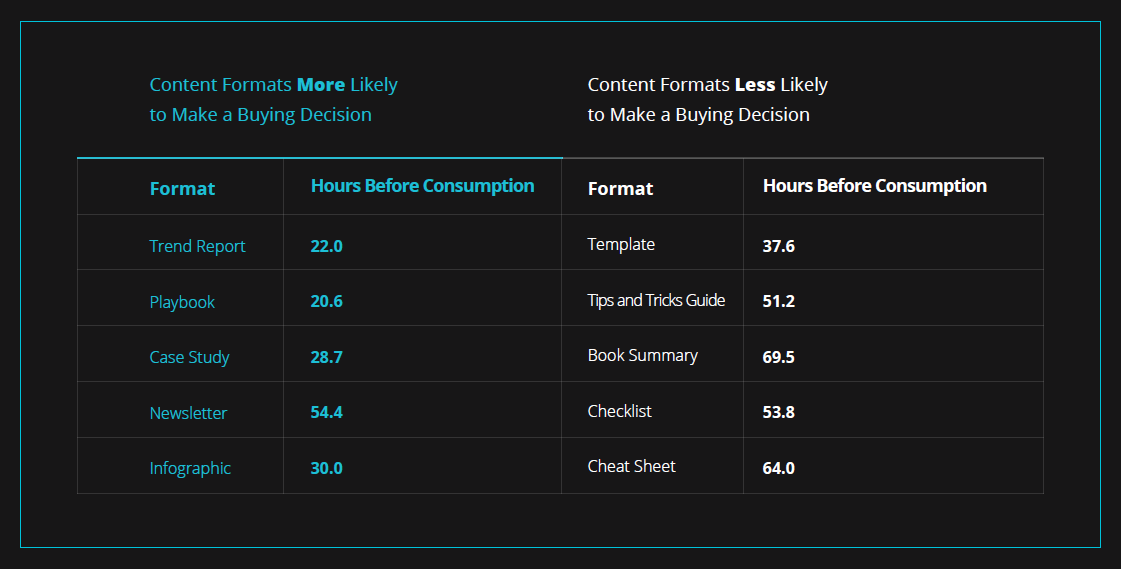
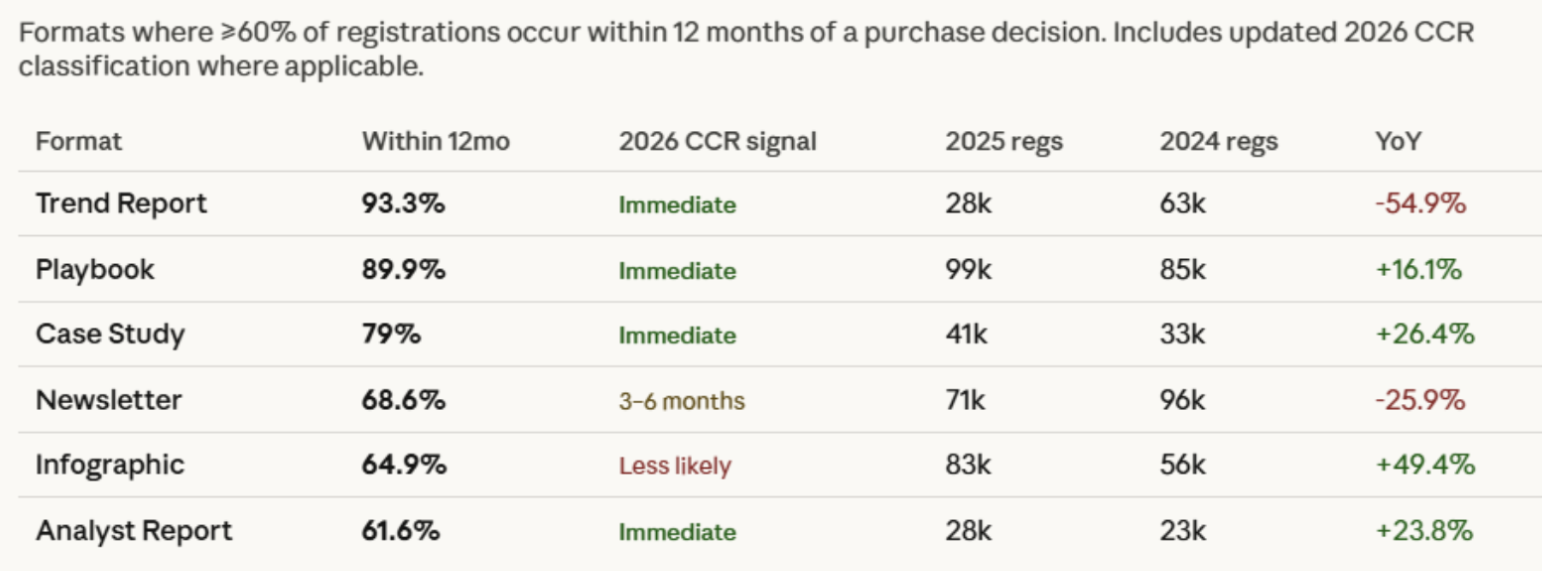
Consider the delta between formats most and least associated with a buying decision:

More Likely to Lead to a Buying Decision

  • Trend Reports: 22.0 hours
  • Playbooks: 20.6 hours
  • Case Studies: 28.7 hours
  • Infographics: 30.0 hours
  • Newsletters: 54.4 hours

Less Likely to Lead to a Buying Decision

  • Cheat Sheets: 64.0 hours
  • Book Summaries: 69.5 hours
  • Checklists: 53.8 hours
  • Tips and Tricks Guides: 51.2 hours
  • Templates: 37.6 hours

The formats most strongly correlated with near-term purchase intent—Playbooks and Trend Reports especially—are the ones being consumed quickest. When someone registers for a Playbook and opens it within 20 hours, that’s not a passive registration. That’s urgency. That’s a buyer who wanted the answer fast because they have a problem to solve now

Conversely, a Cheat Sheet sitting in an inbox for 64 hours is telling you something different. The interest may very well be real. But the urgency is non-existent. This is someone you should certainly nurture and keep tabs on, but realistically, don’t expect anything within the next two quarters.

Your follow-up cadence should reflect this. 

  • A Playbook registrant deserves your attention sooner and with more pointed follow-up. 
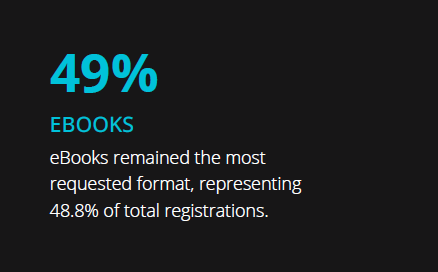
  • An eBook registrant (46.4-hour average) needs more breathing room and a more educational nurture sequence. 

Treating them identically is one of the more common and costly mistakes in B2B demand generation.

The AI Connection

Here’s something the 2026 Report surfaced that should give every B2B marketer pause: the trendlines for AI-related content demand and the Consumption Gap are strikingly similar.

Both began their steepest climb in 2022. 

Both accelerated sharply through 2024 and 2025. 

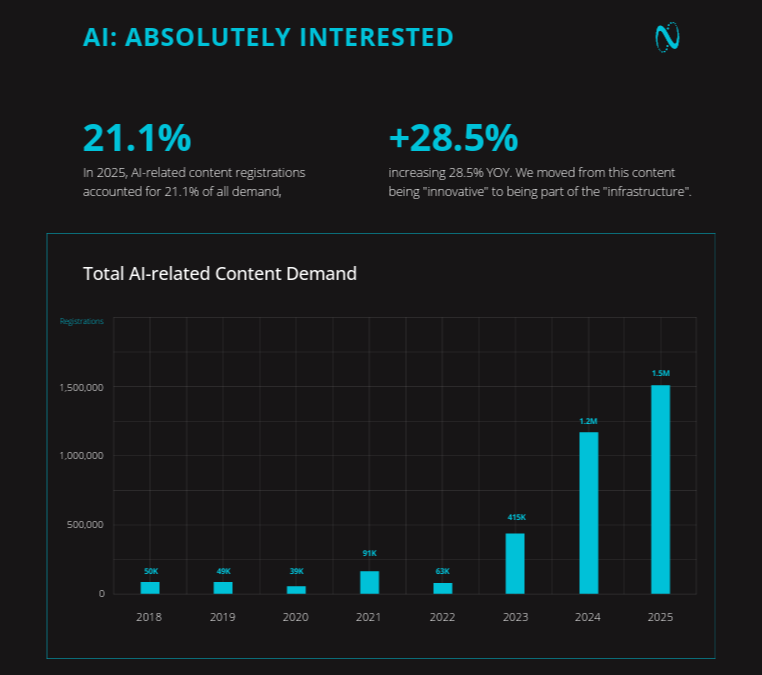
In 2025, AI-related content accounted for 21.1% of all demand on NetLine—1.5 million registrations, a 28.5% increase over the prior year. At the same time, the Consumption Gap hit its all-time high of 47.7 hours.

Is AI causing the Gap to widen? Not directly. But it’s a symptom of the same condition. 

AI tools, search overviews, and social platforms are now answering questions directly, routing fewer people to the original source—and in the process, compressing how B2B professionals interact with information. They’re consuming more, faster, in more fragmented ways. And when they do find content worth committing to, they register for it… and then they come back to it when they can.

That’s not a bad signal. It’s an informed one.

As we’ve written about before, the disappearance of the easy click doesn’t mean the disappearance of interest. It means the bar for capturing real engagement has gotten higher. And gated content—content someone specifically requests, specifically for themselves—remains one of the strongest proof points that a human being actually wants what you’re offering.

The Job Level Data Doesn’t Lie

Let’s start with the number that will cause some heartburn in your sales org.

In 2025, C-level professionals had a Consumption Gap of 48.3 hours. It’s not much, but that is greater than the global average. 

Owners sat at 59.0 hours. Supervisors at 56.2 hours. The Consumption Gap for VPs and Senior Directors ballooned by 43% and 50% YOY, respectively. 

To put it simply, the people with the most decision-making authority—the ones marketers desperately want to reach, and sellers desperately want to speak to—are the ones taking the longest to consume what they’ve requested.

So, what about the flip side?

The job levels consuming content fastest in 2025 were Executive VPs (31.4 hrs), Senior VPs (31.7 hrs), and Directors (39.5 hrs). And while VPs saw a 43% delay increase, they still beat the global average at 45.6 hours.

Let’s consider who those people are in the context of a buying committee. They’re not typically the final signature, but they’re almost always the ones building the internal case, vetting the vendors, and deciding who makes the shortlist. They’re moving faster because they have to. The pressure is on them to come to the C-suite with a recommendation, not a question.

The fastest consumers are signaling their intent through speed, often becoming your most important allies in the early stages of a purchase decision. A Senior VP who opens your Playbook in 31 hours isn’t casually browsing. They’ve made a conscious choice and are simultaneously sending a signal.

The strategic implication is straightforward, even if the execution isn’t: your nurture programs need to account for both. Engage the fast movers quickly and substantively; they’re doing the legwork. Give the C-suite the patience and the proof points they’ll need when the moment finally comes. Because when it does, they won’t be slow at all.

The Consumption Gap Across Industries

While this information may not be in the 2026 Report, the granularity of this industry-level data reveals where buyers are most and least pressed for time.

The fastest consumers, per industry, tend to be in Biotech and Pharmaceuticals (28.1 hours). Agriculture (36.8 hours) and Aerospace/Aviation (41.4 hours) also run faster than average. On the other end, Contractor-heavy segments, Government (51.6 hours), Corporate Services (53.0 hours), and Advertising/Marketing (48.9 hours) sit well above the 47.7-hour average.

If your ICP is heavily concentrated in one of these slower-consuming industries, the 48-Hour Rule isn’t just a best practice—it’s genuinely the floor. Give them more time. Earn more of their patience.

The Registration Is the Signal, Not the Starting Gun


Photo by Atik sulianami on Unsplash

Perhaps the most important reframe in all of this: a registration is research in motion, not a transaction in progress.

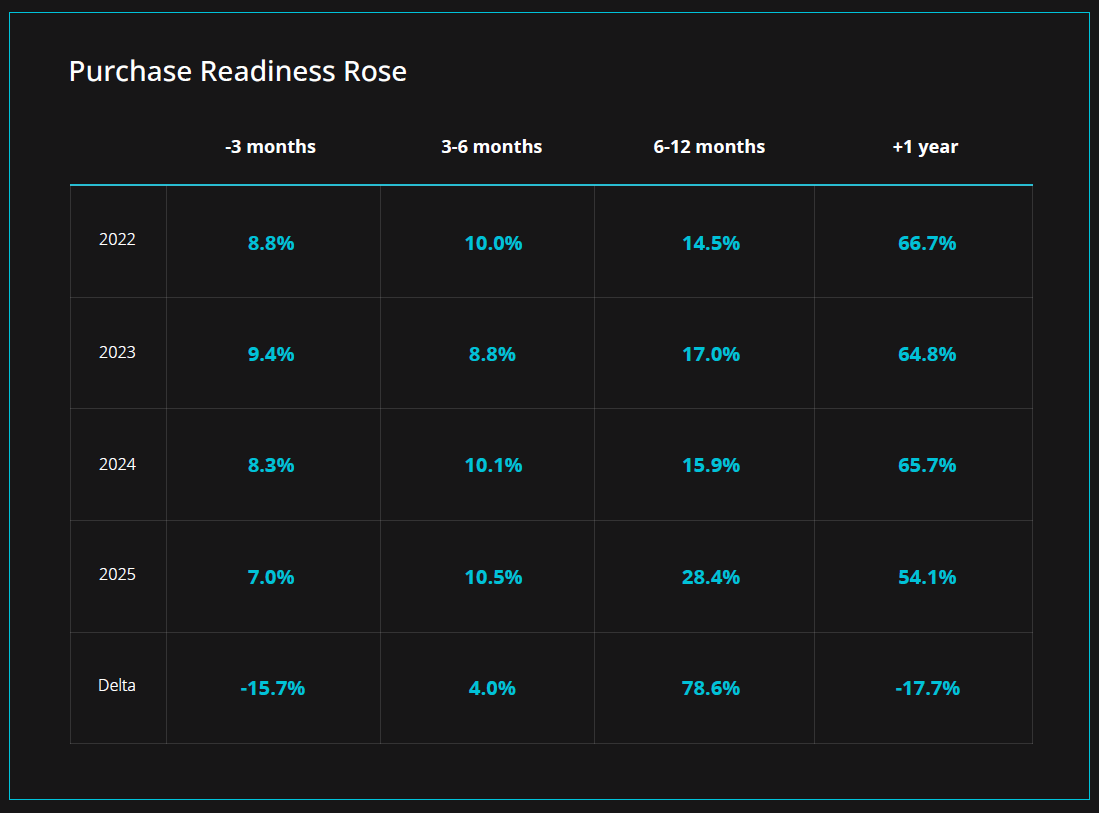
The 2026 Report found that nearly half of B2B professionals (45.9%) expect to make a purchase decision within the next 12 months—a 17.7% improvement from 2024. But near-term purchase intent (within 3 months) dropped 15.7% year over year. Mid-range intent, the 6–12 month window, surged 78.6%.

Buyers aren’t saying no. They’re saying not yet.

That reality is only reinforced by Dreamdata’s research, which puts the average B2B customer journey at 211 days and 76 touches before a deal is closed. LLMs and AI overviews may be compressing the time it takes to go from zero to working knowledge on any subject—but there are still far too many variables, stakeholders, and competing priorities in play to expect decisions to move quickly.

All of this means your job right now isn’t to rush users to a decision they’re not ready to make. Your job is to be so consistently present, so genuinely useful, and so clearly attuned to what they’re actually going through, that when the moment does arrive, you’re the obvious choice.

The 48-Hour Rule is the first step toward getting that right. Wait for the gap to close before you try to bridge it.

Ready to dive deeper? Access the full 2026 State of B2B Content Consumption and Demand Report.

Categories B2B

The Real AI Race Isn’t About Models or Data. It’s About Context.

Every company I talk to right now is convinced they have an AI problem.

Their AI writes emails nobody responds to. It researches accounts and surfaces leads the sales team already closed six months ago. Finger-numbing sessions copying and pasting between tools generate content that sounds exactly like what every competitor is publishing. Leaders invest in tool after tool, run training session after training session, and still find themselves staring at the same question: why isn’t AI actually moving the needle?

Here’s what you’re not being told. The problem is not your model. The problem is not your data. The problem is context: the specific knowledge of your business, your customers and what they need right now, and how your team actually works. It is also the hardest problem to solve, and the one the industry has been slowest to address.

Context is the Infrastructure, Not the Feature

Here is the distinction that I think is getting lost. Data is what happened. Context provides meaning around real events, what they mean, why they matter, and what to do about it. Context is not a feature; it is necessary infrastructure.

Your CRM has a record that a deal closed eighteen months ago. That is data. Context is knowing the deal closed because your champion switched companies, the pricing had to be adjusted three times before it landed, and that customer now refers several new deals a year and hates being contacted by automation. A human who worked that account knows all of this. Almost no AI does, because almost no platform is built to capture it.

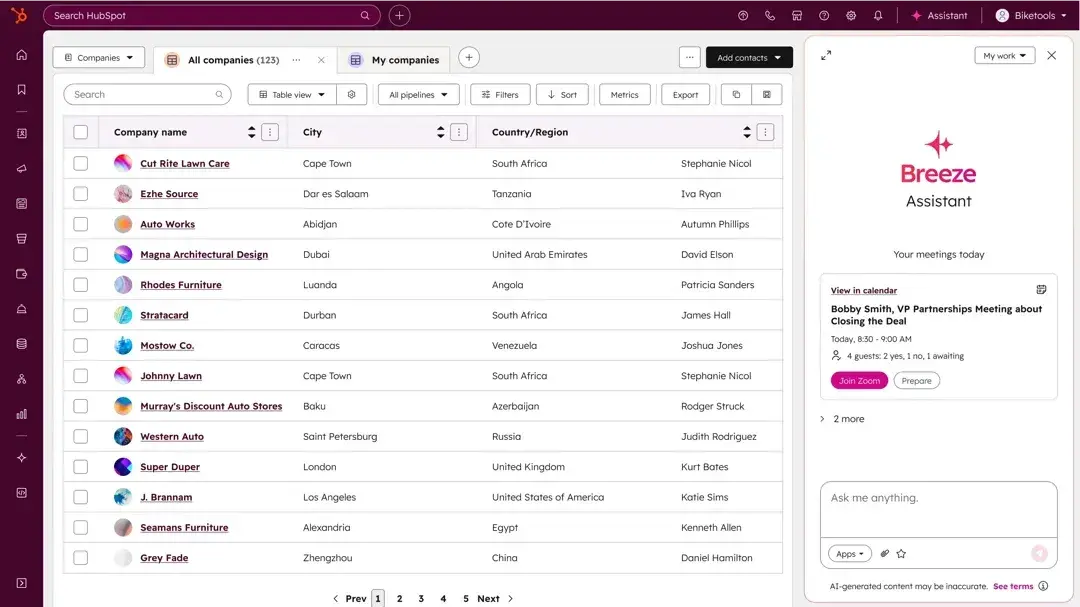
This is the gap. Not a model gap. Not a data gap. A context gap. And it is the problem HubSpot is solving with the Agentic Customer Platform. When Yamini introduced our Agentic Customer Platform earlier this year, she described the foundation underneath it: one place where all your customer data and business context lives, available to your team and your AI agents at the moment they need it.

The best infrastructure is invisible. It runs in the background, stays current as your business changes, and doesn’t make your team repeat themselves. That is the standard AI should be held to, and almost never meets.

The Hidden Cost of Context Gaps

There is a cost your team pays every single day that does not show up in your AI budget. We call it the briefing tax: the time and repetition required to give AI enough background to produce something useful.

You explain your brand voice before you ask it to write. You paste in the account history before you ask it to research. You describe your pricing structure, your competitor landscape, your customer profile, before every meaningful task. And the next day, you do it again. It does not learn your business. The real cost isn’t the hours your team loses to re-briefing AI, it’s the opportunity cost: the insights AI could have surfaced if it actually knew your business.

The briefing tax is just the daily friction. The harder problem is the one you don’t see: what happens to context over time. Your competitive positioning changes. Your ideal customer profile shifts. Your playbook gets updated. Your AI does not know any of that. It is not that it forgot. It has memory of the conversation. It just has no connection to the business behind it.

For GTM teams, this looks like AI that is confidently wrong. A project changes, your team adjusts, but AI keeps drawing on outdated context. Outputs start to sound off. Recommendations no longer fit your goals.

When your AI isn’t connected to the full picture, it can never develop the complete, dynamic knowledge it needs to create genuine value. It stays a tool. It never becomes a trusted teammate.

Growth Teams Need Their Own Context

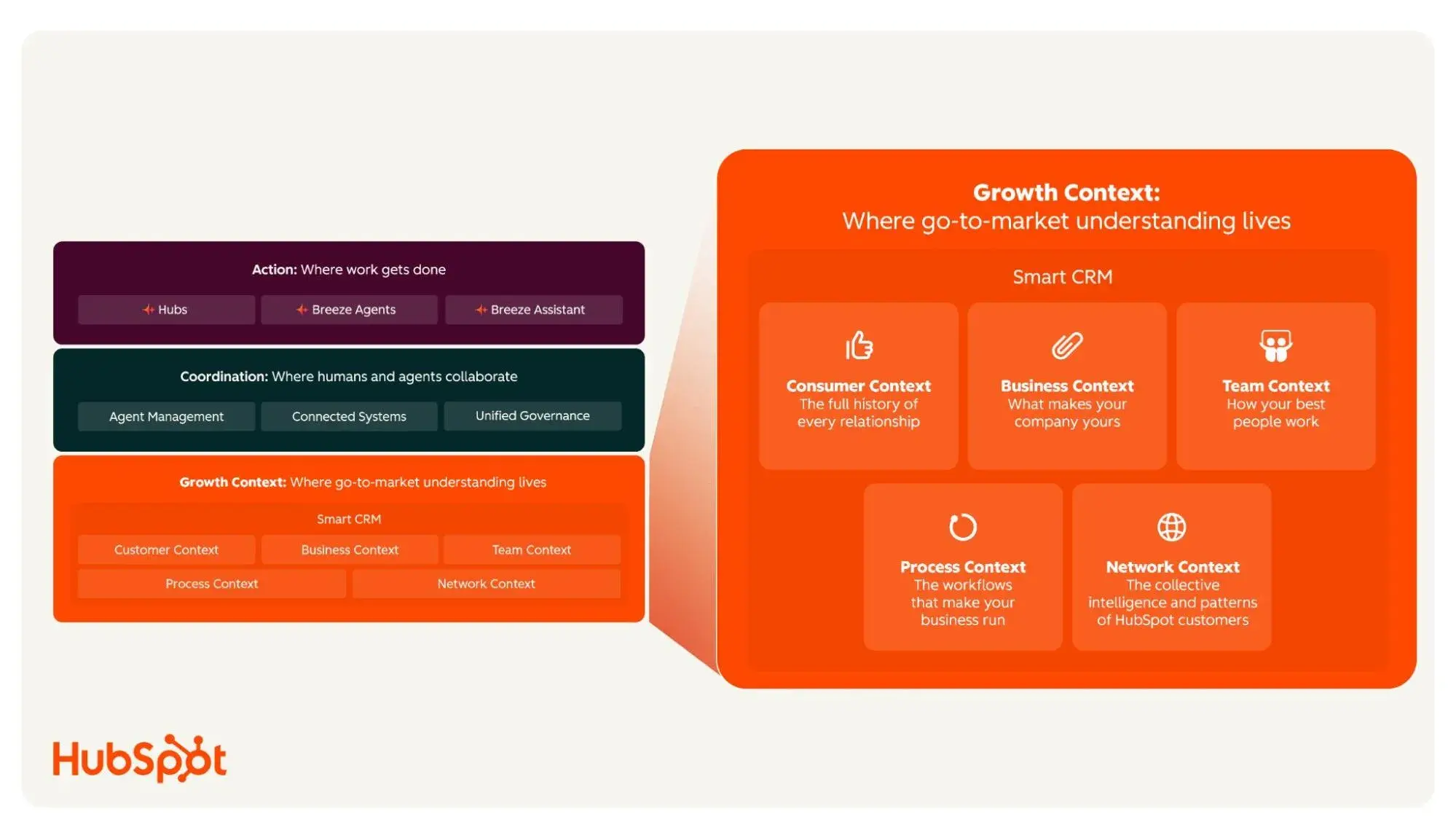
Not all context is created equal. Personal AI tools like ChatGPT are building personal context: your preferences, your conversation history, your communication style. Enterprise tools like Glean are building organizational context: your documents, wikis, and institutional knowledge. At HubSpot, we are building Growth Context: The rich, high-quality, and precise understanding AI needs to drive outcomes across marketing, sales, and customer success.

This isn’t a concept. We’re building real infrastructure that will mean we’ll both capture and maintain this context for customers, while also giving them the ability to self-manage. We view Growth Context as having five dimensions:

  • Business context is everything about what you do, how you compete, and what makes you worth buying. Your product positioning, your differentiation, your pricing rationale, your brand voice. This is the context that makes AI sound like your company instead of sounding like every other company. your category. Capturing it requires more than uploading a brand doc. It requires a system that structures that knowledge and applies it automatically across every interaction.
  • Team context is how your people actually work. Your sales methodology, your qualifying criteria, your escalation paths. Not the version that lives in your onboarding documents, but the version your best reps actually use. This is what separates an AI that follows a script from one that exercises real judgment. This kind of context does not live in any CRM field. It lives in call recordings, deal notes, and the patterns only visible across thousands of interactions.
  • Process context is what your workflows look like in practice. What triggers a handoff. What makes a deal high priority. How your campaigns are built and what success looks like for each one. This is what allows AI to take action, not just provide information. Building this into AI requires understanding your actual workflows, not just describing them, so the system can act on them rather than reference them.
  • Customer context is the accumulated history of your relationships. What each account has bought, why they bought it, what their goals are, where friction has occurred, what the next logical conversation should be. This is what makes outreach feel like a conversation instead of a cold call. This is the hardest category to maintain because it changes constantly. Keeping this current automatically, across every touchpoint, is the infrastructure problem most platforms have not solved.
  • Network context is the one dimension of Growth Context that no individual company can build alone. HubSpot works with more than 280,000 companies. That means we see broad trends in how teams go to market, how campaigns perform, and how customers buy, at a scale no individual company could replicate on its own. That collective intelligence becomes a layer of Growth Context available to every company on the platform, shaping what your AI recommends before you have ever run a single campaign.

What the Right Questions Look Like

If you are evaluating AI for your team, the questions that actually matter are not about the model. Models are increasingly commoditized. The right questions are about context.

  • Can it capture and act on the full picture? Not just the structured and unstructured data in your CRM, but the reasoning, judgment, and institutional knowledge that typically lives in people’s heads.
  • Is context maintained automatically? Or does your team have to keep it current manually, turning a platform investment into a maintenance burden?
  • Is it built for growth specifically? Or is it a general-purpose knowledge layer that happens to include some customer data?
  • Does it compound over time? Or does it require constant reinvestment to stay relevant?

Answer “no” to any of these, and your AI isn’t working with your business, it operates on a version of your business that no longer exists.

That is the real AI race. The companies that get Growth Context right do not just use AI better. They get further ahead every time they use it.

Categories B2B

AEO strategy for SaaS: 6 tactics that convert prospects into trials

An AEO strategy for SaaS won’t stray too far away from a good SEO strategy, but some tactics benefit AI search more than others, and it helps to know what these are. We all know that AI has shifted how brands earn visibility, and how visibility doesn’t equal clicks. But for SaaS, the way buyers conduct discovery and evaluation has changed disproportionately. Free AEO Grader: See How You Rank on AI Search Results

It’s no longer enough to rank well in search results; the product, brand expertise, and differentiation need to be understood and surfaced accurately by AI-driven systems, especially during the buyer’s discovery and consideration phases.

In this guide, I share how SaaS teams can optimize for AEO. I’ve included why AEO strategy matters for SaaS, which strategies to prioritize, how to track success, and the tools that make AEO strategy easier.

Table of Contents

Why AEO Is Important for SaaS Companies.

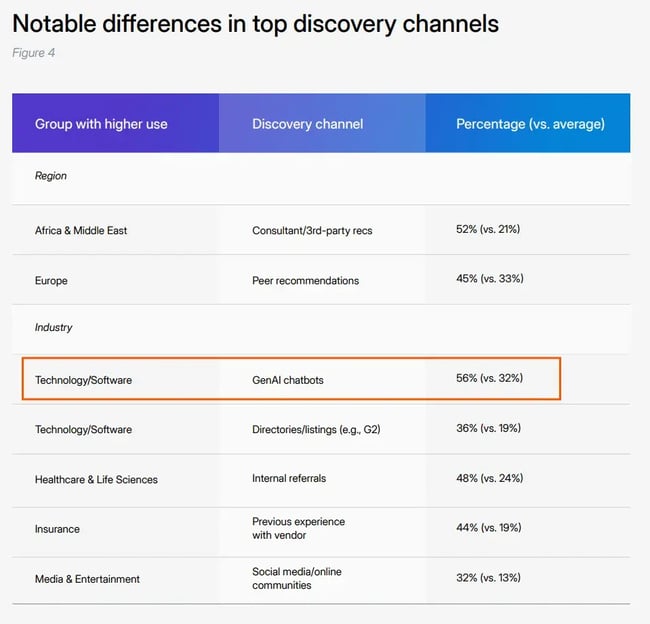
AI-driven answer engines now play a central role in how SaaS buyers discover and evaluate software. Responsive’s research, Inside the Buyer’s Mind, shows that B2B buyers begin vendor discovery using generative AI chatbots 32% of the time, compared to 33% via traditional web search.

When SaaS is isolated, the shift is far more pronounced. For SaaS buyers specifically, 56% now start their vendor research on generative AI tools.

SaaS brands are disproportionately at risk of missing out on opportunities if their brand doesn’t show up in AI search.

Responsive’s study shows the importance of AEO strategy for SaaS. The table shows that SaaS has the highest number of buyers using AEO to discover SaaS vendors.

Source

Unlike traditional search results, answer engines don’t simply rank pages. They summarize expertise from the website or knowledge base, compare options, and surface recommendations directly to the searcher and all within the AI interface.

The consequence: If a brand isn’t cited in AI-driven search results, potential buyers miss the brand as they‘re forming a shortlist of vendors; companies are out of the race at the earliest stage and won’t even make it to an evaluation or trial.

AEO strategy for SaaS companies.

The strategies below represent the areas SaaS teams should double down on for AEO. Each one supports traditional search performance, but more importantly, they increase the likelihood of being surfaced, referenced, and trusted by answer engines at high-intent moments in the buying journey.

1. Optimize for early-stage visibility that feeds evaluation.

To show up during learning and exploration queries, SaaS teams need to focus on how answer engines interpret and associate products with problems, use cases, and outcomes.

At a practical level, this means:

  • Clearly defining the category and use cases so AI tools can associate the product with the right problems and buyer needs.
  • Publishing explanatory content that answers “what is,” “how does,” and “when should you use” questions in plain, unambiguous language
  • Using consistent terminology and positioning across core pages, documentation, and supporting content
  • Structuring content for extraction with clear headings, short paragraphs, and direct answers that can be summarized by AI systems (more on this next)

AI-driven answer engines are most suitable for buyers who are learning, exploring, and sense-checking options before formal evaluation begins.

If a brand isn’t visible at this stage, it’s unlikely to make a buyer’s shortlist.

Research from McKinsey shows that 70% of AI-powered search users still ask top-of-funnel questions to learn about a category, brand, product, or service.

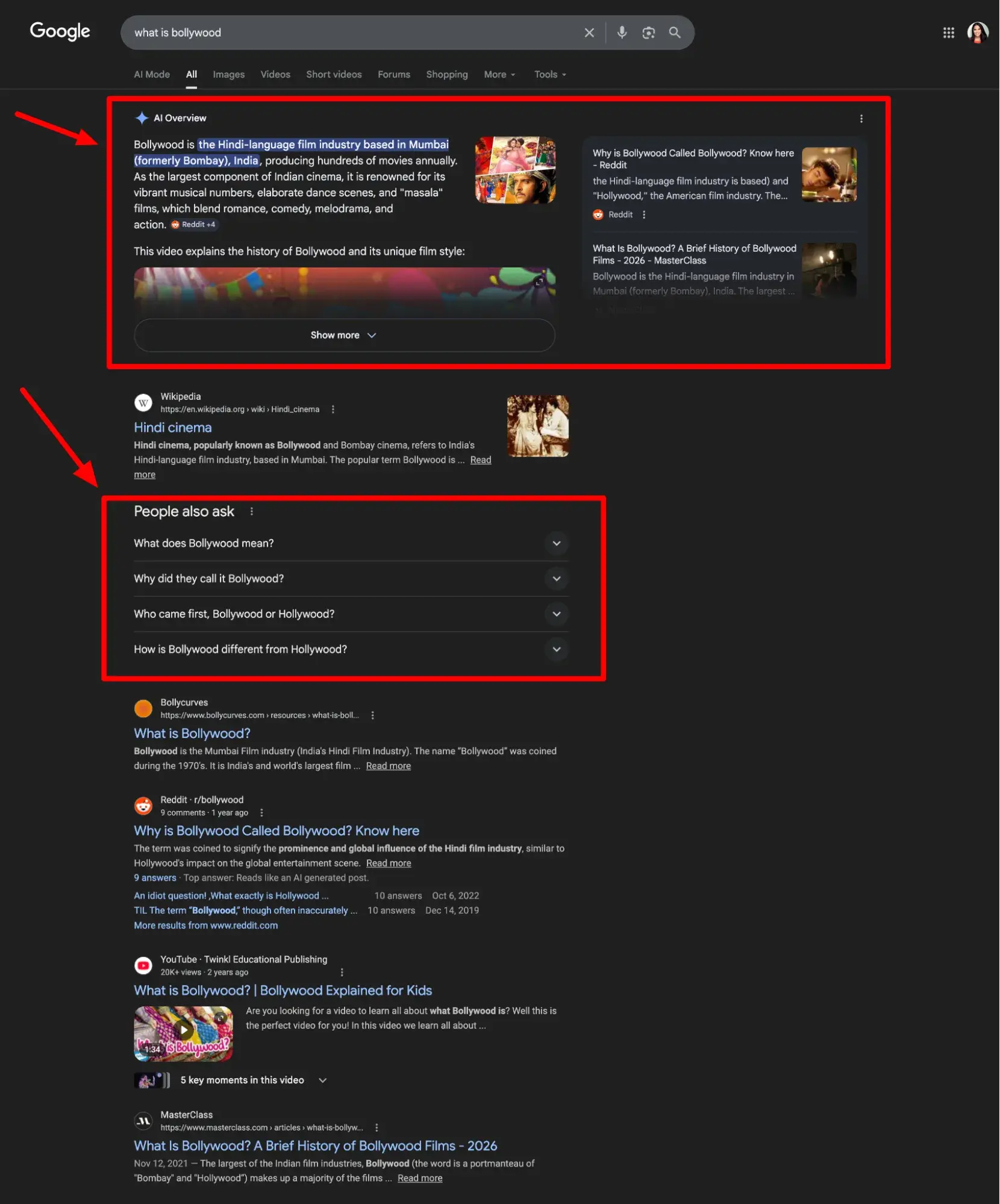
Screenshot from Google SERPs shows the AI Overviews with smaller SaaS brands mentioned, thanks to their AEO strategy for SaaS that focused on relevance.

Source

These early queries shape how AI search engines frame the market, which vendors they associate with specific use cases, and which products are repeatedly surfaced as “relevant” as the SaaS customer lifecycle progresses.

For SaaS buyers, this matters because vendor lists are formed early. Buyers typically start with a long list of potential solutions and around eight vendors, according to Responsive’s research, before narrowing it down to three or four for deeper evaluation.

Optimizing for early-stage AEO visibility means the product is clearly associated with the right problems, use cases, and outcomes in AI-generated answers. That early exposure increases the likelihood that a brand is carried forward into evaluation-stage queries, where shortlists and trial decisions are made.

Why I like this tactic: It’s important to consider early-stage visibility and understand its role in the marketing funnel. Informational content used to drive hundreds or thousands of clicks to websites, but with AI Overviews dominating the top of Google, many of those questions are answered directly in the SERP, often removing the need to click at all.

Looking through the lens of SEO and click metrics, it would be easy to conclude that marketers should deprioritize top-of-funnel efforts, but this isn’t the case for SaaS AEO, because AEO metrics tell a different story.

Measuring visibility, citation, and inclusion in AI-generated answers tells a different story. Early-stage content becomes a critical input into how buyers discover, recognize, and advance brands throughout the buyer journey — from evaluation to trials and retained customers.

2. Optimize for evaluation-stage questions, not just problem awareness.

Once buyers understand a problem, focus shifts from education to evaluation. At this stage, buyers compare options and validate fit.

SaaS teams need to address this need in a way that serves the AEO search. Similar to informational searches, many evaluation queries will be answered within AI with no click to the brand‘s site. Without visibility at this stage, a product is unlikely to make a buyer’s shortlist.

To optimize for evaluation-stage questions:

  • Keep the site updated with information such as pricing, features, and integrations.
  • Have indexed and crawlable content about implementation effort, pricing, and knowledge bases to ensure the brand appears for every type of relevant use case or customer query.
  • Create targeted landing pages that clearly communicate the product’s value proposition and the audiences it serves best.

Important note: Evaluation-stage questions that go unanswered by a brand will be answered by someone else, and that content may not accurately reflect the product’s positioning. For example, if SaaS pricing is kept hidden, AEO systems cannot paraphrase accurate information and will pull from any available source instead.

Why I like this tactic: Evaluation-stage visibility is one of the few areas where brands can directly influence whether a product makes the shortlist.

3. Get serious about PR, third-party validation, and credibility signals.

AI-driven answer engines place significant weight on third-party sources when evaluating which SaaS products to surface, compare, and recommend. While first-party content helps establish relevance, credibility is often inferred through independent validation.

How to do it:

  • Invest in consistent PR coverage across reputable industry publications.
  • Actively manage review platforms (e.g., G2, Capterra, Gartner Peer Insights) with accurate positioning and up-to-date proof points.
  • Secure partner mentions that reinforce a product’s use cases and integrations.
  • Ensure consistency across third-party sources in naming, category definitions, and value propositions.

When multiple independent sources describe a SaaS product in similar terms, AI systems gain confidence in summarizing and positioning the brand. PR coverage, analyst insights, reviews, and partner content help answer engines validate claims, resolve ambiguity, and assess trustworthiness.

This is especially important for comparison, “best for,” and alternative-style questions, where answer engines are less likely to rely on first-party messaging alone. SaaS brands with strong third-party footprints are more frequently cited and more consistently included in AI-generated evaluations.

In fact, a brand can gain visibility in AIO without ranking well (or even at all) in traditional Google search results.

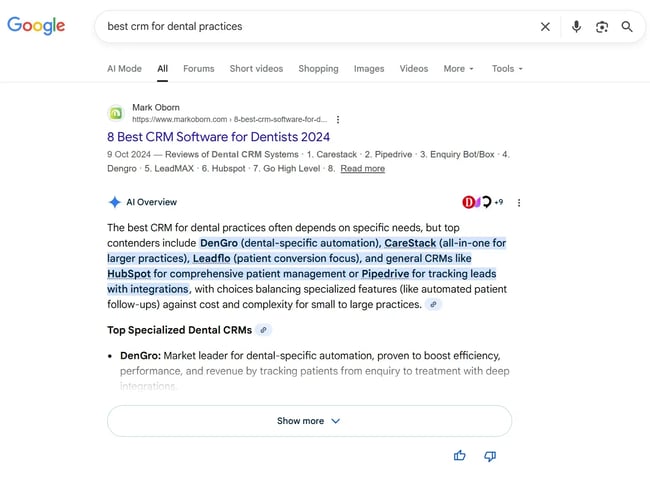
Here’s an example search term: “best crm for dental practices.”

screenshot from google serps shows the ai overviews with smaller saas brands mentioned, thanks to their aeo strategy for saas that focused on relevance.

CareStack has a prominent position in AIO, but it’s mid-page two in traditional results.

Why I like this tactic: I consistently see AI tools rely on third-party sources when buyers are comparing options. It’s always been this way. “Best for” type queries were always reserved (mostly) for third-party credibility in traditional SEO, and it makes sense. Google wanted to prioritize unbiased sources.

4. Get hyper-targeted.

AEO rewards specificity. People increasingly use AI tools to ask detailed, context-rich questions; queries are becoming less generic and more situational. Instead of searching for broad categories, buyers now ask for recommendations tailored to their industry, role, constraints, or use case.

When faced with a highly specific query, broadly positioned SaaS content becomes less competitive because it doesn’t provide enough contextual signal.

Hyper-targeted content—focused on a defined audience, industry, role, or scenario—is far more likely to be surfaced, summarized, and recommended when buyers ask niche or contextual questions.

How to do it:

  • Create industry- or niche-specific pages (e.g., “CRM for dental practices,” “ERP for construction firms”)
  • Align content to real buyer language, including how specific audiences describe their problems and workflows.
  • Address context-heavy queries, such as compliance requirements, integrations, or operational constraints unique to a segment.
  • Avoid generic positioning in favor of clear statements about who the product is designed for—and who it isn’t
  • Reinforce targeting across pages, documentation, PR, and third-party listings so AI systems see consistent signals.

Relevance is the main reason why niche queries surface even smaller vendors in AI Overviews.

Going back to CareStack, in the earlier “best CRM for dental practices” example, CareStack appears prominently in AI-driven answers despite not ranking on page one in traditional search results. The product’s clear alignment with a specific audience makes it a strong match for the query, even without top organic rankings.

Why I like this tactic: Relevance and specificity are the most reliable ways to win visibility in AI-driven search. For SaaS teams, hyper-targeting doesn’t just increase exposure—it creates clearer positioning and a much stronger path to conversion. When buyers repeatedly see a product described as built for their exact use case or industry, it reduces friction, increases confidence, and makes the leap from discovery to trial far more likely.

5. Structure content so AI can extract, summarize, and cite it

Content that is clearly structured and easy to interpret is more likely to be summarized.

How to do it:

  • Use explicit question-and-answer formatting for key queries buyers ask, using question-based headings with direct answers following.
  • Define entities clearly, including what the product is, who it’s for, and how it differs from alternatives.
  • Keep explanations concise and direct, especially for definitions, features, and use cases.
  • Use consistent terminology across pages to avoid confusing AI systems
  • Break content into scannable sections with clear headings and logical hierarchy
  • Avoid burying key information deep in long-form copy or overly narrative sections

When information is easy for AI systems to summarize accurately, the brand is more likely to be cited during discovery and evaluation queries, increasing visibility at moments that influence shortlisting and trials.

Why I like this tactic: Well-structured content has always been important. It matters generally; it certainly matters for SEO, but some further attention on providing clarity for AEO doesn’t hurt.

One example of making an extra effort to provide clarity is through semantic triples, a tactic HubSpot uses. With semantic triples, writers define relationships between subjects, objects, and predicates. For example, “HubSpot’s AEO grader is a tool that AEO specialists use to review brand sentiment in AI search tools.”

6. Implement a well-structured schema.

A schema is a standardized format for structured data added to a webpage’s HTML. It helps search engines understand what a page represents by adding structure to the data. For AI systems, it adds or reinforces content without overwhelming the frontend or, therefore, the reader.

How to do it:

  • Implement schema types aligned to page intent, such as FAQ, Product, SoftwareApplication, Review, Organization, and Article
  • Ensure schema reflects visible on-page content, avoiding mismatches or over-markup
  • Define entities consistently, including product names, brands, authors, and organizations
  • Use schema to clarify relationships, such as who created content, what a product does, and how it’s reviewed

Schema has long supported traditional SEO, but its role in AI visibility is becoming much clearer — particularly for Google’s AI Overviews.

Molly Nogami and Ben Tannenbaum evaluated the visibility impact of strong, weak, and absent schema implementations. Their findings showed that pages with well-implemented schema consistently appeared in AI Overviews and also performed best in traditional search results. Pages with poorly implemented schema — or no schema at all — failed to appear in AI Overviews.

Why I like this tactic: I’ve loved implementing schema for years. Sometimes, brands can see the results of the schema within search in days. For example, if review schema is used on a SaaS product, review stars appear next to the organic listing. I’ve secured knowledge panels for myself and clients thanks to schema.

AEO for SaaS: Ways to track success.

Tracking AEO success requires a mindset shift. Brands are no longer getting the clicks and impressions that SEO provided. Instead, the metrics need to cover AI visibility, brand uplift, and, importantly, revenue.

Inclusion and Visibility in AI Answers

Before AI-driven discovery can influence trials or revenue, a brand needs to appear in the answers buyers actually see. Inclusion and visibility in AI-generated results are foundational indicators of whether an AEO strategy is working.

Unlike traditional rankings, AI visibility is about presence, positioning, and context. Being cited, summarized, or referenced in an answer often matters more than a page’s ranking in organic results.

To track this effectively:

  • Monitor priority discovery and evaluation queries across AI Overviews and generative tools
  • Record when the brand, product, or pages are cited or mentioned, even without a clickable link
  • Track how AI describes the product, including category placement, use cases, and qualifiers
  • Compare visibility across query types, such as awareness, comparison, and “best for” questions
  • Look for consistency over time, rather than one-off appearances

Important note: I don’t think visibility is enough on its own, because it doesn’t always translate into sales. Visibility must be tracked alongside conversions and revenue. I get into that next.

Trial Signups Influenced by AI Referrals

Trial signups are the clearest signal that discovery has turned into intent. If AEO is working for the business, it will show up here, as a last-click source, but also as an influence that nudged buyers toward starting a trial once they’ve been exposed to the product in AI-driven answers.

To understand how AEO contributes to trial volume, teams can:

Monitor Referral Traffic from AI Tools

Identify sessions and trial starts coming from sources such as ChatGPT, Perplexity, and Gemini. Teams can set up tracking like this in GA4 using events. Record conversions like a button click, requesting a trial, or a form submission from people who came to the site via AI.

Form submissions are automatically recorded in GA4, but must be enabled first. To turn on form fills:

Visit GA4 > Click “Admin” (the cog in the bottom left) > Data Streams > Click your website.

This should open “web stream details” and “Enhanced Measurement,” as shown in the following screenshot. Toggle on all desired measurements to begin tracking.

aeo strategy google search

Once done, these events will show in the events report.

Pro tip: Once set up, teams can create real-time dashboards in Google Looker Studio to monitor success with a filtered view that includes only AEO traffic.

Use Assisted-Conversion Reporting

AI-driven discovery rarely results in an immediate conversion. In most SaaS journeys, buyers encounter a product in an AI-generated response early on. Then, they continue researching elsewhere and only convert later through branded search, direct traffic, or another channel. This is why AI should be treated as an assist, not a last-click source.

Instead of expecting AI traffic to convert in isolation, track how AI-driven sessions contribute to conversions over time using multi-touch attribution and audience analysis.

In GA4, one of the easiest ways to do this is with the segment overlap report. This allows teams to compare users who arrived via an AI source with users who eventually converted, showing how often the two groups overlap.

To apply this in practice:

  • Create a segment for AI-driven sessions, using source or medium filters that capture traffic from tools like ChatGPT, Perplexity, and Gemini
  • Create a second segment for converters, such as users who completed a trial signup or form submission
  • Use the segment overlap view to identify users who first arrived via AI but converted later through another channel

This approach helps surface AEO’s real contribution. Even when AI isn’t the final touchpoint, overlap analysis shows whether AI-driven discovery is introducing qualified users who convert later — often through more traditional channels.

Branded Demand Lift

When a brand appears in an AI-generated answer, prospects may return later by searching for the brand directly, navigating to the site, or looking up product-specific terms once interest has been established.

Because AI tools often answer early questions without a click, branded demand becomes a gauge of influence. It shows that a brand has been recognized, remembered, and carried forward into the next stage of the buying journey.

To track branded demand lift effectively:

  • Monitor branded search growth in Google Search Console and GA4.
  • Watch product-specific query volume, such as feature names, integrations, or “{product} pricing” searches.

For SaaS teams, branded demand lift helps bridge the attribution gap created by AI search.

Pro Tip: In theory, the brand will show up for any branded search. Look for searches that include the brand name and competitors, and see if there’s anything there that can inspire content, like “the differences between,” “alternatives,” or content around how the brand handles certain features compared to competitors.

Trial-to-Paid Conversion Rate for AI-Influenced Users

Trial volume doesn’t tell the full story. Sales and monthly or annual recurring revenue matter most in SaaS. The real quantifier of AEO effectiveness is whether AI-influenced users convert into paying customers.

To measure this effectively:

  • Segment users who interacted with AI-driven touchpoints, even if AI wasn’t the final conversion source. Teams may need to manage this internally by asking customers during their onboarding whether they interacted with AI during their buyer journey.
  • Track trial-to-paid conversion rates for this group and compare them to organic search, paid media, and outbound-led trials
  • Analyze time-to-conversion, not just conversion rate, to account for longer evaluation cycles.
  • Tie conversions back to revenue, including deal size and expansion potential.

Customer Lifetime Value for AI-Influenced Users

For SaaS companies, the long-term value of a customer matters. Tracking customer lifetime value (CLV) for AI-influenced users helps determine whether AEO is attracting better-fit customers rather than just more trials.

To measure this effectively:

  • Use the segmented customers from above.
  • Track retention and churn rates for AI-influenced cohorts versus other acquisition channels.
  • Compare expansion metrics, such as upgrades, add-ons, or seat growth.
  • Measure revenue over time, not just initial contract value.

Best AEO Tools for SaaS Marketing Teams

Xfunnel

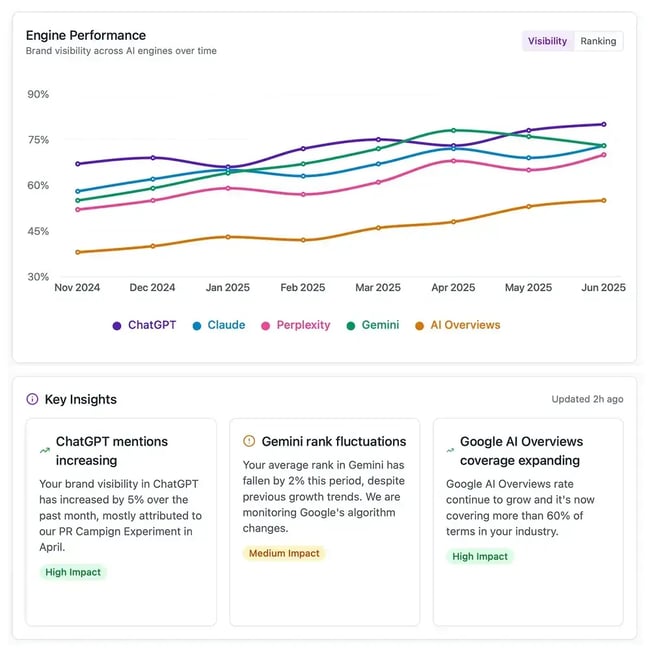
 XFunnel dashboard shows how AEO specialists can measure their AEO strategy for SaaS. Each AI tool has a line on a graph showing the percentage of brand visibility.

Source

XFunnel is a platform for measuring AI search visibility and performance across large language models and AI-driven answer engines. It tracks how often a brand, product, or content is surfaced, cited, or referenced across AI environments, including tools like ChatGPT, Google AI Overviews/AI Mode, Gemini, Perplexity, Claude, and others.

Xfunnel provides AEO specialists with insights into sentiment, citation context, share of voice, and competitive positioning to help teams understand where they are visible and where gaps remain.

Why I like it: XFunnel Measure is purpose-built to measure visibility inside AI answers. It helps SaaS marketing teams understand where they’re showing up in AI-generated results, how they’re described, who sees them, and where visibility can be improved.

AEO Grader

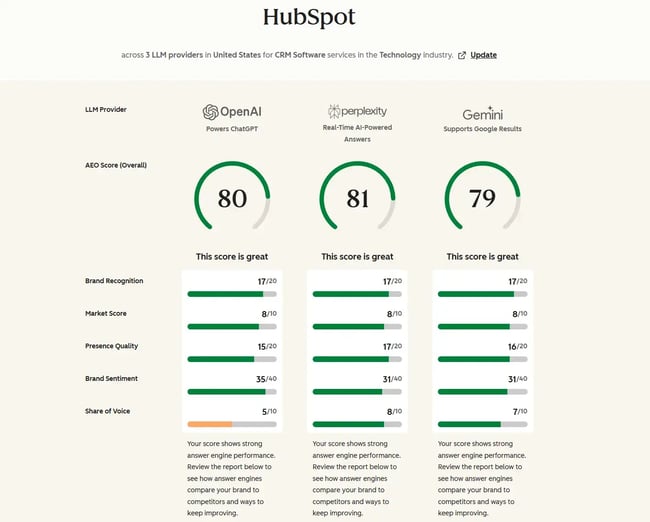
aeo grader showing how saas marketing teams can measure the success of their aeo strategy.

HubSpot’s AEO Grader evaluates visibility, sentiment, and consistency in AI-generated answers to highlight gaps that could limit discovery or misrepresent positioning. AEO Grader looks at how AI systems interpret a brand: what it is associated with, how it’s described, and whether the content is structured clearly enough to be extracted and cited.

AEO Grader:

  • Assesses brand visibility across AI search tools and LLMs
  • Highlights sentiment and positioning issues in AI-generated answers
  • Flags inconsistencies in messaging or entity understanding
  • Identifies opportunities to improve clarity, structure, and extractability

Why I like it: AEO Grader is quick and easy to use. It’s common to assume that if content is ranking well and the messaging is right on the site, then that will translate to AI results, but that’s not always the case. AEO grader makes AI visibility tangible, giving SaaS teams a faster way to spot misalignment before it affects evaluation, trials, or pipeline.

Semrush

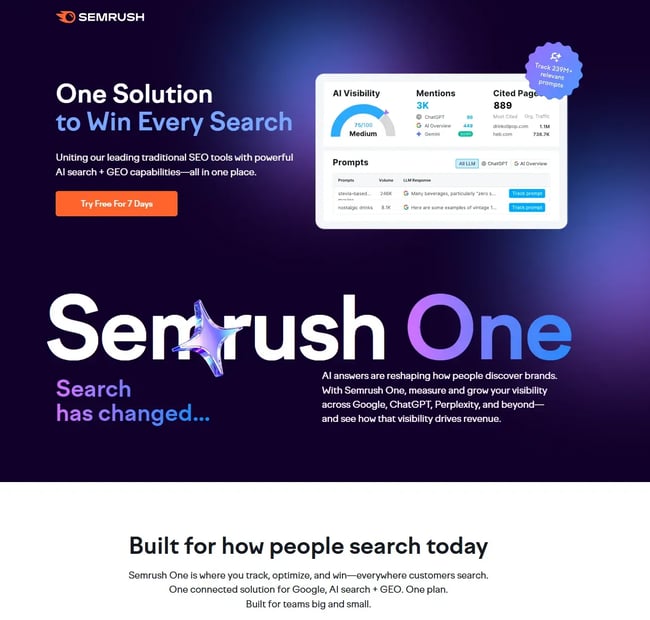
semrush one page; an aeo tool that helps measure aeo strategies for saas.

Source

Semrush One is an all-in-one SEO and AEO platform that supports keyword research, competitive analysis, site audits, SEO rank tracking, content optimization, AI visibility, prompt monitoring, and more.

It is an expensive tool and starts at $199/month.

Why I like it: I’ve used Semrush for a long time, and overall, I think the AEO prompt tracking and AEO improvement recommendations are really good. I found the tool’s recommendations aligned with my own ideas.

Google Analytics 4

GA4 is the source of first-party truth. While it doesn’t directly measure AI visibility, it shows what actually happens on a site after AI-driven discovery — trial starts, form submissions, assisted conversions, and revenue events.

For SaaS teams, GA4 is best used to understand how AI-influenced users behave, convert, and progress through the funnel compared to users from organic search, paid media, or outbound.

Every business should use GA4, and it’s free!

Why I like it: GA4 keeps AEO grounded in reality. It shows the real business outcomes such as assisted trials, branded demand, better-qualified users, and stronger conversion paths. AEO specialists must tie AEO efforts to real business results.

Frequently Asked Questions About AEOf or SaaS.

How is AEO different from SEO for SaaS?

SEO focuses on blue link rankings, clicks, and traffic. In modern-day search, SEO targets middle- to bottom-of-funnel keywords. In contrast, AEO targets top-of-funnel keywords, surfacing them in AI channels where discovery occurs, summarization, and citations in AI-generated answers.

Should we create separate competitor comparison pages?

SaaS companies should consider creating separate pages for competitor comparisons. Dedicated comparison and alternatives pages give AI systems clear, extractable context for evaluation-stage queries. Since AI often prioritizes third-party validation for queries like this, influencing third-party publications positively where possible strengthens evaluation-stage visibility.

How do we allow AI bots without hurting site performance?

Unless a rule is added to prevent AI bots from crawling the site, they will be automatically allowed to crawl based on the rules set in the robots.txt file. It’s unclear how much AI agents pay attention to robots.txt, but some agents, like ChatGPT, have suggested they respect the disallow directives.

How do we connect AEO traffic to trials and the pipeline?

Treat AI as both an assist channel and a last-click source. Use GA4 assisted-conversion reporting, segment overlap analysis, and signals like branded demand and trial-to-paid conversion rates.

How often should we update pricing and integrations for AEO?

SaaS companies should update pricing and integrations as soon as changes occur. Fresh, accurate pricing and integration data increase the likelihood that content is trusted and cited during evaluation.

Getting Started

AEO is already shaping the SaaS industry and how buyers search, discover, evaluate, and shortlist products. The teams winning today are the ones that adapt their SEO foundations for AI-driven discovery, double down on evaluation-stage visibility, invest in third-party credibility, structure content for extraction, and measure success through trials, pipeline, and revenue.

If there’s one takeaway, it’s this: AEO only works when it’s operationalized. That means pairing visibility tools like XFunnel with diagnostics like HubSpot’s AEO Grader, grounding decisions in first-party data from GA4, and continuously aligning content, PR, and positioning to how buyers actually search and decide.

Categories B2B

Loop Marketing vs. traditional marketing: What’s the difference?

Two-thirds of marketers say that marketing has changed more in the past three years than in the past 50. Understanding Loop Marketing versus traditional marketing has become essential for marketers in 2026. The two frameworks differ fundamentally in how brands reach, engage, and retain customers in an AI-driven world. Access Now: Free Loop Marketing Landscape Report

Unlike traditional marketing, which treats the customer journey as a straight path from awareness to purchase, Loop Marketing is a continuous, adaptive system powered by AI. This post explains the key differences in Loop Marketing versus traditional marketing, how each works in practice, and how to transition marketing teams using HubSpot’s tools.

Table of Contents

TL;DR: The Loop

Loop Marketing is a four-stage growth framework (Express, Tailor, Amplify, Evolve) designed for the era of AI discovery and fragmented search. Loop Marketing imagines a world where content is endlessly personalized, campaigns are optimized in real-time, and positive marketing outcomes feed back into the loop. With AI tools at our fingertips, that world has arrived.

Why The Traditional Funnel Is Broken

Marketing needs a new framework because customer discovery is no longer linear. Tactics that worked just two years ago are losing steam. As many as 60% of Google searches end without a single click, as buyers turn to AI summaries and chatbots for instant answers. Attention is scattered between TikTok, YouTube, and various communities.

Brands don’t own the conversation as they did before, but they can still join it. They simply need a new, iterative approach. The answer to these challenges is Loop Marketing, HubSpot’s new marketing framework and evolution of inbound marketing for the AI era. When comparing loop versus funnel marketing, the key distinction is adaptability: the funnel is static, the loop is self-improving.

What is Loop Marketing vs traditional marketing?

Traditional marketing follows a linear, static funnel, while Loop Marketing is a cyclical, self-improving loop. The inbound principles haven’t changed: brands still need to educate customers, create value, and build trust. What has changed is that the website is no longer the starting point or primary engagement mode. Loop Marketing adapts these principles to a fragmented, AI-driven world where discovery can happen anywhere, and customers prefer personalized interactions.

How The Traditional Marketing Funnel Works

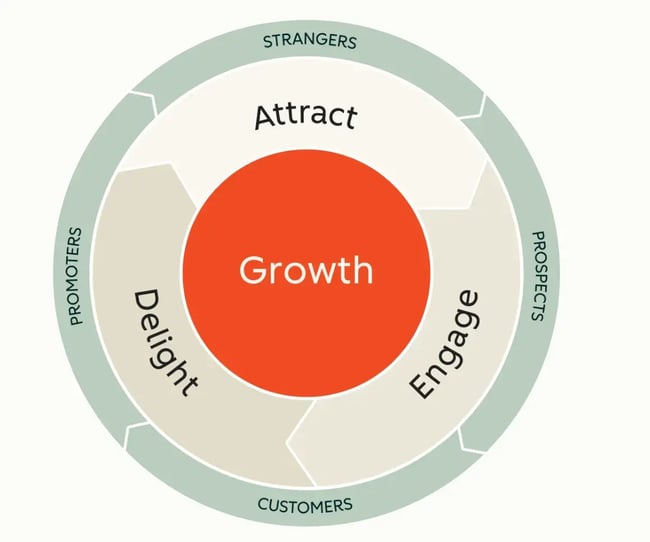
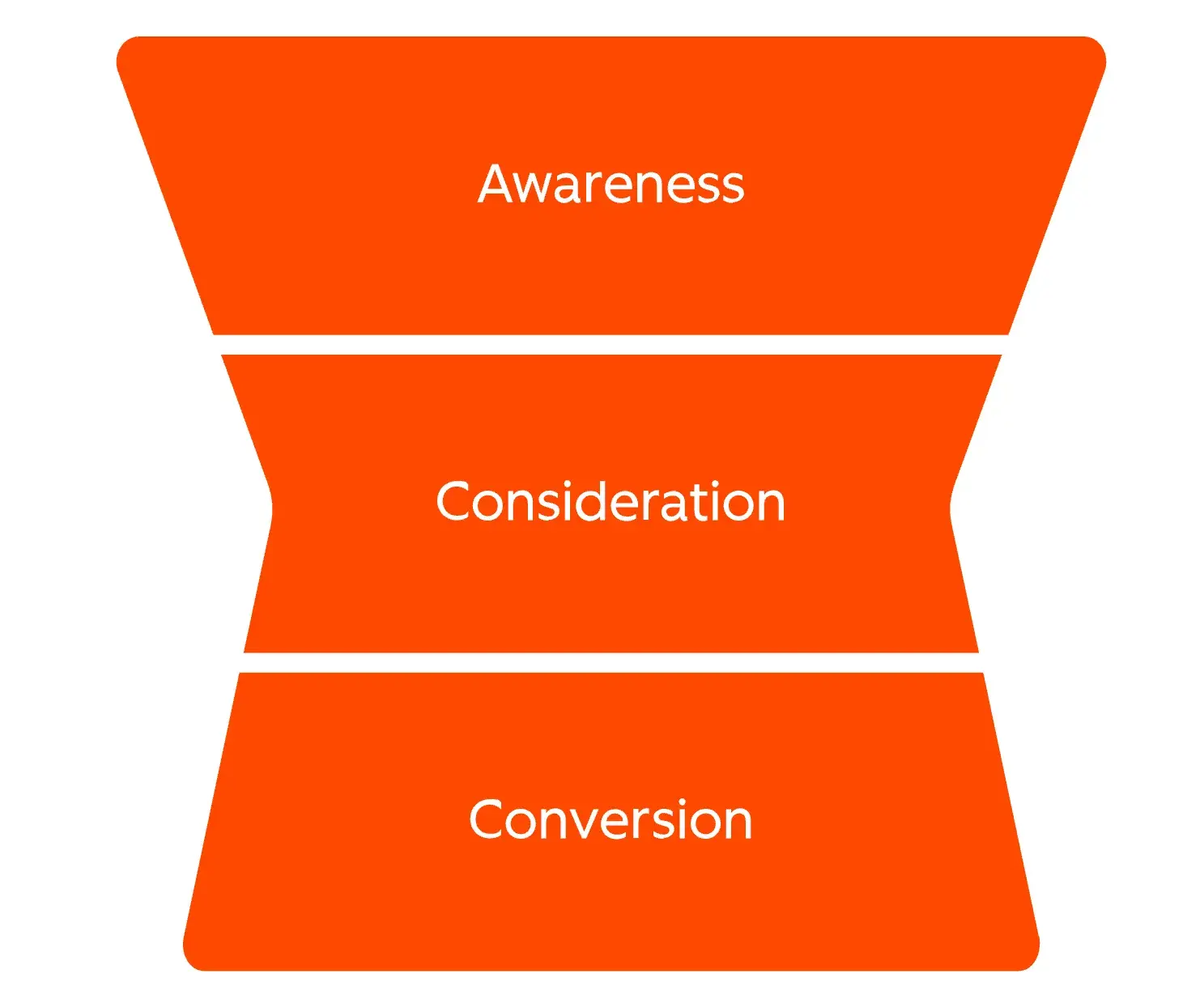
Traditional marketing follows these steps: Attract, Engage, Delight (also sometimes called Awareness, Consideration, Decision). Under this framework, marketers plan campaigns months in advance, create content for broad segments, and measure success in increments or after the fact. Optimization happens slowly, if at all.

loop marketing vs traditional marketing, traditional flywheel attract engage delight

Source

For context, here’s how the classic inbound funnel breaks down:

Attract

Create valuable content (blogs, SEO, social) to draw strangers to a company’s website. The goal is visibility and traffic.

Engage

Convert visitors into leads with offers, forms, and workflows. The focus shifts to nurturing and qualification.

Delight

Support customers post-purchase with service, education, and community. The aim is retention and advocacy.

While customers still pass through the same stages (awareness, consideration, decision), buyers no longer start with a site. In the AI era, they learn about brands early on through third-party sources. When they do engage with the brand, they are more educated and have higher intent than they did in the past.

How Loop Marketing Works

Loop Marketing, by contrast, is cyclical and responsive. It assumes the buyer journey is non-linear, and AI plays a central role in discovery. Under this framework, marketers use AI to automate tasks, express brand identity, personalize at scale, amplify across channels, and evolve strategies in real-time.

The table below compares loop marketing stages versus traditional funnel stages across seven key dimensions, from core model and personalization approach to channel strategy and cadence.

Stage-by-Stage Comparison: Loop Marketing vs. Traditional Marketing

How Loop Marketing Stages Work

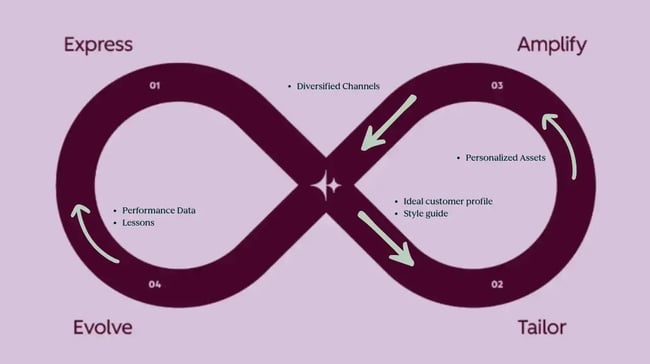
Loop Marketing’s four stages all play a critical role — don’t skip a single one. Express and Tailor lay a foundation for the loop that defines who’s being targeted, what they care about, and what messaging is most likely to resonate. Amplify is the execution and distribution machine, while Evolve is the intelligence that lets companies improve the loop from start to finish.

loop marketing vs traditional marketing, loop marketing diagram, express amplify tailor evolve

Source

Let’s break each stage down.

Express: Define the brand

Before generating content, brands need to clarify who they are and who they serve. Of course, any marketing team worth its salt already has an ideal customer profile (ICP) and branding.

The difference is that marketers need to translate these documents from PDFs that only the marketing team sees to rich documentation that can train an LLM on a brand, its messaging, and audience.

The following video walks through how to conduct market research using AI in the Express stage.

Compile a library of content, including:

  • Company mission, vision, and values
  • Brand voice and style guide
  • ICP and persona profiles
  • Messaging and positioning frameworks
  • Examples of on-brand content
  • Sales call transcripts
  • Customer quotes and testimonials

Teams that don’t have these assets yet should invest the time to create them, as they fuel everything else in the loop. While AI can assist in this process, don’t ask AI to invent these — the model needs real customer insights specific to the business.

Here’s what the Express stage looks like in HubSpot:

  • Use Breeze Assistant to analyze top-performing customers and extract key themes.
  • Upload the company style guide to Brand Identity (Professional or Enterprise plans), so every AI-generated asset reflects the brand’s unique voice. Brand Identity uses Breeze to align AI-generated content with a company’s voice, tone, and ideal customer profile.

Tailor: Make messaging feel personal

The Tailor stage is where marketers decide what they will personalize and how. In a traditional funnel, the customer journey may branch into two or three paths depending on the industry or a behavioral trigger the marketing team sets up. In AI marketing, customer journeys depend deeply on behavioral and contextual data. With AI, brands can set up personalized customer journeys at scale.

The Tailor stage defines what gets personalized, how deeply, and at what scale, giving AI the context it needs to adapt messaging for each individual. Instead of two or three potential variations, brands have hundreds, all personalized and optimized for that individual. To do this, brands need to set up their CRM with rich data and dynamic audience segments.

Here’s what the Tailor stage looks like in HubSpot:

  • Enable AI-powered contact enrichment to auto-fill missing details like job changes or company news. HubSpot’s Data Enrichment automatically adds firmographic and behavioral data to personalize outreach at scale.
  • Build dynamic audience segments using Smart CRM and intent signals.

Amplify: Show up where buyers are

The Amplify stage covers many of the steps that take up a marketer’s day-to-day activities: Content strategy, content creation, execution, and distribution.

Most marketing teams are already publishing strong content. Loop Marketing requires brands to go beyond good content to meet buyers where they’re at — including AI chatbots.

During this stage, brands optimize their content for Answer Engine Optimization (AEO) so the brand gets mentions in AI-generated summaries. Brands can also repurpose content across channels, remixing their best insights for short-form video.

What it looks like in HubSpot:

Evolve: Optimize in real time

Finally, the Evolve stage closes the loop by evaluating results and optimizing campaigns in real-time. This doesn’t happen after the other stages take place; it happens simultaneously. This enables teams to replace their post-campaign reports with live learning. Teams can use AI to predict what will work, run rapid experiments, and adjust the model for better results.

What it looks like in HubSpot:

  • Run AI-powered A/B tests on landing pages to discover winning messaging faster.
  • Analyze cross-channel performance in HubSpot Marketing Analytics. The analytics suite shows which channels drive revenue — not just traffic — so marketers can evolve their strategy based on business impact.

Most marketers hit ‘publish’ and move on, but those who grow the fastest treat their marketing like experiments. They launch fast, learn early, and optimize often. That’s exactly what the Evolve stage Loop Marketing is built for. It helps teams review the data from the last experiment, see what worked and what didn’t, and decide what to change before running the next one.

Loop Marketing gives marketing teams a system that gets smarter with each use.

How to Transition From Funnel Marketing to Loop Marketing

Here’s the good news: teams don’t need to scrap their current strategy to adopt Loop Marketing. The principles of good marketing — define the audience, identify pain points, personalize content, measure and optimize — still hold true. Instead, layer loop principles on top. Shift from creating individual campaigns to AI-powered systems that personalize and distribute a message at scale. Here’s how to get started.

1. Set targeted goals.

To start, teams should identify where their funnel is leaking. Look for low blog-to-lead conversion rates, generic emails, or a poor post-click experience. These will reveal the best entry point into the loop. Map out the brand’s strengths and weaknesses, and set specific goals, such as “Increase demo requests by X” or “Increase engagement/conversions by Y.” Teams can also target efficiency goals, such as amping up production or saving time.

2. Clean and unify data.

Loop Marketing doesn’t work without clean, high-quality data. The company’s CRM should contain accurate, enriched contact records. Use Data Studio to sync with external sources like Google Sheets or Snowflake.

3. Lay a strong foundation.

Before running the first Loop Marketing campaign, every team needs to set a foundation. Host a Hackathon and involve the entire team. Assign one person to be the brand champion in charge of the Express stage and another in charge of the Tailor stage. Build the content library that will train the AI, and give it test use cases. If it doesn’t perform well, tweak and try again. Set up test contacts with segments and behavioral triggers for testing purposes.

4. Avoid over-automation.

AI marketing is exciting because it can automate so many things, but it should always start and end with humans. Everything in Loop Marketing should add value to the customer, not just be a shiny object. As teams move into the Amplify stage, ensure every action has value. Always include human quality checks on AI output to ensure accuracy, brand alignment, and emotional resonance.

5. Start with one quick win.

Loop Marketing can be a big change for marketing teams, and like any process change, it’s daunting. Instead of overhauling every marketing workflow at once, target one quick win to start. For example, if web traffic is dropping, try to increase AI mentions in Q1. If prospects are downloading a resource like hotcakes but rarely progress to a demo, focus on the follow-up email sequence.

Starting with one quick win builds team confidence in the loop and demonstrates what the framework can deliver. Every time around the loop, teams iterate, improve, and grow.

Frequently Asked Questions About Loop Marketing vs. Traditional Marketing

Does Loop Marketing replace the funnel?

No. Understanding the marketing loop versus the marketing funnel starts with recognizing that one builds on the other. Loop Marketing adapts inbound’s Attract, Engage, Delight foundation for non-linear, AI-influenced buyer journeys. The funnel is a customer flow; the loop is the operating system.

How long does it take to see results with Loop Marketing?

Many teams see improvements in 30 to 90 days, especially when optimizing for AEO or personalizing high-intent emails. The loop compounds over time, so each cycle sharpens the next.

Can small teams run a Loop Marketing approach?

Yes, Loop Marketing is designed for efficiency. Tools like Breeze Assistant let lean teams execute like larger ones, producing more with better results in less time.

How does Loop Marketing affect sales and service teams?

Loop Marketing helps align marketing, sales, and service teams, benefiting all three. Sales reps receive better-qualified, AI-enriched leads thanks to Loop Marketing. Service teams see fewer tickets thanks to AI agents helping with routine queries. All teams share a unified view of the customer.

What’s the best way to start if we’re new to AI?

Begin with HubSpot’s free Loop Marketing Playbook and AEO Grader. These resources help brands assess their current position and identify their highest-impact starting point — no AI expertise required.

Loop Marketing vs. traditional marketing: New framework, same goals

In Loop Marketing versus traditional marketing, teams don’t have to completely reinvent the wheel or change how marketing is done. Marketers simply need to understand how these stages work together and how AI layers into each one. The goals are the same — except instead of a linear journey, teams are designing campaigns for the fragmented, non-linear way that customers search for answers today.

In my experience working with marketing teams, the biggest shift isn’t producing one piece of stellar content — it’s producing personalized, timely content with a data-backed strategy. Loop Marketing turns human insights and creativity into a scalable system and compounding growth engine. That’s how brands succeed in the AI era.

Ready to get started? Download HubSpot’s Loop Marketing prompt library.

Categories B2B

Marketing forecast fundamentals every growth team needs

A marketing forecast estimates future marketing results, such as leads, pipeline, and revenue, using historical data and conversion assumptions. Marketing forecasting connects planned activity to expected outcomes, helping teams understand what performance is likely to look like before campaigns are executed. This approach supports clearer planning, more predictable growth, and stronger alignment between marketing inputs and revenue targets.Download Now: Free Marketing Plan Template [Get Your Copy]

Growth-focused teams operate in an environment shaped by AI-driven discovery, fragmented data systems, and increasing pressure to prove impact across the funnel. Marketing forecasts provide a structured way to navigate this complexity by translating data into forward-looking decisions.

This article explains how marketing forecasting works, the methods used to build accurate models, and the factors that improve reliability over time, enabling more consistent and measurable outcomes.

Table of Contents

What is a marketing forecast?

A marketing forecast is a structured estimate of future marketing performance based on historical data, conversion rates, and planned activities. It projects expected outcomes such as leads, pipeline, and revenue across a defined period. A marketing forecast estimates future results and informs planning decisions across marketing and revenue teams.

Marketing forecasting relies on historical data to establish performance baselines and expected ranges, often drawing on approaches such as trend forecasting and qualitative forecasting to shape assumptions. It differs from reporting and budgeting in both purpose and timing:

  • Marketing forecasting predicts future outcomes.
  • Reporting analyzes past performance.
  • Budgeting allocates future spend.

Forecast models translate inputs such as traffic, spend, and conversion rates into projected pipeline and revenue. These projections guide quarterly planning, scenario evaluation, and target setting across growth teams.

Why does a marketing forecast matter for growth teams?

A marketing forecast links planned activities to expected revenue outcomes and provides structure for planning decisions. Forecast outputs guide how the budget is allocated, how teams are resourced, and which campaigns receive priority. A marketing forecast aligns marketing efforts with pipeline goals and clarifies expected contribution to revenue.

Budget decisions are becoming more constrained and more strategic. According to HubSpot’s State of Marketing 2026 Report, 73% of marketers report increased budget scrutiny, while 93% expect budgets to remain stable or grow. Forecast models clarify expected return and help teams direct investment toward channels that generate pipeline.

Growth teams use forecasts to guide:

  • Budget planning allocates spend across channels based on expected return.
  • Resource allocation informs hiring and team capacity decisions.
  • Revenue alignment connects marketing outputs to pipeline and revenue goals.
  • Campaign prioritization focuses investment on high-impact programs.

Forecast outputs map directly to core performance metrics. Marketers prioritize lead quality, conversion rates, and return on investment (ROI) as primary KPIs, which align with projected pipeline and revenue outcomes.

This is where modern approaches like Loop Marketing become increasingly relevant. Loop Marketing focuses on continuously feeding performance data, customer insights, and campaign outcomes back into planning and execution. Instead of treating campaigns as linear inputs, Loop Marketing creates a closed system where insights improve future performance — making forecast models more responsive and aligned with real buyer behavior.

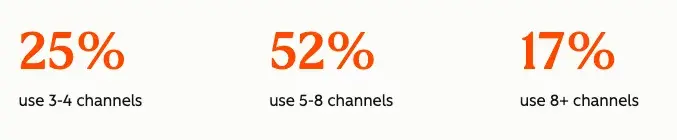
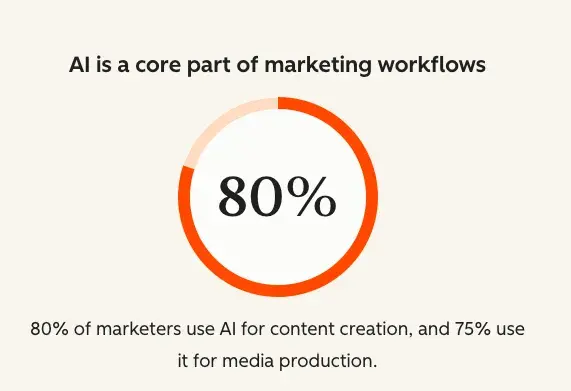
Of marketers, 75% now operate across five or more channels, and 73% review campaign performance at least weekly. Forecast models must account for both channel complexity and continuous performance updates to remain accurate.

marketing forecasting: 25% of marketers use 3-4 channels, 52% 5-8 channels, and 17% 8+ channels

Source

Marketing Forecast vs. Sales Forecast: What is the difference?

A marketing forecast predicts pipeline creation, while a sales forecast predicts revenue closure. Marketing forecasting uses inputs such as traffic, leads, and conversion rates to estimate the future pipeline. Sales forecasting relies on opportunities, deal stages, and close probabilities to estimate revenue outcomes.

These models operate at different stages of the funnel. Marketing forecasting focuses on demand generation and pipeline volume, while sales forecasting focuses on conversion and revenue realization.

Misalignment between these models creates planning gaps. A marketing forecast may project strong pipeline growth based on lead volume, while a sales forecast may reflect lower expected revenue due to deal velocity or close rates. This gap can lead to missed targets and inefficient resource allocation.

What components are required for an accurate marketing forecast?

A reliable marketing forecast requires six core components: historical data, conversion rates, channel mix, market inputs, pipeline definitions, and unified data systems. Each component shapes how projections are calculated and how closely forecasts reflect actual performance.

Historical Performance Data

Historical performance data provides baseline metrics for forecasting models. It includes traffic, leads, and conversion rates across channels and time periods. These inputs establish expected ranges and trend patterns, often informed by approaches like trend forecasting.

  • Traffic
  • Leads
  • Conversion rates

Pro tip: Use 12–24 months of data to account for seasonality and reduce volatility in projections.

Conversion Rate Assumptions

Conversion rate assumptions define how prospects move through the funnel. These assumptions determine how traffic becomes leads and how leads become pipeline and revenue. Forecast reliability depends on how closely modeled conversion rates match actual behavior.

Conversion assumptions must reflect personalization and audience targeting. According to HubSpot’s research, 93% of marketers report that personalization improves lead or purchase conversion rates, which directly influences stage-to-stage conversion rates in forecast models.

Stable conversion assumptions reduce projection error. Shifts in targeting, messaging, or channel mix introduce variability that should be reflected in updated models.

Channel Mix and Spend

Channel mix defines how the budget is distributed across acquisition sources such as paid media, organic search, and email. Digital marketing forecasting models performance at the channel level to estimate the contribution to leads and pipeline. Changes in channel mix directly influence forecast outputs and expected return.

Market and External Inputs

Market inputs account for external factors that influence marketing performance. These factors include seasonality, demand shifts, and competitive activity. Marketing forecasting adjusts projections based on these inputs to reflect current conditions and reduce variance between expected and actual results.

Pipeline Definitions

Pipeline definitions standardize how marketing contributes to revenue across funnel stages. These definitions include lead qualification criteria, stage progression, and attribution models. Clear definitions improve forecast consistency and reduce discrepancies between marketing and sales reporting.

Unified Data Systems

Unified data systems bring marketing and sales activity into a single, consistent dataset. Fragmented systems introduce variance into forecasts. Disconnected tools often report conflicting metrics, which distorts conversion rates and pipeline estimates. A unified system creates a stable foundation for modeling, where inputs remain consistent across teams and reporting cycles.

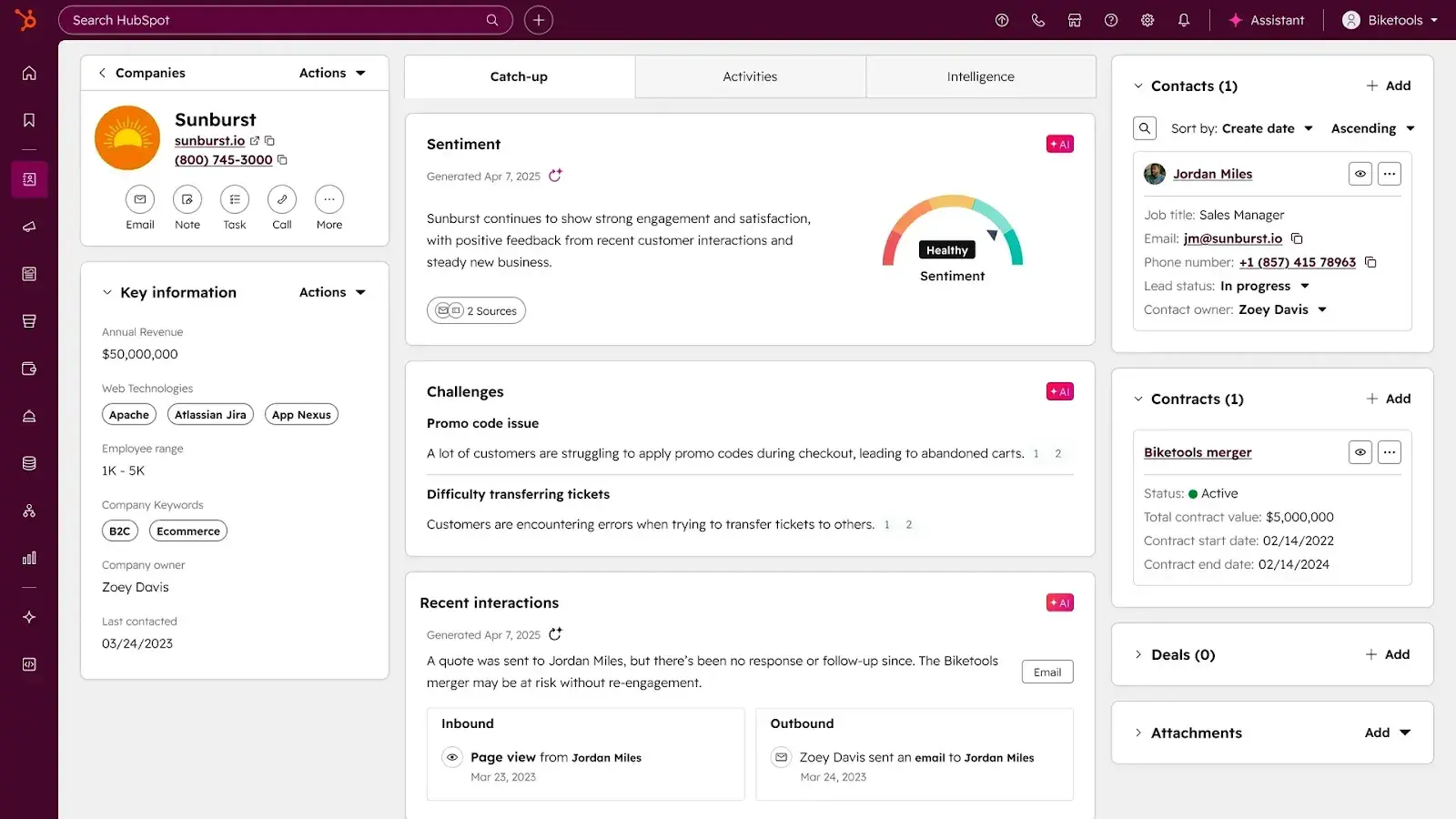
HubSpot Smart CRM centralizes customer data across touchpoints, making it easier to track how leads convert into pipeline and revenue. HubSpot Smart CRM also strengthens forecasting by providing a unified, real-time dataset across marketing, sales, and service. By consolidating customer interactions and pipeline activity in one system, teams can build forecasts on consistent inputs and reduce discrepancies caused by fragmented tools.

Forecast reliability increases when data sources remain aligned. Consistent datasets produce more stable projections and reduce the gap between expected and actual performance.

Example: Simple Marketing Forecast Model

A basic model translates inputs into projected outcomes using funnel math.

Inputs:

  • 50,000 monthly visitors
  • 2% visitor-to-lead conversion rate
  • 20% lead-to-opportunity rate
  • 25% close rate

Projected outputs:

  • 1,000 leads
  • 200 opportunities
  • 50 customers

Small changes in conversion rates can significantly shift results. Increasing the visitor-to-lead rate from 2% to 2.5% raises lead volume to 1,250, which increases the downstream pipeline without additional traffic.

What are the main marketing forecasting methods?

Marketing forecasting methods vary based on data maturity and business complexity. The most common approaches include historical trend, funnel-based, regression-based, and scenario-based forecasting. Each method uses a different model to translate inputs into projected outcomes.

Historical Trend Forecasting

Historical trend forecasting projects future results based on past performance patterns, such as growth rates and seasonality. This approach works well when performance remains stable over time.

What I like: Straightforward modeling with minimal setup.

Best for: Organizations with predictable demand patterns.

Funnel-based Forecasting

Funnel-based forecasting calculates outputs using stage-by-stage conversion rates. It maps how traffic becomes leads, how leads become opportunities, and how opportunities contribute to the pipeline.

What I like: Clear visibility into where performance changes impact the pipeline.

Best for: Teams focused on improving conversion and pipeline generation.

Regression-based Forecasting

Regression-based forecasting applies statistical models to identify relationships between inputs, such as spend, and output metrics such as leads or pipeline. This method captures patterns that are not immediately visible in simpler models and is often used alongside techniques like regression analysis to forecast sales.

What I like: More precise modeling when sufficient data exists.

Best for: Organizations with large datasets and analytical resources.

AI-powered tools such as Breeze AI enhance regression-based forecasting by analyzing large datasets, identifying hidden relationships between variables, and generating predictive insights faster than manual models. Breeze can surface patterns across CRM data, campaign performance, and customer behavior to improve forecast precision and adaptability.

Scenario-based Forecasting

Scenario-based forecasting models multiple potential outcomes based on different assumptions. It accounts for variability in performance, spend, and market conditions.

What I like: Flexibility to plan across multiple possible outcomes.

Best for: Teams operating in uncertain or rapidly changing environments.

Comparison of Marketing Forecasting Methods

Each marketing forecasting method serves a different purpose depending on available data and business context. Teams often combine multiple methods to improve accuracy and create more resilient forecasts.

How do you build a marketing forecast step by step?

Building a marketing forecast requires defining goals, collecting data, mapping the funnel, selecting methods, modeling outputs, and refining assumptions over time. A structured process creates consistency across planning cycles and improves how projections are used in decision-making.

Step 1: Define forecast goals.

Define measurable outputs, such as leads, pipeline, or revenue, before selecting inputs or methods. A marketing forecast works best when the target outcome is clear from the start. Forecast goals shape the time horizon, the metrics included, and the level of detail required.

Step 2: Gather historical data.

Collect data from CRM, analytics, and campaign tools to establish a reliable baseline. Historical data should reflect performance across channels, campaigns, and funnel stages. Marketing forecasting uses past performance to estimate future outcomes, so data completeness and consistency matter at this stage.

Step 3: Map the funnel.

Define funnel stages and conversion rates so the forecast reflects how demand moves toward revenue. Funnel mapping should include stage definitions, progression rates, and any qualification thresholds that affect volume. This step creates the logic that connects top-of-funnel activity to pipeline and revenue.

Step 4: Select forecasting method.

Choose a forecasting method based on data maturity, business complexity, and the required level of precision. Historical, funnel-based, regression, and scenario-based methods each support different planning needs. The right method depends on how much data is available and how stable performance patterns are.

Step 5: Model outputs.

Calculate projected leads, pipeline, and revenue using the selected method and current assumptions. This model should show how inputs such as traffic, spend, and conversion rates influence expected outcomes. Marketing forecast models estimate future results and make performance assumptions visible.

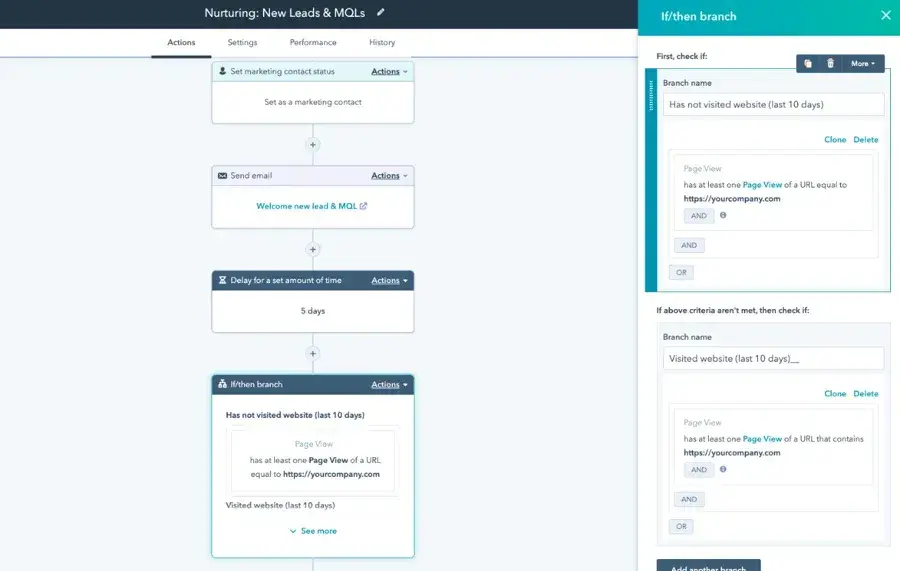
Tools like HubSpot Marketing Hub help operationalize these models by connecting forecast assumptions directly to campaign execution. Marketing automation ensures that nurture flows, email sequences, and campaign triggers align with projected conversion paths, reducing the gap between planned and actual performance.

Step 6: Validate and iterate.

Compare forecast projections with actual results and adjust assumptions based on observed performance. This step focuses on identifying where projections diverge from outcomes and recalibrating the model.

Pro tip: Update forecasts monthly to reflect changes in performance, channel mix, and market conditions.

How can you improve marketing forecast accuracy?

Marketing forecast accuracy increases when inputs remain consistent, definitions stay standardized, and projections are reviewed against actual performance. Lower variance comes from stable inputs, clear assumptions, and regular validation.

Use unified CRM data.

Unified CRM data provides a consistent view of the funnel. HubSpot Smart CRM connects marketing and sales activities into one system, allowing teams to track how leads progress through the pipeline and into revenue.

When systems remain disconnected, projections drift. Consistent inputs reduce projection error and make forecast outputs more stable over time.

Standardize definitions.

Clear definitions for leads, stages, and attribution models prevent inconsistencies across teams. Stable definitions create a shared understanding of how performance is measured, leading to more reliable projections.

Build feedback loops.

Feedback loops compare projected outcomes with actual results to identify gaps in assumptions. This process focuses on reviewing forecast performance and adjusting conversion rates, channel expectations, or pipeline assumptions.

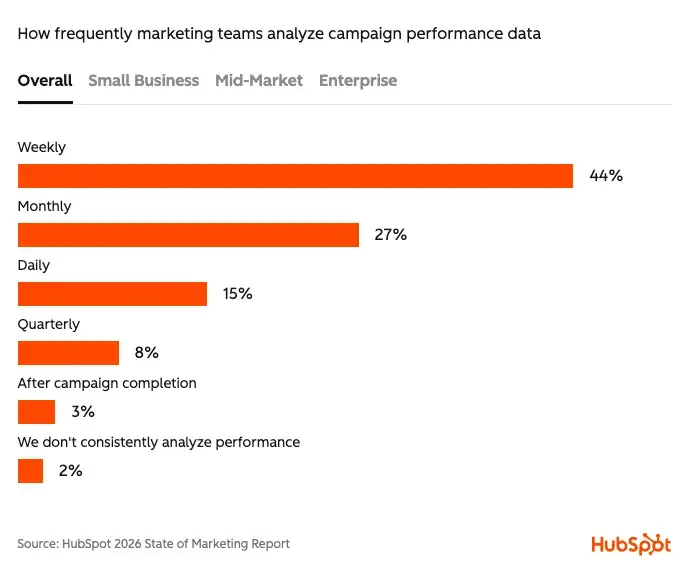
According to HubSpot’s research, 73% of marketing teams analyze campaign performance at least weekly, and 59% review performance daily or weekly. Regular evaluation allows teams to refine projections based on observed results rather than relying on static assumptions.

marketing forecast: how frequently teams analyze campaign performance 44% weekly, 27% monthly, 15% daily, 8% quarterly

Source

This concept closely aligns with Loop Marketing, which formalizes feedback loops across the entire customer journey. Loop Marketing connects campaign performance, CRM data, and customer interactions into a continuous cycle of learning and optimization. By embedding these loops into forecasting processes, teams can update assumptions in near real time and reduce the gap between projected and actual outcomes.

Incorporate real-time data.

Real-time data updates forecast inputs as campaign performance shifts. This approach focuses on adjusting models as conditions change, rather than waiting for periodic reviews.

Shorter data cycles allow projections to reflect current conversion rates, spend efficiency, and channel performance. More responsive inputs lead to more stable outputs over time.

Automate forecasting workflows.

Automation keeps execution aligned with forecast assumptions. Automation reduces manual updates and keeps workflows consistent with current projections. This alignment helps maintain continuity between planning and execution. HubSpot marketing automation connects projections to campaign delivery, including email sequences, nurture programs, and drip campaigns.

How Digital Marketing Forecasting Applies Across Channels

Digital marketing forecasting models perform at the channel level to estimate contributions to leads and pipeline. Channel-level projections translate spend, traffic, and engagement into expected outcomes.

Channel complexity continues to increase. According to HubSpot’s research, 75% of marketers use five or more channels, while only a small percentage rely on one or two. More channels introduce variability, which requires more granular forecasting models.

Traffic quality is also shifting. More than half (58%) of marketers report that AI referral traffic has higher intent than traditional search. Higher-intent traffic influences conversion rates and changes projected pipeline outcomes.

These different channels focus their forecasting on different aspects:

  • Paid media forecasting estimates leads based on spend, CPC, and conversion rates.
  • SEO forecasting projects traffic growth based on rankings and search volume.
  • Email forecasting models engagement and conversion based on audience size and send frequency.

Channel-level forecasting highlights which sources generate the most efficient pipeline and where incremental investment produces measurable impact.

How HubSpot Enables Marketing Forecasting at Scale

HubSpot enables marketing forecasting by unifying data, automating workflows, and applying AI-driven insights across the full funnel. HubSpot Smart CRM, HubSpot marketing automation, and Breeze AI support marketing forecasting from data collection to execution and optimization. This connected system improves forecast accuracy and helps teams act on projections with greater consistency.

HubSpot Smart CRM

marketing forecast tool: hubspot smart crm

HubSpot Smart CRM enables operationalizing and automating marketing forecasts. It centralizes customer data and pipeline visibility, improving forecast accuracy. The platform connects marketing and sales activities into a single system, allowing teams to track how inputs, such as traffic and leads, translate into pipeline and revenue. HubSpot Smart CRM centralizes customer data, strengthening forecasting models and reducing discrepancies across teams.

Unified visibility across the funnel improves how assumptions are built and validated. Consistent data inputs support more reliable marketing forecasting over time.

HubSpot Marketing Automation

marketing forecast tool: hubspot marketing automation

HubSpot Marketing Hub features marketing automation that executes campaigns and workflows aligned with forecast assumptions. The platform connects forecasting inputs to real campaign activity, including email sequences, nurture programs, and drip campaigns. HubSpot marketing automation executes workflows based on defined triggers, helping teams maintain alignment between planned outcomes and execution.

Automation reduces manual effort and ensures that campaigns reflect current forecasting models. This connection between planning and execution improves consistency across marketing operations.

HubSpot Breeze AI

marketing forecasting: hubspot breeze

Breeze is HubSpot’s AI agent that generates content, analyzes performance, and supports forecasting scenarios. Breeze and Breeze Agents extend this capability across the entire campaign planning and execution process.

Forecasting models must adapt to faster execution cycles. According to HubSpot’s research, 61% of marketers report that AI is the most significant disruption in the past two decades, and 80% now use AI in marketing workflows. Faster execution requires faster updates to forecast models.

marketing forecasting: 80% of marketers use ai for content creation

Source

Breeze contributes in three ways:

  • Generates content for campaigns and web experiences.
  • Supports forecasting inputs through data analysis and scenario modeling.
  • Accelerates iteration by reducing manual effort.

Breeze connects content generation with performance insights, allowing projections to evolve alongside real-time data.

Frequently Asked Questions About Marketing Forecasts

How often should you update a marketing forecast?

Marketing forecasts should be updated monthly or quarterly, depending on business velocity. Faster-moving environments benefit from more frequent updates because performance inputs such as conversion rates and channel efficiency change quickly. Regular updates improve accuracy by aligning projections with current data and market conditions.

What is the best way to forecast with limited data?

Scenario-based forecasting combined with benchmark data provides a practical starting point. Early models rely on assumptions drawn from similar products or channels, which should be refined as performance data becomes available.

How can marketers predict the impact of changes?

Scenario modeling allows teams to adjust variables such as conversion rates, spend, or channel mix and estimate potential outcomes. This approach helps evaluate trade-offs before changes are implemented.

When should you switch forecasting methods?

Teams should shift forecasting methods as data maturity increases or when current models no longer accurately reflect performance. More advanced methods become valuable as datasets grow and relationships between variables become clearer.

What makes a marketing forecast effective?

An effective marketing forecast links data, strategy, and execution into a continuous system that adapts over time. Forecast reliability depends on consistent inputs, unified systems, and regular validation against actual performance. Clear assumptions and structured models reduce uncertainty and strengthen planning decisions.

HubSpot Smart CRM centralizes data, HubSpot marketing automation translates projections into execution, and Breeze applies intelligence across forecasting workflows. These systems allow marketing forecasts to evolve from static projections into dynamic models that reflect real performance.

Forecast models become more useful when treated as active systems rather than fixed plans. Regular updates, consistent definitions, and aligned data create more stable projections and more predictable growth.

Categories B2B

Knowing About AI Isn’t Enough. Here’s How to Actually Use It.

Maybe you’ve opened ChatGPT a handful of times, gotten subpar results, and moved on. Maybe you’ve sat through an AI training or two and thought, “Cool, but how does this actually apply to my job?” Or maybe you’ve bookmarked a dozen AI tools you saw recommended on LinkedIn and haven’t tried a single one.

You’re not alone. That gap between knowing AI and using AI is where many of us are right now. And it doesn’t help that everyone’s telling you to use it.

Download Now: Ultimate Checklist for Adopting AI

I know because this is pretty much my job: I manage a writing team on the HubSpot Blog, and a big part of my work is enabling them with AI. Not in the abstract, inspirational keynote sense, but in the here’s how to get your actual work done better sense.

What I’ve learned is that the problem is almost never motivation. People want to learn. It’s that information about AI is everywhere, but genuine enablement — what actually changes how you work — is surprisingly rare.

That’s what this post is about. In this guide, I’ll share a practical framework for integrating AI into your work in a way that advances your skills, impact, and career.

Table of Contents

Why Being AI-Enabled Helps Your Career

Let’s start with some honesty. “AI helps your job” is close to a nothing statement in 2026. We know it can make us more productive, so now what?

Here is a better insight: There’s a widening gap between people who use AI and people who use it well. The advantage will go to the people who have gone further, who have built AI into their routines, who use it to produce meaningfully better work, and who can show that impact.

Let’s take a closer look at exactly why this is:

Promotions come from output, not effort.

“I put in a lot of effort, so I should be rewarded” is a lot harder to argue these days. That’s because AI-enabled professionals tend to produce more output and impact than those who don’t. By AI-enabled, I mean someone who regularly leverages AI in their daily work to increase their output and impact.

In 2026, many industries have now transitioned into an “operational era” of AI. The experimental phase (ad-hoc prompting, one-off tool usage) is largely over. The expectation now is integrated, sustained use.

Take content marketing as an example: Small, strategically focused teams can use AI as a force multiplier, offloading the routine aspects of production so human editors can focus on narrative flow, brand voice, and accuracy. According to HubSpot’s 2026 State of Marketing report, 67% of marketing teams say AI saves them 10 or more hours per week, and 71% say AI helps them create significantly more content.
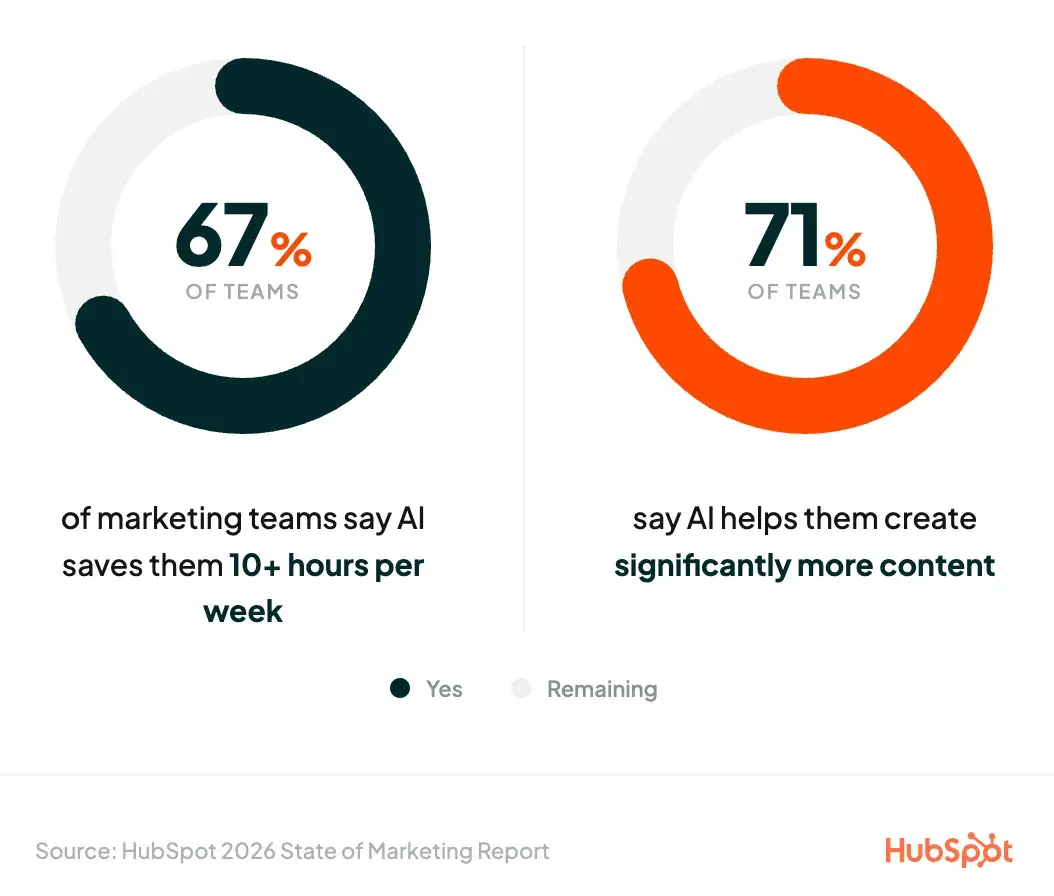
two circular progress charts showing 67% of marketing teams save 10+ hours weekly with ai and 71% say ai helps create significantly more content

Since AI can handle much of the mundane day-to-day of a role, it frees up time for higher-order work: strategic thinking, creative problem-solving, cross-functional leadership, and long-term planning. Execution of basic tasks is becoming less valuable. And when you’re not bottlenecked by it, managers give you more challenging and visible work.

AI use is becoming the new baseline.

A generation ago, knowing how to use Excel was a differentiator. Then, it became the floor. That same shift is happening with AI right now, which means the window to get ahead is closing.

Right now, AI proficiency is still impressive. If you tell your manager you used AI to cut a process in half, or built a prompt that saves your team three hours a week, that gets noticed (more on this later).

However, what earns you recognition from your manager today will sound a lot like “I made a new macro in Excel” a year or two from now. Useful, but not noteworthy.

When AI proficiency becomes the baseline, the advantage goes to the people who got there early and built on it while everyone else was still figuring out where to start. You could even argue it is the baseline: HubSpot research found that 83% of marketers say they are expected to produce more than ever because of AI.

And here’s what matters most for your career: AI won’t replace you. But someone using it better might. Not some hypothetical robot or a faceless wave of automation. Someone in your industry, at your level, who decided to take it seriously before you did.

Managers notice who’s using AI (and who isn’t).

2026 Gallup data shows that 69% of leaders and 55% of managers use AI at least a few times a year, compared to just 40% of ICs. Your manager likely uses AI more than you do, so they have a pretty good sense of what’s possible and whether you’re keeping up.

I’m not saying your boss is keeping a secret scorecard of who prompts Claude the most. But when two people on the same team deliver similar work, and one of them consistently does it faster and more thoroughly because they’ve integrated AI into their process, that’s noted. It influences who gets the next stretch assignment, who gets brought into the strategy conversation, and who’s promoted.

Why is AI so hard to adopt?

There’s a reason so many people get stuck between “I know I should be using AI more” and really doing it. Actually, there are several well-documented reasons:

The Knowing-Doing Gap

We’ve all wanted to learn or try something new, only to realize that months or years have gone by without actually doing anything about it. Just ask my bass guitar gathering dust in my bedroom.

Researchers Jeffrey Pfeffer and Robert Sutton labeled this phenomenon the “knowing-doing gap”. Basically, knowing what to do and actually doing it are almost entirely separate problems.

When applying the knowing-doing gap to AI, the research lines up: BCG found that despite widespread AI implementation, 74% of companies have yet to show tangible business value from their use of AI. It also found that 70% of the challenges companies face when implementing AI stem from people- and process-related issues, compared to just 30% for technology problems and 10% for AI algorithms.

Part of the reason for the lag is just practical. You already have a job to do. Your calendar is full, your task list is long, and the abstract goal of “figure out how to use AI better” is competing with every other thing on your plate.

When I asked Timothy Biondollo, HubSpot Media’s Prompt Engineer and AI Specialist, why so many people stall between awareness and adoption, he didn’t sugarcoat:

“Awareness is passive, and adoption requires you to change how you actually work, not just add a new tab to your browser. The gap is that most people are still moving through their day task by task, in order, doing the work themselves. Enabled people have made a completely different shift. They spend their time gathering context, writing instructions, and then running ten parallel workstreams in the background while they focus on strategy and quality. That’s not a small adjustment. That’s a different operating model entirely. Nobody tells you that’s what the transition actually looks like, so people try AI a few times, don’t feel the shift, and assume it’s not for them or that the AI isn’t smart enough to do it.”

Learning AI on top of executing your existing responsibilities is a genuine constraint. Your brain has a cap on processing new information, and when that’s exceeded (which, given the pace of AI over the past few years, it almost certainly has been), adoption drops sharply, even when motivation is high.

Too Many Options, Not Enough Clarity

Let’s say you do carve out the time. Now what?

There are thousands of AI tools on the market. The landscape changes monthly. New models and features launch, and your LinkedIn feed is full of people telling you about the one tool that changed their life. You don’t know where to start, so you don’t start at all.

Even if you haven’t heard of the paradox of choice, you’ve surely experienced it. The more options we have, the less we want to choose. So we freeze, or we make a worse decision than we would have if given fewer options.

That’s exactly what’s happening right now for anyone trying to build an AI habit. What’s the chance that the tool you pick is actually the right one? Intimidating is an understatement.

The Productivity Trap

There’s also a cruel irony here that I don’t see mentioned as much as it should: If you’re not deliberate about using AI, it will create more work than it reduces.

Consider a scenario where you want to use AI to summarize a dataset as a memo. You export the sheet, put it in ChatGPT, and great, a memo comes back in 30 seconds. But now you’re reviewing the output, catching inaccuracies, re-prompting because something is off, fact-checking claims you’re not sure about, and reformatting the whole thing to hit the right tone. By the time you’re done, AI doesn’t feel like an enabler; it feels like a bottleneck.

This is a huge reason AI adoption stalls. People try it, get a generic response, and think that’s it? They conclude it’s not worth the sustained effort and go back to the old way. But the problem is the approach, not the tool. Using AI well means knowing where it genuinely saves you time and where it just shifts the work around. That distinction takes practice and separates someone who’s AI-aware from someone who’s AI-enabled.

What does AI enablement look like?

We know why AI enablement and adoption matter. The jump from knowledge to practice is where so many of us stall out, and it’s not for lack of trying.

Next, I’ll outline the strategies that have worked for my content team and me. These are practical, incremental steps that turn AI anxiety into action.

Realize you aren’t behind (yet).

Doing a search for “latest AI technology” is a great way to immediately want to close your laptop and sign off for the day.

There’s a pressure with AI that comes from the constant stream of influencers, product announcements, think pieces, and even colleagues telling you how they’re getting ahead.

But that noise is largely designed to get your attention and market to you. It’s one of the oldest tricks in the book: You’re falling behind. You can’t fall behind. Subscribe to my newsletter, so you don’t fall behind. This messaging appeals to our primal desire to be in the ingroup. It’s basically caveperson logic.

Some reality for you: According to Gallup, 49% of U.S. workers report never using AI in their role, and only 26% use it a few times per week or more. Let that sink in. In the country where most major AI companies are based, only about a quarter of workers use AI frequently.

I want to introduce another concept to put things in perspective: the Diffusion of Innovation Theory. First shared by E.M. Rodgers in 1962 (and still relevant today), the Diffusion of Innovation theory divided the entire audience for a technology into five groups: innovators, early adopters, early majority, late majority, and laggards.

These groups adopt any new technology in that order. Adoption starts with the innovators (think tech enthusiasts, influencers, people first in line for the newest phone) and ends with the laggards (who still use landlines). As you can see from the diagram below, most people fall somewhere in the middle:
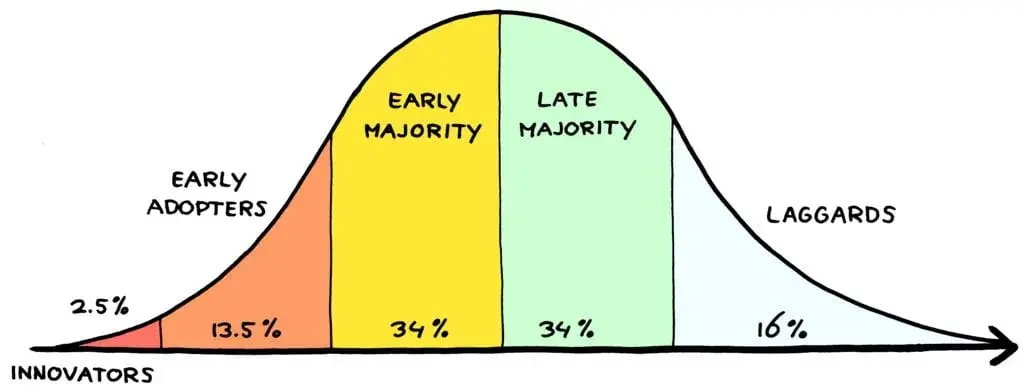
diffusion of innovation curve showing five adoption groups: innovators 2.5%, early adopters 13.5%, early majority 34%, late majority 34%, and laggards 16%

Source

So, where are we on this timeline with generative AI?

It’s a subjective call, but given the data we have so far, I’d wager we’ve just entered the early majority. In other words, while AI as a concept has been in the public eye for a while now, AI proficiency is just starting to hit the mainstream. All the people you’ve heard raving about AI and its possibilities are the first 15%, the innovators and early adopters. And they’re much more vocal than the rest.

What does that mean for you? If you’re not comfortable with using AI yet, you’re still in a good spot. But don’t lag either, because the early majority is your last chance to pull ahead.

This isn’t to say that being a beginner at anything is easy — certainly not. But much of that discomfort comes from believing everyone’s ahead of you. That isn’t the case just yet.

Start small.

Like any skill, AI proficiency is a muscle that builds over time through repeated use. You don’t get stronger by reading about weightlifting. At some point, you’ll have to pick up the dumbbells.

This doesn’t mean you need to drum up an agent that summarizes all your emails, cleans your spreadsheets, manages your schedule, and does your taxes on the first go. Embrace being a beginner, look for small wins, and, just like exercise, you’ll see the benefits sooner than you think.

The first thing I ever did with AI was use it to help me suggest rewrites of my internal Slack messages if I felt like my tone was off. Basic stuff, but it became immediately clear to me how this was more efficient than stewing over the perfect way to phrase something. I saw the benefit with relatively little investment.

Eventually, I became comfortable using Claude to assist with coding internal tools for my team, generating memos from datasets, and planning out my weekly responsibilities. Now, I’d be hard-pressed to find anything I don’t use AI for in my day-to-day.

Applying AI solutions to your own problems and seeing the real-world benefits is a powerful motivator. You use it on something concrete, and it just clicks. You’ll think, “Oh, I can use it for this … what else can it do?” Your curiosity becomes the engine that builds the habit.

Plus, weaving AI into your existing work (instead of as a separate experiment or activity) clears the barrier of trying it once, getting iffy results, and returning to how you already work. You see its utility first-hand, so you’re more likely to push past the initial friction. The benefits of AI outweigh the temporary discomfort.

HubSpot Blog writer Amy Rigby has navigated this firsthand: “The hardest part about weaving AI into workflows is also the hardest part of any attempt at efficiency gains: At first, it’s going to be wildly inefficient. You’ll be stumbling over how it works, experimenting, and failing because it’s all new to you … You have to stick it out past that learning curve to unlock that value. It’s a great feeling once you do.”

Learn how to prompt.

AI prompting is the single most useful skill you can learn when starting out. A good prompt means the difference between a generic response and one that actually helps.

When I asked Meg Prater, Head of Content Strategy & Operations for HubSpot Media, why there was a gap between AI awareness and actual adoption, she said, “They’re not using the right prompts. Once you learn how to prompt better, your results make it impossible not to use AI to enhance your work and create more time to do the work that matters.”

It’s okay to experiment with different prompts at first, but eventually you’ll want a framework for better-guided conversations. I encourage writers on my team to use the WRITE framework — it gives the AI five critical pieces of information for the request:

  • Who: Who is the AI acting as? Give the AI a persona, like an experienced strategist, a technical expert, a project manager, etc.
  • Resources: What background does the AI need to get this right? This is your context dump: relevant details about the project, the problem you’re solving, reference materials, and anything else the AI wouldn’t know on its own.
  • Instructions: What exactly should the AI do? Be specific.
  • Terms: What rules, limits, or boundaries apply? For example, length, format, tone, things to avoid, and things to include.
  • Expected outcome: Describe the finished product as specifically as you can: the format, the deliverables, and, if possible, an example.
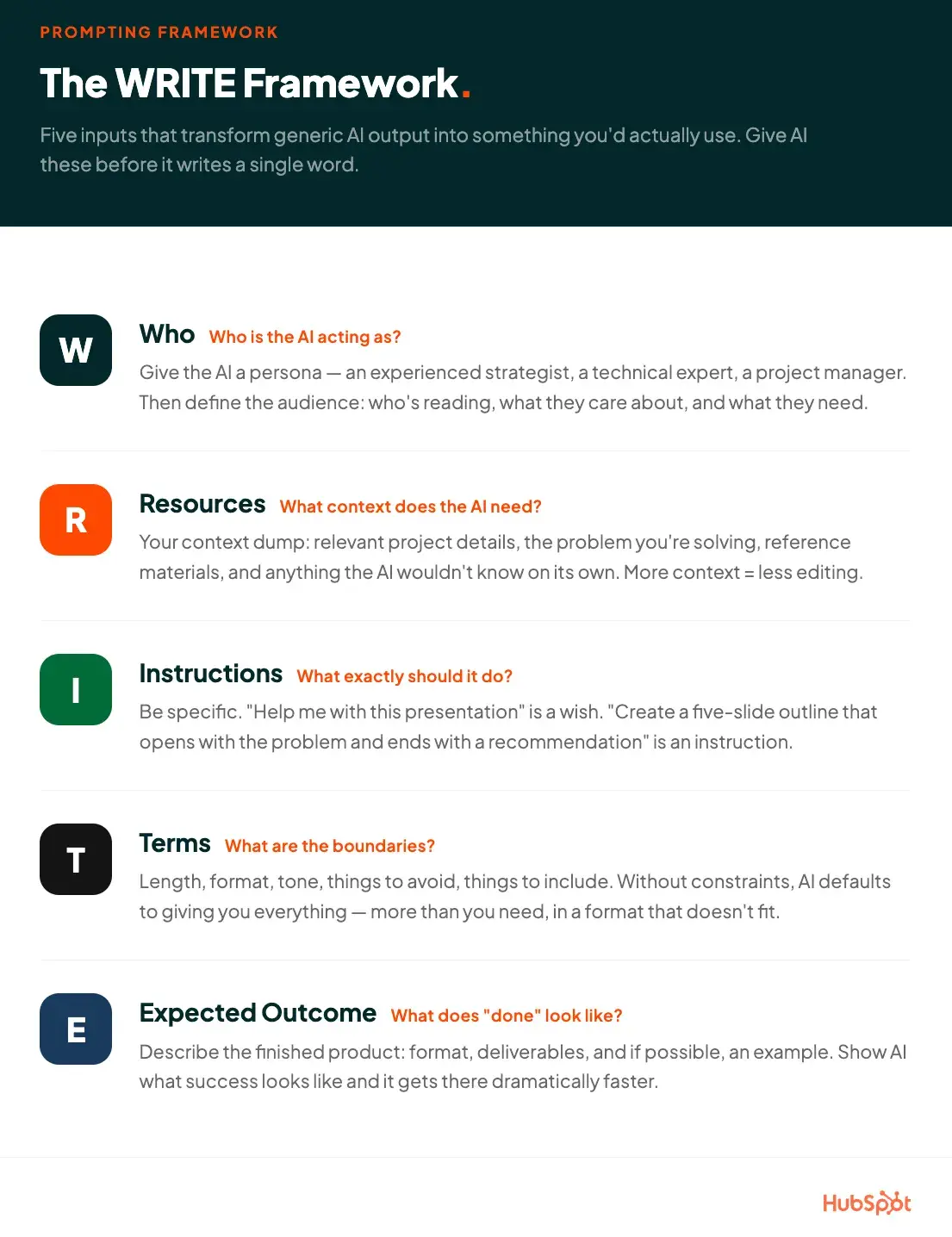
the write framework for ai prompting with five components: who (persona), resources (context), instructions (task), terms (boundaries), and expected outcome (deliverables)

Here’s an example of a WRITE prompt:

W: You’re a small business marketing consultant who specializes in DTC product launches. My audience is women aged 25-40 who buy handmade candles as gifts and for self-care, mostly through my Etsy shop and Instagram.

R: I’m launching a candle summer collection in June. My budget is around $500 for the launch. My best sales channel is Instagram, and I have about 3,000 followers. My last collection sold out in two weeks, mostly through Instagram Stories and email.

I: Build me a four-week launch plan that covers teaser content, a launch day strategy, and post-launch follow-up. Include what to post, when to post it, and one email for each phase.

T: Keep the plan realistic for a one-person operation. No paid ads. Organic and email only. The tone should feel warm and personal, not corporate.

E: A week-by-week calendar I can follow, with specific content ideas for each day, three short email drafts, and a launch-day checklist.

Run this prompt next to one without a framework, and you’ll see the difference. If you’re actually a candlemaker, you’ll smell it too.

Create an AI goals schedule.

Once you’ve done some tinkering and have a sense of where AI can help you, the next step is keeping the momentum.

Easier said than done. Remember the knowing-doing gap? Research shows that having a strong goal intention isn’t enough on its own.

But, people who form plans that specify exactly how they act toward a goal are more likely to actually follow through. Thinking “I want to get better at using AI” is less effective than “Every Tuesday morning, I’ll spend 20 minutes applying AI to one task on my plate.”

So here’s what I recommend: Plan a weekly schedule of AI wins. These are tasks that you can reasonably achieve in a week. They don’t need to be major leaps. Instead, think of them as incremental progress toward a larger goal, small enough to actually complete but meaningful enough to move the needle.

A structured schedule does two things. First, it turns intention into habit, providing the scaffolding to keep you returning to it without a heroic act of willpower every time. Second, it collapses the endless possibilities of AI into practical steps specific to your work. It’s an antidote to option paralysis.

Say you want to use AI to improve your meeting efficiency and follow-up. Here’s what a schedule might look like in practice:

Primary goal: Use AI to reduce time spent on status updates and meeting prep over the next month.

  • Week 1: Pick your most recurring meeting. Use AI to generate a template agenda from your notes.
  • Week 2: After the meeting, use AI to draft the follow-up summary. Check if this took less time than usual.
  • Week 3: Build a prompt for weekly status updates using bullet points you already keep.
  • Week 4: Combine all three into a simple repeatable workflow. Run it for a week during multiple meetings.
  • Week 5: Review your system. What’s working? What isn’t? What’s next? Set goals for the following month.

Nothing here is a leap. Each week builds on the last, and by week five you have a documented system.

You can track your progress however works for you: a notes app like Notion, a task management tool like Asana, a running document, or sticky notes if that’s how you roll. Consistency matters more than format.

And (you might have seen this coming), AI can even help you build the schedule itself. Explain your role and responsibilities to it, and ask it to help you brainstorm where you could realistically leverage AI in your workflow. Settle on one main SMART goal to work toward over the next four to six weeks, then use AI to draft out the sub-steps to get there.

Make your progress visible.

If your company is AI-forward, chances are your manager wants to know what you’re up to. How visible your AI progress is to them matters just as much for your career as the work itself.

This is especially true if your performance is goaled on AI adoption. Regularly telling your manager how you’re deploying AI, updating them on new use cases or efficiency gains, signals that you’re thinking ahead. That could look like a Slack message, an item in your weekly update, or a mention in your one-on-ones. Even small wins plant the idea that you’re indispensable.

Visibility is easier said than done, though: Once you get into the weeds with AI, it’s easy to get so caught up that you forget to communicate your progress. Sometimes I get so invested in a project that I forget to update my boss on how my AI use has actually improved my output.

One solution: Set a recurring calendar reminder for a manager AI update. Then, copy your adoption schedule (or whatever you’re using to track your AI progress), paste it into your AI tool of choice, and ask to summarize your weekly progress. Bam, something to share with your boss with almost no extra work.

This is why using a task management tool like Asana to track your work can be useful. You can export your completed tasks into a spreadsheet, hand it to an AI tool, and ask it to pull out the recent wins. Progress tracking is built in, and it’s much easier than keeping a separate Google Sheet you need to remember to update every time you do a thing.

I also encourage you to connect your AI use to how it’s advancing your work. Tell a narrative: how you’ve been getting better at it, and consequently, how your work has been getting better, and how that relates to team KPIs. We’re talking about advancing your career, after all.

One more note: Peer visibility matters, too. Managers are important, but so is being the person your teammates turn to when they have an AI question. That informal expert status builds upward pressure on your own advancement.

Timothy had some helpful insight here: “The trick is to share the how, not the wow. Not ‘look what I built’ but ‘here’s how I built it, maybe this helps you.’ The second it becomes useful to someone else in the room, it stops being a brag and becomes a capability unlock for the whole team.”

Keep an information loop going.

You’re doing the work, you’re showing the work, now make sure you’re staying sharp. My last piece of advice is to keep yourself learning and updated with advancements while putting your knowledge into practice.

As Meg puts it, “Someone who is AI-enabled is someone who is AI-curious. You should be experimenting with it, practicing with it, and trying out new tools/builds. It’s not enough to be running the same three prompts (though that’s a great place to start). Being AI-enabled today means you’re using and evolving with these tools and models as they’re released.”

The key is to keep an information loop that’s light enough so you don’t get overwhelmed. You want a flow that’s comprehensive enough to stay current, but not so much that you want to crawl into a hole.

Limit yourself to four or five AI information channels at a time. These could be a newsletter or blog, a YouTube channel, an internal community, a mentor, a podcast, a LinkedIn account, or even an AI counterpart, someone in a similar role who’s also experimenting.

And to make this all sustainable: Every time you add a new channel, consider dropping one.

My channels right now are:

  • Simple.ai: a newsletter that presents AI news and updates in a grounded, down-to-earth way. If you want a newsletter about AI without being overwhelmed, this is it.
  • Ben’s Bites: a Substack that’s a bit more ambitious in scope while still being digestible.
  • An internal AI Slack channel we have at HubSpot to share AI progress relevant to marketing.
  • An AI mentor.
  • My team, with whom I regularly discuss how to best deploy AI on our blog.

And that’s just for now. Those might change in the future as my comfort level and responsibilities shift.

How Teams Can Move From AI Experimentation to Execution

Everything above is about enabling yourself. And for ICs, you can stop there. But if you manage a team, the move from “we’re trying this out” to “this is part of how we all work now” is a different challenge.

Driving adoption on a team is not a given. You can’t present information to someone and expect them to immediately run with it. Not everyone will be as willing or as comfortable to learn as you are. That’s not a knock on them; people have different relationships with new technology, and you might have a spread of early adopters, early/late majority, and maybe even innovators or laggards alongside you.

People generally trust other people when they’re adapting to something new. I’d bet that’s part of why you sought advice from a blog post written by me, a certified real person, over solely asking ChatGPT or Claude. There’s something about hearing “here’s what worked for me” from another human that no chatbot can fully replicate.

Managerial support is also among the strongest predictors of whether someone uses AI at work — according to Irrational Labs, employee AI usage drops from 79% to 34% without manager’s endorsement.
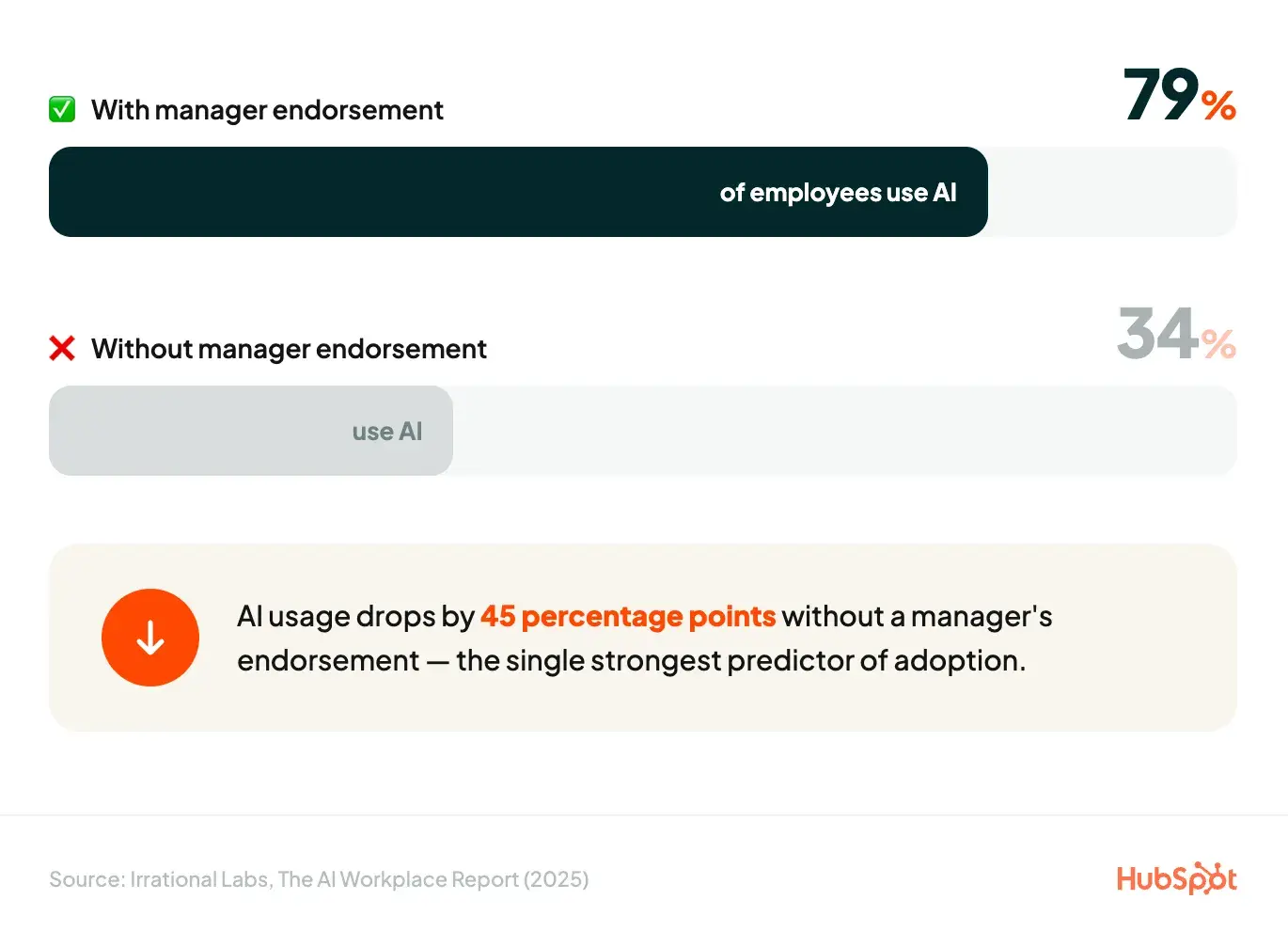
manager endorsement impact chart showing 79% employee ai usage with endorsement versus 34% without, demonstrating 45 percentage point difference

So, meet your team where they are. Ask them how they’re using AI. Not in a micromanaging, “show me your prompting history” kind of way, but from a place of genuine curiosity. What’s holding them back? Based on what you find, suggest some of the strategies I’ve introduced here.

I’ve learned more from talking with my team face-to-face than any help article or training deck could have taught me. Each individual’s AI enablement journey is their own, and the best thing you can do as a manager is encourage while giving them space to explore.

Where Futurepedia Fits Into AI Enablement

This entire post has been about one idea: knowing about AI isn’t the same as being enabled by it. And the biggest barriers aren’t problems you can solve by reading one more article or bookmarking one more tool.

That’s why HubSpot acquired Futurepedia.

Futurepedia is the world’s largest independent AI education and discovery platform. It operates the first AI tool directory — thousands of curated tools across every category you can think of — alongside a growing education platform with 25+ courses and more than 1,000 lessons focused on real-world AI skills for business and productivity.

Across Futurepedia, its YouTube channels, and its newsletter, it’s become the default starting point for professionals who want to actually learn how to use AI, not just hear about it.

HubSpot helps millions of companies grow better. Futurepedia helps professionals find and master the AI tools that make their work better. Now they’re the same team, which means more resources, bigger reach, and the same obsession with making AI work for real people.

The professionals who will win the next five years aren’t the ones who know the most about AI. They’re the ones who’ve actually learned to work with it. If this post gave you the framework, Futurepedia gives you the place to start.


Categories B2B

Zero-click searches and the future of your marketing funnel

Search results used to be a doorway. You ranked, someone clicked, and they landed on your site. But today, that model is eroding faster than most marketing teams are equipped to move.Free AEO Grader: See How You Rank on AI Search Results

Bain & Company research found that about 80% of consumers now rely on “zero-click” results in at least 40% of their searches. For some businesses, this means more impressions, but across the board, it’s reducing organic web traffic by an estimated 15% to 25%.

What does this mean for your team and how it measures and achieves success?

This guide breaks it all down, including what zero-click searches are, why they matter, and how to turn zero-click visibility into conversions using answer engine optimization (AEO).

Table of Contents

TLDR Executive Summary

Zero-click searches occur when a user gets their answer on the search results page through an AI overview or other rich results, without clicking on a website. AI Overviews increase the likelihood of zero-click behavior for informational queries, while featured snippets satisfy simple question intent directly on the SERP, and People Also Ask (PAA) boxes expand answer paths without requiring a click.

Answer engine optimization focuses on earning citations, summaries, answer placements, and even voice mentions for your website and brand, in ways traditional SEO does not. AEO includes, but is not limited to, creating answer-first content to improve eligibility for featured snippets, AI Overviews, and other answer surfaces.

HubSpot’s free AEO grader can help you see how you’re currently doing in AI engines and understand what you need to do to improve your visibility.

What are zero-click searches?

A zero-click search occurs when a search engine query is answered directly on the search results page via a featured snippet, knowledge panel, People Also Ask (PAA) box, local pack, AI Overview, or other rich results rather than having a user visit a separate website.

AI-powered rich results include:

  • Featured snippets, which return a direct answer in a boxed format at the top of the SERP
  • Knowledge panels, which provide quick overviews of entities like companies, people, and places
  • People Also Ask, which boxes surface-related questions with expandable answers
  • AI Overviews, which synthesize multi-source answers directly in the SERP
  • Local Pack, which displays a map and three local business listings based on your location or search.

Here’s an example of one from the very on-brand search of: “What is Bollywood?”

zero click search features on query “what is bollywood”, ai overview, people also ask box

As consumers, these results can be convenient and helpful, but for businesses, they’re taking their toll on the organic website traffic that was once a golden metric.

Why should marketers care about zero-click searches?

They’ve changed buyer search behavior.

According to McKinsey, half of Google’s results already feature these AI Overviews along with other rich results, and trends predict that number will reach 75% by 2028. Also, thanks to those rich results, Google itself reports that over 27% of searches now end without a click.

That means many queries that used to earn businesses clicks and bring prospective buyers to their websites are no longer performing as well as they once did.

Just consider my “What is Bollywood?” search. In it, searchers are hit with an AI overview and PAA module. Traffic double whammy.

They’ve changed reporting.

The challenge with AI features for marketers isn‘t just traffic, however; it’s also attribution.

Organic click-through rates (CTR) have dropped to 40.3% in the U.S. and 43.5% in the EU/UK, while clicks to Google-owned properties like YouTube and Maps increased to 14.3% in the U.S.

Because of this, the impression data in your Search Console may be stable or growing, but it’s likely increasingly coming from sources other than the sessions, leads, and pipeline your stakeholders expect to see. Zero clicks are not all bad news, though.

They can improve brand recognition and recall.

While zero-click results may not directly drive organic traffic, they can still demonstrate expertise, and the brand awareness that comes from being cited can drive higher conversion rates when users do eventually visit your site.

When a buyer sees a brand cited in an AI Overview or featured snippet multiple times during their research, they automatically arrive at your site with far less convincing needed at conversion.

Now that you know how zero-click searches affect businesses, let’s dig a little deeper into why.

Curious how you’re currently performing with AI tools like ChatGPT and Gemini? Use HubSpot’s free AEO grader to get a detailed brand perception analysis across five dimensions with a written interpretation of your results.

How Zero-Click Disrupts the Marketing Funnel

The traditional marketing funnel (illustrating the buyer’s journey) assumed that search drove a click, the click drove a visit, and the visit eventually drove a lead.

Zero-click searches don’t eliminate this path, but it restructures it, with more of the early stages happening directly on the SERP. HubSpot’s evolved hourglass visualization of the buyer’s journey and Loop Marketing accounts for this.

hubspot’s hourglass evolution of the marketing “funnel” accounts for impact of zero click searches

Let’s take a look at the potential impact of zero-click searches in each phase of the buyer’s journey.

Awareness: The SERP is now a branding arena

At the top of the funnel, users are just beginning to understand their pain point and become aware of possible solutions. In the SERP, they’re learning about brands that are in this conversation before they ever reach a website.

Before AI, users would scroll through the SERP, seeing different brand names and favicons and associate them with their search, even if they didn’t click.

Now, when a query has an AI overview or another rich result, that scrolling doesn’t happen as often. Users only see and “become aware” of the brands and websites cited in the results, while everything below tends to get ignored.

Your brand’s representation in those answers functions like advertising. They’re the key to building awareness and attracting leads in the SERP.

Say you’re a luxury travel agent specializing in the Caribbean. Users researching “how to plan a trip to St. Lucia” may get their ideas and education from AI recommendations and sponsored results, not from your content.

zero click search results for “how to plan a trip to st lucia”

But this is particularly consequential for B2B teams. Say someone searches “best CRM for mid-market” or “enterprise content marketing tools.” There’s a good chance they may form vendor shortlists based on AI overviews, not on your content.

zero click search results for “enterprise content marketing tools”

Consideration: Interest and evaluation without a click

In the consideration stage, people are actively looking for solutions and considering which one might be right for them. People Also Ask boxes and featured snippets satisfy the depth of research that used to require three or four site visits during this stage.

For instance, if a user sees your brand mentioned in a featured snippet and then cited in the PAA, they are already poised to build a preference. In the consideration phase, the goal isn‘t to force a click; it’s to make your brand the recurring right answer.

Using our travel agent example, if users researching “how to plan a trip to st lucia” see your website both in the AI overview and PAA, there’s a good chance they’ll begin to see you as someone who knows their stuff.

The same goes for our B2B Saas example:

zero click search results for “enterprise content marketing tools” showing paa and ai overview

Repetition breeds familiarity,  and familiarity breeds trust.

Conversion: Queries with intent

Conversion is the one stage in the buyer’s journey where traditional SERP is still fairly intact.

In some instances, conversion-stage queries may surface a Local Pack or structured snippets with commercial intent. However,  many conversion-related queries, such as comparisons or those containing words like “buying,” “demo,” or “consultation,” are less likely to trigger AI overviews. So, investments in paid search and SEO are still wise.

Thinking of our St. Lucia search, for instance, the query “st lucia travel agent consultation” returns no AI overview or rich results.

no zero click search results for conversion focused “consultation” query

Kind of a relief, right? It can be especially for B2B businesses.

For B2B with high-intent commercial queries, the path from the SERP to owned engagement can be compressed thanks to AI. As with our St. Lucia trip, the query “free content marketing tools demo” for our SaaS example returns no rich results.

no zero click search results for conversion-focused “free content marketing tools demo” query

Alternatively, a search for “HubSpot vs Salesforce” may surface a comparison page in an AI Overview, but it still requires a click for the user to get the full value. Plus, the prospect who arrives on your website already understands your offering. At this point, the landing page’s job is confirmation, not introduction.

But remember, buyers also don’t usually jump straight to the conversion stage of their journey. So, stay vigilant. Regardless of the experience here, the path to the brand’s website and a purchase can be significantly longer than it once was due to AI intervention.

Note: Loop Marketing revisits the buyer’s journey and marketing funnel to adapt to modern behaviors and AI influence on search. Learn more about it here.

Content and capture strategy by funnel stage:

How to Adapt SEO in a Zero-Click World

The fact that Google rank doesn’t matter the way it used to doesn‘t mean organic optimization is obsolete. It means the mechanics of what you’re optimizing for have changed. Enter Answer Engine Optimization (AEO).


Here’s what you should do.

Shift your KPIs before your content

The first thing you need to pivot is how you define success. If your team is still reporting organic sessions as the primary SEO metric, you’re measuring a declining output instead of the influence driving it.

Swap or supplement these metrics:

  • Organic sessions as the headline KPI → Add: SERP impression share, branded search volume, and AI citation frequency
  • Rank tracking for individual keywords → Add: Featured snippet and AI Overview ownership rate across keyword clusters
  • Traffic-based content ROI → Add: Pipeline influenced by organic touchpoints, including zero-click ones

This reframe also protects your team internally.

When leadership asks why traffic is down, you’ll have data showing that despite the traffic dip, impressions are stable, branded search is up, and the organic-assisted pipeline is growing.

Format your content to lead with direct answers

AI search platforms like Google‘s AI Overviews, Google’s AI Mode, ChatGPT Search, Perplexity, and Microsoft Copilot don’t process web content the way traditional crawlers do. Rather, they build knowledge networks that connect facts, entities, and relationships, and formatting plays a big part in this.

Thankfully, the content formatting that improves zero-click eligibility is many of the same ones that have helped with traditional SEO:

  • Lead with the answer. Open each section with a direct, 40–60-word response to the implicit question before expanding into evidence and context. AI and snippet algorithms reward answer-first architecture.
  • Use structured headers as question formats. “What is zero-click SEO?” performs better for SERP features than “Overview” or “Introduction.”
  • Include definition boxes or callouts. A clearly formatted definition paragraph is highly likely to be pulled as a snippet.
  • Use tables for comparisons and lists for sequential steps. Google consistently favors these formats for list and table-type featured snippets.
  • Add FAQ schema to pages already ranking on page one. This signals Q&A structure to both Google and AI systems, helping you show up for common questions and PAA results.

Speaking of PAA, for PAA eligibility, make sure to:

  • Map the questions your content needs to answer
  • Include those questions verbatim as H3 subheads
  • Follow each with a 2–4 sentence direct answer.

This mirrors the format Google uses to serve PAA results and can also aid other AI-powered rich results.

Pro Tip: Prioritize pages that already have strong impressions but declining CTR. Those are your clearest signals that a SERP feature has moved in, and that your content formatting isn’t competing with it.

From there, audit your content for answer-first eligibility, asking yourself, “Does this page answer the target query within the first 100 words, or does it make the reader scroll to find it?”

Pages that bury their answer are losing snippet eligibility to competitors who lead with it.

Implement structured data in your content

Speaking of formatting, more and more AI SERP results, such as knowledge panels and featured snippets, depend specifically on structured data (aka schema markup) to provide answers directly in search results.

The essential schema types to implement:

  • FAQ schema: Surfaces answers in expandable SERP formats and signals Q&A structure to AI systems. Note that since 2024, Google restricts FAQ rich results to authoritative government and health sites, but FAQ schema still provides structural value for AI citation. This is especially helpful for PAA.
  • Article/BlogPosting schema — makes your editorial content eligible for Top Stories and establishes author, publication date, and content context
  • Organization and Website schema — anchors your entity in the Knowledge Graph and supports knowledge panel eligibility
  • HowTo schema — supports how-to queries with step-based answer formats

According to Google’s own structured data documentation, Rotten Tomatoes saw a 25% higher click-through rate after adding structured data to 100,000 pages, and Nestlé found that pages appearing as rich results earned an 82% higher CTR than pages without them.

Implement schema in JSON-LD format (Google’s preferred method), validate using Google’s Rich Results Test, and prioritize the pages already ranking on page one.

Use local SEO to optimize for knowledge panels and packs

For brands with physical locations or local service areas, local search optimization is one of the highest-leverage zero-click investments available. In fact, according to Backlinko, 42% of searchers click on Google map pack results for local queries, making a 3-pack listing one of the highest-value placements in local search.

To strengthen local zero-click presence:

  • Keep your Google Business Profile fully populated and regularly updated
  • Implement LocalBusiness schema with consistent NAP (name, address, phone) data
  • Earn structured citations across relevant directories
  • Generate review volume — star ratings in rich snippets directly influence clicks

Let’s take a look at how this comes together in the buyer’s journey.

Optimize third-party channels that AI systems trust

If your product appears consistently across Reddit discussions, forums, industry articles, and review sites with similar messaging, AI systems gain confidence citing the consensus around you.

In practice, this means your pivot plan needs to include channels that feel adjacent to SEO but directly feed it:

  • Third-party review platforms (G2, Capterra, Trustpilot): AI systems heavily draw on these for product-category queries. An incomplete or outdated profile or poor reviews here could be a missed citation.
  • Industry publications and guest content: A mention in a high-profile article carries more AI citation weight than ten posts on your own blog. They are an external validation of your expertise.
  • Reddit and community forums: Google and AI systems increasingly treat these as authoritative signals for how real users perceive a product. Participating authentically, not spamming, matters.
  • YouTube: YouTube is held as the second most widely trafficked website in the world, and its content is even delivered in Google SERPs. A video that answers a core question your audience searches for is a zero-click asset that works across multiple surfaces simultaneously.

Focus your efforts on commercial intent

When AI Overviews are present, click-through rates plummet to just 8%, compared to 15% for traditional search results without AI summaries, according to The Digital Bloom.

The pivot: reduce investment in purely informational, top-of-funnel content that will increasingly be answered by AI without a click, and reinvest in:

  • Commercial comparison content (“X vs. Y,” “best [category] for [use case]”): these queries still drive clicks because users need to evaluate details.
  • Original research and proprietary data: AI systems can‘t synthesize what doesn’t exist yet; your own studies become both citation bait and click drivers
  • Tool pages, templates, and calculators: Utility content that requires interaction can’t be zero-clicked away; it must be experienced.

This doesn‘t mean abandoning awareness content entirely, but be strategic about where you expect a click vs. where you’re optimizing for citation and brand recall.

When to Pursue or Avoid Zero-Click Keywords

Not every keyword deserves an optimization investment for zero-click visibility. The decision should come down to commercial potential and content differentiation. Here are some quick tips to help you decide when to pursue zero-click visibility and when not to.

Pursue zero-click visibility when:

  • The query has commercial or navigational intent. Users searching things like “best project management tools for agencies” are evaluating vendors, not just learning.
  • You’re targeting brand awareness at scale, and a SERP placement gets your brand in front of net-new audiences.
  • You can win the snippet with differentiated data, such as original research, unique statistics, or a proprietary framework that no other competitor has.
  • The keyword represents an easy win where your existing content is close to snippet-eligible with minor reformatting

Avoid zero-click investment when:

  • The query is purely informational and of low commercial value. Definitions, basic how-tos, and commodity facts won’t move the pipeline.
  • Your negative keyword strategy already deprioritizes that traffic as irrelevant.
  • Winning the snippet would cannibalize an existing high-performing page by satisfying intent before a click to a higher-value offer.

Pro Tip: Use a test-first approach. Run a 30-day experiment on 3–5 target keywords: restructure the content with an answer-first format, add FAQ schema, and compare CTR and brand mentions before and after. This tells you whether the investment scales before committing full editorial resources.

How to Measure Zero-Click Impact

Like its counterparts, SEO, content marketing, social media, etc. AEO is a long-term strategy. That said, you must make a habit of reviewing your work and tracking your performance.

Let’s take a look at the metrics you’ll want to report on.

AEO and AI Visibility Metrics

Click-through rate is no longer a sufficient measure of search performance. A robust zero-click measurement framework includes SERP, brand, and pipeline measurements.

SERP visibility metrics:

  • Impression share by keyword cluster (not just ranked keywords)
  • Featured snippet and AI Overview ownership rate for target queries
  • PAA appearance frequency across priority topic groups

Brand influence metrics:

  • Branded search volume month-over-month
  • Direct traffic trends correlated with SERP feature wins
  • Share of voice in AI-generated answers (trackable via HubSpot’s AEO Grader)

Pipeline influence metrics:

  • Assisted conversions where the first or last touch was a branded or non-branded organic search
  • Demo and trial volume from pages receiving AI Overview or snippet traffic
  • Time-to-conversion trends for search-driven vs. direct-traffic leads

A Sample Zero-Click Scorecard

Reporting Frequency

Build a monthly cadence of measuring your AEO performance. Teams that do compound their advantage as AI search continues to expand.

Your review cadence should include:

  • Re-running your AEO Grader score to track AI visibility trends
  • Auditing your top-20 priority queries for snippet and AI Overview ownership changes
  • Reviewing Search Console impression data for queries gaining impressions without corresponding click growth (a signal of zero-click capture)
  • Checking search evolution trends to stay ahead of new SERP features as they roll out

Zero-Click Searches Playbook by Funnel Stage

Awareness: How to Get Cited in AI Overviews and Snippets

Getting cited in AI Overviews isn‘t purely a technical challenge, it’s a challenge of credibility. AI systems favor sources that demonstrate expertise, consistency, and corroboration across multiple platforms.

In other words, if your product appears consistently across Reddit discussions, forums, industry articles, and review sites with similar messaging, AI systems gain confidence citing the consensus around you.

Awareness-stage actions:

  • Publish original research and proprietary data. AI systems are trained to value primary sources
  • Earn mentions in high-authority industry publications, not just your own blog. Think interviews, guest articles, podcast appearances, news coverage, and reviews.
  • Maintain consistent brand messaging and positioning across all owned and earned content. This means both visual and verbal.
  • Optimize for E-E-A-T signals: author bios, credentials, and first-hand expertise markers

Consideration: How to Capture Interest Without a Click

At the consideration stage, the goal is to make your brand the persistent right answer to the questions buyers are actively researching. Even if they don’t click, repeated positive SERP exposure builds trust and ultimately preference.

Consideration-stage actions:

  • Build “vs.” and comparison content that surfaces when buyers evaluate alternatives
  • Create answer-first FAQ sections on product and service pages — these are highly eligible for PAA boxes
  • Target questions with commercial intent: “how does [your product] work,” “what does [your product] cost,” “[competitor] alternative”
  • Use SERP feature tracking to monitor which of your pages are earning snippet placements and optimize the ones close to the threshold

Conversion: How to Turn Zero-Click Visibility into Demand

The conversion question is where most zero-click guides go quiet. Here‘s the practical answer: visibility that doesn’t convert is a targeting problem, not a zero-click problem.

Conversion-stage actions:

  • Make your AI Overview citations lead to pages with strong, single CTAs — don’t send AI-referred traffic to generic blog posts
  • Create conversion paths that don’t require a click-first journey: branded search demand, direct type-in traffic, and re-engagement via email all benefit from SERP-level awareness
  • Use retargeting to capture users who search for your brand terms but don’t convert on their first visit
  • For B2B, measure demo requests and pipeline influenced by branded search as a proxy for zero-click conversion impact

Pro Tip: Tag AI Overviews and featured snippet traffic as a separate segment in your analytics. If those visitors convert at a higher rate than average organic traffic — which data suggests they do — it’s a strong signal to double down on zero-click optimization.

FAQs About Zero-Click Searches

How do I turn zero-click visibility into conversions?

The key is recognizing that zero-click visibility is top-of-funnel influence. It builds brand recall and trust before the conversion moment.

To convert that visibility, ensure every page that earns AI citations or featured snippets has a high-intent CTA visible above the fold (i.e., free trial, demo request, gated asset).

Track branded search volume as your leading conversion indicator. When zero-click awareness is working, branded searches (and their conversion rates) should increase.

If you‘re building this infrastructure now, start with HubSpot’s free AEO Grader to understand your current AI representation baseline, then map which cited content is sending users toward or away from conversion.

When should you prioritize AEO over traditional SEO?

AEO and traditional SEO aren’t competing priorities; AEO is a part of SEO.

Prioritize AEO-specific investments (answer-first content formatting, FAQ schema, AI citation tracking) when your organic traffic has plateaued despite stable or improving rankings, when your product is being evaluated in AI-powered research interfaces, or when you‘re in a category where buyers conduct significant zero-click research before ever reaching a brand’s website (software, financial services, professional services).
Traditional SEO remains essential for capturing the 40% of searches that still result in clicks, and strong rankings remain a prerequisite for AI citation eligibility. Build both, measure them separately.

What is the best way to report zero-click wins internally?

Frame zero-click reporting around business outcomes, not search mechanics. Show stakeholders the connection between SERP impression share and branded search volume growth, between AI citation frequency and direct traffic trends, and between featured snippet ownership and pipeline-influenced revenue.

For teams using HubSpot’s Marketing Hub Professional or higher, our AEO tools offer deeper scoring, guidance, and content recommendations that can help build dashboards combining page performance, AI visibility, and conversion impact — giving you the data architecture to make that business case clearly.

The most effective internal reporting frames zero-click search not as “traffic we’re losing” but as “influence we’re gaining in a channel that’s growing faster than traditional search.”

AEO is SEO Evolved

Think of AEO as the evolution of SEO: one unified strategy where content ranks in SERPs and gets cited in rich results.

The same structured data, E-E-A-T signals, and authoritative content that rank well in traditional search also improve AI citation frequency. So, if anything, AEO is just a new “zero-click layer” on your SEO strategy.

  • Run HubSpot’s free AEO Grader to establish your baseline AI visibility score across ChatGPT, Perplexity, and Gemini before you make changes. This will help you measure the impact of your pivot
  • Add answer-first sections to your top 10 existing SEO pages rather than creating new content from scratch
  • Include schema as a standard step in your content production workflow, not an afterthought
  • Report on both traditional rankings and AI citations in your regular SEO reporting, so leadership sees the full picture.

HubSpot’s AEO Grader is a free tool that evaluates how ChatGPT, Perplexity, and Gemini currently represent your brand — scored across sentiment, presence quality, brand recognition, share of voice, and market position. Run your analysis to establish a baseline before your next optimization cycle.


Categories B2B

Consumption is Changing: Navigating AI and the Widening 48-Hour Consumption Gap

For 10 years, NetLine has been reporting on the ebbs and flows of gated content consumption.

In that time, we have seen wild swings (in many directions) across marketing. AI is the latest of these wild swings. If we’re being honest, it’s swung the entire pendulum in a direction that’s recalibrated what “normal” is. This brings us to our first point from the 2026 State of B2B Content Consumption and Demand Report.
B2B Demand Is Evolving

In 2024, NetLine observed a record number of first-party gated content registrations: 7.9 million, to be exact. Last year was a different story.

In 2025, registrations totaled 7.2 million, dropping 8.6%. Some may see this as a real issue for the future. The reality paints a more nuanced picture long-term.

Since 2021, total demand has grown 57.6%, reinforcing that buyers still rely on gated content to research solutions, vendors, and topics of interest. 

We’d be wrong to ignore the year-over-year decline, but there are concrete reasons as to why this shift in consumption has happened. Before diving into these reasons, the takeaway is that these registrations now represent more signal and less noise. 

The broader digital environment is changing how buyers interact with content:

  • AI tools, social platforms, and search engines increasingly answer questions directly.
  • This reduces clicks to the original source but does not reduce curiosity or demand for information.

Demand generation programs are getting more sophisticated.

  • Client campaigns impact the results we report against. In the words of Ron Burgundy, “It’s science.” 
  • While you won’t see this in the report itself (we’ll publish an article on this topic in the coming weeks), campaign filters are being honed in more and more. 
  • Campaign sophistication is limiting WHO is being exposed to a given campaign, thus restricting the total number of leads a campaign can and will generate. This is not a bad thing; it is just different and purposeful. 

Ultimately, the goal is no longer optimizing for clicks (or registrations in this case), but rather, capturing meaningful engagement signals. Gated content remains one of the most reliable ways to do it.

AI Has Become Foundational to B2B Content Demand

AI is no longer the shiny new object. It’s become part of the furniture. It might even be building an addition off the kitchen.

AI-related content accounted for a fifth (21.1%) of all demand in 2025, climbing 28.5% year over year. That’s really quite remarkable. This demand isn’t siloed to one curious corner of the market like IT or engineering, either. We’re seeing every industry, from manufacturing/operations to food and beverage, dip their collective toes into the AI waters. 

When interest stretches across this many functions, AI has moved from “innovative” to infrastructural. Audiences expect the ripples of AI to show up inside nearly every conversation about software, automation, operations, and risk.

AI-related consumption is also attracting audiences who are more senior, and the questions are getting more practical. Directors (+26%), C-level leaders (+15%), and managers (+9%) all increased their engagement with AI content in 2025. Meanwhile, the topics gaining traction were less “future of AI” and more “Can we use it this Thursday?” utility: prompt engineering, AI agents, and copilots. 

Buyers want to know how AI can change their business today, where it fits, and how quickly they can put it to work. For marketers, that means AI can’t live in a silo. It has to be woven through the broader stories you tell about productivity, transformation, governance, and growth.

The Consumption Gap Continues to Widen

Buyers are taking longer than ever to engage with the content they have requested. 

In 2025, the average B2B professional took 47.7 hours to consume the content they requested. That’s a 9.2-hour increase year over year, representing a 23.9% jump. Since 2021, the Consumption Gap has widened 43.2%.

It isn’t enough for buyers to get to your content. Once they’ve asked for it, they then need to engage with it. Two actions for one asset. Some may argue that this is why gated content is inferior to ungated content. On the contrary, we say. 

In a world where so much is frictionless, the argument for friction here is quite meaningful. 

Fruitful Friction

Within the past year, top voices in our industry have been talking about the benefits of friction. 

  • Robert Rose wrote about how embracing deliberate friction gives you time to make decisions that lead to standout work.
  • Ann Handley has extolled the benefits of going AsAp (As slow As possible)—slowing down at the best moments to deliver the best possible results—since 2018.
  • Sean Griffey believes the pendulum has swung too far: that’s it’s so easy to sign up for something that we are losing intent.

All of this to say that the widening of the Consumption Gap isn’t catastrophic. It’s a symptom of the larger changes across our industry, society, and the behaviors of brought about by the distractions all around us. 

Why the Gap is Widening

From our perspective, there are three distinct categories as to why it’s taking longer for users to engage with the content they’ve asked to see. 

External pressures

  • Despite the focus on AI-everything, the workplace feels busier (and perhaps more stressful) than ever. There is greater strain on every department, requiring more attention from every member of the organization.
  • This doesn’t just impact those on the frontlines, either. Decision-makers are feeling the constraints of budget restrictions, staffing, and the challenge to find a sustainable path forward. This could also be a factor in why C-Suite consumption rose 4%.

Internal friction

  • You got a user to register for your content. Fantastic! But the work’s far from over, and weak calls-to-action won’t do you any good. 
  • Limited content previews

Market realities

  • At the time of publication, things aren’t great across the job market (1.2+ million jobs were cut in 2025, ~60% more than in 2024, and the highest total since COVID) or the economy. 
  • Because buyers are more skeptical and overwhelmed by tools, channels, and AI‑generated noise, there is intense pressure to prove value with hard evidence. 
  • Fortunately, the hard evidence these businesses are seeking comes in the form of case studies, ROI data, and live product proof. These content types are terrific bottom-of-funnel pieces that emit phenomenal intent signals even if the registrant isn’t truly ready to purchase.

Mind the Gap

This is the 10th anniversary of the inaugural consumption report. Throughout the research for this year’s release, I stumbled upon something quite interesting from 2017. NetLine’s GM, David Fortino, who was then NetLine’s SVP of Audience, wrote that,NetLine recommends that when a prospect requests your white paper, sales should wait 48 hours to reach out to discuss the content. 

And here I was thinking I was smart in 2022 for suggesting this

Dave’s recommendation matters more today than it did in 2017, when the Consumption Gap sat at 36 hours. Today, with the gap just minutes shy of a 48-hour average, NetLine discusses the need for outreach that puts both representatives and registrants in a position for success. Turns out, 2017 Dave knew a whole heckuva lot, too:

Leads generated by long-form content need time to digest your content. Suggest that your sales team wait 48 hours before contacting to ensure that the prospect is well-informed enough to have an educated discussion. This will save your sales team time and reduce poor lead dispositioning…and more importantly, not scare away prospects with immediate contact. In the meantime, your sales team could utilize a light touch email, such as:

“Thanks for checking out our white paper. I’ll check in with you in a few days to see what you thought. In the meantime, please don’t hesitate to reach out with questions regarding XYZ.”

It’s akin to what I wrote about in the Summer of 2025, after my discussion with tequila tycoon and The Time to Win author Jay Baer in A Candid Conversation on Time, Trust, and Buyer Behavior.

“Marketers and sellers need to treat prospective client activities the same way a bartender greets a new guest,” Baer said. “You need to emphasize that, “We’re here when you are ready.”

Even though your registrant likely won’t be downloading/opening/reading your content for another day and a half on average, you CAN (and should!) send them a follow-up email — and you should do so quite quickly.

  • The message doesn’t need to make an ask. Just a simple hello that says you’re available when they’re ready, like a bartender who catches your eye the moment you sit down, then leaves you alone until you’re not.
    • (Bonus: If you have a related piece of content that speaks to the same challenge, toss it in. Let them keep going on their own terms.)
  • What you’re really navigating here is a two-clock problem. 
    • The first clock starts at registration: brand recall is at its peak, and a light touch lands well. 
    • The second clock starts when they actually open the content. That’s when the real conversation becomes possible. Confuse the two, and you’ve either gone silent when you should’ve said hello or pushed for a meeting when someone’s still on page one.

Which means success hinges on two opposing forces: speed to acknowledge and patience to let buyers breathe. Get those in rhythm, and the next touch feels helpful, not hurried—or worse, harassing.

  • For the buyer: They’re not overwhelmed. They feel seen. They get a preview of value without needing to do anything right away.
  • For the business: You get to engage at the moment of highest brand recall (right after registration), while planting seeds for deeper engagement later.

B2B Buyers Aren’t Saying “No,” They’re Just Saying “Not Yet”

The majority of gated content registrations in 2026 should be treated as a research signal—not an immediate buying signal. 

The first reason is that it should have been standard practice years ago. 

  • Overall, nearly half of B2B professionals (45.9%) expect to make a purchase decision within the next 12 months, a 17.7% improvement from 2024. That’s terrific!
  • And while more immediate intent (0-3 months) dropped 15.7% YOY, there’s plenty to be optimistic about for B2B sellers.

The drop in immediate intent segues perfectly into the second reason that content registrations should be treated as a research signal: Purchase timelines are shifting further into the future. 

Research from Dreamdata revealed that today’s B2B customer journeys take an average of 211 days and 76 touches before a purchase. This correlates nicely with our own data, as NetLine observed a 78.6% uptick in mid-term (6-12 months) intent. These data points support the idea that even gated registrations are part of the larger research process for B2B professionals. 

Clearly, demand hasn’t disappeared. But it has transformed into longer buying cycles, making nurture programs more important than ever. 

So who is actually ready and willing to buy?

At the Job Level, C-Level, Owners, VPs, Directors, and Senior VPs are more likely to make a buying decision relatively quickly (0-3 months), with Owners, Individual Contributors, Senior Employees, Executive VPs, and Senior Directors standing out in general.

By Job Area, Executives, Manufacturing/Production/Operations, QA/Safety, Marketing, and Customer Support/Client Services are the groups most likely to buy. 

Patience is a virtue. But patience can be tested quite a bit if you’re looking for action. Understand the landscape and prepare your teams to nurture like they’ve never nurtured before.

Content Format Choices Signal Buying Intent

Not every registration is created equally.

In the previous section, we explored why the majority of gated content registrations should be treated as a research signal. The word majority is doing a lot of the heavy lifting in that statement.

The format B2B professionals choose often reflects where they are in their buying journey. The more thorough and dense a format is, the more likely that asset type is to be associated with a buying decision. Conversely, the more brief an asset type is, the less likely it is to be associated with a buying decision. (Infographics appear to be the one exception to this rule!)

For formats in the More Likely camp, topics that focus on how or when (read when as timing here) seem to be more common than the formats found in the Less Likely camp. On the other hand, content that focuses on what is more often associated with formats that offer surface-level commentary, insights, and/or information. (This is not a hard and fast rule, of course.)

If your focus is on bottom-of-the-funnel intent signals, however, they are the formats you need to be producing and positioning properly:

  • Playbook registrations were 101.7% more likely to correlate with a buying decision in the next 3–6 months.
  • Trend report registrants were 177% more likely to purchase in the next 6–12 months.
  • White Papers were 48.8% more likely to be associated with a buying decision within 12 months, and Guides were 31.5% more likely. 
  • The strongest near-term formats include Live Webinars, Kits, On-Demand Webinars, Best-Practices assets, and Case Studies. 

Different formats should be used strategically throughout the buyer journey—not interchangeably.

Speed of Consumption Matters

So, just how interested is that lead of yours? The format(s) they choose provide terrific clues.

The speed at which a user consumes the content they’ve requested shows how serious they are about either the subject, their business challenge, and/or the vendor.

For example, on average, an eBook is opened 46.4 hours after registration. Playbooks? An average of only 20.6 hours. Therefore, the faster a registrant consumes a piece of content, the more serious their intent.

This also makes a strong case for having multiple format types within your lead generation campaigns and programs. Without a variety of assets and formats, you won’t be able to greater insight and context into 

The Argument for Leaning Into Format Popularity

We’ve written extensively about intent data since 2020. It is an extremely useful measurement of buyer needs and behavioral signals that should serve both the revenue function of a business and the needs of the signaler. Personally, my favorite explanation of intent data comes from our friend Matt Heinz. We asked him about intent data when we saw him in Austin a few years ago.

But intent data is only part of the larger puzzle. And it only works if a signal is both available and found. And given the market conditions in which we find ourselves, having your brand out in the open and being highly visible is quite necessary. It’s a step before intent that Matt has long argued for, too.

In a world where being “known” reigns, visibility and popularity become the currency of influence—shaping perceptions, driving trends, and determining success. Because of this, format popularity must be more seriously considered. 

The formats often found on the Less Likely side are more popular with B2B professionals compared to the formats with greater purchase intent. Of the five formats found in the list shared in the 2026 Report, only Playbooks appear in the top 10 for registration volume. Trend Reports were the 23rd most popular format in 2025.

For years, we’ve celebrated the popularity of the eBook, but haven’t ever done much to truly embrace it. That needs to change. 

Perhaps the clearest argument on behalf of visibility mattering is the number of registrations per asset. In 2025, eBooks generated about 859 registrations per asset, compared with 63.5 for White Papers.

Marketers have always uploaded more White Papers to NetLine than any other format. Registration volume is lower than that of eBooks, but intent is always higher. That’s the trade-off that many campaigns are happy to make. But as the web gets more bot-centric and humans browse to fewer sites, the need to be seen is paramount. 

Therefore, if eBooks are going to remain the rulers of gated content, and there’s no sign of this changing, we should tell everyone to create eBooks with their company logo so they can get in front of more people. 

Will it drive the type of bottom-line revenue your CFO is looking for? No. 

But when you frame this as a branding investment that will allow your company to get on the consideration shortlist seven months from now, that same CFO will be singing your praises for your forward-thinking decisions.

Format Preferences Are Shifting Toward Depth

There’s something very important for all of us to remember when it comes to gating content: Our buyers can get information anywhere at any time. 

We’ve written extensively about the value of original research and how much better it is for your brand and your audience. So, whenever you do choose to package and gate an asset, it had better be darn good.  Unless the information you’re offering is unique to your business, they’ve probably already gotten it from an AI overview.

Fortunately, something quite interesting happened last year. B2B professionals began requesting more substantive, strategic content. Fantastic news, indeed!

Additional trend shifts:

  • On-Demand webinar registrations grew 46.2%.
  • Book summary registrations fell 64.5%.
  • Demand is shifting from tactical “quick wins” to strategic, in-depth insights.

Popular formats still reign, but depth and strategic value now have the potential to outperform short, surface-level content.

Request Your Copy of the 2026 State of B2B Content Consumption & Demand Report

Consumption is changing, but demand isn’t disappearing.

Buyers are still researching, still registering, and still doing their due diligence for the vendors on their shortlist. They’re just doing it on their timeline.

For marketers, that means adapting strategies around intent signals, longer buying cycles, and content formats that guide buyers from curiosity to commitment

As you explore this year’s findings, we’d love to hear your thoughts. What surprised you most? How do you plan to adapt your strategy based on this data?

Tag NetLine on LinkedIn with your reflections and questions—we’re here to collaborate and learn together.

Ready to dive deeper? Access the full 2026 State of B2B Content Consumption and Demand Report.


Categories B2B

Is AI Killing Web Traffic? How AI Overviews Impact Organic Website Traffic

Every few years, marketing headlines announce the demise of one foundational strategy or another. First, email; then blogging; then search engines. Now, with the rise of AI comes the question, “Is AI killing web traffic?” — But the curiosity is actually warranted.

Download Now: HubSpot's Free AEO Guide

As of December 2025, AI Overviews chop organic click-through rate (CTR) for position-one content by an average of 58%, and that’s no coincidence. We’re in the middle of a huge shift in how search engines surface information, and it’s rewriting the rules for marketers and content teams across every industry.

One, Google’s AI Overviews are answering queries directly on the results page, intercepting searches that previously drove clicks to websites. And two, a growing portion of searchers are skipping Google entirely and turning to AI engines like ChatGPT and Perplexity for answers.

Both trends slice the traffic search engines send to your site, but it’s not gone entirely. I’ve spent the last year navigating the ebbs and flows of traffic with HubSpot, and fine tuning to balance AI behavior and website traffic expectations. Here’s what you need to know.

Table of Contents

TLDR: Executive Summary

AI Overviews change how users interact with search results by reducing CTR for some informational queries and redistributing clicks rather than eliminating all website traffic. Simple fact-based queries are more likely to trigger zero-click results, while more detailed, branded questions like comparisons are more likely to earn clicks when users need depth and validation.

Marketers and brands that invest in AEO to help capture AI overviews rather than ignoring them are the brands that will stay competitive. Original research improves citation potential in AI answers, structured data improves machine-readability of page content, and concise Q&A sections help answer engines extract and cite content. Learn more about how to improve your AI search performance in HubSpot’s free AEO guide.

What AI Overviews Change on the SERP

AI Overviews are generated summaries that appear at the top of Google’s search results, above both paid ads and organic listings. When one appears for your target query, it answers the user’s question, pushing all of the blue links we’re used to seeing farther down the page.

And we all know what happens the further you appear down a SERP.

If you’re the site mentioned in the overview, impressions stay up (or grow), but clicks drop. Even if you rank well, clicks drop because users likely already got their answer in the overview.

In my example, “What is Bollywood?” notice how even big names like Masterclass and popular media like YouTube videos can push multiple scrolls below the fold.

ai overviews answering questions like “what is bollywood” are potentially killing website traffic

According to McKinsey, half of Google’s results already feature AI-powered features like overviews, and trends predict that number will reach 75% by 2028. And thanks to those features, Google itself reports that over 27% of searches now end without a click.

If you’re looking at your traffic reports and asking, “Why did my website traffic drop after ai search?” — this is the “zero-click” reality.

A study by Seer Interactive found that organic CTR for AI Overview queries dropped by 61% from June 2024 to September 2025. Even more alarming: the CTR of queries without AI Overviews also fell by 41% in the same period.

This suggests broader behavioral changes are at play. In other words, users are turning to search engines less frequently as search behavior on social media and AI engines increases.

But let’s bring all this big-picture talk back down to earth and what it means for your business.

Pro tip: Use HubSpot’s free AI Search Grader to check how visible your brand is in AI-powered search engines. This will give you a reliable baseline for seeing where you can improve, along with the rest of the advice we’ll share.

How to Measure AI Overviews’ Impact on Your Traffic

The measurement problem is real. Google Search Console currently does not offer a direct way to isolate or filter data for AI Overviews.

All performance metrics from AI Overviews are aggregated with standard web search data. For instance, when your content is cited in an AI Overview, Search Console doesn’t tell you. Your impressions and clicks are logged, but merged with everything else.

is killing website traffic; ai referrals as traffic source in hubspot

HubSpot recently added “AI Referrals” to its list of traffic sources (which is great), but it currently refers only to AI assistants and chatbots like ChatGPT, Claude, and Perplexity. It also includes visitors who click links provided in AI-generated responses.

You can, however, make educated predictions with third-party data. For example, Ahrefs provides estimates on which keywords have AI Overviews, whether your brand was cited, and how much traffic that equates to, approximately.

is killing website traffic; ai overviews being tracked in ahrefs

Source

What is the best way to forecast traffic under AI Overviews?

I spoke with Amanda Sellers, HubSpot’s blog growth manager, about the best ways to forecast traffic under AI overviews.

She recommends using linear regression, a mathematical method that uses past data to simulate a trend into the future. A linear regression assumes that nothing big — like an algorithm update or increase in SERP features like AI Overviews — will disrupt that trend.

“You and I both know that Google likes to throw a wrench into things,” explains Sellers.

“At one point, AI Overviews showed up for less than 10% of the HubSpot blog’s keywords, most of them being informational definition intent. Today, nearly 50% of the keywords the HubSpot blog ranks for have an AI Overview at the top.”

For this reason, Sellers frequently checks AI Overview exposure in Ahrefs and performs CTR curve analysis using data from Google Search Console. That way, multiple scenarios can be forecasted on top of the baseline linear regression, such as “what if AI Overviews increase by 20%” or “what if we get impacted negatively by an algorithm update.”

How do you attribute changes to AI Overviews vs seasonality?

Linear regressions also allow you to quantify seasonal changes, determining patterns in historical data.

For example, there might be a historical pattern of low traffic in December compared to November due to holiday seasonality. A linear regression can help marketers and SEO strategists create seasonality modifiers that adjust the traffic baseline according to the average pattern.

She continues, “If we take the baseline traffic, December usually lands 65% below the baseline because fewer people are searching. January tends to be one of our stronger months at around 135% above the baseline. Adding these fluctuations into our model can help us understand if there is unexpected performance in one direction or another.”

If a traffic forecast already factored in seasonality in this way, any performance anomalies in one way or another would mean seasonality is not the culprit. From there, an SEO strategist can use Ahrefs to determine whether Google increased the visibility of AIOs or whether another factor was at play. However, it’s not always that simple.

“Keywords rise and fall, AIOs appear and disappear, algorithm updates come and go… and there are internal technical factors that can impact performance. In reality, attributing performance is so much more complex.”

For instance, after a particularly tough algorithm update, Sellers found 46.7% of a subsection of HubSpot’s keywords lost positioning and gained an AI Overview. It’s much more difficult to attribute how much of the performance change was the AI Overview siphoning traffic versus a decrease in CTR from simply a lower SERP position.

For this reason, it’s best to let the data speak for itself. Sellers split the keywords into different buckets:

  • Position Decreased AND AIO Present
  • Position Decreased NO AIO Present
  • Position Gain/Flat AND AIO Present
  • Position Gain/Flat NO AIO Present

By comparing the performance of these buckets against each other and swapping CTRs, Sellers was able to get an estimate of how much performance change came from positioning changes vs. AIOs.

(Spoiler alert: AIOs were the much bigger culprit.)

By comparing, Sellers found that even keywords where we didn’t lose positioning still had significant CTR losses. This means there was less traffic, even when we were performing well. Meanwhile, by swapping CTAs and multiplying by impressions, we could estimate the traffic decline.

Is AI Killing Web Traffic More for Certain Queries?

Not all queries are affected by AI Overviews. Thankfully, the data is becoming clearer about which types feel the greatest zero-click impact and which can still drive website traffic for your business.

Queries most vulnerable to zero-click:

In 2025, Semrush reported that nearly 95% of keywords triggering AI Overviews have little to no paid ads or commercial value. In other words, Google seems to be deploying AI summaries mainly for informational searches, with transactional content (i.e pricing pages, demo pages) staying in the traditional SERP format.

That means the website traffic most at risk is top-of-funnel educational content that typically grabs a lot of clicks for businesses and builds brand awareness.

Think simple right-or-wrong lookups (“what is [concept]”, “how to” explainers, definition queries, and single-source informational questions), like this example: “Who is Shahrukh Khan?”

is killing website traffic; who is shahrukh khan answered in ai overview

This question is answered by Google in an AI overview so there’s less need to continue on to the other results.

Queries that still earn the click:

The same study found that transactional keywords like “buy,” “compare,” and “near me” tend to have higher CTRs because AI typically doesn’t complete transactions. Continuing our example, look at the results of “Buy Shahrukh Khan DVD.” (A DVD for my younger folks is a “digital video disc,” what we used to watch movies before streaming.)

is killing website traffic; conversion-focused query buy shahrukh khan dvd doesnt return ai overview

Comparison queries like “X vs. Y for [use case]” also continue to drive clicks, because users want depth and validation that a two-paragraph AI summary can’t fully provide. The same is true for queries that require local, real-time, or highly specific information.

Overall, the best content for generating clicks and website traffic is currently bottom-funnel content (pricing pages, comparison guides, case studies), local service queries, niche technical queries, and original research that AI can’t synthesize from elsewhere.

Is AI Killing Web Traffic, or Do You Get Traffic from AI Citations?

Ok, so here’s where the picture shifts from bleak to nuanced: being cited in an AI Overview may slash your top-of-the-funnel, awareness website traffic, but those who do visit are arguably more qualified.

Recent studies found that brands cited in AI Overviews earn 35% more organic clicks and 91% more paid clicks than brands not cited in the same queries. Whether this is due to greater awareness or other factors is hard to say, but it’s still encouraging.

Sure, you can’t control whether an AI Overview appears for your target query, but you can work to earn the citation when it does.

Optimizing for AI Overviews

To improve your chances of securing AI overviews, you need to learn how to write for AI search and invest in answer engine optimization (AEO). Here’s what that entails:

  • Write in clear semantic blocks. Structure content in 200–400-word sections with explicit headings, summary boxes, and logical Q&A formatting. AI systems use retrieval-augmented generation (RAG) and favor content that’s chunky and scannable in this way.
  • Lead with the answer. AI doesn’t read your entire article. Instead, it identifies answer-like structures (short paragraphs after questions, numbered steps, comparison tables). So, lead every key section with a 40-60-word direct answer that fully addresses the question, similar to how you’d typically go after “featured snippets” in Google.
  • Use structured data. Schema markup (FAQ, HowTo, Article) improves machine readability and increases the likelihood that your content is parsed and surfaced.
  • Cite primary sources inline. Verifiable, dated claims with source links are the hallmark of citable content. Vague assertions don’t get picked up.
  • Publish and refresh frequently. Fresh content outperforms stale content in AI citations — update timestamps and material regularly to signal recency.
  • Build topical authority. AI wants to know that you know that it’s citing trustworthy, reliable experts to users. So, make sure to establish proof of your expertise extensively in your online presence. That means both sharing your knowledge through content on and off your site, but also getting quoted and cited by others, having good product reviews, etc.

HubSpot Content Hub can help you templatize these patterns and schema, streamline content briefs, and maintain editorial governance at scale as your team produces more AEO-optimized content.

Optimizing for Generative AI Engines (GEO)

Even Google aside, a growing share of users are starting their search journey with AI through ChatGPT, Perplexity, or other AI engines.

BrightLocal research shows that Google still drives 61% of all general searches, but more importantly, AI referral traffic tends to convert at a dramatically higher rate.

To earn that high-intent traffic, you need Generative Engine Optimization (GEO):

  • Create citation-ready content. Structured, authoritative content with specific, verifiable claims is what AI engines pull from. Data-heavy articles and definitive guides consistently outperform opinion pieces.
  • Build cross-platform presence. Mentions and backlinks from credible third-party publishers act as authority signals for AI systems. LinkedIn, Reddit, and industry publications are among the most-cited domains across AI platforms.
  • Answer specific, multi-word queries. AI engine users phrase queries conversationally and at length — average AI query length is 23 words versus 4 words for traditional search. Optimize for those long-form questions explicitly.
  • Keep information consistent across properties. AI models skip citing brands with conflicting data across their website, LinkedIn, review sites, and Wikipedia. Audit your entity information for consistency.
  • Target bottom-funnel queries. Bottom-funnel content like case studies and pricing pages receives the highest AI referral traffic, while top-funnel “what is” content has seen the steepest drop. Position Digital

HubSpot’s AEO tools help marketers track AI citation performance and optimize content for visibility across AI Overviews and answer engines — so you can measure the channel that traditional analytics still misses.

FAQs About AI Overviews and Web Traffic

How can I tell if my pages are being used as sources in AI Overviews?

Google Search Console does not surface this natively and tools like HubSpot group things into a general “AI referral” bucket.

Your best approach is to manually search your top target queries in an incognito browser and note whether your site appears as a cited source in the AI Overview. Then, use a linear regression to simulate a trend into the future. For systematic tracking at scale, third-party tools like Semrush, Ahrefs, and Authoritas can monitor which of your URLs appear in AI Overviews and track citation frequency over time.

Do AI Overviews affect branded and non-branded traffic differently?

Yes, significantly. non-branded informational queries are where AI Overviews most commonly appear and where CTR losses are steepest. Branded traffic tends to be more resilient because navigational and branded queries trigger AI Overviews at a lower rate.

Try using Google Search Console’s new branded/non-branded filter to track both segments independently.

Should I change my keyword strategy because of AI Overviews?

Partially, but don’t abandon informational content entirely. Factual, educational content is still valuable for building topical authority and earning AI citations. But you should rebalance your investment toward comparison content, bottom-funnel queries, and original research that AI can’t fully synthesize.

The goal is to be the source AI cites, not to avoid the queries AI covers. Shift your success metrics from pure click volume to share of voice, citation frequency, and branded search growth.

When should you shift budget toward owned channels?

At the risk of sounding dramatic, now. If more than 50% of your traffic currently comes from non-branded organic search, you’re overexposed.

Email lists, communities, newsletters, and direct audience relationships are immune to AI Overview cannibalization, algorithm updates, or shifts in Google‘s rendering. The value of owning your audience compounds over time; it’s the one distribution channel where your results are entirely yours.

Publishers with high branded and direct traffic, like the Daily Mail (whose over 60% of traffic is direct) have proven significantly more resilient to AI Overview disruption than sites reliant on non-branded organic search.

Website Traffic is Reincarnating

AI is not killing web traffic — it’s redistributing it. Clicks are declining for informational queries, especially non-branded ones. But traffic from AI citations, for the brands that earn it, converts at rates that dwarf traditional organic search.

The marketers who win in the battle against AI impact on website traffic are the ones who stop measuring success purely in clicks and start experimenting with measuring visibility, citation frequency, and audience ownership. The structural change is real, and it isn‘t reversing. What changes is whether you’re on the right side of it.

Categories B2B

Profound vs. AthenaHQ AI: Which AEO platform fits your growth stack?

AI-referred traffic has increased by 600% since January 2025, and marketers are racing to understand what that means for brand discovery. For teams seeking clarity on how AI impacts brand and pipeline means investing in new tools like Profound or Athena AI for Answer Engine Optimization (AEO). Free AEO Grader: See How You Rank on AI Search Results

This guide provides a comprehensive comparison between Profound and AthenaHQ, covering what each platform does and how they differ in practice. For SEO strategists building out a new AEO practice, marketing ops leaders evaluating AI search tooling, or agencies scaling visibility programs across multiple clients, this comparison breaks down which tool fits which growth stack.

Table of Contents

Profound vs. AthenaHQ AI for AEO: At a glance

Profound vs. AthenaHQ compared

Here’s a breakdown of some key features of both Profound and AthenaHQ, and how each GEO tool handles the feature.

Monitoring vs. Action

One of the biggest differentiators between Profound and Athena AI in the AEO comparison is the primary problem each tool solves.

Profound is an AEO platform for monitoring and analytics. It includes a visibility intelligence command center where data from multiple engines gets synthesized into competitive insight.

Here’s a screenshot showing what the monitoring analytics looks like. The screenshot shows a graph with referral traffic from AI systems in one place. SEO experts can use this graph to identify the AI agents working best for the business, and those with the greatest opportunity:

screenshot from profound showing what the monitoring and analytics look like for referral traffic from key ai systems. the monitoring and analytical dashboard is something that sets profound apart in a profound versus athena ai for aeo comparison.

Source

AthenaHQ AI is an AEO and GEO platform focused on automation and workflow integration. It’s built to close the gap between insight and execution through its Action Center, automated content production, and outreach tools.

The screenshot below shows the Action Center:

athena hq action center.

Source

Which platform wins? Both platforms are excellent for monitoring, but AthenaHQ offers the added value of the Action Center, which helps teams turn insights into actions. The best tool depends on team needs and existing capabilities. Teams whose SEO staff can identify actions from analytics will find Profound a strong fit. Teams that need support with briefs and next steps will find AthenaHQ the more guided option.

AI Engine Coverage

Profound supports ChatGPT, Perplexity, Google AI Overviews, Copilot, Gemini, and Claude, and extends coverage to 10+ AI engines, including DeepSeek, Grok, Meta AI, and Google AI Mode.

Athena AI supports ChatGPT, Perplexity, Google AI Overviews, Copilot, Gemini, and Claude, covering the core engines with additional platforms available on request. It also covers Google AI Mode and Grok.

AI Agents Covered by AthenaHQ vs. Profound

Plan

AI Engine Coverage

Price

Capabilities with custom plans

Profound’s Growth Package

ChatGPT

Perplexity

Google AI Overviews

$399/month for the Growth package

Google Gemini

Microsoft Copilot

Meta AI

Grok

DeepSeek

Anthropic Claude

Google AI Overviews

AthenaHQ

ChatGPT

Perplexity

Google’s AI Overviews

Google’s AI Mode

Gemini

Claude

Copilot

Grok

$295/month

Additional models available on request

Which platform wins? Athena covers more AI engines in its plan than Profound, but with custom plans, both solutions cover many AI engines.

Analytics and Visibility Tracking

Profound offers analytics for agent tracking, conversation analysis, and shopping visibility. Its Answer Engine Insights monitors AI responses and citations across AI engines. Profound users can track up to 100 prompts (depending on the plan) and can change them at any time.

Here’s a view of what the Prompt Volume tool looks like, exploring conversations around “Project Management tools”:

Prompt Volume tool in action, exploring conversations around Project Management tools.

Source

AthenaHQ’s analytics are built around its proprietary Query Volume Estimation Model and real-time trend tracking. Its advanced tier includes real-time trends, unlimited monthly response analysis, and full data history with custom export options. It’s more accessible for teams without dedicated analysts, surfacing prioritized recommendations rather than raw data.

Which platform wins? For teams going deep on AI SEO, Profound‘s analytical depth is unmatched. For teams that need a clearer “here’s what to fix” for an AI best-practice workflow, AthenaHQ helps them output faster.

Content Optimization and Workflow Tools

Profound‘s workflow layer surfaces gaps between current content and what’s needed to increase citation frequency, using its AEO Content Score built from millions of top-cited pages. It’s powerful, but assumes teams have the capacity to act on detailed, data-heavy briefs.

Athena AI offers content brief creation, optimization suggestions, and automated outreach. Its Action Center combines automated content production, unlimited outreach to influential third-party sources, and operational recommendations. Within the Action Center, content teams can manage their workflow:

content workflow in AthenaHQ’s Action Center. The Action Center is a key differentiator in any Profound vs Athena AI for AEO comparison.

Source

Who wins? Profound helps teams understand what content will win. AthenaHQ helps them produce it faster. Both AI tools will help content teams create the best content for Search Generative Experiences (SGE)

Brand Sentiment and Reputation Monitoring

Profound’s advanced sentiment analysis and brand accuracy scoring are designed to identify misinformation, especially important for enterprise brands where AI hallucinations about products or pricing can cause real reputational damage. Its timestamped screenshot archive also creates an evidential record useful for compliance and reporting.

Profound shows the sentiment analysis solution with “positive” and “negative” sentiment labels alongside a timestamped screenshot

Source

AthenaHQ measures brand sentiment, analyzes market trends, compares share of voice, and identifies trending topics. It also monitors brand reputation across news and social channels through its intelligent PR search.

Who wins? For brand protection and compliance, Profound’s accuracy scoring is the stronger solution. For growth and comms teams looking for AI sentiment integrated with PR and social in one view, AthenaHQ is more intuitive day-to-day.

How to Evaluate Profound vs. AthenaHQ for Your Growth Stack

When choosing between any tools, leadership should clarify the evaluation criteria that actually matter for the team and business goals. Here are three factors to consider when deciding whether either platform becomes a core part of a growth stack or an expensive subscription that the team stops logging into.

Integrations and Tech Stack Compatibility

Both platforms integrate with CRM, CMS, and analytics tools, but in different ways. Profound’s integrations are primarily at the server and infrastructure levels, connecting to Vercel, AWS, Cloudflare, and Google Analytics for data collection, rather than providing a direct connection to marketing workflows like a CRM. This makes Profound powerful for technical teams managing AI crawler data, but less plug-and-play for marketing ops teams who live in their CRM day-to-day.

AthenaHQ takes a more workflow-native approach to integration. Its platform includes unlimited seats, SSO/SAML, and white-glove onboarding — signals that it’s built for multi-team deployment within larger martech ecosystems.

For HubSpot-led growth teams specifically, it‘s worth considering what’s already built into the stack.

HubSpot Content Hub offers:

  • SEO recommendations
  • AEO website building capabilities
  • Content suggestions

Content Hub is equipped with integrated AI through the Breeze content assistant, which can draft, expand, and adapt copy for both clarity and conversational tone, while automated SEO recommendations help ensure every asset is ready for both search and AI engine consumption. When marketing teams combine Content Hub with HubSpot’s Smart CRM, Marketing Hub, and Breeze AI Suite, they get a native AEO execution layer that works alongside whichever monitoring platform in the tech stack. HubSpot provides AI search grader, Smart CRM, Marketing Hub, Content Hub, and Breeze AI Suite for operationalizing AEO.

For teams evaluating the broader AEO tools landscape, the integration question often comes down to this: does marketing need a platform that feeds data into an existing stack, or one that replaces parts of it?

Pricing and Accessibility

Pricing is a key differentiator in the Profound versus Athena AI for AEO comparison. The cost of AI could easily help decide because if the budget simply isn’t there for more expensive tools, then decisions are made.

Profound‘s pricing starts at $99/month for ChatGPT only, but for brands that are serious about AI, the Growth package is $399/month. The platform’s most valuable features, including full AI model coverage and API access, are reserved for the Growth plan.

AthenaHQ’s pricing starts at $95/month for the first month, then $295/month, and there’s a credit-based system. The credit model offers flexibility, but it can add up quickly as more prompts and AI answer engines are enabled beyond the base 3,500 credits.

For teams not yet ready to commit to either platform, HubSpot’s free AEO Grader is a strong starting point. It analyses a brand’s AI visibility, sentiment, and competitive positioning across leading AI platforms — including GPT-4o, Perplexity, and Gemini. The analysis reveals how generative AI characterizes a brand when users ask questions about an industry, products, or services. It won’t replace a full AEO platform, but it gives teams a clear baseline before investment.

Ease of Use and Learning Curve

User feedback on Profound frequently describes the interface as data-heavy and unintuitive. Without a dedicated analyst, teams can easily find themselves overwhelmed by the volume of data the platform surfaces. Multiple reviewers also note recurring technical issues and a steep onboarding curve, both of which should be factored into the total cost of ownership beyond the subscription fee.

AthenaHQ is more accessible by design. Its Action Center surfaces prioritized recommendations rather than raw data, and its AI-generated suggestions are tailored fixes, content restructuring, additional FAQs, schema changes, or strategic outreach, saving marketers from manually evaluating prompts and responses. For growth teams without dedicated data analysts, that guided workflow makes a real difference to adoption and time-to-value.

The honest summary: teams with analysts comfortable interpreting layered data sets will find that Profound’s depth rewards that investment. Teams that are leaner and need to move from insight to output quickly will find AthenaHQ has the lower-friction path.

Which should you choose for AEO: Profound or AthenaHQ?

The right platform depends heavily on where an organization sits and what it needs AEO to do for the business right now.

Startups should start lean. AthenaHQ’s lower entry price and guided workflow make it more accessible for small teams with limited analyst capacity. The HubSpot AEO Grader is also worth running first as a free baseline before committing to any paid platform.

Mid-market teams with a growing content operation and moderate analytics maturity will find AthenaHQ’s balance of visibility tracking and workflow automation a strong fit. It connects insight to execution without requiring a data engineering layer, which is exactly what most mid-market growth teams need from their AI agent types and tooling.

Enterprise organizations with compliance requirements, global audiences, and dedicated analytics resources are where Profound earns its premium. Profound is purpose-built for enterprise brands that need cross-engine monitoring, programmatic AEO content workflows, SOC 2 compliance, and dedicated support with SSO. Its HIPAA compliance certification also makes it one of the few viable options for healthcare and life sciences brands operating in regulated environments.

Agencies have a strong case for Profound’s Agency Growth plan, which includes pitch workspaces and consolidated billing, purpose-built for agencies selling AEO services, with 10 pitch workspaces per month for prospecting and client workspaces for ongoing management. AthenaHQ is also a viable agency option, particularly for those running mid-market client programs that prioritize action over deep analytics.

International teams should weigh engine coverage heavily. Profound’s broader roster, including DeepSeek, Meta AI, and regional LLMs, gives it a material advantage for brands with meaningful audience share outside English-language markets.

It’s also worth flagging Xfunnel here, suitable for any organization. HubSpot recently acquired Xfunnel, an innovative platform that helps businesses monitor, test, and optimize AEO performance across LLM ecosystems, signaling a clear strategic direction toward native AEO capabilities within the HubSpot platform itself.

For teams already deeply embedded in the HubSpot ecosystem, Xfunnel’s integration with the platform may reduce the need for a standalone AEO tool over time, particularly at the mid-market level.

Frequently asked questions about Profound vs. AthenaHQ for AEO:

How do Profound and AthenaHQ differ in their approach to measuring AI search visibility?

Profound measures visibility through deep, multi-engine data — tracking share of voice, citation rate, and prompt volume across 10+ AI platforms for teams who want to interrogate the numbers. AthenaHQ tracks the same core metrics but surfaces them as prioritized recommendations, making it faster to act on but less granular in its raw output.

What are the unique features that set Profound apart from AthenaHQ?

Profound’s standout differentiators are its Conversation Explorer (drawing on 400M+ real user prompts), Agent Analytics with GA4 integration, Shopping Analysis for AI commerce visibility, and SOC 2 Type II compliance. These features have no direct equivalent in AthenaHQ and are purpose-built for enterprise teams with technical depth and compliance requirements.

Which tool is better for tracking brand sentiment across AI-generated responses?

Profound’s sentiment layer focuses on brand accuracy and misinformation detection — particularly for regulated industries or brands where AI hallucinations pose a real risk. AthenaHQ connects sentiment to PR and social monitoring in a single view, making it more practical for day-to-day comms and growth teams.

Do Profound and AthenaHQ support integration with existing marketing technology stacks?

Both integrate with CRM, CMS, and analytics tools, though Profound skews toward infrastructure-level connections like GA4, Cloudflare, and AWS, while AthenaHQ offers easier multi-team deployment with SSO/SAML and unlimited seats on a single plan. For HubSpot users, both can complement Content Hub and Breeze AI — but neither replaces the native AEO capabilities already inside the HubSpot stack.

Choosing the Right AEO Platform for Your Growth Stack

Choosing between Profound and AthenaHQ for AEO comes down to one core question: does the team need depth or speed to act? Profound delivers unmatched analytical rigor for enterprise teams with the resources to act on detailed data. AthenaHQ delivers faster time-to-value for growth teams that need insight and execution in one place. For teams already in the HubSpot ecosystem, the native AEO capabilities in Content Hub, Breeze AI, and the recently acquired Xfunnel platform offer a compelling third path — one that may reduce the need for a standalone tool over time.