Categories B2B

A Non-Designer’s Guide to Visual Hierarchy [Best Practices + Examples]

Ever click on a website, take one look and say “Hm, that’s going to be a no” while you look for the exit button?

For me, it’s usually because of three reasons: the site looks outdated, crowded, or hard to navigate.

Bad design can keep your target audience from gaining any interest in your brand.

Download Now: 150+ Content Creation Templates [Free Kit]

That’s why it’s important to understand the key design principles that will help you draw your audience in, keep them on the page, and generate conversions.

Here’s an easy guide on a specific design principle: visual hierarchy. We’ll cover all the elements that contribute to visual hierarchy and look at good and bad examples.

Visual hierarchy affects what you look at and focus on in a design, whether it’s an image, graphic design, or web design. It’s a key player in ct (i.e., how information is organized and displayed for easy understanding and navigation) and can greatly impact the user experience (UX).

When thinking about visual hierarchy, you want to ask yourself a few questions:

  • What do we want to draw attention to?
  • What actions do we want our users to take?
  • Where does the eye naturally go to and where do they land?

Asking these questions will help you use the principles outlined below to create a clear visual hierarchy.

What constitutes bad visual hierarchy?

When it comes to visual hierarchy, there’s a golden rule: If every element appears important, nothing will seem important.

Visual hierarchy serves as a way to rank the information you’re consuming. If there is no way to differentiate between the elements, that is considered poor hierarchy.

Take this example:

visual hierarchy example

On the left, there’s a lot much going on. The two main elements are the same size, there are many different colors. It makes it hard to know where to look. Your eyes glaze over everything, creating some uneasiness and lack of direction.

On the right, your eye is automatically drawn to the main blue box on the left, then naturally goes to the elements on the right before landing on the orange call to action (CTA).

A poor visual hierarchy:

  • Confuses the user.
  • Makes it unclear where to look.
  • Creates a bland design.

Instead, create a visual structure that facilitates understanding and guides the user.

1. Consider reading patterns.

When designing, you want to note your target audience’s natural eye patterns.

Across all cultures, we read top to bottom. However, there is some variation in how we read horizontally. Western cultures tend to read from left to right, while some Semitic and Indo-Aryan languages, such as Arabic, Hebrew, and Urdu are read right to left.

With this in mind, it impacts how we scan and understand designs. For instance, Western users usually follow an F or Z reading pattern.

Visual hierarchy reading patterns

Knowing this information will help you design projects that convert, particularly in landing pages.

2. Users notice bigger elements more easily.

Size plays an important role in visual hierarchy. It’s one of the main ways to rank elements in a design.

Take this example from Netflix.

visual hierarchy size example from Netflix

Image Source

The first thing you’ll read when looking at this image is “Unlimited movies, TV shows, and more.

Then you’ll read the next line, and then the next before you explore the other elements on the page.

Size signifies importance. The bigger an element is, the more attention it draws, and then more likely you’ll look at it first.

As you design your webpage, consider what you want your audience to look at first and use that to guide your strategy.

3. Color and contrast draw the eye.

The second principle to keep in mind is color.

We know that color can evoke emotion and can have certain cultural and social connotations. Just look at logos by industry, and you’ll notice a trend. Food brands tend to have reds and yellows, while financial institutions tend to be in blue.

In design, color is great at drawing attention.

visual hierarchy color example

In the example above, you’ll see that the elements that stand out the most are in orange. It’s only after looking at them that you’ll scan the other elements on the page.

On a website, you can use this to draw focus to your CTAs.

visual hierarchy color CTA example

In the example below, the CTA that stands out the most is in the middle. The brand likely wants users to choose this option. The other CTAs are still visible but muted compared to the orange.

To create the most visual impact with color, use it sparingly. That will make the elements stand out more, as seen in the above example.

4. White space creates emphasis.

White space refers to the empty space within a design.

visual hierarchy white space example from Quip

Image Source

Sometimes, there is a desire to fill the space with as many elements as possible. However, this goes back to the concept of importance: If they all seem equally important, none of them are perceived as important.

This is why adding white space to your web design is key in pulling in your visitors.

Apple is also well known for its use of white space.

visual hierarchy white space example from Apple

Image Source

The brand offers a simple user interface, which creates more emphasis on the elements on the page. Apple’s use of white space also reflects a brand’s identity.

5. Proximity and repetition create unity.

When you put several elements together, it tells the user the concepts are related.

visual hierarchy proximity and repetition example from NYT Cooking

Image Source

This design offers many examples of proximity.

Take the elements under “Master The Basics.” By having these boxes all grouped closely together, the visitor can understand they fall within the same category.

The same goes for the icons under “Follow Us.” If the icons were all spread out randomly on the page, it would be difficult for users to understand their purpose.

If you’re not sure how to group certain elements, you can employ certain UX research strategies, such as card sorting, to group elements based on your audience’s expectations.

Examples of Good Visual Hierarchy

1. Visme.co

Visme example of good visual hierarchy

Image Source

Visme.co has a striking pop-up that encourages users to sign up for their newsletter.

The brand successfully uses white space, color, size, and contrast to make key elements stand out. You’ll also notice that the elements are designed following the Z-pattern, making it more likely that users will convert.

2. Studio 8AD

In designing their website, this brand leverages white space to focus users’ attention on three key elements: the image and the two CTAs located on the bottom left.

Studio 8AD example of good visual hierarchy

Image Source

3. Predominantly Black

This brand offers a great example of proximity to create visual hierarchy. PredominantlyBlack.com example of good visual hierarchy

Image Source

By organizing all products under the main title and leaving little space in between, visitors quickly understand that these products fall within the same category.

Visual hierarchy is all about ranking your elements by order of importance. Once you narrow down what you want to focus on and consider your audience’s needs, you can create designs that produce the desired impact.

content templates

Categories B2B

How Does the Instagram Algorithm Work? [+Changes Brands Should Know in 2021]

Instagram has been around for 11 years.

While the app was initially meant for still images, content creators and everyday users can now share photos and videos in various forms, like Story posts, Instagram Reels, and longer-form videos on IGTV.

Although there are many content types to post on the app, simply leveraging one of the options isn’t enough to find marketing success on the platform. This is because, no matter how high-quality the content you share, the Instagram algorithm determines what succeeds on the app and what doesn’t.

While Instagram doesn’t disclose all the factors that the algorithm uses to assess content, they have released general information about what the algorithm looks for. In this post, we’ll explain everything you need to know about the algorithm to succeed on the app, from the factors that play into it and tips and tricks to use to make sure your content doesn’t go unnoticed.

New Data: Instagram Engagement Report [2021 Version]

As a business, unless you’re entirely reliant on paid ads, it’s essential to understand how the algorithm works and what you need to do to ensure that it favors your content and shows your posts to your target audience.

Below we’ll explain how the Instagram algorithm works and the factors it assesses when surfacing your content in news feeds.


How does the Instagram algorithm work?

If you’re a frequent Instagram user, you may have heard people say something like “Bring back reverse chronological order!” when talking about the algorithm. What they’re referring to is when Instagram showed the most recent posts at the top of someone’s feed and older ones at the bottom.

It was great for creators and Instagram users because, at some point, your post would be at the top of all of your followers’ feeds, so they would be guaranteed to see it.

However, in March 2016, the algorithm changed. Instagram said, “People miss, on average, 70 percent of their feeds. As Instagram has grown, it has become harder to keep up with all the photos and videos people share. This means you often don’t see the posts you might care about the most.”

It’s no longer a question of when you post, but a variety of factors that we’ll discuss below: relationship, timing, frequency, following, usage, interest.


Instagram Algorithm Factors

Relationship

Perceived relationships are the most important ranking factor.

The algorithm prioritizes sharing content with you based on the relationships you have with the accounts you follow. The more you comment, like, and interact with an account on Instagram, the more likely you will see their content, and see it often.

The algorithm also notes people you direct message, accounts you search for, and photos you’re tagged in.

The relationship factor applies to brands as well. If a consumer regularly likes your content and interacts with it, repeat engagement will make your posts shown to them more often and closer to the top of their feed. This means that it’s essential for you to inspire engagement in your content, which we’ll discuss further below.

Timing

Although feeds aren’t chronological, the algorithm still wants users to see the most recent and relevant posts, especially from accounts that you have a stronger, established relationship with.

Timing just means that you’re not as likely to see a post from three weeks ago as you were before 2016.

You can leverage this factor to your advantage by using your profile analytics to discover the best time to post on Instagram, helping you meet your followers when they’re most active on the app and more likely to engage.

Frequency

Frequency refers to how often a user opens the Instagram app.

Frequent users will see a more chronological feed, but those who seldom open the app will see posts most relevant to their interests and relationships since last opening the app.

Following

Following many people means that the algorithm has more content to choose from when surfacing posts in a feed. When this happens, they prioritize relationships, engagement, and perceived interests.

Again, this factor emphasizes the importance of generating a relationship with your audience, encouraging engagement, and posting at the right times.

Usage

The usage factor is similar to frequency, as it relates to how much time is spent on the app.

Those who do quick browsing sessions will see what the algorithm determines to be the day’s highlights based on the factors mentioned above, while those who spend more time on the app will see a more significant number of posts.

Frequent browsers may even run out of content to see, at which point the algorithm will suggest new posts and accounts based on your interactions and engagement history.

Interest

Instagram makes many content recommendations, so a portion of the content users see is based on the app’s understanding of their interest in specific topics.

If it detects that you always like, comment, and interact with posts around similar topics, you’ll see those posts first. Users who engage with content similar to what you post are also more likely to be shown your posts, and vice versa.

While not a direct factor that Instagram has noted as an algorithm factor in 2016, engagement does play a significant role in the algorithms process.


How Instagram’s Algorithm Uses Engagement

In addition to all of the above factors, engagement plays a significant role in how the Instagram algorithm prioritizes and surfaces content to users. The most important engagement metrics are comments, likes, shares, and video views.

Here is a breakdown of how engagement factors into the algorithm:

1. When you first post a photo, it’s shown to a small percentage of your audience.

2. Instagram measures how quickly that photo is interacted with, i.e., comments and likes.

3. Instagram compares the engagement that your post gets to other content you’ve shared at similar times and days. For example, is your post from today at 10 am getting more or less traffic than your post from last Monday at 10 am? The app compares to similar times to ensure accuracy when evaluating your engagement metrics, especially since certain times bring better results.

4. If your photo attracts a lot of engagement, Instagram will show it to a higher percentage of your audience and maybe even share it on explore pages.

5. If your post continues to attract engagement, your photo will stay at the top of your audience’s news feeds and reach more people. If it doesn’t attract a lot of initial attention, less of your audience will see your post.


Instagram Algorithm Update 2021

The 2016 algorithm update was almost a complete overhaul to how the algorithm works, so it is the most notable, publicized, and confirmed by Instagram.

Unfortunately, since then, Instagram doesn’t always make it public when they’ve changed the algorithm. So, if you notice changes to your engagement and reach, it is most likely not the result of an algorithm change but most likely due to the app’s growth.

There are so many accounts on the platform, and as people follow more and more users, competition on the app grows. It becomes more difficult to quickly generate a significant amount of engagement, which in turn impacts how, where, and when your posts are shown in your audience’s feed. This is one of the many reasons why it’s important to monitor your Instagram analytics.

Instagram Algorithm Recent Changes

That being said, the most recent update to the algorithm as of 2021 is the removal of like counts on people’s photos.

The update hasn’t yet been made available to all Instagram users, but it would effectively remove a total like count from a user’s photo and instead display only the usernames of people that have liked the post. Users who post a photo still have the option to see the number of likes a photo has received, though.

Instagram is making this update because they believe it will do numbers to diminish bullying on the app and protect users from being influenced by social pressure that says they need to get a certain amount of likes on their posts.


How to Get Your Posts Shown Higher on Instagram

Although there is not much you can do to beat the algorithm, or so to speak, there are ways to get your posts shown higher on Instagram.

Post when you know your audience is most active.

Like all social media platforms, one of the easiest ways to generate immediate engagement is to post content when you know your followers are most active, as they’re already browsing the app and ready to see what you have to offer.

To get this information, you can use the native Instagram Analytics tool available to all users with business accounts or another option like Marketing Hub. 

If you’re new to the app, it will be challenging to get this information right away, so come back to this tip after you’ve spent enough time on the app to get valuable, actionable analytics.

Post content you know your audience likes.

Again, use your analytics. Understand the content that your audience engages with the most, whether it’s high-quality product photos, behind-the-scenes content, or Instagram Reels. Use this to your advantage, and continue creating content that they enjoy as they’re more likely to interact with something they like.

Use business-relevant hashtags.

Hashtags are a great way to signal to the algorithm about your content, which can help surface your profile to audience members interested in the hashtags you use.

Don’t overload your hashtag use, but aim to use them in all of the content you share on Instagram, from Stories to IGTV to photo captions.

Encourage engagement and interaction.

Interaction on your profile will come naturally, but encouraging engagement and interaction with the content you share can be valuable in getting the algorithm to work for you.

Create engaging captions that entice users to comment on your posts, ask for likes and shares, and be in conversation with those who interact to inspire loyalty and entice them to return.

You can also place interactive elements in your Instagram Stories, like polls, stickers, and emojis. The benefits of this are twofold, as your customers will be interacting with your content, and you’ll also learn more about their interests and desires based on the responses they give.

Stay consistent.

One of the most important things to do to take control over the algorithm is to stay consistent on the app. Develop an Instagram-specific posting schedule, and stick to it.

It’ll help you stay continuously active on the platform, which allows your followers to continuously engage with your content, which helps the algorithm learn more and more about your account. The more information they have, and the more engagement they see, the higher you will be on your followers’ feeds.


Instagram Story Algorithm

Instagram Stories appear at the top of a user’s feed.

The Stories algorithm prioritizes timeliness, and you’re most likely to see the most recent stories from the accounts you engage and interact with the most. The accounts that the algorithm thinks you have the strongest relationships with will always have their Stories shown before all other stories.

For businesses, this means that it’s essential to maintain an active presence on Instagram Stories and to encourage engagement within your Stories, like polls and asking questions.


Instagram Explore Algorithm

The feed algorithm and Explore page algorithm are relatively similar, as they both show content that Instagram thinks you’ll be most interested in based on your previous app activity. The main difference is that feed content features accounts you’re familiar with and following, while the Explore page is content from new accounts.

You can think of it like this: if one of your favorite things to do on Instagram is watch food videos, your feed will display content from the accounts with food videos that you interact with the most. Your explore page would also contain food videos since the algorithm knows you like them, but you won’t follow those accounts already.

The explore page is based entirely on interests, so, as a business, it’s important to share content related to your brand and utilize elements that would tell the algorithm who to show your content to, like relevant hashtags.

Succeeding on Instagram is not just about posting content regularly. You also need to understand how the algorithm works and leverage its makeup to your advantage. While changes to the algorithm will always happen, staying on top of the trends will help you ensure that you’re prepared for them when they do.

instagram statistics

Categories B2B

Why Blog? The Benefits of Blogging for Business and Marketing

With almost 4 billion people worldwide currently connected to the internet, there has never been a better time for businesses to include blogging in their marketing strategy.

Not only does blogging drive website traffic and promote your products and services, but it also helps you build trust with your potential customers.

In this post, we’re going to highlight the many benefits of blogging for business and how you can get started with creating relevant content that drives inbound links and traffic to your site.

Let’s get started.

→ Download Now: 6 Free Blog Post Templates

The Benefits of Blogging for Business

One question many people ask after starting a business is whether blogging is worth it in 2021.

Short answer: Yes! And here the reasons why we say so.

1. It helps drive traffic to your website.

Raise your hand if you want more website visitors. Yeah, me too.

Now think about the ways people find your website:

  • They could type your name right into their browser, but that’s for an audience you already have. They know who you are, you’re on their radar, and that doesn’t help you get more traffic on top of what you’re already getting.
  • You could pay for traffic by buying an email list (don’t you dare!), blasting them, and hoping some people open and click through on the emails. But that’s expensive and, you know, illegal.
  • You could pay for traffic by placing tons of paid ads, which isn’t illegal but still quite expensive. And the second you run out of money, your traffic stops coming, too.

So, how can you attract new traffic or readers to your site? You can through blogging and optimizing your site for search engines.

Here’s how it works.

Think about how many pages there are on your website. Probably not a ton, right? And think about how often you update those pages. Probably not that often, right?

Well, blogging is a great way to solve both of those problems.

Every time you create and publish a blog post, it’s one more indexed page on your website, which means one more opportunity for you to show up on the search engine results page (SERP) and drive traffic to your website in organic search.

We’ll get into more of the benefits of blogging on your SEO a bit later, but it’s also one more cue to Google and other search engines that your website is active, and they should be checking in frequently to see what new content to surface.

2. You can repurpose blog content for social media.

Blogging for your business also helps you get discovered via social media. Every time you create a new article, you’re creating content that people can share on social networks — Twitter, LinkedIn, Facebook, Pinterest — which helps expose your business to a new audience that may not know you yet.

Blog content also helps keep your social media presence going.

Instead of asking your social media manager always to create brand new content for social media (or creating that content yourself), your blog can serve as that repository of content.

You’re strengthening your social reach with blog content and driving new website visitors to your blog via your social channels. Quite a symbiotic relationship, I must say.

blogging-inbound-image

3. It helps convert traffic into leads.

Now that you have some traffic coming to your site through your blog, you have an opportunity to convert that website traffic into leads.

Like every blog post you write is another indexed page, each post is a new opportunity to generate new leads.

The way this works is straightforward: Just add a lead-generating call-to-action to every blog post.

Often, these calls-to-action lead to things like free ebooks, whitepapers, fact sheets, webinars, trials, or basically, any content asset for which someone would be willing to exchange their information.

To be super clear for anyone unfamiliar with how traffic-to-lead conversions work, it’s as simple as this:

  • Visitor comes to website
  • Visitor sees call-to-action for a free offer
  • Visitor clicks call-to-action and gets to a landing page, which contains a form for them to fill in with their information
  • Visitor fills out the form, submits information, and receives the free offer

If you scroll down in this blog post, you’ll see a call-to-action button.

In fact, 99.9% of the blog posts we publish have call-to-action buttons, and yours should, too. That is how you turn your website traffic into leads for your sales team.

Inbound Marketing - Blogging Strategy
Note: Not all blog readers will become leads, and that’s okay. No one converts 100% of the people who read their blog into leads. Just get blogging, put calls-to-action on every blog post, set a visitor-to-lead conversion rate benchmark for yourself, and strive to improve the benchmark each month.

4. It drives long-term results.

The best business blogs answer common questions their readers and customers have.

If you consistently create valuable content or articles for your target audience, it’ll establish you as an industry leader or authority in their eyes.

Can you imagine the impact of sending an educational blog post you wrote to clear things up for a confused customer? Or how many more deals a salesperson could close if their leads discovered blog content written by their salesperson?

“Establishing authority” is not a vanity metric as concrete as traffic and leads, but it’s pretty powerful stuff. You can use it to measure sales enablement.

Because at the end of the day, that’s what many of your blog posts are.

Think about it:

  • Suppose prospects find answers to their everyday questions via blog posts written by people at your company. In that case, they’re much more likely to come into the sales funnel trusting what you have to say because you’ve helped them in the past — even before they were interested in purchasing anything from you.
  • Prospects that have been reading your blog posts will typically enter the sales funnel with more knowledge of your products and services, your place in the market, and your industry. That makes for a far more productive sales conversation than one held between two relative strangers.
  • Salespeople who encounter specific questions that require in-depth explanation or a documented answer can pull from an archive of blog posts. Not only do these articles help move the sales process along faster than if a sales rep had to create the assets from scratch, but they position the salesperson as a helpful resource to their prospect — thus helping to build trust.

5. Blogging helps with link building.

Inbound links or backlinks are among the 200 factors the Google algorithm considers when ranking a site on its search engine result page. Many experts and small business owners also believe backlinks to be the 3rd most crucial factor in search engine optimization.

Although generating inbound links is essential, 41% of SEO experts say link building is the most challenging part of search optimization.

When you create articles that are not only valuable to your potential customers but also to other companies that your audience sees as industry leaders, it’d be easier to gain relevant links.

Links for authoritative websites serve as a vote of confidence or recommendation from other websites. And it signals to Google that you’re trustworthy and an expert in your industry.

Another benefit of backlinks is that they help you build your domain authority, which helps improve your overall discoverability in search engines.

6. It drives long-term results.

It would be fantastic if you could take a trip to Hawaii, go to the gym, and sleep for as many hours as you want, and still be able to drive traffic to your site.

Good news, though! That’s what blogging does — primarily through search engines.

Here’s what I mean:

Imagine you sit down for an hour on Sunday to write and publish a blog post. Let’s say that blog post gets you 100 views and ten leads on Monday. You get another 50 views and five leads on Tuesday as a few more people find it on social media, and some of your subscribers get caught up on their email and RSS. But after a couple of days, most of the fanfare from that post dies down, and you’ve netted 150 views and 15 leads.

It’s not over.

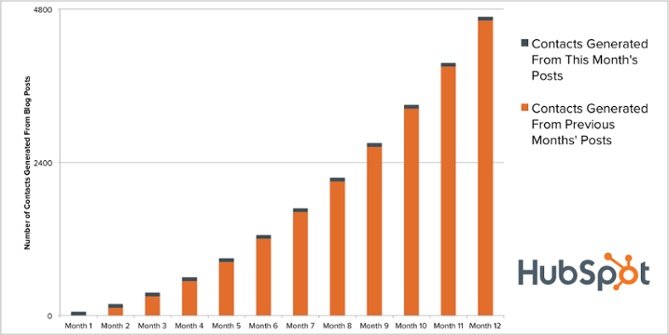
Since that post is now ranking, it means that for days, weeks, months, and years to come, you can continue to get traffic from that blog post. So while it may feel like day one or bust, in reality, blogging acts more like this:

Contact generation HubSpot Blogging

So while you’re hitting your snooze alarm, surfing in Hawaii, and pumping iron, you’re also driving traffic and leads. The effort you put in yesterday can turn into hundreds of thousands of views and leads in the future.

What’s more, you can monetize your blog content in many creative ways. Business models such as affiliate marketing mean you can generate an income from blogging on just about any topic — from makeup and beauty to camping and motorcycles.

There’s a wide variety of affiliate programs out there where you can generate an income from referring people to relevant products and services.

When it comes to blogging, most of your sales will likely come from your older articles.

More than half of the traffic generated each month on the Hubspot blog comes from posts published in previous months. They come from old posts.

The same goes for the leads generated in a current month — about 90% of the leads we generate every month come from blog posts published in previous months. Sometimes years ago.

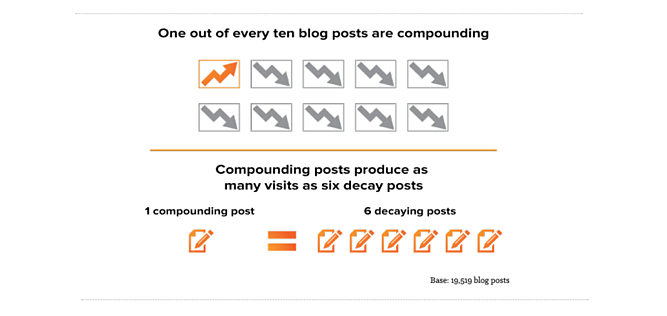
We call these types of blog posts “compounding” posts. Not every blog post will fit into this category, but the more evergreen blog posts you write, the more likely it is that you’ll land on one of those compounding blog posts.

In our research, we’ve found that about 1 in every ten blog posts end up being compounding blog posts.

Compounding blog posts

To me (and hopefully to you), this demonstrates the scalability of business blogging.

While you might not see immediate results, over time, you’ll be able to count on a predictable amount of traffic and leads for your business without any additional resource investment — the work to generate that traffic and those leads are already done.

If you’d like to learn more about the long-term impact of blogging and how to reap even more benefits from the blog posts that are ranking in organic search for your business, check out this article, “The Blogging Tactic No One Is Talking About: Optimizing the Past.”

7. It helps you share company news.

Another benefit blogging affords every big, and small business is a medium to share their company news and stories.

Blogs can contain not only articles but also news that highlight what a company is up to.

Have you hired a new content marketing manager? Share it on your blog.

Interviewed online marketing and industry experts? Post it on your blog.

Have a brilliant case study that showcases how your products and services help customers? Tell your audience about it on your blog.

Are you hosting a local fair or trade show? Drum up attention for the even through your blog.

Not only does sharing company news on your blog humanize your brand, but it also helps your audience see that you’re not always about selling.

Secondary Benefits of Business Blogging

There are other reasons businesses might want to blog, but I think they’re smaller and stray from the core benefits of blogging.

For example, I love to use our blog to test out extensive campaigns on the cheap before investing a lot of money and time into their creation. I also love to use our blog to help understand our persona better.

And while this shouldn’t be their primary use, these are all significant usefulness of a business blog, but they’re secondary benefits to me.

How to Start Blogging for your Business

You’ve seen the benefits your business blog can get you — more traffic, leads, authority, and a better relationship with your audience. And you’re undoubtedly itching to get started.

But how?

Our guide on how to start a successful blog has everything you need.

Editor’s Note: This post was originally published in November 2020 and has been updated for freshness, accuracy, and comprehensiveness.

Categories B2B

The 15 Best WordPress Themes for Podcasters in 2021

The number of podcast listeners in the United States is expected to reach 100 million by 2024. (For context, there are 82.7 million listeners in 2021.) 

Podcasts provide a source of convenient and intimate entertainment that’s only continuing to grow in popularity. While today’s
most popular podcasts
might vary significantly in terms of their content and hosts (
among other things
), they all share at least one thing in common — they each have their own website where fans can check out their latest episodes and seasons, info about live shows, biographies about the podcast’s hosts, and more details.

If you’re a host or producer, chances are you’re busy managing your podcast — and building your own WordPress website may sound like a daunting task. However, creating your site can be quite simple with a WordPress podcasting theme that allows you to share your episodes, seasons, host bios, and any other content you want to provide your visitors and fans.

➝ Free Guide: How to Start a Podcast

We’ve curated this list of our favorite podcasting themes to help you share your content on your site and make lasting connections with your fans. To determine which theme best suits your needs, review these 15 options, their unique features, and our key takeaways. Afterward, check out the WordPress Theme Directory if you’d like to explore more podcasting themes.

1. Viseo

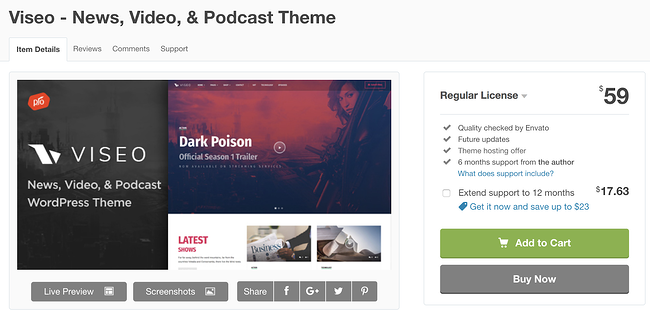
viseo  wordpress theme for podcasts download page

Viseo is a podcast theme with a “latest show” section for your site pages so your fans can quickly locate and listen to your newest content. You can also easily upload and add high-quality videos to the theme’s Locally Hosted Video Player feature. Customizing your site pages and sections requires no coding knowledge due to the theme’s drag and drop builder.

Key Takeaways:

  • Visitors can browse the “Latest show” section for new content
  • Share high-quality video content with the locally hosted video player feature
  • Customize your site with the built-in drag-and-drop page builder

2. Audonic

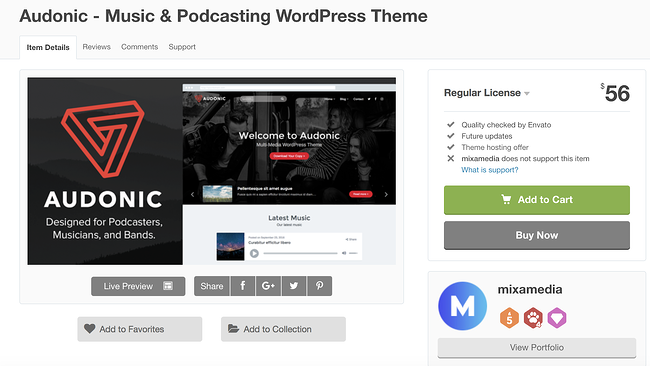
audonic  wordpress theme for podcasts download page

Audonic supports several commonly-used audio players so importing your podcasts is a hassle-free process. The theme offers dark and light-colored layouts and audio players to help you achieve your desired look. Your visitors can also check out your site while on the go since the theme is mobile-friendly.

Key Takeaways:

  • Upload several audio players to showcase your podcasts
  • Customize dark and light layout and audio player designs
  • Experience better responsiveness with the mobile-friendly layouts

3. Podcaster

podcaster wordpress theme for podcasts download page

Podcaster is specifically made for broadcasting and managing podcasts — it has an unlimited number of podcast episode archive pages so you can maintain your shows and seasons over long periods of time. The theme’s homepage contains an audio and video player feature that allows visitors to experience your latest content the moment they enter your site. There are also a variety of color palettes to customize your site with to match your branding.

Key Takeaways:

  • Add unlimited podcast episode archive pages
  • Utilize an audio and video player feature on the site’s homepage
  • Access a variety of color palettes to customize pages

4. Tusant

tusant  wordpress theme for podcasts preview page

Tusant is compatible with all major podcast plugins to make managing and designing your podcast’s site as straightforward as possible with increased functionality based on your specific needs. The theme is compatible with the Elementor plugin which allows you to edit and update your site pages and review the changes in real-time prior to publishing them.

Key Takeaways:

  • Integrate your favorite major podcast plugins
  • Design your pages with the Elemntor plugin
  • Display content in multiple layouts

5. Promenade

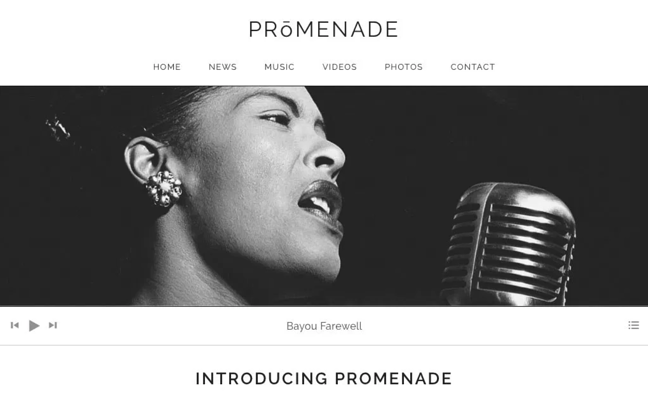
promenade  wordpress theme for podcasts preview page

Promenade’s homepage offers two types of formats: a static web page where the same content remains in one place unless you manually change it and a dynamic web page in which your latest content is moved to the top of the page so your visitors automatically see your latest posts. The theme has grid layouts for your audio and videos to keep your content organized.

Key Takeaways:

  • Format your pages with two homepage format options — static or dynamic
  • Organize your audio and video using the grid layouts
  • Arrange your site with custom navigation and menus

6. Life Coach

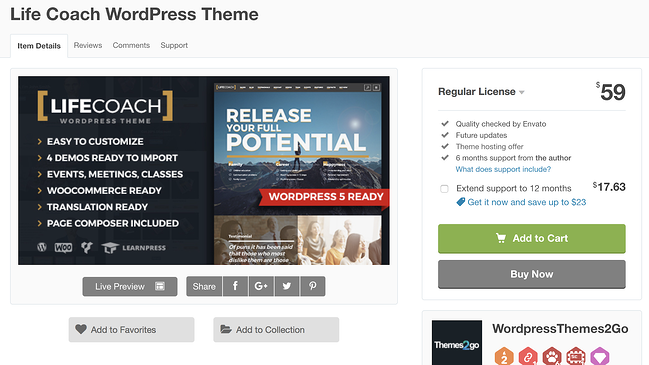
life coach wordpress theme for podcasts download page

Life Coach is a podcast theme with an ecommerce store where you can sell your merchandise — the theme has WooCommerce integration to make managing your store simple. It includes an events calendar feature where you can highlight the dates for your latest episode releases, live shows, and more. Life Coach also offers MP3 (coding format for digital audio) support so you can easily import and manage your podcasts.

Key Takeaways:

  • Integrate your podcast site with WooCommerce
  • Notify visitors of upcoming events with the calendar feature
  • Leverage MP3 support for your audio files

7. Vice

vice  wordpress theme for podcasts preview

Image Source

Vice gives you the ability to incorporate video backgrounds on your web pages to create an interactive and fun experience for your visitors. The theme’s responsive design automatically changes your site’s format to fit the screen it’s being viewed on, whether that’s desktop, mobile, or tablet. Vice also has pre-made podcast page templates with players that support Soundcloud, MP3, and Mixcloud audio so you can import and share your podcast in a matter of seconds without having to change its format.

Key Takeaways:

  • Incorporate video backgrounds on site pages
  • Change your site’s format depending on the device it’s being viewed on
  • Make changes quickly with podcast page templates that support audio players

8. GeneratePress

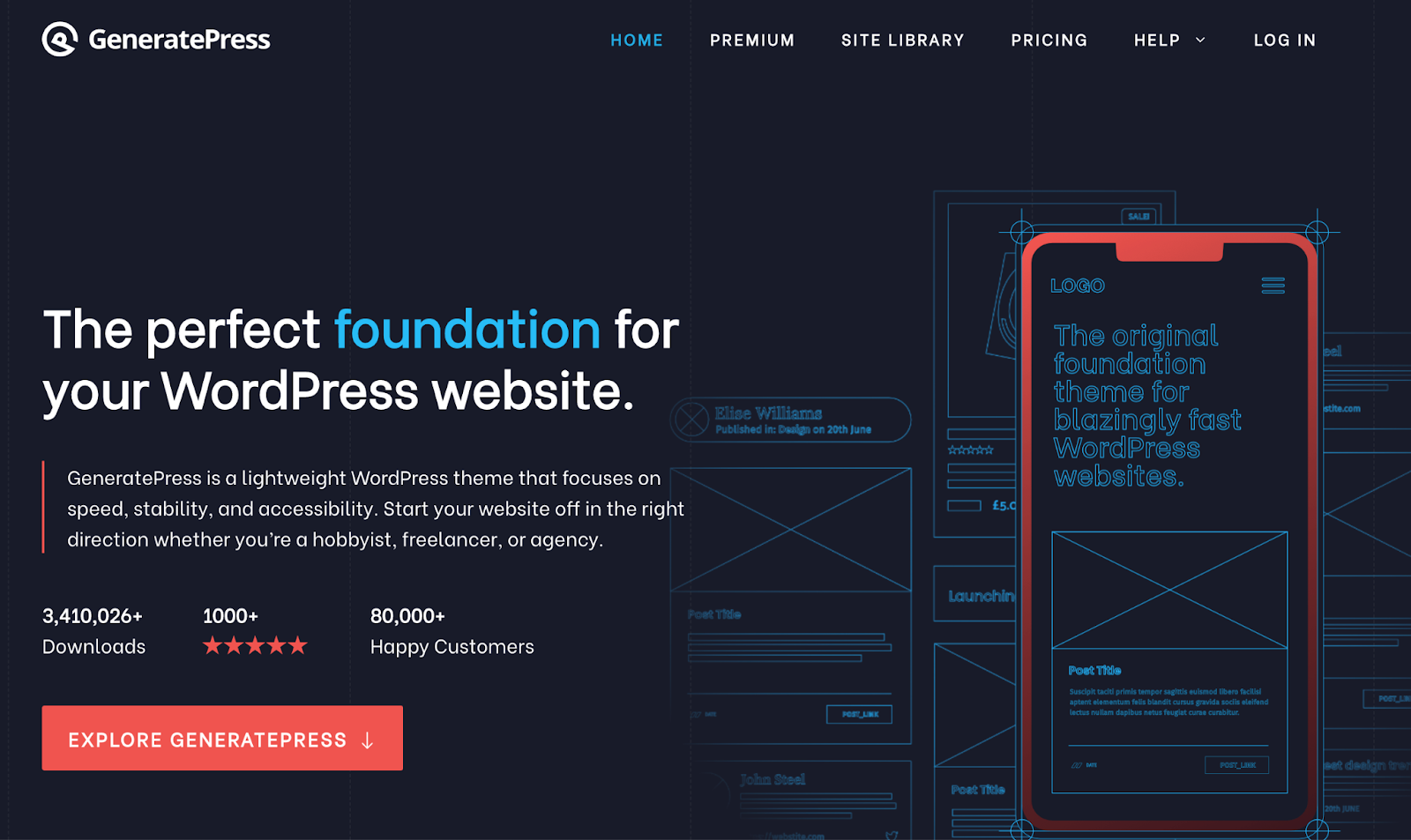
generatepress  wordpress theme for podcasts download page

GeneratePress is a free and open-source theme — speed, usability, and accessibility are the features that set it apart. There is an unlimited number of custom color combination options to achieve any look you desire on your website. Performance and design aren’t mutually exclusive with this theme, GeneratePress prides itself on providing podcasters with both to bring an immersive experience to their listeners.

Key Takeaways:

  • Get started easily with an open source theme
  • Customize your site pages with unlimited custom color options
  • Integrate this theme with the top audio plugins

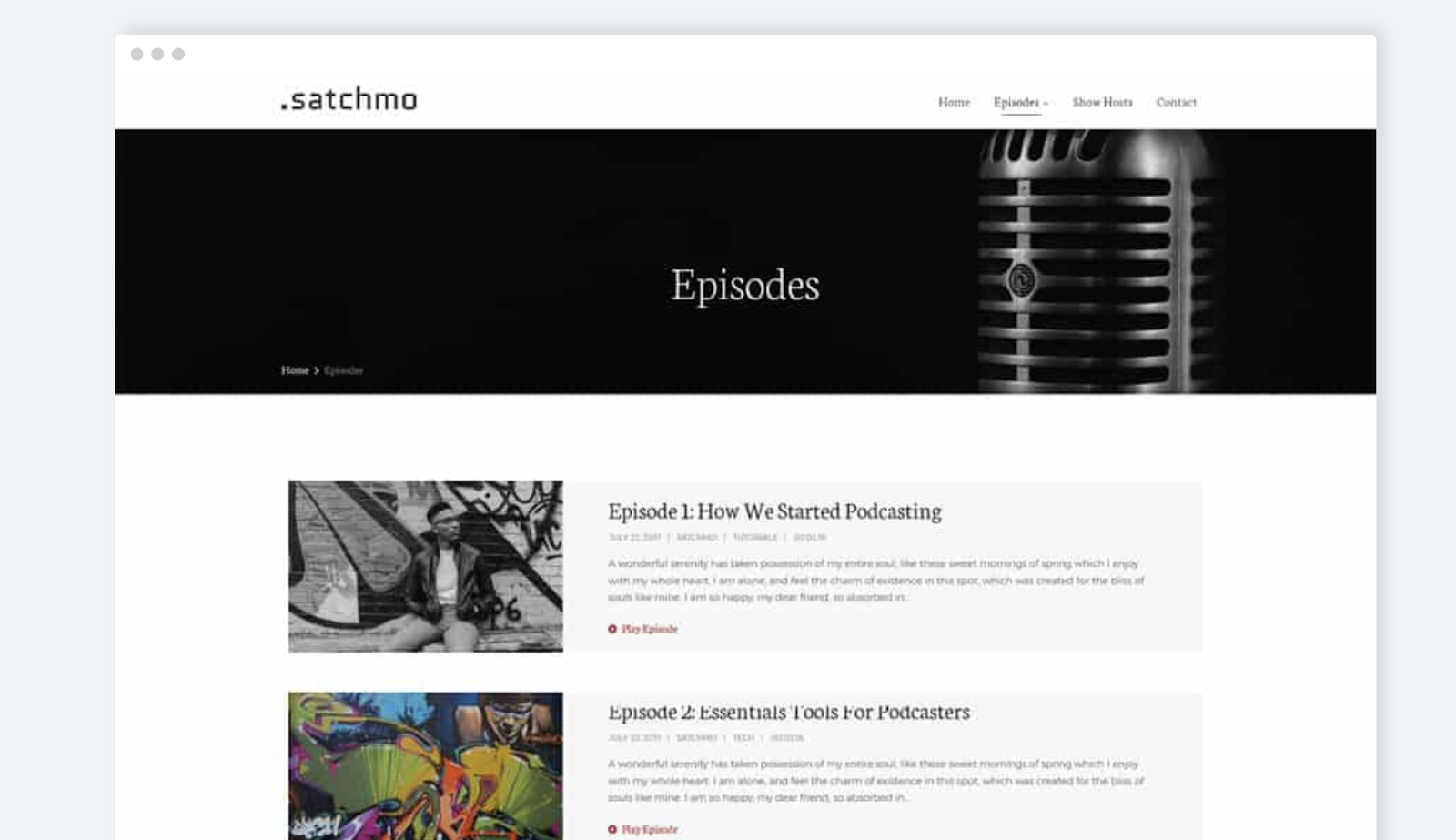
9. Satchmo

satchmo  wordpress theme for podcasts download page

Satchmo is ideal if you’re looking for a podcasting theme where you can also share blog content in addition to your audio. Whether you’re an experienced blogger or someone who simply wants to share information about your podcast in a personal and accessible way, then Satchmo’s blog template pages will come in handy.

You can add icons in your headers and footers that direct your visitors to your social media accounts to promote your content and increase your follower base. There are also over 700 different Google Font options for you to choose from and customize the typography on your pages.

Key Takeaways:

  • Choose a podcast or blog theme for your site
  • Attract more followers with the social media account icons in headers and footers
  • Customize your typography with 700+ Google Font options

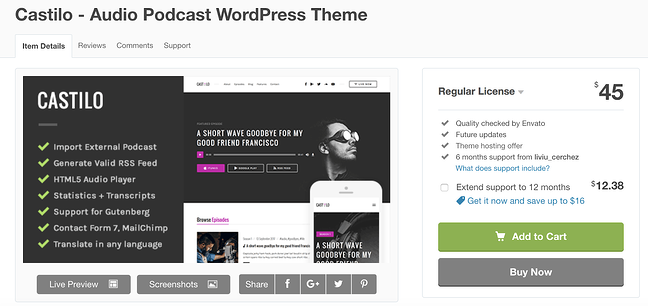
10. Castilo

castilo  wordpress theme for podcasts download page

Castilo has a contact form template that you can add to a site page so your visitors can easily get in touch with you. The theme offers a podcast stats feature to help you determine the short and long-term success and popularity of each of the podcasts on your site as well as monitor who’s listening to your podcasts. Your custom logo will also be placed in the header and footer of your pages to make for a professional and branded look and feel.

If your theme does not come with a contact form plugin and you’re looking for a simple way to add a form to your site, check out HubSpot’s WordPress Contact Form builder.

Key Takeaways:

  • Add a contact form to capture visitor data using the available template
  • Capture podcast data with the statistics feature
  • Add your custom logo in the header and footer of your site

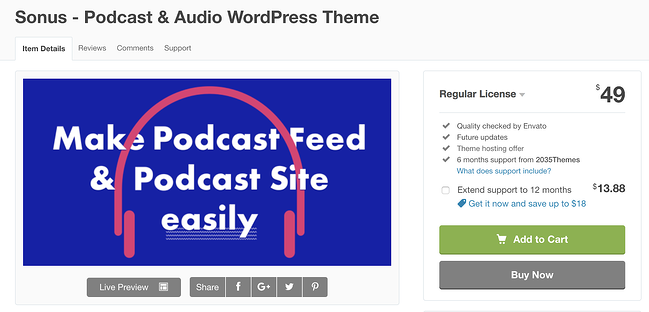
11. Sonus

sonus wordpress theme for podcasts download page

Sonus has a customizable audio player that you can design to include buttons that fast-forward and rewind episodes, skip episodes, share episodes, change episode speed, or skip to a specific time in an episode. The theme’s pages are all formatted in a grid to keep your audio and written content organized. Sonus has responsive audio players that automatically change formats to match any screen and device.

Key Takeaways:

  • Include customizable audio players
  • Design site pages with a grid format
  • Add a responsive audio player that changes its format to work for any device

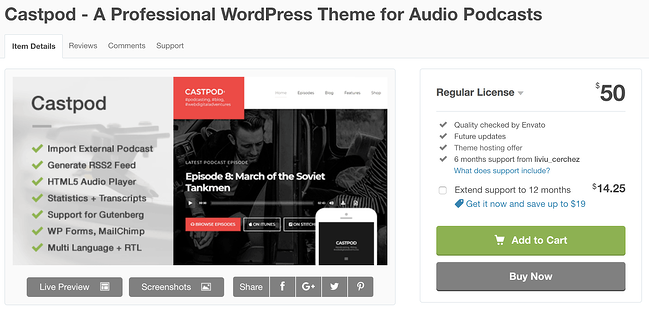
12. Castpod

castpod wordpress theme for podcasts download page

Castpod includes a MailChimp integration so you can manage all of your email-related content for your fans and subscribers in an organized fashion. With Castpod you can submit your podcast to an external service such as iTunes or Google Play with the click of a button. The theme’s Retina-ready design ensures all of your images are high-definition and look professional.

Key Takeaways:

  • Integrate MailChimp on your site to manage emails
  • Submit your podcast to external services like iTunes and Google Play with one click
  • Get a high-definition and professional look with the Retina-ready design

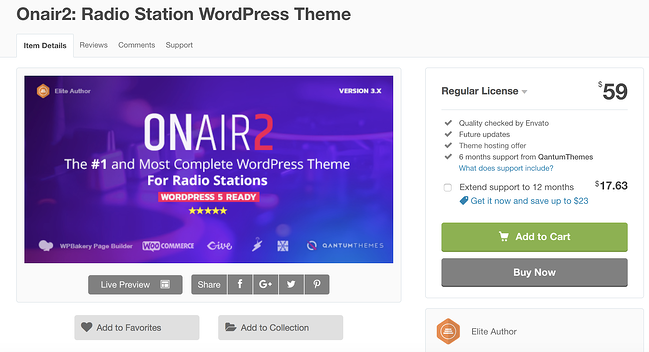
13. Onair2

on air 2 podcast wordpress theme download page

Onair2 is a podcast and music theme with an ecommerce store feature where you can sell your merchandise to fans. Managing your online store is also straightforward due to the theme’s WooCommerce integration. There is a customizable podcast page template that you can implement on your pages with an audio player that’s integrated with YouTube, Mixcloud, Soundcloud, and more. Social sharing icons are customizable and give your visitors the ability to find and follow your accounts in a matter of seconds.

Key Takeaways:

  • Use the podcast and music theme with ecommerce store feature
  • Design your podcast page template with YouTube, Mixcloud, and Soundcloud integration
  • Increase your social media presence with social sharing icons

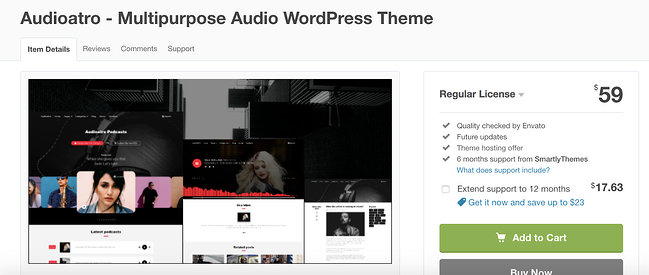
14. Audioatro

Audiotara wordpress theme for podcasts

Audioatro has a unique, full-width audio player, called the “Audio Visualizer,” that’s placed on top of a full-width, background image on your page. The audio player includes a bunch of 3D bars that run across the bottom of your page to show listeners their timestamp in the podcast. These bars also rise and fall with the podcast’s volume levels to add another entertaining and interactive visual element. Audioatro also has two podcast-specific templates to choose from and expert customer support in case you run into a challenge that you need help troubleshooting.

Key Takeaways:

  • Incorporate the unique, 3D, video-like audio player
  • Choose from two podcast themes

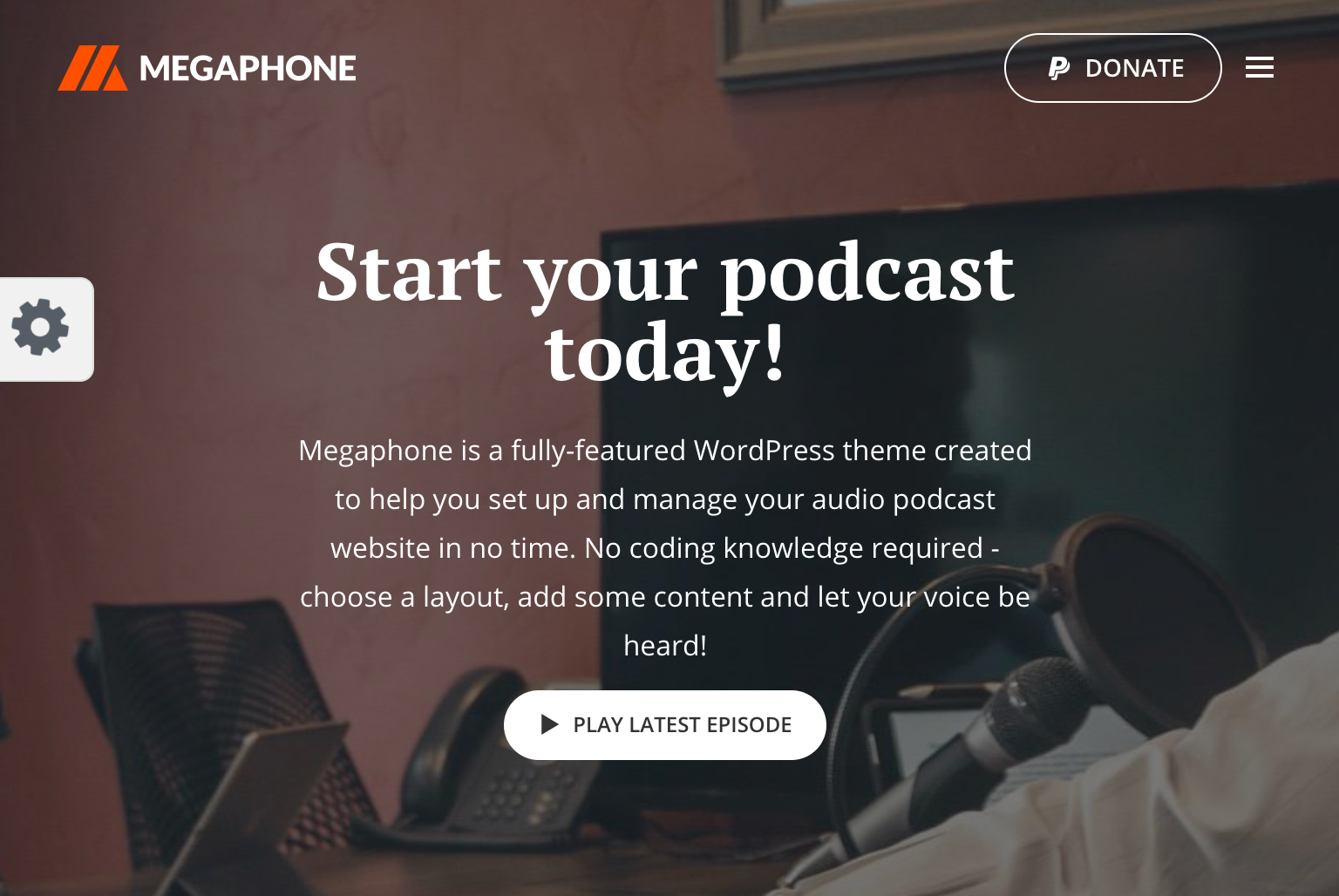
15. Megaphone

Megaphone pocast wordpress theme preview

Image Source

Megaphone supports multiple shows, episodes, seasons, as well as videos and music content. The theme requires no coding knowledge so you can quickly and simply design your sections in any way you want. To give your visitors the full listening experience before they download your podcast, Megaphone includes a sticky audio player that follows them as they browse the site.

Key Takeaways:

  • Upload multiple shows as well as videos and music content
  • Build faster and easier without coding
  • Keep the visitor listening to a podcast preview with a sticky audio player

Back To You

WordPress podcast themes will help you share your hard work on a website that you’re proud of. These themes make it easy to manage your seasons and shows, include descriptions about your hosts, stay in contact with fans, and share the latest information about live shows and events all in one location.

With a wide variety of features, layouts, and customization options, you can achieve virtually any look and design you want with podcasting themes on your WordPress website no matter your level of web development knowledge. Download and install a podcasting theme today so you can begin sharing your content and building lasting relationships with your fans.

Editor’s note: This post was originally published in December 2018 and has been updated for comprehensiveness.

New Call-to-action

Categories B2B

The 10 Best Storyboarding Software of 2021 for Any Budget

Today, video can help marketers do a lot of things — it can help you explain your product or service, it can increase traffic to your website, and it can even convince people to purchase a product.

94% of people watch explainer videos to learn about a product or service. Even if you have a powerful written content strategy, if you don’t use video, you’re losing traffic to more video-heavy competitors.

Your business is probably already using video marketing, but are you planning your videos for optimal success using storyboarding software? Or are you drawing shots by hands or writing a script and winging the rest?

In this post, we’ll go over what storyboarding is and cover some of the best storyboarding tools you can use to make better marketing videos.

→ Access Now: Video Marketing Starter Pack [Free Kit]

Storyboarding isn’t just for filmmakers and animators. Marketers can leverage storyboards to craft engaging marketing campaigns and advertisements.

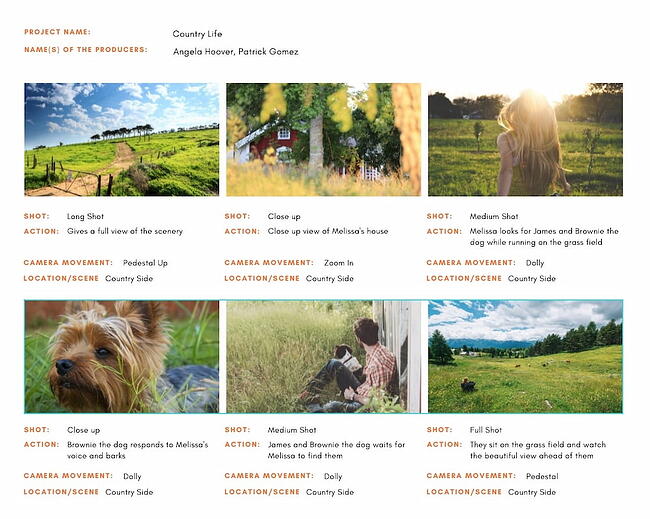
The best part is that you don’t have to do it manually. A storyboarding software tool typically provides premade images and characters for you to bring your idea to life.

Whether you use video for training, sales, or demo purposes, storyboarding can alleviate the time-consuming nature of video preparation, while also increasing your video’s overall quality and decreasing production errors.

If you’re looking for a tool to take your video production process to the next level, take a look at our list of the best storyboarding software out there — no matter your budget.

Best Storyboard Software

1. Storyboarder by Wonder Unit

Storyboarding software by Wonder Unit

Storyboarder is open source and free, making it one of your best options if you’re working with a smaller budget. The program has a clean interface with all the necessary tools at your disposal, so it’s easy to quickly draw shapes and characters. You can also write dialogue, and enter timing information and shot type.

Storyboarder works collaboratively with Photoshop, which means you can edit your board in Photoshop for more precision, and it will automatically update in Storyboarder. This software lets you export to Premiere, Final Cut, Avid, PDF, or Animated GIF.

Pricing: Free

2. Plot

Storyboarding software by Plot

Image Source

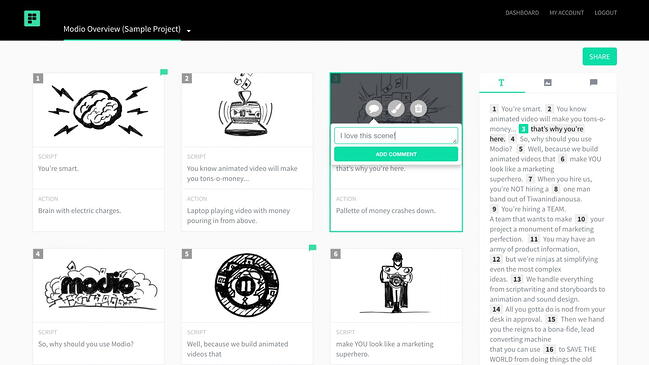
Adrian Thompson made animated videos for seven years, and “came to despise how tedious it was to edit a basic storyboard template.” His frustration led him to create Plot, a free and fast storyboard creator with impressive users such as Vistaprint and Workday.

Each feature aims to make your process as quick and efficient as possible. You can add and delete scenes without copying and pasting text, incorporate images from anywhere on the web to visualize scenes faster, and collaborate with coworkers from within the software. Plot is a solid option if your team often works under tight deadlines and needs software to create storyboards quickly.

Pricing: $10/month

3. FrameForge Storyboard Studio

Storyboarding software by FrameForgeWith impressive users including HBO, Netflix, and BBC, FrameForge is the real deal, but your team can still benefit even if you don’t have animation, drawing, or highly technical computer skills.

FrameForge offers Core and Professional versions of their product. The Professional option allows you to plan where you’ll place dollies and cranes (down to the inch). The software lets you import a script from any scriptwriting program. Plus, the storyboards include movement arrows, framing notations, angle of view, focal length, and more, so everyone on your video team, from preparation to production, is on the same page.

It works on any mobile device, and the export functions make it possible to download the final product as a PowerPoint presentation. FrameForge is a good option for teams that aim to create more full-fledged and lengthy videos for entertainment purposes.

Pricing: $498.95 one-time fee or $12.99/month (Core Edition); $799 one-time fee or $24.99/month (Professional Edition)

4. Studiobinder

Storyboarding software by Studiobinder

Image Source

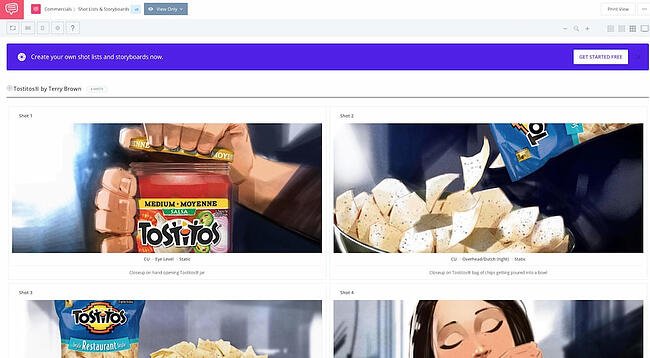
Studiobinder lets you customize every aspect of your visualization, and offers tools to filter columns, adjust the order of your scenes, upload images, change aspect ratios, color code shots, add notes, and more. Studiobinder also makes collaboration easy, with project management features to assign tasks and add comments.

Plus, if you want to preview your project from within the platform to show your team, there’s a nifty presentation mode. It touts impressive clients including BuzzFeed, ESPN, and CBS Interactive. This option is good for teams who need to collaborate on various stages of the video production process, and prefer customizable tools.

Pricing: $29/month (Indie); $49/month (Professional); $99/month (Studio)

5. Boords Storyboard Creator

Storyboarding software by Boords

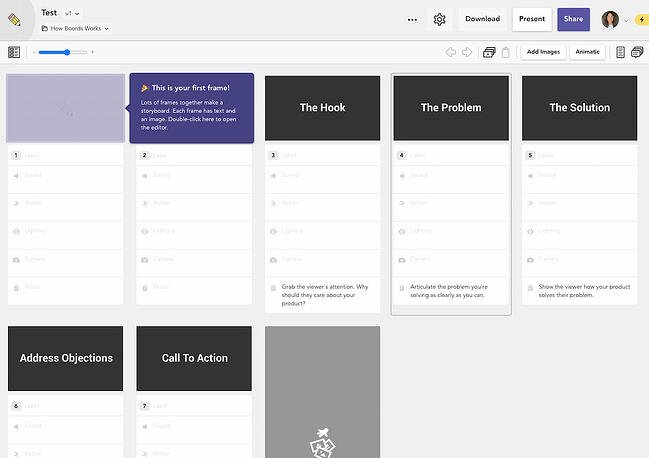
This online storyboarding software allows you to easily collaborate with your team in a user-friendly web app. You can add images to each storyboard card and jot down quick notes for each progressive step of your video. Specify sound, action, lighting, and camera details — all without any advanced technical knowledge.

The power of this tool lies in its ease of use. While Storyboarder and FrameForge have a slight learning curve, Boords is one of those tools that you can simply access and start using straightaway.

What we love most about this tool is its notes at the bottom for each card. If you ever forget what you’re supposed to achieve scene-by-scene, Boords gives you a brief and helpful tip on what you should achieve in the shot. It also offers a unique Animatic Tool, and when you’re ready to share your animatic, you can share it online for feedback or export to Boords’ After Effects plugin. Plus, you can share your storyboard with coworkers or clients and let them comment within the platform.

Pricing: $36/month (Studio); $60/month (Company); $120/month (Company Plus)

6. makeStoryboard

Storyboarding software by makeStoryboard

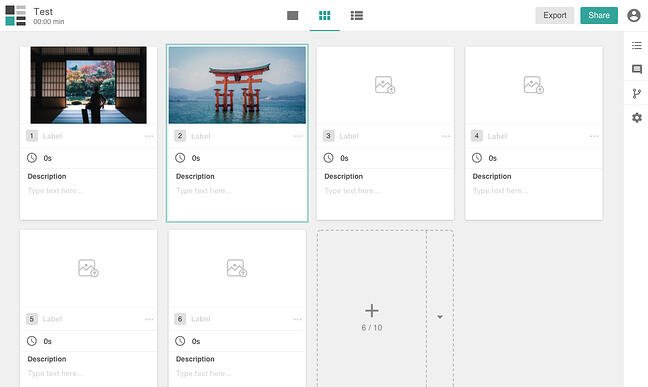
If you’re not necessarily interested in the fancier movie-making options in the list, makeStoryboard is a simple, user-friendly interface for quickly uploading camera shots, drawing stick figures in its built-in drawing tool, and incorporating text for scene details. The marker, pencil, and pen tools respond to any drawing tablet.

You can also add custom text fields for any additional details that are unique to your team and use case. When you’re happy with your storyboard, you can export it as a PDF to pitch your idea. Alternatively, you can send a private link so that stakeholders can review it without needing an account. Best of all, it offers a free subscription tier, making it a fantastic option for teams working with a smaller budget.

Pricing: Free; $12/month (Professional); $36/month (Team)

7. PowerProduction Software

Storyboarding software by PowerProduction

Image Source

PowerProduction offers a variety of tools for storyboarding, varying from simple to more robust and all-inclusive. StoryBoard Quick, for instance, offers a library of artwork for characters, props, and locations, and allows you to design and share your ideas easily. StoryBoard Artist, on the other hand, offers a full-featured timeline, frame transitions, and 3D characters, and is more appropriate for animated video presentations.

PowerProduction also provides iPhone and Android app versions of their products, so you can visualize and create from anywhere. These products are used by big brands, including Disney, Universal, and 20th Century Fox, so if you choose this software, you’re in good company. If your team is interested in creating lengthy, high-quality, and even animated videos, this could be a good option.

Pricing: $129.99/year (StoryBoard Quick); $169.99/year (StoryBoard Quick Studio); $269.99/year (StoryBoard Artist); $399.99/year (StoryBoard Artist Studio)

8. Canva

Storyboarding software by CanvaCreating a storyboard doesn’t have to stress you out, and Canva makes it especially easy, with a library of templates to choose from, one million stock images (or the option to upload your own), and grids and frames to organize your scenes. You can choose font types, customize colors, and include headers and subheaders.

If you’re working with someone else on the script or design, you can grant access for collaboration, and when you’re finished, you can share the design with your team through email or as a PDF file. If your team needs a simple and easy tool for simpler projects or to get your feet wet with the process of storyboarding, this is a good option.

Pricing: Free

9. PanelForge

Storyboarding software by PanelForgePanelForge offers an all-in-one pre-production storyboarding software, with drag-and-drop tools and flexible frames. With both a free public beta and a suite of paid plans, there’s no reason not to try it if you’re interested in using storyboarding for animatics and more complicated projects.

With PanelForge, you can create both 2D drawings and 3D layouts. It also allows you to create an animatic, and you can export and import files from Adobe Premiere and Final Cut Pro. PanelForge is ideal for experienced storyboarders and marketers who know their way around complex visualization tools.

Pricing: Free (Public Beta); $7.31/month (Pro); $1,411/year (Studio)

10. StoryboardThat

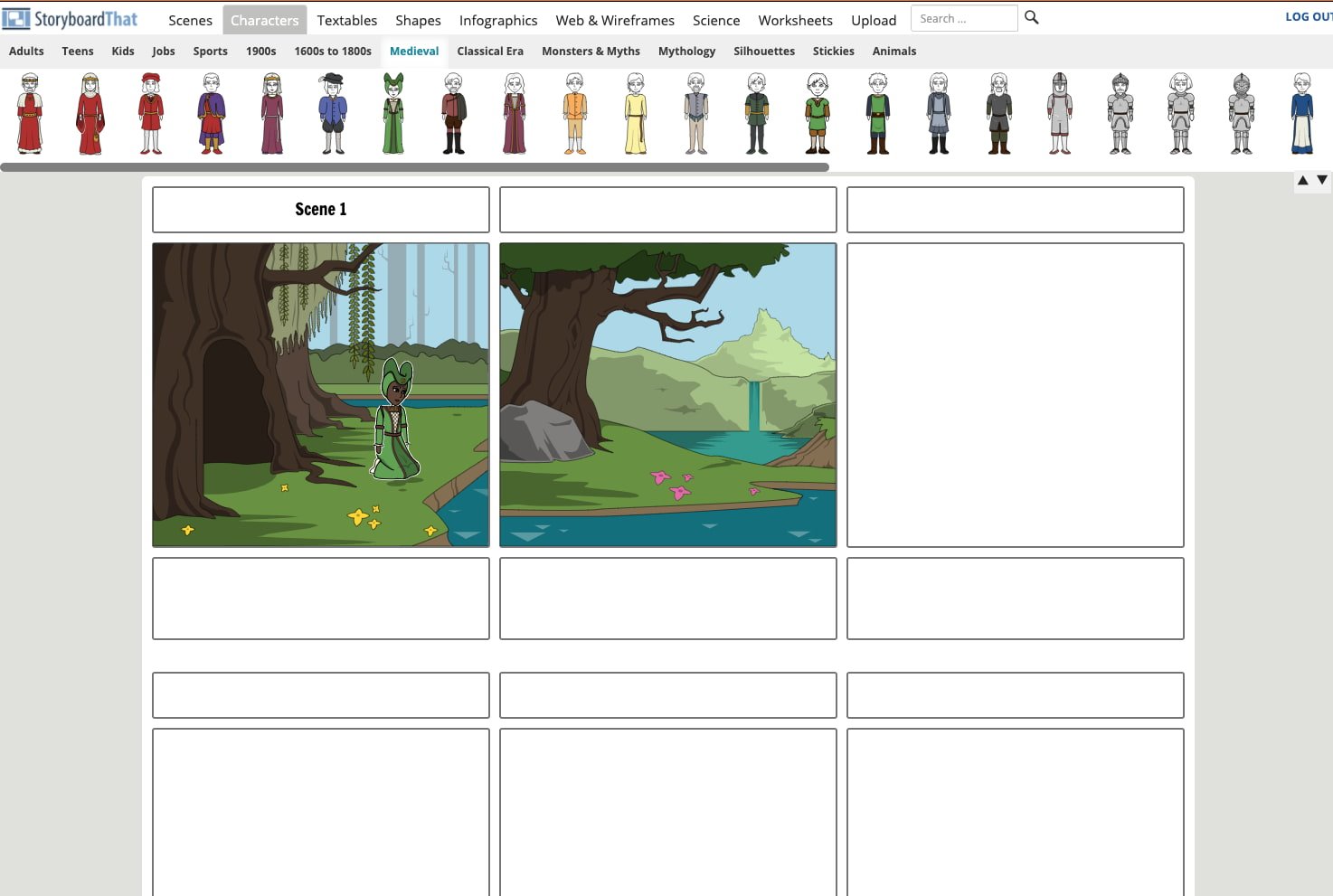
Storyboarding software by StoryboardThatStoryboardThat is an intuitive, easy-to-use tool for creators who’d rather not draw (or who don’t know how to). The tool comes with hundreds of backgrounds and characters for you to build your storyboard.

On the free version, you can create two storyboards per week and choose between three- or six-cells storyboards. When you upgrade to the paid versions, you’ll be able to create unlimited storyboards, access hundreds of different layouts, and record audio.

Pricing: Free; $9.99/month (For Fun); $8.99/month (For Teachers); $14.99/month (For Work)

Use a Storyboarding Tool to Make Better Marketing Videos

A storyboarding tool can help you plan every shot and scene of your marketing video before you invest in production. The best part is that you can get started for free — and many times, you don’t have to draw anything at all. Using a storyboarding tool can improve your marketing videos exponentially, increasing the ROI from your video marketing strategy.

Editor’s note: This post was originally published in June 2018 and has been updated for comprehensiveness.

Discover videos, templates, tips, and other resources dedicated to helping you  launch an effective video marketing strategy. 

Categories B2B

The Ultimate List: 50 Online Local Business Directories

Promoting a local business isn’t easy these days.

Whether it’s because of oversaturation or complicated search engine algorithms, it’s all too easy to feel like no one will find your business in the local search results.

Luckily, there’s an easy way to improve your local SEO. All you have to do is list your business in online business directories such as Yellow Pages, Manta, and more. This is called building citations, and it’s a critical piece of a local marketing strategy.

→ Download Now: SEO Starter Pack [Free Kit]

Today, Google is inserting itself between consumer and local business websites much more often. For proof, you need to look no further than Google My Business, Accelerated Mobile Pages (AMP), featured snippets, and most importantly, local packs.

By building citations, you can make sure that you appear in these local packs when people look for businesses like yours in their area. Business directories may seem like a thing of the past, but they’re a great way to grow your presence online.

You can improve visibility by listing your local business’ NAP (Name, Address, Phone Number) on directories, online business listing sites, and citation sites. Aside from improving your local SEO, these can also improve your rankings on search engines because the listings usually link back to your site.

Make sure your company listing has the following information once you add it to a directory:

  • Consistent NAP. If you add or update your business on multiple business listing sites, make sure you’re providing the same company information across each directory.
  • A link to your website. Backlinks — also known as inbound links — are crucial to your company website’s Domain Rating. Consider adding a tracking link at the end of this URL as well, so you can see how much traffic your website specifically gets from the business directories that are linking to it.
  • A company description. Make sure you have a detailed description of your business that reflects your organization’s mission, culture, and values.
  • Multimedia. Give company searchers a visual taste of your business with a picture or video of your office, your employees, or your daily business operations.

There are plenty of location-specific and industry-specific business listing sites where you can submit your data. To start promoting your local business, however, you should start with the big sites and work your way toward the more niche directories.

First, let’s go over the top free business directories.

Online Directories for Local Businesses

  1. Facebook Pages (Domain Rating = 100)
  2. Instagram for Business (Domain Rating = 99)
  3. Google My Business (Domain Rating = 98)
  4. LinkedIn Company Directory (Domain Rating = 98)
  5. Apple Maps (Domain Rating = 97)
  6. Yelp (Domain Rating = 94)
  7. Bing (Domain Rating = 93)
  8. HubSpot’s Solutions Directory (Domain Rating = 93)
  9. Better Business Bureau (Domain Rating = 93)
  10. MapQuest (Domain Rating = 92)
  11. Foursquare (Domain Rating = 91)
  12. Yahoo! Local (Domain Rating = 91)
  13. Thumbtack (Domain Rating = 90)
  14. Yellow Pages (Domain Rating = 90)
  15. Angi, FKA Angie’s List ( Domain Rating = 91)
  16. Nextdoor (Domain Rating = 87)
  17. Manta (Domain Rating = 87)
  18. Merchant Circle (Domain Rating = 85)
  19. YellowBook.com (Domain Rating = 82)
  20. Dun & Bradstreet Business Directory (Domain Rating = 80)
  21. Local.com (Domain Rating = 79)
  22. Hotfrog (Domain Rating = 79)
  23. ChamberofCommerce.com (Domain Rating = 79)
  24. 2FindLocal (Domain Rating = 46)
  25. EZlocal (Domain Rating = 78)
  26. Brownbook.net (Domain Rating = 77)
  27. eLocal.com (Domain Rating = 77)
  28. City Squares (Domain Rating = 76)
  29. iBegin (Domain Rating = 75)
  30. EBusinessPages (Domain Rating = 75)
  31. BOTW (Domain Rating = 74)
  32. Neustar Localeze (Domain Rating = 73)
  33. Spoke (Domain Rating = 72)
  34. GoLocal247 (Domain Rating = 72)
  35. Call Up Contact (Domain Rating = 71)
  36. n49.com (Domain Rating = 71)
  37. Just Landed (Domain Rating = 71)
  38. Tuugo.us (Domain Rating = 71)
  39. Lacartes (Domain Rating = 71)
  40. Hub.biz (Domain Rating = 70)
  41. Cylex US (Domain Rating = 70)
  42. Cybo (Domain Rating = 70)
  43. Fyple.com (Domain Rating = 65)
  44. Opendi.us (Domain Rating = 65)
  45. Yellow.Place (Domain Rating – 64)
  46. My Huckleberry (Domain Rating = 62)
  47. ExpressBusinessDirectory.com (Domain Rating = 62)
  48. Bizhwy.com (Domain Rating = 61)
  49. USdirectory.com (Domain Rating = 56)
  50. Finduslocal.com (Domain Rating = 50)

Methodology

We used a few parameters to decide which directories would make it onto the list.

Domain Rating

Domain rating is a score that’s given to websites to reflect how well they rank on Google based on their backlink profile. The minimum score is 0 and the maximum score is 100. Domain rating is similar, but not the same as, domain authority.

Our minimum required domain rating for the directories on this list was 50. We gathered the data from Ahrefs in May 2021.

Category

We compiled this list for use by any business. Regardless of your industry or target market, you can submit your business to all of the above directories.

To make it onto this list, the directory had to be categorized as General. The only exception is HubSpot’s solution directory, which is categorized as Marketing/Advertising.

Add Your Local Business to Online Directories

Making sure that you have a presence where your potential customers might find you is critical to any local marketing plan. It’s critical to build citations not only for the added visibility, but for the SEO benefits, too. Add your local business to some of these business listings and directories today — and watch your business and customer base grow.

Editor’s note: This post was originally published in March 2013 and has been updated for comprehensiveness.

marketing

Categories B2B

Anchor Text: What It Is, Why It’s Important & How to Optimize It

By now, many people are familiar with links.

Links make up the web’s infrastructure, and make it possible to jump from one webpage to another.

While links are sometimes included in the text as is (e.g. https://blog.hubspot.com), they are usually inserted with an “anchor”  to make the user’s reading experience more pleasant.

Let’s dive into what anchor text is, and why it matters. Plus, how to optimize your anchor text for SEO.

→ Download Now: SEO Starter Pack [Free Kit]

What is anchor text?

Anchor text is the clickable text which links two webpages together. Ideally, the target URL references relevant information about the topic being discussed on the source page.

Anchor text is also known as a link title, link text, or link label.

Why is anchor text important?

Simply put, anchor text provides context to both users and search engines. The link label indicates what a user will see on the linked page if she decides to click on it. On the other hand, search engines use the anchor text to index and rank webpages.

Here is where relevancy comes into play. If the referenced content is not relevant to the topic at-hand, this may cost your website visitors because it accounts for bad user experience. And when it comes to search engines, your website will be pushed down because the linked content doesn’t add value for the user.

Mindful use of anchor text can increase the trust your readers have in your brand, as well as the content you share on your website. Additionally, it boosts your SEO efforts by giving all the right signals to search engine crawlers.

How do I create anchor text?

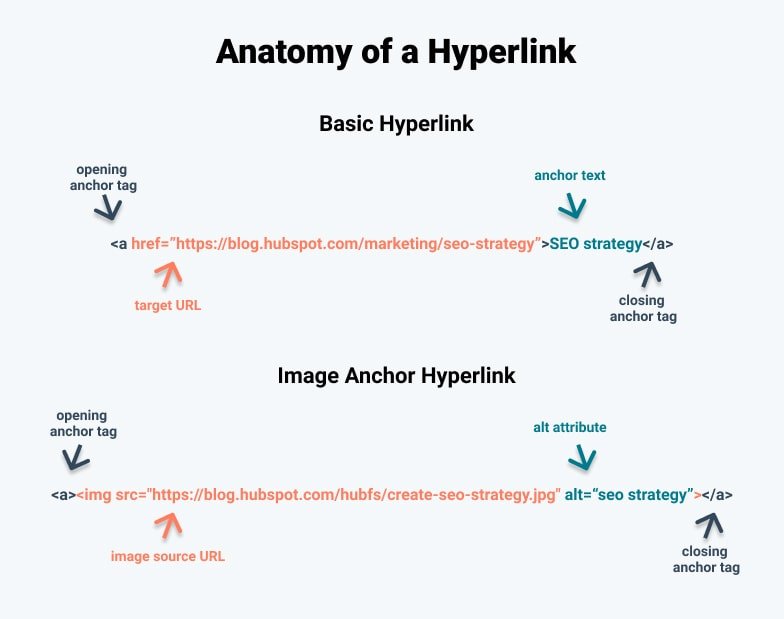
Let’s examine the building blocks of a hyperlink and see where the anchor text fits in.

Anatomy of a Hyperlink newA basic hyperlink consists of three parts — the anchor element tags, an rel=” noopener” target=”_blank” href attribute and the anchor text (see image above). In order to include a hyperlink with a link label in your content, start with an opening anchor tag: <a>.

Next, introduce the target URL with an rel=” noopener” target=”_blank” href attribute (rel=” noopener” target=”_blank” href=””) by placing it inside the opening anchor element. Then, insert your target webpage between the quotation marks.

Finally, the anchor text goes between the opening and closing anchor tags.

Depending on the content you are linking to, you may want it to open in a new window. The option is usually reserved for when you want to link to a useful resource, located on another domain, but still retain the attention of your readers. To do this, simply add the target attribute and set it to “_blank”:

<a rel=” noopener” target=”_blank” href=”https://www.yourwebsite.com” target=”_blank”>Your Anchor Text Goes Here</a>

Images can also function as anchors. Keep in mind that the syntax of the html code is slightly different. Instead of adding the source of your image inside the opening anchor tag, add the <img> tag in between the opening and closing anchor tags. All you need to do afterwards is add the src=”” attribute and paste the source URL of your image inside the quotation marks.

You may have noticed a second alt attribute. Visually-impaired people who use screen-readers, and web crawlers, need text-based information to understand what is being shown on the image. So it’s good practice to provide a description to your images by filling in the alt attribute.

Types of Anchor Text (with Examples)

Before we delve into how to best utilize anchor text for SEO purposes, let’s see what kinds of link labels exist.

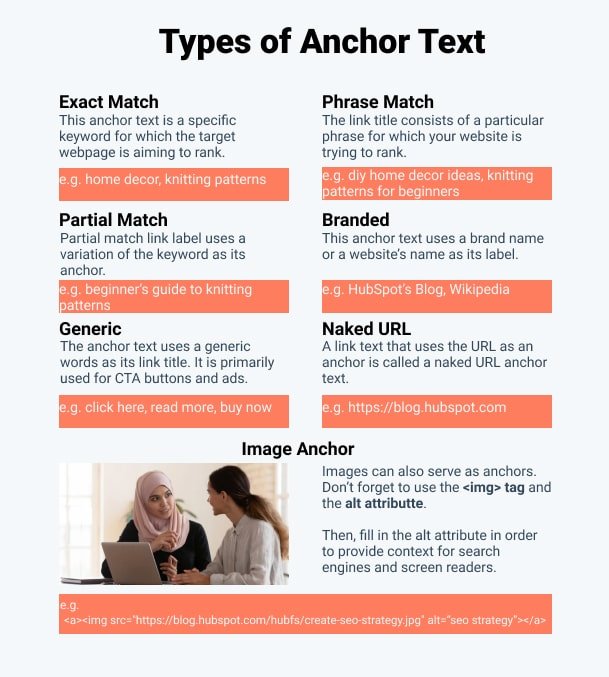
Types of Anchor TextExact Match

As the name suggests, the exact match anchor text is a specific keyword for which the target webpage is aiming to rank. Let’s assume you’re the webmaster of a knitting supplies shop and you wish to rank higher for the keyword “knitting patterns”.

One way to approach this is for a relevant domain to link to your knitting patterns webpage by using the keyword of the same name. But use these sparingly. Otherwise, you may set off the Google spam filter and get penalized for spammy behavior.

Phrase Match

Similarly, the phrase match link title consists of a particular phrase for which your website is trying to rank. Going back to the knitting patterns example, those who are not very skilled in knitting may be searching for an easier pattern. As a result, they may be searching for “knitting patterns for beginners”.

Partial Match

This type of anchor text is similar to the phrase match label text. The only difference is that instead of using the exact phrasing of the keyword, a variation is used. Such as:

“knitting patterns for beginners” = “beginner’s guide to knitting patterns”

Branded

Website names and branded anchor texts are fairly common. For instance, I can use HubSpot’s Blog as my link label if I wanted to refer to this blog’s homepage. See what I did there?

Generic

Easily one of the most recognizable anchor texts. These are usually used for ads and CTA buttons. Typical generic anchor text includes phrases like “click here”, “read more”, or “buy now”.

Naked URL

Remember how I linked to HubSpot’s Blog by pasting “https://blog.hubspot.com” at the beginning of the article? A link text that uses the URL as an anchor is called a naked URL anchor text.

Image Anchor/No Text

As the saying goes, sometimes a picture is worth a thousand words. Fortunately, it can also be used as an anchor. Don’t forget to include a descriptive text to your image because search engines use it to understand what the image is about.

How to Optimize Your Anchor Text

Merely getting familiar with the different types of anchor text won’t guarantee you higher SERP rankings. Here are some best practices for optimizing your anchor text to get you started.

1. Make clear the anchor text is distinguishable.

Many platforms offer various webpage customizations. Some of these blend the anchor with the surrounding text. Make sure users know the anchor is clearly marked and it’s clickable.

2. Don’t mislead your readers.

Always keep your promise when linking to other webpages and provide the agreed content.

3. Preserve the natural flow of your writing.

While most try to approach this task strategically and concentrate on exact and phrase matches, natural language does not work this way.

4. Maintain the relevancy of your links.

If you provide time-sensitive content, remember to review your links and keep them up to date.

5. Always account for search intent.

Remember to consider the reader’s search intent and confirm it matches the context of your content.

6. Avoid keyword stuffing.

It goes without saying that keyword stuffing will incur the wrath of the Penguin update, which penalizes over-optimized anchor texts and low-quality hyperlinks.

7. Diversify your anchor text profile.

A natural link profile has variety. Excessive link label manipulation will get your webpage penalized.

8. Link text should be succinct.

Although Google looks at both the anchor and the surrounding text, don’t anchor large chunks of text.

9. Clean up URLs when using naked anchors.

No one likes long winding URL strings. Keep it short and simple.

10. Maintain an inventory of your links and anchors.

Having a library of all your links and labels not only helps during the optimization process, but also when doing site audits.

So, what now? The best way forward is to create an optimization strategy which makes sense for both your customers and your business.

SEO Starter Pack

Categories B2B

How to Create a Profitable Amazon Marketing Strategy for 2020

Amazon is everywhere. There’s no getting around it: From small sellers to large enterprises, getting your products noticed — and purchased — means you need a marketing strategy that lets you make the best use of this online ecommerce behemoth.

Today’s consumers use Amazon as their first point of contact for finding almost any type of product information. In fact, 63% of online shoppers go to Amazon to start searching for products. But with so many products available from multiple sellers with varying shipping options and discounts, it’s easy for your brand to get passed over by potential buyers.

Download Now: Ecommerce Marketing Plan Template

Bottom line? Amazon is the ecommerce heavyweight. Love it or hate it, you need a market strategy that helps your brand stand out among the thousands of others all vying for consumer attention. That’s why we’ve built this guide — to help you build a profitable marketing strategy and succeed in the sales jungle that is Amazon.

Bookmark this post for later, and use the chapter links below to jump ahead to sections of interest.

1. Create an Amazon Advertising strategy.

Generally speaking, an Amazon Advertising strategy consists of four components: Amazon reviews, SEO, affiliate marketing and social media marketing.

What is Amazon Advertising?

Amazon Advertising (previously Amazon Marketing Services) is a pay-per-click service similar to Google Ads: Brands only pay when potential buyers click on targeted ads. Designing the idea ad is critical to getting your brand noticed and generating sustained revenue.

There are three common types of Amazon Advertising ads: Product Display, Sponsored Product and Headline Search.

Product Display ads show up on the side or bottom of Amazon SERPs and along the side of related product pages. When clicked, Product Display ads lead to a product page.
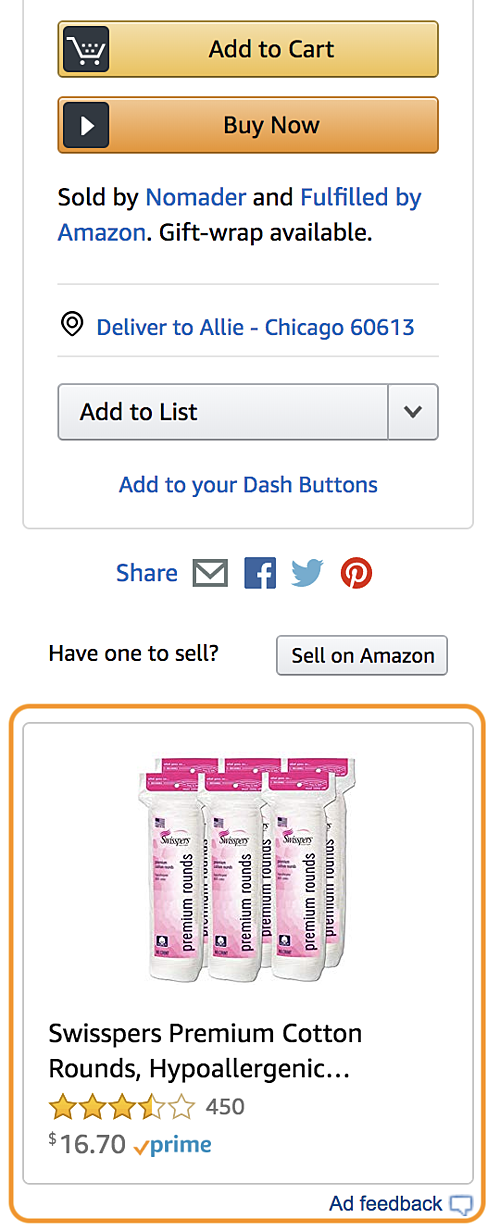
What is Amazon Advertising product display ads

Sponsored Product ads appear in the Amazon SERPs and on product pages before the product description.
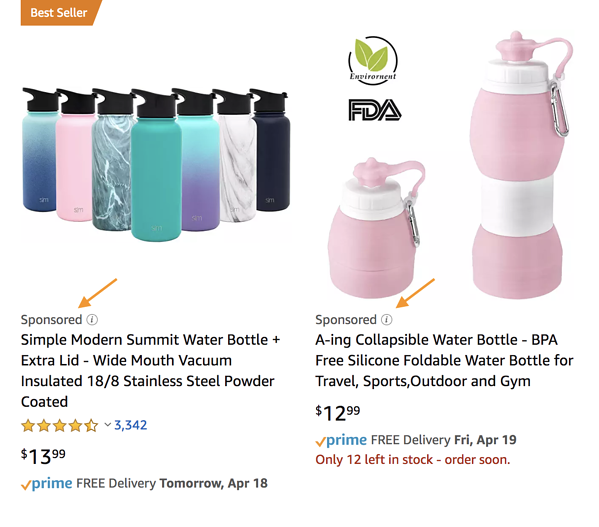
What is Amazon Advertising sponsored product ads

When clicked, Sponsored Product ads lead to a product page.
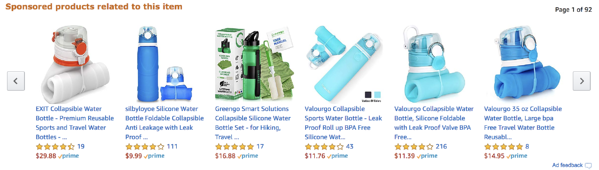
what is amazon advertising sponsored ads

Headline Search ads are the most customizable Amazon ad.
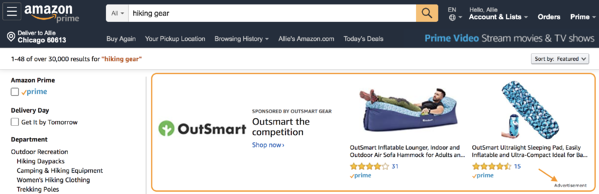
headline search ads on amazon

They appear at the top of Amazon SERPs and can include custom ad copy as well as link to a branded landing page on which you can feature custom navigation, branded imagery, and select products.
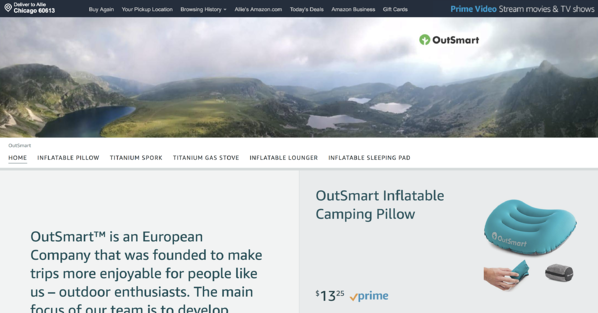
headline search ads on amazon

2. Develop an Amazon reviews strategy.

Customer reviews and ratings are important. They’re even more important in the world of ecommerce, where shoppers can’t physically see or touch a product before buying. In fact, recent data found that customers prefer not to engage with brands that have less than 3.3-star ratings.

Amazon recognizes the power of customer reviews, and — true to their buyer-first mindset — makes reviews a major part of each product page. Shoppers can view customer images, filter reviews by suggested keywords, search for content within reviews, sort reviews by stars, and review customer questions and answers.
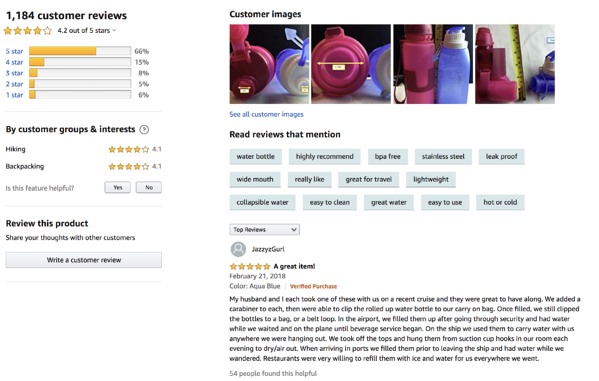
how to Develop an Amazon reviews strategy

As a seller, you should always prioritize reviews. They can make or break a shopper’s decision to purchase — and the more positive reviews your product has, the more likely you’ll turn casual interest into conversion.

Here are a few ways to do this ask your customers to complete one. Here are a few ways to do this:

It’s also worth noting that Amazon allows sellers to respond to reviews. This offers a great way to engage directly with customers, express gratitude for purchases, and quickly address issues or complaints.

Learn new tactics for responding to customer reviews — the good, bad, and the ugly — in our free Ultimate Guide to Customer Reviews.

3. Deploy an Amazon SEO strategy.

Let’s be clear: Amazon dominates the ecommerce market in North America. But it’s not just an ecommerce site — it’s also a search engine. And as a search engine, it has its own search engine optimization or SEO.

Amazon’s search engine is called A9. It operates on its own algorithm and comes with its own unpredictable updates, similar to Google. A9 is also similar to Google in another key way: Searchers (in this case, buyers) are its top priority.

This is great if you’re a shopper, but more challenging if you’re a seller.

Thankfully, there’s a simple rule for Amazon SEO strategy: Think like a buyer. This means optimizing your content for three things: Discoverability, relevance, and sales. In other words, you want shoppers to see, click, and buy your products.

Create listings that reflect commonly-used keywords for your product category and make sure your product pages provide up-to-date, relevant information that offers direct value to buyers.

4. Integrate an Amazon affiliate marketing strategy.

Product round-ups published by popular blogging sites make it easy to scan a list of top-rated products and find direct links to Amazon.

But how do these products end up on the list? Affiliate marketing. Affiliate marketing is effectively an exchange: In return for your product being published/mentioned/shared, you pay a small fee to the affiliate site if readers click and purchase. It’s a win-win scenario that helps you drive sales and collect positive reviews. It’s also a critical way to build brand awareness, especially if the affiliate site generates a substantial amount of web traffic.

👉🏼HubSpot Tip: Tap into Amazon’s Affiliate Program. It’s free and easy to use and immediately connects you with approved affiliates.

5. Expand your Amazon social media marketing strategy.

It’s a good idea to expand your marketing efforts with a social media strategy that ties back to your Amazon page.

Here, the goal isn’t to create purely promotional Facebook, Twitter or Instagram accounts but instead cultivate a brand identity that offers value to your consumers with interesting posts, facts and links. You can also use your social media to share product updates, announce sales and giveaways, and invest in some paid advertising.

Here, the key is balance: Too much branded content and you’ll lose customer interest. The occasional mention and link to your Amazon page, meanwhile, can help you connect with prospective buyers and drive total sales conversions.

👉🏼HubSpot Tip: Share your social media accounts on your Amazon brand page and product listings to build your follower list.

1. Product Title

How to Optimize Your Amazon Product Pages product titleThis is an Amazon product I actually purchased. You’ll see this example throughout the piece.

Your product title is a consumer’s first introduction to your product when browsing Amazon. While you should keep your titles concise, Amazon does allow up to 200 characters. Use this character limit wisely, though.

Here’s what we recommend including:

  • Your brand name
  • The product name
  • Specific features (such as size, color, material, quantity, etc.)
  • One or two distinguishing benefits or values

Here are some of Amazon’s title formatting rules:

  • Capitalize the first letter of every word (except for words like “and”).
  • Use “and” instead of “&” and numerals (“10”) instead of written numbers (“ten”).
  • Don’t put pricing, seller information, promotions, and opinion-based copy (words like “best” or “leading”) in the title.
  • Leave out details like color or size if irrelevant to the product.

Your title is prime real estate for two things: Product information and keywords. For most products, these are one and the same, but some sellers opt to add a few additional keywords to increase their chances of popping up on Amazon SERPs.

Ultimately, your title should match the words shoppers use to discover your product and educate them on your product before they get to your page.

👉🏼HubSpot Tip: Use tools like Merchant Words and Simple Keyword Inspector to research potential keywords and their search volume.

2. Product Images
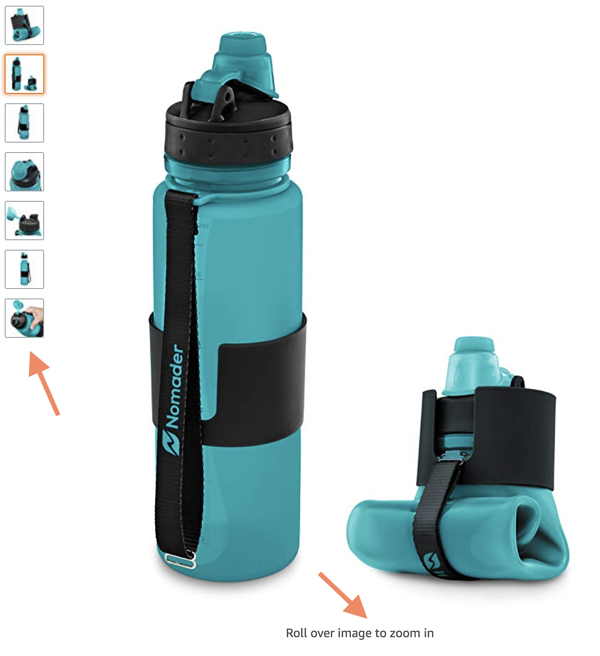
How to Optimize Your Amazon Product Pages product images

While your titles communicate your product information, consumers often use your images to decide whether or not to further explore your product page. This is especially critical on a long list of Amazon search results — the right product imagery can help your product stand out from the crowd.

Once a shopper visits your product page, however, imagery is even more important and can dictate whether a consumer makes a purchase not.

Amazon allows up to nine product images, and we recommend using all of them with a simple caveat: Only if you have nine high-quality, relevant images.

While Amazon requires your main product image needs to be on a plain, white background, here are some tips for your other eight product images:

  • Capture your product from different angles.
  • Show your product being used or worn by a real person (not a mannequin or computer-generated human).
  • Include content submitted by real customers — and make note of that on the image.
  • Upload images that include charts, lists, or competitor comparison tables.

Amazon also offers shoppers the ability to zoom into each image. As a result, your product images should be at least 1,000px x 1,000px to ensure images don’t become fuzzy or distorted when customers zoom in.

👉🏼HubSpot Tip: Test your product images to see which one converts more shoppers (like an A/B test). To do this, record your sessions, sales, conversion rate, and revenue over the course of a week or month — and make a note of which image was set as the main image. Then, change the image and capture the same data.

3. Product Key Features (Bullet Points)
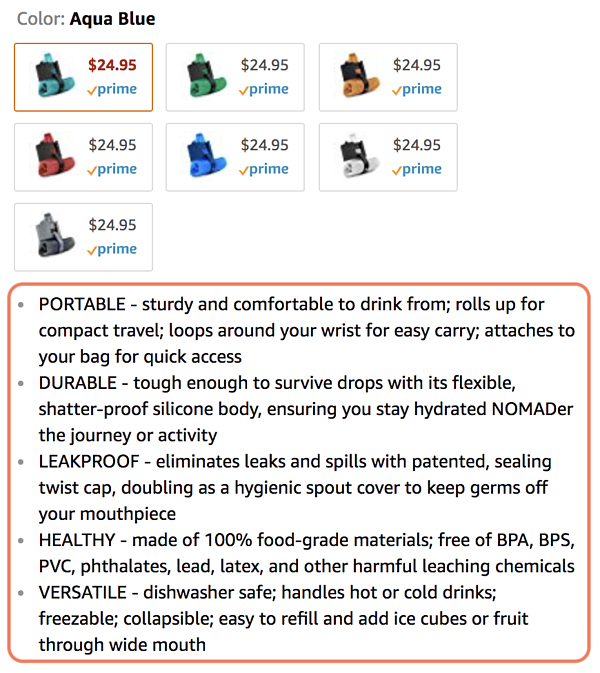
How to Optimize Your Amazon Product Pages product key features bullet points

If a consumer makes it past your product title, images, price, and purchase options (if applicable), they’ll find your product key features, which take the form of bullet points. These bullet points allow you to go more in-depth about your product’s features, benefits, characteristics, and details.

Successful Amazon sellers use these bullet points to expand on features and benefits and to address common questions, misconceptions, or issues.

Here’s how we recommend you approach your product key features list:

  • Write a paragraph for each bullet and include two to four sentences or phrases that are relevant to that bullet’s topic.
  • Capitalize the first few words of each bullet to emphasize the feature, benefit, or question you’re addressing.
  • Treat these paragraphs as you would an advertising campaign. This copy could be the key to converting page visitors.
  • Avoid wasting space on information that’s obvious from product images or mentioned in your product title.
  • Keep them simple. Write a paragraph and then edit it, set it aside for a few days and then edit again. Short and to the point is the goal.

👉🏼HubSpot Tip: Look at reviews, complaints, and FAQs to learn what your customers love and not-so-love about your products. Proactively include and address these points in your list.

4. Product Description
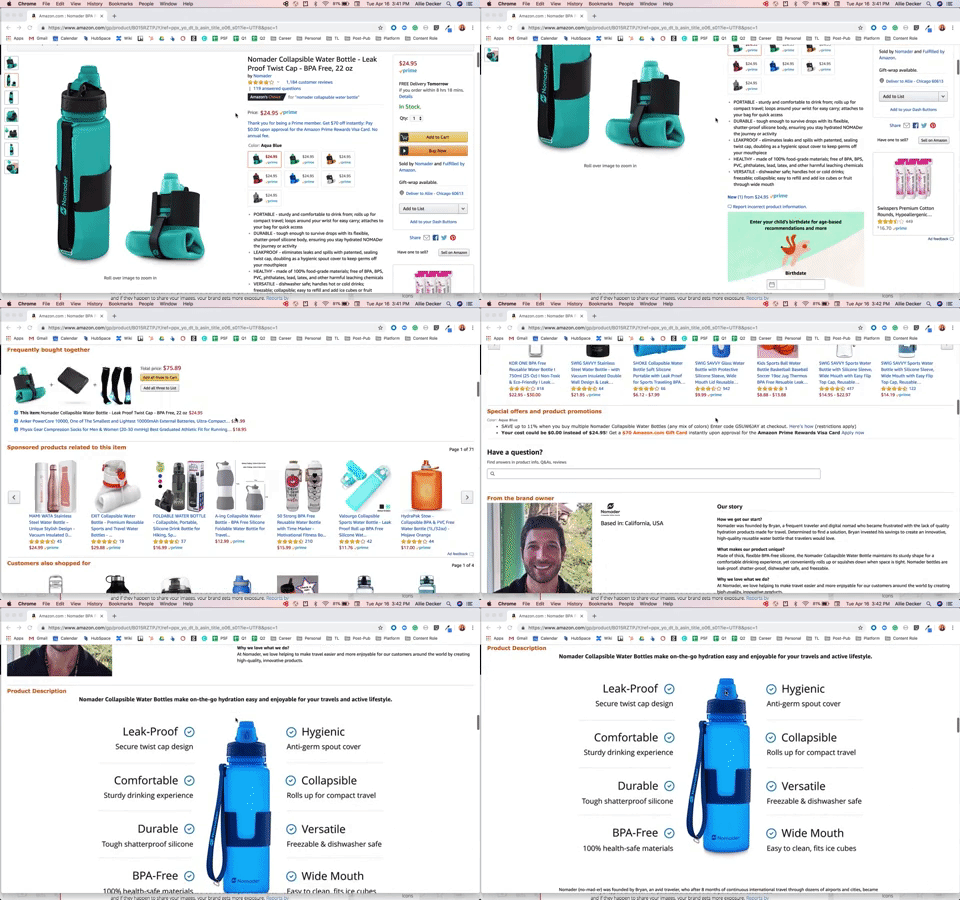
How to Optimize Your Amazon Product Pages product description

If a consumer makes it to your product description, you can assume they’re on the cusp of making a purchase. How do we know that? Consumers have to scroll down a bit to find it.

Seriously. They have to scroll past Amazon ads, sponsored products, and other featured information. If they make it to your product description, they’re typically expecting to learn more about your product and finalize their purchase.

This makes your product description the ideal place to expand on your product bullet points, address some lesser-known features and benefits, and perhaps include some more images of your product. Additionally, consider listing details that set your product apart from competitors, such as specific construction methods, particular materials or interesting use cases.

Amazon allows the use of basic HTML markup in this section — including bold, italics, and page breaks — so utilize these to avoid publishing one big, boring paragraph of information.

👉🏼HubSpot Tip: Utilize Amazon’s A+Content option to make your content more scannable, professional, and consistent with your overall branding. We cover how to do this next.

5. Product Price

Setting the right price is critical for reliable sales conversions.

Start by determining your lowest possible sales price. This is effectively a “breakeven” price that includes the costs to produce your product along with money spent on marketing and any fees taken by Amazon — which vary depending on the type of item you’re selling, often between 8-20%.

For example, if these costs together total $10, this is your minimum price. You won’t make any money, but you won’t go out of business. While this can be a good starting point if you’re just breaking into the Amazon marketplace, your goal is to eventually sell products for as much as the market will bear.

To find your upper limit price point, do some research on similar, popular products on Amazon and see what they’re selling for. Next, determine how you want to position your brand — are you looking to lead the lower-cost market, or hoping to capture premium prices. Both are possible but require different approaches.

If you’re looking for premium prices, opt for whole numbers such as $50 or $100. For a lower-cost approach, go with a “99 cent” approach, such as $9.99 or $29.99.

6. Amazon A+ Content

The A+ framework provides pre-built templates that allow you to add additional features to your product descriptions, such as banners, tables, bullets, and interactive images and copy.
Amazon A+ Content

Source

The image above is the “Comparison Products” template, which is one of the most popular and functional templates for A+ Content. It’s now available via both Vendor and Seller Central and offers a great way to visually showcase how your product stacks up against the competition.

Factors that Can Increase Your Amazon Product Sales

1. Direct Marketing

A lot of Amazon marketing takes place within the platform (through advertising and SEO) but some sellers follow traditional direct marketing methods, too. While they require extra work, they can be beneficial for creating loyal customers and eventually bringing business off of Amazon to an ecommerce site, or driving users from social media sites to your Amazon account.

Direct marketing methods skip the middleman to present information about your brand directly to prospective customers. This includes the use of emails, text messages, phone calls, sales offers or newsletters.

Note: Be sure to read through Amazon’s prohibited seller activities and actions to ensure you remain compliant. The biggest takeaway? All direct marketing efforts must be done with the informed consent of customers — unsolicited contacts could place your brand at risk of removal from the Amazon marketplace.

2. Email

Follow-up emails are a great way to engage with customers and get feedback that could help make your brand even better. Start by asking buyers if they consent to email contacts or surveys after their product purchase.

If yes, make sure to take their feedback to heart, both by responding to their emails with a thank you and correlating their response with other emails to see if a pattern emerges around product price, quality or another characteristic.

👉🏼HubSpot Tip: If you decide to do email marketing for your Amazon products, don’t forget to ask subscribers if they want to opt-in!

3. Website

Amazon offers a well-recognized starting point for your brand, but many sellers are also branching out into brick-and-mortar stores or more niche marketplaces such as Etsy.

While Amazon can help you be discovered and subsidize your shipping and customer support cost, creating a separate website can help build your brand beyond Amazon and aggregate customers and email subscribers of your own.

👉🏼HubSpot Tip: If you have no interest in building and managing an entire website, create a simple landing page to start. This will at least give your brand an online identity outside of your Amazon store and provide another place to collect emails and promote your social media.

4. Shipping

One of the biggest draws of Amazon is fast, free shipping for Prime members. If you’re looking to compete in this massive marketplace, you’ll need to consider shipping costs, speed and conditions for buyers before you set up your store.

While smaller businesses don’t have the economies of scale that allow them to offer 2-day free shipping, it’s often possible to offset the costs of shipping once order values are large enough. As a result, it’s worth doing the math to determine where it makes sense for your brand to offer free shipping for consumers — this might be $50, $100 or $150 worth of products purchased.

Best bet? Set your minimum free shipping cost just above your breakeven point using a whole number. For example, if $129 worth of products purchased makes it worth your while to offer free shipping, set the minimum amount to $150. This helps generate slightly more profit and can help convince users to add one or two more items to their cart in order to avoid shipping costs.

Understanding Amazon Analytics

Amazon analytics provides a snapshot of what consumers are searching for, what they’re buying and how often they’re purchasing the same item. Called “Brand Analytics”, these metrics are available to sellers directly responsible for selling their brand in the Amazon store.

Brand analytics are found under the “Reports” tab in Seller Central.

Brand Analytics, Explained

There are six brand analytics categories. Let’s break down each in more detail.

1. Amazon Search Terms Report

The Amazon Search Terms Report shows the most popular search terms in the Amazon store over a specific period and the top three products that customers click on after searching for a specific term. This can help your brand better target keyword usage over time.

2. Demographics Report

The Demographics Report provides information about buyers of your product that they’ve consented to share — including age, household income, gender and marital status. This allows you to see the impact of your marketing campaigns and adjust target consumer bases as required.

3. Item Comparison Report

This report shows the top five products most frequently viewed on the same day as your brand’s products to help you identify your top competitors and see what they’re doing differently.

4. Alternate Purchase Report

The Alternate Purchase Report shows the top five products that customers purchased most frequently instead of your products. Effective use of this report can help identify areas where your marketing strategy may be coming up short.

5. Market Basket Report

The Market Basket Report shows the top three products most frequently bought at the same time as your products. This can help your brand identify key add-on product opportunities to help bolster total sales.

6. Repeat Purchase Behavior Report

The Repeat Purchase Behavior Report shows the total number of orders for their products along with the total number of unique customers. This makes it possible to zero in on specific user characteristics that may influence repeat buying and help inform long-term marketing strategy.

You’re Now the King 👑 (or Queen) of the Jungle

While the Amazon platform seems daunting, the right marketing strategy can help your brand see sustained sales success.

First, develop a solid Amazon marketing strategy. Next, make sure your product pages stand out from the crowd and ensure you’re taking take every opportunity to increase total sales. Finally, use Brand Analytics to pinpoint areas of improvement across your brand.

The result? Your Amazon products will meet consumers wherever they are — whether they’re researching products, comparing prices, or looking to buy — and help get them where they need to go: Your checkout page.

Editor’s note: This post was originally published in April 2019 and has been updated for comprehensiveness.
ecommerce planning template

Categories B2B

How to Post to Instagram From Your Computer [7 Easy Steps]

Instagram is a popular social media network for sharing photos, commonly accessed through a mobile app. Unlike other social networks, however, it does not have a desktop version.

This poses a problem for a lot of users who want to access features from their desktop computer. For example, let’s say you’re a social media manager for a prominent brand. The last thing you want to do is have an absentminded mishap where you accidentally post brand content to your personal Instagram account (or, worse, vice versa) simply because you’re logged into both on your phone.

Access Now: 22 Free Business Instagram Templates

Alternatively, it might be easier to upload company posts and videos via your desktop, rather than having your smartphone open at work.

Plus, your company’s files might be more easily accessible via desktop than mobile. For instance, if you use Photoshop to edit company photos, it’s likely easier to click “Upload” from your desktop when you’re done editing, rather than sending that same photo or video to your personal phone.

Perhaps you simply prefer the larger screen of desktop. Or, maybe you don’t have access to a smartphone so you can’t download the app on your phone.

For all of these reasons, you might be wondering, “Can I post to Instagram from my computer?” We have some good news — there’s a solution for you. Let’s dive into that, next.

In other words — Yes, you can post to Instagram from your PC or Mac desktop instead of on your mobile device’s app or browser. In this post, we’ll explore how you can post images and videos from your desktop computer.

How do I post to Instagram from my computer? [PC and Mac]

Whether you’re on a Mac or a PC, you can use workarounds to post from your desktop computer. Depending on the browser you use, the instructions will vary. Below, we’ll discuss how to do it on:

Once we discuss these workarounds for posting photos, we’ll also discuss how to upload a video to Instagram from your desktop.

1. Navigate to Instagram’s website in your Chrome browser.

The first thing you’ll want to do is open up Google Chrome and navigate to https://www.instagram.com/ by typing it into the navigation bar. 

2. Open the “Settings” menu by clicking the three dots in the top right corner of the browser.

click on settings in chrome browser

Instagram Account Credit: @Goodtomicha

Up in the top menu on the far right side, you’ll find three verticle dots. Once you click these, a drop-down menu will open up.

3. Scroll down to “More Tools” in the drop-down menu, and then click “Developer Tools”.

find developer tools on google chrome

Developer Tools gives you access to a menu that opens up in a panel on the right side of your window. This will give you advanced control over how your browser displays content, helping you post to Instagram from desktop using Chrome.

4. Click the “Toggle Device Toolbar” mobile button.

clicking on mobile toggle to change the desktop version to mobile instagram

On the top left corner of the new panel, you’ll see an icon with two squares that represent a tablet and a mobile device. Clicking it will reveal the Device Toolbar that gives you advanced control over your browser.

5. Choose which mobile device you’d like from the drop-down menu.

changing responsive design on desktop so it resembles instagram on mobile copy

In the Device Toolbar, you’ll see another drop-down menu with a list of mobile devices. Selecting one will tell the browser to emulate how a website looks on that particular device you selected. 

Choose which mobile device you’d like on the drop-down menu, as well as how zoomed in you want to be.

6. Refresh the page to see the mobile interface of Instagram from your browser.

You should then be able to able to use Instagram straight from the emulation or even close the panel on the right side while retaining this “mobile view.”

7. Upload an Instagram post the same way you would via mobile.

You can upload a Instagram post the same way you would via mobile:

1. Click the “+” button.

clicking add post on desktop

2. Add filters.

Choose filters or other editing features like you would normally, then click Next in the top right of your screen:

instagram filters on desktop

4. Add captions, locations, and tags.

On the next screen, you’ll be able to add a caption, location, or tag people. When you’re ready, click Share in the top right of your screen.

typing a caption on my instagram post on desktop copy

1. Navigate to Instagram’s website in your Safari browser.

The first thing you’ll want to do is open up Safari and navigate to https://www.instagram.com/ by typing it into the navigation bar. 

2. Click “Safari” and then select “Preferences” in the menu bar.

safari prefences drop-down menu

Up in the top menu, click Safari. This is where you’ll find your browser’s “Preferences” settings in the drop-down menu.

3. Click “Advanced” and check the box that reads “Show develop menu in menu bar”.

advanced menu in safari

Under “Advanced,” you’ll have the options to show the Develop menu in the menu bar. By checking this box, you’ll get access to a menu that will give you advanced control over how your browser displays content. This will help you post to Instagram from desktop using Safari.

4. Click “Develop” in your menu bar and then scroll to “User Agent”. 

click develop in menu bar, scroll to user agent in safari

Once you click out of the previous screen and return to Safari, you’ll see that new Develop option in the top menu bar. Clicking it will reveal the features that give you advanced control over your browser.

5. Choose which mobile device you’d like on the drop-down menu.

When you select User Agentfrom the Develop menu, you’ll see another drop-down menu with a list of mobile devices. Selecting one will tell the browser to emulate how a website looks on that particular device you selected.

Choose which mobile device you’d like on the drop-down menu.

6. Refresh the page to see the mobile interface of Instagram from your browser.

posting on instagram using safari browser

You should then be able to able to use Instagram straight from the emulation while retaining this “mobile view.”

7. Upload an Instagram post the same way you would via mobile.

Once you are able to view Instagram from your Safari browser, you can upload an Instagram post the same way you would via mobile — by clicking the “+” button, adding a filter or editing the photo, adding a location and caption, and clicking “Share” when you’re ready for your post to go live.

(The instructions for posting an image to Instagram are the same as they are for the Chrome browser instructions, listed above.)

How to Post a Video to Instagram Using a Desktop Computer

To upload a video to Instagram from your desktop, you’ll need to use a third-party service that offers social media scheduling software.

There are a few you might try, including the Flume App for Mac or Lately Social ($14 per user per month for Agency plan).

For our purposes, I used Lately Social’s free personal plan to upload and post a video directly to my Instagram:

lately social tool dashboard

Of course, if you’re doing this regularly it might be worthwhile to explore all the social media scheduling tools at your disposal to choose the one best-suited for your business’ needs.

Using Instagram Like the Pro You Are

Now that you don’t have to worry about transferring photos to your mobile device or juggling your work’s social media account on your own device, you’ll be able to grow on Instagram efficiently and effectively. From there, the sky is the limit for creating posts and growing your audience in a scalable way.

Editor’s note: This post was originally published in October 2020 and has been updated for comprehensiveness.

New Call-to-action

Categories B2B

The Ultimate List of Instagram Stats [2021]

With more than 1 billion active monthly users, brands are quickly recognizing the need to have a presence on Instagram.

But, as with any social network, the brands that are getting the most out of Instagram are the ones who are smart about what they post, when they post, how often they post, and whom they’re targeting.

But how do they know what’s a “smart” post for their business?

That’s where the Instagram data comes in. There’s a whole lot of research out there about Instagram — everything from the demographics of its users and how often brands are posting, to how negative space affects the performance of your posts (hint, hint: #26).

Read on to uncover more social media stats that’ll help you get ideas and improve your own Instagram posting strategy.

New Data: Instagram Engagement Report [2021 Version]

43 Instagram Stats

Click on a category below to jump to the stats for that category:

  1. Instagram’s Growth
  2. Audience & Demographics
  3. Brand Adoption
  4. Instagram Post Content
  5. Instagram Posting Strategy

Instagram’s Growth

1. As of May 2021, there are over 1 billion Instagram monthly active users worldwide. (Source)

2. As of 2020, there’s an estimated 107 million Instagram users in the U.S. alone — which is predicted to grow to almost 126 million by 2023.(Source)

3. As of February 2021, 40% of U.S. adults say they’ve used Instagram. This is a larger percentage than use Pinterest, LinkedIn, and Twitter. The only two social media apps more popular than Instagram are Facebook and YouTube. (Source)

4. Instagram generated $20 billion in ad revenue in 2019. In 2012, Facebook bought Instagram for one billion. (Source)

instagram is most popular social platform for following brands.

5. Instagram experienced a nearly 14% jump between 2019 and 2020 in its users’ time spent on the app, to an average of 30 minutes per day. This was higher engagement growth than all other social platforms. (Source)

6. Other than Instagram’s own account, the most-followed Instagram account as of February 2021 is run by professional soccer player Cristiano Ronaldo, followed by celebrities Ariana Grande, Dwayne (The Rock) Johnson, and Kylie Jenner. (Source)

Audience & Demographics

7. 71% of U.S. adults between 18-29 use Instagram, compared to 70% on Facebook and 30% on LinkedIn. (Source)

8. 47% of U.S. Instagram users make more than 75,000 per year.(Source)

9. As of October 2020, 510 million Instagram users are female, and 490 million are male. (Source)

10. 72% of teens use Instagram, and 57 million U.S. teenagers say Instagram is their preferred social media platform. (Source)

11. 500 million+ accounts use Instagram Stories every day. (Source)

12. 35% of music listeners in the U.S. who follow artists on Facebook and Instagram do so to connect with other fans or feel like part of a community. (Source)

On instagram, photos showing faces get more likes.

13. The average Instagram user spends 30 minutes a day on the app.(Source)

14. 45% of Instagram users live in urban areas. (Source)

15. As of January 2021, the countries with the most Instagram users are the U.S. (140 million), India (140 million), and Brazil (99 million). (Source)

Brand Adoption

16. 70% of shopping enthusiasts turn to Instagram for product discovery. (Source)

17. 69% of US marketers plan to spend most of their influencer budget on Instagram. (Source)

18. 90% of people on Instagram follow at least one business. (Source)

19. 50% are more interested in a brand when they see ads for it on Instagram. (Source)

130 million instagram accounts tap on shopping posts to buy products.

20. In a 2021 report, the higher education industry currently has the highest engagement rate of any other industry per post on Instagram, at 3.19%. Second was sports teams at 1.79%, and third was influencers at 1.42%. (Source)

21. 67% of users surveyed have ‘swiped up’ on the links of branded Stories. (Source)

22. 130 million Instagram accounts tap on a shopping post to learn more about products every month. (Source)

Instagram Post Content

23. 995 photos are uploaded on Instagram every second. (Source)

24. The median posting cadence across all industries is 4 posts per week. The median posting frequency declined by just 8% this year compared to last. (Source)

25. On Instagram, photos showing faces get 38% more Likes than photos not showing faces. (Source)

26. On Instagram, images with a high amount of negative space generate 29% more Likes than those with minimal negative space. (Source)

70% of shopping enthusiasts use instagram for product discovery.

27. On Instagram, images featuring blue as the dominant color generate 24% more Likes than images that are predominantly red. (Source)

28. This is so much so that the latest Instagram statistics show that an average Instagram post contains as many as 10.7 hashtags. (Source)

29. Image posts received 27.55% more likes than permanent video posts. (Source)

30. An average image on Instagram gets 23% more engagement than one published on Facebook. (Source)

31. The most geo-tagged city in the world is Los Angeles, California and the tagged location with the highest engagement is Coachella, California. (Source)

Instagram Posting Strategy

32. The best time to post on Instagram is Thursday between 5 a.m. and 11 a.m. in your respective time zone. (Source)

33. Posts with a tagged location result in 79% higher engagement than posts without a tagged location. (Source)

34. 20% of users surveyed post to Instagram Stories on their business account more than once a week. (Source)

35. 44% of users surveyed use Instagram Stories to promote products or services. (Source)

36. One-third of the most viewed Stories come from businesses. (Source)

69% of marketers will spend influencer budget on instagram. 37. More than 25 million businesses now use Instagram to reach and engage with audiences. (Source)

38. 69% of US marketers plan to spend most of their influencer budget on Instagram. (Source)

39. In April 2020, the number of Instagram influencers cooperating with brands who used #ad decreased by 30% compared to April 2019, and it was the lowest total since August 2019. (Source)

40. The industry that had the highest cooperation efficiency with Instagram influencers was Health Care, where influencer posts were 4.2x more efficient than brand posts. (Source)

41. Micro influencers – those with less than 100,000 followers – made up an average of 93% of all brand cooperations in 2020. (Source)

42. 46% of B2B content marketers used Instagram as an organic play in 2020. (Source)

43. Instagram is now the most popular social platform for following brands. (Source)

instagram statistics