Categories B2B

How to Write a Great Value Proposition [+Examples]

Your value proposition is the core of your competitive advantage. It clearly articulates why someone would want to buy from your company instead of a competitor.

It’s also one of the most important conversion factors (learn all about conversion best practices with this free guide). A great value proposition could be the difference between losing a sale — and closing it.

So how do you actually write a value proposition that’s strong enough to lift conversion rates and sales? In this article, you’ll learn the definition of a value proposition, what a value prop isn’t, tactics to create amazing value props, and examples of some of the best value props we’ve seen.

Ready to dive in?

→ Free Resource: 100 Mission Statement Templates & Examples

Your value proposition is a unique identifier for your business. Without it, buyers won’t have a reason to purchase what you sell. They may even patronize a competitor simply because that business communicates its value proposition clearly in its marketing materials and sales process.

While your value prop should help differentiate you from the rest of the industry, keep in mind it’s not a slogan, tagline, or mission statement. Those types of copy are important accessories to your brand, but your potential customers and employees don’t choose one business over the other solely based on these elements.

Your value proposition goes deep into the problems you want to solve for buyers, and what makes your product or service the perfect solution.

The Elements of a Value Proposition

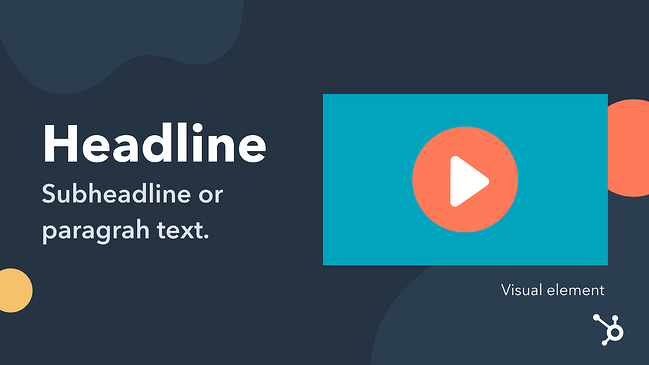
There are three main elements of a value proposition: the headline, the subheadline, and a visual element.

The elements of a value proposition

Headline

The headline of your value proposition describes the benefit the customer will receive as a result of making a purchase from your business. The headline can be creative and catchy, but it should be clear and concise first and foremost.

Subheadline or Paragraph

The subheadline or paragraph should explain in detail what your company offers, who it serves, and why. In this section, you can elaborate on the information in the headline.

Visual Element

In some cases, a video, infographic, or image may convey your value proposition better than words alone can. Enhance your message with these visual elements to capture your audience’s attention.

Step 1: Identify your customer’s main problem.

While this will require some upfront research, you can get a head start on this aspect of the value proposition by speaking with different members of your team. Customer service reps, marketing specialists, and salespeople can fill in the gaps about what problems your customers are looking to solve by using your product or service.

For example, let’s say your business sells tax software on a subscription basis and automated templates are included in the software package. Your ideal customer is looking for an affordable and user-friendly way to access complicated tax documents for their business. In this example, your business’s offerings could be the solution they need.

Step 2: Identify all the benefits your products offer.

This step can be as simple as listing out every product you sell and describing its benefit. The benefit should be concise and focused on a single customer need.

In our tax software example, you’d list each tax template, explain the benefit it provides, and why a customer would need it.

Step 3: Describe what makes these benefits valuable.

Next, add another sentence that explains why this benefit matters to the customer.

Using the same example above, the value would be that customers have affordable tax documentation at their fingertips — something that would normally cost them thousands of dollars.

Step 4: Connect this value to your buyer’s problem.

Next, pair the buyer’s problem to the elements that make your product or service valuable. Do they align? If so, you’re ready to refine your value proposition to differentiate your offerings from the competition. If they don’t align, repeat the steps above until you find a valid buyer need and a viable solution your business offers to meet that need.

Step 5: Differentiate yourself as the preferred provider of this value.

Finally, polish your value proposition to make it unique. Is there a specific customer service offering your business provides that others don’t? Do you offer any additional services that other companies charge for? These elements can help differentiate your value proposition from competitors while keeping the focus on the buyer’s needs.

1. Conduct research to determine the value proposition of your competitors.

Because your value proposition is the differentiating factor between your business and the competition, it’s important to research the propositions of your closest competitors. You can use the value proposition canvas below to determine how each company meets the needs of your buyer persona.

Be honest here — it’s tempting to focus on the areas in which your competition doesn’t excel, but you’ll have a better idea of where your product or service fits within the market if you key in on your competitors’ strengths.

2. Explain the value of your products and services.

You’re probably familiar with outlining the features and benefits of your product and service offerings. This tactic takes that concept a step further. By matching the benefits of your offerings to specific values that your customers have, you’ll be able to align what your business provides with what your customers need.

3. Describe the benefits your ideal customer will experience when they choose your product or service over the competition.

When crafting this part of your value proposition, include details about how your product or service will benefit the customer and use examples where you can. Videos, photos, and live demonstrations are all effective ways to illustrate your value proposition because they show the customer exactly what they can expect from your business.

4. Develop a unique value proposition for each buyer persona you serve.

Ideally, you’ll be focusing your marketing efforts on a specific target audience. You’ll also find that this audience will have different needs based on their buying behaviors. Buyer personas can help you segment your larger audience into groups of customers with similar desires, goals, pain points, and buying behaviors. As a result, you’ll need a unique value proposition for each persona. Different products and services you offer may solve certain customer pain points better than others, so developing a value proposition for each persona will better serve each one.

5. Test your value proposition with your audience using various marketing channels.

Each of these tactics will likely be developed internally by your team which means you’ll want to validate your work with your target audience. Your value proposition will be communicated through various marketing channels like your website, social media accounts, video, audio, and in person. Test your proposition with members of your audience (both existing customers and non-customers) using each of these channels. Tools like UserTesting can help you streamline this feedback process so that you can implement changes quickly to finalize your value proposition.

What makes a good value proposition?

Clear Language

Your value proposition should aim to address a primary customer need. This limited focus helps keep your value proposition clear and easy to understand. With just one main idea to comprehend, your audience will be able to quickly decide whether or not your product or service will be the best solution for them.

Specific Outcomes

Next, you’ll want to communicate the specific outcomes your customer can expect to receive from your product or service. Will they save time? Demonstrate how. Will their workflow become more manageable? Show a before and after workflow diagram. The specific outcomes will be critical components of your value proposition as they’ll exemplify exactly how your customers will use your solution to solve their problems.

Points of Differentiation

Not only are your potential customers evaluating your business’s offerings based on their own needs, but they’re also comparing what you offer against competitors. As a result, your value proposition will need to include detailed points of differentiation. These key points will help customers understand exactly what sets your company apart.

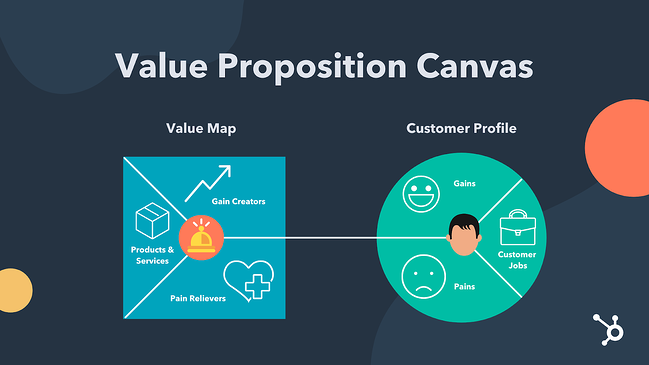
The value proposition canvas is made up of two major components: the customer profile and the value map.

Value Proposition Canvas Visual

Customer Profile

The customer profile makes up the first half of the value proposition canvas. When performing this exercise you’ll want to start with this section first so that their wants and needs can influence the overall value proposition canvas.

The customer profile consists of three areas that we’ll detail below.

Customer Jobs

What is the task your customer needs to complete or the problem they’re trying to solve with your product or service? The answer to this question sums up the “customer job” or the purpose of your product or service in the eyes of the customer.

Gains

No matter what you sell, your ideal customer will have an expectation of what that product or service will do for them. In this section, you’ll use research to explain what your customers expect from you in order to purchase your product.

Pains

As your customer completes their “customer job”, what pains do they experience? Do they take any risks while they do the customer’s job? Do they experience any negative emotions? These pain points should be considered so that you include the most helpful products and services on the value map side of the value proposition canvas.

Value Map

In this section of the value proposition canvas, three specific sectors help describe what the business offers to the customer.

Gain Creators

These are features your products or services have that make the customer happy. Think creatively about the elements of happiness your customers experience. Consider their financial and social goals as well as their psychographics.

Pain Relievers

In the section above, we discussed customer pains. This section will define exactly how your business will help them overcome those pain points.

Products and services

While this section won’t list every single product or service your company offers, it should include the ones that will create the most gain and alleviate the most pains for your customers.

Determine Value Proposition-Customer Fit

Once you’ve completed the value proposition canvas exercise, the next step will be to determine how your value proposition fits with the customer profile. To do this, you’ll use a ranking process that prioritizes products and services based on how well they address the customer profile.

The Best Value Proposition Examples

Because value propositions are typically internal information and rarely stated verbatim publicly, finding a value proposition example to model yours after can be difficult. We’ve taken the liberty of using the value proposition canvas and applying it to some successful companies that have been recognized by the American Customer Satisfaction Index (ASCI).

In these examples, you’ll see real-world instances of customer gains and pains aligned with well-known products and services offered by these companies.

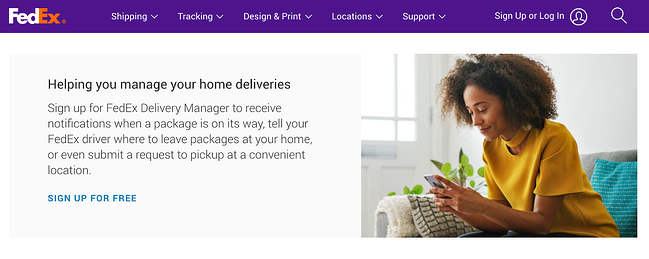
Our Take On FedEx’s Value Proposition:

Headline: Manage Your Home Deliveries

Subheadline/Paragraph: Sending and receiving packages is convenient and safe for individuals who want to ship ideas and innovations across the globe.

Visual Element:

Image Source

Customer Profile for FedEx

Customer Jobs

  • FedEx customers want to share ideas and innovations with other individuals by shipping goods around the world

Gains

  • Customers want a hassle-free way to return online orders
  • Customers are looking for a safe and secure way to receive their packages

Pains

  • Returning a package at a FedEx shipping center can be inconvenient
  • Managing home deliveries can be a hassle
 
Value Map for FedEx

Gain Creators

  • Customers can drop off their FedEx packages at the places they shop most like Walgreens and Dollar General
  • Customers will have peace of mind knowing where their package is at all times, even when they’re not home

Pain Relievers

  • Thousands of FedEx drop-off locations across the country
  • Receive notifications when a package is en route and inform the driver where to leave the package

Products & Services

  • FedEx Drop Box locations make returning packages convenient
  • FedEx Delivery Manager reroutes or reschedules deliveries to work with the customer’s schedule

Our Take On LG’s Value Proposition:

Headline: State-of-the-art Living Experience

Subheadline/Paragraph: LG SIGNATURE delivers an innovative product design that creates an exceptional living experience for people who want to achieve a state-of-the-art living experience.

Visual Element:

LG Signature value proposition example

Image Source

Customer Profile for LG

Customer Jobs

  • LG customers want simple, yet innovative technology that helps them achieve a state-of-the-art living experience

Gains

  • Customers have an intuitive and responsive experience with each appliance they interact with inside their home

Pains

  • There are too many unnecessary buttons and features on appliances that get in the way of a simple living experience
 
Value Map for lg

Gain Creators

  • Customers can use technology to enhance their home experience without needing to read a manual

Pain Relievers

  • A simple design that focuses on the user and their lifestyle

Products & Services

  • LG SIGNATURE delivers an innovative product design that creates an exceptional living experience

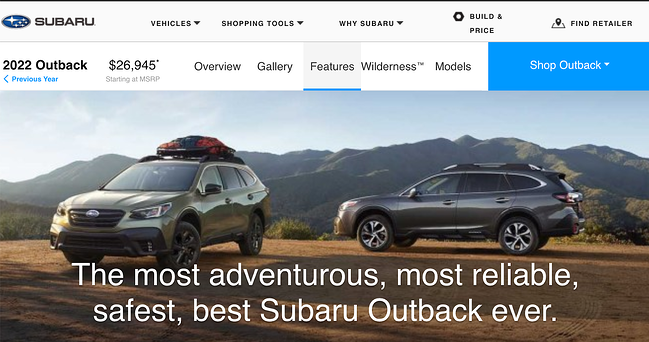
Our Take On Subaru’s Value Proposition:

Headline: The most adventurous, most reliable, safest, best Subaru Outback ever.

Subheadline/paragraph: The 2022 Subaru Outback takes drivers to the most adventurous places in style with the most advanced safety technology.

Visual element:

Image Source

Customer Profile for subaru

Customer Jobs

  • Subaru customers want to explore the world’s most adventurous places in a reliable and safe vehicle.

Gains

  • Customers want to explore the land in a stylish and spacious SUV
  • Drivers are looking for advanced technological elements in their vehicles including those that enhance performance and safety

Pains

  • The safest vehicles are not the most visually appealing
  • Some SUVs are not equipped for all-weather or all-terrain environments
 
Value Map for Subaru

Gain Creators

  • Stylish exterior and interior with ample ground clearance that protects the vehicle against damage from the environment
  • Advanced technology to reduce crashes and make long road trips safer

Pain Relievers

  • Rugged blacked-out trim for style and protection
  • 9.5-inch ground clearance for better stability and performance
  • Driver-assist technology that helps drivers see better, prevent crashes, manage cruise control, and brake automatically in emergency situations

Products & Services

  • 2022 Subaru Outback
  • Standard EyeSight Assist Technology
  • Automatic Pre-Collision Braking
  • Adaptive Cruise Control with Lane Centering

Compose a Remarkable Value Proposition

The factors that influence a potential customer to become a loyal customer are limited. Whether your industry has a lot of opportunities to differentiate (like retail) or virtually no unique identifiers (like dairy), you’ll find that a value proposition will help you understand your ideal customer and position your business as the best solution for their needs. Use the tactics, tips, framework, and examples in this post to craft your unique value proposition.

Editor’s note: This post was originally published in June 2018 and has been updated for comprehensiveness.
New Call-to-action

Categories B2B

20 of the Best Product Page Design Examples We’ve Ever Seen

If you compare how product pages take shape across different companies, it’s clear they run the gamut. Some go for the direct approach, displaying an image of a product and explaining why someone should buy it. Other companies create elaborate pages with moving parts and fancy, interactive elements.

Still, other companies create delightful product pages that give users an authentic experience as they browse through what the company has to offer.

Free Download: 77 Examples of Brilliant Web Design 

Believe it or not, the most captivating product pages don’t always have enterprise-level programming behind them. To give you an idea of what’s possible — from small business all the way up to household names — we scouted out 20 examples that we find truly admirable.

The pages below have mastered their messaging, value propositions, and general product descriptions such that these sites resonate with their unique buyer persona.

(And after checking out these pages, you might want to buy their products, too.)

20 of the Best Product Landing Page Designs

1. Bellroy

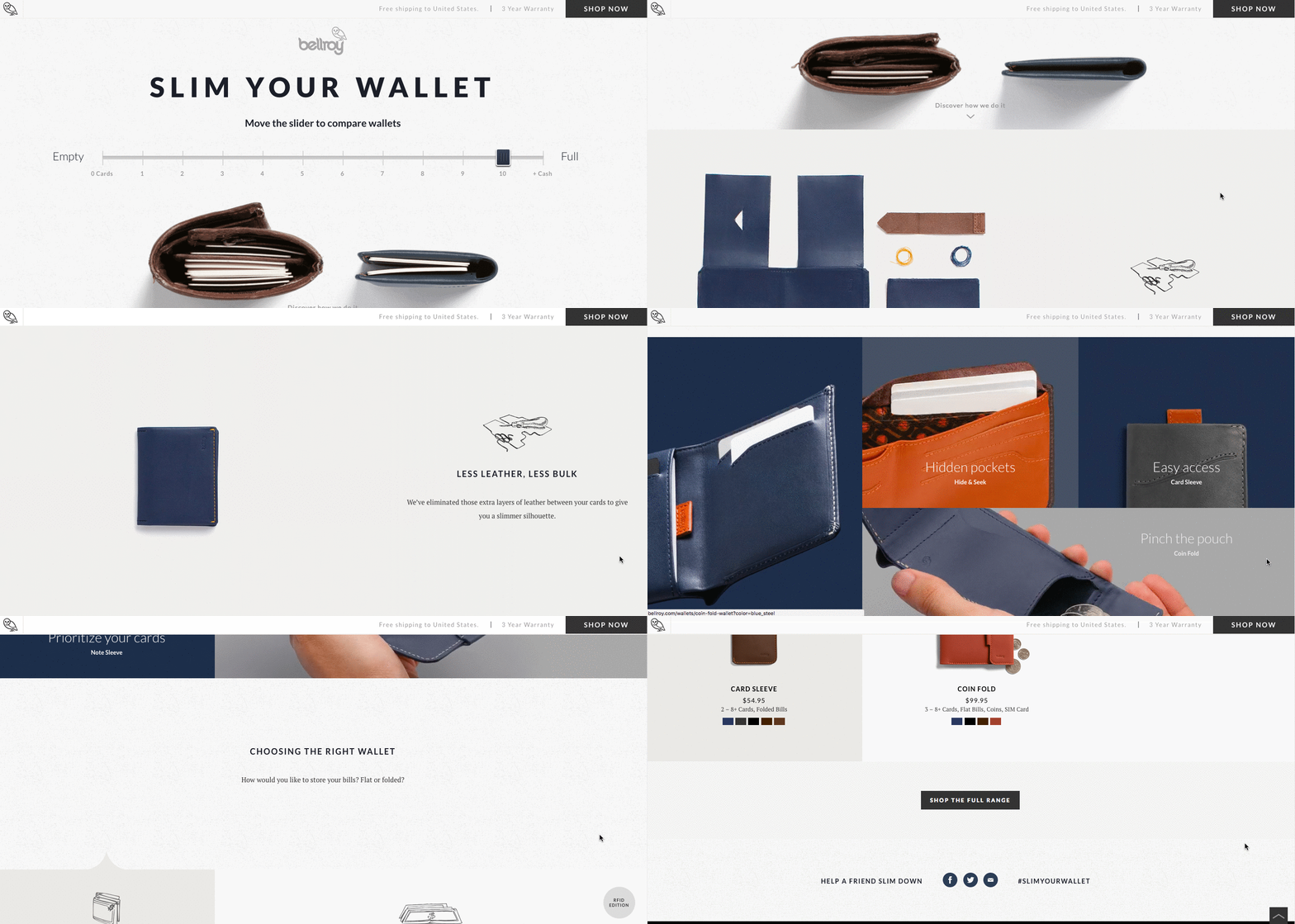
Bellroy sells thinner-than-typical wallets. There’s value to that — but what is it, and how do you get the consumer to understand it?

To answer those questions, Bellroy divided its product page into three stages of the buyer’s journey — understanding the problem, how to fix the problem, and how Bellroy can resolve the problem.

There’s even an interactive section that shows how the skinny wallet will fill up in comparison to standard wallets. As users move a slider back and forth along a line, both of the wallets fill up with cards and cash, visually displaying the very problem Bellroy’s skinny wallet solves.

 Product page of Bellroy wallets with a 'Slim Your Wallet' scale

Image Source

2. Wistia

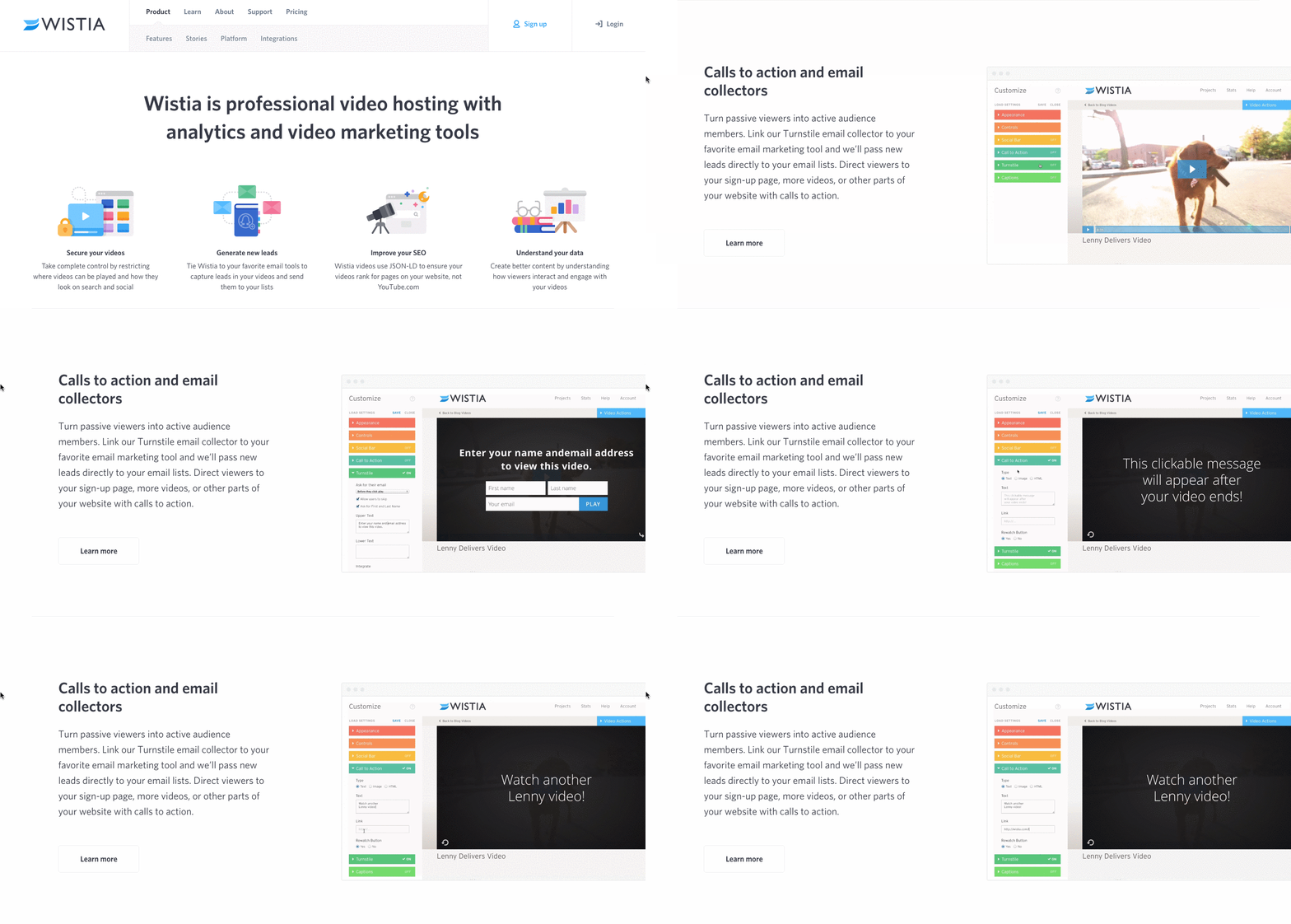
Wistia is a video hosting and analytics company that provides users with detailed video performance metrics. It might sound like a snooze-fest, but let’s dive into what really makes this product page stand out.

First, we’re presented with five, colorful graphics illustrating the tools’ value propositions. And in case that’s all the user really needed to see, those graphics are followed by two calls-to-action.

But, if you continue scrolling, you’ll see a video with information about Wistia’s capabilities for that video — calls-to-action, email collectors, video heatmaps, and viewing trends.

One of the best ways to explain a visual platform’s features is to demonstrate them on a product page. This one shows users all of Wistia’s features and how they work, day-to-day.

Product page of WistiaImage Source

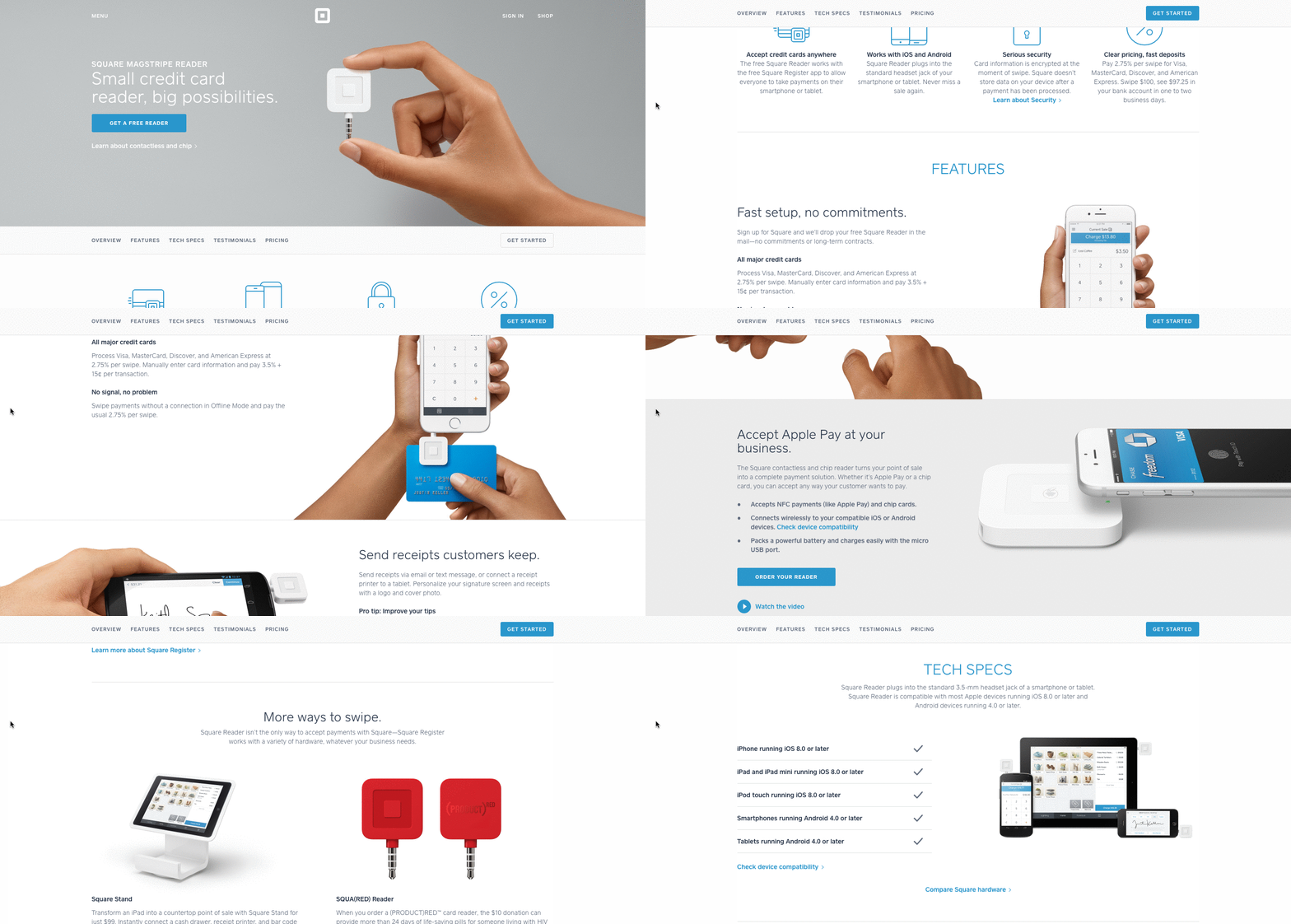
3. Square

Square is a mobile transaction company that merchants use to collect payment from customers — anywhere, any time, as long as they have a compatible phone or tablet.

The product marketing challenge here is to show why Square is an easier alternative than a typical cash register — and its product page displays those reasons in a visually captivating way.

The rest of the page is clearly organized headlines — which reads like answers to frequently asked questions — plenty of white space, succinct copy, and appropriate images. Anyone looking into each section can understand exactly how Square works at every stage of a transaction.

Product page of Square

Image Source

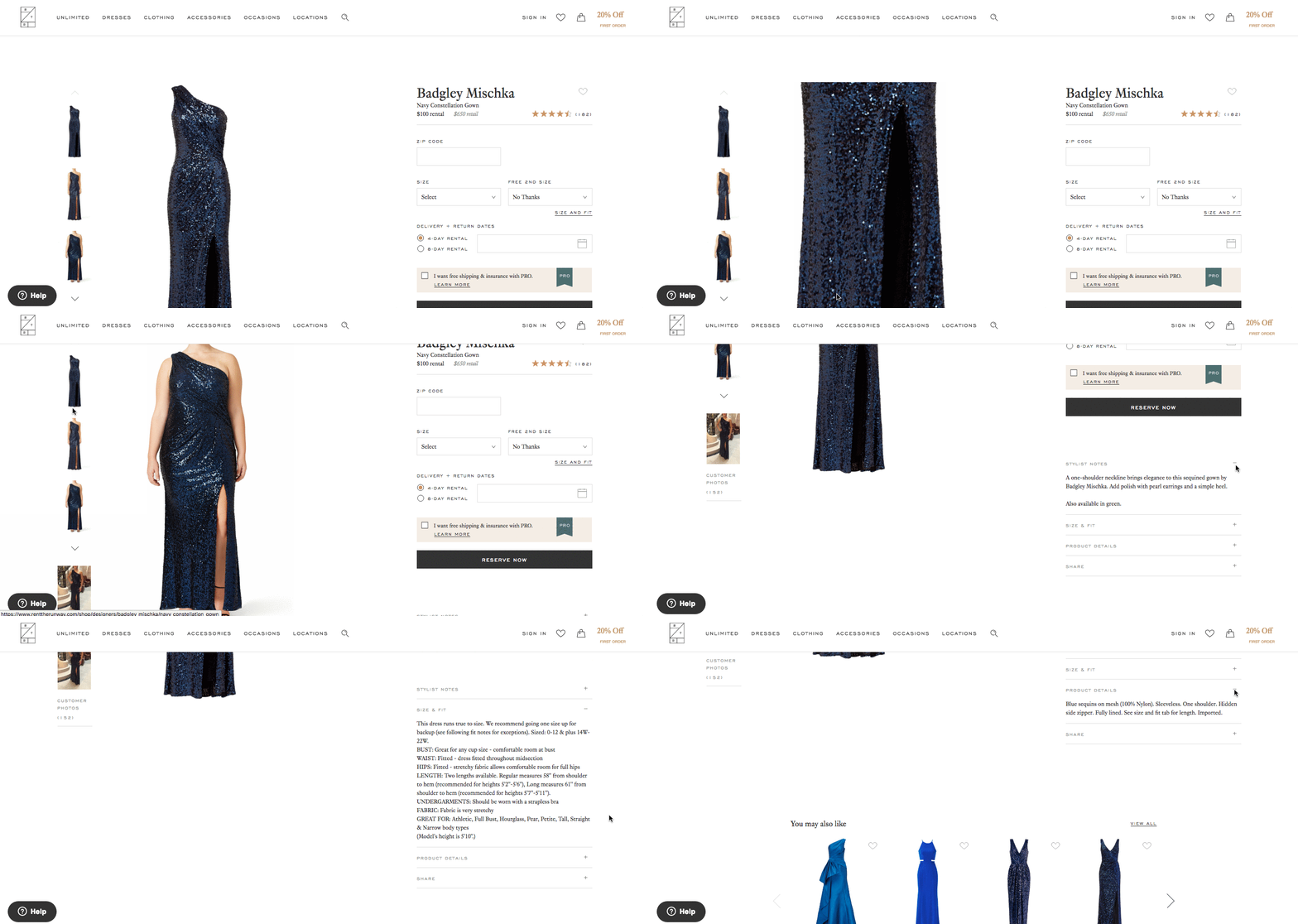
4. Rent the Runway

Some companies — especially in ecommerce — have up to thousands of product pages. Rent the Runway, an online dress rental company, is one of them.

Rent the Runway has an individual product page for every dress it carries, with all the information a customer could want — images, measurements, fabric, price, and reviews. So what sets them apart? The exceptional detail of the “Stylist Notes” and “Size & Fit” sections.

These details are clearly and carefully curated by stylists and reviewers. They don’t just explain what a dress is made of and how it looks — they cover how it fits on every part of the body, which undergarments should be worn with it, and for which body types it’s best suited. That kind of information not only delights customers and encourages their trust, but it also makes for a more confident buying decision.

Also, notice how there’s plenty of white space surrounding the product images and description. According to research by ConversionXL, that white space creates a higher perceived value — in this case, price — of the product in the user’s mind.

Product page for navy blue Badgley Mischka dress by Rent the Runway

Image Source

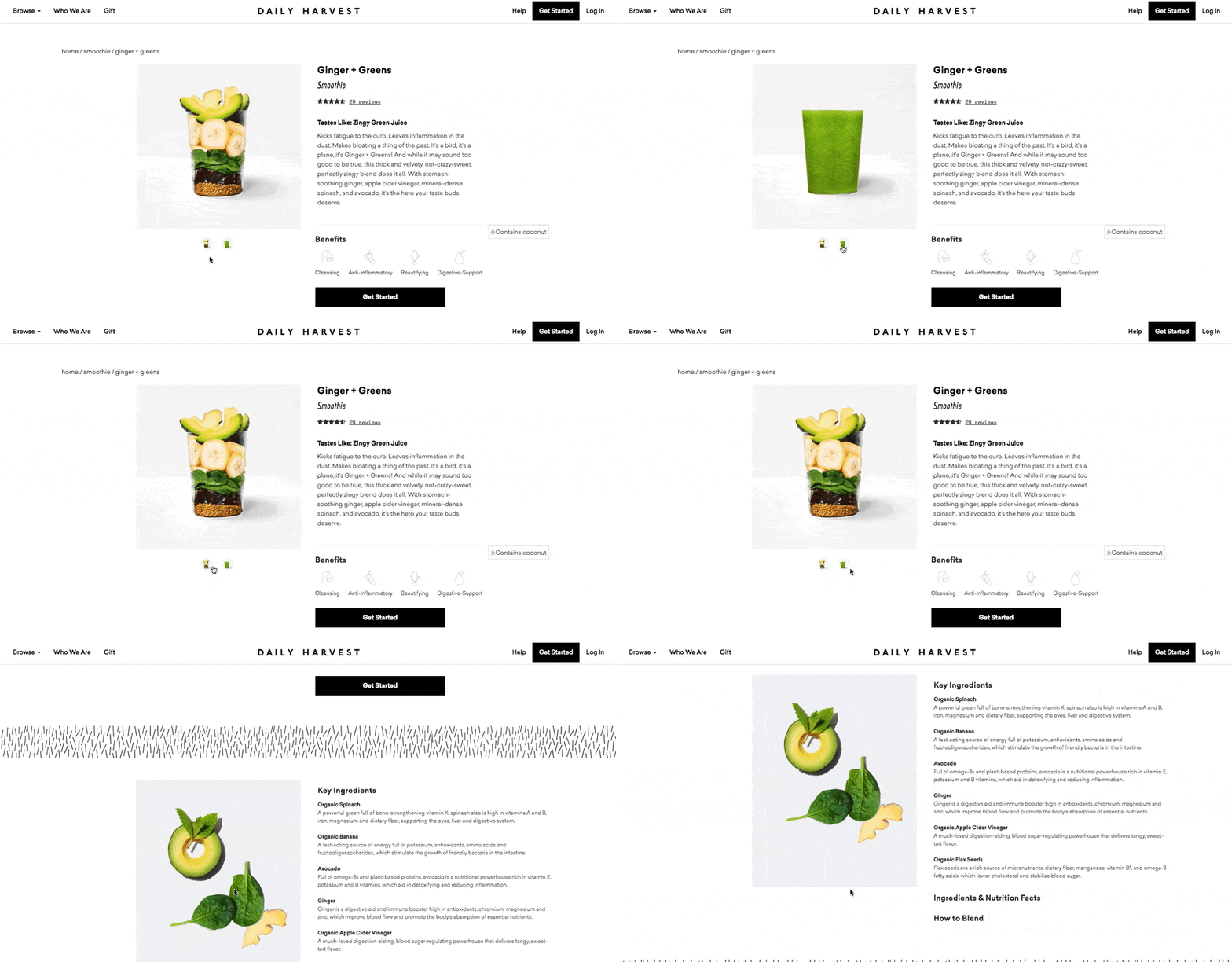
5. Daily Harvest

Daily Harvest develops superfoods in the form of smoothies, soups, and more, and delivers them to your doorstep. What makes these foods’ product pages so outstanding? They show you exactly what makes these foods so super in a format that’s both clear and digestible — no pun intended.

Check out one of Daily Harvest’s smoothie product pages, below. Not only can you see what the smoothie looks like, but hovering over the lefthand preview icon, below the main image, shows you the foods used to create this drink. Scroll down, and you’ll see each ingredient and a simple description of each one.

Product landing page for Ginger + Greens smoothie with ingredients list by Daily Harvest Image Source

6. Oreo

If you’ve seen any of Oreo’s marketing, you shouldn’t be surprised it’s on this list. But sometimes, being well known can make it harder to create a product page. So how did Oreo do it?

The focus of Oreo’s product page is how these simple, classic cookies can help people unleash their imaginations, dare to wonder, and become generally happier. It features a series of videos, one after another. One is accompanied by the lyrics, “It’s so easy to let your imagination go when you play with Oreo,” paying tribute to the age-old discussion about the “best” way to eat them. The page takes a creative, bold approach to marketing with what might otherwise be thought of as an ordinary snack.

Oreo also used a unique design for this page. Even though the cookies themselves are monochrome, the page is wonderfully colorful, from the videos, to the backgrounds, to the graphics.

oreo product page designImage Source

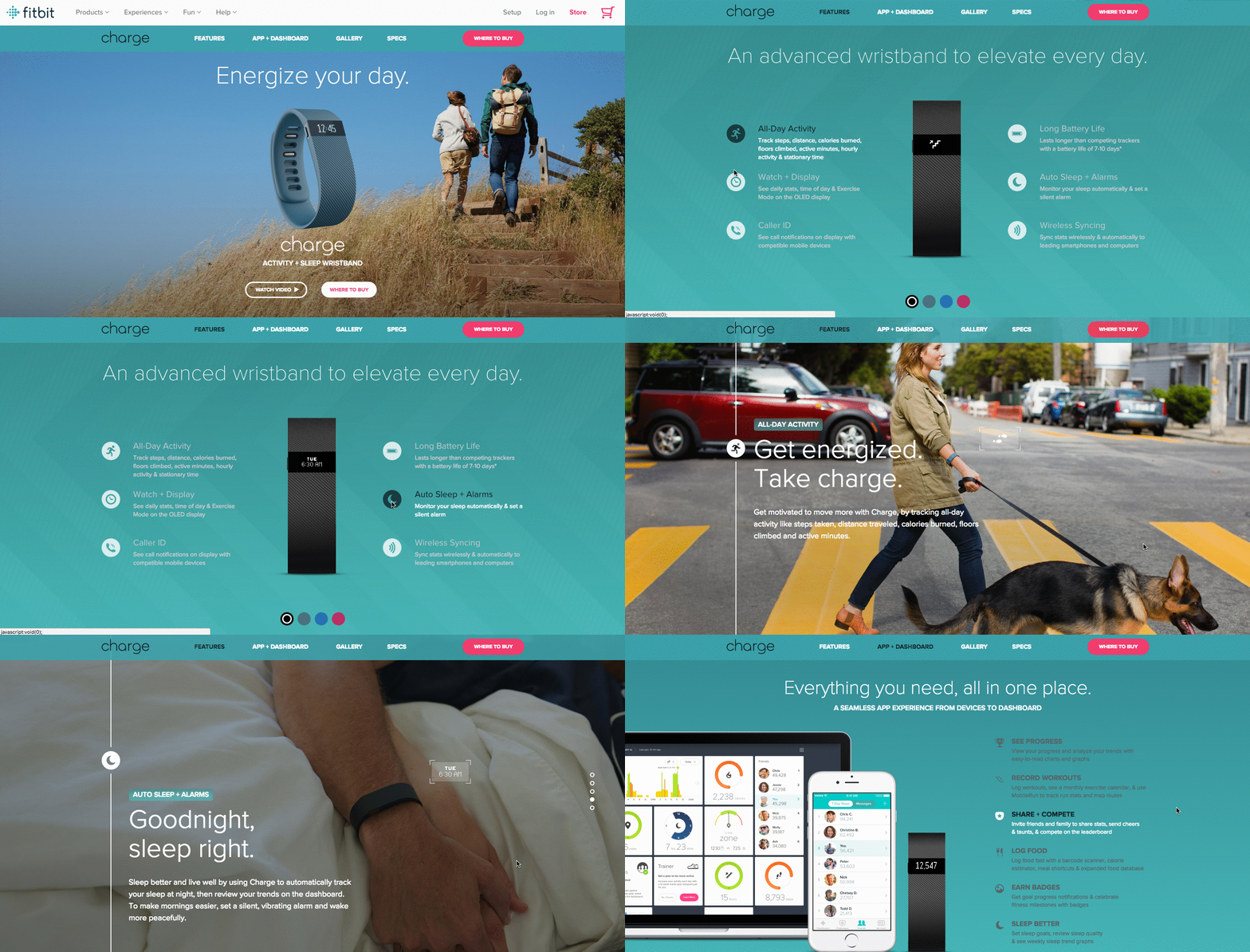
7. Fitbit Charge

When I took on this blog post, I asked a few people for their favorite product page suggestions. I was amazed how many people immediately recommended Fitbit — and after checking out the site, I can see why.

The page below helped unveil the original Fitbit Charge — now succeeded by the Fitbit 3 — and starts with a value proposition, rather than a list of features. It’s a hero image of people hiking a mountain, who we can imagine are wearing Fitbits, with the copy, “Energize your day.”

As you scroll down the page, it goes through four quick steps explaining how the product works. What’s more, a lot of these are interactive — the section under “Everything you need, all in one place” allows users to hover over different features to see how they appear on Fitbit’s mobile app.

But the page also explains why these features are valuable. For example, one tracks everything you do from walking, running, and sleeping. Why does that matter? Well, you can have your current records on hand, and try to beat them.
Knowing that users might not remember all of the specifics when they leave the page, Fitbit was sure to focus on how these features will actually make a difference in the visitors’ lives. Well played.

Teal product page for Fitbit Charge

Image Source

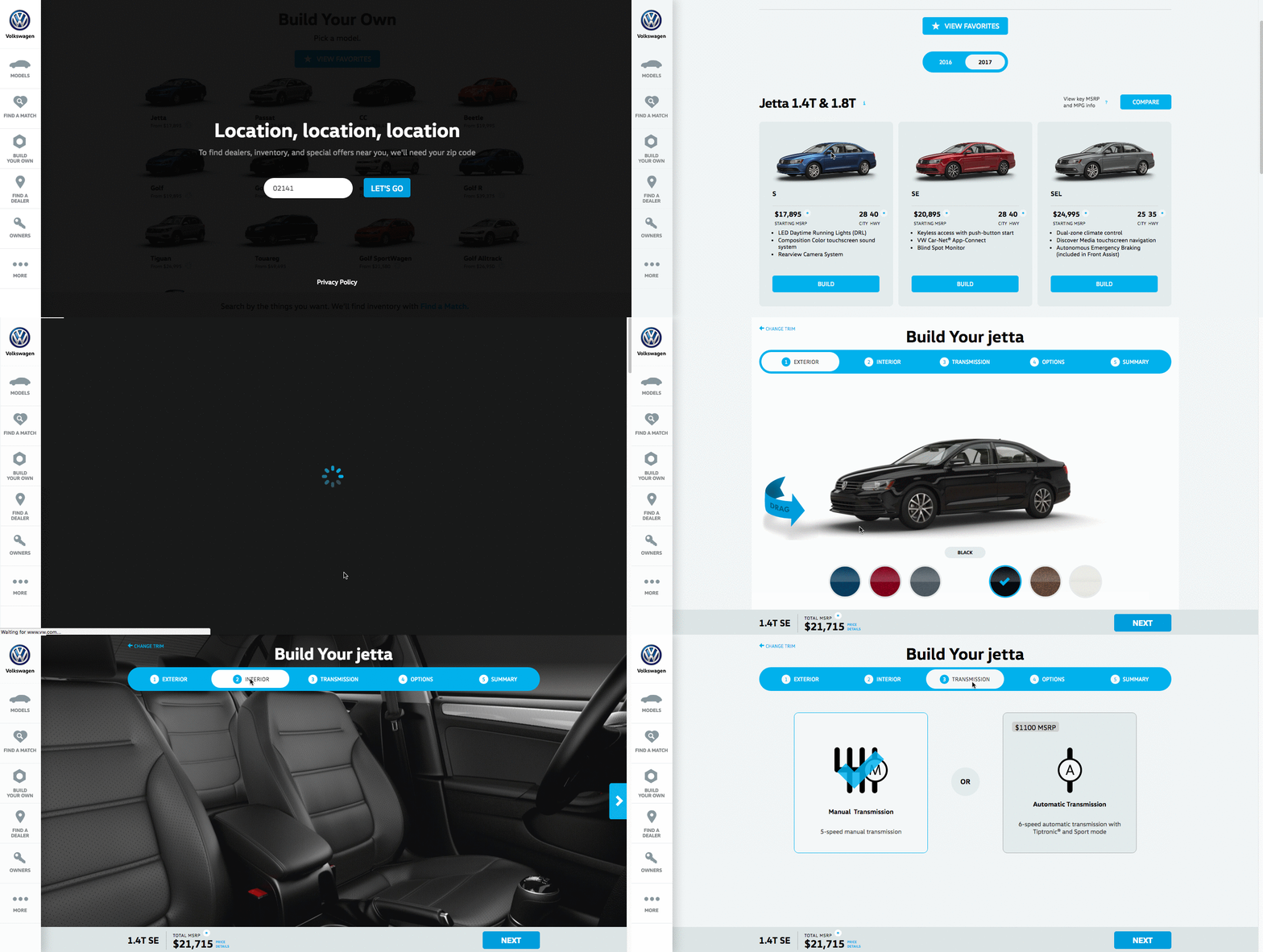
8. Volkswagen

Volkswagen takes an interactive approach to its product marketing. Instead of listing all of the features you can have in a car, the company walks you through the process of actually building your car. As you go through that process, Volkswagen highlights the different features you could choose, then gives you a preview of what the car will look like and how that will affect the price.

Even though I’m not currently in the market for a new car, I personally had fun tinkering with the different customization features on the page. What color do I want? Do I want premium audio? (Yes.) It’s an interesting way for the brand to eliminate the notorious connotations of “car salesmen,” by allowing users to learn about and select features independently.

Plus, there’s a nifty matchmaking feature that allows you to see which nearby dealerships have the car with all of your preferences in its inventory.

Build Your Jetta product page by Volkswagen

Image Source

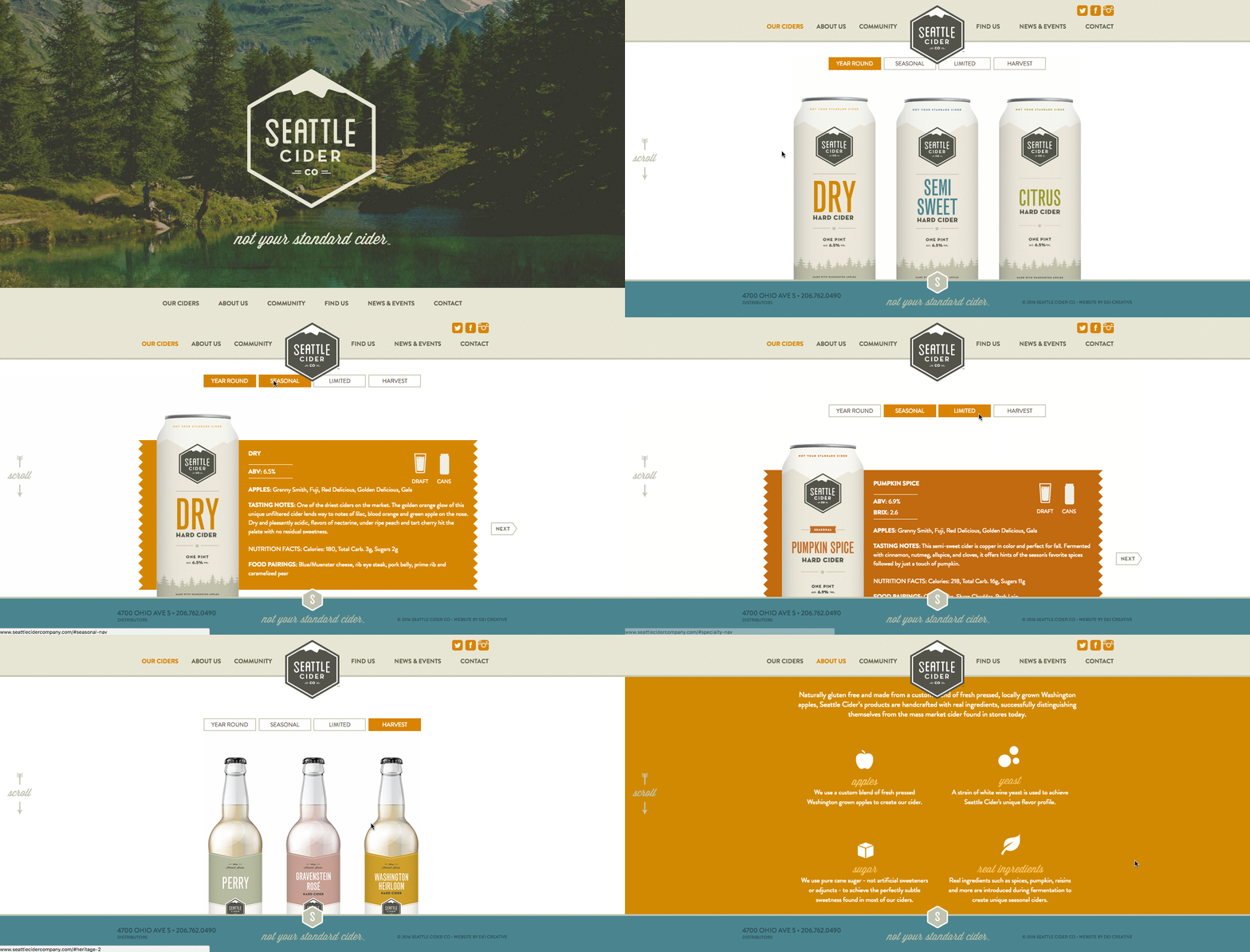
9. Seattle Cider

The folks at Seattle Cider claim its cider is “not your standard cider.” Well, neither is the product page. It reads like a story, beginning with attractive, high-definition images of the cider selection, which happen to have really cool label designs. As you hover, an explanation appears of what differentiates Seattle Cider’s products from others, and what makes each variation special.

But my favorite part is what comes next: a cool, interactive display of how cider is made from start to finish, which plays for users as they scroll. It’s a surprising and delightful user experience that goes above and beyond the typical product page because it doesn’t just display the products. It shows where they come from, and how.

Seattle Cider product page

Image Source

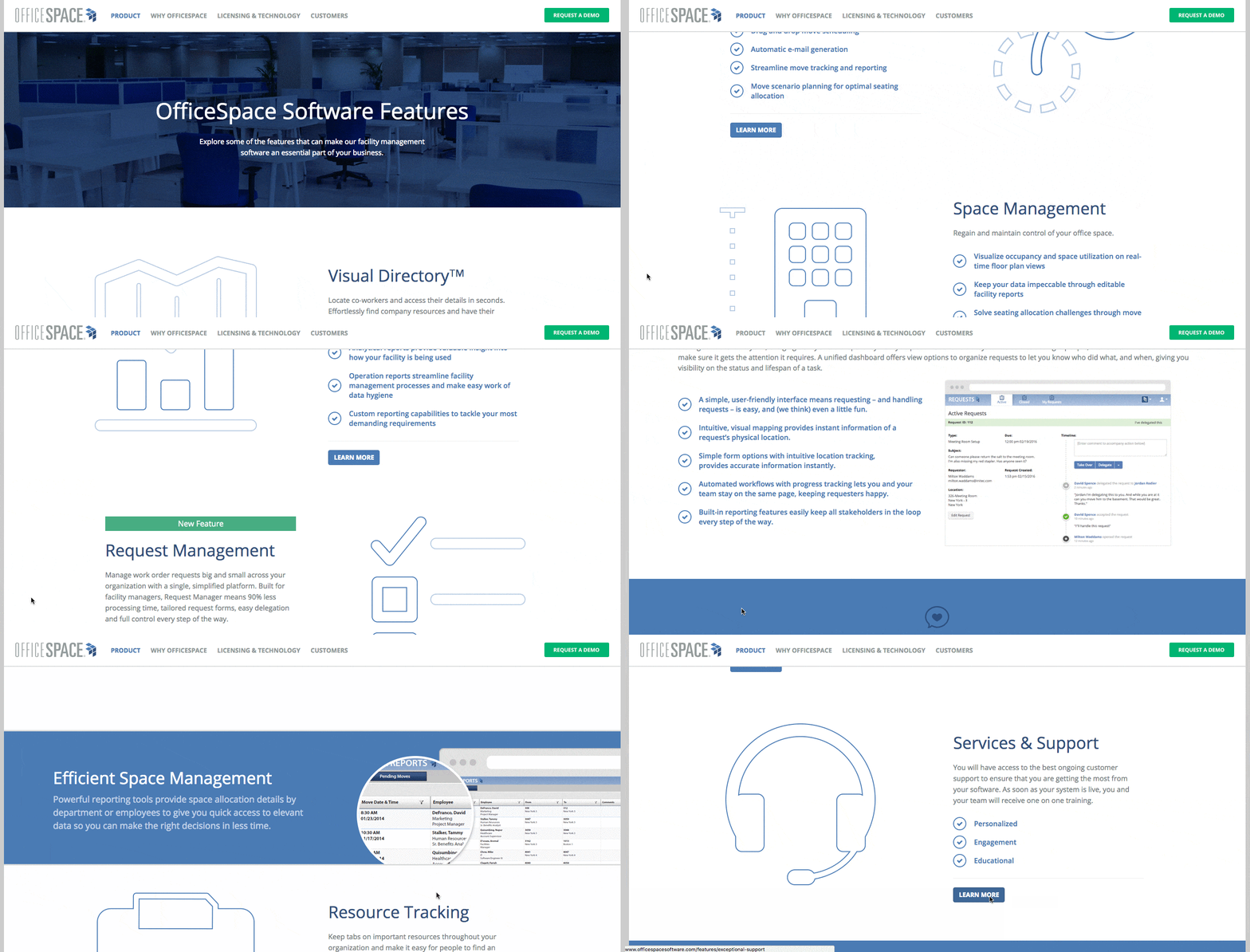
10. OfficeSpace Software

OfficeSpace sells facility management software to help folks manage, well, office spaces. Like the name, the product page is very clear and direct.

Each section of this product page is dedicated to a different feature of the software. The headline explains the feature, and the subheadline explains why this feature is important as you evaluate different software.

That makes it easy for prospects to quickly digest what the product offers, but also read more details on its value proposition — if they choose to. And, if someone wants to learn even more about a particular feature, there are clear calls-to-action to do so.

officespace product page designImage Source

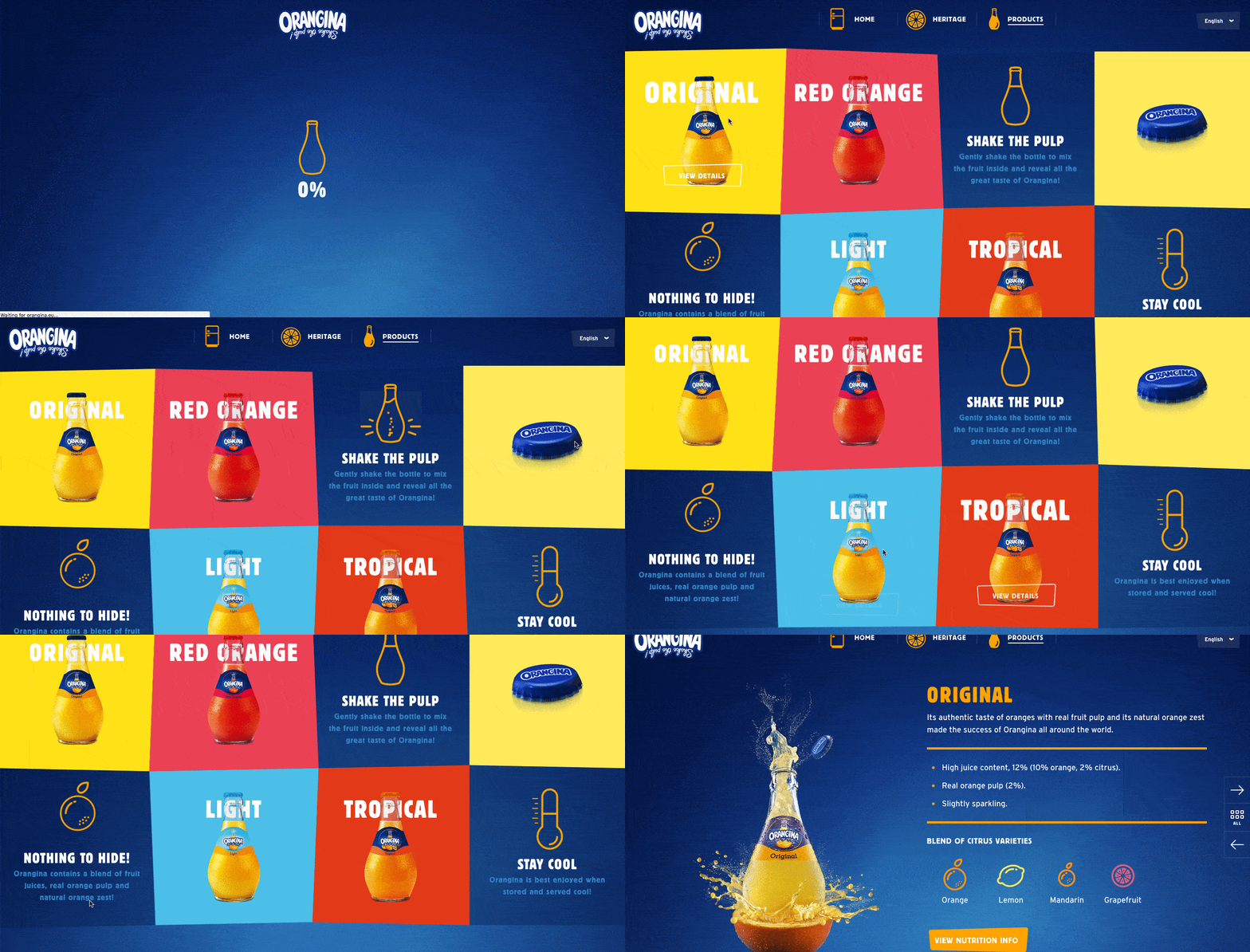
11. Orangina

This carbonated citrus drink has been around since 1935, and it has exactly four products — original, red-orange, light, and tropical. So, how does Orangina keep its product page both current and special?

For one, it’s fun to explore. When you hover your mouse over any of the blocks, the picture or icon animates — the bottles dance around, the orange slices in half, and the thermometer drops. The animated images and bold colors fit in perfectly with the Orangina brand personality.

Also, you might notice that some of the blocks are actual products, while others are simply tips and details about its products. If you don’t have a lot of products to sell, consider interspersing them with tips and information about the products you do have available.

orangina product page designImage Source

12. Mango Languages

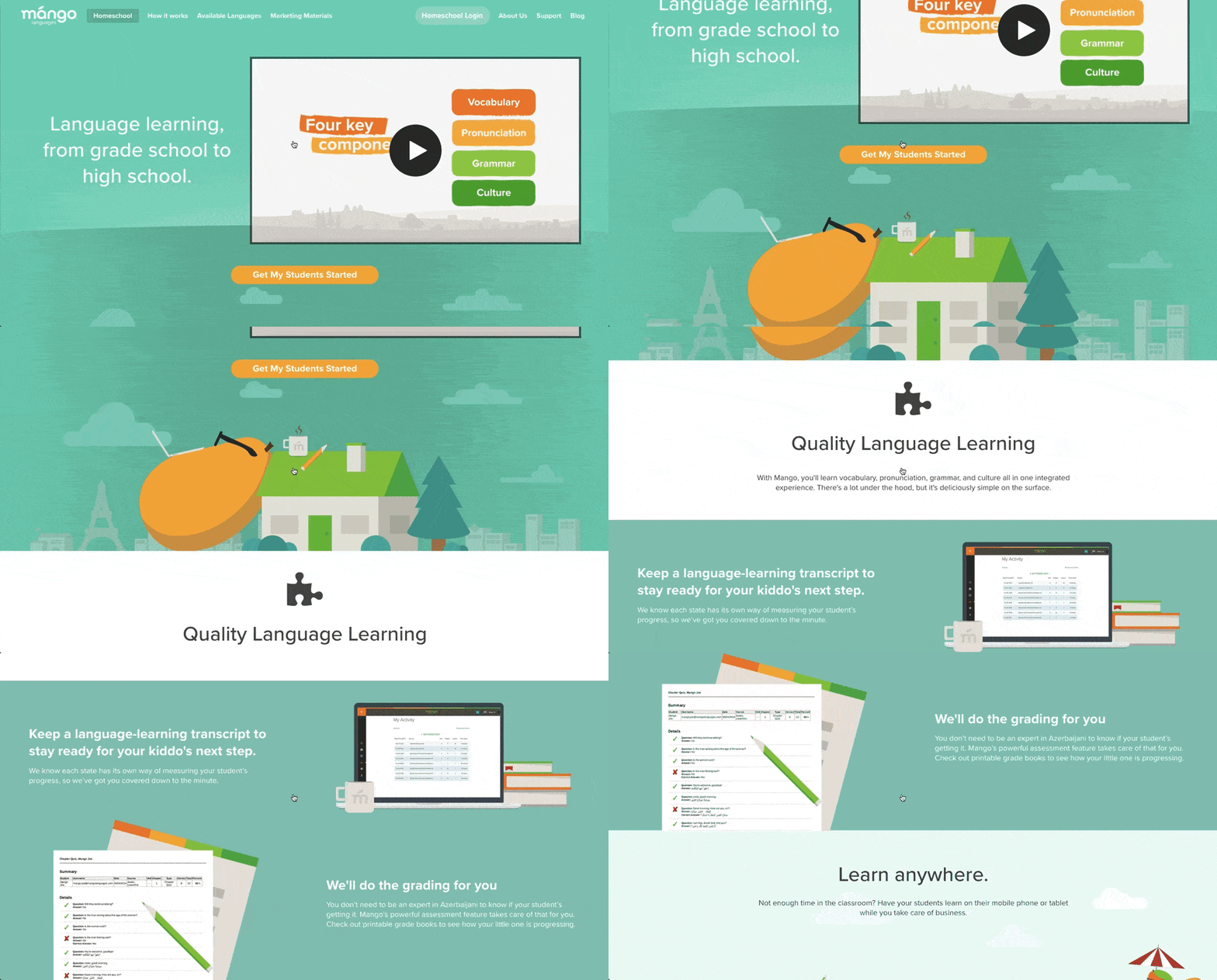
Mango Languages creates “lovable” language-learning experiences for libraries, schools, corporations, government agencies, and individuals. Its homepage has illustrated calls-to-action for each of these buyer personas — from public libraries, to government offices, to those who are homeschooling their kids. Each of those calls-to-action leads to a different product page that’s colorful, clearly written, and very comprehensive.

Take a look at the example for homeschool teachers below. Like every other part of the website, it exudes Mango’s friendly, approachable, and helpful brand personality. The video couldn’t be more delightful. I mean, a guitar-playing mango in a top hat? Yes, please.

As you scroll, you’re greeted with clear value propositions that use playful language that’s true to the brand. Everything about the page says “simple to use,” “fun,” and “effective.”

mango language product pageImage Source

13. Helix Mattresses

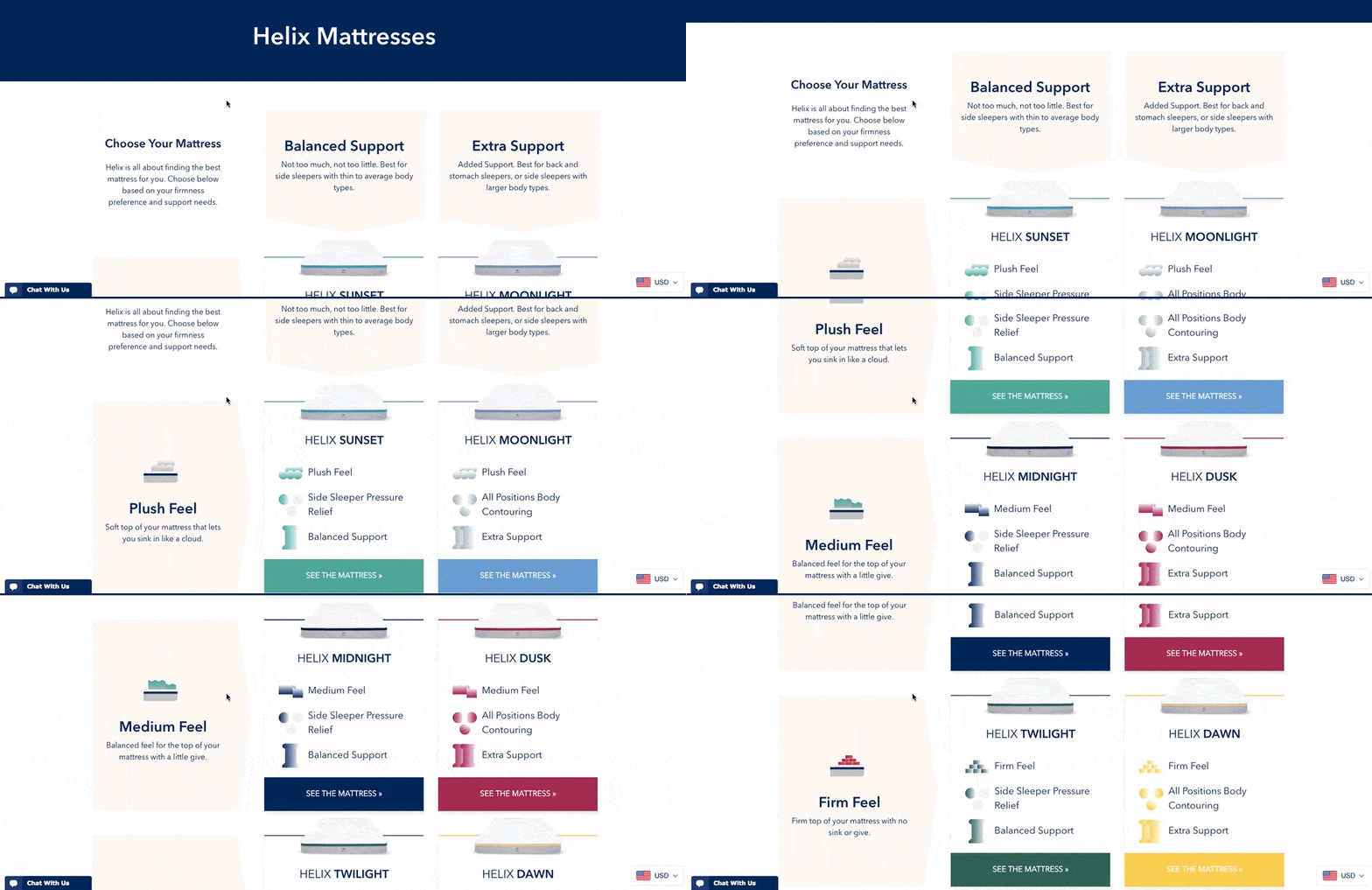
It’s one thing to sell a mattress — it’s another thing to sell a good night’s sleep. Helix Mattresses is laser-focused on the latter, having designed a product page that organizes each mattress by its level of plushness and support.

By looking at Helix’s product line in chart form, website visitors don’t have to examine each mattress individually to find the attributes they’re looking for. Simply find the row and column that matches your bedding needs, and click through to your chosen mattress’s product page to learn more.

Another reason why the Helix Mattresses product page is so effective is how it describes its products. It can be difficult to know what “plush,” “firm,” or “supportive,” really mean in a mattress — they all seem so subjective. For that reason, Helix is all about brevity in its product descriptions, using evocative explanations of each category a mattress might belong to.

“Plush Feel: Soft top of your mattress that lets you sink in like a cloud.”

“Balanced Support: Not too much, not too little. Best for side sleepers with thin to average body types.”

“Firm feel: Firm top of your mattress with no sink or give.”

helix-mattresses-product-landing-page Image Source

14. Minwax

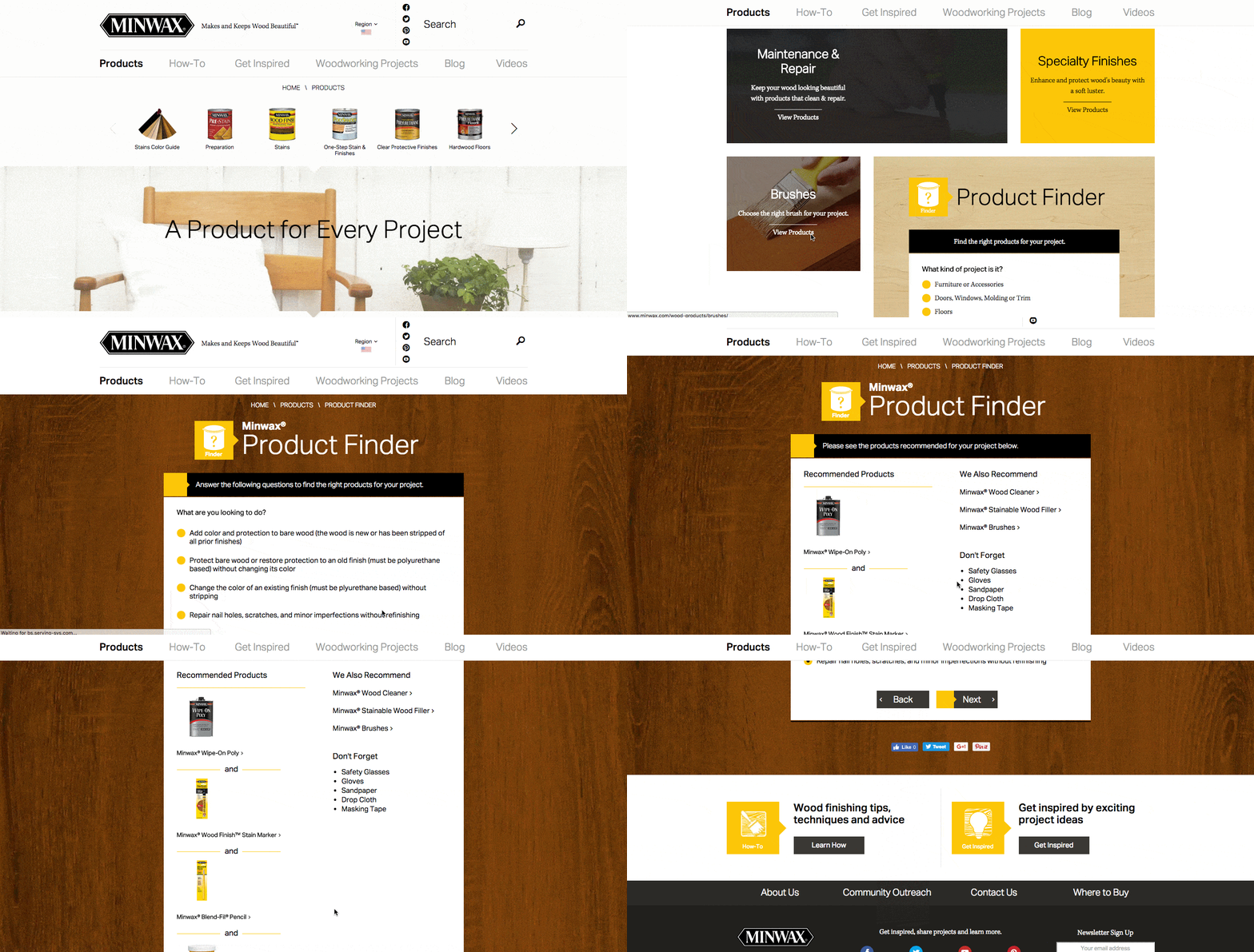
Minwax makes products to help people care for wood furnishings and surfaces. Riveting, right? But the brand has managed to create a product page that’s not only relevant but helps users quickly and easily find what they’re looking for.

That’s thanks partly to the Minwax Product Finder module. It functions like a quiz, asking a series of multiple-choice questions, like “What kind of project is it?” and “What are you looking to do?”

Once you answer the questions, the quiz generates recommended products, which includes a handy “Don’t Forget” list with the tools you’ll need to get the job done — things like safety glasses, gloves, and sandpaper. Helpful tips like this go above and beyond a normal ecommerce product page.

minmax product page designImage Source

15. Ministry of Supply

Ministry of Supply specializes in comfortable formal wear, and it shows you just how comfortable any one of its garments are with its product landing pages.

Take the product page for the Juno Blouse, below. Underneath the photo gallery of a woman modeling the product, Ministry of Supply gives visitors “proofs,” revealing the blouse’s thread count, materials, and other key qualities that make the product unique.

The product page’s best trait might actually be its motion graphics, using basic looped videos that demonstrate the clothing’s resilience and flexibility.

ministry of supply product landing pageImage Source

16. Liulishuo

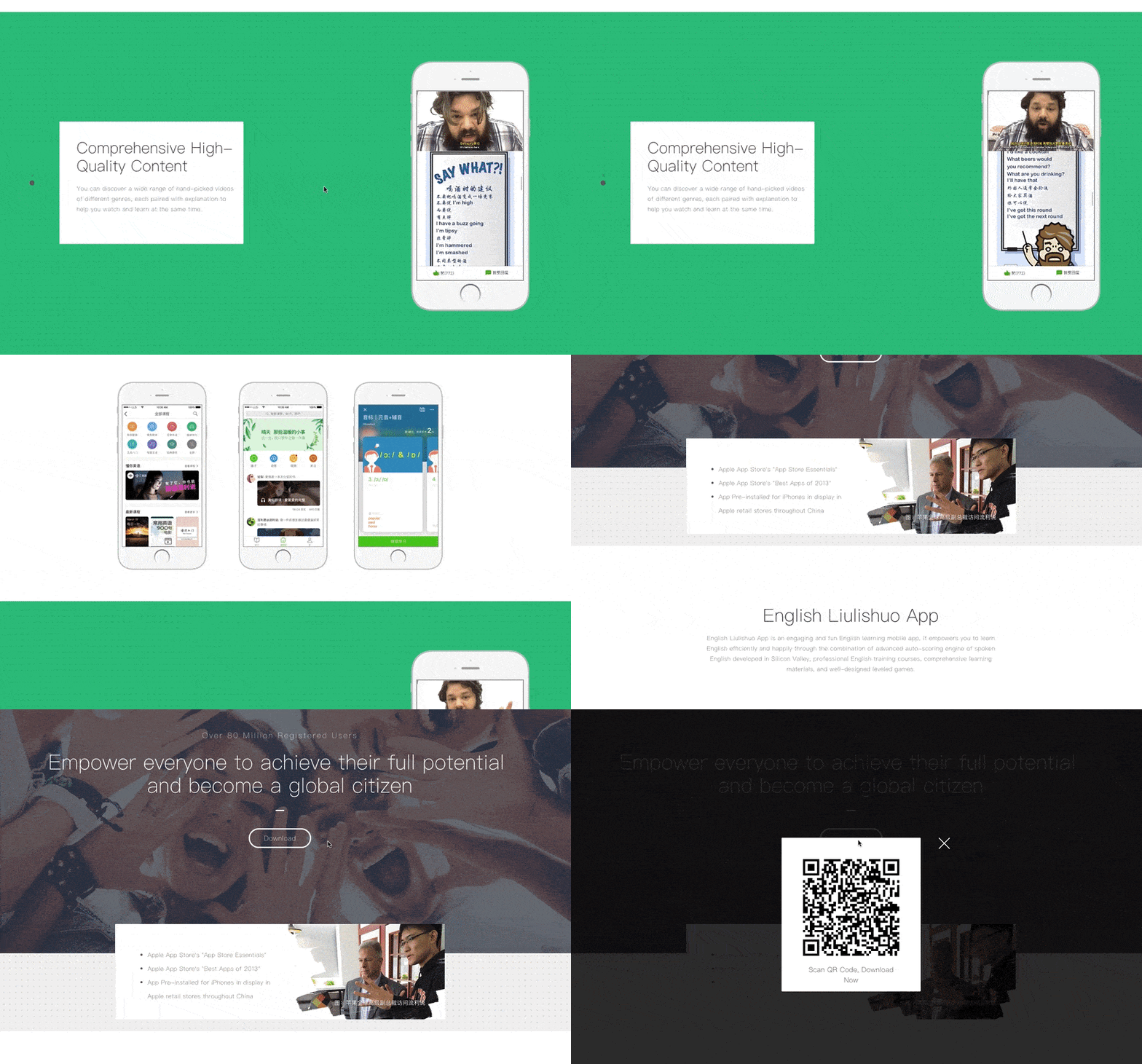
Liulishuo is a China-based startup that builds English language-learning tools for personal development and test prep purposes. The company’s mobile app product page offers a clean but media-rich overview of its curriculum.

As you can see below, the bottom of the page plays a crisp motion clip of the video-based coursework in action on a smartphone. It’s essentially an app demo before users even download the app.

At the top of the page, Liulishuo makes cool use of QR codes by allowing users to download the app just by scanning the code on their mobile device. Presenting a software product in this way is a smart effort to increase customer acquisition simply by making the product easier to get.

liulishuo product page designImage Source

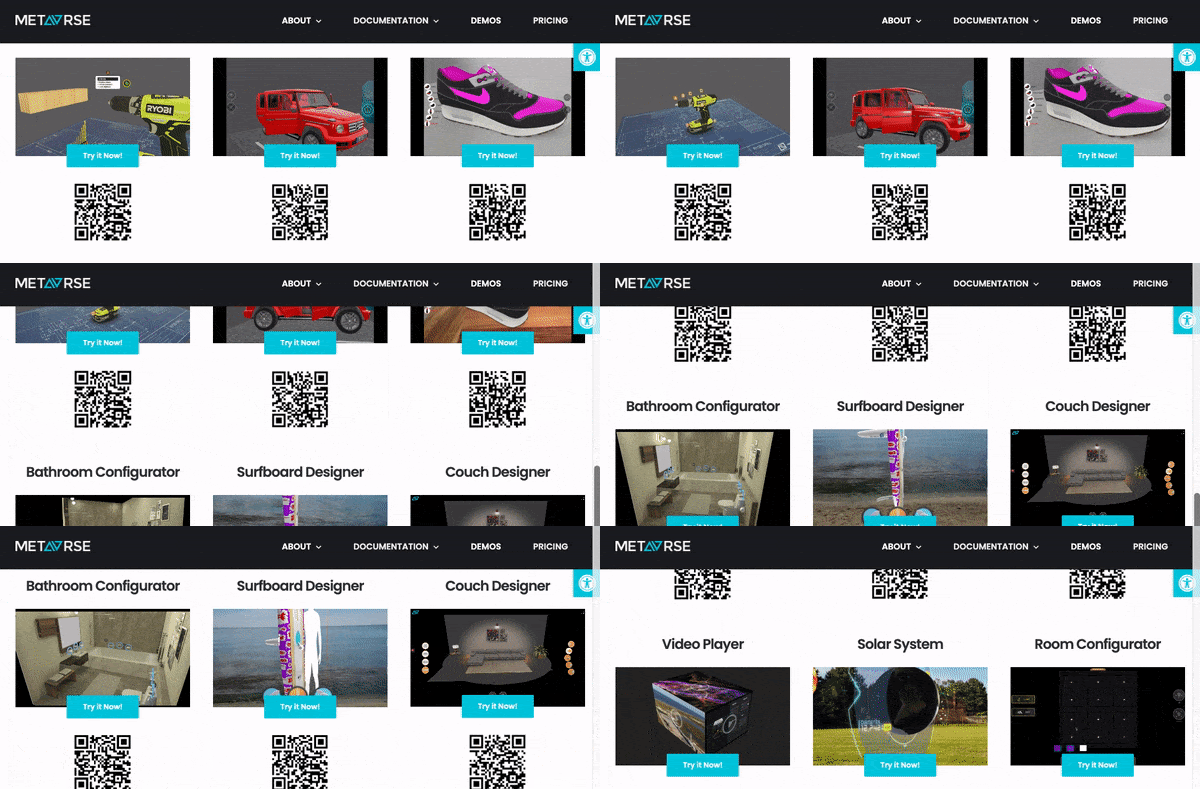
17. Metavrse Engine

Metavrse, a virtual reality (VR) consultancy and product developer, has just about the most immersive product page we’ve ever seen. The company sells not just VR insight, but also VR and 3D tools to help modern businesses better engage customers with its goods and services.

I don’t know about you, but I can’t help but be fascinated with this landing page.

Metavrse’s VR product page actually allows users to scan QR codes on mobile devices to put themselves into a virtual experience according to the product at hand. So if you wanted to hold the Solar System in your hands and create or reposition planets — you could do it within seconds.

This company’s capabilities are displayed in an organized and immersive way, making its landing page nothing short of excellent.

metavrse product page designImage Source

18. Nfant®Nipple

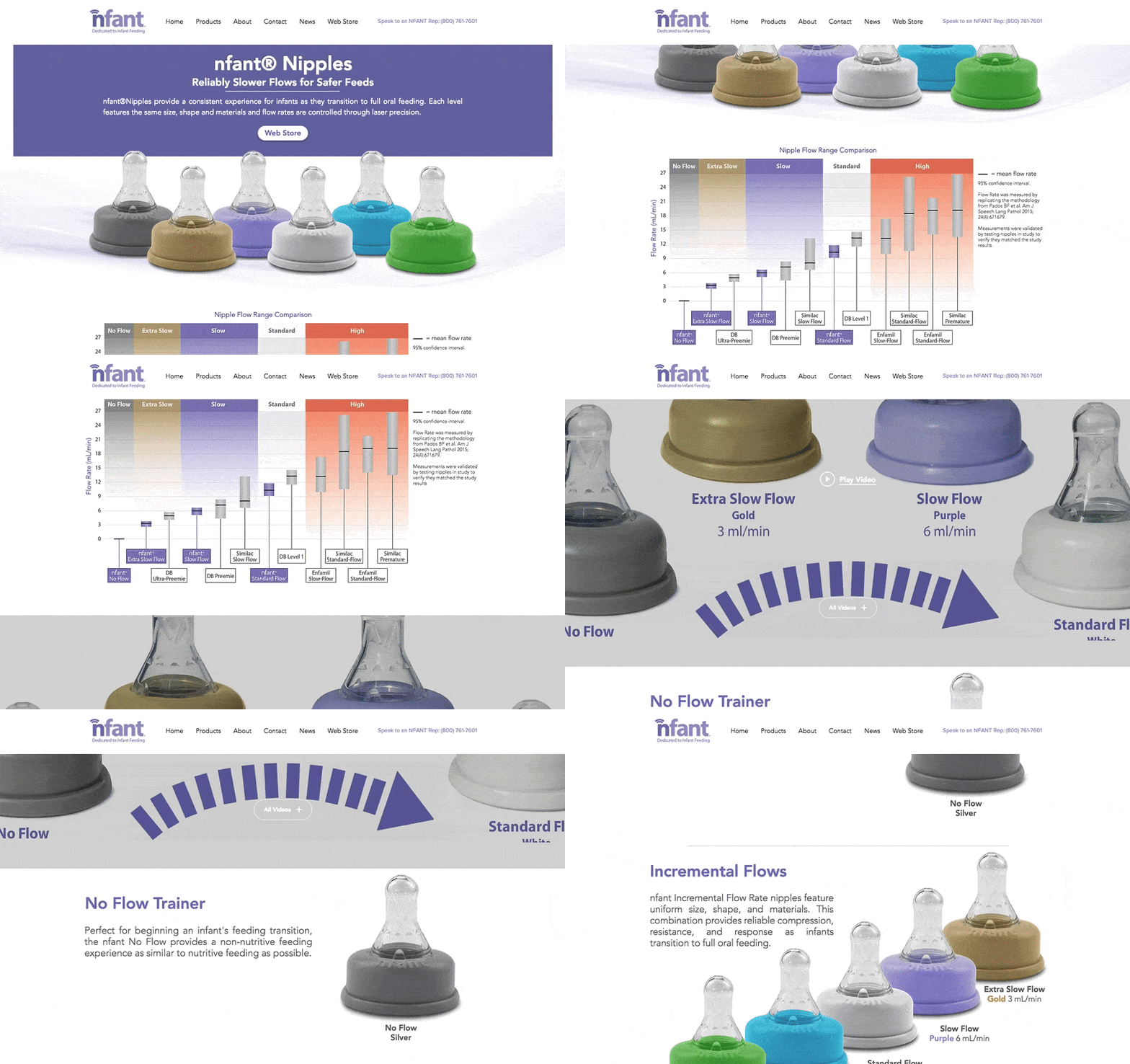
Nfant®, an infant nursing product, takes the transition from breastfeeding to oral feeding seriously — as is evident on the company’s product page for the Nfant®Nipple.

What sets this small business apart from other nursing and parenting services is its use of data to attract customers.

The product page below touts several types of bottle top-shaped nipples, and each one offers a different level of flow when the baby is drinking. As involved as the conditions of each product is, however, the product page delivers the information gracefully using color coordination, a video demonstration, and even a graph comparing each product’s flow range that nursing mothers can refer back to.

Nursing moms are always educating themselves on the resources they have for keeping their children healthy. With that in mind, Nfant’s detailed but easy-to-understand product page knows its buyer persona well.

nfantnipple product page designImage Source

19. Thinx Leggings

Thinx is a clothing and undergarments brand that makes absorbent, zero-waste products for people with periods. It’s well known for its long-lasting line of menstrual products that are more cost-efficient and less polluting than the alternative of pads and tampons.

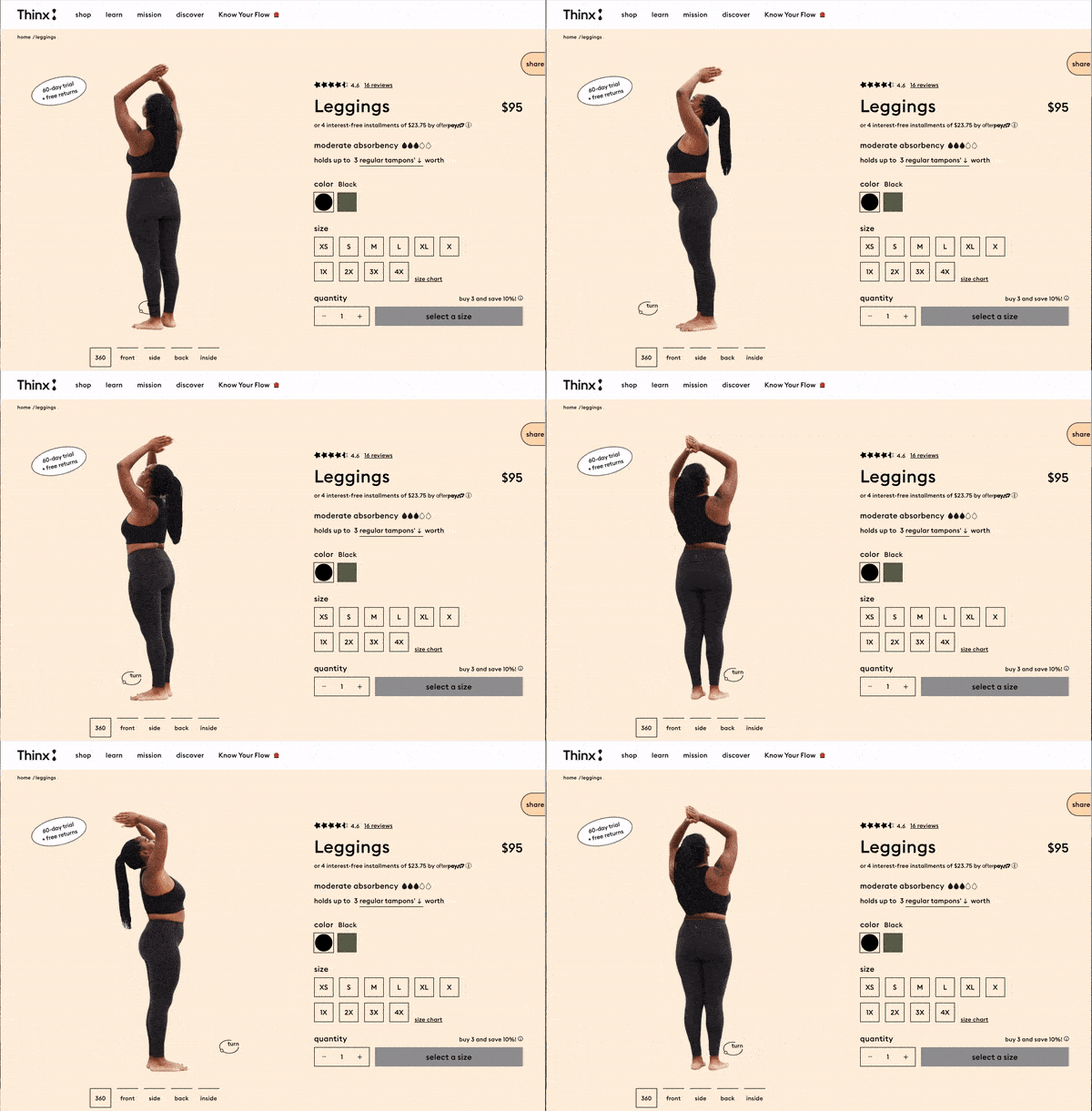
In the Thinx product page, you’ll find a wide range of body shapes and sizes displaying the inventory. This makes it easier for customers to determine what would look best on different individuals. Additionally, it lets the audience know which garment is best for them according to flow and activity level clearly.

What really makes its product page pop is the interactive, 360-view feature on all of its products. You can spin models of different dimensions to see exactly what the customer should expect — a feature that makes the online shopping experience more reliable than competitors.

thinx leggings product page design

Image Source

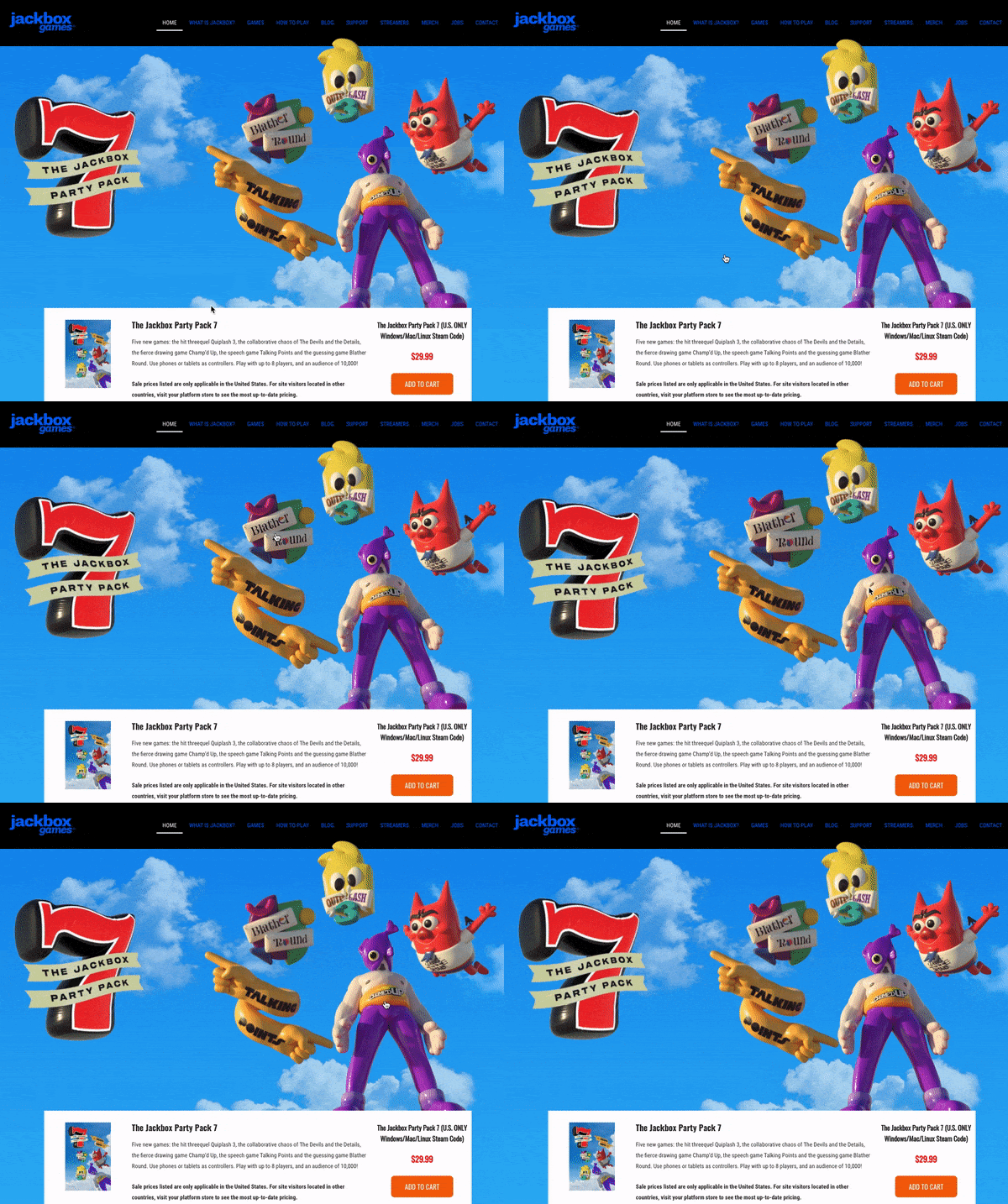
20. Jackbox Games

Jackbox is a party-game-making studio, enabling groups to play games under one roof or from anywhere in the world via the internet. This studio has brought many people together and has grown over the past couple of years, and its product page is aiding in its success.

From a visual standpoint, everything about the Jackbox product landing page is vibrant in color and interesting. The floating characters lead you to learn more about each game pack, all the fun features each one has, and specifies which gaming platforms you can access them through.

The Jackbox Party Pack stands out from other game product pages from its fun and whimsical appearance, giving customers a gleeful introduction to the fun its games have to offer.

Jackbox Games product page designImage Source

Did you draw any ideas from these product pages? We hope you did, but before you start to work on your own, let’s go through some best practices.

Product Page Best Practices

So, what have these brands taught us about product pages? It boils down to a few must-haves:

1. Make it interesting and fun, especially if you have a less-than-riveting product.

No matter the type of product, your website should position itself in a way that is engaging, interesting to view and learn about. Your UX/UI designer or developer should make the product page interactive or, at minimum, visually appealing.

This practice can be as small as changing the colors of the page, or as large as reformatting each section and implementing more widgets to provide a better customer experience.

2. Help visitors to find what they’re looking for.

Make sure the page isn’t cluttered and makes the product specs as clear as possible to ensure customers can see its value. Customers will turn to your competitors if they can’t find the information they’re looking for in a timely, and organized manner.

To aid in this practice, you could benefit from providing current customers a usability questionnaire to collect their opinion directly.

3. Personalize the user experience.

Allow users to “build their own” product, to show them that you can meet their preferences. You can even go as far as to compare product capabilities against one another or other products in the market if you know they provide more value to your audience. This all boils down to understanding product marketing and how you can better serve your specific market.

4. Product descriptions should be informative.

Without bogging it down in detail, be sure to include the right pieces of information that will show users what sets your products apart.

Chances are your customer has already navigated to your page with a general idea of what your product can do for them, now it’s your job to dive deep into what your product’s purpose and value are — you should also back it up with evidence like other customer reviews, too.

5. Make images clear and quality.

This should be a no-brainer, but you’d be surprised how much a blurry or outdated graphic can deter a customer. But no worries, this is one of the easiest problems to fix, and can make your product page look more professional in a matter of minutes.

6. Use live chat.

You want your product page to help customers find what they’re looking for, and adding a live chat feature will give them a helping hand as they explore it.

Live chat enables sales reps to address customer questions in minutes. Adding this feature can increase the efficiency of communication on your website, and help you improve it, too.

7. List not only the features, but benefits as well.

In product descriptions, it’s general knowledge to be thorough in detail, but take the extra step and describe how those features can benefit the customer, too.

For example, you could be selling a tech gadget with amazing specs in the description — but not all customers will see the point of all those features. Make sure to discuss the value of those features for better understanding.

8. Include customer reviews.

72% of customers won’t take any buying actions until they’ve read reviews.

When online shopping, customer reviews are extremely important for prospects. If they can read an honest review of a product, they will trust the quality of the brand more.

9. Compare prices.

If you are running special deals or discounts for your products, let customers know on the webpage. List the original price near the current offer and customers will feel more of a sense of urgency and be more willing to purchase quicker for a deal.

10. Make it convincing.

In all, you should know your product like the back of your hand. Make your product page just as convincing as you believe it can be — a solution to solve your customer’s pain points.

Design Your Product Page to Impress

The way you display your product can be the decision point for a potential customer. Because of that, you must make your products shine and convey its value properly.

Now that you’ve seen our list of effective product landing pages, we hope you have some new inspiration and will apply it to your website.

Editor’s note: This post was originally published in October 2018 and has been updated for comprehensiveness.

examples of brilliant homepage, blog, and landing page design

Categories B2B

How We Built the Strategy for Our New Flagship Podcast

You didn’t think we’d launch a podcast network without a new HubSpot show, did you?

We’re excited to announce our new flagship podcast, The Shake Up, featuring comedian Alexis Gay and Venture Capitalist Brianne Kimmel. It’s produced by Senior Producer, Matthew Brown and brought to you by the HubSpot Podcast Network. 

The Shake Up offers business leaders unfiltered insights into companies that dared to be different. Alexis and Brianne talk with business leaders from disruptive companies like Square, Daily Harvest, and Nerdwallet about their investments and go-to-market strategies.

Sounds pretty cool, right? Well, now we’re going to tell you how we did it, including:

  1. Our planning process
  2. Building the format of the show
  3. The structure of a successful podcast team

Let’s dive in.

Listen to the Shows in HubSpot's Podcast Network Now

How Can We Be Better and Different?

Once we know our business objective, audience, and budget we set out to put together a show concept that will resonate with our audience and help us hit our goals.

To do that, we needed to know what our audience is listening to today.

According to Chartable, there are over 8,334 branded podcasts on Apple Podcasts.

While we couldn’t audit all of them (we’re only human), we did want to understand the tactics used by the top podcasts in the business category. So, we did an audit.

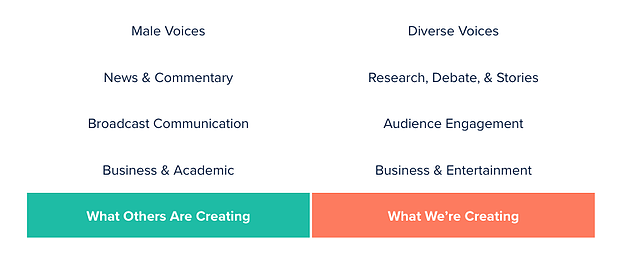
We evaluated 20 high-performing business podcasts and gained five insights.

  • Male Voices: 87% of the hosts were male.
  • News & Commentary: 18 out of 20 podcasts provided commentary on industry news.
  • Broadcast Communications: Very few shows used audience engagement tactics to connect the audience with the hosts.
  • Business & Academic: The tone of the shows was lackluster and many used jargon.

This audit gave us the context to define our strategy.

How would our show be better and different?

business podcast differentiators

  • Diverse Voices: A commitment to diverse voices across hosts and guests.
  • Research & Stories: Focusing editorially on relevant stories with added depth.
  • Audience Engagement: Featuring our hosts and implementing tactics to engage the audience on social media.
  • Business & Entertainment: We don’t have to be boring and unfashionable to talk business.

These became our editorial guidelines for the rest of the show.

Deciding on the Show Format

Next, we set our show format.

There are a few common podcast formats that have the ability to grow an audience.

  • Interview: A show type that brings on an expert guest for a Q&A.
  • Chat Cast: A co-hosted format where hosts provide commentary and criticism on a variety of topics.
  • Debate: A co-hosted format where hosts take one side of the argument. Debating the facts, figures, and opinions on a given topic.
  • Narrative: A journalistic-style podcast that includes research, scripts, and a strong storyline.

After exploring various formats, we went with a hybrid format — Chat Cast + Interview.

Bringing together the energy of a chat cast with the expertise of an interview.

Sample Episode topic: Why Is Every Company Suddenly A Media Company

Segment 1: The Context

In the opening segment, our co-hosts will provide context and talk through some fun facts and stats about the episode topic

Ex.) HubSpot acquired The Hustle

Segment 2: The Debate / Discuss

In this segment, we’ll give our hosts a series of questions on the topic and questions we are featuring for some off-the-cuff opinions on both.

Ex.) Should more SaaS companies follow suit? What happens to media companies if all companies are media companies?

Segment 3: The Interview

In this segment, we’ll bring on the business leader of the company/topic we are discussing to get the real story behind the decision and the other decisions that have made them successful.

Ex.) Kipp Bodnar about the Hustle Acquisition

Finally, we had to figure out how we were going to make this thing.  

Your Podcast Team

To build a high-quality podcast, you need to invest in a team.

There are countless things that need to happen in the making of a show. We have broken down those responsibilities into eight core roles, but there are often teams of much more, and there are also teams of much less who are doing 3-4 jobs each:

  1. Executive Producer — The showrunner. Head of operations, creates a vision for the overall show, leads pre-production through post-production, and manages the staff and logistics.
  2. Senior Producer — Establishes content and narrative arc for each episode, writes and edits the scripts, coaches the host, manages the production calendar, research, prep; as well as produce interviews, tape edits, and does preliminary sound design.
  3. Producer — Booking, research, interview prep, transcriptions, edits tape, creates outlines, and works on scripts.
  4. Editor — Oversees the development of story ideas and gives critical feedback on story frameworks and scripts.
  5. Host — Storyteller who shapes the show through their editorial decisions and personality. They prepare for interviews and write / edit scripts.
  6. Managing Producer —New podcast development and builds management processes/paths necessary for a successful program.
  7. Engineer —The first and final stop in the production process. Creates the soundscape for the show by editing and mastering audio to create a seamless listening experience.
  8. Editorial Director — Shapes the vision and leads all planning and execution for podcasts. Drives the creative conception from ideation to execution. Collaborates with company leaders on distribution.

This list does not include the folks involved outside of podcast creation, including the creative team involved with making promotional assets, the person responsible for the communication plan of the show, and more.

Another layer of difficulty here is the decision of whether to build a team in-house or search for a podcast production agency that can fill these roles for you.

Resourcing was one of the biggest challenges in the creation of The Shake Up. We’ll let you behind the scenes on some of our decisions:

  1. Internal or external talent for hosts: A host will make or break a podcast. Simple as that. They can either draw an audience in or push them away. We had a very specific vision for the hosts of our show and for that reason, we chose to lead an external search for talent. We chose Alexis and Brianne because of their combination of dynamism and experience, among other things.
  2. Hire a sound engineer or bring in an agency: Engineers perfect the sound of your show. Because of the quality of sound we wanted for this show, we decided to bring in an agency because of the heavy expertise of their team and the resources they have for the job.

We were also lucky enough to have a Senior Producer, Matthew Brown, on staff, who has won awards for previous shows like The Growth Show.

So if you’re looking to invest in a team to create podcasts, use this list as a starting point to gain an understanding of the different moving parts, and carefully consider the decision of hiring for these roles, or bringing in some external help.

But the list is just a starting point, and if there’s anything that we can recommend about podcast creation, it’s the quote from Lao Tzu, “There is no greater danger than underestimating your opponent.” And your opponent, in this case, is the amount of work involved in creating a show.

Invest in the resources to do it right, and understand that it takes a village.

What Are You Waiting For?

Podcasts aren’t a new medium, but they are having a moment.

  • Spotify has heavily invested in the podcast portion of their platform, striking exclusive deals with podcasts like The Joe Rogan Experience, and designing a total rehaul of the podcast UI.
  • Statista predicts the industry will have a CAGR of 17%, reaching 164 million listeners in the US by 2023.
  • Apple, not to be outdone, is making a bet on podcast subscriptions.

Will podcast marketing become as standard as content marketing? Will having a podcast become as ubiquitous as having a blog?

Time will tell, but it’s clear that this is the “wave” that many podcasters predicted.

At HubSpot, we have chosen to invest heavily in media going forward, and podcasts are a large part of that strategy. The HubSpot Podcast Network and The Shake Up are the first parts of that.

If, after reading this, you choose to invest in building one, here is a checklist you should follow:

  1. Define your audience and their problem.
  2. Decide if a podcast is a good medium to provide a solution to that problem.
  3. Audit the podcasts in your target space, figure out how you can be better and different.
  4. Propose the theme and format of your show.
  5. Build a podcast team: host, producer, sound engineer.
  6. You’re off to the races.

We are incredibly proud of the hard work that went into launching The Shake Up. Listen to it here on your favorite podcast platform.

hubspot podcast network

Categories B2B

The Strange Relationship Between Impressions and First-Party Data

For the past 7 years, Twitter has averaged 500 million tweets daily.

Since I’m really good at math, (and totally without typing 7 x 365 into the search bar) I immediately knew that 7 years equated to 2,555 days.

Doing more incredibly brilliant, unassisted math, 500M daily tweets across 2,555 days equals 12,775,000,000 tweets. 

12.7B tweets is a lot of information. It’s a whole heckuva lot more impressions.

But does that even matter?

The Influence of Impressions

Marketers are known for trying to discover hidden value in every sandbox in which they play, sifting through tons of nothing in the hopes that something might be there. Thanks to its mostly open API, Twitter is the platform that’s analyzed most often. 

Every time a tweet is seen by a user, the company marks it as an impression. This not only includes the times it appears in someone’s timeline but also the times it has appeared in search or as a result of someone liking the Tweet.

Being the most bountiful source of data on the platform, impressions are often highlighted in every report and analysis as a means of calling attention to just how much opportunity lies in wait.

For 15 years, my colleagues and I, at large, have been parsing through the Social space hoping to find the diamonds in rough, evaluating threads, conversations, and one-off thoughts.

So here’s the question: How much tangible business value can you achieve from this data?

While there certainly are opportunities waiting to be unearthed, more often than not, this information is nothing but a whole bunch of hot air. 

Talk is Cheap

Credit – VectorStock

For what it’s worth, impressions aren’t bad. They simply don’t equate to tangible business results. 

Impressions are a substrate; a potentially fertile ground that could eventually yield a new audience who may have interest in a given topic, solution, product, etc. But on its own, impressions are merely a pile of dirt, equally full of promise and full of nothing. This kind of data is very useful to have when you’re crafting a content strategy; it gives you a sense of how large the market might be and how many future prospects or customers you may have the chance to talk with.

But impressions offer little beyond these soft brushes of interest. How much of the information shared within those tweets mean anything? How many would mean anything of substance to my employer? To our customers? Prospects? And most importantly: how many of these ideas or tweets would be something they might pay for?

With the 12.7B tweets I could have possibly seen since 2014, that’s a lot of sifting, even with the help of Twitter’s Advanced Search or a third-party listening tool. Even then, how many could honestly be relevant? (More on this later.)

Actions Are Priceless

In short, what people do is more reliable than what they say they’ll do. 

Using steady, present, and foreseeable buyer behavior is comforting to businesses for obvious reasons. Just as we shared in our 2021 Content Consumption Report, predictability is not only very attractive to businesses, it’s also essential, quite frankly. In order to anticipate the needs of your customers, you need to understand what they’re doing–and first-party data affords you that luxury.

First-party data is better than much of the information that is shared across the Marketing world. Sure, there is still plenty of information we don’t have visibility into, even with our massive content platform. But even if a third-party, survey-based report is making waves across social media, it still can’t beat having access to direct, first-party behavior data; it simply outperforms everything else. 

Yes, there is 100% a place in the world for subjective survey-based reports. What good would our data be without opinions and analysis layered on top of it? 

As we introduced in February of 2021, Intent Discovery allows Marketers to better understand what a buyer’s true intentions are, helping them identify their challenges, priorities, and purchase timeline. This data is sourced directly from the folks who are voluntarily sharing their information in exchange for content. What separates this data from its survey siblings is that instead of collecting answers from pedestrian participants, you’re digging deeper into why they’re interested. Try getting that from an impression.

For B2B organizations trying to inform your content marketing strategy with the latest and greatest, using data that is composed of concrete, verifiable actions representing the true business interests and trends of the B2B community.

Hard, Actionable Data

NetLine’s fortunate that the pendulum is swinging back this way, but it’s merely a happy accident; we didn’t plan it this way, we’re just lucky.

As we move into a cookieless world, first-party data becomes more and more necessary. While getting fully-permissioned consent is now in vogue, it wasn’t always the burgeoning beauty of the digital realm. 

For years, digital leaders preached about the benefits of using third-party sites like Facebook to bolster your business’s following while also warning about the pitfalls of building on rented land. Now we’re seeing just how true all of this is. 

It may have taken some time for everyone to come to their senses, but the path forward is clear: first-party is the bedrock upon which all great marketing plans are built. 

One Last Thing

But before we close this out, let’s quickly revisit relevancy. Relevancy is subjective; one man’s drivel is another man’s opportunity

All of this is to say that things only matter when they matter to us. As soon as something is contextually relevant to you, it’s going to be on your radar. So, yes, all of the things I wrote about impressions are true…but like all things in life, it’s not an absolute. After all, first-party data only matters if people see the content that gets them to voluntarily share their personal information. 

In writing this blog, I found myself reminded of a scene from No Country for Old Men where the bad guy, Anton Chigurh, played masterfully by Javier Bardem, extols the paradox of a quarter. (Though I love the entire clip, I have it queued up at the beginning of the coin toss.) 

Nonsense and consequence, all in one. Somehow, both truths exist in concert.

The same can be said of digital marketing: You never know when a moment of significance will find you. All we can do is be prepared and be ready to seize the opportunities in front of us.

Categories B2B

10 of the Best Social Media Marketing Courses to Take Today

According to the Bureau of Labor Statistics, a 7% rate of job growth is expected for marketing managers from 2019 to 2029.

To help stand out from your competition in the hiring process as well as feel entirely confident in your ability to perform in your social media role, you may want to take a social media course.

Click Here to Take HubSpot Academy's Social Media Marketing Certification  Course

In this blog post, we’ll cover some of the best social media marketing courses that are available today.

Best Social Media Marketing Courses

1. Social Media Certification

hubspot academy social media certification

Price: Free

Platform: HubSpot Academy

HubSpot’s Social Media Certification course is a robust program designed to help you attract customers and partners, and build brand loyalty. Because social media is the key to inbound marketing, this course ties in the two concepts seamlessly.

The course is flexible enough so that you can work on it on your time. It covers essential topics such as measuring ROI, extending reach, social media content creation, and social listening. You might also select to take specific lessons within the HubSpot Academy course — for instance, this one on Social Media Advertising.

Notable Takeaway: Learn how to create an inbound social media marketing strategy.

2. Fundamentals of Digital Marketing

Fundamentals of Digital Marketing by google

Price: Free

Platform: Google Digital Garage

Google’s social media certification has over 300,000 students and provides courses in social media, mobile marketing, SEO, and web optimization.

The courses explain paid and organic search and teach you how to develop search-engine-optimized web pages.

Learning how to optimize pages for search on a popular search engine (for free) sounds like a win-win. At the completion of the course, you’ll receive a digital certificate you can add to your LinkedIn profile and resume.

Notable Takeaway: Better understand SEO and its relationship with digital marketing.

3. Social Ads 101

Screen Shot 2021-07-14 at 3.03.59 PM

Price: Free

Platform: Wordstream

WordStream offers the necessary educational resources to develop a strong understanding of social media advertisements. This includes social media ads on a variety of platforms such as Instagram, Facebook, YouTube, Snapchat, Tik Tok, and LinkedIn.

There’s also information about why and how to advertise on social media as well as education around best practices while advertising across these platforms.

Lastly, you’ll learn about social media ad metrics and social shopping — this way, you can effectively track measure your success as well as target your audience when and where they’re ready to make a purchase.

Notable Feature: Learn about social ads on the major platforms including Instagram, Facebook, YouTube, Snapchat, Tik Tok, and LinkedIn.

4. Social Media Training for Beginners

Social Media Training for Beginners

Price: Free

Platform: Constant Contact

Constant Contact is a great educational resource for beginners and those who are new to the world of social media marketing.

There are step-by-step instructions on how to create and maintain your social media presence across every major platform. This includes Facebook, Twitter, LinkedIn, Instagram, Google My Business, YouTube, and Snapchat.

Notable Feature: Learn everything you need to get started in social media marketing.

5. Online Social Media Marketing Classes

Online Social Media Marketing Classes by skillshare

Price: Free or paid (depending on the social media course)

Platform: Skillshare

On Skillshare, you can pick classes that suit your interests and save classes to refer to later. There’s a variety of business topics you can take classes on.

As for social media marketing specifically, you can filter social media marketing classes by the time that they take to complete, whether they’re free or premium, whether or not the topic is trending, and more.

Notable Takeaway: Select the specific social media marketing topic and lesson time that best suits your need.

6. Acadium Digital Marketing Course

Acadium Digital Marketing Course for social media marketing

Price: Free

Platform: Acadium

Acadium is an apprenticeship and mentorship program — there are a number of lessons within the Digital Marketing Course that you can take before, after, or during your apprenticeship.

The courses offered cover an array of digital marketing topics including but not limited to social media marketing, paid advertising, email marketing, SEO, and content marketing.

Notable Takeaway: Get a full understanding of digital marketing while working an apprenticeship in which you can develop real-world experience.

7. Social Media 101 Training

social media 101, social media marketing course by boot camp digital

Price: $97

Platform: Boot Camp Digital

Digital Marketing 101 by Boot Camp Digital is an impactful, video-led training that takes you on a deep dive into the basics of digital marketing and using it for social media. This is beginner-level training and can be completed in six hours.

Boot Camp’s clientele includes Nike, NASA, GE, and Georgia-Pacific, and the platform gives buyers unlimited access once purchased. It provides a digital marketing template, ROI information, benchmarking, and a bonus-free digital tools course.

Notable Takeaway: Learn about digital marketing and work through a comprehensive section on social media marketing and strategy.

8. Fundamentals of Digital Marketing, Social Media, and E-Commerce

Fundamentals of Digital Marketing, Social Media, and E-Commerce wharton university of pennsylvania social media marketing course

Price: $585

Platform: Wharton, University of Pennsylvania

Wharton’s course is considered an intermediate dive into the intersection of digital marketing, social media marketing, and ecommerce. It’s a self-paced, six-week class that demands three hours of your time each week.

This course is structured specifically for marketing professionals, small business owners, and consumers who want to know social media techniques. You’ll learn how to produce marketing campaigns that are effective for your business.

Notable Takeaway: Marketing course designed for professionals.

9. The Strategy of Content Marketing

The Strategy of Content Marketing social media marketing course

Price: Enroll for free

Platform: University of California, Davis

In this online class offered by the University of California, Davis, you’ll learn how to create a content marketing strategy and develop an understanding of the ecosystem surrounding that strategy. Ample time will also be spent working on strategic writing and framing.

The different types of content marketing will be reviewed along with how they’re integral to social media marketing.There are five weeks worth of material paired with videos, exercises, readings, and quizzes.

Notable Takeaway: Learn about the power of integrating your content marketing and social media marketing strategies.

10. Social Media Marketing Masterclass

Social Media Marketing Masterclass

Price: $149.99

Platform: Udemy

Rather than a complete level one course in social media, this offering, by Udemy is a Masterclass on the subject, uniquely centered around ethical digital marketing techniques.

You’ll learn how to set up a powerful marketing strategy and a schedule that aligns with accomplishing business goals.

You’ll also dive into how social media marketing integrates with your business, email marketing, and building an online community. This course can be completed in 20 hours, and gives you a certificate of completion at its end.

Notable Takeaway: Learn how to build a social media marketing strategy and schedule for your unique business.

Find Your Ideal Social Media Marketing Course

Social media marketing can be extremely powerful when done right — and understanding how to apply the most effective and up-to-date strategies will help you stand out from other social media marketers and strategists so you can propel your career.

So, identity the right course for your experience level, budget, and goals — then get started learning.

Editor’s note: This post was originally published in November 2019 and has been updated for comprehensiveness.

Get certified in social media by HubSpot Academy!

Categories B2B

10 Content Curation Tools Every Marketer Needs

“Curation” is one of those words that’s always conveyed coolness to me.

Take, for example, curating an art gallery, or curating music for a soundtrack. Cool, right? Content curation can be just as cool – and just as important.

Where do you get started on content curation?

Download Now: Free Content Marketing Mapping Template

In this blog post, you’ll find an explanation of what it is, how it can serve your brand and a series of tools you can use at every experience level.

What is content curation?

Content curation consists of finding material relevant to your audience from a variety of sources and sharing it strategically through your communication channels.

Say you’re a marketing agency. You could write a blog post with a roundup of top product demos and add some context on why you picked them. That list of demos would be curated by you based on what you believe your audience will find most valuable.

So, now that we’ve answered, “What is curated content? ” Let’s get into the benefits of this approach.

Benefits of Content Curation

One of the biggest benefits of content curation is that it adds value to your audience.

There’s so much information out there today and most consumers don’t have the time (or the desire) to sift through hours of content. That’s where you come in.

You can figure out what matters most to them, find the content they care the most about and present it to them in a perfect bow. Who wouldn’t want that?

Think about your favorite music station, whether it’s on the radio or a streaming platform like Spotify or Pandora. While you could listen to hours of music and create your own playlists, it’s even better when someone does it for you and delivers all the hits you love most.

That develops into trust. Even if the curator drops a song you haven’t heard before, you give it a chance knowing there’s a good chance you’ll end up liking it.

The same goes for content curation. As you deliver great content, your audience starts to trust you and see you as a thought leader.

Furthermore, content curation is a great strategy for those weeks when you’re low on original content.

It’s easier to gather content from other sources than start from scratch. So when in doubt, curate content that other experts in your industry have covered.

What makes a successful content curator?

1. Content curation should be personal.

NextDraft content curation example

Image Source

The beauty of news roundup NextDraft is the personal touch and context that its chief curator, Dave Pell, gives to each story.

I don’t just want a bunch of browsable links – I want to know why I should read this stuff, and how it pertains to me. That personalized context creates a type of bond between curator and reader that link aggregators doesn’t humanize quite as much.

2. Content curation should build value.

No matter which industry your customers are in, all of them want to stay informed but also save time.

Just like you, they have demands and can’t possibly keep up with all the latest news in their industry – but they want to. Solving this problem through content curation presents a huge opportunity for brands to build a relationship with their audience.

If you can deliver a curated experience that saves your customers time in getting the information they need, you’ve taken a major step on the path of building trust and loyalty.

3. Content curation should offset promotional content.

Customers can grow tired of brands ceaselessly promoting their own wares, which is why brands must think beyond products or features.

The relationship customers have with brands today transcends the product itself. After all, that’s part of the foundation of inbound marketing. While a product may initially attract you to a specific brand, it’s likely something else – like great content or remarkable service – that keeps you around.

4. Content curation shouldn’t take all day.

Once you’ve decided to curate content, the hard part begins gathering content. While bookmarking and reading lists may work in the beginning, those are not sustainable options.

Instead, there are curation tools specifically designed to help you gather, sift through, and curate content. Here’s our list below, categorized by level of expertise.

For Beginning Curators

If you occasionally share a relevant post with your customers, you’re already curating content. To build this into a scalable strategy, here are free curation tools to help you start getting in the habit of curating content, without being overwhelmed by complex tools, subscription fees, or convoluted dashboards.

1. Flipboard

Flipboard is a mobile and desktop app that allows you to create mini-magazines with links to your favorite news stories, blog posts, and websites. Content curation tool Flipboard

Image Source

After creating these magazines, you can open them up to the public so consumers can follow your content and share them on social media networks.

You can also include your own blog posts and links in your magazine, making it an opportunity for readers to learn more about your business.

To start using Flipboard, all you need to do is download the app and create an account. You can also look through the magazines of other users and share their stories in your own mini “publication with a quick tap.

Here’s a quick demo that walks you through how to use the app:

2. Pocket

Pocket is a great place to get into the habit of accruing content to save and read later.

Content curation tool Pocket

Image Source

Instead of a laundry list of bookmarks or countless emails you’ve sent to yourself with links, it stores all your chosen images, articles, and videos in one place for reference.

You can group articles with tags, and the site’s built-in search functionality makes finding those articles easy. Plus, it integrates with over 500 other apps, like Evernote, easy easy synching.

And as a bonus, Pocket tweets out their @PocketHits for the most-saved articles on their platform – a must-follow if you’re active on Twitter.

3. Elink.io

Collecting content from various websites and sharing them in a way that is presentable and context is key to successful content curation.

Elink.io takes the pain out of content curation and allows anyone to save links on the go and turn them into beautiful, shareable content.

Content curation tool eLink

Image Source

You can convert your links into a web page and embed them on a website or send them as a newsletter. They have a whopping 30+ responsive templates that you can customize to your liking. With over 80,000 users worldwide, elink is one of the best tools when it comes to fast and beautiful content curation.

4. Twitter Lists

Twitter can be hard to keep up with if you don’t organize the accounts you follow. That’s where Twitter Lists come in handy: curated groups of Twitter users that you can categorize and follow separately from the rest of your feed.

content curation tool Twitter List

Say you curate marketing content, you could create a Twitter list for email marketing, another for blogging, and so on. Even better, you can make it public so that other Twitter users can access your lists as well.

Furthermore, if you create a Pocket account (mentioned above), you can easily save articles from Twitter directly into your account.

Click here to learn how to start your first Twitter list.

5. Newsletters

Whatever industry you’re in, stay on the lookout for newsletter subscriptions. And if a good one doesn’t exist in your industry, that’s the perfect opportunity to create one.

But before you start your own newsletter, learn from what other outlets are doing. Here are a few that are doing a great job in original content curation:

  • The Hustle – Every day, The Hustle brings business and tech news right to your inbox. The team expertly breaks down top news in a witty, sharp tone that its audience enjoys – plus links to read the original content.
  • The Daily Carnage – Want to stay updated on all things marketing? Carney’s got you covered. Their daily newsletter includes snippets of news in the marketing world along with a longer section that provides context for an external article they link to.
  • The Daily Skimm – What this newsletter excels at is the tone and the brand voice. The team behind The Skimm knows exactly that its readers want the TLDR version of top news stories in a digestible way. Their newsletter does just that and that’s why it resonates so well with readers.
  • Quartz Daily Brief: Quartz has figured out how to make a text-heavy newsletter a stalwart in the news business with its Daily Brief. The beauty of the newsletter, because it’s text-based, is the cross-platform functionality. Without heavy images, the Daily Brief loads quickly on phones, tablets, and desktops, making it easy to read on any device.
  • Internet Brunch: Digital agency Big Spaceship created Internet Brunch to help folks “find the best news, GIFs, and trends from across the Internet.” From holidays to current events, to celebrity birthdays, this roundup is sure to cover the important stuff that helps readers stay in the loop.

For Intermediate Content Curators

Here are some great sources for when you’ve got the basics covered and you’re looking for something a little more comprehensive.

6. Scoop.it

I like to think of Scoop.it as a nexus of content curation and social media, with a Pinterest-like user interface.

Content curation tool Scoop.it

Image Source

Start with a topic of interest, and Scoop.it will generate the most relevant articles to view and share as well as suggest relevant topics

Why we recommend Scoop.it:

  • Their smart engine can monitor the topics you’re most interested in and identify related content you may like.
  • Easy integration with WordPress.
  • Content creation for multiple channels, including websites, emails, and social media

Pricing: $0 to $79/month, with customized pricing available for enterprise accounts.

7. Feedly

If you’re stepping up your content curation game, Feedly should be at the top of your list. This tool is a news aggregator powered by artificial intelligence, one the brand has named Leo. Content curation tool FeedlyImage Source

When you add a few of your favorite sources to Feedly, you can aggregate and browse these feeds in one place from your desktop and mobile devices.

This tool is best for filtering the content you’re interested in. Feedly leverages Leo to identify the content you care most about and filter out the ones you don’t.

Pricing: $6 to $12 a month, with a customizable plan available for enterprise accounts.

8. Sniply

You might be wondering why Sniply, a conversion platform, is on this list.

Well, this tool actually goes hand-in-hand with content curation.

Let’s say you have a monthly newsletter in which you include links to articles pertaining to your industry. With a tool like Sniply, you can place a call-to-action (CTA) on the page you’re linking to. This way, you can redirect users back to your content and help them convert.

Content curation tool Sniply

Image Source

It’s also a custom link shortener, so you can create branded links that are short enough to share on Twitter and the like.

Pricing: $29 – $299/month

7. Quuu

Want to focus your content curation on social media? Consider Quuu. Content curation tool QuuuImage Source

Quuu integrates with most major social media scheduling tools, including HubSpot, and allows you to discover and share content.

Why we recommend Quuu:

  • It auto-categorizes your content, making it easier to sift through later.
  • It offers reader-mode to make your experience free of distractions.
  • The integrated scheduling dashboard makes it easy to share the content you discover.

Pricing: $0 to $15.83/month

9. UpContent

Are you looking for a one-stop shop for your content curation? UpContent’s got you covered.

Content curation tool UpContent

Image Source

UpContent’s top features include:

  • Content recommendations backed by machine learning algorithms.
  • Approval workflows to ensure articles meant brands’ guidelines.
  • Integration with top web hosting, social media scheduling, and email marketing software.

Pricing: $15 to $265/month

For Advanced Content Curators

Now we’re getting into some serious, enterprise-level curation software. These solutions are ideal for companies looking for a proven platform capable of supporting a team of users, editors, and content curators.

Enterprise-level curation requires advanced algorithms to find identify relevant content, a centralized publishing platform, and customizable publishing options.

10. Curata

The power of Curata lies in its ability to recommend and help you discover relevant content relevant to their respective audiences without manual labor.

Content curation tool Curata

Image Source

Users can fine-tune, customize, and categorize content sources for review, and then distribute them – all from one central platform.

You can then use Curata’s publishing and promotion tools to repurpose curated content across your blog, social media accounts, newsletter, and automated marketing platforms.

Pricing: Not available

Which Tool Is Right For You?

Before you select the best tools for your business, it’s important to understand the role content curation will play in your marketing operations and the size of your team.

If you’re a one-person marketing department, for example, the beginner and intermediate options should suffice for your needs. As your business and team grow, content curation may play a larger role and require more powerful software.

At that point, some of the advanced tools will help save time curating and ensure everyone is on the same page. Regardless of your team or business size, content curation should become a part of your content marketing strategy.

Great curators build trust with their audiences and become an indispensable resource, as they distribute content their audiences care most about.

Editor’s Note: This post was originally published in March 2015 and has been updated for accuracy and comprehensiveness.

Blog - Content Mapping Template

Categories B2B

13 Social Media Strategies & Resources for Black-Owned Businesses

Welcome to Breaking the Blueprint — a new blog series that dives into the unique business challenges and opportunities of Black business owners and entrepreneurs. Learn how they’ve grown or scaled their businesses, explored entrepreneurial ventures within their companies, or created side hustles, and how their stories can inspire and inform your own success.

Since the early 2000s, social media has impacted every aspect of people’s lives, including business. Entrepreneurs from all over the world have and continue to use social media as a tool to launch their brand, connect with people, and garner new customers.

Social media quickly replaced flyers as a form of marketing, and now business owners are investing their time into marketing strategies to reach 4.2 billion social media users worldwide.

Additionally, a Forbes article stated that 84% of respondents who completed a CMO Survey report using social media for brand building. One might even argue that social media is just as critical as a company’s website.

Social media has served as a staple in the Black community to connect in creative and hilarious ways through pictures, videos, words, and more. In fact, we’re so connected that it can take only a few minutes for people, services, or products to go viral on major social media platforms like Instagram, Facebook, Twitter, TikTok, YouTube, or Snapchat.

These sites have also helped Black-owned businesses gain visibility and engage with users in free, innovative ways.

I spoke with three social media experts who shared a list of strategies, resources, and success stories Black business owners can use to increase their following and expand their audiences. Let’s dive in.

Learn More About HubSpot's Community to Amplify Black Professionals

6 Social Media Strategies for Black Business Owners

1. Build a community by creating engaging content.

Social media manager coach and content strategist Bolaji Ajibare believes creating engaging content is one of the main strategies Black-owned businesses should leverage.

Ajibare, who is popularly called TheSocialMediaOga, says that business owners should create material that allows them to interact with their followers. Entrepreneurs can grow their community by asking their audience what kind of information they’d like to see on their page to serve them properly.

Ajibare says it’s a good idea for users to incorporate various information to appeal to followers — including promotional, inspirational, and educational content, to display balanced material on their page.

Content and design strategist Alicia Noelle further emphasizes that business owners should post creative content that influences people to interact with them. Creating polls and responding to followers in the comments section are a couple of ways that business owners can communicate with their followers. Noelle says these efforts are the critical difference from simply gaining followers.

“I think that that’s what small businesses are going to have to realize as they change their marketing tactics in 2021, and beyond — that people are no longer going to buy from you because it looks pretty,” Noelle said. “They want to feel like they belong in your community, and you have to create that atmosphere for them.”

Social media strategy on creating a community for black-owned businesses

Social media expert and CEO of Thames Media Solutions, Michelle Thames, shared similar sentiments. Thames states that people forget that humans are on the other side of social media, and they still want to feel like they’re a part of a community.

“You have to nurture your audience by giving them tools and the resources,” she said. 

Thames adds, “Whether you have a product-based business or a service-based business, you have to solve [your audience’s] problem and let them know why they need to come to you.”

Noelle and Thames mentioned natural hair care line Mielle Organics as an example of a Black-owned business that has successfully curated a community around their social media pages.

mielle organics social media strategy exampleImage Source

Social media influencers promote their line, and the company also offers promotions and giveaways. Mielle Organics features customers who use their products on their social pages, as well.

2. Write captions that resonate with your followers. 

Noelle recommends that business owners develop prompts for their captions to complement their graphics or videos before they post.

According to the content and design strategist, every caption needs to tell a story that resonates or connects with a business’s audience. The text should be more than two sentences and should also include a call-to-action encouraging followers to subscribe to the company’s email list, sign up for discounts, or buy an item.

Noelle used Breanna Aponte as an example of an entrepreneur who writes good captions. She says that Aponte tells stories with her posts that resonate with her followers. Even though her posts may be unrelated to her business, she can still sell her social media services because of her authenticity.

breanna ponte example of social media strategy for black-owned businessImage Source

Noelle suggests that business owners create captions that put followers in a different mindset and influence them to want to read what they have to say.

Business owners can share a behind-the-scenes look of their brand on their IG Stories, Twitter Fleets, or Facebook Stories.

Mattie James is an example of an entrepreneur who uses her Stories feature effectively as an influencer. James posts consistent content highlighting her family, daily routine, links to brand promotions, and more.

The Stories feature for all platforms is also a great way for entrepreneurs to promote what they have to offer and communicate with followers who respond to their posts via DM.

Thames recommends that businesses should spend 30 minutes to an hour each day engaging with customers and followers to prove that they’re a trusted, reliable source. This effort also makes followers feel like business owners care.

3. Create videos and reels.

Using videos and Instagram Reels is critical for businesses to maintain engagement and attract new followers.

“If you’re looking to do videos, Reels are going to help you get in front of more people because Instagram prioritizes their new features. Reels is a new feature, and they want to make sure that users use it,” Thames said.

Thames revealed she gained roughly 1,200 followers in 30 days using Instagram Reels, and she doesn’t even post every day. She emphasized that business owners’ Reels need to either be entertaining or educational. They should also be short, quick, and to the point, since people often have short attention spans on social media, proving why the feature is so popular.

She incorporated Instagram Reels into her clients’ social media strategy by encouraging them to make posts three to four times a week. She also mentions that entrepreneurs should be using IG Video and TikTok.

Marketing strategists Candace Junée and Ashley France are two entrepreneurs who use videos and IG Reels very well.

Social media strategy on using videos for black-owned businesses

4. Post multiple times a week.

No matter if it’s a photo, Reel, story, or video, business owners should post on their page multiple times a week to not only secure sales, but to stay relevant.

Noelle identifies this strategy as the rapid-fire strategy for social media. She suggests business owners who sell products to post a minimum of once a day, but ideally two to three times a day by creating content using the other aforementioned strategies.  

If it is a service-based business, Noelle recommends businesses to post at least three times a week since solopreneurs usually lead this type of company, which can make this effort a daunting task. This strategy can also work for product-based businesses if they’re unable to post multiple times a day.

Mahdi Woodard is a marketing and branding guru who does a great job posting frequently on his page. Woodard posts simple but highly effective content to keep his followers engaged. He uses inspirational quotes and videos to promote his brand.

mahdi woodward post as an example of black-owned businesses on social media

5. Leverage hashtags.

Hashtags are frequently used on platforms such Instagram and TikTok. Entrepreneurs use hashtags to attract potential followers and customers because it’s an easy way to be found, especially when they use niche and location-based hashtags.

Users tend to use hashtags a lot on Instagram and TikTok. Hashtagged words or phrases are one of the best free marketing tools if used correctly.

For instance, I found all three social media experts by using the #socialmediaexperts hashtag on Instagram for this blog post.

6. Use templates.

Bolaji says templates can be a beneficial tool for entrepreneurs because it makes your content layout look clean and consistent. It also makes life easier for business owners because they can use templates to publish their material quickly and efficiently.

Millennial money expert and founder of My Fab Finance, Tonya Rapley, uses templates on her Instagram page. Her page has a consistent color scheme which makes her page look cohesive and appealing.

my fab finance instagram feed as an example of black-owned businesses on instagramImage Source

Every strategy mentioned above is guaranteed to help businesses grow, but Bolaji admits that sometimes business owners can’t use the same approach that got them to 1,000 followers to get 10,000. Even if they’re using all of these strategies, business owners have to stay up-to-speed and learn what method works best for them at various levels of their success.

7 Social Media Tools Black-Owned Businesses Can Use

The strategies listed above are beneficial, but business owners can’t produce quality content for followers if they don’t have the effective tools to make the process easier. Social media tools are essential for business owners to cater to their customers’ needs and provide excellent customer service through proper planning.

Take a look at the tools the social media experts suggested Black-owned businesses use, below.

1. Canva

Canva is a platform used for graphic design. Users can use the tool to create social media graphics, templates, documents, and other visual content.

Price:

Free Version: $0.00

Pro Version: $9.99/month or $119.99/year

Enterprise Version: $30.00/month per person

2. Flodesk

Flodesk is an email marketing service provider that’s built for creators to design and send automated marketing emails to help grow their following.

Price:

$38/month

$418/year

3. Hootsuite

Hootsuite is a social media management platform that has a social network integration feature that gives users the ability to share content onTwitter, Facebook, Instagram, LinkedIn, Pinetrest and YouTube.

Price:

Professional: $49/month

Team: $129/month

Business: $599/month

4. Later

Later is an all-in-one social marketing platform that allows businesses to plan, analyze, and publish content for the top social networks.

Price:

Free Version: $0/month

Starter: $12.50/month

Growth: $20.83/month

Advance: $33.33/month

5. Planoly

Created as the first visual planner for Instagram, Planoly plans, schedules, and measures content across social networks such as Pinterest, Facebook, and Twitter.

Price:

Free Version: $0

Solo: $7 billed annually or $9 month to month

Duo; $15 billed annually or $19 month to month

Custom: $23 billed annually or $29 month to month

6. Pixistock

Pixistock is a Black-owned visual content creation service that offers photos and graphics for websites and social media feeds.

Price:

Member Pricing

  • 1-5 photos: $35 each
  • 6-9 photos: $30 each
  • 10-19 photos: $28 each
  • 20-29 photos: $25 each
  • 30-49 photos: $20 each
  • 50+ photos: $18 each

Non-Member Pricing

  • 1-5 photos: $45 each
  • 6-9 photos: $40 each
  • 10-19 photos: $38 each
  • 20-29 photos: $35 each
  • 30-49 photos: $30 each
  • 50+ photos: $28 each

7. Airtable

Airtable is a low-code, cloud collaborative platform that allows users to build software tools that fit their needs. Users can customize their workflow and collaborate with other creators and creatives.

Price:

Free Version: $0

Plus: $12/month or $10 per seat/month billed annually

Pro: $24/month or $20 per seat/month billed annually

Although it takes commitment and time, social media provides Black entrepreneurs and creatives a space where their voices can be heard. I hope these suggestions will help Black-owned businesses share their talent — whether it be a service or a product — with the world.

black at inbound

Categories B2B

20 Best ‘Meet the Team’ Pages We’ve Ever Seen

To a prospect seeking out a new service provider, the process can be a little overwhelming. It’s easy to wonder: Who are the real people behind all the smoke and mirrors?

Adding a “Meet the Team” page or section to your website is an easy, effective way to give your business an accessible face. As one of your most important pages, it gives prospects an idea of who exactly they’ll be working with, and shows potential employees that you’re proud of the people on your team.

For some inspiration, see how these companies introduce visitors to their most important creative assets: their people.

→ Download Now: About Us Pages Guide [Free Lookbook]

Cool ‘Meet the Team’ Pages

1. Yokel Local

Yokel Local is a HubSpot Agency Partner that positions itself as an extension of its clients’ marketing teams. For that reason, this agency showcases its staff to highlight the humans behind the brand.

What’s pleasing about this particular page is the simplicity: The grid design provides a modern feel, and clicking on a face opens a box with more information about the team member, including their bio, credentials, and social profiles.

Why this works: Yokel Local doesn’t go overboard with its “Meet the Team” page, and it doesn’t need to — everything potential clients need to know is presented in a clean grid format. This way, it’s clear who’s behind the agency.

meet the team page: yokel local example

2. Philly Reps

As a contrast to more elaborate designs we’ll see later in this list, Philly Reps is another agency that takes a cleaner, more minimal approach to its team page. Members are presented in grayscale images that take up the majority of screen space for a nice consistent look and feel.

Below images are brief descriptions of each member. Notice how Philly Reps has made each description roughly the same length to maintain balance and alignment between grid elements. Most won’t notice this detail, but it results in a page with maximum readability.

Why this works: Large grayscale headshots of team members bring character and personality to the brand while maintaining visual consistency.

meet the team page: philly reps example

3. Digital Marmalade

Since most employee bios read a lot like a list of stats (“10 years in the industry … 4 years at the company … Managed 80 website redesign projects … “) the folks at Digital Marmalade decided to have a little fun with the format.

Each employee at the London-based marketing agency has a trading card-style profile detailing their actual marketing accomplishments and personal facts, as well as their fictional superhero abilities. It’s a quirky twist that gives visitors a colorful snapshot of the agency’s team, highlighting both their impressive experience and friendly culture.

Why this works: Digital Marmalade balances its show of technical proficiency and fun with employee stats that list both skills and “superpowers.” Additionally, headshots are all similar in composition and background.

meet the team page: digital marmalade example

4. CloudHorizon

CloudHorizon is a mobile product development company. On its about page, it says, “Some of the more rewarding projects we have had the honour to be involved in, started with simple ideas and grew profitable businesses from the ground up.”

With this in mind, CloudHorizon’s “Meet our team” section is a great way to illustrate that idea. When you hover over an image of a team member, their thumbnail flips to reveal a photo from their childhood with a small caption of what they wanted to be when they grew up.

Why this works: This clever idea highlights both the diversity of backgrounds that the CloudHorizon team brings, as well as the uniqueness of each member. It also provides a sense of friendly nostalgia to new visitors.

meet the team page: cloud horizon example

5. Bolden

Bolden’s team bios are more conventional than some of the others on this list, but what they lack in invention they make up for in style.

Hovering over each team member’s picture produces a darker alternative almost like an image negative, revealing the employee’s name along with an outfit change. This is a great example of a minimal, accessible “Meet the Team” page that manages to look cool and introduce the faces behind the agency without going over the top.

Why this works: Bolden implements a subtle but unique and effective hover effect for its team member cards for some extra visual flair. As a digital design agency, these small moments show capability.

meet the team page: bolden example

6. Rock Kitchen Harris

Rock Kitchen Harris, a full-service agency, decided to skip the photos altogether and showcase the cartoon versions of their employees instead.

Each employee at the English agency had a custom caricature drawn up, and every single one has a different personality. While some employees opted for representations reminiscent of LinkedIn profile pictures, others got a little creative with it, dressing their cartoon selves up as Ewoks and other characters. Employees can also be easily filtered by specialty.

Why this works: The choice to make renderings of each employee brings a lot of character and personality to this agency’s website. Plus, it gives the chance for employees to have a bit of extra fun as well.

meet the team page: rock kitchen harris example

7. FCINQ

FCINQ, a creative studio, introduces us to their team with a collage of colorful bubbles.

Hovering over an employee’s circle produces a zoomed-in effect, and clicking expands their headshot with their name and social profiles. The splashy setup is a stylish alternative to the expected rows of team photos and names.

Why this works: FCINQ’s team section is a nice departure from the standard grid layout while staying intuitive and informative.

meet the team page: fcinq example

8. Zulu Alpha Kilo

This Canadian agency presents its founding team with refreshing comedic flair. While many agency leaders choose to represent themselves with stoic business portraits, the three leaders of Zulu Alpha Kilo opted for playful photos and cheeky bios.

Here’s an excerpt from the bio of Marcus Alpha — the agency’s “Ultra Chief Creative Director Officer”:

Marcus has a reputation for pushing his creative teams further than any other creative director. He makes them work late nights, weekends and through holidays in pursuit of that one truly breakthrough creative idea. And when they’ve finally cracked it after weeks of grueling and thankless work, Marcus will triumphantly stand in front of the client and present it as an idea he had in the shower that morning instead.

Why this works: Zulu Alpha Kilo leverages humor with its portraits and text content to draw potential clients in search of a partner on the quirky side.

meet the team page: zulu alpha kilo example

9. Stink Studios

We love this expertly color-coordinated slideshow of team members from Stink Studios. This creative agency has offices in five major cities around the world — including New York, Paris, and Berlin — but having a personable “Meet the Team” section helps give their business an accessible edge. They don’t call themselves “a global company with a local feel” for nothing.

Why this works: The broken grid layout of this website’s team page is colorful, inviting, clean, and a touch playful as well.

meet the team page: stink studios example

10. CRUX

The video pros at the agency CRUX have crafted a truly captivating website that makes excellent use of their medium. The entire website is presented as a “video” inside an editing program; visitors can “play” the video by scrolling or via the timeline at the bottom of the screen.

When you reach the “About” section, each team member drifts into focus alongside a humorous description. This website is unlike anything we’ve seen before and establishes this team as unique, ambitious thinkers and creators.

Why this works: CRUX takes a one-of-a-kind approach to its team page (and its entire website) that cleverly combines visual features of a website with those of a video editing program.

meet the team page: crux example

11. Drexler

As one of the more artsy entries in this list, this “Meet the Team” section from Drexler is proof that you don’t need a whole page devoted to introducing your employees — just a section can do the trick.

This simple but polished team member marquee appears down the homepage and plays with scrolling to reveal each team member’s portrait. The “hands-on” portrait aesthetic is certainly unique as well, creating a homepage that only this group could think up.

Why this works: Drexler utilizes scrolling to present team photos in a scanning pattern, complete with peculiar but captivating portraits.

meet the team page: drexler example

12. Matchstic

As a branding agency, Matchstic knows the importance of identity, creativity, and individuality. Not only does its “Who We Are” section provide that identity by highlighting the human element of their brand, but it also shows their creative side. When you hover over each thumbnail, a goofy illustration is overlaid onto the photo.

In addition, the custom cursor, which only shows up on the About page, is a strong callback to the Matchstic brand, implying a kinetic energy that starts with the lighting of a match.

Why this works: Matchstic applies a cartoon-style hover effect to its employee portraits, implying fun, imagination, and creativity behind the otherwise straightforward profiles. The custom cursor is an extra, delightful touch.

meet the team page: matchstic example

13. Atlassian

Atlassian, a company behind many of the software solutions used in businesses worldwide, highlights photos of their team on their “people” page, interacting at the office and hard at work.

Below, they showcase their leadership team with colorful headshots that break out of colorful background boxes, similar to Matchstic. When you hover over, vector graphics appear relating to the individual’s unique role.

In addition, a popup appears on click with social icons and a bio. What’s particularly interesting is the option to download their headshot, some extra utility for media professionals.

Why this works: Atlassian’s people page is both professional and quirky, with useful features like bios, social media links, and an option to download headshots.

meet the team page: atlassian example

14. Heart Creative

Heart Creative presents its team members on its “about us” page, and hovering the cursor over portraits reveals some extra character behind each employee. Given the agency specializes in culinary endeavors, these alternate photos are usually food-related.

For some added navigational ease, users can sort cards by team. Selecting an option from the dropdown will show the relevant members. You have the option to visit each individual’s LinkedIn profile as well.

Why this works: Heart Creative lends a touch of fun to its “Meet the Team” section by displaying alternative portraits on mouseover. Each team member shows off what they love, which puts some extra personality behind the brand.

meet the team page: heart creative example

15. LiveChat

LiveChat, an AI customer service and chatbot solution, approached their team page in a completely different way. Instead of just listing out each team member’s roles and experience, they created a photo for each team member that illustrates who they are in a conceptual, fun, and metaphorical way. Given the size of the company, this was quite the endeavor.

LiveChat’s approach is extremely effective for showcasing the uniqueness of their team, and it compels the website visitor to take the team to look at each picture and read each bio. This results in longer time on page, an important engagement metric.

Why this works: The LiveChat team page places enormous emphasis on each member’s personality and interests. It’s clear that LiveChat values everyone and knows the real strength of any business is the people.

meet the team page: livechat example

16. Etsy

Many large companies forgo the traditional “Meet the Team” page because there are so many team members that it doesn’t make sense to display them all. At Etsy, though, they acknowledge all the people that make the popular online marketplace possible with a tiled “people board” that scrolls for days.

Why this works: While impractical to provide bios of every team member, Etsy compromises with a collage of team portraits as a testament to the strength behind the company.

meet the team page: etsy example

17. UWG

Digital content specialists UWG have created a stunning team page that’s as much about personality as it is about personnel. Team members are shown in lively portraits against solid backgrounds. Most images are squares, but the page occasionally breaks this pattern for some visual variety. For more information about a team member, you can click a portrait to open a modal.

Why this works: This team page is simple, yet bold and effective. Each portrait is packed with personality, and together the images form a vibrant collage. It’s the kind of “Meet the Team” page that makes you actually want to meet the team.

meet the team page: UWG example

18. The Correspondent

The Correspondent is an organization that offers news without fear-mongering or financial gain. In true journalistic style, the site features each team member in a beautifully rendered cartoon style, providing an artistic feel to the page.

Clicking on each thumbnail leads the website visitor to a place where they can subscribe to that particular writer and view a feed of their pieces. Best of all, the individual’s mission is displayed across the top and contact information in the sidebar.

Why this works: Sketch renderings of every team member lend to the publication aesthetic of The Correspondent. Readers can easily find a particular writer’s stories as well by clicking a card.

meet the team page: the correspondent example

19. Bluleadz

What better way to convey the personality of your team than to display their favorite gifs on mouse hover? That’s what digital marketing agency Bluleadz does. You can almost imagine these folks in the scenarios their gifs represent.

Another useful feature of this “Meet the Crew” page is the ability to filter Bluleadz employees by function. Each button at the bottom corresponds to a team and brings up the individuals who “make the magic happen” in that area of the business.

Why this works: Yet another way to add personality to a team page, Blueleadz includes a favorite gif for each team member. It’s fun, entertaining, and potentially converting.

meet the team page: blueleadz example

20. Media Junction

Bold blocky pops of color? Yes, please. HubSpot Elite Agency Partner Media Junction displays their team thumbnails on solid backgrounds with vector shadows. Each photo is a little silly, and many of them bring their furry friends into the picture with them.

In addition, their leadership team’s thumbnails are clickable so that you can read more about them and even send them a message for more information.

Why this works: Media Junction is afraid to show its playful side on the team page — images are colorful, inviting, and animated for a dash of style that keeps users on the page.

meet the team page: media junction example

“Meet the Team” Page Best Practices

So, what can we learn from these exceptional examples? Here are some tips and design best practices that you can take away and apply to your own team page:

High-Quality Images

Most visitors will expect your team page to feature photos of your employees. Make sure these photos are high-quality and visually consistent (including dimensions). From there, you can add as much personality as you want. Or, you could try an illustrated alternative, as we saw in some examples above.

Employee Descriptions

At the very least, each member profile should include a photo, name, and job title. For more details, you might choose to add a short bio of each employee that outlines their role, experience, accomplishments, and interests. This is especially fitting for agencies that collaborate extensively and in-person with clients — you’ll want to build trust, and bios are a great way to get there.

Social Links

In addition to your employees’ names, titles, and bios, you might also choose to link to their social media profiles on your team page. While not necessary, this can help potential clients reach out to members through another preferred channel.

A LinkedIn profile link is likely enough, as you can be confident that employees will keep their posts professional on the site. However, link to other profiles (e.g., Twitter, Instagram) with caution, as you can’t be sure their conduct on these sites is company-appropriate.

Personality

Yes, simply saying “personality” may seem like a cop-out answer. We’re being intentionally vague here because each company will have its own approach to adding some extra character to their “Meet the Team” page. Depending on your brand, this might mean incorporating fun portraits, humorous descriptions, or eye-catching effects.

As we’ve seen, the best team pages inject personality in a way that aligns with their branding. Some pages lean formal but sneak in some fun elements, some are clearly aiming for humor, and others play it more serious. In all cases, the pages maintain a professional feel, even those that are funny.

You don’t need to go overboard here, but adding a little something extra can show your company is willing to go above and beyond for the best customer experience. It also helps your business stand out in the minds of users who might be wading through dozens of competing sites.

Show Off Your Team in Style

“Meet the Team” pages resonate because people like to buy from real people. The best practice is to determine what your brand stands for, then create a “Meet the Team” and About page that conveys that in the strongest possible way. Whether that’s going for an elaborate, eye-catching page or a simpler grid display, visitors will appreciate being able to put a face to your brand.

Editor’s note: This post was originally published in December 2016 and has been updated for comprehensiveness.

New Call-to-action

Categories B2B

40 Clever 404 Error Pages From Real Websites

Running a successful website means staying alert for errors like broken pages or slow performance. However, sometimes there are problems that you just can’t avoid, and 404 errors are one of them.

A 404 occurs when a user requests a page on your website that doesn’t exist, thus throwing a 404 error page prompting users to return to the right place. No matter how many resources you put into ensuring your website never goes down … there’s always a chance that users could end up here.

It’s inconvenient, but a fact of life. And the reaction of visitors when they land on a nonexistent page can range from “taking it in stride” to “totally losing their minds.”

While there’s nothing you can do about the latter, you can make things a little less of a pain by having a creative error 404 message. This can do wonders to make your website visitors crack a smile in an otherwise frustrating situation.

To get your website design juices flowing, this post will showcase some of our favorite website error pages. Hopefully, you’ll be able to take away a few ideas to snazz up your own 404 message.

Free Download: 77 Examples of Brilliant Web Design 

What is a 404 Error?

A 404 error is a standard HTTP error message code that means the website you were trying to reach couldn’t be found on the server. It’s a client-side error, meaning either the webpage was removed or moved and the URL wasn’t changed accordingly, or the person just typed in the URL incorrectly.

For the most part, you can configure your server to create a customized 404 error page. (If you’re a HubSpot customer, click here to learn how to customize your 404 page in HubSpot.)

Some customized 404 error pages include a hero image, witty description, site map, search form, or basic contact information.

The Best 404 Web Page Examples

Over the years, websites have found different ways to inform visitors of a 404 error and channel them back to the right place, some simply, some creatively, and some hilariously. Let’s start by looking at some creative 404 pages, then check out some funny examples that are sure to delight anyone who comes across them.

Page Not Found: TK Creative 404 Error Pages

1. Pipcorn

While a 404 page can easily stick out from a website, Pipcorn’s error page aligns perfectly with the rest of the site’s branding. There’s a nice animated background, a friendly text prompt directing visitors to search the website (complete with a clever pun), and a piece of popcorn used as the “0” in “404.”

404 error page example from the website pipcorn

2. Spotify

Music streaming giant Spotify has covered its bases with a clever 404 page. With a witty pun off Kanye West’s album “808s and Heartbreak” and a record animation, the website briefly entertains and then sends visitors back to the page they came from.

404 error page example from the website spotify

3. Genially

One simple way to ease the tension on your 404 page is to add a quick “Oops!” message — it helps your site feel more personable as you guide users back to the right place. In the case of Genially’s site, the page also includes a nifty illustration paired with some playful copy.

404 error page example from the website genially

4. Adobe

As you would expect, Adobe’s 404 error page is both useful and visually pleasing. It lists out popular links that visitors might want alongside some cool digital artwork serving as a visual metaphor for a broken or lost page. Honestly, websites should use visual metaphors more often.

404 error page example from the website adobe

5. Clorox

The 404 page for Clorox cleaning products rotates between three lighthearted photos to signal to visitors that they’ve made a misstep. It’s a smart use of branding to add a brief delight moment while helping out lost users.

404 error page example from the website clorox

6. Duma Collective

Other times, you might not need a witty blurb — just tell visitors that there’s no page at the address and let them move on. Entertainment consulting agency Duma Collective does just this with its error page, though it’s complemented by a background image for some minor flair.

404 error page example from the website duma collective

7. Chillhouse

Speaking of flair, self-care brand Chillhouse has put in the extra work to reroute its visitors in style. The 404 page is branded appropriately and even takes visitors on a little journey through a few image stills before they go back to the homepage.

404 error page example from the website chillhouse

8. Bitly

If you enter an incorrect Bitly link, you’ll be taken to Bitly’s 404 page. We assume this happens a fair amount, which is why the 404 page gets straight to the point. It explains what might have gone wrong and prompts users to visit the Bitly homepage if that’s what they’re after.

404 error page example from the website bitly

9. Ikea

Ikea’s 404 page is similarly minimalist but still manages to sneak some smart branding in there. This example shows that your error pages don’t need to be elaborate to get the point across, but there’s nothing wrong with injecting some fun either.

404 error page example from the website ikea

10. Moxie Design Co.

Sure, “blew up the Internet” might be a bit hyperbolic, but it tells visitors that Moxie Design Co. doesn’t take itself too seriously with small slip-ups like this one. Also, a search bar is conveniently placed at the bottom to send you on your way.

404 error page example from the website moxie design

11. McKissack & McKissack

Ah, the classic “we lost the page” trick. Again, an easy way to present a 404 without alienating your audience. If you’re an agency like McKissack & McKissack that manages many client interactions, clear and concise copy is essential for all of your site’s pages, including error pages.

404 error page example from the website mckissack and mckissack

12. CSS Tricks

Ever ripped away a website’s wrapping to see what’s underneath? That’s the concept that CSS Tricks was going for in their 404 error page. This is both witty and reminiscent of what the website is all about: smart use of page styling.

404 error page example from the website css tricks

13. Good Old Games

For other websites, you unwrap the front end and there’s … just the vast emptiness of space. This page is a clever reference to GOG Galaxy, which is Good Old Games’ native video game client. Thankfully, a little video game character is there to give visitors a place to report an error if they want.

404 error page example from the website good old games

14. Canva

For something a little different, check out Canva’s 404 page. It includes not just an error message, but a nifty tile puzzle visitors can play for some brief entertainment. There’s no harm in letting your visitors slack off for a couple of minutes, right?

404 error page example from the website canva

15. Innotech

Similar to Canva’s approach, Innotech features a Pong-esque game on its 404 page to provide some brief entertainment. Chances are you’ll remember a website like this. Plus, the fun detour complements a truly impressive website — seriously, when you’re done playing, head to the home page and take it all in.

404 error page example from the website innotech

16. Myriad

Video agency Myriad has opted for a quirky, on-brand 404 page design that mimics the classic SMPTE color bars that appear on old tapes and TVs. It’s a funny throwback to older technologies while representing the more modern problem of a nonexistent web page.

404 error page example from the website myriad

17. KonMari

Known for her popular cleaning and organization methods and brand, Marie Kondo has brought a similar feel to her website’s 404 page. The copy briefly and humorously harkens back to her tidying philosophy — a small but well-branded detail that fans will recognize.

404 error page example from the website mario kondo

18. BrandCrowd

Not only is the illustration on this error page detailed and engaging — the copy is clever, too. We love the reference to the Semisonic song “Closing Time”: “You can click anywhere else, but you can’t click here.”

404 error page example from the website brandcrowd

19. Hot Dot Productions

Hot Dot’s error page stays true to its tagline, “the intersection of new technologies and design.” The page is animated by hundreds of tiny dots that change direction in response to where you move your cursor. It’s mesmerizing and a great showcase of the agency’s design capabilities.

404 error page example from the website hot dot

20. OrangeCoat

If you’re going to give an error message, why not entertain the user for a few seconds while you help them out? Following a friendly greeting, OrangeCoat offers a flowchart that actually helps users figure out why they reached an error page in the first place.

404 error page example from the website orangecoat

21. Ervin & Smith

This 404 page does more than redirect users back to active pages. Instead, Ervin & Smith’s 404 page invites you to scroll down and learn why you need a digital marketing agency, and why to choose Ervin & Smith in particular, capped off with a contact form. True to its mission, this agency shows that any page can be a conversion opportunity.

404 error page example from the website ervin and smith

22. DayCloud Studios

… or, your 404 can just be a place to waste time for a minute, as can be seen on the website for DayCloud Studios. Moving the cursor around the screen reveals a 404 message illuminated by lasers shooting from a cat’s eyes. Because why not?

404 error page example from the website daycloud studios

23. Headspace

Another instance of a website smartly incorporating its brand messaging into a 404 page — guided meditation app Headspace makes the effort to calm users, encouraging us to take a deep breath, then return to the main site.

404 error page example from the website headspace

24. Wildwood Bakery

Some websites thus far have integrated clever branded copy in their pages, while others have hosted full-blown online games on theirs. But, there’s nothing wrong with a brief push back in the right direction. Wildwood Bakery’s exquisite site keeps things short and sweet (literally).

404 error page example from the website wildwood bakery


Page Not Found: TK Funny 404 Error Pages

25. Astuteo

Design agency Astuteo’s 404 page is a perfect balance of elegant visuals, humor, and helpfulness. The minimal layout gives users the information they need alongside another amusing visual metaphor, a sinking cargo ship and a fleeing figure.

404 error page example from the website astuteo

26. LEGO

There’s few words needed on LEGO’s 404 error page — the character’s expression makes everything clear. Plus, fans of the LEGO movie franchise will enjoy the fun reference in the copy.

404 error page example from the website lego

27. Magnt

In this funny error message, Magnt pokes fun at the fact that, yes, they could have broken something — or, you just can’t type. The visual serves as a quick way to quickly illustrate their point.

404 error page example from the website magnt

28. IconFinder

IconFinder’s error page is simple but delightful. The company’s mascot wearing a robe and appearing weary is a relatable nod to lost visitors. No worries though, since the site lists some of its links to visit down below.

404 error page example from the website iconfinder

29. Sweet Dreams

Apparently, the team at sleep aid company Sweet Dreams took too many of its products according to the website’s 404 page. Not only is this page humorous — it also blends well with the rest of the site’s front-end aesthetic and messaging for a cohesive feel.

404 error page example from the website sweet dreams

30. GitHub

The line “These aren’t the droids you’re looking for” refers to Obi-Wan Kenobi’s Jedi mind trick on Stormtroopers in Star Wars Episode IV, and it’s become a well-known phrase used to tell someone they’re pursuing the wrong course of action. GitHub plays on this famous line in their 404 error message.

404 error page example from the website github

31. Patagonia

Patagonia’s custom 404 page captures the brand’s vibe perfectly, complete with a boomerang video of a frisbee twirler, a clever pun combining “404” and “aloha,” and links to its product pages. It’s a friendly and funny way to greet visitors who wound up in the wrong place.

404 error page example from the website patagonia

32. Cloud Sigma

Check it out: Cloud Sigma’s letting us in on some behind-the-scenes action. Their 404 error page pretends to be a “junior developer’s homepage” — that junior developer being, well, a cat.

404 error page example from the website cloud sigma

33. AMC Theatres

You might have been to an AMC movie theater before, but you’ve hopefully never seen their website’s 404 page. The website makes use of a quick, funny, and relevant one-liner before it sends you back to the right place.

404 error page example from the website amc

34. Bruno

It’s no coincidence that creative agencies are great at coming up with cool 404 pages. Here’s another one from the creatives at Bruno that plays off the 2000 cult comedy classic Dude, Where’s My Car? No, it has nothing to do with the company or website, but it’s sure to get a chuckle.

404 error page example from the website bruno

35. NPR

At first, NPR’s error page seems like nothing special. But keep reading and you’ll see how they cleverly link to some of their great stories about lost people, places, and things, like a piece on Amelia Earhart and one on Waldo. This might just make lost users feel a little less alone.

404 error page example from the website npr

36. Medium

Medium takes a similar approach to NPR’s 404 page, recommending articles about getting lost and losing things. Check these articles out if you have time — they’re quite good reads.

404 error page example from the website medium

37. HomeStarRunner

HomeStarRunner.com, home to a Flash-animated cartoon series, has had a series of hilarious 404 error pages over the years. The most recent features characters from the cartoon series in a scene that could’ve come straight out of one of their episodes. If you turn the sound on when you load the page, you’ll hear their character Strong Bad — known for yelling phrases out loud — saying, “404’d!”

404 error page example from the website homestarrunner

38. Blizzard Entertainment

Here’s a simple idea that ends up looking slick: Blizzard Entertainment’s 404 page features an animated character lost in an actual blizzard and some humor that World of Warcraft fans will appreciate.

404 error page example from the website blizzard entertainment

39. Hello Big Idea

A quick trip around marketing and social media experts Hello Big Idea’s website will tell you what you need to know about its bold and blunt style of copy. And, of course, its 404 error page is no exception.

404 error page example from the website hello big idea

40. HubSpot

It happens to us, too! This is the message we put up to tell our site visitors that there are some website issues. Our goal was to stay true to HubSpot’s brand voice by being as lovable, empathetic, and helpful as possible.

404 error page example from the website hubspot

Turn a 404 Error Page Into a Delight Moment

Nobody wants to land on a 404 page — they’re annoying and unexpected. However, you can’t really avoid them, so it’s always a good idea to have a 404 page to fall back on for your website.

And, from a user experience perspective, your 404 page should be a small speed bump, not a brick wall. The right design can be the difference between a frustrated bounce and a possible conversion, so why not make it fun?

Editor’s note: This post was originally published in December 2015 and has been updated for comprehensiveness.

examples of brilliant homepage, blog, and landing page design

Categories B2B

Marketing Effectiveness: How to Measure It & Present to External Stakeholders

You can apply marketing strategies all day, but if they aren’t effective, those efforts don’t matter in the long-term.

Measuring marketing effectiveness is crucial to improving your go-to strategies over time. Are your methods hitting KPIs? Are they helping your clients reach short- and long-term milestones? Use each campaign to learn and grow.

By measuring marketing effectiveness, you can better ensure high ROI or return on marketing investment, ROMI.

→ Download Now: Free Marketing Plan Template

Measuring Marketing Effectiveness

How do you measure marketing effectiveness? Sure, you can look at traffic or sales metrics, but it goes further than that.

Ultimately, the KPIs you choose to measure can vary by company and strategy. But there are some metrics to pay attention to when measuring marketing effectiveness.

First, when you consider revenue, look into how much of the revenue is a direct result of the marketing efforts. This can help provide clear, high-level insight into how successful the marketing efforts are for the company.

Next, consider pipeline ROI or pipeline growth. Do you continue to generate more and more new leads via your marketing efforts? If not, your marketing effectiveness might be falling flat.

Conversion rates are also a strong KPI to review. Keep in mind that impressions, views and even clicks don’t necessarily translate to a successful marketing strategy. If users are clicking but not following through with a purchase, why aren’t they converting? Conversion rates can offer a better look at the success of your marketing.

When considering long-term effectiveness, look at retention rates. Are customers sticking around with your company for the long haul, or are they making a few purchases and leaving? Don’t forget to continue marketing to ongoing customers while also reaching new audiences.

Marketing Effectiveness Metrics

The types of metrics you consider can also vary by medium. Marketing efforts used to center on tangible but harder to measure media, like billboards, magazines, or television.

Today, digital marketing is front-and-center, and with it comes a wide array of things to measure to determine effectiveness. Here are three top marketing segments and metrics to consider for each.

1. Social Media Marketing Effectiveness

Social media marketing is newer to the scene, but it can be huge for company revenue and lead generation. Measuring marketing effectiveness on social media is pretty straightforward.

It’s easy to track the number of inquiries or leads through gated content on social media, and engagement can also be tracked through reposts/shares, comments, and follower count.

Conversion rate plays a role here too. If your account has a high follower count but comparatively low engagement rates, you can start investigating where to tailor your social marketing strategy for improved engagement, leads and revenue.

2. Content Marketing Effectiveness

Content marketing is vast, with options to market through a website, videos, articles, courses, and other digital content. The goal is not to say, “Hey, purchase my product and engage with my brand!” but rather to provide valuable, informational content for customers.

Because there are so many methods for content marketing, measuring effectiveness can vary widely depending on the source at hand. You might check conversion rates from your website to your paid online course, or you might consider engagement with your informational video or webinar.

3. Email Marketing Effectiveness

Email marketing is thriving. There are a number of metrics to consider when measuring email marketing effectiveness. First, you can review delivery, open, and click-through rates.

High delivery rates means your emails are reaching inboxes, but don’t depend solely on this metric. Open rates are important, as a low open rate can reveal that you need to focus on writing shorter, more intriguing subject lines.

Of these three, click-through rates are arguably the most important. Are potential customers clicking on links in the email, or are they opening it and then deleting the email? Click-through rates offer a higher chance of converting to revenue. Conversion rate is, again, important here and can help gauge marketing effectiveness for emails, content, social and traditional marketing methods.

How To Present Marketing Effectiveness

So you know how to measure marketing effectiveness, but how do you best share this information with external stakeholders? An insightful marketing report can show clients exactly how impactful last quarter’s marketing campaign was on business.

These metrics can also be used in requesting a higher marketing budget or determining strategies for the future.

Here’s how to prepare your presentation, from the data to include and how to organize it to truly show marketing effectiveness.

Data to Include

Typically, a marketing report will review quarterly campaigns. First, you want to include the goals of the marketing strategy for that quarter to measure the actual results against the expected outcomes. Include all methods of marketing, such as content, social and/or email, and their accompanying KPIs.

Also, include market research to identify the target audience within the report and ensure external stakeholders know why your strategy addresses this specific audience through these specific methods.

The aforementioned KPIs like conversion rates, social engagement, revenue as it relates to marketing campaigns, click-through rates for emails, and customer retention rates can all be included in the report for external stakeholders.

Organizing the Presentation

The presentation should be a sensible roadmap, starting with the goals and expected outcomes and leading through the metrics measured for each type of marketing. Goals can include traffic numbers, revenue, customer satisfaction, or lead generation.

Organize metrics by social, email, content, and any other inbound or outbound marketing types you pursued over the quarter. You can also note specific goals and results for each type of marketing.

Don’t forget to include explanations. Share what is doing well, and why; also outline what is underperforming, why, and how you plan to tackle that next quarter.

KPIs to Prove Effectiveness

Again, KPIs are crucial to share with external stakeholders, as they will clearly showcase marketing effectiveness.

For content marketing, show lead generation, conversion rates, bounce rates, and even SEO-related metrics like page rank on the search engine results page (SERP).

Email marketing should outline delivery, open and click-through rates. You can also analyze bounce rate, both emails that bounced back from unavailable email addresses and from your website’s pages that include email signups. Additional email marketing KPIs to consider are the number of emails sent, new subscribers for the quarter and unsubscribes per email sent.

Social media insights can also focus on lead generation and engagement rates. As social continues to develop, some revenue rates will be gauged directly from social, as platforms add shopping functions.

Measure Marketing Effectiveness To Inform Goals

You might spend weeks pouring energy into an email marketing campaign that just doesn’t generate the leads you had expected while leads are pouring in through social despite a lack of focused efforts there.

Without reviewing and analyzing your marketing strategies, it’s hard to know where to best channel your time, creative energy, and budget to continue boosting your pipeline and revenues.

Marketing effectiveness uses key metrics to identify high and low points of your marketing strategies, so you can share this information with external stakeholders and better inform future strategies and goals.

Marketing Plan Template