Categories B2B

7 Steps to Create a Complete Marketing Strategy in 2021

How many times have you seen a killer marketing strategy and thought to yourself, “Wow, I wish I would’ve thought of that!”

(Glossier, I’m looking at you.)

We’ve all been there. The truth is, when you’re just starting out, it can be tough to know whether your strategy is as comprehensive and powerful as it can be.

→ Download Now: Free Marketing Plan Template

To help ease some of that uncertainty, we’ve created this guide that’ll show you step-by-step how to create a marketing strategy that leaves no stone unturned.

Let’s dive into the critical components of a complete marketing strategy in 2021, followed by some examples for further inspiration.

The Importance of Customer-Driven Marketing Strategy Steps

A robust marketing strategy will reach your target audience – this includes those who have never heard of your brand all the way to those who have purchased from you before.

Without a defined strategy, you’ll essentially be throwing things to the wall to see what sticks. And it’s costing you cost, time, and resources.

A marketing strategy will:

  • Align your team to specific goals.
  • Help you tie your efforts to business objectives.
  • Allow you to identify and test what resonates with your target audience.

There are seven key steps to crafting a successful marketing strategy: Build your marketing plan, create your buyer personas, identify your goals, select the tools, review your existing resources, audit and plan media campaign, and lastly, execute your strategy.

Let’s get into the details of each step in the next section. Or you can jump to the section you’re most interested in.

1. Build a marketing plan.

Wait, I have to make a plan for my strategy? What’s the difference?

Your marketing strategy provides an overview of the reasons why your marketing team will need certain resources, take certain actions, and set certain goals over the year. Your marketing plan is the specific actions you’ll take to achieve that strategy.

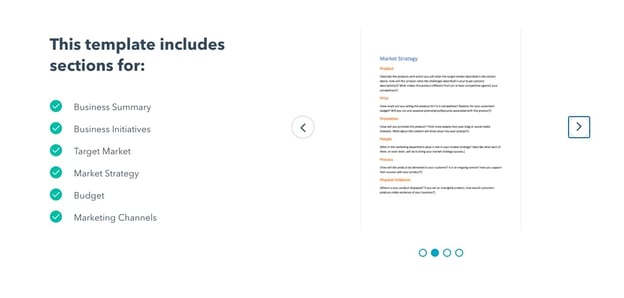
Not sure where to start? This free marketing plan template can help.
how to create a marketing plan

Image Source

The right template can help you build a marketing plan that identifies your budget for the year, the initiatives your marketing organization needs to tackle, and the marketing channels you’ll use to implement those initiatives.

Plus, it’ll tie everything back to a business summary, to keep you aligned with overarching company goals.

2. Create buyer personas.

If you can’t define who your audience is in one sentence, now’s your chance to do it. A buyer persona is an example of your ideal customer.

For example, a store like Macy’s could define a buyer persona as Budgeting Belinda, a stylish working-class woman in her 30’s living in a suburb, looking to fill her closet with designer deals at low prices.

With this description, Macy’s Marketing department can picture Budgeting Belinda and work with a clear definition in mind.

Buyer personas have critical demographic and psychographic information, including age, job title, income, location, interests, and challenges. Notice how Belinda has all of those attributes in her description.

You don’t have to create your buyer persona with a pen and paper. In fact, HubSpot offers a free template you can use to make your own (and it’s really fun).

Buyer personas should be at the core of building your strategy.

You can also use a platform like Versium, which helps you identify, understand and reach your target audience through data and artificial intelligence.

3. Identify your goals.

Your marketing strategy goals should reflect your business goals.

For example, if one of your business goals is to have 300 people attend your annual conference in three months, your goal as a marketer should be along the lines of boosting online registration by 10% at the end of the month to stay on track.

Other marketing goals might be to increase brand awareness or generate high-quality leads. You might also want to grow or maintain thought leadership in your industry or increase customer value.

Whatever your goals, identify what they are and how your marketing organization can work to achieve them over the next year.

4. Select the appropriate tools.

Once you have your goals identified, make sure you have the right tools to measure the success of those goals.

Online software like social media schedulers gives you analytics to help you keep track of what your audience likes and doesn’t. Alternatively, you might consider Google Analytics to measure blog and web page performance.

Additionally, make your goals SMART – to do so, take a look at How to Write a SMART Goal [+ Free SMART Goal Template].

Here are a few tools that can help you track and measure the success of your marketing goals:

HubSpot Marketing Hub

The Marketing Hub allows you to consolidate all of your marketing tools into one centralized platform.

hubspot marketing hub dashboard

Too often, you’ll find a tool that’s powerful but not very easy to use. With this tool, you can attract users with blogs, SEO, and live chat tools. You can then convert and nurture those leads through marketing automation, the landing page builder, and lead tracking features.

With custom reporting and built-in analytics, you can analyze your data and plan out your next move. Plus, HubSpot Marketing Hub integrates with over 500 tools.

Pricing: Free; Starter, $45/month; Professional, $800/month; Enterprise, $3,200/month.
Trello

trello-for-marketing-planning

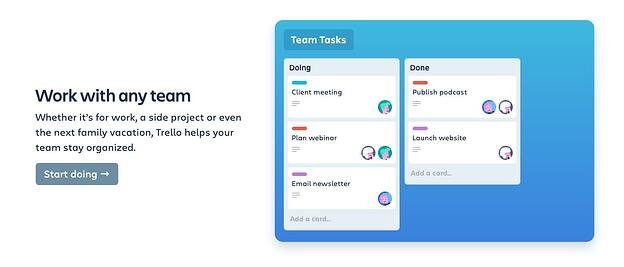
Trello keeps your marketing team on track and openly communicating about the projects they’re working on. Create boards for individual campaigns, editorial calendars, or quarterly goals.

Built-in workflows and automation capabilities keep communication streamlined, and simplicity keeps your marketing team focused on the work that matters.

Pricing: Free; Business Class, $9.99/user/month; Enterprise, $17.50/user/month for 100 users.
Monday.com

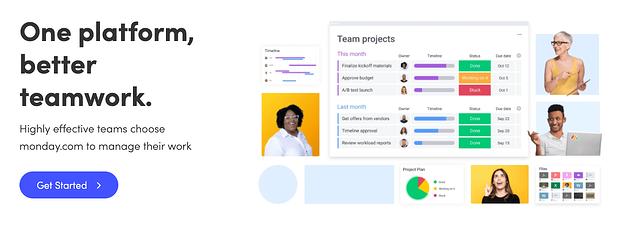
monday.com hubspot integrationEverything on Monday.com starts with a board or visually driven table. Create and customize workflows for your team and keep groups, items, sub-items, and updates synced in real-time.

You can also transform data pulled from timeline and Gantt views to track your projects on Monday.com and ensure deadlines have been met. Plus, with more than 40 integrations — from SurveyMonkey to Mailchimp and, of course, HubSpot — you can visualize your data and ensure your whole company is collaborating.

Pricing: Basic, $8/month/seat; Standard, $10/month/seat; Pro, $16/month/seat; Enterprise, contact for pricing.
SEMrush

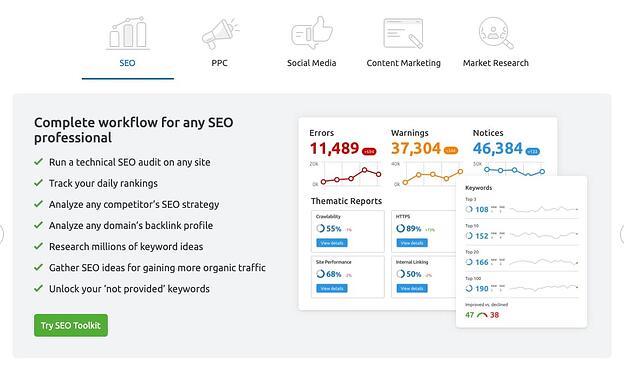
semrush dashboardSEO continues to be a huge factor in the successful ranking of your website.

SEMrush allows you to run a technical SEO audit, track daily rankings, analyze your competitor’s SEO strategy, research millions of keywords, and even source ideas for earning more organic traffic.

But the benefits don’t stop at SEO. Use SEMRush for PPC, building and measuring an effective social media strategy, content planning, and even market research.

Pricing: Pro, $99.95/month; Guru, $199.95/month; Business, $399.95/month.
Buzzsumo

buzzsumo marketing strategy tool

BuzzSumo allows you to analyze data to enhance and lead your marketing strategy, all while exploring high-performing content in your industry.

Use the platform to identify influencers who may help your brand reach, monitor comments, and find trends to make the most of every turn.

As your needs evolve, you can also leverage their crisis management and video marketing tools.

Pricing: Pro, $99/month; Plus, $179/month; Large, $299/month; Enterprise, $499+/month.
Crazy Egg

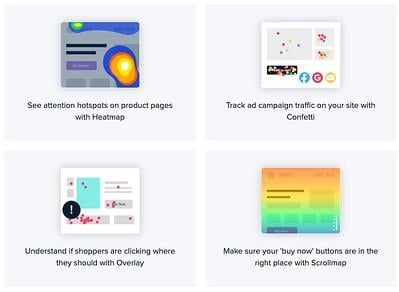
crazyegg website optimizationNeed to optimize your website this year? Consider getting started with Crazy Egg. You’ll be able to identify “attention hotspots” on your product pages, track ad campaign traffic on your site, and understand if shoppers are clicking where you want them to.

You can even make sure your “Buy Now” buttons are in the best place.

Crazy Egg also offers recordings, A/B testing, and more to help ensure your website is offering the best user experience.

Pricing: Basic, $24/month; Standard, $49/month; Plus, $99/month; Pro, $249/month; Custom options available upon request.

5. Review your media.

Decide what you already have in your arsenal that can help you create your strategy. To streamline this process, think of your assets in three categories – paid, owned, and earned media.

  • Paid media means any channel you spend money on to attract your target audience. This includes offline channels like television, direct mail, and billboard to online channels like social media, search engines, and websites.
  • Owned Media refers to any of the media your marketing team has to create: pictures, videos, podcasts, ebooks, infographics, etc.
  • Earned media is another way to say user-generated content. Shares on social media, tweets about your business, and photos posted on Instagram mentioning your brand are all examples of earned media.

Gather your materials in each media type and consolidate them in one location to have a clear vision of what you have and how you can integrate them to maximize your strategy.

For example, if you already have a blog that’s rolling out weekly content in your niche (owned media), you might consider promoting your blog posts on Twitter (paid media), which customers might then reTweet (earned media). Ultimately, that will help you create a better, more well-rounded marketing strategy.

If you have resources that don’t fit into your goals, nix them. This is a great time to clean house and identify gaps in your materials.

6. Audit and plan media campaigns.

Cleaning house segues straight into this step. Now, you must decide which content is going to help you.

Focus on your owned media and marketing goals. For instance, will updating the CTAs at the end of your blog posts help you increase RSVPs to your event?

Next, look at your buyer personas. Let’s say you work for a video editing software company. If one of your persona’s challenges is adding clean sound effects to their videos but you don’t have any content that reflects that, make a 15-second demo video for Instagram to show how great your product is at solving that challenge.

Finally, create a content creation plan. The plan should include topic clusters, goals, format, and channel for each piece of content. Be sure to include which challenge it’s solving for your buyer persona.

For ideas on content creation or a more in-depth look at how to create a content plan, check out our post, The Ultimate Guide to Content Creation.

7. Bring it to fruition.

At this point, your market research and planning should help you visualize how your strategy will be executed – and by which teams.

The final step is to bring that all together and assign actions to your plans.

Create a document that maps out the steps you need to take to execute your campaign. In other words, define your strategy.

Think long-term when creating this document. A standard strategy document is 12 months. This structured timeline should be the home base for your strategic marketing efforts.

To paint an example, let’s go back to the video software company.

Maybe in January, you will launch a software update that improves the exportation process for users. In April, you want to publish an ebook that explains editing terms to your buyer personas, and in September, you plan to launch an integration with other software.

Remember, your digital strategy is unique to your business, so the document should be as well. As long as the strategy includes the pertinent details outlined in previous sections, you’ll be set.

Now that we’ve explored the critical steps of a complete marketing strategy, let’s look at some “Why didn’t I think of that?” strategies to inspire your own.

Examples of Successful Marketing Strategies

1. Regal Movies

Digital strategy: Owned media

Regal Movies took the Halloween spirit to a new level, even renaming its Twitter account to reflect the spirit of the season. This “Monster Madness” poll is a fun, interactive way to get followers invested in Regal’s content:

regal movies' owned media

Image Source

Regal’s tweet is an example of owned media because the company was in full control of the answers followers gave (and, apparently, American Werewolf didn’t stand a chance).

Regal effectively kept true to their brand by using only classic movies in their poll while still putting a modern spin on it.

This is also a good example of how retweets don’t necessarily equal success. While four retweets aren’t that big of a deal, check out the votes: 461. That means there were over 400 interactions with a single tweet.

2. Pipsnacks

Digital strategy: User-generated content, earned media

User-generated content is one of the best ways to gain traction in your strategy.

It demonstrates your appreciation for loyal customers and also incentivizes other users’ to promote your products for the chance at a similar shout-out.

Plus, sometimes the content your brand loyalists create is really, really good.

pipcorn marketing strategy example

Image Source

In this case, the consumer is praising the brand’s product. Doesn’t get better than a fantastic review like that.

3. Small Girls PR

Digital strategy: Event marketing

Wait, is that Keke Palmer?

small girls pr twitter

Image Source

Small Girls PR is a boutique PR company based in New York, and one of the company’s talents is throwing amazing events for their clients, like Olay. This event recap carousel on Instagram is an effective event marketing example, as it boosts awareness for your brand and offers social proof by featuring a public figure.

4. Superside

Digital strategy: Paid media

Design agency Superside launched an Instagram ad to promote a lead magnet: Their digital ad design guide. While the brand may have created the guide specifically for paid promotions, it’s also possible that they repurposed a high-performing blog post into a downloadable ebook.

marketing strategy paid media example

In this case, all they had to do was repackage their current content, build an ad around it with creative assets, and run it.

In previous sections, we discussed the power of leveraging multiple forms of media in your marketing strategy. This is a great example of it.

5. Target

Digital strategy: Paid media, Twitter cards

If you’ve got the budget for paid media, take full advantage of it.

Paid media is when you pay social channels, like Twitter, to promote your content on their site. By doing this, your content reaches new audiences you might not be able to reach organically:

target marketing strategy example

Image Source

This inclusive ad from Target about fall shopping uses Twitter cards to promote the brand and make shopping easy with the click of a button.

More social channels are offering ways for shoppers to purchase in-app or close to it, driving sales and boosting exposure for brands.

What to Expect After Following Your Marketing Process Steps

Ultimately, creating a complete marketing strategy isn’t something that can happen overnight. It takes time, hard work, and dedication to ensure you’re reaching your ideal audience, whenever and wherever they want to be reached.

Stick with it (and use some of the resources we’ve included in this post), and over time, research and customer feedback will help you refine your strategy to ensure you’re spending most of your time on the marketing channels your audience cares most about.

Editor’s note: This post was originally published in October 2019. It has been updated for freshness and accuracy.
Marketing Plan Template

Categories B2B

Content Mapping 101: The Template You Need to Personalize Your Marketing

Content mapping allows you to deliver highly targeted, personalized content at every stage of the buyer’s journey, pushing leads and prospects toward a purchase decision. In this post, we’ll go over what a content map is and how you can start content mapping for your brand.

Let’s get started.

Download Now: Free Content Marketing Mapping Template

Why are content maps important?

Creating a content map is important because it personalizes your audience’s experience with your brand. They’re not receiving a one-messaging-fits-all offer or email. Instead, they get content that speaks to them at the right moment.

The idea of a content map may seem new, but it’s not. Marketers hear it all the time: The content you create needs to be personalized. It needs to be aligned with the wants and needs of your customers (and prospective customers). It needs to resonate with them. It needs to feel like it was created just for them.

On its surface, this sounds like great advice. Personalization, giving people content that they’re actually interested in … it makes perfect sense. But coming up with the actual topics that make for a highly targeted content strategy isn’t that easy.

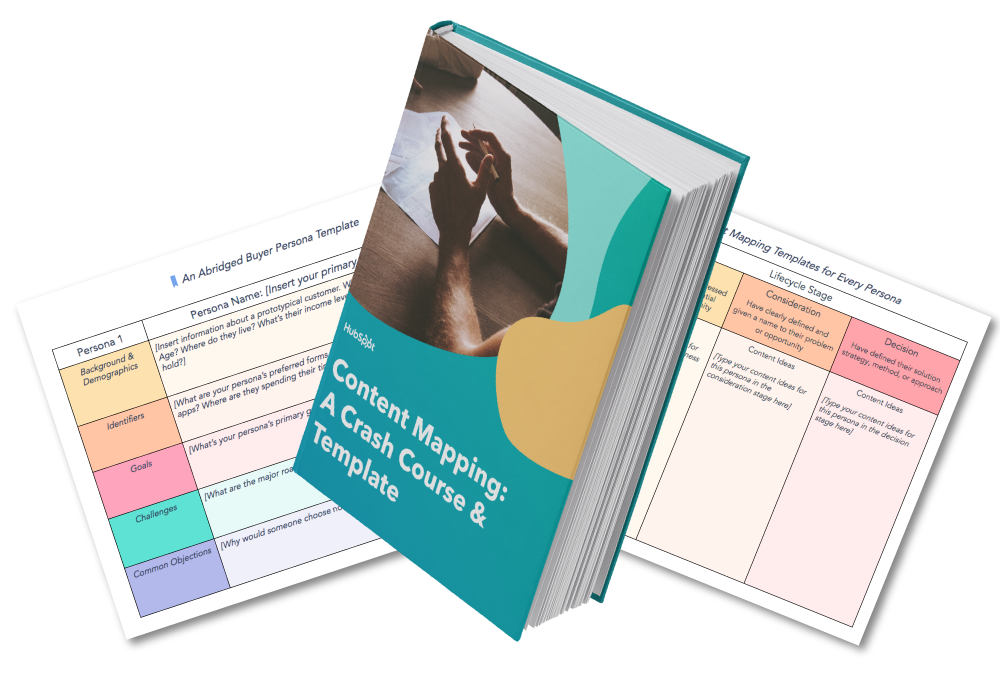
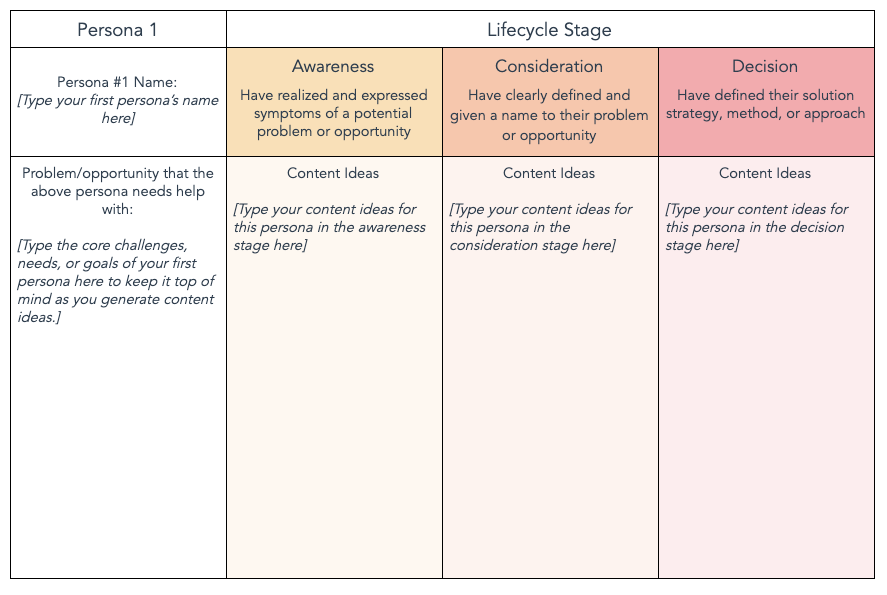
To help you brainstorm and map out content ideas for targeting specific segments of your audience, we’ve created a new free template resource: Content Mapping Template: Using Buyer Personas & Lifecycle Stages to Create Targeted Content.

content mapping template

Download Your Free Template Now

I’ll talk more about how you can use this template in a bit. But first, let’s take a look at how this whole “content mapping” business works.

And when you have this concept down, you’ll want to check out HubSpot Academy’s free content marketing training resource page to learn how to map a content strategy for your business.

Content mapping supports the customer journey and creates a more cohesive, personalized customer experience.

When it comes to content, one size rarely fits all. To ensure that your company’s content is effective at generating and nurturing leads, you need to deliver the right content, to the right people, at the right time. Content mapping is the process of doing just that.

With content mapping, the goal is to target content according to:

Let’s go over these two qualities right now.

Buyer Personas

Buyer personas are fictional, generalized representations of your ideal customers. They help you understand your customers (and prospective customers) better, and make it easier for you to tailor content to the specific needs, behaviors, and concerns of different groups.

The strongest buyer personas are based on market research as well as on insights you gather from your actual customer base (through surveys, interviews, etc.). Depending on your business, you could have as few as one or two personas, or dozens. If you’re just getting started with personas, don’t go crazy! You can always develop more personas later if needed.

Lifecycle Stages

The buyer persona you target with your content is just one half of the content mapping equation. In addition to knowing who someone is, you need to know where they are in the buying cycle (i.e. how close they are to making a purchase). This location in the buying cycle is known as a lifecycle stage.

For the purposes of our Content Mapping Template, we’re divvying up the buying cycle into three lifecycle stages: Awareness, Consideration, & Decision.

  • Awareness: In the awareness stage, a person has realized and expressed symptoms of a potential problem or opportunity.
  • Consideration: In the consideration stage, a person has clearly defined and given a name to their problem or opportunity.
  • Decision: In the decision stage, a person has defined their solution strategy, method, or approach.

By combining buyer personas with lifecycle stages, you can really hone in on specific segments of your audience and tailor content to resonate with each of those segments.

As you get more acquainted with content mapping, you’ll want to consider website content mapping as well.

Website Content Mapping

Website content mapping is the process of planning the pages, blog posts, and offers you’ll publish on your site and identifying which buyer personas those pages and posts will serve. Website content mapping also identifies which pages and posts address different lifecycle stages.

Website content mapping is a key element of website personalization. In essence, you’ll create different pages, posts, and offers to address different buyers at different points in the buyer’s journey.

But before you can write all of that content, the content map comes first. Luckily, you don’t have to create one from scratch.

With the right content mapping template, you can get create a content map that resonates with your audience.

Content Mapping Template

content mapping template

Download Your Free Template Now

To help you create a content map for your own team, we’ve created a downloadable content mapping template. The template includes an introduction to content mapping, a crash course on buyer personas and lifecycle stages, a content mapping template (plus examples), and bonus buyer persona templates.

With the template, you’ll:

  • Learn how to understand buyer personas and lifecycle stages.
  • Identify problems and opportunities that your audience needs help with.
  • Brainstorm highly targeted content ideas that incorporate personas and lifecycle stages.

This template is available in both Google Docs and Microsoft Word.

Whether you want to download our content mapping template or create your own, let’s dive into the structure of a content mapping template.

HubSpot Content Mapping Template: How to Use

In our content mapping template, we created a simple grid system. The buyer persona (and a key problem or opportunity that persona is struggling with) is at the start of the grid. As you move from left to right, you’re effectively moving down the funnel.

HubSpot content mapping template

Here’s how to fill out each of the sections in the template.

Awareness Stage Content

Your awareness stage content should target the top of the funnel (TOFU). People in this segment are just becoming aware that they have a problem. At this stage, don’t try to beat them over the head with product-focused content. Instead, think of how your content can help people become more informed about the problem in general, and you’ll (hopefully) find that they continue moving down your funnel as they search for solutions.

Consideration Stage Content

Your consideration stage content, in comparison, can more explicitly mention how your product or service could potentially solve a problem. Keep in mind, however, that at this point in the buying cycle, people are still evaluating their options. So while case studies and demo videos are fine, save your more sales-focused content (estimates, free trials, etc.) for the next stage.

Decision Stage Content

At the decision stage of the game, you can really lean into marketing your products or services. If someone has reached this stage, they’ve already identified a problem and a solution, and are now getting ready to pull the proverbial trigger. You can begin to send more “salesy” emails and offers that push the buyer toward a purchase decision.

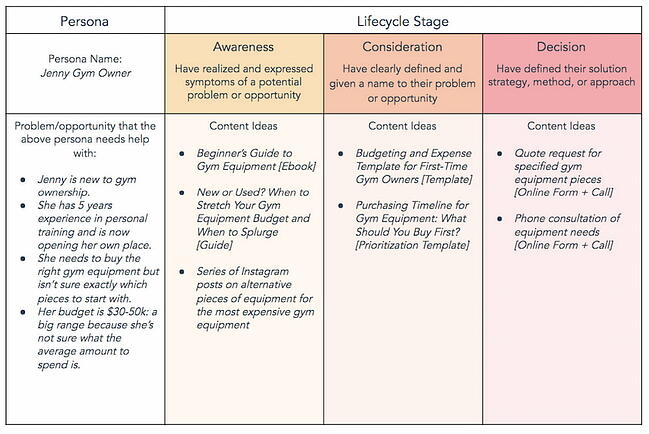
Unsure of what this all can look like when put together? Let’s take a look at an example below.

Content Mapping Example

Content mapping examples from HubSpot

You now know what content mapping is, and you have the template you need to get started. What type of tools can you use to start content mapping?

Content Mapping Tools

Content mapping may seem like a difficult task that requires highly specialized software. It’s not true — it requires simple business tools you may already be using in your day-to-day.

We’ll start with the most basic tools you need to start content mapping, such as word processors and visualization tools. Then we’ll move into the tools that will get you the data that you need to address different buyers, such as a CRM.

1. Google Docs

Content mapping tools: Google Docs

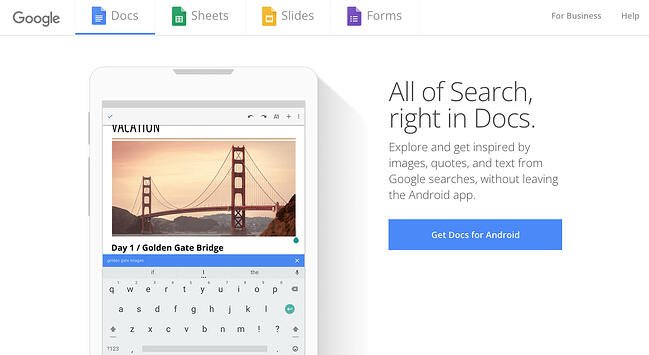
First up in your content mapping tech stack is your preferred word processor. This is where you’ll outline your content map and write out the actual content once it’s time to create it. We highly recommend Google Docs because it makes it easier to share work across your team, and you never have to worry about backing up your content map.

Pricing: Free

2. Lucidchart

Content mapping tools: Lucidchart

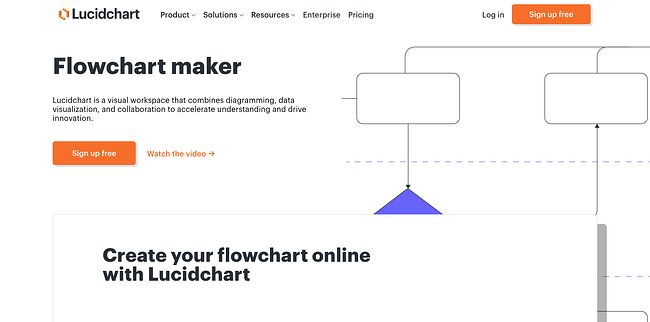
If you’re more of a visual person, then a flowchart tool is a must. Also, if you’d prefer to create an actual content map — with lines and diagrams — then you need a more sophisticated tool than Microsoft Paint (and Microsoft Paint is great, but it may not be what you need). Lucidchart’s flowchart maker is a top-of-the-line tool that also allows you to connect different apps and services. Like Google Docs, it allows you to work collaboratively.

Pricing: Free; $7.95/month (Individual); $9/month (Team); Custom (Enterprise)

3. HubSpot

Content mapping tools: HubSpot's CRM HubSpot’s CRM is the one tool you need to compile all of your data from current and prospective customers. You’ll have access to names, emails, prior engagements, and website visits all in one intuitive place. HubSpot will allow you to discern different lifecycle stages and pinpoint commonalities between customers who are ready to purchase — and customers who are not. As such, you’ll be able to make data-driven decisions as you create your content map.

Pricing: Free

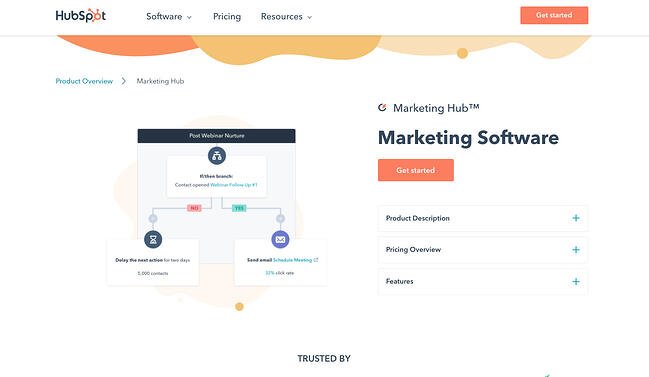
4. Marketing Hub

Content mapping tools: Marketing Hub

Once you have access to the customer data that you need, it’s time to write the content and distribute it. For that, you need a marketing automation tool. Marking Hub comes bundled with everything you need to create a personalized experience for your leads and prospects, such as email marketing tools. It’ll help you execute your content map once it’s ready for deployment.

Pricing: $0/month (Free); $45/month (Starter); $800/month (Professional); $3,200/month (Enterprise)

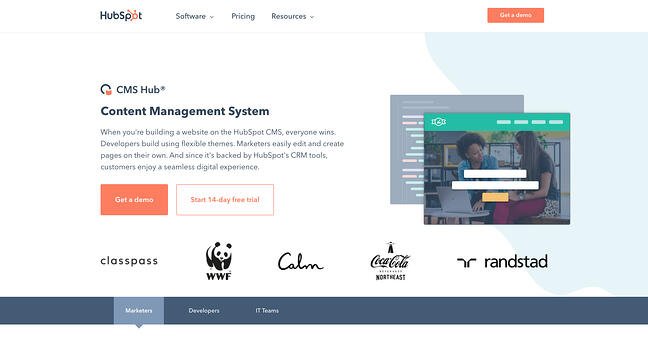
5. CMS Hub

Content mapping tools: CMS Hub

A content management system is probably the most important tool for your content mapping efforts. A CMS will allow you to publish personalized content that targets different site visitors at — you guessed it — different stages of the buyer’s journey.

CMS Hub is fully integrated with HubSpot’s CRM platform and Marketing Hub, allowing you to create a seamless experience for your customers as they receive the content you’ve designed for them. It will help you execute your content map flawlessly. Even more importantly, with CMS Hub, you can continue testing and re-testing your content for better results.

Pricing: $23/month (Starter); $360/month (Professional); $1,200/month (Enterprise)

Not quite convinced that content mapping is worth it? Let’s hear from some marketers who are actually doing this stuff …

Content Mapping Tips From the Pros

1. Educate your audience.

Content mapping tip from Adanna Austin“We all have to create compelling content to attract our ideal clients, build an active and engaged audience, and get daily sales. Spend time building your audience by educating them and engaging with them. No one has built a business by posting the same image or type of image everyday on socials and not having convoys with their audience. It is not just about showing up, but doing so with intention so you can attract your ideal clients who will buy from you.”

Adanna Austin (Business Coach and Consultant, Marketing Dynamics Business Solutions)

2. Give your prospects the information they need before they ask for it.

Content mapping tip from Laura Hogan“With content mapping, you can give your prospects the information they are asking for before they even ask for it. Buyer personas and lifecycle stages allow you to be one step ahead of the game by mapping out what your prospect’s next steps are and delivering them the content from numerous different avenues.
We create buyer personas as part of our onboarding process and everything we do from content offer to daily tweets is centered around that document. We also always ask ourselves, ‘Would business owner Bob open this email, click this tweet, or download this offer?'”

Laura Hogan (Founder, Digital Atlas Marketing)

3. Provide different conversion paths for different personas.

Content mapping tip from Marc Herschberger“When mapping out content for your site’s visitors, it’s important to remember that when it comes to purchasing decisions (BOFU conversions, especially for B2B and high-priced items), there are some personas out there who would rather speak to someone on their terms rather than fill out a form for a consultation. Understanding how they are most comfortable when it comes to making decisions can help you understand what points of conversion will be the most relevant and successful for that persona.

Optimizing your site pages (landing and thank you pages, as well), TOFU & MOFU offers, and workflows with direct contact information (phone #, email, etc.) is a great way to ensure that visitors, prospects and leads who may shy away from form submissions still have readily available, alternate means of converting.”

Marc Herschberger (Director of Operations, Revenue River Marketing)

4. Create specific content that appeals to specific personas.

Content mapping tip from Spencer Powell“Mapping out buyer personas and lifecycle stages is extremely important when creating content. In terms of buyer personas, it’s easy to see that a Marketing Director will have different questions, information needs, and interests compared to a CEO. Both of these personas may be searching for your product or service, but they’ll be looking for different topics. By creating content that appeals to each audience, you can be more effective in attracting that specific audience.
By the same token, each persona of yours may be in a different stage of the buying process, so it’s important to think through and create content that appeals to someone looking for basic, high-level information such as an ebook, as well as specific information like a pricing guide or case study.

One tip I’d suggest for anyone with pretty different personas would be to dedicate an entire section of your site to each audience. That way, when you pull in your audience, all the content is directed toward them.

We actually took this concept and went a step further by creating unique brands for each one of our vertical markets. Each brand has its own section of the website, its own blog content, and its own premium content (downloadable offers). It’s really helped us attract and convert visitors at a higher rate because all the content is more relevant to that persona.”

Spencer Powell (Chief Executive Officer, Builder Funnel)

4. Pull content topics from your sales process.

Content mapping tip from Diona Kidd“By taking the buyer and buying stage into account when creating content, you can be sure that you’re designing content to help move them through the buying process.
In addition to mapping content to the buyer profile and buying stage, we regularly pull topics from the sales process. Then we offer the content in later sales calls. This helps us not only evaluate the relevancy of the content but also the interest of the buyer. We encourage clients to do the same.”

Diona Kidd (Managing Partner, Knowmad)

Content Mapping is Key to Your Company’s Growth

Delivering the right content at the right time can do wonders for your company’s growth. By meeting prospects’ needs based on their persona and lifecycle stage, you’re delighting them at every turn, boosting your chances of winning a loyal customer and turning them into a brand evangelist.

Editor’s Note: This post was originally published in March 2014 and has been updated for accuracy and comprehensiveness.

Blog - Content Mapping Template

Categories B2B

Instagram Is Getting Rid of the Swipe Up: What It Means & How to Use the New Link Sticker

If you’ve been on Instagram for a few years now, you’ve likely watched the evolution of influencer marketing unfold.

And one tell-tale sign of influencer marketing? The swipe-up feature.

I can remember countless hours of scrolling through stories and hearing my favorite influencers encouraging me to “Swipe up, swipe up!” (My bank account remembers, too …)

But — as of August 30th — the option to swipe up is no longer available. Instead, Instagram has replaced it with a new link sticker, which effectively operates the same way: It enables users to link to external websites.

Here, we’ll explore why Instagram got rid of the swipe up, and how HubSpot (and other brands) have leveraged the sticker tool, instead.

Access Now: 22 Free Business Instagram Templates

Why Instagram is Getting Rid of the Swipe Up

Back in June 2021, Vishal Shah, Instagram’s former Head of Product, told the Verge they were testing an alternative to Instagram’s popular swipe up feature — which, as a reminder, enables influencers to direct viewers to external links.

As Shah told the Verge, stickers fit more cohesively into the existing Instagram infrastructure. He said, “[This test] brings links into the same kind of overall system, which from a simplicity of system perspective, also makes a lot of sense.”

Then, in August, Instagram made an announcement that stickers would replace the swipe up feature. In a statement, an Instagram spokesperson said stickers would “streamline the stories creation experience” and offer more “creative control”.

What does that mean, exactly? Well, unlike the swipe up feature, which looked the same for everyone, link stickers can be customized depending on color, text, size, and placement within the story.

Plus — perhaps best of all — viewers can still engage with the story by reacting or replying to it, which the swipe up feature had previously inhibited people from doing.

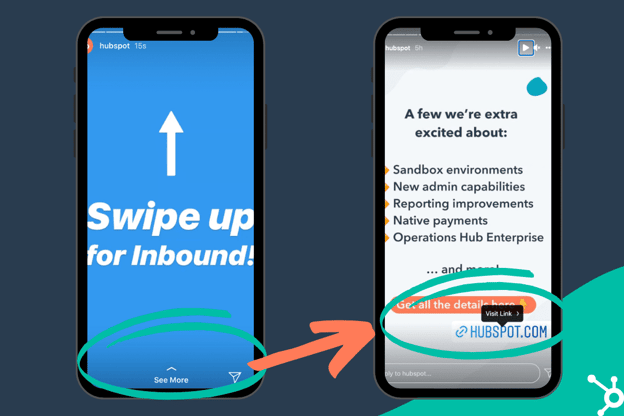
Here’s an example of what I mean. On the left phone, shown below, you’ll see an older HubSpot stories post with a “See More” CTA at the bottom — what was known as the swipe up feature.

On the right side, you’ll see a newer HubSpot stories post with a “Visit Link” CTA, which pops up when you click on the link:

It’s important to note — similar to the swipe up feature, the new link sticker will only be available for verified accounts or accounts with more than 10,000 followers. (At least for now.)

Adding links as a sticker makes sense for Instagram’s creative direction, seeing as most of its other features are already available in sticker form (including polls, questions, and location stickers).

To investigate how social media teams are using the new link sticker, I spoke with HubSpot’s social team. Let’s dive into their advice, next.

How HubSpot Social Media Teams Are Preparing

I spoke with Kelsi Yamada, a Marketing Manager of Social Media Campaigns at HubSpot, to learn how the team had prepared for the swap to link stickers.

Yamada told me, “The biggest piece of advice I have is to plan for the sticker to take up space. The swipe up feature allowed you to include a link without having it be a part of the creative, but [the link sticker] actually needs some real estate on the screen.”

When adding a sticker, think about how it can match the aesthetic of the post. If your stories all follow the same visual theme, consider designing your sticker to match that theme.

Yamada adds, “I also think there’s a character limit on the link sticker, so be prepared to make custom vanity links, or make it very clear where the link is going — for instance, for a product announcement, we were going to use bit.ly, but since it showed up on the sticker as a bit.ly link, we decided to just use hubspot.com/new so it seemed more authentic.”

Next, let’s dive into a few additional best practices brands can follow as they incorporate the link sticker into their stories.

How Brands Can Navigate

Similar to the swipe up feature, the link sticker enables brands to promote new product pages, upcoming events, or the company’s homepage.

But these links should be used sparingly. If every story you publish includes a link to take followers elsewhere, your followers will grow tired of clicking.

Additionally, you want your link to be as relevant to the content as possible. If you’re posting about an upcoming product announcement, don’t link to your homepage — take followers directly to the product landing page.

Here are a few other actions you can encourage followers to take with the link sticker:

  • Drive traffic to your other social media accounts. For instance, you might post a short clip of a branded YouTube video, and include the link to the full video.
  • Drive traffic to your blog by posting content related to the blog post, with a link to the full article.
  • Create promotional deals directly through Instagram. Encourage followers to click on a story link to earn 10% off, win a giveaway, etc. This can help you increase engagement on Instagram and drive sales, as well.

Here are a few clever examples of how brands are using the new link sticker.

1. ASHYA 

ASHYA, a bag and luggage brand based in New York City, created a recent story post that highlighted the company’s new fall bag.

The design of the post is minimalist to draw attention to the new product — and, to ensure it doesn’t distract users, ASHYA’s link sticker (which links directly to the product page) is grey and white and blends into the background nicely.

2. Lil’ Libros®

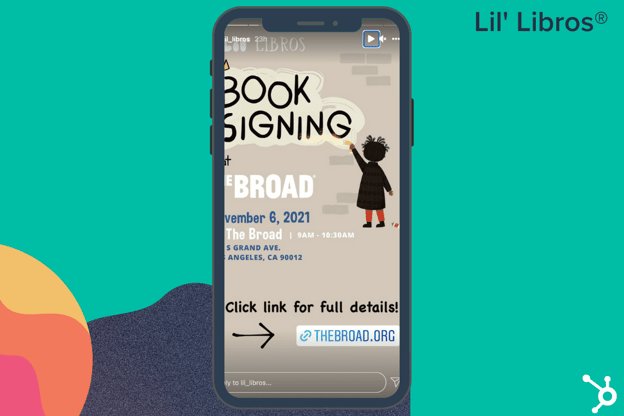
Lil’ Libros®, a bookstore that sells adorable bilingual picture books for children, created a story post to highlight an upcoming book signing. The post uses a mix of tan, black, and white colors — and the link sticker, designed in a colorful blue, fits the post’s theme perfectly.

Additionally, Lil’ Libros® drew attention to the sticker by adding text with a “Click link” arrow that points users directly to the sticker. Consider how you might similarly design your post around the sticker to show followers exactly what you’re asking them to do.

3. Neatly Nested

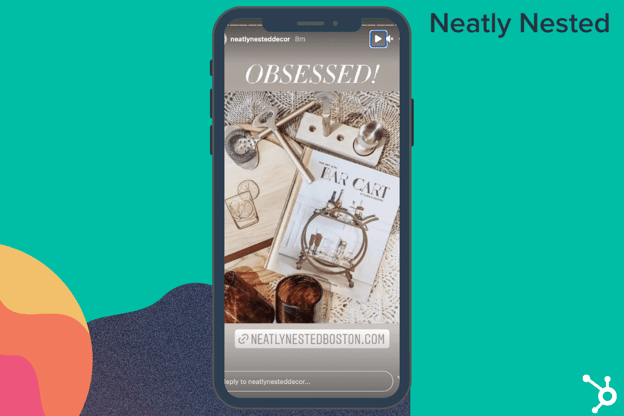
Boston-based home decor shop Neatly Nested has a clean, sophisticated theme across their Instagram posts. In the post shown below, the team uses neutrals and browns to highlight their new fall collection. The sticker at the bottom is the same color as the background, and is placed below the photo to ensure nothing detracts from it.

And there you have it! You’re well on your way to using the link sticker like a pro. Keep in mind — just like with anything related to social media, you’ll want to do what’s best for your audience above all else.

As you test out the link sticker, keep track of which types of links drive the most traffic. Over time, you can iterate on your strategy to delight more of your audience. Happy linking!

New Call-to-action

Categories B2B

The 12 Best Blogging Platforms for 2021 (& How to Pick One)

According to HubSpot data, blogs are among the top three forms of media used in content strategies today.

This isn’t surprising. Whether you’re interested in blogging for your business or as a hobby, publishing blog content offers many benefits. Blogging not only helps you establish authority in an industry — it also drives traffic to your website and enables you to better convert that traffic into leads.

To reap the rewards of blogging, we’ll walk through the process of choosing the right platform for your needs and goals. Then we’ll explore some of the best blogging platforms that can help if you’re looking to add a blog to your business site or to create a stand-alone blog.

Learn More About HubSpot's CMS Software

How to Choose a Blogging Platform

To select a blogging platform that’s right for your business, you first have to evaluate how its capabilities align with your goals and needs. If you need to boost your visibility in SERPs, for example, look for a platform with built-in SEO tools. If your main priority is to start publishing visual content fast, then you might focus on finding a platform that supports multimedia posts.

Let’s take a look at some essential features that you might need for your blog. You can use this list when evaluating different blogging platforms.

Content Editor

The content editor is the core of every blogging platform. As a blogger, you might be working in this editor every day, so make sure you pick a platform with an editor you like.

You could make a list of must-have and nice-to-have features. For example, maybe your editor must have drag-and-drop functionality and an auto-save feature but it’d be nice to have an option to preview how your post looks on different devices.

Themes and Templates

Themes and templates allow you to customize a blog quickly and easily. When looking at different blogging platforms, check out their selection of themes and templates.

Do they have a lot of options for blogging specifically? Do they have a variety of free and premium ones? What’s the average price of their premium themes? Can you edit the themes and templates to create a truly customized look for your site?

You might also want the option to start from scratch rather than use a predesigned theme.

These are just a few questions that can help you select a platform with the design and customization options you need.

SEO Features and Tools

Optimizing your content for search is essential to driving traffic to your blog. According to a study by Sistrix, sites listed on the first SERP in Google get 88% of the organic clicks for a keyword or phrase, with 28.5% going to the first result alone.

To get on that first page, you ideally want a platform with built-in tools to help you optimize your content. CMS Hub, for example, offers SEO recommendations as you write.

If a platform doesn’t have this type of advanced functionality, then check if you can install a third-party SEO tool. Otherwise, you’ll have to get up to speed on SEO best practices and make sure to implement them on your blog.

Extensions and Integrations

No blogging platform can offer every single feature every single blogger wants out-of-the-box. Besides, your blogging needs and goals will likely change over time as your audience grows or strategy shifts.

That’s why it’s important to select a blogging platform that offers extensions or integrations with third-party tools. Platforms with an ecosystem of apps will be able to scale with you over time so you don’t have to migrate to a more flexible alternative in the future. 

Now that you know some features to consider in your selection process, let’s take a look at some of the best blogging platforms on the market.

We’ll divide this list into paid and free blogging platforms, so you can find one that meets your needs and budget. Let’s get started below.

Paid Blogging Platforms

Most premium blogging platforms will offer more features and control over your blog than free platforms. If you have the budget, investing in your blogging efforts now can help you grow over time.

1. CMS Hub

G2 Rating: 4.5/5.0 (1,093 Reviews)

Best for: Rich Functionality

best blogging platforms: CMS Hub

CMS Hub Ideal Users

What sets CMS Hub apart from other blogging platforms is that it’s ideal for both developers and marketers. It has the tools, technologies, and workflows that developers need to build a CRM-powered blog and that marketers need to manage it. 

CMS Hub Pros

The biggest advantage of CMS Hub is that it’s powerful but still easy to use. You can start by selecting a pre-designed theme or build your own custom theme. Then, using HubSpot’s blog editor and built-in SEO tools, you can quickly create search engine optimized blog posts with CTAs, forms, and other interactive elements. You can even create multi-language variations of your blog posts and run A/B tests on them to reach a global audience. Before you publish, you can preview how your posts and pages look on different types of devices.

Once you’re ready to start promoting, you can connect your blog to your social media accounts. That way, you can automatically share new blog posts on your social networks in the same place that you wrote them.

As you publish more content, you can analyze your blog performance to understand what topics and types of content are resonating with your readers. That’s because CMS Hub is built as part of HubSpot’s CRM platform.  

CMS Hub Cons

Since CMS Hub is designed to be an all-in-one solution for marketers and developers, it has lots of rich functionality, including activity logging, flexible themes, multi-language support, and more. This is a good thing for most bloggers. But, if you’re an individual or small business just starting to blog, then you may not have the time or expertise to leverage the full power of the CMS Hub. In that case, you might be better off with a simpler or free alternative to start. 

CMS Hub Website Example

Below you can take a look at this retailer’s feature-rich blog built on the CMS Hub.

CMS Hub blog example: Blum

CMS Hub Key Takeaways
  • Meets the needs of developers and marketers
  • Backed by HubSpot’s CRM tools
  • Multi-lingual support, SEO recommendations, and other advanced functionality is built-in

2. WordPress

G2 Rating: 4.3/5.0 (8,096 Reviews)

Best for: Themes and Plugins

best blogging platforms: WordPress

WordPress Ideal Users

Creating and managing a blog on WordPress will likely require more maintenance than other platforms, but it will provide the extensibility and content management features publishers and other businesses need to create a complex blog.

WordPress Pros

WordPress was originally created as a blogging platform. Though it has evolved into a multi-purpose content management system, it still has many features and themes for blogging.

WordPress enables you to not only purchase a custom domain and download one of 3,500+ themes specifically designed for blogs — it also lets you add social media buttons, forms, affiliate links, and other features via plugins.

The customization options are virtually limitless with the 59,000+ free plugins available.

WordPress Cons

You will have to make sure your theme and plugins are compatible and up-to-date. Otherwise, they can disrupt the user experience or break your site. Other maintenance tasks like finding and fixing broken links, updating the core software, and optimizing your database will also be your responsibility. This can be difficult for site owners who don’t have the time or technical expertise to regularly maintain their site. 

WordPress Blog Example

Tech Crunch, one of the largest and most popular technology news blogs, is powered by WordPress. Take a look at this WordPress website example below.

WordPress blog example: Techcrunch

WordPress Key Takeaways
  • Ideal for publishers and others who want to extend platform via plugins
  • Over 3,500 free blogging themes
  • Website maintenance can be time-consuming

3. Squarespace

G2 Rating: 4.4/5.0 (921 Reviews)

Best for: Design

best blogging platforms: Squarespace

Squarespace Ideal Users

Squarespace is an ideal blogging platform for businesses and individuals creating image-rich content. With Squarespace’s award-winning designer templates and integrations with Getty Images, Unsplash, and Google AMP, you can create visual content that’s engaging and shareable.

Squarespace Pros

While Squarespace only offers about 140 templates, they are all mobile-optimized and fully customizable so you can create a blog that looks the way you want it to. Once you’ve designed your pages, you can use Squarespace’s blogging and SEO tools to create and optimize your content.

Finally, after publishing your blog posts, you can connect your social media accounts to easily promote them. Then use the built-in analytics tool to learn where your traffic is coming from, what your visitors are looking for, and how they’re interacting with your content.

Squarespace Cons

Squarespace offers even more features, from audio files support to newsletter signup forms, but ultimately it’s limited in functionality. That’s because it supports less than 30 extensions, so you’re mostly limited to the features Squarespace provides out-of-the-box.

Since they lack some feature that bloggers needs — like an auto-save feature, for example — Squarespace is not the ideal platform for everyone.

Squarespace Blog Example

Squarespace does allow some bloggers to create beautiful sites, like this lifestyle blog below.

Squarespace blog example: Lauren Saylor

Squarespace Key Takeaways
  • Best suited for individuals and brands who want to customize a blog to their personal style
  • Small selection of templates but high-quality
  • Limited to features and few extensions that Squarespace offers

4. Wix

G2 Rating: 4.2/5.0 (1,338 Reviews)

Best for: Fast Setup

best blogging platforms: Wix

Wix Ideal Users

Wix is a popular blogging platform for beginners who are looking for hosting and blogging tools in one place and who prioritize speed and design over functionality.

Wix Pros

With Wix, you have two options for creating your blog. Using the Wix Editor, you can start by selecting from over 800 pre-designed templates that any blogger can use, whether you own a retail business or run a food review website. Or you can start from scratch if you know HTML and CSS. Using Wix Artificial Design Intelligence, on the other hand, you can fill out a quick questionnaire and have a blog created for you. 

After you’ve picked or created your template, or had one selected for you with Wix ADI, you can begin writing and editing posts on desktop or mobile, embed Wix’s stock photos and videos or your own media, and organize them into topics.

Once you’re done writing, you can configure your SEO settings to boost your organic reach, push your content to your subscribers with Wix’s email tool, and share them through your social media accounts. You can further foster a sense of community among your readers by letting them become members.

Wix Cons

While Wix is more versatile than other hosted website builders, it lacks customization options and content management features, particularly when comparing Wix vs WordPress or another CMS.

For example, to add more advanced elements to the page, like music or maps, you’ll have to add HTML code. This process can be intimidating for beginners, particularly when compared to the ease of installing plugins on WordPress. It’s post editor also isn’t drag-and-drop, which might frustrate some bloggers.

Wix Blog Example

Take a look at this Wix blogger’s site below for an example of a stylish but relatively simple blog. 

Wix blog example: Bella & Bloom

Wix Key Takeaways
  • Ideal for bloggers who prioritize speed and design over functionality
  • Option to use pre-designed templates or start from scratch
  • Editor lacks drag-and-drop functionality

5. Weebly

G2 Rating: 4.2/5.0 (419 Reviews)

Best for: Ease of Use

Weebly

Weebly Ideal Users

Weebly is another popular blogging platform for bloggers that want everything they need to launch a blog in one place, including website building tools, templates, and hosting. More specifically, Weebly is best suited for creating blogs with lots of content but more basic functionality.

Weebly Pros

Weebly is affordable and easy to use like Wix, but differentiates itself in multiple ways. The editor supports drag-and-drop functionality for both posts and pages, for example. You can create more complex layouts by adding elements like forms and image galleries as well. You can also add more sub-levels to your navigation menus, which allows you to organize larger amounts of content.

All Weebly templates are also mobile-optimized, which means you won’t have to do any additional editing or rearranging for mobile.

Weebly Cons

While Weebly offers more functionality than most website builders, it does lack flexibility when compared to WordPress or another CMS. For example, you can’t drag and drop elements anywhere on your posts and pages or edit parts of the underlying source code. These restrictions do make Weebly easier to learn and use than most platforms, but they can frustrate more advanced users.

There’s also been some pain points since Weebly was acquired by the ecommerce company Square. A prime example: users who select that they want to create a website will see the standard Weebly editor, whereas users who select that they want to create a website with an online store will see a completely different editor called the Square Online Builder. This has caused some confusion among users

Weebly Blog Example

Take a look at this Weebly blog below, which is content-rich but not feature-rich. 

Weebly blog example: Leadapreneur

Weebly Key Takeaways
  • Ideal for content-rich blogs
  • Editor supports forms, image galleries, and other advanced elements
  • No access to source code

6. Craft CMS

G2 Rating: 4.1/5.0 (35 Reviews)

Best for: Customization

best blogging platforms: Craft CMS

Craft CMS Ideal Users

Craft CMS is a blogging platform designed for developers, designers, and web professionals. 

Craft CMS Pros

With Craft’s personalized content modeling, powerful templating, and option to edit your source code, you can completely control the appearance and functionality of your site — if you have the necessary experience.

Craft CMS also offers an image editor, collaboration tools, and a localization feature that can translate your content to specific languages. You can now also manage multiple blogs from within a single Craft install. To analyze your content’s performance, you can integrate Craft CMS’ dashboard with Google Analytics.

Craft CMS Blog Example

If you have the web development experience to fully leverage the power of Craft CMS, you’ll be able to create a complex blog with custom post types, like this travel blog below.

Craft CMS blog example: Tiny Shiny Home

Craft CMS Key Takeaways
  • Advanced functionality including personalized content modeling and localization feature
  • Free version for single admin accounts
  • Requires some web development experience

7. Contently

G2 Rating: 4.5/5.0 (51 Reviews)

Best for: Enterprise Content Marketing

best blogging platforms: Contently

Contently Ideal Users

Contently is a robust blogging platform that’s ideal for enterprise companies with large budgets but few internal editorial resources.

Contently Pros

Contently allows you to manage your entire content creation process in one place. You can create and visualize your editorial strategy with their customizable production calendar tool, organize your blog posts with their tagging tool, and effectively collaborate with your team on projects by leveraging their advanced workflow tools. You can even pay for Contently’s well-vetted freelancers to write some of this content for you.

Before publishing your content, Contently’s smart content review tools will ensure your content is aligned with your brand, optimized for search, and legally compliant. Finally, to refine your content strategy, Contently enables you to compare your content’s performance against industry benchmarks, quantify its ROI, and measure its performance by topic, format, and sources directly in your dashboard.

Contently Cons

The biggest drawback of Contently is that it’s beyond many small businesses’ and individual’s budgets. With prices ranging from $3,000 to $25,000 per month, Contently is one of the most expensive blogging platforms for enterprise companies.

Contently Blog Example

The Royal Bank of Canada, one of North America’s largest banks, uses Contently to streamline content creation across 14 marketing departments. Check out its blog below.

Contently blog example: Royal Bank of Canada

Contently Key Takeaways
  • Can manage entire content creation process
  • Deep-dive analytics
  • Pricing only feasible for enterprise companies

8. Joomla

G2 Rating: 3.9/5.0 (338 Reviews)

Best for: Community Building

best blogging platforms: Joomla

Joomla Ideal Users

Joomla is an open-source CMS with advanced content and user management features that are built directly into the platform. This makes it an excellent WordPress alternative for creating community-centric blogs. 

Joomla Pros

Joomla offers rich built-in functionality as well as thousands of extensions. For example, Joomla allows you to create custom post types, manage hundreds of users, and publish content in multiple languages right out of the box.

It also offers some great extensions for blogging. EasyBlog by StackIdeas, for example, provides a much cleaner drag-and-drop editor than Joomla’s built-in editor. You can also enable star ratings on your blog and automatically publish posts to your social media platforms with this extension.

Joomla Cons

Because of its robust built-in functionality, Joomla does have a steeper learning curve than a CMS like WordPress so it’ll require more time to set up. It also offers a smaller selection of themes and extensions than WordPress, which can limit your customization options.

Joomla Blog Example

Below is an example of a Joomla blog built with EasyBlog.

Joomla blog example: The Grid Asia

Joomla Key Takeaways
  • Advanced content management features
  • Steep learning curve due to robust built-in functionality
  • May require blogging extension like EasyBlog

9. Drupal

G2 Rating: 3.8/5.0 (375 Reviews)

Best for: Flexibility

best blogging platforms: Drupal

Drupal Ideal Users

Drupal is a highly flexible open-source CMS that’s best suited for advanced users, as well as enterprise companies, with complex blogging needs who are looking for a self-hosted solution. 

Drupal Pros

Drupal has hundreds of out-of-the-box features and modules. If you know how to use them or have the time to learn, then Drupal will provide you more power than other open-source platforms. 

Specifically, Drupal supports a wide selection of taxonomies, content types, page templates, blocks, views, and more for creating and managing lots of different types of content. It also has advanced user permissions so you can provide site admins, content editors, and other stakeholders personalized access to specific content. This — along with its multilingual capabilities, Layout Builder, and other modules — will allow you to create and manage large, complex blogs

Drupal Cons

If you don’t know how to use Drupal’s out-of-the-box features and modules, and you don’t have the time to learn, they can be confusing and hinder your blogging efforts. In that case, you might be better off with a simpler platform. 

Drupal Blog Example

Below is a Drupal blog that features all of the add-ons and modules developed by the site owner.

Drupal blog example: Paulo Gomess

Drupal Key Takeaways
  • Best suited for technical users with complex blogging needs
  • Powerful content management features
  • Advanced user permissions

Free Blogging Platforms

While free blogging platforms might offer less functionality and flexibility than their premium counterparts, many can still provide the blogging tools and customizations you need to start blogging. Let’s take a look at some of the most popular options below.

10. Write.as

G2 Rating: 4.3/5.0 (23 Reviews)

Best for: Privacy

best blogging platforms: write.as

Write.as Ideal Users

Write.as is a lightweight blogging platform that’s ideal for individuals looking to create simple blogs with a minimalist design.

Write.as Pros

Offering a stripped-down editor with nothing but an auto-save feature, Write.as offers the experience of writing in a virtual journal. Write.as is also free to use and doesn’t support ads.

Teams can also use it like Google Docs to share updates, proposals, and works-in-progress (for a monthly subscription). 

Write.as Cons

Write.as does require you to use Markdown, a syntax that uses special characters to format text. For example, you’d type in asterisks to create bullet points, hashtags to create headers, and [Link] to add a link. The syntax is not difficult to learn, but it might require some practice. If you’d prefer to simply click a button to create bullet lists or add hyperlinks, then you’ll be better off with one of the free platforms below.

Also, while Write.as is free to use, you’ll have to upgrade to its pro plan for $6 per month to connect a custom domain name, install a custom theme, remove the nofollow tag from your links, and more.

Write.as Blog Example

Check out an example of a Pro blog below.

Write.as blog example: Process Imagining

Write.as Key Takeaways
  • Best for individuals who want a minimalist interface and design
  • Requires you to learn and use Markdown syntax
  • Free version is ad-free

11. Blogger

G2 Rating: 4.1/5.0 (76 Reviews)

Best for: Simplicity

best blogging platforms: Blogger

Blogger Ideal Users

Blogger is a free platform designed for newbie bloggers. While it lacks many content management features, Blogger is more feature-rich than most free blogging platforms. For that reason, Blogger is perfect for individuals looking to create lifestyle blogs as a hobby or to make some extra cash.

Blogger Pros

The biggest advantage of Blogger is how easy it is to create and customize a relatively basic blog.

To get started, you just need to create an account with Google, select a template, and get publishing. You can purchase a custom domain, optimize your SEO settings, connect your blog to Google Analytics, optimize your posts with Adsense, and even edit the HTML and CSS of your site — but you won’t be able to do much beyond that.

Blogger Cons

To get a better sense of the platform’s limitations, you can compare Blogger vs WordPress or another CMS. With Blogger, you can’t install plugins to extend the functionality of your site. You can’t create different content types, like portfolio pages. And you can’t change the default display of your content from reverse-chronological order to, say, your most popular posts.

In short, if you need the content management features and customization options of a CMS, then look into alternatives to Blogger.

Blogger Blog Example

Take a look at this personal blog below for an example.

Blogger blog example: Adams Apples

Key Takeaways
  • Best suited for lifestyle bloggers
  • More feature-rich than other free blogging platforms
  • Can’t create custom post types or change display of posts

12. Tumblr

G2 Rating: 3.9/5.0 (26 Reviews)

Best for: Multimedia

best blogging platforms: Tumblr

Ideal Users

Tumblr appeals to personal bloggers and brands alike. While bloggers might be able to use this as their only platform, brands tend to use it as one platform among many to show their personality.

Tumblr Pros

Tumblr combines the power of blogging and social networking in one highly-visual publishing platform.

Tumblr offers everything you need to create a professional-looking site. You can select from hundreds of free and premium themes and add multiple pages, sidebars, social sharing buttons, comment sections, and more. You can also buy a custom domain name from a domain name registrar rather than use the free subdomain: yourusername.tumblr.com. If you have HTML coding skills, you can further customize your site.

When you’re satisfied with your site’s design, you can start creating and publishing multimedia post types. Featuring photos, GIFs, links, chat dialogue, audio files, and video in your content makes it more engaging, memorable, and shareable. 

Since other users can easily like, reply, and reblog your posts on their Tumblr as well as their other social accounts, right from their dashboard, this is an excellent platform for engaging and fostering an online community.

Tumblr Cons

There are restrictions on the site that can frustrate users. For example, you can only schedule (or “queue”) 50 posts in a day, which might limit your ability to plan and execute a long-term content strategy. You can also only upload videos under 100MB and in MP4 format and only track 20 tags at a time. Furthermore, your site can be suspended at any time if you’re found in violation of Tumblr’s community guidelines.

Tumblr Blog Example

Vogue has a highly visual and multimedia-rich site on Tumblr. Check it out below.

Tumblr blog example: Vogue

Key Takeaways
  • Ideal for publishing multimedia posts
  • Restrictions on what you post, when, and how often
  • Ideal for individuals and brands to engage with followers

Get Started Blogging

Once you identify your blogging goals and needs, you can select a blogging platform with the functionality and flexibility you’re looking for. Ideally, your platform is like CMS Hub, combining ease of use and power so you can start blogging and reap the benefits in SEO and traffic.

Editor’s note: This post was originally published in April 2019 and has been updated for comprehensiveness.

Discover videos, templates, tips, and other resources dedicated to helping you  launch an effective video marketing strategy. 

Categories B2B

Why P2P Marketing Is a Good Alternative to Influencer Marketing

To understand what peer-to-peer (P2P) marketing is, let’s start with an example.

Recently, I was looking for a new face moisturizer. Of course, I could’ve trusted the numerous influencers I follow on Instagram, all with strong opinions regarding the “best, most effective” options available.

→ Download Now: Free Marketing Plan Template

But I wasn’t convinced these influencers had my best interest in mind. Yes, most influencers’ (and micro-influencers) are successful because they promote valuable products. But they’re getting commission off those posts, too.

So I handled my problem the old-fashioned way — I texted my friends and asked what products they use.

This isn’t to say influencer marketing is ineffective. Quite the opposite: When done right, influencer marketing is a fantastic opportunity to expand your brand’s reach and increase sales.

But depending on your team’s budget, influencer marketing could be limiting. Plus, influencer marketing inhibits your brand from reaching those consumers who still trust their peers above all else.

Enter: P2P marketing.

Why is peer-to-peer marketing effective?

Given 93% of consumers trust friends and family over all other influences (including review sites, blogs, and social media platforms), it makes sense why P2P marketing works.

And P2P marketing, a form of word-of-mouth marketing, isn’t new. People have been giving personal opinions about their favorite — and least favorite — brands, products, and services long before social media.

If you’re learning about P2P marketing for the first time, you might be wondering — why invest in P2P marketing, instead of more traditional forms of influencer marketing?

And what’s the difference, anyway?

Why Peer-to-Marketing Is Simply Better

Over the past couple of years, influencer marketing has been one of the most popular and effective opportunities for brands to reach new audiences by leveraging those influencers’ built-in communities.

However, as mentioned above, consumers still trust their own peers more than anyone else. And influencers can often feel like celebrities to the general public — in fact, sometimes, they are actual celebrities, like George Clooney with Nespresso. This removes a level of authenticity you might be striving for as a brand.

Additionally, many small and medium-sized businesses can’t afford the typical influencer cost. Celebrity or macro-influencers charge between $3,000 and $500,000 for a single post — and while micro-influencers are undoubtedly cheaper, they can also charge upwards of $500 per post.

Ultimately, P2P is a form of marketing that can feel increasingly trustworthy and authentic through real, genuine reviews from peers who have no incentive to promote businesses they don’t care about.

To further explore the difference between P2P marketing and influencer marketing, let’s consider an example.

Peer-to-Peer Marketing vs Influencer Marketing Example

P2P marketing example: Briogeo

Briogeo, a haircare company, has a referral program in which they credit existing customers 500 points for each invited friend who makes a purchase. This is an example of P2P marketing.

Briogeo’s influencer marketing campaign, on the other hand, refers to the influencers on Instagram (as well as other social platforms) who tag posts with #briogeoambassador, signifying the post is sponsored by Briogeo.

These are both equally valuable marketing options, but they achieve different goals. Briogeo’s P2P marketing initiative (in this case, the referral program), aims to tap into the company’s existing consumers to reach new prospects.

The company’s P2P program is likely more narrow in reach, but has the potential to convert more quickly than influencer marketing, since it’s leveraging the power of an existing relationship between customers and their friends or family. The influencer marketing program, alternatively, is meant to spread brand awareness about Briogeo to a wider audience.

How to Start Peer-to-Peer Marketing

You can increase P2P marketing by selling a fantastic product that your customer can’t help but recommend to others. But even if you do have a fantastic offering, it’s not guaranteed that your customers will recommend them to their family and friends.

Here’s how to prompt P2P marketing the organic way.

1. Ask for customer reviews and recommendations — always.

Some older forms of P2P marketing include Yelp, reviews on personal business’ websites, and good old-fashioned conversations between your consumers and their friends and family. You can still take advantage of these traditional avenues by asking for customer reviews and recommendations. Even if a customer doesn’t post a review online, they may feel compelled to share the product with those around them just by having that reminder.

2. Leverage referral marketing tools to increase peer-to-peer word-of-mouth.

You don’t have to rely on luck and hope that your customers will recommend your products and services. You can prompt them to do so using new tools to leverage P2P marketing on a broader scale.

Geniusreferrals, for instance, helps businesses generate customer reviews and referrals, guarantee event attendance, or even increase in-store foot traffic. The tool ultimately relies on the premise of P2P marketing: That there’s nothing more powerful than peer recommendations.

Other tools, like Higher Logic, work to establish a sense of community among existing consumers, and increase brand loyalty — a critical component of P2P marketing. (Since consumers won’t refer products or services towards which they don’t feel loyal.)

Peertomarketing.co has an excellent directory of P2P marketing tools for any budget and company size.

3. Carry out NPS® surveys to find out how your customers feel about you.

Finding out how your customers feel about your product is instrumental for increasing peer-to-peer marketing. While you could carry out a traditional survey with many questions, you can capture your customer’s sentiment by asking the classic Net Promoter Score question:

“On a scale of 0 to 10, how likely are you to recommend us to a friend?”

The moment you know your NPS score, you can implement strategies to increase it — and find out what, if anything, is preventing your customers from recommending your business or product to their peers.

4. Incentivize referrals by offering discounts and freebies to your customers.

While customers don’t trust influencer marketing because they know influencers get commission, the same effect doesn’t apply when it comes to their peers. Even if you offer account credit or free products in exchange for a referral, your customer’s identity as a friend or peer will be enough to sway the referred customer to make a purchase.

After all, you wouldn’t just recommend any product to your friends and families in exchange for a discount, especially if that product doesn’t work for you. But by referring other customers, your customer is giving you a vote, making it easy for others to accept the referral and make a purchase.

Peer-to-Peer Marketing Is a Winning Marketing Strategy

P2P marketing can take different forms depending on your brand and business goals. You can create a referral program, encourage reviews on your site in exchange for a small discount or prize, or organize events meant to increase brand awareness to the larger community.

Ultimately, P2P marketing comes down to increasing the incentive for your consumers to share your product or service with friends and family, which is undoubtedly one of the best long-term strategies for success.

Editor’s note: This post was originally published in March 2021 and has been updated for comprehensiveness.

Marketing Plan Template

Categories B2B

8 TikTok Marketing Examples to Inspire Your Brand in 2022

According to HubSpot’s social media team, the video-based social app TikTok has serious growth and engagement potential for brands.

The platform, which allows users to make short, looping videos with special effects and musical overlays, is booming with more than 1 billion users.

While Gen-Z uses the platform to show their creative side, some brands on TikTok use the platform to build brand awareness, engage younger audiences, and reveal a lighter side of themselves through funny videos and challenges that drive social media trends across other platforms.

Download Now: Social Media Trends in 2022 [Free Report]

In this post, we’ll discuss why you should leverage TikTok marketing in 2022 and how smaller companies can build a scalable, fun, and creative strategy on the platform. We’ll also cover eight brands that have gone viral on TikTok.

What is TikTok Marketing?

Although TikTok might feel like a hub of strange posts, its popularity and video-driven content provide a variety of unique marketing opportunities.

Marketers can leverage TikTok in three main areas:

1. Influencer Marketing

A great way to leverage TikTok is by engaging with the influencer community. Because influencers have a solid understanding of the platform, they can transform stiff brand messages into fun and creative videos. This type of marketing is particularly effective at opening your content to a new audience and boosting brand awareness.

2. Original Content

Although fans of TikTok love original content, you don’t need to spend hours coming up with the next viral trend. Often, the best performing TikToks are ones that replicate or recreate a current trend. Start by exploring the app, its trends, and where your brand can join the fun.

3. Paid Ads

TikTok ads are a relatively new addition to the platform. Powered by their own advertising platform, TikTok For Business, brands can run in-feed ads or create branded hashtags and video effects.

Although many of the first brands to join TikTok were large, well-known companies, it can still be helpful for small businesses to look at why brands of all sizes are joining the platform.

Why Brands Should Leverage TikTok Marketing in 2022

TikTok has seen a growth spurt over the past few years. The app has over 1 billion users and overtook Facebook as the most downloaded app of 2020.

With its stellar growth, there’s a large audience ready to be wooed by innovative and fast-thinking brands.

TikTok’s playing field is also fairly level when it comes to achieving viral status on the app. Unlike other social platforms like Instagram and Facebook, even accounts with a handful of followers can spark millions of views on a great video.

Since TikTok is quirky by nature, brands need to be creative to truly gain their audience’s attention. A simple ad or sponsored influencer endorsement might not cut it on this fast-paced app.

Let’s look at eight brands who nail TikTok marketing with creative content that draws attention.

1. NBA

Unlike its Instagram channel, which focuses purely on basketball games and highlights, the NBA’s TikTok posts show a lighter side of the organization. For example, they’ll often post videos of players working out to music, dancing on the court, or answering fan questions.

In this video, Steph Curry of the Golden State Warriors busts a move from the sidelines after his teammate scores:

@nba

Get you a friend like Steph 🤣 @warriors #nba #friendship #celebrate

♬ Nobodys Fool – Seven11

And check out this funny montage of Chris Bosh photo-bombing his teammates (including LeBron James) throughout his career:

@nba

The video bomb king, Chris Bosh, will be enshrined in the Basketball HOF this Saturday, September 11 🏀 🤣#21HoopClass #MiamiHeat #Basketball #Hoops

♬ ALL FALL DOWN – Turreekk

While you might expect the NBA to focus more seriously on stats and games, it uses the app to lighten up the branding and make its athletes look more relatable. While the videos still promote basketball, they also fit with other funny posts on TikTok feeds.

In other business settings, making your brand feel more personal can have the same effect. For example, if your restaurant’s TikTok account posts funny videos of waiters dancing, viewers might think the restaurant has pleasant and happy staff. This might make them want to eat there because they can picture themselves having a fun dining experience.

2. Fenty Beauty

One of the most popular types of content on TikTok is tutorials. Some brands lend themselves to this more than others, but a great example is Fenty Beauty, which uses TikTok to show makeup tutorials, wear-tests, and product launches.

@fentybeauty

How to #Contour a Soft Baby Face ✍🏽 @kali.ledger KILLIN the assignment w Truffle Match Stix 🤌🏼✨ #fentybeauty #beautyhacks #makeuptutorial #makeup

♬ original sound – Fenty Beauty

Tutorial-based videos can fit a variety of brands. For example, a clothing store can show how to style certain pieces of clothing. A hardware store can show how to build, restore, or paint something using its tools. Even a gym can offer a demonstration on how to use different equipment.

Start by brainstorming all the ways someone could use your products or services. If you can break a task into steps that last no more than 60 seconds, it may make for a great TikTok video tutorial.

3. Dunkin’

Dunkin’ was one of the first brands to employ influencer marketing on the platform by partnering with TikTok megastar Charli D’Amelio.

Together, they launched new menu items at Dunkin and collaborated on several videos.

@dunkin

So official, we put it in writing @charlidamelio. Order ‘The Charli’ on the Dunkin’ app!🙌 #CharliRunsOnDunkin #TheCharli #Dunkin

♬ original sound – Dunkin’

After posting content about the partnership, Dunkin saw a 57% spike in app downloads and a 20% sales boost for all cold brew coffees.

Influencer marketing is powerful because it taps into word-of-mouth marketing and social proof. But if you believe you need to partner with a famous TikToker for it to work, think again.

When it comes to influencer marketing, relevance is more important than reach. Rather than partnering with an influencer based solely on vanity metrics (such as follower count), look for micro-influencers who have a niche audience that aligns with your own. Research shows that influencers with less than 1,000 followers receive more engagement than their more popular counterparts.

4. Milk Bar

TikTok videos thrive with music, and Milk Bar knows this too well. The bakery chain does an exceptional job at capitalizing on popular TikTok memes, formats, and audio.

Here’s Milk Bar putting a spin on the “Have you ever been in love?” video trend:

Check out another funny video that uses the popular “Oh Lord” audio clip:

TikTok makes it easy to add music to video clips, which could result from having made legal arrangements with major music companies. Maybe this is why it’s nearly impossible to scroll through TikTok without seeing users dancing or lip-syncing to music.

Viewers like to see brands joining in on current trends or putting a unique spin on an existing one. When brands take the time to understand TikTok and keep a finger on the pulse of the platform, it becomes easier to join trending topics, challenges, and memes. And if you’re not sure where to start, check out TikTok’s Discovery Page for inspiration.

5. Chipotle

Since joining TikTok in 2018, Chipotle has set the standard for how brands can grow their brand presence while engaging the TikTok community in a fun and authentic way.

Chipotle opts for a more casual vibe, often posting dance challenges and fan-made content, such as videos of people sharing their favorite Chipotle recipes and hacks. Here’s an example of a Chipotle “menu hack” for spicy queso, which has over 300,000 likes:

@chipotle

Dragon sauce walked so spicy queso could run. Try the Quesabrisket ft. new Smoked Brisket on the #Chipotle app or site. #chipotlehack #brisket #queso #quesadilla

♬ original sound – Chipotle

Chipotle also showcases behind-the-scenes footage from real crew members in real Chipotle kitchens. Check out this “vlog style” video of a former Chipotle employee revisiting her job and interviewing her coworkers:

@chipotle

If you’re into taste testing guac, join the team! You can now use #TikTokResumes to start applying to Chipotle. Link in bio. (via @muslimthicc) 🥑

♬ original sound – Chipotle

If you need a creative way to spread brand awareness quickly, taking a note from Chipotle and sharing personable behind-the-scenes footage might be a great experiment. Also, lean into your brand advocates who may be willing to share their experiences on social media.

6. Gymshark

Gymshark is one of the leading fitness brands on TikTok, reaching 2 million followers in only six months. Gymshark caters to fitness fanatics by posting workout challenges, inspirational health journeys, and relatable fitness humor that makes the gym feel less intimidating.

Here’s one of those relatable fitness videos:

@gymshark

Expectation vs reality 😂 @jonnyhammond__ #gymshark #running #runningmeme

♬ original sound – Gymshark

One of the brand’s most notable TikTok campaigns was the 66 Days: Change Your Life challenge, which highlights the fact that it takes 66 days to form a habit. TikTokers submitted videos of their own workout journey in hopes of winning a Gymshark membership.

The campaign was an overwhelming success, with the hashtag #gymshark66 generating 193 million views.

Challenges are one of the biggest trends on TikTok, and innovative brands are using them to fast-track their growth and connect with millions of users on the app. Consider creating your own challenge or putting a unique spin on an already existing one.

7. The Washington Post

The Washington Post was one of TikTok’s earliest brand adopters. Those who haven’t seen their videos might be anticipating investigative or serious content. Surprisingly, the newspaper actually uses its account to post comedic skits about the latest breaking news.

These videos fit in perfectly with the platform because they’re funny, timely, and embrace some of TikTok’s weirdest special effects. Check out this skit about Delta Airlines’ PR department struggling to write a press release about the COVID-19 delta variant:

@washingtonpost

Delta Air Lines will require employees to be vaccinated or face weekly testing and a $200 monthly surcharge for health insurance.

♬ original sound – We are a newspaper.

The Washington Post displays how brands can succeed on TikTok by talking directly to its specific audience — young viewers who want to laugh.

Because The Post has a long history of groundbreaking, award-winning, and intellectual journalism, this comedic approach might also attract young readers who want to follow the news but used to worry that content from a newspaper would be too advanced or out of touch for them.

If your brand is in publishing, academia, or similar industries, testing out a video strategy that shows off your lighter side could be an interesting experiment. It might make your content and brand feel less intimidating and help you gain attention from newer audiences.

8. San Diego Zoo

Everyone loves a cute animal video. The San Diego Zoo’s TikTok account pleasantly takes advantage of this well-known fact.

The zoo’s strategy is simple: Post videos of cute animals with fun music. And with over 2 million fans, it seems to be working. How could anyone not want to follow them after seeing this video of an adorable red panda?

If that cuteness wasn’t enough, the zoo has also dueted with other animal-friendly accounts, like the Monterey Aquarium:

Not only is this appealing to penguin lovers, but it’s also a great example of how two similar brands can cross-promote using TikTok features. Because of the zoo’s tagging strategy, this video might be seen by fans of the aquarium and the zoo. This way, zoo followers might gain more interest in the aquarium and vice versa.

TikTok Marketing Tips

While it might be challenging to get your content to go viral like the bigger brands, TikTok could be a great tool for getting in sync with younger audiences.

If you think TikTok might be part of your marketing strategy soon or in the future, now would be a great time to get ahead of your competitors by downloading the app and investigating what similar brands or potential audiences are doing there.

If you’re raring to go on a TikTok strategy, here are a few tips and takeaways that we’ve gained from looking at the brands that have already done well on the app.

  • Show a different side of your company. The app is a hub for creativity and humor. Embracing a more personal tone or a behind-the-scenes approach could make your company appear more relatable or trustworthy to potential customers.
  • Don’t be afraid to experiment. Unlike platforms like Facebook and LinkedIn, there aren’t as many norms, best practices, or rules about what works and what doesn’t. If you think something might be interesting or funny, try it and see if it gets any likes, comments, or shares.
  • Engage with your audience. Between challenges, duets, likes, comments, and shares, there are plenty of ways to engage with other TikTok users — even if you don’t know them. Try to come up with videos, challenges, or duets that aim to interact with others. As with other platforms, the more you engage with people, the more your fan base could grow.
  • Don’t shy away from marketing your products, but make sure you do it in a creative way. Try your hand at tutorials, demonstrations, and how-to content that showcase the best parts of your products or services.
  • Tap into the power of word-of-mouth marketing with influencers. But remember that relevance is more important than reach, so partner with niche micro-influencers who share a similar audience.

It’s getting difficult for marketers to ignore the popularity and influence of TikTok. Joining the platform offers an opportunity to reach younger audiences and increase brand awareness in a highly playful environment. But succeeding on TikTok relies on creating exciting content — so prepare to put your creative hat on and experiment with new formats.

Editor’s note: This post was originally published in September 2019 and has been updated for comprehensiveness.

New call-to-action

Categories B2B

How to Automate Your Business’s Reporting Workflows

In business, we all love to have insightful reporting dashboards at our fingertips. When done well, they show us where the business is thriving, which areas are struggling, and if we’re on track to reach our goals.

That said, creating reporting dashboards can be incredibly time-consuming. It takes time and effort to compile up-to-date, accurate, and meaningful data, not to mention the learning curve required to understand what data to collect and how to do so.

This is why reporting is one of the most effective areas of your business to automate.

What’s more, it doesn’t have to be complicated to implement automated reporting workflows.

Here’s how to automate your business’s reporting workflow for dashboards that are continuously updated, without you needing to lift a finger beyond set-up.

→ Download Now: Free Business Plan Template

The Good, the Bad, and the Ugly of Reporting Workflows

So you know that you want to have good data reporting in your business. But what does this actually look like?

Take a look at the characteristics below and identify how your business’s data workflows are currently performing.

The Good

You can identify the most effective reporting workflows by looking for:

  • Clear tracking of the most important KPIs, without clutter and vanity metrics
  • An automated dashboard that your team can view on any device
  • Frequently updated data that doesn’t require manual, time-consuming, and error-prone imports and exports

The Bad

By contrast, reporting workflows in need of optimization and automation look like this:

  • Reports that depends on you (or anyone else) to trigger updates
  • A lack of certainty if the data in your business reports is accurate
  • Siloed reports that only certain people can easily access

The Ugly

And, here’s what to really avoid if you want to save time, improve data accuracy, and fix efficiency leaks:

  • Manually importing and exporting data between apps, or copying and pasting data between sheets and presentation slides
  • Out-of-date or overly complex dashboards that don’t provide any real value, or lacking any clear data
  • Knowing that the data on your dashboards is inaccurate

Our Pick of the Best Options for Automated Reports

How can you achieve more of the good and less of the ugly in your reporting? Here are some of the best ways to automate your reporting and create insightful dashboards with the most relevant and up-to-date KPIs, ordered from basic to highly customizable:

  • Built-in reporting for your CRM and key apps
  • Google Analytics
  • Google Sheets
  • Google Data Studio
  • Supermetrics

1. Built-in reporting for your CRM and key business apps

Many comprehensive CRM options on the market have excellent reporting capabilities. Some also have native integrations to pull data from other key apps.

For instance, HubSpot connects to Google Analytics to enrich the data you already have inside the CRM. This makes it simple to display website engagement analytics alongside lead and customer data.

HubSpot automated reporting dashboard

As a simple solution for automated reporting, check your CRM’s scope for creating up-to-date dashboards that share your business’s key data.

Tip: For the most accurate and enriched data insights in your CRM, sync it two ways with your other business apps that collect data.

2. Google Analytics – for an up-to-date view of your website data

If you want to automate reporting on website engagement and conversion goals, Google Analytics provides a simple, yet robust, framework.

To begin, optimize the data you’re collecting. Make sure the tracking code is properly added to your website, and look into setting up Events to track the conversions that matter to your business, such as ecommerce transactions or a visitor landing on your sign-up confirmation page.

You can then add these key metrics to your dashboard as custom widgets and choose how they are visualized. With custom dashboards, you can customize your reporting for the best overview, taking into account the most important KPIs for your team.

It’s also worth creating a simple process to share or export your dashboard, such as with a link that anyone in your team can use without logging into Google Analytics. Or, you could take your automation even further by automating Slack notifications that share the GA dashboard every week.

Custom Google Analytics Dashboard

3. Google Sheets – for a simple spreadsheet powered by Google Analytics

Google Sheets is a very simple but effective solution for automating your data reporting.

The main scope for automated reporting with Google Sheets is by enabling the Google Analytics add-on and automatically pulling data in.

Here’s an example of a report that’s straightforward to create in Google Sheets using Google Analytics data:

Automate Google Analytics data in Google Sheets

You can enable your reports to update automatically (and avoid having to click “refresh” to bring in the new data from Google Analytics) by selecting Add-ons > Google Analytics > Schedule Reports from the menu bar.

Another great option for automated reports in Google Sheets is the Supermetrics integration with Google Sheets that also enables you to connect data from your non-Google business apps.

Tip: If you use Google Slides to present business meetings and reports, you can automatically sync charts and data views in Google Sheets with Slides (and Docs) to avoid manual copy and pasting before every meeting.

4. Google Data Studio – for highly customizable visualizations using data from multiple apps

Google Data Studio enables you to connect, visualize and share your business data on one platform. It’s fairly straightforward to set up, but there’s huge scope for customization and complexity if that’s what you’re looking for. With the tool, you can:

  • Connect data from the apps you use every day via built-in and partner connectors. The 500+ data sets include built-in connections with Google products like Google Analytics, Sheets, and Ads, plus partner connections with apps such as Copper, Mailchimp, or Facebook Ads.

  • Visualize your data in compelling ways with interactive reports, charts, and dashboards.

  • Share your reports and dashboards and collaborate with individuals, teams, or the world with public visibility. You can also embed your Data Studio reports on any web page.

To get started with Google Data Studio, first choose which data sources you want to connect:

Automate reporting with Google data studio

Next, decide how you want to visualize and share your reports.

Google Data Studio reporting templates

5. Supermetrics – for a scalable solution that takes Google Sheets, Excel, or Google Data Studio further

Supermetrics is a scalable solution designed to bring all of your marketing metrics together in one place, including PPC, SEO, social, and web analytics.

You can use Supermetrics alongside these tools to bring all of your marketing data insights directly onto each platform:

  • Google Data Studio
  • Google Sheets
  • Excel

Here’s an example of a report using Supermetrics data in Google Sheets:

Automate Google Sheets reports with Supermetrics

Best Practices for Automated Reporting

Regardless of the tools and processes you choose to automate your business reporting workflows, there are a few best practices to keep in mind to achieve the best results.

When creating your reporting automation, focus on these three goals:

  • Simplicity: The most effective reporting workflows and dashboards are often the simplest. What’s the most valuable data for your business to track? Keep the focus on a few KPIs and make sure the data is automatically updated, accurate, and accessible.

  • Accessibility: Avoid keeping your reporting in silos. Ensure your team members can easily access the data they need to track performance and do their best work, such as with a public dashboard that is pinned in a Slack channel.

  • Data accuracy: Even the best automated reporting workflow will fail if the data in your source apps is inaccurate. Take the time to clean up your databases and use an iPaaS to instantly sync data between your apps using conditional rules.

Business Plan Template

Categories B2B

37 Tasks Every Marketer Should Automate

As a marketer, you’re busy. And, even though you probably already know that automating tasks and workflows can free up a lot of time, it takes a lot of focus to set up, right?

Well, not necessarily.

With all of the marketing automation tools at your fingertips, it’s simpler and speedier than ever to streamline your workflows.

To maximize your automation strategy, we’ve compiled some of the best marketing tasks that you should automate in your workflow.

Download our complete productivity guide here for more tips on improving your  productivity at work.

35 Marketing Tasks to Automate

Email Tasks

1. Delivering Content Downloads

One of the most effective areas of your marketing strategy to automate is email. As one example, you can set up automated emails to deliver content opt-ins such as reports, ebooks, and free templates.

This can be instead of (or as well as) triggering the download in the person’s browser. It also has the added benefit of enabling you to add a ‘next step’ CTA in the email body.

Automated content download email

2. Email Newsletters

There’s a wide spectrum of what you can do to speed up the time you spend on email newsletters.

You can start by streamlining simple things such as creating email templates or easily duplicated header designs to speed up your production process.

But your automation options don’t end there. There’s plenty of options of complex automation you can implement to suit your specific needs.

Automate Mailchimp newsletter with blog RSS feed

3. Drip Campaigns

Email drip campaigns are a pivotal part of any digital marketing strategy. By automatically enrolling contacts in a campaign based on defined criteria (such as opting into your mailing list or purchasing a specific product or service), you can automatically send tailored content at set intervals.

Most drip campaigns work effectively when there’s a ‘goal’ for the lead to reach — such as subscribing to one of your paid plans. When they reach this, you can automatically unenroll them from this drip campaign and even enroll them in another one instead.

Here’s a simple example of a drip campaign made with GetResponse:

GetResponse simple drip campaign

4. Smart Personalization in Emails

All top email marketing platforms offer personalization tokens to customize your content for every recipient.

Take a closer look at your automated emails and regular newsletters to identify where and how you can put them to the best use.

5. Cart Abandonment Emails

Savvy marketers know to keep an eye on leads that are nearly converting but need a nudge to cross the line.

If you have an ecommerce store, this can be enabled with an automated cart abandonment email, just like what Shopify offers:

Shopify abandoned cart email

6. Customized Email Campaigns

Rather than having email drip campaigns for only one stage of your funnel, take time to create customized email campaigns for the entire customer lifecycle journey. You can create campaigns that share:

  • Top-of-funnel content for new leads unfamiliar with your product or service
  • Middle-of-funnel content that mentions your product and shows ways it can help them to solve their pain points and reach their goals
  • Bottom-of-funnel content with a deeper product focus

When these three types of campaigns are used together, you can seamlessly guide new leads to become paying customers — at the right pace and without more manual work on your plate.

7. Email Follow-Up

Fed up of manually chasing people who haven’t got back to you? Many CRMs enable you to automatically follow up after a set interval (such as one week) so you don’t have to spend hours on tedious follow-up.

Lead Generation Tasks

8. Minimalist Lead Generation

If you prefer a subtle approach to automated lead gen, there are countless tactics and brands to inspire your strategy.

On their simply-designed website, podcasters and writers The Minimalists show that lead gen doesn’t have to be sleazy. It can be, well, minimal:

Minimalist lead gen

9. Website Banner Promotions

Got a webinar coming up or an offer expiring soon? Pin a minimally intrusive banner to the top of your website to feature an offer to visitors who land on your website.

10. Landing Page CTA’s

Ask yourself: how can you encourage your website visitors and blog readers to stick around and explore other pages?

This “New here? Click me” button on the bottom right of Marie Forleo’s blog headers is a good example of finding creative solutions to boost time-on-site:

Blog automate next steps

11. Recurring Webinars

The online business platform Kajabi offers daily educational and Q&A webinars to provide trial users with more value.

This can be a really effective way to convert more people into customers — especially if you can introduce automation to boost ROI.

Many of Kajabi’s sessions are automated, including weekly sessions for ‘Create and Sell a Product’ and ‘Marketing Pipelines.’

Automated webinars example

12. Dynamic CTAs

One of the most powerful features in HubSpot’s Marketing Hub is Smart CTAs. By adding a Smart CTA to your website — such as in a blog post or sidebar — you can display the most relevant call-to-action to every visitor.

You could promote a product-focused webinar to sales-qualified leads while showing new visitors a more top-of-funnel content upgrade.

HubSpot dynamic CTAs for automated lead gen

14. Slide-in CTA’s

If you have created downloadables such as ebooks, worksheets, templates, or other resources, you can use these as a powerful tool for automated lead gen on your blog posts. One way to capture new leads and get more downloads is with a slide-in CTA connected to a form.

Social Media Tasks

14. Facebook Bots

An impactful and highly personalized way to automate lead generation is with a Facebook bot that guides new leads through a conversion process.

This example shows a simple use case that automatically delivers a content upgrade via Facebook Messenger:

Facebook bot for lead gen

15. Social Media Scheduling

A super helpful way to save time scheduling your social media posts in advance is with a social media management app like Buffer.

In your Buffer Analytics, there’s also a handy ‘Share Again’ button that you can use to reschedule the same posts that worked well the first time.

Buffer share again feature

Content Tasks

16. Dynamic Content

With dynamic content on your website, you can boost conversion rates by automatically showing the most relevant content to each individual lead.

As one example, with HubSpot you can add smart content to your emails, website pages, landing pages, and templates.

HubSpot smart content website pages

After adding a smart content area, you can then automatically show different content based on:

  • Country
  • Device type
  • Referral source
  • Preferred language
  • Contact list membership
  • Contact lifecycle stage

17. Content Production Queue

Trello is one of the most popular and straightforward ways to manage your team’s content queue. But did you know it also provides a ton of options to automate project management, including keeping your content pipeline on track?

With Butler, Trello’s automation feature, you can create hundreds of rule-based and if-this-then-that automation to keep your content team on schedule.

Trello automated project management

SEO Tasks

18. SEO Site Audit

Not every marketing team has the resources to hire an in-house SEO specialist. Even if you do, there are many tools to help you streamline your SEO and stay on top of website problems and opportunities.

Although it’s not the cheapest on the market, Ahrefs is one of the most popular and feature-rich SEO tools to optimize your search presence.

As one stand-out feature, it delivers a Site Audit to crawl every area of your website, list all issues, and categorize these by type and priority level. You can then resolve these one by one and re-run the Site Audit when you’re ready to check for improvements.

Ahrefs site audit

19. Keyword Research

Another area where Ahrefs shines is keyword research. It’s super simple to track the keywords you’re currently ranking for, look for opportunities related to your relevant topics, and even identify what your competitors are ranking for that you aren’t.

Automate keyword research

Marketing-Sales Tasks

20. Upselling Customers

Marketing isn’t just about leads, it’s also about your existing customers. Automation is a powerful ally when it comes to upselling customers at the ideal time with products and services similar to those they have already gained value from.

21. Live Chat

Live chat has moved from being a nice-to-have to a must-have for many businesses. Your customers and potential customers want to easily and quickly get in touch with you.

With live chat apps such as what Drift offers, you can create automated chatbots that are configured to bring in marketing leads, not just sales-ready prospects.

Drift for marketing lead gen

22. Lead Qualification

GetResponse is another handy tool for strengthening your marketing team’s bridge to sales and helping them identify quality leads.

With a marketing automation platform, you can make sure your leads are sales-qualified before proceeding through a pipeline.

GetResponse confirm CRM qualification template

23. Lead Scoring

With lead scoring tools, you can effectively track engagement and know which leads to follow up with or enroll in a workflow that’s further down the funnel.

ActiveCampaign makes it easy to reward points and deduct them based on specific behavior and engagement, such as when a lead downloads content or visits your pricing page.

Active campaign lead scoring

24. Good-Fit Leads

ActiveCampaign also notifies you when leads are becoming more engaged. It automatically triggers email notifications and assigns tasks based on lead score changes.

ActiveCampaign lead score notifications

25. Automated Product Demo Video

As an example of automated sales-qualified lead gen, Marketo gates its demo video behind a form to collect data from qualified leads.

Marketo gated demo video for lead gen

26. Lead Assignment

With sales automation you can automatically distribute your new leads and deals based on:

  1. An evenly distributed round-robin
  2. Based on value (to ensure all sales reps get about the same amount of value over time)

ActiveCampaign automated lead distribution

27. Trial Extension Offers

If someone signs up for a trial of your product but doesn’t convert, consider sending them a trial extension offer.

This effective example from Kajabi is generous and highly personalized to encourage conversions.

Automated trial extension offer

Management & Organization Tasks

28. Contact Management

Your losing a lot of time in your workday if your business doesn’t have an automated way to organize contacts from all channels

Your answer to this is a cloud-based CRM system with built-in pipeline management and automation capacities, such as what Copper, HubSpot, and Pipedrive offer.

29. Inbox Filtering

You don’t have to reach inbox zero, but you can clear up a lot of the chaos in your inbox using automated inbox filtering. Here’s a quick WikiHow tutorial on how to use Gmail’s priority inbox feature.

Gmail priority inbox

30. Sync New CRM Leads

Two of the most important tools in your marketing stack are your CRM and email marketing app.

Your CRM works best when it’s at the center of your stack with contacts from other apps instantly synced. It’s also important to ensure that the right leads are in your newsletter list. You can achieve both of these goals by keeping your CRM and email platform in sync.

As well as syncing relevant new CRM contacts with your newsletter list, you can also instantly remove leads from your mailing lists if they opt-out in another app.

31. Marketing Reports

It’s easy to spend a lot of your workweek on reporting: finding the right data, creating visualizations, and sharing these with your team.

With tools like Google Data Studio and Supermetrics, you can connect all of your marketing data for reporting in one platform.

Here’s a free Google Data Studio reporting template that shows how you could automatically connect your data.

Google Data Studio reporting templates

32. Updating Meeting Slides

Instead of manually updating Google Slides with the right data ahead of meetings, you can automatically sync charts and data views in Google Sheets with Slides (and Docs) to free up time and reduce scope for error.

Google sync chart with Slides

33. Slack Reminders

If you’re a regular Slack user, you have lots of automation options to streamline your workflows. You can take advantage of this by setting up a weekly Slack reminder to prep for upcoming team meetings.

34. Team Progress Updates

Another example of how to take advantage of Slack automation is by asking for updates on important projects at the start of every week. Similar to Slack reminders, you can message your team on a recurring basis so you’re always in the loop.

35. Project Management

Like Slack, Trello is another app that you can quickly level up with automation.

For instance, if your editorial team has a content planning board, whenever a blog post is moved to the ‘Editing’ column on Trello, the due date is automatically updated and the right team member is assigned to make sure each piece is edited on time:

Trello automation change due date

Data Tasks

36. Contact Data Enrichment

Do you find yourself having to manually find out information about a new lead? Use Clearbit to automatically enrich the data you have for every new lead that enters your CRM and marketing apps.

37. Automated Data Syncing

Manually exporting and importing data between apps will never be the highlight of any marketer’s day.

To free up time for what really drives your KPIs while improving data quality in all of your marketing apps, set up a two-way data sync between your apps. This will keep the customer data in sync not only across your marketing apps, but throughout your entire tech stack, too.

Take me to Projects

Categories B2B

5 Ways iPaaS Tools Can Increase Employee Satisfaction

Look at any business and you will likely see customer care professionals on the frontline. Whether they are in customer service or account management, these people set customers up for success, keep them happy in the long term, and make vital contributions to the business’s sustainability.

However, despite its value, customer success is one of the most challenging roles at any company.

According to Pega’s ‘The good, the bad, the ugly: 2019 global customer service insights’ study, 79% of 70,000 customer service employees reported that they experience multiple pain points when doing their job. Customer service also has one of the highest turnover rates of all departments.

Why is customer service so challenging? 

Let’s review some of the common pain points for customer service teams below.Access Now: Customer Support Strategy Template [Free Tool]

Common Pain Points for Customer Care Teams

Many common pain points cited in Pega’s study come down to a combination of poor tools and processes that harm the customer experience. These include:

  • Having to pass customers between teams and departments (a pain point for 43%)
  • Having to manually enter the same information in multiple locations (a pain point for 32%)
  • Having to prompt customers for information they’ve already supplied on another channel (a pain point for 24%)

These are problems for a lot of businesses, but the good news is that they are easily avoidable and fixable with iPaas.

How iPaaS Improves Employee Satisfaction

iPaaS (Integration Platform as a Service) connects and integrates your business apps so you can keep data updated across multiple tools. It also provides an easy way to centralize data in one place, like your CRM.

iPaaS tools are great for improving customer experience, but they also boost employee satisfaction and reduce turnover – especially in customer-facing roles – by resolving the pain points that affect nearly 80% of these employees.

If you want to reduce the turnover of your customer service employees, read on for five common problems to easily avoid and fix with iPaaS.

Problem #1: Passing Customers Between Teams and Departments

As a customer, there are few things worse than being redirected to what feels like hundreds of different people in a business. In fact, 69% of customers expect a connected experience when they engage with a company, but few of them get it.

When you’re working in a business with disconnected customer service, it’s also demotivating for the employees. You want to provide a seamless customer experience, but the infrastructure isn’t there for you to do so.

The Solution:

Use an iPaaS tool to sync all customer data to a centralized CRM tool, so any team member can find timely customer data and take immediate steps to help the customer.

Problem #2: Manually Entering the Same Information in Multiple Locations

Repeating the same manual work again and again sucks. For many customer-facing teams, it can seem like part of the job to spend hours of your day inputting the same data into a CRM, project management tool, invoicing system, and Slack to share data with colleagues. But it doesn’t have to be that way.

The Solution:

Set up a two-way sync so your contact data can instantly flow to all of the right places. Set up rules to automatically attach the right segments, labels, and notes and you’ve instantly saved your team a lot of time and hassle.

Problem #3: Prompting Customers for Information They’ve Already Supplied on Another Channel

One sure-fire way for a business to annoy its customers is to ask the same questions multiple times. 78% of customers expect consistent interactions across a company’s departments. This requires your employees to know what’s already been asked before and what the answer is.

The Solution:

Store customer data properly the first time and sync it across all tools so anyone on the team can access it at the right time, no matter what system they’re looking at.

Problem #4: Using Outdated Tools That Hold Back Your Team

Despite all of the excellent cloud-based systems on the market, not all teams benefit from these products. It’s all too easy for customer care departments to remain stuck with a tool that no longer serves them because change seems like a lot of hassle.

The Solution:

Take time to pause and look at all of your business’s core systems from a bird’s eye perspective. Ask yourself: What tools are you currently using? And, how do they fit together?

Problem #5: Burnout From Lack of Automation

If your customer service and success teams aren’t using automation tools, they’re most likely overworked. Quite simply, automation provides a solution to the tasks that no one likes to do.

Think manually sending the same emails several times a day, judging when to follow-up with customers, and searching for the right customer data to pass to a coworker.

The Solution:

Add automation to your customer service processes. To get you started, here are some of the best tools for customer service teams.support plan

Categories B2B

9 Things to Do When Your Business Is Generating Fewer Leads

All companies have ups and downs. There are times when new deals are closed daily, new prospects seem to be competing for your attention, and the phone just won’t stop ringing.

Then, there are those other times — when things are moving slowly, leads are scarce and you suddenly find yourself with a lot of extra time on your hands, perhaps not even knowing what to do with it.

It’s easy to get caught up in worry when business and lead gen slows down. That concern might also be valid, and it can help you make the right decisions for your business. A slow down in sales can be a kick in the butt to get more creative with the strategies you use to increase sales.

But if it’s a case of waiting out the slow period, why not also look for and take advantage of any opportunities during this time?

Free Resource: 10 Sales Call Templates for Outreach

What to Do When Business Is Slow

If your business is temporarily generating fewer leads, it could be the ideal moment to fine-tune your routines and processes to get your company in perfect shape for when the tide turns.

Here are nine areas to focus on that will set your business up for long-term success.

1. Clean up your email list.

When was the last time you updated your email list? How many of the contacts there are real and verified, and how many are invalid or outdated emails?

We all know that feeling when what we thought was a precious lead turned out to be [email protected]. Well, now is the time to clean your email lists from all those fake accounts, misspelled addresses, and redundancies.

Keeping your email list accurate and up to date will lower your bounce rate and improve your overall email campaign performance. Making sure your email list is in good shape also protects your IP reputation and increases deliverability.

2. Enrich and update your contact data.

What’s the state of your CRM system? Is your data fresh? Are all the contact details neatly filled out and updated recently? If so, great job! Your business is one of the exceptions to the rule that most salespeople aren’t big fans of admin tasks.

But what if your CRM system is in a bit of a mess? Well, you’re not the only one.

Considering that B2B data is a bit like fresh produce — decaying at a rate of 70% (!) per year — this is a task that many businesses struggle with.

The good news is that if you enrich and update your customer data, it will pay off big time once the wheels start moving again. Reliable customer data is crucial for the sales process and will help your team operate much more efficiently.

Now might also be the time to integrate your CRM with other systems, such as your marketing automation app, customer support platform, or VoIP provider.

3. Optimize your business strategy.

It can be easy to forget about your brand, marketing, and overall business strategies. However, they’re extremely valuable to update and remind your team of every so often.

When business is slow, it’s a great time to take a step back and re-evaluate your offer and positioning.

As part of your strategy check-in, you can also do a quick competitor analysis. Take care to identify the gaps in your competitors’ offerings. Those gaps might present new opportunities for your company.

Understanding exactly what it is your competitor is offering will put you in a better position — both in sales conversations and when you’re tailoring your own offerings.

You could even publish your comparison content on your blog or website to help your prospects make the best decision for their goals and pain points.

And remember, your competition is not static; new players bring new challenges and the market landscape is ever-changing.

4. Improve your SEO.

Whenever you have a little extra time on your hands, spending it on SEO (Search Engine Optimization) is always a good investment. Doing so will improve your website’s ranking on Google and thereby bring new, relevant traffic to your site.

Start by doing a thorough content audit of your website to identify all opportunities to improve it. Review your existing blog posts and update them with internal links to new content and landing pages. A technical SEO audit will help your page perform even better.

Fix any broken links and add CTAs with new content offers. Make sure all your pages are in good shape with optimized page titles, meta descriptions, and alt texts for your images. SEMrush or Ahrefs are great tools for analyzing and optimizing your website.

5. Talk to your customers.

When was the last time you called up one of your existing customers to have a chat? Doing so is a sadly underestimated habit that has the potential of revolutionizing your business.

Communicating with your customers enables you to see your product through the eyes of your target group and often brings new and essential insights.

Book some calls with people using your product and listen to what they have to say. Chances are you’ll be surprised by the amount of useful information this simple gesture will generate.

Of course, praise is always welcome and when you do come across those who love your product, make sure to ask for a testimonial. But, there is even more to be learned from the customers who are less than happy.

Why are they not satisfied? Is there a problem with the product, or are they a bad fit for your offer? Perhaps it’s time to update your customer personas?

6. Improve your email workflows.

Ok, so lead generation may have slowed down. That doesn’t mean your nurturing emails have to do the same. Now is the perfect opportunity to optimize and build out your email workflows and make sure you’re doing everything you can to move your leads further down the funnel.

The fewer new leads coming in, the more important is it to take care of the ones you’ve already gathered.

Review your email analytics to figure out where in the customer journey you tend to lose most of your leads. That’s where you want to focus on improving performance.

Tweak your email content, experiment with your subject lines, and test out different CTAs to see what happens. Sometimes small changes can make a surprisingly big difference.

7. Expand your business network.

Business is all about relationships. And, when things are a bit slow, that’s when you want to get out there and form new ones. This can be done physically by attending networking events and by grabbing lunch with old colleagues. But it can also be done digitally, and that’s where you can scale your networking.

Get involved in business groups on LinkedIn and Facebook, invite new people to your network, and start conversations by posting content and interacting with other people’s posts.

Feeding and expanding your business network might be the quickest, most effective, and also the most enjoyable way to get new leads and deals. LinkedIn, Twitter, and Facebook are great places to start reaching out to peers and interact with people in your industry.

8. Guest post on other blogs.

Are there other companies that share your target group without being competitors of yours? Find businesses with offers complementing yours and reach out to them with guest articles for their blogs.

You don’t have to write everything from scratch. Remix your old content and pitch to publications and business blogs and guest posts.

Don’t be overly salesy, but make sure your bio links back to your website. This backlinking will strengthen your website’s domain authority. Being seen in quality publications and next to well-known brands will also promote your business and help to position you as a thought leader in your industry.

9. Set SMART goals.

When the pace slows, it’s an opportunity to revisit your business strategy and your goals. Ask yourself and your team:

  • Is there a need for changes?
  • Is your team aligned around your goals?
  • Have you managed to set SMART (specific, measurable, achievable, realistic, and timely) goals?

If not, now is the time. With a well-structured strategy and clear goals, you will find your way back to business more quickly and effectively.

It’s easy to get stressed when business seems to slow down and lead generation drops. But with the right mindset, you can use this time to improve your business. By focusing on these nine strategies, you will build a healthier and more resilient organization so that when things pick up again, you can really hit the ground running.

sales call templates