Categories B2B

How to Use Facebook Live: The Ultimate Guide

Since its debut in 2016, live streaming video has exploded in popularity. In fact, 82% of people would prefer a live video over reading a social post. It offers the opportunity to forge a more authentic and valuable connection with audiences.

It’s no secret that livestreaming has taken off in a major way. In fact, the total number of hours watched on major streaming platforms grew 99% from 2019 to 2020. Facebook users have eagerly been taking advantage of the popularity of live streaming. Now, one in every five videos on Facebook is live.

→ Download Now: The Marketer's Guide to Facebook Live [Free Ebook]

In this post, we’ll walk through:

Facebook Live is a feature of Facebook that lets users livestream directly to the social network platform. Viewers can react, share, and comment during the stream. A recording of the video is also published to the page or profile so it can be watched again later.

Why are marketers getting so excited about Facebook Live? Because it’s a fun and fairly simple way for them to use the power of video to communicate their brand stories and build authentic relationships with fans and followers — in real-time.

However, for such a simple concept, Facebook Live has a lot of little nuances that marketers will need to learn if they want to get the most out of the platform. This guide will help you learn the best tricks that can make a big difference in how many people see your live broadcast, how they engage with it, and how it performs.

Facebook Live started as a mobile-only broadcasting feature, but now, Facebook Pages can broadcast from either mobile devices or desktop computers. We’ll go over how to broadcast from mobile and desktop devices in the sections below.

How to Use Facebook Live

Facebook Live videos are public, so viewers can watch on any device where they have access to Facebook but don’t need an account. Users can go live on Facebook from a profile, a Page, a group, or an event. Starting a livestream from the app versus a web browser will be a little different, check out the instructions for each below.

How to Go Live on Facebook From the Facebook App

Step 1: Go to the profile, Page, group, or event where you want to go live.

Step 2: Click What’s on your mind? if you’re on a profile and Create a post if you’re on a page. This should open the post options.

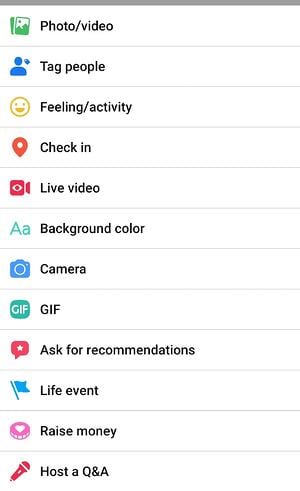
Step 3: Click Live video in the post options.

How to Use Facebook Live on a Mobile Device

Image Source

Step 4: Tap where it says Tap to add a description to add information about the video.

Step 5: Use the buttons on the bottom to configure the settings and any features or tools you want to use during the stream.

How to Start a Facebook Live Video on a Mobile Device

Image Source

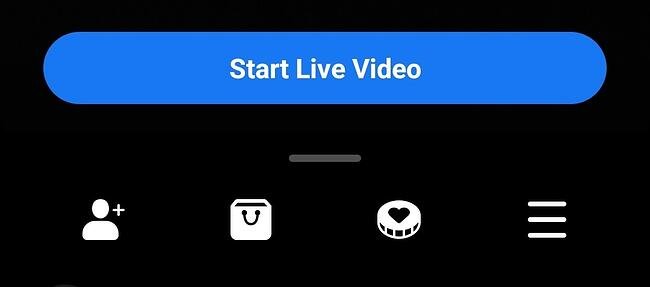
Step 6: Tap Start Live Video when you are ready.

How to Go Live on Facebook From a Web Browser

Step 1: On your Facebook homepage, you should see a Live or Live Video option. If you are on a profile, it will be under What’s on your mind? If you are on anything else, it will be under Create Post. The icon will look like one of these below.

How to go live on Facebook from a web browser

Image Source

How to go live on facebook from a web browser using a Facebook page

Image Source

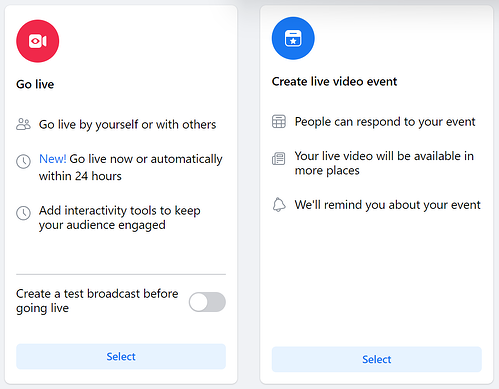
Step 2: Choose to simply Go live or to Create live video event.

How to go live on facebook using a web browser, choose between go live and create live video content

Image Source

Step 3: Then, choose details for your video. These include a start time, a title and description, who to invite as a co-host, and various audio and video controls.

Step 4: Click Go Live in the bottom left corner when you are ready.

Facebook Live Tools

Facebook offers a lot of features for you to further connect with your audience during your broadcast. Utilizing these tools will help boost engagement and create the best possible experience for your viewers. You can mix and match them to serve your stream in the best way for your business.

  • Live Polls: You can create a live poll beforehand to share when you go live. Then, you can see your audience’s responses in real-time during the stream.
  • Featured Links: Adding one or multiple featured links to the stream to promote your website or other sources.
  • Live in Stories: These allow you to share your streams directly to Facebook Stories to reach more of your audience.
  • Live Comment Moderation: Manage the conversation that happens in the comments of your livestream. You can limit who is allowed to comment and how frequently with this feature. And, you can even choose a specific viewer to also moderate comments on your behalf.
  • Front Row: This feature allows you to highlight your top fans in a special section of your stream. You can give them a special shoutout to show appreciation for them while you’re live.
  • Badges: These are a measure of how much your fans are engaging with your content. Fans can earn badges by interacting with your content, whether it’s sending “Stars” or tuning in to your Facebook Live videos.
  • Donations: Qualified pages in certain locations can add a “Donate” button to their live video. Nonprofits using Facebook’s payment platform don’t have to pay a fee, so they get 100% of the donations.
  • Live With: This is a co-broadcasting feature that allows you to host your Facebook Live video with multiple guests.
  • Live Shopping: If you have products for sale on Facebook, this feature allows you to add product listings to feature during your livestream.

For more help with going live on Facebook, check out this video! And don’t forget that a recording of the livestream is also published to the platform where you went live. Having that content is great because you can download and repurpose it for further use.

How to Analyze Your Live Video’s Performance

How to Access Video Analytics on a Facebook Business Page

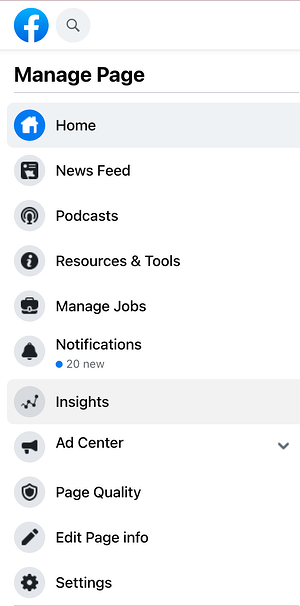
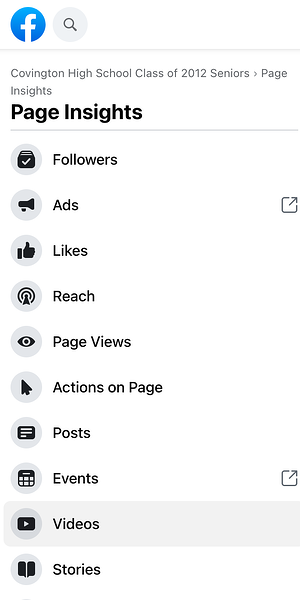
Step 1: To get started analyzing your Facebook Live broadcasts, head to the Insights tab in the left-hand column of your brand’s Facebook page:how to access video analytics on a facebook business page: Step 1

Step 2: Select the Videos section of your analytics.

how to access video analytics on a facebook business page: Step 2

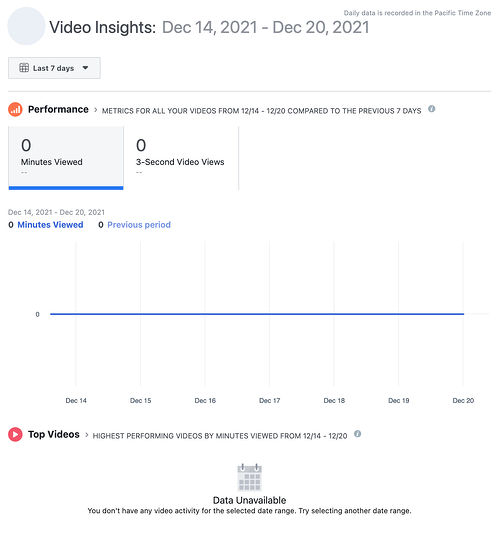
Step 3: From there, scroll down to the Top Videos section and choose a video from that menu to look into. (Note: We didn’t have any videos posted to the page we used in this example. If you do have videos, you’ll see them appear here.)

how to access video analytics on a facebook business page: Step 3

Now, let’s dive into the nitty-gritty.

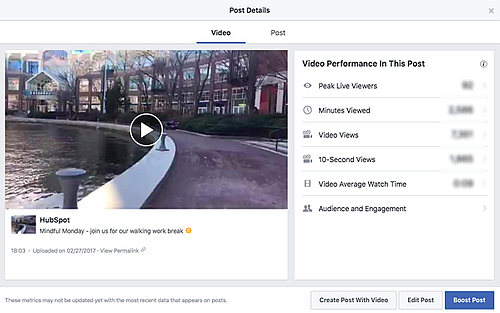
The performance analytics available for Facebook Live videos are similar to those of normal videos on Facebook, with some neat additions.

  • For Pre-recorded videos: Facebook lets you analyze minutes viewed, unique viewers, video views, 10-second views, average % completion, and a breakdown of reactions, comments, and shares.
  • For Facebook Live videos: Facebook lets you analyze all the metrics listed above, plus peak live viewers, total views, average watch time, people reached, and the demographics of who watched your video.

Facebook Live video with analytics sidebar on righthand side

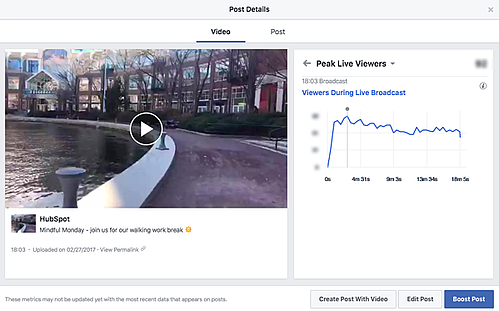
In addition to all of these static numbers, you can click into each metric to see how it changed over time when the video was live. For example, if we click into Peak Live Viewers, we’ll see this interactive graph of video viewers over time:

Line graph of Viewers During Live Broadcast next to Facebook Live video

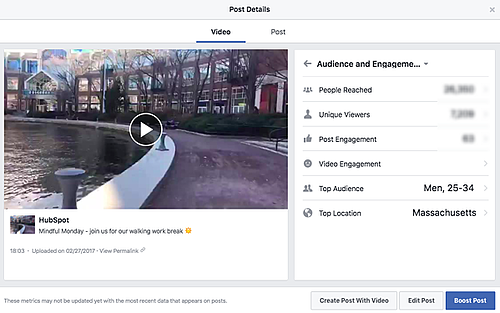
You can even see who your typical viewer was during your broadcast, based on their Facebook profile information:

facebook live post details

Now that you’ve got the steps down, let’s get into some tips and tricks.

The last thing you’d want is to start a live video and then be lost. It’s live, so there are no do-overs or chances to start over. So, prepare yourself or your host as much as possible. Outline what the video will entail and follow the rest of the tips below. Also, check out these great examples of Facebook Live videos from various companies.

There are a lot of little things you can do to squeeze the most out of your Facebook Live videos.

1. Brush up on Facebook Live best practices.

Marketers have so much opportunity to reach a wider audience on Facebook Live, so it’s worth committing to learning how to run a Live effectively.

In our detailed Marketer’s Guide to Facebook Live, we cover essential best practices on how to plan, run, and analyze the results of a business-run Facebook Live. Download the ebook to brush up on these best practices.

facebook live guide for marketers

2. Test out live video using the “Only me” privacy setting.

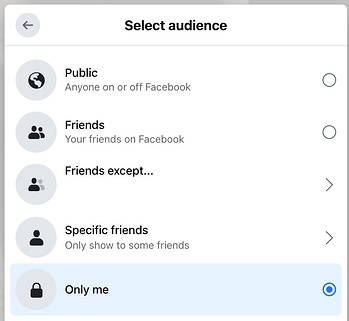
If you want to play around with live broadcasting without actually sharing it with anyone else, you can change the privacy setting so you’re the only one who can see it — just like with any other Facebook post.

To switch to Only me, look for the privacy settings. Then, you should see the options and be able to select Only me from this list below.

How to test a facebook live video's privacy settings

3. Space out live videos with other Facebook posts.

The art of the organic reach on Facebook has changed over time, but you can still take advantage of it. A big way to accomplish this is to maintain a mixture of regular Facebook posts and Facebook Live videos. The live videos are the major pull, as they tend to garner more engagement. So, spacing them out will maximize the organic reach of all of your posts.

4. Keep reintroducing yourself.

When you first start the video, take a minute to introduce yourself and what the video’s about. But keep in mind that when you first start live streaming, you may have zero people watching. Even a few seconds in, you could only have a handful of viewers. As people find your video on their News Feeds, they’ll join in — but that means you’ll want to reintroduce yourself a second, third, and even a fourth time to catch people up.

5. Make the video visually engaging.

You have to be visually engaging — not just at the very beginning of your broadcast (although that’ll be important for when folks view the video later), but throughout the video as more and more people join in.

The more visually engaging you can be, the more you can entice people to stick around. That means keeping the camera moving and not just sitting in one place.

Not only will you get more viewers this way, but you’ll also get your broadcast ranked higher in other people’s News Feeds. Facebook started monitoring signals of video engagement — like turning on the audio, switching to full-screen mode, or enabling high definition — interpreting that as users enjoying the video. As a result, they’ve tweaked the algorithm so videos that people engage with in these ways will appear higher up on the feed.

6. Make it spontaneous.

What makes a live video special? The spontaneous, interactive nature of it. People love the ability to interact, and they love the novelty of viewing someone in a live moment when anything could happen. In many ways, it’s the new reality TV.

These moments are what make live video special, and they’re exactly what differentiates it from scripted, edited, or otherwise pre-recorded videos. Embrace the platform. Banter is always, always good.

7. Don’t worry about mistakes or stutters.

Spontaneity works — even if your Facebook Live doesn’t go according to plan.

Let’s face it, we’re all human. And when humans and technology mix, there can sometimes be technical difficulties.

If you’re recording a live video, things might go wrong — your equipment could malfunction, you could lose your train of thought, or you could get photobombed by a random passerby. You can’t call “cut” if things happen — you have to roll with them and keep filming and talking.

The good news? These things help keep your broadcast human and real. If you wobble your phone while filming, laugh and call it out. If you forget what you were saying, make a joke. The key is to keep the broadcast like a fun conversation, so if mistakes happen, keep it light and keep the lines of communication open with your viewers.

For example, if you make a mistake during your Facebook Live, ask viewers to write in the comments if they’ve made the same mistake, too.

8. Encourage viewers to Like and share the video.

One of the primary ways Facebook’s algorithm ranks a post is by how many people Like and share it. The more people who Like and share your live broadcast, the more it’ll show up in people’s News Feeds.

But when people are watching a video, they may be more distracted from Liking and sharing it than they would a text or photo post. (That’s something the folks at Facebook noticed about video content early on, which is why they began monitoring other video engagement signals as well, like turning on the volume.)

9. Engage with commenters, and mention them by name.

The number of comments on your broadcast is another way to get Facebook to give it a higher relevancy score, making it more likely to show up on people’s News Feeds. So encourage your viewers to comment, and engage with people who are commenting by answering their questions and calling them out by name. Not only will it get more people to comment, but it’s also a fun way to include your viewers in the live experience, which could make them stick around longer.

Plus, your audience will be thrilled to hear you mention their name and answer their questions when you are live.

10. Have someone else watching and responding to comments from a desktop computer.

When you’re the one holding the camera for a Facebook Live video, it’s really hard to see the comments popping up on the mobile screen. If the comments are coming in fast, it’s especially easy to lose sight of them as they disappear below the fold. Plus, you’re probably occupied by recording and entertaining viewers.

Because of this, it’s always a good idea to have an additional person logged into the primary account to monitor the comments on a desktop computer. That way, they can take care of responding so the person recording the video can concentrate on creating a great experience.

11. Subtitle your broadcast in the comments section.

Your viewers may be tuning in and out to watch your video during the work day, or they might simply be watching your video without sound. Either way, periodically subtitling the video in the comments section is a great way to keep people engaged. This also allows people who are tuning in late to catch up on what’s going on.

12. Ask viewers to subscribe to Facebook Live notifications.

In addition to asking for Likes, shares, and comments, ask viewers to subscribe to live notifications. To do that, all viewers have to do is click the small, downward-facing arrow in the top right-hand corner of the live video post, and choose “Turn On Notifications.”

You can also ask them to Like your brand on Facebook, which will make it more likely that they’ll be notified of your next live broadcast.

13. Broadcast for at least 10 minutes.

As soon as you begin recording your live video, you’ll start slowly but surely showing up in people’s News Feeds. The longer you broadcast — especially as Likes, comments, and shares start coming in — the more likely people are to discover your video and share it with their friends.

Because timing is such an important factor for engagement in these live videos, we recommend that you go live for at least 10 minutes, although you can stay live for up to 90 minutes for a given video.

14. Say goodbye before ending your video.

Before you end your live broadcast, be sure to finish with a closing line, like “Thanks for watching” or “I’ll be going live again soon.”

15. Add a link to the description later.

Once you’ve finished the live broadcast, you can always go back and edit the description, change the privacy settings, or delete the video, just like you would any other post.

You can add a trackable link to the description in the post, which can direct future viewers to your live video series page, the site of whatever campaign you’re using the video to promote, or somewhere else.

We hope this has been a helpful guide. We’ll keep you posted with any new developments and tips for connecting with your audience in more cool ways.

Use Facebook Live to Its Full Potential

Social media may have been invented for fun, but it’s grown into an essential business tool. Facebook as a social network is especially valuable for the ways it lets you connect to an audience, and Facebook Live is a great extension of that. Use it to the benefit of your business as a way to promote your product, build brand awareness, or grow your audience.

Editor’s note: This post was originally published in May 2020 and has been updated for comprehensiveness.

New Call-to-action

Categories B2B

How to Create a Pivot Table in Excel: A Step-by-Step Tutorial

The pivot table is one of Microsoft Excel’s most powerful — and intimidating — functions. Powerful because it can help you summarize and make sense of large data sets. Intimidating because you’re not exactly an Excel expert, and pivot tables have always had a reputation for being complicated.

The good news: Learning how to create a pivot table in Excel is much easier than you might’ve been led to believe.

Download 9 Excel Templates for Marketers [Free Kit]

But before we walk you through the process of creating one, let’s take a step back and make sure you understand exactly what a pivot table is, and why you might need to use one.

In other words, pivot tables extract meaning from that seemingly endless jumble of numbers on your screen. And more specifically, it lets you group your data in different ways so you can draw helpful conclusions more easily.

The “pivot” part of a pivot table stems from the fact that you can rotate (or pivot) the data in the table to view it from a different perspective. To be clear, you’re not adding to, subtracting from, or otherwise changing your data when you make a pivot. Instead, you’re simply reorganizing the data so you can reveal useful information from it.

What are pivot tables used for?

If you’re still feeling a bit confused about what pivot tables actually do, don’t worry. This is one of those technologies that are much easier to understand once you’ve seen it in action.

The purpose of pivot tables is to offer user-friendly ways to quickly summarize large amounts of data. They can be used to better understand, display, and analyze numerical data in detail — and can help identify and answer unanticipated questions surrounding it.

Here are seven hypothetical scenarios where a pivot table could be a solution:

1. Comparing sales totals of different products.

Say you have a worksheet that contains monthly sales data for three different products — product 1, product 2, and product 3 — and you want to figure out which of the three has been bringing in the most bucks. You could, of course, look through the worksheet and manually add the corresponding sales figure to a running total every time product 1 appears. You could then do the same for product 2, and product 3 until you have totals for all of them. Piece of cake, right?

Now, imagine your monthly sales worksheet has thousands and thousands of rows. Manually sorting through them all could take a lifetime. Using a pivot table, you can automatically aggregate all of the sales figures for product 1, product 2, and product 3 — and calculate their respective sums — in less than a minute.

2. Showing product sales as percentages of total sales.

Pivot tables naturally show the totals of each row or column when you create them. But that’s not the only figure you can automatically produce.

Let’s say you entered quarterly sales numbers for three separate products into an Excel sheet and turned this data into a pivot table. The table would automatically give you three totals at the bottom of each column — having added up each product’s quarterly sales. But what if you wanted to find the percentage these product sales contributed to all company sales, rather than just those products’ sales totals?

With a pivot table, you can configure each column to give you the column’s percentage of all three column totals, instead of just the column total. If three product sales totaled $200,000 in sales, for example, and the first product made $45,000, you can edit a pivot table to instead say this product contributed 22.5% of all company sales.

To show product sales as percentages of total sales in a pivot table, simply right-click the cell carrying a sales total and select Show Values As > % of Grand Total.

3. Combining duplicate data.

In this scenario, you’ve just completed a blog redesign and had to update a bunch of URLs. Unfortunately, your blog reporting software didn’t handle it very well and ended up splitting the “view” metrics for single posts between two different URLs. So in your spreadsheet, you have two separate instances of each individual blog post. To get accurate data, you need to combine the view totals for each of these duplicates.

That’s where the pivot table comes into play. Instead of having to manually search for and combine all the metrics from the duplicates, you can summarize your data (via pivot table) by blog post title, and voilà: the view metrics from those duplicate posts will be aggregated automatically.

4. Getting an employee headcount for separate departments.

Pivot tables are helpful for automatically calculating things that you can’t easily find in a basic Excel table. One of those things is counting rows that all have something in common.

If you have a list of employees in an Excel sheet, for instance, and next to the employees’ names are the respective departments they belong to, you can create a pivot table from this data that shows you each department name and the number of employees that belong to those departments. The pivot table effectively eliminates your task of sorting the Excel sheet by department name and counting each row manually.

5. Adding default values to empty cells.

Not every dataset you enter into Excel will populate every cell. If you’re waiting for new data to come in before entering it into Excel, you might have lots of empty cells that look confusing or need further explanation when showing this data to your manager. That’s where pivot tables come in.

You can easily customize a pivot table to fill empty cells with a default value, such as $0, or TBD (for “to be determined”). For large tables of data, being able to tag these cells quickly is a useful feature when many people are reviewing the same sheet.

To automatically format the empty cells of your pivot table, right-click your table and click PivotTable Options. In the window that appears, check the box labeled Empty Cells As and enter what you’d like displayed when a cell has no other value.

How to Create a Pivot Table

  1. Enter your data into a range of rows and columns.
  2. Sort your data by a specific attribute.
  3. Highlight your cells to create your pivot table.
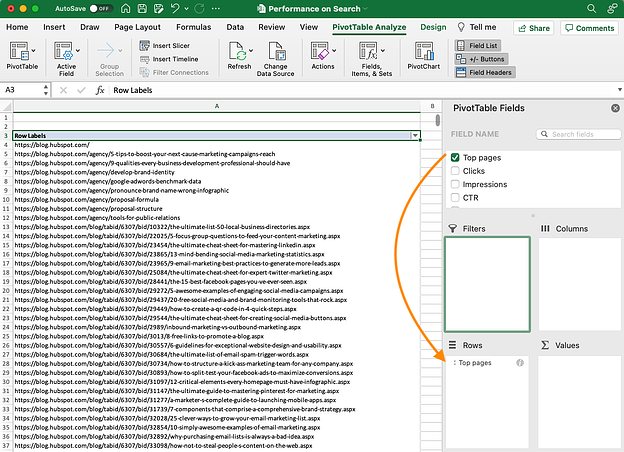
  4. Drag and drop a field into the “Row Labels” area.
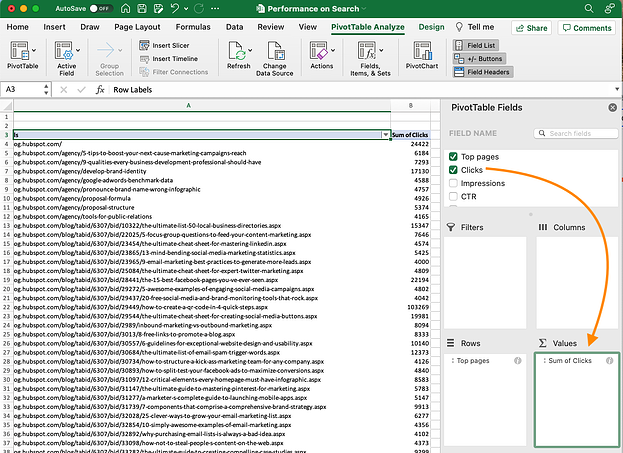
  5. Drag and drop a field into the “Values” area.
  6. Fine-tune your calculations.

Now that you have a better sense of what pivot tables can be used for, let’s get into the nitty-gritty of how to actually create one.

Step 1. Enter your data into a range of rows and columns.

Every pivot table in Excel starts with a basic Excel table, where all your data is housed. To create this table, simply enter your values into a specific set of rows and columns. Use the topmost row or the topmost column to categorize your values by what they represent.

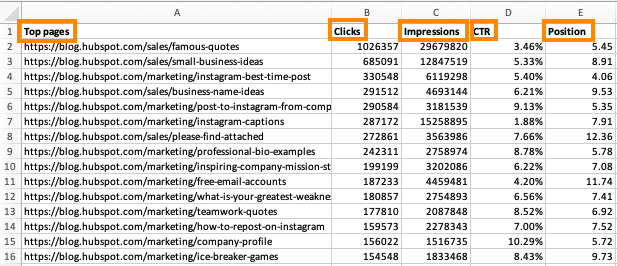
For example, to create an Excel table of blog post performance data, you might have a column listing each “Top Pages,” a column listing each URL’s “Clicks,” a column listing each post’s “Impressions,” and so on. (We’ll be using that example in the steps that follow.)

how to create a pivot table step 1: enter your data into a range of rows and columns

Step 2. Sort your data by a specific attribute.

When you have all the data you want entered into your Excel sheet, you’ll want to sort this data in some way so it’s easier to manage once you turn it into a pivot table.

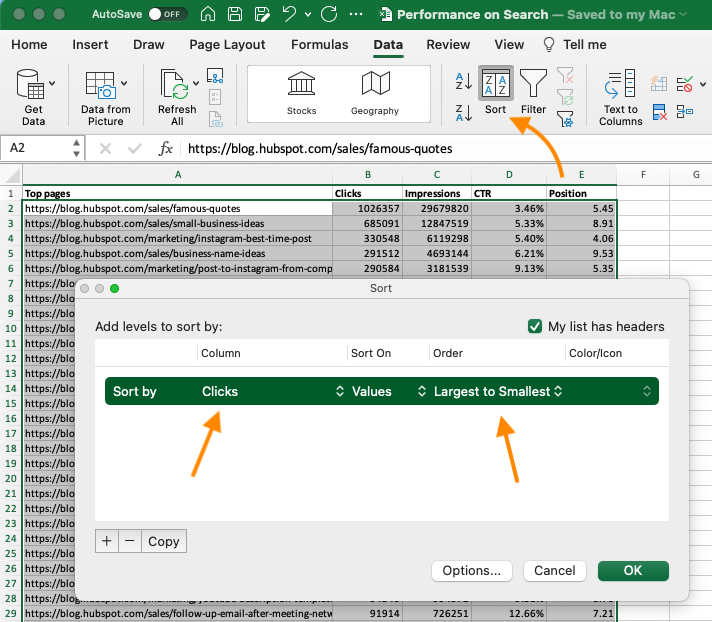
To sort your data, click the Data tab in the top navigation bar and select the Sort icon underneath it. In the window that appears, you can opt to sort your data by any column you want and in any order.

For example, to sort your Excel sheet by “Views to Date,” select this column title under Column and then select whether you want to order your posts from smallest to largest, or from largest to smallest.

Select OK on the bottom-right of the Sort window, and you’ll successfully reorder each row of your Excel sheet by the number of views each blog post has received.

how to create a pivot table step 2: sort your data by a specific attribute

Step 3. Highlight your cells to create your pivot table.

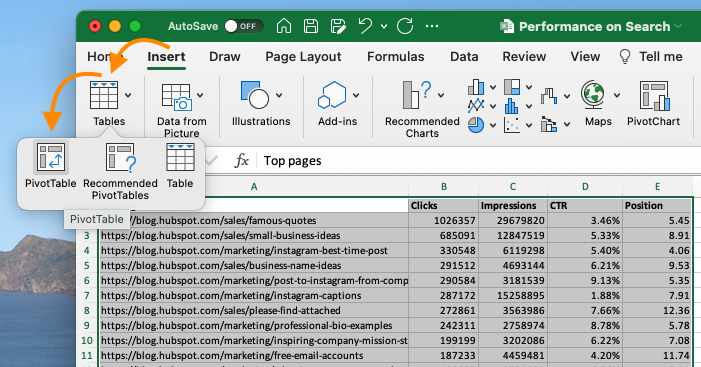
Once you’ve entered data into your Excel worksheet, and sorted it to your liking, highlight the cells you’d like to summarize in a pivot table. Click Insert along the top navigation, and select the PivotTable icon. You can also click anywhere in your worksheet, select “PivotTable,” and manually enter the range of cells you’d like included in the PivotTable.

This will open an option box where, in addition to setting your cell range, you can select whether or not to launch this pivot table in a new worksheet or keep it in the existing worksheet. If you open a new sheet, you can navigate to and away from it at the bottom of your Excel workbook. Once you’ve chosen, click OK.

Alternatively, you can highlight your cells, select Recommended PivotTables to the right of the PivotTable icon, and open a pivot table with pre-set suggestions for how to organize each row and column.

how to create a pivot table step 3: highlight your cells to create your pivot table

Note: If you’re using an earlier version of Excel, “PivotTables” may be under Tables or Data along the top navigation, rather than “Insert.” In Google Sheets, you can create pivot tables from the Data dropdown along the top navigation.

Step 4. Drag and drop a field into the “Row Labels” area.

After you’ve completed Step 3, Excel will create a blank pivot table for you. Your next step is to drag and drop a field — labeled according to the names of the columns in your spreadsheet — into the Row Labels area. This will determine what unique identifier — blog post title, product name, and so on — the pivot table will organize your data by.

For example, let’s say you want to organize a bunch of blogging data by post title. To do that, you’d simply click and drag the “Top pages” field to the “Row Labels” area.

how to create a pivot table step 4: drag and drop a field into the rows label area

Note: Your pivot table may look different depending on which version of Excel you’re working with. However, the general principles remain the same.

Step 5. Drag and drop a field into the “Values” area.

Once you’ve established what you’re going to organize your data by, your next step is to add in some values by dragging a field into the Values area.

Sticking with the blogging data example, let’s say you want to summarize blog post views by title. To do this, you’d simply drag the “Views” field into the Values area.

how to create a pivot table step 5: drag and drop a field into the values area

Step 6. Fine-tune your calculations.

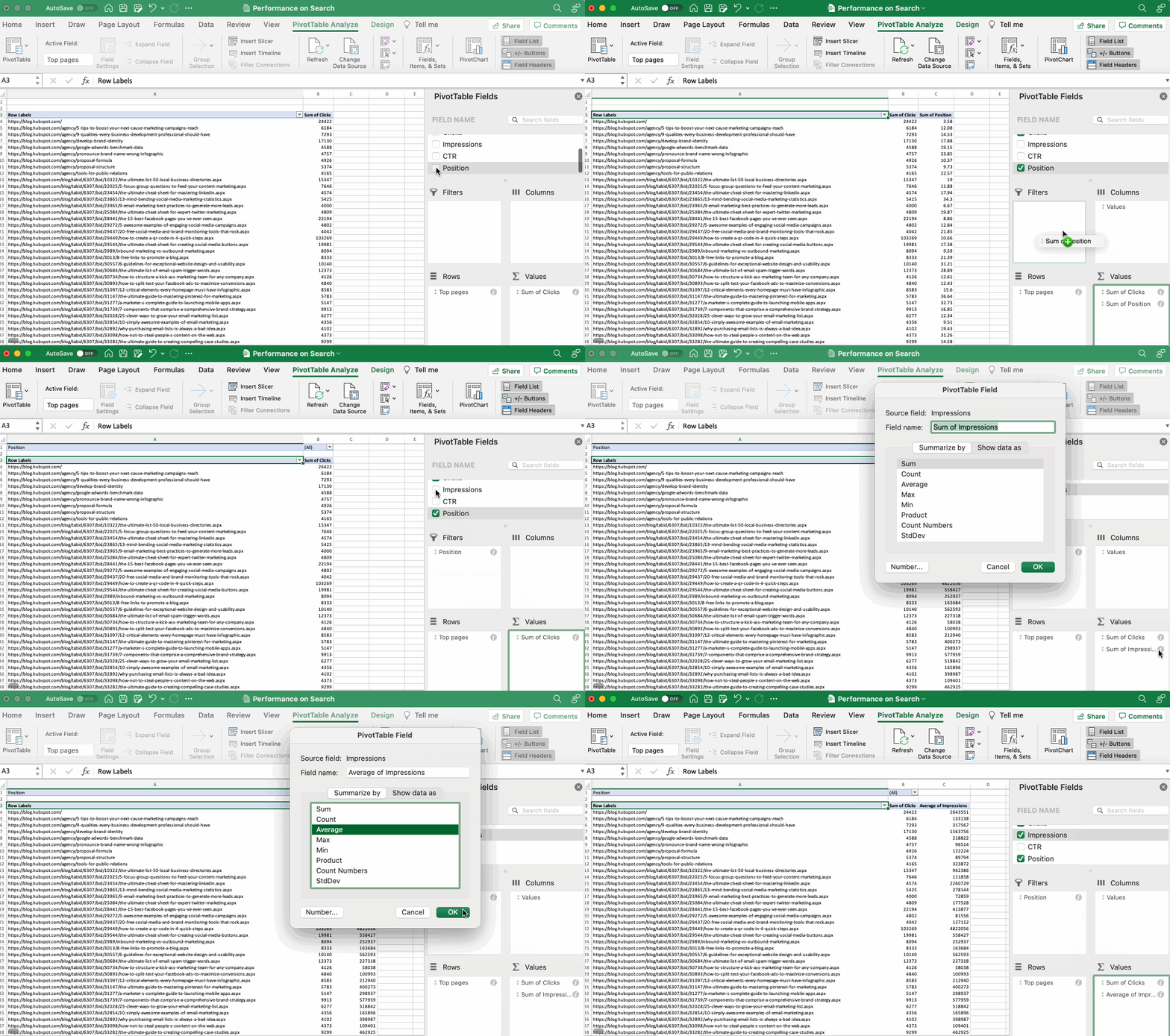
The sum of a particular value will be calculated by default, but you can easily change this to something like average, maximum, or minimum depending on what you want to calculate.

On a Mac, you can do this by clicking on the small i next to a value in the “Values” area, selecting the option you want, and clicking “OK.” Once you’ve made your selection, your pivot table will be updated accordingly.

If you’re using a PC, you’ll need to click on the small upside-down triangle next to your value and select Value Field Settings to access the menu.

how to create a pivot table step 6: fine tune your calculations

When you’ve categorized your data to your liking, save your work and use it as you please.

Digging Deeper With Pivot Tables

You’ve now learned the basics of pivot table creation in Excel. With this understanding, you can figure out what you need from your pivot table and find the solutions you’re looking for.

For example, you may notice that the data in your pivot table isn’t sorted the way you’d like. If this is the case, Excel’s Sort function can help you out. Alternatively, you may need to incorporate data from another source into your reporting, in which case the VLOOKUP function could come in handy.

Editor’s note: This post was originally published in December 2018 and has been updated for comprehensiveness.

New Call-to-Action

Categories B2B

12 Unique Ways to Generate Leads With QR Codes

If you’re like a lot of people, you may be wondering how to use mobile marketing to generate leads for your business. For HubSpot users, the good news is that you have a head start — the HubSpot platform automatically creates a mobile version of your site for you.

But what should you do next? After you’ve got a mobile website, what mobile tools should you use to attract new customers to your business? QR codes are one of the easiest tools to get started with. You’re probably already familiar with QR codes, but if not, they’re the square barcodes like the one on this post that are being used by companies to drive prospects to their websites.

Free Download: How to Build and Use QR Codes for Business & Marketing 

In doing research for our new book Go Mobile, Jeanne Hopkins and I took a deep dive into the most important mobile tools for small- to mid-sized businesses. There are plenty to choose from, but we’re going to focus on the most effective QR code uses to grow your business.

Who uses QR codes?

The short answer is anyone with a mobile phone. In addition to our keys and wallet, our phone is one of the few things we can’t leave the house without. Businesses have picked up on this and are constantly finding new ways to use QR codes to get us to engage with them, or make their processes smoother.

Uses of QR Codes in Everyday Life

While the concept of when to implement QR codes may be new, you’ve probably already gotten familiar with their use in local businesses you’ve visited. Here’s some instances where you’ve most likely encountered them:

  • Public wifi network access
  • Restaurant menus
  • Instruction manuals
  • Cashless payments
  • Web promotions during live events
  • Contact information and Linktrees

Later in this article, we’ll discuss the many other ways to use QR codes.But first, we’ll dig into how you can create your own QR codes.

How to Create Your Own QR Code Promotion

On the Go Mobile website, we used QR codes to provide clues for a nationwide scavenger hunt for four iPads hidden across the country. Visitors to the site could scan the QR codes to download the clues. To ensure that we captured leads from the promotion, we also provided the clues via email for anyone who filled out the form on the site. That way, we capture the lead information so we can re-market to that audience in the future.

Creating a QR code promotion is actually pretty simple. Here are the steps we followed when we created the promotion for our iPad nationwide scavenger hunt.

1. Create a Landing Page

First and foremost, you’ll need to create a mobile-optimized landing page. That means a landing page that is designed to be viewed on a smartphone screen. Keep things simple – for example, on a mobile landing page, forms should be kept to a few fields only. Most people don’t have the patience to fill out lengthy forms from a smartphone.

2. Create Your QR Code

Once you’ve created your landing page, copy the URL into a QR code generator. There are
plenty of QR code generators on the web, so just do a search for one. Paste your landing page URL into the QR code generator and, like magic, your QR code will be generated on the spot. This QR code is unique to you, so nobody in the world has another one just like it.

3. Add Your QR Code to Your Promotional Materials

Grab your QR code from the generator. On a PC, that means right-clicking it and saving it to your computer. (On a Mac, you can drag and drop.) Now that you have the QR code handy, add it to your promotional materials. That includes any printed materials or websites that are going to be part of the promotion.

4. Get the Word Out

There’s no point in launching a QR Code promotion if you’re not going to let the world know about it. So broadcast your message using your blog, Twitter, LinkedIn, Facebook, or any of the other social media tools at your disposal. The key part at this stage of the game is to let as many people know about the promotion as possible.

5. Stretch Out the Promotion

For our iPad Scavenger Hunt, we wanted as many people as possible to participate, so we’d upload a new QR code each day for several weeks. That way, our audience builds, and we’re able to create as much buzz around the promotion as possible.

How to Put QR Codes to Work for Your Business

There are a variety of ways you can use QR codes for your business, and new ones are cropping up every day. Here are some great ideas you can use below.

Common Uses of QR Codes

  1. Websites: Add a QR code to the ‘Contact Us’ page on your website so visitors can download your contact information to their smartphones.
  2. Business Cards: Add a QR code to the front or back of your business card so people can instantly download your contact information.
  3. Webinars: Ready to make your webinars more engaging and fun? Then simply include a QR code as part of your presentation. It’s a terrific way to keep the audience engaged and involved.
  4. LinkedIn and Facebook Pages: Want another way to stand out from everyone else? Add a QR code to your LinkedIn and Facebook pages to pull people into your website. It’s one of the best ways you can position yourself as a forward, innovative thinker.
  5. In-Store Posters With Coupons: Want to provide instant coupons to people while they’re shopping? Then add a QR code that drives them through to a special discount that can be scanned at the register.
  6. Dial a Phone Number: Want to encourage people to dial your number so they can order your product? Then give them a QR code to scan. If it’s set up properly, it will instantly dial your number on their phone and connect them with your sales center.

Creative Uses for QR Codes

QR Code Shirt

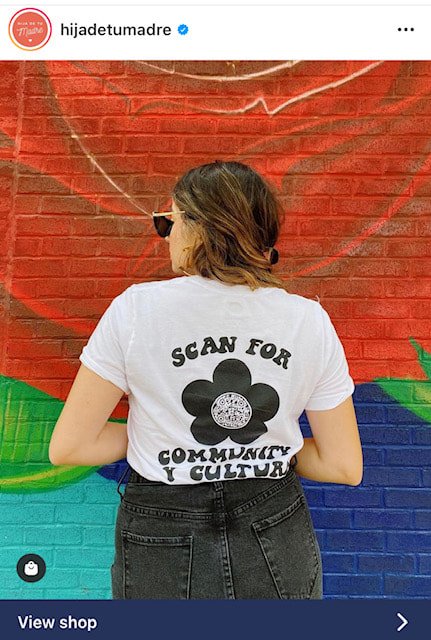
  1. Clothing and Merchandise: Ready to promote your product or service in an innovative way? Then add a QR code to a T-shirt that you give away to customers and prospects. Hija De Tu Madre (pictured above), a Latina fashion and accessories brand, cleverly placed a QR code on one of their shirt designs. It encourages viewers to “Scan for community y cultura,” enabling people to learn more about the brand and eventually convert them into new customers.
  2. “Hello, My Name Is” Tags: You know those big red and white tags people wear at events with their names on them? If you put a QR code in place of your name, you’ll engage people and easily be able to strike up conversations.
  3. Event Posters: Advertising an event? Upgrade your posters and fliers with a QR code passersby can easily scan. Have the code take them to your event page where they can view all pertinent details and buy tickets.
  4. Outdoor Billboards:Be one of the first businesses in your market to run a giant QR code on a billboard for your business. In the example above, Cygames enlisted the help of 1,500 drones to form a giant QR code in the sky to celebrate the anniversary of one of their games.
  5. Galleries and Museums: Make it easy for viewers to find out more about your work and upcoming projects. Putting a QR code next to artwork in place of text is a wonderful alternative to the standard description. Guests won’t have to crowd each other to read it, and they can take the information with them. If you’re selling at a gallery, it may also be worth it to enable payment through the QR code as well.
  6. Product Packaging: If you sell a physical product, adding a QR code that tells the buyer more about your brand or the product itself can build connections and trust. If you sell food, consider using a QR code for the ingredient list, or maybe easy recipes to use the item in. For cosmetics, have QR codes that give more information on how the products were made, tested, and where ingredients were sourced.

Using QR Codes to Grow Your Business

There’s no real mystery to using QR codes to grow your business. All you have to do is generate the code, and drop it into your promotion. Be sure you test the campaign before you go public with it – people who scan your code expect things to work relatively smoothly the first time out of the gate. But other than that, running a QR code promotion is a snap.

A key point to remember about QR codes is that they’re simply a mechanism to engage prospects and customers. In other words, they’re not the end-game, so it’s up to you to figure out how to use them to capture the visitors you drive to your website as leads using landing pages.

Once your strategy is in place, using QR codes to grow your business is relatively simple. All you have to do is generate the code, and drop it into your promotion. Be sure you test the campaign before you go public with it — people who scan your code expect things to work relatively smoothly the first time out of the gate. Give them an experience that delights them and keeps them coming back for more.

This is a guest blog post written by Jamie Turner, founder and chief content officer of the 60 Second Marketer. In addition, Jamie is the co-author of the book Go Mobile, written with Jeanne Hopkins, VP of marketing @HubSpot. He is a regular guest on CNN and HLN on the topic of digital marketing and is a popular mobile marketing speaker at events and corporations around the globe.

This article was originally published in January 2012 and has been updated for comprehensiveness.

New Call-to-action

Categories B2B

How to Post on Instagram: A Step-by-Step Guide

With over 1 billion active users, Instagram is one of the best social media networks to advertise your business, reach new audiences, and grow brand awareness. So even if you aren’t active on the website yet, it’s never too late to adopt an Instagram strategy in your marketing plan.

If you’re ready to start sharing content through this channel, we’ve got you covered. Here, we’ve cultivated a quick-and-easy guide to posting on Instagram, to ensure you can begin attracting the attention of your audience with Instagram marketing.

Download Now: Free Instagram for Business Kit + Templates

Posting to Instagram consistently can help businesses find resonance with their audience and grow better, but doing it right is just as important. Here’s how to post to your Instagram account step-by-step.

Step 1. Tap the + icon at the top of your screen.

How to post on Instagram step 1: tap the + icon at the top of your screen

See that plus sign [+] in the image above? That’s your starting point. See that post from our culture account? That’s your endpoint. Click that plus sign and you’ll be ready for the next step, below.

Step 2. Choose a photo or video from your library or shoot one in the app.

Instagram will show you the photos already saved to your phone. Choose one of those to post. Alternatively, you can click on the camera icon to take a photo or video within the Instagram app itself, if you don’t already have an image you want to use.

Once you select and crop an image (or carousel of multiple images), click the arrow button in the top right corner of the app.

How to post on Instagram step 2: choose a photo or video from your library or shoot one in the app

Step 3. Post multiple images on Instagram.

Do you have multiple photos and want to highlight them all? Instagram allows you to do this with its carousel feature.

How to post on Instagram step 3: post multiple images on instagram

As you go to tap a photo or video, first tap the icon just above your photos to the right that looks like stacked squares. Once you tap this, you’ll see a number on the corner of every image or video you tap. This number notes where the content will show up in the carousel.

Step 4. Crop the image.

You aren’t limited to just a square image on Instagram. You can actually share horizontal or vertical images as well. To get more of your image seen, pinch the screen of the photo you’ve selected on the Library screen.

How to post on Instagram step 4: crop the image

However, while Instagram does allow vertical and horizontal options, the images still need to fit into some specific dimensions. So, you might still need to crop a tiny bit of your photo to get it to fit.

Step 5. Pick a filter.

Instagram offers 24 filters — scroll to the right to peruse your options, and click on one to preview how it will look on your photo.

By default, the filter will be applied by full strength. However, if you want to scale back the intensity of the filter, double click the filter tile once it’s been applied, and a scale selector will appear, allowing you to downplay the effect.

You can also tap the magic wand at the top of the screen to adjust the photo further.

How to post on Instagram step 5: pick a filter

(Take a look at our Ultimate Guide to Instagram Filters to learn more).

Step 6. Edit your photo.

You can also click “Edit” at the bottom right to adjust the image to your specifications.

How to post on Instagram step 6: edit your photo

Here are the editing options that come built into Instagram for you:

  • Adjust – This helps subtly rotate the image along the center plane, giving it a tilt either to the left or right according to the linear scale at the bottom of the screen.
  • Brightness – This helps lighten or darken the image. All you have to do is pull the selector to the left to darken or to the right to lighten.
  • Contrast – This helps to increase or decrease the intensity of the image’s colors. Pull the selector to the left for less contrast (a dulling effect) or to the right for more contrast (a higher intensity effect).
  • Structure – This helps to add an HD-like effect to the image, bringing out specific details in your photo. Drag the selector to the right to help the image “pop.”
  • Warmth – This helps you adjust the temperature of the photo. Drag the selector to the left to increase cool tones in the image, or drag the selector to the right to increase the warm tones in the image.
  • Saturation – This helps you adjust the saturation of the colors in your image. Drag the selector to the left to desaturate the image (all the way to the left if you want a monochrome look), or drag the selector to the right for extremely saturated colors.
  • Color – This gives you a number of color options to overlay over your image for interesting color effects. Simply select your color choice and see how it changes the image in the preview box.
  • Fade – This softens the intensity of the blacks in your image to create an “aged” photo effect. Simply drag the selector to the right for a higher degree of fade.
  • Highlights – This helps you control the intensity of the highlights in your image. Dragging the selector to the left will darken the highlights in your image while dragging the selector to the right will lighten the highlights in your image.
  • Shadows – This helps you control the intensity of the shadows in your image. Dragging the selector to the left will darken the shadows in your image while dragging the selector to the right will lighten the shadows in your image.
  • Vignette – This darkens the corners of the image, leaving a circle shape in the center. Drag the selector all the way to the right for the most dramatic vignette.
  • Tilt Shift – This helps blur the edges of the image in a radial or linear way, drawing focus to the details in the center of the image.
  • Sharpen – This helps sharpen certain details of the image, bringing a more dramatic look to subtler elements in the photo.

Step 7. Type your caption.

Get creative and write a nice, interesting caption to go with your photo. Since text can help optimize your post in Instagram’s search, writing something can only benefit you.

How to post on Instagram step 7: type your caption

Step 8. Use hashtags for post optimization.

With Instagram’s search feature, users can search by hashtags. So, you should make sure to write relevant hashtags in your caption. If someone does a search of a hashtag you placed in your caption, they might find your post as well as others that included the same one.

Step 9. Tag friends.

Want your friend or their followers to see a photo that you posted of the two of you? Tag them!

On the new post page, you can click “Tag People” to tag other Instagram accounts in your post. Alternatively, you can include their handle (or their username beginning with an @ symbol) in your caption.

Step 10. Add your location.

If you’re on a fun vacation or at a neat event and you don’t feel like including that information in your caption, you can mark where you are in another way. On the new post page, tap “Add Location” to put a location on your image (which makes it easier for people to find your post).

When you post an image or video with a location, it will show up between your name and the block of content on the feed.

Step 11. Play with emojis.

Emojis are fun and can make your caption more eye-catching. If you know of a few relevant emojis that could fit with your post, stick them in the caption area. For example, if you’re posting a vacation photo, you could include a palm tree 🌴 or a plane ✈️ to show you flew somewhere.

Here are the top Instagram emojis you can use:

  1. ❤️
  2. 😍
  3. 😘
  4. 😂
  5. 😊
  6. 😎
  7. 💕
  8. 😉
  9. 💋
  10. 👍

However, keep in mind that there’s a multitude of choices to add flair to your posts, from keeping it real 💯 to the cringe face 😬.

Be sure not to go overboard and post emojis just for the sake of posting them. If you post a bowling emoji along with a photo of a beach, that obviously won’t make sense to people. Similarly, if you post 20 emojis that loosely relate to a post, you might just annoy your followers or come off as desperate.

Step 12. Share the post on other social media platforms.

Finally, if you want to share your content on your other, connected social media sites (like Facebook or Twitter), simply slide the bar from the left to the right.

How to post on Instagram step 12: share the post to other social media platforms

When you’re ready to post, click “Share” in the top right.

Instagram Saved Drafts

If you’re not ready to post right away, you can also save it to your Instagram Saved Drafts. Simply go back to the filtering and editing step, tap the back arrow in the top left, and select “Save Draft.”

Step 13. Edit the post.

Typos happen to everyone! If you just posted something and notice a glaring spelling error, don’t panic. Simply tap the three dots that appear on the right across from your name, then tap “Edit.”

How to post on Instagram step 13: edit the post

Make the adjustments you see fit and save them so it reflects on your Instagram. Otherwise, your post is complete and live for everyone to see.

Grow Your Audience on Instagram Today

Now that you know how to post to Instagram, you can begin creating content for the platform and connecting with your audience. If you’re a business or brand, you’ll want a solid strategy for earning engagement and awareness.

Editor’s note: This post was originally published in November 2019 and has been updated for comprehensiveness.

New Call-to-action

Categories B2B

5 Tips to Create a Linktree for Instagram in No Time

If you use Instagram, you might have seen the phrase “link in bio” before.

This means that someone is directing people to go to their Instagram profile page and click the URL that’s in their bio. Driving people to these links often helps Instagram users generate traffic on different websites, like a YouTube channel or website landing page.

But the native linking option only allows businesses and creators to share one link in an Instagram bio, which can prove challenging if you want to share multiple links with your audience.

In this post, learn how LinDownload Now: Free Instagram for Business Kit + Templatesktree is a solution to help you share multiple high-quality links with your followers and discover high-quality examples from brands already using the tool.


What is Linktree on Instagram?

On Instagram, a Linktree is a simple link in your bio that leads to a landing page containing multiple links to content relevant to your business, like your website, a video, or even an affiliate discount link.

You may be wondering why using this tool can make a difference on Instagram, and we’ll discuss this below.

Should you use Linktree for marketing on Instagram?

Linktree is helpful for marketing on Instagram because it helps you direct users to multiple different content offerings. So instead of only sharing, say, a link to your website, you can also link to your various social channels, your newest YouTube video, or a recent partnership you launched.

Another common use case on Instagram is if you run multiple campaigns on the platform at once, as your Linktree can contain links relevant to each of the different buyer personas you target.  

When considering leveraging Linktree on Instagram, the main factor to consider is that it helps you drive additional traffic to other high-impact sources. If you don’t use a Linktree, you’ll likely be updating your bio every time you want to direct users to a new piece of content, or you link to a website page where users can take additional action.

If driving traffic from Instagram is not a top priority for in-platform marketing, Linktree likely isn’t for you as it does require upkeep to ensure you don’t share so many links that users get overwhelmed by their choices.

If you want to leverage the tool in your Instagram strategy, let’s discuss how you can create one.

How to Create a Linktree for Instagram

1. Navigate to linktr.ee/, select the purple button that says Get Started For Free, and fill out the required contact information to create your account.

linktree account creation pageImage Source

2. Follow the on-screen prompts and enter the desired name for your Linktree and a business category that relates to what you offer.

3. Select your preferred business plan, Free or Pro.

The image below shows the differences between the tiers, the most significant being cost (free vs. $6 per month). The pro version also comes with additional customization options and advanced analytics for understanding how users interact with your links.

linktree account plan optionsImage Source

4. After selecting your plan, you should land on the Links page, where there is a purple Add New Links button and a black Explore Links button.

linktree link addition pageImage Source

5. To begin adding links to your Linktree, you have two options:

Select Add New Link to add your first new link, and a card (as shown in the image below) will appear where you fill in the relevant Title and URL.

add new link to linktreeImage Source

Or, select Explore Link to view various link options that you can add depending on their content, such as music or video links.

linktree explore links dropdown menuImage Source

Regardless of the method you choose, your completed link should look similar to the image below.

example of a filled out linktree tileImage Source

6. Once you’ve added all of your links, the icons at the bottom of the tiles allow you to make card-specific edits.

linktree card icon tilesImage Source

If you have a free account, you can upload your own tile thumbnail, gate the link for specific audiences, and view the number of times your tile has been clicked.

With a pro account, you can take all of the free actions, in addition to highlighting specific links as priority links, scheduling when certain links go live, and accessing more in-depth analytics.

7. Add all the relevant links you’re hoping to include in your Linktree. Note that the creation tool shows live previews so you can see what your final product will look like as you work in the phone icon on the right-hand side of your screen, as shown in the image below.

linktree: sample profileImage Source

Once you’ve added all your links, you can begin customizations.

8. Select the Appearance tab on your screen’s top left-hand corner.

9. In the profile window, insert relevant information to the links you’re offering, including Profile Title, a brief bio, and a business-relevant image.

linktree: profile edit screenImage Source

10. In the themes window, select a Linktree theme that meets your preferences. The image below is an example of a customized Linktree.

sample linktree profileImage Source

If you have a pro account, you can design your own theme, edit background colors, choose button shapes, and change fonts.

11. Under the settings tab on the top left header, you can further edit your Linktree and add support banners, ecommerce integrations, and social media icons to link to your other social profiles.

If you have a pro account, you can do everything previously mentioned in addition to adding mailing list integrations for email or SMS.

12. Once you’re satisfied with your Linktree and how it looks it’s time to put the link in your Instagram profile. 

How to Add Linktree to Instagram

There are multiple ways to add your Linktree link to your Instagram profile. The first way is to:

1. Within Linktree, select the Add Linktree to your socials button in the Share dropdown menu and click Instagram, as shown in the image below.

add linktree to instagram profileImage Source

2. You can simply select the Copy button and choose your URL, navigate to Instagram and click Edit Profile, and paste the link into the Website field in your Instagram profile. Or,

3. Click the Go to my Instagram button to be immediately taken to your profile and insert the link there.

Now that you know how to create your Linktree and add it to your Instagram profile let’s go over some examples from brands that already use Linktree on Instagram to meet their business needs.

Instagram Linktree Tips

  • Choose relevant names for your links: You want to use a Linktree to easily send your customers to different sites, so ensuring you name each link in a way that clearly says what it’s linking to increases effectiveness.
  • Use descriptions wisely: If you use descriptions in your Linktree, ensure that you use them wisely so users can clearly understand your links. Ensure that descriptions aren’t too long either, or you may lose audience attention.
  • Only include the most relevant links: While it may be tempting to have as many links as possible, it’s best to only place the most relevant links in your Linktree, so users aren’t overwhelmed with options. For example, if you’re running a new campaign, consider only linking to that one and removing links from older campaigns.
  • Use branded tools: if you have a Linktree pro account, use the custom branded tools that will help your users content your Linktree to your brand assets that they already know and recognize, like custom icons and color schemes.
  • Continuously monitor your Linktree: Continuously monitor your Linktree to ensure it’s up to date with your current business offerings. This means removing irrelevant links that will distract from what you’re hoping to center and monitoring analytics to see if you need to make any changes to your Linktree strategy.

Instagram Linktree Examples

Black Owned Everything

Black Owned Everything is an online marketplace that champions Black-owned businesses and the products and services they sell. It uses a Linktree on its Instagram profile to call attention to its different offerings, as shown in the image below.

example of a linktree in Instagram profile: black owned everything

Image Source

Why We Like This:

Black Owned Everything’s Linktree is successful because it includes links that are clearly labeled for users to understand and find what they are looking for, and there are also very few links. As a result, viewers likely aren’t experiencing decision paralysis as they don’t need to put in additional effort to find what they are looking for.

Patsy’s

Patsy’s is a dessert business based out of Brooklyn, NY. It sells Caribbean rum cakes made from scratch and uses a Linktree to help profile browsers order their cakes and view recent collaborations.

example of a linktree in Instagram profile: patsy's rum cake

Image Source

Why We Like This:

Patsy’s uses Linktree as a unique way to call user attention to a holiday ordering guide that walks users through the process of placing an order. While it could simply share this information in an Instagram post, users may not want to read a lengthy caption. Instead, Patsy’s can direct users to the link in its bio to quickly navigate to the ordering landing page.

Sean Garette 

Sean Garette is an esthetician that uses Instagram to share helpful content with their audience. They also have a branded Linktree in their bio where they share links to recent collaborations and partnership discount links.

instagram linktree example: sean garrette

Image Source

Why We Like This:

Sean Garrette shows us the value of using a Linktree to plug partnerships with other businesses.

You can always post about the partnerships you have on Instagram, but if they’re long-standing, people might forget they exist. You can place affiliate links in your Linktree to remind users that your partnerships are still running and, if you successfully drive users to your Linktree, all of your traffic will come across these links.

Golde 

Golde is a business that sells superfood and wellness products. It uses Instagram to provide educational content and product photos and has a branded Linktree in its Instagram bio.

instagram Linktree example: golde

Image Source

Why We Like This:

While Golde does have more links in its Linktree, users aren’t overwhelmed by choices because each link clearly states what it is, and the emojis provide additional explanations. If you have multiple links that you want to share with your users without overwhelming them, use Golde’s Linktree as inspiration.

TikTok

TikTok uses Instagram to call attention to trends, updates, and high-performing videos on the app. In addition, it has a branded Linktree in bio, which is pictured below.

instagram Linktree example: tiktok

Image Source

Why We Like This:

TikTok’s Linktree is a great inspiration because it drives users to critical actions related to the app: downloading the app, understanding trending moments and sounds, and contacting customer support. It also contains branded links in the footer of the Linktree that users can navigate to and easily understand where clicking will land them.

Should you choose to use Linktree, you’ll be able to share multiple high-impact links with your audience all at once, giving them more ways to interact with your business and become engaged in what you have to offer.

New Call-to-action

Categories B2B

9 Product Category Marketing Examples to Inspire Your Own

Imagine shopping at a grocery store that doesn’t have any signs pointing you in the right direction. Odds are you’d spend a lot of time wandering the aisles until you found what you needed.

→ Download Now: Free Product Marketing Kit [Free Templates]

People want a sense of direction when they’re shopping, and they want to see their options grouped together — whether that’s kitchen tools, breakfast cereals, or winter coats. One way to do this is with product categories.

Product category marketing helps your brand stand out among related items, so your company’s products wind up in the shopping cart — whether real or virtual.

Let’s explore product categories, how it differs from product classification, and see some examples in action.

Your distinct offerings and customer personas should guide the organization and grouping of your product categories.

For example, Dick’s Sporting Goods offers a variety of outdoor gear. To guide customers, they group products into interest-based categories, such as fishing, running, and climbing. For cosmetic brands, it also makes sense to organize categories by product type, such as makeup tools, eyeshadow pallets, and foundation.

Product category marketing amplifies why a company is the best choice within that group of products. Why should customers opt for your offering rather than your direct competitors?

Gaining brand recognition and appreciation across a product category means greater returns for your marketing efforts. When consumers have positive experiences with a specific product category it also builds brand trust, which often expands to other categories through the halo effect.

Product categories are sometimes confused with product classification. Both are organizational strategies and both help guide marketing decisions, but classifications are much broader (think convenience goods, shopping goods, and specialty goods).

Let’s take a look at nine product category marketing examples to inspire your own.

9 Product Category Marketing Examples

1. Fenty Beauty

Product category: High-end foundation makeup

Admittedly, it helps to have singer and business powerhouse Rihanna at the helm. But Fenty Beauty innovated the idea of foundation makeup “for all,” and its commitment to inclusivity made the brand an instant hit.

Fenty Beauty Face

Beyond foundation, the Fenty Beauty Face products include bronzer, highlighter, powder, and concealer in shades that work for everyone. The launch was an industry transformer, with established brands expanding their foundation color lineup in response.

Why it works: Fenty’s success underlines a simple truth about today’s consumers: they are belief-driven. Increasingly, consumers want to see brands improve the world along with making a profit. Fenty aligns with this shift by keeping diversity and inclusion top of mind with its product offerings — and by featuring models across a spectrum of skin tones.

2. Orvis

Product category: Dog beds

This Vermont-based retailer has been a big name in fly-fishing and outdoor gear since 1856. But they’ve also carved out a product niche with dog gear — and dog beds in particular. The brand draws people who want comfortable dog beds for their furry pals in styles that enhance their home decor.

Image source

The marketing images of dogs sleeping or lounging on Orvis beds is enough to inspire a nap. And its social feeds are chock full of irresistible images and videos of dogs, including puppies in a hammock.

Why it works: The company has built a loyal following with the fundamental belief that pets are significant members of the family. Orvis has made its site a resource for dog health and behavior topics, and they boast a variety of dog beds for dogs of all sizes, ages, and health issues.

3. Ikea

Product category: Bedding

Putting together their furniture may be a tough task, but at least Ikea supports your relaxation too. The marketing of their bedding shows off playful sheets and prints for the kids and a mix of bold designs and neutrals for adults. The bed linens product category is grouped under ‘home textiles’ together with curtains, quilts, pillows, and towels.

A playful Ikea ad campaign in the UK even featured bottled bedding and pillows, connecting the dots between a restful night’s sleep and health. In the current pandemic, the company marketed the idea that comfortable bedding was essential — especially when your bed is doubling as your office.

Why it works: By grouping a variety of products under one roof — Home Textiles — Ikea presents an opportunity to up-sell. After all, if you buy a new mattress, you may also need new bed sheets, pillows, and blankets.

4. Swarovski

Product category: Jewelry

For more than a century, Swarovski has put the sparkle in gowns, tiaras, jewelry, sculptures, and even luxury cars. For its jewelry product category, Swarovski puts luxury within reach with a mix of modern and classic crystal necklaces, earrings, bracelets, and watches.

Image source

It sustains brand awareness with seasonal collections, collaborations with designers and celebrities, such as Karl Lagerfield and Penelope Cruz, and social media campaigns with influencers.

Why it works: Swarovski has taken its medium, crystal, to new heights with creative partnerships and continued innovation. It’s these efforts that keep the brand — and its products — fresh and exciting even after 125 years in business.

5. Target

Product category: Grocery essentials

Target is known for its positioning across product categories, including affordable fashion, electronics, and cleaning supplies. Though they’re grocery section is smaller than most supermarkets, they cover all of the ‘must-haves’ on any shopping list — from milk to salads to pasta.

Image source

In 2019, Target added its own brand of grocery essentials with their Good & Gather line, which includes frozen berries, cereals, snack foods, and eggs. Their Instagram Stories showcase easy snack and meal ideas, and feature foodie influencers like TikTok and Instagram sensations Tabitha Browne and Lisa Lin.

Why it works: Target uses private labels and exclusive brands to its advantage. If you get hooked on a Target-exclusive product — like an item from their Good & Gather line — you can’t go anywhere else to buy it.

6. Dove

Product category: Skin care

Launched in 2004, Dove’s ‘Real Beauty’ campaign was far ahead of other brands in promoting body positivity and self-acceptance. Their ad campaigns for body lotions and soap have long featured women with a wide variety of body types and skin colors.

Rolls, wrinkles, cellulite, and stretch marks are all on proud and beautiful display across its social channels. Today, its skin care brand identity is synonymous with self-confidence, and Dove body lotions and soaps are frequent flyers on “best of” lists for affordable skin care.

Image source

Why it works: In an industry that typically profits from consumers feeling unhappy with their appearance, Dove stands out with a marketing strategy that centers around self-confidence. Dove energizes its brand with a higher purpose that most women — their target audience — can get behind.

7. Michaels

Product category: Holiday and seasonal decor

The company known for DIY is also a go-to spot for holiday and seasonal decorating. Michaels stores transform every month or two with festive decor for spring, summer, Halloween, Thanksgiving, Hanukkah, Christmas, July Fourth, Mardi Gras, and Pride Month.

Image source

Michael’s also does an exceptional job engaging with the creative community. Most stores offer free classes, demos, and events that anyone can attend. During the pandemic, these classes went virtual, offering both adults and kids a creative outlet to explore at home. 

Why it works: Michael’s continues to find new ways to engage with new and existing customers — from festive in-store displays to free classes and demos. It positions itself as more than a supply store, but rather a source of fun and inspiration.

8. Patagonia

Product category: Eco-friendly outerwear

Patagonia’s tagline is “We’re in business to save our home planet” and the company’s marketing efforts lead with its commitment to sustainability across product lines. Its website urges consumers to “Buy Less” and prominently features a section of “Used Gear.”

Image source

When you visit its Facebook or Instagram pages, you have to hunt a bit to find posts highlighting particular products. Instead, the feeds focus on pressing issues, such as environmental stewardship and fair labor practices.

Why it works: Patagonia effectively weaves its core values into its marketing messages. When you do need to purchase a new (or used) piece of outerwear, consumers know they are supporting a company actively minimizing its negative impacts.

9. Grove Collaborative

Product category: Green household cleaning supplies

Grove Collaborative is another company focused on sustainability. Its goal is to make it simple and affordable for people to choose green household products that are non-toxic, sustainable, and cruelty free.

Image source

The company offers eco-friendly cleaning supplies, including concentrated soap and detergent refills and reusable glass bottles, which it sends out in recurring monthly shipments.

The company also shares ideas for holiday meals and decorating, and releases a monthly “Sustainability Snapshot” of their environmental impact, such as the number of single-use plastic bottles they keep out of land-fills.

Why it works: The company’s marketing reflects its minimalist ethos. Grove also uses social media, namely Instagram Stories, to attract new customers with product images, cleaning tips, and even humorous videos.

Each of these brands has clarified where their products fit in larger retail categories. This helps them market their distinct value to target customers and, ultimately, earn a greater market share within these product categories.

Product Marketing Kit

Categories B2B

26 Companies With Really Catchy Slogans & Brand Taglines

Keep it simple, stupid.

We don’t mean to offend you — this is just an example of a great slogan that also bears the truth of the power of succinctness in advertising. It’s incredibly difficult to be succinct, and it’s especially difficult to express a complex emotional concept in just a couple of words — which is exactly what slogans and taglines do.

Free Download: Slogan Writing Guide and Examples

That’s why we have a lot of respect for the brands that have done it right. These are the companies that have figured out how to convey their value propositions to their buyer personas in just one, short sentence — and a quippy one, at that.

So if you’re looking to get a little slogan inspiration of your own, take a look at some of our favorite company slogans and taglines from both past and present. But before we get into specific examples, let’s quickly go over what a slogan is, how it differs from a tagline, and what makes these branded one-liners stand out.

What Is a Slogan?

In business, a slogan is “a catchphrase or small group of words that are combined in a special way to identify a product or company,” according to Entrepreneur.com’s small business encyclopedia.

In many ways, they’re like mini-mission statements.

Companies have slogans for the same reason they have logos: advertising. While logos are visual representations of a brand, slogans are audible representations of a brand. Both formats grab consumers’ attention more readily than a company’s name or product might. Plus, they’re simpler to understand and remember.

The goal? To leave a key brand message in consumers’ minds so that, if they remember nothing else from an advertisement, they’ll remember the slogan.

What Makes a Great Slogan?

According to
HowStuffWorks, a great slogan has most, or all, of the following characteristics:

1. It’s memorable.

Is the slogan quickly recognizable? Will people only have to spend a second or two thinking about it? A brief but strong few words can go a long way in advertisements, videos, posters, business cards, swag, and other places.

2. It includes a key benefit.

Ever heard the marketing advice, “Sell the sizzle, not the steak”? It means sell the benefits, not the features — which applies perfectly to slogans. A great slogan makes a company or product’s benefits clear to the audience.

3. It differentiates the brand.

Does your light beer have the fullest flavor? Or maybe the fewest calories? What is it about your product or brand that sets it apart from competitors? (
Check out our essential branding guide here.)

4. It imparts positive feelings about the brand.

The best taglines use words that are upbeat. For example, Reese’s Peanut Butter Cups’ slogan, “Two great tastes that taste great together,” gives the audience good feelings about Reese’s, whereas a slogan like Lea & Perrins’, “Steak sauce only a cow could hate,” uses negative words. We could argue that the former leaves a better impression on the audience.

Slogan vs. Tagline

Although both “slogan” and “tagline” tend to be used interchangeably, they actually serve two different purposes.

As we mentioned in Entrepreneur.com’s definition above, a slogan identifies a product or company. So does a tagline, for that matter. Where these terms differ is in how they position a company in its industry.

  • A slogan encompasses a company’s mission, what it stands for, and even how it’s helping customers in the individual campaigns the company might run. Slogans can therefore be longer than taglines, as you’ll see in the list below.
  • A tagline is a catchy quip that evokes an image of your brand in the minds of your customers. Taglines enable people to make lighthearted associations with your business: “When I see [tagline], I think [company].”

Featured Resource: 60 Slogan Writing Tips & Examples

brand slogans


Taglines are more often next to the company’s logo on official advertisements and are dedicated more specifically to brand awareness than slogans. Slogans carry a brand’s values and promises as the company grows and evolves, and can be promoted under an overarching company tagline.


Your organization doesn’t have to develop both a slogan and a tagline — it might succeed with just a solid, recognizable tagline. But as you develop new products and identify new types of customers, you might find your brand launching a campaign that is primed for its own slogan.

Now that we’ve covered what a slogan is and what makes one great, here are examples of some of the best brand slogans of all time.

When you want a brand slogan you want to make sure they are memorable and that they bring your brand to life. The right slogan will have key words that encapsulate what your brand is so that consumers will always have it in the back of their heads. Below we have listed some business slogans that range from fast food, cars, essential items, pet essentials, etc. to show that a good slogan encapsulates being concise, catchy, and classic.

1. Dollar Shave Club: “Shave Time. Shave Money.”

The folks at Dollar Shave Club have made their way onto quite a few of our lists here on the blog, and it’s safe to say that when it comes to marketing and advertising, this brand’s team knows what it’s doing. And its slogan — “Shave Time. Shave Money.” — is an excellent reflection of their expertise.

This little quip cleverly incorporates two of the service’s benefits: cost and convenience. It’s punny, to the point, and it perfectly represents the overall tone of the brand.

Catchy Business Slogans and Taglines Slogans: Dollar Shave Club

Image Source

2. MasterCard: “There are some things money can’t buy. For everything else, there’s MasterCard.”

MasterCard’s two-sentence slogan was created in 1997 as a part of an award-winning advertising campaign that ran in 98 countries and 46 languages. The very first iteration of the campaign was a TV commercial that aired in 1997: “A dad takes his son to a baseball game and pays for a hot dog and a drink, but the conversation between the two is priceless,”
writes Avi Dan for
Forbes.

“In a sense, ‘Priceless’ became a viral, social campaign years before there was a social media,” Dan writes. Today, “Priceless” is widely considered MasterCard’s tagline — borne out of the longer mission-focused slogan stated above.

Catchy Business Slogans and Taglines Slogans: Mastercard

Image Source

One key to this campaign’s success? Each commercial elicits an emotional response from the audience. That first TV commercial might remind you of sports games you went to with your dad, for example. Each advertisement attempted to trigger a different memory or feeling. “You have to create a cultural phenomenon and then constantly nurture it to keep it fresh,” MasterCard CMO Raja Rajamannar told Dan. And nostalgia marketing like that can be a powerful tool.

3. M&M: “Melts in Your Mouth, Not in Your Hands”

Here’s one brand that didn’t need much time before realizing its core value proposition. At the end of the day, chocolate is chocolate. How can one piece of chocolate truly stand out from another? By bringing in the convenience factor, of course.

This particular example highlights the importance of finding something that makes your brand different from the others — in this case, the hard shell that keeps chocolate from melting all over you.

Catchy Business Slogans and Taglines Slogans: M&M'sImage Source

Diamonds aren’t worth much inherently. In fact, a diamond is worth at least 50% less than you paid for it the moment you left the jewelry store. So how did they become the symbol of wealth, power, and romance they are in America today? It was all because of a brilliant, multifaceted marketing strategy designed and executed by ad agency N.W. Ayer in the early 1900s for their client, De Beers.

The four, iconic words “A Diamond is Forever” have appeared in every single De Beers advertisement since 1948, and AdAge named it the
best slogan of the century in 1999. It perfectly captures the sentiment De Beers was going for: that a diamond, like your relationship, is eternal. It also helped discourage people from ever reselling their diamonds. (Mass reselling would disrupt the market and reveal the alarmingly low intrinsic value of the stones themselves.) Brilliant.
Catchy Business Slogans and Taglines Slogans: De Beers

Image Source

5. Meow Mix: “Tastes So Good, Cats Ask for It by Name”

Meow meow meow meow … who remembers this catchy tune sung by cats, for cats, in Meow Mix’s television commercials? The brand released a simple but telling slogan: “Tastes So Good, Cats Ask For It By Name.”

This slogan plays off the fact that every time a cat meows, s/he is actually asking for Meow Mix. It was not only clever, but it also successfully planted Meow Mix as a standout brand in a cluttered market.
Catchy Business Slogans and Taglines Slogans: Meow Mix

Image Source

6. Verizon: “We Can Hear You Now.”

Here’s another brand that took its time coming up with something that truly resonated with its audience. Verizon’s previous slogan “Can you hear me now” slogan was created in 2002 under the umbrella of the tagline, “We never stop working for you.” Now with Verizon switching up their classic slogan to answer the question “We can hear you,” was perfect because it shows this company keeps up with its consumers while moving forward.

While Verizon was founded in 1983, it continued to battle against various phone companies like AT&T and T-Mobile, still two of its strongest competitors. But what makes Verizon stand out? No matter where you are, you have service. You may not have the greatest texting options, or the best cell phone options, but you will always have service.

Catchy Business Slogans and Taglines Slogans: Verizon

Image Source

7. The U.S. Marine Corps: “Semper Fi”

Semper Fi, short for “Semper Fidelis,” is Latin for “always faithful” or “always loyal.” The saying has long been the official motto of the U.S. Marine Corps and is used to represent them in public appearances and the Marines’ official seal.

What makes “Semper Fi” a great slogan for the Marines? It reveals the Marines’ defining characteristics in the armed forces — faithfulness and loyalty. It’s also a memorable proverb that explains why this organization can be counted on by the public.

Catchy Business Slogans and Taglines Slogans: U.S. Marine Corps

Image Source

8. Ronseal: “It Does Exactly What It Says on the Tin.”

Ronseal is a wood stain and dye manufacturer from the United Kingdom, and its 20-year-old slogan is perfect for the humble message the company is known for.

Ronseal’s slogan doesn’t go above and beyond. It doesn’t make lofty promises to its customers. It simply endorses a functional product. So why is this slogan so catchy? Because its lack of volume actually speaks volumes to its audience. Too many companies try to break through the noise of their competitors by being so loud and ambitious, they forget what they stood for in the first place. Ronseal saw true value in basic reliability and founded a slogan that allowed the company to stay right where its customers like it.

Catchy Business Slogans and Taglines Slogans: Ronseal

Image Source

9. The Mosaic Company: “We Help the World Grow the Food It Needs”

The Mosaic Company’s slogan also happens to be
its mission statement, which guarantees that this fertilizer maker’s brand strategy aligns with the company’s main interests.

Something all slogans should strive to do is look past the needs of the company, or even its users, and describe how the product or service helps the community. In this way, “We Help the World Grow the Food It Needs” is a heavy slogan that expresses not just what The Mosaic Company wants for its customers, but also what it wants for the public.

Catchy Business Slogans and Taglines Slogans: Mosaic

Image Source

10. Pitney Bowes: “We Power Transactions That Drive Commerce”

Pitney Bowes, the mailing and shipping software provider, has a slogan that follows a similar theme as The Mosaic Company in the section above: It’s focused not on the end user, but on the industry.

Pitney Bowes’ slogan shows us that its products don’t just help businesses track and deliver merchandise — it makes the entire ecommerce community more efficient. It’s a good strategy, considering the alternative. How lame would the company’s slogan be if it were “We Power Transactions That Serve Our Clients’ Bottom Line”?

Taglines

When creating your brand tagline you want to have a tagline that explains the essence of the value you provide to your customer using one to two sentences. A tagline is a great way to understand what your business does for your customers. The right tagline will be concise yet brings out the essence of what the business is. Below we have listed some business taglines that encapsulate being concise while telling the value of the business.

11. Nike: “Just Do It.”

Now, for the more well-known Nike message. “Just Do It” hovers over every product and event Nike creates or sponsors, and that’s exactly what makes it the company’s official tagline.

It didn’t take long for Nike’s message to resonate. The brand became more than just athletic apparel — it began to embody a state of mind. It encourages you to think that you don’t have to be an athlete to be in shape or tackle an obstacle. If you want to do it, just do it. That’s all it takes.

But it’s unlikely Kennedy + Weiden, the agency behind this tagline, knew from the start that Nike would brand itself in this way. In fact, Nike’s product used to cater almost exclusively to marathon runners, which are among the most hardcore athletes out there. The “Just Do It” campaign widened the funnel, and it’s proof positive that some brands need to take their time coming up with a tagline that reflects their message and resonates with their target audience

Catchy Business Slogans and Taglines Slogans: Nike

Image Source

12. Apple: “Think Different.”

This tagline was first released in the Apple commercial called “Here’s to the Crazy Ones, Think Different” — a tribute to all the time-honored visionaries who challenged the status quo and changed the world. The phrase itself is a bold nod to IBM’s campaign “Think IBM,” which was used at the time to advertise its ThinkPad.

Soon after, the tagline “Think Different” accompanied Apple advertisements all over the place, even though Apple hadn’t released any significant new products at the time. All of a sudden, people began to realize that Apple wasn’t just any old computer; it was so powerful and so simple to use that it made the average computer user feel innovative and tech-savvy.

According to
Forbes, Apple’s stock price tripled within a year of the commercial’s release. Although the tagline has been since retired, many Apple users still feel a sense of entitlement for being among those who “think different.”
Catchy Business Slogans and Taglines Slogans: Apple

Image Source

13. L’Oréal: “Because You’re Worth It.”

Who doesn’t want to feel like they’re worth it? The folks at L’Oréal worked with the theory that
women wear makeup in order to make themselves appear “beautiful” so they feel desirable, wanted, and worth it. The tagline isn’t about the product — it’s about the image the product can get you. This message allowed L’Oréal to push its brand further than just utility so as to give the entire concept of makeup a much more powerful message.
Catchy Business Slogans and Taglines Slogans: L'Oreal

Image Source

14. California Milk Processor Board: “Got Milk?”

While most people are familiar with the “Got Milk?” campaign, not everyone remembers that it was launched by the California Milk Processor Board (CMPB). What’s interesting about this campaign is that it was initially launched to combat the rapid increase in fast food and soft beverages: The CMPB wanted people to revert to milk as their drink of choice in order to sustain a healthier life. The campaign was meant to bring some life to a “boring” product,
ad executives told
TIME Magazine.

The simple words “Got Milk?” scribbled above celebrities, animals, and children with milk mustaches, which ran from 2003 until 2014 — making this campaign one of the longest-lasting ever. The CMPB wasn’t determined to make its brand known with this one — it was determined to infiltrate the idea of drinking milk across the nation. And these two simple words sure as heck did.

Catchy Business Slogans and Taglines Slogans: California Milk Processor Board - Got Milk?

Image Source

15. BMW: “Designed for Driving Pleasure.”

BMW sells cars all over the world, but in North America, it was known for a long time by its tagline, “The Ultimate Driving Machine.” This phrase was created in the 1970s by a relatively unknown ad agency named Ammirati & Puris and was,
according to BMW’s blog, directed at Baby Boomers who were “out of college, making money and ready to spend their hard-earned dollars. What better way to reflect your success than on a premium automobile?”

The newer tagline, “Designed for Driving Pleasure,” is intended to reinforce the message that its cars’ biggest selling point is that they are performance vehicles that are thrilling to drive. That message is an emotional one and one that consumers can buy into to pay the high price point.

Catchy Business Slogans and Taglines Slogans: BMW

Image Source

16. Tesco: “Every Little Helps.”

“Every little helps” is the kind of catchy tagline that can make sense in many different contexts — and it’s flexible enough to fit in with any one of Tesco’s messages. It can refer to value, quality, service, and even environmental responsibility — which the company practices
by addressing the impacts of their operations and supply chain.

It’s also, as Naresh Ramchandani wrote for The Guardian, “perhaps the most ingeniously modest” slogan or tagline ever written. Tesco markets itself as a brand for the people, and a flexible, modest far-reaching slogan like this one reflects that beautifully.

Catchy Business Slogans and Taglines Slogans: Tesco

Image Source

17. Bounty: “The Quicker Picker Upper.”

Bounty paper towels, made by Procter & Gamble, has used its catchy tagline “The Quicker Picker Upper” for almost 50 years now. If it sounds like one of those sing-songy play on words you learned as a kid, that’s because it is one: The tagline uses what’s called consonance — a poetic device characterized by the repetition of the same consonant two or more times in short succession (think: “pitter patter”).

Over the years, Bounty has moved away from this tagline in full, replacing “Quicker” with other adjectives, depending on the brand’s current marketing campaign — like “The Quilted Picker Upper” and “The Clean Picker Upper.” At the same time, the brand’s main web address went from quickerpickerupper.com to bountytowels.com. But although the brand is branching out into other campaigns, they’ve kept the theme of their original, catchy tagline.

Catchy Business Slogans and Taglines Slogans: Bounty

Image Source

18. Lay’s: “Betcha Can’t Eat Just One.”

Seriously, who here has ever had just one chip? While this tagline might stand true for other snack companies, Lay’s was clever to pick up on it straight away. The company tapped into our truly human incapability to ignore crispy, salty goodness when it’s staring us in the face. Carbs, what a tangled web you weave.

But seriously, notice how the emphasis isn’t on the taste of the product. There are plenty of other delicious chips out there. But what Lay’s was able to bring forth with its tagline is that totally human, uncontrollable nature of snacking until the cows come home.

Catchy Business Slogans and Taglines Slogans: Lay's

Image Source

19. Audi: “Vorsprung durch technik” (“Advancement Through Technology”)

“Vorsprung durch technik” has been Audi’s main German tagline everywhere in the world since 1971 (except for the United States, where the slogan is “Truth in Engineering”). While the phrase has been translated in several ways, the
online dictionary LEO translates “Vorsprung” as “advance” or “lead” as in “distance, amount by which someone is ahead in a competition.”
Audi roughly translates it as: “Advancement through technology.”

The first-generation Audio 80 (B1 series) was launched a year after the tagline in 1972, and the new car was a brilliant reflection of that tagline with many impressive new technical features. It was throughout the 1970s that the Audi brand established itself as an innovative car manufacturer, such as with the five-cylinder engine (1976), turbocharging (1979), and the quattro four-wheel drive (1980). This is still reflective of the Audi brand today.

Catchy Business Slogans and Taglines Slogans: Audi

Image Source

20. Dunkin’: “America Runs on Dunkin”

In April 2006, Dunkin’ Donuts launched the most significant repositioning effort in the company’s history by unveiling a brand new, multi-million dollar advertising campaign under the tagline “America Runs on Dunkin.” The campaign revolves around Dunkin’ Donuts coffee keeping busy Americans fueled while they are on the go.

“The new campaign is a fun and often quirky celebration of life, showing Americans embracing their work, their play and everything in between — accompanied every step of the way by Dunkin’ Donuts,” read the official press release from the campaign’s official launch.

Ten years later, what the folks at Dunkin Donuts’ realized they were missing was their celebration of and honoring their actual customers. That’s why, in 2016, they launched the “Keep On” campaign, which they call their modern interpretation of the ten-year tagline.

“It’s the idea that we’re your partner in crime, or we’re like your wingman, your buddy in your daily struggle and we give you the positive energy through both food and beverage but also emotionally, we believe in you and we believe in the consumer,” said Chris D’Amico, SVP and Group Creative Director at Hill Holiday.

Catchy Business Slogans and Taglines Slogans: Dunkin'


Image Source

Fun fact: Dunkin’ Donuts rebranded itself — and named itself Dunkin’ in 2018 while releasing new packaging in 2019.
One store in Pasadena, California will be called, simply, Dunkin’.

21. McDonald’s: “I’m Lovin’ It.”

The “I’m Lovin’ It” campaign was launched way back in 2003 and still stands strong today. This is a great example of a tagline that resonates with the brand’s target audience. McDonald’s food might not be your healthiest choice, but being healthy isn’t the benefit McDonald’s is promising — it’s that you’ll love the taste and the convenience.

Fun fact: The jingle’s infamous hook — “ba da ba ba ba” — was originally sung by Justin Timberlake.

Catchy Business Slogans and Taglines Slogans: McDonald's

Image Source

22. The New York Times: “All the News That’s Fit to Print.”

This one is my personal favorite. The tagline was created in the late 1890s as a movement of opposition against other news publications printing lurid journalism. The New York Times didn’t stand for sensationalism. Instead, it focused on important facts and stories that would educate its audience. It literally deemed its content all the real “news fit to print.”

This helped the paper become more than just a news outlet, but a company that paved the way for credible news. The company didn’t force a tagline upon people when it first was founded, but rather, it created one in a time where it was needed most.

Catchy Business Slogans and Taglines Slogans: New York Times

Image Source

23. General Electric: “Imagination at Work.”

You may remember General Electric’s former tagline, “We Bring Good Things to Life,” which was initiated in 1979. Although this tagline was well-known and well-received, the new tagline — “Imagination at Work” — shows how a company’s internal culture can revolutionize how they see their own brand.

“‘Imagination at Work’ began as an internal theme at GE,” recalled Tim McCleary, GE’s manager of corporate identity. When Jeff Immelt became CEO of GE in 2001, he announced that his goal was to reconnect with GE’s roots as a company defined by innovation.

This culture and theme resulted in a rebranding with the new tagline “Imagination at Work,” which embodies the idea that imagination inspires the human initiative to thrive at what we do.
Catchy Business Slogans and Taglines Slogans: General Electric


Image Source

24. State Farm: “Like a Good Neighbor, State Farm is There.”

The insurance company State Farm has a number of taglines, including “Get to a better State” and “No one serves you better than State Farm.” Recently, the company updated its tagline to “We’re here to help life go right.”

But State Farm’s most famous tagline is the jingle, “Like a good neighbor, State Farm is there,” which you’re likely familiar with if you live in the United States and watch television.

These words emphasize State Farm’s “community-first” value proposition — which sets it apart from the huge, bureaucratic feel of most insurance companies. And it quickly establishes a close relationship with the consumer.

Often, customers need insurance when they least expect it — and in those situations, State Farm is responding in friendly, neighborly language.

Catchy Business Slogans and Taglines Slogans: StateFarm

Image Source

25. Maybelline: “Maybe she’s born with it. Maybe it’s Maybelline.”

Can you sing this jingle in your head? Maybelline’s former tagline, created in the 1990s, is one of the most famous in the world. It makes you think of glossy magazine pages featuring strong, beautiful women with long lashes staring straight down the lens. It’s that confidence that Maybelline’s makeup brand is all about — specifically, the transformation into a confident woman through makeup.

Maybelline changed its tagline to “Make IT Happen” in February 2016, inspiring women to “express their beauty in their own way.” Despite this change, the former tagline remains powerful and ubiquitous, especially among the many generations that grew up with it.

Catchy Business Slogans and Taglines Slogans: Maybelline

Image Source

26. The U.S. Marine Corps: “The Few. The Proud. The Marines.”

While “Semper Fi” is one the U.S. Marine Corps’ most coveted slogans (or, more officially, mottos), it has had a handful of top-notch recruiting taglines over the decades as well. These include “First to fight” starting in World War I, to “We’re looking for a few good men” from the 1980s.

However, we’d argue that “The Few. The Proud. The Marines.” is among the best organization taglines out there.

This tagline “underscores the high caliber of those who join and serve their country as Marines,”
said Maj. Gen. Richard T. Tryon, former commanding general of Marine Corps Recruiting Command. In 2007, it even
earned a spot on Madison Avenue’s Advertising Walk of Fame.
Catchy Business Slogans and Taglines Slogans: U.S. Marine Corps


Image Source

A catchy slogan and tagline will make a difference in your business.

Now that you have delved into some classic and catchy slogans and taglines, it’s time to set your business up for success. Remember a slogan and a tagline are similar but a slogan is used to sell an item whereas a tagline brings awareness to the item while being concise, catchy, and classic. Both are essential when making sure your business will remain in the minds of consumers.

Editor’s note: This post was originally published in July 2020 and has been updated for comprehensiveness.

Free Resource: How to Reach & Engage Your Audience on Facebook


Categories B2B

What Are Brand Identity Elements?

Branding is tough.

It requires you to truly understand the message you want your business to convey to the world, and to understand your customers and what you want them to take away from your business.

One of the key parts of branding is establishing brand elements, and, in this post, we’ll discuss what they are, and give examples that you can use for inspiration.

Download Now: Free Brand Building Guide

Brand elements are essential because they help you develop a brand identity. Your brand identity dictates your business’ cohesive look, from how you communicate with customers, to editing style for your social media posts, the font you use in your YouTube video end screens — really everything.

As they’re critical to business success, it’s essential to have brand elements for your business, and we’ll discuss each type below.

Types of Brand Identity Elements

1. Brand Name

A brand name is the words you use to identify your company and what you offer to the public, distinguishing you from your competitors.

Coming up with a brand name may seem easy, but it can have huge connotations. For example, if you need to cover a scrape on your arm, you may say, “I need a Band-Aid.” The word Band-Aid is actually the name of a brand, while the actual product is an adhesive bandage. Yet, the general public usually says Band-Aid, using the name as a proper noun.

brand identity elements example: brand name from band-aid

Image Source

2. Logo

Your business’ logo is vital to your branding as it is one of the most recognizable aspects of your brand.

Audiences will recognize you if they’re out and about, and it’s on your emails, website, and maybe the physical products you sell. While logos are often image-based, like HubSpot’s Sprocket (shown in the image below on the left), some brands use words and a brand name as a recognizable logo, like FedEx (shown in the image below on the left).

3. Graphics and Images

Graphics and image elements for your brand are difficult to define, as they encompass all of the other brand elements that make your business unique. For example, your logo is a graphic you may include in a marketing email.

When you share images, the style you use to edit them should be consistent and cohesive on all platforms and materials. For example, use the same filters over your images, crop your photos in the same way to be consistent.

For example, Sean Garrette is an esthetician who uses the same color scheme for his Instagram posts. If one of his followers were scrolling through their feed and quickly passed a post without seeing the profile name, Garrette’s familiar brown hue would clue them into who the post belongs to.

brand identity elements example: graphics and images from sean garrette

Image Source

4. Color Scheme

Your business’s color scheme is critical because it plays into all the additional visual branding elements you create. For example, you’d incorporate your brand color scheme into your logo, marketing materials, graphics, and images, etc.

As consumers, we know when a brand has done a great job of creating a color scheme when we see specific colors together, and it immediately triggers recognition in our brain for that brand. For example, communication platform Slack notes the color scheme pictured below as its core brand colors.

brand identity elements example: color scheme from slack

Image Source

Slack remains consistent and uses this color scheme in its brand materials, like in its Instagram posts (shown in the image below).

brand identity elements example: color scheme from slack instagram

Image Source

5. Typography

Typography refers to the fonts you use in all business materials you create. You want to remain consistent, so your branding is cohesive and so that if people see fonts related to your brand or business, they can recognize that it’s from your company. Having a set font for your business also makes it easier to create business content with a cohesive look.

Streaming service Spotify, for example, uses a sans-serif font, which remains consistent within their platform and marketing materials.

brand identity elements example: font from spotify

Image Source

6. Tone and Voice

Tone and voice don’t necessarily mean what your business sounds like in audio, but more so how your business comes across when you communicate with customers in marketing materials. For example, are you humorous and funny? Or are you more academic and professional? Your tone and voice is a significant brand element as it helps you convey a brand personality.

Strive to pick a tone and voice that relates to what your business offers and who your target audience is, and incorporate that into all of the words your business puts out into the world.

7. Slogan, Jingle, or Catchphrase

Slogan and jingles are unique brand elements that don’t necessarily apply to every single business, but, if used, they make up an important part of your branding. These unique brand elements can be used in marketing materials, included in commercials, etc.

Many slogans and jingles get stuck in consumers’ heads, helping you remain top of mind for consumers. Here’s a list of slogans, jingles, and catchphrases from brands that you may already be familiar with:

  • “The Snack That Smiles Back,” from Goldfish Crackers (a snack food).

    • “America Runs On Dunkin,” from coffee company Dunkin’.

    brand identity elements example: catchphrase from dunkin donuts

    Image Source

  • “Subway, Eat Fresh,”  from the Subway sandwich restaurant chain.
  • “800-588-2300, Empire Today,” from home improvement company Empire Today.
  • “Like a good neighbor, Statefarm is there.” from insurance company State Farm.

brand identity elements example: catchphrase from statefarm

Image Source

  • “Red Robin, Yum.” from restaurant chain Red Robin.


In sum, your different brand elements all come together to make your brand unique. To develop a unique personality for your brand, consider what you offer, take the time to get to know your customers, and begin designing.

brand consistency

Categories B2B

Why You Shouldn’t Buy Instagram Followers (& What Experts Say to Do Instead)

You might know your Instagram content is good, but imagine how much better it will seem if it looks like 10,000 people agree.

Whether you’re trying to become a social media celebrity or simply looking to spread brand awareness on Instagram, it can be tempting to take shortcuts wherever you can in order to expand your audience, including ‘buying’ Instagram followers.

Access Now: 22 Free Business Instagram Templates

Here, we’re covering all the questions you have about buying Instagram followers. We’ve also explored the pros and cons, so you can decide for yourself if it’s a good move for your brand.

Can you buy Instagram followers?

How to buy Instagram followers?

Alternatives to Buying Instagram Followers

1,000 followers seem like a good deal for the price of a small Starbucks latte. But of course, if it really was that cheap and easy, everyone would be doing it. So what’s the catch? Is buying Instagram followers legal and safe for your business? Is it a worthwhile investment? And how much do these fake followers cost anyway?

How much do Instagram followers cost?

The cost for Instagram followers can range from a few dollars to thousands of dollars depending on how many you plan to purchase. However, keep in mind that buying followers is against Instagram’s terms of service, so the price you pay could be more than monetary. Buying followers could cost you your Instagram account, at worst, and a decrease in engagement and reach, at best.

How to Buy Instagram Followers

The vast majority of purchasable followers are either bots or inactive accounts. Here’s how it works:

The Fake Follower Vendors

Buying fake followers on Instagram is much harder now than it was a few years ago. Why? Instagram has been cracking down on accounts that violate their terms of service. What used to be fairly above-board is now an enigma. In order to buy Instagram followers these days, you’ll need to know someone who can put you in contact with a vendor who will actually deliver the bots — I mean followers — they say they will (you’ll also want to choose someone that you trust with your credit card information).

But what happens once you’ve paid for your followers? Assuming the vendor is legitimate (as legitimate as can be for this type of service) you’ll wait anywhere from a few minutes to a few days for your followers to trickle in. The sellers roll out your followers over time so as not to alert Instagram that something fishy is going on. Once you have your brand new automated followers, don’t expect much. These followers won’t do anything for your engagement metrics.

When you buy Instagram followers, you’re paying for a number alone. Engagement is not guaranteed.

When you buy Instagram followers, you’re paying for a number alone. Engagement is not guaranteed, or even likely.

When you buy Instagram followers, you’re paying for a number alone. Engagement is not guaranteed, or even likely.

Instagram Bots

Instagram bots are everywhere — you’ve likely come across several of them today alone. There are companies out there that have automated the process of creating bots so well that they can then sell them as followers. In some cases, the bots may even assume the identity of a real person, using stolen images and names.

Depending on the service, these dummy accounts may even seem organic, running on automation to share and like content. Some can even be programmed to produce content. However, because they’re not real people, they will not have an organic-looking following-to-follower ratio. As a result, the engagement they do produce will have little impact.

Without real followers to engage with your content, your posts are essentially hidden from everyone except your inauthentic audience. Plus, your bot followers won’t discuss your brand in real life with friends or family, because, well … they don’t exist in real life (no offense, bots).

Inactive Accounts

However, not all fake followers are bots. Some companies sell followers with genuine accounts.

In this situation, the accounts are created either because they’re managed by users whose only goal is to get followed in return. And while these followers might show early engagement, they’ll ultimately become a drain on your Instagram account’s performance metrics when their accounts go dormant.

After all, if their account was created for the sole purpose of fulfilling sponsorship requests, the real person behind the account has little reason to dwell on the newsfeed, interact with content, or purchase the goods and services being advertised.

Without that interaction, your follower numbers are inflated with none of the value that organic followers would bring.

Demographic Accounts

In addition to buying followers directly, you can also pay services to strategically follow other accounts on your behalf based on your preferences (location, hashtag usage, account type, and gender). Ideally, those followed accounts will then follow you back.

With this option, your followers are more likely to be real people, but engagement is still unlikely. Since you can’t even guarantee these accounts will follow you back, it’s a risky investment. Most accounts won’t follow you back, and even if they do, they probably aren’t going to be long-term, loyal, or active followers.

Simply put — you’ll get early engagement that tapers off over time.

Purchased Instagram followers also provide no long-term value to your profile’s content. The followers you buy might give you views, likes, and comments early into acquiring them as a follower, but the attention they throw you now won’t be there later — when you start reporting on how your Instagram account is performing.

And how helpful are 10,000 followers that don’t engage with you? Engagement is key to how Instagram’s algorithm displays posts to users. Without likes or comments, your post probably won’t show up on your audience’s newsfeeds, and it also won’t show up on any Explore Pages.

Fake followers could hurt your credibility.

Having a lot of followers could convince users to follow you organically, but it’s not a guarantee.

Remember the risks: these followers will probably never like or comment on a post, and if you’re caught with a ton of fake followers, that could ruin your credibility with your real audience.

Users might notice you don’t have a ton of engagement on your posts, which could deter them from following you. If you have 10,000 followers but only four likes per post, it won’t take people long to realize something is up.

Think of it this way: would you keep following an account if you saw that most of its “loyal audience” was made up of inactive accounts or bots? I’m guessing not. It could seem deceitful, and lead you to believe the brand couldn’t get authentic followers through good content alone.

Purchased Instagram followers can distort your performance metrics.

It’s practically impossible to measure how well your target audience is connecting with your brand if a high percentage of that audience isn’t real. How will you measure posts that do well with your real audience if those bots and inactive accounts skew the ratio?

If you don’t know how well your posts are doing or what your real audience thinks, you’ll never convert your Instagram followers into real customers. And isn’t that the point?

Ultimately, if you pay for Instagram followers, you aren’t paying for quality, real-life followers. You’re paying for a blank number. And since Instagram’s algorithm is largely tied to engagement, not followers, buying followers isn’t a long-term solution. In fact, it isn’t a solution at all.

Take the time, energy, and money that you would’ve dedicated to buying followers, and focus instead on building genuine relationships with a real audience. If your content is engaging and authentic, your loyal followers will spread the word and engage with your brand without needing any bribes.

Instagram identifies and purges fake followers.

Recently, Instagram has updated its terms of use to identify and remove inauthentic accounts from its platform. Instagram is also removing likes, follows, or comments from third-party apps that are designed to artificially grow accounts’ audiences. By buying followers, you violate Instagram’s community guidelines and it may trigger a reaction from Instagram’s moderators.

Instagram is looking to maintain genuine interactions on its site, protecting real accounts and experiences. Fake activity infringes upon this mission and might result in consequences, so it’s better to grow your audience organically.

Alternatives to Buying Instagram Followers

Instagram’s new algorithm rewards engagement more than follower count, displaying content similar to posts users engaged with in the past. To drive engagement, there are many different actions you can try on the platform to get in front of your ideal audience.

By using good Instagram marketing practices — whether you are building your personal brand or a company account — you can better reach the nearly 800 million monthly Instagram users and build an authentic audience.

1. Make your account public.

First, make your account public so that users can see your profile and content. This way, you can grow your audience organically when your content pops up on users’ explore pages, attracting and delighting your target viewership.

You can easily make your account public by unchecking the Private Account Box in your Privacy and Security settings.

How to make your account private on instagram

2. Give users a reason to follow you by publishing quality content.

Next, publish a variety of posts to your feed: you can post images, GIFs, Reels, videos, Boomerangs, quizzes on your story, how-tos, user-generated content, and so much more. Build trust and excitement among your followers by using high-quality photos, writing catchy captions, posting consistently, and keeping up a unique style overall to differentiate yourself from other accounts. Do your research on which hashtags generate a lot of buzz and which are aligned with your brand — hashtags can be a great way to reach new audiences if done correctly.

Depending on your brand personality, it can help to be funny or witty in your content. Having an awareness of how your brand is perceived and the trends going around Instagram will serve you when choosing content to post and how to interact with your Instagram community.

Quality Content in Action

HeytonyTV became an overnight viral sensation during the pandemic when he released skits where he plays the role of a school administrator. In a short period of time, he amassed hundreds of thousands of followers who couldn’t get enough of his creativity and wholesome, nostalgic humor.

Alternatives to Buying Instagram Followers: Creating Quality Content Featuring HeyTonyTV

Image Source

You don’t have to be a comedian to gain followers, though. Being relatable and providing value to your audience is the number one goal.

3. Try Instagram Reels.

Instagram Reels has been known to increase the reach of a post beyond the audience that is following the account. This presents an opportunity for your content to attract people who are already engaging with posts similar to yours.

Start by recording a simple video using Instagram Reels. Include a few hashtags to the caption and choose a popular sound that people enjoy listening to. Even if you don’t see an immediate bump in followers, stay consistent and keep an eye on how many views your Reel gets. This will indicate how many people are watching your content.

Reels in Action

Hickory Lane Home uses Reels to show her followers more relatable content that draws the viewer in. As a result, the comments are flooded with relatable responses and amusement that you just can’t get from purchased followers.

Alternatives to Buying Instagram Followers: Using Instagram Reels featuring Hickory Lane Home

Image Source

4. Use Hashtags.

Hashtags are like goldmines for finding new audiences. Users follow hashtags for updates about specific topics that interest them. If you use them intentionally in your captions, you have a great chance of showing up on the newsfeeds of people who’ve never seen your content before.

But don’t start adding random hashtags to all your content. You’ll need a hashtag strategy to ensure you’re targeting the right people. Moreover, the sweet spot for Instagram hashtags is 30. That might seem like a lot, but if you have a strategy for how you’ll use them, you’ll likely find more than 30 that would work for you. The key for hashtags is to be intentional with them. The reward will be well worth the effort.

Hashtags in Action

Take a look at the hashtag #dogsofinstagram for example. With over a quarter of a million posts, this hashtag has the potential to reach a wide audience.Alternatives to Buying Instagram Followers: Using HashtagsHowever, it’s a great idea to pair that hashtag with a smaller, niche one like #ridgebackpuppy to reach people who love your particular breed of dog.

Alternatives to Buying Instagram Followers: Using Niche Hashtags

5. Engage with other Instagram users.

A good rule of thumb on Instagram is to engage with other users. Whether you like, comment, save or share their posts, every interaction counts for you and them. Instagram’s algorithm favors engagement which means the more you interact (and the more people interact with you) the more likely it will be that your content appears on more and more news feeds. That means more visibility and growth for your page.

Engagement in Action

GoSimplified does a great job of responding to comments on its posts. This example shows that the comments don’t have to be detailed or long, but a simple acknowledgment goes a long way for engagement.

Alternatives to Buying Instagram Followers: Engaging with comments featuring GoSimplified

Image Source

Pro Tip: Before you go overboard, remember that Instagram does have a limit to this “rule.” There have been cases where the social media platform blocked users from engaging with content if they liked and commented on more than a few hundred posts in an hour.

6. Use Instagram stories.

The audience for Instagram stories is simply waiting and watching for the next viral video or meme to slide across their screens. What makes stories arguably even better for growth than the traditional Instagram feed is the ability for users to interact with the content in a story.

Polls, quizzes, and questions are engagement magnets — the more people interact with those elements, the more people Instagram will share your story with.

Stories in Action

RMW.Home uses a series of stories to gauge her audience’s taste in home decor. Not only does this help her understand her audience better, but the polls are also helping expand the reach of her story and her profile to potential followers.

Alternatives to Buying Instagram Followers: Using Instagram Stories featuring RMW.Home

7. Conduct market research.

Each of the alternatives we mentioned above is native to the Instagram app. However, a solid Instagram strategy begins with comprehensive market research, and there’s no shortcut to hearing directly from your audience about what content they want to see.

Market Research in Action

Stephanie Morgan, Founder and CEO at Social Lock stands by market research as an alternative to buying followers and says, “The alternative to buying followers is doing market research on what your ideal customer will resonate with, then posting that content in order to naturally accumulate [a] large following.”

Check out her methods for conducting market research on Instagram in the image below.

Alternatives to Buying Instagram Followers: Market Research by Stephanie from Social Lock

Image Source

There’s a Better Way to Grow on Instagram

Instagram has been one of the fastest-growing social media platforms for several years and it’s showing no signs of slowing down any time soon. The pressure to keep up and with the growth can make buying followers tempting, but don’t succumb to that pressure. Between repercussions from the platform itself, lower engagement metrics, and the risk of spamming well-meaning users with bot comments, buying Instagram followers is simply not worth the trouble. The alternatives in this article can help you navigate a path toward organic follower growth that will be worth more than 10,000 fake followers could ever be.

Editor’s note: This post was originally published in March 2020 and has been updated for comprehensiveness.

New Call-to-action

Categories B2B

These 20 A/B Testing Variables Measure Successful Marketing Campaigns

Contrary to widespread practice, marketing analytics expands beyond email marketing and can be applied to practically every other inbound marketing tactic — social media, blogging, landing pages, lead generation, and lead nurturing. The possibilities for testing your marketing campaigns are virtually endless.

While we believe marketers should constantly be testing their marketing efforts, the first step is identifying the different marketing variables you can test. And because so many of these variables are applicable across channels, you’ll likely never run out of tests to run or experiments to try.

Free Download: A/B Testing Guide and Kit

The following testing variables can reveal valuable opportunities to optimize and improve the performance of your marketing initiatives.

20 Marketing Variables to A/B Test

1. Layout

Test the layout within individual content items like blog posts, email marketing messages, lead nurturing emails, and website pages like landing pages, your main website homepage, your blog homepage, etc. Move elements of your pages around, and test the performance of one layout vs. another.

An example of a layout done right is on Asana’s website. With this type of layout, you can adjust which side of the screen the image is placed on, where the header appears, and the order of the CTAs.

Marketing Variables to A/B Test: Asana website layout using white space to highlight headline and CTA

Image Source

2. Calls-to-Action (CTAs)

CTAs offer several testing opportunities. For example, you can test the performance of different CTAs based on their placement on various pages of your website and within certain pieces of content like blog posts, ebooks, and webinars.

Hubspot offers tools that allow you to run an A/B test with multiple variants of your CTA. You can change the size, color, and text for the CTAs to narrow down exactly what works for your visitors.

Marketing Variables to A/B Test: HubSpot

Image Source

3. Content Offers

Calls-to-actions are made up of different offers, such as an ebook, a webinar, a free trial, etc. Test calls-to-action in terms of varying content offer topics in your industry and various formats (video vs. webinar vs. ebook vs. free trial, etc.).

Do certain offers focused on a particular topic or in a specific format tend to resonate better with your audience? These types of tests can help you identify the wants and needs of your prospects and customers and help you create content your audience cares about.

Nethunt’s homepage is an excellent example of different content offers in action. The page features “Log In,” “Start here,” and “Watch Video,” CTAs. Ideally, you’d want your visitor to focus on one or two tasks when they reach your homepage. By running an A/B test on various content types, you can figure out which one converts best.

Marketing Variables to A/B Test: nethunt content offers CTA a/b testing variable

Image Source

4. Color

Test the color of the elements on your website. You can even test the overall color scheme of your website or blog. Do specific colors elicit a better response than others?

Take this case study as an example of how powerful colors can be. Performable, a marketing automation company acquired by HubSpot increased conversions by changing the color of their CTA button from green to red.

Marketing Variables to A/B Test: color a/b testing example green and red

Image Source

5. Size

Sometimes, making a CTA button, an image, or a headline a few pixels bigger can make a huge difference. Maybe your headline isn’t prominent enough to catch the site visitor’s attention. Or maybe your call-to-action is too small to stand out. Test how well these elements are working by adjusting their size.

Toolbase’s MakeMyPersona has a pop-up with two CTAs. The design, size, and color of “Grab the template!” are much more attractive and clickable than the “No, I’m OK for now, thanks” CTA.

Marketing Variables to A/B Test: Toolbase

Image Source

6. Email Subject Line

Test different versions of subject lines to determine which results in the best click-through rate in your email marketing and lead nurturing emails. Do you find that a more actionable or sensational subject line performs better than others?

In the example below, Teleflora simply used the recipient’s name in the cart abandoned email subject line. And it resulted in 3X more orders.

Marketing Variables to A/B Test: a/b testing email subject line examplesImage source

7. Headlines

Similarly, do some testing and analysis of headlines. Do numbers in your headlines produce better results? Over time, do you notice a pattern of specific words that have consistently attracted lots of views?

CitiCliq enjoyed a 90% increase in CTR by tweaking the headline.

Marketing Variables to A/B Test: a/b testing headline positioning variable

Image Source

8. Email Sender

Test various versions of how you present your email sender. For example, does a stand-alone name of one of your employees work better than your company name? What about a combination of the two?

Bamboo, a company that allows people to invest and trade U.S stocks, uses a personalized email send address to catch the reader’s eye.

Marketing Variables to A/B Test: Bamboo a/b testing email sender

9. Pricing Scheme

Vendors might offer a freemium, free trial, or time-dependent money-back guarantee pricing scheme. If you’re a vendor, a/b testing your pricing model will help you determine the prices that work best for your business.

Acuity Scheduling increased paid signups by over 250% when it changed from a freemium software model to a 14-day free trial model.

Marketing Variables to A/B Test: pricing structure acuity Image Source

10. Copy Length

Test the length of your landing page copy and forms (shorter forms may be better for your business than longer forms, or vice versa), your content (do your readers prefer shorter or longer blog posts with more copy?), your email messages, and social media updates like tweets, Facebook, and LinkedIn updates.

For example, Conversion Rate Experts A/B tested Crazy Egg’s short-form landing page with a long-form challenger — which eventually outperformed the control by 30%.

Marketing Variables to A/B Test: conversion Rate Experts copy length

Image Source

11. Landing Page

Have you varied the way you designed your landing page? If you’re having problems with conversions, try a different landing page design and check for improvements.

Groove had one of its landing pages converting at 2.3%. Tweaking and testing a new landing page doubled their conversions to 4.7%.

Marketing Variables to A/B Test: groove landing page redesign

Image Source

12. Tone

Test different tones in your writing and positioning. Does a more serious approach work better than an edgier one? Be careful with this one, though — once you’ve done some testing and defined your most effective tone, stick with it. Your company should have a recognizable, consistent voice across all your messages and content.

In 2019, Slack changed its logo and tone to become clearer and more friendly. The consistent voice across all their channels — website, social media, emails, and app — has helped Slack remain one of the fastest-growing B2B startups.

Marketing Variables to A/B Test: Slack Tone

Image Source

13. Images

Test how people respond to different types of images — in your blog posts, your email messages, your landing pages, your CTAs, etc.

ConstructConnect recorded a 35% increase in conversions by changing the background image on their landing page.

Marketing Variables to A/B Test: Construct Connect ImagesImage Source

14. Timing

Do your tweets get retweeted more in the morning or the afternoon? Do certain days of the week make for better Facebook engagement? For example, perhaps your email marketing is more effective on Saturdays, and your blog posts generate more views during the middle of the week.

For example, a study found out that tech industry Instagram posts performed better on Mondays while Sunday was the worst day for these companies to post content.

Marketing Variables to A/B Test: Timing Sprout SocialImage Source

15. Frequency

Is your particular audience receptive to more or fewer updates from you, whether it be via email, tweets, blog articles, Facebook posts, etc.? Test the frequency of your updates in various channels and take notice of what works best.

Return Path conducted a large-scale study on email campaign frequency and found that after five weekly emails, complaint rates rose substantially.

Marketing Variables to A/B Test: frequency variable

Image Source

16. Video vs. Text Sales

Video is a very powerful marketing tool. For example, 83% of video marketers believe it helps them with lead generation, while 91% are satisfied with the ROI of video marketing.

While creating videos can be more complex and expensive, especially when compared with text-based copywriting, it might be just what your business needs to improve conversions and is worth a/b testing.

Dr. Muscle used a 1-minute professionally produced video to encourage visitors to check out more exercises in the manual and workouts. This video sales page increased the number of visitors that moved to the next sales funnel step by 46.1%.

Marketing Variables to A/B Test: video vs text based sales page

Image Source

17. Forms

A few changes to your form can improve your conversion rates measurably. A/B testing allows you to test form elements like buttons, design, length, and more against each other to see the best results.

Qualicorp tweaked several forms on its website and ran these through A/B testing. In the end, these new forms increased overall conversion rates.

Marketing Variables to A/B Test: form qualicorpImage Source

18. Targeting and Personalization

Another variable you can test in paid search is audience targeting. You can test different targeting methods on your homepage, on your landing pages, in your email marketing and lead nurturing, etc.

Shopify helps business owners build online stores for their websites. Its homepage does a great job of meeting the site visitor’s intent.

Marketing Variables to A/B Test: targeting and personalization at shopifyImage Source

19. Sales Copy

If you’re aren’t seeing enough conversions, your sales copy might be to blame. It might be bland, confusing, or daunting. A/B testing can help you to get the best sales copy version to use. You can even A/B test how the copy on your pricing page appears.

Lyyti redesigned its pricing page and observed over 90% more lead conversions.

Marketing Variables to A/B Test: sales copy pricing pageImage Source

20. Data Visualization

What’s the best way for you to present data? In a pie chart? A graph? An infographic? Try different ways to visualize your data, and see what works best!

Google has nailed data visualization with their Search Console dashboard. The dashboard visualizes all the vital metrics from a website with easy-to-understand charts and graphs.

Marketing Variables to A/B Test: data visualization search console dashboard

Image Source

Final Thoughts

So there you have it: 20 of the most essential A/B testing variables to help you measure marketing campaign success.

So examine your current marketing campaign to identify ways to improve it. Some of these tests might require a considerable amount of effort, but the improvements that happen after are usually worth it.

Editor’s note: This post was originally published in October 2011 and has been updated for comprehensiveness.

The Ultimate A/B Testing Kit