Categories B2B

Why your AI-generated content sounds like everyone else’s (and 4 ways to fix it)

There’s a challenge brewing for businesses everywhere.

Content is becoming virtually indistinguishable online, and it all boils down to the latest industry disruptor: AI.

It’s no secret that AI adoption is reaching top speed across many aspects of life and work. Forbes predicts that by the end of this year, 378 million people will be using AI.

While these tools are more accessible than ever, this also defines a growing problem — everyone has access to the same resources. The universal ability to prompt ChatGPT or your favorite LLM for the same output, over and over again.

Unremarkable AI-generated content is flooding our screens as a result, creating a phenomenon known as the Sea of Sameness — a world where inboxes are full of nearly identical emails, all sites are curating the same portable vacuum cleaners or publishing the same pumpkin bread recipes, the hosts of the videos you’re watching are all selected from a preestablished bench of avatars, and all digital ads start to look the same.

To break through the noise, taste and authenticity are everything. Brands that harness their unique value proposition — that X-factor that makes them stand out from the rest — are winning in the AI era.

And they’re using AI to help build the foundation.

Download Now: Free Loop Marketing Prompt Library

Navigating the Sea of Sameness

Business leaders want fast results. Naturally, this makes AI seem like a panacea for idea generation and content production.

You ask a tool like Claude to help you draft an email to appeal to prospective customers, and you get something like the following in seconds:

Input: You’re a marketer at a software company. Create a lead generation email for cold outreach.

Output: Here’s a lead generation email template:

Subject: Quick idea for [Company Name]

Hi [First Name],

I noticed [something specific about their company/role — e.g., “your team has been growing quickly” or “you recently launched a new product”]. That’s exciting!

I work with [type/size of companies, e.g., “small businesses”] to help them [main benefit, e.g., “generate more qualified leads on a limited budget”]. On average, our clients see [insert short, tangible result, e.g., “a 30% lift in inbound demo requests within 3 months”].

Would you be open to a quick 10-minute call next week to see if this might be useful for [Company Name]?

Best,

[Your Name]

[Your Role]

[Your Company]

[LinkedIn link or website]

Speed can be an advantage, but keep in mind that a company on the other side of the globe, or a competitor in your backyard, could use a prompt like this and yield a similar result. Because, as you know, everyone has access to the same tools.

Quality in, quality out. The difference lies in what you feed them.

Churning out content at scale has never been more attainable, but that’s yesterday’s strategy. To navigate the Sea of Sameness, you need to focus on taste, not tactics.

While AI has lowered the barrier to entry for content production, the volume of content available for consumption is at an all-time high. Anyone who scrolls through Instagram knows there’s a constant stream of posts from brands and creators.

Not to mention, customer attention is spread thin. From email to websites. Instagram to YouTube. And even Threads to Lemon8. Your audience is now spending time on platforms that in some cases didn’t exist five, ten years ago. And they’re turning to AI search and forums like Reddit for product discovery.

Traditional marketing tactics, like SEO, aren’t working as well as they used to. Search Engine Land found that 60% of Google searches today end in no clicks.

We’re at the cusp of a generational shift in how people shop for products, and brands need to adapt to a world reshaped by AI. HubSpot calls this new way of acting Loop Marketing — more on that later.

Why Taste Beats Tactics

Driving traffic to your website used to be the easy part. Now, businesses need to adapt to a world where buyers are everywhere except your website, and AI answers questions before they click.

HubSpot research shows that most consumers prefer social media to discover new products, and one in four users bought a product on social media in the past three months.

Plus, 74% of those who have tried generative AI tools have already used them for a shopping-related purpose, such as researching products, pricing, or reviews.

74% of U.S. consumers who have tried generative AI-enabled products have used them for a shopping-related purpose

These shifts in how people discover and evaluate products raise the stakes for businesses. With discovery happening off your site and decisions being shaped by algorithms, the question isn’t just how to get in front of buyers — it’s how to stand out when you do. That’s where taste comes in.

Taste is rooted in understanding how to deliver the right message to the right person at the right moment. It’s human. It’s difficult to imitate. It’s a team effort between defining your unique brand identity and leveraging AI to make the customer go, “Was this message written just for me?

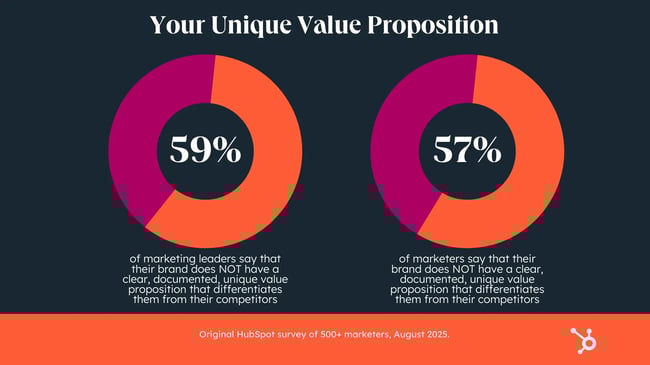
Achieving this requires a thoughtful effort to figure out what differentiates your brand from competitors — and to codify it. The reality? Less than half of businesses have this information documented.

How to Express Your Brand Identity

The starting point for tackling this new AI-driven era of marketing is to Express your unique brand identity — at least according to the Loop Marketing playbook (told you this was coming back around).

Before you tap AI to help you create content, use what you know about your audience, like customer data, to define who you are and how you want customers to perceive you. Then, bring in AI as a brand identity concierge to help you produce content that actually connects with your audience and, most importantly, looks and sounds like you.

This Express stage is measured in efficiency. How well does your business story match how buyers need to experience it? In this stage, it’s the data, context, and point of view you give the AI that gives you a competitive advantage.

It’s worth repeating that because it’s crucial to your success: Only you can give AI the context it needs to tell your story.

That’s the difference between using AI as a shortcut and using it as a true amplifier for your business.

Here’s the breakdown.

1. Define your audience.

The first step in building a strong brand identity is outlining your audience profile. Who are they? What do they care about? Figure out what goals they’re chasing and what obstacles stand in their way.

The more you know about who you’re talking to, the easier it is to create messages and experiences that actually land.

Let AI handle the busy work. Instead of manually combing through customer reviews, call notes, and social chatter, ask your favorite tool — whether that’s Claude, ChatGPT, Gemini, Breeze — to summarize these insights for you. Something like: “Tell me about our most successful customers. What are the biggest pain points that they have expressed in their feedback? Give me the history of our best deals.”

In return, you’ll get a clear customer profile that guides your strategy and ensures your content resonates at every connection point.

2. Craft your style guide.

Knowing who you’re talking to is only part of the equation. You also need to articulate why you’re the right choice for them. That means defining what makes you cooler than the competition.

Drop those details into a simple, shareable style guide that captures your mission, tone, and brand POV. Then, upload that style guide into your AI agent to ensure your brand identity is embedded into every campaign, conversation, and piece of content you create.

3. Generate your concept.

A style guide defines how you show up, but the real power comes from turning those guardrails into a story buyers can rally around.

This is where you build the foundational, customer-driven narrative that defines who you are and why you’re the best option. You can then use that narrative to generate the creative concepts that will carry it into market.

Start by translating your brand story into themes, angles, or key messages that matter most to your customers. Then, use AI to expand on those themes by using prompts like: “Create three campaign concepts with key messages for our target customers,” or “List five content ideas based on our core brand themes.”

In the process, you’re building a bank of audience-informed, story-driven content ideas that your marketing team can pull from and begin riffing off of.

4. Build your content strategy.

A strong narrative is only as good as how it comes to life across formats. You have to deliver it in all the right places, whether that’s YouTube videos, ads, emails, text articles, or social media.

Create a campaign brief that maps your key messages to the channels where your audience spends their time the most. Maybe they’re heavy email users or deep into forums. Then, outline the mix of assets you’ll need to bring it all together. In this case, newsletter content and a Reddit response bank.

Once your assets are created, test and refine them before hitting “send” or pressing the “publish” button. You can use AI to get specific recommendations on what to keep or refine based on the context — customer insights, style guide, and brand narrative — that you provide.

Putting it all together turns raw data into actionable marketing. It’s a repeatable system for reaching the right people with the right story, every time.

The Bottom Line

The Sea of Sameness is rising faster and faster as AI adoption accelerates. But sameness doesn’t have to be inevitable. Instead of drifting along, you can chart your own course, one where every message feels like it was written just for your audience.

That starts with expressing your identity clearly and consistently. It means using AI as a partner to amplify your voice and scale without losing what makes you unique. When you harness AI with intention, you build a foundation that transforms it from a content factory into a true growth engine.

In a world where everyone has access to the same tools, trust, taste, and authenticity become the only competitive advantage.

Categories B2B

Social media SEO: 14 social media strategies to boost SEO

Social media SEO is a hot topic right now, as it should be. Conversations around search engines and social media marketing have been happening for years, and it’s about time social media and SEO unite.

→ Download Now: SEO Starter Pack [Free Kit]

As an SEO consultant with a boutique marketing agency specializing in search and pay-per-click, the biggest challenge I face in search engine and social media marketing is getting traditional search teams and social media teams to collaborate effectively. There seems to be an uncertainty about who manages search marketing on social media.

In this article, I explore the role of search engines and social media marketing. I aim to help marketers understand the role of social media and SEO, the differences between them, what social media SEO entails, and, most importantly, social media strategies that help form a collaborative approach in a way that’s sustainable and efficient for all involved. For the strategy section, I reached out to some of the best social media marketers I know. The strategies section is not to be missed.

Important note: This is a comprehensive article, and I conducted extensive research early on to provide context for everything. If you want to skip straight to social media SEO strategies, click here. In this section, I spoke to social media experts who share some top tips.

Table of Contents

What is social media SEO?

Social media SEO is the process of optimizing your social media profiles and posts to better attract potential customers through search. SEO best practices will vary across platforms, but will involve tactics like the ones below.

Including keywords in:

  • Account bios.
  • Titles, captions, and written content.
  • Within video transcripts and within the video itself.
  • Image alt texts where natural.

Other social media SEO tactics include:

  • Adding relevant and important links to bios.
  • Including categories and tags so the social media profile understands who you are and what you do.
  • Using subtitles or captions to help all viewers.
  • Using hashtags.

The goal of social media SEO is largely the same as that of Google SEO. You find the right audience for your brand and provide them with the value they’re looking for, be it content or products.

Important note: People are buying from social media, so these rankings are helpful. HubSpot’s Consumer Trends report states that a quarter of social media users have purchased on social media within the past three months.
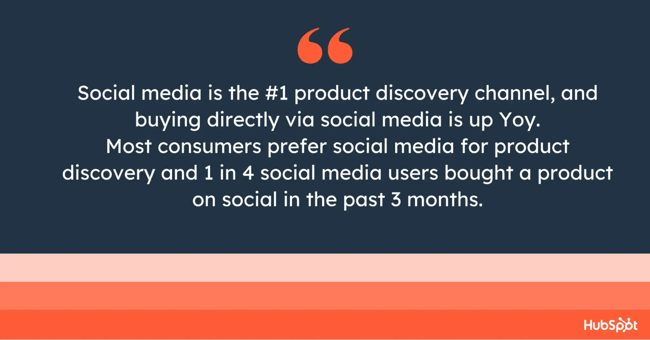
the importance of social media seo: social media is the #1 product discovery channel

It’s becoming increasingly clear: Social media is not only a place to connect with friends anymore. It’s a connection spot between businesses and customers.

But will social search replace search engines?

I don’t think so. Both hold their ground because they serve different purposes.

Why is everyone talking about search engines and social media marketing?

Most recently, articles like this one in Forbes described Google indexing social media as a “game changer,” but this left me rather confused, because I’ve worked in SEO for over a decade, and social media ranking in Google SERPs is nothing new.

With prolific publications like Forbes covering this news, the “update” hit LinkedIn and spread fast.

Forbes said, “From July 10, search engines may now index public Instagram posts or profiles. This means your posts could show up in Google search results and be seen by a higher number of potential customers.”

the importance of social media seo social media is the #1 product discovery channel

Source

The hype about Instagram’s alleged “new” update got me questioning my sanity. Had I imagined that Instagram profiles were already indexed?

It turned out I had not.

Here’s an example of an Instagram channel ranking for the keyword “launch copywriter” back in 2022:
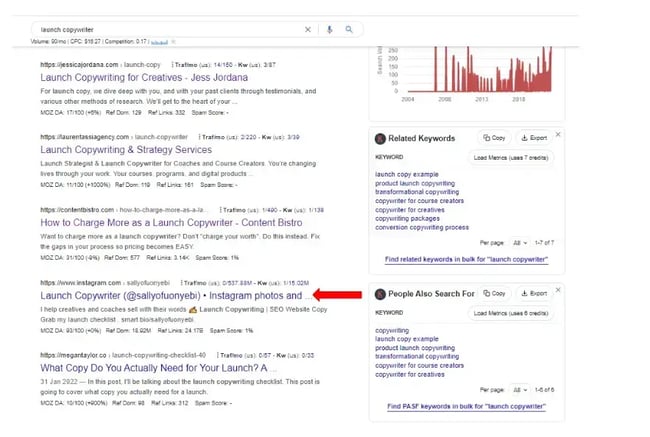
screenshot shows an instagram profile ranking within google search results years ago, demonstrating that search engine and social media marketing have always been important.

Source

My LinkedIn friend and copywriter, Sally Ofuonyebi, achieved this rank. At the time, the target keyword had 90 searches/month, according to the SEO keyword research tool Keywords Everywhere. Ofuonyebi wrote about the success in this article.

I remember Ofuonyebi and I chatting about this social media ranking success on LinkedIn, her chiming in from a copywriting perspective, and me from an SEO perspective.

An Insta profile still maintains rank for this keyword; here’s the latest SERP:
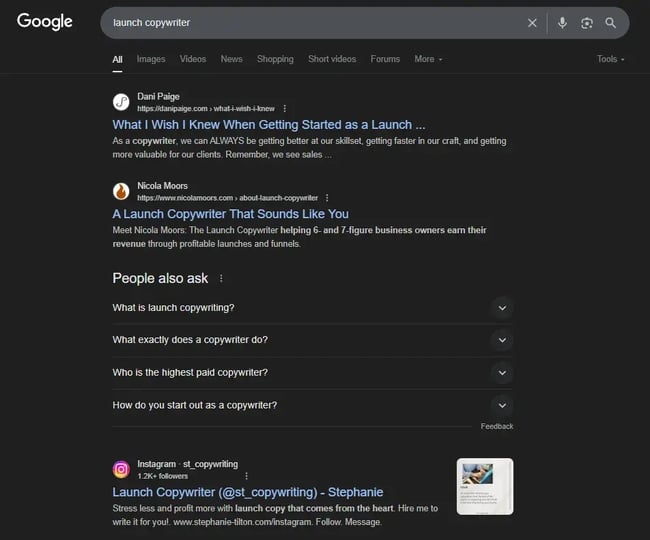
screenshot of google serps showing an instagram account ranking in position three.

Instagram’s Help Center makes its indexation clear:
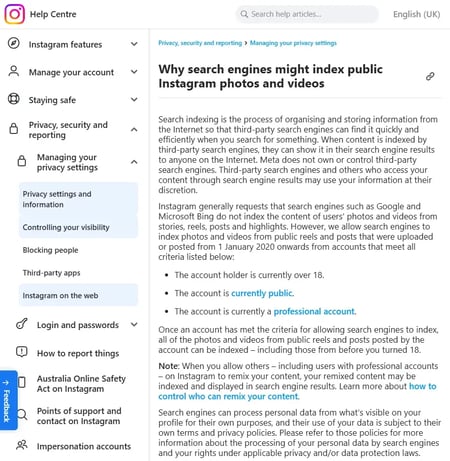
screenshot from google serps shows an instagram post ranking.

Source

Instagram posts posted from January 1, 2020 are indexable, provided the account holder is over 18, the account is set to public (meaning the account holder agrees for content to be publicly available), and the account is a professional account.

I found that I wasn’t the only person confused. Andrew Hutchinson, content and social media manager at Social Media Today, covered the update in his article, “Instagram Expands Google Access to Public Posts to More Regions.” Hutchinson identified where the confusion happened.

Here’s what he said: “Over the past week, several people have emailed me asking why SMT isn’t covering Instagram’s shift to enabling all posts to be indexed by Google, which some have suggested is a major change in content discoverability.

“And the reason is, it’s actually not. This isn’t actually a major shift, because most public IG posts have been indexed by Google for some time. Go do a Google search and you’ll get IG posts in the SERP, this is not new for most regions, though Instagram is rolling this out to more places over time.”

Hutchinson asked Instagram for clarification, and he reports that “they confirmed that this is being gradually rolled out around the world, but for most regions, this is already the norm, and has been for several years.”

I also spoke to Annie-Mai Hodge in some detail about the new Instagram indexability, and Hodge shares her insights. She also contributes significantly throughout this article, as her expertise is incredibly insightful.

Hodge is the founder of Girl Power Marketing and a seasoned social media strategist with eight years of experience in the industry. She started Girl Power Marketing in 2020 and has since built a thriving online community with over 460,000 followers across Instagram and LinkedIn. Hodge helps businesses grow internationally through strategic social media marketing. She regularly speaks at industry events on topics such as personal branding and social media strategy, and her content has become a go-to resource for marketing professionals seeking to stay ahead of industry trends and updates.

You can see why I engaged her!

Hodge offers some insights into what’s going on and what changed. She said, “Individual posts and reels are ranking in search results.”

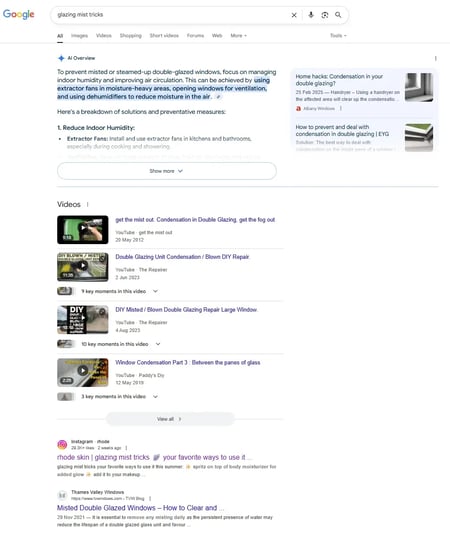
Hodge provides an example using the keyword “glazing mist tricks,” which, when searched, returns Instagram content over traditional window solution companies.

Here’s a screenshot of the SERP:
Screenshot from Instagram’s Help Center with an article about Instagram on the web

The Instagram content ranking isn’t meeting search intent. It’s a skincare tip that is very jarring on a SERP that covers practical window maintenance everywhere else.

Hodge says, “This demonstrates the power of social content in search rankings, it also highlights a potential user experience issue — someone searching for practical window maintenance advice is likely to find skincare content less than helpful. This shift fundamentally changes how search intent is interpreted and served.”

My take on this: Google algorithms are constantly evolving, and I’d like to think that as Google refines its ranking of social media content, search intent and social media posts will be better understood.

Hodge continues on social media indexation, “While [social media indexation] has been a hot topic recently, indexing of Instagram content isn’t entirely new. Users on Reddit suggest that this feature has been available in some regions for quite some time.”

Hodge explains Instagram’s official stance and the Help Center as she understands it: “Instagram’s official stance has generally been to request that search engines like Google and Microsoft Bing avoid indexing users’ content from stories, reels, posts, and highlights. However, the platform now allows search engines to index photos and videos from public reels and posts uploaded from January 1, 2020, onwards. To me, this suggests a strategic shift towards making content from this date forward indexable, rather than historical content. Some sources suggest that this means content has been indexable since 2020.”

My take on this: Honestly, I’m torn! It’s a non-negotiable that profiles have been indexed for some time, but whether Instagram’s Help Center has changed for posts or not is unclear. There appears to be evidence that posts have been indexed in other regions from the historic Reddit posts mentioned above, but something has certainly changed, as evidenced by Instagram’s recent update (see the following screenshot). Perhaps the Help Center is now more relevant for a wider range of regions, and indexation of posts is more common, with only some regions having had indexation previously.
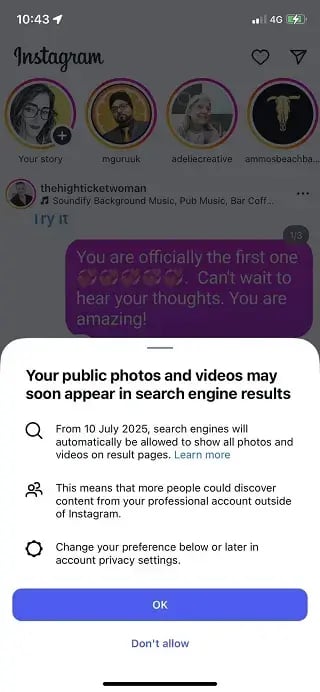
Screenshot from the social media indexation alert from Instagram.

Source

Either way, one thing is sure: Now is the time to pay attention to social SEO.

And Hodge agrees. She says, “Regardless, whether this is new to your region or not, this is your second sign to start taking social SEO seriously — your first sign being when content on TikTok started being indexed by the likes of Google a couple of years ago.”

It’s not just Instagram. Other social media channels rank, too.

I’ve seen LinkedIn, TikTok, Facebook, and Instagram ranking in Google’s search engine results pages (SERPs). Generally, social media profiles and posts rank for brand searches or long-tail keywords that are not fulfilled by other pages.

Here’s an example of a Facebook post ranking:
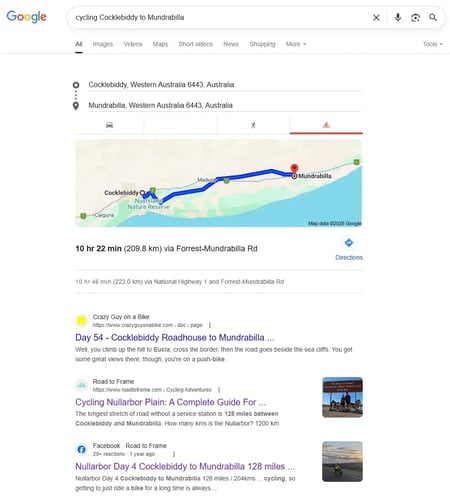
screenshot from google search engine results pages shows a facebook ranking prominently.

In this example, my content ranks twice, my website ranks once in position two, and my Facebook post ranks in position three.

Why?

The subject is niche.

Not many people cycle across the Nullarbor Plain, and a smaller percentage of those who do are looking for content for the exact route between Cocklebiddy, a town in Australia, and Mundrabilla. It’s niche, so no one else is covering it particularly well. As a result, my Facebook post gets a rank.

You’d be right to question whether or not people search for this. It turns out, they do.

Here’s a screenshot showing results for similar keywords in my Google Search Console:
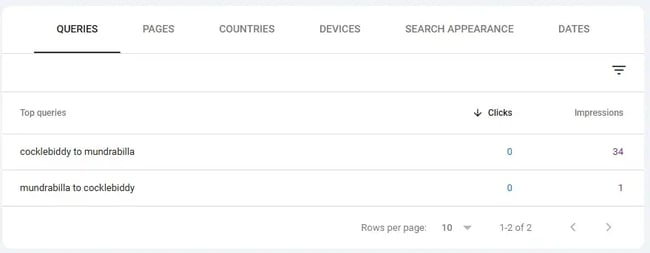
a screenshot from google search console shows that the keywords a social media post is ranking for do have search volume.

There are a total of 35 impressions, but no clicks, which isn’t surprising. As seen in the screenshot above, Google Maps takes priority over my ranking content. The search intent is likely for people looking for a map, so the user’s intent is fulfilled.

The lesson?

When attempting to rank content on social media (or on a website, for that matter), you must consider search intent.

So far, social media’s best chance at securing rank is for niche, long-tail searches, which is where you might also have zero clicks, which isn’t what a strategic marketing plan needs.

TikTok kicked off the social media and search narrative.

The launch of TikTok was another memorable moment in social media and search engine marketing, as it marked the first time social media was referred to as a search engine. The conversation sparked some controversy over the topic of what constitutes a search engine and why TikTok isn’t considered one.

My take?

While TikTok and other social media channels aren’t technically search engines, getting lost in the semantics of the official definition of a search engine isn’t going to help us. Instead, while people use social media as a search tool, we need to be marketing strategically across platforms.

Currently, I feel obligated to keep the social media marketing and SEO conversation balanced: Google remains the platform on which the majority of searches occur.

But there’s no denying it: People are using social media as a search engine. HubSpot’s research found that Gen Z and Millennials have a preference for social media. For them, social media is the primary channel for product discovery. Plus, 31% of consumers use social media to find answers to questions.

So what does this mean for marketers?

If you’re posting on social media, posts might as well have an SEO angle or keyword consideration. Later, I cover the social media strategies for search engine and social media marketing success.

A Word of Warning about Social Media Rankings

Historically, social media has not performed particularly well in Google search rankings. While Google does rank social media content, as demonstrated by the Facebook example above, it generally does so for long-tail keywords or niche topics where content across the web is not as comprehensive. If nothing else fulfills search intent, then the rankings are awarded to social media.

Could this change? I certainly think so, but we’ll have to wait and see.

Another note: Videos on TikTok have never ranked as well as those on YouTube. Here’s an example for the keyword “recipe video.”
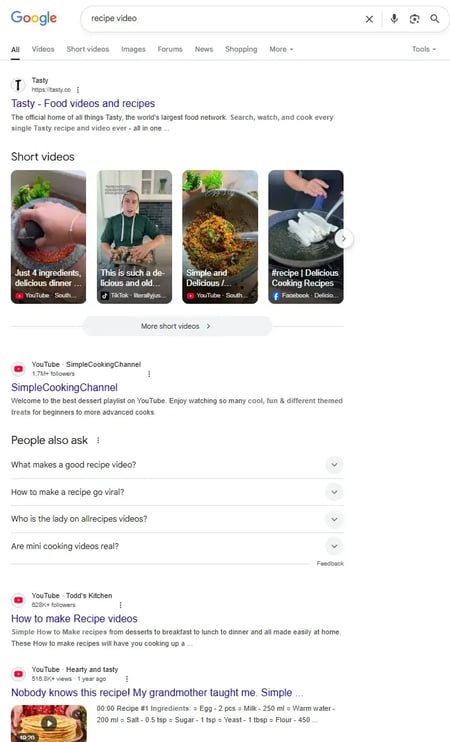
screenshot from google serps shows videos ranking from social media channels, with youtube getting the most rankings.

Within this SERP, there are seven opportunities to rank a video on the first page of search results. YouTube secures five rankings, Facebook gets one, and TikTok gets one.

My thoughts on this: Google will always have a bias in favor of its own platform. Google owns YouTube. If social media is starting to threaten Google, is it possible that Google might deprioritize social media in the rankings? I think so, but only time can tell.

Important note: Social media search is not all about ranking social media in Google and for Google search. People search within social media platforms, too, so posts should be optimized regardless.

Social Media vs. SEO

Social media management involves creating, posting, and optimizing content on various social media platforms, including Facebook, X, Instagram, TikTok, YouTube, and LinkedIn.

SEO management involves improving your website’s content and visibility in search engine results pages, and recently, AI search, such as LLMs like ChatGPT. It’s about optimizing content so that people searching for relevant keywords, questions, or topics can find your site organically.

These days, I want to see less about the “Social Media versus SEO” debate and more about the intersection of social media and SEO.
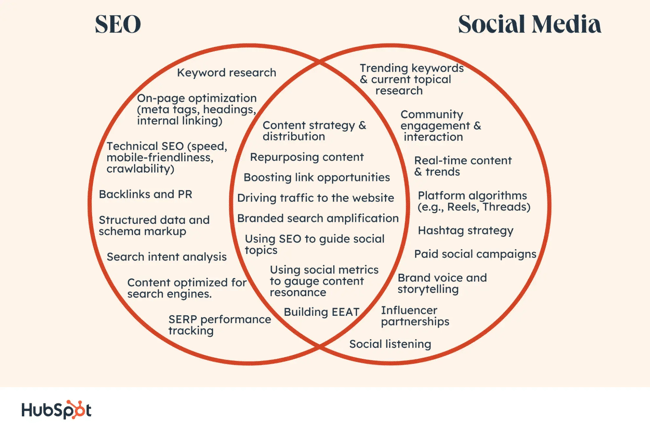
social media versus seo

While SEO and social media management have some nuances and differentiation, mainly in how the platforms themselves work and their functions, social media and SEO work best when they’re aligned, and this is particularly evident now because people use social media as a search engine. In light of Instagram’s new update (the one that got this article going in the first place), social media posts are more indexable than ever before.

Annie-Mai Hodge, introduced previously, provides an example of how social media is taking the ranks for some important search terms:
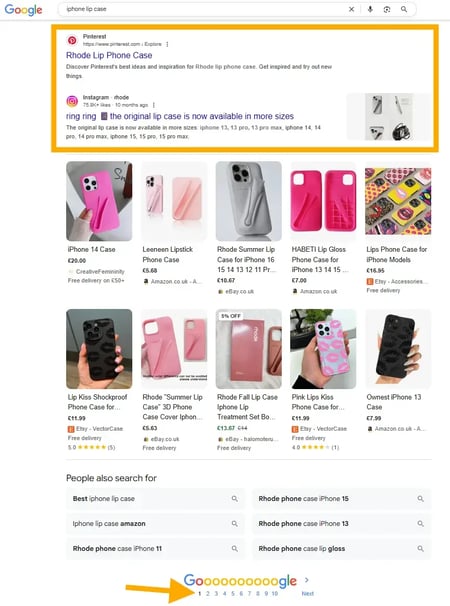
screen shot of social media pages showing up on the first page of a google search

In the screenshot, both Pinterest and Instagram secure page one rankings for the keyword “lip phone case” (FYI: a phone case designed to hold a lipstick) with transactional intent, meaning the person searching for it is ready to make a purchase.

The Challenge of Social Media SEO

In marketing teams, I see an uncertainty about who manages search marketing on social media. Because search on social media involves keywords, the pressure seems to be mounting on the shoulders of SEO professionals, who already have an ever-growing and broad role encompassing on-page SEO, backlinks, PR, and website optimizations that span technical, content, and user experience. Plus, there’s the fast-growing “SEO” for LLMs.

SEO specialists can’t be expected to take on search optimizations for every single channel.

Collaboration with social media teams is essential. The future of SEO requires teams to work together if brands want to remain competitive in this evolving search landscape. Simply put, the search landscape is becoming too large for one person to manage alone. There are multiple channels with their own algorithms and nuances, and you can’t expect any one person to master all of them in the detail required to do search well.

In my experience, many brands are aware of the importance of social media and SEO. They ask me about it, and I push for collaborative approaches. As an SEO, I can provide significant value to social media through data. My SEO research identifies the queries audiences want answered and the information they’re looking for when they’re searching. With this data, social media teams can curate a social media strategy that aligns with SEO and meets audience needs.

For traditional search, social media brings real-time insights on trends and interests. Social media search tools like TikTok’s Keyword Insights do what SEO tools can’t: They bring data on trending searches right now. Most keyword research tools for SEO are somewhat flawed because they can only use historical data to forecast future trends.

For years, I’ve been advocating for more holistic marketing and stronger collaboration between SEO and social teams. But in many cases, it still feels like there’s a disconnect. What can happen is that social media teams often ask for keywords and ideas, yet rarely integrate them in a way that supports shared goals. I’d love to see this change because the most forward-thinking social media managers already understand the value of integrating search and social. When these teams collaborate well, the results are truly powerful.

In my opinion, this disconnect is occurring because everyone is already busy with their marketing channels, and the scope of what needs to be done is growing faster than recruitment; team members are spinning more plates than ever before without adequate support.

14 Social Media SEO Strategies

To write this section, I reached out to some really amazing social media managers. All of these social media SEO strategies are a must-do!

1. Align your captions.

Annie-Mai Hodge from earlier suggests that you start treating your captions on Instagram as you would any other piece of content that could appear in search results.

Hodge says, “Use natural language that addresses user intent, and includes relevant keywords without compromising readability. Keep in mind that the text overlay you use on photos and reels is searchable too, and helps provide context, so consider how your audience might search for the information you’re providing.

“Overall, this move aligns with statements from Adam Mosseri, Head of Instagram, who said earlier this year that the platform is prioritising improvements to in-app search functionality and how content appears in external search engines. And while Instagram may be late to the social search party (with TikTok pioneering in this space for years and Pinterest and YouTube leading the charge), this development signals where social media platforms are heading, and social media SEO isn’t a nice-to-have; it’s a must.”

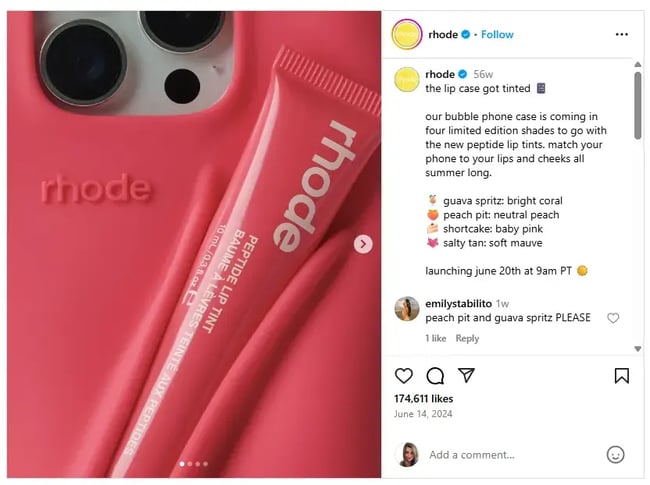
To demonstrate how this works, I looked at the Rhode’s Skin post mentioned earlier (the lipstick holding phone case, which ranks number one).

Here’s their caption:
social media and seo strategy: align your captions

The first sentence contains the keyword: “the lip case,” and you can also see “bubble phone case.”

Danielle Shein strongly agrees with this and adds more, “People search how they speak. And with voice-to-text search features, they’re literally in conversation with their ChatGPT. If your content is conversational like that, you’re going to start playing the SEO game.”

To do this, Shein recommends using phrases like “Best way to…” or “What to do if…” just like you’d imagine someone talking to their ChatGPT.

On video platforms (YouTube, TikTok), she advises saying your keywords early in your script so the algorithms know straight away who to feed your video to and can categorise accordingly.

“The result? You’ll start ranking on-platform, and those social posts might even appear in Google results. Two birds. One search-friendly stone.”

2. Alt Text has never been more important.

I was in a meeting discussing the potential future of Instagram’s indexability with my client, India Filippidis, senior brand marketing manager at Social Pantry. Filippidis was quick to take action when Instagram announced that Instagram posts might get indexed. She called a meeting, and we began discussing how to optimize our workflows to give Instagram the best chance of ranking.

I expressed my thoughts that social media posts generally don’t do well in search, and that although I thought the update was great, I wasn’t hopeful for seeing significant changes.

Filippidis made a solid suggestion: Image search might be the best place for Instagram’s indexing.

Why hadn’t I thought about this?

Instagram is renowned for beautiful images and eye-catching grids. It would make sense that Google might turn to social media for the best images.

Filippidis said, “I actually think image search is where social media, especially Instagram, has the best shot at visibility. That’s where all the visual content lives, and it’s what Instagram does best. We’re not sure how impactful this update will be, but if Instagram posts do start getting indexed, we want to be ready, not playing catch-up.”

She decided to adapt their workflow on Instagram to focus on:

  • How they name image files.
  • Using alt text more intentionally.
  • Consider how their captions support what someone might search for.

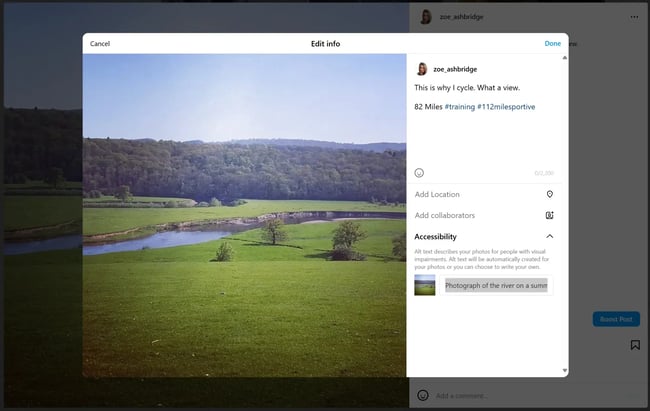
Here’s how to edit alt text on Instagram (it can be buried!):
screenshot from grammarly blogs shows how social media icons can be shared on content.

  1. Click on the post you want to edit.
  2. Click the three dots.
  3. Click “Edit.”
  4. Click “Accessibility.”
  5. The alt text field will display and you can edit it.

As soon as Filippidis mentioned image search, I strongly felt she might be right. We already have some data on how short-form videos perform (YouTube receives significantly more visibility), and we know that Facebook posts rarely rank. However, image search and Instagram are a match made in heaven.

Ensuring that image files and alt text include relevant keywords is a key tactic in ranking images, and it takes just a minute to do so. We should all be adding keywords to these components.

3. Selectively add social sharing buttons to your website.

There’s a lot of debate regarding the use of social media sharing buttons. Are they powerful tools or just unnecessary clutter?

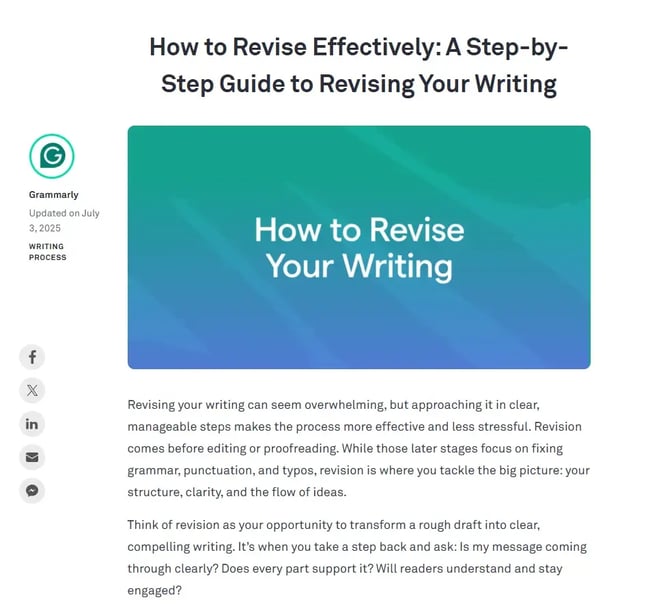
Well, social sharing buttons can be effective if you place them strategically — for instance, on blog posts.

Grammarly does a great job using this method:
screenshot from Grammarly blogs shows how social media icons can be shared on content.

Source

In other scenarios, social sharing buttons might not yield any results.

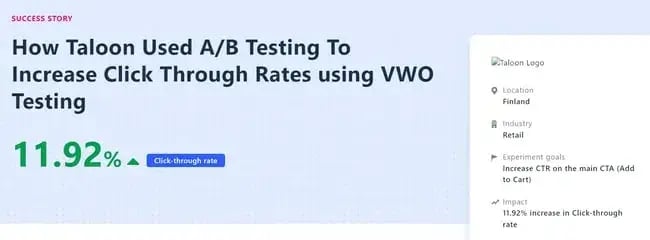
For instance, a VWO study suggests that removing those buttons from landing pages can increase click-through rates by 11.9%.
social media seo strategy: social sharing button

Source

This indicates that while blog posts benefit from social sharing buttons, pages with clear goals may perform better without them. Conducting A/B tests can help you determine the best placement for social sharing buttons on your site.

4. Dominate brand search.

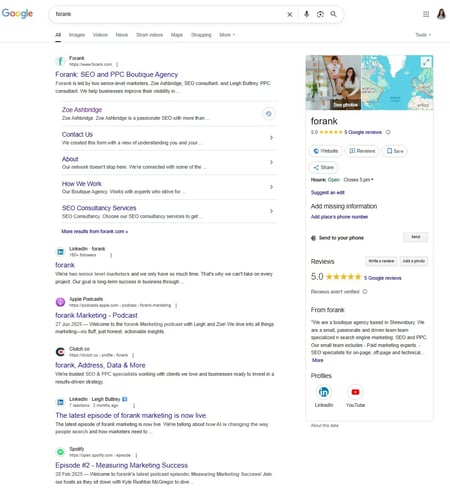
When someone searches for your brand, you want to appear — not a third-party website trying to generate clicks from your brand.

Social Media will ensure that you (nearly) always have page one dominated.

Here are the results for my brand:
screenshot from google serps shows how social media marketing has helped the brand dominate serps for branded search.

When someone searches for your brand, they’re looking for you. If you have enough social media profiles optimized and in use, your users are sure to find you.

I once worked for a brand that had a very unhappy customer write a piece of PR on the brand, representing their displeasure with their product. Because the client didn’t have a brand dominating search, the PR ranked page one for their brand name.

Ouch.

The brand created social media profiles, but the problem was not resolved overnight. Social media profiles must be regularly updated and maintained to retain rankings. The key is not to overdo social media. Do as many profiles as you can cover well.

5. Create an integrated keyword strategy.

As mentioned earlier, the line between search engines and social media platforms is becoming increasingly blurred.

I think this is an amazing opportunity for two types of keyword strategies to come together for ultimate brand visibility.

SEO tools for traditional keyword research, which aim to rank on Google, use historical data. SEO specialists then use that data to forecast the likelihood of that keyword trend remaining.

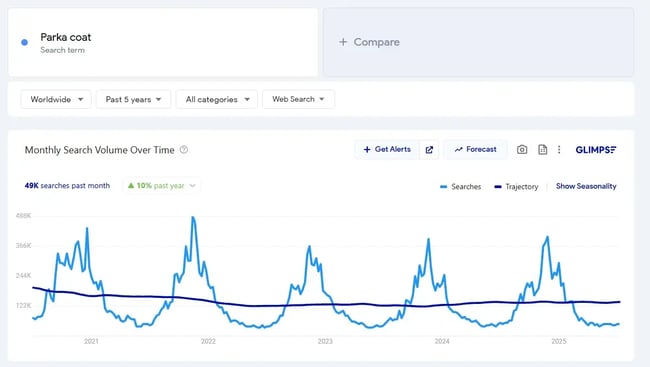
For example, the keyword “parka coat” has fairly consistent search trends according to Google Trends:
search trends for parka coat keyword

Source

Each autumn/winter, between October and January, demand for Parka coats increases and there’s a spike every year. Makes sense.

With this information, social media can “borrow” SEO’s findings. Ecommerce stores selling suitable coats should start posting about them before the spike. This way, social media is proactive and provides the audience with what they need before they’ve the time to search for it themselves and potentially find a competitor.

Sharing keywords works in reverse, too.

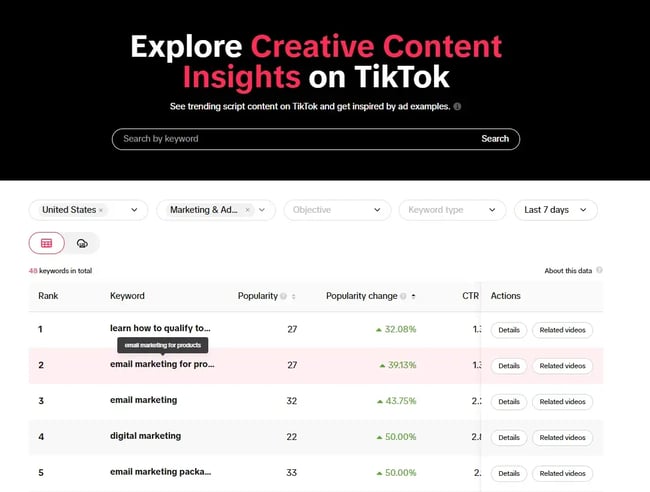
Look at TikTok’s Keyword Insights. Here you can see trending keywords on TikTok, a social media platform that lends itself incredibly well to trending content.

You can use this tool to see what’s going on in your industry, and within the country you’re most interested in targeting. The screenshot below is filtered by the United States and the Marketing and Advertising category.
screenshot from tiktok’s keyword insights shows how the tool can be used to find trending topics for search engine and social media marketing success.

Source

In the screenshot above, I’ve also filtered the table by popularity to identify trends with an upward popularity trend, but I’ve sorted it by lowest first, as this indicates the trend might be easier to rank for. Social Media can share this with SEO for timely content production that is likely to also be searched for on Google, helping sites clinch ranks before they become saturated. This content can then be shared on social media channels.

Here’s how to identify the right keywords for each platform:

  1. Reflect on phrases that people might use to describe your business if they couldnt recall its name. For instance, when searching for a productivity tool, users might look for terms like “task manager” or “organizer app.”
  2. Opt for more specific, long-tail terms if there is significant competition. For example, a “budget-friendly travel app” might yield better results than simply a “travel app.”
  3. Select keywords that align with the associations you wish to establish. For instance, if you offer discounts, consider using phrases like “discount app,” “best deal,” etc.
  4. Revisit any previous SEO keyword research to incorporate relevant terms. Keywords that performed well in web searches may also be effective on social media.
  5. Tailor your keyword selection to suit the nuances of each platform. For instance, a restaurant might use keywords like “best restaurant in New York” on Facebook to attract guests, while on LinkedIn, terms like “hospitality jobs in New York” could attract talent.

6. Include links in social profiles.

The links in social media posts are usually no-follow links. It’s thought that nofollow links don’t pass any authority (link juice).

But let me first debunk two myths about nofollow links.

  • Myth: Nofollow links are useless. Reality: They may not boost your site’s authority, but they can still drive traffic and potential customers.
  • Myth: Nofollow links hurt your site. Reality: Not true. When used correctly, they can even improve your search ranking and shield you from penalties.

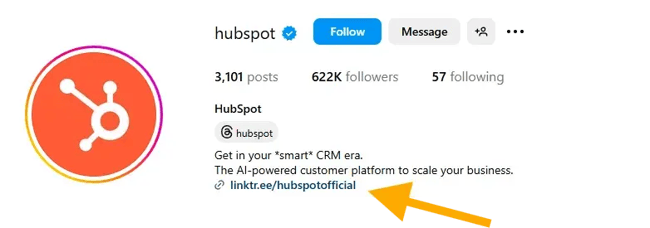
Ensure you are capitalizing on these additional opportunities to draw your audience to your site. Add a link to your social media bios!
annotated screenshot from hubspot’s instagram shows a link in their instagram bio.

While social media links don’t carry huge SEO benefits in terms of authority, it does help your audience navigate to your site, and that matters for marketing!

7. Increase positive mentions.

Another consideration for social media links is authority and trust that might come with social shares. Nothing pleases me more than finding a link to my content on Reddit, because it means someone found it so useful that they shared it with others.

As previously demonstrated, maintaining a robust social media presence can foster a positive relationship with your audience.

A critical aspect of achieving this is to have online mentions that grow your brand’s visibility and positive awareness.

Here’s a screenshot of my link, shared by a Reddit user:
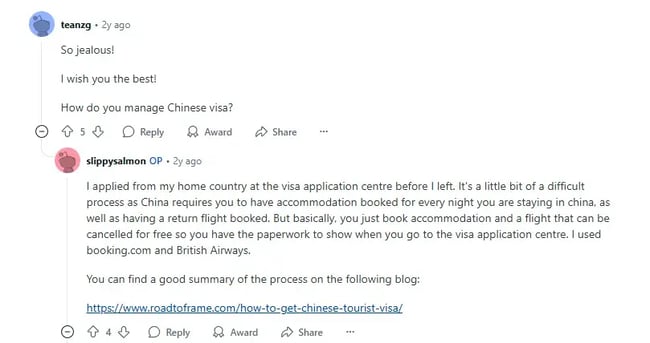
screenshot from reddit shows that my content has been shared within subreddits.

Using Google Analytics (GA4), I can see the visits Reddit has sent me:
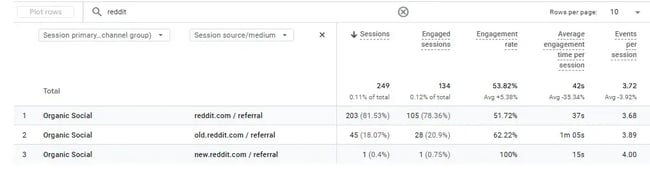
screenshot from my ga4 shows traffic that comes from reddit.

Having a good social listening system can help you understand what customers are saying about you, manage your reputation, monitor competitors, and plan your content more effectively.

Encourage positive mentions through engaging content and customized posts on the platform.

This is especially useful in an AI search world where brand sentiment is analyzed. You can use tools like HubSpot’s AI Search Grader. Here’s what it looks like:
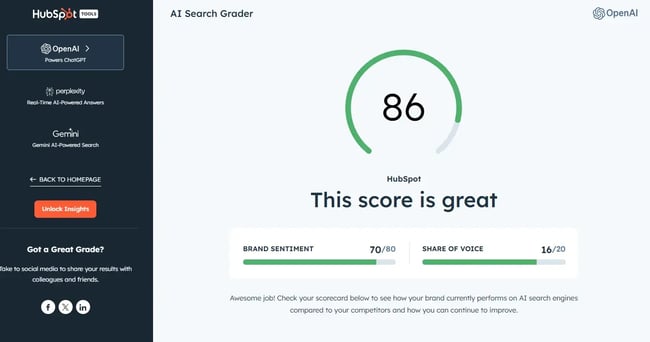
screenshot from hubspot’s ai search grader shows the role brand sentiment plays. social media mentions contribute to this.

8. Optimize social profiles.

About five years ago, I started posting properly on LinkedIn. I had no idea what I was doing. Posting on LinkedIn is a lot and I wanted some help so I was working with the platform efficiently. I posted in a Facebook group and connected with Hope Marshall at Marshall Creative. Marshall worked on my LinkedIn profile with me for a few months, setting the foundations and teaching me a lot about social media and marketing.

Now, I work alone on my LinkedIn and I love it. I’ve got over 30,000 followers, and my project to use social media more was a success (thanks to Marshall!). Naturally, I had to ask her to share her expertise on social profile optimization.

She provided tips per social media platform, and here they are.

First, let’s look at some overall tips, then Marshall kindly laid out tips per platform.

1. Mirror your SEO strategy.

Start by reviewing each social media platform’s editable sections, which could include your About, Services, Products, or Highlights tabs.

Marshall recommends, “Use this real estate to echo your core messaging and target keywords from your website. Keep in mind that each platform has its own character limits, so lead with the most relevant and high-impact information.”

Important note: Refer to the section above, “Create an integrated keyword strategy,” to find keywords that work.

2. Profile photos that establish trust.

Don’t leave your profile faceless. Your profile photo is often the first visual cue someone gets, so make it count.

Marshall says, “Brands can use their logo, reworked into a circle-friendly format so it displays well across devices. On platforms like LinkedIn, a high-quality photo of your face builds trust and recognizability.”

When I wrote this article on LinkedIn hacks, I came across a study from Photofeeler that found that a teeth-visible smile was the most impactful characteristic for giving the perception of competence, likability, and influence.

3. Consistency vs. campaign creativity

Keep your profile picture consistent, but feel free to play with the banner images.

Marshall says, “Regularly updating your banner image, such as on LinkedIn, Facebook, and X, is a smart way to make noise around campaigns, events, or launches without disrupting brand consistency by changing your profile photo. Your profile photo should remain consistent, but banners can be interchangeable to spotlight seasonal messages, campaigns, new services, or milestones.”

4. Be selective with social badges.

Add social icons (aka badges) to your website, email signatures, and email comms with your audience to direct traffic to your profiles — but only for platforms you’re actively using.

Marshall warns, “Linking to a dormant Instagram or half-empty YouTube channel can do more harm than good.” And I strongly agree! It is tempting for brands to cover all social media platforms, but it’s best not to. Invest time in social media profiles that are most suitable, and do them well.

5. Link your website and make sure it’s mobile-friendly.

Social media platforms usually have a place for you to link to your website.

Marshall says, “It sounds basic, but it’s often missed and it’s one of the easiest ways to drive traffic from social to site. Just make sure the link leads to a mobile-optimised, fast-loading page that matches the tone and messaging of your profile for a seamless experience.

“That said, don’t overdo it in your day-to-day content. Most social platforms are designed to keep users on-platform; it’s how they maintain engagement. Consistently posting external links (especially in every post) can lead to reduced visibility and reach, as we’ve seen that most algorithms deprioritize content that sends users elsewhere.

“Some platforms like Instagram don’t allow clickable links in captions at all. In those cases, use a ‘link in bio’ comment in your caption or something like Linktree to house your most important links in one place.”

6. Get verified if it’s available.

Where possible, apply for verification.

Marshall says, “A verified badge helps users instantly identify official accounts and can significantly boost trust. Studies show that verified accounts are seen as more credible, and consumers are more likely to engage with and buy from those profiles. This is especially important for brands where impostor or fan accounts might exist.”

Platform-specific Tips

Optimization isn’t one-size-fits-all; each platform has its own best practices and algorithm signals. Here’s how to get it right across the major players.

LinkedIn

  • Add relevant keywords to your about section and headline. This helps both LinkedIn’s search and external search engines understand your offering.
  • Complete every available field on your company page or personal profile, including website links, industry, location, and services.
  • Align your content themes with your website’s keyword strategy to reinforce relevance.
  • Post consistently. Fresh content signals activity to both users and search engines, similar to how regular updates benefit your website’s SEO.

Here’s an example of HubSpot’s LinkedIn profile, which is optimized:
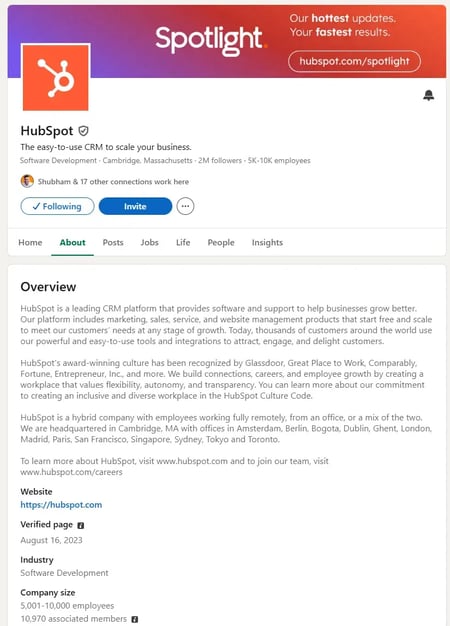
screenshot of hubspot’s linkedin profile

Source

Instagram

  • Use your bio wisely. It’s short, but you can still pack in your USP, location, and contact info and don’t forget your all-important link in bio.
  • Choose a recognisable username and handle that aligns with your brand. Aim for consistency across platforms to build recognizability.
  • Keep your highlights up to date. Use clear, branded covers that reflect the content inside.
  • Hashtags still matter, but the strategy has shifted.

On hashtags, Marshall says, “Based on my own testing, the full 30 aren’t necessary anymore. Instead, take a more targeted approach, like on LinkedIn, and use 4–6 highly relevant hashtags. They still help the algorithm understand your content and support discoverability, so choose carefully.”

Here’s Marshall’s Instagram showing how she uses her bio, username, handle, and highlights.
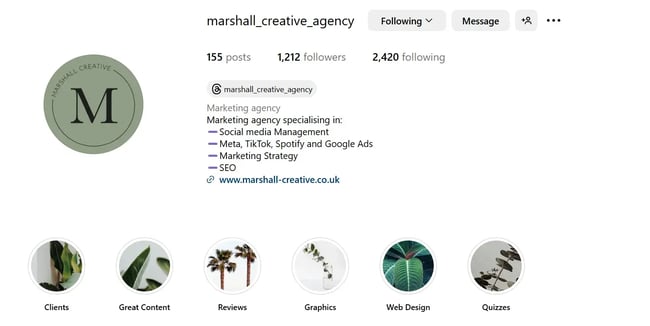
screenshot from marshall’s instagram showing how she uses her bio, username, handle, and highlights for seo and social media success.

Facebook

  • Use the About, Services, and Additional Info sections to clearly explain what you do and who you serve.
  • Ensure your CTA button accurately reflects your primary goal (e.g., “Book Now,” “Contact Us,” or “Shop”).
  • Keep your business hours, contact info, and address accurate and regularly updated. These details are also important for local SEO.

X

  • Add strategic keywords to your bio, which helps with both X’s native search and search engine indexing.
  • Pin a tweet that features your most important content, such as a lead magnet, current offer, or campaign.
  • Use a clear, relevant handle and display name that reflects your brand. If your brand name is taken, add a relevant keyword or location rather than an unrelated string.

Semrush’s X profile is a good example of strategic keywords. I like how they’re added how many marketers they serve:
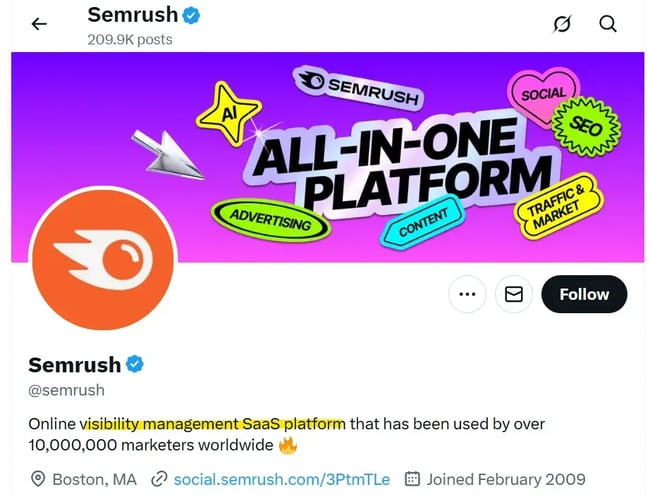
screenshot of semrush’s x profile

9. Treat your bio like a meta description.

I’ve mentioned this above, but the bio is a critical SEO placement, so I wanted to highlight it to make it stand out. It was also a point that many of the SEO and social media experts that I spoke to mentioned.

Danielle Shein is a brilliant social media marketer. I know because I’ve worked with her long-term with a mutual client. She has always had astute awareness of the role of SEO and collaborative marketing efforts. I always appreciated Shein’s updates and tags in messages and emails because she recognized the cross-channel opportunity.

Shein contributes to this article a few times, but first, she offers a valuable tip on bios.

Shein says, “Your bio is prime digital real estate. While we all know we need to treat it like a business card, it’s also a great SEO magnet.”

When asked how to write an optimal bio, Shein advises:

  • Use relevant keywords naturally in your description (think “Holistic Skincare for Acne-Prone Teens” instead of just “Founder & Facialist”).
  • Add a clear CTA that links to your most search-relevant page.
  • Update it monthly based on trends, seasonal offers, or new launches.

“This not only improves your discoverability on-platform, but creates more keyword alignment between your content and your site,” she says.

Shein presents an example:
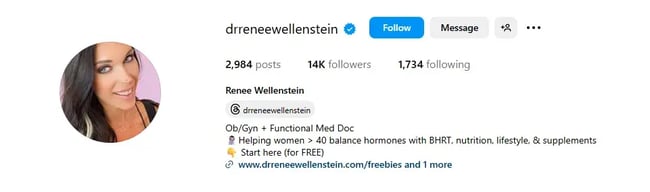
screenshot from instagram shows bio best practices for search optimization.

Source

Dr. Renee Wellenstein shows what she does (Functional Med Doc) and who for (women) and the problems she solves (hormone balancing) with what methods (BHRT, nutrition, lifestyle, and supplements). She takes advantage of the many keyword opportunities within her bio.

These rules can be applied to all social media platforms. I do something similar on my LinkedIn profile:
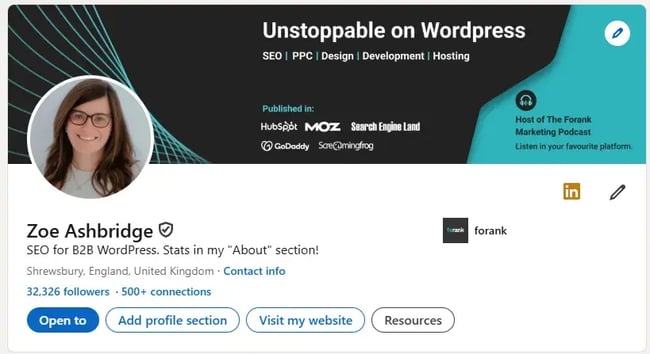
screenshot of my linkedin profile demonstrating an optimal bio for search.

“SEO for B2B” is likely a search term, and I’ve specified my niche, which is B2B WordPress.

Marshall also mentioned the power of the bio. She said, “Make the most of your bio. Many platforms allow you to include short descriptions, but only the first 140 characters often show up in search results, so front-load it with your most important keywords and brand message. Use natural language, avoid stuffing, and speak directly to your audience.

“What problem do you solve? Who do you serve? Don’t be afraid to niche this down. For example: ‘I help animal welfare charities drive regular giving via the power of Meta advertising’ vs ‘Expert in digital ads.’”

10. Build links and social media reach.

Search engine optimization has long been about inbound links to your website. While inbound links remain significant, a secondary metric for marketers seeking to boost search traffic should be social media reach.

To encourage more people to share your content on social media, you need to increase the number of engaged fans or followers on your account.

However, avoid purchasing fake followers or likes, as the platform will likely detect and penalize you.

The Artios’ study came up with concerning results — the number of fake followers is getting higher every year. Across platforms such as Instagram, TikTok, and X, a growing trend is emerging where people are seeking to purchase fake followers.
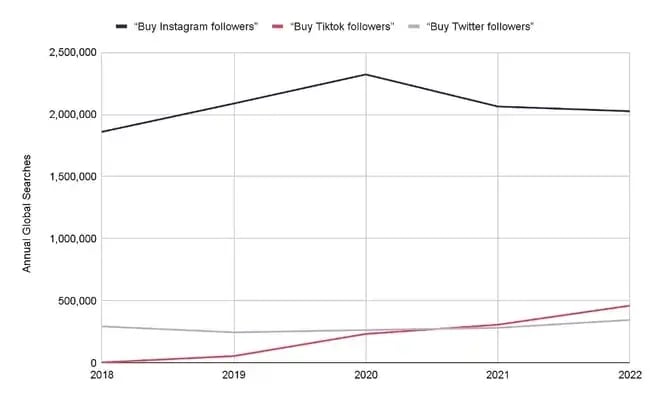
graph showing the upward trend in buying fake followers across social platforms

Source

But trust me, buying followers doesn’t work. Sure, your numbers might look good, but what about the engagement? It’s practically non-existent.

10K followers but only getting 10 likes per post? Doesn’t add up, right?

Purchased likes are worthless as well. Those bots won’t engage with your content, care about your brand, or turn into real customers.

Instead of enjoying fake fame, grow your reach through quality content creation and engagement. You will build not only social media reach but also inbound links.

I spoke to Marshall about fake followers, and she brought a good point to my attention: TikTok especially doesn’t care about follower count and new accounts can go viral.

Marshall says, “Likes and follower counts aren’t the key to reach on every platform. For example, TikTok doesn’t rely heavily on following as a metric to push your content wider; that’s why brand-new accounts can perform exceptionally well on this platform. The algorithm prioritises relevance, not popularity.”

11. Establish relationships and build a community.

Similar to sales, relationships are huge for driving inbound links and social media attention. Building relationships using social media can open opportunities for guest blog posts and other link-building opportunities.

You can also implement this by polling followers to drive engagement and responding to comments to show users there are real people behind the screen.
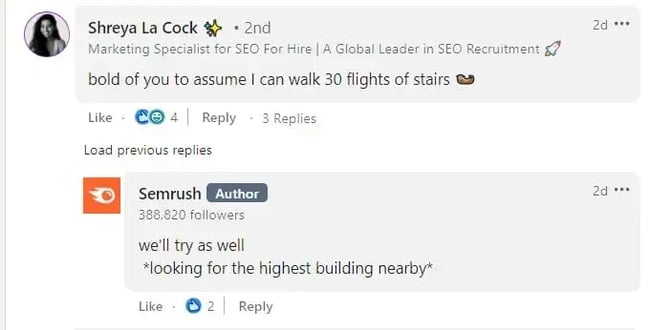
screenshot of semrush posting on social media

Source

You can also nurture relationships by setting up groups/communities.

For instance, consider creating a Slack community where you can post valuable content and initiate discussions in an #announcement channel.

Also, create a Facebook or LinkedIn Group, host live events on X, Instagram, or TikTok, and interact with your audience to keep them engaged and informed.

Engage with your followers as much as possible and wherever possible. These activities provide you with more opportunities to share additional links with your users.

Dani Shein (introduced earlier) advises thinking about comments as micro-communities.

She says, “Not only does an engaged comment section look great, it boosts the time people spend engaging with your content, and the better it’ll perform in search and in social.”

She recommends inviting discussion in the comments, not just with a great CTA, but also by:

  • Asking spicy or counterintuitive questions.
  • Being bold with controversial/polarizing statements.
  • Featuring top commenters in your Stories or DMs.

“This turns passive followers into an active community that supports your content before algorithms even notice it. (And the more people commenting with the keywords, the better for SEO!)”

12. Boost your content creators’ profiles.

Search engines pay close attention to the creators of the content on a web page. In addition to the web, search engine crawlers pull information from social media platforms to better inform the credibility of the author.

Social media profiles, such as LinkedIn, can help verify that authors are real people.

Below is a screenshot from Google’s Search Central blog about creating helpful and reliable content.

It suggests that you consider who created the content.

It’s clear in black and white that it should be:

  • Evident who authored the content (add an author in the form of a byline).
  • Carry a byline where one might expect it (under the title, for example, or in a sidebar).
  • Byline leads to further information (add an author page with an about section and links to social media profiles).
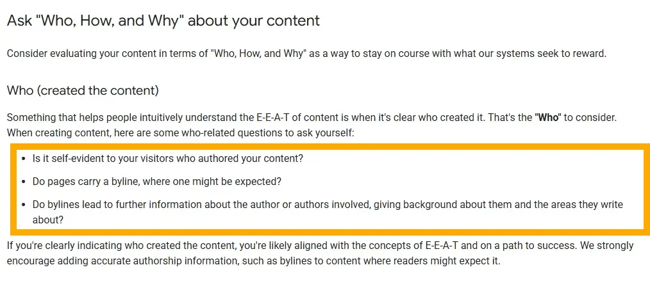
social media seo strategy: screenshot of google’s blog on how to create good blog content

Include author bios in your articles or blogs that are linked to their social media profiles and tag them with each new piece of content they produce.

Here’s an example of an author page on HubSpot:
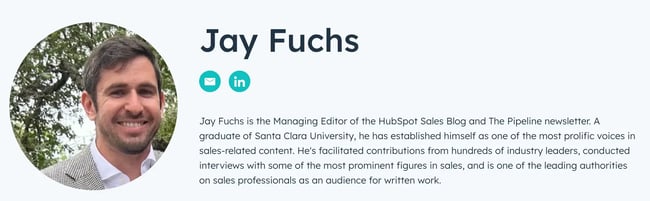
screenshot of jay fuchs’ bio on the hubspot blog for social media seo

Source

13. Use high-quality images and video.

Kelsie Irvine has worked in social media marketing for seven years and is now a freelance content creator at Captured by Kelsie. She works for brands and events, based in London. If anyone values the role of high quality, it’s Irvine. I’ve worked with her for mutual clients where branding, luxury, and quality are at the core of what they do.

“All marketers now understand that customers are more likely to buy from a brand that shares their values, and social media is the place to communicate those values in an authentic, human way,” she says.

“That’s why high-quality content isn’t optional — it’s essential. Your Instagram feed doesn’t need to be full of glossy DSLR shots or cinematic 4K drone footage to make an impact, but quality imagery should always be your baseline. Clear, well-composed phone footage is more than enough to stand out when paired with strong storytelling. It helps you connect with your audience, show personality, and bring your brand to life in a way that feels real.”

When Irvine isn’t shooting content herself, she shares best practice tips with her clients so they can still capture usable, brand-worthy footage in her absence.

Here are her top five:

Shoot using your phone’s native camera app.

Avoid filming directly on Instagram or TikTok. Your phone’s camera app gives you access to features like automatic stabilisation, depth of field adjustment, and in-camera metering, all of which will make a noticeable difference to your content quality.

Turn on your grid lines and level.

Head to your camera settings and switch on the grid and level tools. These will help you compose cleaner, more balanced shots… and make sure your horizon isn’t wonky.

Use your phone’s preset zoom buttons.

If you need to zoom in, don’t pinch manually. Tap the pre-set buttons (e.g., 0.5x, 1x, 3x), which will switch lenses rather than digitally zooming in, keeping your image crisp and clean.

Capture a mix of wide, mid, and close-up shots.

Varying your framing adds interest and flexibility in post-production. Wide shots help show context and setting, mids are great for people and products, and close-ups allow you to highlight detail.

Shoot more than you think you need.

You’ll never regret having extra footage, but you will regret missing the shot. Capture more than you think you’ll use — it gives you more options when editing into Reels, Stories, or carousels down the line.

Finally, a bonus tip from Irvine, “For the love of content… wipe your camera lens before you shoot! You’d be surprised how many shots are ruined by a smudgy fingerprint.”

14. Collaborate with influencers.

Influencers shape the market today, so make the most of it.

According to Statista, over 60% of U.S. marketers planned to increase their influencer marketing budgets. It’s a social media tactic that works.
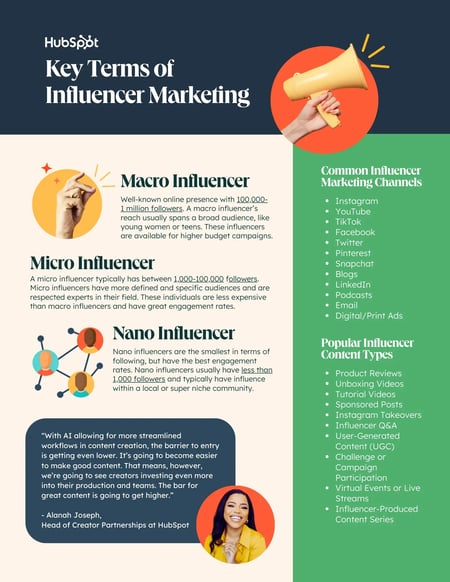
key terms of influencer marketing

Source

Here are several ways to collaborate with influencers:

  • Pay them for featuring your brand.
  • Use them in advertisements.
  • Give them free products for reviews.
  • Co-create products or launch new lines.
  • Run giveaways together.
  • Invite them to your brand’s events.
  • Establish a brand ambassador program for long-term relationships.

Overall, teaming up with influencers is a smart way to increase brand awareness, connect with your target audience, and drive meaningful engagement and conversions.

Social Media SEO Strategies in Action

Now that we understand social media SEO strategies in theory, let’s explore how they work in practice and how popular brands implement them.

1. Rhodes: Including Alt Text

I took a closer look at Rhode’s Instagram, as I’ve mentioned it twice in this article. Their social media marketing is excellent, and they’re appearing in search. The brand is exceptional at adding alt text.

I used Image Alt Text Viewer to preview their Instagram alt text in bulk:

screenshot from rhode’s instagram shows a high use of detailed alt text. this social media strategy is excellent for seo.

The green text is alt text added. As you can see, Rhodes is adding a lot of value in their alt text, which likely contributes to their ranking.

Important note: Alt text is primarily intended for screen readers; be mindful of their main purpose when writing alt text. It can have an SEO angle, but it needs to be helpful for screen readers above anything else.

2. Girl Power Marketing: Casual Chatting & Engaging Through Comments

If I had to choose a brand that truly values every single comment on its page, Girl Power Marketing would be at the top of my list.

It’s nearly impossible to find a follower comment without a response.

And with over 100K followers, just imagine the sheer volume of comments they need to keep an eye on.

Yet, they still do.
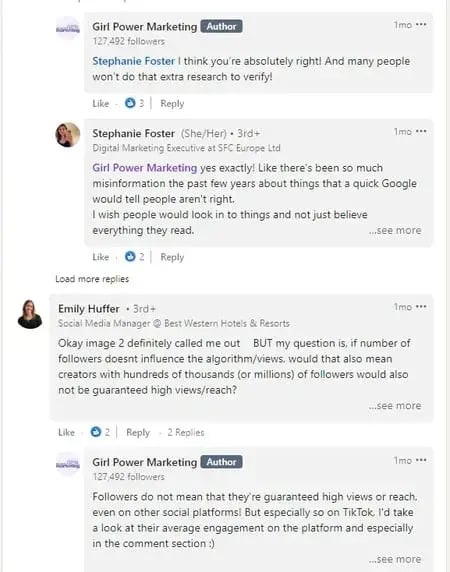
screenshot of girl power marketing chatting on social media

Source

I love how these comments aren’t generic or boring — they feel personalized, like friendly advice or casual chatting.

“Just do the damn thing! Let go of the fear, and the idea of being perceived, and the idea of people finding you cringe. Have fun with it and be yourself. The more you try to manufacture a personal brand, the less authentic it becomes,” says Annie-Mai Hodge, founder of Girl Power Marketing.
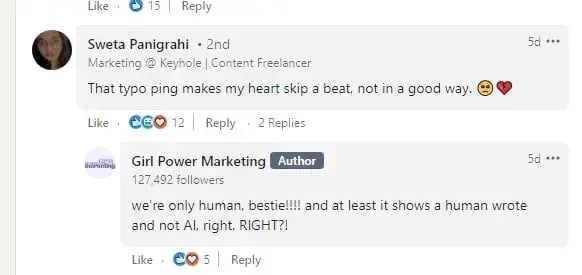
social media seo: screenshot of girl power marketing chatting on social media

Source

This approach is a great example of how to maintain good engagement, attract new followers, foster a positive reputation, and ultimately enhance social media SEO.

3. Ahrefs: Building Bridges With Creators

Ahrefs proudly showcases its blog writers with engaging introductions and profile pictures. Beneath each picture, buttons are provided that directly connect to the writers’ social media platforms.
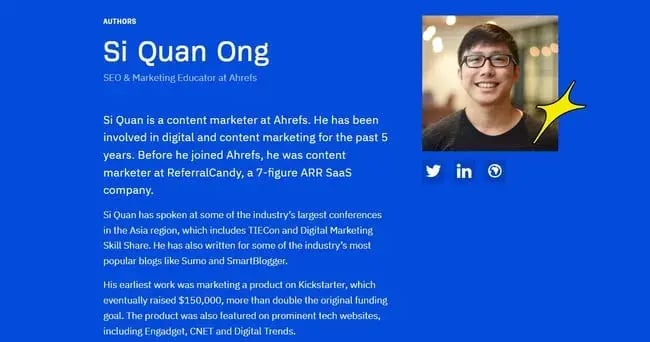
writer’s bio on ahrefs

Source

Just like Ahrefs did, ask your writers or employees to mention your company name and share their work/pieces on social media.

It helps build trust with Google and shows your brand is authentic and legitimate.
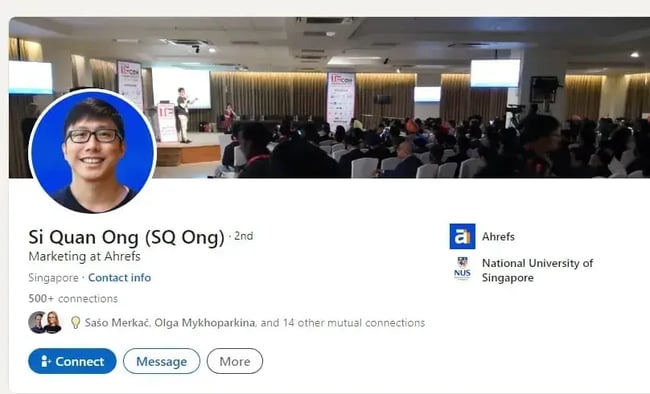
linkedin profile of an ahrefs employee

Source

Also, you’ll notice Ahrefs often shares or reposts creators’ posts on their LinkedIn. And what’s the purpose of this action? They improve their social media SEO and credibility by showing a strong connection with the creators.
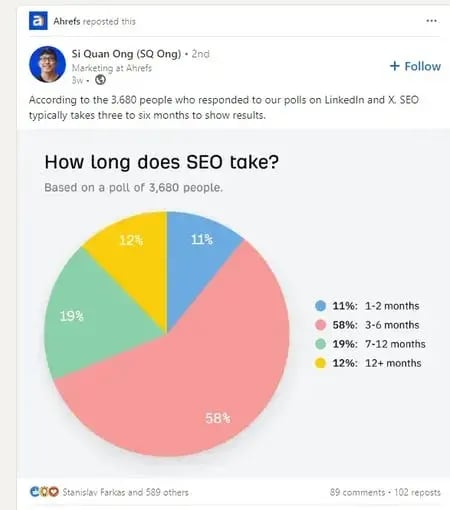
ahrefs reposting the creators post

Source

In this way, Ahrefs also sends a clear message to its followers — that it values diverse voices and appreciates everyone’s efforts.

Getting Started With Social Media SEO

I just know that you know you should be doing social media SEO better, but time is running out for thinking about it.

It’s time to act.

Whether social media has been a part of your SEO strategy or not, hopefully, you have gained a stronger understanding of how to effectively link the two. The content and product already exist. Now, it’s up to you to implement these tips by working across teams and collaborating effectively.

At the end of the day, each strategy will need to be tailored to your brand, so play around with the tips above to see which sticks.

Editor’s note: This article was originally published in April 2023 and has been updated for comprehensiveness.

Categories B2B

How to build an email list from scratch: 15 incredibly effective strategies

When I set out to build an email list from scratch for MarketingIdeas.com, I didn’t have a product. No pricing page. No polished brand. Just a one-liner and a waitlist.

→ Download Now: The Beginner's Guide to Email Marketing [Free Ebook]

Within a few weeks, that waitlist had grown to hundreds of people, and that list became the foundation for everything that followed. Since then, I’ve helped others build email lists from scratch using straightforward, repeatable tactics that don’t rely on paid ads or massive audiences.

Building an email list gives you something most platforms can’t: a direct, lasting relationship with the people who want to hear from you. No algorithms. No middlemen.

In this post, I’ll walk through email marketing strategies that have worked best for me and how you can use them to grow your own list, even if you’re starting from zero.

Table of Contents

Qualities of a Great Email List (When Building from Scratch)

Before we jump into tactics, let’s set the foundation. Not all email lists are created equal. In my experience, a bad list (low engagement, no targeting, high spam complaints) is worse than no list at all. Here’s what makes a list valuable:

1. People asked to be there.

If you take away one thing, let it be this: never buy a list. Every subscriber should have explicitly opted in. That’s not just a legal thing. It’s a trust thing. If someone didn’t ask to hear from you, they probably won’t open your emails, and they definitely won’t buy anything from you.

2. Emails are valid and up to date.

I run regular cleanups to remove bounces, invalid addresses, and zombie subscribers. Tools like NeverBounce or Bouncer can help, but even just tracking open/click data in your email platform is a solid start. A smaller, clean list will consistently outperform a bloated one.

3. You have the right audience (who actually engages).

If I‘m sharing growth tips and half my list only cares about crypto memes, I’ve failed. Your subscribers should want what you‘re offering. That means getting specific about who you’re talking to, and keeping your content focused.

But relevance alone isn‘t enough. I’d rather have 1,000 people who open, click, and reply than 10,000 who don‘t. Engagement matters — not just for deliverability, but for momentum. If your audience is both aligned with your content AND actively participating, you’ll get replies, shares, and referrals without asking.

The sweet spot? When someone sees your email and thinks, “This is exactly what I needed right now,” and then acts on it. That‘s when you know you’ve got the right people on your list.

Pro tip: I email new subscribers when I can (more on that later). If you’re using a tool like HubSpot’s free email tracking software, it’s easy to spot your most engaged subscribers, which helps you prioritize who to follow up with first.

4. You can segment it easily.

At some point, you’ll want to send different messages to different groups by topic, company size, location, whatever. That’s hard to do if all you’ve collected is an email address. Even one or two extra data points (like industry or role) go a long way.

5. It’s constantly growing (with quality control built in).

A good list compounds. I like to aim for 3 to 5% monthly growth, whether that’s from new lead magnets, social posts, or guest appearances. The key is having one or two always-on sources driving traffic to a signup.

But here’s the counterintuitive part: making it easy to unsubscribe actually helps your growth. I know that sounds backwards, but hear me out. When someone can leave with one click, it builds trust and improves your list quality. You only want genuinely interested subscribers anyway.

If someone doesn‘t want to hear from you, that’s fine. Better to lose the contact cleanly than have them mark you as spam or just ignore your emails forever. A smaller, engaged list will always outperform a bloated, uninterested one.

So yes, grow aggressively, but keep the exit door wide open. The people who stay are the ones who want to be there.

Once you know what makes a list valuable, the question becomes: how do you build one? Here are the exact tactics I’ve used to grow lists from nothing to thousands of engaged subscribers.

How to Build an Email List From Scratch

When I started building my email list from scratch, I didn’t have a product, a newsletter, or even a lead magnet. Just a few things I’d learned the hard way and a sense that others might find them useful. You don’t need a polished setup to get going. Some of the most effective list-building tactics are surprisingly low-lift.

These are the exact tactics I’ve used to grow lists from nothing to thousands of highly engaged subscribers.

1. Build an email list from scratch with a waitlist (even pre-launch).

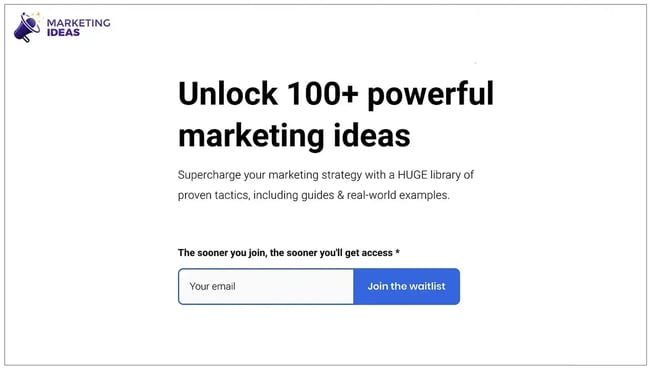
One of the easiest ways I’ve grown an email list from scratch is by launching a waitlist, even before I had a finished product. Whether it’s a product launch, course, service, or event, all you need is a simple landing page with one compelling line:

“The sooner you join, the sooner you’ll get access.”

marketingideas.com waitlist signup form with headline and email field.

Source

That’s it. No incentives, no ebook, no “free guide,” just a feeling of early access. Then shamelessly plug the waitlist everywhere, like speaking gigs, social posts, networking events, even DMs. Aim for 500–700 signups before you launch anything.

It doesn’t even matter what you’re launching. The waitlist gives you a head start and an email list you’ll actually own. That’s exactly how I grew my first 700 subscribers before launching MarketingIdeas.com.

Pick something you‘re working on and throw up a simple landing page this week. You’ll be surprised how many people want early access.


2. Send a personal “heads-up” email to your network.

One of the fastest ways to build early momentum is to email 50–100 friends or colleagues with a quick personal note:

  • Hey, I’m working on a new [project/product/service] that I think you’d find useful because [specific reason]. Want me to add you to the list and keep you posted?

This kind of personal touch converts 10x better than a cold blast. It’s casual, human, and gives people context before you ask for anything.

And bonus: People who join your list early are often the most engaged. They’ll open your emails, reply, and sometimes even pass them along to others. That kind of energy is hard to fake and is super helpful when you’re still figuring things out.

3. Create a lead magnet that solves one urgent problem.

I’ve seen a lot of lead magnets fall flat when people are trying to grow their email list, usually because they try to do too much. I learned this the hard way after creating a 50-page “ultimate guide” that nobody downloaded. Turns out, people want solutions, not dissertations.

A better approach is to focus on one specific problem your audience is actively trying to solve. For example:

  • A salary negotiation email template for job-seekers
  • A “starter pack” of prompts for someone launching a newsletter
  • A decision-making flowchart for founders choosing between two tools

The best-performing ones I’ve seen are simple, fast to use, and feel like they were made by someone who gets it. And with vibe coding tools, they’re easy to create. Start with one problem you solve repeatedly in conversations, and turn that into a simple template or checklist.

I usually gate the lead magnet behind a simple form, just an email field, maybe a first name. Then I promote it everywhere: in social bios, in blog post CTAs, in community forums, even in replies to relevant questions on X or Reddit. The key isn’t just creating a great resource. It’s putting it in front of the people who need it.

4. Start simple, then get smarter with progressive profiling.

Most marketers ask for too much, too soon — email, name, company, role, industry, favorite pizza topping. That’s a fast way to kill conversions.

I like to keep things light at the start. For lead magnets, I usually just ask for an email. That gets people in the door. Then, I layer on additional context gradually, a practice called progressive profiling.

Here’s what that can look like:

  • Step 1: Just ask for an email to access the free resource.
  • Step 2: On the download confirmation page, ask for the company size.
  • Step 3: In a follow-up email, prompt them to tell you more, or offer a 2-question survey about their biggest challenge.

The benefit? You lower the barrier to entry but still gather the intel you need to segment and personalize later. And since these prompts come after someone has already shown interest, completion rates are much higher.

Plus, it feels natural. You don’t learn everything about someone in five minutes. Why should email signup be different?

5. Publish one share-worthy piece of content per month.

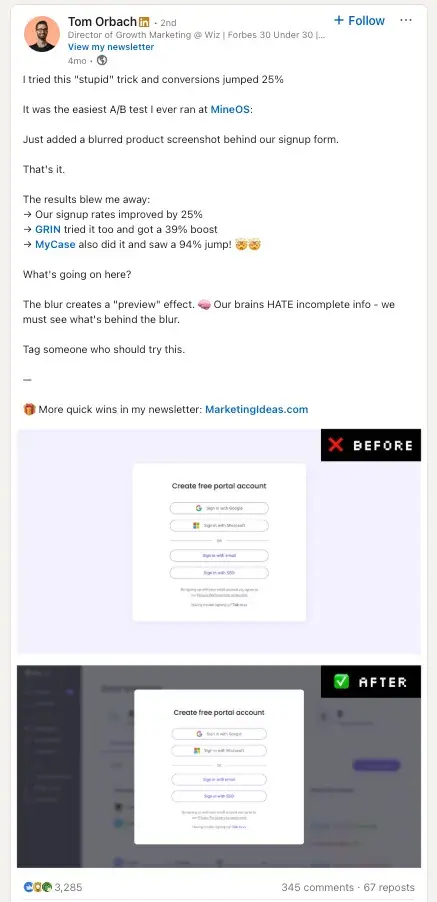
When building an email list from scratch, I try to publish something each month that makes people think, “Wow, I need to share this.” It could be a case study with real numbers, a contrarian take, a step-by-step tutorial, or just my best advice from the trenches. Sometimes it’s behind-the-scenes stuff or quick industry observations I post on LinkedIn or X.

For example, I shared the results of a super simple A/B test, just adding a blurred screenshot behind our signup form. That’s it. No fancy design, no long explainer.

linkedin post showing a blurred background ab test

Source

That post got shared like crazy because it was so simple yet effective. The trick is to make sure the content stands on its own. Then, close with a clear CTA like: “More tips like this in my newsletter: [Insert URL]”

You don’t need an elaborate funnel. Just share something helpful and give people a simple next step if they want more.

One more thing: if you’re struggling to figure out what to write about, look for where people are already asking questions, like Reddit, Slack groups, X threads. Then, answer one of those with more depth than anyone else has.

6. Personally engage with every new subscriber (at least for the first 1,000).

When someone joins your list, don’t just let the confirmation email do the talking. For my first 1,000 subscribers, I sent a quick note within 24 hours, thanking them and asking what they were working on or where they needed help.

It wasn’t a campaign or automation. It was just a genuine message from me.

That simple gesture led to honest conversations, consulting gigs, loyal readers, and more than a few referrals. People remember when you treat them like a human, not just a data point.

It doesn’t scale forever, but if you’re just getting started, nothing beats personal connection.

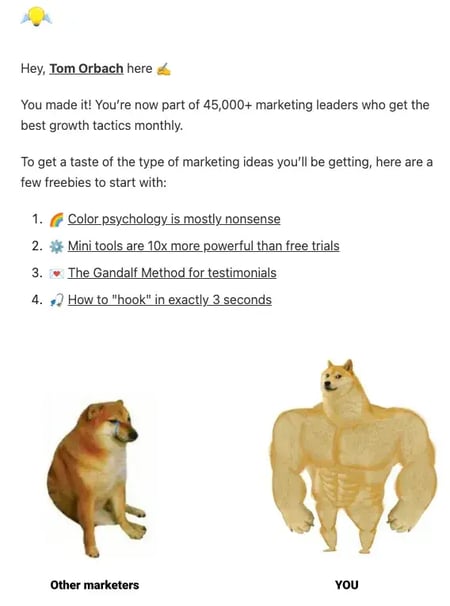
Even as my list has grown, I‘ve kept that same energy in my welcome emails. I can’t personally reply to every new subscriber anymore, but I make sure they get immediate value and feel like they’re joining something real, not just another newsletter.

Instead of a boring “Thanks for subscribing!” message, I send new subscribers straight into the good stuff. That means real marketing tactics they can use right away, plus that sense of being part of a community of people who actually get it.

screenshot of tom orbachs welcome email showing personal branding, immediate value delivery with 4 marketing tactics, and community building with doge meme

7. Make your pop-ups helpful (not annoying).

I used to think pop-ups were annoying by default. But once I started triggering them based on behavior, they felt a lot less intrusive. In some cases, they even helped.

The offer is everything. “Subscribe for updates” won’t cut it. But something like “Want the exact checklist I used to get 1,000 subscribers? Grab it here” gives people a real reason to say yes.

Here are a few formats I’ve seen work:

  • Exit-intent popups that show up right as someone’s about to leave the tab
  • Scroll-triggered popups that appear once a reader hits a certain point in the post
  • Content upgrades that feel like a natural next step after reading

The Gamification Twist

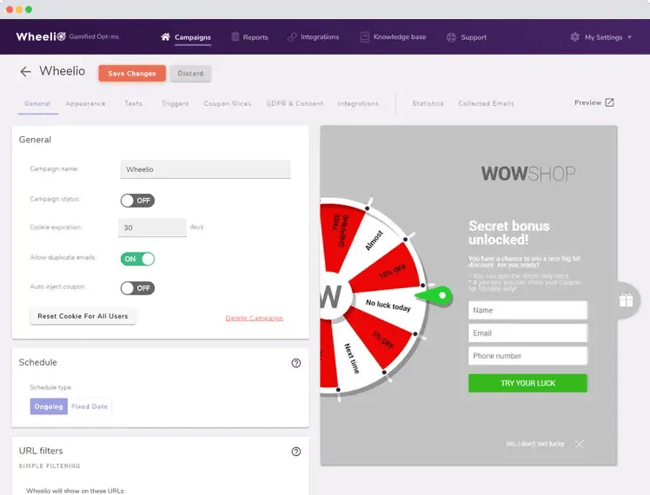
Now, here‘s where it gets interesting. I was skeptical at first. A spin-to-win wheel felt like something I’d see on an e-commerce site selling phone cases. But then I looked at the data: 13.23% conversion rate, compared to 3–5% for standard popups.

So I tested it.

I set it to show after someone had been on my site for 100 seconds, enough time to signal genuine interest. Instead of a boring “Sign up for updates” CTA, they got to spin for something valuable: a 15-minute consult, a swipe file, or a behind-the-scenes teardown.

Not only did it increase conversions, but it made the whole signup experience feel more fun and memorable.

screenshot of a wheelio gamified pop-up showing a spin-to-win wheel with coupon prizes and an email sign-up form.

Source

These gamified versions work best for consumer-facing brands or SaaS tools with free plans, but I’ve even seen creators use them effectively for newsletters. If you want to try it, tools like OptinMonster and Wheelio make setup easy.

The key with any pop-up: Keep your prizes genuinely helpful, make it feel like a bonus (not a trick), and never interrupt the experience. It should feel like a natural next step, whether it’s a simple overlay or a spinning wheel.

8. Match your CTAs to what people are actually reading.

Generic CTAs convert like generic advice: poorly. I’ve tested this over and over, and the results are evident. If your CTA matches the content someone’s already reading, conversion rates jump.

If someone’s reading a blog post about email marketing, why not show them a CTA that says, “Want the exact template I used to get 1,000 email signups? Grab it here.” That message is way more relevant than a generic newsletter pitch.

I’ve seen personalized CTAs outperform basic ones by a long shot. HubSpot found that personalized CTAs convert 202% better. In my experience, that tracks.

That stat stuck with me, so I started keeping my setup simple, just more intentional.

I don’t overthink this part. First, I check which pages are getting the most traffic, usually in GA4. That gives me a solid starting point.

Then I ask myself: why is someone on this page in the first place? Are they looking for a how-to? Comparing tools? That context shapes what kind of CTA makes sense.

Sometimes I tweak the headline or swap in a more relevant offer. Other times, I’ll get a little fancier and trigger something based on behavior, like when someone scrolls most of the way down or visits the page more than once. HubSpot’s smart content and Optimonk both come in handy there.

9. Build email subscribers through free workshops and demos.

I’ve built some of my best email lists off the back of a simple, free workshop. Most marketers overthink this one. You don’t need a webinar series with custom slides and paid ads. You just need one good idea and a calendar link.

No fluff, no hard sell. Just something genuinely useful that solves a problem for the right audience.

Even if only 20% of attendees convert, those subscribers are high intent. They already spent time with you, learned from you, and saw the value you bring. That kind of engagement is worth way more than a cold email address.

Bonus tip: after the workshop, send the recording and slides only to attendees who joined your list. That adds exclusivity and drives more opt-ins post-event.

10. Guest post or appear on podcasts.

When I started building my email list from scratch, I didn’t have a big list. But I knew how to write, and I had a few strong opinions. So I pitched a handful of newsletters and blogs in my space, and one guest post brought in over 400 subscribers in a week.

The trick? Go where your audience already hangs out.

If you write for a blog or newsletter, include a byline like: “Tom Orbach writes MarketingIdeas.com, a free newsletter for marketers who hate fluff. Get it here.”

If you’re on a podcast, ask the host to include your signup link in the show notes. Say something like, “If you liked this conversation, I break down stuff like this every few weeks. Link’s in the notes.”

And if you’re just getting started, pitch creators are just one or two steps ahead of you. They’re usually more open to collaborating, and their audience is likely to connect with where you are right now.

One solid guest appearance can bring in 200–500 subscribers. That’s how Lenny Rachitsky — author of the wildly popular product and growth newsletter, Lenny’s Newsletterfamously built his list. It’s how I grew mine, too.

11. Grow your email list by adding value in comments.

If you don’t have time to create content consistently, commenting on other people’s posts can still build visibility and grow your list. Most marketers overlook this tactic, but it works.

Take Ben Tossell, creator of Ben’s Bites, a daily newsletter covering the latest in AI. Early on, he consistently replied to tweets about AI tools with one line: “Shouting this out in tomorrow’s newsletter!”

It was simple, straightforward, and frequent enough that people noticed. When he replied to a tweet from Google’s CEO, it got nearly 26,000 views and led to hundreds of new subscribers.

You don’t need to copy Ben’s exact approach, but I’ve seen results just by:

  • Clarifying a point or adding a useful stat
  • Sharing a relevant link (if it genuinely helps)
  • Dropping a quick stat or lesson

Pick a few people your audience already follows and comment consistently. This isn’t to promote yourself but to add something useful. Your replies should make people think, “Who is this?” That’s the start of awareness.

12. Ask at checkout, but make it optional.

If you sell anything online, your checkout flow is a goldmine for qualified email signups.

I’ve added a simple checkbox that says: “Yes, I’d like to get updates and offers.”

I always leave it unchecked by default and clearly explain what subscribers will get. No fine print, and no surprises.

In my experience, these subscribers often outperform others in open and click rates. They’ve already made a purchase or shown serious intent, which makes them some of the most valuable people on your list.

13. Leverage your existing networks (even the small ones).

You don’t need a massive following to start building your list. I learned this early on. Sometimes, your best subscribers come from the connections you already have.

If you‘ve got even a small following on Twitter, LinkedIn, or anywhere else, mention your list there. Not in a pushy way, but casually: “Started a weekly email with marketing insights that don’t make it to social. Drop me a DM if you want in.”

And here‘s something most people overlook: your email signature. I added a simple line to mine (“PS: I send weekly marketing breakdowns to 2,000+ people. Join here: [link]”), and it’s brought in dozens of subscribers from everyday work conversations.

You‘re already talking to people who know and trust you. Give them an easy way to get more of what you’re sharing.

14. Create landing pages for every major topic you cover.

Here‘s something I wish I’d done earlier: instead of sending all my traffic to one generic signup page, I started creating specific landing pages for different topics I write about.

When I guest post about email marketing, I send people to a landing page specifically about email tips. When I‘m on a podcast talking about content strategy, there’s a different page for that. Each one speaks directly to what brought them there in the first place.

HubSpot found that companies see a 55% bump in leads when they go from 10 to 15 landing pages. It makes sense. If someone found you through a specific topic, they want to know you’ll keep talking about that topic.

It’s like having different conversations with different people instead of giving everyone the same pitch. Way more personal, way more effective.

15. Turn your best subscribers into recruiters.

Once you have a few hundred engaged subscribers, some of them will love what you’re sending enough to share it. Why not make that easier for them?

I started including a simple line in my best emails: “Know someone who’d find this useful? Forward this their way. They can subscribe here: [link].”

But here‘s where it gets interesting: you can offer something in return. I’ve seen creators give their subscribers a month of free, exclusive content, or even small rewards for successful referrals. One newsletter I follow gives you a $10 coffee shop gift card for every three people you refer who stay subscribed for a month.

The key is making it feel like you’re asking for help, not running a pyramid scheme. Your best subscribers already want to share your stuff, just give them a reason and an easy way to do it.

Best Email List Builders

Now that we’ve discussed the most effective ways to grow your email list, here are a few tools that can help with the process. As I mentioned previously, you should only use these tools to build a list of subscribers who have consented to receive email from you.

1. HubSpot’s Email Tool

Best for: Crafting email templates, designing landing pages and CTAs, and managing the customer lifecycle.

You’ll be happy to know there are solutions for growing your email list without breaking the bank. HubSpot offers both paid and freemium versions of its email tools to help you get started quickly.

Additional Marketing Hub capabilities include:

  • Landing page creation
  • Pop-up and stand-alone CTA form templates
  • All-in-one solution

With HubSpot, you can boost your open and click-through rates, tailor emails to recipients, and segment your list without design or tech help. It’s easy to use, intuitive design will have you mastering email lists and campaigns like a pro.

2. Mailchimp

Best for: Designing marketing campaigns for email and landing pages that convert.

Mailchimp is another option on the market that offers email tools that range from free to paid enterprise level. This tool comes with ready-made email templates, scheduling tools, and email automation options.

Its premium offerings will help you focus on and extract the most value out of your most loyal subscribers.

3. Constant Contact

Best for: General email management and building lead generation landing pages.

Constant Contact is known as an all-in-one digital marketing platform, but it does offer a decent selection of email tools that can help your campaigns stand out and get more signups. This paid service allows users to quickly drag and drop selected images and template features into custom emails, use ready-made email templates, send automated welcome and abandoned cart emails, and analyze results with email tracking.

4. Get Response

Best for: Performing segmentation based on user behavior.

Get Response comes with what you’d expect from email marketing software with the bonus of lead scoring and landing pages built into the platform. However, this platform is not as user-friendly as the others on this list and will require a bit of a learning curve to take advantage of all the software has to offer.

Features include:

  • Contact management
  • Automation and scheduling
  • Industry-specific templates
  • Reporting
  • Landing Pages and Lead Scoring

These advanced features do come at a premium, so if you’re looking to dive deep into segmentation, you’ll need to upgrade from the free version.

5. Optimonk

Best for: Growing email, messenger, and SMS signups.

If you’re looking to upgrade your current marketing tactics for a more personal approach that gets leads, look no further than Optimonk. This platform has several integrations, including HubSpot, so chances are it will work with your existing CRM.

One of the standout features of this tool is its subscriber recognition tool, which allows you to target pop-ups only for visitors who haven’t subscribed yet.

Features include:

  • Subscriber recognition
  • A/B testing
  • Optimized for mobile
  • CTA and email templates

Best of all, they offer a free-for-forever option so you can build your list on a budget.

More Value, More Sign-Ups

You don’t need a million-dollar tool or a viral thread to build an email list from scratch. You need consistency, relevance, and a genuine desire to help your audience solve a problem.

That’s what drives sign-ups.

If you offer value, people will stick around. And if you stay curious, experiment often, and learn from what works (instead of just following trends), your list will grow faster than you think.

I treat my list like a long-term relationship. Not a transaction. Not a funnel. It’s a place where trust builds over time, and that trust pays off in more ways than clicks and opens.

Start small. Be useful. Keep going. And remember, your first 100 subscribers matter more than your first 10,000. Treat them like gold, and they’ll help you find the rest.

Editor’s note: This article was originally published in November 2020 and has been updated for comprehensiveness.

Categories B2B

“You can make money doing this?!”

A couple years ago, a YouTuber and artist known as Ten Hundred reached his $10k Kickstarter funding goal in 3 minutes.

That’s 180 seconds, y’all. It took longer than that to write this intro.

Click Here to Subscribe to Masters in Marketing

Brandon Smithwrick, Kickstarter’s then-director of content and creative, told me more about this campaign, which ultimately raised over $2 million.

The project? A deck of playing cards featuring his artwork.

Smithwrick shared some of Ten Hundred’s secrets (and some other hard-won wisdom) so you can turn your own (metaphorical) deck of cards into (literal, 🤞🏽) millions.

Meet the Master

Brandon Smithwrick

Founder, Content to Commas

Claim to fame: Brandon was selected by Forbes for its “30 Under 30” list in 2024

Lesson 1: Build your audience — before you need to monetize.

“I started making content three years ago, part-time, before I even saw myself as a creator,” Smithwrick says.

The day we spoke, Smithwrick had just announced that he was leaving Kickstarter to run his new media company. Three years is what it took to build an audience that could support his full-time efforts.

In fact, Smithwrick hadn’t even considered at first that this could be a money-making venture. “I was just sharing my perspective, sharing my thoughts on LinkedIn.” Soon enough, the brands came knocking — a $300 deal here, a $900 deal there.

“Wait,” he thought, “you can make money doing this?”

Smithwrick describes those early deals as “validation and proof points,” but emphasizes: “It took me three years of building that foundation to say, you know what, it’s time for me to leave my full-time job.”

Lesson learned? “People don’t do enough to build hype,” Smithwrick says. “This is something that I’m trying to get a lot of people to understand. Before you begin to monetize your audience — sell to them, promote something — just start building an audience. You never know when you might need that in your back pocket.”

“people don't do enough to build hype. before you begin to monetize your audience — sell to them, promote something — just start building an audience. you never know when you might need that in your back pocket.”  —brandon smithwrick, founder, content to commas

(Secret #1 from Ten Hundred’s successful Kickstarter: Seriously, don’t underestimate this step — Ten Hundred currently has 826k YouTube subscribers, and he collaborated with literally thousands of his fans while designing the deck.)

Lesson 2: Don’t be afraid to go hyper-niche.

At Kickstarter, Smithwrick says, “we discovered that the general content didn’t really perform as well as the hyper-niche content.”

For instance, “games” or “comic books” aren’t nearly specific enough to reach an enthusiastic, engaged audience. “Within gaming, there‘s tabletop games, there’s role-playing games, there’s video games.”

In other words, your audience isn’t just “comic books” — maybe it’s gekiga manga or graphic novels about poodles. Getting this specific may “feel like you’re leaving out people who could be your clientele,“ but speaking to a particular niche feels more like a direct conversation, and it “only shapes your brand for the better.”

Smithwrick tells me of a conversation he had with somebody who runs an influencer agency, but only for upcycling and recycling creators. (Remember that commercial where Martha Stewart retiled her pool with old credit cards? That’s what I’m imagining here.) That’s the kind of specificity that wins.

Plus, “it really gets your client or your customer very clear on how you’re going to serve their needs.”

(Secret #2 from Ten Hundred’s successful Kickstarter: His audience wasn’t art lovers or even euchre enthusiasts. It was the custom playing card–collecting community. Say that 10 times fast.)

Lesson 3: Never skip leg day.

Smithwrick speaks an uncomfortable truth: “I can’t just have a good product to sell. I also have to have a knack at being a creator, at creating a good hook.” He wrinkles his nose, and I can hear the frustration in his voice.

“If you’re not good at social media, for a large majority, truthfully, it means your product won’t be seen by the masses.”

So what’s the solution for overwhelmed marketers?

First, recognize that “founders need to be the microphone for those brand wins.” Smithwrick acknowledges the inherent challenge: “when you’re a founder, you’re running the company.” But can you “take 30 minutes and say, look at all the wins my team sent me in this email — how can I turn this into content?”

It’s a muscle, Smithwrick tells me. And you know what they say: Never skip leg day.

“Train that muscle. Because you don‘t have to run an ad to get leads. Your organic channels can be a lead generation flywheel — you just have to let people know about the amazing work you’re doing.”

“train that muscle. because you don't have to run an ad to get leads. your organic channels can be a lead generation flywheel — you just have to let people know about the amazing work you're doing.” —brandon smithwrick, founder, content to commas

To make that more manageable, Smithwrick says he “schedules everything — it’s impossible to be posting on this cadence and not schedule out.”

Aside from that consistency, he’s also trying to “provide as much value as possible to my community.” No “promotion, promotion, promotion,” no “buy, buy, buy” — just value, consistently delivered. Three years of building this up part-time proved the model, and now, he’s betting his career on it.

(Secret #3 from Ten Hundred’s successful Kickstarter: As a muralist, Ten Hundred could have gone a more conventional monetization route, like soliciting commissions. Instead, he connected with his community to provide something of value to them. P.S. You can read about Ten Hundred in this case study.)

Lingering Questions

This Week’s Question

What’s a marketing strategy or trend that you think is widely overlooked but has high potential for impact right now? —Lindsey Gamble, Creator economy consultant; Creator of the Lindsey Gamble newsletter

This Week’s Answer

Smithwrick: One strategy I think is often overlooked is using social media to drive exclusive offers directly within the community you’ve already built. For example, teasing a promotion through Instagram Close Friends can give you a sense of traction before launch.

Tools like ManyChat also make it easy to create DM-only offers that feel special, such as “DM me ‘KEYWORD’ and we’ll send you our bundle pack before the public sale.” I’ve even seen brands experiment with Instagram broadcast channels, dropping discount codes for whoever acts first, turning promotions into a game of speed and scarcity. These approaches not only reward your most engaged followers but also create urgency and exclusivity, all without needing a traditional LP.

Next Week’s Lingering Question

Smithwrick asks: What’s a creative hot take that will make a marketer second-guess how they work with creatives?

Click Here to Subscribe to Masters in Marketing

Categories B2B

I tried 8 AI project management tools to see if they’re worth it

Choosing the right AI project management tool for your team can help you save hundreds (even thousands) of dollars per year.

I’ve managed projects across a variety of businesses — scrappy startups, agencies with 50+ team members, and enterprises like Dell. Regardless of the company’s scale, I noticed a common problem: rapid growth without proper infrastructure.

Download Now: The Annual State of Artificial Intelligence in 2025 [Free Report]

This often costs businesses far more than they realize. Projects running late, managers being stressed about deliverables, and tasks falling through the cracks. While the team was in firefighting mode, the next project would trickle in. And then, it would be a complete disaster with zero project visibility and fragmented ownership.

The result? Lost revenue, terrible client retention, and lower employee motivation.

AI project management tools help you avoid this scenario through effective tracking, accountability, and automation. This article will walk you through the top eight AI project management software for your business.

I’ve extensively tested each tool for hours and included my review, how I found it, the cost, and who I think it’s best for.

Table of Contents

What does AI project management software do?

Before we dive into AI project management software, I’d recommend checking out this quick refresher video on how to successfully manage a project.

Done? Now, let’s put all that good advice into action.

AI project management tools organize projects, teams, and dare I say, lives. Instead of spending hours with more spreadsheets you can handle, chasing team members, or searching for a file, these tools can help you centralize projects in one central hub.

Once centralized, you can leverage AI-powered tools to understand the entire project context and automate workflows. I’ve set up AI workflows for my team that send deadline reminders, update spreadsheets when tasks are completed, and even schedule meetings directly within the management tool.

Thus, AI takes over the mundane aspects of project management, allowing you to focus on building and nurturing client relationships and delivering results faster.

So, which AI project management software should you choose? Well, that depends on your team size, budget, industry, and which department you want to organize first. My tests are based on real-world scenarios to help you decide the best one for your company.

How I Tested the Best AI Project Management Software

Since I work with multiple clients, I’ve used the vast majority of the project management tools in the industry at least once. For instance, my enterprise clients (like HubSpot) use Asana for content management, so I’m very familiar with the interface. Similarly, Notion and Trello are popular choices among the agencies I work with.

However, most tools have released new AI features in the last year, which is what I was excited to try out.

When I’m testing AI project management tools, I want a tool that:

  • Feels intuitive to use.
  • Manages projects, tasks, and sub-tasks well, with clear task ownership and dependency tracking.
  • Tracks accountability and sends task reminders.
  • Integrates with other tools like calendars, design software, etc., so everything is in one place.
  • Makes my team feel happy (and not overwhelmed!).

With that in mind, let’s look at how I tested these tools.

The Scenario

The scenario I chose is close to my actual life as a marketer. I tested (or have earlier used) each tool from the perspective of a remote marketing team that communicates in an async manner.

My AI project management software should be able to track a remote workflow effectively. All team members should have the ability to add comments, assign tasks, and update task status. The tool should also have an accountability system to keep the project moving.

Finally, I should be able to automate elements of the project via the AI project management tool. For instance, marking a task as complete and moving it to the appropriate list. Basically, anything that is repeatable should have the ability to be automated.

The end goal? Help the remote team work more efficiently in a central location.

8 AI Project Management Software

Project management tools are worth every penny and will pay for themselves in productivity. But if you’re worried about budgets, plenty of brilliant free project management tools exist.

Here are my top eight recommendations for project management software with AI capabilities.

1. ClickUp

ai project management, clickup homepage

Source

I’ve used ClickUp in the past, and back then, I didn’t find it too different from the other tools. However, it has recently gained popularity within my agency network. So, I decided to give it a shot, especially for its AI features.

ClickUp is cheaper than most tools on this list. It also has a handy calculator on its pricing page to estimate how much it’ll save you.

clickup pricing calculator, clickup vs other project management tools

How I Discovered ClickUp

I first used ClickUp for a social media client. They ran their operations exclusively on ClickUp, so I had to learn the ropes. The overall experience was quite intuitive.

How ClickUp Supported My Project Management

I used ClickUp to coordinate between writers, designers, and founders and keep projects on track. Like Asana, ClickUp helps manage remote teams in different time zones via a card-based task interface. You also have personalized dashboards, goal and timesheet tracking, and more.

clickup dashboard, tasks on clickup

Overall, I find Clickup’s UI to be slightly better than Asana.

My Favorite AI Features

Note: All the AI features I’ve tested below are not available on free plans.

ClickUp Brain

Brain is ClickUp’s amazing built-in AI assistant. Honestly, I love both the name and the experience.

You can access Brain in two ways: either by tagging @brain in a task or directly in the “Brain” tab. After activating the AI assistant, you can use it for a variety of things, from task creation, help using ClickUp, generating images, deep research, and more.

clickup ai assistant, clickup chatbot

I largely use Brain for quick briefs, images, meeting summaries, and creating custom autopilot agents (which we will talk about next).

ClickUp Autopilot Agents

Autopilot agents are another cool feature I found on ClickUp. Think of these as independent AI agents integrated into your project dashboard, acting on specific triggers. For instance, I created a custom agent for my hiring process using Brain.

My agent evaluates their qualifications and cover letters, and ranks the top candidates in order for me. Then, it creates a ClickUp task for each candidate interview with suggestions for interview dates, follow-ups, etc.

Pricing

  • Get started for free, unlimited members and tasks with up to 60 MB in storage.
  • Unlimited package is $7/user/month, paid annually.
  • Business is $12/user/month, paid annually

AI features are add-ons at $9/member/month.

Best For

  • Teams that want advanced AI features on a budget.
  • Brands that want to customize their tracking system heavily.
  • Complex project tracking.

2. Trello

ai project management, trello

Source

I’ve been using Trello for years now. As a content marketer, I find Trello to be the simplest project management tool to get started on. While I have tried other tools for specific use cases, I do use Trello quite regularly for small or one-off projects.

Trello organizes projects in workspaces, allowing you to create up to 10 boards in each workspace for free. Boards keep individual projects separate. For instance, if my company is launching a service while also building a product, I’d manage these two initiatives in separate boards to avoid confusion.

How I Discovered Trello

I got introduced to Trello during my first internship in 2018. The company used it to organize my two-month internship, assigning tasks for the week with checklists and deadlines. It completely changed how I perceived project management.

trello interface for a development project, trello’s project management system

Fast forward to today, I’ve used Trello for multiple things: managing content, backend business operations, and even my to-do (and grocery) lists.

How Trello Supported My Project Management

I love Trello because it is simple. You have all the essential features, onboarding is straightforward, and the free package allows up to 10 workspace members per board. I don’t think Trello suits companies looking to scale, but it’s perfect for small projects or teams.

Here’s the Trello system I used to manage the content pipeline of a website in the dog niche:

content management using trello, trello project management

As you can see in the image, I have a list where I’ve templatized article outlines. If I needed to assign a new article, I simply head to the “outline structure” and press “create card from template.” This gives me a base to work from for the next card.

trello card with article outline, templated trello card

My Favorite AI Features

Butler Automation

I’ve used Butler extensively for Trello automation. You can create automated rule-based actions, custom buttons, and email reports via Butler. Here’s an example:

trello automation, butler automation rules for trello

My rule assigns a checklist to each new article, adds the specific members responsible for it, and also sets a value for the custom field. At scale, this automation can save hours of work each week.

Trello’s “Suggestions” feature helps you identify more rules based on actions you take frequently on the board.

Power-Ups

A lot of the AI functionality in Trello is buried within power-ups. For instance, Zapier has a dedicated power-up for Trello. Another good one is Strategy AI, which helps you organize tasks based on business priorities.

But note: third-party and premium power-ups can include an add-on cost to your total subscription. It’s almost like signing up for a new SaaS tool to integrate with your management platform.

Pricing

Trello is one of the cheapest project management tools. Here are the costs (billed annually):

  • Free plan (10 members per board).
  • Standard is $5/user/month.
  • Premium is $10/user/month.
  • Enterprise is from $7.38/user/month to $17.50/user/month, depending on the number of seats.

Best For

  • Small teams and projects (<10 members).
  • Content management workflows.
  • Social media management pipelines.
  • Teams that don’t need advanced features like time tracking, detailed reporting, etc.

3. Notion

ai project management, notion

Source

I know many agencies and marketers who would swear by Notion. Personally, I find Notion’s learning curve somewhat challenging, and the interface is slightly laggy for me. However, I must say that Notion has some great organization features, solid templates, and community resources.

For instance, I was very impressed by the Notion-based client onboarding workflow of an agency I collaborate with.

notion based onboarding system, notion page interface

As you can see, the agency has organized each project phase as separate categories that link to this master page. There’s also an embedded walkthrough video.

How I Discovered Notion

I first came across Notion through a client a couple of years back. While I wasn’t a fan initially, it grew on me. I loved how I could select pre-made templates to simplify the setup process.

project management templates for notion, notion templates

While I won’t choose Notion for simple task management or one-off projects, it is great for larger, complex projects, especially client-facing ones.

How Notion Supported My Project Management

I create a lot of content on Instagram about freelancing. Notion was incredibly helpful to organize my ideas and inspiration sources in one central hub.

notion kanban view, social media management through notion

I added other team members to the Notion workspace to help with the content strategy and execution. The calendar view was also super helpful for me to visualize our posting timeline.

Pro tip: If you want to add members to your Notion free plan without triggering charges, invite them as guests and disable the team spaces feature.

My Favorite AI Features

Ask Notion

Need to quickly catch up on a project you recently joined or figure out a specific Notion feature? Notion AI makes getting answers super easy via its chatbot.

Instead of spending hours combing through data, you can just prompt Notion AI to go through your project files and give you contextual answers. I frequently use this feature to compile progress reports, summarize deliverables, or get a bird’s-eye view of the overall project.

Write With Notion’s Generative AI

While I do prefer Claude’s chatbot over Notion for creative writing, I find Notion AI convenient for quick summaries and light research.

George Chasiotis, co-founder of Restartt, shared his experience with Notion AI with me:

“We use [Notion AI] to summarize meeting notes, generate quick proposals, and even draft follow-ups after strategy calls. I’ll drop a client brief in, and Notion AI gives us a rough structure to build from; it saves me at least 30–40 minutes per doc.”

Pricing

  • Free to get started. AI features are trial-only.
  • Plus is $10/month/user, billed annually. AI features are trial-only.
  • Business is $20/month/user, billed annually. AI features included.

Best For

  • Social calendars.
  • All in one hub for business documents.
  • Onboarding flows.
  • Knowledge-heavy project management.

4. Asana

ai project management tool, asana homepage

Source

Asana is one of the oldest project management tools in this roundup. While it’s been around since 2008, I’ve recently started using it more consistently.

I turn to Asana for projects I can’t handle on Trello, but which don’t require a more robust solution like Notion or Monday. Asana has over 300+ integrations and connects seamlessly to just about any app (which makes sense given how long it’s been around).

How I Discovered Asana

Like I mentioned earlier, I was invited to Asana through HubSpot’s content management team. I was pretty impressed by how smoothly their remote operations ran on Asana. Asana made coordinating publishing times, editorial calendars, and keeping stakeholders aligned super simple. That’s when I knew I had to try it for other clients.

How Asana Supported My Project Management

I use Asana when I have multiple stakeholders and complex tasks with dependencies. Asana has built-in dependency tracking and custom fields.

You can manage projects and tasks efficiently, and communications related to projects take place within the app. This functionality is ideal for longer-term projects where different team members dip in and out.

I also think Asana’s timeline feature has the cleanest interface I’ve seen so far.

asana timeline, asana dashboard for project management

Another cool Asana feature is the ability to add goals and share them with other team members. You can create strategy maps, team goals, and personal goals.

goal setting through asana, company goal setting interface on asana

My Favorite AI Features

Asana AI Studio

Asana AI studio helps you design custom AI workflows that take draining human tasks and automate them. Simply trigger a workflow after an action (like moving a card from one column to another), and Asana will do the rest.

Here’s what Phil Portman, CEO of Textdrip, told me about his Asana workflows:

“The AI Studio Basic feature has been especially useful. We now use it to automate repetitive workflows, like routing tasks based on priority or automatically assigning ownership based on workload. We’ve also started using custom work schedules to get a clearer picture of actual capacity across time zones.”

Pricing

  • Individuals get started for free (up to 10 members per project).
  • The starter package is $10.99/user/month, billed annually. Asana AI is available from this plan onwards.
  • The advanced package is $24.99/user/month, billed annually.

Best For

  • Traditional project management without customization.
  • Small teams and individuals.

5. Monday

ai project management tool, monday

Source

Monday is an enterprise-grade project management tool used by Fortune 500 companies like Adobe and Hulu. Apart from project management, brands can also manage their Sales CRM on Monday.

If you have a complex project with multiple departments and layers, Monday’s robust interface might be the solution for you. Personally, I felt Monday’s features were a bit overwhelming.

How I Discovered Monday

I had heard of Monday in freelancer circles, but I tested it for the first time for this article.

How Monday Supported My Project Management

Monday’s core philosophy is simplicity, and honestly, I get it. If you’re trying to drive productivity across multiple departments, you want the focus to be on the work, not the tool.

monday work management dashboard, monday boards

Monday walks you through the entire process of setting up your project, priority, notes, etc. I’m not a huge fan of the overall interface, but you can’t deny that it works.

My Favorite AI Features

Product Power-Ups

This is one of Monday AI’s upcoming features.

Monday’s AI can auto-assign tasks to the right person based on project priorities, workloads, and skills. It can also help flag risks due to task ownership or timeline delay, giving project managers complete clarity on where they are at in the project.

Of course, I expect a bit of back and forth initially as you train the system and document everyone’s skills. However, if executed right, it can be a great sidekick to a project manager.

monday work management dashboard, monday boards

Generative AI

Like other tools on this list, Monday also offers generative AI capabilities. It uses OpenAI’s APIs to power features like translations, summaries, sentiment analysis, summaries, and more. I find the output similar to that of Notion or ClickUp, so there isn’t much to write about.

Pricing

Monday’s pricing structure is more rigid than ClickUp and Asana, and if you add things like the sales CRM, the price (rightfully) increases. For this article, the prices below are for project management and AI features.

  • Start for free with three boards and two seats.
  • Basic is $9/month/user, billed annually (minimum three seats, so that’s $27 a month). 500 AI credits from this plan onwards.
  • Standard is $12/month/user billed annually (minimum three seats, so that’s $36 a month).
  • Pro is $19/month/user billed annually (minimum three seats, so that’s $57 a month).

Additional AI credits are available as add-ons for Standard, Pro, and Enterprise plans.

Best For

  • Large enterprise teams with highly complex projects.
  • Brands that want their project management, sales, dev, and service CRM in one familiar interface.

6. Basecamp

ai project management software, basecamp

Source

Out of all the tools I tested, Basecamp had the most personality by far. Everything from the engaging copy to the amazing visuals pulled me in.

Basecamp is great for complex projects that generally require multiple channels of coordination. You get kanban boards (Asana/Trello style), Slack-like direct messaging, and Notion’s document handling capabilities, all in one tool.

I also like the price point of Basecamp. While the monthly price of $299 (annual billing) may be a sticker shock, it’s the most affordable option for teams of more than 57 people.

How I Discovered Basecamp

I hadn’t used Basecamp before this article, but I’m glad I got to test it out. It’s definitely a tool I’d recommend to larger teams. The onboarding process was smooth, and the sample project looked like I could get everything done in one place. I found the interface to be quite intuitive as well.

basecamp project setup, using basecamp for project management

How Basecamp Supported My Project Management

I love how Basecamp has gamified the tracking process for tasks. This helps keep everyone on the same page and eliminates the need for check-ins to some level.

basecamp progress tracker, task checkin via basecamp

Another cool feature I see myself using is Lineup and Pings. I’ve always hated the constant switching between tasks and chats. So, if I can get people to stay active on Basecamp, that could streamline communication. Easier said than done, of course.

basecamp lineup feature, private chats on basecamp

My Favorite AI Features

Project Visualization

Basecamp excels at using AI to visualize project completion and performance. With Basecamp’s Move the Needle and Mission Control and Hillchart feature, you can gauge a project’s performance without manually piecing together all the details.

The project management tool will pull the data together and provide a warning for projects that are potentially “at risk” or “concerned.”

Pricing

  • Free for one project.
  • $15 a user per month.
  • If you reach 20 members, you’ll benefit from the unlimited pro plan at $299 a month.

Best For

  • Larger businesses with >20 employees.
  • Brands that want a one-stop solution to handle internal comms and projects.

7. Slack

ai project management tool, slack homepage

Source

Love it or hate it, Slack has its uses in project management. While I’ve personally struggled a bit with Slack notifications, it’s helpful for catching a team member’s attention and getting things actioned ASAP.

I like Slack’s channel interface for organizing conversations. While other tools require separate boards or projects to control access, Slack offers built-in private channels, easy setup of group conversations, and handy integrations with other tools.

The downside? Slack can get expensive fast, especially if you want to collaborate with other organizations and have a large team. Free plans have a 90-day message limit, which means I can’t look up a past project. Slack Connect used to run up expenses significantly at my last organization.

How I Discovered Slack

Slack was the communication tool of choice at Dell, where I worked as a part of the development team. Additionally, when I started freelancing, I found that many business communities and courses use Slack communities.

slack channel, project management using slack

How Slack Supported My Project Management

I treat Slack as the main communication hub that syncs into other project management tools or apps. So, for instance, if I am working on a website design project, I’ll create a private channel for the designer, copywriter, and product manager.

We’ll first break down the project into phases and create separate threads for discussing each phase. Once we’re aligned on the action items, I create tasks directly via Slack through the Trello or Asana integration.

slack app integrations, automations on slack

My Favorite AI Features

AI Search

Out of Slack’s recent AI updates, like workflows and translations, my favorite is the search feature. Instead of just pulling up responses based on keywords, Slack AI behaves like a chatbot. It uses public conversations (not DMs) and shared files to give me a contextually relevant AI overview of the topic. I find it incredibly helpful for client deadlines and conversations.

ai search on slack, get instant answers with slack ai

Note: AI search is available only on the Business plan of Slack.

Thread Summaries

Like I mentioned earlier, Slack’s thread feature is great to tidy conversations within channels. While useful, threads can get messy; it’s like reading an entire email chain you didn’t need to be cc’d into.

That’s where Slack’s AI summaries help. It cuts through the noise and presents the important highlights and actionables, in a digestible manner.

I spoke to Roy Andraos, the CEO of DataVLab, about how they use AI in Slack: “In Slack, we’ve integrated an AI summarizer (using a custom Zapier + GPT workflow) that automatically distills long internal feedback threads into concise summaries at the end of each day.”

Pricing

  • Free plans are available, but with a 90-day limit on messages.
  • Pro plans are $7.25/user/month, billed annually.
  • Business+ plans are $15/user/month, billed annually.

Best For

  • Instant communication on projects.
  • Collaborate with other organizations, without adding them to your project management tool.

8. Loom

ai project management tool, loom homepage

Source

Powered by Atlassian (the company behind Trello), Loom is an AI-powered video tool. The premise of Loom is simple: You can record videos with a selfie camera view and screenshare.

I find Loom to be a huge timesaver when I have to give feedback to my team or walk them through a new task. I’ve also seen other marketers use it to walk clients through dashboards or even YouTube tutorials.

In the interest of transparency, I must admit that Loom can get glitchy. I’ve experienced issues with the Chrome extension not opening the selfie video and videos not uploading. However, these bugs are usually temporary.

I’m also particularly excited about Loom’s plan to launch AI videos and avatars. I use Loom for outbound cold pitches, and AI could help me personalize at scale.

How I Discovered Loom

I discovered Loom when I was applying for a job about 3-4 years ago. The company wanted me to record an introduction video for a digital project manager position (I know, the irony!). Given that I was camera-conscious at the time, taking a selfie video was slightly difficult. However, after many takes, I finally got comfortable with it. I haven’t looked back since.

How Loom Supported My Project Management

As an introvert, I’m not a huge fan of meetings. Loom helps cut down the number of meetings, while getting the point across.

For instance, if I am onboarding a new team member, I use Loom videos for the “demo” part of my SOPs. Since onboarding is fairly repetitive across new hires, this cuts down hours of repetitive questions. Plus, new members can watch at their own pace, pause or rewatch if needed and take notes.

Now, I have Loom videos for most of my agency’s key processes: content reviews, educational modules, onboarding, and more.

Here’s a peek at my video library:

loom dashboard of a company, loom screenshare videos

My Favorite AI Features

Video Editing

One of my favorite features about Loom is that it auto-enhances the video quality of shot videos. It cuts down noise and filler words to make the video more impactful and help save time.

Plus, Loom AI auto-recommends an ideal speed to watch my videos on, so I don’t have to keep asking people to watch at 1.5x.

Summaries and Tasks

After I record a video, Loom AI automatically creates a video title, written summary, and timestamps for important sections of the video. It even highlights any tasks mentioned in my video, so that I can easily transfer them to our project management software or flag them for team members.

Basically, all the grunt work is done for me. I just have to cross-check the accuracy of the generated content and then ship the video.

loom ai transcripts, loom ai summaries for project actionables

Pricing

  • Free for 25 videos (5 minutes each).
  • $18/user/month for the Business Plan (without AI).
  • $24/user/month for the Business + AI Plan.

Best For

  • Asynchronous meetings.
  • Screenshare videos.
  • Training and educational videos.

So, are AI project management tools worth it?

Yes, AI project management tools are worth it, and I urge you to try them.

If you’re not using them, or if you’re using the tools but not the AI, you are a) missing out and b) working harder than you should be.

Confused about where to get started? When I spoke to Chasiotis, I liked his thought process behind integrating AI into project management tools:

“Each tool plays a role: Notion for thinking and planning, Slack for talking, Loom for showing, and Monday/Asana, in the past, for doing. Integrating AI where it actually helps, not just for the sake of it, has helped us stay lean, responsive, and focused on execution.”

Start onboarding your team to these tools, and I’m confident you’ll be grateful you did.

Editor’s note: This post was originally published in February 2024 and has been updated for comprehensiveness.

Categories B2B

12 ebook templates for InDesign, PowerPoint, and Google Docs [free download]

I’m no designer. Sure, I dabble in Canva and can whip up a quick event invite when I need to. But when it comes to pulling together a full ebook design: layout, flow, and visuals, that’s not exactly my forte.

→ Download Now: 36 Free Ebook Templates

I’m a content marketer. And don’t get me wrong, I love the creative part. I can write an ebook from start to finish, no problem. But making it look polished and professional? That’s where free ebook templates save me every time.

Over the years, I’ve relied on templates to turn my drafts into beautiful, brand-worthy assets quickly. Whether it’s a lead magnet, a campaign guide, or a downloadable resource, ebook templates help me deliver high-quality content without needing to start from scratch.

Here’s why I keep coming back to them and how they can help you, too.

Table of Contents

Benefits of Free Ebook Templates

I don’t use templates for every ebook. If I’m working with an in-house designer, we’ll usually build something custom. But when I’m flying solo, especially with a smaller client or a tight deadline, templates are a huge help.

They give me a clean starting point when I don’t have time to fuss over fonts and layout. I can just focus on the writing, plug in my content, and ship something that looks great.

Here’s what’s made them genuinely helpful in my own process:

  • They save time. I’ve used templates to turn around ebooks in a single afternoon when timelines were tight and the content was ready to go.
  • They help me stay consistent. Whether I’m following strict brand guidelines or just trying to match a client’s style, templates make it way easier to keep things cohesive.
  • They give me room to experiment. I’ll often test different layouts depending on the topic (i.e. playful for a campaign, more buttoned-up for a report.)
  • They let me focus on the writing. I’m not distracted by fonts or formatting. I can just drop in the content and make sure the message is strong.

Once you customize the colors and fonts, these templates can work for almost anything — from lead magnets and how-to guides to internal resources and beyond. Let’s take a closer look at the different styles you can choose from and how each one can support your content goals.

free ebook template

Download the Templates Now

Free Ebook Templates

I’ve worked with all kinds of ebook formats from fully custom builds with a design team, to scrappy slide decks, and even the occasional Notion doc turned PDF. But when I need something quick and polished, I always come back to templates like these.

They’re flexible enough to match different brands and use cases, and they come with the key building blocks already baked in: a table of contents, clean chapter layouts, space for visuals, and a clear call-to-action page.

Plus, they’re available in InDesign, PowerPoint, and Google Docs — which makes it easy to adapt based on the client or the tools I already have open.

Here’s a closer look at some of the templates you’ll find inside:

1. Process Improvement Theme

free ebook template, process improvement

Download This Template

When I’m building an ebook that walks readers through a process, especially something technical or step-heavy, structure is always my first priority. I’ve seen what happens when it’s missing: dense paragraphs, no visual breaks, and a reader who checks out halfway through. That’s a risk I’ve learned to avoid by figuring out what needs to be explained and how to break it down into manageable, scannable pieces before I ever drop in the first line of text.

That’s why I gravitate toward templates like this one. It helps me stay organized from the start, with built-in spots for summaries, highlights, and clearly defined chapters.

I’ve worked on ebooks where the client needed to explain a multi-step process, and the design made or broke the final product. When we kept things modular and easy to scan, readers actually followed the flow and engaged with the content.

What I like: This template supports that kind of clarity. It nudges you to slow down, structure your ideas, and walk the reader through each stage without losing them. It doesn’t try to do too much. The layout stays out of the way so the content can shine, and when you’re explaining a complex process, that’s exactly what you need.

The Process Improvement Theme Ebook Template is best for:

  • In-depth guides to multi-step processes
  • Employee handbooks
  • Training manuals

2. Conversational Theme

free ebook template, conversational theme

Download This Template

One of the things I’ve learned over time is that tone matters just as much as format, especially in ebooks meant to build trust or nurture relationships.

Whether I’m writing a guide for loyal customers or creating brand storytelling content, I always look for ways to make it feel human and approachable, especially now that AI is in the picture.

This template leans into that. It gives you room to speak directly to your audience, add a short intro about yourself, and sprinkle in expert quotes or testimonials in a way that feels natural.

What I like: I’m always looking for places to build connections in my writing, and this layout supports that goal without getting in the way. There’s space to breathe. Not every page looks the same, which helps keep the content feeling fresh, and the format makes it easy to emphasize the voice behind the words.

The Conversational Theme Ebook Template is best for:

  • Social media marketing and campaign guides
  • Providing advice or guidance to repeat customers
  • Brand storytelling

3. Artistic Theme

free ebook template, artistic theme

Download This Template

When I’m working on something more visual, like showcasing examples, building out a persona, or presenting a creative concept, I look for a layout that adds interest without making things feel cluttered.

This template strikes that balance. It mixes strong visual structure with room for lighter copy, and it doesn’t rely on overly complex design elements to look polished. I could see this working well for thought leadership or brand-heavy pieces where visuals do just as much storytelling as the words.

What I like: I’ve learned that white space is a powerful design tool, and this template uses it well. The spacing makes longer content feel less overwhelming and keeps the focus on the big ideas.

The Artistic Theme Ebook Template is best for:

  • Marketing content
  • Target audience personas
  • Sales tips and tricks

4. Professional Theme

free ebook template, creative

Download This Template

Some ebooks call for a more polished, buttoned-up feel, especially when you‘re speaking to a corporate audience or showcasing something strategic. When that’s the case, I look for layouts that feel structured but not stiff.

This one hits that sweet spot. It offers strong visual hierarchy, with bold fonts and space for imagery that can help you drive a point home without overdoing it. It reminds me of the kinds of layouts I’ve used for showcasing social media strategies or pulling together event playbooks.

What I like: There‘s room for visuals without losing focus. I can drop in charts, examples, or mockups without crowding the page, and that’s a big plus when you’re trying to strike the right tone between inspiring and professional.

The Professional Theme Ebook Template is best for:

  • Social media guidelines
  • Event planning
  • Web design content

5. Honeycomb Theme

free ebook template, honeycomb

Download This Template

Years ago, I worked on a product ebook where the content was solid, but the text-heavy layout made it feel overcrowded and hard to follow. We had great insights to share, but without a way to break things up visually, it just didn’t land the way we hoped.

Now, when I’m working on something more technical or detailed like that, I always think about how to make the content feel lighter without losing clarity. This layout does exactly that in my opinion. The clean, geometric structure helps organize copy and visuals in a way that’s clear, skimmable, and modern, even if the topic is a bit dry.

What I like: The honeycomb design adds just enough visual interest without overwhelming the content. It’s subtle but polished, and it gives the ebook a more modern, elevated feel, which I find especially helpful when the topic leans more technical or instructional.

The Honeycomb Theme Ebook template is best for:

  • Product or feature explainers
  • Customer service guidelines
  • Technology walkthroughs or support resources

6. Triad Theme

free ebook template, triad

Download This Template

Whenever I’m creating an ebook that needs to be both informative and engaging, like a lead magnet or downloadable workbook, I look for layouts that bring a little more energy to the page.

This one has that built in. The bold geometric shapes guide the eye and give each section a sense of movement, which helps readers stay focused and moving forward. It’s the kind of design that can make even tactical content feel a little more exciting.

What I like: The visual rhythm of this layout is great for pacing. If I’m including exercises, examples, or takeaways, I want the reader to feel like they’re progressing, and this structure helps make that happen.

The Triad Theme Ebook Template is best for:

  • Educational workbooks
  • Educational presentations
  • Training or course materials

7. Creative Circle Theme

free ebook template, creative circle

Download This Template

Sometimes I like to get straight to the point, and layouts like this work really well when the goal is clarity. The bold title pages give each section a sense of purpose, and the clean design makes it easy to scan or repurpose content later.

I could see myself using this for something like a “tips and tools” ebook or a thought leadership piece where you want your argument to stand out without relying on too many design bells and whistles.

What I like: The structure is simple but strong, and the bold cover design immediately grabs your attention. It’s colorful, fun, and still professional — the kind of layout that draws people in before they’ve read a single word. I also love that it’s easy to tweak to match your brand colors, which makes it feel custom even when you’re starting from a template.

The Creative Circle Template is best for:

  • Marketing content
  • Manuals
  • Brand storytelling

8. Workflow Improvement Theme

free ebook template, workflow

Download This Template

I mentioned earlier how much structure matters when explaining a process, and it’s especially true when you’re mapping out something as detailed as your workflow. I’ve worked on a handful of ebooks like that, and the biggest challenge is always clarity.

This layout helps you lay out your process in a way that feels visual and digestible without getting overly designed. Plus, the eye-catching call to action (CTA) at the end lets readers know exactly what to do next.

What I like: It’s straightforward and clean, which I really appreciate when the goal is to make information easier to follow, not fancier.

The Workflow theme template is best for:

  • Explanation of in-depth processes
  • Handbooks
  • Manuals

9. Brand Development Theme

free ebook template, brand development

Download This Template

I’ve worked with startups and growing teams that are still defining their voice, values, or go-to-market story — and building an ebook can be a great way to bring all of that together.

This layout is especially helpful for those moments. It includes space for things like executive intros, brand pillars, or even charts and graphics that communicate your positioning. If I were helping a founder articulate their brand vision or build out a thought leadership piece, this is the kind of structure I’d look for.

What I like: There’s plenty of room to tell a story, but it’s still organized and presentation-ready. That makes it easy to reuse across other formats, like pitch decks, onboarding slides, or strategy docs.

The Business Development theme ebook template is best for:

  • Company best practices
  • Sales tips and tricks
  • Business plans

10. Creative Professional Theme

free ebook template, creative

Download This Template

Some of the best ebooks I’ve seen open with a strong personal hook, not just to introduce the topic, but to build credibility. When you’re writing about something you know inside and out, it makes sense to lead with your experience.

This layout gives you room to do that. It opens with space for an author intro or thought-starter, and then moves into clean, flexible pages for building out your ideas. It’s great for pieces where the writer’s voice or perspective is a key part of the message.

What I like: I love a layout that puts the author front and center, especially when you’re writing from experience. This one makes it easy to add context up top, which helps the reader trust you and keep reading.

The Creative Professional theme ebook template is best for:

  • Insider secret explainers
  • Self-help guides
  • Professional development

11. Magazine Theme

free ebook template, magazine

Download This Template

I’m a big fan of ebooks that pull together stories, quotes, and expert perspectives, especially when the topic benefits from multiple points of view. And this template feels like it was made for that kind of content.

It has a more editorial vibe, with columns and structured layouts that feel like they belong in a magazine. If I were creating something like a quarterly trend roundup or a post-event recap, I’d be reaching for this.

What I like: The formatting here makes it really easy to break up interviews, stats, or feature-style content without losing the thread. It gives you room to guide the reader through a narrative, while still making the ebook feel snackable and visual.

The Magazine theme ebook template is best for:

  • Short stories
  • Conference materials
  • Magazines or journal interviews

12. Editorial Theme

free ebook template, editorial

Download This Template

I love a template that gives you room to tell a bigger story, not just the what, but the why behind your content. Whether it’s a persuasive argument, a resource roundup, or a deep dive into something your audience really cares about, this layout gives you the space to go there.

It opens with an author or company intro, includes a colorful table of contents, and has plenty of layout options for mixing text, visuals, and pull quotes. It’s the kind of template I’d reach for when the goal is to inform, inspire, and keep the reader scrolling.

What I like: The versatility. You can trim it down or build it out depending on your content, and the consistent visual hierarchy keeps everything organized, even if your ebook runs longer than expected.

The Editorial theme ebook template is best for:

  • Persuasive essays
  • Resource guides
  • Reviews and critiques

Start creating your ebook for free.

Creating a great ebook takes work, but it doesn’t have to be overwhelming. Having the right template means you don’t waste time reinventing the wheel or trying to scrape something together at the last minute.

I keep resources like this bookmarked for the moments when I need to move fast, make something look good, and get it out the door. They’ve helped me hit tight deadlines, clean up half-baked drafts, and turn ideas into something I’d actually want to put my name on.

So whether you’re sketching out a new strategy, building a lead gen asset, or just just tired of staring at a blank doc — this is a great place to start.

Editor’s note: This post was originally published in January 2021 and has been updated for comprehensiveness.
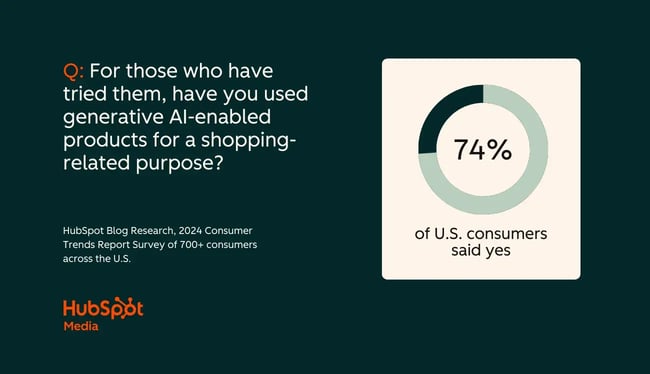
Categories B2B

How to write an effective communication plan [+ templates]

An angry, influential customer tags your company in a LinkedIn rant about a buggy product release. You watch the impressions climb fast. Comments pile up as others vent their frustrations and feed the frenzy.

Welcome to a social media communication crisis. How do you respond?

Free Download: Crisis Management Plan & Communication Templates

You can’t predict every challenge, but you can expect moments like this. Small communication gaps snowball quickly — often because of the wrong response, or no response at all.

The same goes for moments you’re excited about. Maybe you’re launching a new product or rolling out a celebrity-backed campaign. You want your team aligned, your audience engaged, and your message clear.

I’ve worked on campaigns across that spectrum, from controlling damage to building buzz. One lesson has held true: You can’t afford to wait until something happens to figure out how you’ll communicate.

You need a plan.

In this post, I’ll share what goes into a strong communication plan and share templates you can use to build one that actually works.

Table of Contents

Along with armoring your company against crises and challenges, clear communication delivers better business value. Grammarly’s latest annual State of Business Communication report found that effective communication led to significant gains like:

  • Heightened customer satisfaction
  • Improved brand reputation
  • Successful business deals
  • Cost reductions

Organized communication happens at both the strategic and tactical levels. You can have plans for long-term organization-wide communication campaigns and for immediate needs like product launches, PR campaigns, or crises.

The important part is to write it down and hold your team accountable to it — a tough job given how many long-dead plans I find gathering cobwebs in clients’ Google Drive folders.

Can you use a communication plan template?

Yes, but before you do, consider what type and format of communication plan template you use. I find most templates handle the overarching concepts well (i.e., I can track my goals), but they fall apart with nuanced needs (e.g., planning social media posts versus email outreach).

A social media communication plan will look vastly different from a product launch plan. You’re tracking different goals and success criteria and require different channels to reach your audiences. Even formatting differences like landscape versus portrait orientation can crop up.

That said, templates can get your team started — and I’ll take communication momentum over perfection any day. HubSpot has several templates you can put to work immediately that cover a range of communication needs.

What about AI in communications?

If you’re in comms, you cannot escape generative AI tools like ChatGPT. They’re seemingly everywhere, and it sounds like it’s helping some workers do better work. Grammarly’s State of Business Communication report found that knowledge workers using AI are markedly less stressed and more productive at work than their non-AI-using peers.

However, Grammarly’s report references two limitations that I believe deeply affect communication plans:

  1. An adoption gap persists, with 90% of leaders using AI but only 50% of knowledge workers doing the same.
  2. AI literacy is low, as 52% of knowledge workers want improved education and training to use generative AI effectively.

These mismatches breed mistakes. Workers don’t know what data they should include in model prompts, potentially leaking sensitive information to a public space. Or leaders might remove human oversight from AI use too soon, leading to automated communication errors that hold up in a court of law — and cost you millions.

I see many organizations either rush adoption or back away because they’re afraid. Boundless enthusiasm can get you in hot water with comms, but like it or not, AI will probably become part of your comms ecosystem.

That’s why I suggest building an “AI in the workplace” policy now to govern tool use, especially if your comms team interacts with confidential or sensitive information. AI training is still nascent but growing as vendors like OpenAI grow their enterprise offers. Explore options that suit your team’s tech level and use cases. You don’t want to overwhelm them with features; instead, empower them to use AI responsibly.

Now that we’ve covered how a communication plan can help you, let’s learn how to write an effective one.

1. Use pre-built communication plan templates.

If you’re building your first comms plan for a specific need (e.g., product launches, social media campaigns, internal alignment), a template can guide your conversations with other stakeholders and build up something solid to get you going.

For solid templates for various business comms needs, check out these business templates by HubSpot. You can find comms plans and other templates for items like action plans, annual reports, business proposals, and other business cases. I’ll also walk through several communication plan templates later in this article — take any of those to begin this process.

2. Audit your current communication materials.

Before you build a new plan, take stock of what you have already. A communication audit lets you see what’s working, missing, and broken.

You can run audits however you want, but I believe any audit should at least include:

  • Reviewing all existing material related to your goal (e.g., website copy, email campaigns, ads, and social posts). I find people often forget internal communications, so also check places like Slack channels and Teams meeting notes.
  • Evaluating performance data to see what content clicks and what’s underperforming.
  • Gathering feedback from internal stakeholders — this helps you build agreement early. Also, connect with your target audience if you can via surveys or focus groups.

Consider a communication plan for a product launch. If your current content covers general industry trends but lacks specifics on your product’s features and value, that’s a gap. And that insight will guide your plan’s priorities.

One tip: Keep your goal (in this case, a product launch) at the core as you audit. You don’t need to solve every gap your audit finds, just the ones relevant to getting your product to market.

You can use lots of criteria to conduct your audit. If you’re struggling to know where to start, consider the “five Ms” format, as you’ll weigh materials against several key business criteria. This framework should deliver an audit with valuable and actionable results.

the communications audit framework

Source

3. Set SMART goals for your communication plan based on your audit.

Your audit will find strengths, weaknesses, and gaps. You’ll want to set measurable goals to address those points using data from your audit results. What do you want to achieve with this plan?

When in doubt, make your goals SMART: Specific, Measurable, Attainable, Relevant, and Time-based. A recent HubSpot poll revealed that over 52% of participants believe the SMART framework helps them achieve their goals more often than not.

SMART goals let teams plan communication strategies with delineated expected outcomes. I used them liberally when I was building my content team at a PR agency. I grounded the initiative in a SMART goal: to grow long-form content production 10x through a scalable team and workflow within 12 months. My goal was both a productivity benchmark and a foundation for an internal comms plan.

I used my goal to manage communication with stakeholders like:

  • Executive leadership on hiring and performance standards.
  • HR on recruitment timelines.
  • New writers for onboarding and expectation-setting.
  • Account teams to ensure we met client expectations.

The SMART framework’s clarity helps turn a complex, cross-functional initiative into a structured plan where we could hold each other accountable and measure progress.

Pro tip: Need a little help building your first SMART goal? Check out our free SMART goal template.

4 . Pick your plan’s target audience.

Who should hear your message? I’ve seen comms strategies flop hard because teams chose “everybody” as a target audience. It hurts to cut groups (and potential brand impressions) from consideration, but your comms plan needs to land with the right audience for maximum effect.

That audience can be internal or external, depending on your plan. For instance, my team-building comms plan included executive leadership as the primary audience because:

  1. They needed to know progress — and success.
  2. They tracked my team’s growth against overall agency growth and direction.
  3. They bankrolled the operation and needed to know ROI.

But plans can have secondary audiences, too. My team members and other organizational managers and leaders had a stake in the outcome. Just be thoughtful about how many target audiences sneak into your plan, as each new audience subtly shifts your communication outputs.

5. Outline and write your plan, remembering your audience.

If you’re using a pre-built communication plan template, you’ll see exactly how to outline and write your plan’s details and tactics. If not, here’s a typical structure:

  • Goals. What are you trying to achieve?
  • Key messages. What are you saying?
  • Target audiences. Who needs to know?
  • Channels. Where will you communicate?
  • Timing. When will messages go out?
  • Responsibilities. Who owns each piece?
  • Success metrics. How will you know your plan worked?
  • Approval and escalation protocols. Who signs off on the plan, and what’s the process for changes or crisis response?

As an example, I’ll use an unfortunately all too common crisis: an IT company suffers a data breach. You have an immediate need to communicate that the breach occurred, what it affected, and how you’re remedying the situation. What might this plan look like?

  • Goals: Keep your trust with key stakeholders and share next steps.
  • Key messages: What happened, how it’s being fixed, and what clients need to do.
  • Target audiences: Customers, partners, and employees.
  • Channels: Email, press release, company website.
  • Timing: Immediate, with ongoing updates as the situation changes.
  • Responsibilities: Crisis response team, PR team, legal.
  • Success metrics: Timely delivery of communications, views, engagement metrics, customer retention post-breach.
  • Approval and escalation protocols: Legal and PR approve public-facing messages; executive team gets involved if the breach worsens.

Your plan would get more specific on each point, but this outline shapes what you’d write in your full document. Involve your key stakeholders and their representatives throughout this process to keep everyone apprised and to get faster approval.

I’ll also note that knowing your audience matters so much at this stage and can derail even highly detailed plans if skipped. For instance, I’ve reviewed many media outreach plans for events like a product launch or funding round announcement. These plans require an external audience (reporters) you can’t control.

In this situation, take more time to understand who reporters are, what they need for a good story, and how they might respond to your communication. I’ve seen CEOs flail or say, “No comment,” when a reporter asks who’s funding their latest VC round. A good comms plan not only outlines tactics but also anticipates the target audience’s needs and M.O.

6. Choose your communication channels.

Your message is only effective if you reach the right people at the right place and time. That’s why channel selection is worth extra consideration.

Your channels should align with both your plan’s audience and goal. What might that look like?

For internal audiences, turn to tools your teams already use, like Slack, Microsoft Teams, email, or all-hands meetings. If you have sensitive or high-impact news, like a data breach or imminent layoffs, pair written communications with live conversations to better manage your people’s responses (because they will have responses with or without you).

I find external audiences vary, especially as digital marketing has proliferated. Common channels include:

  • Customers. Email newsletters, blog posts, and in-app push notifications.
  • Partners and stakeholders. Personalized emails or virtual meetings.
  • Media and the public. Press releases, social media, a “newsroom” section on your company website.

Whatever channel you choose, be consistent. People build trust through repeated interactions. If they know to expect your product launch announcements on Instagram, they’ll follow and engage more regularly.

Pro tip: Critical messages like a major change or crisis usually require a multi-channel approach. Repeat your primary message across platforms to reinforce key points. And monitor closely, as channels like social media (with ever-larger AI presences) can spiral out of control quickly.

7. Assign a DRI (Directly Responsible Individual).

With your plan in hand, you need to choose who will deliver the message. This person is your DRI, or directly responsible individual.

The DRI clearly communicates the message on time and through the right channels. Without one, even the best-laid plans will stall.

Let’s say you’re handling a layoff announcement, an especially tough and emotional comms scenario. The CEO is usually the right DRI. They need to communicate the message promptly and humbly to a nervous internal audience.

Tone, timing, and delivery matter. Get it wrong, and the damage can ripple across morale, media coverage, and long-term brand trust. For instance, one tech company in 2024 laid off its entire staff during a “two-minute Google Meet,” and the backlash hit TechCrunch’s front page within hours.

In this exact situation, you’re probably leaving the company instead of choosing a DRI. But in less severe cases, make sure your DRI understands the why behind your plan, feels supported, and is ready to deliver hard news with care.

8. Estimate a timeline for each step.

A communication plan without a timeline is just a wish. Deadlines keep you on track and aligned with your stakeholders.

Your SMART goal should’ve set an overarching timeline (e.g., 12 months to 10x content production). You’ll also want to map out a realistic timeline for major milestones, including:

  • When to deliver key messages.
  • How long approvals or reviews may take.
  • When to expect follow-ups or updates.
  • How long it might take for the message to saturate your audience.

For example, if your message needs to move from leadership to employees, plan for the time needed to review, handle feedback, and gain approvals from legal and HR.

Or if you’re handling media outreach, think fast. Modern media cycles demand fast responses to stay ahead of the narrative. I see teams miss their moment when a reporter has a 24-hour turnaround for the story and the company’s DRI disappears.

Build buffer time into every step. Hofstadter’s Law holds especially true in communication plans: Even when you account for delays, things still take longer than expected. Give your team breathing room to keep things moving smoothly under pressure.

9. Measure your communication plan’s results and adjust as needed.

Whether it’s big or small, every communication plan deserves a postmortem. Measurement and analysis help refine your approach and improve future outcomes.

After executing your plan, ask:

  • Did you meet your plan’s goals?
  • Did your audience respond as expected?
  • What delays, misunderstandings, or challenges did you encounter?
  • Which channels performed best?

For example, my content team’s communication plan significantly exceeded its SMART goal, but not without challenges. Working with a new team meant learning how to communicate effectively with executive leadership. I encountered gaps in consistent reporting that made it harder for stakeholders to stay aligned. With experience and time, we built stronger reporting systems that communicated our impact and growth.

Approach every communication plan as a chance to learn. Review the data, gather feedback, and make thoughtful decisions to strengthen your next plan.

7 Ready-to-Use Communication Plan Templates

Communication plans can get complicated, but a solid one will serve your team long after you write it.

I’ve included seven plan templates below to help you respond to different comms needs and audiences so you can build strategies that actually work.

1. Internal Communication Plan Template

Slideteam built this template for internal communication teams needing to keep stakeholders aligned through regular updates. It gives a clear, high-level snapshot of tasks, timelines, and responsibilities. That makes it easy for leadership and teams to stay on the same page.

Core elements include:

  • Frequency
  • Communication channels
  • Key stakeholders
  • Escalation procedures

And you get it all in a layout that’s simple to follow and easy to customize.

communication plan template, slideteam

Source

What I Like

Since it’s formatted in PowerPoint (a marketing professor’s favorite lecture tool), it’s easy to tweak. You can switch colors, layout, and text to fit your brand or structure without a total rebuild.

2. Go-to-Market SOP Communication Plan Template

I’ve helped put products in-market, so I know a good GTM communication plan takes precision. This go-to-market SOP communication plan from HubSpot makes that happen. From stakeholder agreement to brand messaging, pre-launch tactics, and press outreach, this framework keeps vital information from slipping through the cracks.

It’s designed to guide teams through every phase of a launch, clearly outlining responsibilities, messaging timelines, and execution steps. Plus, it’s flexible enough to reuse for your next product launch with minimal tweaks.

communications plan template from hubspot

Source

What I Like

This template strikes a healthy balance between structure and flexibility. You can tailor the SOP to your launch specifics while leaning on a reliable framework that spells out who does what and when.

3. Strategic Communication Plan Template

This text-based template from Bright Hub covers how communication should happen within your organization, especially when dealing with crises or major strategic shifts. You get everything from setting communication goals and analyzing stakeholders to tracking costs and identifying risks.

If you’re a marketer or project manager without a formal comms team, use this template. It’s divided into twelve well-organized sections, including external environment, context, and stakeholder analysis, making it a solid pick for small- to mid-sized teams.

communications plan template from brighthub

Source

What I Like

Bright Hub is a project management firm; you can see its expertise reflected in this template’s logical, strategic structure. It covers not only what to communicate but also why and how, with thoughtful prompts for evaluation, budgeting, and audience-specific messaging.

4. Project Communication Plan Template

Simplicable used this template for a billing system upgrade project. It offers a clear and structured communication plan, laying out the essentials:

  • Who needs to be informed.
  • What they need to know.
  • When communication should happen.
  • What format the communication should take.

I see this template’s value in managing cross-functional projects where you have multiple departments or stakeholders involved. The columns for audience, goals, schedule, and communication format make it easy to track how teams share project updates.

communications plan template from simplicable

Source

What I Like

The template includes a dedicated section for communication channels, so you can plan whether something’s best shared in a meeting, email, or formal report. You also get a clear DRI for each communication step, limiting dropped handoffs.

5. Marketing Communication Plan Template

This detailed marketing communication plan template from Smartsheet can support multi-channel strategies across multiple audiences like customers, prospects, internal teams, and media partners. If you’re launching a new product or rolling out a huge campaign, this template can keep you organized.

The layout helps you segment audiences and define messaging, timing, and channels for each group. Whether you’re using internal messaging platforms for team updates or social media and email newsletters for customer outreach, this template helps close the tactical gaps across your marketing mix.

communications plan temple from smartsheet

Source

What I Like

Each objective includes a defined timeframe, which helps coordinate campaign timing and keeps comms streamlined. You can also document any marketing automation tools you plan to use, which is nice if you’re juggling multiple systems.

6. Corporate Communication Plan Template

Smartsheet comes through again with a strong three-page corporate communication plan template, offering a roadmap for internal and external communication strategy. You get nine key sections, from the executive summary and mission statement to audience segmentation and budgeting.

It also includes frameworks like SWOT and PESTLE analysis to contextualize your comms within your market or organizational dynamics. Whether you’re aligning internal teams or preparing external outreach, this template delivers strategic depth to your planning process.

communications plan template from smartsheet

Source

What I Like

The included milestone chart helps you outline tasks, assign owners, and set due dates to move everything forward. Combined with defined tools, tactics, and messaging elements, this highly detailed planning template is a steal.

7. Crisis Communication Plan Template

This Excel-based checklist from Prezly offers an actionable guide to crisis communication, outlining what to do before, during, and after an emergency. It can help organizations deliver fast and consistent responses to unexpected situations, covering everything from regulatory compliance to media outreach.

The template includes dedicated tabs for each crisis phase (pre-crisis, live crisis, and post-crisis), with checklists for messaging, DRI assignment, and distribution methods like press releases, email, and social media.

crisis communications plan template from prezly

Source

What I Like

I like the tab specifically for tracking social media comments (a powder keg for many modern comms crises). You can give leadership visibility into audience sentiment and show your responses in real time. It’s an accessible format that can easily slot into any crisis playbook.

Tips for Stronger Communication Plans

By now, you’ve developed a good understanding of a communication plan and have tried out a template or two. But what elevates a good plan into a great plan?

Here are a few tips to refine your plan for the best results.

Break down your audiences.

I often see comms leaders stop their target audience development one level too soon. For instance, they’ll write “customers” as the primary audience — but who is a customer? Does that mean your most loyal buyers? Your newest customers (or even hottest leads)?

It’s an age of personalized communication: BCG research shows that about 80% of consumers globally expect personalization, but two-thirds reported they had at least one inaccurate or invasive personalized experience with a brand. You need to know your specific audience, or they may remember you for the wrong reasons.

If you think you’ve reached your ideal target audience, I challenge you to push one level lower. What insights do you find? And how does that inform your comms plan?

Clarify ownership and escalation paths.

Don’t stop at one DRI, especially if your plan calls for escalation paths. Your plan should define what happens at each step and who handles that step.

I’ve been in the middle of plans where we forgot to define an owner for reporting information to clients, and that led to project delays, escalation to leadership, and unhappy reviews. Make sure your plan shows clear ownership and a chain of command.

Keep your plan simple and focused.

Scope creep isn’t just for contracts and statements of work. As more stakeholders get involved in building your comms plan, you may need to fend off extra ideas, directions, and desired outcomes.

A communication plan thrives when it’s focused — the fewer words, the better. Say what you need to say and do it with clarity and precision.

Use AI (but don’t over-rely on it).

Generative AI can make plan construction and execution much easier. That’s true with prompt-focused LLM interfaces like ChatGPT and with AI agents that can autonomously produce communication content.

However, AI’s help doesn’t come without potential costs. Research shows that overreliance on AI can affect remembering what you wrote and potentially weaken important communication skills.

I find AI makes a brilliant assistant for gathering examples of other communication plans and breaking down your goals, audiences, and measurements. But you should build your message your way before calling in ChatGPT’s help.

Ensure your message reflects your goals, voice, and the impact you want to make. AI can extend your message, but you need to get the core right first.

Build Communication Plans That Work and Last

In the end, I believe a strong communication plan should do one thing: deliver the right message to the right people at the right time. I’ve seen firsthand how a thoughtful plan turns the potential chaos of product launches and crisis responses into clear, successful outcomes.

If there’s one thing I’ve learned, it’s that communication planning doesn’t need to overwhelm you, especially when you start with the right structure. That’s why I assembled the strategies and templates above. Use them to build a focused, actionable plan you can feel good about putting into motion.

Editor’s note: This post was originally published in September 2019 and has been updated for comprehensiveness.

Categories B2B

Spam trigger words: How to keep your emails out of the spam folder

Back in 2003, I was working with my first big consulting client, Hasbro. (Yes, that Hasbro. And yes, it was as fun as you’d imagine.) Sitting on my desk at the time — dog-eared, tea-stained, salsa-splotched — was a multi-page document I treated like sacred scripture: the spam trigger word list.

→ Download Now: The Beginner's Guide to Email Marketing [Free Ebook]

This wasn’t just a list of naughty words. It came with spam scores — weights assigned to each phrase based on how likely it was to get your email flagged by filters. Before any copy went to the client for review, I’d comb through every line of the message against that list, making sure we weren’t setting off any content alarms.

It was a pain in the neck, but it was necessary. Because back then, the majority of spam filters were content-based. One too many “Frees” or “Buy Nows” and boom — straight to the junk folder.

I did similar work for Reed Scientific, and it was even trickier. Many of the words they had to use — clinical, technical terms — also showed up on the spammy list. They weren’t being deceptive, but spam filters couldn’t tell the difference between “legitimate medical journal topic” and a Nigerian prince scam. Which meant I spent a lot of time finding strategic workarounds for entirely innocent language.

In this post, I’ll go into more detail about spam trigger words — and how to avoid them.

Table of Contents

How to Avoid the Spam Folder

These days email spam filters are smarter (thankfully) than just looking at problem words. They look at authentication, sender reputation, and engagement, too. Here’s what you need to do in all three areas to keep your messages going to the inbox, rather than the spam folder.

1. Confirm you have authentication in place.

Authentication isn’t as difficult as it sounds, and it’s the best place to start if your goal is to reach the inbox.

Back in the early days of email, authentication was optional. Today, it’s mandatory. Not just to avoid the spam folder, but to even get considered for inbox placement.

Authentication is how you prove to mailbox providers that you are who you say you are – and that no one’s pretending to be you. It’s not about content or cadence; it’s infrastructure. DNS records. Policies. Cryptographic signatures. Sounds difficult – but it’s not.

There are four main protocols you need to know: SPF, DKIM, DMARC, and BIMI. Each one plays a different role in helping you build trust with mailbox providers. The first three are required by all four of the major email inbox providers; BIMI is not (yet). Here’s an overview:

table showing that apple, gmail, microsoft, and yahoo all require spf, dkim, and dmarc authentication

And here’s a little more detail on each:

SPF: Your Email Bouncer

Sender Policy Framework (SPF) tells mailbox providers which servers are authorized to send email on behalf of your domain. It’s your way of saying, “Only these senders are allowed at the door.” If an email shows up from your domain and it’s not on the SPF list, red flags go up.

What to do: Make sure your SPF record is up to date and includes all your legitimate senders — your ESP, your CRM, your support system, anyone sending on your behalf. Here’s more detail.

DKIM: The Tamper-Evident Seal

DomainKeys Identified Mail (DKIM) adds a digital signature to each email, so the receiving server can verify that the message hasn’t been altered in transit and that it came from you. Think of it as your wax seal on the envelope.

What to do: Publish a public DKIM key in your DNS, and ensure your ESP is signing outgoing email with the matching private key. Here’s more detail.

DMARC: Your Inbox Policy

Domain-based Message Authentication, Reporting and Conformance (DMARC) is the protocol that ties it all together. It tells mailbox providers what to do if an email fails SPF and/or DKIM, either monitor, quarantine, or reject that message.

What to do: Start with p=none so you can monitor. But the long-term goal is p=quarantine or p=reject, because most major inbox providers (like Google and Yahoo) require enforcement for full trust and things like BIMI.

Bonus: DMARC reports give you visibility into who’s sending email from your domain. Sometimes you’ll find unauthorized senders; sometimes you’ll discover your own dev team forgot to authenticate something. Here’s more detail.

BIMI: Show Your Logo, If You’ve Earned It

Brand Indicators for Message Identification (BIMI) is where authentication meets branding. If you’ve passed DMARC with enforcement and set up the right DNS records, BIMI lets your logo appear next to your emails in supported inboxes.

What to do: Publish an SVG logo, set up a BIMI record, and if you’re sending to Gmail or Yahoo users, you’ll also need a Verified Mark Certificate (VMC). Yes, that’s a paid third-party certificate — welcome to enterprise email. Here’s more detail.

Authentication: Final Words

All four protocols require DNS configuration. If that’s not your lane, loop in your IT or dev team. But don’t skip this step. Without proper authentication, you’re starting every send with a deficit. Even your most beautiful, best-segmented campaign will be suspect if the infrastructure doesn’t check out.

And remember: passing authentication isn’t a gold star, it’s the baseline. You’re not getting rewarded for doing it right, but you will be penalized if you don’t.

2. Maintain a good sender reputation.

Once your authentication is squared away, the next big inbox gatekeeper is sender reputation. If authentication says you are who you say you are, reputation tells mailbox providers whether you’re someone worth trusting.

Think of it like a credit score, but for your domain or IP address. Have you been sending responsibly? Are people opening and clicking? Or are you racking up bounces, unsubscribes, and spam complaints?

Mailbox providers track all of this. And they use it to decide whether your emails go to the inbox, the spam folder, or nowhere at all.

Check your score before you wreck your score.

There are a few ways to check your sender reputation. And none of them require guessing or vibes.

  • Sender Score by Validity: A free tool that gives you a score between 0 and 100 based on your sending IP and/or domain. Think of it as a general reputation report card. Anything above 80 is solid; below 70 and you might want to investigate.
  • Google Postmaster Tools: If you’re sending any real volume to Gmail users, this is a must. You’ll see data on spam complaint rates, IP/domain reputation, authentication status, and even delivery errors. But fair warning: You need to have DKIM and SPF set up and be sending at a consistent volume to access meaningful data.
  • Microsoft SNDS (Smart Network Data Services): It’s not pretty, but it’s useful — especially if your email isn’t making it into Outlook or Hotmail inboxes. You’ll get data on complaint rates, spam trap hits, and how Microsoft sees your IP’s reputation. You’ll need to register your IP(s) to gain access.
  • Cisco Talos Intelligence: Offers reputation lookups for IP addresses and domains. This includes spam score, blacklist status, and email volume history. Great for a quick health check if something feels off.

Reputation Killers: A Non-Exhaustive, But Highly Relevant List

Even a well-intentioned sender can damage their rep. Here’s what to watch out for:

  • High hard bounce rates (sending to invalid email addresses).
  • High spam complaint rates (Gmail considers anything above 0.1% as a red flag).
  • Sudden spikes in volume without warming up first.
  • Sending to purchased or scraped lists where there’s no explicit opt-in permission (don’t do it).
  • Ignoring lack of engagement; continuing to send to people who haven’t opened in months (or ever).

The Fix: Warmth, Consistency, and Good Hygiene

There’s no overnight fix for a damaged sender reputation, but you can turn things around with consistency and list hygiene.

  • Gradually ramp up volume (especially after downtime or switching IPs).
  • Decrease frequency, remove, or suppress unengaged subscribers.
  • Make unsubscribing easy (yes, really).
  • Monitor complaints like it’s your job. (Because … it kind of is.)

Bottom line: Sender reputation is invisible until it starts hurting you. But once your emails start missing the inbox, it’s the first place to look. Use the tools, check the metrics, and treat your domain reputation like the asset it is. Because mailbox providers certainly do.

3. Keep your readers engaging.

Engagement isn’t just a nice-to-have anymore. For mailbox providers, it’s a core signal, maybe the core signal, that your email is wanted, welcomed, and worth delivering to the inbox.

Think of it from their perspective: If a recipient never opens your email, or worse, deletes it without reading or marks it as spam, why should they keep delivering your messages to the inbox? They’re in the business of happy subscribers (your recipients), not senders with a quota (your organization).

So yes, engagement matters. A lot.

What counts as “engagement”?

Short answer? Anything that signals interest.

Things like:

  • Opens (Yes, even with Apple’s MPP complicating things … more on that in a sec.)
  • Clicks (links, buttons, CTAs — these are gold)
  • Replies (especially for B2B senders or service emails)
  • Forwards or “Add to Address Book” actions (a strong positive signal)
  • Marking messages as “Not Spam” (if your subscribers are recovering them from the junk folder)

Mailbox providers are using this engagement data to make decisions about future delivery. So if your audience is tuned out, your future campaigns are more likely to skip the inbox … even if they’re technically flawless.

But wait … What about Apple MPP?

Ah yes, Apple’s Mail Privacy Protection (MPP). Introduced in 2021, it pre-loads the tracking pixels that signal opens, which can artificially inflate open rates for recipients receiving your messages in Apple inboxes (like the native Mail app on iPhones). For most email marketers, this means that open rates have become a bit … fuzzy.

Here’s the thing. There’s always been a margin of error in open rates, due to the use of tracking pixels. If a recipient reads an email once, or even 10 times, with images blocked, no open will be recorded. But if someone scrolls past an email with images enabled, and it appears in the preview pane of their inbox, it will register an open, even if they did not look at it.

So they’ve always been fuzzy, and now they are even fuzzier. But fuzzy doesn’t mean useless. Opens can still be a directional indicator. A sudden decrease in open rates may mean you’re not reaching the inbox (messages delivered to the spam folder or not delivered at all will not register an MPP open).

Just don’t assume opens are an absolute measure of who is and is not engaging with your email – they aren’t and never were.

How to Track and Improve Engagement

  • Watch trends, not just isolated metrics. Are opens declining across multiple sends? Are fewer people clicking your CTAs? That’s worth investigating.
  • Segment by activity. Send re-engagement campaigns to lapsed subscribers. Lower the frequency on your inactive recipients. Send more frequent emails to your most active ones.
  • Clean your list regularly. If someone hasn’t opened or clicked in 3-6 months (or whatever time frame makes sense for your cadence), decrease your send frequency. Maybe only send during your high seasons (for Hasbro that was pre-Chistmas, pre-Easter, and pre-Summer). You might even suppress or sunset them if they still continue not to engage, because sending to long-term unengaged recipients drags down your reputation.
  • Make your emails more engaging. I know. Obvious. But if your subject lines are vague, your CTAs are buried, or your content reads like a terms of service doc, you’re not giving people much to engage with or click on.

Pro tip: If you’re sending only promotional content, like discounts, sales, and offers, you’re less likely to earn sustained engagement. Mix in value-based content like tips, insights, inspiration, and resources. Something worth reading, even when someone’s not ready to buy.

spam trigger words, quick tips on how to track and improve email engagement

Bottom line: Engagement is the clearest way to prove your emails are wanted; lack of engagement is the fastest way to get penalized when they’re not. If you’re ignoring this, inbox placement will eventually ignore you.

Spamming Examples

Before CAN-SPAM was passed back in 2003, I worked for a large company that, like many at the time, was still figuring out how to run a commercial email program that didn’t infuriate people.

One day, customer service asked for a meeting. I was heading up the email program, and they were fielding a rising tide of calls from people who were upset about the emails we were sending. Not confused. Not curious. Angry.

Apparently, someone (before I got there, thank you very much) had armed the team with a document titled “10 Reasons the Emails We Send You Aren’t Spam.” I don’t remember all 10, but here’s the greatest hits:

  • “We’re a legitimate company.”
  • “You have a business relationship with us.”
  • “We only send emails that are of interest to you.”
  • “This is a benefit to you.”

Customer service was told to read all 10 points to anyone who called in to complain. Only after they had gone through the list in its entirety were they allowed to unsubscribe someone from our emails.

So I asked: How’s that working for you?

They said they rarely made it past item five. Most people got more agitated as the list went on, and many hung up before they got to the part where they were finally allowed to unsubscribe them. So, effective at keeping people on the list: yes. Effective at creating subscribers who welcomed our messages: no.

Spam is in the eye of the beholder.

That story may sound dated, but the dynamic behind it is still 100% relevant. Spam is often about perception, not policy. The legal definition of spam (from the U.S. CAN-SPAM Act) is email sent without meeting certain requirements: a working unsubscribe link, a physical mailing address, honest subject lines, no deception, and so on. It doesn’t even require opt-in (though your deliverability team and inbox placement would really prefer that you get it).

But for your recipients, defining spam is way simpler:

“I didn’t want this.” “I don’t like this.” “Why are they sending this to me again?”

Even if someone did opt in, and even if you’re technically compliant, if they feel like your email is irrelevant, repetitive, pushy, or just plain annoying … they may mark it as spam anyway. And when they do, that hurts your sender reputation, inbox placement, and your ability to reach people who do want your messages.

So yes, you should be compliant. But that’s just the floor. What really matters is whether your email feels like spam to your subscribers.

Because in 2025, permission doesn’t guarantee attention — and compliance doesn’t guarantee inboxing. Welcome to reality.

So now, without further ado (or storytelling), here are some examples of what I consider spam from my own inbox.

The Phishing Scheme

This one’s a head-scratcher, and a classic example of why “spam” is often in the eye of the beholder.

an email from eastwest bank that begins ‘dear jennifer’ with middle and last names starting with ms about an atm withdrawal transaction.

Let’s start with the obvious: my name isn’t Jennifer. It’s Jeanne. My middle and last names don’t start with “Ms” either. I don’t have an account with EastWest Bank. And I don’t live in the Philippines. In fact, I’ve never even visited the Philippines.

So why did I receive an apparently system-generated email confirming a 10,018 PHP ATM withdrawal, complete with masked card number and timestamp? Good question. This is most likely a phishing attempt. A fake transactional email trying to stir up panic and get me to call, click, or respond.

It checks the classic phishing boxes: a plausible-looking format, real-world branding, and a vague call to action to “contact customer service.” And yes, there’s a disclaimer telling me not to reply to the email, which is usually code for “don’t expect anyone to notice this is fake.”

Spam? Absolutely. Whether or not this technically violates CAN-SPAM or was even sent to a purchased list doesn’t really matter. It is irrelevant, misdirected, and sketchy. And if it walks like spam and quacks like spam … you know the rest.

The “All About Us” Newsletter

I get way too many of these. The B2B newsletter below landed in my inbox and featured the organization mentioning its own name thirteen times in a single message. I’ve covered each instance with a red box, to protect the identity of the organization.

a b2b email newsletter that talks all about the organization and provides little to no value to readers.

The entire email was the organization talking about itself. Its awards, its milestones, its latest press release … without any clear reason why I, the reader, should care. The only potential value-add, a link to a white paper, was buried at the very bottom.

It’s a textbook “All About Us” newsletter: no hook, no reader benefit, and no attempt to make the content relevant to the recipient. It’s also a missed opportunity to engage, and a good reminder that your emails should feel like they’re for your audience, not just about your organization or for your CEO.

Are they a legitimate company? I think so. Is their newsletter effective? No. Did I opt-in? Maybe. I do know who they are and I have spoken to people there. Can it be fixed? Yes – here are my recommendations. Is it spam? Technically no, but realistically? Probably yes.

The Frequency Issue

Even valuable content can start to feel like spam when it shows up too often. Frequency on its own isn’t inherently bad. Daily emails can work, if your audience wants them. But when the cadence is out of sync with recipient expectations, even well-crafted, on-brand messages can start to feel like inbox clutter.

Take the example below. Although the friendly from addresses are different, all are from Groupon (see the link in the preheader text). And all have the same subject line.

example of brands in email inbox

I received 133 emails in a single month from Groupon, a brand I’ve purchased from exactly once in the last year. That’s 4.3 emails per day. And most of them (58%) had the exact same subject line (the one above). It wasn’t malicious. It wasn’t deceptive. But it was excessive. And after a while, I stopped noticing the messages altogether.

That kind of repetition, especially in the subject line, can train recipients to tune out. If every subject line looks the same, they’ll assume the content is the same too (even if it isn’t) and start skipping or deleting without opening. And once that pattern sets in, engagement drops … and your deliverability may follow.

Here’s the thing: Volume isn’t strategy. Frequency needs to be intentional and aligned with actual subscriber behavior. Otherwise, even “good” emails that are compliant, relevant, and promotional (or not), can become indistinguishable from spam in your recipient’s eyes. And when that happens, they may not just ignore it. They might actively report it.

Check out the blog post this experience drove me to write to learn more.

Spam List: Words to Avoid When Possible

As I said, some words and phrases are easier to avoid than others. At the very least, you’ll want to ensure you use some of these only if you absolutely need to and as little as possible.

Commerce

  • As seen on
  • Buy
  • Buy direct
  • Buying judgments
  • Clearance
  • Order
  • Order status
  • Orders shipped by shopper

Personal

  • Dig up dirt on friends
  • Meet singles
  • Score with babes
  • XXX
  • Near you

Employment

  • Additional income
  • Be your own boss
  • Compete for your business
  • Double your
  • Earn $
  • Earn extra cash
  • Earn per week
  • Expect to earn
  • Extra income
  • Home-based
  • Home employment
  • Home-based business
  • Income from home
  • Make $
  • Make money
  • Money making
  • Online biz opportunity
  • Online degree
  • Opportunity
  • Potential earnings
  • University diplomas
  • While you sleep
  • Work at home
  • Work from home

Financial – General

  • $$$
  • Affordable
  • Bargain
  • Beneficiary
  • Best price
  • Big bucks
  • Cash
  • Cash bonus
  • Cashcashcash
  • Cents on the dollar
  • Cheap
  • Check
  • Claims
  • Collect
  • Compare rates
  • Cost
  • Credit
  • Credit bureaus
  • Discount
  • Earn
  • Easy terms
  • F r e e
  • Fast cash
  • For just $XXX
  • Hidden assets
  • hidden charges
  • Income
  • Incredible deal
  • Insurance
  • Investment
  • Loans
  • Lowest price
  • Million dollars
  • Money
  • Money back
  • Mortgage
  • Mortgage rates
  • No cost
  • No fees
  • One hundred percent free
  • Only $
  • Pennies a day
  • Price
  • Profits
  • Pure profit
  • Quote
  • Refinance
  • Save $
  • Save big money
  • Save up to
  • Serious cash
  • Subject to credit
  • They keep your money — no refund!
  • Unsecured credit
  • Unsecured debt
  • US dollars
  • Why pay more?

Financial – Business

  • Accept credit cards
  • Cards accepted
  • Check or money order
  • Credit card offers
  • Explode your business
  • Full refund
  • Investment decision
  • No credit check
  • No hidden Costs
  • No investment
  • Requires initial investment
  • Sent in compliance
  • Stock alert
  • Stock disclaimer statement
  • Stock pick

Financial – Personal

  • Avoid bankruptcy
  • Calling creditors
  • Collect child support
  • Consolidate debt and credit
  • Consolidate your debt
  • Eliminate bad credit
  • Eliminate debt
  • Financially independent
  • Get out of debt
  • Get paid
  • Lower interest rate
  • Lower monthly payment
  • Lower your mortgage rate
  • Lowest insurance rates
  • Pre-approved
  • Refinance home
  • Social security number
  • Your income

General

  • Acceptance
  • Accordingly
  • Avoid
  • Chance
  • Dormant
  • Freedom
  • Here
  • Hidden
  • Home
  • Leave
  • Lifetime
  • Lose
  • Maintained
  • Medium
  • Miracle
  • Never
  • Passwords
  • Problem
  • Remove
  • Reverses
  • Sample
  • Satisfaction
  • Solution
  • Stop
  • Success
  • Teen
  • Wife

Greetings

  • Dear [email/friend/somebody]
  • Friend
  • Hello

Marketing

  • Ad
  • Auto email removal
  • Bulk email
  • Click
  • Click below
  • Click here
  • Click to remove
  • Direct email
  • Direct marketing
  • Email harvest
  • Email marketing
  • Form
  • Increase sales
  • Increase traffic
  • Increase your sales
  • Increase visibility
  • Internet market
  • Internet marketing
  • Marketing
  • Marketing solutions
  • Mass email
  • Member
  • Month trial offer
  • More Internet Traffic
  • Multi-level marketing
  • Not spam
  • One time mailing
  • Online marketing
  • Open
  • Opt-in
  • Performance
  • Removal instructions
  • Sale
  • Sales
  • Search engine listings
  • Search engines
  • Subscribe
  • The following form
  • This isn’t junk
  • This isn’t spam
  • Undisclosed recipient
  • Unsubscribe
  • Visit our website
  • We hate spam
  • Web traffic
  • Will not believe your eyes

Medical

  • Cures baldness
  • Diagnostic
  • Fast Viagra delivery
  • Human growth hormone
  • Life insurance
  • Lose weight
  • Lose weight spam
  • Medicine
  • No medical exams
  • Online pharmacy
  • Removes wrinkles
  • Reverses aging
  • Stop snoring
  • Valium
  • Viagra
  • Vicodin
  • Weight loss
  • Xanax

Numbers

  • #1
  • 100% free
  • 100% satisfied
  • 4U
  • 50% off
  • Billion
  • Billion dollars
  • Join millions
  • Join millions of Americans
  • Million
  • One hundred percent guaranteed
  • Thousands

Offers

  • Being a member
  • Billing address
  • Call
  • Cannot be combined with any other offer
  • Confidentially on all orders
  • Deal
  • Financial freedom
  • Gift certificate
  • Giving away
  • Guarantee
  • Have you been turned down?
  • If only it were that easy
  • Important information regarding
  • In accordance with laws
  • Long-distance phone offer
  • Mail in order form
  • Message contains
  • Name brand
  • Nigerian
  • No age restrictions
  • No catch
  • No claim forms
  • No disappointment
  • No experience
  • No gimmick
  • No inventory
  • No middleman
  • No obligation
  • No purchase necessary
  • No questions asked
  • No selling
  • No strings attached
  • No-obligation
  • Not intended
  • Obligation
  • Offshore
  • Offer
  • Per day
  • Per week
  • Priority mail
  • Prize
  • Prizes
  • Produced and sent out
  • Reserves the right
  • Shopping spree
  • Stuff on sale
  • Terms and conditions
  • The best rates
  • They’re just giving it away
  • Trial
  • Unlimited
  • Unsolicited
  • Vacation
  • Vacation offers
  • Warranty
  • We honor all
  • Weekend getaway
  • What are you waiting for?
  • Who really wins?
  • Win
  • Winner
  • Winning
  • Won
  • You are a winner!
  • You have been selected
  • You’re a Winner!

Calls-to-Action

  • Cancel at any time
  • Compare
  • Copy accurately
  • Get
  • Give it away
  • Print form signature
  • Print out and fax
  • See for yourself
  • Sign up free today

Free

  • Free
  • Free access
  • Free cell phone
  • Free consultation
  • Free DVD
  • Free gift
  • Free grant money
  • Free hosting
  • Free installation
  • Free Instant
  • Free investment
  • Free leads
  • Free membership
  • Free money
  • Free offer
  • Free preview
  • Free priority mail
  • Free quote
  • Free sample
  • Free trial
  • Free website

Descriptions/Adjectives

  • All natural
  • All new
  • Amazing
  • Certified
  • Congratulations
  • Drastically reduced
  • Fantastic deal
  • For free
  • Guaranteed
  • It’s effective
  • Outstanding values
  • Promise you
  • Real thing
  • Risk free
  • Satisfaction guaranteed

Sense of Urgency

  • Access
  • Act now!
  • Apply now
  • Apply online
  • Call free
  • Call now
  • Can’t live without
  • Do it today
  • Don’t delete
  • Don’t hesitate
  • For instant access
  • For Only
  • For you
  • Get it now
  • Get started now
  • Great offer
  • Info you requested
  • Information you requested
  • Instant
  • Limited time
  • New customers only
  • Now
  • Now only
  • Offer expires
  • Once in lifetime
  • One time
  • Only
  • Order now
  • Order today
  • Please read
  • Special promotion
  • Supplies are limited
  • Take action now
  • Time limited
  • Urgent
  • While supplies last

Nouns

  • Addresses on CD
  • Beverage
  • Bonus
  • Brand new pager
  • Cable converter
  • Casino
  • Celebrity
  • Copy DVDs
  • Laser printer
  • Legal
  • Luxury car
  • New domain extensions
  • Phone
  • Rolex
  • Stainless steel

Your Brand Reputation: The Big Picture

At one time, avoiding the spam folder felt like a math problem. You had your trusty list of spam trigger words, a little scoring system, and a decent chance of landing in the inbox if you followed the rules. (Simpler times, honestly.)

But today, getting your email delivered and opened isn’t just about content. It’s about reputation. And not just your sender reputation, but your brand reputation.

For many people, your email and website may be the only interaction they ever have with your organization. That online experience — along with your social content, SMS messages, and even your paid advertising — shapes their perception of your brand. If your communications feel unwanted, repetitive, irrelevant, or disruptive, you’re not just risking a spam complaint. You’re risking your credibility.

This is why engagement and deliverability are so closely linked. When people engage with your emails, it signals trust. When they ignore, delete, or mark them as spam, it erodes that trust, both with the recipient and with mailbox providers watching those behaviors in aggregate.

Whether you’re emailing prospects, customers, donors, volunteers, or anyone else in your audience, it comes down to relationship and relevance. Are you showing up in ways that are useful, welcome, and aligned with their expectations? If not, no amount of clever copy or compliant sending is going to save your placement.

The good news? Building that relationship benefits everything, not just deliverability. It improves click-through rates, conversions, loyalty, and long-term impact. And yes, it keeps your brand where it belongs: in the inbox, not the junk folder.

Editor’s note: This article was originally published March 2013 and has since been updated for comprehensiveness.

Categories B2B

The future of marketing isn’t humans vs. AI — it’s humans with AI

Small business owners are all saying the same thing: “My website traffic is tanking, and the stuff that used to work just doesn‘t anymore.” And they’re right. Nearly 60% of searches don’t end in a click — people are getting answers from AI and never visiting your site.

But here‘s what’s crazy: The same AI that‘s killing your traffic? It’s also your best opportunity to leapfrog the competition.

If you’re like most marketers, you’ve read the subreddits and you know it‘s been pretty bleak. Traffic’s going down, and the same amount of work is getting worse results. HubSpot surveyed more than 500 marketers, and they feel the same way. Customers are wondering, “How do we do marketing when AI is consuming our traffic?”

So you’re a business owner, your traffic’s down the drain, and you’re wondering, “What the heck do I do?” If you’re curious and willing to take action, this is the best time ever to be a small business. You have tools at your fingertips that used to require expensive agency contracts. You just need a blueprint on how to use them.

HubSpot is calling this new growth playbook, Loop Marketing, and anyone can use it. At the center of this guide is a new kind of partnership that combines AI efficiency with human authenticity to drive growth to your business.

HubSpot has given the Loop an extensive test drive. It works. Let’s dive into the four steps of implementing this playbook in your business. They are: Express, Tailor, Amplify, and Evolve.

Download Now: Free Loop Marketing Prompt Library

Express: Tell Your Story Like a Human, Scale It Like a Machine

The first thing you want to do is express who you are — define your taste, tone, and point of view before you bring in AI.

A lot of businesses are missing this crucial step. HubSpot research shows that nearly 6 in 10 don’t actually have their unique value proposition documented.

loop marketing, majority of marketing leaders don't have their unique value proposition documented

Look at these numbers — that’s a lot of people who don’t have a clear idea on their company’s brand story. Worse, an overwhelming majority of the respondents in this survey, just over three-quarters, said that teams without a clear value prop “moderately to highly” miss their goals. That’s tough for morale and for your bottom line.

What a lot of those teams may not realize is how a relatively inexpensive AI tool and a few good prompts can help address these snags — in minutes, not months. Everyone has access to the same AI tools, but what’s different about the Loop playbook is you. AI needs the context and perspectives about your business that only you can give it.

So use an AI tool — whether that’s Claude, ChatGPT, Breeze or something else that works for you — to help you create a brand style guide and to give you a simulation of customer feedback. This amounts to businesses being able to do their own market research with agency-quality personas — this would have been totally out of reach for many businesses until very recently.

One way to simulate customer feedback is with a Claude project that has all the information about your target customer. You can ask it questions about marketing campaigns you’re doing and get real-time feedback on how to make them better.

This is called the Express stage in our new Loop Marketing playbook. Basically: Only you can define your brand story, but AI can take that story and give you the kind of customer feedback that used to require expensive focus groups.

Tailor: Make Every Customer Feel Like Your Only Customer

The next step is using AI to tailor the story to your target audience.

You might be thinking, “I can already send emails to Dear {First Name}” — but you can do a whole lot better now. The history of marketing has largely been about who can make the best educated guesses possible — you find some commonality among people, guess what they want, and try to give them what you think they want.

The remarkable thing about AI is that instead of making guesses about a group of tens of thousands of people, you can instead guess what‘s most relevant to this one person. And with an AI engine that knows your business, where you’re located, who your customers are, what they’re looking for, and which ones are showing intent to buy — well, you’re going to get some pretty good guesses.

It’s not just Dear {First Name} anymore. Imagine you run a local coffee shop and your emails have coffee puns that are specific to your individual customers. You can’t create personalization tokens for puns, right? But AI can do that.

There’s a common misconception out there that using AI will make your business sound generic. But it’s really about the data you give it. For example, the HubSpot marketing team has seen conversion rates improve 82% using AI-driven personalization.

This is called the Tailor stage of Loop Marketing — think of it like getting a custom suit instead of buying one off the rack. Custom tailoring used to be a luxury, but now AI has gotten to the point where it’s within reach of even small budgets.

Amplify: Find Customers Where They Actually Are

Next, you need to amplify to meet customers where they are. This means caring how your business shows up in AI engines like ChatGPT or Perplexity — your customers aren’t clicking through from Google searches anymore. So you’re seeing a lot of traffic diminishing all over the internet.

This is where it gets interesting, because the people who do find their way to your website are higher-quality leads than ever before. Think about it like a consumer: Everyone has the same amount of research at their fingertips. It’s pure information symmetry. So if someone is looking to buy a new sofa, they can do a ton of research before landing on the website of the furniture company they’ll actually buy from.

This is called the Amplify stage of Loop Marketing, getting your message out into this new AI-driven world and getting high-quality prospects in return. Start with AEO, or AI Engine Optimization. It’s the next evolution of Search Engine Optimization (SEO) and it’s going to transform the way your company’s message is distributed.

SEO is about ranking in the top five links; AEO is about being part of the answer. There are lots of great options out there to help you get cited and recommended by those AI engines; pick one and start building on whatever visibility you already have.

And look, it’s not just about search traffic. Most marketers are spending more on events in 2025 than they did in 2024 — people are craving human interaction again. And it’s the best time yet to work with influencers, who can be that trusted person to give real-life recommendations about your business. The ROI is just tremendous: Companies like HubSpot are seeing far lower cost per lead with influencers compared to the big programmatic channels like Google and Facebook.

When AI is doing all this customization and amplification for you, you’ve got more money and energy to invest into other channels that are really, really working for you.

Evolve: Every Campaign Makes Your Next One Even Better

Here‘s what’s really cool about the Loop Marketing playbook: Every time you run through this loop, you get better. Your marketing compounds. You’re constantly improving, constantly learning, and your results just keep getting better and better. That’s why this is called the Evolve stage of Loop Marketing.

The old way, in comparison, was brutal. You’d run a campaign for weeks or even longer, and then do a big post-mortem analysis. It probably involved a lot of meetings that should have been emails.

But now you can ask AI in natural language and get immediate insights: “How should I adjust my targeting? What message resonated the most?” Making adjustments in real time means more successful and more cost-effective campaigns.

AI is ready. Are you?

The most common resistance to AI is fear — fear that AI will replace you or devalue your skills. But the future of marketing isn’t humans versus AI — it’s humans with AI. Businesses just need a guide to help them figure out how to make this human-AI collaboration work. That’s where the Loop can help.

When a big shift in technology happens, it creates massive opportunities for marketers. This was evident with early Facebook and early Google — so much money was made during those times. People aren’t seeing that same opportunity today because this shift represents a loss of control. Nobody is used to that.

But this shift is even bigger now than it was then, and marketers who are using tools like the Loop Marketing playbook and taking advantage of this moment in AI are going to see their growth compound, and fast.

If you’re willing to take action in the next 18 months, it’s going to be impossible not to succeed — the opportunities are just that big.

Categories B2B

I tested 8 AI tools for graphic design — here are my prompts, results, and recommendations

My graphic design journey started on Fiverr. I used to sell banners and background removal services for $5. I am not the best designer. Far from it. However, tools like Photoshop and Canva helped me create decent graphics by editing my way through their premium templates.

Get a Demo of HubSpot's AI Image Generator

Even with these shortcuts, it was still a lot of work. I used to spend hours tweaking graphics, adjusting colors and fonts, exploring new presets, and watching YouTube tutorials on how to create specific effects in Photoshop.

Now, with AI tools for graphic design, I can spin up on-brand banner variations in just a few clicks. I’m also able to give more detailed design briefs to my team, do minor edits myself, and overall, deliver higher-quality designs in half the time.

But which tools give you the usable results and, most importantly, the best ROI? I tested the top 8 AI tools for graphic design to find out.

In this article, I’ll walk you through the exact testing process, including the prompts I used and the results, and whether I would recommend using AI graphic design tools at all.

Table of Contents

Why use AI for graphic design?

Here are the top 3 benefits of using AI for graphic design.

Faster Time to Design

According to HubSpot’s State of AI survey, over 40% of marketers use image and design generators like DALL-E and Synthesia. The most common reason? To help them generate designs faster.

Here are the most common graphic design use cases I’m seeing for AI:

  • Quick edits. AI is great at resizing, cropping, removing, or changing backgrounds, and making other quick edits to designs.
  • Media content. 38% of marketers use AI to create image-based and video content for social media, print, and more. Tools like ChatGPT, Veo-3, Canva, etc., can render scenes faster, create assets, and generate AI videos.
  • Personalized AI images. With AI, you can easily create dynamic assets for customer segments or seasonal holidays.
  • Image-based trends. AI can help you hop on trends like Studio Ghibli art or create custom memes quickly.

Expert tip: I spoke to Robert Avila, an art director from Platinum Black, who shared how he uses AI to create animations: “You can prompt your AI tool to render an entire scene or create assets to composite your scenes manually. When inevitable revisions arise, it’s much faster to update them through AI prompts rather than re-drawing an entire scene.”

Remove Creative Blocks

From creating design briefs to helping me choose color palettes, I find that AI is a great strategic partner. AI is also quite helpful when I have creative fatigue.

For instance, if I am stuck on a social media campaign design, I can prompt AI tools to give me five different concepts. I can even generate creative briefs by providing the tool with additional context, such as design references, rough sketches, or campaign documents.

Creative Experimentation

A/B testing graphics is a huge part of my job. I’m constantly testing which graphics perform better on social media or ad variations that give us better ROAS. With AI, I can quickly spin up dozens of on-brand designs and choose the best based on audience response.

The best part? AI tools help me experiment with color combinations I’d have never considered and wacky, trend-based layouts. Some AI-generated designs have actually been top performers.

How I Tested the Best AI Graphic Design Tools

I tested AI graphic design tools with two optimized design “mega” prompts. Basic prompts weren’t giving the output I wanted, so I decided to go all out.

Each prompt covers a common marketing use case and includes detailed instructions to keep the model on track (AI can be notoriously distracted!).

Prompt #1 — Blog Banner/Featured Image

“Design a clean, modern blog banner for an article titled The Rise of AI in Graphic Design’ using a minimalist layout (1200x628px) optimized for web and social sharing. Prioritize a bold, high-contrast headline in a contemporary, tech-inspired font. Use a subtle background texture or gradient that enhances, but doesn’t compete with, text legibility. Incorporate understated AI-themed motifs like neural nodes, abstract chips, or creative lightbulb icons. Maintain visual harmony with generous white space and balanced composition. Enhance the title’s visual impact through font weight, spacing, or soft shadowing, and ensure strong text-to-background contrast for clarity. Export as a high-res PNG or JPG.”

Prompt #2 — Social Media Post

“Design a high-impact Instagram post (1080×1080 px) to announce a new AI-powered design tool, featuring the bold tagline ‘Design Smarter. Not Harder.’ in large, modern sans-serif typography with layered effects, dimensional shadows, or motion-inspired blurs for depth. Use a vibrant, futuristic background with gradients (blue, purple, teal, pink), abstract shapes, and subtle tech motifs like HUD overlays or network nodes. Include the product logo or name subtly in the bottom corner, with an optional CTA like “Try It Free Today.” Ensure clean balance, mobile readability, and visual clarity on both light and dark interfaces. Export as a high-res PNG or JPG under 1MB.”

Note: I also considered other factors like cost, ease of use, design capabilities, and copyright usage before arriving at my final list of AI-based graphic design tools below.

Pro tip: If you want to learn how to write prompts like these, you can read my list of the 33 best ChatGPT prompts for inspiration.

Best AI Tools for Graphic Design

I road-tested eight tools for graphic design. Here’s what I found.

1. Canva AI

I think Canva is a more accessible, intuitive version of the Adobe suite. Most freelancers rely heavily on Canva for client projects, and I can see why.

Canva has stepped up its design game in the last year. I’m seeing a huge shift towards AI-assisted design workflows through its Visual Suite 2.0. I love how I can create interactive dashboards just through sheets, generate cool new backgrounds, and so much more with the new Canva.

Moreover, Canva is now integrated into HubSpot, which means I can seamlessly use it inside my blogging workflow.

Free resource: Learn how to use Canva in HubSpot in this Academy course.

Now, let’s get to testing.

Test Results

I used the web app for this test. But you can achieve the same results with Canva AI on mobile or tablets (iOS and Android), as well as the desktop app (macOS and Windows).

Find Canva AI, click on it, and you’ll get a prompt field where you can describe what you want. Here’s what I got for Prompt #1:

canva ai interface and my prompt, blog banner designed by canva ai

As you can see, the layout and typography are decent. The background? Not so much.

The fact that Canva embeds its own instructions in the image (“Double-click or double-tap this”) is a bit annoying, honestly. But being able to edit the output through the Canva editor is a plus in my book.

Here’s what I got for the second prompt:

social media post designed by canva ai, ai graphics for software tool announcement

I feel that Canva is best for use cases related to social media. You can even get carousel posts with Canva AI.

I would, of course, make some minor tweaks to the above image like removing “announcing our new AI tool’, switching out the copy, etc. However, Canva gives me a good base to start from.

Bonus: Don’t want to write custom prompts? Canva AI has presets for you to use. I tested one of them to show you how they work.

four outputs for a preset prompt in canva, ai-generated real estate listing designs

It took almost 10+ minutes to generate these mockups. However, I thought the results were pretty great and can be shipped with some tweaks. You can definitely use Canva AI for social media graphics.

What I like:

  • Simple and intuitive interface.
  • Ability to edit images within the tool.
  • Offers a wide range of premium templates.
  • Integration with Canva’s design suite and other platforms like HubSpot.

What can be improved:

  • Better adherence to my prompts.
  • Generate mockups faster.

Pricing: Free access with limited credits. Paid plans from $5.81/month and $46.49/year.

Best for: Social media graphics and reusable visual assets.

2. ChatGPT

ChatGPT is my go-to AI chatbot for brainstorming content ideas, creating outlines or first drafts, and even analyzing Excel spreadsheets. It’s a great creative partner, and that’s why I also use it for creating design and image mockups to pass on to my designers.

When using ChatGPT for graphic design, I provide the model with existing graphics to serve as a reference for style, layout, and so on. Here’s an example of a typical prompt I use.

prompting and graphic design workflow with chatgpt

As you can see, it comes up with decent designs when it has reference images. For this test, however, I used a fresh chat to ensure fairness and consistency in the results.

Test Results

When I first entered Prompt #1, ChatGPT started breaking it down and explaining it to me. That’s a weird quirk on this platform, probably because it’s trained to be a conversational model.

Anyway, after asking it again to create the banner, here’s what I got.

blog post banner designed by chatgpt, ai generated feature image

While this looks alright from a minimalist design perspective, I’m not a huge fan of how the text is positioned. There’s a lot of whitespace, and I’m not too sure about the lightbulb.

I could probably fix this with a reference image, but let’s skip that for now. Instead, let’s see how ChatGPT does with the social media prompt.

chatgpt ui and graphics for social media, ai generated graphic for instagram

As you can see, this graphic isn’t very professional. So I gave ChatGPT another shot, this time putting Canva’s design as a reference. The model mimicked the image and didn’t come up with anything original. Bummer. More often than not, though, providing examples and pushing for iterative fixes with follow-up prompts will give you better results with ChatGPT.

What I like:

  • Fits right into my broader AI workflow since I already use ChatGPT.
  • Does a decent job when given the right references.
  • Images get generated fairly quickly.

What can be improved:

  • Design quality; custom training datasets would help here.
  • Ability to edit created images inside the context window without changing the whole image.

Pricing: $20/month for ChatGPT Plus and $200/month for the Pro tier. Limited access for free users.

Best for: Brands that already use ChatGPT in their workflow.

3. Ideogram

As a content marketer, I usually need text-heavy graphics. Think blog banners, call-to-action buttons, and infographics. Since my goal is to drive engagement and conversations, visual elements and text in the graphics are helpful for capturing user attention.

However, getting AI tools to render legible text designs was harder than I thought it would be. I heard a lot of good things about Ideogram, though, so I decided to try it out for graphic design.

Test Results

I used the web version of Ideogram for this test. You can also use the newly-launched mobile app if you like. Here’s the output of the first part.

ideogram’s ui and graphics design outputs, four ai generated blog banners

Honest opinion? I thought the layout was sub-par. The generated banner also had unnecessary elements (like “1200 px”), but I can’t complain about the quality and style of the text.

Next, I entered my social media prompt, and here’s what I got.

instagram post designed by ideogram, ai generated social media graphics

This is by far the best social media post (design-wise) on this list so far. Minimal, modern, and clean — just like I asked. It even came up with a name for the brand, which none of the other tools did. The ‘N’ should have been uppercase, but that is a quick fix. All in all, Ideogram generated a graphic I’d actually use.

What I like:

  • High-quality text rendering with good font choices.
  • Vibrant color palette and scheme that stops the scroll.
  • Original elements like brand name suggestions, etc.

What can be improved:

  • More control over design layers.
  • Ability to edit text and other components inline.

Pricing: Free access with limited ‘slow’ credits. Paid plans cost $7–$42/month.

Best for: Simple, text-heavy banners, social media posts, billboards, etc.

4. Autodraw

AutoDraw is an AI tool that combines machine learning and drawings from artists. You can doodle in the tool, and it’ll suggest the closest shape to your drawing. I must say I loved the premise of Autodraw. While I am decent at digital design (thanks, templates!), I can’t draw a straight line without a ruler. Having an AI tool improve my art sounded super cool.

A warning: I don’t have a graphics tablet. So everything you’re about to witness, hilarious though it may be, was done with just a mouse. I’m guessing the tool’s capabilities are far greater with a tablet or a stylus at hand.

However, without giving too much away, it proves that you can input a terrible drawing into AutoDraw and get something better back.

Test Results

I started with something basic — a good old smiley face. As you can see, the suggestions were pretty good, but I wanted the smile to be just a tad bit wider.

attempt to draw a happy face, hand-drawn smiley in autodraw.

So, after selecting the right smiley, I tried to make the mouth wider. Sadly, Autodraw doesn’t take the whole drawing into account while suggesting shapes. The suggestions were way off — I definitely wasn’t trying to draw shorts.

smiley on autodraw, ai generated smiley.

So, I went back to the drawing board (literally) and tried to get what I wanted with a single drawing. This time, I wanted to draw a girl.

girl drawn on autodraw, ai tool suggesting design shapes

I knew my drawing skills were questionable, but I didn’t think it would suggest a beard when I was aiming for a girl. I guess the suggestion feature can only help with simple preset shapes, which is a bummer.

What I like:

  • Simple to use, free, and very fun!
  • A large range of icons as suggestions.

What can be improved:

  • Complex artwork needs you to be a good artist (which I’m not).
  • Doesn’t consider the whole artwork while generating suggestions.
  • No option to upload custom images

Pricing: Get started for free.

Best for: Speeding up the design process.

5. Gemini

I first came across Gemini through AI-generated overviews in Google Search. Then, I saw it integrated natively with most of the products I use daily (Google Workspace, Pixel phone). So, whenever I want a convenient yet powerful AI tool option, I turn to Gemini.

Gemini is pretty good at deep research. It also has one of the best models for video generation with native audio (hello, Veo-3!). So, I was excited to test out Gemini for graphic design.

Test Results

Gemini’s UI is pretty similar to ChatGPT. I sent it the first prompt, and this is what I got.

google gemini chat interface and my prompt, ai image for a blog banner

Decent text rendering, but I felt the image was too simplistic. The I tested it for the social media use-case. Here’s what I got.

google gemini’s social media post design, ai generated instagram post

Much better, although not as good as what we got from the other tools like Ideogram. I’d rate it 6/10.

What I like:

  • Intuitive user experience with decent design generation capabilities.
  • Free to use with limited credits.

What can be improved:

  • Free trials for video graphics.
  • Native video editing features.

Pricing: Gemini is free for all Google users. Pro models available with paid plans, starting from $22.26/month with higher AI limits and video generation.

Best for: Brands looking to generate images and video in one tool.

6. Kittl

Honest confession? I wanted to try out this tool because of its name. Kittl! Isn’t that cute? Jokes aside, I didn’t know about this tool until I stumbled upon it during my research for this piece. But I’m so glad I did, because this is actually a very powerful yet free tool. Much like Canva.

The image quality isn’t one of the best ones on this list, but Kittl is great at customization. It lets you choose between multiple image generation models, even as a free user, which is rare from what I have seen so far (and I’ve seen many of these).

Test Results

You need to sign up with an email or Google to access Kittl. But thankfully, you don’t need to give any card details. Also, Kittl does not have a mobile app as of August 2025, so you need to use the web app like I did for this test.

kittl ai graphic design ui and artboard, ai generated blog banner

As you can see, Kittl’s UI/UX combines elements from Canva, Adobe Illustrator, and other top graphic design tools. While its AI certainly needs to evolve, let’s see how it fares with the social media use case.

social media graphics by kittl, ai generated instagram post

While this one’s much better from a design standpoint, the text was all over the place, so I checked if there’s an option to edit this. There wasn’t, but I stumbled upon the “Design Generator (Beta)” tool and decided to try it out. It returned this editable design.

editable graphics generated by kittl, ai generated social media graphic

The design looks pretty clean, and I can work with it to make it better. The problem, however, is that you can only put 50-character prompts in Design Generator (Beta). Because of this, the output wasn’t aligned with my needs, and I had to edit most of the text to make it usable. That’s a lot of work for an “AI designer.”

What I like:

  • Access to multiple AI models.
  • Extensive customizability.
  • Multiple AI tools clubbed into one.

What can be improved:

  • Text rendering.
  • Simpler UI for amateurs.

Pricing: Free access with limited credits. Paid plans start from $11.42/month.

Best for: Brands looking for a freemium alternative to Canva.

7. Adobe Express

Although I started my design journey Adobe tools as I mentioned earlier, I’ve been using them less and less over the last couple of years. I get most things done with ChatGPT and Canva now. However, I decided to give the web version of Adobe AI a shot after reading up on its AI features.

I first tried Adobe Express with simple logos, but the results were mostly subpar. Then I pushed through and tested more extensively for this article.

Test Results

In Adobe Express, you can create both templates and images using AI. Image creation uses Firefly 3, Adobe’s proprietary model. I tested the tool with this and got the following result for Prompt #1.

adobe express ui and graphic design outputs, blog post banner generated by ai

While the background had a lot going on, Adobe completely went astray with the text and layout, despite the detailed prompt. Thankfully, you can edit the text or add to it without leaving the window.

Then, I provided the social media prompt, hoping for better results. But…

social media graphics designed by adobe express, simple ai generated instagram post

I don’t think I need to say much about the design or the text. Adobe is lagging significantly in the AI race, which is why it’s losing out on non-designers like me. It would be interesting to see how this impacts its market share and dominance over the next 2-5 years.

What I like:

  • Integrated with the Adobe suite so that you can edit inline.
  • Wide variety of professionally designed templates.

What can be improved:

  • Prompt adherence.
  • Text rendering.
  • Overall image quality.

Pricing: Free to use with limited features. Paid plans start from $4.55/month.

Best for: Brands and marketers who have deeply integrated the Adobe suite into their workflows.

8. Designs.ai

I first heard of Designs.ai as an “Agency-as-a-Service” solution and got instantly curious about the idea. Although I haven’t used it extensively (mainly due to the hefty costs) I think the idea is intriguing.

You can do everything from logo design to text-to-speech for AI voiceovers using Designs.ai. For this article, I only tested the design part.

Test Results

You need to provide your card details to start the trial, which was quite annoying. Anyway, I went ahead with it for this article to see if it’s worth it. Here’s the output of Prompt #1.

blog post banner generated by design.ai, ai generated blog featured image

Well, at least design agencies don’t need to worry about Design.AI taking their job. At least not with banners or featured images for blogs. Let’s see if it does a better job creating graphics for social media.

designs.ai ui and output for social media post, ai-generated graphic design

Except for the tagline, most of the other text is either smudged or gibberish. The layout isn’t very appealing either.

As you can see, there’s an option to select the style. But every time you select a style, change the aspect ratio, or make any edits whatsoever, you need to spend 10 credits. This way, you’ll exhaust the 1000 free credits in no time, which doesn’t make this tool worth it, in my opinion.

What I like:

  • Interesting packaging and offer idea (although poor execution).
  • Extensive product suite.

What can be improved:

  • Free trial without card info.
  • Relaxed rates limits or higher credit availability.

Pricing: 7-day free trial, followed by Basic plan starting from $29/month or $228/year ($19/month on yearly plan).

Best for: Brands working on multimedia campaigns that need an integrated tool with features for video creation, such as voice-overs.

Should you use AI tools for graphic design?

The results of my experiment proved one thing: AI hasn’t replaced the need for good graphic designers. If anything, AI has made it more important to understand how to differentiate a good design from a bad one.

My favorite AI tools in this list are ChatGPT (ideation), Canva (social media), and Ideogram (text-heavy stuff). While the concept of Autodraw was cool, I don’t think I can draw well enough to make the tool work for me.

However, editing is a bit of a pain with these tools. I can tell a human designer to edit or modify an image or design, pixel by pixel, in any direction. However, when I try to work with AI, it sometimes messes up, gives me the wrong text, or generates a different image altogether.

Bottom line? I’d recommend turning to AI tools for graphic design for quick mockups, ideation, or base designs. While AI does speed up the design process by a lot, you still need a professional designer to polish it and make it publish-ready.

Editor’s note: This article was originally published May 2024 and has since been updated for comprehensiveness.