Categories B2B

The 23 Best Graphic Design Portfolios We’ve Ever Seen, & How to Start Your Own

A great graphic design portfolio can’t move mountains, but it can change your life with a new job or opportunity. AI and other factors are impacting graphic design hiring, making your portfolio more important than ever before.

Download Now: 150+ Content Creation Templates [Free Kit]

While some designers still carry a physical book of printed design examples, most portfolios are graphic designer websites. These sites show audiences much more than design skills like logo design or typography.

Whether you’re a full-time graphic designer or dabbling in design as a freelancer, it’s critical you create a sleek graphic design portfolio to showcase your work to potential clients.

Fortunately, we’ve created a list of over 20 impressive graphic design portfolios, followed by instructions on how you can create your own. Keep reading to get all the tips you need to curate the perfect space to showcase your work.

What is a graphic design portfolio, and why does a graphic designer need one?

A graphic design portfolio is one of the most important elements a client or employer needs to see when choosing a graphic designer. A portfolio should include a selection of a graphic designer’s best work, as well as professional samples from client projects.

If you’re a graphic designer a portfolio is essential for proving your design skills. It’s also a chance to:

  • Share your design process
  • Talk about design or industry specialties
  • Showcase your unique style

A graphic design portfolio, like a resume, will also include contact information. It may also feature case studies from past employers.

Most portfolios today are graphic designer websites. This means that they’re not only a way to connect with clients. They also help graphic designers build communities and share their work with potential fans around the world.

So what does a graphic design portfolio website need to include to stand out? Your portfolio is much more than proving you know how to use Photoshop. Many graphic designers will include logos, typography, print design, or web design in their portfolios.

And, some of the best graphic design portfolios today may also include:

As you’ll see below, the most powerful graphic designer portfolios balance personal vision with standout client samples.

Let’s look at some graphic design portfolio website examples to inspire and motivate your portfolio development. You could be a traditional graphic designer or experimenting with new media. There’s something here for everyone.

1. Jessica Walsh

Graphic designer portfolio, Jessica Walsh

The design industry is competitive. It takes eye-catching imagery and typographic finesse to create a portfolio that draws top clients like Apple, Benefit, and Levis.

This portfolio comes from a designer who’s been named one of Ad Age’s “Top 10 Visual Creatives,” among many other accolades. Currently a design professor, creative director, and head of creative agency &Walsh, this designer’s portfolio on Behance makes great design the focus.

Why we love this graphic designer’s website: Walsh’s approach to type is bright, graphic, and complex. Her style also favors lush colorful photography and illustrations. This could get overwhelming, but this graphic designer is an expert with negative space, using careful visual composition to draw the eye and make a statement.

2. Morag Myerscough

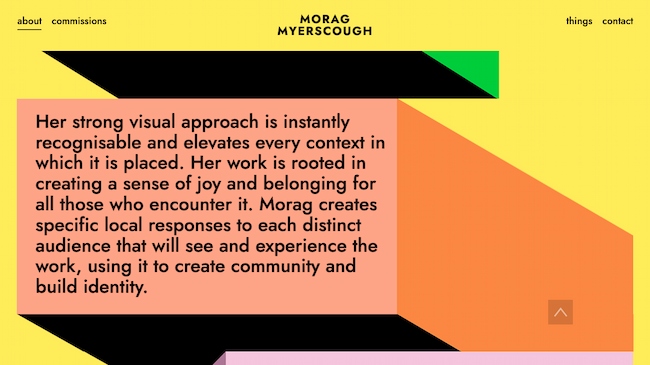
Graphic design portfolio example: Morag Myerscough

Bright graphics, animations, and clean design make this an exceptional graphic design portfolio. This approach is great for designers who lean into the art of design. It also works for designers who take on more experimental or site-specific projects.

Why we chose this graphic design portfolio: Myerscough’s aesthetic is unique and this image-focused site quickly communicates her style.

Short sections of copy connect her visual brand to her background, professional experience, and personal philosophy. The combination makes the site feel like it shows the whole designer, not just a visualization of the work she does for clients.

3. Heather Shaw

graphicdesign_4

This graphic design portfolio website includes samples of book and website designs, branding, and more. It’s good for designers who work in many different media but want to present a cohesive portfolio.

Why we chose this graphic design portfolio: Heather Shaw’s portfolio is super clear and easy to navigate. It shows a wide range of skills and approaches to solving client problems, but it’s also visually consistent.

The designer also uses text effectively to explain each project and to encourage further engagement with the work.

4. Mike Mills

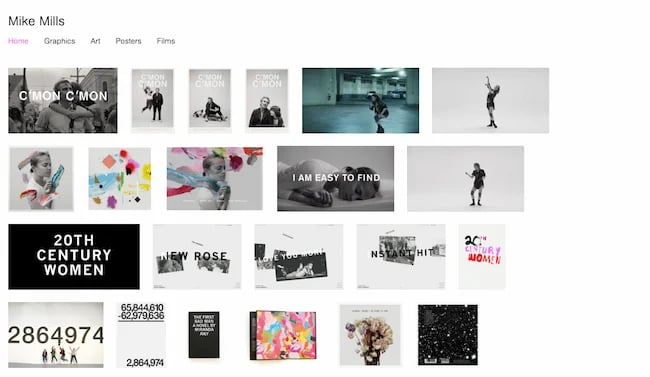
Graphic designer portfolio, Mike Mills

Mike Mills is a talented designer, artist, and filmmaker, known for his punk aesthetic and original style. His portfolio is a reflection of his diverse interests and skills. The website offers a quick lesson in clean design, with easy-to-understand headers, professional photography, and crisp layout.

Why this is a great example of a graphic design portfolio website: When you’re a design beginner, creating your first graphic design portfolio, you quickly learn the importance of editing.

For example, a logo for your first-year graphic design class might have been your best work then. It shows that you know how to use Illustrator or other design software alternatives. But five years later, you have to ask — does that logo belong in a professional portfolio?

As your body of graphic design work grows, you’ll find yourself making tough decisions about what to include, and just as important, what to leave out of your portfolio.

This portfolio example stands out because Mills has found a way to include samples of design that span from the 90s to today. This could easily feel disjointed or overwhelming. Instead, it’s a beautiful and cohesive portfolio with exceptional attention to detail.

5. Mohamed Samir

Graphic design portfolio example: Mohamed Samir

Samir’s work includes branding, typography, posters, and print design. So, this graphic design portfolio zeros in on a tight collection of award-winning designs.

This graphic design portfolio is on Behance. This makes it a good fit for graphic designers who want an online presence without designing their own website.

Why we love this graphic designer’s website: Besides the high quality of the design work, this portfolio shows a diverse range of approaches to typography and style. At the same time, it shows a consistent vision and passion for visual communication.

The printed design work is also well-photographed. While the designer could have added a digital file instead, the photographs give you a better sense of the final polished design.

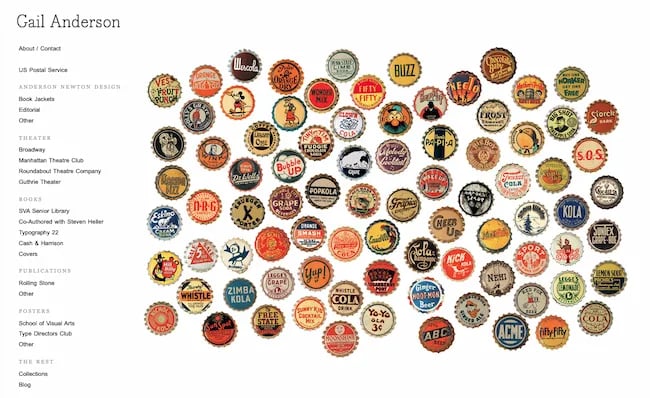
6. Gail Anderson

Graphic designer portfolio, Gail Anderson

Image quality matters. And if your portfolio pieces include a lot of detail, you may get stumped with your online portfolio design. This graphic design portfolio website has a simple left-hand navigation. So, with each click, you have a chance to see detailed posters, book covers, and more at a scale that shows how they look for print while also being easy to scroll on a mobile phone.

Why we chose this graphic design portfolio: Anderson’s work is smart and timeless. Each piece shows her dedication to the depth and value of design thinking, technical skill, and passion for design.

7. Gleb Kuznetsov

Graphic design portfolio example: Gleb Kuznetsov

Kuznetsov’s portfolio combines product design, user experience, and graphic design to create something entirely new. This Dribble-hosted portfolio has over 50 images, which could be overwhelming. But they’re split into seven easy-to-understand projects.

This makes it a great graphic design portfolio example for designers who want to show long-term or complex projects.

Why this is a great example of a graphic design portfolio website: From the images to his brief “About” statement, this designer makes his unique vision and personality part of the work and its presentation.

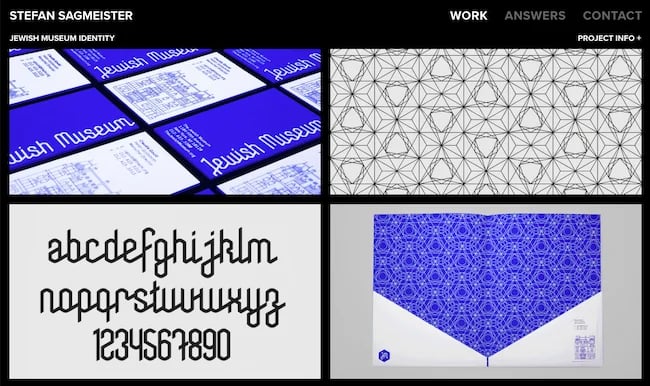
8. Stefan Sagmeister

Graphic designer portfolio, Stefan Sagmeister

Sagmeister is a legend in the design world, and his website reflects the curiosity and power of the designer. The home page features a grid of images with text that appears as you scroll over each image. With a click, you’re presented with images and/or videos that show the details of each project.

The site is a mix of collaborations, art projects, and more traditional design, like the corporate identity for the Jewish museum.

Why this is one of the best graphic design portfolio websites we’ve ever seen: This portfolio site doesn’t just show the quality and technical ability of the designer. It also gives any client working with Sagmeister a sense of what the design process might be like.

Quick note: The “answers” section of the site is full of useful advice no matter where you are in your designer journey.

9. Lotte Niemenen

Graphic designer portfolio, Lotte Niemenen

Great designers often let the work do the talking. That’s certainly true here, with a streamlined graphic design portfolio that calls attention to client deliverables. When text is present, it adds to the value of the work, like sharing what parts of the design process their team completed. This is a great portfolio format for designers doing graphic design work like:

  • Logo design
  • Branding
  • Packaging
  • Product design

Why we chose this graphic design portfolio: This group of work is simple and to the point. It also shows off a wide range of skills and tactics with a consistent vision. Be sure to take a closer look at the website navigation — it’s clean and exciting while adding to the functionality of the site.

10. Luke Choice (Velvet Spectrum)

Graphic designer portfolio, Luke Choice (Velvet Spectrum)

3D animation is an exciting design form that’s growing in popularity. But if you’re a client who’s not in the market for an animated billboard, it may be difficult to figure out how you might use this creative form for your business.

This site is a great example of a portfolio that educates with simple text, graphics, and video. It gives both a quick look and a deep dive into how this designer approaches his art form.

Why we chose this graphic design portfolio: If you’re doing something interesting and new, it may be a selling point. But truly new ideas can also challenge or frustrate people who don’t feel “in the know.” This means that your portfolio can’t just sell your designs. It also needs to teach viewers about the new format you’re using and why you think it’s important.

11. Sophia Yeshi

Graphic design portfolio example: Sophia Yeshi

A clear header and tile design emphasize work samples from this powerful graphic designer.

While the tiles emphasize the designer’s unique style, you can click on each tile to get the full details about each project. This is a great approach for designers who want to share the deeper story behind each project while still making the site easy to navigate.

Why we love this graphic designer’s website: A distinct style is important in graphic design. That said, it can be tough to show how many ways you can apply that distinct style in a business context. Major brands, including Google, Nike, and Comcast, use Yeshi’s unique illustrative voice to speak for their brands.

This website portfolio makes that point clear, while still making graphic design the focus.

12. Eduardo Nunes

Graphic designer portfolio, Eduardo Nunes

Designers often have a muse — someone or something that inspires and motivates them when the designing gets tough. Sometimes that inspiration can serve as a starting point for your portfolio design, as it did for this design portfolio example.

The landing page starts with a quote from Ansel Adams, “There is nothing worse than a sharp image of a fuzzy concept.” Then, using clean motion graphics and fresh design, Nunes points to a central theme, a philosophy that guides his design approach. This leads every site visitor on a journey through his portfolio.

Why we chose this graphic design portfolio: This portfolio shows intense work, focus, practice, and care. It’s an excellent model for anyone who wants to show the world what they’re creating and why.

13. Stefanie Brüeckler

Graphic design portfolio, Stefanie Bruckler

This portfolio includes packaging design, illustration, and web design as well as graphic design and branding work. It’s one of our favorite graphic designer websites because it’s clean and easy to navigate.

It also shows a lot of different examples of work at a glance. This makes it a great example for designers who aren’t sure how to organize all the work they want to include in their portfolio.

Why we love this graphic designer website example: Brückler’s graphic design portfolio focuses on the tiniest of details to create an excellent user experience. From the simple page-loading animation to the thoughtful use of motion graphics, this designer hones in on the stunning details.

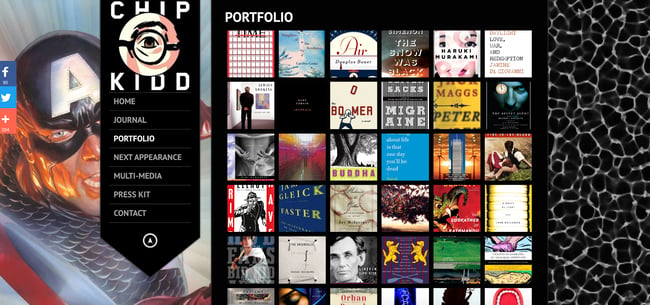
14. Chip Kidd

Graphic design portfolio example: Chip Kidd

Book cover designer Chip Kidd’s graphic design portfolio website uses lightbox-style pop-ups. Popups make it easier to focus on each book cover. This is a smart way to narrow in on the visuals with a graphic design site while still making it easy to see all the work in one place.

Kidd uses a range of different styles for book covers, and it’s edited in a way that makes this range look natural and exciting instead of chaotic.

Why this is a great example of a graphic design portfolio website: The dark background makes this graphic designer’s style pop. And the simple side navigation gives users a quick path to learn more about the designer and his work.

15. Ryan Dean Sprague (Pavlov)

Graphic designer portfolio, Ryan Dean Sprague (Pavlov)

This Texas designer’s style is heavily influenced by music. So, this portfolio features illustration and design work that’s bright, evocative, and fun. This portfolio website shines because it keeps the UX and site structure super simple. This puts the focus on a tight curation of exciting design samples.

Why this is a great example of a graphic design portfolio website: If you have a distinct illustration or design style, the tough sell for your portfolio may not be how good your work is. Instead, you may need to focus on showing the client how you can do your best work for their needs.

This graphic design portfolio is a vivid display of individuality that also shows clients how this designer can help them sell their product or brand.

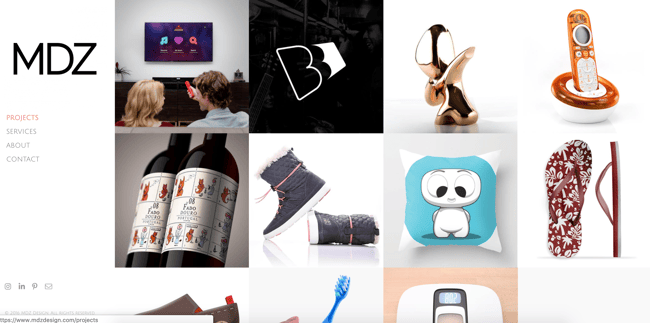
16. MDZ Design

Graphic design portfolio example: MDZ Design

Concise and exciting images on this graphic designer website example give site visitors a peek at execution and strategy.

MDZ Design also offers product design and strategy to clients. This makes their graphic design portfolio a useful example for strategy-focused designers.

Why we love this graphic designer website example: The range of services this portfolio shows could be overwhelming or confusing. Instead, it’s a chance to see their approach to problem-solving. They also make it easy to see how their process leads to results for their clients.

17. Alex Trochut

Graphic design portfolio example: Alex Trochut

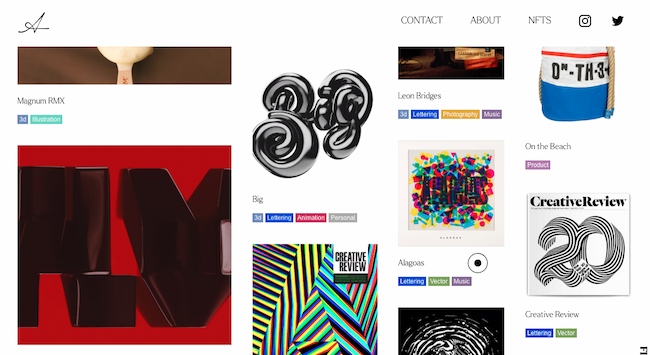
This graphic design portfolio is also a home for Trochut’s product design, animations, music, and NFTs. It’s a great example for multimedia artists who want to present their work on a single website. It also works for creators with a big collection of work to show.

Why we love this graphic designer website example: The four-column layout of this site shows image thumbnails of varying sizes. Each column moves at a different pace as you scroll down the page.

This motion feels dynamic and exciting and reinforces this designer’s original takes on color, type, and layouts.

18. Leandro Assis

Graphic designer portfolio, Leandro Assis

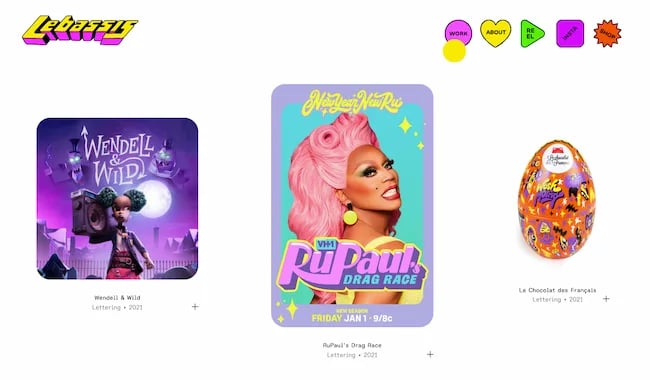
Sometimes a graphic design portfolio isn’t just about a style — it’s about a vibe. This exceptional portfolio comes from designer Leandro Assis.

From brand identity to hand lettering to package design, this portfolio displays a wide range of design skills and original style.

Why this is a great example of a graphic design portfolio website: It’s not like this portfolio isn’t enticing to the eyes. It’s fun, bright, and a little wild. But what makes this portfolio excellent isn’t just the quality of the work, it’s the experience.

Fun icons, engaging UX, and lots of white space make this bold and playful site a pleasure to peruse.

19. Peter Tarka

Graphic designer portfolio, Peter Tarka

If you’re a self-taught graphic designer, you might have less guidance on where to start with your portfolio website. Look no further for inspiration than the interactive design portfolio for Peter Tarka.

Best known for captivating 3D motion graphics like the ones featured in the video below, Tarka started with a love of architecture and vector graphics that’s grown to a career working with top brands like Spotify, Google, and LG.

Why we love this designer’s website: The fewer clicks it takes to show people what you’re doing the better. This site isn’t just low-click, it’s no-click.

A simple scroll shows you the work, client, and completion date for 15 exceptional portfolio pieces. If you want to see more, a quick click at the top-right brings you to more work samples, links to other portfolio sites, and contact information.

20. Tobias van Schneider

Graphic design portfolio example: Tobias van Schneider

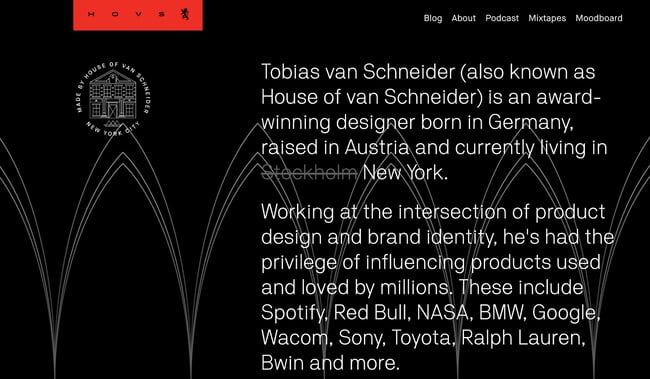
This graphic design portfolio website uses a range of type sizes and contrasts to emphasize the ideas it communicates. This is a great approach for entrepreneurial designers. It’s also smart for anyone who collaborates in their design work.

Why we love this graphic designer’s website: A sticky header and big blocks of color and text make this graphic designer website interesting to explore. This site also uses scale well. It combines big images with both big and small text to emphasize each client project.

21. Aries Moross

Graphic design portfolio, Aries Moross

There are many ways to play up a unique style, and this graphic design website highlights this designer’s recent work as well as a full project archive. This is a great example for designers who also do illustration.

Why we chose this graphic design portfolio: Moross uses space effectively on this site. It’s easy to get an immediate sense of the designer’s distinct style. The simple navigation helps users refine their search to target a specific type of work, like hand-drawn fonts or editorial design.

22. Ling K

Graphic design portfolio example: Ling K

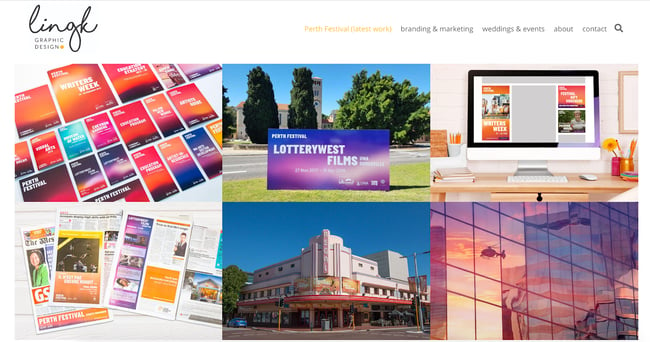
LingK’s portfolio features their latest project while also showing other industry niches. The structure of the website helps prospective clients quickly decide if they want to work with this designer.

Why this is a great example of a graphic design portfolio website: It can be tough to convey how campaign materials for a complex event, like a wedding or conference, work together. This designer effectively shows the breadth and depth of work for each project and makes it easy to see the value of each deliverable.

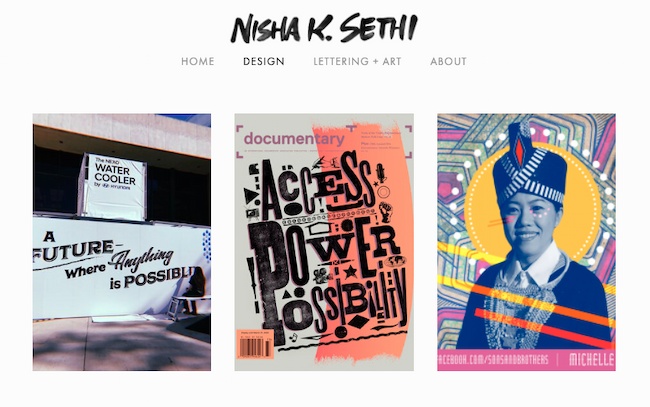
23. Nisha K. Sethi

Graphic design portfolio example: Nisha K. Sethi

Sethi’s portfolio is simple and straightforward. It puts the spotlight on each design project. The “About” section also tells a clear story that encourages further questions and conversation.

It can be tempting to tell an audience everything on your website. But a great portfolio should offer enough samples to entice clients to reach out and learn more, but not so much that it overwhelms. This website is a great example of offering just enough.

Why we love this graphic designer website example: This graphic design example combines hand-lettering, printmaking, and other media with digital design. While this designer works in a range of media, their portfolio shows a strong voice that is effective across many channels.

Looking for more design portfolio inspo? These designers and design studios may not be a model for your personal portfolio website, but they’re great design resources:

If you’ve finished your portfolio pieces and want to get more website design ideas, check out this free lookbook with over 70 examples of incredible websites.

1. Curate your best work, and show a wide breadth of skill.

Lindsay Burke, a HubSpot Product Designer, emphasizes the importance of quality over quantity when it comes to curating a graphic design portfolio. She says, “I recommend selecting your strongest projects and making these the primary focus of your portfolio website.”

Ideally, your portfolio will feature your sharpest, most impressive 10-20 designs — undoubtedly, someone pursuing your portfolio won’t have the time to look at more, and if your first couple projects are impressive enough, they shouldn’t need to.

But it’s equally critical you show potential clients your versatility. If you’ve dabbled in logo design as well as video animation, it’s good to include both kinds of projects in your portfolio.

2. Choose the right platform to showcase your work.

Investing in a quality website with a custom domain URL will pay off in the long run by demonstrating your professionalism to potential clients.

Having your own website helps you organize your portfolio to suit all your business needs — for instance, perhaps you’ll include ‘Projects’, ‘About Me’, and ‘Contact Me’ sections, so visitors can peruse your content and then contact you without ever leaving the site.

Take a look at this list of the best website builders if you need help choosing a platform for your portfolio.

3. Include a professional case study or client recommendations.

Lindsay Burke told me it’s incredibly valuable to write out a case study to complement any website visuals — “Through a written case study, your site visitors can get a sense of your project’s background, the problem you were aiming to solve through design, and the process you took to arrive at a final deliverable. A lot of time, effort, and iteration goes into design solutions, and a written case study will help communicate your unique process.”

To cultivate a strong case study, consider including the background of the project, the problem, the process, your deliverable, and any next steps.

In the process section of your case study, Burke suggests including research, experience mapping, persona development, wire-framing, sketching, usability testing, and iteration.

Plus it will impress future clients if you can include recommendations from prior employers, which allows you to display a level of professionalism.

4. Integrate your personality.

As you can see in the examples above, each portfolio is drastically different depending on the artist’s unique style. Someone checking out Tobias van Schneider’s portfolio will expect something vastly different from someone looking at Ling K’s site. Make sure your portfolio — including layout, background, and website title — reflects who you are as a designer.

5. Describe the creative process.

Each designer has a unique process when working with clients — and the sooner a potential client can learn about your process, the better. It’s important you include context, so visitors can get a sense of how you handle challenges, and how your designs solve real-world problems.

Plus, including a description of your creative process can help a potential client figure out whether you’re capable of handling the scope of their project.

For instance, they might be unsure of your ability to handle graphic designs for mobile until they read how you single-handedly brainstormed and created the designs for another client’s mobile site. In this case, context is critical.

6. Show non-client work, or side projects.

Amanda Chong, a former HubSpot Designer, says, “Side projects are a great way to demonstrate your will to take initiative and your ability to balance multiple things at once. They’re also a great way to show some of the more experimental, creative ideas that you might not be able to show through your day-to-day work.”

If you’re just starting out, it’s acceptable to include side projects or non-client work so potential customers can get a sense of your ability and style.

Consider incorporating school work, a logo you designed for your aunt’s company, or an internal design you created for your current company — ideally, your designs will negate any concerns potential clients have over your lack of career experience.

1. Help a local business or start-up with its design and brand.

One of the easiest ways to begin building your client base is by contacting nonprofits or local businesses in your area. Think about creating mock-ups or sketches in advance, These can help you give businesses a sense of your skill and vision.

Perhaps you think a local restaurant needs a new menu logo, or want to help a gift shop with their online marketing materials.

Projects like these will help you better understand local marketing challenges, and give you time to develop your skills in those areas. You never know what a pro-bono project could lead to next.

2. Create content for your own personal brand.

As you build personal brand content, take the time to make sure your marketing materials are cohesive and sleek.

Design a unique logo for your brand. Next, start building your website, and add that same design across various materials, including your business card and resume. This is also a great time to start a branded social media account, and to create posts that show off your design skills and interests.

Clients are more likely to work with you if they can see the type of high-quality work you’re able to create for yourself.

3. Redesign an existing website.

Don’t wait for your dream client to give you a call. Instead, create a complete website redesign for a well-known brand to prove your skills to future clients.

This is a well-known strategy already used by plenty of designers — just take a look at some of the impressive Behance mock-ups for brands like RyanAir.

Additionally, Amanda Chong told me, “If you’re creating mockups for established brands to use as part of your portfolio, it’s important to pair this with a case study or description of the process that helped you arrive at your proposed design. Talk about what you think wasn’t working with the existing design, some of the constraints that you think the designers were working with, and why you made the decisions that you did.”

Chong added, “Mockups are great at showing your visual design skills, but don’t necessarily demonstrate your ability to work in a real-world context, so you’ll want to take the time to explain how you would have approached it in a true business setting.”

4. Create graphic design materials for a made-up company.

If your designs are impressive enough, potential clients won’t care that you created them for a fictitious company. In fact, you could impress them with your innovation and creativity.

Consider showing your skills by putting together a creative brief for a fake company, complete with wireframes and sketches. Other projects you can create for imaginary companies include:

  • Branding
  • Style guides
  • Posters
  • Billboards
  • Social media ads
  • Apparel graphics
  • Wrapping paper
  • Brochures and email newsletters
  • Simple GIFs
  • Animated infographics
  • Trade show booths
  • Branded wall art
  • Pitch decks
  • Book covers
  • Packaging

In due time, real companies will take notice.

5. Design a logo for a brand you love.

Stick to the type of content you enjoy designing. If you’re particularly adept at making logos, and are often inspired by the logos used by real brands, consider designing an alternative logo for a brand you like.

Then take a look at these inspiring reimagined NFL logos. While these NFL teams probably won’t make a shift, they’re great examples of the designers’ skills and creativity.

6. Create a stock theme for WordPress.

WordPress, a popular content management system, allows users to develop stock themes for WP. Best of all, if your theme is approved, you can sell it as a premium theme for extra cash.

Begin by studying WordPress’s most popular themes, and considering how you can create an impressive alternative. Take a look at WordPress’s Theme Review Requirements and this overview of how to create a child theme to learn more.

7. Take part in a design challenge.

To get inspired, practice your skills, or interact with other designers in a community and build your portfolio at the same time, think about participating in a design challenge.

Design challenges can also help you uncover skills you didn’t know you had by forcing you to step outside your design comfort zone.

There are various daily, weekly, or monthly challenges that will send you prompts on things to design — for instance, try checking out the Daily UI Design Challenge or The Daily Logo Challenge.

You’ve done the work, and now you’re pulling together your graphic design portfolio. Try these tips to make your graphic design portfolio stand out.

1. Show your versatility.

A portfolio should show a range of different works, so you want to highlight what you can do. Some clients prefer a more streamlined look, while others are looking for more experimentation.

If you have clients from different industries, include some work from each industry. Then, edit your portfolio based on the kind of client you’re showing your portfolio to.

For example, if you’re meeting with a client in real estate, show work samples from similar industries.

You’ll also want to show anyone who sees your portfolio what you can do. So, if you create design logos, books, and motion graphics, include a little bit of everything in your portfolio.

2. Display your best work.

That said, try to limit your portfolio to your best work. Don’t include a piece in your portfolio just to show that you can do it. The way that you edit your portfolio shows that you understand your strengths and know how to play them up. So, edit your portfolio to include only your best work.

If you’re great with one skill set but not as good with another, edit your portfolio to spotlight that skill. If possible, create portfolio pieces that show many skill sets at the same time.

For example, if you love hand lettering, a poster could emphasize your graphic design skills alongside this unique ability.

3. Include case studies.

Every client is unique, and each will teach you something new. As you continue to work with different clients, build up a collection of these stories.

Try not to throw anything away without documenting it. That page of thumbnails might not be much to look at on its own, but this kind of work in progress is a great way to show prospective clients how you solve problems.

When you present case studies in your portfolio, start with the initial problem your client approached you with. Next, show what the conversation and ideation process looked like over time. As you pull your case study together, don’t forget to include the final solution you delivered.

4. Make it clean and easy to navigate.

Design is about more than visual skills, it’s about communicating. So the format of your portfolio, whether it’s printed or online, should be clear and simple to scan.

This point is especially important for graphic designer websites. It can be tempting to build a website that shows off the latest trends or to add Easter eggs that people need to hunt for. There’s a fine line between art and design, and those approaches can be super inspiring.

But building a complex site can also mean that clients in a hurry could miss some of your best work.

For example, a graphic designer once sent his portfolio to a creative director friend of mine. They liked the designer’s drawing but didn’t see much of the graphic design or web work that he talked about in his resume. With a little digging, they found a URL in one of the sketchbook drawings, and that URL led to his website.

This hide-and-seek process was cool, but it wasn’t clear or easy to navigate. This scenario could have been a missed opportunity for that designer.

5. Prominently display contact information.

If someone wants to talk to you, there are many places they can find you online. But you want to make it easy for them, and for you. You don’t want to miss out on an important meeting because a client reached out to you with an email you don’t check anymore.

Most graphic designer websites have a contact page that has your contact information. Once you add this to your site, be sure to check that the links and forms are working.

6. Display your unique personality.

There are thousands of successful graphic designers out there, and you might be competing against some of them for your next client. So, the best tip for a great portfolio is to be yourself.

Whether you have a feel for typography or are talented with color, show off the way that you see the world in your graphic design portfolio. Think about every detail, and then execute to the best of your ability.

Whether it’s the first version of your portfolio or the 200th, make it feel like something only you could create.

The best graphic design portfolios aren’t ever finished.

You’ve learned about the value of a graphic design portfolio and checked out some of the best portfolio examples. You read about how to create your portfolio, then you scanned some smart ideas to build on the graphic design work you’ve already completed.

So what’s next?

Even the best graphic design portfolios need constant updates. Keep in mind that while your first graphic design portfolio may be complete, portfolio building won’t ever really end.

What do you want to tackle for your next project? Social media to promote your new portfolio? A new resume or professional bio to attract clients? The possibilities are endless.

Editor’s note: This post was originally published in March 2019 and has been updated for comprehensiveness.

content templates

Categories B2B

The 2 Simple & Straightforward Methods for Market Sizing Your Business

When you’re considering a new venture, one of the first things you should do is determine whether there is a valuable market for it.

Imagine putting in months of hard work to realize that there are only 100 people in the U.S. who will potentially buy your product. Knowing this early on will enable you to make educated business decisions and decide what’s worth pursuing.→ Download Now: Market Research Templates [Free Kit]

Discover the methods to calculate your market size and accurately measure your business’ revenue potential.

Keep reading, or jump to the section you’re looking for:

When market sizing, you’re calculating customer numbers to measure the growth potential of your business.

Why is market size important?

There are several reasons why every business should spend time sizing its market:

  • Market sizing helps you figure out if your product is a worthy investment. Say you have a great idea for a product but there are only 100 people who would buy it. From there, you can decide if that population size is worth the cost of manufacturing, production, distribution, and more for your product.
  • Market sizing helps you estimate profit and potential for growth. If you know how many people your business has the potential to reach, you can estimate how much revenue you can generate. This is valuable for both business owners as well as investors.
  • Market size defines who you’re marketing to and what their needs are. No business can succeed without marketing. Knowing your market size is the first step in understanding your target market and their needs.
  • Market sizing helps your business make better decisions. Understanding your market landscape, gaps, and opportunities will inform your decision-making. It can also help you set more realistic goals, assign resources, and refine your strategies.
  • Market sizing helps your business minimize risk. Starting or expanding a business is inherently risky. Understanding your market can help you anticipate and prepare for challenges.

Market Size vs. Market Value

Market size is the total potential demand for a product or service. This number usually calculates the number of potential customers, units sold, or revenue generated. So, market size is an estimate of the overall market reach.

Market value refers to the financial worth or estimated market capitalization of a company or industry. It’s a measure of perceived value. It can give you an idea of how much a company could sell for in a given market.

In summary, market size focuses on the potential market opportunity, while market value is the financial value of an individual company or an entire market.

Market Sizing Terms to Know

Before diving into how to figure out your market size, there are a few helpful terms you should get to know.

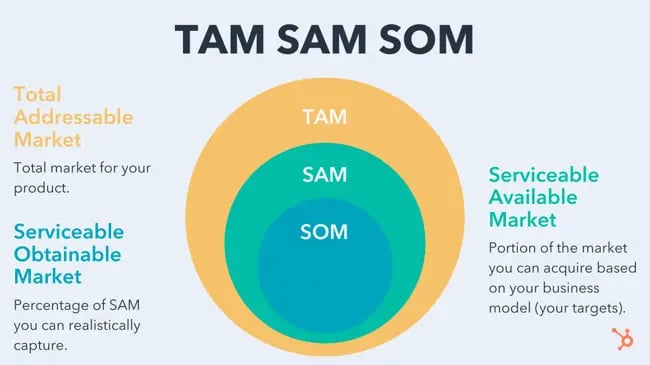
TAM

TAM stands for Total Addressable Market. This number is the maximum potential revenue or customer base that a company could achieve if it were to capture 100% of market share.

SAM

SAM stands for Serviceable Addressable Market. SAM is a part of the TAM that aligns with the company’s resources, capabilities, and target customers.

SOM

SOM stands for Serviceable Obtainable Market. SOM is the part of the SAM that a company can get at its current scale. This figure may consider marketing and sales strategies, competitive positioning, and product demand.

Market sizing terms, TAM, SAM, SOM

Check out this post to learn more about TAM, SAM, and SOM and how to calculate them.

Target Market

A target market is a specific group of customers, industries, or segments that a company focuses on. It’s the customer segment that’s most likely to show interest, purchase, and appreciate a company’s products or services.

Penetration Rate

Penetration rate refers to the percentage of a target market that a company has successfully captured. It shows the level of market share reached by a company in a specific market segment or overall market.

Market sizing terms, Penetration rate

If you’re a new business, you can calculate penetration rate by dividing your total customers by the number of potential customers in the target market. Then, multiply the result by 100 to get the percentage.

Learn more about market penetration here.

Market Segmentation

Market segmentation is the process of dividing the total market into distinct groups or segments. Usually, the people in these segments have common characteristics, needs, or behaviors.

Segmenting the market can help you better understand your target customers. It can also help you tailor business strategies, like marketing, to meet specific segment needs.

Value Proposition

A value proposition is the unique benefits that a company offers to its target customers. It differentiates a company’s product or service from competitors and creates value for customers.

Understanding the value proposition is crucial in market sizing. This is because it can help you find the specific customer segments that will find the most value in your offer.

Try one of these free value proposition templates to draft your value proposition.

While calculating market size takes only a few steps, it’s a crucial process. The steps below will help you understand the potential demand and revenue opportunities for your business.

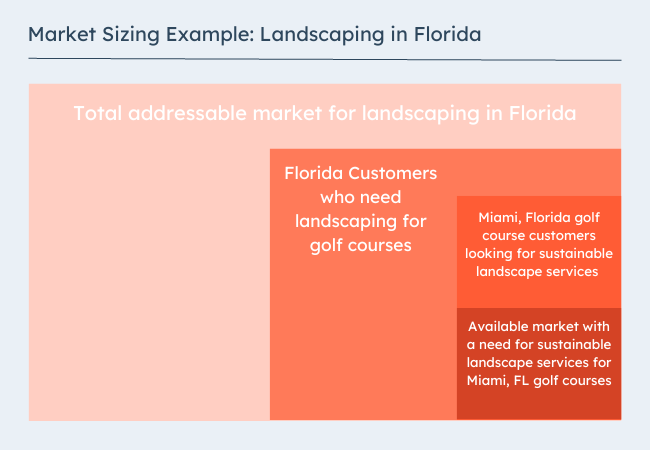
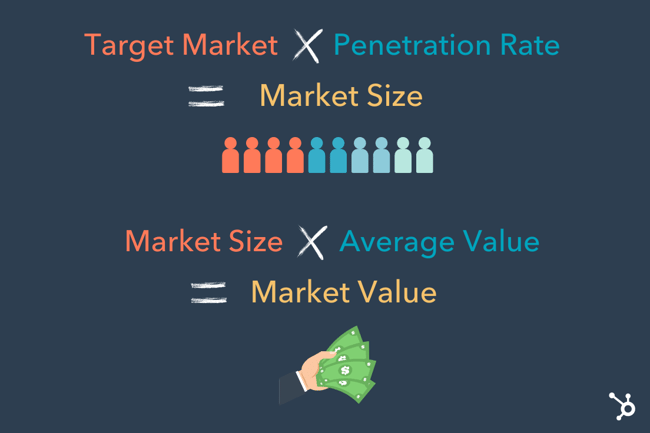
Market sizing example graphic

1. Start with your total addressable market.

You can calculate your TAM by multiplying the total customers in a market by the annual value per customer. But before calculating, make sure you take a look at the tips below:

  • Define your product or service. While developing a product can be quick, growing a business around a product is more complex. It’s important to clearly understand your product or service and how it solves a problem or meets a need in the market.
  • Find your market category. Some products fall within more than one industry or market category. This is the first step that will narrow your TAM. So, think carefully about what you expect customers to compare your offer to.
  • Conduct market research. Gather relevant data and information about your potential users. If you’re new to market research, check out this free market research kit, with research and planning templates.
  • Analyze the competition. Conduct competitive analysis to figure out the market share and unique value of your top competitors.
  • Define your total addressable market. With the research and analysis you’ve pulled together, create a realistic TAM estimate.

2. Find a group of customers to focus on within that target market.

Dig into the tips below to quantify the top customers in your market:

  • Create your ideal buyer persona. Use the Make My Persona tool to outline the characteristics, demographics, and behaviors of your ideal customers.
  • Segment your target market. Start dividing your target market into distinct segments. You might base segments on factors like age, location, interests, or buying behavior.
  • Continue market research. Continue collecting data and insights about each segment. This will help you understand how big each segment is, as well as their needs, preferences, pain points, and purchasing habits. Your ongoing market research might include surveys, interviews, focus groups, or analyzing existing market research.
  • Set pricing for your product or service. For some products, pricing is a deciding purchase factor. So, if you haven’t already, set pricing or a price range for your products.
  • Assess segments of your market and prioritize. Think about each segment’s size, growth potential, and competition. It’s also a good idea to think about how each segment aligns with your company’s capabilities and resources. In short, don’t just focus on segments that offer the most attractive opportunities. Make sure they align with your strengths and needs.
  • Refine your buyer personas. With your prioritized segments, take another look at your ideal customer profile. This will give you a more useful buyer persona for your marketing and sales strategies.
  • Confirm your SAM with market testing. Test your target segments with a product or service pilot group, measuring their responses and feedback.

3. Figure out how many of those customers are likely to buy your product.

This step will narrow your scope more intensely on the customers who need exactly what you have to offer. These are the people who are looking for you or a clear alternative to your competitors. To quantify this group:

  • Create a customer journey map. From awareness to purchase, this process can help you map out the ideal customer path. From how you expect customers to discover your products to the blockers that might keep them from clicking buy, this step is useful for market sizing and beyond. Use these customer journey templates if you’re new to this process.
  • Estimate conversion rates. Use historical data, industry benchmarks, or industry research to estimate conversion rates. This can help you quantify expected numbers of leads, prospects, and customers in each segment.
  • Figure out buyer intent. Create a ranking or score for each segment to measure their likelihood of purchasing your product. This can help you prioritize segments with the highest conversion potential.
  • Create a SOM estimate with your data. The research above will add credibility to your market size estimate. It can also help guide your growth strategies.

4. Multiply that customer number by estimated penetration rate.

To calculate penetration rate, divide the SOM you calculated above by your TAM, then multiply by 100.

Once you have a calculation for your market size, you’ll want to make sure you can trust that number. Keep your market sizing current with these tips:

  • Confirm your data is accurate and reliable. As you complete your research, use reliable sources such as industry reports, market studies, or government databases. Also, check to ensure the data you’re referencing is up to date.
  • Keep up with market growth, seasonality, industry trends, tech advancements, regulatory changes, and economic conditions. These factors can affect both market size and customer demand.
  • Review and update your market size estimates regularly. Market conditions change over time. Plan regular reviews of your market size, then update your calculations with new or relevant data.

Market Sizing Methods

There are two simple methods for market sizing your business. These straightforward processes can help you use data to gauge market size.

Top Down Approach

The first is a top-down approach, in which you start by looking at the market as a whole, then refine it to get an accurate market size. That would look like starting from your total addressable market and filtering from there.

how to calculate market size using a top down approach

Market Sizing Example

Let’s say you want to launch a wine company. First, you’d want to figure out how many liquor stores are in the United States — this helps you figure out the total market to which you could theoretically sell your product.

After your research, you discover there are 50,000 liquor stores in the United States. Of that total list, you only want to sell to the New England area — including Massachusetts, Maine, and Rhode Island.

You decide your target market includes the 1,000 liquor stores in the New England area. From here, you conduct research and speak with alcohol distributors to find there’s a roughly 40% success rate for wine distribution.

Using this as an example, we’d calculate the market size using the following formula:

1,000 liquor stores x 40% = 400 liquor stores

Then, if you assume each liquor store will result in $20,000, you can figure out potential revenue using the following formula:

400 liquor stores x $20,000 = $8,000,000

This means you stand to make $8 million if you penetrate 40% of the total market in the New England area.

Bottom-Up Approach

A bottom-up approach is the exact opposite – starting small and working your way outward.

This looks like first identifying the number of units you can expect to sell then considering how many sales you anticipate from each buyer and finally the average price per unit.

Market Sizing Example

Using the same wine example – Say you found recent data showing that the average cost of a wine bottle in New England is $10. A survey shows that the average consumer buys one bottle of wine a week, or 48 bottles a year. This means that the average consumer spends $480 per year on wine.

Next, you discover that the number of consumers (or households) you can expect to reach in the New England area is 16,000.

As a result, your market size is 480 x 16,000 = $8,000,000.

It’s important to note that both methods ignore the existence of competitors, customer churn rate, and other factors that impact sales. With this in mind, you’ll want to stay conservative when estimating how much of the market size you’ll win and use this as a starting point.

How to Leverage Your Market Size

You’ve your estimated market size — now what?

Market size helps your business answer the following questions:

  • How much potential revenue can we earn from this particular market? In other words, is it even worth our time and energy?
  • Is the market big enough to interest us?
  • Is the market growing? Will there still be opportunities to earn revenue from this market in 3, 5, 10 years?

Market size is a critical number to know when you’re looking for funding. Investors are going to need to know how much money they have the potential to make from a given market. Additionally, it’s vital to recognize whether the potential revenue you can make outweighs your business’ costs.

Once you have market size, you’ll also want to consider how saturated the market already is with your competitors’ products.

Ultimately, you can’t capture the total addressable market (TAM) — some of those people will choose competitors’ products over yours. So you’ll need to figure out whether you have a shot at earning enough consumers out of the TAM to make this a worthwhile venture.

Editor’s Note: This post was originally published in April 2019 and has been updated for comprehensiveness. This article was written by a human, but our team uses AI in our editorial process. Check out our full disclosure to learn more about how we use AI.

New Call-to-action

Categories B2B

Why You Need to Create More Landing Pages [Data + Tips]

“I’ve already got some landing pages, so why should you make more?” That sounds almost as crazy as saying the question, “Well I’ve already got some leads, why should I get more?”

Landing pages are an indispensable part of marketing. And for all you marketers out there who have been going inbound for a while, you understand how efficient they are at converting. But are you creating enough of them to really scale your lead generation efforts? Let‘s find out why — at least in the case of landing pages — more is better. And if you’re in a pinch, jump to the information you need:

Free Guide: How to Build & Optimize Landing Pages

Why You Need More Landing Pages

Landing pages convert by being focused and distraction-free, offering specific information about an offer. Limited navigation keeps visitors engaged and focused on the goal, avoiding distractions from multiple links.

To further prove that you should add more to your website, we surveyed 101 marketing and advertising professionals to learn which landing page elements and strategies were most effective.

how many landing pages do you have on your websites?

91% of our surveyed marketing and advertising professionals feel positive about conversion shifts after adding their landing page(s). And the top three reasons why they believe those conversions happened were because of their team:

  • Marketing (17%)
  • People (11%)
  • Landing Page (9%)

Getting conversions means your marketing team is combining these three parts of their strategy to get results. And while there’s no exact figure we can tell you to make, there is enough evidence to back up why you should have more landing pages.

But it’s no exact science how many landing pages your business has, that is often reliant on the scale, product, or service of a business to determine. But after assessing survey and Marketing report data, we can conclude that multiple landing pages can be a net benefit for your business.

And don‘t think that there’s a ceiling to the number of landing pages you can include, in fact, those with more than 40 landing pages increase conversions by over 500%.

impact of number of landing pages on lead generation

While most companies don’t see an increase in leads when increasing their total number of landing pages from 1-5 to 6-10, companies do see a 55% increase in leads when increasing their number of landing pages from 10 to 15. And look how that leads index number spikes even more when a company has 40 or more landing pages on their website. And here’s how it breaks down for B2B and B2C businesses:

number of landing pages on lead generation for b2b and b2c companies

While both B2B and B2C companies seem to benefit from having more landing pages, it seems to be even more advantageous for B2Bs to hit that 40 landing page threshold.

As you can see, it‘s hard to deny there’s a pretty strong correlation between the number of landing pages you have on your website and lead generation. But why is this so? Here are four good explanations why the more landing pages, the better the number of your leads.

Why More Landing Pages Get More Leads

1. More landing pages mean more conversion opportunities.

Quite simply, the more landing pages you have on your website, the more opportunities you have to convert site visitors into leads. There’s also a huge SEO benefit to having more landing pages, which can have an impact even before visitors land on your website.

Think about it: The more landing pages you have, the more landing pages will be indexed in search. And if a searcher stumbles upon a search result that directs them straight to one of your landing pages, you’ll have essentially cut out the extra step of a visitor perusing your site and needing to click on a call-to-action to get to that same landing page.

In other words, the pathway from discovery to conversion has much less friction. And do you know what happens when there’s less friction? You generate more leads.

2. More landing pages mean more variety.

You’ve all heard that saying, “variety is the spice of life,” right? Yep — it applies to marketing, too.

Consider it from your visitors‘ perspective. Say you’re visiting a business‘ website, and you surf on over to its “Resources” section (you know, where a business might organize all its offers and their respective landing pages). Now let’s also say that “Resources” page only features 5 — or even 10, according to the research cited above — offers because, well, those are the only offers this particular business has available. And maybe none of those offers really appeal to you, because well … there’s just not enough variety. So you go on your web browsing way, abandoning the site without converting on anything.

The same thing will happen if that business only has CTAs for a few offers placed throughout your website or promoted via their other marketing channels. If none of them tickle your fancy as a visitor, you’re probably not going to convert.

In a nutshell, don‘t let this happen to you. Creating more landing pages means you’ll have a wider variety of offers for your visitors to convert on and for you to promote.

3. More landing pages means more marketing collateral.

The more landing pages you have, the more offers you’ll have to fuel the rest of your inbound marketing efforts.

Remember, content is the heart and soul of any successful inbound marketing strategy. Without it, you’d have nothing to email your contacts, nothing to share with your social media fans and followers, nothing to promote through your website calls-to-action, nothing by which to get found and rank for your keywords in search.

The more offers — and landing pages to house those offers — you have, the more inbound marketing you can do. And if you‘re wondering how to fill those pages with content fast, check out HubSpot’s campaign assistant.

hubspot campaign assistant for more marketing collateral

Get started with HubSpot’s Free Campaign Assistant

4. More landing pages means more targeting opportunities.

Segmentation matters — and not just when it comes to email marketing. When you identify various different buyer personas and segments within your audience, you have the opportunity to better appeal to those different audiences’ interests and needs with more targeted and relevant offers.

And to leverage this savvy thinking, face it: You need more landing pages. So what naturally ends up happening for marketers who build up a big arsenal of 40+ landing pages, is they start to create more segmentspecific content that, because it’s highly relevant to different parts of their audience, is much better able to convert visitors into leads.

How to Add More Landing Pages

“I get it, I get it: More landing pages is better. But how can I go about cranking out more of those bad boys?” So glad you asked!

1. Invest in a landing page creation tool.

A big reason why businesses don‘t use landing pages is because their marketing department doesn’t know how to set them up, or they are too overloaded. And if you agree, you need to invest in a tool that enables you to quickly and easily create optimized landing pages.

This involves taking control of your website. Inbound marketing requires agility, and any agile marketer would take this first step to innovate and improve. Plus, I hear HubSpot has a pretty sweet and easy-to-use Landing Page tool.

How to Add More Landing Pages: use hubspot landing page tool

2. Create more offers.

You can‘t just go around slapping together a ton of new landing pages, no matter how motivated you are to reap those “more is better” results. You’re going to need offers (and good ones, at that) to go along with them.

Keep in mind that landing pages are simply the gateways for your marketing offers, so in order to increase your site’s number of landing pages, you need to increase offer creation, too.

Before you start creating new offers, take a look at the offers you already have, and identify where you might have some holes. Ask yourself these questions:

  • Do you have offers to suit prospects at each different stage in your marketing and sales funnel?
  • Do you have offers in a variety of different formats (e.g. webinars vs. ebooks vs. templates vs. videos, etc.)?
  • Do they cover various different topics your target audience cares about?

Once you’ve identified what your holes are, then you can start filling in the gaps. To learn more about offer creation, check out this blog post about how to create marketing offers that don’t fall flat.

3. Tweak the offers you already have to cater to individual personas.

Okay — so you‘re going to have to create a bunch more offers to leverage the lead-gen power of an increase in landing pages. But here’s a little saving grace: not all of these offers need to be created from scratch. In fact, if you already have a few general offers on your hands but also know that you have a few different buyer personas that you market to, one great way to increase your number of offers is to tweak your existing offers to cater to each of your different personas.

As you‘re doing this, reposition the content and create a landing page that caters to that persona’s individual needs, problems, and interests; adjust the offer’s formatting, depth, and length; modify language and tone; and incorporate industry/persona-specific examples.

And once you have a variety of persona-specific marketing offers, then you can segment your prospects by persona and nurture them with the right offers through tools like email marketing, or dynamic CTAs on your various web pages.

4. Repurpose content you already have.

While we‘re on the topic of tweaking existing content, don’t overlook the fact that there are a lot of different ways to create new offers using content you already have, saving you the time and effort of building a brand-new offer from the ground up.

More Landing Pages Can Benefit Your Brand

At the end of the day, you want to provide your customers more ways than one to find what they’re looking for. By having more offers and landing pages on your website, you provide more places for customers to land and engage with.

Editor’s note: This article was originally published in October 2012 and has since been updated for comprehensiveness.

Categories B2B

What’s a Blog & Why You Need One

Even if you‘re not sure what a blog is, you’ve no doubt come across one at some point in time. Perhaps you‘ve stumbled across a blog when you’ve searched “healthy dinner recipes”. In fact, if you’re reading this, guess what? You’re on a blog. (Very meta, I know.)

If your business doesn’t have a blog, you might want to reconsider — B2B marketers who use blogs receive 67% more leads than those who do not, and blogs have been rated the 5th most trusted source for accurate online information.

Build your website with HubSpot's Free CMS Software

At its most basic, blogs can help you develop an online presence, prove yourself an expert in an industry, and attract more quality leads to all pages of your site.If you’re contemplating creating a blog for your business, or simply want to know what one is, keep reading.

A brief history — in 1994, Swarthmore College student Justin Hall is credited with the creation of the first blog, Links.net. At the time, however, it wasn’t considered a blog … just a personal homepage.

In 1997, Jorn Barger, blogger for Robot Wisdom, coined the term “weblog”, which was meant to describe his process for “logging the web” as he surfed the internet. The term “weblog” was shortened to “blog” in 1999, by programmer Peter Merholz.

In the early stages, a blog was a personal web log or journal in which someone could share information or their opinion on a variety of topics. The information was posted reverse chronologically, so the most recent post would appear first.

Nowadays, a blog is a regularly updated website or web page, and can either be used for personal use or to fulfill a business need.

For instance, HubSpot blogs about various topics concerning marketing, sales, and service because HubSpot sells products related to those three subjects — so, more than likely, the type of readers HubSpot‘s blog attracts are going to be similar to HubSpot’s core buyer persona.

Alternatively, a woman named Kiki started a personal travel blog, called The Blonde Abroad, to document her travel experiences and provide readers with helpful tips and travel recommendations. Her blog doesn’t serve a larger company, but it does help her create a personal brand.

If a personal blog is successful enough, the writer can also make money off of it via sponsorships or advertisements. Take a look at 5 Strategies to Monetize a Blog to learn more.

What is a blog post?

A blog post is an individual web page on your website that dives into a particular sub-topic of your blog.

For instance, let’s say you start a fashion blog on your retail website. One blog post might be titled, “The Best Fall Shoes for 2023”. The post ties back to your overall blog topic as a whole (fashion), but it also addresses a very particular sub-topic (fall shoes).

Blog posts allow you to rank on search engines for a variety of keywords. In the above example, your blog post could enable your business to rank on Google for “fall shoes”. When someone searches for fall shoes and comes across your blog post, they have access to the rest of your company’s website. They might click “Products” after they read your post, and take a look at the clothing items your company sells.

A blog post links back to your overall blog site. For instance, right now, you’re on blog.hubspot.com/marketing/what-is-a-blog. The “what-is-a-blog” section of the URL is tied back to /marketing/, which is the blog as a whole.

Blog vs. Website

A blog is typically a section of your business’s website — but, unlike the rest of your website, you need to update the blog section frequently by adding new posts. Additionally, your blog is a tool that allows you to engage more with an audience, either by analyzing how many readers share your blog posts on social, or by allowing readers to comment on your individual posts. In this way, a blog is more like a two-way conversation than the rest of your website. However, a blog can also be an entire website, and often is, if the blog is for personal use alone — for instance, a travel blog.

There are plenty of benefits to blogging — it helps drive traffic to your website, it enables you to better convert that traffic into leads, it allows your business to establish authority in an industry, and it continues to help your business grow and attract new customers months and even years after publication.

To learn more about the benefits of blogging, check out Why Blog? The Benefits of Blogging for Business and Marketing. Alternatively, if you’re starting at the beginning and anxious about your first post, read How to Write a Blog Post: A Step-by-Step Guide [+ Free Blog Post Templates].

What is the difference between a wiki and a blog?

A wiki is a collaborative space where anyone who visits the site can edit, share, or publish content — Wikipedia is one of the most popular examples of this. On the other hand, there is typically only one person, or a team of people, with admin permissions to edit, share, or publish to a blog. Website visitors who come across the blog can potentially leave comments at the bottom of the blog post, but they cannot publish to the site or edit the posted material.

1. To help your company rank on search engines.

Typically, a business will use a blog to help the business’s website rank on search engines. You can absolutely employ SEO tactics, or use paid ads, to help your company homepage rank on page one of Google — but a more effective, long-term solution is blogging.

To consider how your company can rank on search engines via a blog, we‘ll start with an example — let’s say you work for a web design start-up with very little online presence.

You decide to spend the first year writing and posting regular blog content that strongly relates to web design. Over time, your traffic increases and other companies link to your site for information regarding web design. When this happens, Google recognizes your company as a legitimate source for web design information. Eventually (with a lot of trial and error), your blog posts begin ranking on page one of Google for terms like “web design”, “website builder”, and “e-commerce website”.

Then, one day, you search “web design companies in X city” and find your company is now on page one. This is likely due, in large part, to your consistent blogging efforts.

Take a look at How HubSpot Uses Blogging to Rank #1 on Google to learn more about specific strategies you can implement to rank on search engines.

2. To share information about a given topic and become an expert in an industry.

In 2006, Boston-native Matt Kepnes quit his job and began traveling the world. He documented his travels in his now infamous blog, NomadicMatt.com.

After about a year, thanks to tireless blogging efforts and SEO strategies that enabled him to rank on Google, he began pulling in $60,000. Matt also created e-books, and used sponsorships and affiliate marketing to make money. Additionally, he wrote a New York Times best-seller, “How to Travel the World on $50 a Day.”

Now, Matt’s blog attracts 1.5 million visitors a month and grosses about $750,000 a year — and he’s become a well-known expert in the travel space.

If you want to become known as an expert in a topic that interests you, from fashion to blogging to fitness, you can — and, oftentimes, it starts with a blog.

3. To attract visitors to your site, and turn those visitors into leads.

There‘s only so much traffic you can get from the homepage or About Us page of your company’s website. Of course, those pages are critical for leads who are already interested in your products — but they often won‘t attract traffic from top-of-the-funnel. That’s where your blog comes into play.

Your blog can be a general resource to help your website visitors even before those visitors are ready to purchase from you. For instance, let‘s say you sell products for e-commerce stores. You might attract some e-commerce owners who are already searching online for your products, but in most cases, the e-commerce owner isn’t going to be ready to buy right out of the gate.

Alternatively, if you begin blogging about tips to help the retail owner who is just starting out — like “How to start a retail website”, or “Benefits of e-commerce vs. physical store” — you‘ll slowly attract an audience who enjoys your content and finds it useful. Then, when those site visitors’ e-commerce stores begin growing (thanks, in part, to your blog), they’ll already know about your brand and already trust it as a helpful source. That’s when they’ll check out your product pages.

4. To cultivate an online community and engage with an audience.

At the very least, you might create a blog to engage with an online community of readers with similar interests. Maybe you start a food blog and ask readers to share their own recipes with you.

Alternatively, perhaps you start a blog that focuses on DIY projects. You post the fun, DIY projects you’ve completed in your own home, and you ask your readers to share their own DIY tips in exchange.

Why You Need a Blog

For businesses, a blog is a valuable tool to have in your marketing strategy. It’s a great way to get the word out about your brand and build rapport with your audience and potential customers.

Use it to provide your audience with useful industry-related information, share company news, and product updates. Blog content is also easy to repurpose for email marketing needs and across social channels. Without one, you’re missing out on opportunities to promote your brand.

Creating engaging blog content may seem like a heavy lift at first. Luckily there are free tools like HubSpot’s AI Content Writer to help you write better content faster.

1. Choose your target audience.

When you’re starting your own blog, it‘s important to think of your target audience. Who are you creating the blog for? And who do you want reading your blog posts? Before you can get started, you have to consider the niche you’re writing about and what topics you’ll cover and why.

Brainstorming your target audience is similar to creating a buyer persona for your company. Plus, this will give you an idea on what kind of content you want to produce.

2. Brainstorm content ideas frequently based on your market segment.

Once you‘ve started a blog, you’ll want to churn out high-quality, consistent content on a regular basis. This isn’t always easy. Creating content is a time-consuming task. You want to ensure your content is something your readers would be interested in and hopefully can help with your SEO — more on that in a minute.

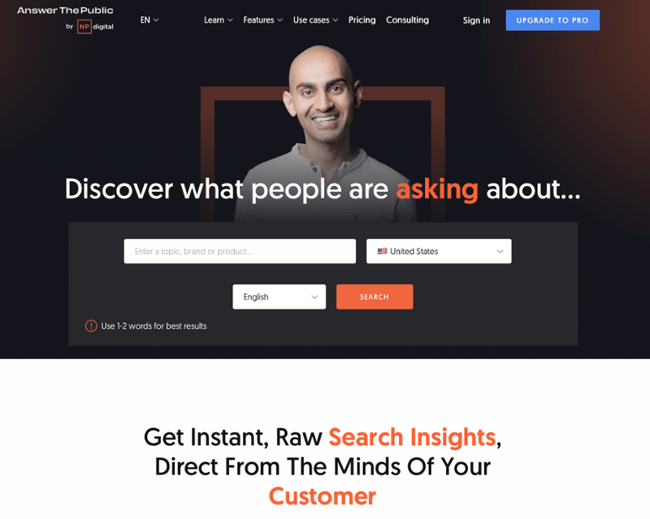
To begin brainstorming content, consider what your competitors are doing. Look for gaps in their content that you can fulfill. Additionally, you should also do SEO research to verify that users are searching for and interested in the topic you want to write about. Tools like SEMrush, Google Keyword Planner, and Answer The Public can help.

You’ll want to brainstorm content frequently so you always have ideas that you can execute.

3. Research and review a content management system (CMS).

In order to create your blog, you’ll most likely use a CMS. A CMS is a tool you can use to design, manage, and publish on your website. You’ve probably heard of examples like WordPress or Wix.

If you don’t have a website yet, you’ll want to choose a CMS that has the ability to host a blog. If you already have a site, check if it has blogging options built in. If not, you may need to find a CMS that integrates with your site or choose an entirely new CMS altogether.

There are tons of options in the CMS world, including HubSpot. (You can try out our CMS here.)

HubSpot’s free blog maker provides everything you need, including free hosting and security tools. It’s easy to get started, with hundreds of free themes to choose from, and a simple visual editor.

4. Create a blog strategy and editorial calendar.

Just like creating a business, you can’t create a blog without a strategy in mind. Your strategy should answer questions like:

  • Who are you targeting?
  • What type of content will you produce?
  • When will you post?
  • Where will you promote your content?

Overall, you should have a mission, vision, and goals for your blog.

Then, create an editorial calendar to keep you organized and on track. A calendar will help you track what posts are coming up, ensure writers are meeting deadlines, and assure you have enough content ideas for the foreseeable future.

5. Pay attention to article structure.

When you’re writing your blog posts, it’s important to consider the article structure. For instance, are you using subheads to break up the post so it’s easy to digest? Are you using bullet points and images that make the post easy to scan? These are important factors that will help keep your reader on the page.

Additionally, you‘ll want to make sure that you’re using calls-to-action (CTAs), that will guide the reader on what you want them to do next. This is how you can start making money and generating leads from your blog.

6. Become an expert in marketing and promoting your blog.

Another element of blogging is marketing and promoting your blog posts. It’s like the age-old adage — “When a tree falls in the woods and there is no one there to hear it, does it make a sound?”

Consequently, if you write a blog post but nobody reads it, will it have a positive impact on your company or brand? Probably not. That‘s why you’ll have to market your posts. You can use social media, SEO, your website, or your email newsletter to reach current and potential customers.

7. Learn about SEO.

Like I mentioned above, you want people to read your blog posts. One way to do that is to get organic traffic through SEO. If you want your blog to be successful, learn how to research keywords, how to rank in search engines, and how to build an SEO strategy.

8. Use a variety of blog post styles.

Your blog posts should be interesting to everyone who reads them, and especially for customers who read every single post. For those that are active followers and ambassadors of your blog, you should use a variety of blog post styles so your blog doesn’t get stale. Consider using how-to posts, list-based posts, or thought leadership.

9. Repurpose old content.

Producing blog content consistently can be hard. But you don’t have to reinvent the wheel every time you write a blog post. You can update old blog posts to keep them accurate and comprehensive. Additionally, you can use other content of yours, perhaps a YouTube video or a podcast, and repurpose the content into a blog post.

10. Perform a competitive analysis.

To understand your audience, run a competitive analysis on your top blog competitors. This will help you identify trends, uncover gaps in the content in your industry, and give you ideas on topics and ways to promote your blog.

Running a competitive analysis will help you build and iterate on your own blog strategy.

How to Promote Your Blog

As mentioned earlier, a blog is an excellent channel to build awareness and promote your brand.

Here’s how to do it:

1. Link from Your Website

This may seem obvious, but you should make your blog easy to find on your website. Consider using an attention-grabbing CTA or making it easily accessible from a dedicated spot on your homepage.

2. Repurpose Blog Content

As previously mentioned, repurposing content will save you loads of time when creating content, but it also allows you to promote your brand across multiple channels whether through video, podcasts, email, or social.

3. Utilize Interlinking

Once you’ve started generating a significant amount of posts on your blog, it can be helpful to link to other posts or related topic pages within your blog. This is good for SEO, but it will also help your readers find pertinent information on a topic they are interested in.

4. Promote on Social Media

With the help of eye catching video or images, you can also leverage your social media channels to drive traffic to your blog. Additionally, consider placing a link to your blog on all of your social accounts. *Stat about social media users*

5. Consider Guest Blogging

Guest posting on another industry-related blog gives your brand the opportunity to introduce itself to new customers who may not have heard of you. It’s also a great opportunity to network with other industry professionals and provide cross-promotion opportunities.

6. Leverage Influencers

Influencer marketing is a powerful tool you can use to give your brand some social proof credibility. Similar to guest blogging, you’ll be able to tap into that person’s audience and introduce your brand to a new audience. Be sure to work on cultivating a relationship first before reaching out for a favor.

7. Explore Paid Options

If you have the budget to do so, paid content promotion is another route you can take to get eyes on your content. Running ads or a boosted post on Facebook is a good entry point to paid promotion.

If you’re officially ready to get started with your own blog, take a look at How to Create a Successful Blog Strategy: A Step-by-Step Guide.

Blogging is Beneficial for Business

With a blog, the sky‘s the limit — and so are the benefits for your business. When new content is published regularly, engaging, and helpful to your audience, it’s an invaluable tool to have in your marketing kit.

Editor’s note: This post was originally published in February 2019 and has been updated for comprehensiveness.

cms


Categories B2B

Multivariate Testing: How It Differs From A/B Testing

There’s seemingly no end to what you can test in your marketing — conversion rates, offer placements, and even which titles perform better. 

There’s also no end to the type of test you can run, but two players take center stage: A/B and multivariate testing. Is there a huge difference between them, though? And will my results be affected if I choose the wrong one? 

Free Download: A/B Testing Guide and Kit

Yes, there is a difference, and yes, your results will be affected. Not to fear, though; in this post, we’re going to break down the difference between A/B tests and multivariate tests and tell you exactly when to use each, so your tests run smoothly and your inbound marketing can go from working pretty well to amazingly well. 

Table of Contents

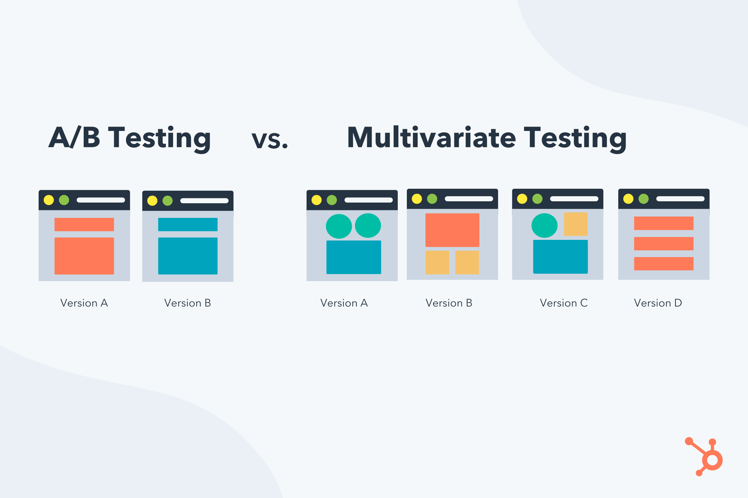
Multivariate Testing vs. A/B Testing

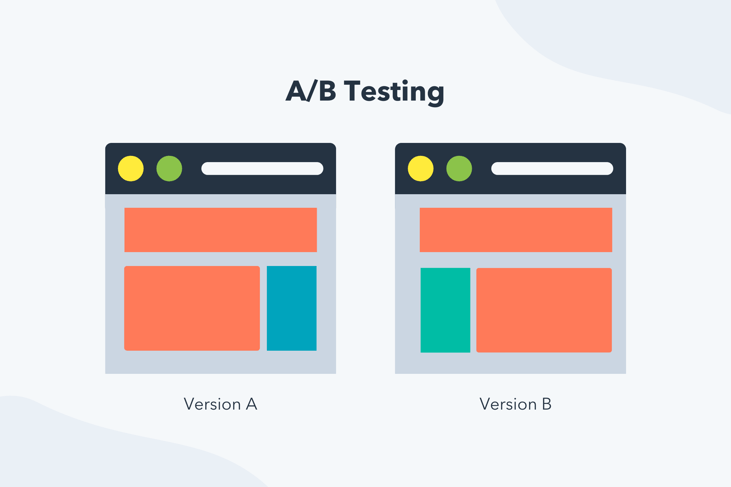
What is A/B testing?

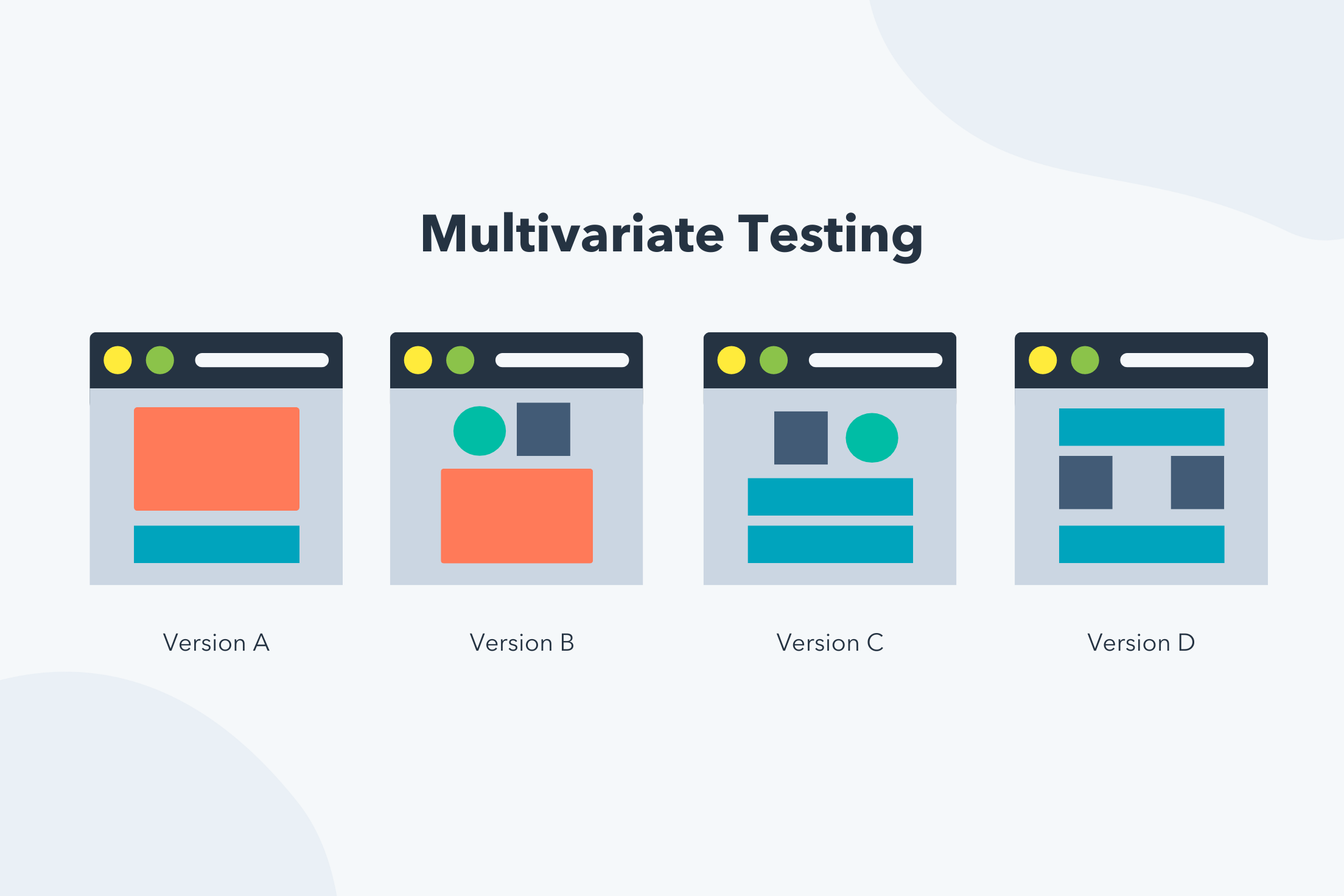
What is multivariate testing?

Multivariate Testing Example

The critical difference is that A/B testing focuses on two variables, while multivariate is 2+ variables. As the difference between both tests can be seen visually, let’s go over an example. 

Multivariate vs. A/B Testing Example

multivariate testing vs. a/b testing

In the image above, the A/B test is simply two different versions of the same element, while the multivariate test looks at multiple different page elements (variables) in different positions on the page. 

Given their differences, let’s learn more about each one and when to leverage each test in your marketing. 

What is an A/B test?

When you perform an A/B test you create two different versions of something — like a landing page, call to action (CTA), or web page — to see which performs better. The image below is an example of an A/B test.

a/b testing

A/B testing is often done with two different variables, but there are A/B/C tests that test three different web page versions. An A/B/C/D test that tests four different web page versions, and so on.

If you need help running an A/B test, you can use a tool like HubSpot’s Free Landing Page Builder, which allows you to test different page variations against each other. The best part? HubSpot will automatically crown a winner based on the results. 

When to Use A/B Testing

Use A/B testing when you want to test two specific designs against each other, and you want meaningful results fast. It is also the correct method to choose if you don’t have a ton of traffic to your site as you’re only testing two variables, so significant data is not needed. 

Advantages and Limitations of A/B Testing

Advantages of a/b testing limitations of a/b testing

Data is easier to track.

The focus is on two single variables, so test results are hyper-focused.

With fewer variables to test, you don’t need an enormous amount of traffic to uncover which variable is more effective.

 
You can obtain results quickly.  

When you perform a multivariate test, you’re not simply testing a different version of a web page like you are with an A/B test. Instead, you’ll get an idea of which combination of elements does the best job of helping you reach your goals — whether that’s more CTA clicks, form sign-ups, or time spent on the page. 

The multivariate test is more complicated and best suited for more advanced marketing testers, as it tests multiple variables and how they interact with one another, giving far more possible combinations for the site visitor to experience. 

When to Use Multivariate Testing

Only use a multivariate test if you have a significant amount of website traffic. That way, you can truly determine which components of your website yield the best results. 

Advantages and Limitations of Multivariate Testing

advantages of multivariate testing limitations of multivariate testing
It helps you redesign site pages to have the most impact. Requires significant site traffic since you need enough data to test all variables accurately, and not all businesses have this traffic.
You can test more than two variables at the same time. Is a more advanced and involved testing process.
Results are significant because multivariate testing requires considerable website traffic.  
You can extrapolate results because multiple variables are being tested, and you have significant data points.  

This is a tricky concept, and a visual usually helps clarify complicated ideas. The image below is an example of a multivariate test.

In this example, notice how each variation plays with placement, color, style, and format. Unlike A/B testing, where the two variations are usually noticeably different, the differences in variables in a multivariate test may be more subtle.

multivariate testing example

Back to You

Remember that for multivariate and A/B tests to give meaningful results, it’s not enough to have site traffic overall — the pages you’re testing also need to receive substantial traffic. So, make sure you select pages that people can find and regularly visit so your test yields enough data to analyze.

The Ultimate A/B Testing Kit

Categories B2B

Leadership Styles: The 11 Most Common & How to Find Your Style [Quiz]

Imagine the leaders that inspire you. Each is likely unique, with a different style they use to meet goals, motivate, and animate their teams. There are many different styles of leadership, and each can have a different impact on a company.

In this post, we’ll cover the most common types of leadership, how they influence business, and give tools to help you figure out what styles are best for you.

→ Click here to download leadership lessons from HubSpot founder, Dharmesh  Shah [Free Guide].

Start reading, or jump to the section you’re looking for:

Why It’s Important to Know Your Leadership Style

Knowing your leadership style helps you provide adequate guidance and feedback to employees, and better understand your thoughts, how you make decisions and strategies you can consider implementing when making business decisions.

It can also help you understand how your direct reports see you and why they may give you specific feedback. For example, if employees feel stifled at work and don’t have many opportunities to speak their minds, they may be telling you that you’re an autocratic leader who can benefit from changing their style.

Knowing your leadership styles may help you improve with limited feedback. Each leadership style has its pitfalls, allowing you to proactively address areas of improvement. This is critical because some employees might hesitate to speak up, even in an anonymous survey.

Ready to find out your leadership styles? Check out the most common styles below.

Types of leadership styles infographic

1. Democratic Leadership

Also called: Participative or Facilitative Leadership

Democratic leadership is exactly what it sounds like — the leader makes decisions based on each team member‘s input. Although a leader makes the final call, each employee has an equal say in a project’s direction.

Democratic leaders often have the following characteristics:

  • Inclusive
  • Collaborative
  • Effective communicator
  • Empowering
  • Supportive and empathetic
  • Trust-building
  • Emotionally intelligent
Why this leadership style works for businesses:

This leadership style resembles how leaders often make decisions in company board meetings.

For example, a democratic leader might give the team a few decision-related options in a company board meeting. They could then open a discussion about each option. After a discussion, this leader might consider the board’s thoughts and feedback, or they might open this decision up to a vote.

Why this leadership style is good for the team:

The democratic leadership style is one of the most effective because it encourages everyone to participate in all processes, share their opinions, and know that you will hear them. It also encourages employees to be engaged because they know you will hear their feedback.

Team members feeling like they have space to participate can also increase employee empowerment, motivation, and participation.

Potential challenges for leaders with a Democratic style:

Reaching a consensus can take considerable time, resources, and communication with a democratic style. It can also impact decision-making because some team members may not have the right expertise to make critical decisions.

Featured resources:

2. Autocratic Leadership

Also called: Authoritarian, Coercive, or Commanding Leadership

Autocratic leadership is the inverse of democratic leadership. In this leadership style, the leader makes decisions without taking input from anyone who reports to them.

Autocratic leadership is typically characterized by:

  • Centralized decision-making
  • Direct and top-down communication
  • Minimal delegation
  • Limited autonomy for team members
  • Emphasis on hierarchy and status
  • Resistant to feedback or criticism

This style is most useful when a business needs to control specific situations, not as a standalone leadership style. For instance, it can be effective in emergency or crisis situations where quick and decisive action is necessary.

Why this leadership style works for businesses:

Autocratic leaders carry out strategies and directives with absolute focus. So, when a situation calls for it, an authoritative leader can make a quick best-fit decision for a business without needing to get additional input (helpful on a case-by-case basis).

Why this leadership style is good for the team:

This type of leadership is most effective when a company makes difficult decisions that don’t benefit from additional input from others who aren’t fully knowledgeable on the subject. Responsible parties can make a decision and give employees a clear sense of direction, and it can also make up for a lack of experience on a team.

Potential challenges for leaders with an Autocratic style:

Most organizations can’t sustain such a hegemonic culture without losing employees, which can significantly lower morale and creative problem-solving.

An example of authoritative leadership gone bad could be when a manager changes the hours of work shifts for employees without consulting anyone.

Other challenges with autocratic leaders include:

  • Intimidation
  • Micromanagement
  • Over-reliance on a single leader

Different leadership styles favor different traits, with the most popular shown in this employee survey graphic.

3. Laissez-Faire Leadership

Also called: Delegative or Hands-off Leadership

If you remember your high-school French, you’ll accurately assume that laissez-faire leadership is the least intrusive form of leadership. The French term “laissez-faire” literally translates to “let them do.”

Leaders who embrace it give nearly all authority to their employees and don’t often interject unless the situation calls for it.

Some key characteristics of laissez-faire leadership include:

  • Limited guidance, direction, and feedback
  • Minimal interference and control
  • High autonomy and freedom
  • Empowerment and trust
Why this leadership style works for businesses:

Laissez-faire leaders make employees accountable for their work. This gives many employees an incentive to do their best work.

This type of leader often creates a more relaxed company culture. This makes it a good model for creative businesses like ad agencies or product design. It’s also a good fit for a business with a highly-skilled team.

Why this leadership style is good for the team:

In a young startup, for example, you might see a laissez-faire company founder who makes no major office policies around work hours or deadlines.They might put complete trust in their employees while they focus on the overall workings of running the company.

Because of this high level of trust, employees working for laissez-faire leaders feel valued. They get the information they need and use their resources and experience to meet business goals.

Potential challenges for leaders with a Laissez-Faire style:

Although laissez-faire leadership can empower employees by trusting them to work however they’d like, there are downsides. It can limit team development and pose a challenge for new or inexperienced employees who would benefit from guidance as they get ramped up. Roles and responsibilities can also become unclear, and it can build a culture of working in silos where people might work autonomously rather than as a cohesive group.

This style can lead to overlooking critical company growth and learning opportunities, so keeping this leadership style in check is important.

Featured resources:

4. Strategic Leadership

Strategic leaders sit between a company’s primary operations and its growth opportunities. This form of leadership requires vision, competitive awareness, and adaptability.

These leaders accept the burden of executive interests but also ensure that working conditions are stable for everyone else.

Strategic leaders aim to guide their organization toward its long-term goals. By utilizing this leadership style, you can create a forward-thinking, agile, and adaptable organization that can thrive in today’s dynamic business landscape.

Why this leadership style works for businesses:

Strategic leaders tie plans for growth and strategy to how they manage a team. They ask questions, develop and execute strategies, and consider future growth. This approach supports popular business goals like:

  • Accountability
  • Productivity
  • Collaboration
  • Transparency
Why this leadership style is good for the team:

This is a desirable leadership style in many companies because strategic thinking supports many types of employees at once.

Strategic thinking supports many employees at once, so it’s a desirable style for many companies. It encourages visualization, planning, and making the most of existing resources, and it can motivate employees.

Potential challenges for leaders with a strategic leadership style:

Leaders who work strategically might take on too much and risk thinking too far into the future of possibilities while missing critical present-day issues. It’s important to learn how to delegate with this leadership style and share the weight of decision-making.

Compromise, communication skills, and consistent outreach are also essential.

Featured resources:

5. Transformational Leadership

Transformational leaders gain the trust and confidence of their teams, encourage team members, and lead employees toward meeting company goals.

Transformational leadership also always improves upon the company’s conventions and motivates employees to grow and further develop their skills.

Ultimately, the goal of a transformational leader is to create a lasting positive impact, uplift their team to achieve their full potential, and drive success for the organization.

Why this leadership style works for businesses:

Transformational leaders can inspire their teams to think in new ways. This can help companies update business processes to improve productivity and profitability. It can also help with employee satisfaction, morale, and motivation.

Why this leadership style is good for the team:

This is a highly encouraging form of leadership where employees are supported and encouraged to see what they’re capable of.

When starting a job with this type of leader, all employees might get a list of goals to reach and deadlines for reaching them. The goals might begin quite simple, but as employees grow and meet their goals, leaders will give them more tasks and challenges to conquer as they grow with the company.

Potential challenges for leaders with a Transformational style:

Transformational leaders can lose sight of everyone’s individual learning curves in place of the company’s goals. Employee burnout can also become an issue, so it’s important to work with your team to update benchmarks.

Featured resources:

6. Transactional Leadership

Transactional leadership is based on reward and punishment to motivate and direct the behavior. These managers set specific rules and standards, and they closely monitor their employees’ performance. They tell employees they can expect rewards if a goal is met. However, they may require more 1:1s or check-ins if people aren’t meeting goals.

This leadership style is concerned with maintaining the status quo and ensuring that predetermined goals and standards are met. It also assumes that teams need structure and monitoring to meet business goals and that they are reward-motivated.

Why this leadership style works for businesses:

This style is popular in enterprise companies as it focuses on results, existing structures, and set systems of rewards or penalties. This leadership style also recognizes and rewards commitment.

Why this leadership style is good for the team:

Transactional leaders can offer helpful clarity and structure of expectations, which can help employees feel safe because they understand expectations. Employees also have a clear view of what they get in return for meeting business goals.

Potential challenges for leaders with a transactional style:

This style is more about using rewards to motivate and less about building relationships with employees, coaching, and developing team morale. Keeping a diverse team engaged can be hard if only some are reward-motivated, and it can lead to low creativity and fear of punishment.

7. Coaching Leadership

Also called: Conscious Leadership

A coaching leader focuses on identifying and nurturing the individual strengths of each member of the team and developing strategies that will enable teams to work better together.

This style is similar to strategic and democratic leadership, but it emphasizes individual employees’ success.

A manager with this leadership style might help employees improve on their strengths by:

  • Giving them new tasks to try
  • Offering guidance
  • Meeting to discuss constructive feedback

They might also encourage one or more team members to expand on their strengths by learning new skills from other teammates.

Coaching leaders focus on building trust and establishing strong relationships with their team members. They foster an environment of open communication and psychological safety that encourages individuals to share ideas, seek feedback, and work together toward common objectives.

Why this leadership style works for businesses:

Coaching leaders actively support skill development and independent problem-solving. They meet ambitious business goals by creating a strong company culture and add to a business’s long-term vision as valuable mentors, often even after leaving a company.

Why this leadership style is good for the team:

This leadership style can motivate employees as they feel supported on the team. It recognizes that each employee is unique and can build diverse and exciting teams where each employee offers something different.

This leader focuses on high performance, with employees that can communicate well and embrace unique skill sets to get work done. They also encourage team members to seek new challenges, learn from experiences, and continuously improve their skills and knowledge.

Potential challenges for leaders with a coaching style:

It can take a lot of time to develop employees with a coaching style, but mentoring isn’t effective for every employee.

Featured resources:

8. Bureaucratic Leadership

Bureaucratic leaders follow the rules. Unlike autocratic leadership, they might listen and consider the input of employees, but they might reject input that doesn’t align with company policy or past practices.

Some key features of bureaucratic leadership include:

  • Centralized decision-making
  • Strict adherence to rules and procedures
  • Clear chain of command
  • Limited autonomy
Why this leadership style works for businesses:

This style works best for larger, older, or traditional companies that are successful in their current processes. This leadership style works for these businesses because they want to maintain existing business models and processes because their current strategies are successful, and trying something new that doesn’t work could waste time and resources.

Why this leadership style is good for the team:

This leadership style can be challenging for some, but it has many benefits. It lowers the risk of favoritism and replaces it with central duties, job security, and predictability.

This clear and efficient leadership style can lead to high levels of creativity for some employees.

Potential challenges for leaders with a bureaucratic leadership style:

Employees might not feel as controlled as autocratic leadership, but there can be a lack of freedom in how much people can do in their roles. This approach can shut down innovation and is not the right fit for companies chasing ambitious goals and quick growth.

Featured resources:

9. Visionary Leadership

Also called: Affiliative Leadership

Visionary leadership focuses on future and long-term goals. They aim to inspire and guide their team towards the achievement of a shared vision.

This type of leader encourages collaboration, emotional intelligence, and teamwork. They also foster a culture of innovation and change, encouraging individuals to embrace new ideas and approaches.

Why this leadership style works for businesses:

Visionary leaders can create a clear plan for employees to follow and execute. They are powerful and persuasive communicators, which helps them energize teams toward impactful business growth.

As the focus is on future growth, visionary leaders can forecast potential roadblocks and outline action plans, giving employees increased confidence during uncertainty or challenging times.

Why this leadership style is good for the team:

Teams can do more and enjoy their work more if they have a vision to work toward. This type of leader offers vision statements and other tools to inspire and motivate teams to engage at work.

Potential challenges for leaders with a visionary style:

Visionary leaders can skip over day-to-day issues to focus on long-term ideas, missing roadblocks that could build up and cause problems in the future. Another common challenge is hyper-focus on a single goal, which can impact consideration for other ideas that may be just as valuable to the business.

Featured resources:

10. Pacesetting Leadership

A pacesetting leader sets ambitious standards and expects employees to meet those goals in the exact manner they’ve laid out. These leaders expect productivity and high-quality outputs from employees, and they may step in to ensure things are done correctly and on time.

Some characteristics of a pacesetting leader include:

  • High performance standards
  • Leading by example
  • Results-oriented
  • Preference for speed and efficiency
Why this leadership style works for businesses:

This type of leader sets ambitious goals with a clear and focused effort, so employees know exactly what is expected of them. For example, pacesetting sales leaders set and exceed ambitious quarterly sales cadences.

These leaders might also work alongside their team and push performance, boosting team morale.

Why this leadership style is good for the team:

Skilled and experienced teams often thrive under this kind of leader. They use the abilities of motivated and competent team members and make meeting goals feel urgent and exciting.

It can also be gratifying for team members to see their leader working hard alongside them.

Potential challenges for leaders with a pacesetting style:

Pacesetting leaders can sometimes create a high-stress workplace environment if goals are unrealistic, which can overwhelm and demotivate teams. This can impact engagement and lead to burnout, where people struggle to meet goals and perform as expected.

Focusing on goals can also stifle creativity and diversity of thought, so employees don’t feel they can use their expertise to suggest alternative goals or strategies.

Featured resources:

11. Situational Leadership

Situational leaders change their management style to meet the needs of the situation or team. It suggests that effective leaders must adapt their leadership style to match the readiness and development levels of their team members

This leadership style involves analyzing specific situations, assessing the competence and commitment of individuals, and adjusting the leadership approach accordingly. It is proactive and recognizes that change is the only constant.

Why this leadership style works for businesses:

This leadership approach can motivate employees and ensure that people aren’t stuck working in a way that doesn’t make sense for the situation. It’s also valuable for startups or businesses requiring frequent changes and flexible talent and support.

Why this leadership style is good for the team:

Situational leaders are great communicators and use team feedback to make decisions. They also analyze market changes and can quickly evaluate and update processes to ensure success. This can create strong relationships and help employees see and feel their value to the business.

Potential challenges for leaders with a situational style:

Leaders need a high level of expertise in all business processes and functions to make decisions, and they must be able to pivot quickly. It’s important to remember long-term goals and meet immediate needs; not every leader can do this effectively.

It can become confusing and stressful for teams if a leader’s approach changes too often, as they won’t know what to expect.

Featured resources:

Deciding Between Different Leadership Styles

There’s no single “best” leadership style, so figuring out what is best for you and your environment is essential.

How to Understand Your Instinctive Leadership Style

Leaders need good instincts, and many leaders focus on their own experiences and habits as they develop a leadership style. As you start your path toward leadership, you may want to keep notes. Write down how you would handle specific situations or problems.

Doing this can help you be a confident and capable leader, but if you notice things aren’t going as expected, you may want to reconsider your approach.

Your instincts and habits will always impact the way you lead. But if you find yourself in situations that you’re unsure how to respond to, you may want to look at other leadership styles.

For example, if you’re an extrovert with a shy member on your team, you may want to work on active listening. If you’re an introvert leading a team of outgoing people, you may need to learn new ways to nurture, support, and inspire your team.

Can you change your leadership style?

While it may take some time and effort, you can always change your leadership style and improve your processes.

The first step to making changes is recognizing the need for change. Whether this comes from direct employee feedback, noticing that goals aren’t being met, or people seeming to experience burnout, identifying this is the first step.

Next, you need to prepare yourself for changes. For example, your leadership style may be effective for your team, but you might have a more challenging time connecting with stakeholders. In this case, you wouldn’t want to throw out your current style, but you’d want to identify what is and isn’t working. Then, get curious, and begin the work of adjusting the way you lead.

How to Choose the Right Leadership Style for You

There are many ways to find a leadership style that works for you. Because of this, it can be tough to know where to begin. If you’re not sure what leadership styles will work for you, these steps can help.

how to choose the right leadership style for you

1. Get to know yourself.

Everyone has a unique path to self-discover. Some take risks and try new things and others prioritize quiet time, writing exercises, and listing strengths and weaknesses.

Another path to learning about yourself is through physical activity and spending time with other people. However you go about it, getting to know yourself is an important first step toward being a leader.

2. Outline your values and challenges.

Knowing yourself will help you understand what’s important to you and where you struggle. Being a leader means working quickly and making decisions quickly, so having your values mapped out can be extremely helpful.

As you write out your values, look at pivotal moments in your life to date. Then, look for trends, people you’re drawn to, and common themes. If your list is long, group similar ideas together.

Having an outline can help you see how you react, your strengths and weaknesses, and a base for your core values.

3. Watch leaders you respect.

Observing leaders you respect can also help you define your leadership style. As you watch them in meetings, client conversations, and presentations, take notes of what you like.

Another approach is to view their actions with specific leadership styles in mind, helping you figure out what their approach is and whether it will work for you.

4. Try different leadership styles.

A hands-on option is to try out different leadership styles. You can create an outline of what interests you and review your notes before your next meeting to see how you can incorporate it into your interactions.

5. Find a business coach or mentor.

Working with a business coach can also help you hone your leadership style.

A mentor can be someone in your workplace you respect and would appreciate feedback from, whether it’s another leader or a colleague you respect. You can also check out this guide on how to find a business coach.

6. Ask colleagues and leaders for feedback.

Another way to find the best style for your needs is to ask other colleagues, leaders, and team members for feedback.

The best approach for this strategy is to plan out what you want to ask and why so you get the feedback you need. Think about how people might respond and also set clear guidelines and expectations.

When you get feedback, make sure to listen carefully. You’ll gain valuable information about your strengths and weaknesses that will help you understand where you need to improve and the style that will help you improve.

7. Complete a leadership style assessment.

Leadership assessments are helpful tools for leaders, for yourself as an individual, and to assess your teams.

A leadership quiz can make it easier to understand your strengths and skills. It can surface habits and qualities you might not be aware of and give you a clear direction for growth.

If this is something you want to try, the leadership assessment below is a great place to start.

Leadership Style Assessment

Leaders carry a mix of the leadership styles mentioned above. At the root of these styles, leadership experts Bill Torbert and David Rooke say, are what are called “action logics.”

These action logics assess “how [leaders] interpret their surroundings and react when their power or safety is challenged.”

That’s the idea behind the Leadership Development Profile, a popular management survey tool. Created by professor Torbert and psychologist Susanne Cook-Greuter — and featured in the book, Personal and Organizational Transformations — the survey uses a set of 36 open-ended sentence completion tasks to help researchers better understand how leaders develop and grow.

Below we’ve used open-ended sentences to outline six action logics that describe each one. Review the sentences, see how they resonate with you, and figure out which leadership style upholds based on the action logic you most align with.

1. Individualist

The individualist is self-aware, creative, and primarily focused on their actions and development as opposed to overall organizational performance. This action logic is exceptionally driven by the desire to exceed personal goals and constantly improve their skills.

Here are some things an individualist might say:

Individualist 1: “A good leader should always trust their own intuition over established organizational processes.”

Individualist 2: “It’s important to be able to relate to others so I can easily communicate complex ideas to them.”

Individualist 3: “I’m more comfortable with progress than sustained success.”

2. Strategist

Strategists are acutely aware of the environments they’re in and have a deep understanding of the structures and processes that make their businesses tick. Still, they’re also able to evaluate what could be improved.

Here are some things a strategist might say:

Strategist 1: “A good leader should always be able to build a consensus in divided groups.”

Strategist 2: “It’s important to help develop the organization as a whole, as well as the growth and individual achievements of my direct reports.”

Strategist 3: “Conflict is inevitable, but I’m knowledgeable enough about my team’s personal and professional relationships to handle the friction.”

3. Alchemist

Rooke and Tolbert describe the alchemist as highly evolved and effective at managing organizational change. They differ from other action logics in their unique ability to simultaneously see the big picture and minute details. No department or employee gets overlooked with an alchemist leader.

Here are some things an alchemist might say:

Alchemist 1: “A good leader helps their employees reach their highest potential, and possesses the necessary empathy and moral awareness to get there.”

Alchemist 2: “It’s important to make a profound and positive impact on whatever I’m working on.”

Alchemist 3: “I have a unique ability to balance short-term needs and long-term goals.”

4. Opportunist

Opportunists are guided by a certain level of mistrust of others, relying on a facade of control to keep their employees in line. “Opportunists tend to regard their bad behavior as legitimate in the cut and thrust of an eye-for-an-eye world,” Rooke and Tolbert write.

Here are some things an opportunist might say:

Opportunist 1: “A good leader should always view others as potential competition to be bested, even if it’s at the expense of their professional development.”

Opportunist 2: “I reserve the right to reject the input of those who question or criticize my ideas.”

5. Diplomat

Unlike the opportunist, the diplomat isn’t concerned with competition or assuming control over situations. Instead, this action logic seeks to cause minimal impact on their organization by conforming to existing norms and completing their daily tasks with as little friction as possible.

Here are some things a diplomat might say:

Diplomat 1: “A good leader should always resist change since it risks causing instability among their direct reports.”

Diplomat 2: “It’s important to provide the ‘social glue’ in team situations, safely away from conflict.”

Diplomat 3: “I tend to thrive in more team-oriented or supporting leadership roles.”

6. Expert

The expert is a pro in their given field, constantly striving to perfect their knowledge of a subject and perform to meet their own high expectations. Rooke and Tolbert describe the expert as a talented individual contributor and a source of knowledge for the team. But this action logic does lack something central to many good leaders: emotional intelligence.

Here are some things a diplomat might say:

Expert 1: “A good leader should prioritize their own pursuit of knowledge over the needs of the organization and their direct reports.”

Expert 2: “When problem-solving with others in the company, my opinion tends to be the correct one.”

Which Leader Are You?

So, which action logics above felt like you? Think about each sentence for a moment.

Now, check out which of the seven leadership styles you embrace on the right based on the sentences you resonated with on the left.If you’re wondering “what are leadership styles?” or “what are different styles of leadership?” these assessment results can help.

The more action logics you agree with, the more likely you are to practice a mix of leadership styles.

For example, if you agreed with everything the strategist said, this would make you a 66% strategic leader and 33% democratic leader. If you agreed with the third statement and everything the alchemist said, this would make you a 50% transformational, 25% strategic, and 25% democratic leader.

Keep in mind that these action logics are considered developmental stages, not fixed attributes — most leaders will progress through multiple types of leadership throughout their careers.

Learn Your Leadership Management Style to Become a Better Leader

Whether you manage a big or small team, your leadership style heavily impacts how your direct reports see you and how your team works together to achieve your company’s goals. There are many different styles of leadership, so choosing one that works for you can make you a more effective leader.

If you want to be a leader that makes a difference, you’ll need to keep growing and embrace change. Are you ready to get started?

Editor’s note: This post was originally published in August 2016 and has been updated for comprehensiveness.

Categories B2B

The 6 Stages of the Product Life Cycle [+Examples]

When I was 12 years old, I used to be confused about my cousin’s CD collection. Why have CDs when I could go on iTunes and listen to all my favorite songs? This is a perfect example of a product life cycle (PLC) in action.

No one wants their product to become “obsolete” and reach the end of its product life cycle. That’s why it’s important to understand what stage your product is in so you can make better marketing and business decisions.

→ Download Now: Free Product Marketing Kit [Free Templates]

Below, we’ll learn about the product life cycle inside and out. If you’re in a pinch, use the links below to jump straight to what you need:

In the marketing industry, the typical depiction of the product life cycle only has four main stages — Introduction, Growth, Maturity, and Decline. At HubSpot, we agree that these are vital for a product, but the two stages “Development” and “Decline” aren’t nearly covered enough.

product development lifecycle stages

As marketers, it’s important to understand how your tactics and strategies change depending on the stage your product is in. Let’s break down each of the six stages of the product life cycle.

1. Development

The development stage of the product life cycle is the research phase before a product is introduced to the marketplace. This is when companies bring in investors, develop prototypes, test product effectiveness, and strategize their launch.

In this stage, companies typically spend a lot of money without bringing in any revenue because the product isn’t being sold yet.

This phase can last for a long time, depending on the complexity of the product, how new it is, and the competition. For a completely new product, the development stage is particularly difficult because the first pioneer of a product isn’t always as successful as later iterations.

Before full-scale production, the product may be released in a limited market or region for testing purposes. This allows companies to assess market acceptance, gather user feedback, and make necessary adjustments before a wider launch.

2. Introduction

The introduction stage happens when a product is launched in the marketplace. This is when marketing teams begin building product awareness and targeting potential customers. Typically, when a product is introduced, sales are low and demand builds slowly.

In this phase, marketers focus on advertising and marketing campaigns. They also work on testing distribution channels and building product and brand awareness.

This stage is crucial because companies have the opportunity to shake up the status quo and capture the attention and loyalty of early adopters. The positive experiences and word-of-mouth recommendations from these early customers can influence the broader target market and accelerate product adoption.

Some examples of products currently in the introduction stage include:

Ultimately, the success of this stage sets the foundation for the product’s future growth and success in subsequent stages of the product life cycle.

3. Growth

During the growth stage, consumers have accepted the product in the market and customers are beginning to truly buy in. That means demand and profits are growing, hopefully at a steadily rapid pace. This momentum is crucial for sustaining business operations, funding further product development, and generating returns on investment.

As companies scale, they can benefit from lower per-unit production costs, improved supplier relationships, and optimized distribution networks.

However, there are some challenges that come with the growth stage. As the market for the product expands, competition grows. Potential competitors will see your success and will want in.

Some products that are currently in the growth stage are:

  • Smartwatches
  • Electric cars
  • Peloton

During this stage, it’s important to keep attracting new customers and solidify your brand image so you can stay ahead of the competition.

4. Maturity

The maturity stage is when the sales begin to level off from the rapid growth period. At this point, companies begin to reduce their prices so they can stay competitive amongst the growing competition. Streamlining production processes, negotiating favorable supplier contracts, and optimizing distribution networks also become important considerations.

This is the phase where a company begins to become more efficient and learns from the mistakes made in the introduction and growth stages. Marketing campaigns are typically focused on differentiation rather than awareness. This means that product features might be enhanced, prices might be lowered, and distribution becomes more intensive.

During the maturity stage, products begin to enter the most profitable stage. The cost of production declines while the sales are increasing.

Examples:

  • Smartphones
  • Amazon
  • Video game consoles

5. Saturation

During the product saturation stage, competitors have begun to take a portion of the market and products will experience neither growth nor decline in sales.

Typically, this is the point when most consumers are using a product, but there are many competing companies. At this point, you want your product to become the brand preference so you don’t enter the decline stage. To achieve this, you’ll want to focus on providing exceptional service and building strong relationships with your customers.

In a saturated market, innovation also becomes essential to stay relevant. Businesses must continuously invest in research and development to improve products and offer new features. Failure to do so may lead to product obsolescence and loss of market share.

Some examples of products in the saturation stage are:

  • Streaming services
  • Breakfast cereals
  • Soft drinks

6. Decline

Unfortunately, if your product doesn‘t become the preferred brand in a marketplace, you’ll typically experience a decline. Sales will decrease during the heightened competition, which is hard to overcome.

Decline also occurs when products become outdated or less relevant as newer technologies enter the market. Consumers may turn to more advanced options, rendering the declining product less desirable.

If a company is at this stage, it’ll either discontinue its product, sell the company, or innovate and iterate on its product in some way.

Here are a few examples of products in the decline stage:

  • CDs and cassette tapes
  • Landline telephones
  • DVDs

The best companies will usually have products at several points in the product life cycle at any given time. Some companies look to other countries to begin the cycle anew.

Importance of the Product Life Cycle

The product life cycle is important because it informs an organization’s management and decision-makers how well a product is performing and what strategic actions it will take to succeed. This helps companies allocate resources like staff, budgets, shows which products should be prioritized, and where the company should innovate next.

Other benefits of using the product life cycle include:

  • Make better marketing investments and decisions
  • Easier to make long-term plans
  • Allows for better decision making with accurate information on performance
  • Easier to streamline current processes within your company

Product Life Cycle Limitations

While using the PLC method certainly helps stakeholders plan, it does have limitations. The cycle breaks down performance over several stages, but unfortunately there is no way to tell how long each stage will last.

Complicating things further, not all products will move through these stages at the same pace. For example, a product may take longer to decline than others. Plus product managers run the risk of not dedicating enough effort and resources into a particular product if they think the product will decline, creating planned obsolescence – even if customers still use it.

Breaking Down the Product Life Cycle Theory

In the late ‘60s, Harvard Business School professor Raymond Vernon developed this marketing theory in response to an economic model that failed to account for trends present in international trade – that’s why it was originally called the international product life cycle theory.

It stated that products developed in an international market had three phases:

  • New product
  • Maturing product
  • Standardized product

Here’s a quick breakdown of his theory.

Vernon theorized a new product would perform best in its country of origin to keep manufacturing and production costs low. Once the product gained demand, companies could begin exporting to other countries and continue building local production plants in each new location.

Having these local plants would offer the flexibility to make changes to the product without incurring huge costs.

The standardized phase would involve an influx of competitors, which would lead the company to focus on driving down production and manufacturing costs to remain competitive. As the market becomes saturated and a new product gets introduced, the company loses its relevance in its home country and shifts gears to create something new, with the cycle beginning again.

Since then, the product life cycle theory has evolved to focus less on geography and more on marketing. Let’s dive into it next.

You can use this template to map out your own product’s life cycle phases.

Download the Free Product Life Cycle Template

Product Life Cycle Marketing Strategies

Now that we’ve discussed the different stages of the product life cycle, let’s explore how to market products in each stage.

Development Stage Marketing Strategy

While marketing typically begins in the introduction stage, you can begin to build “buzz” around your product by securing the endorsement of established voices in the industry.

You can also consider a limited release of the product to a select group of customers or in a specific market segment. This exclusivity can create a sense of anticipation and urgency among potential buyers.

Then, you can use the feedback from the limited release to publish early (and favorable) consumer research or testimonials. Your marketing goal during this stage is to build upon your brand awareness and establish yourself as an innovative company.

Introduction Stage Marketing Strategy

This is where the fun begins. Now that the product is launched, you can actually promote it using inbound marketing and content marketing.

Consider collaborating with influencers or industry experts who have a strong following and influence in your target market. Encourage them to review and promote your product through blog posts, vlogs, social media posts, or sponsored content. Their endorsement can help generate credibility and reach a wider audience.

Education is vital in this stage. If your marketing strategies are successful, the product goes into the next stage — growth.

Growth Stage Marketing Strategy

During this phase, marketing campaigns often shift from getting customers’ buy-in to establishing a brand presence so consumers choose them over developing competitors.

One way to do this is by allocating resources to digital marketing channels like social media advertising, search engine optimization (SEO), content marketing, and influencer partnerships. Then, leverage data analytics to target and reach your ideal customers effectively.

Additionally, as companies grow, they’ll begin to open new distribution channels and add more features and support services. Consider partnering with retailers, entering new markets, or exploring e-commerce platforms to reach a wider customer base. In your strategy, you’ll advertise these as well.

Maturity Stage Marketing Strategy

When your product has become a mature offering, you may feel like you’re “sailing by” because sales are steady and the product has been established. But this is where it’s critical to establish yourself as a leader and differentiate your brand.

Consider sharing valuable and educational content, such as blog posts and industry insights, to position your brand as an authority. Educate potential customers about the benefits and value they can gain from your product.

Continuously improve upon the product as adoption grows, and let consumers know in your marketing strategy that the product they love is better than it was before. This will protect you during the next stage — saturation.

Saturation Stage Marketing Strategy

When the market has become saturated, you’ll need to focus on brand awareness and differentiation.

Identify specific customer segments within your market and tailor marketing efforts to appeal to their specific needs and preferences. Refine your messaging and positioning to resonate with each segment, allowing for a more targeted and efficient marketing approach.

You’ll also want to focus on retaining and strengthening relationships with your existing customers. Consider creating a personalized customer service experience and introducing new product features, loyalty programs, packaging options, or bundling with complementary products.

Competition is highest at this stage, so it’s critical to leave no doubt regarding the superiority of your product.

If innovation at the product level isn’t possible (because the product only needs minor tweaks at this point), then invest in your customer service and use customer testimonials in your marketing.

Decline Stage Marketing Strategy

While companies would want to avoid the decline stage, sometimes there’s no helping it — especially if the entire market reached a decline. In your marketing strategy, you can emphasize the superiority of your solution to successfully get out of this stage.

To extend the product life cycle, successful companies can also implement new advertising strategies, reduce prices, add new features to increase their value proposition, explore new markets, or adjust brand packaging.

Unfortunately, not every company is successful at pivoting their product out of the decline stage. If the product is obsolete or financially unviable, it may be best to plan for an orderly exit from the market.

Now that we’ve gone through stages and history, let’s review some real-life examples of them in action.

Let’s follow the product life cycle of popular products that have since reached the decline stage.

1. The Typewriter

The typewriter was the first mechanical writing tool — a worthy successor to pen and paper. Ultimately, however, other technologies gained traction and replaced it.

  • Development: Before the first commercial typewriter was introduced to the market, the overall idea had been developed for centuries, beginning in 1575.
  • Introduction: In the late 1800s, the first commercial typewriters were introduced.
  • Growth: The typewriter quickly became an indispensable tool for all forms of writing, becoming widely used in offices, businesses, and private homes.
  • Maturity: Typewriters were in the maturity phase for nearly 80 years, because this was the preferred product for typing communications up until the 1980s.
  • Saturation: During the saturation stage, typewriters began to face fierce competition with computers in the 1990s.
  • Decline: Overall, the typewriter couldn’t withstand the competition of new emerging technologies, and eventually the product was discontinued.

2. Vine

Skipping forward to the 21st century, we see the rise and fall of Vine, a short-form video-sharing app that was the source for many memes at its peak but eventually declined due to other platforms.

  • Development: Vine was founded in June 2012 and mainly competed with Instagram.
  • Introduction: The app was introduced to the public in 2013. Its differentiating factor was its short-form video format — users had only seven seconds to film something that was hilarious, absurd, or a mixture of both.
  • Growth: Only two years after its release, Vine had over 200 million active users. Its popularity led to the advent of the phrase “Do it for the Vine.”
  • Maturity: Because it was only in the market for a few years, Vine never reached the maturity stage. While adoption was high, it was still a fairly new app.
  • Saturation: Vine competed in an already saturated market. Instagram, Snapchat, and YouTube were the pre-eminent names in their category, and Vine soon started to decline in use.
  • Decline: When Musical.ly was introduced, Vine lost a large amount of its user base and shut down. It was succeeded by Byte, a similar short-form video-sharing platform, but none of these have been able to surpass TikTok, which launched months after Vine’s end in 2016.

3. Cable TV

Remember the days of switching TV channels to find what to watch? I do — and they feel distinctly like something of the past. While cable TV is still around, it’s safe to say that it’s nearing the decline stage.

  • Development: Cable TV was developed in the first half of the twentieth century. John Walson has been credited with its invention.
  • Introduction: The first commercial television system was introduced in 1950, and by 1962, the technology saw the first hints of growth.
  • Growth: After a decades-long freeze on cable TV’s development (due to regulatory restrictions), the technology began gaining traction, and by 1980, more than 15 million households had cable.
  • Maturity: Cable TV matured around the 1990s. Around seven in ten households had cable.
  • Saturation: The start of the 21st century saw an oversaturation of this technology, and it also started to compete with other modern developments such as on-demand services and high-definition TV (HDTV). While the internet was still in its nascent stages, it would soon gain on cable TV as well.
  • Decline: From 2015 onwards, cable TV experienced a marked decline. Online video streaming services such as Netflix and Hulu have taken precedence — and this trend is set to continue.

4. Floppy Disk

This relic was once a popular and convenient way to store and share data between computers. I barely understood what they were growing up, and it astounds me to think of the very existence of cloud data sharing and other mass memory storage means.

  • Development: The first floppy disk was developed in 1970 by IBM engineers. It was an 8-inch flexible magnetic disk in a square case with 2MB storage capacity.
  • Introduction: It was introduced in 1971 and largely became known as the only way to transfer or store data.
  • Growth: The floppy disk was majorly used in the 1980s-1990s.
  • Maturity: Sold well in the market during the 1990s. Improving with time, it could hold 200MB of storage.
  • Saturation: Major competitors emerged at the beginning of the 21st century. The invention of USB cables, external hard disks, and CDs gave people options to store their data.
  • Decline: The floppy disk faced a major decline up to Hewlett-Packard stopping production for the disk in 2009. The storage capacity for other products in the market grew to be more efficient. Data storage evolution has grown to the point where floppy disks are simple relics.

Not all products need to face the decline stage. Companies can extend the product life cycle with new iterations and stay afloat as long as they have several products at various points of the product life cycle.

International Product Life Cycle

The international product life cycle (IPL) is the cycle a product goes through in international markets. As products begin to mature and companies want to avoid the decline stage, they’ll typically begin to explore new markets globally.

When products reach mass production, manufacturing and production shift to other countries as well.

The international product life cycle stages are identical to that of a normal product life cycle. The development stage looks different, however, because local customs and regulations can affect how long it takes to bring the product to a new marketplace.

However, once you lay the groundwork in a new marketplace, your competitors will be sure to follow, and the life cycle stages will continue up until saturation and eventually decline. Your option is to either expand into another market or learn from prior mistakes and innovate before the decline stage rolls around.

Next, we’ll look at when you should use the product life cycle.

When to Use the Product Life Cycle

Businesses use the product life cycle to achieve the following:

  • Establish competitive authority. If your product is new and recently introduced to the market, you can advertise it as a new and improved alternative to an existing product. If the product is established, you can vouch for its long history of use in your branding.
  • Decide on a pricing strategy. Depending on the life cycle stage your product is in, you’ll choose how to price the product. A new product may be priced lower to entice more buyers, while a product in the growth stage can be priced higher.
  • Create a marketing strategy. Your product life cycle stage will determine which strategy to pursue. Maturity and audience knowledgeability play a big role in the type of content you publish on your site and social media profiles.
  • Respond before the product begins its decline. There’s no worse feeling than watching your product slowly become obsolete or be displaced by a competing product. By keeping the life cycle stages in mind, you can create a strategy that keeps you ahead of the curve as you reach the saturation and decline stages.

The product life cycle benefits businesses because they can shift their wording and positioning to best market the product at the stage it is in. If your product has recently been introduced and you try to market it as a long-established solution, consumers will see right through it and trust you less as a result.

Keep Your Product’s Life Cycle in Mind

Whether you’re developing a brand new product or working with a mature, well-established brand, you can use the product life cycle stages as a guide for your marketing campaigns.

Each stage will dictate how you inform your audience about the product, how you position your brand in the marketplace, and how you decide to move forward after the decline stage.

By keeping your product’s life cycle in mind, you can invest in better marketing campaigns that result in a higher ROI.

Editor’s note: This post was originally published in January 2020 and has been updated for comprehensiveness.

This article was written by a human, but our team uses AI in our editorial process. Check out our full disclosure to learn more about how we use AI.

Product Marketing Kit

Categories B2B

Popeyes Girl Dinner: How Social Media Trends Shape Restaurant Menus

Admittedly, I’m all too familiar with girl dinners. Sometimes (often) after a long day at work during a hot summer, the last thing you want to do is cook an elaborate meal — and that’s where girl dinners come in.

Is it a charcuterie board? A snack plate? A random assortment of whatever can be found in the kitchen to make a haphazard meal? The answer is yes to all of the above.

Download Now: The 2023 State of Social Media Trends [Free Report]

The term girl dinner took off on TikTok earlier this summer after creator Olivia Maher used the term in a video. Since then, girl dinner has since racked up over 1.3B views for its relatability.

Fast food chain Popeye’s was quick to jump on the trend. In July, at the height of girl dinner’s popularity on TikTok, Popeye’s launched a limited-edition “Girl Dinner” menu.

Image Source

The “Girl Dinner” menu itself was definitely tongue in cheek, as it featured all of the fast food chain’s side dishes like coleslaw, biscuits, and mashed potatoes and gravy that could be ordered separately to create a makeshift meal.

Social media users were amused by the offering:

Social Media’s Influence on Food Menus

This certainly wasn’t the first time social media influenced a food chain.

Popeyes is no stranger to social media moments. In 2019, the company’s newly released chicken sandwich went viral, igniting a chicken sandwich war with rival Chick-Fil-A all stemming from a tweet.

Earlier this year, TikTok creators Alexis Frost and Keith Lee shared a hack for ordering fajita quesadillas at Chipotle, which were previously a custom creation. After their videos went viral, Chipotle added fajita quesadillas to the official menu to accommodate the influx of orders.

Image Source

Similarly, upscale LA grocery chain Erewhon has teamed up with popular creators to launch custom smoothie recipes that have repeatedly gone viral on social media.

In some ways, social media has assisted major brands that have the resources to implement viral trends with research and development support. Down the line, this could create some hairy scenarios if IP ownership ever comes into question.

In the meantime, I’ll let the legal experts worry about that while I finish my girl dinner.

New call-to-action

Categories B2B

The 80+ Best Chrome Extensions for 2023

Google Chrome browser extensions allow you to increase productivity, reduce distractions, and source content — all in the comfort of your internet browser.

The best part is that you have plenty of options. The Google Chrome web store offers a variety of different tools that help you become safer, smarter, and more productive with just one click. We’ve curated the best ones here.

Uncover more leads in less time with HubSpot's Chrome Extension

We can‘t guarantee that these extensions will make puppy YouTube videos less tempting to watch, but we recommend them for busy marketers who want to make their time online more efficient. We’ve broken them down into different categories if you want to jump ahead:

Please note: All of these are free tools, but some of the services that they work with may have paid features or subscriptions.

1. Compose AI

Best AI Chrome Extensions: Compose AI

Users: 400k+

Compose AI is an AI-powered Chrome extension that helps you write better and faster. It provides real-time writing assistance, offering suggestions for sentence rephrasing, grammar corrections, and vocabulary enhancements.

Trusted by thousands of users, Compose AI has received positive feedback for its ability to improve writing productivity and quality.

This tool is ideal for marketing professionals who need to create compelling content, emails, social media posts, and more.

Pros:

  • AI-powered assistance for writing efficiency
  • Enhances grammar, sentence structure, and vocabulary
  • Real-time suggestions for better writing

Cons:

  • Limited functionality compared to a comprehensive writing tool
  • Requires an internet connection for AI suggestions

2. Conch AI

Best AI Chrome Extensions: Conch AI

Users: 100k+

Conch AI is a Chrome extension that summarizes books, articles, and PDFs. It can serve as your personal editor to review and rewrite your content to make it more concise and appealing to the reader.

With nearly a perfect 5 star rating from more than 300 users, Conch AI is a Chrome companion for marketers and copywriters worth checking out.

Pros:

  • AI-powered Q&A for any article you’re reading
  • Summarizes books, articles, and PDFs
  • Generates templates for intros, conclusions, and more

Cons:

  • May not produce content that sounds human-written
  • Reports of keyboard shortcuts not being intuitive to use

3. Natural Reader – AI Text to Speech

Best AI Chrome Extensions: Natural Reader

Users: 400k+

NaturalReader is a Chrome extension that turns text on web pages into high-quality audio. You get to control the speed, voice, and language to suit your preference.

Marketing professionals who want to improve their productivity by multitasking, consuming content on-the-go, or making content more accessible.

Pros:

  • Text-to-speech conversion for easier content consumption
  • Natural-sounding voice and customizable settings
  • Helps with multitasking and accessibility

Cons:

  • Limited to text-to-speech functionality
  • Works best with well-structured web pages

4. Otter.ai: Record and transcribe meetings

Best AI Chrome Extensions: Otter:ai

Users: 100k+

Otter.ai is praised for its accuracy and ease of use directly within the Chrome web browser. It can automatically transcribe meetings, interviews, and other audio recordings. It allows you to search, edit, and share transcriptions so you don’t have to dig through hours of meeting audio yourself.

If you participate in frequent meetings, interviews, or need accurate transcription for note-taking purposes, Otter.ai can do it all.

Pros:

  • Automatic transcription of audio recordings
  • Searchable and editable transcriptions
  • Facilitates collaboration and note-taking

Cons:

  • May have limitations with background noise and multiple speakers
  • Free version has limitations on transcription time

5. Pronounce: English Pronunciation AI Coach

Best AI Chrome Extensions: Pronounce

Users: 30k+

Pronounce is a Chrome extension that helps you improve your English pronunciation. It provides real-time feedback on pronunciation and offers suggestions for better pronunciation by listening to your voice and analyzing it.

Pros:

  • Real-time feedback on English pronunciation
  • Works on Zoom, Google Meet, Facetime, and Teams
  • Verification options for names, places, and unique words

Cons:

  • Limited to English language pronunciation
  • May not cover all accents or dialects

6. Vetted AI – GPT for Shopping

Best AI Chrome Extensions: Vetted AI

Users: 70k+

Vetted AI is a Chrome extension that provides AI-powered recommendations for online shopping. It suggests similar products, displays product details, and helps you make informed purchase decisions.

This chrome extension is praised for its ability to save time in the online shopping experience while offering valuable insights on product comparisons. Frequent online shopping, product research, and the decision-making process is made a little bit easier with the Vetted AI chrome extension.

Pros:

  • AI-powered product recommendations and comparisons
  • Saves time shopping online
  • Compare items and retailers

Cons:

  • Limited functionality for online shopping recommendations

7. AI Excel Bot: ChatGPT Excel Assistant

Best AI Chrome Extensions: AI Excel Bot

Users: 30k+

AI Excel Bot is a ChatGPT-powered Chrome extension that provides assistance with Excel tasks. It helps you automate processes, perform calculations, and generate insights using natural language input.

Excel users find AI Excel Bot helpful in improving their productivity and reducing manual effort, especially when dealing with complex calculations and data analysis.

Pros:

  • ChatGPT-powered assistance for Excel tasks
  • Automates processes and calculations in Excel
  • Helps generate insights from data

Cons:

  • Limited to Excel functionality and assistance
  • Requires familiarity with natural language commands in Excel

8. Scribe: AI Documentation, SOPs & Screenshots

Best AI Chrome Extensions: Scribe

Users: 500k+

Scribe AI is a Chrome extension that uses AI to convert video recordings into step-by-step process documents. Rather than creating multiple formats for a process, simply record your screen and let Scribe do the rest.

Pros:

  • Redact private information from the process before sharing with others
  • Export into many file format options including PDF and HTML
  • Save time creating tutorials for different learning styles

Cons:

  • May not capture all nuances of complex processes

9. Saima: AI based video speed controller

Best AI Chrome Extensions: Saima

Users: 6k+

SAIMA is a Chrome extension that intelligently adjusts video playback speed. It enables you to watch videos at a faster or slower pace without distorting the audio. You get 4.5 hours of free video speed control per month with no awkward silences or missed words.

Users appreciate SAIMA for its ability to save time by allowing them to watch videos at an accelerated pace, enabling quicker learning and content consumption.

Pros:

  • AI-based video speed adjustment
  • Saves time in consuming video content
  • Does not distort audio quality

Cons:

  • Limited functionality beyond video speed adjustment
  • Works best with videos that support playback speed control

10. Careerflow AI LinkedIn Optimization and more

Best AI Chrome Extensions: Careerflow

Users: 100k+

CareerFlow AI is a Chrome extension that utilizes AI to optimize your LinkedIn profile. It instantly scores your profile against a set of predetermined criteria, then provides expert recommendations to improve it.

The LinkedIn optimizer is free to use, but there are premium features available for job application tracking, cover letters, and more.

Pros:

  • AI-powered LinkedIn optimization
  • Personalized profile recommendations based on skills
  • Simplifies the process of tracking job applications

Cons:

  • Still requires time to review and edit the recommendations

1. HubSpot Sales

Best Chrome Extensions for Productivity: HubSpot Sales

Users: 1M+

HubSpot’s Sales tool connects your email inbox with your CRM. Instead of having to navigate back and forth between the two products, this extension allows you to transfer contact information from your email directly into your CRM. This saves employees time in their day-to-day workflow and retains valuable information about customers.

Another cool feature that HubSpot Sales provides is the tracking and logging of emails. Users can send emails and receive alerts when their message is delivered, opened, and clicked on. The email thread can then be logged continuously into the CRM throughout the entire correspondence.

Pros:

  • Saves time by allowing users to transfer contact information from email directly into CRM.
  • Tracks and logs emails, providing valuable information for customer correspondence.
  • Seamless integration with HubSpot’s CRM.

Cons:

  • Can be overwhelming for users who prefer separate email and CRM platforms.

2. TodoistBest Chrome Extensions for Productivity: Todoist

Image Source

Users: 700K+

Todoist is a project management tool that lets you create highly organized and visually appealing to-do lists across all of your devices. What’s neat about the Chrome extension is that you can see your to-do list, or your team’s shared lists, and add tasks to it without having to open a separate tab, app, or device.

Pros:

  • Highly organized and visually appealing to-do lists.
  • Seamless integration across devices.
  • Collaborative features for team task management.

Cons:

  • Advanced features require a premium subscription.

3. Reply

Best Chrome Extensions for Productivity: ReplyUsers: 10K+

Reply’s Chrome extension helps you research and engage with your potential prospects on LinkedIn. This is a fast and easy way to find and verify anyone’s email address — both one by one or in bulk using LinkedIn Sales Navigator.

Once you get the contacts, you can sync them to your CRM — including HubSpot — or connect with the prospects right away.

Pros:

  • Helps research and engage with potential prospects on LinkedIn
  • User-friendly interface and bulk email verification option.
  • Offers integration with various CRMs, including HubSpot.

Cons:

  • Limited LinkedIn functionalities beyond finding and verifying email addresses.
  • Potential reliability issues with email verification accuracy.

4. StayFocusd

Best Chrome Extensions for Productivity: StayFocusd

Users: 500K+

StayFocusd lets you budget your time on specific websites so you can eliminate distractions when you need to buckle down and work. It’s highly customizable — you could set your time limit to 20 minutes on Twitter and only five minutes on Facebook, for example. It also has neat features like the Require Challenge: Once you set time limits on sites, if you want to go back and change your settings, you have to complete a challenge (think: retyping a piece of text without typos or answering questions).

Pros:

  • Helps eliminate distractions on specific websites.
  • Highly customizable time limits for different sites.
  • Provides a “Require Challenge” feature for added self-control.

Cons:

  • May be too strict for users who prefer more flexible time management.
  • Limited features compared to other productivity apps.
  • Potential for users to find workarounds and bypass time limits.

5. ClickUp

Best Chrome Extensions for Productivity: ClickUp

Users: 200K+

ClickUp is the all-in-one productivity platform designed to consolidate your work into one centralized hub and manage everything from daily to-dos to complex projects. It’s trusted by teams of all sizes, including enterprise companies, agencies, and educators alike for its rich set of customizable features to streamline your processes, plan projects, and work together from anywhere.

ClickUp packs six of its most powerful work management tools into a handy Chrome Extension that automatically updates your ClickUp Workspace in real time without having to open, close, or refresh any tabs. With this extension, you can easily create a new task, save websites, track time, take screenshots, access your Notepad, and more, directly in your Chrome browser.

Pros:

  • All-in-one productivity platform with customizable features
  • Real-time updates in Chrome browser
  • Simplifies task management and collaboration

Cons:

  • May be overwhelming for users who prefer simpler task management tools

6. Chatsonic

Best Chrome Extensions for Productivity: Chatsonic

Users: 80K+

Undoubtedly, AI has made things easier and has become a part of life now, especially at work. ChatSonic and ChatGPT help you easily write emails, find information, and create social media strategies and content. However, it can be unpleasant to switch between Gmail and ChatSonic when drafting a single email.
To solve this and make you extra productive, ChatSonic has developed the ChatSonic Chrome extension, where you can access all the features of ChatSonic without leaving your browser, making your workflow much smoother.

Pros:

  • Generate summarized answers to Google queries
  • Effortlessly compose and reply to emails.
  • Do quick recaps of lengthy email threads through native Gmail integration.

Cons:

  • Limited functionality compared to standalone AI tools.

7. LastPass

Best Chrome Extensions for Productivity: Lastpass

Users: 10M+

LastPass is a password manager that autofills in passwords for all of the accounts you save with this extension. You only have to remember one password: your LastPass password. This saves you time and headaches and increases the security of your personal data.

Pros:

  • Autofills passwords, increasing security and saving time.
  • Centralized password management.
  • Multi-factor authentication options for enhanced security.

Cons:

  • Requires users to remember their LastPass password.
  • Free version has limitations on device access.
  • Potential concerns regarding storing all passwords in one place.

8. Add to Trello

Best Chrome Extensions for Productivity: Add to Trello

Users: 10K+

If you use Trello for project management, team collaboration, your content calendar, or just a personal to-do list, this extension lets you easily add links as cards to your Trello boards.

Pros:

  • Easily add links as cards to Trello boards
  • Simplifies organization and collaboration
  • Seamless integration with Trello’s project management features

Cons:

  • Limited usage for those who don’t use Trello for project management
  • Limited features beyond adding links as cards

9. Extensions Manager

Best Chrome Extensions for Productivity: Extensions Manager

Users: 100K+

We couldn‘t give you 50+ different extensions to try out without also suggesting Extensions Manager. Try this tool to organize all of your extensions so they don’t take up half of your browser’s screen. It shows you what extensions you have operating on Google Chrome and gives you the option to hide some of the icons to keep your browser better organized.

Pros:

  • Organizes extensions to keep browser interface clear
  • Provides control over which extensions are displayed
  • Helps improve browser performance by reducing clutter

Cons:

  • May require time investment initially to set up and organize extensions.

10. Toggl Track

Best Chrome Extensions for Productivity: Toggl Track

Users: 400K+

If you often find yourself spending too much time on one task — to the point that you no longer have time to complete other tasks — consider using the Toggl Track Chrome extension. It initiates a timer right within the comfort of the browser. There’s no need to start a timer on your phone. Simply open up the extension and begin tracking the time you spend on tasks.

Pros:

  • Convenient time tracking within the browser
  • Helps manage time spent on tasks
  • Easy to use with a simple interface for tracking time

Cons:

  • Lack of advanced reporting features in the Chrome extension

11. Print Friendly & PDF

Best Chrome Extensions for Productivity: Print Friendly & PDF

Users: 900K+

If you ever need to save a page in a print-friendly format or as a PDF, you can easily do so with the Print Friendly & PDF Chrome extension. The extension removes ads and other cluttering elements from the web page to turn it into a pleasant reading experience. You can also delete images and change the text size.

Pros:

  • Saves web pages in print-friendly format or as PDFs.
  • Removes clutter and enhances readability.
  • Customizable options including text size and image deletion.

Cons:

  • Limited usage for those who don’t regularly need to save web pages.
  • Potential formatting issues with complex web pages.

12. Email Finder

Best Chrome Extensions for Productivity: Email Finder

Users: 400K+

Whether you’re carrying out sales outreach, seeking guest blogging opportunities, or looking for the owner of a small website, Email Finder will automatically give you a list of verified emails associated with that domain. It’s an absolutely brilliant tool for sales reps and marketers who want to save time when looking for potential contacts at a company.

Pros:

  • Provides verified emails associated with a domain
  • Saves time when searching for potential contacts
  • Offers convenience with batch email finding and integration with CRMs

Cons:

  • Reliance on external databases for email data accuracy
  • Potential for incomplete or outdated email information


1. Click&Clean

Best Security Chrome Extensions: Click&Clean

Users: 1M+

If you‘re constantly searching and downloading work material during the day, it can be a tedious task to clear your browser history. You just don’t have the time to keep pulling up your history page and manually clearing your cache or download log.

The Click&Clean extension for Chrome allows you to clear your cache, URL searches, website cookies, and download history with a single click of a button on your browser toolbar. The extension can also scan your computer for viruses and clean up your hard drive of unused applications — helping your computer run faster as a result.

Pros:

  • Easy one-click clearing of browser cache, URL searches, cookies, and download history
  • Ability to scan for viruses and clean up the computer’s hard drive
  • Helps improve computer performance by clearing unused applications

Cons:

  • Limited features beyond browser cleaning and virus scanning
  • Potential for accidental deletion of important browsing data

2. J2TEAM Security

Best Security Chrome Extensions: J2TEAM security

Users: 300K+

J2TEAM Security isn’t your average firewall. This Chrome extension starts with basic virus protection. It also allows you to customize your website block list and ensures your Chrome browser uses the “HTTPS” security tag on blogging sites — preventing you from visiting user blogs that are deemed unsafe.

The extension also offers a variety of Facebook-specific privacy settings, such as blocking the “seen” tag after you read certain private messages and hiding how long you’ve been active in Facebook Messenger.

Pros:

  • Offers basic virus protection and customizable website block list
  • Enhances security by enforcing HTTPS on blogging sites
  • Provides Facebook-specific privacy settings to control messaging and activity visibility

Cons:

  • Limited features beyond virus protection and Facebook privacy settings

3. Ghostery

Best Security Chrome Extensions: Ghostery

Users: 2M+

Ghostery is a sophisticated ad-blocking extension designed to remove ads that distract or interrupt you while you‘re viewing specific website content. It also disguises your browsing data so ad-tracking tools are unable to collect personal information that you’d prefer to keep private. These features help to speed up webpages’ load time and ultimately improve your browsing experience.

Pros:

  • Sophisticated ad-blocking to improve browsing experience
  • Protects privacy by disguising browsing data from ad-tracking tools
  • Helps speed up webpage loading by removing distracting ads

Cons:

  • May block some non-intrusive ads that users may find useful

5. Checkbot

Best Security Chrome Extensions: Checkbot

Users: 70K+

Checkbot combines technical SEO with modern security to help you analyze both how safe and how optimized a website is for search engines. Because search engines like Google prioritize website security in addition to content quality in their rankings, this Chrome extension is a handy one-two punch for content creators and web developers.

Checkbot can test the page speed, SEO, and overall security of more than 250 URLs per domain for free — and help you improve in these three categories to protect you and your website visitors from unsafe material.

Pros:

  • Combines technical SEO and security analysis for websites
  • Helps optimize websites for search engines and improve security
  • Offers free testing and improvement recommendations for page speed, SEO, and security

Cons:

  • Potential for false positives or recommendations that may not apply to all websites
  • May require technical knowledge to understand and implement recommended improvements

6. Avast Online Security

Best Security Chrome Extensions: Avast Online Security

Users: 9M+

Avast Online Security is known as a “web reputation plugin,” examining each individual website you visit for suspicious information. The extension also warns you if the site you’re visiting simply has a bad reputation. In turn, you can rate the websites you visit to help Avast get better at flagging potentially unsafe webpages while on Chrome.

Pros:

  • Examines websites for suspicious information and warns about potentially unsafe sites
  • Allows rating websites to improve accuracy of flagging unsafe webpages
  • Offers additional security features for Avast users on Chrome

Cons:

  • Potential for false positives or inaccurate ratings
  • Limited features beyond website reputation checking

7. FlowCrypt

Best Security Chrome Extensions: FlowCrypt

Users: 80K+

This security extension is specific to emails, allowing you to send and receive encrypted emails (and attachments) to and from your colleagues. It’s one of the best ways to be sure your emails are kept private and secure while in transit to the recipient.

FlowCrypt uses PGP encryption, which stands for “Pretty Good Privacy” — the standard for encryption in most email clients. The tool integrates perfectly with Gmail, adding a “Secure Compose” button to your inbox.

Pros:

  • Provides PGP encryption for sending and receiving encrypted emails
  • Integrates seamlessly with Gmail, adding a “Secure Compose” button
  • Enhances email privacy and security during transit

Cons:

  • May require setup and exchange of encryption keys with recipients

8. Fair AdBlocker

Best Security Chrome Extensions: Fair AdBlocker

Users: 130k+

Fair AdBlocker offers both malware and adware in one browser extension. The tool protects you from malware as well as distracting ads and pop-ups. Once installed, you can configure your blocking settings to hide the types of ads you’re least interested in seeing — especially those that carry dangerous information that can infect your computer.

Pros:

  • Protects against malware and distracting ads and pop-ups
  • Allows custom blocking settings to hide unwanted types of ads
  • Enhances browsing experience by reducing distractions

Cons:

  • May not offer advanced filtering capabilities compared to dedicated ad blockers.

9. Speedtest by Ookla

Best Security Chrome Extensions: Speedtest by Ookla

Users: 2M+

Find out how fast your internet connection is and learn how quickly websites are loading. Knowing this information can help you move to another internet connection if needed, and you’ll also get to see performance metrics for your own site.

Pros:

  • Accurate speed measurements
  • Insights for troubleshooting
  • Performance metrics for your own website

Cons:

  • Limited functionality
  • Lack of detailed diagnostics

10. Hola Free VPN

Users: 5M+

Whether you need to cloak your identity online or browse content from another country, Hola Free VPN allows you to do that for free. The tool can help you browse the internet safely and anonymously without needing to pay for an external VPN service.

Pros:

  • Free to use
  • Geolocation flexibility

Cons:

  • The strength of the privacy protection may vary

1. Bitly

Chrome Extensions for Social Media: Bitly

Users: 500K+

This extension lets marketers quickly and easily shorten links and share them on social media directly from their browser. This is particularly useful for social media marketers and allows for personalization with an Enterprise plan.

Pros:

  • Quick and easy link shortening
  • Direct sharing on social media from the browser
  • Personalization features with the Enterprise plan

Cons:

  • Limited functionality beyond link shortening and sharing

2. Pinterest

Chrome Extensions for Social Media: PinterestUsers: 6M+

This extension allows you to easily save items onto your Pinterest boards without navigating away from what you‘re doing. What’s neat about this tool is that it shows you multiple pinnable items available on each website so you can save more than one item to your board at a time. (Normally, you would have to click into each blog post or image in order to separately pin each to your boards individually.)

Pros:

  • Easily save items to Pinterest boards without leaving the current page
  • Ability to save multiple items from a website simultaneously

Cons:

  • Limited use cases if you aren’t using Pinterest for content curation or inspiration

3. Save to Facebook

Chrome Extensions for Social Media: Save to Facebook

Users: 1M+

Facebook‘s “Save” feature lets users aggregate links, images, and videos they find on Facebook in one location in their account. This extension allows you to do the same from anywhere on the web, making Facebook a centralized place to save content you’re interested in checking out later.

Pros:

  • Centralized location for saving interesting web content
  • Ability to save content from anywhere on the web to Facebook’s “Save” feature

Cons:

  • Relies on active use of Facebook‘s Save feature, which may not be everyone’s preferred method of content aggregation

4. RiteTag

Chrome Extensions for Social Media: RiteTag

Users: 40K+

RiteTag shows you how hashtags are performing on Twitter and Facebook before you post content. Once you log in to RiteTag using your Twitter or Facebook credentials, it checks the hashtags you begin typing in real time and color codes them:

  • If your hashtag is green, it means the hashtag will help your content be seen now.
  • If your hashtag is blue, it means the hashtag will help your content be seen over time.
  • If your hashtag is gray, you should select a new hashtag because it has low levels of engagement.
  • If your hashtag is red, you should select a new hashtag because it’s so popular, your content will disappear into the crowd.

Pros:

  • Real-time analysis of hashtag performance on Twitter and Facebook
  • Color-coded hashtags for quick assessment and selection

Cons:

  • Limited to hashtag analysis and not a comprehensive social media management tool

5. Buffer

Chrome Extensions for Social Media: Buffer

Users: 200K+

Buffer allows you to easily share content from any website to your Facebook, Twitter, and LinkedIn profiles. If you’re a Buffer customer, you can also use the extension to schedule posts from your browser without needing to access the Buffer website. You can also queue posts for future publication.

Pros:

  • Easily share content to Facebook, Twitter, and LinkedIn
  • Ability to schedule and queue posts directly from the browser

Cons:

  • Requires a Buffer account for full functionality

6. Reddit Enhancement Suite

Chrome Extensions for Social Media: Reddit Enhancement Suite

Users: 1M+

Do you regularly use Reddit in your personal life or in your marketing efforts? And are you specifically a fan of the old version of Reddit? Download the Reddit Enhancement Suite Chrome extension to enhance your experience on the website and browse posts much more easily than you did before. This extension is only compatible with the original version of Reddit.

Pros:

  • Enhanced browsing experience for the old version of Reddit
  • Improved post navigation and browsing features

Cons:

  • Not compatible with the newer version of Reddit

7. SocialAnalyzer

Chrome Extensions for Social Media: Social Analyzer

Users: 8k+

SocialAnalyzer is a social media monitoring tool that allows you to keep up with trending posts in one of your target markets or industries. See the most recently published posts and videos on YouTube, Twitter, and Facebook, and see whether people are interacting with the content that people are already publishing. You can use this tool to further refine your social media marketing efforts and track brand sentiment.

Pros:

  • Social media monitoring tool for tracking trending posts in target markets
  • Insights into content interactions and brand sentiment

Cons:

  • Limited functionality compared to more robust social media monitoring tools

8. HubSpot Social

Chrome Extensions for Social Media: HubSpot Social

Users: 20K+

Are you a current HubSpot customer? HubSpot Social allows you to post on your social media profiles straight from your browser. You can schedule posts in advance, share a quote from an external article directly to your social feed, and share webpages, too. No need to access your HubSpot portal in another tab. Do it straight from your current webpage.

Pros:

  • Seamless social media posting for HubSpot customers
  • Ability to schedule posts, share quotes, and share webpages directly from the browser

Cons:

  • Limited to HubSpot users and may not be relevant for non-HubSpot customers

1. SEOQuake

Chrome Extensions for Social Media: SEOQuake

Users: 1M+

SEOQuake is a Chrome extension that allows SEO marketers to easily get insights about different websites without leaving their web browser. With one click, you can find search ranking and backlink information about the search results on a Google results page. It also provides details about the amount of backlinks the website has (according to SEMRush), shows you the keyword density of a page, and lists external and internal links.

Pros:

  • Quick access to website insights and search ranking information
  • Provides backlink details and keyword density analysis
  • Displays external and internal links for a webpage

Cons:

  • User interface can be overwhelming for beginners
  • Limited functionality beyond basic website insights

2. Check My Links

Chrome Extensions for Social Media: Check My Links

Users: 200K+

Check My Links does what it says it will: It quickly scans web pages and shows you which links are working properly and which are broken. With this extension, marketers can ensure that their own websites are functioning properly for their visitors. Additionally, marketers can check for broken backlinks to their content on other websites. That way, they can build backlinks to their content and increase their domain authority.

Pros:

  • Quick scanning of web pages to identify broken links
  • Helps ensure the proper functioning of own websites
  • Ability to check for broken backlinks to content on other websites

Cons:

  • Limited usefulness if not actively managing websites or optimizing backlink profiles

3. NoFollow

Chrome Extensions for Social Media: No Follow

Users: 100K+

NoFollow quickly indexes web pages and identifies links that are coded with the no-follow metatag. No-follow links aren‘t crawled by search engines and don’t contribute to search engine authority, so SEOs can use this extension to determine if external sites are backlinking to them with followed, or indexed, links.

Additionally, you might use no-follow links on webpages you don‘t want crawled, such as a landing page or thank you page, and this extension can easily double-check if you’ve coded links correctly. In the example screenshot below, no-follow links are highlighted in red.

Pros:

  • Indexes web pages and identifies links with the no-follow metatag
  • Helps determine if external sites are backlinking with followed links
  • Useful for checking correct coding of no-follow links on webpages

Cons:

  • Limited functionality beyond identifying no-follow links

4. Ahrefs SEO Toolbar

Chrome Extensions for Social Media: Ahrefs SEO Toolbar

Users: 100K+

Ahrefs SEO Toolbar is an SEO tool that’s great for beginners and experts alike. Ahrefs SEO Toolbar is a Google Chrome plugin that lives in the search engine results page (SERP), so you can get SEO insights for every website and keyword, all while you Google search.

Discover thousands of the best performing keywords to target for SEO & PPC. Spy on your competitor’s Google Ads, Facebook, and Instagram ads, and find the best backlink opportunities.

Pros:

  • Provides SEO insights for websites and keywords within Google search results
  • Helps discover high-performing keywords and analyze competitor ads
  • Identifies backlink opportunities

Cons:

  • Requires an Ahrefs subscription for full functionality
  • Limited usefulness for those who don’t require in-depth SEO analysis

5. Keyword Surfer

Chrome Extensions for Social Media: Keyword Surfer

Users: 500K+

Keyword Surfer is just like the Arel=“noopener” target=“_blank” hrefs Chrome extension in that it gives you related keywords for your industry-related searches. You can see the monthly search volume for the keyword and generate an article outline that could potentially help you rank for the keyword. The tool also allows you to see the word count of competing pages and articles.

Pros:

  • Generates related keywords for industry-related searches
  • Displays monthly search volume and offers article outline suggestions
  • Provides word count analysis of competing pages

Cons:

  • Limited functionality beyond keyword analysis and article outlining

6. Link Research SEO Toolbar

Chrome Extensions for Social Media: Link Research SEO Toolbar

Users: 10K+

Link Research SEO Toolbar allows you to see the core metrics of a website and understand how well it performs against the competition. The Chrome extension is best paired with an active Link Research Tools subscription to get the most out of it.

Pros:

  • Allows users to see core metrics of a website and compare against competition
  • Best used with an active Link Research Tools subscription

Cons:

  • Limited usefulness without an accompanying Link Research Tools subscription
  • May require familiarity with advanced SEO metrics and analysis

7. SEO META in 1 CLICK

Chrome Extensions for Social Media: SEO MET in 1 CLICK

Users: 500K+

SEO META in 1 CLICK is a fantastic tool for seeing a website’s meta information in — you guessed it — a single click! No need to right-click, hit “View Page Source,” and read through line after line of code to see a website’s meta description. You can use this as a competitive research tool to see what your top-ranked competitors are putting in their meta descriptions.

You can also use it to double-check that your website is optimized across the board. It even offers shortcuts to check the mobile friendliness of your website and analyze the keyword density of the page.

Pros:

  • Provides quick access to a website’s meta information in a single click
  • Helps with competitor research and optimizing meta descriptions
  • Offers shortcuts to check mobile friendliness and analyze keyword density

Cons:

  • Limited functionality beyond meta information analysis
  • May not provide comprehensive insights for more complex SEO strategies

8. Serpstat Website SEO Checker

Chrome Extensions for Social Media: Serpstat Website SEO Checker

Users: 30K+

Analyze your competitors’ performance with the Serpstat Website SEO Checker extension. Depending on your competitors’ website security, you’ll be able to detect their CMS, sitemap status, structured data, and more. When you sign up for a Serpstat account, you can also see the page’s top keywords and traffic.

Pros:

  • Analyzes competitors’ website performance and provides insights
  • Includes information on CMS, sitemap status, and structured data
  • Shows top keywords and traffic data with a Serpstat account

Cons:

  • Requires a Serpstat account for full functionality
  • Limited usefulness without actively monitoring competitors’ websites

9. SEO Minion

Users: 300K+

SEO Minion allows you to carry out in-depth competitor research by giving you access to your competitor’s website metrics and data. You can also check for broken links, highlight all links, and preview how the page appears in the SERPs — all handy tools for examining your own webpages and articles and ensuring they’re in tip-top shape.

Pros:

  • Offers competitor research capabilities and access to website metrics
  • Provides tools to check for broken links and preview SERP appearance
  • Helps analyze and optimize own web pages and articles

Cons:

  • May not be necessary for users already utilizing comprehensive SEO tools


1. OneTab

Best New Tab Chrome Extensions: One Tab

Users: 2M+

When you conduct research for a piece of content, it‘s easy to get swamped in multiple open tabs with great resources you want to cite. The trouble is, once it comes time to write and refer back to the sources, it’s hard to navigate between all of the tabs. Luckily, OneTab lets you put multiple different URLs into a single tab for easy reference.

Pros:

  • Helps to organize and consolidate multiple open tabs into a single tab, reducing clutter and improving productivity
  • Saves memory and reduces browser overload by suspending unused tabs
  • Easy to use and navigate through saved tabs

Cons:

  • No ability to categorize or add notes to saved tabs
  • Limited customization options for organizing tabs
  • May experience occasional syncing issues across devices

2. Momentum

Best New Tab Chrome Extensions: Momentum

Users: 3M+

Momentum is a simple Chrome extension that replaces blank new tabs with beautiful photography, inspiring quotes, weather reports, and a space for you to write down a priority for the day when you open up your browser for the first time. (Don‘t worry — the temperature is in Celsius, it’s not that cold in Boston.)

Pros:

  • Provides a visually appealing and inspiring start to each new tab
  • Offers weather updates and allows you to set daily priorities
  • Simple and clean interface with minimal distractions

Cons:

  • Limited customization options for background photos and quotes
  • Lacks advanced productivity features
  • Some users may prefer a more functional and informative start page

3. Infinity New Tab

Best New Tab Chrome Extensions: infinity New Tab

Users: 400K+

Infinity New Tab includes a feature known as Speed Dial on every new tab you open in Chrome. This feature produces large icon-based shortcuts to your most frequently visited websites, as shown in the screenshot above. You can customize these icons with new websites as needed, and add productivity widgets like to-do lists to each new tab as well.

Pros:

  • Speed Dial feature allows quick access to frequently visited websites
  • Customizable icons and productivity widgets enhance personalization
  • Clean and visually pleasing user interface

Cons:

  • Some users may find the large icons overwhelming

4. Start.me

Best New Tab Chrome Extensions: Start.me

Users: 90K+

With Start.me, you turn each new tab you open in Chrome into a personal dashboard. You can populate this dashboard with web page bookmarks, productivity widgets, news feeds from specific websites, and various photos and videos. If you prefer to keep your daily schedule online, rather than in print or on your desktop, you might find this extension useful.

Pros:

  • Turns each new tab into a customizable personal dashboard
  • Offers a wide range of widgets, bookmarks, and news feeds for organizing information
  • Allows easy access to frequently used websites and resources

Cons:

  • Requires more effort to set up and customize compared to other extensions
  • May slow down performance if too many widgets or feeds are added

5. Earth View

Best New Tab Chrome Extensions: Earth View

Users: 700K+

This Chrome extension might not make your browsing experience easier, but it will make it prettier. Broaden your geography skills while surfing the internet at the same time with Earth View by Google. Each time you open a new tab, the first thing you’ll see is a satellite image of a beautiful location somewhere on Earth. See some of the images that pop up on new tabs in the screenshot above.

Pros:

  • Provides beautiful and captivating satellite images of different locations on Earth
  • Enhances browsing experience with visually stunning backgrounds
  • Can be educational and increase geographic awareness

Cons:

  • Limited customization options or settings

6. Infinite New Tab

Best New Tab Chrome Extensions: infinite New Tab

Users: 200K+

Not to be confused with “Infinity New Tab” (the fourth new tab extension on this list), this browser accessory turns your new tab into a canvas. Choose from more than 100 wallpapers to customize your new tab background, as well as a reminder list and note pad for staying on task.

Pros:

  • Provides a canvas-like experience with customizable wallpapers for a visually pleasing new tab page.
  • Includes a reminder list and notepad for task management.
  • Offers a variety of wallpapers to choose from.

Cons:

  • Limited customization options beyond wallpapers, such as widget or bookmark options.

7. Homey

Best New Tab Chrome Extensions: Homey

Users: 50K+

Homey is a relaxing and uncluttered new tab Chrome extension that turns your new tab page into a dashboard. You can see your city’s weather, access your bookmarks, or create a grid with your most-frequented websites. Alternatively, you can keep the dashboard clean and mess-free for a less overwhelming experience. Like most new tab Chrome extensions, it also gives you access to the search engine of your choice.

Pros:

  • Offers a relaxing and uncluttered new tab page with customizable grids and weather updates
  • Provides quick access to bookmarks and search engine of choice
  • Allows users to choose between a clean and minimalistic layout or a more feature-rich dashboard

Cons:

  • Limited customization options beyond grids and weather updates

9. New Tab Redirect

Best New Tab Chrome Extensions: New Tab Redirect

Users: 700K+

Got a website you always need to have open? This Chrome extension automatically opens a page of your choice when clicking on a new tab. The tool can even redirect to a specific file you have saved in Google Drive or elsewhere online.

Pros:

  • Allows users to set a specific webpage or file to open automatically in a new tab
  • Provides access to frequently visited or important websites
  • Offers flexibility to redirect to a file stored in Google Drive or elsewhere.

Cons:

  • No additional features or customization options

10. Speed Dial

Best New Tab Chrome Extensions: Speed Dial

Users: 500K+

Speed Dial is a charmingly old-school Chrome extension that turns your new tab into a 3D dashboard. Access your bookmarks and more frequented sites in a dashboard that might just remind you of your MySpace days. Don’t let its design fool you: The extension is constantly updated for performance and user-friendliness.

Pros:

  • Turns the new tab page into a 3D dashboard with quick access to bookmarks and frequently visited sites
  • Provides a nostalgic user interface reminiscent of older website design
  • Regular updates ensure performance and user-friendliness

Cons:

  • Limited customization options beyond arranging bookmarks and lacks advanced features

Sometimes you just need a good content curation tool to help you save important information while you’re researching or writing a blog post.

1. OneNote Web Clipper

Chrome Extensions for Content Sourcing: OneNote Web Clipper

Users: 1M+

Are you a OneNote user? Whether you’re conducting research for a project or simply reading different articles online, you most likely come across resources that you want to save and return to for later use.

That’s where OneNote Web Clipper comes in. Instead of saving content to another application or document, you can save it directly to your existing OneNote notebooks for easy reference when you sit down to write a blog post or web page. The best part? Everything will be available on any device where you use OneNote.

Pros:

  • Seamlessly saves content directly to existing OneNote notebooks for easy reference and organization
  • Works across multiple devices, ensuring access to saved content anywhere
  • Allows for capturing and saving different types of content, including articles, web pages, and images

Cons:

  • May occasionally encounter syncing or compatibility issues
  • Limited customization options for saving and organizing clipped content

2. AwesomeScreenshot

Chrome Extensions for Content Sourcing: AwesomeScreenshot

Users: 2M+

AwesomeScreenshot is a screen capture extension with capabilities for annotation and photo editing while staying in your browser. Once you take a screenshot of a selected area of your screen or an entire web page, you can crop, highlight, draw shapes, and blur sensitive information.

Pros:

  • Provides comprehensive screen capture capabilities with annotation and photo editing features
  • Allows for capturing selected areas or entire web pages
  • Conveniently stays within the browser, saving time and minimizing workflow disruptions

Cons:

  • Some features may require a paid upgrade
  • May experience occasional performance issues with larger or complex captures

3. Evernote Web Clipper

Chrome Extensions for Content Sourcing: Evernote Web Clipper

Users: 2M+

Evernote is a note-taking and organization app that can be shared across teams for content collaboration. With the Evernote Web Clipper extension, users can save links onto a clipboard within their Evernote app for later reading and reference.

Pros:

  • Integrates seamlessly with Evernote for easy saving and organization of web content.
  • Offers options for clipping entire web pages, articles, or selected sections.
  • Provides additional features like highlighting, adding annotations, and selecting notebooks and tags.

Cons:

  • Interface can be overwhelming for new users.

4. Giphy for Chrome

Chrome Extensions for Content Sourcing: Giphy for Chrome

Users: 200K+

Everyone loves animated GIFs. They make emails, blogs, and social media posts engaging and funny, and with this extension, you can easily grab a GIF from Giphy‘s huge database for whatever content you’re working on without navigating away.

Pros:

  • Offers quick and easy access to a vast library of GIFs from Giphy
  • Streamlines the process of finding and inserting GIFs into emails, blogs, and social media posts
  • Provides search functionality for specific GIFs

Cons:

  • May experience occasional search or loading issues
  • Limited customization options for resizing or editing GIFs

5. Sidebar

Chrome Extensions for Content Sourcing: Sidebar

Users: 100K+

Manually bookmarking websites can sometimes be a tedious process. Sidebar allows you to organize websites you want to save without having to open a new tab. Save websites to bookmarks, create folders, and add notes for later reference.

Pros:

  • Provides a convenient way to save and organize websites without opening a new tab
  • Allows for creating folders and adding notes for easy reference
  • Streamlines the process of bookmarking and navigating between frequently visited websites

Cons:

  • Limited to organizing websites, may not have additional features like annotation or syncing

6. Distill Web Monitor

Chrome Extensions for Content Sourcing: Distill Web Monitor

Users: 200K+

Distill Web Monitor allows you to keep track of changes to websites or articles that you’ve cited in your own work. That way, you can ensure that you’re providing the most up-to-date information to your readers and website visitors. You can also use it to simply track pages that you’re interested in citing in the future.

Pros:

  • Enables tracking changes to websites or articles for up-to-date information
  • Helps ensure accurate sourcing and citation in your own work
  • Provides options for customizable monitoring and notifications

Cons:

  • Requires manual setup and configuration for each website to monitor
  • May have limitations on the number of websites or pages that can be monitored
  • Not suitable for real-time monitoring or highly dynamic websites

    7. Nimbus Screenshot

Chrome Extensions for Content Sourcing: Nimbus Screenshot

Users: 1M+

Nimbus Screenshot is another screenshotting extension that will live within your browser, making it easier than ever to capture a partial or entire page. It will automatically save your screenshots to the cloud, ensuring that you don’t lose them.

Pros:

  • Offers a convenient and easy-to-use screenshotting tool
  • Automatically saves screenshots to the cloud for easy access and backup
  • Provides options for capturing partial or entire pages

Cons:

  • May encounter occasional performance issues, particularly with larger screenshots
  • Requires cloud storage for saving and accessing screenshots

8. LibKey Nomad

Chrome Extensions for Content Sourcing: LibKey Nomad

Users: 600K+

For marketers and bloggers who work in technical or research-based industries, LibKey Nomad can be an extremely useful Chrome extension to have in your arsenal. The extension allows you to find, access, and source millions of scholarly articles based on the library that you primarily use.

Pros:

  • Provides easy access to millions of scholarly articles based on your preferred library
  • Streamlines the process of finding and accessing research materials
  • Eliminates the need for manual searching on different platforms

Cons:

  • Limited to users who work in technical or research-based industries
  • Requires authentication and access to specific libraries
  • May not cover all research databases or sources

9. Google Scholar Button

Chrome Extensions for Content Sourcing: Google Scholar Button

Users: 3M+

Google Scholar is another tool you can use if you write content in a technical, scientific, or otherwise research-heavy industry. You can find articles and books straight from the comfort of your browser. The tool sometimes links to the article’s landing page on a research website, and sometimes it links directly to the PDF. Either way, it’s a great way to streamline research so you don’t have to manually search for books and articles online.

Pros:

  • Offers quick access to scholarly articles and books directly from the browser
  • Provides options for searching and accessing research materials
  • Allows for easy discovery and citation of relevant sources

Cons:

Limited to users who require research-heavy content

10. Tailwind AI Marketing Content Assistant

Chrome Extensions for Content Sourcing: Tailwind AI Marketing Content Assistant

Users: 100K+

AI content generation is the biggest productivity booster for marketers to help create engaging copy and content. Tailwind’s AI marketing content assistant gives you access to engaging copy for YouTube video descriptions, blog posts, image captions, and more.

Create Shopify and Etsy product descriptions without opening a new tab. After you install the extension, you’ll see a Ghostwriter AI icon in the bottom right-hand corner of your screen. Clicking it will open various tools to help you craft the perfect copy quickly. There are specialized tools for blogging, social media platforms, SEO, and more.

Pros:

  • Utilizes AI to generate engaging copy and content quickly
  • Offers specialized tools for various types of content, including blog posts and social media
  • Provides convenience and efficiency in creating marketing materials

Cons:

  • Limited to users who require copy generation and marketing content assistance
  • AI-generated content may lack originality or human nuance
  • May require additional fine-tuning and editing for specific brand or voice requirements

1. Grammarly

Chrome Extensions for Blogging: Grammarly

Users: 10M+

Grammarly is my go-to app for reviewing blog posts for proper spelling, grammar, and word use. You can drop large pieces of text into the desktop application for review, or you can use the handy Chrome extension to call out any grammar errors you’re making while typing on the web.

Pros:

  • Offers reliable spell-checking and grammar correction
  • Provides suggestions for improvement in writing style and clarity
  • Works seamlessly in the background while typing on the web
  • Can handle large pieces of text for review in the desktop application

Cons:

  • Some features are locked behind a paid subscription
  • Sometimes provides inaccurate suggestions or conflicts with certain writing styles
  • May slow down browser performance when used extensively

2. Google Dictionary

Chrome Extensions for Blogging: Google Dictionary

Users: 2M+

Have you ever come across a word you’re not familiar with while doing research online? Instead of Googling it in a separate tab, quickly highlight the word and click on the Google Dictionary extension to get the definition.

Pros:

  • Provides quick access to word definitions without leaving the current web page
  • Can be activated by highlighting a word, making it convenient for researching online
  • Works offline, handy for users with limited or no internet access

Cons:

  • Definitions may not always be thorough or detailed

3. Office Editing for Docs, Sheets & Slides

Chrome Extensions for Blogging: office editing for sheets docs & slides

Users: 3M+

For those times when you and your coworkers are working on computers with different operating systems, or want to collaborate on a live document together, check out Office Editing. This extension lets you easily drop Microsoft Office files into Google Drive to view and edit them without needing the software installed on your hard drive.

Pros:

  • Allows easy collaboration and editing of Microsoft Office files in Google Drive
  • Eliminates the need for Microsoft Office software on all computers
  • Provides an efficient way to view and edit documents across different operating systems

Cons:

  • Some advanced features of Office documents may not be fully supported
  • Formatting inconsistencies may occur when converting files

4. Difree

Chrome Extensions for Blogging: Difree

Users: 900+

Sometimes it‘s hard to free yourself of distractions to write productively, especially if you’re writing online. This new extension quickly opens a new tab for a clean and neutral text editor that auto-saves while you’re working if you need a break from where you normally write.

Pros:

  • Provides a distraction-free writing environment with a clean and neutral text editor
  • Auto-saves work, ensuring no lost progress during breaks
  • Can help increase productivity by removing unnecessary distractions

Cons:

  • May not offer advanced features required by professional writers
  • Lack of customization options for the text editor interface

5. LanguageTool

Chrome Extensions for Blogging: LanguageTool

Users: 2M+

LanguageTool is a useful Chrome extension for checking the existing text on a website and checking the grammar of your work as you write. It works in Google Docs and any website where there’s an active text box. It also works for different languages, so if you’re aiming to write for different markets and regions, you’ll most definitely want to add this tool to your arsenal.

Pros:

  • Offers grammar checking across various languages and different websites
  • Provides real-time suggestions for better writing
  • Can be used in Google Docs and other text input fields

Cons:

  • Some languages may have limited grammar checking capabilities
  • Certain mistakes or stylistic choices may be flagged incorrectly
  • Advanced features may require a premium subscription

6. Wordtune

Chrome Extensions for Blogging: WordTune

Users: 2M+

Wordtune is an AI-powered Chrome extension that provides several alternatives to what’s currently on the page. No matter what tool you’re using — whether it’s Google Docs, Outlook, or another text editor — you can highlight the sentence or phrase you’d like to rewrite, and Wordtune will provide several alternatives. After that, you only have to choose the one you like best.

Pros:

  • AI-powered tool that provides alternative sentence suggestions
  • Works with various text editors, including Google Docs and Outlook
  • Can help improve the quality and readability of written content
  • Simplifies the process of rewriting sentences or phrases

Cons:

  • Accuracy of alternative suggestions may vary
  • Some advanced features may be locked behind a paid subscription

7. ProWritingAid

Chrome Extensions for Blogging: ProWritingAid

Users: 200K+

ProWritingAid is another smart Chrome extension for checking the grammar, spelling, and clarity of your blog posts, web pages, and articles. Like the other tools on this list, it works with Google Docs and any text editor in your browser. It will catch any errors you make as you write and suggest corrections.

Pros:

  • Offers comprehensive grammar, spelling, and clarity checking
  • Integrates with popular text editors and Google Docs
  • Provides real-time suggestions and corrections during the writing process

Cons:

  • Some advanced features may require a premium subscription
  • Suggestions may not always align with the writer’s style or intention
  • Resource-intensive and may slow down browser performance

8. ReadmeChrome Extensions for Blogging: Readme

Users: 300K+

Readme is a text-to-speech reader that works right within your Chrome browser to increase accessibility as you write or read articles. It can also help you listen to your drafts out loud for proofreading purposes. Listening to your writing can be an excellent way to catch errors.

Pros:

  • Provides text-to-speech functionality to enhance accessibility
  • Helps writers proofread by listening to their drafts out loud
  • Can identify errors or inconsistencies that might be missed visually

Cons:

  • Limited functionality compared to dedicated proofreading tools
  • Voice quality may not always be optimal
  • May not work well with certain accents or pronunciation variations

9. Helperbird

Chrome Extensions for Blogging: HelperBird

Users: 40K+

Helperbird is an accessibility Chrome extension that can help writers with dyslexia, blindness, or other disabilities work more efficiently. You can change the font of the page, change the font sizes, use a magnifier, and turn text into speech. You can also turn pages and articles into a plain-text “Reader Mode” for easier reading and scanning.

Pros:

  • Enhances accessibility for writers with different disabilities
  • Offers customizable features like font size, magnifier, and text-to-speech
  • Provides a plain-text “Reader Mode” for easier reading and scanning

Cons:

  • May not fully replace specialized assistive technology for specific disabilities

10. MyBibChrome Extensions for Blogging: MyBib

Users: 1M+

Do you list citations in your blog posts and articles? Use the MyBib Chrome extension to create citations right within the browser. Simply travel to the page, Tweet, article, or video you’d like to cite, select the format you’d like to cite it in, and then copy and paste. Alternatively, if you’re collecting various sources, save it to a “Project.” You’ll then be able to download all of your works cited in any format you prefer.

Bonus: It gives you an in-text citation, too. Absolutely brilliant.

Pros:

  • Simplifies the process of creating citations within the browser
  • Supports various citation formats
  • Allows for easy organization of sources within projects

Cons:

  • Accuracy of citations may vary, requiring users to double-check
  • Limited in functionality compared to dedicated citation management tools

More Chrome Extensions Equals More Productivity

Now that your browser is loaded with extensions to make marketing easier on a day-to-day basis, test them out to see what time and efficiencies you‘re able to save. When you’re ready to work on your next piece of content, try all of the tools listed above to make the process less painful and time-intensive. Your team will thank you for it.

Editor’s note: This post was originally published in November 2016 and has been updated for comprehensiveness.

Categories B2B

Finding & Using Buyer Intent Keywords for Your Target Audience

Did you know that 51% of consumers go on Google during their buying journey? With the ubiquity of Alaphabet’s most well-known company, that figure is surprisingly low.

Regardless, the point remains: Buyers turn to Google to make informed purchasing decisions and actively look for advice, reviews, and recommendations before they pull out their credit cards.

This is why conducting keyword research and analyzing the types of keyword intents is crucial for your SEO strategy.

In this post, we’re taking a closer look at the main types of buyer intent keywords and how you can leverage them throughout the customer journey.

What are buyer keywords?

Buyer keywords act like digital breadcrumbs, unveiling clues and insights into a brand’s audience. They echo the stages of a buyer’s journey and trumpet the imminent purchase of a product. 

By decrypting these keywords, a brand can reorient its compass, calibrate its SEO strategies, and set sail towards high-intent keywords, the North Star for business growth. They become a strategic guide through the vast digital marketplace, marking the path to prospective customers and flourishing business opportunities.

The 4 different types of buyer intent keywords

There are four different types of buyer intent keywords. We can split them into:

  • Informational
  • Navigational
  • Commercial
  • Transactional

Let’s break down each of these types and how they’re unique.

Informational Keywords 

Informational keywords are search terms that indicate someone is looking for answers, solutions, or general knowledge about a particular topic or problem. 

The intent behind these keywords is not to make a purchase or find a specific website (like navigational or transactional keywords) but to gather information or solve a problem. 

Because of this, these keywords are most frequently used at the beginning and middle of the buying cycle and can start with questions such as “How do I,” “Is it possible,” or “Best practices about X.”

Here are some examples of informational keywords:

  • How to prevent employee burnout 
  • Time-tracking best practices 
  • What is best: Trello or Asana?
  • Best practices for implementing project management software in your company?

Navigational Keywords 

Navigational keywords refer to search terms people type into search engines with the intent of finding a specific website, brand, or resource. 

These types of keywords differ from informational (seeking knowledge) or transactional (intent to purchase) keywords since they are typically branded keywords. 

Here are some other examples of navigational keywords:

  • Teams login 
  • Grammarly discount 
  • LastPass support 
  • ON24 signup

Commercial Keywords 

Commercial keywords are bottom-of-funnel search terms that indicate a high buying intent. When you are using a commercial keyword, you can assume they already have an idea of what they want. 

Examples of commercial keywords may include action-oriented phrases such as “buy,” “order,” “price,” “deal,” or “discount,” as well as comparing specific products or companies. Additionally, location-based terms (e.g., “near me” or “in [city name]”) can often signal commercial intent.

Here are some other examples of commercial keywords:

  • Trello price 
  • INTENTIVE pricing
  • Nike shoe discount 
  • ClickUp vs. Asana vs. Monday

Transactional Keywords 

Transactional keywords are often used interchangeably with commercial keywords since they are both bottom-of-funnel search terms indicating the user’s intent to complete a transaction. 

Essentially, while every commercial intent keyword can be considered transactional, not every transactional keyword is commercial. The main difference lies in the broader scope of commercial keywords, encompassing both the intent to buy and the intent to research before buying. 

A telltale sign you are dealing with a transactional keyword is seeing any of these phrases in the long tail keyword: “buy now, “pricing,” or “sign up.” 

Here are some examples of transactional keywords:

  • Sign up for Grammarly
  • Buy an iPhone 14 
  • Budget rental car near me

Why should you focus on high-intent keywords? 

Photo by Arturo Añez: https://www.pexels.com/photo/typewriter-keys-on-blue-background-14314516/

High-intent keywords are crucial in identifying which leads are ready to buy.  Specifically, there are three primary reasons why you should focus on high-intent keywords in your marketing campaigns.

Save Money

High-intent keywords focus on customers who are ready to convert. By focusing on problem-aware and solution-aware customers initially, you’ll gain more traction. Then, you can move to more top-of-funnel (educational) keywords once your positioning and your marketing are more established.

Understand your customers’ goals and pain points 

Discovering and using high-intent keywords will help you understand your customers’ needs better. You can use these goals and pain points in your marketing messaging. 

Avoid wasting time educating leads who will never buy your product or service 

If you want to convert customers efficiently, you should focus on transactional and commercial keywords. It will help you save time on educating potential customers who might not be interested in your offer and focus on those ready to convert. 

How to find buying keywords

Now that we know what potential buying keywords hold and why you should use them, here are some ways to find them. 

Interview your ideal-fit customers 

Conducting interviews with your ideal customers can offer a goldmine of insights, particularly in identifying high-buying intent keywords. These customers can provide firsthand insights into the exact search terms they used when they were ready to buy. 

Discovering how they search for your product—be it with specific product terms, brand names, or action-oriented phrases like “subscribe” or “buy”—can shed light on your customers’ decision-making process and their language preferences.

This valuable information can help marketers streamline their SEO and paid search ad strategies. Through this customer-centric approach to keyword discovery, businesses can efficiently connect with prospective customers at the most crucial point—the point of purchase.

Pro Tip: Not sure how to interview customers? Check out this book.

Understand the core problems your product or service solves 

Understanding the core problems that your product or service solves is key to uncovering more high-intent keywords. 

When people are at the stage of actively seeking solutions, they use search terms that directly relate to their problems and needs. These phrases often encapsulate the specific issues they’re facing and signal a readiness to engage with solutions. By deeply understanding these problems, you can anticipate what they might search for and show how your product or service solves their problem. 

In addition, you shouldn’t overlook informational search queries, as they might help you uncover more transactional and commercial keywords.  

For instance, “How to get over employee burnout” is a pain point keyword that searches for information about a real problem. Even though it is an infomercial keyword, if you are a business coach who specializes in burnout recovery, you should still focus on this keyword. 

Identify keywords that focus on risk reduction

Compelling bottom-of-funnel content often means reassuring customers they won’t be at a loss if they don’t like your offer. This is why risk reduction keywords are important and why you should explicitly target them. 

Countering any objections head-on will help reassure would-be customers. 

Some general search terms that signal a B2B SaaS prospect is looking for reassurance are: 

  • Money-back guarantee
  • Free trial offer
  • Customer testimonials
  • No contract required
  • 100% satisfaction guarantee
  • Customer success stories
  • Refund policy
  • Hassle-free cancellation
  • Transparent pricing

Pay attention to Google autocomplete search suggestions

One of the easiest ways to determine users’ search intent and find buyer keywords is on Google. Check the autocomplete feature that appears in the search bar once you start typing the keyword, and pay attention to related searches at the bottom of the page that appear after you search a keyword on Google.

Use keyword research tools 

NetLine: Audience Explorer

From paid tools like Ahrefs and SEMrush to free tools like Google Keyword Planner, these can be a goldmine for finding relational keywords and getting useful data on keyword volume, search rankings, etc.

NetLine’s Audience Explorer can also surface the keywords being served up to your ICP within the Trending Topics section. While not a traditional keyword research tool, Audience Explorer’s rolling-180-day amalgam of B2B content will show you exactly what’s of interest to your ideal prospects.

Read customer reviews and testimonials.

Finally, don’t forget to analyze your customers’ reviews on sites like Capterra, G2, TrustPilot, Google, etc. Pay attention to how they describe your product, how they describe the problem it solves and any emotionally charged phrases they use. All of this information can be very useful in uncovering more high-intent keywords.

In addition, if you are a newer company or don’t have many reviews, you can get a lot of helpful information by analyzing your competitors’ reviews. 

Using buying intent keywords to find your RIGHT target audience

Buyer intent keywords can help you find your target audience faster than any other method. Since they’re focused on solving the problem, buying intent keywords allow brands and marketers to build content and campaigns around them and gather customers ready to “seal the deal”.

Here are some ways you can use buying intent keywords to find your target audience.

  • Analyze search intent. Understand the intent behind the keywords to figure out the type of people searching for this.
  • Study competitors. Look at what keywords your competitors are ranking for. This can provide insight into the audience they’re attracting and whether it aligns with your target demographic.
  • Conduct customer interviews and market research surveys. Gather data directly from your customers. Find out what terms they use when discussing your products or services and what search terms they use when looking to make a purchase.
  • Don’t ignore Reddit and social media. Keyword research isn’t just for search engines. Customers can (and they frequently do) search for products and services on social networks.
  • Test and monitor keyword performance. Once you’ve identified potential high-intent keywords, incorporate them into your SEO strategy and refine over time to drive more traffic and conversions.
  • Leverage Audience Explorer. It won’t be B2B’s best kept secret forever. This ICP-specific, slimmed-down, realtime version of NetLine’s annual Content Consumption Report is a true trump card that should be in every marketer’s deck.

How to market to your audience using buyer intent keywords

Here are some general tips on how to market to your audience using buyer intent keywords.

Clearly communicate how your product solves their problem

It is all about using your content to clearly communicate that you understand your ICP’s pain points and then educating them on how they can use your product or service to do this. There are so many different ways that you can accomplish this, from blog posts and YouTube videos to webinars, social media posts, and comparison landing pages. The end goal of this content is to build trust and establish credibility. 

Explain why you’re better than competitors

Most marketers take this literally and just focus on tackling why their product or service is different and better than established competitors.

However, for many B2B companies, their main competitor is usually an Excel spreadsheet (or 20), company/team inertia or their current solution is “good enough.” 

Address any known objections head-on 

This might sound counterintuitive. However, addressing known objections head-on in your marketing content is a strategic move that can bolster your brand’s credibility and foster trust with your potential customers. 

By proactively acknowledging and responding to these concerns in your content, you demonstrate that your business is transparent, customer-centric, and confident in the value of its products or services. This open approach helps to dispel doubts, clarify misconceptions, and provides an opportunity to further highlight your product’s benefits or unique selling propositions. Moreover, it can streamline the customer’s decision-making process, potentially accelerating the journey from consideration to purchase. 

Create Account-Based Marketing (ABM) campaigns 

The defining advantage of an ABM playbook is its tailored approach, anchoring on personalization to engage each account. By integrating high-intent keywords, marketers can get the most out of B2B intent data and significantly enhance the effectiveness of their ABM strategies by allowing them to pinpoint and directly address each person’s pain points. 

As a result, ABM campaigns become highly targeted endeavors, finely tuned to resonate with the unique needs and concerns of each account, driving engagement and conversion to unprecedented heights.

Use retargeting 

Retargeting is a great way to reach customers who have already shown interest in your product/offer but haven’t made a purchase yet. You can use customer intent keywords to capture their attention and then use retargeting to remind them. 

How NetLine can help with buying intent keywords 

INTENTIVE is designed to capture buyer-level intent data from over 15,000 gated content pieces. This wealth of information allows you to filter and analyze buyers actively performing research in over 35,925,120 different ways.

Plus, it doesn’t just tell you “who” is showing interest in an account, it reveals “what” actions they’re taking, “when” they’re taking them, and uniquely, “where” these actions are happening.

By leveraging the collective consumption behavior across these content assets, INTENTIVE delivers first-party sourced intent-rich data, enabling you to accelerate your sales outcomes and create more targeted messaging campaigns.